Resource-Specific Translation Instructions
Video Introduction to Web Accessibility and W3C Standards
Check if the player is available in your translated language .
Then, translate the “Translations” section of the page accordingly:
- If the player is available in the translated language:
- Translate the following words from the video player interface:
- “Captions”
- “Show transcript”
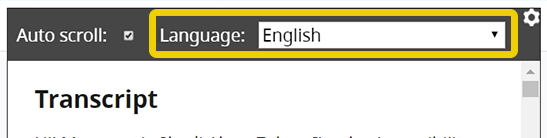
- “Language”
- Update the image per the instructions below.
If you are not able to update the image, let us know at group-wai-translations@w3.org.- Make a new image to replace show-language.png. The circle is 7px #eed009 / rgb(238,208,9).
- Name it
show-language.[language tag].png
Example for Japanese:show-language.ja.png - Upload it to the “content-images/video-introduction” folder
- In your translation, add the language tag to the image path.
Example for Japanese:/content-images/video-introduction/show-language.ja.png
- Translate the following words from the video player interface:
- If the player is not available in the translated language:
- Leave the following words from the video player interface in English:
- “Captions”
- “Show transcript”
- “Language”
- Mark up the English words with the
langattribute.
Example:<span lang="en">Captions</span>.
- Leave the following words from the video player interface in English:
Web Accessibility Perspectives Videos
The “Web Accessibility Perspective Videos” page points to the resource’s sub-pages. Once you have translated a sub-page, add your language tag to the end of the corresponding URL.
How People with Disabilities Use the Web
The title “How People with Disabilities Use the Web” is not a question: it is a statement. For translation, it might help to think of it as a shorter version of “An Introduction to How People with Disabilities Use the Web” or “Description of How People with Disabilities Use the Web”.
WCAG 2 at a Glance
For the “Guidelines” section:
- Please consider the wording in the WCAG 2.2 success criteria. If there is a translation of WCAG 2 in your language, review it thoughtfully.
- This text is not the same as the success criteria wording. It is a paraphrased summary that is intended to be easier to understand and accurate – yet it does not need to be comprehensive.
- Please collaborate with others who are familiar with WCAG to refine this wording in your language.
Tutorials (including An alt Decision Tree)
alt Decision Tree)Tutorials resources use a dynamic footer, using specific metadata set at the top of each page.
- Translate content in
editors,update_editors,contributing_participantsandsupport.\ - Translate the Working Group name and leave the Working Group acronym in English.
- Add translations for the following terms, used by the footer, in the translations.yml file located in the
wai-website-themerepository :- “Editors:”
- “Update Editor:”
- “Status”
- “Updated”
- “first published”