Performance Timing Information: Part 1 - Navigation Timing
Author(s) and publish date
- By:
-
-
Philippe le Hegaret
-
- Published:
Since August 2010, the Web Performance Working Group has quietly but steadily added various timing information in the Open Web Platform. We introduced the performance attribute on the Window object, and are extending it since then using several specifications. For this first article, we'll start with Navigation Timing.
Navigation Timing
Navigation Timing gives access to timing and navigation information for the overall document. Thus one can easily calculate where time is spent between the start of the navigation in the user agent until the end of the load event processing. The Web application can access timings for unloading the previous document, various HTTP redirects, domain lookup, connection to the server, etc.:
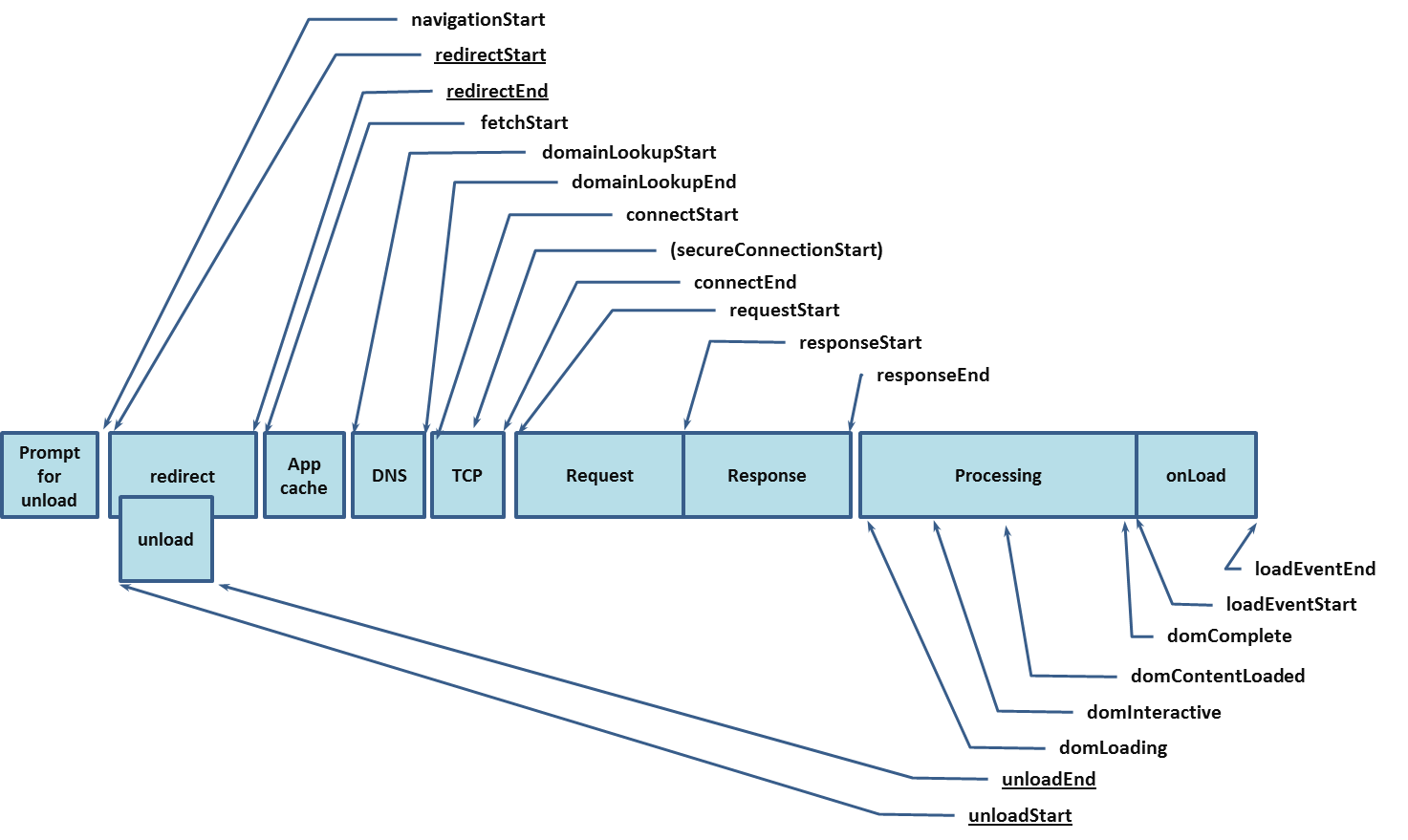
The intent is to provide a complete end-to-end latency picture when measuring a Web application. Developers can then fine tune their applications based on those information. For example, to calculate the user perceived page loading time, one can simply do the following:
// returns a duration in milliseconds
function getUserPerceivedLoadingTime() {
  return
    window.performance.timing.loadEventStart
     - window.performance.timing.navigationStart;
};
Deployment
The July 2012 implementation report shows that this is supported in Internet Explorer, Chrome and Firefox. The following code should help for feature detection:
 if (!!window.performance) {
   // do something with Navigation Timing
 }
Analytic sites or tools are slowy integrating those information in their reports.
Future
The first version of Navigation Timing is finished and only supports time values accurate to the millisecond. Navigation Timing 2 will support time values accurate to a thousandth of a millisecond but it is still work in progress so don't expect support for it soon.

Good information thanks !!!, I tested web site using these, it is not including the AJAX calls response ( I think loadEventend is NOT equal to onLoad time which you see in firebug ), loadEventend time is the time when it fires the events, it will NOT wait for all AJAX calls response. Is there any other way to include complete all AJAX calls response ? so that i can test complete page load ( In my def. complete page load is DOM+CSS+JAVASCRIPT/JQUERY+AJAX calls response+ All events should complete, How to get this complete time ?)
To get the load time of CSS resources and XHR calls, you'll want to use Resource Timing http://www.w3.org/TR/resource-timing/. We're not completely done with it but almost.