« Links Feast about Technical Plenary 2007 | Main | Three Buckets of Thoughts »

Unexpected Kanji Rotation

Recently, my XML editor gave me a surprise. This is how it should display Kanji characters:
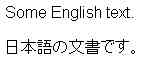
Rendered text with Kanji

However, this is how it displayed in the editor's source text:

Source text with Kanji

The issue is that in the source text, the Kanji characters are rotated 90 degrees to the left. An interesting "Internationalization" bug which I will report to the developers of the editor.

Filed by Felix Sasaki on November 20, 2007 1:34 AM in Bugs Life, Opinions and Editorial, Tools
| | Comments (1) | TrackBacks (0)

Comments

umrain # 2007-11-28

Check the font settings in your editor. Typefaces with CJK characters often have two font versions, one for horizontal display and another (often prefixed with an @ sign in Windows) for vertical display which will appear rotated in programs that don't support vertical writing (most of them). Make sure your editor isn't using a font starting with an @ symbol.

Leave a comment

Note: this blog is intended to foster polite on-topic discussions. Comments failing these requirements and spam will not get published. Please, enter your real name and email address. Every individual comment is reviewed by the W3C staff. This may take some time, thank you for your patience.

You can use the following HTML markup (a href, b, i, br/, p, strong, em, ul, ol, li, blockquote, pre) and/or Markdown syntax.

Your comment


About you

This blog is written by W3C staff and working group participants,
 and maintained by Coralie Mercier.
Authorized parties may log in to create a new entry.
Powered by Movable Type, magpierss and a lot of Web Technology