Synchronized Multimedia Integration Language (SMIL
3.0)
W3C Working Draft 13 July 2007
- This version:
- http://www.w3.org/TR/2007/WD-SMIL3-20070713/
- Latest SMIL 3 version:
- http://www.w3.org/TR/SMIL3/
- Latest SMIL Recommendation:
- http://www.w3.org/TR/SMIL/
- Previous version:
- http://www.w3.org/TR/2006/WD-SMIL3-20061220/
- Editors:
- Dick Bulterman, CWI - Jack Jansen, CWI - Sjoerd Mullender, CWI -
Marisa DeMeglio, DAISY Consortium - Julien Quint, DAISY Consortium -
Petri Vuorimaa, HUT - Samuel Cruz-Lara, INRIA - Hiroshi Kawamura, NRCD
- Daniel Weck, NRCD - Eric Hyche, RealNetworks - Xabiel García
Pañeda, Universidad de Oviedo - David Melendi, Universidad de Oviedo -
Thierry Michel, W3C - Daniel F. Zucker, ZookWare LLC.
This document is also available in a non-normative format. single HTML file.
Copyright
© 2007 W3C® (MIT, ERCIM,
Keio), All Rights Reserved. W3C liability,
trademark
and document
use rules apply.
This document specifies the third version of the Synchronized Multimedia
Integration Language (SMIL, pronounced "smile"). SMIL 3.0 has the following
design goals:
- Define an XML-based language that allows authors to write interactive
multimedia presentations. Using SMIL, an author can describe the temporal
behaviour of a multimedia presentation, associate hyperlinks with media
objects and describe the layout of the presentation on a screen.
- Allow reusing of SMIL syntax and semantics in other XML-based
languages, in particular those who need to represent timing and
synchronization. For example, SMIL components are used for integrating
timing into XHTML [XHTML10] and into SVG
[SVG].
- Extend the functionalities contained in the SMIL 2.1 [SMIL21] into
new or revised SMIL 3.0 modules.
- Define new SMIL 3.0 Profiles incorporating features useful within the
industry.
This section describes the status of this document at the time of its
publication. Other documents may supersede this document. A list of current
W3C publications and the latest revision of this technical report can be
found in the W3C technical reports index
at http://www.w3.org/TR/.
This is a Last Call Working Draft of a possible future W3C Recommendation
of the SMIL 3.0 specification. This document has been produced by the SYMM Working Group as part of
the W3C Synchronized Multimedia
Activity. The goals of the SYMM Working Group are discussed in the SYMM
Working Group Charter. The authors of this document are the SYMM Working
Group members. Different parts of the document have different editors.
This SMIL 3.0 edition is a new version, it extends the
functionalities contained in SMIL 2.1 [SMIL21], incorporating new features
useful within the industry.
The Last
Call review period for this document extends until 14 September 2007. The
public is invited to send comments or report errors on this document. Please
send them to the public mailing www-smil@w3.org - (public archives)
including the prefix'[SMIL30 LC comment]' in the subject
line.
Publication as a Working Draft does not imply endorsement by the W3C
Membership. This is a draft document and may be updated, replaced or
obsoleted by other documents at any time. It is inappropriate to cite this
document as other than work in progress.
This document was produced by a group operating under the 5 February 2004
W3C Patent Policy. W3C maintains a public list of any
patent disclosures made in connection with the deliverables of the group;
that page also includes instructions for disclosing a patent. An individual
who has actual knowledge of a patent which the individual believes contains
Essential
Claim(s) must disclose the information in accordance with section
6 of the W3C Patent Policy.
- Editor
- Thierry Michel, W3C.
This section is informative.
SMIL 3.0 specification provides three classes of changes to the SMIL 2.1
Recommendation, among the functional areas. For more details on the SMIL 3.0
Modules changes, refer to the next SMIL 3.0
Modules chapter.
1- New SMIL 3.0 functional areas
SMIL3.0 adds the following new sections introducing new modules where new
elements or attributes semantics are specified.
- SMIL 3.0 smilText provides a new media
type for use in SMIL presentations. Unlike other media types defined in
the media object module, smilText provides a text container element with
an explicit content model for defining in-line text, and a set of
additional elements and attributes to control explicit in-line text
rendering.
- SMIL 3.0 External Timing defines an
XML timing language that makes SMIL 3.0 element and attribute timing
control available to a wide range of other XML languages. Because of its
similarity with external style and positioning descriptions in the
Cascading Style Sheet (CSS) language, this functionality has been termed
SMIL Timesheets. It can be seen as a temporal counterpart of CSS. Whereas
CSS defines the spatial layout of the document and formatting of the
elements, SMIL Timesheets specify which elements are active at a certain
moment and what their temporal scope is within a document.
- SMIL 3.0 State provides a mechanism for
the author to create more complex control flow than what SMIL provides
through the timing and content control modules, without using a scripting
language. To provide this, it allows a document to have some explicit
state (think: variables) along with ways to modify, use and save this
state.
- SMIL 3.0 DOM describes the SMIL 3.0 DOM
support. SMIL is an XML-based language and conforms to the (XML) DOM Core
[DOM1], [DOM2]. A language profile may include DOM support. The
granularity of DOM being supported corresponds to the modules being
selected in that language profile. As with all modules, required support
for the DOM is an option of the language profile. DOM support consists of
two independently usable parts, a module which contains methods to start
and stop parts of a presentation during playback, and a description of
the effects of changing attributes during playback.
2- Revised SMIL 3.0 functional areas
In these sections, updated or new modules are introduced where new and
updated elements or attributes semantics are specified.
3- Unchanged SMIL 3.0 functional areas
The modules, elements and attributes semantics in the following sections
remain the same as in SMIL2.1 [SMIL21]. There are no major changes to the
document; apart from minor issues related to wording, typos, links and
references.
1- New SMIL 3.0 Profiles:
SMIL3.0 adds the following two new Profiles:
- SMIL 3.0 Daisy Profile is a
collection of SMIL 3.0 modules introduced for DAISY books. These digital
talking books are fully accessible for persons with print disabilities,
including blindness, low-vision, and dyslexia.
- SMIL 3.0 Tiny Profile is the
minimum collection of SMIL 3.0 modules that provide support for the SMIL
3.0 language.
This profile is suitable for systems which require very simple SMIL
presentations where user interactions and specific content layout are not
necessary. This is, for instance, the case of devices with reduced
computing capabilities such as MP3/MP4 players, minimum capability mobile
phones, car navigation systems, television sets or voice user agents.
Also, it is possible to use the profile in the development of server side
playlists. These playlists are used to generate continuous streams from
individual video or audio files. The server processes the playlists
without any user interaction.
2- Updated SMIL 3.0 Profiles:
The following Profiles are updated from SMIL 2.1 [SMIL21] to include new
SMIL 3.0 fonctionalities.
- SMIL 3.0 Language Profile describes the
SMIL 3.0 modules that are included in the SMIL 3.0 Language and details
how these modules are integrated. It contains support for all of the
major SMIL 3.0 features including animation, content control, layout,
linking, media object, meta-information, structure, timing and transition
effects. It is designed for Web clients that support direct playback from
SMIL 3.0 markup.
3- Unchanged SMIL 3.0 Profiles:
The following Profiles are unchanged from SMIL 2.1 [SMIL21].
- SMIL 3.0 Extented Mobile
Profile is a collection of SMIL 3.0 modules that provide extensive
support for the SMIL 3.0 Language within the context of an advanced
mobile device. Such a device is expected to have a high-resolution
display and sufficient memory and processor capacity to render nontrival
SMIL documents. Although not as complete as the full SMIL 3.0 Language
Profile, the SMIL 3.0 Extended Mobile Profile is rich enough to meet the
needs of a wide range of interactive presentations.
- SMIL 3.0 Mobile Profile provides
support for the SMIL 3.0 language within the context of a mobile device.
Such a device is expected to have sufficient display, memory, and
processor capabilities to render basic interactive multimedia
presentations in SMIL. The SMIL 3.0 Mobile Profile is a sub-set of the
SMIL 3.0 Extended Mobile Profile. The SMIL 3.0 Mobile Profile is largely
compatibility with the SMIL profile that third Generation Partnership
Program (3GPP) has defined for the multimedia messaging (MMS) and the
enhanced packed switched streaming (e-PSS) mobile services in its own
specification ([3GPP26.246R6]).
Finally, SMIL 3.0 provides a Scalability Framework, where a
family of scalable SMIL profiles can be defined using a sub- or superset of
the SMIL 3.0 Language, Daisy, Mobile, or Extended Mobile profiles, or a
superset of the SMIL 3.0 Tiny profile.
This document has been prepared by the Synchronized Multimedia Working
Group (SYMM WG) of the World Wide Web Consortium.
The SYMM WG which specified SMIL 3.0 included the following individuals:
- Dick Bulterman, CWI - Pablo Cesar, CWI - Samuel Cruz-Lara, INRIA - Marisa DeMeglio, DAISY Consortium - Xabiel
García Pañeda, Universidad de Oviedo - Luiz Fernando Gomes Soares
(Invited Experts) - Eric Hyche, RealNetworks - Jack Jansen, CWI -
Hiroshi Kawamura, NRCD - Nabil Layaïda, INRIA - David Melendi,
Universidad de Oviedo, Thierry Michel, W3C - Sjoerd Mullender, CWI -
Julien Quint, DAISY Consortium - Petri Vuorimaa, Helsinki University of
Technology - Daniel Weck, NRCD - Daniel F. Zucker, ZookWare LLC.
The former SYMM WG which specified the previous SMIL versions included the
following individuals:
- Kazuhide Tanaka, ACCESS Co., Ltd. - Hanan Rosenthal, Canon - Jin Yu,
Compaq - Pietro Marchisio, CSELT - Lynda Hardman, CWI - Jacco van
Ossenbruggen, CWI - Lloyd Rutledge, CWI - Ishan Vaishnavi, CWI - Markku
Hakkinen, DAISY Consortium - Olivier Avaro, France Telecom - Vincent
Mahe, France Telecom - Ted Wugofski, Gateway (Invited Expert) -
Masayuki Hiyama, Glocomm - Keisuke Kamimura, Glocomm - Michelle Y. Kim,
IBM - Steve Wood, IBM - Jeff Boston, IBM - Nabil Layaïda, INRIA -
Muriel Jourdan, INRIA - Aaron Cohen, Intel - Wayne Carr, Intel - Masaru
Sugano, KDDI Corporation - Tomoyuki Shimizu, KDDI Corporation - Marcel
Wong, Ericsson - Ken Day, Macromedia - Daniel Weber, Panasonic -
Patrick Schmitz, Microsoft - Debbie Newman, Microsoft - Pablo
Fernicola, Microsoft - Aaron Patterson, Microsoft - Kevin Gallo,
Microsoft - Paul David, Microsoft - Don Cone, Netscape/AOL - Wo Chang,
NIST - Guido Grassel, Nokia - Didier Chanut, Nokia - Antti Koivisto,
Nokia - Andrei Popescu, Nokia - Roberto Castagno, Nokia - Jack Jansen,
Oratrix - Sjoerd Mullender, Oratrix - Dick Bulterman, Oratrix - Kenichi
Kubota, Panasonic - Warner ten Kate, Philips - Ramon Clout, Philips -
Jeff Ayars, RealNetworks - Erik Hodge, RealNetworks - Rob Lanphier,
RealNetworks - Bridie Saccocio, RealNetworks - Eric Hyche, RealNetworks
- Robin Haglund, RealNetworks - Yoshihisa Gonno, Sony Corporation -
Geoff Freed, WGBH - Philipp Hoschka, W3C - Philippe Le Hégaret, W3C -
Thierry Michel, W3C.
- Editor:
- Thierry MICHEL, W3C.
This section is informative.
Since the publication of SMIL 1.0 [SMIL10],
interest in the integration of SMIL concepts with the HTML, the HyperText
Markup Language [HTML4], and other XML
languages, has grown. Likewise, the W3C HTML Working Group has specified
XHTML, the Extensible HyperText Markup Language [XHTML10], in preparation to subset, extend, and
integrate it with other languages. The strategy considered for integrating
respective functionality with other XML-based languages is based on the
concepts of modularization and profiling [SMIL-MOD], [XMOD].
Modularization is an approach in which markup functionality is
specified as a set of modules that contain semantically-related XML elements,
attributes, and attribute values. Profiling is the creation of an
XML-based language through combining these modules, in order to provide the
functionality required by a particular application.
Profiling introduces the ability to tailor an XML-based language to
specific needs, e.g. to optimize presentation and interaction for the
client's capabilities. Profiling also adds the ability for integrating
functionality from other markup languages, releasing the language designer
from specifying that functionality. Moreover, it provides for consistency in
markup through the use of the same model to incorporate a function. Identical
constructs ease authoring, while at the user agent side there is a potential
for re-use of code. For example, a scheduler supporting SMIL timing and
synchronization functionality could be used for SMIL documents, XHTML+SMIL
documents, and SVG documents.
Modularization enables language designers to specify dedicated markup
intended for integration with other, existing, language profiles. Examples of
specifications intended for such integration are MathML and XForms [MathML], [XFORMS10].
Modularization and profiling use the extensibility properties of XML, and
related technology like XML namespaces and XML Schema [XML11], [XML-NS],
[XSCHEMA].
This part of the SMIL 3.0 specification describes the framework on which
SMIL modularization and profiling is based, and specifies the SMIL 3.0
Modules, their identifiers, and the requirements for conformance within this
framework.
This section is informative.
The modularization approach used in this specification derives from that
set forth in XHTML Modularization [XMOD]. The framework on which SMIL
modularization and profiling is based, is informally described here.
A Module is a collection of
semantically-related XML elements, attributes, and attribute values that
represents a unit of functionality. Modules are defined in coherent sets.
This coherency is expressed in that the elements of these modules are
associated with the same namespace.
A Language Profile is a
combination of modules. Modules are atomic, i.e. they cannot be
subset when included in a language profile. Furthermore, a module
specification may include a set of integration requirements, to which
language profiles that include the module must comply.
Commonly, there is a main language profile that incorporates nearly all
the modules associated with a single namespace. For example, the SMIL 3.0
Language Profile uses most of the SMIL 3.0 modules. Usually, the same name
is used to loosely reference both - "SMIL 3.0" in the example. Also, the
name "profile" is used to mean "language profile".
Other language profiles can be specified that are subsets of the larger
one, or that incorporate a mixture of modules associated with different
namespaces. SMIL 3.0 Basic is an example of the first, XHTML+SMIL of the
latter.
A special module in a language profile is the so-called Structure Module, in that it
contains the root element of the language profile, e.g. <smil> or
<html>. Any language profile that incorporates modules associated with
a single namespace will include the Structure module associated with that
namespace.
Other modules that require special mention are those that characterize the
core of the functionality provided by the namespace. This is expressed by the
notions of host language and
integration set.
Both of them relate to a set of conformance requirements for language
profiles, which includes the requirement to incorporate at least the core set
of modules. The set may be different for a host language and an integration
set. A host language must incorporate the Structure module; an integration
set need not. There may be other differences as well.
The main purpose of language profile conformance is to enhance
interoperability. Preferably, the mandatory modules for host language
conformance are defined in such a way that any document interchanged in a
conforming language profile will yield a reasonable presentation when the
document renderer, while supporting the associated mandatory module set,
would ignore all other (unknown) elements and attributes. Here, "reasonable
presentation" is to be understood as something intelligible, which is not
necessarily a close reflection of the author's original intentions. To
achieve the latter, a negotiation would have to be conducted to agree on the
specific language profile to be used for the document interchange.
This section is informative.
SMIL 3.0 specification provides three classes of changes to the SMIL 2.1
Recommendation, among the functional areas;
- New Modules are introduced (e.g. the MediaPanZoom
module, BasicText, TextStyling, TextMotion modules and StateTest, UserState, StateSubmission, StateInterpolation
modules, StructureLayout
and Timesheets
modules and DOMTimingMethods.
- Former SMIL Modules are revised allowing extended functionalities
(example are Metainformation, BasicLayout, MediaParam
modules).
- Former SMIL Modules are unchanged; the modules, elements and attributes
semantics remain the same as in SMIL2.1 [SMIL21]. There are no major
changes to the modules; apart from minor issues related to typos, links
and references.
The following functional areas are affected by SMIL 3.0:
DOM
- The new chapter SMIL 3.0 DOM describes how
the DOM can be used in SMIL 3.0.
Content Control
This functional area is currently unchanged, apart from repartitioning of the
content control module structure in order to support the SMIL Tiny profile.
In a future version the content control mechanisms specified will be modified
to better align with the expression and test logic being developed within the
SMIL 3.0 State modules.
Layout
SMIL 3.0 extends the Layout capabilities as follows:
- The BasicLayout module
is extended with the backgroundOpacity attribute, which specifies the
background opacity of a region;
- A new StructureLayout
module defines the layout
element, to indentify the layout mechanism used by a SMIL profile
independently of the SMIL basic layout architecture.
Linking
SMIL 3.0 linking integrates the general features of the XHTML-2 access and
role attributes as an extension and replacement for the accessKey attribute.
This is expected to result in the deprecation or removal of the accesskey
attribute and the accesskey event from the SMIL 2.1 language.
Media Object
SmilText
This new SMILtext functionality provides a new media type for use in SMIL
presentations. The SMILtext modules provide a text container element with an
explicit content model for defining in-line text, and a set of additional
elements and attributes to control explicit in-line text rendering.
The following 3 modules are introduced in the new Text functional area
allowing use of in-line text content:
- Introduction of the new BasicText module provides
basic support for in-line text within a SMIL presentation;
- The new TextStyling
adds styling capabilities of text;
- The new TextMotion
module defines how text is added.
Metainformation
- The Metainformation module is extended
as follows :
- allowing meta-information to be placed on elements within the body
instead of only in the head element.
- the label attribute is added so that extended content information can
be provided for document components.
- the text in this section makes it clear that several different types of
metainformation encodings may be used within a single presentation.
Timing
The SMIL 3.0 specification leaves the basic syntax and semantics of the
SMIL 2.1 timing model [SMIL21-timing] unchanged apart from the following
changes:
- The new module, DOMTimingMethods
adds DOM methods;
- Revision of allowed values for the begin attribute of children of a seq
container to simplify implementations by removing the need for special
case code.
External Timing
This functional area defines an XML timing language that makes SMIL 3.0
element and attribute timing control available to a wide range of other XML
languages. It allows SMIL timing to be integrated in to a wide variety of
a-temporal languages, even when several such languages are combined in a
compound document. Because of its similarity with external style and
positioning descriptions in the cascading style sheet language CSS, this
functionality has been termed SMIL timesheets.
- The new Timesheets
module provides basic support for timesheets mark-up for XML.
State
The new modules in this section provide a mechanism whereby the document
author can create more complex controlflow than what SMIL provides through
the timing and content control modules, without having to go all the way of
using a scripting language. One way to provide this is to allow a document to
have some explicit state (think: variables) along with ways to modify, use
and save this state.
The following 4 modules are introduced in the State functional areas:
- Introduction of the new StateTest module, containing
extended content selection;
- The new UserState
module, containing author-defined state;
- The new StateSubmission
module, saving author-defined state;
- The new StateInterpolation
module, allowing runtime modification to attribute values.
This section is normative.
SMIL functionality is partitioned into 13 functional areas. Within each
functional area a further partitioning is applied into modules. All of these modules, and only
these modules, are associated with the SMIL namespace.
The functional areas and their corresponding modules are:
Note: Modules marked with (**) are new Modules added in SMIL 3.0. Modules
marked with (*) are revised modules from SMIL 2.1.
- Animation
- BasicAnimation
- SplineAnimation
- Content Control
- BasicContentControl
- CustomTestAttributes
- PrefetchControl
- RequiredContentControl
- SkipContentControl
- Layout
- AlignmentLayout
- AudioLayout
- BackgroundTilingLayout
- BasicLayout
(*)
- MultiWindowLayout
- OverrideLayout
- StructureLayout
(**)
- SubRegionLayout
- Linking
- BasicLinking
- LinkingAttributes
- ObjectLinking
- Media Objects
- BasicMedia
- BrushMedia
- MediaAccessibility
- MediaClipping
- MediaClipMarkers
- MediaDescription
- MediaPanZoom
(**)
- MediaParam
(*)
- MediaRenderAttributes(**)
- SmilText
- BasicText
(**)
- TextStyling(**)
- TextMotion
(**)
- Metainformation
- Metainformation (*)
- Structure
- Structure
- Timing
- AccessKeyTiming
- BasicInlineTiming
- BasicTimeContainers
- BasicExclTimeContainers
- BasicPriorityClassContainers
- DOMTimingMethods
(**)
- EventTiming
- FillDefault
- MediaMarkerTiming
- MinMaxTiming
- MultiArcTiming
- RepeatTiming
- RepeatValueTiming
- RestartDefault
- RestartTiming
- SyncbaseTiming
- SyncBehavior
- SyncBehaviorDefault
- SyncMaster
- TimeContainerAttributes
- WallclockTiming
- Time Manipulations
- TimeManipulations
- External Timing
- Timesheets
(**)
- State
- StateTest (**)
- UserState (**)
- StateSubmission
(**)
- StateInterpolation
(**)
- Transitions
- BasicTransitions
- InlineTransitions
- TransitionModifiers
- FullScreenTransitionEffects
Each of these modules introduces a set of semantically-related elements,
properties, and attributes. Each functional area has a corresponding section
in this specification document. Further details on each of the modules is
specified within those sections.
The modules may be independent or complementary. For example, the
SyncMaster module requires and builds upon the SyncBehavior module, but the
PrefetchControl and SkipContentControl modules are independent from each
other. In addition, some modules require modules from other functional
areas.
Modules specify their integration requirements. When one module requires
another module for basic features and as a prerequisite for integration, a
language profile must include the second module in order to include the
first. The first module is said to be a dependent of the second
module. Dependency may be nested, in that a module may be dependent on a
module that is a dependent itself.
Table 1 presents the SMIL 3.0 modules and the modules they depend on.
Table 1: The SMIL 3.0 Modules and their Dependencies.
| Module |
Dependencies |
| AccessKeyTiming |
NONE |
| AlignmentLayout |
BasicLayout |
| AudioLayout |
BasicLayout |
| BackgroundTilingLayout |
BasicLayout |
| BasicAnimation |
BasicInlineTiming |
| BasicContentControl |
NONE |
| BasicInlineTiming |
NONE |
| BasicExclTimeContainers |
NONE |
| BasicLayout |
NONE |
| BasicLinking |
NONE |
| BasicMedia |
NONE |
| BasicPriorityClassContainers |
BasicExclTimeContiners |
| BasicText |
NONE |
| BasicTimeContainers |
NONE |
| BasicTransitions |
NONE |
| BrushMedia |
NONE |
| CustomTestAttributes |
BasicContentControl |
| DOMTimingMethods |
NONE |
| EventTiming |
NONE |
| ExclTimeContainers |
former SMIL module REMOVED in SMIL2.1 |
| FillDefault |
BasicTimeContainers, and/or BasicExclTimeContainers,
BasicPriorityClassContainers, and/or TimeContainerAttributes |
| FullScreenTransitionEffects |
BasicTransitions |
| HierarchicalLayout |
former SMIL module REMOVED in SMIL2.1 |
| InlineTransitions |
NONE |
| LinkingAttributes |
NONE |
| MediaAccessibility |
MediaDescription |
| MediaClipMarkers |
MediaClipping |
| MediaClipping |
BasicMedia |
| MediaDescription |
NONE |
| MediaMarkerTiming |
NONE |
| MediaPanZoom |
BasicMedia |
| MediaParam |
BasicMedia |
| MetaInformation |
NONE |
| MinMaxTiming |
NONE |
| MultiArcTiming |
AccessKeyTiming, and/or BasicInlineTiming, and/or EventTiming,
and/or
MediaMarkerTiming, and/or RepeatValueTiming, and/or
SyncbaseTiming, and/or WallclockTiming |
| MultiWindowLayout |
BasicLayout |
| ObjectLinking |
BasicLinking |
| OverrideLayout |
BasicLayout |
| PrefetchControl |
NONE |
| RepeatTiming |
NONE |
| RepeatValueTiming |
NONE |
| RequiredContentControl |
NONE |
| RestartDefault |
RestartTiming |
| RestartTiming |
NONE |
| SkipContentControl |
NONE |
| SplineAnimation |
BasicAnimation |
| StateTest |
NONE |
| StateInterpolation |
NONE |
| StateSubmission |
NONE |
| Structure |
BasicContentControl, and BasicInlineTiming, and BasicLayout, and
BasicLinking, and BasicMedia, and BasicTimeContainers, and
SkipContentControl, and SyncbaseTiming |
| StructureLayout |
Structure |
| SubRegionLayout |
BasicLayout |
| SyncbaseTiming |
NONE |
| SyncBehavior |
BasicTimeContainers, and/or
BasicExclTimeContainers, BasicPriorityClassContainers, and/or
TimeContainerAttributes |
| SyncBehaviorDefault |
SyncBehavior |
| SyncMaster |
SyncBehavior |
| TextMotion |
BasicText |
| TextStyling |
BasicText |
| TimeContainerAttributes |
NONE |
| TimeManipulations |
NONE |
| Timesheets |
BasicAnimation, BasicInlineTiming, EventTiming,
BasicTimeContainers, BasicExclTimeContainers. |
| TransitionModifiers |
BasicTransitions, and/or InlineTransitions |
| UserState |
NONE |
| WallclockTiming |
NONE |
This section is normative.
This section specifies the identifiers for the SMIL 3.0 namespace and the
SMIL 3.0 modules. Each SMIL host language conformant language profile should
explicitly state the namespace URI that is to be used to identify it. That
namespace URI must comply with the "Requirements on Identifiers for
SMIL Host Language Conformant Language Profiles", defined below.
Documents authored in language profiles that include the SMIL Structure
module can be associated with the "application/smil+xml" mime
type. Documents using the "application/smil+xml" mime type are
required to be host language conformant. This Recommendation obsoletes the
former "application/smil" mime type as specified in SMIL 2.0
[SMIL20].
The XML namespace identifier for the complete set of SMIL 3.0 modules,
elements and attributes, are contained within the following namespace:
http://www.w3.org/2007/07/SMIL30/
Each module in this specification has a unique identifier associated with
it. They are intended to uniquely and consistently identify each of them.
They should be used as values in a test for whether an implementation
includes a specific module, as well as in other circumstances where a need to
refer to a specific SMIL 3.0 module is necessary.
Table 2 summarizes the identifiers for SMIL 3.0 modules.
Table 2: The SMIL 3.0 Module Identifiers.
| Module name |
Identifier |
| AccessKeyTiming |
http://www.w3.org/2007/07/SMIL30/AccessKeyTiming |
| AudioLayout |
http://www.w3.org/2007/07/SMIL30/AudioLayout |
| BackgroundTilingLayout |
http://www.w3.org/2007/07/SMIL30/BackgroundTilingLayout |
| AlignmentLayout |
http://www.w3.org/2007/07/SMIL30/AlignmentLayout |
| BasicAnimation |
http://www.w3.org/2007/07/SMIL30/BasicAnimation |
| BasicContentControl |
http://www.w3.org/2007/07/SMIL30/BasicContentControl |
| BasicInlineTiming |
http://www.w3.org/2007/07/SMIL30/BasicInlineTiming |
| BasicExclTimeContainers |
http://www.w3.org/2007/07/SMIL30/BasicExclTimeContainers |
| BasicLayout |
http://www.w3.org/2007/07/SMIL30/BasicLayout |
| BasicLinking |
http://www.w3.org/2007/07/SMIL30/BasicLinking |
| BasicMedia |
http://www.w3.org/2007/07/SMIL30/BasicMedia |
| BasicPriorityClassContainers |
http://www.w3.org/2007/07/SMIL30/BasicPriorityClassContainers |
| BasicText |
http://www.w3.org/2007/07/SMIL30/BasicText |
| BasicTimeContainers |
http://www.w3.org/2007/07/SMIL30/BasicTimeContainers |
| BasicTransitions |
http://www.w3.org/2007/07/SMIL30/BasicTransitions |
| BrushMedia |
http://www.w3.org/2007/07/SMIL30/BrushMedia |
| CustomTestAttributes |
http://www.w3.org/2007/07/SMIL30/CustomTestAttributes |
| DOMTimingMethods |
http://www.w3.org/2007/07/SMIL30/DOMTimingMethods |
| EventTiming |
http://www.w3.org/2007/07/SMIL30/EventTiming |
ExclTimeContainers |
former SMIL module removed in SMIL21 |
| FillDefault |
http://www.w3.org/2007/07/SMIL30/FillDefault |
| FullScreenTransitionEffects |
http://www.w3.org/2007/07/SMIL30/FullScreenTransitionEffects |
HierarchicalLayout |
former SMIL module removed in SMIL21 |
| InlineTransitions |
http://www.w3.org/2007/07/SMIL30/InlineTransitions |
| LinkingAttributes |
http://www.w3.org/2007/07/SMIL30/LinkingAttributes |
| MediaAccessibility |
http://www.w3.org/2007/07/SMIL30/MediaAccessibility |
| MediaClipMarkers |
http://www.w3.org/2007/07/SMIL30/MediaClipMarkers |
| MediaClipping |
http://www.w3.org/2007/07/SMIL30/MediaClipping |
| MediaDescription |
http://www.w3.org/2007/07/SMIL30/MediaDescription |
| MediaMarkerTiming |
http://www.w3.org/2007/07/SMIL30/MediaMarkerTiming |
| MediaPanZoom |
http://www.w3.org/2007/07/SMIL30/MediaPanZoom |
| MediaParam |
http://www.w3.org/2007/07/SMIL30/MediaParam |
| MediaRenderAttributes |
http://www.w3.org/2007/07/SMIL30/MediaRenderAttributes |
| Metainformation |
http://www.w3.org/2007/07/SMIL30/Metainformation |
| MinMaxTiming |
http://www.w3.org/2007/07/SMIL30/MinMaxTiming |
| MultiArcTiming |
http://www.w3.org/2007/07/SMIL30/MultiArcTiming |
| MultiWindowLayout |
http://www.w3.org/2007/07/SMIL30/MultiWindowLayout |
| ObjectLinking |
http://www.w3.org/2007/07/SMIL30/ObjectLinking |
| OverrideLayout |
http://www.w3.org/2007/07/SMIL30/OverrideLayout |
| PrefetchControl |
http://www.w3.org/2007/07/SMIL30/PrefetchControl |
| RepeatTiming |
http://www.w3.org/2007/07/SMIL30/RepeatTiming |
| RepeatValueTiming |
http://www.w3.org/2007/07/SMIL30/RepeatValueTiming |
| RequiredContentControl |
http://www.w3.org/2007/07/SMIL30/RequiredContentControl |
| RestartDefault |
http://www.w3.org/2007/07/SMIL30/RestartDefault |
| RestartTiming |
http://www.w3.org/2007/07/SMIL30/RestartTiming |
| SkipContentControl |
http://www.w3.org/2007/07/SMIL30/SkipContentControl |
| SplineAnimation |
http://www.w3.org/2007/07/SMIL30/SplineAnimation |
| StateTest |
http://www.w3.org/2007/07/SMIL30/StateTest |
| StateInterpolation |
http://www.w3.org/2007/07/SMIL30/StateInterpolation |
| StateSubmission |
http://www.w3.org/2007/07/SMIL30/StateSubmission |
| Structure |
http://www.w3.org/2007/07/SMIL30/Structure |
| StructureLayout |
http://www.w3.org/2007/07/SMIL30/StructureLayout |
| SubRegionLayout |
http://www.w3.org/2007/07/SMIL30/SubRegionLayout |
| SyncbaseTiming |
http://www.w3.org/2007/07/SMIL30/SyncbaseTiming |
| SyncBehavior |
http://www.w3.org/2007/07/SMIL30/SyncBehavior |
| SyncBehaviorDefault |
http://www.w3.org/2007/07/SMIL30/SyncBehaviorDefault |
| SyncMaster |
http://www.w3.org/2007/07/SMIL30/SyncMaster |
| TextMotion |
http://www.w3.org/2007/07/SMIL30/TextMotion |
| TextStyling |
http://www.w3.org/2007/07/SMIL30/TextStyling |
| TimeContainerAttributes |
http://www.w3.org/2007/07/SMIL30/TimeContainerAttributes |
| TimeManipulations |
http://www.w3.org/2007/07/SMIL30/TimeManipulations |
| TransitionModifiers |
http://www.w3.org/2007/07/SMIL30/TransitionModifiers |
| Timesheets |
http://www.w3.org/2007/07/SMIL30/Timesheets |
| UserState |
http://www.w3.org/2007/07/SMIL30/UserState |
| WallclockTiming |
http://www.w3.org/2007/07/SMIL30/WallclockTiming |
In addition to the module identifiers above, there may be different
features and variances from one language profile to another that may not be
expressed as the support or non-support of a particular module. These
features may be expressed using the following identifiers:
http://www.w3.org/2007/07/SMIL30/NestedTimeContainers- Profile allows nesting of the par and seq time containers.
http://www.w3.org/2007/07/SMIL30/SMIL20DeprecatedFeatures- Profile supports deprecated SMIL features. .
http://www.w3.org/2007/07/SMIL30/SMIL10DeprecatedFeatures- Profile supports deprecated SMIL 1.0 features.
Implementations that support the SMIL BasicContentControl
module must allow these as identifiers for use with the XML namespace
mechanism, and must allow the associated namespace identifier to be used with
the systemRequired test attribute. Profiles must identify those attributes
for which an implementation must return "true" (this is an integration
requirement). Implementations must return "false" for modules or features
which are not fully supported.
This section is normative.
This section may need more updates. Should be
checked carrefully.
The following two tables list names used to collectively reference certain
sets of SMIL 3.0 elements and attributes. These are used in the definitions
of the minimum support in the two sections below on SMIL host language
conformance and SMIL integration set conformance. The term "minimum support"
is used to refer to the minimum set of elements that an element can contain,
and the minimum set of attributes that can be used on an element.
Table 4: Names of SMIL 3.0 Attribute Collections.
| Attribute Set Name |
Attributes |
| TIMING-ATTRS |
begin, end, dur, repeatDur, repeatCount, max, min, fill, endsync |
| CONTCTRL-ATTRS |
systemBitrate, systemCaptions, systemLanguage, systemRequired, systemSize, systemDepth, systemOverdubOrSubtitle,
systemAudioDesc,
systemOperatingSystem,
systemCPU, systemComponent |
| MEDIA-ATTRS |
src, type |
| LINKING-ATTRS |
href, sourceLevel, destinationLevel, sourcePlaystate, destinationPlaystate,
show, accesskey, tabindex, target, external, actuate, alt |
| COMMON-ATTRS |
id, class, xml:lang, title |
A language profile is said to be SMIL 3.0 host language conformant if it
includes the following modules:
- Structure
- BasicContentControl
- BasicInlineTiming
- BasicLayout
- BasicLinking
- BasicMedia
- BasicTimeContainers
- MinMaxTiming
- RepeatTiming
- SkipContentControl
- SyncbaseTiming
In addition, the following requirements must be satisfied:
- The language profile defines what modules it collects.
- The language profile includes all elements, attributes, and attribute
values specified by the collected modules.
- The language profile fulfills the "minimum support" requirements for
elements and attributes as listed in Table 5 below.
- The language profile complies with the integration requirements set
forth by the modules it collects.
- The language profile specifies the semantics related to the integration
of the modules.
- The language profile defines its DTD or XML Schema.
- The language profile defines a unique identifier conforming to the
requirements set forth in Requirements on Identifiers
for SMIL Host Language Conformant Language Profiles.
- The SyncbaseTiming module should be included in Host Language
conformant profiles, although it is not strictly required. We strongly
recommend inclusion of this module in Host Language conformant profiles
to maintain a high level of consistency and interoperability with other
languages that have integrated SMIL modules including the SMIL Language,
XHTML+SMIL, and SVG. Only profiles designed to operate on severely
constrained devices may omit the SyncbaseTiming module.
Table 5: Minimum Support for SMIL Host Language Conformance.
| Element |
Minimum Support |
| Elements |
Attributes |
| smil |
head, body |
COMMON-ATTRS, CONTCTRL-ATTRS, xmlns |
| head |
layout, switch |
COMMON-ATTRS |
| body |
TIMING-ELMS, MEDIA-ELMS, switch, a |
COMMON-ATTRS |
| layout |
region,
root-layout |
COMMON-ATTRS, CONTCTRL-ATTRS, type |
| root-layout |
EMPTY |
COMMON-ATTRS, backgroundColor, height, width |
| region |
EMPTY |
COMMON-ATTRS, backgroundColor, bottom, fit, height, left, regionName, right, showBackground, top, width, z-index, skip-content |
| ref, animation, audio, img, video, text, textstream |
area |
COMMON-ATTRS, CONTCTRL-ATTRS, TIMING-ATTRS, repeat, MEDIA-ATTRS, region |
| a |
MEDIA-ELMS |
COMMON-ATTRS, LINKING-ATTRS |
| area |
EMPTY |
COMMON-ATTRS, LINKING-ATTRS, TIMING-ATTRS, repeat, shape, coords, nohref |
| par, seq |
TIMING-ELMS, MEDIA-ELMS, switch, a |
COMMON-ATTRS, CONTCTRL-ATTRS, TIMING-ATTRS, repeat |
| switch |
TIMING-ELMS, MEDIA-ELMS, a, layout |
COMMON-ATTRS, CONTCTRL-ATTRS |
Support of deprecated elements and attributes is no longer required for
SMIL 3.0 host language conformance but it is highly recommended for all
modules the given language supports. Support of deprecated elements and
attributes can only be left out in cases where interoperability with SMIL 1.0
implementations is not an issue. For example, if a SMIL 3.0 host language
supports the MultiArcTiming
module, it is highly recommended that it support the deprecated syntax
defined in the MultiArcTiming
module.
Since the SMIL 3.0 Structure module may
only be used in a profile that is SMIL host language conformant, this implies
that the SMIL 3.0 Structure module must at
least be accompanied with the nine other modules required for host language
conformance that were named above. Those modules themselves can still be used
in other, non SMIL host language conformant, language profiles.
A language profile is said to be SMIL 3.0 integration set conformant if it
includes the following modules:
- BasicContentControl
- BasicInlineTiming
- BasicMedia
- BasicTimeContainers
- MinMaxTiming
- RepeatTiming
- SyncbaseTiming
In addition, the following requirements must be satisfied:
- The language profile defines what modules it collects.
- The language profile includes all elements, attributes, and attribute
values specified by the collected SMIL 3.0 modules.
- The language profile fulfills the "minimum support" requirements for
elements and attributes as listed in Table 6 below.
- The language profile complies with the integration requirements set
forth by the SMIL 3.0 modules it collects.
- The SyncbaseTiming module should be included in Integration Set
conformant profiles, although it is not strictly required. We strongly
recommend inclusion of this module in Integration Set conformant profiles
to maintain a high level of consistency and interoperability with other
languages that have integrated SMIL modules including the SMIL 3.0 Language,
XHTML+SMIL [XHTMLplusSMIL], and SVG [SVG]. Only profiles designed to operate on
severely constrained devices may omit the SyncbaseTiming module.
Table 6: Minimum Support for SMIL Integration Set Conformance.
| Element |
Minimum Support |
| Elements |
Attributes |
| ref, animation, audio, img, video, text, textstream |
|
CONTCTRL-ATTRS, TIMING-ATTRS, MEDIA-ATTRS |
| par, seq |
TIMING-ELMS, MEDIA-ELMS, switch |
CONTCTRL-ATTRS, TIMING-ATTRS |
| switch |
TIMING-ELMS, MEDIA-ELMS |
CONTCTRL-ATTRS |
Support of deprecated elements and attributes is not required for
SMIL 3.0 integration set conformance. However, when included, the above
requirements also apply to these elements and attributes. Also, when
supported, it is required that all the deprecated elements and attributes
from all the included modules are supported as a whole.
This section is normative.
For the purpose of identifying the version and the language profile used,
SMIL host language conformant documents must satisfy the following
requirements:
- The document should declare a default namespace [XML-NS].
- The default namespace must be declared on the smil root element.
- In case the SMIL host language conformant language profile has been
issued as a W3C Recommendation, the default namespace identifier must
satisfy the following requirements:
- The URI is constructed conformant to the requirements set forth by
the W3C [W3C-NSURI].
- The default namespace identifier should identify the language
profile.
In case the language profile is a subset of a larger one, the default
namespace identifier may also identify that larger language profile.
The module collection that is required to be supported in the subset
language profile may be indicated through the systemRequired attribute on
the smil element.
See the SMIL Tiny Profile
specification for an example.
Syntax errors in a SMIL Host Language conformant document are handled
according to the XML rules for well-formed or valid XML [XML11].
Semantic errors can arise at various levels. One is where the declared
attribute values are of unknown value. Another is where the assembled
presentation is (possibly) conflicting, as in a case where media objects are
competing for display space or where they are synchronized ambiguously. These
latter types, although maybe an error according to the author's intentions,
are not considered an error and the user agent will present according to the
resolution rules defined in this specification.
Errors in attribute values might remain undetectable to the parser,
because the value type is declared as CDATA, or because the value range is
open ended, as in the case of events, for example. However, errors in
attribute values can be detected within a given language profile, where that
language profile specifies the supported value set. Specifications of
language profiles are required to specify the error handling that is required
when such an attribute value error occurs.
This section is informative.
This section describes how language profiles could be defined using the
SMIL 3.0 modular DTDs. The reader is assumed to be familiar with the
mechanisms defined in "Modularization of XHTML" [XMOD], in particular Appendix D [XMOD-APPD] and Appendix E [XMOD-APPE]. In general, the SMIL 3.0 modular DTDs
use the same mechanisms as the XHTML modular DTDs use. Exceptions to this
are:
- SMIL supports qualified attribute names for SMIL attributes that can
appear on non-SMIL elements. This enables these attributes to use
prefixes to indicate that they belong to the SMIL 3.0 namespace.
- SMIL supports module level INCLUDE/IGNORE instead of XHTML's
element/attlist level. Similar to XHTML Modularization, this prohibits
profiles from importing only part of a module -- they have to support
either all the elements and attributes or none.
Below, we give a short description of the files that are used to define
the SMIL 3.0 modular DTDs. See the table and the end of the section for a
complete list of the filenames involved.
Following the same mechanisms as the XHTML modular DTDs, the SMIL 3.0
specification places the XML element declarations (e.g. <!ELEMENT...>)
and attribute list declarations (e.g. <!ATTLIST...>) of all SMIL 3.0
elements in separate files, the SMIL module files. A SMIL module file is
provided for each functional area in the SMIL 3.0 specification (that is,
there is a SMIL module file for animation, layout, timing, etc).
The SMIL module files are used in the normative definitions of the
specification of the SMIL 3.0 Language Profile. Usage of the same module
files for defining other SMIL profiles is recommended, but not required. The
requirements that SMIL language profiles must follow are stated in the
SMIL 3.0 specification, not in the DTD code.
To make the SMIL module files independent of each other, and independent
of the language profiles, the element and attribute declarations make heavy
use of XML entities. This provides profiles with the necessary hooks to
define the actual content models and attributes of the SMIL elements.
The SMIL 3.0 Language Profile provides examples of how the SMIL module
files can be used. Most of the DTD files are reused across the different
profiles. Reused are the SMIL module files, the files that define the data
types and the common attributes, the "qname" file that takes care of adding
namespace prefixes if necessary, and the framework file, which takes care of
including files in the appropriate order.
The files that are different for each profile are the driver file and
document model file. This would, in general, also apply to new profiles: to
define a new language profile, one has to write the extension module(s), the
driver file that defines which modules are used, and a document model file
that defines the extended document model. The driver file and document model
file are described in more detail below.
The driver file.
This is the file that would be referenced by a document's DOCTYPE
declaration. Its main job is to define which document model file and which of
the SMIL module files the profile is using. It may also define an optional
namespace to be used in all namespace prefixes. For example, to prefix all
SMIL element names with "foobar", the following can be added to the start of
the profile:
<!ENTITY % SMIL.prefixed "INCLUDE" >

<!ENTITY % SMIL.prefix "foobar" >
Elements defined in their modules as, for example, <video> will
become parsed as <foobar:video>. This also applies for SMIL attributes
that appear on other elements, so, for example, "begin" becomes
"foobar:begin". The default is that the qname prefix is empty -- that is, it
is effectively turned off by default.
After these definitions, the driver file includes the framework file
(which will subsequently include the data type, common attributes, qname and
document model file), after which the SMIL module files are included that are
used by this profile.
The document model file.
The document model file contains the XML entities that are used by the
SMIL module files to define the content models and attribute lists of the
elements in that profile.
Content models generally differ from profile to profile, or contain
elements from other modules. To avoid these dependencies in the SMIL module
files, content models need to be defined in the document model file. The
(dummy) default content model as defined in the SMIL module files is "EMPTY"
for all SMIL 3.0 elements.
For the same reasons, the SMIL module files only define a default
attribute list for their elements. This default list only contains the
SMIL 3.0 core attributes and the attributes that are defined in the same
SMIL module file. All other attributes need to be added to this default list
by defining the appropriate XML entities. For example, the Media Objects
Module file only adds the core and media related attributes on the media
objects; other attributes, such as the timing attributes, are added to this
list by the document model file.
Table 7: Formal public identifiers and system identifiers of all
files used in the SMIL 3.0 modular DTDs.
| Driver files for the predefined
profiles |
| -//W3C//DTD SMIL 3.0 Language//EN |
http://www.w3.org/2007/07/SMIL30/SMIL30.dtd |
| -//W3C//DTD SMIL 3.0 Extended Mobile//EN |
http://www.w3.org/2007/07/SMIL30/SMIL30ExtendedMobile.dtd |
| -//W3C//DTD SMIL 3.0 Mobile//EN |
http://www.w3.org/2007/07/SMIL30/SMIL30Mobile.dtd |
| -//W3C//DTD SMIL 3.0 Daisy//EN |
http://www.w3.org/2007/07/SMIL30/SMIL30Daisy.dtd |
| -//W3C//DTD SMIL 3.0 Tiny//EN |
http://www.w3.org/2007/07/SMIL30/SMIL30Tiny.dtd |
| Document model files for the
predefined profiles |
| -//W3C//ENTITIES SMIL 3.0 Language Profile Document Model
1.0//EN |
http://www.w3.org/2007/07/SMIL30/smil-language-profile-model-1.mod |
| -//W3C//ENTITIES SMIL 3.0 Extended Mobile Profile Document Model
1.0//EN |
http://www.w3.org/2007/07/SMIL30/smil-extended-mobile-profile-model-1.mod |
| -//W3C//ENTITIES SMIL 3.0 Mobile Profile Document Model 1.0//EN |
http://www.w3.org/2007/07/SMIL30/smil-mobile-profile-model-1.mod |
| -//W3C//ENTITIES SMIL 3.0 Daisy Profile Document Model 1.0//EN |
http://www.w3.org/2007/07/SMIL30/smil-daisy-profile-model-1.mod |
| -//W3C//ENTITIES SMIL 3.0 Tiny Profile Document Model 1.0//EN |
http://www.w3.org/2007/07/SMIL30/smil-tiny-profile-model-1.mod |
| SMIL 3.0 module files |
| -//W3C//ELEMENTS SMIL 3.0 Animation//EN |
http://www.w3.org/2007/07/SMIL30/SMIL-anim.mod |
| -//W3C//ELEMENTS SMIL 3.0 Content Control//EN |
http://www.w3.org/2007/07/SMIL30/SMIL-control.mod |
| -//W3C//ELEMENTS SMIL 3.0 Layout//EN |
http://www.w3.org/2007/07/SMIL30/SMIL-layout.mod |
| -//W3C//ELEMENTS SMIL 3.0 Linking//EN |
http://www.w3.org/2007/07/SMIL30/SMIL-link.mod |
| -//W3C//ELEMENTS SMIL 3.0 Media Objects//EN |
http://www.w3.org/2007/07/SMIL30/SMIL-media.mod |
| -//W3C//ELEMENTS SMIL 3.0 SMIL Text//EN |
http://www.w3.org/2007/07/SMIL30/SMIL-text.mod |
| -//W3C//ELEMENTS SMIL 3.0 Document Metainformation//EN |
http://www.w3.org/2007/07/SMIL30/SMIL-metainformation.mod |
| -//W3C//ELEMENTS SMIL 3.0 Document Structure//EN |
http://www.w3.org/2007/07/SMIL30/SMIL-struct.mod |
| -//W3C//ELEMENTS SMIL 3.0 Timing//EN |
http://www.w3.org/2007/07/SMIL30/SMIL-timing.mod |
| -//W3C//ELEMENTS SMIL 3.0 External Timing//EN |
http://www.w3.org/2007/07/SMIL30/SMIL-external-timing.mod |
| -//W3C//ELEMENTS SMIL 3.0 State//EN |
http://www.w3.org/2007/07/SMIL30/SMIL-state.mod |
| -//W3C//ELEMENTS SMIL 3.0 Transition//EN |
http://www.w3.org/2007/07/SMIL30/SMIL-transition.mod |
| Other utilities: data types, common
attributes, qname and frame work files |
| -//W3C//ENTITIES SMIL 3.0 Datatypes 1.0//EN |
http://www.w3.org/2007/07/SMIL30/smil-datatypes-1.mod |
| -//W3C//ENTITIES SMIL 3.0 Common Attributes 1.0//EN |
http://www.w3.org/2007/07/SMIL30/smil-attribs-1.mod |
| -//W3C//ENTITIES SMIL 3.0 Qualified Names 1.0//EN |
http://www.w3.org/2007/07/SMIL30/smil-qname-1.mod |
| -//W3C//ENTITIES SMIL 3.0 Modular Framework 1.0//EN |
http://www.w3.org/2007/07/SMIL30/smil-framework-1.mod |
- Editor for SMIL 3.0
- Sjoerd Mullender, CWI
- Editors for Earlier Versions of SMIL
- Dick Bulterman, CWI/Amsterdam
- Patrick Schmitz , Microsoft
- Aaron Cohen), Intel
- Ken Day, Macromedia
This section is normative.
SMIL 3.0 Animation functionality is partitioned across the following 2
modules:
- BasicAnimation
- The BasicAnimation module defines simple animation functions defined by
sets of points to be visited in sequence, with the function defined
between those using discrete, linear or paced interpolation.
- SplineAnimation
- The SplineAnimation module extends the discrete, linear and
paced calculation modes of the
BasicAnimation module, providing additional control over interpolation
and timing.
This section is normative.
Animation is defined as a time-based function of a target element
(or more specifically of some attribute of the target element, the
target attribute). The animation defines a mapping of time to values
for the target attribute. This mapping takes into account all aspects of
timing, as well as animation-specific semantics. The overall mapping is
based on a simple animation function
f(t) which describes the animation over the
simple duration of the element. Every animation defines a simple animation
function which produces a value for the target attribute for any time within
the simple duration.
A target attribute is the name of a feature of a target element
as defined in a host language document.
This may be (e.g.) an XML attribute contained in the element or a CSS
property that applies to the element. By default, the target element of an
animation will be the parent of the animation element (an animation element
is typically a child of the target element). However, the target may be any
element in the document, identified either by an XML ID reference or via an
XLink [XLINK] locator reference.
This section is normative.
Normative
The base value of a target attribute
a at time t is
the value of a to which animation is applied
at time t.
The presentation value of a target attribute
a at time t is
the value of a resulting from the application
of animation at time t.
The presentation value reflects the effect of animation on the
base value. The effect is the change to the base value of the target
attribute at any given time. When an animation completes, the effect of the
animation is no longer applied, and the presentation value reverts to the
base value by default. The animation effect can also be extended to
freeze the last value for the length of time determined by the
semantics of the fill attribute.
An animation element defines a simple animation function which is
evaluated as needed over time by the implementation. The resulting values are
applied to the presentation value for the target attribute. Animation
functions are continuous in time and can be sampled at whatever frame rate is
appropriate for the rendering system. The syntactic representation of the
simple animation function is independent of this model, and may be described
in a variety of ways. The animation elements in this specification support
syntax for a set of discrete or interpolated values, a path syntax for motion
based upon SVG paths, keyframe based timing, evenly paced interpolation, and
variants on these features.
Simple animation functions may be defined which have additional
parameters, or that are purely or partially algorithmic. For example, a "to"
animation interpolates from the current value to the "to" value:
<animate attributeName="top" to="10" dur="2.5s"
/>
The animation function is a function of the current position, as well as
of time:
f(t,u) = (u*(2.5s-t)/2.5s) +
10*(t/2.5s)
In all cases, the animation exposes this as a function of time.
Normative
The simple animation function defined by an animation element
is a function of time, f(t),
defined for times t,
0<=t<=d, where
d is the simple duration of the element.
The simple animation function may be defined as a function which depends
on factors in addition to time. This does not affect the model of
animation, beyond the trivial addition of additional parameters to
f(t), such as
f(t,u) used in the "to" animation example
immediately above.
Animations can be defined to either override or add to the base value of
an attribute. In this context, the base value may be the DOM value, or the
result of other animations that also target the same attribute. This more
general concept of a base value is termed the underlying value.
Animations that add to the underlying value are described as
additive animations. Animations that override the underlying value
are referred to as non-additive animations. The animation effect
function of an element is the function which includes the effect of the
underlying value and accounts for repeating and freezing of the element.
Because the animation effect can be affected by repeating and freezing, it is
defined over the active duration of the element rather than its simple
duration.
Animations can be combined in ways which produce intermediate values
outside of the domain of the target attribute, but where the presentation
value produced is valid. The type of a target attribute is this
larger set. This is detailed in The animation sandwich
model.
Normative
The type of a target attribute a is
the base type of which the domain of a is a
subset.
The animation effect function,
F(t,u), of an animation element with active
duration AD is a function mapping times
t:
0<=t<AD and values
u of the type of the target attribute
a into values of the type of
a.
The underlying value u of a
target attribute a of an animation element
at time t is the value of
a to which the animation effect is applied at
time t.
The animation effect function F(t,u) is
usually defined as a function of the simple animation function
f(t). f(t) must
be defined in such a manner that F(t,u)
produces values of the correct type.
This section is informative.
When an animation is running, it does not actually change the attribute
values in the DOM. The animation runtime should ideally maintain a
presentation value for any target attribute, separate from the DOM, CSS,
or other object model (OM) in which the target attribute is defined. The
presentation value is reflected in the display form of the document. The
effect of animations is to manipulate this presentation value, and not to
affect the underlying DOM or CSS OM values.
The remainder of this discussion uses the generic term OM for both the XML
DOM [DOM2] as well as the CSS-OM. If an implementation does not support an
object model, it should ideally maintain the original value as defined by the
document as well as the presentation value; for the purposes of this section,
we will consider this original value to be equivalent to the value in the
OM.
In some implementations of DOM, it may be difficult or impractical to maintain
a presentation value as described. CSS values should always be supported as
described, as the CSS-OM provides a mechanism to do so. In implementations
that do not support separate presentation values for general XML DOM
properties, the implementation must at least restore the original value when
animations no longer have an effect.
The rest of this discussion assumes the recommended approach using a
separate presentation value.
The model accounting for the OM and concurrently active or frozen
animations for a given attribute is described as a "sandwich", a loose
analogy to the layers of meat and cheeses in a "submarine sandwich" (a long
sandwich made with many pieces of meats and cheese layered along the length
of the bread). In the analogy, time is associated with the length of the
sandwich, and each animation has its duration represented by the length of
bread that the layer covers. On the bottom of the sandwich is the base value
taken from the OM. Each active (or frozen) animation is a layer above this.
The layers (i.e. the animations) are placed on the sandwich both in time
along the length of the bread, as well as in order according to
priority, with higher priority animations placed above (i.e. on top
of) lower priority animations. At any given point in time, you can take a
slice of the sandwich and see how the animation layers stack up.
Note that animations manipulate the presentation value coming out of the
OM in which the attribute is defined, and pass the resulting value on to the
next layer of document processing. This does not replace or override any of
the normal document OM processing cascade.
Specifically, animating an attribute defined in XML will modify the
presentation value before it is passed through the style sheet cascade, using
the XML DOM value as its base. Animating an attribute defined in a style
sheet language will modify the presentation value passed through the
remainder of the cascade.
In CSS2 and the DOM 2 CSS-OM, the terms "specified", "computed" and
"actual" are used to describe the results of evaluating the syntax, the
cascade and the presentation rendering. When animation is applied to CSS
properties of a particular element, the base value to be animated is read
using the (readonly) getComputedStyle() method on that element.
The values produced by the animation are written into an override stylesheet
for that element, which may be obtained using the
getOverrideStyle() method. Note that it is assumed that
before reading the value, the override stylesheet is cleared so that
the animation works on the original document value. These new values then affect the
cascade and are reflected in a new computed value (and thus, modified
presentation). This means that the effect of animation overrides all style
sheet rules, except for user rules with the !important property.
This enables !important user style settings to have priority
over animations, an important requirement for accessibility. Note that the
animation may have side effects upon the document layout. See also section
6.1, "Specified, computed, and actual values," of [CSS2] and
section
5.2.1, "Override and computed style sheet," of [DOM2CSS].
Within an OM, animations are prioritized according to when each begins.
The animation first begun has lowest priority and the most recently begun
animation has highest priority. When two animations start at the same moment
in time, the activation order is resolved as follows:
- If one animation is a time dependent of another (e.g. it is
specified to begin when another begins), then the time dependent is
considered to activate after the syncbase element, and so has
higher priority. Time dependency is further discussed in Propagating changes to
times. This rule applies independent of the timing described for the
syncbase element - i.e. it does not matter whether the syncbase element
begins on an offset, relative to another syncbase, relative to an
event-base, or via hyperlinking. In all cases, the syncbase is begun
before any time dependents are begun, and so the syncbase has lower
priority than the time dependent.
- If two animations share no time dependency relationship (e.g. neither
is defined relative to the other, even indirectly) the element that
appears first in the document has lower priority. This includes the cases
in which two animation elements are defined relative to the same syncbase
or event-base.
Note that if an animation is restarted (see also Restarting animations), it will always move
to the top of the priority list, as it becomes the most recently activated
animation. That is, when an animation restarts, its layer is pulled out of
the sandwich, and added back on the very top. In contrast, when an element
repeats the priority is not affected (repeat behavior is not defined as
restarting).
Each additive animation adds its effect to the result of all sandwich
layers below. A non-additive animation simply overrides the result of all
lower sandwich layers. The end result at the top of the sandwich is the
presentation value that must be reflected in the document view.
Some attributes that support additive animation have a defined legal range
for values (e.g. an opacity attribute may allow values between 0 and 1). In
some cases, an animation function may yield out of range values. It is
recommended that implementations clamp the results to the legal range as late
as possible, before applying them to the presentation value. Ideally, the
effect of all the animations active or frozen at a given point should be
combined, before any clamping is performed. Although individual animation
functions may yield out of range values, the combination of additive
animations may still be legal. Clamping only the final result and not the
effect of the individual animation functions provides support for these
cases. Intermediate results may be clamped when necessary although this is
not optimal. The host language must define the clamping semantics for each
attribute that can be animated. As an example, this is defined for animateColor element.
Initially, before any animations for a given attribute are active, the
presentation value will be identical to the original value specified in the
document (the OM value).
When all animations for a given attribute have completed and the
associated animation effects are no longer applied, the presentation value
will again be equal to the OM value. Note that if any animation is defined
with fill="freeze", the
effect of the animation will be applied as long as the animation element
remains in the frozen state, and so the presentation value will continue to
reflect the animation effect. Refer also to the section "Freezing animations".
Some animations (e.g. animateMotion) will implicitly
target an attribute, or possibly several attributes (e.g. the "posX" and
"posY" attributes of some layout model). These animations must be combined
with any other animations for each attribute that is affected. Thus, e.g. an
animateMotion animation may be
in more than one animation sandwich (depending upon the layout model of the
host language). For animation elements that implicitly target attributes, the
host language designer must specify which attributes are implicitly targeted,
and the runtime must accordingly combine animations for the respective
attributes.
Note that any queries (via DOM interfaces) on the target attribute will
reflect the OM value, and will not reflect the effect of animations. Note
also that the OM value may still be changed via the OM interfaces (e.g. using
script). While it may be useful or desired to provide access to the final
presentation value after all animation effects have been applied, such an
interface is not provided as part of SMIL Animation. A future version may
address this.
Although animation does not manipulate the OM values, the document display
must reflect changes to the OM values. Host languages can support script
languages that can manipulate attribute values directly in the OM. If an
animation is active or frozen while a change to the OM value is made, the
behavior is dependent upon whether the animation is defined to be additive or
not, as follows: (see also the section Additive animation).
- If only additive animations are active or frozen (i.e. no non-additive
animations are active or frozen for the given attribute) when the OM
value is changed, the presentation value must reflect the changed OM
value as well as the effect of the additive animations. When the
animations complete and the effect of each is no longer applied, the
presentation value will be equal to the changed OM value.
- If any non-additive animation is running when the OM value is changed,
the presentation value will not reflect the changed OM value, but will
only reflect the effect of the highest priority non-additive animation,
and any still higher priority additive animations. When all non-additive
animations complete and the effect of each is no longer applied, the
presentation value will reflect the changed OM value and the effect of
any additive animations that are active or frozen.
This section is normative.
As described in the section Interval timing of the
BasicInlineTiming module, repeating an element causes the element to be
"played" several times in sequence. The repeated period is 0 to the simple
duration of the element. Animation follows this model, where "playing" the
animation means applying the simple animation function
f(t) repeatedly.
Normative
The repeated animation function,
fr(t), for any simple animation
function f(t) is
fr(t) = f(
    REMAINDER( t, d ) )
,
where t>=0,
d is the simple duration , and
REMAINDER( t, d ) is defined as
(t - d*floor(t/d)).
This formulation follows the end-point exclusive model described in Interval timing. As an
animation repeats, it starts at f(0), is
sampled and applied up to but not including the end-point
f(d). At the end of the simple duration, i.e.
at the beginning of the next iteration, it starts back at
f(0). f(d) may
never actually be applied.
This section is informative.
In the following example, the 2.5 second animation function will be
repeated twice; the active duration will be 5 seconds. The attribute top will
go from 0 to (almost) 10, return to 0 at 2.5 seconds, and repeat.
<animate attributeName="top" from="0" to="10"
dur="2.5s"
repeatCount="2" />
In the following example, the animation function will be repeated two full
times and then the first half is repeated once more; the active duration will
be 7.5 seconds.
<animate attributeName="top" from="0" to="10"
dur="3s"
repeatCount="2.5" />
In the following example, the animation function will repeat for a total
of 7 seconds. It will play fully two times, followed by a fractional part of
2 seconds. This is equivalent to a repeatCount of 2.8. The last (partial)
iteration will apply values in the range "0" to "8".
<animate attributeName="top" from="0"
to="10" dur="2.5s"
repeatDur="7s" />
In the following example, the simple duration is longer than the duration
specified by repeatDur, and so the
active duration will effectively cut short the simple duration. However,
the animation function still uses the specified simple duration. The effect of
the animation is to interpolate the value of "top" from 10 to 15, over the
course of 5 seconds.
<animate attributeName="top" from="10"
to="20"
dur="10s" repeatDur="5s" />
Note that if the simple duration is not defined (e.g. it is indefinite),
repeat behavior is not defined (but repeatDur still defines the active
duration). In the following example the simple duration is indefinite, and so
the repeatCount is effectively
ignored. Nevertheless, this is not considered an error: the active duration
is also indefinite. The effect of the animation is to to just use the value
for f(0), setting the fill color to red for
the remainder of the animate element's duration.
<animate attributeName="fill" from="red"
to="blue" repeatCount="2" />
In the following example, the simple duration is indefinite, but the repeatDur still determines the active
duration. The effect of the animation is to set the fill color to red for 10
seconds.
<animate attributeName="fill" from="red"
to="blue" repeatDur="10s" />
In the following example, the simple duration is longer than the duration
specified by repeatDur, and so the
active duration will effectively cut short the simple duration. However, the
animation function still interpolates using the specified simple duration.
The effect of the animation is to interpolate the value of "top" from 10 to
17, over the course of 7 seconds.
<animate attributeName="top" from="10"
to="20"
dur="10s" repeatDur="7s" />
The author may also select whether a repeating animation should repeat the
original behavior for each iteration, or whether it should build upon the
previous results, accumulating with each iteration. For example, a motion
path that describes an arc can repeat by moving along the same arc over and
over again, or it can begin each repeat iteration where the last left off,
making the animated element bounce across the window. This is called
cumulative animation.
Normative
Every animation element must be defined as either
cumulative or non-cumulative. An animation element may be
defined as cumulative only if addition is defined for the target attribute.
The cumulative animation function,
fc(t), for any simple animation
function f(t) is
fc(t) =
    fr(t)
, if the element is
non-cumulative.
If the element is cumulative:
Let
fi(t) represent the cumulative
animation function for a given iteration i.
The first iteration
f0(t) is unaffected by accumulate, and so is the same as
the original simple animation function definition. Each subsequent
iteration adds to the result of the previous iterations:
f0(t) =
        f(t)
fi(t) = (f(d) *
        i) + f(t - (i*d))
for any integer i
> 0.
The cumulative animation function is
then
fc(t) =
        fi(t)
, where i =
floor(t/d).
This section is informative.
Note that fi+1(t)starts at
f(d)*i + f(0). To avoid jumps, authors will
typically choose animation functions which start at 0.
For example, the path notation for a simple arc (detailed in The animateMotion element) can
be used to describe a bouncing motion:
<img ...>
   <animateMotion path="m 0 0 c 30 50 70 50 100 0 z" dur="5s"
      accumulate="sum" repeatCount="4" />
</img>
The image moves from the original position along the arc over the course
of 5 seconds. As the animation repeats, it builds upon the previous value and
begins the second arc where the first one ended, as illustrated in Figure 1,
below. In this way, the image "bounces" across the screen. The same animation
could be described as a complete path of 4 arcs, but in the general case the
path description can get quite large and cumbersome to edit.
Figure 1 - Illustration of repeating animation with
accumulate="sum".

Figure 1 - A cumulative repeating animation. Each repeat
iteration builds upon the previous.
Note that cumulative animation only controls how a single animation
accumulates the results of the simple animation function as it repeats. It
specifically does not control how one animation interacts with other
animations to produce a presentation value. This latter behavior is described
in the section Additive animation.
Similarly, if an element restarts, the accumulate from the first run is not
applied to the second. See Restarting
animations.
Any numeric attribute that supports addition can support cumulative
animation. For example, we can define a "pulsing" animation that will grow
the "width" of an SVG <rect> element by 100 pixels in 50
seconds.
<rect width="20px"...>
   <animate attributeName="width" dur="5s"
      values="0; 15; 10" additive="sum"
      accumulate="sum" repeatCount="10" />
</rect>
Each simple duration causes the rectangle width to bulge by 15 pixels and
end up 10 pixels larger. The shape is 20 pixels wide at the beginning, and
after 5 seconds is 30 pixels wide. The animation repeats, and builds upon the
previous values. The shape will bulge to 45 pixels and then end up 40 pixels
wide after 10 seconds, and will eventually end up 120 (20 + 100) pixels wide
after all 10 repeats.
Animation elements follow the definition of fill in the Timing module. This section
extends that specification to cover animation-specific semantics.
By default when an animation element ends, its effect is no longer applied
to the presentation value for the target attribute. For example, if an
animation moves an image and the animation element ends, the image will "jump
back" to its original position.
<img top="3" ...>
   <animate begin="5s" dur="10s" attributeName="top" by="100"/>
</img>
As shown in Figure 2, the image will appear stationary at the top value of
"3" for 5 seconds, then move 100 pixels down in 10 seconds. 15 seconds after
the document begin, the animation ends, the effect is no longer applied, and
the image jumps back from 103 to 3 where it started (i.e. to the underlying
DOM value of the top attribute).
Figure 2 - Illustration of animation without freezing.

Figure 2 - Simple animation without freezing. After the
animate element ends, the effect of the animation is removed.
The fill attribute can be used to
maintain the value of the animation after the active duration of the
animation element ends:
<img top="3" ...>
   <animate begin= "5s" dur="10s" attributeName="top" by="100"
          fill="freeze" />
</img>
The animation ends 15 seconds after the document begin, but the image
remains at the top value of 103 (Figure 3). The attribute freezes
the last value of the animation for the duration of the freeze effect. This
duration is controlled by the time container (for details, see SMIL Timing and Synchronization).
Figure 3 - Illustration of animation with fill="freeze".

Figure 3 - Simple frozen animation. After the
animate element ends, the effect of the animation is retained.
If the active duration cuts short the simple duration (including the case
of partial repeats), the effect value of a frozen animation is
defined by the shortened simple duration. In the following example, the
simple animation function repeats two full times and then again for one-half
of the simple duration. In this case, the value while frozen will
be 53:
<img top="3" ...>
   <animate begin= "5s" dur="10s" attributeName="top" by="100"
          repeatCount="2.5" fill="freeze" />
</img>
Figure 4 - Illustration of animation combining a partial
repeat and fill="freeze".

In the following example, the dur
attribute is missing, and so the simple duration is indefinite. The active
duration is constrained by end to be 10
seconds. Interpolation is not defined, and the value while frozen
will be the from value,
10:
<animate from="10" to="20" end="10s" fill="freeze" .../>
Stating this formally:
Normative
The frozen animation function,
ff(t), for an element with active
duration AD,
is given by
ff(t) =
    fc(t)
for all times
t:
0<=t<AD (i.e. before it is
frozen)
When the element is frozen, t is
effectively equal to AD.
The following equations assume that
t is set to
AD when the element is frozen.
If AD is not an integer multiple of the
simple duration d, ff(t) =
fi(t), where i =
floor(t/d).
This is equivalent to fc(t),
except that fc(t) is not
formally defined for t=AD. In this case,
the equations remain consistent, and so the equivalent of
fc(t) is used for the frozen
value ff(t).
If AD is an integer multiple of
d, i.e. AD =
d*i for some positive integer
i , and the animation is non-cumulative,
ff(t) = f(d)
If AD is an integer multiple of d, i.e.
AD =
    d*i
for some positive integer
i, and the animation is cumulative,
ff(t) = f(d) * i.
Note that f(d) is a shorthand for the
"last value defined for the animation function" (e.g., the "to" value or
the last value in the "values" list).
This section is normative.
The animation effect function, captures the
semantics of this for a single animation element:
Normative
Every animation element must be defined as either
additive or non-additive. An element may be defined as
additive only if addition is defined for the type of the target
attribute.
If
the animation is additive, F(t,u) = u +
ff(t).
If the animation is non-additive, F(t,u) =
ff(t).
This section is informative.
When there are multiple animations defined for a given attribute that
overlap at any moment, the two either add together or one overrides the
other. Animations overlap when they are both either active or frozen at the
same moment. The ordering of animations (e.g. which animation overrides
which) is determined by a priority associated with each animation. The
animations are prioritized according to when each begins. The animation first
begun has lowest priority and the most recently begun animation has highest
priority.
Higher priority animations that are not additive will override all earlier
(lower priority) animations, and simply set the attribute value. Animations
that are additive apply (i.e. add to) to the result of the earlier-activated
animations. For details on how animations are combined, see The animation sandwich
model.
Additive animation is defined for numeric attributes and other data types
for which an addition function is defined. This includes numeric attributes
for concepts such as position, widths and heights, sizes, etc. This also
includes color (refer to The
animateColor element), and may include other data types as specified by
the host language.
It is often useful to combine additive animations and fill behavior, for example when a series of
motions are defined that should build upon one another:
<img ...>
   <animateMotion begin="0" dur="5s" path="[some path]"
           additive="sum" fill="freeze" />
   <animateMotion begin="5s" dur="5s" path="[some path]"
           additive="sum" fill="freeze" />
   <animateMotion begin="10s" dur="5s" path="[some path]"
           additive="sum" fill="freeze" />
</img>
The image moves along the first path, and then starts the second path from
the end of the first, then follows the third path from the end of the second,
and stays at the final point.
While many animations of numerical attributes will be additive, this is
not always the case. As an example of an animation that is defined to be
non-additive, consider a hypothetical extension animation "mouseFollow" that
causes an object to track the mouse.
<img ...>
   <animateMotion dur="10s" repeatDur="indefinite"
           path="[some nice path]" />
   <mouseFollow begin="mouseover" dur="5s"
           additive="replace" fill="remove" />
</img>
The mouse-tracking animation runs for 5 seconds every time the user mouses
over the image. It cannot be additive, or it will just offset the motion path
in some odd way. The mouseFollow needs to override the animateMotion while it is active.
When the mouseFollow completes, its effect is no longer applied
and the animateMotion again
controls the presentation value for position.
In addition, some numeric attributes (e.g. a telephone number attribute)
may not sensibly support addition. It is left to the host language to specify
which attributes support additive animation. Attribute types for which
addition is not defined, such as strings and Booleans, cannot support
additive animation.
The accumulate attribute
should not be confused with the additive attribute. The additive attribute defines how an
animation is combined with other animations and the base value of the
attribute. The accumulate
attribute defines only how the simple animation function interacts with
itself, across repeat iterations.
Typically, authors expect cumulative animations to be additive (as in the
examples described for accumulate
above), but this is not required. The
following example is cumulative but not additive.
<img ...>
   <animate dur="10s" repeatDur="indefinite"
            attributeName="top" from="20" by="10"
            additive="replace" accumulate="sum" />
</img>
The animation overrides whatever original value was set for "top", and
begins at the value 20. It moves down by 10 pixels to 30, then repeats. It is
cumulative, so the second iteration starts at 50 (the value of 30 from the
previous iteration plus the from value,
20) and moves down by another 10 to 60, and so on.
When a cumulative animation is also defined to be additive, the two
features function normally. The accumulated effect for
F(t,u) is used as the value for the animation,
and is added to the underlying value for the target attribute. For
example:
<img top="10" ... >
  <animate dur="10s" repeatDur="indefinite"

           attributename="top" from="20" by="10"

           additive="sum" accumulate="sum" />
</img>
The animation adds to the original value of 10 that was set for "top", and
begins at the value 30. It moves down by 10 pixels to 40, then repeats. It is
cumulative, so the second iteration starts at 60 (the value of 40 from the
previous iteration plus 20) and moves down by another 10 to 70, and so on.
Refer also to The animation
sandwich model.
Many animations specify the simple animation function
f(t) as a sequence of values to be applied over
time. For some types of attributes (e.g. numbers), it is also possible to
describe an interpolation function between values.
As a simple form of describing the values, animation elements can specify
a from value and a to value. If the attribute takes values
that support interpolation (e.g. a number), the simple animation function can
interpolate values in the range defined by from and to,
over the course of the simple duration. A variant on this uses a by
value in place of the to value, to indicate an additive change to
the attribute.
More complex forms specify a list of values, or even a path description
for motion. Authors can also control the timing of the values, to describe
"keyframe" animations, and even more complex functions.
In all cases, the animation effect function,
F(t,u), must yield legal values for the target
attribute. Three classes of values are described:
- Unitless scalar values. These are simple scalar values
that can be parsed and set without semantic constraints. This class
includes integers (base 10) and floating point (format specified by the
host language).
- String values. These are simple strings.
- Language abstract values. These are values like
CSS-length and CSS-angle values that have more complex parsing, but that
can yield values that may be interpolated.
The animate element can
interpolate unitless scalar values, and both animate and set elements can handle String values without
any semantic knowledge of the target element or attribute. The animate and set elements must support unitless scalar
values and string values. The host language must define which additional
language abstract values should be handled by these elements. Note that the
animateColor element implicitly
handles the abstract values for color values, and that the animateMotion element implicitly
handles position and path values.
In order to support interpolation on attributes that define numeric values
with some sort of units or qualifiers (e.g. "10px", "2.3feet", "$2.99"), some
additional support is required to parse and interpolate these values. One
possibility is to require that the animation framework have built-in
knowledge of the unit-qualified value types. However, this violates the
principle of encapsulation and does not scale beyond CSS to XML languages
that define new attribute value types of this form.
The recommended approach is for the animation implementation for a given
host environment to support two interfaces that abstract the handling of the
language abstract values. These interfaces are not formally specified, but
are simply described as follows:
- The first interface converts a string (the animation function value) to
a unitless, canonical number (either an integer or a floating point
value). This allows animation elements to interpolate between values
without requiring specific knowledge of data types like CSS-length. The
interface will likely require a reference to the target attribute, to
determine the legal abstract values. If the passed string cannot be
converted to a unitless scalar, the animation element will treat the
animation function values as strings, and the calcMode will default to
"discrete".
- The second interface converts a unitless canonical number to a legal
string value for the target attribute. This may, for example, simply
convert the number to a string and append a suffix for the canonical
units. The animation element uses the result of this to actually set the
presentation value.
Support for these two interfaces ensures that an animation engine need not
replicate the parser and any additional semantic logic associated with
language abstract values.
This is not an attempt to specify how an implementation provides this
support, but rather a requirement for how values are interpreted. Animation
behaviors should not have to understand and be able to convert among all the
CSS-length units, for example. In addition, this mechanism allows for
application of animation to new XML languages, if the implementation for a
language can provide parsing and conversion support for attribute values.
The above recommendations notwithstanding, it is sometimes useful to
interpolate values in a specific unit-space, and to apply the result using
the specified units rather than canonical units. This is especially true for
certain relative units such as those defined by CSS (e.g. em units). If an
animation specifies all the values in the same units, an implementation may
use knowledge of the associated syntax to interpolate in the unit space, and
apply the result within the animation sandwich, in terms of the specified
units rather than canonical units. As noted above, this solution does not
scale well to the general case. Nevertheless, in certain applications (such
as CSS properties), it may be desirable to take this approach.
If the simple duration of an animation is indefinite (e.g. if no dur value is specified), interpolation is not
generally meaningful. While it is possible to define an animation function
that is not based upon a defined simple duration (e.g. some random number
algorithm), most animations define the function in terms of the simple
duration. If an animation function is defined in terms of the simple duration
and the simple duration is indefinite, the first value of the animation
function (i.e. f(0)) should be used
(effectively as a constant) for the animation function.
This section is normative.
The animation target is defined as a specific attribute of a particular
element. The means of specifying the target attribute and the target element
are detailed in this section.
The target attribute to be animated is specified with attributeName. The value of this
attribute is a string that specifies the name of the target attribute, as
defined in the host language.
The attributes of an element that can be animated are often defined by
different languages, and/or in different namespaces. For example, in many XML
applications, the position of an element (which is a typical target
attribute) is defined as a CSS property rather than as XML attributes. In
some cases, the same attribute name is associated with attributes or
properties in more than one language, or namespace. To allow the author to
disambiguate the name mapping, an additional attribute attributeType is provided that
specifies the intended namespace.
The attributeType attribute
is optional. By default, the animation runtime will resolve the names
according to the following rule: If there is a name conflict and attributeType is not specified, the
list of CSS properties supported by the host language is matched first (if
CSS is supported in the host language); if no CSS match is made (or CSS does
not apply) the per-element-type partition namespace for the target element
will be matched.
If a target attribute is defined in an XML Namespace other than the
per-element-type partition namespace for the target element, the author must
specify the namespace of the target attribute using the associated namespace
prefix as defined in the scope of the animation element. The prefix is
prepended to the value for attributeName.
For more information on XML namespaces, see [XML-NS].
Target attribute attributes
- attributeName
- Specifies the name of the target attribute. An xmlns prefix may be
used to indicate the XML namespace for the attribute [XML-NS]. The prefix will be interpreted in
the scope of the animation element.
- attributeType
- Specifies the namespace in which the target attribute and its
associated values are defined. The attribute value is one of the
following (values are case-sensitive):
- CSS
- This specifies that the value of attributeName is the
name of a CSS property, as defined for the host document. This
argument value is only meaningful in host language environments
that support CSS.
- XML
- This specifies that the value of "attributeName" is the name of
an XML attribute defined in the default XML namespace for the
target element. Note that if the value for attributeName has an
XMLNS prefix, the implementation must use the associated
namespace as defined in the scope of the animation element.
- auto
- The implementation should match the attributeName to an
attribute for the target element. The implementation must first
search through the list of CSS properties for a matching property
name, and if none is found, search the default XML namespace for
the element.
This is the default.
An animation element can define the target element of the animation either
explicitly or implicitly. An explicit definition uses an attribute to specify
the target element. The syntax for this is described below.
If no explicit target is specified, the implicit target element is the
parent element of the animation element in the document tree. It is expected
that the common case will be that an animation element is declared as a child
of the element to be animated. In this case, no explicit target need be
specified.
If an explicit target element reference cannot be resolved (e.g. if no
such element can be found), the animation has no effect. In addition, if the
target element (either implicit or explicit) does not support the specified
target attribute, the animation has no effect. See also Handling syntax errors.
The following two attributes can be used to identify the target element
explicitly:
Target element attributes
- targetElement
- This attribute specifies the target element to be animated. The
attribute value must be the value of an XML identifier attribute of an
element (i.e. an "IDREF") within the host document. For a formal
definition of IDREF, refer to XML 1.1 [XML11].
- href
- This attribute specifies the target element to be animated. The
attribute value must be an XLink locator, referring to the target
element to be animated.
When integrating animation elements into the host language, the language
designer should avoid including both of these attributes. If however, the
host language designer chooses to include both attributes in the host
language, then when both are specified for a given animation element the
XLink href attribute takes
precedence over the targetElement attribute.
The advantage of using the targetElement attribute is the
simpler syntax of the attribute value compared to the href attribute. The advantage of
using the XLink href attribute
is that it is extensible to a full linking mechanism in future versions of
SMIL Animation, and the animation element can be processed by generic XLink
processors. The XLink form is also provided for host languages that are
designed to use XLink for all such references. The following two examples
illustrate the two approaches.
This example uses the simpler targetElement syntax:
<animate targetElement="foo" attributeName="bar" .../>
This example uses the more flexible XLink locator syntax, with the
equivalent target:
<foo xmlns:xlink="http://www.w3.org/1999/xlink">
   ...
   <animate xlink:href="#foo" attributeName="bar" .../>
   ...
</foo>
When using an XLink href
attribute on an animation element, the following additional XLink attributes
need to be defined in the host language. These may be defined in a DTD, or
the host language may require these in the document syntax to support generic
XLink processors. For more information, refer to [XLINK].
The following XLink attributes are required by the XLink specification.
The values are fixed, and so may be specified as such in a DTD. All other
XLink attributes are optional, and do not affect SMIL Animation semantics.
XLink attributes for href
- type
- Must be simple. Identifies the type of
XLink being used.
- actuate
- Must be onLoad. Indicates that the link
to the target element is followed automatically (i.e., without user
action).
- show
- Must be embed. Indicates that the
reference does not include additional content in the file.
Additional details on the target element specification as relates to the
host document and language are described in Required definitions and
constraints on animation targets.
Every animation function defines the value of the attribute at a
particular moment in time. The time range for which the animation function is
defined is the simple duration. The animation function does not produce
defined results for times outside the range of 0 to the simple duration.
An animation is described either as a list of values, or in a
simplified form that describes the from, to and by
values. The from/to/by form is defined in Simple animation functions defined by from, to
and by.
Simple animation function attributes
- values
- A semicolon-separated list of one or more values, each of which must
be a legal value for the specified attribute. Vector-valued attributes
are supported using the vector syntax of the attributeType domain. Leading
and trailing white space, and white space before and after semi-colon
separators, will be ignored.
If any values are not legal, the animation will have no effect (see
also Handling Syntax
Errors).
- calcMode
- Specifies the interpolation mode for the animation. If the target
attribute does not support linear interpolation (e.g. for strings), or
if the values attribute has
only one value, the calcMode
attribute is ignored and discrete
interpolation is used. The calcMode attribute can take any of
the following values:
- discrete
- This specifies that the animation function will jump from one
value to the next without any interpolation.
- linear
- Simple linear interpolation between values is used to calculate
the animation function.
This is the default.
- paced
- Defines interpolation to produce an even pace of change across
the animation. This is only supported for values that define a
linear numeric range, and for which some notion of "distance"
between points can be calculated (e.g. position, width, height,
etc.).
The animation will apply the values in order over the course of the
animation. For discrete and linear animations, values in the values attribute are equally spaced through
the animation duration. For paced animations, the
values are spaced so that a uniform rate of change is obtained.
The simple animation function defined by the values and calcMode attributes can be formally
specified:
Normative
Let i =
floor((t*n)/d), d be the simple
duration of the animation element, n be the
number of entries in the values attribute,
value[i] be the
ith entry (counting from 0),
di be the duration of the the
ith time period, and
ti be the time at which the the
ith time period begins.
- For discrete
animation, with no keyTimes attribute, the duration is divided into
n equal time periods, one per value. With a
keyTimes attribute, the time periods are specified by the keyTimes
values. The animation function takes on the values in order, one value
for each time period:
f(t) = value[i]
- For linear
animation with no keyTimes attribute, the duration is divided into
n-1 equal periods, and
di = d/(n-1) for any value of
i. The animation function is a linear
interpolation between the values at the associated times:
  f(t) = value[i] +
    (value[i+1]-value[i]) *
    (t-ti)/di
.
With a keyTimes attribute, the time periods are specified by the
keyTimes values and so di is the
duration of the ith period as
defined by the keyTimes values:
di = (keyTimes[i+1] - keyTimes[i]) *
    d
- For paced
animations, the duration is divided into periods of lengths such that the
rate of change of the attribute remains constant. If the distance between
two values is
dist(v1,v2), the
total distance traversed D(i) up to and
including value[i] is
D(0) = 0,
and
D(i) = dist(value[0],value[1])
      + dist(value[1],value[2]) +...+
      dist(value[i-1],value[i])
, for integers
i with
0<i<=n.
The animation function takes on the values in
the values attribute at
times determined by these distances:
 ti = (D(i)/D(n)) *
    d, for integers i with
    0<=i<=n.
di = ti+1 - ti =
    ((D(i+1) - D(i)) / D(n)) * d = (dist(value[i],value[i+1]) / D(n)) *
    d
 f(t) = value[i] +
    (value[i+1]-value[i]) * (t-ti)/
    di
where i is the largest
non-negative integer such that
ti<=t.
Note that a linear or paced animation will be a smoothly closed
loop if the first value is repeated as the last. The keyTimes attribute is
described in the SplineAnimation
section.
This section is informative.
The three figures 5a, 5b and 5c below show how the same basic animation
will change a value over time, given different interpolation modes. All
examples are based upon the following example, but with different values for
calcMode:
<animate dur="30s" values="0; 6; 5; 11; 10; 16" calcMode="[as specified]" />
Figure 5 - Discrete, linear and paced animation
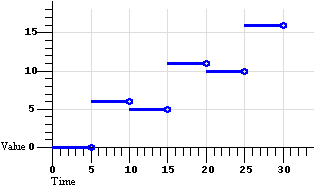 |
Figure 5a: Default discrete animation.
calcMode="discrete"
There are 6 segments of equal duration: 1 segment per value.
|
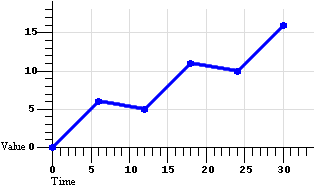 |
Figure 5b: Default linear animation.
calcMode="linear"
There are 5 segments of equal duration: n-1 segments for n values.
|
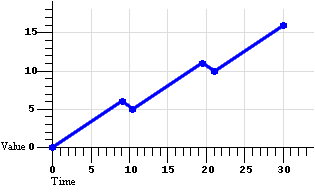 |
Figure 5c: Default paced animation.
calcMode="paced"
There are 5 segments of varying duration: n-1 segments for n values,
computed to yield a constant rate of change in the value.
|
The following example describes a simple discrete animation:
<animate attributeName="foo" dur="8s"
     values="bar; fun; far; boo" />
The value of the attribute "foo" will be set to each of the four strings
for 2 seconds each. Because the string values cannot be interpolated, only
discrete animation is possible; any calcMode attribute would be ignored.
The following example describes a simple linear animation:
<animate attributeName="x" dur="10s" values="0; 10; 100"
     calcMode="linear"/>
The value of "x" will change from 0 to 10 in the first 5 seconds, and then
from 10 to 100 in the second 5 seconds. Note that the values in the values attribute are spaced evenly in time;
in this case the result is a much larger actual change in the value during
the second half of the animation. Contrast this with the same example changed
to use "paced" interpolation:
<animate attributeName="x" dur="10s" values="0; 10; 100"
     calcMode="paced"/>
To produce an even pace of change to the attribute "x", the second segment
defined by the values list gets most of the simple duration: The value of "x"
will change from 0 to 10 in the first second, and then from 10 to 100 in the
next 9 seconds. While this example could be easily authored as a
from-to animation without paced interpolation, many
examples (such as motion paths) are much harder to author without the paced value for calcMode.
This section is normative.
As described in The animation
effect function F(t,u), the simple animation function may be
- Repeated or frozen, using the attributes repeatCount, repeatDur and fill of the BasicInlineTiming module.
- Defined as cumulative or non-cumulative when repeated.
- Defined as additive or non-additive when combined with the underlying
value.
The animation effect function
F(t,u) defines the semantics of these attributes, and give examples. This
section gives only the syntax.
See the BasicInlineTiming module for
definitions of the attributes repeatCount, repeatDur and fill.
The additive and cumulative behavior of repeating animations is controlled
with the additive and accumulate attributes, respectively:
Animation effect function attributes
- accumulate
- Controls whether or not the animation is cumulative. May be either
of the following two values:
- sum
- Specifies that the animation is cumulative, i.e. each
repeat iteration after the first builds upon the last value of
the previous iteration.
- none
- Specifies that the animation is non-cumulative, i.e.
repeat iterations simply repeat the animation function
f(t).
This is the default.
- This attribute is ignored if the target attribute value does not
support addition, or if the animation element does not repeat.
- additive
- Controls whether or not the animation is additive.
- sum
- Specifies that the animation is additive, i.e. will
add to the underlying value of the attribute and other lower
priority animations.
- replace
- Specifies that the animation is non-additive, i.e.
will override the underlying value of the attribute and other
lower priority animations. This is the default.
- This attribute is ignored if the target attribute does not support
additive animation.
An animation is described either as a list of values, as
described earlier, or in a simplified form that uses from,
to and by values.
From/to/by attributes for simple animation functions
- from
- Specifies the starting value of the animation. Must be a legal value
for the specified attribute. Ignored if the values attribute is specified.
- to
- Specifies the ending value of the animation. Must be a legal value
for the specified attribute. Ignored if the values attribute is specified.
- by
- Specifies a relative offset value for the animation. Must be a legal
value of a domain for which addition to the attributeType domain is
defined and which yields a value in the attributeType domain. Ignored
if the values attribute is
specified.
The simpler from/to/by
syntax provides for several variants. To use one of these variants, one of
by or to must be specified; a from value is optional. It is not legal to
specify both by and to attributes; if both are specified, only the
to attribute will be used (the by will be ignored). The combinations of
attributes yield the following classes of animation.
- from-to animation
- Specifying a
from value and a to value
defines a simple animation. The animation function is defined to start
with the from value, and to finish with the
to value.
Normative: A from-to animation with a
from value vf and a
to value vt is equivalent to the
same animation with a values list with 2 values,
vf and vt.
- from-by animation
- Specifying a
from value and a by value
defines a simple animation in which the animation function is defined
to start with the from value, and to change this over the
course of the simple duration by a delta specified with the
by attribute. This may only be used with attributes that
support addition (e.g. most numeric attributes).
Normative: A from-by animation with a
from value vf and a
by value vb is equivalent to the
same animation with a values list with 2 values,
vf and
(vf+vb).
- by animation
- Specifying only a by value defines a simple animation in which the
animation function is defined to offset the underlying value for the
attribute, using a delta that varies over the course of the simple
duration, starting from a delta of 0 and ending with the delta
specified with the
by attribute. This may only be used
with attributes that support additive animation.
Normative: A by animation with a by
value vb is equivalent to the same animation
with a values list with 2 values,
0 and vb, and
additive="sum". Any other specification of the
additive attribute in a by animation is
ignored.
- to animation
- This describes an animation in which the animation function is
defined to start with the underlying value for the attribute, and
finish with the value specified with the
to attribute.
Using this form, an author can describe an animation that will start
with any current value for the attribute, and will end up at the
desired to value.
A normative definition of a to animation is given
below in To animation
This section is informative.
Examples
The following "from-to animation" example animates the width of
an SVG shape over the course of 10 seconds from a width of 50 to a width of
100.
<rect ...>
   <animate attributeName="width" from="50" to="100" dur="10s"/>
</rect>
The following "from-by animation" example animates the width of
an SVG shape over the course of 10 seconds from a width of 50 to a width of
75.
<rect ...>
   <animate attributeName="width" from="50" by="25" dur="10s"/>
</rect>
The following "by animation" example animates the width of an SVG
shape over the course of 10 seconds from the original width of 40 to a width
of 70.
<rect width="40"...>
   <animate attributeName="width" by="30" dur="10s"/>
</rect>
From-to and from-by animations also support cumulative
animation, as in the following example:
<rect width="20px"...>
   <animate attributeName="width" dur="5s" from="10px" to="20px"
      accumulate="sum" repeatCount="10" />
</rect>
The rectangle will grow from 10 to 20 pixels in the first 5 seconds, and
then from 30 to 40 in the next 5 seconds, and so on up to 200 pixels after 10
repeats. Note that since the default value for additive is replace, the original value is ignored. The following
example makes the animation explicitly additive:
<rect width="20px"...>
   <animate attributeName="width" dur="5s" from="10px" to="20px"
      accumulate="sum" additive="sum" repeatCount="10" />
</rect>
The results are the same as before, except that all the values are shifted
up by the original value of 20. After 5 seconds, the rectangle jumps
from 40 pixels to 50 pixels wide, and it is 220 pixels wide at the end
of the 10th repeat.
Normative
The simple animation function
f(t,u) for a to animation with
to value vt is a linear interpolation
between the underlying value, u, and the
to value:
f(t,u) = (u * (d-t)/d) +
    (vt * t/d)
, for
t:
0<=t<=d where
d is the simple duration.
If no other (lower priority) animations are active or frozen, this defines
simple interpolation. However if another animation is manipulating the
underlying value, the to animation will initially add to the effect
of the lower priority animation, and increasingly dominate it as it nears the
end of the simple duration, eventually overriding it completely. The value
for f(t,u) at the end of the simple duration is
just the to value.
Repeating to animations is the same as repeating other
animations:
Normative
The repeated animation function,
fr(t,u), has the standard
definition:
fr(t,u) = f( REMAINDER(t,d), u
    )
.
Because to animation is defined in terms of absolute values of
the target attribute, cumulative animation is not defined:
Normative
The cumulative animation function,
fc(t), for a to animation
is
fc(t,u)
=fr(t,u).
A frozen to animation takes on the value at the time it is
frozen, masking further changes in the underlying value. This matches the
dominance of the to value at the end of the simple duration.
Even if other, lower priority animations are active while a to
animation is frozen, the value does not change.
Normative
The frozen animation function,
ff(t), for a to animation
is
ff(t,u) =
fc(t,u), if the animation is not frozen at
time t, and
ff(t,u) =
vf, if the animation is frozen at time
t, where
vf is the value of
ff(t,u) at the moment the
animation was frozen.
For example, consider
<rect width="40"...>
   <animate attributeName="width" to="100" dur="10s" repeatCount="2.5" fill="freeze"/>
</rect>
The width will animate from 40 to 100 pixels in the first 10 seconds,
repeat 40 to 100 in the second 10 seconds, go from 40 to 70 in the final 5
seconds, and freeze at 70.
To animation defines its own kind of additive semantics, so the
additive attribute is ignored.
Normative
The animation effect function,
F(t,u) for a to animation is
F(t,u) =
ff(t,u).
Multiple to animations will also combine according to these
semantics. As the animation progresses, the higher-priority animation will
have greater and greater effect, and the end result will be to set the
attribute to the final value of the higher-priority to animation.
The animate element
introduces a generic attribute animation that requires little or no semantic
understanding of the attribute being animated. It can animate numeric scalars
as well as numeric vectors. It can also animate a single non-numeric
attribute through a discrete set of values. The animate element is an empty element; it
cannot have child elements.
This element supports from/to/by and values descriptions for the animation
function, as well as all of the calculation modes. It supports all the
described timing attributes. These are all described in respective sections
above.
Element attributes
- attributeName and
- attributeType
- The attribute to be animated. See The target attribute.
attributeName is
required; attributeType
is optional.
- targetElement,
- href,
- actuate,
- show, and
- type
- The target element. See The target element. All
are optional.
- from,
- to,
- by,
- values,
- calcMode,
- accumulate, and
- additive
- Specify the animation function and effect. See Specifying the simple
animation function f(t) and Specifying the animation
effect F(t,u).
Numerous examples are provided above, as are normative definitions of the
semantics of all attributes supported by animate.
3.7.2 The set element
The set element provides
a simple means of just setting the value of an attribute for a specified
duration. As with all animation elements, this only manipulates the
presentation value, and when the animation completes, the effect is no longer
applied. That is, set does not
permanently set the value of the attribute.
The set element supports all
attribute types, including those that cannot reasonably be interpolated and
that more sensibly support semantics of simply setting a value (e.g. strings
and Boolean values). The set element is
non-additive. The additive and accumulate attributes are not allowed, and
will be ignored if specified.
The set element supports all the
timing attributes to specify the simple and active durations. However, the
repeatCount and repeatDur attributes will just affect
the active duration of the set,
extending the effect of the set (since
it is not really meaningful to "repeat" a static operation). Note that using
fill="freeze" with set will have the same effect as defining the
timing so that the active duration is indefinite.
The set element supports a more
restricted set of attributes than the animate element. Only one value is
specified, and neither interpolation control nor additive or cumulative
animation is supported:
Normative
The simple animation function defined by a set element is
f(t) =
  v
where v is the
value of the to
attribute.
The set
element is non-cumulative and non-additive.
The animateMotion element will move an element along a
path. The element abstracts the notion of motion and position across a
variety of layout mechanisms - the host language defines the layout model and
must specify the precise semantics of position and motion. The path can be
described in either of two ways:
- Specifying an x,y pair for each of the from/to/by
attributes. These will define a straight line motion path.
- Specifying a semicolon separated list of x,y pairs for the values attribute. This will define a
motion path of straight line segments, or points (if calcMode is set to discrete). This
will override any from/to/by
attribute values.
All values must be x, y value pairs. Each x and y value may specify any
units supported for element positioning by the host language. The host
language defines the default units. In addition, the host language defines
the reference point for positioning an element. This is the point
within the element that is aligned to the position described by the motion
animation. The reference point defaults in some languages to the upper left
corner of the element bounding box; in other languages the reference point
may be implicit, or may be specified for an element.
The syntax for the x, y value pairs is:
coordinate-pair ::= "("coordinate comma-wsp coordinate")"
coordinate      ::= num
num             ::= Number
Coordinate values are separated by at least one white space character or a
comma. Additional white space around the separator is allowed. The values of
coordinate must be defined as some sort of number in the host
language.
The attributeName and attributeType attributes are not
used with animateMotion, as
the manipulated position attribute(s) are defined by the host language. If
the position is exposed as an attribute or attributes that can also be
animated (e.g. as "top" and "left", or "posX" and "posY"), implementations
must combine animateMotion
animations with other animations that manipulate individual position
attributes. See also The
animation sandwich model.
If none of the from, to, by and
values attributes are specified, the
animation will have no effect.
The default calculation mode (calcMode) for animateMotion is paced. This will produce constant velocity motion along
the specified path. Note that while animateMotion elements can be additive,
the addition of two or more paced (constant
velocity) animations may not result in a combined motion animation with
constant velocity.
Element attributes
- targetElement,
- href,
- actuate,
- show, and
- type
- The target element. See The target element. All
are optional.
- from,
- to,
- by,
- values,
- accumulate, and
- additive
- Specify the animation function and effect. See Specifying the simple
animation function f(t) and Specifying the animation
effect F(t,u).
- calcMode
- Defined as above in Specifying the simple
animation function f(t), but note that the default calcMode for animateMotion is paced. This will produce constant velocity motion.
The use of linear for the calcMode with more than 2 points
described in the values
attribute may result in motion with varying velocity. The linear calcMode specifies that time is
evenly divided among the segments defined by the values. The use of linear does not specify that time is divided
evenly according to the distance described by each segment.
For motion with constant velocity, calcMode should be set to paced.
- origin
- Specifies the origin of motion for the animation. The values and
semantics of this attribute are dependent upon the layout and
positioning model of the host language. In some languages, there may be
only one option, default. However, in CSS
positioning for example, it is possible to specify a motion path
relative to the container block, or to the layout position of the
element. It is often useful to describe motion relative to the position
of the element as it is laid out (e.g. from off screen left to the
layout position, specified as
from="(-100,0)" and to="(0,0)". Authors must be able
to describe motion both in this manner, as well as relative to the
container block. The origin
attribute supports this distinction. Nevertheless, because the host
language defines the layout model, the host language must also specify
the "default" behavior, as well as any additional attribute values that
are supported.
- Note that the definition of the layout model in the host language
specifies whether containers have bounds, and the behavior when an
element is moved outside the bounds of the layout container. In CSS2
[CSS2], for example, this can be
controlled with the "clip" property.
- Note that for additive animation, the origin distinction is not
meaningful. This attribute only applies when additive is set to replace.
The animateColor
element specifies an animation of a color attribute. The host language must
specify those attributes that describe color values and can support color
animation.
All values must represent [sRGB] color
values. Legal value syntax for attribute values is defined by the host
language.
Interpolation is defined on a per-color-channel basis.
Element attributes
- attributeName and
- attributeType
- The attribute to be animated. See The target attribute.
attributeName is
required; attributeType
is optional.
- targetElement,
- href,
- actuate,
- show, and
- type
- The target element. See The target element. All
are optional.
- from,
- to,
- by,
- values,
- calcMode,
- accumulate, and
- additive
- Specify the animation function and effect. See Specifying the simple
animation function f(t), Specifying the animation
effect F(t,u).
The values in the from/to/by and
values attributes may specify
negative and out of gamut values for colors. The function defined by an
individual animateColor may
yield negative or out of gamut values. The implementation must correct the
resulting presentation value, to be legal for the destination (display)
colorspace. However, as described in The animation sandwich model,
the implementation should only correct the final combined result of all
animations for a given attribute, and should not correct the effect of
individual animations.
Values are corrected by "clamping" the values to the correct range. Values
less than the minimum allowed value are clamped to the minimum value
(commonly 0, but not necessarily so for some color profiles). Values greater
than the defined maximum are clamped to the maximum value (defined by the
host language) .
This section is normative.
This section describes what a language designer must actually do to
specify the integration of SMIL Animation into a host language. This includes
basic definitions and constraints upon animation.
In addition to the requirements listed in this section, those listed in Common animation integration
requirements must be satisfied.
The host language designer must choose whether to support the targetElement attribute or the XLink
attributes for specifying the
target element. Note that if the XLink syntax is used, the host language
designer must decide how to denote the XLink namespace for the associated
attributes. The namespace can be fixed in a DTD, or the language designer can
require colonized attribute names (qnames) to denote the XLink
namespace for the attributes. The required XLink attributes have fixed
values, and so may also be specified in a DTD, or can be required on the
animation elements. Host language designers may require that the optional
XLink attributes be specified. These decisions are left to the host language
designer - the syntax details for XLink attributes do not affect the
semantics of SMIL Animation.
In general, target elements may be any element in the document. Host
language designers must specify any exceptions to this. Host language
designers are discouraged from allowing animation elements to target elements
outside of the document in which the animation element is defined. The XLink
syntax for the target element could allow this, but the SMIL timing and
animation semantics of this are not defined in this version of SMIL
Animation.
The definitions in this module can be used to animate any attribute of any
element in a host document. However, it is expected that host language
designers integrating SMIL Animation may choose to constrain which elements
and attributes can support animation. For example, a host language may choose
not to support animation of the language attribute of a
script element. A host language which included a specification
for DOM functionality might limit animation to the attributes which may
legally be modified through the DOM.
Any attribute of any element not specifically excluded from animation by
the host language may be animated, as long as the underlying data type (as
defined by the host language for the attribute) supports discrete values (for
discrete animation) and/or addition (for interpolated, additive and
cumulative animation).
All constraints upon animation must be described in the host language
specification or in an appropriate schema, as the DTD alone cannot reasonably
express this.
The host language must define which language abstract values should be
handled for animated attributes. For example, a host language that
incorporates CSS may require that CSS length values be supported. This is
further detailed in Animation function value
details.
The host language must specify the interpretation of relative values. For
example, if a value is specified as a percentage of the size of a container,
the host language must specify whether this value will be dynamically
interpreted as the container size is animated.
The host language must specify the semantics of clamping values for
attributes. The language must specify any defined ranges for values, and how
out of range values will be handled.
The host language must specify the formats supported for numeric attribute
values. This includes both integer values and floating point values. As a
reasonable minimum, host language designers are encouraged to support the
format described in section 4.3.1,
"Integers and real numbers," of [CSS2].
The host language specification must define which elements can be the
target of animateMotion. In
addition, the host language specification must describe the positioning model
for elements, and must describe the model for animateMotion in this context (i.e.
the semantics of the default value for the origin attribute must be defined). If there
are different ways to describe position, additional attribute values for the
origin attribute should be defined to
allow authors control over the positioning model.
This section is normative.
This section defines the functionality of the SMIL 3.0 SplineAnimation
module. This module adds attributes for spline interpolation and for uneven
spacing of points in time. These attributes may be used in animate, animateMotion and animateColor elements.
The SplineAnimation module extends the discrete, linear and paced calculation modes of the BasicAnimation module,
providing additional control over interpolation and timing:
- The calcMode attribute is
extended to support splines.
- A path attribute is added to the
animateMotion element,
allowing authors to define a motion path using a subset of the SVG
[SVG] path syntax, and providing smooth path motion.
- The keyTimes attribute
provides additional control over the timing of the animation function,
associating a time with each value in the values list (or the points in a path description for the animateMotion element).
- The keySplines attribute
provides a means of controlling the pacing of interpolation
between the values in the values list.
Calculation mode attributes
- calcMode
- In addition to the values discrete, linear and paced of
the BasicAnimation module, the SplineAnimation module supports the value
- spline
- Interpolates from one value in the values list to the next
according to a time function defined by a cubic Bezier spline.
The points of the spline are defined in the keyTimes attribute, and the
control points for each interval are defined in the keySplines attribute.
The use of discrete for the calcMode together with a path specification is allowed, but will
simply jump the target element from point to point. The times are
derived from the points in the path specification, as described in the
path attribute, immediately
below.
- keyTimes
- A semicolon-separated list of time values used to control the pacing
of the animation. Each time in the list corresponds to a value in the
values attribute list, and
defines when the value should be used in the animation function. Each
time value in the keyTimes
list is specified as a floating point value between 0 and 1
(inclusive), representing a proportional offset into the simple
duration of the animation element.
If a list of keyTimes is
specified, there must be exactly as many values in the keyTimes list as in the values list.
If no keyTimes attribute
is specified, the simple duration is divided into equal segments as
described in The simple
animation function f(t).
Each successive time value must be greater than or equal to the
preceding time value.
The keyTimes list
semantics depends upon the interpolation mode:
- For linear and spline animation, the first time value in the
list must be 0, and the last time value in the list must be 1. The
keyTime associated with
each value defines when the value is set; values are interpolated
between the keyTimes.
- For discrete animation, the first time value in the list must be
0. The time associated with each value defines when the value is
set; the animation function uses that value until the next time
defined in keyTimes.
If the interpolation mode is paced, the
keyTimes attribute is
ignored.
If there are any errors in the keyTimes specification (bad values,
too many or too few values), the animation will have no effect.
If the simple duration is indefinite and the interpolation mode is
linear or spline, any keyTimes specification will be
ignored.
- keySplines
- A set of Bezier control points associated with the keyTimes list, defining a cubic
Bezier function that controls interval pacing. The attribute value is a
semicolon separated list of control point descriptions. Each control
point description is a set of four floating point values:
 x1 y1
      x2 y2
, describing the Bezier control points for one time
segment. The keyTimes values
that define the associated segment are the Bezier "anchor points", and
the keySplines values are
the control points. Thus, there must be one fewer sets of control
points in the keySplines
attribute than there are keyTimes.
The values must all be in the range 0 to 1.
This attribute is ignored unless the calcMode is set to spline.
If there are any errors in the keySplines specification (bad
values, too many or too few values), the animation will have no
effect.
This semantic (the duration is divided into n-1 equal periods)
applies as well when the keySplines attribute is specified, but
keyTimes is not. The times
associated to the keySplines
values are determined as described above.
The syntax for the control point sets in keySplines lists is:
control-pt-set ::= ( fpval comma-wsp fpval comma-wsp fpval comma-wsp fpval )
Using:
fpval          ::= Floating point number
S              ::= spacechar*
comma-wsp      ::= S (spacechar|",") S
spacechar      ::= (#x20 | #x9 | #xD | #xA)
Control point values are separated by at least one white space character
or a comma. Additional white space around the separator is allowed. The
allowed syntax for floating point numbers must be defined in the host
language.
If the argument values for keyTimes or keySplines are not legal (including too
few or too many values for either attribute), the animation will have no
effect (see also Handling syntax
errors).
In the calcMode, keyTimes and keySplines attribute values, leading
and trailing white space and white space before and after semicolon
separators will be ignored.
This section is informative.
Discrete animation can be used with keyTimes, as in the following example:
<animateColor attributeName="color" dur="10s" calcMode="discrete"
     values="green; yellow; red" keyTimes="0.0; 0.5; 0.8" />
The value of the "color" attribute will be set to green
for 5 seconds, and then to yellow for 3 seconds, and then will remain red for
the remainder of the element.
When using discrete animation with a keyTimes value of 1, the result may be somewhat
surprising. Consider the following example:
<par dur="30">
  <animate calcMode="discrete" repeatCount="2" dur="10" fill="freeze"
    accumulate="[as specified]" keyTimes="0.0; 0.5; 1.0" values="0; 1; 2"/>
</par>
This example is tricky because of the end-point-exclusive nature of
the SMIL time model. At first flush, the final value is never reached
since the final time is never reached, but the definitions above make that the value is used
anyway. The table gives the value for selected times for the possible
values of the accumulate
attribute:
| time |
accumulate |
| none |
sum |
| t=0 |
0 |
0 |
| t=5 |
1 |
1 |
| t=10 |
0 |
2 |
| t=15 |
1 |
3 |
| t=20 |
2 |
4 |
| t=25 |
2 |
4 |
The following example illustrates the use of keyTimes:
<animate attributeName="x" dur="10s" values="0; 50; 100"
     keyTimes="0; .8; 1" calcMode="linear"/>
The keyTimes values cause the
"x" attribute to have a value of "0" at the start of the animation, "50"
after 8 seconds (at 80% into the simple duration) and "100" at the end of the
animation. The value will change more slowly in the first half of the
animation, and more quickly in the second half.
For some attributes, the pace of change may not be easily
discernibly by viewers. However for animations like motion, the ability to
make the speed of the motion change gradually, and not in abrupt
steps, can be important. The keySplines attribute provides this
control.
Extending the above example to use keySplines:
<animate attributeName="x" dur="10s" values="0; 50; 100"
     keyTimes="0; .8; 1" calcMode="spline"
     keySplines=".5 0 .5 1; 0 0 1 1" />
The keyTimes still cause the "x"
attribute to have a value of "0" at the start of the animation, "50" after 8
seconds and "100" at the end of the animation. However, the keySplines values define a curve for
pacing the interpolation between values. In the example above, the spline
causes an ease-in and ease-out effect between time 0 and 8 seconds (i.e.
between keyTimes 0 and .8, and
values "0" and "50"), but a strict
linear interpolation between 8 seconds and the end (i.e. between keyTimes .8 and 1, and values "50" and "100"). Figure 7 shows
the curves that these keySplines
values define.
Figure 7 - Illustration of keySplines effect
|
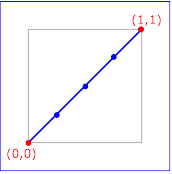
keySplines="0 0 1 1"
(the default)
|
|
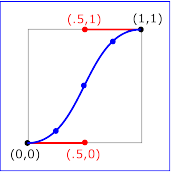
keySplines=".5 0 .5 1"
|
|
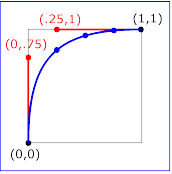
keySplines="0 .75 .25 1"
|
|
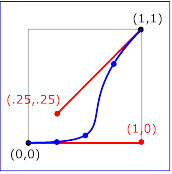
keySplines="1 0 .25 .25"
|
Each diagram in Figure 7 illustrates the effect of keySplines settings for a single
interval (i.e. between the associated pairs of values in the keyTimes and values lists.). The horizontal axis can be
thought of as the input value for the unit progress of interpolation
within the interval - i.e. the pace with which interpolation proceeds along
the given interval. The vertical axis is the resulting value for the unit
progress, yielded by the keySplines function. Another way of
describing this is that the horizontal axis is the input unit time
for the interval, and the vertical axis is the output unit time. See
also the section Timing and
real-world clock times.
To illustrate the calculations, consider the simple example:
<animate dur="4s" values="10; 20" keyTimes="0; 1"
     calcMode="spline" keySplines={as in table} />
Using the keySplines values for each of the four cases above, the
approximate interpolated values as the animation proceeds are:
| keySplines values |
Initial value |
After 1s |
After 2s |
After 3s |
Final value |
| 0 0 1 1 |
10.0 |
12.5 |
15.0 |
17.5 |
20.0 |
| .5 0 .5 1 |
10.0 |
11.0 |
15.0 |
19.0 |
20.0 |
| 0 .75 .25 1 |
10.0 |
18.0 |
19.3 |
19.8 |
20.0 |
| 1 0 .25 .25 |
10.0 |
10.1 |
10.6 |
16.9 |
20.0 |
For a formal definition of Bezier spline calculation, see [COMP-GRAPHICS], pages 488-491.
The keyTimes and keySplines attributes can also be used
with the from/to/by shorthand forms for specifying values, as in the
following example:
<animate attributeName="foo" from="10" to="20"
     dur="10s" keyTimes="0.0; 1.0"
     calcMode="spline" keySplines=".5 0 .5 1" />
The value will change from 10 to 20, using an "ease-in/ease-out"
curve specified by the keySplines
values. The keyTimes values cause
the value of 20 to be reached at 10 seconds.
The following example describes a somewhat unusual usage, a
from-to animation with discrete animation. The
stroke-linecap attribute of SVG elements takes a string, and so
implies a calcMode of discrete. The animation will set the
stroke-linecap attribute to round
for 5 seconds (half the simple duration) and then set the
stroke-linecap to square for 5
seconds.
<rect stroke-linecap="butt"...>
   <animate attributeName="stroke-linecap"
      from="round" to="square" dur="10s"/>
</rect>
The SplineAnimation module extends the animate element defined by the
BasicAnimation module, adding the following attributes and values.
Examples are provided above, as are normative definitions of the semantics
of all attributes supported by animate.
The SplineAnimation module extends the animateMotion element defined by the
BasicAnimation module, adding the following attributes and values.
Element attributes
- all attributes and associated elements of the animateMotion element in
BasicAnimation.
- See The animateMotion
element.
- keyTimes,
- keySplines, and
- calcMode
- Extend the specification animation function and effect. See The animateMotion element
and Spline animation
function calculation mode.
- path
- Specifies the curve that describes the attribute value as a function
of time. The supported syntax is a subset of the SVG path syntax.
Support includes commands to describes lines ("MmLlHhVvZz") and Bezier
curves ("Cc"). For details refer to the path specification in SVG [SVG].
- Note that SVG provides two forms of path commands, "absolute" and
"relative". These terms may appear to be related to the definition of
additive animation and/or to the from attribute, but they are
orthogonal. The terms "absolute" and "relative" apply only to the
definition of the path itself, and not to the operation of the
animation. The "relative" commands define a path point relative to the
previously specified point. The terms "absolute" and "relative" are
unrelated to the definitions of both "additive" animation and any
specification of origin.
- For the "absolute" commands ("MLHVZC"), the host language must
specify the coordinate system of the path values.
- If the "relative" commands ("mlhvzc") are used, they simply
define the point as an offset from the previous point on the path.
This does not affect the definition of "additive" or origin for the animateMotion
element.
A path data segment must begin with either one of the "moveto"
commands.
- Move To commands - "M <x> <y>" or "m <dx>
<dy>"
- Start a new sub-path at the given (x,y) coordinate. If a moveto
is followed by multiple pairs of coordinates, the subsequent
pairs are treated as implicit lineto commands.
- Line To commands - "L <x> <y>" or "l <dx>
<dy>"
- Draw a line from the current point to the given (x,y)
coordinate which becomes the new current point. A number of
coordinate pairs may be specified to draw a polyline.
- Horizontal Line To commands - "H <x>" or "h <dx>"
- Draws a horizontal line from the current point (cpx, cpy) to
(x, cpy). Multiple x values can be provided.
- Vertical Line To commands - "V <y>" or "v <dy>"
- Draws a vertical line from the current point (cpx, cpy) to
(cpx, y). Multiple y values can be provided.
- Closepath commands - "Z" or "z"
- The "closepath" causes an automatic straight line to be drawn
from the current point to the initial point of the current
subpath.
- Cubic Bezier Curve To commands -
"C <x1> <y1> <x2> <y2> <x>
<y>" or
"c <dx1> <dy1> <dx2> <dy2> <dx>
<dy>"
- Draws a cubic Bezier curve from the current point to (x,y)
using (x1,y1) as the control point at the beginning of the curve
and (x2,y2) as the control point at the end of the curve.
Multiple sets of coordinates may be specified to draw a
polybezier.
For all calcMode settings,
the definition of the simple animation function,
f(t), uses the number of values in the
values attribute to determine
how the simple duration d is divided
into segments. When a path
attribute is used, the number of values is defined to be the number of
points defined by the path, unless there are "move to" commands within
the path. A "move to" command does not define an additional "segment"
for the purposes of timing or interpolation. A "move to" command does
not count as an additional point when dividing up the duration. When a
path is combined with a paced calcMode setting, all "move to"
commands are considered to have 0 duration (i.e. they always happen
instantaneously), and should not be considered in computing the
pacing.
If the path attribute is
is specified, any from/to/by
or values attribute values will
be ignored.
Examples are provided above, as are normative definitions of the semantics
of all attributes supported by animate.
For complete velocity control, calcMode can be set to spline and the author can specify a velocity control
spline with keyTimes and keySplines.
The SplineAnimation module extends the animateColor element defined by the
BasicAnimation module, adding the following attributes and values.
To specify the integration of the SMIL 3.0 SplineAnimation module into a
host language, the language designer must integrate SMIL 3.0 BasicAnimation
into the language, satisfying all the requirements listed in BasicAnimation integration
requirements.
In addition to integrating BasicAnimation, the requirements listed in Common animation integration
requirements must be satisfied for the SplineAnimation module.
See the full DTD for the SMIL
Animation Modules.
This section presents host-language-integration issues which are the same
for the BasicAnimation and SplineAnimation modules.
The host language profile must integrate the SMIL 3.0 BasicInlineTiming module into the host language,
satisfying all requirements of that module. In addition, all modules of the
SMIL 3.0 Timing and Synchronization modules
and of the SMIL 3.0 Time Manipulation
modules which are integrated into the host language must be available on
BasicAnimation elements.
In particular, the fill attribute is
supported on animation elements only if the host language integrates the SMIL
3.0 BasicTimeContainers module in addition to
the BasicInlineTiming module.
normative section
If the Eventbase-element term is missing, the event-base element is
defined to be the target element of the animation.
The host language profile may add additional attributes to Animation
elements. Attributes added to any Animation element must be added to all
Animation elements. In particular, this module does not define an XML ID
attribute. It is expected that the host language profile will add an XML ID
attribute to the Animation elements.
Language designers integrating SMIL Animation are encouraged to define new
animation elements where such additions will be of convenience to authors.
The new elements must be based on SMIL Animation and SMIL Timing and Synchronization, and must stay
within the framework provided by SMIL Timing and Synchronization and SMIL
Animation.
Language designers are also encouraged to define support for additive and
cumulative animation for non-numeric data types where addition can sensibly
be defined.
Language designers integrating SMIL Animation are encouraged to disallow
manipulation of attributes of the animation elements after the document has
begun. This includes both the attributes specifying targets and values, as
well as the timing attributes. In particular, the id attribute
(of type ID) on all animation elements must not be mutable (i.e. should be
read-only). Requiring animation runtimes to track changes to id
values introduces considerable complexity, for what is at best a questionable
feature.
It is recommended that language specifications disallow manipulation of
animation element attributes through DOM interfaces after the document has
begun. It is also recommended that language specifications disallow the use
of animation elements to target other animation elements.
Note in particular that if the attributeName attribute can be
changed (either by animation or script), problems may arise if the target
attribute has a namespace qualified name. Current DOM specifications do not
include a mechanism to handle this binding.
Dynamically changing the attribute values of animation elements introduces
semantic complications to the model that are not yet sufficiently resolved.
This constraint may be lifted in a future version of SMIL Animation.
The specific error handling mechanisms for each attribute are described
with the individual syntax descriptions. Some of these specifications
describe the behavior of an animation with syntax errors as "having no
effect". This means that the animation will continue to behave normally
with respect to timing, but will not manipulate any presentation value, and
so will have no visible impact upon the presentation.
In particular, this means that if other animation elements are defined to
begin or end relative to an animation that "has no effect", the other
animation elements will begin and end as though there were no syntax errors.
The presentation runtime may indicate an error, but need not halt
presentation or animation of the document.
Some host languages and/or runtimes may choose to impose stricter error
handling (see also Error
handling semantics for a discussion of host language issues with error
handling). Authoring environments may also choose to be more intrusive when
errors are detected.
The host language designer may impose stricter constraints upon the error
handling semantics. That is, in the case of syntax errors, the host language
may specify additional or stricter mechanisms to be used to indicate an
error. An example would be to stop all processing of the document, or to halt
all animation.
Host language designers may not relax the error handling specifications,
or the error handling response (as described in Handling syntax errors). For
example, host language designers may not define error recovery semantics for
missing or erroneous values in the values or keyTimes attribute values.
- Editor for SMIL 3.0
- Dick Bulterman, CWI.
- Editors for earlier versions of SMIL
- Dick Bulterman, Oratrix/CWI
- Jeffrey Ayars, RealNetworks
- Thierry Michel, W3C.
4.2 Introduction
This section is normative.
This section defines the SMIL 3.0 content control modules. These modules
contain elements and attributes which provide for runtime content choices and
optimized content delivery. SMIL content control functionality is partitioned
across five modules:
Since all of the content control elements and attributes are defined in
modules, designers of other markup languages can reuse this functionality on
a module by module basis when they need to include media content control in
their language.
The functionality in the CustomTestAttributes module builds on the
functionality of the BasicContentControl module; profiles implementing the
CustomTestAttributes module must also implement the BasicContentControl and
RequiredContentControl modules. The PrefetchControl and SkipContentControl
modules have no prerequisites.
It is implementation dependent when content control attributes are
evaluated. Attributes may be evaluated multiple times. Dynamic reevaluation
is allowed but not required. When dynamic reevaluation is supported by
a user agent, it is expected that any system- or custom-test variable will be
evaluated at the beginning of a node's execution (either at its initial begin
time or each time a repeated element restarts). For situations in which more
explicit control over reevaluation is required, the use of the SMIL 3.0 State
modules is encouraged.
4.3 The SMIL 3.0
BasicContentControl Module
This section is normative.
4.3.1 SMIL 3.0
BasicContentControl Module Overview
SMIL 1.0 provides a "test-attribute" mechanism to process an element only
when certain conditions are true, for example when the language preference
specified by the user matches that of a media object. One or more test
attributes may appear on media object references or timing structure
elements; if the attribute evaluates to true, the
containing element is played, and if the attribute evaluates to false the containing element is ignored. SMIL 1.0 also
provides the switch element for
expressing that a set of document parts are alternatives, and that the first
one fulfilling certain conditions should be chosen. This is useful to express
that different language versions of an audio file are available, and that the
client may select one of them.
The SMIL 3.0 BasicContent module includes the test attribute functionality
from SMIL 1.0 and extends it by supporting new system test attributes. This
section will describe the use of the predefined system test attributes, the
switch element and test attribute
in-line placement. A mechanism for extending test attributes is presented in
the CustomTestAttributes
module.
This specification defines a list of test attributes that can be added to
language elements, as allowed by the language designer. In SMIL 1.0, these
elements are synchronization and media elements. Conceptually, these
attributes represent Boolean tests. When any of the test attributes specified
for an element evaluates to false, the element
carrying this attribute is ignored.
SMIL 3.0 supports the full set of SMIL 2.1 system attributes. The SMIL 2.1
compatible system test attributes are:
Note that, with the exception of system-overdub-or-caption,
the names of these attributes have been changed to reflect SMIL 3.0's
camelCase conventions. The SMIL 1.0 hyphenated names are deprecated in
this release.
SMIL 3.0 also supports system test attributes that define additional
characteristics of the system environment. These are:
The complete definition of each attribute is given in the attributes definition
section.
The switch element allows an
author to specify a set of alternative elements from which only the first
acceptable element is chosen.
Authors should order the alternatives from the most desirable to the least
desirable. Furthermore, authors may wish to place a relatively fail-safe
alternative as the last item in the switch so that at least one item within the
switch is chosen (unless this is
explicitly not desired).
Note that some network protocols, e.g. HTTP and RTSP, support
content-negotiation, which may be an alternative to using the switch element in some cases.
It is the responsibility of the SMIL user agent to determine the setting
for system test attribute values. Such settings may be determined statically
based on configuration settings, or they may be determined (and re-evaluated)
dynamically, depending on the player implementation. When dynamic
reevaluation is supported by a user agent, it is expected that any
system- or custom-test variable will be evaluated at the beginning of a nodes
execution (either at its initial begin time or each time a repeated element
restarts). For situations in which more explicit control over reevaluation is
required, the use of the SMIL 3.0 State modules is encouraged. Players may
not select members of a switch at
random.
System Test Attribute
In-Line Use
To allow more flexibility in element selection, test attributes may also
be used outside of the switch
element.
The alternatives indicated by the in-line construct could be represented
as a set of switch statements,
although the resulting switch could
become explosive in size. Use of an in-line test mechanism significantly
simplifies the specification of adaptive content, especially in those cases
where many independent alternatives exist. Note, however, that there is no
fail-safe alternative mechanism (such as defining an element without a test
attribute inside of a switch) when
using test attributes in-line.
4.3.2 Elements and
Attributes
SMIL 3.0 BasicContentControl defines the switch element and a set of predefined
system test attributes.
The switch element allows an
author to specify a set of alternative elements. An element is selected as
follows: the player evaluates the elements in the order in which they occur
in the switch element. The first
acceptable element is selected at the exclusion of all other elements within
the switch. Implementations must NOT
arbitrarily pick an object within a switch when test attributes for all child
elements fail.
This element does not have attributes beyond those required of all
elements in the profile.
The content of the element is language implementation dependent.
In the SMIL 3.0 language profile, if the switch is used as a direct or indirect
child of a body element, it may contain
any media object or timing structure container, or it may contain nested
switch elements. All of these
elements may appear multiple times inside the switch. If the switch is used as a direct or indirect
child of a head element, it may contain
one or more layout elements.
Predefined Test
Attributes
SMIL 3.0 defines the following system test attributes. When any of the
test attributes specified for an element evaluates to false, the element carrying this attribute is ignored.
Note that most hyphenated test attribute names from SMIL 1.0 have been
deprecated in favor of names using the current SMIL camelCase
convention. For these, the deprecated SMIL 1.0 name is shown in parentheses
after the preferred name.
- systemAudioDesc
- values: on | off
- This test attribute specifies whether or not closed audio
descriptions should be rendered. This is intended to provide authors
with the ability to support audio descriptions in the same way that
systemCaptions provides
text captions. The value of systemAudioDesc is used to
control object rendering in conjunction with the user's preference for
receiving audio descriptions of a media object if and when these are
available. A value of on indicates a
preference to have such descriptions rendered when available. A value
of off indicates a preference not to render
such descriptions.
- Authors should place systemAudioDesc = on only on elements that they wish to render when
the user has indicated they want audio descriptions. Authors should
place systemAudioDesc
= off only on elements that they wish to
render when the user has indicated they DON'T want audio
descriptions.
- Evaluates to true if the user preference
matches this attribute value. Evaluates to false if they do not match.
- systemBitrate
(system-bitrate)
- value: the approximate bandwidth, in
bits-per-second, available to the system.
- The measurement of bandwidth is application specific, meaning that
applications may use sophisticated measurement of end-to-end
connectivity, or a simple static setting controlled by the user. In the
latter case, this could for instance be used to make a choice based on
the user's connection to the network. Typical values for modem users
would be 14400, 28800, 56000 bit/s etc. Evaluates to true if the available system bitrate is equal to
or greater than the given value. Evaluates to false if the available system bitrate is less
than the given value.
The attribute can assume any integer value greater than 0. If the value
exceeds an implementation-defined maximum bandwidth value, the
attribute always evaluates to false.
- systemCaptions
(system-captions)
- values: on | off
- This attribute allows authors to specify a redundant text equivalent
of the audio portion of the presentation. Examples of intended use are:
audiences with hearing disabilities, those learning to read, or anyone
who wants or needs this information.
- Evaluates to true if the user preference
matches this attribute value. Evaluates to false if they do not match.
- systemComponent
- value: an XML CDATA string containing one
or more white-space separated URI's.
- Each URI identifies a component of the playback system, e.g. user
agent component/feature, number of audio channels, codec, HW MPEG
decoder, etc. The URI is implementation dependent. Each implementation
is encouraged to publish a list of component URIs which can be used to
identify and resolve the presence of implementation-dependent
components.
- Evaluates to true if all URI's match one
of the URI's that the user agent recognizes. Evaluates to false otherwise.
- systemCPU
- value: an XML NMTOKEN([[XML11]).
- This test attribute specifies the CPU on which a user agent may be
running. An implementation must allow the user the ability to set the
system value to unknown for privacy.
- The following list contains the suggested values for this test
attribute (additional names may be supported by an implementation):
alpha, arm, arm32, hppa1.1, m68k, mips, ppc,
rs6000, vax, x86, unknown.
These values come from the _PR_SI_ARCHITECTURE
constants defined by the mozilla
project.
- Evaluates to true if the user preference
matches this attribute value. Evaluates to false if they do not match. The value is
case-sensitive.
- systemLanguage (system-language)
- values: a comma-separated list of language names
as defined in [RFC1766], or an empty/null string
- This attribute evaluates to true (1) if
one of the languages indicated by user preferences exactly equals one
of the languages given in the value of this parameter, or (2) if one of
the languages indicated by user preferences exactly matches a prefix of
one of the languages given in the value of this parameter such that the
first tag character following the prefix is "-". Evaluates to false otherwise. For example, if generic English
is specified in the user preferences, it will match both "en" by case
(1) and "en-gb" (British English) by case (2), but if British English
is specified in the user preferences, it will match only "en-gb" by
case (1).
If a null or empty string is specified, the test attribute evaluates to
false.
The syntax of the systemLanguage and the
deprecated system-language attributes
are defined using EBNF notation (as defined in [XML11]) as list of
XML namespace prefixes [XML-NS],
separated by the ',' character:
systemLanguageArgumentValue ::= (languageTag (S? ',' S? languageTag)*)?
Where allowed white space is indicated as "S", defined as follows
(taken from the [XML11] definition for 'S'):
S ::= (#x20 | #x9 | #xD | #xA)+
- systemOperatingSystem
- value: an XML NMTOKEN ([XML11])
- This test attribute specifies the operating system on which a user
agent may be running. An implementation must allow the user the ability
to set the user preference to unknown for
privacy.
- The following list contains the suggested values for this test
attribute (additional names may be supported by an implementation):
aix, beos, bsdi, dgux, freebsd, hpux, irix, linux,
macos, ncr, nec, netbsd, nextstep, nto, openbsd, openvms, os2, osf,
palmos, qnx, sinix, rhapsody, sco, solaris, sonly, sunos, unixware,
win16, win32, win9x, winnt, wince, unknown.
- Evaluates to true if the user preference
matches this attribute value. Evaluates to false if they do not match. The value is
case-sensitive.
- systemOverdubOrSubtitle
- values: overdub | subtitle
- This attribute specifies whether subtitles or overdub is rendered.
overdub selects for substitution of one
voice track for another, and subtitle means
that the user prefers the display of text in a language other than that
which is being used in the audio track.
- Evaluates to true if the user preference
matches this attribute value. Evaluates to false if they do not match.
- system-overdub-or-caption
- values: caption | overdub
- This test attribute has been deprecated in favor of using systemOverdubOrSubtitle
and systemCaptions.
- This attribute is a setting which determines if users prefer
overdubbing or captioning when the option is available.
- Evaluates to true if the user preference
matches this attribute value. Evaluates to false if they do not match.
- systemScreenDepth
(system-screen-depth)
- values: a number greater than 0
- This attribute specifies the depth of the screen color palette in
bits required for displaying the element. Typical values are 1 | 4 | 8 | 24 | 32.
- Evaluates to true if the playback engine
is capable of displaying images or video with the given color depth.
Evaluates to false if the playback engine
is only capable of displaying images or video with a smaller color
depth.
- systemScreenSize
(system-screen-size)
- value: screen size
- Attribute values have the following syntax:
screen size ::=
screen-height"X"screen-width
- Each of these is a pixel value, and must be an integer value greater
than 0.
- Evaluates to true if the playback engine
is capable of displaying a presentation of the given size. Evaluates to
false if the playback engine is only
capable of displaying smaller presentations.
It is the responsibility of the SMIL 3.0 Player to determine the settings
for each predefined test variable. These values may be determined by static
configuration settings, or they may be evaluated dynamically during runtime.
Such setting and (re)evaluation behavior is implementation dependent. When
dynamic reevaluation is supported by a user agent, it is expected that
any system- or custom-test variable will be evaluated at the beginning of a
nodes execution (either at its initial begin time or each time a repeated
element restarts). For situations in which more explicit control over
reevaluation is required, the use of the SMIL 3.0 State modules is
encouraged.
For this version of SMIL elements with specified test attributes that
evaluate to false, or elements within a switch that are not selected, are
considered to be ignored and will behave as though they were not specified in
the document. Any references to these elements will be as if the elements
were not in the document. In particular, any ID references to the element
will act as if there was no element with that ID. Languages that integrate
this module must specify any additional behavior related to these ignored
elements. In the SMIL 3.0 Language profile, timing attributes that reference
invalid IDs are treated as being indefinite.
The functionality in this module does not build on functionality defined
in other SMIL 3.0 modules.
See the full DTD for the
SMIL Content Control modules.
4.4 The SMIL 3.0
CustomTestAttributes Module
This section is normative.
4.4.1 SMIL 3.0
CustomTestAttributes Module Overview
The use of predefined system test attributes in the SMIL
BasicContentControl module provides a selection mechanism based on attributes
that are fixed within the module's definition. The CustomTestAttribute module
extends this facility with the definition of author-defined custom test
attributes. Custom test attributes allow presentation authors to define their
own test attributes for use in a specific document. Custom test attributes
may be shared among application documents using the uid attribute.
As with system test attributes, custom test attributes can be used within
timing structure and media object elements; if they evaluate to true, the containing element is activated and if they
evaluate to false, the containing element is
ignored. In this version of SMIL, an ignored element will be treated as if it
were not part of the source document. As a result, any element referencing
the ID of the ignored node will, in effect, reference an invalid ID.
Languages that integrate this module must specify any additional behavior
related to these ignored elements.
Since custom test attributes are application/document specific, they need
a mechanism to allow attribute definition and attribute setting. Attribute
definition is done via the customAttributes and customTest elements. The initial state
of any custom test attribute can be set at author-time with the defaultState attribute, which takes a
value of either true or false. This module provides an override attribute with a value hidden that gives an author the ability to discourage
runtime resetting of any attributes using these mechanisms.
The state of the attribute can be changed in one of three ways:
- by modifying the value of the default state attribute in the document
source before delivery to the player;
- by using the unique identifier given in the uid attribute to
dereference a runtime value for the customTest; or
- by an interface presented to the user (or the user agent) through the
document player at runtime.
The exact rules for setting and modifying the values associated with
custom test attributes are given below.
An implementation may support either, both, or none of methods 2 and 3. If
method 2 is supported, the URI value in uid is simply a unique identifier and does not
imply that the runtime value must be fetched over the Web. The value may be
stored and retrieved locally, and simply identified by the uid. The precise
manner in which this is done is implementation dependent. If method 3 is
supported, the custom test attribute facility does not require any specific
UI support for direct user manipulation of the custom test attributes.
Rules for Setting
Values
The setting of the value associated with a custom test attribute proceeds
as follows:
- The initial setting is taken from the value of the defaultState attribute, if
present. If no default state is explicitly defined, a value of false is used.
- Next, if a URI mechanism is supported by the implementation, the URI
defined by the uid attribute is
checked to see if a persistent value has been defined for the custom test
attribute with the associated id. If such a value is present, it is used
instead of the default state defined in the document (if any). Otherwise,
the existing initial state is maintained.
- Next, if a UI-based mechanism (either via the SMIL DOM, a player GUI or
some other means) is available and a value has been set by the user, the
value associated with the custom test attribute is set to the
user-specified value. If no user preference has been defined, either the
UID-based value or the default value from the document text (in that
order) is used.
Note that a user setting of the custom test attribute will take precedence
over a URI setting. If the user has not specified a value for the attribute
then the URI setting takes precedence. As with predefined system test
attributes, this evaluation will occur in an implementation-defined manner.
The value may be (re)evaluated dynamically, but this is not required. When
dynamic reevaluation is supported by a user agent, it is expected that
any system- or custom-test variable will be evaluated at the beginning of a
nodes execution (either at its initial begin time or each time a repeated
element restarts). For situations in which more explicit control over
reevaluation is required, the use of the SMIL 3.0 State modules is
encouraged. Note also that not all implementations need support uid or UI setting of attributes.
4.4.2 Elements and
Attributes
This section defines the elements and attributes that make up the
functionality in the SMIL CustomTestAttributes module. The customAttributes and customTest elements are used to define
custom test attribute variables and the customTest attribute is used in-line on
media object and timing structure references to control evaluation of the
containing elements.
The customAttributes element
The customAttributes
element contains definitions of each of the custom test attributes. The
contained elements define a collection of author-specified test attributes
that can be used in switch statements
or as in-line test attributes in the document.
This element does not have attributes beyond those required of all
elements in the profile.
The customTest
element
The customTest element defines
an author-specified name that will be used as the test argument in the switch element or in-line on media object
and timing structure elements. The customTest elements are defined within
the section delineated by the customAttributes elements that
make up part of the document header.
- defaultState
- values: true | false
- The initial state for the named custom test variable is given in the
value of this attribute. If unspecified, it defaults to false.
- The run-time state for the named custom test variable may be set
according to the rules for uid
and/or override attribute
processing, if present. The values are not case-sensitive.
- override
- values: visible | hidden
- This attribute allows the author to choose whether the ability to
override the initial state of a custom test variable should be
presented to the typical user, or whether that choice should be
reserved for users that specifically express a preference for this
access. If the value of the override attribute is visible, then the user agent should make
available to the user a means to set the custom test variable value in
its default configuration either directly, via the SMIL DOM, or by some
other mechanism. If the value of the override attribute is hidden, then the user agent should not present to
the user a means to set the custom attribute value unless the user has
expressed a preference for this access. The values are not
case-sensitive. The default value is hidden.
- uid
- values: A URI
- The URI identifies the associated custom test for persistent use. The
user agent should use this as the key to store and retrieve values
associated with the custom test attribute, and take care that privacy
and security issues are regarded. If the permitted by the override attribute, a resolved
reference to a setting via the uid
attribute defines the initial setting of the custom test value; this
value may be overridden by the user/user-agent if permitted by the
override attribute. It is up
to the runtime environment to enforce this attribute.
In addition to the customAttributes and customTest elements, this module
provides a customTest attribute
that can be applied by language designers to media objects and timing
structure elements requiring selection. In all operational aspects, the
custom test attribute is similar to the predefined system test attribute
facility of the BasicContentControl module.
- customTest
- value: a list of XML identifiers
- The identifiers, defined in the customTest elements, define
variables that are evaluated as test attributes. If the variables all
evaluate to true, the associated element is
evaluated, otherwise it and its content are skipped. customTest attributes whose
values don't match the identifier of a customTest element evaluate to
false.
The syntax of the customTest is defined using EBNF
notation (as defined in [XML11]) as list
of customTest element
identifier references, separated by the '+' character:
CustomTestArgumentValue := IDREF (S? '+' S? IDREF)*
Where allowed white space is indicated as "S", defined as follows
(taken from the [XML11] definition for 'S'):
S ::= (#x20 | #x9 | #xD | #xA)+
The functionality in this module builds on functionality defined in the
BasicContentControl module, which is a required prerequisite for inclusion of
the CustomTestAttribute module.
The profile implementing the custom test elements and attributes must
provide a means of associating a unique XML identifier with a customTest
element, so that it can be used by the customTest attribute. And the profile
should provide a means of associating descriptive text with a customTest
element, which may be used in a GUI or other selection mechanism that may be
presented to the user. For the SMIL 3.0 Language Profile, the element's id
and title attributes serve this purpose.
See the full DTD for the
SMIL Content Control modules.
4.5 The SMIL 3.0
PrefetchControl Module
This section is normative.
4.5.1 SMIL 3.0
PrefetchControl Module Overview
This module defines an element and attributes that can be used to control
the fetching of content from a server in a manner that will improve the
rendering performance of the document.
This element will give a suggestion or hint to a user agent that a media
resource will be used in the future and the author would like part or all of
the resource fetched ahead of time to make the document playback smoother.
User-agents can ignore prefetch
elements, though doing so may cause an interruption in the document playback
when the resource is needed. It gives authoring tools or savvy authors the
ability to schedule retrieval of resources when they think that there is
available bandwidth or time to do it. A prefetch element is contained within the
body of an XML document, and its scheduling is based on its lexical order
unless explicit timing is present.
4.5.2 Elements and
Attributes
The prefetch
element
The prefetch gives authors a
mechanism to influence the scheduling of media object transfers from a server
to the player.
Documents must still playback even when the prefetch elements are ignored, although
rebuffering or pauses in presentation of the document may occur. If the
prefetch for a prefetch element is
ignored, any timing on the element is still respected, e.g. if a prefetch element has a dur="5s", elements that depend on the prefetch element's timing behave as if
the prefetch took 5 seconds.
The intrinsic duration of a prefetch element is either the duration
of the media fetch, if the prefetch operation is supported by the
implementation, or zero if prefetch is not supported.
If a prefetch element is
repeated, due to restart or repeat on a parent element the prefetch operation
should occur again. This insures appropriately "fresh" data is displayed if,
for example, the prefetch is for a banner ad to a URL whose content changes
with each request.
The prefetch element supports
the following attributes:
- mediaSize
- values: bytes-value | percent-value
- Defines how much of the resource to fetch as a function of the file
size of the resource. To fetch the entire resource without knowing its
size, specify 100%. The default is 100%.
- mediaTime
- values: clock-value | percent-value
- Defines how much of the resource to fetch as a function of the
duration of the resource. To fetch the entire resource without knowing
its duration, specify 100%. The default is 100%.
- For discrete media (non-time based media like text/html or image/png)
using this attribute causes the entire resource to be fetched.
- bandwidth
- values: bitrate-value | percent-value
- Defines how much network bandwidth the user agent should use when
doing the prefetch. To use all that is available, specify 100%. The
default is 100%.
Any attribute with a value of "0%" is ignored and treated as if the
attribute wasn't specified.
If both mediaSize and mediaTime are specified, mediaSize is used and mediaTime is ignored.
If the clipBegin or clipEnd in the media object are different
from the prefetch, an implementation can use any data that was fetched but
the result may not be optimal.
- bytes-value
- The bytes-value value has the following syntax:
bytes-value ::= Digit+; any positive number
- percent-value
- The percent-val value has the following syntax:
percent-value ::= Digit+ "%"; any positive number in the range
      0 to 100
- clock-value
- The clock-value value has the following syntax:
Clock-val         ::= ( Hms-val | Smpte-val )
Smpte-val         ::= ( Smpte-type )? Hours ":" Minutes ":" Seconds
                      ( ":" Frames ( "." Subframes )? )?
Smpte-type        ::= "smpte" | "smpte-30-drop" | "smpte-25"
Hms-val           ::= ( "npt=" )? (Full-clock-val | Partial-clock-val
                      | Timecount-val)
Full-clock-val    ::= Hours ":" Minutes ":" Seconds ("." Fraction)?
Partial-clock-val ::= Minutes ":" Seconds ("." Fraction)?
Timecount-val     ::= Timecount ("." Fraction)? (Metric)?
Metric            ::= "h" | "min" | "s" | "ms"
Hours             ::= DIGIT+; any positive number
Minutes           ::= 2DIGIT; range from 00 to 59
Seconds           ::= 2DIGIT; range from 00 to 59
Frames            ::= 2DIGIT; smpte range = 00-29, smpte-30-drop range = 00-29, smpte-25 range = 00-24
Subframes         ::= 2DIGIT; smpte range = 00-01, smpte-30-drop range = 00-01, smpte-25 range = 00-01
Fraction          ::= DIGIT+
Timecount         ::= DIGIT+
2DIGIT            ::= DIGIT DIGIT
DIGIT             ::= [0-9]
For Timecount values, the default metric suffix is "s" (for
seconds).
- bitrate-value
- The bitrate-value value specifies a number of bits per second. It has
the following syntax:
bitrate-value ::= Digit+; any positive number
A profile integrating the PrefetchControl module must add the attributes
necessary to specify the media to be fetched. In general, these will be the
same resource specifying attributes as those on the media elements
themselves. In addition, the profile must add any necessary attributes to
control the timing of the prefetch
element.
See the full DTD for the
SMIL Content Control modules.
4.6 The SMIL 3.0
SkipContentControl Module
This section is normative.
4.6.1 SMIL 3.0
SkipContentControl Module Overview
This module contains one attribute, skip-content attribute, that can be
used to selectively control the evaluation of the element on which this
attribute appears. This attribute is introduced for future extensibility of
SMIL. The functionality is unchanged from SMIL 1.0.
4.6.2 Elements and
Attributes
Element definition
The SkipContentControl module does not contain any element definitions.
- skip-content
- value: true | false
- This attribute controls whether the content of an element is
evaluated or should be skipped.
- If a new element is introduced in a future version of language
allowing markup from a previous version of the language as element
content, the skip-content attribute
controls whether this content is processed by the user agent.
- If an empty element in a version of a language becomes non-empty
in a future SMIL version, the skip-content attribute
controls whether this content is ignored by a user agent, or
results in a syntax error.
- If the value of the skip-content attribute is true, and one of the cases above apply, the
content of the element is ignored. If the value is false, the content of the element is
processed.
- The default value for skip-content is true.
It is the responsibility of the language profile to specify which elements
have skip-content attributes to
enable this expansion mechanism.
4.7 The SMIL 3.0
RequiredContentControl Module
This section is normative.
4.7.1 SMIL 3.0
RequiredControl Module Overview
This module contains one attribute, systemRequired, which is used to
identify one or more namespace prefixes. These prefixes can be used to define
a minimum set of modules that a user agent must support to process a given
SMIL file. This attribute is a critical component of the SMIL Scalability
Framework.
4.7.2 Elements and
Attributes
Element definition
The RequiredContentControl module does not contain any element
definitions.
- systemRequired (system-required)
- value: list of namespace prefix language
extensions
- This attributes provides an extension mechanism for new elements or
attributes. Evaluates to true if all of the
extensions in the list are supported by the implementation, otherwise,
this evaluates to false. The syntax of the
systemRequired and the
deprecated system-required attributes
are defined using EBNF notation (as defined in [XML11]) as list of
XML namespace prefixes [XML-NS],
separated by the '+' character:
systemRequiredArgumentValue := NMTOKEN (S? '+' S? NMTOKEN)*
Where allowed white space is indicated as "S", defined as follows
(taken from the [XML11] definition for 'S'):
S ::= (#x20 | #x9 | #xD | #xA)+
It is the responsibility of the language profile to specify which elements
support the systemRequired
attribute. In order to support the SMIL Scalability Framework, all profiles
are expect to at least support this attribute on the top-level SMIL
element.
- Editor for SMIL 3.0
- Dick Bulterman, CWI
- Editors for Earlier Versions of SMIL
- Aaron Cohen, Intel
- Dick Bulterman, Oratrix/CWI
- Erik Hodge, RealNetworks.
This section is normative.
This section defines the SMIL Layout Modules, which contain elements and
attributes that allow positioning of media elements on visual and audio
rendering surfaces and to control of audio volume. Since these elements and
attributes are defined in modules, designers of other markup languages can
choose the appropriate level of functionality to be included in their
languages. Language designers incorporating other SMIL modules may include
all, some or none of the modules described in this section.
SMIL 3.0 Layout functionality is partitioned across the following eight
modules:
- StructureLayout
- The StructureLayout module defines the top-most layout element and
its attribute. This element identifies the layout mechanism used
in a SMIL presentation (if any).
- BasicLayout
- The BasicLayout module defines the core SMIL layout elements and
their attributes. Using these attributes, basic positioning can be
achieved for simple presentations.
- AudioLayout
- The AudioLayout module extends the BasicLayout module with a single
attribute to control audio output sound levels.
- MultiWindowLayout
- The MultiWindowLayout module extends the BasicLayout module by defining
an alternative to the root-layout element for defining
the outer containing rendering space for a presentation. This module
also defines functionality for supporting multiple top-level windows
simultaneously.
- SubRegionLayout
- The SubRegionLayout module extends the BasicLayout module by defining a
facility for creating logically nested regions. These regions can be
created statically within the layout element or dynamically on a
media object reference.
- AlignmentLayout
- The AlignmentLayout module extends the BasicLayout module by defining
attributes to position content within a region based on a set of
registration points and alignment algorithms. Several convenience
attribute values are also provided to simply common authoring
cases.
- BackgroundTilingLayout
- The BackgroundTilingLayout module extends the BasicLayout module by
defining a facility to fill a region background with a tiled image
instead of simply a background color.
- OverrideLayout
- The OverrideLayout module extends the BasicLayout module by allowing
per-media-object overrides of various layout attribute values.
The SMIL layout architecture allows support for multiple layout models
within a presentation. Media layout may be described using the SMIL layout
syntax described in this chapter or by using another layout mechanism, such
as CSS2 syntax [CSS2]. Other layout types are possible as well.
Support for multiple layout models is implementation profile dependent. A
given profile may support multiple layout models simultaneously (with
selection performed using the SMIL switch element), or it may dictate that
only a single layout model is supported (such as the use of CSS2 layout
within the XHTML+SMIL candidate profile[XHTMLplusSMIL].
The remainder of this chapter defines the mechanism to identify
the layout model used by a presentation and then describes
the features of the SMIL 3.0 smil-basic layout semantics.
This section is normative.
The SMIL StructureLayout module defines the layout element, which is used
to indicate the layout model to be used with a given SMIL document.
The layout element is
used in the document
head section.
This section defines the elements and attributes that make up the
functionality in the SMIL StructureLayout module.
The layout element
The layout element contains
the elements that define a particular layout model to be used
within a SMIL presentation. If present, the
layout element must appear in the
head section of the document.
If a document contains
no layout element, no SMIL-defined
default values are assigned and the positioning of the body elements is
totally implementation-dependent.
SMIL-defined default layout semantics can be assigned to all renderable elements
by selecting the empty layout element <layout></layout>.
- type
- This attribute specifies which layout language is used in the layout
element. If the user agent does not understand this language, it must
skip the element and all of its content up until the next </layout> tag. The default value of the
type attribute is "text/smil-basic-layout".
This identifier value supports SMIL 3.0
BasicLayout module layout semantics.
If the type attribute of the
layout element has the value "text/smil-basic-layout", (or if no
type attribute is defined)
the layout element may contain the
elements of the BasicLayout module, plus any additional layout modules
defined by the profile incorporating these modules. Profiles incorporating the BasicLayout module may define additional
elements that are allowed as children of the layout element.
If the type attribute of the layout element has a value other than
"text/smil-basic-layout", the element contains
character data.
This module does not define any SMIL events.
This module provides a wrapper for a particular layout model.
A given SMIL rendering agent may support all, some or none of the
layout models defined for use with SMIL 3.0.
The functionality in this module builds on top of the functionality in the
Structure module, which is a
required prerequisite for inclusion of the StructureLayout module.
See the full DTD
for the SMIL Layout modules.
This section is normative.
SMIL BasicLayout module defines a layout model for organizing media
elements into regions on the visual rendering surface. The regions
are declared within the layout element in the document
head.
Media elements declare which region they
are to be rendered into with the region attribute.
Each region has a set of CSS2 compatible properties such as top, left, height, width, and backgroundColor. These properties
can be declared using a syntax defined by the type attribute of the layout element. In this way, media layout
can be described using the either SMIL basic layout syntax or CSS2 [[CSS2 - absolute-positioning]] syntax
(note that these are not functionally identical). Other layout types are
possible as well.
This section defines the elements and attributes that make up the
functionality in the SMIL BasicLayout module.
The region element
The region element controls the position, size and scaling of media object
elements that are placed within its rendering space.
The position of a region, as specified by its top, bottom, left, and right attributes, is always relative to the
parent geometry, which is defined by the parent element. For the SMIL
BasicLayout module, all region elements must have as their immediate parent a
layout element, and the region position is defined relative to the root
window declared in the sibling root-layout element. The root-layout element is considered to
be the logical parent of all region elements in SMIL BasicLayout. The
intrinsic size of a region is equal to the size of the logical parent's
geometry.
When region sizes, as specified by width and height attributes are declared relative
with the "%" notation, the size of a region is relative to the size of the
parent geometry. Sizes declared as absolute pixel values maintain those
absolute values.
Conflicts between the region size and position attributes width, height, bottom, left, right, and top are resolved according to
the rules for placeholder elements as detailed below. The default values of
region position and size attributes is specified as auto. This attribute value has the same meaning here
that it does in [CSS2], when there is no
distinction drawn between replaced and non-replaced element.
A placeholder element is one which has no intrinsic width or height, but
does have a bounding-box which has a width and height. SMIL BasicLayout
regions are placeholder elements. Placeholder elements are clipped to the
bounding box.
The governing equation for the horizontal dimension is:
bbw (bounding-box-width) = left + width + right
Given that each of these three parameters can have either a value of
"auto" or a defined value not "auto", then there are 8 possibilities:
Attribute
values
|
Result before
clipping to the bounding box
|
| left |
width |
right |
left |
width |
right |
| auto |
auto |
auto |
0 |
bbw |
0 |
| auto |
auto |
defined |
0 |
bbw - right |
right |
| auto |
defined |
auto |
0 |
width |
bbw - width |
| auto |
defined |
defined |
bbw - right - width |
width |
right |
| defined |
auto |
auto |
left |
bbw - left |
0 |
| defined |
auto |
defined |
left |
bbw - right - left |
right |
| defined |
defined |
auto |
left |
width |
bbw - left - width |
| defined |
defined |
defined |
left |
width |
bbw - left - width |
The vertical attributes height,
bottom, and top are resolved similarly.
The governing equation for the vertical dimension is:
bbh (bounding-box-height) = top + height + bottom
Given that each of these three parameters can have either a value of
"auto" or a defined value not "auto", then there are 8 possibilities:
Attribute
values
|
Result before
clipping to the bounding box
|
| top |
height |
bottom |
top |
height |
bottom |
| auto |
auto |
auto |
0 |
bbh |
0 |
| auto |
auto |
defined |
0 |
bbh - bottom |
bottom |
| auto |
defined |
auto |
0 |
height |
bbh - height |
| auto |
defined |
defined |
bbh - bottom - height |
height |
bottom |
| defined |
auto |
auto |
top |
bbh - top |
0 |
| defined |
auto |
defined |
top |
bbh - bottom - top |
bottom |
| defined |
defined |
auto |
top |
height |
bbh - top - height |
| defined |
defined |
defined |
top |
height |
bbh - top - height |
The region element can have the
following visual attributes:
- backgroundColor
- The use and definition of this attribute are identical to the
"background-color" property in the CSS2 specification. Unlike SMIL 1.0,
this module requires support for CSS2 system
colors [CSS2], (Section 18.2).
This attribute specifies the background color used to fill the area of
a region displaying media that is not filled by the media. The display
of the background color when the region is not in use by a media
element is controlled by the showBackground attribute.
The backgroundColor
attribute may take on the CSS value inherit. This means that the background color
will be that of the parent element. If the parent element does not have
an applicable background color property, the default value depends on
the language profile: if the background-color attribute
is supported by the language profile, the default value of backgroundColor is inherited
from background-color.
Otherwise, the default value is transparent.
- background-color
- Deprecated. Equivalent to backgroundColor, which
replaces this attribute. The language profile must define whether or
not the background-color attribute
is supported. The default value of the background-color attribute
is transparent.
- backgroundOpacity
- This attribute defines the opacity of the background of the region.
It accepts a percentage value in the range 0-100%, with 100% meaning
fully opaque. If implementation cannot support manipulation of the
background opacity value, this attribute is ignored. The default value
of this attribute is 100%.
- bottom
- The use and definition of this attribute are identical to the
"bottom" property in the CSS2 specification. Attribute values can be
non-negative "percentage" values, and a variation of the "length"
values defined in CSS2. For "length" values, SMIL BasicLayout only
supports pixel units as defined in CSS2. It allows the author to leave
out the "px" unit qualifier in pixel values (the "px" qualifier is
required in CSS2). Conflicts between the region size attributes bottom, left, right, top, width, and height are resolved according to the
rules for absolutely positioned, replaced elements in [CSS2]. The
default value of bottom
attribute is auto.
- fit
- This attribute specifies the behavior if the intrinsic height and
width of a visual media object differ from the values specified by the
height and width attributes in the region element. This attribute does
not have a one-to-one mapping onto a CSS2 property, but can be
simulated in CSS2.
- This attribute can have the following values:
- fill
- Scale the object's height and width independently so that the
content just touches all edges of the box.
- hidden
- Has the following effect:
- If the intrinsic height (width) of the media object element
is smaller than the height (width) defined in the region element, render the
object starting from the top (left) edge and fill up the
remaining height (width) with the background color.
- If the intrinsic height (width) of the media object element
is greater than the height (width) defined in the region element, render the
object starting from the top (left) edge until the height
(width) defined in the region element is reached,
and clip the parts of the object below (right of) the height
(width).
- meet
- Scale the visual media object while preserving its aspect ratio
until its height or width is equal to the value specified by the
height or width attributes, while none of the content is clipped.
The object's left top corner is positioned at the top-left
coordinates of the box, and empty space at the right or bottom is
filled up with the background color.
- meetBest
- The semantic of this value is identical to meet except that the image is not scaled to
greater than 100% in either dimension. This limits degradation of
upwardly-scaled media content.
- scroll
- A scrolling mechanism should be invoked when the element's
rendered contents exceed its bounds.
- slice
- Scale the visual media object while preserving its aspect ratio
so that its height or width are equal to the value specified by
the height and width attributes while some of the content may get
clipped. Depending on the exact situation, either a horizontal or
a vertical slice of the visual media object is displayed.
Overflow width is clipped from the right of the media object.
Overflow height is clipped from the bottom of the media
object.
The default value of fit is hidden.
Note that the fit attribute applies
to visual media once it has an intrinsic two-dimensional size, such as images
and video. It does not apply to visual media that is rendered and adapted to
varying circumstances, such as the visual display of HTML, until its
two-dimensional spatial dimensions have been determined, such as after an
HTML page has been laid out to specific size.
- height
- The use and definition of this attribute are identical to the
"height" property in the CSS2 specification. Attribute values follow
the same restrictions and rules as the values of the bottom attribute. The intrinsic
height of a region is the same as that of the parent geometry. The
default value of the height
attribute is auto.
- left
- The use and definition of this attribute are identical to the "left"
property in the CSS2 specification. Attribute values follow the same
restrictions and rules as the values of the "bottom" attribute. The
default value of the left
attribute is auto.
- regionName
- This attribute assigns a name to this region element that can be referred
to by the region attribute of
media object elements. The regionName attribute is not a
unique identifier; multiple region
elements can share the same regionName attribute value. This
attribute does not have a default value.
- right
- The use and definition of this attribute are identical to the "right"
property in the CSS2 specification. Attribute values follow the same
restrictions and rules as the values of the "bottom" attribute. The
default value of right attribute
is auto.
- showBackground
- This attribute controls whether the backgroundColor of a region
is shown when no media is being rendered to the region:
- If the value of showBackground is always, then the background color will be
shown in the region when no media object is rendering into that
region. If the region is part of a hierarchical
sub-region layout, then any ancestor regions must also either
be active or have a showBackground value of
always for the background color to be
shown.
- If the value of showBackground is whenActive, then the background color will be
not be shown in the region when no media object is rendering into
that region. If the region is part of a hierarchical
sub-region layout, then the background color will also be shown
when any descendent regions are active.
- The default value of showBackground is always.
- top
- The use and definition of this attribute are identical to the "top"
property in the CSS2 specification. Attribute values follow the same
restrictions and rules as the values of the bottom attribute. The default value
of the top attribute is auto.
- width
- The use and definition of this attribute are identical to the "width"
property in the CSS2 specification. Attribute values follow the same
restrictions and rules as the values of the bottom attribute. The intrinsic width
of a region is the same as that of the parent geometry. The default
value of width attribute is
auto.
- z-index
- The use and definition of this attribute are identical to the
"z-index" property in the CSS2 specification, with the following
exception:
- If two boxes generated by elements A and B have the same stack level,
then:
- If the display of an element A starts later than the display of
an element B, the box of A is stacked on top of the box of B
(temporal order).
- Else, if the display of the elements starts at the same time, and
an element A occurs later in the SMIL document text than an element
B, the box of A is stacked on top of the box of B (document tree
order as defined in CSS2).
A profile integrating the SMIL BasicLayout module must provide a means of
declaring an XML identifier on region
elements.
The root-layout element
The root-layout element
determines the value of the layout properties of the root element, which in
turn determines the size of the window in which the SMIL presentation is
rendered.
If more than one root-layout
element is parsed within a single layout element, this is an error, and the
document should not be displayed. This does not include root-layout elements skipped by the
user agent (e.g. because the enclosing layout element was skipped due to an
unrecognized type or because a
test attribute evaluated to false).
The semantics of the root-layout element are as in SMIL
1.0: the attributes of the root-layout element determine the size
of the top level presentation window, and the declared sibling regions are
arranged within this top level window. If either the height or width of the root-layout element is not specified,
the value of the attribute is implementation-dependent.
- backgroundColor
- Defined in backgroundColor under the
region element. Note that the
effective default behavior is transparent,
which implies that, by default, the implementation-dependent window
background will be shown.
- background-color
- Deprecated. Defined in background-color under the
region element.
- backgroundOpacity
- Defined in backgroundOpacity under
the region element.
- height
- Sets the height of the root element. Only length values are allowed.
For "length" values, SMIL BasicLayout only supports pixel units as
defined in CSS2. It allows the author to leave out the "px" unit
qualifier in pixel values (the "px" qualifier is required in CSS2).
- width
- Sets the width of the root element. Only length values are allowed.
For "length" values, SMIL BasicLayout only supports pixel units as
defined in CSS2. It allows the author to leave out the "px" unit
qualifier in pixel values (the "px" qualifier is required in CSS2).
The root-layout element is an
empty element. This element supports the SMIL 1.0 syntax where the root-layout element is an empty
sibling of the top level region
elements.
The region attribute
The region attribute is added to
the ref element (and its synonyms). The
target of this attribute will be one or more regions with a regionName declared that matches the
value of this attribute, or a single region element with a region attribute that matches this value.
For processing rules, see the section Implementation
details.
SMIL BasicLayout module is consistent with the visual rendering model
defined in CSS2, it reuses the formatting properties defined by the CSS2
specification, and newly introduces the fit attribute [CSS2]. The reader is expected
to be familiar with the concepts and terms defined in CSS2.
SMIL layout regions influence the propagation of user interface events
(such as a mouse click, or hyperlink activation) to underlying visible
elements. When the location of an event corresponds to the background of a
region rather than the media that is displayed in that region, a region background color of transparent allows user interface events to pass
through to elements lower in the display stacking order. Conversely, regions
with non-transparent background colors will
capture user interface events, not allowing the event to pass through to
elements lower in the display stacking order. This behavior is separate from
that of a language profile's ability to make use of user interface events
captured by region elements.
An element that does not refer to a valid region element will display in the default
region. If not otherwise specified by the profile, the default region is
defined as filling and aligned to the upper-left corner of the presentation
window. This default region takes on default values for all other region attributes.
The region attribute is applied to
an element in order to specify which rendering region is assigned to the
element. The attribute refers to the abstract rendering region (either visual
or acoustic) defined within the layout section of the document. The
referenced abstract rendering region is determined by applying the following
rules, in order:
- Find all elements in the layout section with regionName attributes that are
assigned the same value as that of the region attribute.
- Remove the elements from this collection that are removed from the
rendered presentation due to the processing of switch elements and test
attributes.
- If any elements remain, the media should be rendered in all of the
referred to regions. If the application cannot render the media
simultaneously in multiple regions, then the media should be rendered
using the lexically first remaining element.
- If no elements have a regionName attribute that is
assigned the same value as that of the region attribute, then select the
element in the layout section whose unique identifier is the value of the
region attribute.
If this process selects no rendering surface defined in the layout
section, the values of the formatting properties of this element are defined
by the default layout values, which is described in the section on integration requirements
for this module.
A profile integrating the SMIL BasicLayout module must define the content
models for the layout element if any
elements beyond those specified here are to be allowed as children.
A profile integrating the SMIL BasicLayout module must provide a means of
declaring an XML identifier on region
elements if the profile intends on referring to region elements by XML identifier. This
value is used as the argument value to the region attribute. This is not required if
the profile will only use the regionName method of referring to a
region element.
A profile integrating the SMIL BasicLayout module must specify which
elements have a region attribute and
any inheritance of the attribute.
If not otherwise defined by the profile, the default values of the layout
attributes listed in the SMIL layout modules will apply to presented elements
not otherwise specifying layout semantics.
See the full DTD
for the SMIL Layout modules.
This section is normative.
In SMIL AudioLayout, one attribute is supported that allows the sound
intensity of an audio object to be specified via the soundLevel attribute. When used in
conjunction with SMIL 3.0 Animation (and if supported by the profile), the
value of the attribute may be varied over time.
SMIL AudioLayout module supports control of aural media volumes via a new
property on the region element, soundLevel. Multimedia assigned to a
region with an explicit soundLevel attribute will have its
audio rendered at the given relative sound intensity.
This section defines the soundLevel attribute that makes up the
SMIL AudioLayout module.
The region element defined in the
BasicLayout module is extended with
the addition of the soundLevel
attribute.
The region element can have the
following aural attribute:
- soundLevel
- Specifies the relative volume of the audio portion of a media element
assigned to play within the given region. This associates the region element with a sound
reproduction unit. Cascaded regions will accumulate their respective
sound level settings, as will be explained below. region's that are used for multiple
sources apply their sound level setting to all of them. A sound source
may be reproduced by different units, e.g., through application of the
regionName attribute. In
such a "multiple window" case a separate soundLevel may be applied to each instance
of the sound source, one per region. Assigned level changes
accumulate across nested regions by multiplying percentage values.
Valid values are non-negative CSS2
percentage values, [CSS2], (section 4.3.3). Percentage values are interpreted relative to
the recorded volume of the media. The percentages are interpreted as a
ratio of output to input signal level, and is defined in terms of
dB:
dB change in signal level = 20
log10(percentage-value / 100)
A setting of '0%' plays the media silently. A value of '100%' will
play the media at its recorded volume (0 dB). Similarly, a value of
'200%' will play the media nearly twice as loud (6 dB) as its recorded
volume (subject to hardware limitations). The default value is '100%'.
The absolute sound level of media perceived is further subject to
system volume settings, which cannot be controlled with this
attribute.
The functionality in this module builds on top of the functionality in the
BasicLayout module, which is a
required prerequisite for inclusion of the AudioLayout module.
See the full DTD
for the SMIL Layout modules.
This section is normative.
This section defines the functionality in the SMIL MultiWindowLayout
module. This level contains elements and attributes providing for creation
and control of multiple top level windows on the rendering device.
In the architecture of the SMIL BasicLayout module, each presentation
is rendered into a single root window of a specific size/shape. The root
window contains all of the regions used to manage the rendering of specific
media objects and is defined by a peer-level root-layout element.
The SMIL Layout specification extends the root container level with the
notion of a top-level rendering window, called a topLayout window. A SMIL layout section may support one or more
topLayout windows. The assignment
of the regions to individual top level windows allows independent placement
and resizing of each top-level window, if supported by the including profile
and implementation. The initial placement of the top level windows on the
display device and any available means of relocating the top level windows is
implementation-dependent.
The top-level windows function as rendering containers only, that is, they
do not carry temporal significance. In other words, each window does not
define a separate timeline or any other time-container properties. There is
still a single master timeline for the SMIL presentation, no matter how many
top-level windows have been created. This is important to allow
synchronization between media displayed in separate top-level windows.
The display of top level windows can be controlled automatically by the
player, or manually by the user of the application. If a window is closed (by
the user) while any of the elements displayed in that window are active,
there is no effect on the timeline (if any) of those elements. However, a
player may choose not to decode content as a performance improvement. The
means provided to a user to close top level windows is
implementation-dependent.
For SMIL 1.0 compatibility, the root-layout element will continue to
support SMIL 1.0 layout semantics. The new topLayout element will support the
extension semantics and the improved, nested syntax.
Note also that any one region may belong to at most one top-level (or
root-level) window. Regions not declared as children of a topLayout element belong to the root-layout window. If no root-layout element has been declared,
the region is assigned to an additional window according to the semantics in
the BasicLayout module.
This section defines the elements and attributes that make up the SMIL
MultiWindowLayout module.
The topLayout element
The topLayout element
determines the size of the a window in which the SMIL presentation is
rendered, as well as serving as a top level window in which to place child
region elements.
Multiple topLayout elements may
appear within a single layout
element, each declaring an independent top-level window.
Each instance of a topLayout
element determines the size of a separate top-level presentation window, and
the descendant regions are arranged within this top-level window and relative
to the coordinate system of this window.
This module also provides control over when topLayout windows open and close in a
presentation. Note that the precise mapping of topLayout windows on to the host
environment is implementation-dependent. It is expected that implementations
will "pop up" independent desktop windows if they can, but other means of
supporting multiple topLayouts, such as by using frames, are allowed. When
automatically opening and closing windows, applications should try to comply
with the WAI User Agent Guidelines [UAAG] and allow the user to choose
whether to be warned that windows are being opened and closed, and give a
method for disabling automatic opening and closing of windows.
- backgroundColor
- Defined in backgroundColor under the
region element. Note that the
effective default behavior is transparent,
which implies that, by default, the implementation-dependent window
background will be shown.
- backgroundOpacity
- Defined in backgroundOpacity under
the region element.
- close
- Specifies when the top level window should be closed. If the value of
close is onRequest, then the top level window should not
be closed automatically by the player and will only close if the user
explicitly closes it via the user interface. If the value of close is whenNotActive, then the top level window should
close automatically when no media is being displayed in any one of the
window's regions. For timed media using the SMIL
timing and synchronization modules, this means when there is no
media within its active duration or freeze period using any region of
the topLayout. The default
value of close is onRequest.
- height
- Sets the height of the top-level window. Only length values are
allowed. For "length" values, SMIL MultiWindowLayout only supports
pixel units as defined in CSS2. It allows the author to leave out the
"px" unit qualifier in pixel values (the "px" qualifier is required in
CSS2).
- open
- Specifies when the top level window should be opened. If the value of
open is onStart, then the top level window should be
opened when the presentation begins, and if closed, should not be
reopened automatically during the presentation. If the value of open is whenActive, then, if not already open, the top
level window should be opened when media is displayed in one of the
window's regions. For timed media using the SMIL
timing and synchronization modules, this means when there is any
media within its active duration or freeze period using any region of
the topLayout. The default
value of open is onStart.
- width
- Sets the width of the top-level window. Only length values are
allowed. For "length" values, SMIL MultiWindowLayout only supports
pixel units as defined in CSS2. It allows the author to leave out the
"px" unit qualifier in pixel values (the "px" qualifier is required in
CSS2).
The topLayout element may
contain any number of region
elements, or be empty.
The MultiWindowLayout module does not redefine the BasicLayout layout element. Instead, it simply extends
the content model for that element, as described in the following
subsection.
The layout element defined in the
SMIL BasicLayout module is extended by adding topLayout element to the content model
of the layout element if the type attribute of the layout element has the value "text/smil-basic-layout".
This module includes two events that may be included in the integrating
language profile.
- topLayoutOpenEvent
- Raised when a topLayout
window opens. This event is delivered to the associated topLayout element. If a topLayout closes and then reopens
when additional media becomes active in any of its regions, this event
will be raised again, and will be raised every subsequent time it
reopens.
- topLayoutCloseEvent
- Raised when a topLayout
closes for any reason. This event is delivered to the associated topLayout element. If a topLayout reopens when additional
media becomes active in any of its regions, this event will be raised
again if and when the topLayout closes again, and will
be raised every subsequent time it closes.
Allowing multiple topLayout
elements within a single layout
element implies support for multiple top level windows. If an implementation
does not support multiple top level windows (because of device or processing
restrictions), only content in the first top-level window defined in the
layout will be rendered. Non-rendered
objects will still participate in all SMIL timing and scheduling
operations.
If used together with the root-layout element, any direct
peer-level regions to the root-layout will be contained within
the extents of the root-layout.
The functionality in this module builds on top of the functionality in the
BasicLayout module, which is a
required prerequisite for inclusion of the MultiWindowLayout module.
The language profile must specify the declarative names for binding the
topLayoutOpenEvent and topLayoutCloseEvent events described in the MultiWindowLayout
Module Events section, as well as the bubbling behavior of the events.
See the full DTD
for the SMIL Layout modules.
This section is normative.
The SubRegionLayout module defines two mechanisms for defining regions
that are logically contained within a parent region (these are SMIL's
sub-regions). First, the SubRegionLayout module extends the definition
of the region element to allow for the specification of sub-regions within
the layout section as hierarchical content of regions. Second, the
SubRegionLayout module extends the attributes allowed on (media) object
references to allow a dynamic sub-region to be defined in-line by that object
instance only. All values given for placement within sub-regions are defined
in terms of the parent region's placement attributes. The ability to define
sub-regions can be exploited for authoring convenience or when changing the
location of a group of related regions using SMIL Animation.
The use of in-line sub-region placement is intended as a light-weight
alternative to defining a large number of single-use regions. Often, the
dimensions used for the sub-region will match the dimensions of the media
object being placed, but in all cases the values of the fit attribute will govern rendering of the
object in the sub-region. The other attributes on the media element that
would have been applied to a referenced region are applied to the sub-region
instead. Note that the default values for the sub-region attributes are all
'auto', meaning that, by default, a sub-region is created having the same
size and position as the parent region.
The use of sub-region positioning leads to authoring convenience and SMIL
file compactness, since many separate regions do not need to be defined to
handle incidental layout needs. The support for a hierarchy of sub-regions
also allows multiple layout objects to be animated in concert by moving the
parent region using SMIL Animation facilities.
This section defines extensions to the region and ref elements (and its synonyms) to support
sub-region functionality.
This module extends the definition of the region element to include the definition of
hierarchical sub-regions.
In the SubRegionLayout module, the region element has no additional attributes
beyond that provided in the other included layout modules. However, the
semantics of the z-index attribute
are extended to support hierarchical sub-regions.
- z-index
- This attribute is defined as in the BasicLayout module with
extensions presented here.
- The z-index attribute
defines the level of the region within the parent region stacking
context. Elements assigned to higher level regions are rendered in
front of lower level regions within the same parent region. Child
regions are always placed in front of their parent region. This results
in a two stage sorting of region visibility: first by parent-child
containment, and then by z-index among
siblings.
Just as with simple non-hierarchical
regions, the stacking order of hierarchical regions may be affected
by temporal activation. A region becomes active either when media
begins rendering into it, or when one of its child regions becomes
active. If two sibling regions have the same z-index, the region most
recently made active is in front of the other region.
The SMIL SubRegionLayout module extends the region element content model to include
region elements.
The SubRegionLayout module extends the ref element to allow a separate, unnamed
sub-region to be defined for the media object reference containing the
sub-region positioning attributes.
The ref element defined in the MediaObject module and its synonyms are
extended to include the following positioning attributes.
- top
- This value uniquely identifies the position or the distance (using
CSS2 pixel or non-negative percentage values) of the top edge of the
sub-region relative to the top of the region. The "px" unit qualifier
in pixel values may be omitted. The default value of top is auto.
- bottom
- This value uniquely identifies the position or the distance (using
CSS2 pixel or non-negative percentage values) of the bottom edge of the
sub-region relative to the bottom of the region. The "px" unit
qualifier in pixel values may be omitted. The default value of bottom
is auto.
- height
- This value uniquely identifies the position or the distance (using
CSS2 pixel or non-negative percentage values) of the bottom edge of the
sub-region relative to the top side of the sub-region. The "px" unit
qualifier in pixel values may be omitted. The default value of height
is auto.
- left
- This value uniquely identifies the position or the distance (using
CSS2 pixel or non-negative percentage values) of the left edge of the
sub-region relative to the left of the region. The "px" unit qualifier
in pixel values may be omitted. The default value of left is auto.
- right
- This value uniquely identifies the position or the distance (using
CSS2 pixel or non-negative percentage values) of the right edge of the
sub-region relative to the right side of the region. The "px" unit
qualifier in pixel values may be omitted. The default value of right is
auto.
- width
- This value uniquely identifies the position or the distance (using
CSS2 pixel or non-negative percentage values) of the right edge of the
sub-region relative to the left side of the sub-region. The "px" unit
qualifier in pixel values may be omitted. The default value of width is
auto.
Conflicts between the region size attributes bottom,height, left, right, top, and width are resolved
according to the rules for placeholder elements described in the section on
the region element.
The sub-region positioning attributes will be ignored if they are used on
an element without a region attribute
(or, if supported, the regionName
attribute) that resolves to a region
element in the layout section.
This module does not define any SMIL events.
The position of a region, as specified by its top and left attributes, is always relative to the
parent geometry, which is defined by the parent element. For the SMIL
SubRegionLayout module, all hierarchical region elements must have as their
immediate parent a region or topLayout element. The position of the
hierarchical region is defined relative to that parent element. The intrinsic
size of a region is equal to the size of the parent geometry.
When region sizes, as specified by width and height attributes are declared relative
with the "%" notation, the size of the hierarchical region is relative to the
size of the parent region. Sizes declared as absolute pixel values are
absolute values even when used with a child region.
Note that a (hierarchical) region may be defined in such a way as to
extend beyond the limits of its parent. In this case the child region must be
clipped to the parent boundaries.
If a z-index attribute is defined
on the hierarchical region, it is evaluated as a local index within that of
the parent.
If the fit attribute and alignment
attributes regPoint and regAlign are relevant to the placement
of a particular media object, the interaction is the same as described in the
definition of regPoint. If
sub-region positioning attributes are used on a media object along with fit or the alignment attributes regPoint and regAlign, these attributes apply to the
sub-region. In this case the fit setting
on the referenced region element does not apply to the sub-region.
For both sub-region positioning and registration point use (as defined in
the module), the value of the
z-index attribute on the associated
region is used. If media objects overlap spatially, existing rules for
resolving z-index conflicts are applied.
Note that placement within the region may be defined in such a way as to
extend the media object beyond the limits of the region. In this case the
media object must be clipped to the region boundaries.
If two hierarchical regions with the same z-index attribute value overlap,
the existing rules for z-index
processing defined in the BasicLayout module are applied.
Specifically, the rule concerning time priority is maintained, meaning that
in the case of a z-index conflict, the media visible in the overlap will be
determined by the region that is rendering the media that has most recently
begun in time. If the conflicting media began at the same time, then the rule
using the textual order of the media elements in the SMIL document is
applied.
The functionality in this module builds on top of the functionality in the
BasicLayout module and the
MediaObject module, which are required prerequisites for inclusion of the
SubRegionLayout module. If the functionality in this module is to be used
with the topLayout construct, the
MultiWindowLayout module is a
prerequisite.
See the full DTD for the
SMIL Layout modules.
This section is normative.
A registration element is an element defined within this module that is
used to define a point within a region and a default object alignment
algorithm about that point. The element can be used in a media object
element, where it is associated with a region and an optional override
alignment algorithm. The placement values within registration elements can be
either percentages or pixels.
The use of registration points allows for consistent relative placement
across regions. As such, registration points are defined outside of any
single region.
Registration points can be used to coordinate the placement of a set of
media objects that do not share the same sizes. (For example, a set of images
can be aligned to the center of a region.) They can also be used to
coordinate the display of images about a particular point in a region.
For authoring convenience, SMIL AlignmentLayout module provides several
pre-defined region registration points including topLeft, topMid, topRight, midLeft, center, midRight, bottomLeft, bottomMid, and
bottomRight.
As a further convenience, SMIL AlignmentLayout module provides the mediaAlign attribute, which defines a
combination of regAlign and regPoint attributes. For example, media
objects can be centered in any region using mediaAlign as follows:
<ref ... mediaAlign="center" />
If the mediaAlign attribute
and either (or both) of the regPoint and regAlign attributes are used together,
the regPoint and/or regAlign value(s) will override the
corresponding effective regPoint/regAlign value(s) defined by the mediaAlign value.
The default value of regAlign
for a region is topLeft. If the regAlign attribute is used without a
regPoint attribute, the alignment
operation is relative to the upper left point of the region containing this
object, that is, the behavior is the same as if the regPoint were to be specified as topLeft.
Rules for handling clipping of objects within regions based on the regPoint and regAlign attributes are defined below.
This section is informative.
An example is given in the following code of two registration points (with
id values "midPoint" and "topMargin"), one of which is defined as a relative
location and one at a fixed pixel location, using the SMIL AlignmentLayout
syntax:
    <layout>
      <regPoint id="midPoint" top="50%" left="50%" regAlign="center" />
      <regPoint id="topMargin" top="10" left="15" regAlign="topLeft" />
      <region id="a" ... />
      <region id="b" ... />
    </layout>
In this example, the registration point with the id value "midPoint" has a
default alignment algorithm that centers the media object about the defined
point, while the registration point with the id value "topMargin" has a
default alignment algorithm that places the top-left point of the media
object at the registration point.
Various media elements could be displayed in the regions using the
alignment points as follows:
    <ref region="a" src="rtsp://..." dur="2s" regPoint="midPoint" />
    <ref region="b" src="http://..." dur="2s"
                         regPoint="midPoint" regAlign="bottomRight"/>
    <ref region="a" src="http://..." dur="2s" regPoint="topMargin" />
    <ref region="b" src="http://..." dur="2s"
                         regPoint="topMargin" regAlign="center"/>
In the first example, a media object is centered in the middle of
regiona. In the second example, a media object has its bottom right
corner centered in the middle of region b. Similarly, in the third
example, a media object has its top left corner placed at a point 10,15
within region a, and in the fourth example, an object is centered
around the point 10,15 in region b.
The following example illustrates how images can be aligned at a
particular point in a region:
   <layout>
      <regPoint id="middle" top="50%" left="50%" regAlign="center" />
      <region id="a" ... />
   </layout>
   ...
   <seq>
    <ref region="a" src="rtsp://..." dur="2s" regPoint="middle"
                                        regAlign="bottomRight"/>
    <ref region="a" src="http://..." dur="2s" regPoint="middle"
                                        regAlign="bottomLeft"/>
    <ref region="a" src="http://..." dur="2s" regPoint="middle"
                                        regAlign="topLeft"/>
    <ref region="a" src="http://..." dur="2s" regPoint="middle"
                                        regAlign="topRight"/>
  </seq>
In this example, four objects are aligned over time to the middle of
region. If any media element extends outside the bounds of a region, it will
be clipped to the region.
In the following example, media objects can be centered in any region
using pre-defined registration and alignment points:
<ref ... regPoint="center" regAlign="center" />
Note that registration points are global within the context of a layout,
and are not tied to a particular region, but can be reused across regions. As
such, pixel-based offsets should be used with care.
This section defines the elements and attributes that make up the SMIL
AlignmentLayout module.
This element extends the content model of the layout element to support the registration
point functionality described in this section.
If the type attribute of the layout element has the value "text/smil-basic-layout", it is extended to contain the
following elements:
- region
- root-layout
- regPoint
The regPoint element
The regPoint element determines
the (x, y) coordinates of a point relative to a region upper-left corner for
use in aligning elements in the document's body on regions within a visual
rendering surface. A regPoint may
be defined using absolute (pixel) or relative (percentage) based values. The
regPoint functionality is not
defined and may not be used for media without intrinsic size.
For the purposes of regPoint
functionality, media and regions are defined to be rectangular, with
perpendicular sides, with the sides ordered clockwise top, right, bottom, and
left. The top side is the edge closest to the point or edge of the display
device considered "up".
- top
- This value uniquely identifies the position or the distance (using
CSS2 pixel or non-negative percentage values) of the registration point
relative to the top of the region. The "px" unit qualifier in pixel
values may be omitted. The default value of top is auto.
- bottom
- This value uniquely identifies the position or the distance (using
CSS2 pixel or non-negative percentage values) of the registration point
relative to the bottom of the region. The "px" unit qualifier in pixel
values may be omitted. The default value of bottom is auto.
- left
- This value uniquely identifies the position or the distance (using
CSS2 pixel or non-negative percentage values) of the registration point
relative to the left location of the region. The "px" unit qualifier in
pixel values may be omitted. The default value of left is auto.
- right
- This value uniquely identifies the position or the distance (using
CSS2 pixel or non-negative percentage values) of the registration point
relative to the right location of the region. The "px" unit qualifier
in pixel values may be omitted. The default value of right is auto.
- regAlign
- This attribute specifies the default alignment algorithm which is
associated with a regPoint
relative to the media object. The value of topLeft is the default. The following values are
allowed:
- topLeft
- Align the top-left corner of the object with the registration
point.
- topMid
- Align the top-middle point of the object with the registration
point. The top-middle is the point offset width/2 to the right of
the object top-left corner.
- topRight
- Align the top-right corner of the object with the registration
point.
- midLeft
- Align the middle-left point of the object with the registration
point. The middle-left is the point offset height/2 down from the
object top-left corner.
- center
- Align the center of the object with the registration point.
- midRight
- Align the middle-right point of the object with the
registration point. The middle-right is the point offset height/2
down from the object top-right corner.
- bottomLeft
- Align the bottom-left corner of the object with the
registration point.
- bottomMid
- Align the bottom-middle point of the object with the
registration point. The bottom-middle is the point offset width/2
right from the object bottom-left corner.
- bottomRight
- Align the bottom-right corner of the object with the
registration point.
None.
This module extends the definition of the region element to include the definition of
default alignment policies for content in that region.
- regPoint
- This attribute is identical to the regPoint attribute on media objects
defined below, except that it defines a default alignment point for all
media objects placed in the region. The default value for this
attribute when used on the region element is topLeft.
- regAlign
- This attribute is identical to the regAlign attribute on media objects
defined below, except that it defines a default alignment policy for
all media objects placed in the region. The default value for this
attribute when used on the region element is topLeft.
- mediaAlign
- This attribute is identical to the mediaAlign attribute on media
objects defined below, except that it defines a default combination
registration point/alignment policy for all media objects placed in the
region. The default value for this attribute when used on the region element is undefined; the
default behavior of this attribute is the behavior resulting from the
application of the regPoint
and regAlign attributes.
(Note that this defines an effective default behavior of topLeft.)
- soundAlign
- This attribute is identical to the soundAlign attribute on media
objects defined below, except that it defines a default 2D placement of
the audio portion of a media element assigned to play within the given
region. The default value for
this attribute when used on the region element is both.
SMIL AlignmentLayout module does not extend the region element content model.
The AlignmentLayout module extends the ref element to allow the positioning of
media content within a region based on the an alignment registration point
and an alignment policy.
The ref element defined in the
MediaObject module is extended to include the regPoint attribute conjunction with the
regPoint element. If a regPoint attribute is missing or refers
to a non-existent regPoint element
the value of the regAlign
attributes are applied to the top-left point of the region containing the
media object.
- regPoint
- This value uniquely identifies the registration point to be used for
the placement of the object. The value should be an XML identifier of a
regPoint element.
- The following values are predefined registration points that do not
have to be declared as regPoint elements before they are
used:
- topLeft
- Same as using top="0%" left="0%" on the element without the
regPoint attribute.
- topMid
- Same as using top="0%" left="50%" on the element without the
regPoint attribute.
- topRight
- Same as using top="0%" left="100%" on the element without the
regPoint attribute.
- midLeft
- Same as using top="50%" left="0%" on the element without the
regPoint attribute.
- center
- Same as using top="50%" left="50%" on the element without the
regPoint attribute.
- midRight
- Same as using top="50%" left="100%" on the element without the
regPoint attribute.
- bottomLeft
- Same as using top="100%" left="0%" on the element without the
regPoint attribute.
- bottomMid
- Same as using top="100%" left="50%" on the element without the
regPoint attribute.
- bottomRight
- Same as using top="100%" left="100%" on the element without the
regPoint attribute.
- Note that the predefined registration points have the same meaning
relative to the region as the regAlign attribute values have
relative to the media. The default value is inherited from the regPoint value defined for the
associated region. This implies
a default behavior of topLeft.
- regAlign
- This value uniquely identifies the registration algorithm to be used
for the regPoint defined for
the object, and overrides any regAlign attribute on the
referenced regPoint element.
Permissible values are those defined under the regAlign attribute for the regPoint element. If used without
an explicit regPoint
attribute, the value is relative to the top left point of the region
used by the associated media object. The defalut value is inherited
from the regAlign value
defined for the associated region. This implies a default
behavior of topLeft.
- mediaAlign
- This value uniquely identifies a short-hand notation for combining
set combinations of regAlign
and regPoint attributes.
Valid values are:
- topLeft
- Same as using the regPoint ="topLeft" and regAlign="topLeft"
attributes.
- topMid
- Same as using the regPoint ="topMid" and regAlign="topMid"
attributes.
- topRight
- Same as using the regPoint ="topRight" and
regAlign="topRight"
attributes.
- midLeft
- Same as using the regPoint ="midLeft" and regAlign="midLeft"
attributes.
- center
- Same as using the regPoint ="center" and regAlign="center"
attributes.
- midRight
- Same as using the regPoint ="midRight" and
regAlign="midRight"
attributes.
- bottomLeft
- Same as using the regPoint ="bottomLeft" and
regAlign="bottomLeft"
attributes.
- bottomMid
- Same as using the regPoint ="bottomMid" and
regAlign="bottomMid"
attributes.
- bottomRight
- Same as using the regPoint ="bottomRight" and
regAlign="bottomRight"
attributes.
If specified together with either (or both) of the regPoint and/or regAlign attributes, the effect
values of the respective positioning attribute(s) specified by mediaAlign will be overridden by
the values given for regPoint
and/or regAlign. This attribute does not have a default
value; the default behavior is inherited from the effective values of
the regPoint and regAlign attributes.
- soundAlign
- Specifies the coarse 2D placement of the audio portion of a media
element assigned to play within the given region. The default value is
inherited from the region. The
following values are allowed:
- both
- Place the audio on both channels. If stereo or other
dual-channel audio is used, the audio will be reproduced on both
channels, implementation permitting.
- left
- Place the audio on the left channel only. If stereo audio is
used, only the left source audio will be reproduced on the left
audio channel, implementation permitting.
- right
- Place the audio on the right channel only. If stereo audio is
used, only the right source audio will be reproduced on the right
audio channel, implementation permitting.
SMIL AlignmentLayout module does not extend the ref element content model.
This module does not define any SMIL events.
If an implementation cannot support the soundLevel attribute, it may be
ignored. Even when processing is ignored, the attribute must be correctly
parsed.
The regPoint element may only
appear as an immediate child of a layout element.
If the registration point functionality is used on a media object that
also uses sub-region
positioning, the registration point applies to the subregion.
For registration point use, the value of the z-index attribute on the associated region
is used. If media objects overlap spatially, existing rules for resolving
z-index conflicts are applied.
Note that placement within the region may be defined in such a way as to
extend the media object beyond the limits of the region. In this case the
media object must be clipped to the region boundaries.
The default value of regAlign
for a region is topLeft. If the regAlign attribute is used without a
regPoint attribute, the alignment
operation is relative to the upper left point of the region containing this
object, that is, the behavior is the same as if the regPoint were to be specified as topLeft.
If the registration point or alignment functionality is used on a media
object, the interaction between the regPoint attribute value, the regAlign attribute value, and the fit attribute value of the region in which the
media object is displayed is as follows:
- fill fit value:
- This depends on the value of the regAlign attribute. (Note: in all
cases, the media must maintain proper alignment over the regPoint):
- topLeft regAlign value:
- Scale the object's height and width independently so that the
content just touches the bottom and right edges of the box.
- topMid regAlign value:
- Scale the object's height and width independently so that the
content just touches the bottom edge of the box, and the nearest
(to the regPoint) of
the left or right edges of the box.
- topRight regAlign value:
- Scale the object's height and width independently so that the
content just touches the bottom and left edges of the box.
- midLeft regAlign value:
- Scale the object's height and width independently so that the
content just touches the nearest (to the regPoint) of the top or
bottom edges of the box, and touches the right edge of the
box.
- center regAlign value:
- Scale the object's height and width independently so that the
content just touches the nearest (to the regPoint) of the top or
bottom edges of the box, and touches the nearest (to the regPoint) of the left or
right edges of the box.
- midRight regAlign value:
- Scale the object's height and width independently so that the
content just touches the nearest (to the regPoint) of the top or
bottom edges of the box, and touches the left edge of the
box.
- bottomLeft regAlign value:
- Scale the object's height and width independently so that the
content just touches the top and right edges of the box.
- bottomMid regAlign value:
- Scale the object's height and width independently so that the
content just touches the top edge of the box, and the nearest (to
the regPoint) of the
left or right edges of the box.
- bottomRight regAlign value:
- Scale the object's height and width independently so that the
content just touches the top and left edges of the box.
- hidden fit value:
- Align the media over the given regPoint per the regAlign attribute. If the media so
positioned extends past the bounds of the region, clip the excess
media. If the media so positioned doesn't meet the bounds of the
region, fill the remaining space with the background color of the
region.
- meet fit value:
- This depends on the value of the regAlign attribute. Any part of the
region that is not covered by the media is then filled with the
region's background color. (Note: in all cases, the media must maintain
proper alignment over the regPoint):
- topLeft regAlign value:
- Scale the visual media object's height and width while
maintaining its aspect ratio so that the content just touches the
right or bottom edge of the box while none of the content is
clipped.
- topMid regAlign value:
- Scale the visual media object's height and width while
maintaining its aspect ratio so that the content just touches at
least one of the left, right, or bottom edges while none of the
content is clipped.
- topRight regAlign value:
- Scale the visual media object's height and width while
maintaining its aspect ratio so that the content just touches the
left or bottom edge of the box while none of the content is
clipped.
- midLeft regAlign value:
- Scale the visual media object's height and width while
maintaining its aspect ratio so that the content just touches at
least one of the top, right, or bottom edges while none of the
content is clipped.
- center regAlign value:
- Scale the visual media object's height and width while
maintaining its aspect ratio so that the content just touches at
least one of the top, left, right, or bottom edges while none of
the content is clipped.
- midRight regAlign value:
- Scale the visual media object's height and width while
maintaining its aspect ratio so that the content just touches at
least one of the top, left, or bottom edges while none of the
content is clipped.
- bottomLeft regAlign value:
- Scale the visual media object's height and width while
maintaining its aspect ratio so that the content just touches the
top or right edge of the box while none of the content is
clipped.
- bottomMid regAlign value:
- Scale the visual media object's height and width while
maintaining its aspect ratio so that the content just touches at
least one of the top, left, or right edges while none of the
content is clipped.
- bottomRight regAlign value:
- Scale the visual media object's height and width while
maintaining its aspect ratio so that the content just touches the
top or left edge of the box while none of the content is
clipped.
- meetBest fit value:
- This interaction with the regAlign and regPoint attributes is identical
that that of the meet fit value, with the
exception that the size of the related media object is never scaled
above 100%.
- scroll fit value:
- Align the media over the given regPoint per the regAlign attribute. If any part of
the media extends beyond the bounds of the region, a scrolling
mechanism should be invoked that allows viewing of the media that is
clipped beyond the bounds of the region.
- slice fit value:
- This depends on the value of the regAlign attribute. (Note: in all
cases, the media must maintain proper alignment over the regPoint):
- topLeft regAlign value:
- Scale the visual media object's height and width while
maintaining its aspect ratio so that the content just touches the
right or bottom edge of the box, whichever requires the largest
scale factor. Any content that extends beyond the bounds of the
region is clipped.
- topMid regAlign value:
- Scale the visual media object's height and width while
maintaining its aspect ratio so that the content just touches the
left, right, or bottom edge of the box, whichever requires the
largest scale factor. Any content that extends beyond the bounds
of the region is clipped. Clipping will occur on up to two sides
of the region.
- topRight regAlign value:
- Scale the visual media object's height and width while
maintaining its aspect ratio so that the content just touches the
left or bottom edge of the box, whichever requires the largest
scale factor. Any content that extends beyond the bounds of the
region is clipped.
- midLeft regAlign value:
- Scale the visual media object's height and width while
maintaining its aspect ratio so that the content just touches the
top, right, or bottom edge of the box, whichever requires the
largest scale factor. Any content that extends beyond the bounds
of the region is clipped. Clipping will occur on up to two sides
of the region.
- center regAlign value:
- Scale the visual media object's height and width while
maintaining its aspect ratio so that the content just touches the
top, left, right, or bottom edge of the box, whichever requires
the largest scale factor. Any content that extends beyond the
bounds of the region is clipped. Clipping will occur on up to
three sides of the region.
- midRight regAlign value:
- Scale the visual media object's height and width while
maintaining its aspect ratio so that the content just touches the
top, left, or bottom edge of the box, whichever requires the
largest scale factor. Any content that extends beyond the bounds
of the region is clipped. Clipping will occur on up to two sides
of the region.
- bottomLeft regAlign value:
- Scale the visual media object's height and width while
maintaining its aspect ratio so that the content just touches the
top or right edge of the box, whichever requires the largest
scale factor. Any content that extends beyond the bounds of the
region is clipped.
- bottomMidregAlign value:
- Scale the visual media object's height and width while
maintaining its aspect ratio so that the content just touches the
top, left, or right edge of the box, whichever requires the
largest scale factor. Any content that extends beyond the bounds
of the region is clipped. Clipping will occur on up to two sides
of the region.
- bottomRight regAlign value:
- Scale the visual media object's height and width while
maintaining its aspect ratio so that the content just touches the
top or left edge of the box, whichever requires the largest scale
factor. Any content that extends beyond the bounds of the region
is clipped.
For example, a wide-screen video can be made to play in "letterbox" mode
in a region, whose width-to-height ratio is smaller, by using regPoint ="center" and regAlign="center" and setting the region's fit value to "meet". The result is the video will touch the left and
right edges of the region and will be centered vertically with the gaps above
and below filled in with the region's background color.
The functionality in this module builds on top of the functionality in the
BasicLayout module and the
MediaObject module, which are required prerequisites for inclusion of the
AlignmentLayout module.
See the full DTD
for the SMIL Layout modules.
This section is normative.
The SMIL BackgroundTilingLayout module defines a backgroundImage attribute that
allows an image to be placed onto the background of a layout region. It also provides the same
capability for the root-layout
and any of the topLayout
element(s), if supported by the language profile. This module also defines
the backgroundRepeat
attribute to control tiling of the background image. These facilities are
provided as a convenience extension to SMIL's use of a background color in a
region. Although similar functionality can be defined by using a combination
of the image media object, the z-index attribute and subregions positioning, this would
require substantially more authoring effort.
The BackgroundTilingLayout module allows simple convenience tiling support
in a manner that is consistent with CSS2 [CSS2]. For more complex
background image operations such as support for animated images or non-image
background content, users are expected to use the standard media placement
and alignment facilities available in SMIL Layout.
The opacity of the background images, whether or not tiled, is defined by
the value of the backgroundOpacity attribute.
This section defines the backgroundImage and backgroundRepeat attributes that
make up the SMIL BackgroundTilingLayout module.
This module extends the attribute set for the region, root-layout and topLayout elements.
- backgroundImage
- This attribute may be used to specify an image that may be placed as
the background of a region.
- In SMIL Layout, the image is treated as a single image frame; any
behavior that is specified in the image (such as animations or multiple
frames) will be ignored. The legal values for this attribute are:
- <uri>
- This value consists of a URI containing the location of an
image to be used as a background image. If the image is larger
than the background, it will be clipped as if a fit attribute of
hidden was specified. If the image is smaller in either or both
dimensions than the region's dimensions, it will be processed
according to the value of the backgroundRepeat attribute.
- none
- This value indicates that no background image should be
used.
- inherit
- This value indicates that the same background image should be
used as the logical parent of this region.
- The default value is none.
- backgroundRepeat
- This attribute allows a repeat or tiling strategy to be specified for
the background image. The legal values for this attribute are:
- repeat
- This value indicates that the background image should be
repeated horizontally and vertically (that is, it should be
tiled).
- repeatX
- This value indicates that the background image should be
repeated horizontally only.
- repeatY
- This value indicates that the background image should be
repeated vertically only.
- noRepeat
- This value indicates that the background image should not
be repeated.
- inherit
- This value indicates that the same background repeat
policy should be used as in the logical parent of this
region.
- The default value is repeat.
The SMIL BackgrondFillLayout module does not extend the content model for
elements integrating these attributes.
This module does not define any SMIL events.
For purposes of establishing an inheritance default value, the root-layout
element defined in SMIL BasicLayout
is considered the root of the background image inheritance tree. In this
case, both backgroundImage
and backgroundRepeat may be
used with the root-layout and
region elements.
For profiles implementing the SMIL MultiWindowLayout module, each
top-level layout element is considered to define a separate root of the
background image inheritance tree. In this case, both backgroundImage and backgroundRepeat may be used with
any topLayout elements.
The functionality in this module builds on top of the functionality in the
BasicLayout module, which is a
required prerequisite for inclusion of the BackgroundTilingLayout module. If
this functionality is to be applied to multiple top-level windows, the MultiWindowLayout module must be
included.
See the full DTD
for the SMIL Layout modules.
This section is normative.
The SMIL OverrideLayout module includes the ability to use the fit, z-index, and backgroundColor attributes on
objects displayed in a region in order to declare different behavior from
that on the region element.
For languages and profiles integrating the AlignmentLayout module, the
ability to specify override behavior for the regAlign, regPoint, mediaAlign, and soundAlign, attributes are defined as
part of that module's specification and do not need to be explicitly
specified in the OverrideLayout module.
This module does not define any new elements. It provides extensions to
the ref element (and its synonyms).
The backgroundColor,
backgroundOpacity, fit, and z-index attributes are added to media
object references.
- backgroundColor
- This attribute specifies the background color that will be used in a
sub-region. The range of legal values are the same as the backgroundColor attribute on
the region element. The default
value for this attribute is inherited from the region element.
- backgroundOpacity
- This attribute specifies the background opacity that will be used in
a sub-region. The range of legal values are the same as with thebackgroundOpacity
attribute under the region
element.
- fit
- This attribute is used on a media element to override the fit attribute defined in the
corresponding region definition. It takes the same values as the fit attribute on the region element, and has the same
semantics with the exception that the declared fit only applies to the media element
using it, and not to other elements which may use the same parent region. The default value for this
attribute is inherited from the region element.
- z-index
- This attribute is used on a media element to override the z-index attribute defined in the
corresponding region definition. It takes the same values as the z-index attribute on the region element, and has the same
semantics with the exception that the declared z-index only applies to the media
element containing the reference, and not to other elements which may
use the same parent region. The
default value for this attribute is inherited from the region element.
The SMIL OverrideLayout module does not extend the content model for the
ref element integrating these
attributes.
This module does not define any SMIL events.
The OverrideLayout module allows individual media object references to
override the default values for certain attributes. In all cases, the
attributes will apply only to the (sub-)region referenced by the media
object. Changes will not propagate to child sub-regions or to parent
regions.
The functionality in this module builds on top of the functionality in the
BasicLayout module, which is a
required prerequisite for inclusion of the OverrideLayout module.
See the full DTD
for the SMIL Layout modules.
- Editors for SMIL 3.0
- Jack Jansen, CWI
- Thierry Michel, W3C
- Editors for Earlier Versions of SMIL
- Lloyd Rutledge, CWI
- Aaron Cohen, Intel.
This section is normative.
SMIL 3.0 Lin king functionality is partitioned across the following 2
modules:
The SMIL 3.0 Linking Modules support name fragment identifiers and the '#'
connector. The fragment part is an id value that identifies one of the
elements within the referenced SMIL document. With this construct, SMIL 3.0
supports locators as currently used in HTML (that is, it uses locators of the
form "http://www.example.org/some/path#anchor1"), with the difference that
the values are of unique identifiers and not the values of "name" attributes.
Of course, this type of link can only target elements that have an attribute
of type ID.
Links using fragment identifiers enable authors to encode links to a SMIL
3.0 presentation at the start time of a particular element rather than at the
beginning of its presentation. If a link containing a fragment part is
followed, the presentation should start as if the user had fast-forwarded the
presentation represented by the destination document to the effective begin
of the element designated by the fragment. See the discussion of linking to
timing constructs in the SMIL 3.0 Timing and
Synchronization Modules for more information.
There are special semantics defined for following a link containing a
fragment part into a document containing SMIL timing. These semantics are
defined in the SMIL 3.0 Timing and Synchronization
Modules.
Due to its integrating nature, the presentation of a SMIL 3.0 document may
involve other (non-SMIL) applications or plug-ins. For example, a SMIL 3.0
user agent may use an HTML plug-in to display an embedded HTML page. Vice
versa, an HTML user agent may use a SMIL plug-in to display a SMIL 3.0
document embedded in an HTML page. Note that this is only one of the
supported methods of integrating SMIL 3.0 and HTML. Another alternative is to
use the merged language approach. See the SMIL
3.0 Modules for further details.
In embedded presentations, links may be defined by documents at different
levels and conflicts may arise. In this case, the link defined by the
containing document should take precedence over the link defined by the
embedded object. Note that since this might require communication between the
user agent and the plug-in, SMIL 3.0 implementations may choose not to comply
with this recommendation.
If a link is defined in an embedded SMIL 3.0 document, traversal of the
link affects only the embedded SMIL 3.0 document.
If a link is defined in a non-SMIL document which is embedded in a SMIL
3.0 document, link traversal can only affect the presentation of the embedded
document and not the presentation of the containing SMIL 3.0 document. This
restriction may be relaxed in future versions of SMIL.
When a link into a SMIL 3.0 document contains an un-resolvable fragment
identifier ("dangling link") because it identifies an element that is not
actually part of the document, SMIL 3.0 software should ignore the fragment
identifier, and start playback from the beginning of the document.
When a link into a SMIL 3.0 document contains a fragment identifier which
identifies an element that is the content of a switch element, SMIL 3.0 software should
interpret this link as going to the outermost ancestor switch element instead. In other words, the
link should be considered as accessing the switch ancestor element that is not itself
contained within a switch.
This section is normative.
The SMIL 3.0 LinkingAttribues module defines several attributes that a
language profile can include on linking elements to add SMIL linking
semantics to those elements. The elements in the BasicLinking Module explicitly
include these attributes. These attributes can be applied to linking elements
from other namespaces if allowed by the language profile.
- sourceLevel
- This attribute sets the relative audio volume of media objects in the
presentation containing the link when the link is followed. This
attribute takes non-negative percentage values. The units of the sourceLevel attribute are
consistent with those described for the soundLevel attribute of the SMIL
3.0 Layout Modules, and the audio levels are modified in the same
manner. The application of sourceLevel volume control is
cumulative with any media specific volume control (such as the soundLevel attribute) on the
presentation containing the link. When the display of the destination
resource completes, the effect of sourceLevel attribute on the
originating presentation should be removed. The default value is
'100%'.
- destinationLevel
- This attribute sets the relative audio volume of media objects in the
remote resource when the link is followed. This attribute can take
non-negative percentage values. The destinationLevel attribute
is applied to the natural or intrinsic audio volume of the destination
media, and therefore is relative to the volume that the media would be
played without application of the destinationLevel attribute.
The units of the destinationLevel attribute
are consistent with those described for the soundLevel attribute of the SMIL
3.0 Layout Modules, and the audio levels are modified in the same
manner. The application of destinationLevel volume
control is cumulative with any media specific volume control (such as
the soundLevel attribute)
specified by the remote resource. The default value is '100%'.
- sourcePlaystate
- This attribute controls the temporal behavior of the presentation
containing the link when the link is traversed. It can have the
following values:
- play: When the link is traversed, the
presentation containing the link continues playing.
- pause: When the link is traversed,
the presentation containing the link pauses. When the display of
the destination resource completes, the originating presentation
should resume playing.
- stop: When the link is traversed, the
presentation containing the link stops. That is, it is reset to the
beginning of the presentation. The termination of the destination
resource will not cause the originating presentation to continue or
restart.
- The value of the show attribute
can determine the default value of or override the assignment of the
sourcePlaystate
attribute. In general, the show
attribute takes precedence over the sourcePlaystate attribute.
The rules for the impact of show
on sourcePlaystate are:
- If the show attribute is
assigned the value new, then the
default for the sourcePlaystate
attribute is play.
- If the show attribute is
assigned the value replace or the
deprecated value pause, then the
presentation behaves as if the sourcePlaystate
attribute had been set to pause. Any
assignment of the sourcePlaystate
attribute is ignored.
- Note that the definition of what constitutes a resource completing
needs to be defined in the language profile, or may be implementation
dependent. Typical definitions would be when the user closes the
display window, or when a continuous media object ends.
- destinationPlaystate
- This attribute controls the temporal behavior of the external
resource (typically identified by the href
attribute) when the link is followed. It only applies when this
resource is a continuous media object. It can have the following values:
- play: When the link is traversed, the
destination of the link plays.
- pause: When the link is traversed,
the destination of the link is displayed in a paused state at the
point depicted by the value of the href
attribute.
The default value is play.
- show
- This attribute specifies how to handle the current state of the
presentation at the time in which the link is activated. The following
values are allowed:
- new: The presentation of the
destination resource starts in a new context, not affecting the
source resource. If both the presentation containing the link and
the remote resource contain audio media, both are played in
parallel.
- pause: This value is deprecated in
favor of setting the show
attribute to new and the sourcePlaystate
attribute to pause.
- replace: The current presentation is
paused at its current state and is replaced by the destination
resource. If the player offers a history mechanism, the source
presentation resumes from the state in which it was paused when the
user returns to it. The default value of sourcePlaystate is pause when the show attribute has the value replace. If the link destination is within
the same document in which this link element lies, then any
assignment of this element's sourcePlaystate
attribute is ignored, and the link is processed as if the value of
sourcePlaystate
was stop. For more discussion regarding
hyperlinking within the current document, see the "Hyperlinks and
Timing" section of the SMIL 3.0 Timing and Synchronization
Modules.
The default value of show is
replace.
- external
- This attribute defines whether the link destination should be opened
by the current application or some external application. A value of
true will open the link in an external
application defined on the system to handle this media type. A value of
false will open the destination in the
current application, however, if the current application does not
support the media type of the referenced media, then it should attempt
to render the media using an external application. Note that the means
of associating media types with external applications is system
dependent and not defined here. The default value of external is false.
Note that the above behavior for the external attribute applies to
mailto links as well as media.
- actuate
- The actuate attribute
determines whether or not the link is triggered by some event or
automatically traversed when its time span is active. Its default value
is onRequest, which means something must
trigger the link traversal, typically user interaction. A value of
onLoad can also be assigned. This value
indicates that the link is automatically traversed when the linking
element becomes active. For linking elements containing SMIL timing,
this is when the active duration of the linking element effectively
begins, in other words, when the element's beginEvent event is
fired. This means that a SMIL link can be encoded to be triggered by
any event that can trigger the begin of a timed element. See the SMIL 3.0 Timing and Synchronization Modules
for more details.
Each of the following attributes has the same syntax as the attributes of
the same name in HTML [HTML4] and, where applicable, the same semantics:
- alt
- This attribute is defined for SMIL 3.0 in the SMIL 3.0 Media
Object Modules. The recommendations given there for the alt attribute on media object elements
apply to its use in linking elements as well.
- accesskey
- This attribute assigns a keyboard key whose activation by the user in
turn activates this link. It has the same meaning as the attribute of
the same name in HTML [HTML4]. Keystroke-activated links in embedded
presentations stay effective when embedded -- that is, if the user hits
that key during the SMIL presentation, that navigation occurs within
the embedded media. The rules for disambiguating links in multiple
objects are:
- Keystroke links defined in SMIL dominate over those defined in
embedded media.
- When simultaneously active SMIL linking elements have the same
"accesskey", then priority goes to the one activated earliest, then
to the one defined first on the SMIL code.
- In profiles in which the SMIL 3.0
Layout Modules are used, links in media objects placed in the
foremost region dominate, as defined by "stacking level" in the
SMIL 3.0 Layout Modules.
- Media objects for which no region is assigned are assumed to be
more forward on the stacking level than all media objects assigned
regions. This allows for the possibility of audio objects that have
keystroke input, such as hyperlinked talking books for the
sight-impaired.
- tabindex
- This attribute provides the same functionality as the tabindex attribute in HTML
[HTML4]. It specifies the position of the element in the tabbing
order for the current document. The tabbing order defines the order in
which elements will receive focus when navigated by the user via the
keyboard. At any particular point in time, only elements with an active
timeline are taken into account for the tabbing order. Inactive
elements should be ignored for the tabbing order.
- When a media object element has a tabindex attribute, then its
ordered tab index is inserted in the SMIL tab index at the location
specified by the media object's tabindex attribute value. This
assumes the media object itself has tab indices, such as embedded HTML
with tabindex attributes.
This enables all link starting points in a SMIL presentation to have a
place on the ordered list to be tab-keyed through, including those in
embedded presentations.
- target
- This attribute defines either the existing display environment in
which the link should be opened (e.g., a SMIL region, an HTML frame or
another named window), or triggers the creation of a new display
environment with the given name. Its value is the identifier of the
display environment. If no currently active display environment has
this identifier, a new display environment is opened and assigned the
identifier of the target. When a presentation uses different types of
display environments (e.g. SMIL regions and HTML frames), the namespace
for identifiers is shared between these different types of display
environments. For example, one cannot use a target attribute with the value "foo"
twice in a document, and have it point once to an HTML frame, and then
to a SMIL region. If the element has both a show attribute and a target attribute, the show attribute is ignored.
This section is normative.
The link elements allows the description of navigational links between
objects. SMIL 3.0 linking provides only uni-directional, single-headed,
in-line link elements.
6.8.1 The a Element
The functionality of the a element is
very similar to the functionality of the a
element in HTML [HTML4]. For synchronization purposes, the a element is transparent. That is, it does not
influence the synchronization of its child elements. a elements may not be nested. An a element must have an href attribute.
An a element can specify several
triggers for its traversal simultaneously. For example, the element's content
visual media can be selected by the user or the key specified by the accesskey attribute can be typed to
trigger a traversal. In cases where multiple triggers are specified, any of
them can activate the link's traversal. That is, a logical OR is applied to
the list of triggering conditions to determine if traversal occurs.
Traversal occurs if one of the conditions for traversal is met during the
time that the a element is active. An
a element is sensitive if the media or
elements that it contains are active or frozen. See the SMIL 3.0 Timing and Synchronization Modules for
further details. For timing purposes an a
element is considered to be discrete media, that is, the intrinsic duration
is 0. Note that an a element is not a time
container and does not constrain the timing of its child elements.
Attributes
- href
- This attribute has the same syntax and semantics as the href attribute of HTML [HTML4]. It
contains the URI of the link's destination. The href attribute is required for a elements.
The a element also includes the
attributes defined in the SMIL 3.0
LinkingAttributes Module:
Element Content
The content of the a element must be
defined by the language profile. In general, it is expected that a elements may contain the media and timing
elements present in the language profile as children.
Other Integration Requirements
Language profiles that apply SMIL 3.0 timing to the a element must specify the default and allowed
values of the fill attribute on the
a element. Languages applying SMIL 3.0
timing to the a element wishing to remain
compatible with SMIL 1.0, such as the SMIL 3.0 language profile, must default
the value of the fill attribute on the
a element to auto, and should consider fixing the value to auto. In all other cases, for compatibility, it is
recommended to use a default value of auto.
If not otherwise specified by the profile, the value of the fill attribute on the a element is fixed to auto.
6.8.2 The area Element
This section is normative.
The functionality of the a element is
restricted in that it only allows associating a link with a complete media
object. The HTML area element [HTML4] has
demonstrated that it is useful to associate links with spatial portions of an
object's visual display.
The semantics of the area element in
SMIL 3.0 is the same as it is for HTML in that it can specify that a spatial
portion of a visual object can be selected to trigger the appearance of the
link's destination. The coords
attribute specifies this spatial portion. In contrast, if an a element is applied to a visual object, then it
specifies that any visual portion of that object can be selected to trigger
the link traversal.
The area element also extends the
syntax and semantics of the HTML area
element by providing for linking from non-spatial portions of the media
object's display. When used in profiles that include SMIL 3.0 Timing and Synchronization Modules, the
area element allows breaking up an
object into temporal subparts, using attributes such as the begin and end attributes. The values of the begin and end attributes are relative to the beginning
of the containing media object. The area element can allow to make a subpart of
the media object the destination of a link, using these timing attributes and
the id attribute.
The anchor element of
SMIL 1.0 [SMIL10] is deprecated in favor of area. For purposes of this specification of
SMIL 3.0, the anchor element should
be treated as a synonym for area
Attributes
The area element can have the
attributes listed below, with the same syntax as in HTML [HTML4] and, where
applicable, the same semantics:
- href
- Defined in the BasicLinking module.
- alt
- Defined in the LinkingAttributes
module.
- tabindex
- Defined in the LinkingAttributes
module.
- accesskey
- Defined in the LinkingAttributes
module.
- target
- Defined in the LinkingAttributes
module.
- nohref
- When set, this attribute specifies that the region has no associated
link, even if other area elements for the media object define links for
it. It uses the same syntax as for the nohref
attribute in HTML 4.01.
- shape
- This attribute specifies the shape of an anchor on the screen, and is
used with the coords attribute.
The shape attribute of SMIL has
the same behavior as in HTML [HTML4]. The object that the shape attribute is applied to is the
media of the containing element after the media has been scaled for
presentation but before it has been clipped.
- coords
- Along with the shape
attribute, this attribute specifies the position and shape of the
anchor on the screen. The number and order of values depends on the
shape being defined. Where SMIL and HTML share visual display behavior,
the coords attribute of SMIL
has the same behavior as in HTML [HTML4]. How the coords attribute of SMIL applies to
SMIL visual display behavior is as follows:
- The upper-left corner origin used by the coords attribute is in the image
display space, not the region it is displayed in. One example of
when the image and region upper-left corner differ is when left and top attributes are used in the media
object elements and applied to the region.
- As in HTML, pixel values of the coords attribute refer to the
pixels of the display space - that is, typically, of the user's
screen. These can differ from the pixel values of the source image.
One example of when they can differ in SMIL is when the fit attribute of the region element used is not
"hidden".
- In SMIL, it is possible for a portion of the image to be not
visible. For example, this can happen when the fit attribute of the region element is hidden, and the
image is bigger in pixels than the region. In such cases, the rules
for placing active areas on the image apply to the screen space the
image would take if no cropping occurred. This is particular
important to note for percentage values: these do not apply to the
cropped image but to the space the image would occupy if it weren't
cropped. Areas that, with this rule, are placed beyond display
boundaries are not active.
- If multiple area element
children of the same media object element define simultaneously active
overlapping areas with their coords attributes, then, as in HTML
[HTML4], the area element that
is encoded earliest in the document takes precedence.
The following attributes of the area
element are unique to SMIL and not found in HTML. They are defined above in
the section on LinkingAttributes
module attributes:
Element Content
The area element is empty.
This section is informative.
Examples
These examples are encoded in the SMIL 3.0
Language Profile.
1) Decomposing a video into temporal segments
In the following example, the temporal structure of an interview in a
newscast (camera shot on interviewer asking a question followed by shot on
interviewed person answering) is exposed by fragmentation:
<smil xmlns="http://www.w3.org/2007/07/SMIL30/Language">
  <body>
    <video src="video" title="Interview" >
        <area id="firstQ" begin="0s" dur="20s" title="first question" />
        <area id="firstA" begin="first0.end" dur="50s" title="first answer" />
    </video>
  </body>
</smil>
2) Associating links with spatial segments In the following
example, the screen space taken up by a video clip is split into two
sections. A different link is associated with each of these sections.
<smil xmlns="http://www.w3.org/2007/07/SMIL30/Language">
  <body>
    <video src="video" title="Interview" >
      <area shape="rect" coords="5,5,50,50"
              title="Journalist" href="http://www.example.org/journalist"/>

      <area shape="rect" coords="60,5,100,50"
              title="Subject" href="http://www.example.org/subject"/>
   </video>
  </body>
</smil>
3) Associating links with temporal segments
In the following example, the duration of a video clip is split into two
sub-intervals. A different link is associated with each of these
sub-intervals.
<smil xmlns="http://www.w3.org/2007/07/SMIL30/Language">
  <body>
    <video src="video" title="Interview" >
        <area begin="0s" dur="20s" title="first question"
              href="http://www.example.org/question"/>
        <area begin="20s" dur="50s" title="first answer"
              href="http://www.example.org/answer"/>
   </video>
  </body>
</smil>
4) Associating links with spatial subparts
In the following example, two areas are assigned in the screen space taken
up by a video clip. A different link is associated with each of these
areas.
<smil xmlns="http://www.w3.org/2007/07/SMIL30/Language">
  ...
  <video src="http://www.example.org/CoolStuff">
    <area href="http://www.example.org/AudioVideo" coords="0%,0%,50%,50%"/>
    <area href="http://www.example.org/Style"      coords="50%,50%,100%,100%"/>
  </video>
5) Associating links with temporal subparts
In the following example, the duration of a video clip is split into two
subintervals. A different link is associated with each of these
subintervals.
<smil xmlns="http://www.w3.org/2007/07/SMIL30/Language">
  ...
  <video src="http://www.example.org/CoolStuff">
    <area href="http://www.example.org/AudioVideo" begin="0s" end="5s"/>
    <area href="http://www.example.org/Style"      begin="5s" end="10s"/>
  </video>
6) Jumping to a subpart of an object
The following example contains a link from an element in one presentation
A to the middle of a video object contained in another presentation B. This
would play presentation B starting from second 5 in the video. That is, the
presentation would start as if the user had fast-forwarded the whole
presentation to the point at which the designated fragment in the "CoolStuff"
video begins.
Presentation A:

<smil xmlns="http://www.w3.org/2007/07/SMIL30/Language">
  ...
  <a href="http://www.example.org/mm/presentationB#tim">
     <video id="graph" src="rtsp://www.example.org/graph.imf" region="l_window"/>
  </a>


Presentation B:

<smil xmlns="http://www.w3.org/2007/07/SMIL30/Language">
  ...
  <video src="http://www.example.org/CoolStuff">
    <area id="joe" begin="0s" end="5s"/>
    <area id="tim" begin="5s" end="10s"/>
  </video>
7) Combining different uses of links
The following example shows how the different uses of associated links can
be used in combination.
Presentation A:

<smil xmlns="http://www.w3.org/2007/07/SMIL30/Language">
  ...
  <a href="http://www.example.org/mm/presentationB#tim">
    <video id="graph" src="rtsp://www.example.org/graph.imf" region="l_window"/>
  </a>


Presentation B:

<smil xmlns="http://www.w3.org/2007/07/SMIL30/Language">
  ...
  <video src="http://www.example.org/CoolStuff">
    <area id="joe" begin="0s" end="5s" coords="0%,0%,50%,50%"
            href="http://www.example.org/"/>
    <area id="tim" begin="5s" end="10s" coords="0%,0%,50%,50%"
            href="http://www.example.org/Tim"/>
  </video>
8) The coords attribute and re-sized
images
The following example shows the image file "example.jpg", which has the
dimensions of 100x100 pixels. The active area for "example1.smil" is the
entire display space, which is the cropped upper-left quarter of the original
image. The active area for "example2.smil" cannot be triggered because the
image area corresponding to it was cropped.
<smil xmlns="http://www.w3.org/2007/07/SMIL30/Language">
  <head>
    <layout>
      <region id="region" right="50" bottom="50"/>
    </layout>
  </head>
  <body>
    <img src="example.jpg" region="region">
      <area shape="rect" coords="0%,0%,50%,50%" href="example1.smil"/>
      <area shape="rect" coords="50%,50%,100%,100%" href="example2.smil"/>
    </img>
  </body
</smil>
This section is normative.
The contents of this section represent capabilities that can be optionally
included in the document profile. These features may or may not be included
in a language profile, but they should not be optional features within a
profile. This module requires support of the BasicLinking Module.
6.9.1 The fragment
Attribute
A profile may choose to include the fragment attribute as part of the area element. It provides for a host document
to externally include a link in a contained media object that will be
processed at the level of the host document.
- fragment
- This attribute refers to a portion of the embedded media object that
is to act as the starting point of this link in the SMIL presentation.
If the user clicks on, or otherwise activates, this portion of the
embedded media display, the SMIL user agent recognizes this as the
current link being activated. This overrides any linking that may
happen within the embedded display of the media object.
The value of the fragment
attribute must be recognizable by the process managing the media object
as an activate-able portion of the object. If the referenced media
object is an HTML file, then the value of the fragment attribute is a named
anchor within the HTML file. If the referenced media object is an XML
file, then the value of the fragment attribute is a fragment
identifier (the part that comes after a '#' in a URI [URI]).
Take for example the following SMIL code. It establishes a portion
of the display as a formatted text menu. Clicking on an item in this
menu triggers a link to elsewhere within the presentation.
<smil xmlns="http://www.w3.org/2007/07/SMIL30/Language">
  ...
  <ref src="menu.html" region="menubar">
    <area fragment="menuitem1" href="#selection1"/>
  </ref>
In the rendered HTML display, there is a portion of displayed text
that is marked-up as an area with
the name "menuitem1". If the user clicks on this during the SMIL
presentation, a SMIL-activated link is triggered, navigating to the
portion of the SMIL document with the ID "selection1". If the HTML
area named "menuitem1" has an
href attribute itself, then this
hyperlink is overridden - only the SMIL hyperlink is processed. HTML
area with href attributes and no associated SMIL
fragment attributes are not
overridden. This HTML area
activates links within the embedded HTML presentation when clicked
upon.
Use of the fragment
attribute can override linking in the embedded media. If the attribute
refers to a portion of the embedded media that is a link within that
media, activating that link will trigger navigation in the SMIL
presentation only, and not in the embedded presentation. For example,
suppose a fragment attribute
refers to a named anchor in an embedded HTML document. This named area has an href attribute, making it the starting
point of a potential navigation within the HTML presentation itself.
When embedded in the SMIL presentation, activation of this part of the
HTML display triggers the SMIL link and not the HTML link. Links in
embedded media that are not overridden in this manner, on the other
hand, continue to trigger navigation within the embedded display when
activated. All functionality defined for the SMIL link will override
any equivalent functionality defined for the link in the embedded
media. With the above example, the alt attribute of the SMIL area element would override the alt tag of the embedded HTML anchor.
The referencing performed by the fragment attribute only applies to
one level of depth of embedded media. It only applies to directly
embedded media; it does not apply to media embedded in turn within
media embedded in a SMIL presentation. For example, consider a SMIL
presentation that embeds a second SMIL presentation within it. The
media object element of the first that embeds the second has within it
an area element with a fragment attribute. The value of
this attribute applies only to the embedded SMIL document itself. It
does not apply to any media embedded within this second SMIL
presentation.
This section is informative.
The intention for SMIL 3.0 is to incorporate the XHTML access and role
attributes into SMIL. This is expected to result in the deprecation or
removal of the accesskey attribute
and the accesskey event from the SMIL language.
Unfortunately, such a change brings with it some substantial semantic
problems.
The SMIL 2.1 accesskey
attribute was modelled after HTML, with some modifications because of the
SMIL layout model and the SMIL timing model:
- Because of SMIL timing not all elements are active at all times. Hence,
there disambiguating rules needed for multiple references to the same
keypress active at different times.
- Because mouse clicks in SMIL are delivered with respect to the
z-ordering in the layout a similar phrasing is used to describe keypress
routing for accesskey, again
in case of ambiguity.
- Probably most importantly, in SMIL accesskey is used for
activation of links (or timing events) whereas in HTML it is
used for selection.
XHTML 2.0 took the HTML selection model and abstracted it on two
levels:
- The role attribute states what the role of
an element is within a document. Most of the predefined roles are
layout-organizationally oriented (main content, navigation section,
search section).
- The access element maps keypresses to roles
that need to receive focus.
Together, this allows for enumerating the keypresses used which means the
devices missing a specific key can remap it. More importantly, end users can
override or extend the mapping so that the can always use a self-selected
keypress to focus on a specific role in any document.
Unfortunately, the SMIL 2.1 and XHTML 2.0 models are difficult to unify.
The XHTML 2.0 model would be useful in SMIL: a SMIL document will often have
sections that correspond to the XHTML roles. But due to a SMIL document being
temporally organized this means that a keypress corresponding to "select
navigation section" would have all sorts of temporal consequences. The
issues to be solved here are similar to the way hyperlinks are handled in
SMIL.
A more difficult issue is the existence of multiple items with the same
role. XHTML deals with predominantly static documents, so it does not have to
deal with this issue. In SMIL, however, a document has a timeline that can be
long-lived so the same role can be filled by different elements at different
times. Selecting the most appropriate element with a given role is at best
non-trivial, at worst impossible.
Related to this is the fact that the XHTML model seems to miss
functionality customarily provided by current accessible SMIL-based software:
Daisy book readers often have keyboard shortcuts for navigating to the next
or previous phrase, paragraph, chapter, etc. The Daisy standard prescribes a
very specific structure for SMIL documents to enable this behaviour.
Integration of access and role into SMIL should take this use case into
account.
Finally the existing SMIL 2.0 functionality, allowing objects in the SMIL
presentation to listen for keypresses and perform some action, has completely
different but useful semantics. And allowing both models to coexist in the
same document will lead to rather complex precedence rules.
This issue is under active discussion within the SYMM working group.
Comments are welcome.
- Editor for SMIL 3.0
- Dick Bulterman, CWI
- Eric Hyche, RealNetworks.
- Editor for SMIL 2.0
- Dick Bulterman, CWI
- Rob Lanphier, RealNetworks.
This section is normative.
SMIL provides a number of timing-related concepts that are used to
determine activation, duration and termination of media objects in a
presentation. The temporal semantics of these concepts are discussed in the
SMIL 3.0 Timing and Synchronization module.
- Intrinsic Duration
- The duration of a referenced media item based on the temporal
properties of that item (defined next), without any explicit SMIL
timing markup. Some media objects have a well-defined notion of
implicit duration (such as a 7 second audio clip), while other objects
do not have well-defined durations (such as a string of plain text). In
SMIL, the implicit duration for any media object that does not have a
well-defined duration is set to be zero seconds. The implicit duration
is used to calculate scheduling information; it is sometimes
independent of the actual duration of a media object (such as with a
live media stream or with an image with multiple internal frames when
no particular duration can be derived by the SMIL scheduler). From a
scheduling perspective, an object's intrinsic duration forms the basis
for the simple
duration of the object during presentation. This duration can be
shortened or extended using SMIL timing markup.
- Continuous Media
- Media objects, such as stored audio or video files, for which there
is a measurable and well-understood duration. For example, a five
second audio clip is continuous media, because it has a well-understood
duration of five seconds. Opposite of "discrete media". See also the definition of
continuous media in the Timing module.
- Discrete Media
- Media objects, such as images or non-timed text data, that has no
obvious duration. For example, a JPEG image is generally considered
discrete media, because there's nothing in the file indicating how long
the JPEG should be displayed. Opposite of "continuous media". See also
the definition of
discrete media in the Timing module.
The distinction between continuous and discrete media is sometimes
arbitrary and may be SMIL renderer dependent. For example, animated images
that do not have a well-defined duration (simply a repeating collection of
frames) are classified for SMIL scheduling purposes as being discrete media;
such objects have an intrinsic scheduling duration of zero seconds.
This section is normative.
This module defines the baseline media functionality of a SMIL player.
SMIL defines a single generic media object element that allows the
inclusion of external media objects into a SMIL presentation. Media objects
are included by reference (using a URI).
- ref
- Generic media reference
In addition to the ref element, SMIL allows the use of the following set
of synonyms:
- animation
- Animated vector graphics or other animated format
- audio
- Audio clip
- img
- Still image, such as PNG or JPEG
- text
- External text reference
- textstream
- A text document that includes timing information for the purpose of
time-dependent rendering of portions of the text document.
- video
- Video clip
All of these media elements are semantically identical. When playing back
an external media object, the player must not derive the exact type of the
media object from the name of the media object element. Instead, it must rely
solely on other sources about the type, such as the type information
communicated by a server or the operating system, or by using type
information contained in the type
attribute.
Anchors and links can be attached to visual media objects, i.e. media
objects rendered on a visual abstract rendering surface.
Attributes Definitions
Languages implementing the SMIL BasicMedia Module must define which
attributes may be attached to media object elements. In all languages
implementing the SMIL BasicMedia module, media object elements can have the
following attributes:
- src
- The value of the src attribute is the [URI]
of the media element, used for locating and fetching the
associated media.
The attribute supports fragment identifiers and the '#' connector in
the URI value. The fragment part is an id value that identifies one of
the elements within the referenced media item. With this construct,
SMIL 3.0 supports locators as currently used in HTML (that is, it uses
locators of the form http://www.example.org/some/path#anchor1),
with the difference that the values are of unique identifiers and not
the values of "name" attributes. Generally speaking, this type of
addressing implies that the target media is of a structured type that
supports the concept of id, such as HTML or XML-based languages.
Note that this attribute is not required. A media object with no
src attribute has an intrinsic
duration of zero, and participates in timing just as any other media
element. No media will be fetched by the SMIL implementation for a
media element without a src
attribute.
- type
- Content type of the media object referenced by the src attribute. The usage of this
attribute depends on the protocol of the src attribute.
- RTSP [RTSP]
- The type attribute
is used for purposes of content selection and when the type of
the referenced media is not otherwise available. It may be
overridden by the contents of the RTSP DESCRIBE response or by
the static RTP payload number.
- HTTP [HTTP]
- The type attribute
is used for an alternative method of content selection and when
the type of the referenced media is not otherwise available. It
may override the contents of the "Content-type" field in an HTTP
exchange only if a user has allowed such overrides, as specified
in the TAG Finding Authoritative Metadata [AM]. The nominal
precedence order for type resolution is: via the HTTP
content-type field, via the type attribute, and then by using
other clues (such as file inspection or use of the file
extension).
- FTP [FTP] and local file playback URL [URI]
- The type attribute
value takes precedence over other possible sources of the media
type (for instance, the file extension).
When the content represented by a URL is available in many data
formats, implementations MAY use the type value to influence which of
the multiple formats is used. For instance, on a server implementing
HTTP content negotiation, the client may use the type attribute to order the
preferences in the negotiation. The type attribute is not intended
for use in media sub-stream selection.
For protocols not enumerated in this specification, implementations
should use the following rules: When the media is encapsulated in a
media file and delivered intact to the SMIL user agent via a protocol
designed for delivery as a complete file, the media type as provided by
this protocol should take precedence over the type attribute value. For
protocols which deliver the media in a media-aware fashion, such as
those delivering media in a manner using or dependent upon the specific
type of media, the application of the type attribute is not defined by
this specification.
Element Content
Languages utilizing the SMIL BasicMedia module must define the complete
set of elements which may act as children of media object elements. There are
currently no required children of a media object defined in the BasicMedia
Module, but languages utilizing the BasicMedia module may impose requirements
beyond this specification.
If the including profile supports the XMLBase functionality [XMLBase] , the values of the src and longdesc attributes on the media object
elements must be interpreted in the context of the relevant XMLBase URI
prefix.
User-agent implementations are responsible for defining the rendering
behavior when fragment addressing is used in the src attribute. Such definition should be added
to language profiles that wish to include specific media addressing features.
For example:
- User-agents should define the default behavior for when referencing a
non-existing id in the target media document.
- User-agents should define the rendering method for the selected media
fragment: in context, with or without highlighting and scrolling, or
stand-alone (selective rendering only).
- User-agents should describe the timing implication for when addressing
timed-content.
SMIL 3.0 allows but does not require user agents to be able to process
XPointer values in the URI value of the src attribute. The SMIL 3.0 Linking
Module provides additional information related to XPointer.
This section is normative.
This section defines the elements and attributes that make up the SMIL
MediaParam Module definition. The MediaParam module is intended to provide a
uniform mechanism for media object initialization. Languages implementing
elements and attributes found in the MediaParam module must implement all
elements and attributes defined below, as well as BasicMedia.
7.5.1 The param element
The param element allows a general
parameter value to be sent to a media object renderer as a name/value pair.
This parameter is sent to the renderer at the time that the media object is
processed by the scheduler. It is up to the media renderer to associate an
action with the given param. The media renderer may choose to ignore any
unknown or inappropriate param values (such as sending a font size to an
audio object).
Any number of param elements may
appear (in any order) in the content of a media object element or in a paramGroup element. If a given
parameter is defined multiple times, the lexically last version of that
parameter value should be used.
The syntax of names and values is assumed to be understood by the object's
implementation. The SMIL specification does not specify how user agents
should retrieve name/value pairs.
Attribute definitions
- name
- (CDATA) This attribute defines the name of a run-time parameter,
assumed to be known by the inserted object. Whether the property name
is case-sensitive depends on the specific object implementation.
- value
- (CDATA) This attribute specifies the value of a run-time parameter
specified by name. Property
values have no meaning to SMIL; their meaning is determined by the
object in question.
- valuetype
- ["data"|"ref"|"object"] This attribute specifies the type of the
value attribute. Possible
values:
- data: This is default value for the
attribute. It means that the value specified by value will be evaluated and
passed to the object's implementation as a string.
- ref: The value specified by value is a URI [URI] that designates a resource where
run-time values are stored. This allows support tools to identify
URIs given as parameters. The URI must be passed to the object
as is, i.e., unresolved.
- object: The value specified by value is an identifier that refers
to a media object declaration in the same document. The identifier
must be the value of the id
attribute set for the declared media object element.
- type
- This attribute specifies the content type of the resource designated
by the value attribute
only in the case where valuetype is set to "ref". This
attribute thus specifies for the user agent, the type of values that
will be found at the URI designated by value. See 6.7 Content
Type in [HTML4] for more
information.
Example
The paramGroup element
provides a convenience mechanism for defining a collection of media
parameters that may be reused with several different media objects. If
present, the paramGroup element
must appear in the head section of the
document. The content of the paramGroup element consists of zero or
more param elements. The paramGroup element may not contain
nested paramGroup element
definitions.
Element attributes
- id
- This attribute specifies the ID by which the param group is
referenced in a media object reference.
Examples
In addition to the element attributes defined in BasicMedia, media object elements and
layout regions may add the media initialization attribute defined below.
- paramGroup
- Used to specify the name of a paramGroup that was defined in
the document head. The value is a
single IDREF that refers to the ID of a paramGroup element. If the named
paramGroup does not exist,
this attribute is ignored. If this attribute is defined on a SMIL
layout region definition, it specifies a default value for all content
displayed within that region.
Any profile that integrates the functionality of this module is strongly
encouraged to define a set of common parameter names that may be used to
initialize common media object types for that profile. This can significantly
increase interoperability of user agents and media rendering libraries.
The supported uses of the type
and valuetype attributes on
the param element must be specified by
the integrating profile. If a profile does not specify this, the type and valuetype attributes will be
ignored in that profile.
This section is normative.
This section defines the elements and attributes that make up the SMIL
MediaRenderAttributes Module definition. Languages implementing elements and
attributes found in the MediaRenderAttributes module must implement all
elements and attributes defined below, as well as BasicMedia.
This module does not define any elements.
In addition to the element attributes defined in BasicMedia, media object elements and
layout regions may have the attributes and attribute extensions defined
below.
- erase
- Controls the behavior of the media object after the effects of any
timing are complete. For example, when SMIL Timing is applied to a
media element, erase controls the display of the media when the active
duration of the element and when the freeze period defined by the fill attribute is complete (see SMIL Timing and Synchronization module). If
this attribute is defined on a SMIL layout region definition, it
specifies a default value for all content displayed within that region.
Values:
- whenDone (default)
- When this is specified (or implied) the media removal occurs at
the end of any applied timing.
- never
- When this value is specified, the last state of the media is
kept displayed until the display area is reused (or if the
display area is already being used by another media object). Any
profile that integrates this element must define what is meant by
"display area" and further define the interaction. Intrinsic
hyperlinks (e.g., Flash, HTML) and explicit hyperlinks (e.g.,
area, a) stay active as long as the
hyperlink is displayed. If timing is re-applied to an element,
the effect of the erase=never is
cleared. For example, when an element is restarted according to
the SMIL Timing and Synchronization
module, the element is cleared immediately before it
restarts.
Example:
- mediaRepeat
- Used to strip the intrinsic repeat value of the underlying media
object. The interpretation of this attribute is specific to the media
type of the media object, and is only applicable to those media types
for which there is a definition of a repeat value found in the media
type format specification. Media type viewers used in SMIL
implementations will need to expose an interface for controlling the
repeat value of the media for this attribute to be applied. For all
media types where there is an expectation of interoperability between
SMIL implementations, there should be a formal specification of the
exact repeat value to which the mediaRepeat attribute applies. If this
attribute is defined on a SMIL layout region definition, it specifies a
default value for all content displayed within that region.
Values:
- strip
- Strip the intrinsic repeat value of the media object.
- preserve (default)
- Leave the intrinsic repeat value of the media object
intact.
As an example of how this would be used, many animated GIFs
intrinsically repeat indefinitely. The application of mediaRepeat= "strip" allows an author to remove the intrinsic
repeat behavior of an animated GIF on a per-reference basis, causing
the animation to display only once, regardless of the repeat value
embedded in the GIF.
When mediaRepeat is
used in conjunction with SMIL Timing Module attributes, this attribute
is applied first, so that the repeat behavior can then be controlled
with the SMIL Timing Module attributes such as repeatCount and repeatDur.
- sensitivity
- Used to provide author control over the sensitivity of media to user
interface selection events, such as the SMIL 2.1 activateEvent, and
hyperlink activation. If the media is sensitive at the event location,
it captures the event, and will not pass the event through to
underlying media objects. If not, it allows the event to be passed
through to any media objects lower in the display hierarchy. If this
attribute is defined on a SMIL layout region definition, it specifies a
default value for all content displayed within that region.
Values:
- opaque
- The media is sensitive to user interface selection events over
the entire area of the media. This is the default.
- transparent
- The media is not sensitive to user interface selection events
over the entire area of the media. Any user interface selection
events will be "passed through" to any underlying media.
- percentage-value
- The media sensitivity to user interface selection events is
dependent upon the opacity of the media at the location of the
event (the alpha channel value). If rendered media supports an
alpha channel and the opacity of the media is less than the given
percentage value at the event location, the behavior will be
transparent as specified above.
Otherwise the behavior will be as opaque. Valid values are non-negative CSS2
percentage values.
Any profile that supports the erase
attribute must define what is meant by "display area" and further define the
interaction. See the definition of erase for more details.
This section is normative.
This section defines the elements and attributes that make up the SMIL
MediaOpacity Module definition. Languages implementing elements and
attributes found in the MediaOpacity module must implement all elements and
attributes defined below, as well as BasicMedia.
This module does not define any elements.
In addition to the element attributes defined in BasicMedia, media object elements and
layout regions may have the attributes and attribute extensions defined
below.
- chromaKey
- This attribute defines the color to be used for chroma key opacity
manipulation. It accepts a single CSS2 color value. If media objects or
implementations cannot support manipulation of the chroma key value,
this attribute is ignored. If this attribute is defined on a SMIL
layout region definition, it specifies a default value for all content
displayed within that region.
- chromaKeyOpacity
- This attribute defines the opacity of the chroma key value defined
with the chromaKey
attribute. It accepts a percentage value in the range 0-100%, with 100%
meaning fully opaque. If a chroma key color is defined, the default
value is 0% (fully transparent). If no
chroma key color is defined or if implementations cannot support
manipulation of the media opacity value, this attribute is ignored. If
this attribute is defined on a SMIL layout region definition, it
specifies a default value for all content displayed within that
region.
- chromaKeyTolerance
- This attribute defines a color value that specifies a tolerance value
that is added and subtracted from the effective chroma key. If a chroma
key color was defined, the default value of this attribute is #000000. If no chroma key color was defined or if
implementations cannot support manipulation of the chroma key value,
this attribute is ignored. If this attribute is defined on a SMIL
layout region definition, it specifies a default value for all content
displayed within that region.
- mediaOpacity
- This attribute defines the opacity of the media object. It accepts a
percentage value in the range 0-100%, with 100% meaning fully opaque.
If implementations cannot support manipulation of the media opacity
value, this attribute is ignored. The default value of this attribute
is 100%. If this attribute is defined on a
SMIL layout region definition, it specifies a default value for all
content displayed within that region.
- mediaBackgroundOpacity
- This attribute defines the background color opacity of the media
object for media objects that explicitly define a media background
color. It accepts a percentage value in the range 0-100%, with 100%
meaning fully opaque. If either media objects or implementations cannot
support manipulation of the media background color opacity, this
attribute is ignored. The default value of this attribute is 100%. If this attribute is defined on a SMIL
layout region definition, it specifies a default value for all media
background opacity displayed within that region.
This module does not introduce any special integration constraints.
This section is normative.
This section defines the attributes that make up the SMIL MediaClipping
Module definition. Languages implementing the attributes found in the
MediaClipping module must implement the attributes defined below, as well as
BasicMedia.
- clipBegin (clip-begin)
- The clipBegin attribute specifies the beginning of a sub-clip of a
continuous media object as offset from the start of the media object.
This offset is measured in normal media playback time from the
beginning of the media.
Values in the clipBegin attribute have the following syntax:
Clip-value-MediaClipping ::= [ Metric "=" ] ( Clock-val | Smpte-val )
Metric            ::= Smpte-type | "npt"
Smpte-type        ::= "smpte" | "smpte-30-drop" | "smpte-25"
Smpte-val         ::= Hours ":" Minutes ":" Seconds
                      [ ":" Frames [ "." Subframes ]]
Hours             ::= Digit+
                  /* see XML 1.0 for a definition of ´Digit´*/
Minutes           ::= Digit Digit; range from 00 to 59
Seconds           ::= Digit Digit; range from 00 to 59

Frames            ::= Digit Digit; smpte range = 00-29, smpte-30-drop range = 00-29, smpte-25 range = 00-24
Subframes         ::= Digit Digit; smpte range = 00-01, smpte-30-drop range = 00-01, smpte-25 range = 00-01
The value of this attribute consists of a metric specifier, followed
by a time value whose syntax and semantics depend on the metric
specifier. The following formats are allowed:
- SMPTE Timestamp
- SMPTE time codes [SMPTE] can be
used for frame-level access accuracy. The metric specifier can
have the following values:
- smpte
- smpte-30-drop
- These values indicate the use of the "SMPTE 30 drop"
format (approximately 29.97 frames per second), as defined
in the SMPTE specification (also referred to as "NTSC drop
frame"). The "frames" field in the time value can assume
the values 0 through 29. The difference between 30 and
29.97 frames per second is handled by dropping the first
two frame indices (values 00 and 01) of every minute,
except every tenth minute.
- smpte-25
- The "frames" field in the time specification can assume
the values 0 through 24. This corresponds to the PAL
standard as noted in [SMPTE]
The time value has the format
hours:minutes:seconds:frames.subframes. If the subframe value is
zero, it may be omitted. Subframes are measured in one-hundredths
of a frame.
Examples:
clipBegin="smpte=10:12:33"
- Normal Play Time
- Normal Play Time expresses time in terms of SMIL clock values.
The metric specifier is "npt", and the syntax of the time value
is identical to the syntax of SMIL clock values.
Examples:
clipBegin="npt=123.45s"

            clipBegin="npt=12:05:35.3
"
- Marker
- Not defined in this module. See clipBegin Media Marker
attribute extension in the MediaClipMarkers module.
If no metric specifier is given, then a default of "npt=" is
presumed.
When used in conjunction with the timing attributes from the SMIL
Timing Module, this attribute is applied before any SMIL Timing Module
attributes.
clipBegin may also be
expressed as clip-begin for
compatibility with SMIL 1.0. Software supporting the SMIL 2.1 Language
Profile must be able to handle both clipBegin and clip-begin, whereas software
supporting only the SMIL MediaClipping module only needs to support
clipBegin. If an element
contains both a clipBegin
and a clip-begin attribute,
then clipBegin takes
precedence over clip-begin.
Example:
<audio src="radio.wav" clip-begin="5s" clipBegin="10s" />
The clip begins at second 10 of the audio, and not at second 5,
since the clip-begin
attribute is ignored. A strict SMIL 1.0 implementation will start the
clip at second 5 of the audio, since the clipBegin attribute will not
be recognized by that implementation. See Changes to SMIL 1.0 Media Object
Attributes for more discussion on this topic.
- clipEnd (clip-end)
- The clipEnd attribute specifies the end of a sub-clip of a continuous
media object as offset from the start of the media object. This offset
is measured in normal media playback time from the beginning of the
media. It uses the same attribute value syntax as the clipBegin
attribute.
If the value of the clipEnd
attribute exceeds the duration of the media object, the value is
ignored, and the clip end is set equal to the effective end of the
media object. clipEnd may also
be expressed as clip-end for
compatibility with SMIL 1.0. Software supporting the SMIL 2.1 Language
Profile must be able to handle both clipEnd and clip-end, whereas software
supporting only the SMIL media object module only needs to support
clipEnd. If an element
contains both a clipEnd and a
clip-end attribute, then clipEnd takes precedence over clip-end. When used in conjunction
with the timing attributes from the SMIL Timing Module, this attribute
is applied before any SMIL Timing Module attributes.
See Changes to SMIL 1.0 Media Object
Attributes for more discussion on this topic.
This section is normative.
This section defines the attribute extensions that make up the SMIL
MediaClipMarkers Module definition. Languages implementing elements and
attributes found in the MediaClipMarkers module must implement all elements
and attributes defined below, as well as BasicMedia and MediaClipping.
- clipBegin Media
Marker attribute extension
- Used to define a clip using named time points in a media object,
rather than using clock values or SMPTE values. The metric specifier is
"marker", and the marker value is a URI (see [URI] ). The URI is relative to the src attribute, rather than to the
document root or the XML base of the SMIL document.
Clip-value-MediaClipMarkers ::= Clip-value-MediaClipping |
                      "marker" "=" URI-reference
   /* "URI-reference" is defined in  [URI]  */
Example: Assume that a recorded radio transmission consists of a
sequence of songs, which are separated by announcements by a disk
jockey. The audio format supports marked time points, and the begin of
each song or announcement with number X is marked as songX or djX
respectively. To extract the first song using the "marker" metric, the
following audio media element can be used:
<audio clipBegin="marker=#song1" clipEnd="marker=#dj1" />
- clipEnd Media
Marker attribute extension
- clipEnd media markers use the same attribute value syntax as the
clipBegin media
marker extension media marker attribute extension. For the
complete description, see clipBegin media marker
extension.
This section is normative.
This section defines the elements and attributes that make up the SMIL
BrushMedia Module definition. Languages implementing elements and attributes
found in the BrushMedia module must implement all elements and attributes
defined below.
7.10.1 The brush element
The brush element is a lightweight media object
element which allows an author to paint a solid color in place of a media
object. Attributes associated with media objects may also be applied to
brush element. (A specific profile will determine the
attribute set applied to this element.)
Attribute definitions
- color
- The use and definition of this attribute are identical to the
"background-color" property in the CSS2 specification.
Profiles including the BrushMedia module must provide semantics for using
a color attribute value of inherit on the brush
element. Because inherit doesn't make sense in
all contexts, the
value of inherit is prohibited on the color attribute of the brush element for profiles that do not otherwise define
these semantics.
This section is normative.
This section defines the elements and attributes that make up the SMIL
MediaAccessibility Module definition. Languages implementing elements and
attributes found in the MediaAccessibility module must implement all elements
and attributes defined below, as well as MediaDescription.
Attribute definitions
- alt
- For user agents that cannot display a particular media object, this
attribute specifies alternate text. alt may be displayed in addition to
the media, or instead of media when the user has configured the user
agent to not display the given media type.
It is strongly recommended that all media object elements have an
"alt" attribute with a brief, meaningful description. Authoring tools
should ensure that no element can be introduced into a SMIL document
without this attribute.
The value of this attribute is a CDATA text string.
- longdesc
- This attribute specifies a link ([URI]
) to a long description of a media object. This description
should supplement the short description provided using the alt
attribute or the abstract attribute. When the media object has
associated hyperlinked content, this attribute should provide
information about the hyperlinked content.
- readIndex
- This attribute specifies the position of the current element in the
order in which longdesc,
title and alt text are read aloud by
assistive devices (such as screen readers) for the current document.
User agents should ignore leading zeros. The default value is 0.
Elements that contain alt, title or longdesc attributes are read by the
assistive technology according to the following rules:
- Those elements that assign a positive value to the readindex
attribute are read out first. Navigation proceeds from the element
with the lowest readindex value to the element with the highest
value. Values need not be sequential nor must they begin with any
particular value. Elements that have identical readindex values
should be read out in the order they appear in the character stream
of the document.
- Those elements that assign it a value of "0" are read out in the
order they appear in the character stream of the document.
- Elements in a switch statement that have test-attributes which
evaluate to "false" are not read out.
Example
<par>
  <video id="carvideo" src="car.rm" region="videoregion" title="Car video"
         alt="Illustration of relativistic time dilation and length
              contraction."
         longdesc="carvideodesc.html" readIndex="3"/>
  <audio id="caraudio" src="caraudio.rm" region="videoregion"
         title="Car presentation voiceover" begin="bar.begin"/>
  <animation id="cardiagram" src="car.svg" region="animregion"
         title="Diagram of the car" readIndex="2"/>
  <img id="scvad" src="scv.png" region="videoregion"
         title="Advertisement for Sugar Coated Vegetables"
         readIndex="1"/>
</par>
In this example, an assistive device that is presenting titles
should present the "scvad" element title first (having the lowest
readIndex value of "1"), followed by the "cardiagram" title, followed
by the "carvideo" element title, and finally present the "caraudio"
element title (having an implicit readIndex value of "0").
This section is normative.
This section defines the elements and attributes that make up the SMIL
MediaDescription Module definition. Languages implementing elements and
attributes found in the MediaDescription module must implement all elements
and attributes defined below.
Attribute definitions
- abstract
- A brief description of the content contained in the element. Unlike
alt, this attribute is
generally not displayed as alternate content to the media object. It is
typically used as a description when table of contents information is
generated from a SMIL presentation, and typically contains more
information than would be advisable to put in an alt attribute.
This attribute is deprecated in favor of using appropriate SMIL
metadata markup in RDF. For example, this attribute maps well to the
"description" attribute as defined by the Dublin Core Metadata
Initiative [DC] .
- author
- The name of the author of the content contained in the element.
The value of this attribute is a CDATA text string.
- copyright
- The copyright notice of the content contained in the element.
The value of this attribute is a CDATA text string.
- title
- The title attribute as defined
in the SMIL Structure module. It is strongly recommended that all media
object elements have a title
attribute with a brief, meaningful description. Authoring tools should
ensure that no element can be introduced into a SMIL document without
this attribute.
- xml:lang
- Used to identify the natural or formal language for the element. For
a complete description, see section
2.12 Language Identification of [XML11].
xml:lang differs from the
systemLanguage test
attribute in one important respect. xml:lang provides information about
the content's language independent of what implementations do with the
information, whereas systemLanguage is a test
attribute with specific associated behavior (see systemLanguage in SMIL Content Control
Module for details)
This section is normative.
This section is informative.
The SMIL MediaPanZoom module integrates the functionality of the SVG
viewBox attribute and adapts it for use within the SMIL media framework. The
SMIL viewBox attribute allows a SMIL
author to define a two-dimensional extent over the visible surface of a media
object and to subsequently project the contents within the viewBox into a
SMIL presentation.
Most of SMIL's layout elements and attributes provide the ability to
define and manage a two-dimensional rendering space. This space is defined
relative to a root-layout (or topLayout) specification. All of the coordinate
and size specifications are in terms of the coordinate space defined for the
layout root. In contrast, the viewBox attribute allows users to define an
area in terms of the coordinate space used by the media object that is
associated with the viewBox. The viewBox may define an area that is smaller,
equal to, or larger than the related media object.
The following illustration shows three views of a 300x200 pixel image. In
the left view, a viewBox is shown that is the same size as the media object;
in the middle view, a viewBox is defined that covers the middle part of the
image only; in the right view, a viewBox is illustrated that is positioned
(in both dimensions) partially outside the media object. Note that while this
illustration shows the viewBox projected onto an image, similar illustrations
could be defined for videos or text objects, or any other object that can be
mapped to a particular media bounding box.
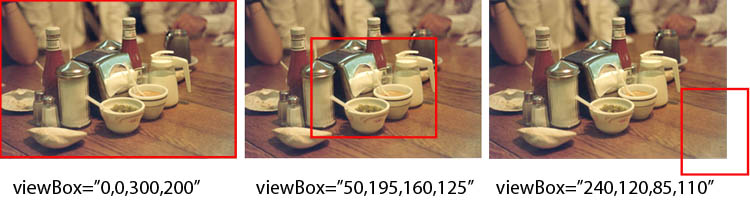
Once a portion of a media object's visible area is defined with a viewBox,
the portion within the viewBox is processed further as if it
defined the full native view of the media object. The area within the viewBox
is projected into a region in a manner that is dependent on the region element associated with that object,
including any scaling dictated by the fit attribute or (if appropriate), sub-region
positioning and alignment directives.
If the region and the viewBox have the same aspect ratios, then the
viewBox will, by default, fill the entire region. If the effective pixel
dimensions of the region are larger than that of the viewBox, the effect will
be an enlargement of the media content. If the effective pixel dimensions of
the window are smaller than that of the viewBox, the effect will be a
reduction in size of the media object. Other effects can be obtained by
manipulating the fit attribute of the
region.
If supported by the profile implementing this module, a dynamic
pan-and-zoom effect can be obtained by applying standard SMIL animation
primitives to the dimensions of the viewBox. A pan effect may be obtained by
varying the X and Y positioning values, and a zoom effect can be obtained by
changing the size dimensions of the viewBox. Examples of these effects are
given later in this section.
If a viewBox extends past the viewable extents of a media object (such as
in the rightmost illustration, above), then the effective contents of these
extended areas will be transparent.
This module does not define any new elements. It provides extensions to
the ref element (and its synonyms), and
to the region element.
The viewBox attribute is added to
media object references.
- viewBox
- This attribute specifies a rectangular area in media coordinates that
defines the portion of a media object that is to be used within
a SMIL presentation.
The value of the viewBox
attribute is an ordered list of four numbers, separated by whitespace
and/or a comma:
- min-x
- A value that defines the minimum X coordinate of a rectangle in
media space that serves as the X origin of the viewBox. A value
of '0' represents the left edge of the media object.
- min-y
- A value that defines the minimum Y coordinate of a rectangle in
media space that serves as the Y origin of the viewBox. A value
of '0' represents the top edge of the media object.
- width
- A non-negative length value (using CSS2 pixel or non-negative
percentage values) that defines the horizontal dimension of the
viewBox. If pixel notation is used, the 'px' suffix may be
omitted. A negative value is an error. The default value of width
is auto.
- height
- A non-negative length value (using CSS2 pixel or non-negative
percentage values) that defines the vertical dimension of the
viewBox. If pixel notation is used, the 'px' suffix may be
omitted. A negative value is an error. The default value of
height is auto.
The default viewBox behavior is to select the entire visual space of
the media object; this is equivalent to viewBox="0, 0, 100%, 100%".
The viewBox is processed on the media object before any other SMIL layout
processing occurs. The actual visual rendering of the content resulting from
the processed viewBox will be determined by, among other factors: the size of
the target region, the application of sub-region positioning in that region
(if supported by the profile), the value of the fit attribute on the region,
and the effect of SMIL alignment attributes (if supported by the profile).
The SMIL MediaPanZoom module does not extend the content model for the
ref element integrating these
attributes.
The viewBox attribute is added to
regions definitions.
- viewBox
- This attribute is identical in definition to the viewBox attribute defined for the
ref element in this section, with the exception that it defines a
default viewBox that is applied to all media rendered in the associated
region. All other aspects of viewBox processing are the same as with
the ref element, except that the values defined for the viewBox on a
region may be overridden by a viewBox specification on the ref
element.
The SMIL MediaPanZoom module does not extend the content model for the
region element integrating these
attributes.
This section is informative.
Assume the following SMIL example:
<smil ...>
  <head>
  ...
    <layout>
      <root-layout height="200" width="300" backgroundColor="red" />
      <region id="I" top="0" left="0" height="200" width="300"  backgroundColor="blue" />
    </layout>
  </head>
  <body>
    <seq>
      <ref id="R1" src="table.jpg" viewBox="0,0,300,200" dur="5s" region="I" />
      <ref id="R2" src="table.jpg" viewBox="50,195,160,125" dur="5s" region="I" fit="meet"/>
      <ref id="R3" src="table.jpg" viewBox="50,195,160,125" dur="5s" region="I" fit="meetBest"/>
      <ref id="R4" src="table.jpg" viewBox="240,120,85,110" dur="5s" region="I" fit="meet"/>
    </seq>
  </body>
</smil>
In this example, a single region is defined that is used to display four
instances of the same image. Each media reference within the sequence S
contains a different viewBox definition, each of which will result in the
following behavior:
- The media reference R1 defines a viewBox that encompasses the entire
media object space; the full image will be shown in region I, as is shown
in the following image:
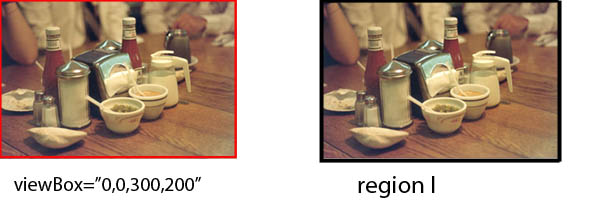
Note that the origin of the image is aligned with the origin of the media
object, at the top-left of the region.
- The media reference R2 defines a viewBox that encompasses the center
portion of the media object space. The projection of the media into
region I will result in a zoom into the source image, as is shown in the
following image:
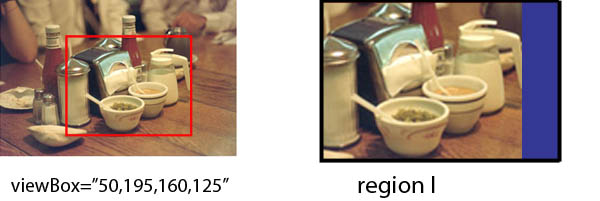
Note that the origin of the sub-image defined by the viewBox is placed
at the origin of the top-left of the region. Note also that the value of
the fit attribute determines that the image is scaled (while maintaining
the aspect ratio), resulting in the zoom effect.
- The media reference R3 defines a viewBox that is the same as in
reference R2; the difference in this example is that the value of the fit
attribute does not permit enlargement of the source image into the
region. As a result, the image is placed at top-left in an unscaled
rendering:
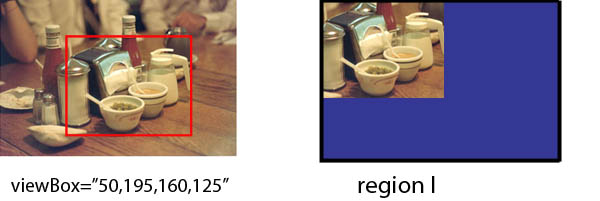
- The media reference R4 defines a viewBox that extends beyond the
boundaries of the media object. When it is projected into the region I
with a fit value that scales the image with preserved aspect ratio, the
entire extent of the viewBox is scaled: the areas that extend beyond the
image content are rendered as (scaled) transparent content:
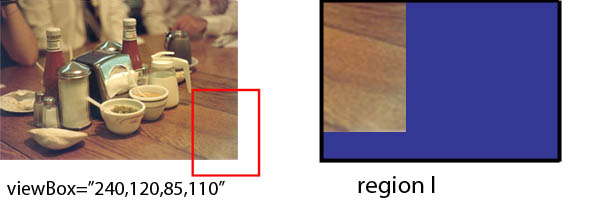
All of the previous examples illustrate how a viewBox operates on a media
object that contains a media-defined viewable extent. The viewBox attribute
may also be applied to visual objects that do not have predefined extents.
Consider the following example, in which an unstructured text object is
placed in a region:
<smil ...>
  <head>
  ...
    <layout>
      <root-layout height="200" width="300" backgroundColor="red" />
      <region id="T" top="0" left="0" height="50" width="300"  backgroundColor="blue" />
    </layout>
  </head>
  <body>
    <seq>
      <ref id="R0" src="short_story.txt" viewBox="0,10,50,200" dur="10s" region="T" />
    </seq>
  </body>
</smil>
In this example, a single region is defined that is used to display a
undimensioned text object. In SMIL 3.0, the text object would first be
rendered to an off-screen bitmap based on the default settings for the media
object (font, font size, font color) and then a viewBox of the defined size
would be overlaid on this text representation. This facility is especially
useful when combined with SMIL Animation, as discussed in the next
example.
The ability to define a viewBox, when combined with SMIL animation
primitives, provides a simple mechanism for doing pan/zoom animations over a
visual object. (These pan/zoom animations are often called 'Ken Burns'
animations.) The following example illustrates how a pan window can be
positioned and moved over an image area:
<smil ...>
  <head>
  ...
    <layout>
      <root-layout height="200" width="300" backgroundColor="red" />
      <region id="B" top="0" left="0" height="50" width="75"  backgroundColor="blue" />
    </layout>
  </head>
  <body>
    <seq>
      <ref id="R0" src="table_233x150.jpg" viewBox="0,0,50,75" dur="20s" region="T" fit=""meet" >
         <animate attributeName="viewBox"
                     values="(25,20,50,75); (45,55,50,75);(140,40,50,75);(35,0,100,150); (0,0,100,150);"
                     dur="20s" />
      </ref>
      ...
    </seq>
  </body>
</smil>
In this example, an image with intrinsic size of 233x150 pixels is
rendered into a region of size 50x75. An initial viewBox is defined that
displays a 50x75 portion of that image, positioned in its top-left corner.
During the following 20 seconds, the viewBox is moved across the image
according to the behavior of the animate element; the viewBox changes are
scheduled at equal points across the animation timeline (in this case, every
5 seconds). During the final animation, the viewBox is extended to implement
a zoom-out across the entire image. An illustration of the rendering results
is shown below:
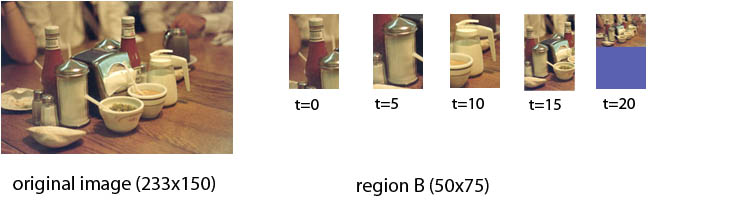
This module does not define any SMIL events.
The MediaPanZoom module allows individual media object references to
override the default values for certain attributes. In all cases, the
attributes will apply only to the (sub-)region referenced by the media
object. Changes will not propagate to child sub-regions or to parent
regions.
The functionality in this module builds on top of the functionality in the
Media module, which is a required
prerequisite for inclusion of the MediaPanZoom module.
The functionality in this module builds on the viewBox definition of SVG.
Unlike SVG, the SMIL viewBox attribute defines a logical sub-image that
contains only content within the area defined by the viewBox; SVG uses the
viewBox to define a minimum viewing dimension for content, but allowing
content outside the viewBox to be displayed in the region.
The MediaPanZoom module does not define a preserveAspectRatio attribute,
since this functionality is already provided by the SMIL fit and
registration/alignment attributes.
See the full DTD
for the SMIL Layout modules.
- Editors for SMIL 3.0
- Dick Bulterman, CWI
- Sjoerd Mullender, CWI
- Samuel Cruz-Lara, INRIA
This section is normative.
The functionality described in these modules provide a new media type for
use in SMIL presentations. This functionality is called smilText. Unlike
other media types defined in the media object module, all of which are
synonyms of the ref element, the
smilText modules provide a text container element with an explicit content
model for defining in-line text. The smilText modules also define a set of additional elements and
attributes to control explicit in-line text rendering. smilText content is
processed in a manner consistent with other SMIL media. This means, among
other aspects, that the smilText respects SMIL timing and layout behavior,
including the semantics of the fit and fill attributes of SMIL Layout.
The smilText Modules are composed of a BasicText module and two modules with
additional functionality that build on top of the BasicText module: the TextStyling and TextMotion modules. These modules contain
elements and attributes used to define in-line text content. Since the
smilText elements and attributes are defined in a series of modules,
designers of other markup languages can reuse these modules when they need to
include a simple form of timed text functionality into their language.
This section is informative.
The purpose of including text content functionality into SMIL 3.0 is to
allow authors to define small amounts of lightly-formatted text within the
context of a SMIL presentation. Such text can be used
for labels within a presentation or for incidental captions. Users who wish
to use large amounts of structured text (with or without temporal markup)
should consider the use of external text media objects encoded in formats
such as XHTML or the "Distribution Format Exchange Profile" (DFXP) of Timed
Text [DFXP].
All versions of SMIL have had support for the text element, which is defined as an alias of
the generic SMIL ref media reference
element. A typical use of the text element is:
<text region="Title" src="Headline.html" dur="10s" >
Users new to SMIL are often surprised that the text element does not have
a content model -- that is, an ability to specify the content text along with
the element, such as in:
    <text region="Title" dur="10s" >
       Willemijn's 11th Birthday Party
    </text>
More advanced users of SMIL found that they were able to insert in-line
text content into the SMIL file using a data URL, such as:
    <text src="data:,Willemijn's%2011th%20Birthday%20Party"
          region="Title" dur="10s" >
However, the strict syntax of this approach, plus the limited styling
options available, make it a less-than-optimal way of including incidental
text content into a SMIL presentation. A more author-friendly approach to
text inclusion was a requirement for SMIL 3.0.
The implementation of SMIL on a wide range of devices, from set-top boxes
and mobile devices to conventional desktop computers, means that care needed
to be taken in defining the complexity of the smilText modules. The
motivation of the SMIL's in-line text facility was not to provide complete
support for all types of text, but to provide a balance between authoring
convenience and player complexity. smilText was also designed to
differentiate text styling from general layout and positioning so that
smilText could be used efficiently with SMIL Layout. Both of these
motivations, plus the desire to define a media facility that could be used
across all of SMIL's implementation platforms, has resulted in a simple text
specification that can meet many of the requirements for incidental text
within a SMIL document.
smilText has been designed as a functional subset of the W3C Timed Text
Distribution Format Exchange Profile (DFXP) of TimedText [DFXP]. While
users familiar with DFXP will recognize the functionality included in this
specification, the differences in temporal and layout specifications between
SMIL and DFXP have resulted in a slightly different syntax in the two
languages. The SYMM working group has striven to minimize these differences.
A complete list of differences between smilText and DFXP is presented in Appendix A.
This section is normative.
In order for text content to be compatible with the SMIL timing semantics,
a general text processing model has been defined for smilText. In this model,
text is classified as a continuous media type, with the inherent duration
defined by timing mark-up within the smilText definition. All text content is
processed as if it were first rendered to an off-screen bitmap; this bitmap
is then used as the basis for inclusion into a SMIL presentation much as if
it were a video object. If the smilText contains no internal timing mark-up,
the processing model treats it as if it were a logical image.
The dimensions used in constructing the off-screen bitmap representation
of smilText will depend on a number of factors. In general, the layout model
used to define a drawing area for the text content will provide initial
values for the extents of the text area. The default text-wrap behavior for
smilText is to wrap the text content based on region width. In this case, the
region will determine the text-area width and the text content will determine
the effective off-screen bitmap height. If the wrap behavior is set to
disallow automatic text wrapping (which is only possible if the TextStyle
module is supported by the profile implementing smilText), the effective
height is determined based on the number of lines of text (which in turn is
determined by the number of manual line breaks created via the br element) and constrained by the region
height, while the text content determines the off-screen bitmap width.
In most cases, content defined in a smilText element will define a new
off-screen bitmap pseudo-image that will replace any existing content in the
target region. If multiple smilText elements are active simultaneously and
target the same layout region, the behavior is fully defined by the semantics
of the SMIL timing and layout models. Users of smilText are encouraged to
study the examples at the end of each module description to better understand
the impact of SMIL timing on text rendering with smilText.
This section is normative.
This section defines the elements and attributes that make up the
functionality in the SMIL 3.0 BasicText module. Languages implementing
elements and attributes found in the BasicText Module must implement all
elements and attributes defined in this section.
The SMIL 3.0 BasicText module defines
four elements and four attributes which, together, provide basic support for
in-line text within a SMIL presentation. The functionality provided by these
elements and attributes represent the minimum level of text processing that
can be required by a user agent implementing smilText.
The elements defined in this module are:
- smilText
- tev
- clear
- br
The attributes defined in this module are:
- begin
- next
- id
- textWrapOption
- xml:space
In addition, this module extends the definition of the SMIL Layout region element to include the
textWrapOption attribute.
For profiles that support only the BasicText module, all in-line text content
styling and processing is defined and controlled by the SMIL user agent
rendering the text. Additional content styling elements and attributes are
defined in the TextStyling and TextMotion modules; support for this
extended functionality is profile dependent.
The smilText element functions
as a logical and temporal structuring element that allows the inclusion of
in-line text content into a SMIL presentation. When rendering in-line text,
the smilText element provides a
top-level container for timing semantics. Additional timing semantics may be
defined on the content within the smilText element.
When text is rendered into an associated region, the existing contents of
the region is replaced by the element content. The properties of the region
will determine the extents of the rendering area and the clipping behavior of
text placed in the region. The effective value of the textWrapOption attribute will
determine if lines wrap if they are wider than the space provided. In-line
text is considered to be rendered instantaneously at the beginning of the
simple duration of the text element unless temporal markup using the tev or clear elements is defined within the
text. In smilText, extra white space between characters is processed
according to the xml:space model defined in XML 1.1 [XML11]. The xml:space
attribute is reused in smilText, with the conventional semantics described
in the section xml:space, below.
Anchors and links may be attached to content within the smilText element. In these cases, the
syntax and semantics of SMIL Linking will be expected, including temporal
attributes on anchors.
This element accepts the textWrapOption and
xml:space attributes, which
will override the effective value for these attribute defined on the layout
region.
Profiles including the smilText element must define which other
SMIL attributes may be attached to this element. At a minimum, the definition
of an associated layout region and basic SMIL timing control, including the
definition of a begin and end or duration will be expected.
The smilText element may contain
character content. If this content is present, it will be rendered as text in
a manner consistent with other elements and attributes in this module. If no
content is present, the smilText
element must still observe all SMIL timing properties.
The tev Element
The tev element defines a
"temporal moment" within a block of smilText content. Depending on the values
of the begin or next attributes, it determines a
scheduling time at which the associated text content (up to the following
tev or clear element or the end of the smilText element) is rendered. This
element does not define a content container, but is simply a temporal marker
within a text fragment.
This element accepts the begin,
next and id attributes. Profiles including the tev element must define which other SMIL
attributes may be attached to this element.
This element has no content.
The clear
Element
The clear element defines a
"temporal moment" within a block of smilText content at which the full
contents of the rendering area are cleared. Depending on the values of the
begin or next attributes, it also determines a
scheduling time at which the associated text content (up to the following
tev or clear element or the end of the smilText element) is rendered. This
element is functionally equivalent to the tev element, except that it has a
side-effect of clearing the rendering area before any new content is
rendered. This element does not define a content container, but is simply a
temporal marker within a text fragment.
This element accepts the begin,
next and id attributes. Profiles including the clear element must define which other
SMIL attributes may be attached to this element.
This element has no content.
The br Element
The br element functions as a forced
line break within in-line content defined in a smilText element. The br element is only valid within as content of a
smilText element and has no
temporal semantics other than those of its parent smilText element.
This element does not accept any attributes.
This element has no content.
The begin
Attribute
- This attribute defines an absolute time, relative to the beginning of
the parent smilText element,
when the associated tev or
clear element becomes
active.
The attribute value is a semi-colon separated list of begin-values:
- begin-value : ( clock-value | event-value )
- Defines the element's begin time.
- Clock-value
- Describes the element begin as a non-negative offset from the
start of the element's smilText container. The offset is measured
in parent simple time.
- event-value : (
Id-value "." )? ( event-ref? ) ( ( "+" ) Clock-value )?
- Describes an event and an optional offset that determine the
element begin. The element begin is defined relative to the time
that the event is raised. Events may be any event defined for the
host language in accordance with [DOM2Events]. These may
include user-interface events, event-triggers transmitted via a
network, etc. When using smilText, only event-based timing is support.
The use of offsets based on scheduled activation of other elements is not supported.
The general semantics of this element are the same as the SMIL begin
attribute defined within the timing module, with the restriction that only a
subset of potential time values are supported.
The next
Attribute
- The next attribute
defines a relative start time, relative to the effective begin time of
the parent smilText element,
or the most recently activated tev or clear element within the
parent.
The attribute value is single clock value.
- Clock-value
- Defines a time marker relative to the effective
start time of the preceding temporal marker The offset is measured in parent simple time.
The id Attribute
- The id attribute specifies a
name that can be used by other attributes within the presentation. The
name is typically used to identify a temporal event. The value is a
valid NMTOKEN.
- The textWrapOption
attribute specifies whether text content that is larger than the
effective space available on one line in a region wraps.
Values:
- wrap (default)
- Text is wrapped across lines within a region.
- noWrap
- Text is not wrapped across lines within a region.
- inherit
- The effective value of this attribute is used.
This attribute
may be used on the smilText
element or as a default on the region element.
- The xml:space
attribute specifies how whitespace is processed.
Values:
- default (default)
- Whitespace is collapsed according to the semantics defined by
XML 1.1, ([XML11] section 2.10).
- preserve
- Whitespace is preserved according to the semantics defined by XML 1.1, ([XML11], section 2.10).
This attribute
may be used on the smilText
element or as a default on the region element.
This section is informative.
The smilText element provides a
temporal wrapper for in-line text:
    <smilText>
       Hello world!
    </smilText>
The smilText element is the
equivalent of allowing a data URL that contains text content, such as: <ref src="data:,Hello%20world!" ... > .
In this simple form, the text will be rendered based on the default layout
properties defined for the user agent. If SMIL Layout is used, the default
behavior is: a dynamic region will be defined that contains the text content
of the element. All styling information -- including font, font size, font
style and font color -- will be determined by the SMIL player.
If the SMIL Layout BasicLayout module is also supported by the profile
implementing this module, the rendering extent and the clipping behavior of
the text rendered in a SMIL region will be determined by the effective value
of SMIL's layout attributes.
<smil ...>
 <head>
   ...
   <layout>
     ...
     <region id="Title" top="5px" left="10%" width="80%" height="30px" />
     ...
   </layout>
  </head>
  <body>
   ...
    <smilText region="Title" dur"10s">
       Willemijn's 11th Birthday Party
    </smilText>
   ...
  </body>
</smil>
This is equivalent to specifying: <ref
region="Title" src="data:,Hello%20world!" ... >. In both cases, the
properties associated with the region named Title will be used when
positioning the text.
If the rendering space for the content of the smilText element is greater
than the horizontal extent of one line, the effective value of the textWrapOption attribute will
determine whether content will be clipped or wrapped:
<smil ...>
 <head>
     ...
     <region id="Title" top="5px" left="10%" width="80%" height="30px"
          textWrapOption="wrap"/>
     ...
  </head>
  <body>
   ...
    <smilText region="Title" dur"10s">
       Willemijn's 11th Birthday Party was held six weeks late. (Again!)
    </smilText>
   ...
  </body>
</smil>
Line breaks within smilText content may be forced by using the br element within text content:
   ...
    <smilText region="Title" dur"10s">
       Willemijn's 11th Birthday Party<br/>was held six weeks late.<br/>(Again!)
    </smilText>
   ...
  </body>
</smil>
The following fragment illustrates use of temporal markers with a smilText
element:
 <smil ...>
  <head>
     ...
    <layout>
     <root-layout width="400" height="300"/>
      <region id="Contents" top="5px" left="10%" width="80%" height="300"/>
    </layout>
   </head>
   <body>
      ...
        <smilText id="TS01" region="Contents" dur="6s">
           Willemijn's 11th Birthday Party
           <tev id="TS02" next="2s"/>
           was held six weeks late.
           <clear id="TS03" begin="4s"/>
           (Again!)
        </smilText>
         ...
   </body>
 </smil>
The smilText element TS01 is active for 6s. All activity occurs within
this time period, even if the timing definition within the smilText object
extends beyond the 6s time limit. If SMIL Layout is used (as in this case),
the fill attribute will determine the visual persistence of the text
content if its internal timing was shorter than that of the smilText object.
The initial content that is rendered is the string Willemijn's 11th
Birthday Party. At 2s after the start of the TS01 container, the
fragment with id TS02 gets rendered. In this case, the content was held
six weeks late. is displayed along with the previous contents of the
smilText element. (The exact display depends on the size of the rendering
region and the setting of the textWrapOption attribute.)
At 4s after the start of the parent smilText container, the fragment with
the id TS03 is displayed. The use of the clear element causes the display
area to be erased before the new text is displayed. Note that since a begin
attribute is used instead of the next attribute, the activation time of this
fragment is relative to the containing smilText container instead of relative
to TS02.
The following example is used to illustrate smilText behavior when used
with event-based timing:
      ...
    <par>
        <smilText id="TS11" region="Contents" dur="6s">
           Willemijn's 11th Birthday Party
           <tev id="TS12" next="2s"/>
           was held six weeks late.
           <clear id="TS13" begin="gong.beginEvent"/>
           (Again!)
        </smilText>
        <audio id="TS14" begin="4.5s" src="gongAudio.mp3">
    </par>
      ...
In this example, elements TS11 and TS12 act as TS01 and TS02 in the
previous example. Coincident with the start of TS12, the potential active
period for TS13 begins. Anytime between 2s after TS11 and the end of the
smilText element, TS13 will begin if the "gong.beginEvent" is activated. In
this example, the activation happens at 4.5 after the start of the par
element containing both the smilText and audio object.
The following example illustrates the interaction of timing rules within
smilText:
      ...

        <smilText id="TS31" region="Contents" dur="10s">
           fragment 1,
           <tev id="TS32" next="2s"/>
           fragment 2,
           <clear id="TS33" begin="1s"/>
           fragment 3,
           <clear id="TS34" begin="XXX.beginEvent"/>
           fragment 4,
           <clear id="TS35" next="5s"/>
           fragment 5,
           <clear id="TS36" begin="8s"/>
           fragment 6.
        </smilText>
      ...
The TS31 smilText element starts, and 'fragment 1,' is rendered. Then, 2s
later, TS32 is appended to the displayed text. At the same time, TS33 is
appended to the display: it has an absolute begin time of 1s after the start
of TS31, but its temporal scope only becomes active once TS32 has displayed.
(The begin time is still absolute, so the fragment is displayed immediately.)
TS34 comes into temporal scope at 2s (that is, at the effective begin time of
its predecessor), so the associated fragment will be displayed if the event
is triggered between 2s and 10s in the presentation. TS35 is displayed 5s
after the effective start of TS34 (assuming the parent smilText container is
still active). The effective begin time of TS36 will depend on a number of
factors: if the TS35 fragment starts before an absolute 8s, TS36 will wait
until 8s. If it starts later (but before the end of the smilText container),
the fragment will start immediately.
SMIL timing defines a number of rules that govern the rendering
persistence of smilText content. These are:
- that any text object containing an explicit duration or end time will
have a default fill behavior of remove;
- that any text object containing only a begin time but no explicit
duration or end time will have a default fill behavior of freeze;
- that an explicitly declared fill behavior of hold will extend the persistence of a text object
until the end of its parent's active duration, but it does not provide a
facility for appending text content to a region after the duration of a
smilText instance.
In terms of visual behavior, the value of the fit attribute will determine
clipping behavior of the text. Since not all user agents can be expected to
dynamically scale plain text, fit="slice" will be the expected default
behavior with basic smilText.
In terms of the rendering semantics defined in the TextStyling module, the only behavior
defined by basic smilText is the append text mode
semantic.
This section is normative.
If the including profile supports the XMLBase functionality [XMLBase] , the values of the longdesc attribute (of present) on the
smilText element must be
interpreted in the context of the relevant XMLBase URI prefix.
All of the attributes specified for media within the SMIL MediaParam
module must be supported by implementations integrating this module.
Any profile that integrates the clear element must define what is meant
by "display area" and further define the interaction.
This section is normative.
This section defines the elements and attributes that make up the SMIL
TextStyling Module. Languages implementing the elements and attributes in the
TextStyling Module must implement all elements and attributes defined below,
as well as those defined in the BasicText
module.
The TextStyling module defines the following five elements:
- div
- p
- span
- textStyle
- textStyling
The TextStyling module defines the following eleven attributes:
- textAlign
- textBackgroundColor
- textColor
- textDirection
- textFontFamily
- textFontSize
- textFontStyle
- textFontWeight
- textMode
- textPlace
- textStyle
In addition, this module extends the definition of the SMIL Layout region element to include the TextStyling
attributes listed above.
The div Element
The div element functions as a logical container for in-line formatting
attributes defined within a smilText element.
The div element does not define any
temporal semantics with a smilText element.
Use of the div element causes an implicit line break.
The div element may (re)specify
values for the following SMIL styling attributes defined in this module:
- textAlign
- textBackgroundColor
- textColor
- textDirection
- textFontFamily
- textFontSize
- textFontStyle
- textFontWeight
- textStyle
- xml:space
All other attributes are ignored.
This element accepts as content zero or more characters to which the
specified styling is applied. Any styling attributes changed within the scope
of this element must be restored to their previous values outside the scope
of this element.
The p Element
The p element functions as a logical container for in-line formatting
attributes defined within a smilText or div element. The p element may not be
nested within another p element. The p element does not define any temporal
semantics with a smilText element. The use of the p element causes an implicit line break.
The p element may (re)specify
values for the following SMIL styling attributes defined in this module:
- textBackgroundColor
- textColor
- textDirection
- textFontFamily
- textFontSize
- textFontStyle
- textFontWeight
- textStyle
- xml:space
All other attributes are ignored.
This element accepts as content zero or more characters to which the
specified styling is applied. Any styling attributes changed within the scope
of this element must be restored to their previous values outside the scope
of this element.
The span Element
The span element functions as a logical container for in-line formatting
attributes defined within a smilText, div, or p element.
The span element does not define any
temporal semantics with a smilText element.
The use of the span element does not cause a line break.
The span element may (re)specify
values for the following SMIL styling attributes defined in this module:
- textBackgroundColor
- textColor
- textDirection
- textFontFamily
- textFontSize
- textFontStyle
- textFontWeight
- textStyle
- xml:space
All other attributes are ignored.
This element accepts as content zero or more characters to which the
specified styling is applied. Any styling attributes changed within the scope
of this element must be restored to their previous values outside the scope
of this element.
The textStyle element is used to define a set of text style attributes in
the document head section. The style group defined with this element may be
used within a SMIL layout region to define default styles for text elements
in that region, or within the smilText and span in-line content elements in a
SMIL body section.
All of the styling attributes defined in this module (with the exception
of the textStyle attribute) may be
specified within a textStyle
element in the head section. Note that if text style attributes are
referenced on an element to which they do not apply, they are ignored. If
multiple instances of the same styling attribute are defined, the value
associated with the lexically-last instance are used.
In addition, this attribute defines:
- IDREF
- The ID of the textStyle definition.
This element has no content.
The textStyling element delineates a set of textStyle elements in the
document head section.
This attribute accepts no attributes.
This element contains one or more textStyle elements as children.
- The textAlign attribute
specifies how text is aligned within the region specified by the text
element. This attribute may be used on the smilText element or as a default on
the region element. The
semantics of this attribute are a subset of those defined in
XSL 1.1, ([XSL11], section 7.16.9).
Values:
- start
- The text is left-aligned in the region if the effective value
of the textDirection attribute
is ltr, or right-aligned otherwise.
- end
- The text is right-aligned in the region if the effective value
of the textDirection attribute
is ltr, or left-aligned otherwise.
- left
- The text is left-aligned in the region.
- right
- The text is right-aligned in the region.
- center
- The text is centered in the region.
- inherit (default)
- The effective value defined for the region is used.
If no value is defined, the default value will be start.
- The textBackgroundColor
attribute is identical to the "background-color" property in the
XSL 1.1, ([XSL11], section 7.8.2)
specification. As such, support for CSS2 system colors is required.
This attribute specifies the background color used to fill the area
around text content that falls within a player-defined bounding box.
This attribute may be used on the smilText, div, p or span elements, or as a default on the
region element.
Values:
- CSS2 color specification
- The textBackgroundColor attribute may take on the CSS value
inherit. This means that the background color used for text will
be that of the backgroundColor attribute defined for the region
specified by the parent text element.
If no color has been
specified, the default is transparent.
- The textColor attribute is
identical to the "color" property in the
XSL 1.1, ([XSL11], section 7.18.1)
specification.
As such, support for CSS2 system colors is required. This attribute
specifies the color used to render text content in the region specified
by the parent text element. This attribute may be used on the smilText, div, p or span elements, or as a default on the
region element.
Values:
- CSS2 color specification
- The textColor attribute may take on the CSS value inherit. This
means that the color used for text will be that of the color
attribute defined for the region specified by the parent text
element. If no color has been specified, the default is
transparent.
If no color has been specified, the default is
transparent.
- The textDirection
attribute specifies the direction of text added to a region based on
the Unicode Bidirectional algorithm. The semantics
defined in
XSL 1.1, ([XSL11], section 7.29.1) are
available, with the restriction that smilText only supports simple text direction control;
for more elaborate text processing (including
tb-lr), an external text formatting language is required. This
attribute may be used on the smilText, div, p or span elements, or as a default on the
region element.
Values:
- ltr
- The text is written in a left-to-right direction
- rtl
- The text is written in a right-to-left direction
- inherit (default)
- The text is written in the direction defined for the region
referenced in the text element.
If no direction was defined, the
default is ltr.
- This attribute defines the family of font used to render text. The
resolution of a generic family name to a specific font instance is not
defined by this specification, but may be defined by a profile
implementing this module. In order to reduce implementation burden,
only generic font families may be specified in smilText. If an
unrecognized font family is defined, then monospace can be expected.
The sansSerif and serif fonts are expected to be proportional. See
XSL 1.1, ([XSL11], section 7.9.2)
for font family details. This attribute may be used on the smilText, div, p or span elements, or as a default on the
region element.
Values:
- monospace
- sansSerif
- serif
- inherit (default)
If no value is defined, the default textFontFamily will be sansSerif.
- This attribute defines the size of the font to be used. In order to
reduce implementation burden and to provide scalability across device
classes, only absolute and relative sizes (as defined in
XSL 1.1, ([XSL11], section 7.9.4) are
supported by smilText. This attribute may be used on the smilText, div, p or span elements, or as a default on the
region element.
Values:
- length
- absolute-size
- absolute-size represents a set of
absolute font sizes, maintained by the SMIL player (and possible
influenced by the player user agent). Expected absolute sizes
are: [ xx-small | x-small | small | medium | large | x-large |
xx-large ]. As recommended in XSL 1.1, it is expected that each
of the absolute sizes will differ by a factor of 1.2. The default
absolute size is medium.
- relative-size
- relative-size represents a relative
increase or reduction in the absolute font size value. Expected
values are: [ larger | smaller ]. Effective font sizes larger
than the absolute-size xx-large or smaller than the absolute-size
xx-small will not be supported.
- inherit (default)
If no value is defined, the default textFontSize will be medium.
- This attribute defines the style (italic, oblique, reverseOblique or
normal) of the text displayed. If the specified style is not available,
a style of normal will be used. This
attribute may be used on the smilText, div, p or span elements, or as a default on the
region element. Of the values
defined in XSL 1.1, ([XSL11], section 7.9.7), only the options defined in the following list will
be supported by smilText.
Values:
- normal
- italic
- oblique
- reverseOblique
- inherit (default)
If no value is defined, the default textFontStyle will be normal.
- This attribute defines the weight (bold or regular) of text
displayed. If the specified weight is not available, a weight of normal will be used. This attribute may be used
on the smilText, div, p or span elements, or as a default on the
region element. Of the values
defined in XSL 1.1, ([XSL11], section 7.9.9), only the options defined in the following list will
be supported by smilText.
Values:
- normal
- The normal font weight for the font family selected is
used.
- bold
- The bold font weight for the font family selected is used.
- inherit (default)
- The effective font weight for the font family selected, as
defined on the text element or the referenced region, is
used.
If no value is defined, the default textFontWeight will be normal.
- The attribute defines the manner in which each temporal fragment is
added to the rendering area. This attribute may be used on the smilText element or as a default on
the region element.
Values:
- append
- New content is added to any existing content in the rendering
area. The new content is appended to the text at the logical end
of the display.
- replace
- New content replaces any existing content in the rendering
area. The new content becomes the only content within the
display.
- inherit (default)
- The effective textMode for the region selected, as defined on
the smilText element or the referenced region, is used.
If no value is defined, the default textMode will be append.
- The attribute defines where content is initially placed in a
rendering area, both as an initial string and after a clear operation.
This attribute may be used on the smilText element or as a default on
the region element.
Values:
- fromTop
- New content in an empty region is placed first at the top of
the rendering area, and then flowed downward as new content is
added.
- fromBottom
- New content in an empty region is placed first at the bottom of
the rendering area, and then moved upward as new content is
added.
- inherit (default)
- The effective textPosition for the region selected, as defined
on the smilText element or the referenced region, is used.
If no value is defined, the default textPlace will be fromTop.
- The attribute references a text style set defined using the textStyle
element in the document head. This attribute may be used on the smilText, div, p or span elements, or as a default on the
region element.
Values:
- IDREF
- The ID of a textStyle definition. If the IDREF specified as a
value does not refer to a valid textStyle set definition, this
attributed is ignored.
The textStyle attribute will be applied only to the content within
the scope of the element to which it is applied.
This section is normative.
None.
This section is normative.
This section defines the elements and attributes that make up the SMIL
TextMotion Module. Languages implementing the elements and attributes in the
TextMotion Module must implement all elements and attributes defined below,
as well as those defined in the BasicText
and TextStyling modules.
This section defines the elements and attributes that make up the
functionality in the SMIL 3.0 TextMotion module.
This module does not define any new elements.
This module defines one new attribute and extends the values available for
one attribute in the TextStyling
module:
- textMode
This module extends the definition of one element from the BasicText module and one element TextStyling module:
- smilText
- textStyle
This module extends the definition of two attributes from the TextStyling module and adds a new
attribute to this module:
- textMode
In addition:
- this module extends the definition of the BasicText smilText element to include the
textRate attribute;
- this module extends the definition of the TextStyling textMode attribute to include the
crawl, scroll and jump attribute values; and
- this module extends the definition of the SMIL Layout region element to include the textRate
attribute.
- The textMode is extended to
support three values for motion-based text presentation of a smilText object. These values may
be used on the smilText element or as a default on the region.
Values:
- crawl
- This setting causes text to move as a single line against the
logical writing direction defined by the textDirection attribute.
The starting position of the text will be determined by the textAlign attribute.
All line breaks, either implicit or explicit, will be ignored.
- scroll
- This setting causes text to move smoothly upward within the
region. The initial position of the text is defined by the textPlace attribute. The
alignment of the text is determined by the textAlign attribute.
- jump
- This setting causes text to jump upward by line within the
region when the current line fills (or after an explicit br).
The initial position of the text is defined by the textPlace attribute. The
alignment of the text is determined by the textAlign attribute.
In all cases, the rate of movement is determined by the attribute.
The textMode will be applied to all text displayed in the region.
- The specifies the rate
of motion of smilText elements that have either the crawl, scroll or
jump value defined for the textMode attribute. These values
may be used on the smilText element or as a default on the region.
Values:
- CSS2 pixel | non-negative percentage value | non-negative integer value
- The value uniquely specified the motion rate for the corresponding textMode attribute. The value is defined as follows:
- CSS2 pixel value:
- This value is used when textMode is set to crawl or scroll.
This value defines a non-negative integer representing a
pixel movement rate in pixels per second.
If the textMode is set to crawl, the default value of this attribute is 0px.
The "px" unit qualifier in pixel values may be omitted.
- non-negative percentage value:
- This value is used when textMode is set to crawl or scroll.
This value defines a non-negative percentage value
representing the pixel movement rate as a percentage of the
simple duration of the total smilText element. When a percentage value
is used, all internal timing within the smilText object is ignored, including
the setting of event that are triggered by the smilText element.
If the simple duration is not known, implementations may make an informed guess or
provide a default rate. The use of this value is discouraged when
the duration is not specified explicitly on the smilText element.
If the textMode is set to scroll, the default rate is 0% of the
object's simple duration.
- non-negative integer:
- This value is used when textMode is set to jump.
This setting defines a non-negative integer representing the
number of lines to jump when adding new content. Text movement is initiated when
a line break is generated by the smilText object, either explicitly or implicitly.
If the textMode is set to jump, the default line jump value is set to 1.
If the textMode is set to anything other than crawl, scroll or jump,
this attribute is ignored.
This section is normative.
Any profile that integrates the attribute must specify whether a scroll
value of 100% causes all of the text to be scrolled out of the visible
rendering area.
- Editors for SMIL 3.0:
- Dick Bulterman, CWI.
- Marisa DeMeglio, Daisy.
- Editors for Earlier Versions of SMIL:
- Thierry Michel, W3C.
This section is normative.
This section defines the elements and attributes that make up the
functionality in the SMIL Metainformation module.
The SMIL 3.0 Metainformation
module defines two elements and one attribute that provide basic support for
metainformation markup within a SMIL presentation.
The elements defined in this module are:
- meta
- metadata
The attribute defined in this module is:
- label
The meta element
The meta element specifies a single
property/value pair in its name and content attributes, respectively.
Multiple property/value pairs must be described in multiple instances of the
meta element.
The meta element defines the following attributes:
- name = CDATA
- This attribute identifies a property name. The name attribute is required for meta elements. The list of properties
for the name attribute is open-ended and may be extended by a
particular SMIL profile. This specification defines the following
properties:
- base: The value of this
property determines the base URI for all relative URIs used in the
document.
Note: the base property has been deprecated in favor of
the more general XML base URL mechanism described in [XMLBase]. The language profile including
the SMIL 3.0 metainformation module will determine if the base
property will be supported by that profile.
- pics-label or
PICS-Label: The value of this property specifies a valid
rating label for the document as defined by PICS [PICS] .
- title: The value of
this property specifies the title of the presentation. SMIL user
agents may use this property to display a title for the
presentation during rendering.
- content = CDATA
- This attribute specifies a property's value. This specification does
not list legal values for this attribute.
The content attribute is
required for meta elements.
The meta element is an empty
element.
The metadata element contains
information that is also related to metainformation of the document or
document components. The metadata
element allows metainformation to be defined using a wide range of
metainformation structuring languages. In many cases, it will act as the
root element of an RDF tree, but it may also act as the root of other
application-domain-specific metainformation structuring languages. The
contents of the metadata element
are not processed within the context of a SMIL presentation, although
different user agents may use the information within the element to support
functionality such as searching or content labelling.
The metadata element does not define any new attributes.
When used with RDF, the metadata
element is expected to contain an RDF element and
its sub-elements [RDFsyntax].
When used with other metainformation structuring languages, the metadata element is expected to contain a
metainformation description based on the structure and vocabulary of that
language.
The label attribute
The label attribute specifies the
name of a SMIL presentation that can be referenced by the user agent to
provide additional information on the element to which this attribute is
attached. A SMIL file is used as the target because this can provide a richer
description of an element than a single text string or audio fragment. In
this way, a richer mechanism is providing information on the intent of the
relevant element than is available with other metadata facilities.
- label = URI
- This attribute specifies a URI to a SMIL document containing a
description of the element. If selected, a new document instance
will be created to display the target SMIL file, and the source
presentation will be paused.
This section is informative.
This section contains five examples of the use of metainformation in a
SMIL presentation.
The first example uses the Dublin Core version 1.0 RDF schema[DC] and a set of RDF descriptions, all contained
in the document head section. The XML base attribute is used with the
host-level language description to define the base address of relative URI
references in the document.
<?xml version="1.1" ?>
<smil xmlns="http://www.w3.org/2007/07/SMIL30/Language" xml:base="http://example.org/metaInf/assets/" >

 <head>
   <meta id="meta-smil1.0-a" name="Publisher" content="W3C" />
   <meta id="meta-smil1.0-b" name="Date" content="2007-01-03" />
   <meta id="meta-smil1.0-c" name="Rights" content="Copyright 2007 John Smith" />
   <meta id="meta-smil1.0-d" http-equiv="Expires" content="16 Apr 2051 12:00:00 GMT"/>


   <metadata id="meta-rdf">
     <rdf:RDF
       xmlns:rdf = "http://www.w3.org/1999/02/22-rdf-syntax-ns#"
       xmlns:rdfs = "http://www.w3.org/2000/01/rdf-schema#"
       xmlns:dc = "http://purl.org/dc/elements/1.1/"
       xmlns:smilmetadata = "http://www.example.org/AudioVideo/.../smil-ns#" >

<!-- Metadata about the SMIL presentation -->
     <rdf:Description rdf:about="http://www.example.com/meta.smi">
          ...
     </rdf:Description>

<!-- Metadata about the video -->
     <rdf:Description rdf:about="http://www.example.com/videos/meta-1999.mpg">
        ...
     </rdf:Description>

<!-- Metadata about a scene of the video -->
     <rdf:Description rdf:about="#scene1"
        ...
     </rdf:Description>
    </rdf:RDF>
   </metadata>

   <layout>
    <region id="a" top="5" />
   </layout>
 </head>
 <body>
   <video region="a" src="/videos/meta-1999.mpg" >
     <area id="scene1" begin="0s" end ="30s"/>
     <area id="scene2" begin="30s" end ="60s"/>
   </video>
   <video region="a" src="/videos/meta2-1999.mpg"/>
 </body>
</smil>
The second example is similar to the first, except that references on
individual media elements are placed within the document definition instead
of the head element.
<?xml version="1.1" ?>
<smil xmlns="http://www.w3.org/2007/07/SMIL30/Language" xml:base="http://example.org/metaInf/assets/" >
 <head>
 <meta id="meta-smil1.0-a" name="Publisher" content="W3C" />
 <meta id="meta-smil1.0-b" name="Date" content="2007-01-03" />
 <meta id="meta-smil1.0-c" name="Rights" content="Copyright 2007 John Smith" />
 <meta id="meta-smil1.0-d" http-equiv="Expires" content="16 Apr 2051 12:00:00 GMT"/>


  <metadata id="meta-rdf">
   <rdf:RDF
       xmlns:rdf = "http://www.w3.org/1999/02/22-rdf-syntax-ns#"
       xmlns:rdfs = "http://www.w3.org/2000/01/rdf-schema#"
       xmlns:dc = "http://purl.org/dc/elements/1.1/"
       xmlns:smilmetadata = "http://www.example.org/AudioVideo/.../smil-ns#" >

<!-- Metadata about the SMIL presentation -->
   <rdf:Description rdf:about="http://www.example.com/meta.smi">
        ...
   </rdf:Description>
  </rdf:RDF>
 </metadata>

 <layout>
    <region id="a" top="5" />
 </layout>
 </head>
 <body>
   <video id="v1" region="a" src="/videos/meta-2006.mpg" >
      <metadata id="meta-rdf">
         <rdf:RDF
            xmlns:rdf = "http://www.w3.org/1999/02/22-rdf-syntax-ns#"
            xmlns:rdfs = "http://www.w3.org/2000/01/rdf-schema#"
            xmlns:dc = "http://purl.org/dc/elements/1.1/"
            xmlns:smilmetadata = "http://www.example.org/AudioVideo/.../smil-ns#" >

            <!-- Metadata about the video -->
              <rdf:Description rdf:about="http://www.example.com/videos/meta-1999.mpg"
                ...
              </rdf:Description>
        </rdf:RDF>
     </metadata>
     <area id="scene1" begin="0s" end ="30s">
        <metadata id="meta-rdf">
           <rdf:RDF
              xmlns:rdf = "http://www.w3.org/1999/02/22-rdf-syntax-ns#"
              xmlns:rdfs = "http://www.w3.org/2000/01/rdf-schema#"
              xmlns:dc = "http://purl.org/dc/elements/1.1/"
              xmlns:smilmetadata = "http://www.example.org/AudioVideo/.../smil-ns#" >

           <!-- Metadata about a scene of the video -->
             <rdf:Description rdf:about="#scene1"
                  ...
             </rdf:Description>
         </rdf:RDF>
        </metadata>
     </area>
     <area id="scene2" begin="30s" end ="60s"/>
   </video>
   <video region="a" src="/videos/meta2-2007.mpg"/>
 </body>
</smil>
In this example, separate metainformation blocks have been defined for
the presentation, the video element 'v1' and each of the scenes of the video.
Although RDF has been used for all of these objects, other formalisms (such
as MPEG-7 or TV-Anytime) may also be used.
The third example shows part of a presentation with the role of chapter,
labeled as such. The example also shows the label in its own file. It can
therefore be referred to by using a simple URI with no XPointer or ID
fragment.
<?xml version="1.1" ?>
<smil xmlns="http://www.w3.org/2007/07/SMIL30/Language" xml:base="http://example.org/metaInf/assets/" >
 ...
 <body>
   <!–– This part of the presentation is a chapter ––>
   <seq role="chapter" label="chapterlabel.smil">
     <par>
       <text src="example.html#fragment_one"/>
       <audio src="audio_document.mp3" clipBegin="0.00s" clipEnd="5.00s"/>
     </par>
     ...
   </seq>
 </body>
</smil>
The label is in a separate file (chapterlabel.smil):
<?xml version="1.1" ?>
<smil xmlns="http://www.w3.org/2007/07/SMIL30/Language" xml:base="http://example.org/metaInf/assets/" >
 ...
 <body>
   <!––the label itself, as text and audio––>
   <par>
     <text>Chapter</text>
     <audio src="chapter.mp3"/>
   </par>
 </body>
</smil>
The fourth example shows a presentation with two content control options, to
be set by the user. Both labels used here are found in the same external SMIL
file, wrapped in an excl container (so that only one is played at a time).
The referencing URI specifies which label is required.
 ...
 <head>
   <customAttributes>
     <!–– the option to play page numbers ––>
     <customTest id="pagenumbersOn" defaultState="false" override="visible" label="labels.smil#pagenumbers"/>
     <!–– the option to play footnotes ––>
     <customTest id="footnotesOn" defaultState="true" override="visible" label="labels.smil#footnotes"/>
   </customAttributes>
 </head>
 ...
The following SMIL file (labels.smil) contains both labels used in example
four:
<?xml version="1.1" ?>
<smil xmlns="http://www.w3.org/2007/07/SMIL30/Language" xml:base="http://example.org/metaInf/assets/" >
   ...
 <body>
   <excl>
     <par id="footnotes">
       <text>Footnotes</text>
       <audio src="footnotes.mp3" clipBegin="0.00s" clipEnd="1.54s"/>
     </par>
     <par id="pagenumbers">
       <–– the label's textual content can reference inline or external text ––>
       <text src="labeltext.xml#pagenum"/>
       <audio src="pagenumbers.mp3"/>
     </par>
   </excl>
 </body>
</smil<
The fifth example illustrates how SMIL meta content can be included within the
body of a presentation by including it as content of the metadata element.
<?xml version="1.1" ?>
<smil xmlns="http://www.w3.org/2007/07/SMIL30/Language" xml:base="http://example.org/metaInf/assets/" >
 <head>
 <meta id="meta-smil1.0-a" name="Publisher" content="W3C" />
 <meta id="meta-smil1.0-b" name="Date" content="2007-01-03" />
 <meta id="meta-smil1.0-c" name="Rights" content="Copyright 2007 John Smith" />
 <meta id="meta-smil1.0-d" http-equiv="Expires" content="16 Apr 2051 12:00:00 GMT"/>

 <layout>
    <region id="a" top="5" />
 </layout>
 </head>
 <body>
   <video id="v1" region="a" src="/videos/meta-2007.mpg" >
      <metadata id="meta-rdf">
      <meta name="Studio" content="AmstelProductions" />
      <meta name="Director" content="Willem.van.Oranje" />
      <meta name="Rights" content="OpenSourceVideo-v1a" />
      </metadata>
   </video>
 </body>
</smil>
The collection of elements that allow the metadata element as a child is determined
by the SMIL language profile integrating this module.
- Editor for SMIL 3.0
- Thierry Michel, W3C
- Editor for Earlier Versions of SMIL
- Warner ten Kate, Philips Electronics
- Aaron Cohen, Intel.
This section is normative
10.3.1 Elements and
attributes
This section defines the elements and attributes that make up the SMIL 3.0
Structure module.
The smil element
The smil element acts as the root
element for all SMIL
Host Language conformant language profiles.
The smil element can have the
following attributes:
- id
- The id attribute uniquely
identifies an element within a document. Its value is an XML
identifier.
- class
- The class attribute assigns a
class name or a set of class names to an element. Any number of
elements may be assigned the same class name or names. Multiple class
names must be separated by white space characters.
- xml:lang
- The xml:lang attribute
specifies the language of an element, and is specified in XML 1.1
[XML11]. xml:lang differs from systemLanguage test attribute in one important
respect. xml:lang provides information about
content's language independent of what implementations do with the
information, whereas systemLanguage is a test
attribute with specific associated behavior (see systemLanguage in SMIL
3.0 BasicContentControl Module for details).
- title
- The title attribute offers
advisory information about the element for which it is set. Values of
the title attribute may be rendered by user agents in a variety of
ways. For instance, visual browsers frequently display the title as a
"tool tip" (a short message that appears when the pointing device
pauses over an object).
- xmlns
- The xmlns attribute declares
an XML namespace, and is defined in "Namespaces in XML" [XML-NS].
The smil element can contain the
following elements:
- head
- body
The head element
The head element contains
information that is not related to the temporal behavior of the presentation.
Three types of information may be contained by head. These are
meta information, layout information, and
author-defined content control.
The head element contains elements
depending on the other modules and specific syntax included in the language
profile integrating this module.
The body element
The body element contains
information that is related to the temporal and linking behavior of the
document. It acts as the root element of the timing tree.
The body element has the timing
semantics of a time container equal to that of the seq element [BasicTimeContainers module]. Note, that in other
language profiles, where a body element
from another (Structure) Module is in use, that body element may have different timing
semantics. For example, in the XHTML+SMIL language profile (still in progress
and not yet a W3C Recommendation), the body element comes from XTML, and acts as a
par time container.
The timing attributes defined in the various SMIL 3.0 Timing modules are
part of the body element so far as the
corresponding timing modules, such as BasicInlineTiming, are part of the language
profile. When a timing module is included in a language profile, the features
of that module should be supported on the body element just as they are supported on
the other elements in the profile. For example, the syncMaster attribute should be
supported on the body element if the SyncMaster module is included in the integrating
profile.
The body element contains elements
depending on the other modules and specific syntax included in the language
profile integrating this module.
This section is normative
When this module is included in a language profile, the id, class, and title attributes defined in this module must
be included on all elements from all modules used in the profile, including
those from other module families and of non-SMIL origin. The integrating
profile should also consider adding the xml:lang attribute to the applicable
elements.
The SMIL Structure module is the starting module when building any SMIL Host Language
conformant language profile. The Structure module may not be used for
building other, non-SMIL Host Language conformant language profiles. This
implies that the SMIL Structure module must at least be accompanied with the
other modules mandatory for SMIL Host language conformance, and the elements
in the structure module must include at least the minimum content models
required for SMIL Host language conformance.
When modules from outside the SMIL 3.0 namespace are integrated in the
language profile, it must be specified how the elements from those non-SMIL
modules fit into the content model of the used SMIL modules (and vice versa).
For example, with respect to the SMIL Structure module, the Profiling
Entities in the DTD need to be overridden. This creates a so-called
hybrid document type [XMOD]. In case
of a so-called compound document type, the rules of XML namespaces
must be satisfied [XML-NS].
11. SMIL 3.0 Timing and Synchronization
- Editor for SMIL 3.0
- Sjoerd Mullender, CWI
- Editor for Earlier Versions of SMIL
- Dick Bulterman, CWI/Amsterdam
- Patrick Schmitz, Microsoft
- Jeff Ayars, RealNetworks
- Bridie Saccocio, RealNetworks
- Muriel Jourdan, INRIA.
This section is informative.
This section is informative
SMIL Timing defines elements and attributes to coordinate and synchronize
the presentation of media over time. The term media covers
a broad range, including discrete media types such as still images,
text, and vector graphics, as well as continuous media types that
are intrinsically time-based, such as video, audio and animation.
Three synchronization elements support common timing use-cases:
- The <seq> element plays the
child elements one after another in a sequence.
- The <excl> element plays
one child at a time, but does not impose any order.
- The <par> element plays
child elements as a group (allowing "parallel" playback).
These elements are referred to as time containers. They group
their contained children together into coordinated timelines.
SMIL Timing also provides attributes that can be used to specify an
element's timing behavior. Elements have a begin, and a simple
duration. The begin can be specified in various ways - for example, an
element can begin at a given time, or based upon when another element begins,
or when some event (such as a mouse click) happens. The simple
duration defines the basic presentation duration of an element. Elements
can be defined to repeat the simple duration, a number of times or for an
amount of time. The simple duration and any effects of repeat are combined to
define the active duration. When an element's active duration has
ended, the element can either be removed from the presentation or frozen
(held in its final state), e.g. to fill any gaps in the presentation.
An element becomes active when it begins its active duration, and
becomes inactive when it ends its active duration. Within the active
duration, the element is active, and outside the active duration,
the element is inactive.
Figure 1 illustrates the basic support of a repeating element within a
simple <par> time container. The
corresponding syntax is included with the diagram.
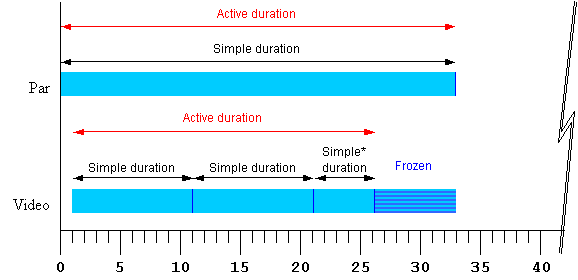
<par begin="0s" dur="33s">
   <video begin="1s" dur="10s" repeatCount="2.5" fill="freeze" .../>
</par>
Figure 1 - Strip diagram of basic timing support. The starred
"Simple*" duration indicates that the simple duration is partial (i.e. it is
cut off early).
The attributes that control these aspects of timing can be applied not
only to media elements, but to the time containers as well. This allows, for
example, an entire sequence to be repeated, and to be coordinated as a unit
with other media and time containers. While authors can specify a particular
simple duration for a time container, it is often easier to leave the
duration unspecified, in which case the simple duration is defined by the
contained child elements. When an element does not specify a simple duration,
the time model defines an implicit simple duration for the element.
For example, the implicit simple duration of a sequence is based upon the sum
of the active durations of all the children.
Each time container also imposes certain defaults and
constraints upon the contained children. For example in a <seq>, elements begin by
default right after the previous element ends, and in all time
containers, the active duration of child elements is constrained not
to extend past the end of the time container's simple duration. Figure 2
illustrates the effects of a repeating <par> time container as it constrains a
<video> child element.
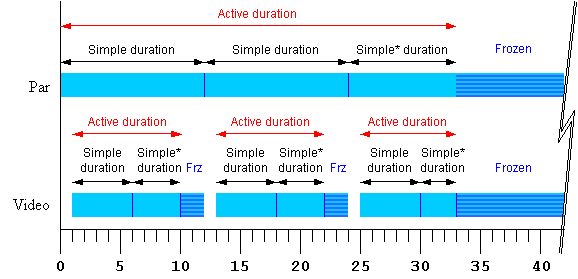
<par begin="0s" dur="12s" repeatDur="33s" fill="freeze" >
   <video begin="1s" dur="5s" repeatCount="1.8" fill="freeze" .../>
</par>
Figure 2 - Strip diagram of time container constraints upon child
elements. The starred "Simple*" durations indicate that the simple duration
is partial (i.e. it is cut off early).
The SMIL Timing Model defines how the time container elements and
timing attributes are interpreted to construct a time graph. The
time graph is a model of the presentation schedule and
synchronization relationships. The time graph is a dynamic structure,
changing to reflect the effect of user events, media delivery, and DOM
control of the presentation. At any given instant, the time graph models the
document at that instant, and the semantics described in this module.
However, as user events or other factors cause changes to elements, the
semantic rules are re-evaluated to yield an updated time graph.
When a begin or end value refers to
an event, or to the begin or active end of another element, it may not be
possible to calculate the time value. For example, if an element is defined
to begin on some event, the begin time will not be known until the event
happens. Begin and end values like this are described as unresolved.
When such a time becomes known (i.e. when it can be calculated as a
presentation time), the time is said to be resolved. A resolved time
is said to be definite if it is not the value "indefinite". See also
the discussion of Unifying scheduled and
interactive timing.
In an ideal environment, the presentation would perform precisely as
specified. However, various real-world limitations (such as network delays)
can influence the actual playback of media. How the presentation application
adapts and manages the presentation in response to media playback problems is
termed runtime synchronization behavior. SMIL includes attributes
that allow the author to control the runtime synchronization behavior for a
presentation.
This section is informative
This section remains largely unchanged for SMIL 3.0
except for the relaxation of the restrictions on the begin attributes of children of a seq time container. Also, a number of examples
have been added.
This section defines the set of timing attributes that
are common to all of the SMIL synchronization elements.
Unless otherwise specified below, if there is any error
in the argument value syntax for an attribute, the attribute will be ignored
(as though it were not specified).
The begin
and dur attributes: basic timing
support
This section is informative
The basic timing for an element is described using the
begin and dur attributes. Authors can specify the begin
time of an element in a variety of ways, ranging from simple clock times to
the time that an event (e.g. a mouse click) happens. The simple duration of
an element is specified as a simple time value. The begin attribute syntax is described below.
The normative syntax rules for each attribute value variant are described in
Timing attribute value
grammars; an attribute value syntax summary is provided here as an aid to
the reader.
This section is normative
- begin : smil-1.0-syncbase-value |
begin-value-list
- Defines when the element becomes active.
The attribute value is either a SMIL 1.0 syncbase declaration, or a
semi-colon separated list of values.
- smil-1.0-syncbase-value
: "id(" Id-value ")" ( "(" ( "begin" | "end" | Clock-value ) ")"
)?
- Deprecated. Describes a syncbase and an offset from
that syncbase. The element begin is defined relative to the begin
or active end of another element.
- begin-value-list :
begin-value (";" begin-value-list )?
- A semi-colon separated list of begin values. The interpretation
of a list of begin times is detailed in the section Evaluation of begin
and end time lists.
- begin-value : ( offset-value | syncbase-value | event-value |
repeat-value | accesskey-value | media-marker-value |
wallclock-sync-value | "indefinite" )
- Describes the element begin.
- offset-value : ( "+" |
"-" )? Clock-value
- Describes the element begin as an offset from an implicit
syncbase. The definition of the implicit syncbase depends upon
the element's parent time container. The offset is measured in
parent simple time.
- syncbase-value : (
Id-value "." ( "begin" | "end" ) ) ( ( "+" | "-" ) Clock-value )?
- Describes a syncbase and an offset from that syncbase. The
element begin is defined relative to the begin or active end of
another element.
- event-value : ( Id-value
"." )? ( event-ref ) ( ( "+" | "-" ) Clock-value )?
- Describes an event and an optional offset that determine the
element begin. The element begin is defined relative to the time
that the event is raised. Events may be any event defined for the
host language in accordance with [DOM2Events]. These may
include user-interface events, event-triggers transmitted via a
network, etc. Details of event-based timing are described in the
section below on Unifying
Event-based and Scheduled Timing.
- repeat-value : ( Id-value
"." )? "repeat(" integer ")" ( ( "+" | "-" ) Clock-value )?
- Describes a qualified repeat event. The element begin is
defined relative to the time that the repeat event is raised with
the specified iteration value.
- accesskey-value :
"accesskey(" character ")"( ( "+" | "-" ) Clock-value )?
- Describes an accesskey that determines the element begin. The
element begin is defined relative to the time that the accesskey
character is input by the user.
- media-marker-value :
Id-value ".marker(" marker-name ")"
- Describes the element begin as a named marker time defined by a
media element.
- wallclock-sync-value :
"wallclock(" wallclock-value ")"
- Describes the element begin as a real-world clock time. The
wallclock time syntax is based upon syntax defined in
[ISO8601].
- "indefinite"
- The begin of the element will be determined by a
"beginElement()" method call or a hyperlink targeted to the
element.
The SMIL Timing and Synchronization DOM methods are described in
the Reserved DOM methods
section.
Hyperlink-based timing is described in the Hyperlinks and timing
section.
This section is normative
- If no begin is specified, the
default timing is dependent upon the time container.
- If there is a syntax error in any individual value in the list of begin
or end values (i.e. the value does not conform to the defined syntax for
any of the time values), the host language must specify how the user
agent deals with this.
- A time value may conform to the defined syntax but still be invalid
(e.g. if an unknown element is referenced by ID in a syncbase value). If
there is such an evaluation error in an individual value in the list of
begin or end values, the individual value will be will be treated as
though "indefinite" were specified, and the
rest of the list will be processed normally. If no legal value is
specified for a begin or end attribute, the element assumes an "indefinite" begin or end time (respectively).
- The deprecated SMIL
1.0-syncbase-values are semantically equivalent to the following SMIL
3.0 begin-value types:
id(Id-value)(begin) is equivalent to
Id-value.beginid(Id-value)(end) is equivalent to
Id-value.endid(Id-value)(Clock-value) is equivalent
to Id-value.begin+ Clock-value
This section is informative
This section is informative
The use of negative offsets to define begin times
merely defines the synchronization relationship of the element. It does not
in any way override the time container constraints upon the element, and it
cannot override the constraints of presentation time.
This section is normative
- For children of <par> and
<excl> time containers, the
computed offset relative to the parent begin time may be negative.
- A begin time may be specified with a negative offset relative to an
event or to a syncbase that is not initially resolved. When the syncbase
or eventbase time is resolved, the computed time may be in the past.
The computed begin time defines the scheduled synchronization
relationship of the element, even if it is not possible to begin the
element at the computed time. The time model uses the computed begin time,
and not the observed time of the element begin.
This section is informative
This section is normative
- When a begin time is resolved to be in the past (i.e., before the
current presentation time), the element begins immediately, but acts as
though it had begun at the specified time (playing from an offset into
the media).
The behavior can be thought of as a clipBegin value applied to the element,
that only applies to the first iteration of repeating elements.
The element will actually begin at the time computed according to the
following algorithm:
Let o be the offset value of a given begin value,
d be the associated simple duration,
AD be the associated active duration.
Let rAt be the time when the begin time becomes resolved.
Let rTo be the resolved sync-base or event-base time without the offset
Let rD be rTo - rAt.  If rD < 0 then rD is set to 0.

If AD is indefinite, it compares greater than any value of o or ABS(o).
REM( x, y ) is defined as x - (y * floor( x/y )).
If y is indefinite or unresolved, REM( x, y ) is just x.

Let mb = REM( ABS(o), d ) - rD
If ABS(o) >= AD then the element does not begin.
Else if mb >= 0 then the media begins at mb.
Else the media begins at mb + d.
If the element repeats, the iteration value of the repeat
event has the calculated value based upon the above computed begin time, and
not the observed number of repeats.
This section is informative
A begin time specifies a synchronization relationship
between the element and the parent time container. Syncbase variants,
eventbase, marker and wallclock timing are implicitly converted to an offset
on the parent time container, just as an offset value specifies this
directly. For children of a time container the computed offset relative to
the parent begin time may be negative.
Note that an element cannot actually begin until the parent time container
begins. For children of a seq there is
the additional constraint that they cannot begin before the previous child
has ended its active duration. An element with a negative time delay behaves
as if it had begun earlier.
The presentation effect for the element (e.g. the
display of visual media) is equivalent to that for a clipBegin value (with the same
magnitude) for the first -- and only the first -- iteration of a repeated
element. If no repeat behavior is specified, the element presentation effect
of a negative begin offset is equivalent to a clipBegin specification with the same
magnitude as the offset value. Nevertheless, the timing side effects
are not equivalent to a clipBegin value as described. Time
dependents of the begin value will behave as though the element had begun
earlier.
The length of the simple duration is specified using
the dur attribute. The dur attribute syntax is described below.
This section is normative
- dur
- Specifies the simple duration.
The attribute value can be any of the following:
- Clock-value
- Specifies the length of the simple duration, measured in
element active time.
Value must be greater than 0.
- "media"
- Specifies the simple duration as the intrinsic media duration.
This is only valid for elements that define media.
- "indefinite"
- Specifies the simple duration as indefinite.
If there is any error in the argument value syntax for dur, the attribute will be ignored (as though
it were not specified).
If the "media" attribute value is used on an element that
does not define media (e.g. on the SMIL 3.0 time container elements par, seq
and excl), the attribute will be
ignored (as though it were not specified). Contained media such as the
children of a par are not considered
media directly associated with the element.
If the element does not have a (valid) dur attribute, the simple duration for the
element is defined to be the implicit duration of the element.
The implicit duration depends upon the type of an
element. The primary distinction is between different types of media elements
and time containers. If the media element has no timed children, it is
described as a simple media element.
-
For simple media elements that specify continuous media (i.e.
media with an inherent notion of time), the implicit duration is the
intrinsic duration of the media itself - e.g. video and audio files have
a defined duration.
-
For simple media elements that specify discrete media (some
times referred to as "static" media), the implicit duration is defined to
be 0.
-
If the author specifies a value for dur that is shorter than the implicit
duration for an element, the implicit duration will be cut short by the
specified simple duration.
If the author specifies a simple duration that is longer than the
implicit duration for an element, the implicit duration of the element is
extended to the specified simple duration:
- For a discrete media element, the media will be shown for the specified
simple duration.
- For a continuous media element, the ending state of the media (e.g. the
last frame of video) will be shown from the end of the intrinsic media
duration to the end of the specified simple duration. This only applies
to visual media - aural media will simply stop playing (i.e. be
silent).
- For a seq time container, the last child is frozen until the end of the
simple duration of the seq if and only if its fill behavior is "freeze"
or "hold" (otherwise the child just ends without freezing).
- Children of a par or excl are frozen until the end of the simple
duration of the par or excl if and only if the children's fill behavior
is "freeze" or "hold" (otherwise the children just ends without
freezing).
Note that when the simple duration is "indefinite", some simple use cases can yield
surprising results. See the related
example #4 in Appendix B.
The end
attribute: controlling active duration
This section is informative
This section is normative
- end : smil-1.0-syncbase-value |
end-value-list
- Defines an end value for the element that can constrain the active
duration.
The attribute value is either a SMIL 1.0 syncbase declaration, a
semi-colon separated list of values.
- smil-1.0-syncbase-value
: "id(" Id-value ")" ( "(" ( "begin" | "end" | Clock-value ) ")"
)?
- Deprecated. Describes a syncbase and an offset from
that syncbase. The end value is defined relative to the begin or
active end of another element.
- end-value-list :
end-value (";" end-value-list )?
- A semi-colon separated list of end values. The interpretation
of a list of end times is detailed in the section Evaluation of begin
and end time lists.
- end-value : ( offset-value | syncbase-value | event-value |
repeat-value | accesskey-value | media-marker-value |
wallclock-sync-value | "indefinite" )
- Describes the end value of the element.
- offset-value : ( "+" |
"-" )? Clock-value
- Describes the end value as an offset from an implicit syncbase.
The definition of the implicit syncbase depends upon the
element's parent time container. The offset is measured in parent
simple time.
- syncbase-value : (
Id-value "." ( "begin" | "end" ) ) ( ( "+" | "-" ) Clock-value )?
- Describes a syncbase and an offset from that syncbase. The end
value is defined relative to the begin or active end of another
element.
- event-value : ( Id-value
"." )? ( event-ref ) ( ( "+" | "-" ) Clock-value )?
- Describes an event and an optional offset that determine the
end value. The end value is defined relative to the time that the
event is raised. Events may be any event defined for the host
language in accordance with [DOM2Events]. These may include
user-interface events, event-triggers transmitted via a network,
etc. Details of event-based timing are described in the section
below on Unifying Event-based
and Scheduled Timing.
- repeat-value : ( Id-value
"." )? "repeat(" integer ")" ( ( "+" | "-" ) Clock-value )?
- Describes a qualified repeat event. The end value is defined
relative to the time that the repeat event is raised with the
specified iteration value.
- accesskey-value :
"accesskey(" character ")"( ( "+" | "-" ) Clock-value )?
- Describes an accesskey that determines the end value. The end
value is defined as the time that the accesskey character is
input by the user.
- media-marker-value :
Id-value ".marker(" marker-name ")"
- Describes the end value as a named marker time defined by a
media element.
- wallclock-sync-value :
"wallclock(" wallclock-value ")"
- Describes the end value as a real-world clock time. The
wallclock time is based upon syntax defined in [ISO8601].
- "indefinite"
- The end value of the element will be determined by an
endElement() method call.
The SMIL Timing and Synchronization DOM methods are described in
the Reserved DOM methods
section.
If an end
attribute is specified but none of dur,
repeatCount and repeatDur are specified, the simple
duration is defined to be indefinite, and the end value constrains this to
define the active duration. The behavior of the simple duration in this case
is defined in Dur value semantics, as
though dur had been specified as
"indefinite".
If the end value
becomes resolved while the element is still active, and the resolved time is
in the past, the element should end the active duration immediately. Time
dependents defined relative to the end of this element should be resolved
using the computed active end (which may be in the past), and not the
observed active end.
The deprecated SMIL
1.0-syncbase-values are semantically equivalent to the following SMIL 3.0
end-value types:
id(Id-value)(begin) is equivalent to
Id-value.beginid(Id-value)(end) is equivalent to
Id-value.endid(Id-value)(Clock-value) is equivalent to
Id-value.begin+Clock-value
This section is informative
The end value can specify a list of times. This can be used to specify
multiple "ways" or "rules" to end an element, e.g. if any one of several
events is raised. A list of times can also define multiple end times that can
correspond to multiple begin times, allowing the element to play more than
once (this behavior can be controlled - see also the restart attribute).
In the following example, the dur
attribute is not specified, and so the simple duration is defined to be the
implicit media duration. In this case (and this case only) the value of end will extend the active duration if it
specifies a duration greater than the implicit duration. The video will be
shown for 8 seconds, and then the last frame will be shown for 2 seconds.
<video end="10s" src="8-SecondVideo.mpg" .../>
If an author wishes to specify the implicit duration as well as an end
constraint, the dur attribute can be
specified as "media". In the following example, the element will
end at the earlier of the intrinsic media duration, or a mouse click:
<html ...>
...
<video dur="media" end="click" src="movie.mpg" .../>
...
</html>
These cases arise from the use of negative offsets in the sync-base and
event-base forms, and authors should be aware of the complexities this can
introduce. See also Handling negative offsets
for end.
In the following example, the active duration will end at the earlier of
10 seconds, or the end of the "foo" element. This is particularly useful if
"foo" is defined to begin or end relative to an event.
<audio src="foo.au" dur="2s" repeatDur="10s"
       end="foo.end" .../>
In the following example, the active duration will end at 10 seconds, and
will cut short the simple duration defined to be 20 seconds. The effect is
that only the first half of the element is actually played. For a simple
media element, the author could just specify this using the dur attribute.
However in other cases, it is sometimes important to specify the simple
duration independent of the active duration.
<par>
   <audio src="music.au" dur="20s" end="10s" ... />
</par>
In the following example, the element begins when the user activates
(e.g., clicks on) the "gobtn" element. The active duration will end 30
seconds after the parent time container begins.
<smil ...>
...
<par>
<audio src="music.au" begin="gobtn.activateEvent" repeatDur="indefinite"
          end="30s" ... />
     <img src="foo.jpg" dur="40s" ... />
</par>
...
</smil>
Note that if the user has not clicked on the target element before 30
seconds elapse, the element will never begin. In this case, the element has
no active duration and no active end.
The defaults for the event syntax make it easy to define simple
interactive behavior. The following example stops the image when the user
clicks on the element.
<html ...>
...
<img src="image.jpg" end="click" />
...
</html>
Using end with an event value enables
authors to end an element based on either an interactive event or a maximum
active duration. This is sometimes known as lazy interaction.
In this example, a presentation describes factory processes. Each step is
a video, and set to repeat 3 times to make the point clear. Each element can
also be ended by clicking on the video, or on some element "next" that
indicates to the user that the next step should be shown.
<smil ...>
...
<seq>
  <video dur="5s" repeatCount="3" end="activateEvent; next.activateEvent" .../>
  <video dur="5s" repeatCount="3" end="activateEvent; next.activateEvent" .../>
  <video dur="5s" repeatCount="3" end="activateEvent; next.activateEvent" .../>
  <video dur="5s" repeatCount="3" end="activateEvent; next.activateEvent" .../>
  <video dur="5s" repeatCount="3" end="activateEvent; next.activateEvent" .../>
</seq>
...
</smil>
In this case, the active end of each element is defined to be the earlier
of 15 (5s dur * 3 repeats) seconds after it begins, or a click on "next".
This lets the viewer sit back and watch, or advance the presentation at a
faster pace.
This section is normative
-
An end time may be specified with a negative offset relative to an event
or to a syncbase that is not initially resolved.
- When the syncbase or eventbase time is resolved, the computed time may
be in the past.
- The computed time defines the scheduled synchronization
relationship of the element, even if it is not possible to end the
element at the computed time.
- When an end time is defined to be in the past, the element ends
immediately. The defined end time is the computed time, and not the
observed or performed time of the element end.
The min and max
attributes: more control over the active duration
This section is informative
The min/max attributes provide the author with a way
to control the lower and upper bound of the element active duration.
This section is normative
- min
- Specifies the minimum value of the active duration.
The attribute value can be either of the following:
- Clock-value
- Specifies the length of the minimum value of the active
duration, measured in element active time.
Value must be greater than or equal to 0.
- "media"
- Specifies the minimum value of the active duration as the
intrinsic media duration. This is only valid for elements that
define media.
If there is any error in the argument value syntax for min, the attribute will be ignored (as though
it were not specified).
The default value for min is "0".
This does not constrain the active duration at all.
- max
- Specifies the maximum value of the active duration.
The attribute value can be either of the following:
- Clock-value
- Specifies the length of the maximum value of the active
duration, measured in element active time.
Value must be greater than 0.
- "media"
- Specifies the maximum value of the active duration as the
intrinsic media duration. This is only valid for elements that
define media.
- "indefinite"
- The maximum value of the duration is indefinite, and so is not
constrained.
If there is any error in the argument value syntax for max, the attribute will be ignored (as though
it were not specified).
The default value for max is
"indefinite". This does not constrain the active duration at all.
If the "media" argument value is specified for either min or max on an element that does not define media
(e.g. on the SMIL 3.0 time container elements par, seq
and excl), the respective attribute
will be ignored (as though it were not specified). Contained media such as
the children of a par are not considered
media directly associated with the element.
If both min and max attributes are specified then the max value must be greater than or equal to the
min value. If this requirement is not
fulfilled then both attributes are ignored.
The rule to apply to compute the active duration of an element with min or max specified is the following: Each time the
active duration of an element is computed (i.e. for each interval of the
element if it begins more than once), this computation is made without taking
into account the min and max attributes (by applying the algorithm
described in Computing the active
duration). The result of this step is checked against the min and max bounds. If the result is within the
bounds, this first computed value is correct. Otherwise two situations may
occur:
if the first computed duration is greater than the max value, the
active duration of the element is defined to be equal to the max value (see the first example
below).
if the first computed duration is less than the min value, the active duration of the
element becomes equal to the min
value and the behavior of the element is as follows :
if the repeating duration (or the simple duration if the element
doesn't repeat) of the element is greater than min then the element is played
normally for the (min
constrained) active duration. (see the second and third examples
below).
otherwise the element is played normally for its repeating
duration (or simple duration if the element does not repeat) and then
is frozen or not shown depending on the value of the fill attribute (see the fourth and
fifth examples below).
This section is informative
The following examples illustrate some simple use cases for min and max attributes:
Example 1. In the following example, the video will only play for 10
seconds.
<smil ...>
...
<par >
   <video id="video_of_15s" max="10s".../>
</par>
...
</smil>
Example 2. In the following example, if an activate event happens before
10 seconds, this activation (e.g. click) does not interrupt the video
immediately, but the video plays until 10 seconds and then stops. If a click
event happens after 10 seconds, the video plays (repeating) until the click
happens. Note, the endEvent is only raised if a click occurs after 10
seconds, not at the simple end of each repeat.
<smil ...>
...
<par >
   <video id="video_of_15s" repeatDur="indefinite" end="activateEvent" min="10s".../>
</par>
...
</smil>
Example 3. In the following example, if an activate event happens on
element "foo" at 5 seconds, this event does not end the time container
immediately, but rather at 12 seconds. The simple duration is defined to be
"indefinite" (because an end attribute
is specified with no dur attribute), and
so the time container plays normally until it ends at 12 seconds.
<smil ...>
...
<par end="foo.activateEvent" min="12s" >
   <video id="video_of_15s" .../>
   <video id="video_of_10s" .../>
</par>
...
</smil>
Example 4. In the following example, if a click event happens on the first
video at 5 seconds, then the simple duration of the time container is
computed as 5 seconds. Respecting the fill attribute in the time between the end of
the simple duration and the end of the active duration, the two videos are
frozen between 5 seconds and 12 seconds.
<html ...>
...
<par endsync="first" min="12s" fill="freeze" >
   <video id="video_of_15s" end="click" ...>
   <video id="video_of_10s" .../>
</par>
...
</html>
Example 5. In the following example, the time container simple duration is
defined to be 5 seconds, and the min constraint defines the active duration
to be 12 seconds. Since the default value of fill in this case is "remove",
nothing is shown for the time container between 5 seconds and 12 seconds.
<par dur="5s" min="12s" >
   <video id="video_of_15s"/>
   <video id="video_of_10s" />
</par>
The min attribute and negative begin times
If an element is defined to begin before its parent (e.g. with a simple
negative offset value), the min duration
is measured from the calculated begin time not the observed begin (see
example 1 below). This means that the min value may have no observed effect (as in
example 2 below).
Example 1. In the following example, the image will be displayed from the
beginning of the time container for 2 seconds.
<par>
   <img id="img" begin="-5s" min="7s" dur="5s" .../>
</par>
Example 2. In the following example, the image will not be displayed at
all.
<par>
   <img id="img" begin="-5s" min="4s" dur="2s" .../>
</par>
See also the sections The min attribute
and restart and Time container
constraints on child durations.
This section is normative
The syntax specifications are defined using EBNF notation as defined in
XML 1.1 [XML11]
In the syntax specifications that follow, allowed white space is indicated
as "S", defined as follows (taken from the [XML11] definition for 'S'):
S ::= (#x20 | #x9 | #xD | #xA)+
This section is normative
A begin-value-list is a semi-colon separated list of timing specifiers:
begin-value-list ::= begin-value (S? ";" S? begin-value-list )?
begin-value      ::= (offset-value | syncbase-value
                      | event-value | repeat-value | accesskey-value
                      | media-marker-value | wallclock-sync-value
                      | "indefinite" )
This section is normative
An end-value-list is a semi-colon separated list of timing specifiers:
end-value-list ::= end-value (S? ";" S? end-value-list )?
end-value      ::= (offset-value | syncbase-value
                      | event-value | repeat-value | accesskey-value
                      | media-marker-value | wallclock-sync-value
                      | "indefinite" )
Several of the timing specification values have a similar syntax. To
parse an individual item in a value-list, the following approach defines the
correct interpretation. In addition, Id-values and Event-symbols are XML NMTOKEN values and
as such are allowed to contain the full stop '.' and
hyphen-minus '-' characters. The reverse solidus character '\' must be used
to escape these characters within Id-values and Event-symbols, otherwise these characters
will be interpreted as the full stop separator and hyphen-minus sign,
respectively. Once these rules are interpreted, but before Id-values in
syncbase values, event values, or media-marker values are further handled,
all leading and embedded escape characters should be removed.
- Strip any leading, trailing, or intervening white space characters.
- If the value begins with a number or numeric sign indicator (i.e.
'+' or '-'), the value should be parsed as an
offset value.
- Else if the value begins with the unescaped token "wallclock", it
should be parsed as a wallclock-sync-value.
- Else if the value is the unescaped token "indefinite", it should be
parsed as the value "indefinite".
- Else: Build a token substring up to but not including any sign
indicator (i.e. strip off any offset, parse that separately, and add it
to the result of this step). In the following, any '
.'
characters preceded by a reverse solidus '\' escape
character should not be treated as a separator, but as a normal token
character.
- If the token contains no '
.' separator character, then
the value should be parsed as an event-value with an unspecified
(i.e. default) eventbase-element.
- Else if the token ends with the unescaped string
"
.begin" or ".end", then the value should
be parsed as a syncbase-value.
- Else if the token contains the unescaped string
"
.marker(", then the value should be parsed as a media-marker-value.
- Else, the value should be parsed as an event-value (with a specified
eventbase-element).
This approach allows implementations to treat the
tokens wallclock and
indefinite as reserved element IDs, and begin, end and marker as reserved event names, while retaining an
escape mechanism so that elements and events with those names may be
referenced.
Clock values have the following syntax:
Clock-value         ::= ( Full-clock-value | Partial-clock-value | Timecount-value )
Full-clock-value    ::= Hours ":" Minutes ":" Seconds ("." Fraction)?
Partial-clock-value ::= Minutes ":" Seconds ("." Fraction)?
Timecount-value     ::= Timecount ("." Fraction)? (Metric)?
Metric              ::= "h" | "min" | "s" | "ms"
Hours               ::= DIGIT+; any positive number
Minutes             ::= 2DIGIT; range from 00 to 59
Seconds             ::= 2DIGIT; range from 00 to 59
Fraction            ::= DIGIT+
Timecount           ::= DIGIT+
2DIGIT              ::= DIGIT DIGIT
DIGIT               ::= [0-9]
For Timecount values, the default metric suffix is "s" (for seconds).
No embedded white space is allowed in clock values,
although leading and trailing white space characters will be ignored.
Fractional values are just (base 10) floating point
definitions of seconds. The number of digits allowed is unlimited (although
actual precision may vary among implementations).
Offset values are used to specify when an element
should begin or end relative to its syncbase.
This section is normative
An offset value has the following syntax:
offset-value ::= ( S? ("+" | "-") S? )? ( Clock-value )
- An offset value allows an optional sign on a clock value, and is used
to indicate a positive or negative offset.
- The offset is measured in parent simple time.
The implicit syncbase for an offset value is dependent upon the time
container:
- For children of a <par> or
an <excl>, the offset is
relative to the begin of the parent <par> or <excl>.
- For children of a <seq>, the
offset is relative to the active end of the previous child. If there is
no previous child, the offset is relative to the begin of the parent
<seq>. See also The seq time container.
Deprecated.
smil-1-syncbase-value  ::= "id(" Id-value ")"
                           ( "(" ( "begin" | "end" | Clock-value) ")" )?
This section is normative
ID reference values are references to the value of an "id" attribute of
another element in the document.
Id-value ::= Id-ref-value
Id-ref-value ::= IDREF | Escaped-Id-ref-value
Escaped-Id-ref-value ::= Escape-Char NMTOKEN
Escape-Char ::= "\"
- The IDREF is a legal XML identifier.
- If the Id-ref-value is not an IDREF, then it is treated as an
Escaped-ID-ref-value.
- The Escaped-Id-ref-value allows the use of a SMIL 3.0 reserved symbol
as an IDREF value for an attribute by prefixing the reserved symbol with
a backslash character. In this case the value should be treated as an
IDREF and not as the reserved symbol, and the leading backslash is
significant in the parsing as detailed in the section on parsing XML identifiers in begin and
end values.
- Single characters can also be escaped by using the backslash character,
and the character, minus the backslash, should be treated as a literal
part of the NMTOKEN.
If the element referenced by the IDREF is ignored as described in the
Content Control modules (e.g. if it specifies test attributes that evaluate
false), the associated time value (i.e.. the syncbase value or the eventbase
value that specifies the Id-value) will be considered invalid.
This section is informative
The semantics of ignored elements may change in a
future version of SMIL. One possible semantic is that the associated sync arc
arguments will not be invalid, but will instead always be "unresolved". When
this behavior needs to be simulated in this version of SMIL Timing and
Synchronization, an author can include the value "indefinite" in the list of
values for the begin or end attribute.
A syncbase value starts with a Syncbase-element term
defining the value of an "id" attribute of another element referred to as the
syncbase element.
This section is normative
A syncbase value has the following syntax:
 Syncbase-value   ::= ( Syncbase-element "." Time-symbol )

                      ( S? ("+"|"-") S? Clock-value )?

 Syncbase-element ::= Id-value

 Time-symbol      ::= "begin" | "end"
- The syncbase element must be another timed element contained in the
host document.
- The syncbase element may not be a descendant of the current
element.
- If the syncbase element specification refers to an illegal element, the
time-value description will be treated as though "indefinite" were
specified.
The syncbase element is qualified with one of the following time
symbols:
- begin
- Specifies the begin time of the syncbase element.
- end
- Specifies the Active End of the syncbase element.
- The time symbol can be followed by an offset value. The offset value
specifies an offset from the time (i.e. the begin or active end)
specified by the syncbase and time symbol.
- The offset is measured in parent simple time.
- If the clock value is omitted, it defaults to "0".
- No embedded white space is allowed between a syncbase element and a
time-symbol.
- White space will be ignored before and after a "+" or "-" for a clock
value.
- Leading and trailing white space characters (i.e. before and after the
entire syncbase value) will be ignored.
This section is informative
An Event value starts with an Eventbase-element term
that specifies the event-base element. The event-base element is the
element on which the event is observed. Given DOM event bubbling, the
event-base element may be either the element that raised the event, or it may
be an ancestor element on which the bubbled event can be observed. Refer to
DOM-Level2-Events [DOM2Events] for details.
This section is normative
An event value has the following syntax:
  Event-value       ::= ( Eventbase-element "." )? Event-symbol

                        ( S? ("+"|"-") S? Clock-value )?

  Eventbase-element ::= ID
The eventbase-element must be another element contained in the host
document.
If the Eventbase-element term is missing, the event-base element defaults
to the element on which the eventbase timing is specified (the current
element). A host language designer may override the definition of the default
eventbase element. As an example of this, the SMIL 3.0 Animation modules describe Timing
integration requirements for the animation elements (animate, animateMotion,
etc.). These requirements specify that the default eventbase element is the
target element of the animation. See SMIL 2
Animation section 3.9.1 (Integration requirements).
The event value must specify an Event-symbol. This term is an XML NMTOKEN
that specifies the name of the event that is raised on the Event-base
element. The host language designer must specify which events can be
specified.
- Host language specifications must include a description of legal event
names (with "none" as a valid description), and/or allow any name to be
used.
If an integrating language specifies no supported events, the
event-base time value is effectively unsupported for that language.
A host language may choose not to include support for offsets with
event values. The language must specify if this support is omitted.
If the host language allows dynamically created events (as supported
by DOM-Level2-Events [DOM2Events]), all possible Event-symbol names
cannot be specified and so unrecognized names may not be considered
errors.
Unless explicitly specified by a host language, it is not considered
an error to specify an event that cannot be raised on the Event-base
element (such as activateEvent or click for audio or other non-visual
elements). Since the event will never be raised
on the specified element, the event-base value will never be
resolved.
The last term specifies an optional offset-value that is an offset from
the time of the event.
- The offset is measured in parent simple time. If this term is omitted,
the offset is 0.
- No embedded white space is allowed between an eventbase element and an
event-symbol.
- White space will be ignored before and after a "+" or "-" for a clock
value.
- Leading and trailing white space characters (i.e. before and after the
entire eventbase value) will be ignored.
This section is informative
Repeat values are a variant on event values that
support a qualified repeat event. The repeat event defined in Events and event model allows an additional
suffix to qualify the event based upon an iteration value.
A repeat value has the following syntax:
  Repeat-value       ::= ( Eventbase-element "." )? "repeat("
iteration ")"

                        ( S? ("+"|"-") S? Clock-value )?

  iteration        ::= DIGIT+
If this qualified form is used, the eventbase value will only be resolved
when a repeat is observed that has a iteration value that matches the
specified iteration.
The qualified repeat event syntax allows an author to
respond only to an individual repeat of an element.
Accesskey values allow an author to tie a begin or end
time to a particular key press, independent of focus issues. It is modeled on
the HTML accesskey support. Unlike with HTML, user agents should not require
that a modifier key (such as "ALT") be required to activate an access key.
An access key value has the following syntax:
  Accesskey-value  ::= "accesskey(" character ")"

                       ( S? ("+"|"-") S? Clock-value )?
The character is a single character from [ISO10646].
The time value is defined as the time that the access key character is
input by the user.
Certain types of media can have associated
marker values that associate a name with a particular point (i.e. a
time) in the media. The media marker value provides a means of defining a
begin or end time in terms of these marker values. Note that if the
referenced id is not associated with a media element that supports markers,
or if the specified marker name is not defined by the media element, the
associated time may never be resolved.
This section is normative
Media-Marker-value ::= Id-value ".marker(" S? marker-name S? ")"
- The marker symbol is a string that must conform to the definition of
marker names for the media associated with the Id-value.
This section is informative
Wallclock-sync values have the following syntax. The
values allowed are based upon several of the "profiles" described in
[DATETIME], which is based upon [ISO8601].
This section is normative
wallclock-sync-value  ::= "wallclock(" S? (DateTime | WallTime | Date)  S? ")"
DateTime       ::= Date "T" WallTime
Date           ::= Years "-" Months "-" Days
WallTime       ::= (HHMM-Time | HHMMSS-Time)(TZD)?
HHMM-Time      ::= Hours24 ":" Minutes
HHMMSS-Time    ::= Hours24 ":" Minutes ":" Seconds ("." Fraction)?
Years          ::= 4DIGIT;
Months         ::= 2DIGIT; range from 01 to 12
Days           ::= 2DIGIT; range from 01 to 31
Hours24        ::= 2DIGIT; range from 00 to 23
4DIGIT         ::= DIGIT DIGIT DIGIT DIGIT
TZD            ::= "Z" | (("+" | "-") Hours24 ":" Minutes )
-
Exactly the components shown here must be present, with exactly this
punctuation.
- Note that the "T" appears literally in the string, to indicate the
beginning of the time element, as specified in [ISO8601].
This section is informative
This section is normative
There are three ways of handling time zone offsets:
- Times are expressed in UTC (Coordinated Universal Time), with a special
UTC designator ("Z").
- Times are expressed in local time, together with a time zone offset in
hours and minutes. A time zone offset of "+hh:mm" indicates that the
date/time uses a local time zone which is "hh" hours and "mm" minutes
ahead of UTC. A time zone offset of "-hh:mm" indicates that the date/time
uses a local time zone which is "hh" hours and "mm" minutes behind
UTC.
- Times are expressed in local time, as defined for the presentation
location. The local time zone of the end-user platform is used.
The presentation engine must be able to convert
wallclock-values to a time within the document.
- When the document begins, the current wallclock time must be noted -
this is the document wallclock begin.
- Wallclock values are then converted to a document time by subtracting
the document wallclock begin, and then converting the time to the
element's parent time space as for any syncbase value, as though the
syncbase were the document body.
- Date wallclock values are treated as a DateTime value of the given date
at time 00:00:00.00 in the local time zone.
- WallTime values are treated as a DateTime value on the date of the
document wallclock begin at the given time. Specified time zones
must be respected, and the time converted into the local time zone before
applying the document wallclock begin.
This section is informative
Note that the resulting begin or end time may be
before the begin, or after end of the parent time container. This is not an
error, but the time container
constraints still apply. In any case, the semantics of the begin and end attribute govern the interpretation of the
wallclock value.
This section is normative
The endsync
attribute controls the implicit duration of time containers, as a function of
the children. The endsync attribute
is only valid for par and excl time container elements, and media
elements with timed children (e.g. animate or area elements). Integrating languages may
allow the endsync attribute on any
element with time container semantics.
The endsync
attribute is particularly useful with children that have "unknown" duration,
e.g. an MPEGmovie, that must be played through to determine the duration, or
elements with event-based end timing.
- endsync = ( "first" | "last" | "all" | "media" | Id-value |
smil1.0-Id-value )
- Legal values for the attribute are:
- first
- The par, excl, or media element's implicit
duration ends with the earliest active end of all the child
elements. This does not refer to the lexical first child, or to
the first child to start, but rather refers to the first child to
end its (first) active duration.
- last
- The par, excl, or media element's implicit
duration ends with the last active end of the child elements.
This does not refer to the lexical last child, or to the last
child to start, but rather refers to the last active end of all
children that have a resolved, definite begin time. If the time
container has no children with a resolved begin time, the time
container ends immediately. If child elements have multiple begin
times, or otherwise restart, the child elements must complete
all instances of active durations for resolved begin
times.
This is the default value for par and excl elements.
- all
- The par, excl, or media element's implicit
duration ends when all of the child elements have ended their
respective active durations. Elements with indefinite or
unresolved begin times will keep the simple duration of
the time container from ending.
When all elements have completed the active duration one or more
times, the parent time container can end.
- media
- The time container element's implicit duration ends when the
intrinsic media duration of the element ends. This must be
defined by a host language. If the time container element does
not define an intrinsic media duration, the host language must
define the simple duration for the element.
This is the default value for media time container elements.
- Id-value
- The par, excl, or media element time
container's implicit duration ends when the specified child ends
its (first) active duration. The id must correspond to one of the
immediate timed children of the time container.
- smil1.0-Id-value
- This is a SMIL 1.0 identifier value of the form "id(" IDREF
")". The semantics are identical to those of the Id-value
immediately above. This syntax is deprecated.
Elements may have an unresolved or indefinite
begin time when the parent begins. If an element's unresolved begin time
becomes resolved (and definite) before the parent time container ends the
simple duration, the element must be considered by the endsync="last" semantics.
This can chain, so that only one element is
running at one point, but before it ends its active duration another
interactive element is resolved. It may even yield "dead time" (where
nothing is playing), if the resolved begin is after the other
elements active end.
If the endsync semantics consider any child
that has an unresolved active duration, then the implicit duration of the
time container is also unresolved.
For the Id-value arg-value
variant, the referenced child may have an unresolved begin time. If this
causes the active end time to be unresolved as well, the implicit
duration of the time container is also unresolved.
If the endsync semantics consider any child
that has a (resolved) indefinite active duration, then the implicit
duration of the time container is also indefinite.
Media element time containers define an intrinsic
duration equal to the duration of the referenced media.
If the referenced media is not continuous, the
duration is 0 (endsync="media" will not
generally be useful on discrete media).
If the media argument
value is used for an element that does not declare media, the attribute
is ignored (as though endsync
had not been specified).
If the Id-value arg-value
variant is not an immediate child of the time container, it is as if
endsync is not specified.
For the purpose of parsing the endsync argument value, first, last, all, and media are
reserved words and must be escaped with a backslash in order to be used
as Id-value's.
Semantics of endsync and dur and end:
- If an element specifies both endsync and dur, the endsync attribute is ignored. The
element's simple duration is defined by the value of dur.
- If an element specifies both endsync and end, but none of dur, repeatDur or repeatCount, the endsync attribute is ignored. In this
case the element behaves as if only end were specified, therefore the
element's implicit duration is indefinite and will be constrained by the
end value.
Semantics of endsync and
restart:
- In the case of an element that restarts (e.g. because of multiple begin
times), the element is considered to have ended its active duration when
one active duration instance has completed. It is not a requirement that
all instances associated with multiple begin and end times complete, to
satisfy the semantics of endsync. This means that if the
element is playing a second or later instance of an active duration, it
may be cut short by a parent, once the other children satisfy the endsync semantics.
Semantics of endsync and paused elements:
Note that child elements of an excl that are currently paused (by the
excl semantics) have not ended
their active duration. Similarly, any element paused via the DOM
pause() method has not completed its active duration. Paused
elements (that have not already completed the active duration at least
once) must be considered in the evaluation of endsync.
For example, if a time container with endsync="last" has paused child elements, the simple
duration of the time container will not end until the paused children
resume or otherwise end.
This section is informative
This section is normative
The following pseudo-code describes the endsync algorithm:
//
// boolean timeContainerHasEnded()
//
// method on time containers called to evaluate whether
// time container has ended, according to the rules of endsync.
// Note: Only supported on par and excl
//
// A variant on this could be called when a child end is updated to
// create a scheduled (predicted) end time for the container.
//
// Note that we never check the end time of children - it doesn't matter.
//
// Assumes:
//     child list is stable during evaluation
//     isActive state of children is up to date for current time.
//      [In practice, this means that the children must all be
//        pre-visited at the current time to see if they are done.
//        If the time container is done, and repeats, the children
//        may be resampled at the modified time.]
//
//   Uses interfaces:
//   on TimedNode:
//     isActive()             tests if node is currently active
//     hasStarted()           tests if node has (ever) begun
//     begin and end          begin and end TimeValues of node
//
//   on TimeValue         (a list of times for begin or end)
//   is Resolved(t)          true if there is a resolved time
//                                     at or after time t
//

boolean timeContainerHasEnded()
{

TimeInstant now = getCurrentTime(); // normalized for time container

boolean assumedResult;

// For first or ID, we assume a false result unless we find a child that has ended
// For last and all, we assume a true result unless we find a disqualifying child

if( ( endsyncRule == first ) || ( endsyncRule == ID ) )
   assumedResult = false;
else
   assumedResult = true;

// Our interpretation of endsync == all:
//          we're done when all children have begun, and none is active
//

// loop on each child in collection of timed children,
//  and consider it in terms of the endsyncRule

 foreach ( child c in timed-children-collection )
{
   switch( endsyncRule ) {
      case first:
         // as soon as we find an ended child, return true.
         if( c.hasStarted() & !c.isActive() )
            return true;
         // else, keep looking (assumedResult is false)
         break;

      case ID:
         // if we find the matching child, just return result
         if( endsyncID == c.ID )
                 return( c.hasStarted() & !c.isActive() );
         // else, keep looking (we'll assume the ID is valid)
         break;

      case last:
         // we just test for disqualifying children
         // If the child is active, we're definitely not done.
         // If the child has not yet begun but has a resolved begin,
         // then we're not done.
         if( c.isActive()
             || c.begin.isResolved(now) )
             return false;
         // else, keep checking (the assumed result is true)
         break;

      case all:
         // we just test for disqualifying children
        // all_means_last_done_after_all_begin

         // If the child is active, we're definitely not done.
         // If the child has not yet begun then we're not done.
         // Note that if it has already begun,
         // then we still have to wait for any more resolved begins
         if( c.isActive() || !c.hasStarted()
             || c.begin.isResolved(now) )
             return false;
         // else, keep checking (the assumed result is true)
         break;

   } // close switch

} // close foreach loop

return assumedResult;

} // close timeContainerHasEnded()
This section is informative
This section is
normative
- repeatCount
- Specifies the number of iterations of the simple duration. It can
have the following attribute values:
- numeric value
- This is a (base 10) "floating point" numeric value that specifies the
number of iterations. It can include partial iterations expressed as
fraction values. A fractional value describes a portion of the simple
duration. Values must be greater than 0.
- "indefinite"
- The element is defined to repeat indefinitely (subject to the
constraints of the parent time container).
- repeatDur
- Specifies the total duration for repeat. It can have the following
attribute values:
- Clock-value
- Specifies the duration in element active time to repeat the simple
duration.
- "indefinite"
- The element is defined to repeat indefinitely (subject to the
constraints of the parent time container).
- The SMIL 1.0 repeat attribute is deprecated in SMIL 2.1 (it must be
supported in SMIL document user agents for backwards compatibility).
In the following example, the implicit duration of the audio is
constrained by repeatCount. Only
the first half of the clip will play; the active duration will be 1.5
seconds.
<audio src="3second_sound.au" repeatCount="0.5" />
In this example, the 3 second (implicit) simple duration will be played
three times through and then is constrained by the dur attribute on the parent par; the active duration will be 9 seconds.
<par dur="9s">
   <audio src="3second_sound.au" repeatCount="100" />
</par>
In the following example, the 2.5 second simple duration will be repeated
twice; the active duration will be 5 seconds.
<audio src="background.au" dur="2.5s" repeatCount="2" />
In the following example, the 3 second (implicit) simple duration will be
repeated two full times and then the first half is repeated once more; the
active duration will be 7.5 seconds.
<audio src="3second_sound.au" repeatCount="2.5" />
In the following example, the audio will repeat for a total of 7 seconds.
It will play fully two times, followed by a fractional part of 2 seconds.
This is equivalent to a repeatCount of 2.8.
<audio src="music.mp3" dur="2.5s" repeatDur="7s" />
Note that if the simple duration is indefinite, repeat behavior is not
defined (but repeatDur still
contributes to the active duration). In the following example the simple
duration is 0 and indefinite respectively, and so the repeatCount is ignored. Nevertheless,
this is not considered an error. The active duration is equal to the simple
duration: for the first element, the active duration is 0, and for the second
element, the active duration is indefinite.
<img src="foo.jpg" repeatCount="2" />
<img src="bar.png" dur="indefinite" repeatCount="2" />
In the following example, the simple duration is 0 for the image and
indefinite for the text element, and so repeat behavior is not meaningful.
The active duration is 0 for the first element, however for the second
element, the active duration is determined by the repeatDur value, and so is 10 seconds.
The effect is that the text is shown for 10 seconds.
<img src="foo.jpg" repeatDur="10s" />
<text src="intro.html" dur="indefinite" repeatDur="10s" />
In the following example, if the audio media is longer than the 5 second
repeatDur, then the active
duration will effectively cut short the simple duration.
<audio src="8second_sound.au" repeatDur="5s" />
The repeatCount and repeatDur attributes can also be used to
repeat an entire timeline (i.e. a time container simple duration), as in the
following example. The sequence has an implicit simple duration of 13
seconds. It will begin to play after 5 seconds, and then will repeat the
sequence of three images 3 times. The active duration is thus 39 seconds
long.
<seq begin="5s" repeatCount="3" >
   <img src="img1.jpg" dur="5s" />
   <img src="img2.jpg" dur="4s" />
   <img src="img3.jpg" dur="4s" />
</seq>
The min
attribute and restart:
This section is normative
- repeat
- This attribute has been deprecated in SMIL 2.0 in favor of the
new repeatCount and repeatDur attributes.
- This causes the element to play repeatedly for the specified number
of times. It is equivalent to a seq element with the stated number of
copies of the element without the "repeat" attribute as children. All
other attributes of the element, including any begin delay, are
included in the copies.
- Legal values are integer iterations, greater
than 0, and "indefinite".
The fill
attribute: extending an element
This section is informative
When an element's active duration ends, it may be
frozen at the final state, or it may no longer be presented (i.e.,
its effect is removed from the presentation). Freezing an element
extends it, using the final state defined in the last instance of the simple
duration. This can be used to fill gaps in a presentation, or to extend an
element as context in the presentation (e.g. with additive animation - see
[SMIL-ANIMATION]).
This section is normative
The fill
attribute allows an author to specify that an element should be extended
beyond the active duration by freezing the final state of the
element. The fill attribute is also
used to determine the behavior when the active duration is less than the
duration specified in the min attribute.
For this reason, rather than referring to the end of the active duration,
this description refers to the "last instance of the simple duration".
- For discrete media, the media is simply displayed as it would be during
the simple duration.
- For visual continuous media, the "frame" that corresponds to the end of
the last instance of the simple duration is shown.
- For algorithmic media like animation, the value defined for the end of
the last instance of the simple duration should be used.
- For time containers, freezing extends the state of all children that
are active or frozen at the end of the last instance of the time
container simple duration. The children are frozen as they appear at the
end of the last instance of the time container simple duration. If a
child element ends its active duration coincident to the end of the last
instance of its parent time container simple duration, the child element
fill value determines whether the
child will be frozen after the end of the parent time container's last
simple duration.
- A host language integrating Timing must specify the semantics of
freezing elements.
The syntax of the fill attribute is the same as in
SMIL 1.0, with two extensions. In addition, the fill attribute may now be
applied to any timed element, including time containers.
- fill = ( "remove" | "freeze" | "hold" | "transition" | "auto" | "default" )
- This attribute can have the following values:
- remove
- Specifies that the element will not extend past the end of the last
instance of the simple duration.
- freeze
- Specifies that the element will extend past the end of the last
instance of the simple duration by "freezing" the element state at that
point. The parent time container of the element determines how long the
element is frozen (as described immediately below).
- hold
- Setting this to "hold" has the same
effect as setting to "freeze", except that
the element is always frozen to extend to the end of the simple
duration of the parent time container of the element (independent
of the type of time container). For profiles that support a layered
layout model (e.g., SMIL 3.0 Language Profile), held elements (elements
with fill="hold") will refresh their display area when a
layer is added on top then later removed.
- transition
- Setting this to "transition" has the same
effect as setting to "freeze", except that
the element is removed at the end of the transition. This value is only
allowed on elements with media directly associated with them. If
specified on any other element (e.g. a time container element in the
SMIL language profile), the attribute is ignored. See the SMIL Transitions module.
- auto
- The fill behavior for this element depends on whether the element
specifies any of the attributes that define the simple or active
duration:
- If none of the attributes dur, end, repeatCount or repeatDur are specified on the
element, then the element will have a fill behavior identical to
that if it were specified as "freeze".
- Otherwise, the element will have a fill behavior identical to
that if it were specified as "remove".
- default
- The fill behavior for the element is determined by the value of the
fillDefault attribute.
This is the default value.
If the application of fillDefault to an element would
result in the element having a value of fill that is not allowed on
that element, the element will instead have a fill value of "auto".
- In a par, the element is frozen to
extend to the end of the simple duration of the par. In this case, fill="freeze"
is equivalent to fill="hold".
- In a seq, the element is frozen to
extend to the begin of the next element in the seq or until the end of the simple
duration of the seq. This will fill
any gap in the presentation (although it may have no effect if the next
element begins immediately).
- In an excl, the element is frozen
to extend to the begin of the next element to be activated in the excl, or until an element in the excl is resumed, or until the end of the
simple duration of the excl. This
will fill any gap in the presentation (although it may have no effect if
the next element interrupts the current element). Note that if an element
is paused, the active duration has not ended, and so the fill attribute does not (yet) apply. See
also excl element, in the section ExclSyntax.
When applied to media, fill only has
a presentation effect on visual media. Non-visual media (audio) will simply
be silent (although they are still frozen from a timing perspective).
This section is normative
- fillDefault =
( "remove" | "freeze" | "hold" | "transition" | "auto"
| "inherit" )
- Defines the default value for the fill behavior for an element and all
descendants.
The values "remove", "freeze", "hold",
"transition" and "auto" specify that the element fill behavior is
the respective value.
- inherit
- Specifies that the value of this attribute (and of the fill
behavior) are inherited from the fillDefault value of the
parent element. If there is no parent element, the value is "auto".
This is the default value.
The Event sensitivity and fill
The effects of the fill attribute apply only to the timing
semantics. If an element is still visible while frozen, it behaves normally
with respect to other semantics such as user event processing. In particular,
elements such as a and area are still sensitive to user activation
(e.g. clicks) when frozen. See also the SMIL 1.0 specification [SMIL10].
This section is informative
This section is informative
This section is
normative
restart = ( "always" | "whenNotActive" | "never" |
"default" )
- always
- The element can be restarted at any time.
- whenNotActive
- The element can only be restarted when it is not active (i.e.
it can be restarted after the active end). Attempts to
restart the element during its active duration are ignored.
- never
- The element cannot be restarted for the remainder of the
current simple duration of the parent time container.
- default
- The restart behavior for the element is determined by the value
of the restartDefault
attribute.
This is the default value.
-
When an element restarts, the primary semantic is that it behaves as
though this were the first time the element had begun, independent of any
earlier behavior. Any effect of an element playing earlier is no longer
applied (including any fill
behavior), and only the new current interval of the element is reflected
in the presentation. It should be obvious that this definition applies
only to the behavior of the element content, and not to the evaluation of
the begin and end times lists described in Evaluation of begin and end
time lists.
- When an active element restarts, the element first ends the active
duration, propagates this to time dependents and raises an endEvent in
the normal manner (see also Evaluation of begin and end
time lists). Restart semantics are evaluated after the
active duration for an element is computed, and so ending the active
duration due to a restart is not subject to the semantics of min. See also Computing the active duration.
- The synchronization relationship between an element and its parent time
container is re-established when the element restarts. A new
synchronization relationship may be defined. See also Controlling runtime synchronization
behavior.
-
Note that if the parent time container (or any ascendant time container)
repeats or restarts, any state associated with restart="never" will be reset, and the element can begin
again normally. See also Resetting element state.
The restartDefault
attribute can be used to control the default behavior of the restart attribute. This is described below
in Controlling the default behavior
of restart.
For details on when and how the restart
attribute is evaluated, see Evaluation of begin and end time
lists.
This section is informative
This section is normative
The following attribute is provided to specify the
default behavior for restart:
- restartDefault = (
"always" | "whenNotActive" | "never" | "inherit"
)
- Defines the default value for the restart behavior for an element.
The values "always", "whenNotActive" and "never" specify that the element restart behavior
is the respective value.
- inherit
- Specifies that the value of this attribute (and of the restart
behavior) are inherited from the restartDefault value of the
parent element. If there is no parent element, the value is "always".
This is the default value.
Given the default values of this attribute ("inherit")
and of the restart attribute
("default"), a document that does not specify these attributes will have
restart="always" behavior for all timed elements.
This section is normative
When a time container repeats or restarts, all descendant children are
"reset" with respect to certain state:
- Any instance times associated with past event-values, repeat-values,
accesskey-values or added via DOM method calls are removed from the
dependent begin and end instance times lists. In effect, all events and
DOM methods calls in the past are cleared. This does not apply to an
instance time that defines the begin of the current interval.
- Any syncbase times are reevaluated (i.e. the translation between
timespaces must be recalculated - see Converting between local and
global times).
- A resolved syncbase time is removed from the dependent instance time
list when a common ascendant of the syncbase and the dependent
element restarts or repeats
- Any state associated with the interpretation of the restart semantics is reset.
This section is informative
Thus, for example if an element specifies restart="never", the element can begin again after a reset. The
restart="never" setting is only defined for the extent of the
parent time container simple duration.
This section is normative
When an element restarts, rules 1 and 2 are also applied to the element
itself, although rule 4 (controlling restart behavior) is not applied.
Note that when any time container ends its simple duration (including when
it repeats), all timed children that are still active are ended. See also Time container
constraints on child durations.
When an excl time container restarts
or repeats, in addition to ending any active children, the pause queue for
the excl is cleared.
This section is informative
New support in SMIL 2.0 introduces finer grained control over the runtime
synchronization behavior of a document. The syncBehavior attribute allows an
author to describe for each element whether it must remain in a hard sync
relationship to the parent time container, or whether it can be allowed slip
with respect to the time container. Thus, if network congestion delays or
interrupts the delivery of media for an element, the syncBehavior attribute controls
whether the media element can slip while the rest of the document continues
to play, or whether the time container must also wait until the media
delivery catches up.
The syncBehavior attribute
can also be applied to time containers. This controls the sync relationship
of the entire timeline defined by the time container. In this example, the
audio and video elements are defined with hard or "locked" sync to maintain
lip sync, but the "speech" par time
container is allowed to slip:
<par>
   <animation src="..." />
   ...
   <par id="speech" syncBehavior="canSlip" >
      <video src="speech.mpg" syncBehavior="locked" />
      <audio src="speech.au"  syncBehavior="locked" />
   </par>
   ...
</par>
If either the video or audio must pause due to delivery problems, the
entire "speech" par will pause, to keep the entire timeline in sync. However,
the rest of the document, including the animation element will continue to
play normally. Using the syncBehavior attribute on elements
and time containers, the author can effectively describe the "scope" of
runtime sync behavior, defining some portions of the document to play in hard
sync without requiring that the entire document use hard synchronization.
This functionality also applies when an element first begins, and the
media must begin to play. If the media is not yet ready (e.g. if an image
file has not yet downloaded), the syncBehavior attribute controls
whether the time container must wait until the element media is ready, or
whether the element begin can slip until the media is downloaded.
An additional extension allows the author to specify that a particular
element should define or control the synchronization for a time container.
This is similar to the default behavior of many user agents that "slave"
video and other elements to audio, to accommodate the audio hardware
inaccuracies and the sensitivity of listeners to interruptions in the audio
playback. The syncMaster
attribute allows an author to explicitly define that an element defines the
playback "clock" for the time container, and all other elements should be
held in sync relative to the syncMaster element.
In practice, linear media often need to
be the syncMaster, where non-linear media
can more easily be adjusted to maintain hard sync. However, a user agent
cannot always determine which media behaves in a linear fashion and which
media behaves in a non-linear fashion. In addition, when there are multiple
linear elements active at a given point in time, the user agent cannot always
make the "right" decision to resolve sync conflicts. The syncMaster attribute allows the author
to specify the element that has linear media, or that is "most important" and
should not be compromised by the syncBehavior of other elements.
This section is normative
- syncBehavior
= ( "canSlip" | "locked" | "independent" |
"default" )
- Defines the runtime synchronization behavior for an element.
Legal values are:
-
- canSlip
- Allows the associated element to slip with respect to the
parent time container.
When this value is used, any syncTolerance attribute is
ignored.
- locked
- Forces the associated element to maintain sync with respect to
the parent time container. This can be eased with the use of the
syncTolerance attribute.
- independent
- Declares an independent timeline that is scheduled with the
timegraph, but will ignore any seek operations on the parent.
- default
- The runtime synchronization behavior for the element is
determined by the value of the syncBehaviorDefault
attribute.
This is the default value.
The argument value independent is
equivalent to setting syncBehavior="canSlip" and syncMaster="true" so that the element is scheduled within
the timegraph, but is unaffected by any other runtime synchronization
issues. Setting syncBehavior="canSlip" and syncMaster="true" declares the element as being the
synchronization master clock and that the element may slip against its
parent time line
- syncTolerance = ( Clock-value
| "default" )
- This attribute on timed elements and time containers defines the
synchronization tolerance for the associated element . The attribute
has an effect only if the element's runtime synchronization behavior is
"locked". This allows a locked sync
relationship to ignore a given amount of slew without forcing
resynchronization.
- Clock-value
- Specifies the synchronization tolerance as a value. Clock
values are measured in element simple time.
- default
- The synchronization tolerance for the element is determined by
the value of the syncToleranceDefault
attribute.
This is the default value.
- syncMaster
- Boolean attribute on media elements and time containers that forces
other elements in the time container to synchronize their playback to
this element.
The default value is false.
The associated property is read-only, and cannot be set by script.
- The syncBehavior can
affect the effective begin and effective end of an element, but the use
of the syncBehavior
attribute does not introduce any other semantics with respect to
duration.
- When the syncBehavior
attribute is combined with interactive begin timing or restarting an
element, the syncBehavior only applies once the sync relationship of the
element is resolved (e.g. when the specified event is raised). If at that
point the media is not ready and syncBehavior is specified as
"locked", then the parent time container must
wait until the media is ready. Once an element with an interactive begin
time has begun playing, the syncBehavior semantics described above apply
as though the element were defined with scheduled timing.
- The syncBehavior
attribute is subordinate to any sync relationships defined by time
containers, sync arcs, event arcs, restart behavior, etc. The syncBehavior attribute has no
bearing on the formation of the time graph, only the enforcement of
it.
- The syncMaster attribute
interacts with the syncBehaviorattribute. An element
with syncMaster set to true
will define sync for the "scope" of the time container's
synchronization behavior. That is, if the syncMaster element's parent time
container has syncBehavior="locked", the syncMaster will also define sync
for the ancestor timeContainer. The syncMaster will define sync for
everything within the closest ancestor time container that is defined
with syncBehavior="canSlip".
- The syncMaster attribute
only applies when an element is active and not paused. If more than one
element within the syncBehavior scope has the syncMaster attribute set to "true", and the elements are both active and not
paused at any moment in time, the sync master element is the first of
these elements encountered in a post order traversal of the document tree
as defined by DOM [DOM2]. In this conflict case, the other elements
effectively ignore the syncMaster attribute.
- When an element is paused, the semantics of the syncMaster attribute are
effectively ignored. Nevertheless, any accumulated synchronization offset
associated with syncMaster
semantics (that is an offset accumulated while the sync master element
was not paused) is not changed when the sync master element pauses. The
offset in this case will be the offset for the closest ancestor time
container that is defined with syncBehavior="canSlip". See also The accumulated synchronization
offset.
This section is informative
Two attributes are defined to specify the default
behavior for runtime synchronization:
This section is normative
- syncBehaviorDefault = ( "canSlip" | "locked" | "independent" | "inherit"
)
- Defines the default value for the runtime synchronization behavior
for an element.
The values "canSlip", "locked" and "independent" specify that the
element's runtime synchronization behavior is the respective value.
- inherit
- Specifies that the value of this attribute (and the value of
the element's runtime synchronization behavior) are inherited
from the syncBehaviorDefault
value of the parent element. If there is no parent element, the
value is implementation dependent.
This is the default value.
- syncToleranceDefault = ( Clock-value | "inherit" )
- Defines the default value for the runtime synchronization tolerance
value for an element.
Clock values specify that the element's runtime synchronization
tolerance value is the respective value.
- inherit
- Specifies that the value of this attribute (and the value of
the element's runtime synchronization tolerance value) are
inherited from the syncToleranceDefault
value of the parent element. If there is no parent element, the
value is implementation dependent but should be no greater than
two seconds.
This is the default value.
This section is normative
If an element slips synchronization relative to its parent, the amount of
this slip at any point is described as the accumulated synchronization
offset. This offset is used to account for pause semantics as well as
performance or delivery related slip. This value is used to adjust the
conversion between element and parent times, as described in Converting between local and global
times. The offset is computed as follows:
Let tc(tps) be the computed element
active time for an element at the parent simple time
tps, according to the defined synchronization
relationship for the element.
Let to(tps) be the observed
element active time for an element at the parent simple time
tps.
The accumulated synchronization offset O is:
O = to(tps) -
tc(tps)
This offset is measured in parent simple time.
This section is informative
This section is normative
XML language elements can be declared to have time container semantics by
adding the timeContainer
attribute. The syntax is:
- timeContainer = ( "par" |
"seq" | "excl" | "none" )
- par
- Defines a parallel time container.
- seq
- Defines a sequence time container.
- excl
- Defines an exclusive time container.
- none
- Defines the current element to not have time container
behavior (i.e. to behave as a simple time leaf).
This is the default.
Constraints upon the use of the timeContainer attribute are:
- Language designers may restrict the set of elements that can be time
containers, but any element can in principle be a time container.
- An element with the timeContainer attribute behaves
the same as a media time container. If the element has no intrinsic media
duration, then the element can behave the same as the respective time
container element. Language designers must specify which elements have
intrinsic media duration, and how this is defined.
- The timeContainer
attribute may not be applied to any of the SMIL time container
elements par, seq or excl.
- The timeContainer
attribute may be applied to SMIL media elements (with timed
children) to control the behavior of a media time container.
This section is normative
The timeAction attribute
provides control over the effect of timing upon an attribute. A host language
must specify which values are allowed for each element in the language. A
host language must specify the intrinsic timing behavior of each
element to which timeAction may
be applied. In addition, a host language may specify additional timeAction values. The syntax is:
- timeAction =
( "intrinsic" | "display" | "visibility" | "style" |
"class" | "none" )
- intrinsic
- Specifies that timing controls the intrinsic behavior of the
element.
This is the default.
- display
- Specifies that timing controls the display of the element, as
defined by CSS. The timing of the element can affect the
presentation layout. For languages that incorporate CSS, the CSS
"
display" property should be controlled over
time.
- visibility
- Specifies that timing controls the visibility of the element,
as defined by CSS. The timing of the element should not affect
the presentation layout. For languages that incorporate CSS, the
CSS "
visibility" property should be controlled over
time.
- style
- Specifies that timing controls the application of style defined
by an inline "
style" attribute.
- class:classname
- Specifies that timing controls the inclusion of the specified
class-name in the set of classes associated with the
element (i.e. the XML
class attribute value
list).
- none
- Specifies that timing has no effect upon the presentation of
the element.
The intrinsic behavior is defined by a host
language. For example in the SMIL language, the intrinsic behavior of media elements is to schedule and
control the visibility of the media. For some elements or some languages, the
intrinsic behavior may default to one of the
other behaviors.
Additional timeAction
semantics and constraints:
- SMIL media elements define the intrinsic
behavior as the scheduling and playback of the media. When timeAction is set to any other
value (besides intrinsic), the intrinsic scheduling behavior will be controlled
in addition to the specified timeAction.
- SMIL time container elements (par,
seq, and excl) define the intrinsic behavior as simply performing the
scheduling semantics. When the intrinsic
behavior is specified, only the scheduling semantics are controlled.
Timing does not otherwise control the presentation styling of the
element. When timeAction is
set to any other value (besides intrinsic),
the intrinsic scheduling behavior will be
controlled in addition to the specified timeAction.
- It is recommended that phrasal, presentation, and style-like elements
(e.g., XHTML's b, em, strong, ...etc.) have
an intrinsic behavior that applies the
associated semantic (e.g. to embolden or emphasize the
content of the element). When timeAction is set to any other
value (besides intrinsic), the intrinsic behavior will be controlled in
addition to the specified timeAction.
- It is recommended that "content" elements (e.g., XHTML's p, div, span) have an intrinsic behavior equivalent to visibility. When timeAction is set to any other
value (besides intrinsic), the intrinsic behavior should not be
controlled, but rather only the specified timeAction should be applied.
- If a language supports CSS styling, the presentation effect of display and visibility
should use the CSS override style, rather than setting the original value
for the associated properties. This model for presentation values is
described in the SMIL Animation
module.
- If a language supports CSS styling, the
visibility
property should be set to "hidden" when the
element is not active or frozen. If the original value of the
visibility property was not "hidden", the original value should be used when the
element is active or frozen. If the original value of the
visibility property was "hidden", the property should be set to "visible" when the element is active or frozen.
- If a language does not support CSS styling, the presentation semantics
of display and visibility must be specified, or the attribute
values must be disallowed.
- If a language does not support a "
style" attribute, the
style value for timeAction should not be
allowed.
- When the class argument value is specified,
the specified class name should be added to the class list of
the element when the element is active or frozen. Other values in the
class list must be preserved. If the specified class name is specified in
the class list (i.e. if it is specified in the
class
attribute), the class name should be removed from the class list of the
element when the element is not active or frozen.
- When the none argument value is specified,
no action is controlled by the timing, except any intrinsic behavior.
This value is generally only useful on an element that also specifies a
timeContainer value. In
this case, the time containment semantic applies, but no presentation
effect is applied to the element.
Certain special elements may have specific intrinsic semantics. For example, linking elements like
a and area can have an intrinsic behavior that controls the sensitivity of the
elements to actuation by the user. This may have presentation side-effects as
well. In XHTML for example, making these elements insensitive also has the
effect that the default styling (e.g. a color and underline) that is applied
to sensitive links is removed when the element is not active or frozen.
Host language designers should carefully consider and define the behavior
associated with applying timing to an element. For example,
script elements could be defined to execute when the element
begins, or the language could disallow the timeAction attribute on the element.
Similarly, link elements could apply a linked stylesheet when
the element begins or the language could disallow the timeAction attribute on
link.
For details of the CSS properties visibility and
display, see [CSS2].
This section is informative
This section is normative
- par
- A par container, short for
"parallel", defines a simple time grouping in which multiple elements
can play back at the same time.
The implicit syncbase of the child elements of a par is the begin of the par. The default value of begin for children of a par is "0".
This is the same element introduced with SMIL 1.0.
The par element
supports all element timing.
The implicit duration of a par is controlled by endsync. By default, the implicit duration
of a par is defined by the endsync="last"
semantics. The implicit duration ends with the last active end of the child
elements.
This section is normative
- seq
- A seq container defines a
sequence of elements in which elements play one after the other.
Children of a seq can never play
simultaneously and play strictly in document order, except when a
hyperlink traversal targets an earlier child.
This is the same element introduced with SMIL 1.0, but
the semantics (and allowed syntax) for child elements of a seq are clarified.
The implicit syncbase of the child elements of a seq is the active end of the previous
element. Previous means the element that occurs before this element
in the sequence time container. For the first child of a sequence (i.e. where
no previous sibling exists), the implicit syncbase is the begin of the
sequence time container. The default value of begin for children of a seq is "0".
The seq element itself supports all
element timing except endsync.
When a hyperlink traversal targets a child of a seq, and the target child is not currently
active, part of the seek action must be to enforce the basic semantic of a
seq that only one child may be active at
a given time. For details, see Hyperlinks and timing and specifically
Implications of
beginElement() and hyperlinking for seq and excl time containers.
Implicit duration of seq containers
- The implicit duration of a seq
ends with the active end of the last child of the seq.
- If any child of a seq has an
indefinite active duration, the implicit duration of the seq is also indefinite.
Suppose we want to show a slide show type sequence of images where the
user can click on a "next" button to get the next slide. The obvious way to
do this is to add a begin="next.activateEvent" attribute to each slide so that it
begins when the "next" button is clicked. This solution has an unexpected
problem which is solved in the next example, which in turn has a different
problem. The final two examples show ways in which the problems are solved
satisfactorily.
Example 1. In the following example, the first image of the sequence is
shown. When the user clicks on the "next" button, the next image replaces the
previous one. The images stay on screen because of the default fill behavior
of "freeze", but since their active duration ends immediately, the next image
starts listening for it's begin event immediately. The only problem in this
example is the last image which ends immediately and which causes it's parent
container to also end.
<par>
  <seq>
    <img src="image1.png"/>
    <img begin="next.activateEvent" src="image2.png"/>
    <img begin="next.activateEvent" src="image3.png"/>
    <img begin="next.activateEvent" src="image4.png"/>
  </seq>
  <img id="next" src="next.png"/>
</par>
Example 2. By adding a dur attribute
to the last image, the problem noted in the previous example is solved. The
last image stays on the screen for 20 seconds after which the slide show
ends. There are, however, two problems with this solution. When the user
clicks on the next button during the first 20 seconds of the last image, it
is restarted, and there is no way to stop the slide show early. Both of
these problems can be solved by adding more attributes.
<par>
  <seq>
    <img src="image1.png"/>
    <img begin="next.activateEvent" src="image2.png"/>
    <img begin="next.activateEvent" src="image3.png"/>
    <img begin="next.activateEvent" src="image4.png" dur="20s"/>
  </seq>
  <img id="next" src="next.png"/>
</par>
Example 3. In this example the images display as soon as the active
duration of the previous image is over since none of them have a begin
attribute. The images end when the "next" button is clicked, so in this case
also the last image remains on screen until the user clicks on the button.
<par>
  <seq>
    <img end="next.activateEvent" src="image1.png"/>
    <img end="next.activateEvent" src="image2.png"/>
    <img end="next.activateEvent" src="image3.png"/>
    <img end="next.activateEvent" src="image4.png"/>
  </seq>
  <img id="next" src="next.png"/>
</par>
Example 4. Going back to the first example, another way of solving the
problem of the last image disappearing immediately is to add an explicit
end attribute in combination with a
restart attribute (see Using restart for toggle
activation). Now the last image has an indefinite simple duration which
is cut short by a click on the "next" button.
<par>
  <seq>
    <img src="image1.png"/>
    <img begin="next.activateEvent" src="image2.png"/>
    <img begin="next.activateEvent" src="image3.png"/>
    <img begin="next.activateEvent" end="next.activateEvent" restart="whenNotActive" src="image4.png"/>
  </seq>
  <img id="next" src="next.png"/>
</par>
Example 5. In this example we have two parallel sequences where one
sequence is synchronized with the other. The first sequence is a sequence of
audio fragments which determine the synchronization, and the second sequence
is a sequence of texts that go with the audio fragments.
<par>
  <seq>
    <audio id="frag1" src="fragment1.wav"/>
    <audio id="frag2" src="fragment2.wav"/>
    <audio id="frag3" src="fragment3.wav"/>
  </seq>
  <seq>
    <text begin="frag1.begin" src="fragment1.txt"/>
    <text begin="frag2.begin" src="fragment2.txt"/>
    <text begin="frag3.begin" src="fragment3.txt"/>
  </seq>
</par>
SMIL 3.0 defines a time container, excl, that allows the interactive (or
a-temporal) activation of child elements.
This section is normative
- excl
- This defines a time container with semantics based upon par, but with the additional constraint
that only one child element may play at any given time. If any element
begins playing while another is already playing, the element that was
playing is stopped. If the priorityClass element is also
supported by a profile, child elements in an excl container may be grouped into
categories; the behavior of the element that was playing at the time a
new element starts can be defined to have stop/pause/interruption
behavior. The priorityClass can define
several levels of interrupt behavior (one per class), each of which can
be controlled explicitly.
The implicit syncbase of the child elements of the excl is the begin of the excl. The default value of begin for children of excl is "indefinite". This means that the excl has 0 duration unless a child of the
excl has been added to the
timegraph.
The excl element itself supports all
element timing.
This section is informative
With the excl time container, common
use cases that were either difficult, or impossible, to author are now easier
and possible to create. The excl time
container is used to define a mutually exclusive set of clips, and to
describe pausing and resuming behaviors among these clips. Examples
include:
- interactive playlist
- A selection of media clips is available for the user to choose from,
only one of which plays at a time. A new selection replaces the current
selection.
- audio descriptions
- For visually impaired users, the current video is paused and audio
descriptions of the current scene are played. The video resumes when
the audio description completes.
- interactive video sub-titles
- Multiple language sub-titles are available for a video. Only one
language version can be shown at a time with the most recent selection
replacing the previous language choice, if any.
The interactive playlist use case above could be accomplished using a
par whose sources have interactive begin
times and end events for all other
sources. This would require a prohibitively long list of values for end to maintain. The excl time container provides a convenient
short hand for this - the element begin times are still interactive, but the
end events do not need to be specified
because the excl, by definition, only
allows one child element to play at a time.
The audio descriptions use case is not possible without the pause/resume
behavior provided by excl and priorityClass. This use case would
be authored with a video and each audio description as children of the excl. The video element would be scheduled to
begin when the excl begins and the
audio descriptions, peers of the video element, would start at scheduled
begin times or in response to stream events raised at specific times.
The dynamic video sub-titles use case requires the "play only one at a
time" behavior of excl. In addition,
the child elements are declared in such a way so as to preserve the sync
relationship to the video:
<smil ...>
...
<par endsync="vid1">
   <video id="vid1" .../>
   <excl dur="indefinite">
      <par begin="englishBtn.activateEvent" >
         <audio begin="vid1.begin" src="english.au" />
      </par>
      <par begin="frenchBtn.activateEvent" >
         <audio begin="vid1.begin" src="french.au" />
      </par>
      <par begin="swahiliBtn.activateEvent" >
         <audio begin="vid1.begin" src="swahili.au" />
      </par>
   </excl>
</par>
...
</smil>
The three par elements are children
of the excl, and so only one can play
at a time. The audio child in each par
is defined to begin when the video begins. Each audio can only be active when
the parent time container (par) is
active, but the begin still specifies the synchronization relationship. This
means that when each par begins, the
audio will start playing at some point in the middle of the audio clip, and
in sync with the video.
The excl time container is useful in
many authoring scenarios by providing a declarative means of describing
complex clip interactions.
This section is normative
- The implicit duration of an excl
container is defined the same as for a par container, using the endsync="last" semantics. However, since the default timing
for children of excl is
interactive, the implicit duration for excl time containers with only default
timing on the children will be 0.
This section is informative
This section is normative
- priorityClass
- Defines a group of excl
time-children, and the pause/interrupt behavior of the children. If a
priorityClass element
appears as the child of an excl,
then the excl can only contain
priorityClass elements
(i.e. the author cannot mix timed children and priorityClass elements within
an excl).
If no priorityClass
element is used, all the children of the excl are considered to be peers,
with the default peers behavior
"stop".
- priorityClass elements
may only appear as immediate children of excl elements and cannot be nested.
- Only elements allowed as immediate children of excl may appear as
immediate children of priorityClass elements.
- The priorityClass
element is transparent to timing, and does not participate in or
otherwise affect the normal timing behavior of its children (i.e. it only
defines how elements interrupt one another).
- Child elements of the priorityClass elements are
time-children of the excl element
(i.e. the parent excl of the priorityClass elements).
- The priorityClass
elements are assigned priority levels based upon the order in which they
are declared within the excl. The
first priorityClass
element has highest priority, and the last has lowest priority.
- When elements are paused or deferred, they are added to a queue of
pending elements. When an active element completes its active duration,
the first element (if any) in the queue of pending elements is
made active. The queue is ordered according to rules described in Pause queue semantics.
- The peers, higher, and lower attributes
This section is informative
Note that the rules define the behavior of the
currently active element and the interrupting element. Any elements in the
pause queue are not affected (except that their position in the queue may be
altered by new queue insertions).
This section is normative
- peers = ( "stop" | "pause" | "defer" | "never" )
- Controls how child elements of this priorityClass will interrupt
one another.
Legal values for the attribute are:
- stop
- If a child element begins while another child element is
active, the active element is simply stopped.
This is the default for peers.
- pause
- If a child element begins while another child element is
active, the active element is paused and will resume when the new
(interrupting) element completes its active duration (subject to
the constraints of the excl
time container). The paused element is added to the pause
queue.
- defer
- If a child element attempts to (i.e. would normally) begin
while another child element is active, the new (interrupting)
element is deferred until the active element completes its active
duration.
- never
- If a child element attempts to (i.e. would normally) begin
while another child element is active, the new (interrupting)
element is prevented from beginning. The begin of the new
(interrupting) element is ignored.
- higher = ( "stop" | "pause" )
- Controls how elements with higher priority will interrupt child
elements of this priorityClass.
Legal values for the attribute are:
- stop
- If a higher priority element begins while a child element of
this priorityClass
is active, the active child element is simply stopped.
- pause
- If a higher priority element begins while a child element of
this priorityClass
is active, the active child element is paused and will resume
when the new (interrupting) element completes its active duration
(subject to the constraints of the
excl time
container). The paused element is added to the pause queue.
This is the default for the higher attribute.
- lower = ( "defer" | "never" )
- Controls how elements defined with lower priority will interrupt
child elements of this priorityClass.
Legal values for the attribute are:
- defer
- If a lower priority element attempts to (would normally) begin
while a child element of this priorityClass is active,
the new (interrupting) element is deferred until the active
element completes its active duration. The rules for adding the element to the queue
are described below.
This is the default for the lower attribute.
- never
- If a lower priority element attempts to begin while a child
element of this priorityClass is active,
the new (interrupting) element is prevented from beginning. The
begin of the new (interrupting) element is ignored, and it is not
added to the queue.
When an element begin is blocked (ignored) because of the "never" attribute value, the blocked element does not
begin in the time model. The time model should not propagate begin or end
activations to time dependents, nor should it raise begin or end events.
- The pauseDisplay attribute
This section is informative
The pauseDisplay attribute controls the
behavior when paused of the children of a priorityClass element. When a child
of a priorityClass element is
paused according to excl and priorityClass semantics, the pauseDisplay attribute controls
whether the paused element will continue to show or apply
the element (i.e. the state of the element for the time at which it is
paused), or whether it is removed altogether from the presentation (i.e.
disabled) while paused.
This section is normative
- pauseDisplay
= ( "disable" | "hide" | "show" )
- Controls how child elements of the priorityClass element behave
when paused. This attribute only applies if peers
="pause" or higher="pause".
Legal values for the attribute are:
- disable
- Continue to display visual media when the element is paused by
the excl and priorityClass, but
appear disabled. It is implementation dependent how a disabled
element appears (rendered in some different way to distinguish
from the active state -- e.g., grayed out); disabled elements do
not respond to mouse events.
- hide
- Remove the effect of the element (including any rendering) when
the element is paused by the excl and priorityClass
semantics.
- show
- Continue to show the effect of the element (including any
rendering) when the element is paused by the excl and priorityClass semantics.
This value has no effect on a aural media.
This is the default.
This section is informative
Note that because of the defaults, the simple cases work without any
additional syntax. In the basic case, all the elements default to be peers,
and stop one another:
<excl dur="indefinite">
<audio id="song1" .../>
<audio id="song2" .../>
<audio id="song3" .../>
...
<audio id="songN" .../>
</excl>
is equivalent to the following with explicit settings:
<excl dur="indefinite">
<priorityClass peers="stop">
<audio id="song1" .../>
<audio id="song2" .../>
<audio id="song3" .../>
...
<audio id="songN" .../>
</priorityClass>
</excl>
If the author wants elements to pause rather than stop, the syntax is:
<excl dur="indefinite">
<priorityClass peers="pause">
<audio id="song1" .../>
<audio id="song2" .../>
<audio id="song3" .../>
...
<audio id="songN" .../>
</priorityClass>
</excl>
The audio description use case for visually impaired users would look very
similar to the previous example:
<excl dur="indefinite">
<priorityClass peers="pause">
<video id="main_video" .../>
<audio id="scene1_description" begin="20s" dur="30s".../>
<audio id="scene2_description" begin="2min" dur="30s" .../>
...
<audio id="sceneN_description" .../>
</priorityClass>
</excl>
This example shows a more complex case of program material and several
commercial insertions. The program videos will interrupt one another. The ads
will pause the program, but will not interrupt one another.
<excl dur="indefinite">
<priorityClass id="ads" peers="defer">
<video id="advert1" .../>
<video id="advert2" .../>
</priorityClass>
<priorityClass id="program" peers="stop" higher="pause">
<video id="program1" .../>
<video id="program2" .../>
<video id="program3" .../>
<video id="program4" .../>
</priorityClass>
</excl>
The following example illustrates how defer semantics and priority groups
can interact. When "alert1" tries to begin at 5 seconds, the "program" priorityClass will force "alert1" to
defer, and so "alert1" will be placed upon the queue. When "alert2" tries to
begin at 6 seconds, the same semantics will force "alert2" onto the queue.
Note that although the "alerts" priorityClass defines the peers rule as "never", "alert1" is not
active at 6 seconds, and so the interrupt semantics between "alert1" and
"alert2" are not evaluated. The resulting behavior is that when "prog1" ends
at 20 seconds, "alert1" will play, and then when "alert1" ends, "alert2" will
play.
<excl dur="indefinite">
<priorityClass id="program" lower="defer">
<video id="prog1" begin="0" dur="20s" .../>
</priorityClass>
<priorityClass id="alerts" peers="never">
<video id="alert1" begin="5s" .../>
<video id="alert2" begin="6s" .../>
</priorityClass>
</excl>
This example illustrates pauseDisplay control. When an element
is interrupted by a peer, the interrupted element pauses and is shown in a
disabled state. It is implementation dependent how the disabled video is
rendered. Disabled elements do not respond to mouse events.
<excl dur="indefinite">
<priorityClass peers="pause" pauseDisplay="disable">
<video id="video1" .../>
<video id="video2" .../>
<video id="video3" .../>
...
<video id="videoN" .../>
</priorityClass>
</excl>
In this example, when a child of a higher priorityClass element interrupts a
child of the "program" priorityClass, the child of
"program" pauses and remains onscreen. If a peer of the "program" priorityClass interrupts a peer, the
element that was playing stops and is no longer displayed.
<excl dur="indefinite">
<priorityClass id="ads" peers="defer">
<video id="advert1" .../>
<video id="advert2" .../>
</priorityClass>
<priorityClass id="program" peers="stop" higher="pause" pauseDisplay="show">
<video id="program1" .../>
<video id="program2" .../>
<video id="program3" .../>
<video id="program4" .../>
</priorityClass>
</excl>
This section is normative
Elements that are paused or deferred are placed in a priority-sorted queue
of waiting elements. When an active element ends its active duration and the
queue is not empty, the first (i.e. highest priority) element in the queue is
pulled from the queue and resumed or activated.
The queue semantics are described as a set of invariants and the rules for
insertion and removal of elements. For the purposes of discussion, the child
elements of a priorityClass
element are considered to have the priority of that priorityClass, and to have the
behavior described by the peers, higher and lower attributes on the priorityClass parent.
- The queue is sorted by priority, with higher priority elements before
lower priority elements.
- An element may not appear in the queue more than once.
- An element may not simultaneously be active and in the queue.
- Elements are inserted into the queue sorted by priority (by invariant
1).
- Paused elements are inserted before elements with the same
priority.
- Deferred elements are inserted after elements with the
same priority.
- Where the semantics define that an active element must be paused, the
element is paused at the current simple time (position) when placed on
the queue. When a paused element is pulled normally from the queue, it
will resume from the point at which it was paused.
- Where the semantics define that an element must be deferred, the
element is inserted in the queue, but is not begun. When the
element is pulled normally from the queue, it will begin (i.e. be
activated).
- When an element is placed in the queue any previous instance of that
element is removed from the queue (by invariant 2).
- When the active child (i.e. time-child) of an excl ends normally (i.e. not when it is
stopped by another, interrupting element), the element on the
front of the queue is pulled off the queue, and resumed or begun
(according to rule 2 or 3).
Note that if an element is active and restarts (subject to the restart rule), it does not interrupt
itself in the sense of a peer interrupting it. Rather, it simply restarts and
the queue is unaffected.
The runtime synchronization behavior of an element
(described in the syncBehavior,
syncTolerance, and syncMaster attributes: controlling
runtime synchronization) does not affect the queue semantics. Any element
that is paused or deferred according to the queue semantics will behave as
described. When a paused element is resumed, the synchronization relationship
will be reestablished according to the runtime synchronization semantics. The
synchronization relationship for a deferred element will be established when
the element actually begins.
When an element is paused, the calculated end time for
the element may change or even become resolved, and the time model must
reflect this. This is detailed in Paused elements and the active
duration. In some cases, the end time is defined by other elements
unaffected by the pause queue semantics.
If an element ends while it is in the pause queue, it is simply removed
from the pause queue. All time dependents will be notified normally, and the
end event will be raised at the end time, as usual.
When an element is deferred, the begin time is deferred as well. Just as
described in Paused elements and
the active duration, the begin time of a deferred element may become
unresolved, or it may simply be delayed.
If there is enough information to determine the new
begin time (as in the example above), an implementation must compute the
correct begin time when an element is deferred. The change to the begin time
that results from the element being paused must be propagated to any sync arc
time dependents (i.e. other elements with a begin or end defined relative to
the begin of the deferred element). See also the Propagating changes to times section.
One exception to normal processing is made for
deferred elements, to simplify the model: a deferred element ignores
propagated changes to its begin time. This is detailed in the Deferred elements and propagating
changes to begin section.
Although the default begin value for children of an
excl is indefinite, scheduled begin
times are permitted. Scheduled begin times on children of the excl cause the element to begin at the
specified time, pausing or stopping other siblings depending on the priorityClass settings (and default
values).
Handling Simultaneous
Begins within excl
If children of an excl attempt to begin at the same time, the
evaluation proceeds in document order. For each element in turn, the
priorityClass semantics are considered, and elements may be paused, deferred
or stopped.
This section is informative
The following examples both exhibit this behavior (it can result from any
combination of scheduled times, interactive timing, hyperlink or DOM
activation):
<smil ...>
...
<excl>
<img src="image1.jpg" begin="0s" dur="5s"/>
<img src="image2.jpg" begin="0s" dur="5s"/>
<img src="image3.jpg" begin="0s" dur="5s"/>
</excl>
<excl dur ="indefinite">
<img id="img1" src="image1.jpg" begin="foo.activateEvent" dur="5s"/>
<img id="img2" src="image2.jpg" begin="img1.begin" dur="5s"/>
<img id="img3" src="image3.jpg" begin="img2.begin" dur="5s"/>
</excl>
...
</smil>
In the first example, the images are scheduled to begin immediately, where
in the second, they will all begin once the user activates the "foo" element.
The end result of the two (other than the begin time) is the same. Given the
default interrupt semantics for excl,
the first image will begin and then be immediately stopped by the second
image, which will in turn be immediately stopped by the third image. The net
result is that only the third image is seen, and it lasts for 5 seconds. Note
that the begin and end events for the first two images are raised and
propagated to all time dependents. If the behavior is set to "pause" as in this example, the declared order is
effectively reversed:
<excl>
<priorityClass peers="pause">
<img src="image1.jpg" begin="0s" dur="5s"/>
<img src="image2.jpg" begin="0s" dur="5s"/>
<img src="image3.jpg" begin="0s" dur="5s"/>
</priorityClass>
</excl>
In this case, the first image will begin and then be immediately paused by
the second image, which will in turn be immediately paused by the third
image. The net result is that the third image is seen for 5 seconds, followed
by the second image for 5 seconds, followed by the first image for 5 seconds.
Note that the begin events for the first two images are raised and propagated
to all time dependents when the excl
begins.
In the following slideshow example, images begin at the earlier of their
scheduled begin time or when activated by a user input event:
<html ...>
...
<excl>
<img src="image1.jpg" begin="0s".../>
<img src="image2.jpg" begin="10s; image1.click".../>
<img src="image3.jpg" begin="20s; image2.click".../>
</excl>
...
</html>
Note, some surprising results may occur when combining scheduled and
interactive timing within an excl. If
in the above example, the user clicks on image1 and then on image2 before ten
seconds have elapsed, image 2 will re-appear at the ten second mark. Image 3
will appear at twenty seconds. The likely intent of this particular use-case
would be better represented with a seq
time container.
This section is informative
Children of the excl can be activated by scheduled timing,
hyperlinks, events or DOM methods calls. For all but hyperlink activation,
the excl time container must be active
for child elements of the excl to be
activated. With hyperlink activation, the document may be seeked to force the
parent excl to be active, and a seek
may occur to the begin time target child if it has a resolved begin time.
That is, the normal hyperlink seek semantics apply to a timed child of an
excl.
This section is normative
With activation via a DOM method call (e.g. the
beginElement() method), the element will be activated at the
current time (subject to the priorityClass semantics), even if
the element has a scheduled begin time. The exclusive semantics of the time
container (allowing only one active element at a time) and all priorityClass semantics are
respected nevertheless.
See also Hyperlinks and timing and specifically
Implications of
beginElement() and hyperlinking for seq and excl time containers.
This section is normative
The implicit duration of a media time container combines the intrinsic
duration of the media with the children to define the implicit simple
duration. For the "ID-REF" value of
endsync, the semantics are the same as for a normal time container. For the
"media" value of endsync, implicit simple
duration is equal to the intrinsic duration of the media directly associated
with the element. For the values "first", "last" and "all", the media
element acts as a par time container,
but treats the element's associated media as an additional condition as far
as determining when the criteria for "first",
"last" and "all"
endsync values have been satisfied.
- For endsync={ "media" or "ID-REF"}: This is defined as
for par elements.
- For endsync={"last" or "all"}: The time children and the
intrinsic media duration of the associated media define the implicit
duration of the media element time container. If the associated media
duration is longer than the extent of all the time children, the media
duration defines the implicit duration for the media element time
container. If the associated media is discrete, this is defined as for
par elements.
- For endsync="first": The time children and the intrinsic media
duration define the implicit duration of the media element time
container. The element ends when the first active duration ends, as
defined above for endsync on a
par. If the media is discrete, this
is defined as for par elements.
If the implicit duration defined by endsync is longer than the
intrinsic duration for a continuous media element, the ending state of the
media (e.g. the last frame of video) will be shown for the remainder of the
implicit duration. This only applies to visual media - aural media will
simply stop playing.
This section is informative
This semantic is similar to the case in which the
author specifies a simple duration that is longer than the intrinsic duration
for a continuous media element. Note that for both cases, although the media
element is effectively frozen for the remainder of the simple duration, the
time container simple time is not frozen during this period, and any children
will run normally without being affected by the media intrinsic duration.
Except as noted, this entire section is normative
A begin or end time is said to be unresolved when either an associated
begin or end event has not yet occurred (within the constraints of Event sensitivity), or the begin or end
time is dependent upon another element's begin or end time that is
unresolved. The begin or end time becomes resolved as soon as the syncbase
element's time is resolved, or when the event occurs (within the constraints
of Event sensitivity).
If a begin or end value resolves to a time in the past, this value is
propagated to other synchronization dependents. Similarly, a simple or active
duration can be unresolved but can become resolved when end conditions are
met or the parent time container constrains the element's duration.
A resolved time is said to be definite if it is
not the value "indefinite".
The simple duration of an element is determined by the dur attribute, the implicit duration of the
element, and one special-case rule to ensure SMIL 1.0 backward compatibility.
Apply the first rule in the table that matches the given criteria.
Computation of the simple duration is based on the information available
at the time the calculation is made. Unresolved quantities may require the
simple duration to be recomputed when an unresolved quantity becomes
resolved.
| dur |
implicit element
duration |
repeatDur and repeatCount |
Simple Duration |
| unspecified |
(ignored) |
unspecified, end specified |
indefinite |
| Clock-value |
(ignored) |
(ignored) |
dur
or Clock-value |
| indefinite |
(ignored) |
(ignored) |
indefinite |
| unspecified |
resolved |
(ignored) |
implicit element duration
or Clock-value |
| unspecified |
unresolved |
(ignored) |
unresolved |
| media |
resolved or unresolved |
(ignored) |
implicit element duration |
Simple Duration Table
TherepeatCount and unresolved simple
duration
When repeatCount is specified, it is
understood to represent a count of iterations of simple duration. Each
iteration of the simple duration may be different, and so a simple
multiplication of the repeatCount
and a given simple duration may not yield an accurate active duration.
In the case of a partial repeatCount and a simple duration that is not
resolved, the most recent simple duration should be multiplied by the
fractional part of the repeatCount to constrain the last
simple duration. If the last iteration of the simple duration otherwise ends
before this time, the repeatCount should be considered to be
complete. If a repeatCount is
less than 1 and the simple duration is unresolved, the repeatCount cannot be correctly
respected, and will behave as though a repeatCount of "1" were specified.
This section is informative
The active duration of an element defines the
entire period that an element's timeline is active. It takes into account the
element simple duration evaluated above, the end attribute, and any repeat behavior defined
by the repeatDur and repeatCount attributes.
Computing the active duration requires defining
arithmetic operations on all of the possible values that simple duration can
have.
- zero value * value = zero value
- zero value * indefinite = zero value
- non-zero value * non-zero value = non-zero value
- non-zero value * indefinite = indefinite
- indefinite * indefinite = indefinite
- unresolved * anything = unresolved
- value +/- value = value
- indefinite +/- value = indefinite
- value +/- indefinite = indefinite
- indefinite +/- indefinite = indefinite
- unresolved +/- anything = unresolved
- anything +/- unresolved = unresolved
- MIN( zero value, anything) = zero value
- MIN( non-zero value, non-zero value) = non-zero value
- MIN( non-zero value, indefinite) = non-zero value
- MIN( non-zero value, unresolved) = non-zero value
- MIN( indefinite, unresolved) = indefinite
Where anything means zero value, non-zero value, indefinite, or
unresolved.
- MAX( numeric value A, numeric value B) = B if B > A, otherwise A
- MAX( numeric value, indefinite) = indefinite
- MAX( numeric value, unresolved) = unresolved
- MAX( indefinite, unresolved) = unresolved
This section is informative
In this section, references to begin and end values should be understood as the current
effective values in each respective value list. These values are determined
by the rules described in Evaluation of begin and end time
lists.
This section is normative
The following symbols are used in the algorithm as a shorthand:
- B
- The begin of an element.
- d
- The simple duration of an element.
- PAD
- The preliminary active duration of an element, before accounting for
min and max semantics.
- AD
- The active duration of an element.
Computation of the active duration is based on the information available
at the time the calculation is made. Unresolved quantities may require the
active duration to be recomputed when an unresolved quantity becomes
resolved.
To compute the active duration, use the following algorithm:
If end is specified, and none of
dur, repeatDur, and repeatCount are specified, then the
simple duration is indefinite from the simple
duration table above, and the active duration is defined by the end value, according to the following
cases:
If end is resolved to a value, then
PAD = end - B,
else, if end is indefinite, then PAD = indefinite,
else, if end is unresolved, then
PAD is unresolved, and needs to be recomputed when more information
becomes available.
Else, if no end value is specified,
or the end value is specified as indefinite, then
the active duration is determined from the Intermediate Active
Duration computation given below:
PAD = Result from Intermediate Active Duration
Computation
Otherwise, an end value not equal to
indefinite is specified along with at least one
of dur, repeatDur, and repeatCount. Then the PAD is
the minimum of the result from the Intermediate Active Duration
Computation given below and duration between end and the element begin:
PAD = MIN( Result from Intermediate Active Duration Computation,
end - B)
Finally, the computed active duration AD is obtained by applying
min and max semantics to the preliminary active
duration PAD. In the following expression, if there is no
min value, substitute a value of 0, and
if there is no max value, substitute a
value of "indefinite":
AD = MIN( max, MAX( min, PAD ))
We define three intermediate quantities, p0, p1, and p2, and produce an
intermediate result, the Intermediate Active Duration (IAD)
to be used in the computation above.
p0 is the simple duration from the Simple Duration Table, given
above.
If repeatCount is not
specified, p1 has the value indefinite.
Otherwise, p1 is the accumulated sum of the specified number of simple
durations of the iterations of this element. p1 will have a value of
unresolved until the simple duration for each iteration is resolved. Partial
iterations will contribute the specified fraction of the simple duration to
the sum. This product can be based on either the known fixed simple duration
of the media, or if unknown, the simple duration from the previous iteration
of the current set of repetitions. In general for media without a fixed
simple duration, p1 will not be resolved until the specified integral
number of simple durations has passed.
p2 is the value of repeatDur. If repeatDur is unspecified, then
p2 will have a value of indefinite.
Then IAD is given by:
If p0 equals 0, then
IAD = 0
Else if repeatDur and
repeatCount are unspecified
then:
IAD = p0
else:
IAD = MIN( p1, p2, indefinite)
This section is informative
As an example, if an element specifies:
<smil ...>
...
<audio dur="5s" end="foo.activateEvent" .../>
...
</smil>
The active duration is initially defined as 5 seconds, based upon the
specified simple duration. If the user activates "foo" before 5 seconds, the
end value becomes resolved and the
active duration is re-evaluated. This causes the element to end at the time
of the activation.
Some of the rules and results that are implicit in the algorithm, and that
should be noted in particular are:
- It is possible to have an indefinite simple duration and a defined,
finite active duration, or a simple duration that is greater than the
active duration. In these cases, the active duration will
constrain (cut short) the simple duration, but the active
duration does not re-define the simple duration, or change its value.
- If the begin time for an element is not resolved, it may not be
possible to compute the simple or active duration.
It is possible to combine scheduled and interactive timing. For
example:
<smil ...>
...
<par dur="30s">
<img id="mutebutton" src="mute.jpg"/>
<text src="description.html" />
<audio src="audio.au" end="mutebutton.activateEvent"/>
</par>
...
</smil>
The image and the text appear for the specified duration of the par (30 seconds). The active duration of the
audio is initially defined to be indefinite because its end time is
unresolved. The audio will stop early if the image is activated (e.g.,
clicked) before the implicit end of the audio. If the image is not activated,
the dur attribute on the parent time
container will constrain playback.
It is possible to declare both a scheduled duration, as well as an
event-based active end. This facilitates what are sometimes called "lazy
interaction" use-cases, such as a slideshow that will advance in response to
user clicks, or on its own after a specified amount of time:
<html ...>
...
<seq>
<img src="slide1.jpg" dur="10s" end="click" />
<img src="slide2.jpg" dur="10s" end="click" />
<img src="slide3.jpg" dur="10s" end="click" />
<!-- etc., etc. -->
</seq>
...
</html>
In this case, the active end of each element is defined to be the earlier
of the specified duration, or a click on the element. This lets the viewer
sit back and watch, or advance the slides at a faster pace.
An element can be paused while it is active. This may happen in a number
of ways, including via a DOM method call or because of excl semantics. When
an element is paused, a resolved end time for the element may change, or it
may become unresolved. The synchronization relationship between the paused
element and its parent time container is re-established when the paused
element is resumed. If for example the element below is paused with a DOM
method call, there is no way to know when the element will end, and so the
end time must be considered unresolved:
<img dur="30s" .../>
However, in the following case, the "bar" element will still end at 10
seconds, even if it is paused at 8 seconds. In this case, the end time does
not change:
<img id="foo" dur="10s" .../>
<img id="bar" end="foo.end" .../>
Finally, in the following case the "foo" element will initially be
computed to end at 10 seconds. If the "bar" element begins (i.e. if the user
activates or clicks on "foo"), at 8 seconds, "foo" will be paused. However,
since the duration of "bar" is known, and the semantics of the excl pause queue are well defined, the end of
"foo" can be computed to be 15 seconds:
<smil ...>
...
<excl dur="indefinite">
<priorityClass peers="pause">
<img id="foo" dur="10s" .../>
<img id="bar" begin="foo.activateEvent" dur="5s" .../>
</priorityClass>
</excl>
...
</smil>
If there is enough information to determine the new end time (as in the
example above), an implementation must compute the correct end time when an
element is paused. Any change to the end time that results from the element
being paused must be propagated to any sync arc time dependents (i.e. other
elements with a begin or end defined relative to the active end of the paused
element). See also the Propagating changes
to times section.
In addition, when an element is paused, the accumulated synchronization
offset will increase to reflect the altered sync relationship. See also The accumulated synchronization offset.
Finally, when an element is paused it may end because the parent time
container ends., any fill behavior is interpreted using the element active
time when the element ends (that is, it will use the element active time at
which it was paused to determine what to display).
This section is informative
Children of par and excl time containers can have multiple begin and end
values. We need to specify the semantics associated with multiple begin and
end times, and how a dynamic timegraph model works with these multiple
times.
The model is based around the idea of intervals for each element.
An interval is defined by a begin and an end time. As the timegraph is
played, more than one interval may be created for an element with multiple
begin and end times. At any given moment, there is one current
interval associated with each element. Intervals are created by
evaluating a list of begin times and a list of end times, each of which is
based upon the conditions described in the begin and end attributes
for the element.
The list of begin times and the list of end times used to calculate new
intervals are referred to as lists of "instance times". Each instance time in
one of the lists is associated with the specification of a begin or end
condition defined in the attribute syntax. Some conditions - for example
offset-values - only have a single instance in the list. Other conditions may
have multiple instances if the condition can happen more than once. For
example a syncbase-value can have multiple instance times if the
syncbase element has played several intervals, and an event-value may
have multiple instance times if the event has happened more than once.
The instance times lists for each element are initialized when the
timegraph is initialized, and exist for the entire life of the timegraph.
Some instance times such as those defined by offset-values remain in the
lists forever, while others may come and go. For example, times associated
with event-values are only added when the associated event happens, and are
removed when the element resets, as described in Resetting element state. Similarly,
Instance times for syncbase-values are added to the list each time a new
interval is created for the syncbase element, but these instance times are
not removed by a reset, and remain in the list.
When the timegraph is initialized, each element attempts to create a first
current interval. The begin time will generally be resolved, but the end time
may often be unresolved. If the element can restart while active, the current
interval can end (early) at the next begin time. This interval will play, and
then when it ends, the element will review the lists of begin and end
instance times. If the element should play again, another interval will be
created and this new interval becomes the current interval. The
history of an element can be thought of as a set of intervals.
Because the begin and end times may depend on other times that can change,
the current interval is subject to change, over time. For example, if any of
the instance times for the end changes while the current interval is
playing, the current interval end will be recomputed and may change.
Nevertheless, once a time has happened, it is fixed. That is, once
the current interval has begun, its begin time can no longer change, and once
the current interval has ended, its end time can no longer change. For an
element to restart, it must end the current interval and then create a new
current interval to effect the restart.
When a begin or end condition defines a time dependency to another element
(e.g. with a syncbase-value), the time dependency is generally thought of as
a relationship between the two elements. This level of dependency is
important to the model when an element creates a new current interval.
However, for the purposes of propagating changes to individual times, time
dependencies are more specifically a dependency from a given interval of
the syncbase element to a particular instance time in one of
the dependent element's instance time lists. Since only the current
interval's begin and end times can change, only the current interval will
generate time-change notices and propagate these to the dependent instance
times.
When this section refers to the begin and end times for an element, the
times are described as being in the space of the parent simple
duration. All sync-arcs, event arcs, wallclock values, etc. must be
converted to this time space for easy comparison. This is especially
important when referring to begin times "before 0", which assumes that "0" is
the beginning of the parent simple duration. The model does not depend upon
this definition - e.g. an implementation could do everything in global
document time.
Cycles in the timegraph must be detected and broken to ensure reasonable
functioning of the implementation. A model for how to do this in the general
case is described (it is actually an issue that applies even to SMIL 1.0). A
mechanism to support certain useful cyclic dependencies falls out of the
model.
The rest of this section details the semantics of the instance times
lists, the element life cycle, and the mechanisms for handling dependency
relationships and cycles.
This section is normative
Instance lists are associated with each element, and exist for the
duration of the document (i.e. there is no life cycle for instance
lists). Instance lists may change, and some times may be added and removed,
but the begin and end instance times lists are persistent.
Each element can have a begin attribute that defines one or more
conditions that can begin the element. In addition, the timing model
describes a set of rules for determining the end of the element, including
the effects of an end attribute that can have multiple conditions. In order
to calculate the times that should be used for a given interval of the
element, we must convert the begin times and the end times into parent simple
time, sort each list of times (independently), and then find an appropriate
pair of times to define an interval.
The instance times can be resolved or unresolved. In the case of the end
list, an additional special value "indefinite" is allowed. The lists are
maintained in sorted order, with "indefinite" sorting after all other
resolved times, and unresolved times sorting to the end.
For begin, the list interpretation is straightforward, since begin times
are based only upon the conditions in the attribute or upon the default begin
value if there is no attribute. However, when a begin condition is a
syncbase-value, the syncbase element may have multiple intervals, and we must
account for this in the list of begin times associated with the
conditions.
For end, the case is somewhat more complex, since the end conditions are
only one part of the calculation of the end of the active duration. The
instance times list for end are used together with the other SMIL Timing
semantics to calculate the actual end time for an interval.
If an instance time was defined as syncbase-values, the instance time will
maintain a time dependency relationship to the associated interval for the
syncbase element. This means that if the associated begin or end time of the
syncbase current interval changes, then the dependent instance time for this
element will change as well.
When an element creates a new interval, it notifies time dependents and
provides the begin and end times that were calculated according to the
semantics described in "Computing the active duration". Each dependent
element will create a new instance time tied to (i.e. with a dependency
relationship to) the new syncbase current interval.
The translation of begin or end conditions to instance times depends upon
the type of condition:
- offset-values are the simplest. Each offset-value
condition yields a single instance time. This time remains in the list
forever, and is unaffected by reset of the element, or by repeat or
restart of the parent (or other ascendants).
- wallclock-sync-values are similar to offset values.
Each wallclock-sync-value condition yields a single instance time. This
time remains in the list forever, however each time an ascendant restarts
or repeats, these times are reconverted from the wallclock time
space to the new parent simple time space.
- event-values, accesskey-values and repeat-values are
all treated similarly. These conditions do not yield an instance time
unless and until the associated event happens. Each time the event
happens, the condition yields a single instance time. The event time plus
or minus any offset is added to the list. If the event happens
multiple times during a parent simple duration, there may be multiple
instance times in the list associated with the event condition. However,
an important distinction is that event times are cleared from the list
each time the element is reset (see also Resetting element state). Within
this section, these three value types are referred to collectively as
event value conditions.
- syncbase-values and media-marker-values are treated
similarly. These conditions do not yield an instance time unless and
until the associated syncbase element creates an interval. Each time the
syncbase element creates a new interval, the condition yields a single
instance time. The time plus or minus any offset is added to the
list. Unlike event times, syncbase times are not cleared from the
element's lists simply because the element is reset. Instead, a resolved
syncbase time is removed from the list when a common ascendant of the
syncbase and the dependent element restarts or repeats. Also
each time an ascendant restarts or repeats, the remaining syncbase times
are re-converted from the syncbase time space to the new parent simple
time space, since syncbase times are always relative to the current
parent simple time space (see also Resetting element state). Within
this section, these three value types are referred to collectively as
syncbase value conditions.
- The special value "indefinite" does not yield an
instance time in the begin list. It will, however yield a single instance
with the value "indefinite" in an end list. This value is not removed by
a reset.
If no attribute is present, the default begin values must be evaluated.
For children of par, this is equivalent to an offset-value of 0, and yields
one persistent instance value. For children of excl, this is equivalent to
"indefinite", and so does not yield an instance value.
If a DOM method call is made to begin or end the element
(beginElement(), beginElementAt(),
endElement() or endElementAt()), each method call
creates a single instance time (in the appropriate instance times list).
These time instances are cleared upon reset just as for event times. See Resetting element state.
When a new time instance is added to the begin list, the current interval
will evaluate restart semantics and may ignore the new time or it may end the
current interval (this is detailed in Interaction with restart semantics). In
contrast, when an instance time in the begin list changes because the
syncbase (current interval) time moves, this does not invoke restart
semantics, but may change the current begin time: If the current interval has
not yet begun, a change to an instance time in the begin list will cause a
re-evaluation of the begin instance lists, which may cause the interval begin
time to change. If the interval begin time changes, a time-change
notice must be propagated to all dependents, and the current interval end
must also be re-evaluated.
When a new instance time is added to the end list, or when an instance
time in the end list changes, the current interval will re-evaluate its end
time. If it changes, it must notify dependents.
If an element has already played all intervals, there may be no current
interval. In this case, additions to either list of instance times, as well
as changes to any instance time in either list cause the element to
re-evaluate the lists just as it would at the end of each interval (as
described in End of an interval below).
This may or may not lead to the creation of a new interval for the
element.
When times are added to the instance times lists, they may or may not be
resolved. If they are resolved, they will be converted to parent simple time.
If an instance time changes from unresolved to resolved, it will be similarly
converted.
There is a difference between an unresolved instance time, and a begin or
end condition that has no associated instance. If, for example, an event
value condition is specified in the end attribute, but no such event has
happened, there will be no associated instance time in the end list. However,
if a syncbase value condition is specified for end, and if the syncbase
element has a current interval, there will be an associated instance time in
the end list. Since the syncbase value condition can be relative to the end
of the syncbase element, and since the end of the syncbase current interval
may not be resolved, the associated instance time in the end list can be
unresolved. Once the syncbase current interval actually ends, the dependent
instance time in the end list will get a time-change notification for the
resolved syncbase interval end. The dependent instance time will convert the
newly resolved syncbase time to a resolved time in parent simple time. If the
instance lists did not include the unresolved instance times, some additional
mechanism would have to be defined to add the end instance time when the
syncbase element's current interval actually ended, and resolved its end
time.
The list of resolved times includes historical times defined relative to
sync base elements, and so can grow over time if the sync base has many
intervals. Implementations may filter the list of times as an optimization,
so long as it does not affect the semantics defined herein.
This section is informative
The following set of principles underlie the interval model. This is not a
complete model - it is just meant provide an additional view of the model.
First we define the terms pruning and cutting off an
interval - these concepts should not be confused.
In some cases, after an interval has been created, it must later be
pruned (deleted/removed from the timegraph) as more information
becomes known and semantic constraints must be applied. When an interval is
pruned, it will not be shown, it will not raise begin or end events,
and any associated instance times for syncbase time dependents must be
removed from the respective instance times lists. It is as though the
pruned interval had not been specified.
In other cases, especially related to negative begin times on parent time
containers, a valid interval for a child may not be shown, even though it is
otherwise legal with respect to the parent time constraints. For example:
<par begin="-10s" dur="20s">
<img id="slide1" src="slide1.jpg" dur="3s" />
<img id="slide2" src="slide2.jpg" begin="slide1.end+3s" dur="10s" />
<img id="note1" src="note1.jpg" begin="slide1.beginEvent" dur="20s" />
</par>
The "slide1" image will be cut off, but is not pruned.
It is cut off because the par could not have been started 10s before
its parent time container, and instead will be started at 0s into its parent
time synced at 10s into its simple duration. The "slide1" image begins and
ends before 10s into the par, and so cannot be shown and is cut off,
Intervals that are cut off are not shown and do not raise begin or
end events, but still create valid instance times for any syncbase time
dependents. Thus, "slide2" will be shown (the interval is from
minus 4 seconds to 6 seconds, document time, and so will be shown for 6
seconds, from 0 seconds to 6 seconds), but "note1" will not be shown.
The principles underlying the interval life cycle model are:
- Try to build the current interval as early as possible.
- The "next" interval can be computed no earlier than the
end of the current interval.
- Do not change any interval time that is in the past. Do not prune an
interval that has already begun. Note that this refers to
intervals and not instance times.
- When building an interval from a set of instance times, if the duration
is resolved and negative, reject the interval; do not propagate the
interval to time dependents.
- When the current interval has not yet begun, if the
interval times change such that the duration is negative, prune the
interval.
- When building an interval from a set of instance times, if the end is
resolved and is <= 0 (in parent simple time), reject the interval; do
not propagate the interval to time dependents.
- When the current interval has not yet begun, if the
interval times change such that the end is <= 0, prune the
interval.
- When building an interval from a set of instance times, if the interval
begin is >= the (resolved) simple end of the parent time container,
reject the interval.
- When the current interval has not yet begun, if the
interval times change such that the begin is >= the parent time
container simple end, prune the interval.
- When the current interval has not yet begun, if the parent
simple end time changes such that the current interval begin is >=
the parent time container simple end, prune the interval.
An implication of principle 5 is that we will get no intervals with
unresolved begin times, since these will necessarily compare
>= the parent simple end.
This section is normative
The life cycle of an element can be thought of as the following basic
steps:
- Startup - getting the first interval
- Waiting to begin the current interval
- Active time - playing an interval
- End of an interval - compute the next one and notify dependents
- Post active - perform any fill and wait for any next interval
Steps 2 to 5 can loop for as many intervals as are defined before the end
of the parent simple duration. At any time during step 2, the begin time for
the current interval can change, and at any time during steps 2 or 3, the end
time for the current interval can change. When either happens, the changes
are propagated to time dependents.
When the document and the associated timegraph are initialized, the
instance lists are empty. The simple offset values and any "indefinite" value
in an end attribute can be added to the respective lists as part of
initialization, as they are independent of the begin time of parent simple
time.
When an element has played all allowed instances, it can be thought of as
stuck in step 5. However any changes to the instance lists during this period
cause the element to jump back to step 4 and consider the creation of a new
current interval.
An element life cycle begins with the beginning of the simple duration for
the element's parent time container. That is, each time the parent time
container (or more generally any ascendant time container) repeats
or restarts, the element resets (see also Resetting element state) and starts
"life" anew.
Three things are important about the beginning of the life-cycle:
- Any and all resolved times defined as event-values, repeat-values,
accesskey-values or added via DOM method calls are cleared.
- Any and all resolved times defined as syncbase-values,
wallclock-sync-values or media-marker-values must be reconverted from the
syncbase time space to the parent simple time space.
- The first current interval is computed.
Action 1) is also described in Resetting element state. This action
also happens each time the element restarts, although in that case the
element must not clear an event time that defined the current begin of the
interval.
Action 2) Simply updates values to reflect the current sync relationship
of the parent simple duration to the rest of the document.
The third action requires some special consideration of the lists of
times, but is still relatively straightforward. It is similar to, but not the
same as the action that applies when the element ends (this is described in
End of an interval). The basic idea is
to find the first interval for the element, and make that the current
interval. However, the model should handle three edge cases:
- The element can begin before the parent simple begin time (i.e. before
0 in parent simple time), and so appears to begin part way into the local
timeline (somewhat like a clipBegin effect on a media element). The model
must handle begin times before the parent begin.
- The element has one or more intervals defined that begin and
end before the parent simple begin (before 0). These are filtered
out of the model.
- The element has one or more intervals defined that begin after the
parent simple end. These are filtered out of the model. Note that if the
parent simple end is unresolved, any resolved begin time happens before
the parent simple end.
Thus the strict definition of the first acceptable interval for the
element is the first interval that ends after the parent simple begin, and
begins before the parent simple end. Here is some pseudo-code to get the
first interval for an element. It assumes an abstract type "Time" that
supports a compare function. It can be a resolved numeric value, the special
value INDEFINITE (only used with end), and it can be the special value
UNRESOLVED. Indefinite compares "greater than" all resolved values, and
UNRESOLVED is "greater than" both resolved values and INDEFINITE. The code
uses the instance times lists associated with the begin and end attributes,
as described in the previous section.
// Utility function that returns true if the end attribute specification
// includes conditions that describe event-values, repeat-values or accesskey-values.
boolean endHasEventConditions();
// Calculates the first acceptable interval for an element
// Returns:
// Interval if there is such an interval
// FAILURE if there is no such interval
Interval getFirstInterval()
{
Time beginAfter=-INFINITY;
while( TRUE ) // loop till return
{
If (currentInterval.end > currentInterval.begin)
Set tempBegin = the first value in the begin list that is >= beginAfter.
Else
Set tempBegin = the first value in the begin list that is > beginAfter.
If there is no such value // No interval
return FAILURE;
If tempBegin >= parentSimpleEnd // Can't begin after parent ends
return FAILURE;
If there was no end attribute specified
// this calculates the active end with no end constraint
tempEnd = calcActiveEnd( tempBegin );
else
{
// We have a begin value - get an end
Set tempEnd = the first value in the end list that is >= tempBegin.
// Allow for non-0-duration interval that begins immediately
// after a 0-duration interval.
If tempEnd == tempBegin && tempEnd has already been used in
an interval calculated in this method call
{
set tempEnd to the next value in the end list that is > tempEnd
}
If there is no such value
{
// Events leave the end open-ended. If there are other conditions
// that have not yet generated instances, they must be unresolved.
if endHasEventConditions()
OR if the instance list is empty
tempEnd = UNRESOLVED;
// if all ends are before the begin, bad interval
else
return FAILURE;
}
// this calculates the active dur with an end constraint
tempEnd = calcActiveEnd( tempBegin, tempEnd );
}
// We have an end - is it after the parent simple begin?
// Handle the zero duration intervals at the parent begin time as a special case
if( tempEnd > 0 || (tempBegin==0 && tempEnd==0))
return( Interval( tempBegin, tempEnd ) );
else
// Change beginAfter to find next interval, and loop
beginAfter = tempEnd;
} // close while loop
} // close getFirstInterval
Note that while we might consider the case of restart=always
separately from restart=whenNotActive, it would just be busy
work since we need to find an interval that begins after
tempEnd.
If the model yields no first interval for the element, it will never
begin, and so there is nothing more to do at this point. However if there is
a valid interval, the element must notify all time dependents that there is a
new interval of the element. This is a notice from this element to
all elements that are direct time dependents. This is distinct from the
propagation of a changed time.
When a dependent element gets a "new interval" notice, this includes a
reference to the new interval. The new interval will generally have a
resolved begin time and may have a resolved end time. An associated instance
time will be added to the begin or end instance time list for the dependent
element, and this new instance time will maintain a time dependency
relationship to the syncbase interval.
This period only occurs if the current interval does not begin immediately
when (or before) it is created. While an interval is waiting to begin, any
changes to syncbase element current interval times will be propagated to the
instance lists and may result in a change to the current interval.
If the element receives a "new interval" notice while it is waiting to
begin, it will add the associated time (i.e. the begin or end time
of the syncbase interval) to the appropriate list of resolved times.
When an instance time changes, or when a new instance time is added to one
of the lists, the element will re-evaluate the begin or end time of the
current interval (using the same algorithm described in the previous
section). If this re-evaluation yields a changed interval, time change
notice(s) will be sent to the associated dependents.
It is possible during this stage that the begin and end times could change
such that the interval would never begin (e.g. the interval end is before the
interval begin). In this case, the interval must be pruned and all
dependent instance times must be removed from the respective instance lists
of dependent elements. These changes to the instance lists will cause
re-evaluation of the dependent element current intervals, in the same manner
as a changed instance time does.
One exception to normal processing is made for
elements that are deferred according to excl interrupt semantics: a deferred element
ignores propagated changes to its begin time. This is detailed in the Deferred elements and propagating
changes to begin section.
This period occurs when the current interval is active (i.e. once it has
begun, and until it has ended). During this period, the end time of the
interval can change, but the begin time cannot. If any of the instance times
in the begin list change after the current interval has begun, the change
will not affect the current interval. This is different from the case of
adding a new instance time to the begin list, which can
cause a restart.
If the element receives a "new interval" notice while it is active, it
will add the associated time (i.e. the begin or end time of the
syncbase interval) to the appropriate list of resolved times. If the new
interval adds a time to the begin list, restart semantics are considered, and
this may end the current interval.
If restart is set to "always", then the current interval will end early
if there is an instance time in the begin list that is before (i.e. earlier
than) the defined end for the current interval. Ending in this manner will
also send a changed time notice to all time dependents for the current
interval end. See also Interaction with
restart semantics.
If an element specifies restart="never" then no further
action is taken at the end of the interval, and the element sits in the "post
interval" state unless and until an ascendant time container repeats or
restarts.
If an element specifies other values for restart, when it
ends the current interval the element must reconsider the lists of resolved
begin and end times. If there is another legal interval defined to begin at
or after the just completed end time, a new interval will be created. When a
new interval is created it becomes the current interval and a new
interval notice is sent to all time dependents.
The algorithm used is very similar to that used in step 1, except that we
are interested in finding an interval that begins after the most recent
end.
// Calculates the next acceptable interval for an element
// Returns:
// Interval if there is such an interval
// FAILURE if there is no such interval
Interval getNextInterval()
{
// Note that at this point, the just ended interval is still the "current interval"
Time beginAfter=currentInterval.end;
Set tempBegin = the first value in the begin list that is >= beginAfter.
If there is no such value // No interval
return FAILURE;
If tempBegin >= parentSimpleEnd // Can't begin after parent ends
return FAILURE;
If there was no end attribute specified
// this calculates the active end with no end constraint
tempEnd = calcActiveEnd( tempBegin );
else
{
// We have a begin value - get an end
Set tempEnd = the first value in the end list that is >= tempBegin.
// Allow for non-0-duration interval that begins immediately
// after a 0-duration interval.
If tempEnd == currentInterval.end
{
set tempEnd to the next value in the end list that is > tempEnd
}
If there is no such value
{
// Events leave the end open-ended. If there are other conditions
// that have not yet generated instances, they must be unresolved.
if endHasEventConditions()
OR if the instance list is empty
tempEnd = UNRESOLVED;
// if all ends are before the begin, bad interval
else
return FAILURE;
}
// this calculates the active dur with an end constraint
tempEnd = calcActiveEnd( tempBegin, tempEnd );
}
return( Interval( tempBegin, tempEnd ) );
} // close getNextInterval
This period can extend from the end of an interval until
the beginning of the next interval, or until the end of the parent simple
duration (whichever comes first). During this period, any fill behavior is
applied to the element. The times for this interval can no longer change.
Implementations may as an optimization choose to break the time dependency
relationships since they can no longer produce changes.
There are two cases in which restart semantics must be considered:
- When the current interval is playing, if
restart="always"
then any instance time (call it T) in the
begin list that is after (i.e. later than) the current interval begin but
earlier than the current interval end will cause the current interval to
end at time T. This is the first step in
restarting the element: when the current interval ends, that in turn will
create any following interval.
- When a new instance time is added to the begin list of instance times,
restart rules can apply. The new instance times may result from a begin
condition that specifies one of the syncbase value conditions, for which
a new instance notice is received. It may also result from a begin
condition that specifies one of the event value conditions, for which the
associated event happens.
In either case, the restart setting and the state of the current interval
controls the resulting behavior. The new instance time is computed (e.g.
from the syncbase current interval time or from the event time, and
including any offset), and added to the begin list. Then:
- If the current interval is waiting to play, the element
recalculates the begin and end times for the current interval, as
described in the Element
life-cycle step 1 (for the first interval) or step 4 (for all
later intervals). If either the begin or end time of the current
interval changes, these changes must be propagated to time dependents
accordingly.
- If the current interval is playing (i.e. it is active), then the
restart setting determines the behavior:
- If
restart="never" then nothing more is done. It
is possible (if the new instance time is associated with a
syncbase value condition) that the new instance time will be used
the next time the element life cycle begins.
- If
restart="whenNotActive" then nothing more is
done. If the time falls within the current interval, the element
cannot restart, and if it falls after, then the normal processing
at the end of the current interval will handle it. If the time
falls before the current interval, as can happen if the time
includes a negative offset, the element does not restart (the new
instance time is effectively ignored).
- If
restart="always" then case 1 above applies, and
will cause the current interval to end.
There are two types of cycles that can be created with SMIL 3.0,
closed cycles and open or propagating cycles. A
closed cycle results when a set of elements has mutually dependent
time conditions, and no other conditions on the affected elements can affect
or change this dependency relationship, as in examples 1 and 2 below. An
open or propagating cycle results when a set of elements
has mutually dependent time conditions, but at least one of the conditions
involved has more than one resolved condition. If any one of the elements in
the cycle can generate more than one interval, the cycle can propagate. In
some cases such as that illustrated in example 3, this can be very useful.
Times defined in a closed cycle are unresolved, unless some external
mechanism resolves one of the element time values (for example a DOM method
call or the traversal of a hyperlink that targets one of the elements). If
this happens, the resolved time will propagate through the cycle, resolving
all the associated time values.
Closed cycles are an error, and may cause the entire document to fail. In
some implementations, the elements in the cycle may just not begin or end
correctly. Examples 1 and 2 describe the most forgiving behavior, but
implementations may simply reject a document with a closed cycle.
Implementations can detect cycles in the timegraph using a
visited flag on each element as part of the processing that
propagates changes to time dependents. As a changed time notice is
propagated, each dependent element is marked as having been visited.
If the change to a dependent instance time results in a change to the current
interval for that element, this change will propagate in turn to its
dependents. This second chained notice happens in the context of the
first time-change notice that caused it. The effect is like a stack that
builds as changes propagate throughout the graph, and then unwinds when all
changes have propagated. If there is a dependency cycle, The propagation path
will traverse an element twice during a given propagation chain. This is a
common technique used in graph traversals.
A similar approach can be used when building dependency chains during
initialization of the timegraph, and when propagating new interval notices -
variations on the theme will be specific to individual implementations.
When a cycle is detected, the change propagation is ignored. The element
that detected the second visit ignores the second change notice, and so
breaks the cycle.
Example 1: In the following example, the 2 images define begin times that
are mutually dependent. There is no way to resolve these, and so the images
will never begin.
<img id="foo" begin="bar.begin" .../>
<img id="bar" begin="foo.begin" .../>
Example 2: In the following example, the 3 images define a less obvious
cycle of begin and end times that are mutually dependent. There is no way to
resolve these. The image "joe" will begin but will never end, and the images
"foo" and "bar" will never begin.
<img id="foo" begin="joe.end" .../>
<img id="bar" begin="foo.begin" dur="3s" .../>
<img id="joe" begin="0" end="bar.end" .../>
Example 3: In the following example, the 2 images define begin times that
are mutually dependent, but the first has multiple begin conditions that
allow the cycle to propagate forwards. The image "foo" will first be
displayed from 0 to 3 seconds, with the second image "bar" displayed from 2
to 5 seconds. As each new current interval of "foo" and "bar" are created,
they will add a new instance time to the other element's begin list, and so
the cycle keeps going forward. As this overlapping "ping-pong" behavior is
not otherwise easy to author, these types of cycles are not precluded.
Moreover, the correct behavior will fall out of the model described above.
<img id="foo" begin="0; bar.begin+2s" dur="3s" .../>
<img id="bar" begin="foo.begin+2s" dur="3s" .../>
Example 4: In the following example, an open cycle is described that
propagates backwards. The intended behavior does not fall out of the model,
and is not supported. In this example, however, each time the parent time
container repeats, the video elements will begin two seconds earlier than
they did in the previous parent iteration. This is because the begin instance
times associated with syncbase value conditions are not cleared when the
parent repeats. By the last iteration of the parent time container, both
video elements would begin so early that they will be completely cut off by
the parent begin constraint.
<par dur="10s" repeatCount="11" >
<video id="foo" begin="0; bar.begin-1s" dur="10s" .../>
<video id="bar" begin="foo.begin-1s" dur="10s" .../>
</par>
This section is informative
In this specification, elements are described as
having local "time". In particular, many offsets are computed in the simple
time of a parent time container. However, simple durations can be repeated,
and elements can begin and restart in many ways.
This section is normative
- There is no direct relationship between the local "time" for an
element, and the real world concept of time as reflected on a clock.
This section is informative
The SMIL timing model assumes the most common model
for interval timing.
This section is normative
- Interval timing describes intervals of time (i.e. durations) in which
the begin time of the interval is included in the interval, but the end
time is excluded from the interval.
This section is informative
This is also referred to as end-point
exclusive timing. This model makes arithmetic for intervals work
correctly, and provides sensible models for sequences of intervals.
This section is normative
- The appropriate way to map time on the active duration to time on the
simple duration is to use the remainder of division by the simple
duration:
simpleTime = REMAINDER( t, d ) where t
is within the active duration
Note: REMAINDER( t, d ) is defined as t -
(d*floor(t/d))
- If the active duration is an integer multiple of the simple duration, the
media to show when frozen is the last frame (or last value) defined for
the simple duration.
The effect of this semantic upon animation functions
is detailed in the [SMIL-ANIMATION] module.
This section is informative
This section is normative
The semantics of element sensitivity to events are described by the
following set of rules:
- While a time container is not active (i.e. before the time container
begin or after the time container active end), child elements do not
respond to events (with respect to the Time model). Note that while
a parent time container is frozen, it is not active, and so children do
not handle begin or end event specifications.
- If an element and an ascendant time container are both
specified to begin with the same event, the behavior is not
predictable (based upon DOM event semantics). Authors are discouraged
from authoring these cases.
- If an element is not active (but the parent time container is), then
events are only handled for begin specifications. Additionally, for
children of seq, events are only
handled when the previous sibling's active duration has ended. Thus if an
event is raised and begin
specifies the event, the element begins. While the element is not active,
any end specification of the event
is ignored.
- If an element is (already) active when an event is raised, and begin specifies the event, then the
behavior depends upon the value of restart:
- If restart="always", then a new begin time is resolved for
the element based on the event time. Any specification of the event
in end is ignored for this event
instance.
- If restart="never" or restart="whenNotActive", then any begin specification of the event is
ignored for this instance of the event. If end specifies the event, an end value
is resolved based upon the event time, and the active duration is
re-evaluated (according to the rules in Computing the active
duration).
Children of a seq can only restart
when they are still active, so for them restart="never" and restart="whenNotActive" are equivalent and preclude a
restart.
It is important to notice that in no case is a single event occurrence
used to resolve both a begin and end time on the same element.
This section is informative
The timing model and the user event model are largely orthogonal. While
the timing model does reference user events, it does not define how these
events are generated, and in particular does not define semantics of keyboard
focus, mouse containment, "clickability", and related issues. Because timing
can affect the presentation of elements, it may impact the rules for user
event processing, however it only has an effect to the extent that the
presentation of the element is affected.
In particular, many user event models will make no distinction between an
element that is "playing" and one that is "frozen". The effects of the fill attribute apply only to the timing
semantics. If an element is still visible while frozen, it behaves normally
with respect to other semantics such as user event processing. In particular,
elements such as a and area are still sensitive to user activation
(e.g. clicks) when frozen.
Related to event-activation is
link-activation. Hyperlinking has defined semantics in SMIL 1.0 to
seek a document to a point in time. When combined with interactive timing
(e.g. begin="indefinite"), hyperlinking yields a variant on
user-interactive content.
This section is normative
- A hyperlink can be targeted at an element that does not have a
scheduled begin time.
- When the link is traversed, the element begins.
- Note that unlike event activation, the hyperlink activation is not
subject to the constraints of the parent time container.
The details of when hyperlinks activate an element,
and when they seek the document timeline are presented in the section Hyperlinks and timing.
This section is normative
To convert a document time to an element local time, the original time is
converted to a simple time for each time container from the root time
container down to the parent time container for the element. This recursive
algorithm allows for a simple model of the conversion from parent simple time
to element active and element simple time. The first step calculates element
active time, and the second step calculates element simple time.
The steps below assume that the associated times are resolved and not
indefinite. If a required time is not resolved or is indefinite, then the
conversion is not defined, and cannot be performed.
The input time is a time in parent simple time. This is normalized to the
element active duration, adjusting for the accumulated synchronization offset
(described in The accumulated
synchronization offset).
Let tps be a time in parent simple time,
B be the begin time for an element, and O
be the accumulated synchronization offset for an element, measured in
parent simple time.
The element active time ta for any child
element is:
ta = tps - B -
O
The element simple time is the time that is used to establish runtime
synchronization for a media element, or to compute an animation function's
input value or sampling time. If the element is a time container, this is
also the time that is seen by all children of a time container (as the time
container element's simple time).
To compute the element simple time ts from an
element active time ta, accounting for any repeat
behavior:
If there is no repeating behavior:
ts = ta
Else, the element simple time is just computed from the begin time of
the most recent iteration - call this
tlast-repeat. Some other mechanism (such as
endsync logic or a media player) must note when the simple duration ends,
and reset the value of tlast-repeat. If the
element has not yet repeated, a value of 0 is used in place of
tlast-repeat.
ts = ta -
tlast-repeat
Note that the above semantic covers the special (ideal) case when the
simple duration dur is fixed and does not vary. In this case
(and this case only) tlast-repeat can be obtained
directly for the simple duration dur and so the expression
can be reduced to:
ts = REMAINDER( ta, dur )
where REMAINDER( t, d ) is defined as (t -
d*floor(t/d)).
When the document begins, the current wall-clock time is noted and saved
as twallclock-begin. To convert a wall-clock
value twc to an element active simple time
ts, first convert twc
to a document global time tra (i.e. an element
active time for the root time container):
tra = twc -
twallclock-begin
This may yield a negative time if the wallclock value is a time before the
document began. Nevertheless, this is a legal value.
The time tra is then converted normally to
element active time or element local time as needed.
Event times are generally stamped with a time relative to system time or
when the document began. The conversion is as for wallclock values, in that
the event time is converted to an active time for the root time container,
and then converted normally to an element time.
To convert from one element timespace to another, the time for the first
element te1 must first be converted to a simple
time on the closest ascendant time container that contains both elements.
Converting from an element time to the parent time reverses the process
described above. Again, it is recursive, and so the conversions are described
generically from element simple to element active time, and from element
active to parent simple time.
To convert from element simple time to element active time requires the
begin time of the most recent iteration,
tlast-repeat. If the element does not repeat or
has not yet repeated, a value of 0 is used in place of
tlast-repeat.
ta = ts +
tlast-repeat
Conversion from element active time to parent simple time uses the
associated begin of the element and the accumulated synchronization
offset.
tps = ta + B +
O
Note that the pure conversions do not take into
account the clamping of active durations, nor the effects of fill (where time
is frozen).
Global to local time conversions used to translate
between timespaces must ignore these issues, and so may yield a time in the
destination local timespace that is well before or well after the simple
duration of the element.
An alternate form of the conversion is used when
actually sampling the time graph.
A time container is only sampled if it is active or
frozen, and so no times will be produced that are before a time container
begins. If the global to local time conversion for a time container yields a
time during which the time container is frozen, the time is clamped to the
value of the active end.
This section is informative
Hyperlinking semantics must be specifically defined
within the time model in order to ensure predictable behavior. Earlier
hyperlinking semantics, such as those defined by SMIL 1.0 are insufficient
because they do not handle unresolved times, nor do they handle author-time
restart restrictions. Here we extend SMIL 1.0 semantics for use in
presentations using elements with unresolved timing (including interactive
timing) and author-time restart restrictions.
This section is normative
A hyperlink may be targeted at an element by specifying the value of the
id attribute of an element in the
fragment part of the link locator. Traversing a hyperlink that refers to a
timed element will behave according to the following rules:
- If the target element is active, seek the document time back to the
begin time of the current interval for the element.
- Else if the target element begin time is resolved (i.e. there is at
least one interval defined for the element), seek the document time
(forward or back, as needed) to the begin time of the first interval for
the target element. Note that the begin time
may be resolved as a result of an earlier hyperlink, DOM or event
activation. Once the begin time is resolved (and until the element
is reset, e.g. when the parent repeats), hyperlink traversal always
seeks. For a discussion of "reset", see Resetting element state. Note
also that for an element begin to be resolved, the begin time of all
ancestor elements must also be resolved.
- Else (i.e. there are no defined intervals for the element), the target
element begin time must be resolved. This may require seeking and/or
resolving ancestor elements as well. This is done by recursing from the
target element up to the closest ancestor element that has a resolved
begin time (again noting that for an element to have a resolved begin
time, all of its ancestors must have resolved begin times). Then, the
recursion is "unwound", and for each ancestor in turn (beneath the
resolved ancestor) as well as the target element, the following steps are
performed:
- If the element begin time is resolved, seek the document time
(forward or back, as needed) to the begin time of the first interval
for the target element.
- Else (if the begin time is not resolved), just resolve the element
begin time at the current time on its parent time container (given
the current document position). Disregard the sync-base or event base
of the element, and do not "back-propagate" any timing logic to
resolve the element, but rather treat it as though it were defined
with begin="indefinite" and just resolve begin time to the current
parent time. This should create an interval and propagate to time
dependents.
In the above rules, the following additional constraint must also be
respected:
- If a begin time to be used as the seek target occurs before the
beginning of the parent time container, the seek-to time is
clamped to the begin time of the parent time container. This
constraint is applied recursively for all ascendant time containers.
- If a begin time to be used as the seek target occurs after the end of
any ascendant time container's simple duration, then the seek-to time is
clamped to the time container simple end time.
This section is informative
This section is normative
- After seeking a document forward, the document should be in largely the
same state as if the user had allowed the presentation to run normally
from the current time until reaching the element begin time (but had
otherwise not interacted with the document). One exception relates to
event-based timing in the document, and is described below.
- Seeking the presentation time forward should also begin any other
elements that have resolved begin times between the current time and the
seeked-to time. The elements that are begun in this manner may still be
active, may be frozen, or may already have ended at the seeked-to
time.
- If an element begins and ends within the seek interval (between the
current time before the hyperlink traversal and the seeked-to time) it
logically begins and ends during the seek.
- In this case, the associated
beginEvent,
endEvent and any repeatEvent events are not
raised.
- Dependent times defined relative to these events will not be
resolved as a result of the seek.
- DOM events (in profiles that support a DOM) will not be raised, and
script or other listeners associated with these events will not be
called.
- Any elements currently active at the time of hyperlinking should
"fast-forward" over the seek interval. These elements may also be active,
frozen or already ended at the seeked-to time.
- If the element ends during the seek interval, an
endEvent is raised. The associated time for the event is
the document time before the seek.
- If the element repeats within the seek interval, any associated
repeatEvents are not raised.
- Automatic hyperlinks (i.e. those with an actuate value of onLoad) will not be actuated when they are seeked
over during hyperlink traversal (the active duration of the hyperlink
begins and ends during the seek interval). However, automatic hyperlinks
that are only partially seeked over will be actuated (seeking into the
active duration of an automatic hyperlink will actuate the hyperlink).
This models the effects of seeking and automatic hyperlinks in the same
manner as timing events.
The net effect is that seeking forward to a presentation time puts the
document into a state largely identical to that as if the document
presentation time advanced undisturbed to reach the seek time. If the
presentation is authored with no beginEvent,
endEvent or repeatEvent based timing and no
automatic hyperlinks, then state of the document after a seek should be
identical to that had the document presentation time advanced undisturbed to
reach the seeked-to time.
If the resolved activation time for an element that is the target of a
hyperlink traversal occurs in the past, the presentation time must seek
backwards. Seeking backwards will rewind any elements active at the time of
hyperlinking.
- Just as for forward seeks, elements that begin and end within the seek
intervals will not raise
beginEvent, endEvent
or repeatEvent events.
- If an element is active at the time of hyperlinking and the element's
current interval begins during the seek interval, the element is turned
off and an
endEvent is raised. The associated time for the
event is the document time before the seek. This action does not resolve
any times in the instance times list for end times.
- If the element repeats within the seek interval, any associated
repeatEvents are not raised.
- Resolved begin times (e.g. a begin associated with an event) are not
cleared or lost by seeking to an earlier time. Resolved end times
associated with events, repeat-values, accesskey-values or added via DOM
method calls are cleared when seeking to time earlier than the resolved
end time. This follows the semantics for resetting element state.
- Seeking to a time before a resolved begin time does not affect the
interpretation of a "restart=never" setting for an element; once the
begin time is resolved, it cannot be changed or restarted.
- When the document seeks backwards before a resolved begin for an
element time, this does not reset the element.
- Once resolved, begin times are not cleared by hyperlinking. However,
they can be overwritten by subsequent resolutions driven by multiple
occurrences of an event (i.e. by restarting).
This section is informative
Implications of beginElement()
and hyperlinking for seq and excl time containers
This section is normative
For a child of a sequence time container, if a hyperlink targeted to the
child is traversed, this seeks the sequence to the beginning of the child.
- If the seek is forward in time and the child does not have a resolved
begin time, the document time must seek past any scheduled active end on
preceding elements, and then activate the referenced child. In such a
seek, if the currently active element does not have a resolved active
end, it should be ended at the current time. An
endEvent
event is raised, with the current time as the associated event time.
- If there are other intervening siblings (between the currently playing
element and the targeted element), the document time must seek past all
scheduled times, and resolve any unresolved times as seek proceeds (time
will resolve to intermediate values of "now" as this process
proceeds).
- As times are resolved, all associated time dependents get notified.
Note however, that since no events are raised for elements that begin and
end (or repeat) within the seek interval, time dependents defined
relative to these events will not be notified and dependent times will
not be resolved.
- When
beginElement() or beginElementAt() is
called for the child of a sequence time container (subject to restart
semantics), any currently active or frozen child is stopped and the new
child is begun at the current time (even if the element has a scheduled
begin time). Unlike hyperlinking, no seek is performed. The sequence will
play normally following the child that is begun with the method call
(i.e. as though the child had begun at its normal time).
-
Note that the presentation agent need not actually prepare any media for
elements that are seeked over, but it does need to propagate the sync
behavior to all time dependents so that the effect of the seek is
correct.
This section is informative
This section is informative
This section is normative
- If an element begin time or end time changes, this change must be
propagated to any other elements that are defined relative to the changed
time (i.e. to all time dependents). More specifically, when the begin or
end of the current interval for an element changes, it must propagate the
change to all dependent instance times. If the dependent element current
interval begin or end times change as a result, these changes must in
turn also be propagated. For details, see Evaluation of begin and end
time lists.
- If an element ends later than its specified end time (e.g. if a negative offset is specified with a user
event), the propagated time must be the computed time and not the
observed time.
- If an element ends earlier than its specified end time (e.g. if a parent time container constraint cuts
short the element, or a DOM method call ends the element), the
propagated time must be the constrained time.
Deferred elements and propagating
changes to begin
This section is informative
This section is informative
Time containers place certain overriding constraints
upon the child elements. These constraints can cut short the active duration
of any child element.
This section is normative
All time containers share the basic overriding constraint:
- A child element may not be active before the beginning, nor after the
end of either the parent simple duration or parent active duration.
- Note the time container is itself subject to the same constraints, and
so may be cut short by some ascendant time container. When this happens,
the children of the time container are also cut off, in the same manner
as for the last partial repeat in the example below.
This section is informative
The min attribute and time container constraints
on child durations
This section is informative
SMIL 1.0 defined constraints on sync-arc definition
(e.g., begin="id(image1)(begin)"), allowing
references only to qualified siblings. SMIL 2.0 explicitly removes this
constraint. SMIL 2.0 also adds event-based timing. Both sync-arcs and
event-timing are constrained by the parent time container of the associated
element as described above.
This section is normative
While a sync-arc is explicitly defined relative to a particular element,
if this element is not a sibling element, then the sync is resolved as a
sync-relationship to the parent (i.e. to an offset from the parent
begin).
- If the defined sync would place the resolved element begin before the
parent time container begin, part of the element will simply be cut off
when it first plays. This is like the behavior obtained using
clipBegin.
- However unlike with clipBegin, if the sync-arc defined child element
also has repeat specified, only the first iteration will be cut off, and
subsequent repeat iterations will play normally. See also Negative begin delays.
This section is informative
This section is informative
The specifics for event-based timing are discussed in
the Event Sensitivity section.
This section is normative
- Media elements with an active duration of zero or with the same begin
and end time trigger begin and end events, and propagate to time
dependents. If an element's end time is before its begin time, no events
are triggered (see also Evaluation of begin and end
time lists).
Whether or not media with zero duration and no fill period is retrieved
and/or briefly rendered is implementation dependent.
This section is informative
This section describes what a language designer must
actually do to specify the integration of SMIL Timing and Synchronization
support into a host language. This includes basic definitions, constraints
upon specification, and allowed/supported events.
This section is informative
The host language designer must define some basic
concepts in the context of the particular host language. These provide the
basis for timing and presentation semantics.
This section is normative
- Any host language that includes SMIL 3.0 Timing and Synchronization
markup (either via a hybrid DTD or schema, or via namespace qualified
extensions) must preserve the semantics of the model defined in this
specification.
- Only SMIL document user agents must support the deprecated
SMIL 1.0 attribute names as well as the new SMIL 2.0 names. A SMIL
document user agent is an application that supports playback of
SMIL Language documents (i.e. documents with the associated MIME type
"
application/smil+xml" or
"application/smil").
- The host language designer must define what "presenting a document"
means. A typical example is that the document
is displayed on a screen.
- The host language designer must define the document begin.
Possible definitions are that the document
begins when the complete document has been received by a client over a
network, or that the document begins when certain document parts have
been received.
- The host language designer must define the document end. This is typically when the associated application
exits or switches context to another document.
This section is normative
- A host language must specify which elements support timing
- A host language must specify the semantics of the top level time
container, even if the language does not otherwise include time
containers.
- A host language must specify the semantics of an element being active,
frozen, paused, and not active in the sense of timing. This may include
support for additional syntax to indicate this semantic. See also the
timeAction attribute.
- A host language must specify which elements define media directly. This
defines which elements may take the "
media" argument value
to the dur attribute.
This section is normative
- The host language must specify which event names are legal in event
base values.
- If the host language defines no allowed event names, event-based timing
is effectively precluded for the host language.
- Host languages may specify that dynamically created events (as per the
[DOM2Events] specification) are legal as event names, and not
explicitly list the allowed names.
This section is normative
- The host language designer may impose stricter constraints upon the
error handling semantics.
- In the case of syntax errors, the host language may specify additional
or stricter mechanisms to be used to indicate an error. An example would
be to stop all processing of the document, or to halt all animation.
- Host language designers may not relax the error handling
specifications, or the error handling response (as described in "Handling
syntax errors"). For example, host language
designers may not define error recovery semantics for missing or
erroneous values in the begin or
end attribute values.
This section is informative
In SMIL 2.1 four DOM methods for controlling the
timing of elements were reserved. These methods are now defined. The
definition is essentially the same as the definition in SMIL Animation
[SMIL-ANIMATION].
This section is informative.
Any XML-based language that integrates SMIL Timing
will inherit the basic interfaces defined in DOM [DOM2] (although not all
languages may require a DOM implementation). SMIL Timing specifies the
interaction of timing functionality and DOM. SMIL Timing also defines
constraints upon the basic DOM interfaces, and specific DOM interfaces to
support SMIL Timing. The DOM Modules
chapter has more information about DOM support in SMIL.
This section is normative.
No syntax support is required to make use of the defined
interfaces, although the "indefinite" argument
value on the begin and end attributes can be used to describe timing
that will be initiated by DOM methods. In any case, the actions of DOM timing
methods are subject to the constraints of the time model, as described in
this document.
A language integrating SMIL Timing and Synchronization
need not require a DOM implementation.
This section is informative
SMIL event-timing assumes that the host language
supports events, and that the events can be bound in a declarative manner.
DOM Level 2 Events [DOM2Events] describes functionality to support this.
This section is normative
The specific events supported are defined by the host
language. If no events are defined by a host language, event-timing is
effectively omitted.
This module defines a set of events that may be included
by a host language. These include:
- beginEvent
- This event is raised when the element local timeline begins to play.
It will be raised each time the element begins the active duration
(i.e. when it restarts, but not when it repeats). It may be raised both
in the course of normal (i.e. scheduled or interactive) timeline play,
as well as in the case that the element was begun with a DOM
method.
- endEvent
- This event is raised at the active end of the element. Note that this
event is not raised at the simple end of each repeat. This event may be
raised both in the course of normal (i.e. scheduled or interactive)
timeline play, as well as in the case that the element was ended with a
DOM method.
- repeatEvent and repeat
- Depending on the profile, one or the other of these events is raised
when the element local timeline repeats. It will be raised each time
the element repeats, after the first iteration.
- repeat (n)
- This event is raised when the element local timeline repeats. It will
be raised each time the element repeats, after the first iteration.
Associated with the repeat event is an integer that indicates which
repeat iteration is beginning. The value is a 0-based integer, but the
repeat event is not raised for the first iteration and so the observed
values will be >= 1.
If an element is restarted while it is currently
playing, the element will raise an endEvent and then a
beginEvent, as the element restarts.
In order to make the model operate consistently and
remove the effects of synchronization slew in a chain of event times, the
timestamp value associated with events such as the beginEvent,
endEvent, and repeat events is not (necessarily)
the actual time that the event is raised, nor is it the time when a time
dependent is actually notified of the event. Rather the event timestamp is
the earliest time that the event could be raised (given the
timing model semantics, and assuming that elements would begin and end
precisely when they are defined to). There are three basic cases
corresponding to begin and end conditions with zero, positive, and negative
offsets respectively:
These examples assume video and audio media that are recorded to be in
exact sync with one another.
<par dur="indefinite">
<img id="foo" end="click" .../>
<video id="bar" begin="foo.endEvent" .../>
<audio id="copy" begin="foo.end" .../>
</par>
The image "foo" will end when the user clicks on it. The defined time of
the end is actually the time of the click event (even if it takes a while to
propagate the click event through the presentation mechanism). The "foo"
element will raise an endEvent with a timestamp equal to the
time of the click event. The behavior in this example is that "bar" and
"copy" will be in precise synchronization (although "bar" may actually begin
very slightly later, since it can take a while to propagate the events
through a system).
<par dur="indefinite">
<img id="foo" .../>
<video id="bar" begin="foo.click+3s" .../>
<audio id="copy" begin="bar.beginEvent" .../>
</par>
The video "bar" will begin 3 seconds after the user clicks on "foo". The
beginEvent for "bar" will have a timestamp equal to the
"foo.click" event timestamp plus 3 seconds. The behavior is that in the
example above, "bar" and "copy" will be in precise synchronization (although
"copy" may actually begin slightly later, since it can take a while to
propagate the events through a system).
<par dur="indefinite">
<img id="foo" .../>
<video id="bar" begin="foo.click-3s" .../>
<audio id="copy" begin="bar.beginEvent" .../>
</par>
The video "bar" will begin when the user clicks on "foo". The video will
begin to play at a 3 second offset into the actual content, because it is
defined to begin 3 seconds before the click. However, since "bar" cannot
begin any sooner than "now" when the event is raised, it will raise a
beginEvent that has the same time as the "foo.click" event. Thus
in this case, the audio element "copy" will be precisely three seconds behind
(out of sync with) the video.
Additional time model constraints can cause the beginEvent
(or endEvent) event timestamp to differ from the calculated
begin (or end) time for an element. For example the element can specify a
begin time before the beginning of its parent time container (either with a
negative offset value, or with a syncbase time that resolves to a time before
the parent begin). In this case, a time dependent of the begin syncbase time will be defined relative
to the calculated begin time. However, the element is constrained to not
actually begin before the parent time container. The beginEvent
will be raised when the element actually begins - in the example case when
the parent time container begins. Similarly, the endEvent is
raised when the element actually ends, which may differ from the calculated
end time (e.g. when the end is specified to be after the end of the parent
simple duration).
The distinction between syncbase and event times can be useful in certain
situations. Consider the following example:
<par>
<par begin="5s">
<par begin="-5s">
<img id="foo" begin="1s; 8s" dur="3s" .../>
</par>
</par>
<img id="bar" begin="foo.begin" dur="1s" .../>
<audio id="beep" begin="foo.beginEvent" dur="1s" .../>
</par>
The "foo" element defines two intervals. The inner par cuts off - but does
not prune - the first interval, because the innermost par is constrained by
the middle par and cannot actually begin until 5s into the document. However
the inner par is still synchronized to the document time of 0s. As such,
"bar" will play twice: once at 1 second, and again at 8 seconds, because
syncbase values use calculated interval times. However the "beep" audio will
only play once at 8 seconds which is when "foo" is actually displayed,
because intervals that are cut off do not raise events.
While authors are unlikely to author the above example, similar cases can
easily arise using syncbase timing. When it is important to distinguish the
observed begin time from the scheduled begin time, event-value timing with
the beginEvent or endEvent can be used. However,
the author must be aware of the constraints on event-value timing. These
include the event sensitivity
constraints, and the fact that many implementations will not optimize
scheduling and media preparation for elements with event-value timing as well
as for elements with scheduled syncbase-value timing. See also the discussion
Propagating changes to times.
If a DOM method call is made to begin or end the element (using
beginElement(), beginElementAt(),
endElement() or endElementAt()), each method call
creates a single instance time (in the appropriate instance times list).
These times are then interpreted as part of the semantics of lists of times,
as described in Evaluation of
begin and end time lists.
- The instance time associated with a
beginElement() or
endElement() call is the current presentation time at the
time of the DOM method call.
- The instance time associated with a
beginElementAt() or
endElementAt() call is the current presentation time at the
time of the DOM method call, plus or minus the specified offset.
- Note that
beginElement() is subject to the restart attribute in the same manner
that event-based begin timing is. Refer also to the section The restart attribute.
The expectation of the following interface is that an instance of the
ElementTimeControl interface can be obtained by using binding-specific
casting methods on an instance of an animate element. A DOM application can
use the hasFeature method of the DOMImplementation interface to determine
whether the ElementTimeControl
interface is supported or not. The feature string for this interface is
"TimeControl".
- Interface ElementTimeControl
- IDL Definition
-
interface ElementTimeControl {
void beginElement();
void beginElementAt(in float offset));
void endElement();
void endElementAt(in float offset);
};
- Methods
beginElement-
Creates a begin instance time for the current time.
No Parameters
beginElementAt-
Creates a begin instance time for the current time plus or
minus the passed offset.
Parameters
float |
|
offset |
|
The offset in seconds at which to begin the
element. |
endElement-
Creates an end instance time for the current time.
No Parameters
endElementAt-
Creates an end instance time for the current time plus or
minus the passed offset.
Parameters
float |
|
offset |
|
The offset in seconds at which to end the
element. Must be >= 0. |
- Interface TimeEvent
- The
TimeEvent interface provides specific contextual
information associated with Time events.
- IDL Definition
-
interface TimeEvent : events::Event {
readonly attribute views::AbstractView view;
readonly attribute long detail;
void initTimeEvent(in DOMString typeArg,
in views::AbstractView viewArg,
in long detailArg);
};
- Attributes
view of type
views::AbstractView, readonly- The
view attribute identifies the
AbstractView from which the event was
generated.
detail of type
long, readonly- Specifies some detail information about the
Event, depending on the type of event.
- Methods
initTimeEvent-
The
initTimeEvent method is used to initialize
the value of a
TimeEvent created through the
DocumentEvent interface. This method may only
be called before the
TimeEvent has been
dispatched via the
dispatchEvent method,
though it may be called multiple times during that phase if
necessary. If called multiple times, the final invocation
takes precedence.
Parameters
DOMString |
|
typeArg |
|
Specifies the event type. |
views::AbstractView |
|
viewArg |
|
Specifies the Event's
AbstractView. |
long |
|
detailArg |
|
Specifies the Event's detail. |
No Return Value
No Exceptions
The different types of events that can occur are:
- begin
- Raised when the element begins. See also Events and event model.
- Bubbles: No
- Cancelable: No
- Context Info: None
- end
- Raised when the element ends its active duration. See also Events and event model.
- Bubbles: No
- Cancelable: No
- Context Info: None
- repeat
- Raised when the element repeats. See also Events and event model.
- Bubbles: No
- Cancelable: No
- Context Info: detail (current iteration)
// File: smil.idl
#ifndef _SMIL_IDL_
#define _SMIL_IDL_
#include "dom.idl"
#pragma prefix "dom.w3c.org"
module smil
{
typedef dom::DOMString DOMString;
interface ElementTimeControl {
void beginElement();
void beginElementAt(in float offset);
void endElement();
void endElementAt(in float offset);
};
interface TimeEvent : events::Event {
readonly attribute views::AbstractView view;
readonly attribute long detail;
void initTimeEvent(in DOMString typeArg,
in views::AbstractView viewArg,
in long detailArg);
};
};
#endif // _SMIL_IDL_
package org.w3c.dom.smil;
import org.w3c.dom.DOMException;
public interface ElementTimeControl {
public void beginElement();
public void beginElementAt(float offset);
public void endElement();
public void endElementAt(float offset);
}
package org.w3c.dom.smil;
import org.w3c.dom.events.Event;
import org.w3c.dom.views.AbstractView;
public interface TimeEvent extends Event {
public AbstractView getView();
public int getDetail();
public void initTimeEvent(String typeArg,
AbstractView viewArg,
int detailArg);
}
- Object ElementTimeControl
- The ElementTimeControl object has the following
methods:
- beginElement()
- This method returns a void.
- beginElementAt(offset)
- This method returns a void. The offset
parameter is of type float.
- endElement()
- This method returns a void.
- endElementAt(offset)
- This method returns a void. The offset
parameter is of type float.
- Object TimeEvent
- TimeEvent has all the properties and methods of
Event as well as the properties and methods defined below.
- The TimeEvent object has the following properties:
- view
- This property is of type AbstractView.
- detail
- This property is of type long.
- The TimeEvent object has the following methods:
- initTimeEvent(typeArg, viewArg, detailArg)
- This method returns a void. The typeArg
parameter is of type DOMString. The viewArg
parameter is of type views::AbstractView. The
detailArg parameter is of type long.
This section is informative
The following concepts are the basic terms used to describe the timing
model.
A synchronization relationship is defined by the author to express that
two or more elements' playback is synchronized.
A time graph is used to represent the temporal relations of elements in a
document with SMIL timing. Nodes of the time graph represent elements in the
document. Parent nodes can "contain" children, and children have a single
parent. Siblings are elements that have a common parent. The links or "arcs"
of the time graph represent synchronization relationships between the nodes
of the graph.
The time model description uses a set of adjectives to describe particular
concepts of timing:
- implicit
- This describes a time that is defined intrinsically by the element
media (e.g. based upon the length of a movie), or by the time model
semantics (e.g., duration of par
time container).
- explicit
- This describes a time that has been specified by the author, using
the SMIL syntax.
- desired
- This is a time that the author intended - it is generally the
explicit time if there is one, or the implicit time if there is no
explicit time.
- effective
- This is a time that is actually observed at document playback. It
reflects both the constraints of the timing model as well as real-world
issues such as media delivery.
- definite
- A time is definite if it is resolved to a finite, non-indefinite
value.
Global time is defined relative to the common reference for all
elements, the document root. This is sometimes also referred to as
document time.
Within a document, when a given element is active or "plays", the contents
of that element progress from the beginning of the active duration to the end
of the active duration. There will also be a progression from the beginning
to the end of each simple duration (the distinction is clearest when the
element repeats). It is often convenient to talk about times in terms of a
given element's simple duration or its active duration. Generically, this is
referred to as local time, meaning that times are relative to an
element-local reference.
The following terms are used to more precisely qualify local times:
- active time
- Time as measured relative to the element's active duration. A time is
measured as an offset from the active begin of the element.
- simple time
- Time as measured relative to the element's simple duration. A time is
measured as an offset from the beginning of a particular instance of
the simple duration.
- media time
- Time as measured relative to the element's media duration. A time is
measured as an offset from the beginning of the media, as modified by
any clipBegin or clipEnd attributes.
To be meaningful, these terms are described relative to some element. For
example, when describing timing semantics, element active time
refers to active time for the element under discussion, and parent simple
time refers to simple time for that element's parent.
Conversion from global (document) time to an element time, or from one
element time to another element time, is described in Converting between local and global
times.
When measuring or calculating time, a reference element and the local time
form (active, simple or media time) are specified. The measured time or
duration is defined in terms of the element time progress. E.g. if the
reference element pauses, this may impact the semantics of times or durations
measured relative to the element.
Linear media is continuous media that cannot be played in a random-access
manner. For example, most Internet streaming video and audio are linear.
Non-linear media can be played in a random access manner. For example,
algorithmic animation is non-linear. Discrete media may behave in a
non-linear manner.
The linear or non-linear behavior of the media is not a function of the
media type, but rather of the renderer or playback engine, and often depends
upon the delivery mechanism for the media.
An element is considered to have scheduled timing if the element's start
time is given relative to the begin or active end of another element. A
scheduled element can be inserted directly into the time graph.
This section is normative
The start of the interval in which the document is presented is referred
to as the document begin.
The end of the interval in which the document is presented is referred to
as the document end.
The difference between the end and the begin is referred to as the
document duration.
This section is informative
Begin and active end times in SMIL 3.0 can be specified to be relative to
events that are raised in the document playback environment. This supports
declarative, interactive timing. Interactive in this sense includes
user events such as mouse clicks, events raised by media players like a
mediaComplete event, and events raised by the presentation
engine itself such as a pause event.
In scheduled timing, elements are timed relative to other elements. The
syncbase for an element A is the other element B to which
element A is relative. More precisely, it is the begin or active end
of the other element. The syncbase is not simply a scheduled point in time,
but rather a point in the time graph.
"Sync-arc" is an abbreviation for "synchronization arc". Sync-arcs are
used to relate nodes in the time graph, and define the timing relationship
between the nodes. A sync-arc relates an element to its syncbase. The
sync-arc may be defined implicitly by context, explicitly by Id-value or
event name, or logically with special syntax.
A Clock is a particular timeline reference that can be used for
synchronization. A common example that uses real-world local time is referred
to as wall-clock timing (e.g. specifying 10:30 local time).
Other clocks may also be supported by a given presentation environment.
"Universal Time" (abbreviated UT) is sometimes also referred to as
"Greenwich Mean Time" (abbreviated GMT). The two terms are often used loosely
to refer to time kept on the Greenwich meridian (longitude zero), five hours
ahead of Eastern Standard Time. Times given in UT are almost always given in
terms of a 24-hour clock. Thus, 14:42 is 2:42 p.m., and 21:17 is 9:17 p.m.
A hyperlink into or within a timed document may cause a seek of the
current presentation time or may activate an element (if it is not in
violation of any timing model rules).
During playback, an element may be activated automatically by the
progression of time, via a hyperlink, or in response to an event. When an
element is activated, playback of the element begins.
SMIL includes support for declaring media, using element syntax defined in
"The SMIL Media Object Module".
The media that is described by these elements is described as either
discrete or continuous:
- discrete
- The media does not have intrinsic timing, or intrinsic duration.
These media are sometimes described as "rendered" or "synthetic" media.
This includes images, text and some vector media.
- continuous
- The media is naturally time-based, and generally supports intrinsic
timing and an intrinsic notion of duration (although the duration may
be indefinite). These media are sometimes described as "time-based" or
"played" media. This includes most audio, movies, and time-based
animations.
Time containers group elements together in time. They define common,
simple synchronization relationships among the grouped child elements. In
addition, time containers constrain the time that children may be active.
Several containers are defined, each with specific semantics and constraints
on its children.
SMIL timing and synchronization support ultimately controls a set of
content or media elements. The content includes things like video and audio,
images and vector graphics, as well as text or HTML content. SMIL documents
use the SMIL media elements to reference this content. XML and HTML documents
that integrate SMIL 3.0 functionality may use SMIL media elements and/or
content described by the integrated language (e.g. paragraphs in HTML).
All elements - content/media as well as time containers - support timing
markup to describe a begin time and a duration, as well as the ability to
play repeatedly. There are several ways to define the begin time. The
semantics vary somewhat depending upon an element's time container.
The time model defines two concepts of duration for each element - the
simple duration and the active duration. These definitions are closely
related to the concept of playing something repeatedly.
- simple duration
- This is the duration defined by the basic begin and duration markup.
It does not include any of the effects of playing repeatedly, or of
fill. The simple duration is defined by the explicit begin and
duration, if one is specified. If the explicit times are not specified,
the simple duration is defined to be the implicit duration of the
element.
- active duration
- This is the duration during which the element plays normally. If no
repeating behavior is specified, and end is not specified, the active
duration is the same as the simple duration. If the element is set to
play repeatedly, the simple duration is repeated for the active
duration, as defined by the repeat markup.
- The active duration does not include the effect of fill, except when
the effect of the min attribute extends a shorter active duration. See
The min and max attributes: more control over
the active duration.
The constraints of a parent time container may override the duration of
its children. In particular, a child element may not play beyond the simple
end of the time container.
The terms for these durations can be modified with the Descriptive Terms for Times, to
further distinguish aspects of the time graph.
SMIL 1.0 introduced the notion of synchronization behavior, describing
user agent behavior as implementing either "hard synchronization" or "soft
synchronization". Using hard sync, the entire presentation would be
constrained to the strict description of sync relationships in the time
graph. Soft sync allowed for a looser (implementation dependent) performance
of the document.
While a document is playing, network congestion and other factors will
sometimes interfere with normal playback of media. In a SMIL 1.0 hard sync
environment, this will affect the behavior of the entire document. In order
to provide greater control to authors, SMIL 2.0 extends the hard and soft
sync model to individual elements. This support allows authors to define
which elements and time containers must remain in strict or "hard" sync, and
which elements and time containers can have a "soft" or slip sync
relationship to the parent time container.
See also the section: The
syncBehavior, syncTolerance, and syncMaster attributes: controlling runtime
synchronization.
The concepts of interval pruning and cutting off are
distinct and should not be confused.
In some cases, after an interval has been created, it must later be
pruned (deleted/removed from the timegraph) as more information
becomes known and semantic constraints must be applied. When an interval is
pruned, it will not be shown, it will not raise begin or end events,
and any associated instance times for syncbase time dependents must be
removed from the respective instance times lists. It is as though the
pruned interval had not been specified.
In other cases, especially related to negative begin times on parent time
containers, a valid interval for a child may not be shown, even though it is
otherwise legal with respect to the parent time constraints. These intervals
are said to be cut off.
For example:
<par begin="-10s" dur="20s">
<img id="slide1" src="slide1.jpg" dur="3s" />
<img id="slide2" src="slide2.jpg" begin="slide1.end+3s" dur="10s" />
<img id="note1" src="note1.jpg" begin="slide1.beginEvent" dur="20s" />
</par>
The "slide1" image will be cut off, but is not pruned.
It is cut off because the par could not have been started 10s before
its parent time container, and instead will be started at 0s into its parent
time synced at 10s into its simple duration. The "slide1" image begins and
ends before 10s into the par, and so cannot be shown and is cut off,
Intervals that are cut off are not shown and do not raise begin or
end events, but still create valid instance times for any syncbase time
dependents. Thus, "slide2" will be shown (the interval is from
minus 4 seconds to 6 seconds, document time, and so will be shown for 6
seconds, from 0 seconds to 6 seconds), but "note1" will not be shown.
This section is normative.
This section defines the seventeen SMIL 3.0 Timing Modules, which include
the BasicInlineTiming module and sixteen other modules that combine to
provide full SMIL 3.0 timing support. The separation of the SMIL 3.0 Timing
modules is based on the inclusion of the syntactic expression of features
using elements, attributes, and attribute values. Including a module in a
profile adds both the syntax and associated semantics defined elsewhere in
this specification to that profile.
- AccessKeyTiming
- This module defines the attribute value syntax for the begin and end attributes that allow elements to
begin and end based upon the user actuating a designated access key.
- Module dependencies
- None.
- Included features
- begin and end with access key values.
- Other module specific integration requirements
- The access key requested by the author may not be made
available by the player (for example it may not exist on the
device used, or it may be used by the user agent itself).
Therefore the user agent should make the specified key available,
but may map the access key to a different interaction behavior.
The user agent must provide a means of identifying the access
keys that can be used in a presentation. This may be accomplished
in different ways by different implementations, for example
through direct interaction with the application or via the user's
guide.
- BasicInlineTiming
- This module defines the attributes that make up basic timing support
for adding timing to XML elements.
- Module dependencies
- None.
- Included features
- dur with all allowed
values, and begin and
end attributes with simple
offset values, and "indefinite".
- Other module specific integration requirements
- None.
- BasicTimeContainers
- This module defines basic time container elements, attributes that
describe an element's display behavior within a time container, and end
conditions for time containers.
- Module dependencies
- None.
- Included features
- par, seq elements, fill, endsync attributes.
- Other module specific integration requirements
fill=transition is only supported when
BasicTransitions or InlineTransitions is included in the language
profile. If FillDefault is not included in the profile,
fill=default is interpreted the same as
fill=auto.
- EventTiming
- This module defines the attribute value syntax for begin and end attributes that allow elements to
begin and end in response to an event.
- Module dependencies
- None.
- Included features
- begin and end with event values.
- Other module specific integration requirements
- None. A Host language may specify that it does not support
offsets on event values.
- ExclTimeContainers
- This module is depreciated in SMIL 2.1.
- BasicExclTimeContainers
- This module is new to SMIL 2.1. It includes a time container that
defines a mutually exclusive set of elements and describes the 'stop'
interrupt semantic among these elements.
- Module dependencies
- None.
- Included features
- excl element, fill and endsync attributes.
- Other module specific integration requirements
fill="transition" is only supported when
BasicTransitions or InlineTransitions is included in the language
profile. If FillDefault is not included in the profile,
fill="default" is interpreted the same as
fill="auto".
- BasicPriorityClassContainers
- This module is new to SMIL 2.1. It includes a child element for the
excl that is used to describe
interrupt semantics among group of children of the the exclusive
element.
- Module dependencies
- The BasicExclTimeContiners module must be included in a profile
containing the BasicPriorityClassContainers module
- Included features
- priorityClass
element.
- Other module specific integration requirements
- None.
- FillDefault
- This module defines syntax for specifying default display behavior
for elements.
- Module dependencies
- BasicTimeContainers or ExclTimeContainers or
TimeContainerAttributes.
- Included features
- fillDefault
attribute.
- Other module specific integration requirements
fill=transition is only supported when
BasicTransitions or InlineTransitions is included in the language
profile.
- MediaMarkerTiming
- This module defines the attribute value syntax for the begin and end attributes that allow elements to
begin and end based upon markers contained in the source content.
- Module dependencies
- None.
- Included features
- begin and end with media marker values.
- Other module specific integration requirements
- None.
- MinMaxTiming
- This module defines the attributes that allow setting minimum and
maximum bounds on element active duration.
- Module dependencies
- None.
- Included features
- The max and min attributes.
- Other module specific integration requirements
- None.
- MultiArcTiming
- This module extends the attribute value syntax for the begin and end attributes to allow multiple
semicolon-separated values. Any combination of the simple begin and end value types provided by the other
timing modules included in the profile are allowed.
- Module dependencies
- At least one of: AccessKeyTiming, BasicInlineTiming,
EventTiming, MediaMarkerTiming, RepeatValueTiming,
SyncbaseTiming, WallclockTiming.
- Included features
- Any combination of the individual begin and end attribute values included in
the profile, separated by semicolons.
- Other module specific integration requirements
- None.
- RepeatTiming
- This module defines the attributes that allow repeating an element
for a given duration or number of iterations.
- Module dependencies
- None.
- Included features
- The repeatDur, repeatCount , and repeat attributes.
- Other module specific integration requirements
- repeat is deprecated
and only requires inclusion in SMIL Host Language conformant
profiles.
- RepeatValueTiming
- This module defines the attribute value syntax for begin and end attributes that allow elements to
begin and end in response to repeat events with a specific iteration
value.
- Module dependencies
- None.
- Included features
- begin and end with repeat values.
- Other module specific integration requirements
- None.
- RestartDefault
- This module defines syntax for specifying default restart semantics
for elements.
- Module dependencies
- RestartTiming.
- Included features
- restartDefault
attribute.
- Other module specific integration requirements
- None.
- RestartTiming
- This module defines an attribute for controlling the begin behavior
of an element that has previously begun.
- Module dependencies
- None.
- Included features
- restart attribute.
- Other module specific integration requirements
- If this module is not included, the integrating profile must
define the semantics of attempting to restart and element that
has already begun.
- SyncBehavior
- This module defines syntax for specifying the runtime synchronization
behavior among elements.
- Module dependencies
- BasicTimeContainers or ExclTimeContainers or
TimeContainerAttributes.
- Included features
- syncBehavior,
syncTolerance
attributes.
- Other module specific integration requirements
- None.
- SyncBehaviorDefault
- This module defines syntax for specifying default synchronization
behavior for elements and all descendants.
- Module dependencies
- SyncBehavior.
- Included features
- syncBehaviorDefault,
syncToleranceDefault
attributes.
- Other module specific integration requirements
- None.
- SyncbaseTiming
- This module defines the attribute value syntax for the begin and end attributes that allow elements to
begin and end relative to each other.
- Module dependencies
- None.
- Included features
- begin and end with syncbase values.
- Other module specific integration requirements
- None.
- SyncMaster
- This module defines syntax for specifying the synchronization master
for a timeline.
- Module dependencies
- SyncBehavior.
- Included features
- syncMaster
attribute.
- Other module specific integration requirements
- None.
- TimeContainerAttributes
- This module defines attributes for adding time container support to
any XML language elements.
- Module dependencies
- None.
- Included features
- timeContainer,
timeAction, fill and endsync attributes.
- Other module specific integration requirements
- The profile must define on what elements these attributes are
legal.
fill=transition is only supported when
BasicTransitions or InlineTransitions is included in the language
profile. If FillDefault is not included in the profile,
fill=default is interpreted the same as
fill=auto.
- WallclockTiming
- This module the attribute value syntax for the begin and end attributes that allow elements to
begin and end relative to real world clock time.
- Module dependencies
- None.
- Included features
- begin and end with wallclock times.
- Other module specific integration requirements
- None.
- DOMTimingMethods
- This module is new to SMIL 3.0. It defines the
SMIL timing and synchronization DOM method calls.
- Module dependencies
- None.
- Included features
- The DOM interface ElementTimeControl with the DOM methods
beginElement, beginElementAt, endElement, endElementAt; and the
DOM interface TimeEvent
with the attributes view and detail and
the method initTimeEvent.
- Other module specific integration requirements
- None.
This section includes a set of examples that illustrate both the usage of
the SMIL syntax, as well as the semantics of specific constructs. This
section is informative.
Note: In the examples below, the additional syntax related to layout and
other issues specific to individual document types is omitted for
simplicity.
All the children of a par begin by
default when the par begins. For
example:
<par>
<img id="i1" dur="5s" src="img.jpg" />
<img id="i2" dur="10s" src="img2.jpg" />
<img id="i3" begin="2s" dur="5s" src="img3.jpg" />
</par>
Elements "i1" and "i2" both begin immediately when the par begins, which is the default begin time.
The active duration of "i1" ends at 5 seconds into the par. The active duration of "i2" ends at 10
seconds into the par. The last element
"i3" begins at 2 seconds since it has an explicit begin offset, and has a
duration of 5 seconds which means its active duration ends 7 seconds after
the par begins.
Each child of a seq begins by default
when the previous element ends. For example:
<seq>
<img id="i1" begin="0s" dur="5s" src="img1.jpg" />
<img id="i2" dur="10s" src="img2.jpg" />
<img id="i3" begin="1s" dur="5s" src="img3.jpg" />
</seq>
The element "i1" begins immediately, with the start of the seq, and ends 5 seconds later. Note:
specifying a begin time of 0 seconds is optional since the default begin
offset is always 0 seconds. The second element "i2" begins, by default, 0
seconds after the previous element "i1" ends, which is 5 seconds into the
seq. Element "i2" ends 10 seconds later,
at 15 seconds into the seq. The last
element, "i3", has a begin offset of 1 second specified, so it begins 1
second after the previous element "i2" ends, and has a duration of 5 seconds,
so it ends at 21 seconds into the seq.
11.9.3 Example 3: excl time container with child timing
variants
- Exclusive element, children activated via link-based activation:
<par>
<excl>
<par id="p1">
...
</par>
<par id="p2">
...
</par>
</excl>
<a href="p1"><img src="Button1.jpg"/></a>
<a href="p2"><img src="Button2.jpg"/></a>
</par>
This example models jukebox-like behavior. Activating the first image
hyperlink activates the media items of parallel container "p1". If the
link on the second image is traversed, "p2" is started (thereby
deactivating "p1" if it would still be active) from time 0.
- Exclusive element combined with event-based activation:
<smil ...>
...
<par>
<excl>
<par begin="btn1.activateEvent">
...
</par>
<par begin="btn2.activateEvent">
...
</par>
</excl>
<img id="btn1" src=... />
<img id="btn2" src=... />
</par>
...
<smil>
The same jukebox example, using event-based activation.
- Exclusive element using scheduled timing:
<excl>
<ref id="a" begin="0s" ... />
<ref id="b" begin="5s" ... />
</excl>
In the example above, the beginning of "b" deactivates "a" (assuming
that a is still active after 5 seconds). Note that this could also be
modeled using a sequence with an explicit duration on the children. While
the scheduled syntax is allowed, this is not expected to be a common
use-case scenario.
For simple media elements (i.e., media elements that are not time
containers) that reference discrete media, the implicit duration is defined
to be 0. This can lead to surprising results, as in this example:
<seq>
<img src="img1.jpg" />
<video src="vid2.mpg" />
<video src="vid3.mpg" />
</seq>
The implicit syncbase of a sequence is defined to be the effective active
end of the previous element in the sequence. In the example, the implicit
duration of the image is used to define the simple and active durations. As a
result, the default begin of the second element causes it to begin at the
same time as the image. Thus, the image will not show at all! Authors will
generally specify an explicit duration for any discrete media elements.
There is an important difference between the semantics of end and dur. The
dur attribute, in conjunction with the begin time, specifies the simple
duration for an element.
This is the duration that is repeated when the element also has a repeat
behavior specified. The attribute end on the other hand overrides the active
duration of the element. If the element does not have repeat behavior
specified, the active duration is the same as the simple duration. However,
if the element has a repeat behavior specified, then the end will override
the repeat, but will not affect the simple duration. For example:
<html ...>
...
<seq repeatCount="10" end="stopBtn.click">
<img src="img1.jpg" dur="2s" />
<img src="img2.jpg" dur="2s" />
<img src="img3.jpg" dur="2s" />
</seq>
...
</html>
The sequence will play for 6 seconds on each repeat iteration. It will
play through 10 times, unless the user clicks on a "stopBtn" element before
60 seconds have elapsed.
When an implementation supports the DOM methods described in this
document, it will be possible to make an element begin or end the active
duration using script or some other browser extension. When an author wishes
to describe an element as interactive in this manner, the following syntax
can be used:
<audio src="song1.au" begin="indefinite" />
The element will not begin until the beginElement() method is
called.
A significant motivation for SMIL 2.0 is the desire to integrate
declarative, determinate scheduling with interactive, indeterminate
scheduling. The goal is to provide a common, consistent model and a simple
syntax.
Note that "interactive" content does not refer simply to hypermedia with
support for linking between documents, but specifically to content within a
presentation (i.e. a document) that is activated by some interactive
mechanism (often user-input events, but including local hyperlinking as
well).
SMIL 3.0 describes extensions to SMIL 1.0 to support interactive timing of
elements. These extensions allow the author to specify that an element should
begin or end in response to an event (such as a user-input event like
"activateEvent" or "click"), or to a hyperlink activation, or to a DOM method
call.
The syntax to describe this uses event-value specifications and the
special argument value "indefinite" for the begin and end attribute values. Event values describe
user interface and other events. If an element should only begin (or end)
with a DOM method call, the begin and
end attributes allow the special value
"indefinite" to indicate this. Setting begin="indefinite" can also be used when a
hyperlink will be used to begin the element. The element will begin when the
hyperlink is actuated (usually by the user clicking on the anchor). It is not
possible to control the active end of an element using hyperlinks.
SMIL 2.0 represents an evolution from earlier multimedia runtimes. These
were typically either pure, static schedulers or pure event-based systems.
Scheduler models present a linear timeline that integrates both discrete and
continuous media. Scheduler models tend to be good for storytelling, but have
limited support for user-interaction. Event-based systems, on the other hand,
model multimedia as a graph of event bindings. Event-based systems provide
flexible support for user-interaction, but generally have poor scheduling
facilities; they are best applied to highly interactive and experiential
multimedia.
The SMIL 1.0 model is primarily a scheduling model, but with some
flexibility to support continuous media with unknown duration. User
interaction is supported in the form of timed hyperlinking semantics, but
there was no support for activating individual elements via interaction.
To integrate interactive content into SMIL timing, the SMIL 1.0 scheduler
model is extended to support several new concepts: indeterminate
timing and event-activation.
With indeterminate timing, an element has an undefined begin or end time. The element still exists within the
constraints of the document, but the begin or end time is determined by some external
activation. Activation may be event-based (such as by a user-input
event), hyperlink based (with a hyperlink targeted at the element), or DOM
based (by a call to the beginElement() or
beginElementAt() methods). From a scheduling perspective, the
time is described as unresolved.
The event-activation support provides a means of associating an event with
the begin or end time for an element. When the event is
raised (e.g. when the user clicks on something), the associated time is
resolved to a determinate time.begin or end time is computed as the time the event is
raised plus or minus any specified offset.
The computed time defines the synchronization for the element relative to
the parent time container. It is possible for the computed begin or end time to occur in the past, e.g. when a
negative offset value is specified, or if there is any appreciable delay
between the time the event is raised and when it is handled by the SMIL
implementation. See also the section Handling negative offsets for begin.
Note that an event based end will not
be activated until the element has already begun. Any specified end event is ignored before the element
begins.
The constraints imposed on an element by its time container are an
important aspect of the event-activation model. In particular, when a time
container is itself inactive (e.g. before it begins or after it ends), no
events are handled by the children. If the time container is frozen, no
events are handled by the children. No event-activation takes place unless
the time container of an element is active. For example:
<smil ...>
...
<par begin="10s" dur="5s">
<audio src="song1.au" begin="btn1.activateEvent" />
</par>
...
</smil>
If the user activates (e.g., clicks on) the "btn1" element before 10
seconds, or after 15 seconds, the audio element will not play. In addition,
if the audio element begins but would extend beyond the specified active end
of the par container, it is effectively
cut off by the active end of the par
container.
See also the discussion of Event
sensitivity.
- Editor for SMIL 3.0:
- Thierry Michel, W3C
- Editor for Earlier Versions of SMIL:
- Patrick Schmitz, Microsoft
This section is informative
A common application of timing supports animation. The recent integration
of SMIL timing with SVG is a good example of the interest in this area.
Animation in the more general sense includes the time-based manipulation of
basic transforms, applied to a presentation. Some of the effects supported
include motion, scaling, rotation, color manipulation, as well as a host of
presentation manipulations within a style framework like CSS.
Animation is often used to model basic mechanics. Many animation use-cases
are difficult or nearly impossible to describe without a simple means to
control pacing and to apply simple effects that emulate common mechanical
phenomena. While it is possible to build these mechanisms into the animation
behaviors themselves, this requires that every animation extension duplicate
this support. This makes the framework more difficult to extend and
customize. In addition, a decentralized model allows any animation behavior
to introduce individual syntax and semantics for these mechanisms. The
inconsistencies that this would introduce make the authoring model much
harder to learn, and would complicate the job of any authoring tool designer
as well. Finally, an ad hoc, per-element model precludes the use of such
mechanisms on structured animations (e.g. applying time manipulations to a
time container of synchronized animation behaviors).
A much simpler model for providing the necessary support centralizes the
needed functionality in the timing framework. This allows all timed elements
to support this functionality, and provides a consistent model for authors
and tool designers. The most direct means to generalize pacing and related
functionality is to transform the pacing of time for a given
element. This is an extension of the general framework for element time
(sometimes referred to as "local time"), and of the support to convert from
time on one element to time on another element. Thus, to control the pacing
of a motion animation, a temporal transform is applied that adjusts the
pacing of time (i.e., the rate of progress) for the motion element.
If time is scaled to advance faster than normal presentation time, the motion
will appear to run faster. Similarly, if the pacing of time is dynamically
adjusted, acceleration and deceleration effects are easily obtained.
The time manipulations are based upon a model of cascading time. That is,
each element defines its active and simple time as transformations of the
parent simple time. This recurses from the root time container to each "leaf"
in the time graph. If a time container has a time manipulation defined, this
will be reflected in all children of the time container, since they define
their time in terms of the parent time container. In the following example a
sequence time container is defined to run twice as fast as normal (i.e. twice
as fast as its respective time container).
<seq speed="2.0">
<video src="movie1.mpg" dur="10s" />
<video src="movie2.mpg" dur="10s" />
<img src="img1.jpg" begin="2s" dur="10s">
<animateMotion from="-100,0" to="0,0" dur="10s" />
</img>
<video src="movie4.mpg" dur="10s" />
</seq>
The entire contents of the sequence will be observed to play (i.e., to
progress) twice as fast. Each video child will be observed to play at twice
the normal rate, and so will only last for 5 seconds. The image child will
be observed to delay for 1 second (half of the specified begin offset). The
animation child of the image will also "inherit" the speed manipulation from
the sequence time container, and so will run the motion twice as fast as
normal, leaving the image in the final position after only 5 seconds. The
simple duration and the active duration of the sequence will be 21 seconds
(42 seconds divided by 2).
12.3.1 Overview of support
This section is normative
When the speed of time is filtered with any of the time
manipulations, this affects how a document time is converted to an element
simple time. To understand this, think of the contents of an element
progressing at a given rate. An unmodified input time value is
converted to an accumulated progress for the element contents.
Element progress is expressed as filtered time. This allows
the effect of any rate (including acceleration and deceleration) to cascade
to any timed children. If element progress is advancing at a constant rate
(e.g. with a speed value of 2), the filtered time calculation is just the
input time multiplied by the rate. If the rate is changing, the filtered time
is computed as an integral of the changing rate. The equations used to
calculate the filtered time for a given input time are presented in Converting document time to element
time.
The accelerate and decelerate features are applied locally
on the simple duration, and have no side effects upon the length of the
simple duration or active duration of the element. When applied to a time
container, accelerate and decelerate apply to the time container
simple duration and all its timed children, affecting the observed duration
of the timed children.
The autoReverse feature is
applied directly to the simple duration, and doubles a declared or
implicit simple duration. Thus if the simple duration is defined (according
to the normal timing semantics) to be 5 seconds, setting the autoReverse to "true" will cause the
simple duration to be 10 seconds. Thus if the active duration is defined in
terms of the simple duration (for example by specifying a repeatCount), then autoReverse will also double the
active duration. However if the active duration is defined independent of the
simple duration (for example by specifying a repeat duration, an end value
and/or min and max values), then autoReverse may not affect the active
duration. The active duration is computed according to the semantics of the
Timing and Synchronization model; the only change is to use the modified
(doubled) simple duration value.
The speed attribute scales the
progress of element time for the element. When applied to a time container,
the contents of the time container collectively play at the scaled speed. If
an element plays twice as fast as normal, the observed simple duration will
be only half as long as normal. This may or may not affect the active
duration, depending upon how it is defined for the element. The attributes
repeatDur, min and max are all measured in element active time,
and so the associated values will be scaled by the element speed. Similarly,
an element defined with a repeatCount will also be scaled, since
the simple duration is scaled. However, if an element specifies an end attribute, the end value is not affected
by the element speed. Offset values for the end
attribute are measured in parent simple time, and so are excluded from
the effects of element speed. Other values (including syncarc-values,
event-values, etc.) must be converted to parent simple time, and are
similarly unaffected by the element speed.
Note that a speed attribute on an
element does not affect the element begin time. Offset values for the begin attribute are measured in parent
simple time, and so are excluded from the effects of element speed. (The
begin time is affected by any time manipulations on the
parent or other ascendant time containers).
When these time manipulations are applied to a time container, they affect
the way that the entire contents of the time container proceeds - i.e. they
affect all timed descendents of the time container. As a global time is
converted to element time, the time manipulations for each ancestor are
applied, starting with the root of the timegraph and proceeding down to the
parent time container for the element. Thus the simple time and active time
for a given element are ultimately computed as a function of the time
manipulations of all ascendant time containers, as well as any time
maniuplations defined on the element itself. This is described more
completely in Details of timing model
arithmetic.
The net cascaded speed of an element is a function of any time
manipulations on the element and all of its ascendant time containers.
Although this can be computed
directly from the described values, the speed can also be thought of as the
derivative of the rate of time (i.e. the rate of progress) at any point.
12.3.2 Attribute syntax
This section is normative
The accelerate and decelerate
attributes
These attributes define a simple acceleration and deceleration of element
time, within the simple duration. The values are expressed as a
proportion of the simple duration (i.e. between 0 and 1), and are
defined such that the length of the simple duration is not changed by the use
of these attributes. The normal play speed within the simple duration is
increased to compensate for the periods of acceleration and deceleration
(this is how the simple duration is preserved). The modified speed is termed
the run rate. As the simple duration progresses (i.e., plays back),
acceleration causes the rate of progress to increase from a rate of 0 up to
the run rate. Progress continues at the run rate until the deceleration
phase, when progress slows from the run-rate down to a rate of 0. This is
illustrated in Figure 1, below:
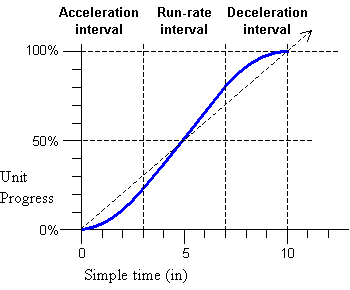
<animation dur="10s" accelerate="0.3" decelerate="0.3" .../>
Figure 1: Effect of acceleration and deceleration upon the rate of
progress.
These attributes apply to the simple duration; if these attributes are
combined with repeating behavior, the acceleration and/or deceleration occurs
within each repeat iteration.
- accelerate = "
number "
- Defines a simple acceleration of time for the element. Element time
will accelerate from a rate of 0 at the beginning up to a run
rate, over the course of the specified proportion of the simple
duration.
The default value is 0 (no acceleration).
Legal values are floating point values between 0 and 1 (inclusive).
- decelerate = "
number "
- Defines a simple deceleration of time for the element. Element time
will decelerate from a run rate down to 0 at the end of the
simple duration, over the course of the specified proportion of the
simple duration.
The default value is 0 (no deceleration).
Legal values are floating point values between 0 and 1 (inclusive).
The sum of accelerate and
decelerate must not exceed 1. If
the individual values of the accelerate and decelerate attributes are between 0 and
1 and the sum is greater than 1, then both the accelerate and decelerate
attributes will be ignored and the timed element will behave as if neither
attribute was specified.
If the simple duration of the element is not resolved or if it is resolved
to be indefinite, then the accelerate and decelerate attributes are ignored.
For details of computing the run-rate, and for converting from parent
simple time to element simple time when accelerate and/or decelerate are specified, see Computing the element run-rate and Converting document time to element
time.
The autoReverse attribute
Another common mechanical phenomenon is that of a process that advances
and reverses. Some examples include:
- pendulum motion - a partial rotation that advances and reverses
- pulsing effects - usually a scale transform, but sometimes an intensity
or color change that advances and reverses
- simple bouncing - motion that advances and reverses
Because so many common use-cases apply repeat to the modified local time
(as in the examples above), this function is modeled as modifying the simple
duration. As such, autoReverse
doubles the declared or implicit simple duration. When combined with
repeating behavior, each repeat iteration will play once forwards, and once
backwards.
- autoReverse =
( "true" | "false" )
- Controls autoReverse playback mode.
Argument values are Booleans.
The default value is false (i.e. play normally).
When this is applied to a time container, it will play the time container
forwards and then backwards. The semantics of playing a time container
backwards are detailed in
Implications of time manipulations on time containers.
This section is informative
The autoReverse
time manipulation does not initially require a resolved simple duration,
although it will not begin playing backwards until the simple duration is
resolved and has completed. This can happen when the simple duration is
defined by an unresolved implicit simple duration (such as the intrinsic
media duration). In this case, the element will continue to play forward
until the implicit simple duration is resolved (or until the active duration
or the parent time container cuts short the simple duration, as described in
the Timing section of SMIL 3.0). If the
implicit simple duration becomes resolved before the end of the active
duration, then the simple duration will be resolved to 2 times this implicit
duration, and the implicit simple duration will play backwards.
Any time that the element will play backwards, including the
second part of the autoReverse
manipulation, the simple duration must be resolved. See also The speed attribute.
In this example, a motion path will animate normally for 5 seconds moving
the element 20 pixels to the right, and then run backwards for 5 seconds
(from 20 pixels to the right back to the original position). The repeating
behavior causes it to repeat this 2 more times, finally leaving the element
at its original location. The computed simple duration of the animation is 10
seconds, and the active duration is 30 seconds.
<img ...>
<animateMotion by="20, 0" dur="5s" autoReverse="true" repeatCount="3"/>
</img>
In the following example the motion path will behave as above, but will
end at the earlier of 15 seconds or when the user clicks on the image. If the
element ends at 15 seconds (if the user does not click), the motion path will
leave the element at the end of the defined path, 20 pixels to the right.
Since the active duration is defined by the repeatDur and end, the active duration is not affected by
the autoReverse attribute in
this case. The semantics of fill are
not changed by time manipulations: the media state at the end of the active
duration is used during any fill
period. The end of the active duration may fall part of the way through a
play forward interval, or part of the way through a play
backward interval.
<img ...>
<animateMotion by="20, 0" dur="5s" autoReverse="true"
repeatDur="15" end="click" fill="freeze"/>
</img>
The accelerate and decelerate attributes can be combined
with autoReverse, and are
applied to the unmodified simple duration. For example:
<img ...>
<animateMotion by="20, 0" dur="4s" autoReverse="true"
accelerate=".25" decelerate=".25" />
</img>
This will produce a kind of elastic motion with the path accelerating for
1 second from the original position as it moves to the right, moving slightly
faster than normal for 2 seconds, and then decelerating for 1 second as it
nears the points 20 pixels to the right. It accelerates back towards the
original position and decelerates to the end of the reversed motion path, at
the original position.
The following example of a rotation (based upon the SVG
animateTransform element) also demonstrates the combination of accelerate, decelerate and autoReverse. It will produce a simple
pendulum swing on the target (assume that the target is a pendulum shape with
the transform origin at the top):
<animateTransform type="rotate" from="20" to="-20" dur="1s" repeatCount="indefinite"
accelerate=".5" decelerate=".5" autoReverse="true" ... />
The pendulum swings through an arc in one second, and then back again in a
second. The acceleration and deceleration are applied to the unmodified
simple duration, and autoReverse
plays this modified simple duration forwards and then backwards. The effect
is to accelerate all the way through the downswing, and then decelerate all
through the upswing. The autoReverse feature then makes the
same animation (i.e. the simple duration) play in reverse, and the pendulum
swings back to the starting position. The entire modified simple duration
repeats, producing continuous back and forth animation. This produces a
realistic looking animation of real-world pendulum motion.
The speed attribute
The speed attribute controls the
local playback speed of an element, to speed up or slow down the effective
rate of play relative to the parent time container. The speed attribute is supported on all timed
elements. The argument value does not specify an absolute play speed, but
rather is relative to the playback speed of the parent time container. The
specified value cascades to all time descendents. Thus if a par and one of its children both specify a
speed of 50%, the child will play at
25% of normal playback speed.
- speed = " number "
- Defines the playback speed of element time.
Legal values are signed floating point values. A value of 0 is not
allowed (and will be ignored)
The default is "1.0" (no modification of speed).
Values less than 0 are allowed, and cause the element to play backwards.
An element can only play backwards if there is sufficient information about
the simple and active durations. Specifically:
- The element simple duration must be resolved and may not be indefinite.
If the simple duration is defined by the implicit duration or by an
explicit endsync attribute (for
time containers), then all children considered in the endsync semantic must have a resolved
begin time and a resolved active duration that is not indefinite.
- The element active duration must be resolved and not indefinite, OR the
element active duration must be constrained by a resolved simple duration
for its associated time container. There must be a means of defining
active time running backwards.
If the cascaded speed value for the element is negative and if either of
the above two conditions is not met, the element will begin and immediately
end (i.e. it will behave as though it had a specified active duration of 0).
If there is a min attribute specified,
the time container will simply be frozen at the initial state for the
specified minimum duration.
The details of the effect of the element speed upon the timing calculations are
described in Details of timing model
arithmetic.
This section is informative
The following motion animation will move the target twice as fast as
normal:
<animateMotion dur="10s" repeatCount="2" speed="2.0" path= ... />
The target will move over the path in 5 seconds (simple dur/speed =10s/2.0
= 5s), and then repeat this motion (because repeatCount is set to 2). The active
duration is thus 10 seconds.
When speed is applied to a time
container, it scales the rate of progress through the time container
timeline. This effect cascades. When descendents also specify a speed value, the parent speed and the child
speed are multiplied to yield the result. For example:
<par speed=2.0>
<animate begin="2s" dur="9s" speed="0.75" .../>
</par>
The observed rate of play of the animate element is 1.5 times the normal
play speed (2.0 * 0.75 = 1.5). The element begins 1 second after the par begins (the begin offset is scaled only by the parent
speed), and ends 6 seconds later
(dur/speed = 9/1.5 = 6).
The following example shows how an event based end combines with time manipulations:
<par speed="2.0">
<animate begin="2s" dur="9s" speed=0.75
repeatCount="4" end="click" .../>
</par>
This behaves as in the first example, but the animate element will repeat 4 times for an
observed time of 24 seconds (dur/cascaded speed = 9s/(2.0 * 0.75) = 6s, and
6s * 4 repeats = 24s). If a click occurs before this, the element ends at the
time of the click. A variant on this demonstrates syncbase timing:
<par speed="2.0">
<img id="foo" dur="30s" .../>
<animate dur="9s" speed="0.75"
repeatCount="4" end="click; foo.end .../>
</par>
The image will display for 15 seconds. The animate element plays at an observed rate
of 1.5 times play speed (2.0 * 0.75), but it will end after 15 seconds, when
the image ends. The observed simple duration will be 6 seconds long (9
seconds divided by the cascaded speed 1.5). The animation will repeat 2.5
times during the active duration. Note that although the animation has a
speed value, this does not impact the
semantic of the syncbase timing. When the syncbase, eventbase, wallclock or
media marker time is observed to happen, it will be applied anywhere it is
used at that actual time (although conversions are applied internally, e.g.
from syncbase element active time to parent simple time - see also Converting document time to element
time).
Note that in the examples above, the default duration of the par container is defined as endsync="last". This behavior is not affected by the speed
modifications, in the sense that the observed end of the elements will
produce the correct simple duration on the parent time container.
The following example illustrates an important effect of offset time
scaling:
<par speed="2.0">
<img id="foo" dur="30s" .../>
<animate begin="2s" dur="9s" speed="0.75"
repeatCount="4" end="foo.end+6s" .../>
</par>
The image will display for 15 seconds, as above. The animate element begins at 1 second, since
the begin offset is scaled by the parent time container speed, but not by the
element speed. The animate element
will end at 18 seconds (15 seconds plus 6 seconds divided by the time
container speed of 2.0). The "6s" offset added to "foo.end" is scaled by the
parent time container speed, but not by the element speed.
12.3.3 Details of timing model arithmetic
This section is normative
When the time manipulation attributes are used to adjust the speed and/or
pacing within the simple duration, the semantics can be thought of as
changing the pace of time in the given interval. An equivalent model is these
attributes simply change the pace at which the presentation progresses
through the given interval. The two interpretations are equivalent
mathematically, and the significant point is that the notion of "time" as
defined for the element simple duration should not be construed as real world
clock time. For the purposes of SMIL Time manipulations (as for SMIL Timing
and Synchronization), "time" can behave quite differently from real world
clock time.
In the following discussion, several symbols are used as shorthand:
Let a be the value of accelerate, and b be
the value of decelerate. Both
take on (floating point) values 0 to 1, and will not sum to more than 1.
Let dur be the value of the simple duration as defined by
the Timing and Synchronization model. This is the actual simple duration, and
not simply the dur attribute. This value
does not account for the effect of any time manipulations.
Let dacc be the duration of the acceleration phase, and
ddec be the duration of the deceleration phase. These values
are computed as a function of the unmodified simple duration. Note that with
the described model for acceleration and deceleration, the observed duration
during which time accelerates and/or decelerates may be greater than
dacc and ddec respectively.
dacc = dur * a
ddec = dur * d
Computing the element
run-rate
In order to preserve the simple duration, the speed through the simple
duration must be increased to account for acceleration and deceleration. To
compute the run rate over the course of the simple duration, the following
formula is used. The run rate r is then:
r = 1 / ( 1 - a/2 - b/2 )
Thus, for example, if the value of accelerate is 1 (i.e. accelerate
throughout the entire simple duration), the run rate is 2 (twice the normal
play speed).
r(t) is the speed modification due to acceleration and
deceleration, at any time t within the simple duration. The
parameter time t must not already be modified to
account for acceleration and deceleration. In the terms of the discussion
below, Converting document time to
element time, the parameter time t is in the
tsu' space. The speed modification is defined
as a function of the run rate r, as follows:
In the acceleration interval, where ( 0 <= t <
dacc )
r(t) = r * ( t / dacc )
In the run-rate interval, where ( dacc <= t <= ( dur
- ddec ) )
r(t) = r
In the deceleration interval, where ( ( dur - ddec ) <
t <= dur )
r(t) = r * ( dur -
t ) / ( ddec )
The run-rate only describes the modification applied to account for any
acceleration and deceleration. This is combined with any element speed, as
well as the speed inherited from the parent time container. The combined or
"net" speed is defined in the section Computing the net cascaded speed for an
element.
Converting document time to
element time
To convert a document time to an element time, the original time is
converted to a simple time for each time container from the root time
container down to the parent time container for the element. This recursive
algorithm allows for a simple model of the conversion from parent simple time
to element active and element simple time. The first step calculates element
active time, and the second step calculates element simple time.
These steps are based upon a simpler, general model for time conversion
that applies to the timing model independent of the time manipulations
functionality (see also the Timing section of
SMIL 3.0). The steps below describe the modified arithmetic for converting
times, taking into account the semantics of time manipulations.
The steps below assume that the associated times are resolved and not
indefinite. If a required time is not resolved or is indefinite, then the
conversion is not defined, and cannot be performed.
In order to reflect the semantics of element speed, the element active
time must be adjusted. The adjusted time is called the filtered active
time, and is used by the element where the timing semantics refer to
"element active time". The autoReverse and accelerate /decelerate attributes only affect the
computation of the filtered simple time, and so do not come into play in this
step.
The input time is a time in parent simple time. This is normalized to the
element active duration, adjusting for the accumulated synchronization offset
(described in The
accumulated synchronization offset).
Let tps be a time in parent simple time, and
B be the begin time, and O be the
accumulated synchronization offset for an element, measured in parent
simple time. Let AD be the Active Duration.
The unfiltered active time tau for any child
element is:
tau = tps - B -
O
Given an unfiltered active tau, the filtered
active time taf is only a function of the
speed for the element (this is the value specified in a
speed attribute, or the default, and not the net cascaded speed):
If( speed > 0 ) i.e. if the local speed is
forwards
taf = tau *
speed
Else i.e. if the local speed is backwards
taf = AD - tau * ABS(
speed )
As expected, if the speed value is 1 (the default), this is an identity
function, and so taf =
tau. When speed is less than 0 (in the backwards
direction), the active duration proceeds from the end of the active duration
towards 0.
In order to reflect the semantics of the autoReverse and accelerate /decelerate attributes, the element
simple time must be adjusted. The adjusted time is called the filtered
simple time. The filtered simple time is defined as a function of the
filtered active time, and so reflects all the time manipulations on an
element.
The element simple time is the time that is used to establish runtime
synchronization for a media element, or to compute an animation function's
input value or sampling time. If the element is a time container, this is
also the time that is seen by all children of a time container (as the time
container element's simple time).
The input time is a filtered active time
taf.
Let dur' be the modified simple duration that accounts for
the effect of the autoReverse attribute. It is computed as follows:
If autoReverse is false:
dur' = dur
Else (if autoReverse is true)
dur' = dur * 2
The steps to compute the filtered simple time are described below.
- Compute the unfiltered simple time tsu,
accounting for any repeat behavior.
If there is no repeating behavior:
tsu = taf
Else, if the modified simple duration dur' is fixed
and does not vary (ideal case):
tsu = REMAINDER( taf, dur'
)
where REMAINDER( t, d ) is defined as (t -
d*floor(t/d)).
Else, if the modified simple duration dur' varies
from repeat iteration to repeat iteration, or if it is unknown, then the
unfiltered simple time is just computed from the begin time of the most
recent iteration - call this tlast-repeat.
Some other mechanism (such as endsync logic or a media player) must note
when the simple duration ends, and reset the value of
tlast-repeat. If the element has not yet
repeated, a value of 0 is used in place of
tlast-repeat.
tsu = taf -
tlast-repeat
- Account for autoReverse behavior. If autoReverse is false,
tsu' = tsu.
Else if autoReverse is true (note that the following steps use the
unmodified duration dur, and not
dur'):
If tsu < dur
tsu' = tsu
Else ( tsu >= dur )
tsu' = dur - ( tsu - dur ) = 2*dur -
tsu
- Account for acceleration and/or deceleration behavior. This takes as
input tsu' (the result of steps 1 and 2).
The filtered simple time tsf is computed as a
function of the input time tsu' and the run
rates in effect over the interval from 0 to
tsu'. The filtered simple time is the
accumulated progress up to the input time, and is computed as the
integral of the acceleration, run-rate and deceleration rates. Since the
rate of acceleration and deceleration are constant, the integral simplifies
to a function of the average rate of progress for each of the
three intervals defined by the acceleration and deceleration values. The
steps below compute the filtered time by multiplying the input time and the
average rates of progress. In the acceleration interval, since acceleration
is constant and the rate changes from 0 to r, the average
rate is just 1/2 of the instantaneous rate r(t) defined
above:
average rate = (r(t) + r(0) ) / 2) = r(t)/2
In the deceleration interval, the average rate is similarly computed. In
the run-rate interval the rate is constant, and so the average rate is
equal to the run-rate.
In the acceleration interval, where ( 0 <= tsu'
< dacc ), the filtered simple time is the input time multiplied
by the average run-rate during the acceleration interval:
tsf = tsu' * r(tsu') /
2
In the run-rate interval, where ( dacc <= tsu'
<= ( dur - ddec ) ), the filtered simple time is computed from
the input time and the rates in the acceleration and run-rate intervals.
This adds the accumulated progress in the acceleration interval to the
progress within the run-rate interval:
tsf = dacc * r / 2 + ( tsu' - dacc ) *
r
= r * ( dacc / 2 + ( tsu' -
dacc ))
= r * ( tsu' - dacc / 2
)
In the deceleration interval, where ( ( dur - ddec ) <
tsu' <= dur ), the filtered simple time is computed
from the input time and the rates in all three intervals. This sums the
total progress in the acceleration interval, the total progress within the
run-rate interval, and the progress within the deceleration interval.
To simplify the expressions, we define tdec, the time
spent in the deceleration interval:
tdec = tsu' - ( dur - ddec
)
We also define the proportional duration within the deceleration
interval as:
pd = tdec / ddec
The filtered time within the deceleration interval is then:
tsf = dacc * r / 2
+ ( dur - dacc - ddec ) * r
+ tdec * (( r + r*(1 - pd )) / 2
))
= r * ( dur - dacc / 2 - ddec
+ tdec * ( 2 - pd ) / 2
)
Converting element time to
document time
To convert from one element timespace to another, the time for the first
element te1 must first be converted to a simple
time on the closest ascendant time container that contains both elements.
Converting from an element time to the parent time reverses the process
described above. Again, it is recursive, and so the conversions are described
generically from element simple to element active time, and from element
active to parent simple time.
To convert from element simple time to element active time requires the
begin time of the most recent iteration,
tlast-repeat. If the element does not repeat or
has not yet repeated, a value of 0 is used in place of
tlast-repeat.
ta = ts +
tlast-repeat
Conversion from element active time to parent simple time uses the
associated begin of the element and the accumulated synchronization
offset.
tps = ta + B +
O
Global to local time conversions used to translate between timespaces must
ignore these issues, and so may yield a time in the destination local
timespace that is well before or well after the simple duration of the
element.
A time container is only sampled if it is active or frozen, and so no
times will be produced that are before a time container begins. If the global
to local time conversion for a time container yields a time during which the
time container is frozen, the time is clamped to the value of the active
end.
Computing the net cascaded
speed for an element
The net cascaded speed for a given element at a given point in time can be
used to set the correct playback rate for a media element. It is not
otherwise used directly in the time manipulations model.
To compute the net cascaded speed speednc(t)
for an element at a given point in time, we combine the net cascaded parent
speed at the point in time speednc-parent(t) with
the element speed value speed and the instantaneous run rate
r(t) computed from any acceleration and deceleration. If the
element has no time parent, use 1 for
speednc-parent(t).
Note that the net cascaded parent speed will be computed in simple time
for the parent, and so the element simple time will have to be converted to a
parent simple time. This is described above in Converting element time to document
time.
The parameter time value must be in the range of the simple duration. The
time value must not already be modified to account for acceleration
and deceleration. In the terms of the discussion above, Converting document time to element
time, the parameter time is in the tsu'
space.
The net cascaded speed speednc(t) for a given
unfiltered simple time tsu' is then:
speednc(tsu') =
speednc-parent(tsu') * speed *
r(tsu')
This definition is recursive up to the root of the time containment
hierarchy, and so accounts for any speed settings on the parent and all other
ascendant time containers.
12.3.4 Media fallback semantics
This section is informative
A theoretical model can be described that assumes that all element local
timelines (including any media elements) are completely non-linear and have
unconstrained ballistics (i.e. they can be sampled at any point at any
moment, and can adjust the observed playback rate instantaneously). This
ideal model can be applied to many applications, including pure rendered
graphics, text, etc. Nevertheless, many common applications also include
media with linear behavior and other limitations on playback. When the
timegraph includes media elements that have linear behavior, the time
manipulations model must accommodate these real world limitations.
While the model does support timegraphs with a mix of linear and
non-linear behavior, and defines specific semantics for media elements that
cannot support the ideal non-linear model, it is not a goal to
provide an ideal alternative presentation for all possible timegraphs with
such a mix. It is left to authors and authoring tools to apply the time
manipulations in appropriate situations. This section describes both the
ideal model as well as the semantics associated with linear-media
elements.
This section is informative
In the ideal model, the pace or speed of local time can be manipulated
arbitrarily. The graph advances (or is sampled, depending upon your
perspective) as the presentation time advances. A time container samples each
of its children in turn, so that a graph traversal is performed for each
render time. Elements that are neither active nor frozen may be pruned from
the traversal as an optimization. As the traversal moves down the graph (from
time containers to children), each local timeline simply transforms the
current time from the parent time-space to the local time space, and then
samples the local timeline at the transformed current time. Note that the
speed and effects of the time filters effectively cascade down the time
graph, since each element transforms element time and element speed for
itself and all descendents.
This is the model that is described by the arithmetic model in Details of timing model arithmetic.
When linear media are added to this model and the "current time" (sample)
traversal encounters a media element, the media element is effectively told
to "sample" at a particular position and a particular rate. Given that linear
media can not sample arbitrarily (i.e., they cannot immediately seek to and
display an arbitrary frame or sample) , the media element player may not be
able to match the ideal model.
Many media elements cannot play off-speed (i.e. at other than normal play
speed), and so must simply ignore the requested speed. As the element plays,
it will fall out of sync with the sync relationship defined in the timing
syntax. Within the limits defined by the SMIL syncTolerance attribute,
divergence from the theoretical timeline position may be ignored. However,
for further divergence beyond this tolerance the element will be considered
out of sync; if the element is defined with
syncBehavior="locked", the playback engine will try to enforce
the runtime synchronization semantics (and this will probably not yield a
desirable presentation playback). Authors applying time manipulations to
linear media or to time containers that include linear media will likely wish
to specify the syncBehavior for the linear media as
"canSlip".
Fallbacks for time filters on a
media element
This section is normative
The fallback semantics depend upon how much or how little the media player
is capable of. Some players for some media may play forwards and backwards
but only at the normal rate of play, others may only support normal forward
play speed.
If the element speed (i.e. the cascaded value) is not supported by the
media element, the media should play at the closest supported speed ("best
effort"). If the element cannot play slower or faster than the normal play
speed, the closest supported speed will be the normal play speed.
In any case, the computed simple duration, as modified by the
time filters, is respected.
- If the computed simple duration is shorter than the intrinsic media
duration at the fallback rate the media is cut short. This is just as for
a dur value that overrides the
intrinsic media duration in normal SMIL timing. As an example, if the
speed is greater than 1 and the media plays at normal speed, then the
modified simple duration will play faster and so will be observed to be
shorter. If the media cannot play faster, then less of the media will be
seen.
- If the computed simple duration is longer than the intrinsic media
duration at the fallback rate, the media will freeze the last frame until
the end of the computed simple duration (again, just as it does for dur in the normal timing framework). As an
example, if the speed is less than 1 and the media plays at normal speed,
then the modified simple duration will play slower and so will be
observed to be longer. If the media cannot play slower and the intrinsic
media duration is reached before the computed simple duration ends, the
ending state of the media will be shown from the end of the intrinsic
media duration until the end of the computed simple duration.
The semantics of clipBegin and
clipEnd are not affected by time
manipulations. The clipBegin and
clipEnd semantics are always
interpreted in terms of normal forward play speed. They are
evaluated before any effects of time filters have been applied to the time
model. This is consistent with the model that they can be evaluated by the
media element handler, independent of the time model.
When time manipulations are used with linear media, authors can use
media-marker-values to define the sync relationships. This can help to
maintain the "visual" sync regardless of the fallback behavior. Since the
media-marker-values are defined to happen when a particular point in the
media is played, this timing will respect the actual behavior of the media,
rather than the computed speed behavior.
Implications of
time manipulations on time containers
This section is normative
The time manipulations can apply to any element, including time
containers. There are two primary implications of this for the time model:
- The rate (relative to normal play speed) at which time proceeds in the
parent can affect the observed begin and end times for children of the
time container. In the process of converting times from one element's
time space in the graph to another element's time space, all time
manipulations on ascendant time containers must be respected. Thus for
example, if a time container has acceleration defined, children that are
defined to begin with simple offset conditions will be observed (in real
time) to begin later (than the specified offset), since time moves more
slowly at the beginning of the parent simple duration. See also Details of timing model arithmetic.
- When a time container is defined to play backwards, the begin and end
times for the children must be calculated with a modified algorithm
(described immediately below). This is not defined (only) relative to the
speed or autoReverse attributes on the time
container. Rather, when the net, cascaded speed for the time container is
less than zero, the modified semantics are applied. See also Computing the net cascaded speed for
an element.
The following discussion is based upon the semantics of begin and end
instance lists and the interpretation of lists of begin and end times
described in the Timing section of SMIL 3.0
If the time container can play backwards (based upon the general
constraints for backwards play upon the simple and active durations), then
the children must play the defined intervals in reverse order. This is
accomplished with the following modified life cycle for child elements. In
the following description, the terms "begin" and "end" for intervals are used
relative to the normal play direction. When used as a verb ("the interval
begins"), begin and end refer to the current interval becoming active and
inactive, respectively. Intervals are described as playing from the
end of the interval to the beginning, and so they begin
at the interval end, and end at the interval begin.
- Find first interval to play: The child element will
compute the first interval to play, which is actually the last
interval defined by the instance times. This is done by considering
the instance times lists in the normal order from earlier to later,
calculating the last interval that begins before the end of the
time container simple duration. The same basic approach is used for this
as is used to determine the first interval for normal play, and accounts
for restart semantics given the known times in the instance lists. One
way to think of this is that with respect to the child element, the
parent simple time is advanced from 0 to the end of the simple duration,
and the last interval found is the one to use. No intervals are created
in this process, until the correct times are found, and then one current
interval is defined, and has side effects just the same as during normal
play: all time-dependents are notified, and will create new instance
times associated with this current interval.
- Wait to play interval: As time proceeds from the end
of the time container simple duration towards 0, the current interval may
wait to be active. The current interval will become active when the time
container simple time reaches the defined end time of the current
interval. During the period that the current interval is waiting to
begin, any fill effect must be applied. This is defined the same as for
normal forward play, using the element state at the defined end of the
current interval.
- Actively playing: When the current interval becomes
active, a beginEvent event is raised. The event is raised to indicate
that the element has become active, even though it has become active at
the end of the interval. The current interval will remain active until
the parent simple time reaches the begin time of the current interval.
Once the current interval has become active, any changes to
instance times will have no impact upon the current interval.
This is slightly different from the normal mechanism, but provides a
significant simplification to the model without significant loss of
functionality. Note that this semantic is only applied when the parent
time container of an element is playing backwards.
- Ended - get next interval: When the current interval
becomes inactive, an endEvent event is raised. The event is raised to
indicate that the element has become inactive, even though it has become
inactive at the begin of the current interval. At this point, the element
considers the instance times lists and calculates a next interval (if
there is one). The same approach is used as in phase 1 above, except that
the next interval must begin before the (just ended) current interval
begins. In addition, the end of the next interval is constrained
according to the restart semantics to end no later than the begin of the
(just ended) current interval. Thus the next interval (if there is one)
will begin before the begin of the current interval, and will end no
later than the begin of the current interval. It is possible that this
interval will be defined to begin before the parent begin.
- No more intervals: Once all defined intervals
between the end and the beginning of the parent simple duration have been
played, the current life cycle for the child element is complete.
When a time container is defined to play backwards, a child element may
define additional time manipulations that affect the speed, or even the
direction of play. Any such additional time manipulations on the child
element do not impact the model described above.
The life cycle is restarted each time the parent (or any ascendant) time
container repeats or restarts, just as for the normal play direction.
Because of the reversed evaluation of intervals, some cyclic time
dependencies that would correctly propagate forwards when played normally
will not propagate correctly when played backwards. The rules for evaluating
and halting cycles in the time graph are unchanged by the semantics of time
manipulations.
13. SMIL 3.0 External Timing
- Editors for SMIL 3.0:
- Petri Vuorimaa, TKK
- Dick Bulterman, CWI
This section is informative
This module defines an XML timing language that makes SMIL 3.0 element and
attribute timing control available to a wide range of other XML languages.
This language allows SMIL timing to be integrated into a wide variety of
a-temporal languages, even when several such languages are combined in a
compound document. Because of its similarity with external style and
positioning descriptions in the Cascading Style Sheet (CSS) language, this
functionality has been termed SMIL Timesheets.
Timesheets allows the definition of out-of-line timing in conjunction with
non-SMIL languages including compound XML documents. To make authoring
easier, it contains only a limited subset of SMIL functionality. An
alternative to Timesheets is XHTML+SMIL, which gives full SMIL functionality
as in-line in non-SMIL XML documents. Finally, SMIL itself gives full SMIL
functionality as in-line SMIL XML.
SMIL Timesheets can be seen as a temporal counterpart of CSS. Whereas CSS
defines the spatial layout of the document and formatting of the elements,
SMIL Timesheets specify which elements are active at a certain moment and
what their temporal scope is within a document. And as with CSS, SMIL
Timesheets can be reused in multiple documents, which can provide a common
temporal framework for multimedia presentations with different contents but
identical storylines. The document can be shown in a user agent even if SMIL
Timesheets are not supported, since the contents and the layout are still
governed by the document itself. Of course, the temporal aspect of the
document is then lost, since all the elements are active all the time.
The SMIL 3.0 External Timing module is based on the SMIL 3.0 Timing and Synchronization modules with
some restrictions and additional attributes. In addition, it includes the SMIL 3.0
PrefetchControl module. Also, the SMIL 3.0
BasicAnimation module is used for controlling animations. In addition,
SMIL Timesheets uses CSS selectors [CSS2]. Finally, the SMIL 3.0 External
Timing module defines two new elements timesheet and item.
First, an overview of the SMIL Timesheets is given in the Overview section. After that, the new
elements timesheet and
item and use of CSS selectors
are described in the SMIL Timesheet
Specific Elements section. Then, the use of SMIL 3.0 Timing and
Synchronization modules is discussed in the Timing and Synchronization section. After
that, the Prefetch section describes
how the SMIL 3.0 PrefetchControl is used. Next, Animation section covers the use of
SMIL 3.0 BasicAnimation module. Description of the event model and examples
on how events can be used in SMIL Timesheets is given in the Event Model section. Finally, integration
with CSS layout is discussed in the Integration with CSS Layout section.
13.4.1 The timesheet
element
This section is normative.
The timesheet element
is located in the head section of the document. It defines a parent container
for other SMIL Timesheet elements.
The src Attribute
This section is normative.
The src attribute tells the
location of an external timesheet, which will be appended to the end of the
local timesheet. With this attribute a common timesheet can be reused in
multiple documents. The attribute must contain a valid URI.
This section is normative.
The media attribute is
used for selecting the most suitable timesheet for current media device. It
works similarily to the @media rule in the CSS stylesheets [CSS2].
13.4.2 The item element
This section is normative.
The item target element
references elements in the document host language(s). The item element
implements the actual connection between the timesheet and the document. It
can reference a media element or a set of elements by the element's tag, id
or class; the syntax and processing is similar to the CSS selector [CSS2]
syntax.
The CSS selector can match more than one element in the document body, for
example, when CSS class selector is used. In that case, all matching elements
are selected. Thus, one item element can reference multiple body elements at
the same time. In practise, this is the same as referencing the selected body
elements with individual ID selectors element by element.
The select
Attribute
This section is normative.
The select attribute
links the timesheet to the document. The attribute follows the same syntax
and processing as the CSS selectors [CSS2], so that the elements can be
referenced by their name, id or class, or a more complex combination of the
selectors. If the attribute targets multiple elements in the document, item
controls all of them. The attribute value can also specify a comma separated
list of selectors.
This section is normative.
The beginInc attribute
increments the begin time by the defined value when the selector matches more
than one element.
This section is normative.
The indexStart
attribute can be used to change the starting value of the
index() function. The default value of indexStart attribute is 0,
and thus the index() function starts to count the found item
elements from index number 0. IndexStart attribute can be
given positive integer value to change the starting value of the
index() function to the given value. An example of how IndexStart attribute can be
used is given in the Event Model
section, which describes a use case of the index()
function.
This section is normative.
The index() function can be used to automatically generate
index numbers for both internal and external events within begin, dur, or end attributes of the item element. If these attributes
contain the index() function, it must be replaced with the given
parameter and the current index number of the matched item. The index number
starts from 0 and counts upwards. The starting number can be changed to some
other positive integer number with the indexStart attribute. An
example how the index() function can be used is given later in
the Event Model section.
This section is normative.
The item element can
contain time containers seq,
par, and excl, prefetch elements, and other
item elements. However, the
direct child of the item
element must be either the seq, par, and excl time container or none. Other
descendant item elements can
only be included within the child seq, par, and excl time containers. Furthermore,
the parent item element
limits the scope of the CSS selectors of the child item elements to match only
descendant elements of the elements selected by the parent item element.
This section is informative.
The SMIL 3.0 External Timing module uses four SMIL 3.0 Timing and Synchronization modules:
- BasicInlineTiming
- EventTiming
- BasicTimeContainers
- BasicExclTimeContainers
- RepeatTiming
This section gives futher details on the attributes and elements of the
above mentioned modules. The reader is presumed to have read and be familiar
with them.
The timing semantics of the timesheets is based on the semantics of the SMIL 3.0 Timing and Synchronization chapter,
although it has been simplified a bit. This may cause the timing model not to
be as powerful in expressing timing relations as SMIL's, but it should be
more approachable to the authors.
The base time, or the syncbase of a timesheet element is the
moment when the element is activated by its parent. Activating an element
doesn't necessarily make the referenced media element visible. Rather, it
sets the time moment "0s", to which the element's attributes are compared.
The syncbase of the child elements of a time container is dependent on the
type of the container. The children of par and excl elements have the starting
time of their parent as their syncbase. The children of the seq element consider the end time of
preceding child as their syncbase. This time is resolved only at the moment
the preceding child ends.
Figure 1
shows a simple example of the semantics of a timesheet. A parallel time
container has two children, which are item elements referencing two media
elements. When the par is
started, it activates both its children with the current time as their
syncbase. The media elements referenced by the children are not activated
yet. At time moment 1s, the media element item1 is
activated, according to the begin value of the referencing timesheet element.
At 2s, the item2 is activated. At 3s, the duration
of item1 runs out, so it is stopped and the corresponding timesheet
element deactivates itself. At 4s, the parent container stops
according to its duration attribute, stopping all of its active children.
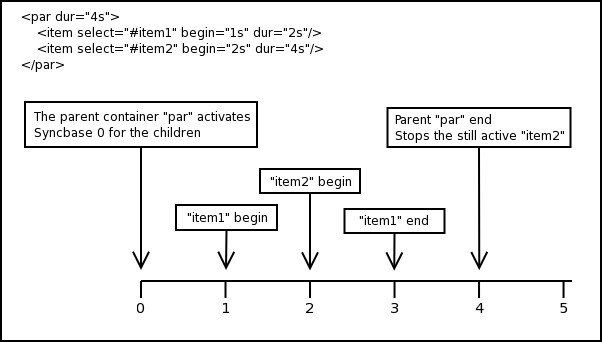
Figure 1: Timeline of
a Timesheets
The duration of an element is primarily defined by the dur attribute. If the element is not
stopped prematurely, due to an event or scheduling of its parent, the dur attribute tells the overall
duration of the element. The element will not stop until this duration has
passed, and will not stay active longer than this duration. The value of the
dur attribute will prevail:
- when the sum of the durations of the children of a time container
extends the value of the attribute;
- when the implicit duration of the media elements, like audio or video
is longer than the specified duration;
- when the repeatCount or repeatDur attributes
extend the duration of a media element to be longer than the specified
duration.
If the duration is not set, the duration of an element depends on the type
of the referenced elements, or the durations of the children. The timesheet
items can reference to discrete and continuous elements in the document.
Discrete elements don't have implicit durations, and the implicit duration of
an item element referencing a
discrete element is "indefinite". Continuous elements have their
own durations, which will be also used as the duration of the timesheet
element. The duration of the timecontainer depends on the durations and
activations of its children. The seq and par elements stay active until all
of their children have stopped. The implicit duration of the excl is always
"indefinite".
The begin Attribute
The dur Attribute
The end Attribute
This section is normative.
The end attribute supports
offset and event values, and "indefinite". All other values are
not supported. The end
attribute is defined in the SMIL 3.0 Timing and
Synchronization module.
The fill Attribute
This section is normative.
The fill attribute allows
an author to specify that an element should be extended beyond the active
duration by freezing the final state of the element. It is defined in the SMIL 3.0 Timing and
Synchronization module. Since SMIL 3.0 External Timing module does not
include transitions, the fill="transition" value of fill attribute is not supported.
Also, since the fillDefault attribute is not included in the
SMIL 3.0 External Timing module, the fill="default" is
interpreted the same as fill="auto".
The first Attribute
This section is normative.
The first attribute sets
the current active child of a time container "inactive". Then, it
selects the first child element and sets it "active".
The prev Attribute
This section is normative.
The prev attribute first
checks, whether the current active child is the first child. If not, it sets
the current active child of a time container "inactive". Then,
it selects the previous child of the time container and sets it
"active".
The next Attribute
This section is normative.
The next attribute first
checks, whether the current active child is the last child. If not, it sets
the current active child of a time container "inactive". Then, it
selects the next child of the time container and sets it
"active".
The last Attribute
This section is normative.
The last attribute sets
the current active child of a time container "inactive". Then, it
selects the last child of the time container and sets it
"active".
The par Element
The seq Element
This section is normative.
The seq element is defined
in the SMIL 3.0 Timing and
Synchronization module.
There are also four additional attributes that are specified for the seq element. They are first, prev, next, and last. These are used to select a
certain child of the seq
element, which facilitates the creation of presentations where the user can
have control of the progression of the timeline, for example, a slide
show.
The excl Element
This section is normative.
The excl element is a
simplified version of the excl element defined in the SMIL 3.0 Timing and
Synchronization module, since the SMIL 3.0 External Timing Module does
not include the BasicPriorityClassContainers module.
There are also four additional attributes that are specified for the excl element. They are first, prev, next, and last. These are used to select a
certain child of the excl
element, which facilitates the creation of presentations where the user can
have control of the progression of the presentation, for example, a picture
show.
This section is normative.
The meadiaSize
attribute defines how much of the resource to fetch as a function of the file
size of the resource. It is defined in the SMIL 3.0
PrefetchControl module.
This section is normative.
The meadiaTime
attribute defines how much of the resource to fetch as a function of the
duration of the resource. It is defined in the SMIL 3.0
PrefetchControl module.
This section is normative.
The bandwidth
attribute defines how much network bandwidth the user agent should use when
doing the prefetch. It is defined in the SMIL 3.0
PrefetchControl module.
This section is normative.
The prefetch element
gives authoring tools or savvy authors the ability to schedule retrieval of
resources when they think that there is available bandwidth or time to do it.
It is defined in the SMIL 3.0
PrefetchControl module. It uses the mediaSize, mediaTime, and bandwidth attributes.
This section is normative.
Timesheets uses the select attribute to specify the
target element. Therefore is does not include the targetElement
and the XLink attributes href, actuate,
show, and type attributes. The target attribute is
specified with the attributeName attribute
and optional attributeType attribute,
which specifies whether the target attribute is CSS property or XML
attribute. Animation is described either as a list of values, or in a simplified form
that describes the from,
to, and by values. The calcMode attribute specifies
the interpolation mode for the animation. The cumulative and additive
behavior of repeating animations is controlled with the accumulate and additive attributes,
respectively. The origin
attribute specifies the origin of motion for the animation. Finally, begin, dur, end, and fill attributes are used to control
the timing of animation, while repeatCount and repeatDur attributes are used
to control the repeat of animation.
The select attribute is
described in the SMIL Timesheet Specific
Elements section, while the begin, dur, end, fill, repeatCount, and repeatDur attributes are
described in the Timing and
Synchronization section. The other animation attributes are described
below.
This section is normative.
The attributeType
attribute specifies the namespace in which the target attribute and its
associated values are defined. It is defined in the SMIL 3.0
BasicAnimation module.
The values
Attribute
This section is normative.
The values attribute
contains a semicolon-separated list of one or more values. It is defined in
the SMIL 3.0
BasicAnimation module.
The from Attribute
This section is normative.
The from attribute
specifies the starting value of the animation. It is defined in the SMIL 3.0 BasicAnimation
module.
The to Attribute
This section is normative.
The to attribute specifies
the ending value of the animation. It is defined in the SMIL 3.0 BasicAnimation
module.
The by Attribute
This section is normative.
The by attribute Specifies a
relative offset value for the animation. It is defined in the SMIL 3.0 BasicAnimation
module.
The origin
Attribute
This section is normative.
The origin attribute
specifies the origin of motion for the animation. It is defined in the SMIL 3.0
BasicAnimation module.
This section is normative.
The animate element
controls the animation of both CSS properties and XML element attributes. It
is defined in the SMIL 3.0
BasicAnimation module. It uses the select, from, to, by, values, calcMode, accumulate, additive, begin, dur, end, fill, repeatCount, and repeatDur attributes.
The set Element
This section is normative.
The animateMotion
element moves an element along a path. It is defined in the SMIL 3.0
BasicAnimation module. It uses the select, from, to, by, values, calcMode, accumulate, additive, origin, begin, dur, end, fill, repeatCount, and repeatDur attributes.
This section is normative.
The animateColor
element specifies an animation of a color attribute. It is defined in the SMIL 3.0
BasicAnimation module. It uses the select, from, to, by, values, calcMode, accumulate, additive, begin, dur, end, fill, repeatCount, and repeatDur attributes.
This section is informative.
The index() function can be used to automatically generate
index numbers for both internal and external events within begin, dur, or end attributes of item element. The
following example gives an example on how index() function can
be used. The example is an image show, which consist of images and
corresponding thumbnail images, which can be used to select an individual
image for viewing. Only one image is shown at a time.
<head>
<!DOCTYPE htmlLIC "-//W3C//DTD XHTML 1.0 Transitional//EN""http://www.w3.org/TR/xhtml1/DTD/xhtml
PUBLIC "-//W3C//DTD XHTML 1.0 Transitional//EN"
"http://www.w3.org/TR/xhtml1/DTD/xhtml1-transitional.dtd">
<html xmlns="http://www.w3.org/1999/xhtml"
xmlns:smil="http://www.w3.org/2007/07/SMIL30/Timesheets">
<head>
<smi:timesheet>
<par>
<excl>
<item select="#Image1" begin="Thumbnail1.DOMActivate" />
<item select="#Image2" begin="Thumbnail2.DOMActivate" />
<item select="#Image3" begin="Thumbnail3.DOMActivate" />
<item select="#Image4" begin="Thumbnail4.DOMActivate" />
<item select="#Image5" begin="Thumbnail5.DOMActivate" />
</excl>
<par>
<item select="#Thumbnail1" />
<item select="#Thumbnail2" />
<item select="#Thumbnail3" />
<item select="#Thumbnail4" />
<item select="#Thumbnail5" />
</par>
</par>
</smil:timesheet>
</head>
<body>
<img src="Image1.jpg" class="Image" id="Image1" />
<img src="Image2.jpg" class="Image" id="Image2" />
<img src="Image3.jpg" class="Image" id="Image3" />
<img src="Image4.jpg" class="Image" id="Image4" />
<img src="Image5.jpg" class="Image" id="Image5" />
<br />
<button class="Thumbnail" id="Thumbnail1">
<img src="Thumbnail1.jpg" />
</button>
<button class="Thumbnail" id="Thumbnail2">
<img src="Thumbnail2.jpg" />
</button>
<button class="Thumbnail" id="Thumbnail3">
<img src="Thumbnail3.jpg" />
</button>
<button class="Thumbnail" id="Thumbnail4">
<img src="Thumbnail4.jpg" />
</button>
<button class="Thumbnail" id="Thumbnail5">
<img src="Thumbnail5.jpg" />
</button>
</body>
</html>
In the above example, the body of the HTML file consists of five pictures
and five buttons, which contain thumbnails of the same images. The idea is to
show one image at a time. The image to be shown is selected by the thumbnail
buttons. Therefore, the timesheets consist of one par time container, which contains
one excl and another par time container. Within the excl time container the item elements select the images,
while the item elements
within the second par time
container select the individual thumbnail buttons. DOMActivate
events cause the excl time
container to change the shown image according to which button was pushed.
The problem with the above example is that each time the position of an
image is changed, deleted, or added to the image show, the Timesheet has to
be updated. Therefore, the Timesheet is not reusable. The main problem lies
in the references to the DOMActive events, because the index
numbers have to be updated. Thus, there is need to automatically generate
index numbers for the DOMActivate event references in the
Timesheets. The index() function can be used exactly for this
purpose. In the Timesheet below, index() function is used within
the begin attribute of item element, which selects the
images within the excl time
container.
<smil:timesheet>
<par>
<excl>
<item select=".Image" begin="index(Thumbnail).DOMActivate" />
</excl>
<par>
<item select=".Thumbnail" />
</par>
</par>
</smil:timesheet>
The index() function adds the index number to the Thumbnail
parameter (e.g., Thumbnail0.DOMActivate,
Thumbnail1.DOMActivate, etc.) in the begin attribute. Therefore, one
".Image" class selector can be used in the select attribute instead of
severall id selectors. The main advantage of this is that changing the order
of images, deleting images, or adding new images does not any longer require
updating the Timesheets. Thus, the Timesheets is now much more reusable.
However, there is one problem in the above example. The index numbering
starts from 0. It should be corrected to start from 1 by using the indexStart attribute as shown
in the example below.
<smil:timesheet>
<par>
<excl>
<item select=".Image" indexStart="1" begin="index(Thumbnail).DOMActivate" />
</excl>
<par>
<item select=".Thumbnail" />
</par>
</par>
</smil:timesheet>
Now, the index numbering starts from 1, and thus the Timesheet functions
properly. However, the Timesheets can be written in even more compact format.
The reason is that all the thumbnail images in buttons are allways shown, and
thus the second par is
actually unnecessary. When it is removed, also the first par time container becomes
unnecessary. Therefore, the most simple Timesheets for this use case is as
follows.
<smil:timesheet>
<excl>
<item select=".Image" indexStart="1" begin="index(Thumbnail).DOMActivate" />
</excl>
</smil:timesheet>
14. SMIL 3.0 DOM
- Editor for SMIL 3.0
- Sjoerd Mullender, CWI
This section is normative.
Using DOM level 2 methods [DOM2] an application can change the
values of attributes and add and delete elements in a running SMIL
presentation. Whether such editing is allowed is implementation
dependent, although a profile may require support. In terms from
the SMIL 3.0 Animation chapter,
changing the value of an attribute through a DOM method changes the
base value of the attribute. If animations are included in
the profile, any animations on the same attribute build upon this
changed base value. The presentation value which results
from applying an animation is not visible through the DOM. The
presentation effect of other changes through the DOM to a document
while it is being played back is implementation-dependent.
In the chapter Timing and
Synchronization Module a module, DOMTimingMethods, is defined which contains DOM methods to start and stop parts of a presentation during playback, and also DOM events that can be used to influence a presentation. The complete definition of these methods and events and their effects on a presentation is given in the section Document object
model support of the Timing and Synchronization Module chapter.
15. SMIL 3.0 State
- Editors for SMIL 3.0
- Jack Jansen, CWI
- Julien Quint, DAISY Consortium
This section is normative.
This chapter defines the following modules:
This section is normative.
The expr Attribute
- expr
-
This attribute contains an expression that is evaluated at runtime, i.e. each
time the element becomes active.
If the
expression evaluates to false the element
is ignored (including its hierarchy of descendants). If the expression specified
in the expr attribute cannot be resolved to a boolean, user-agents must
ignore the expr attribute.
-
Any profile using this module needs to define the language used to specify
the expression.
This section is normative.
This module defines a set of functions for use in the
expr attribute (possibly in addition to
functions already defined in the expression language). The naming convention
used for the functions is compatible with XPath 1.0 expressions, a profile
using this module with another expression language
must specify a transformation that needs to be applied to
these function names to make them compatible with the expression language
specified.
- boolean smil-audioDesc()
- Corresponds to systemAudioDesc.
- number smil-bitrate()
- Corresponds to systemBitrate.
- boolean smil-captions()
- Corresponds to systemCaptions.
- boolean smil-component(string uri)
- Corresponds to systemComponent,
checks for availability of a single playback component.
- boolean smil-customTest(string name)
- Corresponds to customTest,
checks the current state of the given custom test.
- string smil-CPU()
- Related to systemCPU. This function
returns the CPU on which the user agent runs.
- boolean smil-language(string lang)
- Corresponds to systemLanguage.
- string smil-operatingSystem()
- Related to systemOperatingSystem.
This function returns the operating system on which the user agent runs.
- string smil-overdubOrSubtitle()
- Values: overdub or subtitle
- Corresponds to systemOverdubOrSubtitle.
- boolean smil-required(string uri)
- Corresponds to systemRequired.
- number smil-screenDepth()
- Corresponds to systemScreenDepth.
- number smil-screenHeight()
- Related to systemScreenSize, returns
the height of the screen in pixels.
- number smil-screenWidth()
- Related to systemScreenSize, returns
the width of the screen in pixels.
This section is normative.
The UserState module defines three elements, state,
setvalue and
newvalue and
four attributes, language,
ref,
name and
value.
The state Element
The state element sets global, document-wide,
information for the other elements and attributes in this module. It selects
the expression language to use and it may also be used to initialize the data model.
Initialization of the data model may be done in-line, through the contents of
the state element, or from an external
source through the src attribute (defined in
the Media Object Modules section).
The state element accepts the
language and
src attributes.
The setvalue element modifies
the value of an item in the data model, similar to the corresponding
element from XForms, but it takes its time behaviour from the SMIL
ref element.
Note that setvalue only modifies
existing items, it is therefore an error to specify a non-existing item,
depending on the expression language semantics. In case of such an error SMIL Timing
semantics of the element are not affected.
The setvalue supports all timing
attributes, and participates normally in timing computations. The effect
of setvalue happens when it
becomes active.
The setvalue element accepts the
ref and
value attributes. Both of these
are required attributes.
The newvalue element introduces
a new, named, item into the data model.
The newvalue supports all timing
attributes, and participates normally in timing computations. The effect
of newvalue happens at the
beginning of its simple duration. Depending on the semantics of the
expression language it may be an error to execute the
newvalue element more than once.
In case of such an error SMIL Timing
semantics of the element are not affected.
The newvalue element accepts the
ref,
name and
value attributes. Which of these
are required depends on the expression language.
The language attribute selects the
expression language to use. Its value should be a URI defining that language.
The default value for this attribute is defined in the profile.
SMIL implementations should allow expression language availability
to be tested through the systemComponent
attribute.
The ref Attribute
The ref attribute indicates which item
in the data model will be changed. The language used to specify this, plus
any additional constraints on the attribute value, depend on the
expression language used.
The name Attribute
The name attribute specifies the name
for the new data model item. This name must adhere to constraints set by
the expression language used.
The value Attribute
The value attribute specifies the new
value of the data model item referred to by the ref
element. How the new value is specified in the value attribute
is defined in the profile that includes this module. This specification also
states whether only simple values are allowed or also expressions, and
when those expressions are evaluated.
If a statically-typed language is used as the data model language it is an error
if the type of the value expression cannot be
coerced to the type of the item referred to by the ref.
This section is normative.
The StateSubmission module defines two elements,
submission and
send,
and one attribute, submission.
The submission element carries
the information needed to determine which parts
of the data model should be sent, where it should be sent and what to do
with any data returned. The ref
attribute selects the portion of the data model to transmit
and in case of XPath should be a node-set expression.
The default is to transmit the whole data model (in case of xpath:
"/").
The other attributes are explained below.
The submission element accepts the
ref,
action,
method and
replace
attributes.
The send Element
The send element causes the data model,
or some part of the data model, to be submitted to server, saved to disk or
transmitted externally through some other method. It does not specify any of
this directly but contains only a reference to such submission instructions.
The send supports all timing
attributes, and participates normally in timing computations. The effect
of send happens at the
beginning of its simple duration.
The send element accepts the
submission attribute.
The submission attribute is an IDREF
that should refer to a submission
element.
The action Attribute
A URL specifying where to transmit or save the nodeset. Which URLs are allowable
must take security and privacy considerations into account.
We need to follow the XForms lead here. Add some references.
The method Attribute
How to serialize and transmit the data. Allowed values are taken
from XForms, examples are post and get.
We should either refer to the exact list or copy it here.
What to replace with the reply. Allowed values are all for
the whole SMIL presentation, instance for the
instance data, none for nothing.
This section is normative.
This section introduces a mechanism whereby document authors can use values
from the data model to construct attribute values at runtime. The mechanism
has been borrowed from XSLT attribute value templates.
Substitution
is triggered by using the construct {expression}
anywhere inside an attribute value. The expression is evaluated, converted
to a string value and substituted into the attribute value.
This substitution happens when the element containing the attribute with
the {expression} attribute becomes active.
If any error occurs during the evaluation of the expression no substitution
takes place, and the {expression} construct
appears verbatim in the attribute value.
If a profile includes this module it must list all attributes for which
this substitution is allowed. It must use the same expression language for
interpolation as the one used for StateTest expressions.
This section is normative.
This module does not define any new elements or attributes.
This section is normative.
Because StateInterpolation can also change attribute values its interaction with
animation and DOM access needs to be defined, the so-called "sandwich model". StateInterpolation
sits between DOM access and animation, i.e. DOM access will see the {expression}
strings verbatim and it may set these values too. SMIL animation will operate on the value
of the expression.
- Editor for SMIL 3.0:
- Thierry Michel, W3C
- Editors for Earlier Versions of SMIL:
- Guido Grassel, Nokia
- Jack Jansen, CWI/Amsterdam
- Antti Koivisto, Nokia
- Eric Hyche, RealNetworks
- Debbie Newman, Microsoft
This section is normative.
SMIL 3.0 Transition functionality is partitioned across the following 4
modules:
This section is informative.
Transitions are modeled as animated filter behaviors. When a transition
module is included in a language profile, all elements with renderable
content implicitly have the transition filter behavior added to them.
By default the behavior has no effect, but attributes and elements are
provided to specify and control the effect of the transition behavior on the
renderable content. Renderable content is declared in the SMIL Media Object Modules using media
elements. Other languages, such as HTML, provide additional elements such as
the span and div for rendering. In this document the terms "media element"
and "media object" include all "renderable content", defined by the host
language.
The transition filter behavior uses the background as one input. In this
context, the background is whatever is currently present in the layout where
the transition will be applied. Therefore, the background might include
actively changing media, frozen media, or solid background colors. It also
takes as input the media object to which the transition will be applied. The
media object can be used as either the source or the destination input, with
the background supplying the other input. The media object also defines the
area in which the transition will occur. Certain transitions, such as fade-in
from a solid color, will only take one input - the media object to which the
transition is applied.
In case a SMIL language profile supports FullScreenTransitions module the
area to which the transition applies may be different and, hence, the effect
perceived by the viewer is of multiple media items transitioning. However,
all timing rules and other rules for applying transitions still treat the
transition exactly the same as when applying it to a single media item.
A free parameter common to all transition filter behaviors is the
progress through the simple duration of the transition effect, which
is abstractly considered to be the progress through the filter effect. We
establish the convention that progress is a real number in the range 0.0-1.0,
where a progress of 0.0 implies that the output of the filter is completely
the background and where a progress of 1.0 implies the output of the filter
is completely the destination media. Values in between result in an
application of the transition filter behavior that combines the background
and destination media in some manner. All other parameters of the transition
are assumed to be part of the filter effect itself. Progress is the only parameter which is animated.
Other parameters are used to specify the filter effect, but are not
animated.
The distinction between animating only the progress of the filter versus
animating one or more properties of the media is illustrated by the
following. In the left-to-right wipe in the Introductory example, we
could either think of this transition as:
- A filter which clips the destination media. The left side of the
clipping rectangle would always be coincident with the left side of the
destination media and the right side of the clipping rectangle would
vary. Therefore, this transition could be thought of as animating the
right side of the clipping rectangle.
- A filter which is predefined to be a left-to-right wipe whose progress
varies in the range 0.0-1.0. When progress is 0.0, the background is
shown. When progress is 0.5, the left half of the destination media is
shown and the right half of the background is shown. When progress is
1.0, all of the destination media is shown.
This may seem to be a very minor distinction for a left-to-right wipe, but
then think of the corresponding distinction for a cross-fade. We could think
of a cross-fade transition as:
- Animation of an "opacity" property of both the destination media and
the background; or
- Animation of progress in a filter which knows that a progress of 0.5
means a 50% blend, a progress of 0.75 means 75% of the destination media
and 25% of the background, etc.
In some cases, it may seem convenient to think of animating a particular
property unique to each type of transition. However, that model does not
generalize well across the broad variety of transitions currently in use
today. Therefore, in order to maintain simplicity of this model, we think of
both the left-to-right wipe and the cross-fade as "black boxes" which both
take the same inputs - the background, destination media, and the progress
value.
XML elements and attributes are provided to control the properties of the
transition. However, the transitions themselves are not a property of the
attribute or elements used to control the transition behavior. In the model,
the transitions are a behavioral property of the media element itself.
Transitions are hints to the
presentation. Implementations must be able to ignore transitions if
they so desire and still play the media of the presentation. This is
equivalent to saying that the transition filter behavior does not execute, or
has no effect. Transitions do not alter the active duration of the media
elements that are involved in the transition. The transition behaviors
operate within the active duration of their respective media elements. The
behavior of multiple simultaneous transitions active on an element at a time
is undefined.
We will introduce two methods of specifying transitions:
- "Style-like" transition
shorthand. In this case, the author defines a set of transition
classes and then sets the transition
filter behavior to one of these classes by using attributes on the media
elements. The same transition class may be applied several times to
different media via the transIn
and transOut attributes as
specified in the BasicTransitions
module. Additionally, each of the transitions plays in a default manner;
that is, the progress runs linearly from 0.0-1.0 over the specified
transition duration.
- Inline transitions. In this
case, the author has full control over the progress of a transition. The
progress can be accelerated, decelerated, animated forward, animated
backwards, etc. These transitions are applied with a transitionFilter element as
described in the InlineTransitions module. Inline
transitions are based on the animation framework in the BasicAnimation module and allow the
progress of a media element's transition behavior to be explicitly
controlled, much like the animateMotion element allows the
spatial location of a media object to be directly manipulated.
This section is normative.
We will classify transitions according to a two-level taxonomy of types
and subtypes. Each of the transition types describe a group of transitions
which are closely related. Within that type, each of the individual
transitions are assigned a subtype which emphasizes the distinguishing
characteristic of that transition. Usually, that distinguishing
characteristic has something to do with the origin or direction of the
geometric pattern of that transition. For instance, one of the transition
types is called "barWipe" and represents SMPTE Wipe Codes 1 and 2. SMPTE Wipe
Code 1 is a wipe consisting of a vertical bar moving left to right. SMPTE
Wipe Code 2 is a horizontal bar moving top to bottom. Therefore, the subtype
for SMPTE Wipe Code 1 is called "leftToRight" and the subtype for SMPTE Wipe
Code 2 is called "topToBottom".
Since the table of transition types and subtypes is quite extensive, we
will not present the exhaustive list here. For the complete list of the
predefined transition types and subtypes, as well as their mapping to SMPTE
Wipe Codes, see the Appendix. Note
that the mapping to SMPTE Wipe Codes are provided for reference only.
For each of the types, one of the subtypes is labeled as the "default"
subtype in the Appendix. If this
transition class is not available or not implemented by the user agent, then
the user agent should fall back on the default subtype for that transition
family. This allows authors to specify a type for a transition class without
requiring that they specify a subtype for the transition class. For more
detail on parsing rules and fallback semantics, see the Transition Parsing Rules section.
Implementations are required to implement the default subtype for each of
the following transition types.
| Transition type |
Default Transition subtype |
SMPTE Wipe Code |
| barWipe |
leftToRight |
1 |
| irisWipe |
rectangle |
101 |
| clockWipe |
clockwiseTwelve |
201 |
| snakeWipe |
topLeftHorizontal |
301 |
Implementation of the rest of the transition types and subtypes listed in
the Appendix is encouraged, but not
required due to the large number of transitions.
This section is normative.
Now that a taxonomy of transition types and subtypes is defined, we now
discuss a "style-like" shorthand syntax for transitions. This shorthand
syntax requires specification of the following:
- The class of transition to be applied. For instance, to use a
1-second left-to-right wipe in a presentation, the wipe is defined as a
transition class defined with the transition element.
- The media elements to which this transition class is applied.
In this shorthand syntax, the transition class is applied to the media
element with the transIn and
transOut attributes.
The transition element defines
a single transition class. This element may appear in different places in the
document, depending upon the language profile. However in most cases, the
transition element will be
allowed only in the head of the
document. For clarity, a grouping "container" element (such as the layout element in SMIL) may be desired in
order to group all of the transition elements together. Since
there may be multiple transition classes used in a document, then there may
be multiple transition elements
in the head of the document.
Element attributes
- type
- This is the type or family of transition. This attribute is required
and must be one of the transition families listed in the Taxonomy section (or it must be
an extended transition type provided by the user agent). See the Transition Parsing Rules for an
algorithm to determine which transition to use.
- subtype
- This is the subtype of the transition. This parameter is optional and
if specified, must be one of the transition subtypes appropriate for
the specified type as listed in the Appendix (or it must be an
extended transition subtype provided by the user agent). If this
parameter is not specified then the transition reverts to the default
subtype for the specified transition type. See the Transition Parsing Rules for an
algorithm to determine which transition to use.
- dur
- This is the duration of the transition. The value of this attribute
must be a clock-value as
defined by the SMIL Timing and
Synchronization Module. The default duration is the intrinsic
duration built into the transition. All of the transitions defined in
the Appendix have a default
duration of 1 second.
- startProgress
- This is the amount of progress through the transition at which to
begin execution. Legal values are real numbers in the range 0.0-1.0.
For instance, we may want to begin a crossfade with the destination
image being already 30% faded in. For this case, startProgress would be
0.3.
The default value is 0.0.
- endProgress
- This is the amount of progress through the transition at which to end
execution. Legal values are real numbers in the range 0.0-1.0 and the
value of this attribute must be greater than or equal to the value of
the startProgress
attribute. If endProgress is equal to startProgress, then the
transition remains at a fixed progress for the duration of the
transition.
The default value is 1.0.
- direction
- This specifies the direction the transition will run. The legal
values are "forward" and "reverse". The default value is "forward".
Note that this does not impact the media being transitioned to, but
only affects the geometry of the transition. For instance, if you
specified a type of "barWipe" and a subtype of "leftToRight", then the
media would be wiped in by a vertical bar moving left to right.
However, if you specified direction="reverse", then it would be wiped
in by the same vertical bar moving right to left. Another example is
the type of "starWipe" and subtype of "fourPoint". For this transition,
running the transition forward reveals the destination media on the
inside of a four-point star which starts small and gets larger as the
transition progresses. Running this transition in reverse would reveal
the destination media in the area outside of a large four-point star.
The star begins large and gets smaller as the transition progresses.
Note that not all transitions will have meaningful reverse
interpretations. For instance, a crossfade is not a geometric
transition, and therefore has no interpretation of reverse direction.
Transitions which do not have a reverse interpretation should ignore
the direction attribute and assume the default value of
"forward".
- fadeColor
- If the value of the "type" attribute is "fade" and the value of the
"subtype" attribute is "fadeToColor" or "fadeFromColor", then this
attribute specifies the starting or ending color of the fade. If the
value of the "type" attribute is not "fade", or the value of the
"subtype" attribute is not "fadeToColor" or "fadeFromColor", then this
attribute is ignored. Legal color values are CSS2 color values
[CSS2-color-values].
The default value is "black".
Element content
The transition element can
have the param element as a child.
Examples of the
transition element
This section is normative.
The set of parameters discussed above are adequate for expressing all the
transitions defined in this document. However, an implementation may choose
to extend the set of transitions and define their own transition types and
subtypes. Some of these new transition classes may need parameters which are
not covered by the current set of attributes listed above. The purpose of the
param element is to provide a generic
means of supplying parameters to these extended transition types and
subtypes.
The transition element can take the param element, defined in the SMIL MediaParam
Module, as a child element. This element can be included from HTML or
from some other module, depending upon the profile of the host language.
This section is normative.
Once a transition class has been defined in the head of a document, then a
transition instance can be created by applying the transition class to the
active duration of a media object element or other element with "renderable
content". We do this by specifying a transIn or transOut attribute on the media object
element. Transitions specified with a transIn attribute will begin at the
beginning of the media element's active duration. Transitions specified with
a transOut attribute will end at
the end of the media element's active duration or end at the end of the
element's fill state if a non-default fill value is applied.
The transIn and transOut attributes are added to all
media object elements listed in the SMIL Media Object Module. The
default value of both attributes is an empty string, which indicates that no
transition should be performed.
The value of these attributes is a semicolon-separated list of transition
id's. Each of the id's should correspond to the value of the XML identifier
of one of the transition elements
previously defined in the document. The purpose of the semicolon-separated
list is to allow authors to specify a set of fallback transitions if the
preferred transition is not available. The first transition in the list
should be performed if the user-agent has implemented this transition. If
this transition is not available, then the second transition in the list
should be performed, and so on. If the value of the transIn or transOut attribute does not correspond to
the value of the XML identifier of any one of the transition elements previously defined,
then this is an error. In the case of this error, the value of the attribute
should be considered to be the empty string and therefore no transition
should be performed. For more detailed parsing rules, see the Transition Parsing Rules section.
This section is informative.
- Since the purpose of transitions is to pass from one media object to
another, then transitions must be applied so that they either begin or
end (or both) with some media object.
However, the visual effect may appear to be applying this transition
in the middle of an element's active duration. Consider the following
example:
...
<par>
<img src="butterfly.jpg" dur="10s" />
<img src="eagle.jpg" begin="3s" dur="4s" />
</par>
...
Assuming that eagle.jpg is z-ordered on top of butterfly.jpg, then
transitions applied to both the beginning and end of eagle.jpg would have
the visual appearance of being applied during the active duration of
butterfly.jpg. However, from the authoring perspective, they are still
applied at the beginning and end of eagle.jpg.
- Transitions happen by default during the active duration plus any fill
period of the element to which they are applied. See the next rule for
the effect of the fill value on the begin time of an out transition
(transOut). Applying a transition to an element does not affect duration
of the element. For instance, in the example below, applying a 1-second
transition at the beginning of eagle.jpg does not add or subtract from
the active duration of eagle.jpg - it is still displayed from 5-10
seconds in the presentation. Applying a 1-second transition at the
beginning of eagle.jpg makes the transition take place from 5-6 seconds
and applying a 2-second transition at the end of eagle.jpg would make the
transition happen from 8-10 seconds.
...
<seq>
<img src="butterfly.jpg" dur="5s" ... />
<img src="eagle.jpg" dur="5s" ... />
</seq>
...
- Out transitions (transOut) end at the end of the active duration of an
element plus any fill period. For elements with the default fill behavior
of remove, out transitions end at the end of the active duration of the
element. For elements with other values of fill, the transition ends at
the end of the frozen period of the element.
For instance, in the following presentation the fill behavior of the
image element is "freeze", which keeps the image frozen until its parent
ends. The parent ends when all of its children end, which is the end of
the video at 30 seconds. In order to end at the end of the frozen
duration (30 seconds) the fade-to-black transition begins at 29 seconds.
Therefore both elements fade to black together at 29 seconds.
...
<transition id="toblack1s" type="fade" subtype="fadeToColor"
fadeColor="#000000" dur="1s"/>
...
<par>
<img ... dur="10s" transOut="toblack1s" fill="freeze"/>
<video ... dur="30s" transOut="toblack1s"/>
</par>
However, in the following example the fill behavior of the image
element is "remove". Therefore, the transition ends at the end of the
active duration of the element. The image element fades to black starting
at 9 seconds and the video element fades to black starting at 29
seconds.
...
<transition id="toblack1s" type="fade" subtype="fadeToColor"
fadeColor="#000000" dur="1s"/>
...
<par>
<img ... dur="10s" transOut="toblack1s" fill="remove"/>
<video ... dur="30s" transOut="toblack1s"/>
</par>
- The active duration for the media element to be transitioned
to (the destination media) must either overlap the active
duration or the fill state for the media element to be transitioned
from (the background). In the Introductory example,
the active duration for each destination media object immediately follows
the end of the active duration of each background media object. In these
cases (where the active durations immediately follow but do not overlap),
the fill="transition" value must be used to enable the transition between
the frozen last frame of the previous (background) media and active
frames of the current (destination) media. See fill="transition" for
more information. In cases where the active durations overlap (and hence
the media being played to have different z-orders), the transition is
between active frames of both media.
In the following example the active durations do not overlap but the
fill="transition" freezes the last frame of the first video. The result
is a crossfade between the last frame of foo1.mpg and active frames of
foo2.mpg.
...
<seq>
<video src="foo1.mpg" fill="transition"... />
<video src="foo2.mpg" transIn="xfade1s" ... />
</seq>
...
In the following presentation, however, the crossfades both at the
beginning and end of foo2.mpg are between active frames of both foo1.mpg
and foo2.mpg since their active durations overlap. The example assumes
the videos are at different z-orders.
...
<transition id="xfade" type="fade" subtype="crossfade" dur="1s" />
...
<par>
<video src="foo1.mpg" dur="30s" />
<video src="foo2.mpg" begin="10s" dur="10s"
transIn="xfade" transOut="xfade" />
</par>
...
- If the active durations for the media objects involved in the
transition do not overlap, then the background for the area behind the
media should be used. For example, the active durations for img1.jpg and
img2.jpg do not overlap in the following example. Therefore, img1.jpg
will transition to whatever is behind it.
...
<transition id="awipe" type="barWipe" dur="1s" ... />
...
<par>
<img src="img1.jpg" dur="2s" transOut="awipe" .>
<img src="img2.jpg" begin="5s" dur="2s" .../>
</par>
...
- If both an in and out transition are specified on a media element, and
the times for those transitions overlap, then the in transition takes
precedence, and the out transition should be ignored and no out
transition should be performed.
For instance, in the following example, the "barWipe" in transition
will take precedence over the "fadeToColor" out transition. The in
transition will fully take place for the first 2 seconds of img1.jpg, and
the out transition is ignored and no out transition is performed.
...
<transition id="awipe" type="barWipe" dur="2s" ... />
<transition id="toblack" type="fadeToColor dur="2s" ... />
...
<img src="img1.jpg" dur="3s" transIn="awipe" transOut="toblack" .../>
...
- Since transitions imply passing from the beginning or end of display of
one media to another, transitions do not repeat.
Consider the following example. The img2.jpg has a simple duration of
5 seconds, but an active duration of 15 seconds, since it plays a total
of three times. However, the in transition only plays once at the
beginning of the active duration of img2.jpg, which is at 5 seconds into
the active duration of the sequence time container. The out transition
also plays only once, starting at 19 seconds into the active duration of
the sequence time container.
...
<transition id="awipe" type="barWipe" dur="1s" ... />
<transition id="toblack" type="fadeToColor" dur="1s" ... />
...
<seq>
<img src="img1.jpg" dur="5s" fill="transition" .../>
<img src="img2.jpg" dur="5s" repeatCount="3"
transIn="awipe" transOut="toblack" ... />
<img src="img3.jpg" dur="5s" .../>
</seq>
...
Use of fill="transition"
The fill attribute, defined in the
SMIL Timing and Synchronization Modules,
allows an author to specify that an element should be extended beyond its
active duration by freezing the final state of the element. A new
fill value, "transition", is required to enable transitions between
elements that would not normally be displayed at the same time. This fill
attribute value can be applied only to elements with renderable content and
is not applicable to pure time container elements such as par, seq,
and excl. If fill="transition"
is applied to a pure time container element, then the value is ignored and
reverts to its default value.
The fill="transition" value indicates that after its active
duration ends the element will be frozen and it will remain frozen until the
end of the next transition on an element with which it overlaps in the
layout. The element containing the fill="transition"
will be removed when the transition ends. The timing rules defined in the SMIL Timing and Synchronization Modules still
apply: the element is subject to the constraints of its parent time container
and can be removed by its parent regardless of whether or not a transition is
declared. Each profile must define the meaning of overlapping in the
layout.
In the following example not using transitions, the default
behavior is to remove the object representing img1.jpg after 10 seconds.
...
<seq>
<img src="img1.jpg" dur="10s" ... />
<img src="img2.jpg" dur="10s" ... />
</seq>
...
Adding a transition between img1.jpg and img2.jpg requires that img1.jpg
remains displayed after its active duration ends so that it can be used by
the transition to img2.jpg. The first image is removed as soon as the
transition ends. The fill="transition" enables this behavior as illustrated by
the following example.
...
<transition id="awipe" type="barWipe" dur="1s" ... />
...
<seq>
<img src="img1.jpg" dur="10s" fill="transition" ... />
<img src="img2.jpg" dur="10s" transIn="awipe" ... />
</seq>
...
After adding the fill and transIn attributes, our example slideshow
from the Introduction section now looks like the following:
...
<transition id="wipe1" type="barWipe" subtype="leftToRight" dur="1s"/>
...
<seq>
<img src="butterfly.jpg" dur="5s" fill="transition" ... />
<img src="eagle.jpg" dur="5s" fill="transition" transIn="wipe1" ... />
<img src="wolf.jpg" dur="5s" fill="transition" transIn="wipe1" ... />
<img src="seal.jpg" dur="5s" transIn="wipe1" ... />
</seq>
Now the presentation plays as follows, as illustrated by this animated image.
- At 0 seconds, cuts directly to butterfly.jpg.
- At 5 seconds begins a 1-second left-to-right wipe from butterfly.jpg to
eagle.jpg.
- At 6 seconds, eagle.jpg is fully displayed and remains displayed for 4
more seconds until 10 seconds.
- At 10 seconds, begins a 1-second left-to-right wipe from eagle.jpg to
wolf.jpg.
- At 11 seconds, wolf.jpg is fully displayed for 4 more seconds until 15
seconds.
- At 15 seconds, begins a 1-second left-to-right wipe to from wolf.jpg to
seal.jpg.
- At 16 seconds, seal.jpg is fully displayed for 4 more seconds until 20
seconds.
- At 20 seconds the presentation ends.
Notice that these transitions occur during the active duration of
each of the images which reference the transition and do not add or subtract
from their host element's active duration. In this case, the transition
occurs at the beginning of each media element's active duration.
Notice the importance of fill="transition". If we had not specified fill="transition"
on butterfly.jpg, eagle.jpg, and wolf.jpg, then the transitions at 5, 10, and
15 seconds would have taken place between the background of the playback area
(or the default background color, depending on how the layout language is
specified) instead of the previous image in the sequence.
The fill="transition" also enables transitions from one excl
child to another when the previously active child would normally be removed
from the display. In the following example the first image transitions in
from the background, displays for 5 seconds and then freezes because of the
fill="transition". The next child activated by a button
click will transition in from butterfly.jpg. When that child completes it
will also freeze due to the fill="transition", remaining available for use in the next
transition. It will transition in to the next image activated by a button
click, and so on.
...
<transition id="wipe1" type="barWipe" subtype="leftToRight" dur="1s"/>
...
<excl>
<img src="butterfly.jpg" begin="0" dur="5s" fill="transition" transIn="wipe1" ... />
<img src="eagle.jpg" begin="button1.click" dur="5s" fill="transition" transIn="wipe1" ... />
<img src="wolf.jpg" begin="button2.click" dur="5s" fill="transition" transIn="wipe1" ... />
<img src="seal.jpg" begin="button3.click" dur="5s" fill="transition" transIn="wipe1" ... />
</excl>
Note that fill takes effect after the active duration of an element ends.
In the above example, if button2 is clicked at 3 seconds, then butterfly.jpg
will end, and the fill="transition" value for butterfly.jpg will be in effect
through the end of the next transition. Therefore the transition will occur
from butterfly.jpg to wolf.jpg and the frozen butterfly.jpg will disappear
when the transition completes.
The pauseDisplay attribute of the priorityClass element, defined in the SMIL Timing and Synchronization Modules can also
be used to control the display of children of an exclusive element. In the
example above, pauseDisplay could be used to keep butterfly.jpg displayed
when paused so the transition would occur between butterfly.jpg to the next
media activated, and butterfly.jpg would continue to be displayed after the
transition (assuming that it is not completely covered by the other
media).
This section is normative.
Transitions parameters can be specified incorrectly in many different ways
with varying levels of severity. Therefore, the following errors should be
handled with the specified action:
- Transition type is not valid. If the implementation does not
recognize the value of the type attribute, or if that transition type is
not implemented, then this transition class is invalid. However, this
does not necessarily mean that no transition will be performed, as
specified in the Transition Parsing
Rules section.
- Transitions subtype is not valid for specified transition
type. The specified transition subtype should be ignored and the
default subtype for the specified transition type should be
performed.
- Transition duration is not specified. The default duration of
1 second should be assumed.
- Transition parameter besides type or subtype is outside the legal
range. If a transition parameter is specified outside of the legal
range, then the default value of the parameter should be assumed.
- Transition parameter does not apply to this transition type.
Since not all transition parameters apply to all transition types, then a
common error could be to specify a transition parameter which does not
apply to the specified transition type. These irrelevant parameters
should be ignored. For instance, the "borderWidth" parameter does not
apply to the "fade" transition type. If "borderWidth" were to be
specified for the "fade" transition type, then it should be ignored.
- Transition duration is longer than the duration of the media object
itself. In this case, the entire transition should be ignored and
not performed.
This section is normative.
As stated earlier, each transition can have a default
transition subtype. Also, the transIn or transOut attributes on media elements
take a semicolon-separated list of transition id's to indicate a list of
fallback transitions. To eliminate ambiguity between the default subtype and
the fallback list, this section defines an algorithm that must be followed to
determine the transition to perform. The general procedure is that the first
resolved transition from the list of fallback transitions is the one that
should be performed.
Given one or more previously declared transition elements and a list of
fallback transition id's (specified on the transIn or transOut attributes), an implementation
must use the following algorithm to determine the transition to perform.
- Set
current-id to the first id in the list.
- If
current-id is empty (we have no more id's in the list),
then exit this algorithm. The implementation must not consider this an
error and must not perform any transition.
- If
current-id is the id of some previously defined transition element then go to Step
4. If not, then set current-id to the next id in the list
and go to Step 2.
- If the value of the "type" attribute on the transition element identified by
current-id is known to the implementation then go to Step 5.
If not, then set current-id to the next id in the list and
go to Step 2.
- If the "subtype" attribute is specified on the transition element identified by
current-id then go to Step 6. If it is not specified, then
the implementation must exit this algorithm and perform the
default transition subtype for the specified transition type.
- If the value of the "subtype" attribute on the transition element identified by
current-id is known to the implementation then the
implementation must exit this algorithm and perform the transition
specified by the type and subtype. If it is not, then set
current-id to the next id in the list and go to Step 2.
This section is normative.
Audio transitions animate the audio component of the target media object.
SMIL specifies two audio transitions, "audioFade" and "audioVisualFade". They
both adjust the audio volume of the target media. The latter one also
animates the visual component of the media.
The "audioFade" transition fades an audio clip in or out by linearly
adjusting the volume of the clip. As with the visual "fade" transition the
direction of the transition depends on whether it is used in transIn or transOut attribute. To achieve cross-fade
effect between two audio clips, the clips must overlap in time and the
"audioFade" transitions need to be applied simultaneously to both.
The "audioVisualFade" fade acts like a combination of the "audioFade" and
the visual "fade" transitions. It has the same subtypes as "fade" transition.
Future versions of the specification may provide a general mechanism for
combining transitions.
Since the fill attribute semantics
dictate that audio is silent during the fill period, the fill value fill="transition"
can't be used for transition effects between audio clips. To mix audio clips
using transition effects the timeline of the clips must overlap.
This section is normative.
The FullScreenTransitions module adds a single attribute to the transition element:
Element attributes
The transition element is
extented with the following attribute:
- scope
- This attribute designates the destination area of the transition. The
allowable values are
- region
- In this case the transition behaves as specified in the BasicTransitions module. This
is the default value.
- screen
- In this case the destination area encompasses a larger area, as
defined in the language profile.
The media items that transition together with the master media item are
all those media items that are rendering within the area defined by the scope
attribute at the time the transition starts. Therefore, a transIn transition effect transitions from
the set of media items defined as "background" in the Transition Model to the set of media
items that would have been visible at the start time if no transIn attribute had been present. A
transOut transition is from a set
of media items visible at the start time of the transition to the set of
media items that should be visible just after the master media item finishes
(note that this set does not depend on whether transOut is specified or
not).
Media items that start or end during the transition are treated in the
same way as the background media items (see the BasicTransitions module).
This section is normative.
In the algorithm specified earlier for determining which transition to
perform, there is an implicit method for extending the set of transitions. If
the new transition does not fall into any of the general descriptions of
transition families in the Transition
Taxonomy section, implementations may create a new transition type (a new
family of transitions) and then create new transition subtypes under that
newly-defined type. However, it is recommended that if the new transition
falls into one of the existing families of transitions, implementations
should simply extend the set of subtypes for that existing type.
Implementations may use whatever type and subtype names they choose for these
extended transitions. However, when these new transitions are used within a
document, they must be namespace-qualified.
This section is normative.
The transitionFilter
element is an animation element, similar to the animateMotion element defined
in the SMIL 3.0 BasicAnimation Module. The
animateMotion element animates the position of an element. In contrast, the
transitionFilter element animates the progress of a filter behavior
(transition) on a media element or elements with renderable content. The
filter behavior temporarily alters the visual or aural rendering of the
media. The transitionFilter element can target any element with "renderable
content", not necessarily a media element. The host language determines which
elements to which transitionFilter can be applied. For instance, in HTML, a
span or a div may represent "renderable content". The transitionFilter
element may target a renderable content element in two ways: it may be the
child of that element, or with the targetElement attribute.
The transitionFilter element shares many of the attributes from the transition element. It integrates
timing support from the SMIL 3.0 BasicInlineTiming Module, and animation
support from the SMIL 3.0 BasicAnimation module. This module can also be
combined with other SMIL 3.0 Modules such as TimeManipulations, depending on
the modules implemented by the host language.
A transitionFilter element can define the target element of the transition
either explicitly or implicitly. An explicit definition uses an attribute to
specify the target element. The syntax for this is described below.
If no explicit target is specified, the implicit target element is the parent
element of the transitionFilter element in the document tree. It is expected
that the common case will be that a transitionFilter element is declared as a
child of the element to be animated. In this case, no explicit target need be
specified.
This element must target a media element or other element with renderable
content, as defined by the host language. This is in contrast to
BasicTransitions that are declared in the "transition" element and then
specified in the transIn or transOut attributes that are applied to
media elements.
When an implicit targetElement reference is used, the transitionFilter
element must be a child of an element that supports transition effects (or it
has no effect).
Similar to how transIn and transOut are attributes of the media object to which the
transition is applied, the transitionFilter element is a child of the media object to which the
transition is applied. However, even though the transitionFilter element is a
child of a media object, it is not a time container, and cannot extend the
active duration of the media object. Therefore, if transitionFilter is a
child of a media element, it can only apply a transition to that media
element during that media element's active duration. If it is desired to
apply a transition during an element's frozen period, then transitionFilter
should not be a child of the media element. Rather, the targetElement
attribute should be used to target that media element.
Note that the transitionFilter element represents an "in" transition in
the sense that the destination media (the media that is fully visible when
progress is 1.0) is the media to which the transition is applied (the parent
media, in this case). However, since transitionFilter gives full control over
the timing of the progress, an "in" transition may be made to look like an
"out" transition by simply running the transition from a progress of 1.0 and
ending the transition at a progress of 0.0.
transitionFilter Element attributes
- type
- This is the same attribute as in the transition element.
- subtype
- This is the same attribute as in the transition element.
- mode
- Indicates whether the transitionFilter's parent element will
transition in or out. Legal values are "in" indicating that the parent
media will become more visible as the transition progress increases and
"out" indicating that the parent media will become less visible as the
transition progress increases. The default value is "in". Unlike the
transIn and transOut attributes on media
elements, the mode attribute does not automatically tie the
transitionFilter to the begin or end of the media. Authors can use the
begin attribute on the transitionFilter to indicate the begin time for
the transitionFilter.
- fadeColor
- This is the same attribute as in the transition element.
- begin
- Defined in the SMIL Timing and
Synchronization Module. This attribute is optional and the default
is 0 seconds.
- dur
- Defined in the SMIL Timing and
Synchronization Module. The default duration is the intrinsic
duration built into the transition. All of the transitions defined in
the Appendix have a default
duration of 1 second.
- end
- Defined in the SMIL Timing and
Synchronization Module.
- repeatCount
- Defined in the SMIL Timing and
Synchronization Module.
- repeatDur
- Defined in the SMIL Timing and
Synchronization Module.
- from
- Amount of progress through the transitionFilter from which to begin
execution of the transitionFilter. Legal values are real numbers in the
range 0.0-1.0. For instance, this attribute would equal "0.3" to begin
a cross-fade with the destination image faded in by 30%. This attribute
is defined in the SMIL 3.0 BasicAnimation
Module and is similar to the startProgress attribute on the
transition element. The default value is 0.0. Ignored if the values
attribute is specified.
- to
- Amount of progress through the transitionFilter at which to end
execution of the transitionFilter. Legal values are real numbers in the
range 0.0-1.0. This attribute is defined in the SMIL 3.0 BasicAnimation Module and is
similar to the endProgress attribute on the transition element. The
default value is 1.0. Ignored if the values attribute is specified.
- by
- Specifies a relative offset value for the progress of the
transitionFilter. Legal values are real numbers in the range 0.0-1.0.
Defined in the SMIL 3.0 BasicAnimation
Module. Ignored if the values attribute is specified.
- values
- A semicolon-separated list of one or more values specifying the
progress of the transitionFilter. This attribute can provide more
precise control over the progress than a combination of the from, to,
and by attributes and overrides those attributes if specified. Legal
values are real numbers in the range 0.0-1.0. Defined in the SMIL 3.0 BasicAnimation Module. Use the
calcMode attribute to determine how the values are interpreted.
- calcMode
- Specifies the interpolation mode of the progress of the
transitionFilter. Defined in SMIL 3.0
BasicAnimation Module. The calcMode attribute
can take any of the following values:
- discrete
- This specifies that the transitionFilter progress will jump
from one value to the next without any interpolation.
- linear
- Simple linear interpolation between values is used to calculate
the progress of the transitionFilter. This is the default.
- paced
- This value will be ignored if specified for a transitionFilter
element. The default value ("linear") will be used instead.
- targetElement
- This attribute specifies the target element to be animated. The
attribute value must be the value of an XML identifier attribute of an
element (i.e. an "IDREF") within the host document. For a formal
definition of IDREF, refer to XML 1.1 [XML11].
- href
- This attribute specifies the target element to be animated. The
attribute value must be an XLink locator, referring to the target
element to be animated.
When integrating transitionFilter elements into the host language, the
language designer should avoid including both of these attributes. If
however, the host language designer chooses to include both attributes in the
host language, then when both are specified for a given animation element the
XLink href attribute
takes precedence over the targetElement
attribute.
When using an XLink href attribute on a
transitionFilter element, the following additional XLink attributes need to
be defined in the host language. These may be defined in a DTD, or the host
language may require these in the document syntax to support generic XLink
processors. For more information, refer to [XLINK].
The following XLink attributes are required by the XLink specification.
The values are fixed, and so may be specified as such in a DTD. All other
XLink attributes are optional, and do not affect SMIL Transitions
semantics.
XLink attributes for href
- type
- Must be simple. Identifies the type of
XLink being used.
- actuate
- Must be onLoad. Indicates that the link
to the target element is followed automatically (i.e., without user
action).
- show
- Must be embed. Indicates that the
reference does not include additional content in the file.
Additional details on the target element specification as relates to the
host document and language are described in the Integration section.
- Media Element fill="transition"
- fill
- This module adds the "transition" value to the possible values of the
fill attribute defined on media in the SMIL
Timing and Synchronization Module. This is the same attribute as
specified in the BasicTransitions module.
Element content
The transitionFilter
element can have the param element as a child.
This section is informative.
Examples of the transitionFilter
element
Example 1: transitionFilter slide show
The following example uses inline transitions to provide a slideshow that
includes transitions between the images, similar to the example discussed in
the introduction. The presentation plays as follows.
- Beginning at 0 seconds, butterfly displays for 5 seconds.
- At 5 seconds butterfly freezes due to the fill="transition" specified
on it and the 1-second left-to-right wipe from butterfly into eagle
occurs.
- At 6 seconds, eagle is fully displayed and remains displayed for 4 more
seconds.
- At 10 seconds eagle freezes due to the fill="transition" and the
1-second left-to-right wipe from eagle to wolf occurs.
- At 11 seconds, wolf is fully displayed and remains displayed for 4 more
seconds.
- At 15 seconds wolf freezes due to the fill="transition" and the
1-second left-to-right wipe from wolf to seal occurs.
- At 16 seconds, seal is fully displayed and remains displayed for 4 more
seconds.
- At 20 seconds the presentation ends.
...
<seq>
<img id="butterfly" src="butterfly.jpg" dur="5s" fill="transition" />
<img id="eagle" src="eagle.jpg" dur="5s" fill="transition" >
<transitionFilter type="barWipe" subtype="leftToRight" dur="1s" />
</img>
<img id="wolf" src="wolf.jpg" dur="5s" fill="transition" >
<transitionFilter type="barWipe" subtype="leftToRight" dur="1s" />
</img>
<img id="seal" src="seal.jpg" dur="5s" >
<transitionFilter type="barWipe" subtype="leftToRight" dur="1s" />
</img>
</seq>
...
Example 2: transitionFilter discrete clock transition
The following example uses a values list and discrete calcMode to specify
the progress of the transition in 12 steps. The transition begins 2 seconds
after the video begins and continues for 12 seconds. Since the transition is
circular, the effect is that of a clock-wipe that reveals one hour on the
clock face at a time.
<video id="video1" src="car.avi">
<transitionfilter id="trans1"
type="ellipseWipe" subtype="circle"
begin="2" dur="12" calcMode="discrete"
values="0.083; 0.166; 0.250; 0.333; 0.416; 0.500;
0.583; 0.666; 0.750; 0.833; 0.916; 1.000;" />
</video>
Example 3: transitionFilter from and to
The following example uses a partial transition that progresses from 0 to
50% (0.5) complete. It assumes that the video is positioned directly on top
of the image in the layout. The presentation plays as follows.
- Beginning at 0 seconds the car displays. The image begins as well, but
is not visible because it is behind the video.
- At 1 second the transition begins to wipe away the car and reveal the
background image. Over the duration of the transition (2 seconds) the
wipe proceeds clockwise from the 12 o'clock position revealing 50% of the
image behind the car, up through the 6 o'clock position.
- At 3 seconds the car and transition both end, revealing all of
racing.jpg.
- At 5 seconds the image ends.
<par>
<img src="racing.jpg" begin="0s" dur="5s" />
<video id="car" src="car.avi" begin="0s" dur="3s"
<transitionfilter type="clockWipe" subtype="clockwiseTwelve"
begin="1s" dur="2s" from="0.0" to="0.5" />
</video>
</par>
The transitionFilter element can take the param element, defined in the SMIL MediaParam
Module, as a child element. This element can be included from HTML or
from some other module, depending upon the profile of the host language. The
param element defines parameter information specific to the individual
transitionFilter. For example, the implementation of a windshieldWipe could
take a parameter that defines the length of the radius for the wipe as
follows:
<transitionfilter type="windshieldWipe"
begin="4" dur="3" from="0.5" to="1.0" >
<param name="radius" value="3in" />
</transitionFilter>
Support of the param element is implementation-dependant. The meaning of
the parameters depends upon the implementation of the specific transition.
This section is normative.
The TransitionModifiers module gives additional control over the visual
effect of the transition: controlling the horizontal and vertical repeat
pattern, and controlling the visual effect along the pattern border. The
SMPTE standard also allows for this type of geometric control.
This module requires either the BasicTransitions Module or the InlineTransitions Module.
- horzRepeat
- This attribute specifies how many times to perform the transition
pattern along the horizontal axis.
The default value is 1 (the pattern occurs once horizontally).
- vertRepeat
- This attribute specifies how many times to perform the transition
pattern along the vertical axis.
The default value is 1 (the pattern occurs once vertically).
- borderWidth
- This attribute specifies the width of a generated border along a wipe
edge. Legal values are integers greater than or equal to 0. If
borderWidth is equal to 0, then no border should be generated along the
wipe edge.
The default value is 0.
- borderColor
- If the value of the type attribute is not
"fade", then this attribute specifies the content of the generated
border along a wipe edge. Legal color values are
CSS2
color values [CSS2-color-values] or the string "blend". If the
value of this attribute is a color, then the generated border along the
wipe or warp edge is filled with this color. If the value of this
attribute is "blend", then the generated border along the wipe blend is
an additive blend (or blur) of the media sources. The default value is
"black".
Using the horzRepeat and vertRepeat attributes, the geometric pattern
which makes up the transition can be repeated in both the horizontal and
vertical directions over the area occupied by the media. To achieve the
repeat, the area occupied by the destination media is divided into equal
sections horizontally and/or vertically according to the values of horzRepeat
and vertRepeat. Identical transitions are then performed, one in each of the
resulting sections, at the same time.
The following diagrams illustrate the difference between the behavior
provided by the default horzRepeat and vertRepeat attributes and each
attribute with two copies of the transition applied to an image.
Figure 1. An image that does not have any transitions applied to it.
Figure 2. The image from Figure 1 with a fan transition in progress. The
current area of the transition is illustrated by the black triangle. This
example uses the default value of one for both horzRepeat and vertRepeat,
which yields one occurrence of the transition. Therefore, the fan pattern is
not repeated in either direction.
This animated image illustrates the
single fan transition from Figure 2. The fan transition could be declared as
follows:
<transition ... type="fanWipe" subtype="centerTop" dur="1s"/>
Figure 3. The same fan transition from Figure 2 in progress, but with two
horizontal repetitions (horzRepeat="2"). The repeat yields two smaller, but
identical copies of the transition, one in the left half of the image and one
in the right half of the image. The number of patterns in the horizontal
direction equals horzRepeat.
Figure 4. The same fan transition from Figure 2 in progress, but with two
vertical repetitions (vertRepeat="2"). The repeat yields two smaller, but
identical copies of the transition, one in the top half of the image and one
in the bottom half of the image. The number of patterns in the vertical
direction equals vertRepeat.
The following example shows the declaration of the transition from Figure
4. It specifies a vertRepeat value of 2 which indicates that the fan
transition will occur in two locations on the media at once.
<transition ... type="fanWipe" subtype="centerTop" dur="1s"
horzRepeat="1" vertRepeat="2"/>
Note that we didn't have set to horzRepeat to one, since one is the
default value, but we explicitly set it here for clarity. This transition is
illustrated by this animated image.
In a more complex example, if horzRepeat was set to 3 and vertRepeat was
set to 2 then 6 small fan transitions would occur at once over the media, in
a pattern of 3 wide (horzRepeat) and 2 high (vertRepeat).
Note that the horzRepeat and vertRepeat attributes might not produce a
visual change depending on the type of transition. Specifically, these
attributes have no visual affect if replicating the transition pattern
produces identical results. For example, a vertRepeat attribute set equal to
two would have no visual impact on a left-to-right push- or slideWipe because
the transition would still occur from the left edge all the way to the right
edge of the media. In contrast, the same vertRepeat attribute would affect a
top-to-bottom push- or slideWipe because one transition would occur from the
top to the middle of the media and the other transition would occur from the
middle to the bottom of the media at the same time. Neither horzRepeat nor
vertRepeat affect a fade transition because the fade applies uniformly
regardless of how many times it is replicated.
Implementations can choose to optimize by ignoring the horzRepeat and
vertRepeat attributes in cases where they would have no effect.
This section is normative.
The purpose of this section is to specify requirements and recommendations
on the host language or profile in order to integrate SMIL Transitions.
- Profiles that include the TransitionModifiers Module must
also include either the BasicTransitions Module or the InlineTransitions Module.
- Since transitions are applied to media and are not specific to the
layout of that media, then SMIL Transitions are layout agnostic. Any type
of layout language may be used.
- Profiles that include the BasicTransitions Module must have
some method of specifying the transition element. It is
recommended that all transition
elements be specified in the
<head> of the
document (if one exists) and also that there be some sort of container
element which groups all the transition elements together
(similar to the <layout> element in the
<head> of SMIL 1.0 documents).
- A profile integrating the BasicTransitions Module must provide
a means of declaring an XML identifier on transition elements.
- A profile integrating the InlineTransitions Module module must
provide a means of declaring an XML identifier on transitionFilter elements.
- The profile must define what overlapping in the layout means for
fill="transition" (required in the BasicTransitions Module and the InlineTransitions Module).
- If the profile includes the
InlineTranstions Module, then the host language designer must choose
whether to support the targetElement
attribute or the XLink attributes for specifying the target element. Note
that if the XLink syntax is used, the host language designer must decide
how to denote the XLink namespace for the associated attributes. The
namespace can be fixed in a DTD, or the language designer can require
colonized attribute names (qnames) to denote the XLink namespace
for the attributes. The required XLink attributes have fixed values, and
so may also be specified in a DTD, or can be required on the animation
elements. Host language designers may require that the optional XLink
attributes be specified. These decisions are left to the host language
designer - the syntax details for XLink attributes do not affect the
semantics of SMIL Transitions.
Table 1: The Taxonomy Table
contains a detailed list of transition type and subtype names. The names of
the types and subtypes have been chosen so that the name provides some hint
of the visual effect of the transition. However, in some cases, the name
alone is not enough to visually describe these transitions. For a better
understanding of these transitions, please see pages 11-16 of SMPTE 258M-1993
[SMPTE-EDL].
As an assistance to the reader in identifying the patterns of the SMPTE
transitions this Appendix also provides illustrations of the corresponding
SMPTE wipes in the following tables.
Table 2: SMPTE Edge Wipes
Table 3: SMPTE Iris Wipes
Table 4: SMPTE Clock Wipes
Table 5: SMPTE Matrix
Wipes
In the case of any discrepancies between type and subtype names in the
Taxonomy Table and in the illustrated tables, the Taxonomy Table takes
precedence. The SMPTE specification [SMPTE-EDL] takes precedence over the
illustrated tables in this appendix. The illustrations are provided for
convenience only.
The SMPTE Wipe Codes (where appropriate) are provided in parentheses after
the subtype name and are for reference only. The Wipe Codes are not part of
the transition subtype name. The default transition subtype for each type is
indicated by the word [default].
Transition type
|
Transition subtypes
(SMPTE Wipe Codes in parentheses)
|
Edge Wipes - wipes occur
along an edge
|
| "barWipe" |
"leftToRight" (1) [default], "topToBottom" (2) |
| "boxWipe" |
"topLeft" (3) [default], "topRight" (4), "bottomRight"
(5), "bottomLeft" (6), "topCenter" (23), "rightCenter" (24),
"bottomCenter" (25), "leftCenter" (26) |
| "fourBoxWipe" |
"cornersIn" (7) [default], "cornersOut" (8) |
| "barnDoorWipe" |
"vertical" (21) [default], "horizontal" (22),
"diagonalBottomLeft" (45), "diagonalTopLeft" (46) |
| "diagonalWipe" |
"topLeft" (41) [default], "topRight" (42) |
| "bowTieWipe" |
"vertical" (43) [default], "horizontal" (44) |
| "miscDiagonalWipe" |
"doubleBarnDoor" (47) [default], "doubleDiamond"
(48) |
| "veeWipe" |
"down" (61) [default], "left" (62), "up" (63), "right"
(64) |
| "barnVeeWipe" |
"down" (65) [default], "left" (66), "up" (67), "right"
(68) |
| "zigZagWipe" |
"leftToRight" (71) [default], "topToBottom" (72) |
| "barnZigZagWipe" |
"vertical" (73) [default], "horizontal" (74) |
Iris Wipes - shapes
expand from the center of the media
|
| "irisWipe" |
"rectangle" (101) [default], "diamond" (102) |
| "triangleWipe" |
"up" (103) [default], "right" (104), "down" (105),
"left" (106) |
| "arrowHeadWipe" |
"up" (107) [default], "right" (108), "down" (109),
"left" (110) |
| "pentagonWipe" |
"up" (111) [default], "down" (112) |
| "hexagonWipe" |
"horizontal" (113) [default], "vertical" (114) |
| "ellipseWipe" |
"circle" (119) [default], "horizontal" (120),
"vertical" (121) |
| "eyeWipe" |
"horizontal" (122) [default], "vertical" (123) |
| "roundRectWipe" |
"horizontal" (124) [default], "vertical" (125) |
| "starWipe" |
"fourPoint" (127) [default], "fivePoint" (128),
"sixPoint" (129) |
| "miscShapeWipe" |
"heart" (130) [default], "keyhole" (131) |
Clock Wipes - rotate
around a center point
|
| "clockWipe" |
"clockwiseTwelve" (201) [default], "clockwiseThree"
(202), "clockwiseSix" (203), "clockwiseNine" (204) |
| "pinWheelWipe" |
"twoBladeVertical" (205) [default],
"twoBladeHorizontal" (206), "fourBlade" (207) |
| "singleSweepWipe" |
"clockwiseTop" (221) [default], "clockwiseRight" (222),
"clockwiseBottom" (223), "clockwiseLeft" (224), "clockwiseTopLeft"
(241), "counterClockwiseBottomLeft" (242), "clockwiseBottomRight"
(243), "counterClockwiseTopRight" (244) |
| "fanWipe" |
"centerTop" (211) [default], "centerRight" (212), "top"
(231), "right" (232), "bottom" (233), "left" (234) |
| "doubleFanWipe" |
"fanOutVertical" (213) [default], "fanOutHorizontal"
(214), "fanInVertical" (235), "fanInHorizontal" (236) |
| "doubleSweepWipe" |
"parallelVertical" (225) [default], "parallelDiagonal"
(226), "oppositeVertical" (227), "oppositeHorizontal" (228),
"parallelDiagonalTopLeft" (245), "parallelDiagonalBottomLeft"
(246) |
| "saloonDoorWipe" |
"top" (251) [default], "left" (252), "bottom" (253),
"right" (254) |
| "windshieldWipe" |
"right" (261) [default], "up" (262), "vertical" (263),
"horizontal" (264) |
Matrix Wipes - media is
revealed in squares following a pattern
|
| "snakeWipe" |
"topLeftHorizontal" (301) [default], "topLeftVertical"
(302), "topLeftDiagonal" (303), "topRightDiagonal" (304),
"bottomRightDiagonal" (305), "bottomLeftDiagonal" (306) |
| "spiralWipe" |
"topLeftClockwise" (310) [default], "topRightClockwise"
(311), "bottomRightClockwise" (312), "bottomLeftClockwise" (313),
"topLeftCounterClockwise" (314), "topRightCounterClockwise" (315),
"bottomRightCounterClockwise" (316), "bottomLeftCounterClockwise"
(317) |
| "parallelSnakesWipe" |
"verticalTopSame" (320), [default] "verticalBottomSame"
(321), "verticalTopLeftOpposite" (322), "verticalBottomLeftOpposite"
(323), "horizontalLeftSame" (324), "horizontalRightSame" (325),
"horizontalTopLeftOpposite" (326), "horizontalTopRightOpposite"
(327), "diagonalBottomLeftOpposite" (328), "diagonalTopLeftOpposite"
(329) |
| "boxSnakesWipe" |
"twoBoxTop" (340) [default], "twoBoxBottom" (341),
"twoBoxLeft" (342), "twoBoxRight" (343), "fourBoxVertical (344),
"fourBoxHorizontal" (345) |
| "waterfallWipe" |
"verticalLeft" (350) [default], "verticalRight" (351),
"horizontalLeft" (352), "horizontalRight" (353) |
Non-SMPTE Wipes
|
| "pushWipe" |
"fromLeft" [default], "fromTop", "fromRight",
"fromBottom" |
| "slideWipe" |
"fromLeft" [default], "fromTop", "fromRight",
"fromBottom" |
| "fade" |
"crossfade" [default], "fadeToColor",
"fadeFromColor" |
Audio
|
| "audioFade" |
"fade" [default] |
| "audioVisualFade" |
"crossfade" [default], "fadeToColor",
"fadeFromColor" |
Descriptions of non-SMPTE Transitions
The "pushWipe" transitions looks as if the destination media "pushes" the
background media away. In other words, both the background media and the
destination media are moving.
In the "slideWipe" transitions, the destination media moves, but the
background media does not. The visual effect of "slideWipe" transitions is
that the destination media is "sliding" in across the background media.
The "fade" transitions are pixel-by-pixel blends between the destination
media and either the background media or a specified color. The "fadeToColor"
and "fadeFromColor" subtypes are equivalent. The fade direction is determined
by whether it is used as transIn or
transOut.
Edge wipes start from a horizontal, vertical, or diagonal edge and expand
in a given shape. The direction of change is to increase the white area.
"barWipe"
|

"leftToRight" (1) [default]
|

"topToBottom" (2)
|
"boxWipe"
|

"topLeft" (3) [default]

"bottomRight" (5)

"topCenter" (23)

"bottomCenter" (25)
|

"topRight" (4)

"bottomLeft" (6)

"rightCenter" (24)

"leftCenter" (26)
|
"fourBoxWipe"
|

"cornersIn" (7) [default]
|

"cornersOut" (8)
|
"barnDoorWipe"
|

"vertical" (21) [default]

"diagonalBottomLeft" (45)
|

"horizontal" (22)

"diagonalTopLeft" (46)
|
"diagonalWipe"
|

"topLeft" (41) [default]
|

"topRight" (42)
|
"bowTieWipe"
|

"vertical" (43) [default]
|

"horizontal" (44)
|
"miscDiagonalWipe"
|

"doubleBarnDoor" (47) [default]
|

"doubleDiamond" (48)
|
"veeWipe"
|

"down" (61) [default]

"up" (63)
|

"left" (62)

"right" (64)
|
"barnVeeWipe"
|

"down" (65) [default]

"up" (67)
|

"left" (66)

"right" (68)
|
"zigZagWipe"
|

"leftToRight" (71) [default]
|

"topToBottom" (72)
|
"barnZigZagWipe"
|

"vertical" (73) [default]
|

"horizontal" (74)
|
|
Iris wipes expand in a given shape from the center of the media. The
direction of change is to increase the white area.
"irisWipe"
|

"rectangle" (101) [default]
|

"diamond" (102)
|
"triangleWipe"
|

"up" (103) [default]

"down" (105)
|

"right" (104)

"left" (106)
|
"arrowHeadWipe"
|

"up" (107) [default]

"down" (109)
|

"right" (108)

"left" (110)
|
"pentagonWipe"
|

"up" (111) [default]
|

"down" (112)
|
"hexagonWipe"
|

"horizontal" (113) [default]
|

"vertical" (114)
|
"ellipseWipe"
|

"circle" (119) [default]

"vertical" (121)
|

"horizontal" (120)
|
"eyeWipe"
|

"horizontal" (122) [default]
|

"vertical" (123)
|
"roundRectWipe"
|

"horizontal" (124) [default]
|

"vertical" (125)
|
"starWipe"
|

"fourPoint" (127) [default]

"sixPoint" (129)
|

"fivePoint" (128)
|
"miscShapeWipe"
|

"heart" (130) [default]
|

"keyhole" (131)
|
|
Clock wipes rotate around a center point. The center of rotation is
indicated in the following illustrations by the  symbol. The arrow
  shows the direction of
rotation. The direction of change is to increase the white area.
shows the direction of
rotation. The direction of change is to increase the white area.
"clockWipe"
|
|

"clockwiseTwelve" (201) [default]

"clockwiseSix" (203)
|

"clockwiseThree" (202)

"clockwiseNine" (204)
|
|
"pinWheelWipe"
|
|

"twoBladeVertical" (205) [default]

"fourBlade" (207)
|

"twoBladeHorizontal" (206)
|
|
"singleSweepWipe"
|
|

"clockwiseTop" (221) [default]

"clockwiseBottom" (223)

"clockwiseTopLeft" (241)

"clockwiseBottomRight" (243)
|

"clockwiseRight" (222)

"clockwiseLeft" (224)

"counterClockwiseBottomLeft" (242)

"counterClockwiseTopRight" (244)
|
|
"fanWipe"
|
|

"centerTop" (211) [default]

"top" (231)

"bottom" (233)
|

"centerRight" (212)

"right" (232)

"left" (234)
|
|
"doubleFanWipe"
|
|

"fanOutVertical" (213) [default]

"fanInVertical" (235)
|

"fanOutHorizontal" (214)

"fanInHorizontal" (236)
|
|
"doubleSweepWipe"
|
|

"parallelVertical" (225) [default]

"oppositeVertical" (227)

"parallelDiagonalTopLeft" (245)
|

"parallelDiagonal" (226)

"oppositeHorizontal" (228)

"parallelDiagonalBottomLeft" (246)
|
|
"saloonDoorWipe"
|
|

"top" (251) [default]

"bottom" (253)
|

"left" (252)

"right" (254)
|
|
"windshieldWipe"
|
|

"right" (261) [default]

"vertical" (263)
|

"up" (262)

"horizontal" (264)
|
|
|
|
Matrix wipes reveal media in squares following a pattern. The arrow  shows
the pattern.
shows
the pattern.
"snakeWipe"
|
|

"topLeftHorizontal" (301) [default]

"topLeftDiagonal" (303)

"bottomRightDiagonal" (305)
|

"topLeftVertical" (302)

"topRightDiagonal" (304)

"bottomLeftDiagonal" (306)
|
|
"spiralWipe"
|
|

"topLeftClockwise" (310) [default]

"bottomRightClockwise" (312)

"topLeftCounterClockwise" (314)

"bottomRightCounterClockwise" (316)
|

"topRightClockwise" (311)

"bottomLeftClockwise" (313)

"topRightCounterClockwise" (315)

"bottomLeftCounterClockwise" (317)
|
|
"parallelSnakesWipe"
|
|

"verticalTopSame" (320) [default]

"verticalTopLeftOpposite" (322)

"horizontalLeftSame" (324)

"horizontalTopLeftOpposite" (326)

"diagonalBottomLeftOpposite" (328)
|

"verticalBottomSame" (321)

"verticalBottomLeftOpposite" (323)

"horizontalRightSame" (325)

"horizontalTopRightOpposite" (327)

"diagonalTopLeftOpposite" (329)
|
|
"boxSnakesWipe"
|
|

"twoBoxTop" (340) [default]

"twoBoxLeft" (342)

"fourBoxVertical (344)
|

"twoBoxBottom" (341)

"twoBoxRight" (343)

"fourBoxHorizontal" (345)
|
|
"waterfallWipe"
|
|

"verticalLeft" (350) [default]

"horizontalLeft" (352)
|

"verticalRight" (351)

"horizontalRight" (353)
|
|
- Editor for SMIL 3.0:
- Sjoerd Mullender, CWI
- Editors for Earlier Versions of SMIL:
- Nabil Layaïda, INRIA
This section is normative.
The SMIL 3.0 Language profile describes the SMIL 3.0 modules that are
included in the SMIL 3.0 Language and details how these modules are
integrated. It contains support for all of the major SMIL 3.0 features
including animation, content control, layout, linking, media object,
meta-information, structure, timing and transition effects. It is designed
for Web clients that support direct playback from SMIL 3.0 markup.
This section is normative.
Note that all sections in this document are normative, unless explicitly marked inforrmative.
This section is normative.
The definition of document conformance for SMIL 3.0 Language profile documents is
given in the Conformance of SMIL 3.0 Documents section
of the SMIL 3.0 Scalability
Framework. Within the referenced section, the following definitions should be used:
- DOCTYPE: the DOCTYPE for SMIL 3.0 Language profile documents is:
<!DOCTYPE smil PUBLIC "-//W3C//DTD SMIL 3.0//EN"
"http://www.w3.org/2007/07/SMIL30/SMIL30.dtd">
- Default namespace: the default namespace for SMIL 3.0 Language profile documents is:
xmlns="http://www.w3.org/2007/07/SMIL30/Language"
- DTD: the normative DTD for SMIL 3.0 Language profile documents is:
http://www.w3.org/TR/2007/WD-SMIL3-20070713/smil30DTD/SMIL30.dtd
(@@ to be updated at REC publication with final URI)
This version of SMIL provides a definition of strictly conforming SMIL 3.0
documents, which are restricted to tags and attributes from the SMIL 3.0
namespace. The Section "Extending a SMIL 3.0
Profile" provides information on using the SMIL 3.0 Language profile with other namespaces,
for instance, on including new tags within SMIL 3.0 documents.
The definition of user agent conformance for SMIL 3.0 Language profile documents is
given in the Conformance of SMIL 3.0 User Agents section
of the SMIL 3.0 Scalability
Framework.
The SMIL 3.0 Language profile supports the structured-timeline-centric multimedia
features found in the SMIL 3.0 modules. It uses only modules from the SMIL
3.0 recommendation. As the language profile includes the mandatory modules,
it is a SMIL
Host Language conforming language profile. This language profile includes
the following SMIL 3.0 modules:
- Structure functionality
- Structure Module
- Metainformation
functionality
- Metainformation
Module
- Timing functionality
- AccessKeyTiming
Module
- BasicInlineTiming
Module
- BasicTimeContainers
Module
- BasicExclTimeContainers
Module
- BasicPriorityClassContainers
Module
- EventTiming
Module
- FillDefault
Module
- MediaMarkerTiming
Module
- MinMaxTiming
Module
- MultiArcTiming
Module
- RepeatTiming
Module
- RepeatValueTiming
Module
- RestartDefault
Module
- RestartTiming
Module
- SyncbaseTiming
Module
- SyncBehavior
Module
- SyncBehaviorDefault
Module
- WallclockTiming
Module
- Animation functionality
- BasicAnimation
Module
- Content Control
functionality
- BasicContentControl
Module
- CustomTestAttributes
Module
- PrefetchControl
Module
- RequiredContentControl Module
- SkipContentControl
Module
- Layout functionality
- AlignmentLayout
Module
- AudioLayout
Module
- BackgroundTilingLayout
Module
- BasicLayout
Module
- MultiWindowLayout
Module
- OverrideLayout
Module
- StructureLayout Module
- SubRegionLayout
Module
- Linking
functionality
- BasicLinking
Module
- LinkingAttributes
Module
- ObjectLinking
Module
- Transition Effects
functionality
- BasicTransitions
Module
- TransitionModifiers
Module
- FullScreenTransitions
Module
- State functionality
- StateTest Module
- UserState Module
- StateSubmission Module
- StateInterpolation Module
- Media
functionality
- BasicMedia
Module
- BrushMedia
Module
- MediaAccessibility
Module
- MediaClipping
Module
- MediaClipMarkers
Module
- MediaDescription
Module
- MediaOpacity
Module
- MediaPanZoom
Module
- MediaParam
Module
- MediaRenderAttributes
Module
- smilText functionality
- BasicText Module
- TextStyling Module
- TextMotion Module
The collection names contained in the following table define the SMIL 3.0
Language profile vocabulary.
| SMIL 3.0 Language Profile |
| Collection Name |
Elements in Collection |
| Animation |
animate, set, animateMotion, animateColor |
| ContentControl |
switch, prefetch |
| Layout |
region, root-layout, layout, regPoint, topLayout |
| LinkAnchor |
a, area (anchor) |
| MediaContent |
text, img, audio, video, ref, animation, textstream, brush, smilText, param |
| Metainformation |
meta, metadata |
| State | newvalue, setvalue, send |
| Structure |
smil, head, body |
| Schedule |
par, seq, excl |
| TextContent |
tev, clear, br, span, p, div, textStyle, textStyling |
| Transition |
transition |
| Other |
customAttributes,
customTest, paramGroup, priorityClass |
In the following sections, we define the set of elements and attributes
used in each of the modules included in the SMIL 3.0 Language profile. The
content model for each element is described. The content model of an element
is a description of elements which can appear as its direct children. The
special content model "EMPTY" means that a given element may not have
children.
The id, class and title attributes in the collection Core are
defined for all the elements of the SMIL 3.0 Language profile. The id attribute is used in the SMIL 3.0 Language
Language profile to assign a unique XML identifier to every element in a SMIL
document. In this document, equivalent but deprecated attributes and elements
are in parentheses.
The Animation Module
provides a framework for incorporating animation into a timing framework, and
a mechanism for composing the effects of multiple animations. The Animation
Module uses the timing modules included in this profile for the underlying
model of time. The SMIL 3.0 Language profile includes the animation
functionality of the BasicAnimation module. The BasicAnimation Module defines the
semantics for the animate, set, animateMotion and animateColor elements.
In the SMIL 3.0 Language profile, Animation elements can have the
following attributes and content model :
| Animation Module |
| Elements |
Attributes |
Content model |
| animate |
Core, I18n,
basicTiming, Test, attributeName, attributeType, targetElement, from, to, by, values, calcMode, accumulate, additive, skip-content, customTest, expr, fill (freeze | remove | hold | auto |
default), fillDefault
(remove | freeze | hold | transition | auto | inherit) |
EMPTY |
| set |
Core, I18n,
basicTiming, Test, attributeName, attributeType, targetElement, to, skip-content, customTest, expr, fill (freeze | remove | hold | auto |
default), fillDefault
(remove | freeze | hold | transition | auto | inherit) |
EMPTY |
| animateMotion |
Core, I18n,
basicTiming, Test, targetElement, origin, from, to, by, values, calcMode, accumulate, additive, skip-content, customTest, expr, fill (freeze | remove | hold | auto |
default), fillDefault
(remove | freeze | hold | transition | auto | inherit) |
EMPTY |
| animateColor |
Core, I18n,
basicTiming, Test, attributeName, attributeType, targetElement, from, to, by, values, calcMode, accumulate, additive, skip-content, customTest, expr, fill (freeze | remove | hold | auto |
default), fillDefault
(remove | freeze | hold | transition | auto | inherit) |
EMPTY |
This profile adds the animate,
set, animateMotion and animateColor elements to the content
model of the par, seq, excl and priorityClass elements of the Timing and Synchronization Modules. It
also adds these elements to the content model of the body element of the Structure Module.
Specifying the target element of the animation
The animation target elements supported in the SMIL 3.0 Language profile
are the region element defined in the
Layout Modules, the area (anchor) element defined in the Linking Modules and the
text, img, audio, animation, video, ref, textstream and the brush elements defined in the Media Objects modules.
The SMIL 3.0 Language profile uses the targetElement attribute to identify
the element to be affected by animation elements. As recommended in the BasicAnimation Module when the
targetElement attribute is
supported, this profile excludes the XLink attributes href, type, actuate and show from the animate, set, animateMotion and animateColor elements.
Specifying the target attribute of the animation
The target attributes of the animations are a subset of those of the region, area (anchor), and media elements. The animatable
attributes of the region, area (anchor), and media elements are listed in
the table below.
The area (anchor) element has the coords attribute which can be subject to
animation. The attribute coords is
considered of type string in this profile. This means that only discrete
non-additive animation is supported on this attribute.
The media elements have the following sub-region attributes which can be
subject to animation: left, right, top, bottom, width, height, z-index and backgroundColor.
| Elements |
Target Element |
Target Attributes |
| animate |
region |
soundLevel, left, right, top, bottom, width, height, z-index, backgroundColor
(background-color), viewBox, regionName |
| area (anchor) |
coords (string) |
| text, img, audio, animation, video, ref, textstream |
left, right, top, bottom, width, height, z-index, backgroundColor, viewBox |
| brush |
left, right, top, bottom, width, height, z-index, backgroundColor, color |
| set |
region |
soundAlign, soundLevel, left, right, top, bottom, width, height, z-index, backgroundColor
(background-color), viewBox, regionName |
| area
(anchor) |
coords (string) |
| text, img, audio, animation, video, ref, textstream |
left, right, top, bottom, width, height, z-index, backgroundColor, viewBox |
| brush |
left, right, top, bottom, width, height, z-index, color |
| animateMotion |
region |
Animates the top and left attributes of the region. |
| text, img, audio, animation, video, ref, textstream |
Animates the top and left attributes of the sub-region
associated with the media element. |
| animateColor |
region |
backgroundColor
(background-color) |
| text, img, audio, animation, video, ref, textstream |
backgroundColor |
| brush |
color |
Integration definitions
The SMIL 3.0 Language profile defines a set of integration definitions as
required by the Animation modules. These definitions are:
The Content Control
Modules provide a framework for selecting content based on a set of test
attributes. The Content Control
Modules define semantics for the switch, prefetch, customAttributes and customTest elements. The SMIL 3.0
Language profile includes the Content Control functionality of the BasicContentControl, CustomTestAttributes, PrefetchControl, RequireContentControl and SkipContentControl
modules.
In the SMIL 3.0 Language profile, Content Control elements can have the
following attributes and content model :
| Content Control Module |
| Elements |
Attributes |
Content model |
| switch |
Core, I18n,
Test, customTest, expr |
(switch*, (((Animation)+, (switch | Animation)*, (((Schedule | priorityClass | MediaContent | prefetch | a | State)+, (Schedule | MediaContent | switch | prefetch | a | Animation | State)*) | ((param | area | metadata)+, (param | area | switch | Animation | metadata)*))) | (priorityClass+, (switch | priorityClass)*))) | layout* |
| prefetch |
Core, I18n,
Test, Timing,
mediaSize, mediaTime, bandwidth, src, clipBegin (clip-begin), clipEnd (clip-end), skip-content, customTest, expr |
EMPTY |
| customAttributes |
Core, I18n,
Test, skip-content |
customTest+ |
| customTest |
Core, I18n,
skip-content, defaultState (true|false) 'false', override (visible | hidden) 'hidden', uid (URI) |
EMPTY |
This profile adds the switch
element to the content model of the par,
seq and excl elements of the Timing and Synchronization Modules, of
the body and the head elements of the Structure Module, of the content
model of the a element of the Linking Modules. The profile
adds the customAttributes
element to the content model of the head and the customTest element to the content model
of the customAttributes
element.
The Content Control functionality is used to define the Attribute set
"Test":
| Collection Name |
Attributes in Collection |
| Test |
systemBitrate
(system-bitrate), systemCaptions
(system-captions), systemLanguage
(system-language), system-overdub-or-caption,
systemRequired
(system-required), systemScreenSize
(system-screen-size),systemScreenDepth
(system-screen-depth), systemOverdubOrSubtitle,
systemAudioDesc,
systemOperatingSystem,
systemCPU, systemComponent |
The collection of Attributes Test is added to all the elements defined in
the SMIL 3.0 Language profile, except customTest and customAttributes. A SMIL 3.0 user
agent must support all of the values for the systemOperatingSystem and
systemCPU attributes listed in the
Content Control Modules. In addition, the user agent should accept namespaced
values as future extensions, and not declare a syntax error. The user agent
should return false for unrecognized values of the systemOperatingSystem and
systemCPU attributes.
The Layout Modules provide a
framework for spatial layout of visual components. The Layout Modules define semantics for the
region, root-layout, topLayout, layout and the regPoint elements. The SMIL 3.0 Language
profile includes the Layout functionality of the AlignmentLayout
Module, AudioLayout
Module, BackgroundTilingLayout
Module, BasicLayout
Module, MultiWindowLayout
Module, OverrideLayout
Module, StructureLayoutModule, SubRegionLayout
Module modules.
In the SMIL 3.0 Language profile, Layout elements can have the following
attributes and content model :
| Layout Module |
| Elements |
Attributes |
Content model |
| region |
Core,
I18n,
Test,
TextAttributes,
backgroundColor (background-color),
backgroundImage,
backgroundOpacity,
backgroundRepeat,
bottom,
chromaKey,
chromaKeyOpacity,
chromaKeyTolerance,
customTest,
erase (never | whenDone) 'whenDone',
fit (fill | hidden | meet | scroll | slice | meetBest),
height,
left,
mediaAlign (topLeft | topMid | topRight | midLeft | center | midRight | bottomLeft | bottomMid | bottomRight),
mediaBackgroundOpacity,
mediaOpacity,
mediaRepeat (preserve | strip) 'preserve',
paramGroup,
regAlign (topLeft | topMid | topRight | midLeft | center | midRight | bottomLeft | bottomMid | bottomRight),
regionName,
regPoint (topLeft | topMid | topRight | midLeft | center | midRight | bottomLeft | bottomMid | bottomRight),
right,
sensitivity,
showBackground (always | whenActive),
skip-content,
soundAlign (left | both | right),
soundLevel,
textMode (append | replace | inherit | crawl | scroll | jump) 'append',
textPlace (fromTop | fromBottom | inherit) 'fromTop',,
textStyle,
,
textWrapOption (wrap | noWrap | inherit) 'wrap',
top,
viewBox,
width,
z-index |
region* |
| root-layout |
Core, I18n,
Test,
backgroundColor (background-color),
backgroundImage,
backgroundOpacity,
backgroundRepeat,
customTest,
height,
skip-content,
width |
EMPTY |
| topLayout |
Core, I18n,
Test,
backgroundColor (background-color),
backgroundImage,
backgroundOpacity,
backgroundRepeat,
close,
customTest,
height,
open,
skip-content,
width |
region* |
| layout |
Core, I18n,
Test,
customTest,
type |
(root-layout | region | topLayout | regPoint)* |
| regPoint |
Core, I18n,
Test,
bottom,
customTest,
left,
regAlign,
right,
skip-content,
top |
EMPTY |
(**) The "background-color" attribute of
SMIL1.0 is deprecated in favor of "backgroundColor", but both are
supported.
The attribute collection SubregionAttributes is defined as follows:
| Collection Name |
Attributes in Collection |
| SubregionAttributes |
backgroundColor,
backgroundOpacity,
bottom,
fit,
height,
left,
mediaAlign,
regAlign,
regPoint,
right,
soundAlign,
top,
width,
z-index |
This profile adds the layout
element to the content model of the head element of the Structure Module. It also adds
this element to the content model of the switch element of the Content Control Modules, when
the switch element is a child of the
head element.
The Linking Modules
provide a framework for relating documents to content, documents and document
fragments. The Linking
Modules define semantics for the a and
area (anchor) elements. They define
also the semantics of a set of attributes defined for these elements. The
SMIL 3.0 Language profile includes the Linking functionality of the BasicLinking, LinkingAttributes and ObjectLinking modules.
Both the a and area elements have an href attribute, whose value must be a valid
URI.
Support for URIs with XPointer fragment identifier syntax is not
required.
In the SMIL 3.0 Language profile, Linking elements can have the following
attributes and content model :
| Linking Module |
| Elements |
Attributes |
Content model |
| a |
Core, I18n,
basicTiming, Test, href, sourceLevel, destinationLevel, sourcePlaystate (play |
pause | stop) 'pause', destinationPlaystate
(play | pause) 'play', show (new
| replace | pause) 'replace', accesskey, tabindex, target, external, actuate, customTest, expr |
(Schedule | MediaContent | ContentControl | Animation | State )* |
| area (anchor) |
Core, I18n,
basicTiming, Test, shape, coords, href, nohref, sourceLevel, destinationLevel, sourcePlaystate, destinationPlaystate,
show, accesskey, tabindex, target, external, actuate, shape, fragment, skip-content, customTest, expr |
(animate | set)* |
This profile adds the a element to the
content model of the par, seq, and excl elements of the Timing and Synchronization Modules. It
also adds these elements to the content model of the body element of the Structure Module.
In the SMIL 3.0 language profile, a value of onLoad set on the attribute actuate indicates that the link is
automatically traversed when the linking element becomes active. For linking
elements containing SMIL timing, this is when the active duration of the
linking element begins.
The attribute tabindex specifies
the position of the element in the tabbing order at a particular instant for
the current document. The tabbing order defines the order in which elements
will receive focus when navigated by the user via an input device such as a
keyboard. At any particular point in time, only active elements are taken
into account for the tabbing order; inactive elements are ignored.
When a media object element has a tabindex attribute and becomes active,
then its ordered tab index is inserted in the SMIL tab index at the location
specified by the media object's tabindex attribute value. This assumes
that the media object itself has tab indices, such as embedded HTML with
tabindex attributes. This enables
all link starting points in a SMIL presentation to have a place on the
ordered list to be tab-keyed through, including those in embedded
presentations.
For SMIL 1.0 backward compatibility, the anchor element is available but deprecated
in favor of area. The anchor element supports the same attributes
as area, both the new SMIL 3.0
attributes and the SMIL 1.0 attributes as defined in [SMIL10].
SMIL 1.0 backward compatibility: The show attribute value pause is deprecated in favor of setting the show attribute to new and the sourcePlaystate attribute to pause.
The Media Object Modules
provide a framework for declaring media. The Media Object Modules define
semantics for the ref, animation, audio, img, video, text, textstream and brush elements. The SMIL
3.0 Language profile includes the Media functionality of the
BasicMedia,
BrushMedia,
MediaAccessibility,
MediaClipping,
MediaClipMarkers,
MediaDescription,
MediaOpacity,
MediaPanZoom,
MediaParam,
and
MediaRenderAttributes
modules.
In the SMIL 3.0 Language profile, media elements can have the following
attributes and content model:
| Media Object Module |
| Elements |
Attributes |
Content model |
|
ref,
animation,
audio,
img,
text,
textstream,
video |
Core,
I18n,
Timing,
Test,
SubregionAttributes,
abstract,
author,
chromaKey,
chromaKeyOpacity,
chromaKeyTolerance,
clipBegin (clip-begin),
clipEnd (clip-end),
copyright,
customTest,
endsync,
erase,
expr,
fill (freeze | remove | hold | transition | auto | default),
mediaBackgroundOpacity,
mediaOpacity,
mediaRepeat (strip | preserve),
paramGroup,
region,
sensitivity,
src,
tabindex,
transIn,
transOut,
type,
viewBox |
(param | area (anchor) | switch | Animation | metadata)* |
| brush |
Core, I18n,
Timing, Test,
SubregionAttributes,
abstract,
author,
color,
copyright,
customTest,
endsync,
erase,
expr,
fill (freeze | remove | hold | transition | auto | default),
paramGroup,
region,
sensitivity, tabindex,
skip-content,
transIn,
transOut |
(param | area (anchor) | switch | Animation | metadata)* |
| param |
Core,
I18n,
Test,
name,
value,
valuetype (data | ref |
object), type,
skip-content |
EMPTY |
| paramGroup |
Core, I18n,
skip-content |
param* |
This profile adds the ref, animation, audio, img, video, text, textstream and brush elements to the content model of the
par, seq, excl, and priorityClass elements of the Timing and Synchronization Modules. It
also adds these elements to the content model of the body element of the Structure Module. It also adds
these elements to the content model of the a element of the Linking Modules.
SMIL 1.0 only allowed anchor as a
child element of a media element. In addition to anchor, the following elements are allowed
in SMIL 3.0 as children of a SMIL media object: area, param, animate, set, animateColor, animateMotion (note that the a element is not included). The switch element is allowed, with the
restriction that in this case the content of the switch may only be from the
same set of elements.
The following royalty-free media formats are required to be
supported:
While many SMIL user agents support speciality media types for streaming
audio and video content, SMIL user agent developers are also encouraged to
support the following non-royalty-free media formats to further interoperability
of SMIL content:
- audio/AAC (reference to follow)
- video/H264 (reference to follow)
Since both of these technologies are not freely available to user agent
developers, the actual availability will remain player dependent.
This section specifies the JPEG support required by SMIL 3.0
implementations. The required support is targeted at specifying a
level of functionality known to be compatibly supported within the
industry and without licensing issues.
In general when people refer to JPEG [JPEG], they actually mean
JPEG compressed images within the JFIF [JFIF] file format. JFIF was
created by the Independent JPEG Group (IJG) for storing a single
JPEG-compressed image in a file.
SMIL 3.0 User Agents are required to support JPEG images stored in
a JFIF file [JFIF]. Other transport or storage mechanisms may be
supported.
The following coding processes defined by the JPEG specification
[JPEG], in Table 1, section 4.11, must be supported:
- Baseline process
- Extended DCT-based processes (with the exception of arithmetic coding).
The following statements also apply:
- 8-bit samples must be supported. 12-bit samples may be supported, (Section 4.7 [JPEG]).
- Support for the DNL Marker (Section 3.2 [JPEG]) is not required.
- Support for non-integer sampling ratios is not required. (A.1.1 [JPEG]).
The following encoding processes are not required, but may be
supported
- Complete Extended DCT-based processes.
- Lossless Processes
- Hierarchical Processes
SMIL 3.0 UA's should convert Y,Cb,Cr values compressed in the JPEG
image to RGB as defined in the JFIF specification [JFIF] and may
assume that the RGB values are sRGB.
The MediaRenderAttributes Module defines the erase attribute, and defers definition of the
"display area" to the language profile. "Display area" for the purposes of
the SMIL 3.0 Language corresponds to a SMIL BasicLayout region. The effects of erase="never"
apply after the active duration of the media object and any fill period
(defined by SMIL Timing and Synchronization), and only until other media
plays to the region targeted by the media object, or until the same media
object restarts.
The Metainformation Module
provides a framework for describing a document, either to inform the human
user or to assist in automation. The Metainformation Module defines
semantics for the meta and metadata elements. The SMIL 3.0 Language
profile includes the Metainformation functionality of the Metainformation module.
In the SMIL 3.0 Language profile, Metainformation elements can have the
following attributes and content model :
This profile adds the meta element
to the content model of the head
element of the Structure
Module and the metadata
element to the content model of the head element and most elements within the body element.
The content model of metadata is empty. Profiles that extend the SMIL 3.0
Language profile can define the RDF (Resource Description Framework) schema
to be used in extending the content model of the metadata element. The
Resource Description Framework is defined in the W3C RDF Recommendation
[RDFsyntax]. Other XML-based metadata formats may also be included in a smiliar manner.
The smilText Modules provide a
light-weight method of adding in-line text to a SMIL presentation. The
smilText Modules define semantics for the
smilText, tev, clear, br, span, p, div, textStyle, textStyling elements and their
attributes. The SMIL 3.0 Language profile includes the smilText
functionality of the BasicText, TextStyling and TextMotion modules.
In the SMIL 3.0 Language profile, SMILtext elements can have the
following attributes and content model:
| Text Module |
| Elements |
Attributes |
Content model |
| smilText |
Core, I18n,
Timing, Test,
TextAttributes,
SubregionAttributes, abstract, region, fill (freeze | remove | hold |
transition | auto | default), author, copyright, skip-content, erase, sensitivity, tabindex, customTest, expr,
textMode (append | replace | inherit | crawl | scroll | jump) 'append',
textPlace (fromTop | fromBottom | inherit ) 'fromTop',
textStyle,
,
textWrapOption (wrap | noWrap | inherit) 'wrap',
transIn, transOut, endsync, paramGroup |
(#PCDATA | tev |
clear |
br |
span |
p |
div)* |
| tev |
Core, I18n,
skip-content,
begin,
next |
EMPTY |
| clear |
Core, I18n,
skip-content,
begin,
next |
EMPTY |
| br |
Core, I18n,
skip-content |
EMPTY |
| div |
Core, I18n,
skip-content,
TextAttributes,
textAlign,
textStyle,
textWrapOption (wrap | noWrap | inherit) 'wrap',.
|
(#PCDATA | tev | clear | br | span | p | div)* |
| p |
Core, I18n,
skip-content,
TextAttributes,
textAlign,
textStyle,
|
(#PCDATA | tev | clear | br | span |
|
| span |
Core, I18n,
skip-content,
TextAttributes,
textStyle,
|
(#PCDATA | span)*
|
| textStyle |
Core, I18n,
skip-content,
TextStyle |
EMPTY |
| textStyling |
Core, I18n |
textStyle+ |
This profile adds the smilText element to the content models of the par, seq, and excl
elements of the Timing and Synchronization
Modules, the body element
of the Structure Module, and the
a element of the Linking Modules. This profile
adds the textStyling
element to content model of the head element of the Structure Module.
The SMILtext functionality is used to define the Attribute set
"TextAttributes":
The State Modules provide a framework
for declaratively manipulating various bits of state in a SMIL
presentation. The State Modules define
semantics for the newvalue,
send, setvalue, state, and submission elements and the action, expr,
language, method, name, ref, replace, submission, and value attributes. The SMIL
3.0 Language profile includes the State functionality of the StateTest, UserState, StateSubmission, StateInterpolation
modules.
In the SMIL 3.0 Language profile, the State elements can have the
following attributes and content model:
| State Module |
| Elements |
Attributes |
Content model |
| newvalue |
Core, I18n,
basicTiming, Test, ref, name, value, skip-content, customTest, expr, fill (freeze | remove | hold | auto |
default), fillDefault
(remove | freeze | hold | transition | auto | inherit) |
EMPTY |
| send |
Core, I18n,
basicTiming, Test, submission, skip-content, customTest, expr, fill (freeze | remove | hold | auto |
default), fillDefault
(remove | freeze | hold | transition | auto | inherit) |
EMPTY |
| setvalue |
Core, I18n,
basicTiming, Test, ref, value, skip-content, customTest, expr, fill (freeze | remove | hold | auto |
default), fillDefault
(remove | freeze | hold | transition | auto | inherit) |
EMPTY |
| state |
Core, I18n,
Test, skip-content, customTest, expr, language, src |
EMPTY |
| submission |
Core, I18n, Test,
skip-content,
customTest, expr, ref, action, method, replace (all | instance | none) |
EMPTY |
This profile adds the state
and submission
elements to the content model of the head element of the Structure Module, and the setvalue, newvalue, and send elements to the content
model of the body, switch, a, par, seq, excl, priorityClass elements. It also adds the expr attribute to all elements within
the content model of the body
element.
The content model of the state element is declared as empty. The state element defines the data model
of the SMIL State engine using the language defined by the
language attribute. If that language
is XPath 1.0 the contents of the state
element is an XML document that is
not imported into SMIL 3.0 but needs to be declared using a namespace
prefix. For other languages the contents of the
state element are probably CDATA.
The submission
attribute value is an IDREF that refers to a submission
element.
Interpolation of values using the mechanism from the StateInterpolation
module is supported on the attributes for which
animation is supported.
Interpolation is also supported on the
src,
href,
clipBegin, and
clipEnd attributes.
Interpolation is disallowed on the Timing and Synchronization attributes.
Use of interpolation on other attributes is implementation-dependent.
Support for using XPath 1.0 as the expression language is required. Support
for other languages is implementation-defined. The default value for the
language attribute is
http://www.w3.org/TR/1999/REC-xpath-19991116,
which denotes the use of XPath 1.0 as the expression language.
When using XPath as the expression language, the content of the
state element must be a single
XML document.
When using XPath as the expression language the following constraints are
in force:
- The expr attribute value is
an XPath 1.0 expression that must evaluate to a boolean.
- The ref attribute value is an
XPath 1.0 expression that must evaluate to a nodeset containing exactly one node.
- The value attribute value is
an XPath 1.0 expression that must evaluate to a string.
- The name attribute value must be
a valid XML element name.
Interpretation of XPath expressions depends on an expression context.
That context is defined thus:
- The context node is the root of the document defined in the
state element.
- The context position and context size refer to that same
root node.
- The variable bindings are empty.
- The function library consists of the functions defined in the
StateTest module and the
XPath Core Function Library.
- The set of namespace declarations is defined by the
xmlns attribute on the context node.
The Structure Module provides a framework for structuring a SMIL document.
The Structure Module defines semantics for the smil, head, and body elements. The SMIL 3.0 Language profile
includes the Structure functionality of the Structure module.
In the SMIL 3.0 Language profile, the Structure elements can have the
following attributes and content model :
| Structure Module |
| Elements |
Attributes |
Content model |
| smil |
Core, I18n,
Test, xmlns |
(head?,body?) |
| head |
Core, I18n |
(meta*, (customAttributes,meta*)?,(state,meta*)?,(submission,meta*)?,(metadata,meta*)?,((layout|switch),meta*)?, (transition+,meta*)?, (textStyling+,meta*)?, (paramGroup+,meta*)?) |
| body |
Core, I18n,
Timing, fill, abstract, author, copyright |
(Schedule | MediaContent | ContentControl | a | Animation | State | metadata)* |
The body element acts as the root
element to span the timing tree. The body element has the behavior of a seq element. Timing on the body element is supported. The syncbase of
the body element is the application
begin time, which is implementation dependent, as is the application end
time. Note that the effect of fill on
the body element is between the end of
the presentation and the application end time, and therefore the effect of
fill is implementation dependent.
The Timing and Synchronization
Modules provide a framework for describing timing structure, timing
control properties and temporal relationships between elements. The Timing and Synchronization Modules
define semantics for par, seq, excl and priorityClass elements. In addition,
these modules define semantics for attributes including begin, dur, end,
repeat (deprecated), repeatCount, repeatDur, syncBehavior, syncTolerance, syncBehaviorDefault, syncToleranceDefault, restartDefault, fillDefault, restart, min, max. The
SMIL 3.0 Language profile includes the Timing functionality of the AccessKeyTiming Module,
BasicInlineTiming
Module, BasicTimeContainers
Module, BasicExclTimeContaine
Module, BasicPriorityClassContainers
Module, EventTiming
Module, FillDefault
Module, MediaMarkerTiming Module,
MinMaxTiming Module,
MultiArcTiming Module,
RepeatTiming Module,
RepeatValueTiming
Module, RestartDefault
Module, RestartTiming
Module, SyncbaseTiming
Module, SyncBehavior
Module, SyncBehaviorDefault
Module, WallclockTiming Module
modules.
In the SMIL 3.0 Language profile, Timing and Synchronization elements can
have the following attributes and content model :
| Timing and Synchronization Module |
| Elements |
Attributes |
Content model |
| par |
Core, I18n,
Timing, Test,
endsync, customTest, expr, fill (freeze | remove | hold | auto |
default), abstract, author, copyright, region |
(Schedule | MediaContent | ContentControl | a | Animation | State | metadata)* |
| seq |
Core, I18n,
Timing, Test,
customTest, expr, fill (freeze | remove | hold | auto |
default), abstract, author, copyright, region |
(Schedule | MediaContent | ContentControl | a | Animation | State | metadata) * |
| excl |
Core, I18n,
Timing, Test,
endsync, skip-content, customTest, expr, fill (freeze | remove | hold | auto |
default), abstract, author, copyright, region |
((Schedule | MediaContent | ContentControl | a | Animation | State | metadata)* | priorityClass+) |
| priorityClass |
Core, I18n,
Test, peers (stop | pause| defer | never)
'stop', higher (stop |
pause) 'pause', lower (defer
| never) 'defer', skip-content, pauseDisplay, customTest, expr, abstract, author, copyright |
((Schedule | MediaContent | ContentControl | a | Animation | State | metadata)*) |
The Attribute collections Timing and basicTiming are defined as
follows:
| Collection Name |
Attributes in Collection |
| Timing |
begin, dur, end, repeat (deprecated), repeatCount, repeatDur, syncBehavior (canSlip |
locked | independent | default), syncTolerance, syncBehaviorDefault
(canSlip | locked | independent | inherit) 'inherit', syncToleranceDefault,
restartDefault
(always | whenNotActive | never), fillDefault (remove | freeze
| hold | transition | auto | inherit), restart (always | whenNotActive |
never | default), min, max |
| basicTiming |
begin, dur, end, repeat (deprecated), repeatCount, repeatDur, min, max |
This profile adds the par, seq, and excl elements to the content model of the
body element of the Structure Module and adds these
elements to the content model of the a
element of the Linking
Modules.
Elements of the Media Object
Modules have the attributes describing timing and properties of
contents.
The SMIL 3.0 Language profile specifies which types of events can be used
as part of the begin and end attribute values. The supported events are
described as Event-symbols according to the syntax introduced in the SMIL Timing and Synchronization
module.
The supported event symbols in the SMIL 3.0 Language profile are:
| Event |
example |
| focusInEvent (In DOM Level 2: "DOMFocusIn") |
end="foo.focusInEvent + 3s" |
| focusOutEvent (In DOM Level 2: "DOMFocusOut") |
begin="foo.focusOutEvent" |
| activateEvent (In DOM Level 2: "DOMActivate") |
begin="foo.activateEvent" |
| beginEvent |
begin="foo.beginEvent + 2s" |
| endEvent |
end="foo.endEvent + 2s" |
| repeatEvent |
end="foo.repeatEvent" |
| inBoundsEvent |
end="foo.inBoundsEvent" |
| outOfBoundsEvent |
begin="foo.outOfBoundsEvent + 5s" |
| topLayoutCloseEvent |
end="toplayout1.topLayoutCloseEvent" |
| topLayoutOpenEvent |
end="toplayout2.topLayoutOpenEvent+5s" |
| stateChange(ref) |
end="foo.stateChange(/)" |
| contentControlChange(attrname) |
end="root.contentControlChange(systemBitrate)" |
| contentControlChange |
end="root.contentControlChange" |
- focusInEvent:
- Raised when a media element gets the keyboard focus in its rendering
space, i.e., when it becomes the media element to which all subsequent
keystroke-event information is passed. Once an element has the keyboard
focus, it continues to have it until a user action or DOM method call
either removes the focus from it or gives the focus to another media
element, or until its rendering space is removed. Only one media
element can have the focus at any particular time. The focusInEvent is
delivered to media elements only, and does not bubble.
- focusOutEvent:
- Raised when a media element loses the keyboard focus from its
rendering space, i.e., when it stops being the media element to which
all subsequent keystroke-event information is passed. The focusOutEvent
is delivered to media elements only, and does not bubble.
- activateEvent:
- Raised when a media element is activated by user input such as by a
mouse click within its visible rendering space or by specific
keystrokes when the element has the keyboard focus. The activateEvent
is delivered to media elements only, and does not bubble.
- beginEvent:
- Raised when the element actually begins playback of its active
duration. If an element does not ever begin playing, this event is
never raised. If an element has a repeat count, beginEvent only is
raised at the beginning of the first iteration. The beginEvent is
delivered to elements which support timing, such as media elements and
time containers, and does not bubble.
- endEvent:
- Raised when an element actually ends playback; this is when its
active duration is reached or whenever a playing element is stopped. In
the following example,
<ref id="x" end="30s" src="15s.mpg" />
<ref id="y" end="10s" src="20s.mpg" />
<ref id="z" repeatCount="4" src="5s.mpg" />
x.endEvent occurs at roughly 30s when the active duration is
reached, y.endEvent occurs at roughly 10s when the playback of the
continuous media is ended early by the active duration being reached,
and z.endEvent occurs at roughly 20s when the fourth and final repeat
has completed, thus reaching the end of its active duration. The
endEvent is delivered to elements which support timing, such as media
elements and time containers, and does not bubble.
- repeatEvent:
- Raised when the second and subsequent iterations of a repeated
element begin playback. An element that has no repeatDur, repeatCount, or repeat attribute but that plays two
or more times due to multiple begin times will not raise a repeatEvent
when it restarts. Also, children of a time container that repeats will
not raise their own repeatEvents when their parent repeats and they
begin playing again. The repeatEvent is delivered to elements which
support timing, such as media elements and time containers, and does
not bubble.
- inBoundsEvent:
- Raised when one of the following happens:
- by any input from the mouse or other input device that brings the
mouse cursor from outside to within the bounds of a media element's
rendering space, regardless of what part, if any, of that rendering
space is visible at the time, i.e., z-order is not a factor.
- by any other action that moves the "cursor" or "pointer", as
defined by the implementation, from outside to within the bounds of
a media element's rendering space, regardless of what part, if any,
of that rendering space is visible at the time, i.e., z-order is
not a factor. An implementation may decide, for instance, to raise
an inBoundsEvent on an element whenever it gets the focus,
including when keystrokes give it the focus.
A media element's bounds are restrained by the bounds of the region
in which it is contained., i.e., a media element's bounds do not extend
beyond its region's bounds. The inBoundsEvent is delivered to media
elements only, and does not bubble.
Note that, unlike with keyboard focus which can only be active on
one object at a time, the state of being within an object's bounds can
be true for multiple objects simultaneously. For instance, if one
object is on top of another and the cursor is placed on top of both
objects, both would have raised an inBoundsEvent more recently than the
raising of any respective outOfBoundsEvent.
- outOfBoundsEvent:
- Raised when one of the following happens:
- by any input from the mouse or other input device that brings the
mouse cursor from within to outside the bounds of a media element's
rendering space, regardless of what part, if any, of that rendering
space is visible at the time,
- by any other action that moves the "cursor" or "pointer", as
defined by the implementation, from within to outside the bounds of
a media element's rendering space, regardless of what part, if any,
of that rendering space is visible at the time.
A media element's bounds are restrained by its region's bounds,
i.e., a media element's bounds do not extend beyond its region's
bounds. The outOfBoundsEvent is delivered to media elements only, and
does not bubble.
- topLayoutCloseEvent:
- Raised when a topLayout closes for any reason. This event is
delivered to that topLayout. If a topLayout reopens when additional
media becomes active in its region(s), this event will be raised again
if and when the topLayout closes again, and will be raised every
subsequent time it closes. This event is delivered to topLayout elements only and does
not bubble.
- topLayoutOpenEvent:
- Raised when a topLayout window opens. This event is delivered to that
topLayout. If a topLayout closes and then reopens when additional media
becomes active in its region(s), this event will be raised again, and
will be raised every subsequent time it reopens. This event is
delivered to topLayout
elements only and does not bubble.
- stateChange(ref):
-
Raised by the state element.
The parameter is a reference to an item in the data model.
Whenever the referenced data model item or any of its descendants
is changed, this event is raised.
- contentControlChange(attrname):
-
Raised by the root of the SMIL document (is this a good idea?)
when the named Content Control test values has changed. The list of
allowed values for attrname is taken from the
Content Control Module attribute names.
- contentControlChange:
-
Raised by the root of the SMIL document (is this a good idea?)
when any Content Control test value has changed.
There will be cases where events occur simultaneously. To ensure that each
SMIL 3.0 Language implementation handles them in the same order, the
following order must be used to resolve ties:
- InBoundsEvent
- focusInEvent (should follow 1)
- OutOfBoundsEvent
- activateEvent (should follow 2)
- focusOutEvent (should follow 3)
- endEvent
- beginEvent (must follow 6)
- repeatEvent
- topLayoutCloseEvent
- topLayoutOpenEvent (must follow 9)
Events are listed in order of precedence, e.g., if event #6 in this list
occurs at the same time as event #7, then #6 must be raised prior to #7.
The InBoundsEvent, focusInEvent, OutOfBoundsEvent, activateEvent, and
focusOutEvent events do not bubble and are delivered to the target media
element.
The beginEvent, endEvent and repeatEvent events do not bubble and are
delivered to the timed element on which the event occurs.
The topLayoutOpenEvent and topLayoutCloseEvent events do not bubble and
are delivered to the topLayout
element on which the event occurs.
The SMIL 3.0 Language profile supports an extensible set of events. In
order to resolve possible name conflicts with the events that are supported
in this profile qualified event names are supported. Namespace prefixes are
used to qualify the event names. As a result, the colon is reserved in begin
and end attributes for qualifying event names.
For example:
<smil ... xmlns:example="http://www.example.com">
<img id="foo" .../>
<audio begin="foo.example:focusInEvent".../>
...
</smil>
A SMIL document's begin time is defined as the moment a user agent begins
the timeline for the overall document. A SMIL document's end time is defined
as equal to the end time of the body
element.
The Transition Modules
provide a framework for describing transitions such as fades and wipes. The
Transition Modules define
semantics for the transition
element. The SMIL 3.0 Language profile includes the functionality of the BasicTransitions, TransitionModifiers and
the FullScreenTransitions
Module modules.
In the SMIL 3.0 Language profile, Transition Effects elements have the
following attributes and content model :
| Transition Effects Module |
| Elements |
Attributes |
Content model |
| transition |
Core, I18n,
Test, dur, type, subtype, startProgress,
endProgress,
direction,
fadeColor,
scope, horzRepeat, vertRepeat, borderWidth, borderColor, skip-content, customTest, expr |
EMPTY |
This profile adds the transition element to the content model
of the head element of the Structure Module.
The Transition Effects
Modules add transIn and transOut attributes to ref, animation, audio, img, video, text, textstream and brush elements of the Media Object Modules.
The Transition Effects
Modules add the transition value to the fill attribute for all elements on which this
value of the fill attribute is
supported.
This section is normative.
The SMIL 3.0 Language profile Document
Type Definition is defined as a set of SMIL 3.0 modules. All SMIL 3.0
modules are integrated according to the guidelines in the W3C Note
"Synchronized Multimedia Modules based upon SMIL 1.0" [SMIL-MOD], and
defined within their respective module sections.
- Editor for SMIL 3.0
- Thierry Michel, W3C
- Daniel F. Zucker, ZookWare LLC
- Editors for Earlier Versions of SMIL
- Dick Bulterman, CWI
- Aaron Cohen, Intel
- Guido Grassel, Nokia
- Michelle Kim, IBM
- Kenichi Kubota, Panasonic
- Nabil Layaïda, INRIA
- Jacco Van Ossenbruggen, CWI
- Daniel F. Zucker, ACCESS Co., Ltd.
This section is normative.
The SMIL 3.0 Mobile profile is a collection of SMIL 3.0 modules that
provide support for the SMIL 3.0 language within the context of a mobile
device. Such a device is expected to have sufficient display, memory, and
processor capabilities to render basic interactive multimedia presentations
in SMIL. The SMIL 3.0 Mobile profile is a super-set of the SMIL 3.0 Tiny profile
and a sub-set of the SMIL
3.0 Extended Mobile profile. The SMIL 3.0 Mobile profile is largely
compatibility with the SMIL profile that third Generation Partnership Program
(3GPP) has defined for the multimedia messaging (MMS) and the enhanced packed
switched streaming (e-PSS) mobile services in its own specification
([3GPP26.246R6]).
The functionality of the SMIL 3.0 Mobile profile may be further extended
by using the SMIL 3.0
Scalability Framework. When extending the functionality of this profile,
it is highly recommended to include functionality from the SMIL
3.0 Extended Mobile profile first.
This section is informative.
The SMIL 3.0 Mobile profile is defined as a markup language. The syntax of
this language is formally described with a document type definition (DTD) or
an XML Schema which is based on the SMIL modules as defined in "The SMIL 3.0 Modules".
In the text in this profile specification, the term Mobile
profile will be considered to refer exclusively to the SMIL 3.0 Mobile
profile as defined in this document.
The Mobile profile design requirements are:
- Ensure that the profile is backward compatible with the SMIL 3.0 Tiny profile.
- Ensure that the profile is a proper sub-set of the SMIL
3.0 Extended Mobile profile.
- Ensure far-reaching compatibility with 3GPP SMIL
([3GPP26.246R6]).
- Ensure that the profile is a proper subset of the SMIL 3.0 Language profile.
The Third Generation Partnership Program (3GPP) [3GPP] has defined its
own SMIL language profile. This profile specifically targets the Multimedia
Messaging Service (MMS) and the Packet Switched Streaming Service (PSS). Both
are mobile services. The 3GPP SMIL profile was first defined for 3GPP Release
4 in Section 8.1 of [3GPP26.234R4], updated for Release 5 in Section 8.1 of
[3GPP26.234R5]. The latest available version (by 2005) is part 3GPP Release
6 in Technical Specification [3GPP26.246R6]. The 3GPP SMIL language profile
is based on SMIL 2.0. A future revision of it may incorporate SMIL 3.0.
The Mobile profile includes all of the elements and attributes found in the modules of 3GPP SMIL, plus: AccessKeyTiming
Module, BackgroundTilingLayout
Module, AudioLayout
Module, AlignmentLayout
Module, and FullScreenTransitions
Module.
Note: because of the repartitioning of some SMIL modules (such as
BasicContentControl and
BasicLayout),
3GPP and SMIL 3.0 are no longer aligned with respect to module definition, but the
collection of elements and attributes have not changed.
Also the Third Generation Partnership Project 2 (3GPP2) [3GPP2] defines
its own SMIL Language profile. The first version of the 3GPP2 SMIL profile is
defined in 3GPP2 File Formats for Multimedia Services [3GPP2.C.S0050-0] and
is the same as the 3GPP Release 5 SMIL profile [3GPP26.234R5], except the
namespace identifier. The 3GPP2 File Formats for Multimedia Services defines
a set of common file formats to specific services such as Multimedia
Messaging Services (MMS) [3GPP2.C.S0045] and Multimedia Streaming Services
(MSS), and its SMIL profile includes a superset of the SMIL modules for these
services. The revision A of the 3GPP2 SMIL profile, should include the
following additional modules: AccessKeyTiming Module,
MultiArcTiming Module,
BasicAnimation
Module, and AudioLayout Module. A
future revision of it may incorporate SMIL 3.0.
Comparing the Mobile profile with the revision A of the 3GPP2 SMIL
profile, the additional modules are: BackgroundTilingLayout
Module, AlignmentLayout
Module, and FullScreenTransitions
Module. The missing modules are MultiArcTiming Module and
BasicAnimation
Module.
Note: because of the repartitioning of some SMIL modules (such as
BasicContentControl and
BasicLayout),
3GPP and SMIL 3.0 are no longer aligned with respect to module definition, but the
collection of elements and attributes have not changed.
This section is normative.
Note that all sections in this document are normative, unless explicitly marked inforrmative.
This section is normative.
The definition of document conformance for SMIL 3.0 Mobile profile documents is
given in the Conformance of SMIL 3.0 Documents section
of the SMIL 3.0 Scalability
Framework. Within the referenced section, the following definitions should be used:
- DOCTYPE: the DOCTYPE for SMIL 3.0 Mobile profile documents is:
<!DOCTYPE smil PUBLIC "-//W3C//DTD SMIL 3.0 Mobile//EN"
"http://www.w3.org/2007/07/SMIL30/SMIL30Mobile.dtd">
- Default namespace: the default namespace for SMIL 3.0 Mobile profile documents is:
xmlns="http://www.w3.org/2007/07/SMIL30/Mobile"
- DTD: the normative DTD for SMIL 3.0 Mobile profile documents is:
http://www.w3.org/TR/2007/WD-SMIL3-20070713/smil30DTD/SMIL30Mobile.dtd
(@@ to be updated at REC publication with final URI)
This version of SMIL provides a definition of strictly conforming SMIL 3.0
documents, which are restricted to tags and attributes from the SMIL 3.0
namespace. The Section "Extending a SMIL 3.0
Profile" provides information on using the SMIL 3.0 Mobile profile with other namespaces,
for instance, on including new tags within SMIL 3.0 documents.
The definition of user agent conformance for SMIL 3.0 Mobile profile documents is
given in the Conformance of SMIL 3.0 User Agents section
of the SMIL 3.0 Scalability
Framework.
The Mobile profile supports the SMIL 3.0 features for basic multimedia
presentations. It uses only modules from the SMIL 3.0 Recommendation. As the
language profile includes the mandatory modules, it is a SMIL
Host Language conforming language profile. This language profile includes
the following SMIL 3.0 modules:
The collection names contained in the following table define the Mobile
profile vocabulary.
| SMIL 3.0 Mobile Profile |
| Collection Name |
Elements in Collection |
| ContentControl |
switch, prefetch |
| Layout |
region, root-layout, layout, regPoint |
| LinkAnchor |
a, area |
| MediaContent |
text, img, audio, video, ref, textstream, param, paramGroup |
| Metainformation |
meta, metadata |
| Structure |
smil, head, body |
| Schedule |
par, seq |
| Transition |
transition |
In the following sections, we define the set of elements and attributes
used in each of the modules included in the Mobile profile. The content model
for each element is described. The content model of an element is a
description of elements which can appear as its direct children. The special
content model "EMPTY" means that a given element may not have children.
The id, class and title attributes in the collection Core are
defined for all the elements of the Mobile profile. The id attribute is used in the Mobile profile to
assign a unique XML identifier to every element in a SMIL document.
A conforming Mobile profile document should not use the SMIL 1.0
attributes that have been depreciated in SMIL 2.0. Mobile profile
implementations are not required to support these attributes. This would be
considered an unjustified burden for the targeted constraint devices. The
unsupported depreciated SMIL 1.0 attributes are the following: anchor,
background-color, clip-begin, clip-end, repeat; and the additional
depreciated test attributes of Content Control: system-bitrate,
system-captions, system-language, system-required, system-screen-size, and,
system-screen-depth.
The Content Control
Modules provide a framework for selecting content based on a set of test
attributes. The Content Control
Modules define semantics for the switch and prefetch elements. The Mobile profile
includes the Content Control functionality of the BasicContentControl,
RequiredContentControl Module,
PrefetchControl
and SkipContentControl
modules.
In the Mobile profile, Content Control elements can have the following
attributes and content model :
| Content Control Module |
| Elements |
Attributes |
Content model |
| switch |
Core, I18n,
Test |
((Schedule | MediaContent | ContentControl | LinkAnchor)* | (layout )*) |
| prefetch |
Core, I18n,
Test, Timing,
mediaSize, mediaTime, bandwidth, src, skip-content, clipBegin, clipEnd |
EMPTY |
This profile adds the switch
element to the content model of the par
and seq elements of the Timing and Synchronization Modules, of
the body and the head elements of the Structure Module, of the content
model of the a element of the Linking Modules.
Content Control functionality is used to define the attribute set
"Test":
| Collection Name |
Attributes in Collection |
| Test |
systemBitrate, systemCaptions, systemLanguage,
system-overdub-or-caption, systemRequired, systemScreenSize, systemScreenDepth,
systemOverdubOrSubtitle,
systemAudioDesc,
systemOperatingSystem,
systemCPU, systemComponent |
The Test attributes collection is added to all the elements defined in the
Mobile profile. A mobile user agent must support all of the values for the
systemOperatingSystem
and systemCPU attributes listed in
the Content Control Modules. In addition, the user agent should accept
namespaced values as future extensions, and not declare a syntax error. The
user agent should return false for unrecognized values of the systemOperatingSystem and
systemCPU attributes.
The Layout Modules provide a
framework for spatial layout of visual components. The Layout Modules define semantics for the
region, root-layout, layout and the regPoint elements. The Mobile profile
includes the Layout functionalities of the BasicLayout,
StructureLayout Module,
AudioLayout,
BackgroundTilingLayout,
and AlignmentLayout
modules.
In the Mobile profile, Layout elements can have the following attributes
and content model :
| Layout Module |
| Elements |
Attributes |
Content model |
| region |
Core, I18n,
Test, backgroundColor, showBackground (always | whenActive), bottom, fit (fill |
hidden | meet | scroll | slice), width, height, left, right, top, soundLevel, z-index, skip-content, regionName |
EMPTY |
| root-layout |
Core, I18n,
Test, backgroundColor , width, height, skip-content |
EMPTY |
| layout |
Core, I18n,
Test, type |
(root-layout | region | regPoint)* |
| regPoint |
Core, I18n,
Test, top, bottom, left, right, regAlign ( topLeft|topMid | topRight | midLeft | center |
midRight | bottomLeft | bottomMid | bottomRight ), skip-content |
EMPTY |
This profile adds the layout
element to the content model of the head element of the Structure Module. It also adds
this element to the content model of the switch element of the Content Control Modules, when
the switch element is a child of the
head element.
The Linking Modules
provide a framework for relating documents to content, documents and document
fragments. The Linking
Modules define semantics for the a and
area elements. They define also the
semantics of a set of attributes defined for these elements. The SMIL 3.0
Mobile profile includes the Linking functionality of the BasicLinking
and LinkingAttributes
modules.
Both the a and area elements have an href attribute, whose value must be a valid
URI.
Support for URIs with XPointer fragment identifier syntax is not
required.
In the Mobile profile, Linking elements can have the following attributes
and content model :
| Linking Module |
| Elements |
Attributes |
Content model |
| a |
Core, I18n,
Timing, Test,
href, sourceLevel, destinationLevel, sourcePlaystate (play |
pause | stop) 'pause', destinationPlaystate
(play | pause) 'play', show
(new | replace | pause) 'replace', accesskey, tabindex, target, external, actuate |
(Schedule | MediaContent | ContentControl)* |
| area |
Core, I18n,
Timing, Test,
shape, coords, href, nohref, sourceLevel, destinationLevel, sourcePlaystate, destinationPlaystate,
show, accesskey, tabindex, target, external, actuate, shape, fragment, skip-content |
EMPTY |
This profile adds the a element to the
content model of the par and seq elements of the Timing and Synchronization Modules. It
also adds these elements to the content model of the body element of the Structure Module.
In the Mobile profile, a value of onLoad set
on the attribute actuate indicates
that the link is automatically traversed when the linking element becomes
active. For linking elements containing SMIL timing, this is when the active
duration of the linking element begins.
Linking behavior in the Mobile profile may be used to navigate within a
document or to link across documents. When linking to destinations outside
the current document, implementations may ignore the values "play" and "pause" of the
sourcePlaystate attribute,
and the values "new" and "pause" of the show attribute; in these cases, the semantics
of the "stop" attribute (for sourcePlaystate ) and the "replace" attribute (for show) should be used. If an implementation
ignores the values of the sourcePlaystate and show attributes, it may also ignore the sourceLevel attribute.
The attribute tabindex specifies
the position of the element in the tabbing order at a particular instant for
the current document. The tabbing order defines the order in which elements
will receive focus when navigated by the user via an input device such as a
keyboard. At any particular point in time, only active elements are taken
into account for the tabbing order; inactive elements are ignored.
When a media object element has a tabindex attribute and becomes active,
then its ordered tab index is inserted in the SMIL tab index at the location
specified by the media object's tabindex attribute value. This assumes
that the media object itself has tab indices, such as embedded HTML with
tabindex attributes. This enables
all link starting points in a SMIL presentation to have a place on the
ordered list to be tab-keyed through, including those in embedded
presentations.
The Media Object Modules
provide a framework for declaring media. The Media Object Modules define
semantics for the ref, audio, img, video, text, and textstream elements. The Mobile profile
includes the Media Object functionality of the BasicMedia,
MediaClipping,
MediaParam,
MediaRenderAttributes
and MediaAccessibility
modules.
In the Mobile profile, media elements can have the following attributes
and content model:
| Media Object Module |
| Elements |
Attributes |
Content model |
| text, img, audio, video, ref, textstream |
Core, I18n,
Timing, Test,
region, fill (freeze | remove | hold |
transition | auto | default), author, copyright, abstract, src, type, erase, mediaRepeat, paramGroup, sensitivity, tabindex, transIn, transOut, clipBegin, clipEnd, readIndex, endsync, mediaAlign, regPoint, regAlign, soundAlign, soundLevel. |
(param | area | switch)* |
| param |
Core, I18n,
Test, name, value, valuetype (data | ref |
object), type, skip-content |
EMPTY |
| paramGroup |
Core, I18n,
Test, skip-content |
(param)* |
This profile adds the
ref,
audio,
img,
video,
text,
and textstream elements to the content
model of the
par and
seq elements of the
Timing and Synchronization Modules and
to the content model of the
body
element of the
Structure
Module. It also adds these elements to the content model of the
a element of the
Linking Modules. Lastly,
this profile adds the
paramGroup
element to the
region element of the
Layout Modules.
The area and param elements are allowed as a child of a
media object reference. The a element is
not included in this list. The switch element is allowed, with the
restriction that in this case the content of the switch may only be from the
same set of elements as is listed above.
The following royalty-free media formats are required to be supported:
The following licensed media formats are recommended to be supported:
- For plain text: plain text with US-ASCII ([ASCII]) or UTF-8
([UTF8]) encoding, MIME type is text/plain.
- for still image: ISO/IEC JPEG ([JPEG]) together with JFIF ([JFIF]),
baseline DCT, non-differential, Huffman coding, as defined in table B.1,
symbol 'SOF0' in [JPEG], MIME type is image/jpeg.
- For bitmap graphics: PNG, MIME type is image/png ([PNG-MIME],
[PNG-REC]).
- For 2D vector graphics: SVG 1.1 Tiny Profile ([SVG-Mobile]), MIME
type is image/svg+xml.
- For video: ITU-T Recommendation H.263 [H263] profile 0 level 10, part
of 3GP file format or H.264 [H264].
- For audio: MPEG-4 AAC Low Complexity object type [AAC], part of 3GP
file format.
- The file format for audio and for video: the 3GP file format as defined
in [3GPP26.234R5].
The MediaParam module defines the erase
attribute, and defers definition of the "display area" to the language
profile. "Display area" for the purposes of the Mobile profile corresponds to
a SMIL BasicLayout region. The
effects of erase="never" apply after the active duration of the media
object and any fill period (defined by SMIL Timing and Synchronization), and
only until other media plays to the region targeted by the media object, or
until the same media object restarts.
The Metainformation Module
provides a framework for describing a document, either to inform the human
user or to assist in automation. The Metainformation Module defines
semantics for the meta and metadata elements. The Mobile profile
includes the Metainformation functionality of the Metainformation module.
In the Mobile profile, Metainformation elements can have the following
attributes and content model :
This profile adds the meta element
to the content model of the head
element of the Structure
Module.
The content model of metadata is empty. Profiles that extend the Mobile
profile may define their own content model of the metadata element.
The Structure Module provides a framework for structuring a SMIL document.
The Structure Module defines semantics for the smil, head, and body elements. The Mobile profile includes
the Structure functionality of the Structure module.
In the Mobile profile, the Structure elements can have the following
attributes and content model :
| Structure Module |
| Elements |
Attributes |
Content model |
| smil |
Core, I18n,
Test, xmlns |
(head?,body?) |
| head |
Core, I18n |
(meta*,(metadata, meta*)?,((layout|switch),meta*)?, (transition+, meta*)?, (paramGroup+, meta*)?) |
| body |
Core, I18n,
Timing, fill, abstract, author, copyright |
(Schedule | MediaContent | ContentControl | a )* |
The body element acts as the root
element to span the timing tree. The body element has the behavior of a seq element. Timing on the body element is supported. The syncbase of
the body element is the application
begin time, which is implementation dependent, as is the application end
time. Note that the effect of fill on
the body element is between the end of
the presentation and the application end time, and therefore the effect of
fill is implementation dependent.
The Timing and Synchronization
Modules provide a framework for describing timing structure, timing
control properties and temporal relationships between elements. The Timing and Synchronization Modules
define semantics for par and seq elements. In addition, these modules
define semantics for attributes including begin, dur, end,
repeatCount, repeatDur, min, max. The
Mobile profile includes the Timing and Synchronization functionality of the
BasicInlineTiming,
EventTiming, RepeatTiming, AccessKeyTiming,
BasicTimeContainers modules.
In the Mobile profile, Timing and Synchronization elements can have the
following attributes and content model :
| Timing and Synchronization Module |
| Elements |
Attributes |
Content model |
| par |
Core, I18n,
Timing, Test,
endsync, fill (freeze | remove | hold | auto |
default), abstract, author, copyright, region |
(Schedule | MediaContent | ContentControl | a)* |
| seq |
Core, I18n,
Timing, Test,
fill (freeze | remove | hold |
auto | default), abstract,
author, copyright, region |
(Schedule | MediaContent | ContentControl | a) * |
The Attribute collection Timing is defined as follows:
This profile adds the par and seq elements to the content model of the body element of the Structure Module and adds these
elements to the content model of the a
element of the Linking
Modules.
Elements of the Media Object
Modules have the attributes describing timing and properties of
contents.
The Mobile profile specifies which types of events can be used as part of
the begin and end attribute values. The supported events are
described as Event-symbols according to the syntax introduced in the SMIL Timing and Synchronization
module.
The supported event symbols in the Mobile profile are:
| Event |
example |
| focusInEvent (In DOM Level 2: "DOMFocusIn") |
end="foo.focusInEvent" |
| focusOutEvent (In DOM Level 2: "DOMFocusOut") |
begin="foo.focusOutEvent" |
| activateEvent (In DOM Level 2: "DOMActivate") |
begin="foo.activateEvent" |
| beginEvent |
begin="foo.beginEvent" |
| endEvent |
end="foo.endEvent" |
| repeatEvent |
end="foo.repeatEvent" |
| inBoundsEvent |
end="foo.inBoundsEvent" |
| outOfBoundsEvent |
begin="foo.outOfBoundsEvent" |
As defined by the SMIL
syncbase timing semantics, any event timing attributes that reference an
invalid time-value description will be treated as if "indefinite" were
specified.
- focusInEvent:
- Raised when a media element gets the keyboard focus in its rendering
space, i.e., when it becomes the media element to which all subsequent
keystroke-event information is passed. Once an element has the keyboard
focus, it continues to have it until a user action or DOM method call
either removes the focus from it or gives the focus to another media
element, or until its rendering space is removed. Only one media
element can have the focus at any particular time. The focusInEvent is
delivered to media elements only, and does not bubble.
- focusOutEvent:
- Raised when a media element loses the keyboard focus from its
rendering space, i.e., when it stops being the media element to which
all subsequent keystroke-event information is passed. The focusOutEvent
is delivered to media elements only, and does not bubble.
- activateEvent:
- Raised when a media element is activated by user input such as by a
mouse click within its visible rendering space or by specific
keystrokes when the element has the keyboard focus. The activateEvent
is delivered to media elements only, and does not bubble.
- beginEvent:
- Raised when the element actually begins playback of its active
duration. If an element does not ever begin playing, this event is
never raised. If an element has a repeat count, beginEvent is only
raised at the beginning of the first iteration. The beginEvent is
delivered to elements that support timing, such as media elements and
time containers, and does not bubble.
- endEvent:
- Raised when an element actually ends playback; this is when its
active duration is reached or whenever a playing element is stopped. In
the following example,
<ref id="x" end="30s" src="15s.mpg" />
<ref id="y" end="10s" src="20s.mpg" />
<ref id="z" repeatCount="4" src="5s.mpg" />
x.endEvent occurs at roughly 30s when the active duration is
reached, y.endEvent occurs at roughly 10s when the playback of the
continuous media is ended early by the active duration being reached,
and z.endEvent occurs at roughly 20s when the fourth and final repeat
has completed, thus reaching the end of its active duration. The
endEvent is delivered to elements which support timing, such as media
elements and time containers, and does not bubble.
- repeatEvent:
- Raised when the second and subsequent iterations of a repeated
element begin playback. An element that has no repeatDur, repeatCount, or repeat attribute but that plays two
or more times due to multiple begin times will not raise a repeatEvent
when it restarts. Also, children of a time container that repeats will
not raise their own repeatEvents when their parent repeats and they
begin playing again. The repeatEvent is delivered to elements which
support timing, such as media elements and time containers, and does
not bubble.
- inBoundsEvent:
- Raised when one of the following happens:
- by any input from the mouse or other input device that brings the
mouse cursor from outside to within the bounds of a media element's
rendering space, regardless of what part, if any, of that rendering
space is visible at the time, i.e., z-order is not a factor.
- by any other action that moves the "cursor" or "pointer", as
defined by the implementation, from outside to within the bounds of
a media element's rendering space, regardless of what part, if any,
of that rendering space is visible at the time, i.e., z-order is
not a factor. An implementation may decide, for instance, to raise
an inBoundsEvent on an element whenever it gets the focus,
including when keystrokes give it the focus.
A media element's bounds are restrained by the bounds of the region
in which it is contained., i.e., a media element's bounds do not extend
beyond its region's bounds. The inBoundsEvent is delivered to media
elements only, and does not bubble.
Note that, unlike with keyboard focus which can only be active on
one object at a time, the state of being within an object's bounds can
be true for multiple objects simultaneously. For instance, if one
object is on top of another and the cursor is placed on top of both
objects, both would have raised an inBoundsEvent more recently than the
raising of any respective outOfBoundsEvent. If a player does not
support a pointer cursor, then these players will typically not
generate the inBoundsEvent and outOfBoundEvent events.
- outOfBoundsEvent:
- Raised when one of the following happens:
- by any input from the mouse or other input device that brings the
mouse cursor from within to outside the bounds of a media element's
rendering space, regardless of what part, if any, of that rendering
space is visible at the time,
- by any other action that moves the "cursor" or "pointer", as
defined by the implementation, from within to outside the bounds of
a media element's rendering space, regardless of what part, if any,
of that rendering space is visible at the time.
A media element's bounds are restrained by its region's bounds,
i.e., a media element's bounds do not extend beyond its region's
bounds. The outOfBoundsEvent is delivered to media elements only, and
does not bubble.
There will be cases where events occur simultaneously. To ensure that each
Mobile implementation handles them in the same order, the following order
must be used to resolve ties:
- InBoundsEvent
- focusInEvent (should follow 1)
- activateEvent (should follow 2)
- OutOfBoundsEvent
- focusOutEvent (should follow 4)
- endEvent
- beginEvent (must follow 6)
- repeatEvent
Events are listed in order of precedence, e.g., if event #6 in this list
occurs at the same time as event #7, then #6 must be raised prior to #7.
The InBoundsEvent, focusInEvent, OutOfBoundsEvent, activateEvent, and
focusOutEvent events do not bubble and are delivered to the target media
element.
The beginEvent, endEvent and repeatEvent events do not bubble and are
delivered to the timed element on which the event occurs.
The Mobile profile supports an extensible set of events. In order to
resolve possible name conflicts with the events that are supported in this
profile qualified event names are supported. Namespace prefixes are used to
qualify the event names. As a result, the colon is reserved in begin and end
attributes for qualifying event names.
For example:
<smil ... xmlns:example="http://www.example.com">
<img id="foo" .../>
<audio begin="foo.example:focusInEvent".../>
...
</smil>
A SMIL document's begin time is defined as the moment a user agent begins
the timeline for the overall document. A SMIL document's end time is defined
as equal to the end time of the body
element.
The Transition Effects
Modules provide a framework for describing transitions such as fades and
wipes. The Transition
Modules define semantics for the transition element. The Mobile profile
includes the functionality of the BasicTransitions
and FullScreenTransitions
modules.
In the Mobile profile, Transition Effects elements have the following
attributes and content model :
| Transition Effects Module |
| Elements |
Attributes |
Content model |
| transition |
Core, I18n,
Test, dur, type, subtype, startProgress,
endProgress,
direction,
fadeColor,
scope, skip-content |
EMPTY |
This profile adds the transition element to the content model
of the head element of the Structure Module.
The Transition Effects
Modules add transIn and transOut attributes to ref, audio, img, video, text and textstream elements of the Media Object Modules.
The Transition Effects
Modules add the transition value to the fill attribute for all elements on which this
value of the fill attribute is
supported.
This section is normative.
The Mobile profile Document Type Definition is
defined as a set of SMIL 3.0 modules. All SMIL 3.0 modules are integrated
according to the guidelines in the W3C Note "Synchronized Multimedia Modules
based upon SMIL 1.0" [SMIL-MOD], and defined within their respective module
sections.
- Editor for SMIL 3.0
- Thierry Michel, W3C
- Daniel F. Zucker, ZookWare LLC
- Editors for Earlier Versions of SMIL
- Dick C.A. Bulterman, CWI/Amsterdam
- Aaron Cohen, Intel
- Michelle Kim, IBM.
- Nabil Layaïda, INRIA
- Kenichi Kubota, Panasonic
- Jacco Van Ossenbruggen, CWI
- Daniel F. Zucker, ACCESS Co., Ltd.
This section is normative.
The SMIL 3.0 Extended Mobile profile is a collection of SMIL 3.0 modules
that provide extensive support for the SMIL 3.0 Language within the context
of an advanced (for 2007) mobile device. Such a device is expected to have a
high-resolution display and sufficient memory and processor capacity to
render nontrival SMIL documents. Although not as complete as the full SMIL 3.0 Language Profile,
the SMIL 3.0 Extended Mobile profile is rich enough to meet the needs of a
wide range of interactive presentations.
The SMIL 3.0 Extended Mobile profile builds on the
functionality defined for the SMIL 3.0 Mobile
Profile. The functionality of the SMIL 3.0 Extended Mobile profile may be
further extended by using the SMIL 3.0 Scalability
Framework.
This section is normative.
Note that all sections in this document are normative, unless explicitly marked inforrmative.
This section is normative.
The definition of document conformance for SMIL 3.0 Extended Mobile profile documents is
given in the Conformance of SMIL 3.0 Documents section
of the SMIL 3.0 Scalability
Framework. Within the referenced section, the following definitions should be used:
- DOCTYPE: the DOCTYPE for SMIL 3.0 Extended Mobile profile documents is:
<!DOCTYPE smil PUBLIC "-//W3C//DTD SMIL 3.0 Extended Mobile//EN"
"http://www.w3.org/2007/07/SMIL30/SMIL30ExtendedMobile.dtd">
- Default namespace: the default namespace for SMIL 3.0 Extended Mobile profile documents is:
xmlns="http://www.w3.org/2007/07/SMIL30/ExtendedMobile"
- DTD: the normative DTD for SMIL 3.0 Extended Mobile profile documents is:
http://www.w3.org/TR/2007/WD-SMIL3-20070713/smil30DTD/SMIL30ExtendedMobile.dtd
(@@ to be updated at REC publication with final URI)
This version of SMIL provides a definition of strictly conforming SMIL 3.0
documents, which are restricted to tags and attributes from the SMIL 3.0
namespace. The Section "Extending a SMIL 3.0
Profile" provides information on using the SMIL 3.0 Extended Mobile profile with other namespaces,
for instance, on including new tags within SMIL 3.0 documents.
The definition of user agent conformance for SMIL 3.0 Extended Mobile profile documents is
given in the Conformance of SMIL 3.0 User Agents section
of the SMIL 3.0 Scalability
Framework.
The Extended Mobile profile supports the multimedia document features
appropriate for more advanced mobile platforms. It uses only modules from the
SMIL 3.0 recommendation. As the language profile includes the mandatory
modules, it is a
SMIL Host
Language conforming language profile. This language profile includes the
following SMIL 3.0 modules:
The collection names contained in the following table define the Extended
Mobile profile vocabulary.
| SMIL 3.0 Extended Mobile Profile |
| Collection Name |
Elements in Collection |
| Animation |
animate, set, animateMotion, animateColor |
| ContentControl |
switch, prefetch |
| Layout |
region, root-layout, layout, regPoint |
| LinkAnchor |
a, area [anchor] |
| MediaContent |
text, img, audio, video, ref, animation, textstream, brush, param, paramGroup |
| Metainformation |
meta, metadata |
| Structure |
smil, head, body |
| Schedule |
par, seq, excl |
| Transition |
transition |
In the following sections, we define the set of elements and attributes
used in each of the modules included in the Extended Mobile profile. The
content model for each element is described. The content model of an element
is a description of elements which can appear as its direct children. The
special content model "EMPTY" means that a given element may not have
children.
The id, class and title attributes in the collection Core are
defined for all the elements of the Extended Mobile profile. The id attribute is used in the Extended Mobile
Profile to assign a unique XML identifier to every element in a SMIL
document. In this document, equivalent but deprecated attributes and elements
are shown in square brackets.
A conforming Extended Mobile profile document should not use the SMIL 1.0
attributes that have been depreciated in SMIL 2.0. Extended Mobile profile
implementations are not required to support these attributes. This would be
considered an unjustified burden for the targeted constraint devices. The
unsupported depreciated SMIL 1.0 attributes are the following: anchor,
background-color, clip-begin, clip-end, repeat; and the additional
depreciated test attributes of Content Control: system-bitrate,
system-captions, system-language, system-required, system-screen-size, and,
system-screen-depth.
The Animation Module
provides a framework for incorporating animation into a timing framework, and
a mechanism for composing the effects of multiple animations. The Animation
Module uses the timing modules included in this profile for the underlying
model of time. The Extended Mobile profile includes the Animation
functionality of the BasicAnimation module. The BasicAnimation Module defines the
semantics for the animate, set, animateMotion and animateColor elements.
In the Extended Mobile profile, Animation elements can have the following
attributes and content model :
| Animation Module |
| Elements |
Attributes |
Content model |
| animate |
Core, I18n,
Timing, Test,
attributeName, attributeType, targetElement, from, to, by, values, calcMode, accumulate, additive, skip-content, fill (freeze | remove | hold | auto |
default) |
EMPTY |
| set |
Core, I18n,
Timing, Test,
attributeName, attributeType, targetElement, to, skip-content, fill (freeze | remove | hold | auto |
default) |
EMPTY |
| animateMotion |
Core, I18n,
Timing, Test,
targetElement, origin, from, to, by, values, calcMode, accumulate, additive, skip-content, fill (freeze | remove | hold | auto |
default) |
EMPTY |
| animateColor |
Core, I18n,
Timing, Test,
attributeName, attributeType, targetElement, from, to, by, values, calcMode, accumulate, additive, skip-content, fill (freeze | remove | hold | auto |
default) |
EMPTY |
This profile adds the animate,
set, animateMotion and animateColor elements to the content
model of the par, seq, and excl elements of the Timing and Synchronization Modules. It
also adds these elements to the content model of the body element of the Structure Module.
Specifying the target element of the animation
The animation target elements supported in the Extended Mobile profile are
the region element defined in the Layout Modules, the area [anchor] element defined in the Linking Modules and the
text, img, audio, animation, video, ref, textstream and the brush elements defined in the Media Objects modules.
The SMIL Extended Mobile profile uses the targetElement attribute to identify
the element to be affected by animation elements. As recommended in the BasicAnimation Module when the
targetElement attribute is
supported, this profile excludes the XLink attributes href, type, actuate and show from the animate, set, animateMotion and animateColor elements.
Specifying the target attribute of the animation
The target attributes of the animations are a subset of those of the region, area [anchor], and media elements. The animatable
attributes of the region, area [anchor], and media elements are listed in
the table below.
The area [anchor] element has the coords attribute which can be subject to
animation. The attribute coords is
considered of type string in this profile. This means that only discrete
non-additive animation is supported on this attribute.
Media elements have the following region attributes which can be subject
to animation: left, right, top, bottom, width, height, z-index and backgroundColor [background-color].
| Elements |
Target Element |
Target Attributes |
| animate |
region |
soundLevel, left, right, top, bottom, width, height, z-index, backgroundColor [background-color], regionName |
| area [anchor] |
coords(string) |
| text, img, audio, animation, video, ref, textstream |
left, right, top, bottom, width, height, z-index, backgroundColor [background-color] |
| brush |
left, right, top, bottom, width, height, z-index, backgroundColor [background-color], color |
| set |
region |
soundAlign, soundLevel, left, right, top, bottom, width, height, z-index, backgroundColor [background-color], regionName |
| area [anchor] |
coords(string) |
| text, img, audio, animation, video, ref, textstream |
left, right, top, bottom, width, height, z-index, backgroundColor [background-color] |
| brush |
left, right, top, bottom, width, height, z-index, color |
| animateMotion |
region |
Animates the top and left attributes of the region. |
| text, img, audio, animation, video, ref, textstream |
Animates the top and left attributes of the sub-region
associated with the media element. |
| animateColor |
region |
backgroundColor
[background-color] |
| text, img, audio, animation, video, ref, textstream |
backgroundColor
[background-color] |
| brush |
color |
Integration definitions
The Extended Mobile profile defines a set of integration definitions as
required by the Animation modules. These definitions are:
The Content Control
Modules provide a framework for selecting content based on a set of test
attributes. The Content Control
Modules define semantics for the switch and prefetch elements. The Extended Mobile
profile includes the Content Control functionality of the BasicContentControl,
RequiredContentControl Module,
PrefetchControl
and SkipContentControl
modules.
In the Extended Mobile profile, Content Control elements can have the
following attributes and content model :
| Content Control Module |
| Elements |
Attributes |
Content model |
| switch |
Core, I18n,
Test |
((Schedule | MediaContent | ContentControl | LinkAnchor |
Animation)* | (layout )*) |
| prefetch |
Core, I18n,
Test, Timing,
mediaSize, mediaTime, bandwidth, src, skip-content, clipBegin, clipEnd |
EMPTY |
This profile adds the switch
element to the content model of the par,
seq and excl elements of the Timing and Synchronization Modules, of
the body and the head elements of the Structure Module, of the content
model of the a element of the Linking Modules.
Content Control functionality is used to define the attribute set
"Test":
| Collection Name |
Attributes in Collection |
| Test |
systemBitrate
[system-bitrate], systemCaptions
[system-captions], systemLanguage
[system-language],
system-overdub-or-caption, systemRequired
[system-required], systemScreenSize
[system-screen-size], systemScreenDepth
[system-screen-depth], systemOverdubOrSubtitle,
systemAudioDesc,
systemOperatingSystem,
systemCPU, systemComponent |
The Test attributes collection is added to all the elements defined in the
Extended Mobile profile. An Extended Mobile user agent must support all of
the values for the systemOperatingSystem and
systemCPU attributes listed in the
Content Control Modules. In addition, the user agent should accept namespaced
values as future extensions, and not declare a syntax error. The user agent
should return false for unrecognized values of the systemOperatingSystem and
systemCPU attributes.
The Layout Modules provide a
framework for spatial layout of visual components. The Layout Modules define semantics for the
region, root-layout, layout and the regPoint elements. The Extended Mobile
Profile includes the Layout functionality of the BasicLayout,
StructureLayout Module,
AudioLayout,
SubRegionLayout,
BackgroundTilingLayout,
AlignmentLayout,
OverrideLayout
modules.
In the Extended Mobile profile, Layout elements can have the following
attributes and content model :
| Layout Module |
| Elements |
Attributes |
Content model |
| region |
Core, I18n,
Test, backgroundColor [background-color], backgroundImage, backgroundRepeat, bottom, fit (fill |
hidden | meet | meetBest | scroll | slice), height, left, mediaAlign, regAlign, regionName, regPoint, right, showBackground (always | whenActive), skip-content, soundAlign, soundLevel, top, width, z-index |
region* |
| root-layout |
Core, I18n,
Test, backgroundColor [background-color], backgroundImage, backgroundRepeat, width, height, skip-content |
EMPTY |
| layout |
Core, I18n,
Test, type |
(root-layout | region | regPoint)* |
| regPoint |
Core, I18n,
Test, top, bottom, left, right, regAlign ( topLeft|topMid | topRight | midLeft | center |
midRight | bottomLeft | bottomMid | bottomRight ), skip-content |
EMPTY |
The attribute collection SubregionAttributes is defined as follows:
| Collection Name |
Attributes in Collection |
| SubregionAttributes |
top, left, bottom, right, width, height, z-index, fit, backgroundColor
[background-color],
mediaAlign, regPoint, regAlign, soundAlign, soundLevel |
This profile adds the layout
element to the content model of the head element of the Structure Module. It also adds
this element to the content model of the switch element of the Content Control Modules, when
the switch element is a child of the
head element.
The Linking Modules
provide a framework for relating documents to content, documents and document
fragments. The Linking
Modules define semantics for the a and
area [anchor] elements. They define also the
semantics of a set of attributes defined for these elements. The SMIL 3.0
Extended Mobile profile includes the Linking functionality of the BasicLinking
and LinkingAttributes
modules.
Both the a and area [anchor] elements have an href attribute, whose value must be a valid
URI.
Support for URIs with XPointer fragment identifier syntax is not
required.
In the Extended Mobile profile, Linking elements can have the following
attributes and content model :
| Linking Module |
| Elements |
Attributes |
Content model |
| a |
Core, I18n,
Timing, Test,
href, sourceLevel, destinationLevel, sourcePlaystate (play |
pause | stop) 'pause', destinationPlaystate
(play | pause) 'play', show
(new | replace | pause) 'replace', accesskey, tabindex, target, external, actuate |
(Schedule | MediaContent | ContentControl | Animation )* |
| area [anchor] |
Core, I18n,
Timing, Test,
shape, coords, href, nohref, sourceLevel, destinationLevel, sourcePlaystate, destinationPlaystate,
show, accesskey, tabindex, target, external, actuate, shape, fragment, skip-content |
(animate | set)* |
This profile adds the a element to the
content model of the par, seq, and excl elements of the Timing and Synchronization Modules. It
also adds these elements to the content model of the body element of the Structure Module.
In the Extended Mobile profile, a value of onLoad set on the attribute actuate indicates that the link is
automatically traversed when the linking element becomes active. For linking
elements containing SMIL timing, this is when the active duration of the
linking element begins.
Linking behavior in the Extended Mobile profile may be used to navigate
within a document or to link across documents. When linking to destinations
outside the current document, implementations may ignore the values "play" and "pause" of the
sourcePlaystate attribute,
and the values "new" and "pause" of the show attribute; in these cases, the semantics
of the "stop" attribute (for sourcePlaystate ) and the "replace" attribute (for show) should be used. If an implementation
ignores the values of the sourcePlaystate and show attributes, it may also ignore the sourceLevel attribute.
The attribute tabindex specifies
the position of the element in the tabbing order at a particular instant for
the current document. The tabbing order defines the order in which elements
will receive focus when navigated by the user via an input device such as a
keyboard. At any particular point in time, only active elements are taken
into account for the tabbing order; inactive elements are ignored.
When a media object element has a tabindex attribute and becomes active,
then its ordered tab index is inserted in the SMIL tab index at the location
specified by the media object's tabindex attribute value. This assumes
that the media object itself has tab indices, such as embedded HTML with
tabindex attributes. This enables
all link starting points in a SMIL presentation to have a place on the
ordered list to be tab-keyed through, including those in embedded
presentations.
The Extended Mobile profile does not define four-way navigation in the
SMIL 3.0 release. A definition for four-way navigation is expected in the
future version of SMIL.
The Media Object Modules
provide a framework for declaring media. The Media Object Modules define
semantics for the ref, animation, audio, img, video, text, textstream, param, paramGroup and brushbrush elements. The Extended Mobile
Profile includes the Media Object functionality of the BasicMedia,
MediaClipping,
MediaParam,
BrushMedia
and MediaAccessibility
modules.
In the Extended Mobile profile, media elements can have the following
attributes and content model:
| Media Object Module |
| Elements |
Attributes |
Content model |
| text, img, audio, animation, video, ref, textstream |
Core, I18n,
Timing, Test,
SubregionAttributes, region, fill (freeze | remove | hold |
transition | auto | default), author, copyright, abstract, src, type, erase, mediaRepeat, paramGroup, sensitivity, tabindex, transIn, transOut, clipBegin [clip-begin], clipEnd [clip-end], readIndex, endsync. |
(param | area [anchor] | switch | Animation)* |
| brush |
Core, I18n,
Timing, Test,
SubregionAttributes, abstract, region, fill (freeze | remove | hold |
transition | auto | default), author, copyright, color, skip-content, erase, sensitivity, tabindex, transIn, transOut, readIndex, endsync. |
(param | area [anchor]| switch | Animation)* |
| param |
Core, I18n,
Test, name, value, valuetype (data | ref |
object), type, skip-content |
EMPTY |
| paramGroup |
Core, I18n,
Test, skip-content |
(param)* |
This profile adds the ref, animation, audio, img, video, text, textstream and brush elements to the content model of the
par, seq, and excl elements of the Timing and Synchronization Modules and
also adds these elements to the content model of the body element of the Structure Module. It also adds
these elements to the content model of the a element of the Linking Modules. Lastly,
this profile adds the paramGroup
element to the region element of the
Layout Modules.
The following elements are allowed as children of a media object
reference: anchor, area [anchor], param, animate, set, animateColor, animateMotion. The a element is not included in this list.
The switch element is allowed, with
the restriction that in this case the content of the switch may only be from
the same set of elements as is listed above.
The following royalty-free media formats are required to be supported:
The following licensed media formats are recommended to be supported:
- For plain text: plain text with US-ASCII ([ASCII]) or UTF-8
([UTF8]) encoding, MIME type is text/plain.
- for still image: ISO/IEC JPEG ([JPEG]) together with JFIF ([JFIF]),
baseline DCT, non-differential, Huffman coding, as defined in table B.1,
symbol 'SOF0' in [JPEG], MIME type is image/jpeg.
- For bitmap graphics: PNG, MIME type is image/png ([PNG-MIME],
[PNG-REC]).
- For 2D vector graphics: SVG 1.1 Tiny Profile ([SVG-Mobile]), MIME
type is image/svg+xml.
- For video: ITU-T Recommendation H.263 [H263] profile 0 level 10, part
of 3GP file format or H.264 [H264].
- For audio: MPEG-4 AAC Low Complexity object type [AAC], part of 3GP
file format.
- The file format for audio and for video: the 3GP file format as defined
in [3GPP26.234R5].
The MediaParam module defines the erase
attribute, and defers definition of the "display area" to the language
profile. "Display area" for the purposes of the Extended Mobile profile
corresponds to a SMIL BasicLayout region. The effects of erase="never"
apply after the active duration of the media object and any fill period
(defined by SMIL Timing and Synchronization), and only until other media
plays to the region targeted by the media object, or until the same media
object restarts.
The Metainformation Module
provides a framework for describing a document, either to inform the human
user or to assist in automation. The Metainformation Module defines
semantics for the meta and metadata elements. The Extended Mobile
Profile includes the Metainformation functionality of the Metainformation module.
In the Extended Mobile profile, Metainformation elements can have the
following attributes and content model :
This profile adds the meta element
to the content model of the head
element of the Structure
Module.
The content model of metadata is empty. Profiles that extend the Extended
Mobile profile may define the RDF (Resource Description Framework) schema to
be used in extending the content model of the metadata element. The Resource
Description Framework is defined in the W3C RDF Recommendation
[RDFsyntax].
The Structure Module provides a framework for structuring a SMIL document.
The Structure Module defines semantics for the smil, head, and body elements. The Extended Mobile profile
includes the Structure functionality of the Structure module.
In the Extended Mobile profile, the Structure elements can have the
following attributes and content model :
| Structure Module |
| Elements |
Attributes |
Content model |
| smil |
Core, I18n,
Test, xmlns |
(head?,body?) |
| head |
Core, I18n |
(meta*,(metadata, meta*)?,((layout|switch),meta*)?, (transition+, meta*)?, (paramGroup+, meta*)?) |
| body |
Core, I18n,
Timing, fill, abstract, author, copyright |
(Schedule | MediaContent | ContentControl | a )* |
The body element acts as the root
element to span the timing tree. The body element has the behavior of a seq element. Timing on the body element is supported. The syncbase of
the body element is the application
begin time, which is implementation dependent, as is the application end
time. Note that the effect of fill on
the body element is between the end of
the presentation and the application end time, and therefore the effect of
fill is implementation dependent.
The Timing and Synchronization
Modules provide a framework for describing timing structure, timing
control properties and temporal relationships between elements. The Timing and Synchronization Modules
define semantics for par, seq and excl elements. In addition, these modules
define semantics for attributes including begin, dur, end,
repeat (deprecated), repeatCount, repeatDur, min, max. The
Extended Mobile profile includes the Timing and Synchronization functionality
of the BasicInlineTiming,
EventTiming, RepeatTiming, MultiArcTiming, AccessKeyTiming,
BasicTimeContainers, BasicExclTimeContainers modules.
In the Extended Mobile profile, Timing and Synchronization elements can
have the following attributes and content model :
| Timing and Synchronization Module |
| Elements |
Attributes |
Content model |
| par |
Core, I18n,
Timing, Test,
endsync, fill (freeze | remove | hold | auto |
default), abstract, author, copyright, region |
(Schedule | MediaContent | ContentControl | a | Animation)* |
| seq |
Core, I18n,
Timing, Test,
fill (freeze | remove | hold |
auto | default), abstract,
author, copyright, region |
(Schedule | MediaContent | ContentControl | a | Animation) * |
| excl |
Core, I18n,
Timing, Test,
endsync, skip-content, fill (freeze | remove | hold | auto
| default ), abstract,
author, copyright, region |
((Schedule | MediaContent | ContentControl | a | Animation)* |
The Attribute collection Timing is defined as follows:
This profile adds the par, seq, and excl elements to the content model of the
body element of the Structure Module and adds these
elements to the content model of the a
element of the Linking
Modules.
Elements of the Media Object
Modules have the attributes describing timing and properties of
contents.
The Extended Mobile profile specifies which types of events can be used as
part of the begin and end attribute values. The supported events are
described as Event-symbols according to the syntax introduced in the SMIL Timing and Synchronization
module.
The supported event symbols in the Extended Mobile profile are:
| Event |
example |
| focusInEvent (In DOM Level 2: "DOMFocusIn") |
end="foo.focusInEvent + 3s" |
| focusOutEvent (In DOM Level 2: "DOMFocusOut") |
begin="foo.focusOutEvent" |
| activateEvent (In DOM Level 2: "DOMActivate") |
begin="foo.activateEvent" |
| beginEvent |
begin="foo.beginEvent + 2s" |
| endEvent |
end="foo.endEvent + 2s" |
| repeatEvent |
end="foo.repeatEvent" |
| inBoundsEvent |
end="foo.inBoundsEvent" |
| outOfBoundsEvent |
begin="foo.outOfBoundsEvent + 5s" |
As defined by the SMIL
syncbase timing semantics, any event timing attributes that reference an
invalid time-value description will be treated as if "indefinite" were
specified.
- focusInEvent:
- Raised when a media element gets the keyboard focus in its rendering
space, i.e., when it becomes the media element to which all subsequent
keystroke-event information is passed. Once an element has the keyboard
focus, it continues to have it until a user action or DOM method call
either removes the focus from it or gives the focus to another media
element, or until its rendering space is removed. Only one media
element can have the focus at any particular time. The focusInEvent is
delivered to media elements only, and does not bubble.
- focusOutEvent:
- Raised when a media element loses the keyboard focus from its
rendering space, i.e., when it stops being the media element to which
all subsequent keystroke-event information is passed. The focusOutEvent
is delivered to media elements only, and does not bubble.
- activateEvent:
- Raised when a media element is activated by user input such as by a
mouse click within its visible rendering space or by specific
keystrokes when the element has the keyboard focus. The activateEvent
is delivered to media elements only, and does not bubble.
- beginEvent:
- Raised when the element actually begins playback of its active
duration. If an element does not ever begin playing, this event is
never raised. If an element has a repeat count, beginEvent is only
raised at the beginning of the first iteration. The beginEvent is
delivered to elements that support timing, such as media elements and
time containers, and does not bubble.
- endEvent:
- Raised when an element actually ends playback; this is when its
active duration is reached or whenever a playing element is stopped. In
the following example,
<ref id="x" end="30s" src="15s.mpg" />
<ref id="y" end="10s" src="20s.mpg" />
<ref id="z" repeatCount="4" src="5s.mpg" />
x.endEvent occurs at roughly 30s when the active duration is
reached, y.endEvent occurs at roughly 10s when the playback of the
continuous media is ended early by the active duration being reached,
and z.endEvent occurs at roughly 20s when the fourth and final repeat
has completed, thus reaching the end of its active duration. The
endEvent is delivered to elements which support timing, such as media
elements and time containers, and does not bubble.
- repeatEvent:
- Raised when the second and subsequent iterations of a repeated
element begin playback. An element that has no repeatDur, repeatCount, or repeat attribute but that plays two
or more times due to multiple begin times will not raise a repeatEvent
when it restarts. Also, children of a time container that repeats will
not raise their own repeatEvents when their parent repeats and they
begin playing again. The repeatEvent is delivered to elements which
support timing, such as media elements and time containers, and does
not bubble.
- inBoundsEvent:
- Raised when one of the following happens:
- by any input from the mouse or other input device that brings the
mouse cursor from outside to within the bounds of a media element's
rendering space, regardless of what part, if any, of that rendering
space is visible at the time, i.e., z-order is not a factor.
- by any other action that moves the "cursor" or "pointer", as
defined by the implementation, from outside to within the bounds of
a media element's rendering space, regardless of what part, if any,
of that rendering space is visible at the time, i.e., z-order is
not a factor. An implementation may decide, for instance, to raise
an inBoundsEvent on an element whenever it gets the focus,
including when keystrokes give it the focus.
A media element's bounds are restrained by the bounds of the region
in which it is contained., i.e., a media element's bounds do not extend
beyond its region's bounds. The inBoundsEvent is delivered to media
elements only, and does not bubble.
Note that, unlike with keyboard focus which can only be active on
one object at a time, the state of being within an object's bounds can
be true for multiple objects simultaneously. For instance, if one
object is on top of another and the cursor is placed on top of both
objects, both would have raised an inBoundsEvent more recently than the
raising of any respective outOfBoundsEvent. If a player does not
support a pointer cursor, then these players will typically not
generate the inBoundsEvent and outOfBoundEvent events.
- outOfBoundsEvent:
- Raised when one of the following happens:
- by any input from the mouse or other input device that brings the
mouse cursor from within to outside the bounds of a media element's
rendering space, regardless of what part, if any, of that rendering
space is visible at the time,
- by any other action that moves the "cursor" or "pointer", as
defined by the implementation, from within to outside the bounds of
a media element's rendering space, regardless of what part, if any,
of that rendering space is visible at the time.
A media element's bounds are restrained by its region's bounds,
i.e., a media element's bounds do not extend beyond its region's
bounds. The outOfBoundsEvent is delivered to media elements only, and
does not bubble.
There will be cases where events occur simultaneously. To ensure that each
Extended Mobile implementation handles them in the same order, the following
order must be used to resolve ties:
- InBoundsEvent
- focusInEvent (should follow 1)
- activateEvent (should follow 2)
- OutOfBoundsEvent
- focusOutEvent (should follow 4)
- endEvent
- beginEvent (must follow 6)
- repeatEvent
Events are listed in order of precedence, e.g., if event #6 in this list
occurs at the same time as event #7, then #6 must be raised prior to #7.
The InBoundsEvent, focusInEvent, OutOfBoundsEvent, activateEvent, and
focusOutEvent events do not bubble and are delivered to the target media
element.
The beginEvent, endEvent and repeatEvent events do not bubble and are
delivered to the timed element on which the event occurs.
The Extended Mobile profile supports an extensible set of events. In order
to resolve possible name conflicts with the events that are supported in this
profile qualified event names are supported. Namespace prefixes are used to
qualify the event names. As a result, the colon is reserved in begin and end
attributes for qualifying event names.
For example:
<smil ... xmlns:example="http://www.example.com">
<img id="foo" .../>
<audio begin="foo.example:focusInEvent".../>
...
</smil>
A SMIL document's begin time is defined as the moment a user agent begins
the timeline for the overall document. A SMIL document's end time is defined
as equal to the end time of the body
element.
The Transition Effects
Modules provide a framework for describing transitions such as fades and
wipes. The Transition
Modules define semantics for the transition element. The Extended Mobile
Profile includes the functionality of the BasicTransitions
and FullScreenTransitions
modules.
In the Extended Mobile profile, Transition Effects elements have the
following attributes and content model :
| Transition Effects Module |
| Elements |
Attributes |
Content model |
| transition |
Core, I18n,
Test, dur, type, subtype, startProgress,
endProgress,
direction,
fadeColor,
scope, skip-content |
EMPTY |
This profile adds the transition element to the content model
of the head element of the Structure Module.
The Transition Effects
Modules add transIn and transOut attributes to ref, animation, audio, img, video, text, textstream and brush elements of the Media Object Modules.
The Transition Effects
Modules add the transition value to the fill attribute for all elements on which this
value of the fill attribute is
supported.
This section is normative.
The Extended Mobile profile Document Type
Definition is defined as a set of SMIL 3.0 modules. All SMIL 3.0 modules
are integrated according to the guidelines in the W3C Note "Synchronized
Multimedia Modules based upon SMIL 1.0" [SMIL-MOD], and defined within
their respective module sections.
20. SMIL 3.0 DAISY Profile
- Editors
- Marisa DeMeglio, DAISY
- Hiroshi Kawamura, NRCD
- Julien Quint, DAISY
- Daniel Weck, NRCD
This section is normative.
DAISY digital talking books are fully accessible for persons with print
disabilities, including blindness, low-vision, and dyslexia. DAISY is the recognized international standard for digital talking books and has been adopted worldwide by organizations such as libraries for the visually-impaired.
With the release of SMIL 3.0, the pre-existing DAISY standard has gotten the opportunity to move into the mainstream of multimedia development. Several accessibility features have been added to the SMIL language, and a fully-conforming language profile has been defined for DAISY books.
This section is normative.
The definition of document conformance for SMIL 3.0 Daisy profile documents is
given in the Conformance of SMIL 3.0 Documents section
of the SMIL 3.0 Scalability
Framework. Within the referenced section, the following definitions should be used:
- DOCTYPE: the DOCTYPE for SMIL 3.0 Daisy profile documents is:
<!DOCTYPE smil PUBLIC "-//W3C//Dtd SMIL DAISY//EN"
"http://www.w3.org/2007/07/SMIL30/SMIL30Daisy.dtd">
- Default namespace: the default namespace for SMIL 3.0 Daisy profile documents is:
xmlns="http://www.w3.org/2007/07/SMIL30/Daisy"
- Dtd: the normative Dtd for SMIL 3.0 Daisy profile documents is:
http://www.w3.org/TR/2007/WD-SMIL3-20070713/smil30DTD/SMIL30Daisy.dtd
(@@ to be updated at REC publication with final URI)
This version of SMIL provides a definition of strictly conforming SMIL 3.0
documents, which are restricted to tags and attributes from the SMIL 3.0
namespace. The Section "Extending a SMIL 3.0
Profile" provides information on using the SMIL 3.0 Daisy profile with other namespaces,
for instance, on including new tags within SMIL 3.0 documents.
The definition of user agent conformance for SMIL 3.0 Daisy profile documents is
given in the Conformance of SMIL 3.0 User Agents section
of the SMIL 3.0 Scalability
Framework.
The DAISY Profile includes the following SMIL modules:
The collection names contained in the following table define the DAISY
Profile vocabulary.
| DAISY Profile |
| Collection Name |
Elements in Collection |
| Layout |
region, root-layout, layout |
| LinkAnchor |
a, area (anchor) |
| MediaContent |
text, img, audio, video, ref, animation, textstream, smilText, param |
| Metainformation |
meta, metadata |
| State | newvalue, setvalue, send |
| Structure |
smil, head, body |
| Schedule |
par, seq, excl |
| TextContent |
tev, clear, br, span, p, div, textStyle, textStyling |
| Other |
paramGroup,
switch
|
In the following sections, we define the set of elements and attributes
used in each of the modules included in the DAISY Profile. The content model
for each element is described. The content model of an element is a
description of elements which can appear as its direct children. The special
content model "EMPTY" means that a given element may not have children.
The id, class and title attributes in the collection Core are
defined for all the elements of the DAISY Profile. The id attribute is used in the DAISY Profile to
assign a unique XML identifier to every element in a SMIL document. In this
document, equivalent but deprecated attributes and elements are shown in
square brackets.
In the DAISY Profile, Content Control elements can have the
following attributes and content model :
| Content Control Module |
| Elements |
Attributes |
Content model |
| switch |
Core, I18n,
Test
expr,
label
|
((MediaContent | State | a | layout)*) |
This profile adds the switch
element to the content model of the par,
seq and excl elements of the Timing
and Synchronization Modules, of the body and the head elements of the Structure
Module, of the content model of the a
element of the Linking
Modules.
The Content Control functionality is used to define the Attribute set
"Test":
|
Collection Name |
Attributes in Collection |
|
Test
|
systemBitrate
(system-bitrate)
,
systemCaptions
(system-captions)
,
systemLanguage
(system-language)
,
system-overdub-or-caption
,
systemRequired
(system-required)
,
systemScreenSize
(system-screen-size)
,
systemScreenDepth
(system-screen-depth)
,
systemOverdubOrSubtitle
,
systemAudioDesc
,
systemOperatingSystem
,
systemCPU
,
systemComponent
|
In the DAISY Profile, Layout elements can have the
following attributes and content model :
| Layout Module |
| Elements |
Attributes |
Content model |
| region |
Core, I18n, backgroundColor,
backgroundOpacity, bottom, fit (fill |
hidden | meet | meetBest | scroll | slice), height, left, regionName, right, showBackground (always | whenActive), skip-content, top, width, z-index
|
region* |
| root-layout |
Core, I18n,
backgroundColor ,
backgroundOpacity, width, height, skip-content |
EMPTY |
| layout |
Core, type |
(root-layout | region )* |
This profile adds the
layout
element to the content model of the
head
element of the
Structure Module
. It also adds
this element to the content model of the
switch
element of the
Content Control Modules
, when
the
switch
element is a child of the
head
element.
This profile includes both timing and linking modules; however, the profile authors have decided to explicitly exclude timing attributes on linking elements because it introduces too much complexity.
Both the
a
and
area
elements have an
href
attribute, whose value must be a valid
URI or XPointer fragment identifier.
In the DAISY profile, Linking elements can have the following
attributes and content model :
| Linking Module |
| Elements |
Attributes |
Content model |
| a |
Core, I18n,
href, accesskey |
(Schedule | MediaContent )* |
| area |
Core, I18n,
shape, coords, href, nohref, accesskey, skip-content |
EMPTY |
This profile adds the
a
element to the
content model of the
par
,
seq
, and
excl
elements of the
Timing and Synchronization Modules
. It
also adds these elements to the content model of the
body
element of the
Structure Module
.
In the DAISY profile, media elements can have the following
attributes and content model:
| Media Object Module |
| Elements |
Attributes |
Content model |
| text, img, audio, video, ref, textstream |
Core, I18n,
Timing, region, fill (freeze | remove | hold |
transition | auto | default), src, type, paramGroup, clipBegin, clipEnd |
(param | area )* |
| param |
Core, I18n,
name, value, valuetype (data | ref |
object), type, skip-content |
EMPTY |
| paramGroup |
Core, I18n,
skip-content |
(param)* |
This profile adds the
ref
,
animation
,
audio
,
img
,
video
,
text
, and
textstream
elements to the content model of the
par
,
seq
, and
excl
elements of the
Timing and Synchronization Modules
. It
also adds these elements to the content model of the
body
element of the
Structure Module
. It also adds
these elements to the content model of the
a
element of the
Linking Modules
. The
switch
element is allowed, with the restriction that in this case the content of the switch may only be from the same set of elements.
The param element conveys rendering instructions about a
media type.
The DAISY profile defines the following name values as rendering instructions for text media:
param element name attribute values |
| name |
value |
description |
| daisy:use–renderer |
tts | braille |
Send the media data to a text-to-speech engine or a Braille display |
| daisy:renderer–parameters |
This is renderer-specific, but some examples are "voice = Joe" or "speed=150%" |
Any additional information to give to the renderer, such as the name of a voice to use in a text-to-speech engine. |
| daisy:display–in–context |
true | false |
Display the fragment along with its parent document in the text region, or, if false, display only the text within the fragment, if specified, within the text region. |
| daisy:css–highlight–style |
a simple CSS style |
To give the effect of a highlight on the text fragment, CSS style can be used. |
| daisy:css–to–use |
an expression specifying further CSS options |
One example is that when parts of the text document need to be shown or hidden, the value of this parameter would be "generateCssShowOnly(element-id)" |
In the case where the whole document is being shown at once (daisy:display–in–context=true), an intelligent
renderer will make sure that the portion of the parent document containing
the specified fragment will be put in view so the fragment can be seen. It is
left to the renderer to decide how much of the surrounding document context
to include (lines above and below the target fragment). If the renderer supports additional restrictions about what part of the document to show or hide, this should be given by using the daisy:css–to–use parameter.
This profile does not require support of any particular formats, but this should be defined in forthcoming standards from the DAISY Consortium when they reference this profile.
However, it is strongly recommended to support the formats required by the SMIL 3.0 Language Profile's Required MIME Types section.
In the DAISY Profile, Metainformation elements can have the
following attributes and content model :
This profile adds the meta element
to the content model of the head
element of the Structure
Module.
The content model of metadata is empty. Profiles that extend the DAISY
Profile may define the RDF (Resource Description Framework) schema to
be used in extending the content model of the metadata element. The Resource
Description Framework is defined in the W3C RDF Recommendation
[RDFsyntax].
Useful note: because the metadata element can appear on its own, it can be used to wrap a meta element and placed anywhere in the document.
The following name attribute values can be used to specify the relationship between documents:
name="next": value of content gives the next SMIL document in the presentationname="prev": value of content gives the previous SMIL document in the presentationname="contents": value of content gives the table of contents for the presentation
An example using this to define the static default playback order in a multi-document SMIL presentation:
<–– chapter2.smil ––>
<smil>
<head>
<meta name="next" content="chapter3.smil"/>
<meta name="prev" content="chapter1.smil"/>
<meta name="contents" content="index.ncx"/>
...
</head>
<body>
...
</body>
</smil>
The smilText Modules provides a
light-weight method of adding in-line text to a SMIL presentation. The
SMILtext Modules define semantics for the
smilText, br, span, textStyle, textStyling elements and their
attributes. This profile includes the SMILtext
functionality of the BasicText and TextStyling modules.
In this profile, SMILtext elements can have the
following attributes and content model:
| smilText Module |
| Elements |
Attributes |
Content model |
| smilText |
Core
,
I18n
,
Timing
,
Test
,
TextAttributes
,
region
,
fill
(
freeze
|
remove
|
hold
|
auto
|
default
)
,
skip-content
tabindex
,
expr
,
textPlace
(
fromTop
|
fromBottom
|
inherit
)
'fromTop'
,
textStyle
,
textWrapOption
(
wrap
|
noWrap
|
inherit
)
'wrap'
,
endsync
,
paramGroup
|
(#PCDATA | br | span)* |
|
tev
|
Core
,
I18n
,
skip-content
,
begin
,
next
|
EMPTY |
|
clear
|
Core
,
I18n
,
skip-content
,
begin
,
next
|
EMPTY |
| br |
Core, I18n,
skip-content |
EMPTY |
| span |
Core, I18n,
skip-content,
TextAttributes |
#PCDATA |
| textStyle |
Core, I18n,
skip-content,
TextAttributes |
EMPTY |
| textStyling |
Core, I18n |
textStyle+ |
This profile adds the smilText element to the content models of the par, seq, and excl
elements of the Timing and Synchronization
Modules, the body element
of the Structure Module, the switch element of the Basic Content Control Module, and the
a element of the Linking Modules. This profile
adds the textStyling
element to content model of the head element of the Structure Module.
The SMILtext functionality is used to define the Attribute set
"TextAttributes":
The State Modules provide a framework
for declaratively manipulating various bits of state in a SMIL
presentation. The State Modules define
semantics for the state, setvalue, and send elements and the expr, ref, value, and
submission
attributes. This profile includes the State
functionality of the StateTest, UserState, StateSubmission, StateInterpolation
modules.
In this profile, the State elements can have the
following attributes and content model:
|
State Module |
|
Elements |
Attributes |
Content model |
|
newvalue
|
Core
,
I18n
,
basicTiming
,
Test
,
ref
,
name
,
value
,
skip-content
,
expr
,
fill
(
freeze
|
remove
|
hold
|
auto
|
default
),
fillDefault
(
remove
|
freeze
|
hold
|
auto
|
inherit
) |
EMPTY |
|
send
|
Core
,
I18n
,
basicTiming
,
Test
,
submission
,
skip-content
,
expr
,
fill
(
freeze
|
remove
|
hold
|
auto
|
default
),
fillDefault
(
remove
|
freeze
|
hold
|
auto
|
inherit
) |
EMPTY |
|
setvalue
|
Core
,
I18n
,
basicTiming
,
Test
,
ref
,
value
,
skip-content
,
expr
,
fill
(
freeze
|
remove
|
hold
|
auto
|
default
),
fillDefault
(
remove
|
freeze
|
hold
|
auto
|
inherit
) |
EMPTY |
|
state
|
Core
,
I18n
,
Test
,
skip-content
,
expr
,
language
,
src
|
EMPTY |
|
submission
|
Core
,
I18n
,
Test
,
skip-content
,
expr
,
ref
,
action
,
method
,
replace
(
all
|
instance
|
none
) |
EMPTY |
This profile adds the state
element to the content model of the head element of the Structure Module, and the setvalue and send elements to the content
model of the body, switch, a, par, seq, excl elements. It also adds the expr attribute to all elements within
the content model of the body
element.
The content model of the state element is declared as empty. The state element defines the data model
of the SMIL State engine using the XForms 1.0 syntax. The elements are
not imported into SMIL 3.0 but need to be used using a namespace
prefix.
The ref attribute value is an
XPath expression that must evaluate to a nodeset.
The value attribute value is an
XPath expression that must evaluate to a value with a compatible
type.
The submission
attribute value is an IDREF that refers to an XForms submission
element within the data model.
Interpolation of values using the mechanism from the StateInterpolation
module is supported on the attributes href, src, and value.
In the DAISY Profile, Structure elements can have the
following attributes and content model :
|
Structure Module |
|
Elements |
Attributes |
Content model |
|
smil
|
Core
,
I18n
,
Test
,
xmlns
|
(
head
?,
body
?) |
|
head
|
Core
,
I18n
|
(
meta
*,(
state
,
meta
*)?,(
submission
,
meta
*)?,(
metadata
,
meta
*)?,((
layout
|
switch
),
meta
*)?, (
textStyling
+,
meta
*)?, (
paramGroup
+,
meta
*)?) |
|
body
|
Core
,
I18n
,
Timing
|
(Schedule | MediaContent |
switch |
a | State |
metadata
)* |
In the DAISY Profile, Timing elements can have the
following attributes and content model :
| Timing and Synchronization Module |
| Elements |
Attributes |
Content model |
| par |
Core, I18n,
Timing,
endsync, label |
(Schedule | MediaContent |
switch |
a | State |
metadata
)* |
| seq |
Core, I18n,
Timing,
fill (freeze | remove | hold |
auto | default), label |
(Schedule | MediaContent |
switch |
a | State |
metadata
)* |
| excl |
Core, I18n,
Timing,
label |
(Schedule | MediaContent |
switch |
a | State |
metadata
)* |
The Attribute collection Timing is defined as follows:
This profile defines the following values for the end
attribute, in addition to what is given by SMIL.
- Values for escapable content, i.e. parts of the book which the user can "jump out of", such as nested tables:
daisy:userEscape;childId-value.end
- Values for producer pause:
daisy:userResume(;childId-value.end +
Clock-value)?
- Values for Producer Pause that is also Escapable:
daisy:userEscape;
daisy:userResume(;childId-value.end + Clock-value)?
fill = "freeze" can be used in DAISY (to freeze text content on-screen during author-defined pauses, also known as "producer pauses")
This section is normative.
The DAISY
Profile Document Type Definition is defined as a set of SMIL 3.0 modules.
All SMIL 3.0 modules are integrated according to the guidelines in the W3C
Note "Synchronized Multimedia Modules based upon SMIL 1.0" [SMIL-MOD], and
defined within their respective module sections.
- Editors
- Xabiel García Pañeda, Universidad de Oviedo
- David Melendi Palacio, Universidad de Oviedo
- Dick Bulterman, CWI
- Eric Hyche, RealNetworks
This section is normative.
This version of SMIL provides a definition of strictly conforming Tiny
Profile documents, which are restricted to tags and attributes from the SMIL
3.0 namespace. In the future, the language described in this profile may be
extended by other W3C Recommendations, or by private extensions. For these
extensions, the following rules must be obeyed:
- All elements introduced in extensions must have a skip-content attribute if it
should be possible that their content is processed by Tiny Profile user
agents.
- Private extensions must be introduced by defining a new XML
namespace.
Conformant Tiny Profile user agents are expected to handle documents
containing extensions that obey these two rules.
The Tiny Profile is a conformant SMIL 3.0 specification. The rules for
defining conformant documents are provided in SMIL 3.0 Language
Conformance in the SMIL 3.0 Language
Profile document. Note that while the section is written for the SMIL 3.0
Language profile, all of the rules apply to the Tiny Profile as well, with
the exception that the Tiny Profile's
namespace should be used instead of the SMIL 3.0 Language Profile's
namespace and the Tiny Profile's DOCTYPE
declaration should be used instead of the SMIL 3.0 Language Profile DOCTYPE
declaration.
Documents written for the Tiny Profile must declare a default namespace
for its elements with an xmlns
attribute on the smil root element with
its identifier URI:
<smil xmlns="http://www.w3.org/2007/07/SMIL30/Tiny">
...
</smil>
The default namespace declaration must be
xmlns="http://www.w3.org/2007/07/SMIL30/Tiny"
Language designers and implementors wishing to extend the Tiny Profile
must consider the implications of the use of namespace extension syntax.
Please consult the section on Scalable Profiles for
restrictions and recommendations for best practice when extending SMIL.
The SMIL 3.0 Tiny Profile DOCTYPE is:
<!DOCTYPE smil PUBLIC "-//W3C//DTD SMIL 3.0 Tiny//EN"
"http://www.w3.org/2007/07/SMIL30/SMIL30Tiny.dtd">
If a document contains this declaration, it must be a valid XML
document.
Note that this implies that extensions to the syntax defined in the DTD (or
in the corresponding XML or RelaxNG schemas) are not allowed. If the document
is invalid, the user agent should issue an error.
Since the Tiny Profile defines a conformant SMIL document, the rules for
defining conformant user agents are the same as provided in the Conforming SMIL 3.0
Language User Agents in the SMIL 3.0 Language
Profile document, with the exception that the conforming user agent must
support the Tiny Profile's
namespace instead of the SMIL 3.0 Language Profile's namespace.
The Tiny Profile supports the SMIL 3.0 features for basic multimedia
presentations. It uses only modules from the SMIL 3.0 Recommendation. As the
language profile includes the mandatory modules, it is a SMIL Host
Language conforming language profile. This language profile includes the
following SMIL 3.0 modules:
The collection names contained in the following table define the Tiny
Profile vocabulary.
In the following sections, we define the set of elements and attributes
used in each of the modules included in the Tiny Profile. The content model
for each element is described. The content model of an element is a
description of elements which can appear as its direct children. The special
content model "EMPTY" means that a given element may not have children.
The id, class and title attributes in the collection Core are
defined for all the elements of the Tiny Profile. The id attribute is used in the Tiny Profile to
assign a unique XML identifier to every element in a SMIL document.
A conforming Tiny Profile document should not use the SMIL 1.0 attributes
that have been depreciated in SMIL 2.0, SMIL 2.1 or SMIL 3.0. Tiny Profile
implementations are not required to support these attributes. This would be
considered as an unjustified burden for the targeted constraint devices. The
unsupported depreciated SMIL 1.0 attributes are the following: anchor,
background-color, clip-begin, clip-end, repeat; and the additional
depreciated test attributes of Content Control: system-bitrate,
system-captions, system-language, system-required, system-screen-size, and,
system-screen-depth.
The Structure Module provides a framework for structuring a SMIL document.
The Structure Module defines semantics for the smil, head, and body elements. The Tiny Profile includes the
Structure functionality of the Structure
module.
In the Tiny Profile, the Structure elements can have the following
attributes and content model :
| Structure Module |
| Elements |
Attributes |
Content model |
| smil |
Core, I18n,
systemRequired, xmlns |
(head?,body?) |
| head |
Core, I18n |
(meta*,(metadata,meta*)?,(layout,meta*)?) |
| body |
Core, I18n,
Timing, abstract, author, copyright |
(Schedule | MediaContent | metadata)* |
The body element acts as the root
element to span the timing tree. The body element has the behavior of a seq element. Timing on the body element is supported. The syncbase of
the body element is the application
begin time, which is implementation dependent, as is the application end
time.
The Layout Module provides a framework
for spatial layout of visual components. It defines semantics for the layout
element. The Tiny Profile includes the Layout functionality of the StructureLayout
module.
In the Tiny Profile, Layout elements can have the following attributes and
content model:
This profile adds the element to
the content model of the head element
of the Structure Module.
The content model of layout is
empty. Profiles that extend the Tiny Profile may define their own content
model of the layout element.
The Metainformation Module provides a
framework for describing a document, either to inform the human user or to
assist in automation. The Metainformation
Module defines semantics for the meta and metadata elements. In addition, this
module defines semantics for the label
attribute. The Tiny Profile includes the Metainformation functionality of the
Metainformation module.
In the Tiny Profile, Metainformation elements can have the following
attributes and content model:
This profile adds the meta element
to the content model of the head
element of the Structure Module, as well
as the metadata element to the
content model of the head and body elements of the Structure Module, to the ref, audio, img, video, text, and textstream elements of the BasicMedia
module and to the par and seq elements of the BasicTimeContainers
module.
The content model of metadata is empty. Profiles that extend the Tiny
Profile may define their own content model of the metadata element.
The Media Object Modules
provide a framework for declaring media. The Media Object Modules define semantics
for the ref, audio, img, video, text, and textstream elements. The Tiny Profile
includes the Media Object functionality of the BasicMedia
and MediaDescription
modules.
In the Tiny Profile, media elements can have the following attributes and
content model:
| Media Object Module |
| Elements |
Attributes |
Content model |
| text, img, audio, video, ref, textstream |
Core, I18n,
Timing, author, copyright, abstract, title, src, type, systemRequired. |
(metadata)* |
This profile adds the ref, audio, img, video, text, and textstream elements to the content
model of the par and seq elements of the Timing and Synchronization Modules and to the
content model of the body element of
the Structure Module.
The Timing and Synchronization Modules
provide a framework for describing timing structure, timing control
properties and temporal relationships between elements. The Timing and Synchronization Modules define
semantics for par and seq elements. In addition, these modules
define semantics for attributes including begin, dur and end. The Tiny Profile includes the Timing and
Synchronization functionality of the BasicInlineTiming and
BasicTimeContainers
modules.
In the Tiny Profile, Timing and Synchronization elements can have the
following attributes and content model :
The Attribute collection Timing is defined as follows:
| Collection Name |
Attributes in Collection |
| Timing |
begin, dur, end |
This profile adds the par and seq elements to the content model of the body element of the Structure Module.
Elements of the Media Object
Modules have the attributes describing timing and properties of
contents.
The Content Control Modules provide a
framework for selecting content based on a set of attributes. The Tiny
Profile includes the Content Control functionality of the SkipContentControl
and RequiredContentControl
modules.
In the Tiny Profile no Content Control elements are defined. It only
contains the skip-content and
systemRequired attributes.
While the first can be used to selectively control the evaluation of the
element on which the attribute appears, the second provides an extension
mechanism for new elements or attributes.
This section is informative.
Server-side playlists allow content servers to generate a live stream from
a set of contents. A computing system can retrieve stored audio, video and
live streams, and combine them in a way specified by a document named
playlist.
Nowadays these systems run as follows:
- There is a set of pre-encoded files stored on the server and/or live
streams ready to be used.
- A document specifying the order of these files/streams is built
(playlist).
- This document is then opened by the system to build a continuous stream
of data by putting the files into a sequence.
- Metadata may be added to the playlist.
The basic idea behind using SMIL in server-side playlists is to
standardize the playlists used by different providers. Depending on the
format of the files to be used, different servers could share the same
playlist. So if a new technology is used, the playlists can easily be
installed into the new solution. Also, different authoring tools could be
used to generate these playlists no matter the type of server we have.
Depending on the future evolution of the currently available
implementations of server-side playlists, this functionality may be split to
a SMIL Server-Side Playlist Profile. This would allow consideration for new
functionality. For instance, we may alternate between live and stored
contents in the same playlist, play with the layout to have complex streams
(similar to those available in a conventional TV channel), or add complex
timing features, etc.
RealNetworks is one of the companies which implements this type of
systems. To generate its live streams, it mainly uses a program called slta.
This program uses a plain-text file where the path and names of the files to
be used are provided. When the program starts, it opens the playlist file and
starts to deliver data packets to the server by putting the files into a
sequence. When the program reaches the end of the playlist or a certain
length of this playlist, it may stop or it may read it and start again (the
slta can loop the list of pre-recorded files either a specified number of
times or indefinitely) Also, it is possible to add meta-data. As far as we
know, it is impossible to alter the layout of the files. For instance, if we
are a content provider working for several broadcasters we need to generate
different versions of the same contents even if small variations are needed
(like the insertion of a logo image). Also, timing functionality is very
limited and only stored content can be used. An example of a slta playlist
follows:
llandecubel_cabraliega.rm?title="Cabraliega"&autor="Llan de
Cubel"
corquieu_labarquera_tanda.rm?title="Tanda"&author="Corquieu"
tolimorilla_desitiempupoema-a.rm?title="Desi
tiempu"&author="Toli Morilla"
losberrones_10anos_ladelatele-a.rm?title="La de la
tele"&author="Los Berrones"
jingle_1-a.rm?title="Jingle
Asturies.Com"&author="Asturies.Com Canal UN"
elpresi_laxatapinta-a.rm?title="La xata pinta"&author="El
Presi"
tolimorilla_natocintura-a.rm?title="Na to
cintura"&author="Toli Morilla"
In the example, the playlist uses 7 files in rm format and each of the
files has two associated meta-data items: a title and the name of the author.
The slta will open these files sequentially or randomly depending on an input
parameter.
Other developers are Microsoft (Windows Media Services) and Apple
(Darwin/Quicktime Streaming Server). These companies provide what they call
Server-Side playlists. They have included a management tool to create and
manage these lists of contents. A module in the server uses these playlists
and performs actions similar to those exposed in the case of RealNetworks
solutions. A reduced set of SMIL 2.0 is available in Microsoft solutions. An
example of a Microsoft Server-Side Playlist follows:
<?wsx version="1.0"?>
<smil>
<seq>
<media src="c:\wmpub\wmroot\audio1.wma" clipBegin="2:42"
/>
<media src="c:\wmpub\wmroot\audio2.wma" clipBegin="0:00"
/>
<media src="c:\wmpub\wmroot\audio3.wma" clipBegin="2min"
/>
<media src="c:\wmpub\wmroot\audio4.wma" clipBegin="0h"
dur="30" />
</seq>
</smil>
In this example, the playlist uses 4 files in wma format which will be
opened sequentially with different starting points according to their
internal timeline.
There are many small devices in the market specifically designed to
reproduce multimedia contents but without the capabilities of either a
computer or even a mobile phone or a PDA. An example is an mp3 player.
An mp3 player is a low-capacity device designed to reproduce audio files
encoded in several formats. Usually, these devices are able to reproduce the
files they contain sequentially, ordered by file name, or randomly. But in
some cases, they are able to process a playlist in which a particular order
for the files to be read is specified.
Nowadays there are several playlist formats used for this purpose. Some
devices can use the M3U format, others with PLP, PLS or WPL, etc. An example
of an M3U playlist follows:
#EXTM3U
#EXTINF:167,Jorge Tuya - Puente de Ribadesella
tonada\puenteRibadesella.mp3
#EXTINF:193,Anabel Santiago - Coyi dun artu una flor
tonada\coyiArtuFlor.mp3
#EXTINF:207,Jesus Garcia - Tengo de subir al puertu
tonada\subirPuertu.mp3
In the example, three mp3 files stored in the tonada
directory are played in sequence. Each #EXTINF: entry provides
the length of the following file and the title which should be shown in the
display of the player/device.
In conclusion, the SMIL Tiny Profile meets the requirements of the
described devices. It includes a reduced set of modules of the SMIL language
and can be integrated very easily. The simplest devices, designed to
reproduce only audio, can be equipped with a SMIL parser to play sequences of
files and show their associated metadata. Moreover, complex devices equipped
with a graphical display, and video and image renderers, can use the profile
to play sequences of audios and videos, or even a picture of the artist, or
the title of the song being played is shown on the display.
Standardizing the format used in these devices allows users not only to
reuse their multimedia files but also their playlists, once a new device has
been bought.
This section is normative.
The Tiny Profile Document Type
Definition is defined as a set of SMIL 3.0 modules. All SMIL 3.0 modules
are integrated according to the guidelines in the W3C Note "Synchronized
Multimedia Modules based upon SMIL 1.0" [SMIL-MOD], and defined within
their respective module sections.
22. SMIL 3.0 Scalability Framework
- Editor for SMIL 3.0
- Dick Bulterman, CWI
- Editors for Earlier Versions of SMIL
- Nabil Layaïda, INRIA
Kenichi Kubota, Panasonic
- Aaron Cohen, Intel
- Michelle Kim, IBM.
This section is normative.
SMIL 3.0 provides a scalability framework, where a family of scalable SMIL
profiles can be defined using a sub- or superset of the SMIL 3.0 Language, Daisy, Mobile, or Extended Mobile profiles, or a
superset of the SMIL 3.0 Tiny profile. A
SMIL document can be authored conforming to the scalability framework such
that it provides limited functionality on a resource-constrained device while
allowing richer capabilities on a more capable device. This section defines
the requirements for conforming SMIL documents and SMIL user agents.
Moreover, it describes scalable SMIL profile architecture, guidelines for
defining them, and their conformance requirements.
This section is normative.
A scalable profile is defined by extending any SMIL host language
conforming profile using the content control facilities to support
application/device specific features via a namespace mechanism. Individual
user agents may opt-out of a particular language feature by explicitly
ignoring it during document processing. In this way, both author and
user-agent-development needs are supported for a wide community without have
to define a large number of standard profiles.
In SMIL 3.0, the scalability framework can also be applied between two
host language profiles where one language is made of a strict subset of the
modules of the other language. This is the scalability to profiles
framework. The scalability to profiles framework allows, for example,
the definition of a base line profile and a more advanced profile. It also
allows constraining the modules used in the scalability of the base line
profile to those of the advanced profile. In this case, the base line profile
is said to be a scalable profile to the more advanced profile.
A scalable profile to a profile is defined by extending its set of modules
using the content control facilities to support application/device specific
features via a namespace mechanism. The scalable profile to a given profile
must include the description of the language it scales to, for example by
including a description of its namespace.
A SMIL 3.0 document is a conforming SMIL 3.0 document if it
adheres to the specification of the corresponding SMIL profile definition,
including SMIL 3.0's DTD (see Document
Type Definition). A conforming SMIL 3.0 document must meet all of the
following criteria:
- The root element of the document must be the smil element.
- The document must be well-formed XML.
- It must conform to the following W3C Recommendations:
- The XML 1.1 specification (Extensible Markup Language (XML) 1.1)
[XML11].
- Namespaces in XML [XML-NS]. Full XML Namespaces must be
supported.
- Any use of CSS styles and properties shall conform to Cascading
Style Sheets, level 2 CSS2 Specification [CSS2].
- A SMIL 3.0 document may contain the DOCTYPE declaration defined within
the relevant profile specification. If a document contains this
declaration, it must be a valid XML document. Note that this implies that
extensions to the syntax defined in the DTD are not allowed. If the
document is invalid, the user agent should issue an error.
A document is a conforming SMIL 3.0 document if it satisfies the
requirements of the relevant profile specification and is valid per the
normative DTD identified by that profile.
Per section 7.6 of the W3C Process Document, W3C will make every
effort to make this normative DTD available in its original form at this
URI.
The SYMM WG also publishes a non-normative SMIL 3.0
DTD identified by
http://www.w3.org/2007/07/SMIL30/SMIL30.dtd
The SYMM WG plans to make changes to this DTD over time to correct
errata. If you choose to refer to this DTD, please note that it is
subject to change without notice at any time. The SYMM WG MAY publish a
normative "snapshot" of the corrected DTD at a new URI by following the
W3C
Process for modifying a Recommendation.
Individuals are free to use either of the two URIs above as the system
identifier in the SMIL 3.0 profile's DOCTYPE, according to the desired
level of stability.
- A document must declare a default namespace for its elements with an
xmlns attribute on the smil root element. The default namespace
declaration must be defined by the relevant profile specification. The
default namespace URI may only be used to refer to the approved version
of profile's specification: different URIs will be used for any and all
new versions of the profile. The default namespace name may be reused in
any update of the profile which is made for the purpose of clarification
or bug fixes. These changes will be minor in that they do not (a) change
the meaning of existing documents written using the namespace, or (b)
affect the operation of existing software written to process such
documents. The SYMM WG may reuse this namespace URI in a future
specification that revises the SMIL 3.0 DTD, thus affecting the validity
of published documents.
- A document may declare both an XML DOCTYPE declaration (as defined in
[XML11]) and one or more XML namespace declarations (as defined in
[XML-NS]). To be recognized as a SMIL 3.0 document by a conforming SMIL
3.0 user agent, the document must include the SMIL 3.0 namespace
identifier as the default namespace on the <smil> tag. For example:
Declare a SMIL 3.0 document with custom extensions conforming to a
custom DTD:
<!DOCTYPE smil SYSTEM "http://www.example.org/myveryownSMIL.dtd">
<smil xmlns="http://www.w3.org/2007/07/SMIL30/Language"
xmlns:mysmil="http://www.example.org/2005/SMIL30/Language">
<mysmil:foo>
...
</mysmil:foo>
</smil>
- A document that declares neither a DOCTYPE nor a default namespace
declaration will be processed as a SMIL 1.0 document. Extension elements
or attributes not defined by the SMIL 1.0 namespace should be declared
using the XML namespace mechanism.
- Given that, as of this writing, DTDs have no way to describe the
allowability of namespace-qualified extensions, and that extensions to
SMIL 3.0 conformant documents must be namespace-qualified, here is the
algorithm to be used to validate documents with extensions:
If all non-SMIL 3.0 namespace elements and attributes and all xmlns
attributes which refer to non-SMIL 3.0 namespace elements are removed
from the given document and if the appropriate <!DOCTYPE ... >
statement which points to the SMIL 3.0 DTD is included, the result is a
valid XML document.
- Many SMIL 3.0 attributes are associated with several SMIL 3.0 and SMIL
2.0 namespaces including the module namespaces, module collection
namespaces, the SMIL 3.0 language namespace, and the overall SMIL 3.0
namespace. Attributes in the SMIL 3.0 namespaces having the same local
part are considered the same attribute as far as SMIL 3.0 Language
document syntax. It is illegal to use a SMIL 3.0 attribute several times
on an element, even if each occurrence is qualified by a different SMIL
3.0 namespace, and SMIL user agents shall treat this as a syntax error.
For example, the following document fragment is an error, because the
begin attribute appears twice on
the ref element:
<smil xmlns="http://www.w3.org/2007/07/SMIL30/Language"
xmlns:BasicInlineTiming="http://www.w3.org/2007/07/SMIL30/BasicInlineTiming">
...
<ref begin="5s" BasicInlineTiming:begin="5s"/>
...
</smil>
Neither the SMIL 3.0 definition nor these conformance criteria provide
designated size limits on any aspect of SMIL 3.0 content. There are no
maximum values on the number of elements, the amount of character data, or
the number of characters in attribute values.
SMIL 3.0 deprecates base as a property value
for the content attribute of the
meta element of SMIL 1.0 in favor of
the more general XML Base URI mechanisms.
All SMIL 3.0 profile specifications support the XML Base Recommendation
[XMLBase]. XML Base is supported on all elements, and affects the
interpretation of URIs as specified in the individual modules defining the
URI attributes. Specifically, any applicable XML Base base URI must be
applied to the interpretation of the href attribute of the link elements a, area
and anchor, as well as the src attribute of the media elements audio, video, img, animation, textstream, text, and ref. XML Base must also be applied on longdesc and label attributes of all of the SMIL 3.0
elements.
The rules above should be revised once a normative XML Schema for SMIL 3.0
is available. This revision will take into account XML Schema validation.
A SMIL 3.0 user agent is a program which can parse and process a SMIL 3.0
document and render the contents of the document onto output media. A
conforming SMIL 3.0 user agent must meet all of the following criteria:
- In order to be consistent with the XML 1.1 Recommendation [XML11],
the user agent must parse and evaluate a SMIL 3.0 document for
well-formedness. If the user agent claims to be a validating user agent,
it must also validate documents against their referenced DTDs according
to [XML11].
- When the user agent claims to support the functionality of SMIL 3.0
through SMIL 3.0 elements and attributes and the semantics associated
with these elements and attributes, it must do so in ways consistent with
this specification.
- The user agent must be able to successfully parse and process any
conforming SMIL 3.0 documents, and support and correctly implement the
semantics of all features of the relevant SMIL 3.0 profile.
- The XML parser of the user agent must be able to parse and process XML
constructs defined in [XML11] and [XML-NS].
- The default namespace on the smil
root element recognized by the user agent will fall into one of three
types:
- Default namespace on the smil
root element recognized in its entirety by the user agent. The user
agent should process the document as the version identified by the
recognized namespace. Any elements, attributes, or other syntax not
defined by the default namespace on the smil root element must be fully
namespace qualified using the standard XML mechanisms for declaring
namespaces for elements and attributes described in [XML-NS]. The
"skip-content" mechanism (defined in the SkipContent module) will be
applied to extension elements unrecognized by the user agent.
Unqualified elements not part of the default namespace are illegal
and must result in an error.
Examples:
1) A pure SMIL 1.0 document:
<smil xmlns="http://www.w3.org/TR/REC-smil">
...
</smil>
2) A pure SMIL 3.0 Language profile document:
<smil xmlns="http://www.w3.org/2007/07/SMIL30/Language">
...
</smil>
3) A SMIL 1.0 document that has been extended to use the excl
element:
<smil xmlns="http://www.w3.org/TR/REC-smil"
xmlns:smil30="http://www.w3.org/2007/07/SMIL30/" >
<smil30:excl>
...
</smil30:excl>
</smil>
4) A SMIL 3.0 Tiny profile document that has been extended to use
the 'foo' element from a fictitious SMIL
3.5 version of SMIL:
<smil xmlns="http://www.w3.org/2007/07/SMIL30/Tiny"
xmlns:smil35="http://www.example.org/2007/SMIL35/">
<smil35:foo>
...
</smil35:foo>
</smil>
- No default namespace declaration is present on the smil root element in the document.
The document will be processed as a SMIL 1.0 document.
- The namespace declaration is a valid name of an earlier release of
a SMIL profile. For example, assume the namespace declaration is
"http://www.w3.org/2001/SMIL20/Language". The document will be
processed as a SMIL 2.0 document.
- Default namespace declaration on the smil root element unrecognized. A
SMIL user agent will not recognize the document as any version of
SMIL and must issue an error.
- The user agent must support the following W3C Recommendations with
regard to SMIL 3.0 content:
- Complete support for the XML 1.1 specification (Extensible Markup
Language (XML) 1.1) [XML11].
- Complete support for inclusion of non-SMIL 3.0 namespaces within
SMIL 3.0 content via Namespaces in XML [XML-NS]. A xmlns
declaration or xmlns prefix declaration may be used on any element in
the SMIL 3.0 document.
- The user agent ignores namespace prefix qualified elements from
unrecognized namespaces and must support the skip-content attributes. If
no skip-content attributes are declared, the value of true is
assumed.
- The user agent ignores elements with unrecognized default namespace
declarations and must support the skip-content attribute. If no
skip-content attributes are declared, the value of true is assumed.
- The user agent must issue an error for an attribute value which does
not conform to the syntax specified for that attribute.
- The detection of a syntax error in a SMIL 3.0 language Profile document
must result in the user agent issuing an error and not playing the
document.
- When the hyphenated (deprecated) and the camelCase version of an
attribute syntax are used in the same document, SMIL 3.0 user agents
should take into account the camelCase version only.
- Conforming SMIL 3.0 user agents must play SMIL 1.0 documents as
specified in the SMIL 1.0 Recommendation [SMIL10] and SMIL 2.0
documents as specified in the SMIL 2.0 Recommendation [SMIL20].
The Web Accessibility Initiative is defining "User Agent Accessibility
Guidelines 1.0" [UAAG]. Developers are encouraged to design user agents
that satisfy at least the Level A requirements of that document. Should UAAG
1.0 become a W3C Recommendation, a future version of SMIL is likely to
require Level A conformance to UAAG 1.0 as part of SMIL user agent
conformance.
In the future, a SMIL 3.0 profile may be extended by other W3C
Recommendations, or by private extensions. For these extensions, the
following rules must be obeyed:
- All elements introduced in extensions must have a skip-content
attribute if it should be possible that their content is processed by
SMIL 3.0 user agents.
- Private extensions must be introduced by defining a new XML
namespace.
Conformant SMIL 3.0 user agents are prepared to handle documents
containing extensions that obey these two rules.
22.4.4 Scalable Profiles
A scalable profile enables user agents of a wide range of complexity to
render from a single, scalable, SMIL document intelligent presentations
tailored to the capabilities of the target devices. A family of scalable SMIL
profiles can be built using the SMIL 3.0
Tiny Profile plus additional sets of modules geared to the particular
needs each profile addresses. A profile specifies scalability using the
content control facilities to support application/device specific features
via a namespace mechanism. This mechanism will enable the extension and
sub-setting of SMIL 3.0 in a uniform way. The SMIL 3.0 namespace may be used
with other XML namespaces as per [XML-NS], although such documents are not
strictly conforming SMIL 3.0 documents as defined elsewhere. It is expected
that future work by W3C may address ways to specify conformance for documents
involving multiple namespaces.
Definition
A scalable SMIL 3.0 profile contains all the modules specified for SMIL
host-level language conformance.
Additionally it may contain any one or more additional modules from the
set defined by the SMIL 3.0 Modules.
XML namespace declaration using the xmlns attribute and XML internationalization
xml:lang attributes are supported on all
elements.
A scalable profile is specified by using the content control facilities
via a namespace mechanism as follows:
- The systemRequired
attribute specifies a set of modules that are necessary to support the
extended profile. The effective profile used by the document is defined
as the union of the modules defined for SMIL 3.0 host-level language
conformance and those specified in the systemRequired attribute.
- The systemRequired
attribute may always be specified on the root smil element. If the basis of the
scalable profile also support the SMIL 3.0
ContentControl module, the systemRequired attribute may
also be specified inline on elements other than the root element.
22.5 SMIL 3.0 Document Scalability
Guidelines
This section is informative.
This section presents scalability guidelines for SMIL content authors that
will enable their content to be played on the widest range of SMIL conformant
devices.
A SMIL 3.0 document must declare a namespace for its elements with its
xmlns attribute at the smil root element with its identifier URI:
<smil xmlns="http://www.w3.org/2007/07/SMIL30/Language">
...
</smil>
If no namespace is specified, the namespace will default to: xmlns="http://www.w3.org/TR/REC-smil", which is the SMIL 1.0
namespace.
With the systemRequired
attribute the author may specify what components of SMIL 3.0 are required to
render the document.
Examples:
- A document that requires full support of the SMIL 3.0 language profile:
<smil xmlns="http://www.w3.org/2007/07/SMIL30/Language"
xmlns:smil30lang="http://www.w3.org/2007/07/SMIL30/Language"
systemRequired="smil30lang" >
...
</smil>
- A document with specific requirements for support of the BasicTransitions
and AlignmentLayout
Module, OverrideLayout
Module and SubRegionLayout
Module modules :
<smil xmlns="http://www.w3.org/2007/07/SMIL30/Language"
xmlns:transition="http://www.w3.org/2007/07/SMIL30/BasicTransitions"
xmlns:align="http://www.w3.org/2007/07/SMIL30/AlignmentLayout"
xmlns:override="http://www.w3.org/2007/07/SMIL30/OverrideLayout"
xmlns:subregion="http://www.w3.org/2007/07/SMIL30/SubRegionLayout"
systemRequired="transition+align+override+subregion" >
...
</smil>
- A document that explicitly requires support for the HostLanguage
module collection. Note that all SMIL profiles are required to be Host
Language conformant, so listing this requirement explicitly is not
strictly necessary:
<smil xmlns="http://www.w3.org/2007/07/SMIL30/Tiny"
xmlns:HostLanguage="http://www.w3.org/2007/07/SMIL30/HostLanguage"
systemRequired="HostLanguage" >
...
</smil>
The SMIL namespace URI and module identifiers URIs are defined and
reserved in SMIL
3.0 Modules. Namespace prefixes are set by the document author, e.g.,
"transition" and "layout". This provides authors with a means to express
explicitly what additional modules are required to support the document.
If supported by the profile used as the base for the scalable document,
the author may choose to explicitly qualify blocks of content with the systemRequired attribute. The
following example contains the systemRequired attribute on the
seq container within a switch, allowing the inclusion of the brush element when the "BrushMedia" test
succeeds, and providing an image based alternative when the BrushMedia
module is not supported:
<smil xmlns="http://www.w3.org/2007/07/SMIL30/Mobile"
xmlns:BrushMedia="http://www.w3.org/2007/07/SMIL30/BrushMedia" >
<head>
<layout>
<region id="colorbox" top="0px" left="0px" height="50px" width="50px" />
</layout>
</head>
<body>
<switch>
<seq systemRequired="BrushMedia">
<brush dur="5s" color="#0000FF" region="colorbox"/>
<brush dur="5s" color="#00FF00" region="colorbox"/>
<brush dur="5s" color="#FF0000" region="colorbox"/>
</seq>
<seq>
<img dur="5s" src="blue.jpg" region="colorbox"/>
<img dur="5s" src="green.jpg" region="colorbox"/>
<img dur="5s" src="red.jpg" region="colorbox"/>
</seq>
</switch>
</body>
</smil>
The value of systemRequired attribute refers to
the module identifier URI using the xmlns: name prefix, e.g. "BrushMedia". It is
preferable that this name, as an identifier of the required module(s), be the
module name defined in the SMIL 3.0 specification. The list of the module
names is summarized in SMIL 3.0
Modules.
Note that there is an implied difference between the systemRequired on the smil element and an "inline" systemRequired on the other SMIL
elements (if supported by the base profile). The former is a hard requirement
for rendering the document. For example, if the systemRequired on the smil element lists a module that the user
agent does not support even though the module is not actually used in the
document, the document is still prohibited from presentation by that user
agent.
Conversely, the use of the systemRequired attribute on other
elements only specifies a requirement for rendering a sub-tree of the
document. If some of the content of a presentation requires support beyond
that provided by the base profile and that specified on the systemRequired attribute on the
smil element, the additional features
should be wrapped with the switch
element and system test attributes, which can then be evaluated by a user
agent and be processed accordingly.
The SMIL 3.0 profiles are organized from the least capable to the most
capable as follows:
- SMIL 3.0 Tiny Profile
- SMIL 3.0 Mobile Profile
- SMIL 3.0 Extended Mobile
Profile
- SMIL 3.0 Daisy Profile
- SMIL 3.0 Language Profile
When extending a particular profile with additional modules, the namespace
used in the extended profile should be that of the SMIL profile that includes
the smallest superset of the modules needed to support the document. The
systemRequired attribute
should also be used and set to the original profile namespace together with
the module(s) used in the extension.
For example, suppose the SMIL 3.0
Mobile Profile is to be extended with the exclusive time container
module. The namespace used in documents for the extension should be set to
the SMIL 3.0 Extended Mobile Profile namespace (which is the profile
namespace that includes the smallest module superset containing the exclusive
time container module) and the systemRequired attribute should be
set to the SMIL 3.0 Mobile Profile namespace and the exclusive time container
module namespace:
<smil xmlns="http://www.w3.org/2007/07/SMIL30/ExtendedMobile"
xmlns:smp="http://www.w3.org/2007/07/SMIL30/Mobile"
xmlns:excl="http://www.w3.org/2007/07/SMIL30/BasicExclTimeContainers"
systemRequired="smp+excl">
...
</smil>
Note that it is also possible to use the full SMIL 3.0 Language Profile
namespace in the above example:
<smil xmlns="http://www.w3.org/2007/07/SMIL30/Language"
xmlns:smp="http://www.w3.org/2007/07/SMIL30/Mobile"
xmlns:excl="http://www.w3.org/2007/07/SMIL30/BasicExclTimeContainers"
systemRequired="smp+excl">
...
</smil>
This practice is NOT recommended because the resulting document will only
be able to be processed by implementations that support the full SMIL 3.0 Language Profile, and not by
implementations that support the more restricted SMIL 3.0 Extended Mobile Profile
-- even though the Extended Mobile Profile provides all of the functionality
required in the document.
A zip archive of the
SMIL 2.1 DTDs is also available.
Informative tables of elements content for SMIL2.1 profiles (Language
Profile, Mobile
Profile and Extended
Mobile Profile) are provided for user convenience.
Note: This Appendix has not yet been
updated. The following Module DTDs are the SMIL 2.1 DTD.
It will be updated in a future version.
This section is Normative.
<!-- ====================================================================== -->
<!-- SMIL Animation Module =============================================== -->
<!-- file: SMIL-anim.mod
This is SMIL 2.1.
Copyright: 1998-2005 W3C (MIT, ERCIM, Keio), All Rights
Reserved. See http://www.w3.org/Consortium/Legal/.
Author: Jacco van Ossenbruggen
Editor for SMIL 2.1: Sjoerd Mullender, CWI
$Revision: 1.8 $
$Date: 2007/07/12 22:01:02 $
This DTD module is identified by the PUBLIC and SYSTEM identifiers:
PUBLIC "-//W3C//ELEMENTS SMIL 2.1 Animation//EN"
SYSTEM "http://www.w3.org/2005/SMIL21/SMIL-anim.mod"
====================================================================== -->
<!-- ============================= Dependencies =========================== -->
<!-- The integrating profile is expected to define the following entities,
Unless the defaults provided are sufficient.
-->
<!-- SMIL.SplineAnimation.module entity: Define as "INCLUDE" if the integrating
profile includes the SMIL 2.1 SplineAnimation Module, "IGNORE" if not.
The default is "IGNORE", i.e. by default SplineAnimation is not included
in the integrating language profile.
-->
<!ENTITY % SMIL.SplineAnimation.module "IGNORE">
<!-- Animation depends on SMIL Timing, importing the attributes listed
in the SMIL.AnimationTime.attrib entity. If the integrating profile does
include the SMIL.MinMaxTiming.module, its default value includes the
attributes defined in SMIL.BasicInlineTiming.attrib and
SMIL.MinMaxTiming.attrib. Otherwise, it is defaulted to
SMIL.BasicInlineTiming.attrib, which is the minimum requirement.
Note that the profile can override these defaults by redefining
SMIL.AnimationTime.attrib. The profile is also expected to define
SMIL.fill.attrib and SMIL.fillDefault.attrib.
-->
<!ENTITY % SMIL.MinMaxTiming.module "IGNORE">
<![%SMIL.MinMaxTiming.module;[
<!ENTITY % SMIL.AnimationTime.attrib "
%SMIL.BasicInlineTiming.attrib;
%SMIL.BasicInlineTiming-deprecated.attrib;
%SMIL.MinMaxTiming.attrib;
">
]]>
<!ENTITY % SMIL.AnimationTime.attrib "%SMIL.BasicInlineTiming.attrib;">
<!ENTITY % SMIL.fill.attrib "">
<!ENTITY % SMIL.animTimingAttrs "
%SMIL.AnimationTime.attrib;
%SMIL.fill.attrib;
%SMIL.fillDefault.attrib;
">
<!-- Language Designer chooses to integrate targetElement or xlink attributes.
To integrate the targetElement attribute, define the entity
animation-targetElement as "INCLUDE"; to integrate the XLink attributes,
define animation-XLinkTarget as "INCLUDE".
One or the other MUST be defined. It is strongly recommended that only one
of the two be defined.
-->
<!ENTITY % SMIL.animation-targetElement "IGNORE">
<![%SMIL.animation-targetElement;[
<!ENTITY % SMIL.animTargetElementAttr
"targetElement IDREF #IMPLIED"
>
]]>
<!ENTITY % SMIL.animTargetElementAttr "">
<!ENTITY % SMIL.animation-XLinkTarget "IGNORE">
<![%SMIL.animation-XLinkTarget;[
<!ENTITY % SMIL.animTargetElementXLink "
actuate (onRequest|onLoad) 'onLoad'
href %URI.datatype; #IMPLIED
show (new | embed | replace) #FIXED 'embed'
type (simple | extended | locator | arc) #FIXED 'simple'
">
]]>
<!ENTITY % SMIL.animTargetElementXLink "">
<!-- ========================== Attribute Groups ========================== -->
<!-- All animation elements include these attributes -->
<!ENTITY % SMIL.animAttrsCommon
"%Core.attrib;
%I18n.attrib;
%SMIL.Test.attrib;
%SMIL.animTimingAttrs;
%SMIL.animTargetElementAttr;
%SMIL.animTargetElementXLink;"
>
<!-- All except animateMotion need an identified target attribute -->
<!ENTITY % SMIL.animAttrsNamedTarget
"%SMIL.animAttrsCommon;
attributeName CDATA #REQUIRED
attributeType CDATA #IMPLIED"
>
<!-- All except set support the full animation-function specification,
additive and cumulative animation.
SplineAnimation adds the attributes keyTimes, keySplines and path,
and the calcMode value "spline", to those of BasicAnimation.
-->
<![%SMIL.SplineAnimation.module;[
<!ENTITY % SMIL.splineAnimCalcModeValues "| spline">
<!ENTITY % SMIL.splineAnimValueAttrs
"keyTimes CDATA #IMPLIED
keySplines CDATA #IMPLIED"
>
<!ENTITY % SMIL.splineAnimPathAttr
"path CDATA #IMPLIED"
>
]]>
<!ENTITY % SMIL.splineAnimCalcModeValues "">
<!ENTITY % SMIL.splineAnimValueAttrs "">
<!ENTITY % SMIL.splineAnimPathAttr "">
<!ENTITY % SMIL.animValueAttrs "
%SMIL.BasicAnimation.attrib;
calcMode (discrete|linear|paced %SMIL.splineAnimCalcModeValues;) 'linear'
%SMIL.splineAnimValueAttrs;
additive (replace | sum) 'replace'
accumulate (none | sum) 'none'"
>
<!-- ========================== Animation Elements ======================== -->
<!ENTITY % SMIL.animate.attrib "">
<!ENTITY % SMIL.animate.content "EMPTY">
<!ENTITY % SMIL.animate.qname "animate">
<!ELEMENT %SMIL.animate.qname; %SMIL.animate.content;>
<!ATTLIST %SMIL.animate.qname; %SMIL.animate.attrib;
%SMIL.animAttrsNamedTarget;
%SMIL.animValueAttrs;
>
<!ENTITY % SMIL.set.attrib "">
<!ENTITY % SMIL.set.content "EMPTY">
<!ENTITY % SMIL.set.qname "set">
<!ELEMENT %SMIL.set.qname; %SMIL.set.content;>
<!ATTLIST %SMIL.set.qname; %SMIL.set.attrib;
%SMIL.animAttrsNamedTarget;
to CDATA #IMPLIED
>
<!ENTITY % SMIL.animateMotion.attrib "">
<!ENTITY % SMIL.animateMotion.content "EMPTY">
<!ENTITY % SMIL.animateMotion.qname "animateMotion">
<!ELEMENT %SMIL.animateMotion.qname; %SMIL.animateMotion.content;>
<!ATTLIST %SMIL.animateMotion.qname; %SMIL.animateMotion.attrib;
%SMIL.animAttrsCommon;
%SMIL.animValueAttrs;
%SMIL.splineAnimPathAttr;
origin (default) "default"
>
<!ENTITY % SMIL.animateColor.attrib "">
<!ENTITY % SMIL.animateColor.content "EMPTY">
<!ENTITY % SMIL.animateColor.qname "animateColor">
<!ELEMENT %SMIL.animateColor.qname; %SMIL.animateColor.content;>
<!ATTLIST %SMIL.animateColor.qname; %SMIL.animateColor.attrib;
%SMIL.animAttrsNamedTarget;
%SMIL.animValueAttrs;
>
<!-- ========================== End Animation ============================= -->
<!-- end of SMIL-anim.mod -->
<!-- ================================================================= -->
<!-- SMIL Content Control Module ==================================== -->
<!-- file: SMIL-control.mod
This is SMIL 2.1.
Copyright: 1998-2005 W3C (MIT, ERCIM, Keio), All Rights
Reserved. See http://www.w3.org/Consortium/Legal/.
Author: Jacco van Ossenbruggen, Aaron Cohen
Editor for SMIL 2.1: Sjoerd Mullender, CWI
$Revision: 1.8 $
$Date: 2007/07/12 22:01:02 $
This DTD module is identified by the PUBLIC and SYSTEM identifiers:
PUBLIC "-//W3C//ELEMENTS SMIL 2.1 Content Control//EN"
SYSTEM "http://www.w3.org/2005/SMIL21/SMIL-control.mod"
================================================================= -->
<!ENTITY % SMIL.BasicContentControl.module "INCLUDE">
<![%SMIL.BasicContentControl.module;[
<!ENTITY % SMIL.switch.attrib "">
<!ENTITY % SMIL.switch.content "EMPTY">
<!ENTITY % SMIL.switch.qname "switch">
<!ELEMENT %SMIL.switch.qname; %SMIL.switch.content;>
<!ATTLIST %SMIL.switch.qname; %SMIL.switch.attrib;
%Core.attrib;
%I18n.attrib;
>
]]>
<!-- ========================= CustomTest Elements ======================== -->
<!ENTITY % SMIL.CustomTestAttributes.module "IGNORE">
<![%SMIL.CustomTestAttributes.module;[
<!ENTITY % SMIL.customTest.attrib "">
<!ENTITY % SMIL.customTest.qname "customTest">
<!ENTITY % SMIL.customTest.content "EMPTY">
<!ELEMENT %SMIL.customTest.qname; %SMIL.customTest.content;>
<!ATTLIST %SMIL.customTest.qname; %SMIL.customTest.attrib;
defaultState (true|false) 'false'
override (visible|hidden) 'hidden'
uid %URI.datatype; #IMPLIED
%Core.attrib;
%I18n.attrib;
>
<!ENTITY % SMIL.customAttributes.attrib "">
<!ENTITY % SMIL.customAttributes.qname "customAttributes">
<!ENTITY % SMIL.customAttributes.content "(customTest+)">
<!ELEMENT %SMIL.customAttributes.qname; %SMIL.customAttributes.content;>
<!ATTLIST %SMIL.customAttributes.qname; %SMIL.customAttributes.attrib;
%Core.attrib;
%I18n.attrib;
>
]]> <!-- end of CustomTestAttributes -->
<!-- ========================= PrefetchControl Elements =================== -->
<!ENTITY % SMIL.PrefetchControl.module "IGNORE">
<![%SMIL.PrefetchControl.module;[
<!ENTITY % SMIL.prefetch.attrib "">
<!ENTITY % SMIL.prefetch.qname "prefetch">
<!ENTITY % SMIL.prefetch.content "EMPTY">
<!ELEMENT %SMIL.prefetch.qname; %SMIL.prefetch.content;>
<!ATTLIST %SMIL.prefetch.qname; %SMIL.prefetch.attrib;
src %URI.datatype; #IMPLIED
mediaSize CDATA #IMPLIED
mediaTime CDATA #IMPLIED
bandwidth CDATA #IMPLIED
%Core.attrib;
%I18n.attrib;
>
]]>
<!-- end of SMIL-control.mod -->
<!-- ====================================================================== -->
<!-- SMIL 2.1 Layout Modules ============================================== -->
<!-- file: SMIL-layout.mod
This is SMIL 2.1.
Copyright: 1998-2005 W3C (MIT, ERCIM, Keio), All Rights
Reserved. See http://www.w3.org/Consortium/Legal/.
Author: Jacco van Ossenbruggen, Aaron Cohen
Editor for SMIL 2.1: Sjoerd Mullender, CWI
$Revision: 1.8 $
$Date: 2007/07/12 22:01:02 $
This DTD module is identified by the PUBLIC and SYSTEM identifiers:
PUBLIC "-//W3C//ELEMENTS SMIL 2.1 Layout//EN"
SYSTEM "http://www.w3.org/2005/SMIL21/SMIL-layout.mod"
=================================================================== -->
<!-- ================== BasicLayout ======================================= -->
<!-- ================== BasicLayout Profiling Entities ==================== -->
<!ENTITY % SMIL.layout.attrib "">
<!ENTITY % SMIL.region.attrib "">
<!ENTITY % SMIL.rootlayout.attrib "">
<!ENTITY % SMIL.layout.content "EMPTY">
<!ENTITY % SMIL.region.content "EMPTY">
<!ENTITY % SMIL.rootlayout.content "EMPTY">
<!-- ================== BasicLayout Entities ============================== -->
<!ENTITY % SMIL.common-layout-attrs "
height CDATA 'auto'
width CDATA 'auto'
%SMIL.backgroundColor.attrib;
">
<!ENTITY % SMIL.region-attrs "
bottom CDATA 'auto'
left CDATA 'auto'
right CDATA 'auto'
top CDATA 'auto'
z-index CDATA #IMPLIED
showBackground (always|whenActive) 'always'
%SMIL.fit.attrib;
">
<!-- ================== BasicLayout Elements ============================== -->
<!--
Layout contains the region and root-layout elements defined by
smil-basic-layout or other elements defined by an external layout
mechanism.
-->
<!ENTITY % SMIL.layout.qname "layout">
<!ELEMENT %SMIL.layout.qname; %SMIL.layout.content;>
<!ATTLIST %SMIL.layout.qname; %SMIL.layout.attrib;
%Core.attrib;
%I18n.attrib;
type CDATA 'text/smil-basic-layout'
>
<!-- ================== Region Element ==================================== -->
<!ENTITY % SMIL.region.qname "region">
<!ELEMENT %SMIL.region.qname; %SMIL.region.content;>
<!ATTLIST %SMIL.region.qname; %SMIL.region.attrib;
%Core.attrib;
%I18n.attrib;
%SMIL.backgroundColor-deprecated.attrib;
%SMIL.common-layout-attrs;
%SMIL.region-attrs;
regionName CDATA #IMPLIED
>
<!-- ================== Root-layout Element =============================== -->
<!ENTITY % SMIL.root-layout.qname "root-layout">
<!ELEMENT %SMIL.root-layout.qname; %SMIL.rootlayout.content; >
<!ATTLIST %SMIL.root-layout.qname; %SMIL.rootlayout.attrib;
%Core.attrib;
%I18n.attrib;
%SMIL.backgroundColor-deprecated.attrib;
%SMIL.common-layout-attrs;
>
<!-- ================== AudioLayout ======================================= -->
<!ENTITY % SMIL.AudioLayout.module "IGNORE">
<![%SMIL.AudioLayout.module;[
<!-- ================== AudioLayout Entities ============================ -->
<!ENTITY % SMIL.audio-attrs "
soundLevel CDATA '100%'
">
<!-- ================ AudioLayout Elements ============================== -->
<!-- ================ Add soundLevel to region element ================== -->
<!ATTLIST %SMIL.region.qname; %SMIL.audio-attrs;>
]]> <!-- end AudioLayout.module -->
<!-- ================ MultiWindowLayout =================================== -->
<!ENTITY % SMIL.MultiWindowLayout.module "IGNORE">
<![%SMIL.MultiWindowLayout.module;[
<!-- ============== MultiWindowLayout Profiling Entities ================ -->
<!ENTITY % SMIL.topLayout.attrib "">
<!ENTITY % SMIL.topLayout.content "EMPTY">
<!-- ============== MultiWindowLayout Elements ========================== -->
<!--================= topLayout element ================================= -->
<!ENTITY % SMIL.topLayout.qname "topLayout">
<!ELEMENT %SMIL.topLayout.qname; %SMIL.topLayout.content;>
<!ATTLIST %SMIL.topLayout.qname; %SMIL.topLayout.attrib;
%Core.attrib;
%I18n.attrib;
%SMIL.common-layout-attrs;
close (onRequest|whenNotActive) 'onRequest'
open (onStart|whenActive) 'onStart'
>
]]> <!-- end MultiWindowLayout.module -->
<!-- ====================== AlignmentLayout =============================== -->
<!ENTITY % SMIL.AlignmentLayout.module "IGNORE">
<![%SMIL.AlignmentLayout.module;[
<!-- ========== AlignmentLayout Profiling Entities ====================== -->
<!ENTITY % SMIL.regPoint.attrib "">
<!ENTITY % SMIL.regPoint.content "EMPTY">
<!-- ============ AlignmentLayout Elements ============================== -->
<!ENTITY % SMIL.regPoint.qname "regPoint">
<!ELEMENT %SMIL.regPoint.qname; %SMIL.regPoint.content;>
<!ATTLIST %SMIL.regPoint.qname; %SMIL.regPoint.attrib;
%Core.attrib;
%I18n.attrib;
%SMIL.regAlign.attrib;
bottom CDATA 'auto'
left CDATA 'auto'
right CDATA 'auto'
top CDATA 'auto'
>
<!ATTLIST %SMIL.region.qname;
%SMIL.RegistrationPoint.attrib;
%SMIL.soundAlign.attrib;
>
]]> <!-- end AlignmentLayout.module -->
<!-- ================== BackgroundTilingLayout ============================ -->
<!ENTITY % SMIL.BackgroundTilingLayout.module "IGNORE">
<![%SMIL.BackgroundTilingLayout.module;[
<!-- ================== BackgroundTilingLayout Entities ================= -->
<!ENTITY % SMIL.BackgroundTiling-attrs "
backgroundImage %URI.datatype; 'none'
backgroundRepeat (repeat|repeatX|repeatY|noRepeat|inherit) 'repeat'
">
<!-- ================ BackgroundTilingLayout Elements =================== -->
<!-- ================ Add attributes to region element ================== -->
<!ATTLIST %SMIL.region.qname; %SMIL.BackgroundTiling-attrs;>
<!ATTLIST %SMIL.root-layout.qname; %SMIL.BackgroundTiling-attrs;>
<![%SMIL.MultiWindowLayout.module;[
<!ATTLIST %SMIL.topLayout.qname; %SMIL.BackgroundTiling-attrs;>
]]>
]]> <!-- end BackgroundTilingLayout.module -->
<!-- end of SMIL-layout.mod -->
<!-- ====================================================================== -->
<!-- SMIL Linking Module ================================================= -->
<!-- file: SMIL-link.mod
This is SMIL 2.1.
Copyright: 1998-2005 W3C (MIT, ERCIM, Keio), All Rights
Reserved. See http://www.w3.org/Consortium/Legal/.
Author: Jacco van Ossenbruggen, Lloyd Rutledge, Aaron Cohen
Editor for SMIL 2.1: Sjoerd Mullender, CWI
$Revision: 1.8 $
$Date: 2007/07/12 22:01:02 $
This DTD module is identified by the PUBLIC and SYSTEM identifiers:
PUBLIC "-//W3C//ELEMENTS SMIL 2.1 Linking//EN"
SYSTEM "http://www.w3.org/2005/SMIL21/SMIL-link.mod"
====================================================================== -->
<!-- ======================== LinkingAttributes Entities ================== -->
<!ENTITY % SMIL.linking-attrs "
sourceLevel CDATA '100%'
destinationLevel CDATA '100%'
sourcePlaystate (play|pause|stop) #IMPLIED
destinationPlaystate (play|pause) 'play'
show (new|pause|replace) 'replace'
accesskey %Character.datatype; #IMPLIED
target CDATA #IMPLIED
external (true|false) 'false'
actuate (onRequest|onLoad) 'onRequest'
%SMIL.tabindex.attrib;
">
<!-- ========================= BasicLinking Elements ====================== -->
<!ENTITY % SMIL.BasicLinking.module "IGNORE">
<![%SMIL.BasicLinking.module;[
<!-- ======================= BasicLinking Entities ====================== -->
<!ENTITY % SMIL.Shape "(rect|circle|poly|default)">
<!ENTITY % SMIL.Coords "CDATA">
<!-- comma separated list of lengths -->
<!ENTITY % SMIL.a.attrib "">
<!ENTITY % SMIL.a.content "EMPTY">
<!ENTITY % SMIL.a.qname "a">
<!ELEMENT %SMIL.a.qname; %SMIL.a.content;>
<!ATTLIST %SMIL.a.qname; %SMIL.a.attrib;
%SMIL.linking-attrs;
href %URI.datatype; #REQUIRED
%Core.attrib;
%I18n.attrib;
>
<!ENTITY % SMIL.area.attrib "">
<!ENTITY % SMIL.area.content "EMPTY">
<!ENTITY % SMIL.area.qname "area">
<!ELEMENT %SMIL.area.qname; %SMIL.area.content;>
<!ATTLIST %SMIL.area.qname; %SMIL.area.attrib;
%SMIL.linking-attrs;
shape %SMIL.Shape; 'rect'
coords %SMIL.Coords; #IMPLIED
href %URI.datatype; #IMPLIED
nohref (nohref) #IMPLIED
%Core.attrib;
%I18n.attrib;
>
<!ENTITY % SMIL.anchor.attrib "">
<!ENTITY % SMIL.anchor.content "EMPTY">
<!ENTITY % SMIL.anchor.qname "anchor">
<!ELEMENT %SMIL.anchor.qname; %SMIL.anchor.content;>
<!ATTLIST %SMIL.anchor.qname; %SMIL.anchor.attrib;
%SMIL.linking-attrs;
shape %SMIL.Shape; 'rect'
coords %SMIL.Coords; #IMPLIED
href %URI.datatype; #IMPLIED
nohref (nohref) #IMPLIED
%Core.attrib;
%I18n.attrib;
>
]]> <!-- end of BasicLinking -->
<!-- ======================== ObjectLinking =============================== -->
<!ENTITY % SMIL.ObjectLinking.module "IGNORE">
<![%SMIL.ObjectLinking.module;[
<!ENTITY % SMIL.Fragment "
fragment CDATA #IMPLIED
">
<!-- ====================== ObjectLinking Elements ====================== -->
<!-- add fragment attribute to area, and anchor elements -->
<!ATTLIST %SMIL.area.qname;
%SMIL.Fragment;
>
<!ATTLIST %SMIL.anchor.qname;
%SMIL.Fragment;
>
]]>
<!-- ======================== End ObjectLinking =========================== -->
<!-- end of SMIL-link.mod -->
<!-- ====================================================================== -->
<!-- SMIL 2.1 Media Objects Modules ======================================= -->
<!-- file: SMIL-media.mod
This is SMIL 2.1.
Copyright: 1998-2005 W3C (MIT, ERCIM, Keio), All Rights
Reserved. See http://www.w3.org/Consortium/Legal/.
Author: Rob Lanphier, Jacco van Ossenbruggen, Sjoerd Mullender
Editor for SMIL 2.1: Sjoerd Mullender, CWI
$Revision: 1.8 $
$Date: 2007/07/12 22:01:02 $
This DTD module is identified by the PUBLIC and SYSTEM identifiers:
PUBLIC "-//W3C//ELEMENTS SMIL 2.1 Media Objects//EN"
SYSTEM "http://www.w3.org/2005/SMIL21/SMIL-media.mod"
====================================================================== -->
<!-- ================== Profiling Entities ================================ -->
<!ENTITY % SMIL.MediaClipping.module "IGNORE">
<![%SMIL.MediaClipping.module;[
<!ENTITY % SMIL.mo-attributes-MediaClipping "
%SMIL.MediaClip.attrib;
">
]]>
<!ENTITY % SMIL.mo-attributes-MediaClipping "">
<!ENTITY % SMIL.MediaClipping.deprecated.module "IGNORE">
<![%SMIL.MediaClipping.module;[
<!ENTITY % SMIL.mo-attributes-MediaClipping-deprecated "
%SMIL.MediaClip.attrib.deprecated;
">
]]>
<!ENTITY % SMIL.mo-attributes-MediaClipping-deprecated "">
<!ENTITY % SMIL.MediaParam.module "IGNORE">
<![%SMIL.MediaParam.module;[
<!ENTITY % SMIL.mo-attributes-MediaParam "
erase (whenDone|never) 'whenDone'
mediaRepeat (preserve|strip) 'preserve'
sensitivity CDATA 'opaque'
">
<!ENTITY % SMIL.param.qname "param">
<!ELEMENT %SMIL.param.qname; EMPTY>
<!ATTLIST %SMIL.param.qname; %SMIL.param.attrib;
%Core.attrib;
%I18n.attrib;
name CDATA #IMPLIED
value CDATA #IMPLIED
valuetype (data|ref|object) "data"
type %ContentType.datatype; #IMPLIED
>
<!ENTITY % SMIL.paramGroup.content "(param*)">
<!ENTITY % SMIL.paramGroup.attrib "">
<!ENTITY % SMIL.paramGroup.qname "paramGroup">
<!ELEMENT %SMIL.paramGroup.qname; %SMIL.paramGroup.content;>
<!ATTLIST %SMIL.paramGroup.qname; %SMIL.paramGroup.attrib;
%Core.attrib;
%I18n.attrib;
>
]]>
<!ENTITY % SMIL.mo-attributes-MediaParam "">
<!ENTITY % SMIL.MediaAccessibility.module "IGNORE">
<![%SMIL.MediaAccessibility.module;[
<!ENTITY % SMIL.mo-attributes-MediaAccessibility "
readIndex CDATA #IMPLIED
">
]]>
<!ENTITY % SMIL.mo-attributes-MediaAccessibility "">
<!ENTITY % SMIL.BasicMedia.module "INCLUDE">
<![%SMIL.BasicMedia.module;[
<!ENTITY % SMIL.media-object.content "EMPTY">
<!ENTITY % SMIL.media-object.attrib "">
<!ENTITY % SMIL.soundAlign.attrib "">
<!-- ================ Media Objects Entities ============================ -->
<!ENTITY % SMIL.mo-attributes-BasicMedia "
src CDATA #IMPLIED
type CDATA #IMPLIED
">
<!ENTITY % SMIL.mo-attributes "
%Core.attrib;
%I18n.attrib;
%SMIL.Description.attrib;
%SMIL.mo-attributes-BasicMedia;
%SMIL.mo-attributes-MediaParam;
%SMIL.mo-attributes-MediaAccessibility;
%SMIL.media-object.attrib;
%SMIL.soundAlign.attrib;
">
<!--
Most info is in the attributes, media objects are empty or
have children defined at the language integration level:
-->
<!ENTITY % SMIL.mo-content "%SMIL.media-object.content;">
<!-- ================ Media Objects Elements ============================ -->
<!ENTITY % SMIL.ref.qname "ref">
<!ENTITY % SMIL.audio.qname "audio">
<!ENTITY % SMIL.img.qname "img">
<!ENTITY % SMIL.video.qname "video">
<!ENTITY % SMIL.text.qname "text">
<!ENTITY % SMIL.textstream.qname "textstream">
<!ENTITY % SMIL.animation.qname "animation">
<!ENTITY % SMIL.ref.content "%SMIL.mo-content;">
<!ENTITY % SMIL.audio.content "%SMIL.mo-content;">
<!ENTITY % SMIL.img.content "%SMIL.mo-content;">
<!ENTITY % SMIL.video.content "%SMIL.mo-content;">
<!ENTITY % SMIL.text.content "%SMIL.mo-content;">
<!ENTITY % SMIL.textstream.content "%SMIL.mo-content;">
<!ENTITY % SMIL.animation.content "%SMIL.mo-content;">
<!ELEMENT %SMIL.ref.qname; %SMIL.ref.content;>
<!ELEMENT %SMIL.audio.qname; %SMIL.audio.content;>
<!ELEMENT %SMIL.img.qname; %SMIL.img.content;>
<!ELEMENT %SMIL.video.qname; %SMIL.video.content;>
<!ELEMENT %SMIL.text.qname; %SMIL.text.content;>
<!ELEMENT %SMIL.textstream.qname; %SMIL.textstream.content;>
<!ELEMENT %SMIL.animation.qname; %SMIL.animation.content;>
<!ATTLIST %SMIL.img.qname;
%SMIL.mo-attributes-MediaClipping;
%SMIL.mo-attributes-MediaClipping-deprecated;
%SMIL.mo-attributes;
>
<!ATTLIST %SMIL.text.qname;
%SMIL.mo-attributes-MediaClipping;
%SMIL.mo-attributes-MediaClipping-deprecated;
%SMIL.mo-attributes;
>
<!ATTLIST %SMIL.ref.qname;
%SMIL.mo-attributes-MediaClipping;
%SMIL.mo-attributes-MediaClipping-deprecated;
%SMIL.mo-attributes;
>
<!ATTLIST %SMIL.audio.qname;
%SMIL.mo-attributes-MediaClipping;
%SMIL.mo-attributes-MediaClipping-deprecated;
%SMIL.mo-attributes;
>
<!ATTLIST %SMIL.video.qname;
%SMIL.mo-attributes-MediaClipping;
%SMIL.mo-attributes-MediaClipping-deprecated;
%SMIL.mo-attributes;
>
<!ATTLIST %SMIL.textstream.qname;
%SMIL.mo-attributes-MediaClipping;
%SMIL.mo-attributes-MediaClipping-deprecated;
%SMIL.mo-attributes;
>
<!ATTLIST %SMIL.animation.qname;
%SMIL.mo-attributes-MediaClipping;
%SMIL.mo-attributes-MediaClipping-deprecated;
%SMIL.mo-attributes;
>
]]>
<!ENTITY % SMIL.mo-attributes-BasicMedia "">
<!-- BrushMedia -->
<!ENTITY % SMIL.BrushMedia.module "IGNORE">
<![%SMIL.BrushMedia.module;[
<!ENTITY % SMIL.brush.attrib "">
<!ENTITY % SMIL.brush.content "%SMIL.mo-content;">
<!ENTITY % SMIL.brush.qname "brush">
<!ELEMENT %SMIL.brush.qname; %SMIL.brush.content;>
<!ATTLIST %SMIL.brush.qname; %SMIL.brush.attrib;
%Core.attrib;
%I18n.attrib;
%SMIL.Description.attrib;
%SMIL.mo-attributes-MediaAccessibility;
%SMIL.mo-attributes-MediaParam;
%SMIL.media-object.attrib;
color CDATA #IMPLIED
>
]]>
<!-- end of SMIL-media.mod -->
<!-- ================================================================ -->
<!-- SMIL Metainformation Module =================================== -->
<!-- file: SMIL-metainformation.mod
This is SMIL 2.1.
Copyright: 1998-2005 W3C (MIT, ERCIM, Keio), All Rights
Reserved. See http://www.w3.org/Consortium/Legal/.
Author: Thierry Michel, Jacco van Ossenbruggen
Editor for SMIL 2.1: Sjoerd Mullender, CWI
$Revision: 1.8 $
$Date: 2007/07/12 22:01:02 $
This module declares the meta and metadata elements types and
its attributes, used to provide declarative document metainformation.
This DTD module is identified by the PUBLIC and SYSTEM identifiers:
PUBLIC "-//W3C//ELEMENTS SMIL 2.1 Document Metadata//EN"
SYSTEM "http://www.w3.org/2005/SMIL21/SMIL-metainformation.mod"
================================================================ -->
<!-- ================== Profiling Entities ========================== -->
<!ENTITY % SMIL.meta.content "EMPTY">
<!ENTITY % SMIL.meta.attrib "">
<!ENTITY % SMIL.meta.qname "meta">
<!ENTITY % SMIL.metadata.content "EMPTY">
<!ENTITY % SMIL.metadata.attrib "">
<!ENTITY % SMIL.metadata.qname "metadata">
<!-- ================== meta element ================================ -->
<!ELEMENT %SMIL.meta.qname; %SMIL.meta.content;>
<!ATTLIST %SMIL.meta.qname; %SMIL.meta.attrib;
%Core.attrib;
%I18n.attrib;
content CDATA #REQUIRED
name CDATA #REQUIRED
>
<!-- ================== metadata element ============================ -->
<!ELEMENT %SMIL.metadata.qname; %SMIL.metadata.content;>
<!ATTLIST %SMIL.metadata.qname; %SMIL.metadata.attrib;
%Core.attrib;
%I18n.attrib;
>
<!-- end of SMIL-metadata.mod -->
<!-- ====================================================================== -->
<!-- SMIL Structure Module =============================================== -->
<!-- file: SMIL-struct.mod
This is SMIL 2.1.
Copyright: 1998-2005 W3C (MIT, ERCIM, Keio), All Rights
Reserved. See http://www.w3.org/Consortium/Legal/.
Author: Warner ten Kate, Jacco van Ossenbruggen
Editor for SMIL 2.1: Sjoerd Mullender, CWI
$Revision: 1.8 $
$Date: 2007/07/12 22:01:02 $
This DTD module is identified by the PUBLIC and SYSTEM identifiers:
PUBLIC "-//W3C//ELEMENTS SMIL 2.1 Document Structure//EN"
SYSTEM "http://www.w3.org/2005/SMIL21/SMIL-struct.mod"
===================================================================== -->
<!-- ================== SMIL Document Root =============================== -->
<!ENTITY % SMIL.smil.attrib "" >
<!ENTITY % SMIL.smil.content "EMPTY" >
<!ENTITY % SMIL.smil.qname "smil" >
<!ELEMENT %SMIL.smil.qname; %SMIL.smil.content;>
<!ATTLIST %SMIL.smil.qname; %SMIL.smil.attrib;
%Core.attrib;
%I18n.attrib;
xmlns %URI.datatype; #REQUIRED
>
<!-- ================== The Document Head ================================ -->
<!ENTITY % SMIL.head.content "EMPTY" >
<!ENTITY % SMIL.head.attrib "" >
<!ENTITY % SMIL.head.qname "head" >
<!ELEMENT %SMIL.head.qname; %SMIL.head.content;>
<!ATTLIST %SMIL.head.qname; %SMIL.head.attrib;
%Core.attrib;
%I18n.attrib;
>
<!--=================== The Document Body - Timing Root ================== -->
<!ENTITY % SMIL.body.content "EMPTY" >
<!ENTITY % SMIL.body.attrib "" >
<!ENTITY % SMIL.body.qname "body" >
<!ELEMENT %SMIL.body.qname; %SMIL.body.content;>
<!ATTLIST %SMIL.body.qname; %SMIL.body.attrib;
%Core.attrib;
%I18n.attrib;
>
<!-- end of SMIL-struct.mod -->
<!-- ================================================================= -->
<!-- SMIL Timing and Synchronization Modules ========================= -->
<!-- file: SMIL-timing.mod
This is SMIL 2.1.
Copyright: 1998-2005 W3C (MIT, ERCIM, Keio), All Rights
Reserved. See http://www.w3.org/Consortium/Legal/.
Author: Jacco van Ossenbruggen.
Editor for SMIL 2.1: Sjoerd Mullender, CWI
$Revision: 1.8 $
$Date: 2007/07/12 22:01:02 $
This DTD module is identified by the PUBLIC and SYSTEM identifiers:
PUBLIC "-//W3C//ELEMENTS SMIL 2.1 Timing//EN"
SYSTEM "http://www.w3.org/2005/SMIL21/SMIL-timing.mod"
================================================================= -->
<!-- ================== Timing Elements ============================== -->
<!ENTITY % SMIL.BasicTimeContainers.module "IGNORE">
<![%SMIL.BasicTimeContainers.module;[
<!ENTITY % SMIL.par.content "EMPTY">
<!ENTITY % SMIL.seq.content "EMPTY">
<!ENTITY % SMIL.par.attrib "">
<!ENTITY % SMIL.seq.attrib "">
<!ENTITY % SMIL.seq.qname "seq">
<!ENTITY % SMIL.par.qname "par">
<!ELEMENT %SMIL.seq.qname; %SMIL.seq.content;>
<!ATTLIST %SMIL.seq.qname; %SMIL.seq.attrib;
%Core.attrib;
%I18n.attrib;
%SMIL.Description.attrib;
>
<!ELEMENT %SMIL.par.qname; %SMIL.par.content;>
<!ATTLIST %SMIL.par.qname; %SMIL.par.attrib;
%Core.attrib;
%I18n.attrib;
%SMIL.Description.attrib;
>
]]> <!-- End of BasicTimeContainers.module -->
<!ENTITY % SMIL.BasicExclTimeContainers.module "IGNORE">
<![%SMIL.BasicExclTimeContainers.module;[
<!ENTITY % SMIL.excl.content "EMPTY">
<!ENTITY % SMIL.excl.attrib "">
<!ENTITY % SMIL.excl.qname "excl">
<!ELEMENT %SMIL.excl.qname; %SMIL.excl.content;>
<!ATTLIST %SMIL.excl.qname; %SMIL.excl.attrib;
%Core.attrib;
%I18n.attrib;
%SMIL.Description.attrib;
>
]]> <!-- End of BasicExclTimeContainers.module -->
<!ENTITY % SMIL.BasicPriorityClassContainers.module "IGNORE">
<![%SMIL.BasicPriorityClassContainers.module;[
<!ENTITY % SMIL.priorityClass.content "EMPTY">
<!ENTITY % SMIL.priorityClass.attrib "">
<!ENTITY % SMIL.priorityClass.qname "priorityClass">
<!ELEMENT %SMIL.priorityClass.qname; %SMIL.priorityClass.content;>
<!ATTLIST %SMIL.priorityClass.qname; %SMIL.priorityClass.attrib;
peers (stop|pause|defer|never) "stop"
higher (stop|pause) "pause"
lower (defer|never) "defer"
pauseDisplay (disable|hide|show ) "show"
%SMIL.Description.attrib;
%Core.attrib;
%I18n.attrib;
>
]]> <!-- End of BasicPriorityClassContainers.module -->
<!-- end of SMIL-timing.mod -->
<!-- ====================================================================== -->
<!-- SMIL Transition Module ============================================== -->
<!-- file: SMIL-transition.mod
This is SMIL 2.1.
Copyright: 1998-2005 W3C (MIT, ERCIM, Keio), All Rights
Reserved. See http://www.w3.org/Consortium/Legal/.
Author: Jacco van Ossenbruggen.
Editor for SMIL 2.1: Sjoerd Mullender, CWI
$Revision: 1.8 $
$Date: 2007/07/12 22:01:02 $
This DTD module is identified by the PUBLIC and SYSTEM identifiers:
PUBLIC "-//W3C//ELEMENTS SMIL 2.1 Transition//EN"
SYSTEM "http://www.w3.org/2005/SMIL21/SMIL-transition.mod"
====================================================================== -->
<!ENTITY % SMIL.TransitionModifiers.module "IGNORE">
<![%SMIL.TransitionModifiers.module;[
<!ENTITY % SMIL.transition-modifiers-attrs '
horzRepeat CDATA "1"
vertRepeat CDATA "1"
borderWidth CDATA "0"
borderColor CDATA "black"
'>
]]> <!-- End of TransitionModifiers.module -->
<!ENTITY % SMIL.transition-modifiers-attrs "">
<!ENTITY % SMIL.BasicTransitions.module "INCLUDE">
<![%SMIL.BasicTransitions.module;[
<!ENTITY % SMIL.transition-types "(barWipe|boxWipe|fourBoxWipe|barnDoorWipe|
diagonalWipe|bowTieWipe|miscDiagonalWipe|veeWipe|barnVeeWipe|zigZagWipe|
barnZigZagWipe|irisWipe|triangleWipe|arrowHeadWipe|pentagonWipe|
hexagonWipe|ellipseWipe|eyeWipe|roundRectWipe|starWipe|miscShapeWipe|clockWipe|
pinWheelWipe|singleSweepWipe|fanWipe|doubleFanWipe|doubleSweepWipe|
saloonDoorWipe|windshieldWipe|snakeWipe|spiralWipe|parallelSnakesWipe|
boxSnakesWipe|waterfallWipe|pushWipe|slideWipe|fade|audioFade|audioVisualFade)"
>
<!ENTITY % SMIL.transition-subtypes "(bottom
|bottomCenter|bottomLeft|bottomLeftClockwise|bottomLeftCounterClockwise|
bottomLeftDiagonal|bottomRight|bottomRightClockwise|
bottomRightCounterClockwise|bottomRightDiagonal|centerRight|centerTop|
circle|clockwiseBottom|clockwiseBottomRight|clockwiseLeft|clockwiseNine|
clockwiseRight|clockwiseSix|clockwiseThree|clockwiseTop|clockwiseTopLeft|
clockwiseTwelve|cornersIn|cornersOut|counterClockwiseBottomLeft|
counterClockwiseTopRight|crossfade|diagonalBottomLeft|
diagonalBottomLeftOpposite|diagonalTopLeft|diagonalTopLeftOpposite|
diamond|doubleBarnDoor|doubleDiamond|down|fadeFromColor|fadeToColor|
fanInHorizontal|fanInVertical|fanOutHorizontal|fanOutVertical|fivePoint|
fourBlade|fourBoxHorizontal|fourBoxVertical|fourPoint|fromBottom|fromLeft|
fromRight|fromTop|heart|horizontal|horizontalLeft|horizontalLeftSame|
horizontalRight|horizontalRightSame|horizontalTopLeftOpposite|
horizontalTopRightOpposite|keyhole|left|leftCenter|leftToRight|
oppositeHorizontal|oppositeVertical|parallelDiagonal|
parallelDiagonalBottomLeft|parallelDiagonalTopLeft|
parallelVertical|rectangle|right|rightCenter|sixPoint|top|topCenter|
topLeft|topLeftClockwise|topLeftCounterClockwise|topLeftDiagonal|
topLeftHorizontal|topLeftVertical|topRight|topRightClockwise|
topRightCounterClockwise|topRightDiagonal|topToBottom|twoBladeHorizontal|
twoBladeVertical|twoBoxBottom|twoBoxLeft|twoBoxRight|twoBoxTop|up|
vertical|verticalBottomLeftOpposite|verticalBottomSame|verticalLeft|
verticalRight|verticalTopLeftOpposite|verticalTopSame)"
>
<!ENTITY % SMIL.transition-attrs '
type %SMIL.transition-types; #IMPLIED
subtype %SMIL.transition-subtypes; #IMPLIED
fadeColor CDATA "black"
%SMIL.transition-modifiers-attrs;
'>
<!ENTITY % SMIL.transition.attrib "">
<!ENTITY % SMIL.transition.content "EMPTY">
<!ENTITY % SMIL.transition.qname "transition">
<!ELEMENT %SMIL.transition.qname; %SMIL.transition.content;>
<!ATTLIST %SMIL.transition.qname; %SMIL.transition.attrib;
%Core.attrib;
%I18n.attrib;
%SMIL.transition-attrs;
dur %TimeValue.datatype; #IMPLIED
startProgress CDATA "0.0"
endProgress CDATA "1.0"
direction (forward|reverse) "forward"
>
]]> <!-- End of BasicTransitions.module -->
<!ENTITY % SMIL.InlineTransitions.module "IGNORE">
<![%SMIL.InlineTransitions.module;[
<!ENTITY % SMIL.transitionFilter.attrib "">
<!ENTITY % SMIL.transitionFilter.content "EMPTY">
<!ENTITY % SMIL.transitionFilter.qname "transitionFilter">
<!ELEMENT %SMIL.transitionFilter.qname; %SMIL.transitionFilter.content;>
<!ATTLIST %SMIL.transitionFilter.qname; %SMIL.transitionFilter.attrib;
%Core.attrib;
%I18n.attrib;
%SMIL.transition-attrs;
%SMIL.BasicInlineTiming.attrib;
%SMIL.BasicAnimation.attrib;
calcMode (discrete|linear|paced) 'linear'
>
]]> <!-- End of InlineTransitions.module -->
<!-- ================== FullScreenTransitionEffects ====================== -->
<!ENTITY % SMIL.FullScreenTransitionEffects.module "IGNORE">
<![%SMIL.FullScreenTransitionEffects.module;[
<!-- ================== FullScreenTransitionEffects Entities =========== -->
<!ENTITY % SMIL.scope-attrs "
scope (region|screen) 'region'
">
<!-- ================ Add attributes to region element ================= -->
<!ATTLIST %SMIL.transition.qname; %SMIL.scope-attrs;>
]]> <!-- end FullScreenTransitionEffects.module -->
<!-- end of SMIL-transition.mod -->
<!-- ====================================================================== -->
<!-- SMIL 2.1 Document Model Module ======================================= -->
<!-- file: smil-model-1.mod
This is SMIL 2.1.
Copyright: 1998-2005 W3C (MIT, ERCIM, Keio), All Rights
Reserved. See http://www.w3.org/Consortium/Legal/.
Author: Warner ten Kate, Jacco van Ossenbruggen, Aaron Cohen
Editor for SMIL 2.1: Sjoerd Mullender, CWI
1.1.2.4
2005/06/23 09:07:46
This DTD module is identified by the PUBLIC and SYSTEM identifiers:
PUBLIC "-//W3C//ENTITIES SMIL 2.1 Document Model 1.0//EN"
SYSTEM "http://www.w3.org/2005/SMIL21/smil-language-profile-model-1.mod"
====================================================================== -->
<!--
This file defines the SMIL 2.1 Language Document Model.
All attributes and content models are defined in the second
half of this file. We first start with some utility definitions.
These are mainly used to simplify the use of Modules in the
second part of the file.
-->
<!-- ================== Util: Head ======================================== -->
<!ENTITY % SMIL.head-meta.content "%SMIL.metadata.qname;">
<!ENTITY % SMIL.head-layout.content "%SMIL.layout.qname;
| %SMIL.switch.qname;">
<!ENTITY % SMIL.head-control.content "%SMIL.customAttributes.qname;">
<!ENTITY % SMIL.head-transition.content "%SMIL.transition.qname;+">
<!ENTITY % SMIL.head-media.content "%SMIL.paramGroup.qname;+">
<!--=================== Util: Body - Content Control ====================== -->
<!ENTITY % SMIL.content-control "%SMIL.switch.qname; | %SMIL.prefetch.qname;">
<!ENTITY % SMIL.content-control-attrs "%SMIL.Test.attrib;
%SMIL.customTestAttr.attrib;
%SMIL.skip-content.attrib;">
<!--=================== Util: Body - Animation ========================= -->
<!ENTITY % SMIL.animation.elements "%SMIL.animate.qname;
| %SMIL.set.qname;
| %SMIL.animateMotion.qname;
| %SMIL.animateColor.qname;">
<!--=================== Util: Body - Media ========================= -->
<!ENTITY % SMIL.media-object "%SMIL.audio.qname;
| %SMIL.video.qname;
| %SMIL.animation.qname;
| %SMIL.text.qname;
| %SMIL.img.qname;
| %SMIL.textstream.qname;
| %SMIL.ref.qname;
| %SMIL.brush.qname;
| %SMIL.animation.elements;">
<!--=================== Util: Body - Timing =============================== -->
<!ENTITY % SMIL.BasicTimeContainers.class "%SMIL.par.qname;
| %SMIL.seq.qname;">
<!ENTITY % SMIL.ExclTimeContainers.class "%SMIL.excl.qname;">
<!ENTITY % SMIL.timecontainer.class "%SMIL.BasicTimeContainers.class;
|%SMIL.ExclTimeContainers.class;">
<!ENTITY % SMIL.timecontainer.content "%SMIL.timecontainer.class;
| %SMIL.media-object;
| %SMIL.content-control;
| %SMIL.a.qname;">
<!ENTITY % SMIL.smil-basictime.attrib "
%SMIL.BasicInlineTiming.attrib;
%SMIL.BasicInlineTiming-deprecated.attrib;
%SMIL.MinMaxTiming.attrib;
">
<!ENTITY % SMIL.timecontainer.attrib "
%SMIL.BasicInlineTiming.attrib;
%SMIL.BasicInlineTiming-deprecated.attrib;
%SMIL.MinMaxTiming.attrib;
%SMIL.RestartTiming.attrib;
%SMIL.RestartDefaultTiming.attrib;
%SMIL.SyncBehavior.attrib;
%SMIL.SyncBehaviorDefault.attrib;
%SMIL.fillDefault.attrib;
">
<!-- ====================================================================== -->
<!-- ====================================================================== -->
<!-- ====================================================================== -->
<!--
The actual content model and attribute definitions for each module
sections follow below.
-->
<!-- ================== Content Control =================================== -->
<!ENTITY % SMIL.BasicContentControl.module "INCLUDE">
<!ENTITY % SMIL.CustomTestAttributes.module "INCLUDE">
<!ENTITY % SMIL.PrefetchControl.module "INCLUDE">
<!ENTITY % SMIL.skip-contentControl.module "INCLUDE">
<!ENTITY % SMIL.switch.content "((%SMIL.timecontainer.class;
| %SMIL.media-object;
| %SMIL.content-control;
| %SMIL.a.qname;
| %SMIL.area.qname;
| %SMIL.anchor.qname;)*
| %SMIL.layout.qname;*)">
<!ENTITY % SMIL.switch.attrib "%SMIL.Test.attrib; %SMIL.customTestAttr.attrib;">
<!ENTITY % SMIL.prefetch.attrib "
%SMIL.timecontainer.attrib;
%SMIL.MediaClip.attrib;
%SMIL.MediaClip.attrib.deprecated;
%SMIL.Test.attrib;
%SMIL.customTestAttr.attrib;
%SMIL.skip-content.attrib;
">
<!ENTITY % SMIL.customAttributes.attrib "%SMIL.Test.attrib; %SMIL.skip-content.attrib;">
<!ENTITY % SMIL.customTest.attrib "%SMIL.skip-content.attrib;">
<!-- ================== Animation ========================================= -->
<!ENTITY % SMIL.BasicAnimation.module "INCLUDE">
<!-- choose targetElement or XLink: -->
<!ENTITY % SMIL.animation-targetElement "INCLUDE">
<!ENTITY % SMIL.animation-XLinkTarget "IGNORE">
<!ENTITY % SMIL.animate.content "EMPTY">
<!ENTITY % SMIL.animateColor.content "EMPTY">
<!ENTITY % SMIL.animateMotion.content "EMPTY">
<!ENTITY % SMIL.set.content "EMPTY">
<!ENTITY % SMIL.animate.attrib "%SMIL.skip-content.attrib; %SMIL.customTestAttr.attrib;">
<!ENTITY % SMIL.animateColor.attrib "%SMIL.skip-content.attrib; %SMIL.customTestAttr.attrib;">
<!ENTITY % SMIL.animateMotion.attrib "%SMIL.skip-content.attrib; %SMIL.customTestAttr.attrib;">
<!ENTITY % SMIL.set.attrib "%SMIL.skip-content.attrib; %SMIL.customTestAttr.attrib;">
<!-- ================== Layout ============================================ -->
<!ENTITY % SMIL.BasicLayout.module "INCLUDE">
<!ENTITY % SMIL.AudioLayout.module "INCLUDE">
<!ENTITY % SMIL.MultiWindowLayout.module "INCLUDE">
<!ENTITY % SMIL.SubRegionLayout.module "INCLUDE">
<!ENTITY % SMIL.AlignmentLayout.module "INCLUDE">
<!ENTITY % SMIL.OverrideLayout.module "INCLUDE">
<!ENTITY % SMIL.BackgroundTilingLayout.module "INCLUDE">
<!ENTITY % SMIL.layout.content "(%SMIL.region.qname;
| %SMIL.topLayout.qname;
| %SMIL.root-layout.qname;
| %SMIL.regPoint.qname;)*">
<!ENTITY % SMIL.region.content "(%SMIL.region.qname;)*">
<!ENTITY % SMIL.topLayout.content "(%SMIL.region.qname;)*">
<!ENTITY % SMIL.rootlayout.content "EMPTY">
<!ENTITY % SMIL.regPoint.content "EMPTY">
<!ENTITY % SMIL.layout.attrib "%SMIL.Test.attrib; %SMIL.customTestAttr.attrib;">
<!ENTITY % SMIL.rootlayout.attrib "%SMIL.content-control-attrs;">
<!ENTITY % SMIL.topLayout.attrib "%SMIL.content-control-attrs;">
<!ENTITY % SMIL.region.attrib "%SMIL.content-control-attrs;">
<!ENTITY % SMIL.regPoint.attrib "%SMIL.content-control-attrs;">
<!-- ================== Linking =========================================== -->
<!ENTITY % SMIL.LinkingAttributes.module "INCLUDE">
<!ENTITY % SMIL.BasicLinking.module "INCLUDE">
<!ENTITY % SMIL.ObjectLinking.module "INCLUDE">
<!ENTITY % SMIL.a.content "(%SMIL.timecontainer.class;|%SMIL.media-object;|
%SMIL.content-control;)*">
<!ENTITY % SMIL.area.content "(%SMIL.animate.qname;| %SMIL.set.qname;)*">
<!ENTITY % SMIL.anchor.content "(%SMIL.animate.qname; | %SMIL.set.qname;)*">
<!ENTITY % SMIL.a.attrib "%SMIL.smil-basictime.attrib; %SMIL.Test.attrib; %SMIL.customTestAttr.attrib;">
<!ENTITY % SMIL.area.attrib "%SMIL.smil-basictime.attrib; %SMIL.content-control-attrs;">
<!ENTITY % SMIL.anchor.attrib "%SMIL.smil-basictime.attrib; %SMIL.content-control-attrs;">
<!-- ================== Media ============================================ -->
<!ENTITY % SMIL.BasicMedia.module "INCLUDE">
<!ENTITY % SMIL.MediaClipping.module "INCLUDE">
<!ENTITY % SMIL.MediaClipping.deprecated.module "INCLUDE">
<!ENTITY % SMIL.MediaClipMarkers.module "INCLUDE">
<!ENTITY % SMIL.MediaParam.module "INCLUDE">
<!ENTITY % SMIL.BrushMedia.module "INCLUDE">
<!ENTITY % SMIL.MediaAccessibility.module "INCLUDE">
<!ENTITY % SMIL.media-object.content "(%SMIL.animation.elements;
| %SMIL.switch.qname;
| %SMIL.anchor.qname;
| %SMIL.area.qname;
| %SMIL.param.qname;)*">
<!ENTITY % SMIL.media-object.attrib "
%SMIL.BasicInlineTiming.attrib;
%SMIL.BasicInlineTiming-deprecated.attrib;
%SMIL.MinMaxTiming.attrib;
%SMIL.RestartTiming.attrib;
%SMIL.RestartDefaultTiming.attrib;
%SMIL.SyncBehavior.attrib;
%SMIL.SyncBehaviorDefault.attrib;
%SMIL.endsync.media.attrib;
%SMIL.fill.attrib;
%SMIL.fillDefault.attrib;
%SMIL.Test.attrib;
%SMIL.customTestAttr.attrib;
%SMIL.regionAttr.attrib;
%SMIL.Transition.attrib;
%SMIL.backgroundColor.attrib;
%SMIL.backgroundColor-deprecated.attrib;
%SMIL.Sub-region.attrib;
%SMIL.RegistrationPoint.attrib;
%SMIL.fit.attrib;
%SMIL.tabindex.attrib;
%SMIL.MediaObject.attrib;
">
<!ENTITY % SMIL.brush.attrib "%SMIL.skip-content.attrib;">
<!ENTITY % SMIL.param.attrib "%SMIL.content-control-attrs;">
<!ENTITY % SMIL.paramGroup.attrib "%SMIL.skip-content.attrib;">
<!-- ================== Metadata ========================================== -->
<!ENTITY % SMIL.meta.content "EMPTY">
<!ENTITY % SMIL.meta.attrib "%SMIL.skip-content.attrib;">
<!ENTITY % SMIL.metadata.content "EMPTY">
<!ENTITY % SMIL.metadata.attrib "%SMIL.skip-content.attrib;">
<!-- ================== Structure ========================================= -->
<!ENTITY % SMIL.Structure.module "INCLUDE">
<!ENTITY % SMIL.smil.content "(%SMIL.head.qname;?,%SMIL.body.qname;?)">
<!ENTITY % SMIL.head.content "(
%SMIL.meta.qname;*,
((%SMIL.head-control.content;), %SMIL.meta.qname;*)?,
((%SMIL.head-meta.content;), %SMIL.meta.qname;*)?,
((%SMIL.head-layout.content;), %SMIL.meta.qname;*)?,
((%SMIL.head-transition.content;),%SMIL.meta.qname;*)?,
((%SMIL.head-media.content;), %SMIL.meta.qname;*)?
)">
<!ENTITY % SMIL.body.content "(%SMIL.timecontainer.class;|%SMIL.media-object;|
%SMIL.content-control;|a)*">
<!ENTITY % SMIL.smil.attrib "%SMIL.Test.attrib;">
<!ENTITY % SMIL.body.attrib "
%SMIL.timecontainer.attrib;
%SMIL.Description.attrib;
%SMIL.fill.attrib;
">
<!-- ================== Transitions ======================================= -->
<!ENTITY % SMIL.BasicTransitions.module "INCLUDE">
<!ENTITY % SMIL.TransitionModifiers.module "INCLUDE">
<!ENTITY % SMIL.InlineTransitions.module "IGNORE">
<!ENTITY % SMIL.FullScreenTransitionEffects.module "INCLUDE">
<!ENTITY % SMIL.transition.content "EMPTY">
<!ENTITY % SMIL.transition.attrib "%SMIL.content-control-attrs;">
<!-- ================== Timing ============================================ -->
<!ENTITY % SMIL.BasicInlineTiming.module "INCLUDE">
<!ENTITY % SMIL.SyncbaseTiming.module "INCLUDE">
<!ENTITY % SMIL.EventTiming.module "INCLUDE">
<!ENTITY % SMIL.WallclockTiming.module "INCLUDE">
<!ENTITY % SMIL.MultiArcTiming.module "INCLUDE">
<!ENTITY % SMIL.MediaMarkerTiming.module "INCLUDE">
<!ENTITY % SMIL.MinMaxTiming.module "INCLUDE">
<!ENTITY % SMIL.BasicTimeContainers.module "INCLUDE">
<!ENTITY % SMIL.BasicExclTimeContainers.module "INCLUDE">
<!ENTITY % SMIL.BasicPriorityClassContainers.module "INCLUDE">
<!ENTITY % SMIL.PrevTiming.module "INCLUDE">
<!ENTITY % SMIL.RestartTiming.module "INCLUDE">
<!ENTITY % SMIL.SyncBehavior.module "INCLUDE">
<!ENTITY % SMIL.SyncBehaviorDefault.module "INCLUDE">
<!ENTITY % SMIL.RestartDefault.module "INCLUDE">
<!ENTITY % SMIL.fillDefault.module "INCLUDE">
<!ENTITY % SMIL.par.attrib "
%SMIL.endsync.attrib;
%SMIL.fill.attrib;
%SMIL.timecontainer.attrib;
%SMIL.Test.attrib;
%SMIL.customTestAttr.attrib;
%SMIL.regionAttr.attrib;
">
<!ENTITY % SMIL.seq.attrib "
%SMIL.fill.attrib;
%SMIL.timecontainer.attrib;
%SMIL.Test.attrib;
%SMIL.customTestAttr.attrib;
%SMIL.regionAttr.attrib;
">
<!ENTITY % SMIL.excl.attrib "
%SMIL.endsync.attrib;
%SMIL.fill.attrib;
%SMIL.timecontainer.attrib;
%SMIL.Test.attrib;
%SMIL.customTestAttr.attrib;
%SMIL.regionAttr.attrib;
%SMIL.skip-content.attrib;
">
<!ENTITY % SMIL.par.content "(%SMIL.timecontainer.content;)*">
<!ENTITY % SMIL.seq.content "(%SMIL.timecontainer.content;)*">
<!ENTITY % SMIL.excl.content "((%SMIL.timecontainer.content;)*
| %SMIL.priorityClass.qname;+)">
<!ENTITY % SMIL.priorityClass.attrib "%SMIL.content-control-attrs;">
<!ENTITY % SMIL.priorityClass.content "(%SMIL.timecontainer.content;)*">
<!-- end of smil-language-profile-model-1.mod -->
<!-- ====================================================================== -->
<!-- SMIL 2.1 Document Model Module ======================================= -->
<!-- file: smil-model-extended-mobile-1.mod
This is SMIL 2.1.
Copyright: 1998-2005 W3C (MIT, ERCIM, Keio), All Rights
Reserved. See http://www.w3.org/Consortium/Legal/.
Author: Warner ten Kate, Jacco van Ossenbruggen, Aaron Cohen
Editor for SMIL 2.1: Sjoerd Mullender, CWI
1.1.2.5
2005/06/23 09:07:46
This DTD module is identified by the PUBLIC and SYSTEM identifiers:
PUBLIC "-//W3C//ENTITIES SMIL 2.1 Document Model 1.0//EN"
SYSTEM "http://www.w3.org/2005/SMIL21/smil-mobile-profile-model-1.mod"
====================================================================== -->
<!--
This file defines the SMIL 2.1 Mobile Profile
Document Model. All attributes and content models are defined
in the second half of this file. We first start with some
utility definitions. These are mainly used to simplify the
use of Modules in the second part of the file.
-->
<!-- ================== Util: Head ======================================== -->
<!ENTITY % SMIL.head-meta.content "%SMIL.metadata.qname;">
<!ENTITY % SMIL.head-layout.content "%SMIL.layout.qname;
| %SMIL.switch.qname;">
<!ENTITY % SMIL.head-transition.content "%SMIL.transition.qname;+">
<!ENTITY % SMIL.head-media.content "%SMIL.paramGroup.qname;+">
<!--=================== Util: Body - Content Control ====================== -->
<!ENTITY % SMIL.content-control "%SMIL.switch.qname; | %SMIL.prefetch.qname;">
<!ENTITY % SMIL.content-control-attrs "%SMIL.Test.attrib;
%SMIL.skip-content.attrib;">
<!--=================== Util: Body - Media ========================= -->
<!ENTITY % SMIL.media-object "%SMIL.audio.qname;
| %SMIL.video.qname;
| %SMIL.animation.qname;
| %SMIL.text.qname;
| %SMIL.img.qname;
| %SMIL.textstream.qname;
| %SMIL.ref.qname;">
<!--=================== Util: Body - Timing =============================== -->
<!ENTITY % SMIL.BasicTimeContainers.class "%SMIL.par.qname;
| %SMIL.seq.qname;">
<!ENTITY % SMIL.timecontainer.class "%SMIL.BasicTimeContainers.class;">
<!ENTITY % SMIL.timecontainer.content "%SMIL.timecontainer.class;
| %SMIL.media-object;
| %SMIL.content-control;
| %SMIL.a.qname;">
<!ENTITY % SMIL.smil-basictime.attrib "
%SMIL.BasicInlineTiming.attrib;
%SMIL.BasicInlineTiming-deprecated.attrib;
%SMIL.MinMaxTiming.attrib;
">
<!ENTITY % SMIL.timecontainer.attrib "
%SMIL.BasicInlineTiming.attrib;
%SMIL.BasicInlineTiming-deprecated.attrib;
%SMIL.MinMaxTiming.attrib;
">
<!-- ====================================================================== -->
<!-- ====================================================================== -->
<!-- ====================================================================== -->
<!--
The actual content model and attribute definitions for each module
sections follow below.
-->
<!-- ================== Content Control =================================== -->
<!ENTITY % SMIL.BasicContentControl.module "INCLUDE">
<!ENTITY % SMIL.CustomTestAttributes.module "IGNORE">
<!ENTITY % SMIL.PrefetchControl.module "INCLUDE">
<!ENTITY % SMIL.skip-contentControl.module "INCLUDE">
<!ENTITY % SMIL.switch.content "((%SMIL.timecontainer.class;
| %SMIL.media-object;
| %SMIL.content-control;
| %SMIL.a.qname;
| %SMIL.area.qname;
| %SMIL.anchor.qname;)*
| %SMIL.layout.qname;*)">
<!ENTITY % SMIL.switch.attrib "%SMIL.Test.attrib;">
<!ENTITY % SMIL.prefetch.attrib "
%SMIL.timecontainer.attrib;
%SMIL.MediaClip.attrib;
%SMIL.MediaClip.attrib.deprecated;
%SMIL.Test.attrib;
%SMIL.skip-content.attrib;
">
<!-- ================== Layout ============================================ -->
<!ENTITY % SMIL.BasicLayout.module "INCLUDE">
<!ENTITY % SMIL.AudioLayout.module "INCLUDE">
<!ENTITY % SMIL.MultiWindowLayout.module "IGNORE">
<!ENTITY % SMIL.SubRegionLayout.module "IGNORE">
<!ENTITY % SMIL.AlignmentLayout.module "INCLUDE">
<!ENTITY % SMIL.OverrideLayout.module "IGNORE">
<!ENTITY % SMIL.BackgroundTilingLayout.module "INCLUDE">
<!ENTITY % SMIL.layout.content "(%SMIL.region.qname;
| %SMIL.root-layout.qname;
| %SMIL.regPoint.qname;)*">
<!ENTITY % SMIL.region.content "(%SMIL.region.qname;)*">
<!ENTITY % SMIL.rootlayout.content "EMPTY">
<!ENTITY % SMIL.regPoint.content "EMPTY">
<!ENTITY % SMIL.layout.attrib "%SMIL.Test.attrib;">
<!ENTITY % SMIL.rootlayout.attrib "%SMIL.content-control-attrs;">
<!ENTITY % SMIL.region.attrib "%SMIL.content-control-attrs;">
<!ENTITY % SMIL.regPoint.attrib "%SMIL.content-control-attrs;">
<!-- ================== Linking =========================================== -->
<!ENTITY % SMIL.LinkingAttributes.module "INCLUDE">
<!ENTITY % SMIL.BasicLinking.module "INCLUDE">
<!ENTITY % SMIL.ObjectLinking.module "IGNORE">
<!ENTITY % SMIL.a.content "(%SMIL.timecontainer.class;|%SMIL.media-object;|
%SMIL.content-control;)*">
<!ENTITY % SMIL.area.content "EMPTY">
<!ENTITY % SMIL.anchor.content "EMPTY">
<!ENTITY % SMIL.a.attrib "%SMIL.smil-basictime.attrib; %SMIL.Test.attrib;">
<!ENTITY % SMIL.area.attrib "%SMIL.smil-basictime.attrib; %SMIL.content-control-attrs;">
<!ENTITY % SMIL.anchor.attrib "%SMIL.smil-basictime.attrib; %SMIL.content-control-attrs;">
<!-- ================== Media ============================================ -->
<!ENTITY % SMIL.BasicMedia.module "INCLUDE">
<!ENTITY % SMIL.MediaClipping.module "INCLUDE">
<!ENTITY % SMIL.MediaClipping.deprecated.module "INCLUDE">
<!ENTITY % SMIL.MediaClipMarkers.module "IGNORE">
<!ENTITY % SMIL.MediaParam.module "INCLUDE">
<!ENTITY % SMIL.BrushMedia.module "IGNORE">
<!ENTITY % SMIL.MediaAccessibility.module "INCLUDE">
<!ENTITY % SMIL.media-object.content "(%SMIL.switch.qname;
| %SMIL.anchor.qname;
| %SMIL.area.qname;
| %SMIL.param.qname;)*">
<!ENTITY % SMIL.media-object.attrib "
%SMIL.BasicInlineTiming.attrib;
%SMIL.BasicInlineTiming-deprecated.attrib;
%SMIL.MinMaxTiming.attrib;
%SMIL.endsync.media.attrib;
%SMIL.fill.attrib;
%SMIL.Test.attrib;
%SMIL.regionAttr.attrib;
%SMIL.Transition.attrib;
%SMIL.backgroundColor.attrib;
%SMIL.backgroundColor-deprecated.attrib;
%SMIL.RegistrationPoint.attrib;
%SMIL.fit.attrib;
%SMIL.tabindex.attrib;
%SMIL.MediaObject.attrib;
">
<!ENTITY % SMIL.param.attrib "%SMIL.content-control-attrs;">
<!ENTITY % SMIL.paramGroup.attrib "%SMIL.skip-content.attrib;">
<!-- ================== Metadata ========================================== -->
<!ENTITY % SMIL.meta.content "EMPTY">
<!ENTITY % SMIL.meta.attrib "%SMIL.skip-content.attrib;">
<!ENTITY % SMIL.metadata.content "EMPTY">
<!ENTITY % SMIL.metadata.attrib "%SMIL.skip-content.attrib;">
<!-- ================== Structure ========================================= -->
<!ENTITY % SMIL.Structure.module "INCLUDE">
<!ENTITY % SMIL.smil.content "(%SMIL.head.qname;?,%SMIL.body.qname;?)">
<!ENTITY % SMIL.head.content "(
%SMIL.meta.qname;*,
((%SMIL.head-meta.content;), %SMIL.meta.qname;*)?,
((%SMIL.head-layout.content;), %SMIL.meta.qname;*)?,
((%SMIL.head-transition.content;),%SMIL.meta.qname;*)?,
((%SMIL.head-media.content;), %SMIL.meta.qname;*)?
)">
<!ENTITY % SMIL.body.content "(%SMIL.timecontainer.class;|%SMIL.media-object;|
%SMIL.content-control;|a)*">
<!ENTITY % SMIL.smil.attrib "%SMIL.Test.attrib;">
<!ENTITY % SMIL.body.attrib "
%SMIL.timecontainer.attrib;
%SMIL.Description.attrib;
%SMIL.fill.attrib;
">
<!-- ================== Transitions ======================================= -->
<!ENTITY % SMIL.BasicTransitions.module "INCLUDE">
<!ENTITY % SMIL.TransitionModifiers.module "IGNORE">
<!ENTITY % SMIL.InlineTransitions.module "IGNORE">
<!ENTITY % SMIL.FullScreenTransitionEffects.module "INCLUDE">
<!ENTITY % SMIL.transition.content "EMPTY">
<!ENTITY % SMIL.transition.attrib "%SMIL.content-control-attrs;">
<!-- ================== Timing ============================================ -->
<!ENTITY % SMIL.BasicInlineTiming.module "INCLUDE">
<!ENTITY % SMIL.SyncbaseTiming.module "IGNORE">
<!ENTITY % SMIL.EventTiming.module "INCLUDE">
<!ENTITY % SMIL.WallclockTiming.module "IGNORE">
<!ENTITY % SMIL.MultiArcTiming.module "IGNORE">
<!ENTITY % SMIL.MediaMarkerTiming.module "IGNORE">
<!ENTITY % SMIL.MinMaxTiming.module "INCLUDE">
<!ENTITY % SMIL.BasicTimeContainers.module "INCLUDE">
<!ENTITY % SMIL.BasicExclTimeContainers.module "IGNORE">
<!ENTITY % SMIL.BasicPriorityClassContainers.module "IGNORE">
<!ENTITY % SMIL.PrevTiming.module "INCLUDE">
<!ENTITY % SMIL.RestartTiming.module "IGNORE">
<!ENTITY % SMIL.SyncBehavior.module "IGNORE">
<!ENTITY % SMIL.SyncBehaviorDefault.module "IGNORE">
<!ENTITY % SMIL.RestartDefault.module "IGNORE">
<!ENTITY % SMIL.fillDefault.module "IGNORE">
<!ENTITY % SMIL.par.attrib "
%SMIL.endsync.attrib;
%SMIL.fill.attrib;
%SMIL.timecontainer.attrib;
%SMIL.Test.attrib;
%SMIL.regionAttr.attrib;
">
<!ENTITY % SMIL.seq.attrib "
%SMIL.fill.attrib;
%SMIL.timecontainer.attrib;
%SMIL.Test.attrib;
%SMIL.regionAttr.attrib;
">
<!ENTITY % SMIL.par.content "(%SMIL.timecontainer.content;)*">
<!ENTITY % SMIL.seq.content "(%SMIL.timecontainer.content;)*">
<!-- end of smil-mobile-profile-model-1.mod -->
<!-- ====================================================================== -->
<!-- SMIL 2.1 Document Model Module ======================================= -->
<!-- file: smil-model-extended-mobile-1.mod
This is SMIL 2.1.
Copyright: 1998-2005 W3C (MIT, ERCIM, Keio), All Rights
Reserved. See http://www.w3.org/Consortium/Legal/.
Author: Warner ten Kate, Jacco van Ossenbruggen, Aaron Cohen
Editor for SMIL 2.1: Sjoerd Mullender, CWI
1.1.2.4
2005/06/23 09:07:46
This DTD module is identified by the PUBLIC and SYSTEM identifiers:
PUBLIC "-//W3C//ENTITIES SMIL 2.1 Document Model 1.0//EN"
SYSTEM "http://www.w3.org/2005/SMIL21/smil-extended-mobile-profile-model-1.mod"
====================================================================== -->
<!--
This file defines the SMIL 2.1 Extended Mobile Profile
Document Model. All attributes and content models are defined
in the second half of this file. We first start with some
utility definitions. These are mainly used to simplify the
use of Modules in the second part of the file.
-->
<!-- ================== Util: Head ======================================== -->
<!ENTITY % SMIL.head-meta.content "%SMIL.metadata.qname;">
<!ENTITY % SMIL.head-layout.content "%SMIL.layout.qname;
| %SMIL.switch.qname;">
<!ENTITY % SMIL.head-transition.content "%SMIL.transition.qname;+">
<!ENTITY % SMIL.head-media.content "%SMIL.paramGroup.qname;+">
<!--=================== Util: Body - Content Control ====================== -->
<!ENTITY % SMIL.content-control "%SMIL.switch.qname; | %SMIL.prefetch.qname;">
<!ENTITY % SMIL.content-control-attrs "%SMIL.Test.attrib;
%SMIL.skip-content.attrib;">
<!--=================== Util: Body - Animation ========================= -->
<!ENTITY % SMIL.animation.elements "%SMIL.animate.qname;
| %SMIL.set.qname;
| %SMIL.animateMotion.qname;
| %SMIL.animateColor.qname;">
<!--=================== Util: Body - Media ========================= -->
<!ENTITY % SMIL.media-object "%SMIL.audio.qname;
| %SMIL.video.qname;
| %SMIL.animation.qname;
| %SMIL.text.qname;
| %SMIL.img.qname;
| %SMIL.textstream.qname;
| %SMIL.ref.qname;
| %SMIL.brush.qname;
| %SMIL.animation.elements;">
<!--=================== Util: Body - Timing =============================== -->
<!ENTITY % SMIL.BasicTimeContainers.class "%SMIL.par.qname;
| %SMIL.seq.qname;">
<!ENTITY % SMIL.ExclTimeContainers.class "%SMIL.excl.qname;">
<!ENTITY % SMIL.timecontainer.class "%SMIL.BasicTimeContainers.class;
|%SMIL.ExclTimeContainers.class;">
<!ENTITY % SMIL.timecontainer.content "%SMIL.timecontainer.class;
| %SMIL.media-object;
| %SMIL.content-control;
| %SMIL.a.qname;">
<!ENTITY % SMIL.smil-basictime.attrib "
%SMIL.BasicInlineTiming.attrib;
%SMIL.BasicInlineTiming-deprecated.attrib;
%SMIL.MinMaxTiming.attrib;
">
<!ENTITY % SMIL.timecontainer.attrib "
%SMIL.BasicInlineTiming.attrib;
%SMIL.BasicInlineTiming-deprecated.attrib;
%SMIL.MinMaxTiming.attrib;
">
<!-- ====================================================================== -->
<!-- ====================================================================== -->
<!-- ====================================================================== -->
<!--
The actual content model and attribute definitions for each module
sections follow below.
-->
<!-- ================== Content Control =================================== -->
<!ENTITY % SMIL.BasicContentControl.module "INCLUDE">
<!ENTITY % SMIL.CustomTestAttributes.module "IGNORE">
<!ENTITY % SMIL.PrefetchControl.module "INCLUDE">
<!ENTITY % SMIL.skip-contentControl.module "INCLUDE">
<!ENTITY % SMIL.switch.content "((%SMIL.timecontainer.class;
| %SMIL.media-object;
| %SMIL.content-control;
| %SMIL.a.qname;
| %SMIL.area.qname;
| %SMIL.anchor.qname;)*
| %SMIL.layout.qname;*)">
<!ENTITY % SMIL.switch.attrib "%SMIL.Test.attrib;">
<!ENTITY % SMIL.prefetch.attrib "
%SMIL.timecontainer.attrib;
%SMIL.MediaClip.attrib;
%SMIL.MediaClip.attrib.deprecated;
%SMIL.Test.attrib;
%SMIL.skip-content.attrib;
">
<!-- ================== Animation ========================================= -->
<!ENTITY % SMIL.BasicAnimation.module "INCLUDE">
<!-- choose targetElement or XLink: -->
<!ENTITY % SMIL.animation-targetElement "INCLUDE">
<!ENTITY % SMIL.animation-XLinkTarget "IGNORE">
<!ENTITY % SMIL.animate.content "EMPTY">
<!ENTITY % SMIL.animateColor.content "EMPTY">
<!ENTITY % SMIL.animateMotion.content "EMPTY">
<!ENTITY % SMIL.set.content "EMPTY">
<!ENTITY % SMIL.animate.attrib "%SMIL.skip-content.attrib;">
<!ENTITY % SMIL.animateColor.attrib "%SMIL.skip-content.attrib;">
<!ENTITY % SMIL.animateMotion.attrib "%SMIL.skip-content.attrib;">
<!ENTITY % SMIL.set.attrib "%SMIL.skip-content.attrib;">
<!-- ================== Layout ============================================ -->
<!ENTITY % SMIL.BasicLayout.module "INCLUDE">
<!ENTITY % SMIL.AudioLayout.module "INCLUDE">
<!ENTITY % SMIL.MultiWindowLayout.module "IGNORE">
<!ENTITY % SMIL.SubRegionLayout.module "INCLUDE">
<!ENTITY % SMIL.AlignmentLayout.module "INCLUDE">
<!ENTITY % SMIL.OverrideLayout.module "INCLUDE">
<!ENTITY % SMIL.BackgroundTilingLayout.module "INCLUDE">
<!ENTITY % SMIL.layout.content "(%SMIL.region.qname;
| %SMIL.root-layout.qname;
| %SMIL.regPoint.qname;)*">
<!ENTITY % SMIL.region.content "(%SMIL.region.qname;)*">
<!ENTITY % SMIL.rootlayout.content "EMPTY">
<!ENTITY % SMIL.regPoint.content "EMPTY">
<!ENTITY % SMIL.layout.attrib "%SMIL.Test.attrib;">
<!ENTITY % SMIL.rootlayout.attrib "%SMIL.content-control-attrs;">
<!ENTITY % SMIL.region.attrib "%SMIL.content-control-attrs;">
<!ENTITY % SMIL.regPoint.attrib "%SMIL.content-control-attrs;">
<!-- ================== Linking =========================================== -->
<!ENTITY % SMIL.LinkingAttributes.module "INCLUDE">
<!ENTITY % SMIL.BasicLinking.module "INCLUDE">
<!ENTITY % SMIL.ObjectLinking.module "IGNORE">
<!ENTITY % SMIL.a.content "(%SMIL.timecontainer.class;|%SMIL.media-object;|
%SMIL.content-control;)*">
<!ENTITY % SMIL.area.content "(%SMIL.animate.qname;| %SMIL.set.qname;)*">
<!ENTITY % SMIL.anchor.content "(%SMIL.animate.qname; | %SMIL.set.qname;)*">
<!ENTITY % SMIL.a.attrib "%SMIL.smil-basictime.attrib; %SMIL.Test.attrib;">
<!ENTITY % SMIL.area.attrib "%SMIL.smil-basictime.attrib; %SMIL.content-control-attrs;">
<!ENTITY % SMIL.anchor.attrib "%SMIL.smil-basictime.attrib; %SMIL.content-control-attrs;">
<!-- ================== Media ============================================ -->
<!ENTITY % SMIL.BasicMedia.module "INCLUDE">
<!ENTITY % SMIL.MediaClipping.module "INCLUDE">
<!ENTITY % SMIL.MediaClipping.deprecated.module "INCLUDE">
<!ENTITY % SMIL.MediaClipMarkers.module "IGNORE">
<!ENTITY % SMIL.MediaParam.module "INCLUDE">
<!ENTITY % SMIL.BrushMedia.module "INCLUDE">
<!ENTITY % SMIL.MediaAccessibility.module "INCLUDE">
<!ENTITY % SMIL.media-object.content "(%SMIL.animation.elements;
| %SMIL.switch.qname;
| %SMIL.anchor.qname;
| %SMIL.area.qname;
| %SMIL.param.qname;)*">
<!ENTITY % SMIL.media-object.attrib "
%SMIL.BasicInlineTiming.attrib;
%SMIL.BasicInlineTiming-deprecated.attrib;
%SMIL.MinMaxTiming.attrib;
%SMIL.endsync.media.attrib;
%SMIL.fill.attrib;
%SMIL.Test.attrib;
%SMIL.regionAttr.attrib;
%SMIL.Transition.attrib;
%SMIL.backgroundColor.attrib;
%SMIL.backgroundColor-deprecated.attrib;
%SMIL.Sub-region.attrib;
%SMIL.RegistrationPoint.attrib;
%SMIL.fit.attrib;
%SMIL.tabindex.attrib;
%SMIL.MediaObject.attrib;
">
<!ENTITY % SMIL.brush.attrib "%SMIL.skip-content.attrib;">
<!ENTITY % SMIL.param.attrib "%SMIL.content-control-attrs;">
<!ENTITY % SMIL.paramGroup.attrib "%SMIL.skip-content.attrib;">
<!-- ================== Metadata ========================================== -->
<!ENTITY % SMIL.meta.content "EMPTY">
<!ENTITY % SMIL.meta.attrib "%SMIL.skip-content.attrib;">
<!ENTITY % SMIL.metadata.content "EMPTY">
<!ENTITY % SMIL.metadata.attrib "%SMIL.skip-content.attrib;">
<!-- ================== Structure ========================================= -->
<!ENTITY % SMIL.Structure.module "INCLUDE">
<!ENTITY % SMIL.smil.content "(%SMIL.head.qname;?,%SMIL.body.qname;?)">
<!ENTITY % SMIL.head.content "(
%SMIL.meta.qname;*,
((%SMIL.head-meta.content;), %SMIL.meta.qname;*)?,
((%SMIL.head-layout.content;), %SMIL.meta.qname;*)?,
((%SMIL.head-transition.content;),%SMIL.meta.qname;*)?,
((%SMIL.head-media.content;), %SMIL.meta.qname;*)?
)">
<!ENTITY % SMIL.body.content "(%SMIL.timecontainer.class;|%SMIL.media-object;|
%SMIL.content-control;|a)*">
<!ENTITY % SMIL.smil.attrib "%SMIL.Test.attrib;">
<!ENTITY % SMIL.body.attrib "
%SMIL.timecontainer.attrib;
%SMIL.Description.attrib;
%SMIL.fill.attrib;
">
<!-- ================== Transitions ======================================= -->
<!ENTITY % SMIL.BasicTransitions.module "INCLUDE">
<!ENTITY % SMIL.TransitionModifiers.module "IGNORE">
<!ENTITY % SMIL.InlineTransitions.module "IGNORE">
<!ENTITY % SMIL.FullScreenTransitionEffects.module "INCLUDE">
<!ENTITY % SMIL.transition.content "EMPTY">
<!ENTITY % SMIL.transition.attrib "%SMIL.content-control-attrs;">
<!-- ================== Timing ============================================ -->
<!ENTITY % SMIL.BasicInlineTiming.module "INCLUDE">
<!ENTITY % SMIL.SyncbaseTiming.module "IGNORE">
<!ENTITY % SMIL.EventTiming.module "INCLUDE">
<!ENTITY % SMIL.WallclockTiming.module "IGNORE">
<!ENTITY % SMIL.MultiArcTiming.module "INCLUDE">
<!ENTITY % SMIL.MediaMarkerTiming.module "IGNORE">
<!ENTITY % SMIL.MinMaxTiming.module "INCLUDE">
<!ENTITY % SMIL.BasicTimeContainers.module "INCLUDE">
<!ENTITY % SMIL.BasicExclTimeContainers.module "INCLUDE">
<!ENTITY % SMIL.BasicPriorityClassContainers.module "IGNORE">
<!ENTITY % SMIL.PrevTiming.module "INCLUDE">
<!ENTITY % SMIL.RestartTiming.module "IGNORE">
<!ENTITY % SMIL.SyncBehavior.module "IGNORE">
<!ENTITY % SMIL.SyncBehaviorDefault.module "IGNORE">
<!ENTITY % SMIL.RestartDefault.module "IGNORE">
<!ENTITY % SMIL.fillDefault.module "IGNORE">
<!ENTITY % SMIL.par.attrib "
%SMIL.endsync.attrib;
%SMIL.fill.attrib;
%SMIL.timecontainer.attrib;
%SMIL.Test.attrib;
%SMIL.regionAttr.attrib;
">
<!ENTITY % SMIL.seq.attrib "
%SMIL.fill.attrib;
%SMIL.timecontainer.attrib;
%SMIL.Test.attrib;
%SMIL.regionAttr.attrib;
">
<!ENTITY % SMIL.excl.attrib "
%SMIL.endsync.attrib;
%SMIL.fill.attrib;
%SMIL.timecontainer.attrib;
%SMIL.Test.attrib;
%SMIL.regionAttr.attrib;
%SMIL.skip-content.attrib;
">
<!ENTITY % SMIL.par.content "(%SMIL.timecontainer.content;)*">
<!ENTITY % SMIL.seq.content "(%SMIL.timecontainer.content;)*">
<!ENTITY % SMIL.excl.content "(%SMIL.timecontainer.content;)*">
<!-- end of smil-extended-mobile-profile-model-1.mod -->
<!-- ....................................................................... -->
<!-- SMIL 2.1 DTD ......................................................... -->
<!-- file: SMIL21.dtd
-->
<!-- SMIL 2.1 DTD
This is SMIL 2.1.
Copyright: 1998-2005 W3C (MIT, ERCIM, Keio), All Rights
Reserved. See http://www.w3.org/Consortium/Legal/.
Author: Jacco van Ossenbruggen
Editor for SMIL 2.1: Sjoerd Mullender, CWI
$Revision: 1.8 $
$Date: 2007/07/12 22:01:02 $
This is the driver file for the SMIL 2.1 DTD.
This DTD module is identified by the PUBLIC and SYSTEM identifiers:
PUBLIC "-//W3C//DTD SMIL 2.1//EN"
SYSTEM "http://www.w3.org/2005/SMIL21/SMIL21.dtd"
-->
<!ENTITY % NS.prefixed "IGNORE" >
<!ENTITY % SMIL.prefix "" >
<!-- Define the Content Model -->
<!ENTITY % smil-model.mod
PUBLIC "-//W3C//ENTITIES SMIL 2.1 Document Model 1.0//EN"
"smil-language-profile-model-1.mod" >
<!-- Modular Framework Module ................................... -->
<!ENTITY % smil-framework.module "INCLUDE" >
<![%smil-framework.module;[
<!ENTITY % smil-framework.mod
PUBLIC "-//W3C//ENTITIES SMIL 2.1 Modular Framework 1.0//EN"
"smil-framework-1.mod" >
%smil-framework.mod;]]>
<!-- The SMIL 2.1 Language Profile includes the following sections:
C. The SMIL Animation Module
D. The SMIL Content Control Module
G. The SMIL Layout Module
H. The SMIL Linking Module
I. The SMIL Media Object Module
J. The SMIL Metainformation Module
K. The SMIL Structure Module
L. The SMIL Timing and Synchronization Module
M. Integrating SMIL Timing into other XML-Based Languages
P. The SMIL Transition effects Module
-->
<!ENTITY % SMIL.anim-mod
PUBLIC "-//W3C//ELEMENTS SMIL 2.1 Animation//EN"
"SMIL-anim.mod">
<!ENTITY % SMIL.control-mod
PUBLIC "-//W3C//ELEMENTS SMIL 2.1 Content Control//EN"
"SMIL-control.mod">
<!ENTITY % SMIL.layout-mod
PUBLIC "-//W3C//ELEMENTS SMIL 2.1 Layout//EN"
"SMIL-layout.mod">
<!ENTITY % SMIL.link-mod
PUBLIC "-//W3C//ELEMENTS SMIL 2.1 Linking//EN"
"SMIL-link.mod">
<!ENTITY % SMIL.media-mod
PUBLIC "-//W3C//ELEMENTS SMIL 2.1 Media Objects//EN"
"SMIL-media.mod">
<!ENTITY % SMIL.meta-mod
PUBLIC "-//W3C//ELEMENTS SMIL 2.1 Document Metainformation//EN"
"SMIL-metainformation.mod">
<!ENTITY % SMIL.struct-mod
PUBLIC "-//W3C//ELEMENTS SMIL 2.1 Document Structure//EN"
"SMIL-struct.mod">
<!ENTITY % SMIL.timing-mod
PUBLIC "-//W3C//ELEMENTS SMIL 2.1 Timing//EN"
"SMIL-timing.mod">
<!ENTITY % SMIL.transition-mod
PUBLIC "-//W3C//ELEMENTS SMIL 2.1 Transition//EN"
"SMIL-transition.mod">
%SMIL.struct-mod;
%SMIL.anim-mod;
%SMIL.control-mod;
%SMIL.meta-mod;
%SMIL.layout-mod;
%SMIL.link-mod;
%SMIL.media-mod;
%SMIL.timing-mod;
%SMIL.transition-mod;
<!-- end of SMIL21.dtd -->
<!-- ...................................................................... -->
<!-- SMIL 2.1 Mobile Profile DTD ......................................... -->
<!-- file: SMIL21Mobile.dtd -->
<!-- SMIL 2.1 Mobile Profile DTD
This is SMIL 2.1.
Copyright: 1998-2005 W3C (MIT, ERCIM, Keio), All Rights
Reserved. See http://www.w3.org/Consortium/Legal/.
Author: Jacco van Ossenbruggen
Editor for SMIL 2.1: Sjoerd Mullender, CWI
$Revision: 1.8 $
$Date: 2007/07/12 22:01:02 $
This is the driver file for the SMIL 2.1 Mobile Profile DTD.
This DTD module is identified by the PUBLIC and SYSTEM identifiers:
PUBLIC "-//W3C//DTD SMIL 2.1 Mobile//EN"
SYSTEM "http://www.w3.org/2005/SMIL21/SMIL21Mobile.dtd"
-->
<!ENTITY % NS.prefixed "IGNORE" >
<!ENTITY % SMIL.prefix "" >
<!-- Define the Content Model -->
<!ENTITY % smil-model.mod
PUBLIC "-//W3C//ENTITIES SMIL 2.1 Document Model 1.0//EN"
"smil-mobile-profile-model-1.mod" >
<!-- Modular Framework Module ................................... -->
<!ENTITY % smil-framework.module "INCLUDE" >
<![%smil-framework.module;[
<!ENTITY % smil-framework.mod
PUBLIC "-//W3C//ENTITIES SMIL 2.1 Modular Framework 1.0//EN"
"smil-framework-1.mod" >
%smil-framework.mod;]]>
<!-- The SMIL 2.1 Mobile Profile includes the following sections:
D. The SMIL Content Control Module
G. The SMIL Layout Module
H. The SMIL Linking Module
I. The SMIL Media Object Module
J. The SMIL Metainformation Module
K. The SMIL Structure Module
L. The SMIL Timing and Synchronization Module
M. Integrating SMIL Timing into other XML-Based Languages
P. The SMIL Transition effects Module
-->
<!ENTITY % SMIL.control-mod
PUBLIC "-//W3C//ELEMENTS SMIL 2.1 Content Control//EN"
"SMIL-control.mod">
<!ENTITY % SMIL.layout-mod
PUBLIC "-//W3C//ELEMENTS SMIL 2.1 Layout//EN"
"SMIL-layout.mod">
<!ENTITY % SMIL.link-mod
PUBLIC "-//W3C//ELEMENTS SMIL 2.1 Linking//EN"
"SMIL-link.mod">
<!ENTITY % SMIL.media-mod
PUBLIC "-//W3C//ELEMENTS SMIL 2.1 Media Objects//EN"
"SMIL-media.mod">
<!ENTITY % SMIL.meta-mod
PUBLIC "-//W3C//ELEMENTS SMIL 2.1 Document Metainformation//EN"
"SMIL-metainformation.mod">
<!ENTITY % SMIL.struct-mod
PUBLIC "-//W3C//ELEMENTS SMIL 2.1 Document Structure//EN"
"SMIL-struct.mod">
<!ENTITY % SMIL.timing-mod
PUBLIC "-//W3C//ELEMENTS SMIL 2.1 Timing//EN"
"SMIL-timing.mod">
<!ENTITY % SMIL.transition-mod
PUBLIC "-//W3C//ELEMENTS SMIL 2.1 Transition//EN"
"SMIL-transition.mod">
%SMIL.struct-mod;
%SMIL.control-mod;
%SMIL.meta-mod;
%SMIL.layout-mod;
%SMIL.link-mod;
%SMIL.media-mod;
%SMIL.timing-mod;
%SMIL.transition-mod;
<!-- end of SMIL21Mobile.dtd -->
<!-- ...................................................................... -->
<!-- SMIL 2.1 Extended Mobile Profile DTD ................................ -->
<!-- file: SMIL21ExtendedMobile.dtd -->
<!-- SMIL 2.1 Extended Mobile Profile DTD
This is SMIL 2.1.
Copyright: 1998-2005 W3C (MIT, ERCIM, Keio), All Rights
Reserved. See http://www.w3.org/Consortium/Legal/.
Author: Jacco van Ossenbruggen
Editor for SMIL 2.1: Sjoerd Mullender, CWI
$Revision: 1.8 $
$Date: 2007/07/12 22:01:02 $
This is the driver file for the SMIL 2.1 Extended Mobile Profile DTD.
This DTD module is identified by the PUBLIC and SYSTEM identifiers:
PUBLIC "-//W3C//DTD SMIL 2.1 Extended Mobile//EN"
SYSTEM "http://www.w3.org/2005/SMIL21/SMIL21ExtendedMobile.dtd"
-->
<!ENTITY % NS.prefixed "IGNORE" >
<!ENTITY % SMIL.prefix "" >
<!-- Define the Content Model -->
<!ENTITY % smil-model.mod
PUBLIC "-//W3C//ENTITIES SMIL 2.1 Document Model 1.0//EN"
"smil-extended-mobile-profile-model-1.mod" >
<!-- Modular Framework Module ................................... -->
<!ENTITY % smil-framework.module "INCLUDE" >
<![%smil-framework.module;[
<!ENTITY % smil-framework.mod
PUBLIC "-//W3C//ENTITIES SMIL 2.1 Modular Framework 1.0//EN"
"smil-framework-1.mod" >
%smil-framework.mod;]]>
<!-- The SMIL 2.1 Extended Mobile Profile includes the following sections:
C. The SMIL Animation Module
D. The SMIL Content Control Module
G. The SMIL Layout Module
H. The SMIL Linking Module
I. The SMIL Media Object Module
J. The SMIL Metainformation Module
K. The SMIL Structure Module
L. The SMIL Timing and Synchronization Module
M. Integrating SMIL Timing into other XML-Based Languages
P. The SMIL Transition effects Module
-->
<!ENTITY % SMIL.anim-mod
PUBLIC "-//W3C//ELEMENTS SMIL 2.1 Animation//EN"
"SMIL-anim.mod">
<!ENTITY % SMIL.control-mod
PUBLIC "-//W3C//ELEMENTS SMIL 2.1 Content Control//EN"
"SMIL-control.mod">
<!ENTITY % SMIL.layout-mod
PUBLIC "-//W3C//ELEMENTS SMIL 2.1 Layout//EN"
"SMIL-layout.mod">
<!ENTITY % SMIL.link-mod
PUBLIC "-//W3C//ELEMENTS SMIL 2.1 Linking//EN"
"SMIL-link.mod">
<!ENTITY % SMIL.media-mod
PUBLIC "-//W3C//ELEMENTS SMIL 2.1 Media Objects//EN"
"SMIL-media.mod">
<!ENTITY % SMIL.meta-mod
PUBLIC "-//W3C//ELEMENTS SMIL 2.1 Document Metainformation//EN"
"SMIL-metainformation.mod">
<!ENTITY % SMIL.struct-mod
PUBLIC "-//W3C//ELEMENTS SMIL 2.1 Document Structure//EN"
"SMIL-struct.mod">
<!ENTITY % SMIL.timing-mod
PUBLIC "-//W3C//ELEMENTS SMIL 2.1 Timing//EN"
"SMIL-timing.mod">
<!ENTITY % SMIL.transition-mod
PUBLIC "-//W3C//ELEMENTS SMIL 2.1 Transition//EN"
"SMIL-transition.mod">
%SMIL.struct-mod;
%SMIL.anim-mod;
%SMIL.control-mod;
%SMIL.meta-mod;
%SMIL.layout-mod;
%SMIL.link-mod;
%SMIL.media-mod;
%SMIL.timing-mod;
%SMIL.transition-mod;
<!-- end of SMIL21ExtendedMobile.dtd -->
<!-- ...................................................................... -->
<!-- SMIL 2.1 Datatypes Module ........................................... -->
<!-- file: smil-datatypes-1.mod
This is SMIL 2.1.
Copyright: 1998-2005 W3C (MIT, ERCIM, Keio), All Rights
Reserved. See http://www.w3.org/Consortium/Legal/.
Author: Jacco van Ossenbruggen
Editor for SMIL 2.1: Sjoerd Mullender, CWI
$Revision: 1.8 $
$Date: 2007/07/12 22:01:02 $
This DTD module is identified by the PUBLIC and SYSTEM identifiers:
PUBLIC "-//W3C//ENTITIES SMIL 2.1 Datatypes 1.0//EN"
SYSTEM "http://www.w3.org/2005/SMIL21/smil-datatypes-1.mod"
....................................................................... -->
<!-- Datatypes
defines containers for the following datatypes, many of
these imported from other specifications and standards.
-->
<!ENTITY % Character.datatype "CDATA">
<!-- a single character from [ISO10646] -->
<!ENTITY % ContentType.datatype "CDATA">
<!-- media type, as per [RFC2045] -->
<!ENTITY % LanguageCode.datatype "CDATA">
<!-- a language code, as per [RFC3066] -->
<!ENTITY % LanguageCodes.datatype "CDATA">
<!-- comma-separated list of language codes, as per [RFC3066] -->
<!ENTITY % Number.datatype "CDATA">
<!-- one or more digits -->
<!ENTITY % Script.datatype "CDATA">
<!-- script expression -->
<!ENTITY % Text.datatype "CDATA">
<!-- used for titles etc. -->
<!ENTITY % TimeValue.datatype "CDATA">
<!-- a Number, possibly with its dimension, or a reserved
word like 'indefinite' -->
<!ENTITY % URI.datatype "CDATA" >
<!-- used for URI references -->
<!-- end of smil-datatypes-1.mod -->
<!-- ...................................................................... -->
<!-- SMIL 2.1 Common Attributes Module ................................... -->
<!-- file: smil-attribs-1.mod
This is SMIL 2.1.
Copyright: 1998-2005 W3C (MIT, ERCIM, Keio), All Rights
Reserved. See http://www.w3.org/Consortium/Legal/.
Editor for SMIL 2.1: Sjoerd Mullender, CWI
$Revision: 1.8 $
$Date: 2007/07/12 22:01:02 $
This DTD module is identified by the PUBLIC and SYSTEM identifiers:
PUBLIC "-//W3C//ENTITIES SMIL 2.1 Common Attributes 1.0//EN"
SYSTEM "http://www.w3.org/2005/SMIL21/smil-attribs-1.mod"
...................................................................... -->
<!-- Common Attributes
This module declares the common attributes for the SMIL DTD Modules.
-->
<!ENTITY % SMIL.pfx "">
<!ENTITY % id.attrib
"%SMIL.pfx;id ID #IMPLIED"
>
<!ENTITY % class.attrib
"%SMIL.pfx;class CDATA #IMPLIED"
>
<!ENTITY % title.attrib
"%SMIL.pfx;title %Text.datatype; #IMPLIED"
>
<!ENTITY % longdesc.attrib
"%SMIL.pfx;longdesc %URI.datatype; #IMPLIED"
>
<!ENTITY % alt.attrib
"%SMIL.pfx;alt %Text.datatype; #IMPLIED"
>
<!ENTITY % SMIL.Accessibility.attrib "
%longdesc.attrib;
%alt.attrib;
">
<!ENTITY % Core.extra.attrib "" >
<!ENTITY % Core.attrib "
xml:base %URI.datatype; #IMPLIED
%id.attrib;
%class.attrib;
%title.attrib;
%SMIL.Accessibility.attrib;
%Core.extra.attrib;
">
<!ENTITY % I18n.extra.attrib "" >
<!ENTITY % I18n.attrib "
xml:lang %LanguageCode.datatype; #IMPLIED
%I18n.extra.attrib;"
>
<!ENTITY % SMIL.Description.attrib "
%SMIL.pfx;abstract %Text.datatype; #IMPLIED
%SMIL.pfx;author %Text.datatype; #IMPLIED
%SMIL.pfx;copyright %Text.datatype; #IMPLIED
">
<!ENTITY % SMIL.tabindex.attrib "
%SMIL.pfx;tabindex %Number.datatype; #IMPLIED
">
<!-- ================== BasicLayout ======================================= -->
<!ENTITY % SMIL.regionAttr.attrib "
%SMIL.pfx;region CDATA #IMPLIED
">
<!-- ================== OverrideLayout ==================================== -->
<!ENTITY % SMIL.backgroundColor.attrib "
%SMIL.pfx;backgroundColor CDATA #IMPLIED
">
<!ENTITY % SMIL.backgroundColor-deprecated.attrib "
%SMIL.pfx;background-color CDATA #IMPLIED
">
<!ENTITY % SMIL.Sub-region.attrib "
%SMIL.pfx;top CDATA 'auto'
%SMIL.pfx;bottom CDATA 'auto'
%SMIL.pfx;left CDATA 'auto'
%SMIL.pfx;right CDATA 'auto'
%SMIL.pfx;height CDATA 'auto'
%SMIL.pfx;width CDATA 'auto'
%SMIL.pfx;z-index CDATA #IMPLIED
">
<!ENTITY % SMIL.fit.attrib "
%SMIL.pfx;fit (hidden|fill|meet|meetBest|scroll|slice) #IMPLIED
">
<!-- ================== BackgroundTilingLayout ============================ -->
<!ENTITY % SMIL.backgroundImage.attrib "
%SMIL.pfx;backgroundImage %URI.datatype; 'none'
">
<!ENTITY % SMIL.backgroundRepeat.attrib "
%SMIL.pfx;backgroundRepeat (repeat|repeatX|repeatY|noRepeat|inherit) 'repeat'
">
<!-- ================ Registration Point attribute for media elements ===== -->
<!-- integrating language using AlignmentLayout must include regPoint -->
<!-- attribute on media elements for regPoint elements to be useful -->
<!ENTITY % SMIL.regPointAttr.attrib "
%SMIL.pfx;regPoint CDATA #IMPLIED
">
<!ENTITY % SMIL.regAlign.attrib "
%SMIL.pfx;regAlign (topLeft|topMid|topRight|midLeft|center|
midRight|bottomLeft|bottomMid|bottomRight) #IMPLIED
">
<!ENTITY % SMIL.mediaAlign.attrib "
%SMIL.pfx;mediaAlign (topLeft|topMid|topRight|midLeft|center|
midRight|bottomLeft|bottomMid|bottomRight) #IMPLIED
">
<!ENTITY % SMIL.soundAlign.attrib "
%SMIL.pfx;soundAlign (left|both|right) #IMPLIED
">
<!ENTITY % SMIL.RegistrationPoint.attrib "
%SMIL.regPointAttr.attrib;
%SMIL.regAlign.attrib;
%SMIL.mediaAlign.attrib;
">
<!--=================== Content Control =======================-->
<!-- customTest Attribute, do not confuse with customTest element! -->
<!ENTITY % SMIL.customTestAttr.attrib "
%SMIL.pfx;customTest CDATA #IMPLIED
">
<!-- ========================= SkipContentControl Module ================== -->
<!ENTITY % SMIL.skip-content.attrib "
%SMIL.pfx;skip-content (true|false) 'true'
">
<!-- Content Control Test Attributes -->
<!ENTITY % SMIL.Test.attrib "
%SMIL.pfx;systemBitrate CDATA #IMPLIED
%SMIL.pfx;systemCaptions (on|off) #IMPLIED
%SMIL.pfx;systemLanguage CDATA #IMPLIED
%SMIL.pfx;systemOverdubOrSubtitle (overdub|subtitle) #IMPLIED
%SMIL.pfx;systemRequired CDATA #IMPLIED
%SMIL.pfx;systemScreenSize CDATA #IMPLIED
%SMIL.pfx;systemScreenDepth CDATA #IMPLIED
%SMIL.pfx;systemAudioDesc (on|off) #IMPLIED
%SMIL.pfx;systemOperatingSystem NMTOKEN #IMPLIED
%SMIL.pfx;systemCPU NMTOKEN #IMPLIED
%SMIL.pfx;systemComponent CDATA #IMPLIED
%SMIL.pfx;system-bitrate CDATA #IMPLIED
%SMIL.pfx;system-captions (on|off) #IMPLIED
%SMIL.pfx;system-language CDATA #IMPLIED
%SMIL.pfx;system-overdub-or-caption (overdub|caption) #IMPLIED
%SMIL.pfx;system-required CDATA #IMPLIED
%SMIL.pfx;system-screen-size CDATA #IMPLIED
%SMIL.pfx;system-screen-depth CDATA #IMPLIED
">
<!-- SMIL Animation Module =============================================== -->
<!ENTITY % SMIL.BasicAnimation.attrib "
%SMIL.pfx;values CDATA #IMPLIED
%SMIL.pfx;from CDATA #IMPLIED
%SMIL.pfx;to CDATA #IMPLIED
%SMIL.pfx;by CDATA #IMPLIED
">
<!-- SMIL Timing Module ================================================== -->
<!ENTITY % SMIL.BasicInlineTiming.attrib "
%SMIL.pfx;dur %TimeValue.datatype; #IMPLIED
%SMIL.pfx;repeatCount %TimeValue.datatype; #IMPLIED
%SMIL.pfx;repeatDur %TimeValue.datatype; #IMPLIED
%SMIL.pfx;begin %TimeValue.datatype; #IMPLIED
%SMIL.pfx;end %TimeValue.datatype; #IMPLIED
">
<!ENTITY % SMIL.MinMaxTiming.attrib "
%SMIL.pfx;min %TimeValue.datatype; '0'
%SMIL.pfx;max %TimeValue.datatype; 'indefinite'
">
<!ENTITY % SMIL.BasicInlineTiming-deprecated.attrib "
%SMIL.pfx;repeat %TimeValue.datatype; #IMPLIED
">
<!ENTITY % SMIL.fill.attrib "
%SMIL.pfx;fill (remove|freeze|hold|transition|auto|default) 'default'
">
<!ENTITY % SMIL.fillDefault.attrib "
%SMIL.pfx;fillDefault (remove|freeze|hold|transition|auto|inherit) 'inherit'
">
<!ENTITY % SMIL.endsync.attrib "
%SMIL.pfx;endsync CDATA 'last'
">
<!-- endsync has a different default when applied to media elements -->
<!ENTITY % SMIL.endsync.media.attrib "
%SMIL.pfx;endsync CDATA 'media'
">
<!ENTITY % SMIL.TimeContainerAttributes.attrib "
%SMIL.pfx;timeAction CDATA #IMPLIED
%SMIL.pfx;timeContainer CDATA #IMPLIED
">
<!ENTITY % SMIL.RestartTiming.attrib "
%SMIL.pfx;restart (always|whenNotActive|never|default) 'default'
">
<!ENTITY % SMIL.RestartDefaultTiming.attrib "
%SMIL.pfx;restartDefault (inherit|always|never|whenNotActive) 'inherit'
">
<!ENTITY % SMIL.SyncBehavior.attrib "
%SMIL.pfx;syncBehavior (canSlip|locked|independent|default) 'default'
%SMIL.pfx;syncTolerance %TimeValue.datatype; 'default'
">
<!ENTITY % SMIL.SyncBehaviorDefault.attrib "
%SMIL.pfx;syncBehaviorDefault (canSlip|locked|independent|inherit) 'inherit'
%SMIL.pfx;syncToleranceDefault %TimeValue.datatype; 'inherit'
">
<!ENTITY % SMIL.SyncMaster.attrib "
%SMIL.pfx;syncMaster (true|false) 'false'
">
<!-- ================== Time Manipulations ================================ -->
<!ENTITY % SMIL.TimeManipulations.attrib "
%SMIL.pfx;accelerate %Number.datatype; '0'
%SMIL.pfx;decelerate %Number.datatype; '0'
%SMIL.pfx;speed %Number.datatype; '1.0'
%SMIL.pfx;autoReverse (true|false) 'false'
">
<!-- ================== Media Objects ===================================== -->
<!ENTITY % SMIL.MediaClip.attrib "
%SMIL.pfx;clipBegin CDATA #IMPLIED
%SMIL.pfx;clipEnd CDATA #IMPLIED
">
<!ENTITY % SMIL.MediaClip.attrib.deprecated "
%SMIL.pfx;clip-begin CDATA #IMPLIED
%SMIL.pfx;clip-end CDATA #IMPLIED
">
<!ENTITY % SMIL.MediaObject.attrib "
%SMIL.pfx;paramGroup NMTOKEN #IMPLIED
">
<!-- ================== Streaming Media =================================== -->
<!ENTITY % SMIL.Streaming-media.attrib "
%SMIL.pfx;port CDATA #IMPLIED
%SMIL.pfx;rtpformat CDATA #IMPLIED
%SMIL.pfx;transport CDATA #IMPLIED
">
<!ENTITY % SMIL.Streaming-timecontainer.attrib "
%SMIL.pfx;control CDATA #IMPLIED
">
<!-- ================== Transitions Media ================================= -->
<!ENTITY % SMIL.Transition.attrib "
%SMIL.pfx;transIn CDATA #IMPLIED
%SMIL.pfx;transOut CDATA #IMPLIED
">
<!-- end of smil-attribs-1.mod -->
<!-- ....................................................................... -->
<!-- SMIL Qualified Names Module .......................................... -->
<!-- file: smil-qname-1.mod
This is SMIL 2.1.
Copyright: 1998-2005 W3C (MIT, ERCIM, Keio), All Rights
Reserved. See http://www.w3.org/Consortium/Legal/.
Editor for SMIL 2.1: Sjoerd Mullender, CWI
$Revision: 1.8 $
$Date: 2007/07/12 22:01:02 $
This DTD module is identified by the PUBLIC and SYSTEM identifiers:
PUBLIC "-//W3C//ENTITIES SMIL Qualified Names 1.0//EN"
SYSTEM "http://www.w3.org/2005/SMIL21/smil-qname-1.mod"
....................................................................... -->
<!-- SMIL Qualified Names
This module is contained in two parts, labeled Section 'A' and 'B':
Section A declares parameter entities to support namespace-
qualified names, namespace declarations, and name prefixing
for SMIL and extensions.
Section B declares parameter entities used to provide
namespace-qualified names for all SMIL element types:
%SMIL.animation.qname; the xmlns-qualified name for <animation>
%SMIL.video.qname; the xmlns-qualified name for <video>
...
SMIL extensions would create a module similar to this one,
using the '%smil-qname-extra.mod;' parameter entity to insert
it within Section A. A template module suitable for this purpose
('template-qname-1.mod') is included in the XHTML distribution.
-->
<!-- Section A: SMIL XML Namespace Framework :::::::::::::::::::: -->
<!-- 1. Declare the two parameter entities used to support XLink,
first the parameter entity container for the URI used to
identify the XLink namespace:
-->
<!ENTITY % XLINK.xmlns "http://www.w3.org/1999/xlink" >
<!-- This contains the XLink namespace declaration attribute.
-->
<!ENTITY % XLINK.xmlns.attrib
"xmlns:xlink %URI.datatype; #FIXED '%XLINK.xmlns;'"
>
<!-- 2. Declare parameter entities (e.g., %SMIL.xmlns;) containing
the namespace URI for the SMIL namespace, and any namespaces
included by SMIL:
-->
<!ENTITY % SMIL.xmlns "http://www.w3.org/2005/SMIL21/" >
<!-- 3. Declare parameter entities (e.g., %SMIL.prefix;) containing
the default namespace prefix string(s) to use when prefixing
is enabled. This may be overridden in the DTD driver or the
internal subset of a document instance.
NOTE: As specified in [XMLNAMES], the namespace prefix serves
as a proxy for the URI reference, and is not in itself significant.
-->
<!ENTITY % SMIL.prefix "" >
<!-- 4. Declare a %SMIL.prefixed; conditional section keyword, used
to activate namespace prefixing. The default value should
inherit '%NS.prefixed;' from the DTD driver, so that unless
overridden, the default behaviour follows the overall DTD
prefixing scheme.
-->
<!ENTITY % NS.prefixed "IGNORE" >
<!ENTITY % SMIL.prefixed "%NS.prefixed;" >
<!-- 5. Declare parameter entities (e.g., %SMIL.pfx;) containing the
colonized prefix(es) (e.g., '%SMIL.prefix;:') used when
prefixing is active, an empty string when it is not.
-->
<![%SMIL.prefixed;[
<!ENTITY % SMIL.pfx "%SMIL.prefix;:" >
<!ENTITY % SMIL.xmlns.extra.attrib
"xmlns:%SMIL.prefix; %URI.datatype; #FIXED '%SMIL.xmlns;'" >
]]>
<!ENTITY % SMIL.pfx "" >
<!ENTITY % SMIL.xmlns.extra.attrib "" >
<!-- declare qualified name extensions here -->
<!ENTITY % smil-qname-extra.mod "" >
%smil-qname-extra.mod;
<!-- 6. The parameter entity %SMIL.xmlns.extra.attrib; may be
redeclared to contain any non-SMIL namespace declaration
attributes for namespaces embedded in SMIL. The default
is an empty string. XLink should be included here if used
in the DTD and not already included by a previously-declared
%*.xmlns.extra.attrib;.
-->
<!-- 7. The parameter entity %NS.prefixed.attrib; is defined to be
the prefix for SMIL elements if any and whatever is in
SMIL.xmlns.extra.attrib.
-->
<!ENTITY % XHTML.xmlns.extra.attrib "%SMIL.xmlns.extra.attrib;" >
<!-- Section B: SMIL Qualified Names ::::::::::::::::::::::::::::: -->
<!-- This section declares parameter entities used to provide
namespace-qualified names for all SMIL element types.
-->
<!ENTITY % SMIL.animate.qname "%SMIL.pfx;animate" >
<!ENTITY % SMIL.set.qname "%SMIL.pfx;set" >
<!ENTITY % SMIL.animateMotion.qname "%SMIL.pfx;animateMotion" >
<!ENTITY % SMIL.animateColor.qname "%SMIL.pfx;animateColor" >
<!ENTITY % SMIL.switch.qname "%SMIL.pfx;switch" >
<!ENTITY % SMIL.customTest.qname "%SMIL.pfx;customTest" >
<!ENTITY % SMIL.customAttributes.qname "%SMIL.pfx;customAttributes" >
<!ENTITY % SMIL.prefetch.qname "%SMIL.pfx;prefetch" >
<!ENTITY % SMIL.layout.qname "%SMIL.pfx;layout" >
<!ENTITY % SMIL.region.qname "%SMIL.pfx;region" >
<!ENTITY % SMIL.root-layout.qname "%SMIL.pfx;root-layout" >
<!ENTITY % SMIL.topLayout.qname "%SMIL.pfx;topLayout" >
<!ENTITY % SMIL.regPoint.qname "%SMIL.pfx;regPoint" >
<!ENTITY % SMIL.a.qname "%SMIL.pfx;a" >
<!ENTITY % SMIL.area.qname "%SMIL.pfx;area" >
<!ENTITY % SMIL.anchor.qname "%SMIL.pfx;anchor" >
<!ENTITY % SMIL.ref.qname "%SMIL.pfx;ref" >
<!ENTITY % SMIL.audio.qname "%SMIL.pfx;audio" >
<!ENTITY % SMIL.img.qname "%SMIL.pfx;img" >
<!ENTITY % SMIL.video.qname "%SMIL.pfx;video" >
<!ENTITY % SMIL.text.qname "%SMIL.pfx;text" >
<!ENTITY % SMIL.textstream.qname "%SMIL.pfx;textstream" >
<!ENTITY % SMIL.animation.qname "%SMIL.pfx;animation" >
<!ENTITY % SMIL.param.qname "%SMIL.pfx;param" >
<!ENTITY % SMIL.paramGroup.qname "%SMIL.pfx;paramGroup" >
<!ENTITY % SMIL.brush.qname "%SMIL.pfx;brush" >
<!ENTITY % SMIL.meta.qname "%SMIL.pfx;meta" >
<!ENTITY % SMIL.metadata.qname "%SMIL.pfx;metadata" >
<!ENTITY % SMIL.smil.qname "%SMIL.pfx;smil" >
<!ENTITY % SMIL.head.qname "%SMIL.pfx;head" >
<!ENTITY % SMIL.body.qname "%SMIL.pfx;body" >
<!ENTITY % SMIL.seq.qname "%SMIL.pfx;seq" >
<!ENTITY % SMIL.par.qname "%SMIL.pfx;par" >
<!ENTITY % SMIL.excl.qname "%SMIL.pfx;excl" >
<!ENTITY % SMIL.priorityClass.qname "%SMIL.pfx;priorityClass">
<!ENTITY % SMIL.transition.qname "%SMIL.pfx;transition" >
<!ENTITY % SMIL.transitionFilter.qname "%SMIL.pfx;transitionFilter" >
<!-- end of smil-qname-1.mod -->
<!-- ...................................................................... -->
<!-- SMIL 2.1 Modular Framework Module ................................... -->
<!-- file: smil-framework-1.mod
This is SMIL 2.1.
Copyright: 1998-2005 W3C (MIT, ERCIM, Keio), All Rights
Reserved. See http://www.w3.org/Consortium/Legal/.
Author: Jacco van Ossenbruggen
Editor for SMIL 2.1: Sjoerd Mullender, CWI
$Revision: 1.8 $
$Date: 2007/07/12 22:01:02 $
This DTD module is identified by the PUBLIC and SYSTEM identifiers:
PUBLIC "-//W3C//ENTITIES SMIL 2.1 Modular Framework 1.0//EN"
SYSTEM "http://www.w3.org/2005/SMIL21/smil-framework-1.mod"
....................................................................... -->
<!-- Modular Framework
This required module instantiates the modules needed
to support the SMIL 2.1 modularization model, including:
+ datatypes
+ namespace-qualified names
+ common attributes
+ document model
-->
<!ENTITY % smil-datatypes.module "INCLUDE" >
<![%smil-datatypes.module;[
<!ENTITY % smil-datatypes.mod
PUBLIC "-//W3C//ENTITIES SMIL 2.1 Datatypes 1.0//EN"
"smil-datatypes-1.mod" >
%smil-datatypes.mod;]]>
<!ENTITY % smil-qname.module "INCLUDE" >
<![%smil-qname.module;[
<!ENTITY % smil-qname.mod
PUBLIC "-//W3C//ENTITIES SMIL 2.1 Qualified Names 1.0//EN"
"smil-qname-1.mod" >
%smil-qname.mod;]]>
<!ENTITY % smil-attribs.module "INCLUDE" >
<![%smil-attribs.module;[
<!ENTITY % smil-attribs.mod
PUBLIC "-//W3C//ENTITIES SMIL 2.1 Common Attributes 1.0//EN"
"smil-attribs-1.mod" >
%smil-attribs.mod;]]>
<!ENTITY % smil-model.module "INCLUDE" >
<![%smil-model.module;[
<!-- A content model MUST be defined by the driver file -->
%smil-model.mod;]]>
<!-- end of smil-framework-1.mod -->
An Index of the SMIL 3.0 Modules will be published in a next
publication.
An Index of the SMIL 3.0 Elements will be published in a next
publication.
An Index of the SMIL 3.0 Attributes will be published in a next
publication.
>
- [AM]
- "Authoritative
Metadata", Ian Jacobs. TAG Finding 25 February 2004.
This document is available at
http://www.w3.org/2001/tag/doc/mime-respect-20040225.
A draft of a proposed revision is available at
http://www.w3.org/2001/tag/doc/mime-respect-20051205.
The latest draft or approved version is available at http://www.w3.org/2001/tag/doc/mime-respect.html
- [CSS2]
- "Cascading
Style Sheets, level 2: CSS2 Specification", B. Bos, et al.,
Editors. World Wide Web Consortium, 12 May 1998. This W3C
Recommendation is available at
http://www.w3.org/TR/1998/REC-CSS2-19980512/.
The latest version is available at http://www.w3.org/TR/REC-CSS2/
- [CSS2-color-values]
- "Cascading
Style Sheets, level 2: CSS2 Specification, (section 4.3.6 Colors)
", B. Bos, et al., Editors. World Wide Web Consortium, 12 May
1998. This W3C Recommendation is available at
http://www.w3.org/TR/1998/REC-CSS2-19980512/syndata.html#color-units".
The latest version is available at http://www.w3.org/TR/REC-CSS2/
- [FTP]
- "File Transfer
Protocol (FTP)" J. Postel, J. Reynolds, October 1985.
This RFC is available at http://www.ietf.org/rfc/rfc959.txt
- [HTML4]
- "HTML
4.01 Specification" D. Raggett, A. Le Hors, I. Jacobs. World
Wide Web Consortium, 24 December 1999. This W3C Recommendation is
available at http://www.w3.org/TR/1999/REC-html401-19991224/.
The latest version is available at http://www.w3.org/TR/html401/
- [HTTP]
- "HTTP Version 1.1
", R. Fielding, J. Gettys, J. Mogul, H. Frystyk Nielsen, and T.
Berners-Lee, January 1997.
This RFC is available at http://www.ietf.org/rfc/rfc2068.txt
- [RTSP]
- "Real Time Streaming
Protocol (RTSP)" H. Schulzrinne, Netscape, R. Lanphier,
RealNetworks, April 1998.
This RFC is available at http://www.ietf.org/rfc/rfc2326.txt
- [SMIL10]
- "Synchronized
Multimedia Integration Language (SMIL) 1.0". World Wide Web
Consortium 15 June 1998. This W3C Recommendation is available at
http://www.w3.org/TR/1998/REC-smil-19980615/.
The latest version is available at http://www.w3.org/TR/REC-smil/
- [SMIL20]
- "Synchronized
Multimedia Integration Language (SMIL 2.0) Specification - [Second
Edition]", Jeff Ayars et al., Editors, World Wide Web
Consortium, 07 January 2005. This W3C Recommendation is available at
http://www.w3.org/TR/2005/REC-SMIL2-20050107/.
The latest version is available at http://www.w3.org/TR/smil20/
- [SMIL21]
- "Synchronized
Multimedia Integration Language (SMIL 2.1) Specification - ",
Dick Bulterman et al., Editors, World Wide Web Consortium, 13 December
2005. This W3C Recommendation is available at
http://www.w3.org/TR/2005/REC-SMIL2-20051213/.
The latest version is available at http://www.w3.org/TR/SMIL2/
- [SMIL21-modules]
- "Synchronized
Multimedia Integration Language (SMIL 2.1) - Modules Module",
Dick Bulterman et al., Editors, 13 December 2005. This W3C
Recommendation is available at
http://www.w3.org/TR/2005/REC-SMIL2-20051213/smil-modules.html.
The latest version is available at
http://www.w3.org/TR/SMIL2/
- [SMIL21-animation]
- "Synchronized
Multimedia Integration Language (SMIL 2.1) - Animation
Module", Dick Bulterman et al., Editors, 13 December
2005. This W3C Recommendation is available at
http://www.w3.org/TR/2005/REC-SMIL2-20051213/animation.html.
The latest version is available at http://www.w3.org/TR/SMIL2/
- [SMIL21-content-control]
- "Synchronized
Multimedia Integration Language (SMIL 2.1) - Content Control
Modules", Dick Bulterman et al., Editors, 13 December 2005.
This W3C Recommendation is available at
http://www.w3.org/TR/2005/REC-SMIL2-20051213/smil-content.html.
The latest version is available at http://www.w3.org/TR/SMIL2/
- [SMIL21-layout]
- "Synchronized
Multimedia Integration Language (SMIL 2.1) - Layout
Modules", Dick Bulterman et al., Editors, 13 December
2005. This W3C Recommendation is available at
http://www.w3.org/TR/2005/REC-SMIL2-20051213/layout.html.
The latest version is available at http://www.w3.org/TR/SMIL2/
- [SMIL21-linking]
- "Synchronized
Multimedia Integration Language (SMIL 2.1) - Linking
Modules", Dick Bulterman et al., Editors, 13 December
2005. This W3C Recommendation is available at
http://www.w3.org/TR/2005/REC-SMIL2-20051213/extended-linking.html.
The latest version is available at http://www.w3.org/TR/SMIL2/
- [SMIL21-media]
- "Synchronized
Multimedia Integration Language (SMIL 2.1) - Media Object
Modules", Dick Bulterman et al., Editors, 13 December 2005.
This W3C Recommendation is available at http://www.wWorld Wide Web
Consortium, 13 December 2005. This W3C Recommendation is available at
http://www.w3.org/TR/2005/REC-SMIL2-20051213/extended-media-object.html.
The latest version is available at http://www.w3.org/TR/SMIL2/
- [SMIL21-meta]
- "Synchronized
Multimedia Integration Language (SMIL 2.1) - Metainformation
Module", Dick Bulterman et al., Editors, ds, Jeff
Ayars Eds, World Wide Web Consortium, 13 December 2005. This W3C
Recommendation is available at
http://www.w3.org/TR/2005/REC-SMIL2-20051213/metadata.html.
The latest version is available at http://www.w3.org/TR/SMIL2/
- [SMIL21-structure]
- "Synchronized
Multimedia Integration Language (SMIL 2.1) - Structure
Module", Dick Bulterman et al., Editors, 13 December 2005.
This W3C Recommendation is available at
http://www.w3.org/TR/2005/REC-SMIL2-20051213/structure.html.
The latest version is available at http://www.w3.org/TR/SMIL2/
- [SMIL21-timing]
- "Synchronized
Multimedia Integration Language (SMIL 2.1) - Timing and Synchronization
Module", Dick Bulterman et al., Editors, 13 December 2005.
This W3C Recommendation is available at
http://www.w3.org/TR/2005/REC-SMIL2-20051213/smil-timing.html.
The latest version is available at http://www.w3.org/TR/SMIL2/
- [SMIL21-timemanipulations]
- "Synchronized
Multimedia Integration Language (SMIL 2.1) - Time Manipulations
Module", Dick Bulterman et al., Editors, World Wide
Web Consortium, 13 December 2005. This W3C Recommendation is available
at
http://www.w3.org/TR/2005/REC-SMIL2-20051213/smil-timemanip.html.
The latest version is available at http://www.w3.org/TR/SMIL2/
- [SMIL21-transition]
- "Synchronized
Multimedia Integration Language (SMIL 2.1) - Transition Effects
Module", Dick Bulterman et al., Editors, World Wide Web
Consortium, 13 December 2005. This W3C Recommendation is available at
http://www.w3.org/TR/2005/REC-SMIL2-20051213/smil-transitions.html.
The latest version is available at http://www.w3.org/TR/SMIL2/
- [SMIL21-language-profile]
- "Synchronized
Multimedia Integration Language (SMIL 2.1) - Language
Profile", Dick Bulterman et al., Editors, , World
Wide Web Consortium, 013 December 2005. This W3C Recommendation is
available at
http://www.w3.org/TR/2005/REC-SMIL2-20051213/SMIL21-profile.html
The latest version is available at http://www.w3.org/TR/SMIL2/
- [SMIL21-basic-profile]
- "Synchronized
Multimedia Integration Language (SMIL 2.1) - Basic Profile",
Dick Bulterman et al., Editors, 13 December 2005. This W3C
Recommendation is available at http://www.wWorld Wide Web Consortium,
13 December 2005. This W3C Recommendation is available at
http://www.w3.org/TR/2005/REC-SMIL2-20051213/smil-basic.html.
The latest version is available at http://www.w3.org/TR/SMIL2/
- [SMIL21-mobile-profile]
- "Synchronized
Multimedia Integration Language (SMIL 2.1) - Mobile Profile",
Jeff Ayars et al., Editors, 13 December 2005. This W3C Recommendation
is available at
http://www.w3.org/TR/2005/REC-SMIL2-20051213/smil-mobile.html.
The latest version is available at http://www.w3.org/TR/SMIL2/
- [SMIL21-extended-mobile-profile]
- "Synchronized
Multimedia Integration Language (SMIL 2.1) - Extended Mobile
Profile", Jeff Ayars et al., Editors, 13 December 2005. This
W3C Recommendation is available at
http://www.w3.org/TR/2005/REC-SMIL2-20051213/smil-extended-mobile.html.
The latest version is available at http://www.w3.org/TR/SMIL2/
- [URI]
- "Uniform Resource
Identifiers (URI): Generic Syntax", T. Berners-Lee, R.
Fielding, L. Masinter, August 1998. Note that RFC 2396 was obsoleted by
RFC 3986.
This RFC is available at http://www.ietf.org/rfc/rfc3986.txt
- [W3C-NSURI]
- "URIs for W3C
", Tim Berners-Lee. Policy and administrative issue for World Wide Web
Consortium, October 1999. This version of URIs for W3C is available at
http://www.w3.org/1999/10/nsuri
- [XSL11]
- "Extensible
Stylesheet Language (XSL) Version 1.1", Anders Berglund,
Editor. World Wide Web Consortium, 05 December 2006. This W3C
Recommendation is available at
http://www.w3.org/TR/2006/REC-xsl11-20061205/
The latest version of XML 1.0 is available at http://www.w3.org/TR/xsl11/
- [XML11]
- "Extensible
Markup Language (XML) 1.1", T. Bray et al., Editors. World
Wide Web Consortium, 15 April 2004. This W3C Recommendation is
available at http://www.w3.org/TR/2004/REC-xml11-20040204/
The latest version of XML 1.0 is available at http://www.w3.org/TR/xml11
- [XMLBase]
- "XML
Base", Jonathan Marsh, Microsoft. World Wide Web Consortium,
27 June 2001. This W3C Recommendation is available at
http://www.w3.org/TR/2001/REC-xmlbase-20010627/.
The latest version is available at http://www.w3.org/TR/xmlbase/
- [XML-NS]
- "Namespaces
in XML 1.1", T. Bray et al., Editors. World Wide Web
Consortium, 4 February 2004. This W3C Recommendation is available at
http://www.w3.org/TR/2004/REC-xml-names11-20040204.
The latest version of XML Namespaces is available at http://www.w3.org/TR/xml-names11
- [3GPP]
- "3rd Generation Partnership
Project"
The 3GPP homepage is available at http://www.3gpp.org/
- [3GPP26.234R4]
- 3rd
Generation Partnership Project: Technical Specification Group Services
and System Aspects; Transparent end-to-end Packet-switched
Streaming Service (PSS); Protocols and codecs (Release 4); TS
26.234v4.5.0; Section 8.1".
This Technical Specification is available at ftp://ftp.3gpp.org/Specs/archive/26_series/26.234/26234-450.zip
- [3GPP26.234R5]
- "3rd
Generation Partnership Project: Technical Specification Group Services
and System Aspects; Transparent end-to-endPacket-switched
Streaming Service (PSS); Protocols and codecs (Release 5); TS
26.234v5.6.0".
This Technical Specification is available at ftp://ftp.3gpp.org/Specs/archive/26_series/26.234/26234-560.zip
- [3GPP26.246R6]
- "3rd
Generation Partnership Project: Technical Specification Group Services
and System Aspects; Transparent end-to-endPacket-switched
streaming service (PSS); 3GPP SMIL Language Profile (Release 6); TS
26.246v6.0.0".
This Technical Specification is available at ftp://ftp.3gpp.org/Specs/archive/26_series/26.246/26246-600.zip
- [3GPP2]
- "3rd Generation Partnership
Program 2"
The 3GPP2 homepage is available at http://www.3gpp2.org/
- [3GPP2.C.S0050-0]
- "3rd
Generation Partnership Project 2: Technical Specification Group
cdma2000(R) (TSG-C); 3GPP2 File Formats for Multimedia Services;
C.S0050-0 v1.0"
This Technical Specification is available at http://www.3gpp2.org/Public_html/specs/C.S0050-0_v1.0_121503.pdf
- [3GPP2.C.S0045]
- "3rd Generation Partnership Project 2: Technical Specification Group
cdma2000(R) (TSG-C); Multimedia Messaging Service (MMS) Media Format
and Codecs for cdma2000 Spread Spectrum Systems; C.S0045"
- [AAC]
- "MPEG-4 AAC Low Complexity object type, part of 3GP file format."
- [ASCII]
- ANSI X3.4, 1986: "Information Systems; Coded Character Set 7Bit;
American National Standard Code for Information Interchange"
- [CC/PP]
- "Composite
Capability/Preference Profiles (CC/PP): A user side framework for
content negotiation", Franklin Reynolds, et al., Editors.
World Wide Web Consortium, 27 July 1999. This W3C Note is available at
http://www.w3.org/1999/07/NOTE-CCPP-19990727/
The latest version is available at http://www.w3.org/TR/NOTE-CCPP/
- [COMP-GRAPHICS]
- "Computer Graphics: Principles and Practice - Second
Edition", James D. Foley, Andries van Dam, Steven K. Feiner, John
F. Hughes, Richard L. Phillips, Addison-Wesley, pp. 488-491.
- [DATETIME]
- "Date
and Time Formats", M. Wolf, C. Wicksteed. World Wide Web
Consortium, 27 August 1998. This W3C Note is available at
http://www.w3.org/TR/1998/NOTE-datetime-19980827/.
The latest version is available at at: http://www.w3.org/TR/NOTE-datetime/
- [DISELECT10]
- "Content
Selection for Device Independence (DISelect) 1.0", Rhys
Lewiset al., Editors. World Wide Web Consortium, 10 October 2006. This
W3C Recommendation is available at
http://www.w3.org/TR/2006/WD-cselection-20061010/.
The latest version is available at at: http://www.w3.org/TR/cselection/
- [DC]
- "Dublin Core Metadata Initiative", a Simple Content Description Model
for Electronic Resources,
Available at http://dublincore.org/
- [DFXP]
- "Timed Text (TT) Authoring Format 1.0 – Distribution Format
Exchange Profile (DFXP)" Specification, Glenn Adams. W3C Candidate
Recommendation 16 November 2006,
Available at http://www.w3.org/TR/2006/CR-ttaf1-dfxp-20061116/
The latest version is available at http://www.w3.org/TR/ttaf1-dfxp/
- [DOM1]
- "Document
Object Model (DOM) Level 1 Specification", Vidur Apparao et
al., Editors. World Wide Web Consortium, 1 October 1998. This W3C
Recommendation is available at
http://www.w3.org/TR/1998/REC-DOM-Level-1-19981001/.
The latest version is available at http://www.w3.org/TR/REC-DOM-Level-1/
- [DOM2Events]
- "Document
Object Model (DOM) Level2 : Events", Tom Pixley. World Wide
Web Consortium, 13 November 2000. This W3C Recommendation is available
at
http://www.w3.org/TR/2000/REC-DOM-Level-2-Events-20001113/events.html.
The latest version is available at http://www.w3.org/TR/DOM-Level-2-Events/events.html
- [DOM2]
- "Document
Object Model (DOM) Level 2 : Core Specification", Arnaud Le
Hors et al., Editors. World Wide Web Consortium, 13 November 2000. This
W3C Recommendation is available at
http://www.w3.org/TR/2000/REC-DOM-Level-2-Core-20001113/.
The latest version is available at http://www.w3.org/TR/DOM-Level-2-Core/
- [DOM2CSS]
- "Document
Object Model (DOM) Level 2 : Document Object Model CSS", Chris
Wilson et al., Editors. World Wide Web Consortium, 13 November 2000.
This W3C Recommendation is available at
http://www.w3.org/TR/2000/REC-DOM-Level-2-Style-20001113/css.html.
The latest version is available at http://www.w3.org/TR/DOM-Level-2-Style/css.html
- [draft-ietf-avt-rtp-mime-00]
- "MIME Type Registration of RTP Payload Formats", Steve
Casner et al., Editors, June 1999.
- [IEEE-Arithmetic]
- "IEEE Standard for Binary Floating-Point Arithmetic, 754-1985
(R1990)".
- [ISO8601]
- "Data elements and interchange formats - Information interchange
- Representation of dates and times", International Organization
for Standardization, 1998.
- [ISO10646]
- "ISO/IEC
10646:2003, Information technology - Universal Multiple-Octet Coded
Character Set (UCS)", as, from time to time, amended, replaced by a
new edition or expanded by the addition of new parts.
The latest version is available at http://www.iso.org/iso/en/ISOOnline.openerpage
- [JFIF]
- "JPEG File
Interchange Format, Version 1.02"; Eric Hamilton, World Wide
Web Consortium September 1,1992. This specification is available at http://www.w3.org/Graphics/JPEG/jfif.txt
- [JPEG]
- "Information technology; Digital compression and coding of
continuous-tone still images: Requirements and guidelines". ITU-T
Recommendation T.81.
- [H263]
- "Video coding for low bit rate communication". ITU-T
Recommendation H.263.
- [H264]
- "Video coding for low bit rate communication". ITU-T
Recommendation H.264.
- [MathML]
- "Mathematical
Markup Language (MathML) Version 2.0 (Second Edition)", David
Carlisle et al., Editors. World Wide Web Consortium 21 October 2003.
This W3C Recommendation is available at
http://www.w3.org/TR/2003/REC-MathML2-20031021/.
The latest version is available at http://www.w3.org/TR/MathML2
- [MIME-2]
- "RFC 2046:
Multipurpose Internet Mail Extensions (MIME) Part Two: Media
Types"; N. Freed, N. Borenstein, November 1996,
Available at ftp://ftp.isi.edu/in-notes/rfc2046.txt
- [MOBILE-GUIDE]
- "HTML4.0
Guidelines for Mobile Access", T. Kamada, Takuya Asada,
Masayasu Ishikawa, Shin'ichi Matsui, World Wide Web Consortium 15 March
1999. This W3C NOTE is available at
http://www.w3.org/TR/1999/NOTE-html40-mobile-19990315/.
The latest version is available at http://www.w3.org/TR/NOTE-html40-mobile/
- [PICS]
- "PICS 1.1 Label Distribution - Label Syntax and Communication
Protocols", T. Krauskopf, J. Miller, P. Resnick and W. Trees. W3C
Recommendation 31 October 1996,
Available at http://www.w3.org/TR/REC-PICS-labels
- [PNG-MIME]
- "Registration
of new Media Type image/png"; Glenn Randers-Pehrson, Thomas
Boutell, 27 July 1996.
Available at http://www.iana.org/assignments/media-types/image/png
- [PNG-REC]
- "Portable Network Graphics
(PNG) Specification (Second Edition)" Information technology
— Computer graphics and image processing — Portable Network
Graphics (PNG): Functional specification. ISO/IEC 15948:2003 (E).Thomas
Boutell (Ed.), World Wide Web Consortium 01 October 1996. This W3C
Recommendation is available at http://www.w3.org/TR/REC-png
- [RDFschema]
- "Resource Description Framework (RDF) Schema Specification", Dan
Brickley and R.V. Guha. W3C Candidate Recommendation 27 March 2000,
Available at http://www.w3.org/TR/rdf-schema
- [RDFsyntax]
- "Resource Description Framework (RDF) Model and Syntax
Specification", Ora Lassila and Ralph R. Swick, World Wide Web
Consortium 22 February 1999. This W3C Recommendation is available at
http://www.w3.org/TR/1999/REC-rdf-syntax-19990222/
The latest version is available at http://www.w3.org/TR/rdf-primer/
- [RFC1766]
- "Tags for the
Identification of Languages", H. Alvestrand, March 1995. Note
that RFC 1766 was
obsoleted by RFC 3066.
This RFC is available at http://www.ietf.org/rfc/rfc3066.txt
- [RFC2046]
- "Multipurpose
Internet Mail Extensions (MIME) Part Two: Media Types", N.
Freed and N. Borenstein, November 1996.
- Note that this RFC obsoletes RFC1521, RFC1522, and RFC1590.
This RFC is available at http://www.ietf.org/rfc/rfc2046.txt
- [SMIL-ANIMATION]
- "SMIL
Animation", Patrick Schmitz and Aaron Cohen. World Wide Web
Consortium, 04 September 2001. This W3C Recommendation is available at
http://www.w3.org/TR/2001/REC-smil-animation-20010904/.
The latest version is available at http://www.w3.org/TR/smil-animation/
- [SMIL-CSS2]
- "Displaying
SMIL Basic Layout with a CSS2 Rendering Engine". World Wide
Web Consortium, 20 July 1998. This W3C NOTE is available at
http://www.w3.org/TR/1998/NOTE-CSS-smil-19980720.
The latest version is available at: http://www.w3.org/TR/NOTE-CSS-smil.html
- [SMIL-MOD]
- "Synchronized
Multimedia Modules based upon SMIL 1.0", Patrick Schmitz, Ted
Wugofski and Warner ten Kate, World Wide Web Consortium 23 February
1999. This W3C NOTE is available at
http://www.w3.org/TR/1999/NOTE-SYMM-modules-19990223/.
The latest version is available at http://www.w3.org/TR/NOTE-SYMM-modules
- [SMPTE]
- "Time and Control Codes for 24, 25 or 30 Frame-Per-Second
Motion-Picture Systems - RP 136-1995". Society of Motion Picture
& Television Engineers.
- [SMPTE-EDL]
- "Transfer of Edit Decision Lists", ANSI/SMPTE 258M/1993
- [sRGB]
- "IEC 61966-2-1 (1999-10) -
Multimedia systems and equipment - Colour measurement and management -
Part 2-1: Colour management - Default RGB colour space -
sRGB", ISBN: 2-8318-4989-6 - ICS codes: 33.160.60, 37.080 - TC
100 - 51 pp.
Available at: http://www.iec.ch/nr1899.htm
- [SVG]
- "Scalable
Vector Graphics (SVG) 1.1 Specification", Jon Ferraiolo et
al., Editors. World Wide Web Consortium, 14 January 2003. This W3C
Recommendation is available at
http://www.w3.org/TR/2003/REC-SVG11-20030114/.
The latest version is available at http://www.w3.org/TR/SVG/
- [SVGMobile12-JPEG]
- "Scalable
Vector Graphics (SVG) Tiny 1.2 Specification", Ola Andersson
et al., Editors. World Wide Web Consortium, 10 August 2006. This W3C
Candidate Recommendation is available at
http://www.w3.org/TR/SVGMobile12/jpeg.html.
The latest version is available at http://www.w3.org/TR/SVGMobile12/
- [SVG-Mobile]
- "Mobile SVG
Profiles: SVG Tiny and SVG Basic", Tolga Capin. World Wide Web
Consortium, 14 January 2003. This W3C Recommendation is available at
http://www.w3.org/TR/2003/REC-SVGMobile-20030114/.
The latest version is available at http://www.w3.org/TR/SVGMobile/
- [THEORA]
- "Theora video
format" from Xiph.Org Foundation. A fully open,
non-proprietary, patent-and-royalty-free, general-purpose compressed
video format ". The Theora specification is available at http://www.xiph.org/theora/
- [UAAG]
- "User
Agent Accessibility Guidelines 1.0", Ian Jacobs, Jon
Gunderson, Eric Hansen. World Wide Web Consortium, 17 December 2002.
This Recommendation is available at
http://www.w3.org/TR/2002/REC-UAAG10-20021217/.
The latest version is available at http://www.w3.org/TR/UAAG10/
- [UTF8]
- "UTF-8, A
Transformation format of ISO 10646 ", IETF; RFC 2279: ". This
RFC is available at http://www.ietf.org/rfc/rfc2279.txt
- [VORBIS]
- "Ogg Vorbis audio
format" from Xiph.Org Foundation. A fully open,
non-proprietary, patent-and-royalty-free, general-purpose compressed
audio format ". The Ogg Vorbis specification is available at http://www.xiph.org/vorbis/doc/
- [XFORMS10]
- "XForms
1.0: Data Model", Micah Dubinko, Leigh L. Klotz, Editors.
World Wide Web Consortium, 14 October 2003. This W3C Recommendation is
available at,
http://www.w3.org/TR/2003/REC-xforms-20031014/ .
The latest version is available at http://www.w3.org/TR/xforms/
- [WAI-SMIL-ACCESS]
- "Accessibility
Features of SMIL " Marja-Riitta Koivunen, Ian Jacobs. World
Wide Web Consortium, 21 September 1999. This W3C NOTE is available at
http://www.w3.org/TR/1999/NOTE-SMIL-access-19990921/.
The latest version is available at http://www.w3.org/TR/SMIL-access/
- "XForms
1.0: Data Model", Micah Dubinko et al., Editors. World Wide
Web Consortium, 14 October 2003. This W3C Recommendation is available
at http://www.w3.org/TR/2003/REC-xforms-20031014/.
The latest version is available at http://www.w3.org/TR/xforms/
- [XHTML10]
- "The
Extensible HyperText Markup Language: A Reformulation of HTML 4.0 in
XML 1.0", Steven Pemberton et al., Editors. World Wide Web
Consortium, 1 August 2002. This W3C Recommendation is available at
http://www.w3.org/TR/2002/REC-xhtml1-20020801/.
The latest version is available at http://www.w3.org/TR/xhtml1/
- [XHTML11]
- "XHTML
1.1 - Module-based XHTML", Murray Altheim, Shane McCarron.
World Wide Web Consortium, 31 May 2001. This W3C Recommendation is
available at http://www.w3.org/TR/2001/REC-xhtml11-20010531/.
The latest version is available at http://www.w3.org/TR/xhtml11/
- [XHTML-BASIC]
- "XHTML
Basic", Masayasu Ishikawa, Shinichi Matsui, Peter Stark, Toshihiko
Yamakami. World Wide Web Consortium, 19 December 2000. This W3C
Recommendation is available at
http://www.w3.org/TR/2000/REC-xhtml-basic-20001219/.
The latest version is available at http://www.w3.org/TR/xhtml-basic/
- [XHTMLplusSMIL]
- "XHTML+SMIL
Profile" Debbie Newman, Patrick Schmitz, Aaron Patterson.
World Wide Web Consortium, 31 January 2002. This W3C NOTE is available
at http://www.w3.org/TR/2002/NOTE-XHTMLplusSMIL-20020131/.
The latest version is available at http://www.w3.org/TR/XHTMLplusSMIL/
- [XLINK]
- "XML
Linking Language (XLink)", S. DeRose, E. Maler, D. Orchard and
B. Trafford. World Wide Web Consortium, 27 June 2001. This W3C
Recommendation is available at
http://www.w3.org/TR/2001/REC-xlink-20010627/.
The latest version is available at http://www.w3.org/TR/xlink/
- [XMOD]
- "Modularization
of XHTML", Shane McCarron, Murray Altheim, et al. World Wide
Web Consortium, 10 April 2001. This W3C Recommendation is available at
http://www.w3.org/TR/2001/REC-xhtml-modularization-20010410/.
The latest version is available at http://www.w3.org/TR/xhtml-modularization/
- [XMOD-APPD]
- "Modularization
of XHTML- DTD module rules", Shane McCarron, Murray Altheim, et al.
World Wide Web Consortium, 10 April 2001. This W3C Recommendation is
available at
http://www.w3.org/TR/2001/REC-xhtml-modularization-20010410/dtd_module_rules.html
The latest version is available at http://www.w3.org/TR/xhtml-modularization/dtd_module_rules.html
- [XMOD-APPE]
- "Modularization
of XHTML- DTD developing", Shane McCarron, Murray Altheim, et
al. World Wide Web Consortium, 10 April 2001. This W3C Recommendation
is available at
http://www.w3.org/TR/2001/REC-xhtml-modularization-20010410/dtd_developing.html
The latest version is available at http://www.w3.org/TR/xhtml-modularization/dtd_developing.html
- [XPATH10]
- XML Path
Language (XPath) Version
1.0)", James Clark, et al. World Wide Web Consortium, 16
November 1999. This W3C Recommendation is available at
http://www.w3.org/TR/1999/REC-xpath-19991116/.
The latest version is available at http://www.w3.org/TR/xpath
- [XPTR]
- XML
Pointer Language (XPointer)", Steve DeRose and Ron Daniel
Jr. World Wide Web Consortium, 19 December 2002. This Working Draft is
available at http://www.w3.org/TR/2002/WD-xptr-xpointer-20021219/.
The latest version is available at http://www.w3.org/TR/xptr-xpointer/
- [XSCHEMA]
- "XML
Schema Part 1: Structures", H. S. Thompson, et al., Editors.
World Wide Web Consortium, 28 October 2004. This W3C Recommendation is
available at http://www.w3.org/TR/2004/REC-xmlschema-1-20041028/.
The latest version is available at http://www.w3.org/TR/xmlschema-1/
- [XSLT10]
- "XSL
Transformations (XSLT) Version
1.0", James Clark, Editor. World Wide Web Consortium, 16
November 1999. This W3C Recommendation is available at
http://www.w3.org/TR/1999/REC-xslt-19991116/.
The latest version is available at http://www.w3.org/TR/xslt/