The presentation of this document has been augmented to identify changes from a previous version. Three kinds of changes are highlighted: new, added text, changed text, and deleted text.


W3C

XForms 1.0

W3C Recommendation 14 October 2003

This version:
http://www.w3.org/TR/2003/REC-xforms-20031014/
Latest version:
http://www.w3.org/TR/xforms/
Previous version:
http://www.w3.org/TR/2003/PR-xforms-20030801/
Editors:
Micah Dubinko, Cardiff Software <mdubinko@Cardiff.com>
Leigh L. Klotz, Jr., Xerox Corporation <Leigh.Klotz@pahv.xerox.com>
Roland Merrick, IBM <Roland_Merrick@uk.ibm.com>
T. V. Raman, IBM <tvraman@almaden.ibm.com>

Please refer to the errata for this document, which may include some normative corrections.

This document is also available in these non-normative formats: single HTML file, diff-marked HTML, Zip archive.

The English version of this specification is the only normative version. Non-normative translations may also be available.


Abstract

XForms is an XML application that represents the next generation of forms for the Web. By splitting traditional XHTML forms into three parts—XForms model, instance data, and user interface—it separates presentation from content, allows reuse, gives strong typing—reducing the number of round-trips to the server, as well as offering device independence and a reduced need for scripting.

XForms is not a free-standing document type, but is intended to be integrated into other markup languages, such as XHTML or SVG.

Status of this Document

This section describes the status of this document at the time of its publication. Other documents may supersede this document. A list of current W3C publications and the latest revision of this technical report can be found in the W3C technical reports index at http://www.w3.org/TR/.

This document is a Recommendation of the W3C. This document has been produced by the W3C XForms Working Group as part of the XForms Activity within the W3C Interaction Domain. The authors of this document are the XForms Working Group participants.

It has been reviewed by W3C Members and other interested parties, and has been endorsed by the Director as a W3C Recommendation. It is a stable document and may be used as reference material or cited as a normative reference from another document. W3C's role in making the Recommendation is to draw attention to the specification and to promote its widespread deployment. This enhances the functionality and interoperability of the Web.

The XForms Basic Profile which appeared in the XForms 1.0 Candidate Recommendation is now a standalone specification. Please refer to the XForms Basic Profile [XForms Basic] for XForms processing tailored to the needs of constrained devices and environments.

Comments on this document are welcome. Please send them to the public mailing list www-forms-editor@w3.org. (archive). It is inappropriate to send discussion email to this address.

The W3C XForms Working Group has released a public test suite for XForms 1.0 along with an implementation report. A list of current known XForms Implementations is available.

Patent disclosures relevant to this specification may be found on the XForms Working Group's public patent disclosure page, in conformance with W3C policy.

Table of Contents

1 About the XForms 1.0 Specification
    1.1 Background
    1.2 Reading the Specification
    1.3 How the Specification is Organized
    1.4 Documentation Conventions
2 Introduction to XForms
    2.1 An Example
    2.2 Providing XML Instance Data
    2.3 Constraining Values
    2.4 Multiple Forms per Document
3 Document Structure
    3.1 The XForms Namespace
    3.2 XForms Core Attribute Collections
        3.2.1 Common Attributes
        3.2.2 Linking Attributes
        3.2.3 Single-Node Binding Attributes
        3.2.4 Node-Set Binding Attributes
        3.2.5 Model Item Property Attributes
    3.3 The XForms Core Module
        3.3.1 The model Element
        3.3.2 The instance Element
        3.3.3 The submission Element
        3.3.4 The bind Element
    3.4 The XForms MustUnderstand Module
    3.5 The XForms Extension Module
        3.5.1 The extension Element
4 Processing Model
    4.1 Events Overview
    4.2 Initialization Events
        4.2.1 The xforms-model-construct Event
        4.2.2 The xforms-model-construct-done Event
        4.2.3 The xforms-ready Event
        4.2.4 The xforms-model-destruct Event
    4.3 Interaction Events
        4.3.1 The xforms-next and xforms-previous Events
        4.3.2 The xforms-focus Event
        4.3.3 The xforms-help and xforms-hint Events
        4.3.4 The xforms-refresh Event
        4.3.5 The xforms-revalidate Event
        4.3.6 The xforms-recalculate Event
        4.3.7 The xforms-rebuild Event
        4.3.8 The xforms-reset Event
        4.3.9 The xforms-submit Event
    4.4 Notification Events
        4.4.1 The DOMActivate Event
        4.4.2 The xforms-value-changed Event
        4.4.3 The xforms-select and xforms-deselect Events
        4.4.4 The xforms-scroll-first and xforms-scroll-last Events
        4.4.5 The xforms-insert and xforms-delete Events
        4.4.6 The xforms-valid Event
        4.4.7 The xforms-invalid Event
        4.4.8 The DOMFocusIn Event
        4.4.9 The DOMFocusOut Event
        4.4.10 The xforms-readonly Event
        4.4.11 The xforms-readwrite Event
        4.4.12 The xforms-required Event
        4.4.13 The xforms-optional Event
        4.4.14 The xforms-enabled Event
        4.4.15 The xforms-disabled Event
        4.4.16 The xforms-in-range Event
        4.4.17 The xforms-out-of-range Event
        4.4.18 The xforms-submit-done Event
        4.4.19 The xforms-submit-error Event
    4.5 Error Indications
        4.5.1 The xforms-binding-exception Event
        4.5.2 The xforms-link-exception Event
        4.5.3 The xforms-link-error Event
        4.5.4 The xforms-compute-exception Event
    4.6 Event Sequencing
        4.6.1 For input, secret, textarea, range, or upload Controls
        4.6.2 For output Controls
        4.6.3 For select or select1 Controls
        4.6.4 For trigger Controls
        4.6.5 For submit Controls
        4.6.6 Sequence: Selection Without Value Change
        4.6.7 Sequence: Value Change with Focus Change
        4.6.8 Sequence: Activating a Trigger
        4.6.9 Sequence: Submission
5 Datatypes
    5.1 XML Schema Built-in Datatypes
    5.2 XForms Datatypes
        5.2.1 xforms:listItem
        5.2.2 xforms:listItems
        5.2.3 xforms:dayTimeDuration
        5.2.4 xforms:yearMonthDuration
6 Model Item Properties
    6.1 Model Item Property Definitions
        6.1.1 The type Property
        6.1.2 The readonly Property
        6.1.3 The required Property
        6.1.4 The relevant Property
        6.1.5 The calculate Property
        6.1.6 The constraint Property
        6.1.7 The p3ptype Property
    6.2 Schema Constraints
        6.2.1 Atomic Datatype
7 XPath Expressions in XForms
    7.1 XPath Datatypes
    7.2 Feature string for the hasFeature method call
    7.3 Instance Data
        7.3.1 The getInstanceDocument() Method
        7.3.2 The rebuild() Method
        7.3.3 The recalculate() Method
        7.3.4 The revalidate() Method
        7.3.5 The refresh() Method
    7.4 Evaluation Context
    7.5 Binding Expressions
        7.5.1 Dynamic Dependencies
        7.5.2 Model Binding Expressions
        7.5.3 UI Binding Expressions
        7.5.4 UI Binding in other XML vocabularies
        7.5.5 Binding Examples
    7.6 XForms Core Function Library
    7.7 Boolean Functions
        7.7.1 The boolean-from-string() Function
        7.7.2 The if() Function
    7.8 Number Functions
        7.8.1 The avg() Function
        7.8.2 The min() Function
        7.8.3 The max() Function
        7.8.4 The count-non-empty() Function
        7.8.5 The index() Function
    7.9 String Functions
        7.9.1 The property() Function
    7.10 Date and Time Functions
        7.10.1 The now() Function
        7.10.2 The days-from-date() Function
        7.10.3 The seconds-from-dateTime() Function
        7.10.4 The seconds() Function
        7.10.5 The months() Function
    7.11 Node-set Functions
        7.11.1 The instance() Function
    7.12 Extension Functions
8 Form Controls
    8.1 The XForms Form Controls Module
        8.1.1 Implementation Requirements Common to All Form Controls
        8.1.2 The input Element
        8.1.3 The secret Element
        8.1.4 The textarea Element
        8.1.5 The output Element
        8.1.6 The upload Element
        8.1.7 The range Element
        8.1.8 The trigger Element
        8.1.9 The submit Element
        8.1.10 The select Element
        8.1.11 The select1 Element
    8.2 Common Markup for Selection Controls
        8.2.1 The choices Element
        8.2.2 The item Element
        8.2.3 The value Element
    8.3 Additional Elements
        8.3.1 The filename Element
        8.3.2 The mediatype Element
        8.3.3 The label Element
        8.3.4 The help Element
        8.3.5 The hint Element
        8.3.6 The alert Element
9 XForms User Interface
    9.1 The XForms Group Module
        9.1.1 The group Element
    9.2 The XForms Switch Module
        9.2.1 The switch Element
        9.2.2 The case Element
        9.2.3 The toggle Element
    9.3 The XForms Repeat Module
        9.3.1 The repeat Element
        9.3.2 Creating Repeating Structures Via Attributes
        9.3.3 The itemset Element
        9.3.4 The copy Element
        9.3.5 The insert Element
        9.3.6 The delete Element
        9.3.7 The setindex Element
        9.3.8 Repeat Processing
        9.3.9 Nested Repeats
        9.3.10 User Interface Interaction
10 XForms Actions
    10.1 The XForms Action Module
        10.1.1 The action Element
        10.1.2 The dispatch Element
        10.1.3 The rebuild Element
        10.1.4 The recalculate Element
        10.1.5 The revalidate Element
        10.1.6 The refresh Element
        10.1.7 The setfocus Element
        10.1.8 The load Element
        10.1.9 The setvalue Element
        10.1.10 The send Element
        10.1.11 The reset Element
        10.1.12 The message Element
        10.1.13 Actions insert, delete and setindex
11 Submit
    11.1 The xforms-submit Event
    11.2 Submission Options
    11.3 Serialization as application/xml
    11.4 Serialization as multipart/related
    11.5 Serialization as multipart/form-data
    11.6 Serialization as application/x-www-form-urlencoded
    11.7 The post, multipart-post, form-data-post, and urlencoded-post Submit Methods
    11.8 The put Submit Method
    11.9 The get Submit Method
12 Conformance
    12.1 Conformance Levels
        12.1.1 XForms Full
    12.2 Conformance Description
        12.2.1 Conforming XForms Processors
        12.2.2 Conforming XForms Documents
        12.2.3 Conforming XForms Generators
13 Glossary Of Terms

Appendices

A Schema for XForms
    A.1 Schema for XML Events
B References
    B.1 Normative References
    B.2 Informative References
C Privacy Considerations
    C.1 Using P3P with XForms
D Recalculation Sequence Algorithm
    D.1 Details on Creating the Master Dependency Directed Graph
    D.2 Details on Creating the Pertinent Dependency Subgraph
    D.3 Details on Computing Individual Vertices
    D.4 Example of Calculation Processing
E Input Modes
    E.1 inputmode Attribute Value Syntax
    E.2 User Agent Behavior
    E.3 List of Tokens
        E.3.1 Script Tokens
        E.3.2 Modifier Tokens
    E.4 Relationship to XML Schema pattern facets
    E.5 Examples
F XForms and Styling (Non-Normative)
    F.1 Pseudo-classes
    F.2 Pseudo-elements
    F.3 Examples
G Complete XForms Examples (Non-Normative)
    G.1 XForms in XHTML
    G.2 Editing Hierarchical Bookmarks Using XForms
    G.3 Survey Using XForms and SVG
H Changelog (Non-Normative)
I Acknowledgments (Non-Normative)
J Production Notes (Non-Normative)


1 About the XForms 1.0 Specification

1.1 Background

Forms are an important part of the Web, and they continue to be the primary means for enabling interactive Web applications. Web applications and electronic commerce solutions have sparked the demand for better Web forms with richer interactions. XForms 1.0 is the response to this demand, and provides a new platform-independent markup language for online interaction between a person (through an XForms Processor) and another, usually remote, agent. XForms are the successor to HTML forms, and benefit from the lessons learned from HTML forms.

Further background information on XForms can be found at http://www.w3.org/MarkUp/Forms.

1.2 Reading the Specification

This specification has been written with various types of readers in mind—in particular XForms authors and XForms implementors. We hope the specification will provide authors with the tools they need to write efficient, attractive and accessible documents without overexposing them to the XForms implementation details. Implementors, however, should find all they need to build conforming XForms Processors. The specification begins with a general presentation of XForms before specifying the technical details of the various XForms components.

The specification has been written with various modes of presentation in mind. In case of a discrepancy, the online electronic version is considered the authoritative version of the document.

This document uses the terms may, must, and should in accord with [RFC 2119].

1.3 How the Specification is Organized

The specification is organized into the following chapters:

Chapters 1 and 2

An introduction to XForms. The introduction outlines the design principles and includes a brief tutorial on XForms.

Chapters 3 and up

XForms reference manual. The bulk of the reference manual consists of the specification of XForms. This reference defines XForms and how XForms Processors must interpret the various components in order to claim conformance.

Appendixes

Appendixes contain a normative description of XForms described in XML Schema, information on references, and other useful information.

1.4 Documentation Conventions

Throughout this document, the following namespace prefixes and corresponding namespace identifiers are used:

xforms: The XForms namespace (http://www.w3.org/2002/xforms) 3.1 The XForms Namespace
html: The XHTML namespace (http://www.w3.org/1999/xhtml) [XHTML 1.0]
xsd: The XML Schema namespace (http://www.w3.org/2001/XMLSchema)[XML Schema part 1]
xsi: The XML Schema for instances namespace (http://www.w3.org/2001/XMLSchema-instance)[XML Schema part 1]
ev: The XML Events namespace (http://www.w3.org/2001/xml-events)[XML Events]
my: Any user defined namespace

This is only a convention; any namespace prefix may be used in practice.

The following typographical conventions are used to present technical material in this document.

Official terms are defined in the following manner: [Definition: You can find most terms in chapter 13 Glossary Of Terms]. Links to terms may be specially highlighted where necessary.

The XML representations of various elements within XForms are presented using the syntax for Abstract Modules in XHTML Modularization [XHTML Modularization].

Examples are set off typographically:

Example: Example item
Example Item

References to external documents appear as follows: [Sample Reference] with links to the references section of this document.

Sample Reference
Reference - linked to from above.

The following typesetting convention is used for non-normative commentary:

Note:

A gentle explanation or admonition to readers.

2 Introduction to XForms

XForms has been designed on the basis of several years' experience with HTML forms. HTML Forms have formed the backbone of the e-commerce revolution, and having shown their worth, have also indicated numerous ways they could be improved.

The primary difference when comparing XForms with HTML Forms, apart from XForms being in XML, is the separation of the data being collected from the markup of the controls collecting the individual values. By doing this, it not only makes XForms more tractable by making it clear what is being submitted where, it also eases reuse of forms, since the underlying essential part of a Form is no longer irretrievably bound to the page it is used in.

A second major difference is that XForms, while designed to be integrated into XHTML, is no longer restricted only to be a part of that language, but may be integrated into any suitable markup language.

XForms has striven to improve authoring, reuse, internationalization, accessibility, usability, and device independence. Here is a summary of the primary benefits of using XForms:

Strong typing

Submitted data is strongly typed and can be checked using off-the-shelf tools. This speeds up form filling since it reduces the need for round trips to the server for validation.

XML submission

This obviates the need for custom server-side logic to marshal the submitted data to the application back-end. The received XML instance document can be directly validated and processed by the application back-end.

Existing schema re-use

This obviates duplication, and ensures that updating the validation rules as a result of a change in the underlying business logic does not require re-authoring validation constraints within the XForms application.

External schema augmentation

This enables the XForms author to go beyond the basic set of constraints available from the back-end. Providing such additional constraints as part of the XForms Model enhances the overall usability of the resulting Web application.

Internationalization

Using XML 1.0 for instance data ensures that the submitted data is internationalization ready.

Enhanced accessibility

XForms separates content and presentation. User interface controls encapsulate all relevant metadata such as labels, thereby enhancing accessibility of the application when using different modalities. XForms user interface controls are generic and suited for device-independence.

Multiple device support

The high-level nature of the user interface controls, and the consequent intent-based authoring of the user interface makes it possible to re-target the user interaction to different devices.

Less use of scripting

By defining XML-based declarative event handlers that cover common use cases, the majority of XForms documents can be statically analyzed, reducing the need for imperative scripts for event handlers.

2.1 An Example

In the XForms approach, forms are comprised of a section that describes what the form does, called the XForms Model, and another section that describes how the form is to be presented.

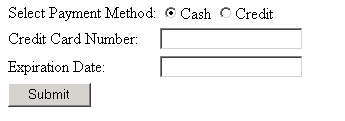
Consider a simple electronic commerce form that might be rendered as follows:

screen shot of a graphic rendering

It is clear that we are collecting a value that represents whether cash or credit card is being used, and if a credit card, its number and expiration date.

This can be represented in the XForms model element, which in XHTML would typically be contained within the head section:

<xforms:model>
  <xforms:instance>
    <ecommerce xmlns="">
      <method/>
      <number/>
      <expiry/>
    </ecommerce>
  </xforms:instance>
  <xforms:submission action="http://example.com/submit" method="post" id="submit" includenamespaceprefixes=""/>
</xforms:model>

This simply says that we are collecting three pieces of information (note that we have as yet not said anything about their types), and that they will be submitted using the URL in the action attribute.

XForms 1.0 defines a device-neutral, platform-independent set of form controls suitable for general-purpose use. The controls are bound to the XForms Model via the XForms binding mechanism, in this simple case using the ref attribute on the controls. In XHTML, this markup would typically appear within the body section (note that we have intentionally defaulted the XForms namespace prefix here):

<select1 ref="method">
  <label>Select Payment Method:</label>
  <item>
    <label>Cash</label>
    <value>cash</value>
  </item>
  <item>
    <label>Credit</label>
    <value>cc</value>
  </item>
</select1>
<input ref="number">
  <label>Credit Card Number:</label>
</input>
<input ref="expiry">
  <label>Expiration Date:</label>
</input>
<submit submission="submit">
  <label>Submit</label>
</submit>

Notice the following features of this design:

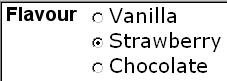
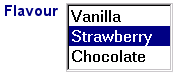
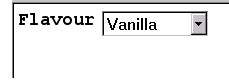
  • The user interface is not hard-coded to use radio buttons. Different devices (such as voice browsers) can render the concept of "select one" as appropriate.

  • Form controls always have labels directly associated with them as child elements—this is a key feature designed to enhance accessibility.

  • There is no need for an enclosing form element, as in HTML. (See 2.4 Multiple Forms per Document for details on how to author multiple forms per document)

  • Markup for specifying form controls has been simplified in comparison with HTML forms.

The fact that you can bind form controls to the model like this simplifies integrating XForms into other host languages, since any form control markup may be used to bind to the model.

2.2 Providing XML Instance Data

The XForms Processor can directly submit the data collected as XML. In the example, the submitted data would look like this:

Example: Submitted Data
<ecommerce>
  <method>cc</method>
  <number>1235467789012345</number>
  <expiry>2001-08</expiry>
</ecommerce>

XForms processing keeps track of the state of the partially filled form through this instance data. Initial values for the instance data may be provided or left empty as in the example. Element instance essentially holds a skeleton XML document that gets updated as the user fills out the form. It gives the author full control on the structure of the submitted XML data, including namespace information. When the form is submitted, the instance data is serialized as an XML document. Here is an alternative version of the earlier example:

Example: Model
<xforms:model>
  <xforms:instance>
    <payment method="cc" xmlns="http://commerce.example.com/payment">
      <number/>
      <expiry/>
    </payment>
  </xforms:instance>
  <xforms:submission action="http://example.com/submit" method="post" includenamespaceprefixes="#default"/>
</xforms:model>

In this case the submitted data would look like this:

Example: Submitted Data
<payment method="cc" xmlns="http://commerce.example.com/payment">
  <number>1235467789012345</number>
  <expiry>2001-08</expiry>
</payment>

This design has features worth calling out:

  • There is complete flexibility in the structure of the XML instance data, including the use of attributes. Notice that XML namespaces are used, and that a wrapper element of the author's choosing contains the instance data.

  • Empty elements number and expiry serve as place-holders in the XML structure, and will be filled in with form data provided by the user.

  • An initial value ("cc") for the form control is provided through the instance data, in this case an attribute method. In the submitted XML, this initial value will be replaced by the user input, if the user changes the form control displaying that data.

To connect this instance data with form controls, the ref attributes on the form controls need to be changed to point to the proper part of the instance data, using binding expressions:

Example: Binding Form Controls to Instance Nodes with ref
... xmlns:my="http://commerce.example.com/payment"
  ...
  <xforms:select1 ref="@method">...</xforms:select1>
  ...
  <xforms:input ref="my:number">...</xforms:input>
  ...
  <xforms:input ref="/my:payment/my:expiry">...</xforms:input>

Binding expressions are based on XPath [XPath 1.0], including the use of the @ character to refer to attributes, as seen here. Note that for illustrative purposes, the first two expressions make use of the XPath context node, which defaults to the top-level element (here my:payment). The third expression shows an absolute path.

2.3 Constraining Values

XForms allows data to be checked for validity as the form is being filled. In the absence of specific information about the types of values being collected, all values are returned as strings, but it is possible to assign types to values in the instance data. In this example, number should accept digits only, and should have between 14 and 18 digits and expiry should accept only valid month/date combinations.

Furthermore, the credit card information form controls for number and expiry are only relevant if the "cc" option is chosen for method, but are required in that case.

By specifying an additional component, model item properties, authors can include rich declarative validation information in forms. Such information can be taken from XML Schemas as well as XForms-specific additions, such as relevant. Such properties appear on bind elements, while Schema constraints are expressed in an XML Schema fragment, either inline or external. For example:

Example: Declarative Validation with Model Item Properties
... xmlns:my="http://commerce.example.com/payment"...
        
  <xforms:model>
    ...
    <xforms:bind nodeset="/my:payment/my:number"
                 relevant="/my:payment/@method = 'cc'"
                 required="true()"
                 type="my:ccnumber"/>
    <xforms:bind nodeset="/my:payment/my:expiry"
                 relevant="/my:payment/@method = 'cc'"
                 required="true()"
                 type="xsd:gYearMonth"/>
    <xsd:schema ...>
      ...
      <xsd:simpleType name="ccnumber">
        <xsd:restriction base="xsd:string">
          <xsd:pattern value="\d{14,18}"/>
        </xsd:restriction>
      </xsd:simpleType>
      ...
    </xsd:schema>
  </xforms:model>

Note:

In the above example, the relevant expression uses absolute XPath notation (beginning with /) because the evaluation context nodes for computed expressions are determined by the bind ref binding expression (see 7.4 Evaluation Context), and so any relative node path in the first bind relevant above would be relative to /my:payment/my:number

2.4 Multiple Forms per Document

XForms processing places no limits on the number of individual forms that can be placed in a single containing document. When a single document contains multiple forms, each form needs a separate model element, each with an id attribute so that they can be referenced from elsewhere in the containing document.

In addition, form controls should specify which model element contains the instance data to which they bind. This is accomplished through a model attribute that is part of the binding attributes. If no model attribute is specified on the binding element, the nearest ancestor binding element's model attribute is used, and failing that, the first XForms Model in document order is used. This technique is called 'scoped resolution', and is used frequently in XForms.

The next example adds an opinion poll to our electronic commerce form.

Example: Adding a poll model
<xforms:model>
  <xforms:instance>
    ...payment instance data...
  </xforms:instance>
  <xforms:submission action="http://example.com/submit" method="post"/>
</xforms:model>
        
<xforms:model id="poll">
  <xforms:instance>
    <helpful/>
  </xforms:instance>
  <xforms:submission id="pollsubmit" .../>
</xforms:model>

Additionally, the following markup would appear in the body section of the document:

Example: Form Controls for poll model
<xforms:select1 ref="/helpful" model="poll">
  <xforms:label>How useful is this page to you?</xforms:label>
  <xforms:item>
    <xforms:label>Not at all helpful</xforms:label>
    <xforms:value>0</xforms:value>
  </xforms:item>
  <xforms:item>
    <xforms:label>Barely helpful</xforms:label>
    <xforms:value>1</xforms:value>
  </xforms:item>
  <xforms:item>
    <xforms:label>Somewhat helpful</xforms:label>
    <xforms:value>2</xforms:value>
  </xforms:item>
  <xforms:item>
    <xforms:label>Very helpful</xforms:label>
    <xforms:value>3</xforms:value>
  </xforms:item>
</xforms:select1>
        
<xforms:submit submission="pollsubmit">
  <xforms:label>Submit</xforms:label>
</xforms:submit>

The main difference here is the use of model="poll", which identifies the instance. Note that submit refers to the submission element by ID and does not require binding attributes.

More XForms examples can be found in G Complete XForms Examples.

3 Document Structure

XForms 1.0 is an application of XML [XML 1.0] and has been designed for use within other XML vocabularies—in particular within a future version of XHTML [XHTML 1.0]. XForms always requires such a host language. This chapter discusses the structure of XForms that allow XForms to be used with other document types.

3.1 The XForms Namespace

The XForms namespace has the URI: http://www.w3.org/2002/xforms.

XForms Processors must use the XML namespaces mechanism [XML Names] to recognize elements and attributes from this namespace.

3.2 XForms Core Attribute Collections

3.2.1 Common Attributes

The Common Attribute Collection applies to every element in the XForms namespace.

anyAttribute

Foreign attributes are allowed on all XForms elements.

A host language must permit an attribute of type xsd:ID on each XForms element.

3.2.2 Linking Attributes

The Linking Attributes Collection applies to XForms elements which include a link to a remote resource.

src

The src attribute assigns a URI to be automatically retrieved.

Note:

Since linking attribute URIs are defined in terms of the XML Schema datatype xsd:anyURI, the same internationalization benefits and white space cautions apply as discussed in [XML Schema part 2].

Behavior of relative URIs in links is determined by the host language, although [XML Base] processing is strongly recommended.

Note:

The XForms Working Group is tracking with the HTML Working Group on a method of describing link structures.

3.2.3 Single-Node Binding Attributes

The following attributes define a binding between a form control or an action and an instance data node defined by an XPath expression.

ref

Binding expression interpreted as XPath. This attribute has no meaning when a bind attribute is present.

model

XForms Model selector. Specifies the ID of an XForms Model to be associated with this binding element. This attribute has no meaning for the current binding element when a bind attribute is present. Rules for determining the context XForms Model are located at 7.4 Evaluation Context.

bind

Reference to a bind element.

One of ref or bind is required. When bind is used, the node is determined by the referenced bind.

It is an exception (4.5.1 The xforms-binding-exception Event) if the XForms Processor encounters a model IDREF value that refers to an ID not on a model element, or a bind IDREF value that refers to an ID not on a bind element.

First-node rule: When a Single-Node Binding attribute selects a node-set of size > 1, the first node in the node-set, based on document order, is used.

3.2.4 Node-Set Binding Attributes

The following attributes define a binding between a form control or an action and a node-set defined by the XPath expression.

nodeset

Binding expression interpreted as XPath. This attribute has no meaning when a bind attribute is present.

model

XForms Model selector. Specifies the ID of an XForms Model to be associated with this binding element. This attribute has no meaning for the current binding element when a bind attribute is present. Rules for determining the context XForms Model are located at 7.4 Evaluation Context.

bind

Reference to a bind element.

One of nodeset or bind is required. When bind is used, the node-set is determined by the referenced bind.

It is an exception (4.5.1 The xforms-binding-exception Event) if the XForms Processor encounters a model IDREF value that refers to an id not on a model element, or a bind IDREF value that refers to an id not on a bind element.

3.2.5 Model Item Property Attributes

This collection contains one attribute for each model item property, with an attribute name exactly matching the name of the model item property, as defined in 6.1 Model Item Property Definitions.

3.3 The XForms Core Module

The XForms Core Module defines the major structural elements of XForms, intended for inclusion in a containing document. The elements and attributes included in this module are:

Element Attributes Minimal Content Model
model Common, Events, functions (QNameList), schema (list of xsd:anyURI) (instance|xsd:schema| submission|bind|Action)*
instance Common, Linking (ANY)
submission Common, ref (binding-expression), bind (xsd:IDREF), action (xsd:anyURI), method ("post"|"get"|"put"|"form-data-post"|"urlencoded-post"|qname-but-not-ncname), version (xsd:NMTOKEN), indent (xsd:boolean), mediatype (xsd:string), encoding (xsd:string), omit-xml-declaration (xsd:boolean), standalone (xsd:boolean), cdata-section-elements (QNameList), replace ("all"|"instance"|"none"|qname-but-not-ncname), separator (';' | '&'), includenamespaceprefixes (xsd:NMTOKENS) Action*
bind Common, Model Item Properties, nodeset (model-binding-expression) (bind)*

Elements defined in the XForms Actions module, when that module is included, are also allowed in the content model of model and submission, as shown above.

Within the containing document, these structural elements are typically not rendered.

The XForms Processor must ignore any foreign-namespaced attributes that are unrecognized, and must process unrecognized foreign-namespaced elements according to the 3.4 The XForms MustUnderstand Module rules.

Note that the presence of foreign namespaced elements is subject to the definition of the containing document profile.

3.3.1 The model Element

This element represents a form definition and is used as a container for elements that define the XForms Model. No restriction is placed on how many model elements may exist within a containing document.

Common Attributes: Common, Events

Attributes from XML Events are allowed on this element to facilitate creating observers. This element is not an XForms Action, and has no predefined behavior event-based behavior.

Special Attributes:

functions

Optional space-separated list of XPath extension functions (represented by QNames) required by this XForms Model. Guidance on the use of this attribute is at 7.12 Extension Functions.

schema

Optional list of xsd:anyURI links to XML Schema documents outside this model element. The XForms Processor must process all Schemas listed in this attribute. Within each XForms Model, there is a limit of one Schema per namespace declaration, including inline and linked Schemas.

Note:

The schema list may include URI fragments referring to elements located elsewhere in the containing document; e.g. "#myschema".

This example shows a simple usage of model, with the XForms namespace defaulted:

Example: Model
<model id="Person" schema="MySchema.xsd">
  <instance src="http://example.com/cgi-bin/get-instance" />
  ...
</model>

3.3.2 The instance Element

This optional element contains or references initial instance data.

Common Attributes: Common

Special Attributes:

Linking Attributes

Optional link to externally defined initial instance data. If the link traversal fails, it is treated as an exception (4.5.2 The xforms-link-exception Event).

If both an attribute and inline content are provided, the linked version takes precedence as described at 4.2.1 The xforms-model-construct Event.

If the initial instance data is given by a link, then the instance data is formed by creating an XPath data model of the linked resource.

If the initial instance data is given by inline content, then instance data is obtained by first creating a detached copy of the inline content (including namespaces inherited from the enveloping ancestors), then creating an XPath data model over the detached copy. The detached copy must consist of content that would be well-formed XML if it existed in a separate document. Note that this restricts the element content of instance to a single child element.

Note:

XForms authors who need additional control over the serialization of namespace nodes can use the includenamespaceprefixes attribute on the submission element.

3.3.3 The submission Element

This element represents declarative instructions on what to submit, and how. Details of submit processing are described at 11 Submit.

Common Attributes: Common

Special Attributes:

bind

Optional reference to a bind element. When present, the binding reference on this attribute is used in preference to any binding reference from the ref attribute.

ref

Optional selector binding expression enabling submission of a portion of the instance data. The selected node, and all descendants, are selected for submission. The default value is "/".

action

Required destination URI for submitting instance data.

method

Required attribute specifying the protocol to be used to transmit the serialized instance data. There is no default value.

version

Optional attribute specifying the version of XML to be serialized.

indent

Optional attribute specifying whether the serializer should add extra white space nodes for readability.

mediatype

Optional attribute specifying the mediatype for XML instance serialization. Authors should ensure that the type specified is compatible with application/xml.

encoding

Optional attribute specifying an encoding for serialization.

omit-xml-declaration

Optional attribute specifying whether to omit the XML declaration on the serialized instance data.

standalone

Optional attribute specifying whether to include a standalone declaration in the serialized XML.

cdata-section-elements

Optional attribute specifying element names to be serialized with CDATAsections.

replace

Optional attribute specifying how the information returned after submit should be applied. In the absence of this attribute, "all" is assumed.

separator

Optional attribute specifying the separator character between name/value pairs in urlencoding. The default value is ';'.

includenamespaceprefixes

Optional attribute providing control over namespace serialization. If absent, all namespace nodes present in the instance data are considered for serialization. If present, specifies list of namespace prefixes to consider for serialization, in addition to those visibly utilized. As in [Exc-C14N], the special value #default specifies the default namespace.

The following examples show how various options on element submission can affect serialization as application/xml. Given the following XForms fragment:

<xforms:model xmlns:xforms="http://www.w3.org/2002/xforms"
              xmlns:my="http://ns.example.org/2003">
  <xforms:instance>
    <qname xmlns="">my:sample</qname>
  </xforms:instance>
  <xforms:submission method="post" action="..."/>
</xforms:model>

Note that the includenamespaceprefixes attribute is not present, which causes all namespace nodes to be serialized, resulting in the following serialized instance data:

<qname xmlns:xforms="http://www.w3.org/2002/xforms"
       xmlns:my="http://ns.example.org/2003">my:sample</qname>

In particular, note that the XForms namespace has been serialized. To prevent this example from including the unneeded XForms namespace while maintaining the needed my prefix, includenamespaceprefixes="my" must be added to the submission element. When this attribute is present, the author takes responsibility to list all namespace prefixes not visibly utilized by the submitted instance data.

The following attributes correspond (in spelling, processing, and default values) to attributes on the output element of [XSLT 1.0], with the exception of using xsd:boolean to replace "yes"|"no":

version
indent
encoding
omit-xml-declaration
cdata-section-elements

Note:

The following XSLT attributes have no counterpart in XForms:

doctype-system
doctype-public

Elements defined in the XForms Actions module, when that module is included, are also allowed in the content model of submission.

3.3.4 The bind Element

Element bind selects a node-set selected from the instance data with a model binding expression in the nodeset attribute. Other attributes on element bind encode model item properties to be applied to each node in the node-set. When bind has an attribute of type xsd:ID, the bind then associates that identifier with the selected node-set.

Common Attributes: Common, Model Item Properties

Special Attributes:

nodeset

A model binding expression that selects the set of nodes on which this bind operates, as defined in 7.5.2 Model Binding Expressions.

When additional nodes are added through action insert, the newly added nodes are included in any node-sets matched by binding expressions—see action insert in 9.3.5 The insert Element.

See 7.4 Evaluation Context for details on how binding affects the evaluation context.

3.4 The XForms MustUnderstand Module

Certain elements, such as extension or foreign namespaced elements defined in a host language might be critical to the operation of a particular form. To indicate this, the MustUnderstand module defines a single attribute that can be used on any element.

Element Attributes Minimal Content Model
ANY xforms:mustUnderstand (xsd:boolean) n/a

It is a terminating error that must be reported to the user if an element is marked mustUnderstand="true", and the XForms Processor does not have an implementation available for processing the element.

3.5 The XForms Extension Module

There are many different ways a host language might include XForms. One approach uses only well-formed processing, disregarding validation. Another case uses strict validation, for example XHTML 1.0, in which only predefined elements are allowed. Another common approach is to allow unregulated content in a few selected places. A host language that chooses this option can use the Extension module.

Element Attributes Minimal Content Model
extension Common ANY

3.5.1 The extension Element

Optional element extension is a container for application-specific extension elements from any namespace other than the XForms namespace. This specification does not define the processing of this element.

Common Attributes: Common

For example, RDF metadata could be attached to an individual form control as follows:

<input ref="dataset/user/email" id="email-input">
  <label>Enter your email address</label>
  <extension>
    <rdf:RDF xmlns:rdf="http://www.w3.org/1999/02/22-rdf-syntax-ns#">
      <rdf:Description rdf:about="#email-input">
        <my:addressBook>personal</my:addressBook>
      </rdf:Description>
    </rdf:RDF>
  </extension>
</input>

4 Processing Model

This chapter defines the XForms Processing Model declaratively by enumerating the various states attained by an XForms Processor and the possible state transitions that exist in each of these states. The chapter enumerates the pre-conditions and post-conditions that must be satisfied in each of these states. XForms Processors may be implemented in any manner, so long as the end results are identical to that described in this chapter.

State transitions are in general initiated by sending events to parts of the XForms tree. The XForms Processing Model consists of events in the following categories:

4.1 Events Overview

XForms processing is defined in terms of events, event handlers, and event responses. XForms uses the events system defined in [DOM2 Events][XML Events], with an event capture phase, arrival of the event at its Target, and finally the event bubbling phase.

Throughout this chapter, each reference to "form control" as a target element is a shorthand for any of the following elements: input, secret, textarea, output, upload, trigger, range, submit, select, select1, or group.

Event name Cancelable? Bubbles? Target element
4.2 Initialization Events
xforms-model-construct No Yes model
xforms-model-construct-done No Yes model
xforms-ready No Yes model
xforms-model-destruct No Yes model
4.3 Interaction Events
xforms-previous Yes No form control
xforms-next Yes No form control
xforms-focus Yes No form control
xforms-help Yes Yes form control
xforms-hint Yes Yes form control
xforms-rebuild Yes Yes model
xforms-refresh Yes Yes model
xforms-revalidate Yes Yes model
xforms-recalculate Yes Yes model
xforms-reset Yes Yes model
xforms-submit Yes Yes submission
4.4 Notification Events
DOMActivate Yes Yes form control
xforms-value-changed No Yes form control
xforms-select No Yes item or case
xforms-deselect No Yes item or case
xforms-scroll-first No Yes repeat
xforms-scroll-last No Yes repeat
xforms-insert No Yes instance
xforms-delete No Yes instance
xforms-valid No Yes form control
xforms-invalid No Yes form control
DOMFocusIn No Yes form control
DOMFocusOut No Yes form control
xforms-readonly No Yes form control
xforms-readwrite No Yes form control
xforms-required No Yes form control
xforms-optional No Yes form control
xforms-enabled No Yes form control
xforms-disabled No Yes form control
xforms-in-range No Yes form control
xforms-out-of-range No Yes form control
xforms-submit-done No Yes submission
xforms-submit-error No Yes model
4.5 Error Indications
xforms-binding-exception No Yes any element that can contain a binding expression
xforms-link-exception No Yes model
xforms-link-error No Yes model
xforms-compute-exception No Yes model

4.2 Initialization Events

This section defines the various stages of the initialization phase. The processor begins initialization by dispatching an event xforms-model-construct to each XForms Model in the containing document.

4.2.1 The xforms-model-construct Event

Dispatched by the containing document processor to bootstrap XForms Processor initialization.

Target: model

Bubbles: Yes

Cancelable: No

Context Info: None

The default action for this event results in the following:

  1. All XML Schemas loaded. If an error occurs while attempting to access or process a remote document, processing halts with an exception (4.5.2 The xforms-link-exception Event).

  2. If an external source for the initial instance data is given, an XPath data model [7 XPath Expressions in XForms] is constructed from it; otherwise if inline initial instance data is given, that is used instead. If the external initial instance data is not well-formed XML or cannot be retrieved, processing halts with an exception (4.5.2 The xforms-link-exception Event). If neither are given, the data model is not constructed in this phase, but during user interface construction (4.2.2 The xforms-model-construct-done Event).

  3. If applicable, P3P initialized. [P3P 1.0]

  4. Instance data is constructed. All strings inserted into the instance data are subject to Unicode normalization. All model item properties are initialized by processing all bind elements in document order. For each bind:

    1. The attribute nodeset attached to the bind is evaluated, resulting in a set of nodes selected.

    2. For each node in the node-set, model item properties are applied according to the remaining attributes on bind: the string value of each attribute (with a name matching one of the properties defined in 6.1 Model Item Property Definitions) is copied as the local value of the model item property of the same name.

    3. If the node already contains a model item property of the same name, XForms processing for this containing document halts with an exception (4.5.1 The xforms-binding-exception Event).

  5. Perform an xforms-rebuild, xforms-recalculate, and xforms-revalidate in sequence, for this model element. (The xforms-refresh is not performed since the user interface has not yet been initialized).

After all XForms Models have been initialized, an xforms-model-construct-done event is dispatched to each model element.

4.2.2 The xforms-model-construct-done Event

Dispatched after the completion of xforms-model-construct processing.

Target: model

Bubbles: Yes

Cancelable: No

Context Info: None

The default action for this event happens once, no matter how many XForms Models are present in the containing document, and results in the following, for each form control:

Processing can proceed in one of two different ways depending on whether an instance in a model exists when the first form control is processed.

If the instance referenced on the form control existed when the first form control was processed:

  1. The binding expression is evaluated to ensure that it points to a node that exists. If this is not the case then the form control should behave in the same manner as if it had bound to a model item with the relevant model item property resolved to false.

If the instance referenced on the form control did not exist when the first form control for the same instance was processed:

  1. For the first reference to an instance a default instance is created by following the rules described below.

    1. A root instanceData element is created.

    2. An instance data element node will be created using the binding expression from the user interface control as the name. If the name is not a valid QName, processing halts with an exception (4.5.1 The xforms-binding-exception Event).

  2. For the second and subsequent references to an instance which was automatically created the following processing is performed:

    1. If a matching instance data node is found, the user interface control will be connected to that element.

    2. If a matching instance data node is not found, an instance data node will be created using the binding expression from the user interface control as the name. If the name is not a valid QName, processing halts with an exception (4.5.1 The xforms-binding-exception Event).

After all form controls have been initialized, an xforms-ready event is dispatched to each model element.

4.2.3 The xforms-ready Event

Dispatched as part of xforms-model-construct-done processing.

Target: model

Bubbles: Yes

Cancelable: No

Context Info: None

The default action for this event results in the following: None; notification event only.

4.2.4 The xforms-model-destruct Event

Dispatched by the processor to advise of imminent shutdown of the XForms Processor, which can occur from user action, or from the load XForms Action, or as a result of form submission.

Target: model

Bubbles: No

Cancelable: No

Context Info: None

The default action for this event results in the following: None; notification event only.

4.3 Interaction Events

4.3.1 The xforms-next and xforms-previous Events

Dispatched in response to: user request to navigate to the next or previous form control.

Target: form control

Bubbles: No

Cancelable: Yes

Context Info: None

The default action for these events results in the following: Navigation according to the default navigation order. For example, on a keyboard interface, "tab" might generate an xforms-next event, while "shift+tab" might generate an xforms-previous event.

Navigation is determined on a containing document-wide basis. The host language is responsible for defining overall navigation order. The following describes a possible technique based on a navindex attribute, using individual form controls as a navigation unit: The <group>, <repeat>, and <switch> structures also serve as navigation units, but instead of providing a single navigation point, they create a local navigation context for child form controls (and possibly other substructures). The navigation sequence is determined as follows:

  1. Form controls that have a navindex specified and assign a positive value to it are navigated first.

    1. Outermost form controls are navigated in increasing order of the navindex value. Values need not be sequential nor must they begin with any particular value. Form controls that have identical navindex values are to be navigated in document order.

    2. Ancestor form controls (<group>, <repeat>, and <switch>) establish a local navigation sequence. All form controls within a local sequence are navigated, in increasing order of the navindex value, before any outside the local sequence are navigated. Form controls that have identical navindex values are navigated in document order.

  2. Those form controls that do not specify navindex or supply a value of "0" are navigated next. These form controls are navigated in document order.

  3. Those form controls that are disabled, hidden, or not relevant are assigned a relative order in the overall sequence but do not participate as navigable controls.

  4. The navigation sequence past the last form control (or before the first) is undefined. XForms Processors may cycle back to the first/last control, remove focus from the form, or other possibilities.

4.3.2 The xforms-focus Event

Dispatched in response to: set focus to a form control.

Target: form control

Bubbles: No

Cancelable: Yes

Context Info: None

The default action for these events results in the following:

focus is given to the target form control if the form control is able to accept focus.

4.3.3 The xforms-help and xforms-hint Events

Dispatched in response to: a user request for help or hint information.

Target: form control

Bubbles: Yes

Cancelable: Yes

Context Info: None

The default action for these events results in the following: If the form control has help/hint elements supplied, these are used to construct a message that is displayed to the user. Otherwise, user agents may provide default help or hint messages, but are not required to.

4.3.4 The xforms-refresh Event

Dispatched in response to: a request to update all form controls associated with a particular XForms Model.

Target: model

Bubbles: Yes

Cancelable: Yes

Context Info: None

The default action for this event results in the following: The user interface reflects the state of the model, which means that all forms controls reflect for their corresponding bound instance data:

  • its current value

  • its validity

  • whether it is required, readonly or relevant.

4.3.5 The xforms-revalidate Event

Dispatched in response to: a request to revalidate a particular XForms Model.

Target: model

Bubbles: Yes

Cancelable: Yes

Context Info: None

The default action for this event results in the following:

The default handling for this event must satisfy the following conditions:

  1. All instance data nodes in all instance elements in the model are checked against any specified XML Schema.

  2. All instance data nodes in all instance elements in the model are checked against any bound model item properties which define constraints on the value, i.e. required, constraint (6 Model Item Properties).

  3. The appropriate notification events (4.4.6 The xforms-valid Event, 4.4.7 The xforms-invalid Event, 4.4.10 The xforms-readonly Event, 4.4.11 The xforms-readwrite Event, 4.4.12 The xforms-required Event, 4.4.13 The xforms-optional Event, 4.4.14 The xforms-enabled Event, 4.4.15 The xforms-disabled Event) are dispatched to form controls where the matching model item property evaluates to a different value than at the start of the processing of this event.

Note:

Prior to the dispatching of the xforms-ready event handler, there are no form controls bound to instance data, so xforms-valid and other notification events are not dispatched.

4.3.6 The xforms-recalculate Event

Dispatched in response to: a request to recalculate all calculations associated with a particular XForms Model.

Target: model

Bubbles: Yes

Cancelable: Yes

Context Info: None

The default action for this event results in the following:

The values of all instance data items match their associated 'calculate' constraints, if any. All model item properties that can contain computed expressions are resolved.

An XPath expression is bound either to the value or to a model item property (e.g., required, relevant) of one or more instance nodes. The combination of an XPath expression with a single instance node's value or model item property is considered as a single computational unit, a compute, for the purposes of recalculation.

When it is time to recalculate a compute, the XPath expression is evaluated in the context of the instance node whose value or model item property is associated with the compute. The XPath expression may reference or refer to another instance node, in which case the value of the instance node is referenced. Each referenced instance node has as dependents those computes which directly refer to the instance node. References to the current node's value in calculate expressions are explicitly ignored, i.e., if an expression associated with a compute refers to the instance node associated with the compute, then the instance node does not take itself as a dependent. A compute is computationally dependent on an instance node (whose value may or may not be computed) if there is a path of dependents leading from the instance node through zero or more other instance nodes to the compute. A compute is part of a circular dependency if it is computationally dependent on itself.

Note:

Authors should not refer to the current node's value in calculate expressions because the effect is not well-defined. Other model item properties, such as required or readonly, however, are well-defined in the presence of self-references.

When a recalculation event begins, there will be a list L of one or more instance nodes whose values have been changed, e.g., by user input being propagated to the instance.

  1. An XForms Processor should not recalculate computes that are not computationally dependent on one or more of the elements in L.

  2. An XForms Processor should perform only a single recalculation of each compute that is computationally dependent on one or more of the elements in L.

  3. An XForms Processor must recalculate a compute C after recalculating all computes of instance nodes on which C is computationally dependent. (Equivalently, an XForms Processor must recalculate a compute C before recalculating any compute that is computationally dependent on the instance node associated with C.)

  4. Finally, if a compute is part of a circular dependency and also computationally dependent on an element in L, then an XForms processor must report an exception (4.5.4 The xforms-compute-exception Event).

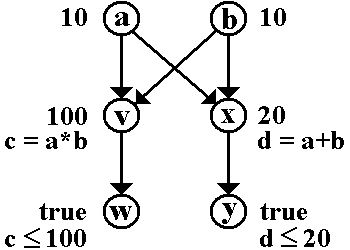
D Recalculation Sequence Algorithm describes one possible method for achieving the desired recalculation behavior.

4.3.7 The xforms-rebuild Event

Dispatched in response to: a request to rebuild the internal data structures that track computational dependencies within a particular XForms Model.

Target: model

Bubbles: Yes

Cancelable: Yes

Context Info: None

The default action for this event results in the following:

The default action for this event is that the computational dependency data structures are rebuilt, then the change list L is set to contain references to all instance nodes that have an associated computational expression such that a full recalculate is performed the next time the xforms-recalculate event is dispatched to the model.

4.3.8 The xforms-reset Event

Dispatched in response to: a user request to reset the model.

Target: model

Bubbles: Yes

Cancelable: Yes

Context Info: None

The default action for this event results in the following:

The instance data is reset to the tree structure and values it had immediately after having processed the xforms-ready event. Then, the events xforms-rebuild, xforms-recalculate, xforms-revalidate and xforms-refresh are dispatched to the model element in sequence.

4.3.9 The xforms-submit Event

See chapter 11 Submit.

4.4 Notification Events

4.4.1 The DOMActivate Event

Dispatched in response to: the "default action request" for a form control, for instance pressing a button or hitting enter.

Target: form control

Bubbles: Yes

Cancelable: Yes

Context Info: None

The default action for this event results in the following: None; notification event only.

4.4.2 The xforms-value-changed Event

Dispatched in response to: a confirmed change to an instance data node bound to a form control, such as when the user navigates away from the form control.

Target: form control

Bubbles: Yes

Cancelable: No

Context Info: None

The default action for this event results in the following: None; notification event only.

Note:

For incremental processing, this specification does not define how often XForms Processors fire these events. Implementations are expected to optimize processing (for instance not flashing the entire screen for each character entered, etc.).

Note:

The change to the instance data associated with this event happens before the event is dispatched.

4.4.3 The xforms-select and xforms-deselect Events

Dispatched in response to: an item in a select, select1, or switch becoming selected or deselected.

Target: item or case

Bubbles: Yes

Cancelable: No

Context Info: None

The default action for this event results in the following: None; notification event only.

4.4.4 The xforms-scroll-first and xforms-scroll-last Events

Dispatched in response to: a setindex action attempting to set an index outside the range of a repeat.

Target: repeat

Bubbles: Yes

Cancelable: No

Context Info: None

The default action for this event results in the following: None; notification event only.

4.4.5 The xforms-insert and xforms-delete Events

Dispatched in response to: A event handler invoking an XForms Action insert or delete, successfully adding or deleting a repeat item..

Target: instance

Bubbles: Yes

Cancelable: No

Context Info: Path expression used for insert/delete (xsd:string).

The default action for these events results in the following: None; notification event only.

4.4.6 The xforms-valid Event

Dispatched in response to: an instance data node becoming valid.

Target: form control

Bubbles: Yes

Cancelable: No

Context Info: None

The default action for this event results in the following: None; notification event only.

This event is dispatched whenever the value of the bound instance data node changes, additionally whenever the bound instance data node becomes valid indirectly, through the constraint model item property evaluating to true.

4.4.7 The xforms-invalid Event

Dispatched in response to: an instance data node becoming invalid.

Target: form control

Bubbles: Yes

Cancelable: No

Context Info: None

The default action for this event results in the following: None; notification event only.

This event is dispatched whenever the value of the bound instance data node changes, additionally whenever the bound instance data node becomes invalid indirectly, through the constraint model item property evaluating to false.

4.4.8 The DOMFocusIn Event

Dispatched in response to: a form control receiving focus.

Target: form control

Bubbles: Yes

Cancelable: No

Context Info: None

The default action for this event results in the following: None; notification event only.

4.4.9 The DOMFocusOut Event

Dispatched in response to: a form control losing focus.

Target: form control

Bubbles: Yes

Cancelable: No

Context Info: None

The default action for this event results in the following: None; notification event only.

4.4.10 The xforms-readonly Event

Dispatched in response to: an instance data node becoming readonly.

Target: form control

Bubbles: Yes

Cancelable: No

Context Info: None

The default action for this event results in the following: None; notification event only.

This event is dispatched whenever the value of the bound instance data node changes, additionally whenever the bound instance data node becomes becomes indirectly, through the readonly model item property evaluating to true.

4.4.11 The xforms-readwrite Event

Dispatched in response to: an instance data node becoming read-write.

Target: form control

Bubbles: Yes

Cancelable: No

Context Info: None

The default action for this event results in the following: None; notification event only.

This event is dispatched whenever the value of the bound instance data node changes, additionally whenever the bound instance data node becomes read-write indirectly, through the readonly model item property evaluating to false.

4.4.12 The xforms-required Event

Dispatched in response to: an instance data node becoming required.

Target: form control

Bubbles: Yes

Cancelable: No

Context Info: None

The default action for this event results in the following: None; notification event only.

This event is dispatched whenever the value of the bound instance data node changes, additionally whenever the bound instance data node becomes required indirectly, through the required model item property evaluating to true.

4.4.13 The xforms-optional Event

Dispatched in response to: an instance data node becoming optional.

Target: form control

Bubbles: Yes

Cancelable: No

Context Info: None

The default action for this event results in the following: None; notification event only.

This event is dispatched whenever the value of the bound instance data node changes, additionally whenever the bound instance data node becomes optional indirectly, through the required model item property evaluating to false.

4.4.14 The xforms-enabled Event

Dispatched in response to: an instance data node becoming enabled.

Target: form control

Bubbles: Yes

Cancelable: No

Context Info: None

The default action for this event results in the following: None; notification event only.

This event is dispatched whenever the value of the bound instance data node changes, additionally whenever the bound instance data node becomes enabled indirectly, through the relevant model item property evaluating to true.

4.4.15 The xforms-disabled Event

Dispatched in response to: an instance data node becoming disabled.

Target: form control

Bubbles: Yes

Cancelable: No

Context Info: None

The default action for this event results in the following: None; notification event only.

This event is dispatched whenever the value of the bound instance data node changes, additionally whenever the bound instance data node becomes disabled indirectly, through the relevant model item property evaluating to false.

4.4.16 The xforms-in-range Event

Dispatched in response to: the value of an instance data node has changed such that the value can now be represented by the form control.

Target: form control

Bubbles: Yes

Cancelable: No

Context Info: None

The default action for this event results in the following: None; notification event only.

This event is dispatched whenever the value of an instance data node that was not possible to represent given the constraints specified on a form control has changed such that the value can now be represented by the form control.

4.4.17 The xforms-out-of-range Event

Dispatched in response to: the value of an instance data node has changed such that the value can not be represented by the form control.

Target: form control

Bubbles: Yes

Cancelable: No

Context Info: None

The default action for this event results in the following: None; notification event only.

This event is dispatched whenever the value of an instance data node can not be represented given the constraints specified on a form control.

4.4.18 The xforms-submit-done Event

Dispatched in response to: completion of submit processing, including processing any returned document.

Target: submission

Bubbles: Yes

Cancelable: No

Context Info: None

The default action for this event results in the following: None; notification event only.

4.4.19 The xforms-submit-error Event

Dispatched as an indication of: a failure of the submit process, as defined at 11 Submit

Target: model

Bubbles: Yes

Cancelable: No

Context Info: The submit method URI that failed (xsd:anyURI)

The default action for this event results in the following: None; notification event only.

4.5 Error Indications

Error indications happen as a result of unusual conditions in the XForms Processor. Some of these are "fatal" errors, which halt processing, and bear the suffix "exception". Others are simply for notification, and bear the suffix "error". For all events in this section, it is permissible for the XForms Processor to perform some kind of default handling, for example logging error messages to a file.

4.5.1 The xforms-binding-exception Event

Dispatched as an indication of: an illegal binding expression, or a model attribute that fails to point to the ID of a model element, or a bind attribute that fails to point to the ID of a bind element, or a submission attribute that fails to point to the ID of a submission element.

Target: any element that can contain a binding expression

Bubbles: Yes

Cancelable: No

Context Info: None

The default action for this event results in the following: Fatal error.

4.5.2 The xforms-link-exception Event

Dispatched as an indication of: a failure in link traversal of a linking attribute.

Target: model

Bubbles: Yes

Cancelable: No

Context Info: The URI that failed to load (xsd:anyURI)

The default action for this event results in the following: Fatal error.

4.5.3 The xforms-link-error Event

Dispatched as an indication of: a failure in link traversal of a linking attribute, in a situation not critical to form processing.

Target: model

Bubbles: Yes

Cancelable: No

Context Info: The URI that failed to load (xsd:anyURI)

The default action for this event results in the following: None; notification event only.

4.5.4 The xforms-compute-exception Event

Dispatched as an indication of: an error occurring during XPath evaluation.

Target: model

Bubbles: Yes

Cancelable: No

Context Info: Implementation-specific error string.

The default action for this event results in the following: Fatal error.

4.6 Event Sequencing

The previous sections describe processing associated with individual events. This section gives the overall sequence of related events that must occur in several common situations. In the following lists, events that may be fired more than once are prefixed with [n].

4.6.1 For input, secret, textarea, range, or upload Controls

  • When the form control is interactively changed, and has the "incremental="true" setting, the event sequence described at 4.6.7 Sequence: Value Change with Focus Change may be initiated at implementation dependent intervals.

  • When the form control is interactively changed and does not have the "incremental=true" setting, no events are required to be dispatched, and thus no order is defined.

  • When focus changes from the form control and the value has changed, the event sequence is as described at 4.6.7 Sequence: Value Change with Focus Change.

4.6.2 For output Controls

  • No event sequences are defined.

4.6.3 For select or select1 Controls

4.6.4 For trigger Controls

4.6.5 For submit Controls

4.6.6 Sequence: Selection Without Value Change

  1. xforms-deselect

  2. xforms-select

4.6.7 Sequence: Value Change with Focus Change

  1. xforms-recalculate

  2. xforms-revalidate

  3. [n] xforms-valid/xforms-invalid; xforms-enabled/xforms-disabled; xforms-optional/xforms-required; xforms-readonly/xforms-readwrite

  4. xforms-value-changed

  5. DOMFocusOut

  6. DOMFocusIn

  7. xforms-refresh

Reevaluation of binding expressions must occur before step 3 above.

4.6.8 Sequence: Activating a Trigger

  1. DOMActivate

4.6.9 Sequence: Submission

  1. xforms-submit

  2. xforms-submit-done or xforms-submit-error

5 Datatypes

This chapter defines the datatypes used in defining an XForms Model.

5.1 XML Schema Built-in Datatypes

XForms supports all XML Schema datatypes except for xsd:duration, xsd:ENTITY, xsd:ENTITIES, and xsd:NOTATION. Concepts value space, lexical space and constraining facets are as specified in [XML Schema part 2]. Certain XML Schema datatypes have been identified as part of a smaller XForms conformance profile that is being developed separately, and are marked with an asterisk *. XForms includes datatypes derived by restriction and derived by list from these base types. XForms Processors must treat the datatypes listed in the chapter as in-scope without requiring the inclusion of an XML Schema.

Built-in primitive types