8.1 The XForms Form
Controls Module
Form
controls are declared using markup elements, and their behavior
refined via markup attributes.
| Element |
Attributes |
Minimal Content Model |
| input |
Common, UI Common, Single Node Binding,
inputmode (xsd:string), incremental (xsd:boolean) |
label, (UI Common)* |
| secret |
Common, UI Common, Single Node Binding,
inputmode (xsd:string), incremental (xsd:boolean) |
label, (UI Common)* |
| textarea |
Common, UI Common, Single Node Binding,
inputmode (xsd:string), incremental (xsd:boolean) |
label, (UI Common)* |
| output |
Common, Single Node Binding
(optional), appearance
("full"|"compact"|"minimal"|xforms:QNameButNotNCNAME), value
(XPathExpression) |
label? |
| upload |
Common, UI Common, Single Node Binding,
mediatype (xsd:string), incremental (xsd:boolean) |
label, filename?, mediatype?, (UI Common)* |
| range |
Common, UI Common, Single Node Binding, start
(xsd:string), end (xsd:string), step (xsd:string), incremental
(xsd:boolean) |
label, (UI Common)* |
| trigger |
Common, UI Common, Single Node Binding
(optional) |
label, (UI Common)* |
| submit |
Common, UI Common, Single Node Binding
(optional), submission (xsd:IDREF) |
label, (UI Common)* |
| select |
Common, UI Common, Single Node Binding,
selection ("open" | "closed"), incremental (xsd:boolean) |
label, (List UI Common)+, (UI Common)* |
| select1 |
Common, UI Common, Single Node Binding,
selection ("open" | "closed"), incremental (xsd:boolean) |
label, (List UI Common)+, (UI Common)* |
| choices |
Common |
label?, (List UI Common)+ |
| item |
Common |
label, value, (UI Common)* |
| filename |
Common, Single Node Binding |
EMPTY |
| mediatype |
Common, Single Node Binding |
EMPTY |
| value |
Common, Single Node Binding
(optional) |
(PCDATA|ANY)* |
| label |
Common, Single Node Binding
(optional), Linking |
(PCDATA|(UI Inline))* |
| help |
Common, Single Node Binding
(optional), Linking |
(PCDATA|(UI Inline))* |
| hint |
Common, Single Node Binding
(optional), Linking |
(PCDATA|(UI Inline))* |
| alert |
Common, Single Node Binding
(optional), Linking |
(PCDATA|(UI Inline))* |
See also: 9.3.3 The
itemset Element.
Note:
Unless bound to form controls, instance data nodes are not
presented to the user; consequently, there is no need for a form
control corresponding to HTML input type="hidden".
The following attributes are common to many user-interface
related XForms elements, here called the UI Common
attribute group.
| Element |
Attributes |
| (various) |
appearance
("full"|"compact"|"minimal"|QName-but-not-NCName) |
- appearance
-
Optional attribute to define an appearance hint.
Note:
A host language is expected to add attributes such as
xml:lang as well as an attribute, named
class, that holds a list of strings that can be
matched by CSS class selectors.
Further, a host language must provide a way to indicate overall
navigation order among form controls and other elements included in
the host language, as well as keyboard or direct access navigation
to specific elements. One such proposal is to uses a pair of
attributes named navindex and accesskey,
defined as follows:
- navindex
-
Optional attribute is a non-negative integer in the range of
0-32767 used to define the navigation sequence. This gives the
author control over the sequence in which form controls are traversed. The
default navigation order is specified in the chapter 4 Processing Model.
- accesskey
-
Optional attribute defines a shortcut for moving the input focus
directly to a particular form control. The value of this is a
single character which when pressed together with a platform
specific modifier key (e.g., the alt key) results in the
focus being set to this form control.
The user agent must provide a means of identifying the
accesskeys that can be used in a presentation. This may be
accomplished in different ways by different implementations, for
example through direct interaction with the application or via the
user's guide. The accesskey requested by the author might not be
made available by the player (for example it may not exist on the
device used, or it may be used by the player itself). Therefore the
user agent should make the specified key available, but may map the
accesskey to a different interaction behavior.
Additionally, this module defines the following content
sets:
| Content Set |
Minimal Content Model |
| UI
Common |
(help|hint|alert|Action)* |
| List UI
Common |
(choices|item|itemset)+ |
| Form
Controls |
(input|secret|textarea|output|upload|range|trigger|submit|select|select1)* |
| UI Inline |
(output)* |
As shown above, the XML Events module adds the Actions content
set into the UI Common content set. A host language should add
inline markup to the Inline content set. When the XForms Extension
module is present, it too should be included in the UI Common
content set.
8.1.1
Implementation Requirements Common to All Form Controls
XForms user interface controls are bound to the underlying
instance data using binding attributes as defined in the
chapter 6 Model Item Properties.
Form controls enable accessibility by taking a uniform approach
to such features as labels, help text, navigation, and keyboard
shortcuts. Internationalization issues are addressed by following
the same design principles as in XHTML. All form controls are
suitable for styling as aural or visual media.
Form controls encapsulate high-level semantics without
sacrificing the ability to deliver real implementations. For
instance, the form control select enables the user to
select items from a set. These form controls distinguish
the functional aspects of the underlying control from the
presentational and behavioral aspects. This separation enables the
expression of the intent underlying a particular form
control—see [AUI97] for a definition of
such high-level user interaction primitives.
Form controls when rendered display the underlying data values
to which they are bound. While the data presented to the user
through a form control must directly correspond to the bound
instance data, the display representation is not required to match
the lexical value. For example, user agents should apply
appropriate conventions to the display of dates, times, durations
and numeric values including separator characters.
All form controls must meet the following implementation
requirements:
-
Form controls that write simpleContent to instance data must do
so exactly as defined by the XForms Action 10.1.9 The setvalue Element
-
All form controls that read simpleContent instance data must do
so as follows:
-
Element nodes: if text child nodes are present, returns the
string-value of the first text child node. Otherwise, returns ""
(the empty string)
-
Attribute nodes: returns the string-value of the node.
-
Text nodes: returns the string-value of the node.
-
Namespace, processing instruction, comment, and the XPath root
node: behavior is undefined.
-
Form controls must distinguish rendering between valid and
invalid states. Control of this behavior should be made available
to stylesheets.
-
Form controls must indicate when the bound instance data
contains a value the form control is not capable of rendering.
Control of this behavior should be made available to
stylesheets.
-
Form controls must render upon request an explanation of the
current state of a form control, including validity and associated
model item properties. Control of this behavior should be made
available to stylesheets.
-
Form controls must provide a default explanation for the above
when no user-specified explanation is available.
Sections in this chapter define the various form controls by
specifying the following:
Description
Common Attributes
Special Attributes
Examples
Data Binding Restrictions
Implementation Requirements
8.1.2 The input
Element
Description: This form control enables free-form data entry.
Common Attributes: Common, UI Common, Single Node UI Binding
Special Attributes:
- inputmode
-
This form control accepts an input mode hint. E Input Modes.
- incremental
-
when true, this form control will generate
additional xforms-value-changed events. The default
value for this attribute is false.
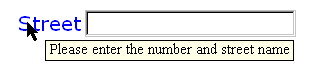
Example:
<input ref="order/shipTo/street" class="streetAddress">
  <label>Street</label>
  <hint>Please enter the number and street name</hint>
</input>
In the above, the class attribute can be used by a
style sheet to specify the display size of the form control. Note
that the constraints on how much text can be input are obtained
from the underlying XForms Model definition and not from these
display properties.
A graphical browser might render the above example as
follows:

Data Binding Restrictions: Binds to any simpleContent (except
xsd:base64Binary, xsd:hexBinary or any
datatype derived from these).
Implementation Requirements: Must allow entry of a lexical value
for the bound datatype. Implementations should provide a convenient
means for entry of datatypes and take into account localization and
internationalization issues such as representation of numbers. For
example, an input bound to an instance data node of
type xsd:date might provide a calendar control to
enter dates; similarly, an input control bound to of type
boolean might be rendered as a checkbox.
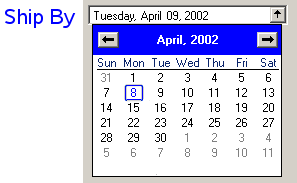
<input ref="order/shipDate">
  <label>Ship By</label>
  <hint>Please specify the ship date for this order.</hint>
</input>
A graphical browser might render the above example as
follows:

The user can type a date into the text edit box, or press the
button to open a calendar:
8.1.3 The secret
Element
Description: This form control is used to provide the user with
the ability to supply information to the system in a manner that
makes it difficult for someone, other than the user, who may be
observing the process to discern the value that is being supplied.
A common use is for password entry.
Common Attributes: Common, UI Common, Single Node Binding
Special Attributes:
- inputmode
-
This form control accepts an input mode hint. E Input Modes.
- incremental
-
when true, this form control will generate
additional xforms-value-changed events. The default
value for this attribute is false.
Example:
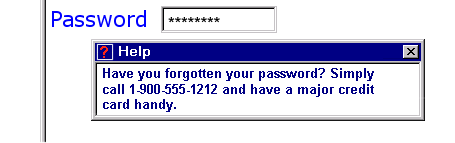
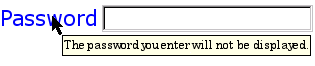
Example: Password Entry
<secret ref="/login/password">
  <label>Password</label>
  <hint>The password you enter will not be displayed.</hint>
</secret>
A graphical browser might render this form control as
follows:
Data Binding Restrictions: Identical to input.
Implementation Requirements: Implementations, including
accessibility aids, must obscure the value being entered into this
form control. One possible approach would be to render a "*" or
similar character instead of the actual characters entered. Note
that this provides only a casual level of security; truly sensitive
information will require additional security measures outside the
scope of XForms.
8.1.4 The textarea
Element
Description: This form control enables free-form data entry and
is intended for use in entering multiline content, e.g., the body
of an email message.
Common Attributes: Common, UI Common, Single Node Binding
Special Attributes:
- inputmode
-
This form control accepts an input mode hint. E Input Modes.
- incremental
-
when true, this form control will generate
additional xforms-value-changed events. The default
value for this attribute is false.
Example:
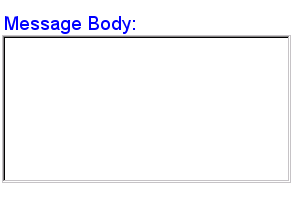
Example: Email Message Body
<textarea ref="message/body" class="messageBody">
  <label>Message Body</label>
  <hint>Enter the text of your message here</hint>
</textarea>
In the above, the class attribute can be used by a
style sheet to specify the display size of the form control. Note
that the constraints on how much text can be input are obtained
from the underlying XForms Model definition and not from these
display properties.
A graphical browser might render the above example as
follows:
Data Binding Restrictions: Binds to xsd:string or
any derived simpleContent.
Implementation Requirements: Must allow entry of a lexical value
for the bound datatype, including multiple lines of text.
8.1.5 The output
Element
Description: This form control renders a value from the instance
data, but provides no means for entering or changing data. It is
used to display values from the instance, and is treated as
display:inline for purposes of layout. Element
output can be used to display the value at a
particular location in the instance by using a binding expression;
it can also be used to display the result of evaluating an XPath
expression by specifying the XPath expression to be evaluated via
attribute value instead of ref. Note that
attributes ref and value on element
output are mutually exclusive.
Common Attributes: Common, Single Node Binding
(optional)
Special Attributes:
- appearance
-
This form control does not use the UI Common attribute group,
but nevertheless still contains an appearance attribute, as defined
above.
- value
-
An XPath expression to be evaluated. The result of the
evaluation is rendered by the form control. If binding attributes
are present to select a node, this attribute has no effect. The XPath expression is re-evaluated whenever
there is a change in any node that the expression refers
to.
Example:
Example: Explanatory Message
I charged you -
<output ref="order/totalPrice"/>
- and here is why:
A graphical browser might render an output form control as
follows:

Data Binding Restrictions: Binds to any simpleContent.
Implementation Requirements: Must allow display of a lexical
value for the bound datatype. Implementations should provide a
convenient means for display of datatypes and take into account
localization and internationalization issues such as representation
of numbers.
8.1.6 The upload
Element
Description: This form control enables the common feature found
on Web sites to upload a file from the local file system, as well
as accepting input from various devices including microphones,
pens, and digital cameras.
Common Attributes: Common, UI Common, Single Node Binding
Special Attributes:
- mediatype
-
Space-separated list of suggested media types, used by the
XForms Processor to determine the possible sources of data to
upload.
- incremental
-
When true, this form control will generate
additional xforms-value-changed events. The default
for this form control is false.
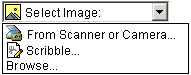
Example:
Example: Uploading An Image
<upload ref="mail/attachment" mediatype="image/*">
  <label>Select image:</label>
  <filename ref="@filename" />
  <mediatype ref="@mediatype" />
</upload>
A graphical browser might render this form control as
follows:
Implementation Requirements:For suitable
mediatypes:
-
On activation, if child element filename is present
and a filename is available, upload places the
filename of the data to upload in the instance at the node
indicated by the binding attributes on child element
filename.
-
On activation, if child element mediatype is
present and a mediatype is available, upload places
the mediatype of the data to upload in the instance at the node
indicated by the binding attributes on child element
mediatype.
Data Binding Restrictions: This form control can only be bound
to datatypes xsd:anyURI,
xsd:base64Binary or xsd:hexBinary, or
types derived by restriction from these.
Implementation Requirements: For base64Binary or hexBinary data
binding:
-
When bound to an instance data node of type
xsd:base64binary, xsd:hexBinary, or a
type derived by restriction thereof, on activation
upload places the binary content in the content of the
node with the indicated encoding.
Implementation Requirements: For anyURI data binding:
-
When bound to an instance data node of type
xsd:anyURI (or a type derived by restriction thereof),
on activation upload places a URI in the content of
the node.
For security reasons, the XForms Processor must not dereference
the URI bound to this form control without explicit user
permission.
-
Implementations with a file system should support file
upload—selecting a specific file. The types of files
presented by default should reflect
the mediatype specified in the XForms
Modelspecified by attribute
mediatype, for example defaulting to only audio
file types in the file dialog when the mediatype is "audio/*".
In XForms 1.0, there is a 1:1 binding
between a upload form control and one of the binary
datatypes, although that single file may be compound (e.g.
application/zip).
Implementation Requirements: For all data bindings:
-
Implementations with specific pen/digitizer hardware should (and
implementations with other pointing devices may) support
scribble—allowing in-place creation of pen-based
data.
-
Implementations with specific audio recording capabilities
should support record audio—in-place recording of an
audio clip.
-
Implementations with a digital camera, scanner interface or
screen capture should support acquire image—in-place
upload of images from an attached device.
-
Implementations with video recording capability should provide a
record video option.
-
Implementations with 3d capabilities should provide a 3d
interface option.
-
Implementations may provide proprietary implementations (for
example, a mediatype of text/rtf could invoke an edit
window with a proprietary word processing application)
-
Implementations are encouraged to support other input devices
not mentioned here.
-
Implementations which cannot support upload for the given
mediatype must make this apparent to the user.
See the child elements
filename 8.3.1
The filename Element and mediatype 8.3.2 The mediatype
Element. which is designed for use
with control upload 8.1.6 The
upload Element in specifying the filename to be used for
the entity being uploaded.
8.1.7 The range
Element
Description: This form control allows selection from a
sequential range of values.
Common Attributes: Common, UI Common, Single Node Binding
Special Attributes:
- start
-
Optional hint for the lexical starting bound for the
range—a legal value for the underlying data. If provided,
this value is used to further refine the constraints specified by
the underlying model.
- end
-
Optional hint for the ending bound for the range—a legal
value for the underlying data. If provided, this value is used to
further refine the constraints specified by the underlying
model.
- step
-
Optional value to use for incrementing or decrementing the
value. Must be of a type capable of expressing the difference
between two legal values of the underlying data.
- incremental
-
When true, this form control will generate
additional xforms-value-changed events. The default
for this form control is false.
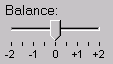
Example:
Example: Picking From A Range
<range ref="/stats/balance" start="-2.0" end="2.0" step="0.5">
  <label>Balance</label>
</range>
A graphical browser might render this as follows:
Data Binding Restrictions: Binds only the following list of
datatypes, or datatypes derived by restriction from those in the
list: xsd:duration, xsd:date,
xsd:time, xsd:dateTime,
xsd:gYearMonth, xsd:gYear,
xsd:gMonthDay, xsd:gDay,
xsd:gMonth, xsd:float,
xsd:decimal, xsd:double.
Implementation Requirements: Must allow input of a value
corresponding to the bound datatype. Implementations should inform
the user of the upper and lower bounds, as well as the step size,
if any. If the instance data value is
outside the upper or lower bounds, this form control must indicate
an out-of-range condition. In graphical environments, this
form control may be rendered as a "slider" or "rotary control".
Notice that the attributes of this element encapsulate
sufficient metadata that in conjunction with the type information
available from the XForms Model proves sufficient to produce
meaningful prompts when using modalities such as speech, e.g., when
using an accessibility aid. Thus, in the example below, an aural
user agent might speak a prompt of the form Please pick a date
in the range January 1, 2001 through December 31, 2001.
In the event of overlapping restrictions between the underlying
datatype and the start and end hints, the
most restrictive range should be used.
Example:
Example: Picking a date from a range
<range ref="/order/shipDate" start="2001-01-01" end="2001-12-31">
  <label>Ship Date</label>
</range>
8.1.8 The trigger
Element
Description: This form control is similar to the HTML element
button and allows for user-triggered actions. This
form control may also be used to construct other custom form
controls.
Common Attributes: Common, UI Common, Single Node Binding
(optional)
Example:
Example: Simple Trigger
<trigger>
  <label>Click here</label>
</trigger>
Data Binding Restrictions: Binds to any node. This form control
does not directly interact with form data, but is affected by model
item properties of the bound node, thus binding attributes are not
required.
Implementation Requirements: The user agent must provide a means
to generate an DOMActivate event on the form control.
Graphical implementations might render this form control as a
push-button with the label on the button face. Style sheets can be
used to style this form control as an image, hyperlink, or other
presentation.
8.1.9 The submit
Element
Description: This form control initiates submission of all or
part of the instance data to which it is bound.
Common Attributes: Common, UI Common, Single Node Binding
(optional)
Special Attributes:
- submission
-
Required reference to element submission.
Example:
Example: Submit
<submit submission="timecard">
  <label>Submit Timecard</label>
</submit>
Data Binding Restrictions: Binds to any node. This form control
does not directly interact with form data, but is affected by model
item properties of the bound node, thus binding attributes are not
required.
Implementation Requirements: Upon receiving event
DOMActivate, this form control dispatches event
xforms-submit to the submission element
specified by required attribute submission. Upon activation, this control must become
unavailable for further activations until the submit process
concludes with either an xforms-submit-done or
xforms-submit-error event.
8.1.10 The
select Element
Description: This form control allows the user to make multiple
selections from a set of choices.
Common Attributes: Common, UI Common, Single Node Binding
Special Attributes:
- selection
-
Optional attribute determining whether free entry is allowed in
the list. Default is "closed".
- incremental
-
When true, this form control will generate
additional xforms-value-changed events. The default
for this form control is true.
Example:
Example: Selecting Ice Cream Flavor
<select ref="my:flavors">
  <label>Flavors</label>
  <choices>
    <item>
      <label>Vanilla</label>
      <value>v</value>
    </item>
    <item>
      <label>Strawberry</label>
      <value>s</value>
    </item>
    <item>
      <label>Chocolate</label>
      <value>c</value>
    </item>
  </choices>
</select>
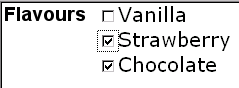
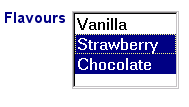
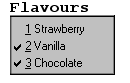
In the above example, more than one flavor can be selected.
A graphical browser might render form control
select as any of the following:
appearance="full" |
appearance="compact" |
appearance="minimal" |
|
|
|
Typically, a style sheet would be used to determine the exact
appearance of form controls, though a means is provided to suggest
an appearance through attribute appearance. The value
of the attribute consists of one of the following values:
"full": all choices should be rendered at all times.
"compact": a fixed number of choices should be rendered, with
scrolling facilities as needed
"minimal": a minimum number of choices should be rendered, with a
facility to temporarily render additional choices
Data Binding Restrictions: any simpleContent capable of holding
a sequence. The restriction to binding simpleContent exists when
the choices are authored as part of the user interface control as
shown in this section. Element itemset for creating
dynamic selections described in 9.3.3 The itemset
Element allows the available choices to be obtained from an
XForms Model, and when using that construct, the data binding
restriction to simpleContent is relaxed.
Note:
A limitation of the XML Schema list datatypes is that white
space characters in the storage values (the value
element) are always interpreted as separators between individual
data values. Therefore, authors should avoid using white space
characters within storage values with list simpleContent.
Example: Incorrect Type Declaration
<item>
  <value>United States of America</value>
  ...
</item>
When selected, this item would introduce not one but four
additional selection values: "America", "of", "States", and
"United".
Implementation Requirements: The label for each choice must be
presented, allowing at any number of selections, possibly none.
This form control stores the values corresponding to the selected
choices as a space separated list in the location addressed by
attribute ref. The values to be stored are either
directly specified as the contents of element value,
or specified indirectly through binding attributes on element
value.
Note that the datatype bound to this form control may include a
non-enumerated value space, e.g., xsd:string, or a
union of a enumeration and a non-enumerated datatype (called an
open enumeration). In this case, control select may
have attribute selection="open". The form control
should then allow free data entry, as described in 8.1.2 The input Element. The form
control may permit multiple values to be entered through free
entry.
For closed selections: If the initial instance value matches the
storage value of one or more of the given items, those items are
selected. If there is no match, no items are initially selected.
If any selected values do not have a choice
with a matching storage value, the form control must indicate an
out-of-range condition.
For open selections: If the initial instance values match the
storage value specified by one or more of the items, the all such
matching items are selected. If the initial instance values do not
match the storage value specified by one or more of the items, all
such non-matching items are included as selected values, as if
entered through free entry. Free entry text is handled the same as
form control input 8.1.2 The
input Element, possibly in multiplicity. When using dynamic
selections with complexTypes, open selection has no effect.
Implementation Hints: An accessibility aid might allow the user
to browse through the available choices and leverage the grouping
of choices in the markup to provide enhanced navigation through
long lists of choices.
8.1.11 The select1
Element
Description: This form control allows the user to make a single
selection from multiple choices.
Common Attributes: Common, UI Common, Single Node Binding
Special Attributes:
- selection
-
Optional attribute determining whether free entry is allowed in
the list. Default is "closed".
- incremental
-
When true, this form control will generate
additional xforms-value-changed events. The default
for this form control is true.
Example:
Example: Pick A Flavor
<select1 ref="my:flavor">
  <label>Flavor</label>
  <item>
    <label>Vanilla</label>
    <value>v</value>
  </item>
  <item>
    <label>Strawberry</label>
    <value>s</value>
  </item>
  <item>
    <label>Chocolate</label>
    <value>c</value>
  </item>
</select1>
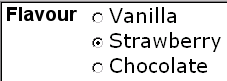
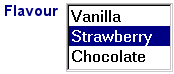
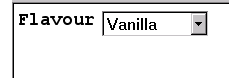
In the above example, selecting one of the choices will result
in the associated value given by element value on the
selected item being set in the underlying instance data at the
location icecream/flavor.
A graphical browser might render this form control as any of the
following:
| appearance="full" |
appearance="compact" |
appearance="minimal" |
|
|
 |
Data Binding Restrictions: Binds to any simpleContent. The
restriction to binding simpleContent exists when the choices are
authored as part of the user interface control as shown in this
section. Element itemset for creating dynamic
selections described in 9.3.3 The itemset
Element allows the available choices to be obtained from an
XForms Model, and when using that construct, the data binding
restriction to simpleContent is relaxed.
Implementation Requirements: The label for each choice must be
presented, allowing at all times exactly one selection. This form
control stores the value corresponding to the selected choice in
the location addressed by attribute ref. The value to
be stored is either directly specified as the contents of element
value, or specified indirectly through binding
attributes on element value.
Note that the datatype bound to this form control may include a
non-enumerated value space, e.g., xsd:string, or a
union of a enumeration and a non-enumerated datatype (called an
open enumeration). In this case, control select1 may
have attribute selection="open". The form control
should then allow free data entry, as described in 8.1.2 The input Element.
For closed selections: If the initial instance value matches the
storage value of one of the given items, that item is selected. If
there is no match, the form control must
indicate an out-of-range condition..
For open selections: If the initial instance value matches the
storage value specified by one of the items, the first such
matching item is selected. Otherwise, the selected value is the
initial lexical value. Free entry text is handled the same as form
control input 8.1.2 The input
Element.
User interfaces may choose to render this form control as a
pulldown list or group of radio buttons, among other options. The
appearance attribute offers a hint as to which
rendering might be most appropriate, although any styling
information (such as CSS) should take precedence.
8.3 Additional
Elements
The child elements detailed below provide the ability to attach
metadata to form controls.
Instead of supplying such metadata e.g., the label for a form
control as inline content of the contained element
label, the metadata can be pointed to by using a
simple linking attribute src on these elements. Notice
that systematic use of this feature can be exploited in
internationalizing XForms user interfaces by:
-
Factoring all human readable messages to a separate resource XML
file.
-
Using URIs into this XML resource bundle within individual
label elements
-
Finally, an XForms implementation could use content negotiation
to obtain the appropriate XML resource bundle, e.g., based on the
accept-language headers from the client, to serve up
the user interface with messages localized to the client's
locale.
8.3.1 The filename Element
Binding attributes on optional element filename
specify the location in the instance for the parent element
upload, when activated, to place the filename for the
chosen binary resource. For security reasons, upload
must not take action due to any existing value of the node.
Common Attributes: Common, Single Node Binding
This specification does not define the format of a filename.
In the following example, the user is prompted to select an
image. When activated, upload places in
mail/attachment either the binary data of the image or
a URI for it, depending on the type declared for the
mail/attachment. The filename, perhaps
"me.jpg", is placed in the attribute node
mail/attachment@filename, and the mediatype, perhaps
"image/jpeg" in the attribute node
mail/attachment@mediatype.
Example:
<upload ref="mail/attachment" mediatype="image/*">
  <label>Select an image to attach</label>
  <filename ref="@filename"/>
  <mediatype ref="@mediatype"/>
</upload>
8.3.2 The mediatype Element
Binding attributes on optional element mediatype
specify the location in the instance for the parent element
upload, when activated, to place the mediatype of the
chosen binary resource, if available.
Common Attributes: Common, Single Node Binding
8.3.3 The label Element
This required element labels the containing form control with a
descriptive label. Additionally, the label makes it possible for
someone who can't see the form control to obtain a short
description while navigating between form controls.
Common Attributes: Common, Single Node Binding
(optional), Linking
Special Attributes:
- Linking Attributes
-
Link to external label. If the link traversal fails, it is
treated as an error (4.5.3 The
xforms-link-error Event).
The label specified can exist in instance data, in a remote
document, or as inline text. If more than one source of label is
specified in this element, the order of precedence is: single node
binding attributes, linking attributes, inline text.
An accessibility aid might speak the metadata encapsulated here
when the containing form control gets focus.
8.3.4 The help Element
The optional element help provides a convenient way
to attach help information to a form control. This is equivalent to
a <message level="modeless"
ev:event="xforms-help" ev:propagate="stop>.
Common Attributes: Common, Single Node Binding
(optional), Linking
Special Attributes:
- Linking Attributes
-
Link to external help information. If the link traversal fails,
it is treated as an error (4.5.3 The
xforms-link-error Event).
The message specified can exist in instance data, in a remote
document, or as inline text. If more than one source of message is
specified in this element, the order of precedence is: single node
binding attributes, linking attributes, inline text.
An example of this element is at 10.1.12 The message Element.
8.3.5 The hint Element
The optional element hint provides a convenient way
to attach hint information to a form control. This is equivalent to
a handler for event xforms-hint that responds with a
<message level="ephemeral">.
Common Attributes: Common, Single Node Binding
(optional), Linking
Special Attributes:
- Linking Attributes
-
Link to external hint. If the link traversal fails, it is
treated as an error (4.5.3 The
xforms-link-error Event).
The message specified can exist in instance data, in a remote
document, or as inline text. If more than one source of message is
specified in this element, the order of precedence is: single node
binding attributes, linking attributes, inline text.
An example of this element is at 10.1.12 The message Element.
8.3.6 The alert Element
The optional element alert provides a convenient
way to attach alert or error information to a form control. Rendering of this element is
implementation-defined, and there is no default level
such as modal or ephemeral for the
displayed message.
Common Attributes: Common, Single Node Binding
(optional), Linking
Special Attributes:
- Linking Attributes
-
Link to external alert. If the link traversal fails, it is
treated as an error (4.5.3 The
xforms-link-error Event).
The message specified can exist in instance data, in a remote
document, or as inline text. If more than one source of message is
specified in this element, the order of precedence is: single node
binding attributes, linking attributes, inline text. See F XForms and Styling for examples to see
how this might be presented to the user.