W3C

Extensible Stylesheet Language (XSL) Version 2.0

W3C Working Draft 17 January 2012

This version:
http://www.w3.org/TR/2012/WD-xslfo20-20120117/
Latest version:
http://www.w3.org/TR/xslfo20/
Previous version:
http://www.w3.org/TR/2011/WD-xslfo20-20110927/
Editor:
Dave Pawson,

This document is also available in these non-normative formats: XML file.


Abstract

This specification defines the features and syntax for the Extensible Stylesheet Language (XSL), a language for expressing stylesheets. It consists of two parts:

  1. a language for transforming XML documents (XSLT, a separate specification), and

  2. an XML vocabulary for specifying formatting semantics (XSL-FO, this document).

XSL-FO is a template-based XML vocabulary and expression language for formatting. It is intended that people first transform their XML documents into XSL-FO, for example using XSLT, and then use an XSL-FO formatter to generate a rendered result, for example in PDF. In this way arbitrary XML documents can be formatted. XSL-FO uses Cascading Style Sheet (CSS) properties, extended where necessary, for the actual format, but also supplies the concept of page templates (page masters, in XSL-FO terminology), and also supports relatively sophisticated document formatting, including index generation.

Status of this Document

This section describes the status of this document at the time of its publication. Other documents may supersede this document. A list of current W3C publications and the latest revision of this technical report can be found in the W3C technical reports index at http://www.w3.org/TR/.

This document is a Working-Group Draft containing proposals for an eventual XSL-FO 2.0 Recommendation. This is the first document that incorporates both the previous XSL-FO 1.1 specification and new work. Because of limited resources, this draft does not yet contain all of the work that was in the previous version, published as Design Notes. This does not reflect an intent to drop that work.

Comments on this document should be made using bugzilla, at bugzilla; comments can also be sent by email to xsl-editors@w3.org (see the public archive), and members of the XSL-FO Task Force will enter them into bugzilla; see www.w3.org/XML/2008/xsl-fo-bugzilla.html for instructions on using bugzilla to report issues.

Publication as a Working Draft does not imply endorsement by the W3C Membership. This is a draft document and may be updated, replaced or obsoleted by other documents at any time. It is inappropriate to cite this document as other than work in progress.

This document has been produced as part of the W3C XML Activity by the XML Print and Page Layout Working Group.

General public discussion of XSL takes place on the XSL-List and on the www-xsl-fo@w3.org mailing lists; the www-xsl-fo list is probaby most appropriate for general questions about the 2.0 work.

This document was produced by a group operating under the 5 February 2004 W3C Patent Policy. W3C maintains a public list of any patent disclosures made in connection with the deliverables of the group; that page also includes instructions for disclosing a patent. An individual who has actual knowledge of a patent which the individual believes contains Essential Claim(s) must disclose the information in accordance with section 6 of the W3C Patent Policy.

Table of Contents

1 Introduction and Overview
    1.1 Processing a Stylesheet
        1.1.1 Tree Transformations
        1.1.2 Formatting
    1.2 Benefits of XSL
        1.2.1 Paging and Scrolling
        1.2.2 Selectors and Tree Construction
        1.2.3 An Extended Page Layout Model
        1.2.4 A Comprehensive Area Model
        1.2.5 Internationalization and Writing-Modes
        1.2.6 Linking
2 XSL Transformation
    2.1 Tree Construction
    2.2 XSL Namespace
3 Introduction to Formatting
    3.1 Conceptual Procedure
4 Area Model
    4.1 Introduction
    4.2 Rectangular Areas
        4.2.1 Area Types
        4.2.2 Common Traits
        4.2.3 Geometric Definitions
        4.2.4 Tree Ordering
        4.2.5 Stacking Constraints
    4.3 Spaces and Conditionality
        4.3.1 Space-resolution Rules
        4.3.2 Overconstrained space-specifiers
    4.4 Block-areas
        4.4.1 Stacked Block-areas
        4.4.2 Positioning in the block-progression direction
            4.4.2.1 Feathering
            4.4.2.2 Correlating position in the block-progression direction
            4.4.2.3 Vertical alignment within a page or column
            4.4.2.4 Vertical justification across pages and columns
        4.4.3 Intrusion Adjustments
    4.5 Line-areas
    4.6 Inline-areas
        4.6.1 Stacked Inline-areas
        4.6.2 Glyph-areas
        4.6.3 Font Baseline Tables
    4.7 Ordering Constraints
        4.7.1 General Ordering Constraints
        4.7.2 Line-building
        4.7.3 Inline-building
    4.8 Keeps and Breaks
    4.9 Rendering Model
        4.9.1 Geometry
        4.9.2 Viewport Geometry
        4.9.3 Visibility
        4.9.4 Border, Padding, and Background
        4.9.5 Intrinsic Marks
        4.9.6 Layering and Conflict of Marks
    4.10 Sample Area Tree
    4.11 Copyfitting
        4.11.1 Summary
        4.11.2 Copyfit: basic approach and definitions
        4.11.3 Copyfit Examples
        4.11.4 Content Adjusting Strategies
5 Property Refinement / Resolution
    5.1 Specified, Computed, and Actual Values, and Inheritance
        5.1.1 Specified Values
        5.1.2 Computed Values
        5.1.3 Actual Values
        5.1.4 Inheritance
    5.2 Shorthand Expansion
    5.3 Computing the Values of Corresponding Properties
        5.3.1 Border and Padding Properties
        5.3.2 Margin, Space, and Indent Properties
        5.3.3 Height, and Width Properties
        5.3.4 Overconstrained Geometry
    5.4 Simple Property to Trait Mapping
        5.4.1 Background-position-horizontal and background-position-vertical Properties
        5.4.2 Column-number Property
        5.4.3 Text-align Property
        5.4.4 Text-align-last Property
        5.4.5 z-index Property
        5.4.6 Language Property
    5.5 Complex Property to Trait Mapping
        5.5.1 Word spacing and Letter spacing Properties
        5.5.2 Reference-orientation Property
        5.5.3 Writing-mode and Direction Properties
        5.5.4 Absolute-position Property
        5.5.5 Relative-position Property
        5.5.6 Text-decoration Property
        5.5.7 Font Properties
        5.5.8 Fonts and Font Data
    5.6 Non-property Based Trait Generation
    5.7 Property Based Transformations
        5.7.1 Text-transform Property
    5.8 Alignment Properties
    5.9 Ruby
        5.9.1 Block and Line-related Properties for Ruby
    5.10 Unicode BIDI Processing
    5.11 Expressions
        5.11.1 Property Context
        5.11.2 Evaluation Order
        5.11.3 Basics
        5.11.4 Function Calls
        5.11.5 Numerics
        5.11.6 Absolute Numerics
        5.11.7 Relative Numerics
            5.11.7.1 Percents
            5.11.7.2 Relative Lengths
        5.11.8 Strings
        5.11.9 Colors
        5.11.10 Keywords
            5.11.10.1 inherit
        5.11.11 Lexical Structure
        5.11.12 Expression Value Conversions
        5.11.13 Definitions of Units of Measure
            5.11.13.1 Pixels
    5.12 Core Function Library
        5.12.1 Number Functions
        5.12.2 Color Functions
            5.12.2.1 Uncalibrated device color
        5.12.3 Font Functions
        5.12.4 Property Value Functions
    5.13 Property Datatypes
    5.14 Numbering
    5.15 Composition
        5.15.1 Improved font support
        5.15.2 Force line justification
        5.15.3 Alignment around breaks
        5.15.4 Tabs and tab stops
        5.15.5 Word and letter spacing
        5.15.6 Hyphenation and line breaking
6 Formatting Objects
    6.1 Introduction to Formatting Objects
        6.1.1 Definitions Common to Many Formatting Objects
    6.2 Formatting Object Content
    6.3 Formatting Objects Summary
    6.4 Declarations and Pagination and Layout Formatting Objects
        6.4.1 Introduction
            6.4.1.1 Page-sequence-masters
            6.4.1.2 Page-masters
            6.4.1.3 Page Generation
            6.4.1.4 Flows and Flow Mapping
            6.4.1.5 Constraints on Page Generation
            6.4.1.6 Pagination Tree Structure
            6.4.1.7 Example Flow Maps
                6.4.1.7.1 Two flows mapping into their own regions
                6.4.1.7.2 A flow mapping into two regions
                6.4.1.7.3 Two flows mapping into a region
                6.4.1.7.4 Two flows mapping into two regions
            6.4.1.8 Initial Caps
        6.4.2 Side by Side
            6.4.2.1 Common Dependencies Properties for Formatting Objects
            6.4.2.2 Content Boundaries Stacking Control
        6.4.3 Widow and Orphan Management
        6.4.4 fo:root
        6.4.5 fo:declarations
        6.4.6 fo:color-profile
        6.4.7 fo:page-sequence
        6.4.8 fo:page-sequence-wrapper
        6.4.9 fo:layout-master-set
        6.4.10 fo:page-sequence-master
        6.4.11 fo:single-page-master-reference
        6.4.12 fo:repeatable-page-master-reference
        6.4.13 fo:repeatable-page-master-alternatives
        6.4.14 fo:conditional-page-master-reference
        6.4.15 fo:page-master
        6.4.16 fo:simple-page-master
        6.4.17 fo:region-body
        6.4.18 fo:region-before
        6.4.19 fo:region-after
        6.4.20 fo:region-start
        6.4.21 fo:region-end
        6.4.22 fo:region
        6.4.23 Extension Regions
        6.4.24 fo:extension-region-start
        6.4.25 fo:extension-region-end
        6.4.26 fo:shape-path-specifier
        6.4.27 fo:shape-background-specifier
        6.4.28 fo:shape-border-specifier
        6.4.29 fo:flow
        6.4.30 fo:static-content
        6.4.31 fo:title
        6.4.32 fo:flow-map
        6.4.33 fo:flow-assignment
        6.4.34 fo:flow-source-list
        6.4.35 fo:flow-name-specifier
        6.4.36 fo:flow-target-list
        6.4.37 fo:region-name-specifier
    6.5 Block-level Formatting Objects
        6.5.1 Introduction
            6.5.1.1 Example
        6.5.2 fo:block
        6.5.3 fo:block-container
        6.5.4 fo:alternative-copyfit-content
    6.6 Inline-level Formatting Objects
        6.6.1 Introduction
            6.6.1.1 Examples
                6.6.1.1.1 First Line of Paragraph in Small-caps
                6.6.1.1.2 Figure with a Photograph
                6.6.1.1.3 Page numbering and page number reference
                6.6.1.1.4 Table of Contents with Leaders
        6.6.2 fo:bidi-override
        6.6.3 fo:character
        6.6.4 fo:initial-property-set
        6.6.5 fo:external-graphic
        6.6.6 fo:instream-foreign-object
        6.6.7 fo:inline
        6.6.8 fo:inline-container
        6.6.9 fo:leader
        6.6.10 fo:page-number
        6.6.11 fo:page-number-citation
        6.6.12 fo:page-number-citation-last
        6.6.13 fo:folio-prefix
        6.6.14 fo:folio-suffix
        6.6.15 fo:scaling-value-citation
        6.6.16 fo:ruby
        6.6.17 fo:ruby-base
        6.6.18 fo:ruby-text
        6.6.19 fo:ruby-parenthesis
        6.6.20 fo:ruby-base-container-text
        6.6.21 fo:ruby-text-container
    6.7 Formatting Objects for Tables
        6.7.1 Introduction
            6.7.1.1 Table header and footer on boundaries
            6.7.1.2 Split tables
            6.7.1.3 Repeating the contents of split spanned cell
            6.7.1.4 Cell borders extending beyond the table
            6.7.1.5 Cell spans over rows and columns
            6.7.1.6 Columns with different widths, colors etc.
            6.7.1.7 Table Examples
                6.7.1.7.1 Simple Table, Centered and Indented
                6.7.1.7.2 Simple Table with Relative Column-width Specifications
        6.7.2 fo:table-and-caption
        6.7.3 fo:table
        6.7.4 fo:table-column
        6.7.5 fo:table-caption
        6.7.6 fo:table-header
        6.7.7 fo:table-footer
        6.7.8 fo:table-body
        6.7.9 fo:table-row
        6.7.10 fo:table-cell
        6.7.11 fo:table-header-alternatives
        6.7.12 fo:table-footer-alternatives
        6.7.13 fo:conditional-table-header-reference
        6.7.14 fo:conditional-table-footer-reference
    6.8 Formatting Objects for Lists
        6.8.1 Introduction
            6.8.1.1 Examples
                6.8.1.1.1 Enumerated List
                6.8.1.1.2 HTML-style "dl" lists
        6.8.2 fo:list-block
        6.8.3 fo:list-item
        6.8.4 fo:list-item-body
        6.8.5 fo:list-item-label
    6.9 Dynamic Effects: Link and Multi Formatting Objects
        6.9.1 Introduction
            6.9.1.1 Examples
                6.9.1.1.1 Expandable/Collapsible Table of Contents
                6.9.1.1.2 Styling an XLink Based on the Active State
        6.9.2 fo:basic-link
        6.9.3 fo:multi-switch
        6.9.4 fo:multi-case
        6.9.5 fo:multi-toggle
        6.9.6 fo:multi-properties
        6.9.7 fo:multi-property-set
    6.10 Formatting Objects for Indexing
        6.10.1 Introduction
            6.10.1.1 Example
                6.10.1.1.1 Associating Index Keys with Formatting Objects
                6.10.1.1.2 Building the Index
            6.10.1.2 Processing the Example Index
                6.10.1.2.1 merge-pages-across-index-key-references="leave-separate"
                6.10.1.2.2 merge-pages-across-index-key-references="merge"
            6.10.1.3 Example Index
        6.10.2 fo:index-page-number-prefix
        6.10.3 fo:index-page-number-suffix
        6.10.4 fo:index-range-begin
        6.10.5 fo:index-range-end
        6.10.6 fo:index-key-reference
        6.10.7 fo:index-page-citation-list
        6.10.8 fo:index-page-citation-list-separator
        6.10.9 fo:index-page-citation-range-separator
    6.11 Formatting Objects for Bookmarks
        6.11.1 fo:bookmark-tree
        6.11.2 fo:bookmark
        6.11.3 fo:bookmark-title
    6.12 Out-of-Line Formatting Objects
        6.12.1 Introduction
            6.12.1.1 Floats
            6.12.1.2 Footnotes
            6.12.1.3 Conditional Sub-Regions
            6.12.1.4 Examples
                6.12.1.4.1 Floating Figure
                6.12.1.4.2 Footnote
        6.12.2 fo:float
        6.12.3 fo:marginalia
        6.12.4 fo:marginalia-body
        6.12.5 fo:footnote
        6.12.6 fo:footnote-body
    6.13 Other Formatting Objects
        6.13.1 Introduction
            6.13.1.1 Examples
                6.13.1.1.1 Wrapper
                6.13.1.1.2 Table Markers
        6.13.2 fo:change-bar-begin
        6.13.3 fo:change-bar-end
        6.13.4 fo:wrapper
        6.13.5 fo:marker
        6.13.6 fo:retrieve-marker
        6.13.7 fo:retrieve-table-marker
        6.13.8 fo:number
        6.13.9 fo:retrieve-number
7 Formatting Properties
    7.1 Description of Property Groups
    7.2 XSL Areas and the CSS Box Model
    7.3 Reference Rectangle for Percentage Computations
    7.4 Additional CSS Datatypes
    7.5 Common Accessibility Properties
        7.5.1 source-document
        7.5.2 role
    7.6 Common Absolute Position Properties
        7.6.1 absolute-position
        7.6.2 bottom
        7.6.3 left
        7.6.4 right
        7.6.5 top
    7.7 Common Aural Properties
        7.7.1 azimuth
        7.7.2 cue-after
        7.7.3 cue-before
        7.7.4 elevation
        7.7.5 pause-after
        7.7.6 pause-before
        7.7.7 pitch
        7.7.8 pitch-range
        7.7.9 play-during
        7.7.10 richness
        7.7.11 speak
        7.7.12 speak-header
        7.7.13 speak-numeral
        7.7.14 speak-punctuation
        7.7.15 speech-rate
        7.7.16 stress
        7.7.17 voice-family
        7.7.18 volume
    7.8 Common Border, Padding, and Background Properties
        7.8.1 background-attachment
        7.8.2 background-color
        7.8.3 background-image
        7.8.4 background-position-horizontal
        7.8.5 background-position-vertical
        7.8.6 background-repeat
        7.8.7 border-after-color
        7.8.8 border-after-style
        7.8.9 border-after-width
        7.8.10 border-before-color
        7.8.11 border-before-style
        7.8.12 border-before-width
        7.8.13 border-bottom-color
        7.8.14 border-bottom-style
        7.8.15 border-bottom-width
        7.8.16 border-end-color
        7.8.17 border-end-style
        7.8.18 border-end-width
        7.8.19 border-left-color
        7.8.20 border-left-style
        7.8.21 border-left-width
        7.8.22 border-right-color
        7.8.23 border-right-style
        7.8.24 border-right-width
        7.8.25 border-start-color
        7.8.26 border-start-style
        7.8.27 border-start-width
        7.8.28 border-top-color
        7.8.29 border-top-style
        7.8.30 border-top-width
        7.8.31 padding-after
        7.8.32 padding-before
        7.8.33 padding-bottom
        7.8.34 padding-end
        7.8.35 padding-left
        7.8.36 padding-right
        7.8.37 padding-start
        7.8.38 padding-top
    7.9 Common Font Properties
        7.9.1 font-family
        7.9.2 font-selection-strategy
        7.9.3 font-size
        7.9.4 font-size-adjust
        7.9.5 font-stretch
        7.9.6 font-style
        7.9.7 font-variant
        7.9.8 font-weight
    7.10 Common Hyphenation Properties
        7.10.1 country
        7.10.2 hyphenate
        7.10.3 hyphenation-character
        7.10.4 hyphenation-push-character-count
        7.10.5 hyphenation-remain-character-count
        7.10.6 language
        7.10.7 script
        7.10.8 hyphenation-push-syllable-count
        7.10.9 hyphenation-remain-syllable-count
        7.10.10 syllable-widows
        7.10.11 hyphenation-exceptions
        7.10.12 word-widows
        7.10.13 min-length-of-last-line
        7.10.14 last-line-minimum-deficit
        7.10.15 hyphenation-permitted-minimum-deficit
    7.11 Common Margin Properties-Block
        7.11.1 end-indent
        7.11.2 margin-bottom
        7.11.3 margin-left
        7.11.4 margin-right
        7.11.5 margin-top
        7.11.6 space-after
        7.11.7 space-before
        7.11.8 start-indent
    7.12 Common Margin Properties-Inline
        7.12.1 space-end
        7.12.2 space-start
    7.13 Common Relative Position Properties
        7.13.1 relative-position
    7.14 Common Wrap Properties
        7.14.1 wrap
        7.14.2 wrap-path
        7.14.3 wrap-side
    7.15 Area Alignment Properties
        7.15.1 alignment-adjust
        7.15.2 alignment-baseline
        7.15.3 block-unit
        7.15.4 baseline-shift
        7.15.5 display-align
        7.15.6 display-align-last
        7.15.7 display-align-last-column
        7.15.8 dominant-baseline
        7.15.9 relative-align
        7.15.10 marginalia-relative-align
        7.15.11 flow-map-dependency-reference
        7.15.12 dependency-content-begin
        7.15.13 dependency-content-end
        7.15.14 keep-with-dependent-content
    7.16 Area Dimension Properties
        7.16.1 allowed-height-scale
        7.16.2 allowed-width-scale
        7.16.3 block-progression-dimension
        7.16.4 content-height
        7.16.5 content-width
        7.16.6 height
        7.16.7 inline-progression-dimension
        7.16.8 max-height
        7.16.9 max-width
        7.16.10 min-height
        7.16.11 min-width
        7.16.12 scaling
        7.16.13 scaling-method
        7.16.14 width
    7.17 Block and Line-related Properties
        7.17.1 hyphenation-keep
        7.17.2 hyphenation-ladder-count
        7.17.3 last-line-end-indent
        7.17.4 line-height
        7.17.5 line-height-shift-adjustment
        7.17.6 line-stacking-strategy
        7.17.7 linefeed-treatment
        7.17.8 text-align
        7.17.9 text-align-last
        7.17.10 text-indent
        7.17.11 white-space-collapse
        7.17.12 white-space-treatment
        7.17.13 wrap-option
        7.17.14 initial-cap-lines
        7.17.15 initial-cap-lines-before
        7.17.16 initial-cap-kern-lines
        7.17.17 initial-cap-indent
        7.17.18 hanging-punctuation
        7.17.19 tab-stops
        7.17.20 tab-alignment-character
    7.18 Character Properties
        7.18.1 character
        7.18.2 letter-spacing
        7.18.3 suppress-at-line-break
        7.18.4 text-decoration
        7.18.5 text-shadow
        7.18.6 text-transform
        7.18.7 treat-as-word-space
        7.18.8 word-spacing
        7.18.9 word-spacing-critical-length
    7.19 Color-related Properties
        7.19.1 color
        7.19.2 color-profile-name
        7.19.3 rendering-intent
    7.20 Float-related Properties
        7.20.1 clear
        7.20.2 float
        7.20.3 intrusion-displace
    7.21 Keeps and Breaks Properties
        7.21.1 break-after
        7.21.2 break-before
        7.21.3 keep-together
        7.21.4 keep-with-next
        7.21.5 keep-with-previous
        7.21.6 orphans
        7.21.7 widows
        7.21.8 text-align-before-break
        7.21.9 text-align-after-break
    7.22 Layout-related Properties
        7.22.1 clip
        7.22.2 overflow
        7.22.3 reference-orientation
        7.22.4 span
        7.22.5 bleed-box
        7.22.6 trim-box
    7.23 Leader and Rule Properties
        7.23.1 leader-alignment
        7.23.2 leader-pattern
        7.23.3 leader-pattern-width
        7.23.4 leader-length
        7.23.5 rule-style
        7.23.6 rule-thickness
    7.24 Properties for Dynamic Effects Formatting Objects
        7.24.1 active-state
        7.24.2 auto-restore
        7.24.3 case-name
        7.24.4 case-title
        7.24.5 destination-placement-offset
        7.24.6 external-destination
        7.24.7 indicate-destination
        7.24.8 internal-destination
        7.24.9 show-destination
        7.24.10 starting-state
        7.24.11 switch-to
        7.24.12 target-presentation-context
        7.24.13 target-processing-context
        7.24.14 target-stylesheet
    7.25 Properties for Indexing
        7.25.1 index-class
        7.25.2 index-key
        7.25.3 page-number-treatment
        7.25.4 merge-ranges-across-index-key-references
        7.25.5 merge-sequential-page-numbers
        7.25.6 merge-pages-across-index-key-references
        7.25.7 ref-index-key
    7.26 Properties for Markers
        7.26.1 marker-class-name
        7.26.2 retrieve-boundary-within-table
        7.26.3 retrieve-class-name
        7.26.4 retrieve-boundary
        7.26.5 retrieve-position
        7.26.6 retrieve-position-within-table
    7.27 Ruby
        7.27.1 ruby-position
        7.27.2 ruby-alignment
        7.27.3 ruby-group-distribution
        7.27.4 ruby-alignment-edge
        7.27.5 ruby-align
        7.27.6 ruby-overhang
        7.27.7 ruby-overhang-length
        7.27.8 ruby-span
        7.27.9 ruby-size
        7.27.10 ruby-proportion
        7.27.11 ruby-mode
        7.27.12 line-stacking-annotation
    7.28 Numbering Properties
        7.28.1 Property reference-name
        7.28.2 Property reference-value
        7.28.3 number-ref-id
        7.28.4 layout-level
        7.28.5 reset-level
        7.28.6 initial-value
        7.28.7 interval
        7.28.8 reset-value
        7.28.9 display-when
        7.28.10 display-position
        7.28.11 number-align
        7.28.12 number-area-extent
        7.28.13 decimal-format
        7.28.14 ordinal
        7.28.15 number-ref-id
        7.28.16 level
    7.29 Properties for Number to String Conversion
        7.29.1 format
        7.29.2 grouping-separator
        7.29.3 grouping-size
        7.29.4 letter-value
    7.30 Pagination and Layout Properties
        7.30.1 blank-or-not-blank
        7.30.2 column-count
        7.30.3 column-gap
        7.30.4 distance
        7.30.5 extent
        7.30.6 flow-map-name
        7.30.7 flow-map-reference
        7.30.8 flow-name
        7.30.9 flow-name-reference
        7.30.10 force-page-count
        7.30.11 initial-page-number
        7.30.12 master-name
        7.30.13 master-reference
        7.30.14 maximum-repeats
        7.30.15 media-usage
        7.30.16 odd-or-even
        7.30.17 page-height
        7.30.18 page-position
        7.30.19 page-width
        7.30.20 precedence
        7.30.21 region-name
        7.30.22 region-name-reference
        7.30.23 sequence-repeats
        7.30.24 adjustable-properties
            7.30.24.1 Value list simplification
            7.30.24.2 Priority
            7.30.24.3 fo:alternative-copyfit-content
        7.30.25 marginalia-destination-area
    7.31 Table Properties
        7.31.1 border-after-precedence
        7.31.2 border-before-precedence
        7.31.3 border-collapse
        7.31.4 border-end-precedence
        7.31.5 border-separation
        7.31.6 border-start-precedence
        7.31.7 caption-side
        7.31.8 column-number
        7.31.9 column-width
        7.31.10 empty-cells
        7.31.11 ends-row
        7.31.12 number-columns-repeated
        7.31.13 number-columns-spanned
        7.31.14 number-rows-spanned
        7.31.15 starts-row
        7.31.16 table-layout
        7.31.17 table-omit-footer-at-break
        7.31.18 table-omit-header-at-break
        7.31.19 header-position
        7.31.20 footer-position
        7.31.21 table-overflow
        7.31.22 border-break
        7.31.23 border-before-break
        7.31.24 border-after-break
        7.31.25 border-start-break
        7.31.26 border-end-break
        7.31.27 border-break-style
        7.31.28 border-start-break-style
        7.31.29 border-end-break-style
        7.31.30 border-before-break-style
        7.31.31 border-after-break-style
    7.32 Writing-mode-related Properties
        7.32.1 direction
        7.32.2 glyph-orientation-horizontal
        7.32.3 glyph-orientation-vertical
        7.32.4 text-altitude
        7.32.5 text-depth
        7.32.6 unicode-bidi
        7.32.7 writing-mode
    7.33 Miscellaneous Properties
        7.33.1 change-bar-class
        7.33.2 change-bar-color
        7.33.3 change-bar-offset
        7.33.4 change-bar-placement
        7.33.5 change-bar-style
        7.33.6 change-bar-width
        7.33.7 content-type
        7.33.8 id
        7.33.9 intrinsic-scale-value
        7.33.10 page-citation-strategy
        7.33.11 provisional-distance-between-starts
        7.33.12 provisional-label-separation
        7.33.13 ref-id
        7.33.14 scale-option
        7.33.15 score-spaces
        7.33.16 src
        7.33.17 visibility
        7.33.18 z-index
        7.33.19 xml:base
        7.33.20 output-base-uri
    7.34 Shorthand Properties
        7.34.1 background
        7.34.2 background-position
        7.34.3 border
        7.34.4 border-bottom
        7.34.5 border-color
        7.34.6 border-left
        7.34.7 border-right
        7.34.8 border-spacing
        7.34.9 border-style
        7.34.10 border-top
        7.34.11 border-width
        7.34.12 cue
        7.34.13 font
        7.34.14 margin
        7.34.15 padding
        7.34.16 page-break-after
        7.34.17 page-break-before
        7.34.18 page-break-inside
        7.34.19 pause
        7.34.20 position
        7.34.21 size
        7.34.22 vertical-align
        7.34.23 white-space
        7.34.24 xml:lang
8 Conformance

Appendices

A Formatting Object Summary
    A.1 Declaration and Pagination and Layout Formatting Objects
    A.2 Block Formatting Objects
    A.3 Inline Formatting Objects
    A.4 Table Formatting Objects
    A.5 List Formatting Objects
    A.6 Link and Multi Formatting Objects
    A.7 Out-of-line Formatting Objects
    A.8 Formatting Objects for Indexing
    A.9 Formatting Objects for Bookmarks
    A.10 Other Formatting Objects
B Property Summary
    B.1 Explanation of Trait Mapping Values
    B.2 Property Table: Part I
    B.3 Property Table: Part II
    B.4 Properties and the FOs they apply to
C References
    C.1 Normative References
    C.2 Other References
D Property Index
E Changes from XSL 1.1 (Non-Normative)
F Acknowledgements (Non-Normative)


1 Introduction and Overview

This specification defines the Extensible Stylesheet Language (XSL). XSL is a language for expressing stylesheets. Given a class of arbitrarily structured XML [XML] or [XML 1.1] documents or data files, designers use an XSL stylesheet to express their intentions about how that structured content should be presented; that is, how the source content should be styled, laid out, and paginated onto some presentation medium, such as a window in a Web browser or a hand-held device, or a set of physical pages in a catalog, report, pamphlet, or book.

1.1 Processing a Stylesheet

An XSL stylesheet processor accepts a document or data in XML and an XSL stylesheet and produces the presentation of that XML source content that was intended by the designer of that stylesheet. There are two aspects of this presentation process: first, constructing a result tree from the XML source tree and second, interpreting the result tree to produce formatted results suitable for presentation on a display, on paper, in speech, or onto other media. The first aspect is called tree transformation and the second is called formatting. The process of formatting is performed by the formatter. This formatter may simply be a rendering engine inside a browser.

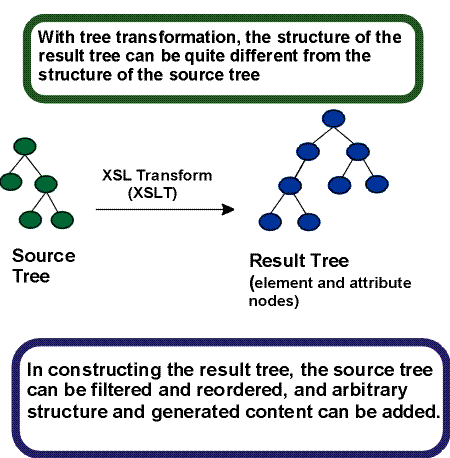
Tree transformation allows the structure of the result tree to be significantly different from the structure of the source tree. For example, one could add a table-of-contents as a filtered selection of an original source document, or one could rearrange source data into a sorted tabular presentation. In constructing the result tree, the tree transformation process also adds the information necessary to format that result tree.

Formatting is enabled by including formatting semantics in the result tree. Formatting semantics are expressed in terms of a catalog of classes of formatting objects. The nodes of the result tree are formatting objects. The classes of formatting objects denote typographic abstractions such as page, paragraph, table, and so forth. Finer control over the presentation of these abstractions is provided by a set of formatting properties, such as those controlling indents, word- and letter spacing, and widow, orphan, and hyphenation control. In XSL, the classes of formatting objects and formatting properties provide the vocabulary for expressing presentation intent.

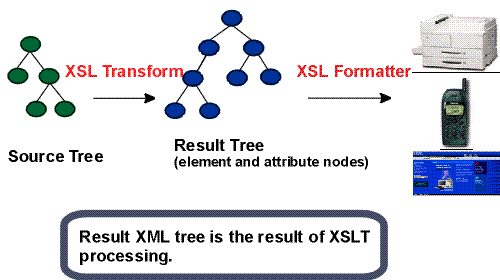
The XSL processing model is intended to be conceptual only. An implementation is not mandated to provide these as separate processes. Furthermore, implementations are free to process the source document in any way that produces the same result as if it were processed using the conceptual XSL processing model. A diagram depicting the detailed conceptual model is shown below.

Diagram of XSL conceptual model, showing a source tree, transformed in a result tree with new element and attribute nodes, itself rendered by the XSL formatting on devices including printers, a cell phone and a Web browser.

Figure 1. XSL Two Processes: Transformation & Formatting

1.1.1 Tree Transformations

Tree transformation constructs the result tree. In XSL, this tree is called the element and attribute tree, with objects primarily in the "formatting object" namespace. In this tree, a formatting object is represented as an XML element, with the properties represented by a set of XML attribute-value pairs. The content of the formatting object is the content of the XML element. Tree transformation is defined in the XSLT Recommendation [XSLT]. A diagram depicting this conceptual process is shown below.

Detail of the previous diagram, showing the conceptual source and result trees, and describing that the transformation process can produce a result tree that has a quite different structure than that of the source tree.

Figure 2. Transform to Another Vocabulary

The XSL stylesheet is used in tree transformation. A stylesheet contains a set of tree construction rules. The tree construction rules have two parts: a pattern that is matched against elements in the source tree and a template that constructs a portion of the result tree. This allows a stylesheet to be applicable to a wide class of documents that have similar source tree structures.

In some implementations of XSL/XSLT, the result of tree construction can be output as an XML document. This would allow an XML document which contains formatting objects and formatting properties to be output. This capability is neither necessary for an XSL processor nor is it encouraged. There are, however, cases where this is important, such as a server preparing input for a known client; for example, the way that a WAP (http://www.wapforum.org/faqs/index.htm) server prepares specialized input for a WAP capable hand held device. To preserve accessibility, designers of Web systems should not develop architectures that require (or use) the transmission of documents containing formatting objects and properties unless either the transmitter knows that the client can accept formatting objects and properties or the transmitted document contains a reference to the source document(s) used in the construction of the document with the formatting objects and properties.

1.1.2 Formatting

Formatting interprets the result tree in its formatting object tree form to produce the presentation intended by the designer of the stylesheet from which the XML element and attribute tree in the "fo" namespace was constructed.

The vocabulary of formatting objects supported by XSL - the set of fo: element types - represents the set of typographic abstractions available to the designer. Semantically, each formatting object represents a specification for a part of the pagination, layout, and styling information that will be applied to the content of that formatting object as a result of formatting the whole result tree. Each formatting object class represents a particular kind of formatting behavior. For example, the block formatting object class represents the breaking of the content of a paragraph into lines. Other parts of the specification may come from other formatting objects; for example, the formatting of a paragraph (block formatting object) depends on both the specification of properties on the block formatting object and the specification of the layout structure into which the block is placed by the formatter.

The properties associated with an instance of a formatting object control the formatting of that object. Some of the properties, for example "color", directly specify the formatted result. Other properties, for example 'space-before', only constrain the set of possible formatted results without specifying any particular formatted result. The formatter may make choices among other possible considerations such as esthetics.

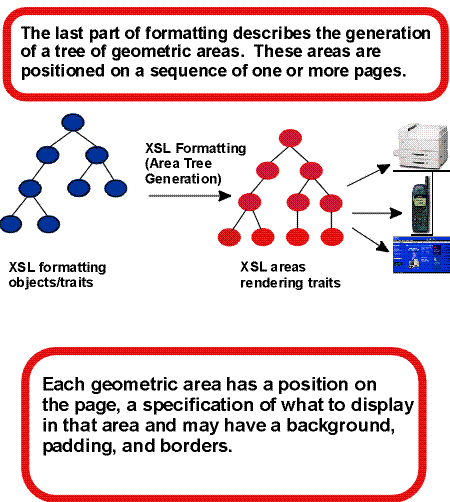
Formatting consists of the generation of a tree of geometric areas, called the area tree. The geometric areas are positioned on a sequence of one or more pages (a browser typically uses a single page). Each geometric area has a position on the page, a specification of what to display in that area and may have a background, padding, and borders. For example, formatting a single character generates an area sufficiently large enough to hold the glyph that is used to present the character visually and the glyph is what is displayed in this area. These areas may be nested. For example, the glyph may be positioned within a line, within a block, within a page.

Rendering takes the area tree, the abstract model of the presentation (in terms of pages and their collections of areas), and causes a presentation to appear on the relevant medium, such as a browser window on a computer display screen or sheets of paper. The semantics of rendering are not described in detail in this specification.

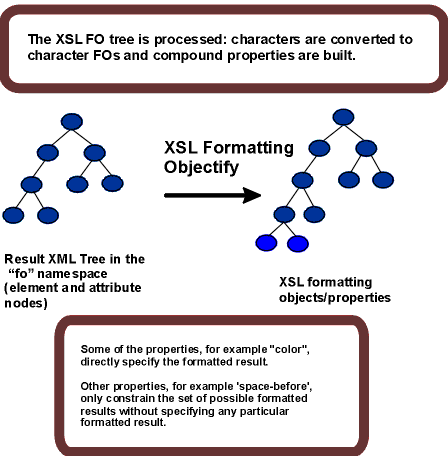
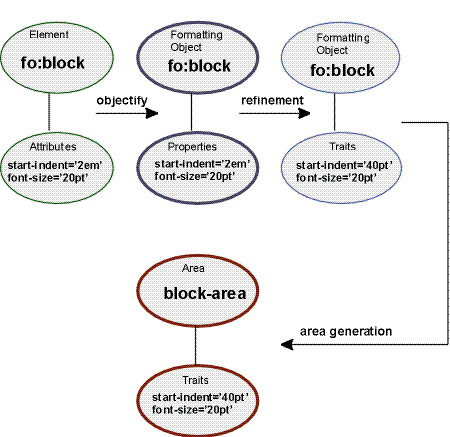
The first step in formatting is to "objectify" the element and attribute tree obtained via an XSLT transformation. Objectifying the tree basically consists of turning the elements in the tree into formatting object nodes and the attributes into property specifications. The result of this step is the formatting object tree.

Diagram showing how the Formatting Objects tree is 'objectified': new nodes are created as characters are converted to character FOs.

Figure 3. Build the XSL Formatting Object Tree

As part of the step of objectifying, the characters that occur in the result tree are replaced by fo:character nodes. Characters in text nodes which consist solely of white space characters and which are children of elements whose corresponding formatting objects do not permit fo:character nodes as children are ignored. Other characters within elements whose corresponding formatting objects do not permit fo:character nodes as children are errors.

The content of the fo:instream-foreign-object is not objectified; instead the object representing the fo:instream-foreign-object element points to the appropriate node in the element and attribute tree. Similarly any non-XSL namespace child element of fo:declarations is not objectified; instead the object representing the fo:declarations element points to the appropriate node in the element and attribute tree.

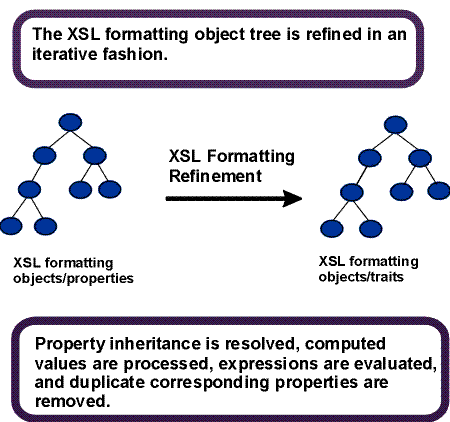
The second phase in formatting is to refine the formatting object tree to produce the refined formatting object tree. The refinement process handles the mapping from properties to traits. This consists of: (1) shorthand expansion into individual properties, (2) mapping of corresponding properties, (3) determining computed values (may include expression evaluation), (4) handling white-space-treatment and linefeed-treatment property effects, and (5) inheritance. Details on refinement are found in 5 Property Refinement / Resolution.

The refinement step is depicted in the diagram below.

Diagram showing the refinement process of the FO tree: traits are computed from properties using the inheritance model and evaluation of expressions.

Figure 4. Refine the Formatting Object Tree

The third step in formatting is the construction of the area tree. The area tree is generated as described in the semantics of each formatting object. The traits applicable to each formatting object class control how the areas are generated. Although every formatting property may be specified on every formatting object, for each formatting object class, only a subset of the formatting properties are used to determine the traits for objects of that class.

Area generation is depicted in the diagram below.

This figure shows the last step in the XSL process: a source tree of FOs transforms into a result tree of areas which is rendered on various devices (printer, phone, screen).

Figure 5. Generate the Area Tree

This diagram summarizes the XSL process for a sample formatting object block and two attributes: objectification turns the block element to the block FO and its attributes into properties. After refinement, properties become traits (units are normalized), and the last step makes a block area from the block FO.

Figure 6. Summary of the Process

1.2 Benefits of XSL

Unlike the case of HTML, element names in XML have no intrinsic presentation semantics. Absent a stylesheet, a processor could not possibly know how to render the content of an XML document other than as an undifferentiated string of characters. XSL provides a comprehensive model and a vocabulary for writing such stylesheets using XML syntax.

This document is intended for implementors of such XSL processors. Although it can be used as a reference manual for writers of XSL stylesheets, it is not tutorial in nature.

XSL builds on the prior work on Cascading Style Sheets [CSS2] and the Document Style Semantics and Specification Language [DSSSL]. While many of XSL's formatting objects and properties correspond to the common set of properties, this would not be sufficient by itself to accomplish all the goals of XSL. In particular, XSL introduces a model for pagination and layout that extends what is currently available and that can in turn be extended, in a straightforward way, to page structures beyond the simple page models described in this specification.

1.2.1 Paging and Scrolling

Doing both scrollable document windows and pagination introduces new complexities to the styling (and pagination) of XML content. Because pagination introduces arbitrary boundaries (pages or regions on pages) on the content, concepts such as the control of spacing at page, region, and block boundaries become extremely important. There are also concepts related to adjusting the spaces between lines (to adjust the page vertically) and between words and letters (to justify the lines of text). These do not always arise with simple scrollable document windows, such as those found in today's browsers. However, there is a correspondence between a page with multiple regions, such as a body, header, footer, and left and right sidebars, and a Web presentation using "frames". The distribution of content into the regions is basically the same in both cases, and XSL handles both cases in an analogous fashion.

XSL was developed to give designers control over the features needed when documents are paginated as well as to provide an equivalent "frame" based structure for browsing on the Web. To achieve this control, XSL has extended the set of formatting objects and formatting properties beyond those available in either CSS2 or DSSSL. In addition, the selection of XML source components that can be styled (elements, attributes, text nodes, comments, and processing instructions) is based on XSLT and XPath [XPath], thus providing the user with an extremely powerful selection mechanism.

The design of the formatting objects and properties extensions was first inspired by DSSSL. The actual extensions, however, do not always look like the DSSSL constructs on which they were based. To either conform more closely with the CSS2 specification or to handle cases more simply than in DSSSL, some extensions have diverged from DSSSL.

There are several ways in which extensions were made. In some cases, it sufficed to add new values, as in the case of those added to reflect a variety of writing-modes, such as top-to-bottom and bottom-to-top, rather than just left-to-right and right-to-left.

In other cases, common properties that are expressed in CSS2 as one property with multiple simultaneous values, were split into several new properties to provide independent control over independent aspects of the property. For example, the "white-space" property was split into four properties: a "white-space-treatment" property that controls how white space is processed, a "linefeed-treatment" property that controls how line feeds are processed, a "white-space-collapse" property that controls how multiple consecutive spaces are collapsed, and a "wrap-option" property that controls whether lines are automatically wrapped when they encounter a boundary, such as the edge of a column. The effect of splitting a property into two or more (sub-)properties is to make the equivalent existing CSS2 property a "shorthand" for the set of sub-properties it subsumes.

In still other cases, it was necessary to create new properties. For example, there are a number of new properties that control how hyphenation is done. These include identifying the script and country the text is from as well as such properties as "hyphenation-character" (which varies from script to script).

Some of the formatting objects and many of the properties in XSL come from the CSS2 specification, ensuring compatibility between the two.

There are four classes of XSL properties that can be identified as:

  1. CSS properties by copy (unchanged from their CSS2 semantics)

  2. CSS properties with extended values

  3. CSS properties broken apart and/or extended

  4. XSL-only properties

1.2.3 An Extended Page Layout Model

There is a set of formatting objects in XSL to describe both the layout structure of a page or "frame" (how big is the body; are there multiple columns; are there headers, footers, or sidebars; how big are these) and the rules by which the XML source content is placed into these "containers".

The layout structure is defined in terms of one or more instances of a "simple-page-master" formatting object. This formatting object allows one to define independently filled regions for the body (with multiple columns), a header, a footer, and sidebars on a page. These simple-page-masters can be used in page sequences that specify in which order the various simple-page-masters shall be used. The page sequence also specifies how styled content is to fill those pages. This model allows one to specify a sequence of simple-page-masters for a book chapter where the page instances are automatically generated by the formatter or an explicit sequence of pages such as used in a magazine layout. Styled content is assigned to the various regions on a page by associating the name of the region with names attached to styled content in the result tree.

In addition to these layout formatting objects and properties, there are properties designed to provide the level of control over formatting that is typical of paginated documents. This includes control over hyphenation, and expanding the control over text that is kept with other text in the same line, column, or on the same page.

1.2.4 A Comprehensive Area Model

The extension of the properties and formatting objects, particularly in the area on control over the spacing of blocks, lines, and page regions and within lines, necessitated an extension of the CSS2 box formatting model. This extended model is described in 4 Area Model of this specification. The CSS2 box model is a subset of this model. See the mapping of the CSS2 box model terminology to the XSL Area Model terminology in 7.2 XSL Areas and the CSS Box Model. The area model provides a vocabulary for describing the relationships and space-adjustment between letters, words, lines, and blocks.

1.2.5 Internationalization and Writing-Modes

There are some scripts, in particular in the Far East, that are typically set with words proceeding from top-to-bottom and lines proceeding either from right-to-left (most common) or from left-to-right. Other directions are also used. Properties expressed in terms of a fixed, absolute frame of reference (using top, bottom, left, and right) and which apply only to a notion of words proceeding from left to right or right to left do not generalize well to text written in those scripts.

For this reason XSL (and before it DSSSL) uses a relative frame of reference for the formatting object and property descriptions. Just as the CSS2 frame of reference has four directions (top, bottom, left and right), so does the XSL relative frame of reference have four directions (before, after, start, and end), but these are relative to the "writing-mode". The "writing-mode" property is a way of controlling the directions needed by a formatter to correctly place glyphs, words, lines, blocks, etc. on the page or screen. The "writing-mode" expresses the basic directions noted above. There are writing-modes for "left-to-right - top-to-bottom" (denoted as "lr-tb"), "right-to-left - top-to-bottom" (denoted as "rl-tb"), "top-to-bottom - right-to-left" (denoted as "tb-rl") and more. See 7.32.7 writing-mode for the description of the "writing-mode" property. Typically, the writing-mode value specifies two directions: the first is the inline-progression-direction which determines the direction in which words will be placed and the second is the block-progression-direction which determines the direction in which blocks (and lines) are placed one after another. In addition, the inline-progression-direction for a sequence of characters may be implicitly determined using bidirectional character types for those characters from the Unicode Character Database [UNICODE Character Database] for those characters and the Unicode bidirectional (BIDI) algorithm [UNICODE UAX #9].

Besides the directions that are explicit in the name of the value of the "writing-mode" property, the writing-mode determines other directions needed by the formatter, such as the shift-direction (used for subscripts and superscripts), etc.

1.2.6 Linking

Because XML, unlike HTML, has no built-in semantics, there is no built-in notion of a hypertext link. In this context, "link" refers to "hypertext link" as defined in http://www.w3.org/TR/html401/struct/links.html#h-12.1 as well as some of the aspects of "link" as defined in http://www.w3.org/TR/xlink/#intro, where "link is a relationship between two or more resources or portions of resources, made explicit by an XLink linking element". Therefore, XSL has a formatting object that expresses the dual semantics of formatting the content of the link reference and the semantics of following the link.

XSL provides a few mechanisms for changing the presentation of a link target that is being visited. One of these mechanisms permits indicating the link target as such; another allows for control over the placement of the link target in the viewing area; still another permits some degree of control over the way the link target is displayed in relationship to the originating link anchor.

XSL also provides a general mechanism for changing the way elements are formatted depending on their active state. This is particularly useful in relation to links, to indicate whether a given link reference has already been visited, or to apply a given style depending on whether the mouse, for instance, is hovering over the link reference or not.

2 XSL Transformation

2.1 Tree Construction

The Tree Construction is described in "XSL Transformations" [XSLT]. The data model in XSLT is capable of representing either an XML 1.0 document (conforming to [XML] and [XML Names]) or an XML 1.1 document (conforming to [XML 1.1] and [XML Names 1.1]), and it makes no distinction between the two. In principle, therefore, XSL-FO can be used with either of these XML versions; the only differences arise outside the boundary of the transformation proper, while creating the data model from textual XML (parsing).

The provisions in "XSL Transformations" form an integral part of this Recommendation and are considered normative. Because the data model is the same whether the original document was XML 1.0 or XML 1.1, the semantics of XSLT processing do not depend on the version of XML used by the original document. There is no reason in principle why all the documents used in a single transformation must conform to the same version of XML.

2.2 XSL Namespace

The XSL namespace has the URI http://www.w3.org/1999/XSL/Format.

XSL processors must use the XML namespaces mechanism ([XML Names] or [XML Names 1.1]) to recognize elements and attributes from this namespace. Elements from the XSL namespace are recognized only in the stylesheet, not in the source document. Implementors must not extend the XSL namespace with additional elements or attributes. Instead, any extension must be in a separate namespace. The expanded-name of extension elements must have a non-null namespace URI.

This specification uses the prefix fo: for referring to elements in the XSL namespace. However, XSL stylesheets are free to use any prefix, provided that there is a namespace declaration that binds the prefix to the URI of the XSL namespace.

An element from the XSL namespace may have any attribute not from the XSL namespace, provided that the expanded-name of the attribute has a non-null namespace URI. The presence of such attributes must not change the behavior of XSL elements and functions defined in this document. This means that an extension attribute may change the processing of an FO, but only provided that the constraints specified by XSL on that FO remain satisfied. Thus, an XSL processor is always free to ignore such attributes, and must ignore such attributes without giving an error if it does not recognize the namespace URI. Such attributes can provide, for example, unique identifiers, optimization hints, or documentation.

It is an error for an element from the XSL namespace to have attributes with expanded-names that have null namespace URIs (i.e., attributes with unprefixed names) other than attributes defined in this document.

Note:

The conventions used for the names of XSL elements, attributes, and functions are as follows: names are all lowercase, hyphens are used to separate words, dots are used to separate names for the components of complex datatypes, and abbreviations are used only if they already appear in the syntax of a related language such as XML or HTML.

3 Introduction to Formatting

The aim of this section is to describe the general process of formatting, enough to read the area model and the formatting object descriptions and properties and to understand the process of refinement.

Formatting is the process of turning the result of an XSL transformation into a tangible form for the reader or listener. This process comprises several steps, some of which depend on others in a non-sequential way. Our model for formatting will be the construction of an area tree, which is an ordered tree containing geometric information for the placement of every glyph, shape, and image in the document, together with information embodying spacing constraints and other rendering information; this information is referred to under the rubric of traits, which are to areas what properties are to formatting objects and attributes are to XML elements. 4 Area Model will describe the area tree and define the default placement constraints on stacked areas. However, this is an abstract model which need not be actually implemented in this way in a formatter, so long as the resulting tangible form obeys the implied constraints. Constraints might conflict to the point where it is impossible to satisfy them all. In that case, it is implementation-defined which constraints should be relaxed and in what order to satisfy the others.

Formatting objects are elements in the formatting object tree, whose names are from the XSL namespace; a formatting object belongs to a class of formatting objects identified by its element name. The formatting behavior of each class of formatting objects is described in terms of what areas are created by a formatting object of that class, how the traits of the areas are established, and how the areas are structured hierarchically with respect to areas created by other formatting objects. 6 Formatting Objects and 7 Formatting Properties describe formatting objects and their properties.

Some formatting objects are block-level and others are inline-level. This refers to the types of areas which they generate, which in turn refer to their default placement method. Inline-areas (for example, glyph-areas) are collected into lines and the direction in which they are stacked is the inline-progression-direction. Lines are a type of block-area and these are stacked in a direction perpendicular to the inline-progression-direction, called the block-progression-direction. See 4 Area Model for detailed decriptions of these area types and directions.

In Western writing systems, the block-progression-direction is "top-to-bottom" and the inline-progression-direction is "left-to-right". This specification treats other writing systems as well and introduces the terms "block" and "inline" instead of using absolute indicators like "vertical" and "horizontal". Similarly this specification tries to give relatively-specified directions ("before" and "after" in the block-progression-direction, "start" and "end" in the inline-progression-direction) where appropriate, either in addition to or in place of absolutely-specified directions such as "top", "bottom", "left", and "right". These are interpreted according to the value of the writing-mode property.

Central to this model of formatting is refinement. This is a computational process which finalizes the specification of properties based on the attribute values in the XML result tree. Though the XML result tree and the formatting object tree have very similar structure, it is helpful to think of them as separate conceptual entities. Refinement involves

Some of these operations (particularly evaluating expressions) depend on knowledge of the area tree. Thus refinement is not necessarily a straightforward, sequential procedure, but may involve look-ahead, back-tracking, or control-splicing with other processes in the formatter. Refinement is described more fully in 5 Property Refinement / Resolution.

To summarize, formatting proceeds by constructing an area tree (containing areas and their traits) which satisfies constraints based on information contained in the XML result tree (containing element nodes and their attributes). Conceptually, there are intermediate steps of constructing a formatting object tree (containing formatting objects and their properties) and refinement; these steps may proceed in an interleaved fashion during the construction of the area tree.

3.1 Conceptual Procedure

This subsection contains a conceptual description of how formatting could work. This conceptual procedure does not mandate any particular algorithms or data structures as long as the result obeys the implied constraints.

The procedure works by processing formatting objects. Each object, while being processed, may initiate processing of other objects. While the objects are hierarchically structured, the processing is not; processing of a given object is rather like a co-routine which may pass control to other processes, but pick up again later where it left off. The procedure starts by initiating the processing of the fo:root formatting object.

Unless otherwise specified, processing a formatting object creates areas and returns them to its parent to be placed in the area tree. Like a co-routine, when given control, it initiates, then continues formatting of its own children (if any), or some subset of them. The formatting object supplies parameters to its children based on the traits of areas already in the area tree, possibly including areas generated by the formatting object or its ancestors. It then disposes of the areas returned by its formatting object children. It might simply return such an area to its parent (and will always do this if it does not generate areas itself), or alternatively it might arrange the area in the area tree according to the semantics of the formatting object; this may involve changing its geometric position. It terminates processing when all its children have terminated processing (if initiated) and it is finished generating areas.

Some formatting objects do not themselves generate areas; instead these formatting objects simply return the areas returned to them by their children. Alternatively, a formatting object may continue to generate (and return) areas based on information discovered while formatting its own children; for example, the fo:page-sequence formatting object will continue generating pages as long as it contains a flow with unprocessed descendants.

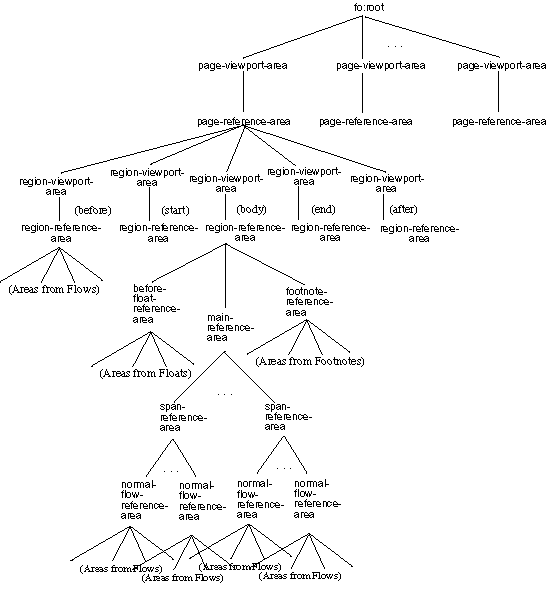
Areas returned to an fo:root formatting object are page-viewport-areas, and are simply placed as children of the area tree root in the order in which they are returned, with no geometrical implications.

As a general rule, the order of the area tree parallels the order of the formatting object tree. That is, if one formatting object precedes another in the depth-first traversal of the formatting object tree, with neither containing the other, then all the areas generated by the first will precede all the areas generated by the second in the depth-first traversal of the area tree, unless otherwise specified. Typical exceptions to this rule would be things like side floats, before floats, and footnotes.

At the end of the procedure, the areas and their traits have been constructed, and they are required to satisfy constraints described in the definitions of their associated formatting objects, and in the area model section. In particular, size and position of the areas will be subject to the placement and spacing constraints described in the area model, unless the formatting object definition indicates otherwise.

The formatting object definitions, property descriptions, and area model are not algorithms. Thus, the formatting object semantics do not specify how the line-breaking algorithm must work in collecting characters into words, positioning words within lines, shifting lines within a container, etc. Rather this specification assumes that the formatter has done these things and describes the constraints which the result is supposed to satisfy. Thus, the constraints do not specify at what time an implementation makes use of that information; the constraints only specify what must be true after processing has been completed. An actual implementation may well make use of some constraints at a time other than when formatting the formatting object for which the constraint applies. For example, the constraint given by the "hyphenate" property on an fo:character would typically be used during line-building, rather than when progessing the fo:character. Other examples include constraints for keeps and breaks.

4 Area Model

In XSL, one creates a tree of formatting objects that serve as inputs or specifications to a formatter. The formatter generates a hierarchical arrangement of areas which comprise the formatted result. This section defines the general model of these areas and how they interact. The purpose is to present an abstract framework which is used in describing the semantics of formatting objects. It should be seen as describing a series of constraints for conforming implementations, and not as prescribing particular algorithms.

4.1 Introduction

The formatter generates an ordered tree, the area tree, which describes a geometric structuring of the output medium. The terms child, sibling, parent, descendant, and ancestor refer to this tree structure. The tree has a root node.

Each area tree node other than the root is called an area and is associated to a rectangular portion of the output medium. Areas are not formatting objects; rather, a formatting object generates zero or more rectangular areas, and normally each area is generated by a unique object in the formatting object tree.

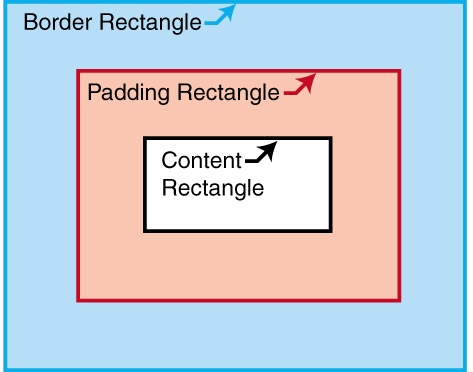
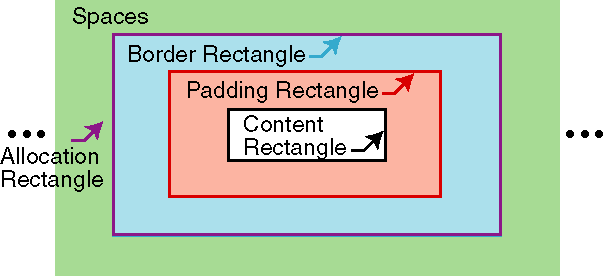
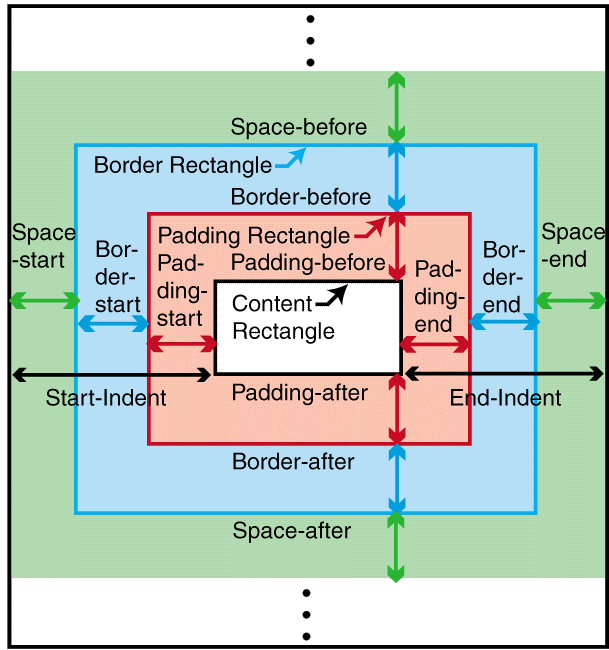
An area has a content-rectangle, the portion in which its child areas are assigned, and optional padding and border. The diagram shows how these portions are related to one another. The outer bound of the border is called the border-rectangle, and the outer bound of the padding is called the padding-rectangle.

Nested rectangles showing the components of an area: innermost is the content rectangle, nested within the padding rectangle, itself nested within the border rectangle.

Each area has a set of traits, a mapping of names to values, in the way elements have attributes and formatting objects have properties. Individual traits are used either for rendering the area or for defining constraints on the result of formatting, or both. Traits used strictly for formatting purposes or for defining constraints may be called formatting traits, and traits used for rendering may be called rendering traits. Traits whose values are copied or derived from a property of the same or a corresponding name are listed in B Property Summary and 5 Property Refinement / Resolution; other traits are listed below.

Note:

Traits are also associated with FOs during the process of refinement. Some traits are assigned during formatting, while others are already present after refinement.

The semantics of each type of formatting object that generates areas are given in terms of which areas it generates and their place in the area-tree hierarchy. This may be further modified by interactions between the various types of formatting objects. The properties of the formatting object determine what areas are generated and how the formatting object's content is distributed among them. (For example, a word that is not to be hyphenated may not have its glyphs distributed into areas on two separate line-areas.)

The traits of an area are either:

directly-derived: the values of directly-derived traits are the computed value of a property of the same or a corresponding name on the generating formatting object, or

indirectly-derived: the values of indirectly-derived traits are the result of a computation involving the computed values of one or more properties on the generating formatting object, other traits on this area or other interacting areas (ancestors, parent, siblings, and/or children) and/or one or more values constructed by the formatter. The calculation formula may depend on the type of the formatting object.

This description assumes that refined values have been computed for all properties of formatting objects in the result tree, i.e., all relative and corresponding values have been computed and the inheritable values have been propagated as described in 5 Property Refinement / Resolution. This allows the process of inheritance to be described once and avoids a need to repeat information on computing values in this description.

The indirectly-derived traits are: block-progression-direction, inline-progression-direction, shift-direction, glyph-orientation, is-reference-area, is-viewport-area, left-position, right-position, top-position, bottom-position, left-offset, top-offset, is-first, is-last, alignment-point, area-class, start-intrusion-adjustment, end-intrusion-adjustment, generated-by, returned-by, folio-number, blink, underline-score, overline-score, through-score, underline-score-color, overline-score-color, through-score-color, alignment-baseline, baseline-shift, nominal-font, dominant-baseline-identifier, actual-baseline-table, and script.

4.2 Rectangular Areas

4.2.2 Common Traits

Associated with any area are two directions, which are derived from the generating formatting object's writing-mode and reference-orientation properties: the block-progression-direction is the direction for stacking block-area descendants of the area, and the inline-progression-direction is the direction for stacking inline-area descendants of the area. Another trait, the shift-direction, is present on inline-areas and refers to the direction in which baseline shifts are applied. Also the glyph-orientation defines the orientation of glyph-images in the rendered result.

If the reference-orientation for an area is 0, then the top, bottom, left, and right edges of the content are parallel to those of the area's parent and consistent with them. Otherwise the edges are rotated from those of the area's parent as described in 7.22.3 reference-orientation. The inline-progression-direction and block-progression-direction are determined by the location of these edges as described in 7.32.7 writing-mode.

The Boolean trait is-reference-area determines whether or not an area establishes a coordinate system for specifying indents. An area for which this trait is true is called a reference-area. Only a reference-area may have a block-progression-direction which is different from that of its parent. A reference-area may be either a block-area or an inline-area. Only specific formatting objects generate reference areas.

The Boolean trait is-viewport-area determines whether or not an area establishes an opening through which its descendant areas can be viewed, and can be used to present clipped or scrolled material; for example, in printing applications where bleed and trim is desired. An area for which this trait is true is called a viewport-area. A viewport-area also has the value true for the is-reference-area trait.

A common construct is a viewport/reference pair. This is a viewport-area V and a block-area reference-area R, where R is the sole child of V and where the start-edge and end-edge of the content-rectangle of R are parallel to the start-edge and end-edge of the content-rectangle of V.

Each area has the traits top-position, bottom-position, left-position, and right-position which represent the distance from the edges of its content-rectangle to the like-named edges of the nearest ancestor reference-area (or the page-viewport-area in the case of areas generated by descendants of formatting objects whose absolute-position is fixed); the left-offset and top-offset determine the amount by which a relatively-positioned area is shifted for rendering. These traits receive their values during the formatting process, or in the case of absolutely positioned areas, during refinement.

The block-progression-dimension and inline-progression-dimension of an area represent the extent of the content-rectangle of that area in each of the two relative directions.

Other traits include:

Unless otherwise specified, the traits of a formatting object are present on each of its generated areas, and with the same value. (However, see sections 4.7.2 Line-building and 4.9.4 Border, Padding, and Background.) The id trait is computed for formatting objects but is not present on areas.

4.2.3 Geometric Definitions

As described above, the content-rectangle is the rectangle bounding the inside of the padding and is used to describe the constraints on the positions of descendant areas. It is possible that marks from descendant glyphs or other areas may appear outside the content-rectangle.

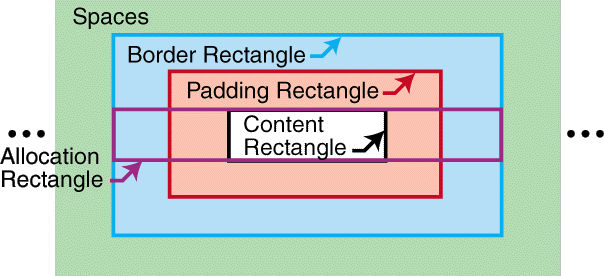
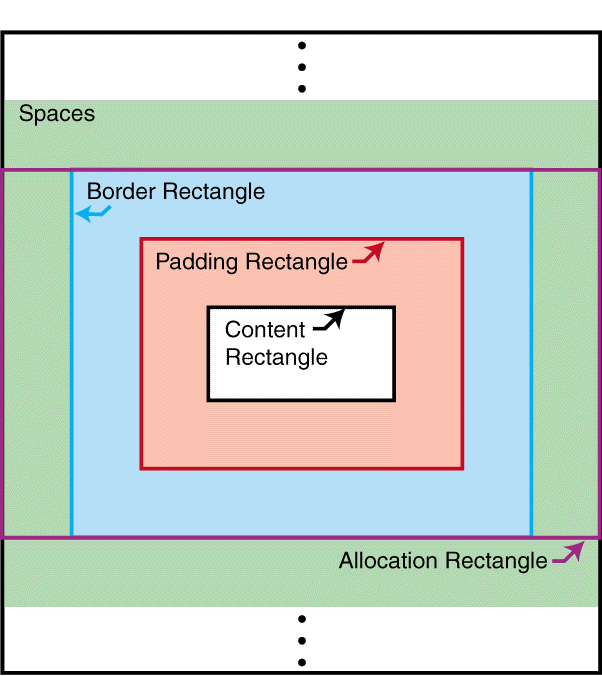
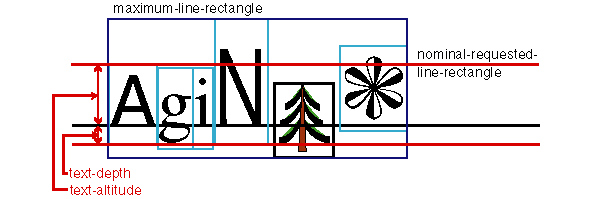
Related to this is the allocation-rectangle of an area, which is used to describe the constraints on the position of the area within its parent area. For an inline-area this is either the normal-allocation-rectangle or the large-allocation-rectangle. The normal-allocation-rectangle extends to the content-rectangle in the block-progression-direction and to the border-rectangle in the inline-progression-direction. The large-allocation-rectangle is the border-rectangle. Unless otherwise specified, the allocation-rectangle for an area is the normal-allocation-rectangle.

This diagram shows the position of the normal allocation rectangle of an inline area, as described in the text.

Figure 7. Normal-allocation-rectangle of an inline-area

This diagram shows the position of the large allocation rectangle of an inline area, which is the same at the border rectangle.

Figure 8. Large-allocation-rectangle of an inline-area

For a block-area, the allocation-rectangle extends to the border-rectangle in the block-progression-direction and outside the content-rectangle in the inline-progression-direction by an amount equal to the end-indent, and in the opposite direction by an amount equal to the start-indent.

Note:

The inclusion of space outside the border-rectangle of a block-area in the inline-progression-direction does not affect placement constraints, and is intended to promote compatibility with the CSS box model.

This diagram shows the position of the allocation rectangle of a block area, as described in the text.

Figure 9. Allocation- and content-rectangles of a block-area

The edges of a rectangle are designated as follows:

  • the before-edge is the edge occurring first in the block-progression-direction and perpendicular to it;

  • the after-edge is the edge opposite the before-edge;

  • the start-edge is the edge occurring first in the inline-progression-direction and perpendicular to it,

  • the end-edge is the edge opposite the start-edge.

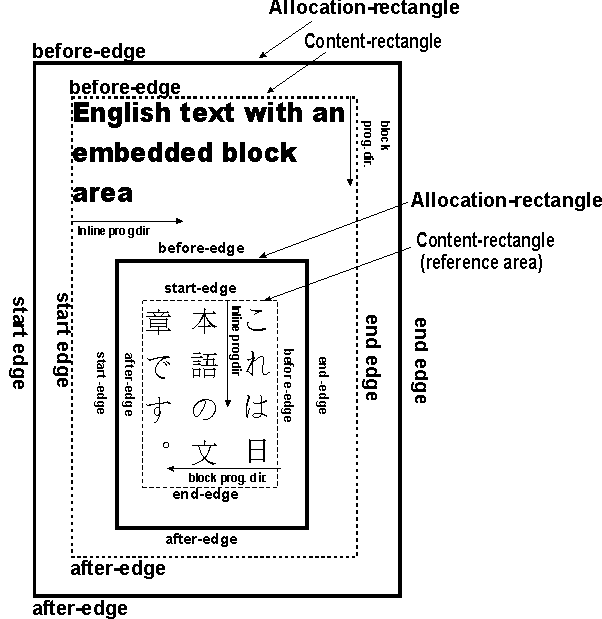
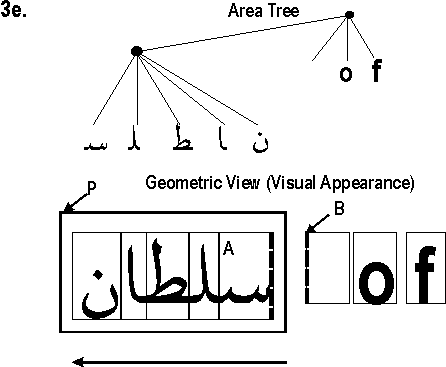
For purposes of this definition, the content-rectangle of an area uses the inline-progression-direction and block-progression-direction of that area; but the border-rectangle, padding-rectangle, and allocation-rectangle use the directions of its parent area. Thus the edges designated for the content-rectangle may not correspond to the same-named edges on the padding-, border-, and allocation-rectangles. This is important in the case of nested areas with different writing-modes or reference-orientation.

The following diagram shows the correspondence between the various edge names for a mixed writing-mode example:

Example of nested areas with different writing modes: a block with English text (writing mode: left-to-right, top-to-bottom) contains a block with Japanese text (writing-mode: top-to-bottom, right-to-left). The position of relative edges (start, end, before and after) is shown on each area.

Each inline-area has an alignment-point determined by the formatter, on the start-edge of its allocation-rectangle; for a glyph-area, this is a point on the start-edge of the glyph on its alignment baseline (see below). This is script-dependent and does not necessarily correspond to the (0,0) coordinate point used for the data describing the glyph shape.

4.2.5 Stacking Constraints

This section defines the notion of block-stacking constraints and inline-stacking constraints involving areas. These are defined as ordered relations, i.e., if A and B have a stacking constraint it does not necessarily mean that B and A have a stacking constraint. These definitions are recursive in nature and some cases may depend upon simpler cases of the same definition. This is not circularity but rather a consequence of recursion. The intention of the definitions is to identify areas at any level of the tree which may have only space between them.

The area-class trait is an enumerated value which is xsl-normal for an area which is stacked with other areas in sequence. A normal area is an area for which this trait is xsl-normal. A page-level-out-of-line area is an area with area-class xsl-footnote, xsl-before-float, or xsl-fixed; placement of these areas is controlled by the fo:page-sequence ancestor of its generating formatting object. A reference-level-out-of-line area is an area with area-class xsl-side-float or xsl-absolute; placement of these areas is controlled by the formatting object generating the relevant reference-area. An anchor area is an area with area-class xsl-anchor; placement of these areas is arbitrary and does not affect stacking. Areas with area-class equal to one of xsl-normal, xsl-footnote, or xsl-before-float are defined to be stackable, indicating that they are supposed to be properly stacked.

Block-stacking constraints

If P is a block-area, then there is a fence preceding P if P is a reference-area or if the border-before-width or padding-before-width of P are non-zero. Similarly, there is a fence following P if P is a reference-area or if the border-after-width or padding-after-width of P are non-zero.

If A and B are stackable areas, and S is a sequence of space-specifiers (see 4.3 Spaces and Conditionality), it is defined that A and B have block-stacking constraint S if any of the following conditions holds:

  1. B is a block-area which is the first normal child of A, and S is the sequence consisting of the space-before of B.

  2. A is a block-area which is the last normal child of B, and S is the sequence consisting of the space-after of A.

  3. A and B are both block-areas, and either

    a. B is the next stackable sibling area of A, and S is the sequence consisting of the space-after of A and the space-before of B;

    b. B is the first normal child of a block-area P, B is not a line-area, there is no fence preceding P, A and P have a block-stacking constraint S', and S consists of S' followed by the space-before of B; or

    c. A is the last normal child of a block-area P, A is not a line-area, there is no fence following P, P and B have a block-stacking constraint S'', and S consists of the space-after of A followed by S''.

    d. A has a block-stacking constraint S' with a block-area E, E has a block-stacking constraint S'' with B, E is empty (i.e., it has zero border, padding, and block-progression-dimension, and no normal children), and S consists of S' followed by S''.

Note:

The use of "stackable" in two places in the above definition allows block-stacking constraints to apply between areas of area-class xsl-before-float or xsl-footnote.

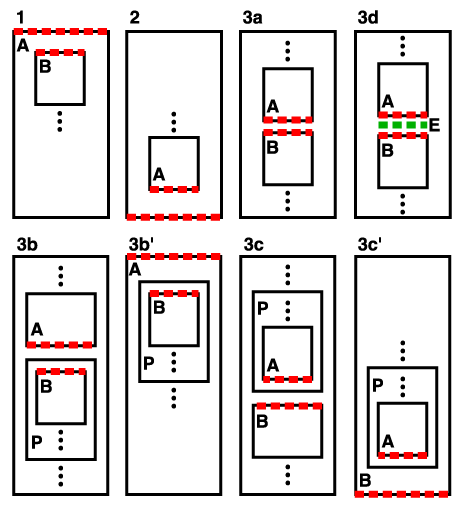
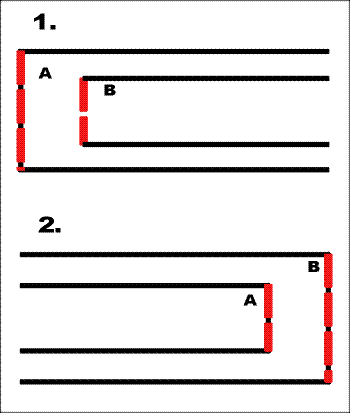
Five examples that illustrate each of the possible cases of block-stacking constraints listed above. In each case, the adjacent edge of the blocks is outlined.

Figure 10. Adjacent Edges with Block-stacking

When A and B have a block-stacking constraint, the adjacent edges of A and B are an ordered pair recursively defined as:

  • In case 1, the before-edge of the content-rectangle of A and the before-edge of the allocation-rectangle of B.

  • In case 2, the after-edge of the allocation-rectangle of A and the after-edge of the content-rectangle of B.

  • In case 3a, the after-edge of the allocation-rectangle of A and the before-edge of the allocation-rectangle of B.

  • In case 3b, the first of the adjacent edges of A and P, and the before-edge of the allocation-rectangle of B.

  • In case 3c, the after-edge of the allocation-rectangle of A and the second of the adjacent edges of P and B.

  • In case 3d, the first of the adjacent edges of A and E, and the second of the adjacent edges of E and B.

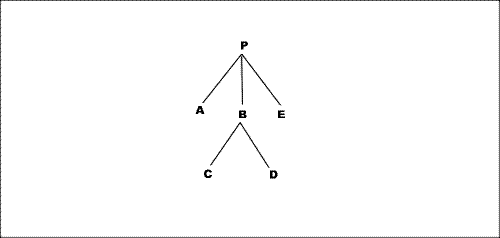
Example. In this diagram each node represents a block-area. Assume that all padding and border widths are zero, and none of the areas are reference-areas. Then P and A have a block-stacking constraint, as do A and B, A and C, B and C, C and D, D and B, B and E, D and E, and E and P; these are the only pairs in the diagram having block-stacking constraints. If B had non-zero padding-after, then D and E would not have any block-stacking constraint (though B and E would continue to have a block-stacking constraint).

Diagram of the tree used as an example in the text. A root node P has three children: A, B and E. B has two childrem: C and D.

Figure 11. Block-stacking constraint example

Inline-stacking constraints.

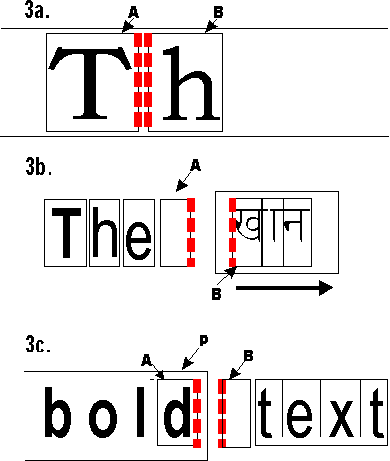
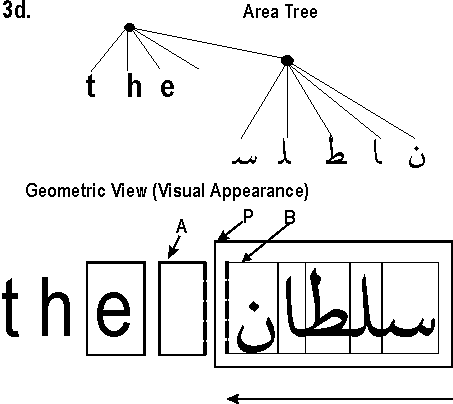
This section will recursively define the inline-stacking constraints between two areas (either two inline-areas or one inline-area and one line-area), together with the notion of fence preceding and fence following; these definitions are interwoven with one another. This parallels the definition for block-stacking constraints, but with the additional complication that we may have a stacking constraint between inline-areas which are stacked in opposite inline-progression-directions. (This is not an issue for block-stacking constraints because a block-area which is not a reference-area may not have a block-progression-direction different from that of its parent.)

If P and Q have an inline-stacking constraint, then P has a fence preceding Q if P is a reference-area or has non-zero border-width or padding-width at the first adjacent edge of P and Q. Similarly, Q has a fence following P if Q is a reference-area or has non-zero border-width or padding-width at the second adjacent edge of P and Q.

If A and B are normal areas, and S is a sequence of space-specifiers, it is defined that A and B have inline-stacking constraint S if any of the following conditions holds:

  1. A is an inline-area or line-area, B is an inline-area which is the first normal child of A, and S is the sequence consisting of the space-start of B.

  2. B is an inline-area or line-area, A is an inline-area which is the last normal child of B, and S is the sequence consisting of the space-end of A.

  3. A and B are each either an inline-area or a line-area, and either

    a. both A and B are inline-areas, B is the next normal sibling area of A, and S is the sequence consisting of the space-end of A and the space-start of B;

    b. B is an inline-area which is the first normal child of an inline-area P, P has no fence following A, A and P have an inline-stacking constraint S', the inline-progression-direction of P is the same as the inline-progression-direction of the nearest common ancestor area of A and P, and S consists of S' followed by the space-start of B.

    c. A is an inline-area which is the last normal child of an inline-area P, P has no fence preceding B, P and B have an inline-stacking constraint S'', the inline-progression-direction of P is the same as the inline-progression-direction of the nearest common ancestor area of P and B, and S consists of the space-end of A followed by S''.

    d. B is an inline-area which is the last normal child of an inline-area P, P has no fence following A, A and P have an inline-stacking constraint S', the inline-progression-direction of P is opposite to the inline-progression-direction of the nearest common ancestor area of A and P, and S consists of S' followed by the space-end of B.

    e. A is an inline-area which is the first normal child of an inline-area P, P has no fence preceding B, P and B have an inline-stacking constraint S'', the inline-progression-direction of P is opposite to the inline-progression-direction of the nearest common ancestor area of P and B, and S consists of the space-start of A followed by S''.

Two examples of inline-stacking constraints, illustrating cases 1 and 2 above. The first shows an inline area A containing another area B (A's first child). The left edges of both A and B are outlined. In the second, B contains A, as its last child, and both right edges are outlined.

Figure 12. Adjacent Edges with Inline-stacking

Three examples of inline-stacking constraints. The first (case 3a) shows two glyph areas A (left) and B (right) next to each other. The right edge of A and the left edge of B are outlined. The second case (3b) shows four adjacent glyph areas (containing an English word and a space A), followed by another inline area containing Devanagari glyphs. The right edge of the space glyph and the left edge of the leftmost Devanagari glyph are outlined. The third case (3c) shows an inline area P containing the word 'bold', to the left of an white space area B. The glyph 'd' is in a glyph area A. The right edge of A and the left edge of B are outlined.

Figure 13. Adjacent Edges with Inline-stacking, continued

This diagram illustrates case 3d. Four adjacent glyph areas (three Roman letters and a space A) followed by a inline area P containing Arabic glyph areas, the leftmost of which is labelled B. The right edge of A and the left edge of B are outlined. The diagram also shows a tree view of this structure. The root node has five children: the three Roman letters, the space and the Arabic word. The latter is itself a node containing each Arabic glyph, in document order, i.e. reversed from rendered order.

Figure 14. Mixed English and Arabic

Case 3e: an inline block P containin Arabic glyph areas is followed by a space glyph B and two other glyphs (Roman). The right edge of the rightmost arabic glyph A and the left edge of B are outlined. A tree view of this structure has a root node with 4 children: the Arabic wordm the space, and the two Roman glyphs. The arabic word is itself a node whose children are glyphs in reverse order than the corresponding areas.

Figure 15. Mixed English and Arabic

When A and B have an inline-stacking constraint, the adjacent edges of A and B are an ordered pair defined as:

  • In case 1, the start-edge of the content-rectangle of A and the start-edge of the allocation-rectangle of B.

  • In case 2, the end-edge of the allocation-rectangle of A and the end-edge of the content-rectangle of B.

  • In case 3a, the end-edge of the allocation-rectangle of A and the start-edge of the allocation-rectangle of B.

  • In case 3b, the first of the adjacent edges of A and P, and the start-edge of the allocation-rectangle of B.

  • In case 3c, the end-edge of the allocation-rectangle of A and the second of the adjacent edges of P and B.

  • In case 3d, the first of the adjacent edges of A and P, and the end-edge of the allocation-rectangle of B.

  • In case 3e, the start-edge of the allocation-rectangle of A and the second of the adjacent edges of P and B.

Two areas are adjacent if they have a block-stacking constraint or an inline-stacking constraint. It follows from the definitions that areas of the same type (inline or block) can be adjacent only if all their non-common ancestors are also of the same type (up to but not including their nearest common ancestor). Thus, for example, two inline-areas which reside in different line-areas are never adjacent.

An area A begins an area P if A is a descendant of P and P and A have either a block-stacking constraint or an inline-stacking constraint, provided that no descendant of P which is an ancestor of A has a space-before (in the case of a block-stacking constraint) or a space-start (in the case of an inline-stacking constraint) whose computed minimum, maximum, or optimum values are nonzero. In this case the second of the adjacent edges of P and A is defined to be a leading edge in P. A space-specifier which applies to the leading edge is also defined to begin P.

Similarly, An area A ends an area P if A is a descendant of P and A and P have either a block-stacking constraint or an inline-stacking constraint, provided that no descendant of P which is an ancestor of A has a space-after (in the case of a block-stacking constraint) or a space-end (in the case of an inline-stacking constraint) whose computed minimum, maximum, or optimum values are nonzero. In this case the first of the adjacent edges of A and P is defined to be a trailing edge in P. A space-specifier which applies to the trailing edge is also defined to end P.

4.3 Spaces and Conditionality

A space-specifier is a compound datatype whose components are minimum, optimum, maximum, conditionality, and precedence.

Minimum, optimum, and maximum are lengths and can be used to define a constraint on a distance, namely that the distance should preferably be the optimum, and in any case no less than the minimum nor more than the maximum. Any of these values may be negative, which can (for example) cause areas to overlap, but in any case the minimum should be less than or equal to the optimum value, and the optimum less than or equal to the maximum value.

Conditionality is an enumerated value which controls whether a space-specifier has effect at the beginning or end of a reference-area or a line-area. Possible values are retain and discard; a conditional space-specifier is one for which this value is discard.

Precedence has a value which is either an integer or the special token force. A forcing space-specifier is one for which this value is force.

Space-specifiers occurring in sequence may interact with each other. The constraint imposed by a sequence of space-specifiers is computed by calculating for each space-specifier its associated resolved space-specifier in accordance with their conditionality and precedence, as shown below in the space-resolution rules.

The constraint imposed on a distance by a sequence of resolved space-specifiers is additive; that is, the distance is constrained to be no less than the sum of the resolved minimum values and no larger than the sum of the resolved maximum values.

4.3.1 Space-resolution Rules

The resolved space-specifier of a given space-specifier S is computed as follows. Consider the maximal inline-stacking constraint or block-stacking constraint S'' containing the space-specifier S as an element of the sequence (S'' is a sequence of space-specifiers; see 4.2.5 Stacking Constraints). Define S' to be a subsequence of S'' as follows:

  • if S is the space-before or space-after of a line-area, then S' is the maximal subsequence of S'' containing S such that all the space-specifiers in S' are traits of line-areas,

  • if S is the space-before or space-after of a block-area which is not a line-area, then S' is the maximal subsequence of S'' containing S such that all the space-specifiers in S' are traits of block-areas which are not line-areas,

  • if S is the space-start or space-end of an inline-area, then S' is all of S''.

The resolved space-specifier of S is a non-conditional, forcing space-specifier computed in terms of the sequence S'.

  1. If any of the space-specifiers in S' is conditional, and begins a reference-area or line-area, then it is suppressed, which means that its resolved space-specifier is zero. Further, any conditional space-specifiers which consecutively follow it in the sequence are also suppressed. For purposes of this rule, a space-specifier U consecutively follows a space-specifier V if it U follows V and U and V are separated in the sequence only by conditional space-specifiers and/or space-specifiers whose computed minimum, maximum, and optimum values are zero.

    If a conditional space-specifier ends a reference-area or line-area, then it is suppressed together with any other conditional space-specifiers which consecutively precede it in the sequence. For purposes of this rule, a space-specifier U consecutively precedes a space-specifier V if it U precedes V and U and V are separated in the sequence only by conditional space-specifiers and/or space-specifiers whose computed minimum, maximum, and optimum values are zero.

  2. If any of the remaining space-specifiers in S' is forcing, all non-forcing space-specifiers are suppressed, and the value of each of the forcing space-specifiers is taken as its resolved value.

  3. Alternatively if all of the remaining space-specifiers in S' are non-forcing, then the resolved space-specifier is defined in terms of those non-suppressed space-specifiers whose precedence is numerically highest, and among these those whose optimum value is the greatest. All other space-specifiers are suppressed. If there is only one of these then its value is taken as its resolved value.

    Otherwise, follow these rules when there are two or more space-specifiers all of the same highest precedence and the same (largest) optimum: The resolved space-specifier of the last space-specifier in the sequence is derived from these spaces by taking their common optimum value as its optimum. The greatest of their minimum values is its minimum. The least of their maximum values is its maximum. All other space-specifiers are suppressed.

  4. If S is subject to overconstrainment relaxing, then its maximum value is set to the actual block-progression-dimension of the containing block-area. See 4.3.2 Overconstrained space-specifiers

Example. Suppose the sequence of space values occurring at the beginning of a reference-area is: first, a space with value 10 points (that is minimum, optimum, and maximum all equal to 10 points) and conditionality discard; second, a space with value 4 points and conditionality retain; and third, a space with value 5 points and conditionality discard; all three spaces having precedence zero. Then the first (10 point) space is suppressed under rule 1, and the second (4 point) space is suppressed under rule 3. The resolved value of the third space is a non-conditional 5 points, even though it originally came from a conditional space.

The padding of a block-area does not interact with any space-specifier (except that by definition, the presence of padding at the before- or after-edge prevents areas on either side of it from having a stacking constraint.)

The border or padding at the before-edge or after-edge of a block-area B may be specified as conditional. If so, then it is set to zero if its associated edge is a leading edge in a reference-area, and the is-first trait of B is false, or if its associated edge is a trailing edge in a reference-area, and the is-last trait of B is false. In either of these cases, the border or padding is taken to be zero for purposes of the stacking constraint definitions.

The border or padding at the start-edge or end-edge of an inline-area I may be specified as conditional. If so, then it is set to zero if its associated edge is a leading edge in a line-area, and the is-first trait of I is false, or if its associated edge is a trailing edge in a line-area, and the is-last trait of I is false. In either of these cases, the border or padding is taken to be zero for purposes of the stacking constraint definitions.

4.3.2 Overconstrained space-specifiers

When an area P is generated by a formatting object whose block-progression-dimension is "auto", then the constraints involving the before-edge and after-edge of the content-rectangle of P, together with the constraints between the various descendants of P, result in a constraint on the actual value of the block-progression-dimension. If the block-progression-dimension is instead specified as a length, then this might result in an overconstrained area tree, for example an incompletely-filled fo:block with a specified size. In that case some constraints between P and its descendants should be relaxed; those that are eligible for this treatment are said to be subject to overconstrainment relaxing, and treated as in the previous section.

  • If the display-align value is "after" or "center" and P is the first normal area generated by the formatting object, then the space-before of the first normal child of P is subject to overconstrainment relaxing.

  • If the display-align value is "before" or "center" and P is the last normal area generated by the formatting object, then the space-after of the last normal child of P is subject to overconstrainment relaxing.

4.4 Block-areas

Block-areas have several traits which typically affect the placement of their children. The line-height is used in line placement calculations. The line-stacking-strategy trait controls what kind of allocation is used for descendant line-areas and has an enumerated value (either font-height, max-height, or line-height). This is all rigorously described below. All areas have these traits, but they only have relevance for areas which have stacked line-area children.

The space-before and space-after traits determine the distance between the block-area and surrounding block-areas.

A block-area which is not a line-area typically has its size in the inline-progression-direction determined by its start-indent and end-indent and by the size of its nearest ancestor reference-area. A block-area which is not a line-area must be properly stacked (as defined in 4.4.1 Stacked Block-areas below) unless otherwise specified in the description of its generating formatting object. In this case its block-progression-dimension will be subject to constraints based on the block-progression-dimensions and space-specifiers of its descendants. See 4.3.2 Overconstrained space-specifiers

4.4.1 Stacked Block-areas

Block-area children of an area are typically stacked in the block-progression-direction within their parent area, and this is the default method of positioning block-areas. However, formatting objects are free to specify other methods of positioning child areas of areas which they generate, for example list-items or tables.

For a parent area P whose children are block-areas, P is defined to be properly stacked if all of the following conditions hold:

  1. For each block-area B which is a descendant of P, the following hold:

    This diagram shows a reference area, with all edges labeled: space-start, border-start and padding-start to the left, space-end, border-end and padding-end to the right, space-before, border-before and padding-before at the top, space-after, border-after and padding-after at the bottom. start-indent is shown, spanning space, border and padding on the left, as well as end-indent, spanning space, border and padding on the right.

    Figure 16. Content Rectangle of Reference Area

    Note:

    The notion of indent is intended to apply to the content-rectangle, but the constraint is written in terms of the allocation-rectangle, because as noted earlier (4.2.3 Geometric Definitions) the edges of the content-rectangle may not correspond to like-named edges of the allocation-rectangle.

    The start-intrusion-adjustment and end-intrusion-adjustment are traits used to deal with intrusions from floats in the inline-progression-direction.

    See also section 5.3.2 Margin, Space, and Indent Properties for how the margin properties affect the indents.

  2. For each pair of normal areas B and B' in the subtree below P, if B and B' have a block-stacking constraint S and B is not empty (see 4.2.5 Stacking Constraints), then the distance between the adjacent edges of B and B' is consistent with the constraint imposed by the resolved values of the space-specifiers in S.

    Four areas, P, A, B and C. P contains A and B, stacked vertically, and B contains C. Below A is a 3pt space, above B is a 1pt space, and above C (within B) is a 2pt space.

    Example. In the diagram, if area A has a space-after value of 3 points, B a space-before of 1 point, and C a space-before of 2 points, all with precedence of force, and with zero border and padding, then the constraints will place B's allocation-rectangle 4 points below that of A, and C's allocation-rectangle 6 points below that of A. Thus the 4-point gap receives the background color from P, and the 2-point gap before C receives the background color from B.

4.4.2 Positioning in the block-progression direction

A general comment: positioning (and justification) is connected to regions and columns, and the interaction between them, and that work is not yet complete. In addition, the term vertical in this section should be taken to mean the block-progression direction.

4.4.2.3 Vertical alignment within a page or column

For this, we use the existing display-align property:

In a multi-column region the same value is used for all columns, apart from the last one (specified with the property display-align-last-column).

Applies to: fo:region-body, fo:region-before, fo:region-after, fo:region-start, fo:region-end and fo:block-container.

Note:

Property "display-align" also applies to: fo:external-graphic, fo:instream-foreign-object, fo:inline-container, and fo:table-cell. A similar issue exists for vertical justification.

4.4.2.4 Vertical justification across pages and columns

We extend the display-align property with a new value "justify".

It is also important to allow users to specify which properties should be modified in order to do vertical justification. Feathering is one of the possibilities. Other solutions might include widening or narrowing spaces before and after images and tables, stretching or compressing text, changing word-spacing, adjusting the character-spacing, or other strategies.

Thus, we propose the general approach of adjustable properties as described under ‘copyfitting’ and introduce a property adjustable-properties whose value is a list of properties that the formatter is allowed to change.

4.4.3 Intrusion Adjustments

Intrusion adjustments (both start- and end-) are defined to account for the indentation that occurs as the result of side floats.

If A and B are areas which have the same nearest reference area ancestor, then A and B are defined to be inline-overlapping if there is some line parallel to the inline-progression-direction, which intersects both the allocation-rectangle of A and the allocation-rectangle of B.

If A is an area of class xsl-side-float with float="start", and B is a block-area, and A and B have the same nearest reference area ancestor, then A is defined to encroach upon B if A and B are inline-overlapping and the start-indent of B is less than the sum of the start-indent of A and the inline-progression-dimension of A. The start-encroachment of A on B is then defined to be amount by which the start-indent of B is less than the sum of the start-indent of A and the inline-progression-dimension of A.

If A is an area of class xsl-side-float with float="end", and B is a block-area, and A and B have the same nearest reference area ancestor, then A is defined to encroach upon B if A and B are inline-overlapping and the end-indent of B is less than the sum of the end-indent of A and the inline-progression-dimension of A. The end-encroachment of A on B is then defined to be amount by which the end-indent of B is less than the sum of the end-indent of A and the inline-progression-dimension of A.

If B is a block-area which is not a line-area, then its local-start-intrusion-adjustment is computed as the maximum of the following lengths:

  1. zero;

  2. if the parent of B is not a reference area: the start-intrusion-adjustment of the parent of B; and

  3. if B has intrusion-displace="block", then for each area A of class xsl-side-float with float="start" such that the generating formatting object of A is not a descendant of the generating formatting object of B, and such that A encroaches upon some line-area child of B: the start-encroachment of A on B; and

  4. if B has intrusion-displace = "block", then for each area A of class xsl-side-float with float="start" such that A and B are inline-overlapping, and for each block-area ancestor B' of B which is a descendant of the nearest reference area ancestor of B, such that A encroaches on a line-area child of B': the start-encroachment of A on B'.

The start-intrusion-adjustment of a block-area B is then defined to be the maximum of the local-start-intrusion-adjustments of the normal block-areas generated and returned by the generating formatting object of B.

If L is a line-area, then its start-intrusion-adjustment is computed as the maximum of the following lengths:

  1. the start-intrusion-adjustment of the parent of L;

  2. for each area A of class xsl-side-float with float="start" such that A encroaches upon L: the start-encroachment of A on L; and

  3. if the parent of L has intrusion-displace = "indent", then for each area A of class xsl-side-float with float="start" such that A and L are inline-overlapping, and for each block-area ancestor B' of L which is a descendant of the nearest reference area ancestor of L, such that A encroaches on some line-area child L' of B': the start-encroachment of A on B'.

The end-intrusion-adjustment for a block-area is computed in a precisely analogous manner. That is:

If B is a block-area which is not a line-area, then its local-end-intrusion-adjustment is computed as the maximum of the following lengths:

  1. zero;

  2. if the parent of B is not a reference area: the end-intrusion-adjustment of the parent of B; and

  3. if B has intrusion-displace="block", then for each area A of class xsl-side-float with float="end" such that the generating formatting object of A is not a descendant of the generating formatting object of B, and such that A encroaches upon some line-area child of B: the end-encroachment of A on B; and

  4. if B has intrusion-displace = "block", then for each area A of class xsl-side-float with float="end" such that A and B are inline-overlapping, and for each block-area ancestor B' of B which is a descendant of the nearest reference area ancestor of B, such that A encroaches on a line-area child of B': the end-encroachment of A on B'.

The end-intrusion-adjustment of a block-area B is then defined to be the maximum of the local-end-intrusion-adjustments of the normal block-areas generated and returned by the generating formatting object of B.

If L is a line-area, then its end-intrusion-adjustment is computed as the maximum of the following lengths:

  1. the end-intrusion-adjustment of the parent of L;

  2. for each area A of class xsl-side-float with float="end" such that A encroaches upon L: the end-encroachment of A on L; and

  3. if the parent of L has intrusion-displace = "indent", then for each area A of class xsl-side-float with float="end" such that A and L are inline-overlapping, and for each block-area ancestor B' of L which is a descendant of the nearest reference area ancestor of L, such that A encroaches on some line-area child L' of B': the end-encroachment of A on B'.

4.5 Line-areas

A line-area is a special type of block-area, and is generated by the same formatting object which generated its parent. Line-areas do not have borders and padding, i.e., border-before-width, padding-before-width, etc. are all zero. Inline-areas are stacked within a line-area relative to a baseline-start-point which is a point determined by the formatter, on the start-edge of the line area's content-rectangle.

The allocation-rectangle of a line is determined by the value of the line-stacking-strategy trait: if the value is font-height, the allocation-rectangle is the nominal-requested-line-rectangle, defined below; if the value is max-height, the allocation-rectangle is the maximum-line-rectangle, defined below; and if the value is line-height, the allocation-rectangle is the per-inline-height-rectangle, defined below. If the line-stacking-strategy trait is font-height or max-height the space-before and space-after are both set to the half-leading value; otherwise they are both set to zero.

The nominal-requested-line-rectangle for a line-area is the rectangle whose start-edge is parallel to the start-edge of the content-rectangle of the nearest ancestor reference-area and offset from it by the sum of the start-indent and the start-intrusion-adjustment of the line area, whose end-edge is parallel to the end-edge of the content-rectangle of the nearest ancestor reference-area and offset from it by the sum of the end-indent and the end-intrusion-adjustment of the line area, whose before-edge is separated from the baseline-start-point by the text-altitude of the parent block-area, and whose after-edge is separated from the baseline-start-point by the text-depth of the parent block-area. It has the same block-progression-dimension for each line-area child of a block-area.

The maximum-line-rectangle for a line-area is the rectangle whose start-edge and end-edge are parallel to and coincident with the start-edge and end-edge of the nominal-requested-line-rectangle, and whose extent in the block-progression-direction is the minimum required to enclose both the nominal-requested-line-rectangle and the allocation-rectangles of all the inline-areas stacked within the line-area; this may vary depending on the descendants of the line-area.

A horizontal alignment of inline areas (glyphs and graphics). The maximum-line-rectangle wraps all the glyph areas, the nominal-requested-line-rectangle wraps the glyph areas of the first three glyphs (which use the nominal font). The alignment baseline is shown, splitting the n-r-l-r horizontally. The text-altitude is the vertical distance between the baseline and the top of the n-r-l-r, and the text-depth is the distance between the baseline and the bottom of the n-r-l-r.

Figure 17. Nominal and Maximum Line Rectangles

The per-inline-height-rectangle for a line-area is the rectangle whose start-edge and end-edge are parallel to and coincident with the start-edge and end-edge of the nominal-requested-line-rectangle, and whose extent in the block-progression-dimension is determined as follows.

The expanded-rectangle of an inline-area is the rectangle with start-edge and end-edge coincident with those of its allocation-rectangle, and whose before-edge and after-edge are outside those of its allocation-rectangle by a distance equal to either (a.) the half-leading, when the area's allocation-rectangle is specified to be the normal-allocation-rectangle by the description of the generating formatting object , or (b.) the space-before and space-after (respectively), when the area's allocation-rectangle is specified to be the large-allocation-rectangle. The expanded-nominal-requested-line-rectangle is the rectangle with start-edge and end-edge coincident with those of the nominal-requested-line-rectangle, and whose before-edge and after-edge are outside those of the nominal-requested-line-rectangle by a distance equal to the half-leading.

The extent of the per-inline-height-rectangle in the block-progression-direction is then defined to be the minimum required to enclose both the expanded-nominal-requested-line-rectangle and the expanded-rectangles of all the inline-areas stacked within the line-area; this may vary depending on the descendants of the line-area.

Note:

Using the nominal-requested-line-rectangle allows equal baseline-to-baseline spacing. Using the maximum-line-rectangle allows constant space between line-areas. Using the per-inline-height-rectangle and zero space-before and space-after allows CSS-style line box stacking. Also, the value of half-leading is included in the expanded-rectangle regardless of conditionality, and thus a line-height conditionality of "discard" does not have effect in this case.

4.6 Inline-areas

An inline-area has its own line-height trait, which may be different from the line-height of its containing block-area. This may affect the placement of its ancestor line-area when the line-stacking-strategy is line-height. An inline-area has an actual-baseline-table for its nominal-font. It has a dominant-baseline-identifier trait which determines how its stacked inline-area descendants are to be aligned.

An inline-area may or may not have child areas, and if so it may or may not be a reference-area. The dimensions of the content-rectangle for an inline-area without children is computed as specified by the generating formatting object, as are those of an inline-area with block-area children.

An inline-area with inline-area children has a content-rectangle which extends from its dominant baseline (see 4.6.3 Font Baseline Tables) by its text-depth in the block-progression-direction, and in the opposite direction by its text-altitude; in the inline-progression-direction it extends from the start-edge of the allocation-rectangle of its first child to the end-edge of the allocation-rectangle of its last child. The allocation-rectangle of such an inline-area is the same as its content-rectangle.

The allocation-rectangle of an inline-area without children is either the normal-allocation-rectangle or the large-allocation-rectangle, as specified in the description of the generating formatting object.

Note:

When the line-stacking-strategy is line-height, allocation is done with respect to the expanded-rectangle.

Examples of inline-areas with children might include portions of inline mathematical expressions or areas arising from mixed writing systems (left-to-right within right-to-left, for example).

4.6.1 Stacked Inline-areas

Inline-area children of an area are typically stacked in the inline-progression-direction within their parent area, and this is the default method of positioning inline-areas.

Inline-areas are stacked relative to the dominant baseline, as defined above (4.6.3 Font Baseline Tables).

For a parent area P whose children are inline-areas, P is defined to be properly stacked if all of the following conditions hold:

  1. For each inline-area descendant I of P, the start-edge, end-edge, before-edge and after-edge of the allocation-rectangle of I are parallel to corresponding edges of the content-rectangle of the nearest ancestor reference-area of I.

  2. For each pair of normal areas I and I' in the subtree below P, if I and I' have an inline-stacking constraint S, then the distance between the adjacent edges of I and I' is consistent with the constraint imposed by the resolved values of the space-specifiers in S.

  3. For any inline-area descendant I of P, the distance in the shift-direction from the dominant baseline of the parent Q of I, to the alignment-point of I equals the offset between the dominant baseline of Q and the baseline of Q corresponding to the alignment-baseline trait of I, plus the baseline-shift for I.

    The first summand is computed to compensate for mixed writing systems with different baseline types, and the other summands involve deliberate baseline shifts for things like superscripts and subscripts.

4.6.2 Glyph-areas

The most common inline-area is a glyph-area, which contains the representation for a character (or characters) in a particular font.

A glyph-area has an associated nominal-font, determined by the area's typographic traits, which apply to its character data, and a glyph-orientation determined by its writing-mode and reference-orientation, which determine the orientation of the glyph when it is rendered.

The alignment-point and dominant-baseline-identifier of a glyph-area are assigned according to the writing-system in use (e.g., the glyph baseline in Western languages), and are used to control placement of inline-areas descendants of a line-area. The formatter may generate inline-areas with different inline-progression-directions from their parent to accommodate correct inline-area stacking in the case of mixed writing systems.

A glyph-area has no children. Its block-progression-dimension and actual-baseline-table are the same for all glyphs in a font. Conforming implementations may choose to compute the block-progression-dimension for a glyph area based on the actual glyph size rather than using a common size for all glyphs in a font.

4.6.3 Font Baseline Tables

Each script has its preferred "baseline" for aligning glyphs from that script. Western scripts typically use an "alphabetic" baseline that touches at or near the bottom of capital letters. Further, for each font there is a preferred way of aligning embedded glyphs from different scripts, e.g., for a Western font there are separate baselines for aligning embedded ideographic or Indic glyphs.

Each block-area and inline-area has a dominant-baseline-identifier trait whose value is a baseline identifier corresponding to the type of alignment expected for inline-area descendants of that area, and each inline-area has an alignment-baseline which specifies how the area is aligned to its parent. These traits are interpreted as described in section 5.5.8 Fonts and Font Data.

For each font, an actual-baseline-table maps these identifiers to points on the start-edge of the area. By abuse of terminology, the line in the inline-progression-direction through the point corresponding to the dominant-baseline-identifier is called the "dominant baseline."

4.7 Ordering Constraints

4.7.2 Line-building

This section describes the ordering constraints that apply to formatting an fo:block or similar block-level object.

A block-level formatting object F which constructs lines does so by constructing block-areas which it returns to its parent formatting object, and placing normal areas and/or anchor areas returned to F by its child formatting objects as children of those block-areas or of line-areas which it constructs as children of those block-areas.

For each such formatting object F, it must be possible to form an ordered partition P consisting of ordered subsets S1, S2, ..., Sn of the normal areas and anchor areas returned by the child formatting objects, such that the following are all satisfied:

  1. Each subset consists of a sequence of inline-areas (and any associated annotation-areas), or of a single block-area.

  2. The ordering of the partition follows the ordering of the formatting object tree. Specifically, if A is in Si and B is in Sj with i < j, or if A and B are both in the same subset Si with A before B in the subset order, then either A is returned by a preceding sibling formatting object of B, or A and B are returned by the same formatting object with A being returned before B.

  3. The partitioning occurs at legal line-breaks. Specifically, if A is the last area of Si and B is the first area of Si+1, then the rules of the language, script and hyphenation constraints (7.10 Common Hyphenation Properties, 7.17.1 hyphenation-keep, and 7.17.2 hyphenation-ladder-count) in effect must permit a line-break between A and B, within the context of all areas in Si and Si+1.

  4. Forced line-breaks are respected. Specifically, if C is a descendant of F, and C is an fo:character whose Unicode character is U+000A, and A is the area generated by C, then either C is a child of F and A is the last area in a subset Si, or C is a descendant of a child C' of F, and A ends (in the sense of 4.2.5) an area A' returned by C', such that A' is the last area in a subset Si.

  5. The partition follows the ordering of the area tree, except for certain glyph substitutions and deletions. Specifically, if B1, B2, ..., Bp are the normal child areas of the area or areas returned by F, (ordered in the pre-order traversal order of the area tree), then there is a one-to-one correspondence between these child areas and the partition subsets (i.e. n = p), and for each i,

    • Si consists of a single block-area and Bi is that block-area, or

    • Si consists of inline-areas and Bi is a line-area whose child areas are the same as the inline-areas in Si, and in the same order, except that where the rules of the language and script in effect call for glyph-areas to be substituted, inserted, or deleted, then the substituted or inserted glyph-areas appear in the area tree in the corresponding place, and the deleted glyph-areas do not appear in the area tree. For example, insertions and substitutions may occur because of addition of hyphens or spelling changes due to hyphenation, or glyph image construction from syllabification, or ligature formation. Deletions occur as specified in 6., below.

  6. white-space-treatment is enforced. In particular, deletions in 5. occur when there is a glyph area G such that

    (a.) the white-space-treatment of G is "ignore" and the character of G is classified as white space in XML; or

    (b.) the white-space-treatment of G is "ignore-if-before-linefeed" or "ignore-if-surrounding-linefeed", the suppress-at-line-break of G is "suppress", and G would end a line-area; or

    (c.) the white-space-treatment of G is "ignore-if-after-linefeed" or "ignore-if-surrounding-linefeed", the suppress-at-line-break of G is "suppress", and G would begin a line-area.

    In these cases the area G is deleted; this may cause the condition in clauses (b.) or (c.) to become true and lead to further deletions.

Substitutions that replace a sequence of glyph-areas with a single glyph-area should only occur when the margin, border, and padding in the inline-progression-direction (start- and end-), baseline-shift, and letter-spacing values are zero, treat-as-word-space is false, and the values of all other relevant traits match (i.e., alignment-adjust, alignment-baseline, color trait, background traits, dominant-baseline-identifier, font traits, text-depth, text-altitude, glyph-orientation-horizontal, glyph-orientation-vertical, line-height, line-height-shift-adjustment, text-decoration, text-shadow).

Note:

Line-areas do not receive the background traits or text-decoration of their generating formatting object, or any other trait that requires generation of a mark during rendering.

4.7.3 Inline-building

This section describes the ordering constraints that apply to formatting an fo:inline or similar inline-level object.

An inline-level formatting object F which constructs one or more inline-areas does so by placing normal inline-areas and/or anchor inline-areas and/or annotation-areas returned to F by its child formatting objects as children of inline-areas which it generates.

For each such formatting object F, it must be possible to form an ordered partition P consisting of ordered subsets S1, S2, ..., Sn of the normal and/or anchor inline-areas and normal block-areas returned by the child formatting objects, such that the following are all satisfied:

  1. Each subset consists of a sequence of inline-areas, or of a single block-area.

  2. The ordering of the partition follows the ordering of the formatting object tree, as defined above.

  3. The partitioning occurs at legal line-breaks, as defined above.

  4. Forced line-breaks are respected, as defined above.

  5. The partition follows the ordering of the area tree, except for certain glyph substitutions and deletions, as defined above.

4.8 Keeps and Breaks

Keep and break conditions apply to a class of areas, which are typically page-reference-areas, column-areas, and line-areas. The appropriate class for a given condition is referred to as a context and an area in this class is a context-area. As defined in Section 6.4.1 Introduction, page-reference-areas are areas generated by an fo:page-sequence using the specifications in an fo:page-master, and column-areas are normal-flow-reference-areas generated from a region-body, or region-reference-areas generated from other types of region-master.

A keep or break condition is an open statement about a formatting object and the tree relationships of the areas it generates with the relevant context-areas. These tree relationships are defined mainly in terms of leading or trailing areas. If A is a descendant of P, then A is defined to be leading in P if A has no preceding sibling which is a normal area, nor does any of its ancestor areas up to but not including P. Similarly, A is defined to be trailing in P if A has no following sibling which is a normal area, nor does any of its ancestor areas up to but not including P. For any given formatting object, the next formatting object in the flow is the first formatting object following (in the pre-order traversal order) which is not a descendant of the given formatting object and which generates and returns normal areas.

Break conditions are either break-before or break-after conditions. A break-before condition is satisfied if the first area generated and returned by the formatting object is leading within a context-area. A break-after condition depends on the next formatting object in the flow; the condition is satisfied if either there is no such next formatting object, or if the first normal area generated and returned by that formatting object is leading in a context-area.

Break conditions are imposed by the break-before and break-after properties. A refined value of page for these traits imposes a break condition with a context consisting of the page-reference-areas; a value of even-page or odd-page imposes a break condition with a context of even-numbered page-reference-areas or odd-numbered page-reference-areas, respectively; a value of column imposes a break condition with a context of column-areas. A value of auto in a break-before or break-after trait imposes no break condition.

Keep conditions are either keep-with-previous, keep-with-next, or keep-together conditions. A keep-with-previous condition on an object is satisfied if the first area generated and returned by the formatting object is not leading within a context-area, or if there are no preceding areas in a post-order traversal of the area tree. A keep-with-next condition is satisfied if the last area generated and returned by the formatting object is not trailing within a context-area, or if there are no following areas in a pre-order traversal of the area tree. A keep-together condition is satisfied if all areas generated and returned by the formatting object are descendants of a single context-area.

Keep conditions are imposed by the "within-page", "within-column", and "within-line" components of the "keep-with-previous", "keep-with-next", and "keep-together" properties. The refined value of each component specifies the strength of the keep condition imposed, with higher numbers being stronger than lower numbers and the value always being stronger than all numeric values. A component with value auto does not impose a keep condition. A "within-page" component imposes a keep-condition with context consisting of the page-reference-areas; "within-column", with context consisting of the column-areas; and "within-line" with context consisting of the line-areas.

The area tree is constrained to satisfy all break conditions imposed. Each keep condition must also be satisfied, except when this would cause a break condition or a stronger keep condition to fail to be satisfied. If not all of a set of keep conditions of equal strength can be satisfied, then some maximal satisfiable subset of conditions of that strength must be satisfied (together with all break conditions and maximal subsets of stronger keep conditions, if any).

4.9 Rendering Model

This section makes explicit the relationship between the area tree and visually rendered output.

Areas generate three types of marks: (1) the area background, if any, (2) the marks intrinsic to the area (a glyph, image, or decoration) if any, and (3) the area border, if any.

An area tree is rendered by causing marks to appear on an output medium in accordance with the areas in the area tree. This section describes the geometric location of such marks, and how conflicts between marks are to be resolved.

4.9.1 Geometry

Each area is rendered in a particular location. Formatting object semantics describe the location of intrinsic marks relative to the object's location, i.e., the left, right, top, and bottom edges of its content-rectangle. This section describes how the area's location is determined, which determines the location of its intrinsic marks.

For each page, the page-viewport-area corresponds isometrically to the output medium.

The page-reference-area is offset from the page-viewport-area as described below in section 4.9.2 Viewport Geometry.

All areas in the tree with an area-class of xsl-fixed are positioned such that the left-, right-, top-, and bottom-edges of its content-rectangle are offset inward from the content-rectangle of its ancestor page-viewport-area by distances specified by the left-position, right-position, top-position, and bottom-position traits, respectively.

Any area in the tree which is the child of a viewport-area is rendered as described in section 4.9.2 Viewport Geometry.

All other areas in the tree are positioned such that the left-, right-, top-, and bottom-edges of its content-rectangle are offset inward from the content-rectangle of its nearest ancestor reference-area by distances specified by the left-position, right-position, top-position, and bottom-position traits, respectively. These are shifted down and left by the values of the top-offset and left-offset traits, respectively, if the area has a relative-position of relative.

4.9.3 Visibility

The visibility of marks depends upon the location of the marks, the visibility of the area, and the overflow of any ancestor viewport-areas.

If an area has visibility hidden it generates no marks.

If an area has an overflow of hidden, or when the environment is non-dynamic and the overflow is scroll then the area determines a clipping rectangle, which is defined to be the rectangle determined by the value of the clip trait of the area, and for any mark generated by one of its descendant areas, portions of the mark lying outside the clipping rectangle do not appear.

4.9.4 Border, Padding, and Background

The border- and padding-rectangles are determined relative to the content-rectangle by the values of the common padding and border width traits (border-before-width, etc.).

For any area, which is not a child of a viewport-area, the border is rendered between the border-rectangle and the padding-rectangle in accordance with the common border color and style traits. For a child of a viewport-area, the border is not rendered.

For an area, which is not part of a viewport/reference pair, the background is rendered. For an area that is either a viewport-area or a reference-area in a viewport/reference pair, if the refined value of background-attachment is scroll and the block-progression-dimension of the reference-area is larger than that of the viewport-area, then the background is rendered on the reference-area and not the viewport-area, and otherwise it is rendered on the viewport-area and not the reference-area.

The background, if any, is rendered in the padding-rectangle, in accordance with the background-image, background-color, background-repeat, background-position-vertical, and background-position-horizontal traits.

4.9.5 Intrinsic Marks

For each class of formatting objects, the marks intrinsic to its generated areas are specified in the formatting object description. For example, an fo:character object generates a glyph-area, and this is rendered by drawing a glyph within that area's content-rectangle in accordance with the area's font traits and glyph-orientation and blink traits.

In addition, other traits (for example the various score and score-color traits) specify other intrinsic marks. In the case of score traits (underline-score, overline-score and through-score), the score thickness and position are specified by the nominal-font in effect; where the font fails to specify these quantities, they are implementation-dependent.

4.9.6 Layering and Conflict of Marks

Marks are layered as described below, which defines a partial ordering of which marks are beneath which other marks.

Two marks are defined to conflict if they apply to the same point in the output medium. When two marks conflict, the one which is beneath the other does not affect points in the output medium where they both apply.

Marks generated by the same area are layered as follows: the area background is beneath the area's intrinsic marks, and the intrinsic marks are beneath the border. Layering among the area's intrinsic marks is defined by the semantics of the area's generating formatting object and its properties. For example, a glyph-area's glyph drawing comes beneath the marks generated for text-decoration.

The stacking layer of an area is defined by its stacking context and its z-index value. The stacking layer of an area A is defined to be less than that of an area B if some ancestor-or-self A' of A and B' of B have the same stacking context and the z-index of A' is less than the z-index of B'. If neither stacking layer is less than the other then they are defined to have the same stacking layer.

If A and B are areas, and the stacking layer of A is less than the stacking layer of B, then all marks generated by A are beneath all marks generated by B.

If A and B are areas with the same stacking layer, the backgrounds of A and B come beneath all other marks generated by A and B. Further, if A is an ancestor of B (still with the same stacking layer), then the background of A is beneath all the areas of B, and all the areas of B are beneath the intrinsic areas (and border) of A.

If A and B have the same stacking layer and neither is an ancestor of the other, then it is an error if either their backgrounds conflict or if a non-background mark of A conflicts with a non-background mark of B. An implementation may recover by proceeding as if the marks from the first area in the pre-order traversal order are beneath those of the other area.

4.11 Copyfitting

4.11.1 Summary

Allowing copyfitting on fo:region, fo:region-* objects, fo:block-container and fo:table-cell.

Adding a new value ("justify") for the property "display-align" (already in XSL-FO) to activate copyfitting. Though the same property is used for vertical justification, users can exploit the property "force-page-count" (along with a correct definition of page-masters and page-sequences) to avoid conflicts.

Introducing the concept of “list of prioritized adjustable properties”. An adjustable property is an existing XSL-FO property that can be modified in order to do copyfitting or vertical justification.

Exploiting range values of existing properties to specify how (and how much) each property can be adjusted. Introducing the idea of "elasticity".

Adding a new property "adjustable-properties" that specifies such lists.

Adding new values to the property "force-page-count" to model copyfit into a fixed number of pages or a multiple of a number.

Adding a new formatting object fo:alternative-copyfit-content to express alternative content for copyfitting

How to express consistency and relationships among copyfitted areas? how to copyfit irregular shapes?

how to express alternative content: what happens if it is not possible? how to express consistency and relationships among copyfitted areas? how to copyfit irregular shapes?

4.11.2 Copyfit: basic approach and definitions

Many options exist to copyfit content to a certain area. For example, a user could add some space between paragraphs, widen or narrow spaces before and after titles, images and tables, modify the line height of some paragraphs, etc. All these fine tunings, and their multiplicity of combinations, lead to different results, and different users could have different preferences.

Thus, copyfitting actually requires two logically separated tasks: (1) the request of copyfitting to a given area, and (2) the definition of strategies to copyfit.

Copyfitting is enabled by setting the property display-align to the value "justify". Copyfitting strategies are then expressed through "adjustable properties lists" using the. adjustable-properties property.

Although the same approach is used for vertical justification, users can exploit the property force-page-count and/or the definition of page-masters and page-sequences to avoid conflicts.

The display-align property applies to fo:region, fo:region-*, fo:block-container and fo:table-cell. It is then possible to copyfit content in a block-container or in a table cell, and also to copyfit the content of one flow to a single region, multiple flows to a single region or even multiple flows to multiple regions.

A display-align-last property is also added, to specify different treatment of the last page in a copyfitted seqence, by analogy with text-align and text-align-last.

4.11.3 Copyfit Examples

Let us first consider two flows A and B that go into two distinct regions R1 and R2, as defined in the following XSL-FO excerpt:

<?xml version="1.0" encoding="UTF-8"?>
<fo:root xmlns:fo="http://www.w3.org/1999/XSL/Format">
<fo:page-master master-name="sample1" 
     page-height="11in" page-width="8.5in" margin-top="3pt"
     margin-bottom="3pt" margin-left="3pt" margin-right="3pt">
  <fo:region  region-name="R1" 
     display-align="justify" 
     adjustable-properties="line-height"/> 
  <fo:region  region-name="R2" 
     display-align="before"/> 
</fo:page-master>

<fo:flow-map flow-map-name="M1">
  <fo:flow-assignment>
    <fo:flow-source-list>
       <fo:flow-name-specifier flow-name-reference="A"/>
    </fo:flow-source-list>
    <fo:flow-target-list>
     <fo:region-name-specifier region-name-reference="R1"/>
    </fo:flow-target-list>
   </fo:flow-assignment>
   <fo:flow-assignment>
    <fo:flow-source-list>
     <fo:flow-name-specifier flow-name-reference="B"/>
    </fo:flow-source-list>
    <fo:flow-target-list>
     <fo:region-name-specifier region-name-reference="R2"/>
    </fo:flow-target-list>
    </fo:flow-assignment>
 </fo:flow-map>

<fo:page-sequence force-page-count="1" flow-map-reference="M1">
  <fo:flow flow-name="A">
   <fo:block> Lorem maecenas blandit ac, neque sed ut pulvinar,
   lectus sagittis sapien per risus vel.  Ligula sapien sed morbi cras
   tellus commodo. Si qua ex docet dei etris crucis</fo:block>
  <fo:block> curabitur magna nisi, faucibus sed ornare sed,
  congue eu dui.  Pellentesque habitant morbi tristique senectus et
  netus et malessecularia uada fames ac turpis
  egestas. </fo:block>
  <fo:block> Nunc sit amet dolor sed sem congue mattis sed ut
  arcu. Mauris id magna sit amet elit aliquam.</fo:block>
  <fo:block>Pellentesque habitant morbi tristique senectus et
  netus et malesuada fames.</fo:block>
 </fo:flow>

 <fo:flow flow-name="B">
  <fo:block>Crucis rosa ut hoc sien qua non res veni.</fo:block>
  <fo:block> Etiam tristique, nulla a pulvinar hendrerit nihil
  tortor urna auctor etim domine secularia cali sed ut quotie ire in
  domince hoc fantus quis eius rei rei.  </fo:block>
</fo:flow>
</fo:page-sequence>
</fo:root>

The property display-align is added to the element "fo:region" to activate copyfit for region R1. No copyfit is activated on region R2 since the property display-align has value "before". Note also that the property force-page-count of the element "fo:page-sequence" states that the overall content has to be copyfitted in one page. Finally, the property adjustable-properties lists those XSL-FO properties that can be modified to copyfit text.

The expected result is shown below:

A page contains two regions; the first, R1, is full of text in red; the second, R2, is about half-full with the rest of the text, in black.

Figure 19. Expected result of copyfit example.

The same flows and regions are expected to produce a different output, when the flow-map M2 is used instead:

<fo:flow-map flow-map-name="M2">
<fo:flow-assignment>
<fo:flow-source-list>
<fo:flow-name-specifier flow-name-reference="A"/>
<fo:flow-name-specifier flow-name-reference="B"/>
</fo:flow-source-list>
<fo:flow-target-list>
<fo:region-name-specifier region-name-reference="R1"/>
<fo:region-name-specifier region-name-reference="R2"/>
</fo:flow-target-list>
</fo:flow-assignment>
</fo:flow-map>

In this case, the two flows go into region R1 and then region R2. If the properties display-align does not change, the expected result is the following:

A page contains two regions; the first, R1, is full of text in red; the second, R2, starts with a continuation of the red text; this text is followed by the black text.

Figure 20. Expected result of copyfit example with display-align = before.

The expected result is different when either the property "display-align" of region R2 is set to "justify":

<fo:page-master master-name="sample1" 
   page-height="11in" page-width="8.5in" margin-top="3pt"
   margin-bottom="3pt" margin-left="3pt" margin-right="3pt">
  <fo:region  region-name="R1" 
     display-align="justify" 
     adjustable-properties="line-height"/> 
    <fo:region  region-name="R2" 
      display-align="justify"/>
  </fo:page-master>

In fact, both the regions end up being copyfitted as shown below:

A page contains two regions; the first, R1, is full of text in red; the second, R2, starts with a continuation of the red text; this text is followed by the black text, and is stretched to fill the region.

Figure 21. Expected result of copyfit example with display-align = justify.

When the formatter is expected to produce as many pages as needed (for instance, by setting the property force-page-count to "no-force"), the property display-align is used to activate vertical justification. The property display-align-last is then used to set the vertical alignment of the last page.

Let us consider the following example, where only one region R1 and one flow A are declared:

<?xml version="1.0" encoding="UTF-8"?>
<fo:root xmlns:fo="http://www.w3.org/1999/XSL/Format">
 <fo:page-master master-name="sample1" 
    page-height="11in" page-width="8.5in" margin-top="3pt"
   margin-bottom="3pt" margin-left="3pt" margin-right="3pt">
  <fo:region-body region-name="xsl-region-body" 
    display-align="justify" 
    display-align-last="relative"
    adjustable-properties="..."/>
</fo:page-master>

<fo:page-sequence>
  <fo:flow flow-name="A">

<fo:block>Lorem ipsum dolor sit amet, nunc euismod nisl nam euismod, quis maecenas
blandit ac, neque sed ut pulvinar, lectus sagittis ... quorneque tortor
neque, commodo mauris sagittis yurpis,hic fecit leuc em.</fo:block>

<fo:block>Lorem ipsum dolor sit amet, nunc ... lectus sagittis sapien
mauris per risus.</fo:block>

<fo:block>Ligula sapien sed morbi cras tellus ... quoque
cra ut sic fecit quorem deis hoc hac lorem ipse die cruci faucibus sed ultrices
tempor inter dum.</fo:block>
<fo:block>Lorem ipsum dolor sit amet, .... Rutrum mattis accumsan.</fo:block>
</fo:flow>
</fo:page-sequence>
</fo:root>

The values of the properties display-align and display-align-last of the element "fo:region-body" require the formatter to produce the following output:

Three pages of text; the first two are full, and the third is partially filled.

Figure 22. Three pages of text; the first two are full, and the third is partially filled.

By setting the property display-align-last to "justify", the last page is also vertically justified:

Three pages of text; all three are full

Figure 23. showing last page justification

Note also that this case can be easily generalized for the case of multiple flows going into the same region.

The formatter is expected to copyfit text in a given number of pages when the property force-page-count is set to an integer value. Consider for instance the previous declaration of "fo:region-body" changed into:

<fo:region-body region-name="xsl-region-body" 
display-align="justify" 
display-align-last="justify"
 force-page-count="2"
adjustable-properties="..."/>

The formatter is now expected to produce the following result:

Two pages of text; both are full

Figure 24. Showing a fixed number of pages (2 in the example)

The last page is vertically justified since the property display-align-last is set to "justify". By changing that property, user can obtain the same number of pages without imposing the last one to be completely filled.

Two pages each with two regions

Figure 25. A more complex example, summarizing multiple cases:

4.11.4 Content Adjusting Strategies

XSL-FO provides a general mechanism to express strategies for copyfitting or vertical justification. The overall approach is flexible and independent on the formatting task and may be applied to other contexts in the future.

An "adjustable properties list" is an ordered sequence of properties names (or group of names) that a formatter is allowed to modify to format the content. In fact, such lists are used to drive copyfitting, vertical justification and feathering. The order of the names in the list follows the priority rules described below.

Adjustable properties lists can be associated with fo:objects using the property adjustable-properties.

It is important to note that the “adjustable-properties list” only states the strategy to format the content and does not define the actual property ranges the application is allowed to modify. These are instead expressed (as in an XSL-FO 1.1 document) throughout the flow and its descendant formatting objects: this provides a great expressing power in a simple way, as, for example, it allows for different fo:block elements to have different adjusting properties.

For example: adjustable-properties=”space-before word-spacing” means that the application is allowed to modify the actual value of the space-before and word-spacing properties. Although the “adjustable-properties” property is defined in the fo:flow-assignment object, the variations are defined in the “space-before” and “word-spacing” properties of the blocks within the actual flow. In most cases values of these properties are actually inherithed. The application should try to adjust the text by choosing appropriate values for the space-before traits (using a value either greater or smaller that the .optimum one but still between the relevant .minimum and .maximum) of each block.

In fact, many FO properties (dating back to the initial XSL-FO specification) can be given a length range value, expressed using a .minimum, .optimum and .maximum components; others (allowed-height-scale, allowed-width-scale) can be given a list of numeric values; font-family can be given a list of values.

A property having a range value can create some elasticity: the dimensions of the areas generated by the affected formatting objects can stretch or shrink from an optimal value. An FO subtree is said to have inline elasticity if there are properties involved in the line building process that have some degree of elasticity; similarly, an FO subtree is said to have block elasticity if there are properties involved in the block stacking process that have some degree of elasticity. It should be noted that a length range in an inline-related property can involve both inline and block elasticity (as, for example, a variation in word-spacing may result in the creation of fewer or more lines), while a range in a block-related property only creates block elasticity.

The presence of some elasticity is the first condition to adjust content (for copyfitting or vertical justification). Properties with range or list values, in fact, can be adjusted in order to achieve the expected result.

On the other hand, elasticity does not automatically imply that content will be formatted as expected. It may happen that properties listed in “adjustable properties list” do not have elasticity while other do. In that case the formatter cannot achieve the expected result and should warn the user.

If properties listed in the “adjustable properties list” do have elasiticy but the formatter is not able to achieve the expected result – because of syntax errors, limitated support of required strategies, etc. – the formatter should warn the user too.

An example of copyfit declaration and application is shown below:

<?xml version="1.0" encoding="UTF-8"?>
<fo:root xmlns:fo="http://www.w3.org/1999/XSL/Format">
  <fo:page-master master-name="sample1" page-height="11in" 
        page-width="8.5in" margin-top="3pt"
	margin-bottom="3pt" margin-left="3pt" margin-right="3pt">
   <fo:region  region-name="R1" 
       display-align="justify" 
       adjustable-properties="line-height"/> 
   <fo:region  region-name="R2" 
       display-align="before"/> 
</fo:page-master>

<fo:flow-map flow-map-name="M1">
  <fo:flow-assignment>
    <fo:flow-source-list>
     <fo:flow-name-specifier flow-name-reference="A"/>
    </fo:flow-source-list>
    <fo:flow-target-list>
     <fo:region-name-specifier region-name-reference="R1"/>
    </fo:flow-target-list>
  </fo:flow-assignment>

  <fo:flow-assignment>
   <fo:flow-source-list>
    <fo:flow-name-specifier flow-name-reference="B"/>
   </fo:flow-source-list>
   <fo:flow-target-list>
     <fo:region-name-specifier region-name-reference="R2"/>
   </fo:flow-target-list>
  </fo:flow-assignment>
</fo:flow-map>

<fo:page-sequence force-page-count="1" flow-map-reference="M1">
  <fo:flow flow-name="A">
 
  <fo:block word-spacing.minimum="1pt" word-spacing.maximum="4pt"
  line-height.minimum="8pt" line-height.maximum="14pt"> Lorem
  maecenas blandit ac, neque sed ut pulvinar, lectus sagittis sapien
  per risus vel.  Ligula sapien sed morbi cras tellus commodo.  Si qua
  ex docet dei etris crucis</fo:block>

  <fo:block word-spacing.minimum="1pt" word-spacing.maximum="4pt"
  line-height.minimum="8pt" line-height.maximum="14pt"> curabitur
  magna nis, faucibus sed ornare sed, congue eu dui.  Pellentesque
  habitant morbi tristique senectus et netus et malessecularia uada
  fames ac turpis egestas. </fo:block>

  <fo:block word-spacing.minimum="1pt" word-spacing.maximum="4pt"
  line-height.minimum="8pt" line-height.maximum="14pt"> Nunc sit
  amet dolor sed sem congue mattis sed ut arcu. Mauris id magna sit
  amet elit aliquam.</fo:block> <fo:block>Pellentesque
  habitant morbi tristique senectus et netus et malesuada
  fames.</fo:block>

  </fo:flow>
  <fo:flow flow-name="B">

  <fo:block word-spacing.minimum="1pt" word-spacing.maximum="4pt"
  line-height.minimum="8pt" line-height.maximum="14pt">Crucis rosa
  ut hoc sien qua non res veni.</fo:block>

  <fo:block word-spacing.minimum="1pt" word-spacing.maximum="4pt"
  line-height.minimum="8pt" line-height.maximum="14pt"> Etiam
  tristique, nulla a pulvinar hendrerit nihil tortor urna auctor etim
  domine secularia cali sed ut quotie ire in domince hoc fantus quis
  eius rei rei.  </fo:block>

</fo:flow>
</fo:page-sequence>
</fo:root>

The two regions R1 and R2 use different strategies to copyfit. Flow A is copyfitted into region R1 by only adjusting the word-space of each block (that will be a value between 1pt and 4pt), while flow B is copyfitted into region R2 by adjusting line-height of each block (that will be a value between 8pt and 14pt).

Notice again that the declaration of the strategies for copyfitting is completely disconnected from the declaration of the copyfit itself.

Note:

The definition of “adjustable-properties” in a fo:flow-assignment object provides great flexibility to the copyfit process (and, similarly, to the vertical justification). In fact, different blocks may have different values of the same property that are all within the allowed ranges. Though any result that satisfies the specified constraints would conform to this specification, current typographic practice would tend to use the available elasticity with uniformity within the same page-sequence or, at least, whitin the same page. So, for example, if two fo:blocks having the same values for space-before happen to generate areas for a copyfitted page, and the application has to use this elasticity, the result most use will expect would have both spaces being set to an identical value.

5 Property Refinement / Resolution

Every formatting property may be specified on every formatting object. For each formatting object class, however, only a subset of the formatting properties are used; those that apply to the class.

During refinement the set of properties that apply to a formatting object is transformed into a set of traits that define constraints on the result of formatting. For many traits there is a one-to-one correspondence with a property; for other traits the transformation is more complex. Details on the transformation are described below.

The first step in refinement of a particular formatting object is to obtain the effective value of each property that applies to the object. Any shorthand property specified on the formatting object is expanded into the individual properties. This is further described in 5.2 Shorthand Expansion. For any property that has not been specified on the object the inherited (see 5.1.4 Inheritance) or initial value, as applicable, is used as the effective value. The second step is to transform this property set into traits.

Note:

Although the refinement process is described in a series of steps, this is solely for the convenience of exposition and does not imply they must be implemented as separate steps in any conforming implementation. A conforming implementation must only achieve the same effect.

5.1 Specified, Computed, and Actual Values, and Inheritance

For every property that is applicable to a given formatting object, it is necessary to determine the value of the property. Three variants of the property value are distinguished: the specified value, the computed value, and the actual value. The "specified value" is one that is placed on the formatting object during the tree-construction process. A specified value may not be in a form that is directly usable; for example, it may be a percentage or other expression that must be converted into an absolute value. A value resulting from such a conversion is called the "computed value". Finally, the computed value may not be realizable on the output medium and may need to be adjusted prior to use in rendering. For example, a line width may be adjusted to become an integral number of output medium pixels. This adjusted value is the "actual value."

5.1.1 Specified Values

The specified value of a property is determined using the following mechanisms (in order of precedence):

  1. If the tree-construction process placed the property on the formatting object, use the value of that property as the specified value. This is called "explicit specification".

  2. Otherwise, if the property is inheritable, use the value of that property from the parent formatting object, generally the computed value (see below).

  3. Otherwise use the property's initial value, if it has one. The initial value of each property is indicated in the property's definition. If there is no initial value, that property is not specified on the formatting object. In general, this is an error.

Since it has no parent, the root of the result tree cannot use values from a parent formatting object; in this case, the initial value is used if necessary.

5.1.2 Computed Values

Specified values may be absolute (i.e., they are not specified relative to another value, as in "red" or "2mm") or relative (i.e., they are specified relative to another value, as in "auto", "2em", and "12%"), or they may be expressions. For most absolute values, no computation is needed to find the computed value. Relative values, on the other hand, must be transformed into computed values: percentages must be multiplied by a reference value (each property defines which value that is), values with a relative unit (em) must be made absolute by multiplying with the appropriate font size, "auto" values must be computed by the formulas given with each property, certain property values ("smaller", "bolder") must be replaced according to their definitions. The computed value of any property that controls a border width where the style of the border is "none" is forced to be "0pt".

Some properties have more than one way in which the property value can be specified. The simplest example of such properties are those which can be specified either in terms of a direction relative to the writing-mode (e.g., padding-before) or a direction in terms of the absolute geometric orientation of the viewport (e.g., padding-top). These two properties are called the relative property and the absolute property, respectively. Collectively, they are called "corresponding properties".

Specifying a value for one property determines both a computed value for the specified property and a computed value for the corresponding property. Which relative property corresponds to which absolute property depends on the writing-mode. For example, if the "writing-mode" at the top level of a document is "lr-tb", then "padding-start" corresponds to "padding-left", but if the "writing-mode" is "rl-tb", then "padding-start" corresponds to "padding-right". The exact specification of how to compute the values of corresponding properties is given in 5.3 Computing the Values of Corresponding Properties.

In most cases, elements inherit computed values. However, there are some properties whose specified value may be inherited (e.g., some values for the "line-height" property). In the cases where child elements do not inherit the computed value, this is described in the property definition.

5.2 Shorthand Expansion

In XSL there are two kinds of shorthand properties; those originating from CSS, such as "border", and those that arise from breaking apart and/or combining CSS properties, such as "page-break-inside". In XSL both types of shorthands are handled in the same way.

Note:

Shorthands are included only in the highest XSL conformance level: "complete" (see 8 Conformance).

The conformance level for each property is shown in B.3 Property Table: Part II.

Shorthand properties do not inherit from the shorthand on the parent. Instead the individual properties that the shorthand expands into may inherit.

Some CSS shorthands are interrelated; their expansion has one or more individual properties in common. CSS indicates that the user must specify the order of processing for combinations of multiple interrelated shorthands and individual interrelated properties. In XML, attributes are defined as unordered. To resolve this issue, XSL defines a precedence order when multiple interrelated shorthand properties or a shorthand property and an interrelated individual property are specified:

They are processed in increasing precision (i.e., "border" is less precise than "border-top", which is less precise than "border-top-color"). The individual properties are always more precise than any shorthand. For the remaining ambiguous case, XSL defines the ordering to be:

  1. "border-style", "border-color", and "border-width" is less precise than

  2. "border-top", "border-bottom", "border-right", and "border-left".

Processing is conceptually in the following steps:

  1. Set the effective value of all properties to their initial values.

  2. Process all shorthands in increasing precision.

    If the shorthand is set to "inherit": set the effective value of each property that can be set by the shorthand to the computed value of the corresponding property in the parent.

    If the value of the shorthand is not "inherit": determine which individual properties are to be set, and replace the initial value with the computed value derived from the specified value.

  3. Process all specified individual properties.

  4. Carry out any inheritance for properties that were not given a value other than by the first step.

Note:

For example, if both the "background" and the "background-color" properties are specified on a given formatting object: process the "background" shorthand, then process the "background-color" property.

5.3 Computing the Values of Corresponding Properties

Where there are corresponding properties, such as "padding-left" and "padding-start", a computed value is determined for all the corresponding properties. How the computed values are determined for a given formatting object is dependent on which of the corresponding properties are specified on the object. See description below.

The correspondence mapping from absolute to relative property is as follows:

If the "writing-mode" specifies a block-progression-direction of "top-to-bottom": "top" maps to "before", and "bottom" maps to "after".

If the "writing-mode" specifies a block-progression-direction of "bottom-to-top": "top" maps to "after", and "bottom" maps to "before".

If the "writing-mode" specifies a block-progression-direction of "left-to-right": "left" maps to "before", and "right" maps to "after".

If the "writing-mode" specifies a block-progression-direction of "right-to-left": "left" maps to "after", and "right" maps to "before".

If the "writing-mode" specifies an inline-progression-direction of "left-to-right": "left" maps to "start", and "right" maps to "end".

If the "writing-mode" specifies an inline-progression-direction of "right-to-left": "left" maps to "end", and "right" maps to "start".

If the "writing-mode" specifies an inline-progression-direction of "top-to-bottom": "top" maps to "start", and "bottom" maps to "end".

If the "writing-mode" specifies an inline-progression-direction of "bottom-to-top": "top" maps to "end", and "bottom" maps to "start".

If the "writing-mode" specifies an inline-progression-direction of "left-to-right" for odd-numbered lines, and "right-to-left" for even-numbered lines: "left" maps to "start", and "right" maps to "end".

Note:

"reference-orientation" is a rotation and does not influence the correspondence mapping.

5.3.1 Border and Padding Properties

The simplest class of corresponding properties are those for which there are only two variants in the correspondence, an absolute property and a relative property, and the property names differ only in the choice of absolute or relative designation; for example, "border-left-color" and "border-start-color".

For this class, the computed values of the corresponding properties are determined as follows. If the corresponding absolute variant of the property is specified on the formatting object, its computed value is used to set the computed value of the corresponding relative property. If the corresponding absolute property is not explicitly specified, then the computed value of the absolute property is set to the computed value of the corresponding relative property. If the corresponding relative property is specified on the formatting object and the absolute property only specified by the expansion of a shorthand, then the computed value of the absolute property is set to the computed value of the corresponding relative property.

Note that if both the absolute and the relative properties are not explicitly specified, then the rules for determining the specified value will use either inheritance if that is defined for the property or the initial value. The initial value must be the same for all possible corresponding properties. If both an absolute and a corresponding relative property are explicitly specified, then the above rule gives precedence to the absolute property, and the specified value of the corresponding relative property is ignored in determining the computed value of the corresponding properties.

The (corresponding) properties that use the above rule to determine their computed value are:

5.3.2 Margin, Space, and Indent Properties

The "space-before", and "space-after" properties (block-level formatting objects), "space-start", and "space-end" properties (inline-level formatting objects) are handled in the same way as the properties immediately above, but the corresponding absolute properties are in the set: "margin-top", "margin-bottom", "margin-left", and "margin-right". The .conditionality component of any space-before or space-after determined from a margin property is set to "retain".

Note:

The treatment of the .conditionality component is for CSS2 compatibility.

Note:

The computed value of a CSS2 margin in the block-progression-dimension specified as "auto" is 0pt. Any space-before or space-after determined from a margin value of "auto" is set to 0pt.

There are two more properties, "end-indent" and "start-indent" (block-level formatting objects) which correspond to the various absolute "margin" properties. For these properties, the correspondence is more complex and involves the corresponding "border-X-width" and "padding-X" properties, where X is one of "left", "right", "top" or "bottom". The computed values of these corresponding properties are determined as follows:

If the corresponding absolute "margin" property is specified on the formatting object and the formatting object generates a reference area the computed value of the margin is used to calculate the computed value of the corresponding "Y-indent" property, where Y is either "start" or "end". The computed value of the of the absolute "margin" property is determined by the CSS descriptions of the properties and the relevant sections (in particular section 10.3) of the CSS Recommendation referenced by these properties. The formulae for "start-indent" and "end-indent" are":

start-indent = margin-corresponding + padding-corresponding + border-corresponding-width

end-indent = margin-corresponding + padding-corresponding + border-corresponding-width

If the corresponding absolute "margin" property is specified on the formatting object and the formatting object does not generate a reference area, the computed value of the margin and the computed values of the corresponding "border-X-width" and "padding-X" properties are used to calculate the computed value of the corresponding "Y-indent" property. The formulae for "start-indent" and "end-indent" are:

start-indent = inherited_value_of(start-indent) + margin-corresponding + padding-corresponding + border-corresponding-width

end-indent = inherited_value_of(end-indent) + margin-corresponding + padding-corresponding + border-corresponding-width

If the corresponding absolute margin property is not explicitly specified, or if the corresponding relative property is specified on the formatting object and the absolute property only specified by the expansion of a shorthand, the corresponding absolute margin property is calculated according to the following formulae:

margin-corresponding = start-indent - inherited_value_of(start-indent) - padding-corresponding - border-corresponding-width

margin-corresponding = end-indent - inherited_value_of(end-indent) - padding-corresponding - border-corresponding-width

Note:

If the "start-indent" or "end-indent" properties are not specified their inherited value is used in these formulae.

5.3.3 Height, and Width Properties

Based on the writing-mode in effect for the formatting object, either the "height", "min-height", and "max-height" properties, or the "width", "min-width", and "max-width" properties are converted to the corresponding block-progression-dimension, or inline-progression-dimension.

The "height" properties are absolute and indicate the dimension from "top" to "bottom"; the width properties the dimension from "left" to "right".

If the "writing-mode" specifies a block-progression-direction of "top-to-bottom" or "bottom-to-top" the conversion is as follows:

  • If any of "height", "min-height", or "max-height" is specified:

    • If "height" is specified then first set:

      block-progression-dimension.minimum=<height>

      block-progression-dimension.optimum=<height>

      block-progression-dimension.maximum=<height>

    • If "height" is not specified, then first set:

      block-progression-dimension.minimum=auto

      block-progression-dimension.optimum=auto

      block-progression-dimension.maximum=auto

    • Then, if "min-height" is specified, reset:

      block-progression-dimension.minimum=<min-height>

    • Then, if "max-height" is specified, reset:

      block-progression-dimension.maximum=<max-height>

    • However, if "max-height" is specified as "none", reset:

      block-progression-dimension.maximum=auto

  • If any of "width", "min-width", or "min-width" is specified:

    • If "width" is specified then first set:

      inline-progression-dimension.minimum=<width>

      inline-progression-dimension.optimum=<width>

      inline-progression-dimension.maximum=<width>

    • If "width" is not specified, then first set:

      inline-progression-dimension.minimum=auto

      inline-progression-dimension.optimum=auto

      inline-progression-dimension.maximum=auto

    • Then, if "min-width" is specified, reset:

      inline-progression-dimension.minimum=<min-width>

    • Then, if "max-width" is specified, reset:

      inline-progression-dimension.maximum=<max-width>

    • However, if "max-width" is specified as "none", reset:

      inline-progression-dimension.maximum=auto

If the "writing-mode" specifies a block-progression-direction of "left-to-right" or "right-to-left" the conversion is as follows:

  • If any of "height", "min-height", or "max-height" is specified:

    • If "height" is specified then first set:

      inline-progression-dimension.minimum=<height>

      inline-progression-dimension.optimum=<height>

      inline-progression-dimension.maximum=<height>

    • If "height" is not specified, then first set:

      inline-progression-dimension.minimum=auto

      inline-progression-dimension.optimum=auto

      inline-progression-dimension.maximum=auto

    • Then, if "min-height" is specified, reset:

      inline-progression-dimension.minimum=<min-height>

    • Then, if "max-height" is specified, reset:

      inline-progression-dimension.maximum=<max-height>

    • However, if "max-height" is specified as "none", reset:

      inline-progression-dimension.maximum=auto

  • If any of "width", "min-width", or "min-width" is specified:

    • If "width" is specified then first set:

      block-progression-dimension.minimum=<width>

      block-progression-dimension.optimum=<width>

      block-progression-dimension.maximum=<width>

    • If "width" is not specified, then first set:

      block-progression-dimension.minimum=auto

      block-progression-dimension.optimum=auto

      block-progression-dimension.maximum=auto

    • Then, if "min-width" is specified, reset:

      block-progression-dimension.minimum=<min-width>

    • Then, if "max-width" is specified, reset:

      block-progression-dimension.maximum=<max-width>

    • However, if "max-width" is specified as "none", reset:

      block-progression-dimension.maximum=auto

5.3.4 Overconstrained Geometry

The sum of the start-indent, end-indent, and inline-progression-dimension of the content-rectangle of an area should be equal to the inline-progression-dimension of the content-rectangle of the closest ancestor reference-area. In the case where a specification would lead to them being different the end-indent (and thus the corresponding margin) is adjusted such that the equality is true.

5.4 Simple Property to Trait Mapping

The majority of the properties map into traits of the same name. Most of these also simply copy the value from the property. These are classified as "Rendering", "Formatting", "Specification", "Font selection", "Reference", and "Action" in the property table in B.3 Property Table: Part II. For example, the property font-style="italic" is refined into a font-style trait with a value of "italic".

Some traits have a value that is different from the value of the property. These are classified as "Value change" in the property table. For example, the property background-position-horizontal="left" is refined into a background-position-horizontal trait with a value of "0pt". The value mapping for these traits is given below.

5.4.1 Background-position-horizontal and background-position-vertical Properties

A value of "top", "bottom", "left", "right", or "center" is converted to a length as specified in the property definition.

5.4.3 Text-align Property

A value of "left", or "right" is converted to the writing-mode relative value as specified in the property definition.

5.4.4 Text-align-last Property

A value of "left", or "right" is converted to the writing-mode relative value as specified in the property definition.

5.4.6 Language Property

A value being a 2-letter code in conformance with [ISO639] is converted to the corresponding 3-letter [ISO639-2] terminology code, a 3-letter code in conformance with [ISO639-2] bibliographic code is converted to the corresponding 3-letter terminology code, a value of 'none' or 'mul' is converted to 'und'.

5.5 Complex Property to Trait Mapping

A small number of properties influence traits in a more complex manner. Details are given below.

5.5.2 Reference-orientation Property

The reference-orientation trait is copied from the reference-orientation property during refinement. During composition an absolute orientation is determined (see 4.2.2 Common Traits).

5.5.4 Absolute-position Property

If absolute-position has the value "absolute" or "fixed", the values of the left-position, top-position, etc. traits are copied directly from the values of the "left", "top", etc. properties. Otherwise these traits' values are left undefined during refinement and determined during composition.

5.5.5 Relative-position Property

If relative-position has the value "relative" then the values of the left-offset and top-offset traits are copied directly from the "left" and "top" properties. If the "right" property is specified but "left" is not, then left-offset is set to the negative of the value of "right". If neither "left" nor "right" is specified the left-offset is 0. If the "bottom" property is specified but "top" is not, then top-offset is set to the negative of the value of "bottom". If neither "top" nor "bottom" is specified the top-offset is 0.

5.5.6 Text-decoration Property

The "text-decoration" property value provides values for the blink trait and a set of score and score-color traits. The specified color has the value of the color trait of the formatting object for which the "text-decoration" property is being refined.

A property value containing the token "underline" sets a value of "true" to the underline-score trait, and a value of specified color to the underline-score-color trait.

A property value containing the token "overline" sets a value of "true" to the overline-score trait, and a value of specified color to the overline-score-color trait.

A property value containing the token "line-through" sets a value of "true" to the through-score trait, and a value of specified color to the through-score-color trait.

A property value containing the token "blink" sets a value of "true" to the blink trait.

A property value containing the token "no-underline" sets a value of "false" to the underline-score trait, and a value of specified color to the underline-score-color trait.

A property value containing the token "no-overline" sets a value of "false" to the overline-score trait, and a value of specified color to the overline-score-color trait.

A property value containing the token "no-line-through" sets a value of "false" to the through-score trait, and a value of specified color to the through-score-color trait.

A property value containing the token "no-blink" sets a value of "false" to the blink trait.

5.5.7 Font Properties

The font traits on an area are indirectly derived from the combination of the font properties, which are used to select a font, and the font tables from that font.

The abstract model that XSL assumes for a font is described in 5.5.8 Fonts and Font Data.

There is no XSL mechanism to specify a particular font; instead, a selected font is chosen from the fonts available to the User Agent based on a set of selection criteria. The selection criteria are the following font properties: "font-family", "font-style", "font-variant", "font-weight", "font-stretch", and "font-size", plus, for some formatting objects, one or more characters. The details of how the selection criteria are used is specified in the "font-selection-strategy" property (see 7.9.2 font-selection-strategy).

The nominal-font trait is set to the selected font. In the case where there is no selected font and the 'missing character' glyph is displayed, the nominal-font trait is set to the font containing that glyph, otherwise (i.e., some other mechanism was used to indicate that a character is not being displayed) the nominal-font is a system font.

The dominant-baseline-identifier and actual-baseline-table traits are derived from the value of the "dominant-baseline" property. The value of this property is a compound value with three components: a baseline-identifier for the dominant-baseline, a baseline-table and a baseline-table font-size. The dominant-baseline-identifier is set from the first component. The baseline-table font-size is used to scale the the positions of the baselines from the baseline table and, then, the position of the dominant-baseline is subtracted from the positions of the other baselines to yield a table of offsets from the dominant baseline. This table is the value of the actual-baseline-table trait.

5.5.8 Fonts and Font Data

Fonts and Font Data

XSL uses an abstract model of a font. This model is described in this section and is based on current font technology as exemplified by the OpenType specification [OpenType].

A font consists of a collection of glyphs together with the information, the font tables, necessary to use those glyphs to present characters on some medium. A glyph is a recognizable abstract graphic symbol which is independent of any specific design. The combination of the collection of glyphs and the font tables is called the font data.

The font tables include the information necessary to map characters to glyphs, to determine the size of glyph areas and to position the glyph area. Each font table consists of one or more font characteristics, such as the font-weight and font-style.

The geometric font characteristics are expressed in a coordinate system based on the em box. (The em is a relative measure of the height of the glyphs in the font; see 5.11.7.2 Relative Lengths.) This box that is 1 em high and 1 em wide is called the design space. Points in this design space are expressed in geometric coordinates in terms of fractional units of the em.

The coordinate space of the em box is called the design space coordinate system. For scalable fonts, the curves and lines that are used to draw a glyph are represented using this coordinate system.

Note:

Most often, the (0,0) point in this coordinate system is positioned on the left edge of the em box, but not at the bottom left corner. The Y coordinate of the bottom of a Roman capital letter is usually zero. In addition, the descenders on lower case Roman letters have negative coordinate values.

XSL assumes that the font tables will provide at least three font characteristics: an ascent, a descent and a set of baseline-tables. The coordinate values for these are given in the design space coordinate system. The ascent is given by the vertical coordinate of the top of the em box; the descent is given by the vertical coordinate of the bottom of the em box. The baseline-table is explained below.

The glyphs of a given script are positioned so that a particular point on each glyph, the alignment-point, is aligned with the alignment-points of the other glyphs in that script. The glyphs of different scripts are typically aligned at different points on the glyph. For example, Western glyphs are aligned on the bottoms of the capital letters, certain Indic glyphs (including glyphs from the Devanagari, Gurmukhi and Bengali scripts) are aligned at the top of a horizontal stroke near the top of the glyphs and Far Eastern glyphs are aligned either at the bottom or center of the em box of the glyph. Within a script and within a line of text having a single font-size, the sequence of alignment-points defines, in the inline-progression-direction, a geometric line called a baseline. Western and most other alphabetic and syllabic glyphs are aligned to an "alphabetic" baseline, the above Indic glyphs are aligned to a "hanging" baseline and the Far Eastern glyphs are aligned to an "ideographic" baseline.

Three glyphs (in Roman, Gumurkhi and Ideographic) with their corresponding baselines shown (alphabetic, hanging and ideographic, respectively).

Figure 26. This figure shows the vertical position of the alignment-point for alphabetic and many syllabic scripts, illustrated by a Roman "A"; for certain Indic scripts, illustrated by a Gurmukhi syllable "ji"; and for ideographic scripts, illustrated by the ideograhic glyph meaning "country". The thin black rectangle around the ideographic glyph illustrates the em box for that glyph and shows the typical positioning of the "black marks" of the glyph within the em box.

A baseline-table specifies the position of one or more baselines in the design space coordinate system. The function of the baseline table is to facilitate the alignment of different scripts with respect to each other when they are mixed on the same text line. Because the desired relative alignments may depend on which script is dominant in a line (or block), there may be a different baseline table for each script. In addition, different alignment positions are needed for horizontal and vertical writing modes. Therefore, the font may have a set of baseline tables: typically, one or more for horizontal writing-modes and zero or more for vertical writing-modes.

Four examples of horizontal and vertical baseline positions, described in the text.

Figure 27. Examples of horizontal and vertical baseline positions. The thin lined box in each example is the "em box". For the Latin glyphs, only the em box of the first glyph is shown. Example 1 shows typical Latin text written horizontally. This text is positioned relative to the alphabetic baseline, shown in blue. Example 2 shows a typical ideographic glyph positioned on the horizontal ideographic baseline. Note that the em box is positioned differently for these two cases. Examples 3 and 4 show the same set of baselines used in vertical writing. The Latin text, example 3, is shown with a glyph-orientation of 90 degrees which is typical for proportionally space Latin glyphs in vertical writing. Even though the ideographic glyph in example 4 is positioned on the vertical ideographic baseline, because it is centered in the em box, all glyphs with the same em box are centered, vertically, with respect to one another. Additional examples showing the positioning of mixed scripts are given in the introductions to 7.15 Area Alignment Properties and 7.32 Writing-mode-related Properties.

The font tables for a font include font characteristics for the individual glyphs in the font. XSL assumes that the font tables include, for each glyph in the font, one width value, one alignment-baseline and one alignment-point for the horizontal writing-modes. If vertical writing-modes are supported, then each glyph must have another width value, alignment-baseline and alignment-point for the vertical writing-modes. (Even though it is specified as a width, for vertical writing-modes the width is used in the vertical direction.)

The script to which a glyph belongs determines an alignment-baseline to which the glyph is to be aligned. The position of this baseline in the design space coordinate system determines the default block-progression-direction position of the alignment-point. The inline-progression-direction position of the alignment-point is on the start-edge of the glyph. (These positions are adjusted according to the specifications in 7.15.1 alignment-adjust when an instance of a glyph is used in an inline or block formatting object. The "space-start" and/or the "space-end" properties of the fo:character that maps to the glyph may be adjusted to effect "kerning" with respect to adjacent glyphs.)

Glyphs from three different scripts, each with its em box and within the em box, the baseline table applicable to that glyph.

Figure 28. This figure shows glyphs from three different scripts, each with its em box and within the em box, the baseline table applicable to that glyph. The alignment-point of each glyph is shown by an "X" on the start edge of the em box and by making alignment-baseline blue. The baseline-table of the parent formatting object of the characters that mapped to these glyphs is shown as a set of dashed lines.

In addition to the font characteristics required above, a font may also supply substitution and positioning tables that can be used by a formatter to re-order, combine, and position a sequence of glyphs to make one or more composite glyphs. The combination may be as simple as a ligature, or as complex as an Indic syllable which combines, usually with some re-ordering, multiple consonants and vowel glyphs. See 4.7.2 Line-building.

Note:

If the font tables do not define values for required font characteristics, heuristics may be used to approximate these values.

5.8 Alignment Properties

The area alignment properties control the alignment of child areas with respect to their parent areas. The parent area is given a frame of reference through its scaled-baseline-table. A scaled-baseline-table is a compound value with three components: a baseline-identifier for the dominant-baseline, a derived baseline-table with positions for the baselines expressed in design space coordinates, and a baseline-table font-size that is used to scale the positions of the baselines in that baseline table. In a scaled-baseline-table, the positions of the baselines can be adjusted by multiplying the design-space coordinate values by the baseline-table font-size.

The positions of these baselines are illustrated in the following figure:

Row of glyphs from different scripts shown with a set of baselines described in the text in the text.

Figure 29. This figure shows samples of Gurmukhi (a hanging Indic script), Latin and ideographic scripts together with most of the baselines defined below. The thin line around the ideographic glyphs symbolizes the em box in which these glyphs are centered. In this figure, the position of the "text-before-edge" and "text-after-edge" baselines is computed assuming that the "alphabetic" baseline is the dominant-baseline. The "central" baseline has been omitted from the figure, but it lies halfway between the "text-before-edge" and "text-after-edge" baselines, just about where the "math" baseline is shown.

The baseline-identifiers below are used in this specification. Some of these are determined by baseline-tables contained in a font as described in 5.5.8 Fonts and Font Data. Others are computed from other font characteristics as described below. Whether determined by the font or computed, a derived baseline-table is constructed with positions for each of the baselines below.

alphabetic

This identifies the baseline used by most alphabetic and syllabic scripts. These include, but are not limited to, many Western, Southern Indic, Southeast Asian (non-ideographic) scripts.

ideographic

This identifies the baseline used by ideographic scripts. For historical reasons, this baseline is at the bottom of the ideographic em box and not in the center of the ideographic em box. See the "central" baseline. The ideographic scripts include Chinese, Japanese, Korean, and Vietnamese Chu Nom.

hanging

This identifies the baseline used by certain Indic scripts. These scripts include Devanagari, Gurmukhi and Bengali.

mathematical

This identifies the baseline used by mathematical symbols.

central

This identifies a computed baseline that is at the center of the em box. This baseline lies halfway between the text-before-edge and text-after-edge baselines.

Note:

For ideographic fonts, this baseline is often used to align the glyphs; it is an alternative to the ideographic baseline.

middle

This identifies a baseline that is offset from the alphabetic baseline in the shift-direction by 1/2 the value of the x-height font characteristic. The position of this baseline may be obtained from the font data or, for fonts that have a font characteristic for "x-height", it may be computed using 1/2 the "x-height". Lacking either of these pieces of information, the position of this baseline may be approximated by the "central" baseline.

text-before-edge

This identifies the before-edge of the em box. The position of this baseline may be specified in the baseline-table or it may be calculated.

Note:

The position of this baseline is normally around or at the top of the ascenders, but it may not encompass all accents that can appear above a glyph. For these fonts the value of the "ascent" font characteristic is used. For ideographic fonts, the position of this baseline is normally 1 em in the shift-direction from the "ideographic" baseline. However, some ideographic fonts have a reduced width in the inline-progression-direction to allow tighter setting. When such a font, designed only for vertical writing-modes, is used in a horizontal writing-mode, the "text-before-edge" baseline may be less than 1 em from the text-after-edge.

text-after-edge

This identifies the after-edge of the em box. The position of this baseline may be specified in the baseline-table or it may be calculated.

Note:

For fonts with descenders, the position of this baseline is normally around or at the bottom of the descenders. For these fonts the value of the "descent" font characteristic is used. For ideographic fonts, the position of this baseline is normally at the "ideographic" baseline.

There are, in addition, two computed baselines that are only defined for line areas. For each line-area, there is a dominant-baseline, a baseline-table and a baseline-table font-size which are those of the nearest ancestor formatting object that completely contains the whole line. The "before-edge" and "after-edge" baselines are defined as follows.

before-edge

The offset of the "before-edge" baseline of the line from the dominant-baseline of the line is determined by ignoring all inline-areas whose alignment-baseline is either "before-edge" or "after-edge". For the "before-edge", extents are measured from the dominant-baseline in the direction toward the top of the reference-area. The top of the reference-area is defined by the reference-area's reference-orientation. The "before-edge" baseline offset is set to the maximum extent of the "before-edges" of the allocation-rectangles of the remaining areas. If all the inline-areas in a line-area are aligned either to the "before-edge" or to the "after-edge", then use the offset of the "text-before-edge" baseline of the line as the offset of the "before-edge" baseline of the line.

after-edge

The offset of the "after-edge" baseline of the line from the dominant-baseline of the line is determined by ignoring all inline-areas whose alignment-baseline is after-edge. For the "after-edge", extents are measured from the dominant-baseline in the direction toward the bottom of the reference-area. The top of the reference-area is defined by the reference-area's reference-orientation. The "after-edge" baseline offset is set to the negative of the maximum of (1) the maximum extent of the "after-edges" of the allocation-rectangles of the remaining areas and (2) the maximum height of the allocation-rectangles of the areas that are ignored minus the offset of the "before-edge" baseline of the line.

Note:

If all the inline-areas in a line-area are aligned to the "after-edge" then the specification for the "before-edge" will set the "before-edge" baseline to coincide with the "text-before-baseline" of the line. Then, case (2) above will determine the offset to the "after-edge" baseline. In this case the allocation-rectangle of one of the areas will extend from the "before-edge" baseline to the "after-edge" baseline.

Note:

The above specifications for "before-edge" and "after-edge" have the following three properties: (1) the allocation-rectangles of all the areas are below the "before-edge", (2) the allocation-rectangles of all the areas are above the "after-edge", and (3) the distance between the "before-edge" and the "after-edge" cannot be decreased without violating (1) or (2). The specified placement of the "before-edge" and "after-edge" is not the only way that (1)-(3) can be satisfied, but it is the only way they can be satisfied with the smallest possible offset to the "before-edge".

Examples showing "before-edge" and "after-edge" alignment:

Five examples of blocks, each containing text and inline graphics, showing various alignment methods.

Figure 30. The rectangles with lines or arrows are images with an intrinsic size as shown. The rectangles with no arrows represent images that receive the default, dominant baseline, alignment. The alignment of the other rectangles is at the furthest point from the arrow head (which is in the middle when there are two arrowheads). Examples 1 and 2 show the "before-edge" alignment is determined by the tallest non-"before-edge" aligned objects: in example 1 this is the default aligned, arrowhead free rectangular image and in example 2 this is the double headed arrow rectangle. Examples 3 and 4 show defaulting to the "text-before-edge" when all the areas have either "before-edge" or "after-edge" alignment. In example 3, the images with "before-edge" alignment has a taller member than do the "after-edge" aligned images. In example 4, the tallest image is in the "after-edge" aligned set. Example 5 is a repetition of example 2 with largest image being an "after-edge" aligned image.

The alignment of a formatting object with respect to its parent is determined by three things: the scaled-baseline-table of the parent and the alignment-baseline and alignment-point of the formatting object being aligned. Prior to alignment, the scaled-baseline-table of the parent may be shifted. The property specifications below provide the information necessary to align the parent and child formatting objects.

There are four properties that control alignment of formatting objects to the above set of baselines. These properties are all independent and are designed so that typically only the specification of one of the properties is needed to achieve a particular alignment goal.

The primary baseline alignment property is the "dominant-baseline" property. This property has a compound value with three components. The dominant-baseline-identifier component is the default alignment-baseline to be used when aligning two inline-areas. The baseline-table component specifies the positions of the baselines in the font design space coordinates. (See 5.5.8 Fonts and Font Data.) The baseline-table acts something like a musical staff; it defines particular points along the block-progression-direction to which glyphs and inline formatting objects can be aligned. The baseline-table font-size component provides a scaling factor for the baseline-table.

For convenience, the specification will sometimes refer to the baseline identified by the dominant-baseline-identifier component of the "dominant-baseline" property as the "dominant baseline" (in an abuse of terminology).

A simple example of alignment is shown in the following figure. The figure shows the presentation of two inline formatting objects, one inside the other. These inline formatting objects make up the content of a line in a block where the writing-mode is "lr-tb" and the font is "Helvetica". The structure of the example is as follows:

<fo:inline>Apex <fo:inline>Top</fo:inline></fo:inline>

Because no properties are specified, the initial values apply. Since a horizontal writing-mode is in use, the dominant-baseline-identifier is set to "alphabetic" and the baseline-table is taken from the nominal-font for the block in which the line appears, which, in this case, is Helvetica.

In the figure, the positions of the baselines relative to the current font size are shown as red (staff) lines. These lines are labeled with abbreviations of the names of the baselines (e.g., TBE for "text-before-edge"). The baseline identified by the dominant-baseline-identifier (A) is shown in blue. There is a break in the staff lines to separately show the inner inline formatting object. This is not necessary for this example, but this distinction will become important in subsequent examples.

The "alignment-baseline" property is the primary control on the positioning of an inner formatting object with respect to its parent. For all but fo:character, the initial value of the "alignment-baseline" property is "baseline". This aligns the dominant-baseline of the inner inline formatting object with the dominant baseline of the outer inline formatting object. This is shown by the short blue line that connects the two separated staffs (A) in the figure.

The glyphs determined by the fo:characters that are in the content of the two formatting objects are aligned based on the script to which the glyph belongs. Since this example only has Latin glyphs, they are aligned to the "alphabetic" baseline.

This figure shows the words 'Apex' and 'Top' next to each other, with baselines shown (from top to bottom: test-before-edge, hanging, math, middle, alphabetic, ideographic and text-after-edge). The two words are aligned on the alphabetic baseline.

Figure 31. An inner inline formatting object containing Latin characters aligned to an outer inline formatting object also containing Latin characters.

In the next figure, the content of the inner inline formatting object is in Gurmukhi, the script of the Punjabi language. The Gurmukhi syllables are read as, "guru". Rather than use Unicode values for these characters, they are symbolized by placing the Latin transliteration in italic type. The structure of the example becomes:

<fo:inline>Apex <fo:inline>guru</fo:inline></fo:inline>

The only change from the previous example is that the glyphs of the Gurmukhi script are aligned to the "hanging" baseline of the inner inline formatting object. The alignment of that formatting object itself, with respect to the outer inline formatting object, is unchanged.

The words 'Apex' and 'guru' (in Gumurkhi script) next to each other, with baselines shown. The two words are aligned on the alphabetic baseline.

Figure 32. An inner inline formatting object containing Gurmukhi characters aligned to an outer inline formatting object containing Latin characters.

In the next figure, fragments of the text of the previous examples make up the content of the outer inline formatting object. The inner inline formatting object has a change of font-size, however. The structure is:

<fo:inline>Apguru
  <fo:inline font-size='.75em'>
    Exji
  </fo:inline>
</fo:inline>

In this example, the alignment of the inner inline formatting object itself does not change, nor does the alignment of the smaller glyphs inside the inner formatting object. The Latin glyphs are still aligned to the "alphabetic" baseline and the Gurmukhi glyphs, which are pronounced "ji" are aligned to the "hanging" baseline. Note also that just changing the "font-size" property did not change the baseline-table in effect in the inner inline formatting object.

The words 'Ap' (Latin script), 'guru' (Gumurkhi script), 'Ex' (Latin) and 'ji' (Gumurkhi) in a row. 'Ex' and 'ji' have a reduced font size. While 'Ex' is still aligned on the alphabetic baseline, 'ji' is aligned on the hanging baseline.

Figure 33. The inner inline formatting object has a reduced font-size.

The next figure is equivalent to the previous example with the Gurmukhi character replaced by ideographic characters. These are aligned to the "ideographic" baseline.

Two Roman glyphs followed by an ideogram, followed by two other Roman glyphs and another ideogram (both have a smaller font size). All roman glyphs are aligned on the alphabetic baseline and the ideograms are aligned on the ideographic baseline.

Figure 34. The previous figure re-done with ideographic glyphs instead of Gurmukhi glyphs. The em boxes are shown for the ideograms to clarify the alignment of these glyphs.

To change the scaling of the lines of the baseline table, it is necessary to use the "dominant-baseline" property on the inner inline formatting object. The value of "reset-size" causes the baseline-table font-size to be reset from the font-size of the formatting object on which the "dominant-baseline" property appears. The next figure shows the effect of this, using the structure:

<fo:inline>Apguru
  <fo:inline font-size='.75em'
             dominant-baseline='reset-size'>
     Exji
  </fo:inline>
</fo:inline>

The alignment of the inner inline formatting object, with respect to the outer inline formatting object, is still determined by aligning the dominant baselines. But, the baseline-table of the inner inline formatting object has been rescaled to the font-size of the inner inline formatting object. Hence the smaller glyphs align with each other.

The words 'Ap' (Latin script), 'guru' (Gumurkhi script), 'Ex' (Latin) and 'ji' (Gumurkhi) in a row. 'Ex' and 'Ji' have a reduced font-size. The set of baselines for the last two is scaled down. The alphabetic baselines of both baseline sets are aligned.

Figure 35. The baseline-table of the inner inline formatting object has been re-sized to match the font-size of the inner inline formatting object.

But, what if it is more important that the small Gurmukhi glyphs align with the large Gurmukhi glyphs than having the Latin glyphs align. There are at least two ways to achieve this. The structure:

<fo:inline dominant-baseline='hanging'>Apguru
  <fo:inline font-size='.75em'
             dominant-baseline='reset-size'>
     Exji
  </fo:inline>
</fo:inline>

is illustrated in the next figure. The "hanging" baseline becomes the dominant baseline and the initial value of the "alignment-baseline" property causes the (newly) dominant "hanging" baselines to be aligned as is shown by the connection of the blue baselines.

The words 'Ap' (Latin script), 'guru' (Gumurkhi script), 'Ex' (Latin) and 'ji' (Gumurkhi) in a row. 'Ex' and 'Ji' have a reduced font-size. The set of baselines for the last two is scaled down. The hanging baselines of both baseline sets are aligned.

Figure 36. Changing the dominant baseline to the "hanging" baseline causes the inner inline formatting object to be aligned on its parent's "hanging" baseline.

It is also possible to achieve the effect of the above figure without changing the dominant baseline. Instead it is sufficient to explicitly specify that the inner inline formatting object is aligned on its "hanging" baseline. This is done by:

<fo:inline>Apguru
  <fo:inline font-size='.75em'
             dominant-baseline='reset-size'
             alignment-baseline='hanging'>
     Exji
  </fo:inline>
</fo:inline>

The only change this approach would make in the above figure is to color the "hanging" baseline red and keep the "alphabetic" baseline as the (blue) dominant baseline. This baseline in the inner inline formatting object would not (as it does not in the above figure) align with the "alphabetic" baseline in the outer inline formatting object.

The third baseline alignment property is the "baseline-shift" property. Like the properties other than the "dominant-baseline" property, this property does not change the baseline-table or the baseline-table font-size. It does shift the whole baseline table of the parent formatting object so that when an inner inline formatting object is aligned to one of the parents baselines, the position of the inner inline formatting object is shifted. This is illustrated in the next figure. The structure which creates this figure is:

<fo:inline>Ap
  <fo:inline baseline-shift='super'>1ji</fo:inline>
</fo:inline>

Because the whole set of baseline-table staff lines are shifted to the position of the superscript baseline: it does not matter to which baseline the glyphs in the superscript are aligned. The European number "1" is aligned to the "alphabetic" baseline and the Gurmukhi syllable "ji" is aligned to the "hanging" baseline.

The words 'Apex', '1' and 'ji' (Gumurkhi script) in a row. The last two are super-scripts: the set of baselines for those is offset upwards from the original baseline set by a distance called 'baseline-shift'.

Figure 37. Using a "baseline-shift" for a superscript (or a subscript).

It is more common for the font-size of the superscript text to be smaller than the font-size of the text to which it is appended. Consider:

<fo:inline>Ap
  <fo:inline font-size='.75em'
             baseline-shift='super'>
    1ji
  </fo:inline>
</fo:inline>

Because changing the font-size on a superscript (or subscript) is common, this is the one case where changing the font-size does cause the baseline-table font-size to be reset when the "dominant-baseline" property has its initial value. After the rescaling, the default alignment to the dominant baseline positions the inline formatting object for the superscript to the dominant baseline position in the shifted baseline-table of the parent formatting object.

The words 'Apex', '1' and 'ji' (Gumurkhi script) in a row. The last two are super-scripts and they have a reduced font size: the set of baselines for them is offset upwards from the original baseline set by a distance called 'baseline-shift', and scaled down around the alphabetic baseline.

Figure 38. Reducing the font-size of the superscript automatically resets the baseline-table size so that mixed languages in the superscript stay mutually aligned.

The fourth alignment property is the "alignment-adjust" property. This property is primarily used for objects, such as some graphics, that do not belong to a particular script and do not have a predefined alignment point. The "alignment-adjust" property allows the author to assign where, on the start-edge of the object, the alignment point for that object lies.

5.10 Unicode BIDI Processing

The characters in certain scripts are written horizontally from right to left. In some documents, in particular those written with the Arabic or Hebrew script, and in some mixed-language contexts, text in a single (visually displayed) block may appear with mixed directionality. This phenomenon is called bidirectionality, or "BIDI" for short.

The Unicode BIDI algorithm [UNICODE UAX #9] defines a complex algorithm for determining the proper directionality of text. The algorithm is based on both an implicit part based on character properties, as well as explicit controls for embeddings and overrides.

The final step of refinement uses this algorithm and the Unicode bidirectional character type of each character to convert the implicit directionality of the text into explicit markup in terms of formatting objects. For example, a sub-sequence of Arabic characters in an otherwise English paragraph would cause the creation of an inline formatting object with the Arabic characters as its content, with a "direction" property of "rtl" and a "unicode-bidi" property of "bidi-override". The formatting object makes explicit the previously implicit right to left positioning of the Arabic characters.

As defined in [UNICODE UAX #9], the Unicode BIDI algorithm takes a stream of text as input, and proceeds in three main phases:

  1. Separation of the input text into paragraphs. The rest of the algorithm affects only the text between paragraph separators.

  2. Resolution of the embedding levels of the text. In this phase, the bidirectional character types, plus the Unicode directional formatting codes, are used to produce resolved embedding levels. The normative bidirectional character type for each character is specified in the Unicode Character Database [UNICODE Character Database].

  3. Reordering the text for display on a line-by-line basis using the resolved embedding levels, once the text has been broken into lines.

The algorithm, as described above, requires some adaptions to fit into the XSL processing model. First, the final, text reordering step is not done during refinement. Instead, the XSL equivalent of re-ordering is done during area tree generation. The inline-progression-direction of each glyph is used to control the stacking of glyphs as described in 4.2.5 Stacking Constraints. The inline-progression-direction is determined at the block level by the "writing-mode" property and within the inline formatting objects within a block by the "direction" and "unicode-bidi" properties that were either specified on inline formatting objects generated by tree construction or are on inline formatting objects introduced by this step of refinement (details below).

Second, the algorithm is applied to a sequence of characters coming from the content of one or more formatting objects. The sequence of characters is created by processing a fragment of the formatting object tree. A fragment is any contiguous sequence of children of some formatting object in the tree. The sequence is created by doing a pre-order traversal of the fragment down to the fo:character level. During the pre-order traversal, every fo:character formatting object adds a character to the sequence. Furthermore, whenever the pre-order scan encounters a node with a "unicode-bidi" property with a value of "embed" or "bidi-override", add a Unicode RLO/LRO or RLE/LRE character to the sequence as appropriate to the value of the "direction" and "unicode-bidi" properties. On returning to that node after traversing its content, add a Unicode PDF character. In this way, the formatting object tree fragment is flattened into a sequence of characters. This sequence of characters is called the flattened sequence of characters below.

Third, in XSL the algorithm is applied to delimited text ranges instead of just paragraphs. A delimited text range is a maximal flattened sequence of characters that does not contain any delimiters. Any formatting object that generates block-areas is a delimiter. It acts as a delimiter for its content. It also acts as a delimiter for its parent's content. That is, if the parent has character content, then its children formatting objects that generate block-areas act to break that character content into anonymous blocks each of which is a delimited text range. In a similar manner, the fo:multi-case formatting object acts as delimiter for its content and the content of its parent. Finally, text with an orientation that is not perpendicular to the dominant-baseline acts as a delimiter to text with an orientation perpendicular to the dominant-baseline. We say that text has an orientation perpendicular to the dominant-baseline if the glyphs that correspond to the characters in the text are all oriented perpendicular to the dominant-baseline.

Note:

In most cases, a delimited text range is the maximal sequence of characters that would be formatted into a sequence of one or more line-areas. For the fo:multi-case and the text with an orientation perpendicular to the dominant-baseline, the delimited range may be a sub-sequence of a line or sequence of lines. For example, in Japanese formatted in a vertical writing-mode, rotated Latin and Arabic text would be delimited by the vertical Japanese characters that immediately surround the Latin and Arabic text. Any formatting objects that generated inline-areas would have no affect on the determination of the delimited text range.

For each delimited text range, the inline-progression-direction of the nearest ancestor (including self) formatting object that generates a block-area determines the paragraph embedding level used in the Unicode BIDI algorithm. This is the default embedding level for the delimited text range.

Embedding levels are numbers that indicate how deeply the text is nested, and the default direction of text on that level. The minimum embedding level of text is zero, and the maximum embedding level is level 61. Having more than 61 embedding levels is an error. An XSL processor may signal the error. If it does not signal the error, it must recover by allowing a higher maximum number of embedding levels.

The second step of the Unicode BIDI algorithm labels each character in the delimited text range with a resolved embedding level. The resolved embedding level of each character will be greater than or equal to the paragraph embedding level. Right-to-left text will always end up with an odd level, and left-to-right and numeric text will always end up with an even level. In addition, numeric text will always end up with a higher level than the paragraph level.

Once the resolved embedding levels are determined for the delimited text range, new fo:bidi-override formatting objects with appropriate values for the "direction" and "unicode-bidi" properties are inserted into the formatting object tree fragment that was flattened into the delimited text range such that the following constraints are satisfied:

  1. For any character in the delimited text range, the inline-progression-direction of the character must match its resolved embedding level.

  2. For each resolved embedding level L from the paragraph embedding level to the maximum resolved embedding level, and for each maximal contiguous sequence of characters S for which the resolved embedding level of each character is greater than or equal to L,

    1. There is an inline formatting object F which has as its content the formatting object tree fragment that flattens to S and has a "direction" property consistent with the resolved embedding level L.

      Note:

      F need not be an inserted formatting object if the constraint is met by an existing formatting object or by specifying values for the "direction" and "unicode-bidi" properties on an existing formatting object.

    2. All formatting objects that contain any part of the sequence S are properly nested in F and retain the nesting relationships they had in the formatting object tree prior to the insertion of the new formatting objects.

      Note:

      Satisfying this constraint may require splitting one or more existing formatting objects in the formatting object tree each into a pair of formatting objects each of which has the same set of computed property values as the original, unsplit formatting object. One of the pair would be ended before the start of F or start after the end of F and the other would start after the start of F or would end before the end of F, respectively. The created pairs must continue to nest properly to satisfy this constraint. For example, assume Left-to-right text is represented by the character "L" and Right-to-left text is represented by "R". In the sub-tree

        <fo:block>
          LL
          <fo:inline id="A" color="red">LLLRRR</fo:inline>
          RR
        </fo:block>
      

      assuming a paragraph embedding level of "0", the resolved embedding levels would require the following (inserted and replicated) structure:

         <fo:block>
          LL
          <fo:inline id="A" color="red">LLL</fo:inline>
          <fo:bidi-override direction="rtl">
            <fo:inline color="red">RRR</fo:inline>
            RR
          </fo:bidi-override>
        </fo:block>
      

      Note that the fo:inline with id equal to "A" has been split into two fo:inlines, with only the first one retaining the original id of "A". Since id's must be unique within the formatting object tree, the computed value of any id must not be replicated in the second member of the pair.

  3. No fewer fo:bidi-override formatting objects can be inserted and still satisfy the above constraints. That is, add to the refined formatting object tree only as many fo:bidi-override formatting objects, beyond the formatting objects created during tree construction, as are needed to represent the embedding levels present in the document.

5.11 Expressions

All property value specifications in attributes within an XSL stylesheet can be expressions. These expressions represent the value of the property specified. The expression is first evaluated and then the resultant value is used to determine the value of the property.

5.11.1 Property Context

Properties are evaluated against a property-specific context. This context provides:

Note:

It is not necessary that a conversion be provided for all types. If no conversion is specified, it is an error.

When a type instance (e.g., a string, a keyword, a numeric, etc.) is recognized in the expression it is evaluated against the property context. This provides the ability for specific values to be converted with the property context's specific algorithms or conversions for use in the evaluation of the expression as a whole.

For example, the "auto" enumeration token for certain properties is a calculated value. Such a token would be converted into a specific type instance via an algorithm specified in the property definition. In such a case the resulting value might be an absolute length specifying the width of some aspect of the formatting object.

In addition, this allows certain types like relative numerics to be resolved into absolute numerics prior to mathematical operations.

All property contexts allow conversions as specified in 5.11.12 Expression Value Conversions.

5.11.2 Evaluation Order

When a set of properties is being evaluated for a specific formatting object in the formatting object tree there is a specific order in which properties must be evaluated. Essentially, the "font-size" property must be evaluated first before all other properties. Once the "font-size" property has been evaluated, all other properties may be evaluated in any order.

When the "font-size" property is evaluated, the current font-size for use in evaluation is the font-size of the parent element. Once the "font-size" property has been evaluated, that value is used as the current font-size for all property contexts of all properties value expressions being further evaluated.

5.11.4 Function Calls

[3]   FunctionCall   ::=   FunctionName '(' ( Argument ( ',' Argument)*)? ')'
[4]   Argument   ::=   Expr

5.11.5 Numerics

A numeric represents all the types of numbers in an XSL expression. Some of these numbers are absolute values. Others are relative to some other set of values. All of these values use a floating-point number to represent the number-part of their definition.

A floating-point number can have any double-precision 64-bit format IEEE 754 value [IEEE 754]. These include a special "Not-a-Number" (NaN) value, positive and negative infinity, and positive and negative zero. See Section 4.2.3 of [JLS] for a summary of the key rules of the IEEE 754 standard.

[5]   Numeric   ::=   AbsoluteNumeric
| RelativeNumeric
[6]   AbsoluteNumeric   ::=   AbsoluteLength
[7]   AbsoluteLength   ::=   Number AbsoluteUnitName?
[8]   RelativeNumeric   ::=   Percent
| RelativeLength
[9]   Percent   ::=   Number '%'
[10]   RelativeLength   ::=   Number RelativeUnitName

The following operators may be used with numerics:

+

Performs addition.

-

Performs subtraction or negation.

*

Performs multiplication.

div

Performs floating-point division according to IEEE 754.

mod

Returns the remainder from a truncating division.

Numeric Expressions
[11]   AdditiveExpr   ::=   MultiplicativeExpr
| AdditiveExpr '+' MultiplicativeExpr
| AdditiveExpr '-' MultiplicativeExpr
[12]   MultiplicativeExpr   ::=   UnaryExpr
| MultiplicativeExpr MultiplyOperator UnaryExpr
| MultiplicativeExpr 'div' UnaryExpr
| MultiplicativeExpr 'mod' UnaryExpr
[13]   UnaryExpr   ::=   PrimaryExpr
| '-' UnaryExpr

Note:

The effect of this grammar is that the order of precedence is (lowest precedence first):

  • +, -

  • *, div, mod

and the operators are all left associative. For example, 2*3 + 4 div 5 is equivalent to (2*3) + (4 div 5).

If a non-numeric value is used in an AdditiveExpr and there is no property context conversion from that type into an absolute numeric value, the expression is invalid and considered an error.

5.11.6 Absolute Numerics

An absolute numeric is an absolute length which is a pair consisting of a Number and a UnitName raised to a power. When an absolute length is written without a unit, the unit power is assumed to be zero. Hence, all floating point numbers are a length with a power of zero.

Each unit name has associated with it an internal ratio to some common internal unit of measure (e.g., a meter). When a value is written in a property expression, it is first converted to the internal unit of measure and then mathematical operations are performed.

In addition, only the mod, addition, and subtraction operators require that the numerics on either side of the operation be absolute numerics of the same unit power. For other operations, the unit powers may be different and the result should be mathematically consistent as with the handling of powers in algebra.

A property definition may constrain an absolute length to a particular power. For example, when specifying font-size, the value is expected to be of power "one". That is, it is expected to have a single powered unit specified (e.g., 10pt).

When the final value of a property is calculated, the resulting power of the absolute numeric must be either zero or one. If any other power is specified, the value is an error.

5.11.7 Relative Numerics

Relative lengths are values that are calculated relative to some other set of values. When written as part of an expression, they are either converted via the property context into an absolute numeric or passed verbatim as the property value.

It is an error if the property context has no available conversion for the relative numeric and a conversion is required for expression evaluation (e.g., within an add operation).

5.11.8 Strings

Strings are represented either as literals or as an enumeration token. All properties contexts allow conversion from enumeration tokens to strings. See 5.11.12 Expression Value Conversions.

5.11.9 Colors

A color is a set of values used to identify a particular color from a color space. Only RGB [sRGB] (Red, Green, Blue) and ICC (International Color Consortium) [ICC] colors are included in this Recommendation.

RGB colors are directly represented in the expression language using a hexadecimal notation. ICC colors can be specified through an rgb-icc function. Colors can also be specified through the system-color function or through conversion from an EnumerationToken via the property context.

5.11.11 Lexical Structure

When processing an expression, white space (ExprWhitespace) may be allowed before or after any expression token even though it is not explicitly defined as such in the grammar. In some cases, white space is necessary to make tokens in the grammar lexically distinct. Essentially, white space should be treated as if it does not exist after tokenization of the expression has occurred.

The following special tokenization rules must be applied in the order specified to disambiguate the grammar:

Expression Lexical Structure
[14]   ExprToken   ::=   '(' | ')' | '%'
| Operator
| FunctionName
| EnumerationToken
| Number
[15]   Number   ::=    FloatingPointNumber
[16]   FloatingPointNumber   ::=   Digits ('.' Digits?)?
| '.' Digits
[17]   Digits   ::=   [0-9]+
[18]   Color   ::=   '#' AlphaOrDigits
[19]   AlphaOrDigits   ::=   [a-fA-F0-9]+
[20]   Literal   ::=   '"' [^"]* '"'
| "'" [^']* "'"
[21]   Operator   ::=   OperatorName
| MultiplyOperator
| '+' | '-'
[22]   OperatorName   ::=   'mod' | 'div'
[23]   MultiplyOperator   ::=   '*'
[24]   Keyword   ::=   'inherit'
[25]   FunctionName   ::=    NCName
[26]   EnumerationToken   ::=   NCName
[27]   AbsoluteUnitName   ::=   'cm' | 'mm' | 'in' | 'pt' | 'pc' | 'px'
[28]   RelativeUnitName   ::=   'em'|'ex'
[29]   ExprWhitespace   ::=   S

5.11.12 Expression Value Conversions

Values that are the result of an expression evaluation may be converted into property value types. In some instances this is a simple verification of set membership (e.g., is the value a legal country code). In other cases, the value is expected to be a simple type like an integer and must be converted.

It is not necessary that all types be allowed to be converted. If the expression value cannot be converted to the necessary type for the property value, it is an error.

The following table indicates what conversions are allowed.

TypeAllowed ConversionsConstraints
NCName
  • Color, via the system-color() function.

  • Enumeration value, as defined in the property definition.

  • To a string literal

The value may be checked against a legal set of values depending on the property.
AbsoluteNumeric
  • Integer, via the round() function.

  • Color, as an RGB color value.

If converting to an RGB color value, it must be a legal color value from the color space.
RelativeLength
  • To an AbsoluteLength

The specific conversion to be applied is property specific and can be found in the definition of each property.

Note:

Conversions of compound property values are not allowed; thus for example, space-before.optimum="inherited-property-value(space-before)" is invalid. Permitted are, for example, space-before="inherited-property-value(space-before)" and space-before.optimum="inherited-property-value(space-before.optimum)" since they do not require conversion.

5.11.13 Definitions of Units of Measure

The units of measure in this Recommendation have the following definitions:

NameDefinition
cmSee [ISO31]
mmSee [ISO31]
in2.54cm
pt1/72in
pc12pt
pxSee 5.11.13.1 Pixels
emSee 5.11.7.2 Relative Lengths
exSee 5.11.7.2 Relative Lengths
5.11.13.1 Pixels

XSL interprets a 'px' unit to be a request for the formatter to choose a device-dependent measurement that approximates viewing one pixel on a typical computer monitor. This interpretation is follows:

  1. The preferred definition of one 'px' is:

  2. However, implementors may instead simply pick a fixed conversion factor, treating 'px' as an absolute unit of measurement (such as 1/92" or 1/72").

Note:

Pixels should not be mixed with other absolute units in expressions as they may cause undesirable effects. Also, particular caution should be used with inherited property values that may have been specified using pixels.

If the User Agent chooses a measurement for a 'px' that does not match an integer number of device dots in each axis it may produce undesirable effects, such as:

  • moiré patterns in scaled raster graphics

  • unrenderable overlapping areas when the renderer rounds fonts or graphics sizes upward to its actual dot-size

  • large spaces between areas when the renderer rounds fonts or graphics sizes downward to its actual dot-size

  • unreadable results including unacceptably small text/layout (for example, a layout was calculated at 72 dpi [dots per inch], but the renderer assumed the result was already specified in device dots and rendered it at 600 dpi).

Stylesheet authors should understand a pixel's actual size may vary from device to device:

  • stylesheets utilizing 'px' units may not produce consistent results across different implementations or different output devices from a single implementation

  • even if stylesheets are expressed entirely in 'px' units the results may vary on different devices

5.12 Core Function Library

5.12.1 Number Functions

number floor(number)

The floor function returns the largest (closest to positive infinity) integer that is not greater than the argument. The number argument to this function must be of unit power zero.

Note:

If it is necessary to use the floor function for a property where a unit power of one is expected, then an expression such as: "floor(1.4in div 1.0in)*1.0in" must be used. This also applies to the ceiling, round, and other such functions where a unit power of zero is required.

number ceiling(number)

The ceiling function returns the smallest (closest to negative infinity) integer that is not less than the argument. The number argument to this function must be of unit power zero.

number round(number)

The round function returns the integer that is closest to the argument. If there are two such numbers, then the one that is closest to positive infinity is returned. The numeric argument to this function must be of unit power zero.

number min(number, number)

The min function returns the minimum of the two numeric arguments. These arguments must have the same unit power.

number max(number, number)

The max function returns the maximum of the two numeric arguments. These arguments must have the same unit power.

number abs(number)

The abs function returns the absolute value of the numeric argument. That is, if the numeric argument is negative, it returns the negation of the argument.

5.12.2 Color Functions

color rgb(number, number, number)

The rgb function returns a specific color from the RGB color space. The parameters to this function must be numerics (real numbers) with a length power of zero.

color rgb-icc(number, number, number, NCName, number, number)

The rgb-icc function returns a specific color from the ICC Color Profile. The color profile is specified by the name parameter (the fourth parameter). This color profile must have been declared in the fo:declarations formatting object using an fo:color-profile formatting object.

The first three parameters specify a fallback color from the sRGB color space. This color is used when the color profile is not available.

The color is specified by a color value (real number) specified after the name parameter. These values are specific to the color profile.

color icc-named-color(number, number, number, NCName, string)

The icc-named-color function returns a specific named color from the ICC Color profile. The color profile is specified by the name parameter (the fourth parameter). This color profile must have been declared in the fo:declarations formatting object using an fo:color-profile formatting object.

The color is specified by the last parameter.

The first three parameters specify a fallback color from the sRGB color space. This color is used when the CIE LCH color space is not available.

color system-color(NCName)

The system-color function returns a system defined color with a given name.

color cmyk-icc-color(number, number, number, NCName, number, number, number, number)

The cmyk-icc-color function returns a specific color from the ICC Color Profile. The color profile is specified by the name parameter (the fourth parameter). This color profile must have been declared in the fo:declarations formatting object using an fo:color-profile formatting object.

The first three parameters specify a fallback color from the sRGB color space. This color is used when the color profile is not available.

The color is specified by a sequence of four color values (real numbers) specified after the name parameter.

color cie-lab-color(number, number, number, number, number, number, number)

The cie-lch-color function returns a specific color from the cartesian form of the CIE Lab [CIE15] color space. The 'Lightness', 'a', and 'b' values are specified by the fourth to sixth parameters, respectively.

The first three parameters specify a fallback color from the sRGB color space. This color is used when the CIE Lab color space is not available.

color cie-lch-color(number, number, number, number, number, number, number)

The cie-lab-color function returns a specific color from the cylindrical form of the CIELUV [CIE15] color space. The 'Lightness', 'Hue', and 'Chroma' values are specified by the fourth to sixth parameters, respectively.

The first three parameters specify a fallback color from the sRGB color space. This color is used when the CIE LCH color space is not available.

5.12.3 Font Functions

object system-font(NCName, NCName?)

The system-font function returns a characteristic of a system font. The first argument is the name of the system font and the second argument, which is optional, names the property that specifies the characteristic. If the second argument is omitted, then the characteristic returned is the same as the name of the property to which the expression is being assigned.

For example, the expression "system-font(heading,font-size)" returns the font-size characteristic for the system font named "heading". This is equivalent to the property assignment 'font-size="system-font(heading)"'.

5.12.4 Property Value Functions

object inherited-property-value(NCName?)

The inherited-property-value function returns the inherited value of the property whose name matches the argument specified, or if omitted for the property for which the expression is being evaluated. It is an error if this property is not an inherited property. If the argument specifies a shorthand property and if the expression only consists of the inherited-property-value function with an argument matching the property being computed, it is interpreted as an expansion of the shorthand with each property into which the shorthand expands, each having a value of inherited-property-value with an argument matching the property. It is an error if arguments matching a shorthand property are used in any other way. Similarly, if the argument specifies a property of a compound datatype and if the expression only consists of the inherited-property-value function with an argument matching the property being computed, it is interpreted as an expansion with each component of the compound property having a value of inherited-property-value with an argument matching the component. It is an error if arguments matching a property of a compound datatype are used in any other way.

The returned "inherited value" is the computed value of this property on this object's parent. For example, given the following:

<fo:list-block>
  ...
  <fo:list-item color="red">
    <fo:list-item-body background-color="green">
      <fo:block background-color="inherited-property-value(color)">
      </fo:block>
    </fo:list-item-body>
  </fo:list-item>
</fo:list-block>

The background-color property on the fo:block is assigned the value "red" because the (computed, after inheritance) value of the color (not background-color) property on the fo:list-item-body that is the parent of the fo:block is "red".

number label-end()

The label-end function returns the calculated label-end value for lists. See the definition in 7.33.12 provisional-label-separation.

number body-start()

The body-start function returns the calculated body-start value for lists. See the definition in 7.33.11 provisional-distance-between-starts.

object from-parent(NCName?)

The from-parent function returns a computed value (see 5.1 Specified, Computed, and Actual Values, and Inheritance) of the property whose name matches the argument specified, or if omitted for the property for which the expression is being evaluated. The value returned is that for the parent of the formatting object for which the expression is evaluated. If there is no parent, the value returned is the initial value. If the argument specifies a shorthand property and if the expression only consists of the from-parent function with an argument matching the property being computed, it is interpreted as an expansion of the shorthand with each property into which the shorthand expands, each having a value of from-parent with an argument matching the property. It is an error if arguments matching a shorthand property are used in any other way. Similarly, if the argument specifies a property of a compound datatype and if the expression only consists of the from-parent function with an argument matching the property being computed, it is interpreted as an expansion with each component of the compound property having a value of from-parent with an argument matching the component. It is an error if arguments matching a property of a compound datatype are used in any other way.

object from-nearest-specified-value(NCName?)

The from-nearest-specified-value function returns a computed value of the property whose name matches the argument specified, or if omitted for the property for which the expression is being evaluated. The value returned is that for the closest ancestor of the formatting object for which the expression is evaluated on which there is an assignment of the property in the XML result tree in the fo namespace. If there is no such ancestor, the value returned is the initial value. If the argument specifies a shorthand property and if the expression only consists of the from-nearest-specified-value function with an argument matching the property being computed, it is interpreted as an expansion of the shorthand with each property into which the shorthand expands, each having a value of from-nearest-specified-value with an argument matching the property. It is an error if arguments matching a shorthand property are used in any other way. Similarly, if the argument specifies a property of a compound datatype and if the expression only consists of the from-nearest-specified-value function with an argument matching the property being computed, it is interpreted as an expansion with each component of the compound property having a value of from-nearest-specified-value with an argument matching the component. It is an error if arguments matching a property of a compound datatype are used in any other way.

object from-page-master-region(NCName?)

The from-page-master-region function returns the computed value of the property whose name matches the argument specified, or if omitted for the property for which the expression is being evaluated.

In XSL-FO this function may only be used as the value of the "writing-mode" and "reference-orientation" properties. In addition the argument of the function must be omitted. If an argument is present, it is an error.

The computed value of the designated property is taken from that property on the layout formatting object being used to generate the region viewport/reference area pair.

If this function is used in an expression on a formatting object, F, that is a descendant of an fo:page-sequence, then the computed value is taken from the region specification that was used to generate the nearest ancestor region reference area which has as its descendants the areas returned by F.

If the argument specifies a property of a compound datatype and if the expression only consists of the inherited-property-value function with an argument matching the property being computed, it is interpreted as an expansion with each component of the compound property having a value of inherited-property-value with an argument matching the component. It is an error if arguments matching a property of a compound datatype are used in any other way.

Note:

Consider the following example:

<fo:root>

<fo:layout-master-set>
  <fo:simple-page-master master-name="all-pages">
    <fo:region-body region-name="xsl-region-body" margin="0.75in"
                    writing-mode="tb-rl" />
    <fo:region-before region-name="xsl-region-before" extent="0.75in"/>
  </fo:simple-page-master>
  <fo:page-sequence-master master-name="default-sequence">
    <fo:repeatable-page-master-reference master-reference="all-pages"/>
  </fo:page-sequence-master>
</fo:layout-master-set>

<fo:page-sequence master-name="default-sequence">
  <fo:flow flow-name="xsl-region-body">
    <fo:block>
        [Content in a language which allows either
         horizontal or vertical formatting]
    </fo:block>
  </fo:flow>
</fo:page-sequence>

</fo:root>

This example shows a very simple page layout specification. There is a single simple-page-master, named "all-pages". This page-master has two regions defined upon it, "xsl-region-body" and "xsl-region-before". The region named "xsl-region-before" is a page header that accepts static-content (said content is omitted for simplicity in this example). The region named "xsl-region-body" is assigned the content of the single fo:flow in the single fo:page-sequence.

In this example, the definition of "xsl-region-body" has a "writing-mode" property. As written, the computed value of this property, "tb-rl", would have no effect on the writing-mode used to fill the region because the writing-mode value used when generating the region viewport/reference area pair would be the computed value on the fo:page-sequence that uses the "xsl-region-body" region definition to generate a region viewport/reference area pair. Since no "writing-mode" property is specified on either the fo:root nor its child, the fo:page-sequence, the initial value would be used for the writing mode for the content that fills the region reference area. The initial value of "writing-mode" is "lr-tb".

If, however, the above line that reads:

<fo:page-sequence master-name="default-sequence">

becomes

<fo:page-sequence master-name="default-sequence"
                  writing-mode="from-page-master-region()">

then the computed value of the "writing-mode" property on the region definitions would be used when instantiating all the viewport/reference area pairs. Thus for the xsl-region-body the specification on the region definition for "xsl-region-body" would be used and the content would receive vertical formatting instead of the default horizontal formatting. Similarly for the xsl-region-before, the computed value of the "writing-mode" on the region definition would be used, in this case the initial value of "lr-tb" inherited from fo:root and the content of the xsl-region-before would be formatted horizontally.

object from-table-column(NCName?)

The from-table-column function returns the inherited value of the property whose name matches the argument specified, or if omitted for the property for which the expression is being evaluated, from the fo:table-column whose column-number matches the column for which this expression is evaluated and whose number-columns-spanned also matches any span. If there is no match for the number-columns-spanned, it is matched against a span of 1. If there is still no match, the initial value is returned. If the argument specifies a shorthand property and if the expression only consists of the from-table-column function with an argument matching the property being computed, it is interpreted as an expansion of the shorthand with each property into which the shorthand expands, each having a value of from-table-column with an argument matching the property. It is an error if arguments matching a shorthand property are used in any other way. Similarly, if the argument specifies a property of a compound datatype and if the expression only consists of the from-table-column function with an argument matching the property being computed, it is interpreted as an expansion with each component of the compound property having a value of from-table-column with an argument matching the component. It is an error if arguments matching a property of a compound datatype are used in any other way. It is also an error to use this function on formatting objects that are not an fo:table-cell or its descendants.

number proportional-column-width(number)

The proportional-column-width function returns N units of proportional measure where N is the argument given to this function. The column widths are first determined ignoring the proportional measures. The difference between the table-width and the sum of the column widths is the available proportional width. One unit of proportional measure is the available proportional width divided by the sum of the proportional factors. It is an error to use this function on formatting objects other than an fo:table-column. It is also an error to use this function if the fixed table layout is not used.

object merge-property-values(NCName?)

The merge-property-values function returns a value of the property whose name matches the argument, or if omitted for the property for which the expression is being evaluated. The value returned is the specified value on the last fo:multi-property-set, of the parent fo:multi-properties, that applies to the User Agent state. If there is no such value, the computed value of the parent fo:multi-properties is returned. If the argument specifies a shorthand property and if the expression only consists of the merge-property-values function with an argument matching the property being computed, it is interpreted as an expansion of the shorthand with each property into which the shorthand expands, each having a value of merge-property-values with an argument matching the property. It is an error if arguments matching a shorthand property are used in any other way. Similarly, if the argument specifies a property of a compound datatype and if the expression only consists of the merge-property-values function with an argument matching the property being computed, it is interpreted as an expansion with each component of the compound property having a value of merge-property-values with an argument matching the component. It is an error if arguments matching a property of a compound datatype are used in any other way.

Note:

The test for applicability of a User Agent state is specified using the "active-state" property.

It is an error to use this function on formatting objects other than an fo:wrapper that is the child of an fo:multi-properties.

5.13 Property Datatypes

Certain property values are described in terms of compound datatypes, in terms of restrictions on permitted number values, or strings with particular semantics.

The compound datatypes, such as space, are represented in the result tree as multiple attributes. The names of these attributes consist of the property name, followed by a period, followed by the component name. For example a "space-before" property may be specified as:

space-before.minimum="2.0pt"
space-before.optimum="3.0pt"
space-before.maximum="4.0pt"
space-before.precedence="0"
space-before.conditionality="discard"

A short form of compound value specification may be used, in cases where the datatype has some <length> components and for the <keep> datatype. In the first case the specification consists of giving a <length> value to an attribute with a name matching a property name. Such a specification gives that value to each of the <length> components and the initial value to all the non-<length> components. For example:

space-before="4.0pt"

is equivalent to a specification of

space-before.minimum="4.0pt"
space-before.optimum="4.0pt"
space-before.maximum="4.0pt"
space-before.precedence="0"
space-before.conditionality="discard"

Note:

Since a <percentage> value, that is not interpreted as "auto", is a valid <length> value it may be used in a short form.

For the <keep> datatype the specification consists of giving a value that is valid for a component to an attribute with a name matching a property name. Such a specification gives that value to each of the components. For example:

keep-together="always"

is equivalent to a specification of

keep-together.within-line="always"
keep-together.within-column="always"
keep-together.within-page="always"

Short forms may be used together with complete forms; the complete forms have precedence over the expansion of a short form. For example:

space-before="4.0pt"
space-before.maximum="6.0pt"

is equivalent to a specification of

space-before.minimum="4.0pt"
space-before.optimum="4.0pt"
space-before.maximum="6.0pt"
space-before.precedence="0"
space-before.conditionality="discard"

Compound values of properties are inherited as a unit and not as individual components. After inheritance any complete form specification for a component is used to set its value.

If the computed value of a corresponding relative property is set from the corresponding absolute property, the latter is used in determining all the components of the former.

Note:

For example, assuming a block-progression-direction of "top-to-bottom", in a specification of

margin-top="10.0pt"
space-before.minimum="4.0pt"

the explicit setting of one of the components of the corresponding relative property will have no effect.

The following defines the syntax for specifying the datatypes usable in property values:

<integer>

A signed integer value which consists of an optional '+' or '-' character followed by a sequence of digits. A property may define additional constraints on the value.

Note:

A '+' sign is allowed for CSS2 compatibility.

<number>

A signed real number which consists of an optional '+' or '-' character followed by a sequence of digits followed by an optional '.' character and sequence of digits. A property may define additional constraints on the value.

<length>

A signed length value where a 'length' is a real number plus a unit qualification. A property may define additional constraints on the value.

<length-range>

A compound datatype, with components: minimum, optimum, maximum. Each component is a <length>. If "minimum" is greater than optimum, it will be treated as if it had been set to "optimum". If "maximum" is less than optimum, it will be treated as if it had been set to "optimum". A property may define additional constraints on the values, and additional permitted values and their semantics; e.g. 'auto' or <percentage>.

<length-conditional>

A compound datatype, with components: length, conditionality. The length component is a <length>. The conditionality component is either "discard" or "retain". A property may define additional constraints on the values.

<length-bp-ip-direction>

A compound datatype, with components: block-progression-direction, and inline-progression-direction. Each component is a <length>. A property may define additional constraints on the values.

<space>

A compound datatype, with components: minimum, optimum, maximum, precedence, and conditionality. The minimum, optimum, and maximum components are <length>s. The precedence component is either "force" or an <integer>. The conditionality component is either "discard" or "retain". If "minimum" is greater than optimum, it will be treated as if it had been set to "optimum". If "maximum" is less than optimum, it will be treated as if it had been set to "optimum".

<keep>

A compound datatype, with components: within-line, within-column, and within-page. The value of each component is either "auto", "always", or an <integer>.

<angle>

A representation of an angle consisting of an optional '+' or '-' character immediately followed by a <number> immediately followed by an angle unit identifier. Angle unit identifiers are: 'deg' (for degrees), 'grad' (for grads), and 'rad' (for radians). The specified values are normalized to the range 0deg to 360deg. A property may define additional constraints on the value.

<percentage>

A signed real percentage which consists of an optional '+' or '-' character followed by a sequence of digits followed by an optional '.' character and sequence of digits followed by '%'. A property may define additional constraints on the value.

<character>

A single Unicode character valid in accordance with production [2] of [XML] or [XML 1.1]. For example, "c" or "&#x2202;".

<string>

A sequence of characters.

Note:

Given the allowable Expression Value Conversions (5.11.12 Expression Value Conversions), a property value of type <string> must be a quoted value, an NCName, or a expression that evaluates to a <string>; anything else (e.g., an integer) is an error. An implementation may recover from this error by treating the unevaluated property value as a string.

<name>

A string of characters representing a name. It must conform to the definition of an NCName in [XML Names] or [XML Names 1.1].

<family-name>

A string of characters identifying a font.

<color>

Either a string of characters representing a keyword or a color function defined in 5.12.2 Color Functions. The list of keyword color names is: aqua, black, blue, fuchsia, gray, green, lime, maroon, navy, olive, purple, red, silver, teal, white, and yellow.

<country>

A string of characters conforming to an ISO 3166 ([ISO3166-1], [ISO3166-2], and [ISO3166-3]) country code.

<language>

A string of characters conforming to either a [ISO639-2] 3-letter terminology or bibliographic code or a [ISO639] 2-letter code representing the name of a language.

<script>

A string of characters conforming to an ISO 15924 script code.

<id>

A string of characters conforming to the definition of an NCName in [XML Names] or [XML Names 1.1] and is unique within the stylesheet.

<idref>

A string of characters conforming to the definition of an NCName in [XML Names] or [XML Names 1.1] and that matches an ID property value used within the stylesheet.

<uri-specification>

A sequence of characters that is "url(", followed by optional white space, followed by an optional single quote (') or double quote (") character, followed by an IRI reference as defined in [RFC3987], followed by an optional single quote (') or double quote (") character, followed by optional white space, followed by ")". The two quote characters must be the same and must both be present or absent. If the IRI reference contains a single quote, the two quote characters must be present and be double quotes.

Note:

The definition differs from that in CSS2 in that this Recommendation allows IRIs whereas CSS2 only allows URIs.

<shape>

"rect (" <top> <right> <bottom> <left> ")" where <top>, <bottom> <right>, and <left> specify offsets from the respective sides of the content rectangle of the area.

<top>, <right>, <bottom>, and <left> may either have a <length> value or 'auto'. Negative lengths are permitted. The value 'auto' means that a given edge of the clipping region will be the same as the edge of the content rectangle of the area (i.e., 'auto' means the same as '0pt'.)

<time>

A <number> immediately followed by a time unit identifier. Time unit identifiers are: 'ms' (for milliseconds) and 's' (for seconds).

<frequency>

A <number> immediately followed by a frequency unit identifier. Frequency unit identifiers are: 'Hz' (for Hertz) and 'kHz' (for kilo Hertz).

5.14 Numbering

Support is provided for line numbers, column numbers and region numbers. For example number only every fifth line, etc. This is different from numbering from structure present in XSLT, being aligned to formatting objects. Numbering has similar features to that found in XSLT.

The following formatting objects are provided. Note that letter-value also applies.

  • fo:number creates a number sequence to be processed by the XSL-FO processor and generate a list of sequences in varies of area in the XSL-FO area tree.

  • fo:retrieve-number retrieves the current value of an fo:number sequence correspondent to the context where the fo:retrieve-number locates. By default the output number format is the format set by the original fo:number properties. Or fo:retrieve-number can set its own properties to override the original fo:number property setting.

  • decimal-format defines a decimal format that could be used by either fo:number or fo:retrieve-number.

6 Formatting Objects

6.1 Introduction to Formatting Objects

The refined formatting object tree describes one or more intended presentations of the information within this tree. Formatting is the process which converts the description into a presentation. See 3 Introduction to Formatting. The presentation is represented, abstractly, by an area tree, as defined in the area model. See 4 Area Model. Each possible presentation is represented by one or more area trees in which the information in the refined formatting object tree is positioned on a two and one-half dimensional surface.

There are three kinds of formatting objects: (1) those that generate areas, (2) those that return areas, but do not generate them, and (3) those that are used in the generation of areas. The first and second kinds are typically called flow objects. The third kind is either a layout object or an auxiliary object. The kind of formatting object is indicated by the terminology used with the object. Formatting objects of the first kind are said to "generate one or more areas". Formatting objects of the second kind are said to "return one or more areas". Formatting objects of the first kind may both generate and return areas. Formatting objects of the third kind are "used in the generation of areas"; that is, they act like parameters to the generation process.

6.1.1 Definitions Common to Many Formatting Objects

This categorization leads to defining two traits which characterize the relationship between an area and the formatting objects which generate and return that area. These traits are generated-by and returned-by.

The value of the generated-by trait is a single formatting object. A formatting object F is defined to generate an area A if the semantics of F specify the generation of one or more areas and A is one of the areas thus generated, or is a substituted form of one of the areas thus generated, as specified in section 4.7.2 Line-building.

In the case of substituted glyph-areas, the generating formatting object is deemed to be the formatting object which generated the glyph-area which comes first in the sequence of substituted glyph-areas. In the case of an inserted glyph-area (e.g., an automatically-generated hyphen) the generating formatting object is deemed to be the generating formatting object of the last glyph-area preceding the inserted glyph-area in the pre-order traversal of the area tree.

The value of the returned-by trait is a set of pairs, where each pair consists of a formatting object and a positive integer. The integer represents the position of the area in the ordering of all areas returned by the formatting object.

A formatting object F is defined to return the sequence of areas A, B, C, ... if the pair (F,1) is a member of the returned-by trait of A, the pair (F,2) is a member of the returned-by trait of B, the pair (F,3) is a member of the returned-by trait of C, ...

If an area is a member of the sequence of areas returned by a formatting object, then either it was generated by the formatting object or it was a member of the sequence of areas returned by a child of that formatting object. Not all areas returned by a child of a formatting object need be returned by that formatting object. A formatting object may generate an area that has, as some of its children areas, areas returned by the children of that formatting object. These children (in the area tree) of the generated area are not returned by the formatting object to which they were returned.

A set of nodes in a tree is a lineage if:

  • there is a node N in the set such that all the nodes in the set are ancestors of N, and

  • for every node N in the set, if the set contains an ancestor of N, it also contains the parent of N.

The set of formatting objects that an area is returned by is a lineage.

Areas returned by a formatting object may be either normal or out-of-line. Normal areas represent areas in the "normal flow of text"; that is, they become area children of the areas generated by the formatting object to which they are returned. Normal areas have a returned-by lineage of size one. There is only one kind of normal area.

Out-of-line areas are areas used outside the normal flow of text either because they are absolutely positioned or they are part of a float or footnote. Out-of-line areas may have a returned-by lineage of size greater than one.

The area-class trait indicates which class, normal or out-of-line, an area belongs to. For out-of-line areas, it also indicates the subclass of out-of-line area. The values for this trait are: "xsl-normal", "xsl-absolute", "xsl-footnote", "xsl-side-float", or "xsl-before-float". An area is normal if and only if the value of the area-class trait is "xsl-normal"; otherwise, the area is an out-of-line area. (See section 4.2.5 Stacking Constraints.)

The areas returned-by a given formatting object are ordered as noted above. This ordering defines an ordering on the sub-sequence of areas that are of a given area-class, such as the sub-sequence of normal areas. An area A precedes an area B in the sub-sequence if and only if area A precedes area B in the areas returned-by the formatting objects.

A reference-area chain is defined as a sequence of reference-areas that is either generated by the same formatting object that is not a page-sequence formatting object, or that consists of the region reference-areas or normal-flow-reference-areas (see 6.4.17 fo:region-body) generated using region formatting objects assigned to the same flow (see 6.4.1.4 Flows and Flow Mapping). The reference-areas in the sequence are said to be "contained" by the reference-area chain, and they have the same ordering relative to each other in the sequence as they have in the area tree, using pre-order traversal order of the area tree.

6.2 Formatting Object Content

The content of a formatting object is described using XML content-model syntax. In some cases additional constraints, not expressible in XML content models, are given in prose.

The parameter entity, "%block;" in the content models below, contains the following formatting objects:

     block
     block-container
     table-and-caption
     table
     list-block

The parameter entity, "%inline;" in the content models below, contains the following formatting objects:

     bidi-override
     character
     external-graphic
     instream-foreign-object
     inline
     inline-container
     leader
     page-number
     page-number-citation
     page-number-citation-last
     scaling-value-citation
     basic-link
     multi-toggle
     index-page-citation-list

The following formatting objects are "neutral" containers and may be used, provided that the additional constraints listed under each formatting object are satisfied, anywhere where #PCDATA, %block;, or %inline; are allowed:

     multi-switch
     multi-properties
     index-range-begin
     index-range-end
     wrapper
     retrieve-marker

The following formatting objects are "neutral" containers that may be used as described by the constraints listed under each formatting object:

     retrieve-table-marker

The following formatting objects define "points" and may be used anywhere as a descendant of fo:flow or fo:static-content:

     change-bar-begin
     change-bar-end

The following "out-of-line" formatting objects may be used anywhere where #PCDATA, %block;, or %inline; are allowed (except as a descendant of any "out-of-line" formatting object):

     float

The following "out-of-line" formatting objects may be used anywhere where #PCDATA or %inline; are allowed (except as a descendant of any "out-of-line" formatting object):

     footnote

6.3 Formatting Objects Summary

basic-link

The fo:basic-link is used for representing the start resource of a simple link.

bidi-override

The fo:bidi-override inline formatting object is used where it is necessary to override the default Unicode-bidirectional-algorithm direction for different (or nested) inline scripts in mixed-language documents.

block

The fo:block formatting object is commonly used for formatting paragraphs, titles, headlines, figure and table captions, etc.

block-container

The fo:block-container flow object is used to generate a block-level reference-area.

bookmark

The fo:bookmark formatting object is used to identify an access point, by name, and to specify where that access point is within the current document or another external document. A given bookmark may be further subdivided into a sequence of (sub-)bookmarks to as many levels as the authors desire.

bookmark-title

The fo:bookmark-title formatting object is used to identify, in human readable form, an access point.

bookmark-tree

The fo:bookmark-tree formatting object is used to hold a list of access points within the document such as a table of contents, a list of figures or tables, etc. Each access point is represented by a bookmark.

change-bar-begin

The fo:change-bar-begin is used to indicate the beginning of a "change region" that is ended by its matching fo:change-bar-end. The change region is decorated with a change bar down either the start or end edge of the column. The style of the change bar is determined by the value of various change bar related properties.

change-bar-end

The fo:change-bar-end is used to indicate the end of a "change region" that is started by its matching fo:change-bar-begin.
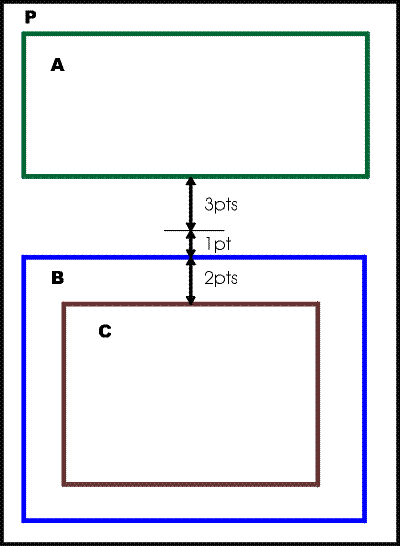
character

The fo:character flow object represents a character that is mapped to a glyph for presentation.

color-profile

Used to declare a color profile for a stylesheet.

conditional-page-master-reference

The fo:conditional-page-master-reference is used to identify a page-master that is to be used when the conditions on its use are satisfied.

declarations

Used to group global declarations for a stylesheet.

external-graphic

The fo:external-graphic flow object is used for a graphic where the graphics data resides outside of the XML result tree in the fo namespace.

float

The fo:float serves two purposes. It can be used so that during the normal placement of content, some related content is formatted into a separate area at beginning of the page (or of some following page) where it is available to be read without immediately intruding on the reader. Alternatively, it can be used when an area is intended to float to one side, with normal content flowing alongside.

flow

The content of the fo:flow formatting object is a sequence of flow objects that provides the flowing text content that is distributed into pages.

flow-assignment

The fo:flow-assignment is used to specify the assignment of one sequence of flows to a sequence of regions.

flow-map

The fo:flow-map is used to specify the assignment of flows to regions.

flow-name-specifier

The fo:flow-name-specifier is used to specify one flow in a source-list.

flow-source-list

The fo:flow-source-list is used to specify the sequence of flows to assign in a particular fo:flow-assignment.

flow-target-list

The fo:flow-target-list is used to specify the sequence of regions to which flows are assigned in a particular fo:flow-assignment.

folio-prefix

The fo:folio-prefix formatting object specifies a static prefix for the folio numbers within a page-sequence.

folio-suffix

The fo:folio-suffix formatting object specifies a static suffix for the folio numbers within a page-sequence.

footnote

The fo:footnote is used to produce a footnote citation and the corresponding footnote.

footnote-body

The fo:footnote-body is used to generate the content of the footnote.

index-key-reference

The fo:index-key-reference formatting object is used to generate a set of cited page items for all the occurrences of the specified index-key.

index-page-citation-list

The fo:index-page-citation-list formatting object is used to group together the sets of cited page items generated by its fo:index-key-reference children. The ultimate effect of the fo:index-page-citation-list is to generate a formatted list of page numbers and ranges.

index-page-citation-list-separator

The fo:index-page-citation-list-separator formatting object specifies the formatting objects used to separate singleton page numbers or page number ranges in the generated list of page numbers.

index-page-citation-range-separator

The fo:index-page-citation-range-separator formatting object specifies the formatting objects used to separate two page numbers forming a range in the generated list of page numbers.

index-page-number-prefix

The fo:index-page-number-prefix formatting object specifies a static prefix for the cited page items created by fo:index-key-reference.

index-page-number-suffix

The fo:index-page-number-suffix formatting object specifies a static suffix for the cited page items created by fo:index-key-reference.

index-range-begin

The fo:index-range-begin formatting object is used to indicate the beginning of an "indexed range" associated with an index key. The index range is ended by a corresponding fo:index-range-end.

index-range-end

The fo:index-range-end is used to indicate the end of an "indexed range" that is started by its matching fo:index-range-begin.
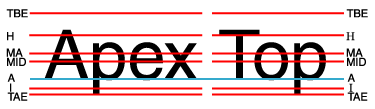
initial-property-set

The fo:initial-property-set specifies formatting properties for the first line of an fo:block.

inline

The fo:inline formatting object is commonly used for formatting a portion of text with a background or enclosing it in a border.

inline-container

The fo:inline-container flow object is used to generate an inline reference-area.

instream-foreign-object

The fo:instream-foreign-object flow object is used for an inline graphic or other "generic" object where the object data resides as descendants of the fo:instream-foreign-object.

layout-master-set

The fo:layout-master-set is a wrapper around masters used in the document.

leader

The fo:leader formatting object is used to generate leaders consisting either of a rule or of a row of a repeating character or cyclically repeating pattern of characters that may be used for connecting two text formatting objects.

list-block

The fo:list-block flow object is used to format a list.

list-item

The fo:list-item formatting object contains the label and the body of an item in a list.

list-item-body

The fo:list-item-body formatting object contains the content of the body of a list-item.

list-item-label

The fo:list-item-label formatting object contains the content of the label of a list-item; typically used to either enumerate, identify, or adorn the list-item's body.

marker

The fo:marker is used in conjunction with fo:retrieve-marker or fo:retrieve-table-marker to produce running headers or footers.

multi-case

The fo:multi-case is used to contain (within an fo:multi-switch) each alternative sub-tree of formatting objects among which the parent fo:multi-switch will choose one to show and will hide the rest.

multi-properties

The fo:multi-properties is used to switch between two or more property sets that are associated with a given portion of content.

multi-property-set

The fo:multi-property-set is used to specify an alternative set of formatting properties that, dependent on a User Agent state, are applied to the content.

multi-switch

The fo:multi-switch wraps the specification of alternative sub-trees of formatting objects (each sub-tree being within an fo:multi-case), and controls the switching (activated via fo:multi-toggle) from one alternative to another.

multi-toggle

The fo:multi-toggle is used within an fo:multi-case to switch to another fo:multi-case.

number

Creates a number sequence to be processed by the XSL-FO processor and generate a list of sequences in varies of area in the XSL-FO area tree.

page-number

The fo:page-number formatting object is used to represent the current page-number.

page-number-citation

The fo:page-number-citation is used to reference the page-number for the page containing the first normal area returned by the cited formatting object.

page-number-citation-last

The fo:page-number-citation-last is used to reference the page-number for the last page containing the an area that is (a) returned by the cited formatting object and (b) has an area-class that is consistent with the specified page-citation-strategy.

page-sequence

The fo:page-sequence formatting object is used to specify how to create a (sub-)sequence of pages within a document; for example, a chapter of a report. The content of these pages comes from flow children of the fo:page-sequence.

page-sequence-master

The fo:page-sequence-master specifies sequences of page-masters that are used when generating a sequence of pages.

page-sequence-wrapper

The fo:page-sequence-wrapper formatting object is used to specify inherited properties for a group of fo:page-sequence formatting objects. It has no additional formatting semantics.

region-after

This region defines a viewport that is located on the "after" side of fo:region-body region.
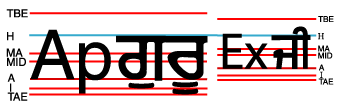
region-before

This region defines a viewport that is located on the "before" side of fo:region-body region.
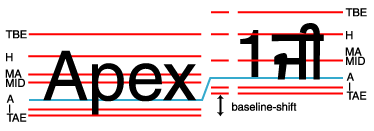
region-body

This region specifies a viewport/reference pair that is located in the "center" of the fo:simple-page-master.

region-end

This region defines a viewport that is located on the "end" side of fo:region-body region.
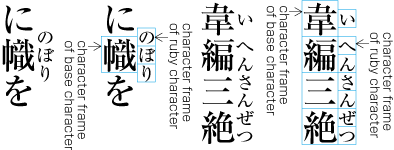
region-name-specifier

The fo:region-name-specifier is used to specify one region in a target-list.
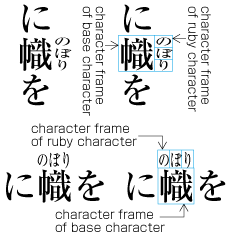
region-start

This region defines a viewport that is located on the "start" side of fo:region-body region.

repeatable-page-master-alternatives

An fo:repeatable-page-master-alternatives specifies a sub-sequence consisting of repeated instances of a set of alternative page-masters. The number of repetitions may be bounded or potentially unbounded.

repeatable-page-master-reference

An fo:repeatable-page-master-reference specifies a sub-sequence consisting of repeated instances of a single page-master. The number of repetitions may be bounded or potentially unbounded.

retrieve-marker

The fo:retrieve-marker is used in conjunction with fo:marker to produce running headers or footers.

retrieve-table-marker

The fo:retrieve-table-marker is used in conjunction with fo:marker to produce table-headers and table-footers whose content can change over different pages, different regions or different columns.

root

The fo:root node is the top node of an XSL result tree. This tree is composed of formatting objects.

scaling-value-citation

The fo:scaling-value-citation is used to obtain the scale-factor applied to the cited fo:external-graphic.

simple-page-master

The fo:simple-page-master is used in the generation of pages and specifies the geometry of the page. The page is subdivided into regions.

single-page-master-reference

An fo:single-page-master-reference specifies a sub-sequence consisting of a single instance of a single page-master.

static-content

The fo:static-content formatting object holds a sequence or a tree of formatting objects that is to be presented in a single region or repeated in like-named regions on one or more pages in the page-sequence. Its common use is for repeating or running headers and footers.

table

The fo:table flow object is used for formatting the tabular material of a table.

table-and-caption

The fo:table-and-caption flow object is used for formatting a table together with its caption.

table-body

The fo:table-body formatting object is used to contain the content of the table body.

table-caption

The fo:table-caption formatting object is used to contain block-level formatting objects containing the caption for the table only when using the fo:table-and-caption.

table-cell

The fo:table-cell formatting object is used to group content to be placed in a table cell.

table-column

The fo:table-column formatting object specifies characteristics applicable to table cells that have the same column and span.

table-footer

The fo:table-footer formatting object is used to contain the content of the table footer.

table-header

The fo:table-header formatting object is used to contain the content of the table header.

table-row

The fo:table-row formatting object is used to group table-cells into rows.

title

The fo:title formatting object is used to associate a title with a given page-sequence. This title may be used by an interactive User Agent to identify the pages. For example, the content of the fo:title can be formatted and displayed in a "title" window or in a "tool tip".

wrapper

The fo:wrapper formatting object is used to specify inherited properties for a group of formatting objects. It has no additional formatting semantics.

6.4 Declarations and Pagination and Layout Formatting Objects

6.4.1 Introduction

The root node of the formatting object tree must be an fo:root formatting object. The children of the fo:root formatting object are an fo:layout-master-set, an optional fo:declarations, an optional fo:bookmark-tree, and a sequence of one or more fo:layout-master-set and/or fo:page-sequence and/or fo:page-sequence-wrapper elements. The fo:layout-master-set elements define the geometry and sequencing of the pages; the children of the fo:page-sequences, which are called flows (contained in fo:flow and fo:static-content), provide the content that is distributed into the pages. The fo:declarations object is a wrapper for formatting objects whose content is to be used as a resource to the formatting process. The process of generating the pages is done automatically by the XSL processor formatting the result tree.

The children of an fo:layout-master-set are pagination and layout specifications and flow-map specifications. There are two types of pagination and layout specifications: page-masters and page-sequence-masters. Page-masters have the role of describing the intended subdivisions of a page and the geometry of these subdivisions. Page-sequence-masters have the role of describing the sequence of page-masters that will be used to generate pages during the formatting of an fo:page-sequence. Flow-maps have the role of assigning flows to regions.

6.4.1.1 Page-sequence-masters

Each fo:page-sequence-master characterizes a set of possible sequences of page-masters. For any given fo:page-sequence, only one of the possible set of sequences will be used. The sequence that is used is any sequence that satisfies the constraints determined by the individual page-masters, the flows which generate pages from the page-masters, and the fo:page-sequence-master itself.

The fo:page-sequence-master is used to determine which page-masters are used and in which order. The children of the fo:page-sequence-master are a sequence of sub-sequence specifications. The page-masters in a sub-sequence may be specified by a reference to a single page-master or as a repetition of one or more page-masters. For example, a sequence might begin with several explicit page-masters and continue with a repetition of some other page-master (or masters).

The fo:single-page-master-reference is used to specify a sub-sequence consisting of a single page-master.

There are two ways to specify a sub-sequence that is a repetition. The fo:repeatable-page-master-reference specifies a repetition of a single page-master. The fo:repeatable-page-master-alternatives specifies the repetition of a set of page-masters. Which of the alternative page-masters is used at a given point in the sub-sequence is conditional and may depend on whether the page number is odd or even, is the first page, is the last page, or is blank. The "maximum-repeats" property on the repetition specification controls the number of repetitions. If this property is not specified, there is no limit on the number of repetitions.

6.4.1.2 Page-masters

A page-master is a master that is used to generate a page. A page is a viewport/reference pair in which the viewport-area is a child of the area tree root. A page-viewport-area is defined to be the viewport-area of a page, and a page-area is defined to be the unique child of a page-viewport-area.

The page-viewport-area is defined by the output medium; the page-area holds the page contents and has the effect of positioning the page contents on the output medium.

A single page-master may be used multiple times. Each time it is used it generates a single page; for example, a page-master that is referenced from an fo:repeatable-page-master-reference will be used by the fo:page-sequence to generate one page for each occurrence of the reference in the specified sub-sequence.

Note:

When pages are used with a User Agent such as a Web browser, it is common that the each document has only one page. The viewport used to view the page determines the size of the page. When pages are placed on non-interactive media, such as sheets of paper, pages correspond to one or more of the surfaces of the paper. The size of the paper determines the size of the page.

In this specification, there is only one kind of page-master, the fo:simple-page-master. Future versions of this specification may add additional kinds of page-masters.

An fo:simple-page-master has, as children, specifications for one or more regions.

A region specification is used as a master, the region-master, in generating a viewport/reference pair consisting of a region-viewport-area and a region-reference-area. The region-viewport-area is always a child of a page-area generated using the parent of the region-master.

Note:

The regions on the page are analogous to "frames" in an HTML document. Typically, at least one of these regions is of indefinite length in one of its dimensions. For languages with a lr-tb (or rl-tb) writing-mode, this region is typically of indefinite length in the top-to-bottom direction. The viewport represents the visible part of the frame. The flows assigned to the region are viewed by scrolling the region reference-area through the viewport.

Each region is defined by a region formatting object. Each region formatting object has a name and a definite position. In addition, the region's height or width is fixed and the other dimension may be either fixed or indefinite. For example, a region that is the body of a Web page may have indefinite height.

The specification of the region determines the size and position of region-viewport-areas generated using the region formatting object. The positioning of the viewport is relative to its page-area parent.

For version 1.1 of this Recommendation, a page-master will consist of the following regions: "region-body" (one or more) and four other regions, one on each side of the body. To allow the side regions to correspond to the current writing-mode, these regions are named "region-before" (which corresponds to "header" in the "lr-tb" writing-mode), "region-after" (which corresponds to "footer" in the "lr-tb" writing-mode), "region-start" (which corresponds to a "left-sidebar" in the "lr-tb" writing-mode) and "region-end" (which corresponds to a "right-sidebar" in the "lr-tb" writing-mode). It is expected that a future version of the Recommendation will introduce a mechanism that allows a page-master to contain an arbitrary number of arbitrarily sized and positioned regions.

Some types of region have conditional sub-regions associated with them, and the associated region-reference-areas are divided up by having child areas corresponding to the sub-regions, including a "main-reference-area" for the region. For region-masters to which the column-count property applies, the main-reference-area is further subdivided by having child-areas designated as "span-reference-areas" whose number depends upon the number of spans (i.e. block-areas with span="all") occurring on the page. These in turn are subdivided by having child-areas designated as "normal-flow-reference-areas", whose number depends on the number of columns specified.

6.4.1.3 Page Generation

Pages are generated by the formatter's processing of fo:page-sequences. As noted above, each page is a viewport/reference pair in which the viewport-area is a child of the area tree root. Each page is generated using a page-master to define the region-viewport-areas and region-reference-areas that correspond to the regions specified by that page-master.

Each fo:page-sequence references either an fo:page-sequence-master or a page-master. If the reference is to a page-master, this is interpreted as if it were a reference to an fo:page-sequence-master that repeats the referenced page-master an unbounded number of times. An fo:page-sequence references a page-master if either the fo:page-sequence directly references the page-master via the "master-reference" property or that property references an fo:page-sequence-master that references the page-master.

6.4.1.4 Flows and Flow Mapping

There are two kinds of flows: fo:static-content and fo:flow. An fo:static-content flow holds content, such as the text that goes into headers and footers, that is repeated on many of the pages. An fo:flow flow holds content that is distributed across a sequence of pages. The processing of the fo:flow flows is what determines how many pages are generated to hold the fo:page-sequence. The fo:page-sequence-master is used as the generator of the sequence of page-masters into which the flow children content is distributed.

The children of a flow are a sequence of block-level flow objects. Each flow has a name that is given by its "flow-name" property. No two flows that are children of the same fo:page-sequence may have the same name.

The assignment of flows to regions on a page-master is determined by a flow-map. The flow-map is an association between the flow children of the fo:page-sequence and regions defined within the page-masters referenced by that fo:page-sequence.

Flow-maps are specified by fo:flow-map formatting objects. An fo:page-sequence uses the flow-map indicated by its flow-map-reference property when assigning its flows to regions. If the flow-map-reference property is not specified for the page-sequence then the implicit flow-map is used for that page-sequence, as in version 1.0 of this Recommendation. The "flow-name" property of a flow specifies to which region that flow is assigned. Each region has a "region-name" property. The flow-map assigns a flow to the region that has the same name.

To avoid requiring users to generate region-names, the regions all have default values for the "region-name" property. The region-body, region-before, region-after, region-start, and region-end have the default names "xsl-region-body", "xsl-region-before", "xsl-region-after", "xsl-region-start", and "xsl-region-end", respectively. It is an error for a page master to have two region-body descendants with the default region-name.

In addition, an fo:static-content formatting object may have a "flow-name" property value of "xsl-before-float-separator" or "xsl-footnote-separator". If a conditional sub-region of the region-body is used to generate a reference-area on a particular page, the fo:static-content whose name corresponds to the conditional sub-region shall be formatted into the reference-area associated with the sub-region, as specified in 6.12.1.3 Conditional Sub-Regions.

6.4.1.5 Constraints on Page Generation

The areas that are descendants of a page-area are constrained by the page-master used to generate the page-area and the flows that are assigned to the regions specified on the page-master. For fo:flow flows, the areas generated by the descendants of the flow are distributed across the pages in the sequence according to the flow-map in effect for that page-sequence. For fo:static-content flows, the processing of the flow is repeated for each page generated using a page-master having the region to which the flow is assigned with two exceptions: for an fo:static-content with a flow-name of xsl-before-float-separator, the processing is repeated only for those page-reference-areas which have descendant areas with an area-class of xsl-before-float, and for an fo:static-content with a flow-name of xsl-footnote-separator, the processing is repeated only for those page-reference-areas which have descendant areas with an area-class of xsl-footnote.

6.4.1.7 Example Flow Maps

A typical use of flow maps are where there are two or more flows that each, independently of each other, flow into separate regions on the pages. Another one is when the flow is flowed from one region into another region on the same page and continuing onto further pages. A third use is when two or more flows are "concatenated"; each flow beginning where the previous one ends.

6.4.1.8 Initial Caps

Large initial capital letters are often used for the first paragraph of a new section or chapter. Many scripts have precise alignment conventions for how the initial letter should be positioned relative to the text in the paragraph.

There are three main types of initial letter.

The first of these is called a "raised initial"; it is set in a larger size then the main text, and space must be left for it in the block direction. No special support is needed for raised initials, as an fo:inline can be used with an increased font-size.

The second sort is a margin initial; it protrudes into the margin in the inline direction, and is often larger than the paragraph text. This is treated as a special case of the third sort of initial capital, because of its vertical alignment requirements.

The third sort of initial letter is often called a drop capital (often abbreviated to "drop cap"). The initial letter is large enough that it extends in the block direction to the Nth following baseline; the drop capital in Figure 44 is sized such that its baseline aligns with the baseline of the fourth line of text in the paragraph, and the top aligns with the cap-height on the first line; this is called a 4-line drop cap.

A paragraph of text starting with the word Decorative, in which the D is large, and extends down so that its baseline is the same as that of the fourth line of text in the paragraph, and the top of the D is aligned with the tops of the capital letters in the first line of text.

Figure 44. Sample Paragraph Starting With Four-Line Drop Capital.

Note:

The height of the letter D is thus one cap-height plus three line-heights (including vertical spacing); this will not in general be equal to four times the font size, and an implementation may need to use an algorithm such as binary search to discover the correct font size given the number of lines to span.

Note:

If the line spacing varies over the course of the paragraph, the resulting size of an initial cap is implementation dependent: it must either be positioned using the inherited line spacing where the initial occurs, or must correctly take into account the varying line spacing, and align with the appropriate actual line of text.

6.4.2 Side by Side

A way to position objects next to each other. Side-by-side includes complex positioning and breaking rules

Multiple separate flows are synchronized in layout. One flow is designated as primary and contains synchronization regions marked up to draw content from the other, secondary flow or flows; this secondary content will be rendered alongside the main flow at the synchronization points.

A flow map showing dependencies.

<fo:flow-map>
   <fo:flow-assignment>
      <fo:flow-source-list>
        <fo:flow-name-specifier
           flow-name-reference="Arabic-Flow"/>
      </fo:flow-source-list>
      <fo:flow-target-list>
         <fo:region-name-specifier
         region-name-reference="Region-Middle"/>
      </fo:flow-target-list>
   </fo:flow-assignment>
   <fo:flow-assignment flow-map-dependency-reference=”Arabic-Flow”>
      <fo:flow-source-list>
         <fo:flow-name-specifier
            flow-name-reference="Armenian-Flow"/>
      </fo:flow-source-list>
      <fo:flow-target-list>
         <fo:region-name-specifier
           region-name-reference="Region-Right"/>
      </fo:flow-target-list>
   </fo:flow-assignment>
   <fo:flow-assignment flow-map-dependency-reference="Arabic-Flow">
      <fo:flow-source-list>
         <fo:flow-name-specifier
          flow-name-reference="Syriac-Flow"/>
      </fo:flow-source-list>
   <fo:flow-target-list>
      <fo:region-name-specifier
        region-name-reference="Region-Left"/>
   </fo:flow-target-list>
 </fo:flow-assignment>
 </fo:flow-map>
6.4.2.1 Common Dependencies Properties for Formatting Objects

The dependency-content-begin dependency-content-end properties are used to identify spans of separate flows that are to be synchronized, in a manner similar to that used to mark change bars. These properties can be applied to any objects, including in particular fo:block and fo:inline; the indicated spans can start and end in different elements, and the two end-points of a span do not both have to be block or inline; the spans are treated as being asynchronous with respect to the formatting.

In the example in figure 45, taken from a parallel-text edition of a text for which there are manuscripts in three different languages, corresponding sections from each manuscript are formatted side by side, with the start of each on the same line, even if the section does not start at the beginning of the line.

Graphic showing text side by side

Figure 45. Dependent Content on non-block boundaries.

The following markup might be used:

<fo:flow flow-name=”Arabic-Flow”>
   …
   <fo:block dependency-content-begin=”Key_A”>
       And Nadan went to Haiqâr, and said to him, 
       ‘W’allah, O my uncle! The king verily 
       rejoiceth in thee for having done what he 
       commanded thee.
   </fo:block>
   <fo:block>
       And now he hath sent me to thee that thou 
       mayst dismiss the soldiers to their duties 
       and come thyself to him with thy handsbound 
       behind thee, and thy feet chained, that the 
       ambassadors of Pharaoh may see this, and 
       that the king may be feared by them and by 
       their king’.
   </fo:block> 
   <fo:block>
       And Nadan took him and went with him to the 
       king.
   </fo:block>
   <fo:block dependency-content-end=”Key_A”>
       Then answered Haiqâr and said, ‘To hear is 
       to obey.’
   </fo:block>
   …
 </fo:flow>

Example : dependency-content-begin and -end properties

6.4.3 Widow and Orphan Management

Synchronization of flows is generally implemented in a formatter by leaving space between blocks, as can be seen in the left and right columns in Figure 45. Widow and Orphan management is a mechanism for specifying how content between synchronized spans should be treated: it can be kept with a block or moved to the start of the next synchronized spam, or the synchronization gap can be suppressed entirely. If the gap is suppressed, the alignmnent of synchronized spans may not be correct, or the formatter may use other copyfitting techniques to achieve alignment.

Figure 46. illustrates the case where widows and orphans are generated.

Figure 46. Dependent Content: Formation of Widows and Orphans.

The following example shows the the keep-with-dependent-content property used together with synchronized flow content:

<fo:block keep-with-dependent-content=”widows” 
          dependent-content-begin=”Key_A”>
    Text text text …
   <fo:inline dependent-content-end=”Key_A”>
       Text text … 
   </fo:inline>
    Text text text …
 </fo:block>
 <fo:block keep-with-dependent-content=”all”>
     Text text text …
     <fo:block dependent-content-begin=”Key_B”>
         Text text … 
     </fo:inline>
     Text text text …
 </fo:block> 

Using this example as the document structure equivalent for the schematic representation in Figure 46, the result of applying the keeps is illustrated in Figure 47.

Figure 47. Dependent Content: Widow and Orphan Management Using Keep.

6.4.4 fo:root

Common Usage:

This is the top node of the formatting object tree. It holds an fo:layout-master-set formatting object, an optional fo:declarations, an optional fo:bookmark-tree, and one or more fo:layout-master-set, fo:page-sequence or fo:page-sequence-wrapper objects. An fo:layout-master-set holds masters used in the document. Each fo:page-sequence represents a sequence of pages that result from formatting the content children of the fo:page-sequence. An fo:page-sequence-wrapper can also occur as the child of fo:root. An fo:page-sequence-wrapper can contain zero or more fo:page-sequence objects or fo:page-sequence-wrapper objects. The fo:page-sequence-wrapper is used to specify inherited properties for the fo:page-sequence objects it wraps; it has no additional formatting semantics.

Note:

A document can contain multiple fo:page-sequences. For example, each chapter of a document could be a separate fo:page-sequence; this would allow chapter-specific content, such as the chapter title, to be placed within a header or footer.

Areas:

Page-viewport-areas are returned by the fo:page-sequence children of the fo:root formatting object. The fo:root does not generate any areas.

Constraints:

The children of the root of the area tree consist solely of, and totally of, the page-viewport-areas returned by the fo:page-sequence children of the fo:root. The set of all areas returned by the fo:page-sequence children is properly ordered. (See Section 4.7.1 General Ordering Constraints.)

Contents:

(layout-master-set,declarations?,bookmark-tree?,(layout-master-set|page-sequence|page-sequence-wrapper)+)

It is an error if there is not at least one fo:page-sequence descendant of fo:root.

The following properties apply to this formatting object:

7.5 Common Accessibility Properties
7.33.8 id
7.25.1 index-class
7.25.2 index-key
7.30.15 media-usage

6.4.5 fo:declarations

Common Usage:

The fo:declarations formatting object is used to group global declarations for a stylesheet.

Areas:

The fo:declarations formatting object does not generate or return any areas.

Constraints:

None.

Contents:

(color-profile)*

The fo:declarations formatting object may have additional child elements in a non-XSL namespace. Their presence does not, however, change the semantics of the XSL namespace objects and properties. The permitted structure of these non-XSL namespace elements is defined for their namespace(s).

6.4.6 fo:color-profile

Common Usage:

The fo:color-profile formatting object is used to declare an ICC Color Profile for a stylesheet. The color-profile is referenced again via the name specified in the "color-profile-name" property.

The color-profile is identified by the URI specified in the "src" property value. This URI may identify an internally recognized color-profile or it may point to a ICC Color Profile encoding that should be loaded and interpreted.

When the color-profile is referenced (e.g., via the rgb-icc function 5.12.2 Color Functions), the following rules are used:

  1. If the color-profile is available, the color value identified from the color-profile should be used.

  2. If the color-profile is not available, the sRGB ([sRGB]) fallback must be used.

Areas:

The fo:color-profile formatting object does not generate or return any areas.

Constraints:

None.

Contents:

EMPTY

The following properties apply to this formatting object:

7.33.16 src
7.19.2 color-profile-name
7.19.3 rendering-intent

6.4.7 fo:page-sequence

Common Usage:

The fo:page-sequence formatting object is used to specify how to create a (sub-)sequence of pages within a document; for example, a chapter of a report. The content of these pages comes from flow children of the fo:page-sequence as assigned by the flow-map in effect for that fo:page-sequence. The layout of these pages comes from the fo:page-sequence-master or page-master referenced by the master-reference trait on the fo:page-sequence. The sequence of areas returned by each of the flow-object children of the fo:page-sequence are made descendants of the generated pages as described below.

Areas:

The fo:page-sequence formatting object generates a sequence of viewport/reference pairs, and returns the page-viewport-areas. For each page-reference-area, and each region specified in the page-master used to generate that page-reference-area, the fo:page-sequence object also generates the viewport/reference pair for the occurrence of that region in that page-reference-area, and may generate a before-float-reference-area, footnote-reference-area, and main-reference-area, and one or more normal-flow-reference-areas. The generation of these further areas is described in the descriptions of the fo:simple-page-master, region-masters and fo:flow-map. It may also generate a title-area.

All areas generated by an fo:page-sequence have area-class "xsl-absolute".

The page-viewport-areas identify one of the sides as a page binding edge. This recommendation does not specify the mechanism for selecting which side is the page binding edge.

Note:

If the User Agent can determine that the result is to be bound, then the page binding edge of any given page is the edge on which that page is intended to be bound.

Commonly the page binding edge of a page with an odd folio-number is the start-edge of that page and the binding-edge of a page with an even folio-number is the end-edge of that page.

The binding can be a simple as stapling or may be as complex as producing a book using an imposition scheme.

For each formatting object descendant D under the change bar influence of a given fo:change-bar-begin object F (as defined in 6.13.2 fo:change-bar-begin), the fo:page-sequence generates a "change bar area" for each area A returned by D, as a child of the ancestor region-area of A. Each change bar area is of class xsl-absolute, with zero margin and padding, with border-end-color given by the change-bar-color of F, with border-end-style given by the change-bar-style of F, with border-end-width given by the change-bar-width of F, with inline progression-dimension equal to zero and block-progression-dimension equal to the dimension of A parallel to the block-progression-dimension of the region-area.

The change bar area is positioned to be adjacent to the nearest ancestor area C of A which is either a normal-flow-reference-area or region-reference-area. The change bar area is aligned with A and lies away from C by a distance given by the change-bar-offset of F, with respect to the start-edge or the end-edge of C as determined by the change-bar-placement trait of F.

Trait Derivation:

The reference-orientation and writing-mode of the region-viewport-areas are determined by the values of the "reference-orientation" and "writing-mode" properties of the fo:page-sequence.

Note:

The value may be given as an explicit value or the from-page-master-region function may be used to obtain the value specified on the layout formatting object being used to generate the region viewport/reference area pair.

Constraints:

Each page-viewport-area/page-reference-area pair is generated using a page-master that satisfies the constraints of the page-sequence-master identified by the master-reference trait of the fo:page-sequence or a page-master that was directly identified by the master-reference trait. The region-viewport-area children of such a page-reference-area must correspond to the regions that are children of that page-master.

The areas generated by the fo:page-sequence have as their descendants the areas returned by the flows that are children of the fo:page-sequence.

The areas returned to the fo:page-sequence by a flow must satisfy five types of constraints:

  • Completeness. All areas returned by formatting object descendants of the flow children of the fo:page-sequence become descendants of areas generated by the fo:page-sequence, with the exception of glyph-areas subject to deletion or substitution as in Sections 4.7.2 Line-building and 4.7.3 Inline-building.

  • Flow-map association. The areas returned from a flow child of the fo:page-sequence must be descendants of region-reference-areas generated using regions to which the flow is assigned by the flow-map in effect.

    Areas returned from an fo:static-content with a flow-name of xsl-before-float-separator become children of the before-float-reference-area of an area associated to an fo:region-body, following all sibling areas of area-class xsl-before-float. Areas returned from an fo:static-content with a flow-name of xsl-footnote-separator become children of the footnote-reference-area of an area associated to an fo:region-body, preceding all sibling areas of area-class xsl-footnote.

    If the flow-map-reference is specified, the flow-map in effect is the closest preceding fo:flow-map (this is a child of a preceding fo:layout-master-set) having a flow-map-name matching the specified value of flow-map-reference on the fo:page-sequence. If the flow-map-reference is not specified, the flow-map in effect is the implicit flow-map shown in 6.4.32 fo:flow-map.

  • Area-class association. Areas returned by flow children of an fo:page-sequence are distributed as follows:

    • All areas of area-class xsl-footnote, and all areas returned from an fo:static-content with a flow-name of xsl-footnote-separator, must be descendants of a footnote-reference-area;

    • all areas of area-class xsl-before-float, and all areas returned from an fo:static-content with a flow-name of xsl-before-float-separator, must be descendants of a before-float-reference-area;

    all other areas must be descendants of a region-reference-area and further they must be descendants of a main-reference-area child of that region-reference-area if it has one.

  • Stacking. The stackable areas of a given class returned by children of each flow are properly stacked within the appropriate reference-area, as described above.

  • Flow-assignment ordering. The default ordering constraint of 4.7.1 General Ordering Constraints does not apply to the fo:page-sequence. The default ordering constraint applies to the flow object children inside each fo:flow; special ordering constraints apply to the child fo:static-content objects.

    If the flow-map in effect for a page-sequence has a flow-assignment child with flow-source-list S and flow-target-list T and the child flow-name-specifiers of S have flow-name-reference values F1,...,Fm, and the child region-name-specifiers of T have region-name-reference values R1,...,Rn, then for each area-class C, the areas returned to the page-sequence belonging to that class have the same order in the area tree (relative to the region ordering) as their generating formatting objects (relative to the flow ordering). That is, if A and B are areas of area-class C and either A and B are returned by the same flow with A returned prior to B, or A and B are returned by flows with flow-name values Fi and Fj, respectively, for some i and j such that i<j, then one of the following conditions must hold:

    • the ancestor page-reference-area of A precedes the ancestor page-reference-area of B, or

    • A and B share the same ancestor page-reference-area, A is a descendant of a region-reference-area generated using a region whose region-name value is Rk and B is a descendant of a region-reference-area generated using a region whose region-name value is Rl for some k and l such that k<l, or

    • A and B are descendants of the same region-reference-area and A precedes B in the pre-order-tree traversal of the area tree.

If a title-area is generated the following constraints must be satisfied:

The default ordering constraint of section 4.7.1 General Ordering Constraints does apply to the fo:title.

Contents:

(title?,folio-prefix?,folio-suffix?,static-content*,flow+)

The following properties apply to this formatting object:

7.10.1 country
7.30.7 flow-map-reference
7.29.1 format
7.10.6 language
7.29.4 letter-value
7.29.2 grouping-separator
7.29.3 grouping-size
7.33.8 id
7.25.1 index-class
7.25.2 index-key
7.30.11 initial-page-number
7.30.10 force-page-count
7.30.13 master-reference
7.22.3 reference-orientation
7.32.7 writing-mode

6.4.8 fo:page-sequence-wrapper

Common Usage:

The fo:page-sequence-wrapper formatting object is used to specify inherited properties for a group of fo:page-sequence formatting objects.

Areas:

The fo:page-sequence-wrapper formatting object does not generate any areas. The fo:page-sequence-wrapper formatting object returns the sequence of areas created by concatenating the sequences of areas returned by each of the children of the fo:page-sequence-wrapper.

Trait Derivation:

Except for "id", "index-class", and "index-key", the fo:page-sequence-wrapper has no properties that are directly used by it. However, it does serve as a carrier to hold inheritable properties that are utilized by its children.

Constraints:

The order of concatenation of the sequences of areas returned by the children of the fo:page-sequence-wrapper is the same order as the children are ordered under the fo:page-sequence-wrapper. An fo:page-sequence-wrapper that contains no fo:page-sequence objects as descendants returns no areas.

Note:

Because an fo:page-sequence-wrapper that contains no fo:page-sequence objects as descendants returns no areas, any id, index-key, or index-class property on such an fo:page-sequence-wrapper is ignored; the result would be as if they were not assigned on this FO. In particular, any attempt to refer to this id would result in the same action as if this id were never declared within the FO result tree.

Contents:

(layout-master-set|page-sequence|page-sequence-wrapper)*

The following properties apply to this formatting object:

7.33.8 id
7.25.1 index-class
7.25.2 index-key

6.4.9 fo:layout-master-set

Common Usage:

The fo:layout-master-set is a wrapper around masters used in the document. This includes page-sequence-masters, page-masters, and flow-maps.

Areas:

The fo:layout-master-set formatting object generates no area directly. The masters that are the children of the fo:layout-master-set are used by the fo:page-sequence to generate pages.

Constraints:

The value of the master-name trait on each child of the fo:layout-master-set must be unique within the set.

Contents:

(simple-page-master|page-sequence-master|flow-map)+

6.4.10 fo:page-sequence-master

Common Usage:

The fo:page-sequence-master is used to specify the constraints on and the order in which a given set of page-masters will be used in generating a sequence of pages. Pages are automatically generated when the fo:page-sequence-master is used in formatting an fo:page-sequence.

Note:

There are several ways of specifying a potential sequence of pages. One can specify a sequence of references to particular page-masters. This yields a bounded sequence of potential pages. Alternatively, one can specify a repeating sub-sequence of one or more page-masters. This sub-sequence can be bounded or unbounded. Finally one can intermix the two kinds of sub-sequence-specifiers.

Areas:

The fo:page-sequence-master formatting object generates no area directly. It is used by the fo:page-sequence formatting object to generate pages.

Constraints:

The children of the fo:page-sequence-master are a sequence of sub-sequence-specifiers. A page-sequence satisfies the constraint determined by an fo:page-sequence-master if (a) it can be partitioned into a sequence of sub-sequences of pages that map one-to-one to an initial sub-sequence of the sequence of sub-sequence-specifiers that are the children of the fo:page-sequence-master and, (b) for each sub-sequence of pages in the partition, that sub-sequence satisfies the constraints of the corresponding sub-sequence-specifier. The sequence of sub-sequences of pages can be shorter than the sequence of sub-sequence-specifiers.

It is an error if the entire sequence of sub-sequence-specifiers children is exhausted while some areas returned by an fo:flow are not placed. Implementations may recover, if possible, by re-using the sub-sequence-specifier that was last used to generate a page.

Contents:

(single-page-master-reference|repeatable-page-master-reference|repeatable-page-master-alternatives)+

The following properties apply to this formatting object:

7.30.12 master-name

6.4.11 fo:single-page-master-reference

Common Usage:

An fo:single-page-master-reference is the simplest sub-sequence-specifier. It specifies a sub-sequence consisting of a single instance of a single page-master. It is used to specify the use of a particular page-master at a given point in the sequence of pages that would be generated using the fo:page-sequence-master that is the parent of the fo:single-page-master-reference.

Areas:

The fo:single-page-master-reference formatting object generates no area directly. It is used by the fo:page-sequence formatting object to generate pages.

Constraints:

The fo:single-page-master-reference has a reference to the fo:simple-page-master which has the same master-name as the master-reference trait on the fo:single-page-master-reference.

The sub-sequence of pages mapped to this sub-sequence-specifier satisfies the constraints of this sub-sequence-specifier if (a) the sub-sequence of pages consists of a single page and (b) that page is constrained to have been generated using the fo:simple-page-master referenced by the fo:single-page-master-reference.

Contents:

EMPTY

The following properties apply to this formatting object:

7.30.13 master-reference

6.4.12 fo:repeatable-page-master-reference

Common Usage:

An fo:repeatable-page-master-reference is the next simplest sub-sequence-specifier. It specifies a sub-sequence consisting of repeated instances of a single page-master. The number of repetitions may be bounded or potentially unbounded.

Areas:

The fo:repeatable-page-master-reference formatting object generates no area directly. It is used by the fo:page-sequence formatting object to generate pages.

Constraints:

The fo:repeatable-page-master-reference has a reference to the fo:simple-page-master which has the same master-name as the master-reference trait on the fo:repeatable-page-master-reference.

The sub-sequence of pages mapped to this sub-sequence-specifier satisfies the constraints of this sub-sequence-specifier if (a) the sub-sequence of pages consists of zero or more pages, (b) each page is generated using the fo:simple-page-master referenced by the fo:repeatable-page-master-reference, and (c) length of the sub-sequence is less than or equal to the value of maximum-repeats.

If no region-master child of the page-master referred to by this formatting object has a region-name associated to any flow in an fo:page-sequence, then the sub-sequence is constrained to have length zero.

Contents:

EMPTY

The following properties apply to this formatting object:

7.30.13 master-reference
7.30.14 maximum-repeats

6.4.13 fo:repeatable-page-master-alternatives

Common Usage:

The fo:repeatable-page-master-alternatives formatting object is the most complex sub-sequence-specifier. It specifies a sub-sequence consisting of repeated instances of a set of alternative page-masters. The number of repetitions may be bounded or potentially unbounded. The repetitions may also be cyclic. Which of the alternative page-masters is used at any point in the sequence depends on the evaluation of a condition on the use of the alternative.

Typical conditions include testing whether the page which is generated using the alternative is:

  • The first or last page in a page-sequence;

  • Blank

  • The nth page in a page-sequence or a page cycle.

The full set of conditions allows different page-masters to be used for the first page, for odd and even pages, for blank pages, etc.

Note:

Because the conditions are tested in order from the beginning of the sequence of children, the last alternative in the sequence usually has a condition that is always true and this alternative references the page-master that is used for all pages that do not receive some specialized layout.

Areas:

The fo:repeatable-page-master-alternatives formatting object generates no area directly. This formatting object is used by the fo:page-sequence formatting object to generate pages.

Constraints:

The children of the fo:repeatable-page-master-alternatives are fo:conditional-page-master-references. These children are called alternatives.

The sub-sequence of pages mapped to this sub-sequence-specifier satisfies the constraints of this sub-sequence-specifier if (a) the sub-sequence of pages consists of zero or more pages, (b) each page is generated using the fo:simple-page-master referenced by the one of the alternatives that are the children of the fo:repeatable-page-master-alternatives, (c) the conditions on that alternative are true, (d) that alternative is the first alternative in the sequence of children for which all the conditions are true, and (e) the length of the sub-sequence is less than or equal to the value of maximum-repeats.

Contents:

(conditional-page-master-reference+)

The following properties apply to this formatting object:

7.30.14 maximum-repeats
7.30.23 sequence-repeats

6.4.14 fo:conditional-page-master-reference

Common Usage:

The fo:conditional-page-master-reference is used to identify a page-master that is to be used when the conditions on its use are satisfied. This allows different page-masters to be used, for example, for even and odd pages, for the first page in a page-sequence, for the third page in a page-sequence cycle, or for blank pages. This usage is typical in chapters of a book or report where the first page has a different layout than the rest of the chapter and the headings and footings on even and odd pages may be different as well. Selecting page-masters based on position within a cycle is typical of bulk-mailed correspondence that is to be folded into envelopes by a folding machine.

Areas:

The fo:conditional-page-master-reference formatting object generates no area directly. It is used by the fo:page-sequence formatting object to generate pages.

Constraints:

The fo:conditional-page-master-reference has a reference to the fo:simple-page-master which has the same master-name as the master-reference trait on the fo:conditional-page-master-reference.

There are three traits, page-position, odd-or-even, and blank-or-not-blank that specify the sub-conditions on the use of the referenced page-master. All three sub-conditions must be true for the condition on the fo:conditional-page-master-reference to be true.

Note:

Since the properties from which these traits are derived are not inherited and the initial value of all the properties makes the corresponding sub-condition true, only the subset of traits that are derived from properties with specified values must have their corresponding sub-condition be true.

The sub-condition corresponding to the page-position trait is true if the page generated using the fo:conditional-page-master-reference has the specified position in the sequence of pages generated by the referencing page-sequence; namely, "first", "last", "only" (both first and last), "rest" (not first nor last), "any" (all of the previous) or a number equal to the page number (or the number within the page cycle). The referencing page-sequence is the fo:page-sequence that referenced the fo:page-sequence-master from which this fo:conditional-page-master-reference is a descendant.

The sub-condition corresponding to the odd-or-even trait is true if the value of the odd-or-even trait is "any" or if the value matches the parity of the page number of the page generated using the fo:conditional-page-master-reference.

The sub-condition corresponding to the blank-or-not-blank trait is true, if (1) the value of the trait is "not-blank" and the page generated using the fo:conditional-page-master-reference has areas generated by descendants of the fo:flow formatting objects; if (2) the value of the trait is "blank" and the page generated using the fo:conditional-page-master-reference is such that there are no areas from any fo:flow to be put on that page (e.g., (a) to maintain proper page parity due to (i) a break-after or break-before value of "even-page" or "odd-page" or (ii) at the start or end of the page-sequence or (b) because the constraints on the areas generated by descendants of the fo:flow formatting objects would not be satisfied if they were descendant from this page); or if (3) the value of the trait is "any".

Note:

A "blank page" is a page generated under (2) of the sub-condition corresponding to "blank-or-not-blank" above. This has nothing to do with whether the page appears completely blank to the reader.

Contents:

EMPTY

The following properties apply to this formatting object:

7.30.13 master-reference
7.30.18 page-position
7.30.16 odd-or-even
7.30.1 blank-or-not-blank

6.4.15 fo:page-master

Common Usage:

The fo:page-master is used in the generation of pages and specifies the geometry of the page. The page may be subdivided into an arbitrary number of regions, each called an fo:region.

Areas:

The fo:page-master formatting object generates no area directly. It is used in the generation of pages by an fo:page-sequence.

When the fo:page-master is used to generate a page, a viewport/reference pair is generated, consisting of a page-viewport-area and a page-reference-area. The page-viewport-area represents the physical bounds of the output medium. The page-reference-area represents the portion of the page on which content is intended to appear; that is, the area inside the page margins.

In addition, when the fo:page-master is used to generate a page, viewport/reference pairs that correspond to the regions that are the children of the fo:page-master are also generated.

A large shape called Region A is filled with text, and has z-index of zero. A smaller shape, called region B, wholly contained within region A, also contains text (coloured red).  Region B has a z-index of 1, so that the text in region A is pushed away from it.  If both regions had the same z-index, the text would ovelap. A third region, region C (coloured green) has z-index of 2, and forces the text in the other two regions to avoid it.

Figure 48. The z-index property. A large shape called Region A is filled with text, and has z-index of zero. A smaller shape, called region B, wholly contained within region A, also contains text (coloured red). Region B has a z-index of 1, so that the text in region A is pushed away from it. If both regions had the same z-index, the text would ovelap. A third region, region C (coloured green) has z-index of 2, and forces the text in the other two regions to avoid it.

Trait Derivation:

Same as fo:simple-page-master

Constraints:

Same as fo:simple-page-master

Contents:

(region)+

The following properties apply to this formatting object:

7.11 Common Margin Properties-Block

7.22.5 bleed-box

7.30.12 master-name

7.30.17 page-height

7.30.19 page-width

7.22.3 reference-orientation

7.22.6 trim-box

7.32.7 writing-mode

6.4.16 fo:simple-page-master

Common Usage:

The fo:simple-page-master is used in the generation of pages and specifies the geometry of the page. The page is subdivided into regions: one or more region-body, and up to four other regions: region-before, region-after, region-start, and region-end.

Note:

For example, if the writing-mode of the fo:simple-page-master is "lr-tb", then these regions correspond to the body of a document, the header, the footer, the left sidebar, and the right sidebar.

Note:

The simple-page-master is intended for systems that wish to provide a simple page layout facility. Future versions of this Recommendation may support more complex page layouts constructed using the fo:page-master formatting object.

Areas:

The fo:simple-page-master formatting object generates no area directly. It is used in the generation of pages by an fo:page-sequence.

When the fo:simple-page-master is used to generate a page, a viewport/reference pair is generated, consisting of a page-viewport-area and a page-reference-area. The page-viewport-area represents the physical bounds of the output medium. The page-reference-area represents the portion of the page on which content is intended to appear; that is, the area inside the page margins.

In addition, when the fo:simple-page-master is used to generate a page, viewport/reference pairs that correspond to the regions that are the children of the fo:simple-page-master are also generated. (See the formatting object specifications for the five regions (6.4.17 fo:region-body, 6.4.18 fo:region-before, 6.4.19 fo:region-after, 6.4.20 fo:region-start, and 6.4.21 fo:region-end) for the details on the generation of these areas.) The "writing-mode" of the page is used to determine the placement of the five regions on the master.

Representation of a page, showing the five regions: region-before (top), region-after (bottom), region-start (left) and region-end (right) and region-body (center).

Figure 49. Region-viewport-areas

The spacing between the outer four regions and each fo:region-body is determined by subtracting the relevant extent trait on each outer region from the "margin-x" property on that fo:region-body.

Trait Derivation:

The reference-orientation of the page-reference-area and writing-mode of the page-viewport-area are determined by the formatting object that generates the area (see 6.4.7 fo:page-sequence). The writing-mode of the page-reference-area is set to the same value as that of the page-viewport-area. Reference-orientation does not affect the page-viewport-area and its reference-orientation is set to "0". Borders and padding are not allowed with a page-reference-area. The remaining traits on the page-reference-area are set according to the normal rules for determining the values of traits.

Constraints:

When a page-master is used in the generation of a page, the block-progression-dimension and inline-progression-dimension of the content-rectangle of the page-viewport-area are determined using the computed values of the "page-height" and "page-width" properties. For sheet media, the computed values of the "page-height" and "page-width" properties determine the orientation of the sheet; "page-height" is measured from "top" to "bottom". For display media, the display window is always upright; the top of the display screen is "top".

The traits derived from the "margin-top", "margin-bottom", "margin-left" and "margin-right" properties are used to indent the page-reference-area content-rectangle from the corresponding edge of the content-rectangle of the page-viewport-area.

Note:

The reference points for the page-viewport-area content-rectangle are in terms of the "top", "bottom", "left", and "right" rather than "before-edge", "after-edge", "start-edge", and "end-edge" because users see the media relative to its orientation and not relative to the writing-mode currently in use.

A page rectangle showing the margins on each side. The outer rectangle is the content-rectangle of the page-viewport-area and the inner rectangle is the content-rectangle of the page-reference-area.

The value of the folio-number trait on the first page returned by the fo:page-sequence is constrained to equal the value of the initial-page-number trait. The value of the folio-number trait on subsequent pages is constrained to be one greater than the value on the immediately preceding page.

The format, letter-value, grouping-separator, grouping-size, country, and language traits are used to format the number into a string form, as specified in [XSLT]. This formatted number is used by the fo:page-number flow object.

Constraints applicable to regions:

There are a number of constraints that apply to all the regions that are specified within a given fo:simple-page-master.

Two examples of page models. In the first the reference orientations of the media and the page-master are 0. In the second the reference orientation of the page-master is 90. In each case, the margins are labelled with the corresponding relative names.

If the block-progression-dimension of the properly stacked region-reference-area is greater than the block-progression-dimension of the region-viewport-area that is its parent, then the constraints on the relationship between the region-viewport-area and the region-reference-area depend on values of the overflow trait on the region-master and the kind of flows assigned to the region.

If all the flows assigned to the corresponding region are fo:static-content flow objects, then there is no constraint on the block-progression-dimension of the region-reference-area.

If all the flows assigned to the corresponding region are fo:flow formatting objects, then

  • If the value of the media-usage trait is paginate, or the value of the overflow trait is visible, hidden, or error-if-overflow, then the block-progression-dimension of the region-reference-area is constrained to be no greater than the block-progression-dimension of the region-viewport-area.

  • If the value of the media-usage trait is bounded-in-one-dimension or unbounded, and the value of the overflow trait is scroll or auto, then there is no constraint on the block-progression-dimension of the region-reference-area.

Contents:

(region-body+,region-before?,region-after?,region-start?,region-end?)

The following properties apply to this formatting object:

7.11 Common Margin Properties-Block
7.30.12 master-name
7.30.17 page-height
7.30.19 page-width
7.22.3 reference-orientation
7.32.7 writing-mode

6.4.17 fo:region-body

Common Usage:

Used in constructing a simple-page-master. This region specifies a viewport/reference pair that is located in the "center" of the fo:simple-page-master. The overflow trait controls how much of the underlying region-reference-area is visible; that is, whether the region-reference-area is clipped by its parent region-viewport-area.

Note:

Typically, for paged media and when no explicit flow map is specified, the areas returned by the fo:flow formatting object in an fo:page-sequence are made to be descendants of a sequence of region-reference-areas that correspond to the region-body. These region-reference-areas are all area descendants of page-areas for which the page-master included an fo:region-body. If the fo:flow flow is assigned to some other region, then the areas returned by the fo:flow are constrained to be descendants of region-reference-areas generated using the assigned region-master.

Note:

The body region should be sized and positioned within the fo:simple-page-master so that there is room for the areas returned by the flow that is assigned to the fo:region-body and for any desired side regions, that is, fo:region-before, fo:region-after, fo:region-start and fo:region-end's that are to be placed on the same page. These side regions are positioned within the content-rectangle of the page-reference-area. The margins on the fo:region-body are used to position the region-viewport-area for the fo:region-body and to leave space for the other regions that surround the fo:region-body.

figure showing the margins of a page and the margins of that page's region-body

The spacing between the last four regions and the fo:region-body is determined by subtracting the relevant extent trait on the side regions from the trait that corresponds to the "margin-x" property on the fo:region-body.

The fo:region-body may be also be used to provide multiple columns. When the column-count trait is greater than one, then the region-body will be subdivided into multiple columns.

Areas:

The fo:region-body formatting object is used to generate one region-viewport-area and one region-reference-area whenever an fo:simple-page-master that has an fo:region-body as a child is used to generate a page. A scrolling mechanism shall be provided, in an implementation-defined manner, if the value of the overflow trait is "scroll".

The position and size of the region-viewport-area is specified relative to the content-rectangle of the page-reference-area generated by fo:simple-page-master. The content-rectangle of the region-viewport-area is indented from the content-rectangle of the page-reference-area by the values of the "margin-top", "margin-bottom", "margin-left" and "margin-right" properties. The values of the padding and border-width traits must be "0".

The region-reference-area generated using an fo:region-body is the child of the region-viewport-area. The "writing-mode" of the fo:region-body defines the column-progression within the region. The inline-progression-direction is used to determine the stacking direction for columns (and the default flow order of text from column-to-column).

In addition to the viewport/reference pair, when the region-body is used to generate areas, at least one and up to three additional reference-areas are generated. These reference-areas are the optional before-float-reference-area, the optional footnote-reference-area, and the main-reference-area. The latter reference-area comprises the space left after space is borrowed for the other two reference-areas. The main-reference-area has no padding, border, or space associated with it.

Note:

If there is no before-float-reference-area or footnote-reference-area child of the region-reference-area, then the content-rectangle of the main-reference-area is coterminous with the content-rectangle of the region-reference-area.

The main-reference-area has as its children a sequence of span-reference-areas. These are reference-area block-areas with zero border and padding, whose inline-progression-dimension is equal to that of the main-reference-area, and which are normally stacked within the main-reference-area.

Each span-reference-area has one or more reference-area children, designated as normal-flow-reference-areas. The number and placement of the children of a span-reference-area depends on the column-count trait of the span-reference-area. In turn, the formatter must generate precisely enough of these span-reference-areas, and so set their column-count traits, that block-areas returned from the flows with a span of "all" are children of span-reference-areas with column-count equal to 1, and block-areas returned from the flows with a