This specification provides guidelines for designing Web content authoring
tools that are more accessible for people with disabilities.
An authoring tool that conforms to these guidelines will promote accessibility
by providing an accessible user interface to authors with disabilities
as well as enabling, supporting, and promoting the production of accessible
Web content by all authors.
"Authoring Tool Accessibility Guidelines 2.0" (ATAG 2.0) is part
of a series of accessibility guidelines published by the W3C Web Accessibility Initiative
(WAI).
You are reading the Authoring Tool Accessibility Guidelines (WCAG) version 2.0. This document includes recommendations for assisting authoring tool developers to make their tools (and the Web content that the tools generate) more accessible to all people, especially people with disabilities, who may potentially be either authors or end users. These guidelines have been written to address the requirements of many different audiences, including, but not limited to: policy makers, technical administrators, and those who develop or manage content. An attempt has been made to make this document as readable and usable as possible for that diverse audience, while still retaining the accuracy and clarity needed in a technical specification.
ATAG 2.0 is part of a series of accessibility guidelines published by the Web Accessibility Initiative (WAI). The relationship between these documents is explained in "Essential Components of Web Accessibility" [COMPONENTS].
This document consists of:
-
this introduction;
- information about conformance;
- the guidelines with normative success criteria. (Note: The checkpoints in this section are numbered differently than the content in other sections. For example, "Checkpoint A.1.2" refers to the second
checkpoint of the first guideline in the first part of the guidelines);
- links to a separate non-normative document, entitled "Techniques for Authoring Tool Accessibility Guidelines 2.0" [ATAG20-TECHS] (the "Techniques document" from here on), that provide sufficient and advisory techniques for how each success criteria might be satisfied, (Note: These techniques are informative examples only, and other strategies may be used or required to satisfy the checkpoints);
- references and a glossary;
- appendices containing a checklist and a document comparing the checkpoints in ATAG 1.0 to those in this document (ATAG 2.0).
1.1 Definition of authoring
tool
ATAG 2.0 defines an "authoring tool" as: any software, or collection
of software components, that authors use to create or modify Web content for publication, where
a "collection of software components" are any software products used together (e.g., base
tool and plug-in) or separately (e.g., markup editor, image editor, and
validation tool), regardless of whether there has been any formal collaboration
between the developers of the products.
The following categories are an informative illustration of the range of tools covered by ATAG 2.0. The categories are
used primarily in the Techniques document [ATAG20-TECHS]
to mark examples that may be of interest to developers of particular types
of tools. Note: Many authoring tools include authoring
functions from more than one category (e.g., an HTML
editor with both code-level and WYSIWYG editing views):
-
Code-level Authoring Functions: Authors have full control
over all aspects of the resulting Web content that have bearing on the
final outcome. This covers, but is not limited to plain text editing,
as this category also covers the manipulation of symbolic representations
that are sufficiently fine-grained to allow the author the same freedom
of control as plain text editing (e.g., graphical tag placeholders).
Examples: text editors, text editors enhanced with graphical
tags, some wikis, etc.
-
-
Object Oriented Authoring Functions: Authors have control
over functional abstractions of
the low level aspects of the resulting Web content.
Examples: timelines, waveforms, vector-based graphic editors, objects which represent web implementations for graphical widgets (e.g., menu widgets) etc.
Indirect Authoring Functions: Authors have control over
only high-level parameters related to the automated production of the
resulting Web content. This may include interfaces that assist the author
to create and organize Web content without the author having control over
the markup, structure, or programming implementation.
Examples: content management systems, site building wizards, site
management tools, courseware, blogging tools, content aggregators, conversion
tools, model-based authoring tools, etc.
The guiding principle of ATAG 2.0 is that:
Everyone should have the ability to create and access Web content.
Authoring tools play a crucial role in achieving this principle because the
accessibility of the tool's authoring tool user interface determines
who can access the tool as a Web content author and
the accessibility of the resulting Web content determines who can be an end user of that Web content.
The approach taken to the production of accessible content in these guidelines is one of enabling, supporting, and guiding the author. In general, the Working Group does not believe that enforcing particular author behavior through overly restrictive mechanisms is a workable solution.
As an introduction to accessible authoring tool design, consider that the
authors and end users of Web content may be using the tool and its output in
contexts that are very different from that which may be regarded as typical.
For example, authors and end users may:
- not be able to see, hear, move, or be able to process some types
of information easily or at all;
- have difficulty reading or comprehending text;
- not have or be able to use a keyboard or mouse;
- have a text-only display, or a small screen.
For more information, see "How People with Disabilities Use the Web"
[PWD-USE-WEB]. In addition, following the guidelines provides benefits for authors
and end users beyond those listed in these various disability-related
contexts. For example, a person may have average hearing, but still require
captions for audio information due to a noisy workplace.
Similarly, a person working in an eyes-busy environment may require an audio
alternative to information they cannot view.
1.3 Relationship
to the Web Content
Accessibility Guidelines (WCAG)
This section is normative.
At the time of publication, version 1.0 of WCAG is a W3C Recommendation [WCAG10], and a second version of the guidelines is under development [WCAG20]. Note that the two versions have somewhat different Conformance Models.
ATAG 2.0 refers to WCAG as a benchmark for
judging the accessibility of Web content (see the term "Accessible Web Content") and Web-based authoring tool user interfaces (see the term "Accessible Authoring Tool User Interface"). For more information on how WCAG acts as a benchmark, see "Relative Priority" Checkpoints.
Note that the references to WCAG in the guidelines section of ATAG 2.0 are made without an associated version number. This has been done to
allow developers to select, and record in the conformance profile,
whichever version of WCAG is most appropriate for the circumstances of a given
authoring tool. The Working Group does recommend considering the following factors
when deciding which WCAG version to use:
- The latest version of WCAG will be the most accurate with respect to state-of-the-art
technologies and accessibility best practices. Older versions of WCAG may
include requirements that are no longer necessary, due to advances in user
agent technology.
- The versions of WCAG differ with respect to the formats for which there
are published WCAG technique documents. This is important because ATAG 2.0
requires published content type-specific WCAG benchmark documents, which may be based on WCAG technique documents, if they are available.
- The versions of WCAG differ in the degree to which they match the legislation
and policies that drive author requirements. Many authors will be seeking
to use authoring tools to create Web content that meets legislation, corporate
policies, etc. It is likely that as WCAG progresses, so too will legislation
and policies, albeit at an uneven pace. Authoring tool developers may, therefore,
consider supporting both versions of WCAG.
2. Conformance
This section is normative.
2.1 Conformance Model
Conformance Levels
Authoring tools may claim conformance to ATAG 2.0 at one of
three conformance levels. The level achieved depends on the priority of those checkpoints for which the authoring tool has satisfied the success criteria. The levels are:
- Level "A"
- The authoring tool has satisfied all Priority 1 "regular priority" checkpoints and has also satisfied all of the "relative priority" checkpoints to at least Level 1.
- Level "Double-A"
- The authoring tool has satisfied all Priority 1 and Priority 2 "regular priority" checkpoints and has also satisfied all of the "relative priority checkpoints" to at least Level 2.
- Level "Triple-A"
- The authoring tool has satisfied all "regular priority" checkpoints and has also satisfied all of the "relative priority checkpoints" to Level 3.
Figure 1: A graphical view of the requirements
of the ATAG 2.0 conformance level "ladder".
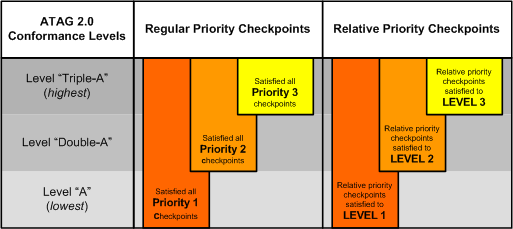
The graphic is a table with four rows and three columns. The header row labels are "ATAG 2.0 Conformance Levels", "Regular Priority Checkpoints" and "Relative Priority Checkpoints". The data rows are labeled Level 'Triple-A' (highest), Level 'Double-A', and Level 'A' (lowest). Bars superimposed across the rows demonstrate that in order to meet each higher level, additional regular priority checkpoints must be met as well as increasing levels of relative priority checkpoints.
Checkpoint Priorities
Each checkpoint has been assigned a priority
level that indicates its importance and determines whether that checkpoint must be met in order
for an authoring tool to achieve a particular conformance
level. There are three
levels of "regular priority" checkpoints as
well as a special class of "relative priority"
checkpoints that rely on WCAG to determine their importance.
"Regular Priority" Checkpoints:
- Priority 1
- Significance in Part A: If the authoring
tool does not satisfy these checkpoints, one or more groups of authors
with disabilities will find it impossible to author
for the Web using the tool.
Significance in Part B: These checkpoints are
essential to helping all authors to
create Web content that conforms to WCAG.
- Priority 2
- Significance in Part A: If the authoring tool does not satisfy these checkpoints,
one or more groups of authors with disabilities will find it difficult to
author for the Web using the tool.
Significance in Part B: These checkpoints
are
important to helping all authors create Web content that conforms to WCAG.
- Priority 3
-
- Significance in Part A: If the authoring tool does not satisfy these checkpoints,
one or more groups of authors with disabilities will find it inefficient to
author for the Web using the tool.
Significance in Part B: These
checkpoints are
beneficial to helping all authors to create Web content that conforms to WCAG.
The
importance of each "relative priority" checkpoint depends on the requirements of whichever version of WCAG the evaluator has chosen to specify in the conformance
profile.
These checkpoints can be met at one of three levels:
- Relative Priority - Level
1
-
- Significance in Part A (checkpoint A.0.1 only): The
user interface checkpoint has been satisfied at a minimal
conformance level (i.e., level A) to WCAG (version 1.0 or 2.0)
as specified in the conformance profile (including
content type-specific WCAG benchmark document).
Significance in Part B: The Web content production checkpoint
has been satisfied at a minimal conformance level (i.e., level
A) to WCAG (version 1.0 or 2.0) as specified in the conformance
profile (including content type-specific WCAG
benchmark document).
- Relative Priority - Level
2
- Significance in Part A (checkpoint A.0.1 only):
The user interface checkpoint has been satisfied at an intermediate
conformance level (i.e., level Double-A) to WCAG (version 1.0 or
2.0) as specified in the conformance profile
(including content type-specific WCAG benchmark document)
Significance in Part B: The Web content production checkpoint
has been satisfied at an intermediate conformance level
(i.e., level Double-A) to WCAG (version 1.0 or 2.0) as specified
in the conformance profile (including content
type-specific WCAG benchmark document)
- Relative Priority - Level
3
- Significance in Part A (checkpoint A.0.1 only):
The user interface checkpoint has been satisfied at a stringent
conformance level (i.e., level Triple-A) to WCAG (version 1.0 or
2.0) as specified in the conformance profile
(including content type-specific WCAG benchmark document)
Significance in Part B: The Web content production checkpoint
has been satisfied at a stringent conformance level (i.e., level
Triple-A) to WCAG (version 1.0 or 2.0) as specified in
the conformance profile (including content
type-specific WCAG benchmark document)
Relative Priority Checkpoints in Practice:
If an authoring tool developer intends to claim conformance to ATAG 2.0 at Level-A, they will first identify, in the conformance claim, a published content type-specific WCAG benchmark document that is targeted at WCAG conformance Level-A (i.e., the requirements in the benchmark are those required to conform to Level-A of WCAG).
Then, for each Relative Priority checkpoint in ATAG 2.0, this document will be used as a benchmark for determining whether the success criteria have been met. For instance, Checkpoint B.2.2 ("Check for and inform the author of accessibility problems") is a Relative Priority checkpoint. To conform to ATAG 2.0 at Level-A, this checkpoint must be met at Relative Priority - Level 1. To do this, the authoring tool must satisfy the success criteria of the checkpoint with respect to all of the requirements in the benchmark document. An example of this can be seen in the first success criteria ("An individual check must be associated with each requirement in the content type-specific WCAG benchmark document...").
2.2 Conformance Claims
A conformance claim is an assertion by a claimant that
an authoring tool
has satisfied the requirements of a chosen ATAG 2.0 conformance
profile.
Conditions
- At least one version of the conformance claim must be published on the Web as a document that conforms to either WCAG (version 1.0 or 2.0) Level A [WCAG10] or WCAG 2.0 Level Single-A [WCAG20]. A suggested metadata description for this document is "ATAG 2.0 Conformance Claim".
- Whenever the claimed conformance level is published (e.g., in marketing materials), the URI for the on-line published version of the conformance claim must be included in conjunction with that claim.
- The existence of a conformance
claim does not imply that the W3C has reviewed the claim or assured its validity.
As of the publication of this document, W3C does not act as an assuring party,
but it may do so in the future, or it may establish recommendations for assuring
parties.
- Claimants may be anyone (e.g., developers, journalists, other third
parties).
- Claimants are solely responsible for the accuracy of their claims and keeping
claims up to date.
- Claimants are encouraged to claim conformance to the most recent version
of the Authoring Tool Accessibility Guidelines Recommendation that is available.
Components of an ATAG 2.0 Conformance Claim
- Required: The date of the claim.
- Required: The name of the authoring tool and sufficient additional information, as required, to specify the version (e.g., vendor name, version number, minor release number, required patches or updates, natural language of the user interface or documentation). The version information may refer to a range of tools (e.g., "this claim refers to version 6.x"). Note: If the authoring tool is comprised of more than one component (e.g., a markup editor, an image editor, and a validation tool), then this information must be provided separately for each component, although the conformance claim will treat them as a whole.
-
Required: A conformance profile, which must include the following:
- (a) The conformance level that has been satisfied (choose one of: "A", "Double-A", "Triple-A").
- (b) A list of all of the content type(s) produced by the authoring tool. When content types are typically produced together (e.g., HTML and JavaScript, various compound document combinations), they can be listed separately or together as one content type item. For each content type, indicate
whether it is either:
- (i) covered by the conformance claim. For each of these content type items, the URI of a content type-specific WCAG benchmark document must be provided. Only the authoring of "covered" content type(s) is relevant when determining if the checkpoint success criteria have been met. At least one content type must be "covered" in order for a conformance claim to be valid.
- (ii) not covered by the conformance claim. The authoring of "uncovered" content type(s) is not relevant when determining if the checkpoint success criteria have been met
- (c) For authoring tools with Web-based functionality:
- (i) The version and URI of the Web Content Accessibility Guidelines document that the user interface was evaluated against. It is optional to provide a content type-specific WCAG benchmark document for each content types used in the implementation of the user interface.
- (ii)The name and version information of the user agent(s) on which the Web-based functionality was evaluated for conformance.
- (d) For authoring tools with functionality that is not Web-based:
- (i) The name and version information of the operating system platform(s) on which the authoring tool was evaluated for conformance.
- (ii) The name and version of the accessibility platform architectures employed.
- Required: A description of how the normative success criteria were met for each of the checkpoints that are required for the conformance level specified by the conformance profile. For relative priority checkpoints this means describing how the requirements of the content type-specific WCAG benchmark document are satisfied.
- Optional: A description of the authoring tool that identifies the types of authoring tool functions that are present in the tool. Choose one or more of: (a) Code-level authoring functions, (b) WYSIWYG authoring functions, (c) object oriented authoring functions, and (d) indirect authoring functions.
- Optional: Any additional information about the tool, including progress towards the next conformance level.
Content Type-Specific
WCAG Benchmark
The purpose of the Content Type-Specific WCAG Benchmark document (the "Benchmark" from here on) is to ensure that the authoring tool is consistent with respect to production of accessible content. For example, if the checking function detects a problem, the repair function must be able to help the author fix it. In practical terms, the Benchmark document is just the WCAG Techniques document when one exists for a content type. However, when a WCAG Techniques document does not already exist for a content type, the claimant may publish their own Benchmark document. The Benchmark has the following characteristics:
- All of the requirements in the Benchmark become normative for a particular Conformance Claim by the act of including a reference to the URI of the Benchmark in the Conformance Profile.
- The Benchmark can be created by any person or organization (although the Working Group does suggest checking to see if a Benchmark has already been published by the W3C or other provider for a content type, before creating a new one).
- The Benchmark must be published on the Web (the URI will appear in the conformance profile) where it will be open to public and market scrutiny.
Each Benchmark document must include the following:
- The name and version of the content type(s) covered by the document (e.g., plain "HTML 4.01" or "HTML 4.01 and CSS 1.0" or "SVG 1.0 and PNG images") and optionally the URI of the specification(s). The version may be a defined range, but may not be open-ended range.
- The version and URI of the Web Content Accessibility Guidelines and/or Techniques document(s) used as a basis for the Benchmark (e.g., "Web Content Accessibility Guidelines 2.0 Working Draft, http://www.w3.org/TR/WCAG20/").
- A target WCAG conformance level
(e.g., single-"A",
double-"A", or triple-"A") that the creator
of the Benchmark is claiming that Web content would conform to, if all of
the Benchmark requirements are met. If the tool allows the author to choose
between different WCAG levels, then each level needs its own Benchmark document.
- For
each success criteria in WCAG that is required by the target WCAG conformance
level (this is set in point 3 of the Conformance Claim), the Benchmark must provide either at least one
requirement for meeting the success criteria or an explanation of why that
success criteria is not applicable to the content type in question.
The Working Group
suggests the following resources are relevant when creating a Benchmark document:
- For WCAG 1.0: WCAG 1.0 guidelines [WCAG10], "Techniques for WCAG 1.0" [WCAG10-TECHS], and the W3C access note series (published for CSS 2.0 [CSS2-ACCESS], SVG [SVG-ACCESS], and SMIL [SMIL-ACCESS]).
- For WCAG 2.0: WCAG 2.0 guidelines [WCAG20], "General
Techniques for WCAG 2.0" [WCAG20-TECHS-GENERAL], technology-specific techniques for WCAG 2.0 (WCAG-GL is developing technology-specific WCAG 2.0 techniques for HTML [WCAG20-TECHS-HTML], CSS [WCAG20-TECHS-CSS], and client-side scripting [WCAG20-TECHS-SCRIPTING]), and the W3C access note series (published for CSS 2.0 [CSS2-ACCESS], SVG [SVG-ACCESS], and SMIL [SMIL-ACCESS]), and Understanding WCAG 2.0 [WCAG20-UNDERSTANDING].
2.3 "Progress Towards Conformance" Statement
Developers of authoring tools that do not yet conform fully to a particular ATAG 2.0 conformance level are encouraged to publish a statement on progress towards conformance. This statement would be the same as a conformance claim except that this statement would specify an ATAG 2.0 conformance level that is being progressed towards, rather than one already satisfied, and report the progress on success criteria not yet met. The author of a "Progress Towards Conformance" Statement is solely responsible for the accuracy of their statement. Developers are encouraged to provide expected timelines for meeting outstanding success criteria within the Statement.
3. The Authoring Tool Accessibility
Guidelines
This section is normative.
How the guidelines are organized
The guidelines are divided into two parts, each reflecting a key aspect of accessible authoring tools. Part A includes guidelines and associated checkpoints related to ensuring accessibility of the authoring tool user interface. Part B contains guidelines and checkpoints related to ensuring support for creation of accessible Web content by the tool. The guidelines in both parts include the following:
- The guideline number.
- The guideline title.
- An explanation of the guideline.
- A list of checkpoints for the guideline.
Each checkpoint listed under a guideline is intended to be specific enough to be verifiable, while still allowing developers the freedom to meet the checkpoint in a way that is suitable for their own authoring tools. Each checkpoint definition includes the following parts. Some parts are normative (i.e., relate to conformance), while others are informative only:
PART A: Make the authoring tool user interface accessible
The checkpoints in Part A are intended to increase the accessibility of
the authoring experience for authors with disabilities. For this reason,
the requirements are narrowly focused on the accessibility of the user
interface that the author uses to operate the tool. The
accessibility of the Web content produced is addressed in Part B.
Note for tools with previews: The requirement in this section apply to all parts of the authoring tool user interface except for the content view of any built-in preview features (see Checkpoint A.2.9 for requirements on previews). In general, the configuration of the preview mode is not defined by the configuration of the editing views.
PART B: Support the production of accessible content
The checkpoints in Part B are intended to increase the accessibility of
the Web content produced by any author to end users with
disabilities. While the requirements in this part do not deal with the
accessibility of the authoring tool user interface, it should be noted
that any of the features (e.g., checker, tutorial) added to meet Part B must also meet the user
interface accessibility requirements of Part A.
GUIDELINE
B.1: Enable the production of accessible content
The creation of accessible content is dependent on the actions of the tool
and the author. This guideline delineates the responsibilities that rest
exclusively with the tool.
- B.1.1 Support content types that enable the creation of content that conforms to WCAG.
[Priority 1]
-
Rationale: Content types with
published content type-specific WCAG benchmark documents facilitate
the creation of Web content that can be
assessed for accessibility with WCAG.
Techniques: Implementation Techniques for Checkpoint B.1.1
- B.1.2 Ensure that the authoring tool preserves accessibility information during
transformations and conversions. [Priority
1]
-
Rationale: Accessibility information is critical to maintaining comparable levels of accessibility across transformations and conversions.
Techniques: Implementation Techniques for Checkpoint
B.1.2
- B.1.3
Ensure that the author is notified before content is automatically removed. [Priority
2]
-
Rationale: Automatically removing markup can cause the unintentional loss of structural information. Even unrecognized
markup may have accessibility value, since it may include recent technologies that have
been added to enhance accessibility.
Techniques: Implementation Techniques for Checkpoint
B.1.3
Success Criteria:
- The authoring tool must provide an option to notify the author before permanently removing content using an automatic process.
- B.1.4
Ensure that when the authoring tool automatically generates content it conforms
to WCAG. [Relative Priority]
-
Rationale: Authoring tools that automatically generate
content that does not conform
to WCAG are a
source of accessibility
problems.
Note: If accessibility information is required from the author during the automatic generation process, Checkpoint B.2.1 applies.
Techniques: Implementation Techniques for
Checkpoint B.1.4
- B.1.5
Ensure that all pre-authored content for the authoring tool conforms to WCAG. [Relative Priority]
-
Rationale: Pre-authored content, such as templates,
images, and videos, is often included with authoring tools for use
by the author. When this content conforms
to WCAG,
it is more convenient for authors and more easily reused.
Note: If accessibility information is required from the author during use, Checkpoint B.2.1 applies.
Techniques: Implementation Techniques for
Checkpoint B.1.5
Success Criteria:
- Any content (e.g.,
templates, clip art, example pages, graphical widgets) that is bundled with
the authoring tool or preferentially licensed to the users of the
authoring tool (i.e., provided for free or sold at a discount) must conform to WCAG when
used by the author.
GUIDELINE B.2: Support
the author in the production of accessible content
Actions may be taken at the author's initiative that may result in accessibility
problems. The authoring tool should include features that provide support
and guidance to the author in these situations, so that accessible
authoring practices can be followed and accessible
web content can be produced.
- B.2.1 Prompt and assist the author to create content that conforms to WCAG.
[Relative Priority]
-
Rationale: The authoring tool should help to prevent
the author from making decisions or omissions that cause accessibility
problems. If Web content accessibility problems are prevented, less effort is required
to create content that conforms
to WCAG. Different
tool developers will accomplish this goal in ways that are appropriate
to their products, processes, and authors.
Techniques: Implementation Techniques for Checkpoint
B.2.1
Success Criteria:
- The authoring tool must provide an option to notify the author when content is added or updated, that requires accessibility
information from
the author to conform to WCAG (e.g., using a dialog box, using interactive feedback).
- Instructions provided to the author by the authoring tool must (if followed) meet one of the following:
- B.2.2 Check for and inform the author of accessibility problems. [Relative Priority]
-
Rationale: Authors may not notice or be able to check for accessibility
problems without assistance from the authoring
tool.
Note: While automated checking and more advanced implementations of semi-automated checking may improve the authoring experience, this is not required to meet the success criteria for this checkpoint.
Techniques: Implementation Techniques for Checkpoint
B.2.2
Success Criteria:
- An individual check must be associated with each requirement in the content type-specific WCAG benchmark document (i.e., not blanket statements such as "does the content meet all the requirements").
- For checks that are associated with a type of element (e.g.,
img), each element instance must be individually identified as potential accessibility problems. For checks that are relevant across multiple elements (e.g., consistent navigation) or apply to most or all elements (e.g., background color contrast, reading level), the entire span of elements must be identified as potential accessibility problems, up to the entire content if applicable.
- If the authoring tool relies on author judgment to determine if a potential accessibility problem is correctly identified, then the message to the author must be tailored to that potential accessibility problem (i.e., to that requirement in the context of that element or span of elements).
- The authoring tool must present checking as an option to the author at or before the completion of authoring.
Note: This checkpoint does not apply to authoring
tools that constrain authoring choice to such a degree that it is not
possible to create content that does not conform to WCAG.
- B.2.3
Assist authors in repairing accessibility problems. [Relative Priority]
-
Rationale: Assistance by the authoring tool may
simplify the task of repairing accessibility
problems for some authors, and make
it possible for others.
Note: While automated repair and semi-automated repair may improve the authoring experience, providing repair instructions is sufficient to meet the success criteria for this checkpoint.
Techniques: Implementation Techniques for
Checkpoint B.2.3
- B.2.4 Assist authors to ensure that equivalent alternatives for non-text objects are accurate and fit the context. [Priority 1]
-
Rationale: Improperly generated equivalent alternatives can create accessibility problems and interfere with accessibility checking.
Techniques: Implementation Techniques for Checkpoint B.2.4
Success Criteria:
- If the authoring tool offers text alternatives for non-text objects, then the source of the alternatives for each object must be at least one of the following:
(Text alternatives should not be generated from unreliable sources. File names are generally not acceptable, although in some cases they will be (e.g., if they store alternatives previously entered by authors))
- The authoring tool must allow the author to accept, modify, or reject equivalent alternatives.
- B.2.5 Provide functionality for managing, editing, and reusing equivalent alternatives. [Priority 3]
-
Rationale: Simplifying the initial production and
later reuse of equivalent alternatives will encourage authors to use
them more frequently. In addition, such an alternative equivalent management
system will facilitate meeting the requirements of Checkpoints B.2.1,
B.2.2, B.2.3 and B.2.4.
Techniques: Implementation Techniques for Checkpoint B.2.5
- B.2.6 Provide the author with a summary of accessibility status. [Priority 3]
-
Rationale: This summary will help authors to improve the accessibility status
of their work, keep track of problems, and monitor progress.
Techniques: Implementation Techniques for Checkpoint B.2.6
- B.2.7
Provide the author with a tutorial on the process of accessible authoring. [Priority
3]
-
Rationale: Authors are more likely to use features
that promote accessibility, if they understand when and how to use them.
Techniques: Implementation Techniques for Checkpoint B.2.7
Success Criteria:
- The authoring tool must provide a tutorial on the accessible authoring process that is specific to the tool.
4. Glossary
This glossary is normative. Some definitions may differ from those in other WAI documents. The definitions here serve the goals of this Recommendation.
- accessibility
problem, authoring tool user interface
- An authoring tool user interface accessibility problem is an aspect of
an authoring tool user interface
that fails to meet one of the checkpoint success criteria in Part
A. The severity of a given problem is reflected in the priority of the
checkpoint.
- accessibility
problem, Web content
- A Web content accessibility problem is an aspect of Web
content that fails to meet some requirement of WCAG.
The severity of a given problem is relative and is determined by reference
to WCAG.
- accessible
Web content
- Web content (e.g., output of an authoring
tool) that conforms to WCAG.
- accessible
authoring tool user interface
- For Web-based functionality, this is an authoring tool user interface
that conforms to WCAG. For non-Web-based
functionality this is an authoring tool user interface that meets the success
criteria in Part A. The severity of
a given problem is reflected in the priority of the checkpoints.
- accessibility
information
- Accessibility information is the information that is necessary and sufficient
for undertaking an accessible authoring
practice. For a particular content type,
this information may include, but is not limited to, equivalent alternatives.
- accessible
authoring practice
- An accessible authoring practice is any authoring activity (e.g., inserting
an element, setting an attribute value), by either the author or the authoring
tool, that corrects an existing Web
content accessibility problem or does not cause a Web
content accessibility problem to be introduced.
- accessible
content support features
- All features of the tool that play a role in satisfying the success criteria
for checkpoints B.2.1, B.2.2,
B.2.3, B.2.5,
B.2.6 and B.2.7.
- alert
- An alert makes the author aware of events or
actions that require a response. The author response is not necessarily
required immediately. The events or actions that trigger an alert may have
serious consequences if ignored.
- audio
description
- Audio description (also called "Described Video") is an equivalent alternative that provides auditory information about
actions, body language, graphics, and scene changes in a video. Audio descriptions
are commonly used by people who are blind or have low vision, although they
may also be used as a low-bandwidth equivalent on the Web. An audio description
is either a pre-recorded human voice or a synthesized voice (recorded or
automatically generated in real time). The audio description must be synchronized
with the auditory track of a video presentation, usually with descriptions
occurring during natural pauses in the auditory track.
- author
- An author is the term used for the user of an authoring tool. This may
include content authors, designers, programmers, publishers, testers, etc.
- authored
"by hand"
- Authoring by hand is a situation in which the author
specifies Web content at the level to be
interpreted by the user agent (e.g., typing into a text editor, choosing
an element by name from a list).
- authoring
action
- An authoring action is any action that the author
takes using the authoring tool user
interface with the intention of adding or modifying Web
content (e.g., typing text, inserting an element, launching a wizard).
- authoring tool user interface
-
The user interface of the authoring tool is the display and control mechanism
that the author uses to communicate with and
operate the authoring tool software. Authoring tool interfaces may include (Note: tools may include both types of interfaces):
- Web-based functionality:
That part of an authoring tool user interface that is implemented using a content type and rendered on a user agent. Some authoring tools are fully Web-based (e.g., on-line content management system) others have components that are Web-based (e.g., a stand-alone markup editor with on-line help pages).
- non-Web-based functionality:
That part of an authoring tool user interface that runs directly on application execution environments such as
Windows, MacOS, Java Virtual Machine etc.
Most authoring tool user interfaces are composed of two parts:
- content
display: The rendering of the content to the author in the
editing view or preview. This might be as marked-up
content (i.e., in a code-level view), input field content (e.g., in an indirect
view, dialog boxes), or as rendered text, images, etc. (i.e., in a WYSIWYG
editing view).
- editing
interface: All of the parts of the user interface that are
not the content display (e.g., authoring tool menus, button bars, editing
view, pop-up menus, floating property bars, palettes, documentation
windows, cursor). These parts surround and in some cases are superimposed
on the content display. Preview views are not included in the editing interface because they are not editable.
Figure 2: An illustration of the parts of the authoring tool user interface as used in ATAG 2.0.
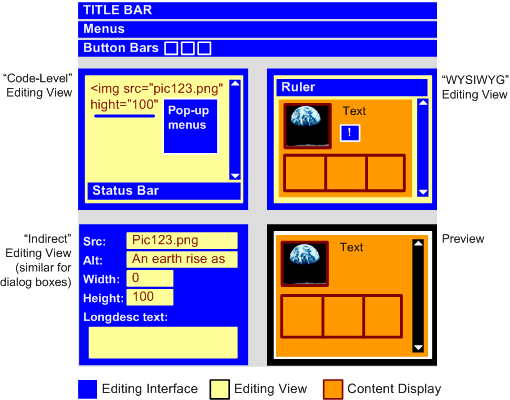
The graphic is a highly simplified representation of how the user interfaces of some GUI authoring tools are organized. The illustration includes four different views of the content: three editing views (a code-level editing view, a WYSIWYG editing view and an indirect editing view) and a preview view. Those parts of the user interface that are "editing interface" are colored dark blue, while the editing views are light blue and the content display is a mauve color. In the code-level editing view, the entire text entry area is considered the editing view and only the text within it is the content display. For the WYSIWYG editing view, since the background of the editing view is actually controlled by the content display (e.g., a rendered background color from the content - although see Checkpoint A.1.3) it too is considered to be content display. In the indirect editing view (and similarly for the dialog boxes used by many tools), the user is constrained to only providing some specific information (in this case some image attribute values and a long description). The text areas that collect this information are considered to be editing views while the text they contain is considered to be content display. The non-editable preview contains no editing view, just content display.
- authoring tool
- See "Definition of authoring tool".
- available
programmatically
- Capable of providing information to other software (including assistive
technologies) by following relevant accessibility platform architectures
(e.g., MSAA, Java Access) or, if the available accessibility platform architectures
are insufficient, following some other published interoperability mechanism
(custom-created by the developer, if necessary).
- captions
- Captions are equivalent
alternatives that consist of a text transcript of the auditory track
of a movie (or other video presentation) and that is synchronized with the
video and auditory tracks. Captions are generally rendered graphically.
They benefit people who are deaf or hard-of-hearing, and anyone who cannot
hear the audio (for example, someone in a noisy environment).
- checking, accessibility
- Accessibility checking (or "accessibility evaluation") is the
process by which Web content is evaluated
for Web content accessibility
problems. ATAG 2.0 identifies three types of checking, based on increasing
levels of automation: manual
checking in which the authoring tool only provides instructions
for authors to follow in order to identify problems; semi-automated
checking in which the authoring tool is able to identify potential
problems, but still requires human judgment by the author
to make a final decision on whether an actual problem exists; and automated
checking in which the authoring tool is able to check for problems
automatically, with no human intervention required. An authoring tool may
support any combination of checking types.
- completion
of authoring
- Completion of authoring is the point in time at which an authoring session
ends and the author has no opportunity to make further changes. This may
be when an author chooses to "save and exit", or "publish",
or it may occur automatically at the end of a wizard, etc.
- content type
- A content type is a data format, programming or markup language that is
intended to be retrieved and rendered by a user
agent (e.g., HTML, CSS, SVG, PNG, PDF, Flash, JavaScript or combinations).
The usage of the term is a subset of WCAG 2.0's [WCAG20]
current usage of the term "Technology".
- conversion
- A conversion is a process that takes as input, content in one content
type and produces as output, content in another content
type (e.g., "Save as HTML" functions).
- document
- A document is a structure of elements along
with any associated content; the elements used are defined by a markup language.
- documentation
- Documentation refers to any information that supports the use of an authoring
tool. This information may be found electronically or otherwise and includes
help, manuals, installation instructions, sample workflows,
and tutorials, etc.
- editing
view
- An editing view is a view provided by the authoring tool that
allows editing by the author (e.g., code-level editing
view, WYSIWYG editing view).
- element
- Element is used in the same sense as in HTML [HTML4] and XML, an element refers to a pair of tags and their
content, or an "empty" tag - one that requires no closing tag
or content.
- end user
- An end user is a person who interacts with Web
content once it has been authored. In some cases, the author
and end user is the same person.
- equivalent
alternative
- An equivalent alternative is content that is an acceptable substitute
for other content that a person may not be able to access. An equivalent
alternative fulfills essentially the same function or purpose as the original
content upon presentation. Equivalent alternatives include text alternatives
and synchronized alternatives. Text
alternatives present a text version of the information conveyed
in non-text objects such as graphics and audio clips. The text alternative
is considered accessible because it can be rendered in many different ways
(e.g., as synthesized speech for individuals who have visual or learning
disabilities, as Braille for individuals who are blind, as graphical text
for individuals who are deaf or do not have a disability). Accessible
multimedia alternatives present the same information as is conveyed
in the multimedia via accessible text, navigation,
forms, etc. Synchronized
alternatives present essential audio information visually (i.e.,
captions) and essential
video information in an auditory manner (i.e., audio descriptions).
- freeform
drawing
- Drawing actions that use the mouse or stylus in a continuous fashion (e.g.,
a paintbrush feature). This does not cover moving or resizing object-based
graphics (including moving or resizing an object that is a previously authored
freeform graphic).
- general
flash or red flash
- General flash threshold (Based on Wisconsin Computer Equivalence Algorithm for Flash Pattern
Analysis (FPA)): A sequence of flashes or rapidly changing
image sequences where all three of the following occur:
- the combined area of flashes occurring concurrently (but not necessarily
contiguously) occupies more than one quarter of any 341 x 256 pixel
rectangle anywhere on the displayed screen area when the content is
viewed at 1024 x 768 pixels;
- there are more than three flashes within any one-second period; and
- the flashing is below 50 Hz.
- (Note: For the general flash threshold, a flash is defined
as a pair of opposing changes in brightness of 10% or more of full scale
white brightness, where brightness is calculated as 0.2126 * ((R / FS) ^
2.2) + 0.7152 * ((G / FS) ^ 2.2) + 0.0722 * ((B / FS) ^ 2.2). R, G, and
B are the red, green, and blue RGB values of the color; FS is the maximum
possible full scale RGB value for R, G, and B (255 for eight bit color channels);
and the "^" character is the exponentiation operator. An "opposing
change" is an increase followed by a decrease, or a decrease followed
by an increase. This applies only when the brightness of the darker image
is below .80 of full scale white brightness.
- Red flash threshold (Based on Wisconsin Computer Equivalence Algorithm for Flash Pattern
Analysis (FPA)): A transition to or from a saturated red where
both of the following occur:
- The combined area of flashes occurring concurrently occupies more
than one quarter of any 341 x 256 pixel rectangle anywhere on the displayed
screen area when the content is viewed at 1024 x 768 pixels.
- There are more than three flashes within any one-second period.
- The flashing is below 50 Hz.
- inform
- To inform is to make the author aware of an
event or situation using methods such as alert, prompt, sound, flash. These methods may
be unintrusive (i.e., presented without stopping the author's current activity)
or intrusive (i.e., interrupting the author's current activity).
- informative
- Informative ("non-normative") parts of this document are never
required for conformance.
- keyboard interface
- Interface used by software to obtain keystroke input.
Note 1: Allows users to provide keystroke input to programs even if the native technology does not contain a keyboard (e.g., a touch screen PDA has a keyboard interface built into its operating system as well as a connector for external keyboards. Applications on the PDA can use the interface to obtain keyboard input either from an external keyboard or from other applications that provide simulated keyboard output, such as handwriting interpreters or speech to text applications with "keyboard emulation" functionality).
Note 2: Operation of the application (or parts of the application) through a keyboard operated mouse emulator, such as MouseKeys, does not qualify as operation through a keyboard interface because operation of the program is through its pointing device interface - not through its keyboard interface.
- markup
- Markup is a set of tags from a markup language
that specify the characteristics of a document.
Markup can be presentational (i.e., markup that encodes
information about the visual layout of the content), structural
(i.e., markup that encodes information about the structural role of elements
of the content) or semantic (i.e., markup that encodes
information about the intended meaning of the content).
- markup language
- A markup language is a syntax and/or set of rules to manage markup
(e.g., HTML [HTML4], SVG [SVG], or MathML [MATHML]).
- multimedia
- Audio or video synchronized with another type of media and/or with time-based
interactive components.
- non-text
objects
- Content objects that are not represented by text character(s) when rendered
in a user agent (e.g., images, audio, video).
- normative
- Normative parts of this document are always required for conformance.
- platform
- A platform is the software environment within which the authoring tool operates. For functionality that is not Web-based, this will be an operating system (e.g., Windows, MacOS, Linux), virtual machine (e.g., JVM) or a higher level GUI toolkit (e.g., Eclipse). For Web-based functionality, the term applies more generically
to user agents in general, although for purposes of evaluating
conformance to ATAG 2.0, a specific user agent(s) will be listed in the conformance profile.
- presentation
- Presentation is the rendering of the content and structure in a form that
can be perceived by the user.
- preview
- A preview is a non-editable view of the content that is intended to show how it will
appear and behave in a user agent.
- prominence
- The prominence of a control in the authoring
tool user interface is a heuristic measure of the degree to which authors
are likely to notice a control when operating the authoring tool. In this
document, prominence refers to visual as well as keyboard-driven navigation.
Some of the factors that contribute to the prominence of a control include:
control size (large controls or controls surrounded by
extra white space may appear to be conferred higher importance), control
order (items that occur early in the "localized" reading
order (e.g., left to right and top to bottom; right to left and top to bottom)
are conferred higher importance), control grouping (grouping
controls together can change the reading order and the related judgments
of importance), advanced options (when the properties are
explicitly or implicitly grouped into sets of basic and advanced properties,
the basic properties may gain apparent importance), and highlighting
(controls may be distinguished from others using icons, color, styling).
- prompt
- In this document "prompt" refers to any authoring tool initiated request for a decision or piece of information. Well designed prompting will urge, suggest, and encourage the author.
- repairing,
accessibility
- Accessibility repairing is the process by which Web
content accessibility problems that have been identified within Web
content are resolved. ATAG 2.0 identifies three types of repairing,
based on increasing levels of automation: Manual
repairing in which the authoring tool only provides instructions
for authors to follow in order to make the necessary correction; Semi-Automated
repairing, in which the authoring tool can provide some automated assistance
to the author in performing corrections, but the author's input is still
required before the repair can be completed; and Automated
repairing, in which the authoring tool is able to make repairs automatically,
with no author input or confirmation from the
author. An authoring tool may support any combination of repairing types.
- selectable
items
- Any items that an author may select from within the menus, toolbars, palettes,
etc. (e.g., "open", "save", "emphasis", "check
spelling")
- structured
element set
- Content organized into lists, maps, hierarchies (e.g., tree views), graphs,
etc.
- transcript
- A transcript is a non-synchronized text
alternative for the sounds, narration, and dialogue in an audio clip
or the auditory track of a multimedia presentation. For a video, the transcript
can also include the description of actions, body language, graphics, and
scene changes of the visual track.
- transformation
- A transformation is a process that takes as input, an object in one content
type and produces as output, a different object in the same content
type (e.g., a function that transforms tables into lists).
- user
Agent
- A user agent is software that retrieves and renders Web content. This
may include Web browsers, media players, plug-ins, and other programs including
assistive technologies, that help in retrieving and rendering Web content.
- view
- A view is a rendering of Web content by
an authoring tool. Authoring tool views are usually either editing
views or previews.
- Web content (or shortened to "content")
- Web content is any material in a content type. If the content type is a markup language, then "content" covers the information both within the tags (i.e., the markup) and between them. In this document, "content" is primarily used in the context of the material that is authored and outputted by authoring tools.
- Wisconsin Computer
Equivalence Algorithm for Flash Pattern Analysis (FPA)
- a method developed at the University of Wisconsin, working in conjunction
with Dr. Graham Harding and Cambridge Research Associates, for applying
the United Kingdom's "Ofcom Guidance Note on Flashing Images and Regular
Patterns in Television (Re-issued as Ofcom Notes 25 July 2005)" to
content displayed on a computer screen, such as Web pages and other computer
content.
Note: The Ofcom Guidance Document [OFCOM]
is based on the assumption that the television screen occupies the central
ten degrees of vision. This is not accurate for a screen which is located
in front of a person. The Wisconsin algorithm basically carries out the
same analysis as the Ofcom Guidelines except that is does it on every possible
ten degree window for a prototypical computer display.
- workflow
- A workflow is a customary sequence of steps or tasks that are followed
to produce a deliverable.
5. References
For the latest version of any W3C
specification please consult the list of W3C
Technical Reports at http://www.w3.org/TR/. Some documents listed below
may have been superseded since the publication of this document.
Note: In this document, bracketed labels such as "[HTML4]"
link to the corresponding entries in this section. These labels are also
identified as references through markup. Normative references are highlighted
and identified through markup.
There are two recommended ways to refer to the "Authoring Tool Accessibility
Guidelines 2.0" (and to W3C documents in general):
- References to a specific version of "Authoring
Tool Accessibility Guidelines 2.0." For example, use the "this
version" URI to refer
to the current document: http://www.w3.org/TR/2006/WD-ATAG20-20061207/.
- References to the latest version of "Authoring Tool Accessibility Guidelines
2.0." Use the "latest version" URI to refer to the most recently published
document in the series: http://www.w3.org/TR/ATAG20/.
In almost all cases, references (either by name or by link) should be to a
specific version of the document. W3C will make every effort to make this
document indefinitely available at its original address in its original form.
The top of this document includes the relevant catalog metadata for specific
references (including title, publication date, "this version"
URI, editors' names, and copyright information).
An XHTML 1.0 paragraph including a
reference to this specific document might be written:
<p>

    <cite><a href="http://www.w3.org/TR/2006/REC-ATAG20-????????/">

    "Authoring Tool Accessibility Guidelines 2.0,"</a></cite>

    J. Treviranus, J. Richards, M. May, eds.,

    W3C Recommendation, ?? ???? ????.

    The <a href="http://www.w3.org/TR/ATAG20/">latest

    version</a> of this document is available at

    http://www.w3.org/TR/ATAG20/.</p>
For very general references to this document (where stability of content and
anchors is not required), it may be appropriate to refer to the latest version
of this document.
Other sections of this document explain how to build a conformance
claim.
A document appears in this section if at least one reference to the document
appears in a checkpoint success criteria.
- [WCAG10]
- "Web Content
Accessibility Guidelines 1.0", W. Chisholm, G. Vanderheiden, and I. Jacobs,
eds., 5 May 1999. This WCAG 1.0 Recommendation is
http://www.w3.org/TR/1999/WAI-WEBCONTENT-19990505/.
- [WCAG20]
- "Web Content Accessibility
Guidelines 2.0 (Working Draft)", W. Chisholm, G. Vanderheiden,
and J. White, editors. The latest version of the Web Content Accessibility
Guidelines 2.0 is available at http://www.w3.org/TR/WCAG20/. Note:
This document is still a working draft.
- [ATAG10]
- "Authoring Tool Accessibility
Guidelines 1.0", J. Treviranus, C. McCathieNevile, I. Jacobs, and J.
Richards, eds., 3 February 2000. This W3C Recommendation is available at http://www.w3.org/TR/2000/REC-ATAG10-20000203/.
-
-
- [ATAG20-TECHS]
- "Techniques for Authoring
Tool Accessibility 2.0", J. Treviranus, J. Richards, C. McCathieNevile,
and M. May, eds., 22 November 2004. The latest draft of this W3C note is available at http://www.w3.org/TR/ATAG20-TECHS.
- [COMPONENTS]
- "Essential Components of Web Accessibility", S. L. Henry, ed. This document is available at http://www.w3.org/WAI/intro/components.
- [CSS2-ACCESS]
- "Accessibility
Features of CSS," I. Jacobs and J. Brewer, eds., 4 August 1999. This W3C
Note is available at http://www.w3.org/1999/08/NOTE-CSS-access-19990804. The latest
version of Accessibility Features of CSS is available at http://www.w3.org/TR/CSS-access.
- [HTML4]
- "HTML 4.01 Recommendation",
D. Raggett, A. Le Hors, and I. Jacobs, eds., 24 December 1999. This
HTML 4.01 Recommendation is http://www.w3.org/TR/1999/REC-html401-19991224.
The latest version of HTML 4 is available at
http://www.w3.org/TR/html4.
- [MATHML]
- "Mathematical Markup Language",
P. Ion and R. Miner, eds., 7 April 1998, revised 7 July 1999. This MathML
1.0 Recommendation is http://www.w3.org/1999/07/REC-MathML-19990707. The
latest version of MathML 1.0 is available
at http://www.w3.org/TR/REC-MathML.
- [OFCOM]
- Guidance Notes, Section 2: Harm and offence Annex 1, "Ofcom Guidance Note on Flashing Images and Regular Patterns in Television (Re-issued as Ofcom Notes 25 July 2005)" available at http://www.ofcom.org.uk/tv/ifi/guidance/bguidance/guidance2.pdf)
- [PWD-USE-WEB]
- "How
People With Disabilities Use the Web", J. Brewer, ed., 4 January
2001. This document is
available at http://www.w3.org/WAI/EO/Drafts/PWD-Use-Web/.
- [SMIL-ACCESS]
- "Accessibility
Features of SMIL," M.-R. Koivunen and I. Jacobs, eds., 21 September 1999. This W3C Note is available at available at http://www.w3.org/TR/SMIL-access.
- [SVG]
- "Scalable Vector Graphics (SVG) 1.0
Specification (Working Draft)", J. Ferraiolo, ed. The latest version
of the SVG specification is available at http://www.w3.org/TR/SVG.
- [SVG-ACCESS]
- "Accessibility of Scalable Vector
Graphics," C. McCathieNevile, M.-R. Koivunen, eds., 7 August 2000. This W3C Note is available at http://www.w3.org/TR/SVG-access.
- [WCAG10-TECHS]
- "Techniques for Web Content
Accessibility Guidelines 1.0," W. Chisholm, G. Vanderheiden, and I. Jacobs,
eds., 6 November 2000. This W3C Note is available at http://www.w3.org/TR/WCAG10-TECHS/.
- [WCAG20-TECHS-GENERAL]
- "General Techniques for WCAG 2.0," J. Slatin, T. Croucher,
eds. Note: This document is still a working draft.
- [WCAG20-TECHS-CSS]
- "CSS Techniques for WCAG 2.0," W. Chisholm, B. Gibson,
eds. Note: This document is still a working draft.
- [WCAG20-TECHS-HTML]
- "HTML Techniques for WCAG 2.0," M. Cooper,
ed. Note: This document is still a working draft.
- [WCAG20-TECHS-SCRIPTING]
- "Client-side Scripting Techniques for WCAG 2.0," M. May, B. Gibson,
eds. Note: This document is still a working draft.
- [WCAG20-UNDERSTANDING]
- "Understanding WCAG 2.0," B. Caldwell, W. Chisholm, J. Slatin, G. Vanderheiden, eds. Note: This document is still a working draft.
- [XAG]
- "XML Accessibility Guidelines",
D. Dardailler, S. B. Palmer, C. McCathieNevile, eds. 3 October 2002.
This is a Working Group Draft.
6. Acknowledgments
The active participants of the Authoring Tool Accessibility Guidelines Working
Group who authored this document were: Tim Boland (National Institute for
Standards and Technology), Barry A. Feigenbaum (IBM), Matt May, Greg Pisocky (Adobe), Jan Richards (Adaptive
Technology Resource Centre, University of Toronto), Roberto Scano (IWA/HWG),
and Jutta Treviranus (Chair of the working group, Adaptive Technology Resource
Centre, University of Toronto)
Many thanks to the following people who have contributed to the AUWG through
review and comment: Kynn Bartlett, Giorgio Brajnik, Judy Brewer, Wendy Chisholm,
Daniel Dardailler, Geoff Deering, Katie Haritos-Shea, Kip Harris, Phill
Jenkins, Len Kasday, Marjolein Katsma, William Loughborough, Charles McCathieNevile,
Matthias Müller-Prove, Liddy Nevile, Graham Oliver, Wendy Porch, Bob
Regan, Chris Ridpath, Gregory Rosmaita, Heather Swayne, Gregg Vanderheiden,
Carlos Velasco, and Jason White.
This document would not have been possible without the work of those who contributed to ATAG 1.0.
This publication has been funded in part with Federal funds from the U.S. Department of Education under contract number ED05CO0039. The content of this publication does not necessarily reflect the views or policies of the U.S. Department of Education, nor does mention of trade names, commercial products, or organizations imply endorsement by the U.S. Government.
