- This version:
- http://www.w3.org/TR/2006/WD-xhtml2-20060726
- Latest version:
- http://www.w3.org/TR/xhtml2
- Previous version:
- http://www.w3.org/TR/2005/WD-xhtml2-20050527
- Diff-marked version:
- xhtml2-diff.html
- Editors:
- Jonny Axelsson, Opera Software
- Mark Birbeck, x-port.net
- Micah Dubinko, Invited Expert
- Beth Epperson, Websense
- Masayasu Ishikawa, W3C
- Shane McCarron, Applied Testing and Technology
- Ann Navarro, WebGeek, Inc.
- Steven Pemberton, CWI (HTML Working
Group Chair)
This document is also available in these non-normative formats: Single XHTML file, PostScript version, PDF version, ZIP archive, and Gzip'd TAR archive.
Copyright ©2006
W3C® (MIT, ERCIM, Keio), All Rights Reserved. W3C liability, trademark and document use rules apply.
XHTML 2 is a general-purpose markup language designed for representing documents for a wide range of purposes across the World Wide Web. To this end it does not attempt to be all things to all
people, supplying every possible markup idiom, but to supply a generally useful set of elements.
This section describes the status of this document at the time of its publication. Other documents may supersede this document. A list of current W3C publications and the latest revision of
this technical report can be found in the W3C technical reports index at http://www.w3.org/TR/.
This document is the eighth public Working Draft of this specification. It should in no way be considered stable, and should
not be normatively referenced for any purposes whatsoever. This version includes an early implementation of XHTML 2.0 in RELAX NG [RELAXNG], but
does not include the implementations in DTD or XML Schema form. Those will be included in subsequent versions, once the content of this language stabilizes.
Formal issues and error reports on this specification shall be submitted to www-html-editor@w3.org (archive). It is inappropriate to send discussion email to this address. Public discussion may take place on www-html@w3.org (archive). To subscribe send an email to
www-html-request@w3.org with the word subscribe in the subject line.
This document has been produced by the W3C HTML Working Group (members only) as
part of the W3C HTML Activity. The goals of the HTML Working Group are discussed in the HTML Working
Group charter.
This document was produced by a group operating under the 24 January 2002 CPP as amended by the W3C Patent Policy Transition Procedure. W3C maintains a public list of any patent
disclosures made in connection with the deliverables of the group; that page also includes instructions for disclosing a patent. An individual who has actual knowledge of a patent which the
individual believes contains Essential Claim(s) must disclose the information in accordance with section 6 of the W3C Patent Policy.
Publication as a Working Draft does not imply endorsement by the W3C Membership. This is a draft document and may be updated, replaced or obsoleted by other documents at any time. It is
inappropriate to cite this document as other than work in progress.
1. Introduction
This section is informative.
1.1. What is XHTML 2?
XHTML 2 is a general purpose markup language designed for representing documents for a wide range of purposes across the World Wide Web. To this end it does not attempt to be all things to all
people, supplying every possible markup idiom, but to supply a generally useful set of elements, with the possibility of extension using the class and role attributes on the
span and div elements in combination with style sheets, and attributes from the metadata attributes collection.
In designing XHTML 2, a number of design aims were kept in mind to help direct the design. These included:
- As generic XML as possible: if a facility exists in XML, try to use that rather than duplicating it.
- Less presentation, more structure: use style sheets for defining presentation.
- More usability: within the constraints of XML, try to make the language easy to write, and make the resulting documents easy to use.
- More accessibility: some call it 'designing for our future selves' – the design should be as inclusive as possible.
- Better internationalization: since it is a World Wide Web.
- More device independence: new devices coming online, such as telephones, PDAs, tablets, televisions and so on mean that it is imperative to have a design that allows you to author
once and render in different ways on different devices, rather than authoring new versions of the document for each type of device.
- Less scripting: achieving functionality through scripting is difficult for the author and restricts the type of user agent you can use to view the document. We have tried to identify
current typical usage, and include those usages in markup.
- Integration with the Semantic Web: make XHTML2 amenable for processing with semantic web tools.
1.1.2. Backwards compatibility
Because earlier versions of HTML were special-purpose languages, it was necessary to ensure a level of backwards compatibility with new versions so that new documents would still be usable in
older browsers. However, thanks to XML and style sheets, such strict element-wise backwards compatibility is no longer necessary, since an XML-based browser, of which at the time of writing means
more than 95% of browsers in use, can process new markup languages without having to be updated. Much of XHTML 2 works already in existing browsers; much, but not all: just as when forms and tables
were added to HTML, and people had to wait for new version of browsers before being able to use the new facilities, some parts of XHTML 2, principally XForms and XML Events, still require user agents
that understand that functionality.
1.1.3. XHTML 2 and Presentation
The very first version of HTML was designed to represent the structure of a document, not its presentation. Even though presentation-oriented elements were later added to the language by browser
manufacturers, HTML is at heart a document structuring language. XHTML 2 takes HTML back to these roots, by removing all presentation elements, and subordinating all presentation to style sheets.
This gives greater flexibility, greater accessibility, more device independence, and more powerful presentation possibilities, since style sheets can do more than the presentational elements of HTML
ever did.
1.1.4. XHTML 2 and Linking
The original versions of HTML relied upon built-in knowledge on the part of User Agents and other document processors. While much of this knowledge had to do with presentation (see above), the
bulk of the remainder had to do with the relationships between documents — so called "linking".
A variety of W3C and other efforts, most notably [XLINK], attempted to create a grammar for defining the characteristings of linking.
Unfortunately, these grammars all fall short of the requirements of XHTML. The community is continuing in its efforts to create a comprehensive grammar that describes link characteristics.
The HTML Working Group has determined that such a grammar, while generally useful, is not required for the definition of XHTML 2. Instead, this document is explicit in the characteristics of the
elements and attributes that are used to connect to other resources. The Working Group has taken this course because 1) the problem with XHTML 2 is well bounded, 2) the general solution is slow in
coming, and 3) it will be easier for implementors to support and users to rely upon.
1.2. Major Differences with XHTML 1
XHTML 2 is designed to be recognizable to the HTML and XHTML 1 author, while correcting errors and insufficiencies identified in earlier versions of the HTML family, and taking the opportunity to
make improvements.
The most visible changes are the following:
- More structuring possibilities:
- Sections and headings: in previous versions of HTML a document's structure had to be inferred from the various levels of headings in the document; this was particularly a problem
when authors misused the heading elements for visual effects. XHTML 2 lets you explicitly markup the document structure with the
section element, and its related header element h.
- Separators: in previous versions of HTML, the
hr element was used to separate sections of a text from each other. In retrospect, the name hr (for
horizontal rule) was misleading, because an hr was neither necessarily horizontal (in vertical text it was vertical), nor necessarily a rule (books often use other typographical
methods such as a line of three asterisks to represent separators, and style sheets can be used to give you this freedom). In order to emphasize its structuring nature, to make it more widely usable,
and to make it clearer that it has no essential directionality, hr has been renamed separator.
- Line breaks: in previous versions of HTML, the
br element was used to add micro-structure to text, essentially breaking a piece of text into several 'lines'. This
micro-structure is now made explicit in XHTML 2 with the l element, which encloses the text to be broken. Amongst other advantages, this gives
more presentational opportunities, such as the ability to automatically number lines, or to color alternate lines differently.
- Paragraph structure: in earlier versions of HTML, a p element could only contain simple text. It has been improved to
bring it closer to what people perceive as a paragraph, now being allowed to include such things as lists and tables.
- Navigation lists: Part of the design of XHTML 2 has been to observe existing use of HTML and identify what is perceived as missing, for instance by use of scripting to achieve ends
not supported directly in HTML. One obvious component of very many HTML pages is the 'navigation list', consisting of a collection of links to other parts of the site, presented vertically,
horizontally, or as a drop-down menu. To support this type of usage, XHTML 2 introduces the navigation list element nl, which codifies such parts
of documents, and allows different presentational idioms to be applied. An additional advantage is for assistive technologies, that can allow the user to skip such elements.
- Images: the HTML
img element has many shortcomings: it only allows you to specify a single resource for an image, rather than offering the fallback opportunities of the
object element; the only fallback option it gives is the alt text, which can only be plain text, and not marked up in any
way; the longdesc attribute which allows you to provide a long description of the image is difficult to author and seldom supported.
XHTML 2 takes a completely different approach, by taking the premise that all images have a long description and treating the image and the text as equivalents. In XHTML 2 any element may
have a src attribute, which specifies a resource (such as an image) to load instead of the element. If the resource is unavailable
(because of network failure, because it is of a type that the browser can't handle, or because images have been turned off) then the element is used instead. Essentially the longdesc has
been moved into the document, though this behavior also mimicks the fallback behavior of the object element. (To achieve the tooltip
effect that some browsers gave with the alt attribute, as in HTML 4 you use the title attribute).
- Type: in HTML 4, the srctype attribute when referring to an external resource was purely a hint to the user
agent. In XHTML 2 it is no longer a hint, but specifies the type(s) of resource the user agent must accept.
- Tables: the content model of tables has been cleaned up and simplified, while still allowing the same functionality.
- Bi-directional text: rather than use an explicit element to describe bi-directional override, new values have been added to the
dir attribute that allow bi-directional override on any element.
- Edit: rather than use explicit
ins and del elements to mark changes in a document, an attribute edit
may be used on any element for the same purpose.
- Linking: In HTML 3, only a elements could be the source and target of hyperlinks. In HTML 4 and XHTML 1, any element
could be the target of a hyperlink, but still only a elements could be the source. In XHTML 2 any element can now also be the source of
a hyperlink, since href and its associated attributes may now appear on any element. So for instance, instead of
<li><a href="home.html">Home</a></li>, you can now write <li href="home.html">Home</li>. Even though this means that the a element is now strictly-speaking unnecessary, it has been retained.
- Metadata: the meta and link elements have been generalized, and their
relationship to RDF [RDF] described. Furthermore, the attributes on these two elements can be more generally applied across the language.
- Role: in order to aid adding semantics to documents, the
role attribute has been added, along with an initial set of useful values, in order to classify the use of a
particular element. For instance a paragraph may play the role of a note, and so may be marked up <p role="note">.
-
Events: event handling in HTML was restricted in several ways: since the event names were hard-wired in the language (such as onclick), the only way to add new events was to change
the language; many of the events (such as click) were device-specific, rather than referring to the intent of the event (such as activating a link); you could only handle an event in one
scripting language — it was not possible to supply event handlers in the same document for several different scripting languages.
XHTML 2 uses XML Events [XMLEVENTS] to specify event handling, giving greater freedom in the ability to handle events. Along with this, the
script element has been renamed handler to indicate its different semantics.
- Forms: HTML Forms were introduced in 1993, before the advent of the e-commerce revolution. Now with more than a decade of experience with their use, they have been thoroughly
overhauled and updated to meet the needs of modern forms, in the shape of XForms [XFORMS], which are an integral part of XHTML 2.
- Ownership where due: since HTML 4 was a standalone application, it defined many things which no longer need to be defined now that it is an XML application. For instance the
definitions of whitespace are given by XML for input, and CSS for output; similarly, the definition of values of the media
attribute are relegated to the relevant style sheet language.
- Frames and Framesets: In HTML 4 multi-panel "pages" could be described using the
frameset and frame elements. The Frames model is no longer defined in
XHTML. Instead, if is defined through the separate [XFRAMES] specification.
1.3. What are the XHTML 2 Modules?
XHTML 2 is a member of the XHTML Family of markup languages. It is an XHTML Host Language as defined in XHTML Modularization. As such, it is made up of a set of XHTML Modules that together
describe the elements and attributes of the language, and their content model. XHTML 2 updates many of the modules defined in XHTML Modularization 1.0 [XHTMLMOD], and includes the updated versions of all those modules and their semantics. XHTML 2 also uses modules from Ruby [RUBY], XML Events [XMLEVENTS], and XForms [XFORMS].
The modules defined in this specification are largely extensions of the modules defined in XHTML Modularization 1.0. This specification also defines the semantics of the modules it includes. So,
that means that unlike earlier versions of XHTML that relied upon the semantics defined in HTML 4 [HTML4], all of the semantics for XHTML 2 are
defined either in this specification or in the specifications that it normatively references.
Even though the XHTML 2 modules are defined in this specification, they are available for use in other XHTML family markup languages. Over time, it is possible that the modules defined in this
specification will migrate into the XHTML Modularization specification.
[XHTML2] Spirit of "1.1.3. XHTML 2 and Presentation" PR #7759
State: Suspended
Resolution: None
User: None
Notes:
Suspended until last call
2. Terms and Definitions
This section is normative.
While some terms are defined in place, the following definitions are used throughout this document. Familiarity with the W3C XML 1.0 Recommendation [XML] is highly recommended.
- abstract module
- a unit of document type specification corresponding to a distinct type of content, corresponding to a markup construct reflecting this distinct type.
- content model
- the declared markup structure allowed within instances of an element type. XML 1.0 differentiates two types: elements containing only element content (no character data) and mixed content
(elements that may contain character data optionally interspersed with child elements). The latter are characterized by a content specification beginning with the "#PCDATA" string (denoting character
data).
- deprecated
- a feature marked as deprecated is in the process of being removed from this recommendation. Portable documents should not use features marked as deprecated.
- document model
- the effective structure and constraints of a given document type. The document model constitutes the abstract representation of the physical or semantic structures of a class of documents.
- document type
- a class of documents sharing a common abstract structure. The ISO 8879 [SGML] definition is as follows: "a class of documents having similar
characteristics; for example, journal, article, technical manual, or memo. (4.102)"
- document type definition (DTD)
- a formal, machine-readable expression of the XML structure and syntax rules to which a document instance of a specific document type must conform; the schema type used in XML 1.0 to validate
conformance of a document instance to its declared document type. The same markup model may be expressed by a variety of DTDs.
- driver
- a generally short file used to declare and instantiate the modules of a DTD. A good rule of thumb is that a DTD driver contains no markup declarations that comprise any part of the document model
itself.
- element
- an instance of an element type.
- element type
- the definition of an element, that is, a container for a distinct semantic class of document content.
- entity
- an entity is a logical or physical storage unit containing document content. Entities may be composed of parseable XML markup or character data, or unparsed (i.e., non-XML, possibly non-textual)
content. Entity content may be either defined entirely within the document entity ("internal entities") or external to the document entity ("external entities"). In parsed entities, the replacement
text may include references to other entities.
- entity reference
- a mnemonic string used as a reference to the content of a declared entity (e.g., "&" for "&", "<" for "<", "©" for "©".)
- facilities
- Facilities are elements, attributes, and the semantics associated with those elements and
attributes.
- focusable
- Elements are considered "focusable" if they are visible (e.g., have the equivalent of the [CSS2] property of "display" with a value
other than
none) not disabled (see [XFORMS]), and either 1) have an href attribute or 2) are considered a form control as defined in [XFORMS].
- fragment identifier
- A portion of a [URI] as defined in RFC 3986.
- generic identifier
- the name identifying the element type of an element. Also, element type name.
- hybrid document
- A hybrid document is a document that uses more than one XML namespace. Hybrid documents may be defined as documents that contain elements or attributes from hybrid document types.
- instantiate
- to replace an entity reference with an instance of its declared content.
- markup declaration
- a syntactical construct within a DTD declaring an entity or defining a markup structure. Within XML DTDs, there are four specific types: entity declaration defines the binding between a mnemonic
symbol and its replacement content; element declaration constrains which element types may occur as descendants within an element (see also content model); attribute definition list declaration
defines the set of attributes for a given element type, and may also establish type constraints and default values; notation declaration defines the binding between a notation name and an external
identifier referencing the format of an unparsed entity.
- markup model
- the markup vocabulary (i.e., the gamut of element and attribute names, notations, etc.) and grammar (i.e., the prescribed use of that vocabulary) as defined by a document type definition (i.e., a
schema) The markup model is the concrete representation in markup syntax of the document model, and may be defined with varying levels of strict conformity. The same document model may be expressed
by a variety of markup models.
- module
- an abstract unit within a document model expressed as a DTD fragment, used to consolidate markup declarations to increase the flexibility, modifiability, reuse and understanding of specific
logical or semantic structures.
- modularization
- an implementation of a modularization model; the process of composing or de-composing a DTD by dividing its markup declarations into units or groups to support specific goals. Modules may or may
not exist as separate file entities (i.e., the physical and logical structures of a DTD may mirror each other, but there is no such requirement).
- modularization model
- the abstract design of the document type definition (DTD) in support of the modularization goals, such as reuse, extensibility, expressiveness, ease of documentation, code size, consistency and
intuitiveness of use. It is important to note that a modularization model is only orthogonally related to the document model it describes, so that two very different modularization models may
describe the same document type.
- parameter entity
- an entity whose scope of use is within the document prolog (i.e., the external subset/DTD or internal subset). Parameter entities are disallowed within the document instance.
- parent document type
- A parent document type of a hybrid document is the document type of the root element.
- tag
- descriptive markup delimiting the start and end (including its generic identifier and any attributes) of an element.
- unavailable resource
- any resource that is referenced as a URI in an attribute, but that cannot be accessed for any reason, is considered unavailable. Example reasons include, but are not limited to: network
unavailable, no resource available at the URI given, inability of the user agent to process the type of resource, etc.
- user agent
- any software that retrieves and renders Strictly Conforming Documents for users. This may include browsers, media players, plug-ins, and other programs
— including assistive technologies — that help in retrieving and rendering such documents. See also Conforming User Agent.
3. Conformance Definition
This section is normative.
The keywords "MUST", "MUST NOT", "REQUIRED", "SHALL", "SHALL NOT", "SHOULD", "RECOMMENDED", "MAY", and "OPTIONAL" in this document are to be interpreted as described in [RFC2119].
3.1. Document Conformance
In this document, the use of the word 'schema' refers to any definition of the syntax of XHTML 2, regardless of the definition language used.
3.1.1. Strictly Conforming Documents
A strictly conforming XHTML 2.0 document is a document that requires only the facilities described as mandatory in this specification. Such a document must meet all the following criteria:
-
The document must conform to the constraints expressed in the schemas in Appendix B - XHTML 2.0 RELAX NG Definition, Appendix D - XHTML 2.0 Schema and Appendix F - XHTML 2.0 Document Type Definition.
-
The local part of the root element of the document must be html.
-
The start tag of the root element of the document must explicitly contain an xmlns declaration for the XHTML 2.0 namespace [XMLNS]. The namespace URI for XHTML 2.0 is defined to be http://www.w3.org/2002/06/xhtml2/.
The start tag may also contain an xsi:schemaLocation attribute that associates this namespace with
the XML Schema at the URI http://www.w3.org/MarkUp/SCHEMA/xhtml2.xsd.
Sample root element
<html xmlns="http://www.w3.org/2002/06/xhtml2/" xml:lang="en"
      xmlns:xsi="http://www.w3.org/2001/XMLSchema-instance"
      xsi:schemaLocation="http://www.w3.org/2002/06/xhtml2/
                          http://www.w3.org/MarkUp/SCHEMA/xhtml2.xsd"
>
-
There should be a DOCTYPE declaration in the document prior to the root element. If present, the public identifier included in the DOCTYPE
declaration must reference the DTD found in Appendix F using its Public Identifier. The system identifier may be
modified appropriately.
<!DOCTYPE html PUBLIC "-//W3C//DTD XHTML 2.0//EN"
    "http://www.w3.org/MarkUp/DTD/xhtml2.dtd">
Example of an XHTML 2.0 document
<?xml version="1.0" encoding="UTF-8"?>
<?xml-stylesheet type="text/css"
                    href="http://www.w3.org/MarkUp/style/xhtml2.css"?>
<!DOCTYPE html PUBLIC "-//W3C//DTD XHTML 2.0//EN"
    "http://www.w3.org/MarkUp/DTD/xhtml2.dtd">
<html xmlns="http://www.w3.org/2002/06/xhtml2/" xml:lang="en"
      xmlns:xsi="http://www.w3.org/2001/XMLSchema-instance"
      xsi:schemaLocation="http://www.w3.org/2002/06/xhtml2/
                          http://www.w3.org/MarkUp/SCHEMA/xhtml2.xsd"
>
  <head>
    <title>Virtual Library</title>
  </head>
  <body>
    <p>Moved to <a href="http://example.org/">example.org</a>.</p>
  </body>
</html>
Note that in this example, the XML declaration is included. An XML declaration like the one above is not required in all XML documents. XHTML document authors should use XML
declarations in all their documents. XHTML document authors must use an XML declaration when the character encoding of the document is other than the default UTF-8 or UTF-16
and no encoding is specified by a higher-level protocol.
3.2. XHTML 2 User Agent Conformance
A conforming user agent must meet all of the following criteria, as well as other requirements found throughout this specification:
-
The user agent must parse and evaluate an XHTML 2 document for well-formedness. If the user agent claims to be a validating user agent, it must also
validate documents against a referenced schema according to [XML].
-
When the user agent claims to support facilities defined within this specification or required by this specification through normative reference, it must do so in ways
consistent with the facilities' definition.
-
A user agent must only recognize attributes of type ID (e.g., the id or xml:id attribute on most XHTML 2 elements) as fragment
identifiers.
-
If a user agent encounters an element it does not recognize, it must continue to process the content of that element. If this "unrecognized" element
uses recognized attributes, those attributes must be processed with their usual semantics.
-
If a user agent encounters an attribute it does not recognize, it must ignore the entire attribute specification (i.e., the attribute and its value).
-
If a user agent encounters an attribute value it doesn't recognize, it must use the default attribute value.
-
When rendering content, user agents that encounter characters or character entity references that are recognized but not renderable should display the document in such a way
that it is obvious to the user that normal rendering has not taken place.
-
White space must be handled according to the rules of [XML]. All XHTML 2 elements preserve
whitespace.
The user agent must use the definition from CSS for processing white space characters [CSS3-TEXT].
-
In the absence of a style-sheet, including user agents that do not process style sheets, the default visual presentation should be as if the user agent used the CSS style
sheet specified in Appendix H.
Note that this specification does not generally specify the behavior of conforming implementations when presented with non-conforming documents. This is either defined by an underlying
specification (e.g., [XML]) or left to the implementor.
On introducing a fallback attribute PR #7723
State: Open
Resolution: None
User: None
Notes:
[XHTML 2] Conforming documents and meta properties PR #7777
State: Open
Resolution: None
User: None
Notes:
Fw: [XHTML 2] Section 3.1.1 PR #7791
State: Open
Resolution: None
User: None
Notes:
Comments on XHTML 2.0 document conformance requirements PR #7804
State: Open
Resolution: None
User: None
Notes:
Change XHTML 2.0 namespace to http://www.w3.org/1999/xhtml PR #7808
State: Open
Resolution: None
User: None
Notes:
Namespace versioning problem in XHTML 2 PR #7818
State: Open
Resolution: None
User: None
Notes:
Referance XML 1.1 and example with XML 1.1 declaration PR #7819
State: Open
Resolution: None
User: None
Notes:
4. The XHTML 2.0 Document Type
This section is normative.
The XHTML 2.0 document type is a fully functional document type with rich semantics. It is a collection of XHTML-conforming modules (most of which are defined in this specification). The Modules
and their elements are listed here for information purposes, but the definitions in their base documents should be considered authoritative. In the on-line version of this document, the module names
in the list below link into the definitions of the modules within the relevant version of the authoritative specification.
- Document Module
body, head, html, title- Structural Module
address, blockcode, blockquote, div, h, h1, h2, h3, h4, h5, h6, p, pre, section, separator- Text Module
abbr, cite, code, dfn, em, kbd, l, q, samp, span, strong, sub, sup, var- Hypertext Module
a- List Module
dl, dt, dd, label, nl, ol, ul, li- Core Attributes Module
class, id, and title attributes- Hypertext Attributes Module
href, hreftype, cite, target, rel, rev, access, nextfocus, prevfocus, and
xml:base attributes- Internationalization Attribute Module
xml:lang attribute- Bi-directional Text Module
dir attribute- Edit Attributes Module
edit and datetime attributes- Embedding Attributes Module
src and type attributes- Handler Module
handler- Image Map Attributes Module
usemap, ismap, shape, and coords attributes- Media Attribute Module
media attribute- Metainformation Attributes Module
about, content, datatype, property, rel, resource, restype, and rev attributes- Metainformation Module
meta, link- Object Module
object, param, standby- Style Attribute Module
style attribute- Stylesheet Module
style element- Tables Module
caption, col, colgroup, summary, table, tbody, td, tfoot, th, thead, tr
XHTML 2.0 also uses the following externally defined modules:
- Ruby Annotation Module [RUBY]
ruby, rbc, rtc, rb, rt, rp- XForms Module [XFORMS]
action, alert, bind, case, choices, copy, delete, dispatch, extension, filename, group, help, hint, input, insert, instance, item, itemset, label, load, mediatype, message, model, output,
range, rebuild, recalculate, refresh, repeat, reset, revalidate, secret, select, select1, send, setfocus, setindex, setvalue, submission, submit, switch, textarea, toggle, trigger, upload
, and
value elements, and repeat-model, repeat-bind, repeat-nodeset, repeat-startindex, and repeat-number attributes- XML Events Module [XMLEVENTS]
listener element, and defaultAction, event, handler, objserver, phase, propagate, and target attributes in the [XMLEVENTS] namespace
An implementation of this document type as a RELAX NG grammar is defined in Appendix B, as an XML Schema in Appendix D, and as a DTD in Appendix F.
Identifying XHTML version in ansence of DTDs PR #7336
State: Suspended
Resolution: Defer
User: None
Notes:
BAE F2F: for the present DTD's are required for entity resolution. This is a tricky issue, and the working group needs to resolve it quickly. We are asking for input from the Hypertext Coordination
Group and others in our quest to sort it out.
5. Module Definition Conventions
This section is normative.
This document defines a variety of XHTML modules and the semantics of those modules. This section describes the conventions used in those module definitions.
5.1. Module Structure
Each module in this document is structured in the following way:
- An abstract definition of the module's elements, attributes, and content models, as appropriate.
- A sub-section for each element in the module; These sub-sections contain the following components:
- A brief description of the element,
- A definition of each attribute or attribute collection usable with the element, and
- A detailed description of the behavior of the element, if appropriate.
Note that attributes are fully defined only the first time they are used in each module. After that, only a brief description of the attribute is provided, along with a link back
to the primary definition.
5.2. Abstract Module Definitions
An abstract module is a definition of an XHTML module using prose text and some informal markup conventions. While such a definition is not generally useful in the machine processing of document
types, it is critical in helping people understand what is contained in a module. This section defines the way in which XHTML abstract modules are defined. An XHTML-conforming module is not
required to provide an abstract module definition. However, anyone developing an XHTML module is encouraged to provide an abstraction to ease in the use of that module.
5.3. Syntactic Conventions
The abstract modules are not defined in a formal grammar. However, the definitions do adhere to the following syntactic conventions. These conventions are similar to those of XML DTDs, and should
be familiar to XML DTD authors. Each discrete syntactic element can be combined with others to make more complex expressions that conform to the algebra defined here.
- element name
- When an element is included in a content model, its explicit name will be listed.
- content set
- Some modules define lists of explicit element names called content sets. When a content set is included in a content model, its name will be listed.
expr ?- Zero or one instances of expr are permitted.
expr +- One or more instances of expr are required.
expr *- Zero or more instances of expr are permitted.
a , b- Expression
a is required, followed by expression b.
a | b- Either expression a or expression b is required.
a - b- Expression a is permitted, omitting elements in expression b.
- parentheses
- When an expression is contained within parentheses, evaluation of any subexpressions within the parentheses take place before evaluation of expressions outside of the parentheses (starting at the
deepest level of nesting first).
- extending pre-defined elements
- In some instances, a module adds attributes to an element. In these instances, the element name is followed by an ampersand (
&).
- defining required attributes
- When an element requires the definition of an attribute, that attribute name is followed by an asterisk (
*).
- defining the type of attribute values
- When a module defines the type of an attribute value, it does so by listing the type in parentheses after the attribute name.
- defining the legal values of attributes
- When a module defines the legal values for an attribute, it does so by listing the explicit legal values (enclosed in quotation marks), separated by vertical bars (
|), inside of
parentheses following the attribute name. If the attribute has a default value, that value is followed by an asterisk (*). If the attribute has a fixed value, the attribute name is
followed by an equals sign (=) and the fixed value enclosed in quotation marks.
5.4. Content Models
Abstract module definitions define minimal, atomic content models for each module. These minimal content models reference the elements in the module itself. They may also reference elements in
other modules upon which the abstract module depends. Finally, the content model in many cases requires that text be permitted as content to one or more elements. In these cases, the symbol used for
text is PCDATA (parsed characted data). This is a term, defined in the XML 1.0 Recommendation, that refers to processed character data. A content type can
also be defined as EMPTY, meaning the element has no content in its minimal content model.
5.5. Attribute Types
In some instances, it is necessary to define the types of attribute values or the explicit set of permitted values for attributes. The following attribute types (defined in the XML 1.0
Recommendation) are used in the definitions of the abstract modules:
| Attribute Type |
Definition |
| CDATA |
Character data |
| ID |
A document-unique identifier |
| IDREF |
A reference to a document-unique identifier |
| IDREFS |
A space-separated list of references to document-unique identifiers |
| NMTOKEN |
A name composed of only name tokens as defined in XML 1.0 [XML]. |
| NMTOKENS |
One or more white space separated NMTOKEN values |
| NUMBER |
Sequence of one or more digits ([0-9]) |
In addition to these pre-defined data types, XHTML Modularization defines the following data types and their semantics (as appropriate):
| Data type |
Description |
| Character |
A single character, as per section 2.2 of [XML]. |
| Encodings |
A comma-separated list of 'charset's with optional q parameters, as defined in section 14.2 of [RFC2616] as the field value of the
Accept-Charset request header. |
| ContentType |
A media type, as per [RFC2045]. |
| ContentTypes |
Attributes of this type identify the allowable content type(s) of an associated URI (usually a value of another attribute on
the same element). At its most general, it is a comma-separated list of media ranges with optional accept parameters, as defined in section 14.1 of [RFC2616] as the field value of the accept request header.
In its simplest case, this is just a media type, such as "image/png" or "application/xml", but it may also contain asterisks, such as "image/*" or "*/*", or lists of acceptable media types, such
as "image/png, image/gif, image/jpeg".
The user agent must combine this list with its own list of acceptable media types by taking the intersection, and then use the resulting list as the field value of the
accept request header when requesting the resource using HTTP.
For instance, if the attribute specifies the value "image/png, image/gif, image/jpeg", but the user agent does not accept images of type "image/gif" then the resultant accept header would contain
"image/png, image/jpeg".
A user agent must imitate similar behavior when using other methods than HTTP. For instance, when accessing files in a local filestore, <p src="logo"
srctype="image/png, image/jpeg"> might cause the user agent first to look for a file logo.png, and then for logo.jpg.
If a value for the content type is not given, "*/*" must be used for its value.
For the current list of registered content types, please consult [MIMETYPES].
|
| Coordinates |
Comma separated list of Lengths used in defining areas. |
| Datetime |
Date and time information, as defined by the type dateTime in [XMLSCHEMA] except that the timezone part is required. |
| HrefTarget |
Name used as destination for results of certain actions, with legal values as defined by NMTOKEN. |
| LanguageCode |
A language code. The values should conform to [RFC3066] or its successors. |
| LanguageCodes |
A comma-separated list of language ranges with optional q parameters, as defined in section 14.4 of [RFC2616] as the field value of the
Accept-Language request header. Individual language codes should conform to [RFC3066] or its successors. |
| Length |
Either a number, representing a number of pixels, or a percentage, representing a percentage of the available horizontal or vertical space. Thus, the value "50%" means half of the available
space. |
| LocationPath |
A location path as defined in [XPATH]. |
| MediaDesc |
A comma-separated list of media descriptors as described by [CSS2]. The default is all.
|
| Number |
One or more digits |
| QName |
An [XMLNS]-qualified name. See QName for a formal definition. |
| QNames |
One or more white space separated QName values |
| Text |
A character string. |
| URI |
An Internationalized Resource Identifier Reference, as defined by [IRI]. |
| URIs |
A space-separated list of URIs as defined above. |
Fw: [XHTML 2] Section 5.5 quality values. PR #7799
State: Open
Resolution: None
User: None
Notes:
Fw: [XHTML 2] Section 5.5 intersection of mime-types PR #7800
State: Open
Resolution: None
User: None
Notes:
6. XHTML Attribute Collections
This section is normative.
Many of the modules in this document define the required attributes for their elements. The elements in those modules may also reference zero or more attribute collections. Attribute collections
are defined in their own modules, but the meta collection "Common" is defined in this section. The table below summarizes the attribute collections available.
| Collection |
Module |
Description |
| Core |
Core Attributes Module |
Basic attributes used to identify and classify elements and their content. |
| I18N |
Internationalization Attribute Module |
Attribute to identify the language of an element and its contents. |
| Bi-directional |
Bi-directional Text Collection |
Attributes used to manage bi-directional text. |
| Edit |
Edit Attributes Module |
Attributes used to annotate when and how an element's content was edited. |
| Embedding |
Embedding Attributes Module |
Attributes used to embed content from other resources within the current element. |
| Events |
XML Events Module |
Attributes that allow associating of events and event processing with an element and its contents. |
| Forms |
XForms Module |
Attributes that designate provide a mechanism of repeating table rows within a form. |
| Hypertext |
Hyptertext Attributes Module |
Attributes that designate characteristics of links within and among documents. |
| Map |
Image Map Attributes Module |
Attributes for defining and referencing client-side image maps. |
| Media |
Media Attribute Module |
Attribute for performing element selection based upon media type as defined in MediaDesc |
| Metainformation |
Metainformation Attributes |
Attributes that allow associating of elements with metainformation about those elements |
| Role |
Role Attribute Module |
Attribute for the specification of the "role" of an element. |
| Style |
Style Attribute Module |
Attribute for associating style information with an element and its contents. |
| Common |
Attribute Collections Module |
A meta-collection of all the other collections, including the Core, Bi-directional,
Events, Edit, Embedding, Forms, Hypertext, I18N, Map, Media,
Metainformation, Role, and Style attribute collections. |
Implementation: RELAX NG
Each of the attributes defined in an XHTML attribute collection is available when its corresponding module is included in an XHTML Host Language or an XHTML Integration Set (see [XHTMLMOD]). In such a situation, the attributes are available for use on elements that are NOT in the XHTML namespace when they are referenced using their
namespace-qualified identifier (e.g., xhtml:id). The semantics of the attributes remain the same regardless of whether they are referenced using their qualified identifier or not. If
both the qualified and non-qualified identifier for an attribute are used on the same XHTML namespace element, the behavior is unspecified.
[XHTML2] Constraining attribute relationship PR #7661
State: Suspended
Resolution: Defer
User: None
Notes:
7. XHTML Document Module
This section is normative.
The Document Module defines the major structural elements for XHTML. These elements effectively act as the basis for the content model of many XHTML family document types. The elements and
attributes included in this module are:
This module is the basic structural definition for XHTML content. The html element acts as the root element for all XHTML Family Document Types.
Note that the value of the xmlns declaration is defined to be "http://www.w3.org/2002/06/xhtml2/". Also note that because the xmlns declaration is treated specially by XML namespace-aware parsers
[XMLNS], it is legal to have it present as an attribute of each element. However, any time the xmlns declaration is used in the
context of an XHTML module, whether with a prefix or not, the value of the declaration must be http://www.w3.org/2002/06/xhtml2/.
Implementation: RELAX NG
The html element is the root element for all XHTML Family Document Types. The xml:lang attribute is required on this element.
Attributes
- The Common collection
- A collection of other attribute collections, including: Bi-directional, Core, Edit, Embedding, Events, Forms, Hypertext, I18N, Map, and Metainformation.
- version = CDATA
- The value of this attribute specifies which XHTML Family document type governs the current document. The format of this attribute value is unspecified. However, all values beginning with the
character sequence xhtml are reserved for use by XHTML Family Document Types.
Need a normative definition for the version attribute
The version attribute needs a machine processable format so that document processors can reliably determine that the document is an XHTML Family conforming document.
- xsi:schemaLocation = URIs
- This attribute allows the specification of a location where an XML Schema [XMLSCHEMA] for the document can be found. The syntax of this
attribute is defined in xsi_schemaLocation. The behavior of this attribute in XHTML documents is defined in Strictly Conforming Documents.
The head element contains information about the current document, such as its title, that is not considered document content. The
default presentation of the head is not to display it; however that can be overridden with a style sheet for special purpose use. User agents may however make information in the head available to users through other mechanisms.
Attributes
- The Common collection
- A collection of other attribute collections, including: Bi-directional, Core, Edit, Embedding, Events, Forms, Hypertext, I18N, Map, and Metainformation.
Example
<head>
    <title>My Life</title>
</head>
Every XHTML document must have a title element in the head section.
Attributes
- The Common collection
- A collection of other attribute collections, including: Bi-directional, Core, Edit, Embedding, Events, Forms, Hypertext, I18N, Map, and Metainformation.
The title element is used to identify the document. Since documents are often
consulted out of context, authors should provide context-rich titles. Thus, instead of a title such as "Introduction", which doesn't provide much contextual background, authors should supply a title
such as "Introduction to Medieval Bee-Keeping" instead.
For reasons of accessibility, user agents must always make the content of the title element available to
users. The mechanism for doing so depends on the user agent (e.g., as a caption, spoken).
Example
<title>A study of population dynamics</title>
The title of a document is metadata about the document, and so a title like <title>About W3C</title> is equivalent to <meta about="" property="title">About
W3C</meta>.
The body of a document contains the document's content. The content may be processed by a user agent in a variety of ways. For example by visual browsers it can be presented as text, images,
colors, graphics, etc., an audio user agent may speak the same content, and a search engine may create an index prioritized according to properties of the text.
Attributes
- The Common collection
- A collection of other attribute collections, including: Bi-directional, Core, Edit, Embedding, Events, Forms, Hypertext, I18N, Map, and Metainformation.
Example
<body id="theBody">
    <p>A paragraph</p>
</body>
8. XHTML Structural Module
This section is normative.
This module defines all of the basic text container elements, attributes, and their content models that are structural in nature.
The content model for this module defines some content sets:
- Heading
- h | h1 | h2 | h3 |
h4 | h5 | h6
- Structural
- address | blockcode | blockquote | div | link | List | meta | p | pre | handler | section | separator | table
- Flow
- Heading | Structural | Text
Implementation: RELAX NG
The address element may be used by authors to supply contact information for a document or a major part of a document such as
a form.
Attributes
- The Common collection
- A collection of other attribute collections, including: Bi-directional, Core, Edit, Embedding, Events, Forms, Hypertext, I18N, Map, and Metainformation.
Example
<address href="mailto:webmaster@example.net">Webmaster</address>
This element indicates that its contents are a block of "code" (see the code element). This element is similar to the pre element, in that whitespace in the enclosed text has semantic relevance. As a result, the default value of the layout attribute is relevant.
Attributes
- The Common collection
- A collection of other attribute collections, including: Bi-directional, Core, Edit, Embedding, Events, Forms, Hypertext, I18N, Map, and Metainformation.
Example of a code fragment:
<blockcode class="Perl">
sub squareFn {
    my $var = shift;

    return $var * $var ;
}
</blockcode>
Here is how this might be rendered:
sub squareFn {
    my $var = shift;

    return $var * $var ;
}
This element designates a block of quoted text.
Attributes
- The Common collection
- A collection of other attribute collections, including: Bi-directional, Core, Edit, Embedding, Events, Forms, Hypertext, I18N, Map, and Metainformation.
An excerpt from 'The Two Towers', by J.R.R. Tolkien, as a blockquote
<blockquote cite="http://www.example.com/tolkien/twotowers.html">
<p>They went in single file, running like hounds on a strong scent,
and an eager light was in their eyes. Nearly due west the broad
swath of the marching Orcs tramped its ugly slot; the sweet grass
of Rohan had been bruised and blackened as they passed.</p>
</blockquote>
The div element, in conjunction with the id, class and role attributes, offers a generic mechanism for adding extra structure to
documents. This element defines no presentational idioms on the content. Thus, authors may use this element in conjunction with style
sheets, the xml:lang attribute, etc., to tailor XHTML to their own needs and tastes.
Attributes
- The Common collection
- A collection of other attribute collections, including: Bi-directional, Core, Edit, Embedding, Events, Forms, Hypertext, I18N, Map, and Metainformation.
For example, suppose you wish to make a presentation in XHTML, where each slide is enclosed in a separate element. You could use a
div element, with a class of slide:
div with a class of slide
<body>
    <h>The meaning of life</h>
    <p>By Huntington B. Snark</p>
    <div class="slide">
        <h>What do I mean by "life"</h>
        <p>....</p>
    </div>
    <div class="slide">
        <h>What do I mean by "mean"?</h>
        ...
    </div>
    ...
</body>
A heading element briefly describes the topic of the section it introduces. Heading information may be used by user agents, for example, to construct a table of contents for a document
automatically.
Attributes
- The Common collection
- A collection of other attribute collections, including: Bi-directional, Core, Edit, Embedding, Events, Forms, Hypertext, I18N, Map, and Metainformation.
There are two styles of headings in XHTML: the numbered versions h1, h2 etc., and the structured version h, which is used in combination with the section element.
There are six levels of numbered headings in XHTML with h1 as the most important and h6 as the least.
Structured headings use the single h element, in combination with the section
element to indicate the structure of the document, and the nesting of the sections indicates the importance of the heading. The heading for the section is the one that is a child of the section
element.
Example
<body>
<h>This is a top level heading</h>
<p>....</p>
<section>
    <p>....</p>
    <h>This is a second-level heading</h>
    <p>....</p>
    <h>This is another second-level heading</h>
    <p>....</p>
</section>
<section>
    <p>....</p>
    <h>This is another second-level heading</h>
    <p>....</p>
    <section>
        <h>This is a third-level heading</h>
        <p>....</p>
    </section>
</section>
</body>
Sample style sheet for section levels
h {font-family: sans-serif; font-weight: bold; font-size: 200%}
section h {font-size: 150%} /* A second-level heading */
section section h {font-size: 120%} /* A third-level heading */
Numbered sections and references
XHTML does not itself cause section numbers to be generated from headings. Style sheet
languages such as CSS however allow authors to control the generation of section numbers.
The practice of skipping heading levels is considered to be bad practice. The series h1 h2
h1 is acceptable, while h1 h3 h1 is not, since the heading level h2 has been skipped.
8.6. The p element
The p element represents a paragraph.
In comparison with earlier versions of HTML, where a paragraph could only contain inline text, XHTML2's paragraphs represent the conceptual idea of a paragraph, and so may contain lists,
blockquotes, pre's and tables as well as inline text. Note however that they may not contain directly nested p elements.
Attributes
- The Common collection
- A collection of other attribute collections, including: Bi-directional, Core, Edit, Embedding, Events, Forms, Hypertext, I18N, Map, and Metainformation.
Example
<p>Payment options include:
<ul>
<li>cash</li>
<li>credit card</li>
<li>luncheon vouchers.</li>
</ul>
</p>
The pre element indicates that whitespace in the enclosed text has semantic relevance. As such, the default value of the layout attribute is relevant.
Note that all elements in the XHTML family preserve their whitespace in the document, which is only removed on rendering, via a style sheet, according to the rules of CSS [CSS3-TEXT]. This means that in principle any elements may preserve or collapse whitespace on rendering, under control of a style sheet.
Attributes
- The Common collection
- A collection of other attribute collections, including: Bi-directional, Core, Edit, Embedding, Events, Forms, Hypertext, I18N, Map, and Metainformation.
A bad poem where whitespace matters
<pre>
                If
              I   had
           any      talent
              I   would
               be a

               poet
</pre>
Here is how this might be rendered:
                If
              I   had
           any      talent
              I   would
               be a

               poet
Note that while historically one use of the pre element has been as a container for source code, the blockcode element is intended for that.
The section element, in conjunction with the h element,
offers a mechanism for structuring documents into sections. This element defines content to be block-level but imposes no other presentational idioms on the content, which may otherwise be controlled
from a style sheet.
Attributes
- The Common collection
- A collection of other attribute collections, including: Bi-directional, Core, Edit, Embedding, Events, Forms, Hypertext, I18N, Map, and Metainformation.
By representing the structure of documents explicitly using the section and h elements gives the author greater control over presentation possibilities than the traditional implicit structuring using numbered levels of headings.
For instance, it is then possible to indicate the nesting of sections by causing a border to be displayed to the left of sections.
Example
<body>
<h>Events</h>
<section>
    <h>Introduction</h>
    <p>....</p>
    <h>Specifying events</h>
    <p>...</p>
    <section>
        <h>Attaching events to the handler</h>
        <p>...</p>
    </section>
    <section>
        <h>Attaching events to the listener</h>
        <p>...</p>
    </section>
    <section>
        <h>Specifying the binding elsewhere</h>
        <p>...</p>
    </section>
</section>
</body>
The separator element separates parts of the document from each other.
Attributes
- The Common collection
- A collection of other attribute collections, including: Bi-directional, Core, Edit, Embedding, Events, Forms, Hypertext, I18N, Map, and Metainformation.
Example
<p>This is some lead in text</p>
<separator />
<p>This is some additional, but separate text.</p>
Example
<nl>
<lable>Navigation</label>
<li href="/">Home</li>
<li><separator/></li>
<li href="prev">Previous</li>
<li href="..">Up</li>
<li href="next">Next</li>
</nl>
[XHTML2] How are UAs to interpret <h> and <hx> elements? PR #7820
State: Open
Resolution: None
User: None
Notes:
[XHTML2] How are UAs to interpret <h> and <hx> elements? PR #7830
State: Open
Resolution: None
User: None
Notes:
block@kind vs elt@structure PR #7874
State: Open
Resolution: None
User: None
Notes:
redundant content model PR #7875
State: Open
Resolution: None
User: None
Notes:
Agreed - should change these to be Flow.
headings -- numbered vs bare PR #7877
State: Open
Resolution: None
User: None
Notes:
You are correct - there is nothing but good taste to prevent people doing silly things. However, we need better wording to clarify that the content model does indeed support bad taste.
9. XHTML Text Module
This section is normative.
This module defines all of the basic text container elements, attributes, and their content models that are "inline level". Note that while the concept of "inline level" can be construed as a
presentation aspect, in this case it is intended to only have a semantic meaning.
The content model for this module defines a content set:
- Text
- abbr | cite | code | dfn | em | kbd | link | meta | object | q | ruby | samp | span | strong | var | XForms_Form_Controls
Implementation: RELAX NG
The abbr element indicates that a text fragment is an abbreviation (e.g., W3C, XML, Inc., Ltd., Mass., etc.); this includes acronyms.
Attributes
- The Common collection
- A collection of other attribute collections, including: Bi-directional, Core, Edit, Embedding, Events, Forms, Hypertext, I18N, Map, and Metainformation.
- full = IDREF
- This attribute locates an element that defines the full expansion of an abbreviation. The referenced element must be in the same document as the abbreviation.
The content of the abbr element specifies the abbreviated expression itself, as it would normally appear in running text. The title or full attributes may be used to provide the full or expanded form of the expression.
Such an attribute should be repeated each time the abbreviation is defined in the document.
Examples
<abbr title="Limited">Ltd.</abbr>
<abbr title="Abbreviation">abbr.</abbr>
<p>The <span id="w3c">World Wide Web Consortium</span> (<abbr full="#w3c">W3C</abbr>)
   develops interoperable technologies (specifications, guidelines, software, and tools)
   to lead the Web to its full potential. <abbr full="#w3c">W3C</abbr> is a forum for
   information, commerce, communication, and collective understanding.</p>
The cite element contains a citation or a reference to other sources.
Attributes
- The Common collection
- A collection of other attribute collections, including: Bi-directional, Core, Edit, Embedding, Events, Forms, Hypertext, I18N, Map, and Metainformation.
In the following example, the cite element is used to reference the book from which the quotation is taken:
cite as book reference
As Gandalf the White said in
<cite cite="http://www.example.com/books/the_two_towers">The Two Towers</cite>,
<quote xml:lang="en">"The hospitality of
your hall is somewhat lessened of late, Theoden King."</quote>
cite to reference another specification
More information can be found in
<cite cite="http://www.w3.org/TR/REC-xml">[XML]</cite>.
The code element contains a fragment of computer code.
Attributes
- The Common collection
- A collection of other attribute collections, including: Bi-directional, Core, Edit, Embedding, Events, Forms, Hypertext, I18N, Map, and Metainformation.
Example
The Pascal statement <code>i := 1;</code> assigns the
literal value one to the variable <var>i</var>.
The dfn element contains the defining instance of the enclosed term.
Attributes
- The Common collection
- A collection of other attribute collections, including: Bi-directional, Core, Edit, Embedding, Events, Forms, Hypertext, I18N, Map, and Metainformation.
Example
<p role="definition">
    An <dfn id="def-acronym">acronym</dfn> is a word
    formed from the initial letters or groups of letters of words in a
    set phrase or series of words.
</p>
9.5. The em element
The em element indicates emphasis for its contents.
Attributes
- The Common collection
- A collection of other attribute collections, including: Bi-directional, Core, Edit, Embedding, Events, Forms, Hypertext, I18N, Map, and Metainformation.
Example
Do <em>not</em> phone before 9 a.m.
The kbd element indicates input to be entered by the user.
Attributes
- The Common collection
- A collection of other attribute collections, including: Bi-directional, Core, Edit, Embedding, Events, Forms, Hypertext, I18N, Map, and Metainformation.
Example
To exit, type <kbd>QUIT</kbd>.
9.7. The l element
The l element represents a semantic line of text (e.g., a line of verse or a line of computer code).
Attributes
- The Common collection
- A collection of other attribute collections, including: Bi-directional, Core, Edit, Embedding, Events, Forms, Hypertext, I18N, Map, and Metainformation.
By retaining structure in text that has to be broken over lines, you retain essential information about its makeup. This gives you greater freedom with styling the content. For instance, line
numbers can be generated automatically from the style sheet if needed.
Sample program listing
<blockcode class="program">
<l>program p(input, output);</l>
<l>begin</l>
<l>   writeln("Hello world");</l>
<l>end.</l>
</blockcode>
CSS Style sheet to number each line
.program { counter-reset: linenumber }

l:before {
    position: relative;
    left: -1em;
    counter-increment: linenumber;
    content: counter(linenumber);
}
9.8. The q element
This element designates an inline text fragment of quoted text.
Attributes
- The Common collection
- A collection of other attribute collections, including: Bi-directional, Core, Edit, Embedding, Events, Forms, Hypertext, I18N, Map, and Metainformation.
Visual user agents must not by default add delimiting quotation marks (as was the case for the q element in earlier versions of XHTML and HTML). It is the
responsibility of the document author to add any required quotation marks, either directly in the text, or via a style sheet.
Nested quotations using q
<p>John said, <q>"I saw Lucy at lunch, she told me
<q>'Mary wants you
to get some ice cream on your way home.'</q> I think I will get
some at Jen and Berry's, on Gloucester Road."</q></p>
q with a cite attribute
Steven replied:
<q cite="http://lists.example.org/2002/01.html">We quite agree</q>
The samp element designates sample output from programs, scripts, etc.
Attributes
- The Common collection
- A collection of other attribute collections, including: Bi-directional, Core, Edit, Embedding, Events, Forms, Hypertext, I18N, Map, and Metainformation.
Example
On starting, you will see the prompt <samp>$ </samp>.
The span element, in conjunction with the id, class and role attributes, offers a generic mechanism for adding structure to documents.
This element imposes no presentational idioms on the content. Thus, authors may use this element in conjunction with style sheets,
the xml:lang attribute, the dir attribute etc., to tailor XHTML to their own needs
and tastes.
Attributes
- The Common collection
- A collection of other attribute collections, including: Bi-directional, Core, Edit, Embedding, Events, Forms, Hypertext, I18N, Map, and Metainformation.
Example of span for cross references
<p>This operation is called
the <span class="xref">transpose</span>
or <span class="xref">inverse</span>.</p>
The strong element indicates higher importance for its contents than that of the surrounding content.
Attributes
- The Common collection
- A collection of other attribute collections, including: Bi-directional, Core, Edit, Embedding, Events, Forms, Hypertext, I18N, Map, and Metainformation.
Example
On <strong>Monday</strong> please put the rubbish out,
but <em>not</em> before nightfall!
The sub element indicates that its contents should regarded as a subscript.
Attributes
- The Common collection
- A collection of other attribute collections, including: Bi-directional, Core, Edit, Embedding, Events, Forms, Hypertext, I18N, Map, and Metainformation.
The sup element indicates that its contents should be regarded as a super-script.
Attributes
- The Common collection
- A collection of other attribute collections, including: Bi-directional, Core, Edit, Embedding, Events, Forms, Hypertext, I18N, Map, and Metainformation.
Many scripts (e.g., French) require superscripts or subscripts for proper rendering. The sub and sup elements should be used to markup text in these cases.
Example
      E = mc<sup>2</sup>
      <span xml:lang="fr">M<sup>lle</sup> Dupont</span>
The var element indicates an instance of a variable or program argument.
Attributes
- The Common collection
- A collection of other attribute collections, including: Bi-directional, Core, Edit, Embedding, Events, Forms, Hypertext, I18N, Map, and Metainformation.
Example
The parameter <var>ncols</var> represents
the number of colors to use.
PCData not in Text PR #7876
State: Open
Resolution: None
User: None
Notes:
The group agrees that we should change the abstract module definitions such that PCDATA is just included in Text.
XHTML 2.0: Text Module/<l> vs. <br /> element PR #7882
State: Open
Resolution: None
User: None
Notes:
The working group cannot come up with an example. Requesting one from the submitter.
RE: [ off list ] XHTML 2.0 - dfn : Content model and usability PR #7885
State: Open
Resolution: None
User: None
Notes:
10. XHTML Hypertext Module
This section is normative.
The Hypertext Module provides an element that traditionally has been used in HTML to define hypertext links to other resources. Although all elements may now play the role of a hyperlink (using
the href attribute) or hyperlink anchor (using the id attribute),
this element remains for explicit markup of links, though is otherwise identical in semantics to the span element.
This module supports the following element:
| Element |
Attributes |
Content Model |
| a |
Common |
(PCDATA | Text)* |
Implementation: RELAX NG
10.1. The a element
An a element defines an anchor. Since hypertext attributes such as href may be applied to any element, this element is not strictly necessary, being equivalent to a span, but has been retained to allow the expression of explicit links.
Attributes
- The Common collection
- A collection of other attribute collections, including: Bi-directional, Core, Edit, Embedding, Events, Forms, Hypertext, I18N, Map, and Metainformation.
Example
<a href="http://www.w3.org/">The W3C Home Page</a>
11. XHTML List Module
This section is normative.
As its name suggests, the List Module provides list-oriented elements. Specifically, the List Module supports the following elements and attributes:
This module also defines the content set List with the content model (dl | nl | ol | ul)+ and adds this set to the Flow content set of the Structural Module.
Implementation: RELAX NG
XHTML offers authors several mechanisms for specifying lists of information. Lists may contain:
- Unordered information.
- Ordered information.
- Navigation information.
- Definitions.
The previous list, for example, is an unordered list, created with the ul element:
Example
<ul>
<li>Unordered information. </li>
<li>Ordered information. </li>
<li>Navigation information. </li>
<li>Definitions. </li>
</ul>
An ordered list, created using the ol element, contains information where order is important, as in a recipe:
- Mix dry ingredients thoroughly.
- Pour in wet ingredients.
- Mix for 10 minutes.
- Bake for one hour at 300 degrees.
Definition lists, created using the dl element, generally consist of a series of term/definition pairs (although definition lists may have
other applications). Thus, when advertising a product, one might use a definition list:
- Lower cost
- The new version of this product costs significantly less than the previous one!
- Easier to use
- We've changed the product so that it's much easier to use!
- Safe for kids
- You can leave your kids alone in a room with this product and they won't get hurt (not a guarantee).
defined in XHTML as:
Example
<dl>
<dt>Lower cost</dt>
<dd>The new version of this product costs significantly less than the
previous one!</dd>
<dt>Easier to use</dt>
<dd>We've changed the product so that it's much easier to
use!</dd>
<dt>Safe for kids</dt>
<dd>You can leave your kids alone in a room with this product and
they won't get hurt (not a guarantee).</dd>
</dl>
11.1. Definition lists: the dl , di , dt ,
and dd elements
Attributes
- The Common collection
- A collection of other attribute collections, including: Bi-directional, Core, Edit, Embedding, Events, Forms, Hypertext, I18N, Map, and Metainformation.
Definition lists vary only slightly from other types of lists in that list items consist of two parts: a term and a description. The term is given by the dt element. The description is given with a dd element. The term and its definition can be grouped within a di element to help clarify the relationship between a term and its definition(s).
Example
<dl>
  <di>
    <dt>Dweeb</dt>
    <dd>young excitable person who may mature
      into a <em>Nerd</em> or <em>Geek</em></dd>
  </di>

  <di>
    <dt>Hacker</dt>
    <dd>a clever programmer</dd>
  </di>

  <di>
    <dt>Nerd</dt>
    <dd>technically bright but socially inept person</dd>
  </di>

</dl>
Here is an example with multiple terms and descriptions:
Example
<dl>
   <dt>Center</dt>
   <dt>Centre</dt>
   <dd> A point equidistant from all points
              on the surface of a sphere.</dd>
   <dd> In some field sports, the player who
              holds the middle position on the field, court,
              or forward line.</dd>
</dl>
Attributes
- The Common collection
- A collection of other attribute collections, including: Bi-directional, Core, Edit, Embedding, Events, Forms, Hypertext, I18N, Map, and Metainformation.
Navigation lists are intended to be used to define lists of selectable items for ordered presentation. These may be presented in a number of ways, for instance as a navigation bar, or as a menu.
Note that a navigation list always starts with a label element that defines the label for the list.
Basic navigation list structure
<nl>
   <label>Contents </label>
   <li href="#introduction">Introduction</li>
   <li>
      <nl>
          <label>Terms</label>
          <li href="#may">May</li>
          <li href="#must">Must</li>
          <li href="#should">Should</li>
      </nl>
   </li>
   <li href="#conformance">Conformance</li>
   <li href="#references">References</li>
   ...
</nl>
11.3. The ol and ul elements
Attributes
- The Common collection
- A collection of other attribute collections, including: Bi-directional, Core, Edit, Embedding, Events, Forms, Hypertext, I18N, Map, and Metainformation.
Both types of lists are made up of sequences of list items defined by the li element. The difference is that ol lists represent lists of items that are essentially ordered (such as the steps of a recipe), while ul lists
represent lists of items that are essentially unordered (such as shopping lists).
Basic list structure
<ol>
   <li>Spring</li>
   <li>Summer</li>
   <li>Autumn</li>
   <li>Winter</li>
</ol>
Attributes
- The Common collection
- A collection of other attribute collections, including: Bi-directional, Core, Edit, Embedding, Events, Forms, Hypertext, I18N, Map, and Metainformation.
- value = NUMBER
- This attribute specifies the value to be used when determining the value of the enumerator on a list item within an ol.
The li element defines a list item within an ordered, unordered, or navigation list.
Within a list, each li element has an associated number, which is used for numbering list items in ordered lists:
- If the
li element has a value attribute, the associated number is the value of that attribute;
- otherwise, if the
li element is the first in the list, then the number has the value 1;
- otherwise the number is one higher than the number of the preceding
li in the same list.
Attributes
- The Common collection
- A collection of other attribute collections, including: Bi-directional, Core, Edit, Embedding, Events, Forms, Hypertext, I18N, Map, and Metainformation.
The label element is used to define a label for a list. The contents of the label element represent the title of a list (or sublist).
[XHTML2] 11.3. The ol , and ul elements PR #7663
State: Open
Resolution: None
User: None
Notes:
The working group is not in favor or the definition of a "continueFrom" attribute that would allow continuation of list numbering, simply because there is no way to describe the behavior in current
styling languages. However, there is a usecase for being able to define groups of list items and label them.... The working group is continuing to discuss this issue. To be *really* fair to the
required structure in his use case ... you really want something like this: <ol> <group> <li>.. <li>... <li>... </group> <group> <label>...
<li>... <li>... </group> </ol> The use case has two different structures imposed on top of each other A bit like <label for=""> in HTML4
Re: WD-xhtml2-20040722: Some navigation list requirements (IMHO) PR #7867
State: Open
Resolution: None
User: None
Notes:
12. XHTML Core Attributes Module
This section is normative.
This module defines the Core attribute collection.
12.1. Core Attribute Collection
- class = NMTOKENS
- This attribute assigns one or more class names to an element; the element may be said to belong to these classes. A class name may be shared by several element instances.
The class attribute can be used for different purposes in XHTML, for instance as a style
sheet selector (when an author wishes to assign style information to a set of elements), and for general purpose processing by user agents.
For instance in the following example, the p element is used in conjunction with the class attribute to identify a particular type of paragraph.
Example
<p class="note">
These programs are only available if you have purchased
the advanced professional suite.
</p>
Style sheet rules can then be used to render the paragraph appropriately, for instance by putting a border around it, giving it a different background color, or where necessary by not displaying
it at all.
It is good style to use names that represent the purpose of the element rather than the visual presentation to be used. For instance don't use class="red", but rather
class="urgent", or similar.
- id = ID
- The id attribute assigns an identifier to an element. The value of this
attribute must be unique within a document. This attribute MUST NOT be specified on an element in conjunction with the xml:id attribute.
The id attribute has several roles in XHTML:
- As a style sheet selector.
- As a target anchor for hypertext links.
- As the name of a declared object element.
- For general purpose processing by user agents (e.g. for identifying fields when extracting data from XHTML pages into a database, translating XHTML documents into other formats, etc.).
As an example, the following headings are distinguished by their id values:
Example
<h id="introduction">Introduction</h>
<p>...</p>
<h id="events">The Events Module</h>
<p>...</p>
- xml:id = ID
- The xml:id attribute assigns an identifier to an element. The value of
this attribute must be unique within a document. This attrinute MUST NOT be specified on an element in conjunction with the id attribute.
The xml:id attribute has several roles in XHTML:
- As a style sheet selector.
- As a target anchor for hypertext links.
- As the name of a declared object element.
- For general purpose processing by user agents (e.g. for identifying fields when extracting data from XHTML pages into a database, translating XHTML documents into other formats, etc.).
As an example, the following headings are distinguished by their xml:id values:
Example
<h xml:id="introduction">Introduction</h>
<p>...</p>
<h xml:id="events">The Events Module</h>
<p>...</p>
- layout = irrelevant*|relevant
- This attribute allows authors to indicate whether the whitespace within an element is relevant to the meaning of the content or not; for instance, visual user agents could display the whitespace.
The default is that it is irrelevant. Some elements, notably pre override this default. See whitespace handling in the section on XHTML Family User Agent Conformance for more information.
Example
<p class="poem" layout="relevant">
(with wee ears and see?

tail frisks)
              (gonE)
</p>
- title = Text
- This attribute defines meta-information about the element on which it is set.
Example
<a href="Jakob.html" title="Author biography">Jakob Nielsen</a>'s
Alertbox for January 11, 1998
Implementation: RELAX NG
attributes with no values PR #7872
State: Open
Resolution: None
User: None
Notes:
The working group intended this be NMTOKENS, and that an empty value be not permitted.
13. XHTML Hypertext Attributes Module
This section is normative.
The Hypertext Attributes Module defines the Hypertext attribute collection. This collection allows an element to be the start
point of a hypertext link to a remote resource.
13.1. Hypertext Attribute Collection
- cite = URI
- The value of this attribute is a URI that designates a source document or message. This attribute is intended to give further
information about the element's contents (e.g., the source from which a quotation was borrowed, or the reason text was inserted or deleted). User Agents MUST provide a means for
the user to actuate the link.
Example
cite="comments.html"
- href = URI
- This attribute specifies a URI that is actuated when the element is activated.
Actuation occurs as the default action of a [DOM] DOMActivate event for the element on which the attribute occurs (for instance as the result of
the user clicking on the associated element). If elements contained within an element using an href
also use an href attribute, the User Agent must provide a mechanism for actuating any of these "nested" URIs.
Example
<abbr href="http://www.w3.org/" title="World Wide Web">WWW</abbr>
<li href="contents.xhtml">contents</li>
<a href="http://www.cwi.nl/~steven/amsterdam.html">Amsterdam</a>
<quote href="hamlet.xhtml#p2435">To be or not to be</quote>
<var href="#index_ninc">ninc</var>
- hreflang = LanguageCodes
-
This attribute specifies the primary language of the resource designated by href. At its most general, it is a
comma-separated list of language ranges with optional accept parameters, as defined in section 14.4 of [RFC2616] as the field value of the
Accept-Language request header.
In its simplest case, this is just a language code, such as "nl", but it may also contain variant specifications such as "en-gb".
The user agent must use this list as the field value of the accept-language request header when requesting the resource using HTTP.
If this attribute is not present, the user agent must use its default value of the accept-language request header.
Example
<p href="http://www.w3.org/2003/06/semantictour-pressrelease"
   hreflang="fr">
   The press release in French
</p>
- hrefmedia = MediaDesc
- This attribute indicates the type(s) of media to which to make available the content referenced by the associated
href URI.
Example
<p href="http://www.example.com/forPrinters.html"
   hrefmedia="print">
   A printable version of this page.
</p>
- hreftype = ContentTypes
- This attribute specifies the allowable content types of the relevant href URI. See the definition of type ContentTypes for details of how it is used.
Example
<p href="http://www.w3.org"
   hreftype="text/html,application/xhtml+xml">
   The W3C Home Page
</p>
- nextfocus = IDREF
- This attribute specifies an IDREF of an element in the current document that will receive focus when the user requests that the user agent navigate to the next element that can receive focus.
The sequence of focusable elements is called the document's navigation order. The navigation
order defines the order in which elements will receive focus when navigated by the user. The navigation order may include elements nested within other elements.
When a document is first loaded, a user agent must do the following:
- If a document is loaded using a URI that includes a reference to a fragment identifier (such as
book.html#chapter5)
- If the fragment reference identifies an element in the document, the user agent must ensure that navigation starts at the beginning of that element.
- If the referenced element is focusable, that element receives focus.
- If the fragment reference does not resolve in the document, the user agent must ensure navigation starts at the beginning of the document.
- If there is no reference to a fragment identifier when the document is loaded:
- If the root element of the document has a nextfocus attribute, and the element referred to by
the attribute is focusable, the element must receive focus. The user agent must ensure the beginning of the element is visible on the display.
- If the root element has no nextfocus attribute, no element receives initial focus.
The user agent must ensure navigation starts at the beginning of the document.
- If the user has moved away from the initial navigation point of a document (e.g., through using page up and page down or by changing focus), refreshing the document should
result in the user's navigation location being preserved.
In the event no element in the document has focus, when the user requests the next focusable element, that element must be the next focusable element forward from the current
navigation point in document order. If there are no focusable elements before the end of the document, focus shifts to the first focusable element in document order.
If a document has no focusable elements, then no element receives focus.
Once a focusable element in the document has focus, upon requesting that focus change to the next focusable element, the user agent MUST follow these rules when determining where focus is next
set:
- The next focus of an element without a nextfocus attribute is the next focusable element in document order. If there are no remaining focusable elements in document order, the
next focus must be on the first focusable element in document order.
- The next focus of an element with a nextfocus attribute is the element referenced by
that attribute if it is focusable, otherwise the next focus of that element.
Regardless of the way in which an element receives focus, if the element is not currently visible on the user agent's display, the display must be updated so that the element is
visible.
The following example would allow the links to be navigated in column order (without the use of nextfocus they would be navigated in document, i.e. row, order):
Example
<table>
<tr><td id="a" href="nw" nextfocus="b">NW</td>
    <td id="c" href="ne" nextfocus="d">NE</td></tr>
<tr><td id="b" href="sw" nextfocus="c">SW</td>
    <td id="d" href="se">SE</td></tr>
</table>
Navigation keys. The actual key sequence that causes navigation or element activation depends on the configuration of the user agent (e.g., the "tab" key might be used for
navigation and the "enter" key or "space" key used to activate a selected element).
- prevfocus = IDREF
- This attribute specifies an IDREF of an element in the current document that will receive focus when the user requests that user agent navigate to the previous element that can receive focus.
In the event no element in the document has focus, when the user requests the previous focusable element, that element must be the next focusable
element backward from the current navigation point in document order. If there is no such focusable element back to the start of the document, focus shifts to the last focusable element in document
order. If a document has no focusable elements, the behavior is unspecified.
Once a focusable element in the document has focus, upon requesting that focus change to the previous focusable element, the user agent must do the following:
- If the focused element has a prevfocus attribute that references a focusable element, focus is moved to that
element.
- Otherwise, focus shifts to the previous focusable element in document order.
- If there are no previous focusable elements in document order, focus shifts to the last focusable element in document order.
Regardless of the way in which an element receives focus, for visual user agents, if the element is not currently visible on the user agent's display, the display must be
updated so that the element is visible.
- target = HrefTarget
- This attribute identifies an environment that will act as the destination for a resource identified by a hyperlink when it is activated.
This specification does not define how this attribute gets used, since that is defined by the environment that the hyperlink is actuated in. See for instance XFrames [XFRAMES]. However, values of this attribute that begin with the character '_' are reserved.
Example
<a href="home.html" target="main">Home</a>
- xml:base = URI
- This attribute specifies the base URI from which to resolve relative URIs. It is normatively defined in [XMLBASE]. Any
relative URI used on an element that uses this attribute, or on an element contained within an element that uses this attribute, must be resolved relative to the base URI defined by this
attribute.
An element inherits URI base information according to the following order of precedence (highest to lowest):
- The xml:base attribute set for the element itself.
- The closest parent element that has the xml:base attribute set (i.e., the xml:base attribute is inherited).
- The HTTP "Content-Location" header (which may be configured in a server).
- The location of the document itself.
Example
See:
<ul xml:base="http://www.w3.org">
<li href="/" src="Icons/w3c_home">The W3C home page</li>
<li href="/TR">The W3C Technical Reports page</li>
<li href="/Markup">The HTML home page</li>
<li href="/Markup/Forms">The XForms home page</li>
</ul>
Implementation: RELAX NG
Fw: [XHTML 2] 13.1 Hypertext Attributes Module - nextfocus PR #7792
State: Approved
Resolution: None
User: None
Notes:
It is up to the document author to ensure that anchors in a document are appropriate for the document's audience. It would be inappropriate for a user agent to second guess the author's intent by
adjusting focus to some parent element of the target. With regard to form fields and incrementally loading user agents, the working group feels that it is unlikely a document's fields should be
active before the document is done loading. Loading is complete when the DOMload event fires - before that the user should not be able to interact with the document's content - the content may not
have been properly prepared / initialized until after that.
14. XHTML I18N Attribute Module
This section is normative.
This module defines the I18N attribute collection.
14.1. I18N Attribute Collection
- xml:lang = LanguageCode
- This attribute indicates the language of an element's attribute values and text content, and of all elements it contains, unless overridden. It is defined normatively in [XML] section 2.12. The default value of this attribute is unspecified.
An element inherits language code information according to the following order of precedence (highest to lowest):
- The xml:lang attribute set for the element itself.
- The closest parent element that has the xml:lang attribute set (i.e., the
xml:lang attribute is inherited).
In this example, the default text-processing language of the document is French ("fr"). Within the first paragraph a single word is declared to be in English ("en"), after which the primary
language returns to French. The following paragraph is declared to be in English and includes an embedded French word.
Example
<html xmlns="http://www.w3.org/2002/06/xhtml2" xml:lang="fr" ...>
<head>
   <title>Un document multilingue</title>
</head>
<body>
<p>En janvier, toutes les boutiques de Londres
affichent des panneaux <span xml:lang="en">SALE</span>,
mais en fait ces magasins sont bien propres!</p>
<p xml:lang="en">Everwhere I went in France
the bakeries had signs up saying <em xml:lang="fr">PAIN</em>,
but despite that the bakers seemed quite happy.
</p>
</body>
</html>
Implementation: RELAX NG
Internationalization: translate attribute PR #7883
State: Open
Resolution: None
User: None
Notes:
15. XHTML Access Module
This section is normative.
This module defines the access element.
Implementation: RELAX NG
The access element assigns an accessibility mapping to elements within a document. Actuating the shortcut results in the element
gaining focus.
Attributes
- The Common collection
- A collection of other attribute collections, including: Bi-directional, Core, Edit, Embedding, Events, Forms, Hypertext, I18N, Map, and Metainformation.
- key = Character
- This attribute assigns a key mapping to an access shortcut. An access key is a single character from the document character set.
Note: Authors should consider the input method of the expected reader when specifying an accesskey.
Triggering an access key defined in an access element gives focus to the next element in navigation order from the current focus that has the referenced
role or id value. Note that it is possible to associate additional event handlers with target which might then perform additional actions once focus is changed.
The invocation of access keys depends on the implementation. For instance, on some systems one may have to press the "alt" key in addition to the access key. On other systems, one generally has to
press the "cmd" key in addition to the access key.
The rendering of access keys depends on the user agent. We recommend that authors include the access key in label text or wherever the access key is to apply. User agents should render the value
of an access key in such a way as to emphasize its role and to distinguish it from other characters (e.g., by underlining it).
The Character assigned to a key, and its relationship to a role or
id attribute, are a suggestion of the author. User agents may provide mechanisms for overriding, disabling, or re-assigning keys. In such user agents, user-specified
assignments must take precendence.
- targetid = IDREF
- The targetid attribute specifies an IDREF of the target
element for the associated event (i.e., the node to which the event should be delivered).
- targetrole = QNames
- The targetrole attribute specifies space separated list if
QNames that maps to an element with a role attribute with the same value.
If no key attribute is specified, the user agent may assign an appropriate device mapping.
If a targetid and a targetrole are both
specified for an element, the targetid attribute value must take precedence.
Access element that focuses into a field
<access key="s"
        title="Social Security Number"
        targetrole="ss:number" />
Accessing a table of contents
<access key="c"
        title="Table of Contents"
        targetrole="toc" />
Access that moves to the main content
<access key="m"
        title="Main content"
        targetrole="main" />
Access element that goes to a specific element
<access key="u"
        title="Username"
        targetid="username" />
Access element with no specific key mapping
<access title="Navigation bar"
        targetrole="navigation" />
16. XHTML Bi-directional Text Attribute Module
This section is normative.
The Bi-directional Text module defines the Bi-directional attribute collection.
16.1. Bi-directional Text Collection
- dir = "ltr|rtl|lro|rlo"
- This attribute allows the author to specify the direction of the element's text content. This direction affects the display of characters as defined in Unicode Standard Annex #9: The
Bidirectional Algorithm [UAX9], and defines directional properties of text as defined by CSS2 [CSS2]. The default value of this attribute is
ltr. Possible values are:
- ltr: Left-to-right text. The effect of this attribute is defined by the CSS2 rule:
*[dir="ltr"] { unicode-bidi: embed; direction: ltr}
- rtl: Right-to-left text. The effect of this attribute is defined by the CSS2 rule:
*[dir="rtl"] { unicode-bidi: embed; direction: rtl}
- lro: Left-to-right override. The effect of this attribute is defined by the CSS2 rule:
*[dir="lro"] { unicode-bidi: bidi-override; direction: ltr}
- rlo: Right-to-left override. The effect of this attribute is defined by the CSS2 rule:
*[dir="rlo"] { unicode-bidi: bidi-override; direction: rtl}
Example
<p>
The Hebrew word for "Hebrew" is
<span xml:lang="he">עברית</span>,
but since Hebrew letters have intrinsic right-to-left directionality,
I had to type the word starting from the letter "ע",
i.e. <span xml:lang="he" dir="lro">עברית</span>.
</p>
This might display as  .
.
16.1.1. Inheritance of text direction information
The Unicode bidirectional algorithm requires a base text direction for text blocks. To specify the base direction of a block-level element, set the element's dir attribute. The default value of the dir attribute is ltr (left-to-right text).
When the dir attribute is set for a block-level element, it remains in effect for the duration of the element and any nested block-level
elements. Setting the dir attribute on a nested element overrides the inherited value.
To set the base text direction for an entire document, set the dir attribute on the html element.
Example
<!DOCTYPE html PUBLIC "-//W3C//DTD XHTML 2.0//EN"
   "http://www.w3.org/MarkUp/DTD/xhtml2.dtd">
<html xmlns="http://www.w3.org/2002/06/xhtml2/" dir="rtl">
<head>
<title><em>...a right-to-left title...</em></title>
</head>
<body>
<em>...right-to-left text...</em>
<p dir="ltr"><em>...left-to-right text...</em></p>
<p><em>...right-to-left text again...</em></p>
</body>
</html>
Inline-level elements, on the other hand, do not inherit the dir attribute. This means that an inline element without a dir attribute does not open an additional level of embedding with respect to the bidirectional algorithm.
An element is considered to be block-level if its presentation, when expressed in [CSS2], is display: block and inline-level if its
presentation, when expressed in [CSS2], is display: inline.
16.1.2. The effect of style sheets on bidirectionality
In general, using style sheets (such as [CSS2] to change an element's visual rendering from the equivalent of display: block to
display: inline or vice-versa is straightforward. However, because the bidirectional algorithm relies on the inline/block-level distinction, special care must be taken during the
transformation.
When an inline-level element that does not have a dir attribute is transformed to a block-level element by a style sheet, it inherits the dir attribute from its closest parent block-level element to define the base direction of the block.
When a block-level element that does not have a dir attribute is transformed to an inline-level element by a style sheet, the resulting
presentation should be equivalent, in terms of bidirectional formatting, to the formatting obtained by explicitly adding a dir attribute
(assigned the inherited value) to the transformed element.
Implementation: RELAX NG
[XHTML 2] 15 Bi-directional text collection and embedded attributes? PR #7783
State: Open
Resolution: None
User: None
Notes:
17. XHTML Edit Attributes Module
This section is normative.
This module defines the Edit attribute collection.
17.1. Edit Collection
- edit = "inserted|deleted|changed|moved"
- This attribute allows elements to carry information indicating how content has changed. Possible values:
- inserted: the content has been inserted
- deleted: the content has been deleted
- changed: the content has changed considerably, therefore making it not worth being marked up with values of
inserted and deleted
- moved: the content has been moved from some other part of the document.
Example
<p>I will do it
next <span edit="deleted">week</span><span edit="inserted">month</span>.</p>
- datetime = Datetime
- The value of this attribute specifies the date and time when a change was made.
Example
datetime="2003-01-13T13:15:30Z"
Implementation: RELAX NG
18. XHTML Embedding Attributes Module
This section is normative.
The Embedding Attributes module defines the Embedding attribute collection.
This collection causes the contents of a remote resource to be embedded in the document in place of the element's content. If accessing the remote resource fails, for whatever
reason (network unavailable, no resource available at the URI given, inability of the user agent to process the type of resource) or an associated ismap attribute fails, the content of the element must be processed instead.
Note that this behavior makes documents far more robust, and gives much better opportunities for accessible documents than the longdesc attribute present in earlier versions of XHTML,
since it allows the description of the resource to be included in the document itself, rather than in a separate document.
Example
<p src="holiday.png" srctype="image/png">
    <span src="holiday.gif" srctype="image/gif">
        An image of us on holiday.
    </span>
</p>

<table src="temperature-graph.png" srctype="image/png">
<caption>Average monthly temperature over the last 20 years</caption>
<tr><th>Jan</th><th>Feb</th><th>Mar</th><th>Apr</th><th>May</th><th>Jun</th>
    <th>Jul</th><th>Aug</th><th>Sep</th><th>Oct</th><th>Nov</th><th>Dec</th>
</tr>
<tr><td> 4</td><td> 2</td><td> 7</td><td> 9</td><td>13</td><td>16</td>
    <td>17</td><td>17</td><td>14</td><td>11</td><td> 7</td><td> 4</td>
</tr>
</table>
18.1. Embedding Attribute Collection
- encoding = Encodings
- This attribute specifies the allowable encoding of the external resource referenced by the src attribute. At its most general, it
is a comma-separated list of encodings, such as "utf-8", "utf8, utf-16", or "utf-8, utf-16, *".
The user agent must use this list as the field value of the accept-charset request header when requesting the resource using HTTP.
If this attribute is not present, the user agent must use its default value of the accept-charset request header.
User agents should use a similar technique when using other protocols that allow encoding negotation
When using protocols that do not allow encoding negotiation to retrieve resources whose encodings are not self-identifying, the user agent should use the first encoding in the
attribute's value as the indication of the resource.
Example
<style type="text/css" src="style/home" encoding="utf-8" />
- src = URI
- This attribute specifies the location of an external source for the contents of the element. Actuation occurs as the default action of a [DOM]
load event for the element that the attribute occurs on.
- srctype = ContentTypes
-
This attribute specifies the allowable content types of the resource referenced by the relevant src URI.
Example
<handler src="pop" srctype="application/x-javascript, text/x-newspeak" />

<style src="midnight" srctype="text/css, text/x-mystyle" />

<p src="w3c-logo" srctype="image/png, image/jpeg;q=0.2">W3C logo</p>

<span src="logo.png">Our logo</span>

<span src="theme.mp3" srctype="audio/x-mpeg">Our theme jingle</span>
Implementation: RELAX NG
Re: Formal Response to My issue on styling embedding attributes. PR #7724
State: Open
Resolution: None
User: None
Notes:
Original message at: http://lists.w3.org/Archives/Public/www-html-editor/2005AprJun/0064 This is a reply to issue 7655, where SP also replied
17 Embedding Attributes User aborted downloads. PR #7730
State: Open
Resolution: None
User: None
Notes:
17 Embedding Attributes - Invalid XHTML 2 documents PR #7731
State: Open
Resolution: None
User: None
Notes:
[XHTML 2] 17.1 Encoding attribute PR #7732
State: Open
Resolution: None
User: None
Notes:
[XHTML 2] Embedding attributes and nextFocus PR #7733
State: Open
Resolution: None
User: None
Notes:
17 Embedding Attributes Success/Failure status codes. PR #7734
State: Open
Resolution: None
User: None
Notes:
The 200 codes are classified as SUCCESS, so there should be no doubt. An empty document is perfectly acceptable, so 204 is also a success 400 are all failures. 401: the HTTP req says the reply SHOULD
be shown to the user. It doesn't say it has to be shown by embedding it at the position where the URL was. It could be shown in a dialogue box, or a separate window.
[XHTML 2] 17 Embedding Attributes - srcType PR #7735
State: Approved
Resolution: None
User: None
Notes:
Add note to section that effect is defined in the datatype definition.
[XHTML 2] Embedding XHTML Resources Linking. PR #7736
State: Open
Resolution: None
User: None
Notes:
[XHTML 2] Embedded Resources containing links PR #7737
State: Open
Resolution: None
User: None
Notes:
[XHTML 2] Embedding Attributes Examples PR #7738
State: Open
Resolution: None
User: None
Notes:
[XHTML 2] 17 Clipping of embedded documents to viewport. PR #7739
State: Open
Resolution: None
User: None
Notes:
[XHTML 2] 17 Embedding Attributes PR #7774
State: Open
Resolution: None
User: None
Notes:
xhtml2 attributes type, srctype and hreftype PR #7892
State: Open
Resolution: None
User: None
Notes:
19. XHTML Handler Module
This section is normative.
The Handler Module defines elements that are used to contain information pertaining to event handler implementations, usually defined in a scripting language. Elements and attributes included in
this module are:
When this module is used, the handler element is added to the
Structural and Text content sets of the Structural and
Text Modules. In addition, the handler element is added to the content model of the head element defined in the Document Module.
Implementation: RELAX NG
Attributes
- The Common collection
- A collection of other attribute collections, including: Bi-directional, Core, Edit, Embedding, Events, Forms, Hypertext, I18N, Map, and Metainformation.
- type = ContentType
- This attribute specifies the type of the content within the element.
The handler element places one or more event handlers within a document. This element may appear any number of times in the head or body of an XHTML document.
The handler may be defined within the contents of the handler element or in an external resource. If the src attribute is not set, user agents must interpret the contents of the element as the handler. If the src has a URI value, user agents must ignore the element's contents and retrieve the handler via the URI. Note that the encoding attribute refers to the character encoding of the handler
designated by the src attribute; it does not concern the content of the
handler element.
19.1.1. Rules for processing handlers
Handlers are evaluated by handler engines that must be known to a user agent.
A user agent must interpret a handler element according to the following precedence rules:
- The user agent must first try to process the handler element, but not the embedded content.
- If the user agent is not able to process the handler for any reason (configured not to, no support of the indicated handler type, no access to an external resource, etc.), it must try to process
its contents.
- If the content is a handler element, its content should be processed according to these rules.
- Otherwise, it is evaluated as data of the handler type of the containing handler element.
The syntax of handler data depends on the handler implementation language.
19.1.2. Declaration of a handler language
The type attribute must be specified for each handler element
instance in a document.
In this example, we include one handler in the header, whose handler is located in an external file and is in the handler language
"text/x-vbscript". The JavaScript code contained in the inner handler will be evaluated if and only if the user agent isn't evaluating
the outer handler. We also include one handler in the body, which
contains its own handler written in "text/x-perl".
Example
<html xmlns="http://www.w3.org/2002/06/xhtml2" xml:lang="en">
 <head>
  <title>A document with a handler</title>
  <handler type="text/x-vbscript" src="http://example.org/progs/vbcalc">
   <handler type="text/javascript">
       ...some inline JavaScript...
   </handler>
  </handler>
 </head>
 <body>
    <handler type="text/x-perl">
        ... some Perl script ...
    </handler>
 </body>
</html>
19.1.3. Dynamic modification of documents
Note that the processing model of XML means that the [DOM] method document.write cannot be used in XHTML2. To dynamically generate
content in XHTML you have to add elements to the DOM tree using DOM calls [DOM] rather than using document.write to generate text that
then gets parsed.
20. XHTML Image Module
This section is normative.
The Image Module provides basic image embedding, and may be used in some implementations independently of client side image maps. The Image Module supports the following element and
attributes:
| Elements |
Attributes |
Content Model |
| img |
Common |
(PCDATA | Text)* |
Implementation: RELAX NG
Attributes
- The Common collection
- A collection of other attribute collections, including: Bi-directional, Core, Edit, Embedding, Events, Forms, Hypertext, I18N, Map, and Metainformation.
The img element is a holder for embedding attributes such as src. Since
these attributes may be applied to any element, the img element is not strictly necessary, but is included to ease the transition to XHTML2.
Like the object element, this element's content is only presented if the referenced resource is unavailable.
In the following example, the W3C logo would be presented if it were available. If it were unavailable, then the enclosed text would be presented.
Example
<img src="W3C.png">W3C</img>
21. XHTML Image Map Attributes Module
This section is normative.
This collection adds attributes that specify that an embedded image may be used as an image map, so that clicking on different parts of the image causes different hyperlinks to be activated.
Note that in the following example, if the image is unavailable for any reason, the fallback properties of the src attribute mean
that the nl element will be displayed instead of the image, thus making the page still useful:
Example
<html xmlns="http://www.w3.org/2002/06/xhtml2">
   <head>
      <title>The cool site!</title>
   </head>
   <body>
     <p src="navbar1.png" srctype="image/png" usemap="#map1">
         <nl id="map1">
           <label>Navigate the site:</label>
           <li href="guide.html" shape="rect"
               coords="0,0,118,28">
               Access Guide
           </li>
           <li href="shortcut.html" shape="rect"
               coords="118,0,184,28">
               Go
           </li>
           <li href="search.html" shape="circle"
               coords="184,200,60">
               Search
           </li>
           <li href="top10.html" shape="poly"
               coords="276,0,276,28,100,200,50,50,276,0">
               Top Ten
           </li>
         </nl>
      </p>
   </body>
</html>
Note that an li in an nl is not required to have an href attribute. In that case, the relevant region of the image is inactive.
Example
<p src="image.png" srctype="image/png" usemap="#map1">
   <nl id="map1">
   <label>Navigation that has an inactive ring</label>
   <li shape="circle" coords="100,200,50">I'm inactive.</li>
   <li href="outer-ring-link.html" shape="circle"
       coords="100,200,250">
       I'm active.
   </li>
   </nl>
</p>
Note that W3C is working on profiles of XHTML that include versions of SVG [SVG], which include more structured ways of creating imagemap-like
behavior.
21.1. Image Map Attribute Collection
- usemap = URI
-
This attribute associates an image map with an nl element. The value of usemap should match the value of the id attribute of an nl element that contains one or more
li elements with shape and coords attributes.
If accessing the URI fails or the referenced element is not an nl element, then the associated src attribute is considered to have failed as well, so that the nested content will be processed instead.
- ismap = "ismap"
-
This attribute indicates that the associated embedded resource is to be treated as a "server-side image map". When selected, the coordinates within the element that the user selected are sent to
the server where the document resides. Coordinates are expressed as pixel values relative to the embedded resource, and start at (0,0) at the top left corner.
When an ismap attribute is specified, click events are not delivered to the embedded resource, regardless of its type.
In the following example, the active region defines a server-side image map. A click anywhere on the image will cause the click's coordinates to be sent to the server.
<p href="http://www.example.com/cgi-bin/map"
      src="map.png" ismap="ismap">
   Our location.
</p>
The location clicked is passed to the server as follows. The user agent derives a new URI from the URI specified by the href attribute of the element, by appending `?' followed by the x and y coordinates, separated by a comma. The link is then actuated using the
new URI. For instance, in the given example, if the user clicks at the location x=10, y=27 then the derived URI is "http://www.example.com/cgi-bin/map?10,27".
User agents that do not offer the user a means to select specific coordinates (e.g., non-graphical user agents that rely on keyboard input, speech-based user agents, etc.) must
send the coordinates "0,0" to the server when the link is activated.
- shape = "default|rect|circle|poly"
- This attribute specifies the shape of a region. Possible values:
- default: Specifies the entire region.
- rect: Define a rectangular region.
- circle: Define a circular region.
- poly: Define a polygonal region.
- coords = Coordinates
- This attribute specifies the position and shape of the area. The number and order of values depends on the value of the shape
attribute. Possible combinations:
- rect: left-x, top-y, right-x, bottom-y.
- circle: center-x, center-y, radius. When the radius value is a percentage, the actual radius value is calculated using the associated image's width and height. The radius is then the
smaller value of the two.
- poly: x1, y1, x2, y2, ..., xN, yN. If the first and last x and y coordinate pairs are not the same, user agents must infer an additional coordinate pair to close the polygon.
Coordinates are relative to the top, left corner of the object. All values are of type Length. All values are separated by
commas. The coordinates of the top, left corner of an area are 0, 0.
Implementation: RELAX NG
22. XHTML Media Attribute Module
This section is normative.
The Media Attribute Module defines the media attribute.
22.1. Media Attribute Collection
- media = MediaDesc
- The value of this attribute specifies the types of media for which the element is intended. When the value of this attribute matches the current processing media, the element is processed as
normal; otherwise it is ignored. The default value for this attribute is
all.
Example
<style src="style.css" type="text/css" media="screen" />
<span src="photo.jpg" media="screen">Me at work</span>
<span src="photo-hires.jpg" media="print">Me at work</span>
Implementation: RELAX NG
23. XHTML Metainformation Module
This section is normative.
The Metainformation Module defines elements that allow the definition of relationships. These may relate to:
- the document itself,
- items external to the document, or
- other items of metadata within the document.
Note that this module is dependent upon the Metainformation Attributes module. The attributes defined therein are available on the
elements defined in this module, and their semantics are the essential part of how these elements behave.
Elements and attributes in this module are:
| Elements |
Attributes |
Content Model |
| link |
Common |
( link | meta )* |
| meta |
Common |
( PCDATA | Text )* |
Implementation: RELAX NG
Attributes
- The Common collection
- A collection of other attribute collections, including: Bi-directional, Core, Edit, Embedding, Events, Forms, Hypertext, I18N, Map, and Metainformation.
This element defines a link. Link conveys relationship information that may be rendered by user agents in a variety of ways (e.g., a
tool-bar with a drop-down menu of links). User agents should enable activation of links and the retrieval of link targets. Since link elements may have no content, information from the rel and title attributes should be used when labelling links.
This example illustrates how several link definitions may appear in the head
section of a document. The current document is "Chapter2.html". The rel attribute specifies the relationship of the linked
document with the current document. The values "Index", "Next", and "Prev" are explained in the section on the attribute
rel.
<head>
  <title>Chapter 2</title>
  <link rel="index" href="../index.html"/>
  <link rel="next"  href="Chapter3.html"/>
  <link rel="prev"  href="Chapter1.html"/>
</head>
23.1.1. Forward and reverse links
While the rel attribute specifies a relationship from this document to another resource, the rev attribute specifies the reverse relationship.
Consider two documents A and B.
Document A: <link href="docB" rel="index"/>
Has exactly the same meaning as:
Document B: <link href="docA" rev="index"/>
namely that document B is the index for document A.
Both the rel and rev attributes may be
specified simultaneously.
23.1.2. Links and search engines
Authors may use the link element to provide a variety of information to search engines, including:
- Links to alternate versions of a document, written in another human language.
- Links to alternate versions of a document, designed for different media, for instance a version especially suited for printing.
- Links to the starting page of a collection of documents.
The examples below illustrate how language information, media types, and link types may be combined to improve document handling by search engines.
The following example shows how to use the hreflang attribute to indicate to a search engine where to find other
language versions of a document. Note that for the sake of the example the xml:lang attribute has been used to indicate that the value of
the title attribute for the link element designating the French manual is in
French.
<html ... xml:lang="en">
<head>
<title>The manual in English</title>
<link title="The manual in Dutch"
      rel="alternate"
      hreflang="nl"
      href="http://example.com/manual/dutch.html"/>
<link title="La documentation en Français"
      rel="alternate"
      hreflang="fr" xml:lang="fr"
      href="http://example.com/manual/french.html"/>
</head>
In the following example, we tell search engines where to find the printed version of a manual.
<head>
<title>Reference manual</title>
<link media="print"
      title="The manual in PostScript"
      hreftype="application/postscript"
      rel="alternate"
      href="http://example.com/manual/postscript.ps"/>
</head>
In the following example, we tell search engines where to find the front page of a collection of documents.
<head>
<title>Reference manual -- Chapter 5</title>
<link rel="start" title="The first chapter of the manual"
      hreftype="application/xhtml+xml"
      href="http://example.com/manual/start.html"/>
</head>
Attributes
- The Common collection
- A collection of other attribute collections, including: Bi-directional, Core, Edit, Embedding, Events, Forms, Hypertext, I18N, Map, and Metainformation.
The meta element can be used to identify properties of a document (e.g., author, expiration date, a list of key words, etc.) and assign
values to those properties. This specification defines a small normative set of properties, but users may extend this set as described for the property attribute.
Each meta element specifies a property/value pair. The
property attribute identifies the property and the content of the element or the value of the content attribute
specifies the property's value.
For example, the following declaration sets a value for the Author property:
Example
<meta property="dc:creator">Steven Pemberton</meta>
Note. The meta element is a generic mechanism for specifying metadata. However, some XHTML elements and attributes
already handle certain pieces of metadata and may be used by authors instead of meta to specify those pieces: the title element, the address element, the edit and related attributes, the title attribute, and the cite attribute.
Note. When a property specified by a meta element takes a value that is a URI, some authors prefer to specify the metadata via the link element. Thus, the following metadata declaration:
Example
<meta property="dc:identifier">
      http://www.rfc-editor.org/rfc/rfc3236.txt
</meta>
might also be written:
Example
<link rel="dc:identifier"
      href="http://www.rfc-editor.org/rfc/rfc3236.txt" />
23.2.1. meta and search engines
A common use for meta is to specify keywords that a
search engine may use to improve the quality of search results. When several meta elements provide language-dependent information
about a document, search engines may filter on the xml:lang attribute to display search results using the language preferences of the user.
For example,
Example
<!-- For speakers of US English -->
<meta property="keywords"
      xml:lang="en-us">vacation, Greece, sunshine</meta>
<!-- For speakers of British English -->
<meta property="keywords"
      xml:lang="en">holiday, Greece, sunshine</meta>
<!-- For speakers of French -->
<meta property="keywords"
      xml:lang="fr">vacances, Grèce, soleil</meta>
The effectiveness of search engines can also be increased by using the link element to specify links to translations of the document in
other languages, links to versions of the document in other media (e.g., PDF), and, when the document is part of a collection, links to an appropriate starting point for browsing the collection.
23.3. Literals and Resources
There are two types of properties that some item can have. The first is a simple string value, which is useful for specifying properties such as dates, names, numbers and so on:
Example
this document was written on "March 21st, 2004"
This is not so useful though when trying to uniquely identify items that could occur in other places. Take the example of the document's author being "Mark Birbeck":
Example
this document was written by "Mark Birbeck"
Since there are other people called Mark Birbeck, then we won't know which of them wrote what. We get round this problem by allowing the value referred to, to be a URI. For example:
Example
this document was written by
<http://example.com/people/MarkBirbeck/654>
We distinguish these two types of properties by calling the first a 'string literal' and the second a 'resource'.
NOTE: Of course there is nothing to stop two people from using this URI to identify two completely different people. But in general URIs are accepted as a convenient way to identify a specific
item.
23.4. Document Properties
The simplest piece of metadata is a string literal attached to the containing document. This can be specified using meta. For example:
Example
  <head>
    <meta property="dc:creator">Mark Birbeck</meta>
    <meta property="dc:created" content="2004-03-20" />
  </head>
which states that:
Example
  this document has an 'author' property of "Mark Birbeck";
  this document has a 'created' property of "2004-03-20".
It is also possible to include mark-up in the string. This will always be part of the string's value - in other words, no matter what the mark-up is, it will never be processed as if it were
anything other than the value of the property:
Example
  <head>
    <meta property="dc:creator" content="Albert Einstein" />
    <meta property="dc:title">E = mc<sup>2</sup>: The Most Urgent Problem
of Our Time</meta>
  </head>
states that:
Example
  this document has an 'author' property of "Albert Einstein";
  this document has a 'title' property of
      "E = mc<sup>2</sup>: The Most Urgent Problem of Our Time".
However, just because the mark-up is not processed as mark-up does not mean it need not be well-formed and valid if the processor requires it.
In some situations the value of a property is not sufficiently specified by a simple literal. For example, properties such as height or weight would require more than a string to fully specify
them:
Example
  <head>
    <meta property="height">87</meta>
  </head>
In cases such as this it is not clear whether we are dealing with metres, miles or microns. Whilst it's certainly possible to add the units to the literal itself there will be situations where
this is not possible, and so the unit should be specified with datatype In this example we use the XML Schema type for
date:
Example
  <head>
    <meta property="created" datatype="xsd:date">2004-03-22</meta>
  </head>
There will be situations when a string literal is not suitable as the value of a property. In the example just given there would be no way to know which 'Mark Birbeck' we are referring to. This
might not be a problem when documents are only used within one company, but this becomes a big problem when documents are used across the internet.
When we need to provide a unique identifier for the value of a property we use link.
link identifies a relationship between one resource and another, and uses rel to indicate the nature of this
relationship. In addition href contains the URI that is being used to uniquely identify the item being related to. For
example:
Example
  <head>
    <link rel="author"
          href="http://example.com/people/MarkBirbeck/654" />
  </head>
Note that just because we are using URIs as unique identifiers doesn't mean that navigating to this URI with a web browser would yield anything useful. This is perhaps easier to see with the
following example:
Example
  <head>
    <link rel="source" href="urn:isbn:0140449132" />
  </head>
23.4.3. Making Use of External Lists of Properties
Best practice for specifying metadata is to try as much as possible to make use of common property names. This can often be achieved by using lists in use by other document authors within a
similar field. There are many such lists for different sectors and industries, but for our examples here we will use Dublin Core[DCORE].
To replace the term 'author' with the more widely used Dublin Core term 'creator', we would need to not only substitute 'creator' for 'author', but also to indicate which list we are using. We
achieve the latter by using XML namespaces:
Example
  <head xmlns:dc="http://purl.org/dc/elements/1.1/">
    <meta property="dc:creator">Mark Birbeck</meta>
  </head>
Now we have stated that:
Example
  this document has a property called 'creator' (which comes
  from a library of properties called the Dublin Core) and the
  value of that property is the literal "Mark Birbeck".
23.5. Properties of Other Resources
While it is common to create properties and values that say something about the document that contains them, there is often a need to add metadata that refers only to a section of the document, or
to some external resource. This is achieved by using about, which can be present on meta and link.
23.5.1. Resources Within the Containing Document
A quote might be attributed as follows:
Example
  <html xmlns:dc="http://purl.org/dc/elements/1.1/">
    <head>
      <link about="#q1" rel="dc:source" href="urn:isbn:0140449132" />
    </head>
    <body>
      <blockquote id="q1">
        <p>
          'Rodion Romanovitch! My dear friend! If you go on in this way
          you will go mad, I am positive! Drink, pray, if only a few drops!'
        </p>
      </blockquote>
    </body>
  </html>
Note that the absence of about does not always mean that the metadata refers to the containing document. If the element
containing metadata is a child of head, then it does relate to the document, and so the following mark-up:
Example
  <head xmlns:dc="http://purl.org/dc/elements/1.1/">
    <meta property="dc:creator">Mark Birbeck</meta>
  </head>
can be regarded as a shorthand for this:
Example
  <head xmlns:dc="http://purl.org/dc/elements/1.1/">
    <meta about="" property="dc:creator">Mark Birbeck</meta>
  </head>
23.5.2. External Resources
There is also a need to add metadata to a document that concerns an item that is external to the document. As before we use about, but this time we should provide an absolute or relative URI, rather than just a fragment identifier.
An example might be to say that the copyright of some document is owned by a company, and further, that the company is located in London:
Example
  <head xmlns:dc="http://purl.org/dc/elements/1.1/">
    <link rel="dc:copyright"
          href="http://example.com/company/BBC/6" />
    <meta about="http://example.com/company/BBC/6"
          property="dc:location">London</meta>
  </head>
23.6. Chaining Metadata
Metadata that is relevant to a resource referred to by a link can be placed inside the
link element with no about. Our previous example could be re-written as follows:
Example
  <head xmlns:dc="http://purl.org/dc/elements/1.1/">
    <link rel="dc:copyright"
          href="http://example.com/company/BBC/6">
      <meta property="dc:location">London</meta>
    </link>
  </head>
There is no limit to the depth of this nesting.
If resource is omitted from a link then the nested metadata is still legitimate, it simply relates to an anonymous resource. For example, we
might want to say that the 'mother tongue' of the author of Crime and Punishment is Russian, without saying anything further about the author:
Example
  <html xmlns:dc="http://purl.org/dc/elements/1.1/"
        xmlns:con="http://example.org/terms/" >
    <head />
    <body>
      <blockquote id="q1">
        <link rel="dc:source" href="urn:isbn:0140449132">
          <link rel="dc:creator">
            <meta property="con:motherTongue">rus</meta>
          </link>
        </link>
        <p>
          'Rodion Romanovitch! My dear friend! If you go on in this way
          you will go mad, I am positive! Drink, pray, if only a few drops!'
        </p>
      </blockquote>
    </body>
  </html>
When reading this metadata, the anonymous resource can be thought of simply as 'something'. This mark-up means:
- The quote has a source of Crime and Punishment.
- Crime and Punishment has a property of 'creator' (from the Dublin Core taxonomy), and the value of that property is something.
- The something that is the author of Crime and Punishment has a property of 'mother tongue' (from the SWAP contacts taxonomy), and the value of that Property is "Russian".
Note however that while placing further elements inside meta is structurally valid, it does not mean the same thing as the example we have
just given, since the content of meta is an XML literal. The following:
Example
  <blockquote id="q1">
    <link about="#q1" rel="dc:source" href="urn:isbn:0140449132">
      <meta property="dc:creator">
        <meta property="con:motherTongue">rus</meta>
      </meta>
    </link>
    <p>...</p>
  </blockquote>
means that:
- the quote has a source of Crime and Punishment.
- Crime and Punishment has a property of 'creator' (from the Dublin Core taxonomy), and the value of that property is the XML literal "<meta
property="con:motherTongue">rus</meta>".
rebuild link element: chapter, section / subsection PR #7869
State: Open
Resolution: None
User: None
Notes:
24. XHTML Metainformation Attributes Module
This section is normative.
The Metainformation Attributes Module defines the Metainformation attribute collection. This collection allows elements to
be annotated with metadata throughout an XHTML-family document.
24.1. Metadata Attribute Collection
- about = URI
- This attribute specifies which resource has a specified property.
If this attribute is not present then the resource being referred to by a property attribute on the same element is
decided as follows:
- If the element on which the other metadata attributes are attached is a child of a link then the metadata inferred by the element concerns
the URI referred to in the link.
- Otherwise, the metadata inferred by the element concerns the current document.
Example
<meta about="http://www.example.com/" property="dc:created">2004-03-20</meta>
- content = CDATA
- This attribute specifies the metadata associated with an element. If not specified, then the metadata for an element is its content.
Example
<meta about="http://www.example.com/" property="dc:created" content="2004-03-20"/>
- datatype = QName
- This attribute defines the datatype of the content metadata of the element. If the attribute is not specified, then the default value is string as defined by [XMLSCHEMA].
Example
<meta about="http://www.example.com/" property="dc:created" datatype="xsd:date">2004-03-20</meta>
- property = QName
- This attribute indicates which property is being defined by the element. If it is not specified, the property is
reference.
Example
<meta about="http://www.example.com/" property="dc:creator">John Smith</meta>
Authors may use the following properties, listed here with their conventional interpretations.
User agents, search engines, etc. are free to interpret these properties as necessary.
The list of predefined values (in the XHTML2 namesapce) are given below. Users may extend this collection of relationships, however new values must be defined in their own namespace, and the
relationship names must be referenced in documents as qualified names (e.g., dc:creator for the Dublin Core "creator" relationship).
Note that in order to reference relationship definitions via QName, their namespace must be defined via an xmlns attribute somewhere suitable:
Example
<html .... xmlns:dc="http://purl.org/dc/elements/1.1/">
- description
- Gives a description of the resource.
- generator
- Identifies the software used to generate the resource.
- keywords
- Gives a comma-separated list of keywords describing the resource.
- reference
- The default value, gives no explicit information about the relationship with the resource.
- robots
- Gives advisory information intended for automated web-crawling software. This specification does not define values for this property.
- title
- Specifies a title for the resource.
Note that previous versions of XHTML included an author property; this has now been replaced with the Dublin Core creator property.
Note that:
Example
<head>
    <title>My Life and Times</title>
is just a shorthand for:
Example
<head>
    <meta property="title">My Life and Times</meta>
Note that the title attribute which is available on all XHTML2 elements, is just a shorthand for a common case:
Example
<a href="Jakob.html" title="Author biography">Jakob Nielsen</a>'s Alertbox for January 11, 1998
is equivalent to:
Example
<meta about="#jakob" property="title">Author biography</meta>
<a href="Jakob.html" id="jakob">Jakob Nielsen</a>'s Alertbox for January 11, 1998
Note that this allows you to specify richer, marked-up text for a title when needed.
- rel = QName
- This attribute describes the relationship between the resource specified by the about attribute (or its default value)
and the resource referred to by the href attribute.
Example
<link href="top.html" rel="contents"/>
This example defines a link to a table of contents for the current document.
Example
<link href="doc.ps"
      rel="alternate"
      media="print"
      hreftype="application/postscript" />
This example defines a link to an alternate version of the document especially suited to printing.
Authors may use the following relationship names, listed here with their conventional interpretations.
User agents, search engines, etc. may interpret these relationships in a variety of ways. For example, user agents may provide access to linked documents through a navigation bar.
Users may extend this collection of relationships. However, extensions must be defined in their own namespace, and the relationship names must be referenced in documents as qualified names (e.g.,
dc:creator for the Dublin Core "creator" relationship).
Note that in order to reference relationship definitions via QName, their namespace must be defined via an xmlns attribute somewhere suitable:
Example
<html .... xmlns:dc="http://purl.org/dc/elements/1.1/">
- alternate
- Designates alternate versions for the document. When used together with the hreflang attribute, it implies a
translated version of the document. When used together with the hrefmedia attribute, it indicates a version intended
for that type of device.
- start
- Refers to the first resource in a collection of resources. A typical use case might be a collection of chapters in a book.
- next
- Refers to the next resource (after the current one) in an ordered collection.
- prev
- Refers to the previous resource (before the current one) in an ordered collection.
- up
- Refers to the resource "above" in a hierarchically structured set.
- contents
- Refers to a resource serving as a table of contents.
- index
- Refers to a resource providing an index.
- glossary
- Refers to a resource providing a glossary of terms.
- copyright
- Refers to a copyright statement for the resource.
- chapter
- Refers to a resource serving as a chapter in a collection.
- section
- Refers to a resource serving as a section in a collection.
- subsection
- Refers to a resource serving as a subsection in a collection.
- appendix
- Refers to a resource serving as an appendix in a collection.
- help
- Refers to a resource offering help (more information, links to other sources of information, etc.)
- bookmark
- Refers to a bookmark. A bookmark is a link to a key entry point within an extended document. The title attribute may be used, for example,
to label the bookmark. Note that several bookmarks may be defined for a document.
- meta
- Refers to a resource that provides metadata, for instance in RDF.
- icon
- Refers to a resource that represents an icon.
- p3pv1
- Refers to a P3P Policy Reference File. See [P3P].
- profile
-
Refers to a resource that defines relationships or provides metadata, for instance in RDF. User agents may use this URI in two ways:
- As a globally unique name. User agents may be able to recognize the name (without actually retrieving the profile) and perform some activity based on known conventions for that profile. For
instance, search engines could provide an interface for searching through catalogs of XHTML documents, where these documents all use the same profile for representing catalog entries.
- As a link. User agents may dereference the URI and perform some activity based on the actual definitions within the profile (e.g., authorize the usage of the profile within the current XHTML
document). This specification does not define formats for profiles.
This example refers to a hypothetical profile that defines useful properties for document indexing. The properties defined by this profile -- including "author", "copyright", "keywords", and
"date" -- have their values set by subsequent meta declarations.
Example
 <html ... xmlns:mp="http://www.example.com/profiles/rels">
  <head>
      <title>How to complete Memorandum cover sheets</title>
      <link rel="profile" href="http://www.example.com/profiles/slideshow" />
  </head>
  <body>
      <div class="slide">
          some slide content...
      </div>
  </body>
...
- role
- Indicates the purpose of the resource. For some possible values, see the Role Attribute module.
- cite
- Refers to a resource that defines a citation (see cite) .
- rev = QName
- This attribute is the complement of the rel attribute and describes the reverse relationship between the resource
specified by the about attribute (or its default value) and the resource referred to by the href attribute. For a list of relationship names, see the rel
attribute.
Example
<link href="doc.html" rev="contents"/>
This example states that the current document is the table of contents for the referenced document.
Implementation: RELAX NG
24.2. Meta and RDF
The metadata attributes can be used to generate RDF statements, which consist of a subject, a predicate, and an object.
The attributes rel, rev and property represent predicates. The predicate is obtained by concatenating the namespace URI and the local part of the QName of the
attribute value.
For attribute rel, the subject is the about
property, and the object is the value of the href attribute; for attribute rev, the subject and object roles are reversed: the subject is the
href attribute, and the object is the value of the about property.
For attribute property, the subject is the
about property, and the object is the string literal in the content attribute, or otherwise the XML literal that is
the content of the element, decorated as necessary with the value of the datatype attribute.
The about property is obtained as follows:
- If the element that the attributes are on has an about attribute, then that is used.
- Otherwise for meta and link elements:
- If the parent element has an explicit about attribute, then that is the about property.
- Otherwise, if the parent element has an id attribute, then that is the about property.
- Otherwise, the about property is a 'blank node' representing the parent element (which is like an invisible automatically generated id on the
element).
- For all other elements, the about property is the closest about attribute on an ancestor of the current element. If
there is no such attribute, it is the [URI] of the containing document.
24.3. Metadata as Content
One use of the metadata attributes is with elements that represent document content, since the same string literal can be used to specify both document content, and metadata.
For example, articles often have the following repetitive structure, where the same values are used for metadata properties and actual content rendered to the reader:
Example
<html xmlns="http://www.w3.org/2002/06/xhtml2/"
xmlns:dc="http://purl.org/dc/elements/1.1/">
<head>
<title>... title ...</title>
<meta property="dc:date">2004-03-23</meta>
<meta property="dc:title">
High-tech rollers hit casino for £1.3m
</meta>
<meta property="dc:creator">Steve Bird</meta>
</head>
<body>
...
<span class="date">2004-03-23</span>
<span class="headline">
High-tech rollers hit casino for £1.3m
</span>
<span class="byline">By Steve Bird</span>
<span class="standfirst">
Word of a hand-held device which can beat the roulette wheel
has gambling bosses quaking
</span>
...
<p>...</p>
</body>
</html>
By making use of the meta attributes this can be shortened to the following:
Example
<html xmlns="http://www.w3.org/2002/06/xhtml2/"
xmlns:dc="http://purl.org/dc/elements/1.1/">
<head>
<title>... title ...</title>
</head>
<body>
...
<span property="dc:date"
class="date">
2004-03-23
</span>
<span property="dc:title"
class="headline">
High-tech rollers hit casino for £1.3m
</span>
By <span property="dc:creator"
class="byline">Steve Bird</span>
<span class="standfirst">
Word of a hand-held device which can beat the
roulette wheel has gambling bosses quaking
</span>
...
<p>...</p>
</body>
</html>
This is often easier to maintain since an author editing their document is at the same time editing the metadata.
24.4. Mapping Lexical Content
Another use for the meta attributes on other mark-up elements is to provide a normalized value for some text. This is especially important to certain types of consumers of metadata, such
as search engines.
For example, the following article would be difficult to locate:
Example
Tomorrow the <span>Prime Minister</span> is expected to fly to ...
However, by using href and content we
can indicate exactly which Prime Minister is being referred to, and when the journey is due to take place:
Example
<span content="2004-03-20">Tomorrow</span> the
<span href="http://example.com/people/TonyBlair/1">Prime Minister</span>
is expected to fly to ...
Note that if no property is present then the example just given is equivalent to:
Example
<span property="reference"
    content="2004-03-20">
    Tomorrow
</span>
the <span property="reference"
    href="http://example.com/people/TonyBlair/1">
    Prime Minister
</span>
is expected to fly to ...
25. XHTML Object Module
This section is normative.
The Object Module provides elements for general-purpose object inclusion; this includes images and other media, as well as executable content. Specifically, the Object Module supports:
| Elements |
Attributes |
Content Model |
| object |
Common, archive (URIs), content-length (Number), declare ("declare") |
( caption?, standby?, param*, (PCDATA | Flow)*) |
| param |
id (ID),
name* (CDATA), value (CDATA), valuetype ("data"* | "ref" | "object"), paramtype (ContentType) |
EMPTY |
| standby |
Common |
(PCDATA | Text)* |
When this module is used, it adds the object element to the Text content set of the Text
module.
Implementation: RELAX NG
Attributes
- The Common collection
- A collection of other attribute collections, including: Bi-directional, Core, Edit, Embedding, Events, Forms, Hypertext, I18N, Map, and Metainformation.
- archive = URIs
- This attribute may be used to specify a space-separated list of URIs for archives containing resources relevant to the object, which may include the resources specified by the src attribute.
- content-length = Number
- This attribute is to be used as a hint by the object handler. The author may provide the object handler with the physical size of the object data that is to be processed. A valid value is the
same as defined in section 14.13 of [RFC2616].
- declare = "declare"
- When present, this boolean attribute makes the current element a declaration only - one that is to be executed only after the document has completed loading and has been called through a user
event.
25.1.1. Defining terminology
The following terms are used throughout this section.
- object src (source)
- The file that is to be processed, such as an audio file, or image file. The actual content to be processed.
- object handler
- The mechanism that will be used to process the object data. The mechanism could be the user agent or an external application.
- object element
- This refers to the actual XHTML coding, including the allowable attributes.
- instantiation
- Refers to the plug-in handler, and the need to create a window, modify the user interface, allocate memory, etc.
25.1.2. Basic Information for Object Handlers
Most user agents have built-in mechanisms for processing common data types such as text, and various image types. In some instances the user agent
may pass the processing to an external application. Generally, a user agent will attempt to process the object declaration, otherwise it may invoke an external application, which are normally
referred to as "plug-ins".
In the most general case, an author should specify three types of information:
- The location of the object data (the src attribute). The author must direct the object handler to the actual physical location of the object data, otherwise the object handler will not be able to
process the request.
- The media type associated with the object data (the type attribute). For instance, if the author prefers that a particular object handler be used to process the data, they may specify a media
type that is associated to a specific object handler.
- Additional values required for the appropriate processing of the object data by the object handler at run-time (via the param element). Some instances may process more appropriately if the object
handler is passed initial process instructions. For example, the author can specify whether a video should automatically start or wait until the entire data file has been downloaded.
The object element allows authors to specify all three types of information, but authors may not have to specify all three at once.
For example, some object element instances may not require src (e.g., a self-contained applet that performs a small animation). Others may not require media type information, i.e., the user agent
itself may already know how to process that type of data. Still others may not require run-time initialization.
The object element may also appear in the content of the head element. Since user agents generally do not render elements in the head, authors should
ensure that any object element in the head does not specify content that
is expected to be made available to the user.
25.1.3. Rules for processing objects
A user agent must interpret an object element according to the following precedence rules:
- The user agent MUST first try to process the object element. It should not process the embedded contents, but it must examine them for definitions of param elements (see object initialization) or elements that take advantage of the Map attribute
collection.
- If the user agent is not able to process the object for whatever reason (configured not to, lack of resources, wrong architecture, etc.), it MUST try to process its contents.
When a user agent is able to successfully process an object element it MUST not attempt to process inner elements.
If a user agent cannot process an object element or a set of nested objects, and the author did not provide alternate text, the user agent SHOULD NOT supply any additional information. It is the
responsibility of the author to supply additional or alternate information. It may be the intent of the author to not provide additional information if the object cannot be processed.
The user agent SHOULD attempt to process the outer object to its fullest extent before cascading to a nested object. For example, if the author provided information that could be used to download
an external application to be used to process the object, then the user agent SHOULD attempt to download and install the application. If the user selects to not install the application, the user
agent SHOULD continue to process the nested object or objects, if they exist.
The following example shows a minimally coded object element. The src
attribute specifies the location of the object data:
Example
<object src="http://www.example.com/foo.mp3">
    <em>alternate text</em>
</object>
The following example shows an object element coded to process an image. The src attribute specifies the location of the object data, in this case the image to be processed, and the srctype attribute specifies the media type associated with the object data:
Example
<object src="http://www.example.com/foo.jpg" srctype="image/jpeg">
   <em>alternate text</em>
</object>
The following example shows how an applet element can be converted to an object element. The codebase attribute is replaced with the
xml:base attribute. The code attribute is replaced with the src attribute. The width and the height of the applet are defined using
CSS. The param elements are not modified since the values within the param
elements are passed directly to the external application. If a particular version reference is required, that would be appended to the content of the type attribute. For example,
type="application/x-java-applet;version=1.4.1"
If the archive attribute is used, the object handler should process the search order by interpreting the archive attribute value first and then the xml:base attribute value.
Example
<applet
  codebase="http://www.example.com/applets/classes"
  code="Clock.class"
  width="150"
  height="150">
    <param name="bgcolor" value="ffffff"/>
    <param name="border" value="5"/>
    <param name="ccolor" value="dddddd"/>
    <param name="cfont" value="TimesRoman|BOLD|18"/>
    <param name="delay" value="100"/>
    <param name="hhcolor" value="0000ff"/>
    <param name="link" value="http://www.example.com/"/>
    <param name="mhcolor" value="00ff00"/>
    <param name="ncolor" value="000000"/>
    <param name="nradius" value="80"/>
    <param name="shcolor" value="ff0000"/>
</applet>
Example
<style type="text/css">
#obj1 {width:150px; height:150px;}
</style>
...

<object id="obj1"
  xml:base="http://www.example.com/applets/classes"
  srctype="application/x-java-applet"
  src="Clock.class">
    <param  name="delay"   value="100"/>
    <param  name="link"    value="http://www.example.com/"/>
    <param  name="border"  value="5"/>
    <param  name="nradius" value="80"/>
    <param  name="cfont"   value="TimesRoman|BOLD|18"/>
    <param  name="bgcolor" value="ddddff"/>
    <param  name="shcolor" value="ff0000"/>
    <param  name="mhcolor" value="00ff00"/>
    <param  name="hhcolor" value="0000ff"/>
    <param  name="ccolor"  value="dddddd"/>
    <param  name="ncolor"  value="000000"/>
    <em>alternate text</em>

</object>
Authors should always include alternate text as the content of the object element declaration when an embedded object is not
defined.
The following example demonstrates how alternate text may be used within an object element.
Example
<object src="http://www.example.com/foo.mp3" srctype="audio/mpeg">
   A really cool audio file. If you want to download and install
   a plug-in to listen to this file, please go to
   <a href="http://www.example.com">www.example.com</a>
</object>
In the following example, we embed several object element declarations to illustrate how alternate processing works. In the following
order: (1) an Earth applet, (2) an animation of the Earth, (3) an image of the Earth, (4) alternate text.
Example
<!-- First, try the applet -->
<object
    src="http://www.example.com/applets/classes/TheEarth.class"
    srctype="application/x-java-applet">

      <!-- Else, try the video -->
      <object
          src="TheEarth.mpeg"
          srctype="video/mpeg"
          xml:base="http://www.example.com/videos/">

            <!-- Else, try the image -->
            <object
                src="TheEarth.png"
                srctype="image/png"
                xml:base="http://www.example.com/images/">

                <!-- Else process the alternate text -->
                The <strong>Earth</strong> as seen from space.
            </object>
      </object>
</object>
The outermost object element declaration specifies an applet that requires no initial values, the src attribute points to the applet class file, and the srctype attribute defines the
media type. An xml:base attribute could have been used to point to the base location to access the class file. In
this example, however, the src attribute value contains an absolute URL so the xml:base attribute was not required. An archive attribute could have been
used if the author needed to include any associated files. The second object element declaration specifies an MPEG animation, and the xml:base attribute defines the location of the object data defined in the src attribute. We also set the srctype attribute so that a user agent can determine if
it has the capability to process the object data or to invoke an external application to process the MPEG. The third object element declaration specifies a PNG file and furnishes alternate text in
case all other mechanisms fail.
Inline vs. external data. Data to be processed may be supplied in two ways: inline and from an external resource. While the former method will generally lead to faster
processing, it is not convenient when processing large quantities of data.
Attributes
- name = CDATA
- This attribute defines the name of a run-time parameter, assumed to be known by the object handler. Whether the property name is case-sensitive depends on the specific object handler
implementation.
- value = CDATA
- This attribute specifies the value of a run-time parameter specified by name. Property values have no meaning to XHTML; their
meaning is determined by the object in question.
- valuetype = data|ref|object
- This attribute specifies the type of the value attribute.
Possible values:
- data: This is the default value for the attribute. It means that the value specified by value will be evaluated and
passed to the object's implementation as a string.
- ref: The value specified by value is a URI that designates a resource where run-time values are stored. This allows
support tools to identify URIs given as parameters. The URI must be passed to the object as is, i.e., unresolved.
- object: The value specified by value is an identifier that refers to an object declaration in the same document. The identifier must be the value of the id attribute set for
the declared object element.
- type = ContentType
- This attribute specifies the content type of the resource designated by the value attribute only in the case where valuetype is set to "ref". This attribute thus specifies for the user agent, the type of values that will be found at the URI designated by
value.
param elements specify a set of values that may be required to process the object data by an object handler at run-time. Any number of
param elements may appear in the content of an object element, in any order,
but must be placed at the start of the content of the enclosing object element, with the exception of optional caption and standby elements.
The syntax of names and values is assumed to be understood by the user agent or the external application that will process the object data. This document does not specify how object handlers
should retrieve name/value pairs nor how they should interpret parameter names that appear twice.
The user agent or the external application can utilize the param element name/value pairs to pass unique datapoints to trigger specific
functions or actions. For example, the user agent may wish to trigger an external application download if the user does not have an appropriate application installed on their system.
We return to the clock example to illustrate the use of the param element. For example, suppose that the applet is able to handle two
run-time parameters that define its initial height and width. We can set the initial dimensions to 40x40 pixels with two param
elements.
Example
<object
    src="http://www.example.com/myclock.class"
    srctype="application/x-java-applet">
        <param name="height" value="40" valuetype="data" />
        <param name="width" value="40" valuetype="data" />
        This user agent cannot process a java applet.
</object>
In the following example, run-time data for the object's "Init_values" parameter is specified as an external resource (a GIF file). The value of the valuetype attribute is thus set to "ref" and the value is a URI designating the
resource.
Example
<object
    src="http://www.example.com/gifappli"
    srctype="image/gif">
        <standby>Loading Elvis...</standby>
        <param name="Init_values"
            value="./images/elvis.gif"
            valuetype="ref" />
        Elvis lives!
</object>
Note that we have also set the standby element so that the object handler may display a message while the object data is
downloading.
When an object element is processed, the user agent must search the content for only those param elements that are direct children and "feed" them to the object handler.
Thus, in the following example, if "obj1" is processed, then the name/value content of "param1" applies to "obj1" (and not "obj2"). If "obj1" is not processed and "obj2" is, "param1" is ignored,
and the name/value content of "param2" applies to "obj2". If neither object element is processed, neither param name/value content applies.
Example
<object
    src="obj1"
    srctype="application/x-something">
    <param name="param1" value="value1" />
    <object
        src="obj2"
        srctype="application/x-something">
        <param name="param2" value="value2" />
        This user agent cannot process this application.
    </object>
</object>
25.2.1. Referencing object data
The location of an object's data is given by a URI. The URI may be either an absolute URI or a relative URI. If the URI is relative, it may be based from the referring document location or from
the xml:base attribute location.
In the following example, we insert a video clip into an XHTML document.
Example
<object
    src="mymovie.mpg"
    srctype="video/mpeg">
    A film showing how to open the printer to replace the cartridge.
</object>
By setting the srctype attribute, a user agent can determine whether to retrieve the external application based on its ability
to do so. The location of the object data is relative to the referencing document, in this example the object data would need to exist within the same directory.
The following example specifies a base location via the xml:base attribute. The src attribute defines the data to process.
Example
<object
    xml:base="http://www.example.com/"
    src="mymovie.mpg"
    srctype="video/mpeg">
    This user agent cannot process this movie.
</object>
25.2.2. Object element declarations and instantiations
The following example is for illustrative purposes only. When a document is designed to contain more than one instance of the same object data, it is possible to separate the declaration of the
object from the references to the object data. Doing so has several advantages:
- The object data may be retrieved from the network by the object handler one time (during the declaration) and reused for each additional reference to that object data.
- It is possible to reference the object data from a location other than the object element in which it was defined, for example, from a link.
- It is possible to specify an object data as run-time data for other object element declarations.
To declare an object element so that it is not executed when read by the object handler, set the boolean declare attribute in the object element. At the same time, authors must identify the object declaration by setting the id attribute in the object element to a unique value. Later processing of the object data will refer to
this identifier.
A declared object element must appear in a document before the first time the object data is referenced. For example, the declaring
object element must appear before a link referencing the object data.
When an object element is defined with the declare attribute, the object handler is instantiated every time an element refers to that
object data later in the document. The references will require the object data to be processed (e.g., a link that refers to it is activated, an object element that refers to it is activated,
etc.).
In the following example, we declare an object element and cause the object handler to be instantiated by referring to it from a link.
Thus, the object data can be activated by clicking on some highlighted text, for example.
Example
<object
    declare="declare"
    id="earth.declaration"
    src="TheEarth.mpg"
    srctype="video/mpeg">
    The <strong>Earth</strong> as seen from space.
</object>
<em>...later in the document...</em>
<p>A neat <a href="#earth.declaration">animation of The Earth!</a></p>
In the previous example, when the document is initially loaded the object data should not be processed. If this was to be processed within a visual user agent, the object data would not be
displayed. When the user selects the anchor data, the object data would then be initialized and displayed. This would also be the case for an audio file, where the file would be instantiated but
would not be processed. Selecting the anchor data would then trigger the audio file to be processed.
User agents that do not support the declare attribute must process the contents of the object element.
Attributes
- The Common collection
- A collection of other attribute collections, including: Bi-directional, Core, Edit, Embedding, Events, Forms, Hypertext, I18N, Map, and Metainformation.
The standby element specifies a message that a user agent may render while loading the object's implementation and data.
26. XHTML Role Attribute Module
This section is normative.
This module defines the role attribute and the associated Role Attribute Collection.
26.1. Role Attribute Collection
- role = QNames
- This attribute describes the role(s) the current element plays in the context of the document. It is used by applications and assistive technologies to determine the purpose of UI widgets. In the
case of a web page it may be declarative as a function of particular elements or it may be an attribute which is configurable by the page author. Additionally, role information may be used to define
each action which may be performed on an element. This allows a user to make informed decisions on which actions may be taken on an element and activate the selected action in a device independent
way.
Example
<nl role="wai:sitemap">
    <li href="downloads">Downloads</li>
    <li href="docs">Documentation</li>
    <li href="news">News</li>
</nl>
It is possible to define additional role values. Such values MUST be defined in their own namespace. Note that current best practice is that the URI associated with that namespace resolve to a
resource that allows for the discovery of the definition of the roles in the namespace. Example definitions include the RDF Schema for the XHTML role attribute values in Appendix I, and the Web Accessibility Initiative's work on an RDF Taxonomy [WAIRDF].
Authors may use the following relationship names, listed here with their conventional interpretations. User agents, search engines, etc. may interpret these relationships in a variety of ways. For
example, user agents may provide access to linked documents through a navigation bar.
The following attribute values are designed to define pertinent parts of a document for the purpose of accessibility. User agents may incorporate device equivalents, such as key mappings in the
case of a desktop user agent, to navigate to these sections of a document.
- main
- This defines the main content of a document.
- secondary
- This is any unique section of the document. In the case of a portal, this may include but not be limited to: show times; current weather; or stocks to watch.
- navigation
- This is the navigation bar on a web document. This is typically a list of links to other pages on the site or other areas of the same document.
- banner
- A banner is usually defined as the advertisement at the top of a web page. The banner content typically contains the site or company logo and other key advertisements for the site.
- contentinfo
- This is information about the content on the page. For example, footnotes, copyrights, links to privacy statements, etc. would belong here.
- definition
- The contents of the associated element represent a definition (e.g., of a term or concept). If there is a dfn element within the contents,
then that represents the term being defined.
- note
- The content is parenthetic or ancillary to the main content of the resource.
- seealso
- Indicates that the element contains content that is related to the main content of the page.
- search
- This is the search section of a web document. This is typically a form used to submit search requests about the site or is a more general Internet wide search service.
Implementation: RELAX NG
27. Ruby Module
This section is normative.
The Ruby Module defines elements for ruby annotation markup as defined in Ruby Annotation [RUBY].
This module adds the ruby element to the Text content set of the
Text Module. XHTML 2.0 supports the maximal content model for the ruby element, defined as follows:
((rb, (rt | (rp, rt, rp))) | (rbc, rtc, rtc?))
As defined in [RUBY], the ruby element is not allowed to nest.
Implementation: RELAX NG, DTD
28. XHTML Style Attribute Module
This section is normative.
The Style Attribute Module defines the style attribute.
Note: use of the style attribute is strongly discouraged in favor of the style element and external style sheets. In addition, content developers are advised to avoid use of the style attribute on content intended for use on small devices, since those devices may not support the use of in-line styles.
28.1. Style Attribute Collection
- style = CDATA
- This attribute specifies style information for the current element.
The syntax of the value of the style attribute is determined by
the default style sheet language.
This CSS example sets color and font size information for the text in a specific paragraph.
Example
<p style="font-size: 12pt; color: fuchsia">
   Aren't style sheets wonderful?</p>
In CSS, property declarations have the form "name : value" and are separated by a semi-colon.
To specify style information for more than one element, authors should use the style element. For optimal flexibility, authors
should define styles in external style sheets.
Implementation: RELAX NG
RE: [BULK] - Re: [XHTML2] Spirit of "1.1.3. XHTML 2 and Presentation" PR #7870
State: Open
Resolution: None
User: None
Notes:
Re: [BULK] - Re: [XHTML2] Spirit of "1.1.3. XHTML 2 and Presentation" PR #7871
State: Open
Resolution: None
User: None
Notes:
29. XHTML Style Sheet Module
This section is normative.
The Style Sheet Module defines an element to be used when declaring internal style sheets. The element and attributes defined by this module are:
Implementation: RELAX NG
Attributes
- The Common collection
- A collection of other attribute collections, including: Bi-directional, Core, Edit, Embedding, Events, Forms, Hypertext, I18N, Map, and Metainformation.
- disabled = "disabled"
- When present, this boolean attribute makes the current element inactive (e.g., a "disabled" style element would have its styles removed from the active style collection).
- media = MediaDesc
- The value of this attribute specifies the types of media for which the element is intended. When the value of this attribute matches the current processing media, the element is processed as
normal; otherwise it is ignored. The default value for this attribute is
all.
- type = ContentType
- This attribute specifies the type of the content within the element.
The style element allows an author to put style sheet rules in the head of
the document. XHTML permits any number of style elements in the
head section of a document.
The syntax of style data depends on the style sheet language.
Rules for style rule precedences and inheritance depend on the style sheet language.
Example
<style type="text/css">
  h1 {border-width: thin; border-style: solid; text-align: center}
</style>
29.1.1. External style sheets
Authors may separate style sheets from XHTML documents. This offers several benefits:
- Authors and web site managers may share style sheets across a number of documents (and sites).
- Authors may change the style sheet without requiring modifications to the document.
- User agents may load style sheets selectively (based on media descriptors).
29.1.2. Preferred and alternate style sheets
XHTML allows authors to associate any number of external style sheets with a document. The style sheet language defines how multiple external style sheets interact (for example, the CSS "cascade"
rules).
Authors may specify a number of mutually exclusive style sheets called alternate style sheets. Users may select their favorite among
these depending on their preferences. For instance, an author may specify one style sheet designed for small screens and another for users with weak vision (e.g., large fonts). User agents should
allow users to select from alternate style sheets.
The author may specify that one of the alternates is a preferred style sheet. User agents should apply the author's preferred style
sheet unless the user has selected a different alternate.
Authors may group several alternate style sheets (including the author's preferred style sheets) under a single style name. When a user selects a named style, the user agent must apply
all style sheets with that name. User agents must not apply alternate style sheets with a different style name. The section on specifying external style sheets explains how to name a group of style
sheets.
Authors may also specify persistent style sheets that user agents must apply in addition to any alternate style sheet.
User agents must respect media descriptors when applying any style sheet.
User agents should also allow users to disable the author's style sheets entirely, in which case the user agent must not apply any persistent or alternate style sheets.
29.1.3. Specifying external style sheets
Authors specify external style sheets using the xml-stylesheet processing instruction [XMLSTYLE], or, for CSS, by using the
@import facility within a style element.
User agents should provide a means for users to view and pick from the list of alternate styles, if specified.
In this example, we first specify a persistent style sheet located in the file mystyle.css:
Example
<?xml-stylesheet href="mystyle.css" type="text/css"?>
Setting the title pseudo-attribute makes this the author's preferred style sheet:
Example
<?xml-stylesheet href="mystyle.css" title="compact" type="text/css"?>
Adding the alternate pseudo-attribute makes it an alternate style sheet:
Example
<?xml-stylesheet href="mystyle.css" title="Medium" alternate="yes" type="text/css"?>
30. XHTML Tables Module
This section is normative.
The Tables Module provides elements for marking up tabular information in a document.
The module supports the following elements, attributes, and content model:
| Elements |
Attributes |
Content Model |
| table |
Common |
caption?, summary?, ( col* | colgroup* ), (( thead?, tfoot?, tbody+ ) | (
tr+ )) |
| caption |
Common |
(PCDATA | Text)* |
| summary |
Common |
(PCDATA | Flow)* |
| col |
Common, span (Number) |
EMPTY |
| colgroup |
Common, span (Number) |
col* |
| thead |
Common |
tr+ |
| tfoot |
Common |
tr+ |
| tbody |
Common |
tr+ |
| tr |
Common, Forms |
( td | th)+ |
| td |
Common, abbr (Text), axis (CDATA), colspan (Number), headers (IDREFS),
rowspan (Number), scope ("row", "col", "rowgroup",
"colgroup") |
(PCDATA | Flow)* |
| th |
Common, abbr (Text), axis (CDATA), colspan (Number), headers (IDREFS),
rowspan (Number), scope ("row", "col", "rowgroup",
"colgroup") |
(PCDATA | Flow)* |
When this module is used, it adds the table element to the Structural
content set of the Structural Module.
Implementation: RELAX NG
Attributes
- The Common collection
- A collection of other attribute collections, including: Bi-directional, Core, Edit, Embedding, Events, Forms, Hypertext, I18N, Map, and Metainformation.
When present, the caption element's text should describe the nature of the table or the
object. The caption element is only permitted immediately after the
table start tag or the object start tag. A table element or an object element may only contain one caption element.
For tables, visual user agents allow sighted people to quickly grasp the structure of the table from the headings as well as the caption. A consequence of this is that captions will often be
inadequate as a summary of the purpose and structure of the table from the perspective of people relying on non-visual user agents.
Attributes
- The Common collection
- A collection of other attribute collections, including: Bi-directional, Core, Edit, Embedding, Events, Forms, Hypertext, I18N, Map, and Metainformation.
- span = Number
- This attribute must be an integer > 0; the default value is 1. This specifies the number of columns in a colgroup, or specifies
the number of columns "spanned" by the col element.
Values mean the following:
- In the absence of a span attribute, each colgroup defines a column
group containing one column.
- If the span attribute is used with the colgroup element and the value
is set to N > 0, that defines a column group containing N columns.
- If the span attribute is used with the col element and the value is set to N
> 1, the current col element shares its attributes with the next N-1 columns.
User agents must ignore this attribute if the colgroup element contains one or more col elements. Instead, the value must be computed by summing the span attributes of the enclosed col
elements.
The colgroup element allows authors to create structural divisions within a table. Authors may highlight this structure through
style sheets. For example, the author may wish to divide the columns into logical groups such as the student's permanent address, phone number and emergency contact information. And group the
student's local address, phone and email address into another logical group.
A table may either contain a single implicit column group (no colgroup
element delimits the columns) or any number of explicit column groups (each delimited by an instance of the colgroup element).
The col element allows authors to share attributes among several columns without implying any structural grouping. The "span" of the col element is the number of columns that will share the element's attributes. For example, the author may wish to apply a specific style to
the student's permanent data and apply a different style to the student's local data.
The colgroup element creates an explicit column group. The number of columns in the column group may be specified in two, mutually
exclusive ways:
- The colgroup span attribute (default value 1) specifies the number of columns in the group.
- Each embedded col element in the colgroup represents one or more columns
in the group.
The advantage of using the colgroup element is that authors may logically group multiple columns. By grouping columns, the author
can apply rules across the entire group. The author can also apply column width balancing across the group of columns. For example, if the author has a table with five columns and the author divides
the table into two column groups, one with three columns and the other with two columns. The author could define the first column group to consume 300 pixels and the second column group to consume
100 pixels. Each column within the first column group would be 100 pixels wide and the remaining two columns would be 50 pixels wide. If the author added embedded col elements, she could force one or more columns to be a specific width and the remaining columns within the group would be evenly divided within the remaining
allotted width.
For example, the following table defines a column group and embedded columns with differing widths.
Example
<style type="text/css">
#colgrp1 { width: 300px }
#col1 { width: 100px }
#col2 { width: 50px }
</style>

...

<table>
  <colgroup id="colgrp1">
    <col id="col1" span="3"/>
    <col id="col2" span="2"/>
  </colgroup>
<em>...the rest of the table...</em>
</table>
In this example, the defined width for the colgroup constrains all of the columns to fit within that value regardless of the of the
defined values within the col elements. In this example, the width of the columns within the column group must be constrained to fit the
defined width of the column group.
When it is necessary to single out a column (e.g., for style information, to specify width information, etc.) within a group, authors must identify that column with a col element.
The col element allows authors to group together attribute specifications for table columns. The col does not group columns together structurally -- that is the role of the
colgroup element. col elements are empty and serve only as a support for attributes. They may appear inside or outside an explicit
column group (i.e., colgroup element).
30.2.1. Calculating the number of columns in a table
There are two ways to determine the number of columns in a table (in order of precedence):
- If the table element contains any colgroup or col elements, user agents should calculate the number of columns by summing the following:
- For each col element, take the value of its span attribute (default value
1).
- For each colgroup element containing at least one col element, ignore
the span attribute for the colgroup element. For each col element, perform the calculation of step 1.
- For each empty colgroup element, take the value of its span attribute
(default value 1).
- Otherwise, if the table element contains no colgroup or col elements, user agents should base the number of columns on what is required by the rows. The number of columns is equal to the number of columns
required by the row with the most columns, including cells that span multiple columns. For any row that has fewer than this number of columns, the end of that row should be padded with empty cells.
The "end" of a row depends on the directionality of a table.
It is an error if a table contains colgroup or col elements and the two
calculations do not result in the same number of columns.
Once the user agent has calculated the number of columns in the table, it may group them into a colgroup.
Attributes
- The Common collection
- A collection of other attribute collections, including: Bi-directional, Core, Edit, Embedding, Events, Forms, Hypertext, I18N, Map, and Metainformation.
This element provides a summary of the table's purpose and structure for user agents rendering to non-visual media such as speech and Braille.
User agents MUST provide access to the content of the summary element. As an example, access could be
provided through a menu option, a mouse-over function, or through a dialog.
The following example demonstrates the difference between a table caption and a table summary.
Example
<table>
  <caption>Student Class Roster</caption>
  <summary>The table defines the class roster.
    The columns contain the following data:
    students name, permanent address, permanent phone,
    local address, local phone,
    declared major, assigned academic advisor,
    student standing</summary>
  <em>...the rest of the table...</em>
</table>
Attributes
- The Common collection
- A collection of other attribute collections, including: Bi-directional, Core, Edit, Embedding, Events, Forms, Hypertext, I18N, Map, and Metainformation.
The table element contains all other elements that specify the caption, column groups, columns, rows, and content for a table.
30.4.1. Visual Rendering
All style associated with table rendering MUST use proper CSS2 properties.
Although CSS2 is not required, the equivalent effect MUST BE followed and integrated into the rendering model.
The following informative list describes what operations visual user agents may carry out when rendering a table:
- Provide access to the content of the summary element. As an example, access could be provided through a menu option, a mouse-over
function, or through a dialog. Authors should provide a summary of a table's content and structure so that people using non-visual user agents may better understand it.
- Render the caption, if one is defined. The caption may be rendered, for example, either on the top or the bottom of the table.
- Render the table header, if one is specified. Render the table footer, if one is specified. User agents must know where to render the header and footer. For instance, if the output medium is
paged, user agents may put the header at the top of each page and the footer at the bottom. Similarly, if the user agent provides a mechanism to scroll the rows, the header may appear at the top of
the scrolled area and the footer at the bottom.
- Calculate the number of columns in the table. Note that the number of
rows in a table is equal to the number of tr elements contained by the
table element.
- Group the columns according to any column groups specifications.
- Render the cells, row by row and grouped in appropriate columns, between the header and footer. Visual user agents should format the table according to XHTML attributes and style sheet
specification.
30.4.2. Table directionality
The directionality of a table is either the inherited directionality (the
default is left-to-right) or that specified by the dir attribute for the table
element.
For a left-to-right table, column zero is on the left side and row zero is at the top. For a right-to-left table, column zero is on the right side and row zero is at the top.
When a user agent allots extra cells to a row, extra row cells are added to the right of the table for left-to-right tables and to the left side for right-to-left
tables.
Note that table is the only element on which dir reverses the visual order of
the columns; a single table row ( tr) or a group of columns ( colgroup)
cannot be independently reversed.
When set for or inherited by the table element, the dir attribute also affects
the direction of text within table cells (since the dir attribute is inherited by block-level elements).
To specify a right-to-left table, set the dir attribute as follows:
Example
<table dir="rtl">
<em>...the rest of the table...</em>
</table>
The direction of text in individual cells can be changed by setting the dir attribute in an element that defines the cell.
30.4.3. Table rendering by non-visual user agents
This section provides more detailed discussion on cell header data and how non-visual agents may utilize that information.
Associating header information with data cells
Non-visual user agents such as speech synthesizers and Braille-based devices may use the following td and th element attributes to render table cells more intuitively:
- For a given data cell, the headers attribute lists which cells provide pertinent header information. For this purpose, each header
cell must be named using the id attribute. Note that it's not always possible to make a clean division of cells into headers or data. You should
use the td element for such cells together with the id or scope attributes as appropriate.
- For a given header cell, the scope attribute tells the user agent the data cells for which this header provides information. Authors may choose to use this attribute instead of headers according to which is more convenient; the two attributes fulfill the same function. The headers attribute is generally needed when headers are placed in irregular positions with respect to the data they apply to.
- The abbr attribute specifies an abbreviated header for header cells
so that user agents may render header information more rapidly.
In the following example, we assign header information to cells by setting the headers attribute. Each cell in the same column refers
to the same header cell (via the id attribute).
Example
<table>
<caption>Cups of coffee consumed by each senator</caption>
<summary>This table charts the number of cups
          of coffee consumed by each senator, the type
          of coffee (decaf or regular), and whether
          taken with sugar.</summary>
<tbody>
   <tr>
      <th id="t1">Name</th>
      <th id="t2">Cups</th>
      <th id="t3" abbr="Type">Type of Coffee</th>
      <th id="t4">Sugar?</th>
   </tr>
   <tr>
      <td headers="t1">T. Sexton</td>
      <td headers="t2">10</td>
      <td headers="t3">Espresso</td>
      <td headers="t4">No</td>
   </tr>
   <tr>
      <td headers="t1">J. Dinnen</td>
      <td headers="t2">5</td>
      <td headers="t3">Decaf</td>
      <td headers="t4">Yes</td>
   </tr>
</tbody>
</table>
A speech synthesizer might render this table as follows:
Example
Caption: Cups of coffee consumed by each senator
Summary: This table charts the number of cups
         of coffee consumed by each senator, the type
         of coffee (decaf or regular), and whether
         taken with sugar.
Name: T. Sexton,   Cups: 10,   Type: Espresso,   Sugar: No
Name: J. Dinnen,   Cups: 5,    Type: Decaf,      Sugar: Yes
Note how the header "Type of Coffee" is abbreviated to "Type" using the abbr attribute.
Here is the same example substituting the scope attribute for the
headers attribute. Note the value "col" for the scope attribute, meaning "all cells in the current column":
Example
<table>
<caption>Cups of coffee consumed by each senator</caption>
<summary>
  This table charts the number of cups
  of coffee consumed by each senator, the type
  of coffee (decaf or regular), and whether
  taken with sugar.
</summary>
<tbody>
   <tr>
      <th scope="col">Name</th>
      <th scope="col">Cups</th>
      <th scope="col" abbr="Type">Type of Coffee</th>
      <th scope="col">Sugar?</th>
   </tr>
   <tr>
      <td>T. Sexton</td>
      <td>10</td>
      <td>Espresso</td>
      <td>No</td>
   </tr>
   <tr>
      <td>J. Dinnen</td>
      <td>5</td>
      <td>Decaf</td>
      <td>Yes</td>
   </tr>
</tbody>
</table>
Here's a somewhat more complex example illustrating other values for the scope attribute:
Example
<table>
<summary>
History courses offered in the community of
Bath arranged by course name, tutor, summary,
code, and fee
</summary>
<thead>
<tr>
<th colspan="5" scope="colgroup">Community Courses -- Bath Autumn 1997</th>
</tr>
</thead>
<tbody>
<tr>
<th scope="col" abbr="Name">Course Name</th>
<th scope="col" abbr="Tutor">Course Tutor</th>
<th scope="col">Summary</th>
<th scope="col">Code</th>
<th scope="col">Fee</th>
</tr>
<tr>
<td scope="row">After the Civil War</td>
<td>Dr. John Wroughton</td>
<td>
The course will examine the turbulent years in England
after 1646. <em>6 weekly meetings starting Monday 13th
October.</em>
</td>
<td>H27</td>
<td>&pound;32</td>
</tr>
<tr>
<td scope="row">An Introduction to Anglo-Saxon England</td>
<td>Mark Cottle</td>
<td>
One day course introducing the early medieval
period reconstruction the Anglo-Saxons and
their society. <em>Saturday 18th October.</em>
</td>
<td>H28</td>
<td>&pound;18</td>
</tr>
<tr>
<td scope="row">The Glory that was Greece</td>
<td>Valerie Lorenz</td>
<td>
Birthplace of democracy, philosophy, heartland of theater, home of
argument. The Romans may have done it but the Greeks did it
first. <em>Saturday day school 25th October 1997</em>
</td>
<td>H30</td>
<td>&pound;18</td>
</tr>
</tbody>
</table>
A graphical user agent might render this as:
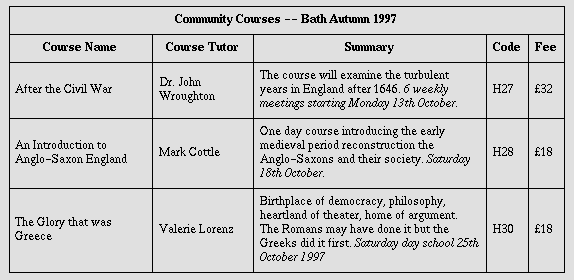
Note the use of the scope attribute with the "row" value. Although the first cell in each row contains data, not header information,
the scope attribute makes the data cell behave like a row header cell. This allows speech synthesizers to provide the relevant course name
upon request or to state it immediately before each cell's content.
30.4.3.2. Categorizing cells
Users browsing a table with a speech-based user agent may wish to hear an explanation of a cell's contents in addition to the contents themselves. One way the user might provide an explanation is
by speaking associated header information before speaking the data cell's contents (see the section on associating header information with data cells).
Users may also want information about more than one cell, in which case header information provided at the cell level (by headers, scope, and abbr) may not provide adequate context. Consider the following table,
which classifies expenses for meals, hotels, and transport in two locations (San Jose and Seattle) over several days:
Users might want to extract information from the table in the form of queries:
- "What did I spend for all my meals?"
- "What did I spend for meals on 25 August?"
- "What did I spend for all expenses in San Jose?"
Each query involves a computation by the user agent that may involve zero or more cells. In order to determine, for example, the costs of meals on 25 August, the user agent must know which table
cells refer to "Meals" (all of them) and which refer to "Dates" (specifically, 25 August), and find the intersection of the two sets.
To accommodate this type of query, the table model allows authors to place cell headers and data into categories. For example, for the travel expense table, an author could group the header cells
"San Jose" and "Seattle" into the category "Location", the headers "Meals", "Hotels", and "Transport" in the category "Expenses", and the four days into the category "Date". The previous three
questions would then have the following meanings:
- "What did I spend for all my meals?" means "What are all the data cells in the "Expenses=Meals" category?
- "What did I spend for meals on 25 August?" means "What are all the data cells in the "Expenses=Meals" and "Date=Aug-25-1997" categories?
- "What did I spend for all expenses in San Jose?" means "What are all the data cells in the "Expenses=Meals, Hotels, Transport" and "Location=San Jose" categories?
Authors categorize a header or data cell by setting the axis attribute for the cell. For instance, in the travel expense table, the cell
containing the information "San Jose" could be placed in the "Location" category as follows:
Example
<th id="a6" axis="location">San Jose</th>
Any cell containing information related to "San Jose" should refer to this header cell via either the headers or the scope attribute. Thus, meal expenses for 25-Aug-1997 should be marked up to refer to id attribute
(whose value here is "a6") of the "San Jose" header cell:
Example
<td headers="a6">37.74</td>
Each headers attribute provides a list of id references. Authors may thus
categorize a given cell in any number of ways (or, along any number of "headers", hence the name).
Below we mark up the travel expense table with category information:
Example
<table>
<caption>Travel Expense Report</caption>
<summary>
  This table summarizes travel expenses
  incurred during August trips to
  San Jose and Seattle
</summary>
<tbody>
   <tr>
      <th></th>
      <th id="a2" axis="expenses">Meals</th>
      <th id="a3" axis="expenses">Hotels</th>
      <th id="a4" axis="expenses">Transport</th>
      <td>subtotals</td>
   </tr>
   <tr>
      <th id="a6" axis="location">San Jose</th>
      <th></th>
      <th></th>
      <th></th>
      <td></td>
   </tr>
   <tr>
      <td id="a7" axis="date">25-Aug-97</td>
      <td headers="a6 a7 a2">37.74</td>
      <td headers="a6 a7 a3">112.00</td>
      <td headers="a6 a7 a4">45.00</td>
      <td></td>
   </tr>
   <tr>
      <td id="a8" axis="date">26-Aug-97</td>
      <td headers="a6 a8 a2">27.28</td>
      <td headers="a6 a8 a3">112.00</td>
      <td headers="a6 a8 a4">45.00</td>
      <td></td>
   </tr>
   <tr>
      <td>subtotals</td>
      <td>65.02</td>
      <td>224.00</td>
      <td>90.00</td>
      <td>379.02</td>
   </tr>
   <tr>
      <th id="a10" axis="location">Seattle</th>
      <th></th>
      <th></th>
      <th></th>
      <td></td>
   </tr>
   <tr>
      <td id="a11" axis="date">27-Aug-97</td>
      <td headers="a10 a11 a2">96.25</td>
      <td headers="a10 a11 a3">109.00</td>
      <td headers="a10 a11 a4">36.00</td>
      <td></td>
   </tr>
   <tr>
      <td id="a12" axis="date">28-Aug-97</td>
      <td headers="a10 a12 a2">35.00</td>
      <td headers="a10 a12 a3">109.00</td>
      <td headers="a10 a12 a4">36.00</td>
      <td></td>
   </tr>
   <tr>
      <td>subtotals</td>
      <td>131.25</td>
      <td>218.00</td>
      <td>72.00</td>
      <td>421.25</td>
   </tr>
   <tr>
      <th>Totals</th>
      <td>196.27</td>
      <td>442.00</td>
      <td>162.00</td>
      <td>800.27</td>
   </tr>
</tbody>
</table>
Note that marking up the table this way also allows user agents to avoid confusing the user with unwanted information. For instance, if a speech synthesizer were to speak all of the figures in the
"Meals" column of this table in response to the query "What were all my meal expenses?", a user would not be able to distinguish a day's expenses from subtotals or totals. By carefully categorizing
cell data, authors allow user agents to make important semantic distinctions when rendering.
Of course, there is no limit to how authors may categorize information in a table. In the travel expense table, for example, we could add the additional categories "subtotals" and "totals".
This specification does not require user agents to handle information provided by the axis attribute, nor does it make any
recommendations about how user agents may present axis information to users or how users may query the user agent about this
information.
However, user agents, particularly speech synthesizers, may want to factor out information common to
several cells that are the result of a query. For instance, if the user asks "What did I spend for meals in San Jose?", the user agent would first determine the cells in question (25-Aug-1997: 37.74,
26-Aug-1997:27.28), then render this information. A user agent speaking this information might read it:
Example
   Location: San Jose. Date: 25-Aug-1997. Expenses, Meals: 37.74
   Location: San Jose. Date: 26-Aug-1997. Expenses, Meals: 27.28
or, more compactly:
Example
   San Jose, 25-Aug-1997, Meals: 37.74
   San Jose, 26-Aug-1997, Meals: 27.28
An even more economical rendering would factor the common information and reorder it:
Example
   San Jose, Meals, 25-Aug-1997: 37.74
                    26-Aug-1997: 27.28
User agents that support this type of rendering should allow authors a means to customize rendering (e.g., through style sheets).
30.4.3.3. Algorithm to find heading information
In the absence of header information from either the scope or headers
attribute, user agents may construct header information according to the following algorithm. The goal of the algorithm is to find an ordered list of headers. (In the following description of the
algorithm the table directionality is assumed to be left-to-right.)
- First, search left from the cell's position to find row header cells. Then search upwards to find column header cells. The search in a given direction stops when the edge of the table is reached
or when a data cell is found after a header cell.
- Row headers are inserted into the list in the order they appear in the table. For left-to-right tables, headers are inserted from left to right.
- Column headers are inserted after row headers, in the order they appear in the table, from top to bottom.
- If a header cell has the headers attribute set, then the headers referenced by this attribute are inserted into the list and the
search stops for the current direction.
- td cells that set the axis attribute are also treated as header cells.
Attributes
- The Common collection
- A collection of other attribute collections, including: Bi-directional, Core, Edit, Embedding, Events, Forms, Hypertext, I18N, Map, and Metainformation.
The tbody element contains rows of table data. In tables that also contain
thead or tfoot elements, all of these sections must contain the same number of columns.
30.6. The td and th elements
Attributes
- The Common collection
- A collection of other attribute collections, including: Bi-directional, Core, Edit, Embedding, Events, Forms, Hypertext, I18N, Map, and Metainformation.
- abbr = Text
- This attribute should be used to provide an abbreviated form of the cell's content, and may be rendered by user agents when appropriate in place of the cell's content. Abbreviated names should be
short since user agents may render them repeatedly. For instance, speech synthesizers may render the abbreviated headers relating to a particular cell before rendering that cell's content.
- axis = CDATA
- This attribute may be used to place a cell into conceptual categories that can be considered to form axes in an n-dimensional space. User agents may give users access to these categories (e.g.,
the user may query the user agent for all cells that belong to certain categories, the user agent may present a table in the form of a table of contents, etc.). Please consult the section on categorizing cells for more information. The value of this attribute is a comma-separated list of category names.
- colspan = Number
- This attribute specifies the number of columns spanned by the current cell. The default value of this attribute is one ("1"). The value zero ("0") means that the cell spans all columns from the
current column to the last column of the column group ( colgroup) in which the cell is defined.
- = IDREFS
- This attribute specifies the list of header cells that provide header information for the current data cell. The value of this attribute is a space-separated list of cell names; those cells must
be named by setting their id attribute. Authors generally use the headers
attribute to help non-visual user agents render header information about data cells (e.g., header information is spoken prior to the cell data), but the attribute may also be used in conjunction with
style sheets. See also the scope attribute.
- rowspan = Number
- This attribute specifies the number of rows spanned by the current cell. The default value of this attribute is one ("1"). The value zero ("0") means that the cell spans all rows from the current
row to the last row of the current table section (rowgroup) in which the cell is defined. thead, tbody, and tfoot elements are rowgroups.
- scope = row|col|rowgroup|colgroup
- This attribute specifies the set of data cells for which the current header cell provides header information. This attribute may be used in place of the headers attribute, particularly for simple tables. When specified, this attribute must have one of the following values:
- row: The current cell provides header information for the rest of the row that contains it (see also the section on table
directionality).
- col: The current cell provides header information for the rest of the column that contains it.
- rowgroup: The header cell provides header information for the rest of the row group that contains it.
- colgroup: The header cell provides header information for the rest of the column group that contains it.
Table cells may contain two types of information: header information and data. This distinction enables user agents to render header and data cells distinctly, even in the absence
of style sheets. For example, visual user agents may present header cell text with a bold font. Speech synthesizers may render header information with a distinct voice inflection.
The th element defines a cell that contains header information. User agents have two pieces of header information available: the contents
of the th element and the value of the abbr attribute. User agents must render
either the contents of the cell or the value of the abbr attribute. For visual media, the latter may be appropriate when there is
insufficient space to render the full contents of the cell. For non-visual media abbr may be used as an abbreviation for table headers when
these are rendered along with the contents of the cells to which they apply.
The headers and scope attributes also allow authors to help non-visual
user agents process header information. Please consult the section on labeling cells for non-visual user agents for information and examples.
The td element defines a cell that contains data.
Cells may be empty (i.e., contain no data).
30.6.1. Cells that span several rows or columns
Cells may span several rows or columns. The number of rows or columns spanned by a cell is set by the rowspan and colspan attributes for the th and td
elements.
In this table definition, we specify that the cell in row four, column two should span a total of three columns, including the current column.
<table>
<caption>Cups of coffee consumed by each senator</caption>
<tbody>
   <tr>
      <th>Name</th>
      <th>Cups</th>
      <th>Type of Coffee</th>
      <th>Sugar?</th>
   </tr>
   <tr>
      <td>T. Sexton</td>
      <td>10</td>
      <td>Espresso</td>
      <td>No</td>
   </tr>
   <tr>
      <td>J. Dinnen</td>
      <td>5</td>
      <td>Decaf</td>
      <td>Yes</td>
   </tr>
   <tr>
      <td>A. Soria</td>
      <td colspan="3"><em>Not available</em></td>
   </tr>
</tbody>
</table>
This table might be rendered on a tty device by a visual user agent as follows:
Cups of coffee consumed by each senator
 --------------------------------------
 |   Name  |Cups|Type of Coffee|Sugar?|
 --------------------------------------
 |T. Sexton|10  |Espresso      |No    |
 --------------------------------------
 |J. Dinnen|5   |Decaf         |Yes   |
 --------------------------------------
 |A. Soria |Not available             |
 --------------------------------------
The next example illustrates (with the help of table borders) how cell definitions that span more than one row or column affect the definition of later cells. Consider the following table
definition:
<table>
<tbody>
   <tr>
      <td>1</td>
      <td rowspan="2">2</td>
      <td>3</td>
   </tr>
   <tr>
      <td>4</td>
      <td>6</td>
   </tr>
   <tr>
      <td>7</td>
      <td>8</td>
      <td>9</td>
      <td></td>
   </tr>
</tbody>
</table>
As cell "2" spans the first and second rows, the definition of the second row will take it into account. Thus, the second td in row two
actually defines the row's third cell. Visually, the table might be rendered to a tty device as:
-------------
| 1 | 2 | 3 |
----|   |----
| 4 |   | 6 |
----|---|----
| 7 | 8 | 9 |
-------------
while a graphical user agent might render this as:
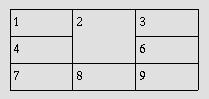
Note that if the td defining cell "6" had been omitted, an extra empty cell would have been added by the user agent to complete the
row.
Similarly, in the following table definition:
<table>
<tbody>
   <tr>
      <td>1</td>
      <td>2</td>
      <td>3</td>
   </tr>
   <tr>
      <td colspan="2">4</td>
      <td>6</td>
   </tr>
   <tr>
      <td>7</td>
      <td>8</td>
      <td>9</td>
   </tr>
</tbody>
</table>
cell "4" spans two columns, so the second td in the row actually defines the third cell ("6"):
-------------
| 1 | 2 | 3 |
--------|----
| 4     | 6 |
--------|----
| 7 | 8 | 9 |
-------------
A graphical user agent might render this as:
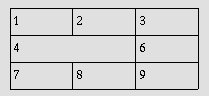
Defining overlapping cells is an error. User agents may vary in how they handle this error (e.g., rendering may vary).
The following illegal example illustrates how one might create overlapping cells. In this table, cell "5" spans two rows and cell "7" spans two columns, so there is overlap in the cell between "7"
and "9":
<table>
<tbody>
   <tr>
      <td>1</td>
      <td>2</td>
      <td>3</td>
   </tr>
   <tr>
      <td>4</td>
      <td rowspan="2">5</td>
      <td>6</td>
   </tr>
   <tr>
      <td colspan="2">7</td>
      <td>9</td>
   </tr>
</tbody>
</table>
Attributes
- The Common collection
- A collection of other attribute collections, including: Bi-directional, Core, Edit, Embedding, Events, Forms, Hypertext, I18N, Map, and Metainformation.
Table rows may be grouped into a table head, table foot, and one or more table body sections,
using the thead, tfoot and tbody elements, respectively. This division enables user agents to support scrolling of table bodies independently of the table head and foot. When long tables
are printed, the table head and foot information may be repeated on each page that contains table data.
The table head and table foot should contain information about the table's columns. The table body must contain rows of table data.
When present, each thead, tfoot, and tbody creates a row group. Each row group must contain at least one row, defined by the tr element.
If the thead, tfoot, and tbody elements are used, and a rowspan attribute is used within a group, the rowspan must remain within the group boundaries of which it is defined.
This example illustrates the order and structure of the table head, foot, and bodies.
Example
<table>
<thead>
     <tr> <em>...header information...</em></tr>
</thead>
<tfoot>
     <tr> <em>...footer information...</em></tr>
</tfoot>
<tbody>
     <tr> <em>...first row of block one data...</em></tr>
     <tr> <em>...second row of block one data...</em></tr>
</tbody>
<tbody>
     <tr> <em>...first row of block two data...</em></tr>
     <tr> <em>...second row of block two data...</em></tr>
     <tr> <em>...third row of block two data...</em></tr>
</tbody>
</table>
tfoot must appear before tbody within a table definition so that user agents can render the foot before receiving all of the (potentially numerous) rows of data.
Attributes
- The Common collection
- A collection of other attribute collections, including: Bi-directional, Core, Edit, Embedding, Events, Forms, Hypertext, I18N, Map, and Metainformation.
The tr elements acts as a container for a row of table cells.
This sample table contains three rows, each begun by the tr element:
<table>
<caption>Cups of coffee consumed by each senator</caption>
<summary>This table charts the number of cups
  of coffee consumed by each senator, the type
  of coffee (decaf or regular), and whether
  taken with sugar.</summary>
<tbody>
   <tr> ...A header row...</tr>
   <tr> ...First row of data...</tr>
   <tr> ...Second row of data...</tr>
</tbody>
</table>
Why no nested colgroup or rowgroup? PR #7828
State: Open
Resolution: None
User: None
Notes:
What is the scope of a header? PR #7878
State: Open
Resolution: None
User: None
Notes:
Group agress that the scope needs a better explanation.
td/th scope attribute - rowgroup == (tbody, thead, tfoot) PR #7879
State: Open
Resolution: None
User: None
Notes:
Agree that we need to tighten up the terminology.
nesting colgroup and rowgroups PR #7881
State: Open
Resolution: None
User: None
Notes:
While there are notional "rowgroups" there are no explicit arbitrary rowgroups in HTML nor in XHTML because rows are explicit in tables. colgroups, on the other hand, exist because HTML / XHTML needs
a way of referring to columns. Asked the submitter for more information and an example including a description of what the advantages would be.
31. XForms Module
This section is normative for purposes of defining the integration of XForms into XHTML 2.0. The XForms language itself is normatively defined in [XFORMS].
The XForms Module provides a rich collection of forms features within the XHTML namespace.
The content model for XForms defines several content sets:
- XForms Core
- model
- XForms Form Controls
- input | secret | textarea | output | upload | range | trigger | submit | select | select1
- XForms Actions
- action | dispatch | rebuild | recalculate | revalidate | refresh | setfocus | load | setvalue | send | reset | message | insert |
delete | setindex
- XForms Group
- group
- XForms Switch
- switch
- XForms Repeat
- repeat
31.1. Core XForms
When this module is included, the XForms Core content set is added to the content model of the head element in the Document module, to the Structural content set of the Structural Module., and to the Text content set of the Text module.
31.2. XForms Actions
When this module is included, the XForms Actions content set is added to the content model of the head element in the Document module, to the Structural content set, and to the Text content set.
31.3. Form Controls
When this module is included, the XForms Form Controls content set is added to the Structural content set, and to the Text content set.
The Text content set is added to the XForms UI Inline content set, allowing various XHTML elements inside form control labels.
When this module is included, the XForms Group content set is added to the Structural content set, and to the Text content set.
group elements can freely nest.
The Structural content set is added to the XForms Group content set.
When this module is included, the XForms Switch content set is added to the Structural content set, and to the Text content set.
Alternating switch and case elements can freely nest.
The Structural content set is added to the content model of case, after an optional label element.
When this module is included, the XForms Repeat content set is added to the Structural content set, and to the Text content set.
repeat elements can freely nest.
The Structural content set is added to the content model of case, after an optional label element.
31.7. XForms Repeat Attribute Collection
This module also includes the XForms Repeat Attribute Collection via attributes from [XFORMS]. The normative definition of those attributes
and their semantics is included in that specification. They are described briefly below:
- repeat-model = IDREF
- This attribute defines the XForms model to be associated with the element.
- repeat-bind = IDREF
- This attribute provides a reference to an XForms
bind element.
- repeat-nodeset = LocationPath
- This attribute defines an XPath LocationPath that maps to an XForms
bind element.
- repeat-startindex = Number
- XForms hint to the processor as to which item from the collection to display first.
- repeat-number = Number
- XForms hint to the processor as to how many items from the collection to display at a time.
When this module is included, the XForms Repeat Attribute collection is included on all elements that can validly appear twice or more as sibling elements.
31.8. Other Attribute Collections
XHTML 2 adds the Common attribute group to the XForms Common Attribute Group.
The Linking Attribute Group is allowed on all elements, including instance.
The XForms Attribute Groups for single-node binding and Nodeset binding are allowed only on the XForms elements they are defined for.
Implementation: XML Schema
[XHTML2] exclude switch and case as presentational PR #7826
State: Open
Resolution: None
User: None
Notes:
autocomplete attribute PR #7838
State: Open
Resolution: None
User: None
Notes:
32. XML Events Module
This section is normative.
The XML Events Module defines a linkage between XHTML and the XML Document Object Model [DOM]. XML Events are defined in [XMLEVENTS], and all XML Event elements and attributes are in their own namespace.
This module includes the ev:listener as defined in [XMLEVENTS].
This module also defines the Events Attribute Collection via the global attributes from [XMLEVENTS]. The normative definition of those
attributes and their semantics is included in that specification. They are described briefly below:
- defaultAction = "cancel|perform"
- This attribute defines whether or not the default action associated with the event should be processed. The default value is perform
- event = CDATA
- This attribute defines the event type that is being listened for. The set of legal names for XHTML 2 is to be defined.
- handler = IDREF
- This attribute specifies the ID of a handler element that defines the action that should be performed if the event reaches the observer.
- observer = IDREF
- This attribute specifies an ID for an observer element for which the listener is to be registered.
- phase = "capture|default"
- This attribute specifies the phase of event propagation in which to process the event. If not specified, the default value of this attribute is default.
- propagate = "stop|continue"
- This attribute specifies whether an event should stop propagating after this observer processes it, or continue for possible further processing. The default value of this attribute is
continue.
- target = IDREF
- This attribute specifies the id of the target element of the event (i.e., the node that caused the event). If not specified, the default value of this attribute is the element on which the event
attribute is specified.
Note that these attributes are not in the XHTML namespace but in the XML Events namespace. The XHTML namespace is the default namespace for XHTML documents, so XHTML elements and
attributes may be expressed without namespace prefixes (although they are permitted on elements). XML Events attributes MUST use a prefix, since they are not in the default namespace of the
document.
Implementation: RELAX NG, XML Schema, DTD
A. Changes from XHTML 1.1
This appendix is informative.
This Appendix describes the differences between XHTML 2.0 and XHTML 1.1.
B. XHTML 2.0 RELAX NG Definition
This appendix is normative.
This appendix contains the implementation of the XHTML 2.0 RELAX NG driver file.
B.0.1. RELAX NG XHTML 2.0 Driver
<?xml version="1.0" encoding="UTF-8"?>
<grammar ns="http://www.w3.org/2002/06/xhtml2/"
xmlns="http://relaxng.org/ns/structure/1.0"
xmlns:x="http://www.w3.org/1999/xhtml">
<x:h1>RELAX NG schema for XHTML 2.0</x:h1>
<x:pre>
Copyright ©2003-2005 W3C® (MIT, ERCIM, Keio), All Rights Reserved.
Editor: Masayasu Ishikawa <mimasa@w3.org>
Revision: $Id: xhtml2.rng,v 1.42 2005/07/27 13:36:09 mimasa Exp $
Permission to use, copy, modify and distribute this RELAX NG schema
for XHTML 2.0 and its accompanying documentation for any purpose and
without fee is hereby granted in perpetuity, provided that the above
copyright notice and this paragraph appear in all copies. The copyright
holders make no representation about the suitability of this RELAX NG
schema for any purpose.
It is provided "as is" without expressed or implied warranty.
For details, please refer to the W3C software license at:
<x:a href="http://www.w3.org/Consortium/Legal/copyright-software"
>http://www.w3.org/Consortium/Legal/copyright-software</x:a>
</x:pre>
<div>
<x:h2>XHTML 2.0 modules</x:h2>
<x:h3>Attribute Collections Module</x:h3>
<include href="xhtml-attribs-2.rng"/>
<x:h3>Document Module</x:h3>
<include href="xhtml-document-2.rng"/>
<x:h3>Structural Module</x:h3>
<include href="xhtml-structural-2.rng"/>
<x:h3>Text Module</x:h3>
<include href="xhtml-text-2.rng"/>
<x:h3>Hypertext Module</x:h3>
<include href="xhtml-hypertext-2.rng"/>
<x:h3>List Module</x:h3>
<include href="xhtml-list-2.rng"/>
<x:h3>Handler Module</x:h3>
<include href="xhtml-handler-2.rng"/>
<x:h3>Image Module</x:h3>
<include href="xhtml-image-2.rng"/>
<x:h3>Metainformation Module</x:h3>
<include href="xhtml-meta-2.rng"/>
<x:h3>Object Module</x:h3>
<include href="xhtml-object-2.rng"/>
<x:h3>Access Module</x:h3>
<include href="xhtml-access-2.rng"/>
<x:h3>Style Sheet Module</x:h3>
<include href="xhtml-style-2.rng"/>
<x:h3>Tables Module</x:h3>
<include href="xhtml-table-2.rng"/>
<x:h3>Support Modules</x:h3>
<x:h4>Datatypes Module</x:h4>
<include href="xhtml-datatypes-2.rng"/>
<x:h4>Param Module</x:h4>
<include href="xhtml-param-2.rng"/>
<x:h4>Caption Module</x:h4>
<include href="xhtml-caption-2.rng"/>
</div>
<div>
<x:h2>XML Events module</x:h2>
<include href="xml-events-1.rng"/>
</div>
<div>
<x:h2>Ruby module</x:h2>
<include href="full-ruby-1.rng">
<define name="Inline.class">
<notAllowed/>
</define>
<define name="NoRuby.content">
<ref name="Text.model"/>
</define>
</include>
<define name="Inline.model">
<notAllowed/>
</define>
<define name="Text.class" combine="choice">
<ref name="ruby"/>
</define>
</div>
<div>
<x:h2>XForms module</x:h2>
<include href="xforms-nons-11.rng"/>
<!--
<define name="XFORMS.Common.attrib" combine="interleave">
<ref name="Common.attrib"/>
</define>
-->
<define name="head.misc" combine="choice">
<ref name="XFORMS.Core"/>
</define>
<define name="Misc.class" combine="choice">
<ref name="XFORMS.Form.Controls"/>
<ref name="XFORMS.Actions"/>
<ref name="XFORMS.Group"/>
<ref name="XFORMS.Switch"/>
<ref name="XFORMS.Repeat"/>
</define>
<define name="XFORMS.UI.Inline.class" combine="choice">
<ref name="Text.class"/>
<ref name="Misc.class"/>
</define>
</div>
<div>
<x:h2>XML Schema instance module</x:h2>
<include href="XMLSchema-instance.rng"/>
</div>
</grammar>
C. XHTML RELAX NG Module Implementations
This appendix is normative.
This appendix contains implementations of the modules defined in this specification. These module implementations can be used in other XHTML Family Document Types.
C.1. XHTML Module Implementations
This section contains the formal definition of each of the XHTML Abstract Modules as a RELAX NG module.
C.1.1. Attribute Collections
<?xml version="1.0" encoding="UTF-8"?>
<grammar xmlns="http://relaxng.org/ns/structure/1.0"
         xmlns:x="http://www.w3.org/1999/xhtml">

  <x:h1>Attribute Collections Module</x:h1>

  <div>
    <x:h2>Core Attributes Module</x:h2>
    <include href="xhtml-core-attrib-2.rng"/>
  </div>

  <div>
    <x:h2>Internationalization Attribute Module</x:h2>
    <include href="xhtml-i18n-attrib-2.rng"/>
  </div>

  <div>
    <x:h2>Bi-directional Text Collection</x:h2>
    <include href="xhtml-bidi-attrib-2.rng"/>
  </div>

  <div>
    <x:h2>Edit Attributes Module</x:h2>
    <include href="xhtml-edit-attrib-2.rng"/>
  </div>

  <div>
    <x:h2>Embedding Attributes Module</x:h2>
    <include href="xhtml-embed-attrib-2.rng"/>
  </div>

  <div>
    <x:h2>Events Module</x:h2>
    <include href="xhtml-events-2.rng"/>
  </div>

  <div>
    <x:h2>XForms Repeat Attribute Collection</x:h2>
    <include href="xforms-repeat-attrib.rng"/>

    <define name="Common.attrib" combine="interleave">
      <ref name="XFORMS.Repeat.attrib"/>
    </define>
  </div>

  <div>
    <x:h2>Hypertext Attributes Module</x:h2>
    <include href="xhtml-hypertext-attrib-2.rng"/>
  </div>

  <div>
    <x:h2>Image Map Attributes Module</x:h2>
    <include href="xhtml-imagemap-attrib-2.rng"/>
  </div>

  <div>
    <x:h2>Media Attribute Module</x:h2>
    <include href="xhtml-media-attrib-2.rng"/>
  </div>

  <div>
    <x:h2>Metainformation Attributes Module</x:h2>
    <include href="xhtml-meta-attrib-2.rng"/>
  </div>

  <div>
    <x:h2>Role Attribute Module</x:h2>
    <include href="xhtml-role-attrib-2.rng"/>
  </div>

  <div>
    <x:h2>Style Attribute Module</x:h2>
    <include href="xhtml-inlstyle-2.rng"/>
  </div>

  <define name="Common.extra.attrib">
    <empty/>
  </define>

  <define name="Common.attrib">
    <ref name="Common.extra.attrib"/>
  </define>

</grammar>
<?xml version="1.0" encoding="UTF-8"?>
<grammar xmlns="http://relaxng.org/ns/structure/1.0"
         xmlns:x="http://www.w3.org/1999/xhtml">

  <x:h1>Document Module</x:h1>

  <start>
    <ref name="html"/>
  </start>

  <div>
    <x:h2>The html element</x:h2>

    <define name="html">
      <element name="html">
        <ref name="html.attlist"/>
        <ref name="head"/>
        <ref name="body"/>
      </element>
    </define>

    <define name="html.attlist">
      <ref name="Common.attrib"/>
      <ref name="version.attrib"/>
      <optional>
        <ref name="XSI.schemaLocation"/>
      </optional>
    </define>

    <define name="version.attrib">
      <optional>
        <attribute name="version">
          <ref name="CDATA.datatype"/>
        </attribute>
      </optional>
    </define>
  </div>

  <div>
    <x:h2>The head element</x:h2>

    <define name="head">
      <element name="head">
        <ref name="head.attlist"/>
        <ref name="head.content"/>
      </element>
    </define>

    <define name="head.attlist">
      <ref name="Common.attrib"/>
    </define>

    <define name="head.content">
      <ref name="title"/>
      <zeroOrMore>
        <choice>
          <ref name="head.misc"/>
        </choice>
      </zeroOrMore>
    </define>

    <define name="head.misc">
      <notAllowed/>
    </define>
  </div>

  <div>
    <x:h2>The title element</x:h2>

    <define name="title">
      <element name="title">
        <ref name="title.attlist"/>
        <ref name="Text.model"/>
      </element>
    </define>

    <define name="title.attlist">
      <ref name="Common.attrib"/>
    </define>
  </div>

  <div>
    <x:h2>The body element</x:h2>

    <define name="body">
      <element name="body">
        <ref name="body.attlist"/>
        <ref name="Structural.model"/>
      </element>
    </define>

    <define name="body.attlist">
      <ref name="Common.attrib"/>
    </define>
  </div>

</grammar>
<?xml version="1.0" encoding="UTF-8"?>
<grammar xmlns="http://relaxng.org/ns/structure/1.0"
         xmlns:x="http://www.w3.org/1999/xhtml">

  <x:h1>Structural Module</x:h1>

  <div>
    <x:h2>The address element</x:h2>

    <define name="address">
      <element name="address">
        <ref name="address.attlist"/>
        <ref name="Text.model"/>
      </element>
    </define>

    <define name="address.attlist">
      <ref name="Common.attrib"/>
    </define>
  </div>

  <div>
    <x:h2>The blockcode element</x:h2>

    <define name="blockcode">
      <element name="blockcode">
        <ref name="blockcode.attlist"/>
        <ref name="blockcode.content"/>
      </element>
    </define>

    <define name="blockcode.attlist">
      <ref name="Common.attrib"/>
    </define>

    <define name="blockcode.content">
      <ref name="blockcode.model"/>
    </define>
  </div>

  <div>
    <x:h2>The blockquote element</x:h2>

    <define name="blockquote">
      <element name="blockquote">
        <ref name="blockquote.attlist"/>
        <ref name="blockquote.content"/>
      </element>
    </define>

    <define name="blockquote.attlist">
      <ref name="Common.attrib"/>
    </define>

    <define name="blockquote.content">
      <ref name="blockquote.model"/>
    </define>
  </div>

  <div>
    <x:h2>The div element</x:h2>

    <define name="div">
      <element name="div">
        <ref name="div.attlist"/>
        <ref name="Flow.model"/>
      </element>
    </define>

    <define name="div.attlist">
      <ref name="Common.attrib"/>
    </define>
  </div>

  <div>
    <x:h2>The heading elements</x:h2>

    <define name="h">
      <element name="h">
        <ref name="Heading.attlist"/>
        <ref name="Heading.content"/>
      </element>
    </define>

    <define name="h1">
      <element name="h1">
        <ref name="Heading.attlist"/>
        <ref name="Heading.content"/>
      </element>
    </define>

    <define name="h2">
      <element name="h2">
        <ref name="Heading.attlist"/>
        <ref name="Heading.content"/>
      </element>
    </define>

    <define name="h3">
      <element name="h3">
        <ref name="Heading.attlist"/>
        <ref name="Heading.content"/>
      </element>
    </define>

    <define name="h4">
      <element name="h4">
        <ref name="Heading.attlist"/>
        <ref name="Heading.content"/>
      </element>
    </define>

    <define name="h5">
      <element name="h5">
        <ref name="Heading.attlist"/>
        <ref name="Heading.content"/>
      </element>
    </define>

    <define name="h6">
      <element name="h6">
        <ref name="Heading.attlist"/>
        <ref name="Heading.content"/>
      </element>
    </define>

    <define name="Heading.attlist">
      <ref name="Common.attrib"/>
    </define>

    <define name="Heading.content">
      <ref name="Text.model"/>
    </define>
  </div>

  <div>
    <x:h2>The p element</x:h2>

    <define name="p">
      <element name="p">
        <ref name="p.attlist"/>
        <ref name="p.content"/>
      </element>
    </define>

    <define name="p.attlist">
      <ref name="Common.attrib"/>
    </define>

    <define name="p.content">
      <ref name="p.model"/>
    </define>
  </div>

  <div>
    <x:h2>The pre element</x:h2>

    <define name="pre">
      <element name="pre">
        <ref name="pre.attlist"/>
        <ref name="Text.model"/>
      </element>
    </define>

    <define name="pre.attlist">
      <ref name="Common.attrib"/>
    </define>
  </div>

  <div>
    <x:h2>The section element</x:h2>

    <define name="section">
      <element name="section">
        <ref name="section.attlist"/>
        <ref name="Flow.model"/>
      </element>
    </define>

    <define name="section.attlist">
      <ref name="Common.attrib"/>
    </define>
  </div>

  <div>
    <x:h2>The separator element</x:h2>

    <define name="separator">
      <element name="separator">
        <ref name="separator.attlist"/>
      </element>
    </define>

    <define name="separator.attlist">
      <ref name="Common.attrib"/>
    </define>
  </div>

  <div>
    <x:h2>Content Model</x:h2>

    <define name="Heading.class">
      <choice>
        <ref name="h"/>
        <ref name="h1"/>
        <ref name="h2"/>
        <ref name="h3"/>
        <ref name="h4"/>
        <ref name="h5"/>
        <ref name="h6"/>
      </choice>
    </define>

    <define name="Structural.class">
      <choice>
        <ref name="address"/>
        <ref name="blockcode"/>
        <ref name="blockquote"/>
        <ref name="div"/>
        <!--ref name="List.class"/-->
        <ref name="p"/>
        <ref name="pre"/>
        <ref name="section"/>
        <ref name="separator"/>
      </choice>
    </define>

    <define name="blockcode.model">
      <zeroOrMore>
        <choice>
          <text/>
          <ref name="Text.class"/>
          <ref name="Heading.class"/>
          <ref name="Structural.class"/>
          <ref name="List.class"/>
          <ref name="Misc.class"/>
        </choice>
      </zeroOrMore>
    </define>

    <define name="blockquote.model">
      <zeroOrMore>
        <choice>
          <text/>
          <ref name="Text.class"/>
          <ref name="Heading.class"/>
          <ref name="Structural.class"/>
          <ref name="List.class"/>
          <ref name="Misc.class"/>
        </choice>
      </zeroOrMore>
    </define>

    <define name="p.model">
      <zeroOrMore>
        <choice>
          <text/>
          <ref name="Text.class"/>
          <ref name="List.class"/>
          <ref name="blockcode"/>
          <ref name="blockquote"/>
          <ref name="pre"/>
          <ref name="table"/>
          <ref name="Misc.class"/>
        </choice>
      </zeroOrMore>
    </define>

    <define name="Structural.mix">
      <zeroOrMore>
        <choice>
          <ref name="Heading.class"/>
          <ref name="Structural.class"/>
          <ref name="List.class"/>
          <ref name="Misc.class"/>
        </choice>
      </zeroOrMore>
    </define>

    <define name="Structural.model">
      <oneOrMore>
        <ref name="Structural.mix"/>
      </oneOrMore>
    </define>

    <define name="Flow.model">
      <zeroOrMore>
        <choice>
          <text/>
          <ref name="Heading.class"/>
          <ref name="Structural.class"/>
          <ref name="List.class"/>
          <ref name="Text.class"/>
          <ref name="Misc.class"/>
        </choice>
      </zeroOrMore>
    </define>
  </div>

</grammar>
<?xml version="1.0" encoding="UTF-8"?>
<grammar xmlns="http://relaxng.org/ns/structure/1.0"
         xmlns:x="http://www.w3.org/1999/xhtml">

  <x:h1>Text Module</x:h1>

  <div>
    <x:h2>The abbr element</x:h2>

    <define name="abbr">
      <element name="abbr">
        <ref name="abbr.attlist"/>
        <ref name="Text.model"/>
      </element>
    </define>

    <define name="abbr.attlist">
      <ref name="Common.attrib"/>
      <optional>
        <attribute name="full">
          <ref name="URI.datatype"/>
        </attribute>
      </optional>
    </define>
  </div>

  <div>
    <x:h2>The cite element</x:h2>

    <define name="cite">
      <element name="cite">
        <ref name="cite.attlist"/>
        <ref name="Text.model"/>
      </element>
    </define>

    <define name="cite.attlist">
      <ref name="Common.attrib"/>
    </define>
  </div>

  <div>
    <x:h2>The code element</x:h2>

    <define name="code">
      <element name="code">
        <ref name="code.attlist"/>
        <ref name="Text.model"/>
      </element>
    </define>

    <define name="code.attlist">
      <ref name="Common.attrib"/>
    </define>
  </div>

  <div>
    <x:h2>The dfn element</x:h2>

    <define name="dfn">
      <element name="dfn">
        <ref name="dfn.attlist"/>
        <ref name="Text.model"/>
      </element>
    </define>

    <define name="dfn.attlist">
      <ref name="Common.attrib"/>
    </define>
  </div>

  <div>
    <x:h2>The em element</x:h2>

    <define name="em">
      <element name="em">
        <ref name="em.attlist"/>
        <ref name="Text.model"/>
      </element>
    </define>

    <define name="em.attlist">
      <ref name="Common.attrib"/>
    </define>
  </div>

  <div>
    <x:h2>The kbd element</x:h2>

    <define name="kbd">
      <element name="kbd">
        <ref name="kbd.attlist"/>
        <ref name="Text.model"/>
      </element>
    </define>

    <define name="kbd.attlist">
      <ref name="Common.attrib"/>
    </define>
  </div>

  <div>
    <x:h2>The l element</x:h2>

    <define name="l">
      <element name="l">
        <ref name="l.attlist"/>
        <ref name="Text.model"/>
      </element>
    </define>

    <define name="l.attlist">
      <ref name="Common.attrib"/>
    </define>
  </div>

  <div>
    <x:h2>The quote element</x:h2>

    <define name="quote">
      <element name="quote">
        <ref name="quote.attlist"/>
        <ref name="Text.model"/>
      </element>
    </define>

    <define name="quote.attlist">
      <ref name="Common.attrib"/>
    </define>
  </div>

  <div>
    <x:h2>The samp element</x:h2>

    <define name="samp">
      <element name="samp">
        <ref name="samp.attlist"/>
        <ref name="Text.model"/>
      </element>
    </define>

    <define name="samp.attlist">
      <ref name="Common.attrib"/>
    </define>
  </div>

  <div>
    <x:h2>The span element</x:h2>

    <define name="span">
      <element name="span">
        <ref name="span.attlist"/>
        <ref name="Text.model"/>
      </element>
    </define>

    <define name="span.attlist">
      <ref name="Common.attrib"/>
    </define>
  </div>

  <div>
    <x:h2>The strong element</x:h2>

    <define name="strong">
      <element name="strong">
        <ref name="strong.attlist"/>
        <ref name="Text.model"/>
      </element>
    </define>

    <define name="strong.attlist">
      <ref name="Common.attrib"/>
    </define>
  </div>

  <div>
    <x:h2>The sub element</x:h2>

    <define name="sub">
      <element name="sub">
        <ref name="sub.attlist"/>
        <ref name="Text.model"/>
      </element>
    </define>

    <define name="sub.attlist">
      <ref name="Common.attrib"/>
    </define>
  </div>

  <div>
    <x:h2>The sup element</x:h2>

    <define name="sup">
      <element name="sup">
        <ref name="sup.attlist"/>
        <ref name="Text.model"/>
      </element>
    </define>

    <define name="sup.attlist">
      <ref name="Common.attrib"/>
    </define>
  </div>

  <div>
    <x:h2>The var element</x:h2>

    <define name="var">
      <element name="var">
        <ref name="var.attlist"/>
        <ref name="Text.model"/>
      </element>
    </define>

    <define name="var.attlist">
      <ref name="Common.attrib"/>
    </define>
  </div>

  <div>
    <x:p>these can occur at Structural or Text level</x:p>

    <define name="Misc.class">
      <empty/>
    </define>
  </div>

  <div>
    <x:h2>Content Model</x:h2>

    <define name="Text.class">
      <choice>
        <ref name="abbr"/>
        <ref name="cite"/>
        <ref name="code"/>
        <ref name="dfn"/>
        <ref name="em"/>
        <ref name="kbd"/>
        <ref name="l"/>
        <ref name="quote"/>
        <ref name="samp"/>
        <ref name="span"/>
        <ref name="strong"/>
        <ref name="sub"/>
        <ref name="sup"/>
        <ref name="var"/>
      </choice>
    </define>

    <define name="Text.model">
      <zeroOrMore>
        <choice>
          <text/>
          <ref name="Text.class"/>
          <ref name="Misc.class"/>
        </choice>
      </zeroOrMore>
    </define>
  </div>

</grammar>
<?xml version="1.0" encoding="UTF-8"?>
<grammar xmlns="http://relaxng.org/ns/structure/1.0"
         xmlns:x="http://www.w3.org/1999/xhtml">

  <x:h1>Hypertext Module</x:h1>

  <div>
    <x:h2>The a element</x:h2>

    <define name="a">
      <element name="a">
        <ref name="a.attlist"/>
        <ref name="Text.model"/>
      </element>
    </define>

    <define name="a.attlist">
      <ref name="Common.attrib"/>
    </define>
  </div>

  <define name="Text.class" combine="choice">
    <ref name="a"/>
  </define>

</grammar>
<?xml version="1.0" encoding="UTF-8"?>
<grammar xmlns="http://relaxng.org/ns/structure/1.0"
         xmlns:x="http://www.w3.org/1999/xhtml">

  <x:h1>List Module</x:h1>

  <div>
    <x:h2>The dl element</x:h2>

    <define name="dl">
      <element name="dl">
        <ref name="dl.attlist"/>
        <optional>
          <ref name="label-in-list"/>
        </optional>
        <choice>
          <oneOrMore>
            <choice>
              <ref name="dt"/>
              <ref name="dd"/>
            </choice>
          </oneOrMore>
          <oneOrMore>
            <ref name="di"/>
          </oneOrMore>
        </choice>
      </element>
    </define>

    <define name="dl.attlist">
      <ref name="Common.attrib"/>
    </define>
  </div>

  <div>
    <x:h2>The di element</x:h2>

    <define name="di">
      <element name="di">
        <ref name="di.attlist"/>
        <oneOrMore>
          <ref name="dt"/>
        </oneOrMore>
        <zeroOrMore>
          <ref name="dd"/>
        </zeroOrMore>
      </element>
    </define>

    <define name="di.attlist">
      <ref name="Common.attrib"/>
    </define>
  </div>

  <div>
    <x:h2>The dt element</x:h2>

    <define name="dt">
      <element name="dt">
        <ref name="dt.attlist"/>
        <ref name="Text.model"/>
      </element>
    </define>

    <define name="dt.attlist">
      <ref name="Common.attrib"/>
    </define>
  </div>

  <div>
    <x:h2>The dd element</x:h2>

    <define name="dd">
      <element name="dd">
        <ref name="dd.attlist"/>
        <ref name="Flow.model"/>
      </element>
    </define>

    <define name="dd.attlist">
      <ref name="Common.attrib"/>
    </define>
  </div>

  <div>
    <x:h2>The label element</x:h2>

    <define name="label-in-list">
      <element name="label">
        <ref name="label.attlist"/>
        <ref name="Text.model"/>
      </element>
    </define>

    <define name="label.attlist">
      <ref name="Common.attrib"/>
    </define>
  </div>

  <div>
    <x:h2>The nl element</x:h2>

    <define name="nl">
      <element name="nl">
        <ref name="nl.attlist"/>
        <ref name="label-in-list"/>
        <oneOrMore>
          <ref name="li"/>
        </oneOrMore>
      </element>
    </define>

    <define name="nl.attlist">
      <ref name="Common.attrib"/>
    </define>
  </div>

  <div>
    <x:h2>The ol element</x:h2>

    <define name="ol">
      <element name="ol">
        <ref name="ol.attlist"/>
        <optional>
          <ref name="label-in-list"/>
        </optional>
        <oneOrMore>
          <ref name="li-in-ol"/>
        </oneOrMore>
      </element>
    </define>

    <define name="ol.attlist">
      <ref name="Common.attrib"/>
    </define>
  </div>

  <div>
    <x:h2>The ul element</x:h2>

    <define name="ul">
      <element name="ul">
        <ref name="ul.attlist"/>
        <optional>
          <ref name="label-in-list"/>
        </optional>
        <oneOrMore>
          <ref name="li"/>
        </oneOrMore>
      </element>
    </define>

    <define name="ul.attlist">
      <ref name="Common.attrib"/>
    </define>
  </div>

  <div>
    <x:h2>The li element</x:h2>

    <define name="li">
      <element name="li">
        <ref name="li.attlist"/>
        <ref name="Flow.model"/>
      </element>
    </define>

    <define name="li.attlist">
      <ref name="Common.attrib"/>
    </define>

    <define name="li-in-ol">
      <element name="li">
        <ref name="li-in-ol.attlist"/>
        <ref name="Flow.model"/>
      </element>
    </define>

    <define name="li-in-ol.attlist">
      <ref name="Common.attrib"/>
      <ref name="value.attrib"/>
    </define>

    <define name="value.attrib">
      <optional>
        <attribute name="value">
          <ref name="Number.datatype"/>
        </attribute>
      </optional>
    </define>
  </div>

  <div>
    <x:h2>List Content Set</x:h2>

    <define name="List.class">
      <choice>
        <ref name="dl"/>
        <ref name="nl"/>
        <ref name="ol"/>
        <ref name="ul"/>
      </choice>
    </define>
  </div>

</grammar>
C.1.7. Core Attributes
<?xml version="1.0" encoding="UTF-8"?>
<grammar xmlns="http://relaxng.org/ns/structure/1.0"
         xmlns:a="http://relaxng.org/ns/compatibility/annotations/1.0"
         xmlns:x="http://www.w3.org/1999/xhtml">

  <x:h1>Core Attributes Module</x:h1>

  <div>
    <x:h2>Core Attribute Collection</x:h2>

    <define name="class.attrib">
      <optional>
        <attribute name="class">
          <ref name="NMTOKENS.datatype"/>
        </attribute>
      </optional>
    </define>

    <define name="id.attrib">
      <optional>
        <attribute name="xml:id">
          <ref name="ID.datatype"/>
        </attribute>
      </optional>
    </define>

    <define name="layout.attrib">
      <optional>
        <attribute name="layout" a:defaultValue="irrelevant">
          <choice>
            <value>irrelevant</value>
            <value>relevant</value>
          </choice>
        </attribute>
      </optional>
    </define>

    <define name="title.attrib">
      <optional>
        <attribute name="title">
          <ref name="Text.datatype"/>
        </attribute>
      </optional>
    </define>

    <define name="Core.attrib">
      <ref name="id.attrib"/>
      <ref name="class.attrib"/>
      <ref name="layout.attrib"/>
      <ref name="title.attrib"/>
    </define>
  </div>

  <define name="Common.attrib" combine="interleave">
    <ref name="Core.attrib"/>
  </define>

</grammar>
C.1.8. Hypertext Attributes
<?xml version="1.0" encoding="UTF-8"?>
<grammar xmlns="http://relaxng.org/ns/structure/1.0"
         xmlns:x="http://www.w3.org/1999/xhtml">

  <x:h1>Hypertext Attributes Module</x:h1>

  <div>
    <x:h2>Hypertext Attributes Collection</x:h2>

    <define name="cite.attrib">
      <optional>
        <attribute name="cite">
          <ref name="URI.datatype"/>
        </attribute>
      </optional>
    </define>

    <define name="href.attrib">
      <optional>
        <attribute name="href">
          <ref name="URI.datatype"/>
        </attribute>
      </optional>
    </define>

    <define name="hreflang.attrib">
      <optional>
        <attribute name="hreflang">
          <ref name="LanguageCodes.datatype"/>
        </attribute>
      </optional>
    </define>

    <define name="hrefmedia.attrib">
      <optional>
        <attribute name="hrefmedia">
          <ref name="MediaDesc.datatype"/>
        </attribute>
      </optional>
    </define>

    <define name="hreftype.attrib">
      <optional>
        <attribute name="hreftype">
          <ref name="ContentTypes.datatype"/>
        </attribute>
      </optional>
    </define>

    <define name="nextfocus.attrib">
      <optional>
        <attribute name="nextfocus">
          <ref name="IDREF.datatype"/>
        </attribute>
      </optional>
    </define>

    <define name="prevfocus.attrib">
      <optional>
        <attribute name="prevfocus">
          <ref name="IDREF.datatype"/>
        </attribute>
      </optional>
    </define>

    <define name="target.attrib">
      <optional>
        <attribute name="target">
          <ref name="HrefTarget.datatype"/>
        </attribute>
      </optional>
    </define>

    <define name="base.attrib">
      <optional>
        <attribute name="xml:base">
          <ref name="URI.datatype"/>
        </attribute>
      </optional>
    </define>

    <define name="Hypertext.attrib">
      <ref name="cite.attrib"/>
      <ref name="href.attrib"/>
      <ref name="hreflang.attrib"/>
      <ref name="hrefmedia.attrib"/>
      <ref name="hreftype.attrib"/>
      <ref name="nextfocus.attrib"/>
      <ref name="prevfocus.attrib"/>
      <ref name="target.attrib"/>
      <ref name="base.attrib"/>
    </define>
  </div>

  <define name="Common.attrib" combine="interleave">
    <ref name="Hypertext.attrib"/>
  </define>

</grammar>
C.1.9. I18N Attribute
<?xml version="1.0" encoding="UTF-8"?>
<grammar xmlns="http://relaxng.org/ns/structure/1.0"
         xmlns:x="http://www.w3.org/1999/xhtml">

  <x:h1>I18N Attribute Module</x:h1>

  <div>
    <x:h2>I18N Attribute Collection</x:h2>

    <define name="lang.attrib">
      <optional>
        <attribute name="xml:lang">
          <ref name="LanguageCode.datatype"/>
        </attribute>
      </optional>
    </define>

    <define name="I18n.attrib">
      <ref name="lang.attrib"/>
    </define>
  </div>

  <define name="Common.attrib" combine="interleave">
    <ref name="I18n.attrib"/>
  </define>

</grammar>
<?xml version="1.0" encoding="UTF-8"?>
<grammar xmlns="http://relaxng.org/ns/structure/1.0"
         xmlns:x="http://www.w3.org/1999/xhtml">

  <x:h1>Access Module</x:h1>

  <div>
    <x:h2>The access element</x:h2>

    <define name="access">
      <element name="access">
        <ref name="access.attlist"/>
      </element>
    </define>

    <define name="access.attlist">
      <ref name="Common.attrib"/>
      <optional>
        <attribute name="key">
          <ref name="Character.datatype"/>
        </attribute>
      </optional>
      <optional>
        <attribute name="targetid">
          <ref name="IDREF.datatype"/>
        </attribute>
      </optional>
      <optional>
        <attribute name="targetrole">
          <ref name="Role.datatype"/>
        </attribute>
      </optional>
    </define>
  </div>

  <define name="head.misc" combine="choice">
    <ref name="access"/>
  </define>

</grammar>
C.1.11. Bi-directional Text Attribute
<?xml version="1.0" encoding="UTF-8"?>
<grammar xmlns="http://relaxng.org/ns/structure/1.0"
         xmlns:a="http://relaxng.org/ns/compatibility/annotations/1.0"
         xmlns:x="http://www.w3.org/1999/xhtml">

  <x:h1>Bi-directional Text Attribute Module</x:h1>

  <div>
    <x:h2>Bi-directional Text Collection</x:h2>

    <define name="dir.attrib">
      <optional>
        <attribute name="dir" a:defaultValue="ltr">
          <choice>
            <value>ltr</value>
            <value>rtl</value>
            <value>lro</value>
            <value>rlo</value>
          </choice>
        </attribute>
      </optional>
    </define>

    <define name="Bidi.attrib">
      <ref name="dir.attrib"/>
    </define>
  </div>

  <define name="Common.attrib" combine="interleave">
    <ref name="Bidi.attrib"/>
  </define>

</grammar>
C.1.12. Edit Attributes
<?xml version="1.0" encoding="UTF-8"?>
<grammar xmlns="http://relaxng.org/ns/structure/1.0"
         xmlns:x="http://www.w3.org/1999/xhtml">

  <x:h1>Edit Attribute Module</x:h1>

  <div>
    <x:h2>Edit Collection</x:h2>

    <define name="edit.attrib">
      <optional>
        <attribute name="edit">
          <choice>
            <value>inserted</value>
            <value>deleted</value>
            <value>changed</value>
            <value>moved</value>
          </choice>
        </attribute>
      </optional>
    </define>

    <define name="datetime.attrib">
      <optional>
        <attribute name="datetime">
          <ref name="Datetime.datatype"/>
        </attribute>
      </optional>
    </define>

    <define name="Edit.attrib">
      <ref name="edit.attrib"/>
      <ref name="datetime.attrib"/>
    </define>
  </div>

  <define name="Common.attrib" combine="interleave">
    <ref name="Edit.attrib"/>
  </define>

</grammar>
C.1.13. Embedding Attributes
<?xml version="1.0" encoding="UTF-8"?>
<grammar xmlns="http://relaxng.org/ns/structure/1.0"
         xmlns:x="http://www.w3.org/1999/xhtml">

  <x:h1>Embedding Attributes Module</x:h1>

  <div>
    <x:h2>Embedding Attributes Collection</x:h2>

    <define name="src.attrib">
      <optional>
        <attribute name="src">
          <ref name="URI.datatype"/>
        </attribute>
      </optional>
    </define>

    <define name="srcencoding.attrib">
      <optional>
        <attribute name="srcencoding">
          <ref name="Encodings.datatype"/>
        </attribute>
      </optional>
    </define>

    <define name="srctype.attrib">
      <optional>
        <attribute name="srctype">
          <ref name="ContentTypes.datatype"/>
        </attribute>
      </optional>
    </define>

    <define name="Embedding.attrib">
      <ref name="src.attrib"/>
      <ref name="srcencoding.attrib"/>
      <ref name="srctype.attrib"/>
    </define>
  </div>
  <define name="Common.attrib" combine="interleave">
    <ref name="Embedding.attrib"/>
  </define>

</grammar>
<?xml version="1.0" encoding="UTF-8"?>
<grammar xmlns="http://relaxng.org/ns/structure/1.0"
         xmlns:x="http://www.w3.org/1999/xhtml">

  <x:h1>Handler Module</x:h1>

  <div>
    <x:h2>The handler element</x:h2>

    <define name="handler">
      <element name="handler">
        <ref name="handler.attlist"/>
        <choice>
          <text/>
          <ref name="handler"/>
        </choice>
      </element>
    </define>

    <define name="handler.attlist">
      <ref name="Common.attrib"/>
      <optional>
        <attribute name="type">
          <ref name="ContentTypes.datatype"/>
        </attribute>
      </optional>
    </define>
  </div>

  <define name="head.misc" combine="choice">
    <ref name="handler"/>
  </define>

  <define name="Handler.class">
    <ref name="handler"/>
  </define>

  <define name="Misc.class" combine="choice">
    <ref name="Handler.class"/>
  </define>

</grammar>
<?xml version="1.0" encoding="UTF-8"?>
<grammar xmlns="http://relaxng.org/ns/structure/1.0"
         xmlns:x="http://www.w3.org/1999/xhtml">

  <x:h1>Image Module</x:h1>

  <div>
    <x:h2>The img element</x:h2>

    <define name="img">
      <element name="img">
        <ref name="img.attlist"/>
        <ref name="Text.model"/>
      </element>
    </define>

    <define name="img.attlist">
      <ref name="Common.attrib"/>
    </define>
  </div>

  <define name="Text.class" combine="choice">
    <ref name="img"/>
  </define>

</grammar>
C.1.16. Image Map Attributes
<?xml version="1.0" encoding="UTF-8"?>
<grammar xmlns="http://relaxng.org/ns/structure/1.0"
         xmlns:x="http://www.w3.org/1999/xhtml">

  <x:h1>Image Map Attributes Module</x:h1>

  <div>
    <x:h2>Image Map Attributes Collection</x:h2>

    <define name="usemap.attrib">
      <optional>
        <attribute name="usemap">
          <ref name="URI.datatype"/>
        </attribute>
      </optional>
    </define>

    <define name="ismap.attrib">
      <optional>
        <attribute name="ismap">
          <value>ismap</value>
        </attribute>
      </optional>
    </define>

    <define name="shape.attrib">
      <optional>
        <attribute name="shape">
          <ref name="Shape.datatype"/>
        </attribute>
      </optional>
    </define>

    <define name="coords.attrib">
      <optional>
        <attribute name="coords">
          <ref name="Coordinates.datatype"/>
        </attribute>
      </optional>
    </define>

    <define name="Map.attrib">
      <ref name="usemap.attrib"/>
      <ref name="ismap.attrib"/>
      <ref name="shape.attrib"/>
      <ref name="coords.attrib"/>
    </define>
  </div>

  <define name="Common.attrib" combine="interleave">
    <ref name="Map.attrib"/>
  </define>

</grammar>
C.1.17. Media Attribute
<?xml version="1.0" encoding="UTF-8"?>
<grammar xmlns="http://relaxng.org/ns/structure/1.0"
         xmlns:a="http://relaxng.org/ns/compatibility/annotations/1.0"
         xmlns:x="http://www.w3.org/1999/xhtml">

  <x:h1>Media Attribute Module</x:h1>

  <define name="media.attrib">
    <optional>
      <attribute name="media" a:defaultValue="all">
        <ref name="MediaDesc.datatype"/>
      </attribute>
    </optional>
  </define>

  <define name="Common.attrib" combine="interleave">
    <ref name="media.attrib"/>
  </define>

</grammar>
C.1.18. Metainformation Attributes
<?xml version="1.0" encoding="UTF-8"?>
<grammar xmlns="http://relaxng.org/ns/structure/1.0"
         xmlns:a="http://relaxng.org/ns/compatibility/annotations/1.0"
         xmlns:x="http://www.w3.org/1999/xhtml">

<x:h1>Metainformation Attributes Module</x:h1>

  <div>
    <x:h2>Metadata Attribute Collection</x:h2>

    <define name="about.attrib">
      <optional>
        <attribute name="about">
          <ref name="URI.datatype"/>
        </attribute>
      </optional>
    </define>

    <define name="content.attrib">
      <optional>
        <attribute name="content">
          <ref name="CDATA.datatype"/>
        </attribute>
      </optional>
    </define>

    <define name="datatype.attrib">
      <optional>
        <attribute name="datatype">
          <ref name="QName.datatype"/>
        </attribute>
      </optional>
    </define>

    <define name="property.attrib">
      <optional>
        <attribute name="property" a:defaultValue="reference">
          <ref name="Property.datatype"/>
        </attribute>
      </optional>
    </define>

    <define name="rel.attrib">
      <optional>
        <attribute name="rel">
          <ref name="LinkTypes.datatype"/>
        </attribute>
      </optional>
    </define>

    <define name="rev.attrib">
      <optional>
        <attribute name="rev">
          <ref name="LinkTypes.datatype"/>
        </attribute>
      </optional>
    </define>

    <define name="Metadata.attrib">
      <ref name="about.attrib"/>
      <ref name="content.attrib"/>
      <ref name="datatype.attrib"/>
      <ref name="property.attrib"/>
      <ref name="rel.attrib"/>
      <ref name="rev.attrib"/>
    </define>
  </div>

  <define name="Common.attrib" combine="interleave">
    <ref name="Metadata.attrib"/>
  </define>

</grammar>
C.1.19. Metainformation
<?xml version="1.0" encoding="UTF-8"?>
<grammar xmlns="http://relaxng.org/ns/structure/1.0"
         xmlns:x="http://www.w3.org/1999/xhtml">

  <x:h1>Metainformation Module</x:h1>

  <div>
    <x:h2>The link element</x:h2>

    <define name="link">
      <element name="link">
        <ref name="link.attlist"/>
        <zeroOrMore>
          <choice>
            <ref name="link"/>
            <ref name="meta"/>
          </choice>
        </zeroOrMore>
      </element>
    </define>

    <define name="link.attlist">
      <ref name="Common.attrib"/>
    </define>
  </div>

  <define name="head.misc" combine="choice">
    <ref name="link"/>
  </define>

  <define name="Misc.class" combine="choice">
    <ref name="link"/>
  </define>

  <div>
    <x:h2>The meta element</x:h2>

    <define name="meta">
      <element name="meta">
        <ref name="meta.attlist"/>
        <ref name="Text.model"/>
      </element>
    </define>

    <define name="meta.attlist">
      <ref name="Common.attrib"/>
    </define>
  </div>

  <define name="head.misc" combine="choice">
    <ref name="meta"/>
  </define>

  <define name="Misc.class" combine="choice">
    <ref name="meta"/>
  </define>

</grammar>
<?xml version="1.0" encoding="UTF-8"?>
<grammar xmlns="http://relaxng.org/ns/structure/1.0"
         xmlns:x="http://www.w3.org/1999/xhtml">

  <x:h1>Object Module</x:h1>

  <x:p>Note. Also include the Caption Module when this module is used.</x:p>

  <div>
    <x:h2>The object element</x:h2>

    <define name="object">
      <element name="object">
        <ref name="object.attlist"/>
        <optional>
          <ref name="caption"/>
        </optional>
        <optional>
          <ref name="standby"/>
        </optional>
        <zeroOrMore>
          <ref name="param"/>
        </zeroOrMore>
        <ref name="Flow.model"/>
      </element>
    </define>

    <define name="object.attlist">
      <ref name="Common.attrib"/>
      <optional>
        <attribute name="archive">
          <ref name="URIs.datatype"/>
        </attribute>
      </optional>
      <optional>
        <attribute name="content-length">
          <ref name="Number.datatype"/>
        </attribute>
      </optional>
      <optional>
        <attribute name="declare">
          <value>declare</value>
        </attribute>
      </optional>
    </define>
  </div>

  <div>
    <x:h2>The standby element</x:h2>

    <define name="standby">
      <element name="standby">
        <ref name="standby.attlist"/>
        <ref name="Text.model"/>
      </element>
    </define>

    <define name="standby.attlist">
      <ref name="Common.attrib"/>
    </define>
  </div>

  <define name="Text.class" combine="choice">
    <ref name="object"/>
  </define>

</grammar>
<?xml version="1.0" encoding="UTF-8"?>
<grammar xmlns="http://relaxng.org/ns/structure/1.0"
         xmlns:x="http://www.w3.org/1999/xhtml">

  <x:h1>Access Module</x:h1>

  <div>
    <x:h2>The access element</x:h2>

    <define name="access">
      <element name="access">
        <ref name="access.attlist"/>
      </element>
    </define>

    <define name="access.attlist">
      <ref name="Common.attrib"/>
      <optional>
        <attribute name="key">
          <ref name="Character.datatype"/>
        </attribute>
      </optional>
      <optional>
        <attribute name="targetid">
          <ref name="IDREF.datatype"/>
        </attribute>
      </optional>
      <optional>
        <attribute name="targetrole">
          <ref name="Role.datatype"/>
        </attribute>
      </optional>
    </define>
  </div>

  <define name="head.misc" combine="choice">
    <ref name="access"/>
  </define>

</grammar>
C.1.22. Style Attribute
<?xml version="1.0" encoding="UTF-8"?>
<grammar xmlns="http://relaxng.org/ns/structure/1.0"
         xmlns:x="http://www.w3.org/1999/xhtml">

  <x:h1>Style Attribute Module</x:h1>

  <define name="style.attrib">
    <optional>
      <attribute name="style"/>
    </optional>
  </define>

  <define name="Common.attrib" combine="interleave">
    <ref name="style.attrib"/>
  </define>

</grammar>
<?xml version="1.0" encoding="UTF-8"?>
<grammar xmlns="http://relaxng.org/ns/structure/1.0"
         xmlns:x="http://www.w3.org/1999/xhtml">

  <x:h1>Style Module</x:h1>

  <div>
    <x:h2>The style element</x:h2>

    <define name="style">
      <element name="style">
        <ref name="style.attlist"/>
        <text/>
      </element>
    </define>

    <define name="style.attlist">
      <ref name="Common.attrib"/>
      <optional>
        <attribute name="disabled">
          <value>disabled</value>
        </attribute>
      </optional>
    </define>
  </div>

  <define name="head.misc" combine="choice">
    <ref name="style"/>
  </define>

</grammar>
<?xml version="1.0" encoding="UTF-8"?>
<grammar xmlns="http://relaxng.org/ns/structure/1.0"
         xmlns:a="http://relaxng.org/ns/compatibility/annotations/1.0"
         xmlns:x="http://www.w3.org/1999/xhtml">

  <x:h1>Tables Module</x:h1>

  <x:p>Note. Also include the Caption Module when this module is used.</x:p>

  <div>
    <x:h2>The table element</x:h2>

    <define name="table">
      <element name="table">
        <ref name="table.attlist"/>
        <optional>
          <ref name="caption"/>
        </optional>
        <optional>
          <ref name="summary"/>
        </optional>
        <choice>
          <zeroOrMore>
            <ref name="col"/>
          </zeroOrMore>
          <zeroOrMore>
            <ref name="colgroup"/>
          </zeroOrMore>
        </choice>
        <choice>
          <group>
            <optional>
              <ref name="thead"/>
            </optional>
            <optional>
              <ref name="tfoot"/>
            </optional>
            <oneOrMore>
              <ref name="tbody"/>
            </oneOrMore>
          </group>
          <oneOrMore>
            <ref name="tr"/>
          </oneOrMore>
        </choice>
      </element>
    </define>

    <define name="table.attlist">
      <ref name="Common.attrib"/>
    </define>
  </div>

  <div>
    <x:h2>The summary element</x:h2>

    <define name="summary">
      <element name="summary">
        <ref name="summary.attlist"/>
        <ref name="Flow.model"/>
      </element>
    </define>

    <define name="summary.attlist">
      <ref name="Common.attrib"/>
    </define>
  </div>

  <div>
    <x:h2>The col element</x:h2>

    <define name="col">
      <element name="col">
        <ref name="col.attlist"/>
      </element>
    </define>

    <define name="col.attlist">
      <ref name="Common.attrib"/>
      <ref name="span.attrib"/>
    </define>
  </div>

  <div>
    <x:h2>The colgroup element</x:h2>

    <define name="colgroup">
      <element name="colgroup">
        <ref name="colgroup.attlist"/>
        <zeroOrMore>
          <ref name="col"/>
        </zeroOrMore>
      </element>
    </define>

    <define name="colgroup.attlist">
      <ref name="Common.attrib"/>
      <ref name="span.attrib"/>
    </define>
  </div>

  <div>
    <x:h2>The thead element</x:h2>

    <define name="thead">
      <element name="thead">
        <ref name="thead.attlist"/>
        <oneOrMore>
          <ref name="tr"/>
        </oneOrMore>
      </element>
    </define>

    <define name="thead.attlist">
      <ref name="Common.attrib"/>
    </define>
  </div>

  <div>
    <x:h2>The tfoot element</x:h2>

    <define name="tfoot">
      <element name="tfoot">
        <ref name="tfoot.attlist"/>
        <oneOrMore>
          <ref name="tr"/>
        </oneOrMore>
      </element>
    </define>

    <define name="tfoot.attlist">
      <ref name="Common.attrib"/>
    </define>
  </div>

  <div>
    <x:h2>The tbody element</x:h2>

    <define name="tbody">
      <element name="tbody">
        <ref name="tbody.attlist"/>
        <oneOrMore>
          <ref name="tr"/>
        </oneOrMore>
      </element>
    </define>

    <define name="tbody.attlist">
      <ref name="Common.attrib"/>
    </define>
  </div>

  <div>
    <x:h2>The tr element</x:h2>

    <define name="tr">
      <element name="tr">
        <ref name="tr.attlist"/>
        <oneOrMore>
          <choice>
            <ref name="th"/>
            <ref name="td"/>
          </choice>
        </oneOrMore>
      </element>
    </define>

    <define name="tr.attlist">
      <ref name="Common.attrib"/>
    </define>
  </div>

  <div>
    <x:h2>The th element</x:h2>

    <define name="th">
      <element name="th">
        <ref name="th.attlist"/>
        <ref name="Flow.model"/>
      </element>
    </define>

    <define name="th.attlist">
      <ref name="Cell.attrib"/>
    </define>
  </div>

  <div>
    <x:h2>The td element</x:h2>

    <define name="td">
      <element name="td">
        <ref name="td.attlist"/>
        <ref name="Flow.model"/>
      </element>
    </define>

    <define name="td.attlist">
      <ref name="Cell.attrib"/>
    </define>
  </div>

  <div>
    <x:h2>Attribute definitions</x:h2>

    <define name="span.attrib">
      <optional>
        <attribute name="span" a:defaultValue="1">
          <ref name="spanNumber.datatype"/>
        </attribute>
      </optional>
    </define>

    <define name="Cell.attrib">
      <ref name="Common.attrib"/>
      <optional>
        <attribute name="abbr">
          <ref name="Text.datatype"/>
        </attribute>
      </optional>
      <optional>
        <attribute name="axis"/>
      </optional>
      <optional>
        <attribute name="colspan" a:defaultValue="1">
          <ref name="Number.datatype"/>
        </attribute>
      </optional>
      <optional>
        <attribute name="headers">
          <ref name="IDREFS.datatype"/>
        </attribute>
      </optional>
      <optional>
        <attribute name="rowspan" a:defaultValue="1">
          <ref name="Number.datatype"/>
        </attribute>
      </optional>
      <ref name="scope.attrib"/>
    </define>

    <define name="scope.attrib">
      <optional>
        <attribute name="scope">
          <choice>
            <value>row</value>
            <value>col</value>
            <value>rowgroup</value>
            <value>colgroup</value>
          </choice>
        </attribute>
      </optional>
    </define>
  </div>

  <define name="Structural.class" combine="choice">
    <ref name="table"/>
  </define>

</grammar>
C.2. XHTML RELAX NG Support Modules
The modules in this section are elements and attributes of the XHTML RELAX NG implementation that, while hidden from casual users, are important to understand when creating derivative markup
languages using the Modularization architecture.
<?xml version="1.0" encoding="UTF-8"?>
<grammar xmlns="http://relaxng.org/ns/structure/1.0"
         xmlns:x="http://www.w3.org/1999/xhtml"
         datatypeLibrary="http://www.w3.org/2001/XMLSchema-datatypes">

  <x:h1>Datatypes Module</x:h1>

  <div>
    <x:h2>Datatypes defined in XML 1.0</x:h2>

    <define name="CDATA.datatype">
      <text/>
    </define>

    <define name="ID.datatype">
      <data type="ID"/>
    </define>

    <define name="IDREF.datatype">
      <data type="IDREF"/>
    </define>

    <define name="IDREFS.datatype">
      <data type="IDREFS"/>
    </define>

    <define name="NAME.datatype">
      <data type="Name"/>
    </define>

    <define name="NMTOKEN.datatype">
      <data type="NMTOKEN"/>
    </define>

    <define name="NMTOKENS.datatype">
      <data type="NMTOKENS"/>
    </define>
  </div>

  <div>
    <x:h2>Additional Datatypes</x:h2>

    <define name="Character.datatype">
      <x:p>A single character, as per section 2.2 of [XML].</x:p>
      <data type="string">
        <param name="length">1</param>
      </data>
    </define>

    <define name="Encodings.datatype">
      <x:p>A comma-separated list of 'charset's with optional q parameters,
        as defined in section 14.2 of [RFC2616] as the field value of
        the Accept-Charset request header.</x:p>
      <text/>
    </define>

    <define name="ContentTypes.datatype">
      <x:p>A list of media ranges with optional accept parameters,
        as defined in section 14.1 of [RFC2616] as the field value
        of the accept request header.</x:p>
      <text/>
    </define>

    <define name="Coordinates.datatype">
      <x:p>Comma separated list of Lengths used in defining areas.</x:p>
      <data type="string">
        <param name="pattern">(\d+|\d+(\.\d+)?%)(,\s*(\d+|\d+(\.\d+)?%))*</param>
      </data>
    </define>

    <define name="Datetime.datatype">
      <x:p>Date and time information, as defined by the type dateTime
        in [XMLSCHEMA].</x:p>
      <data type="dateTime"/>
    </define>

    <define name="HrefTarget.datatype">
      <x:p>Name used as destination for results of certain actions.</x:p>
      <ref name="NMTOKEN.datatype"/>
    </define>

    <define name="LanguageCode.datatype">
      <x:p>A language code, as per [RFC3066].</x:p>
      <data type="language"/>
    </define>

    <define name="LanguageCodes.datatype">
      <x:p>A comma-separated list of language ranges.</x:p>
      <text/>
    </define>

    <define name="Length.datatype">
      <x:p>The value may be either in pixels or a percentage of the available
        horizontal or vertical space. Thus, the value "50%" means half of
        the available space.</x:p>
      <data type="string">
        <param name="pattern">(\d+|\d+(\.\d+)?%)</param>
      </data>
    </define>

    <define name="LocationPath.datatype">
      <x:p>A location path as defined in [XPATH].</x:p>
      <text/>
    </define>

    <define name="LinkTypes.datatype">
      <x:p>The value is a QName.</x:p>
      <choice>
        <value>alternate</value>
        <value>start</value>
        <value>next</value>
        <value>prev</value>
        <value>up</value>
        <value>contents</value>
        <value>index</value>
        <value>glossary</value>
        <value>copyright</value>
        <value>chapter</value>
        <value>section</value>
        <value>subsection</value>
        <value>appendix</value>
        <value>help</value>
        <value>bookmark</value>
        <value>meta</value>
        <value>icon</value>
        <value>p3pv1</value>
        <value>profile</value>
        <value>role</value>
        <value>cite</value>
        <ref name="QName.datatype"/>
      </choice>
    </define>

    <define name="MediaDesc.datatype">
      <x:p>A comma-separated list of media descriptors as described by [CSS].
        The default is all.</x:p>
      <data type="string">
        <param name="pattern">[^,]+(,\s*[^,]+)*</param>
      </data>
    </define>

    <define name="Number.datatype">
      <x:p>One or more digits (NUMBER).</x:p>
      <data type="nonNegativeInteger">
        <param name="pattern">[0-9]+</param>
      </data>
    </define>

    <define name="spanNumber.datatype">
      <x:p>span: this attribute value must be an integer > 0;
        the default value is 1.</x:p>
      <data type="positiveInteger">
        <param name="pattern">[0-9]+</param>
      </data>
    </define>

    <define name="QName.datatype">
      <x:p>An [XMLNS]-qualified name.</x:p>
      <data type="QName"/>
    </define>

    <define name="QNames.datatype">
      <x:p>One or more white space separated QName values.</x:p>
      <list>
        <oneOrMore>
          <data type="QName"/>
        </oneOrMore>
      </list>
    </define>

    <define name="prefixedQName.datatype">
      <x:p>An [XMLNS]-qualified name.</x:p>
      <data type="QName">
        <param name="pattern">[\i-[:]][\c-[:]]*:[\i-[:]][\c-[:]]*</param>
      </data>
    </define>

    <define name="Property.datatype">
      <x:p>The value is a QName.</x:p>
      <choice>
        <value>reference</value>
        <value>description</value>
        <value>generator</value>
        <value>keywords</value>
        <value>robots</value>
        <value>title</value>
        <ref name="prefixedQName.datatype"/>
      </choice>
    </define>

    <define name="Role.datatype">
      <x:p>The value is a list of QNames.</x:p>
      <list>
        <oneOrMore>
          <choice>
            <value>main</value>
            <value>secondary</value>
            <value>navigation</value>
            <value>banner</value>
            <value>contentinfo</value>
            <value>note</value>
            <value>seealso</value>
            <value>search</value>
            <ref name="prefixedQName.datatype"/>
          </choice>
        </oneOrMore>
      </list>
    </define>

    <define name="Shape.datatype">
      <x:p>The shape of a region.</x:p>
      <choice>
        <value>default</value>
        <value>rect</value>
        <value>circle</value>
        <value>poly</value>
      </choice>
    </define>

    <define name="Text.datatype">
      <x:p>Arbitrary textual data, likely meant to be human-readable.</x:p>
      <text/>
    </define>

    <define name="URI.datatype">
      <x:p>A Uniform Resource Identifier Reference, as defined by the type
        anyURI in [XMLSCHEMA].</x:p>
      <data type="anyURI"/>
    </define>

    <define name="URIs.datatype">
      <x:p>A space-separated list of URIs as defined above.</x:p>
      <list>
        <oneOrMore>
          <data type="anyURI"/>
        </oneOrMore>
      </list>
    </define>
  </div>

</grammar>
<?xml version="1.0" encoding="UTF-8"?>
<grammar xmlns="http://relaxng.org/ns/structure/1.0"
         xmlns:ev="http://www.w3.org/2001/xml-events"
         xmlns:a="http://relaxng.org/ns/compatibility/annotations/1.0"
         xmlns:x="http://www.w3.org/1999/xhtml">

  <x:h1>Events Attribute Collection Module</x:h1>

  <define name="Events.attrib">
    <optional>
      <attribute name="ev:event">
        <ref name="NMTOKEN.datatype"/>
      </attribute>
    </optional>
    <optional>
      <attribute name="ev:observer">
        <ref name="IDREF.datatype"/>
      </attribute>
    </optional>
    <optional>
      <attribute name="ev:target">
        <ref name="IDREF.datatype"/>
      </attribute>
    </optional>
    <optional>
      <attribute name="ev:handler">
        <ref name="URI.datatype"/>
      </attribute>
    </optional>
    <optional>
      <attribute name="ev:phase" a:defaultValue="default">
        <choice>
          <value>capture</value>
          <value>default</value>
        </choice>
      </attribute>
    </optional>
    <optional>
      <attribute name="ev:propagate" a:defaultValue="continue">
        <choice>
          <value>stop</value>
          <value>continue</value>
        </choice>
      </attribute>
    </optional>
    <optional>
      <attribute name="ev:defaultAction" a:defaultValue="perform">
        <choice>
          <value>cancel</value>
          <value>perform</value>
        </choice>
      </attribute>
    </optional>
  </define>

  <define name="Common.attrib" combine="interleave">
    <ref name="Events.attrib"/>
  </define>

  <define name="head.misc" combine="choice">
    <ref name="listener" ns="http://www.w3.org/2001/xml-events"/>
  </define>

<!--
  <define name="Misc.class" combine="choice">
    <ref name="listener" ns="http://www.w3.org/2001/xml-events"/>
  </define>
-->

</grammar>
<?xml version="1.0" encoding="UTF-8"?>
<grammar xmlns="http://relaxng.org/ns/structure/1.0"
         xmlns:a="http://relaxng.org/ns/compatibility/annotations/1.0"
         xmlns:x="http://www.w3.org/1999/xhtml">

  <x:h1>Param Module</x:h1>

  <div>
    <x:h2>The param element</x:h2>

    <define name="param">
      <element name="param">
        <ref name="param.attlist"/>
      </element>
    </define>

    <define name="param.attlist">
      <optional>
        <ref name="id.attrib"/>
      </optional>
      <attribute name="name"/>
      <optional>
        <attribute name="value"/>
      </optional>
      <optional>
        <attribute name="valuetype" a:defaultValue="data">
          <choice>
            <value>data</value>
            <value>ref</value>
            <value>object</value>
          </choice>
        </attribute>
      </optional>
      <optional>
        <attribute name="type">
          <ref name="ContentTypes.datatype"/>
        </attribute>
      </optional>
    </define>
  </div>

</grammar>
<?xml version="1.0" encoding="UTF-8"?>
<grammar xmlns="http://relaxng.org/ns/structure/1.0"
         xmlns:a="http://relaxng.org/ns/compatibility/annotations/1.0"
         xmlns:x="http://www.w3.org/1999/xhtml">

  <x:h1>Caption Module</x:h1>

  <div>
    <x:h2>The caption element</x:h2>

    <define name="caption">
      <element name="caption">
        <ref name="caption.attlist"/>
        <ref name="Text.model"/>
      </element>
    </define>

    <define name="caption.attlist">
      <ref name="Common.attrib"/>
    </define>
  </div>

</grammar>
C.2.5. Role Attribute
<?xml version="1.0" encoding="UTF-8"?>
<grammar xmlns="http://relaxng.org/ns/structure/1.0"
         xmlns:x="http://www.w3.org/1999/xhtml">

  <x:h1>Role Attribute Module</x:h1>

  <define name="role.attrib">
    <optional>
      <attribute name="role">
        <ref name="Role.datatype"/>
      </attribute>
    </optional>
  </define>

  <define name="Common.attrib" combine="interleave">
    <ref name="role.attrib"/>
  </define>

</grammar>
C.3. RELAX NG External Modules
These modules are not defined by XHTML, but these definitions are included here for completeness.
<?xml version="1.0" encoding="UTF-8"?>
<grammar xmlns="http://relaxng.org/ns/structure/1.0"
xmlns:a="http://relaxng.org/ns/compatibility/annotations/1.0"
xmlns:x="http://www.w3.org/1999/xhtml"
datatypeLibrary="http://www.w3.org/2001/XMLSchema-datatypes">
<x:h1>Ruby Module in RELAX NG</x:h1>
<x:pre>
Ruby Elements
ruby, rbc, rtc, rb, rt, rp
This module defines grammars to support ruby annotation markup.
This module is based on the W3C Ruby Annotation Specification:
http://www.w3.org/TR/ruby
Copyright ©2003 W3C® (MIT, ERCIM, Keio), All Rights Reserved.
Editor: Masayasu Ishikawa <mimasa@w3.org>
Revision: $Id: ruby-1.rng,v 1.9 2004/07/21 09:46:41 mimasa Exp $
Permission to use, copy, modify and distribute this RELAX NG schema
for Ruby Annotation and its accompanying documentation for any purpose
and without fee is hereby granted in perpetuity, provided that the above
copyright notice and this paragraph appear in all copies. The copyright
holders make no representation about the suitability of this RELAX NG
schema for any purpose.
It is provided "as is" without expressed or implied warranty.
For details, please refer to the W3C software license at:
<x:a href="http://www.w3.org/Consortium/Legal/copyright-software"
>http://www.w3.org/Consortium/Legal/copyright-software</x:a>
</x:pre>
<div>
<x:h2>patterns for the content model of the ruby element</x:h2>
<define name="Ruby.content.simple">
<x:p>Content model of simple ruby</x:p>
<group>
<ref name="rb"/>
<choice>
<ref name="rt-simple"/>
<group>
<ref name="rp"/>
<ref name="rt-simple"/>
<ref name="rp"/>
</group>
</choice>
</group>
</define>
<define name="Ruby.content.complex">
<x:p>Content model of complex ruby</x:p>
<group>
<ref name="rbc"/>
<ref name="rtc"/>
<optional>
<ref name="rtc"/>
</optional>
</group>
</define>
<define name="Ruby.content">
<x:p>Simple ruby is used by default</x:p>
<ref name="Ruby.content.simple"/>
</define>
</div>
<div>
<x:h2>Ruby Elements</x:h2>
<x:h3>ruby element</x:h3>
<define name="ruby">
<element name="ruby">
<ref name="Ruby.content"/>
<ref name="Ruby.common.attrib"/>
</element>
</define>
<x:h3>rbc (ruby base component) element</x:h3>
<define name="rbc">
<element name="rbc">
<oneOrMore>
<ref name="rb"/>
</oneOrMore>
<ref name="Ruby.common.attrib"/>
</element>
</define>
<x:h3>rtc (ruby text component) element</x:h3>
<define name="rtc">
<element name="rtc">
<oneOrMore>
<ref name="rt-complex"/>
</oneOrMore>
<ref name="Ruby.common.attrib"/>
</element>
</define>
<x:h3>rb (ruby base) element</x:h3>
<define name="rb">
<element name="rb">
<ref name="NoRuby.content"/>
<ref name="Ruby.common.attrib"/>
</element>
</define>
<x:h3>rt (ruby text) element</x:h3>
<define name="rt-simple">
<x:p>grammar for simple ruby</x:p>
<x:p>rbspan attribute is not allowed in simple ruby</x:p>
<element name="rt">
<ref name="NoRuby.content"/>
<ref name="Ruby.common.attrib"/>
</element>
</define>
<define name="rt-complex">
<x:p>grammar for complex ruby</x:p>
<element name="rt">
<ref name="NoRuby.content"/>
<ref name="Ruby.common.attrib"/>
<optional>
<attribute name="rbspan" a:defaultValue="1">
<data type="positiveInteger">
<param name="pattern">[1-9][0-9]*</param>
</data>
</attribute>
</optional>
</element>
</define>
<x:h3>rp (ruby parenthesis) element</x:h3>
<define name="rp">
<element name="rp">
<text/>
<ref name="Ruby.common.attrib"/>
</element>
</define>
</div>
<div>
<x:h2>Ruby Common Attributes</x:h2>
<x:p>Ruby elements are intended to have common attributes of its
parent markup language. The pattern "Common.attrib" MUST be
defined to integrate this module.</x:p>
<define name="Ruby.common.attrib">
<ref name="Common.attrib"/>
</define>
</div>
<div>
<x:p>Content models of the rb and the rt elements are intended to
allow other inline-level elements of its parent markup language,
but it should not include ruby descendent elements. This RELAX NG
module itself doesn't check nesting of ruby elements.
The patterns "Inline.class" and "Inline.model" MUST be defined
to integrate this module.</x:p>
<define name="Inline.class" combine="choice">
<ref name="ruby"/>
</define>
<define name="NoRuby.content">
<ref name="Inline.model"/>
</define>
</div>
</grammar>
C.3.2. Ruby Driver for Full Ruby Markup
<?xml version="1.0" encoding="UTF-8"?>
<grammar xmlns="http://relaxng.org/ns/structure/1.0"
xmlns:x="http://www.w3.org/1999/xhtml">
<x:h1>Ruby Module in RELAX NG for full ruby markup</x:h1>
<x:pre>
Copyright ©2003 W3C® (MIT, ERCIM, Keio), All Rights Reserved.
Editor: Masayasu Ishikawa <mimasa@w3.org>
Revision: $Id: full-ruby-1.rng,v 1.4 2003/04/30 06:50:03 mimasa Exp $
</x:pre>
<include href="ruby-1.rng"/>
<define name="Ruby.content" combine="choice">
<x:p>Allow complex ruby markup in addition to simple ruby markup</x:p>
<ref name="Ruby.content.complex"/>
</define>
</grammar>
<?xml version="1.0" encoding="UTF-8"?>
<grammar ns="http://www.w3.org/2001/xml-events"
xmlns="http://relaxng.org/ns/structure/1.0"
xmlns:ev="http://www.w3.org/2001/xml-events"
xmlns:a="http://relaxng.org/ns/compatibility/annotations/1.0"
xmlns:x="http://www.w3.org/1999/xhtml"
datatypeLibrary="http://www.w3.org/2001/XMLSchema-datatypes">
<x:h1>XML Events Module in RELAX NG</x:h1>
<x:pre>
Copyright ©2003 W3C® (MIT, ERCIM, Keio), All Rights Reserved.
Editor: Masayasu Ishikawa <mimasa@w3.org>
Revision: $Id: xml-events-1.rng,v 1.6 2003/04/30 06:50:03 mimasa Exp $
Permission to use, copy, modify and distribute this RELAX NG schema
for XML Events and its accompanying documentation for any purpose and
without fee is hereby granted in perpetuity, provided that the above
copyright notice and this paragraph appear in all copies. The copyright
holders make no representation about the suitability of this RELAX NG
schema for any purpose.
It is provided "as is" without expressed or implied warranty.
For details, please refer to the W3C software license at:
<x:a href="http://www.w3.org/Consortium/Legal/copyright-software"
>http://www.w3.org/Consortium/Legal/copyright-software</x:a>
</x:pre>
<define name="listener">
<element name="listener">
<ref name="listener.attlist"/>
</element>
</define>
<define name="listener.attlist">
<optional>
<attribute name="event">
<data type="NMTOKEN"/>
</attribute>
</optional>
<optional>
<attribute name="observer">
<data type="IDREF"/>
</attribute>
</optional>
<optional>
<attribute name="target">
<data type="IDREF"/>
</attribute>
</optional>
<optional>
<attribute name="handler">
<data type="anyURI"/>
</attribute>
</optional>
<optional>
<attribute name="phase" a:defaultValue="default">
<choice>
<value>capture</value>
<value>default</value>
</choice>
</attribute>
</optional>
<optional>
<attribute name="propagate" a:defaultValue="continue">
<choice>
<value>stop</value>
<value>continue</value>
</choice>
</attribute>
</optional>
<optional>
<attribute name="defaultAction" a:defaultValue="perform">
<choice>
<value>cancel</value>
<value>perform</value>
</choice>
</attribute>
</optional>
<optional>
<attribute name="id">
<data type="ID"/>
</attribute>
</optional>
</define>
</grammar>
C.3.4. XML Schema instance
<?xml version="1.0" encoding="UTF-8"?>
<grammar xmlns="http://relaxng.org/ns/structure/1.0"
         ns="http://www.w3.org/2001/XMLSchema-instance"
         xmlns:xsi="http://www.w3.org/2001/XMLSchema-instance"
         datatypeLibrary="http://www.w3.org/2001/XMLSchema-datatypes">

  <define name="XSI.type">
    <attribute name="xsi:type">
      <data type="QName"/>
    </attribute>
  </define>

  <define name="XSI.nil">
    <attribute name="xsi:nil">
      <data type="boolean"/>
    </attribute>
  </define>

  <define name="XSI.schemaLocation">
    <attribute name="xsi:schemaLocation">
      <list>
        <oneOrMore>
          <data type="anyURI"/>
          <data type="anyURI"/>
        </oneOrMore>
      </list>
    </attribute>
  </define>

  <define name="XSI.noNamespaceSchemaLocation">
    <attribute name="xsi:noNamespaceSchemaLocation">
      <data type="anyURI"/>
    </attribute>
  </define>

</grammar>
D. XHTML 2.0 Schema
This appendix is normative.
This appendix will contain the implementation of the XHTML 2.0 Schema driver file and content model file.
E. XHTML Schema Module Implementations
This appendix is normative.
This appendix will contain implementations of the modules defined in this specification via XML Schema [XMLSCHEMA].
F. XHTML 2.0 Document Type Definition
This appendix is normative.
This appendix will contain the implementation of the XHTML 2.0 DTD driver file and content model file.
Entity management: do we still need it? PR #670
State: Approved
Resolution: Accepted
User: Agree
Notes:
We will support both XML Catalogs and SGML Open Catalogs for XHTML 2.
Character entities: do we still need them? PR #671
State: Approved
Resolution: Accepted
User: None
Notes:
The WG believes that there's still a need for character entities. We need to find a solution. On 9 September 2003, the WG agrees to retain character entities; DTDs therefore still necessary; it might
be possible to supply a DTD that only provides the entities.
G. XHTML DTD Module Implementations
This appendix is normative.
This appendix will contain implementations of the modules defined in this specification. These module implementations can be used in other XHTML Family Document Types.
G.1. XHTML Modular Framework
In order to take advantage of the XHTML DTD Modules, DTD authors need to define the content model for their DTD. XHTML provides a variety of tools to ease this effort. They are defined in a set of
support modules, instantiated by a main Framework module:
Note that the module above references a content model module. This module is defined on a per-document type basis in addition to the document type driver file.
G.2. XHTML Module Implementations
This section will contain the formal definition of each of the XHTML Abstract Modules as a DTD module.
G.3. XHTML DTD Support Modules
The modules in this section are elements of the XHTML DTD implementation that, while hidden from casual users, are important to understand when creating derivative markup languages using the
Modularization architecture.
H. Style sheet for XHTML 2
This appendix is normative.
This Appendix defines a normative [CSS2] style sheet for XHTML 2. While visual user agents implementing XHTML 2 are not required to support
CSS2, their default behavior should be as if the following CSS2 styles are in effect. Note that this default behavior can be overridden by any number of things - including, for example, user-defined
preferences.
@namespace url("http://www.w3.org/2002/06/xhtml2/");

/*  A sample style sheet for XHTML 2.0

    This style sheet describes a very incomplete, sample rendering of
    XHTML 2.0 elements.

    Editor: Masayasu Ishikawa <mimasa@w3.org>
    Revision: $Id: xhtml2.css,v 1.1.2.13 2006/01/13 15:06:29 ahby Exp $
*/

/* new elements */

section, h, nl, label, l, blockcode, separator, di
                { display: block; }
section, h, nl, label, l, blockcode, di
                { unicode-bidi: embed }
nl              { margin: 1.33em 0 }
summary, standby, handler
                { display: none }
blockcode       { font-family: monospace; white-space: pre }
separator       { border-bottom: thin black solid; border: 1px;
                  inset; width 100%}
h               { display: block; font-weight: bolder; font-family: sans-serif }
h1, h2, h3, h4, h5, h6
                { font-family: sans-serif; font-weight: bolder }
body h, h1 {
  font-size: 2em;
  margin: .67em 0;
}

section h, h2 {
  font-size: 1.5em;
  margin: .83em 0;
}

section section h, h3 {
  font-size: 1.17em;
  margin: 1em 0;
}

section section section h, h4, p, blockquote, ul, ol, dl
                { margin: 1.33em 0; }

section section section section h, h5 {
  font-size: .83em;
  line-height: 1.17em;
  margin: 1.67em 0;
}

section section section section section h, h6 {
  font-size: .67em;
  margin: 2.33em 0;
}

*[edit="deleted"]  { display: none }
/* no special presentation by default
*[edit="inserted"] {  }
*[edit="changed"]  {  }
*[edit="moved"]    {  }
*/

/* experimental navigation list style */

nl {
  height: 1.5em;
  overflow: hidden;
  margin: 0;
  line-height: normal !important;
  white-space: nowrap;
  text-align: start;
  cursor: default;
  border-width: 2px !important;
  border-style: inset !important;
  vertical-align: baseline;
  padding: 0;
}

nl:hover { height: auto; overflow: visible; }

nl > li, nl > label {
  display: block;
  min-height: 1em;
  line-height: normal !important;
}
nl > li, nl > label {
  padding: 0 5px 0 3px;
}
nl > li {
  margin-left: 1em;
}
nl > label {
  font-weight: bold;
}

nl > nl > label {
  display: block;
  line-height: normal !important;
  font-style: italic;
  font-weight: bold;
}

nl > nl > li {
  padding-left: 2em;
  font-style: normal;
  font-weight: normal;
}

/* inherited elements */

html, body, div, p, h1, h2, h3, h4, h5, h6,
address, blockquote, pre, ol, ul, dl, dt, dd
                { display: block }
li              { display: list-item }
head, style, link, meta
                { display: none }
table           { display: table;
                  border-spacing: 0;
                  border-top: thin black solid;
                  border-left: thin black solid }
tr              { display: table-row }
thead           { display: table-header-group }
tbody           { display: table-row-group }
tfoot           { display: table-footer-group }
col             { display: table-column }
colgroup        { display: table-column-group }
td, th          { display: table-cell;
                  border-right: thin black solid;
                  border-bottom: thin black solid;
                  padding 2px }
caption         { display: table-caption }
table:hover summary { display: block }
th              { font-weight: bolder; text-align: center }
caption         { text-align: center }
body            { padding: 8px; line-height: 1.2 }
strong          { font-weight: bolder }
blockquote      { margin-left: 4em; margin-right: 4em }
cite, em, q, var, address
                { font-style: italic }
pre code, kbd, samp
                { font-family: monospace }
pre             { white-space: pre }
sub, sup        { font-size: smaller }
sub             { vertical-align: sub }
sup             { vertical-align: super }
ol, ul, dd      { margin-left: 4em }
ol              { list-style-type: decimal }
ol ul, ul ol, ul ul, ol ol
                { margin-top: 0; margin-bottom: 0 }

abbr[title]     { border-bottom: dotted 1px }
:link           { text-decoration: underline; color: blue; }
:focus          { outline: thin dotted invert }

/* Hover effects should be default */

:link:hover,:link:visited   { color: #b7f }

/* begin bidirectionality settings (do not change) */

*[dir="ltr"]    { direction: ltr; unicode-bidi: embed }
*[dir="rtl"]    { direction: rtl; unicode-bidi: embed }
*[dir="lro"]    { direction: ltr; unicode-bidi: bidi-override }
*[dir="rlo"]    { direction: rtl; unicode-bidi: bidi-override }

/* block-level elements */
body, div, p, hr, h1, h2, h3, h4, h5, h6,
address, blockquote, pre, ol, ul, li, di, dt, dd,
table, thead, tbody, tfoot, tr, td, th,
col, colgroup, caption, object, summary, standby, blockcode
                { unicode-bidi: embed }
/* end bidi settings */

/* end xhtml2.css */
I. Example RDF Specification for Roles
This appendix is informative.
This Appendix will define an example RDF specification for the XHTML 2 namespace role attribute values.
J. List of Elements
This appendix is informative.
This appendix will contain a list of elements defined in this specification, sorted in alphabetical order, with some other relevant information and links to the element definitions.
| Element Name |
Module |
Description |
K. List of Attributes
This appendix is informative.
| Attribute Name |
Module |
Description |
L. Cross-reference Index
This appendix is informative.
This appendix will contain a detailed index of this document, with links to the indexed terms.
M. References
This appendix is normative.
M.1. Normative References
- [CSS2]
- "Cascading Style Sheets, level 2 (CSS2) Specification", W3C Recommendation, B. Bos et al.,
eds., 12 May 1998.
Available at: http://www.w3.org/TR/1998/REC-CSS2-19980512
- [CSS3-TEXT]
- "CSS3 Text Effects Module", W3C Working Draft, E. J. Etemad,
ed., 27 June 2005, work in progress.
Available at: http://www.w3.org/TR/2005/WD-css3-text-20050627/
The latest version is available at: http://www.w3.org/TR/css3-text/
- [DCORE]
- "DCMI Metadata Terms", 13 June 2005.
Available at: http://dublincore.org/documents/dcmi-terms/
- [DOM]
- "Document Object Model (DOM) Level 2 Core Specification", W3C Recommendation, A. Le Hors et al., eds., 13 November 2000.
Available at: http://www.w3.org/TR/2000/REC-DOM-Level-2-Core-20001113
A list of DOM Level 2 specifications can be found at: http://www.w3.org/DOM/DOMTR#dom2
- [DOMEVENTS]
- "Document Object Model (DOM) Level 2 Events Specification", W3C Recommendation, T. Pixley, ed., 13 November 2000.
Available at: http://www.w3.org/TR/2000/REC-DOM-Level-2-Events-20001113
A list of DOM Level 2 specifications can be found at: http://www.w3.org/DOM/DOMTR#dom2
- [IRI]
- "Internationalized Resource Identifiers (IRIs)", RFC 3987, M. Dürst and M. Suignard, January 2005.
Available at: http://www.rfc-editor.org/rfc/rfc3987.txt
- [MIMETYPES]
- List of registered content types (MIME media types). Download a list of registered content types from
http://www.iana.org/assignments/media-types/.
- [P3P]
- "The Platform for Privacy Preferences 1.0 (P3P1.0) Specification", W3C Recommendation, L. Cranor
et al., 16 April 2002.
Available at: http://www.w3.org/TR/2002/REC-P3P-20020416/
- [RELAXNG]
- "RELAX NG Specification", OASIS
Committee Specification, J. Clark, Murata M., eds., 3 December 2001.
Available at: http://relaxng.org/spec-20011203.html
RELAX NG has been standardized as part of ISO/IEC 19757 - Document
Schema Definition Languages (DSDL), as ISO/IEC 19757-2:2003 "Information technology -- Document Schema Definition Language (DSDL) -- Part 2: Regular-grammar-based validation -- RELAX
NG". See home page for Document Schema Definition Languages at http://dsdl.org/ for details.
- [RFC2045]
- "Multipurpose Internet Mail Extensions (MIME) Part One: Format of Internet Message Bodies", RFC 2045, N. Freed and N.
Borenstein, November 1996.
Available at: http://www.rfc-editor.org/rfc/rfc2045.txt
- [RFC2119]
- "Key words for use in RFCs to indicate requirement levels", RFC 2119, S. Bradner, March 1997.
Available at: http://www.rfc-editor.org/rfc/rfc2119.txt
- [RFC2616]
- "Hypertext Transfer Protocol -- HTTP/1.1", RFC 2616, R. Fielding et al., June 1999.
Available at: http://www.rfc-editor.org/rfc/rfc2616.txt
- [RFC3066]
- "Tags for the Identification of Languages", RFC 3066, H. Alvestrand, January 2001.
Available at: http://www.rfc-editor.org/rfc/rfc3066.txt
- [RUBY]
- "Ruby Annotation", W3C Recommendation, M. Sawicki et al.,
eds., 31 May 2001.
Available at: http://www.w3.org/TR/2001/REC-ruby-20010531
- [SGML]
- "Information Processing -- Text and Office Systems -- Standard Generalized Markup Language (SGML)", ISO 8879:1986.
Please consult the ISO Web site at http://www.iso.org/ for information about the standard, or
http://www.oasis-open.org/cover/general.html#overview about SGML.
- [UAX9]
- "Unicode Standard Annex #9: The Bidirectional Algorithm", M. Davis, 25 March 2005.
Available at: http://www.unicode.org/reports/tr9/tr9-15.html
The latest version of UAX #9 is available at: http://www.unicode.org/reports/tr9/
- [URI]
- "Uniform Resource Identifiers (URI): Generic Syntax", RFC 3986, T. Berners-Lee et al., January
2005.
Available at: http://www.rfc-editor.org/rfc/rfc3986.txt.
- [XFORMS]
- "XForms 1.1", W3C Working Draft, M. Dubinko et al.,
eds., 15 November 2004.
Available at: http://www.w3.org/TR/2004/WD-xforms11-20041115/
- [XHTMLMOD]
- "Modularization of XHTML", W3C Recommendation, M. Altheim et al., eds., 10 April 2001
Available at: http://www.w3.org/TR/2001/REC-xhtml-modularization-20010410
- [XML]
- "Extensible Markup Language (XML) 1.0 (Third Edition)", W3C Recommendation, T. Bray et al.,
eds., 4 February 2004.
Available at: http://www.w3.org/TR/2004/REC-xml-20040204
- [XMLBASE]
- "XML Base", W3C Recommendation, J. Marsh, ed., 27 June 2001.
Available at: http://www.w3.org/TR/2001/REC-xmlbase-20010627/
- [XMLEVENTS]
- "XML Events", W3C Recommendation, S. McCarron et al.,
eds., 14 October 2003.
Available at: http://www.w3.org/TR/2003/REC-xml-events-20031014
- [XMLID]
- "xml:id Version 1.0", W3C Recommendation, J. Marsh, D. Veillard, N. Walsh, eds., 9
September 2005.
Available at: http://www.w3.org/TR/2005/REC-xml-id-20050909/
- [XMLNS]
- "Namespaces in XML", W3C Recommendation, T. Bray et al.,
eds., 14 January 1999.
Available at: http://www.w3.org/TR/1999/REC-xml-names-19990114
- [XMLSCHEMA]
- "XML Schema Part 1: Structures Second Edition", W3C Recommendation, H. S. Thompson et
al., eds., 28 October 2004.
Available at: http://www.w3.org/TR/2004/REC-xmlschema-1-20041028/
"XML Schema Part 2: Datatypes Second Edition", W3C Recommendation, P. V. Biron, A. Malhotra,
eds., 28 October 2004.
Available at: http://www.w3.org/TR/2004/REC-xmlschema-2-20041028/
M.2. Informative References
- [HTML4]
- "HTML 4.01 Specification", W3C Recommendation, D. Raggett et al., eds., 24 December 1999.
Available at: http://www.w3.org/TR/1999/REC-html401-19991224
- [RDF]
- "Resource Description Framework (RDF): Concepts and Abstract Syntax ", W3C Recommendation, G. Klyne, J. Carrol,
ed., 10 February 2004.
Available at: http://www.w3.org/TR/2004/REC-rdf-concepts-20040210/
- [SVG]
- "Scalable Vector Graphics (SVG) 1.1 Specification", Jon Ferraiolo et al.
Available at: http://www.w3.org/TR/SVG/
- [WAIRDF]
- "Role Taxonomy for Accessible Adaptable Applications". L. Seeman, 8 May 2006.
Available at: http://www.w3.org/WAI/PF/GUI/roleTaxonomy-20060508.html
The latest version is available at: http://www.w3.org/WAI/PF/GUI/
- [XFRAMES]
- "XFrames", W3C Working Draft, S. Pemberton, ed., 6 August 2002, work in
progress.
Available at: http://www.w3.org/TR/2002/WD-xframes-20020806
- [XLINK]
- "XML Linking Language (XLink) Version 1.0", W3C Recommendation, S. DeRose et al., eds., 27 June 2001.
Available at: http://www.w3.org/TR/2001/REC-xlink-20010627/
- [XMLSTYLE]
- "Associating Style Sheets with XML documents Version 1.0", W3C Recommendation, J. Clark,
ed., 29 June 1999.
Available at: http://www.w3.org/1999/06/REC-xml-stylesheet-19990629
- [XPATH]
- "XML Path Language (XPath) Version 1.0", W3C Recommendation, J. Clark et al., eds., 16 November 1999.
Available at: http://www.w3.org/TR/1999/REC-xpath-19991116
N. Acknowledgements
This appendix is informative.
This specification was prepared by the W3C HTML Working Group. The participants at the
time of publication were:
This section will be updated at publication time.
The HTML Working Group would like to acknowledge the great many people outside of the HTML Working Group who help with the process of developing the XHTML 2.0 specification. These people are too
numerous to list individually. They include but are not limited to people who have contributed on the www-html@w3.org mailing list, other Working Groups at the W3C, and the W3C Team. XHTML 2.0 is
truly a cooperative effort between the HTML Working Group, the rest of the W3C, and the public.