W3C

SVG 1.1 Recommendation Errata

This version:
http://www.w3.org/2003/01/REC-SVG11-20030114-errata
Last modified:
$Date: 2008/03/18 13:29:19 $
This document records known errors in the document:
http://www.w3.org/TR/2002/REC-SVG11-20030114/
The latest version of the SVG 1.1 specification is at:
http://www.w3.org/TR/SVG11/

Comments on this specification may be sent to www-svg@w3.org - (public archives).


Proposed errata(53)
Draft errata(12)

Proposed errata

Linking in a text environment

Category: 3
Description
It is not possible to express in a DTD the dynamic content model of an 'a' element, ie. the 'a' element takes on the content model of its parent. This was fixed in 1.2 Tiny by using Relax NG. Note that the description of container element does not allow graphical elements inside non-container elements. The text element is a non-container.
Resolution
Content of an 'a' element must follow the content model of the parent.
Change

In http://www.w3.org/TR/2003/REC-SVG11-20030114/linking.html#Links, change:

SVG provides an 'a' element, analogous to HTML's 'a' element, to indicate links (also known as hyperlinks or Web links). SVG uses XLink ([XLink]) for all link definitions.

SVG 1.0 only requires that user agents support XLink's notion of simple links. Each simple link associates exactly two resources, one local and one remote, with an arc going from the former to the latter.

to:

SVG provides an 'a' element, to indicate links (also known as hyperlinks or Web links). The 'a' element may contain any element that its parent may contain, except itself.

SVG uses XLink ([XLink]) for all link definitions. SVG 1.0 only requires that user agents support XLink's notion of simple links. Each simple link associates exactly two resources, one local and one remote, with an arc going from the former to the latter.

feFlood in attribute

Category: 2
Reported by: Erik Dahlström
Description
The feFlood filter primitive has an 'in' attribute, but doesn't specify how that is meant to work.
Resolution
Remove the 'in' attribute from the 'feFlood' element.
Change

In http://www.w3.org/TR/2003/REC-SVG11-20030114/filters.html#feFloodElement, change:

<!ENTITY % SVG.feFlood.extra.content "" >
<!ENTITY % SVG.feFlood.element "INCLUDE" >
<![%SVG.feFlood.element;[
<!ENTITY % SVG.feFlood.content
	"( %SVG.animate.qname; | %SVG.set.qname; | %SVG.animateColor.qname;
	   %SVG.feFlood.extra.content; )*"
>
<!ELEMENT %SVG.feFlood.qname; %SVG.feFlood.content; >
<!-- end of SVG.feFlood.element -->]]>
<!ENTITY % SVG.feFlood.attlist "INCLUDE" >
<![%SVG.feFlood.attlist;[
<!ATTLIST %SVG.feFlood.qname;
	%SVG.Core.attrib;
	%SVG.Style.attrib;
	%SVG.Color.attrib;
	%SVG.FilterColor.attrib;
	%SVG.FilterPrimitiveWithIn.attrib;
	flood-color %SVGColor.datatype; #IMPLIED
	flood-opacity %OpacityValue.datatype; #IMPLIED
>

to:

<!ENTITY % SVG.feFlood.extra.content "" >
<!ENTITY % SVG.feFlood.element "INCLUDE" >
<![%SVG.feFlood.element;[
<!ENTITY % SVG.feFlood.content
	"( %SVG.animate.qname; | %SVG.set.qname; | %SVG.animateColor.qname;
	   %SVG.feFlood.extra.content; )*"
>
<!ELEMENT %SVG.feFlood.qname; %SVG.feFlood.content; >
<!-- end of SVG.feFlood.element -->]]>
<!ENTITY % SVG.feFlood.attlist "INCLUDE" >
<![%SVG.feFlood.attlist;[
<!ATTLIST %SVG.feFlood.qname;
	%SVG.Core.attrib;
	%SVG.Style.attrib;
	%SVG.Color.attrib;
	%SVG.FilterColor.attrib;
	%SVG.FilterPrimitive.attrib;
	flood-color %SVGColor.datatype; #IMPLIED
	flood-opacity %OpacityValue.datatype; #IMPLIED
>
Change

In http://www.w3.org/TR/2003/REC-SVG11-20030114/filters.html#filter-mod, change:

Elements Attributes Content Model
feFlood Core.attrib, FilterColor.attrib, FilterPrimitiveWithIn.attrib, Style.attrib, Paint.attrib, flood-color, flood-opacity (Animation.class)*

to:

Elements Attributes Content Model
feFlood Core.attrib, FilterColor.attrib, FilterPrimitive.attrib, Style.attrib, Paint.attrib, flood-color, flood-opacity (Animation.class)*
Change

In http://www.w3.org/TR/2003/REC-SVG11-20030114/filters.html#basic-filter-mod, change:

Elements Attributes Content Model
feFlood Core.attrib, FilterColor.attrib, FilterPrimitiveWithIn.attrib, Style.attrib, Paint.attrib, flood-color, flood-opacity (Animation.class)*

to:

Elements Attributes Content Model
feFlood Core.attrib, FilterColor.attrib, FilterPrimitive.attrib, Style.attrib, Paint.attrib, flood-color, flood-opacity (Animation.class)*
Change

In http://www.w3.org/TR/2003/REC-SVG11-20030114/filters.html#InterfaceSVGFEFloodElement, change:

Interface SVGFEFloodElement

The SVGFEFloodElement interface corresponds to the 'feFlood' element.


IDL Definition
interface SVGFEFloodElement : 
                SVGElement,
                SVGFilterPrimitiveStandardAttributes { 
  readonly attribute SVGAnimatedString      in1;
};

Attributes
readonly SVGAnimatedString in1
Corresponds to attribute in on the given 'feFlood' element.

to:

Interface SVGFEFloodElement

The SVGFEFloodElement interface corresponds to the 'feFlood' element.


IDL Definition
interface SVGFEFloodElement : 
                SVGElement,
                SVGFilterPrimitiveStandardAttributes { 
};

Filter subregion

Category: 3
Comment: Tim Rowley
Description
Clarify how the filter subregion is supposed to work.
Resolution
Proposed: When a filter is applied to an element the output of the filter is what gets painted on the canvas. The filter region specifies the dimensions of the output and the filter primitive subregion can further restrict the region that the filter operates on.
Change

In http://www.w3.org/TR/2003/REC-SVG11-20030114/filters.html#FilterPrimitiveSubRegion, change:

'feTile' references a previous filter primitive and then stitches the tiles together based on the x, y, width and height values of the referenced filter primitive in order to fill its own filter primitive subregion.

to:

'feTile' references a previous filter primitive and then stitches the tiles together based on the x, y, width and height values of the referenced filter primitive in order to fill its own filter primitive subregion.

			<svg width="400" height="400" xmlns="http://www.w3.org/2000/svg"> 
				<defs>
					<filter id="flood" x="0" y="0" width="100%" height="100%" primitiveUnits="objectBoundingBox">
					   <feFlood x="25%" y="25%" width="50%" height="50%"
								flood-color="green" flood-opacity="0.75"/>
					</filter>
					<filter id="blend" primitiveUnits="objectBoundingBox">
					   <feBlend x="25%" y="25%" width="50%" height="50%"
								in2="SourceGraphic" mode="multiply"/>
					</filter>
					<filter id="merge" primitiveUnits="objectBoundingBox">
					   <feMerge x="25%" y="25%" width="50%" height="50%">
							<feMergeNode in="SourceGraphic"/>
							<feMergeNode in="FillPaint"/>
					   </feMerge>
					</filter>
				</defs>
				
				<g fill="none" stroke="blue" stroke-width="4">
				   <rect width="200" height="200"/>
				   <line x2="200" y2="200"/>
				   <line x1="200" y2="200"/>
				</g>
				<circle fill="green" filter="url(#flood)" cx="100" cy="100" r="90"/>
			
				<g transform="translate(200 0)">
					<g fill="none" stroke="blue" stroke-width="4">
					   <rect width="200" height="200"/>
					   <line x2="200" y2="200"/>
					   <line x1="200" y2="200"/>
					</g>
					<circle fill="green" filter="url(#blend)" cx="100" cy="100" r="90"/>
				</g>
				
				<g transform="translate(0 200)">
					<g fill="none" stroke="blue" stroke-width="4">
					   <rect width="200" height="200"/>
					   <line x2="200" y2="200"/>
					   <line x1="200" y2="200"/>
					</g>
					<circle fill="green" fill-opacity="0.5" filter="url(#merge)" cx="100" cy="100" r="90"/>
				</g>
			</svg>    
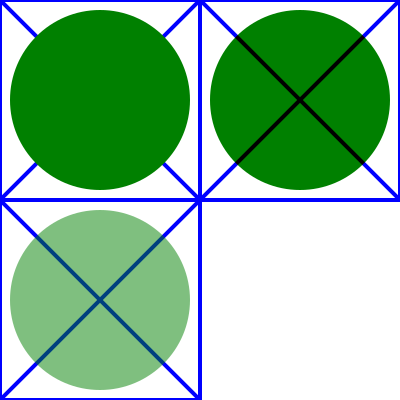
Rendering of filtersubregion00.svg

In the example above there are three rects that each have a cross and a circle in them. The circle element in each one has a different filter applied, but with the same filter primitive subregion. The filter output should be limited to the filter primitive subregion, so you should never see the circles themselves, just the rects that make up the filter primitive subregion.

  • The upper left rect shows an 'feFlood' with flood-opacity="75%" so the cross should be visible through the green rect in the middle.
  • The lower left rect shows an 'feMerge' that merges SourceGraphic with FillPaint. Since the circle has fill-opacity="0.5" it will also be transparent so that the cross is visible through the green rect in the middle.
  • The upper right rect shows an 'feBlend' that has mode="multiply". Since the circle in this case isn't transparent the result is totally opaque. The rect should be dark green and the cross should not be visible through it.

Cleaning up the wording of the underlying value being the identity transform

Category: 3
Reported by: Cameron McCormack
Description
The description of animateTransform in SVG 1.1 does not say what the underlying value is.
Resolution
Clarify underlying values using the same text that is currently in SVG Tiny 1.2.
Change

In http://www.w3.org/TR/2003/REC-SVG11-20030114/animate.html, change:

If calcMode has the value paced, …

to:

If 'from' or 'to' attributes are not specified, the underlying value (see SMIL discussion of animation function values) is the corresponding identity transformation value. Thus, the underlying value for

  • type="translate" is tx = ty = 0
  • type="scale" is sx = sy = 1
  • type="rotate" is rotate-angle = cx = cy = 0
  • type="skewX" and type="skewY" is skew-angle = 0

Note that this results in counter-intuitive results for a to animation. Since the underlying value is identity, and the 'additive' attribute is ignored on to animations according to SMIL, such animations will behave like a non-additive from-to animation where the "from" value is identity.

If calcMode has the value paced, …

Start and end incorrectly described for text

Category: 3
Description
Start and end are incorrectly described as left and right - when bidi is in effect, start would be on the right.
Resolution
The definition of start and end should be as per the xsl specification.
Change

In http://www.w3.org/TR/2003/REC-SVG11-20030114/text.html#TextAlignmentProperties, change:

For Latin or Arabic, which is usually rendered horizontally, this is comparable to left alignment.

to:

For Latin in its usual orientation this is equivalent to left alignment. For scripts that are inherently right to left such as Hebrew and Arabic, this is equivalent to right alignment.

Change

In http://www.w3.org/TR/2003/REC-SVG11-20030114/text.html#TextAlignmentProperties, change:

For Latin text in its usual orientation, this is comparable to right alignment.

to:

For Latin in its usual orientation this is equivalent to right alignment. For scripts that are inherently right to left such as Hebrew and Arabic, this is equivalent to left alignment.

Typo 'effect' instead of 'affect'

Category: 1
Description
There is a typo 'effect' instead of 'affect'
Resolution
Replace with 'affect'. This is the case in several places throughout the section, wherever there is "not effect event processing"
Change

In http://www.w3.org/TR/2003/REC-SVG11-20030114/interact.html#PointerEventsProperty, change:

not effect event processing

to:

not affect event processing

Incorrect reference to solidColor element

Category: 2
Description
References to solidColor element and link to "solid colors" should have been removed from the SVG 1.1 spec in favour of putting into SVG 1.2 Tiny.
Resolution
Remove references to solidColor element and link to "solid colors".
Change

In http://www.w3.org/TR/2003/REC-SVG11-20030114/painting.html#Introduction, change:

With SVG, you can paint (i.e., fill or stroke) with:

  • a single color
  • a solid color with opacity
  • a gradient (linear or radial)
  • a pattern (vector or image, possibly tiled)
  • custom paints available via extensibility

SVG uses the general notion of a paint server . Paint servers are specified using a URI reference on a 'fill' or 'stroke' property. Gradients, patterns and solid colors are just specific types of paint servers.

to:

With SVG, you can paint (i.e., fill or stroke) with:

  • a single color
  • a gradient (linear or radial)
  • a pattern (vector or image, possibly tiled)
  • custom paints available via extensibility

SVG uses the general notion of a paint server . Paint servers are specified using a URI reference on a 'fill' or 'stroke' property. Gradients and patterns are just specific types of paint servers.

Change

In http://www.w3.org/TR/2003/REC-SVG11-20030114/painting.html#SpecifyingPaint, change:

The <uri> is how you identify a paint server such as a gradient, a pattern or a custom paint defined by an extension (see Extensibility). The <uri> provides the ID of the paint server (e.g., a gradient, pattern or solid color) to be used to paint the current object. If the URI reference is not valid (e.g., it points to an object that doesn't exist or the object is not a valid paint server), then the paint method following the <uri> (i.e., none | currentColor | <color> [icc-color(<name>[,<icccolorvalue>]*)]| inherit ) is used if provided; otherwise, the document is in error (see Error processing ).

to:

The <uri> is how you identify a paint server such as a gradient, a pattern or a custom paint defined by an extension (see Extensibility). The <uri> provides the ID of the paint server (e.g., a gradient or pattern) to be used to paint the current object. If the URI reference is not valid (e.g., it points to an object that doesn't exist or the object is not a valid paint server), then the paint method following the <uri> (i.e., none | currentColor | <color> [icc-color(<name>[,<icccolorvalue>]*)]| inherit ) is used if provided; otherwise, the document is in error (see Error processing ).
Change

In http://www.w3.org/TR/2003/REC-SVG11-20030114/pservers.html#Introduction, change:

With SVG, you can fill (i.e., paint the interior) or stroke (i.e., paint the outline) of shapes and text using one of the following:

  • color (using <color> or the 'solidColor' element)
  • gradients (linear or radial)
  • patterns (vector or image, possibly tiled)

SVG uses the general notion of a paint server . Gradients and patterns are just specific types of built-in paint servers. The 'solidColor' element is another built-in paint server, described in Color.

to:

With SVG, you can fill (i.e., paint the interior) or stroke (i.e., paint the outline) of shapes and text using one of the following:

SVG uses the general notion of a paint server. Gradients and patterns are just specific types of built-in paint servers.

Change

In http://www.w3.org/TR/2003/REC-SVG11-20030114/types.html#DataTypeColor, change:

<color>: The basic type <color> is a CSS2-compatible specification for a color in the sRGB color space [SRGB]. <color> applies to SVG's use of the 'color' property and is a component of the definitions of properties 'fill' , 'stroke' 'stop-color' , 'solid-color' , 'flood-color' and 'lighting-color' , which also offer optional ICC-based color specifications.

to:

<color>: The basic type <color> is a CSS2-compatible specification for a color in the sRGB color space [SRGB]. <color> applies to SVG's use of the 'color' property and is a component of the definitions of properties 'fill' , 'stroke' 'stop-color' , 'flood-color' and 'lighting-color' , which also offer optional ICC-based color specifications.

Capturing pointer-events with a zero opacity mask

Category: 3
Description
It's unclear whether if an element has a mask, pointer-events are still captured even in areas where the mask goes to zero opacity. Don't want nearly transparent and fully transparent to behave differently.
Resolution
If an element has a mask, pointer-events are still captured even in areas where the mask goes to zero opacity.
Change

In http://www.w3.org/TR/2003/REC-SVG11-20030114/interact.html#PointerEventsProperty, change:

For text elements, hit detection is performed on a character cell basis:

to:

Note that the presence of a mask does not affect hit testing.

For text elements, hit detection is performed on a character cell basis:

Areas outside of the clip-path should not be sensitive to pointer-events

Category: 3
Description
It is unclear whether areas outside of the clip-path should be sensitive to pointer-events.
Resolution
Areas outside of the clip-path are not sensitive to pointer-events. The clip-path modifies the geometry that is rendered.
Change

In http://www.w3.org/TR/2003/REC-SVG11-20030114/interact.html#PointerEventsProperty, change:

For example, suppose a circle with a 'stroke' of red (i.e., the outline is solid red) and a 'fill' of none (i.e., the interior is not painted) is rendered directly on top of a rectangle with a 'fill' of blue. The author might want the circle to be the target of pointer events only when the pointer is over the perimeter of the circle. When the pointer is over the interior of the circle, the author might want the underlying rectangle to be the target element of pointer events.

to:

For example, suppose a circle with a 'stroke' of red (i.e., the outline is solid red) and a 'fill' of none (i.e., the interior is not painted) is rendered directly on top of a rectangle with a 'fill' of blue. The author might want the circle to be the target of pointer events only when the pointer is over the perimeter of the circle. When the pointer is over the interior of the circle, the author might want the underlying rectangle to be the target element of pointer events.

If a clip path is applied, areas outside of the clip-path are not sensitive to pointer-events regardless of the value of the 'pointer-events' property. This is because a clip path is a geometric boundary; a given point is clearly either outside it or inside it. If however a mask is applied, pointer-events are still captured even in areas where the mask goes to zero opacity. This is because a mask is not a binary transition, and it would be confusing to have fully transparent and 'almost but not fully transparent' behave differently.

Unclear how clip-path affects bounding boxes

Category: 3
Description
It is unclear whether the bounding-box of an object should take into account a clip-path on that object.
Resolution
The clip-path should not affect the bounding-box, but the getRenderedBBox would be affected by stroke, markers, filters, and clip-path.
Change

In http://www.w3.org/TR/2003/REC-SVG11-20030114/masking.html#ClippingPathsIntro, change:

The clipping path restricts the region to which paint can be applied. Conceptually, any parts of the drawing that lie outside of the region bounded by the currently active clipping path are not drawn. A clipping path can be thought of as a mask wherein those pixels outside the clipping path are black with an alpha value of zero and those pixels inside the clipping path are white with an alpha value of one (with the possible exception of anti-aliasing along the edge of the silhouette).

to:

The clipping path restricts the region to which paint can be applied. Conceptually, any parts of the drawing that lie outside of the region bounded by the currently active clipping path are not drawn. A clipping path can be thought of as a mask wherein those pixels outside the clipping path are black with an alpha value of zero and those pixels inside the clipping path are white with an alpha value of one (with the possible exception of anti-aliasing along the edge of the silhouette).

Note: the presence of a clip path does not affect the bounding box of an element.

Pointer-events and fallback values

Category: 3
Description
The visible-painted desc. says it applies only when fill property is set to value other than none, but you could have a fill property set to a URI and falling-back to none.
Resolution
Refer to the actual value rather than the plain property value.
Change

In http://www.w3.org/TR/2003/REC-SVG11-20030114/interact.html#PointerEventsProperty, change:

visiblePainted
The given element can be the target element for pointer events when the 'visibility' property is set to visible and when the pointer is over a "painted" area. The pointer is over a painted area if it is over the interior (i.e., fill) of the element and the 'fill' property is set to a value other than 'none' or it is over the perimeter (i.e., stroke) of the element and the 'stroke' property is set to a value other than 'none'.

to:

visiblePainted
The given element can be the target element for pointer events when the 'visibility' property is set to visible and when the pointer is over a "painted" area. The pointer is over a painted area if it is over the interior (i.e., fill) of the element and the 'fill' property has an actual value other than none or it is over the perimeter (i.e., stroke) of the element and the 'stroke' property is set to a value other than none.
Change

In http://www.w3.org/TR/2003/REC-SVG11-20030114/interact.html#PointerEventsProperty, change:

painted
The given element can be the target element for pointer events when the pointer is over a "painted" area. The pointer is over a painted area if it is over the interior (i.e., fill) of the element and the 'fill' property is set to a value other than 'none' or it is over the perimeter (i.e., stroke) of the element and the 'stroke' property is set to a value other than 'none'. The value of the 'visibility' property does not effect event processing.

to:

painted
The given element can be the target element for pointer events when the pointer is over a "painted" area. The pointer is over a painted area if it is over the interior (i.e., fill) of the element and the 'fill' property has an actual value other than none or it is over the perimeter (i.e., stroke) of the element and the 'stroke' property has an actual value other than none. The value of the 'visibility' property does not effect event processing.

Clarify List syntax

Category: 2
Description
Not entirely obvious how whitespace should be treated in list syntax.
Resolution
Need to mention "Per the SMIL specification, leading and trailing white space, and white space before and after semi-colon separators, is allowed and will be ignored." Not a technical change, but a clarification.
Change

In http://www.w3.org/TR/2003/REC-SVG11-20030114/animate.html#ValuesAttribute, change:

Vector-valued attributes are supported using the vector syntax of the attributeType domain.

to:

Vector-valued attributes are supported using the vector syntax of the attributeType domain. Per the SMIL specification, leading and trailing white space, and white space before and after semi-colon separators, is allowed and will be ignored.

SVGFEConvolveMatrix IDL missing 'in' attribute

Category: 2
Description
Missing 'readonly attribute SVGAnimatedString in1' in the SVGFEConvolveMatrixElement interface. Note that this is already added to the new Filters specification.
Resolution
Add 'readonly attribute SVGAnimatedString in1' to the SVGFEConvolveMatrixElement interface.
Change

In http://www.w3.org/TR/2003/REC-SVG11-20030114/filters.html#InterfaceSVGFEConvolveMatrixElement, change:

interface SVGFEConvolveMatrixElement : 
                SVGElement,
                SVGFilterPrimitiveStandardAttributes { 
  // Edge Mode Values
  const unsigned short SVG_EDGEMODE_UNKNOWN   = 0;
  const unsigned short SVG_EDGEMODE_DUPLICATE = 1;
  const unsigned short SVG_EDGEMODE_WRAP      = 2;
  const unsigned short SVG_EDGEMODE_NONE      = 3;
  readonly attribute SVGAnimatedInteger     orderX;
  readonly attribute SVGAnimatedInteger     orderY;
  readonly attribute SVGAnimatedNumberList  kernelMatrix;
  readonly attribute SVGAnimatedNumber      divisor;
  readonly attribute SVGAnimatedNumber      bias;
  readonly attribute SVGAnimatedInteger     targetX;
  readonly attribute SVGAnimatedInteger     targetY;
  readonly attribute SVGAnimatedEnumeration edgeMode;
  readonly attribute SVGAnimatedNumber      kernelUnitLengthX;
  readonly attribute SVGAnimatedNumber      kernelUnitLengthY;
  readonly attribute SVGAnimatedBoolean     preserveAlpha;
};

...

Attributes
readonly SVGAnimatedInteger orderX
Corresponds to attribute order on the given 'feConvolveMatrix' element.
readonly SVGAnimatedInteger orderY
Corresponds to attribute order on the given 'feConvolveMatrix' element.

to:

interface SVGFEConvolveMatrixElement : 
                SVGElement,
                SVGFilterPrimitiveStandardAttributes { 
  // Edge Mode Values
  const unsigned short SVG_EDGEMODE_UNKNOWN   = 0;
  const unsigned short SVG_EDGEMODE_DUPLICATE = 1;
  const unsigned short SVG_EDGEMODE_WRAP      = 2;
  const unsigned short SVG_EDGEMODE_NONE      = 3;
  readonly attribute SVGAnimatedString      in1;
  readonly attribute SVGAnimatedInteger     orderX;
  readonly attribute SVGAnimatedInteger     orderY;
  readonly attribute SVGAnimatedNumberList  kernelMatrix;
  readonly attribute SVGAnimatedNumber      divisor;
  readonly attribute SVGAnimatedNumber      bias;
  readonly attribute SVGAnimatedInteger     targetX;
  readonly attribute SVGAnimatedInteger     targetY;
  readonly attribute SVGAnimatedEnumeration edgeMode;
  readonly attribute SVGAnimatedNumber      kernelUnitLengthX;
  readonly attribute SVGAnimatedNumber      kernelUnitLengthY;
  readonly attribute SVGAnimatedBoolean     preserveAlpha;
};
          

...

Attributes
readonly SVGAnimatedString in1
Corresponds to attribute in on the given 'feConvolveMatrix' element.
readonly SVGAnimatedInteger orderX
Corresponds to attribute order on the given 'feConvolveMatrix' element.
readonly SVGAnimatedInteger orderY
Corresponds to attribute order on the given 'feConvolveMatrix' element.

feDistantLight azimuth attribute direction

Category: 3
Description
Direction of azimuth is not specified, and implementations differ.
Resolution
Specify that it is clockwise.
Change

In http://www.w3.org/TR/2003/REC-SVG11-20030114/filters.html#feDistantLight, change:

azimuth = "<number>"
Direction angle for the light source on the XY plane, in degrees.
If the attribute is not specified, then the effect is as if a value of 0 were specified.
Animatable: yes.

to:

azimuth = "<number>"
Direction angle for the light source on the XY plane (clockwise), in degrees.
If the attribute is not specified, then the effect is as if a value of 0 were specified.
Animatable: yes.

Add svg to list of animatable elements

Category: 2
Description
List of animatable elements does not include the svg element.
Resolution
Add svg to list of elements.
Change

In http://www.w3.org/TR/2003/REC-SVG11-20030114/animate.html#AnimationAttributesAndProperties, change:

The following lists all of the elements which can be animated by an 'animateMotion' element:

to:

The following lists all of the elements which can be animated by an 'animateMotion' element:

Remove XPointer syntax

Category: 3
Description
We reviewed this decision and agreed that xpointer is not implemented, and that the xpointer format has subsequently changed, and that we should simply remove it from all specs.
Resolution
We will remove all reference to xpointer.
Change

In http://www.w3.org/TR/2003/REC-SVG11-20030114/intro.html#W3CCompatibility, change:

  • SVG's syntax for referencing element IDs is a compatible subset of the ID referencing syntax in "XML Pointer Language (XPointer)" [XPTR].

to:

Change

In http://www.w3.org/TR/2003/REC-SVG11-20030114/linking.html#SVGFragmentIdentifiers, change:

An SVG fragment identifier can come in three forms:

  • Shorthand bare name form of addressing (e.g., MyDrawing.svg#MyView). This form of addressing, which allows addressing an SVG element by its ID, is compatible with the fragment addressing mechanism for older versions of HTML and the shorthand bare name formulation in "XML Pointer Language (XPointer)" [XPTR]. (The bare name form of addressing #MyView is equivalent to the XPointer formulation #xpointer(id('MyView')) .)
  • XPointer-compatible ID reference (e.g., MyDrawing.svg#xpointer(id('MyView'))). This form of addressing, which also allows addressing an SVG element by its ID, is compatible with "XML Pointer Language (XPointer)" [XPTR] syntax and the XPath syntax for referencing IDs .
  • SVG view specification (e.g., MyDrawing.svg#svgView(viewBox(0,200,1000,1000))). This form of addressing specifies the desired view of the document (e.g., the region of the document to view, the initial zoom level) completely within the SVG fragment specification. The contents of the SVG view specification are the five parameter specifications, viewBox(...), preserveAspectRatio(...), transform(...), zoomAndPan(...) and viewTarget(...), whose parameters have the same meaning as the corresponding attributes on a 'view' element, or, in the case of transform(...), the same meaning as the corresponding attribute has on a 'g' element).

An SVG fragment identifier is defined as follows:

                SVGFragmentIdentifier ::= BareName |
                XPointerIDRef |
                SVGViewSpec

                BareName ::= XML_Name
                SVGViewSpec ::= 'svgView(' SVGViewAttributes ')'
                SVGViewAttributes ::= SVGViewAttribute |
                SVGViewAttribute ';' SVGViewAttributes

                SVGViewAttribute ::= viewBoxSpec |
                preserveAspectRatioSpec |
                transformSpec |
                zoomAndPanSpec |
                viewTargetSpec
                viewBoxSpec ::= 'viewBox(' ViewBoxParams ')'
                preserveAspectRatioSpec = 'preserveAspectRatio(' AspectParams ')'
                transformSpec ::= 'transform(' TransformParams ')'
                zoomAndPanSpec ::= 'zoomAndPan(' ZoomAndPanParams ')'
                viewTargetSpec ::= 'viewTarget(' ViewTargetParams ')'
            

where:

  • XPointerIDRef conforms to the rules for referencing IDs in XPointer (see [XPTR] and XPath syntax for referencing IDs ). For example, xpointer(id('MyView')).
  • ViewBoxParams corresponds to the parameter values for the viewBox attribute on the 'view' element. For example, viewBox(0,0,200,200).
  • AspectParams corresponds to the parameter values for the preserveAspectRatio attribute on the 'view' element. For example, preserveAspectRatio(xMidYMid).
  • TransformParams corresponds to the parameter values for the transform attribute that is available on many elements. For example, transform(scale(5)).
  • ZoomAndPanParams corresponds to the parameter values for the zoomAndPan attribute on the 'view' element. For example, zoomAndPan(magnify).
  • ViewTargetParams corresponds to the parameter values for the viewTarget attribute on the 'view' element. For example, viewTarget(MyElementID).

Spaces are not allowed in fragment specifications; thus, commas are used to separate numeric values within an SVG view specification (e.g., #svgView(viewBox(0,0,200,200))) and semicolons are used to separate attributes (e.g., #svgView(viewBox(0,0,200,200);preserveAspectRatio(none))).

When a source document performs a link into an SVG document via an HTML [HTML4] anchor element (i.e., <a href=...> element in HTML) or an XLink specification [XLINK], then the SVG fragment identifier specifies the initial view into the SVG document, as follows:

  • If no SVG fragment identifier is provided (e.g, the specified URI did not contain a "#" character, such as MyDrawing.svg), then the initial view into the SVG document is established using the view specification attributes (i.e., viewBox, etc.) on the outermost 'svg' element.
  • If the SVG fragment identifier addresses a 'view' element within an SVG document (e.g., MyDrawing.svg#MyView or MyDrawing.svg#xpointer(id('MyView'))) then the closest ancestor 'svg' element is displayed in the viewport. Any view specification attributes included on the given 'view' element override the corresponding view specification attributes on the closest ancestor 'svg' element.
  • If the SVG fragment identifier addresses specific SVG view (e.g., MyDrawing.svg#svgView(viewBox(0,200,1000,1000))), then the document fragment defined by the closest ancestor 'svg' element is displayed in the viewport using the SVG view specification provided by the SVG fragment identifier.
  • If the SVG fragment identifier addresses any element other than a 'view' element, then the document defined by the closest ancestor 'svg' element is displayed in the viewport using the view specification attributes on that 'svg' element.

to:

An SVG fragment identifier can come in two forms:

  • Shorthand bare name form of addressing (e.g., MyDrawing.svg#MyView). This form of addressing, which allows addressing an SVG element by its ID, is compatible with the fragment addressing mechanism for older versions of HTML.
  • SVG view specification (e.g., MyDrawing.svg#svgView(viewBox(0,200,1000,1000))). This form of addressing specifies the desired view of the document (e.g., the region of the document to view, the initial zoom level) completely within the SVG fragment specification. The contents of the SVG view specification are the five parameter specifications, viewBox(...), preserveAspectRatio(...), transform(...), zoomAndPan(...) and viewTarget(...), whose parameters have the same meaning as the corresponding attributes on a 'view' element, or, in the case of transform(...), the same meaning as the corresponding attribute has on a 'g' element).

An SVG fragment identifier is defined as follows:

                SVGFragmentIdentifier ::= BareName |
                SVGViewSpec

                BareName ::= XML_Name
                SVGViewSpec ::= 'svgView(' SVGViewAttributes ')'
                SVGViewAttributes ::= SVGViewAttribute |
                SVGViewAttribute ';' SVGViewAttributes

                SVGViewAttribute ::= viewBoxSpec |
                preserveAspectRatioSpec |
                transformSpec |
                zoomAndPanSpec |
                viewTargetSpec
                viewBoxSpec ::= 'viewBox(' ViewBoxParams ')'
                preserveAspectRatioSpec = 'preserveAspectRatio(' AspectParams ')'
                transformSpec ::= 'transform(' TransformParams ')'
                zoomAndPanSpec ::= 'zoomAndPan(' ZoomAndPanParams ')'
                viewTargetSpec ::= 'viewTarget(' ViewTargetParams ')'
            

where:

  • ViewBoxParams corresponds to the parameter values for the viewBox attribute on the 'view' element. For example, viewBox(0,0,200,200).
  • AspectParams corresponds to the parameter values for the preserveAspectRatio attribute on the 'view' element. For example, preserveAspectRatio(xMidYMid).
  • TransformParams corresponds to the parameter values for the transform attribute that is available on many elements. For example, transform(scale(5)).
  • ZoomAndPanParams corresponds to the parameter values for the zoomAndPan attribute on the 'view' element. For example, zoomAndPan(magnify).
  • ViewTargetParams corresponds to the parameter values for the viewTarget attribute on the 'view' element. For example, viewTarget(MyElementID).

Spaces are not allowed in fragment specifications; thus, commas are used to separate numeric values within an SVG view specification (e.g., #svgView(viewBox(0,0,200,200))) and semicolons are used to separate attributes (e.g., #svgView(viewBox(0,0,200,200);preserveAspectRatio(none))).

When a source document performs a link into an SVG document via an HTML [HTML4] anchor element (i.e., <a href=...> element in HTML) or an XLink specification [XLINK], then the SVG fragment identifier specifies the initial view into the SVG document, as follows:

  • If no SVG fragment identifier is provided (e.g, the specified URI did not contain a "#" character, such as MyDrawing.svg), then the initial view into the SVG document is established using the view specification attributes (i.e., viewBox, etc.) on the outermost 'svg' element.
  • If the SVG fragment identifier addresses a 'view' element within an SVG document (e.g., MyDrawing.svg#MyView) then the closest ancestor 'svg' element is displayed in the viewport. Any view specification attributes included on the given 'view' element override the corresponding view specification attributes on the closest ancestor 'svg' element.
  • If the SVG fragment identifier addresses specific SVG view (e.g., MyDrawing.svg#svgView(viewBox(0,200,1000,1000))), then the document fragment defined by the closest ancestor 'svg' element is displayed in the viewport using the SVG view specification provided by the SVG fragment identifier.
  • If the SVG fragment identifier addresses any element other than a 'view' element, then the document defined by the closest ancestor 'svg' element is displayed in the viewport using the view specification attributes on that 'svg' element.
Change

In http://www.w3.org/TR/2003/REC-SVG11-20030114/refs.html#q1, change:

[XPTR]
"XML Pointer Language (XPointer) Version 1.0", S. DeRose, R. Daniel Jr., E. Maler, editors, 11 September 2001.
Available at http://www.w3.org/TR/xptr/

to:

Change

In http://www.w3.org/TR/2003/REC-SVG11-20030114/struct.html#HeadOverview, change:

URI references are defined in either of the following forms:

            <URI-reference> = [ <absoluteURI> | <relativeURI> ] [ "#" <elementID> ]    -or-

            <URI-reference> = [ <absoluteURI> | <relativeURI> ] [ "#xpointer(id(" <elementID> "))" ]
          

where <elementID> is the ID of the referenced element.

(Note that the two forms above (i.e., #<elementID> and #xpointer(id(<elementID>))) are formulated in syntaxes compatible with "XML Pointer Language (XPointer)" [XPTR]. These two formulations of URI references are the only XPointer formulations that are required in SVG 1.0 user agents.)

SVG supports two types of URI references:

  • local URI references, where the URI reference does not contain an <absoluteURI> or <relativeURI> and thus only contains a fragment identifier (i.e., #<elementID> or #xpointer(id<elementID>))
  • non-local URI references, where the URI reference does contain an <absoluteURI> or <relativeURI>

to:

URI references are defined in the following form:

              <URI-reference> = [ <absoluteURI> | <relativeURI> ] [ "#" <elementID> ]
          

where <elementID> is the ID of the referenced element.

SVG supports two types of URI references:

  • local URI references, where the URI reference does not contain an <absoluteURI> or <relativeURI> and thus only contains a fragment identifier (i.e., #<elementID>)
  • non-local URI references, where the URI reference does contain an <absoluteURI> or <relativeURI>
Change

In http://www.w3.org/TR/2003/REC-SVG11-20030114/struct.html#xlinkRefAttrsEmbed, change:

If the URI reference is relative, its absolute version must be computed by the method of [XML-Base] before use.

For locators into XML resources, the format of the fragment identifier (if any) used within the URI reference is specified by the XPointer specification [XPTR].

to:

If the URI reference is relative, its absolute version must be computed by the method of [XML-Base] before use.

Add definition of access of default uninitialised values

Category: 3
Description
It isn't clear what should happen when you ask for an unspecified attribute.
Resolution
Specify that an object is initialised with the default value, if there is one. It is live, and isn't created unless it's assigned to.
Change

In http://www.w3.org/TR/2003/REC-SVG11-20030114/svgdom.html#SVGDOMOverview, change:

A DOM application can use the hasFeature method of the DOMImplementation interface to verify that the interfaces listed in this section are supported. The list of available interfaces is provided in section Feature strings for the hasFeature method call.

to:

A DOM application can use the hasFeature method of the DOMImplementation interface to verify that the interfaces listed in this section are supported. The list of available interfaces is provided in section Feature strings for the hasFeature method call.

When an object is accessed via the SVG DOM that hasn't been specified in the document, e.g. x.baseVal and the 'x' attribute was not provided, a corresponding SVG DOM object is created and initialized with a value that is equivalent to the value used in rendering when the attribute was not provided. The returned object does not affect rendering until it is modified for the first time. After the first modification the object becomes live, meaning that any modifications made to the corresponding attribute are immediately reflected in the object.

Note that for some attributes it may be hard to find a good initial value:

  • textLength
    Depends on the length of the text. The value is set to the computed length of the text, but it is not updated if the length of the text changes.
  • filterRes
    Depends on what the filter is applied to. The value is therefore set to 0.
  • x, y, dx, dy, rotate on SVGTextPositioningElement
    The value is the empty list.

Mention live values

Category: 3
Test case: live-values.svg
Description
Liveness of the SVG base types isn't clear.
Resolution
Need to clarify that some values in the DOM are live.
Change

In http://www.w3.org/TR/2003/REC-SVG11-20030114/svgdom.html#SVGDOMOverview, change:

A DOM application can use the hasFeature method of the DOMImplementation interface to verify that the interfaces listed in this section are supported. The list of available interfaces is provided in section Feature strings for the hasFeature method call.

to:

A DOM application can use the hasFeature method of the DOMImplementation interface to verify that the interfaces listed in this section are supported. The list of available interfaces is provided in section Feature strings for the hasFeature method call.

All SVG DOM objects that directly correspond to an attribute, e.g. the SVGAnimatedLength 'ry' in an SVGRectElement, are live. This means that any changes made to the attribute are immediately reflected in the corresponding SVG DOM object.

Change

In http://www.w3.org/TR/2003/REC-SVG11-20030114/types.html#InterfaceSVGNumberList , http://www.w3.org/TR/2003/REC-SVG11-20030114/types.html#InterfaceSVGLengthList , http://www.w3.org/TR/2003/REC-SVG11-20030114/coords.html#InterfaceSVGPointList , http://www.w3.org/TR/2003/REC-SVG11-20030114/coords.html#InterfaceSVGTransformList , http://www.w3.org/TR/2003/REC-SVG11-20030114/paths.html#InterfaceSVGPathSegList, change:

initialize
Clears all existing current items from the list and re-initializes the list to hold the single item specified by the parameter.

to:

initialize
Clears all existing current items from the list and re-initializes the list to hold the single item specified by the parameter. If the inserted item is already in a list, it is removed from its previous list before it is inserted into this list. The inserted item is the item itself and not a copy.
Change

In http://www.w3.org/TR/2003/REC-SVG11-20030114/types.html#InterfaceSVGNumberList , http://www.w3.org/TR/2003/REC-SVG11-20030114/types.html#InterfaceSVGLengthList , http://www.w3.org/TR/2003/REC-SVG11-20030114/coords.html#InterfaceSVGPointList , http://www.w3.org/TR/2003/REC-SVG11-20030114/coords.html#InterfaceSVGTransformList , http://www.w3.org/TR/2003/REC-SVG11-20030114/paths.html#InterfaceSVGPathSegList, change:

insertItemBefore
Inserts a new item into the list at the specified position. The first item is number 0. If newItem is already in a list, it is removed from its previous list before it is inserted into this list.

to:

insertItemBefore
Inserts a new item into the list at the specified position. The first item is number 0. If newItem is already in a list, it is removed from its previous list before it is inserted into this list. The inserted item is the item itself and not a copy.
Change

In http://www.w3.org/TR/2003/REC-SVG11-20030114/types.html#InterfaceSVGNumberList , http://www.w3.org/TR/2003/REC-SVG11-20030114/types.html#InterfaceSVGLengthList , http://www.w3.org/TR/2003/REC-SVG11-20030114/coords.html#InterfaceSVGPointList , http://www.w3.org/TR/2003/REC-SVG11-20030114/coords.html#InterfaceSVGTransformList , http://www.w3.org/TR/2003/REC-SVG11-20030114/paths.html#InterfaceSVGPathSegList, change:

replaceItem
Replaces an existing item in the list with a new item. If newItem is already in a list, it is removed from its previous list before it is inserted into this list.

to:

replaceItem
Replaces an existing item in the list with a new item. If newItem is already in a list, it is removed from its previous list before it is inserted into this list. The inserted item is the item itself and not a copy.
Change

In http://www.w3.org/TR/2003/REC-SVG11-20030114/types.html#InterfaceSVGNumberList , http://www.w3.org/TR/2003/REC-SVG11-20030114/types.html#InterfaceSVGLengthList , http://www.w3.org/TR/2003/REC-SVG11-20030114/coords.html#InterfaceSVGPointList , http://www.w3.org/TR/2003/REC-SVG11-20030114/coords.html#InterfaceSVGTransformList , http://www.w3.org/TR/2003/REC-SVG11-20030114/paths.html#InterfaceSVGPathSegList, change:

appendItem
Inserts a new item at the end of the list. If newItem is already in a list, it is removed from its previous list before it is inserted into this list.

to:

appendItem
Inserts a new item at the end of the list. If newItem is already in a list, it is removed from its previous list before it is inserted into this list. The inserted item is the item itself and not a copy.
Change

In http://www.w3.org/TR/2003/REC-SVG11-20030114/coords.html#InterfaceSVGTransformList, change:

consolidate
Consolidates the list of separate SVGTransform objects by multiplying the equivalent transformation matrices together to result in a list consisting of a single SVGTransform object of type SVG_TRANSFORM_MATRIX.

to:

consolidate
Consolidates the list of separate SVGTransform objects by multiplying the equivalent transformation matrices together to result in a list consisting of a single SVGTransform object of type SVG_TRANSFORM_MATRIX. The returned item is the item itself and not a copy. Any changes made to the item are immediately reflected in the list.
Change

In http://www.w3.org/TR/2003/REC-SVG11-20030114/coords.html#InterfaceSVGTransform, change:

readonly SVGMatrix matrix
The matrix that represents this transformation.
For SVG_TRANSFORM_MATRIX, the matrix contains the a, b, c, d, e, f values supplied by the user.
For SVG_TRANSFORM_TRANSLATE, e and f represent the translation amounts (a=1,b=0,c=0,d=1).
For SVG_TRANSFORM_SCALE, a and d represent the scale amounts (b=0,c=0,e=0,f=0).
For SVG_TRANSFORM_ROTATE, SVG_TRANSFORM_SKEWX and SVG_TRANSFORM_SKEWY, a, b, c and d represent the matrix which will result in the given transformation (e=0,f=0).

to:

readonly SVGMatrix matrix
The matrix that represents this transformation. The matrix object is live, meaning that any changes made to the SVGTransform object are immediately reflected in the matrix object.
For SVG_TRANSFORM_MATRIX, the matrix contains the a, b, c, d, e, f values supplied by the user.
For SVG_TRANSFORM_TRANSLATE, e and f represent the translation amounts (a=1,b=0,c=0,d=1).
For SVG_TRANSFORM_SCALE, a and d represent the scale amounts (b=0,c=0,e=0,f=0).
For SVG_TRANSFORM_ROTATE, SVG_TRANSFORM_SKEWX and SVG_TRANSFORM_SKEWY, a, b, c and d represent the matrix which will result in the given transformation (e=0,f=0).

SVGStringList string removal

Category: 3
Reported by: Erik Dahlström
Description
The SVGStringList interface says that if a certain string was in an SVGStringList it must be removed from that list when inserted into another list. The type of object that SVGStringList contains is DOMString, which is defined by DOM Core as a sequence of unsigned shorts. DOMString objects may come from any number of different places and are not tied to where they came from. All the other SVGxxxLists contain SVG DOM base objects, and the SVG DOM base objects provide ways to identify that they were in lists. SVGStringList on the contrary doesn't contain SVG DOM base objects but DOM Core base objects (DOMString) which makes it different from the other lists because the objects are low-level (core) objects which don't have the necessary information to say that an object was in a list.
Resolution
SVGStringList does not remove inserted strings from previous lists.
Change

In http://www.w3.org/TR/2003/REC-SVG11-20030114/types.html#InterfaceSVGStringList, change:

Methods
clear
Clears all existing current items from the list, with the result being an empty list.
No Parameters
No Return Value
Exceptions
DOMException
NO_MODIFICATION_ALLOWED_ERR: Raised when the list cannot be modified.
initialize
Clears all existing current items from the list and re-initializes the list to hold the single item specified by the parameter.
Parameters
in DOMString newItem The item which should become the only member of the list.
Return value
DOMString The item being inserted into the list.
Exceptions
DOMException
NO_MODIFICATION_ALLOWED_ERR: Raised when the list cannot be modified.
SVGException
SVG_WRONG_TYPE_ERR: Raised if parameter newItem is the wrong type of object for the given list.
getItem
Returns the specified item from the list.
Parameters
in unsigned long index The index of the item from the list which is to be returned. The first item is number 0.
Return value
DOMString The selected item.
Exceptions
DOMException
INDEX_SIZE_ERR: Raised if the index number is negative or greater than or equal to numberOfItems.
insertItemBefore
Inserts a new item into the list at the specified position. The first item is number 0. If newItem is already in a list, it is removed from its previous list before it is inserted into this list.
Parameters
in DOMString newItem The item which is to be inserted into the list.
in unsigned long index The index of the item before which the new item is to be inserted. The first item is number 0.
If the index is equal to 0, then the new item is inserted at the front of the list. If the index is greater than or equal to numberOfItems, then the new item is appended to the end of the list.
Return value
DOMString<