Abstract
This specification describes the ability to map elements to script,
event handlers, CSS, and more complex content models. This can be used to
re-order and wrap content so that, for instance, simple HTML or XHTML
markup can have complex CSS styles applied without requiring that the
markup be polluted with multiple semantically neutral div
elements.
It can also be used to implement new DOM interfaces, and, in conjunction
with other specifications, enables arbitrary tag sets to be implemented as
widgets. For example, XBL could in theory be used to implement XForms.
Status of this document
This section describes the status of this document at the time of
its publication. Other documents may supersede this document. A list of
current W3C publications and the latest revision of this technical report
can be found in the W3C technical reports
index at http://www.w3.org/TR/.
If you wish to make comments regarding this document, please send them
to dev-tech-xbl@mozilla.org
(subscribe,
archives)
and public-appformats@w3.org
(subscribe,
archives).
All feedback is welcome.
Implementors should be aware that this specification is not stable.
Implementors who are not taking part in the discussions are likely
to find the specification changing out from under them in incompatible
ways. Vendors interested in implementing this specification
before it eventually reaches the Candidate Recommendation stage should
join the aforementioned mailing lists and take part in the discussions.
The editor's copy of this specification is available
in W3C CVS. A detailed list of changes is available from the CVS server.
This specification is a (non-backwards-compatible) revision of Mozilla's
XBL 1.0 language, originally developed at Netscape in 2000, and originally
implemented in the Gecko rendering engine. [XBL10]
This specification was developed by the Mozilla Foundation and its
contributors, in conjunction with individuals from Opera Software ASA,
Google, Inc, and Apple Computer, Inc, to address problems found in the
original language and to allow for implementations in a broader range of
Web browsers.
This document is also based, in part, on work done in the W3C's Bindings
Task Force. However, no text from that collaboration, other than that
written by the aforementioned contributors, remains in this specification.
Inspiration was similarly taken from other efforts, such as HTML
Components. [HTC]
Although they have had related histories, this specification is separate
from the W3C's "sXBL" drafts, and is not compatible with them. (The two
efforts use different namespaces, for one.)
While the body of this specification was created outside the W3C, the
W3C Web Application Formats
Working Group is now guiding this specification along the W3C
Recommendation track. This document consists of the initial step along
that process, the first working draft.
This document was produced by a group operating under the 5 February
2004 W3C Patent Policy. W3C maintains a public
list of any patent disclosures made in connection with the
deliverables of the group; that page also includes instructions for
disclosing a patent. An individual who has actual knowledge of a patent
which the individual believes contains Essential
Claim(s) must disclose the information in accordance with section
6 of the W3C Patent Policy.
Table of Contents
1. Introduction
This specification defines the XML Binding Language and some supporting
DOM interfaces and CSS features. XBL is a mechanism for overriding the
standard presentation and interactive behaviour of particular elements by
attaching those elements to appropriate definitions, called bindings. Bindings can be
attached to elements using either cascading style sheets, the document
object model, or by declaring, in XBL, that a particular element in a
particular namespace is implemented by a particular binding. The element
that the binding is attached to, called the bound
element, acquires the new behaviour and presentation specified
by the binding.
Bindings can contain event
handlers that watch for events on the bound element, an
implementation of new methods,
properties and fields that become accessible from the bound element,
shadow content that is inserted
underneath the bound element, and associated resources such as scoped style sheets and
precached images, sounds, or videos.
XBL cannot be used to give a document new semantics.
The meaning of a document is not changed by any bindings that are
associated with it, only its presentation and interactive behaviour.
1.1. Terminology and
Conventions
A binding is the definition of
behaviour that can be applied to an element so as to augment its
presentation.
An XBL subtree is a subtree in an XML
document (an XML instance), the subtree having as its root
node an xbl element in the XBL namespace, which is used to
define bindings. XBL subtrees can stand alone in XBL documents, or can be
included in non-XBL
documents.
An XBL document is an XML document that has
the xbl element at its root.
A non-XBL document is an XML document that
contains elements from multiple namespaces, with its root element being
from a namespace other than XBL (e.g. XHTML).
The term binding document is used to mean
either an XBL document or a
non-XBL document containing one or
more XBL
subtrees.
A bound element is an XML or HTML element to which
a binding has been applied.
A bound document is an XML or HTML document
containing one or more bound
elements.
A shadow tree is a tree of nodes created by
cloning a binding's shadow content
template. A bound element can have zero, one, or more shadow
trees. If a bound element has any, they are combined by the user agent,
along with the element's explicit
children, to form the final flattened
tree. Shadow trees are hidden from normal DOM processing (hence
the name "shadow"); they are not accessible via Core DOM navigation
facilities such as firstChild or nextSibling.
(See: shadow content.)
The term shadow content refers to the
various nodes in the shadow tree(s) of a bound element. Shadow content is
created by cloning shadow content templates during binding
attachment. (See: shadow content.)
In this specification, the term in error,
typically used of an element or attribute, means that the element,
attribute, or other construct is not conformant according to the rules of
this specification. Rules for exactly how the element, attribute, etc,
must be treated when it is in error are always given when the term is
used. Typically this will involve ignoring the erroneous nodes, meaning the UA must,
for the purposes of XBL processing, act as if those nodes were
absent. UAs must not, however, remove such nodes from the DOM in order to
ignore them. The nodes retain all their non-XBL semantics.
UAs should report all errors to users, although they may do this in an
unobtrusive way, for example in an error console.
In addition to the error handling rules given in this specification, UAs
may abort all processing when encountering an error.
Aborting is only likely to be a viable error handling
mechanism in controlled environments, e.g. in conformance checkers. Web
browsers are expected to use the error recovery mechanisms described in
this specification, not abort.
A correct element, attribute,
value, or binding is one which is not in
error.
The namespace of all the XBL elements and
XBL global attributes must be: data:,520e273a-62ad-4528-bb1e-9652bda76d62
XBL elements are frequently referred to by just their local name in this
specification. In real documents, they must be associated with the XBL
namespace as per the rules given in the Namespaces in XML specification [XMLNS].
For convenience, elements and attributes from specific namespaces are
sometimes referred to simply in the form prefix:localname,
without explicitly stating which namespace the prefix is bound to. When
this occurs, readers should assume the following prefix declarations are
in scope:
xmlns:xbl="data:,520e273a-62ad-4528-bb1e-9652bda76d62"
xmlns:xforms="http://www.w3.org/2002/xforms"
xmlns:xlink="http://www.w3.org/1999/xlink"
xmlns:html="http://www.w3.org/1999/xhtml"
When this specification refers to elements in a namespace, it
does not exclude elements in no namespace; the null namespace is
considered a namespace like any other for the purposes of XBL processing.
All element names, attribute names, and attribute values in XBL are case
sensitive.
An XML MIME type is text/xml,
application/xml, or any MIME type ending with the string
+xml (ignoring any MIME parameters).
As well as sections marked as non-normative, all diagrams, examples, and
notes in this specification are non-normative. Everything else in this
specification is normative.
The key words "MUST", "MUST NOT", "REQUIRED", "SHALL", "SHALL NOT",
"SHOULD", "SHOULD NOT", "RECOMMENDED", "MAY", and "OPTIONAL" in the
normative parts of this document are to be interpreted as described in [RFC2119]. For readability, these words do not
appear in all uppercase letters in this specification.
User agents may optimise any algorithm given in this specification, so
long as the end result is indistinguishable from the result that would be
obtained by the specification's algorithms. (The algorithms in this
specification are generally written with more concern over clarity than
over efficiency.)
XBL subtrees must satisfy the constraints described in this
specification.
An XBL user agent is an implementation that
attempts to support this specification.
XBL user agents must behave as described by this specification, even
when faced with non-conformant XBL subtrees.
This specification is defined in terms of the DOM. The language in this
specification assumes that the user agent expands all entity references,
and therefore not include entity reference nodes in the DOM. If user
agents do include entity reference nodes in the DOM, then user agents must
handle them as if they were fully expanded when implementing this
specification. For example, if a requirement talks about an element's
child text nodes, then any text nodes that are children of an entity
reference that is a child of that element must be used as well.
1.2.1. Attributes Containing Selectors
The element attribute of the binding element and the includes
attribute of the content element, if
specified, must be parsed according to the rules in the Selectors
specification. [SELECTORS]
This specification does not specify what level of Selectors
support is required.
Namespace prefixes can be used with selectors. In XBL attributes that
take selectors, the namespace prefixes that may be used are the prefixes
that are in scope using the xmlns:* syntax. User agents must
use the XML namespace prefixes in scope on the attribute's element when
parsing selectors with namespace prefixes. The default namespace in
selectors in XBL attributes is always unbound ("*"). [XMLNS]
1.2.2. Attributes Containing
Space-Separated Values
Some attributes are defined as taking space-separated values. The list
of values for such attributes must be obtained by taking the attribute's
value, replacing any sequences of U+0020, U+000A, and U+000D characters
(in any order) with a single U+0020 SPACE character, dropping any leading
or trailing U+0020 SPACE character, and then chopping the resulting string
at each occurance of a U+0020 character, dropping that character in the
process.
A space-separated attribute whole value is either the empty string or
that consists of only U+0020, U+000A, and U+000D characters has no values.
1.3. Security Concerns
This section is non-normative.
XBL raises a number of security concerns.
Data theft: A naïve implementation of XBL would
allow any document to bind to bindings defined in any other document, and
(since referencing a binding allows full access to that binding document's
DOM) thereby allow access to any remote file, including those on intranet
sites or on authenticated extranet sites.
XBL itself does not do anything to prevent this. However, it is strongly
suggested that an access control mechanism (such as that described in [ACCESSCONTROL]) be used to prevent such
cross-domain accesses unless the remote site has allowed accesses.
Privilege escalation: In conjunction with data theft,
there is the concern that a page could bind to a binding document on a
remote site, and then use the privileges of that site to obtain further
information. XBL prevents this by requiring that the bindings all run in
the security context of the bound document,
so that accessing a remote binding document does not provide the bound
document with any extra privileges on the remote domain.
Cookie theft: Related to privilege escalation is the
risk that once an access-controlled binding document hosted on a remote
site has been loaded, authentication information stored in cookies for
that domain would become accessible to the bound document. XBL prevents
this by requiring that the cookie attribute on the
DocumentWindow interface be set to null.
Secure bindings: Using XBL for bindings that need
access to the local filesystem, e.g. for implementing File Upload form
controls, is not yet handled by this specification. However, a future
version will provide a secure way to define an XBL binding that can be
used to implement privileged mechanisms that can then be used by other
bindings to provide such controls.
1.4. Relationship to XBL1
This specification is not backwards compatible with XBL1.
There are numerous changes. However, of particular importance to readers
familiar with XBL1, there have been some changes to the element names. In
particular, the XBL1 element content is now called
template, and the XBL1 element children is now called content.
2. XBL Elements
The start of any XBL subtree is an xbl
element, which is described below.
When an XBL element is found inside an element other than that listed as
its "Expected context", it is in
error. When an XBL element has a child node that does not
satisfy the "Expected children" list in its definition (for instance
because it is the wrong node type, wrong element type, or because too many
elements of its type preceded it), the child is in error. In both cases, being in error means that the UA must, for the
purposes of XBL evaluation, treat the XBL subtree as it would if the
erroneous node and all its descendants were not present in the DOM.
However, non-XBL elements retain their semantics, even when considered
to be in error for the purposes of
XBL.
For cases where unexpected attributes are found on XBL elements, or XBL
attributes are found on elements other than those listed as the "Expected
context", the error handling is similar: the attributes must be considered
to be in error and the UA must
ignore them, meaning that the
presence of unexpected attributes in no way affects the XBL processing.
Further error handling rules for more specific cases are given where
appropriate.
XBL user agents that support CSS should act as if they had the following
rules in their UA style sheet:
@namespace xbl url(data:,520e273a-62ad-4528-bb1e-9652bda76d62);
xbl|* { display: none; }
XBL user agents that do not support CSS should not render the XBL
elements.
2.1. The xbl Element
- Expected contexts:
- In an XBL document, none
(this is the root element).
- In a non-XBL document, any non-XBL
element whose specification allows the
xbl element as a child.
- Expected children (in any order):
binding: zero or more.
script: zero or more.
- Any non-XBL element.
The xbl element is the root element of
all XBL subtrees.
Attributes
- id
- The
id
attribute.
- script-type
- The
script-type attribute specifies the MIME
type of the scripting language used by all bindings and XBL script blocks
in the XBL subtree. If the attribute is not specified, the default
language is ECMAScript. [ECMA262]
- style-type
- The
style-type attribute specifies the MIME
type of the styling language used by all bindings and XBL style blocks in
the XBL subtree. If the attribute is not specified, the default language
is CSS (text/css).
UAs must consider any xbl elements that
have another xbl element as an ancestor
as being in error and must then
ignore them, meaning those elements
must never be considered to declare any bindings. For example, UAs must
never bind elements to bindings defined by binding elements that have two xbl ancestors.
Similarly, XBL elements (other than the xbl element itself) that do not have a correct xbl
element as an ancestor are in error
too, and UAs must ignore them,
treating them as they would any arbitrary semantic-free XML element. For
example, UAs must never bind elements to bindings defined by binding elements that have no xbl ancestors at all.
The same does not apply to the style-type and script-type
attributes. If the UA does not support the specified styling language, it
must still apply bindings as appropriate; only style blocks must be ignored. Similarly, if the
UA does not support the specified scripting language, it must still apply
bindings as appropriate; only script,
handler and implementation sections must be
ignored.
The empty string is not a special value for these
attributes. Setting the style-type attribute to the empty string,
e.g., will result in all style blocks
being ignored, since the empty string is not a valid MIME type that the UA
supports.
2.2. The binding Element
- Expected context:
xbl
- Expected children (in any order):
implementation: zero or
one.
template: zero or one.
handlers: zero or one.
resources: zero or one.
- Any non-XBL element
The binding element describes a
single XBL binding that adds presentation and interactive behaviour to XML
or HTML elements. Each binding has these optional components:
Methods,
Properties, and Fields: A binding can specify additional methods
that can be invoked on the element. It can also specify additional
properties and fields that can be retrieved or set on the element. In this
way the functionality of the bound element becomes extensible. (See:
binding implementations.)
Template: The optional template defines the initial shadow content for the bound element.
Behaviour: A binding
can define event listeners for various types of events. Some examples are:
UI events (e.g., key and mouse events) on the bound element or on elements
within the shadow content; mutation events on the bound element and its
descendants; and events having to do with XBL's binding operations (e.g.,
the binding and bound events).
(See: event handlers.)
Resources: A binding can list style
sheets that are scoped to the bound element, and images, sounds, videos,
or other files that a user agent can pre-cache in order to improve
performance. (See: binding style
sheets, prefetching resources.)
Bindings may act as an attachment mechanism, specifying a namespace and
local name of elements to associate with the given binding when the
binding is imported, using the element
attribute.
In addition to the above, the binding element's child nodes may include any
element outside the XBL namespace. These are handled as they would be in
any other context, and are ignored by the XBL processing model.
Attributes
- id
- The
id
attribute.
- extends
- The
extends attribute is used to specify the URI
of a binding that this binding inherits from. (See: interpretation of URIs to XBL
bindings.) If the URI is in error or does not refer to another
binding, the UA must ignore it,
meaning that this binding does not explicitly inherit from another
binding. (See: explicit
inheritance.)
- element
-
This attribute specifies a selector. All elements in the binding
document, and in any documents that import the binding document, that match the
given selector, must be bound to the binding defined by this
binding element. (The element's
own shadow tree, if any, must not be taken into account when determining
if it matches a selector for the purposes of this attribute.)
If an element attribute contains an invalid
selector, it is in error and must
be ignored, meaning
that while the binding is still parsed and may be referenced using other
attachment mechanisms, the binding is not attached to any element by its
element
attribute, as if the attribute had simply been omitted.
The binding element
defines a presentation and behaviour binding. It does not define an
element's semantics. If an element has no semantics when processed alone,
then it has no semantics when processed with XBL.
2.3. The implementation Element
- Expected context:
binding
- Expected children:
- Depends on the scripting language.
The implementation element
describes a set of methods, properties, and fields that are attached to
the bound element. Once the binding is attached, these methods,
properties, and fields can be invoked directly from the bound element.
The implementation element,
if present, must either contain code in the language specified by the XBL
subtree's script-type attribute, or have a src attribute
that points to a resource containing code in the language specified by the
script-type attribute. The syntax and
semantics of this code depend on the specific language. This specification
defines the semantics for ECMAScript implementations. (See: binding implementations.)
Attributes
- id
- The
id
attribute.
- name
- The
name attribute can be used to provide a specific
name for an implementation. This name can then be used to reference the
implementation. For example, in ECMAScript the value of this attribute
represents the name of the corresponding class that is constructed for
the implementation. If no name attribute is specified, or if it is
specified but empty, then the binding's document URI and ID (if any) are
used to uniquely reference the binding's implementation.
- src
- The
src attribute specifies the URI to a resource of
the type given by the XBL subtree's script-type attribute. If the attribute is
specified, the contents of the element must be ignored (even if the
resource could not be fetched or was of the wrong type). (See: binding implementations.)
If an implementation element
is marked (via the script-type attribute of the xbl element) as being in a language that the UA
does not support, or, if the implementation element points (using
the src
attribute) to a resource that is either unavailable, or not of the type
specified by the script-type attribute of the xbl element, then it is in error and the UA must ignore it, meaning it must not be used as an
implementation definition for any binding.
How UAs must handle nodes inside implementation elements depends on the
language used. (See: loading and running
scripts, binding
implementations.)
implementation blocks are
evaluated once, on first use. Changes to an implementation element or its contents
have no effect once the element has been evaluated. (See: binding implementations.)
User agents may support an additional attribute with the name
vendor-binary (e.g. moz-binary="" or
khtml-binary="") that contains information on native code
implementations of the binding, if necessary.
2.4. The template Element
- Expected context:
binding
- Expected children:
- Anything. Of particular interest, the
content and inherited elements may occur as
descendants, and non-XBL descendant elements may host xbl:inherits and
xbl:pseudo
attributes.
The template element contains
child nodes that can be in any namespace. The subtree specified by the
template element is referred to as
the shadow content template. When a binding is
attached, the template element's
child nodes are cloned and attached to the bound document under the bound
element. Because these cloned nodes are hidden from their parent and exist
outside the normal document tree, they are referred to as shadow content. (See: rules for shadow content generation.)
Dynamic changes to shadow content templates are reflected in
bindings. (See: shadow content.)
Attributes
- id
- The
id
attribute.
- apply-author-sheets
- The
apply-author-sheets attribute
indicates whether or not rules in author style sheets associated with the
bound element's document apply to the shadow content generated by the
binding. Its value must be either true (indicating that they
do) or false (indicating that they do not). The default
behaviour, which is used when the attribute is omitted or has a value
other than the two allowed values, is to not apply the bound document's
author style sheets (same as false). (See: binding style sheets.)
- allow-selectors-through
- The
allow-selectors-through
attribute indicates whether or not rules in CSS can cross scopes. Its
value must be either true (indicating that they can) or
false (indicating that they cannot). The default behaviour,
which is used when the attribute is omitted or has a value other than the
two allowed values, is to not let selectors cross scopes (same as
false). (See: binding style
sheets
The semantics of non-XBL elements inside this element are
untouched, which can lead to unintuitive results. (See: semantics of non-XBL elements in XBL
contexts.)
2.5. The content Element
- Expected context:
- Any, but there must be a correct
template element somewhere in the
ancestor chain, and there must not be any correct content elements anywhere in the ancestor
chain.
- Expected children:
- Anything.
The content element is used inside
shadow content to specify insertion
points for explicit children that
might already exist underneath the bound element. As far as the
presentation model is concerned, any shadow content the binding places
between the bound element and the content elements is interleaved between the
bound element and its explicit
children without affecting the document model. (See: processing content
elements.)
If the includes attribute successfully matches
against children of the bound element, then those children are inserted
into the final flattened tree in place
of the content element. If the includes
attribute does not match against any children, then the child elements of
the content element are inserted into
the final flattened tree in place of
the content element instead.
Attributes
- id
- The
id
attribute.
- includes
- The
includes attribute can be used to indicate
that only certain content should be placed at the content element. Its value is a selector. (See: processing content
elements.)
- apply-binding-sheets
- The
apply-binding-sheets attribute
indicates whether or not scoped style sheets loaded for an XBL binding
are applied to a bound element's explicit
children (in addition to the bound element itself) that are
inserted below this content element
when it is processed. Its value must be either true
(indicating that they are) or false (indicating that they
are not). The default behaviour, which is used when the attribute is
omitted or has a value other than the two allowed values, is that they
are not applied (same as false). (See: binding style sheets.)
- locked
- The
locked attribute indicates whether or not new
children may be inserted below this content element when it is processed. Its
value must be either true (indicating that they may not) or
false (indicating that they may). The default behaviour,
which is used when the attribute is omitted or has a value other than the
two allowed values, is that they may be inserted (same as
false). Elements already assigned to a content element whose locked attribute
is dynamically changed are not removed from that element. (See: processing content
elements.)
2.6. The inherited Element
- Expected context:
- Any, but there must be a correct
template element somewhere in the
ancestor chain.
- Expected children:
- Anything.
The inherited element represents
an insertion point for the next inherited shadow tree. If the binding is
the base binding (and thus has no inherited bindings) or if none of the
bindings it inherits from have shadow trees, or if this is not the first
inherited elemen in the binding's
shadow tree, then the contents of the inherited element (if any) are used instead.
(See: rules for shadow content
generation.)
Attributes
- id
- The
id
attribute.
While it is legal to nest inherited elements, it is pointless, since
if one inherited element used its
fallback content, any subsequent such elements will too.
2.7. The xbl:inherits Attribute
- Expected element:
- Any, but there must be a correct
template element somewhere in the
ancestor chain.
The xbl:inherits attribute is a global
attribute in the XBL namespace that specifies which attributes on the
bound element should be forwarded to the element on which the attribute is
found when the shadow content template is cloned. It is a space-separated list of QNames or QName
pairs separated by equal signs, each possibly suffixed by a hash character
("#") and a type designation. (See: attribute
forwarding.)
2.8. The xbl:pseudo Attribute
- Expected element:
- Any, but there must be a correct
template element somewhere in the
ancestor chain.
The xbl:pseudo attribute is a global attribute
in the XBL namespace that specifies the pseudo-element that, when used on
the bound element, must be mapped to the element on which the attribute is
found. (See: matching
pseudo-elements.)
2.9. The handlers Element
- Expected context:
binding
- Expected children:
handler: zero or more.
The handlers element's event
handlers can be called for events that flow through the bound element.
During capture, target, bubbling, and default phases, when a given event is
received by a bound element, if a corresponding event listener has been
attached to the handlers element,
then the event will be forwarded to that event listener. (See:
event forwarding, binding attachment and detachment.)
Typically, event handlers are defined using handler elements.
Attributes
- id
- The
id
attribute.
2.10. The handler Element
- Expected context:
handlers
- Expected children:
- Depends on the scripting language.
The handler element describes a
single event handler. This handler is attached to its parent handlers element, which is used as an event
forwarding target when handling events on the bound element. (See:
event handlers.) It wraps a script
that is executed when the event handler is matched.
Attributes
- id
- The
id
attribute.
- event
- The
event attribute describes the specific event
that this handler is listening for. (See: registering event handlers with the
handler element.)
- phase
- This attribute specifies the phase of the event flow that this handler
should monitor. The possible values are
capture,
target, bubble, defaultActian. If
capture is specified, then the event handler must only be
fired during the capturing phase of event propagation. If
target is specified, then the event handler must only be
fired during the target phase. If default-action is
specified, then the event handler must only be fired during the default phase (if it occurs). Otherwise,
the handler must only be fired during the bubbling phase. (See: registering event handlers with the
handler element.)
- trusted
- This attribute specifies whether the handler should be limited to
trusted events. The possible values are
true and
false. If true is specified, then the event
handler must only be fired if the event's trusted attribute is true. Otherwise, the
value of the trusted flag does not
affect the event handler. (See: registering
event handlers with the handler element.)
- propagate
- The
propagate attribute specifies whether after
processing all listeners at the current node, the event is allowed to
continue on its path (either in the capture or the bubble phase). It has
no effect if the phase attribute has the value
default-action. (See: registering event handlers with the
handler element.)
- default-action
- The
default-action attribute specifies
whether after processing of all listeners for the event, the default
action for the event (if any) should be performed or not. (See: registering event handlers with the
handler element.)
- button
- The
button attribute imposes a filter on
the handler. It is used with mouse handlers to specify a particular
button. (See: mouse event handler
filters.)
- click-count
- The
click-count attribute imposes a
filter on the handler. It is used with mouse handlers to specify
how many clicks must have occured. (See: mouse
event handler filters.)
- modifiers
- The
modifiers attribute imposes a filter on key
and mouse handlers. It is used with mouse and key handlers to specify
particular modifier keys. (See: mouse event
handler filters, key event handler
filters, modifiers.)
- key
- The
key
attribute imposes a filter on key handlers. It is used with key handlers
to specify which keys to listen for. (See: key event handler filters.)
- key-location
- The
key-location attribute imposes a filter
on key handlers. It is used with key handlers to specify which keys to
listen for. (See: key event handler
filters.)
- text
- The
text
attribute imposes a filter on text input handlers. It is used with text
input handlers to specify which characters to listen for. (See: text input event handler filters.)
- prev-value
- The
prev-value attribute imposes a filter on
mutation handlers. It is used with mutation handlers to specify what
prev-value to listen for. (See: mutation event handler filters.)
- new-value
- The
new-value attribute imposes a filter on
mutation handlers. It is used with mutation handlers to specify what
new-value to listen for. (See: mutation event handler filters)
- attr-name
- The
attr-name attribute imposes a filter on
mutation handlers. It is used with attribute mutation handlers to specify
what attribute to listen for changes for. (See: mutation event handler filters)
- attr-change
- The
attr-change attribute imposes a filter on
mutation handlers. It is used with attribute mutation handlers to specify
what type of change to listen for changes for. (See: mutation event handler filters.)
If a handler element is marked (via
the script-type attribute of the xbl element) as being in a language that the UA
does not support then the UA must ignore it, meaning it must not be used for the
event handler definitions of any binding.
How UAs must handle nodes inside handler elements depends on the language used.
(See: loading and running scripts,
event handlers.)
handler blocks are evaluated each
time they are fired. Changes to the handler elements therefore take effect the
next time the an event is fired.
2.11. The resources Element
- Expected context:
binding
- Expected children (in any order):
style
prefetch
The resources element contains a
list of style sheets to apply when using this binding, as well as a list
of files (images, videos, sound files, etc) to optionally preload.
Attributes
- id
- The
id
attribute.
2.12. The style Element
- Expected context:
resources
- Expected children:
- Depends on the styling language.
The style element is used to specify
a style sheet that is to be applied to the bound element and to the shadow
content generated by the binding, as well as to any explicit children (and their descendants)
assigned to insertion points in the shadow content whose apply-binding-sheets attribute is
set.
Attributes
- id
- The
id
attribute.
- media
- The
media
attribute specifies the intended destination medium for style
information. How the value of this attribute is interpreted is defined by
Media Queries [MQ]. If this attribute is not
specified, then there is no restriction on which media the style sheet
should be applied to (same as specifying media="all").
- src
- The
src
attribute specifies the URI to a resource of the type given by the XBL
subtree's style-type attribute. If the attribute is
specified, the contents of the element must be ignored (even if the
resource could not be fetched or was of the wrong type). (See: binding style sheets.)
If a style element is marked (via the
style-type attribute of the xbl element) as being in a language that the UA
does not support, or, if the style
element points (using the src attribute) to a resource that is either
unavailable, or not of the type specified by the style-type
attribute of the xbl element, then it is
in error and the UA must ignore it, meaning it must not be used to
style anything.
How UAs must handle nodes inside style elements depends on the language used.
(See: binding style sheets.)
2.13. The prefetch Element
- Expected context:
resources
- Expected children:
- None.
The prefetch element can be used
to list resources that may be pre-loaded for performance reasons. Support
for this element is optional. UAs may ignore it.
Attributes
- id
- The
id
attribute.
- src
- A URI to a resource (such as an image) that the binding might use
later.
2.14. The script Element
- Expected context:
xbl
- Expected children:
- Depends on the scripting language.
The script element contains code
that is executed when the XBL subtree is loaded. It can therefore be used
to define helper functions used by the bindings.
The script element, when present,
must either contain code in the language specified by the XBL subtree's
script-type attribute, or have a src attribute that
points to a resource containing code in the language specified by the
script-type attribute. The syntax and
semantics of this code depend on the specific language. (See: loading and running scripts.)
Attributes
- id
- The
id
attribute.
- src
- The
src
attribute specifies the URI to a resource of the type given by the XBL
subtree's script-type attribute. If the attribute is
specified, the contents of the element must be ignored (even if the
resource could not be fetched or was of the wrong type). (See: loading and running scripts.)
If an script element is marked (via
the script-type attribute of the xbl element) as being in a language that the UA
does not support, or, if the script
element points (using the src attribute) to a resource that is either
unavailable, or not of the type specified by the script-type
attribute of the xbl element, then it is
in error and the UA must ignore it, meaning it must not be executed.
How UAs must handle nodes inside script elements depends on the language used.
(See: loading and running scripts.)
script blocks must be evaluated when
their end-tag is parsed, or, for dynamically created elements, when they
are inserted into a document. Once evaluated, a script block is dead and changes to its
contents have no effect.
2.15. The id Attribute of XBL Elements
- Expected element:
- Any element in the XBL namespace.
The id attribute
assigns a name to an element. This name must be unique in the binding document. The id attribute is of type ID. [XML].
If the attribute's value is the empty string, the attribute must not set
an ID. Otherwise, the attribute's value must be treated as (one of) the
element's ID(s).
3. Resources
3.1. Loading
External Resources
Several features in XBL allow external resources to be loaded.
When the specification says that the resource must be loaded unless
it has already been loaded, then references to the same resource
(even if they are somewhat indirect, for example via HTTP redirects) must
result in the same instance being reused, or shared. To determine if two
resources are the same, their final base URIs (after all redirects) are
compared.
A binding document A contains a
binding element that refers to a
second binding document X. A new DOM Document instance is
created to represent that instance and the relevant bindings are used.
Now assume RX is a resource that redirects to resource X using the HTTP
301 redirection mechanism. A second binding element in the binding document A
refers to resource RX. When that resource is being loaded, the redirect
to X would be discovered, and therefore instead of creating a new
Document, the existing one is reused.
Such resource sharing is limited to resources loaded by a document, its
binding documents, its scripts, and its style sheets. Nested documents and
images do not share resources with each other or with their container
document.
Resources that are currently loading count as resources that are already
loaded for the purposes of this reuse mechanism.
For example, if a document uses a binding document, and its style
sheets use that binding document, the same binding document instance will
be used for both cases. However, if that document contains an
iframe whose document uses the same binding document, a new
instance will be used: the binding document instance from the outer
document is not reused.
When the specification simply says that the external resource must be
loaded, without giving any caveats regarding multiple accesses of the same
resource, then each reference must instantiate a new unique copy of the
document.
For example, two style elements whose src attributes
point to the same style sheet must create two different
Stylesheet instances, such that mutating one does not affect
the other.
Several XBL attributes are defined to contain URIs. All URIs may be
relative. For relative URIs, the rules given in [XMLBASE] must be used to resolve the value to an
absolute URI.
3.2. Loading and Running Scripts
Scripts in XBL may be found in script, implementation, and handler elements, or in resources that those
elements point to.
In the case of script and implementation
elements, if a src attribute is present then the
contents of the element must be ignored (even if
fetching the specified URI failed).
In any case, wherever the script is found, the rules for parsing it are
the same, but depend on the language specified by the author.
For non-XML languages, if the content is inline, UAs must concatenate
all the textual contents of text and CDATA child nodes, and must ignore any other, non-text nodes (such as
elements and comments) along with all their children. All descendant
elements must be processed, though, according to their semantics, before
the XBL script block itself is executed. A script element labelled as
containing script in a non-XML language yet containing element nodes is
in error.
For example, in an XHTML-aware and ECMAScript-capable user agent, the
following ridiculous code would cause the alerts to appear in the order
One, Two, Three, and would set the test property in the
binding document's global script scope to the string "undefinedABC":
<xbl xmlns="data:,520e273a-62ad-4528-bb1e-9652bda76d62">
 <script>
  alert('Two');
  test += "B";
  <script xmlns="http://www.w3.org/1999/xhtml">
   alert('One');
   test += "A";
  </script>
  alert('Three');
  test += "C";
 </script>
</xbl>
Authors must not ever consider doing this.
For XML-based scripting languages, handling of unknown elements and
unexpected nodes must be defined by that language.
If the content was in another file, and that file's Content-Type (or
equivalent for non-HTTP protocols), if any, was of the type specified
on the xbl element, then the contents of
that file are used directly, as specified by the relevant language
specification.
src attributes must only be examined once all the
element's children (if any) have been processed.
This section is only normative for implementations that support
XForms.
It is theoretically possible to use XForms Actions as the scripting
language in XBL [XFORMS]. The MIME type that
indicates this scripting language is tentatively defined to be application/x-xforms-actions+xml. XBL elements
have the following semantics when used with XForms Actions:
script elements
- These are exactly equivalent to
xforms:action elements
that trigger immediately upon being added to the document.
handler elements
- These are exactly equivalent to
xforms:action elements
that trigger when the appropriate event on the bound element is detected.
implementation elements
- Since XForms Actions cannot declare new interfaces,
implementation elements when the
script language is set to application/x-xforms-actions+xml are in error and the UA must ignore them, by treating implementation elements like
xforms:action elements that are not bound to any event.
3.2.2. Scripting Model
Each document that runs script (including bound documents and binding
documents) has a DocumentWindow object, a Window
object, a script scope, and a security context. In ECMAScript, the script
scope and the Window object are one and the same.
Script must always be executed in the context of the script scope of the
document specified by the script's element's ownerDocument
DOM attribute. This implies that scripts from different bindings in the
same binding document bound to different elements in the same bound
document share the same scripting scope. If the bindings were defined in
the document itself, then the scope is the same scope as for that
document.
A binding document must inherit the security context of the document to
which it is bound, not the security context of the domain from which it
was fetched.
Security contexts are (or will be) described in the HTML5 specification.
[HTML5]
In binding documents, the location and history
properties of the Window object, and the
location and cookie properties of the
DocumentWindow object, must return null, and any methods that
are defined in terms of the browsing context's session history must do
nothing. [HTML5]
User agents should implement a security mechanism such as the proposed
<?access-control?> PI to prevent unauthorised
cross-domain access. [ACCESSCONTROL]
3.3. Loading Style Sheets
XBL style elements describe the style
sheets that apply to bindings.
If a style element's src attribute is
present, the contents of the element must be ignored (even if fetching the specified URI
failed). Otherwise, it is the element's contents that give the style
sheet.
Wherever the style is found, the rules for parsing it are the same, but
depend on the language specified by the author.
For non-XML styling languages, if the content is inline, UAs must
concatenate all the textual contents of text and CDATA child nodes, and
the UA must ignore any other,
non-text nodes (such as elements and comments) along with all their
children. All descendant elements must be processed, though, according to
their semantics, before the XBL style block itself is parsed. A style
element labelled as containing a style sheet in a non-XML language yet
containing element nodes is in error.
For example, in an XHTML-aware and ECMAScript-capable user agent, the
rather dubious code below would result in a binding that enclosed the
bound element's children in a green box, not a red one:
<xbl xmlns="data:,520e273a-62ad-4528-bb1e-9652bda76d62">
 <binding>
  <template>
   <div xmlns="http://www.w3.org/1999/xhtml">
    <content/>
   </div>
  </template>
  <resources>
   <style id="test">
    div { background: red; }
    <script xmlns="http://www.w3.org/1999/xhtml">
     document.getElementById('test').firstChild.data = "div { background: green; }";
    </script>
    <p xmlns="http://www.w3.org/1999/xhtml">
     div { border: red solid; }
     This will either be ignored by the XBL processor, or will cause
     it to abort all processing altogether, as this text node is not a
     child of the style element.
    </p>
   </style>
  </resources>
 </binding>
</xbl>
For XML-based styling languages, handling of unknown elements and
unexpected nodes must be defined by that language.
If the content was in another file, and that file's Content-Type (or
equivalent for non-HTTP protocols), if any, was of the type specified on
the xbl element, then the contents of
that file must be used directly, as specified by the relevant language
specification. The src attribute must only be examined once all of
the element's children have been processed (if any).
3.4. Interpretation of URIs to XBL bindings
XBL attachment mechanisms use a URI to specify which binding to attach
to the designated element. For example:
my|foo {
   -xbl-binding: url("http://www.example.org/bindings.xml#fooBinding");
}
This section defines how these URIs, which are used in the argument to
the addBinding() method, and in the
value of the '-xbl-binding' property, are to be interpreted.
The URI specifies a particular binding
document (an XBL
document or non-XBL
document containing one or more XBL subtrees). The user agent
must fetch this resource (unless it has already been loaded).
If the URI contains a fragment identifier, it must point to a specific
binding element (by id) within an XBL subtree in
the specified document, and that element must be a direct child of an
xbl element that does not itself have an
xbl element as an ancestor; if these
conditions are not met then the URI is in
error.
If there is no fragment identifier and the URI points to an XBL document
(not a non-XBL document) then the
first binding element in the binding
document that is a child of the root xbl
element is selected. Otherwise, the URI does not point to a correct binding and is in error.
When an attachment mechanism uses a URI that is in error (as per the
last two paragraphs), then the user agent must act as if the attachment
mechanism had not specified that binding.
Otherwise, the specified binding is attached to the element, as
described for the relevant attachment mechanism.
4. Binding
Attachment and Detachment
Bindings can be attached and detached dynamically, using several
mechanisms.
Bindings must be attached as soon as the following conditions have all
been met:
- it is known that the binding applies to the element,
- the element has been created, and
- the binding document defining the binding has loaded.
In particular, binding can happen before the element is inserted into
its document.
If the binding document was already loaded when the element was created,
or when it became known that the element matched the binding (e.g. because
the binding's element attribute is mutated in a script), then
the binding must be applied such that to any running scripts it appears
that the binding was applied immediately.
If the binding document has yet to be (fully) loaded when it becomes
known that the binding applies, then the user agent must wait until all
running scripts have completed before attaching the binding.
If the binding attachment mechanism is the
'-xbl-binding' property, then it does not become known to the
user agent that the binding applies (or does not apply) until the next
time style resolution is performed. This specification does not define
when style resolution happens.
Bindings must be detached as soon as it is known that the binding no
longer applies to the element.
When it becomes known that a binding is to be detached, it must happen
such that to any running scripts it appears that the binding was removed
immediately, except if the script in question is running as part of the
last step of the binding attachment process, in which case the detachment
happens after all the bindings being attached have had their methods
called. (See: binding attachment
model.)
4.1. Attachment using <binding element="">
The simplest binding mechanism is the binding element's element
attribute. It declares which bindings should be attached to which
elements. (See: attributes
containing selectors, the binding element.)
While an element matches the element attribute of one of the binding elements that is imported into, or defined
in, the element's document, the binding defined by the first such binding element must be bound to the element.
This applies to all elements that are associated with a document, even
when they have not yet been inserted into the document, or are not in the
final flattened tree.
4.1.1. Importing binding documents
There are two ways to import binding documents (and thus have their
<binding
   element="">
bindings apply): the <?xbl?> processing
instruction, and the loadBindingDocument() method. The
latter is defined in the section on the DocumentXBL interface.
The <?xbl?>
processing instruction specifies a binding document to load. Any
bindings defined in that document must be applied to
matching elements in the document with the processing instruction.
<?xbl?> processing instructions that occur after the
root element's start tag in the markup are in
error. <?xbl?> PIs that are dynamically
inserted through the DOM after the root element's start tag has been
parsed or the root element has been attached to the document are in error too.
A <?xbl?> processing instruction that is not in error
according to the above must be parsed using the same syntax as the XML
Stylesheet PI. [XMLSSPI] If there are any parse
errors, then the entire processing instruction is in error.
Otherwise, if it has an href pseudo-attribute then it
specifies the URI of the binding document to import. If the URI cannot be
resolved, or returns an error, or does not point to a resource with
an XML MIME type, or has any other problem
that makes it unusable, then the processing instruction is in error.
If a processing instruction is in error (as described in the previous
few paragraphs) then it must be ignored.
Otherwise, the referenced document must be loaded (unless it has already been
loaded), and any bindings defined by that document must be
applied to matching elements in the document that contained the PI. Once
loaded, the binding document is added to the bindingDocuments list of the document
with the PI.
Dynamic changes to <?xbl?> processing instructions
must be ignored from an XBL standpoint.
An imported binding document is live. For example, if new
binding elements are added to it
(via the DOM), then the new bindings are immediately applied to the
document that had the PI.
XBL bindings are always implicitly imported into the document in which
they are defined.
An XBL subtree that defines some bindings is automatically imported in
that document, so such mappings are always used. The following example
demonstrates this.
example.xml

<...>
 <xbl xmlns="data:,520e273a-62ad-4528-bb1e-9652bda76d62" ...>
  <binding element="foo">
   ...
  <binding>
  <binding element="bar">
   ...
  <binding>
 </xbl ...>
 <foo xmlns=""/> <!-- this will have a binding applied -->
 <bar xmlns=""/> <!-- this will have a binding applied -->
</...>
If the binding definitions are in a separate file, then that file needs
to be imported explicitly:
widgets.xml

<...>
 <xbl xmlns="data:,520e273a-62ad-4528-bb1e-9652bda76d62" ...>
  <binding element="foo">
   ...
  <binding>
  <binding element="bar">
   ...
  <binding>
 </xbl ...>
</...>
example.xml

<?xbl href="widgets.xml"?>
<...>
 <foo/> <!-- bound -->
 <bar/> <!-- bound -->
</...>
If a file imports some bindings and the file containing those bindings
has its own <?xbl?> processing instructions, that
second PI only affects nodes in the binding document, not the original
document. For example:
foo.xml

<...>
 <xbl xmlns="data:,520e273a-62ad-4528-bb1e-9652bda76d62" ...>
  <binding element="foo">
   <content>
    <bar xmlns=""/> <!-- not bound, not even when in shadow content -->
   </content>
  <binding>
 </xbl>
</...>
bar.xml

<?xbl href="foo.xml"?>
<...>
 <xbl xmlns="data:,520e273a-62ad-4528-bb1e-9652bda76d62" ...>
  <binding element="bar">
   <content>
    <foo xmlns=""/> <!-- bound: this document imports foo.xml -->
    <bar xmlns=""/> <!-- bound: bar binding is defined locally -->
   </content>
  <binding>
 </xbl>
</...>
example.xml

<?xbl href="bar.xml"?>
<...>
 <foo/> <!-- not bound: foo.xml not imported here -->
 <bar/> <!-- bound -->
</...>
4.2. Attachment using CSS
Bindings can be attached to elements through CSS using the
'-xbl-binding' property.
In the following example, a binding is referenced that will be attached
to all XHTML checkbox elements.
input[type="checkbox"] {
  binding: url("http://www.example.org/xbl/htmlBindings.xml#checkbox");
}
Bindings attached through CSS must only remain on the bound element as
long as the element continues to match the style rule. If at any time a
resolution of style on the element determines that a different binding
should be attached, the old binding (and all bindings that it explicitly
extends in its inheritance chain) must be detached.
Whenever an element is removed from a document, any bindings attached to
that element via CSS must be detached.
Attaching a binding using CSS does not import the binding document. The element
attributes of binding elements in
the binding document do not take effect unless the binding document is
imported. (See: importing
binding documents.)
4.2.1. The
'-xbl-binding' property
We have to do something about this section, we can't
just go around inventing new CSS properties. Either we'll submit this to
the CSS working group, or we'll use '-xbl-binding' as the property name.
A property to bind an XBL binding to a particular element.
'-xbl-binding'
| Value:
| none | [ <uri> ',' ]* <uri>
|
| Initial:
| none
|
| Applies To:
| all elements (but not pseudo-elements)
|
| Inherited:
| no
|
| Percentages:
| n/a
|
| Media:
| all
|
| Computed Value:
| specified value, with URIs resolved to absolute URIs
|
- none
- No bindings are to be attached through CSS.
- <uri>
- The specified binding is attached. More than one binding can be
specified, resulting in the bindings being attached in the specified
order, with the last binding implicitly inheriting from the previous one,
and so forth, up to the first binding. (See: binding inheritance.)
4.2.2. Processing model
User agents may perform the CSS cascade, inheritance, and computation
stages either across the entire tree, or per element, or per property per
element, and either before applying bindings, or simultaneously, while
applying bindings. In either case, for each element the computed value of
'-xbl-binding' must be found and then used to apply the bindings to the
element (when the element is first styled, and each subsequent time the
styles that match the element change).
Since each time a binding is applied it can change the computed values
of properties of elements that are descendants of the bound element, this
may require several passes. This may be avoided by computing the value of
the '-xbl-binding' property for the element, and then applying any
bindings, before any of its descendants.
4.3. Attachment using the
DOM
Bindings can be attached to elements through the DOM using the ElementXBL interface. The method
addBinding takes a binding URI and
attaches the binding to the element (in all views).
var checkbox = document.getElementById("mycheckbox");
checkbox.addBinding("http://www.example.org/xbl/htmlBindings.xml#checkbox");
This attachment is not necessarily synchronous. Scripts that invoke this
method should not assume that the binding is installed immediately after
this method returns.
When a binding is attached using the DOM, it inherits from the current
most derived binding that is
already attached to the element, if any. (See: binding inheritance.)
Any bindings attached to an element using the addBinding() method will remain on the
element until the element is destroyed or a corresponding removeBinding() call is made.
Attaching a binding using the addBinding() DOM APIs does not import the binding document. The element
attributes of binding elements in
the binding document do not take effect unless the binding document is
imported. (See: importing
binding documents.)
4.4. Binding Attachment Model
When a new binding is attached, the UA must perform the following steps
in order (or act as if it did). Implementations may choose to suspend
redraw during this process.
- If the binding has an
extends attribute, then the user agent must
immediately consider the binding that the attributes references (if any)
to apply to the bound element as well, and must attach that binding
first, recursively applying these steps to that binding. If this causes a
loop — that is, if a binding directly or indirectly derives from
itself through a chain of one or more extends
attributes — then the user agent must only apply each binding in
the chain once. (See: explicit
inheritance, interpretation
of URIs to XBL bindings.)
- If other bindings are already attached to the bound element, then the
newly added binding will add a new chain to the element list of bindings. (See:
implicit inheritance.)
- If the new binding has an implementation, it must be made available to
scripts. Language-specific constructors for the binding implementation
must run at this point. (See: binding
implementations.)
- Events must start being routed through the binding's
handlers element, when there is one. (See:
event forwarding.)
- If the new binding changes which shadow trees contribute to the
final flattened tree then the
explicilt children must be redistributed.
The attachment process for the binding must then wait for the above
steps to have been completed for all bindings that are known to apply to
elements. When all the new bindings have reached this point, then, for
each newly attached binding, the xblBindingAttached() method must be
invoked on the binding's implementation, immediately followed,
if that bound element is in a document,
by the invocation of the xblEnteredDocument() method.
The order that bindings on different bound elements have these methods
called must be the relative tree order of all their bound elements, as
returned by the compareDocumentPosition() function. In
certain cases (e.g. bound elements in disconnected fragments), this order
is implementation-specific; however, it must always be consistent with the
return values of that function. [DOM3CORE]
The order that bindings on the same bound element have these methods
called must be the derivation order, with less derived bindings being
initialised before more derived bindings.
After all the appropriate methods have been called, an xbl-bound event in the
XBL namespace, that bubbles, is not cancelable, has no default action, and
uses the Event interface, must be fired on every bound
element that just got bound, in the same order as their xblBindingAttached() methods were
invoked. (See: binding inheritance.)
If a binding stops applying to a document while the above steps are
being applied, the binding is not removed until after the steps above have
all been completed. Once they have been completed, any bindings that no
longer apply must be detached. (See: binding detachment
model.)
4.5. Handling Insertion and Removal from the Document
A bound element is in a document if it has a
Document node as an ancestor, of it is in a shadow tree and
that shadow tree's bound element is itself in a document.
When a bound element that is not in a document is affected in such a way that it
subsequently is in a document,
then the xblEnteredDocument() method must be
invoked on the binding's implementation.
Similarly in reverse: when a bound element that is in a document is affected in such a
way that it subsequently is not in a document, then the xblLeftDocument() method must be
invoked on the binding's implementation.
These methods must be invoked as soon as the DOM is in a stable state,
after any mutation events have fired, and after all running scripts have
finished executing. If a bound element is removed and then reinserted into
a document (or vice versa) during script execution, or while mutation
events are being fired, the user agent must coalesce all the notifications
into zero or one method calls (i.e. matching pairs of insertions and
removals must not cause bindings to be notified).
4.6. Binding Inheritance
Bindings can inherit from each other explicitly using the extends
attribute. They can also inherit from each other implicitly if
multiple bindings are attached to an element.
A base binding is a binding that does not
inherit from any other binding, either explicit or implicity.
A base binding of the chain is any binding
that does not inherit explicitly from another, but may inherit implicitly
from other bindings.
A most derived binding is a binding that no
other binding inherits from.
Inheritance is represented as an arrow pointing to the binding that is
being inherited. Thus, in the chain A→B, the A binding is the most
derived binding, and the B binding is the base binding.
The results of inheritance are described in the sections on
binding implementations and shadow content.
4.6.1. Explicit inheritance
The binding element's extends attribute gives an explicit
inheritance chain for a binding, ensuring that whenever the binding is
bound to an element, the named binding also gets bound. (See: binding attachment model, binding
detachment model.)
The extends attribute thus
creates a binding inheritance
chain.
If a binding element's extends attribute is changed, then, for
each time the binding is bound to an element, the user agent must follow
these steps:
-
If the binding is attached to the bound element because another
binding is inheriting from it using the extends attribute, then, for this
instance of the binding on this bound element, repeat this process with
the derived binding instead.
Otherwise, the binding was attached to the bound element directly, and
is not being inherited by another binding using the extends attribute.
-
Detach the binding. (See: binding detachment model.)
-
Re-attach the binding so that it is in the same place in the binding
chain. (See: binding attachment
model, implicit
inheritance.)
It is possible to form a loop with the extends attribute. For example, a
binding A can inherit from B which inherits from C which inherits from B
again. The attachment algorithm is defined in a way that makes the loop
stop as soon as a duplicate binding would be bound. In this case, the user
agent will form a chain starting with A (the most derived binding), derived from B,
derived from C, with C as the base
binding (chain A→B→C). If, given the same
definitions, the element was bound directly to C, then the chain would be
C-B.
4.6.2. Implicit inheritance
When two bindings are both attached to the same element, the base
binding at the end of the inheritance chain of the second binding
implicitly inherits from the most derived
binding of the inheritance chain of the first.
If one of the binding
chains is removed, then the remaining binding chains are
reconnected so that the base binding of the
chain after the break now inherits from the most derived binding before the break.
The order of bindings is always such that bindings added via the
binding element are first (in the
order the bindings are specified in the file, with the files, if there are
more than one, ordered in the same order that they are referred to,
traversed pre-order, depth-first), the bindings attached via CSS are
second (in the order specified on the '-xbl-binding'
property), and the bindings added via addBinding are third (in the order they were
attached, most recently attached being the most derived binding).
For example, take a binding d1, which specifies a
base binding d2 using the extends
attribute such that its explicit inheritance chain is:
d1 → d2
If this element is attached to an element using addBinding that already has a binding chain
of:
s1 → s2 →
s3
...then the base binding at the end of the inheritance chain,
d2, is the one that will inherit from the most
derived binding that is already attached to the element,
s3. The resulting binding chain following the
addition of the binding is therefore:
d1 → d2 →
s1 → s2 →
s3
The inheritance between d3 and
s1 is implicit, meaning that there is no
connection in the XBL subtrees between the two bindings. The inheritance
link has been forged dynamically through the invocation of the addBinding method.
An element can be bound to the same binding multiple times, in which
case a binding can end up inheriting from itself. (This can only happen
via implicit inheritance, though.)
4.7. Views and Attachment
Only one set of bindings is attached to the document, and they must
affect all views in a multi-view UA. Bindings attached via style sheets
must be attached based on the style sheets that apply to the default view.
4.8. Attachment During
Document Load
Binding loads are asynchronous. That is to say, when a binding is added
(either via style sheet, script, or some other method), and the relevant
binding document is not yet loaded,
the load is started in the background and the binding is only attached
once the document is available. An author can ensure that all bindings are
synchronously attached by calling loadBindingDocument to pre-fetch
any binding documents that are required.
The bound document must wait until all XBL dependencies have loaded
before firing its load event.
4.9. Binding Detachment Model
When a binding is detached, the xblLeftDocument() method must be
invoked on the binding's implementation. Then, shadow tree must
be removed, the implementation must be removed from the bound element's
list of binding implementations, and any forwarding of events to the
binding must be stopped for this bound element.
If the binding had an extends attribute when it was bound to the
element (it may have changed since then), then the user agent must then
detach the binding that was attached because of that attribute (if any).
(See: explicit inheritance, interpretation of URIs to XBL
bindings.)
If other bindings still apply to the element, the shadow tree must then
be regenerated. (See: rules for shadow content
generation.)
5. Shadow
Content
A binding can specify a shadow content
template using the template element. This template describes a
content tree that will be generated under the bound element during binding
attachment. An element declared in a bound document using a single element
can then be constructed out of multiple child elements, and this
implementation is hidden from the bound document.
When the shadow content template is cloned (as described in this
section), the clone is called a shadow
tree.
For example, the HTML file upload control appears in most browsers as a
composite widget consisting of a text field and a button. A sample XBL
binding for the file widget might look as follows:
<binding id="fileupload">
  <template>
    <html:input type="text"/>
    <html:input type="button"/>
  </template>
</binding>
Because this content is not visible to its parent element, it is said
to be shadow content.
The file control is actually a special case. Due to
security considerations, untrusted bindings will typically not be able to
extend the file upload control in UAs intended for use with untrusted
content.
Whenever bindings are attached to an element, shadow content will
potentially be generated. Similarly, when a binding is removed
from an element, its shadow content, if any, is destroyed.
If a binding element that had no
template element has a template element added, then a shadow tree
must be generated. If the template
element is removed, then the shadow tree must be destroyed.
The template element used to
generate a binding is always the first such element in a binding element. If the binding element is mutated in a way which
changes which template element is
the first, then the corresponding shadow tree must be regenerated.
Similarly, when a template element
or any of its descendants is mutated in any way, any bindings whose shadow
tree was constructed from that element must be regenerated.
Regenerating a shadow
tree consists of first destroying the existing shadow
tree and then generating a new one.
5.1. Rules for
Shadow Content Generation
When a shadow tree is generated, user agents must act as follows:
If the binding element has no template element, then no shadow content will
be generated for this binding.
Otherwise, its first template
element must be deeply cloned.
The xml:base data of the cloned template element must be set so that the
baseURI of nodes in the resulting shadow tree is the same as
their pre-cloning counterparts. All shadow nodes'
ownerDocument pointers are left pointing at their binding
documents' Document node(s).
No mutation events must be fired during the above steps.
Any bindings that apply to elements in the shadow tree must be applied.
For bindings with ECMAScript implementations: the shadowTree member of the private object must
be set to be a reference to the template element clone (the root of the
shadow tree).
The shadow tree is then applied to the bound
element: the binding's shadow tree is placed in the appropriate place in
the chain of bindings, explicit
children are (re)distributed to the appropriate content elements, and the CSS cascade and
inheritance is be computed along the new tree. (See: processing content
elements.)
After this point, further bindings may need to be applied, or certain
bindings may need to be removed (because of CSS inheritance or because the
selectors that decide which elements match which bindings can be affected
by the shadow tree being associated with the bound element).
Everything described in this section must be completed atomically
— that is, the UA must not execute author scripts during this
process.
Some implementations might optimize this algorithm, such as
using "lazy evaluation" approaches and thereby postpone the cascade and
inheritance operations.
5.2. Rules for
Shadow Content Destruction
The destruction of a shadow tree consists of recreating the final flattened tree without the influence of
that binding's shadow tree by redistributing the explicit children to the remaining shadow
trees' content elements (or, if there
are none, putting the nodes back directly under the bound element).
For bindings with ECMAScript implementations: the shadowTree member of the private object must
be set to null.
5.3. Attribute Forwarding
Attributes on shadow content elements can be tied to attributes on the
bound element; then, whenever the attribute is set or removed on the bound
element, the corresponding attribute on the shadow content is also set or
removed. On any shadow content element, an xbl:inherits attribute can be used to
specify a space-separated list of
attributes that should be inherited. Attributes with namespaces can be
defined using a namespace prefix and the attribute name separate by a
colon.
For example, returning to the HTML file upload control example above,
the shadow text field can be set up to automatically inherit the
value attribute from the bound element.
<xbl:binding id="fileUploadControl">
  <xbl:template>
    <html:input type="text" xbl:inherits="value"/>
    <html:input type="button" value="Browse..."/>
  </xbl:template>
</xbl:binding>
Each entry in the xbl:inherits list can either simply list
an attribute (A QName, such as value in the example above),
or it can specify an =-separated pair of QNames consisting of
the attribute on the shadow content that should be tied to the attribute
on the bound element. The new shadow content attribute is listed first.
Each entry may also be suffixed by a single hash mark (#) followed by a
type designation.
The xbl:inherits attribute's value must be
parsed as follows. First, it must be split on spaces (treated as a
space-separated value). Next, it
must be matched against the following pattern (given here in pseudo-BNF,
where square brackets indicate optional terms):
xbl inherits item := [s1 ':'] s2 ['=' [s3 ':'] s4] ['#' s5]
...where s1..s5 are strings of characters not
containing any of ":". "=", or "#".
If any item does not match this pattern, then the item is in error and must be ignored. Other items in
the list, if any, are not affected by this.
The values s1:s2 and s3:s4
(if present) must be resolved to valid qualified names (QName) using the
attribute QName resolving semantics and the namespaces prefix declarations
in scope on the element on which the xbl:inherits attribute is found, at the
time that the attribute is parsed. Any value in the list that does not
resolve to a valid QName is in error
and must be ignored. [XMLNS]
Changes to namespace prefix definitions in the shadow tree that affect
QNames used in xbl:inherits attributes take effect the
next time the attribute is parsed (which must be the next time the
attribute is changed, but may be earlier).
The special value xbl:text can be
used in an =-separated pair, where the prefix is associated with the XBL
namespace. (The value is not a literal; it represents the fictional "text"
attribute in the XBL namespace.)
When specified on the left-hand side of the pair it indicates that the
value of the attribute on the right-hand side are to be be represented as
text nodes underneath the shadow element in the final flattened tree. If the element has any
child nodes in the DOM (any nodes, including comment nodes, whitespace
text nodes, or even empty CDATA nodes) then the pair is in error and UAs must ignore it, meaning the
attribute value is not forwarded. Otherwise, a text node must be created,
and that text node will be placed under the element in the final flattened
tree.
Text nodes created in this way are orphans; their
parentNode, nextSibling,
previousSibling, childNodes,
firstChild, and lastChild attributes are all
null or empty. Their ownerDocument attribute is set to the
same as the shadow content node that generated them. (The only way one of
these text nodes can be accessed is if the element is itself bound: the
text node might then appear in a content element's xblChildNodes list.)
When used on the right-hand side, it indicates that any raw text nodes
(including CDATA nodes) that are explicit
children of the bound element should be coalesced and the
resulting value should be stored as the attribute on the left-hand side.
Should we instead use textContent?
The xbl:text value cannot occur by
itself in the list. If it occurs by itself, it is in error and UAs must ignore that value in the space-separated list that is the xbl:inherits
attribute.
The special value xbl:lang can also
be used in an =-separated pair. (Again, this is just the fictional "lang"
attribute in the XBL namespace, not the literal string "xbl:lang", so the
"xbl" prefix, or whatever prefix is used, must be declared as the XBL
namespace.)
When used on the right-hand side, it indicates that the value to be
copied is the natural language of the bound element, typically given by
the attribute xml:lang of that element or an ancestor, or by
HTTP headers, or similar. If no language is defined, then the value to be
copied must be the empty string.
The xbl:lang value cannot occur by
itself or on the left-hand side. If it does, it is in error and UAs must ignore that value in the element's xbl:inherits
attribute.
Any other values in the XBL namespace in the list are in error and must be ignored. (In particular, trying to change or
set the value of xbl:pseudo or, worse, xbl:inherits,
must not result in any changes to any attributes.)
If an attribute is listed multiple times on the left hand side (or on
its own), then the latter designation wins (as if the attributes were each
forwarded in turn, an earlier forwarding being overwritten by a later
one).
If the attribute or attribute pair is followed by a type
designation, in the form of a hash mark character ("#") and by a
type name, then the value must be processed as described for its type
below before being forwarded.
- If the type is
url
- The value must be resolved to an absolute URI using the base URI of
the source element before being forwarded.
- If the type is
text (default)
- The value is forwarded unchanged.
- If the type is any other value
- The attribute must not be forwarded. The value is in error and UAs must ignore that value in the element's
xbl:inherits
attribute.
In the following shadow template, the "src" attribute on the bound
element is forwarded to the "src" attribute on the image
element in the shadow tree, and the link will work even if the original
attribute had a relative URI and the base URIs of the various nodes are
different:
<xbl:template>
  <xul:image xbl:inherits="src#url title alt=xbl:text xml:lang=xbl:lang"/>
</xbl:template>
This example also shows how to turn the value of an attribute on the
bound element, in this case the "alt" attribute, into child nodes of the
element in the shadow tree, using xbl:text. For accessibility reasons, the
language of the element is also explicitly forwarded.
The xbl:inherits attribute must be parsed when
the binding is first applied and whenever the attribute's value changes.
It must be applied (causing the relevant attributes and text nodes to be
updated) when the shadow tree is generated, when the attribute is changed,
and whenever any of the bound element's attributes or text nodes referred
to by the xbl:inherits attribute change.
5.4. Processing content Elements
XBL bindings can
interleave shadow content between bound elements and their explicit children. They do so using XBL's
content element. Any number of
content nodes may be used in a
binding's shadow content template.
In addition, the shadow trees of inherited bindings get inserted into
the first inherited element in the
binding.
The explicit children of an element are the
nodes that are listed in the element's childNodes array, with
the exception that any content
elements in that array are instead replaced by whatever nodes they
currently have assigned to them, or, if no nodes match that content element, by the child nodes of that
content element. If an element's
childNodes list is empty but the element has an xbl:inherits
attribute that uses the xbl:text value
on the left hand side in a way that is not in error then its "explicit
children" is the text node generated during attribute forwarding.
Imagine the following simple document:
<X><A/></X>
Imagine that the element X in that document is bound to a binding with
the following shadow tree template:
<template>
 <my:T>
  <my:P/>
  <content/>
  <my:Q/>
 </my:T>
</template>
The explicit children of the T element, ignoring
whitespace nodes, are, in order, P, A, and
Q. This is because the children of T are
P, a content element,
and Q, and the content
element has just one node associated with it, namely the A
element.
When the explicit children are
distributed and assigned to the content elements in the bound element's shadow
trees, expressions specified using the includes
attribute determine which content
element a given child is to be placed under.
If no includes attribute is specified, a content element is considered generic and will
match on all content, including text nodes, CDATA nodes, comments, and so
on.
If the includes attribute is specified, it must be
interpreted as a selector, and
only elements that match the selector apply to that insertion
point. If the selector is invalid, the content element does not match any nodes.
Matching of the elements to the selector is done without taking into
account the shadow tree in which the insertion point itself is found. [SELECTORS]
Each node that is to be distributed (each explicit child node) must be
assigned to a content element as
follows:
- If the node is already assigned to a
content element, and the content element is locked, then
that is the content element to which
the node must be assigned, stop here.
- Otherwise: let T be the shadow tree of the most
derived binding with a shadow tree for the bound element.
- If T contains a correct
and
content element that is not
locked and
to which the node in question applies, then the first such element in a
depth-first, pre-order traversal of the shadow tree T is the
content element to which the node
must be assigned, stop here.
- Otherwise, if this binding has no correct
inherited element in its shadow tree, then
the node is not assigned to a content element, and does not appear in the
final flattened tree; stop here.
- Otherwise, if the binding has a correct
inherited element in its shadow tree but it
is the least derived binding with a shadow tree, then the node is not
assigned to a content element, and
does not appear in the final flattened
tree; stop here.
- Otherwise, let T be the shadow tree of the next most
derived binding with a shadow tree and return to step 2.
The explicit children must be
processed in order, so if two nodes match an insertion point, their order
in the insertion point is the same as their relative order in the explicit children list.
Imagine the following simple document:
<X><A/><B/><C/></X>
Imagine that the element X in that document is bound to a binding with
the following shadow tree template:
<template>
 <my:T>
  <my:M/>
  <content/>
  <my:N/>
 </my:T>
</template>
Imagine further that the element T is itself bound to a binding with
the following template:
<template>
 <my:R>
  <content includes="N"/>
  <content includes="B"/>
 </my:R>
</template>
The resulting final flattened tree
would be:
 X
 |
 `-- T
     |
     `-- R
         |
         +-- N
         |
         `-- B
In this example, there are two selectors, "N" and "B", both of which
match just elements with the given tag name.
5.5. The final flattened tree
The final flattened tree is the view of the document and shadow trees
after XBL has been fully applied.
The final flattened tree must be constructed by taking the bound
document's core DOM tree and performing the equivalent of the following
steps on each bound element, until there are no more bound elements in the
tree that have not been processed:
- If the bound element has no shadow trees, move on to the next bound
element.
- Otherwise, replace the child nodes of the bound element with the child
nodes of the most derived shadow tree's root
template element.
- For any element in the shadow tree that has an
xbl:inherits
attribute that uses the xbl:text
value on the left hand side in a way that is not in error, let the
element's only child node be the attribute-forwarding text node. (If the
element in question has any child nodes, then the xbl:text value will be in error.)
- Replace any
content elements in
the shadow tree with the nodes that were assigned to them in the previous
section, unless there are no such nodes, in which case replace
them with their child nodes.
- Replace the second and subsequent
inherited elements in the shadow tree with
their child nodes.
- Replace the first
inherited
element in the shadow tree, if any, with the child nodes of the next most
derived shadow tree's root template
element, or, if there is no less-derived binding with a shadow tree, with
the child nodes of the inherited
element itself.
- If the previous step added a shadow tree to the flattened tree, then
return to step 3 to deal with that newly added shadow tree. Otherwise,
move on to the next bound element.
Imagine the following document fragment:
...
 <A>
  <B>
   <C/>
   <D/>
  </B>
 </A>
...
...is bound to the following XBL:
<xbl:xbl xmlns:xbl="data:,520e273a-62ad-4528-bb1e-9652bda76d62">
 <xbl:binding element="B">
  <xbl:template>
   <P>
    <Q>
     <xbl:content includes="C">
      <R/>
     </xbl:content>
    </Q>
    <xbl:content includes="D">
     <S/>
    </xbl:content>
   </P>
  </xbl:template>
 </xbl:binding>
 <xbl:binding element="Q">
  <xbl:template>
   <X>
    <Y>
     <xbl:content>
      <Z1/>
     </xbl:content>
     <xbl:content>
      <Z2/>
     </xbl:content>
    </Y>
   </X>
  </xbl:template>
 </xbl:binding>
</xbl:xbl>
The resulting DOM would look like the following. To read these
diagrams, use the following key:
      |    Solid/dashed lines represent normal DOM traversal attribute
   ---+--- relationships using childNodes, parentNode, nextSibling,
      |    previousSibling, firstChild, lastChild, etc.

      :
   ...:... Dotted lines represent the final flattened tree.
      :

      )    xblBoundElement (going up from the template to the bound element)
White-space nodes have, for sanity, been left out of these diagrams.
DOM view:
   |
   +-- A
       |
       +-- B
           |
           +-- C
           |
           +-- D
The shadow trees of B elements:
   template
    |
    +-- P
        |
        +-- Q
        |   |
        |   +-- content
        |       |
        |       +-- R
        |
        +-- content
            |
            +-- S
The shadow trees of Q elements:
   template
    |
    +-- X
        |
        +-- Y
            |
            +-- content
            |   |
            |   +-- Z1
            |
            +-- content
                |
                +-- Z2
The final flattened tree:
   :
   :.. A
       :
       :.. B
           :
           :.. P
               :
               :.. Q
               :   :
               :   :.. X
               :       :
               :       :.. Y
               :           :
               :           :.. C
               :           :
               :           :.. Z2
               :
               :.. D
The final flattened tree overlayed with the core DOM:
   :|___
   :....A    template
        :|___ )   |
        :... B    |
            :|    |
            :|... P    template
             |   :|____ )    |
             |   :|... Q     |
             |   :|   :|     |
             |   :|   :|.... X
             |   :|    |     :\_______
             |   :|    |     :....... Y __
             |   :|    |              :   \
             |   :|    +-- content*   :    |
             |   :|         |         :    |
             |   :|         +-- R     :    +-- content*
             |   :|                   :    |    |
             +---:|--------- C* ......:    |    `-- Z1
             |   :|                   :    |
             |   :|                   :    `-- content
             |   :|                   :         |___
             |   :|                   :............ Z2
             |   :`-- content#
             |   :     |
             |   :     `-- S
             |___:____
                 :... D#
5.5.1. Terminology
Shadow content introduces the concept of shadow
scope to nodes within a document. Because shadow content elements
can also have bindings attached that generate their own shadow content,
this scoping can be taken to an arbitrary level of nesting.
Shadow content nodes are in binding-level shadow
scopes. Binding scopes are determined by the bound element that
contains the binding responsible for the generation of the shadow nodes.
The bound element itself is in the shadow scope of the content around it,
and its binding's shadow content is in a deeper shadow scope. Shadow
content that contains no elements that are themselves bound is said to be
in the deepest, or innermost, shadow scope.
5.6. Handling DOM Changes
All of the nodes in the shadow tree are live. Whenever an element is
inserted into, removed from, or appended to the DOM, all the children of
bound elements must check that their assigned content element is still appropriate,
following all the same rules that applied when first placing explicit children during shadow content
generation. If one or more nodes stop fitting into any of the content elements then they no longer appear in
the final flattened tree. Similarly,
nodes that previously did not appear in the final flattened tree may start
matching a content element and thus
be inserted into the flattened tree.
It is possible to manipulate the shadow content contained underneath a
bound element using standard DOM APIs. If shadow content that contains a
content element is removed, then any
explicit children assigned to that
element are relocated to the first unlocked content elements that match them.
content elements may be dynamically
locked by manipulating their locked attribute. A locked content element cannot accept new children
unless they are explicitly assigned to it using the xblSetInsertionPoint() method.
However, children already under a locked content element must remain there while the
element's includes attribute (or lack thereof) matches
them.
Whenever the subtree of a template
element is dynamically modified, any shadow trees that were constructed by
cloning that element must be regenerated.
Should we define that as happening as the result of the
default action of mutation events?
5.7. Shadow Content and CSS
5.7.1. Selectors and Shadow Scopes
Bindings can interleave shadow elements between the bound element and
its explicit children. (See:
processing content
elements.) In this situation, a new tree emerges that is
different from the explicit content node tree. In addition to having a
single explicit parent (the bound element) and a single set of children
(the explicit children in the DOM tree), elements also have a set of
shadow parents and shadow children (introduced by bindings when content elements were used). This necessarily
affects the CSS model.
Combinators: CSS combinators, in the presence of XBL, must act
as follows. This is intended to match the definitions of CSS in all cases
other than when a selector would involve one or more XBL elements.
- A>B
-
If "B" is in a shadow tree and
"B.parentNode" is an insertion point (a content element or an inherited element), let "X"
be "B.parentNode.parentNode", otherwise let
"X" be "B.parentNode".
Now if "X" is the root of a shadow tree, but the
binding's "allow-selectors-through" is
not true, the selector doesn't match "B".
Otherwise, if "X" is the root of a shadow tree and the
binding's "allow-selectors-through" is
true and the binding is the bound element's most derived
binding with a shadow tree, then let "X" be the bound
element for which the shadow tree was generated. Otherwise, if
"X" is the root of a shadow tree and the binding's "allow-selectors-through" is
true but the binding is not the bound element's most
derived binding with a shadow tree, then let "X" be the
parent node of the inherited
element into which the shadow tree was placed during the construction of
the final flattened tree; if this is
itself the root of a shadow tree, then repeat the steps described in
this paragraph using that element as "X".
Then, the selector matches "B" if the "X"
element is the "A" element.
- A B
- Matches "
B" if either "A>B" matches
"B", or "C>B" matches "B" and
"A C" matches "C".
- A+B
- If "
B" is in a shadow tree and
"B.previousSibling" is an insertion point (a content element or inherited element), the selector doesn't
match "B", otherwise, it matches if
"B.previousSibling" is "A".
- A~B
- Matches "
B" if either "A+B" matches
"B", or if "C+B" matches "B" and
"A~C" matches "C".
The selector p ~ p never matches any elements in the
following example, even if the insertion point has a p
element assigned to it:
<template>
 <html:p>...</p>
 <content includes="p"><html:p>...</p></content>
 <html:p>...</p>
</template>
Pseudo-classes and pseudo-elements: Pseudo-classes and
pseudo-elements are unchanged in the presence of XBL. They operate
exclusively on the core DOM.
In particular, note that this means that the selector
:nth-child(odd) would match both the A and
B nodes in the following example:
<xbl:template>
  <A/>
  <xbl:content>
  <B/>
</xbl:template>
...regardless of the number of nodes that are inserted at the insertion
point given by the content element
(whether that be 0, 1, 2, or more nodes).
5.7.2. CSS Property
Inheritance and Rendering
The final flattened tree determines
how CSS properties (e.g., fonts and colours) are inherited. Elements must
inherit from their parent node in the final
flattened tree, regardless of what their DOM Core parent node
is.
Similarly, the rendering is performed using the final flattened tree. Nodes that do not appear
in the final flattened tree have no
computed style (as if they were orphan nodes) and are not rendered.
The :-xbl-bound-element
pseudo-class matches any bound element.
5.7.4. Matching Pseudo-Elements
Shadow nodes may be associated with various pre-defined pseudo-elements
of the bound element. On any element in the shadow content template, an
xbl:pseudo
attribute (in the XBL namespace) can be used to specify the name of the
pseudo to associate with that element.
For example, once more returning to the HTML file upload control
example above, the shadow text field can be set up to be considered a
match for the selector input[type=file]::value as follows.
<xbl:binding id="fileUploadControl">
  <xbl:template>
    <html:input type="text" xbl:pseudo="value"/>
    <html:input type="button" value="Browse..."/>
  </xbl:template>
</xbl:binding>
The pseudo must be given without its leading double colon.
If the pseudo-element name is not recognised, it is in error and the UA must ignore the attribute. User agents must not
automatically recognise any pseudo-element (as this will break
forwards-compatibility).
If an element has multiple nodes with the same pseudo-element, then they
all match the relevant selector. Matching of nodes based on their
pseudo-element is unaffected by the apply-author-sheets
attribute.
The allowed pseudo-elements are:
- ::value
- Intended to represent the entire rectangular 'interactive area' (or
the nearest equivalent in non-visual environments) of a text-entry form
control, specifically excluding the caption.
- ::choices
- Intended to represent the entire rectangular 'selection area' (or the
nearest equivalent in non-visual environments) of a list form control,
specifically excluding the caption.
- ::label
- Intended to represent the non-interactive area (or the nearest
equivalent in non-visual environments) of control, typically the caption.
- ::repeat-item
- Within a repeating sequence, for example generated by the repeat
construct in XForms, each repeated
item could be labelled as matching a pseudo-element ::repeat-item.
- ::icon
- Intended to represent the icon part of a control, for example the
picture in a toolbar button or the icon next to a menu item.
These pseudo-element descriptions are purely advisory, and while authors
are encouraged to use them for their predefined roles, it is valid to use
them for other purposes.
The following XBL is part of the definition of a button control.
  <xbl:binding id="imageButton">
    <xbl:template>
      <html:span xbl:pseudo="icon"/>
      <html:span xbl:inherits="xbl:text=title"/>
    </xbl:template>
  </xbl:binding>
This control could then be used like this:
<button title="Save" class="save-button"/>
...and styled like this:
  button { binding: url(buttons.xml#imageButton); }
  button.save-button::icon {
     content: url(icons/save.png);
  }
In property descriptions, the term "all elements" in the "Applies To:"
line includes these pseudo-elements, as they map directly to real elements
in the binding.
User agents are required to support the above pseudo-element
identifiers, in so far as they interact with XBL2. User agents may also
support these same pseudo-elements for other purposes, e.g. as described
in the CSS3 UI specification. [CSS3UI]
5.8. Shadow Content and
xml:base
This section is intended to re-iterate what the
xml:base specification already states, in case there is any
question about how xml:base processing should work in shadow
trees.
Relative xml:bases on nodes in shadow trees are resolved
relative to their parentNode, or the
ownerDocument if there is no parentNode.
5.9. Shadow Content and
Other Things
Things that need to be defined include
binding
to html:script, html:select, html:textarea, MathML nodes, etc (are
their semantics based on the shadow tree, the
final flattened tree, or the original tree), as
well as having elements inside the shadow tree such as html:script,
html:style, html:map, form controls (are they part of the outer form),
html:form (does it wrap elements that are assigned to
content elements?), etc.
Since the processing rules of all non-XBL elements found while
processing a binding document are not affected by their being part of an
XBL subtree, there are certain elements that are unlikely to have the
desired effect when included in shadow content templates. Some of these
cases are described below.
While some of these effects may seem peculiar, it must be
emphasised that they are merely the result of XBL not affecting the
semantics of these elements at all. It would have been possible to define
XBL in such a way that the semantics of various elements from the XHTML,
XML Events, etc, namespaces were modified, but this would have required
XBL knowing about special elements from a large number of namespaces,
causing XBL implementations to have large interdependencies.
5.9.1. General Rules
Shadow content is not considered part of an document, so elements that
are defined to trigger when they are "inserted into the document" do not
trigger during binding attachment.
IDs used in shadow content, as seen on XML Events nodes, in XHTML on the
html:label element's for attribute, and in many
other places, must be resolved in the context of the shadow scope and (failing that) the binding
document, not the scope of the document into which the shadow content is
inserted.
If a shadow template has an html:img element that has its
usemap attribute set:
<template ...>
  <html:img src="..." usemap="test" alt="..."/>
</template>
If the binding is applied to an element in a document containing an
html:map element with ID "test", that image map will not be
associated with this image. If the binding document itself contains an
html:map element with ID "test", however, that
would be associated with the element (even if it was, say, in
another binding's template).
If the template looked like this:
<template ...>
  <html:img src="..." usemap="test" alt="..."/>
  <html:map id="test"> ... </html:map>
</template>
...then the img element would always be attached to that
map element, regardless of the existence of other
map elements in the binding document.
When an element's processing model is defined in terms of the element's
child nodes or descendants, shadow trees do not affect the processing
model (unless this is called out explicitly below). For instance, an HTML
title element's behaviour in determining the document title
is unaffected by XBL, even if the title element is bound or
has bound elements in its descendants.
When the nodes are cloned, their xml:base data remains as
it was in the bindings document (see rules for content
generation). Therefore URIs consisting of just fragment identifiers
(such as those in url() notation in style attributes of, e.g., XHTML nodes) refer to resources
in the bindings document, not content in the bound document or the shadow
tree.
This would cause trouble with attribute forwarding, so the attribute
forwarding syntax allows attributes to be marked as being of type "url".
5.9.2. Style
Blocks
The semantics of html:style elements is that they introduce
new styles for their document. Since the document, in the case of anything
in an XBL subtree, is the bindings document (or the non-XBL document in which the XBL subtree is
found), that is the document that must be affected by such a
style sheet.
Since the style sheets of such resource documents generally have no
effect, placing html:style blocks in XBL binding documents is
usually redundant. Such an element placed in a shadow content template
does not affect the documents into which the shadow content is later
inserted during binding attachment.
5.9.3. Script
Blocks
Script elements, such as html:script and its ilk, are
typically evaluated only during parsing, or during parsing and when
inserted into a document. In all cases, however, they are evaluated in the
context of their owner document. Therefore such elements must only be
evaluated during initial parsing, in the context of the XBL subtree's
document, and not during binding attachment.
5.9.4. Event
Handler Blocks
XML Events elements in the binding document must result in event
handlers being registered as event listeners on the nodes in the original
bindings document (including possibly the template node) as described in XML Events.
They may be included in shadow content templates, but when the shadow
content template is cloned, the newly cloned event handlers must cause new
event listeners to be added to their new DOM Core parent nodes. Thus an
event handler that is the child of an template element in the shadow content
template will never fire once it has been cloned, since the events do not bubble into the template
elements. [XMLEVENTS]
Event handler blocks that are children of handlers elements (in particular XML Events
handler blocks) cause event listeners to be fired when event forwarding happens, just like with XBL
handler elements.
Forms and form controls in shadow trees don't interact with form
controls and form elements in the bound document. Each
document and shadow tree creates a new scope for forms and form controls.
5.9.6. SVG
Painting: When painting groups, for child elements that have
shadow trees, instead of painting the child element itself, the group must
paint the child nodes of the element's shadow tree's root template element.
Text: When rendering text, for descendant elements that have
shadow trees, instead of using the element or its children directly, the
user agent must use the child nodes of the element's shadow tree's root
template element. (All other
processing, e.g. handling of combining characters, must then be done as
defined for SVG.)
ID references and URIs: When a URI identifies an element with a
shadow tree, the SVG processor must use the first element node in the
element's shadow tree's root template element's childNodes
list instead of the element itself. If there are no elements, then the SVG
document is in error. The SVG specification defines how to handle
documents that are in error.
Something about animate elements in shadow trees referring
to the bound element or something?
In the following example, the UA would render the string "Hello Cruel
World".
<svg xmlns="http://www.w3.org/2000/svg">
  <defs>
    <b:xbl xmlns:b="data:,520e273a-62ad-4528-bb1e-9652bda76d62">
      <b:binding element="|world">
        <b:template>
          <tspan b:inherits="b:text=data"/> World
        </b:template>
      </b:binding>
    </b:xbl>
  </defs>
  <text y="50" font-size="12">
    Hello <world xmlns="" data="Cruel"/>
  </text>
</svg>
5.10. Binding Style Sheets
Shadow content nodes and bound elements are styled using style sheets
from a number of sources, depending on the values of certain attributes.
When multiple bindings are applied to the same bound element, the sheets
from each binding all contribute to the final set of style sheets to
apply; the style sheets of the most derived
binding being walked first. For each binding, the style sheets
that apply are as follows, in the order given:
Scoped style sheets: A binding file can load style sheets using
the style element. (See: loading style sheets.) These style sheets must
be applied to the bound element and to all shadow content attached to the
bound element.
If the binding was attached using CSS, the scoped style sheets have the
same CSS origin as the sheet with the rule responsible for the binding.
Style sheets used by bindings that are attached using the DOM or using
<?xbl?> are
treated as author-level sheets.
When bindings from multiple levels are applied to the same bound
element, the style sheets that apply must cascade according to their own
levels.
An element E is attached to binding U from the user
agent style sheet, and binding A from the DOM, which places A in the
author level. When the style sheets that apply to E are sorted, U must be
applied at the UA level and A at the author level.
Author sheets: While the apply-author-sheets attribute on
the template element found at the
root of the element's shadow tree is set to true, the rules
specified in any author sheets at outer shadow scopes must be applied to the
shadow content. Otherwise, only those matched through predefined pseudo-elements are used, and other
author-level sheets in higher shadow scopes must not be applied to the
shadow content. (The bound element is always styled using the sheets of
higher shadow scopes.)
By default, style sheets specified in bindings (as described above) are
applied only to shadow content generated by bindings attached to the bound
element and to the bound element itself. A second attribute, apply-binding-sheets, can be used
to indicate that all children of the bound element, both shadow and
explicit, can be styled by the sheets in the binding's document. This can
be controlled on a per-insertion-point basis. While this attribute is set
to true on a content
node in the shadow tree DOM, any nodes that are assigned to that element,
and any descendants of those nodes, must have the scoped style sheets of
the binding (those that apply to the shadow content as described above)
applied to them too.
Sheets are always walked from the innermost shadow scope to the
outermost shadow scope (with rules in the outermost shadow scope therefore
overriding rules of equal specificity in the innermost shadow scope). With
this ordering a binding that defines a widget can define a default look
for the widget that can then be easily overridden by a client of the
widget. For multiple bindings attached to the same element, the sheets are
walked from the base binding to
the most derived binding.
User agent sheets and user sheets are always applied to all shadow
scopes.
Since styles from both author style sheets and binding style sheets are
applied to the bound element, it is possible for an infinite loop to form
where an author sets the '-xbl-binding' property to a particular binding
that then explicitly sets the '-xbl-binding' property to 'none' (or
another binding). This specification does not take any precautions to
avoid this, any more than it takes precautions to avoid loops caused by
binding constructors explicitly calling removeBinding() to remove the binding
itself and binding detachment event handlers reattaching the bindings.
Similar potential loops exist also in underlying technologies, for example
:hover rules that cause elements to no longer be hovered, or
focus event handlers that move focus to an element and blur event handlers
that move focus back to the element.
In so far as XBL is concerned, authors must avoid constructing such
loops, and implementers must ensure that such loops do not prevent users
from interacting with the user agent.
6. Binding
Implementations
Bindings can define methods and properties on a bound element using the
implementation element. A
binding implementation provides a new set of methods and properties that
can be invoked from the bound element.
How the binding implementation is defined depends on the scripting
language used; the details for ECMAScript are defined below.
In general, however, each binding has an object that implements the
XBLImplementation interface,
along with any other interfaces that the implementation might implement.
This is the implementation object for that instance of the
binding. All elements implement the ElementXBL interface, whose xblImplementations member returns an
object implementing XBLImplementationList. This
object lists all the implementation objects for that bound element. (If
the element is not a bound element, the list is empty.)
All implementation objects support the XBLImplementation interface (in
addition to any other interfaces specific to the binding). By implementing
the methods defined in this interface, bindings can be notified of the
binding's state with respect to its environment.
interface XBLImplementation {
  void xblBindingAttached();
  void xblEnteredDocument();
  void xblLeftDocument();
};
The xblBindingAttached()
method is called by the user agent after the binding has been attached.
(See: binding attachment model.)
The xblEnteredDocument()
method is called by the user agent when the bound element, or one of its
ancestors, or one of the elements in a higher shadow scope, is inserted
into the document, and when the binding is originally attached, if the
bound element is already in the document. (See: binding attachment model, handling insertion and removal from the
document.)
The xblLeftDocument()
method is called by the user agent when the bound element, or one of its
ancestors, or one of the elements in a higher shadow scope, is removed
from the document. (See: handling insertion and
removal from the document.)
If the implementation does
not define one of these methods, then when that method is invoked, nothing
must happen (as if all bindings had default implementations of those
methods that were no-ops).
Authors should not start their own methods with the three letters "xbl".
Future versions of this specification might add new callbacks to this
interface, and if they do, those methods will start with the prefix "xbl".
The xblImplementations
attribute on all elements must return an instance of an XBLImplementationList object (the
same object for the lifetime of the element), which is a live list of the
implementation objects provided by the bindings for that bound element at
any particular point in time.
interface XBLImplementationList {
  XBLImplementation item(in unsigned long index);
  readonly attribute unsigned long length;
};
The length attribute
must return the number of implementation objects associated with the bound
element, or zero if the element is not a bound element or has none of its
bindings have implementations.
The item(n)
method must return the nth implementation object associated
with the bound element. If the index is not a number between zero and
length-1 (inclusive), then the method must raise
an INDEX_SIZE_ERR DOM exception. [DOM3CORE]
The list must be ordered such that the most derived binding is last, and the
base binding has index zero.
In ECMAScript implementations, objects that implement the XBLImplementationList interface
must also implement dereferencing such that dereferencing the object with
an integer index returns the value obtained by invoking the item()
method with that index as its only argument.
6.3. Accessing Binding
Implementations
Script can access binding implementations directly using the xblImplementations member. In
addition, in languages that support dynamic dispatch, any attempts to
access members of ElementXBL
objects that do not correspond to methods or properties on the object
itself but do correspond to members of one of the objects in the xblImplementations list must be
forwarded to the last object in the xblImplementations list that is so
matched.
6.4. ECMAScript Bindings
When a binding is attached, the user agent must follow the following
steps to make the binding implementation available to scripts:
First, if this is the first time the binding defined by that binding element is used since that binding
document was loaded, then, if that element contains an implementation element, then the first
such element must have its code compiled and run (see below),
and the return value of that script, if any, must be forever associated
with that binding element as that
binding's implementation prototype object. If it doesn't contain
an implementation element, or
if it does but it does not evaluate to an object, then an empty object
must be created (by invoking the Object constructor in the
global scope of the binding document), and the binding element's implementation prototype
object must be forever set to that object. Note that any further changes
to implementation elements
will have no effect on the implementation prototype object of this
particular binding.
Next, the UA must create two new ECMAScript objects by invoking the
Object constructor in the global scope of the binding
document. These objects are the the private object and the
public object.
The [[Prototype]] property of the private object must be set to the
public object, and the [[Prototype]] property of the public object must be
set to the binding's implementation prototype object.
The private object must then have the following fields defined:
public
- This field's value must be set to a reference to the public object.
boundElement
- This field's value must be set to a reference of the node object that
is the bound element.
shadowTree
- This field's value must be initially set to null. Its value is changed
during shadow content generation and destruction.
baseBinding
- If the binding's
extends
attribute caused another binding to be attached to the bound element,
then the baseBinding field's
value must be set to a reference of that binding's implementation object,
if it has one (if that is an ECMAScript implementation as well, then that
is that binding's public object). Otherwise, it must be set to the value
null.
Conceptually, the private and public objects together make the
implementation object, but as far as the bindings property's
list is concerned, the public object is the one that is returned as the
implementation object.
6.4.1. Compiling ECMAScript Bindings
When the user agent has to compile and run an XBL binding ECMAScript
implementation, it must first obtain the script itself in the manner
described in the section on loading and running
scripts, and must then compile and execute the script using the
binding document's global scope.
If the script evaluates to an object, then that is the
implementation prototype object. Otherwise, there isn't one.
6.4.2. Invoking Methods on an
ECMAScript Implementation Object
When function code of an implementation object implemented in ECMAScript
is called, the user agent must set the this value to the
private object associated with the public object on which the function was
invoked.
7. Event
Handlers
7.1. Event
Forwarding
Whenever an event passes through a bound element, whether during the
capture, target, bubble, or default phases, the user agent must also
invoke any appropriate event listeners attached to the binding's first
handlers element.
When events are forwarded in this manner, the event handlers attached to
the handlers element must fire after
any event handlers on the bound element itself in the capture phase, after
the event has been retargeted to shadow nodes, if appropriate; and before
any event handlers on the bound element itself in the target and bubble
phases, before the event has been retargeted to the bound element, if
appropriate. (See: event flow and targeting
across shadow scopes.)
Event handlers must fire first on the most
derived binding and then on its inherited binding, continuing
all the way up the chains to the base
binding. A derived handler then has a way of preventing the
event from flowing to the handlers of the bindings it inherits from, by
using the stopImmediatePropagation() method.
Event handlers may be attached to the handlers element using any method, including
DOM3 Events' addEventListener() method and the handler XBL element. All event handlers
registered on the first handlers
element of the binding are considered, not just those attached using the
handler element.
In the following example, the bound element is the hotspot
element. When either it is clicked or the element inside it is clicked,
an alert is generated containing the text "Hello World".
The bound document is:
<hotspot message="Hello World">
  <instruction> Activate this text. </instruction>
</hotspot>
The binding is:
<binding>
  <handlers>
    <handler event="click">
      alert(event.currentTarget.getAttribute('message'));
    </handler>
  </handlers>
</binding>
Note that the event object passed to the handlers's handlers is the same as would
have been passed to event handlers registered directly on the bound
element. This is why currentTarget in this example points to
the bound element.
7.2. Registering Event Handlers with the handler
Element
Whenever the event or phase attributes of an
XBL handler element change, or
whenever a handler element's parent
changes, an event listener must be registered on the element's parent
element, if it has one; and if an event listener had previously been
registered for that handler element,
it must be removed.
In terms of the DOM3 Events addEventListenerNS() method,
the arguments used when registering the new event listener must be set as
follows:
namespaceURI
- Always
null in this version of XBL.
type
- The literal value of the
event attribute, or the empty string if the
attribute is missing.
listener
- An object implementing the
EventListener interface that
invokes the handler element as
described below.
useCapture
- True if the
phase attribute is present and has the literal
value capture, otherwise false.
evtGroup
- Always
null in this version of XBL. (Event listeners
registered with handler elements are
registered in the default event group.)
Thus, the event attribute specifies the event type, and
the phase
attribute the listener type. If the event attribute is missing or its value is the
empty string, it is in error. If the
phase
attribute is present but has a value other than the literal strings
capture, target, bubble, or
default-action, it is in
error. (However, their being in error does not affect the
processing model described above.)
When a handler element is invoked
by the object passed to the addEventListenerNS() method, the
user agent must check that the event in question was forwarded to a
handlers element from a bound
element, and that that handlers
element is the parent node of the handler element.
If that isn't the case, then the invocation must do nothing.
Otherwise, if that condition is met, then the UA must check any
relevant filters specified on the handler element. If any of them fail to match
the event, then the invocation must not do anything else. (The filter
attributes are defined in the next few sections.)
Otherwise, if all the filters match, then the user agent must execute
the contents of the handler element,
treating it as being in the language specified by the script-type
attribute. (See: loading and running
scripts, event handlers implemented in
ECMAScript.) The script must be run in the context of the
binding document (and not, e.g., in the bound document's context).
The propagate attribute specifies whether, after
processing all listeners at the current node, the event is allowed to
continue on its path (either in the capture or the bubble phase). The
possible values are stop and continue (the
default). If stop is specified, then after the event handler
has been fired, the event's stopPropagation() method must be
called.
The default-action attribute specifies
whether, after processing of all listeners for the event, the default
action for the event (if any) should be performed or not. For instance, in
XHTML the default action for a mouse click on an html:a
element or one of its descendents is to traverse the link. The possible
values are cancel and perform (the default). If
cancel is specified, then after the event handler has been
fired, the event's preventDefault() method must be called.
The trusted attribute is a filter that, if set to
the value true, matches only events whose trusted attribute is true. Otherwise, if it
has another value or if it is not specified, any event matches this
filter. This filter can be used regardless of the type of the event.
The phase
attribute is a filter that matches only events that are in the phase it
specifies. If the attribute has the value capture, it must
only match events whose eventPhase attribute has the value
CAPTURING_PHASE (1). If the attribute has the value
target, it must only match events whose
eventPhase attribute has the value AT_TARGET
(2). If the attribute has the value default-action, it must
only match events whose eventPhase attribute has the value
0x78626C44 (2019716164). This is the value used
in the default phase. If it is
specified and has another value, it must only match events whose
eventPhase attribute has the value BUBBLE_PHASE
(3). If it is not specified, any event matches this filter. This filter
can be used regardless of the type of the event.
In addition to the trusted and phase filters, event-specific filters may be
used, as described in the following sections. Only filters appropriate to
the given event type may be used; all other filter attributes, if
specified, are in error and UAs must
ignore them.
7.3. Mouse Event
Handler Filters
For events that use or derive from the MouseEvent
interface, three event-specific filter attributes may be used. [DOM3EVENTS]
The filters are:
button
- A space-separated list of
values, at least one of which must exactly match the
button
attribute on the event object for the XBL event handler to fire. If the
attribute is not specified, then any value of the button
attribute on the event object must be considered a match.
click-count
- A space-separated list of
values, at least one of which must exactly match the
detail
attribute on the event object for the XBL event handler to fire. If the
attribute is not specified, then any value of the detail
attribute on the event object must be considered a match. Note that this
is checked for any event that uses the MouseEvent
interface, not just those for which detail is defined.
Authors should take care to not specify this attribute with, for example,
mouseover events, since in that context detail
is undefined.
modifiers
- See modifiers.
7.4. Key
Event Handler Filters
For events that use or derive from the KeyboardEvent
interface, three event-specific filter attributes may be used. [DOM3EVENTS]
The filters are:
key
- The key identifier. If specified, the value must be an exact literal
match of the
keyIdentifier attribute of the event object.
For example, Enter. If this filter is specified but the
modifiers attribute is not, the user agent
must act as if the modifiers attribute had been set with the
value "none".
key-location
- A space-separated list of
values from the four literal (case-sensitive) keywords
standard, left, right, and
numpad, which map to the DOM values 0x00, 0x01, 0x02, or
0x03 respectively. If specified, the event object's
keyLocation attribute must have a value equal to the numeric
value of one of the specified keywords. Unknown and duplicate values are
in error and UAs must ignore them (although without dropping any
correct values).
modifiers
- See modifiers.
7.5. Text Input Event Handler Filters
For events that use or derive from the TextEvent interface,
one event-specific filter attribute may be used. [DOM3EVENTS]
The filter is:
text
- The text data to match. If specified, the value must be an exact
literal match of the
data attribute of the event object.
7.6. Mutation Event Handler Filters
For events that use or derive from the MutationEvent
interface, four event-specific filter attributes may be used. [DOM3EVENTS]
The filters are:
prev-value
- If specified, the value must be an exact literal match of the
prevValue attribute of the event object.
new-value
- If specified, the value must be an exact literal match of the
newValue attribute of the event object.
attr-name
- If specified, the value must be an exact literal match of the
attrName attribute of the event object.
attr-change
- A space-separated list of
values from the three literal (case-sensitive) keywords
modification, addition, removal,
which map to the DOM values 0x00, 0x01, or 0x02 respectively. If
specified, the event object's attrChange attribute must have
a value equal to the numeric value of one of the specified keywords.
Unknown and duplicate values are in
error and the UA must ignore them, although without causing
correct values to be dropped.
There are currently no attributes specifically designed to be used with
events that use the MutationEventName interface.
7.7. Modifiers
The modifiers attribute specifies a filter
dependent on which keyboard accelerator keys ("modifiers") are set.
The attribute is a space-separated list of values.
To process this filter, the user agent must first invoke the
getModifierState() method of the event for all the modifiers
the UA supports, noting the return value for each modifier. The user agent
must then walk through all the values in the modifiers
attribute, as described in the list below. The filter matches if all the
modifiers that returned true are accounted for, and none of the values
made the filter fail.
The getModifierState() method, and the
modifiers that go with it, are defined in DOM3 Events. [DOM3EVENTS]
By default, only the CapsLock, NumLock, and
Scroll modifiers are accounted for. Values on the attribute
cause other modifiers to be accounted for.
Before comparing the modifiers to the attribute values, the user agent
must convert all the modifiers to lowercase.
User agents must recognise the accel keyword as a synonym
for the modifier that is the primary accelerator key on the platform (on
Windows, this would typically be control, on Mac it would
typically be meta).
User agents must also recognise the access keyword as a
synonym for the primary shortcut mnemonic key on the platform (on Windows,
this would typically be alt).
The attribute values must be handled as follows:
any
- If the keyword
any is specified, then all the modifiers
are accounted for.
none
- The keyword
none makes the filter fail if any modifiers
returned true, except for the CapsLock,
NumLock, and Scroll modifiers, which are
ignored for the purposes of this keyword.
+modifier
- The modifier modifier is accounted for. If the given
modifier does not correspond to the lowercase version of one of the
modifiers supported by the UA, or if the
getModifierState()
method did not actually return true for the corresponding modifier, then
it makes the filter fail.
-modifier
- If the
getModifierState() method returned true for the
modifier corresponding to modifier, then it makes the filter
fail.
modifier?
- The modifier modifier is accounted for. If the
getModifierState() method did not actually return true for
the modifier corresponding to modifier, the value is ignored.
- Anything else ("
modifier")
- Treated the same as
+modifier.
A modifier can be listed multiple times, though this is not
particularily useful.
Here are some examples of what this means:
modifiers not specified
- The modifiers are ignored, unless the
key attribute is
specified, in which case there must be no modifiers pressed for the
event handler to be invoked.
modifiers=""
modifiers="none"
- The event handler is only invoked if no modifiers are pressed.
modifiers="any"
- The modifiers are ignored.
modifiers="alt control"
- The filter matches if both alt and control were pressed, and no
others.
modifiers="alt control?"
- The filter matches if alt was pressed, and no others, except maybe
control.
modifiers="any -control"
- The filter matches if the control key was not pressed, regardless of
the state of other modifiers.
modifiers="Alt"
- Never matches, since the user agent must compare the given values to
lowercase modifier names.
modifiers="accel -capslock"
- Matches when the platform's accelerator key is pressed, but only if
the caps lock key is not active.
modifiers="alt alt alt"
- Same as just listing the alt modifier once: the filter matches if
only the alt modifier is pressed.
modifiers="+alt -accel"
- Matches when the platform's accelerator key is pressed, but the alt
modifier is not pressed. If the platform's accelerator key is in fact
the alt key, this filter can never match.
7.8. Event
Flow and Targeting Across Shadow Scopes
DOM events can fire on shadow targets just as they can on explicit
targets. As long as the event flows within the same shadow tree scope, it is no
different from the behaviour outlined in the DOM Events specification.
Events must flow through the final transformed content model (the
final flattened tree).
Whenever events originating from a shadow tree flow from a shadow
element in that shadow tree to the bound element, one of two actions
occurs. Either the event is retargeted so that the bound element becomes
the target, or the event is stopped and flow proceeds to the next phase.
Whenever an event is retargeted, the event is cloned, with the clone's
target field set to the bound element.
The action taken (retarget vs. stop) is specific to the event type. In
general, UI events must be retargeted and mutation events must be stopped.
Exceptions to the rule are noted below. The goal of this retargeting or
stopping is to stop outer shadow scopes from being exposed to nodes from
inner shadow scopes, and to stop outer shadow scopes from getting
apparently meaningless events that only make sense in the context of inner
shadow scopes.
During the capture phase, the semantics are exactly reversed. The first
node to see the event is the node after which bubbling stops; and the
target node, when the event is passing through a node at a higher shadow
scope than the event target, is always the bound element in whose shadow
content the event target lies.
Event retargeting happens such that when the event is forwarded to the
handlers element, the bound element
sees the relevant shadow tree node as the target, rather than the bound
element as the target. (See: event
forwarding.)
Events bubble into deeper scopes; for example, an event fired on a bound
element's explicit
child bubbles into the element containing the content element of the insertion point that
the element was positioned under. This does not cause any event
retargeting to take place, either when entering the deeper scope or when
leaving it, since such an event does not actually originate in that shadow
tree.
7.9. The Default Phase
If an event bubbles through or is targetted at one or more bound
elements, and the event is not cancelled (after the capture, target, and
bubble phases have all completed, its defaultPrevented
attribute is still false), then the event's eventPhase
attribute must be set to the value 0x78626C44
(2019716164), and then the event must be forwarded to the relevant handlers elements of all the bound elements
the event bubbled through or was targetted at in those bubble and target
phases, in reverse tree order (starting from the target node and walking
the tree towards the Document node), with
currentTarget set to the relevant bound element each time. If
the event is cancelled (that is, if the defaultPrevented
attribute becomes true) while being forwarded to one of these bound
elements, subsequent bound elements must not receive the event.
If the event has a UA default action, it must only perform it if the
defaultPrevented attribute is still false after it has been
so forwarded.
The stopPropagation() method must have no effect during
this "default" phase.
7.10. Focus, DOMFocusIn, Blur,
and DOMFocusOut Events
If shadow content underneath a focusable bound element loses focus and
shadow content also underneath the bound element takes focus, then both
focus change events must be stopped. As far as the bound element is
concerned, it retains focus throughout the two events. (Other
specifications may go into more detail as to how to determine if an
element can be focussed.)
The 'nav-index' property defined in the CSS UI module [CSS3UI] can be used to specify the tab order for
focusable elements. This property can be specified on shadow content. Each
shadow scope has a unique tab order. The 'nav-index' values
used in one shadow scope are ignored by other shadow scopes. The tab order
is resolved in the shadow tree first to produce a list of elements in the
tab order. This list is substituted in place of the bound element in the
bound element's tree tab order.
As an example, consider the HTML file upload control. It is a focusable
element that in turn is made up of two focusable shadow elements: a text
field and a button. Tab indices can be specified on the text field and
the button to indicate the order in which the components of the file
control should be accessed when tabbing.
When the user tabs such that the file control should become focused,
the user agent determines if any shadow content should also become
focused, using the tab order specified by the shadow content elements. It
then generates a focus event on the text field inside the file control.
As this event flows across shadow scopes, it is retargeted to be a focus
event on the file control itself.
Focus events should also be stopped if the bound element is already
focused. For example, if the user has already focused the text field
within an HTML file upload control, then the file upload control is now
also focused. If the user then focuses the button inside the file upload
control, the focus event generated for the button is stopped before it
reaches the file control, since the file control is already focused.
Because content in multiple shadow scopes can be focused, the CSS
:focus pseudo-element is hierarchical in the presence of XBL,
with up to one element in each shadow scope matching the pseudo-class.
Style rules can be written with the assumption that they will match (in
the above example) both the file control and the element focused inside
the file control. In other words, an arbitrary chain of elements can be in
the :focus state at the same time. (Further specifications
may describe this in more detail.)
7.11. Mouseover and Mouseout
Events
Mouseover and mouseout events must be retargeted if the pointing device
genuinely moves onto (enters) or is moved away (exits) the bound element
(in addition to entering or exiting some shadow content). If, however, the
user has simply moved the pointing device from one element in the shadow
tree to another element in the same shadow tree, without entering or
exiting the bound element itself, then the event must be stopped.
For example, if the user enters the HTML file upload control from the
left, a mouseover event is generated for the shadow text field. Because
this event also constitutes a mouseover of the file control itself, the
event is retargeted when it flows across shadow scopes. If the user then
moves the mouse from the text field to the button, a mouseout is
generated for the text field, followed by a mouseover of the button.
Since neither of these events constitutes a mouseover or mouseout of
the file control itself, the events are not allowed to flow to the file
control. If the user continues moving to the right and leaves the button,
then the mouseout generated will be retargeted, since the file control
will also have been exited.
7.12. Event
Handlers Implemented in ECMAScript
When a script of a handler element
implemented in ECMAScript is executed the user agent must set the
this value to the private object part of the implementation
object of the binding with which the handler element is associated. The script must
be executed as a function body with one argument, called
event, which is a reference to the Event object
representing the event. The script must be compiled and executed each time
it is accessed, so that any dynamic changes to the event handler code in
the binding document take effect.
8. DOM Interfaces
XBL introduces a few XBL-specific interfaces.
The DocumentXBL interface
contains methods for loading and obtaining binding documents. The
interface is implemented by DOM documents that support having their
elements bound by XBL.
If the binding is not in the same domain, we should
not distinguish between failure and success.
- IDL Definition
-
interface DocumentXBL {
  readonly attribute NamedNodeMap bindingDocuments;
  Document loadBindingDocument(in DOMString documentURI);
};
- Attributes
-
bindingDocuments of type NamedNodeMap, readonly
- The
bindingDocuments
attribute must return a NamedNodeMap of all the binding
documents loaded by the document. Documents are referenced using their
URIs as the keys. The NamedNodeMap must be live.
- Methods
-
loadBindingDocument
- The
loadBindingDocument method must
synchronously load the specified binding document (unless it has already been
loaded), and any bindings defined by that document must be
applied to matching elements in the document that corresponds to this
DocumentXBL object. The method
must then return the binding document's Document object.
(See: binding attachment and
detachment.) If the load succeeded, it is also added to the
bindingDocuments
attribute. If the load fails, this method must return null.
- Parameters
-
documentURI of type DOMString
- The URI of a binding document.
- Return Value
-
Document
- The return value of
loadBindingDocument() is the
Document object of the binding document that was
loaded, or null if the load failed.
- No Exceptions
8.2. The ElementXBL Interface
The ElementXBL interface
contains methods for adding or removing bindings from an element. The
interface is implemented by all Element nodes (regardless of
whether they are currently involved with any XBL processing) and may be
obtained using binding-specific casting methods on an Element
interface.
- IDL Definition
-
interface ElementXBL {
  readonly attribute XBLImplementationList xblImplementations;
  void addBinding(in DOMString bindingURI);
  void removeBinding(in DOMString bindingURI);
  boolean hasBinding(in DOMString bindingURI);
};
- Attributes
-
xblImplementations of
type XBLImplementationList,
readonly
- See binding implementations.
- Methods
-
addBinding
- The
addBinding method must
attach the specified binding (and any bindings that the binding
inherits from) to the element. This call is not necessarily
synchronous. The binding may not be attached yet when the call
completes.
- Parameters
-
bindingURI of type
DOMString
- A URI that specifies the location of a specific binding to
attach.
- No Return Value
- Exceptions
-
HIERARCHY_REQUEST_ERR
- This exception must be raised if the node is not an element.
removeBinding
- The
removeBinding method
must detach the specified binding (and any bindings that the binding
inherits from explicitly using the extends attribute) from
the element. This method can only detach bindings that were attached
using addBinding. If the binding
in question is not attached to this element (or was attached through
another attachment mechanism), or if the node is not an element, then
the method must do nothing.
- Parameters
-
bindingURI of type
DOMString
- A URI that specifies the location of a specific binding to
detach.
- No Return Value
- No Exceptions
hasBinding
- The
hasBinding method must
check the bindings applied to the element and compares each binding's
URI with the parameter passed. If any of the bindings matches the
specified URI, then the method must return true, otherwise it must
return false. This can be used to check if an element has been bound to
a particular binding in in order to ensure that the expected methods
and attributes are available. For example widgets may walk up their
ancestors looking for an element that has been bound to a
form-container binding in order to locate their scope (so that radio
buttons may properly be mutually exclusive, or so that a submit button
can properly submit a form).
- Parameters
-
bindingURI of type
DOMString
- A URI that specifies the location of a specific binding for
which to look.
- Returns
-
boolean
true if any of the bindings match the parameter,
false otherwise.
- No Exceptions
8.2.1. Scoping and Access Using
the DOM
In effect the shadow content exists in its own insulated pocket within
the document, its shadow scope. Bound
elements have no knowledge of their shadow children in terms of DOM Core
[DOM3CORE]. The shadow content is not
accessible via the childNodes list for the bound element, nor
is it accessible using firstChild/nextSibling to
iterate over the children of the bound element.
DOM methods that can be invoked on elements (e.g.,
getElementsByTagName()) will only see nodes that are in the
same shadow scope. Methods invoked on the document (e.g., getElementById) only see nodes that are not in shadow
trees.
On shadow content nodes, ownerDocument always points to the
document from which the nodes were cloned.
Elements in different shadow scopes may have clashing IDs. IDs need only
be unique within each shadow scope.
Elements that are the root of a shadow tree (the cloned template elements) cannot be inserted into a
document. Any attempt to do so must raise a
HIERARCHY_REQUEST_ERR.
Manipulating the DOM of a shadow content tree must directly affect the
content under the bound element. content elements may be moved about or even
removed altogether, xbl:inherits attributes may be attached
and modified, etc, and all these changes must be immediately reflected in
the DOM and the final flattened tree.
Changes to namespace prefix definitions in the shadow tree that affect
QNames used in xbl:inherits attributes may have their
effects applied immediately but this is not required.
Because each bound element gets its own copy of the cloned template,
changes to a bound element's shadow content only affect that bound
element. Other bindings are unaffected.
If an element is added to the DOM dynamically, its shadow scope is that
of its parent element. Adding an element as a child of a bound element
causes that element to be assigned to an appropriate content element (if there is one — if
there is not, the element does not appear anywhere in the final flattened tree).
8.3. The XBLContentElement Interface
The XBLContentElement
interface is implemented by content
elements that are inside shadow template trees. It can be obtained using
binding-specific casting methods on the Element interface.
Do we want a way to get the nodes currently assigned to a
content element? ISSUE
(W3C member-only link)
- IDL Definition
-
interface XBLContentElement {
  readonly attribute NodeList xblChildNodes;
  void xblSetInsertionPoint(in Node child);
};
- Attributes
-
xblChildNodes of type
NodeList, readonly
- The
xblChildNodes
attribute must return a NodeList containing a live list of
all the nodes that are currently assigned to that insertion point.
(Note that an element can be assigned to multiple insertion points
simultaneously, in the case of bound elements inside shadow trees.)
- Methods
-
xblSetInsertionPoint
-
The xblSetInsertionPoint method
must check that the given element is a child of the same bound element
as the shadow tree is itself associated with, and, if it is, must
check that the element matches this content element, and, if it does, must
assign the element to this content element instead of whatever
previous content element it was
assigned to.
The order of elements assigned to a content element must always be the same as
the relative order of those elements in the original core DOM.
- Parameters
-
child of type
Node
- The child of the bound element to assign to this
content element.
- No Return Value
- No Exceptions
8.4. The XBLTemplateElement Interface
The XBLTemplateElement
interface is implemented by template
elements that are in the XBL namespace.
- IDL Definition
-
interface XBLTemplateElement : Element {
  Element getElementById(in DOMString elementId);
};
- Attributes
- No Attributes
- Methods
-
getElementById
-
This method is modelled after the method of the same
name defined by [DOM3CORE] on the
Document interface.
This method must return an Element that has an ID
attribute with the given value, and that is a descendant of the
template element on which it is
invoked. If more than one such element exists, which one is returned
is undefined. If no such element exists, this returns
null.
Attributes with the name "ID" or "id" are not of type
ID unless so defined. For example, attributes with the name "id" on
elements that are from the XHTML, MathML and XBL namespaces are
defined to be of type ID by their respective specifications.
- Parameters
-
elementId of type
DOMString
- The unique
id value for an element.
- Returns
-
Element
- The matching element or null if there is none.
- No Exceptions
8.5. The EventXBL Interface
Objects that implement the Event interface must also
implement the EventXBL interface:
- IDL Definition
-
interface EventXBL {
  readonly attribute boolean trusted;
};
The trusted attribute must return
true if the user agent dispatched the event (e.g. in response to user
action), and false otherwise (e.g. if an author script dispatched a
synthetic event).
Acknowledgments
David Hyatt developed XBL 1.0 and provided guidance for the development
of XBL 2.0.
The editor would like to thank Alex Danilo, Alex Vincent, Anne van
Kesteren, Axel Hecht, Antoine Quint, Benjamin Smedberg, Bjoern Hoehrmann,
Boris Zbarsky, Brendan Eich, Cameron McCormack, Chris Lilley, Christophe
Jolif, Darryl Fuller, Dean Jackson, Jon Ferraiolo, Jonas Sicking, L. David
Baron, Lachlan Hunt, Micah Dubinko, Peter Sorotokin, Robin Berjon, Ruud
Steltenpool, and Tim Rowley for their contributions to this specification.
References
- [ACCESSCONTROL]
- Authorizing
Read Access to XML Content Using the <?access-control?> Processing
Instruction 1.0, M. Oshry, B. Porter, R. Auburn. W3C, June
2005. The latest version of this specification is available at http://www.w3.org/TR/access-control/
- [CSS3UI]
- CSS3
Basic User Interface Module, T. Çelik. W3C, May 2004.
The latest version of the CSS3 UI module is available at http://www.w3.org/TR/css3-ui/
- [DOM3CORE]
- Document
Object Model (DOM) Level 3 Core Specification, A. Le Hors, P.
Le Hégaret, L. Wood, G. Nicol, J. Robie, M. Champion, S. Byrne.
W3C, November 2003. The latest version of the DOM Level 3 Core
specification is available at http://www.w3.org/TR/DOM-Level-3-Core/
- [DOM3EVENTS]
- Document
Object Model (DOM) Level 3 Events Specification, P. Le
Hégaret, T. Pixley. W3C, November 2003. (Note: Despite its
non-normative status on the W3C Recommendation track, this specification
should be considered normative for the purposes of conformance.) The
latest version of the DOM Level 3 Events specification is available at http://www.w3.org/TR/DOM-Level-3-Events/
- [ECMA262]
- ECMAScript
Language Specification, Third Edition. ECMA, December 1999.
This version of the ECMAScript Language is available at
http://www.ecma-international.org/publications/standards/Ecma-262.htm
- [HTC]
- (Informative) HTML
Components, C. Wilson. Microsoft, September 1998. The HTML
Components submission is available at
http://www.w3.org/TR/1998/NOTE-HTMLComponents-19981023
- [HTML5]
- Web
Applications 1.0, I. Hickson. WHATWG, work in progress. The
latest version of the HTML5 proposal is at
http://whatwg.org/specs/web-apps/current-work/
- [MQ]
- Media
Queries, H. Lie, T. Çelik, D Glazman. W3C, July 2002.
The latest version of Media Queries is available at http://www.w3.org/TR/css3-mediaqueries/
- [RFC2119]
- Key words for use
in RFCs to Indicate Requirement Levels, S. Bradner. IETF,
March 1997. RFC 2119 is available at http://www.ietf.org/rfc/rfc2119.txt
- [SELECTORS]
- Selectors,
D. Glazman, T. Çelik, I. Hickson. W3C, November 2001. The latest
version of the Selectors specification is available at http://www.w3.org/TR/css3-selectors/
- [XBL10]
- (Informative) XML Binding
Language, D. Hyatt. Mozilla, February 2001. The XBL submission
is available at http://www.w3.org/TR/2001/NOTE-xbl-20010223/
- (Informative) XML Binding
Language, D. Hyatt. Mozilla, November 2000 (and subsequently
edited by other contributors). The XBL 1.0 specification is available at
http://www.mozilla.org/projects/xbl/xbl.html
- [XFORMS]
- (Informative) XForms
1.0, M. Dubinko, L. Klotz, R. Merrick, T. Raman. W3C, October
2003. The latest version of the XForms specification is available at http://www.w3.org/TR/xforms/
- [XML]
- Extensible
Markup Language (XML) 1.0 (Third Edition), T. Bray, J. Paoli,
C. Sperberg-McQueen, E. Maler, F. Yergeau. W3C, Feburary 2004. The latest
version of the XML specification is available at http://www.w3.org/TR/REC-xml/
- [XMLBASE]
- XML
Base, J. Marsh. W3C, June 2001. The latest version of the XML
Base specification is available at http://www.w3.org/TR/xmlbase/
- [XMLEVENTS]
- XML
Events, S. McCarron, S. Pemberton, T. Raman. W3C, October
2003. The latest version of the XML Events specification is available at
http://www.w3.org/TR/xml-events/
- [XMLNS]
- Namespaces in
XML, T. Bray, D. Hollander, A. Layman. W3C, January 1999. The
latest version of the Namespaces in XML specification is available at http://www.w3.org/TR/REC-xml-names/
- [XMLSSPI]
- Associating
Style Sheets with XML documents, J. Clark. W3C, June 1999. The
latest version of the Associating Style Sheets with XML documents
specification is available at http://www.w3.org/TR/xml-stylesheet/
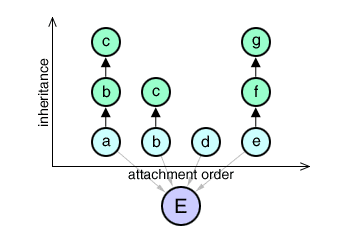
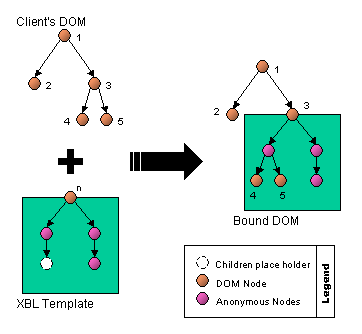 XBL bindings can
interleave shadow content between bound elements and their
XBL bindings can
interleave shadow content between bound elements and their