Copyright © 2005 W3C® (MIT, ERCIM, Keio), All Rights Reserved. W3C liability, trademark and document use rules apply.
This document defines the syntax and formal semantics of XQuery 1.0 and XPath 2.0 Full-Text which is a language that extends XQuery 1.0 [XQuery 1.0: An XML Query Language] and XPath 2.0 [XML Path Language (XPath) 2.0] with full-text search capabilities.
This section describes the status of this document at the time of its publication. Other documents may supersede this document. A list of current W3C publications and the latest revision of this technical report can be found in the W3C technical reports index at http://www.w3.org/TR/.
This is the second public working draft of the XQuery 1.0 and XPath 2.0 Full-Text specification. This document has been produced following the procedures set out for the W3C Process. This document was produced through the efforts of XML Query Working Group and the XSL Working Group (both part of the XML Activity ). It is designed to be read in conjunction with the following documents: W3C XQuery and XPath Full-Text Requirements [XQuery and XPath Full-Text Requirements] and the W3C XQuery Full-Text Use Cases [XQuery 1.0 and XPath 2.0 Full-Text Use Cases].
This is a public W3C Working Draft for review by W3C members and other interested parties. Publication as a Working Draft does not imply endorsement by the W3C Membership. This is a draft document and may be updated, replaced or obsoleted by other documents at any time. It is inappropriate to cite this document as other than work in progress.
This document contains many open issues, and should not be considered to be fully stable. Vendors who wish to create preview implementations based on this document do so at their own risk. While this document reflects the general consensus of the working groups, there are still controversial areas that may be subject to change.
The text of the XQuery functions used to define the semantics have not been completely syntax checked.
Public comments on this document and its open issues are invited. Comments should be entered into the last-call issue tracking system for this specification (instructions can be found at http://www.w3.org/XML/2005/04/qt-bugzilla). If access to that system is not feasible, you may send your comments to the W3C mailing list, public-qt-comments@w3.org (http://lists.w3.org/Archives/Public/public-qt-comments/) with "[FT]" at the beginning of the subject field of email messages involving such comments.
The patent policy for this document is specified in the 5 February 2004 W3C Patent Policy. Patent disclosures relevant to this specification may be found on the XML Query Working Group's patent disclosure page and the XSL Working Group's patent disclosure page. An individual who has actual knowledge of a patent which the individual believes contains Essential Claim(s) with respect to this specification should disclose the information in accordance with section 6 of the W3C Patent Policy.
1 Introduction
1.1 Full-Text Search and XML
1.2 Organization of this document
2 Full-Text Extensions to XQuery and XPath
2.1 Expression FTContainsExpr
2.1.1 FTContainsExpr Description
2.1.2 FTContainsExpr Examples
2.2 Score Clause
2.2.1 Using Weights Within a Score Clause
3 FTSelection and FTMatchOptions
3.1 FTSelection
3.1.1 FTSelection Example
3.1.2 FTWords
3.1.3 FTOr
3.1.4 FTAnd
3.1.5 FTUnaryNot
3.1.6 FTMildNegation
3.1.7 FTOrder
3.1.8 FTScope
3.1.9 FTDistance
3.1.10 FTWindow
3.1.11 FTTimes
3.1.12 FTContent
3.2 FTMatchOptions
3.2.1 FTCaseOption
3.2.2 FTDiacriticsOption
3.2.3 FTStemOption
3.2.4 FTThesaurusOption
3.2.5 FTStopwordOption
3.2.6 FTLanguageOption
3.2.7 FTIgnoreOption
3.2.8 FTWildCardOption
4 Semantics
4.1 Introduction
4.2 Nested XQuery and XPath Expressions
4.2.1 Left-hand Side of a FTContainsExpr
4.2.2 FTWords
4.2.3 FTRangeSpec
4.2.4 FTStopWordOption
4.2.5 FTThesaurusOption
4.2.6 FTLanguageOption
4.2.7 Tokenization
4.3 Evaluation of FTSelections
4.3.1 AllMatches
4.3.1.1 Formal Model
4.3.1.2 Examples
4.3.1.3 XML representation
4.3.2 FTSelections
4.3.2.1 XML Representation
4.3.2.2 The evaluate function
4.3.2.3 Formal semantics functions
4.3.2.4 FTWords
4.3.2.5 FTOr
4.3.2.6 FTAnd
4.3.2.7 FTUnaryNot
4.3.2.8 FTMildNot
4.3.2.9 FTOrder
4.3.2.10 FTScope
4.3.2.11 FTContent
4.3.2.12 FTDistance
4.3.2.13 FTWindow
4.3.2.14 FTTimes
4.3.3 Match Options Semantics
4.3.3.1 Types
4.3.3.2 High-Level Semantics
4.3.3.3 Formal Semantics Functions
4.3.3.4 FTCaseOption
4.3.3.5 FTDiacriticsOption
4.3.3.6 FTStemOption
4.3.3.7 FTStopWordOption
4.3.3.8 FTLanguageOption
4.3.3.9 FTWildCardOption
4.4 XQuery 1.0 and XPath 2.0 Full-Text and Scoring Expressions
4.4.1 FTContainsExpr
4.4.1.1 Semantics of FTContainsExpr
4.4.1.2 Example
4.4.2 Scoring
A EBNF for XQuery 1.0 Grammar with Full-Text extensions
B EBNF for XPath 2.0 Grammar with Full-Text extensions
C References
C.1 Normative References
C.2 Non-normative References
D Issues List
E Acknowledgements
F Glossary
This document defines the language and the formal semantics of XQuery 1.0 and XPath 2.0 Full-Text. This language is designed to meet the requirements identified in W3C XQuery and XPath Full-Text Requirements [XQuery and XPath Full-Text Requirements] and the W3C XQuery Full-Text Use Cases [XQuery 1.0 and XPath 2.0 Full-Text Use Cases].
XQuery 1.0 and XPath 2.0 Full-Text extends the syntax and semantics of XQuery 1.0 and XPath 2.0.
XML documents may contain highly-structured data (numbers, dates), unstructured data (untagged free-flowing text), and semi-structured data (text with embedded tags). Where a document contains unstructured or semi-structured data, it is important to be able to search that data using Information Retrieval techniques such as full-text search. Full-text search is different from substring search in many ways:
A full-text search searches for phrases (a sequence of words) rather than substrings. A substring search for news items that contain the string "lease" will return a news item that contains "Foobar Corporation releases the 20.9 version ...". A full-text search for the phrase "lease" will not.
There is an expectation that a full-text search will support language- and token-based searches which substring search cannot. An example of a language-based search is "find me all the news items that contain a word with the same linguistic stem as "mouse" (finds "mouse" and "mice"). An example of a token-based search is "find me all the news items that contain the word "XML" within 3 words (tokens) of "Query".
Full-text search is subject to the vageries and nuances of language. The results it returns are often of varying usefulness. When you search a web site for all cameras that cost less than $100, this is an exact search. There is a set of cameras that match this search, and a set that do not. Similarly, when you do a string search across news items for "mouse", there is only 1 expected result set. When you do a full-text search for, say, all the news items that contain the word "mouse", you probably expect to find news items with the word "mice", and possibly "rodents" (or possibly "computers"!). But not all results are equal : some results are more "mousey" than others. Because full-text search can be inexact, we have the notion of score or relevance : we generally expect to see the most relevant results at the top of the results list. Of course, relevance is in the eye of the beholder. Note: as XQuery/XPath evolves, it may apply the notion of score to querying structured search. For example, when making travel plans or shopping for cameras, it is sometimes more useful to get an ordered list of near-matches. If XQuery/XPath defines a generalized inexact match, we assume that XQuery/XPath can utilize the scoring framework provided by the full-text language.
The following definitions apply to full-text search:
As XML becomes mainstream, users expect to be able to store and search all their documents in XML. This requires a standard way to do full-text search, as well as structured searches, against XML documents. A similar requirement for full-text search led ISO to define the SQL/MM-FT [SQL/MM] standard. SQL/MM-FT [SQL/MM] defines extensions to SQL to express full-text queries providing similar functionality as this full-text language extension to XQuery 1.0/XPath 2.0 does.
Full-text queries are performed on text which has been tokenized, i.e., broken into a sequence of words, units of punctuation, and spaces.
A word is defined as any character, n-gram, or sequence of characters returned by a tokenizer as a basic unit to be queried. Each instance of a word consists of one or more consecutive characters. Beyond that, words are implementation defined. Note that consecutive words need not be separated by either punctuation or space, and words may overlap. A phrase is a sequence of ordered words which can contain any number of words.
Tokenization enables functions and operators which work with the relative positions of words (e.g., proximity operators). It also uniquely identifies sentences and paragraphs in which words appear. Tokenization also enables functions and operators which operate on a part or the root of the word (e.g., wildcards, stemming). Whatever a tokenizer for a particular language chooses to do, it must preserve the containment hierarchy: paragraphs contain sentences which contain words. The tokenizer has to give the same answers for two equal strings, i.e., it should identify the same tokens. Everything else is implementation-defined. Sentences and paragraphs are important concepts in Western languages (which belong to a rather important market for a great many implementors of XQuery). So, we choose to keep the full-text primitives that make use of them. The specification does not want to impose any requirements on cross-language tokenizers.
This specification focuses on functionality that serves all languages. It also selectively includes functionalities useful within specific families of languages. For example, searching within sentences and paragraphs is useful to many western languages and to some non-western languages, so that functionality is incorporated into this specification.
This document is organized as follows. We first present a high level syntax for the XQuery 1.0 and XPath 2.0 Full-Text language along with some examples. Then, we present the syntax and examples of the basic primitives in the XQuery 1.0 and XPath 2.0 Full-Text language. This is followed by the semantics of the XQuery 1.0 and XPath 2.0 Full-Text language. The appendix contains a section that provides an EBNF for the XPath 2.0 Grammar with Full-Text extensions, an EBNF for XQuery 1.0 Grammar with Full-Text extensions, a list of issues, acknowledgements and a glossary
To extend the languages of XQuery and XPath for full-text search we introduce a new kind of expression, called FTContainsExpr, as well as an additional clause to FLWOR expressions, the score clause.
The XQuery and XPath Languages are extended by adding the expression FTContainsExpr. An FTContainsExpr is in many ways similar to a comparison expression (see Section 3.5.2 General ComparisonsXQ). This is the grammar rule which introduces FTContainsExpr.
| [49] | ComparisonExpr |
::= | FTContainsExpr ( (ValueComp |
An FTContainsExpr can be used anywhere a ComparisonExpr could be used in the original languages of XQuery and XPath. Moreover, an FTContainsExpr has higher precedence than the comparison operators, meaning that you can compare the Boolean result of such an expression without the need to enclose it in parentheses.
| [50] | FTContainsExpr |
::= | RangeExpr ( "ftcontains" FTSelection FTIgnoreOption? )? |
An expression of the form FTContainsExpr returns a Boolean value. It returns true, if there is some node in RangeExpr that matches FTSelection. For the purpose of determining a match some nodes in RangeExpr may be ignored, as specified in FTIgnoreOption. The precise semantics of matching is described in Section 4 Semantics.
Expressions of the form FTSelection are composed of the following ingredients:
words or combinations of words, that are the search strings to be found as matches
match options, such as case sensitivity or indication to use stop words
Boolean operators, that allow to compose an FTSelection from simpler FTSelections
constraints on the positions of matches, such as indication of match distance or window, or on the cardinality of matches.
The following example returns the author of each book whose title contains a word with the same root as dog and the word cat.
for $b in /books/book
where $b/title ftcontains ("dog" with stemming) && "cat"
return $b/author
The same example in XPath 2.0:
/books/book[title ftcontains ("dog" with stemming)
&& "cat"]/author
The XQuery Language is extended by adding a score clause to FLWOR expressions.
| [37] | FTScoreClause |
::= | "score" "$" VarName "as" Expr |
The purpose of the score clause is to generate a variable bound to a number representing a relevance score of full-text expression matches.
The following example returns the relevance of $b/content ftcontains "web site" && "usability" and $b//chapter/title ftcontains "testing" to each book.
for $b in /books/book
score $s as $b/content ftcontains "web site" &&
"usability" and $b//chapter/title
ftcontains "testing"
return $s
Scores are typically used as an ordering criterion, like in the following, more complete example.
for $b in /books/book
score $s as $b/content ftcontains "web site" &&
"usability"
where $s > 0
order by $s descending
return <result>
<title> {$b//title} </title>
<score> {$s} </score>
</result>
Syntactically, a score clause associates a variable to an expression. The expression is restricted to be a Boolean combination of FTContainsExprs, more precisely a Boolean combination involving only "and" and "or". There may be multiple score clauses in a FLWOR expression, and they have to succeed all of its for or let clauses.
In XPath 2.0 we extend the for expression in the same way with a score clause. The first example above is actually also a legal example of the XPath 2.0 extension.
The variable gets bound to a value of type xs:float in the range [0, 1]. The value reflects the relevance of the match criteria in the FTSelections to the nodes in the respective RangeExprs. The way relevance is calculated is left implementation-dependent, but score evaluation must follow these rules:
Score values are of type xs:float in the range [0, 1].
If evaluation of the Expr argument would yield false, then the score value must be 0 [but see issue scoring-values (Cluster A, Issue 2)]
For score values greater than 0, a higher score must imply a higher degree of relevance
Although a score clause binds a variable to the result of an evaluation, as it seems just like a let clause, it cannot be emulated by a let clause involving a (first-order) score function. Consider the following replacement of the score clause:
let $s := score(...)
where a function score is applied to some FTContainsExpr. Being a first-order function score is only applied to the result of the evaluation of its argument, which is one of the Boolean constants true or false in our case. Hence, there can be at most two possible values score will return and no further differentiation is possible. For the same reason also the evaluation of the expression inside the score clause needs to be
special (second-order).
Scoring can be influenced by adding weight declarations to the individual search terms, like in the following example.
for $b in /books/book
score $s as $b/content ftcontains ("web site" weight 0.5)
&& ("usability" weight 1.5)
return $s
The effect of weights on the result score is also implementation-dependent. However, these two rules must be followed.
Only the relative values of the weights in an FTContainsExpr with respect to each other are significant.
The default weight is 1.0
Weight declarations in an FTContainsExpr which is not embedded in a score clause are ignored.
This section describes FTSelection that gives the full-text selection expressions used in the FTContainsExpr, and the match options in FTMatchOptions that are used to adjust the matching semantics of the full-text selection expressions.
The FTSelection production specifies all permitted kinds of full-text search conditions.
| [140] | FTSelection |
::= | FTOr (FTMatchOption | FTProximity)* ("weight" DecimalLiteral)? |
In the following we will define the syntax and semantics of the individual fulltext selection operators and provide some examples based on an example document presented in section 3.1.1.
We will use the following XML document as an example throughout this section.
<book number="1">
<title shortTitle="Improving Web Site Usability">Improving
the Usability of a Web Site Through Expert Reviews and
Usability Testing</title>
<author>Millicent Marigold</author>
<author>Montana Marigold</author>
<editor>Véra Tudor-Medina</editor>
<content>
<p>The usability of a Web site is how well the
site supports the users in achieving specified
goals. A Web site should facilitate learning,
and enable efficient and effective task
completion, while propagating few errors.
</p>
<note>This book has been approved by the Web Site
Users Association.
</note>
</content>
</book>
FTWords specifies the words and phrases that are being searched for in the searched text that is provided as the left-hand side argument of FTContainsExpr.
| [146] | FTWords |
::= | (Literal | VarRef | ContextItemExpr | FunctionCall | ("{" Expr "}")) FTAnyallOption? |
The right hand side Expr of the above production must evaluate to a sequence of string values or nodes of type "xs:string". The result of the Expr is then atomized into a sequence of strings which then is being tokenized into a sequence of phrases (see section 2.x.x for details). If the atomized sequence is not a subtype of xs:string*, a type error [err:XP0006] is raised.
If the "any" option is specified then a match occurs if and only if at least one phrase in the sequence has a match in the searched text.
If the "all" option is specified then a match occurs if and only if all of the phrases in the sequence of phrases are matched in the searched text.
If the "phrase" option is specified then the sequence of phrases is used to create a single phrase by concatenating the phrases and interleaving whitespace. A match occurs if and only if the resulting phrase is matched in the searched text.
If the "any word" option is specified then a match occurs if and only if at least one word in the sequence of phrases is matched in the searched text.
If the "all word" option is specified then a match occurs if and only if all words in the sequence of phrases are matched in the searched text.
If no option is specified then "any" is implied as default.
Note that if Expr results in a single string, the default and "any", "all" and "phrase" are equivalent.
If Expr results in the empty sequence or the tokenization results in a zero-length phrase, this is discussed in the issue zero-length-phrase (Cluster G, Issue 47).
Note: The results assume a case-insensitive match in the following expressions.
/book[@number="1" and ./title ftcontains "Expert"]
returns true because the phrase "Expert" is contained in the title element of the book element.
/book[@number="1" and ./title ftcontains "Expert Reviews"]
returns true because the phrase "Expert Reviews" is contained in the title element of the book element.
/book[@number="1" and ./title ftcontains {"Expert",
"Reviews"} all]
returns true because the two phrases "Expert" and "Reviews" are both contained in the title element.
/book[@number="1"]//p ftcontains "Web Site Usability"
returns false because the p element in the book element doesn't contain the phrase "Web Site Usability" though it contains all of the words in the phrase.
for $book in /book[.//author ftcontains "Marigold"] score $score as $book/title ftcontains "Web Site Usability" where $score > 0.8 order by $score descending return $book/@number
returns the most relevant book elements by Marigold with a title about "Web Site Usability" in sorted by score order.
| [141] | FTOr |
::= | FTAnd ( "||" FTAnd )* |
FTOr finds matches that satisfy at least one of the input selection criteria.
Any match should satisfy at least one of the FTSelection criteria.
/book[.//author ftcontains "Millicent" || "Voltaire"]
returns book elements written by "Millicent" or "Voltaire". The book element is returned because it it written by "Millicent".
| [142] | FTAnd |
::= | FTMildnot ( "&&" FTMildnot )* |
FTAnd finds matches that satisfy simultaneously two selection criteria.
Any match must satisfy all of the FTSelection criteria which are specified by one or more FTUnaryNot expressions.
/book[@number="1"]/title ftcontains ("usability"
&& "testing") case insensitive
returns true because it contains "usability" and "testing" if we ignore the letter case (see FTCaseOption for more details on case sensitivity).
/book[@number="1"]/author ftcontains "Millicent" && "Montana"
returns false because "Millicent" and "Montana" are not contained by the same author element of the book element.
| [144] | FTUnaryNot |
::= | ("!")? FTWordsSelection |
FTUnaryNot finds matches that do not satisfy words and phrases that are being searched for in the searched text that is provided as the left-hand side argument of FTContainsExpr.
This is unary negation. Only one operand is required.
/book[. ftcontains "information" && "retrieval" && ! "information retrieval"]
returns book elements containing "information" and "retrieval" but not "information retrieval".
/book[. ftcontains "web site usability" && !"usability testing"]
returns book elements about "web site usability" but not "usability testing".
| [143] | FTMildnot |
::= | FTUnaryNot ( "mild" "not" FTUnaryNot )* |
FTMildNegation is a milder form of "&& !". 'a mild not b' matches an expression that contains a on its own, and not just as part of b. For example, if I want to find articles that mention Mexico, I might search for ' "Mexico" mild not "New Mexico" '. '"Mexico" mild not "New Mexico"' matches any Expr that contains Mexico on its own. An Expr that contains "New Mexico" is not "excluded" from the result - it may mention "Mexico" as well. An Expr that contains "Mexico" only as part of the phrase "New Mexico" will "not" match ' "Mexico" mild not "New Mexico".
A match to FTMildNegation must contain at least one word occurrence that satisfies the first condition and does not satisfy the second condition. If it contains a word occurrence that satisfies both the first and the second condition, the occurrence is not considered as a result.
/book[@number="1" and . ftcontains "usability" mild not "usability testing"]
returns the book since "usability" appears in the title and the p elements of the book. However, the occurrence of "Usability Testing" in the title element is not considered.
| [168] | FTOrderedIndicator |
::= | "ordered" |
FTOrder enforces that the order of word occurrences in the match is the same as their order in the query.
By default, there are no restrictions on the order in which the query words are matched in the document.
FTOrder imposes such an order. A match must satisfy the nested selection condition and the match must contain the words in the order specified in the query.
/book[. ftcontains ("web site" && "usability")
ordered]/title
returns titles of book elements that contain "web site" and "usability" in the order in which they appear in the query, i.e., "web site" must precede "usability".
/book[@number="1"]/title ftcontains ("Montana" &&
"Millicent") ordered
returns false because although "Montana" and "Millicent" appear in the title element, they do not appear in the order specified in the query.
| [164] | FTScope |
::= | ("same" | "different") FTBigUnit |
FTScope specifies a condition on the scope of the occurrences of the matched words.
FTScope specifies whether any matched word in FTSelection should be directly contained in the same ('same') or different ('different') scope.
Possible scopes are sentence (e.g., delimited by ".", "!", or "?"), and paragraph (e.g., delimited by blank lines and EOLN/CR characters). Sentences and paragraphs are defined in the introduction.
By default, there are no restriction on the scope of the occurrences, i.e. they may occur in a sentence or a paragraph. FTScope is used to restrict this scope.
If two words appear in the same sentence and in different sentences then both 'same sentence' and 'different sentence' return true. The same thing applies to the 'paragraph' scope.
/book[@number="1" and . ftcontains "usability" && "Marigold" same sentence]
will not return the book element because the words "usability" and "Marigold" are not contained by the same sentence.
/book[@number="1" and . ftcontains "usability" && "Marigold" different sentence]
will return the book element because the words "usability" and "Marigold" are contained by different sentences.
/book[. ftcontains "usability" && "testing" same paragraph]
returns book elements mentioning "usability" and "testing" in the same paragraph.
/book[. ftcontains "site" && "errors" same sentence]
returns the book element because "site" and "errors" appear in the same sentence. Note that the book is returned even though there is another occurrence of "site", namely the one in the title element, which does not appear in the same sentence as the occurrence of "errors".
Some subtle relationships between FTScope and FTDistance will be discussed in the semantics section.
| [161] | FTDistance |
::= | "distance" FTRange FTUnit |
| [160] | FTRange |
::= | ("exactly" UnionExpr) |
FTDistance limits the distance in number of words, sentences, or paragraphs between consecutive occurrences of the words in FTSelection. These correspond to "word distance", "sentence distance", and "paragraph distance" forms of FTDistance.
FTRange specifies a range of integers.
The XQuery expression(s) Expr must evaluate (with atomization) to a singleton sequence with an integer atom. Otherwise, the expression containing the clause must return error.
Let the first XQuery expression Expr evaluates to M and the second XQuery expression in the last type of FTRange evaluates to N.
FTDistance may cross element boundaries when computing distance:
Zero words means adjacent.
Zero sentences means the same sentence.
Zero paragraphs means the same paragraph.
The use of "exactly" limits the range to a single integer: [M, M]. "at least" specifies the range [M, ). The "at most" variant specifies the range [0, M]. The last variant specifies a range of allowable values: the closed interval [M, N].
'exactly 0' specifies the range [0, 0].
'at least 1' specifies the range [1, ].
'at most 1' specifies the range [0, 1].
'from 5 to 10' specifies the range [5, 10].
Stop words are counted against the word distance.
/book[. ftcontains ("information" &&
"retrieval") mild not ("information" && "retrieval"
distance at least 11 words)]
returns book elements containing "information" and "retrieval" and discards those occurrences of the words that are more than 10 words apart.
/book[. ftcontains "web" && "site" && "usability" distance at most 2 words]/title
returns the titles of book elements mentioning "web", "site", and "usability" with at most 2 intervening words between consecutive occurrences of the words.
/book[@number="1" and . ftcontains "web site" && "usability" distance at most 1 words]/title
returns the title element; the p element will not be returned when stop words are not ignored because its occurrences of "web site" and "usability" are within word distance of 2.
/book[@number="1" and . ftcontains ("web site"
&& "completion" && ! "learning") distance
exactly 15 words]/title
returns the title element because the word "learning" not appears within 15 words of the words "web site" and "completion".
/book[@number="1" and . ftcontains "web site" && "completion" distance exactly 15 words same paragraph]/title
returns the title element if the words "web site" and "completion" appear within 15 words of each other and in the same paragraph.
| [162] | FTWindow |
::= | "window" FTRange FTUnit |
FTWindow allows control over the distance between the leftmost word occurrence (the one with the smallest position) and the rightmost one.
FTWindow limits the distance in units of words, sentences, or paragraphs.
FTWindow may cross element boundaries when computing distances.
FTRange specifies a range of integers.
The number of words for the occurrences of the nested selection condition between the smallest word position and the largest position (inclusive on both sides) in words should be within the specified range. Similar to the FTDistance, stop words are counted.
Zero words means adjacent.
Zero sentences means the same sentence.
Zero paragraphs means the same paragraph.
/book[./title ftcontains "web" && "site" && "usability" window at most 5 words]/@number
returns the numbers of book elements containing "web", "site", and "usability" in their title within a window of 5.
/book[. ftcontains ("web" && "site" ordered)
&& ("usability" || "testing") window at most 10 words]
returns book elements that contain "web" and "site" in this order plus either "usability" or "testing" and all the matched words occur within a window of at most 10.
/book[@number="1" and . ftcontains "web site" && "usability" window at most 3 words]
returns the title element because it contains "Web Site Usability"; the p element will not be returned because its occurrences of "web site" and "usability" are not within a window of 3.
| [163] | FTTimes |
::= | "occurs" FTRange "times" |
FTTimes controls the number of times a specified FTSelection must be matched.
FTTimes limits the number of different occurrences of FTSelection, which must be within the specified range.
An occurrence of the criterion is a distinct set of word occurrences that satisfies it.
The FTSelection '("very big")' has one occurrence in the text fragment "very very big": it consists of the second "very" and "big".
The FTSelection '"very" && "big"' has two occurrences in the text fragment "very very big": one consisting of the first "very" and "big", and the other containing the second "very" and "big".
The FTSelection '"very" || "big"' has 3 occurrences in "very very big" any non-empty set of words.
/book[. ftcontains "usability" occurs at least 2 times]/@number
returns the numbers of the book elements that contain 2 or more occurrences of "usability".
/book[@number="1" and title ftcontains "usability" || "testing" occurs at most 3 times]
returns false because "usability" 3 occurrences and "testing" 1 occurrences; therefore, there are 4 occurrences of "usability" || "testing".
/book[@number="1" and . ftcontains "usability" occurs at least 2 times]
returns the book element because its title element contains 3 occurrences of "usability" although its p element contains only one occurrence.
| [158] | FTContent |
::= | "at" "start" | "at" "end" | "entire" "content" |
FTContent finds matches when the words and phrases are the first, last or all of the words and phrases in the tokenized string value of the element that is being searched.
The "at" "start" option finds matches when the words or phrases are the first words or phrases in the tokenized string value of the element that is being searched.
The "at" "end" option finds matches when the words or phrases are the last words or phrases in the tokenized string value of the element that is being searched.
The "entire" content" option finds matches when the words or phrases are the entire content of the tokenized string value of the element that is being searched.
/books//title[. ftcontains "improving the usability of a web site" at start]
returns each title element starting with the phrase "improving the usability of a web site".
/books//p[. ftcontains "propagat*" && "few errors" distance at most 2 words at end]
returns each p element ending with the phrase "propagating few errors".
/books//note[. ftcontains "this site has been approved by the web site users association" entire content]
returns each note element where "this site has been approved by the web site users association" is the entire content of the tokenized string of that element.
FTMatchOptions modify the operational semantics of the FTSelection they are applied on.
FTMatchOptions productions set an environment for the matching options of FTSelection.
| [148] | FTMatchOption |
::= | FTCaseOption |
FTMatchOption operates with the following defaults:
FTCaseOption is "case insensitive".
FTDiacriticsOption is "diacritics insensitive".
FTStemOption is "without stemming".
FTThesaurusOption is "without thesaurus".
FTStopWordOption is "without stopwords".
FTLanguageOption is no language is selected.
FTIgnoreOption is that no element content and tags are ignored.
FTWildCardOption is "without wildcards".
As a result, the query:
/book/title ftcontains "usability"
is equivalent to the query
/book/title ftcontains "usability" case insensitive
diacritics insensitive
without stemming without thesaurus
without wildcards
FTMatchOptions are applied in the order in which they are given in the query. More information on their semantics is given in 4.3.3 Match Options Semantics.
We illustrate each match option in more detail in the following sections.
| [149] | FTCaseOption |
::= | "lowercase" |
FTCaseOption controls the way words are matched with regards to the letter case.
Influences the way FTWords is applied.
"lowercase" ("uppercase") specify that only words in lower-case (upper-case) letters can be matched exactly; "case insensitive" specifies that matching word occurrences can have both small and capital letters; their case is ignored; "case sensitive" specifies that the case of the letters in the result must match the case of the letters in the word from the query.
The default is "case insensitive".
The following table summarizes the interaction between the case match option and the use of collations.
| Default collation options/Case options | UCC (Unicode Codepoint Collation) | CCS (some generic case-sensitive collation) | CCI (some generic case-insensitive collation) |
| insensitive | compare as if both lower | case-insensitive variant of CCS if it exists, else error | CCI |
| sensitive | UCC | CCS | case-insensitive variant of CCI if it exists, else error |
| uppercase | uppercase(Expr) + UCC | uppercase(Expr) + CSS | CCI |
| lowercase | lowercase(Expr) + UCC | lowercase(Expr) + CSS | CCI |
/book[@number="1"]/title ftcontains "Usability" lowercase
returns false because the title element doesn't contain "usability" (in lower case).
/book[@number="1"]/title ftcontains "usability" case insensitive
returns true because the case of the letters is not considered.
| [150] | FTDiacriticsOption |
::= | "with" "diacritics" |
FTDiacriticsOption controls the way words are matched with regards to the use of diacritic symbols.
FTDiacriticsOption influences the way FTWords is applied.
"with" ("without") "diacritics" specifies that only words that contain (do not contain) diacritics can be matched exactly; "diacritics insensitive" specifies that there are no restrictions on the matching word occurrences with regards to diacritic symbols: letters containing diacritics can be matched with their non-diacritics counterparts and vice versa; "diacritics sensitive" specifies that the diacritic symbols must match the symbols in the word from the query.
The default is "diacritics insensitive".
The following table summarizes the interaction between the diacritics match option and the use of collations.
| Default collation options/Diacritics options | UCC (Unicode Codepoint Collation) | CCS (some generic case-sensitive collation) | CCI (some generic case-insensitive collation) |
| insensitive | compare as if with and without | diacritics-insensitive variant of CCS if it exists, else error | CCI |
| sensitive | UCC | CCS | diacritics-insensitive variant of CCI if it exists, else error |
| with diacritics | "resume diacritic insensitive" mild not "resume" | "resume diacritic insensitive" mild not "resume" | CCI |
| without diacritics | "resume" mild not "resume diacritic sensitive" | "resume" mild not "resume diacritic sensitive" | CCI |
/book[@number="1"]//editor ftcontains "Vera" with diacritics
returns the editor element.
/book[@number="1"]/editors ftcontains "Véra" without diacritics
returns false.
| [151] | FTStemOption |
::= | "with" "stemming" | "without" "stemming" |
FTStemOption controls the use of stemming during string matching.
FTStemOption influences the way FTWords is applied. It produces a disjunction of the query words by expanding the words into the list of words that share the same stem. By definition, the query words are included in that disjunction.
When the "with stemming" option is present, string matches may also contain words that have the same stem as the query string. It is implementation-defined what a stem of a word is.
The clause "without stemming" turns off the use of stemming when words are matched.
It is implementation-defined whether the stemming will based on an algorithm, dictionary, or mixed approach.
The default is "without stemming".
/book[@number="1"]/title ftcontains "improve" with stemming
returns true because it contains "improving" that has the same stem as "improve".
| [152] | FTThesaurusOption |
::= | ("with" "thesaurus" FTRefOrList "relationship" StringLiteral (FTRange "levels")?) | "without" "thesaurus" | "with" "default" "thesaurus" |
FTThesaurusOption controls the use of thesauri during string matching.
Each of the FTThesaurusOption is converted as though it was an argument of a function with the expected parameter type xs:string. A type error [err:XP0006] is raised if any operand cannot be converted to a string.
Influences the way FTWords is applied.
The use of thesauri allows for substitutes in FTWords of any search token or sequence of such tokens (a phrase) with related tokens or phrases. The related tokens or phrases can be obtained using a thesaurus, taxonomy, soundex, ontology, or topic map. Thus, the user can narrow, broaden, or otherwise modify the search using synonyms, hypernyms (more generic terms), etc. The search is performed as though the user has specified all related search tokens in a disjunction (FTOr).
The thesauri used in an XQuery 1.0 and XPath 2.0 implementation may be standards-based or locally-defined.
Note:
It is implementation defined how a thesaurus is represented. This includes files in a predefined format, or modules using a common interface.
Relationships include, but are not limited to, the relationship terms and their abbreviations presented in [ISO 2788] and their equivalents in other languages:
equivalence relationships (synoymns): PREFERRED TERM (USE), NONPREFERRED USED FOR TERM (UF);
hierarchical relationships: BROADER TERM (BT), NARROWER TERM (NT), BROADER TERM GENERIC (BTG), NARROWER TERM GENERIC (NTG), BROADER TERM PARTITIVE (BTP), NARROWER TERM PARTITIVE (NTP), TOP Terms (TT); and
associative relationships: RELATED TERM (RT).
Specifies the number of levels to be queried in hierarchical relationships by including an FTRange "levels". If no levels are specified, the default is to query all levels in hierarchical relationships.
The string literal must be a sequence of strings (string atoms or nodes of type "xs:string") that represent valid thesauri names. Otherwise, an error is returned. What is a valid thesaurus name is implementation-dependent and can be either a name of system-provided or user-specified thesaurus. If the strin literal is an empty sequence, the construct is equivalent to "without thesaurus".
When the "with thesaurus" match option is specified, string matches also include words that can be found in the specified thesauri and that correspond to the query string.
The statement "without thesaurus" instructs the query engine not to use thesauri when matching words.
The default is "without thesaurus".
doc("http://bstore1.example.com/full-text.xml")
/books/book[count(.//introduction ftcontains "quote" with thesaurus
at "http://bstore1.example.com/ UsabilityThesaurus.xml" relationship
"synonyms")>0]
finds all introductions which quote someone.
doc("http://bstore1.example.com/full-text.xml")
/books/book[count(./content ftcontains "web site components" with
thesaurus at "http://bstore1.example.com/ UsabilityThesaurus.xml"
relationship "narrower terms" at most 2 levels)>0]
finds all books with text on improving "web site components". Also finds books with the words "navigation" and "layout".
doc("http://bstore1.example.com/full-text.xml")
/books/book[count(. ftcontains "Merrygould" with thesaurus at
"http://bstore1.example.com/ UsabilitySoundex.xml" relationship
"sounds like")>0]
finds all books with words which sound like "Merrygould". This includes answers containing "Merigold".
| [153] | FTStopwordOption |
::= | ("with" "stop" "words" FTRefOrList FTInclExclStringLiteral*) | "without" "stop" "words" | "with" "default" "stop" "words" |
FTStopWordOption controls the use of stop words (frequent functional words such as "a", "an", "the" that are ignored) during string matching.
Influences the way FTWords is applied.
The list of stop words considered can be given explicitly as a string literal or by an expression that resolves to a string literal or by a URI.
Expr must evaluate to a sequence of string atoms or nodes of type "xs:string". URI must point to a sequence of string atoms or nodes of type "xs:string". In both cases, no tokenization is performed on the strings: they are used as they occur in the sequence.
When the "with stop words" option is used, if a word is within a collection of stop words, it should be ignored. If stop words are not specified, an implementation-defined system collection of stop words is used. Stop word lists could be combined using the usual semantics of "except" and union".
"without stop words" turns off the use of the words in the specified list of stop words or clears the whole stop word collection if no stop words are specified.
The default is "without stop words".
/book[@number="1"]//p ftcontains "usability web site"
with stop words ("a", "the", "of")
returns true.
/book[@number="1"]//title ftcontains "usability web site" without stop words
returns false.
doc("http://bstore1.example.com/full-text.xml")
/books/book[count(.//content ftcontains "planning then
conducting" with stop words at
"http://bstore1.example.com/StopWordList.xml")>0]
uses the stop words list specified at the URL. Once the stop word "then" has been identified, this query is reduced to a query on the phrase "planning" any word "conducting", allowing any word as a substitute for the stop word. It finds both "planning and conducting" and "planning then conducting" in the sample data.
Note the asymmetry in the stop word semantics: the property of being a stop word is only relevant to query terms, not to document terms. We do not want the query above to match "planning" followed by 2 stop words, or even a sequence of 3 stop words in the document.
doc("http://bstore1.example.com/full-text.xml")
/books/book[count(.//content ftcontains "planning then
conducting" with stop words at
"http://bstore1.example.com/StopWordList.xml")>0]
doc("http://bstore1.example.com/full-text.xml")
/books/book[count(.//content ftcontains "planning then conducting"
with stop words at "http://bstore1.example.com/StopWordList.xml"
except ("the then"))>0]
will find "planning then conducting" and not "planning and conducting" because it is exempting "then" from being a stop word.
doc("http://bstore1.example.com/full-text.xml")
/books/book[count(.//content ftcontains "planning then conducting"
with stop words at "http://bstore1.example.com/StopWordList.xml"
union ("the or"))>0]
will find "planning and conducting", "planning then conducting" and "planning or conducting"
doc("http://bstore1.example.com/full-text.xml")
/books/book[count(.//content ftcontains "planning then conducting"
with stop words at "http://bstore1.example.com/StopWordList.xml"
union at "http://bstore1.example.com/StopWordList2.xml")>0]
will find every occurrence of "planning conducting" where any number of stop words from both http://bstore1.example.com/StopWordList.xml and http://bstore1.example.com/StopWordList.xml2 could appear.
| [156] | FTLanguageOption |
::= | "language" UnionExpr |
FTLanguageOption controls the language of the matched words.
Influences the way FTWords is applied.
Each of the FTLanguageOption is converted as though it was an argument of a function with the expected parameter type xs:string. A type error [err:XP0006] is raised if any operand cannot be converted to a string.
Note: The above rule implies atomization of the Expr values followed by an implementation-defined tokenization.
Language can have implications in various aspect of string matching. This includes how the tokenization into words is performed, how are symbols transformed into lower/upper-case, what are the valid diacritic symbols, how stemming is performed, or which words can considered to be stop words. In particular, the language option may imply what are the default thesaurus/stop word sets.
Expr is an XQuery expression that must evaluate to a string atom, a node with typed value of type "xs:string", or an empty sequence.
If Expr evaluates to "none", "", or an empty sequence, this means that there is no language selected; otherwise, it should be valid identifier of a language. The set of valid language identifiers is implementation-defined.
By default, there is no language selected.
/book[@number="1"]//editor ftcontains "tudor" with diacritics language "Romanian"
returns true.
| [167] | FTIgnoreOption |
::= | "without" "content" UnionExpr |
FTIgnoreOption specifies a set of element nodes whose content should be ignored. The set of nodes is identified by the XQuery expression Expr that should evaluate to a sequence of element nodes. This "ignore" is done recursively which means that ignored elements will also be searched and within those elements, other elements may be ignored.
FTIgnoreOption chabges the semantics of phrase matching. It does not have an impact on a single word search.
If FTIgnoreOption is specified, all the subtree directly contained by the elements is ignored for the purpose of searching a phrase at a given level. For example, "Web <b>Site</b> Usability" is matched by "Web Usability" if the option is "without content .//b". However, "Web Site" will not be matched. If the XQuery sub-expression evaluates to an empty sequence no words from element content are ignored.
FTIgnoreOption is applied recursively. For example, if the option is "without content .//b", "Web <b>This is my Web Site</b> Site Usability" is matched twice by "Web Site". Ignoring an element does not mean that it will not be searched, it means that it is ignored when searching its parent element. This is done recursively.
More generally, if .//notation is ignored, "Web Usability" will be found 5 times in the following fragment:
<book>
<title>Web Usability and Practice</title>
<author>Montana <annotation> this author is
an expert in Web Usability</annotation>
Marigold</author>
<editor>Véra Tudor-Medina on Web
<annotation> best editor on Web
Usability</annotation>Usability</editor>
<content>
<p>Web Usability is defined as how well the
site supports the users in achieving specified
goals.
</p>
</content>
</book>
By default element content is not ignored.
FTWildCardOption controls the use of wildcards appending or inserting a character or sequence of characters to a word (or part of a word). It influences the way words in FTWords are interpreted.
In addition to specifying the "with wildcards"' option, indicators (represented by periods (.)) and qualifiers are appended to or inserted into words being searched. Zero or more characters replace each indicator and qualifier.
Indicators are mandatory. When the "with wildcards"' option is present, one or more periods (.) must be appended at the beginning or end of words or inserted into words. If the period is at the beginning of a word, the wildcard is a prefix wildcard. If the period is at the end of a word, it is a suffix wildcard. If the period is inserted into a word, it is an infix wildcard.
When the "with wildcards" option and one or more periods (.) appended to or inserted into words are present, characters are appended or inserted at each of the periods. Any characters may be appended or inserted except newline characters (#xA), return characters (#xD), and tab characters (#x9). The number of characters depends on the qualifier. Qualifiers available are none, question mark, asterisk, plus sign, and two numbers separated by a comma, both enclosed by curly braces.
If a period is present, but no qualifiers, any one character is appended or inserted.
If a period is followed by a question mark (.?), zero or one characters are appended or inserted.
If a period is followed by an asterisk (.*), zero or more characters are appended or inserted.
If a period is followed by a plus sign (.+), one or more characters are appended or inserted.
If a period is followed by two numbers separated by a comma, both enclosed by curly braces (.{n,m}), a specified range of characters is appended or inserted.
The option "without wildcards" finds words without recognizing wildcard indicators and qualifiers. Periods, question marks, asterisks, plus signs, and two numbers separated by a comma, both enclosed by curly braces recognized as regular characters.
The default is "without wildcards".
/book[@number="1"]/title ftcontains "improv.*" with wildcards
returns true because it contains "improving".
/book[@number="1"]/title ftcontains ".?site" with wildcards
returns true because it contains "site".
/book[@number="1"]/p ftcontains "w.ll" with wildcards
returns true because it contains "well".
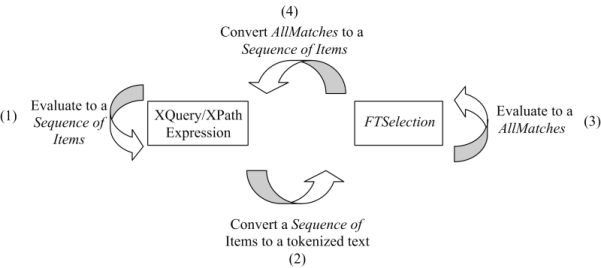
This section describes the formal semantics of XQuery 1.0 and XPath 2.0 Full-Text. The figure below shows how XQuery 1.0 and XPath 2.0 Full-Text integrates with XQuery and XPath.
The arrow (1) represents the composability of the XQuery and XPath expressions. It is described in the XQuery language specification. Regular XQuery expressions can be nested inside FTSelections (arrow (2)) by evaluating them to a sequence of items and then converting them to a tokenized text; depending on the role they are used in a XQuery 1.0 and XPath 2.0 Full-Text expression. The process is described in Nested XQuery and XPath Expressions. Similarly to arrow (1), there is a full composability of FTSelections (arrow (3)). The composability is achived by evaluating FTSelections to AllMatches. Each FTSelection operates on zero or more AllMatches and returns AllMatches. The process is described in the Evaluation of FTSelections section. Finally, the result of the evaluation of XQuery 1.0 and XPath 2.0 Full-Text and scoring expressions needs to be integrated in the XPath and XQuery model (arrow (4)). The section XQuery 1.0 and XPath 2.0 Full-Text and scoring expressions describes how this is achieved.
All functions and schemata defined in this section are considered to be within the fts: namespace. These functions and schemata are used only for the purpose of describing the semantics. They need not be available directly to users, and there is no requirement that implementations should actually provide these functions and schemata. For this reason, no URI is associated with the fts: prefix.
The following section discusses the nesting of XQuery and XPath expressions inside FTContainsExpr.
The general rule is that the nested XQuery and XPath expressions are evaluated to a sequence of items before the evaluation of FTContainsExpr. The sequence of items must satisfy certain constraints depending on the context in which it is used. These constraints are described below.
Full-text queries are performed on text which has been tokenized, i.e., broken into a sequence of words, units of punctuation, and spaces. The tokenization is applied on the string value of the evaluation of the left-hand side of the FTContainsExpr expression.
The XQuery expression nested inside an FTWords must evaluate to a sequence of string values after applying atomization (otherwise the entire FTSelection returns an error). Then, FTWords performs an tokenization on the string values from the sequence.
The XQuery expression (or expressions, in the case of a "from-to" range) must evaluate to a singleton sequence of integers after applying atomization (otherwise the entire FTSelection returns an error). The resulting integer values are treated as boundaries for the corresponding range.
The XQuery sub-expression must evaluate to either an empty sequence or a singleton sequence of a string value or an empty sequence after applying atomization (otherwise the entire FTSelection returns an error). The resulting string value is treated as a language identifier specifying the language of the matched document/documents.
[Definition: Tokenization] is the process of converting a string to a sequence of TokenInfos.
A [Definition: TokenInfo] is the identity of a word occurrence inside an XML document. Each TokenInfo is associated with:
the word it identifies: word
a unique identifier that captures the relative position of the word in the document order: pos
the relative position of the sentence containing the word: sentence
the relative position of the paragraph containing the word: para
The tokenization is performed by the formal semantics functions:
function fts:getTokenInfo(
$searchContext as node(),
$matchOptions as fts:FTMatchOptions,
$searchToken as fts:TokenInfo)
as fts:Tokeninfo*
The above function returns all the TokenInfos in nodes in $searchContext that match the search string in $searchToken when using the match options in $matchOptions . The match options that occur at the beginning of the list should be applied before match options that occur later in the list.
function fts:getSearchTokenInfo(
$searchString as xs:string,
$matchOptions as fts:FTMatchOptions)
as fts:Tokeninfo*
The above function tokenizes the search string $searchString and returns a sequence of TokenInfo that describe the sequence of tokens in the search string.
A compliant implementation should provide implementations of the above functions.
As an illustration, consider the following XML fragment:
<offers>
<offer id="1000" price="10000">
Ford Mustang 2000, 65K, excellent condition, runs
great, AC, CC, power all
</offer>
<offer id="1001" price="8000">
Honda Accord 1999, 78K, A/C, cruise control, runs
and looks great, excellent condition
</offer>
<offer id="1005" price="5500">
Ford Mustang, 1995, 150K highway mileage, no rust,
excellent condition
</offer>
</offers>
If we assume that words are delimited by punctuation and whitespace symbols (as in English), the first word "Ford" from the first element content will be assigned a TokenInfo with relative position of 1, the word "Mustang" will be assigned a TokenInfo with relative position of 2, the word "2000" will be assigned a TokenInfo with a relative position of 3, and so on. The relative positions of the TokenInfos are shown below in parenthesis.
<offers>
<offer id="1000" price="10000">
Ford(1) Mustang(2) 2000(3), 65K(4), excellent(5)
condition(6), runs(7) great(8), AC(9), CC(10),
power(11) all(12)
</offer>
<offer id="1001" price="8000">
Honda(13) Accord(14) 1999(15), 78K(16), A(17)/C(18),
cruise(19) control(20), runs(21) and(22) looks(23)
great(24), excellent(25) condition(26)
</offer>
<offer id="1005" price="5500">
Ford(27) Mustang(28), 1995(29), 150K(30) highway(31)
mileage(32), little(33) rust(34), excellent(35)
condition(36)
</offer>
</offers>
The relative positions of paragraphs are determined similarly. Assuming that the paragraph delimiters are start tag, end tag, and end of line characters, the words in the first element's content will be assigned a paragraph relative number 1, the words from the following element content will be assigned a relative number 2, and so on.
The relative positions of sentences are also determined similarly using sentence delimiters such as ".", "!", and "?".
The XQuery/XPath data model of a "sequence of nodes" is inadequate for fully composable FTSelections. The main reason is that full-text operations (such as FTSelections) operate on linguistic units, such as positions of words, and such information is not captured in the XQuery/XPath data model. We thus define AllMatches that allows for fully compositional FTSelections.
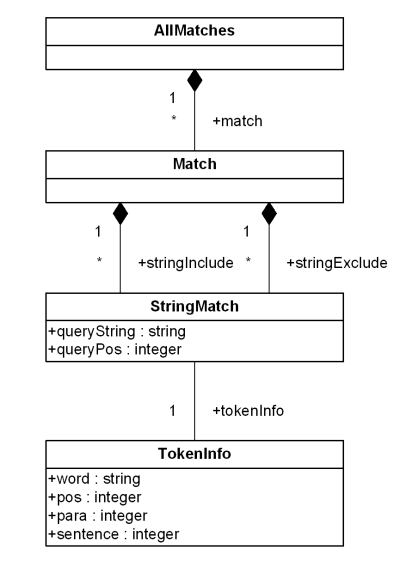
An [Definition: AllMatches] object describes all the posible results an FTSelection. The UML Static Class diagram of AllMatches is shown on the diagram.
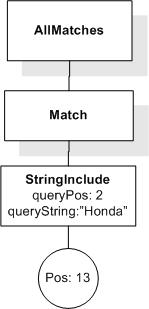
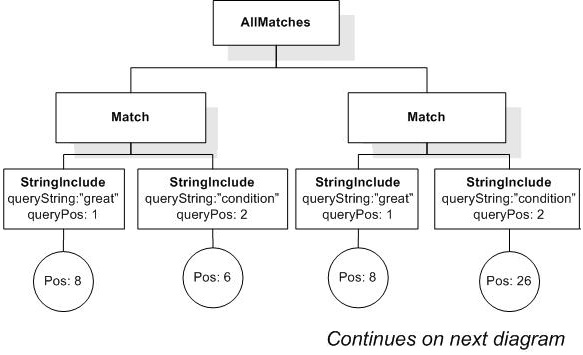
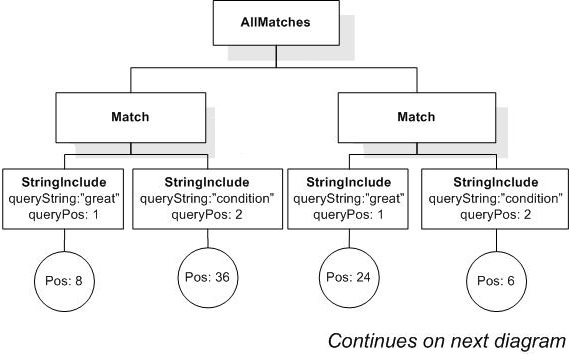
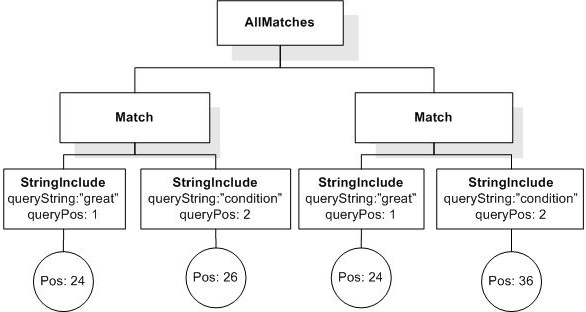
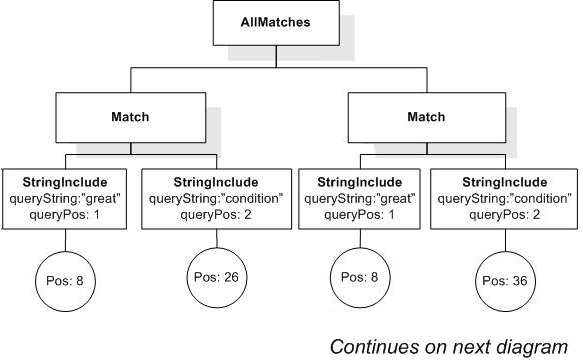
The AllMatches object contains zero or more Matches. Each Match describes one result to the FTSelection. The result is described in terms of zero or more StringIncludes and zero or more StringExcludes, which describe the TokenInfos that must be contained and respectively, those that must not be contained. Both StringInclude and StringExclude are of type StringMatch, which describes a possible match of a query search token with a document word. The queryString attribute of StringMatch contains the query search token that has been matched. The queryPos attribute specifies the position of this search token in the query (this attribute is needed for FTOrders). The TokenInfo associated with the StringMatch describes the word in the document that matches the query search token.
Intuitively, AllMatches specifies the TokenInfos that a node should contain, and the TokenInfos that a node should not contain, in order to satisfy an FTSelection
The AllMatches structure resembles the Disjunctive Normal Form (DNF) in propositional and first-order logic. The AllMatches is a disjunction of Matches. Each Match is a conjunction of positive "atoms", the StringIncludes, and negative "atoms", the StringExcludes.
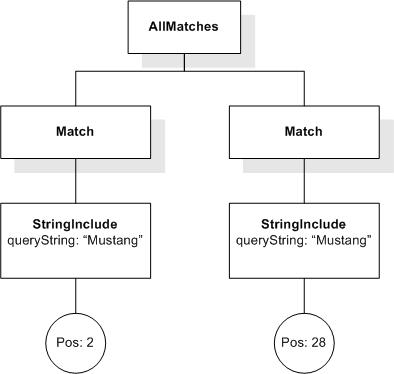
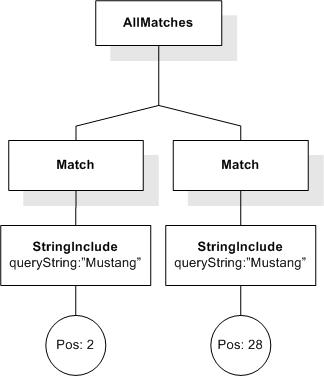
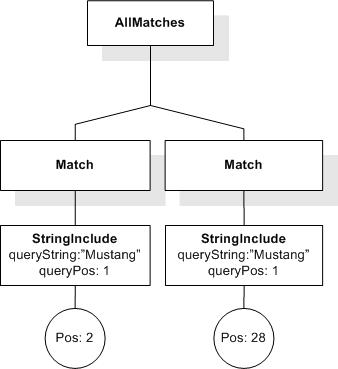
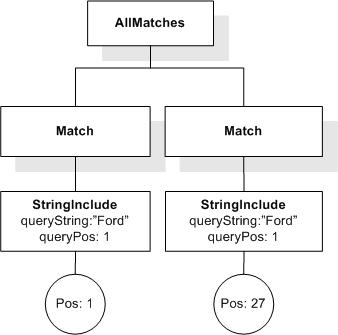
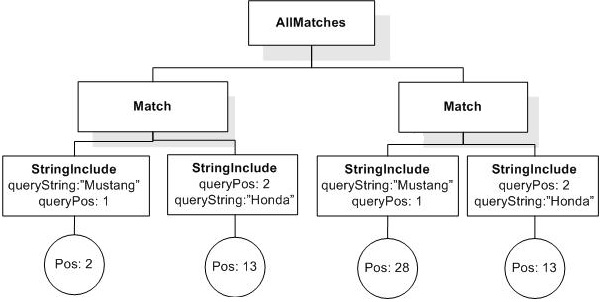
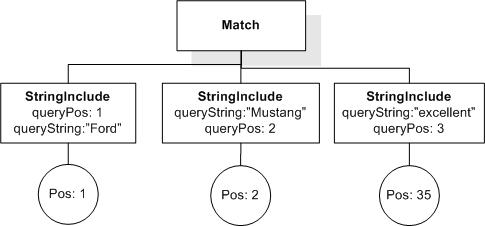
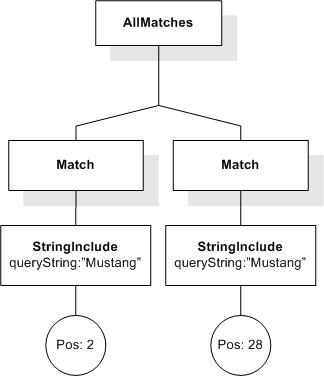
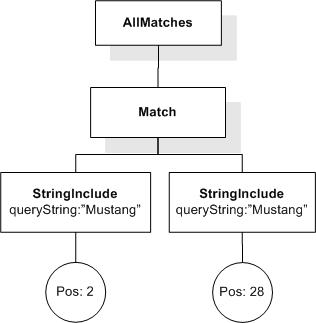
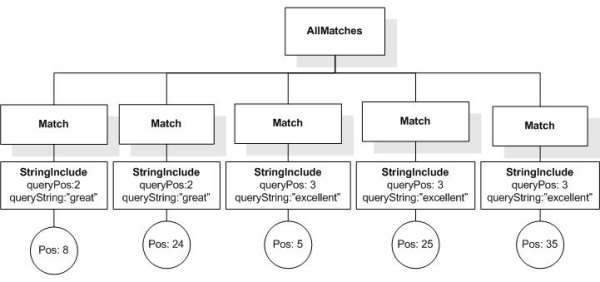
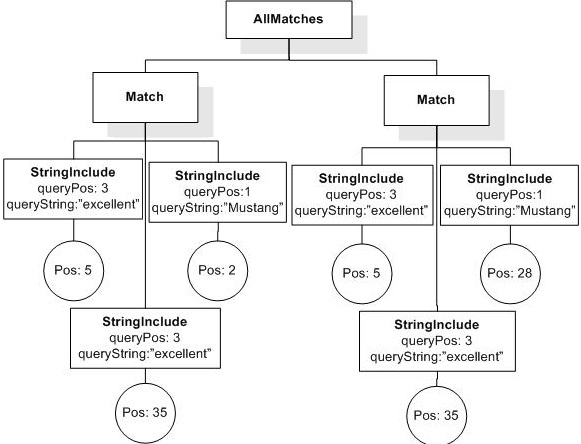
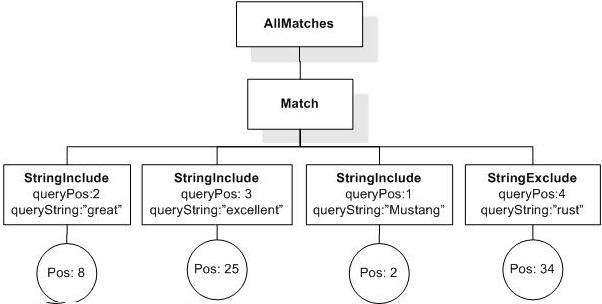
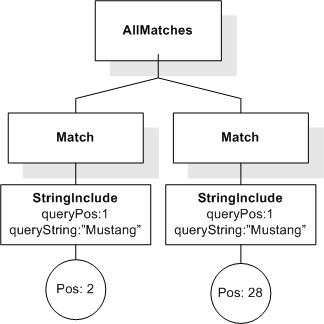
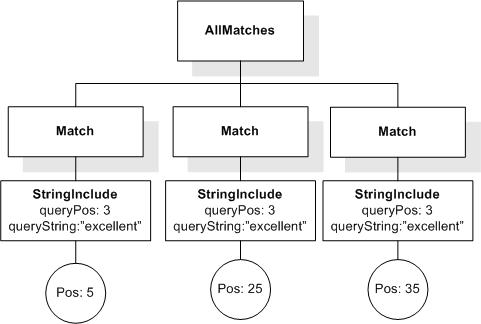
Consider the FTWords "Mustang" evaluated over the sample document fragment in the previous section. The AllMatches corresponding to this FTWords is shown in figure below.
As shown, the AllMatches consists of two Matches. Each Match represents one possible result of the FTWords "Mustang". The result represented by the first Match contains (represented as StringInclude) the word "Mustang" at position 2. The result described by the second Match contains the word "Mustang" at position 28.
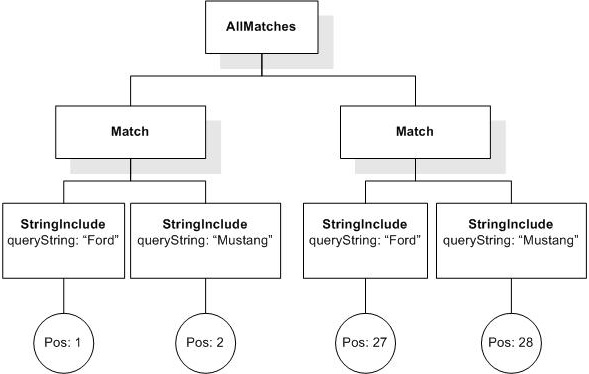
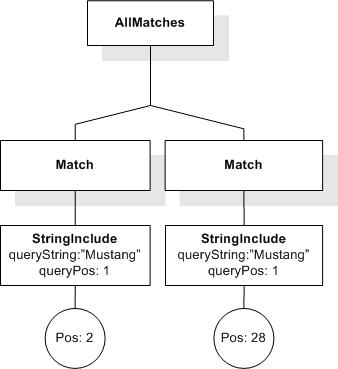
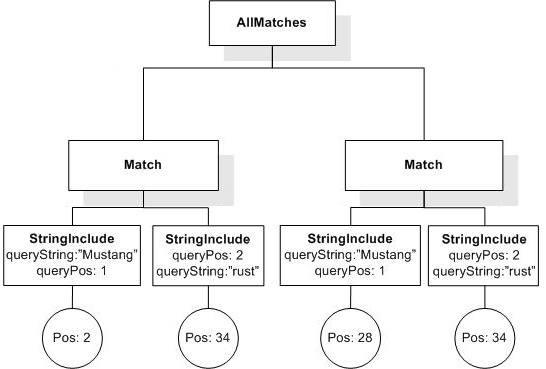
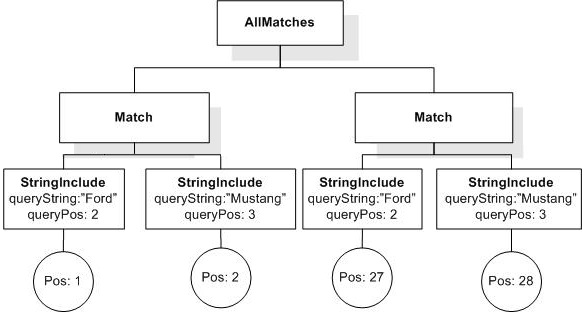
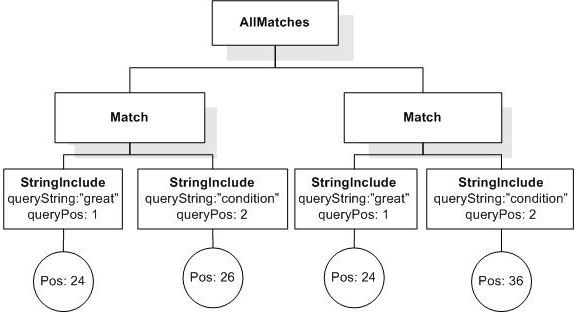
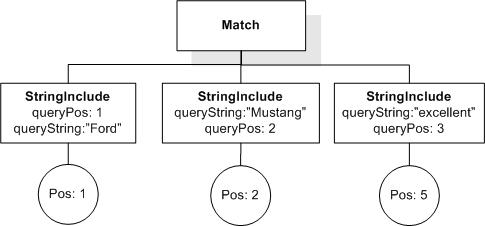
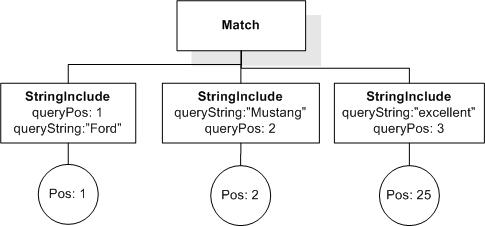
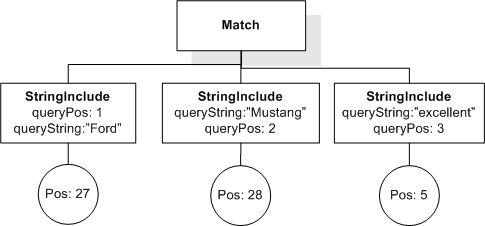
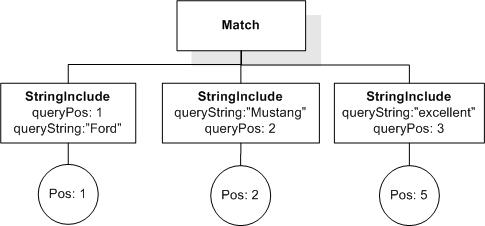
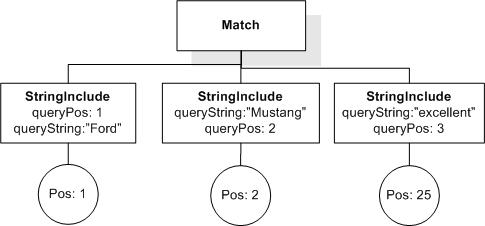
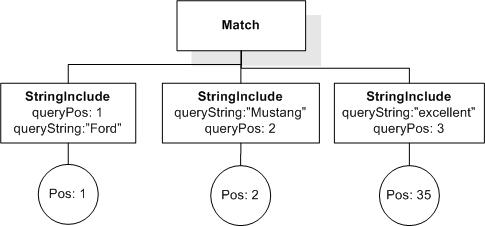
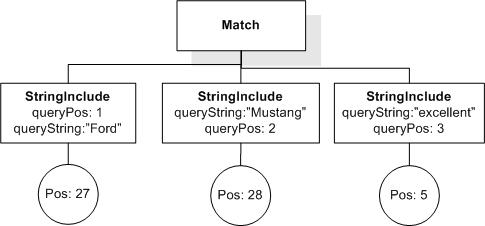
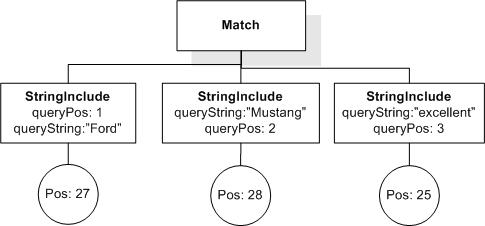
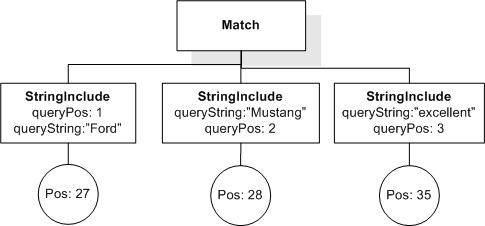
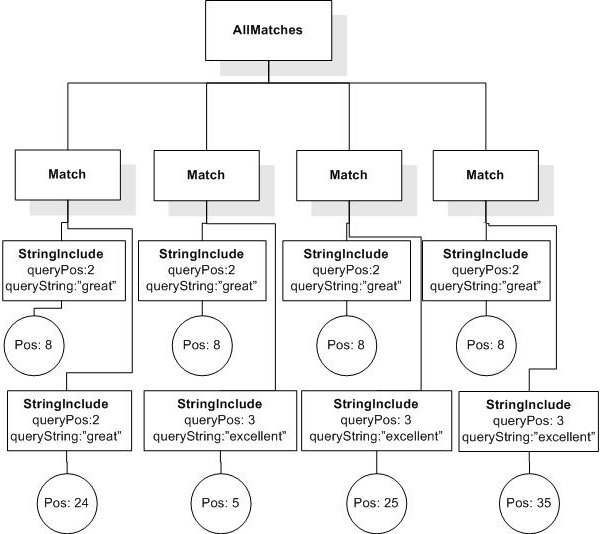
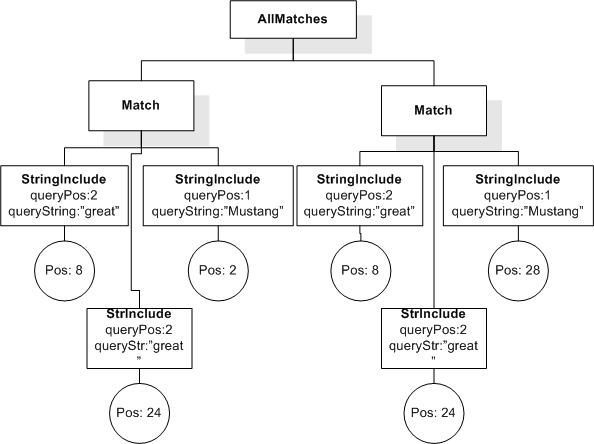
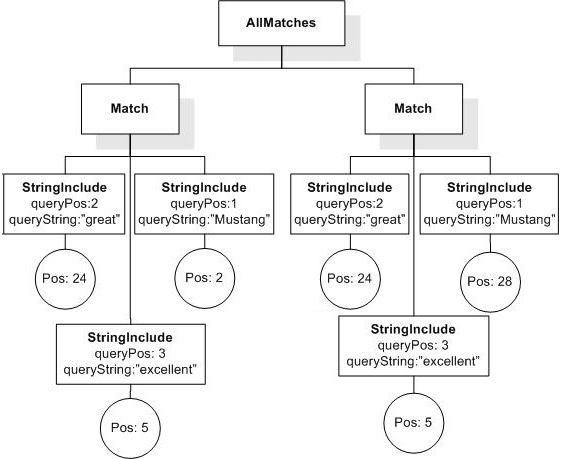
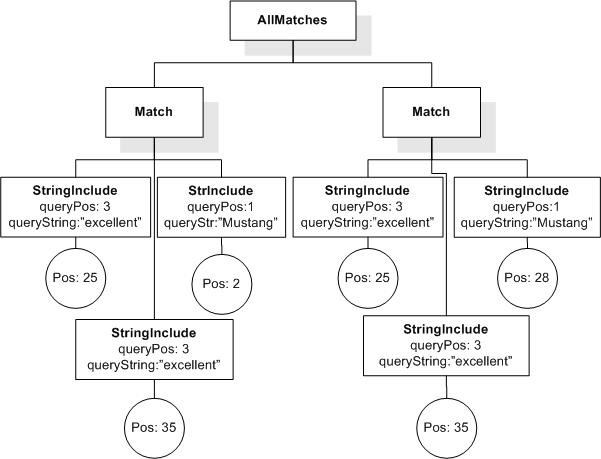
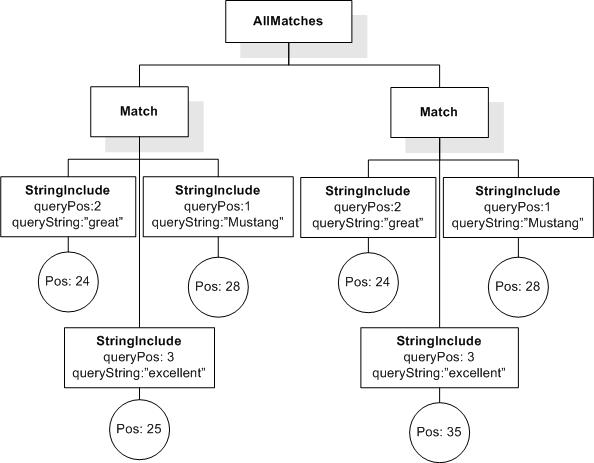
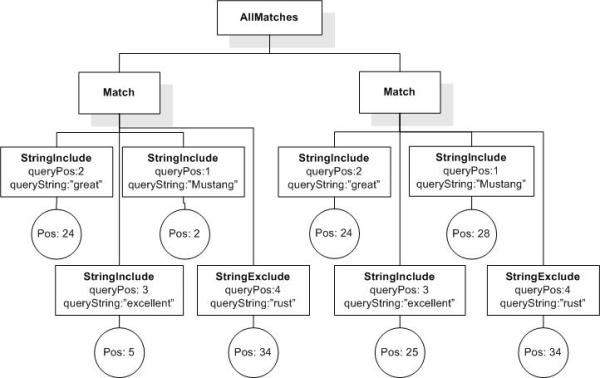
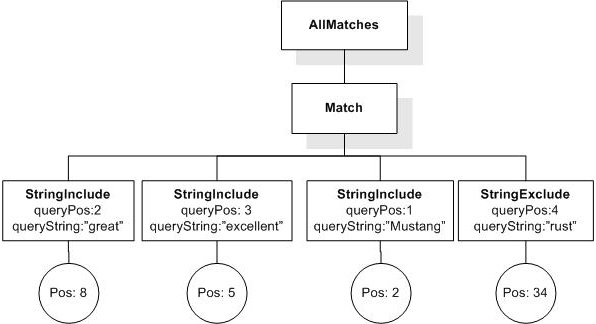
Let us now consider a more complex example. Consider the FTWords "Ford Mustang" evaluated over the XML fragment used above. The AllMatches for this FTWords is shown on the figure below.
There are two possible results of this FTWords, and these are represented by the two Matches. Each of the Matches requires two words to be matched. The result corresponding to the first Match is obtained by matching "Ford" at position 1 and matching "Mustang" at position 2. Similarly, the result described by the second Match is obtained by matching "Ford" at position 27 and "Mustang" at position 28.
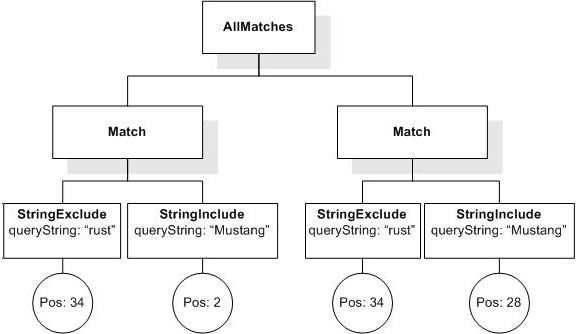
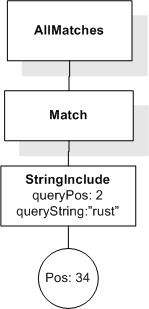
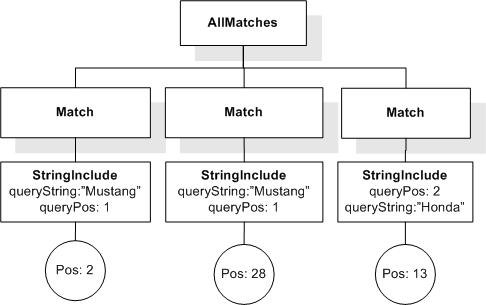
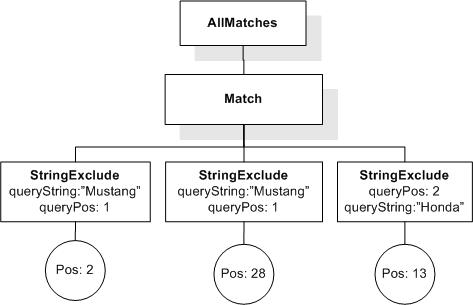
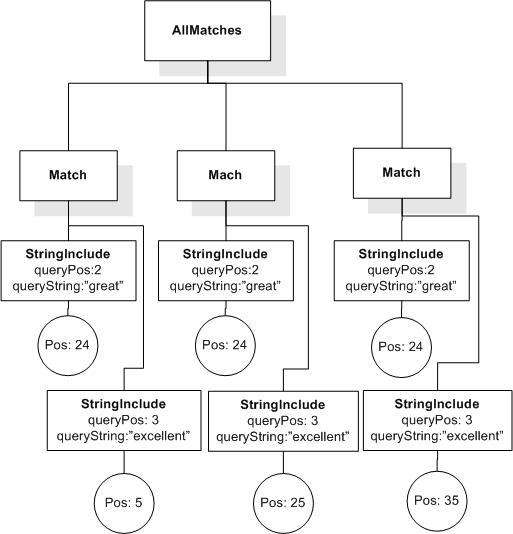
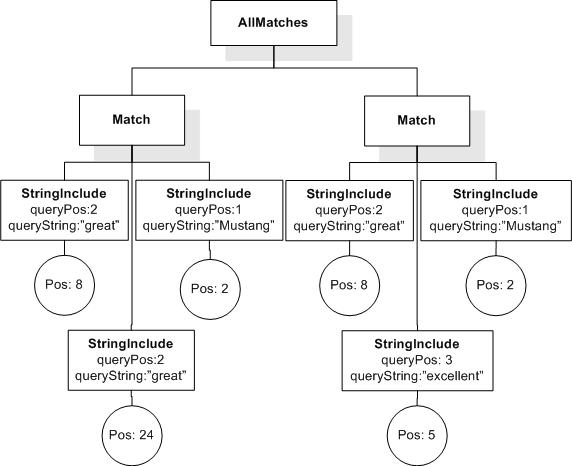
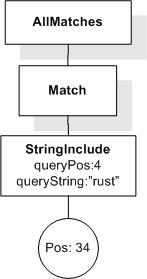
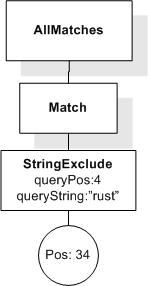
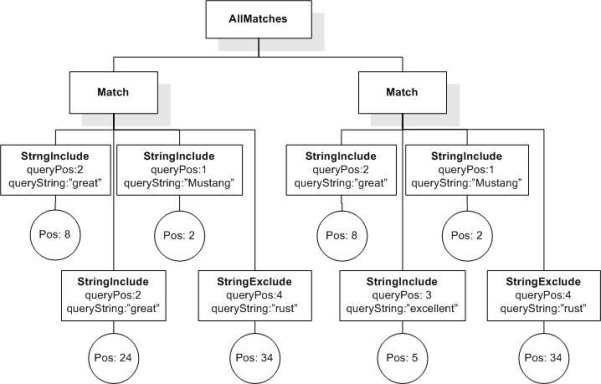
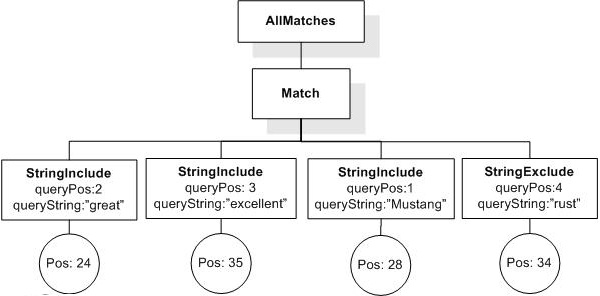
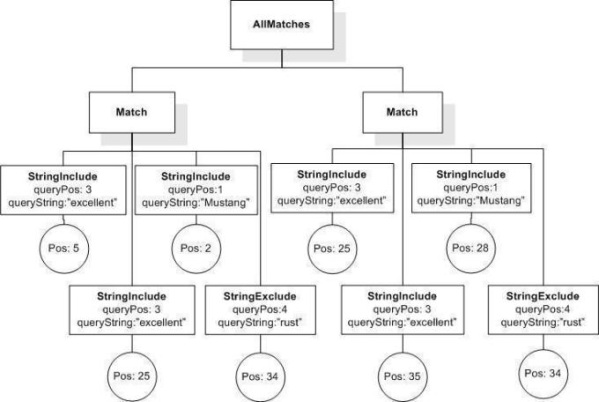
Let us now consider a more sophisticated example of a AllMatches. Consider the FTSelection "Mustang" && ! "rust" that searches for nodes that contain "Mustang" but not "rust". The AllMatches for this FTSelection is shown in the figure below.
Observe the use of StringExclude. This is the component that corresponds to negation. It specifies that the result desribed by the corresponding Match should not match the word at the specified position. For instance, the first Match specifies the solution that "Mustang" should be matched at position 2, and "rust" should not be matched at position 34.
AllMatches has a well-defined hierarchical structure. Therefore, the AllMatches can be easily modeled in XML. In subsequent sections, we will use this XML representation to formally describe the semantics of FTSelections. In particular, we will use the XML representation of AllMatches to formally specify how an FTSelection operates on zero or more AllMatches to produce a resulting AllMatches. We will also use the XML representation to specify the formal semantics of the FTContainsExpr and FTScoreExpr.
The XML schema for representing AllMatches is given below:
<xs:schema
xmlns:xs="http://www.w3.org/2001/XMLSchema"
elementFormDefault="qualified"
attributeFormDefault="unqualified">
<xs:complexType name="AllMatches">
<xs:sequence>
<xs:element name="match"
type="fts:Match"
minOccurs="0"
maxOccurs="unbounded"/>
</xs:sequence>
</xs:complexType>
<xs:complexType name="Match">
<xs:sequence>
<xs:element name="stringInclude"
type="fts:StringMatch"
minOccurs="0"
maxOccurs="unbounded"/>
<xs:element name="stringExclude"
type="fts:StringMatch"
minOccurs="0"
maxOccurs="unbounded"/>
</xs:sequence>
</xs:complexType>
<xs:complexType name="StringMatch">
<xs:sequence>
<xs:element name="tokenInfo" type="fts:TokenInfo"/>
</xs:sequence>
<xs:attribute name="queryString"
type="xs:string"
use="required"/>
<xs:attribute name="queryPos"
type="xs:integer"
use="required"/>
</xs:complexType>
<xs:complexType name="TokenInfo">
<xs:attribute name="word"
type="xs:string"
use="required"/>
<xs:attribute name="pos"
type="xs:integer"
use="required"/>
<xs:attribute name="para"
type="xs:integer"
use="required"/>
<xs:attribute name="sentence"
type="xs:integer"
use="required"/>
</xs:complexType>
</xs:schema>
In this section, we define the semantics of FTSelections. FTSelections are fully composable, and can be arbitrarily nested under other FTSelections. Also, each FTSelection can be associated with match options (such as stemming, stop words, etc.) and score weights. Since score weights are solely interpreted by the formal semantics scoring function, score weights do not influence the semantics of FTSelections in any way. We will thus not consider score weights when defining the formal semantics.
Here, we define the XML representation of the FTSelections as used in the fts:evaluate function. The XML representation closely follows the grammar of the language. It can be viewed as an XML representation of an abstract syntax tree (AST) of a parsed full-text search query. In general, every FTSelection is represented as an XML element. Every nested FTSelection is represented as a nested sub-element in the above XML element. For binary FTSelections (e.g.
FTAnd) the nested FTSelections are represented in <left> and <left> sub-elements. For unary FTSelections, a <selection> sub-element is used. Additional, characteristics of FTSelections (e.g. the distance unit for FTDistance) are stored in attributes.
<xs:schema
elementFormDefault="qualified"
attributeFormDefault="unqualified">
<xs:include schemaLocation="AllMatches.xsd" />
<xs:include schemaLocation="MatchOptions.xsd" />
<xs:complexType name="FTSelection">
<xs:sequence>
<xs:choice>
<xs:element name="FTWords" type="fts:FTWords"/>
<xs:element name="FTAnd" type="fts:FTAnd"/>
<xs:element name="FTOr" type="fts:FTOr"/>
<xs:element name="FTUnaryNot" type="fts:FTUnaryNot"/>
<xs:element name="FTMildNot" type="fts:FTMildNot"/>
<xs:element name="FTOrder" type="fts:FTOrder"/>
<xs:element name="FTScope" type="fts:FTScope"/>
<xs:element name="FTContent" type="fts:FTContent"/>
<xs:element name="FTDistance" type="fts:FTDistance"/>
<xs:element name="FTWindow" type="fts:FTWindow"/>
<xs:element name="FTTimes" type="fts:FTTimes"/>
</xs:choice>
<xs:element name="matchOption"
type="fts:FTMatchOption"
minOccurs="0"/>
<xs:element name="weight"
type="xs:float"
minOccurs="0"/>
</xs:sequence>
</xs:complexType>
<xs:complexType name="FTWords">
<xs:sequence>
<xs:element name="searchToken"
type="fts:TokenInfo"
minOccurs="0"
maxOccurs="unbounded"/>
</xs:sequence>
<xs:attribute name="type"
type="fts:FTWordsType"
use="required"/>
</xs:complexType>
<xs:complexType name="FTAnd">
<xs:sequence>
<xs:element name="left" type="fts:FTSelection"/>
<xs:element name="right" type="fts:FTSelection"/>
</xs:sequence>
</xs:complexType>
<xs:complexType name="FTOr">
<xs:sequence>
<xs:element name="left" type="fts:FTSelection"/>
<xs:element name="right" type="fts:FTSelection"/>
</xs:sequence>
</xs:complexType>
<xs:complexType name="FTUnaryNot">
<xs:sequence>
<xs:element name="selection" type="fts:FTSelection"/>
</xs:sequence>
</xs:complexType>
<xs:complexType name="FTMildNot">
<xs:sequence>
<xs:element name="selection" type="fts:FTSelection"/>
</xs:sequence>
</xs:complexType>
<xs:complexType name="FTOrder">
<xs:sequence>
<xs:element name="selection" type="fts:FTSelection"/>
</xs:sequence>
</xs:complexType>
<xs:complexType name="FTScope">
<xs:sequence>
<xs:element name="selection" type="fts:FTSelection"/>
</xs:sequence>
<xs:attribute name="type"
type="fts:ScopeType"
use="required"/>
<xs:attribute name="scope"
type="fts:ScopeSelector"
use="required"/>
</xs:complexType>
<xs:complexType name="FTContent">
<xs:sequence>
<xs:element name="selection" type="fts:FTSelection"/>
</xs:sequence>
<xs:attribute name="type"
type="fts:ContentMatchType"
use="required"/>
</xs:complexType>
<xs:complexType name="FTDistance">
<xs:sequence>
<xs:element name="range" type="fts:FTRangeSpec"/>
<xs:element name="selection" type="fts:FTSelection"/>
</xs:sequence>
<xs:attribute name="type"
type="fts:DistanceType"
use="required"/>
</xs:complexType>
<xs:complexType name="FTWindow">
<xs:sequence>
<xs:element name="range" type="fts:FTRangeSpec"/>
<xs:element name="selection" type="fts:FTSelection"/>
</xs:sequence>
</xs:complexType>
<xs:complexType name="FTTimes">
<xs:sequence>
<xs:element name="range" type="fts:FTRangeSpec"/>
<xs:element name="selection"
type="fts:FTSelection"/>
</xs:sequence>
</xs:complexType>
<xs:complexType name="FTCaseOption">
<xs:attribute name="value" use="required">
<xs:simpleType>
<xs:restriction base="xs:string">
<xs:enumeration value="lowercase"/>
<xs:enumeration value="uppercase"/>
<xs:enumeration value="case insensitive"/>
<xs:enumeration value="case sensitive"/>
</xs:restriction>
</xs:simpleType>
</xs:attribute>
</xs:complexType>
<xs:complexType name="FTRangeSpec">
<xs:attribute name="type"
type="fts:RangeSpecType"
use="required"/>
<xs:attribute name="m"
type="xs:integer"/>
<xs:attribute name="n"
type="xs:integer"
use="required"/>
</xs:complexType>
<xs:simpleType name="FTWordsType">
<xs:restriction base="xs:string">
<xs:enumeration value="any"/>
<xs:enumeration value="all"/>
<xs:enumeration value="phrase"/>
<xs:enumeration value="any word"/>
<xs:enumeration value="all word"/>
</xs:restriction>
</xs:simpleType>
<xs:simpleType name="ScopeType">
<xs:restriction base="xs:string">
<xs:enumeration value="same"/>
<xs:enumeration value="different"/>
</xs:restriction>
</xs:simpleType>
<xs:simpleType name="ScopeSelector">
<xs:restriction base="xs:string">
<xs:enumeration value="paragraph"/>
<xs:enumeration value="sentence"/>
</xs:restriction>
</xs:simpleType>
<xs:simpleType name="RangeSpecType">
<xs:restriction base="xs:string">
<xs:enumeration value="exactly"/>
<xs:enumeration value="at least"/>
<xs:enumeration value="at most"/>
<xs:enumeration value="from to"/>
</xs:restriction>
</xs:simpleType>
<xs:simpleType name="DistanceType">
<xs:restriction base="xs:string">
<xs:enumeration value="paragraph"/>
<xs:enumeration value="sentence"/>
<xs:enumeration value="word"/>
</xs:restriction>
</xs:simpleType>
<xs:simpleType name="ContentMatchType">
<xs:restriction base="xs:string">
<xs:enumeration value="at start"/>
<xs:enumeration value="at end"/>
<xs:enumeration value="entire content"/>
</xs:restriction>
</xs:simpleType>
</xs:schema>
The XML representation of the match options is discussed in the match options section
evaluate functionWe present denotational semantics for the evaluation of FTSelections. Specifically, we define a function fts:evaluate that takes in three parameters: (1) an FTSelection, (2) a search context node, and (3) the default set of match options that apply to the evaluation of the FTSelection. The fts:evaluate function returns the AllMatches that is the result of evaluating the FTSelection. When fts:evaluate is applied to some
FTSelection X, it calls the function fts:applyX to build the resulting AllMatches. If X is applied on nested FTSelections, the fts:evaluate function is recursively called on these nested FTSelections and the returned AllMatches are used in the evaluation of fts:applyX.
See the section Match Options Semantics for the semantics of the full-text match options.
We first present a high-level description of the fts:evaluate function, and then describe the details.
The fts:evaluate function is given below.
function evaluate($ftSelect as element(*, fts:FTSelection),
$searchContext as node(),
$matchOptions as FTMatchOptions,
$searchTokenNum as xs:integer)
as AllMatches
{
if (fn:count($ftSelect/FTMatchOption) > 0) then
(: First we deal with all match options that the :)
(: FTSelection might bear: we add the match options :)
(: in front of the current match options sequence :)
(: and pass the new sequence to the recursive call :)
let $newFTSelection :=
$ftSelect/*[!(. instance of element(FTMatchOption))]
return fts:evaluate($newFTSelection,
$searchContext,
($ftSelect/matchOption,
$matchOptions),
$searchTokenNum)
else if (fn:count($ftSelect/weight) > 0) then
(: Weight has no bearing on semantics – just :)
(: call "evaluate" on nested FTSelection :)
let $newFTSelection := $ftSelect/*[! (. instance of
element(weight)]
return fts:evaluate($newFTSelection,
$searchContext,
$matchOptions,
$searchTokenNum)
else
typeswitch ($ftSelect)
case ($nftSelection as element(FTWords))
(: Apply the FTWords in the search context :)
return applyFTWords($searchContext,
$matchOptions,
$nftSelection/searchToken,
$searchTokenNum + 1);
case ($nftSelection as element(FTAnd))
return let $left =
fts:evaluate($nftSelection/left,
$searchContext,
$matchOptions,
$searchTokenNum)
let $newSearchTokenNum =
fn:max($left//@queryPos) + 1
let $right =
fts:evaluate($nftSelection/right,
$searchContext,
$matchOptions,
$searchTokenNum)
return applyFTAnd($left, $right)
case ($nftSelection as element(FTOr))
return let $left =
fts:evaluate($nftSelection/left,
$searchContext,
$matchOptions,
$searchTokenNum)
let $newSearchTokenNum =
fn:max($left//@queryPos) + 1
let $right =
fts:evaluate($nftSelection/right,
$searchContext,
$matchOptions,
$searchTokenNum)
return applyFTOr($left, $right)
case ($nftSelection as element(FTUnaryNot))
return applyFTUnaryNot($nftSelection/selection)
case ($ftSelection as element(FTMildNot))
return let $left =
fts:evaluate($nftSelection/left,
$searchContext,
$matchOptions,
$searchTokenNum)
let $newSearchTokenNum =
fn:max($left//@queryPos) + 1
let $right =
fts:evaluate($nftSelection/right,
$searchContext,
$matchOptions,
$searchTokenNum)
return applyFTMildNot($left, $right)
case ($nftSelection as element(FTOrder))
let $nested :=
fts:evaluate($nftSelection/selection,
$searchContext,
$matchOptions,
$searchTokenNum)
return applyFTOrder($nested)
case ($nftSelection as element(FTScope))
let $nested :=
fts:evaluate($nftSelection/selection,
$searchContext,
$matchOptions,
$searchTokenNum)
return applyFTScope($nftSelection/@type,
$nftSelection/@scope,
$nested)
case ($nftSelection as element(FTContent))
let $nested :=
fts:evaluate($nftSelection/selection,
$searchContext,
$matchOptions,
$searchTokenNum)
return applyFTContent($searchContext,
$nftSelection/@type,
$nested)
case ($nftSelection as element(FTDistance))
let $nested :=
fts:evaluate($nftSelection/selection,
$searchContext,
$matchOptions,
$searchTokenNum)
return applyFTDistance($matchOptions,
$nftSelection/@type,
$nftSelection/range,
$nested)
case ($nftSelection as element(FTWindow))
let $nested :=
fts:evaluate($nftSelection/selection,
$searchContext,
$matchOptions,
$searchTokenNum)
return applyFTWindow($matchOptions,
$nftSelection/range,
$nested)
case ($nftSelection as element(FTTimes))
let $nested :=
fts:evaluate($nftSelection/selection,
$searchContext,
$matchOptions,
$searchTokenNum)
return applyFTTimes($nftSelection/range,
$nested)
}
Let us now walk through the above pseudo-code to understand the semantics of the function. For concreteness, let us assume that the FTSelection was invoked inside an ftcontains expression such as searchContext ftcontains ftselection. In order to determine the AllMatches result of ftselection, the fts:evaluate function is invoked as follows: fts:evaluate($ftselection, $searchContext, $matchOptions, 0), where $ftselection
is the XML representation of the ftselection and $searchContext is bound to the result of the evaluation of the XQuery expression searchContext.
Initially, the $searchTokensNum is 0, i.e. currently 0 search tokens have been processed.
The $matchOptions above is the default (implementation-defined) list of match options that apply to the evaluation of ftselection (such as stemming but not thesaurus) and is implementation-defined. Match options embedded in ftselection can change the match options collection as evaluation proceeds. In order to express the order in which match options are applied to an FTSelection, the match options are organized in a stack. The top match option in the stack
is to be applied first, the next match option is to be applied second, and so on. The ordering among match options is necessary because match options are not always commutative. For example, synonym(stem(word)) is not always the same as stem(synonym(word)). Of course, match optionss can be reordered when they commute, but this is an optimization issue and is beyond the scope of this semantics document.
Given the invocation of: fts:evaluate($ftselection, $searchContext, $matchOptions), evaluation proceeds as follows. First, $ftselection is checked to see whether it is a match option applied on a nested FTSelection (case 1), a weight specification (case 2), a FTWords (case 3), or some other FTSelection (case 4). Let us consider these four cases in turn.
Case 1: If $ftselection contains a match option, then it modifies the context for the nested FTSelection. Consequently, a new match option element is created and pushed onto the top of the stack of match options. The createOptionElement function used to create a stack element corresponding to the match option simply creates a data structure that stores the type of match option (such as stemming, thesaurus, synonyms, ignore, etc.) and the details relating to the match
option (such as the name of the thesaurus, the words to ignore, etc.). The context match option created is added to the top of the stack because, in the FTSelection, it was applied before the other match options in the current match options stack. The evaluate function is then invoked on the nested FTSelection with the new match options stack. When the function returns, the match option is popped from the stack, and the result of the nested evaluate function is
returned. The match option is popped because the match options should not apply to FTSelections outside its scope.
Case 2: If $ftselection contains a weight specification, then the specification is simply ignored (because it does not alter semantics). The evaluate function is recursively called on the nested FTSelection and the resulting AllMatches is directly returned.
Case 3: If $ftselection is a FTWords, then it does not have any nested FTSelections. Consequently, this is the base of the recursive call, and the AllMatches result of the FTWords is computed and returned. The AllMatches is computed by invoking the applyFTWords function with the current search context and other necessary information. The semantics of how exactly the corresponding applyFTWords creates AllMatches for
FTWords will be specified in the next section.
Case 4: If $ftselection contains neither a match option nor a weight specification and is not a FTWords, the FTSelection performs some form of full-text operation such as &&, ||, window, etc. Note that these operations are fully-compositional, and can be invoked on nested FTSelections. Consequently, evaluation proceeds as follows. First, the evaluate function is recursively invoked on each nested
FTSelection. The result of evaluating each nested FTSelection is AllMatches. These AllMatches are transformed into a result AllMatches by applying the full- text operation corresponding to FTSelection1 (generically named applyX for some type of FTSelection X in the pseudo-code). As an example, let FTSelection1 be FTSelection2 && FTSelection3 . Here FTSelection2 and FTSelection3
can themselves be arbitrarily nested FTSelections. Thus, evaluate is invoked on FTSelection2 and FTSelection3, and the resulting AllMatches are transformed to the output AllMatches using the applyFTAnd function corresponding to && .
Note that specifying the semantics of the applyFTSelection function for each FTSelection is key to specifying the semantics of the FTSelection itself. In the subsequent sections, we define the semantics of the applyX function for each FTSelection kind X.
The formal semantics of the ApplyX functions for each FTSelection kind X is specified in terms of four functions. How these four functions are computed is implementation-defined, but the functions have to satisfy some well-defined properties. We first present the properties of the formal semantics functions, and then present the semantics of the family of functions applyX in terms of these functions.
The first function, getTokenInfo has been described in tokenization section.
The wordDistance returns the number of words that occur between the positions of the TokenInfos $tokenInfo1 and $tokenInfo2. For example, two consecutive words have a distance of 0.
function fts:wordDistance(
$tokenInfo1 as fts:TokenInfo,
$tokenInfo2 as fts:TokenInfo,
$matchOptions as fts:FTMatchOptions)
as xs:integer
Similarly, the function getParaDistancereturns the number of paragraphs that occur between the TokenInfos $tokenInfo1 and $tokenInfo2 .
function fts:paraDistance(
$tokenInfo1 as fts:TokenInfo,
$tokenInfo2 as fts:TokenInfo,
$matchOptions as fts:FTMatchOptions)
as xs:integer
The function sentenceDistance returns the number of sentences that occur between the TokenInfos $tokenInfo1 and $tokenInfo2 .
function fts:sentenceDistance(
$tokenInfo1 as fts:TokenInfo,
$tokenInfo2 as fts:TokenInfo,
$matchOptions as fts:FTMatchOptions)
as xs:integer
The function isStartToken checks if the TokenInfo $tokenInfo describes the first token of the node $searchContext .
function fts:isStartToken(
$searchContext as node(),
$tokenInfo as fts:TokenInfo)
as xs:boolean
The function isEndToken checks if the TokenInfo $tokenInfo describes the last token of the node $searchContext .
function fts:isEndToken(
$searchContext as node(),
$tokenInfo as fts:TokenInfo)
as xs:boolean
We first consider the case where FTWords consists of a single search string. The parameters of the applySingleSearchToken function are the search context, the list of match options, the search TokenInfo, and the position where the latter occurs in the query.
In general for all cases of FTWords, if the after the application of all FTMatchOptions , the sequence of search tokens is empty, an empty AllMatches is returned.
declare function fts:applySingleSearchToken(
$searchContext as node(),
$matchOptions as fts:FTMatchOptions,
$searchToken as fts:TokenInfo,
$queryPos as xs:integer)
as element(allMatches, fts:AllMatches)
{
<allMatches>
{
let $token_pos := fts:getTokenInfo($s