
Synchronized Multimedia Integration Language (SMIL
2.1)
W3C Working Draft 01 February 2005
- This version:
- http://www.w3.org/TR/2005/WD-SMIL2-20050201/
- Latest SMIL 2 version:
- http://www.w3.org/TR/SMIL2/
- Latest SMIL Recommendation:
- http://www.w3.org/TR/SMIL/
- Editors:
- Dick Bulterman, CWI - Guido Grassel, Nokia - Jack Jansen, CWI - Antti
Koivisto, Nokia - Nabil Layaïda, INRIA - Thierry Michel, W3C - Sjoerd
Mullender, CWI - Daniel Zucker, Access Co., Ltd.
This document is also available in these non-normative formats: single HTML file, zip archive.
Copyright
©2005 W3C® (MIT, ERCIM,
Keio), All Rights Reserved. W3C liability,
trademark
and document
use rules apply.
This document specifies the second version of the Synchronized Multimedia
Integration Language (SMIL, pronounced "smile"). SMIL 2.1 has the following
design goals:
- Define an XML-based language that allows authors to write interactive
multimedia presentations. Using SMIL, an author can describe the temporal
behaviour of a multimedia presentation, associate hyperlinks with media
objects and describe the layout of the presentation on a screen.
- Allow reusing of SMIL syntax and semantics in other XML-based
languages, in particular those who need to represent timing and
synchronization. For example, SMIL components are used for integrating
timing into XHTML [XHTML10] and into SVG
[SVG].
- Extend the functionalities contained in the SMIL 2.0 [SMIL20] into
new or revised SMIL 2.1 modules.
- Define new SMIL 2.1 Mobile Profiles incorporating features useful
within the mobile industry.
This section describes the status of this document at the time of its
publication. Other documents may supersede this document. A list of current
W3C publications and the latest revision of this technical report can be
found in the W3C technical reports index
at http://www.w3.org/TR/.
This is a W3C Last Call Working Draft of the Synchronized Multimedia
Integration Language (SMIL) 2.1.
If the feedback is positive, the SYMM Working Group
[members only] plans to submit this specification for consideration
as a W3C Candidate Recommendation.
Please send comments on this specification to the public mailing list www-smil@w3.org, including the
prefix'[SMIL21 LC comment]' in the subject line, no later than
25 February 2005.
This document has been produced by the SYMM Working Group as part of
the W3C Synchronized Multimedia
Activity, following the procedures set out for the W3C Process. The goals of the
SYMM Working Group are discussed in the SYMM
Working Group Charter.
In line with its charter the SYMM WG has organized this specification as a
collection of changes-only documents.
Patent disclosures relevant to this specification may be found on the SYMM
Working Group's patent disclosure page. An individual who has actual
knowledge of a patent which the individual believes contains Essential
Claim(s) with respect to this specification should disclose the information
in accordance with section
6 of the W3C Patent Policy.
The authors of this document are the SYMM Working Group members. Different
parts of the document have different editors.
Publication as a Working Draft does not imply endorsement by the W3C
Membership. This is a draft document and may be updated, replaced or
obsoleted by other documents at any time. It is inappropriate to cite this
document as other than work in progress.
- Editor
- Thierry Michel, W3C.
This document specifies the extended 2.1 version of the Synchronized
Multimedia Integration Language (SMIL, pronounced "smile"). SMIL 2.1 has
the following design goals:
- Define an XML-based language that allows authors to write interactive
multimedia presentations. Using SMIL 2.1, an author can describe the
temporal behavior of a multimedia presentation, associate hyperlinks with
media objects and describe the layout of the presentation on a
screen.
- Allow reusing of SMIL 2.1 syntax and semantics in other XML-based
languages, in particular those who need to represent timing and
synchronization. For example, SMIL 2.1 components are used for
integrating timing into XHTML [XHTML10] and into SVG [SVG].
- Extend the functionalities contained in the SMIL 2.0 [[SMIL 2.0]] into
new or revised SMIL 2.1 modules.
- Define new SMIL 2.1 Mobile Profiles incorporating features useful
within the mobile industry.
SMIL 2.1 is defined as a set of markup modules, which define the semantics
and an XML syntax for certain areas of SMIL functionality.
This specification is structured as a set of sections, each defining one
or more modules:
- Section 2 is an overview of SMIL 2.1
modularization and the individual modules, and presents conformance
criteria.
- Section 3 defines the SMIL 2.1 Animation
Modules.
- Section 4 defines the SMIL 2.1 Content
Control Modules.
- Section 5 defines the SMIL 2.1 Layout Modules
Updates.
- Section 6 defines the SMIL 2.1
Linking Modules.
- Section 7 defines the SMIL 2.1
Media Object Modules Updates.
- Section 8 defines the SMIL 2.1
Metainformation Module.
- Section 9 defines the SMIL 2.1 Structure
Module.
- Section 10 defines the SMIL 2.1 Timing
and Synchronization Modules Updates.
- Section 11 defines the SMIL 2.1 Time
Manipulations Module.
- Section 12 defines the SMIL 2.1
Transition effects Modules Updates.
This specification also defines four Profiles that are built using the
above SMIL 2.1 modules.
- Section 13 defines the SMIL 2.1
Language Profile.
- Section 14 defines the SMIL
2.1 Mobile Profile.
- Section 15 defines
the SMIL 2.1 Extented Mobile Profile.
- Section 16 defines the SMIL 2.1
Basic Profile and Scalability Framework.
SMIL 2.1 is a new version. It is build on top of SMIL 2.0.
A large number of SMIL 2.0 Modules [SMIL20-modules] remain the same in
SMIL2.1.
SMIL 2.1 deprecates only a small number of SMIL 2.0 Modules.
SMIL 2.1 introduces new SMIL 2.1 Modules with extented functionalities.
SMIL 2.1 also defines new profiles that are built using the SMIL 2.0
modules [[SMIL 2.0]] and SMIL 2.1 modules specified in this specification.
If this specification is approved as a W3C Recommendation, it will
supersede the 07 January 2005 version of the SMIL 2.0 Recommendation (Second
Edition) [SMIL20].
Note: SMIL document players, those applications that support playback of
"application/smil" documents, and host language conformant document profiles
must support the deprecated SMIL 2.0 functionalities as well as the new SMIL
2.1 functionalities.
1- The following sections remain unchanged from SMIL 2.0 [SMIL20].
The modules, elements and attributes semantics in the following sections
remain the same as in SMIL2.0.
Therefore each of these sections link to the equivalent section of the SMIL
2.0 Recommendation [SMIL20].
2- The following sections are updated from SMIL 2.0.
In these sections, only the updated or new modules, the new and updated
elements or attributes semantics are specified. The following two profiles
have also been updated:
3- The following sections introduce new Mobile Profiles.
This document has been prepared by the Synchronized Multimedia Working
Group (SYMM-WG) of the World Wide Web Consortium.
The SYMM WG which specified SMIL 2.1 included the following individuals:
- Dick Bulterman, CW - Marisa DeMeglio, DAISY Consortium - Yoshihisa
Gonno, Sony Corporation - Guido Grassel, Nokia - Markku Hakkinen, DAISY
Consortium - Erik Hodge, RealNetworks - Eric Hyche, RealNetworks - Jack
Jansen, CWI - Hiroshi Kawamura, NRCD - Antti Koivisto, Nokia - Nabil
Layaïda, INRIA - Vincent Mahe, France Telecom - Thierry Michel, W3C -
Sjoerd Mullender, CWI - Xabiel García Pañeda, Universidad de Oviedo -
Andrei Popescu, Nokia - Masaru Sugano, KDDI Corporation - Daniel
Zucker, Access Co., Ltd.
The former SYMM WG which specified SMIL 2.0 included the following
individuals:
- Hanan Rosenthal, Canon - Jin Yu, Compaq - Pietro Marchisio, CSELT -
Lynda Hardman, CWI - Jacco van Ossenbruggen, CWI - Lloyd Rutledge, CWI
- Olivier Avaro, France Telecom - Ted Wugofski, Gateway (Invited
Expert) - Masayuki Hiyama, Glocomm - Keisuke Kamimura, Glocomm -
Michelle Y. Kim, IBM - Steve Wood, IBM - Jeff Boston, IBM - Nabil
Layaïda, INRIA - Muriel Jourdan, INRIA - Aaron Cohen, Intel - Wayne
Carr, Intel - Marcel Wong, Ericsson - Ken Day, Macromedia - Daniel
Weber, Panasonic - Patrick Schmitz, Microsoft - Debbie Newman,
Microsoft - Pablo Fernicola, Microsoft - Aaron Patterson, Microsoft -
Kevin Gallo, Microsoft - Paul David, Microsoft - Don Cone, Netscape/AOL
- Wo Chang, NIST - Didier Chanut, Nokia - Antti Koivisto, Nokia -
Roberto Castagno, Nokia - Jack Jansen, Oratrix - Sjoerd Mullender,
Oratrix - Dick Bulterman, Oratrix - Kenichi Kubota, Panasonic - Warner
ten Kate, Philips - Ramon Clout, Philips - Jeff Ayars, RealNetworks -
Erik Hodge, RealNetworks - Rob Lanphier, RealNetworks - Bridie
Saccocio, RealNetworks - Eric Hyche, RealNetworks - Robin Haglund,
RealNetworks - Geoff Freed, WGBH - Philipp Hoschka, W3C - Philippe Le
Hégaret, W3C - Thierry Michel, W3C.
- Editor:
- Thierry MICHEL, W3C.
This section is informative.
Since the publication of SMIL 1.0 [SMIL10], interest in the integration of SMIL
concepts with the HTML, the HyperText Markup Language [HTML4], and other XML languages, has grown.
Likewise, the W3C HTML Working Group has specified XHTML, the Extensible
HyperText Markup Language [XHTML10], in
preparation to subset, extend, and integrate it with other languages. The
strategy considered for integrating respective functionality with other
XML-based languages is based on the concepts of modularization and
profiling [SMIL-MOD], [XMOD].
Modularization is an approach in which markup functionality is
specified as a set of modules that contain semantically-related XML elements,
attributes, and attribute values. Profiling is the creation of an
XML-based language through combining these modules, in order to provide the
functionality required by a particular application.
Profiling introduces the ability to tailor an XML-based language to
specific needs, e.g. to optimize presentation and interaction for the
client's capabilities. Profiling also adds the ability for integrating
functionality from other markup languages, releasing the language designer
from specifying that functionality. Moreover, it provides for consistency in
markup through the use of the same model to incorporate a function. Identical
constructs ease authoring, while at the user agent side there is a potential
for re-use of code. For example, a scheduler supporting SMIL timing and
synchronization functionality could be used for SMIL documents, XHTML+SMIL
documents, and SVG documents.
Modularization enables language designers to specify dedicated markup
intended for integration with other, existing, language profiles. Examples of
specifications intended for such integration are MathML and XForms [MathML], [XFORMS].
Modularization and profiling use the extensibility properties of XML, and
related technology like XML namespaces and XML Schema [XML10], [XML-NS],
[XSCHEMA].
This part of the SMIL 2.1 specification describes the framework on
which SMIL modularization and profiling is based, and specifies the
SMIL 2.1 Modules, their identifiers, and the requirements for
conformance within this framework.
This section is informative.
This section is unchanged from SMIL Modules section [SMIL20-modules].
SMIL 2.1 reuses the modularization approach as used in SMIL.
Also refer to SMIL Modules section [SMIL20-modules] for host language
conformance, integration set
conformance and modules notions.
This section is informative.
SMIL 2.1 specification provides three classes of changes to the SMIL
Recommendation, among the ten functional areas;
- New Modules are introduced (e.g. BackgroundTilingLayout,
FullScreenTransitionEffects)
- Former SMIL Modules are deprecated and replaced by new ones to allow
differentiated features to be implemented in profiles without necessarily
requiring support for all of the functionality of the former SMIL module.
(This is the case for the HierarchicalLayout module and
ExclTimeContainers module).
- Former SMIL Modules are revised allowing extented functionalities
(example are AudioLayout, MultiWindowLayout)
The following functional areas are affected by SMIL2.1.
Timing
Layout
Media Object
- MediaParam
module is revised with added functionalities.
Transitions
This section is normative.
SMIL functionality is partitioned into ten functional areas. Within each
functional area a further partitioning is applied into modules. All of these modules, and only
these modules, are associated with the SMIL namespace.
The functional areas and their corresponding modules are:
Note: Modules marked with (**) are new Modules added in SMIL2.1. Modules
marked with (*) are revised modules from SMIL
- Timing
- AccessKeyTiming
- BasicInlineTiming
- BasicTimeContainers
- BasicExclTimeContainers
(**)
- BasicPriorityClassContainers
(**)
- EventTiming
- FillDefault
- MediaMarkerTiming
- MinMaxTiming
- MultiArcTiming
- RepeatTiming
- RepeatValueTiming
- RestartDefault
- RestartTiming
- SyncbaseTiming
- SyncBehavior
- SyncBehaviorDefault
- SyncMaster
- TimeContainerAttributes
- WallclockTiming
- Time Manipulations
- TimeManipulations
- Animation
- BasicAnimation
- SplineAnimation
- Content Control
- BasicContentControl
- CustomTestAttributes
- PrefetchControl
- SkipContentControl
- Layout
- AlignmentLayout
(**)
- AudioLayout
- BackgroundTilingLayout
(**)
- BasicLayout
(*)
- MultiWindowLayout
(*)
- OverrideLayout
(**)
- SubRegionLayout
(**)
- Linking
- BasicLinking
- LinkingAttributes
- ObjectLinking
- Media Objects
- BasicMedia
- BrushMedia
- MediaAccessibility
- MediaClipping
- MediaClipMarkers
- MediaDescription
- MediaParam
(*)
- Metainformation
- Metainformation
- Structure
- Structure
- Transitions
- BasicTransitions
(*)
- InlineTransitions
- TransitionModifiers
- FullScreenTransitionEffects
(**)
This section is informative.
Each of these modules introduces a set of semantically-related elements,
properties, and attributes. Each functional area has a corresponding section
in this specification document. Further details on each of the modules is
specified within those sections.
The modules may be independent or complementary. For example, the
SyncMaster module requires and builds upon the SyncBehavior module, but the
PrefetchControl and SkipContentControl modules are independent from each
other. In addition, some modules require modules from other functional
areas.
Modules specify their integration requirements. When one module requires
another module for basic features and as a prerequisite for integration, a
language profile must include the second module in order to include the
first. The first module is said to be a dependent of the second
module. Dependency may be nested, in that a module may be dependent on a
module that is a dependent itself.
Table 1 presents the SMIL 2.1 modules and the modules they
depend on.
Table 1: The SMIL 2.1 Modules and their Dependencies.
| Module |
Dependencies |
| AccessKeyTiming |
NONE |
| AlignmentLayout |
BasicLayout |
| AudioLayout |
BasicLayout |
| BackgroundTilingLayout |
BasicLayout |
| BasicAnimation |
BasicInlineTiming |
| BasicContentControl |
NONE |
| BasicInlineTiming |
NONE |
| BasicExclTimeContainers |
NONE |
| BasicLayout |
NONE |
| BasicLinking |
NONE |
| BasicMedia |
NONE |
| BasicPriorityClassContainers |
BasicExclTimeContiners |
| BasicTimeContainers |
NONE |
| BasicTransitions |
NONE |
| BrushMedia |
NONE |
| CustomTestAttributes |
BasicContentControl |
| EventTiming |
NONE |
| ExclTimeContainers |
former SMIL module REMOVED in SMIL2.1 |
| FillDefault |
BasicTimeContainers, and/or BasicExclTimeContainers,
BasicPriorityClassContainers,
and/or TimeContainerAttributes
|
| FullScreenTransitionEffects |
BasicTransitions |
| HierarchicalLayout |
former SMIL module REMOVED in SMIL2.1 |
| InlineTransitions |
NONE |
| LinkingAttributes |
NONE |
| MediaAccessibility |
MediaDescription |
| MediaClipMarkers |
MediaClipping |
| MediaClipping |
BasicMedia |
| MediaDescription |
NONE |
| MediaMarkerTiming |
NONE |
| MediaParam |
BasicMedia |
| MetaInformation |
NONE |
| MinMaxTiming |
NONE |
| MultiArcTiming |
AccessKeyTiming, and/or BasicInlineTiming, and/or EventTiming,
and/or
MediaMarkerTiming, and/or RepeatValueTiming, and/or
SyncbaseTiming, and/or WallclockTiming |
| MultiWindowLayout |
BasicLayout |
| ObjectLinking |
BasicLinking |
| OverrideLayout |
BasicLayout |
| PrefetchControl |
NONE |
| RepeatTiming |
NONE |
| RepeatValueTiming |
NONE |
| RestartDefault |
RestartTiming |
| RestartTiming |
NONE |
| SkipContentControl |
NONE |
| SplineAnimation |
BasicAnimation |
| Structure |
BasicContentControl, and BasicInlineTiming, and BasicLayout, and
BasicLinking, and BasicMedia, and BasicTimeContainers, and
SkipContentControl, and SyncbaseTiming |
| SubRegionLayout |
BasicLayout |
| SyncbaseTiming |
NONE |
| SyncBehavior |
BasicTimeContainers, and/or
BasicExclTimeContainers, BasicPriorityClassContainers, and/or
TimeContainerAttributes |
| SyncBehaviorDefault |
SyncBehavior |
| SyncMaster |
SyncBehavior |
| TimeContainerAttributes |
NONE |
| TimeManipulations |
NONE |
| TransitionModifiers |
BasicTransitions, and/or InlineTransitions |
| WallclockTiming |
NONE |
This section is informative.
This section is unchanged from SMIL Recommendation [SMIL20-modules]
This section is informative.
This section specifies the identifiers for the SMIL 2.1 namespace and
the SMIL 2.1 modules. Each SMIL host language conformant language
profile is requested to explicitly state the namespace URI that is to be used
to identify it. That namespace URI must comply with the "Requirements on Identifiers for
SMIL Host Language Conformant Language Profiles", defined below.
This section is normative.
Documents authored in language profiles that include the SMIL Structure
module can be associated with the "application/smil" mime type. Documents
using the "application/smil" mime type are required to be host
language conformant.
This section is normative.
The XML namespace identifier for the complete set of SMIL 2.1
modules, elements and attributes, are contained within the following
namespace:
http://www.w3.org/2005/SMIL21/WD/
This section is normative.
Each module in this specification has a unique identifier associated with
it. They are intended to uniquely and consistently identify each of them.
They should be used as values in a test for whether an implementation
includes a specific module, as well as in other circumstances where a need to
refer to a specific SMIL 2.1 module is necessary.
Table 2 summarizes the identifiers for SMIL 2.1 modules.
Table 2: The SMIL 2.1 Module Identifiers.
| Module name |
Identifier |
| AccessKeyTiming |
http://www.w3.org/2005/SMIL21/WD/AccessKeyTiming |
| AudioLayout |
http://www.w3.org/2005/SMIL21/WD/AudioLayout |
| BackgroundTilingLayout |
http://www.w3.org/2005/SMIL21/WD/BackgroundTilingLayout |
| AlignmentLayout |
http://www.w3.org/2005/SMIL21/WD/AlignmentLayout |
| BasicAnimation |
http://www.w3.org/2005/SMIL21/WD/BasicAnimation |
| BasicContentControl |
http://www.w3.org/2005/SMIL21/WD/BasicContentControl |
| BasicInlineTiming |
http://www.w3.org/2005/SMIL21/WD/BasicInlineTiming |
| BasicExclTimeContainers |
http://www.w3.org/2005/SMIL21/WD/BasicExclTimeContainers |
| BasicLayout |
http://www.w3.org/2005/SMIL21/WD/BasicLayout |
| BasicLinking |
http://www.w3.org/2005/SMIL21/WD/BasicLinking |
| BasicMedia |
http://www.w3.org/2005/SMIL21/WD/BasicMedia |
| BasicPriorityClassContainers |
http://www.w3.org/2005/SMIL21/WD/BasicPriorityClassContainers |
| BasicTimeContainers |
http://www.w3.org/2005/SMIL21/WD/BasicTimeContainers |
| BasicTransitions |
http://www.w3.org/2005/SMIL21/WD/BasicTransitions |
| BrushMedia |
http://www.w3.org/2005/SMIL21/WD/BrushMedia |
| CustomTestAttributes |
http://www.w3.org/2005/SMIL21/WD/CustomTestAttributes |
| EventTiming |
http://www.w3.org/2005/SMIL21/WD/EventTiming |
ExclTimeContainers |
former SMIL module removed in SMIL21 |
| FillDefault |
http://www.w3.org/2005/SMIL21/WD/FillDefault |
| FullScreenTransitionEffects |
http://www.w3.org/2005/SMIL21/WD/FullScreenTransitionEffects |
HierarchicalLayout |
former SMIL module removed in SMIL21 |
| InlineTransitions |
http://www.w3.org/2005/SMIL21/WD/InlineTransitions |
| LinkingAttributes |
http://www.w3.org/2005/SMIL21/WD/LinkingAttributes |
| MediaAccessibility |
http://www.w3.org/2005/SMIL21/WD/MediaAccessibility |
| MediaClipMarkers |
http://www.w3.org/2005/SMIL21/WD/MediaClipMarkers |
| MediaClipping |
http://www.w3.org/2005/SMIL21/WD/MediaClipping |
| MediaDescription |
http://www.w3.org/2005/SMIL21/WD/MediaDescription |
| MediaMarkerTiming |
http://www.w3.org/2005/SMIL21/WD/MediaMarkerTiming |
| MediaParam |
http://www.w3.org/2005/SMIL21/WD/MediaParam |
| Metainformation |
http://www.w3.org/2005/SMIL21/WD/Metainformation |
| MinMaxTiming |
http://www.w3.org/2005/SMIL21/WD/MinMaxTiming |
| MultiArcTiming |
http://www.w3.org/2005/SMIL21/WD/MultiArcTiming |
| MultiWindowLayout |
http://www.w3.org/2005/SMIL21/WD/MultiWindowLayout |
| ObjectLinking |
http://www.w3.org/2005/SMIL21/WD/ObjectLinking |
| OverrideLayout |
http://www.w3.org/2005/SMIL21/WD/OverrideLayout |
| PrefetchControl |
http://www.w3.org/2005/SMIL21/WD/PrefetchControl |
| RepeatTiming |
http://www.w3.org/2005/SMIL21/WD/RepeatTiming |
| RepeatValueTiming |
http://www.w3.org/2005/SMIL21/WD/RepeatValueTiming |
| RestartDefault |
http://www.w3.org/2005/SMIL21/WD/RestartDefault |
| RestartTiming |
http://www.w3.org/2005/SMIL21/WD/RestartTiming |
| SkipContentControl |
http://www.w3.org/2005/SMIL21/WD/SkipContentControl |
| SplineAnimation |
http://www.w3.org/2005/SMIL21/WD/SplineAnimation |
| Structure |
http://www.w3.org/2005/SMIL21/WD/Structure |
| SubRegionLayout |
http://www.w3.org/2005/SMIL21/WD/SubRegionLayout |
| SyncbaseTiming |
http://www.w3.org/2005/SMIL21/WD/SyncbaseTiming |
| SyncBehavior |
http://www.w3.org/2005/SMIL21/WD/SyncBehavior |
| SyncBehaviorDefault |
http://www.w3.org/2005/SMIL21/WD/SyncBehaviorDefault |
| SyncMaster |
http://www.w3.org/2005/SMIL21/WD/SyncMaster |
| TimeContainerAttributes |
http://www.w3.org/2005/SMIL21/WD/TimeContainerAttributes |
| TimeManipulations |
http://www.w3.org/2005/SMIL21/WD/TimeManipulations |
| TransitionModifiers |
http://www.w3.org/2005/SMIL21/WD/TransitionModifiers |
| WallclockTiming |
http://www.w3.org/2005/SMIL21/WD/WallclockTiming |
This section is normative.
In addition to the module identifiers above, there may be different
features and variances from one language profile to another that may not be
expressed as the support or non-support of a particular module. These
features may be expressed using the following identifiers:
http://www.w3.org/2005/SMIL21/WD/NestedTimeContainers- Profile allows nesting of the par and seq time containers.
http://www.w3.org/2005/SMIL21/WD/SMIL20DeprecatedFeatures- Profile supports deprecated SMIL features. .
http://www.w3.org/2005/SMIL21/WD/SMIL10DeprecatedFeatures- Profile supports deprecated SMIL 1.0 features.
Implementations that support the SMIL BasicContentControl module must
allow these as identifiers for use with the XML namespace mechanism, and must
allow the associated namespace identifier to be used with the systemRequired
test attribute. Profiles must identify those attributes for which an
implementation must return "true" (this is an integration requirement).
Implementations must return "false" for modules or features which are not
fully supported.
This section is informative.
This section is informative.
In this section we specify the rules for SMIL host language and SMIL
integration set conformance. First, the conformance requirements for host language
conformance and integration set
conformance are given. The requirements are similar to those set forth
for XHTML host language document type conformance and XHTML integration set
document type conformance [XMOD]. In a final section the requirements on identifiers for host language
conformant language profiles are given.
Currently, there exist four language profiles using SMIL 2.1 Modules.
They are the SMIL 2.1 Language
Profile, the SMIL 2.1
Extended Mobile Profile, the SMIL 2.1 Mobile
Profile and the SMIL 2.1 Basic Language
Profile. All four profiles are SMIL host language conformant.
This section is normative.
The following two tables list names used to collectively reference certain
sets of SMIL 2.1 elements and attributes. These are used in the
definitions of the minimum support in the two sections below on SMIL host
language conformance and SMIL integration set conformance. The term "minimum
support" is used to refer to the minimum set of elements that an element can
contain, and the minimum set of attributes that can be used on an element.
Table 4: Names of SMIL 2.1 Attribute Collections.
| Attribute Set Name |
Attributes |
| TIMING-ATTRS |
begin, end, dur, repeatDur, repeatCount, max, min, fill, endsync |
| CONTCTRL-ATTRS |
systemBitrate, systemCaptions, systemLanguage, systemRequired, systemSize, systemDepth, systemOverdubOrSubtitle,
systemAudioDesc,
systemOperatingSystem,
systemCPU, systemComponent |
| MEDIA-ATTRS |
src, type |
| LINKING-ATTRS |
href, sourceLevel, destinationLevel, sourcePlaystate, destinationPlaystate,
show, accesskey, tabindex, target, external, actuate, alt |
| COMMON-ATTRS |
id, class, xml:lang, title |
This section is normative.
A language profile is said to be SMIL 2.1 host language conformant if
it includes the following modules:
- Structure
- BasicContentControl
- BasicInlineTiming
- BasicLayout
- BasicLinking
- BasicMedia
- BasicTimeContainers
- MinMaxTiming
- RepeatTiming
- SkipContentControl
- SyncbaseTiming
In addition, the following requirements must be satisfied:
- The language profile defines what modules it collects.
- The language profile includes all elements, attributes, and attribute
values specified by the collected modules.
- The language profile fulfills the "minimum support" requirements for
elements and attributes as listed in Table 5 below.
- The language profile complies with the integration requirements set
forth by the modules it collects.
- The language profile specifies the semantics related to the integration
of the modules.
- The language profile defines its DTD or XML Schema.
- The language profile defines a unique identifier conforming to the
requirements set forth in Requirements on Identifiers
for SMIL Host Language Conformant Language Profiles.
- The SyncbaseTiming module should be included in Host Language
conformant profiles, although it is not strictly required. We strongly
recommend inclusion of this module in Host Language conformant profiles
to maintain a high level of consistency and interoperability with other
languages that have integrated SMIL modules including the SMIL Language,
XHTML+SMIL, and SVG. Only profiles designed to operate on severely
constrained devices may omit the SyncbaseTiming module.
Table 5: Minimum Support for SMIL Host Language Conformance.
| Element |
Minimum Support |
| Elements |
Attributes |
| smil |
head, body |
COMMON-ATTRS, CONTCTRL-ATTRS, xmlns |
| head |
layout, switch |
COMMON-ATTRS |
| body |
TIMING-ELMS, MEDIA-ELMS, switch, a |
COMMON-ATTRS |
| layout |
region,
root-layout |
COMMON-ATTRS, CONTCTRL-ATTRS, type |
| root-layout |
EMPTY |
COMMON-ATTRS, backgroundColor, height, width |
| region |
EMPTY |
COMMON-ATTRS, backgroundColor, bottom, fit, height, left, regionName, right, showBackground, top, width, z-index, skip-content |
| ref, animation, audio, img, video, text, textstream |
area |
COMMON-ATTRS, CONTCTRL-ATTRS, TIMING-ATTRS, repeat, MEDIA-ATTRS, region |
| a |
MEDIA-ELMS |
COMMON-ATTRS, LINKING-ATTRS |
| area |
EMPTY |
COMMON-ATTRS, LINKING-ATTRS, TIMING-ATTRS, repeat, shape, coords, nohref |
| par, seq |
TIMING-ELMS, MEDIA-ELMS, switch, a |
COMMON-ATTRS, CONTCTRL-ATTRS, TIMING-ATTRS, repeat |
| switch |
TIMING-ELMS, MEDIA-ELMS, a, layout |
COMMON-ATTRS, CONTCTRL-ATTRS |
Support of deprecated elements and attributes is no longer required for
SMIL 2.1 host language conformance but it is highly recommended for all
modules the given language supports. Support of deprecated elements and
attributes can only be left out in cases where interoperability with SMIL 1.0
implementations is not an issue. For example, if a SMIL 2.1 host language
supports the MultiArcTiming module,
it is highly recommended that it support the deprecated syntax defined in the
MultiArcTiming module.
Since the SMIL 2.1 Structure module
may only be used in a profile that is SMIL host language conformant, this
implies that the SMIL 2.1 Structure
module must at least be accompanied with the nine other modules required for
host language conformance that were named above. Those modules themselves can
still be used in other, non SMIL host language conformant, language
profiles.
This section is normative.
A language profile is said to be SMIL 2.1 integration set conformant if it
includes the following modules:
- BasicContentControl
- BasicInlineTiming
- BasicMedia
- BasicTimeContainers
- MinMaxTiming
- RepeatTiming
- SyncbaseTiming
In addition, the following requirements must be satisfied:
- The language profile defines what modules it collects.
- The language profile includes all elements, attributes, and attribute
values specified by the collected SMIL 2.1 modules.
- The language profile fulfills the "minimum support" requirements for
elements and attributes as listed in Table 6 below.
- The language profile complies with the integration requirements set
forth by the SMIL 2.1 modules it collects.
- The SyncbaseTiming module should be included in Integration Set
conformant profiles, although it is not strictly required. We strongly
recommend inclusion of this module in Integration Set conformant profiles
to maintain a high level of consistency and interoperability with other
languages that have integrated SMIL modules including the SMIL 2.1 Language,
XHTML+SMIL [[XHTMLplusSMIL]], and SVG [SVG]. Only profiles designed to operate on
severely constrained devices may omit the SyncbaseTiming module.
Table 6: Minimum Support for SMIL Integration Set
Conformance.
| Element |
Minimum Support |
| Elements |
Attributes |
| ref, animation, audio, img, video, text, textstream |
|
CONTCTRL-ATTRS, TIMING-ATTRS, MEDIA-ATTRS |
| par, seq |
TIMING-ELMS, MEDIA-ELMS, switch |
CONTCTRL-ATTRS, TIMING-ATTRS |
| switch |
TIMING-ELMS, MEDIA-ELMS |
CONTCTRL-ATTRS |
Support of deprecated elements and attributes is not required for
SMIL 2.1 integration set conformance. However, when included, the above
requirements also apply to these elements and attributes. Also, when
supported, it is required that all the deprecated elements and attributes
from all the included modules are supported as a whole.
This section is informative.
This section is unchanged from SMIL 2.0 Recommendation
[SMIL20-modules]
This section is normative.
For the purpose of identifying the version and the language profile used,
SMIL host language conformant documents must satisfy the following
requirements:
- The document should declare a default namespace [XML-NS].
- The default namespace must be declared on the smil root element.
- In case the SMIL host language conformant language profile has been
issued as a W3C Recommendation, the default namespace identifier must
satisfy the following requirements:
- The URI is constructed conformant to the requirements set forth by
the W3C [W3C-NSURI].
- The default namespace identifier should identify the language
profile.
In case the language profile is a subset of a larger one, the default
namespace identifier may also identify that larger language profile.
The module collection that is required to be supported in the subset
language profile may be indicated through the systemRequired attribute on
the smil element.
See the SMIL Basic Language
Profile specification for an example.
This section is normative.
This section is unchanged from SMIL Recommendation [SMIL20-modules].
This section is normative.
This section is unchanged from SMIL Recommendation [SMIL20-modules]
This section is informative.
Note: The SMIL 2.1 DTD is not yet provided in this Working Draft
Version. Therefore a future version of this specification may update the
folowing section.
This section describes how language profiles could be defined using the
SMIL 2.1 modular DTDs. The reader is assumed to be familiar with the
mechanisms defined in "Modularization of XHTML" [XMOD], in particular Appendix D [XMOD-APPD] and Appendix E [XMOD-APPE]. In general, the SMIL 2.1 modular DTDs
use the same mechanisms as the XHTML modular DTDs use. Exceptions to this
are:
- SMIL supports qualified attribute names for SMIL attributes that can
appear on non-SMIL elements. This enables these attributes to use
prefixes to indicate that they belong to the SMIL 2.1 namespace.
- SMIL supports module level INCLUDE/IGNORE instead of XHTML's
element/attlist level. Similar to XHTML Modularization, this prohibits
profiles from importing only part of a module -- they have to support
either all the elements and attributes or none.
Below, we give a short description of the files that are used to define
the SMIL 2.1 modular DTDs. See the table and the end of the section for
a complete list of the filenames involved.
Following the same mechanisms as the XHTML modular DTDs, the SMIL 2.1
specification places the XML element declarations (e.g. <!ELEMENT...>)
and attribute list declarations (e.g. <!ATTLIST...>) of all
SMIL 2.1 elements in separate files, the SMIL module files. A SMIL
module file is provided for each functional area in the SMIL 2.1
specification (that is, there is a SMIL module file for animation, layout,
timing, etc).
The SMIL module files are used in the normative definitions of the
specification of the SMIL 2.1 Language Profile. Usage of the same module
files for defining other SMIL profiles is recommended, but not required. The
requirements that SMIL language profiles must follow are stated in the
SMIL 2.1 specification, not in the DTD code.
To make the SMIL module files independent of each other, and independent
of the language profiles, the element and attribute declarations make heavy
use of XML entities. This provides profiles with the necessary hooks to
define the actual content models and attributes of the SMIL elements.
The SMIL 2.1 Language Profile provides examples of how the SMIL
module files can be used. Most of the DTD files are reused across the
different profiles. Reused are the SMIL module files, the files that define
the data types and the common attributes, the "qname" file that takes care of
adding namespace prefixes if necessary, and the framework file, which takes
care of including files in the appropriate order.
The files that are different for each profile are the driver file and
document model file. This would, in general, also apply to new profiles: to
define a new language profile, one has to write the extension module(s), the
driver file that defines which modules are used, and a document model file
that defines the extended document model. The driver file and document model
file are described in more detail below.
The driver file.
This is the file that would be referenced by a document's DOCTYPE
declaration. Its main job is to define which document model file and which of
the SMIL module files the profile is using. It may also define an optional
namespace to be used in all namespace prefixes. For example, to prefix all
SMIL element names with "foobar", the following can be added to the start of
the profile:
<!ENTITY % SMIL.prefixed "INCLUDE" >

<!ENTITY % SMIL.prefix "foobar" >
Elements defined in their modules as, for example, <video> will
become parsed as <foobar:video>. This also applies for SMIL attributes
that appear on other elements, so, for example, "begin" becomes
"foobar:begin". The default is that the qname prefix is empty -- that is, it
is effectively turned off by default.
After these definitions, the driver file includes the framework file
(which will subsequently include the data type, common attributes, qname and
document model file), after which the SMIL module files are included that are
used by this profile.
The document model file.
The document model file contains the XML entities that are used by the
SMIL module files to define the content models and attribute lists of the
elements in that profile.
Content models generally differ from profile to profile, or contain
elements from other modules. To avoid these dependencies in the SMIL module
files, content models need to be defined in the document model file. The
(dummy) default content model as defined in the SMIL module files is "EMPTY"
for all SMIL 2.1 elements.
For the same reasons, the SMIL module files only define a default
attribute list for their elements. This default list only contains the
SMIL 2.1 core attributes and the attributes that are defined in the same
SMIL module file. All other attributes need to be added to this default list
by defining the appropriate XML entities. For example, the Media Objects
Module file only adds the core and media related attributes on the media
objects; other attributes, such as the timing attributes, are added to this
list by the document model file.
Table 7: Formal public identifiers and system identifiers of
all files used in the SMIL 2.1 modular DTDs.
| Driver files for the predefined
profiles |
| -//W3C//DTD SMIL 2.1//EN |
http://www.w3.org/2005/SMIL21/WD/SMIL21.dtd |
| Document model files for the
predefined profiles |
| -//W3C//ENTITIES SMIL 2.1 Document Model 1.0//EN |
http://www.w3.org/2005/SMIL21/WD/smil-model-1.mod |
| SMIL 2.1 module files |
| -//W3C//ELEMENTS SMIL 2.1 Animation//EN |
http://www.w3.org/2005/SMIL21/WD/SMIL-anim.mod |
| -//W3C//ELEMENTS SMIL 2.1 Content Control//EN |
http://www.w3.org/2005/SMIL21/WD/SMIL-control.mod |
| -//W3C//ELEMENTS SMIL 2.1 Layout//EN |
http://www.w3.org/2005/SMIL21/WD/SMIL-layout.mod |
| -//W3C//ELEMENTS SMIL 2.1 Linking//EN |
http://www.w3.org/2005/SMIL21/WD/SMIL-link.mod |
| -//W3C//ELEMENTS SMIL 2.1 Media Objects//EN |
http://www.w3.org/2005/SMIL21/WD/SMIL-media.mod |
| -//W3C//ELEMENTS SMIL 2.1 Document Metainformation//EN |
http://www.w3.org/2005/SMIL21/WD/SMIL-metainformation.mod |
| -//W3C//ELEMENTS SMIL 2.1 Document Structure//EN |
http://www.w3.org/2005/SMIL21/WD/SMIL-struct.mod |
| -//W3C//ELEMENTS SMIL 2.1 Timing//EN |
http://www.w3.org/2005/SMIL21/WD/SMIL-timing.mod |
| -//W3C//ELEMENTS SMIL 2.1 Transition//EN |
http://www.w3.org/2005/SMIL21/WD/SMIL-transition.mod |
| Other utilities: data types, common
attributes, qname and frame work files |
| -//W3C//ENTITIES SMIL 2.1 Datatypes 1.0//EN |
http://www.w3.org/2005/SMIL21/WD/smil-datatypes-1.mod |
| -//W3C//ENTITIES SMIL 2.1 Common Attributes 1.0//EN |
http://www.w3.org/2005/SMIL21/WD/smil-attribs-1.mod |
| -//W3C//ENTITIES SMIL 2.1 Qualified Names 1.0//EN |
http://www.w3.org/2005/SMIL21/WD/smil-qname-1.mod |
| -//W3C//ENTITIES SMIL 2.1 Modular Framework 1.0//EN |
http://www.w3.org/2005/SMIL21/WD/smil-framework-1.mod |
- Editor for SMIL 2.1:
- Thierry MICHEL, W3C
- Editors for SMIL 2.0
- Patrick Schmitz , Microsoft
- Aaron Cohen, Intel
- Ken Day, Macromedia.
This section defines the SMIL 2.1 Animation Modules, which are composed of
a BasicAnimation module and a SplineAnimation module. These modules contain
elements and attributes for incorporating animation onto a time line, and a
mechanism for composing the effects of multiple animations. Since these
elements and attributes are defined in modules, designers of other markup
languages can choose whether or not to include this functionality in their
languages. Language designers incorporating other SMIL modules do not need to
include the animation modules if animation functionality is not needed.
The examples in this document that include syntax for a host language use
[SMIL10], [SVG], [HTML4] and [CSS2]. These are provided as an
indication of possible integrations with various host languages.
While this document defines a base set of animation capabilities, it is
assumed that host languages may build upon the support to define additional
or more specialized animation elements. Animation only manipulates
attributes and properties of the target elements, and so does not require any
knowledge of the target element semantics beyond basic type information.
This module depends on the SMIL 2.1
BasicInlineTiming module, using elements and attributes from the Timing
module for its time line. The BasicInlineTiming module is a prerequisite for
any profile using SMIL Animation. The reader is presumed to have read and be
familiar with the SMIL 2.1 Timing
modules.
This section first presents the underlying principals of animation in SMIL
2.1, then the elements and attributes of the BasicAnimation module and of the
SplineAnimation module.
The SMIL 2.1 specification leaves the SMIL 2.0 Animation Modules
unchanged.
Please refer to the former SMIL 2.0 Animation Modules [SMIL20-animation]
for definition of animation semantics, elements and attributes allowing
animation features into SMIL presentation.
- Editor for SMIL 2.1
- Dick Bulterman, CWI
- Editors for SMIL 2.0
- Dick Bulterman, Oratrix
- Jeffrey Ayars, RealNetworks.
4.1 Introduction
This section defines the SMIL 2.1 content control modules. These modules
contain elements and attributes which provide for runtime content choices and
optimized content delivery. SMIL content control functionality is partitioned
across four modules:
- BasicContentControl, containing content selection elements and
predefined system test attributes;
- CustomTestAttributes, containing author-defined custom test elements
and attributes;
- PrefetchControl, containing presentation optimization elements and
attributes; and
- SkipContentControl, containing attributes that support selective
attribute evaluation.
Since all of the content control elements and attributes are defined in
modules, designers of other markup languages can reuse this functionality on
a module by module basis when they need to include media content control in
their language.
The functionality in the CustomTestAttributes module builds on the
functionality of the BasicContentControl module; profiles implementing the
CustomTestAttributes module must also implement the BasicContentControl
module. The PrefetchControl and SkipContentControl modules have no
prerequisites.
In some of the module descriptions for content control, the concept of
"user preference" may be present. User preferences are usually set by the
playback engine using a preferences dialog box, but this specification does
not place any restrictions on how such preferences are communicated from the
user to the SMIL player.
It is implementation dependent when content control attributes are
evaluated. Attributes may be evaluated multiple times. Dynamic reevaluation
is allowed but not required.
The SMIL 2.1 specification leaves the SMIL 2.0 Content Control Modules
unchanged.
Please refer to the former SMIL 2.0 Content Control Modules
[SMIL20-content-control] for information about semantics, elements and
attributes allowing content choices and optimized content delivery of SMIL
documents.
5. The SMIL 2.1 Layout Modules
- Editor for SMIL 2.1
- Dick C.A. Bulterman, CWI/Amsterdam
- Editors for SMIL 2.0
- Aaron Cohen, Intel
- Dick Bulterman, Oratrix
- Erik Hodge, RealNetworks.
This section is informative.
SMIL 2.1 Layout provides two classes of changes to SMIL 2.0 layout. First,
the SMIL 2.0 HierarchicalLayout
module has been replaced by the SubRegionLayout, AlignmentLayout, and OverrideLayout modules; this allows
differentiated features to be implemented in profiles without necessarily
requiring support for all of the functionality in the HierarchicalLayout
module. Second, several new elements and attributes have been added to SMIL
2.1 Layout to provide expression for common functions in an
authoring-efficient manner; these functions include the short-cut notations
for media positioning now available in the AlignmentLayout module and support
for background image tiling in the BackgroundTilingLayout. In
addition, new support for simple audio positioning has been added that allows
audio placement to be supported by those players that allow audio 2-D
imaging. The new OverrideLayout
module groups existing support for per-media-object overrides of BasicLayout attributes.
Although the additions made to layout functionality are relatively minor,
the restructuring of the layout modules means that the use of a diffs-style
update chapter the layout modules would place a substantial burden on readers
and implementors. As a result, an entire new Layout section has been produced
containing all layout functionality that is included by various SMIL 2.1
profiles.
This section is informative.
This section defines the SMIL 2.1 Layout Modules, which contain elements
and attributes that allow positioning of media elements on visual and audio
rendering surfaces and to control of audio volume. Since these elements and
attributes are defined in modules, designers of other markup languages can
choose the appropriate level of functionality to be included in their
languages. Language designers incorporating other SMIL modules may include
all, some or none of the modules described in this section.
This section is normative.
SMIL 2.1 Layout functionality is partitioned across the following seven
modules:
- BasicLayout
- The BasicLayout module defines the core SMIL layout elements and
their attributes. Using these attributes, basic positioning can be
achieved for simple presentations.
- AudioLayout
- The AudioLayout module extends the BasicLayout module with a single
attribute to control audio output sound levels.
- MultiWindowLayout
- The MultiWindowLayout module extends the BasicLayout module by defining
an alternative to the root-layout element for defining
the outer containing rendering space for a presentation. This module
also defines functionality for supporting multiple top-level windows
simultaneously.
- SubRegionLayout
- The SubRegionLayout module extends the BasicLayout module by defining a
facility for creating logically nested regions. These regions can be
created statically within the layout section or dynamically on a
media object reference.
- AlignmentLayout
- The AlignmentLayout module extends the BasicLayout module by defining
attributes to position content within a region based on a set of
registration points and alignment algorithms. Several convenience
attribute values are also provided to simply common authoring
cases.
- BackgroundTilingLayout
- The BackgroundTilingLayout module extends the BasicLayout module by
defining a facility to fill a region background with a tiled image
instead of simply a background color.
- OverrideLayout
- The OverrideLayout model extends the BasicLayout module by defining a
mechanism to specify per-media-object overrides of various layout
attribute values.
The SMIL
2.0 HierarchicalLayout module has been deprecated and is not longer part
of SMIL 2.1 Layout.
This section is informative.
The SMIL 2.1 layout architecture allows support for multiple layout models
within a presentation. Media layout may be described using the SMIL layout
syntax described in this chapter or by using another layout mechanism, such
as CSS2 syntax [CSS2]. Other layout types are possible as well.
Support for multiple layout models is implementation profile dependent. A
given profile may support multiple layout models simultaneously (with
selection performed using the SMIL switch element), or it may dictate that
only a single layout model is supported (such as the use of CSS2 layout
within the XHTML+SMIL candidate profile[[XHTMLplusSMIL]].
The remainder of this chapter will focus solely on the use of SMIL 2.1
layout semantics.
This section is informative.
The functionality in this module is essentially identical to the layout
functionality in [SMIL20], which in turn was
essentially identical to the layout functionality of [SMIL10]. The only exception is that SMIL 2.1
BasicLayout defines a new meetBest value for the fit attribute which limits the amount of
upward scaling applied to a media object to 100%.
This section is informative.
SMIL 2.1 BasicLayout module includes a layout model for organizing media
elements into regions on the visual rendering surface. The layout element is used in the document
head to declare a set of regions on
which media elements are rendered. Media elements declare which region they
are to be rendered into with the region attribute.
Each region has a set of CSS2 compatible properties such as top, left, height, width, and backgroundColor. These properties
can be declared using a syntax defined by the type attribute of the layout element. In this way, media layout
can be described using the either SMIL basic layout syntax or CSS2 syntax
(note that these are not functionally identical). Other layout types are
possible as well.
For example, to describe a region with the id "r" at location 15,20 that
is 100 pixels wide by 50 pixels tall using the SMIL BasicLayout module:
    <layout>
      <region id="r" top="15px" left="20px" width="100px" height="50px"/>
    </layout>
To display a media element in the region declared above, specify the
region's id as the region attribute of the media element:
<ref region="r" src="http://..." />
This section is normative.
This section defines the elements and attributes that make up the
functionality in the SMIL BasicLayout module.
The layout element
The layout element defines a
collection of rendering regions that determine how the elements in the
document's body are positioned on an abstract rendering surface (either
visual or acoustic).
The layout element must appear
before any of the declared layout is used in the document. If present, the
layout element must appear in the
head section of the document. Default
layout values can be assigned to all renderable elements by selecting the
empty layout element <layout></layout>. If a document contains
no layout element, the positioning of
the body elements is implementation-dependent.
- type
- This attribute specifies which layout language is used in the layout
element. If the user agent does not understand this language, it must
skip the element and all of its content up until the next </layout> tag. The default value of the
type attribute is "text/smil-basic-layout".
This identifier value supports SMIL 1.0, SMIL 2.0 and SMIL 2.1
BasicLayout module layout semantics.
If the type attribute of the
layout element has the value "text/smil-basic-layout", it may contain the following
elements:
- region
- root-layout
Profiles incorporating the BasicLayout module need to define what
additional elements are allowed as children. If the type attribute of the layout element has another value, the
element contains character data.
The region element
The region element controls the position, size and scaling of media object
elements that are placed within it rendering space.
The position of a region, as specified by its top, bottom, left, and right attributes, is always relative to the
parent geometry, which is defined by the parent element. For the SMIL
BasicLayout module, all region elements must have as their immediate parent a
layout element, and the region position is defined relative to the root
window declared in the sibling root-layout element. The intrinsic
size of a region is equal to the size of the parent geometry.
When region sizes, as specified by width and height attributes are declared relative
with the "%" notation, the size of a region is relative to the size of the
parent geometry. Sizes declared as absolute pixel values maintain those
absolute values.
Conflicts between the region size and position attributes width, height, bottom, left, right, and top are resolved according to
the rules for placeholder elements as detailed below. The default values of
region position and size attributes is specified as auto. This attribute value has the same meaning here
that it does in [CSS2], when there is no
distinction drawn between replaced and non-replaced element.
A placeholder element is one which has no intrinsic width or height, but
does have a bounding-box which has a width and height. SMIL BasicLayout
regions are placeholder elements. Placeholder elements are clipped to the
bounding box.
The governing equation for the horizontal dimension is:
bbw (bounding-box-width) = left + width + right
Given that each of these three parameters can have either a value of
"auto" or a defined value not "auto", then there are 8 possibilities:
Attribute
values
|
Result before
clipping to the bounding box
|
| left |
width |
right |
left |
width |
right |
| auto |
auto |
auto |
0 |
bbw |
0 |
| auto |
auto |
defined |
0 |
bbw - right |
right |
| auto |
defined |
auto |
0 |
width |
bbw - width |
| auto |
defined |
defined |
bbw - right - width |
width |
right |
| defined |
auto |
auto |
left |
bbw - left |
0 |
| defined |
auto |
defined |
left |
bbw - right - left |
right |
| defined |
defined |
auto |
left |
width |
bbw - left - width |
| defined |
defined |
defined |
left |
width |
bbw - left - width |
The vertical attributes height,
bottom, and top are resolved similarly.
The governing equation for the vertical dimension is:
bbh (bounding-box-height) = top + height + bottom
Given that each of these three parameters can have either a value of
"auto" or a defined value not "auto", then there are 8 possibilities:
Attribute
values
|
Result before
clipping to the bounding box
|
| top |
height |
bottom |
top |
height |
bottom |
| auto |
auto |
auto |
0 |
bbh |
0 |
| auto |
auto |
defined |
0 |
bbh - bottom |
bottom |
| auto |
defined |
auto |
0 |
height |
bbh - height |
| auto |
defined |
defined |
bbh - bottom - height |
height |
bottom |
| defined |
auto |
auto |
top |
bbh - top |
0 |
| defined |
auto |
defined |
top |
bbh - bottom - top |
bottom |
| defined |
defined |
auto |
top |
height |
bbh - top - height |
| defined |
defined |
defined |
top |
height |
bbh - top - height |
The region element can have the
following visual attributes:
- backgroundColor
- The use and definition of this attribute are identical to the
"background-color" property in the CSS2 specification. This attribute
specifies the background color used to fill the area of a region
displaying media that is not filled by the media. The display of the
background color when the region is not in use by a media element is
controlled by the showBackground attribute.
Unlike SMIL 1.0, this module requires support for CSS2 system
colors.
The backgroundColor
attribute may take on the CSS value inherit. This means that the background color
will be that of the parent element. If the parent element does not have
an applicable background color property, the default value of transparent is used instead.
- background-color
- Deprecated. Equivalent to backgroundColor, which
replaces this attribute. The language profile must define whether or
not the background-color attribute
is supported. If both the
backgroundColor and background-color attributes
are absent, then the background is transparent.
- bottom
- The use and definition of this attribute are identical to the
"bottom" property in the CSS2 specification. Attribute values can be
non-negative "percentage" values, and a variation of the "length"
values defined in CSS2. For "length" values, SMIL 2.1 BasicLayout only
supports pixel units as defined in CSS2. It allows the author to leave
out the "px" unit qualifier in pixel values (the "px" qualifier is
required in CSS2). Conflicts between the region size attributes bottom, left, right, top, width, and height are resolved according to the
rules for absolutely positioned, replaced elements in [CSS2]. The
default value of this attribute is auto.
- fit
- This attribute specifies the behavior if the intrinsic height and
width of a visual media object differ from the values specified by the
height and width attributes in the region element. This attribute does
not have a one-to-one mapping onto a CSS2 property, but can be
simulated in CSS2.
- This attribute can have the following values:
- fill
- Scale the object's height and width independently so that the
content just touches all edges of the box.
- hidden
- Has the following effect:
- If the intrinsic height (width) of the media object element
is smaller than the height (width) defined in the region element, render the
object starting from the top (left) edge and fill up the
remaining height (width) with the background color.
- If the intrinsic height (width) of the media object element
is greater than the height (width) defined in the region element, render the
object starting from the top (left) edge until the height
(width) defined in the region element is reached,
and clip the parts of the object below (right of) the height
(width).
- meet
- Scale the visual media object while preserving its aspect ratio
until its height or width is equal to the value specified by the
height or width attributes, while none of the content is clipped.
The object's left top corner is positioned at the top-left
coordinates of the box, and empty space at the right or bottom is
filled up with the background color.
- meetBest
- The semantic of this value is identical to meet except that the image is not scaled to
greater that 100% in either dimension. This limits degradation of
upwardly-scaled media content. This attribute represents the only
change in the SMIL BasicLayout Module for SMIL 2.1.
- scroll
- A scrolling mechanism should be invoked when the element's
rendered contents exceed its bounds.
- slice
- Scale the visual media object while preserving its aspect ratio
so that its height or width are equal to the value specified by
the height and width attributes while some of the content may get
clipped. Depending on the exact situation, either a horizontal or
a vertical slice of the visual media object is displayed.
Overflow width is clipped from the right of the media object.
Overflow height is clipped from the bottom of the media
object.
The default value of fit is hidden.
Note that the fit attribute applies
to visual media once it has an intrinsic two-dimensional size, such as images
and video. It does not apply to visual media that is rendered and adapted to
varying circumstances, such as the visual display of HTML, until its
two-dimensional spatial dimensions have been determined, such as after an
HTML page has been laid out to specific size.
- height
- The use and definition of this attribute are identical to the
"height" property in the CSS2 specification. Attribute values follow
the same restrictions and rules as the values of the bottom attribute. The intrinsic
height of a region is the same as that of the parent geometry. The
default value of this attribute is auto.
- left
- The use and definition of this attribute are identical to the "left"
property in the CSS2 specification.
- Attribute values follow the same restrictions and rules as the values
of the "bottom" attribute.
- The default value of this attribute is auto.
- regionName
- This attribute assigns a name to this region element that can be referred
to by the region attribute of
media object elements. The regionName attribute is not a
unique identifier; multiple region
elements can share the same regionName attribute value.
- right
- The use and definition of this attribute are identical to the "right"
property in the CSS2 specification.
- Attribute values follow the same restrictions and rules as the values
of the "bottom" attribute.
- The default value of this attribute is auto.
- showBackground
- This attribute controls whether the backgroundColor of a region
is shown when no media is being rendered to the region:
- If the value of showBackground is always, then the background color will be
shown in the region when no media object is rendering into that
region. If the region is part of a hierarchical
sub-region layout, then any ancestor regions must also either
be active or have a showBackground value of
always for the background color to be
shown.
- If the value of showBackground is whenActive, then the background color will be
not be shown in the region when no media object is rendering into
that region. If the region is part of a hierarchical
sub-region layout, then the background color will also be shown
when any descendent regions are active.
- The default value of showBackground is always.
- top
- The use and definition of this attribute are identical to the "top"
property in the CSS2 specification.
- Attribute values follow the same restrictions and rules as the values
of the bottom attribute.
- The default value of this attribute is auto.
- width
- The use and definition of this attribute are identical to the "width"
property in the CSS2 specification.
- Attribute values follow the same restrictions and rules as the values
of the bottom attribute. The
intrinsic width of a region is the same as that of the parent
geometry.
- The default value of this attribute is auto.
- z-index
- The use and definition of this attribute are identical to the
"z-index" property in the CSS2 specification, with the following
exception:
- If two boxes generated by elements A and B have the same stack level,
then:
- If the display of an element A starts later than the display of
an element B, the box of A is stacked on top of the box of B
(temporal order).
- Else, if the display of the elements starts at the same time, and
an element A occurs later in the SMIL document text than an element
B, the box of A is stacked on top of the box of B (document tree
order as defined in CSS2).
A profile integrating the SMIL 2.1 BasicLayout module must provide a means
of declaring an XML identifier on region elements.
In the following example fragment, the position of a text element is set
to a 5 pixel distance from the top border of the rendering window:
<smil xmlns="...">
  <head>
     ...
    <layout>
        ...
        <region id="a" top="5" />
        ...
    </layout>
  </head>
  <body>
    ...
    <text region="a" src="text.html" dur="10s" />
    ...
  </body>
</smil>
The root-layout element
The root-layout element
determines the value of the layout properties of the root element, which in
turn determines the size of the window in which the SMIL presentation is
rendered.
If more than one root-layout
element is parsed within a single layout element, this is an error, and the
document should not be displayed. This does not include root-layout elements skipped by the
user agent (e.g. because the enclosing layout element was skipped due to an
unrecognized type or a test
attribute evaluated to false).
The semantics of the root-layout element are as in SMIL
1.0: the attributes of the root-layout element determine the size
of the top level presentation window, and the declared sibling regions are
arranged within this top level window. If either the height or width of the root-layout element is not specified,
the value of the attribute is implementation-dependent.
- backgroundColor
- Defined in backgroundColor under the
region element. Note that the
default background color is transparent,
which implies that, by default, the implementation-dependent window
background will be shown.
- background-color
- Deprecated. Defined in background-color under the
region element.
- height
- Sets the height of the root element. Only length values are allowed.
For "length" values, SMIL 2.1 BasicLayout only supports pixel units as
defined in CSS2. It allows the author to leave out the "px" unit
qualifier in pixel values (the "px" qualifier is required in CSS2).
- width
- Sets the width of the root element. Only length values are allowed.
For "length" values, SMIL 2.1 BasicLayout only supports pixel units as
defined in CSS2. It allows the author to leave out the "px" unit
qualifier in pixel values (the "px" qualifier is required in CSS2).
The root-layout element is an
empty element. This element supports the SMIL 1.0 syntax where the root-layout element is an empty
sibling of the top level region
elements.
The following example extends the fragment above with a specification of
the root-layout element:
<smil xmlns="...">
  <head>
    <layout>
      <root-layout width="320" height="480" />
      <region id="a" top="5" />
    </layout>
  </head>
  <body>
    <text region="a" src="text.html" dur="10s" />
  </body>
</smil>
Note that the root-layout
element is placed at a peer-level within the layout section. SMIL Layout also supports a
nested containment model using the topLayout element defined in the MultiWindowLayout module.
The region attribute
The region attribute is added to
the ref element (and its synonyms). The
target of this attribute will be one or more regions with a regionName delared that matches the
value of this attribute, or a single region element with a region attribute that matches this value.
For processing rules, see the section Implementation
details.
SMIL 2.1 BasicLayout module is consistent with the visual rendering model
defined in CSS2, it reuses the formatting properties defined by the CSS2
specification, and newly introduces the fit attribute [CSS2]. The reader is expected
to be familiar with the concepts and terms defined in CSS2.
SMIL 2.1 layout regions influence the propagation of user interface events
(such as a mouse click, or hyperlink activation) to underlying visible
elements. When the location of an event corresponds to the background of a
region rather than the media that is displayed in that region, a region background color of transparent allows user interface events to pass
through to elements lower in the display stacking order. Conversely, regions
with non-transparent background colors will
capture user interface events, not allowing the event to pass through to
elements lower in the display stacking order. This behavior is separate from
that of a language profile's ability to make use of user interface events
captured by region elements.
An element that does not refer to a valid region element will display in the default
region. If not otherwise specified by the profile, the default region is
defined as filling and aligned to the upper-left corner of the presentation
window. This default region takes on default values for all other region attributes.
The region attribute is applied to
an element in order to specify which rendering region is assigned to the
element. The attribute refers to the abstract rendering region (either visual
or acoustic) defined within the layout section of the document. The
referenced abstract rendering region is determined by applying the following
rules, in order:
- Find all elements in the layout section with regionName attributes that are
assigned the same value as that of the region attribute.
- Remove the elements from this collection that are removed from the
rendered presentation due to the processing of switch elements and test
attributes.
- If any elements remain, the media should be rendered in all of the
referred to regions. If the application cannot render the media
simultaneously in multiple regions, then the media should be rendered
using the lexically first remaining element.
- If no elements have a regionName attribute that is
assigned the same value as that of the region attribute, then select the
element in the layout section whose unique identifier is the value of the
region attribute.
If this process selects no rendering surface defined in the layout
section, the values of the formatting properties of this element are defined
by the default layout values, which is described in the section on integration requirements
for this module.
A profile integrating the SMIL 2.1 BasicLayout module must define the
content models for the layout element
if any elements beyond those specified here are to be allowed as children.
A profile integrating the SMIL 2.1 BasicLayout module must provide a means
of declaring an XML identifier on region elements if the profile intends on
referring to region elements by XML
identifier. This value is used as the argument value to the region attribute. This is not required if
the profile will only use the regionName method of referring to a
region element.
A profile integrating the SMIL 2.1 BasicLayout module must specify which
elements have a region attribute and
any inheritance of the attribute.
If not otherwise defined by the profile, the default values of the layout
attributes listed in the SMIL 2.1 layout modules will apply to presented
elements not otherwise specifying layout semantics.
See the full DTD
for the SMIL Layout modules.
This section is informative.
The functionality in this module is identical to the layout functionality
in the [SMIL20] SMIL 2.0 AudioLayout module. The
SMIL 2.1 text contains minor editorial changes.
This section is informative.
In SMIL 2.1 AudioLayout, one attribute is supported that allows the sound
intensity of an audio object to be specified via the soundLevel attribute.
The following region defines an audio sound level that is set to 50% of
its normal recorded value:
  <layout>
    ...
    <region id="a" soundLevel="50%"/>
    ...
  </layout>
When used in conjuction with SMIL 2.1 Animation (and if supported by the
profile), the value of the attribute may be varied over time.
This section is normative.
SMIL 2.1 AudioLayout module supports control of aural media volumes via a
new property on the region element,
soundLevel. Multimedia assigned
to a region with an explicit soundLevel attribute will have its
audio rendered at the given relative sound intensity.
This section is normative.
This section defines the soundLevel attribute that makes up the
SMIL 2.1 AudioLayout module.
The region element defined in the
BasicLayout module is extended with
the addition of the soundLevel
attribute.
The region element can have the
following aural attribute:
- soundLevel
- Specifies the relative volume of the audio portion of a media element
assigned to play within the given region. This associates the region element with a sound
reproduction unit. Cascaded regions will accumulate their respective
sound level settings, as will be explained below. region's that are used for multiple
sources apply their sound level setting to all of them. A sound source
may be reproduced by different units, e.g., through application of the
regionName attribute. In
such a "multiple window" case a separate soundLevel may be applied to each instance
of the sound source, one per region. Assigned level changes
accumulate across nested regions by multiplying percentage values.
Valid values are non-negative CSS2
percentage values. Percentage values are interpreted relative to
the recorded volume of the media. The percentages are interpreted as a
ratio of output to input signal level, and is defined in terms of
dB:
dB change in signal level = 20
      log10(percentage-value / 100)
A setting of '0%' plays the media silently. A value of '100%' will
play the media at its recorded volume (0 dB). Similarly, a value of
'200%' will play the media nearly twice as loud (6 dB) as its recorded
volume (subject to hardware limitations). The default value is '100%'.
The absolute sound level of media perceived is further subject to
system volume settings, which cannot be controlled with this
attribute.
This section is normative.
The functionality in this module builds on top of the functionality in the
BasicLayout module, which is a
required prerequisite for inclusion of the AudioLayout module.
See the full DTD
for the SMIL Layout modules.
This section is informative.
The functionality in this module is identical to the layout functionality
in the [SMIL20] SMIL 2.0 MultiWindowLayout
module. The SMIL 2.1 text contains minor editorial changes to descriptions
and examples.
This section is informative.
This section defines the functionality in the SMIL 2.1 MultiWindowLayout
module. This level contains elements and attributes providing for creation
and control of multiple top level windows on the rendering device.
In the architecture of the SMIL 2.1 BasicLayout module, each presentation
is rendered into a single root window of a specific size/shape. The root
window contains all of the regions used to manage the rendering of specific
media objects and is defined by a peer-level root-layout element.
The SMIL 2.1 Layout specification extends the root container level with
the notion of a top-level rendering window, called a topLayout window. A SMIL 2.1 layout section may support one or more
topLayout windows. The assignment of
the regions to individual top level windows allows independent placement and
resizing of each top-level window, if supported by the including profile and
implementation. The initial placement of the top level windows on the display
device and any available means of relocating the top level windows is
implementation-dependent.
The top-level windows function as rendering containers only, that is, they
do not carry temporal significance. In other words, each window does not
define a separate timeline or any other time-container properties. There is
still a single master timeline for the SMIL presentation, no matter how many
top-level windows have been created. This is important to allow
synchronization between media displayed in separate top-level windows.
The display of top level windows can be controlled automatically by the
player, or manually by the user of the application. If a window is closed (by
the user) while any of the elements displayed in that window are active,
there is no effect on the timeline (if any) of those elements. However, a
player may choose not to decode content as a performance improvement. The
means provided to a user to close top level windows is
implementation-dependent.
For SMIL 1.0 compatibility, the root-layout element will continue to
support SMIL 1.0 layout semantics. The new topLayout element will support the
extension semantics and the improved, nested syntax.
Note also that any one region may belong to at most one top-level (or
root-level) window. Regions not declared as children of a topLayout element belong to the root-layout window. If no root-layout element has been declared,
the region is assigned to an additional window according to the semantics in
the BasicLayout module.
This section is normative.
This section defines the elements and attributes that make up the SMIL 2.1
MultiWindowLayout module.
The topLayout element
The topLayout element
determines the size of the a window in which the SMIL presentation is
rendered, as well as serving as a top level window in which to place child
region elements.
Multiple topLayout elements may
appear within a single layout
element, each declaring an independent top-level window.
Each instance of a topLayout
element determines the size of a separate top-level presentation window, and
the descendant regions are arranged within this top-level window and relative
to the coordinate system of this window.
This module also provides control over when topLayout windows open and close in a
presentation. Note that the precise mapping of topLayout windows on to the host
environment is implementation-dependent. It is expected that implementations
will "pop up" independent desktop windows if they can, but other means of
supporting multiple topLayouts, such as by using frames, are allowed. When
automatically opening and closing windows, applications should try to comply
with the WAI User Agent Guidelines [UAAG] and allow the user to choose
whether to be warned that windows are being opened and closed, and give a
method for disabling automatic opening and closing of windows.
- backgroundColor
- Defined in backgroundColor under the
region element. Note that the
default background color is transparent,
which implies that, by default, the implementation-dependent window
background will be shown.
- close
- Specifies when the top level window should be closed. If the value of
close is onRequest, then the top level window should not
be closed automatically by the player and will only close if the user
explicitly closes it via the user interface. If the value of close is whenNotActive, then the top level window should
close automatically when no media is being displayed in any one of the
window's regions. For timed media using the SMIL
2.1 timing and synchronization modules, this means when there is no
media within its active duration or freeze period using any region of
the topLayout. The default
value of close is onRequest.
- height
- Sets the height of the top-level window. Only length values are
allowed.
- open
- Specifies when the top level window should be opened. If the value of
open is onStart, then the top level window should be
opened when the presentation begins, and if closed, should not be
reopened automatically during the presentation. If the value of open is whenActive, then, if not already open, the top
level window should be opened when media is displayed in one of the
window's regions. For timed media using the SMIL
2.1 timing and synchronization modules, this means when there is
any media within its active duration or freeze period using any region
of the topLayout. The
default value of open is onStart.
- width
- Sets the width of the top-level window. Only length values are
allowed.
The topLayout element may
contain any number of region
elements, or be empty.
The following example provides a restatement of the root-layout
example:
<smil xmlns="...">
  <head>
    <layout>
      <topLayout width="320" height="480" />
        <region id="a" top="5" />
      </topLayout/>
    </layout>
  </head>
  <body>
    <text region="a" src="text.html" dur="10s" />
  </body>
</smil>
Multiple instances of the topLayout element may occur within a
single layout element:
  <layout>
    <topLayout id="WinV" title="Video" width="320" height="240"/>
      <region id="pictures" title="pictures" height="100%" fit="meet"/>
    </topLayout>
    <topLayout id="WinC" title="Captions" width="320" height="60">
      <region id="captions" title="caption text" top="90%" fit="meet"/>
    </topLayout>
  </layout>
In this example, two top-level windows are defined ("WinV" and "WinC"),
and two regions are defined with one region ("pictures") assigned to WinV and
the other ("captions") to WinC. These windows may be opened and closed
independently by the presentation or by a user.
The MultiWindowLayout module does not redefine the BasicLayout layout element. Instead, it simply extends
the content model for that element, as described in the following
subsection.
This section is normative.
The layout element defined in the
SMIL BasicLayout module is extended by adding topLayout element to the content model
of the layout element if the type attribute of the layout element has the value "text/smil-basic-layout".
This section is normative.
This module includes two events that may be included in the integrating
language profile.
- topLayoutOpenEvent
- Raised when a topLayout
window opens. This event is delivered to the associated topLayout element. If a topLayout closes and then reopens
when additional media becomes active in any of its regions, this event
will be raised again, and will be raised every subsequent time it
reopens.
- topLayoutCloseEvent
- Raised when a topLayout
closes for any reason. This event is delivered to the associated topLayout element. If a topLayout reopens when additional
media becomes active in any of its regions, this event will be raised
again if and when the topLayout closes again, and will
be raised every subsequent time it closes.
Allowing multiple topLayout
elements within a single layout
element implies support for multiple top level windows. If an implementation
does not support multiple top level windows (because of device or processing
restrictions), only content in the first top-level window defined in the
layout will be rendered. Non-rendered
objects will still participate in all SMIL timing and scheduling
operations.
If used together with the root-layout element, any direct
peer-level regions to the root-layout will be contained within
the extents of the root-layout.
This section is normative.
The functionality in this module builds on top of the functionality in the
BasicLayout module, which is a
required prerequisite for inclusion of the MultiWindowLayout module.
The language profile must specify the declarative names for binding the
topLayoutOpenEvent and topLayoutCloseEvent events described in the MultiWindowLayout
Module Events section, as well as the bubbling behavior of the events.
See the full DTD
for the SMIL Layout modules.
This section is informative.
The functionality in this module is a subset of the layout functionality
in the [SMIL20] HierarchicalLayout module. The
SubRegionLayout module for SMIL 2.1 does not introduce any new elements,
attributes or attribute values beyond those available in SMIL 2.0. Unlike
SMIL 2.0 HierarchicalLayout, SMIL 2.1 SubRegionLayout no longer defines
elements and attributes for the registration element or the registration
attributes. These are now defined in the AlginmentLayout module. Also
unlike SMIL 2.0 HierarchicalLayout, the SMIL 2.1 SubRegionLayout module no
longer provides support for an object in a (sub-)region to alter various
non-positioning region attributes. This facility is now supported in the OverrideLayout module. Note that
all functionality provided by the SMIL 2.0 HierarchicalLayout module is still
supported in the SMIL2.1 Layout modules; only the organization of the modules
has changed.
The descriptions of sub-regions in this section is included as a
convenience to the reader or implementor. It contains only editorial changes
to the text in the relevant portions of the SMIL 2.0 specification.
In SMIL 2.1, the SubRegionLayout module defines two mechanisms for
defining regions that are logically contained within a parent region (these
are SMIL's sub-regions). First, the SubRegionLayout module extends the
definition of the region element to allow for the specification of
sub-regions within the layout section as hierarchical content of regions.
Second, the SubRegionLayout module extends the attributes allowed on (media)
object references to allow a dynamic sub-region to be defined in-line by that
object instance only. All values given for placement within sub-regions are
defined in terms of the parent region's placement attributes. The ability to
define sub-regions can be exploited for authoring convenience or when
changing the location of a group of related regions using SMIL 2.1
Animation.
In the following fragment, a parent region (CaptionedVideo) is
defined that contains two hierarchical sub-regions: image and
captions. The placement of the image and caption content is specified
as relative to the dimensions of the parent region. This is an example of a
statically-defined hierarchy of sub-regions.
  <layout>
     ...
     <region id="CaptionedVideo" top="10px" left="20px" width="320" height="300">
       <region id="image" title="image content" width="100%" height="240px" fit="meet"/>
       <region id="captions" title="caption text" top="240px" height="60px" fit="meet"/>
     </region>
     ...
  </layout>
A presentation using the above layout specification could also create a
dynamic sub-region that is defined for use by this single object:
  <body>
      ...
     <img id="Title" region="image" top="5%" left="3" bottom="10%" right="15%"  src="TitleImage.png"/>
     ...
  </body>
This statement creates a sub-region with the named region "image" with the
given extents. In the example above, the effective boundaries of the
sub-region for the placement of this object are defined by declaring the top,
bottom, left and right edges of the region to the values shown, and then
filling the resulting sub-region with the specified image as directed by the
fit attribute. If the size of the media
object being displayed is smaller than that of the resulting sub-region, the
display will be similar to: 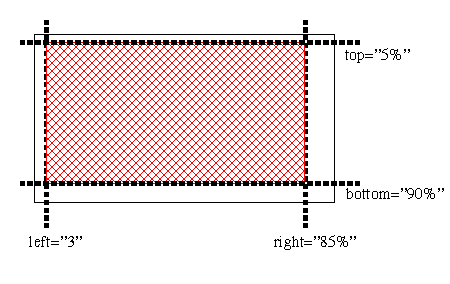
The use of in-line sub-region placement is intended as a light-weight
alternative to defining a large number of single-use regions. Often, the
dimensions used for the sub-region will match the dimensions of the media
object being placed, but in all cases the values of the fit attribute will govern rendering of the
object in the sub-region. The other attributes on the media element that
would have been applied to a referenced region are applied to the sub-region
instead. Note that the default values for the sub-region attributes are all
'auto', meaning that, by default, a sub-region is created having the same
size and position as the parent region.
The use of sub-region positioning leads to authoring convenience and SMIL
file compactness, since many separate regions do not need to be defined to
handle incidental layout needs. The support for a hierarchy of sub-regions
also allows multiple layout objects to be animated in concert by moving the
parent region using SMIL 2.1 Animation facilities.
This section defines extension to the region and ref elements to support sub-region
functionality.
This module extends the definition of the region element to include the definition of
hierarchical sub-regions.
In the SubRegionLayout module, the region element has no additional attributes
beyond that provided in the other included layout modules. However, the
semantics of the z-index
attribute are extended to support hierarchical sub-regions.
- z-index
- This attribute is defined as in the BasicLayout module with
extensions presented here.
- The z-index attribute
defines the level of the region within the parent region stacking
context. Elements assigned to higher level regions are rendered in
front of lower level regions within the same parent region. Child
regions are always placed in front of their parent region. This results
in a two stage sorting of region visibility: first by parent-child
containment, and then by z-index among
siblings.
Just as with simple non-hierarchical
regions, the stacking order of hierarchical regions may be affected
by temporal activation. A region becomes active either when media
begins rendering into it, or when one of its child regions becomes
active. If two sibling regions have the same z-index, the region most
recently made active is in front of the other region.
The SMIL 2.1 SubRegionLayout module extends the region element content model to include
region elements.
The SubRegionLayout module extends the ref element to allow a separate, unnamed
sub-region to be defined for the media object reference containing the
sub-region positioning attributes.
The ref element defined in the MediaObject module and its synonyms are
extended to include the following positioning attributes.
- top
- This value uniquely identifies the position or the distance (using
CSS2 pixel or non-negative percentage values) of the top edge of the
sub-region relative to the top of the region. The default value of top
is auto.
- bottom
- This value uniquely identifies the position or the distance (using
CSS2 pixel or non-negative percentage values) of the bottom edge of the
sub-region relative to the bottom of the region. The default value of
bottom is auto.
- height
- This value uniquely identifies the position or the distance (using
CSS2 pixel or non-negative percentage values) of the bottom edge of the
sub-region relative to the top side of the sub-region. The default
value of height is auto.
- left
- This value uniquely identifies the position or the distance (using
CSS2 pixel or non-negative percentage values) of the left edge of the
sub-region relative to the left of the region. The default value of
left is auto.
- right
- This value uniquely identifies the position or the distance (using
CSS2 pixel or non-negative percentage values) of the right edge of the
sub-region relative to the right side of the region. The default value
of right is auto.
- width
- This value uniquely identifies the position or the distance (using
CSS2 pixel or non-negative percentage values) of the right edge of the
sub-region relative to the left side of the sub-region. The default
value of width is auto.
Conflicts between the region size attributes bottom, height, left, right, top, and width are resolved
according to the rules for placeholder elements described in the section on
the region element.
The sub-region positioning attributes will be ignored if they are used on
an element without a region attribute
(or, if supported, the regionName
attribute) that resolves to a region
element in the layout section.
This module does not define any SMIL 2.1 events.
This section is normative.
The position of a region, as specified by its top and left attributes, is always relative to the
parent geometry, which is defined by the parent element. For the SMIL 2.1
SubRegionLayout module, all hierarchical region elements must have as their
immediate parent a region
or topLayout element. The
position of the hierarchical region is defined relative to that parent
element. The intrinsic size of a region is equal to the size of the parent
geometry.
When region sizes, as specified by width and height attributes are declared relative
with the "%" notation, the size of the hierarchical region is relative to the
size of the parent region. Sizes declared as absolute pixel values are
absolute values even when used with a child region.
Note that a (hierarchical) region may be defined in such a way as to
extend beyond the limits of its parent. In this case the child region must be
clipped to the parent boundaries.
If a z-index attribute is
defined on the hierarchical region, it is evaluated as a local index within
that of the parent.
If the fit attribute and
alignment attributes regPoint and
regAlign are relevant to the
placement of a particular media object, the interaction is the same as
described in the definition of regPoint. If sub-region positioning
attributes are used on a media object along with fit or the alignment attributes regPoint and regAlign, these attributes apply to the
sub-region. In this case the fit
setting on the referenced region element does not apply to the sub-region.
For both sub-region positioning and registration point use (as defined in
the module), the value of
the z-index attribute on the
associated region is used. If media objects overlap spatially, existing rules
for resolving z-index conflicts are applied.
Note that placement within the region may be defined in such a way as to
extend the media object beyond the limits of the region. In this case the
media object must be clipped to the region boundaries.
If two hierarchical regions with the same z-index attribute value overlap,
the existing rules for z-index
processing defined in the BasicLayout module are applied.
Specifically, the rule concerning time priority is maintained, meaning that
in the case of a z-index conflict, the media visible in the overlap will be
determined by the region that is rendering the media that has most recently
begun in time. If the conflicting media began at the same time, then the rule
using the textual order of the media elements in the SMIL document is
applied.
For example:
<layout>
   <root-layout width="640px" height="480px" />
   <region id="whole" top="0px" left="0px" width="640px"
                                height="480px" z-index="5"/>
   <region id="right" top="0px" left="320px" width="320px"
                                height="480px" z-index="4">
       <region id="inset" top="140px" left="80" width="160px"
                                height="200px" z-index="6"/>
       <region id="inset2" top="140px" left="80" width="160px"
                                height="200px" z-index="6"/>
       <region id="inset3" top="140px" left="80" width="160px"
                                height="200px" z-index="7"/>
   </region>
</layout>
...
<par>
        <img id="A" region="whole" src="imageA.jpg" dur="10s"/>
        <img id="B" region="inset" src="imageB.jpg" dur="10s"/>
</par>
<par>
        <img id="D" region="inset2" src="imageD.jpg" begin="1s" dur="10s"/>
        <img id="C" region="inset" src="imageC.jpg" begin="0s" dur="10s"/>
</par>
<par>
        <img id="E" region="inset2" src="imageE.jpg" dur="10s"/>
        <img id="F" region="inset3" src="imageF.jpg" dur="10s"/>
</par>
- In the first "par", image "A" and image "B" begin at the same time.
Image A will obscure image "B", even though the z-index of "inset" is
greater than that of "whole". This is because the z-index of "right",
which is the region containing "inset" is less than that of
"whole".
- In the second "par", images "C" and "D" are rendered into regions
occupying the same area of the rendering surface. Image "C" will be shown
for one second and then obscured by Image "D", since "D" begins after
image "C". Note that lexical order is irrelevant here.
- In the third "par", the z-index of region "inset" is considered when
computing stacking between siblings, and therefore image "F" will be
shown, but image "E" will be obscured for the entire 10 seconds that they
are both active.
This section is normative.
The functionality in this module builds on top of the functionality in the
BasicLayout module and the
MediaObject module, which are required prerequisites for inclusion of the
SubRegionLayout module. If the functionality in this module is to be used
with the topLayout construct, the
MultiWindowLayout module is a
prerequisite.
See the full DTD for the
SMIL Layout modules.
This section is informative.
This is a new module for SMIL 2.1. It contains the alignment functionality
from [SMIL20] and adds the mediaAlign attribute to simplify the
specification of object alignment and the soundAlign attribute to support audio
2-D placement.
Minor changes have been made to the definition of the layout element
because of the restructuring of SMIL 2.1 layout modules.
A registration element is an element defined within this module that is
used to define a point within a region and a default object alignment
algorithm about that point. The element can be used in a media object
element, where it is associated with a region and an optional override
alignment algorithm. The placement values within registration elements can be
either percentages or pixels.
The use of registration points allows for consistent relative placement
across regions. As such, registration points are defined outside of any
single region.
For example, the following code describes two registration points (with id
values "midPoint" and "topMargin"), one of which is defined as a relative
location and one at a fixed pixel location, using the SMIL 2.1
AlignmentLayout syntax:
    <layout>
      <regPoint id="midPoint" top="50%" left="50%" regAlign="center" />
      <regPoint id="topMargin" top="10" left="15" regAlign="topLeft" />
      <region id="a" ... />
      <region id="b" ... />
    </layout>
In this example, the registration point with the id value "midPoint" has a
default alignment algorithm that centers the media object about the defined
point, while the registration point with the id value "topMargin" has a
default alignment algorithm that places the top-left point of the media
object at the registration point.
Various media elements could be displayed in the regions using the
alignment points as follows:
    <ref region="a" src="rtsp://..." dur="2s" regPoint="midPoint" />
    <ref region="b" src="http://..." dur="2s"
                         regPoint="midPoint" regAlign="bottomRight"/>
    <ref region="a" src="http://..." dur="2s" regPoint="topMargin" />
    <ref region="b" src="http://..." dur="2s"
                         regPoint="topMargin" regAlign="center"/>
In the first example, a media object is centered in the middle of
region a. In the second example, a media object has its bottom right
corner centered in the middle of region b. Similarly, in the third
example, a media object has its top left corner placed at a point 10,15
within region a, and in the fourth example, an object is centered
around the point 10,15 in region b.
Registration points can be used to coordinate the placement of a set of
media objects that do not share the same sizes. (For example, a set of images
can be aligned to the center of a region.) They can also be used to
coordinate the display of images about a particular point in a region, as
in:
   <layout>
      <regPoint id="middle" top="50%" left="50%" regAlign="center" />
      <region id="a" ... />
   </layout>
   ...
   <seq>
    <ref region="a" src="rtsp://..." dur="2s" regPoint="middle"
                                        regAlign="bottomRight"/>
    <ref region="a" src="http://..." dur="2s" regPoint="middle"
                                        regAlign="bottomLeft"/>
    <ref region="a" src="http://..." dur="2s" regPoint="middle"
                                        regAlign="topLeft"/>
    <ref region="a" src="http://..." dur="2s" regPoint="middle"
                                        regAlign="topRight"/>
  </seq>
In this example, four objects are aligned over time to the middle of
region. If any media element extends outside the bounds of a region, it will
be clipped to the region.
Note that registration points are global within the context of a layout,
and are not tied to a particular region, but can be reused across regions. As
such, pixel-based offsets should be used with care.
For authoring convenience, SMIL AlignmentLayout module provides several
pre-defined region registration points including topLeft, topMid, topRight, midLeft, center, midRight, bottomLeft, bottomMid, and
bottomRight.
For example, media objects can be centered in any region like this:
<ref ..." regPoint="center" regAlign="center" />
The default value of regAlign
for a region is topLeft. If the regAlign attribute is used without a
regPoint attribute, the alignment
operation is relative to the upper left point of the region containing this
object, that is, the behavior is the same as if the regPoint were to be specified as topLeft.
Rules for handling clipping of objects within regions based on the regPoint and regAlign attributes are defined below.
This section defines the elements and attributes that make up the SMIL 2.1
AlignmentLayout module.
This element extends the content model of the layout element to support the registration
point functionality described in this section.
If the type attribute of the layout element has the value "text/smil-basic-layout", it is extended to contain the
following elements:
- region
- root-layout
- regPoint
The regPoint element
The regPoint element
determines the (x, y) coordinates of a point relative to a region upper-left
corner for use in aligning elements in the document's body on regions within
a visual rendering surface. A regPoint may be defined using absolute
(pixel) or relative (percentage) based values. The regPoint functionality is not defined and
may not be used for media without intrinsic size.
For the purposes of regPoint
functionality, media and regions are defined to be rectangular, with
perpendicular sides, with the sides ordered clockwise top, right, bottom, and
left. The top side is the edge closest to the point or edge of the display
device considered "up".
- top
- This value uniquely identifies the position or the distance (using
CSS2 pixel or non-negative percentage values) of the registration point
relative to the top of the region. The default value of top
is auto.
- bottom
- This value uniquely identifies the position or the distance (using
CSS2 pixel or non-negative percentage values) of the registration point
relative to the bottom of the region. The default value of bottom
is auto.
- left
- This value uniquely identifies the position or the distance (using
CSS2 pixel or non-negative percentage values) of the registration point
relative to the left location of the region. The default value of left
is auto.
- right
- This value uniquely identifies the position or the distance (using
CSS2 pixel or non-negative percentage values) of the registration point
relative to the right location of the region. The default value of
right is auto.
- regAlign
- This attribute specifies the default alignment algorithm which is
associated with a regPoint
relative to the media object. The value of topLeft is the default. The following values are
allowed:
- topLeft
- Align the top-left corner of the object with the registration
point.
- topMid
- Align the top-middle point of the object with the registration
point. The top-middle is the point offset width/2 to the right of
the object top-left corner.
- topRight
- Align the top-right corner of the object with the registration
point.
- midLeft
- Align the middle-left point of the object with the registration
point. The middle-left is the point offset height/2 down from the
object top-left corner.
- center
- Align the center of the object with the registration point.
- midRight
- Align the middle-right point of the object with the
registration point. The middle-right is the point offset height/2
down from the object top-right corner.
- bottomLeft
- Align the bottom-left corner of the object with the
registration point.
- bottomMid
- Align the bottom-middle point of the object with the
registration point. The bottom-middle is the point offset width/2
right from the object bottom-left corner.
- bottomRight
- Align the bottom-right corner of the object with the
registration point.
None.
This module extends the definition of the region element to include the definition of
default alignment policies for content in that region.
- regPoint
- This attribute is identical to the regPoint attribute on media objects
defined below, except that it defines a default alignment point for all
media objects placed in the region.
- regAlign
- This attribute is identical to the regAlign attribute on media objects
defined below, except that it defines a default alignment policy for
all media objects placed in the region.
- mediaAlign
- This attribute is identical to the mediaAlign attribute on media
objects defined below, except that it defines a default combination
registration point/alignment policy for all media objects placed in the
region.
- soundAlign
- This attribute is identical to the soundAlign attribute on media
objects defined below, except that it defines a default 2D placement
of the audio portion of a media element assigned to play within the
given region.
SMIL 2.1 AlignmentLayout module does not extend the region element content model.
The AlignmentLayout module extends the ref element to allow the positioning of
media content within a region based on the an alignment registration point
and an alignment policy.
The ref element defined in the
MediaObject module is extended to include the regPoint attribute conjunction with
the regPoint element. If
a regPoint attribute is
missing or refers to a non-existent regPoint element the value of
the regAlign attributes are
applied to the top-left point of the region containing the media object.
- regPoint
- This value uniquely identifies the registration point to be used for
the placement of the object. The value should be an XML identifier of
a regPoint element.
- The following values are predefined registration points that do not
have to be declared as regPoint elements before they are
used:
- topLeft
- Same as using top="0%" left="0%" on the element without
the regPoint
attribute.
- topMid
- Same as using top="0%" left="50%" on the element without
the regPoint
attribute.
- topRight
- Same as using top="0%" left="100%" on the element without
the regPoint
attribute.
- midLeft
- Same as using top="50%" left="0%" on the element without
the regPoint
attribute.
- center
- Same as using top="50%" left="50%" on the element without
the regPoint
attribute.
- midRight
- Same as using top="50%" left="100%" on the element without
the regPoint
attribute.
- bottomLeft
- Same as using top="100%" left="0%" on the element without
the regPoint
attribute.
- bottomMid
- Same as using top="100%" left="50%" on the element without
the regPoint
attribute.
- bottomRight
- Same as using top="100%" left="100%" on the element without
the regPoint
attribute.
- Note that the predefined registration points have the same meaning
relative to the region as the regAlign attribute values have
relative to the media. The default registration point is topLeft (top="0%", left="0%"): that is, the media
is aligned with the top-left of the region.
- regAlign
- This value uniquely identifies the registration algorithm to be used
for the regPoint defined
for the object, and overrides any regAlign attribute on the
referenced regPoint element.
Permissible values are those defined under the regAlign attribute for
the regPoint element. If
used without an explicit regPoint attribute, the value is
relative to the top left point of the region used by the associated
media object. The defalut value is topLeft.
- mediaAlign
- This value uniquely identifies a short-hand notation for combining
set combinations of regAlign
and regPoint attributes.
Valid values are:
- topLeft
- Same as using the regPoint ="topLeft" and regAlign="topLeft"
attributes. This is the default.
- topMid
- Same as using the regPoint ="topMid" and regAlign="topMid"
attributes.
- topRight
- Same as using the regPoint ="topRight" and
regAlign="topRight"
attributes.
- midLeft
- Same as using the regPoint ="midLeft" and regAlign="midLeft"
attributes.
- center
- Same as using the regPoint ="center" and regAlign="center"
attributes.
- midRight
- Same as using the regPoint ="midRight" and
regAlign="midRight"
attributes.
- bottomLeft
- Same as using the regPoint ="bottomLeft" and
regAlign="bottomLeft"
attributes.
- bottomMid
- Same as using the regPoint ="bottomMid" and
regAlign="bottomMid"
attributes.
- bottomRight
- Same as using the regPoint ="bottomRight" and
regAlign="bottomRight"
attributes.
- soundAlign
- Specifies the coarse 2D placement of the audio portion of a media
element assigned to play within the given region. Legal values are:The
following values are allowed:
- left
- Place the audio on the left channel only.
- both
- Place the audio on both channels. This is the default.
- right
- Place the audio on the right channel only.
SMIL 2.1 AlignmentLayout module does not extend the ref element content model.
This module does not define any SMIL 2.1 events.
If an implementation cannot support the soundLevel attribute, it may be
ignored. Even when processing is ignored, the attribute must be correctly
parsed.
The regPoint element may
only appear as an immediate child of a layout element.
If the registration point functionality is used on a media object that
also uses sub-region
positioning, the registration point applies to the subregion.
For registration point use, the value of the z-index attribute on the associated region
is used. If media objects overlap spatially, existing rules for resolving
z-index conflicts are applied.
Note that placement within the region may be defined in such a way as to
extend the media object beyond the limits of the region. In this case the
media object must be clipped to the region boundaries.
The default value of regAlign for a region is topLeft. If the regAlign attribute is used without
a regPoint attribute, the
alignment operation is relative to the upper left point of the region
containing this object, that is, the behavior is the same as if
the regPoint were to be
specified as topLeft.
If the registration point or alignment functionality is used on a media
object, the interaction between the regPoint attribute value, the regAlign attribute value, and the fit attribute value of the region in which the
media object is displayed is as follows:
- fill fit value:
- This depends on the value of the regAlign attribute. (Note: in all
cases, the media must maintain proper alignment over the regPoint):
- topLeft regAlign value:
- Scale the object's height and width independently so that the
content just touches the bottom and right edges of the box.
- topMid regAlign value:
- Scale the object's height and width independently so that the
content just touches the bottom edge of the box, and the nearest
(to the regPoint) of
the left or right edges of the box.
- topRight regAlign value:
- Scale the object's height and width independently so that the
content just touches the bottom and left edges of the box.
- midLeft regAlign value:
- Scale the object's height and width independently so that the
content just touches the nearest (to the regPoint) of the top or
bottom edges of the box, and touches the right edge of the
box.
- center regAlign value:
- Scale the object's height and width independently so that the
content just touches the nearest (to the regPoint) of the top or
bottom edges of the box, and touches the nearest (to the regPoint) of the left or
right edges of the box.
- midRight regAlign value:
- Scale the object's height and width independently so that the
content just touches the nearest (to the regPoint) of the top or
bottom edges of the box, and touches the left edge of the
box.
- bottomLeft regAlign value:
- Scale the object's height and width independently so that the
content just touches the top and right edges of the box.
- bottomMid regAlign value:
- Scale the object's height and width independently so that the
content just touches the top edge of the box, and the nearest (to
the regPoint) of the
left or right edges of the box.
- bottomRight regAlign value:
- Scale the object's height and width independently so that the
content just touches the top and left edges of the box.
- hidden fit value:
- Align the media over the given regPoint per the regAlign attribute. If the media so
positioned extends past the bounds of the region, clip the excess
media. If the media so positioned doesn't meet the bounds of the
region, fill the remaining space with the background color of the
region.
- meet fit value:
- This depends on the value of the regAlign attribute. Any part of the
region that is not covered by the media is then filled with the
region's background color. (Note: in all cases, the media must maintain
proper alignment over the regPoint):
- topLeft regAlign value:
- Scale the visual media object's height and width while
maintaining its aspect ratio so that the content just touches the
right or bottom edge of the box while none of the content is
clipped.
- topMid regAlign value:
- Scale the visual media object's height and width while
maintaining its aspect ratio so that the content just touches at
least one of the left, right, or bottom edges while none of the
content is clipped.
- topRight regAlign value:
- Scale the visual media object's height and width while
maintaining its aspect ratio so that the content just touches the
left or bottom edge of the box while none of the content is
clipped.
- midLeft regAlign value:
- Scale the visual media object's height and width while
maintaining its aspect ratio so that the content just touches at
least one of the top, right, or bottom edges while none of the
content is clipped.
- center regAlign value:
- Scale the visual media object's height and width while
maintaining its aspect ratio so that the content just touches at
least one of the top, left, right, or bottom edges while none of
the content is clipped.
- midRight regAlign value:
- Scale the visual media object's height and width while
maintaining its aspect ratio so that the content just touches at
least one of the top, left, or bottom edges while none of the
content is clipped.
- bottomLeft regAlign value:
- Scale the visual media object's height and width while
maintaining its aspect ratio so that the content just touches the
top or right edge of the box while none of the content is
clipped.
- bottomMid regAlign value:
- Scale the visual media object's height and width while
maintaining its aspect ratio so that the content just touches at
least one of the top, left, or right edges while none of the
content is clipped.
- bottomRight regAlign value:
- Scale the visual media object's height and width while
maintaining its aspect ratio so that the content just touches the
top or left edge of the box while none of the content is
clipped.
- scroll fit value:
- Align the media over the given regPoint per the regAlign attribute. If any part of
the media extends beyond the bounds of the region, a scrolling
mechanism should be invoked that allows viewing of the media that is
clipped beyond the bounds of the region.
- slice fit value:
- This depends on the value of the regAlign attribute. (Note: in all
cases, the media must maintain proper alignment over the regPoint):
- topLeft regAlign value:
- Scale the visual media object's height and width while
maintaining its aspect ratio so that the content just touches the
right or bottom edge of the box, whichever requires the largest
scale factor. Any content that extends beyond the bounds of the
region is clipped.
- topMid regAlign value:
- Scale the visual media object's height and width while
maintaining its aspect ratio so that the content just touches the
left, right, or bottom edge of the box, whichever requires the
largest scale factor. Any content that extends beyond the bounds
of the region is clipped. Clipping will occur on up to two sides
of the region.
- topRight regAlign value:
- Scale the visual media object's height and width while
maintaining its aspect ratio so that the content just touches the
left or bottom edge of the box, whichever requires the largest
scale factor. Any content that extends beyond the bounds of the
region is clipped.
- midLeft regAlign value:
- Scale the visual media object's height and width while
maintaining its aspect ratio so that the content just touches the
top, right, or bottom edge of the box, whichever requires the
largest scale factor. Any content that extends beyond the bounds
of the region is clipped. Clipping will occur on up to two sides
of the region.
- center regAlign value:
- Scale the visual media object's height and width while
maintaining its aspect ratio so that the content just touches the
top, left, right, or bottom edge of the box, whichever requires
the largest scale factor. Any content that extends beyond the
bounds of the region is clipped. Clipping will occur on up to
three sides of the region.
- midRight regAlign value:
- Scale the visual media object's height and width while
maintaining its aspect ratio so that the content just touches the
top, left, or bottom edge of the box, whichever requires the
largest scale factor. Any content that extends beyond the bounds
of the region is clipped. Clipping will occur on up to two sides
of the region.
- bottomLeft regAlign value:
- Scale the visual media object's height and width while
maintaining its aspect ratio so that the content just touches the
top or right edge of the box, whichever requires the largest
scale factor. Any content that extends beyond the bounds of the
region is clipped.
- bottomMidregAlign value:
- Scale the visual media object's height and width while
maintaining its aspect ratio so that the content just touches the
top, left, or right edge of the box, whichever requires the
largest scale factor. Any content that extends beyond the bounds
of the region is clipped. Clipping will occur on up to two sides
of the region.
- bottomRight regAlign value:
- Scale the visual media object's height and width while
maintaining its aspect ratio so that the content just touches the
top or left edge of the box, whichever requires the largest scale
factor. Any content that extends beyond the bounds of the region
is clipped.
For example, a wide-screen video can be made to play in "letterbox" mode
in a region, whose width-to-height ratio is smaller, by using regPoint ="center" and regAlign="center" and setting the region's fit value to "meet". The result is the video will touch the left and
right edges of the region and will be centered vertically with the gaps above
and below filled in with the region's background color.
This section is normative.
The functionality in this module builds on top of the functionality in the
BasicLayout module and the
MediaObject module, which are required prerequisites for inclusion of the
AlignmentLayout module.
See the full DTD
for the SMIL Layout modules.
This section is informative.
This Layout module is new for SMIL 2.1. It provides functionality that was
not supported in previous versions of the SMIL language or its profiles.
This section is informative.
The SMIL 2.1 BackgroundTilingLayout module defines a backgroundImage attribute that
allows an image to be placed onto the background of a layout region. It also provides the same
capability for the root-layout
and any of the topLayout
element(s), if supported by the language profile. This module also defines
the backgroundRepeat
attribute to control tiling and scaling of the background image. These
facilities are provided as a convenience extension to SMIL's use of a
background color in a region. Although similar functionality can be defined
by using a combination of the image media object, the z-index attribute and subregions positioning, this would
require substantially more authoring effort.
The BackgroundTilingLayout module allows simple convenience tiling support
in a manner that is consistent with CSS-3. For more complex background image
operations (such as support for animated images or non-image background
content, users are expected to use the standard media placement and alignment
facilities available in SMIL 2.1 Layout.
This section is normative.
This section defines the backgroundImage and backgroundRepeat attributes that
make up the SMIL 2.1 BackgroundTilingLayout module.
This module extends the attribute set for the region, root-layout and topLayout elements.
- backgroundImage
- This attribute may be used to specify an image that may be placed as
the background of a region.
- In SMIL 2.1, the image is treated as a single image frame; any
behavior that is specified in the image (such as animations or multiple
frames) will be ignored. The legal values for this attribute are:
- <uri>
- This value consists of a URI containing the location of an
image to be used as a background image. If the image is larger
than the background, it will be clipped as if a fit attribute of
hidden was specified. If the image is smaller in either or both
dimensions than the region's dimensions, it will be processed
according to the value of the backgroundRepeat attribute.
- none
- This value indicates that no background image should be
used.
- inherit
- This value indicates that the same background image should be
used as the logical parent of this region.
- The default value is none.
- backgroundRepeat
- This attribute allows a repeat or tiling strategy to be specified for
the background image. The legal values for this attribute are:
- repeat
- This value indicates that the background image should be
repeated horizontally and vertically (that is, it should be
tiled).
- repeatX
- This value indicates that the background image should be
repeated horizontally only.
- repeatY
- This value indicates that the background image should be
repeated vertically only.
- noRepeat
- This value indicates that the background image should not
be repeated.
- inherit
- This value indicates that the same background repeat
policy should be used as in the logical parent of this
region.
- The default value is repeat.
The SMIL 2.1 BackgrondFillLayout module does not extend the content
model for elements integrating these attributes.
This module does not define any SMIL 2.1 events.
This section is normative.
For purposes of establishing an inheritance default value, the root-layout
element defined in SMIL 2.1 BasicLayout is considered the root of
the background image inheritance tree. In this case, both backgroundImage and backgroundRepeat may be used with
the root-layout and region elements.
For profiles implementing the SMIL 2.1 MultiWindowLayout module, each
top-level layout element is considered to define a separate root of the
background image inheritance tree. In this case, both backgroundImage and backgroundRepeat may be used with
any topLayout elements.
This section is normative.
The functionality in this module builds on top of the functionality in the
BasicLayout module, which is a
required prerequisite for inclusion of the BackgroundTilingLayout module. If
this functionality is to be applied to multiple top-level windows, the MultiWindowLayout module must
be included.
See the full DTD
for the SMIL Layout modules.
This section is normative.
The OverrideLayout module contains attributes which were defined as part
of the SMIL 2.0 HierarchicalLayout module for allowing placement values in
regions to be overridden by attributes on media object references. While the
OverrideLayout module is new, the functionality it describes was also
available in SMIL 2.0.
This section is informative.
The SMIL 2.1 OverrideLayout module includes the ability to use
the fit, z-index, and backgroundColor attributes on
objects displayed in a region in order to declare different behavior from
that on the region element.
This module does not define any new elements. It provides extensions to
the ref element (and its synonyms).
The fit, z-index, and backgroundColor attributes are
added to media object references.
- backgroundColor
- This attribute allows specifying the background color that will be
used when a media element is being shown in a sub-region. The range of
legal values are the same as the backgroundColor attribute on
the region element. The default
value for this attribute is transparent.
- fit
- This attribute is used on a media element to override the fit attribute defined in the
corresponding region definition. It takes the same values as
the fit attribute on the
region element, and has the
same semantics with the exception that the declared fit only applies to the media element
using it, and not to other elements which may use the same
parent region.
- z-index
- This attribute is used on a media element to override the z-index attribute defined in the
corresponding region definition. It takes the same values as
the z-index attribute on
the region element, and has the
same semantics with the exception that the declared z-index only applies to the media
element containing the reference, and not to other elements which may
use the same parent region.
The SMIL 2.1 OverrideLayout module does not extend the content model
for the ref element integrating these
attributes.
This module does not define any SMIL 2.1 events.
This section is normative.
The OverrideLayout module allows individual media object references to
override the default values for certain attributes. In all cases, the
attributes will apply only to the (sub-)region referenced by the media
object. Changes will not propagate to child sub-regions or to parent
regions.
This section is normative.
The functionality in this module builds on top of the functionality in the
BasicLayout module, which is a
required prerequisite for inclusion of the OverrideLayout module.
See the full DTD
for the SMIL Layout modules.
- Editor for SMIL 2.1:
- Thierry MICHEL, W3C
- Editors for SMIL 2.0
- Lloyd Rutledge, CWI
- Aaron Cohen, Intel.
The SMIL 2.1 Linking Modules define the SMIL 2.1 document attributes and
elements for navigational hyperlinking. These are navigations through the
SMIL presentation that can be triggered by user interaction or other
triggering events, such as temporal events. SMIL 2.1 provides only for
in-line link elements. Links are limited to uni-directional single-headed
links (i.e. all links have exactly one source and one destination
resource).
The SMIL 2.1 Linking Modules are named LinkingAttributes, BasicLinking and
ObjectLinking. The LinkingAttributes module includes a set of attributes used
to provide SMIL linking semantics to linking elements. The BasicLinking
module includes the SMIL 2.1 linking elements themselves. The ObjectLinking
module includes additional optional linking features that a language profile
may wish to include. Note that the BasicLinking module explicitly includes
the attributes from the LinkingAttributes module on its elements.
The SMIL 2.1 specification leaves the SMIL 2.0 Linking Modules
unchanged.
Please refer to the former SMIL 2.0 Linking Modules [SMIL20-linking] for
definition of navigation semantics, elements and attributes allowing
navigational hyperlinking through SMIL presentations.
- Editor for SMIL 2.1
- Dick C.A. Bulterman, CWI/Amsterdam
- Editor for SMIL 2.0
- Rob Lanphier, RealNetworks
The only change for to the Media Object Modules for SMIL 2.1 is the introduction of a facility to
predefine sets of common param element values in the document head section
and a facility to refer to these definitions from media object references
within the body section. This change is made to reduce the
size of a SMIL document containing many similar parameter definitions and to
ease the authoring and maintenance of SMIL 2.1 documents that use the
elements and attributes in the MediaParam Module.
This change has resulted in an expanded definition
of the MediaParam module. No other changes
have been made to the other media object modules for the SMIL 2.1 release.
The following sections will highlight any text changes to the media object
modules specification. Where no changes have been made, this is explicitly
noted.
This entire section remains unchanged.
This entire section remains unchanged.
This entire section remains unchanged.
The introduction of this section remains unchanged.
SMIL 2.1 adds a new facility to predefine commonly-used
parameters in the document head section. The new sections below define the new elements and attributes of the SMIL 2.1
MediaParam Module. Unless explicitly noted, all of the functionality of the
SMIL 2.0 MediaParam Module remain unchanged.
This section expands the definition of the param element for SMIL 2.1 to include the integration of the paramGroup element.
The param element allows a
general parameter value to be sent to a media object renderer as a name/value pair. This parameter is sent to the renderer at run-time. Any number of
param elements may appear (in any order) in the
content of a media object element or in a paramGroup element.
The syntax of names and values is assumed to be understood by the object's
implementation. This document does not specify how user agents should
retrieve name/value pairs nor how they should interpret parameter names that
appear multiple times within the same paramGroup element or as children of a media object.
Attribute definitions
- name
- (CDATA) This attribute defines the name of a run-time parameter,
assumed to be known by the inserted object. Whether the property name
is case-sensitive depends on the specific object implementation.
- value
- (CDATA) This attribute specifies the value of a run-time parameter
specified by name. Property
values have no meaning to SMIL; their meaning is determined by the
object in question.
- valuetype
- ["data"|"ref"|"object"] This attribute specifies the type of the
value attribute. Possible
values:
- data: This is default value for the attribute. It
means that the value specified by value will be evaluated and
passed to the object's implementation as a string.
- ref: The value specified by value is a URI [URI] that designates a resource where
run-time values are stored. This allows support tools to identify
URIs given as parameters. The URI must be passed to the object
as is, i.e., unresolved.
- object: The value specified by value is an identifier that refers
to a media object declaration in the same document. The identifier
must be the value of the id
attribute set for the declared media object element.
- type
- This attribute specifies the content type of the resource designated
by the value attribute
only in the case where valuetype is set to "ref". This
attribute thus specifies for the user agent, the type of values that
will be found at the URI designated by value. See 6.7 Content
Type in [HTML4] for more
information.
Example
The paramGroup element
provides a convenience mechanism for defining a group of media parameters that may be used with several different media objects. If
present, the paramGroup
element must appear in the head
section of the document.
The content of the paramGroup
element consists of zero or more param
elements. The paramGroup element
may not contain nested paramGroup
element definitions.
Element attributes
- id
- This attribute specifies the ID by which the param group is
referenced in a media object reference.
Examples
In addition to the element attributes defined in BasicMedia, media object elements may have the
attributes and attribute extensions defined below. The inclusion or exclusion
of these elements is left as an option in the language profile.
SMIL 2.1 adds the paramGroup attribute to the list of attibutes available for media objects. For completeness, the entire set of
attributes is reproduced here.
- erase
- Controls the behavior of the media object after the effects of any
timing are complete. For example, when SMIL Timing is applied to a
media element, erase controls the display of the media when the active
duration of the element and when the freeze period defined by the fill attribute is complete (see SMIL Timing and Synchronization).
Values:
- never (default)
- When this is specified (or implied) the media removal occurs at the end
of any applied timing.
- whenDone
-
When this value is specified, the
last state of the media is kept displayed until the display area is reused (or
if the display area is already being used by another media object). Any
profile that integrates this element must define what is meant by
"display area" and further define the interaction. Intrinsic hyperlinks
(e.g., Flash, HTML) and explicit hyperlinks (e.g., area, a) stay active as long as the
hyperlink is displayed. If timing is reapplied to an element, the
effect of the erase=never is cleared. For
example, when an element is restarted according to the SMIL Timing and Synchronization module, the
element is cleared immediately before it restarts.
Example:
<par>
  <seq>
    <par>
      <img src="image1.jpg" region="foo1" fill="freeze" erase="never" .../>
      <audio src="audio1.au"/>
    </par>

    <par>
      <img src="image2.jpg" region="foo2" fill="freeze" erase="never" .../>
      <audio src="audio2.au"/>
    </par>
     ...
    <par>
      <img src="imageN.jpg" region="fooN" fill="freeze" erase="never" .../>
      <audio src="audioN.au"/>
    </par>
  </seq>
</par>
In this example, each image is successively displayed and remains
displayed until the end of the presentation.
- mediaRepeat
- Used to strip the intrinsic repeat value of the underlying media
object. The interpretation of this attribute is specific to the media
type of the media object, and is only applicable to those media types
for which there is a definition of a repeat value found in the media
type format specification. Media type viewers used in SMIL
implementations will need to expose an interface for controlling the
repeat value of the media for this attribute to be applied. For all
media types where there is an expectation of interoperability between
SMIL implementations, there should be a formal specification of the
exact repeat value to which the mediaRepeat attribute applies.
Values:
- strip
- Strip the intrinsic repeat value of the media object.
- preserve (default)
- Leave the intrinsic repeat value of the media object
intact.
As an example of how this would be used, many animated GIFs
intrinsically repeat indefinitely. The application of mediaRepeat= "strip" allows an author to remove the intrinsic
repeat behavior of an animated GIF on a per-reference basis, causing
the animation to display only once, regardless of the repeat value
embedded in the GIF.
When mediaRepeat is used in
conjunction with SMIL Timing Module attributes, this attribute is
applied first, so that the repeat behavior can then be controlled with
the SMIL Timing Module attributes such as repeatCount and repeatDur.
- paramGroup
- Used to specify the name of a
paramGroup
that was defined in the document
head. The value is a single IDREF. If the named
paramGroup
does not exist, this attribute is ignored.
- sensitivity
- Used to provide author control over the sensitivity of media to user
interface selection events, such as the SMIL 2.0 activateEvent, and
hyperlink activation. If the media is sensitive at the event location,
it captures the event, and will not pass the event through to
underlying media objects. If not, it allows the event to be
passed through to any media objects lower in the display hierarchy.
Values:
- opaque
- The media is sensitive to user interface selection events over
the entire area of the media. This is the default.
- transparent
- The media is not sensitive to user interface selection events
over the entire area of the media. Any user interface selection
events will be "passed through" to any underlying media.
- percentage-value
- The media sensitivity to user interface selection events is
dependent upon the opacity of the media at the location of the
event (the alpha channel value). If rendered media supports an
alpha channel and the opacity of the media is less than the given
percentage value at the event location, the behavior will be
transparent as specified above.
Otherwise the behavior will be as opaque. Valid values are non-negative CSS2
percentage values.
This section remains unchanged.
This entire section remains unchanged.
This entire section remains unchanged.
This entire section remains unchanged.
This entire section remains unchanged.
This entire section remains unchanged.
This sub-section remains unchanged.
This entire section remains unchanged.
The text in this section is changed to highlight the media parameter
definition facility in SMIL 2.1.
A new param element provides a
generalized mechanism to attach media-specific attributes to media
objects. A new paramGroup element provides a convenience grouping mechanism to collect commonly
used param element definitions into a single unit that may be referenced by multiple media objects.
This entire section remains unchanged.
- Editor for SMIL 2.1:
- Thierry MICHEL, W3C
- Editor for SMIL 2.0
- Thierry Michel, W3C.
This section defines the SMIL 2.0 Metainformation Module composed of a
single module. This module contains elements and attributes that allow
description of SMIL documents.
Since these elements and attributes are defined in a module, designers of
other markup languages can choose whether or not to include this
functionality in their languages.
The World Wide Web was originally built for human consumption, and
although everything on it is machine-readable, this data is not
machine-understandable. It is very hard to automate anything on the Web, and
because of the volume of information the Web contains, it is not possible to
manage it manually. Metadata is "data about data" (for example, a library
catalog is metadata, since it describes publications) or specifically in the
context of this specification "data describing Web resources".
The solution proposed here is to use metadata information to describe SMIL
documents published on the Web.
The earlier SMIL 1.0 specification allowed authors to describe documents
with a very basic vocabulary using the meta element.
The SMIL 2.1 Metainformation module defined in this specification fully
supports the use of this meta element from SMIL 1.0 but it also introduces
new capabilities for describing metadata using the Resource Description
Framework Model and Syntax [[RDFsyntax]], a powerful meta information
language for providing information about resources.
The SMIL 2.1 specification leaves the SMIL 2.0 Metainformation Module
unchanged.
Please refer to the former SMIL 2.0 Metainformation Module [SMIL20-meta]
for information about metadata semantics, elements and attributes allowing
description of SMIL documents.
- Editor for SMIL 2.1
- Thierry MICHEL, W3C
- Editors for SMIL 2.0
- Warner ten Kate, Philips Electronics
- Aaron Cohen, Intel.
This section is informative.
This Section defines the SMIL 2.1 Structure module. The Structure module
provides the base elements for structuring SMIL content. These elements act
as the root in the content model of all SMIL Host
Language conformant language profiles. The Structure module is a
mandatory module for SMIL Host Language conformant language profiles.
The SMIL Structure module is composed of the smil, head, and body elements, and is compatible with
SMIL 1.0 [SMIL10]. The corresponding
SMIL 1.0 elements form a subset of the Structure module, both in syntax
and semantics, as their attributes and content model is also exposed by the
Structure module. Thus, the Structure module is backwards compatible with
SMIL 1.0.
The SMIL 2.1 specification leaves the SMIL 2.0 Structure Module unchanged.
Please refer to the former SMIL 2.0 Structure Module Module
[SMIL20-structure] for information about semantics, elements and attributes
for structuring SMIL content.
10. The SMIL 2.1 Timing and Synchronization Module Updates
- Editor for SMIL 2.1
- Dick Bulterman, CWI/Amsterdam
- Editors for SMIL 2.0:
- Patrick Schmitz, Microsoft
- Jeff Ayars, RealNetworks
- Bridie Saccocio, RealNetworks
- Muriel Jourdan, INRIA.
This section is informative
The SMIL 2.1 specification leaves the basic syntax and semantics of the
SMIL 2.0 timing model unchanged [SMIL20-timing]. The only change for SMIL
2.1 that SMIL 2.0's ExclTimeContainers module is deprecated and replaced with
two new modules: BasicExclTimeContainers
and BasicPriorityClassContainers. This
partitioning is done to reduce the implementation burden of the excl element on low-powered devices or in
implementations in which the full functionality of the priority class
mechanism of SMIL 2.0 is not required.
The following sections will highlight any text changes to the SMIL 2.0
timing and synchronization specification [SMIL20-timing]. Where no changes
have been made, this is explicitly noted.
As a result of this change, SMIL 2.1 Timing and Synchronization support is
broken down into 16 modules instead of the 15 modules used in SMIL 2.0. These
modules are described in Appendix A: SMIL
Timing and Synchronization modules.
This section remains unchanged.
This section remains unchanged.
The majority of this section remains unchanged for SMIL 2.1 except for
the description of the behavior of the excl element.
This sub-section remains unchanged.
The definitions of the par, seq, and priorityClass elements in the SMIL
2.0 specification remain unchanged in SMIL 2.1. The only change made in this
section is the definition of the excl
element.
SMIL 2.1 modifies the definition of the SMIL 2.0
exclusive container, excl. The
modification provides default behavior for implementations that only support
the exclusive element and not the priorityClass element.
This section provides all of the normative text of the exclusive element
definition. For examples and use cases, please refer to the SMIL 2.0
specification [SMIL20-timing].
This section is
normative
- excl
- This defines a time container with semantics
based upon par, but with the
additional constraint that only one child element may play at any given
time. If any element begins playing while another is already playing,
the element that was playing is stopped. If the priorityClass element
is also supported by a profile, child elements in an excl container may
be grouped into categories; the behavior of the element that was
playing at the time a new element starts can be defined to have
stop/pause/interruption behavior. The priorityClass can define several
levels of interrupt behavior (one per class), each of which can be
controlled explicitly.
This section is normative
- The implicit duration of an excl container is defined the same as for
a par container, using the endsync="last" semantics. However, since the default timing
for children of excl is
interactive, the implicit duration for excl time containers with only default
timing on the children will be 0.
The remainder of this section remains unchanged.
This sub-section remains unchanged.
This sub-section remains unchanged.
This section remains unchanged.
This sub-section remains unchanged.
This sub-section remains unchanged.
This section is normative.
All SMIL 2.0 timing and synchronization modules remain unchanged except as
noted in this section.
- ExclTimeContainers
- This module is depreciated in SMIL 2.1.
- BasicExclTimeContainers
- This module is new to SMIL 2.1. It includes a time container that
defines a mutually exclusive set of elements and describes the 'stop'
interrupt semantic among these elements.
- Module dependencies
- None.
- Included features
- excl element, fill and endsync attributes.
- Other module specific integration requirements
fill="transition" is only supported when
BasicTransitions or InlineTransitions is included in the language
profile. If FillDefault is not included in the profile,
fill="default" is interpreted the same as
fill="auto".
- BasicPriorityClassContainers
- This module is new to SMIL 2.1. It includes a child element for the
excl that is used to describe
interrupt semantics among group of children of the the exclusive
element.
- Module dependencies
- The BasicExclTimeContiners module must be included in a profile
containing the BasicPriorityClassContainers module
- Included features
- priorityClass
element.
- Other module specific integration requirements
- None.
This sub-section remains unchanged.
This sub-section remains unchanged.
This sub-section remains unchanged.
- Editor for SMIL 2.1:
- Thierry MICHEL, W3C
- Editor for SMIL 2.0:
- Patrick Schmitz, Microsoft
11.1 Introduction
This module introduces new attributes for advanced manipulation of time
behavior, such as controlling the speed or rate of time for
an element. These time manipulations are especially suited to
animation and non-linear or discrete media. Not all continuous media types
will fully support time manipulations. For example, streaming MPEG 1 video
will not generally support backwards play. A fallback mechanism is described
for these kinds of media.
Four new attributes add support for time manipulations to SMIL timing
modules, including control over the speed of an element, and support for
acceleration and deceleration. The impact on overall timing and
synchronization is described. A definition is provided for reasonable
fallback mechanisms for media players that cannot support the time
manipulations.
An accessibility requirement for control of the playback speed is related
to the speed control, but may also be controlled through some other mechanism
such as DOM interfaces.
The SMIL 2.1 specification leaves the Time Manipulations Module unchanged.
Please refer to the former SMIL 2.0 Time Manipulations Module
[SMIL20-timemanipulations] for information about semantics, elements and
attributes allowing advanced manipulation of time behavior in SMIL
presentationss.
- Editors for SMIL 2.1:
- Jack Jansen, CWI/Amsterdam
- Antti Koivisto, Nokia
- Guido Grassel, Nokia
- Editors for SMIL 2.0:
- Eric Hyche, RealNetworks
- Debbie Newman, Microsoft
SMIL 2.1 maintains without change all SMIL 2.0 Transition Effects
functionality [SMIL20-transition]. SMIL 2.1 adds full-screen transitions in
the FullScreenTransitions module.
This addition requires also a slight extension of the Transition Model. SMIL 2.1 also
includes new audio transitions. This results in an addition to the BasicTransitions module and to the
taxonomy of transitions in the appendix.
In case of
SMIL language profile supporting FullScreenTransitions
module the area to which the transition applies may be different and, hence,
the effect perceived by the viewer is of multiple media items transitioning.
However, all timing rules and other rules for applying transitions outlined
in the SMIL 2.0 Transitions Model [SMIL20-transition] still treat the
transition exactly the same as when applying it to a single media item.
The only change from SMIL 2.0 BasicTransitions module
[SMIL20-transition] is the inclusion of audio transitions. Audio
transitions animate the audio component of the target media object. SMIL 2.1
specifies two audio transitions, "audioFade" and "audioVisualFade". They both
adjust the audio volume of the target media. The latter one also animates the
visual component of the media.
The "audioFade" transition fades an audio clip in or out by linearly
adjusting the volume of the clip. As with the visual "fade" transition from
SMIL 2.0, direction of the transition depends on whether it is used in
transIn or
transOut
attribute. To achieve cross-fade effect between two
audio clips, the clips must overlap in time and the "audioFade" transitions
need to be applied simultaneously to both.
The "audioVisualFade" fade acts like a combination of the "audioFade" and
the visual "fade" transitions from SMIL 2.0. It has the same subtypes as
"fade" transition. Future versions of the specification may provide a general
mechanism for combining transitions.
Since the fill attribute semantics
dictate that audio is silent during the fill period, the fill value fill="transition" can't be used for
transition effects between audio clips. To mix audio clips using transition
effects the timeline of the clips must overlap.
Example:
The following example cross-fades between two audio clips. For cross-fade
effect the clips must overlap in the presentation timeline. Since audio clips
are not audible during the fill period, a sequence time container would not
be suitable for achieving this effect.
<transition id="four_sec_fade" type="audioFade" subType=fade" dur="4s"/>
. . .
<par>
  <audio id="audio1" ... transOut="four_sec_fade" />
  <audio id="audio2" ... begin="audio1.end-4s" transIn="four_sec_fade" />
</par>
The FullScreenTransitions
module extends SMIL 2.1 BasicTransitions
module with the option of doing full-screen transitions, while keeping
the semantics of transitions the same. Logically, a transition is still
applied to a single media item, through the transIn or transOut attribute, but the visual effect
is that the whole screen or window is transitioned from one set of media
items to another. In this section we refer to the media item with the
transIn or
transOut
attribute as the master media item.
The exact meaning of whole window must be defined in the language profile
including this module. In general, it will be the largest possible area
encompassing the destination region, for instance the topLayout element of which the region is
a descendant, or the whole screen for profiles without support for separate
windows.
Consider the following presentation:
...
<head>
   <transition id="diagonalWipe" type="diagonalWipe" subtype="topRight"
                  dur="1s" />
  ...
</head>
<body>
  <par dur="10s">
        <img  id="left1"   src="left1.jpg"  region="leftpane"   />
        <text id="right1"  src="right1.txt" region="rightpane"  />
  </par>
  <par dur="10s">
        <img  id="left2"  src="left2.jpg"  region="leftpane"  />
        <text id="right2" src="right2.txt" region="rightpane" />
  </par>
</body>
...
We can define parallel transitions on individual media objects using SMIL
2.0 BasicTransitions [SMIL20-transition]: For this purpose we add attribute
transIn="diagonalWipe" to elements "left2" and "right2" identifiers and attribute
fill="transition" to elements "left1" and "right1" identifiers.
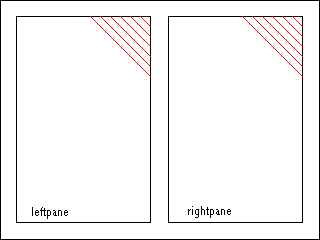 |
Parallel transitions on individual media
objects
|
It is common practice to apply transitions across several different media
at once. Using FullScreenTransitions we can achieve a transition effect on
the whole screen:
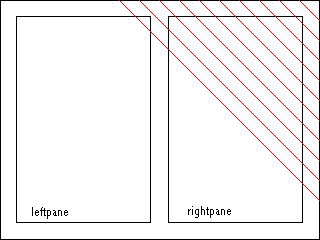 |
Full-screen transition
|
The SMIL 2.1 FullScreenTransitions
module adds a single attribute to the transition element defined in SMIL2.0
[SMIL20-transition] :
Element attributes
The transition
element is extented with the following attribute:
- scope
- This attribute designates the destination area of the transition. The
allowable values are
- region
- In this case the transition behaves as specified in the BasicTransitions module. This
is the default value.
- screen
- In this case the destination area encompasses a larger area, as
defined in the language profile.
The media items that transition together with the master media item are
all those media items that are rendering within the area defined by the scope
attribute at the time the transition starts. In effect, a transIn transition transitions from the
set of media items defined as "background" in the Transition Model
to the set of media items that would have been visible at the start time if
no transIn
attribute had been present. A transOut transition is from a set of
media items visible at the start time of the transition to the set of media
items that should be visible just after the master media item finishes (note
that this set does not depend on whether transOut is specified or not).
Media items that start or end during the transition are treated in the
same way as the background media items (see the BasicTransitions module)
.
Using these definitions a full-screen transition can be added to above
example as follows:
...
<head>
   <transition id="diagonalWipeFullScreenTransition" type="clockWipe" subtype="clockwiseTwelve"
                  dur="1s" scope="screen" />
  ...
</head>
<body>
  <par dur="10s">
        <img  id="left1"   src="left1.jpg"  region="leftpane"  fill="transition"  />
        <text id="right1"  src="right1.txt" region="rightpane" fill="transition"  />
  </par>
  <par dur="10s">
        <img  id="left2"   src="left2.jpg"  region="leftpane"  />
        <text id="right2"  src="right2.txt" region="rightpane" transIn="diagonalWipeFullScreenTransition" />
  </par>
</body>
...
SMIL 2.1 introduces the following two new transition types.
| AudioTransitions |
| type |
subType |
| audioFade
audioVisualFade
|
fade (default)
crossfade (default), fadeToColor, fadeFromColor
|
- Editor:
- Nabil Layaïda, INRIA
The SMIL 2.1 profile describes the SMIL 2.1 modules that are included in
the SMIL 2.1 Language and details how these modules are integrated. It
contains support for all of the major SMIL 2.1 features including animation,
content control, layout, linking, media object, meta-information, structure,
timing and transition effects. It is designed for Web clients that support
direct playback from SMIL 2.1 markup.
This section is informative.
The SMIL 2.1 Profile is defined as a markup language. The syntax of this
language is formally described with a document type definition (DTD) or an
XML Schema which is based on the SMIL modules as defined in "The SMIL 2.1 Modules".
The SMIL 2.1 Profile design requirements are:
- Ensure that the profile is completely backward compatible with SMIL
1.0.
- Ensure that the profile is completely backward compatible with SMIL
2.0.
- Ensure that all the modules' semantics maintain compatibility with SMIL
semantics (this includes content and timing).
- Adopt new W3C Recommendations when appropriate without conflicting with
other requirements.
This section is normative.
This version of SMIL provides a definition of strictly conforming SMIL 2.1
documents, which are restricted to tags and attributes from the SMIL 2.1
namespace. The Section "Extending SMIL 2.1
Language" provides information on using SMIL 2.1 with other namespaces,
for instance, on including new tags within SMIL 2.1 documents.
A SMIL 2.1 document is a conforming SMIL 2.1 document if it
adheres to the specification described in this document (Synchronized
Multimedia Integration Language (SMIL) 2.1 Profile Specification) including
SMIL 2.1's DTD (see Document Type
Definition). A conforming SMIL 2.1 document must meet all of the
following criteria:
- The root element of the document must be the smil element.
- The document must be well-formed XML.
- It must conform to the following W3C Recommendations:
- The XML 1.0 specification (Extensible Markup Language (XML) 1.0)
[XML10].
- Namespaces in XML [XML-NS]. Full XML Namespaces must be
supported.
- Any use of CSS styles and properties shall conform to Cascading
Style Sheets, level 2 CSS2 Specification [CSS2].
- A SMIL 2.1 document can contain the following DOCTYPE declaration:
The SMIL 2.1 Language DOCTYPE is:
<!DOCTYPE smil PUBLIC "-//W3C//DTD SMIL 2.1//EN"
                      "http://www.w3.org/2005/SMIL21/WD/SMIL21.dtd">
If a document contains this declaration, it must be a valid XML
document.
Note that this implies that extensions to the syntax defined in the DTD
are not allowed. If the document is invalid, the user agent should issue
an error.
A document is a conforming SMIL 2.1 document if it satisfies the
requirements of this specification (Synchronized Multimedia Integration
Language (SMIL) 2.1 Profile Specification) and is valid per the
normative DTD identified by
http://www.w3.org/TR/2005/REC-SMIL21-20050201/smil21DTD/smil-DTD.dtd
(Note: The SMIL 2.1 dtd is not yet available. It will be published in a
future version.)
Per section 7.6 of the W3C Process Document, W3C will make every effort
to make this normative DTD available, in its original form, at this
URI.
The SYMM WG also publishes a non-normative SMIL 2.1
DTD identified by
http://www.w3.org/2005/WD/SMIL21/SMIL21.dtd
(Note: The SMIL 2.1 dtd is not yet available. It will be published in a
future version.)
The SYMM WG plans to make changes to this DTD over time to correct
errata. If you choose to refer to this DTD, please note that it is
subject to change without notice at any time. The SYMM WG MAY publish a
normative "snapshot" of the corrected DTD at a new URI by following the
W3C
Process for modifying a Recommendation.
Individuals are free to use either of the two URIs above as the system
identifier in the SMIL 2.1 language DOCTYPE, according to the desired
level of stability.
- A document must declare a default namespace for its elements with an
xmlns attribute on the smil root element with its identifier URI:
<smil xmlns="http://www.w3.org/2005/SMIL21/WD/Language">
   ...
</smil>
The default namespace declaration must be
xmlns="http://www.w3.org/2005/SMIL21/WD/Language".
This namespace URI will only be used to refer to this version of this
specification: different URIs will be used for any and all new versions
of the specification. This namespace name may be reused in any update of
the specification which is made for the purpose of clarification or bug
fixes. These changes will be minor in that they do not (a) change the
meaning of existing documents written using the namespace, or (b) affect
the operation of existing software written to process such documents. The
SYMM WG may reuse this namespace URI in a future specification that
revises the SMIL 2.1 DTD, thus affecting the validity of published
documents.
- A document may declare both an XML DOCTYPE declaration (as defined in
[XML10]) and one or more XML namespace declarations (as defined in
[XML-NS]). To be recognized as a SMIL 2.1 document by a conforming SMIL
2.1 user agent, the document must include the SMIL 2.1 namespace
identifier as the default namespace on the <smil> tag. For example:
Declare a SMIL 2.1 document with custom extensions conforming to a
custom DTD:
<!DOCTYPE smil SYSTEM "http://www.example.org/myveryownSMIL.dtd">
<smil xmlns="http://www.w3.org/2005/SMIL21/WD/Language"
        xmlns:mysmil="http://www.example.org/2005/SMIL30/Language">
        <mysmil:foo>
        ...
        </mysmil:foo>
</smil>
- A document that declares neither a DOCTYPE nor a default namespace
declaration will be processed as a SMIL 1.0 document. Extension elements
or attributes not defined by the SMIL 1.0 namespace should be declared
using the XML namespace mechanism.
- Given that, as of this writing, DTDs have no way to describe the
allowability of namespace-qualified extensions, and that extensions to
SMIL 2.1 conformant documents must be namespace-qualified, here is the
algorithm to be used to validate documents with extensions:
If all non-SMIL 2.1 namespace elements and attributes and all xmlns
attributes which refer to non-SMIL 2.1 namespace elements are removed
from the given document and if the appropriate <!DOCTYPE ... >
statement which points to the SMIL 2.1 DTD is included, the result is a
valid XML document.
- Many SMIL 2.1 attributes are associated with several SMIL 2.1 and SMIL
2.0 namespaces including the module namespaces, module collection
namespaces, the SMIL 2.1 language namespace, and the overall SMIL 2.1
namespace. Attributes in the SMIL 2.1 namespaces having the same local
part are considered the same attribute as far as SMIL 2.1 Language
document syntax. It is illegal to use a SMIL 2.1 attribute several times
on an element, even if each occurrence is qualified by a different SMIL
2.1 namespace, and SMIL user agents shall treat this as a syntax error.
For example, the following document fragment is an error, because the
begin attribute appears twice on
the ref element:
<smil xmlns="http://www.w3.org/2005/SMIL21/WD/Language"
        xmlns:BasicInlineTiming="http://www.w3.org/2005/SMIL21/WD/BasicInlineTiming">
...
<ref begin="5s" BasicInlineTiming:begin="5s"/>
...
</smil>
The SMIL 2.1 language or these conformance criteria provide no designated
size limits on any aspect of SMIL 2.1 content. There are no maximum values on
the number of elements, the amount of character data, or the number of
characters in attribute values.
SMIL 2.1 deprecates base as a property value
for the content attribute of the
meta element of SMIL 1.0 in favor of
the more general XML Base URI mechanisms.
The SMIL 2.1 Language profile supports the XML Base Recommendation
[XMLBase]. XML Base is supported on all elements, and affects the
interpretation of URIs as specified in the individual modules defining the
URI attributes. Specifically, any applicable XML Base base URI must be
applied to the interpretation of the href attribute of the link elements a, area
and anchor, as well as the src attribute of the media elements audio, video, img, animation, textstream, text, and ref. XML Base must also be applied on longdesc attributes of all of the SMIL
2.1 Language elements.
The rules above should be revised once a normative XML Schema for SMIL 2.1
is available. This revision will take into account XML Schema validation.
A SMIL 2.1 user agent is a program which can parse and process a SMIL 2.1
document and render the contents of the document onto output mediums. A
conforming SMIL 2.1 user agent must meet all of the following criteria:
- In order to be consistent with the XML 1.0 Recommendation [XML10],
the user agent must parse and evaluate a SMIL 2.1 document for
well-formedness. If the user agent claims to be a validating user agent,
it must also validate documents against their referenced DTDs according
to [XML10].
- When the user agent claims to support the functionality of SMIL 2.1
through SMIL 2.1 elements and attributes and the semantics associated
with these elements and attributes, it must do so in ways consistent with
this specification.
- The user agent must be able to successfully parse and process any
conforming SMIL 2.1 documents, and support and correctly implement the
semantics of all SMIL 2.1 Language Profile features.
- The XML parser of the user agent must be able to parse and process XML
constructs defined in [XML10] and [XML-NS].
- The default namespace on the smil
root element recognized by the user agent will fall into one of three
types:
- Default namespace on the smil
root element recognized in its entirety by the user agent. The user
agent should process the document as the version identified by the
recognized namespace. Any elements, attributes, or other syntax not
defined by the default namespace on the smil root element must be fully
namespace qualified using the standard XML mechanisms for declaring
namespaces for elements and attributes described in [XML-NS]. The
"skip-content" mechanism (defined in the SkipContent module) will be
applied to extension elements unrecognized by the user agent.
Unqualified elements not part of the default namespace are illegal
and must result in an error.
Examples:
1) A pure SMIL 1.0 document:
<smil xmlns="http://www.w3.org/TR/REC-smil">
 ...
</smil>
2) A pure SMIL 2.1 document:
<smil xmlns="http://www.w3.org/2005/SMIL21/WD/Language">
 ...
</smil>
3) A SMIL 1.0 document that has been extended to use the excl
element:
<smil xmlns="http://www.w3.org/TR/REC-smil"
      xmlns:smil21="http://www.w3.org/2005/SMIL21/WD/" >
   <smil21:excl>
     ...
   </smil21:excl>
</smil>
4) A SMIL 2.1 document that has been extended to use the 'foo'
element from a fictitious SMIL 3.0 version of SMIL:
<smil xmlns="http://www.w3.org/2005/SMIL21/WD/Language"
      xmlns:smil30="http://www.example.org/2005/SMIL30/" >
  <smil30:foo>
   ...
  </smil30:foo>
</smil>
- No default namespace declaration is present on the smil root element in the document.
The document will be processed as a SMIL 1.0 document.
- The namespace declaration is
"http://www.w3.org/2001/SMIL20/Language". The document will be
processed as a SMIL 2.0 document.
- Default namespace declaration on the smil root element unrecognized. A
SMIL user agent will not recognize the document as any version of
SMIL and must issue an error.
- The user agent must support the following W3C Recommendations with
regard to SMIL 2.1 content:
- Complete support for the XML 1.0 specification (Extensible Markup
Language (XML) 1.0) [XML10].
- Complete support for inclusion of non-SMIL 2.1 namespaces within
SMIL 2.1 content via Namespaces in XML [XML-NS]. A xmlns
declaration or xmlns prefix declaration may be used on any element in
the SMIL 2.1 language profile.
- The user agent ignores namespace prefix qualified elements from
unrecognized namespaces and must support the skip-content attributes. If
no skip-content attributes are declared, the value of true is
assumed.
- The user agent ignores elements with unrecognized default namespace
declarations and must support the skip-content attribute. If no
skip-content attributes are declared, the value of true is assumed.
- The user agent must issue an error for an attribute value which does
not conform to the syntax specified for that attribute.
- The detection of a syntax error in a SMIL 2.1 language profile document
must result in the user agent issuing an error and not playing the
document.
- When the deprecated (hyphenated) and the new (camelCase) version of an
attribute syntax are used in the same document, SMIL 2.1 user agents
should take into account the camelCase version only.
- Conforming SMIL 2.1 Language user agents must play SMIL 1.0 documents
as specified in the SMIL 1.0 Recommendation [SMIL10] and SMIL 2.0
documents as specified in the SMIL 2.0 Recommendation [SMIL20].
The Web Accessibility Initiative is defining "User Agent Accessibility
Guidelines 1.0" [UAAG]. Developers are encouraged to design user agents
that satisfy at least the Level A requirements of that document. Should UAAG
1.0 become a W3C Recommendation, a future version of SMIL is likely to
require Level A conformance to UAAG 1.0 as part of SMIL user agent
conformance.
The SMIL 2.1 Language Profile supports the timeline-centric multimedia
features found in the SMIL 2.1 modules. It uses only modules from the SMIL
2.1 recommendation. As the language profile includes the mandatory modules,
it is a SMIL
Host Language conforming language profile. This language profile includes
the following SMIL 2.1 modules:
- Structure functionality
- Structure Module
- Metainformation functionality
- Metainformation Module
- Timing functionality
- BasicInlineTiming
Module
- BasicTimeContainers
Module
- BasicExclTimeContainers
Module
- BasicPriorityClassContainers
Module
- EventTiming
Module
- FillDefault
Module Module
- MediaMarkerTiming
Module
- MinMaxTiming
Module
- MultiArcTiming
Module
- RepeatTiming
Module
- RepeatValueTiming
Module
- RestartDefault
Module
- RestartTiming
Module
- SyncbaseTiming
Module
- SyncBehavior
Module
- SyncBehaviorDefault
Module
- WallclockTiming
Module
- Animation functionality
- BasicAnimation Module
- Content Control
functionality
- BasicContentControl
Module
- CustomTestAttributes
Module
- PrefetchControl
Module
- SkipContentControl
Module
- Layout functionality
- AlignmentLayout
Module
- AudioLayout Module
- BackgroundTilingLayout
Module
- BasicLayout
Module
- MultiWindowLayout
Module
- OverrideLayout
Module
- SubRegionLayout
Module
- Linking functionality
- BasicLinking Module
- LinkingAttributes
Module
- ObjectLinking
Module
- Transition Effects
functionality
- BasicTransitions
Module
- TransitionModifiers
Module
- FullScreenTransitions
Module
- Media functionality
- BasicMedia
Module
- BrushMedia
Module
- MediaAccessibility
Module
- MediaClipping
Module
- MediaClipMarkers
Module
- MediaDescription
Module
- MediaParam
Module
The collection names contained in the following table define the SMIL 2.1
Profile vocabulary.
| SMIL 2.1 Profile |
| Collection Name |
Elements in Collection |
| Animation |
animate, set, animateMotion, animateColor |
| ContentControl |
switch, prefetch |
| Layout |
region, root-layout, layout, regPoint, topLayout |
| LinkAnchor |
a, area (anchor) |
| MediaContent |
text, img, audio, video, ref, animation, textstream, brush, param |
| Metainformation |
meta, metadata |
| Structure |
smil, head, body |
| Schedule |
par, seq, excl |
| Transition |
transition |
| Other |
customAttributes,
customTest, paramGroup, priorityClass |
In the following sections, we define the set of elements and attributes
used in each of the modules included in the SMIL 2.1 Profile. The content
model for each element is described. The content model of an element is a
description of elements which can appear as its direct children. The special
content model "EMPTY" means that a given element may not have children.
The id, classand titleattributes in the collection Core are
defined for all the elements of the SMIL 2.1 Profile. The idattribute is used in the SMIL 2.1 Language
Profile to assign a unique XML identifier to every element in a SMIL
document. In this document, equivalent but deprecated attributes and elements
are in parentheses.
The Animation Module provides a
framework for incorporating animation into a timing framework, and a
mechanism for composing the effects of multiple animations. The Animation
Module uses the timing modules included in this profile for the underlying
model of time. The SMIL 2.1 profile includes the animation functionality of
the BasicAnimation module. The BasicAnimation Module defines the
semantics for the animate, set, animateMotion and animateColor elements.
In the SMIL 2.1 Language Profile, Animation elements can have the
following attributes and content model :
| Animation Module |
| Elements |
Attributes |
Content model |
| animate |
Core, I18n,
basicTiming, Test, attributeName, attributeType, targetElement, from, to, by, values, calcMode, accumulate, additive, skip-content, customTest, fill (freeze | remove | hold | auto |
default), fillDefault (
remove | freeze | hold | transition | auto | inherit ) |
EMPTY |
| set |
Core, I18n,
basicTiming, Test, attributeName, attributeType, targetElement, to, skip-content, customTest, fill (freeze | remove | hold | auto |
default), fillDefault (
remove | freeze | hold | transition | auto | inherit ) |
EMPTY |
| animateMotion |
Core, I18n,
basicTiming, Test, targetElement, origin, from, to, by, values, calcMode, accumulate, additive, skip-content, customTest, fill (freeze | remove | hold | auto |
default), fillDefault (
remove | freeze | hold | transition | auto | inherit ) |
EMPTY |
| animateColor |
Core, I18n,
basicTiming, Test, attributeName, attributeType, targetElement, from, to, by, values, calcMode, accumulate, additive, skip-content, customTest, fill (freeze | remove | hold | auto |
default), fillDefault (
remove | freeze | hold | transition | auto | inherit ) |
EMPTY |
This profile adds the animate,
set, animateMotion and animateColor elements to the content
model of the par, seq, excl and priorityClass elements of the Timing and Synchronization Modules. It
also adds these elements to the content model of the body element of the Structure Module.
Specifying the target element of the animation
The animation target elements supported in the SMIL 2.1 Profile are the
region element defined in the Layout Modules, the area (anchor) element defined in the Linking Modules and the text, img, audio, animation, video, ref, textstream and the brush elements defined in the Media Objects modules.
The SMIL 2.1 Language Profile uses the targetElement attribute to identify
the element to be affected by animation elements. As recommended in the BasicAnimation Module when the targetElement attribute is
supported, this profile excludes the XLink attributes href, type, actuate and show from the animate, set, animateMotion and animateColor elements.
Specifying the target attribute of the animation
The target attributes of the animations are a subset of those of the region, area (anchor), and media elements. The animatable
attributes of the region, area (anchor), and media elements are listed in
the table below.
The area (anchor) element has the coords attribute which can be subject to
animation. The attribute coords is
considered of type string in this profile. This means that only discrete
non-additive animation is supported on this attribute.
The media elements have the following sub-region attributes which can
be subject to animation: left, right, top, bottom, width, height, z-indexand backgroundColor.
| Elements |
Target Element |
Target Attributes |
| animate |
region |
soundLevel, left, right, top, bottom, width, height, z-index, backgroundColor
(background-color), regionName |
| area (anchor) |
coords(string) |
| text, img, audio, animation, video, ref, textstream |
left, right, top, bottom, width, height, z-index, backgroundColor |
| brush |
left, right, top, bottom, width, height, z-index, backgroundColor, color |
| set |
region |
soundLevel, left, right, top, bottom, width, height, z-index, backgroundColor
(background-color), regionName |
| area
(anchor) |
coords(string) |
| text, img, audio, animation, video, ref, textstream |
left, right, top, bottom, width, height, z-index, backgroundColor |
| brush |
left, right, top, bottom, width, height, z-index, color |
| animateMotion |
region |
Animates the topand left attributes of the region. |
| text, img, audio, animation, video, ref, textstream |
Animates the top and left attributes of the sub-region
associated with the media element. |
| animateColor |
region |
backgroundColor
(background-color) |
| text, img, audio, animation, video, ref, textstream |
backgroundColor |
| brush |
color |
Integration definitions
The SMIL 2.1 Language profile defines a set of integration definitions as
required by the Animation modules. These definitions are:
The Content Control
Modules provide a framework for selecting content based on a set of test
attributes. The Content Control
Modules define semantics for the switch, prefetch, customAttributes and customTest elements. The SMIL 2.1
profile includes the Content Control functionality of the BasicContentControl, CustomTestAttributes, PrefetchControl and SkipContentControl modules.
In the SMIL 2.1 Language Profile, Content Control elements can have the
following attributes and content model :
| Content Control Module |
| Elements |
Attributes |
Content model |
| switch |
Core, I18n,
Test, customTest |
(Schedule | priorityClass | MediaContent
| ContentControl | LinkAnchor | Animation )* | (layout )* |
| prefetch |
Core, I18n,
Test, Timing,
mediaSize, mediaTime, bandwidth, src, clipBegin (clip-begin), clipEnd (clip-end), skip-content, customTest |
EMPTY |
| customAttributes |
Core, I18n,
Test, skip-content |
customTest+ |
| customTest |
Core, I18n,
skip-content, defaultState (true|false) 'false', override (visible | hidden) 'hidden', uid (URI) |
EMPTY |
This profile adds the switch
element to the content model of the par,
seq and excl elements of the Timing and Synchronization Modules, of
the body and the head elements of the Structure Module, of the content model
of the a element of the Linking Modules. The profile adds
the customAttributes
element to the content model of the head and the customTest element to the content model
of the customAttributes
element.
The Content Control functionality is used to define the Attribute set
"Test":
| Collection Name |
Attributes in Collection |
| Test |
systemBitrate
(system-bitrate), systemCaptions
(system-captions), systemLanguage
(system-language), system-overdub-or-caption,
systemRequired
(system-required), systemScreenSize
(system-screen-size),systemScreenDepth
(system-screen-depth), systemOverdubOrSubtitle,
systemAudioDesc,
systemOperatingSystem,
systemCPU, systemComponent |
The collection of Attributes Test is added to all the elements defined in
the SMIL 2.1 profile, except customTest and customAttributes. A SMIL 2.1 user
agent must support all of the values for the systemOperatingSystem and
systemCPUattributes listed in the
Content Control Modules. In addition, the user agent should accept namespaced
values as future extensions, and not declare a syntax error. The user agent
should return false for unrecognized values of the systemOperatingSystem and
systemCPUattributes.
The Layout Modules provide a framework
for spatial layout of visual components. The Layout Modules define semantics for the
region, root-layout, topLayout, layout and the regPoint elements. The SMIL 2.1 profile
includes the Layout functionality of the AlignmentLayout
Module, AudioLayout
Module, BackgroundTilingLayout
Module, BasicLayout
Module, MultiWindowLayout
Module, OverrideLayout
Module, SubRegionLayout
Module modules.
In the SMIL 2.1 Language Profile, Layout elements can have the following
attributes and content model :
| Layout Module |
| Elements |
Attributes |
Content model |
| region |
Core, I18n,
Test, backgroundColor
(background-color), showBackground (always | whenActive), bottom, fit (fill |
hidden | meet | scroll | slice | meetBest), width, height, left, right, top, soundLevel, z-index, skip-content, customTest, regionName, backgroundImage, backgroundRepeat, regPoint (topLeft | topMid | topRight | midLeft | center |
midRight | bottomLeft | bottomMid | bottomRight), regAlign (topLeft | topMid | topRight | midLeft | center |
midRight | bottomLeft | bottomMid | bottomRight), mediaAlign (topLeft | topMid | topRight | midLeft | center |
midRight | bottomLeft | bottomMid | bottomRight), soundAlign (left | both | right) |
region* |
| root-layout |
Core, I18n,
Test, backgroundColor(background-color),
width, height, skip-content, customTest, backgroundImage, backgroundRepeat |
EMPTY |
| topLayout |
Core, I18n,
Test, backgroundColor(background-color),
width, height, open, close, skip-content, customTest, backgroundImage, backgroundRepeat |
region* |
| layout |
Core, I18n,
Test, type, customTest |
(root-layout | region | topLayout | regPoint)* |
| regPoint |
Core, I18n,
Test, top, bottom, left, right, regAlign, skip-content, customTest |
EMPTY |
(**) The "background-color" attribute of
SMIL1.0 is deprecated in favor of "backgroundColor", but both are
supported.
The attribute collection SubregionAttributes is defined as follows:
| Collection Name |
Attributes in Collection |
| SubregionAttributes |
top, left, bottom, right, width, height, z-index, fit, backgroundColor, regPoint, regAlign, mediaAlign, soundAlign |
This profile adds the layout
element to the content model of the head element of the Structure Module. It also adds this
element to the content model of the switch element of the Content Control Modules, when
the switch element is a child of the
head element.
The Linking Modules provide
a framework for relating documents to content, documents and document
fragments. The Linking Modules
define semantics for the a and area (anchor) elements. They define also the
semantics of a set of attributes defined for these elements. The SMIL 2.1
profile includes the Linking functionality of the BasicLinking, LinkingAttributes and ObjectLinking modules.
Both the a and area elements have an href attribute, whose value must be a valid
URI.
Support for URIs with XPointer fragment identifier syntax is not
required.
In the SMIL 2.1 Language Profile, Linking elements can have the following
attributes and content model :
| Linking Module |
| Elements |
Attributes |
Content model |
| a |
Core, I18n,
basicTiming, Test, href, sourceLevel, destinationLevel, sourcePlaystate(play |
pause | stop) 'pause', destinationPlaystate
(play | pause) 'play', show(new
| replace | pause) 'replace', accesskey, tabindex, target, external, actuate, customTest |
(Schedule | MediaContent | ContentControl | Animation )* |
| area (anchor) |
Core, I18n,
basicTiming, Test, shape, coords, href, nohref, sourceLevel, destinationLevel, sourcePlaystate, destinationPlaystate,
show, accesskey, tabindex, target, external, actuate, shape, fragment, skip-content, customTest |
(animate | set)* |
This profile adds the a element to the
content model of the par, seq, and excl elements of the Timing and Synchronization Modules. It
also adds these elements to the content model of the body element of the Structure Module.
In the SMIL 2.1 language profile, a value of onLoad set on the attribute actuate indicates that the link is
automatically traversed when the linking element becomes active. For linking
elements containing SMIL timing, this is when the active duration of the
linking element begins.
The attribute tabindex specifies
the position of the element in the tabbing order at a particular instant for
the current document. The tabbing order defines the order in which elements
will receive focus when navigated by the user via an input device such as a
keyboard. At any particular point in time, only active elements are taken
into account for the tabbing order; inactive elements are ignored.
When a media object element has a tabindex attribute and becomes active,
then its ordered tab index is inserted in the SMIL tab index at the location
specified by the media object's tabindex attribute value. This assumes
that the media object itself has tab indices, such as embedded HTML with
tabindex attributes. This enables
all link starting points in a SMIL presentation to have a place on the
ordered list to be tab-keyed through, including those in embedded
presentations.
For SMIL 1.0 backward compatibility, the anchorelement is available but deprecated
in favor of area. The anchor element supports the same attributes
as area, both the new SMIL 2.1
attributes and the SMIL 1.0 attributes as defined in [SMIL10].
SMIL 1.0 backward compatibility: The show attribute value pause is deprecated in favor of setting the show attribute to new and the sourcePlaystate attribute to pause.
The Media Object Modules
provide a framework for declaring media. The Media Object Modules define
semantics for the ref, animation, audio, img, video, text, textstream and brush elements. The SMIL
2.1 profile includes the Media functionality of the BasicMedia,
MediaClipping,
MediaClipMarkers,
MediaParam,
BrushMedia
and MediaAccessibility
modules.
In the SMIL 2.1 Language Profile, media elements can have the following
attributes and content model:
| Media Object Module |
| Elements |
Attributes |
Content model |
| text, img, audio, animation, video, ref, textstream |
Core, I18n,
Timing, Test,
SubregionAttributes, region, fill (freeze | remove | hold |
transition | auto | default), author, copyright, abstract, src, type, erase, mediaRepeat, sensitivity, tabindex, customTest, transIn, transOut,clipBegin (clip-begin), clipEnd (clip-end), readIndex, endsync, paramGroup. |
(param | area (anchor)| switch | Animation)* |
| brush |
Core, I18n,
Timing, Test,
SubregionAttributes, abstract, region, fill (freeze | remove | hold |
transition | auto | default), author, copyright, color, skip-content, erase, sensitivity, tabindex, customTest, transIn, transOut, readIndex, endsync, paramGroup. |
(param | area (anchor) | switch | Animation)* |
| param |
Core, I18n,
Test, name, value, valuetype (data | ref |
object), type, skip-content |
EMPTY |
| paramGroup |
Core, I18n,
skip-content |
param* |
This profile adds the
ref,
animation,
audio,
img,
video,
text,
textstream and
brush elements to the content model of the
par,
seq, and
excl elements of the
Timing and Synchronization Modules. It
also adds these elements to the content model of the
body element of the
Structure Module. It also adds these
elements to the content model of the
a
element of the
Linking Modules.
SMIL 1.0 only allowed anchoras a
child element of a media element. In addition to anchor, the following elements are allowed
in SMIL 2.1 as children of a SMIL media object: area, param, animate, set, animateColor, animateMotion (note that the a element is not included). The switch element is allowed, with the
restriction that in this case the content of the switch may only be from the
same set of elements.
This section is informative.
The members of the W3C SYMM Working Group believe that the following MIME
types will be widely supported by SMIL user agents:
Implementers of SMIL user agents should thus strive to provide support for
each of these types. Note, however, that this section is non-normative, and
that support for these MIME types is not a precondition for conformance to
this specification.
Authors are encouraged to encode media objects using one of the widely
supported MIME types whenever possible. This will ensure that their SMIL
documents can be played back by a wide range of SMIL user agents.
If authors use a MIME type that is not in the list of widely supported
types, they should provide an alternative version encoded using a baseline
format. This can be achieved by using a switch element as shown in the following
example:
<switch>
  <audio src="non-baseline-format-object" />
  <audio src="baseline-format-object" />
</switch>
In this example, a user agent that supports the non-baseline format will
play the first audio media object, and a user agent that does not support the
non-baseline format will play the second media object.
This section is normative.
The MediaParam module defines the eraseattribute, and defers definition of the
"display area" to the language profile. "Display area" for the purposes of
the SMIL 2.1 Language corresponds to a SMIL BasicLayout region. The effects of erase="never"
apply after the active duration of the media object and any fill period
(defined by SMIL Timing and Synchronization), and only until other media
plays to the region targeted by the media object, or until the same media
object restarts.
The Metainformation Module
provides a framework for describing a document, either to inform the human
user or to assist in automation. The Metainformation Module defines semantics
for the meta and metadata elements. The SMIL 2.1 profile
includes the Metainformation functionality of the Metainformation module.
In the SMIL 2.1 Language Profile, Metainformation elements can have the
following attributes and content model :
This profile adds the meta element
to the content model of the head
element of the Structure Module.
The content model of metadata is empty. Profiles that extend the SMIL 2.1
language profile can define the RDF (Resource Description Framework) schema
to be used in extending the content model of the metadata element. The
Resource Description Framework is defined in the W3C RDF Recommendation
[[RDFsyntax]].
The Structure Module provides a framework for structuring a SMIL document.
The Structure Module defines semantics for the smil, head, and body elements. The SMIL 2.1 profile includes
the Structure functionality of the Structure module.
In the SMIL 2.1 Language Profile, the Structure elements can have the
following attributes and content model :
| Structure Module |
| Elements |
Attributes |
Content model |
| smil |
Core, I18n,
Test, xmlns |
(head?,body?) |
| head |
Core, I18n |
(meta*, (customAttributes,meta*)?,(metadata,meta*)?,((layout|switch),meta*)?, (transition+,meta*)?, (paramGroup+,meta*)?) |
| body |
Core, I18n,
Timing, fill, abstract, author, copyright |
(Schedule | MediaContent | ContentControl | a )* |
The body element acts as the root
element to span the timing tree. The body element has the behavior of a seq element. Timing on the body element is supported. The syncbase of
the body element is the application
begin time, which is implementation dependent, as is the application end
time. Note that the effect of fillon
the bodyelement is between the end of
the presentation and the application end time, and therefore the effect of
fill is implementation dependent.
The Timing and Synchronization
Modules provide a framework for describing timing structure, timing
control properties and temporal relationships between elements. The Timing and Synchronization Modules
define semantics for par, seq, excl and priorityClass elements. In addition,
these modules define semantics for attributes including begin, dur, end,
repeat (deprecated), repeatCount, repeatDur, syncBehavior, syncTolerance, syncBehaviorDefault, syncToleranceDefault, restartDefault, fillDefault, restart, min, max.The
SMIL 2.1 profile includes the Timing functionality of the AccessKeyTiming Module, BasicInlineTiming Module, BasicTimeContainers Module, BasicExclTimeContaine
Module, BasicPriorityClassContainers
Module, EventTiming Module, FillDefault Module Module, MediaMarkerTiming Module, MinMaxTiming Module, MultiArcTiming Module, RepeatTiming Module, RepeatValueTiming Module, RestartDefault Module, RestartTiming Module, SyncbaseTiming Module, SyncBehavior Module, SyncBehaviorDefault Module, WallclockTiming Module modules.
In the SMIL 2.1 Language Profile, Timing and Synchronization elements can
have the following attributes and content model :
| Timing and Synchronization Module |
| Elements |
Attributes |
Content model |
| par |
Core, I18n,
Timing, Test,
endsync, customTest, fill(freeze | remove | hold | auto |
default), abstract, author, copyright, region |
(Schedule | MediaContent | ContentControl | a | Animation)* |
| seq |
Core, I18n,
Timing, Test,
customTest, fill (freeze | remove | hold | auto |
default), abstract, author, copyright, region |
(Schedule | MediaContent | ContentControl | a | Animation * |
| excl |
Core, I18n,
Timing, Test,
endsync, skip-content, customTest, fill (freeze | remove | hold | auto |
default ), abstract, author, copyright, region |
((Schedule | MediaContent | ContentControl | a | Animation)* | priorityClass+) |
| priorityClass |
Core, I18n,
Test, peers ( stop | pause| defer | never
) 'stop', higher ( stop |
pause ) 'pause', lower ( defer
| never ) 'defer', skip-content, pauseDisplay, customTest, abstract, author, copyright |
((Schedule | MediaContent | ContentControl | a | Animation)*) |
The Attribute collections Timing and basicTiming are defined as
follows:
| Collection Name |
Attributes in Collection |
| Timing |
begin, dur, end, repeat (deprecated), repeatCount, repeatDur, syncBehavior ( canSlip |
locked | independent | default), syncTolerance, syncBehaviorDefault (
canSlip | locked | independent | inherit ) 'inherit', syncToleranceDefault,
restartDefault
(always | whenNotActive | never), fillDefault ( remove | freeze
| hold | transition | auto | inherit ), restart (always | whenNotActive |
never | default), min, max |
| basicTiming |
begin, dur, end, repeat(deprecated), repeatCount, repeatDur, min, max |
This profile adds the par, seq, and excl elements to the content model of the
body element of the Structure Module and adds these
elements to the content model of the a
element of the Linking
Modules.
Elements of the Media Object
Modules have the attributes describing timing and properties of
contents.
The SMIL 2.1 Language profile specifies which types of events can be used
as part of the begin and end attribute values. The supported events are
described as Event-symbols according to the syntax introduced in the SMIL Timing and Synchronization
module.
The supported event symbols in the SMIL 2.1 Language Profile are:
| Event |
example |
| focusInEvent (In DOM Level 2: "DOMFocusIn") |
end="foo.focusInEvent + 3s" |
| focusOutEvent (In DOM Level 2: "DOMFocusOut") |
begin="foo.focusOutEvent" |
| activateEvent (In DOM Level 2: "DOMActivate") |
begin="foo.activateEvent" |
| beginEvent |
begin="foo.beginEvent + 2s" |
| endEvent |
end="foo.endEvent + 2s" |
| repeatEvent |
end="foo.repeatEvent" |
| inBoundsEvent |
end="foo.inBoundsEvent" |
| outOfBoundsEvent |
begin="foo.outOfBoundsEvent + 5s" |
| topLayoutCloseEvent |
end="toplayout1.topLayoutCloseEvent" |
| topLayoutOpenEvent |
end="toplayout2.topLayoutOpenEvent+5s" |
- focusInEvent:
- Raised when a media element gets the keyboard focus in its rendering
space, i.e., when it becomes the media element to which all subsequent
keystroke-event information is passed. Once an element has the keyboard
focus, it continues to have it until a user action or DOM method call
either removes the focus from it or gives the focus to another media
element, or until its rendering space is removed. Only one media
element can have the focus at any particular time. The focusInEvent is
delivered to media elements only, and does not bubble.
- focusOutEvent:
- Raised when a media element loses the keyboard focus from its
rendering space, i.e., when it stops being the media element to which
all subsequent keystroke-event information is passed. The focusOutEvent
is delivered to media elements only, and does not bubble.
- activateEvent:
- Raised when a media element is activated by user input such as by a
mouse click within its visible rendering space or by specific
keystrokes when the element has the keyboard focus. The activateEvent
is delivered to media elements only, and does not bubble.
- beginEvent:
- Raised when the element actually begins playback of its active
duration. If an element does not ever begin playing, this event is
never raised. If an element has a repeat count, beginEvent only is
raised at the beginning of the first iteration. The beginEvent is
delivered to elements which support timing, such as media elements and
time containers, and does not bubble.
- endEvent:
- Raised when an element actually ends playback; this is when its
active duration is reached or whenever a playing element is stopped. In
the following example,
<ref id="x" end="30s" src="15s.mpg" />
<ref id="y" end="10s" src="20s.mpg" />
<ref id="z" repeatCount="4" src="5s.mpg" />
x.endEvent occurs at roughly 30s when the active duration is
reached, y.endEvent occurs at roughly 10s when the playback of the
continuous media is ended early by the active duration being reached,
and z.endEvent occurs at roughly 20s when the fourth and final repeat
has completed, thus reaching the end of its active duration. The
endEvent is delivered to elements which support timing, such as media
elements and time containers, and does not bubble.
- repeatEvent:
- Raised when the second and subsequent iterations of a repeated
element begin playback. An element that has no repeatDur, repeatCount, or repeat attribute but that plays two
or more times due to multiple begin times will not raise a repeatEvent
when it restarts. Also, children of a time container that repeats will
not raise their own repeatEvents when their parent repeats and they
begin playing again. The repeatEvent is delivered to elements which
support timing, such as media elements and time containers, and does
not bubble.
- inBoundsEvent:
- Raised when one of the following happens:
- by any input from the mouse or other input device that brings the
mouse cursor from outside to within the bounds of a media element's
rendering space, regardless of what part, if any, of that rendering
space is visible at the time, i.e., z-order is not a factor.
- by any other action that moves the "cursor" or "pointer", as
defined by the implementation, from outside to within the bounds of
a media element's rendering space, regardless of what part, if any,
of that rendering space is visible at the time, i.e., z-order is
not a factor. An implementation may decide, for instance, to raise
an inBoundsEvent on an element whenever it gets the focus,
including when keystrokes give it the focus.
A media element's bounds are restrained by the bounds of the region
in which it is contained., i.e., a media element's bounds do not extend
beyond its region's bounds. The inBoundsEvent is delivered to media
elements only, and does not bubble.
Note that, unlike with keyboard focus which can only be active on
one object at a time, the state of being within an object's bounds can
be true for multiple objects simultaneously. For instance, if one
object is on top of another and the cursor is placed on top of both
objects, both would have raised an inBoundsEvent more recently than the
raising of any respective outOfBoundsEvent.
- outOfBoundsEvent:
- Raised when one of the following happens:
- by any input from the mouse or other input device that brings the
mouse cursor from within to outside the bounds of a media element's
rendering space, regardless of what part, if any, of that rendering
space is visible at the time,
- by any other action that moves the "cursor" or "pointer", as
defined by the implementation, from within to outside the bounds of
a media element's rendering space, regardless of what part, if any,
of that rendering space is visible at the time.
A media element's bounds are restrained by its region's bounds,
i.e., a media element's bounds do not extend beyond its region's
bounds. The outOfBoundsEvent is delivered to media elements only, and
does not bubble.
- topLayoutCloseEvent
- Raised when a topLayout closes for any reason. This event is
delivered to that topLayout. If a topLayout reopens when additional
media becomes active in its region(s), this event will be raised again
if and when the topLayout closes again, and will be raised every
subsequent time it closes. This event is delivered to topLayout elements only and does
not bubble.
- topLayoutOpenEvent
- Raised when a topLayout window opens. This event is delivered to that
topLayout. If a topLayout closes and then reopens when additional media
becomes active in its region(s), this event will be raised again, and
will be raised every subsequent time it reopens. This event is
delivered to topLayout
elements only and does not bubble.
There will be cases where events occur simultaneously. To ensure that each
SMIL 2.1 Language implementation handles them in the same order, the
following order must be used to resolve ties:
- InBoundsEvent
- focusInEvent (should follow 1)
- OutOfBoundsEvent
- activateEvent (should follow 2)
- focusOutEvent (should follow 3)
- endEvent
- beginEvent (must follow 6)
- repeatEvent
- topLayoutCloseEvent
- topLayoutOpenEvent (must follow 9)
Events are listed in order of precedence, e.g., if event #6 in this list
occurs at the same time as event #7, then #6 must be raised prior to #7.
The InBoundsEvent, focusInEvent, OutOfBoundsEvent, activateEvent, and
focusOutEvent events do not bubble and are delivered to the target media
element.
The beginEvent, endEvent and repeatEvent events do not bubble and are
delivered to the timed element on which the event occurs.
The topLayoutOpenEvent and topLayoutCloseEvent events do not bubble and
are delivered to the topLayout
element on which the event occurs.
The SMIL 2.1 Language profile supports an extensible set of events. In
order to resolve possible name conflicts with the events that are supported
in this profile qualified event names are supported. Namespace prefixes are
used to qualify the event names. As a result, the colon is reserved in begin
and end attributes for qualifying event names.
For example:
<smil ... xmlns:example="http://www.example.com">
   <img id="foo" .../>
   <audio begin="foo.example:focusInEvent".../>
    ...
</smil>
A SMIL document's begin time is defined as the moment a user agent begins
the timeline for the overall document. A SMIL document's end time is defined
as equal to the end time of the body
element.
The Transition Modules
provide a framework for describing transitions such as fades and wipes. The
Transition Modules define
semantics for the transition
element. The SMIL 2.1 profile includes the functionality of the BasicTransitions, TransitionModifiers and the FullScreenTransitions
Module modules.
In the SMIL 2.1 Language Profile, Transition Effects elements have the
following attributes and content model :
| Transition Effects Module |
| Elements |
Attributes |
Content model |
| transition |
Core, I18n,
Test, dur, type, subtype, startProgress,
endProgress,
direction,
fadeColor,
scope, horzRepeat, vertRepeat, borderWidth, borderColor, skip-content, customTest |
EMPTY |
This profile adds the transition element to the content model
of the head element of the Structure Module.
The Transition Effects
Modules add transIn and transOut attributes to ref, animation, audio, img, video, text, textstream and brush elements of the Media Object Modules.
The Transition Effects
Modules add the transition value to the fill attribute for all elements on which this
value of the fill attribute is
supported.
This section is normative
In the future, SMIL 2.1 Language may be extended by other W3C
Recommendations, or by private extensions. For these extensions, the
following rules must be obeyed:
- All elements introduced in extensions must have a skip-content
attribute if it should be possible that their content is processed by
SMIL 2.1 user agents.
- Private extensions must be introduced by defining a new XML
namespace.
Conformant SMIL 2.1 user agents are prepared to handle documents
containing extensions that obey these two rules.
This section is normative.
The SMIL 2.1 Language Profile
Document Type Definition is defined as a set of SMIL 2.1 modules. All
SMIL 2.1 modules are integrated according to the guidelines in the W3C Note
"Synchronized Multimedia Modules based upon SMIL 1.0" [SMIL-MOD], and
defined within their respective module sections.
This section is informative.
Refer to the XML Schema for
the SMIL 2.1 language profile.
14. SMIL 2.1 Mobile Profile
- Editors for SMIL 2.1
- Dick C.A. Bulterman, CWI/Amsterdam
- Guido Grassel, Nokia
- Daniel F. Zucker, ACCESS Co., Ltd.
- Editors for SMIL 2.0 Basic and Language Profiles
- Kenichi Kubota, Panasonic
- Aaron Cohen, Intel
- Michelle Kim, IBM.
- Nabil Layaïda, INRIA
- Jacco Van Ossenbruggen, CWI/Amsterdam
The SMIL 2.1 Mobile Profile is a collection of SMIL 2.1 modules that
provide support for the SMIL 2.1 language within the context of a mobile
device. Such a device is expected to have sufficient display, memory, and
processor capabilities to render basic interactive multimedia presentations
in SMIL. The SMIL 2.1 Mobile Profile is a super-set of the SMIL 2.1 Basic Profile and a
sub-set of the SMIL
2.1 Extended Mobile Profile. The SMIL 2.1 Mobile profile is largely
compatibility with the SMIL profile that third Generation Partnership Program
(3GPP) has defined for the multimedia messaging (MMS) and the enhanced packed
switched streaming (e-PSS) mobile services in its own specification
([3GPP26.246R6]).
The functionality of the SMIL 2.1 Mobile Profile may be further extended
by using the SMIL 2.1
Scalability Framework. When extending the functionality of this profile,
it is highly recommended to include functionality from the SMIL
2.1 Extended Mobile Profile first.
This section is informative.
The SMIL 2.1 Mobile Profile is defined as a markup language. The syntax of
this language is formally described with a document type definition (DTD) or
an XML Schema which is based on the SMIL modules as defined in "The SMIL 2.1 Modules".
In the text in this profile specification, the term Mobile
Profile will be considered to refer exclusively to the SMIL 2.1 Mobile
Profile as defined in this document.
The Mobile Profile design requirements are:
- Ensure that the profile is backward compatible with the SMIL 2.0 Basic Profile and
Scalability Framework.
- Ensure that the profile is a proper sub-set of the SMIL
2.1 Extended Mobile Profile.
- Ensure far-reaching compatibility with 3GPP SMIL
([3GPP26.246R6]).
- Ensure that the profile is a proper subset of the SMIL 2.1 Language
Profile.
This section is informative.
The Third Generation Partnership Program (3GPP) [3GPP] has defined its
own SMIL language profile. This profile specifically targets the Multimedia
Messaging Service (MMS) and the Packet Switched Streaming Service (PSS). Both
are mobile services. The 3GPP SMIL profile was first defined for 3GPP Release
4 in Section 8.1 of [3GPP26.234R4], updated for Release 5 in Section 8.1 of
[[3GPP6.234R5]]. The latest available version (by 2005) is part 3GPP Release
6 in Technical Specification [3GPP26.246R6]. The 3GPP SMIL language profile
is based on SMIL 2.0. A future revision of it may incooperate SMIL 2.1.
The Mobile Profile includes all modules of 3GPP SMIL and the following
additional ones: AccessKeyTiming
Module, BackgroundTilingLayout
Module, AudioLayout
Module, AlignmentLayout
Module, and FullScreenTransitions
Module.
This section is informative.
Also the Third Generation Partnership Program 2 (3GPP2) [3GPP2] defines
its own SMIL language profile. It is similar but not the same as the 3GPP
SMIL language profile.
This section will explain the relationship with the SMIL profile
defined by 3GPP2 [3GPP2] in the final REC.
This section is normative.
This version of SMIL provides a definition of strictly conforming Mobile
Profile documents, which are restricted to tags and attributes from the SMIL
2.1 namespace. In the future, the language described in this profile may be
extended by other W3C Recommendations, or by private extensions. For these
extensions, the following rules must be obeyed:
- All elements introduced in extensions must have a skip-content attribute if it
should be possible that their content is processed by Mobile Profile user
agents.
- Private extensions must be introduced by defining a new XML
namespace.
Conformant Mobile Profile user agents are expected to handle documents
containing extensions that obey these two rules.
The Mobile Profile is a conforming SMIL 2.1 specification. The rules for
defining conformant documents are provided in the SMIL 2.1
Language Conformance in the SMIL 2.1
Language Profile document. Note that while the section is written for the
SMIL 2.1 Language profile, all of the rules apply to the Mobile Profile as
well, with the exception that the Mobile Profile's namespace should be used instead of
the SMIL 2.1 Language profile namespace.
Documents written for the Mobile Profile must declare a default namespace
for its elements with an xmlns
attribute on the smil root element with
its identifier URI:
<smil xmlns="http://www.w3.org/2005/SMIL21/WD/MobileProfile">
   ...
</smil>
The default namespace declaration must be
xmlns="http://www.w3.org/2005/SMIL21/WD/MobileProfile".
Language designers and implementors wishing to extend the Mobile Profile
must consider the implications of the use of namespace extension syntax.
Please consult the section on Scalable Profiles for
restrictions and recommendations for best practice when extending SMIL.
Since the Mobile Profile defines a conforming SMIL document, the rules for
defining conformant user agents are the same as provided in the Conforming SMIL 2.1
Language User Agents in the SMIL 2.1 Language Profile document, with the
exception that the conforming user agent must support the Mobile Profile namespace instead of
the SMIL 2.1 Language Profile namespace.
The Mobile Profile supports the SMIL 2.1 features for basic multimedia
presentations. It uses only modules from the SMIL 2.1 recommendation. As the
language profile includes the mandatory modules, it is a SMIL
Host Language conforming language profile. This language profile includes
the following SMIL 2.1 modules:
The collection names contained in the following table define the Mobile
Profile vocabulary.
| SMIL 2.1 Mobile Profile |
| Collection Name |
Elements in Collection |
| ContentControl |
switch, prefetch |
| Layout |
region, root-layout, layout, regPoint |
| LinkAnchor |
a, area |
| MediaContent |
text, img, audio, video, ref, textstream, param, paramGroup |
| Metainformation |
meta, metadata |
| Structure |
smil, head, body |
| Schedule |
par, seq |
| Transition |
transition |
In the following sections, we define the set of elements and attributes
used in each of the modules included in the Mobile Profile. The content model
for each element is described. The content model of an element is a
description of elements which can appear as its direct children. The special
content model "EMPTY" means that a given element may not have children.
The id, class and title attributes in the collection Core are
defined for all the elements of the Mobile Profile. The id attribute is used in the Mobile Profile to
assign a unique XML identifier to every element in a SMIL document.
A conforming Mobile Profile document should not use the SMIL 1.0
attributes that have been depreciated in SMIL 2.0. Mobile Profile
implementations are not required to support these attributes. This would be
considered an unjustified burden for the targeted constraint devices. The
unsupported depreciated SMIL 1.0 attributes are the following: anchor,
background-color, clip-begin, clip-end, repeat; and the additional
depreciated test attributes of Content Control: system-bitrate,
system-captions, system-language, system-required, system-screen-size, and,
system-screen-depth.
The Content Control
Modules provide a framework for selecting content based on a set of test
attributes. The Content Control
Modules define semantics for the switch and prefetch elements. The Mobile Profile
includes the Content Control functionality of the BasicContentControl, PrefetchControl and SkipContentControl modules.
In the Mobile Profile, Content Control elements can have the following
attributes and content model :
| Content Control Module |
| Elements |
Attributes |
Content model |
| switch |
Core, I18n,
Test |
((Schedule | MediaContent | ContentControl | LinkAnchor)* | (layout )*) |
| prefetch |
Core, I18n,
Test, Timing,
mediaSize, mediaTime, bandwidth, src, skip-content |
EMPTY |
This profile adds the switch
element to the content model of the par
and seq elements of the Timing and Synchronization Modules, of
the body and the head elements of the Structure Module, of the content model
of the a element of the Linking Modules.
Content Control functionality is used to define the attribute set
"Test":
| Collection Name |
Attributes in Collection |
| Test |
systemBitrate, systemCaptions, systemLanguage,
system-overdub-or-caption, systemRequired, systemScreenSize, systemScreenDepth,
systemOverdubOrSubtitle,
systemAudioDesc,
systemOperatingSystem,
systemCPU, systemComponent |
The Test attributes collection is added to all the elements defined in the
Mobile Profile. A Mobile user agent must support all of the values for the
systemOperatingSystem
and systemCPU attributes listed in
the Content Control Modules. In addition, the user agent should accept
namespaced values as future extensions, and not declare a syntax error. The
user agent should return false for unrecognized values of the systemOperatingSystem and
systemCPU attributes.
The Layout Modules provide a framework
for spatial layout of visual components. The Layout Modules define semantics for the
region, root-layout, layout and the regPoint elements. The Mobile Profile
includes the Layout functionality of the BasicLayout, AudioLayout, BackgroundTilingLayout,
and AlignmentLayout
modules.
In the Mobile Profile, Layout elements can have the following attributes
and content model :
| Layout Module |
| Elements |
Attributes |
Content model |
| region |
Core, I18n,
Test, backgroundColor, showBackground (always | whenActive), bottom, fit (fill |
hidden | meet | scroll | slice), width, height, left, right, top, soundLevel, z-index, skip-content, regionName |
EMPTY |
| root-layout |
Core, I18n,
Test, backgroundColor , width, height, skip-content |
EMPTY |
| layout |
Core, I18n,
Test, type |
(root-layout | region | regPoint)* |
| regPoint |
Core, I18n,
Test, top, bottom, left, right, regAlign ( topLeft|topMid | topRight | midLeft | center |
midRight | bottomLeft | bottomMid | bottomRight ), skip-content |
EMPTY |
This profile adds the layout
element to the content model of the head element of the Structure Module. It also adds this
element to the content model of the switch element of the Content Control Modules, when
the switch element is a child of the
head element.
The Linking Modules provide
a framework for relating documents to content, documents and document
fragments. The Linking Modules
define semantics for the a and area elements. They define also the semantics
of a set of attributes defined for these elements. The SMIL 2.1 Mobile
Profile includes the Linking functionality of the BasicLinking and LinkingAttributes modules.
Both the a and area elements have an href attribute, whose value must be a valid
URI.
Support for URIs with XPointer fragment identifier syntax is not
required.
In the Mobile Profile, Linking elements can have the following attributes
and content model :
| Linking Module |
| Elements |
Attributes |
Content model |
| a |
Core, I18n,
Timing, Test,
href, sourceLevel, destinationLevel, sourcePlaystate (play |
pause | stop) 'pause', destinationPlaystate
(play | pause) 'play', show
(new | replace | pause) 'replace', accesskey, tabindex, target, external, actuate |
(Schedule | MediaContent | ContentControl)* |
| area |
Core, I18n,
Timing, Test,
shape, coords, href, nohref, sourceLevel, destinationLevel, sourcePlaystate, destinationPlaystate,
show, accesskey, tabindex, target, external, actuate, shape, fragment, skip-content |
EMPTY |
This profile adds the a element to the
content model of the par and seq elements of the Timing and Synchronization Modules. It
also adds these elements to the content model of the body element of the Structure Module.
In the Mobile Profile, a value of onLoad set
on the attribute actuate indicates
that the link is automatically traversed when the linking element becomes
active. For linking elements containing SMIL timing, this is when the active
duration of the linking element begins.
Linking behavior in the Mobile Profile may be used to navigate within a
document or to link across documents. When linking to destinations outside
the current document, implementations may ignore the values "play" and "pause" of the
sourcePlaystate attribute,
and the values "new" and "pause" of the show attribute; in these cases, the semantics
of the "stop" attribute (for sourcePlaystate ) and the "replace" attribute (for show) should be used. If an implementation
ignores the values of the sourcePlaystate and show attributes, it may also ignore the sourceLevel attribute.
The attribute tabindex specifies
the position of the element in the tabbing order at a particular instant for
the current document. The tabbing order defines the order in which elements
will receive focus when navigated by the user via an input device such as a
keyboard. At any particular point in time, only active elements are taken
into account for the tabbing order; inactive elements are ignored.
When a media object element has a tabindex attribute and becomes active,
then its ordered tab index is inserted in the SMIL tab index at the location
specified by the media object's tabindex attribute value. This assumes
that the media object itself has tab indices, such as embedded HTML with
tabindex attributes. This enables
all link starting points in a SMIL presentation to have a place on the
ordered list to be tab-keyed through, including those in embedded
presentations.
The Media Object Modules
provide a framework for declaring media. The Media Object Modules define
semantics for the ref, audio, img, video, text, and textstream elements. The Mobile Profile
includes the Media functionality of the BasicMedia,
MediaClipping,
MediaParam,
and MediaAccessibility
modules.
In the Mobile Profile, media elements can have the following attributes
and content model:
| Media Object Module |
| Elements |
Attributes |
Content model |
| text, img, audio, video, ref, textstream |
Core, I18n,
Timing, Test,
region, fill (freeze | remove | hold |
transition | auto | default), author, copyright, abstract, src, type, erase, mediaRepeat, paramGroup, sensitivity, tabindex, transIn, transOut, clipBegin, clipEnd, readIndex, endsync, mediaAlign, regPoint, regAlign, soundAlign, soundLevel. |
(param | area | switch)* |
| param |
Core, I18n,
Test, name, value, valuetype (data | ref |
object), type, skip-content |
EMPTY |
| paramGroup |
Core, I18n,
Test, skip-content |
(param)* |
This section is informative.
The members of the W3C SYMM Working Group recommend that at least the
following content types and file formats be supported by Mobile Profile user
agents:
- For plain text: plain text with US-ASCII ([ASCII]) or UTF-8
([UTF8]) encoding, MIME type is text/plain.
- for still image: ISO/IEC JPEG ([JPEG]) together with JFIF ([JFIF]),
baseline DCT, non-differential, Huffman coding, as defined in table B.1,
symbol 'SOF0' in [JPEG], MIME type is image/jpeg.
- For bitmap graphics: PNG, MIME type is image/png ([PNG-MIME],
[PNG-REC]).
- For 2D vector graphics: SVG 1.1 Tiny Profile ([[SVG-Mobile]]), MIME
type is image/svg+xml.
- For video: ITU-T Recommendation H.263 [H263] profile 0 level 10, part
of 3GP file format.
- For audio: MPEG-4 AAC Low Complexity object type [[AAC]], part of 3GP
file format.
- The file format for audio and for video: the 3GP file format as defined
in [3GPP26.234R5].
This section is normative.
The MediaParam module defines the erase
attribute, and defers definition of the "display area" to the language
profile. "Display area" for the purposes of the Mobile Profile corresponds to
a SMIL BasicLayout region. The
effects of erase="never" apply after the active duration of the media
object and any fill period (defined by SMIL Timing and Synchronization), and
only until other media plays to the region targeted by the media object, or
until the same media object restarts.
The Metainformation Module
provides a framework for describing a document, either to inform the human
user or to assist in automation. The Metainformation Module defines semantics
for the meta and metadata elements. The Mobile Profile
includes the Metainformation functionality of the Metainformation module.
In the Mobile Profile, Metainformation elements can have the following
attributes and content model :
This profile adds the meta element
to the content model of the head
element of the Structure Module.
The content model of metadata is empty. Profiles that extend the Mobile
Profile may define their own content model of the metadata element.
The Structure Module provides a framework for structuring a SMIL document.
The Structure Module defines semantics for the smil, head, and body elements. The Mobile Profile includes
the Structure functionality of the Structure module.
In the Mobile Profile, the Structure elements can have the following
attributes and content model :
| Structure Module |
| Elements |
Attributes |
Content model |
| smil |
Core, I18n,
Test, xmlns |
(head?,body?) |
| head |
Core, I18n |
(meta*,(metadata, meta*)?,((layout|switch),meta*)?, (transition+, meta*)?, (paramGroup+, meta*)?) |
| body |
Core, I18n,
Timing, fill, abstract, author, copyright |
(Schedule | MediaContent | ContentControl | a )* |
The body element acts as the root
element to span the timing tree. The body element has the behavior of a seq element. Timing on the body element is supported. The syncbase of
the body element is the application
begin time, which is implementation dependent, as is the application end
time. Note that the effect of fill on
the body element is between the end of
the presentation and the application end time, and therefore the effect of
fill is implementation dependent.
The Timing and Synchronization
Modules provide a framework for describing timing structure, timing
control properties and temporal relationships between elements. The Timing and Synchronization Modules
define semantics for par and seq elements. In addition, these modules
define semantics for attributes including begin, dur, end,
repeatCount, repeatDur, min, max. The
Mobile Profile includes the Timing functionality of the BasicInlineTiming,
EventTiming, MinMaxTiming, RepeatTiming, AccessKeyTiming,
BasicTimeContainers modules.
In the Mobile Profile, Timing and Synchronization elements can have the
following attributes and content model :
| Timing and Synchronization Module |
| Elements |
Attributes |
Content model |
| par |
Core, I18n,
Timing, Test,
endsync, fill (freeze | remove | hold | auto |
default), abstract, author, copyright, region |
(Schedule | MediaContent | ContentControl | a)* |
| seq |
Core, I18n,
Timing, Test,
fill (freeze | remove | hold |
auto | default), abstract,
author, copyright, region |
(Schedule | MediaContent | ContentControl | a) * |
The Attribute collection Timing is defined as follows:
This profile adds the par and seq elements to the content model of the
body element of the Structure Module and adds these
elements to the content model of the a
element of the Linking
Modules.
Elements of the Media Object
Modules have the attributes describing timing and properties of
contents.
The Mobile Profile specifies which types of events can be used as part of
the begin and end attribute values. The supported events are
described as Event-symbols according to the syntax introduced in the SMIL Timing and Synchronization
module.
The supported event symbols in the Mobile Profile are:
| Event |
example |
| focusInEvent (In DOM Level 2: "DOMFocusIn") |
end="foo.focusInEvent" |
| focusOutEvent (In DOM Level 2: "DOMFocusOut") |
begin="foo.focusOutEvent" |
| activateEvent (In DOM Level 2: "DOMActivate") |
begin="foo.activateEvent" |
| beginEvent |
begin="foo.beginEvent" |
| endEvent |
end="foo.endEvent" |
| repeatEvent |
end="foo.repeatEvent" |
| inBoundsEvent |
end="foo.inBoundsEvent" |
| outOfBoundsEvent |
begin="foo.outOfBoundsEvent" |
As defined by the SMIL syncbase
timing semantics, any event timing attributes that reference an invalid
time-value description will be treated as if "indefinite" were specified.
- focusInEvent:
- Raised when a media element gets the keyboard focus in its rendering
space, i.e., when it becomes the media element to which all subsequent
keystroke-event information is passed. Once an element has the keyboard
focus, it continues to have it until a user action or DOM method call
either removes the focus from it or gives the focus to another media
element, or until its rendering space is removed. Only one media
element can have the focus at any particular time. The focusInEvent is
delivered to media elements only, and does not bubble.
- focusOutEvent:
- Raised when a media element loses the keyboard focus from its
rendering space, i.e., when it stops being the media element to which
all subsequent keystroke-event information is passed. The focusOutEvent
is delivered to media elements only, and does not bubble.
- activateEvent:
- Raised when a media element is activated by user input such as by a
mouse click within its visible rendering space or by specific
keystrokes when the element has the keyboard focus. The activateEvent
is delivered to media elements only, and does not bubble.
- beginEvent:
- Raised when the element actually begins playback of its active
duration. If an element does not ever begin playing, this event is
never raised. If an element has a repeat count, beginEvent is only
raised at the beginning of the first iteration. The beginEvent is
delivered to elements that support timing, such as media elements and
time containers, and does not bubble.
- endEvent:
- Raised when an element actually ends playback; this is when its
active duration is reached or whenever a playing element is stopped. In
the following example,
<ref id="x" end="30s" src="15s.mpg" />
<ref id="y" end="10s" src="20s.mpg" />
<ref id="z" repeatCount="4" src="5s.mpg" />
x.endEvent occurs at roughly 30s when the active duration is
reached, y.endEvent occurs at roughly 10s when the playback of the
continuous media is ended early by the active duration being reached,
and z.endEvent occurs at roughly 20s when the fourth and final repeat
has completed, thus reaching the end of its active duration. The
endEvent is delivered to elements which support timing, such as media
elements and time containers, and does not bubble.
- repeatEvent:
- Raised when the second and subsequent iterations of a repeated
element begin playback. An element that has no repeatDur, repeatCount, or repeat attribute but that plays two
or more times due to multiple begin times will not raise a repeatEvent
when it restarts. Also, children of a time container that repeats will
not raise their own repeatEvents when their parent repeats and they
begin playing again. The repeatEvent is delivered to elements which
support timing, such as media elements and time containers, and does
not bubble.
- inBoundsEvent:
- Raised when one of the following happens:
- by any input from the mouse or other input device that brings the
mouse cursor from outside to within the bounds of a media element's
rendering space, regardless of what part, if any, of that rendering
space is visible at the time, i.e., z-order is not a factor.
- by any other action that moves the "cursor" or "pointer", as
defined by the implementation, from outside to within the bounds of
a media element's rendering space, regardless of what part, if any,
of that rendering space is visible at the time, i.e., z-order is
not a factor. An implementation may decide, for instance, to raise
an inBoundsEvent on an element whenever it gets the focus,
including when keystrokes give it the focus.
A media element's bounds are restrained by the bounds of the region
in which it is contained., i.e., a media element's bounds do not extend
beyond its region's bounds. The inBoundsEvent is delivered to media
elements only, and does not bubble.
Note that, unlike with keyboard focus which can only be active on
one object at a time, the state of being within an object's bounds can
be true for multiple objects simultaneously. For instance, if one
object is on top of another and the cursor is placed on top of both
objects, both would have raised an inBoundsEvent more recently than the
raising of any respective outOfBoundsEvent. If a player does not
support a pointer cursor, then these players will typically not
generate the inBoundsEvent and outOfBoundEvent events.
- outOfBoundsEvent:
- Raised when one of the following happens:
- by any input from the mouse or other input device that brings the
mouse cursor from within to outside the bounds of a media element's
rendering space, regardless of what part, if any, of that rendering
space is visible at the time,
- by any other action that moves the "cursor" or "pointer", as
defined by the implementation, from within to outside the bounds of
a media element's rendering space, regardless of what part, if any,
of that rendering space is visible at the time.
A media element's bounds are restrained by its region's bounds,
i.e., a media element's bounds do not extend beyond its region's
bounds. The outOfBoundsEvent is delivered to media elements only, and
does not bubble.
There will be cases where events occur simultaneously. To ensure that each
Mobile implementation handles them in the same order, the following order
must be used to resolve ties:
- InBoundsEvent
- focusInEvent (should follow 1)
- activateEvent (should follow 2)
- OutOfBoundsEvent
- focusOutEvent (should follow 4)
- endEvent
- beginEvent (must follow 6)
- repeatEvent
Events are listed in order of precedence, e.g., if event #6 in this list
occurs at the same time as event #7, then #6 must be raised prior to #7.
The InBoundsEvent, focusInEvent, OutOfBoundsEvent, activateEvent, and
focusOutEvent events do not bubble and are delivered to the target media
element.
The beginEvent, endEvent and repeatEvent events do not bubble and are
delivered to the timed element on which the event occurs.
The Mobile Profile supports an extensible set of events. In order to
resolve possible name conflicts with the events that are supported in this
profile qualified event names are supported. Namespace prefixes are used to
qualify the event names. As a result, the colon is reserved in begin and end
attributes for qualifying event names.
For example:
<smil ... xmlns:example="http://www.example.com">
   <img id="foo" .../>
   <audio begin="foo.example:focusInEvent".../>
    ...
</smil>
A SMIL document's begin time is defined as the moment a user agent begins
the timeline for the overall document. A SMIL document's end time is defined
as equal to the end time of the body
element.
The Transition Modules
provide a framework for describing transitions such as fades and wipes. The
Transition Modules define
semantics for the transition
element. The Mobile Profile includes the functionality of the BasicTransitions
and FullScreenTransitions
modules.
In the Mobile Profile, Transition Effects elements have the following
attributes and content model :
| Transition Effects Module |
| Elements |
Attributes |
Content model |
| transition |
Core, I18n,
Test, dur, type, subtype, startProgress,
endProgress,
direction,
fadeColor,
scope, skip-content |
EMPTY |
This profile adds the transition element to the content model
of the head element of the Structure Module.
The Transition Effects
Modules add transIn and transOut attributes to ref, audio, img, video, text, and textstream elements of the Media Object Modules.
The Transition Effects
Modules add the transition value to the fill attribute for all elements on which this
value of the fill attribute is
supported.
This section is normative.
The Mobile Profile Document Type Definition is
defined as a set of SMIL 2.1 modules. All SMIL 2.1 modules are integrated
according to the guidelines in the W3C Note "Synchronized Multimedia Modules
based upon SMIL 1.0" [SMIL-MOD], and defined within their respective module
sections.
This section is informative.
Refer to the XML Schema for
the Mobile Profile.
15. SMIL 2.1 Extended Mobile Profile
- Editors for SMIL 2.1
- Dick C.A. Bulterman, CWI/Amsterdam
- Daniel F. Zucker, ACCESS Co., Ltd.
- Editors for SMIL 2.0 Basic and Language Profiles
- Kenichi Kubota, Panasonic
- Aaron Cohen, Intel
- Michelle Kim, IBM.
- Nabil Layaïda, INRIA
- Jacco Van Ossenbruggen, CWI/Amsterdam
The SMIL 2.1 Extended Mobile Profile is a collection of SMIL 2.1 modules
that provide extensive support for the SMIL 2.1 language within the context
of an advanced (for 2005) mobile device. Such a device is expected to have a
high-resolution display and sufficient memory and processor capacity to
render nontrival SMIL documents. Although not as complete as the full SMIL 2.1 Language Profile,
the SMIL 2.1 Extended Mobile is rich enough to meet the needs of a wide range
of interactive presentations.
The SMIL 2.1 Extended Mobile Profile is new to SMIL 2.1. It builds on the
functionality defined for the SMIL 2.1 Mobile
Profile. The functionality of the SMIL 2.1 Extended Mobile Profile may be
further extended by using the SMIL 2.1 Scalability
Framework.
This section is informative.
The SMIL 2.1 Extended Mobile Profile is defined as a markup language. The
syntax of this language is formally described with a document type definition
(DTD) or an XML Schema which is based on the SMIL modules as defined in "The SMIL 2.1 Modules".
In the text in this profile specification, the term Extended Mobile
Profile will be considered to refer exclusively to the SMIL 2.1 Extended
Mobile Profile as defined in this document.
The Extended Mobile Profile design requirements are:
- Ensure that the profile is backward compatible with the SMIL 2.0 Basic Profile and
Scalability Framework.
- Ensure that the profile is backward compatible with the SMIL 2.1 Mobile
Profile.
- Ensure that the profile is a proper subset of the SMIL 2.1 Language
Profile.
This section is normative.
This version of SMIL provides a definition of strictly conforming Extended
Mobile Profile documents, which are restricted to tags and attributes from
the SMIL 2.1 namespace. In the future, the language described in this profile
may be extended by other W3C Recommendations, or by private extensions. For
these extensions, the following rules must be obeyed:
- All elements introduced in extensions must have a skip-content attribute if it
should be possible that their content is processed by Extended Mobile
Profile user agents.
- Private extensions must be introduced by defining a new XML
namespace.
Conformant Extended Mobile Profile user agents are expected to handle
documents containing extensions that obey these two rules.
The Extended Mobile Profile is a conforming SMIL 2.1 specification. The
rules for defining conformant documents are provided in the SMIL 2.1
Language Conformance in the SMIL 2.1
Language Profile document. Note that while the referenced section is
written for the SMIL 2.1 Language profile, all of the rules apply to the
Extended Mobile Profile as well, with the exception that the Extended Mobile
Profile's namespace should be
used instead of the SMIL 2.1 Language profile namespace.
Documents written for the Extended Mobile Profile must declare a default
namespace for its elements with an xmlns attribute on the smil root element with its identifier URI:
<smil xmlns="http://www.w3.org/2005/SMIL21/WD/ExtendedMobileProfile">
   ...
</smil>
The default namespace declaration must be
xmlns="http://www.w3.org/2005/SMIL21/WD/ExtendedMobileProfile".
Language designers and implementors wishing to extend the Extended Mobile
Profile must consider the implications of the use of namespace extension
syntax. Please consult the section on Scalable Profiles for
restrictions and recommendations for best practice when extending SMIL.
Since the Extended Mobile Profile defines a conforming SMIL document, the
rules for defining conformant user agents are the same as provided in the Conforming SMIL 2.1
Language User Agents in the SMIL 2.1 Language Profile document, with the
exception that the conforming user agent must support the Extended Mobile Profile
namespace instead of the SMIL 2.1 Language Profile namespace.
The Extended Mobile Profile supports the multimedia document features
appropriate for more advanced mobile platforms. It uses only modules from the
SMIL 2.1 recommendation. As the language profile includes the mandatory
modules, it is a SMIL Host
Language conforming language profile. This language profile includes the
following SMIL 2.1 modules:
The collection names contained in the following table define the Extended
Mobile Profile vocabulary.
| SMIL 2.1 Extended Mobile Profile |
| Collection Name |
Elements in Collection |
| Animation |
animate, set, animateMotion, animateColor |
| ContentControl |
switch, prefetch |
| Layout |
region, root-layout, layout, regPoint |
| LinkAnchor |
a, area [anchor] |
| MediaContent |
text, img, audio, video, ref, animation, textstream, brush, param, paramGroup |
| Metainformation |
meta, metadata |
| Structure |
smil, head, body |
| Schedule |
par, seq, excl |
| Transition |
transition |
In the following sections, we define the set of elements and attributes
used in each of the modules included in the Extended Mobile Profile. The
content model for each element is described. The content model of an element
is a description of elements which can appear as its direct children. The
special content model "EMPTY" means that a given element may not have
children.
The id, class and title attributes in the collection Core are
defined for all the elements of the Extended Mobile Profile. The id attribute is used in the Extended Mobile
Profile to assign a unique XML identifier to every element in a SMIL
document. In this document, equivalent but deprecated attributes and elements
are shown in square brackets.
The Animation Module provides a
framework for incorporating animation into a timing framework, and a
mechanism for composing the effects of multiple animations. The Animation
Module uses the timing modules included in this profile for the underlying
model of time. The Extended Mobile Profile includes the animation
functionality of the BasicAnimation
module. The BasicAnimation
Module defines the semantics for the animate, set, animateMotion and animateColor elements.
In the Extended Mobile Profile, Animation elements can have the following
attributes and content model :
| Animation Module |
| Elements |
Attributes |
Content model |
| animate |
Core, I18n,
Timing, Test,
attributeName, attributeType, targetElement, from, to, by, values, calcMode, accumulate, additive, skip-content, fill (freeze | remove | hold | auto |
default) |
EMPTY |
| set |
Core, I18n,
Timing, Test,
attributeName, attributeType, targetElement, to, skip-content, fill (freeze | remove | hold | auto |
default) |
EMPTY |
| animateMotion |
Core, I18n,
Timing, Test,
targetElement, origin, from, to, by, values, calcMode, accumulate, additive, skip-content, fill (freeze | remove | hold | auto |
default) |
EMPTY |
| animateColor |
Core, I18n,
Timing, Test,
attributeName, attributeType, targetElement, from, to, by, values, calcMode, accumulate, additive, skip-content, fill (freeze | remove | hold | auto |
default) |
EMPTY |
This profile adds the animate,
set, animateMotion and animateColor elements to the content
model of the par, seq, and excl elements of the Timing and Synchronization Modules. It
also adds these elements to the content model of the body element of the Structure Module.
Specifying the target element of the animation
The animation target elements supported in the Extended Mobile Profile are
the region element defined in the Layout Modules, the area [anchor] element defined in the Linking Modules and the text, img, audio, animation, video, ref, textstream and the brush elements defined in the Media Objects modules.
The SMIL Extended Mobile Profile uses the targetElement attribute to identify
the element to be affected by animation elements. As recommended in the BasicAnimation Module when the targetElement attribute is
supported, this profile excludes the XLink attributes href, type, actuate and show from the animate, set, animateMotion and animateColor elements.
Specifying the target attribute of the animation
The target attributes of the animations are a subset of those of the region, area [anchor], and media elements. The animatable
attributes of the region, area [anchor], and media elements are listed in
the table below.
The area [anchor] element has the coords attribute which can be subject to
animation. The attribute coords is
considered of type string in this profile. This means that only discrete
non-additive animation is supported on this attribute.
Media elements have the following region attributes which can be subject
to animation: left, right, top, bottom, width, height, z-index and backgroundColor [background-color].
| Elements |
Target Element |
Target Attributes |
| animate |
region |
soundLevel, left, right, top, bottom, width, height, z-index, backgroundColor [background-color], regionName |
| area [anchor] |
coords(string) |
| text, img, audio, animation, video, ref, textstream |
left, right, top, bottom, width, height, z-index, backgroundColor [background-color] |
| brush |
left, right, top, bottom, width, height, z-index, backgroundColor [background-color], color |
| set |
region |
soundLevel, left, right, top, bottom, width, height, z-index, backgroundColor [background-color], regionName |
| area [anchor] |
coords(string) |
| text, img, audio, animation, video, ref, textstream |
left, right, top, bottom, width, height, z-index, backgroundColor [background-color] |
| brush |
left, right, top, bottom, width, height, z-index, color |
| animateMotion |
region |
Animates the top and left attributes of the region. |
| text, img, audio, animation, video, ref, textstream |
Animates the top and left attributes of the sub-region
associated with the media element. |
| animateColor |
region |
backgroundColor
[background-color] |
| text, img, audio, animation, video, ref, textstream |
backgroundColor
[background-color] |
| brush |
color |
Integration definitions
The Extended Mobile profile defines a set of integration definitions as
required by the Animation modules. These definitions are:
The Content Control
Modules provide a framework for selecting content based on a set of test
attributes. The Content Control
Modules define semantics for the switch and prefetch elements. The Extended Mobile
Profile includes the Content Control functionality of the BasicContentControl, PrefetchControl and SkipContentControl modules.
In the Extended Mobile Profile, Content Control elements can have the
following attributes and content model :
| Content Control Module |
| Elements |
Attributes |
Content model |
| switch |
Core, I18n,
Test |
((Schedule | MediaContent | ContentControl | LinkAnchor |
Animation)* | (layout )*) |
| prefetch |
Core, I18n,
Test, Timing,
mediaSize, mediaTime, bandwidth, src, skip-content |
EMPTY |
This profile adds the switch
element to the content model of the par,
seq and excl elements of the Timing and Synchronization Modules, of
the body and the head elements of the Structure Module, of the content model
of the a element of the Linking Modules.
Content Control functionality is used to define the attribute set
"Test":
| Collection Name |
Attributes in Collection |
| Test |
systemBitrate
[system-bitrate], systemCaptions
[system-captions], systemLanguage
[system-language],
system-overdub-or-caption, systemRequired
[system-required], systemScreenSize
[system-screen-size], systemScreenDepth
[system-screen-depth], systemOverdubOrSubtitle,
systemAudioDesc,
systemOperatingSystem,
systemCPU, systemComponent |
The Test attributes collection is added to all the elements defined in the
Extended Mobile Profile. An Extended Mobile user agent must support all of
the values for the systemOperatingSystem and
systemCPU attributes listed in the
Content Control Modules. In addition, the user agent should accept namespaced
values as future extensions, and not declare a syntax error. The user agent
should return false for unrecognized values of the systemOperatingSystem and
systemCPU attributes.
The Layout Modules provide a framework
for spatial layout of visual components. The Layout Modules define semantics for the
region, root-layout, layout and the regPoint elements. The Extended Mobile
Profile includes the Layout functionality of the BasicLayout, AudioLayout, SubRegionLayout,
BackgroundTilingLayout,
AlignmentLayout,
OverrideLayout
modules.
In the Extended Mobile Profile, Layout elements can have the following
attributes and content model :
| Layout Module |
| Elements |
Attributes |
Content model |
| region |
Core, I18n,
Test, backgroundColor [background-color], backgroundImage, backgroundRepeat, bottom, fit (fill |
hidden | meet | meetBest | scroll | slice), height, left, mediaAlign, regAlign, regionName, regPoint, right, showBackground (always | whenActive), skip-content, soundAlign, soundLevel, top, width, z-index |
region* |
| root-layout |
Core, I18n,
Test, backgroundColor [background-color], backgroundImage, backgroundRepeat, width, height, skip-content |
EMPTY |
| layout |
Core, I18n,
Test, type |
(root-layout | region | regPoint)* |
| regPoint |
Core, I18n,
Test, top, bottom, left, right, regAlign ( topLeft|topMid | topRight | midLeft | center |
midRight | bottomLeft | bottomMid | bottomRight ), skip-content |
EMPTY |
The attribute collection SubregionAttributes is defined as follows:
| Collection Name |
Attributes in Collection |
| SubregionAttributes |
top, left, bottom, right, width, height, z-index, fit, backgroundColor [background-color], mediaAlign, regPoint, regAlign, soundAlign, soundLevel |
This profile adds the layout
element to the content model of the head element of the Structure Module. It also adds this
element to the content model of the switch element of the Content Control Modules, when
the switch element is a child of the
head element. The profile also adds the
following a
The Linking Modules provide
a framework for relating documents to content, documents and document
fragments. The Linking Modules
define semantics for the a and area [anchor] elements. They define also the
semantics of a set of attributes defined for these elements. The SMIL 2.1
Extended Mobile profile includes the Linking functionality of the BasicLinking and LinkingAttributes modules.
Both the a and area [anchor] elements have an href attribute, whose value must be a valid
URI.
Support for URIs with XPointer fragment identifier syntax is not
required.
In the Extended Mobile Profile, Linking elements can have the following
attributes and content model :
| Linking Module |
| Elements |
Attributes |
Content model |
| a |
Core, I18n,
Timing, Test,
href, sourceLevel, destinationLevel, sourcePlaystate (play |
pause | stop) 'pause', destinationPlaystate
(play | pause) 'play', show
(new | replace | pause) 'replace', accesskey, tabindex, target, external, actuate |
(Schedule | MediaContent | ContentControl | Animation )* |
| area [anchor] |
Core, I18n,
Timing, Test,
shape, coords, href, nohref, sourceLevel, destinationLevel, sourcePlaystate, destinationPlaystate,
show, accesskey, tabindex, target, external, actuate, shape, fragment, skip-content |
(animate | set)* |
This profile adds the a element to the
content model of the par, seq, and excl elements of the Timing and Synchronization Modules. It
also adds these elements to the content model of the body element of the Structure Module.
In the Extended Mobile profile, a value of onLoad set on the attribute actuate indicates that the link is
automatically traversed when the linking element becomes active. For linking
elements containing SMIL timing, this is when the active duration of the
linking element begins.
Linking behavior in the Extended Mobile Profile may be used to navigate
within a document or to link across documents. When linking to destinations
outside the current document, implementations may ignore the values "play" and "pause" of the
sourcePlaystate attribute,
and the values "new" and "pause" of the show attribute; in these cases, the semantics
of the "stop" attribute (for sourcePlaystate ) and the "replace" attribute (for show) should be used. If an implementation
ignores the values of the sourcePlaystate and show attributes, it may also ignore the sourceLevel attribute.
The attribute tabindex specifies
the position of the element in the tabbing order at a particular instant for
the current document. The tabbing order defines the order in which elements
will receive focus when navigated by the user via an input device such as a
keyboard. At any particular point in time, only active elements are taken
into account for the tabbing order; inactive elements are ignored.
When a media object element has a tabindex attribute and becomes active,
then its ordered tab index is inserted in the SMIL tab index at the location
specified by the media object's tabindex attribute value. This assumes
that the media object itself has tab indices, such as embedded HTML with
tabindex attributes. This enables
all link starting points in a SMIL presentation to have a place on the
ordered list to be tab-keyed through, including those in embedded
presentations.
The Extended Mobile Profile does not define four-way navigation in the
SMIL 2.1 release. A definition for four-way navigation is expected in the
SMIL 3.0 release of this profile.
The Media Object Modules
provide a framework for declaring media. The Media Object Modules define
semantics for the ref, animation, audio, img, video, text, textstream, param, paramGroup and brushbrush elements. The Extended Mobile
Profile includes the Media functionality of the BasicMedia,
MediaClipping,
MediaParam,
BrushMedia
and MediaAccessibility
modules.
In the Extended Mobile Profile, media elements can have the following
attributes and content model:
| Media Object Module |
| Elements |
Attributes |
Content model |
| text, img, audio, animation, video, ref, textstream |
Core, I18n,
Timing, Test,
SubregionAttributes, region, fill (freeze | remove | hold |
transition | auto | default), author, copyright, abstract, src, type, erase, mediaRepeat, paramGroup, sensitivity, tabindex, transIn, transOut, clipBegin [clip-begin], clipEnd [clip-end], readIndex, endsync. |
(param | area [anchor] | switch | Animation)* |
| brush |
Core, I18n,
Timing, Test,
SubregionAttributes, abstract, region, fill (freeze | remove | hold |
transition | auto | default), author, copyright, color, skip-content, erase, sensitivity, tabindex, transIn, transOut, readIndex, endsync. |
(param | area [anchor]| switch | Animation)* |
| param |
Core, I18n,
Test, name, value, valuetype (data | ref |
object), type, skip-content |
EMPTY |
| paramGroup |
Core, I18n,
Test, skip-content |
(param)* |
This profile adds the ref, animation, audio, img, video, text, textstream and brush elements to the content model of the
par, seq, and excl elements of the Timing and Synchronization Modules and
also adds these elements to the content model of the body element of the Structure Module. It also adds these
elements to the content model of the a
element of the Linking
Modules. Lastly, this profile adds the paramGroup element to the region element of the Layout Modules.
The following elements are allowed as children of a media object
reference: anchor, area [anchor], param, animate, set, animateColor, animateMotion. The a element is not included in this list.
The switch element is allowed, with
the restriction that in this case the content of the switch may only be from
the same set of elements as is listed above.
This section is informative.
The members of the W3C SYMM Working Group recommend that at least the
following content types and file formats be supported by Mobile Profile user
agents:
- For plain text: plain text with US-ASCII ([ASCII]) or UTF-8
([UTF8]) encoding, MIME type is text/plain.
- for still image: ISO/IEC JPEG ([JPEG]) together with JFIF ([JFIF]),
baseline DCT, non-differential, Huffman coding, as defined in table B.1,
symbol 'SOF0' in [JPEG], MIME type is image/jpeg.
- For bitmap graphics: PNG, MIME type is image/png ([PNG-MIME],
[PNG-REC]).
- For 2D vector graphics: SVG 1.1 Tiny Profile ([[SVG-Mobile]]), MIME
type is image/svg+xml.
- For video: ITU-T Recommendation H.263 [H263] profile 0 level 10, part
of 3GP file format.
- For audio: MPEG-4 AAC Low Complexity object type [[AAC]], part of 3GP
file format.
- The file format for audio and for video: the 3GP file format as defined
in [3GPP26.234R5].
This section is normative.
The MediaParam module defines the erase
attribute, and defers definition of the "display area" to the language
profile. "Display area" for the purposes of the Extended Mobile Profile
corresponds to a SMIL BasicLayout region. The effects of erase="never"
apply after the active duration of the media object and any fill period
(defined by SMIL Timing and Synchronization), and only until other media
plays to the region targeted by the media object, or until the same media
object restarts.
The Metainformation Module
provides a framework for describing a document, either to inform the human
user or to assist in automation. The Metainformation Module defines semantics
for the meta and metadata elements. The Extended Mobile
Profile includes the Metainformation functionality of the Metainformation module.
In the Extended Mobile Profile, Metainformation elements can have the
following attributes and content model :
This profile adds the meta element
to the content model of the head
element of the Structure Module.
The content model of metadata is empty. Profiles that extend the Extended
Mobile Profile may define the RDF (Resource Description Framework) schema to
be used in extending the content model of the metadata element. The Resource
Description Framework is defined in the W3C RDF Recommendation
[[RDFsyntax]].
The Structure Module provides a framework for structuring a SMIL document.
The Structure Module defines semantics for the smil, head, and body elements. The Extended Mobile Profile
includes the Structure functionality of the Structure module.
In the Extended Mobile Profile, the Structure elements can have the
following attributes and content model :
| Structure Module |
| Elements |
Attributes |
Content model |
| smil |
Core, I18n,
Test, xmlns |
(head?,body?) |
| head |
Core, I18n |
(meta*,(metadata, meta*)?,((layout|switch),meta*)?, (transition+, meta*)?, (paramGroup+, meta*)?) |
| body |
Core, I18n,
Timing, fill, abstract, author, copyright |
(Schedule | MediaContent | ContentControl | a )* |
The body element acts as the root
element to span the timing tree. The body element has the behavior of a seq element. Timing on the body element is supported. The syncbase of
the body element is the application
begin time, which is implementation dependent, as is the application end
time. Note that the effect of fill on
the body element is between the end of
the presentation and the application end time, and therefore the effect of
fill is implementation dependent.
The Timing and Synchronization
Modules provide a framework for describing timing structure, timing
control properties and temporal relationships between elements. The Timing and Synchronization Modules
define semantics for par, seq and excl elements. In addition, these modules
define semantics for attributes including begin, dur, end,
repeat (deprecated), repeatCount, repeatDur, min, max. The
Extended Mobile Profile includes the Timing functionality of the BasicInlineTiming,
EventTiming, MinMaxTiming, RepeatTiming, MultiArcTiming, AccessKeyTiming,
BasicTimeContainers, BasicExclTimeContainers modules.
In the Extended Mobile Profile, Timing and Synchronization elements can
have the following attributes and content model :
| Timing and Synchronization Module |
| Elements |
Attributes |
Content model |
| par |
Core, I18n,
Timing, Test,
endsync, fill (freeze | remove | hold | auto |
default), abstract, author, copyright, region |
(Schedule | MediaContent | ContentControl | a | Animation)* |
| seq |
Core, I18n,
Timing, Test,
fill (freeze | remove | hold |
auto | default), abstract,
author, copyright, region |
(Schedule | MediaContent | ContentControl | a | Animation) * |
| excl |
Core, I18n,
Timing, Test,
endsync, skip-content, fill (freeze | remove | hold | auto
| default ), abstract,
author, copyright, region |
((Schedule | MediaContent | ContentControl | a | Animation)* |
The Attribute collection Timing is defined as follows:
This profile adds the par, seq, and excl elements to the content model of the
body element of the Structure Module and adds these
elements to the content model of the a
element of the Linking
Modules.
Elements of the Media Object
Modules have the attributes describing timing and properties of
contents.
The Extended Mobile profile specifies which types of events can be used as
part of the begin and end attribute values. The supported events are
described as Event-symbols according to the syntax introduced in the SMIL Timing and Synchronization
module.
The supported event symbols in the Extended Mobile Profile are:
| Event |
example |
| focusInEvent (In DOM Level 2: "DOMFocusIn") |
end="foo.focusInEvent + 3s" |
| focusOutEvent (In DOM Level 2: "DOMFocusOut") |
begin="foo.focusOutEvent" |
| activateEvent (In DOM Level 2: "DOMActivate") |
begin="foo.activateEvent" |
| beginEvent |
begin="foo.beginEvent + 2s" |
| endEvent |
end="foo.endEvent + 2s" |
| repeatEvent |
end="foo.repeatEvent" |
| inBoundsEvent |
end="foo.inBoundsEvent" |
| outOfBoundsEvent |
begin="foo.outOfBoundsEvent + 5s" |
As defined by the SMIL syncbase
timing semantics, any event timing attributes that reference an invalid
time-value description will be treated as if "indefinite" were specified.
- focusInEvent:
- Raised when a media element gets the keyboard focus in its rendering
space, i.e., when it becomes the media element to which all subsequent
keystroke-event information is passed. Once an element has the keyboard
focus, it continues to have it until a user action or DOM method call
either removes the focus from it or gives the focus to another media
element, or until its rendering space is removed. Only one media
element can have the focus at any particular time. The focusInEvent is
delivered to media elements only, and does not bubble.
- focusOutEvent:
- Raised when a media element loses the keyboard focus from its
rendering space, i.e., when it stops being the media element to which
all subsequent keystroke-event information is passed. The focusOutEvent
is delivered to media elements only, and does not bubble.
- activateEvent:
- Raised when a media element is activated by user input such as by a
mouse click within its visible rendering space or by specific
keystrokes when the element has the keyboard focus. The activateEvent
is delivered to media elements only, and does not bubble.
- beginEvent:
- Raised when the element actually begins playback of its active
duration. If an element does not ever begin playing, this event is
never raised. If an element has a repeat count, beginEvent is only
raised at the beginning of the first iteration. The beginEvent is
delivered to elements that support timing, such as media elements and
time containers, and does not bubble.
- endEvent:
- Raised when an element actually ends playback; this is when its
active duration is reached or whenever a playing element is stopped. In
the following example,
<ref id="x" end="30s" src="15s.mpg" />
<ref id="y" end="10s" src="20s.mpg" />
<ref id="z" repeatCount="4" src="5s.mpg" />
x.endEvent occurs at roughly 30s when the active duration is
reached, y.endEvent occurs at roughly 10s when the playback of the
continuous media is ended early by the active duration being reached,
and z.endEvent occurs at roughly 20s when the fourth and final repeat
has completed, thus reaching the end of its active duration. The
endEvent is delivered to elements which support timing, such as media
elements and time containers, and does not bubble.
- repeatEvent:
- Raised when the second and subsequent iterations of a repeated
element begin playback. An element that has no repeatDur, repeatCount, or repeat attribute but that plays two
or more times due to multiple begin times will not raise a repeatEvent
when it restarts. Also, children of a time container that repeats will
not raise their own repeatEvents when their parent repeats and they
begin playing again. The repeatEvent is delivered to elements which
support timing, such as media elements and time containers, and does
not bubble.
- inBoundsEvent:
- Raised when one of the following happens:
- by any input from the mouse or other input device that brings the
mouse cursor from outside to within the bounds of a media element's
rendering space, regardless of what part, if any, of that rendering
space is visible at the time, i.e., z-order is not a factor.
- by any other action that moves the "cursor" or "pointer", as
defined by the implementation, from outside to within the bounds of
a media element's rendering space, regardless of what part, if any,
of that rendering space is visible at the time, i.e., z-order is
not a factor. An implementation may decide, for instance, to raise
an inBoundsEvent on an element whenever it gets the focus,
including when keystrokes give it the focus.
A media element's bounds are restrained by the bounds of the region
in which it is contained., i.e., a media element's bounds do not extend
beyond its region's bounds. The inBoundsEvent is delivered to media
elements only, and does not bubble.
Note that, unlike with keyboard focus which can only be active on
one object at a time, the state of being within an object's bounds can
be true for multiple objects simultaneously. For instance, if one
object is on top of another and the cursor is placed on top of both
objects, both would have raised an inBoundsEvent more recently than the
raising of any respective outOfBoundsEvent. If a player does not
support a pointer cursor, then these players will typically not
generate the inBoundsEvent and outOfBoundEvent events.
- outOfBoundsEvent:
- Raised when one of the following happens:
- by any input from the mouse or other input device that brings the
mouse cursor from within to outside the bounds of a media element's
rendering space, regardless of what part, if any, of that rendering
space is visible at the time,
- by any other action that moves the "cursor" or "pointer", as
defined by the implementation, from within to outside the bounds of
a media element's rendering space, regardless of what part, if any,
of that rendering space is visible at the time.
A media element's bounds are restrained by its region's bounds,
i.e., a media element's bounds do not extend beyond its region's
bounds. The outOfBoundsEvent is delivered to media elements only, and
does not bubble.
There will be cases where events occur simultaneously. To ensure that each
Extended Mobile implementation handles them in the same order, the following
order must be used to resolve ties:
- InBoundsEvent
- focusInEvent (should follow 1)
- activateEvent (should follow 2)
- OutOfBoundsEvent
- focusOutEvent (should follow 4)
- endEvent
- beginEvent (must follow 6)
- repeatEvent
Events are listed in order of precedence, e.g., if event #6 in this list
occurs at the same time as event #7, then #6 must be raised prior to #7.
The InBoundsEvent, focusInEvent, OutOfBoundsEvent, activateEvent, and
focusOutEvent events do not bubble and are delivered to the target media
element.
The beginEvent, endEvent and repeatEvent events do not bubble and are
delivered to the timed element on which the event occurs.
The Extended Mobile profile supports an extensible set of events. In order
to resolve possible name conflicts with the events that are supported in this
profile qualified event names are supported. Namespace prefixes are used to
qualify the event names. As a result, the colon is reserved in begin and end
attributes for qualifying event names.
For example:
<smil ... xmlns:example="http://www.example.com">
   <img id="foo" .../>
   <audio begin="foo.example:focusInEvent".../>
    ...
</smil>
A SMIL document's begin time is defined as the moment a user agent begins
the timeline for the overall document. A SMIL document's end time is defined
as equal to the end time of the body
element.
The Transition Modules
provide a framework for describing transitions such as fades and wipes. The
Transition Modules define
semantics for the transition
element. The Extended Mobile Profile includes the functionality of the BasicTransitions
and FullScreenTransitions
modules.
In the Extended Mobile Profile, Transition Effects elements have the
following attributes and content model :
| Transition Effects Module |
| Elements |
Attributes |
Content model |
| transition |
Core, I18n,
Test, dur, type, subtype, startProgress,
endProgress,
direction,
fadeColor,
scope, skip-content |
EMPTY |
This profile adds the transition element to the content model
of the head element of the Structure Module.
The Transition Effects
Modules add transIn and transOut attributes to ref, animation, audio, img, video, text, textstream and brush elements of the Media Object Modules.
The Transition Effects
Modules add the transition value to the fill attribute for all elements on which this
value of the fill attribute is
supported.
This section is normative.
The Extended Mobile Profile Document Type
Definition is defined as a set of SMIL 2.1 modules. All SMIL 2.1 modules
are integrated according to the guidelines in the W3C Note "Synchronized
Multimedia Modules based upon SMIL 1.0" [SMIL-MOD], and defined within
their respective module sections.
This section is informative.
Refer to the XML Schema for
the Extended Mobile profile.
16. SMIL 2.1 Basic Profile and Scalability
Framework
- Editor
- Nabil Layaïda, INRIA
- SMIL 2.0 Editors
- Kenichi Kubota, Panasonic
- Aaron Cohen, Intel
- Michelle Kim, IBM.
SMIL 2.1 provides a scalability framework, where a family of scalable SMIL
profiles can be defined using subsets of the SMIL 2.1 language profile. A
SMIL document can be authored conforming to a scalable SMIL profile such that
it provides limited functionality on a resource-constrained device while
allowing richer capabilities on a more capable device. SMIL 2.1 Basic (or
SMIL Basic) is a profile that meets the needs of resource-constrained devices
such as minimum capability mobile phones. The SMIL Basic profile provides the
basis for defining scalable SMIL profiles. SMIL Basic is SMIL host language
conformant. It consists of precisely those modules that are required for SMIL
host language conformance. This section defines the SMIL 2.1 Basic profile
and requirements for conforming SMIL Basic documents and SMIL Basic user
agents. More, it describes scalable SMIL profiles, guidelines for defining
them, and their conformance requirements.
16.2 Introduction
This section is informative.
The Synchronized Multimedia Integration Language (SMIL) includes powerful
functionality for various multimedia services for customers of
various/differing preferences, ranging from desktops to ubiquitous
information appliances such as minimum capability mobile phones, car
navigation systems, television sets, and voice user agents. Each of these
platforms has its specific capabilities and requirements. It is clear that
not all of the SMIL 2.1 features will be required on all platforms. SMIL 2.1
modularization groups semantically related SMIL elements, attributes, and
attribute values into a disjoint set of SMIL modules. These modules can then
be recombined to produce a SMIL profile that meets the needs of different
communities. For example a hand held device or a cell-phone may only support
a small subset of SMIL 2.1 modules in its own profile.
As such a SMIL profile allows a SMIL user agent to implement only the
subset of the SMIL 2.1 standard it needs, while maintaining document
interoperability between device profiles built for different needs. SMIL 2.1
provides a framework for defining a family of scalable profiles. A scalable
profile enables user agents of a wide range of complexity to render from a
single, scalable, SMIL document intelligent presentations tailored to the
capabilities of the target devices. Conformance to a SMIL Basic profile
provides a basis for interoperability guarantees.
The advantages of scalable profiles are:
- Authors can re-purpose SMIL content targeting a wide range of devices
that implement SMIL semantics.
- The rendering of the same content can be improved automatically as
devices get more powerful.
- All SMIL 2.1 documents can share a document type, a schema, and a set
of defined namespaces, and the required default xmlns declaration.
- Any future SMIL 2.1 extensions can easily be incorporated into SMIL
documents and user agents.
A scalable profile is defined, by extending the SMIL Basic profile, or any
SMIL host language conformant profile using the content control facilities to
support application/device specific features via a namespace mechanism. SMIL
Basic is SMIL
2.1 host language conformant. It contains all the SMIL modules required
for host language conformance. In fact, it contains only those modules
required for host language conformance. A user agent is said to be SMIL Basic
conformant if it can render documents at least as complex as those allowed by
SMIL Basic. It may render significantly more complex documents to the extent
it supports extensions. User agents conforming to the SMIL 2.1 language
profile automatically conform to SMIL 2.1 Basic.
In SMIL 2.1, the scalability framework can also be applied between two
host language profiles where one language is made of a strict subset of the
modules of the other language. This is the scalability to profiles framework.
The scalability to profiles framework allows, for example, the definition of
a base line profile and a more advanced profile. It also allows constraining
the modules used in the scalability of the base line profile to those of the
advanced profile. In this case, the base line profile is said to be a
scalable profile to the more advanced profile.
A scalable profile to a profile is defined by extending its set of modules
using the content control facilities to support application/device specific
features via a namespace mechanism. The scalable profile to a given profile
must include the description of the language it scales to, for example by
including a description of its namespace.
16.3 SMIL 2.1 Basic Profile
This section is normative.
16.3.1 Definition
SMIL 2.1 Basic Profile consists of the same set of modules that are
required for SMIL Host
Language Conformance in resource constrained devices. It includes the
following SMIL 2.1 Modules:
While not strictly required, we strongly encourage languages based upon
SMIL Basic to include the SyncbaseTiming
module from SMIL 2.1 Timing and
Synchronization using the scalable profiles mechanism, and for SMIL Basic
User agents to support the module when device constraints are not
prohibitive.
XML Namespace Declarations and
Internationalization
XML namespace declaration using the xmlns and XML internationalization xml:lang attributes are supported on all elements.
A SMIL Basic document is a "conforming" SMIL Basic document if it is a conforming SMIL
2.1 document.
A SMIL Basic user agent is a program which can parse SMIL 2.1 documents,
process the subset of SMIL 2.1 functionality defined, and render the contents
of the document onto output mediums. A conforming SMIL Basic user agent must
meet all of the following criteria:
- In order to be consistent with the XML 1.0 Recommendation [XML10], the user agent must parse and evaluate
a SMIL 2.1 document for well-formedness. If the user agent claims to be a
validating user agent, it must also validate documents against their
referenced DTDs according to [XML10].
- When the user agent claims to support the functionality of SMIL 2.1
through SMIL 2.1 elements and attributes and the semantics associated
with these elements and attributes, it must do so in ways consistent with
this specification.
- The user agent must be able to successfully parse any conforming SMIL
2.1 documents, and correctly implement the semantics of all supported
SMIL 2.1 modules.
- The user agent must be able to successfully parse conforming SMIL 1.0
Documents and correctly implement the semantics of all supported SMIL 2.1
modules in the context of SMIL 1.0 compatible syntax.
- The user agent must completely support all SMIL 2.1 modules listed as
required for host language conformance.
- The XML parser of the user agent must be able to parse and process XML
constructs defined in [XML10] and
Namespaces in XML [XML-NS].
- The user agent must ignore unimplemented attributes and elements.
Unimplemented attributes should be treated as if they were not specified.
Unimplemented elements should have the skip-content mechanism applied.
If no skip-content
attribute is declared, the value of true is
assumed.
- The user agent must correctly evaluate all SMIL 2.1 namespace URIs when
used with the systemRequired and system-required attributes.
- The default namespace recognized by the user agent will fall into one
of four types:
- Default namespace recognized in its entirety by the user agent. The
user agent should process the document as the recognized version. The
skip-content mechanism
(defined in the SkipContentControl module)
will be applied to extension elements unrecognized by the user agent.
Unqualified elements not part of the default namespace are illegal
and must result in an error.
Examples:
- A pure SMIL 1.0 document:
<smil xmlns="http://www.w3.org/TR/REC-smil">
 . . .
</smil>
- A pure SMIL 2.1 document:
<smil xmlns="http://www.w3.org/2005/SMIL21/WD/Language">
. . .
</smil>
- A SMIL 1.0 document that has been extended to use the excl
element:
<smil xmlns="http://www.w3.org/TR/REC-smil"
      xmlns:smil21="http://www.w3.org/2005/SMIL21/WD">
  <smil21:excl>
    ...
  </smil21:excl>
</smil>
- A SMIL 2.1 document that has been extended to use the 'foo' element from a fictitious SMIL 3.0
version of SMIL:
<smil xmlns="http://www.w3.org/2005/SMIL21/WD/Language"
      xmlns:smil30="http://www.example.org/2005/SMIL30/">
  <smil30:foo>
    ...
  </smil30:foo>
</smil>
- No default namespace declaration is present in the document. The
document will be processed as a SMIL 1.0 document.
- The namespace declaration is
"http://www.w3.org/2001/SMIL20/Language". The document will be
processed as a SMIL 2.0 document.
- Default namespace unrecognized. A SMIL user agent will not
recognize the document as any version of SMIL and must issue an
error.
- The user agent must support the following W3C Recommendations with
regard to SMIL 2.1 content:
- Complete support for the Extensible Markup Language (XML) 1.0 [XML10].
- Complete support for inclusion of non-SMIL 2.1 namespaces within
SMIL 2.1 content via Namespaces in XML [XML-NS]. An xmlns prefix declaration may be used
on any element in the SMIL 2.1 language profile.
- The user agent must issue an error for an attribute value that does
not conform to the syntax specified for that attribute. The detection
of a syntax error in a SMIL 2.1 language profile document must result
in the user agent issuing an error and not playing the document.
16.4 Scalable Profiles
This section is normative.
A scalable profile enables user agents of a wide range of complexity to
render from a single, scalable, SMIL document intelligent presentations
tailored to the capabilities of the target devices. A family of scalable SMIL
profiles can be built using the Basic Profile plus additional sets of modules
geared to the particular needs each profile addresses. A profile specifies
scalability using the content control facilities to support
application/device specific features via a namespace mechanism. This
mechanism will enable the extension and sub-setting of SMIL 2.1 in a uniform
way. The SMIL 2.1 namespace may be used with other XML namespaces as per
[XML-NS], although such documents are not strictly conforming SMIL 2.1
documents as defined elsewhere. It is expected that future work by W3C may
address ways to specify conformance for documents involving multiple
namespaces.
16.4.1 Definition
A scalable SMIL 2.1 profile contains all the modules in the SMIL Basic
Profile as defined above.
Additionally it may contain any one or more modules from the SMIL 2.1 Modules which are not part
of SMIL 2.1 Basic.
XML namespace declaration using the xmlns attribute and XML internationalization
xml:lang attributes are supported on all
elements.
A scalable profile is specified by using the content control facilities
via a namespace mechanism as follows:
- The systemRequired
attribute specifies a set of modules that are to be added to SMIL Basic
to support the profile. The profile is defined as the union of the
modules in the SMIL 2.1 Basic profile and those specified in the systemRequired attribute.
- The systemRequired
attribute can be specified either on the root smil element, or specified inline on
elements other than the root element.
16.4.2 SMIL 2.1 Document Scalability
Guidelines
This section is informative.
Here we present some scalability guidelines for SMIL Basic content authors
that will enable their content to be played on the widest range of SMIL Basic
and SMIL 2.1 Language conformant devices.
A SMIL 2.1 document must declare a namespace for its elements with its
xmlns attribute at the smil root element with its identifier URI:
<smil xmlns="http://www.w3.org/2005/SMIL21/WD/Language">
  ...
</smil>
The default namespace must be xmlns="http://www.w3.org/2005/SMIL21/WD/Language".
With the systemRequired
attribute the author may specify what components of SMIL 2.1 are required to
render the document.
Examples:
- A document that requires full support of the SMIL 2.1 language profile:
<smil xmlns="http://www.w3.org/2005/SMIL21/WD/Language"
      xmlns:smil21lang="http://www.w3.org/2005/SMIL21/WD/Language"
      systemRequired="smil21lang" >
  ...
</smil>
- A document with specific requirements for support of the BasicTransitions
and AlignmentLayout
Module, OverrideLayout
Module and SubRegionLayout
Module modules :
<smil xmlns="http://www.w3.org/2005/SMIL21/WD/Language"
      xmlns:transition="http://www.w3.org/2005/SMIL21/WD/BasicTransitions"
      xmlns:align="http://www.w3.org/2005/SMIL21/WD/AlignmentLayout"
      xmlns:override="http://www.w3.org/2005/SMIL21/WD/OverrideLayout"
      xmlns:subregion="http://www.w3.org/2005/SMIL21/WD/SubRegionLayout"
      systemRequired="transition+align+override+subregion" >
  ...
</smil>
- A document that explicitly requires support for the HostLanguage
module collection. Note that SMIL Basic documents are required to be Host
Language conformant, so listing this requirement explicitly is not
strictly necessary:
<smil xmlns="http://www.w3.org/2005/SMIL21/WD/Language"
      xmlns:HostLanguage="http://www.w3.org/2005/SMIL21/WD/HostLanguage"
      systemRequired="HostLanguage" >
  ...
</smil>
The SMIL namespace URI and module identifiers URIs are defined and
reserved in SMIL
2.1 Modules. Namespace prefixes are set by the document author, e.g.,
"transition", and "layout". This provides authors with a means to express
explicitly what additional modules are required to support the document.
The author may choose to explicitly qualify blocks of content with the
systemRequired or system-required attributes. The
following example contains the systemRequired attribute on the
seq container within a switch, allowing the inclusion of the brush element when the "BrushMedia" test
succeeds, and providing an image based alternative when the BrushMedia
module is not supported:
<smil xmlns="http://www.w3.org/2005/SMIL21/WD/Language"
      xmlns:BrushMedia="http://www.w3.org/2005/SMIL21/WD/BrushMedia" >
  <head>
    <layout>
      <region id="colorbox" top="0px" left="0px" height="50px" width="50px" />
    </layout>
  </head>
  <body>
    <switch>
      <seq systemRequired="BrushMedia">
        <brush dur="5s" color="#0000FF" region="colorbox"/>
        <brush dur="5s" color="#00FF00" region="colorbox"/>
        <brush dur="5s" color="#FF0000" region="colorbox"/>
      </seq>
      <seq>
        <img dur="5s" src="blue.jpg"  region="colorbox"/>
        <img dur="5s" src="green.jpg" region="colorbox"/>
        <img dur="5s" src="red.jpg"   region="colorbox"/>
      </seq>
    </switch>
  </body>
</smil>
The value of systemRequired attribute refers to
the module identifier URI using the xmlns: name prefix, e.g. "BrushMedia". It is
preferable that this name, as an identifier of the required module(s), be the
module name defined in the SMIL 2.1 specification. The list of the module
names is summarized in SMIL 2.1
Modules.
Note that there is an implied difference between the systemRequired on the smil element and an "inline" systemRequired on the other SMIL
elements. The former is a hard requirement for rendering the document. For
example, if the systemRequired on the smil element lists a module that the user
agent does not support even though the module is not actually used in the
document, the document is still prohibited from presentation by that user
agent.
Conversely, the use of the systemRequired attribute on other
elements only specifies a requirement for rendering a sub-tree of the
document. If some of the content of a presentation requires support beyond
SMIL Basic and that specified on the systemRequired attribute on the
smil element, the additional features
should be wrapped with the switch
element and system test attributes, which can then be evaluated by a user
agent and be processed accordingly.
The SMIL 2.1 language profiles are organized from the least capable to the
most capable as follows:
- SMIL 2.1 Basic Profile
- SMIL 2.1 Mobile Profile
- SMIL 2.1 Extended Mobile
Profile
- SMIL 2.1 Language Profile
When extending a particular profile with additional modules, the namespace
used in the extended profile should be that of the SMIL profile that includes
the smallest superset of the modules needed to support the document. The
systemRequired attribute
should also be used and set to the original profile namespace together with
the module(s) used in the extension.
For example, suppose the SMIL 2.1
Mobile Profile is to be extended with the exclusive time container
module. The namespace used in documents for the extension should be set to
the SMIL 2.1 Extended Mobile Profile namespace (which is the profile
namespace that includes the smallest module superset containing the exclusive
time container module) and the systemRequired attribute should be
set to the SMIL 2.1 Mobile Profile namespace and the exclusive time container
module namespace:
<smil
xmlns="http://www.w3.org/2005/SMIL21/WD/ExtentedMobileProfile"
xmlns:smp="http://www.w3.org/2005/SMIL21/WD/MobileProfile"
xmlns:excl="http://www.w3.org/2005/SMIL21/WD/BasicExclTimeContainers"
systemRequired="smp+excl">
...
</smil>
Note that it is also possible to use the full SMIL 2.1 Language Profile
namespace in the above example:
<smil xmlns="http://www.w3.org/2005/SMIL21/WD/Language"
xmlns:smp="http://www.w3.org/2005/SMIL21/WD/MobileProfile"
xmlns:excl="http://www.w3.org/2005/SMIL21/WD/BasicExclTimeContainers"
systemRequired="smp+excl">
...
</smil>
This practice is NOT recommended because the resulting document will only
be able to be processed by implementations that support the full SMIL 2.1 Language Profile, and not by
implementations that support the more restricted SMIL 2.1 Extended Mobile
Profile -- even though the Extended Mobile Profile provides all of the
functionality required in the document.
16.4.3 Conformance of Scalable SMIL 2.1
Documents
A scalable SMIL document must be a conforming
SMIL 2.1 document.
16.4.4 Conformance of Scalable User
Agents
A conforming scalable user agent must conform to the requirements for SMIL Basic User Agents above.
A conforming user agent must implement as a minimum all the modules
defined by the SMIL 2.1 Basic Profile.
The switch element and the system
test attributes can be processed either by the client in the terminal, or by
the server on the server side before delivery (perhaps after a CC/PP [CC/PP] negotiation).
A zip archive of all
the SMIL 2.1 DTDs is also available.
Note: The Following DTDs are the SMIL
2.0 DTDs.
This document needs to be updated to reflect the changes introduced into SMIL
2.1.
<!-- ======================================================================= -->
<!-- SMIL Animation Module  ================================================ -->
<!-- file: SMIL-anim.mod

  This is SMIL 2.0.

    	Copyright: 1998-2004 W3C (MIT, ERCIM, Keio), All Rights Reserved.
    	See http://www.w3.org/Consortium/Legal/.

	Author:     Jacco van Ossenbruggen
        Revision:   2001/07/31  Thierry Michel

     This DTD module is identified by the PUBLIC and SYSTEM identifiers:

     PUBLIC "-//W3C//ELEMENTS SMIL 2.0 Animation//EN"
     SYSTEM "http://www.w3.org/2001/SMIL20/SMIL-anim.mod"

     ======================================================================= -->


<!-- ============================= Dependencies ============================ -->
<!-- The integrating profile is expected to define the following entities,
     Unless the defaults provided are sufficient.
 -->

<!-- SMIL.SplineAnimation.module entity:  Define as "INCLUDE" if the integrating
     profile includes the SMIL 2.0 SplineAnimation Module, "IGNORE" if not.
     The default is "IGNORE", i.e. by default SplineAnimation is not included
     in the integrating language profile.
 -->
<!ENTITY % SMIL.SplineAnimation.module "IGNORE">

<!-- Animation depends on SMIL Timing, importing the attributes listed
     in the SMIL.AnimationTime.attrib entity.  If the integrating profile does
     include the SMIL.MinMaxTiming.module, its default value includes the
     attributes defined in SMIL.BasicInlineTiming.attrib and
	 SMIL.MinMaxTiming.attrib.  Otherwise, it is defaulted to
	 SMIL.BasicInlineTiming.attrib, which is the minimum requirement.

     Note that the profile can override these defaults by redefining
     SMIL.AnimationTime.attrib.  The profile is also expected to define
     SMIL.fill.attrib and SMIL.fillDefault.attrib.
 -->
<!ENTITY % SMIL.MinMaxTiming.module "IGNORE">
<![%SMIL.MinMaxTiming.module;[
  <!ENTITY % SMIL.AnimationTime.attrib "
	%SMIL.BasicInlineTiming.attrib;
	%SMIL.BasicInlineTiming-deprecated.attrib;
	%SMIL.MinMaxTiming.attrib;
  ">
]]>
<!ENTITY % SMIL.AnimationTime.attrib "%SMIL.BasicInlineTiming.attrib;">
<!ENTITY % SMIL.fill.attrib "">

<!ENTITY % SMIL.animTimingAttrs "
  %SMIL.AnimationTime.attrib;
  %SMIL.fill.attrib;
  %SMIL.fillDefault.attrib;
">

<!-- Language Designer chooses to integrate targetElement or xlink attributes.
     To integrate the targetElement attribute, define the entity
     animation-targetElement as "INCLUDE"; to integrate the XLink attributes,
     define animation-XLinkTarget as "INCLUDE".

     One or the other MUST be defined.  It is strongly recommended that only one
     of the two be defined.
-->

<!ENTITY % SMIL.animation-targetElement "IGNORE">
<![%SMIL.animation-targetElement;[
  <!ENTITY % SMIL.animTargetElementAttr
   "targetElement  IDREF  #IMPLIED"
  >
]]>
<!ENTITY % SMIL.animTargetElementAttr "">

<!ENTITY % SMIL.animation-XLinkTarget "IGNORE">
<![%SMIL.animation-XLinkTarget;[
  <!ENTITY % SMIL.animTargetElementXLink "
    actuate        (onRequest|onLoad)                  'onLoad'
    href           %URI.datatype;                      #IMPLIED
    show           (new | embed | replace)             #FIXED 'embed'
    type           (simple | extended | locator | arc) #FIXED 'simple'
">
]]>
<!ENTITY % SMIL.animTargetElementXLink "">


<!-- ========================== Attribute Groups =========================== -->

<!-- All animation elements include these attributes -->
<!ENTITY % SMIL.animAttrsCommon
 "%Core.attrib;
  %I18n.attrib;
  %SMIL.Test.attrib;
  %SMIL.animTimingAttrs;
  %SMIL.animTargetElementAttr;
  %SMIL.animTargetElementXLink;"
>

<!-- All except animateMotion need an identified target attribute -->
<!ENTITY % SMIL.animAttrsNamedTarget
 "%SMIL.animAttrsCommon;
  attributeName  CDATA  #REQUIRED
  attributeType  CDATA  #IMPLIED"
>

<!-- All except set support the full animation-function specification,
     additive and cumulative animation.
     SplineAnimation adds the attributes keyTimes, keySplines and path,
	 and the calcMode value "spline", to those of BasicAnimation.
 -->
<![%SMIL.SplineAnimation.module;[
  <!ENTITY % SMIL.splineAnimCalcModeValues "| spline">
  <!ENTITY % SMIL.splineAnimValueAttrs
   "keyTimes CDATA #IMPLIED
    keySplines CDATA #IMPLIED"
  >
  <!ENTITY % SMIL.splineAnimPathAttr
   "path CDATA #IMPLIED"
  >
]]>
<!ENTITY % SMIL.splineAnimCalcModeValues "">
<!ENTITY % SMIL.splineAnimValueAttrs "">
<!ENTITY % SMIL.splineAnimPathAttr "">

<!ENTITY % SMIL.animValueAttrs "
  %SMIL.BasicAnimation.attrib;
  calcMode   (discrete|linear|paced %SMIL.splineAnimCalcModeValues;) 'linear'
  %SMIL.splineAnimValueAttrs;
  additive   (replace | sum) 'replace'
  accumulate (none | sum) 'none'"
>


<!-- ========================== Animation Elements ========================= -->

<!ENTITY % SMIL.animate.attrib  "">
<!ENTITY % SMIL.animate.content "EMPTY">
<!ENTITY % SMIL.animate.qname   "animate">
<!ELEMENT %SMIL.animate.qname; %SMIL.animate.content;>
<!ATTLIST %SMIL.animate.qname; %SMIL.animate.attrib;
  %SMIL.animAttrsNamedTarget;
  %SMIL.animValueAttrs;
>

<!ENTITY % SMIL.set.attrib  "">
<!ENTITY % SMIL.set.content "EMPTY">
<!ENTITY % SMIL.set.qname   "set">
<!ELEMENT %SMIL.set.qname; %SMIL.set.content;>
<!ATTLIST %SMIL.set.qname; %SMIL.set.attrib;
  %SMIL.animAttrsNamedTarget;
  to  CDATA  #IMPLIED
>

<!ENTITY % SMIL.animateMotion.attrib  "">
<!ENTITY % SMIL.animateMotion.content "EMPTY">
<!ENTITY % SMIL.animateMotion.qname   "animateMotion">
<!ELEMENT %SMIL.animateMotion.qname; %SMIL.animateMotion.content;>
<!ATTLIST %SMIL.animateMotion.qname; %SMIL.animateMotion.attrib;
  %SMIL.animAttrsCommon;
  %SMIL.animValueAttrs;
  %SMIL.splineAnimPathAttr;
  origin  (default)  "default"
>


<!ENTITY % SMIL.animateColor.attrib  "">
<!ENTITY % SMIL.animateColor.content "EMPTY">
<!ENTITY % SMIL.animateColor.qname   "animateColor">
<!ELEMENT %SMIL.animateColor.qname; %SMIL.animateColor.content;>
<!ATTLIST %SMIL.animateColor.qname; %SMIL.animateColor.attrib;
  %SMIL.animAttrsNamedTarget;
  %SMIL.animValueAttrs;
>

<!-- ========================== End Animation ============================= -->
<!-- end of SMIL-anim.mod -->
<!-- ================================================================= -->
<!-- SMIL Content Control Module  ==================================== -->
<!-- file: SMIL-control.mod

      This is SMIL 2.0.

    	Copyright: 1998-2004 W3C (MIT, ERCIM, Keio), All Rights Reserved.
    	See http://www.w3.org/Consortium/Legal/.

	Author:     Jacco van Ossenbruggen, Aaron Cohen
        Revision:   2001/07/31  Thierry Michel

     This DTD module is identified by the PUBLIC and SYSTEM identifiers:

     PUBLIC "-//W3C//ELEMENTS SMIL 2.0 Content Control//EN"
     SYSTEM "http://www.w3.org/2001/SMIL20/SMIL-control.mod"

     ================================================================= -->

<!ENTITY % SMIL.BasicContentControl.module "INCLUDE">
<![%SMIL.BasicContentControl.module;[
  <!ENTITY % SMIL.switch.attrib "">
  <!ENTITY % SMIL.switch.content "EMPTY">
  <!ENTITY % SMIL.switch.qname "switch">

  <!ELEMENT %SMIL.switch.qname; %SMIL.switch.content;>
  <!ATTLIST %SMIL.switch.qname; %SMIL.switch.attrib;
        %Core.attrib;
        %I18n.attrib;
  >
]]>

<!-- ========================= CustomTest Elements ========================= -->
<!ENTITY % SMIL.CustomTestAttributes.module "IGNORE">
<![%SMIL.CustomTestAttributes.module;[

  <!ENTITY % SMIL.customTest.attrib "">
  <!ENTITY % SMIL.customTest.qname "customTest">
  <!ENTITY % SMIL.customTest.content "EMPTY">
  <!ELEMENT %SMIL.customTest.qname; %SMIL.customTest.content;>
  <!ATTLIST %SMIL.customTest.qname; %SMIL.customTest.attrib;
	defaultState (true|false)                   'false'
	override     (visible|hidden) 		    'hidden'
	uid          %URI.datatype;                 #IMPLIED
        %Core.attrib;
        %I18n.attrib;
  >
  <!ENTITY % SMIL.customAttributes.attrib "">
  <!ENTITY % SMIL.customAttributes.qname "customAttributes">
  <!ENTITY % SMIL.customAttributes.content "(customTest+)">
  <!ELEMENT %SMIL.customAttributes.qname; %SMIL.customAttributes.content;>
  <!ATTLIST %SMIL.customAttributes.qname; %SMIL.customAttributes.attrib;
        %Core.attrib;
        %I18n.attrib;
  >

]]> <!-- end of CustomTestAttributes -->

<!-- ========================= PrefetchControl Elements ==================== -->
<!ENTITY % SMIL.PrefetchControl.module "IGNORE">
<![%SMIL.PrefetchControl.module;[
  <!ENTITY % SMIL.prefetch.attrib "">
  <!ENTITY % SMIL.prefetch.qname "prefetch">
  <!ENTITY % SMIL.prefetch.content "EMPTY">
  <!ELEMENT %SMIL.prefetch.qname; %SMIL.prefetch.content;>
  <!ATTLIST %SMIL.prefetch.qname; %SMIL.prefetch.attrib;
	src           %URI.datatype;    #IMPLIED
	mediaSize     CDATA		#IMPLIED
	mediaTime     CDATA		#IMPLIED
	bandwidth     CDATA		#IMPLIED
        %Core.attrib;
        %I18n.attrib;
  >
]]>

<!-- end of SMIL-control.mod -->
<!-- ======================================================================= -->
<!-- SMIL 2.0 Layout Modules =============================================== -->
<!-- file: SMIL-layout.mod
This is SMIL 2.0.
Copyright: 1998-2004 W3C (MIT, ERCIM, Keio), All Rights Reserved.
See http://www.w3.org/Consortium/Legal/.
Author: Jacco van Ossenbruggen, Aaron Cohen
Revision: 2001/07/31 Thierry Michel
This DTD module is identified by the PUBLIC and SYSTEM identifiers:
PUBLIC "-//W3C//ELEMENTS SMIL 2.0 Layout//EN"
SYSTEM "http://www.w3.org/2001/SMIL20/SMIL-layout.mod"
==================================================================== -->
<!-- ================== BasicLayout ======================================== -->
<!-- ================== BasicLayout Profiling Entities ===================== -->
<!ENTITY % SMIL.layout.attrib "">
<!ENTITY % SMIL.region.attrib "">
<!ENTITY % SMIL.rootlayout.attrib "">
<!ENTITY % SMIL.layout.content "EMPTY">
<!ENTITY % SMIL.region.content "EMPTY">
<!ENTITY % SMIL.rootlayout.content "EMPTY">
<!-- ================== BasicLayout Entities =============================== -->
<!ENTITY % SMIL.common-layout-attrs "
height CDATA 'auto'
width CDATA 'auto'
%SMIL.backgroundColor.attrib;
">
<!ENTITY % SMIL.region-attrs "
bottom CDATA 'auto'
left CDATA 'auto'
right CDATA 'auto'
top CDATA 'auto'
z-index CDATA #IMPLIED
showBackground (always|whenActive) 'always'
%SMIL.fit.attrib;
">
<!-- ================== BasicLayout Elements =============================== -->
<!--
Layout contains the region and root-layout elements defined by
smil-basic-layout or other elements defined by an external layout
mechanism.
-->
<!ENTITY % SMIL.layout.qname "layout">
<!ELEMENT %SMIL.layout.qname; %SMIL.layout.content;>
<!ATTLIST %SMIL.layout.qname; %SMIL.layout.attrib;
%Core.attrib;
%I18n.attrib;
type CDATA 'text/smil-basic-layout'
>
<!-- ================== Region Element ======================================-->
<!ENTITY % SMIL.region.qname "region">
<!ELEMENT %SMIL.region.qname; %SMIL.region.content;>
<!ATTLIST %SMIL.region.qname; %SMIL.region.attrib;
%Core.attrib;
%I18n.attrib;
%SMIL.backgroundColor-deprecated.attrib;
%SMIL.common-layout-attrs;
%SMIL.region-attrs;
regionName CDATA #IMPLIED
>
<!-- ================== Root-layout Element =================================-->
<!ENTITY % SMIL.root-layout.qname "root-layout">
<!ELEMENT %SMIL.root-layout.qname; %SMIL.rootlayout.content; >
<!ATTLIST %SMIL.root-layout.qname; %SMIL.rootlayout.attrib;
%Core.attrib;
%I18n.attrib;
%SMIL.backgroundColor-deprecated.attrib;
%SMIL.common-layout-attrs;
>
<!-- ================== AudioLayout ======================================== -->
<!ENTITY % SMIL.AudioLayout.module "IGNORE">
<![%SMIL.AudioLayout.module;[
<!-- ================== AudioLayout Entities ============================= -->
<!ENTITY % SMIL.audio-attrs "
soundLevel CDATA '100%'
">
<!-- ================ AudioLayout Elements =============================== -->
<!-- ================ Add soundLevel to region element =================== -->
<!ATTLIST %SMIL.region.qname; %SMIL.audio-attrs;>
]]> <!-- end AudioLayout.module -->
<!-- ================ MultiWindowLayout ==================================== -->
<!ENTITY % SMIL.MultiWindowLayout.module "IGNORE">
<![%SMIL.MultiWindowLayout.module;[
<!-- ============== MultiWindowLayout Profiling Entities ================= -->
<!ENTITY % SMIL.topLayout.attrib "">
<!ENTITY % SMIL.topLayout.content "EMPTY">
<!-- ============== MultiWindowLayout Elements =========================== -->
<!--================= topLayout element ================================== -->
<!ENTITY % SMIL.topLayout.qname "topLayout">
<!ELEMENT %SMIL.topLayout.qname; %SMIL.topLayout.content;>
<!ATTLIST %SMIL.topLayout.qname; %SMIL.topLayout.attrib;
%Core.attrib;
%I18n.attrib;
%SMIL.common-layout-attrs;
close (onRequest|whenNotActive) 'onRequest'
open (onStart|whenActive) 'onStart'
>
]]> <!-- end MultiWindowLayout.module -->
<!-- ====================== HierarchicalLayout ============================= -->
<!ENTITY % SMIL.HierarchicalLayout.module "IGNORE">
<![%SMIL.HierarchicalLayout.module;[
<!-- ========== HierarchicalLayout Profiling Entities ==================== -->
<!ENTITY % SMIL.regPoint.attrib "">
<!ENTITY % SMIL.regPoint.content "EMPTY">
<!-- ============ HierarchicalLayout Elements ============================ -->
<!ENTITY % SMIL.regPoint.qname "regPoint">
<!ELEMENT %SMIL.regPoint.qname; %SMIL.regPoint.content;>
<!ATTLIST %SMIL.regPoint.qname; %SMIL.regPoint.attrib;
%Core.attrib;
%I18n.attrib;
%SMIL.regAlign.attrib;
bottom CDATA 'auto'
left CDATA 'auto'
right CDATA 'auto'
top CDATA 'auto'
>
]]> <!-- end HierarchicalLayout.module -->
<!-- end of SMIL-layout.mod -->
<!-- ======================================================================= -->
<!-- SMIL Linking Module ================================================== -->
<!-- file: SMIL-link.mod
This is SMIL 2.0.
Copyright: 1998-2004 W3C (MIT, ERCIM, Keio), All Rights Reserved.
See http://www.w3.org/Consortium/Legal/.
Author: Jacco van Ossenbruggen, Lloyd Rutledge, Aaron Cohen
Revision: 2004/06/03 by Thierry Michel
The revision includes update of:
E10 Errata:
see (http://www.w3.org/2001/07/REC-SMIL20-20010731-errata#E10)
E36 Errata:
see (http://www.w3.org/2001/07/REC-SMIL20-20010731-errata#E36)
This DTD module is identified by the PUBLIC and SYSTEM identifiers:
PUBLIC "-//W3C//ELEMENTS SMIL 2.0 Linking//EN"
SYSTEM "http://www.w3.org/2001/SMIL20/SMIL-link.mod"
======================================================================= -->
<!-- ======================== LinkingAttributes Entities =================== -->
<!ENTITY % SMIL.linking-attrs "
sourceLevel CDATA '100%'
destinationLevel CDATA '100%'
sourcePlaystate (play|pause|stop) #IMPLIED
destinationPlaystate (play|pause) 'play'
show (new|pause|replace) 'replace'
accesskey %Character.datatype; #IMPLIED
target CDATA #IMPLIED
external (true|false) 'false'
actuate (onRequest|onLoad) 'onRequest'
%SMIL.tabindex.attrib;
">
<!-- ========================= BasicLinking Elements ======================= -->
<!ENTITY % SMIL.BasicLinking.module "IGNORE">
<![%SMIL.BasicLinking.module;[
<!-- ======================= BasicLinking Entities ======================= -->
<!ENTITY % SMIL.Shape "(rect|circle|poly|default)">
<!ENTITY % SMIL.Coords "CDATA">
<!-- comma separated list of lengths -->
<!ENTITY % SMIL.a.attrib "">
<!ENTITY % SMIL.a.content "EMPTY">
<!ENTITY % SMIL.a.qname "a">
<!ELEMENT %SMIL.a.qname; %SMIL.a.content;>
<!ATTLIST %SMIL.a.qname; %SMIL.a.attrib;
%SMIL.linking-attrs;
href %URI.datatype; #REQUIRED
%Core.attrib;
%I18n.attrib;
>
<!ENTITY % SMIL.area.attrib "">
<!ENTITY % SMIL.area.content "EMPTY">
<!ENTITY % SMIL.area.qname "area">
<!ELEMENT %SMIL.area.qname; %SMIL.area.content;>
<!ATTLIST %SMIL.area.qname; %SMIL.area.attrib;
%SMIL.linking-attrs;
shape %SMIL.Shape; 'rect'
coords %SMIL.Coords; #IMPLIED
href %URI.datatype; #IMPLIED
nohref (nohref) #IMPLIED
%Core.attrib;
%I18n.attrib;
>
<!ENTITY % SMIL.anchor.attrib "">
<!ENTITY % SMIL.anchor.content "EMPTY">
<!ENTITY % SMIL.anchor.qname "anchor">
<!ELEMENT %SMIL.anchor.qname; %SMIL.anchor.content;>
<!ATTLIST %SMIL.anchor.qname; %SMIL.anchor.attrib;
%SMIL.linking-attrs;
shape %SMIL.Shape; 'rect'
coords %SMIL.Coords; #IMPLIED
href %URI.datatype; #IMPLIED
nohref (nohref) #IMPLIED
%Core.attrib;
%I18n.attrib;
>
]]> <!-- end of BasicLinking -->
<!-- ======================== ObjectLinking ================================ -->
<!ENTITY % SMIL.ObjectLinking.module "IGNORE">
<![%SMIL.ObjectLinking.module;[
<!ENTITY % SMIL.Fragment "
fragment CDATA #IMPLIED
">
<!-- ====================== ObjectLinking Elements ======================= -->
<!-- add fragment attribute to area, and anchor elements -->
<!ATTLIST %SMIL.area.qname;
%SMIL.Fragment;
>
<!ATTLIST %SMIL.anchor.qname;
%SMIL.Fragment;
>
]]>
<!-- ======================== End ObjectLinking ============================ -->
<!-- end of SMIL-link.mod -->
<!-- ======================================================================= -->
<!-- SMIL 2.0 Media Objects Modules ======================================== -->
<!-- file: SMIL-media.mod

     This is SMIL 2.0.

    	Copyright: 1998-2004 W3C (MIT, ERCIM, Keio), All Rights Reserved.
    	See http://www.w3.org/Consortium/Legal/.

	Author:     Rob Lanphier, Jacco van Ossenbruggen
     Revision:   2004/06/03  by Thierry Michel

     The revision includes update of:
     E37 Errata:
     see (http://www.w3.org/2001/07/REC-SMIL20-20010731-errata#E37)


     This DTD module is identified by the PUBLIC and SYSTEM identifiers:

     PUBLIC "-//W3C//ELEMENTS SMIL 2.0 Media Objects//EN"
     SYSTEM "http://www.w3.org/2001/SMIL20/SMIL-media.mod"

     ======================================================================= -->

<!-- ================== Profiling Entities ================================= -->

<!ENTITY % SMIL.MediaClipping.module "IGNORE">
<![%SMIL.MediaClipping.module;[
  <!ENTITY % SMIL.mo-attributes-MediaClipping "
	%SMIL.MediaClip.attrib;
  ">
]]>
<!ENTITY % SMIL.mo-attributes-MediaClipping "">

<!ENTITY % SMIL.MediaClipping.deprecated.module "IGNORE">
<![%SMIL.MediaClipping.module;[
  <!ENTITY % SMIL.mo-attributes-MediaClipping-deprecated "
	%SMIL.MediaClip.attrib.deprecated;
  ">
  ]]>
<!ENTITY % SMIL.mo-attributes-MediaClipping-deprecated "">

<!ENTITY % SMIL.MediaParam.module "IGNORE">
<![%SMIL.MediaParam.module;[
  <!ENTITY % SMIL.mo-attributes-MediaParam "
        erase        (whenDone|never)	'whenDone'
        mediaRepeat  (preserve|strip)	'preserve'
        sensitivity   CDATA             'opaque'
  ">
  <!ENTITY % SMIL.param.qname "param">
  <!ELEMENT %SMIL.param.qname; EMPTY>

  <!ATTLIST %SMIL.param.qname; %SMIL.param.attrib;
    %Core.attrib;
    %I18n.attrib;
    name        CDATA          #IMPLIED
    value       CDATA          #IMPLIED
    valuetype   (data|ref|object) "data"
    type        %ContentType.datatype;  #IMPLIED
  >
]]>
<!ENTITY % SMIL.mo-attributes-MediaParam "">

<!ENTITY % SMIL.MediaAccessibility.module "IGNORE">
<![%SMIL.MediaAccessibility.module;[
  <!ENTITY % SMIL.mo-attributes-MediaAccessibility "
        readIndex    CDATA           #IMPLIED
  ">
]]>
<!ENTITY % SMIL.mo-attributes-MediaAccessibility "">

<!ENTITY % SMIL.BasicMedia.module "INCLUDE">
<![%SMIL.BasicMedia.module;[
  <!ENTITY % SMIL.media-object.content "EMPTY">
  <!ENTITY % SMIL.media-object.attrib "">

  <!-- ================ Media Objects Entities ============================= -->

  <!ENTITY % SMIL.mo-attributes-BasicMedia "
        src             CDATA   #IMPLIED
        type            CDATA   #IMPLIED
  ">

  <!ENTITY % SMIL.mo-attributes "
        %Core.attrib;
        %I18n.attrib;
        %SMIL.Description.attrib;
        %SMIL.mo-attributes-BasicMedia;
        %SMIL.mo-attributes-MediaParam;
        %SMIL.mo-attributes-MediaAccessibility;
        %SMIL.media-object.attrib;
  ">

  <!--
     Most info is in the attributes, media objects are empty or
     have children defined at the language integration level:
  -->

  <!ENTITY % SMIL.mo-content "%SMIL.media-object.content;">

  <!-- ================ Media Objects Elements ============================= -->
  <!ENTITY % SMIL.ref.qname        "ref">
  <!ENTITY % SMIL.audio.qname      "audio">
  <!ENTITY % SMIL.img.qname        "img">
  <!ENTITY % SMIL.video.qname      "video">
  <!ENTITY % SMIL.text.qname       "text">
  <!ENTITY % SMIL.textstream.qname "textstream">
  <!ENTITY % SMIL.animation.qname  "animation">

  <!ENTITY % SMIL.ref.content        "%SMIL.mo-content;">
  <!ENTITY % SMIL.audio.content      "%SMIL.mo-content;">
  <!ENTITY % SMIL.img.content        "%SMIL.mo-content;">
  <!ENTITY % SMIL.video.content      "%SMIL.mo-content;">
  <!ENTITY % SMIL.text.content       "%SMIL.mo-content;">
  <!ENTITY % SMIL.textstream.content "%SMIL.mo-content;">
  <!ENTITY % SMIL.animation.content  "%SMIL.mo-content;">

  <!ELEMENT %SMIL.ref.qname;           %SMIL.ref.content;>
  <!ELEMENT %SMIL.audio.qname;         %SMIL.audio.content;>
  <!ELEMENT %SMIL.img.qname;           %SMIL.img.content;>
  <!ELEMENT %SMIL.video.qname;         %SMIL.video.content;>
  <!ELEMENT %SMIL.text.qname;          %SMIL.text.content;>
  <!ELEMENT %SMIL.textstream.qname;    %SMIL.textstream.content;>
  <!ELEMENT %SMIL.animation.qname;     %SMIL.animation.content;>

  <!ATTLIST %SMIL.img.qname;
	  %SMIL.mo-attributes;
  >
  <!ATTLIST %SMIL.text.qname;
	  %SMIL.mo-attributes;
  >
  <!ATTLIST %SMIL.ref.qname;
          %SMIL.mo-attributes-MediaClipping;
          %SMIL.mo-attributes-MediaClipping-deprecated;
	  %SMIL.mo-attributes;
  >
  <!ATTLIST %SMIL.audio.qname;
          %SMIL.mo-attributes-MediaClipping;
          %SMIL.mo-attributes-MediaClipping-deprecated;
	  %SMIL.mo-attributes;
  >
  <!ATTLIST %SMIL.video.qname;
          %SMIL.mo-attributes-MediaClipping;
          %SMIL.mo-attributes-MediaClipping-deprecated;
	  %SMIL.mo-attributes;
  >
  <!ATTLIST %SMIL.textstream.qname;
          %SMIL.mo-attributes-MediaClipping;
          %SMIL.mo-attributes-MediaClipping-deprecated;
	  %SMIL.mo-attributes;
  >
  <!ATTLIST %SMIL.animation.qname;
          %SMIL.mo-attributes-MediaClipping;
          %SMIL.mo-attributes-MediaClipping-deprecated;
	  %SMIL.mo-attributes;
  >
]]>
<!ENTITY % SMIL.mo-attributes-BasicMedia "">

<!-- BrushMedia -->
<!ENTITY % SMIL.BrushMedia.module "IGNORE">
<![%SMIL.BrushMedia.module;[
  <!ENTITY % SMIL.brush.attrib "">
  <!ENTITY % SMIL.brush.content "%SMIL.mo-content;">
  <!ENTITY % SMIL.brush.qname "brush">
  <!ELEMENT %SMIL.brush.qname; %SMIL.brush.content;>
  <!ATTLIST %SMIL.brush.qname; %SMIL.brush.attrib;
        %Core.attrib;
        %I18n.attrib;
        %SMIL.Description.attrib;
        %SMIL.mo-attributes-MediaAccessibility;
        %SMIL.mo-attributes-MediaParam;
        %SMIL.media-object.attrib;
        color        CDATA            #IMPLIED
  >
]]>

<!-- end of SMIL-media.mod -->
<!-- ================================================================ -->
<!-- SMIL Metainformation Module  =================================== -->
<!-- file: SMIL-metainformation.mod

     This is SMIL 2.0.

    	Copyright: 1998-2004 W3C (MIT, ERCIM, Keio), All Rights Reserved.
    	See http://www.w3.org/Consortium/Legal/.

	Author: Thierry Michel, Jacco van Ossenbruggen
     Revision:   2004/06/03  Thierry Michel

     The revision includes update of the E09 Errata
     see (http://www.w3.org/2001/07/REC-SMIL20-20010731-errata#E09)

     This module declares the meta and metadata elements types and
     its attributes, used to provide declarative document metainformation.

     This DTD module is identified by the PUBLIC and SYSTEM identifiers:

     PUBLIC "-//W3C//ELEMENTS SMIL 2.0 Document Metadata//EN"
     SYSTEM "http://www.w3.org/2001/SMIL20/SMIL-metainformation.mod"

     ================================================================ -->


<!-- ================== Profiling Entities ========================== -->

<!ENTITY % SMIL.meta.content     "EMPTY">
<!ENTITY % SMIL.meta.attrib      "">
<!ENTITY % SMIL.meta.qname       "meta">

<!ENTITY % SMIL.metadata.content "EMPTY">
<!ENTITY % SMIL.metadata.attrib  "">
<!ENTITY % SMIL.metadata.qname   "metadata">

<!-- ================== meta element ================================ -->

<!ELEMENT %SMIL.meta.qname; %SMIL.meta.content;>
<!ATTLIST %SMIL.meta.qname; %SMIL.meta.attrib;
  %Core.attrib;
  %I18n.attrib;
  content CDATA #REQUIRED
  name CDATA #REQUIRED
  >

<!-- ================== metadata element ============================ -->

<!ELEMENT %SMIL.metadata.qname; %SMIL.metadata.content;>
<!ATTLIST %SMIL.metadata.qname; %SMIL.metadata.attrib;
  %Core.attrib;
  %I18n.attrib;
>

<!-- end of SMIL-metadata.mod -->
<!-- ====================================================================== -->
<!-- SMIL Structure Module  =============================================== -->
<!-- file: SMIL-struct.mod

     This is SMIL 2.0.

    	Copyright: 1998-2004 W3C (MIT, ERCIM, Keio), All Rights Reserved.
    	See http://www.w3.org/Consortium/Legal/.

	Author: Warner ten Kate, Jacco van Ossenbruggen
        Revision:   2001/07/31  Thierry Michel

     This DTD module is identified by the PUBLIC and SYSTEM identifiers:

     PUBLIC "-//W3C//ELEMENTS SMIL 2.0 Document Structure//EN"
     SYSTEM "http://www.w3.org/2001/SMIL20/SMIL-struct.mod"

     ===================================================================== -->

<!-- ================== SMIL Document Root =============================== -->
<!ENTITY % SMIL.smil.attrib  "" >
<!ENTITY % SMIL.smil.content "EMPTY" >
<!ENTITY % SMIL.smil.qname   "smil" >

<!ELEMENT %SMIL.smil.qname; %SMIL.smil.content;>
<!ATTLIST %SMIL.smil.qname; %SMIL.smil.attrib;
        %Core.attrib;
        %I18n.attrib;
        xmlns %URI.datatype; #REQUIRED
>

<!-- ================== The Document Head ================================ -->
<!ENTITY % SMIL.head.content "EMPTY" >
<!ENTITY % SMIL.head.attrib  "" >
<!ENTITY % SMIL.head.qname   "head" >

<!ELEMENT %SMIL.head.qname; %SMIL.head.content;>
<!ATTLIST %SMIL.head.qname; %SMIL.head.attrib;
        %Core.attrib;
        %I18n.attrib;
>

<!--=================== The Document Body - Timing Root ================== -->
<!ENTITY % SMIL.body.content "EMPTY" >
<!ENTITY % SMIL.body.attrib  "" >
<!ENTITY % SMIL.body.qname   "body" >

<!ELEMENT %SMIL.body.qname; %SMIL.body.content;>
<!ATTLIST %SMIL.body.qname; %SMIL.body.attrib;
        %Core.attrib;
        %I18n.attrib;
>
<!-- end of SMIL-struct.mod -->
<!-- ================================================================= -->
<!-- SMIL Timing and Synchronization Modules ========================= -->
<!-- file: SMIL-timing.mod

     This is SMIL 2.0.

    	Copyright: 1998-2004 W3C (MIT, ERCIM, Keio), All Rights Reserved.
    	See http://www.w3.org/Consortium/Legal/.

	Author:     Jacco van Ossenbruggen.
        Revision:   2001/07/31  Thierry Michel

     This DTD module is identified by the PUBLIC and SYSTEM identifiers:

     PUBLIC "-//W3C//ELEMENTS SMIL 2.0 Timing//EN"
     SYSTEM "http://www.w3.org/2001/SMIL20/SMIL-timing.mod"

     ================================================================= -->


<!-- ================== Timing Elements ============================== -->

<!ENTITY % SMIL.BasicTimeContainers.module "IGNORE">
<![%SMIL.BasicTimeContainers.module;[
  <!ENTITY % SMIL.par.content "EMPTY">
  <!ENTITY % SMIL.seq.content "EMPTY">
  <!ENTITY % SMIL.par.attrib  "">
  <!ENTITY % SMIL.seq.attrib  "">
  <!ENTITY % SMIL.seq.qname   "seq">
  <!ENTITY % SMIL.par.qname   "par">

  <!ELEMENT %SMIL.seq.qname; %SMIL.seq.content;>
  <!ATTLIST %SMIL.seq.qname; %SMIL.seq.attrib;
   %Core.attrib;
   %I18n.attrib;
   %SMIL.Description.attrib;
  >

  <!ELEMENT %SMIL.par.qname; %SMIL.par.content;>
  <!ATTLIST %SMIL.par.qname; %SMIL.par.attrib;
   %Core.attrib;
   %I18n.attrib;
   %SMIL.Description.attrib;
  >
]]>  <!-- End of BasicTimeContainers.module -->


<!ENTITY % SMIL.ExclTimeContainers.module "IGNORE">
<![%SMIL.ExclTimeContainers.module;[
  <!ENTITY % SMIL.excl.content          "EMPTY">
  <!ENTITY % SMIL.priorityClass.content "EMPTY">
  <!ENTITY % SMIL.excl.attrib           "">
  <!ENTITY % SMIL.priorityClass.attrib  "">
  <!ENTITY % SMIL.excl.qname            "excl">
  <!ENTITY % SMIL.priorityClass.qname   "priorityClass">

  <!ELEMENT %SMIL.excl.qname; %SMIL.excl.content;>
  <!ATTLIST %SMIL.excl.qname; %SMIL.excl.attrib;
   %Core.attrib;
   %I18n.attrib;
   %SMIL.Description.attrib;
  >

  <!ELEMENT %SMIL.priorityClass.qname; %SMIL.priorityClass.content;>
  <!ATTLIST %SMIL.priorityClass.qname; %SMIL.priorityClass.attrib;
    peers	(stop|pause|defer|never) "stop"
    higher      (stop|pause)             "pause"
    lower       (defer|never)            "defer"
    pauseDisplay (disable|hide|show )    "show"
    %SMIL.Description.attrib;
    %Core.attrib;
    %I18n.attrib;
  >
]]>  <!-- End of ExclTimeContainers.module -->

<!-- end of SMIL-timing.mod -->
<!-- ====================================================================== -->
<!-- SMIL Transition Module  ============================================== -->
<!-- file: SMIL-transition.mod

     This is SMIL 2.0.

    	Copyright: 1998-2004 W3C (MIT, ERCIM, Keio), All Rights Reserved.
    	See http://www.w3.org/Consortium/Legal/.

	Author:     Jacco van Ossenbruggen.
     Revision:   2004/06/03  by Thierry Michel

     The revision includes update of:
     E46 Errata:
     see (http://www.w3.org/2001/07/REC-SMIL20-20010731-errata#E46)

     This DTD module is identified by the PUBLIC and SYSTEM identifiers:

     PUBLIC "-//W3C//ELEMENTS SMIL 2.0 Transition//EN"
     SYSTEM "http://www.w3.org/2001/SMIL20/SMIL-transition.mod"

     ====================================================================== -->

<!ENTITY % SMIL.TransitionModifiers.module "IGNORE">
<![%SMIL.TransitionModifiers.module;[
 <!ENTITY % SMIL.transition-modifiers-attrs '
    horzRepeat   CDATA                  "1"
    vertRepeat   CDATA                  "1"
    borderWidth  CDATA                  "0"
    borderColor  CDATA                  "black"
 '>
]]> <!-- End of TransitionModifiers.module -->
<!ENTITY % SMIL.transition-modifiers-attrs "">

<!ENTITY % SMIL.BasicTransitions.module "INCLUDE">
<![%SMIL.BasicTransitions.module;[

 <!ENTITY % SMIL.transition-types "(barWipe|boxWipe|fourBoxWipe|barnDoorWipe|
  diagonalWipe|bowTieWipe|miscDiagonalWipe|veeWipe|barnVeeWipe|zigZagWipe|
  barnZigZagWipe|irisWipe|triangleWipe|arrowHeadWipe|pentagonWipe|
  hexagonWipe|ellipseWipe|eyeWipe|roundRectWipe|starWipe|miscShapeWipe|clockWipe|
  pinWheelWipe|singleSweepWipe|fanWipe|doubleFanWipe|doubleSweepWipe|
  saloonDoorWipe|windshieldWipe|snakeWipe|spiralWipe|parallelSnakesWipe|
  boxSnakesWipe|waterfallWipe|pushWipe|slideWipe|fade)"
 >

 <!ENTITY % SMIL.transition-subtypes "(bottom
  |bottomCenter|bottomLeft|bottomLeftClockwise|bottomLeftCounterClockwise|
  bottomLeftDiagonal|bottomRight|bottomRightClockwise|
  bottomRightCounterClockwise|bottomRightDiagonal|centerRight|centerTop|
  circle|clockwiseBottom|clockwiseBottomRight|clockwiseLeft|clockwiseNine|
  clockwiseRight|clockwiseSix|clockwiseThree|clockwiseTop|clockwiseTopLeft|
  clockwiseTwelve|cornersIn|cornersOut|counterClockwiseBottomLeft|
  counterClockwiseTopRight|crossfade|diagonalBottomLeft|
  diagonalBottomLeftOpposite|diagonalTopLeft|diagonalTopLeftOpposite|
  diamond|doubleBarnDoor|doubleDiamond|down|fadeFromColor|fadeToColor|
  fanInHorizontal|fanInVertical|fanOutHorizontal|fanOutVertical|fivePoint|
  fourBlade|fourBoxHorizontal|fourBoxVertical|fourPoint|fromBottom|fromLeft|
  fromRight|fromTop|heart|horizontal|horizontalLeft|horizontalLeftSame|
  horizontalRight|horizontalRightSame|horizontalTopLeftOpposite|
  horizontalTopRightOpposite|keyhole|left|leftCenter|leftToRight|
  oppositeHorizontal|oppositeVertical|parallelDiagonal|
  parallelDiagonalBottomLeft|parallelDiagonalTopLeft|
  parallelVertical|rectangle|right|rightCenter|sixPoint|top|topCenter|
  topLeft|topLeftClockwise|topLeftCounterClockwise|topLeftDiagonal|
  topLeftHorizontal|topLeftVertical|topRight|topRightClockwise|
  topRightCounterClockwise|topRightDiagonal|topToBottom|twoBladeHorizontal|
  twoBladeVertical|twoBoxBottom|twoBoxLeft|twoBoxRight|twoBoxTop|up|
  vertical|verticalBottomLeftOpposite|verticalBottomSame|verticalLeft|
  verticalRight|verticalTopLeftOpposite|verticalTopSame)"
 >

 <!ENTITY  % SMIL.transition-attrs '
    type         %SMIL.transition-types;     #IMPLIED
    subtype      %SMIL.transition-subtypes;  #IMPLIED
    fadeColor	 CDATA		        "black"
    %SMIL.transition-modifiers-attrs;
 '>

 <!ENTITY % SMIL.transition.attrib  "">
 <!ENTITY % SMIL.transition.content "EMPTY">
 <!ENTITY % SMIL.transition.qname   "transition">
 <!ELEMENT %SMIL.transition.qname; %SMIL.transition.content;>
 <!ATTLIST %SMIL.transition.qname; %SMIL.transition.attrib;
    %Core.attrib;
    %I18n.attrib;
    %SMIL.transition-attrs;
    dur           %TimeValue.datatype; #IMPLIED
    startProgress CDATA              "0.0"
    endProgress   CDATA              "1.0"
    direction     (forward|reverse)  "forward"
 >
]]> <!-- End of BasicTransitions.module -->

<!ENTITY % SMIL.InlineTransitions.module "IGNORE">
<![%SMIL.InlineTransitions.module;[

 <!ENTITY % SMIL.transitionFilter.attrib  "">
 <!ENTITY % SMIL.transitionFilter.content "EMPTY">
 <!ENTITY % SMIL.transitionFilter.qname   "transitionFilter">
 <!ELEMENT %SMIL.transitionFilter.qname; %SMIL.transitionFilter.content;>
 <!ATTLIST %SMIL.transitionFilter.qname; %SMIL.transitionFilter.attrib;
    %Core.attrib;
    %I18n.attrib;
    %SMIL.transition-attrs;
    %SMIL.BasicInlineTiming.attrib;
    %SMIL.BasicAnimation.attrib;
    calcMode   (discrete|linear|paced) 'linear'
 >
]]> <!-- End of InlineTransitions.module -->

<!-- end of SMIL-transition.mod -->
<!-- ======================================================================  -->
<!-- SMIL 2.0 Document Model Module =======================================  -->
<!-- file: smil-model-1.mod

     This is SMIL 2.0.

    	Copyright: 1998-2004 W3C (MIT, ERCIM, Keio), All Rights Reserved.
    	See http://www.w3.org/Consortium/Legal/.

	Author: Warner ten Kate, Jacco van Ossenbruggen, Aaron Cohen
        Revision:   2001/07/31  Thierry Michel

     This DTD module is identified by the PUBLIC and SYSTEM identifiers:

     PUBLIC "-//W3C//ENTITIES SMIL 2.0 Document Model 1.0//EN"
     SYSTEM "http://www.w3.org/2001/SMIL20/smil-model-1.mod"

     ======================================================================= -->

<!--
        This file defines the SMIL 2.0 Language Document Model.
        All attributes and content models are defined in the second
        half of this file.  We first start with some utility definitions.
        These are mainly used to simplify the use of Modules in the
        second part of the file.

-->

<!-- ================== Util: Head ========================================= -->
<!ENTITY % SMIL.head-meta.content       "%SMIL.metadata.qname;">
<!ENTITY % SMIL.head-layout.content     "%SMIL.layout.qname;
                                       | %SMIL.switch.qname;">
<!ENTITY % SMIL.head-control.content    "%SMIL.customAttributes.qname;">
<!ENTITY % SMIL.head-transition.content "%SMIL.transition.qname;+">

<!--=================== Util: Body - Content Control ======================= -->
<!ENTITY % SMIL.content-control "%SMIL.switch.qname; | %SMIL.prefetch.qname;">
<!ENTITY % SMIL.content-control-attrs "%SMIL.Test.attrib;
                                       %SMIL.customTestAttr.attrib;
				       %SMIL.skip-content.attrib;">

<!--=================== Util: Body - Animation ========================= -->
<!ENTITY % SMIL.animation.elements "%SMIL.animate.qname;
                                    | %SMIL.set.qname;
                                    | %SMIL.animateMotion.qname;
                                    | %SMIL.animateColor.qname;">

<!--=================== Util: Body - Media ========================= -->

<!ENTITY % SMIL.media-object "%SMIL.audio.qname;
                              | %SMIL.video.qname;
                              | %SMIL.animation.qname;
                              | %SMIL.text.qname;
                              | %SMIL.img.qname;
                              | %SMIL.textstream.qname;
                              | %SMIL.ref.qname;
                              | %SMIL.brush.qname;
                              | %SMIL.animation.elements;">

<!--=================== Util: Body - Timing ================================ -->
<!ENTITY % SMIL.BasicTimeContainers.class "%SMIL.par.qname;
                                         | %SMIL.seq.qname;">

<!ENTITY % SMIL.ExclTimeContainers.class "%SMIL.excl.qname;">

<!ENTITY % SMIL.timecontainer.class   "%SMIL.BasicTimeContainers.class;
                                       |%SMIL.ExclTimeContainers.class;">

<!ENTITY % SMIL.timecontainer.content "%SMIL.timecontainer.class;
                                     | %SMIL.media-object;
                                     | %SMIL.content-control;
                                     | %SMIL.a.qname;">

<!ENTITY % SMIL.smil-basictime.attrib "
 %SMIL.BasicInlineTiming.attrib;
 %SMIL.BasicInlineTiming-deprecated.attrib;
 %SMIL.MinMaxTiming.attrib;
">

<!ENTITY % SMIL.timecontainer.attrib "
 %SMIL.BasicInlineTiming.attrib;
 %SMIL.BasicInlineTiming-deprecated.attrib;
 %SMIL.MinMaxTiming.attrib;
 %SMIL.RestartTiming.attrib;
 %SMIL.RestartDefaultTiming.attrib;
 %SMIL.SyncBehavior.attrib;
 %SMIL.SyncBehaviorDefault.attrib;
 %SMIL.fillDefault.attrib;
">

<!-- ====================================================================== -->
<!-- ====================================================================== -->
<!-- ====================================================================== -->

<!--
     The actual content model and attribute definitions for each module
     sections follow below.
-->

<!-- ================== Content Control =================================== -->
<!ENTITY % SMIL.BasicContentControl.module  "INCLUDE">
<!ENTITY % SMIL.CustomTestAttributes.module "INCLUDE">
<!ENTITY % SMIL.PrefetchControl.module      "INCLUDE">
<!ENTITY % SMIL.skip-contentControl.module   "INCLUDE">

<!ENTITY % SMIL.switch.content "((%SMIL.timecontainer.class;
                                | %SMIL.media-object;
                                | %SMIL.content-control;
                                | %SMIL.a.qname;
                                | %SMIL.area.qname;
                                | %SMIL.anchor.qname;)*
                                | %SMIL.layout.qname;*)">

<!ENTITY % SMIL.switch.attrib "%SMIL.Test.attrib; %SMIL.customTestAttr.attrib;">
<!ENTITY % SMIL.prefetch.attrib "
 %SMIL.timecontainer.attrib;
 %SMIL.MediaClip.attrib;
 %SMIL.MediaClip.attrib.deprecated;
 %SMIL.Test.attrib;
 %SMIL.customTestAttr.attrib;
 %SMIL.skip-content.attrib;
">

<!ENTITY % SMIL.customAttributes.attrib  "%SMIL.Test.attrib; %SMIL.skip-content.attrib;">
<!ENTITY % SMIL.customTest.attrib    "%SMIL.skip-content.attrib;">

<!-- ================== Animation ========================================= -->
<!ENTITY % SMIL.BasicAnimation.module "INCLUDE">

<!-- choose targetElement or XLink: -->
<!ENTITY % SMIL.animation-targetElement "INCLUDE">
<!ENTITY % SMIL.animation-XLinkTarget   "IGNORE">

<!ENTITY % SMIL.animate.content "EMPTY">
<!ENTITY % SMIL.animateColor.content "EMPTY">
<!ENTITY % SMIL.animateMotion.content "EMPTY">
<!ENTITY % SMIL.set.content "EMPTY">

<!ENTITY % SMIL.animate.attrib        "%SMIL.skip-content.attrib; %SMIL.customTestAttr.attrib;">
<!ENTITY % SMIL.animateColor.attrib   "%SMIL.skip-content.attrib; %SMIL.customTestAttr.attrib;">
<!ENTITY % SMIL.animateMotion.attrib  "%SMIL.skip-content.attrib; %SMIL.customTestAttr.attrib;">
<!ENTITY % SMIL.set.attrib            "%SMIL.skip-content.attrib; %SMIL.customTestAttr.attrib;">

<!-- ================== Layout ============================================ -->
<!ENTITY % SMIL.BasicLayout.module        "INCLUDE">
<!ENTITY % SMIL.AudioLayout.module        "INCLUDE">
<!ENTITY % SMIL.MultiWindowLayout.module  "INCLUDE">
<!ENTITY % SMIL.HierarchicalLayout.module "INCLUDE">

<!ENTITY % SMIL.layout.content "(%SMIL.region.qname;
                               | %SMIL.topLayout.qname;
			       | %SMIL.root-layout.qname;
			       | %SMIL.regPoint.qname;)*">
<!ENTITY % SMIL.region.content "(%SMIL.region.qname;)*">
<!ENTITY % SMIL.topLayout.content "(%SMIL.region.qname;)*">
<!ENTITY % SMIL.rootlayout.content "EMPTY">
<!ENTITY % SMIL.regPoint.content "EMPTY">

<!ENTITY % SMIL.layout.attrib          "%SMIL.Test.attrib; %SMIL.customTestAttr.attrib;">
<!ENTITY % SMIL.rootlayout.attrib      "%SMIL.content-control-attrs;">
<!ENTITY % SMIL.topLayout.attrib       "%SMIL.content-control-attrs;">
<!ENTITY % SMIL.region.attrib          "%SMIL.content-control-attrs;">
<!ENTITY % SMIL.regPoint.attrib        "%SMIL.content-control-attrs;">

<!-- ================== Linking =========================================== -->
<!ENTITY % SMIL.LinkingAttributes.module "INCLUDE">
<!ENTITY % SMIL.BasicLinking.module      "INCLUDE">
<!ENTITY % SMIL.ObjectLinking.module   "INCLUDE">

<!ENTITY % SMIL.a.content      "(%SMIL.timecontainer.class;|%SMIL.media-object;|
                                 %SMIL.content-control;)*">
<!ENTITY % SMIL.area.content   "(%SMIL.animate.qname;| %SMIL.set.qname;)*">
<!ENTITY % SMIL.anchor.content "(%SMIL.animate.qname; | %SMIL.set.qname;)*">

<!ENTITY % SMIL.a.attrib      "%SMIL.smil-basictime.attrib; %SMIL.Test.attrib; %SMIL.customTestAttr.attrib;">
<!ENTITY % SMIL.area.attrib   "%SMIL.smil-basictime.attrib; %SMIL.content-control-attrs;">
<!ENTITY % SMIL.anchor.attrib "%SMIL.smil-basictime.attrib; %SMIL.content-control-attrs;">

<!-- ================== Media  ============================================ -->
<!ENTITY % SMIL.BasicMedia.module                     "INCLUDE">
<!ENTITY % SMIL.MediaClipping.module                  "INCLUDE">
<!ENTITY % SMIL.MediaClipping.deprecated.module       "INCLUDE">
<!ENTITY % SMIL.MediaClipMarkers.module               "INCLUDE">
<!ENTITY % SMIL.MediaParam.module                     "INCLUDE">
<!ENTITY % SMIL.BrushMedia.module                     "INCLUDE">
<!ENTITY % SMIL.MediaAccessibility.module             "INCLUDE">

<!ENTITY % SMIL.media-object.content "(%SMIL.animation.elements;
                                     | %SMIL.switch.qname;
                                     | %SMIL.anchor.qname;
                                     | %SMIL.area.qname;
                                     | %SMIL.param.qname;)*">
<!ENTITY % SMIL.media-object.attrib "
  %SMIL.BasicInlineTiming.attrib;
  %SMIL.BasicInlineTiming-deprecated.attrib;
  %SMIL.MinMaxTiming.attrib;
  %SMIL.RestartTiming.attrib;
  %SMIL.RestartDefaultTiming.attrib;
  %SMIL.SyncBehavior.attrib;
  %SMIL.SyncBehaviorDefault.attrib;
  %SMIL.endsync.media.attrib;
  %SMIL.fill.attrib;
  %SMIL.fillDefault.attrib;
  %SMIL.Test.attrib;
  %SMIL.customTestAttr.attrib;
  %SMIL.regionAttr.attrib;
  %SMIL.Transition.attrib;
  %SMIL.backgroundColor.attrib;
  %SMIL.backgroundColor-deprecated.attrib;
  %SMIL.Sub-region.attrib;
  %SMIL.RegistrationPoint.attrib;
  %SMIL.fit.attrib;
  %SMIL.tabindex.attrib;
">

<!ENTITY % SMIL.brush.attrib        "%SMIL.skip-content.attrib;">
<!ENTITY % SMIL.param.attrib        "%SMIL.content-control-attrs;">

<!-- ================== Metadata ========================================== -->
<!ENTITY % SMIL.meta.content     "EMPTY">
<!ENTITY % SMIL.meta.attrib      "%SMIL.skip-content.attrib;">

<!ENTITY % SMIL.metadata.content "EMPTY">
<!ENTITY % SMIL.metadata.attrib  "%SMIL.skip-content.attrib;">

<!-- ================== Structure ========================================= -->
<!ENTITY % SMIL.Structure.module "INCLUDE">
<!ENTITY % SMIL.smil.content "(%SMIL.head.qname;?,%SMIL.body.qname;?)">
<!ENTITY % SMIL.head.content "(
	 %SMIL.meta.qname;*,
	 ((%SMIL.head-control.content;),   %SMIL.meta.qname;*)?,
	 ((%SMIL.head-meta.content;),      %SMIL.meta.qname;*)?,
	 ((%SMIL.head-layout.content;),    %SMIL.meta.qname;*)?,
	 ((%SMIL.head-transition.content;),%SMIL.meta.qname;*)?
)">
<!ENTITY % SMIL.body.content "(%SMIL.timecontainer.class;|%SMIL.media-object;|
                          %SMIL.content-control;|a)*">

<!ENTITY % SMIL.smil.attrib "%SMIL.Test.attrib;">
<!ENTITY % SMIL.body.attrib "
	%SMIL.timecontainer.attrib;
	%SMIL.Description.attrib;
	%SMIL.fill.attrib;
">

<!-- ================== Transitions ======================================= -->
<!ENTITY % SMIL.BasicTransitions.module        "INCLUDE">
<!ENTITY % SMIL.TransitionModifiers.module     "INCLUDE">
<!ENTITY % SMIL.InlineTransitions.module       "IGNORE">

<!ENTITY % SMIL.transition.content "EMPTY">
<!ENTITY % SMIL.transition.attrib "%SMIL.content-control-attrs;">

<!-- ================== Timing ============================================ -->
<!ENTITY % SMIL.BasicInlineTiming.module      "INCLUDE">
<!ENTITY % SMIL.SyncbaseTiming.module         "INCLUDE">
<!ENTITY % SMIL.EventTiming.module            "INCLUDE">
<!ENTITY % SMIL.WallclockTiming.module        "INCLUDE">
<!ENTITY % SMIL.MultiSyncArcTiming.module     "INCLUDE">
<!ENTITY % SMIL.MediaMarkerTiming.module      "INCLUDE">
<!ENTITY % SMIL.MinMaxTiming.module           "INCLUDE">
<!ENTITY % SMIL.BasicTimeContainers.module    "INCLUDE">
<!ENTITY % SMIL.ExclTimeContainers.module     "INCLUDE">
<!ENTITY % SMIL.PrevTiming.module             "INCLUDE">
<!ENTITY % SMIL.RestartTiming.module          "INCLUDE">
<!ENTITY % SMIL.SyncBehavior.module           "INCLUDE">
<!ENTITY % SMIL.SyncBehaviorDefault.module    "INCLUDE">
<!ENTITY % SMIL.RestartDefault.module         "INCLUDE">
<!ENTITY % SMIL.fillDefault.module            "INCLUDE">

<!ENTITY % SMIL.par.attrib "
	%SMIL.endsync.attrib;
        %SMIL.fill.attrib;
	%SMIL.timecontainer.attrib;
	%SMIL.Test.attrib;
	%SMIL.customTestAttr.attrib;
	%SMIL.regionAttr.attrib;
">
<!ENTITY % SMIL.seq.attrib "
        %SMIL.fill.attrib;
	%SMIL.timecontainer.attrib;
	%SMIL.Test.attrib;
	%SMIL.customTestAttr.attrib;
	%SMIL.regionAttr.attrib;
">
<!ENTITY % SMIL.excl.attrib "
	%SMIL.endsync.attrib;
        %SMIL.fill.attrib;
	%SMIL.timecontainer.attrib;
	%SMIL.Test.attrib;
	%SMIL.customTestAttr.attrib;
	%SMIL.regionAttr.attrib;
        %SMIL.skip-content.attrib;
">
<!ENTITY % SMIL.par.content "(%SMIL.timecontainer.content;)*">
<!ENTITY % SMIL.seq.content "(%SMIL.timecontainer.content;)*">
<!ENTITY % SMIL.excl.content "((%SMIL.timecontainer.content;)*
                              | %SMIL.priorityClass.qname;+)">

<!ENTITY % SMIL.priorityClass.attrib  "%SMIL.content-control-attrs;">
<!ENTITY % SMIL.priorityClass.content "(%SMIL.timecontainer.content;)*">

<!-- end of smil-model-1.mod -->
<!-- ....................................................................... -->
<!-- SMIL 2.0 DTD  ......................................................... -->
<!-- file: SMIL20.dtd
-->
<!-- SMIL 2.0 DTD

    	This is SMIL 2.0.

    	Copyright: 1998-2004 W3C (MIT, ERCIM, Keio), All Rights Reserved.
    	See http://www.w3.org/Consortium/Legal/.

	Author:     Jacco van Ossenbruggen
        Revision:   2001/07/31  Thierry Michel

 This is the driver file for the SMIL 2.0 DTD.

     This DTD module is identified by the PUBLIC and SYSTEM identifiers:

     PUBLIC "-//W3C//DTD SMIL 2.0//EN"
     SYSTEM "http://www.w3.org/2001/SMIL20/SMIL20.dtd"

-->

<!ENTITY % NS.prefixed "IGNORE" >
<!ENTITY % SMIL.prefix "" >

<!-- Define the Content Model -->
<!ENTITY % smil-model.mod
    PUBLIC "-//W3C//ENTITIES SMIL 2.0 Document Model 1.0//EN"
           "smil-model-1.mod" >

<!-- Modular Framework Module  ................................... -->
<!ENTITY % smil-framework.module "INCLUDE" >
<![%smil-framework.module;[
<!ENTITY % smil-framework.mod
     PUBLIC "-//W3C//ENTITIES SMIL 2.0 Modular Framework 1.0//EN"
            "smil-framework-1.mod" >
%smil-framework.mod;]]>

<!-- The SMIL 2.0 Profile includes the following sections:
             C. The SMIL Animation Module
             D. The SMIL Content Control Module
             G. The SMIL Layout Module
             H. The SMIL Linking Module
             I. The SMIL Media Object Module
             J. The SMIL Metainformation Module
             K. The SMIL Structure Module
             L. The SMIL Timing and Synchronization Module
             M. Integrating SMIL Timing into other XML-Based Languages
             P. The SMIL Transition effects Module

             The SMIL Streaming Media Object Module is optional.
-->

<!--
<!ENTITY % smil-streamingmedia.model "IGNORE">
<![%smil-streamingmedia.model;[
  <!ENTITY % smil-streaming-mod
    PUBLIC "-//W3C//ELEMENTS SMIL 2.0 Streaming Media Objects//EN"
    "SMIL-streamingmedia.mod">
  %smil-streaming-mod;
]]>
-->

<!ENTITY % SMIL.anim-mod
  PUBLIC "-//W3C//ELEMENTS SMIL 2.0 Animation//EN"
  "SMIL-anim.mod">
<!ENTITY % SMIL.control-mod
  PUBLIC "-//W3C//ELEMENTS SMIL 2.0 Content Control//EN"
  "SMIL-control.mod">
<!ENTITY % SMIL.layout-mod
  PUBLIC "-//W3C//ELEMENTS SMIL 2.0 Layout//EN"
  "SMIL-layout.mod">
<!ENTITY % SMIL.link-mod
  PUBLIC "-//W3C//ELEMENTS SMIL 2.0 Linking//EN"
  "SMIL-link.mod">
<!ENTITY % SMIL.media-mod
  PUBLIC "-//W3C//ELEMENTS SMIL 2.0 Media Objects//EN"
  "SMIL-media.mod">
<!ENTITY % SMIL.meta-mod
  PUBLIC "-//W3C//ELEMENTS SMIL 2.0 Document Metainformation//EN"
  "SMIL-metainformation.mod">
<!ENTITY % SMIL.struct-mod
  PUBLIC "-//W3C//ELEMENTS SMIL 2.0 Document Structure//EN"
  "SMIL-struct.mod">
<!ENTITY % SMIL.timing-mod
  PUBLIC "-//W3C//ELEMENTS SMIL 2.0 Timing//EN"
  "SMIL-timing.mod">
<!ENTITY % SMIL.transition-mod
  PUBLIC "-//W3C//ELEMENTS SMIL 2.0 Transition//EN"
  "SMIL-transition.mod">

%SMIL.struct-mod;
%SMIL.anim-mod;
%SMIL.control-mod;
%SMIL.meta-mod;
%SMIL.layout-mod;
%SMIL.link-mod;
%SMIL.media-mod;
%SMIL.timing-mod;
%SMIL.transition-mod;

<!-- end of SMIL20.dtd -->
<!-- ...................................................................... -->
<!-- SMIL 2.0 Datatypes Module  ........................................... -->
<!-- file: smil-datatypes-1.mod

     This is SMIL 2.0.

    	Copyright: 1998-2001 W3C (MIT, INRIA, Keio), All Rights Reserved.
    	See http://www.w3.org/Consortium/Legal/.

	    Author:     Jacco van Ossenbruggen
         Revision:   2004/08/02  by Thierry Michel

     The revision includes update of 52 Errata:
     see (http://www.w3.org/2001/07/REC-SMIL20-20010731-errata#E52)

     This DTD module is identified by the PUBLIC and SYSTEM identifiers:

     PUBLIC "-//W3C//ENTITIES SMIL 2.0 Datatypes 1.0//EN"
     SYSTEM "http://www.w3.org/2001/SMIL20/smil-datatypes-1.mod"

     ....................................................................... -->

<!-- Datatypes

     defines containers for the following datatypes, many of
     these imported from other specifications and standards.
-->

<!ENTITY % Character.datatype "CDATA">
    <!-- a single character from [ISO10646] -->
<!ENTITY % ContentType.datatype "CDATA">
    <!-- media type, as per [RFC2045] -->
<!ENTITY % LanguageCode.datatype "CDATA">
    <!-- a language code, as per [RFC3066] -->
<!ENTITY % LanguageCodes.datatype "CDATA">
    <!-- comma-separated list of language codes, as per [RFC1766] -->
<!ENTITY % Number.datatype "CDATA">
    <!-- one or more digits -->
<!ENTITY % Script.datatype "CDATA">
    <!-- script expression -->
<!ENTITY % Text.datatype "CDATA">
    <!-- used for titles etc. -->
<!ENTITY % TimeValue.datatype "CDATA">
    <!-- a Number, possibly with its dimension, or a reserved
         word like 'indefinite' -->
<!ENTITY % URI.datatype "CDATA" >
    <!-- used for URI references -->

<!-- end of smil-datatypes-1.mod -->
<!-- ...................................................................... -->
<!-- SMIL 2.0 Common Attributes Module  ................................... -->
<!-- file: smil-attribs-1.mod

      This is SMIL 2.0.

    	Copyright: 1998-2004 W3C (MIT, ERCIM, Keio), All Rights Reserved.
    	See http://www.w3.org/Consortium/Legal/.

	Revision:   2001/06/03  Thierry Michel
     The revision includes update of:
     E45 Errata:
     see (http://www.w3.org/2001/07/REC-SMIL20-20010731-errata#E45)
     This DTD module is identified by the PUBLIC and SYSTEM identifiers:

     PUBLIC "-//W3C//ENTITIES SMIL 2.0 Common Attributes 1.0//EN"
     SYSTEM "http://www.w3.org/2001/SMIL20/smil-attribs-1.mod"

     ...................................................................... -->

<!-- Common Attributes

     This module declares the common attributes for the SMIL DTD Modules.
-->

<!ENTITY % SMIL.pfx "">

<!ENTITY % id.attrib
 "%SMIL.pfx;id           ID                       #IMPLIED"
>

<!ENTITY % class.attrib
 "%SMIL.pfx;class        CDATA                    #IMPLIED"
>

<!ENTITY % title.attrib
 "%SMIL.pfx;title        %Text.datatype;                   #IMPLIED"
>

<!ENTITY % longdesc.attrib
 "%SMIL.pfx;longdesc     %URI.datatype;                    #IMPLIED"
>

<!ENTITY % alt.attrib
 "%SMIL.pfx;alt          %Text.datatype;                   #IMPLIED"
>

<!ENTITY % SMIL.Accessibility.attrib "
 %longdesc.attrib;
 %alt.attrib;
">

<!ENTITY % Core.extra.attrib "" >
<!ENTITY % Core.attrib "
  xml:base %URI.datatype; #IMPLIED
  %id.attrib;
  %class.attrib;
  %title.attrib;
  %SMIL.Accessibility.attrib;
  %Core.extra.attrib;
">

<!ENTITY % I18n.extra.attrib "" >
<!ENTITY % I18n.attrib "
  xml:lang %LanguageCode.datatype; #IMPLIED
  %I18n.extra.attrib;"
>

<!ENTITY % SMIL.Description.attrib "
 %SMIL.pfx;abstract        %Text.datatype;   #IMPLIED
 %SMIL.pfx;author          %Text.datatype;   #IMPLIED
 %SMIL.pfx;copyright       %Text.datatype;   #IMPLIED
">

<!ENTITY % SMIL.tabindex.attrib "
 %SMIL.pfx;tabindex        %Number.datatype;   #IMPLIED
">

<!-- ================== BasicLayout ======================================= -->
<!ENTITY % SMIL.regionAttr.attrib "
 %SMIL.pfx;region         CDATA #IMPLIED
">

<!ENTITY % SMIL.fill.attrib "
 %SMIL.pfx;fill (remove|freeze|hold|transition|auto|default) 'default'
">

<!ENTITY % SMIL.fillDefault.attrib "
 %SMIL.pfx;fillDefault (remove|freeze|hold|transition|auto|inherit) 'inherit'
">

<!-- ================== HierarchicalLayout ================================ -->
<!ENTITY % SMIL.backgroundColor.attrib "
 %SMIL.pfx;backgroundColor     CDATA    #IMPLIED
">
<!ENTITY % SMIL.backgroundColor-deprecated.attrib "
 %SMIL.pfx;background-color     CDATA    #IMPLIED
">

<!ENTITY % SMIL.Sub-region.attrib "
 %SMIL.pfx;top     CDATA    'auto'
 %SMIL.pfx;bottom  CDATA    'auto'
 %SMIL.pfx;left    CDATA    'auto'
 %SMIL.pfx;right   CDATA    'auto'
 %SMIL.pfx;height  CDATA    'auto'
 %SMIL.pfx;width   CDATA    'auto'
 %SMIL.pfx;z-index CDATA    #IMPLIED
">

<!ENTITY % SMIL.fit.attrib "
 %SMIL.pfx;fit            (hidden|fill|meet|scroll|slice)   #IMPLIED
">

<!-- ================ Registration Point attribute for media elements ============ -->
<!-- integrating language using HierarchicalLayout must include regPoint   -->
<!-- attribute on media elements for regPoint elements to be useful        -->

<!ENTITY % SMIL.regPointAttr.attrib "
 %SMIL.pfx;regPoint  CDATA    #IMPLIED
">

<!ENTITY % SMIL.regAlign.attrib "
 %SMIL.pfx;regAlign  (topLeft|topMid|topRight|midLeft|center|
                     midRight|bottomLeft|bottomMid|bottomRight) #IMPLIED
">

<!ENTITY % SMIL.RegistrationPoint.attrib "
 %SMIL.regPointAttr.attrib;
 %SMIL.regAlign.attrib;
">

<!--=================== Content Control =======================-->
<!-- customTest Attribute, do not confuse with customTest element! -->
<!ENTITY % SMIL.customTestAttr.attrib "
        %SMIL.pfx;customTest              CDATA          #IMPLIED
">

<!-- ========================= SkipContentControl Module ========================= -->
<!ENTITY % SMIL.skip-content.attrib "
	%SMIL.pfx;skip-content		(true|false)	'true'
">

<!-- Content Control Test Attributes -->

<!ENTITY % SMIL.Test.attrib "
        %SMIL.pfx;systemBitrate                	CDATA		#IMPLIED
	%SMIL.pfx;systemCaptions		(on|off)	#IMPLIED
	%SMIL.pfx;systemLanguage		CDATA		#IMPLIED
	%SMIL.pfx;systemOverdubOrSubtitle	(overdub|subtitle) #IMPLIED
	%SMIL.pfx;systemRequired		CDATA		#IMPLIED
	%SMIL.pfx;systemScreenSize		CDATA		#IMPLIED
	%SMIL.pfx;systemScreenDepth		CDATA		#IMPLIED
	%SMIL.pfx;systemAudioDesc		(on|off)	#IMPLIED
	%SMIL.pfx;systemOperatingSystem		NMTOKEN		#IMPLIED
	%SMIL.pfx;systemCPU			NMTOKEN		#IMPLIED
	%SMIL.pfx;systemComponent		CDATA		#IMPLIED

	%SMIL.pfx;system-bitrate		CDATA		#IMPLIED
	%SMIL.pfx;system-captions		(on|off)	#IMPLIED
	%SMIL.pfx;system-language		CDATA		#IMPLIED
	%SMIL.pfx;system-overdub-or-caption	(overdub|caption) #IMPLIED
	%SMIL.pfx;system-required		CDATA		#IMPLIED
	%SMIL.pfx;system-screen-size		CDATA		#IMPLIED
	%SMIL.pfx;system-screen-depth		CDATA		#IMPLIED
">

<!-- SMIL Animation Module  ================================================ -->
<!ENTITY % SMIL.BasicAnimation.attrib "
  %SMIL.pfx;values     CDATA #IMPLIED
  %SMIL.pfx;from       CDATA #IMPLIED
  %SMIL.pfx;to         CDATA #IMPLIED
  %SMIL.pfx;by         CDATA #IMPLIED
">

<!-- SMIL Timing Module  =================================================== -->
<!ENTITY % SMIL.BasicInlineTiming.attrib "
  %SMIL.pfx;dur                       %TimeValue.datatype; #IMPLIED
  %SMIL.pfx;repeatCount               %TimeValue.datatype; #IMPLIED
  %SMIL.pfx;repeatDur                 %TimeValue.datatype; #IMPLIED
  %SMIL.pfx;begin                     %TimeValue.datatype; #IMPLIED
  %SMIL.pfx;end                       %TimeValue.datatype; #IMPLIED
">

<!ENTITY % SMIL.MinMaxTiming.attrib "
  %SMIL.pfx;min                       %TimeValue.datatype; '0'
  %SMIL.pfx;max                       %TimeValue.datatype; 'indefinite'
">

<!ENTITY % SMIL.BasicInlineTiming-deprecated.attrib "
  %SMIL.pfx;repeat                   %TimeValue.datatype; #IMPLIED
">

<!ENTITY % SMIL.endsync.attrib "
  %SMIL.pfx;endsync               CDATA 'last'
">

<!-- endsync has a different default when applied to media elements -->
<!ENTITY % SMIL.endsync.media.attrib "
  %SMIL.pfx;endsync               CDATA 'media'
">

<!ENTITY % SMIL.TimeContainerAttributes.attrib "
  %SMIL.pfx;timeAction            CDATA #IMPLIED
  %SMIL.pfx;timeContainer         CDATA #IMPLIED
">

<!ENTITY % SMIL.RestartTiming.attrib "
  %SMIL.pfx;restart (always|whenNotActive|never|default) 'default'
">

<!ENTITY % SMIL.RestartDefaultTiming.attrib "
  %SMIL.pfx;restartDefault (inherit|always|never|whenNotActive) 'inherit'
">

<!ENTITY % SMIL.SyncBehavior.attrib "
  %SMIL.pfx;syncBehavior (canSlip|locked|independent|default) 'default'
  %SMIL.pfx;syncTolerance %TimeValue.datatype;                'default'
">

<!ENTITY % SMIL.SyncBehaviorDefault.attrib "
  %SMIL.pfx;syncBehaviorDefault (canSlip|locked|independent|inherit) 'inherit'
  %SMIL.pfx;syncToleranceDefault  %TimeValue.datatype;               'inherit'
">

<!ENTITY % SMIL.SyncMaster.attrib "
  %SMIL.pfx;syncMaster    (true|false)                 'false'
">

<!-- ================== Time Manipulations ================================= -->
<!ENTITY % SMIL.TimeManipulations.attrib "
  %SMIL.pfx;accelerate		%Number.datatype; '0'
  %SMIL.pfx;decelerate		%Number.datatype; '0'
  %SMIL.pfx;speed		%Number.datatype; '1.0'
  %SMIL.pfx;autoReverse         (true|false)      'false'
">

<!-- ================== Media Objects ====================================== -->
<!ENTITY % SMIL.MediaClip.attrib "
  %SMIL.pfx;clipBegin      CDATA   #IMPLIED
  %SMIL.pfx;clipEnd        CDATA   #IMPLIED
">
<!ENTITY % SMIL.MediaClip.attrib.deprecated "
  %SMIL.pfx;clip-begin     CDATA   #IMPLIED
  %SMIL.pfx;clip-end       CDATA   #IMPLIED
">

<!-- ================== Streaming Media ==================================== -->
<!ENTITY % SMIL.Streaming-media.attrib "
  %SMIL.pfx;port                  CDATA   #IMPLIED
  %SMIL.pfx;rtpformat             CDATA   #IMPLIED
  %SMIL.pfx;transport             CDATA   #IMPLIED
">

<!ENTITY % SMIL.Streaming-timecontainer.attrib "
  %SMIL.pfx;control               CDATA   #IMPLIED
">

<!-- ================== Transitions Media ================================== -->
<!ENTITY % SMIL.Transition.attrib "
 %SMIL.pfx;transIn                CDATA        #IMPLIED
 %SMIL.pfx;transOut               CDATA        #IMPLIED
">

<!-- end of smil-attribs-1.mod -->
<!-- ....................................................................... -->
<!-- SMIL Qualified Names Module  .......................................... -->
<!-- file: smil-qname-1.mod

     This is SMIL 2.0.

    	Copyright: 1998-2004 W3C (MIT, ERCIM, Keio), All Rights Reserved.
    	See http://www.w3.org/Consortium/Legal/.

        Revision:   2001/07/31  Thierry Michel

     This DTD module is identified by the PUBLIC and SYSTEM identifiers:

       PUBLIC "-//W3C//ENTITIES SMIL Qualified Names 1.0//EN"
       SYSTEM "http://www.w3.org/2001/SMIL20/smil-qname-1.mod"

     ....................................................................... -->

<!-- SMIL Qualified Names

     This module is contained in two parts, labeled Section 'A' and 'B':

       Section A declares parameter entities to support namespace-
       qualified names, namespace declarations, and name prefixing
       for SMIL and extensions.

       Section B declares parameter entities used to provide
       namespace-qualified names for all SMIL element types:

         %animation.qname; the xmlns-qualified name for <animation>
         %video.qname;     the xmlns-qualified name for <video>
         ...

     SMIL extensions would create a module similar to this one,
     using the '%smil-qname-extra.mod;' parameter entity to insert
     it within Section A.  A template module suitable for this purpose
     ('template-qname-1.mod') is included in the XHTML distribution.
-->

<!-- Section A: SMIL XML Namespace Framework :::::::::::::::::::: -->

<!-- 1. Declare the two parameter entities used to support XLink,
        first the parameter entity container for the URI used to
        identify the XLink namespace:
-->
<!ENTITY % XLINK.xmlns "http://www.w3.org/1999/xlink" >

<!-- This contains the XLink namespace declaration attribute.
-->
<!ENTITY % XLINK.xmlns.attrib
     "xmlns:xlink  %URI.datatype;           #FIXED '%XLINK.xmlns;'"
>

<!-- 2. Declare parameter entities (e.g., %SMIL.xmlns;) containing
        the namespace URI for the SMIL namespace, and any namespaces
        included by SMIL:
-->

<!ENTITY % SMIL.xmlns  "http://www.w3.org/2001/SMIL20/" >

<!-- 3. Declare parameter entities (e.g., %SMIL.prefix;) containing
        the default namespace prefix string(s) to use when prefixing
        is enabled. This may be overridden in the DTD driver or the
        internal subset of a document instance.

     NOTE: As specified in [XMLNAMES], the namespace prefix serves
     as a proxy for the URI reference, and is not in itself significant.
-->
<!ENTITY % SMIL.prefix  "" >

<!-- 4. Declare a %SMIL.prefixed; conditional section keyword, used
        to activate namespace prefixing. The default value should
        inherit '%NS.prefixed;' from the DTD driver, so that unless
        overridden, the default behaviour follows the overall DTD
        prefixing scheme.
-->
<!ENTITY % NS.prefixed "IGNORE" >
<!ENTITY % SMIL.prefixed "%NS.prefixed;" >

<!-- 5. Declare parameter entities (e.g., %SMIL.pfx;) containing the
        colonized prefix(es) (e.g., '%SMIL.prefix;:') used when
        prefixing is active, an empty string when it is not.
-->
<![%SMIL.prefixed;[
<!ENTITY % SMIL.pfx  "%SMIL.prefix;:" >
<!ENTITY % SMIL.xmlns.extra.attrib
	"xmlns:%SMIL.prefix;	%URI.datatype;	#FIXED	'%SMIL.xmlns;'" >

]]>
<!ENTITY % SMIL.pfx  "" >
<!ENTITY % SMIL.xmlns.extra.attrib "" >


<!-- declare qualified name extensions here -->
<!ENTITY % smil-qname-extra.mod "" >
%smil-qname-extra.mod;

<!-- 6. The parameter entity %SMIL.xmlns.extra.attrib; may be
        redeclared to contain any non-SMIL namespace declaration
        attributes for namespaces embedded in SMIL. The default
        is an empty string.  XLink should be included here if used
        in the DTD and not already included by a previously-declared
        %*.xmlns.extra.attrib;.
-->

<!-- 7. The parameter entity %NS.prefixed.attrib; is defined to be
        the prefix for SMIL elements if any and whatever is in
		SMIL.xmlns.extra.attrib.
-->
<!ENTITY % XHTML.xmlns.extra.attrib "%SMIL.xmlns.extra.attrib;" >


<!-- Section B: SMIL Qualified Names ::::::::::::::::::::::::::::: -->

<!-- This section declares parameter entities used to provide
     namespace-qualified names for all SMIL element types.
-->

<!ENTITY % SMIL.animate.qname "%SMIL.pfx;animate" >
<!ENTITY % SMIL.set.qname "%SMIL.pfx;set" >
<!ENTITY % SMIL.animateMotion.qname "%SMIL.pfx;animateMotion" >
<!ENTITY % SMIL.animateColor.qname "%SMIL.pfx;animateColor" >

<!ENTITY % SMIL.switch.qname "%SMIL.pfx;switch" >
<!ENTITY % SMIL.customTest.qname "%SMIL.pfx;customTest" >
<!ENTITY % SMIL.customAttributes.qname "%SMIL.pfx;customAttributes" >
<!ENTITY % SMIL.prefetch.qname "%SMIL.pfx;prefetch" >

<!ENTITY % SMIL.layout.qname "%SMIL.pfx;layout" >
<!ENTITY % SMIL.region.qname "%SMIL.pfx;region" >
<!ENTITY % SMIL.root-layout.qname "%SMIL.pfx;root-layout" >
<!ENTITY % SMIL.topLayout.qname "%SMIL.pfx;topLayout" >
<!ENTITY % SMIL.regPoint.qname "%SMIL.pfx;regPoint" >

<!ENTITY % SMIL.a.qname "%SMIL.pfx;a" >
<!ENTITY % SMIL.area.qname "%SMIL.pfx;area" >
<!ENTITY % SMIL.anchor.qname "%SMIL.pfx;anchor" >

<!ENTITY % SMIL.ref.qname "%SMIL.pfx;ref" >
<!ENTITY % SMIL.audio.qname "%SMIL.pfx;audio" >
<!ENTITY % SMIL.img.qname "%SMIL.pfx;img" >
<!ENTITY % SMIL.video.qname "%SMIL.pfx;video" >
<!ENTITY % SMIL.text.qname "%SMIL.pfx;text" >
<!ENTITY % SMIL.textstream.qname "%SMIL.pfx;textstream" >
<!ENTITY % SMIL.animation.qname "%SMIL.pfx;animation" >
<!ENTITY % SMIL.param.qname "%SMIL.pfx;param" >
<!ENTITY % SMIL.brush.qname "%SMIL.pfx;brush" >

<!ENTITY % SMIL.meta.qname "%SMIL.pfx;meta" >
<!ENTITY % SMIL.metadata.qname "%SMIL.pfx;metadata" >

<!ENTITY % SMIL.smil.qname "%SMIL.pfx;smil" >
<!ENTITY % SMIL.head.qname "%SMIL.pfx;head" >
<!ENTITY % SMIL.body.qname "%SMIL.pfx;body" >

<!ENTITY % SMIL.seq.qname "%SMIL.pfx;seq" >
<!ENTITY % SMIL.par.qname "%SMIL.pfx;par" >
<!ENTITY % SMIL.excl.qname "%SMIL.pfx;excl" >
<!ENTITY % SMIL.priorityClass.qname   "%SMIL.pfx;priorityClass">

<!ENTITY % SMIL.transition.qname "%SMIL.pfx;transition" >
<!ENTITY % SMIL.transitionFilter.qname "%SMIL.pfx;transitionFilter" >

<!-- end of smil-qname-1.mod -->
<!-- ...................................................................... -->
<!-- SMIL 2.0 Modular Framework Module  ................................... -->
<!-- file: smil-framework-1.mod

     This is SMIL 2.0.

    	Copyright: 1998-2004 W3C (MIT, ERCIM, Keio), All Rights Reserved.
    	See http://www.w3.org/Consortium/Legal/.

	Author:     Jacco van Ossenbruggen
        Revision:   2001/07/31  Thierry Michel

     This DTD module is identified by the PUBLIC and SYSTEM identifiers:

     PUBLIC "-//W3C//ENTITIES SMIL 2.0 Modular Framework 1.0//EN"
     SYSTEM "http://www.w3.org/2001/SMIL20/smil-framework-1.mod"

         ....................................................................... -->

<!-- Modular Framework

     This required module instantiates the modules needed
     to support the SMIL 2.0 modularization model, including:

        +  datatypes
        +  namespace-qualified names
        +  common attributes
        +  document model
-->

<!ENTITY % smil-datatypes.module "INCLUDE" >
<![%smil-datatypes.module;[
<!ENTITY % smil-datatypes.mod
     PUBLIC "-//W3C//ENTITIES SMIL 2.0 Datatypes 1.0//EN"
            "smil-datatypes-1.mod" >
%smil-datatypes.mod;]]>

<!ENTITY % smil-qname.module "INCLUDE" >
<![%smil-qname.module;[
<!ENTITY % smil-qname.mod
     PUBLIC "-//W3C//ENTITIES SMIL 2.0 Qualified Names 1.0//EN"
            "smil-qname-1.mod" >
%smil-qname.mod;]]>

<!ENTITY % smil-attribs.module "INCLUDE" >
<![%smil-attribs.module;[
<!ENTITY % smil-attribs.mod
     PUBLIC "-//W3C//ENTITIES SMIL 2.0 Common Attributes 1.0//EN"
            "smil-attribs-1.mod" >
%smil-attribs.mod;]]>

<!ENTITY % smil-model.module "INCLUDE" >
<![%smil-model.module;[
<!-- A content model MUST be defined by the driver file -->
%smil-model.mod;]]>

<!-- end of smil-framework-1.mod -->
This section is
informative.
A zip archive all the SMIL 2.1 Schemas is also available.
Note: The Following Schemas are the SMIL
2.0 Schemas.
This document needs to be updated to
reflect the changes introduced into SMIL 2.1.
<!--
XML Schema for the SMIL 2.0 modules

This is SMIL 2.0
Copyright: 1998-2004 W3C (MIT, ERCIM, Keio), All Rights Reserved.
See http://www.w3.org/Consortium/Legal/.

Public URI: http://www.w3.org/2001/SMIL20/smil20.xsd
Author: Aaron Michael Cohen (Intel)
Revision: 2001/07/31
-->
<schema xmlns="http://www.w3.org/2001/XMLSchema"
        xmlns:smil20="http://www.w3.org/2001/SMIL20/"
        xmlns:smil20lang="http://www.w3.org/2001/SMIL20/Language"
        targetNamespace="http://www.w3.org/2001/SMIL20/"
        elementFormDefault="qualified">

    <!-- these URL's may have to be expanded to their full and proper locations -->

    <!-- include the schema files for the building block types -->
    <include schemaLocation="smil20-utility.xsd"/>
    <include schemaLocation="smil20-layout.xsd"/>
    <include schemaLocation="smil20-struct.xsd"/>
    <include schemaLocation="smil20-animate.xsd"/>
    <include schemaLocation="smil20-media.xsd"/>
    <include schemaLocation="smil20-content.xsd"/>
    <include schemaLocation="smil20-linking.xsd"/>
    <include schemaLocation="smil20-meta.xsd"/>
    <include schemaLocation="smil20-timemanip.xsd"/>
    <include schemaLocation="smil20-transitions.xsd"/>
    <include schemaLocation="smil20-timing.xsd"/>

    <!-- import the smil20 language namespace -->
    <import namespace="http://www.w3.org/2001/SMIL20/Language" schemaLocation="smil20-language.xsd"/>

    <!-- import the definitions in the modules namespaces -->
    <import namespace="http://www.w3.org/2001/SMIL20/AccessKeyTiming" schemaLocation="smil20-AccessKeyTiming.xsd"/>
    <import namespace="http://www.w3.org/2001/SMIL20/AudioLayout" schemaLocation="smil20-AudioLayout.xsd"/>
    <import namespace="http://www.w3.org/2001/SMIL20/BasicAnimation" schemaLocation="smil20-BasicAnimation.xsd"/>
    <import namespace="http://www.w3.org/2001/SMIL20/BasicContentControl" schemaLocation="smil20-BasicContentControl.xsd"/>
    <import namespace="http://www.w3.org/2001/SMIL20/BasicInlineTiming" schemaLocation="smil20-BasicInlineTiming.xsd"/>
    <import namespace="http://www.w3.org/2001/SMIL20/BasicLayout" schemaLocation="smil20-BasicLayout.xsd"/>
    <import namespace="http://www.w3.org/2001/SMIL20/BasicLinking" schemaLocation="smil20-BasicLinking.xsd"/>
    <import namespace="http://www.w3.org/2001/SMIL20/BasicMedia" schemaLocation="smil20-BasicMedia.xsd"/>
    <import namespace="http://www.w3.org/2001/SMIL20/BasicTimeContainers" schemaLocation="smil20-BasicTimeContainers.xsd"/>
    <import namespace="http://www.w3.org/2001/SMIL20/BasicTransitions" schemaLocation="smil20-BasicTransitions.xsd"/>
    <import namespace="http://www.w3.org/2001/SMIL20/BrushMedia" schemaLocation="smil20-BrushMedia.xsd"/>
    <import namespace="http://www.w3.org/2001/SMIL20/CustomTestAttributes" schemaLocation="smil20-CustomTestAttributes.xsd"/>
    <import namespace="http://www.w3.org/2001/SMIL20/EventTiming" schemaLocation="smil20-EventTiming.xsd"/>
    <import namespace="http://www.w3.org/2001/SMIL20/ExclTimeContainers" schemaLocation="smil20-ExclTimeContainers.xsd"/>
    <import namespace="http://www.w3.org/2001/SMIL20/FillDefault" schemaLocation="smil20-FillDefault.xsd"/>
    <import namespace="http://www.w3.org/2001/SMIL20/HierarchicalLayout" schemaLocation="smil20-HierarchicalLayout.xsd"/>
    <import namespace="http://www.w3.org/2001/SMIL20/InlineTransitions" schemaLocation="smil20-InlineTransitions.xsd"/>
    <import namespace="http://www.w3.org/2001/SMIL20/LinkingAttributes" schemaLocation="smil20-LinkingAttributes.xsd"/>
    <import namespace="http://www.w3.org/2001/SMIL20/MediaAccessibility" schemaLocation="smil20-MediaAccessibility.xsd"/>
    <import namespace="http://www.w3.org/2001/SMIL20/MediaClipMarkers" schemaLocation="smil20-MediaClipMarkers.xsd"/>
    <import namespace="http://www.w3.org/2001/SMIL20/MediaClipping" schemaLocation="smil20-MediaClipping.xsd"/>
    <import namespace="http://www.w3.org/2001/SMIL20/MediaDescription" schemaLocation="smil20-MediaDescription.xsd"/>
    <import namespace="http://www.w3.org/2001/SMIL20/MediaMarkerTiming" schemaLocation="smil20-MediaMarkerTiming.xsd"/>
    <import namespace="http://www.w3.org/2001/SMIL20/MediaParam" schemaLocation="smil20-MediaParam.xsd"/>
    <import namespace="http://www.w3.org/2001/SMIL20/Metainformation" schemaLocation="smil20-Metainformation.xsd"/>
    <import namespace="http://www.w3.org/2001/SMIL20/MinMaxTiming" schemaLocation="smil20-MinMaxTiming.xsd"/>
    <import namespace="http://www.w3.org/2001/SMIL20/MultiArcTiming" schemaLocation="smil20-MultiArcTiming.xsd"/>
    <import namespace="http://www.w3.org/2001/SMIL20/MultiWindowLayout" schemaLocation="smil20-MultiWindowLayout.xsd"/>
    <import namespace="http://www.w3.org/2001/SMIL20/PrefetchControl" schemaLocation="smil20-PrefetchControl.xsd"/>
    <import namespace="http://www.w3.org/2001/SMIL20/RepeatTiming" schemaLocation="smil20-RepeatTiming.xsd"/>
    <import namespace="http://www.w3.org/2001/SMIL20/RepeatValueTiming" schemaLocation="smil20-RepeatValueTiming.xsd"/>
    <import namespace="http://www.w3.org/2001/SMIL20/RestartDefault" schemaLocation="smil20-RestartDefault.xsd"/>
    <import namespace="http://www.w3.org/2001/SMIL20/RestartTiming" schemaLocation="smil20-RestartTiming.xsd"/>
    <import namespace="http://www.w3.org/2001/SMIL20/SkipContentControl" schemaLocation="smil20-SkipContentControl.xsd"/>
    <import namespace="http://www.w3.org/2001/SMIL20/SplineAnimation" schemaLocation="smil20-SplineAnimation.xsd"/>
    <import namespace="http://www.w3.org/2001/SMIL20/Structure" schemaLocation="smil20-Structure.xsd"/>
    <import namespace="http://www.w3.org/2001/SMIL20/SyncbaseTiming" schemaLocation="smil20-SyncbaseTiming.xsd"/>
    <import namespace="http://www.w3.org/2001/SMIL20/SyncBehavior" schemaLocation="smil20-SyncBehavior.xsd"/>
    <import namespace="http://www.w3.org/2001/SMIL20/SyncBehaviorDefault" schemaLocation="smil20-SyncBehaviorDefault.xsd"/>
    <import namespace="http://www.w3.org/2001/SMIL20/SyncMaster" schemaLocation="smil20-SyncMaster.xsd"/>
    <import namespace="http://www.w3.org/2001/SMIL20/TimeContainerAttributes" schemaLocation="smil20-TimeContainerAttributes.xsd"/>
    <import namespace="http://www.w3.org/2001/SMIL20/TimeManipulations" schemaLocation="smil20-TimeManipulations.xsd"/>
    <import namespace="http://www.w3.org/2001/SMIL20/TransitionModifiers" schemaLocation="smil20-TransitionModifiers.xsd"/>
    <import namespace="http://www.w3.org/2001/SMIL20/WallclockTiming" schemaLocation="smil20-WallclockTiming.xsd"/>

    <!-- import the definitions in the module collection namespaces -->
    <import namespace="http://www.w3.org/2001/SMIL20/HostLanguage" schemaLocation="smil20-HostLanguage.xsd"/>
    <import namespace="http://www.w3.org/2001/SMIL20/IntegrationSet" schemaLocation="smil20-IntegrationSet.xsd"/>

</schema>
<!--
XML Schema for the SMIL 2.0 Animation functionality.

This is SMIL 2.0
Copyright: 1998-2004 W3C (MIT, ERCIM, Keio), All Rights Reserved.
See http://www.w3.org/Consortium/Legal/.

Public URI: http://www.w3.org/2001/SMIL20/smil20-animate.xsd
Author: Aaron Michael Cohen (Intel)
Revision: 2001/07/31
-->
<schema xmlns="http://www.w3.org/2001/XMLSchema"
        xmlns:smil20="http://www.w3.org/2001/SMIL20/"
        xmlns:smil20lang="http://www.w3.org/2001/SMIL20/Language"
        targetNamespace="http://www.w3.org/2001/SMIL20/"
        elementFormDefault="qualified">

    <!--
        in general, an integration language should include only
        one of "animTargetAttrs" and "animTargetXLinkAttrs"
    -->
    <attributeGroup name="animTargetAttrs">
        <attribute name="targetElement" type="IDREF" use="optional" />
    </attributeGroup>

    <attributeGroup name="animTargetXLinkAttrs">
        <attribute name="actuate" use="optional"  default="onLoad">
            <simpleType>
                <restriction base="string">
                    <enumeration value="onLoad"/>
                    <enumeration value="onRequest"/>
                </restriction>
            </simpleType>
        </attribute>

        <attribute name="href" type="anyURI" use="optional"/>

        <attribute name="show" use="optional"  default="embed">
            <simpleType>
                <restriction base="string">
                    <enumeration value="new"/>
                    <enumeration value="embed"/>
                    <enumeration value="replace"/>
                </restriction>
            </simpleType>
        </attribute>

        <attribute name="type" use="optional"  default="simple">
            <simpleType>
                <restriction base="string">
                    <enumeration value="simple"/>
                    <enumeration value="extended"/>
                    <enumeration value="locator"/>
                    <enumeration value="arc"/>
                </restriction>
            </simpleType>
        </attribute>
    </attributeGroup>

    <attributeGroup name="animNamedTargetAttrs">
        <attribute name="attributeName" type="string" use="required"/>
        <attribute name="attributeType" use="optional"  default="auto">
            <simpleType>
                <restriction base="string">
                    <enumeration value="XML"/>
                    <enumeration value="CSS"/>
                    <enumeration value="auto"/>
                </restriction>
            </simpleType>
        </attribute>
    </attributeGroup>

    <!--
        'spline' is only included with SplineAnimation module,
         but it is not clear how to exclude it otherwise, so we
         have two otherwise identical attribute groups, 'animModeAttrs'
         and 'animSplineModeAttrs', that only differ by included the 'spline'
         attribute value. Use one or the other of these.
    -->
    <attributeGroup name="animModeAttrs">
        <attribute name="calcMode" use="optional"  default="linear">
            <simpleType>
                <restriction base="string">
                    <enumeration value="discrete"/>
                    <enumeration value="linear"/>
                    <enumeration value="paced"/>
                </restriction>
            </simpleType>
        </attribute>
    </attributeGroup>

    <attributeGroup name="animSplineModeAttrs">
        <attribute name="calcMode" use="optional"  default="linear">
            <simpleType>
                <restriction base="string">
                    <enumeration value="discrete"/>
                    <enumeration value="linear"/>
                    <enumeration value="paced"/>
                    <enumeration value="spline"/>
                </restriction>
            </simpleType>
        </attribute>
    </attributeGroup>

    <!--
        include the next two attribute groups only if the
        SplineAnimation module is included
    -->
    <attributeGroup name="splineAnimValueAttrs">
        <attribute name="keyTimes" type="string" use="optional"/>
        <attribute name="keySplines" type="string" use="optional"/>
    </attributeGroup>

    <attributeGroup name="splineAnimPathAttrs">
        <attribute name="path" type="string" use="optional"/>
    </attributeGroup>

    <attributeGroup name="animAddAccumAttrs">
        <attribute name="additive" use="optional"  default="replace">
            <simpleType>
                <restriction base="string">
                    <enumeration value="replace"/>
                    <enumeration value="sum"/>
                </restriction>
            </simpleType>
        </attribute>

        <attribute name="accumulate" use="optional"  default="none">
            <simpleType>
                <restriction base="string">
                    <enumeration value="none"/>
                    <enumeration value="sum"/>
                </restriction>
            </simpleType>
        </attribute>
    </attributeGroup>

    <attributeGroup name="animSetValuesAttrs">
        <attribute name="to" use="optional" type="string"/>
    </attributeGroup>

    <attributeGroup name="animValuesAttrs">
        <attributeGroup ref="smil20:animSetValuesAttrs"/>
        <attribute name="from" use="optional" type="string"/>
        <attribute name="by" use="optional" type="string"/>
        <attribute name="values" use="optional" type="string"/>
    </attributeGroup>

    <complexType name="animatePrototype">
        <attributeGroup ref="smil20:animNamedTargetAttrs"/>
        <attributeGroup ref="smil20:animAddAccumAttrs"/>
        <attributeGroup ref="smil20:animValuesAttrs"/>
    </complexType>

    <complexType name="setPrototype">
        <attributeGroup ref="smil20:animNamedTargetAttrs"/>
        <attributeGroup ref="smil20:animSetValuesAttrs"/>
    </complexType>

    <complexType name="animateMotionPrototype">
        <attributeGroup ref="smil20:animAddAccumAttrs"/>
        <attributeGroup ref="smil20:animValuesAttrs"/>
        <attribute name="origin" type="string" use="optional"/>
    </complexType>

    <complexType name="animateColorPrototype">
        <attributeGroup ref="smil20:animNamedTargetAttrs"/>
        <attributeGroup ref="smil20:animAddAccumAttrs"/>
        <attributeGroup ref="smil20:animValuesAttrs"/>
    </complexType>

    <!-- global animate element -->
    <element name="animate" type="smil20lang:animateType" substitutionGroup="smil20lang:animate"/>
    <complexType name="animateType">
        <complexContent>
            <extension base="smil20:animatePrototype">
                <choice minOccurs="0" maxOccurs="unbounded">
                    <any namespace="##other" processContents="lax"/>
                </choice>
                <attributeGroup ref="smil20:animTargetAttrs"/>
                <attributeGroup ref="smil20:skipContentAttrs"/>
                <attributeGroup ref="smil20:animSplineModeAttrs"/>
                <attributeGroup ref="smil20:splineAnimValueAttrs"/>
                <attributeGroup ref="smil20:splineAnimPathAttrs"/>
                <anyAttribute namespace="##any" processContents="strict"/>
            </extension>
        </complexContent>
    </complexType>

    <!-- global animateMotion element -->
    <element name="animateMotion" type="smil20lang:animateMotionType" substitutionGroup="smil20lang:animateMotion"/>
    <complexType name="animateMotionType">
        <complexContent>
            <extension base="smil20:animateMotionPrototype">
                <choice minOccurs="0" maxOccurs="unbounded">
                    <any namespace="##other" processContents="lax"/>
                </choice>
                <attributeGroup ref="smil20:animTargetAttrs"/>
                <attributeGroup ref="smil20:skipContentAttrs"/>
                <attributeGroup ref="smil20:animSplineModeAttrs"/>
                <attributeGroup ref="smil20:splineAnimValueAttrs"/>
                <attributeGroup ref="smil20:splineAnimPathAttrs"/>
                <anyAttribute namespace="##any" processContents="strict"/>
            </extension>
        </complexContent>
    </complexType>

    <!-- global animateColor element -->
    <element name="animateColor" type="smil20lang:animateColorType" substitutionGroup="smil20lang:animateColor"/>
    <complexType name="animateColorType">
        <complexContent>
            <extension base="smil20:animateColorPrototype">
                <choice minOccurs="0" maxOccurs="unbounded">
                    <any namespace="##other" processContents="lax"/>
                </choice>
                <attributeGroup ref="smil20:animTargetAttrs"/>
                <attributeGroup ref="smil20:skipContentAttrs"/>
                <attributeGroup ref="smil20:animSplineModeAttrs"/>
                <attributeGroup ref="smil20:splineAnimValueAttrs"/>
                <attributeGroup ref="smil20:splineAnimPathAttrs"/>
                <anyAttribute namespace="##any" processContents="strict"/>
            </extension>
        </complexContent>
    </complexType>

    <!-- global set element -->
    <element name="set" type="smil20lang:setType" substitutionGroup="smil20lang:set"/>

</schema>
<!--
XML Schema for the SMIL 2.0 Content Control functionality.

This is SMIL 2.0
Copyright: 1998-2004 W3C (MIT, ERCIM, Keio), All Rights Reserved.
See http://www.w3.org/Consortium/Legal/.

Public URI: http://www.w3.org/2001/SMIL20/smil20-content.xsd
Author: Aaron Michael Cohen (Intel)
Revision: 2001/07/31

Defines both the local and global smil20 content control attributes.
-->
<schema xmlns="http://www.w3.org/2001/XMLSchema"
        xmlns:smil20="http://www.w3.org/2001/SMIL20/"
        xmlns:smil20lang="http://www.w3.org/2001/SMIL20/Language"
        targetNamespace="http://www.w3.org/2001/SMIL20/"
        elementFormDefault="qualified">

    <!-- utility type for test attribute values -->
    <simpleType name="onOrOffType">
        <restriction base="string">
            <enumeration value="on"/>
            <enumeration value="off"/>
        </restriction>
    </simpleType>

    <simpleType name="overdubOrSubtitleType">
        <restriction base="string">
            <enumeration value="overdub"/>
            <enumeration value="subtitle"/>
        </restriction>
    </simpleType>

    <simpleType name="overdubOrCaptionsType">
        <restriction base="string">
            <enumeration value="overdub"/>
            <enumeration value="caption"/>
        </restriction>
    </simpleType>

    <!-- is there a type for a namespace prefix? -->
    <!-- currently using NMTOKEN -->

    <!-- global system test attributes-->
    <attribute name="systemAudioDesc" type="smil20:onOrOffType"/>
    <attribute name="systemBitrate" type="string"/>
    <attribute name="systemCaptions" type="smil20:onOrOffType"/>
    <attribute name="systemComponent" type="string"/>
    <attribute name="systemCPU" type="NMTOKEN"/>
    <attribute name="systemLanguage" type="string"/>
    <attribute name="systemOperatingSystem" type="NMTOKEN"/>
    <attribute name="systemOverdubOrSubtitle" type="smil20:overdubOrSubtitleType"/>
    <attribute name="systemRequired" type="string"/>
    <attribute name="systemScreenDepth" type="positiveInteger"/>
    <attribute name="systemScreenSize" type="string"/>

    <!-- system test attribute group -->
    <attributeGroup name="systemTestAttrs">
        <attribute name="systemAudioDesc" type="smil20:onOrOffType" use="optional"/>
        <attribute name="systemBitrate" type="string" use="optional"/>
        <attribute name="systemCaptions" type="smil20:onOrOffType" use="optional"/>
        <attribute name="systemComponent" type="string" use="optional"/>
        <attribute name="systemCPU" type="NMTOKEN" use="optional"/>
        <attribute name="systemLanguage" type="string" use="optional"/>
        <attribute name="systemOperatingSystem" type="NMTOKEN" use="optional"/>
        <attribute name="systemOverdubOrSubtitle" type="smil20:overdubOrSubtitleType" use="optional"/>
        <attribute name="systemRequired" type="string" use="optional"/>
        <attribute name="systemScreenDepth" type="positiveInteger" use="optional"/>
        <attribute name="systemScreenSize" type="string" use="optional"/>
    </attributeGroup>

    <!-- deprecated global system test attributes-->
    <attribute name="system-bitrate" type="string"/>
    <attribute name="system-captions" type="smil20:onOrOffType"/>
    <attribute name="system-language" type="string"/>
    <attribute name="system-overdub-or-caption" type="smil20:overdubOrCaptionsType"/>
    <attribute name="system-required" type="string"/>
    <attribute name="system-screen-depth" type="positiveInteger"/>
    <attribute name="system-screen-size" type="string"/>

    <!-- deprecated system test attribute group -->
    <attributeGroup name="deprecatedSystemTestAttrs">
        <attribute name="system-bitrate" type="string" use="optional"/>
        <attribute name="system-captions" type="smil20:onOrOffType" use="optional"/>
        <attribute name="system-language" type="string" use="optional"/>
        <attribute name="system-overdub-or-caption" type="smil20:overdubOrCaptionsType" use="optional"/>
        <attribute name="system-required" type="string" use="optional"/>
        <attribute name="system-screen-depth" type="positiveInteger" use="optional"/>
        <attribute name="system-screen-size" type="string" use="optional"/>
    </attributeGroup>

    <!-- define the switch element prototype -->
    <complexType name="switchPrototype">
        <attributeGroup ref="smil20:systemTestAttrs"/>
    </complexType>

    <!-- define the global customTest attribute -->
    <attribute name="customTest" type="string"/>

    <!-- define the customTest attribute group -->
    <attributeGroup name="customTestAttrs">
        <attribute name="customTest" type="string" use="optional"/>
    </attributeGroup>

    <!-- define the global skip-content attribute -->
    <attribute name="skip-content" type="boolean"/>

    <!-- define the skip-content attribute group -->
    <attributeGroup name="skipContentAttrs">
        <attribute name="skip-content" type="boolean" use="optional"  default="true"/>
    </attributeGroup>

    <!-- define the customTest element prototype -->
    <complexType name="customTestPrototype">
        <attribute name="defaultState" type="boolean" use="optional"  default="false"/>

        <attribute name="override" use="optional"  default="hidden">
            <simpleType>
                <restriction base="string">
                    <enumeration value="visible"/>
                    <enumeration value="hidden"/>
                </restriction>
            </simpleType>
        </attribute>

        <attribute name="uid" type="anyURI" use="optional"/>
    </complexType>

    <!-- define the customAttributes element prototype -->
    <complexType name="customAttributesPrototype">
    </complexType>

    <!-- define the prefetch element prototype -->
    <complexType name="prefetchPrototype">
        <attribute name="src" type="anyURI" use="optional"/>
        <attribute name="mediaSize" type="string" use="optional"/>
        <attribute name="mediaTime" type="string" use="optional"/>
        <attribute name="bandwidth" type="string" use="optional"/>
    </complexType>

    <!-- define the global content control elements -->
    <element name="switch" type="smil20lang:switchType" substitutionGroup="smil20lang:switch"/>
    <element name="prefetch" type="smil20lang:prefetchType" substitutionGroup="smil20lang:prefetch"/>
    <element name="customAttributes" type="smil20lang:customAttributesType" substitutionGroup="smil20lang:customAttributes"/>
    <element name="customTest" type="smil20lang:customTestType" substitutionGroup="smil20lang:customTest"/>

</schema>
<!--
XML Schema for the SMIL 2.0 Layout functionality.

This is SMIL 2.0
Copyright: 1998-2004 W3C (MIT, ERCIM, Keio), All Rights Reserved.
See http://www.w3.org/Consortium/Legal/.

Public URI: http://www.w3.org/2001/SMIL20/smil20-layout.xsd
Author: Aaron Michael Cohen (Intel)
Revision: 2001/07/31

Defines both the local and global smil20 layout attributes.
-->
<schema xmlns="http://www.w3.org/2001/XMLSchema"
        xmlns:smil20="http://www.w3.org/2001/SMIL20/"
        xmlns:smil20lang="http://www.w3.org/2001/SMIL20/Language"
        targetNamespace="http://www.w3.org/2001/SMIL20/"
        elementFormDefault="qualified">

    <!-- utility type for CSS style dimension attribute values -->
    <simpleType name="autoOrInheritType">
        <restriction base="string">
            <enumeration value="auto"/>
            <enumeration value="inherit"/>
        </restriction>
    </simpleType>

    <!-- utility type for fit attribute values -->
    <simpleType name="fitAttributeType">
        <restriction base="string">
            <enumeration value="fill"/>
            <enumeration value="hidden"/>
            <enumeration value="meet"/>
            <enumeration value="scroll"/>
            <enumeration value="slice"/>
        </restriction>
    </simpleType>

    <!-- utility type for regPoint values -->
    <simpleType name="regPointAlignValueType">
        <restriction base="string">
            <enumeration value="topLeft"/>
            <enumeration value="topMid"/>
            <enumeration value="topRight"/>
            <enumeration value="midLeft"/>
            <enumeration value="center"/>
            <enumeration value="midRight"/>
            <enumeration value="bottomLeft"/>
            <enumeration value="bottomMid"/>
            <enumeration value="bottomRight"/>
        </restriction>
    </simpleType>

    <!-- utility type for z-index values -->
    <simpleType name="zIndexValueType">
        <union memberTypes="smil20:autoOrInheritType integer"/>
    </simpleType>

    <!-- define the layout element prototype -->
    <complexType name="layoutPrototype">
        <attribute name="type" type="string" use="optional"  default="text/smil-basic-layout"/>
    </complexType>

    <!-- define the region element prototype -->
    <complexType name="regionPrototype">
        <attribute name="backgroundColor" type="string" use="optional" />

        <attribute name="background-color" type="string" use="optional" />

        <attribute name="bottom" type="string" use="optional"  default="auto"/>

        <attribute name="fit" use="optional"  default="hidden" type="smil20:fitAttributeType"/>

        <attribute name="height" type="string" use="optional"  default="auto"/>

        <attribute name="left" type="string" use="optional"  default="auto"/>

        <attribute name="regionName" type="string" use="optional"/>

        <attribute name="right" type="string" use="optional"  default="auto"/>

        <attribute name="showBackground" use="optional"  default="always">
            <simpleType>
                <restriction base="string">
                    <enumeration value="always"/>
                    <enumeration value="whenActive"/>
                </restriction>
            </simpleType>
        </attribute>

        <attribute name="top" type="string" use="optional"  default="auto"/>

        <attribute name="width" type="string" use="optional"  default="auto"/>

        <attribute name="z-index" type="smil20:zIndexValueType" use="optional"  default="auto"/>

    </complexType>

    <!-- define the root-layout element prototype -->
    <complexType name="root-layoutPrototype">
        <attribute name="backgroundColor" type="string" use="optional" />
        <attribute name="background-color" type="string" use="optional" />
        <attribute name="height" type="string" use="optional"  default="auto"/>
        <attribute name="width" type="string" use="optional"  default="auto"/>
    </complexType> <!-- end root-layoutType -->

    <!-- define the global region attribute -->
    <attribute name="region" type="string"/>

    <!-- define the region attributeGroup -->
    <attributeGroup name="regionAttrs">
        <attribute name="region" type="string" use="optional"/>
    </attributeGroup>

    <!-- define the global soundLevel attribute -->
    <attribute name="soundLevel" type="smil20:positivePercentageType"/>

    <!-- define the soundLevel attributeGroup -->
    <attributeGroup name="soundLevelAttrs">
        <attribute name="soundLevel" type="smil20:positivePercentageType" use="optional"/>
    </attributeGroup>

    <!-- define the topLayout element prototype -->
    <complexType name="topLayoutPrototype">
        <attribute name="backgroundColor" type="string" use="optional" />

        <attribute name="close" use="optional"  default="onRequest">
            <simpleType>
                <restriction base="string">
                    <enumeration value="onRequest"/>
                    <enumeration value="whenNotActive"/>
                </restriction>
            </simpleType>
        </attribute>

        <attribute name="height" type="string" use="optional"  default="auto"/>

        <attribute name="open" use="optional"  default="onStart">
            <simpleType>
                <restriction base="string">
                    <enumeration value="onStart"/>
                    <enumeration value="whenActive"/>
                </restriction>
            </simpleType>
        </attribute>

        <attribute name="width" type="string" use="optional"  default="auto"/>
    </complexType>

    <!-- define the media object override global attributes -->
    <attribute name="fit" type="smil20:fitAttributeType"/>
    <attribute name="backgroundColor" type="string"/>
    <attribute name="z-index" type="smil20:zIndexValueType"/>

    <!-- define the media object override attributeGroup -->
    <attributeGroup name="mediaObjectOverrideAttrs">
        <attribute name="fit" type="smil20:fitAttributeType"  use="optional" />
        <attribute name="backgroundColor" type="string" use="optional" />
        <attribute name="z-index" type="smil20:zIndexValueType" use="optional"/>
    </attributeGroup>

    <!-- define the regPoint element prototype -->
    <complexType name="regPointPrototype">
        <attribute name="bottom" type="string" use="optional"  default="auto"/>
        <attribute name="left" type="string" use="optional"  default="auto"/>
        <attribute name="right" type="string" use="optional"  default="auto"/>
        <attribute name="top" type="string" use="optional"  default="auto"/>
        <attribute name="regAlign" use="optional"  default="topLeft" type="smil20:regPointAlignValueType"/>
    </complexType>

    <!-- define the global subregion positioning attributes -->
    <attribute name="bottom" type="string"/>
    <attribute name="left" type="string"/>
    <attribute name="right" type="string"/>
    <attribute name="top" type="string"/>
    <attribute name="width" type="string"/>
    <attribute name="height" type="string"/>

    <!-- define the subregion positioning attributeGroup -->
    <attributeGroup name="subregionPositioningAttrs">
        <attribute name="bottom" type="string" use="optional"  default="auto"/>
        <attribute name="left" type="string" use="optional"  default="auto"/>
        <attribute name="right" type="string" use="optional"  default="auto"/>
        <attribute name="top" type="string" use="optional"  default="auto"/>
        <attribute name="width" type="string" use="optional"  default="auto"/>
        <attribute name="height" type="string" use="optional"  default="auto"/>
    </attributeGroup>

    <!-- define the regPoint attribute type-->
    <simpleType name="regPointValueType">
        <union memberTypes="smil20:regPointAlignValueType string"/>
    </simpleType>

    <!-- define the global regPoint attributes -->
    <attribute name="regPoint" type="smil20:regPointValueType"/>
    <attribute name="regAlign" type="smil20:regPointAlignValueType"/>

    <!-- define the regPoint attributeGroup -->
    <attributeGroup name="regPointAttrs">
        <attribute name="regPoint" type="smil20:regPointValueType" use="optional"/>
        <attribute name="regAlign" type="smil20:regPointAlignValueType" use="optional"  default="topLeft"/>
    </attributeGroup>

    <!-- define the global layout elements -->
    <element name="layout" type="smil20lang:layoutType" substitutionGroup="smil20lang:layout"/>
    <element name="root-layout" type="smil20lang:root-layoutType" substitutionGroup="smil20lang:root-layout"/>
    <element name="region" type="smil20lang:regionType" substitutionGroup="smil20lang:region"/>
    <element name="regPoint" type="smil20lang:regPointType" substitutionGroup="smil20lang:regPoint"/>
    <element name="topLayout" type="smil20lang:topLayoutType" substitutionGroup="smil20lang:topLayout"/>

</schema>
<!--
XML Schema for the SMIL 2.0 Linking functionality.

This is SMIL 2.0
Copyright: 1998-2004 W3C (MIT, ERCIM, Keio), All Rights Reserved.
See http://www.w3.org/Consortium/Legal/.

Public URI: http://www.w3.org/2001/SMIL20/smil20-linking.xsd
Author: Aaron Michael Cohen (Intel)
Revision: 2004/06/03 by Thierry MICHEL
Revision includes update of Errata E26
see (http://www.w3.org/2001/07/REC-SMIL20-20010731-errata#E26)

Defines both the local and global smil20 linking attributes.
-->
<schema xmlns="http://www.w3.org/2001/XMLSchema"
        xmlns:smil20="http://www.w3.org/2001/SMIL20/"
        xmlns:smil20lang="http://www.w3.org/2001/SMIL20/Language"
        targetNamespace="http://www.w3.org/2001/SMIL20/"
        elementFormDefault="qualified">

    <!-- linking attribute types -->
    <simpleType name="sourcePlaystateType">
        <restriction base="string">
            <enumeration value="play"/>
            <enumeration value="pause"/>
            <enumeration value="stop"/>
        </restriction>
    </simpleType>

    <simpleType name="destinationPlaystateType">
        <restriction base="string">
            <enumeration value="play"/>
            <enumeration value="pause"/>
        </restriction>
    </simpleType>

    <simpleType name="showType">
        <restriction base="string">
            <enumeration value="new"/>
            <enumeration value="pause"/>
            <enumeration value="replace"/>
        </restriction>
    </simpleType>

    <simpleType name="actuateType">
        <restriction base="string">
            <enumeration value="onRequest"/>
            <enumeration value="onLoad"/>
        </restriction>
    </simpleType>

    <!-- global linking attributes -->
    <attribute name="sourceLevel" type="smil20:positivePercentageType"/>
    <attribute name="destinationLevel" type="smil20:positivePercentageType"/>
    <attribute name="sourcePlaystate" type="smil20:sourcePlaystateType"/>
    <attribute name="destinationPlaystate" type="smil20:destinationPlaystateType"/>
    <attribute name="show" type="smil20:showType"/>
    <attribute name="external" type="boolean"/>
    <attribute name="actuate" type="smil20:actuateType"/>
    <attribute name="accesskey" type="string"/>
    <attribute name="target" type="string"/>

    <!-- linking attributes from the LinkingAttributes module -->
    <attributeGroup name="linkingAttrs">
        <attribute name="sourceLevel" type="smil20:positivePercentageType" use="optional"/>
        <attribute name="destinationLevel" type="smil20:positivePercentageType" use="optional"/>
        <attribute name="sourcePlaystate" type="smil20:sourcePlaystateType" use="optional"/>
        <attribute name="destinationPlaystate" type="smil20:destinationPlaystateType" use="optional"/>
        <attribute name="show" type="smil20:showType" use="optional"  default="replace"/>
        <attribute name="external" type="boolean" use="optional"  default="false"/>
        <attribute name="actuate" type="smil20:actuateType" use="optional"  default="onRequest"/>
        <attribute name="accesskey" type="string" use="optional"/>
        <attribute name="target" type="string" use="optional"/>
        <attributeGroup ref="smil20:tabindexAttrs"/>
    </attributeGroup>

    <!-- global tabindex attribute -->
    <attribute name="tabindex" type="integer"/>

    <!-- tabindex attribute group -->
    <attributeGroup name="tabindexAttrs">
        <attribute name="tabindex" type="integer" use="optional"/>
    </attributeGroup>

    <!-- fragment attribute group -->
    <attributeGroup name="fragmentAttrs">
        <attribute name="fragment" type="string" use="optional"/>
    </attributeGroup>

    <!-- define the a element prototype -->
    <complexType name="aPrototype">
        <attributeGroup ref="smil20:linkingAttrs"/>
        <attribute name="href" type="anyURI" use="required"/>
    </complexType>

    <!-- define the area element prototype -->
    <complexType name="areaPrototype">
        <attributeGroup ref="smil20:linkingAttrs"/>
        <attribute name="nohref" use="optional"/>
         <simpleType>
           <restriction base="string">
             <enumeration value="nohref"/>
           </restriction>
         </simpleType>
        </attribute>

        <attribute name="shape" type="string" use="optional"/>
        <attribute name="coords" type="string" use="optional"/>
    </complexType>

    <!-- global linking elements -->
    <element name="a" type="smil20lang:aType" substitutionGroup="smil20lang:a"/>
    <element name="area" type="smil20lang:areaType" substitutionGroup="smil20lang:area"/>
    <element name="anchor" type="smil20lang:anchorType" substitutionGroup="smil20lang:anchor"/>

</schema>
<!--
XML Schema for the SMIL 2.0 Media functionality.

This is SMIL 2.0
Copyright: 1998-2004 W3C (MIT, ERCIM, Keio), All Rights Reserved.
See http://www.w3.org/Consortium/Legal/.

Public URI: http://www.w3.org/2001/SMIL20/smil20-media.xsd
Author: Aaron Michael Cohen (Intel)
Revision: 2001/07/31

Defines both the local and global smil20 media attributes.
-->
<schema xmlns="http://www.w3.org/2001/XMLSchema"
        xmlns:smil20="http://www.w3.org/2001/SMIL20/"
        xmlns:smil20lang="http://www.w3.org/2001/SMIL20/Language"
        targetNamespace="http://www.w3.org/2001/SMIL20/"
        elementFormDefault="qualified">

    <!-- define the alternative content attributes -->
    <attribute name="alt" type="string"/>
    <attribute name="longdesc" type="anyURI"/>

    <!-- define the alternative content attribute group-->
    <attributeGroup name="alternateContentAttrs">
        <attribute name="alt" type="string" use="optional"/>
        <attribute name="longdesc" type="anyURI" use="optional"/>
    </attributeGroup>

    <!-- define the media annotation attributes -->
    <attribute name="abstract" type="string"/>
    <attribute name="author" type="string"/>
    <attribute name="copyright" type="string"/>
    <attribute name="title" type="string"/>

    <!-- define the media annotation attribute group -->
    <attributeGroup name="mediaAnnotateAttrs">
        <attribute name="abstract" type="string" use="optional"/>
        <attribute name="author" type="string" use="optional"/>
        <attribute name="copyright" type="string" use="optional"/>
        <attribute name="title" type="string" use="optional"/>
    </attributeGroup>

    <!-- define the media access attributes -->
    <attribute name="readIndex" type="integer"/>

    <!-- define the media access attribute group -->
    <attributeGroup name="mediaAccessAttrs">
        <attribute name="readIndex" type="integer" use="optional"/>
    </attributeGroup>

    <!-- define the media src attributes-->
    <attribute name="type" type="string"/>
    <attribute name="src" type="anyURI"/>

    <!-- define the media src attribute group -->
    <attributeGroup name="mediaSrcAttrs">
        <attribute name="type" type="string" use="optional"/>
        <attribute name="src" type="anyURI" use="optional"/>
    </attributeGroup>

    <!-- define the erase media attribute value type -->
    <simpleType name="eraseMediaType">
        <restriction base="string">
            <enumeration value="whenDone"/>
            <enumeration value="never"/>
        </restriction>
    </simpleType>

    <!-- define the erase media attribute -->
    <attribute name="erase" type="smil20:eraseMediaType"/>

    <!-- define the eraseMediaAttrs attribute group -->
    <attributeGroup name="eraseMediaAttrs">
        <attribute name="erase" type="smil20:eraseMediaType" use="optional"  default="whenDone"/>
    </attributeGroup>

    <!-- define the media repeat attribute value type -->
    <simpleType name="mediaRepeatType">
        <restriction base="string">
            <enumeration value="preserve"/>
            <enumeration value="strip"/>
        </restriction>
    </simpleType>

    <!-- define the media repeat attribute -->
    <attribute name="mediaRepeat" type="smil20:mediaRepeatType"/>

    <!-- define the media repeat attribute group -->
    <attributeGroup name="mediaRepeatAttrs">
        <attribute name="mediaRepeat" type="smil20:mediaRepeatType" use="optional"  default="preserve"/>
    </attributeGroup>


    <!-- define the media sensitivity attribute value type -->
    <simpleType name="opaqueOrTransparentType">
        <restriction base="string">
            <enumeration value="opaque"/>
            <enumeration value="transparent"/>
        </restriction>
    </simpleType>
    <simpleType name="sensitivityType">
        <union memberTypes="smil20:opaqueOrTransparentType smil20:positivePercentageType"/>
    </simpleType>

    <!-- define the media sensitivity attribute -->
    <attribute name="sensitivity" type="smil20:sensitivityType"/>

    <!-- define the media sensitivity attribute group -->
    <attributeGroup name="sensitivityMediaAttrs">
        <attribute name="sensitivity" type="smil20:sensitivityType" use="optional"  default="opaque"/>
    </attributeGroup>

    <!-- define the media clipping attributes-->
    <attribute name="clipBegin" type="string"/>
    <attribute name="clipEnd" type="string"/>

    <!-- define the media clipping attribute group -->
    <attributeGroup name="mediaClippingAttrs">
        <attribute name="clipBegin" type="string" use="optional"/>
        <attribute name="clipEnd" type="string" use="optional"/>
    </attributeGroup>

    <!-- define the deprecated media clipping attributes-->
    <attribute name="clip-begin" type="string"/>
    <attribute name="clip-end" type="string"/>

    <!-- define the deprecated media clipping attribute group -->
    <attributeGroup name="deprecatedMediaClippingAttrs">
        <attribute name="clip-begin" type="string" use="optional"/>
        <attribute name="clip-end" type="string" use="optional"/>
    </attributeGroup>

    <!--
        define the media object element prototype
        ref, animation, audio, img, text, textstream, video
        are all identical and use this prototype
    -->
    <complexType name="mediaPrototype">
        <attributeGroup ref="smil20:mediaSrcAttrs" />
    </complexType>

    <!-- define the param element prototype -->
    <complexType name="paramPrototype">
        <attribute name="name" type="string" use="optional"/>
        <attribute name="value" type="string" use="optional"/>
        <attribute name="valueType" use="optional"  default="data">
            <simpleType>
                <restriction base="string">
                    <enumeration value="data"/>
                    <enumeration value="ref"/>
                    <enumeration value="object"/>
                </restriction>
            </simpleType>
        </attribute>
        <attribute name="type" type="string" use="optional"/>
    </complexType>

    <!-- define the brush element prototype -->
    <complexType name="brushPrototype">
        <attribute name="color" type="string" use="optional"/>
    </complexType>

    <!-- define the global media elements -->
    <element name="text" type="smil20lang:mediaType" substitutionGroup="smil20lang:text"/>
    <element name="img" type="smil20lang:mediaType" substitutionGroup="smil20lang:img"/>
    <element name="audio" type="smil20lang:mediaType" substitutionGroup="smil20lang:audio"/>
    <element name="animation" type="smil20lang:mediaType" substitutionGroup="smil20lang:animation"/>
    <element name="video" type="smil20lang:mediaType" substitutionGroup="smil20lang:video"/>
    <element name="textstream" type="smil20lang:mediaType" substitutionGroup="smil20lang:textstream"/>
    <element name="ref" type="smil20lang:mediaType" substitutionGroup="smil20lang:ref"/>
    <element name="brush" type="smil20lang:brushType" substitutionGroup="smil20lang:brush"/>
    <element name="param" type="smil20lang:paramType" substitutionGroup="smil20lang:param"/>

</schema>
<!--
XML Schema for the SMIL 2.0 Metainformation functionality.

This is SMIL 2.0
Copyright: 1998-2004 W3C (MIT, ERCIM, Keio), All Rights Reserved.
See http://www.w3.org/Consortium/Legal/.

Public URI: http://www.w3.org/2001/SMIL20/smil20-meta.xsd
Author: Aaron Michael Cohen (Intel)
Revision: 2001/07/31
-->
<schema xmlns="http://www.w3.org/2001/XMLSchema"
        xmlns:smil20="http://www.w3.org/2001/SMIL20/"
        xmlns:smil20lang="http://www.w3.org/2001/SMIL20/Language"
        xmlns:rdf="http://www.w3.org/1999/02/22-rdf-syntax-ns#"
        targetNamespace="http://www.w3.org/2001/SMIL20/"
        elementFormDefault="qualified">

    <!-- the RDF namespace needs to be verified -->

    <!-- import rdf:RDF -->
    <!-- fix schemaLocation later -->
    <import namespace="http://www.w3.org/1999/02/22-rdf-syntax-ns#" schemaLocation="rdf.xsd"/>

    <!-- define the meta element prototype -->
    <complexType name="metaPrototype">
        <attribute name="content" type="string" use="required"/>
        <attribute name="name" type="string" use="required"/>
    </complexType>


    <!-- define the metadata element prototype -->
    <complexType name="metadataPrototype">
      <choice minOccurs="0" maxOccurs="unbounded">
         <any namespace="##other" processContents="lax"/>
      </choice>
    </complexType>


    <!-- define the global metainformation elements -->
    <element name="metadata" type="smil20lang:metadataType" substitutionGroup="smil20lang:metadata"/>
    <element name="meta" type="smil20lang:metaType" substitutionGroup="smil20lang:meta"/>

</schema>
<!--
XML Schema for the SMIL 2.0 Structure functionality.

This is SMIL 2.0
Copyright: 1998-2004 W3C (MIT, ERCIM, Keio), All Rights Reserved.
See http://www.w3.org/Consortium/Legal/.

Public URI: http://www.w3.org/2001/SMIL20/smil20-struct.xsd
Author: Aaron Michael Cohen (Intel)
Revision: 2001/07/31
-->
<schema xmlns="http://www.w3.org/2001/XMLSchema"
        xmlns:smil20="http://www.w3.org/2001/SMIL20/"
        xmlns:smil20lang="http://www.w3.org/2001/SMIL20/Language"
        xmlns:x="http://www.w3.org/XML/1998/namespace"
        targetNamespace="http://www.w3.org/2001/SMIL20/"
        elementFormDefault="qualified">

    <!-- import xml:lang -->
    <!-- fix schemaLocation later -->
    <import namespace="http://www.w3.org/XML/1998/namespace" schemaLocation="xml-mod.xsd"/>

    <!-- define the structure module attribute group -->
    <attributeGroup name="structureModuleAttrs">
        <attribute name="id" type="ID" use="optional"/>
        <attribute name="class" type="string" use="optional"/>
        <attribute ref="x:lang" use="optional" />
    </attributeGroup>

    <!-- define the smil element prototype -->
    <complexType name="smilPrototype">
    </complexType>

    <!-- define the head element prototype -->
    <complexType name="headPrototype">
    </complexType>

    <!-- define the body element prototype -->
    <complexType name="bodyPrototype">
    </complexType>

    <!-- declare global elements -->
    <element name="smil" type="smil20lang:smilType" substitutionGroup="smil20lang:smil"/>
    <element name="head" type="smil20lang:headType" substitutionGroup="smil20lang:head"/>
    <element name="body" type="smil20lang:bodyType" substitutionGroup="smil20lang:body"/>

</schema>
<!--
XML Schema for the SMIL 2.0 Time Manipulations functionality.

This is SMIL 2.0
Copyright: 1998-2004 W3C (MIT, ERCIM, Keio), All Rights Reserved.
See http://www.w3.org/Consortium/Legal/.

Public URI: http://www.w3.org/2001/SMIL20/smil20-timemanip.xsd
Author: Aaron Michael Cohen (Intel)
Revision: 2001/07/31

Defines both the local and global smil20 time manipulation attributes.

-->
<schema xmlns="http://www.w3.org/2001/XMLSchema"
        xmlns:smil20="http://www.w3.org/2001/SMIL20/"
        targetNamespace="http://www.w3.org/2001/SMIL20/"
        elementFormDefault="qualified">

    <!-- global  attributes for time manipulation -->
    <attribute name="accelerate" type="smil20:zeroToOneDecimalType"/>
    <attribute name="decelerate" type="smil20:zeroToOneDecimalType"/>
    <attribute name="autoReverse" type="boolean"/>
    <attribute name="speed" type="smil20:nonZeroDecimalType"/>

    <!-- attribute group for time manipulation attributes -->
    <attributeGroup name="timeManipAttrs">
        <attribute name="accelerate" type="smil20:zeroToOneDecimalType" use="optional"  default="0.0"/>
        <attribute name="decelerate" type="smil20:zeroToOneDecimalType" use="optional"  default="0.0"/>
        <attribute name="autoReverse" type="boolean" use="optional"  default="false"/>
        <attribute name="speed" type="smil20:nonZeroDecimalType" use="optional"  default="1.0"/>
    </attributeGroup>

</schema>
<!--
XML Schema for the SMIL 2.0 Timing and Synchronization functionality.

This is SMIL 2.0
Copyright: 1998-2004 W3C (MIT, ERCIM, Keio), All Rights Reserved.
See http://www.w3.org/Consortium/Legal/.

Public URI: http://www.w3.org/2001/SMIL20/smil20-timing.xsd
Author: Aaron Michael Cohen (Intel)
Revision: 2001/07/31

Defines both the local and global smil20 timing attributes.
-->
<schema xmlns="http://www.w3.org/2001/XMLSchema"
        xmlns:smil20="http://www.w3.org/2001/SMIL20/"
        xmlns:smil20lang="http://www.w3.org/2001/SMIL20/Language"
        targetNamespace="http://www.w3.org/2001/SMIL20/"
        elementFormDefault="qualified">

    <!-- define the begin/end timing attributes -->
    <attribute name="begin" type="string"/>
    <attribute name="end" type="string"/>

    <!-- define the begin/end timing attribute group -->
    <!-- other attribute groups require inclusion of this group -->
    <attributeGroup name="beginEndTimingAttrs">
        <attribute name="begin" type="string"/>
        <attribute name="end" type="string"/>
    </attributeGroup>

    <!-- define the dur timing attribute -->
    <attribute name="dur" type="string"/>

    <!-- define the durTimingAttrs attribute group -->
    <attributeGroup name="durTimingAttrs">
        <attribute name="dur" type="string"/>
    </attributeGroup>

    <!-- define the repeat timing attributes -->
    <attribute name="repeatDur" type="string"/>
    <attribute name="repeatCount" type="smil20:nonNegativeDecimalType"/>

    <!-- define the repeatTiming attribute group -->
    <!-- requires inclusion of the basicInlineTimingAttrs group -->
    <attributeGroup name="repeatTimingAttrs">
        <attribute name="repeatDur" type="string"/>
        <attribute name="repeatCount" type="smil20:nonNegativeDecimalType"/>
    </attributeGroup>

    <!-- define the repeat attribute -->
    <attribute name="repeat" type="nonNegativeInteger"/>

    <!-- define the deprecatedRepeatTiming attribute group -->
    <!-- requires inclusion of the basicInlineTimingAttrs group -->
    <attributeGroup name="deprecatedRepeatTiming">
        <attribute name="repeat" type="nonNegativeInteger"/>
    </attributeGroup>

    <!-- define the min, max attributes -->
    <attribute name="min" type="string"/>
    <attribute name="max" type="string"/>

    <!-- define the minMaxTimingAttrs attribute group -->
    <attributeGroup name="minMaxTimingAttrs">
        <attribute name="min" type="string"/>
        <attribute name="max" type="string"/>
    </attributeGroup>

    <!-- define the fillTimingAttrs attribute type -->
    <simpleType name="fillTimingAttrsType">
        <restriction base="string">
            <enumeration value="remove"/>
            <enumeration value="freeze"/>
            <enumeration value="hold"/>
            <enumeration value="auto"/>
            <enumeration value="default"/>

            <!--
                this value is only legal when transitions are included
                in the profile. may need a means to separate out this
                attribute value, but not clear whether or how XML Schemas
                provides this.
            -->
            <enumeration value="transition"/>
        </restriction>
    </simpleType>

    <!-- define the fill attribute -->
    <attribute name="fill" type="smil20:fillTimingAttrsType"/>

    <!-- define the fillTimingAttrs attribute group -->
    <attributeGroup name="fillTimingAttrs">
        <attribute name="fill" type="smil20:fillTimingAttrsType" use="optional"  default="default"/>
    </attributeGroup>

    <!-- utility type for endsync attribute arg values -->
    <simpleType name="endsyncArgType">
        <restriction base="string">
            <enumeration value="first"/>
            <enumeration value="last"/>
            <enumeration value="all"/>
            <enumeration value="media"/>
        </restriction>
    </simpleType>

    <!-- define the endsyncTimingAttrsType -->
    <simpleType name="endsyncTimingAttrsType">
        <union memberTypes="smil20:endsyncArgType IDREF"/>
    </simpleType>

    <!-- define the endsync attribute-->
    <attribute name="endsync" type="smil20:endsyncTimingAttrsType"/>

    <!-- define the endsyncTimingAttrs attribute group -->
    <attributeGroup name="endsyncTimingAttrs">
        <attribute name="endsync" type="smil20:endsyncTimingAttrsType" use="optional"/>
    </attributeGroup>

    <!-- define the timeContainersAttrs attribute value types -->
    <simpleType name="timeContainerArgType">
        <restriction base="string">
            <enumeration value="par"/>
            <enumeration value="seq"/>
            <enumeration value="excl"/>
            <enumeration value="none"/>
        </restriction>
    </simpleType>

    <simpleType name="timeActionArgType">
        <restriction base="string">
            <enumeration value="intrinsic"/>
            <enumeration value="display"/>
            <enumeration value="visibility"/>
            <enumeration value="style"/>
            <enumeration value="none"/>
        </restriction>
    </simpleType>

    <simpleType name="timeActionClassArgType">
        <restriction base="string">
            <pattern value="class:.*"/>
        </restriction>
    </simpleType>

    <simpleType name="timeActionType">
        <union memberTypes="smil20:timeActionArgType smil20:timeActionClassArgType"/>
    </simpleType>

    <!-- define the timeContainer attribute -->
    <attribute name="timeContainer" type="smil20:timeContainerArgType"/>

    <!-- define the timeAction attribute -->
    <attribute name="timeAction" type="smil20:timeActionType"/>

    <!-- define the timeContainersAttrs attribute group -->
    <attributeGroup name="timeContainersAttrs">
        <attribute name="timeContainer" type="smil20:timeContainerArgType" use="optional"  default="none"/>
        <attribute name="timeAction" type="smil20:timeActionType" use="optional"  default="intrinsic"/>
    </attributeGroup>

    <!-- define the restartTimingAttrs attribute value types -->
    <simpleType name="restartTimingType">
        <restriction base="string">
            <enumeration value="never"/>
            <enumeration value="always"/>
            <enumeration value="whenNotActive"/>
            <enumeration value="default"/>
        </restriction>
    </simpleType>

    <!-- define the restart attribute -->
    <attribute name="restart" type="smil20:restartTimingType"/>

    <!-- define the restartTimingAttrs attribute group -->
    <attributeGroup name="restartTimingAttrs">
        <attribute name="restart" type="smil20:restartTimingType" use="optional"  default="default"/>
    </attributeGroup>

    <!-- define the syncBehaviorAttrs attribute value types -->
    <simpleType name="syncBehaviorType">
        <restriction base="string">
            <enumeration value="canSlip"/>
            <enumeration value="locked"/>
            <enumeration value="independent"/>
            <enumeration value="default"/>
        </restriction>
    </simpleType>

    <!-- define the syncBehavior attributes -->
    <attribute name="syncBehavior" type="smil20:syncBehaviorType"/>
    <attribute name="syncTolerance" type="string"/>

    <!-- define the syncBehaviorAttrs attribute group -->
    <attributeGroup name="syncBehaviorAttrs">
        <attribute name="syncBehavior" type="smil20:syncBehaviorType" use="optional"  default="default"/>
        <attribute name="syncTolerance" type="string" use="optional"/>
    </attributeGroup>

    <!-- define the syncBehaviorDefault attribute type -->
    <simpleType name="syncBehaviorDefaultType">
        <restriction base="string">
            <enumeration value="canSlip"/>
            <enumeration value="locked"/>
            <enumeration value="independent"/>
            <enumeration value="inherit"/>
        </restriction>
    </simpleType>

    <!-- define the syncBehaviorDefault attributes -->
    <attribute name="syncBehaviorDefault" type="smil20:syncBehaviorDefaultType"/>
    <attribute name="syncToleranceDefault" type="string"/>

    <!-- define the syncBehaviorDefaultAttrs attribute group -->
    <attributeGroup name="syncBehaviorDefaultAttrs">
        <attribute name="syncBehaviorDefault" type="smil20:syncBehaviorDefaultType" use="optional"  default="inherit"/>
        <attribute name="syncToleranceDefault" type="string" use="optional"  default="inherit"/>
    </attributeGroup>

    <!-- define the syncMaster attribute -->
    <attribute name="syncMaster" type="boolean"/>

    <!-- define the syncMasterAttrs attribute group -->
    <attributeGroup name="syncMasterAttrs">
        <attribute name="syncMaster" type="boolean" use="optional"  default="false"/>
    </attributeGroup>

    <!-- define the restartDefaultType attribute value type -->
    <simpleType name="restartDefaultType">
        <restriction base="string">
            <enumeration value="never"/>
            <enumeration value="always"/>
            <enumeration value="whenNotActive"/>
            <enumeration value="inherit"/>
        </restriction>
    </simpleType>

    <!-- define the restartDefault attribute -->
    <attribute name="restartDefault" type="smil20:restartDefaultType"/>

    <!-- define the restartDefaultAttrs attribute group -->
    <attributeGroup name="restartDefaultAttrs">
        <attribute name="restartDefault" type="smil20:restartDefaultType" use="optional"  default="inherit"/>
    </attributeGroup>

    <!-- define the fillDefaultType attribute value type -->
    <simpleType name="fillDefaultType">
        <restriction base="string">
            <enumeration value="remove"/>
            <enumeration value="freeze"/>
            <enumeration value="hold"/>
            <enumeration value="auto"/>
            <enumeration value="inherit"/>

            <!--
                this value is only legal when transitions are included
                in the profile. may need a means to separate out this
                attribute value, but not clear whether or how XML Schemas
                provides this.
            -->
            <enumeration value="transition"/>
        </restriction>
    </simpleType>

    <!-- define the fillDefault attribute -->
    <attribute name="fillDefault" type="smil20:fillDefaultType"/>

    <!-- define the fillDefaultAttrs attribute group -->
    <attributeGroup name="fillDefaultAttrs">
        <attribute name="fillDefault" type="smil20:fillDefaultType" use="optional"  default="inherit"/>
    </attributeGroup>

    <!-- define the par element prototype -->
    <complexType name="parPrototype">
        <attributeGroup ref="smil20:beginEndTimingAttrs"/>
        <attributeGroup ref="smil20:durTimingAttrs"/>
        <attributeGroup ref="smil20:fillTimingAttrs"/>
        <attributeGroup ref="smil20:endsyncTimingAttrs"/>
    </complexType>

    <!-- define the seq element prototype -->
    <complexType name="seqPrototype">
        <attributeGroup ref="smil20:beginEndTimingAttrs"/>
        <attributeGroup ref="smil20:durTimingAttrs"/>
        <attributeGroup ref="smil20:fillTimingAttrs"/>
    </complexType>

    <!-- define the priorityClass element prototype -->
    <complexType name="priorityClassPrototype">
        <attribute name="peers" use="optional"  default="stop">
            <simpleType>
                <restriction base="string">
                    <enumeration value="stop"/>
                    <enumeration value="pause"/>
                    <enumeration value="defer"/>
                    <enumeration value="never"/>
                </restriction>
            </simpleType>
        </attribute>

        <attribute name="higher" use="optional"  default="pause">
            <simpleType>
                <restriction base="string">
                    <enumeration value="stop"/>
                    <enumeration value="pause"/>
                </restriction>
            </simpleType>
        </attribute>

        <attribute name="lower" use="optional"  default="defer">
            <simpleType>
                <restriction base="string">
                    <enumeration value="defer"/>
                    <enumeration value="never"/>
                </restriction>
            </simpleType>
        </attribute>

        <attribute name="pauseDisplay" use="optional"  default="show">
            <simpleType>
                <restriction base="string">
                    <enumeration value="disable"/>
                    <enumeration value="hide"/>
                    <enumeration value="show"/>
                </restriction>
            </simpleType>
        </attribute>

    </complexType>

    <!-- define the excl element prototype -->
    <complexType name="exclPrototype">
        <attributeGroup ref="smil20:beginEndTimingAttrs"/>
        <attributeGroup ref="smil20:durTimingAttrs"/>
        <attributeGroup ref="smil20:fillTimingAttrs"/>
        <attributeGroup ref="smil20:endsyncTimingAttrs"/>
    </complexType>

    <!-- global timing elements -->
    <element name="par" type="smil20lang:parType" substitutionGroup="smil20lang:par"/>
    <element name="seq" type="smil20lang:seqType" substitutionGroup="smil20lang:seq"/>
    <element name="excl" type="smil20lang:exclType" substitutionGroup="smil20lang:excl"/>
    <element name="priorityClass" type="smil20lang:priorityClassType" substitutionGroup="smil20lang:priorityClass"/>

</schema>
<!--
XML Schema for the SMIL 2.0 Transitions functionality.

This is SMIL 2.0
Copyright: 1998-2004 W3C (MIT, ERCIM, Keio), All Rights Reserved.
See http://www.w3.org/Consortium/Legal/.

Public URI: http://www.w3.org/2001/SMIL20/smil20-transitions.xsd
Author: Aaron Michael Cohen (Intel)
Revision: 2001/07/31
-->
<schema xmlns="http://www.w3.org/2001/XMLSchema"
        xmlns:smil20="http://www.w3.org/2001/SMIL20/"
        xmlns:smil20lang="http://www.w3.org/2001/SMIL20/Language"
        targetNamespace="http://www.w3.org/2001/SMIL20/"
        elementFormDefault="qualified">

    <!-- define global transIn transOut attributes -->
    <attribute name="transIn" type="string"/>
    <attribute name="transOut" type="string"/>

    <!-- define transInOut attributegroup -->
    <attributeGroup name="transInOutAttrs">
        <attribute name="transIn" type="string"/>
        <attribute name="transOut" type="string"/>
    </attributeGroup>

    <!-- define the transitionModifiers attribute group -->
    <attributeGroup name="transitionModifiersAttrs">
        <attribute name="horzRepeat" type="decimal" use="optional"  default="1.0"/>
        <attribute name="vertRepeat" type="decimal" use="optional"  default="1.0"/>
        <attribute name="borderWidth" type="nonNegativeInteger" use="optional"  default="0"/>
        <attribute name="borderColor" type="string" use="optional"  default="black"/>
    </attributeGroup>

    <!-- define transition element prototype -->
    <complexType name="transitionPrototype">
        <attribute name="type" type="string" use="required"/>
        <attribute name="subtype" type="string" use="optional"/>

        <attribute name="mode" use="optional"  default="in">
            <simpleType>
                <restriction base="string">
                    <enumeration value="in"/>
                    <enumeration value="out"/>
                </restriction>
            </simpleType>
        </attribute>

        <attribute name="dur" type="string" use="optional"/>
        <attribute name="startProgress" type="smil20:zeroToOneDecimalType" use="optional"  default="0.0"/>
        <attribute name="endProgress" type="smil20:zeroToOneDecimalType" use="optional"  default="1.0"/>

        <attribute name="direction" use="optional"  default="forward">
            <simpleType>
                <restriction base="string">
                    <enumeration value="forward"/>
                    <enumeration value="reverse"/>
                </restriction>
            </simpleType>
        </attribute>

        <attribute name="fadeColor" type="string" use="optional"  default="black"/>
    </complexType>

    <!-- define transitionFilter element prototype -->
    <complexType name="transitionFilterPrototype">
        <attribute name="targetElement" type="IDREF" use="optional"/>
        <attribute name="href" type="anyURI" use="optional"/>

        <attribute name="type" type="string" use="required"/>
        <attribute name="subtype" type="string" use="optional"/>
        <attribute name="dur" type="string" use="optional"/>
        <attribute name="startProgress" type="smil20:zeroToOneDecimalType" use="optional"  default="0.0"/>
        <attribute name="endProgress" type="smil20:zeroToOneDecimalType" use="optional"  default="1.0"/>

        <attribute name="direction">
            <simpleType>
                <restriction base="string">
                    <enumeration value="forward"/>
                    <enumeration value="reverse"/>
                </restriction>
            </simpleType>
        </attribute>

        <attribute name="fadeColor" type="string" use="optional"  default="black"/>

        <attribute name="from" type="smil20:zeroToOneDecimalType" use="optional"  default="0.0"/>
        <attribute name="to" type="smil20:zeroToOneDecimalType" use="optional"  default="1.0"/>
        <attribute name="by" type="smil20:zeroToOneDecimalType" use="optional"/>
        <attribute name="values" type="string" use="optional"/>

        <attribute name="calcMode" use="optional"  default="linear">
            <simpleType>
                <restriction base="string">
                    <enumeration value="discrete"/>
                    <enumeration value="linear"/>
                    <enumeration value="paced"/>
                </restriction>
            </simpleType>
        </attribute>
    </complexType>

    <!-- define the global transitionFilter element -->
    <!-- it is part of the smil20 namespace but not part of the smil20 language -->
    <element name="transitionFilter" type="smil20:transitionFilterType"/>
    <complexType name="transitionFilterType">
        <complexContent>
            <extension base="smil20:transitionFilterPrototype">
                <choice minOccurs="0" maxOccurs="unbounded">
                    <any namespace="##other" processContents="lax"/>
                </choice>
                <attributeGroup ref="smil20lang:CoreAttrs"/>
                <attributeGroup ref="smil20:skipContentAttrs"/>
                <attributeGroup ref="smil20:transitionModifiersAttrs"/>
                <anyAttribute namespace="##any" processContents="strict"/>
            </extension>
        </complexContent>
    </complexType>

    <!-- define the global transition element -->
    <!-- it is extended in the smil20 namespace from the smil20 language -->
    <element name="transition" type="smil20:transitionType"/>
    <complexType name="transitionType">
        <complexContent>
            <extension base="smil20:transitionPrototype">
                <choice minOccurs="0" maxOccurs="unbounded">
                    <any namespace="##other" processContents="lax"/>
                </choice>
                <attributeGroup ref="smil20lang:CoreAttrs"/>
                <attributeGroup ref="smil20:skipContentAttrs"/>
                <attributeGroup ref="smil20:transitionModifiersAttrs"/>
                <anyAttribute namespace="##any" processContents="strict"/>
            </extension>
        </complexContent>
    </complexType>

</schema>
<!--
XML Schema for the SMIL 2.0 Language
This is SMIL 2.0
Copyright: 1998-2004 W3C (MIT, ERCIM, Keio), All Rights Reserved.
See http://www.w3.org/Consortium/Legal/.
Public URI: http://www.w3.org/2001/SMIL20/smil20-language.xsd
Author: Aaron Michael Cohen (Intel)
Revision: 2004/06/03 by Thierry MICHEL
Revision includes update of Errata E35
see (http://www.w3.org/2001/07/REC-SMIL20-20010731-errata#E35)
Note: <any> wildcard element content is missing from most of the SMIL 2.0 elements because of a conflict
between substitutionGroups and wildcard content.
-->
<schema xmlns="http://www.w3.org/2001/XMLSchema"
xmlns:smil20="http://www.w3.org/2001/SMIL20/"
xmlns:smil20lang="http://www.w3.org/2001/SMIL20/Language"
targetNamespace="http://www.w3.org/2001/SMIL20/Language"
elementFormDefault="qualified">
<!-- import the smil20 namespaces -->
<import namespace="http://www.w3.org/2001/SMIL20/" schemaLocation="smil20.xsd"/>
<!-- =================================================================== -->
<!-- CoreAttrs attribute group used on all SMIL2.0 profile elements -->
<!-- =================================================================== -->
<attributeGroup name="CoreAttrs">
<attributeGroup ref="smil20:structureModuleAttrs"/>
<attributeGroup ref="smil20:alternateContentAttrs"/>
<!--
should have xml:base here, but no schema to refer to.
not a problem since it will validate anyway because of
the anyAttribute declarations.
-->
</attributeGroup>
<!-- =================================================================== -->
<!-- Structure Functionality -->
<!-- =================================================================== -->
<!-- =================================================================== -->
<!-- define the top down structure of a SMIL 2.0 language document. -->
<!-- =================================================================== -->
<!-- top level smil element and content model -->
<element name="smil" type="smil20lang:smilType"/>
<complexType name="smilType">
<complexContent>
<extension base="smil20:smilPrototype">
<sequence>
<element ref="smil20lang:head" minOccurs="0" maxOccurs="1"/>
<element ref="smil20lang:body" minOccurs="1" maxOccurs="1"/>
</sequence>
<attributeGroup ref="smil20lang:CoreAttrs"/>
<attributeGroup ref="smil20:systemTestAttrs"/>
<attributeGroup ref="smil20:deprecatedSystemTestAttrs"/>
<anyAttribute namespace="##any" processContents="strict"/>
</extension>
</complexContent>
</complexType>
<!-- head element and content model -->
<element name="head" type="smil20lang:headType"/>
<complexType name="headType">
<complexContent>
<extension base="smil20:headPrototype">
<sequence>
<group ref="smil20lang:metaGroup" minOccurs="0" maxOccurs="unbounded"/>
<sequence minOccurs="0" maxOccurs="1">
<group ref="smil20lang:customAttributesGroup" minOccurs="1" maxOccurs="1"/>
<group ref="smil20lang:metaGroup" minOccurs="0" maxOccurs="unbounded"/>
</sequence>
<sequence minOccurs="0" maxOccurs="1">
<group ref="smil20lang:metadataGroup" minOccurs="1" maxOccurs="1"/>
<group ref="smil20lang:metaGroup" minOccurs="0" maxOccurs="unbounded"/>
</sequence>
<sequence minOccurs="0" maxOccurs="1">
<choice minOccurs="1" maxOccurs="1">
<group ref="smil20lang:layoutGroup"/>
<group ref="smil20lang:switchGroup"/>
</choice>
<group ref="smil20lang:metaGroup" minOccurs="0" maxOccurs="unbounded"/>
</sequence>
<sequence minOccurs="0" maxOccurs="1">
<group ref="smil20lang:transitionGroup" minOccurs="1" maxOccurs="unbounded"/>
<group ref="smil20lang:metaGroup" minOccurs="0" maxOccurs="unbounded"/>
</sequence>
</sequence>
<attributeGroup ref="smil20lang:CoreAttrs"/>
<anyAttribute namespace="##any" processContents="strict"/>
</extension>
</complexContent>
</complexType>
<!-- body element and content model -->
<element name="body" type="smil20lang:bodyType"/>
<complexType name="bodyType">
<complexContent>
<extension base="smil20:bodyPrototype">
<choice minOccurs="0" maxOccurs="unbounded">
<group ref="smil20lang:scheduleGroup"/>
<group ref="smil20lang:mediaContentGroup"/>
<group ref="smil20lang:contentControlGroup"/>
<group ref="smil20lang:aElementGroup"/>
<group ref="smil20lang:animationGroup"/>
</choice>
<attributeGroup ref="smil20lang:CoreAttrs"/>
<attributeGroup ref="smil20lang:TimingAttrs"/>
<attributeGroup ref="smil20:mediaAnnotateAttrs"/>
<attributeGroup ref="smil20:endsyncTimingAttrs"/>
<attributeGroup ref="smil20:regionAttrs"/>
<anyAttribute namespace="##any" processContents="strict"/>
</extension>
</complexContent>
</complexType>
<!-- =================================================================== -->
<!-- Metainformation Functionality -->
<!-- =================================================================== -->
<!-- metadata element and content model -->
<element name="metadata" type="smil20lang:metadataType"/>
<complexType name="metadataType">
<complexContent>
<extension base="smil20:metadataPrototype">
<attributeGroup ref="smil20lang:CoreAttrs"/>
<attributeGroup ref="smil20:skipContentAttrs"/>
<anyAttribute namespace="##any" processContents="strict"/>
</extension>
</complexContent>
</complexType>
<!-- meta element and content model -->
<element name="meta" type="smil20lang:metaType"/>
<complexType name="metaType">
<complexContent>
<extension base="smil20:metaPrototype">
<choice minOccurs="0" maxOccurs="unbounded">
<any namespace="##other" processContents="lax"/>
</choice>
<attributeGroup ref="smil20lang:CoreAttrs"/>
<attributeGroup ref="smil20:skipContentAttrs"/>
<anyAttribute namespace="##other" processContents="strict"/>
</extension>
</complexContent>
</complexType>
<!-- metainformation groups -->
<group name="metaGroup">
<choice>
<element ref="smil20lang:meta"/>
</choice>
</group>
<group name="metadataGroup">
<choice>
<element ref="smil20lang:metadata"/>
</choice>
</group>
<!-- =================================================================== -->
<!-- Layout Functionality -->
<!-- =================================================================== -->
<!-- layout element and content model -->
<!--
In smil 2.0 as in smil 1.0, the layout element can have almost any content,
based on the value of the 'type' attribute, but we cannot syntax check that,
so here we only specify the content model for type="text/smil-basic-layout"
-->
<element name="layout" type="smil20lang:layoutType"/>
<complexType name="layoutType">
<complexContent>
<extension base="smil20:layoutPrototype">
<choice minOccurs="0" maxOccurs="unbounded">
<group ref="smil20lang:regionGroup"/>
<group ref="smil20lang:topLayoutGroup"/>
<group ref="smil20lang:root-layoutGroup"/>
<group ref="smil20lang:regPointGroup"/>
</choice>
<attributeGroup ref="smil20lang:CoreAttrs"/>
<anyAttribute namespace="##any" processContents="strict"/>
</extension>
</complexContent>
</complexType>
<!-- root-layout element and content model -->
<element name="root-layout" type="smil20lang:root-layoutType"/>
<complexType name="root-layoutType">
<complexContent>
<extension base="smil20:root-layoutPrototype">
<choice minOccurs="0" maxOccurs="unbounded">
<any namespace="##other" processContents="lax"/>
</choice>
<attributeGroup ref="smil20lang:CoreAttrs"/>
<anyAttribute namespace="##any" processContents="strict"/>
</extension>
</complexContent>
</complexType>
<!-- region element and content model -->
<element name="region" type="smil20lang:regionType"/>
<complexType name="regionType">
<complexContent>
<extension base="smil20:regionPrototype">
<choice minOccurs="0" maxOccurs="unbounded">
<element name="region" type="smil20lang:regionType"/>
</choice>
<attributeGroup ref="smil20lang:CoreAttrs"/>
<anyAttribute namespace="##any" processContents="strict"/>
</extension>
</complexContent>
</complexType>
<!-- topLayout element and content model -->
<element name="topLayout" type="smil20lang:topLayoutType"/>
<complexType name="topLayoutType">
<complexContent>
<extension base="smil20:topLayoutPrototype">
<choice minOccurs="0" maxOccurs="unbounded">
<element name="region" type="smil20lang:regionType"/>
</choice>
<attributeGroup ref="smil20lang:CoreAttrs"/>
<attributeGroup ref="smil20:skipContentAttrs"/>
<anyAttribute namespace="##any" processContents="strict"/>
</extension>
</complexContent>
</complexType>
<!-- regPoint element and content model -->
<element name="regPoint" type="smil20lang:regPointType"/>
<complexType name="regPointType">
<complexContent>
<extension base="smil20:regPointPrototype">
<choice minOccurs="0" maxOccurs="unbounded">
<any namespace="##other" processContents="lax"/>
</choice>
<attributeGroup ref="smil20lang:CoreAttrs"/>
<attributeGroup ref="smil20:skipContentAttrs"/>
<anyAttribute namespace="##any" processContents="strict"/>
</extension>
</complexContent>
</complexType>
<!-- layout groups -->
<group name="root-layoutGroup">
<sequence>
<element ref="smil20lang:root-layout"/>
</sequence>
</group>
<group name="regionGroup">
<sequence>
<element ref="smil20lang:region"/>
</sequence>
</group>
<group name="topLayoutGroup">
<sequence>
<element ref="smil20lang:topLayout"/>
</sequence>
</group>
<group name="layoutGroup">
<sequence>
<element ref="smil20lang:layout"/>
</sequence>
</group>
<group name="regPointGroup">
<sequence>
<element ref="smil20lang:regPoint"/>
</sequence>
</group>
<!-- =================================================================== -->
<!-- Transition Functionality -->
<!-- =================================================================== -->
<element name="transition" type="smil20lang:transitionType"/>
<complexType name="transitionType">
<complexContent>
<extension base="smil20:transitionPrototype">
<choice minOccurs="0" maxOccurs="unbounded">
<any namespace="##other" processContents="lax"/>
</choice>
<attributeGroup ref="smil20lang:CoreAttrs"/>
<attributeGroup ref="smil20:systemTestAttrs"/>
<attributeGroup ref="smil20:deprecatedSystemTestAttrs"/>
<attributeGroup ref="smil20:customTestAttrs"/>
<attributeGroup ref="smil20:skipContentAttrs"/>
<anyAttribute namespace="##any" processContents="strict"/>
</extension>
</complexContent>
</complexType>
<!-- transition groups -->
<group name="transitionGroup">
<choice>
<element ref="smil20lang:transition"/>
</choice>
</group>
<!-- =================================================================== -->
<!-- Content Control Functionality -->
<!-- =================================================================== -->
<!-- customAttributes element and content model -->
<element name="customAttributes" type="smil20lang:customAttributesType"/>
<complexType name="customAttributesType">
<complexContent>
<extension base="smil20:customAttributesPrototype">
<choice minOccurs="0" maxOccurs="unbounded">
<element name="customTest" type="smil20lang:customTestType"/>
</choice>
<attributeGroup ref="smil20lang:CoreAttrs"/>
<attributeGroup ref="smil20:skipContentAttrs"/>
<anyAttribute namespace="##any" processContents="strict"/>
</extension>
</complexContent>
</complexType>
<!-- customTest element and content model -->
<element name="customTest" type="smil20lang:customTestType"/>
<complexType name="customTestType">
<complexContent>
<extension base="smil20:customTestPrototype">
<choice minOccurs="0" maxOccurs="unbounded">
<any namespace="##other" processContents="lax"/>
</choice>
<attributeGroup ref="smil20lang:CoreAttrs"/>
<attributeGroup ref="smil20:skipContentAttrs"/>
<anyAttribute namespace="##any" processContents="strict"/>
</extension>
</complexContent>
</complexType>
<!-- switch element and content model -->
<element name="switch" type="smil20lang:switchType"/>
<complexType name="switchType">
<complexContent>
<extension base="smil20:switchPrototype">
<choice minOccurs="0" maxOccurs="unbounded">
<group ref="smil20lang:layoutGroup"/>
<group ref="smil20lang:scheduleGroup"/>
<group ref="smil20lang:mediaContentGroup"/>
<group ref="smil20lang:contentControlGroup"/>
<group ref="smil20lang:aElementGroup"/>
<group ref="smil20lang:animationGroup"/>
<group ref="smil20lang:areaGroup"/>
</choice>
<attributeGroup ref="smil20lang:CoreAttrs"/>
<attributeGroup ref="smil20:deprecatedSystemTestAttrs"/>
<attributeGroup ref="smil20:customTestAttrs"/>
<anyAttribute namespace="##any" processContents="strict"/>
</extension>
</complexContent>
</complexType>
<!-- prefetch element and content model -->
<element name="prefetch" type="smil20lang:prefetchType"/>
<complexType name="prefetchType">
<complexContent>
<extension base="smil20:prefetchPrototype">
<choice minOccurs="0" maxOccurs="unbounded">
<any namespace="##other" processContents="lax"/>
</choice>
<attributeGroup ref="smil20lang:CoreAttrs"/>
<attributeGroup ref="smil20:skipContentAttrs"/>
<attributeGroup ref="smil20:mediaClippingAttrs"/>
<attributeGroup ref="smil20:deprecatedMediaClippingAttrs"/>
<attributeGroup ref="smil20lang:TimingAttrs"/>
<attributeGroup ref="smil20:systemTestAttrs"/>
<attributeGroup ref="smil20:deprecatedSystemTestAttrs"/>
<attributeGroup ref="smil20:customTestAttrs"/>
<anyAttribute namespace="##any" processContents="strict"/>
</extension>
</complexContent>
</complexType>
<!-- content control groups -->
<group name="customAttributesGroup">
<choice>
<element ref="smil20lang:customAttributes"/>
</choice>
</group>
<group name="prefetchGroup">
<choice>
<element ref="smil20lang:prefetch"/>
</choice>
</group>
<group name="switchGroup">
<choice>
<element ref="smil20lang:switch"/>
</choice>
</group>
<group name="contentControlGroup">
<choice minOccurs="0" maxOccurs="unbounded">
<group ref="smil20lang:switchGroup"/>
<group ref="smil20lang:prefetchGroup"/>
</choice>
</group>
<!-- =================================================================== -->
<!-- Animation Functionality -->
<!-- =================================================================== -->
<!-- animate element and content model -->
<element name="animate" type="smil20lang:animateType"/>
<complexType name="animateType">
<complexContent>
<extension base="smil20:animatePrototype">
<choice minOccurs="0" maxOccurs="unbounded">
<any namespace="##other" processContents="lax"/>
</choice>
<attributeGroup ref="smil20lang:CoreAttrs"/>
<attributeGroup ref="smil20lang:TimingAttrs"/>
<attributeGroup ref="smil20:animTargetAttrs"/>
<attributeGroup ref="smil20:animModeAttrs"/>
<attributeGroup ref="smil20:skipContentAttrs"/>
<anyAttribute namespace="##any" processContents="strict"/>
</extension>
</complexContent>
</complexType>
<!-- set element and content model -->
<element name="set" type="smil20lang:setType"/>
<complexType name="setType">
<complexContent>
<extension base="smil20:setPrototype">
<choice minOccurs="0" maxOccurs="unbounded">
<any namespace="##other" processContents="lax"/>
</choice>
<attributeGroup ref="smil20lang:CoreAttrs"/>
<attributeGroup ref="smil20lang:TimingAttrs"/>
<attributeGroup ref="smil20:animTargetAttrs"/>
<attributeGroup ref="smil20:skipContentAttrs"/>
<anyAttribute namespace="##any" processContents="strict"/>
</extension>
</complexContent>
</complexType>
<!-- animateMotion element and content model -->
<element name="animateMotion" type="smil20lang:animateMotionType"/>
<complexType name="animateMotionType">
<complexContent>
<extension base="smil20:animateMotionPrototype">
<choice minOccurs="0" maxOccurs="unbounded">
<any namespace="##other" processContents="lax"/>
</choice>
<attributeGroup ref="smil20lang:CoreAttrs"/>
<attributeGroup ref="smil20lang:TimingAttrs"/>
<attributeGroup ref="smil20:animTargetAttrs"/>
<attributeGroup ref="smil20:animModeAttrs"/>
<attributeGroup ref="smil20:skipContentAttrs"/>
<anyAttribute namespace="##any" processContents="strict"/>
</extension>
</complexContent>
</complexType>
<!-- animateColor element and content model -->
<element name="animateColor" type="smil20lang:animateColorType"/>
<complexType name="animateColorType">
<complexContent>
<extension base="smil20:animateColorPrototype">
<choice minOccurs="0" maxOccurs="unbounded">
<any namespace="##other" processContents="lax"/>
</choice>
<attributeGroup ref="smil20lang:CoreAttrs"/>
<attributeGroup ref="smil20lang:TimingAttrs"/>
<attributeGroup ref="smil20:animTargetAttrs"/>
<attributeGroup ref="smil20:animModeAttrs"/>
<attributeGroup ref="smil20:skipContentAttrs"/>
<anyAttribute namespace="##any" processContents="strict"/>
</extension>
</complexContent>
</complexType>
<!-- animation groups -->
<group name="animationGroup">
<choice minOccurs="0" maxOccurs="unbounded">
<element ref="smil20lang:animate"/>
<element ref="smil20lang:set"/>
<element ref="smil20lang:animateMotion"/>
<element ref="smil20lang:animateColor"/>
</choice>
</group>
<group name="simpleAnimationGroup">
<choice minOccurs="0" maxOccurs="unbounded">
<element ref="smil20lang:animate"/>
<element ref="smil20lang:set"/>
</choice>
</group>
<!-- =================================================================== -->
<!-- Linking Functionality -->
<!-- =================================================================== -->
<!-- a element and content model -->
<element name="a" type="smil20lang:aType"/>
<complexType name="aType">
<complexContent>
<extension base="smil20:aPrototype">
<choice minOccurs="0" maxOccurs="unbounded">
<group ref="smil20lang:scheduleGroup"/>
<group ref="smil20lang:mediaContentGroup"/>
<group ref="smil20lang:contentControlGroup"/>
<group ref="smil20lang:animationGroup"/>
</choice>
<attributeGroup ref="smil20lang:CoreAttrs"/>
<attributeGroup ref="smil20lang:BasicTimingAttrs"/>
<attributeGroup ref="smil20:systemTestAttrs"/>
<attributeGroup ref="smil20:deprecatedSystemTestAttrs"/>
<attributeGroup ref="smil20:customTestAttrs"/>
<anyAttribute namespace="##any" processContents="strict"/>
</extension>
</complexContent>
</complexType>
<!-- area element and content model -->
<element name="area" type="smil20lang:areaType"/>
<complexType name="areaType">
<complexContent>
<extension base="smil20:areaPrototype">
<choice minOccurs="0" maxOccurs="unbounded">
<group ref="smil20lang:simpleAnimationGroup"/>
</choice>
<attributeGroup ref="smil20lang:CoreAttrs"/>
<attributeGroup ref="smil20lang:BasicTimingAttrs"/>
<attributeGroup ref="smil20:systemTestAttrs"/>
<attributeGroup ref="smil20:deprecatedSystemTestAttrs"/>
<attributeGroup ref="smil20:customTestAttrs"/>
<attributeGroup ref="smil20:skipContentAttrs"/>
<attributeGroup ref="smil20:fragmentAttrs"/>
<anyAttribute namespace="##any" processContents="strict"/>
</extension>
</complexContent>
</complexType>
<!-- anchor element and content model -->
<element name="anchor" type="smil20lang:anchorType"/>
<complexType name="anchorType">
<complexContent>
<extension base="smil20:areaPrototype">
<choice minOccurs="0" maxOccurs="unbounded">
<group ref="smil20lang:simpleAnimationGroup"/>
</choice>
<attributeGroup ref="smil20lang:CoreAttrs"/>
<attributeGroup ref="smil20lang:BasicTimingAttrs"/>
<attributeGroup ref="smil20:systemTestAttrs"/>
<attributeGroup ref="smil20:deprecatedSystemTestAttrs"/>
<attributeGroup ref="smil20:customTestAttrs"/>
<attributeGroup ref="smil20:skipContentAttrs"/>
<attributeGroup ref="smil20:fragmentAttrs"/>
<anyAttribute namespace="##any" processContents="strict"/>
</extension>
</complexContent>
</complexType>
<!-- linking groups -->
<group name="aElementGroup">
<choice>
<element ref="smil20lang:a"/>
</choice>
</group>
<group name="areaGroup">
<choice>
<element ref="smil20lang:area"/>
<element ref="smil20lang:anchor"/>
</choice>
</group>
<!-- =================================================================== -->
<!-- Media Functionality -->
<!-- =================================================================== -->
<!-- media elements and content model -->
<element name="text" type="smil20lang:mediaType"/>
<element name="img" type="smil20lang:mediaType"/>
<element name="audio" type="smil20lang:mediaType"/>
<element name="animation" type="smil20lang:mediaType"/>
<element name="video" type="smil20lang:mediaType"/>
<element name="textstream" type="smil20lang:mediaType"/>
<element name="ref" type="smil20lang:mediaType"/>
<complexType name="mediaType">
<complexContent>
<extension base="smil20:mediaPrototype">
<choice minOccurs="0" maxOccurs="unbounded">
<group ref="smil20lang:paramGroup"/>
<group ref="smil20lang:areaGroup"/>
<group ref="smil20lang:switchGroup"/>
<group ref="smil20lang:animationGroup"/>
</choice>
<attributeGroup ref="smil20lang:CoreAttrs"/>
<attributeGroup ref="smil20lang:TimingAttrs"/>
<attributeGroup ref="smil20:systemTestAttrs"/>
<attributeGroup ref="smil20:deprecatedSystemTestAttrs"/>
<attributeGroup ref="smil20:customTestAttrs"/>
<attributeGroup ref="smil20:regionAttrs"/>
<attributeGroup ref="smil20:eraseMediaAttrs"/>
<attributeGroup ref="smil20:mediaRepeatAttrs"/>
<attributeGroup ref="smil20:sensitivityMediaAttrs"/>
<attributeGroup ref="smil20:transInOutAttrs"/>
<attributeGroup ref="smil20:tabindexAttrs"/>
<attributeGroup ref="smil20:mediaClippingAttrs"/>
<attributeGroup ref="smil20:deprecatedMediaClippingAttrs"/>
<attributeGroup ref="smil20:mediaAccessAttrs"/>
<attributeGroup ref="smil20:mediaObjectOverrideAttrs"/>
<attributeGroup ref="smil20:subregionPositioningAttrs"/>
<attributeGroup ref="smil20:regPointAttrs"/>
<attributeGroup ref="smil20:mediaAnnotateAttrs"/>
<attributeGroup ref="smil20:endsyncTimingAttrs"/>
<anyAttribute namespace="##any" processContents="strict"/>
</extension>
</complexContent>
</complexType>
<!-- brush element and content model -->
<element name="brush" type="smil20lang:brushType"/>
<complexType name="brushType">
<complexContent>
<extension base="smil20:brushPrototype">
<choice minOccurs="0" maxOccurs="unbounded">
<group ref="smil20lang:paramGroup"/>
<group ref="smil20lang:areaGroup"/>
<group ref="smil20lang:switchGroup"/>
<group ref="smil20lang:animationGroup"/>
</choice>
<attributeGroup ref="smil20lang:CoreAttrs"/>
<attributeGroup ref="smil20lang:TimingAttrs"/>
<attributeGroup ref="smil20:systemTestAttrs"/>
<attributeGroup ref="smil20:deprecatedSystemTestAttrs"/>
<attributeGroup ref="smil20:customTestAttrs"/>
<attributeGroup ref="smil20:regionAttrs"/>
<attributeGroup ref="smil20:eraseMediaAttrs"/>
<attributeGroup ref="smil20:sensitivityMediaAttrs"/>
<attributeGroup ref="smil20:tabindexAttrs"/>
<attributeGroup ref="smil20:transInOutAttrs"/>
<attributeGroup ref="smil20:mediaAccessAttrs"/>
<attributeGroup ref="smil20:mediaObjectOverrideAttrs"/>
<attributeGroup ref="smil20:subregionPositioningAttrs"/>
<attributeGroup ref="smil20:regPointAttrs"/>
<attributeGroup ref="smil20:mediaAnnotateAttrs"/>
<attributeGroup ref="smil20:endsyncTimingAttrs"/>
<anyAttribute namespace="##any" processContents="strict"/>
</extension>
</complexContent>
</complexType>
<!-- param element and content model -->
<element name="param" type="smil20lang:paramType"/>
<complexType name="paramType">
<complexContent>
<extension base="smil20:paramPrototype">
<choice minOccurs="0" maxOccurs="unbounded">
<any namespace="##other" processContents="lax"/>
</choice>
<attributeGroup ref="smil20lang:CoreAttrs"/>
<anyAttribute namespace="##any" processContents="strict"/>
</extension>
</complexContent>
</complexType>
<!-- media groups -->
<group name="mediaContentGroup">
<choice>
<element ref="smil20lang:text"/>
<element ref="smil20lang:img"/>
<element ref="smil20lang:audio"/>
<element ref="smil20lang:animation"/>
<element ref="smil20lang:video"/>
<element ref="smil20lang:textstream"/>
<element ref="smil20lang:ref"/>
<element ref="smil20lang:brush"/>
</choice>
</group>
<group name="paramGroup">
<choice>
<element ref="smil20lang:param"/>
</choice>
</group>
<!-- =================================================================== -->
<!-- Timing Functionality -->
<!-- =================================================================== -->
<attributeGroup name="BasicTimingAttrs">
<attributeGroup ref="smil20:beginEndTimingAttrs"/>
<attributeGroup ref="smil20:durTimingAttrs"/>
<attributeGroup ref="smil20:repeatTimingAttrs"/>
<attributeGroup ref="smil20:deprecatedRepeatTiming"/>
<attributeGroup ref="smil20:minMaxTimingAttrs"/>
</attributeGroup>
<attributeGroup name="TimingAttrs">
<attributeGroup ref="smil20lang:BasicTimingAttrs"/>
<attributeGroup ref="smil20:syncBehaviorAttrs"/>
<attributeGroup ref="smil20:syncBehaviorDefaultAttrs"/>
<attributeGroup ref="smil20:restartTimingAttrs"/>
<attributeGroup ref="smil20:restartDefaultAttrs"/>
<attributeGroup ref="smil20:fillTimingAttrs"/>
<attributeGroup ref="smil20:fillDefaultAttrs"/>
</attributeGroup>
<!-- par element and content model -->
<element name="par" type="smil20lang:parType"/>
<complexType name="parType">
<complexContent>
<extension base="smil20:parPrototype">
<choice minOccurs="0" maxOccurs="unbounded">
<group ref="smil20lang:scheduleGroup"/>
<group ref="smil20lang:mediaContentGroup"/>
<group ref="smil20lang:contentControlGroup"/>
<group ref="smil20lang:aElementGroup"/>
<group ref="smil20lang:animationGroup"/>
</choice>
<attributeGroup ref="smil20lang:CoreAttrs"/>
<attributeGroup ref="smil20:deprecatedRepeatTiming"/>
<attributeGroup ref="smil20:minMaxTimingAttrs"/>
<attributeGroup ref="smil20:systemTestAttrs"/>
<attributeGroup ref="smil20:deprecatedSystemTestAttrs"/>
<attributeGroup ref="smil20:customTestAttrs"/>
<attributeGroup ref="smil20:mediaAnnotateAttrs"/>
<attributeGroup ref="smil20:regionAttrs"/>
<anyAttribute namespace="##any" processContents="strict"/>
</extension>
</complexContent>
</complexType>
<!-- seq element and content model -->
<element name="seq" type="smil20lang:seqType"/>
<complexType name="seqType">
<complexContent>
<extension base="smil20:seqPrototype">
<choice minOccurs="0" maxOccurs="unbounded">
<group ref="smil20lang:scheduleGroup"/>
<group ref="smil20lang:mediaContentGroup"/>
<group ref="smil20lang:contentControlGroup"/>
<group ref="smil20lang:aElementGroup"/>
<group ref="smil20lang:animationGroup"/>
</choice>
<attributeGroup ref="smil20lang:CoreAttrs"/>
<attributeGroup ref="smil20:deprecatedRepeatTiming"/>
<attributeGroup ref="smil20:minMaxTimingAttrs"/>
<attributeGroup ref="smil20:systemTestAttrs"/>
<attributeGroup ref="smil20:deprecatedSystemTestAttrs"/>
<attributeGroup ref="smil20:customTestAttrs"/>
<attributeGroup ref="smil20:mediaAnnotateAttrs"/>
<attributeGroup ref="smil20:regionAttrs"/>
<anyAttribute namespace="##any" processContents="strict"/>
</extension>
</complexContent>
</complexType>
<!-- excl element and content model -->
<element name="excl" type="smil20lang:exclType"/>
<complexType name="exclType">
<complexContent>
<extension base="smil20:exclPrototype">
<choice>
<group ref="smil20lang:priorityClassGroup" minOccurs="0" maxOccurs="unbounded"/>
<choice minOccurs="0" maxOccurs="unbounded">
<group ref="smil20lang:scheduleGroup"/>
<group ref="smil20lang:mediaContentGroup"/>
<group ref="smil20lang:contentControlGroup"/>
<group ref="smil20lang:aElementGroup"/>
<group ref="smil20lang:animationGroup"/>
</choice>
</choice>
<attributeGroup ref="smil20lang:CoreAttrs"/>
<attributeGroup ref="smil20:deprecatedRepeatTiming"/>
<attributeGroup ref="smil20:minMaxTimingAttrs"/>
<attributeGroup ref="smil20:systemTestAttrs"/>
<attributeGroup ref="smil20:deprecatedSystemTestAttrs"/>
<attributeGroup ref="smil20:customTestAttrs"/>
<attributeGroup ref="smil20:mediaAnnotateAttrs"/>
<attributeGroup ref="smil20:regionAttrs"/>
<anyAttribute namespace="##any" processContents="strict"/>
</extension>
</complexContent>
</complexType>
<!-- priorityClass element and content model -->
<element name="priorityClass" type="smil20lang:priorityClassType"/>
<complexType name="priorityClassType">
<complexContent>
<extension base="smil20:priorityClassPrototype">
<choice minOccurs="0" maxOccurs="unbounded">
<group ref="smil20lang:scheduleGroup"/>
<group ref="smil20lang:mediaContentGroup"/>
<group ref="smil20lang:contentControlGroup"/>
<group ref="smil20lang:aElementGroup"/>
<group ref="smil20lang:animationGroup"/>
</choice>
<attributeGroup ref="smil20lang:CoreAttrs"/>
<attributeGroup ref="smil20:systemTestAttrs"/>
<attributeGroup ref="smil20:deprecatedSystemTestAttrs"/>
<attributeGroup ref="smil20:customTestAttrs"/>
<attributeGroup ref="smil20:mediaAnnotateAttrs"/>
<anyAttribute namespace="##any" processContents="strict"/>
</extension>
</complexContent>
</complexType>
<!-- timing groups -->
<group name="scheduleGroup">
<choice>
<element ref="smil20lang:par"/>
<element ref="smil20lang:seq"/>
<element ref="smil20lang:excl"/>
</choice>
</group>
<group name="priorityClassGroup">
<sequence>
<element ref="smil20lang:priorityClass"/>
</sequence>
</group>
</schema>
<!--
XML Schema for the SMIL 2.0 modules

This is SMIL 2.0
Copyright: 1998-2004 W3C (MIT, ERCIM, Keio), All Rights Reserved.
See http://www.w3.org/Consortium/Legal/.

Public URI: http://www.w3.org/2001/SMIL20/smil20-AccessKeyTiming.xsd
Author: Aaron Michael Cohen (Intel)
Revision: 2001/07/31

Schema for the AccessKeyTiming module namespace,
-->
<schema xmlns="http://www.w3.org/2001/XMLSchema"
        xmlns:smil20="http://www.w3.org/2001/SMIL20/"
        xmlns:smil20lang="http://www.w3.org/2001/SMIL20/Language"
        xmlns:AccessKeyTiming="http://www.w3.org/2001/SMIL20/AccessKeyTiming"
        targetNamespace="http://www.w3.org/2001/SMIL20/AccessKeyTiming"
        elementFormDefault="qualified">

    <!-- these URL's will have to be expanded to their full and proper locations -->

    <!-- import the definitions in the smil20 namespace -->
    <import namespace="http://www.w3.org/2001/SMIL20/" schemaLocation="smil20.xsd"/>

    <!-- declare global elements in this module -->
    <!-- (none) -->

    <!-- declare global attributes in this module -->
    <attribute name="begin" type="string"/>
    <attribute name="end" type="string"/>

</schema>
<!--
XML Schema for the SMIL 2.0 modules

This is SMIL 2.0
Copyright: 1998-2004 W3C (MIT, ERCIM, Keio), All Rights Reserved.
See http://www.w3.org/Consortium/Legal/.

Public URI: http://www.w3.org/2001/SMIL20/smil20-AudioLayout.xsd
Author: Aaron Michael Cohen (Intel)
Revision: 2001/07/31

Schema for the AudioLayout module namespace,
-->
<schema xmlns="http://www.w3.org/2001/XMLSchema"
        xmlns:smil20="http://www.w3.org/2001/SMIL20/"
        xmlns:smil20lang="http://www.w3.org/2001/SMIL20/Language"
        xmlns:AudioLayout="http://www.w3.org/2001/SMIL20/AudioLayout"
        targetNamespace="http://www.w3.org/2001/SMIL20/AudioLayout"
        elementFormDefault="qualified">

    <!-- these URL's will have to be expanded to their full and proper locations -->

    <!-- import the definitions in the smil20 namespace -->
    <import namespace="http://www.w3.org/2001/SMIL20/" schemaLocation="smil20.xsd"/>

    <!-- declare global elements in this module -->
    <!-- (none) -->

    <!-- declare global attributes in this module -->
    <attribute name="soundLevel" type="smil20:positivePercentageType"/>

</schema>
<!--
XML Schema for the SMIL 2.0 modules

This is SMIL 2.0
Copyright: 1998-2004 W3C (MIT, ERCIM, Keio), All Rights Reserved.
See http://www.w3.org/Consortium/Legal/.

Public URI: http://www.w3.org/2001/SMIL20/smil20-BasicAnimation.xsd
Author: Aaron Michael Cohen (Intel)
Revision: 2001/07/31

Schema for the BasicAnimation module namespace,
-->
<schema xmlns="http://www.w3.org/2001/XMLSchema"
        xmlns:smil20="http://www.w3.org/2001/SMIL20/"
        xmlns:smil20lang="http://www.w3.org/2001/SMIL20/Language"
        xmlns:BasicAnimation="http://www.w3.org/2001/SMIL20/BasicAnimation"
        targetNamespace="http://www.w3.org/2001/SMIL20/BasicAnimation"
        elementFormDefault="qualified">

    <!-- these URL's will have to be expanded to their full and proper locations -->

    <!-- import the definitions in the smil20 namespace -->
    <import namespace="http://www.w3.org/2001/SMIL20/" schemaLocation="smil20.xsd"/>

    <!-- declare global elements in this module -->
    <element name="animate" type="smil20lang:animateType" substitutionGroup="smil20lang:animate"/>
    <element name="set" type="smil20lang:setType" substitutionGroup="smil20lang:set"/>
    <element name="animateMotion" type="smil20lang:animateMotionType" substitutionGroup="smil20lang:animateMotion"/>
    <element name="animateColor" type="smil20lang:animateColorType" substitutionGroup="smil20lang:animateColor"/>

    <!-- declare global attributes in this module -->
    <!-- (none) -->

</schema>
<!--
XML Schema for the SMIL 2.0 modules

This is SMIL 2.0
Copyright: 1998-2004 W3C (MIT, ERCIM, Keio), All Rights Reserved.
See http://www.w3.org/Consortium/Legal/.

Public URI: http://www.w3.org/2001/SMIL20/smil20-BasicContentControl.xsd
Author: Aaron Michael Cohen (Intel)
Revision: 2001/07/31

Schema for the BasicContentControl module namespace,
-->
<schema xmlns="http://www.w3.org/2001/XMLSchema"
        xmlns:smil20="http://www.w3.org/2001/SMIL20/"
        xmlns:smil20lang="http://www.w3.org/2001/SMIL20/Language"
        xmlns:BasicContentControl="http://www.w3.org/2001/SMIL20/BasicContentControl"
        targetNamespace="http://www.w3.org/2001/SMIL20/BasicContentControl"
        elementFormDefault="qualified">

    <!-- these URL's may have to be expanded to their full and proper locations -->

    <!-- import the definitions in the smil20 namespace -->
    <import namespace="http://www.w3.org/2001/SMIL20/" schemaLocation="smil20.xsd"/>

    <!-- declare global elements in this module -->
    <element name="switch" type="smil20lang:switchType" substitutionGroup="smil20lang:switch"/>

    <!-- declare global attributes in this module -->
    <attribute name="systemAudioDesc" type="smil20:onOrOffType"/>
    <attribute name="systemBitrate" type="string"/>
    <attribute name="systemCaptions" type="smil20:onOrOffType"/>
    <attribute name="systemComponent" type="string"/>
    <attribute name="systemCPU" type="NMTOKEN"/>
    <attribute name="systemLanguage" type="string"/>
    <attribute name="systemOperatingSystem" type="NMTOKEN"/>
    <attribute name="systemOverdubOrSubtitle" type="smil20:overdubOrSubtitleType"/>
    <attribute name="systemRequired" type="string"/>
    <attribute name="systemScreenDepth" type="positiveInteger"/>
    <attribute name="systemScreenSize" type="string"/>
    <attribute name="system-bitrate" type="string"/>
    <attribute name="system-captions" type="smil20:onOrOffType"/>
    <attribute name="system-language" type="string"/>
    <attribute name="system-overdub-or-caption" type="smil20:overdubOrCaptionsType"/>
    <attribute name="system-required" type="string"/>
    <attribute name="system-screen-depth" type="positiveInteger"/>
    <attribute name="system-screen-size" type="string"/>

</schema>
<!--
XML Schema for the SMIL 2.0 modules

This is SMIL 2.0
Copyright: 1998-2004 W3C (MIT, ERCIM, Keio), All Rights Reserved.
See http://www.w3.org/Consortium/Legal/.

Public URI: http://www.w3.org/2001/SMIL20/smil20-BasicInlineTiming.xsd
Author: Aaron Michael Cohen (Intel)
Revision: 2001/07/31

Schema for the BasicInlineTiming module namespace,
-->
<schema xmlns="http://www.w3.org/2001/XMLSchema"
        xmlns:smil20="http://www.w3.org/2001/SMIL20/"
        xmlns:smil20lang="http://www.w3.org/2001/SMIL20/Language"
        xmlns:BasicInlineTiming="http://www.w3.org/2001/SMIL20/BasicInlineTiming"
        targetNamespace="http://www.w3.org/2001/SMIL20/BasicInlineTiming"
        elementFormDefault="qualified">

    <!-- these URL's will have to be expanded to their full and proper locations -->

    <!-- import the definitions in the smil20 namespace -->
    <import namespace="http://www.w3.org/2001/SMIL20/" schemaLocation="smil20.xsd"/>

    <!-- declare global elements in this module -->
    <!-- (none) -->

    <!-- declare global attributes in this module -->
    <attribute name="begin" type="string"/>
    <attribute name="end" type="string"/>
    <attribute name="dur" type="string"/>

</schema>
<!--
XML Schema for the SMIL 2.0 modules

This is SMIL 2.0
Copyright: 1998-2004 W3C (MIT, ERCIM, Keio), All Rights Reserved.
See http://www.w3.org/Consortium/Legal/.

Public URI: http://www.w3.org/2001/SMIL20/smil20-BasicLayout.xsd
Author: Aaron Michael Cohen (Intel)
Revision: 2001/07/31

Schema for the BasicLayout module namespace,
-->
<schema xmlns="http://www.w3.org/2001/XMLSchema"
        xmlns:smil20="http://www.w3.org/2001/SMIL20/"
        xmlns:smil20lang="http://www.w3.org/2001/SMIL20/Language"
        xmlns:BasicLayout="http://www.w3.org/2001/SMIL20/BasicLayout"
        targetNamespace="http://www.w3.org/2001/SMIL20/BasicLayout"
        elementFormDefault="qualified">

    <!-- these URL's will have to be expanded to their full and proper locations -->

    <!-- import the definitions in the smil20 namespace -->
    <import namespace="http://www.w3.org/2001/SMIL20/" schemaLocation="smil20.xsd"/>

    <!-- declare global elements in this module -->
    <element name="layout" type="smil20lang:layoutType" substitutionGroup="smil20lang:layout"/>
    <element name="root-layout" type="smil20lang:root-layoutType" substitutionGroup="smil20lang:root-layout"/>
    <element name="region" type="smil20lang:regionType" substitutionGroup="smil20lang:region"/>

    <!-- declare global attributes in this module -->
    <attribute name="region" type="string"/>

</schema>
<!--
XML Schema for the SMIL 2.0 modules

This is SMIL 2.0
Copyright: 1998-2004 W3C (MIT, ERCIM, Keio), All Rights Reserved.
See http://www.w3.org/Consortium/Legal/.

Public URI: http://www.w3.org/2001/SMIL20/smil20-BasicLinking.xsd
Author: Aaron Michael Cohen (Intel)
Revision: 2001/07/31

Schema for the BasicLinking module namespace,
-->
<schema xmlns="http://www.w3.org/2001/XMLSchema"
        xmlns:smil20="http://www.w3.org/2001/SMIL20/"
        xmlns:smil20lang="http://www.w3.org/2001/SMIL20/Language"
        xmlns:BasicLinking="http://www.w3.org/2001/SMIL20/BasicLinking"
        targetNamespace="http://www.w3.org/2001/SMIL20/BasicLinking"
        elementFormDefault="qualified">

    <!-- these URL's will have to be expanded to their full and proper locations -->

    <!-- import the definitions in the smil20 namespace -->
    <import namespace="http://www.w3.org/2001/SMIL20/" schemaLocation="smil20.xsd"/>

    <!-- declare global elements in this module -->
    <element name="a" type="smil20lang:aType" substitutionGroup="smil20lang:a"/>
    <element name="area" type="smil20lang:areaType" substitutionGroup="smil20lang:area"/>
    <element name="anchor" type="smil20lang:anchorType" substitutionGroup="smil20lang:anchor"/>

    <!-- declare global attributes in this module -->
    <attribute name="tabindex" type="integer"/>

</schema>
<!--
XML Schema for the SMIL 2.0 modules

This is SMIL 2.0
Copyright: 1998-2004 W3C (MIT, ERCIM, Keio), All Rights Reserved.
See http://www.w3.org/Consortium/Legal/.

Public URI: http://www.w3.org/2001/SMIL20/smil20-BasicMedia.xsd
Author: Aaron Michael Cohen (Intel)
Revision: 2001/07/31

Schema for the BasicMedia module namespace,
-->
<schema xmlns="http://www.w3.org/2001/XMLSchema"
        xmlns:smil20="http://www.w3.org/2001/SMIL20/"
        xmlns:smil20lang="http://www.w3.org/2001/SMIL20/Language"
        xmlns:BasicMedia="http://www.w3.org/2001/SMIL20/BasicMedia"
        targetNamespace="http://www.w3.org/2001/SMIL20/BasicMedia"
        elementFormDefault="qualified">

    <!-- these URL's will have to be expanded to their full and proper locations -->

    <!-- import the definitions in the smil20 namespace -->
    <import namespace="http://www.w3.org/2001/SMIL20/" schemaLocation="smil20.xsd"/>

    <!-- declare global elements in this module -->
    <element name="text" type="smil20lang:mediaType" substitutionGroup="smil20lang:text"/>
    <element name="img" type="smil20lang:mediaType" substitutionGroup="smil20lang:img"/>
    <element name="audio" type="smil20lang:mediaType" substitutionGroup="smil20lang:audio"/>
    <element name="animation" type="smil20lang:mediaType" substitutionGroup="smil20lang:animation"/>
    <element name="video" type="smil20lang:mediaType" substitutionGroup="smil20lang:video"/>
    <element name="textstream" type="smil20lang:mediaType" substitutionGroup="smil20lang:textstream"/>
    <element name="ref" type="smil20lang:mediaType" substitutionGroup="smil20lang:ref"/>

    <!-- declare global attributes in this module -->
    <attribute name="type" type="string"/>
    <attribute name="src" type="anyURI"/>

</schema>
<!--
XML Schema for the SMIL 2.0 modules

This is SMIL 2.0
Copyright: 1998-2004 W3C (MIT, ERCIM, Keio), All Rights Reserved.
See http://www.w3.org/Consortium/Legal/.

Public URI: http://www.w3.org/2001/SMIL20/smil20-BasicTimeContainers.xsd
Author: Aaron Michael Cohen (Intel)
Revision: 2001/07/31

Schema for the BasicTimeContainers module namespace,
-->
<schema xmlns="http://www.w3.org/2001/XMLSchema"
        xmlns:smil20="http://www.w3.org/2001/SMIL20/"
        xmlns:smil20lang="http://www.w3.org/2001/SMIL20/Language"
        xmlns:BasicTimeContainers="http://www.w3.org/2001/SMIL20/BasicTimeContainers"
        targetNamespace="http://www.w3.org/2001/SMIL20/BasicTimeContainers"
        elementFormDefault="qualified">

    <!-- these URL's will have to be expanded to their full and proper locations -->

    <!-- import the definitions in the smil20 namespace -->
    <import namespace="http://www.w3.org/2001/SMIL20/" schemaLocation="smil20.xsd"/>

    <!-- import the definitions in the smil20 language namespace -->
    <import namespace="http://www.w3.org/2001/SMIL20/Language" schemaLocation="smil20-language.xsd"/>

    <!-- declare global elements in this module -->
    <element name="par" type="smil20lang:parType" substitutionGroup="smil20lang:par"/>
    <element name="seq" type="smil20lang:seqType" substitutionGroup="smil20lang:seq"/>

    <!-- declare global attributes in this module -->
    <attribute name="fill" type="smil20:fillTimingAttrsType"/>
    <attribute name="endsync" type="smil20:endsyncTimingAttrsType"/>

</schema>
<!--
XML Schema for the SMIL 2.0 modules

This is SMIL 2.0
Copyright: 1998-2004 W3C (MIT, ERCIM, Keio), All Rights Reserved.
See http://www.w3.org/Consortium/Legal/.

Public URI: http://www.w3.org/2001/SMIL20/smil20-BasicTransitions.xsd
Author: Aaron Michael Cohen (Intel)
Revision: 2001/07/31

Schema for the BasicTransitions module namespace.
-->
<schema xmlns="http://www.w3.org/2001/XMLSchema"
        xmlns:smil20="http://www.w3.org/2001/SMIL20/"
        xmlns:smil20lang="http://www.w3.org/2001/SMIL20/Language"
        xmlns:BasicTransitions="http://www.w3.org/2001/SMIL20/BasicTransitions"
        targetNamespace="http://www.w3.org/2001/SMIL20/BasicTransitions"
        elementFormDefault="qualified">

    <!-- these URL's will have to be expanded to their full and proper locations -->

    <!-- import the definitions in the smil20 namespace -->
    <import namespace="http://www.w3.org/2001/SMIL20/" schemaLocation="smil20.xsd"/>

    <!-- import the definitions in the smil20 language namespace -->
    <import namespace="http://www.w3.org/2001/SMIL20/Language" schemaLocation="smil20-language.xsd"/>

    <!-- declare global elements in this module -->
    <element name="transition" type="smil20lang:transitionType" substitutionGroup="smil20lang:transition"/>

    <!-- declare global attributes in this module -->
    <attribute name="transIn" type="string"/>
    <attribute name="transOut" type="string"/>

</schema>
<!--
XML Schema for the SMIL 2.0 modules

This is SMIL 2.0
Copyright: 1998-2004 W3C (MIT, ERCIM, Keio), All Rights Reserved.
See http://www.w3.org/Consortium/Legal/.

Public URI: http://www.w3.org/2001/SMIL20/smil20-BrushMedia.xsd
Author: Aaron Michael Cohen (Intel)
Revision: 2001/07/31

Schema for the BrushMedia module namespace.
-->
<schema xmlns="http://www.w3.org/2001/XMLSchema"
        xmlns:smil20="http://www.w3.org/2001/SMIL20/"
        xmlns:smil20lang="http://www.w3.org/2001/SMIL20/Language"
        xmlns:BrushMedia="http://www.w3.org/2001/SMIL20/BrushMedia"
        targetNamespace="http://www.w3.org/2001/SMIL20/BrushMedia"
        elementFormDefault="qualified">

    <!-- these URL's will have to be expanded to their full and proper locations -->

    <!-- import the definitions in the smil20 namespace -->
    <import namespace="http://www.w3.org/2001/SMIL20/" schemaLocation="smil20.xsd"/>

    <!-- declare global elements in this module -->
    <element name="brush" type="smil20lang:brushType" substitutionGroup="smil20lang:brush"/>

    <!-- declare global attributes in this module -->
    <!-- (none) -->

</schema>
<!--
XML Schema for the SMIL 2.0 modules

This is SMIL 2.0
Copyright: 1998-2004 W3C (MIT, ERCIM, Keio), All Rights Reserved.
See http://www.w3.org/Consortium/Legal/.

Public URI: http://www.w3.org/2001/SMIL20/smil20-CustomTestAttributes.xsd
Author: Aaron Michael Cohen (Intel)
Revision: 2001/07/31

Schema for the CustomTestAttributes module namespace,
-->
<schema xmlns="http://www.w3.org/2001/XMLSchema"
        xmlns:smil20="http://www.w3.org/2001/SMIL20/"
        xmlns:smil20lang="http://www.w3.org/2001/SMIL20/Language"
        xmlns:CustomTestAttributes="http://www.w3.org/2001/SMIL20/CustomTestAttributes"
        targetNamespace="http://www.w3.org/2001/SMIL20/CustomTestAttributes"
        elementFormDefault="qualified">

    <!-- these URL's may have to be expanded to their full and proper locations -->

    <!-- import the definitions in the smil20 namespace -->
    <import namespace="http://www.w3.org/2001/SMIL20/" schemaLocation="smil20.xsd"/>

    <!-- declare global elements in this module -->
    <element name="customAttributes" type="smil20lang:customAttributesType" substitutionGroup="smil20lang:customAttributes"/>
    <element name="customTest" type="smil20lang:customTestType" substitutionGroup="smil20lang:customTest"/>

    <!-- declare global attributes in this module -->
    <attribute name="customTest" type="string"/>

</schema>
<!--
XML Schema for the SMIL 2.0 modules

This is SMIL 2.0
Copyright: 1998-2004 W3C (MIT, ERCIM, Keio), All Rights Reserved.
See http://www.w3.org/Consortium/Legal/.

Public URI: http://www.w3.org/2001/SMIL20/smil20-EventTiming.xsd
Author: Aaron Michael Cohen (Intel)
Revision: 2001/07/31

Schema for the EventTiming module namespace,
-->
<schema xmlns="http://www.w3.org/2001/XMLSchema"
        xmlns:smil20="http://www.w3.org/2001/SMIL20/"
        xmlns:smil20lang="http://www.w3.org/2001/SMIL20/Language"
        xmlns:EventTiming="http://www.w3.org/2001/SMIL20/EventTiming"
        targetNamespace="http://www.w3.org/2001/SMIL20/EventTiming"
        elementFormDefault="qualified">

    <!-- these URL's will have to be expanded to their full and proper locations -->

    <!-- import the definitions in the smil20 namespace -->
    <import namespace="http://www.w3.org/2001/SMIL20/" schemaLocation="smil20.xsd"/>

    <!-- declare global elements in this module -->
    <!-- (none) -->

    <!-- declare global attributes in this module -->
    <attribute name="begin" type="string"/>
    <attribute name="end" type="string"/>

</schema>
<!--
XML Schema for the SMIL 2.0 modules

This is SMIL 2.0
Copyright: 1998-2004 W3C (MIT, ERCIM, Keio), All Rights Reserved.
See http://www.w3.org/Consortium/Legal/.

Public URI: http://www.w3.org/2001/SMIL20/smil20-ExclTimeContainers.xsd
Author: Aaron Michael Cohen (Intel)
Revision: 2001/07/31

Schema for the ExclTimeContainers module namespace,
-->
<schema xmlns="http://www.w3.org/2001/XMLSchema"
        xmlns:smil20="http://www.w3.org/2001/SMIL20/"
        xmlns:smil20lang="http://www.w3.org/2001/SMIL20/Language"
        xmlns:ExclTimeContainers="http://www.w3.org/2001/SMIL20/ExclTimeContainers"
        targetNamespace="http://www.w3.org/2001/SMIL20/ExclTimeContainers"
        elementFormDefault="qualified">

    <!-- these URL's may have to be expanded to their full and proper locations -->

    <!-- import the definitions in the smil20 namespace -->
    <import namespace="http://www.w3.org/2001/SMIL20/" schemaLocation="smil20.xsd"/>

    <!-- import the definitions in the smil20 language namespace -->
    <import namespace="http://www.w3.org/2001/SMIL20/Language" schemaLocation="smil20-language.xsd"/>

    <!-- declare global elements in this module -->
    <element name="excl" type="smil20lang:exclType" substitutionGroup="smil20lang:excl"/>
    <element name="priorityClass" type="smil20lang:priorityClassType" substitutionGroup="smil20lang:priorityClass"/>

    <!-- declare global attributes in this module -->
    <attribute name="fill" type="smil20:fillTimingAttrsType"/>
    <attribute name="endsync" type="smil20:endsyncTimingAttrsType"/>

</schema>
<!--
XML Schema for the SMIL 2.0 modules

This is SMIL 2.0
Copyright: 1998-2004 W3C (MIT, ERCIM, Keio), All Rights Reserved.
See http://www.w3.org/Consortium/Legal/.

Public URI: http://www.w3.org/2001/SMIL20/smil20-FillDefault.xsd
Author: Aaron Michael Cohen (Intel)
Revision: 2001/07/31

Schema for the FillDefault module namespace,
-->
<schema xmlns="http://www.w3.org/2001/XMLSchema"
        xmlns:smil20="http://www.w3.org/2001/SMIL20/"
        xmlns:smil20lang="http://www.w3.org/2001/SMIL20/Language"
        xmlns:FillDefault="http://www.w3.org/2001/SMIL20/FillDefault"
        targetNamespace="http://www.w3.org/2001/SMIL20/FillDefault"
        elementFormDefault="qualified">

    <!-- these URL's will have to be expanded to their full and proper locations -->

    <!-- import the definitions in the smil20 namespace -->
    <import namespace="http://www.w3.org/2001/SMIL20/" schemaLocation="smil20.xsd"/>

    <!-- declare global elements in this module -->
    <!-- (none) -->

    <!-- declare global attributes in this module -->
    <attribute name="fillDefault" type="smil20:fillDefaultType"/>

</schema>
<!--
XML Schema for the SMIL 2.0 modules

This is SMIL 2.0
Copyright: 1998-2004 W3C (MIT, ERCIM, Keio), All Rights Reserved.
See http://www.w3.org/Consortium/Legal/.

Public URI: http://www.w3.org/2001/SMIL20/smil20-HierarchicalLayout.xsd
Author: Aaron Michael Cohen (Intel)
Revision: 2001/07/31

Schema for the HierarchicalLayout module namespace,
-->
<schema xmlns="http://www.w3.org/2001/XMLSchema"
        xmlns:smil20="http://www.w3.org/2001/SMIL20/"
        xmlns:smil20lang="http://www.w3.org/2001/SMIL20/Language"
        xmlns:HierarchicalLayout="http://www.w3.org/2001/SMIL20/HierarchicalLayout"
        targetNamespace="http://www.w3.org/2001/SMIL20/HierarchicalLayout"
        elementFormDefault="qualified">

    <!-- these URL's will have to be expanded to their full and proper locations -->

    <!-- import the definitions in the smil20 namespace -->
    <import namespace="http://www.w3.org/2001/SMIL20/" schemaLocation="smil20.xsd"/>

    <!-- declare global elements in this module -->
    <element name="layout" type="smil20lang:layoutType" substitutionGroup="smil20lang:layout"/>
    <element name="root-layout" type="smil20lang:root-layoutType" substitutionGroup="smil20lang:root-layout"/>
    <element name="region" type="smil20lang:regionType" substitutionGroup="smil20lang:region"/>
    <element name="regPoint" type="smil20lang:regPointType" substitutionGroup="smil20lang:regPoint"/>

    <!-- declare global attributes in this module -->
    <attribute name="region" type="string"/>
    <attribute name="fit" type="smil20:fitAttributeType"/>
    <attribute name="backgroundColor" type="string"/>
    <attribute name="z-index" type="smil20:zIndexValueType"/>
    <attribute name="bottom" type="string"/>
    <attribute name="left" type="string"/>
    <attribute name="right" type="string"/>
    <attribute name="top" type="string"/>
    <attribute name="width" type="string"/>
    <attribute name="height" type="string"/>
    <attribute name="regPoint" type="smil20:regPointValueType"/>
    <attribute name="regAlign" type="smil20:regPointAlignValueType"/>

</schema>
<!--
XML Schema for the SMIL 2.0 HostLanguage module collection

This is SMIL 2.0
Copyright: 1998-2004 W3C (MIT, ERCIM, Keio), All Rights Reserved.
See http://www.w3.org/Consortium/Legal/.

Public URI: http://www.w3.org/2001/SMIL20/smil20-HostLanguage.xsd
Author: Aaron Michael Cohen (Intel)
Revision: 2001/07/31

Schema for the HostLanguage collection namespace.
-->
<schema xmlns="http://www.w3.org/2001/XMLSchema"
        xmlns:smil20="http://www.w3.org/2001/SMIL20/"
        xmlns:smil20lang="http://www.w3.org/2001/SMIL20/Language"
        xmlns:HostLanguage="http://www.w3.org/2001/SMIL20/HostLanguage"
        targetNamespace="http://www.w3.org/2001/SMIL20/HostLanguage"
        elementFormDefault="qualified">

    <!-- these URL's will have to be expanded to their full and proper locations -->

    <!-- import the definitions in the smil20 namespace -->
    <import namespace="http://www.w3.org/2001/SMIL20/" schemaLocation="smil20.xsd"/>

    <!-- import the definitions in the smil20 language namespace -->
    <import namespace="http://www.w3.org/2001/SMIL20/Language" schemaLocation="smil20-language.xsd"/>

    <!-- declare global elements in this module -->
    <element name="smil" type="smil20lang:smilType" substitutionGroup="smil20lang:smil"/>
    <element name="head" type="smil20lang:headType" substitutionGroup="smil20lang:head"/>
    <element name="body" type="smil20lang:bodyType" substitutionGroup="smil20lang:body"/>
    <element name="switch" type="smil20lang:switchType" substitutionGroup="smil20lang:switch"/>
    <element name="layout" type="smil20lang:layoutType" substitutionGroup="smil20lang:layout"/>
    <element name="root-layout" type="smil20lang:root-layoutType" substitutionGroup="smil20lang:root-layout"/>
    <element name="region" type="smil20lang:regionType" substitutionGroup="smil20lang:region"/>
    <element name="a" type="smil20lang:aType" substitutionGroup="smil20lang:a"/>
    <element name="area" type="smil20lang:areaType" substitutionGroup="smil20lang:area"/>
    <element name="anchor" type="smil20lang:anchorType" substitutionGroup="smil20lang:anchor"/>
    <element name="text" type="smil20lang:mediaType" substitutionGroup="smil20lang:text"/>
    <element name="img" type="smil20lang:mediaType" substitutionGroup="smil20lang:img"/>
    <element name="audio" type="smil20lang:mediaType" substitutionGroup="smil20lang:audio"/>
    <element name="animation" type="smil20lang:mediaType" substitutionGroup="smil20lang:animation"/>
    <element name="video" type="smil20lang:mediaType" substitutionGroup="smil20lang:video"/>
    <element name="textstream" type="smil20lang:mediaType" substitutionGroup="smil20lang:textstream"/>
    <element name="ref" type="smil20lang:mediaType" substitutionGroup="smil20lang:ref"/>
    <element name="par" type="smil20lang:parType" substitutionGroup="smil20lang:par"/>
    <element name="seq" type="smil20lang:seqType" substitutionGroup="smil20lang:seq"/>

    <!-- declare global attributes in this module -->
    <attribute name="systemAudioDesc" type="smil20:onOrOffType"/>
    <attribute name="systemBitrate" type="string"/>
    <attribute name="systemCaptions" type="smil20:onOrOffType"/>
    <attribute name="systemComponent" type="string"/>
    <attribute name="systemCPU" type="NMTOKEN"/>
    <attribute name="systemLanguage" type="string"/>
    <attribute name="systemOperatingSystem" type="NMTOKEN"/>
    <attribute name="systemOverdubOrSubtitle" type="smil20:overdubOrSubtitleType"/>
    <attribute name="systemRequired" type="string"/>
    <attribute name="systemScreenDepth" type="positiveInteger"/>
    <attribute name="systemScreenSize" type="string"/>
    <attribute name="system-bitrate" type="string"/>
    <attribute name="system-captions" type="smil20:onOrOffType"/>
    <attribute name="system-language" type="string"/>
    <attribute name="system-overdub-or-caption" type="smil20:overdubOrCaptionsType"/>
    <attribute name="system-required" type="string"/>
    <attribute name="system-screen-depth" type="positiveInteger"/>
    <attribute name="system-screen-size" type="string"/>
    <attribute name="begin" type="string"/>
    <attribute name="end" type="string"/>
    <attribute name="dur" type="string"/>
    <attribute name="region" type="string"/>
    <attribute name="tabindex" type="integer"/>
    <attribute name="type" type="string"/>
    <attribute name="src" type="anyURI"/>
    <attribute name="fill" type="smil20:fillTimingAttrsType"/>
    <attribute name="endsync" type="smil20:endsyncTimingAttrsType"/>
    <attribute name="min" type="string"/>
    <attribute name="max" type="string"/>
    <attribute name="repeatDur" type="string"/>
    <attribute name="repeatCount" type="smil20:nonNegativeDecimalType"/>
    <attribute name="repeat" type="nonNegativeInteger"/>
    <attribute name="skip-content" type="boolean"/>

</schema>
<!--
XML Schema for the SMIL 2.0 modules

This is SMIL 2.0
Copyright: 1998-2004 W3C (MIT, ERCIM, Keio), All Rights Reserved.
See http://www.w3.org/Consortium/Legal/.

Public URI: http://www.w3.org/2001/SMIL20/smil20-InlineTransitions.xsd
Author: Aaron Michael Cohen (Intel)
Revision: 2001/07/31

Schema for the InlineTransitions module namespace.
-->
<schema xmlns="http://www.w3.org/2001/XMLSchema"
        xmlns:smil20="http://www.w3.org/2001/SMIL20/"
        xmlns:smil20lang="http://www.w3.org/2001/SMIL20/Language"
        xmlns:InlineTransitions="http://www.w3.org/2001/SMIL20/InlineTransitions"
        targetNamespace="http://www.w3.org/2001/SMIL20/InlineTransitions"
        elementFormDefault="qualified">

    <!-- these URL's will have to be expanded to their full and proper locations -->

    <!-- import the definitions in the smil20 namespace -->
    <import namespace="http://www.w3.org/2001/SMIL20/" schemaLocation="smil20.xsd"/>

    <!-- import the definitions in the smil20 language namespace -->
    <import namespace="http://www.w3.org/2001/SMIL20/Language" schemaLocation="smil20-language.xsd"/>

    <!-- declare global elements in this module -->
    <element name="transitionFilter" type="smil20:transitionFilterType" substitutionGroup="smil20:transitionFilter"/>

    <!-- declare global attributes in this module -->
    <!-- none -->

</schema>
<!--
XML Schema for the SMIL 2.0 IntegrationSet module collection

This is SMIL 2.0
Copyright: 1998-2004 W3C (MIT, ERCIM, Keio), All Rights Reserved.
See http://www.w3.org/Consortium/Legal/.

Public URI: http://www.w3.org/2001/SMIL20/smil20-IntegrationSet.xsd
Author: Aaron Michael Cohen (Intel)
Revision: 2001/07/31

Schema for the IntegrationSet collection namespace.
-->
<schema xmlns="http://www.w3.org/2001/XMLSchema"
        xmlns:smil20="http://www.w3.org/2001/SMIL20/"
        xmlns:smil20lang="http://www.w3.org/2001/SMIL20/Language"
        xmlns:IntegrationSet="http://www.w3.org/2001/SMIL20/IntegrationSet"
        targetNamespace="http://www.w3.org/2001/SMIL20/IntegrationSet"
        elementFormDefault="qualified">

    <!-- these URL's will have to be expanded to their full and proper locations -->

    <!-- import the definitions in the smil20 namespace -->
    <import namespace="http://www.w3.org/2001/SMIL20/" schemaLocation="smil20.xsd"/>

    <!-- import the definitions in the smil20 language namespace -->
    <import namespace="http://www.w3.org/2001/SMIL20/Language" schemaLocation="smil20-language.xsd"/>

    <!-- declare global elements in this module -->
    <element name="switch" type="smil20lang:switchType" substitutionGroup="smil20lang:switch"/>
    <element name="text" type="smil20lang:mediaType" substitutionGroup="smil20lang:text"/>
    <element name="img" type="smil20lang:mediaType" substitutionGroup="smil20lang:img"/>
    <element name="audio" type="smil20lang:mediaType" substitutionGroup="smil20lang:audio"/>
    <element name="animation" type="smil20lang:mediaType" substitutionGroup="smil20lang:animation"/>
    <element name="video" type="smil20lang:mediaType" substitutionGroup="smil20lang:video"/>
    <element name="textstream" type="smil20lang:mediaType" substitutionGroup="smil20lang:textstream"/>
    <element name="ref" type="smil20lang:mediaType" substitutionGroup="smil20lang:ref"/>
    <element name="par" type="smil20lang:parType" substitutionGroup="smil20lang:par"/>
    <element name="seq" type="smil20lang:seqType" substitutionGroup="smil20lang:seq"/>

    <!-- declare global attributes in this module -->
    <attribute name="systemAudioDesc" type="smil20:onOrOffType"/>
    <attribute name="systemBitrate" type="string"/>
    <attribute name="systemCaptions" type="smil20:onOrOffType"/>
    <attribute name="systemComponent" type="string"/>
    <attribute name="systemCPU" type="NMTOKEN"/>
    <attribute name="systemLanguage" type="string"/>
    <attribute name="systemOperatingSystem" type="NMTOKEN"/>
    <attribute name="systemOverdubOrSubtitle" type="smil20:overdubOrSubtitleType"/>
    <attribute name="systemRequired" type="string"/>
    <attribute name="systemScreenDepth" type="positiveInteger"/>
    <attribute name="systemScreenSize" type="string"/>
    <attribute name="system-bitrate" type="string"/>
    <attribute name="system-captions" type="smil20:onOrOffType"/>
    <attribute name="system-language" type="string"/>
    <attribute name="system-overdub-or-caption" type="smil20:overdubOrCaptionsType"/>
    <attribute name="system-required" type="string"/>
    <attribute name="system-screen-depth" type="positiveInteger"/>
    <attribute name="system-screen-size" type="string"/>
    <attribute name="begin" type="string"/>
    <attribute name="end" type="string"/>
    <attribute name="dur" type="string"/>
    <attribute name="type" type="string"/>
    <attribute name="src" type="anyURI"/>
    <attribute name="fill" type="smil20:fillTimingAttrsType"/>
    <attribute name="endsync" type="smil20:endsyncTimingAttrsType"/>
    <attribute name="min" type="string"/>
    <attribute name="max" type="string"/>
    <attribute name="repeatDur" type="string"/>
    <attribute name="repeatCount" type="smil20:nonNegativeDecimalType"/>

</schema>
<!--
XML Schema for the SMIL 2.0 modules

This is SMIL 2.0
Copyright: 1998-2004 W3C (MIT, ERCIM, Keio), All Rights Reserved.
See http://www.w3.org/Consortium/Legal/.

Public URI: http://www.w3.org/2001/SMIL20/smil20-LinkingAttributes.xsd
Author: Aaron Michael Cohen (Intel)
Revision: 2001/07/31

Schema for the LinkingAttributes module namespace,
-->
<schema xmlns="http://www.w3.org/2001/XMLSchema"
        xmlns:smil20="http://www.w3.org/2001/SMIL20/"
        xmlns:smil20lang="http://www.w3.org/2001/SMIL20/Language"
        xmlns:LinkingAttributes="http://www.w3.org/2001/SMIL20/LinkingAttributes"
        targetNamespace="http://www.w3.org/2001/SMIL20/LinkingAttributes"
        elementFormDefault="qualified">

    <!-- these URL's will have to be expanded to their full and proper locations -->

    <!-- import the definitions in the smil20 namespace -->
    <import namespace="http://www.w3.org/2001/SMIL20/" schemaLocation="smil20.xsd"/>

    <!-- declare global elements in this module -->
    <!-- (none) -->

    <!-- declare global attributes in this module -->
    <attribute name="sourceLevel" type="smil20:positivePercentageType"/>
    <attribute name="destinationLevel" type="smil20:positivePercentageType"/>
    <attribute name="sourcePlaystate" type="smil20:sourcePlaystateType"/>
    <attribute name="destinationPlaystate" type="smil20:destinationPlaystateType"/>
    <attribute name="show" type="smil20:showType"/>
    <attribute name="external" type="boolean"/>
    <attribute name="actuate" type="smil20:actuateType"/>
    <attribute name="accesskey" type="string"/>
    <attribute name="target" type="string"/>

</schema>
<!--
XML Schema for the SMIL 2.0 modules

This is SMIL 2.0
Copyright: 1998-2004 W3C (MIT, ERCIM, Keio), All Rights Reserved.
See http://www.w3.org/Consortium/Legal/.

Public URI: http://www.w3.org/2001/SMIL20/smil20-MediaAccessibility.xsd
Author: Aaron Michael Cohen (Intel)
Revision: 2001/07/31

Schema for the MediaAccessibility module namespace,
-->
<schema xmlns="http://www.w3.org/2001/XMLSchema"
        xmlns:smil20="http://www.w3.org/2001/SMIL20/"
        xmlns:smil20lang="http://www.w3.org/2001/SMIL20/Language"
        xmlns:MediaAccessibility="http://www.w3.org/2001/SMIL20/MediaAccessibility"
        targetNamespace="http://www.w3.org/2001/SMIL20/MediaAccessibility"
        elementFormDefault="qualified">

    <!-- these URL's will have to be expanded to their full and proper locations -->

    <!-- import the definitions in the smil20 namespace -->
    <import namespace="http://www.w3.org/2001/SMIL20/" schemaLocation="smil20.xsd"/>

    <!-- declare global elements in this module -->
    <!-- (none) -->

    <!-- declare global attributes in this module -->
    <attribute name="alt" type="string"/>
    <attribute name="longdesc" type="anyURI"/>
    <attribute name="readIndex" type="integer"/>

</schema>
<!--
XML Schema for the SMIL 2.0 modules

This is SMIL 2.0
Copyright: 1998-2004 W3C (MIT, ERCIM, Keio), All Rights Reserved.
See http://www.w3.org/Consortium/Legal/.

Public URI: http://www.w3.org/2001/SMIL20/smil20-MediaClipMarkers.xsd
Author: Aaron Michael Cohen (Intel)
Revision: 2001/07/31

Schema for the MediaClipMarkers module namespace,
-->
<schema xmlns="http://www.w3.org/2001/XMLSchema"
        xmlns:smil20="http://www.w3.org/2001/SMIL20/"
        xmlns:smil20lang="http://www.w3.org/2001/SMIL20/Language"
        xmlns:MediaClipMarkers="http://www.w3.org/2001/SMIL20/MediaClipMarkers"
        targetNamespace="http://www.w3.org/2001/SMIL20/MediaClipMarkers"
        elementFormDefault="qualified">

    <!-- these URL's will have to be expanded to their full and proper locations -->

    <!-- import the definitions in the smil20 namespace -->
    <import namespace="http://www.w3.org/2001/SMIL20/" schemaLocation="smil20.xsd"/>

    <!-- declare global elements in this module -->
    <!-- (none) -->

    <!-- declare global attributes in this module -->
    <attribute name="clipBegin" type="string"/>
    <attribute name="clipEnd" type="string"/>
    <attribute name="clip-begin" type="string"/>
    <attribute name="clip-end" type="string"/>

</schema>
<!--
XML Schema for the SMIL 2.0 modules

This is SMIL 2.0
Copyright: 1998-2004 W3C (MIT, ERCIM, Keio), All Rights Reserved.
See http://www.w3.org/Consortium/Legal/.

Public URI: http://www.w3.org/2001/SMIL20/smil20-MediaClipping.xsd
Author: Aaron Michael Cohen (Intel)
Revision: 2001/07/31

Schema for the MediaClipping module namespace,
-->
<schema xmlns="http://www.w3.org/2001/XMLSchema"
        xmlns:smil20="http://www.w3.org/2001/SMIL20/"
        xmlns:smil20lang="http://www.w3.org/2001/SMIL20/Language"
        xmlns:MediaClipping="http://www.w3.org/2001/SMIL20/MediaClipping"
        targetNamespace="http://www.w3.org/2001/SMIL20/MediaClipping"
        elementFormDefault="qualified">

    <!-- these URL's will have to be expanded to their full and proper locations -->

    <!-- import the definitions in the smil20 namespace -->
    <import namespace="http://www.w3.org/2001/SMIL20/" schemaLocation="smil20.xsd"/>

    <!-- declare global elements in this module -->
    <!-- (none) -->

    <!-- declare global attributes in this module -->
    <attribute name="clipBegin" type="string"/>
    <attribute name="clipEnd" type="string"/>
    <attribute name="clip-begin" type="string"/>
    <attribute name="clip-end" type="string"/>

</schema>
<!--
XML Schema for the SMIL 2.0 modules

This is SMIL 2.0
Copyright: 1998-2004 W3C (MIT, ERCIM, Keio), All Rights Reserved.
See http://www.w3.org/Consortium/Legal/.

Public URI: http://www.w3.org/2001/SMIL20/smil20-MediaDescription.xsd
Author: Aaron Michael Cohen (Intel)
Revision: 2001/07/31

Schema for the MediaDescription module namespace,
-->
<schema xmlns="http://www.w3.org/2001/XMLSchema"
        xmlns:smil20="http://www.w3.org/2001/SMIL20/"
        xmlns:smil20lang="http://www.w3.org/2001/SMIL20/Language"
        xmlns:MediaDescription="http://www.w3.org/2001/SMIL20/MediaDescription"
        targetNamespace="http://www.w3.org/2001/SMIL20/MediaDescription"
        elementFormDefault="qualified">

    <!-- these URL's will have to be expanded to their full and proper locations -->

    <!-- import the definitions in the smil20 namespace -->
    <import namespace="http://www.w3.org/2001/SMIL20/" schemaLocation="smil20.xsd"/>

    <!-- declare global elements in this module -->
    <!-- (none) -->

    <!-- declare global attributes in this module -->
    <attribute name="abstract" type="string"/>
    <attribute name="author" type="string"/>
    <attribute name="copyright" type="string"/>
    <attribute name="title" type="string"/>

</schema>
<!--
XML Schema for the SMIL 2.0 modules

This is SMIL 2.0
Copyright: 1998-2004 W3C (MIT, ERCIM, Keio), All Rights Reserved.
See http://www.w3.org/Consortium/Legal/.

Public URI: http://www.w3.org/2001/SMIL20/smil20-MediaMarkerTiming.xsd
Author: Aaron Michael Cohen (Intel)
Revision: 2001/07/31

Schema for the MediaMarkerTiming module namespace,
-->
<schema xmlns="http://www.w3.org/2001/XMLSchema"
        xmlns:smil20="http://www.w3.org/2001/SMIL20/"
        xmlns:smil20lang="http://www.w3.org/2001/SMIL20/Language"
        xmlns:MediaMarkerTiming="http://www.w3.org/2001/SMIL20/MediaMarkerTiming"
        targetNamespace="http://www.w3.org/2001/SMIL20/MediaMarkerTiming"
        elementFormDefault="qualified">

    <!-- these URL's will have to be expanded to their full and proper locations -->

    <!-- import the definitions in the smil20 namespace -->
    <import namespace="http://www.w3.org/2001/SMIL20/" schemaLocation="smil20.xsd"/>

    <!-- declare global elements in this module -->
    <!-- (none) -->

    <!-- declare global attributes in this module -->
    <attribute name="begin" type="string"/>
    <attribute name="end" type="string"/>

</schema>
<!--
XML Schema for the SMIL 2.0 modules

This is SMIL 2.0
Copyright: 1998-2004 W3C (MIT, ERCIM, Keio), All Rights Reserved.
See http://www.w3.org/Consortium/Legal/.

Public URI: http://www.w3.org/2001/SMIL20/smil20-MediaParam.xsd
Author: Aaron Michael Cohen (Intel)
Revision: 2001/07/31

Schema for the MediaParam module namespace,
-->
<schema xmlns="http://www.w3.org/2001/XMLSchema"
        xmlns:smil20="http://www.w3.org/2001/SMIL20/"
        xmlns:smil20lang="http://www.w3.org/2001/SMIL20/Language"
        xmlns:MediaParam="http://www.w3.org/2001/SMIL20/MediaParam"
        targetNamespace="http://www.w3.org/2001/SMIL20/MediaParam"
        elementFormDefault="qualified">

    <!-- these URL's will have to be expanded to their full and proper locations -->

    <!-- import the definitions in the smil20 namespace -->
    <import namespace="http://www.w3.org/2001/SMIL20/" schemaLocation="smil20.xsd"/>

    <!-- declare global elements in this module -->
    <element name="param" type="smil20lang:paramType" substitutionGroup="smil20lang:param"/>

    <!-- declare global attributes in this module -->
    <attribute name="erase" type="smil20:eraseMediaType"/>
    <attribute name="mediaRepeat" type="smil20:mediaRepeatType"/>
    <attribute name="sensitivity" type="smil20:sensitivityType"/>

</schema>
<!--
XML Schema for the SMIL 2.0 modules

This is SMIL 2.0
Copyright: 1998-2004 W3C (MIT, ERCIM, Keio), All Rights Reserved.
See http://www.w3.org/Consortium/Legal/.

Public URI: http://www.w3.org/2001/SMIL20/smil20-Metainformation.xsd
Author: Aaron Michael Cohen (Intel)
Revision: 2001/07/31

Schema for the Metainformation module namespace.
-->
<schema xmlns="http://www.w3.org/2001/XMLSchema"
        xmlns:smil20="http://www.w3.org/2001/SMIL20/"
        xmlns:smil20lang="http://www.w3.org/2001/SMIL20/Language"
        xmlns:Metainformation="http://www.w3.org/2001/SMIL20/Metainformation"
        targetNamespace="http://www.w3.org/2001/SMIL20/Metainformation"
        elementFormDefault="qualified">

    <!-- these URL's will have to be expanded to their full and proper locations -->

    <!-- import the definitions in the smil20 namespace -->
    <import namespace="http://www.w3.org/2001/SMIL20/" schemaLocation="smil20.xsd"/>

    <!-- declare global elements in this module -->
    <element name="metadata" type="smil20lang:metadataType" substitutionGroup="smil20lang:metadata"/>
    <element name="meta" type="smil20lang:metaType" substitutionGroup="smil20lang:meta"/>

    <!-- declare global attributes in this module -->
    <!-- (none) -->

</schema>
<!--
XML Schema for the SMIL 2.0 modules

This is SMIL 2.0
Copyright: 1998-2004 W3C (MIT, ERCIM, Keio), All Rights Reserved.
See http://www.w3.org/Consortium/Legal/.

Public URI: http://www.w3.org/2001/SMIL20/smil20-MinMaxTiming.xsd
Author: Aaron Michael Cohen (Intel)
Revision: 2001/07/31

Schema for the MinMaxTiming module namespace,
-->
<schema xmlns="http://www.w3.org/2001/XMLSchema"
        xmlns:smil20="http://www.w3.org/2001/SMIL20/"
        xmlns:smil20lang="http://www.w3.org/2001/SMIL20/Language"
        xmlns:MinMaxTiming="http://www.w3.org/2001/SMIL20/MinMaxTiming"
        targetNamespace="http://www.w3.org/2001/SMIL20/MinMaxTiming"
        elementFormDefault="qualified">

    <!-- these URL's will have to be expanded to their full and proper locations -->

    <!-- import the definitions in the smil20 namespace -->
    <import namespace="http://www.w3.org/2001/SMIL20/" schemaLocation="smil20.xsd"/>

    <!-- declare global elements in this module -->
    <!-- (none) -->

    <!-- declare global attributes in this module -->
    <attribute name="min" type="string"/>
    <attribute name="max" type="string"/>

</schema>
<!--
XML Schema for the SMIL 2.0 modules

This is SMIL 2.0
Copyright: 1998-2004 W3C (MIT, ERCIM, Keio), All Rights Reserved.
See http://www.w3.org/Consortium/Legal/.

Public URI: http://www.w3.org/2001/SMIL20/smil20-MultiArcTiming.xsd
Author: Aaron Michael Cohen (Intel)
Revision: 2001/07/31

Schema for the MultiArcTiming module namespace,
-->
<schema xmlns="http://www.w3.org/2001/XMLSchema"
        xmlns:smil20="http://www.w3.org/2001/SMIL20/"
        xmlns:smil20lang="http://www.w3.org/2001/SMIL20/Language"
        xmlns:MultiArcTiming="http://www.w3.org/2001/SMIL20/MultiArcTiming"
        targetNamespace="http://www.w3.org/2001/SMIL20/MultiArcTiming"
        elementFormDefault="qualified">

    <!-- these URL's will have to be expanded to their full and proper locations -->

    <!-- import the definitions in the smil20 namespace -->
    <import namespace="http://www.w3.org/2001/SMIL20/" schemaLocation="smil20.xsd"/>

    <!-- declare global elements in this module -->
    <!-- (none) -->

    <!-- declare global attributes in this module -->
    <attribute name="begin" type="string"/>
    <attribute name="end" type="string"/>

</schema>
<!--
XML Schema for the SMIL 2.0 modules

This is SMIL 2.0
Copyright: 1998-2004 W3C (MIT, ERCIM, Keio), All Rights Reserved.
See http://www.w3.org/Consortium/Legal/.

Public URI: http://www.w3.org/2001/SMIL20/smil20-MultiWindowLayout.xsd
Author: Aaron Michael Cohen (Intel)
Revision: 2001/07/31

Schema for the MultiWindowLayout module namespace,
-->
<schema xmlns="http://www.w3.org/2001/XMLSchema"
        xmlns:smil20="http://www.w3.org/2001/SMIL20/"
        xmlns:smil20lang="http://www.w3.org/2001/SMIL20/Language"
        xmlns:MultiWindowLayout="http://www.w3.org/2001/SMIL20/MultiWindowLayout"
        targetNamespace="http://www.w3.org/2001/SMIL20/MultiWindowLayout"
        elementFormDefault="qualified">

    <!-- these URL's will have to be expanded to their full and proper locations -->

    <!-- import the definitions in the smil20 namespace -->
    <import namespace="http://www.w3.org/2001/SMIL20/" schemaLocation="smil20.xsd"/>

    <!-- declare global elements in this module -->
    <element name="topLayout" type="smil20lang:topLayoutType" substitutionGroup="smil20lang:topLayout"/>

    <!-- declare global attributes in this module -->
    <!-- (none) -->

</schema>
<!--
XML Schema for the SMIL 2.0 modules

This is SMIL 2.0
Copyright: 1998-2004 W3C (MIT, ERCIM, Keio), All Rights Reserved.
See http://www.w3.org/Consortium/Legal/.

Public URI: http://www.w3.org/2001/SMIL20/smil20-ObjectLinking.xsd
Author: Aaron Michael Cohen (Intel)
Revision: 2001/07/31

Schema for the ObjectLinking module namespace,
-->
<schema xmlns="http://www.w3.org/2001/XMLSchema"
        xmlns:smil20="http://www.w3.org/2001/SMIL20/"
        xmlns:smil20lang="http://www.w3.org/2001/SMIL20/Language"
        xmlns:ObjectLinking="http://www.w3.org/2001/SMIL20/ObjectLinking"
        targetNamespace="http://www.w3.org/2001/SMIL20/ObjectLinking"
        elementFormDefault="qualified">

    <!-- these URL's will have to be expanded to their full and proper locations -->

    <!-- import the definitions in the smil20 namespace -->
    <import namespace="http://www.w3.org/2001/SMIL20/" schemaLocation="smil20.xsd"/>

    <!-- declare global elements in this module -->
    <element name="area" type="smil20lang:areaType" substitutionGroup="smil20lang:area"/>
    <element name="anchor" type="smil20lang:anchorType" substitutionGroup="smil20lang:anchor"/>

    <!-- declare global attributes in this module -->
    <!-- (none) -->

</schema>
<!--
XML Schema for the SMIL 2.0 modules

This is SMIL 2.0
Copyright: 1998-2004 W3C (MIT, ERCIM, Keio), All Rights Reserved.
See http://www.w3.org/Consortium/Legal/.

Public URI: http://www.w3.org/2001/SMIL20/smil20-PrefetchControl.xsd
Author: Aaron Michael Cohen (Intel)
Revision: 2001/07/31

Schema for the PrefetchControl module namespace,
-->
<schema xmlns="http://www.w3.org/2001/XMLSchema"
        xmlns:smil20="http://www.w3.org/2001/SMIL20/"
        xmlns:smil20lang="http://www.w3.org/2001/SMIL20/Language"
        xmlns:PrefetchControl="http://www.w3.org/2001/SMIL20/PrefetchControl"
        targetNamespace="http://www.w3.org/2001/SMIL20/PrefetchControl"
        elementFormDefault="qualified">

    <!-- these URL's may have to be expanded to their full and proper locations -->

    <!-- import the definitions in the smil20 namespace -->
    <import namespace="http://www.w3.org/2001/SMIL20/" schemaLocation="smil20.xsd"/>

    <!-- declare global elements in this module -->
    <element name="prefetch" type="smil20lang:prefetchType" substitutionGroup="smil20lang:prefetch"/>

    <!-- declare global attributes in this module -->
    <!-- (none) -->
</schema>
<!--
XML Schema for the SMIL 2.0 modules

This is SMIL 2.0
Copyright: 1998-2004 W3C (MIT, ERCIM, Keio), All Rights Reserved.
See http://www.w3.org/Consortium/Legal/.

Public URI: http://www.w3.org/2001/SMIL20/smil20-RepeatTiming.xsd
Author: Aaron Michael Cohen (Intel)
Revision: 2001/07/31

Schema for the RepeatTiming module namespace,
-->
<schema xmlns="http://www.w3.org/2001/XMLSchema"
        xmlns:smil20="http://www.w3.org/2001/SMIL20/"
        xmlns:smil20lang="http://www.w3.org/2001/SMIL20/Language"
        xmlns:RepeatTiming="http://www.w3.org/2001/SMIL20/RepeatTiming"
        targetNamespace="http://www.w3.org/2001/SMIL20/RepeatTiming"
        elementFormDefault="qualified">

    <!-- these URL's will have to be expanded to their full and proper locations -->

    <!-- import the definitions in the smil20 namespace -->
    <import namespace="http://www.w3.org/2001/SMIL20/" schemaLocation="smil20.xsd"/>

    <!-- declare global elements in this module -->
    <!-- (none) -->

    <!-- declare global attributes in this module -->
    <attribute name="repeatDur" type="string"/>
    <attribute name="repeatCount" type="smil20:nonNegativeDecimalType"/>
    <attribute name="repeat" type="nonNegativeInteger"/>

</schema>
<!--
XML Schema for the SMIL 2.0 modules

This is SMIL 2.0
Copyright: 1998-2004 W3C (MIT, ERCIM, Keio), All Rights Reserved.
See http://www.w3.org/Consortium/Legal/.

Public URI: http://www.w3.org/2001/SMIL20/smil20-RepeatValueTiming.xsd
Author: Aaron Michael Cohen (Intel)
Revision: 2001/07/31

Schema for the RepeatValueTiming module namespace,
-->
<schema xmlns="http://www.w3.org/2001/XMLSchema"
        xmlns:smil20="http://www.w3.org/2001/SMIL20/"
        xmlns:smil20lang="http://www.w3.org/2001/SMIL20/Language"
        xmlns:RepeatValueTiming="http://www.w3.org/2001/SMIL20/RepeatValueTiming"
        targetNamespace="http://www.w3.org/2001/SMIL20/RepeatValueTiming"
        elementFormDefault="qualified">

    <!-- these URL's will have to be expanded to their full and proper locations -->

    <!-- import the definitions in the smil20 namespace -->
    <import namespace="http://www.w3.org/2001/SMIL20/" schemaLocation="smil20.xsd"/>

    <!-- declare global elements in this module -->
    <!-- (none) -->

    <!-- declare global attributes in this module -->
    <attribute name="begin" type="string"/>
    <attribute name="end" type="string"/>

</schema>
<!--
XML Schema for the SMIL 2.0 modules

This is SMIL 2.0
Copyright: 1998-2004 W3C (MIT, ERCIM, Keio), All Rights Reserved.
See http://www.w3.org/Consortium/Legal/.

Public URI: http://www.w3.org/2001/SMIL20/smil20-RestartDefault.xsd
Author: Aaron Michael Cohen (Intel)
Revision: 2001/07/31

Schema for the RestartDefault module namespace,
-->
<schema xmlns="http://www.w3.org/2001/XMLSchema"
        xmlns:smil20="http://www.w3.org/2001/SMIL20/"
        xmlns:smil20lang="http://www.w3.org/2001/SMIL20/Language"
        xmlns:RestartDefault="http://www.w3.org/2001/SMIL20/RestartDefault"
        targetNamespace="http://www.w3.org/2001/SMIL20/RestartDefault"
        elementFormDefault="qualified">

    <!-- these URL's will have to be expanded to their full and proper locations -->

    <!-- import the definitions in the smil20 namespace -->
    <import namespace="http://www.w3.org/2001/SMIL20/" schemaLocation="smil20.xsd"/>

    <!-- declare global elements in this module -->
    <!-- (none) -->

    <!-- declare global attributes in this module -->
    <attribute name="restartDefault" type="smil20:restartDefaultType"/>

</schema>
<!--
XML Schema for the SMIL 2.0 modules

This is SMIL 2.0
Copyright: 1998-2004 W3C (MIT, ERCIM, Keio), All Rights Reserved.
See http://www.w3.org/Consortium/Legal/.

Public URI: http://www.w3.org/2001/SMIL20/smil20-RestartTiming.xsd
Author: Aaron Michael Cohen (Intel)
Revision: 2001/07/31

Schema for the RestartTiming module namespace,
-->
<schema xmlns="http://www.w3.org/2001/XMLSchema"
        xmlns:smil20="http://www.w3.org/2001/SMIL20/"
        xmlns:smil20lang="http://www.w3.org/2001/SMIL20/Language"
        xmlns:RestartTiming="http://www.w3.org/2001/SMIL20/RestartTiming"
        targetNamespace="http://www.w3.org/2001/SMIL20/RestartTiming"
        elementFormDefault="qualified">

    <!-- these URL's will have to be expanded to their full and proper locations -->

    <!-- import the definitions in the smil20 namespace -->
    <import namespace="http://www.w3.org/2001/SMIL20/" schemaLocation="smil20.xsd"/>

    <!-- declare global elements in this module -->
    <!-- (none) -->

    <!-- declare global attributes in this module -->
    <attribute name="restart" type="smil20:restartTimingType"/>

</schema>
<!--
XML Schema for the SMIL 2.0 modules

This is SMIL 2.0
Copyright: 1998-2004 W3C (MIT, ERCIM, Keio), All Rights Reserved.
See http://www.w3.org/Consortium/Legal/.

Public URI: http://www.w3.org/2001/SMIL20/smil20-SkipContentControl.xsd
Author: Aaron Michael Cohen (Intel)
Revision: 2001/07/31

Schema for the SkipContentControl module namespace,
-->
<schema xmlns="http://www.w3.org/2001/XMLSchema"
        xmlns:smil20="http://www.w3.org/2001/SMIL20/"
        xmlns:smil20lang="http://www.w3.org/2001/SMIL20/Language"
        xmlns:SkipContentControl="http://www.w3.org/2001/SMIL20/SkipContentControl"
        targetNamespace="http://www.w3.org/2001/SMIL20/SkipContentControl"
        elementFormDefault="qualified">

    <!-- these URL's will have to be expanded to their full and proper locations -->

    <!-- import the definitions in the smil20 namespace -->
    <import namespace="http://www.w3.org/2001/SMIL20/" schemaLocation="smil20.xsd"/>

    <!-- declare global elements in this module -->
    <!-- (none) -->

    <!-- declare global attributes in this module -->
    <attribute name="skip-content" type="boolean"/>

</schema>
<!--
XML Schema for the SMIL 2.0 modules

This is SMIL 2.0
Copyright: 1998-2004 W3C (MIT, ERCIM, Keio), All Rights Reserved.
See http://www.w3.org/Consortium/Legal/.

Public URI: http://www.w3.org/2001/SMIL20/smil20-SplineAnimation.xsd
Author: Aaron Michael Cohen (Intel)
Revision: 2001/07/31

Schema for the SplineAnimation module namespace,
-->
<schema xmlns="http://www.w3.org/2001/XMLSchema"
        xmlns:smil20="http://www.w3.org/2001/SMIL20/"
        xmlns:smil20lang="http://www.w3.org/2001/SMIL20/Language"
        xmlns:SplineAnimation="http://www.w3.org/2001/SMIL20/SplineAnimation"
        targetNamespace="http://www.w3.org/2001/SMIL20/SplineAnimation"
        elementFormDefault="qualified">

    <!-- these URL's will have to be expanded to their full and proper locations -->

    <!-- import the definitions in the smil20 namespace -->
    <import namespace="http://www.w3.org/2001/SMIL20/" schemaLocation="smil20.xsd"/>

    <!-- declare global elements in this module -->
    <element name="animate" type="smil20lang:animateType" substitutionGroup="smil20lang:animate"/>
    <element name="animateMotion" type="smil20lang:animateMotionType" substitutionGroup="smil20lang:animateMotion"/>
    <element name="animateColor" type="smil20lang:animateColorType" substitutionGroup="smil20lang:animateColor"/>

    <!-- declare global attributes in this module -->
    <!-- (none) -->

</schema>
<!--
XML Schema for the SMIL 2.0 modules

This is SMIL 2.0
Copyright: 1998-2004 W3C (MIT, ERCIM, Keio), All Rights Reserved.
See http://www.w3.org/Consortium/Legal/.

Public URI: http://www.w3.org/2001/SMIL20/smil20-Structure.xsd
Author: Aaron Michael Cohen (Intel)
Revision: 2001/07/31

Schema for the Structure module namespace,
-->
<schema xmlns="http://www.w3.org/2001/XMLSchema"
        xmlns:smil20="http://www.w3.org/2001/SMIL20/"
        xmlns:smil20lang="http://www.w3.org/2001/SMIL20/Language"
        xmlns:Structure="http://www.w3.org/2001/SMIL20/Structure"
        targetNamespace="http://www.w3.org/2001/SMIL20/Structure"
        elementFormDefault="qualified">

    <!-- these URL's will have to be expanded to their full and proper locations -->

    <!-- import the definitions in the smil20 namespace -->
    <import namespace="http://www.w3.org/2001/SMIL20/" schemaLocation="smil20.xsd"/>

    <!-- declare global elements in this module -->
    <element name="smil" type="smil20lang:smilType" substitutionGroup="smil20lang:smil"/>
    <element name="head" type="smil20lang:headType" substitutionGroup="smil20lang:head"/>
    <element name="body" type="smil20lang:bodyType" substitutionGroup="smil20lang:body"/>

    <!-- declare global attributes in this module -->
    <!-- (none) -->

</schema>
<!--
XML Schema for the SMIL 2.0 modules

This is SMIL 2.0
Copyright: 1998-2004 W3C (MIT, ERCIM, Keio), All Rights Reserved.
See http://www.w3.org/Consortium/Legal/.

Public URI: http://www.w3.org/2001/SMIL20/smil20-SyncBehavior.xsd
Author: Aaron Michael Cohen (Intel)
Revision: 2001/07/31

Schema for the RestartTiming module namespace,
-->
<schema xmlns="http://www.w3.org/2001/XMLSchema"
        xmlns:smil20="http://www.w3.org/2001/SMIL20/"
        xmlns:smil20lang="http://www.w3.org/2001/SMIL20/Language"
        xmlns:SyncBehavior="http://www.w3.org/2001/SMIL20/SyncBehavior"
        targetNamespace="http://www.w3.org/2001/SMIL20/SyncBehavior"
        elementFormDefault="qualified">

    <!-- these URL's will have to be expanded to their full and proper locations -->

    <!-- import the definitions in the smil20 namespace -->
    <import namespace="http://www.w3.org/2001/SMIL20/" schemaLocation="smil20.xsd"/>

    <!-- declare global elements in this module -->
    <!-- (none) -->

    <!-- declare global attributes in this module -->
    <attribute name="syncBehavior" type="smil20:syncBehaviorType"/>
    <attribute name="syncTolerance" type="string"/>

</schema>
<!--
XML Schema for the SMIL 2.0 modules

This is SMIL 2.0
Copyright: 1998-2004 W3C (MIT, ERCIM, Keio), All Rights Reserved.
See http://www.w3.org/Consortium/Legal/.

Public URI: http://www.w3.org/2001/SMIL20/smil20-SyncBehaviorDefault.xsd
Author: Aaron Michael Cohen (Intel)
Revision: 2001/07/31

Schema for the RestartTiming module namespace,
-->
<schema xmlns="http://www.w3.org/2001/XMLSchema"
        xmlns:smil20="http://www.w3.org/2001/SMIL20/"
        xmlns:smil20lang="http://www.w3.org/2001/SMIL20/Language"
        xmlns:SyncBehaviorDefault="http://www.w3.org/2001/SMIL20/SyncBehaviorDefault"
        targetNamespace="http://www.w3.org/2001/SMIL20/SyncBehaviorDefault"
        elementFormDefault="qualified">

    <!-- these URL's will have to be expanded to their full and proper locations -->

    <!-- import the definitions in the smil20 namespace -->
    <import namespace="http://www.w3.org/2001/SMIL20/" schemaLocation="smil20.xsd"/>

    <!-- declare global elements in this module -->
    <!-- (none) -->

    <!-- declare global attributes in this module -->
    <attribute name="syncBehaviorDefault" type="smil20:syncBehaviorDefaultType"/>
    <attribute name="syncToleranceDefault" type="string"/>

</schema>
<!--
XML Schema for the SMIL 2.0 modules

This is SMIL 2.0
Copyright: 1998-2004 W3C (MIT, ERCIM, Keio), All Rights Reserved.
See http://www.w3.org/Consortium/Legal/.

Public URI: http://www.w3.org/2001/SMIL20/smil20-SyncMaster.xsd
Author: Aaron Michael Cohen (Intel)
Revision: 2001/07/31

Schema for the SyncMaster module namespace,
-->
<schema xmlns="http://www.w3.org/2001/XMLSchema"
        xmlns:smil20="http://www.w3.org/2001/SMIL20/"
        xmlns:smil20lang="http://www.w3.org/2001/SMIL20/Language"
        xmlns:SyncMaster="http://www.w3.org/2001/SMIL20/SyncMaster"
        targetNamespace="http://www.w3.org/2001/SMIL20/SyncMaster"
        elementFormDefault="qualified">

    <!-- these URL's will have to be expanded to their full and proper locations -->

    <!-- import the definitions in the smil20 namespace -->
    <import namespace="http://www.w3.org/2001/SMIL20/" schemaLocation="smil20.xsd"/>

    <!-- declare global elements in this module -->
    <!-- (none) -->

    <!-- declare global attributes in this module -->
    <attribute name="syncMaster" type="boolean"/>

</schema>
<!--
XML Schema for the SMIL 2.0 modules

This is SMIL 2.0
Copyright: 1998-2004 W3C (MIT, ERCIM, Keio), All Rights Reserved.
See http://www.w3.org/Consortium/Legal/.

Public URI: http://www.w3.org/2001/SMIL20/smil20-SyncbaseTiming.xsd
Author: Aaron Michael Cohen (Intel)
Revision: 2001/07/31

Schema for the SyncbaseTiming module namespace,
-->
<schema xmlns="http://www.w3.org/2001/XMLSchema"
        xmlns:smil20="http://www.w3.org/2001/SMIL20/"
        xmlns:smil20lang="http://www.w3.org/2001/SMIL20/Language"
        xmlns:SyncbaseTiming="http://www.w3.org/2001/SMIL20/SyncbaseTiming"
        targetNamespace="http://www.w3.org/2001/SMIL20/SyncbaseTiming"
        elementFormDefault="qualified">

    <!-- these URL's will have to be expanded to their full and proper locations -->

    <!-- import the definitions in the smil20 namespace -->
    <import namespace="http://www.w3.org/2001/SMIL20/" schemaLocation="smil20.xsd"/>

    <!-- declare global elements in this module -->
    <!-- (none) -->

    <!-- declare global attributes in this module -->
    <attribute name="begin" type="string"/>
    <attribute name="end" type="string"/>

</schema>
<!--
XML Schema for the SMIL 2.0 modules

This is SMIL 2.0
Copyright: 1998-2004 W3C (MIT, ERCIM, Keio), All Rights Reserved.
See http://www.w3.org/Consortium/Legal/.

Public URI: http://www.w3.org/2001/SMIL20/smil20-TimeContainerAttributes.xsd
Author: Aaron Michael Cohen (Intel)
Revision: 2001/07/31

Schema for the TimeContainerAttributes module namespace,
-->
<schema xmlns="http://www.w3.org/2001/XMLSchema"
        xmlns:smil20="http://www.w3.org/2001/SMIL20/"
        xmlns:smil20lang="http://www.w3.org/2001/SMIL20/Language"
        xmlns:TimeContainerAttributes="http://www.w3.org/2001/SMIL20/TimeContainerAttributes"
        targetNamespace="http://www.w3.org/2001/SMIL20/TimeContainerAttributes"
        elementFormDefault="qualified">

    <!-- these URL's will have to be expanded to their full and proper locations -->

    <!-- import the definitions in the smil20 namespace -->
    <import namespace="http://www.w3.org/2001/SMIL20/" schemaLocation="smil20.xsd"/>

    <!-- declare global elements in this module -->
    <!-- (none) -->

    <!-- declare global attributes in this module -->
    <attribute name="timeContainer" type="smil20:timeContainerArgType"/>
    <attribute name="timeAction" type="smil20:timeActionType"/>
    <attribute name="fill" type="smil20:fillTimingAttrsType"/>
    <attribute name="endsync" type="smil20:endsyncTimingAttrsType"/>

</schema>
<!--
XML Schema for the SMIL 2.0 modules

This is SMIL 2.0
Copyright: 1998-2004 W3C (MIT, ERCIM, Keio), All Rights Reserved.
See http://www.w3.org/Consortium/Legal/.

Public URI: http://www.w3.org/2001/SMIL20/smil20-TimeManipulations.xsd
Author: Aaron Michael Cohen (Intel)
Revision: 2001/07/31

Schema for the TimeManipulations module namespace,
-->
<schema xmlns="http://www.w3.org/2001/XMLSchema"
        xmlns:smil20="http://www.w3.org/2001/SMIL20/"
        xmlns:smil20lang="http://www.w3.org/2001/SMIL20/Language"
        xmlns:TimeManipulations="http://www.w3.org/2001/SMIL20/TimeManipulations"
        targetNamespace="http://www.w3.org/2001/SMIL20/TimeManipulations"
        elementFormDefault="qualified">

    <!-- these URL's will have to be expanded to their full and proper locations -->

    <!-- import the definitions in the smil20 namespace -->
    <import namespace="http://www.w3.org/2001/SMIL20/" schemaLocation="smil20.xsd"/>

    <!-- declare global elements in this module -->
    <!-- (none) -->

    <!-- declare global attributes in this module -->
    <attribute name="accelerate" type="smil20:zeroToOneDecimalType"/>
    <attribute name="decelerate" type="smil20:zeroToOneDecimalType"/>
    <attribute name="autoReverse" type="boolean"/>
    <attribute name="speed" type="smil20:nonZeroDecimalType"/>

</schema>
<!--
XML Schema for the SMIL 2.0 modules

This is SMIL 2.0
Copyright: 1998-2004 W3C (MIT, ERCIM, Keio), All Rights Reserved.
See http://www.w3.org/Consortium/Legal/.

Public URI: http://www.w3.org/2001/SMIL20/smil20-TransitionModifiers.xsd
Author: Aaron Michael Cohen (Intel)
Revision: 2001/07/31

Schema for the TransitionModifiers module namespace.
-->
<schema xmlns="http://www.w3.org/2001/XMLSchema"
        xmlns:smil20="http://www.w3.org/2001/SMIL20/"
        xmlns:smil20lang="http://www.w3.org/2001/SMIL20/Language"
        xmlns:TransitionModifiers="http://www.w3.org/2001/SMIL20/TransitionModifiers"
        targetNamespace="http://www.w3.org/2001/SMIL20/TransitionModifiers"
        elementFormDefault="qualified">

    <!-- these URL's will have to be expanded to their full and proper locations -->

    <!-- import the definitions in the smil20 namespace -->
    <import namespace="http://www.w3.org/2001/SMIL20/" schemaLocation="smil20.xsd"/>

    <!-- import the definitions in the smil20 language namespace -->
    <import namespace="http://www.w3.org/2001/SMIL20/Language" schemaLocation="smil20-language.xsd"/>

    <!-- declare global elements in this module -->
    <element name="transitionFilter" type="smil20:transitionFilterType" substitutionGroup="smil20:transitionFilter"/>
    <element name="transition" type="smil20lang:transitionType" substitutionGroup="smil20lang:transition"/>

    <!-- declare global attributes in this module -->
    <attribute name="transIn" type="string"/>
    <attribute name="transOut" type="string"/>

</schema>
<!--
XML Schema for the SMIL 2.0 modules

This is SMIL 2.0
Copyright: 1998-2004 W3C (MIT, ERCIM, Keio), All Rights Reserved.
See http://www.w3.org/Consortium/Legal/.

Public URI: http://www.w3.org/2001/SMIL20/smil20-WallclockTiming.xsd
Author: Aaron Michael Cohen (Intel)
Revision: 2001/07/31

Schema for the WallclockTiming module namespace,
-->
<schema xmlns="http://www.w3.org/2001/XMLSchema"
        xmlns:smil20="http://www.w3.org/2001/SMIL20/"
        xmlns:smil20lang="http://www.w3.org/2001/SMIL20/Language"
        xmlns:WallclockTiming="http://www.w3.org/2001/SMIL20/WallclockTiming"
        targetNamespace="http://www.w3.org/2001/SMIL20/WallclockTiming"
        elementFormDefault="qualified">

    <!-- these URL's will have to be expanded to their full and proper locations -->

    <!-- import the definitions in the smil20 namespace -->
    <import namespace="http://www.w3.org/2001/SMIL20/" schemaLocation="smil20.xsd"/>

    <!-- declare global elements in this module -->
    <!-- (none) -->

    <!-- declare global attributes in this module -->
    <attribute name="begin" type="string"/>
    <attribute name="end" type="string"/>

</schema>
<!--
XML Schema utility types used by any or all of the schema documents.

This is SMIL 2.0
Copyright: 1998-2004 W3C (MIT, ERCIM, Keio), All Rights Reserved.
See http://www.w3.org/Consortium/Legal/.

Public URI: http://www.w3.org/2001/SMIL20/smil20-utility.xsd
Author: Aaron Michael Cohen (Intel)
Revision: 2004/06/03 by Thierry MICHEL
Revision includes update of Errata E30
see (http://www.w3.org/2001/07/REC-SMIL20-20010731-errata#E30)
-->
<schema xmlns="http://www.w3.org/2001/XMLSchema"
        xmlns:smil20="http://www.w3.org/2001/SMIL20/"
        targetNamespace="http://www.w3.org/2001/SMIL20/"
        elementFormDefault="qualified">

    <!-- utility type for values 0.0 to 1.0 inclusive -->
    <simpleType name="zeroToOneDecimalType">
        <restriction base="decimal">
            <minInclusive value="0.0"/>
            <maxInclusive value="1.0"/>
        </restriction>
    </simpleType>

    <!-- utility types for non-zero values -->
    <simpleType name="greaterThanZeroDecimalType">
        <restriction base="decimal">
            <minExclusive value="0.0"/>
        </restriction>
    </simpleType>

    <simpleType name="nonNegativeDecimalType">
        <restriction base="decimal">
            <minInclusive value="0.0"/>
        </restriction>
    </simpleType>

    <simpleType name="lessThanZeroDecimalType">
        <restriction base="decimal">
            <maxExclusive value="0.0"/>
        </restriction>
    </simpleType>

    <simpleType name="nonZeroDecimalType">
        <union memberTypes="smil20:lessThanZeroDecimalType smil20:greaterThanZeroDecimalType"/>
    </simpleType>

    <!-- syntax for positive percentages, zero inclusive -->
    <simpleType name="positivePercentageType">
        <restriction base="string">
            <pattern value="[0-9]*((\.)([0-9])*)?%"/>
        </restriction>
    </simpleType>

</schema>
<schema xmlns="http://www.w3.org/2001/XMLSchema"
        xmlns:rdf="http://www.w3.org/1999/02/22-rdf-syntax-ns#"
        targetNamespace="http://www.w3.org/1999/02/22-rdf-syntax-ns#">

    <!-- the RDF namespace needs to be verified -->

    <element name="RDF">
        <complexType>
            <sequence>
                <any namespace="http://www.w3.org/1999/02/22-rdf-syntax-ns#"
                     minOccurs="0" maxOccurs="unbounded" processContents="skip"/>
            </sequence>
        </complexType>
    </element>

</schema>
<schema targetNamespace="http://www.w3.org/XML/1998/namespace"
        xmlns="http://www.w3.org/2001/XMLSchema"
        xmlns:x="http://www.w3.org/XML/1998/namespace">

    <attribute name="lang" type="language">
        <annotation>
            <documentation>In due course, we should install the relevant ISO 2- and 3-letter
                codes as the enumerated possible values . . .</documentation>
        </annotation>
    </attribute>

    <attribute name="space" use="optional"  default="preserve">
        <simpleType>
            <restriction base="NCName">
                <enumeration value="default"/>
                <enumeration value="preserve"/>
            </restriction>
        </simpleType>
    </attribute>

    <attributeGroup name="specialAttrs">
        <attribute ref="x:lang"/>
        <attribute ref="x:space"/>
    </attributeGroup>
</schema>
Note: Modules marked with (**) are new Modules added in SMIL2.1. Modules
marked with (*) are revised modules from SMIL 2.0
Element Name
|
specified in
|
| a |
SMIL 2.0 Linking Modules |
| anchor |
SMIL 2.0 Linking Modules |
| animate |
SMIL 2.0 Animation Modules |
| animateColor |
SMIL 2.0 Animation Modules |
| animateMotion |
SMIL 2.0 Animation Modules |
| animation |
SMIL 2.0 Media Object Modules |
| area |
SMIL 2.0 Linking Modules |
| audio |
SMIL 2.0 Media Object Modules |
| brush |
SMIL 2.0 Media Object Modules |
| body |
SMIL 2.0 Structure Module |
| customAttributes |
SMIL 2.0 Content Control Modules |
| customTest |
SMIL 2.0 Content Control Modules |
| excl |
SMIL 2.1 Timing and Synchronization Module |
| head |
SMIL 2.0 Structure Module |
| img |
SMIL 2.0 Media Object Modules |
| layout |
SMIL 2.1 Layout Modules |
| meta |
SMIL 2.0 Metainformation Module |
| metadata |
SMIL 2.0 Metainformation Module |
| par |
SMIL 2.0 Timing and Synchronization Module |
| param |
SMIL 2.1 Media Object Modules |
| paramGroup |
SMIL 2.1 Media Object Modules |
| prefetch |
SMIL 2.0 Content Control Modules |
| priorityClass |
SMIL 2.0 Timing and Synchronization Module |
| ref |
SMIL 2.0 Media Object Modules |
| region |
SMIL 2.1 Layout Modules |
| regPoint |
SMIL 2.1 Layout Modules |
| root-layout |
SMIL 2.1 Layout Modules |
| seq |
SMIL 2.0 Timing and Synchronization Module |
| set |
SMIL 2.0 Animation Modules |
| smil |
SMIL 2.0 Structure Module |
| switch |
SMIL 2.0 Content Control Modules |
| text |
SMIL 2.0 Media Object Modules |
| textstream |
SMIL 2.0 Media Object Modules |
| topLayout |
SMIL 2.1 Layout Modules |
| transition |
SMIL 2.1 Transition Effects Module |
| transitionFilter |
SMIL 2.0 Transition Effects Module |
| video |
SMIL 2.0 Media Object Modules |
Attribute Name
|
Specified in
|
| abstract |
SMIL 2.0 Media Object Modules |
| accelerate |
SMIL 2.0 Time Manipulations Module |
| accesskey |
SMIL 2.0 Linking Modules |
| accumulate |
SMIL 2.0 Animation Modules |
| actuate |
SMIL 2.0 Linking Modules |
| actuate |
SMIL 2.0 Animation Modules |
| additive |
SMIL 2.0 Animation Modules |
| alt |
SMIL 2.0 Linking Modules |
| alt |
SMIL 2.0 Media Object Modules |
| attributeName |
SMIL 2.0 Animation Modules |
| attributeType |
SMIL 2.0 Animation Modules |
| author |
SMIL 2.0 Media Object Modules |
| autoReverse |
SMIL 2.0 Time Manipulations Module |
| background-color |
SMIL 2.1 Layout Modules |
| backgroundColor |
SMIL 2.1 Layout Modules |
| backgroundImage |
SMIL 2.1 Layout Modules |
| backgroundRepeat |
SMIL 2.1 Layout Modules |
| bandwidth |
SMIL 2.0 Content Control Modules |
| begin |
SMIL 2.0 Timing and Synchronization Module |
| begin |
SMIL 2.0 Transition Effects Module |
| borderColor |
SMIL 2.0 Transition Effects Module |
| borderWidth |
SMIL 2.0 Transition Effects Module |
| bottom |
SMIL 2.1 Layout Modules |
| bottom |
SMIL 2.1 Layout Modules (RegPoint element) |
| bottom |
SMIL 2.1 Layout Modules (Sub-region positioning) |
| by |
SMIL 2.0 Animation Modules |
| by |
SMIL 2.0 Transition Effects Module |
| calcMode |
SMIL 2.0 Animation Modules |
| calcMode |
SMIL 2.0 Animation Modules (SplineAnimation) |
|
calcMode |
SMIL 2.0 Animation Modules (transitionFilter element) |
| class |
SMIL 2.0 Structure Module |
| clip-begin |
SMIL 2.0 Media Object Modules |
| clipBegin |
SMIL 2.0 Media Object Modules |
| clip-end |
SMIL 2.0 Media Object Modules |
| clipEnd |
SMIL 2.0 Media Object Modules |
| close |
SMIL 2.1 Layout Modules (topLayout element) |
| color |
SMIL 2.0 Media Object Modules |
| content |
SMIL 2.0 Media Metainformation Module |
| coords |
SMIL 2.0 Linking Modules |
| copyright |
SMIL 2.0 Media Object Modules |
| customTest |
SMIL 2.0 Content Control Modules |
| decelerate |
SMIL 2.0 Time Manipulations Module |
| defaultState |
SMIL 2.0 Content Control Modules |
| destinationLevel |
SMIL 2.0 Linking Modules |
| destinationPlaystate |
SMIL 2.0 Linking Modules |
| direction |
SMIL 2.0 Transition Effects Module |
| dur |
SMIL 2.0 Timing and Synchronization Module |
| dur |
SMIL 2.0 Transition Effects Module (transition element) |
| dur |
SMIL 2.0 Transition Effects Module (transitionFilter element) |
| end |
SMIL 2.0 Timing and Synchronization Module |
| dur |
SMIL 2.0 Transition Effects Module (transitionFilter element) |
| endProgress |
SMIL 2.0 Transition Effects Module (transition element) |
| endsync |
SMIL 2.0 Timing and Synchronization Module |
| erase |
SMIL 2.0 Media Object Modules |
| external |
SMIL 2.0 Linking Modules |
| fadeColor |
SMIL 2.0 Transition Effects Module (transitionFilter element) |
| fadeColor |
SMIL 2.0 Transition Effects Module (transition element) |
| fill |
SMIL 2.0 Timing and Synchronization Module |
| fillDefault |
SMIL 2.0 Timing and Synchronization Module |
| fillTransition |
SMIL 2.0 Transition Effects Module |
| fit |
SMIL 2.1 Layout Modules |
| fit |
SMIL 2.1 Layout Modules (regPoint element) |
| fragment |
SMIL 2.0 Linking Modules |
| from |
SMIL 2.0 Animation Modules |
| from |
SMIL 2.0 Transition Effects Module (transitionFilter element) |
| height |
SMIL 2.1 Layout Modules |
| height |
SMIL 2.1 Layout Modules (root-layout element) |
| height |
SMIL 2.1 Layout Modules (topLayout element) |
| height |
SMIL 2.1 Layout Modules (Sub-region positioning) |
| higher |
SMIL 2.0 Timing and Synchronization Module |
| horzRepeat |
SMIL 2.0 Transition Effects Module) |
| href |
SMIL 2.0 Linking Module |
| href |
SMIL 2.0 Animation Modules (animate element) |
| id |
SMIL 2.0 Structure Module |
| id |
SMIL 2.1 Media Objects Modules |
| keySplines |
SMIL 2.0 Animation Modules |
| keyTimes |
SMIL 2.0 Animation Modules |
| left |
SMIL 2.1 Layout Module |
| left |
SMIL 2.1 Layout Module (RegPoint element) |
| left |
SMIL 2.1 Layout Module (Sub-region positioning) |
| longdesc |
SMIL 2.0 Media Object Modules |
| lower |
SMIL 2.0 Timing and Synchronization Module |
| max |
SMIL 2.0 Timing and Synchronization Module |
| mediaAlign |
SMIL 2.1 Media Object Modules |
| mediaRepeat |
SMIL 2.0 Media Object Modules |
| mediaSize |
SMIL 2.0 Content Control Modules |
| mediaTime |
SMIL 2.0 Content Control Modules |
| min |
SMIL 2.0 Timing and Synchronization Module |
| mode |
SMIL 2.0 Transition Effects Module |
| name |
SMIL 2.0 Metainformation Module |
| name |
SMIL 2.1 Media Object Modules (param element) |
| nohref |
SMIL 2.0 Linking Modules |
| open |
SMIL 2.1 Layout Modules (topLayout element) |
| origin |
SMIL 2.0 Animation Modules |
| override |
SMIL 2.0 Content Control Modules |
| path |
SMIL 2.0 Animation Modules |
| paramGroup |
SMIL 2.0 Media Module |
| pauseDisplay |
SMIL 2.0 Timing and Synchronization Module |
| peers |
SMIL 2.0 Timing and Synchronization Module |
| readIndex |
SMIL 2.0 Media Object Modules (param element) |
| regAlign |
SMIL 2.1 Layout Modules |
| regAlign |
SMIL 2.1 Layout Modules (RegPoint element) |
| regPoint |
SMIL 2.1 Layout Modules |
| region |
SMIL 2.1 Layout Modules |
| regionName |
SMIL 2.1 Layout Modules |
| repeat |
SMIL 2.0 Timing and Synchronization Module |
| repeatCount |
SMIL 2.0 Timing and Synchronization Module |
| repeatCount |
SMIL 2.0 Transition Effects Module(transitionFilter element) |
| repeatDur |
SMIL 2.0 Timing and Synchronization Module |
| repeatDur |
SMIL 2.0 Transition Effects Module (transitionFilter element) |
| restart |
SMIL 2.0 Timing and Synchronization Module |
| restartDefault |
SMIL 2.0 Timing and Synchronization Module |
| right |
SMIL 2.1 Layout Modules |
| right |
SMIL 2.1 Layout Modules (RegPoint element) |
| right |
SMIL 2.1 Layout Modules (Sub-region positioning) |
| sensitivity |
SMIL 2.0 Media Object Modules |
| scope |
SMIL 2.1 Transitions Modules |
| shape |
SMIL 2.0 Linking Modules |
| show |
SMIL 2.0 Linking Modules |
| show |
SMIL 2.0 Animation Modules |
| showBackground |
SMIL 2.1 Layout Modules |
| skip-content |
SMIL 2.0 Content Control Modules |
| soundAlign |
SMIL 2.1 Layout Modules |
| soundLevel |
SMIL 2.1 Layout Modules |
| sourceLevel |
SMIL 2.0 Linking Modules |
| sourcePlaystate |
SMIL 2.0 Linking Modules |
| speed |
SMIL 2.0 Time Manipulations Module |
| src |
SMIL 2.0 Media Object Modules |
| startProgress |
SMIL 2.0 Transition Effects Module (transition element) |
| subtype |
SMIL 2.0 Transition Effects Module |
| subtype |
SMIL 2.0 Transition Effects Module (transitionFilter element) |
| syncBehavior |
SMIL 2.0 Time Manipulations Module |
| syncBehaviorDefault |
SMIL 2.0 Time Manipulations Module |
| syncMaster |
SMIL 2.0 Time Manipulations Module |
| syncTolerance |
SMIL 2.0 Time Manipulations Module |
| syncToleranceDefault |
SMIL 2.0 Time Manipulations Module |
| system-overdub-or-caption |
SMIL 2.0 Content Control Modules |
| systemAudioDesc |
SMIL 2.0 Content Control Modules |
| systemBitrate |
SMIL 2.0 Content Control Modules |
| systemCaptions |
SMIL 2.0 Content Control Modules |
| systemComponent |
SMIL 2.0 Content Control Modules |
| systemCPU |
SMIL 2.0 Content Control Modules |
| systemLanguage |
SMIL 2.0 Content Control Modules |
| systemOperatingSystem |
SMIL 2.0 Content Control Modules |
| systemOverdubOrSubtitle |
SMIL 2.0 Content Control Modules |
| systemRequired |
SMIL 2.0 Content Control Modules |
| systemScreenDepth |
SMIL 2.0 Content Control Modules |
| systemScreenSize |
SMIL 2.0 Content Control Modules |
| tabindex |
SMIL 2.0 Linking Modules |
| target |
SMIL 2.0 Linking Modules |
| targetElement |
SMIL 2.0 Animation Modules |
| timeAction |
SMIL 2.0 Timing and Synchronization Module |
| timeContainer |
SMIL 2.0 Timing and Synchronization Module |
| title |
SMIL 2.0 Structure Module |
| to |
SMIL 2.0 Animation Modules |
| to |
SMIL 2.0 Animation Modules (set element) |
| to |
SMIL 2.0 Transition Effects Module(transitionFilter element) |
| top |
SMIL 2.1 Layout Modules |
| top |
SMIL 2.1 Layout Modules (Sub-region positioning) |
| top |
SMIL 2.1 Layout Modules (RegPoint element) |
| transIn |
SMIL 2.0 Transition Effects Module |
| transOut |
SMIL 2.0 Transition Effects Module |
| type |
SMIL 2.0 Animation Modules |
| type |
SMIL 2.1 Media Object Modules |
| type |
SMIL 2.1 Layout Modules (media element) |
| type |
SMIL 2.0 Media Object Modules (media element) |
| type |
SMIL 2.0 Transition Effects Module (transition element) |
| type |
SMIL 2.0 Transition Effects Module (transitionFilter element) |
| uid |
SMIL 2.0 Content Control Modules |
| value |
SMIL 2.1 Media Object Modules |
| values |
SMIL 2.0 Animation Modules |
| values |
SMIL 2.0 Transition Effects Module (transitionFilter element) |
| valuetype |
SMIL 2.1 Media Object Modules |
| vertRepeat |
SMIL 2.0 Transition Effects Module |
| width |
SMIL 2.1 Layout Modules |
| width |
SMIL 2.1 Layout Modules (root-layout element) |
| width |
SMIL 2.1 Layout Modules (topLayout element) |
| width |
SMIL 2.1 Layout Modules (Sub-region positioning) |
| xml:lang |
SMIL 2.0 Structure Module |
| xmlns |
SMIL 2.0 Structure Module |
| z-index |
SMIL 2.1 Layout Modules |
- [3GPP]
- 3rd Generation Partnership Project
Homepage available at http://www.3gpp.org/
- [3GPP2]
- 3rd Generation Partnership Program 2
Homepage available at http://www.3gpp2.org/
- [3GPP26.234R4]
- 3rd Generation Partnership Project: TechnicalSpecification Group
Services and System Aspects; Transparent end-to-end Packet-switched
Streaming Service (PSS); Protocols and codecs (Release 4); TS
26.234v4.5.0; Section 8.1:
available at ftp://ftp.3gpp.org/Specs/archive/26_series/26.234/26234-450.zip
- [3GPP26.234R5]
- 3rd Generation Partnership Project: TechnicalSpecification Group
Services and System Aspects; Transparent end-to-endPacket-switched
Streaming Service (PSS); Protocols and codecs (Release 5); TS
26.234v5.6.0;
available at ftp://ftp.3gpp.org/Specs/archive/26_series/26.234/26234-560.zip
- [3GPP26.246R6]
- 3rd Generation Partnership Project: TechnicalSpecification Group
Services and System Aspects; Transparent end-to-endPacket-switched
streaming service (PSS); 3GPP SMIL Language Profile (Release 6); TS
26.246v6.0.0:
available at ftp://ftp.3gpp.org/Specs/archive/26_series/26.246/26246-600.zip
- [ASCII]
- ANSI X3.4, 1986: "Information Systems; Coded Character Set 7Bit;
American National Standard Code for Information Interchange"
- [COMP-GRAPHICS]
- "Computer Graphics: Principles and Practice", Second Edition", James
D. Foley, Andries van Dam, Steven K. Feiner, John F. Hughes, Richard L.
Phillips, Addison-Wesley, pp. 488-491.
- [CC/PP]
- "CC/PP", technology of the W3C Mobile Interest Group. Franklin
Reynolds, Johan Hjelm, Spencer Dawkins, Sandeep Singhal. W3C Note 27
July 1999,
Available at http://www.w3.org/TR/NOTE-CCPP/
- [CSS1]
- "Cascading Style Sheets, level 1", HÃ¥kon Wium Lie, Bert Bos. W3C
Recommendation 17 Dec 1996, revised 11 Jan 1999,
Available at http://www.w3.org/TR/REC-CSS1
- [CSS2]
- "Cascading Style Sheets, level 2", Bert Bos, HÃ¥kon Wium Lie, Chris
Lilley, Ian Jacobs. W3C Recommendation 12 May 1998,
Available at http://www.w3.org/TR/REC-CSS2
- [DATETIME]
- "Date and Time Formats", M. Wolf, C. Wicksteed. W3C Note 27 August
1998,
Available at: http://www.w3.org/TR/NOTE-datetime
- [DOM1]
- "Document Object Model (DOM) Level 1 Specification", Vidur Apparao,
Steve Byrne, Mike Champion, Scott Isaacs, Ian Jacobs, Arnaud Le Hors,
Gavin Nicol, Jonathan Robie, Robert Sutor, Chris Wilson, Lauren Wood .
W3C Recommendation 1 October 1998,
Available at http://www.w3.org/TR/REC-DOM-Level-1
- [DOM2Events]
- "W3C Document Object Model (DOM) Level 2 Specification", Tom Pixley.
W3C Recommendation 13 November 2000,
- "Chapter 6: Document Object Model Events",
Available at http://www.w3.org/TR/DOM-Level-2-Events/events.html
- [DOM2]
- "W3C Document Object Model (DOM) Level 2 Specification", Arnaud Le
Hors, Philippe Le Hégaret, Lauren Wood, Gavin Nicol, Jonathan Robie,
Mike Champion, Steve Byrne. W3C Recommendation 13 November 2000,
Available at http://www.w3.org/TR/DOM-Level-2-Core/
- [DOM2CSS]
- "W3C Document Object Model (DOM) Level 2 Specification". W3C
Recommendation 13 November 2000
- "Chapter 5: Document Object Model CSS"
Available at http://www.w3.org/TR/DOM-Level-2-Style/css.html
- [draft-ietf-avt-rtp-mime-00]
- "MIME Type Registration of RTP Payload Formats", Steve Casner and
Philipp Hoschka, June 1999.
- [HTML4]
- "HTML 4.01 Specification" D. Raggett, A. Le Hors, I. Jacobs. W3C
Recommendation 24 December 1999,
Available at http://www.w3.org/TR/html401/
- [IEEE-Arithmetic]
- "IEEE Standard for Binary Floating-Point Arithmetic, 754-1985
(R1990)".
- [ISO8601]
- "Data elements and interchange formats - Information interchange -
Representation of dates and times", International Organization for
Standardization, 1998.
- [ISO10646]
- "'Information Technology -- Universal Multiple-Octet Coded Character
Set (UCS) -- Part 1: Architecture and Basic Multilingual Plane',
ISO/IEC 10646-1:1993. This reference refers to a set of codepoints that
may evolve as new characters are assigned to them. This reference
therefore includes future amendments as long as they do not change
character assignments up to and including the first five amendments to
ISO/IEC 10646-1:1993. Also, this reference assumes that the character
sets defined by ISO 10646 and Unicode remain character-by-character
equivalent. This reference also includes future publications of other
parts of 10646 (i.e., other than Part 1) that define characters in
planes 1-16. "
- [JFIF]
- "JPEG File Interchange Format, Version 1.02"; Eric Hamilton,September
1,1992
Available at http://www.w3.org/Graphics/JPEG/jfif.txt
- [JPEG]
- " ITU-T Recommendation T.81: "Information technology; Digital
compression and coding of continuous-tone still images: Requirements
and guidelines".
- [H263]
- " ITU-T Recommendation H.263: "Video coding for low bit rate
communication".
- [MathML]
- "Mathematical Markup Language (MathML) Version 2.0". W3C
Recommendation 21 February 2001.
Available at http://www.w3.org/TR/MathML2
- [MIME-2]
- "RFC 2046: Multipurpose Internet Mail Extensions (MIME) Part Two:
Media Types"; N. Freed, N. Borenstein, November 1996,
Available at ftp://ftp.isi.edu/in-notes/rfc2046.txt
- [MOBILE-GUIDE]
- "HTML4.0 Guidelines for Mobile Access", T. Kamada, Takuya Asada,
Masayasu Ishikawa, Shin'ichi Matsui. W3C Note 15 March 1999,
Available at
http://www.w3.org/TR/NOTE-html40-mobile
- [PNG-MIME]
- "Registration of new Media Type image/png"; Glenn Randers-Pehrson,
Thomas Boutell, 27 July 1996.
Available at http://www.iana.org/assignments/media-types/image/png
- [PNG-REC]
- "PNG (Portable Network Graphics) Specification Version 1.0"; Thomas
Boutell (Ed.).
Available at http://www.w3.org/TR/REC-png
- [RFC1766]
- "Tags for the Identification of Languages", H. Alvestrand, March
1995.
Available at ftp://ftp.isi.edu/in-notes/rfc1766.txt
- [RFC2046]
- "Multipurpose Internet Mail Extensions (MIME) Part Two: Media Types",
N. Freed and N. Borenstein, November 1996.
- Note that this RFC obsoletes RFC1521, RFC1522, and RFC1590.
Available at ftp://ftp.isi.edu/in-notes/rfc2046.txt
- [SMIL10]
- "Synchronized Multimedia Integration Language (SMIL) 1.0", P.
Hoschka. W3C Recommendation 15 June 1998,
Available at
http://www.w3.org/TR/REC-smil.
- [SMIL20]
- "Synchronized Multimedia Integration Language (SMIL 2.0)
Specification". W3C Recommendation.
Available at http://www.w3.org/TR/2005/REC-SMIL2-20050107/
- [SMIL20-modules]
- "Synchronized Multimedia Integration Language (SMIL 2.0) - Modules
Module ". W3C Recommendation.
Available at http://www.w3.org/TR/2005/REC-SMIL2-20050107/smil-modules.html
- [SMIL20-animation]
- "Synchronized Multimedia Integration Language (SMIL 2.0) - Animation
Module ". W3C Recommendation.
Available at http://www.w3.org/TR/2005/REC-SMIL2-20050107/animation.html
- [SMIL20-content-control]
- "Synchronized Multimedia Integration Language (SMIL 2.0) - Content
Control Modules ". W3C Recommendation.
Available at http://www.w3.org/TR/2005/REC-SMIL2-20050107/smil-content.html
- [SMIL20-layout]
- "Synchronized Multimedia Integration Language (SMIL 2.0) - Layout
Modules ". W3C Recommendation.
Available at http://www.w3.org/TR/2005/REC-SMIL2-20050107/layout.html
- [SMIL20-linking]
- "Synchronized Multimedia Integration Language (SMIL 2.0) - Linking
Modules ". W3C Recommendation.
Available at http://www.w3.org/TR/2005/REC-SMIL2-20050107/extended-linking.html
- [SMIL20-media]
- "Synchronized Multimedia Integration Language (SMIL 2.0) - Media
Object Modules ". W3C Recommendation.
Available at http://www.w3.org/TR/2005/REC-SMIL2-20050107/extended-media-object.html
- [SMIL20-meta]
- "Synchronized Multimedia Integration Language (SMIL 2.0) -
Metainformation Module ". W3C Recommendation.
Available at http://www.w3.org/TR/smil20/
- [SMIL20-structure]
- "Synchronized Multimedia Integration Language (SMIL 2.0) - Structure
Module ". W3C Recommendation.
Available at http://www.w3.org/TR/2005/REC-SMIL2-20050107/structure.html
- [SMIL20-timing]
- "Synchronized Multimedia Integration Language (SMIL 2.0) - Timing and
Synchronization Module ". W3C Recommendation.
Available at http://www.w3.org/TR/2005/REC-SMIL2-20050107/smil-timing.html
- [SMIL20-timemanipulations]
- "Synchronized Multimedia Integration Language (SMIL 2.0) - Time
Manipulations Module ". W3C Recommendation.
Available at http://www.w3.org/TR/2005/REC-SMIL2-20050107/smil-timemanip.html
- [SMIL20-transition]
- "Synchronized Multimedia Integration Language (SMIL 2.0) - Transition
Effects Module ". W3C Recommendation.
Available at http://www.w3.org/TR/2005/REC-SMIL2-20050107/smil-transitions.html
- [SMIL20-language-profile]
- "Synchronized Multimedia Integration Language (SMIL 2.0) - Language
Profile ". W3C Recommendation.
Available at http://www.w3.org/TR/2005/REC-SMIL2-20050107/smil20-profile.html
- [SMIL20-basic-profile]
- "Synchronized Multimedia Integration Language (SMIL 2.0) - Basic
Profile ". W3C Recommendation.
Available at http://www.w3.org/TR/2005/REC-SMIL2-20050107/smil-basic.html
- [SMIL-ANIMATION]
- "SMIL Animation", Patrick Schmitz and Aaron Cohen. W3C Proposed
Recommendation 19-July-2001,
Available at http://www.w3.org/TR/smil-animation/
- [SMIL-CSS2]
- "Displaying SMIL Basic Layout with a CSS2 Rendering Engine". W3C Note
20 July 1998,
Available at: http://www.w3.org/TR/NOTE-CSS-smil.html
- [SMIL-MOD]
- "Synchronized Multimedia Modules based upon SMIL 1.0", Patrick
Schmitz, Ted Wugofski and Warner ten Kate. W3C Note 23 February 1999,
Available at http://www.w3.org/TR/NOTE-SYMM-modules
- [SMPTE]
- "Time and Control Codes for 24, 25 or 30 Frame-Per-Second
Motion-Picture Systems - RP 136-1995". Society of Motion Picture &
Television Engineers.
- [SMPTE-EDL]
- "Transfer of Edit Decision Lists", ANSI/SMPTE 258M/1993
- [sRGB]
- "IEC 61966-2-1 (1999-10) - "Multimedia systems and equipment - Colour
measurement and management - Part 2-1: Colour management - Default RGB
colour space - sRGB", ISBN: 2-8318-4989-6 - ICS codes: 33.160.60,
37.080 - TC 100 - 51 pp. Available at: http://www.iec.ch/nr1899.htm
- [SVG]
- "Scalable Vector Graphics (SVG) 1.1 Specification". W3C
Recommendation 14 January 2003,
Available at http://www.w3.org/TR/SVG
- [SVG-Mob]
- "Mobile SVG Profiles: SVG Tiny and SVG Basic". W3C Recommendation 14
January 2003,
Available at http://www.w3.org/TR/SVGMobile
- [UAAG]
- "User Agent Accessibility Guidelines 1.0", Ian Jacobs, Jon Gunderson,
Eric Hansen. W3C Working Draft, 22 June 2001,
Available at http://www.w3.org/TR/UAAG10/
- [URI]
- "Uniform Resource Identifiers (URI): Generic Syntax", T. Berners-Lee,
R. Fielding, L. Masinter, August 1998. Note that RFC 2396 updates
[RFC1738] and [RFC1808].
- [UTF8]
- " IETF; RFC 2279: "UTF-8, A Transformation format of ISO 10646"
Available at http://www.ietf.org/rfc/rfc2279.txt
- [W3C-NSURI]
- "URIs for W3C namespaces". Policy and administrative issue for W3C,
October 1999,
Available at http://www.w3.org/1999/10/nsuri
- [WAI-SMIL-ACCESS]
- "Accessibility Features of SMIL " Marja-Riitta Koivunen, Ian Jacobs.
W3C Note 21 September 1999,
Available at http://www.w3.org/TR/SMIL-access
- [XFORMS]
- "XForms 1.0: Data Model". W3C Working Draft 08 June 2001, work in
progress,
Available at http://www.w3.org/TR/xforms
- [XHTML10]
- "The Extensible HyperText Markup Language: A Reformulation of HTML
4.0 in XML 1.0". W3C Recommendation 26 January 2000,
Available at http://www.w3.org/TR/xhtml1/
- [XHTML11]
- "XHTML 1.1 - Module-based XHTML", Murray Altheim, Shane McCarron. W3C
Recommendation 31 May 2001.
Available a http://www.w3.org/TR/xhtml11
- [XHTML-BASIC]
- "XHTML Basic", Masayasu Ishikawa, Shinichi Matsui, Peter Stark,
Toshihiko Yamakami. W3C Recommendation 19 December 2000,
Available at http://www.w3.org/TR/xhtml-basic/
- [XHTML+SMIL]
- "XHTML+SMIL Profile" Debbie Newman, Patrick Schmitz, Aaron Patterson.
W3C Working Draft, work in progress.
Available at http://www.w3.org/TR/XHTMLplusSMIL/
- [XLINK]
- "XML Linking Language (XLink)", S. DeRose, E. Maler, D. Orchard and
B. Trafford. W3C Recommendation 27 June 2001,
Available at http://www.w3.org/TR/xlink/
- [XML10]
- "Extensible Markup Language (XML) 1.0 (Second Edition)", T.
Bray, J. Paoli and C.M. Sperberg-McQueen, Eve Maler. W3C Recommendation
10 February 1998,
Available at
http://www.w3.org/TR/REC-xml
- [XMLBase]
- "XML Base", Jonathan Marsh, Microsoft. W3C Recommendation 27 June
2001,
Available at http://www.w3.org/TR/xmlbase/
- [XML-NS]
- "Namespaces in XML", Tim Bray, Dave Hollander, Andrew
Layman. W3C Recommendation 14 January 1999,
Available at http://www.w3.org/TR/REC-xml-names
- [XMOD]
- "Modularization of XHTML", Shane McCarron, Murray Altheim, et al. W3C
Recommendation 10 April 2001,
Available at http://www.w3.org/TR/xhtml-modularization
- [XMOD-APPD]
- "Modularization of XHTML", Shane McCarron, Murray Altheim, et al. W3C
Recommendation 10 April 2001,
Available at http://www.w3.org/TR/xhtml-modularization/dtd_module_rules.html
- [XMOD-APPE]
- "Modularization of XHTML", Shane McCarron, Murray Altheim, et al. W3C
Recommendation 10 April 2001,
Available at http://www.w3.org/TR/xhtml-modularization/dtd_developing.html
- [XSCHEMA]
- "XML Schema, XML Schema Part 1: Structures". W3C Recommendation 2 May
2001,
Available at http://www.w3.org/TR/xmlschema-1/
- [XPTR]
- "XML Pointer Language (XPointer)", Steve DeRose and Ron Daniel
Jr. W3C Last Call Working Draft 8 January 2001,
Available at http://www.w3.org/TR/xptr