Copyright © 2003 W3C® (MIT, ERCIM, Keio), All Rights Reserved. W3C liability, trademark, document use and software licensing rules apply.
XML is a versatile markup language, capable of labeling the information content of diverse data sources including structured and semi-structured documents, relational databases, and object repositories. A query language that uses the structure of XML intelligently can express queries across all these kinds of data, whether physically stored in XML or viewed as XML via middleware. This specification describes a query language called XQuery, which is designed to be broadly applicable across many types of XML data sources.
This section describes the status of this document at the time of its publication. Other documents may supersede this document. A list of current W3C publications and the latest revision of this technical report can be found in the W3C technical reports index at http://www.w3.org/TR/.
This is a public W3C Working Draft for review by W3C Members and other interested parties. Publication as a Working Draft does not imply endorsement by the W3C Membership. This is a draft document and may be updated, replaced or obsoleted by other documents at any time. It is inappropriate to cite this document as other than work in progress. A list of current public W3C technical reports can be found at http://www.w3.org/TR/.
Much of this document is the result of joint work by the XML Query and XSL Working Groups, which are jointly responsible for XPath 2.0, a language derived from both XPath 1.0 and XQuery. The XPath 2.0 and XQuery 1.0 Working Drafts are generated from a common source. These languages are closely related, sharing much of the same expression syntax and semantics, and much of the text found in the two Working Drafts is identical.
This version contains a new section entitled "Processing
Model" that provides a more complete and detailed description
of expression processing. It also contains specific error codes
for various error conditions, and a glossary in which many
terms are defined. The section on Optional Features has been
rewritten. The term Basic XQuery is no longer used.
A new optional
feature called the Full Axis Feature (supporting all the XPath
axes except namespace) has been added. Three new
types of computed constructors are introduced, and the syntax
for declaring various objects in module prologs has
changed. Changes have been made in the details of
certain kinds of expressions. A complete list of changes can be
found in I Revision
Log.
Public comments on this document are welcome. Feedback is especially requested on the remaining open XQuery issues: Issues 152, 307, 546, 554, and 564. Comments should be sent to the W3C XPath/XQuery mailing list, public-qt-comments@w3.org (archived at http://lists.w3.org/Archives/Public/public-qt-comments/).
This Working Draft references the Last Call Working Drafts of [XQuery 1.0 and XPath 2.0 Data Model] and [XQuery 1.0 and XPath 2.0 Functions and Operators]. Since these Last Call Working Drafts are not being re-published along with this Working Draft, it is possible that some differences may exist between this Working Draft and the Last Call Working Drafts. The public is encouraged to provide feedback on any differences that they find. The Working Groups are planning to publish a set of synchronized documents as early as possible.
This document is a work in progress. It contains many open issues, and should not be considered to be fully stable. Vendors who wish to create preview implementations based on this document do so at their own risk. While this document reflects the general consensus of the working groups, there are still controversial areas that may be subject to change.
XQuery 1.0 has been defined jointly by the XML Query Working Group and the XSL Working Group (both part of the XML Activity).
Patent disclosures relevant to this specification may be found on the XML Query Working Group's patent disclosure page at http://www.w3.org/2002/08/xmlquery-IPR-statements and the XSL Working Group's patent disclosure page at http://www.w3.org/Style/XSL/Disclosures.
1 Introduction
2 Basics
2.1 Expression
Context
2.1.1 Static Context
2.1.1.1
Predefined Types
2.1.2 Dynamic Context
2.2 Processing Model
2.2.1 Data Model Generation
2.2.2 Schema Import
Processing
2.2.3 Expression Processing
2.2.3.1
Static Analysis Phase
2.2.3.2
Dynamic Evaluation
Phase
2.2.4 Serialization
2.2.5 Consistency Constraints
2.3 Important Concepts
2.3.1 Document Order
2.3.2 Typed Value and String Value
2.3.3 Input Sources
2.4 Types
2.4.1 SequenceType
2.4.1.1
SequenceType
Matching
2.4.2 Type Conversions
2.4.2.1
Atomization
2.4.2.2
Effective Boolean Value
2.5 Error
Handling
2.5.1 Kinds of Errors
2.5.2 Handling Dynamic Errors
2.5.3 Errors and Optimization
2.6 Optional Features
2.6.1 Schema Import Feature
2.6.2 Static Typing Feature
2.6.3 Full Axis Feature
2.6.4 Extensions
2.6.4.1
Pragmas
2.6.4.2
Must-Understand Extensions
2.6.4.3
XQuery Flagger
3 Expressions
3.1 Primary Expressions
3.1.1 Literals
3.1.2 Variables
3.1.3 Parenthesized Expressions
3.1.4 Context Item Expression
3.1.5 Function Calls
3.1.6 XQuery Comments
3.2 Path
Expressions
3.2.1 Steps
3.2.1.1
Axes
3.2.1.2
Node Tests
3.2.2 Predicates
3.2.3 Unabbreviated Syntax
3.2.4 Abbreviated Syntax
3.3 Sequence Expressions
3.3.1 Constructing Sequences
3.3.2 Combining Sequences
3.4 Arithmetic
Expressions
3.5 Comparison Expressions
3.5.1 Value Comparisons
3.5.2 General Comparisons
3.5.3 Node Comparisons
3.5.4 Order Comparisons
3.6 Logical Expressions
3.7 Constructors
3.7.1 Direct Element Constructors
3.7.1.1
Attributes
3.7.1.2
Namespace Declaration
Attributes
3.7.1.3
Content
3.7.1.4
Whitespace in Element
Content
3.7.1.5
Type of a Constructed
Element
3.7.2 Other Direct Constructors
3.7.3 Computed Constructors
3.7.3.1
Computed Element
Constructors
3.7.3.2
Computed Attribute
Constructors
3.7.3.3
Document Node
Constructors
3.7.3.4
Text Node Constructors
3.7.3.5
Computed Processing Instruction
Constructors
3.7.3.6
Computed Comment
Constructors
3.7.3.7
Computed Namespace
Constructors
3.7.4 Namespace Nodes on Constructed
Elements
3.8 FLWOR Expressions
3.8.1 For and Let Clauses
3.8.2 Where Clause
3.8.3 Order By and Return Clauses
3.8.4 Example
3.9 Unordered Expressions
3.10 Conditional Expressions
3.11 Quantified Expressions
3.12 Expressions on
SequenceTypes
3.12.1 Instance Of
3.12.2 Typeswitch
3.12.3 Cast
3.12.4 Castable
3.12.5 Constructor Functions
3.12.6 Treat
3.13 Validate
Expressions
4 Modules and Prologs
4.1 Module Declaration
4.2 Version Declaration
4.3 Base
URI Declaration
4.4 Namespace Declaration
4.5 Default Namespace Declaration
4.6 Schema
Import
4.7 Module
Import
4.8 Variable Declaration
4.9 Validation Declaration
4.10 Xmlspace Declaration
4.11 Default Collation
Declaration
4.12 Function
Declaration
A XQuery Grammar
A.1 EBNF
A.1.1 Grammar Notes
A.2 Lexical structure
A.2.1 White Space Rules
A.2.2 Lexical Rules
A.3 Reserved Function
Names
A.4 Precedence Order
B Type Promotion and Operator
Mapping
B.1 Type
Promotion
B.2 Operator
Mapping
C Context
Components
C.1 Static Context
Components
C.2 Dynamic Context
Components
C.3 Serialization
Parameters
D References
D.1 Normative References
D.2 Non-normative
References
D.3 Background References
D.4 Informative Material
E Glossary
F Summary of Error Conditions
G Example Applications
(Non-Normative)
G.1 Joins
G.2 Grouping
G.3 Queries on Sequence
G.4 Recursive
Transformations
H XPath 2.0 and XQuery 1.0 Issues
(Non-Normative)
I Revision Log
(Non-Normative)
I.1 22 August
2003
As increasing amounts of information are stored, exchanged, and presented using XML, the ability to intelligently query XML data sources becomes increasingly important. One of the great strengths of XML is its flexibility in representing many different kinds of information from diverse sources. To exploit this flexibility, an XML query language must provide features for retrieving and interpreting information from these diverse sources.
XQuery is designed to meet the requirements identified by the W3C XML Query Working Group [XML Query 1.0 Requirements] and the use cases in [XML Query Use Cases]. It is designed to be a language in which queries are concise and easily understood. It is also flexible enough to query a broad spectrum of XML information sources, including both databases and documents. The Query Working Group has identified a requirement for both a human-readable query syntax and an XML-based query syntax. XQuery is designed to meet the first of these requirements. XQuery is derived from an XML query language called Quilt [Quilt], which in turn borrowed features from several other languages, including XPath 1.0 [XPath 1.0], XQL [XQL], XML-QL [XML-QL], SQL [SQL], and OQL [ODMG].
[Definition: XQuery operates on the abstract, logical structure of an XML document, rather than its surface syntax. This logical structure is known as the data model, which is defined in the [XQuery 1.0 and XPath 2.0 Data Model] document.]
XQuery Version 1.0 is an extension of XPath Version 2.0. Any expression that is syntactically valid and executes successfully in both XPath 2.0 and XQuery 1.0 will return the same result in both languages. Since these languages are so closely related, their grammars and language descriptions are generated from a common source to ensure consistency, and the editors of these specifications work together closely.
XQuery also depends on and is closely related to the following specifications:
The XQuery data model defines the information in an XML document that is available to an XQuery processor. The data model is defined in [XQuery 1.0 and XPath 2.0 Data Model].
The static and dynamic semantics of XQuery are formally defined in [XQuery 1.0 and XPath 2.0 Formal Semantics]. This document is useful for implementors and others who require a rigorous definition of XQuery.
The type system of XQuery is based on [XML Schema].
The default library of functions and operators supported by XQuery is defined in [XQuery 1.0 and XPath 2.0 Functions and Operators].
One requirement in [XML Query 1.0 Requirements] is that an XML query language have both a human-readable syntax and an XML-based syntax. The XML-based syntax for XQuery is described in [XQueryX 1.0].
| Editorial note | |
| The current edition of [XQueryX 1.0] has not incorporated recent language changes; it will be made consistent with this document in its next edition. | |
This document specifies a grammar for XQuery, using the same Basic EBNF notation used in [XML], except that grammar symbols always have initial capital letters. Unless otherwise noted (see A.2 Lexical structure), whitespace is not significant in the grammar. Grammar productions are introduced together with the features that they describe, and a complete grammar is also presented in the appendix [A XQuery Grammar].
In the grammar productions in this document, nonterminal symbols are underlined and literal text is enclosed in double quotes. Certain productions (including the productions that define DecimalLiteral, DoubleLiteral, and StringLiteral) employ a regular-expression notation. The following example production describes the syntax of a function call:
| [96] | FunctionCall |
::= | QName "(" (ExprSingle ("," ExprSingle)*)? ")" |
The production should be read as follows: A function call
consists of a QName followed by an open-parenthesis. The
open-parenthesis is followed by an optional argument list.
The argument list (if present) consists of one or more
expressions, separated by commas. The optional argument list
is followed by a close-parenthesis. The symbol
ExprSingle denotes an expression that does not
contain any top-level commas (since top-level commas in a
function call are used to separate the function
arguments).
Certain aspects of language processing are described in this specification as implementation-defined or implementation-dependent.
[Definition: Implementation-defined indicates an aspect that may differ between implementations, but must be specified by the implementor for each particular implementation.]
[Definition: Implementation-dependent indicates an aspect that may differ between implementations, is not specified by this or any W3C specification, and is not required to be specified by the implementor for any particular implementation.]
The basic building block of XQuery is the expression. The language provides several kinds of expressions which may be constructed from keywords, symbols, and operands. In general, the operands of an expression are other expressions. [Definition: XQuery is a functional language which means that expressions can be nested with full generality. (However, unlike a pure functional language, it does not allow variable substitutability if the variable declaration contains construction of new nodes.)] [Definition: XQuery is also a strongly-typed language in which the operands of various expressions, operators, and functions must conform to the expected types.]
Like XML, XQuery is a case-sensitive language. All keywords in XQuery use lower-case characters.
The value of an expression is always a sequence.[Definition: A
sequence is an ordered collection of zero or more
items.] [Definition: An item is
either an atomic value or a node.] [Definition: An
atomic value is a value in the value space of an XML
Schema atomic type, as defined in [XML Schema] (that is, a simple type that is
not a list type or a union type).] [Definition: A node is an
instance of one of the seven node kinds described in
[XQuery 1.0 and XPath 2.0 Data
Model].] Each node has a unique node identity.
Some kinds of nodes have typed values, string values, and
names, which can be extracted from the node. The typed value of a
node is a sequence of zero or more atomic values. The
string
value of a node is a value of type
xs:string. The name of a node is a value
of type xs:QName.
[Definition: A sequence containing exactly one item is called a singleton sequence.] An item is identical to a singleton sequence containing that item. Sequences are never nested--for example, combining the values 1, (2, 3), and ( ) into a single sequence results in the sequence (1, 2, 3). [Definition: A sequence containing zero items is called an empty sequence.]
In this document, the namespace prefixes xs:
and xsi: are considered to be bound to the XML
Schema namespaces
http://www.w3.org/2001/XMLSchema and
http://www.w3.org/2001/XMLSchema-instance,
respectively (as described in [XML
Schema]), and the prefix fn: is considered
to be bound to the namespace of XPath/XQuery functions,
http://www.w3.org/2003/05/xpath-functions
(described in [XQuery 1.0
and XPath 2.0 Functions and Operators]). In some cases,
where the meaning is clear and namespaces are not important
to the discussion, built-in XML Schema typenames such as
integer and string are used without
a namespace prefix. Also, this document assumes that the
default function namespace(see 4.4 Namespace
Declaration) is set to the namespace of
XPath/XQuery functions, so function names appearing without a
namespace prefix can be assumed to be in this namespace.
[Definition: The expression context for a given expression consists of all the information that can affect the result of the expression.] This information is organized into two categories called the static context and the dynamic context.
[Definition: The static context of an expression is the information that is available during static analysis of the expression, prior to its evaluation.] This information can be used to decide whether the expression contains a static error. If analysis of an expression relies on some component of the static context that has not been assigned a value, a static error is raised.[err:XP0001]
The individual components of the static context are summarized below. Further rules governing the semantics of these components can be found in C.1 Static Context Components.
[Definition: XPath 1.0
compatibility mode. This component must be
set by all host languages that include XPath 2.0 as a
subset, indicating whether rules for compatibility
with XPath 1.0 are in effect. XQuery sets the value
of this component to
false. ]
[Definition: In-scope namespaces. This is a set of (prefix, URI) pairs. The in-scope namespaces are used for resolving prefixes used in QNames within the expression.] Each in-scope namespace is classified as either an active namespace or a passive namespace. For details of this distinction, see 3.7.4 Namespace Nodes on Constructed Elements.
Some namespaces are predefined; additional namespaces can be defined by Prologs, by namespace declaration attributes, and by computed namespace constructors.
[Definition: Default element/type namespace. This is a namespace URI. This namespace is used for any unprefixed QName appearing in a position where an element or type name is expected.] The initial default element/type namespace may be provided by the external environmentor by a declaration in the Prolog of a module.
[Definition: Default function namespace. This is a namespace URI. This namespace URI is used for any unprefixed QName appearing as the function name in a function call. The initial default function namespace may be provided by the external environmentor by a declaration in the Prolog of a module.]
[Definition: In-scope schema definitions. This is a generic term for all the element, attribute, and type definitions that are in scope during processing of an expression.] It includes the following three parts:
[Definition: In-scope type definitions. The in-scope type definitions always include the predefined types listed in 2.1.1.1 Predefined Types. If the Schema Import Feature is supported, in-scope type definitions also include all type definitions found in imported schemas. ]
XML Schema distinguishes named types, which are given a QName by the schema designer, must be declared at the top level of a schema, and are uniquely identified by their QName, from anonymous types, which are not given a name by the schema designer, must be local, and are identified in an implementation-dependent way. Both named types and anonymous types can be present in the in-scope type definitions.
[Definition: In-scope element declarations. Each element declaration is identified either by a QName (for a top-level element) or by an implementation-defined element identifier (for a local element). If the Schema Import Feature is supported, in-scope element declarations include all element declarations found in imported schemas. An element declaration includes information about the substitution groups to which this element belongs.]
[Definition: In-scope attribute declarations. Each attribute declaration is identified either by a QName (for a top-level attribute) or by an implementation-defined attribute identifier (for a local attribute). If the Schema Import Feature is supported, in-scope attribute declarations include all attribute declarations found in imported schemas.]
[Definition: In-scope variables. This is a set of (QName, type) pairs. It defines the set of variables that are available for reference within an expression. The QName is the name of the variable, and the type is the static type of the variable.]
Variable
declarations in the Prolog of a module are added to the in-scope
variables of the module. An expression
that binds a variable (such as a let,
for, some, or
every expression) extends the in-scope
variables of its subexpressions with the new bound
variable and its type. Within a function
declaration, the in-scope variables are extended
by the names and types of the function
parameters.
[Definition: In-scope functions. This component defines the set of functions that are available to be called from within an expression. Each function is uniquely identified by its expanded QName and its arity (number of parameters). Each function in in-scope functions has a function signature and a function implementation.] [Definition: The function signature specifies the name of the function and the static types of its parameters and its result.] [Definition: The function implementation enables the function to map instances of its parameter types into an instance of its result type. For a user-defined function, the function implementation is an XQuery expression. For an external function, the function implementation is implementation dependent.]
For each atomic type in the in-scope type definitions, there is a constructor function in the in-scope functions. Constructor functions are discussed in 3.12.5 Constructor Functions.
[Definition: In-scope collations. This is a set of (URI, collation) pairs. It defines the names of the collations that are available for use in function calls that take a collation name as an argument.] A collation may be regarded as an object that supports two functions: a function that given a set of strings, returns a sequence containing those strings in sorted order; and a function that given two strings, returns true if they are considered equal, and false if not.
[Definition: Default collation. This collation is used by string comparison functions when no explicit collation is specified.]
[Definition: Validation
mode. The validation mode specifies the mode in
which validation is performed by element constructors
and by validate
expressions. ] Its value is one of
strict, lax, or
skip. The initial validation mode may be
provided by the environment external to a query or by
the validation declaration in the Prolog of a module.
If no validation mode is specified in either of these
ways, the initial validation mode is
lax.
The validation mode for a subexpression is
inherited from the containing expression. A
validate expression that specifies a
mode changes the validation mode of its
subexpressions to the specified mode.
[Definition: Validation
context. An expression's validation context
determines the context in which elements constructed
by the expression are validated. ] Its value is
either global or a context path that
starts with a top-level element name or type name in
the in-scope schema definitions. The
default validation context of a module is
global.
The validation context for a subexpression is
inherited from the containing expression. An
element constructor extends the validation
context of its subexpressions with the name of the
constructed element, and a validate
expression that specifies a context redefines the
validation context of its subexpressions.
[Definition: XMLSpace
policy. This policy, declared in the Prolog,
controls the processing of whitespace by element
constructors.] Its value may be preserve
or strip.
[Definition: Base URI. This
is an absolute URI, used when necessary in the
resolution of relative URIs (for example, by the
fn:resolve-uri function.)]
[Definition:
Statically-known documents. This is a mapping
from strings onto types. The string represents the
absolute URI of a resource that is potentially
accessible using the fn:doc function.
The type is the type of the document node that would
result from calling the fn:doc function
with this URI as its argument. ] If the argument to
fn:doc is anthing other than a string
literal that is present in statically-known
documents, then the static type of
fn:doc is
document-node()?.
[Definition:
Statically-known collections. This is a
mapping from strings onto types. The string
represents the absolute URI of a resource that is
potentially accessible using the
fn:collection function. The type is the
type of the sequence of nodes that would result from
calling the fn:collection function with
this URI as its argument.] If the argument to
fn:collection is anthing other than a
string literal that is present in statically-known
collections, then the static type of
fn:collection is
node()?.
The in-scope type definitions in the
static context are initialized
with certain predefined types, including all the
built-in types of [XML
Schema]. These built-in types are in the namespace
http://www.w3.org/2001/XMLSchema,
which has the
predefined namespace prefix
xs. Some examples of built-in schema types
include xs:integer,
xs:string, and xs:date.
Element and attribute definitions in the
xs namespace are not implicitly included
in the static context.
In addition, the predefined types of XQuery include
the types listed below. All these predefined types are
in the namespace
http://www.w3.org/2003/05/xpath-datatypes,
which has the
predefined namespace prefix
xdt.
xdt:anyAtomicType is an abstract
type that includes all atomic values (and no values
that are not atomic). It is a subtype of
xs:anySimpleType, which is the base
type for all simple types, including atomic, list,
and union types. All specific atomic types such as
xs:integer, xs:string,
and xdt:untypedAtomic, are subtypes of
xdt:anyAtomicType.
xdt:untypedAtomic is a specific
atomic type used for untyped data, such as text
that is not given a specific type by schema
validation. It has no subtypes.
xdt:dayTimeDuration is a subtype of
xs:duration whose lexical
representation contains only day, hour, minute, and
second components.
xdt:yearMonthDuration is a subtype
of xs:duration whose lexical
representation is restricted to contain only year
and month components.
For more details about predefined types, see [XQuery 1.0 and XPath 2.0 Functions and Operators].
[Definition: The dynamic context of an expression is defined as information that is available at the time the expression is evaluated.] If evaluation of an expression relies on some part of the dynamic context that has not been assigned a value, a dynamic error is raised.[err:XP0002]
The individual components of the dynamic context are summarized below. Further rules governing the semantics of these components can be found in C.2 Dynamic Context Components.
The dynamic context consists of all the components of the static context, and the additional components listed below.
[Definition: The first three components of the dynamic context (context item, context position, and context size) are called the focus of the expression. ] The focus enables the processor to keep track of which nodes are being processed by the expression.
Certain language constructs, notably the path
expression E1/E2 and the predicate
expression E1[E2], create a new focus for
the evaluation of a sub-expression. In these constructs,
E2 is evaluated once for each item in the
sequence that results from evaluating E1.
Each time E2 is evaluated, it is evaluated
with a different focus. The focus for evaluating
E2 is referred to below as the inner
focus, while the focus for evaluating E1
is referred to as the outer focus. The inner focus
exists only while E2 is being evaluated.
When this evaluation is complete, evaluation of the
containing expression continues with its original focus
unchanged.
[Definition: The context
item is the item currently being processed in a
path expression. An item is either an atomic value or
a node.][Definition: When the
context item is a node, it can also be referred to as
the context node.] The context item is
returned by the expression ".". When an
expression E1/E2 or E1[E2]
is evaluated, each item in the sequence obtained by
evaluating E1 becomes the context item
in the inner focus for an evaluation of
E2.
[Definition: The context
position is the position of the context item
within the sequence of items currently being
processed in a path expression. ]It changes whenever
the context item changes. Its value is always an
integer greater than zero. The context position is
returned by the expression
fn:position(). When an expression
E1/E2 or E1[E2] is
evaluated, the context position in the inner focus
for an evaluation of E2 is the position
of the context item in the sequence obtained by
evaluating E1. The position of the first
item in a sequence is always 1 (one). The context
position is always less than or equal to the context
size.
[Definition: The context
size is the number of items in the sequence of
items currently being processed in a path
expression.] Its value is always an integer greater
than zero. The context size is returned by the
expression last(). When an expression
E1/E2 or E1[E2] is
evaluated, the context size in the inner focus for an
evaluation of E2 is the number of items
in the sequence obtained by evaluating
E1.
[Definition: Dynamic variables. This is a set of (QName, value) pairs. It contains the same QNames as the in-scope variables in the static context for the expression. The QName is the name of the variable and the value is the dynamic value of the variable.]
[Definition:
Current date and time. This information
represents an implementation-dependent point in time
during processing of a query or transformation. It
can be retrieved by the fn:current-date,
fn:current-time, and
fn:current-dateTime functions. If
invoked multiple times during the execution of a
query or transformation, these functions always
returns the same result.]
[Definition: Implicit
timezone. This is the timezone to be used when a
date, time, or dateTime value that does not have a
timezone is used in a comparison or in any other
operation. This value is an instance of
xdt:dayTimeDuration that is implementation
defined. See [ISO 8601]
for the range of legal values of a timezone.]
[Definition: Accessible
documents. This is a mapping of strings onto
document nodes. The string represents the absolute
URI of a resource. The document node is the
representation of that resource as an instance of the
data model, as returned by the fn:doc
function when applied to that URI. ]The set of
accessible documents may be the same as, or a subset
or superset of, the set of statically-known
documents, and it may be empty.
[Definition:
Accessible collections. This is a mapping of
strings onto sequences of nodes. The string
represents the absolute URI of a resource. The
sequence of nodes represents the result of the
fn:collection function when that URI is
supplied as the argument. ] The set of accessible
collections may be the same as, or a subset or
superset of, the set of statically-known collections,
and it may be empty.
XQuery is defined in terms of the data model and in terms of the expression context.
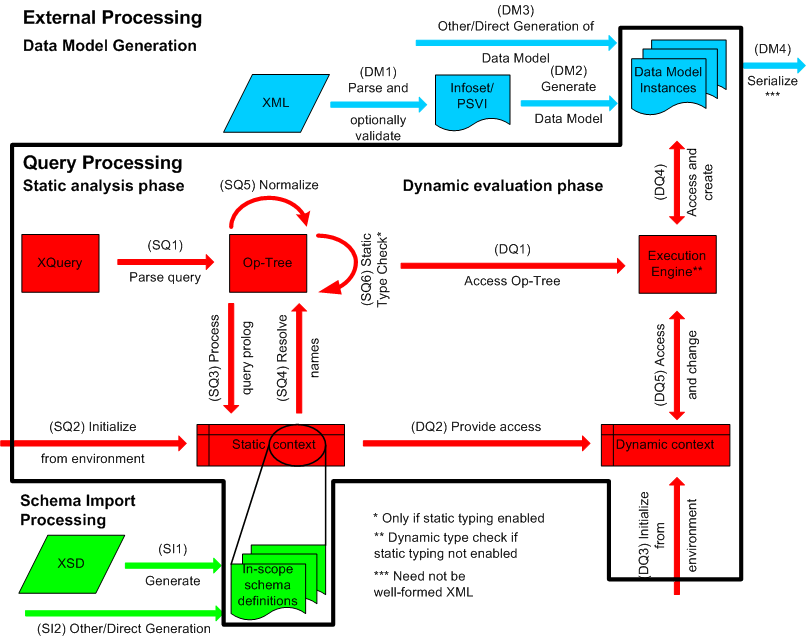
Figure 1: Processing Model Overview
Figure 1 provides a schematic overview of the processing steps that are discussed in detail below. XQuery distinguishes between the external processing domain, which includes generation of the data model (see 2.2.1 Data Model Generation), schema import processing (see 2.2.2 Schema Import Processing) and serialization (see 2.2.4 Serialization), and the query processing domain, which includes the static analysis and dynamic evaluation phases (see 2.2.3 Expression Processing). Consistency constraints on the query processing domain are defined in 2.2.5 Consistency Constraints.
| Editorial note | |
| There is an open issue on how much of the external processing domain is considered normative (open issue 561). | |
Before an expression can be processed, the input documents to be accessed by the expression must be represented in the data model. Figure 1 depicts the steps by which an XML document may be converted to the data model:
A document may be parsed using an XML parser that generates an XML Information Set (see [XML Infoset]). The parsed document may then be validated against one or more schemas. This process, which is described in [XML Schema], results in an abstract information structure called the Post-Schema Validation Infoset (PSVI). If a document has no associated schema, its Information Set is preserved. (See DM1 in Fig. 1.)
The Information Set or PSVI may be transformed into the data model by a process described in [XQuery 1.0 and XPath 2.0 Data Model]. (See DM2 in Fig. 1.)
The above steps provide an example of how a data model instance might be constructed. A data model instance might also be synthesized directly from a relational database, or constructed in some other way (see DM3 in Fig. 1.) XQuery is defined in terms of operations on the data model, but it does not place any constraints on how the input data model instance is constructed.
Each atomic value, element node, and attribute node in
the data
model is annotated with its dynamic type. The dynamic
type specifies a range of values -- for example, an
attribute named version might have the
dynamic type xs:decimal, indicating that it
contains a decimal value. For example, if the data model was
derived from an input XML document, the dynamic types of
the elements and attributes are derived from schema
validation.
The value of an attribute is represented directly
within the attribute node. An attribute node whose type
is unknown (such as might occur in a schemaless document)
is annotated with the dynamic type
xdt:untypedAtomic.
The value of an element is represented by the children
of the element node, which may include text nodes and
other element nodes. The dynamic type of an element node
indicates how the values in its child text nodes are to
be interpreted. An element whose type is unknown (such as
might occur in a schemaless document) is annotated with
the type xdt:untypedAny.
An atomic value of unknown type is annotated with the
type xdt:untypedAtomic.
The in-scope schema definitions in the static context may be extracted from actual XML Schemata as described in [XQuery 1.0 and XPath 2.0 Formal Semantics] (see step SI1 in Figure 1) or may be generated by some other mechanism (see step SI2 in Figure 1). In either case, the result must satisfy the consistency constraints defined in 2.2.5 Consistency Constraints.
XQuery defines two phases of processing called the static analysis phase and the dynamic evaluation phase (see Fig. 1).
[Definition: The static analysis phase depends on the expression itself and on the static context. The static analysis phase does not depend on any input data.]
During the static analysis phase, the query is parsed into an internal representation called the operation tree (step SQ1 in Figure 1). A parse error is raised as a static error.[err:XP0003] The static context is initialized by the implementation (step SQ2). The static context is then changed and augmented based on information in the prolog (step SQ3). In particular, the in-scope schema definitions are populated with information from imported schemata. The static context is used to resolve type names, function names, namespace prefixes and variable names. If a name in the operation tree is not found in the static context, a static error [err:XP0008] is raised (step SQ4).
The operation tree is then normalized by making explicit the implicit operations such as atomization, type promotion and extraction of Effective Boolean Values (step SQ5). The normalization process is described in [XQuery 1.0 and XPath 2.0 Formal Semantics]. An implementation is free to use any strategy or algorithm whose result conforms to these specifications.
If the Static Typing Feature
is supported, each expression is assigned a static type
(step SQ6). [Definition: The static
type of an expression may be either a named type or
a structural description--for example,
xs:boolean? denotes an optional occurrence
of the xs:boolean type. The rules for
inferring the static types of various
expressions are described in [XQuery 1.0 and XPath 2.0
Formal Semantics].] In some cases, the static type is
derived from the lexical form of the expression; for
example, the static type of the literal
5 is xs:integer. In other
cases, the static type of an expression is
inferred according to rules based on the static types
of its operands; for example, the static type of
the expression 5 + 1.2 is
xs:decimal.
During the analysis phase, if the Static Typing Feature is in effect and an operand of an expression is found to have a static type that is not appropriate for that operand, a type error is raised.[err:XQ0004] If static type checking raises no errors and assigns a static type T to an expression, then execution of the expression on valid input data is guaranteed either to produce a value of type T or to raise a dynamic error.
During the static analysis phase, if the
static
type assigned to an expression other than
() is empty, a static error is
raised.[err:XQ0005] This catches cases in
which a query refers to an element or attribute that is
not present in the in-scope
schema definitions, possibly because of a spelling
error.
The purpose of type-checking during the static analysis phase is to provide early detection of type errors and to infer type information that may be useful in optimizing the evaluation of an expression.
[Definition: The dynamic evaluation phase is performed only after successful completion of the static analysis phase. The dynamic evaluation phase depends on the operation tree of the expression being evaluated (step DQ1), on the input data (step DQ4), and on the dynamic context (step DQ5), which in turn draws information from the external environment (step DQ3) and the static context (step DQ2).] Execution of the evaluation phase may create new data-model values (step DQ4) and it may extend the dynamic context (step DQ5)--for example, by binding values to variables.
| Editorial note | |
| This is an open issue. It would be possible to evaluate an expression containing a static type error, and this might be quite useful because static analysis is conservative. Static type analysis could be used to warn of potential errors without inhibiting execution of an expression. | |
[Definition: A dynamic type is associated with each value as it is computed. The dynamic type of a value may be either a structural type (such as "sequence of integers") or a named type. The dynamic type of a value may be more specific than the static type of the expression that computed it (for example, the static type of an expression might be "zero or more integers or strings," but at evaluation time its value may have the dynamic type "integer.")]
If an operand of an expression is found to have a dynamic type that is not appropriate for that operand, a type error is raised.[err:XP0006]
Even though static typing can catch many type errors
before an expression is executed, it is possible for an
expression to raise an error during evaluation that was
not detected by static analysis. For example, an
expression may contain a cast of a string into an
integer, which is statically valid. However, if the
actual value of the string at run time cannot be cast
into an integer, a dynamic error will result.
Similarly, an expression may apply an arithmetic
operator to a value whose static type is
xdt:untypedAtomic. This is not a static
error, but at run time, if the value cannot be
successfully cast to a numeric type, a dynamic
error will be raised.
It is also possible for static analysis of an expression to raise a type error, even though execution of the expression on certain inputs would be successful. For example, an expression might contain a function that requires an element as its parameter, and the analysis phase might infer the static type of the function parameter to be an optional element. This case would be treated as a static type error, even though the function call would be successful for input data in which the optional element is present.
[Definition: Serialization is the process of converting an instance of the [XQuery 1.0 and XPath 2.0 Data Model] into a sequence of octets (step DM4 in Figure 1.) ] The general framework for serialization of the data model is described in [XSLT 2.0 and XQuery 1.0 Serialization].
An XQuery implementation is not required to provide a serialization interface. For example, an implementation may only provide a DOM interface or an interface based on an event stream. In these cases, serialization would be done outside of the scope of this specification.
[XSLT 2.0
and XQuery 1.0 Serialization] defines a set of
serialization parameters that govern the
serialization process. If an XQuery implementation
provides a serialization interface, it must support the
"xml" value of the method
parameter. In addition, the serialization interface may
support (and may expose to users) any of the
serialization parameters listed (with default values)
in C.3
Serialization Parameters.
In order for an expression to be well defined, the expression, its static context, and its dynamic context must be mutually consistent. The consistency constraints listed below are prerequisites for correct functioning of an XQuery implementation. Enforcement of these consistency constraints is beyond the scope of this specification.
For each item type (i.e., element, attribute, or type name) referenced in an instance of the data model whose expanded name matches a name in the in-scope schema definitions (ISSD), the corresponding element, attribute, or type definition in the ISSD must be equivalent to the definition originally provided in the PSVI from which the data model instance was created.
Every item type (i.e., every element, attribute, or type name) referenced in in-scope variables or in-scope functions must be in the in-scope schema definitions.
Every name used in a SequenceType must be in the in-scope schema definitions.
The element declaration for every element name referenced in a SequenceType or KindTest must be in the in-scope element declarations.
The attribute declaration for every attribute name referenced in a SequenceType or KindTest must be in the in-scope attribute declarations.
For each mapping of a string to a document node in accessible documents, if there exists a mapping of the same string to a document type in statically-known documents, the document node must match the document type, using the matching rules in 2.4.1.1 SequenceType Matching.
For each mapping of a string to a sequence of nodes in accessible collections, if there exists a mapping of the same string to a type in statically-known collections, the sequence of nodes must match the type, using the matching rules in 2.4.1.1 SequenceType Matching.
The dynamic variables in the dynamic context and the in-scope variables in the static context must correspond as follows:
All variables defined in in-scope variables must be defined in dynamic variables.
For each (variable, type) pair in in-scope variables and the corresponding (variable, value) pair in dynamic variables such that the variable names are equal, the value must match the type, using the matching rules in 2.4.1.1 SequenceType Matching.
The concepts described in this section are normatively defined in [XQuery 1.0 and XPath 2.0 Data Model] and [XQuery 1.0 and XPath 2.0 Functions and Operators]. They are summarized here because they are of particular importance in the processing of expressions.
[Definition: Document order defines a total ordering among all the nodes seen by the language processor and is defined formally in the data model.] Informally, document order corresponds to a pre-order, depth-first, left-to-right traversal of the nodes in the data model.
Within a given document, the document node is the first node, followed by element nodes, text nodes, comment nodes, and processing instruction nodes in the order of their representation in the XML form of the document (after expansion of entities). Element nodes occur before their children, and the children of an element node occur before its following siblings. The namespace nodes of an element immediately follow the element node, in implementation-defined order. The attribute nodes of an element immediately follow its namespace nodes, and are also in implementation-defined order.
The relative order of nodes in distinct documents is implementation dependent but stable within a given query or transformation. Given two distinct documents A and B, if a node in document A is before a node in document B, then every node in document A is before every node in document B. The relative order among free-floating nodes (those not in a document) is also implementation dependent but stable.
Nodes have a typed value and a string value.
[Definition: The typed value
of a node is a sequence of atomic values and can be
extracted by applying the fn:data function
to the node. The typed value for each kind of node is
defined by the dm:typed-value accessor in
[XQuery 1.0 and XPath 2.0 Data
Model]. ] [Definition:
The string value of a node is a string and can be
extracted by applying the the fn:string
function to the node. The string value for each kind of
node is defined by the dm:string-value
accessor in [XQuery 1.0 and XPath
2.0 Data Model].] [Definition: Element and
attribute nodes have a type annotation, which
represents (in an implementation-dependent way) the
dynamic
(run-time) type of the node.] XQuery does not provide
a way to directly access the type annotation of an
element or attribute node.
The relationship between the typed value and the string value for various kinds of nodes is described and illustrated by examples below.
For text, document, comment, processing
instruction, and namespace nodes, the typed value of
the node is the same as its string value, as an
instance of xdt:untypedAtomic. (The
string value of a document node is formed by
concatenating the string values of all its descendant
text nodes, in document order.)
The typed value of an attribute node with the type
annotation xdt:untypedAtomic is the same
as its string value, as an instance of
xdt:untypedAtomic. The typed value of an
attribute node with any other type annotation is
derived from its string value and type annotation in
a way that is consistent with schema validation.
Example: A1 is an attribute having string value
"3.14E-2" and type annotation
xs:double. The typed value of A1 is the
xs:double value whose lexical
representation is 3.14E-2.
Example: A2 is an attribute with type annotation
IDREFS, which is a list type derived
from IDREF. Its string value is
"bar baz faz". The typed value of A2 is
a sequence of three atomic values
("bar", "baz",
"faz"), each of type IDREF.
The typed value of a node is never treated as an
instance of a named list type. Instead, if the type
annotation of a node is a list type (such as
IDREFS), its typed value is treated as a
sequence of the underlying base type (such as
IDREF).
For an element node, the relationship between typed value and string value depends on the node's type annotation, as follows:
If the type annotation is
xs:anyType, or denotes a complex
type with mixed content, then the typed value of
the node is equal to its string value, as an
instance of xdt:untypedAtomic.
Example: E1 is an element node having type
annotation xs:anyType and string
value "1999-05-31". The typed value
of E1 is "1999-05-31", as an
instance of xdt:untypedAtomic.
Example: E2 is an element node with the type
annotation formula, which is a
complex type with mixed content. The content of
E2 consists of the character "H", a
child element named subscript with
string value "2", and the character
"O". The typed value of E2 is
"H2O" as an instance of
xdt:untypedAtomic.
If the type annotation denotes a simple type or a complex type with simple content, then the typed value of the node is derived from its string value and its type annotation in a way that is consistent with schema validation.
Example: E3 is an element node with the type
annotation cost, which is a complex
type that has several attributes and a simple
content type of xs:decimal. The
string value of E3 is "74.95". The
typed value of E3 is 74.95, as an
instance of xs:decimal.
Example: E4 is an element node with the type
annotation hatsizelist, which is a
simple type derived by list from the type
hatsize, which in turn is derived
from xs:integer. The string value of
E4 is "7 8 9". The typed value of E4
is a sequence of three values (7,
8, 9), each of type
hatsize.
If the type annotation denotes a complex type with empty content, then the typed value of the node is the empty sequence.
If the type annotation denotes a complex type
with non-mixed complex content, then the typed
value of the node is undefined. The
fn:data function raises a type error
[err:XP0007] when applied to such
a node.
Example: E5 is an element node with the type
annotation weather, which is a
complex type whose content type specifies
elementOnly. E5 has two child
elements named temperature and
precipitation. The typed value of E5
is undefined, and the fn:data
function applied to E5 raises an error.
XQuery has a set of functions that provide access to input data. These functions are of particular importance because they provide a way in which an expression can reference a document or a collection of documents. The input functions are described informally here, and in more detail in [XQuery 1.0 and XPath 2.0 Functions and Operators].
An expression can access input documents either by calling one of the input functions or by referencing some part of the expression context that is initialized by the external environment, such as a variable or a pre-initialized context item.
The input functions supported by XQuery are as follows:
The fn:doc function takes a string
containing a URI that refers to an XML document, and
returns a document node whose content is the
data
model representation of the given document.
The fn:collection function returns
the nodes found in a collection. A collection may be
any sequence of nodes. A collection is identified by
a string, which must be a valid URI. For example, the
expression
fn:collection("http://example.org")//customer
identifies all the customer elements
that are descendants of nodes found in the collection
whose URI is http://example.org.
If a given input function is invoked repeatedly with the same arguments during the scope of a single query or transformation, each invocation returns the same result.
XQuery is a strongly typed language with a type system based on [XML Schema]. The XQuery type system is formally defined in [XQuery 1.0 and XPath 2.0 Formal Semantics]. During the analysis phase, if static type checking is in effect and an expression has a static type that is not appropriate for the context in which the expression is used, a type error is raised.[err:XQ0004] During the evaluation phase, if the type of a value is incompatible with the expected type of the context in which the value is used, a type error is raised.[err:XP0006] A type error may be detected and reported either during the static analysis phase or during the dynamic evaluation phase.
[Definition: When it is necessary to refer to a type in an XQuery expression, the syntax shown below is used. This syntax production is called SequenceType, since it describes the type of an XQuery value, which is a sequence.]
| [124] | SequenceType |
::= | (ItemType
OccurrenceIndicator?) |
| [140] | OccurrenceIndicator |
::= | "?" | "*" | "+" |
| [126] | ItemType |
::= | AtomicType
| KindTest | ("item"
"(" ")") |
| [125] | AtomicType |
::= | QName |
| [127] | KindTest |
::= | DocumentTest |
| [130] | PITest |
::= | "processing-instruction" "(" (NCName | StringLiteral)?
")" |
| [132] | CommentTest |
::= | "comment" "(" ")" |
| [133] | TextTest |
::= | "text" "(" ")" |
| [134] | AnyKindTest |
::= | "node" "(" ")" |
| [131] | DocumentTest |
::= | "document-node" "(" ElementTest? ")" |
| [128] | ElementTest |
::= | "element" "(" ((SchemaContextPath
LocalName) |
| [129] | AttributeTest |
::= | "attribute" "(" ((SchemaContextPath "@"
LocalName) |
| [135] | SchemaContextPath |
::= | SchemaGlobalContext
"/" (SchemaContextStep
"/")* |
| [14] | SchemaGlobalContext |
::= | QName |
SchemaGlobalTypeName |
| [15] | SchemaContextStep |
::= | QName |
| [13] | SchemaGlobalTypeName |
::= | "type" "(" QName ")" |
| [137] | LocalName |
::= | QName |
| [138] | NodeName |
::= | QName |
"*" |
| [139] | TypeName |
::= | QName |
"*" |
QNames appearing in a SequenceType have their prefixes expanded to namespace URIs by means of the in-scope namespaces and the default element/type namespace. It is a static error [err:XP0008] to use a name in a SequenceType if that name is not found in the appropriate part of the in-scope schema definitions. If the name is used as an element name, it must appear in the in-scope element declarations; if it is used as an attribute name, it must appear in the in-scope attribute declarations; and if it is used as a type name, it must appear in the in-scope type definitions.
Here are some examples of SequenceTypes that might be used in XQuery expressions:
xs:date refers to the built-in Schema
type date
attribute()? refers to an optional
attribute
element() refers to any element
element(po:shipto, po:address) refers
to an element that has the name
po:shipto (or is in the substitution
group of that element), and has the type annotation
po:address (or a subtype of that
type)
element(po:shipto, *) refers to an
element named po:shipto (or in the
substitution group of po:shipto), with
no restrictions on its type
element(*, po:address) refers to an
element of any name that has the type annotation
po:address (or a subtype of
po:address). If the keyword
nillable were used following
po:address, that would indicate that the
element may have empty content and the attribute
xsi:nil="true", even though the
declaration of the type po:address has
required content.
node()* refers to a sequence of zero
or more nodes of any type
item()+ refers to a sequence of one
or more nodes or atomic values
[Definition: During
evaluation of an expression, it is sometimes necessary
to determine whether a given value matches a type that
was declared using the SequenceType syntax. This
process is known as SequenceType matching.] For
example, an instance of expression returns
true if a given value matches a given
type, or false if it does not.
| Editorial note | |
| The definition of SequenceType matching still needs to be correlated with the definition of type matching in [XQuery 1.0 and XPath 2.0 Formal Semantics]. | |
SequenceType matching between a given value and a given SequenceType is performed as follows:
If the SequenceType is empty(), the
match succeeds only if the value is an empty sequence.
If the SequenceType is an ItemType with no
OccurrenceIndicator, the match succeeds only if the
value contains precisely one item and that item matches
the ItemType (see below). If the SequenceType contains
an ItemType and an OccurrenceIndicator, the match
succeeds only if the number of items in the value is
consistent with the OccurrenceIndicator, and each of
these items matches the ItemType. As a consequence of
these rules, a value that is an empty sequence matches
any SequenceType whose occurrence indicator is
* or ?.
An OccurrenceIndicator indicates the number of items in a sequence, as follows:
? indicates zero or one items
* indicates zero or more items
+ indicates one or more items
As stated above, an item may be a node or an atomic value. The process of matching a given item against a given ItemType is performed as follows
The ItemType item() matches any
single item. For example, item()
matches the atomic value 1 or the
element <a/>.
If an ItemType consists simply of a QName, that QName must be the name of an atomic type that is in the in-scope type definitions; otherwise a static error is raised. An ItemType consisting of the QName of an atomic type matches a value if the dynamic type of the value is the same as the named atomic typ