1 About the XForms 1.0 Specification
1.1 Background
Forms are an important part of the Web, and they continue to be the
primary means for enabling interactive web applications. Web applications and
electronic commerce solutions have sparked the demand for better web forms
with richer interactions. XForms are the response to this demand and provide
a new platform-independent markup language for online interaction between an
XForms Processor
and a remote user agent. XForms are the successor to HTML forms, and benefit
from the lessons learned from HTML forms.
Further background information on XForms can be found at http://www.w3.org/MarkUp/Forms.
1.2 Reading the Specification
This specification has been written with various types of readers in
mind—in particular XForms authors and XForms implementors. We hope the
specification will provide authors with the tools they need to write
efficient, attractive and accessible documents without overexposing them to
the XForms implementation details. Implementors, however, should find all
they need to build conforming XForms Processors. The specification begins
with a general presentation of XForms before specifying the technical details
of the various XForms components.
The specification has been written with various modes of presentation in
mind. In case of a discrepancy, the online electronic version is considered
the authoritative version of the document.
This document uses the terms may, must, and should in
accord with RFC 2119.
1.3 How the Specification is Organized
The specification is organized into the following chapters:
- Chapters 1 and 2
An introduction to XForms. The introduction outlines the design
principles and includes a brief tutorial on XForms.
- Chapters 3 and up
XForms reference manual. The bulk of the reference manual consists
of the specification of XForms. This reference defines XForms and how
XForms Processors must interpret the various components in order to
claim conformance.
- Appendixes
Appendixes contain a normative description of XForms described in
XML Schema, information on references, and other useful information.
1.4 Documentation Conventions
Throughout this document, the following namespace prefixes and
corresponding namespace identifiers are used:
xforms: The XForms namespace 3.1 The XForms Namespace
html: The XHTML namespace [XHTML
1.0]
xsd: The XML Schema namespace [XML Schema
part 1]
xsi: The XML Schema for instances namespace [XML Schema part 1]
xlink: The XLink namespace [XLink]
ev: The XML Events namespace [XML
Events]
my: Any user defined namespace
This is only a convention; any namespace prefix may be used in
practice.
The following typographical conventions are used to present technical
material in this document.
Official terms are defined in the following manner: [Definition: You can find most terms in
chapter 12 Glossary Of Terms]. Links to
terms may be specially highlighted where necessary.
The XML representations of various elements within XForms are presented as
follows: Listed are the element name, names of all attributes, allowed values
of attributes appearing after a "=" character, default values of attributes
appearing after a ":" character, and allowed content. One or more headings
below the listing provide additional explanatory information.
Example: XML Syntax Representation <example>
<example
  count = xsd:integer
  size = (small | medium | large) : medium
>
  <!-- Content: (allowed-content) -->
</example>
count - description of this attribute
size - description of this attribute
Certain common attributes 3.2 Horizontally
Applicable Markup are not shown in the syntax representations except
when special attention needs to be called to their presence.
Examples are set off typographically:
References to external documents appear as follows: [Sample Reference] with links to the references
section of this document.
- Sample
Reference
- Reference - linked to from above.
The following typesetting convention is used for non-normative
commentary:
Note:
A gentle explanation or admonition to readers.
| Editorial note: Editorial
Note Name |
|
| Editorial commentary, not
intended for final publication. |
Issue
(issue-id):
Issue-Name
A specific issue to which input from readers is requested, not intended
for final publication.
Resolution:
None recorded.
2 Introduction to XForms
This chapter provides an easily approachable description of XForms. Not
every feature of XForms is covered here. For a complete and normative
description of XForms, refer to the remainder of this document. The following
subsections develop a complete example of an XForms application that is
hosted in an XHTML document. The complete example is found in E.1 XForms In XHTML.
2.1 Separating Purpose From
Presentation
A typical form starts off with a purpose, e.g., data collection.
This purpose is realized by creating an interactive presentation
that allows the user to provide the requisite information. The resulting
data is the result of completing the form.
| Purpose |
Presentation |
Data |
| Data collection |
Arrangement of form controls |
Registration information |
| List hours worked |
UI for collecting dates and times
worked |
Days and hours worked |
| Shopping application |
Present shopping user interface |
Order, shipping, and payment info |
| Information collection |
Integrate forms user interface into WWW
page |
User contact information |
HTML forms failed to separate the purpose of a form from its presentation;
additionally, they only offered a restricted representation for data captured
through the form. Here is a summary of the primary benefits of using
XForms:
- Strong typing
Submitted data is strongly typed and can be checked using
off-the-shelf tools. Type validation rules help client-side validation,
and such validation code can be automatically generated.
- Existing schema re-use
This obviates duplication, and ensures that updating the
validation rules as a result of a change in the underlying business
logic does not require re-authoring validation constraints within the
XForms application.
- External schema augmentation
This enables the XForms author go beyond the basic set of
constraints available from the back-end. Providing such additional
constraints as part of the XForms Model enhances the overall usability
of the resulting web application.
- XML submission
This obviates the need for custom server-side logic to marshal the
submitted data to the application back-end. The received XML instance
document can be directly validated and processed by the application
back-end.
- Internationalization
Using XML 1.0 for instance data ensures that the submitted data is
internationalization ready.
- Enhanced accessibility
XForms separates content and presentation. User interface controls
encapsulate all relevant metadata such as labels, thereby enhancing
accessibility of the application when using different modalities.
XForms user interface controls are generic and suited for
device-independence.
- Multiple device support
The high-level nature of the user interface controls, and the
consequent intent-based authoring of the user interface makes it
possible to re-target the user interaction to different devices.
- Declarative event handlers
By defining XML-based declarative event handlers such as
setFocus, message, and setValue
that cover common use cases, the majority of XForms documents can be
statically analyzed; contrast this with the present practice of using
imperative scripts for event handlers.
2.2 Current Approach: HTML
Consider a simple electronic commerce form authored in HTML:
Example: HTML Form
<html>
  <head>
    <title>eCommerce Form</title>
  </head>
  <body>
    <form action="http://example.com/submit" method="post">
      <table summary="Payment method selector">
      <tr>
      <td><p>Select Payment Method:</p></td>
      <td><label><input type="radio" name="as" value="cash"/>Cash</label>
      <label><input type="radio" name="as" value="credit"/>Credit</label></td>
      </tr>
      <tr>
      <td><label for="cc">Credit Card Number:</label></td>
      <td><input type="text" name="cc" id="cc"/></td>
      </tr>
      <tr>
      <td><label for="exp">Expiration Date:</label></td>
      <td><input type="text" name="exp" id="exp"/></td>
      </tr>
      <tr>
      <td colspan="2"><input type="submit"/></td>
      </tr>
      </table>
    </form>
  </body>
</html>
A user agent might render this form as follows:
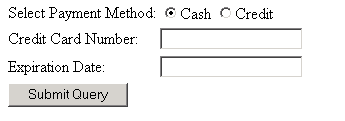
This form makes no effort to separate purpose (data collection semantics)
from presentation (the input form controls), and offers no
control over the pair serialization of the resulting data as name-value
pairs. In contrast, XForms greatly improve the expressive capabilities of
electronic forms.
2.3 Transition to XForms
In the XForms approach, forms are comprised of a section that describes
what the form does, called the XForms Model, and another section that describes
how the form is to be presented. XForms 1.0 defines the XForms User
Interface, which is a device-independent, platform-neutral set of form controls suitable for
general-purpose use. The user interface is bound to the XForms model
via the XForms binding mechanism; This flexible architecture allows others to
attach user interfaces to an XForms Model as illustrated here:
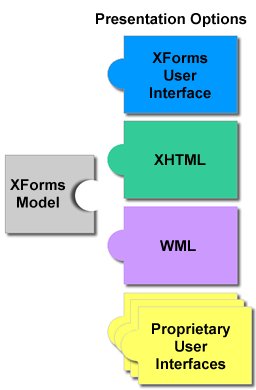
The simplest case involves authoring the new XForms form controls, leaving
out the other sections of the form. To convert the previous form into XForms
this way, a model element is needed in the head
section of the document:
<xforms:model>
  <xforms:submitInfo action="http://examples.com/submit" id="submit"/>
</xforms:model>
With these changes to the containing document, the previous example could
be rewritten like this (note that we have intentionally defaulted the XForms
namespace prefix in this example):
<selectOne ref="as">
  <caption>Select Payment Method</caption>
  <choices>
    <item>
      <caption>Cash</caption>
      <value>cash</value>
    </item>
    <item>
      <caption>Credit</caption>
      <value>credit</value>
    </item>
  </choices>
</selectOne>

<input ref="cc">
  <caption>Credit Card Number</caption>
</input>

<input ref="exp">
  <caption>Expiration Date</caption>
</input>

<submit submitInfo="submit">
  <caption>Submit</caption>
</submit>
Notice the following features of this design:
The user interface is not hard-coded to use radio buttons. Different
devices (such as a voice browser) can render the concept of "selectOne"
as appropriate.
Form controls always have captions directly associated with them, as
child elements—this is a key feature designed to enhance
accessibility.
There is no need for an enclosing form element, as in
HTML. See (See 2.6 Multiple Forms per
Document for details on how to author multiple forms per
document)
Markup for specifying form controls has been simplified
Data gets submitted as XML.
With these changes, the XForms Processor will be able to directly
submit XML instance data. The XML is constructed by creating a root element
with child elements reflecting the names specified in each form control via
attribute ref. In this example, the submitted data would look
like this:
<instanceData>
  <as>Credit</as>
  <cc>1235467789012345</cc>
  <exp>2001-08</exp>
</instanceData>
2.4 Providing XML Instance Data
XForms processing keeps track of the state of the partially filled form
through instance data.
Initial values for the instance may be provided via element
instance. Element instance holds a skeleton XML
document that gets updated as the user fills out the form. Element
instance gives the author full control on the structure of the
submitted XML data, including namespace information. When the form is
submitted, the instance data is serialized as an XML document. The initial
instance data is defined in the instance element inside the
model element, as follows:
<xforms:model>
  <xforms:instance>
    <payment as="credit" xmlns="http://commerce.example.com/payment">
      <cc/>
      <exp/>
    </payment>
  </xforms:instance>
  <xforms:submitInfo action="http://example.com/submit" method="post"/>
</xforms:model>
This design has features worth calling out:
There is complete flexibility in the structure of the XML. Notice
that XML namespaces are now used, and that a wrapper element of the
author's choosing contains the instance data.
Empty elements cc and exp serve as
place-holders in the XML structure, and will be filled in with form data
provided by the user.
An initial value ("credit") for the form control is
provided through the instance data, in this case an attribute
as. In the submitted XML, this initial value will be
replaced by the user input.
To connect this instance data with form controls, the ref
attributes on the form controls need to point to the proper part of the
instance data, using binding expressions.
Example: Binding Expression
 xmlns:my="http://commerce.example.com/payment"...
  <xforms:selectOne ref="my:payment/@as">
    ...
  <xforms:input ref="my:payment/my:cc">
    ...
  <xforms:input ref="my:payment/my:exp">
Binding expressions are based on XPath [XPath
1.0], including the use of the @ character to refer to
attributes, as seen here.
2.5 Constraining Values
XForms allows data to be checked for validity as the form is being filled.
Referring to the earlier HTML form in 2.2
Current Approach: HTML, there are several desirable aspects that
would only be possible to ensure through the addition of unstructured script
code:
The credit card information form controls cc and
exp are only relevant if the "credit" option is chosen in
the as form control.
The credit card information form controls cc and
exp should be required when the "credit" option is chosen in
the as form control.
The form control cc should accept digits only, and
should have between 14 and 18 digits.
The form control exp should accept only valid
month/date combinations.
By specifying an additional component, model item constraints, authors can
include rich declarative validation information in forms. Such information
can be taken from XML Schemas as well as XForms-specific constraints, such as
relevant. XForms constraints appear on
bind elements, while Schema constraints are expressed in an XML
Schema fragment, either inline or external. For example:
... xmlns:my="http://commerce.example.com/payment"...
<xforms:bind ref="my:payment/my:cc"
    relevant="../my:payment/@as = 'credit'"
    required="true"
    type="my:cc"/>

<xforms:bind ref="my:payment/my:exp"
    relevant="../my:payment/@as = 'credit'"
    required="true"
    type="xsd:gYearMonth"/>

<xforms:schema>
  <xsd:schema ...>
    ...
    <xsd:simpleType name="cc">
      <xsd:restriction base="xsd:string">
        <xsd:pattern value="\d{14,18}"/>
      </xsd:restriction>
    </xsd:simpleType>
    ...
  </xsd:schema>
</xforms:schema>
2.6 Multiple Forms per Document
XForms processing places no limits on the number of individual forms that
can be placed in a single containing document. When a single
document contains multiple forms, each form needs a separate
model element. The first model element may omit a
unique id attribute (as have all the examples above), but
subsequent model elements require an id so that
they can be referenced from elsewhere in the containing document.
In addition, form controls need to specify the model element
contains the instance data to which they bind. This is accomplished through a
model attribute alongside the ref attribute. The
default for the model attribute is the first model
element in document order.
The next example adds an opinion poll to our electronic commerce form.
<xforms:model>
  <xforms:instance>
    ...payment instance data...
  </xforms:instance>
  <xforms:submitInfo action="http://example.com/submit" method="post"/>
</xforms:model>

<xforms:model id="poll">
  <xforms:submitInfo .../>
</xforms:model>
Additionally, the following markup would appear in the body section of the
document:
<xforms:selectOne ref="pollOption" model="poll">
  <xforms:caption>How useful is this page to you?</xforms:caption>
  <xforms:choices>
    <xforms:item>
      <xforms:caption>Not at all helpful</xforms:caption>
      <xforms:value>0</xforms:value>
    </xforms:item>
    <xforms:item>
      <xforms:caption>Barely helpful</xforms:caption>
      <xforms:value>1</xforms:value>
    </xforms:item>
    <xforms:item>
      <xforms:caption>Somewhat helpful</xforms:caption>
      <xforms:value>2</xforms:value>
    </xforms:item>
    <xforms:item>
      <xforms:caption>Very helpful</xforms:caption>
      <xforms:value>3</xforms:value>
    </xforms:item>
  </xforms:choices>
</xforms:selectOne>

<xforms:submit submitInfo="poll">
  <xforms:caption>Submit</xforms:caption>
</xforms:submit>
The main difference here is the use of model="poll", which
identifies the instance.
Note that complete examples can be found in E Complete XForms Examples
3 Document Structure
The XForms specification is an application of XML [XML 1.0] and has been designed for use within other
XML vocabularies—in particular within XHTML [XHTML 1.0]. This chapter discusses the structure
of XForms that allow this specification to be used with other document
types.
3.1 The XForms Namespace
The XForms namespace has the URI:
http://www.w3.org/2002/01/xforms. Any future Working Drafts are
expected to use a different identifier, though a final identifier will be
allocated before XForms becomes a W3C Recommendation.
XForms Processors must use the XML namespaces mechanism [XML Names] to recognize elements and attributes
from this namespace.
3.2 Horizontally Applicable Markup
Every element defined in this specification declares attribute
id of type xsd:ID—see the schema for
XForms—this allows these elements to be referenced via attributes of
type xsd:idref.
The XForms Processor must ignore any foreign-namespaced elements or
attributes that are unrecognized.
Note that except where specifically allowed by the Schema for XForms,
foreign-namespaced elements are not allowed as content of elements in the
XForms namespace.
3.3 Model
This section describes XForms element model used as a
container for XForms elements defining the XForms model. The containing document may contain one or
more model elements. Element model defines the
underlying model to which the XForms document binds user
interaction. Hence, model elements occur before the user
interaction markup. The content of element model is typically
not rendered. As an example, model elements occur within element
html:head of an XHTML document, whereas XForms user interface
markup appears within element html:body.
XML Representation: <model>
<model
  extensionFunctions = list of QNames
>
  <!-- Content: instance?, schema?, (privacy|submitInfo|bind|action|extension)* -->
</model>
extensionFunctions - Optional list of XPath extension functions
used by this XForms Model. It is an error to use an undeclared extension
function.
Element model can contain the following elements.
- Instance
Defines skeleton instance document and holds initialization data
if any—see 3.4
instance.
- Schema
Defines schema for the instance—see 3.5 schema
- submitInfo
Holds submit details—see 3.6 submitInfo
- Bindings
Elements bind that establish one or more XForms
bindings to define model item constraints—see
6 Constraints.
- Privacy
Establishes P3P properties—see 3.7 privacy
- Action
Event handlers—see 10.16 action. This allows
the author to handle events that arrive at node
model—see the processing model 4
Processing Model.
- Extension
Extension elements if any—see 8.12.4.5 extension
Example: Model
<model xmlns="http://www.w3.org/2002/01/xforms" id="Person">
   <instance xlink:href="http://example.com/cgi-bin/get-instance" />
   <schema xlink:href="Schema-Questionnaire.xsd" />
   ...
</model>
3.4 instance
Element instance contains a skeleton instance document that
provides initial instance data. The instance data may be defined inline or
obtained from an external URI.
XML Representation: <instance>
<instance xlink:href = xsd:anyURI >
  <!-- Content: (##any) -->
</instance>
xlink:href - Optional link to externally defined instance data
The content of the instance element is arbitrary XML in any
namespace. The content of this element is treated as opaque data. Authors
must ensure that proper namespace declarations are used for content within
the instance element.
3.5 schema
Element schema contains the schema defining the instance. The
schema may be defined inline or obtained from an external URI.
XML Representation: <schema>
<schema xlink:href = xsd:anyURI >
  <!-- Content: ##other (though typically <xsd:schema>) -->
</schema>
xlink:href - Optional link to an externally defined schema.
3.6 submitInfo
Element submitInfo encodes how, where and what to submit.
XML Representation: <submitInfo>
<submitInfo
  (single node binding attributes)
  action = xsd:anyURI
  mediaTypeExtension = "none" | qname-but-not-ncname : "none"
  method = "post" | "get" | qname-but-not-ncname : "post"
  version = xsd:NMTOKEN
  indent = xsd:boolean
  encoding = xsd:string
  mediaType = xsd:string
  omitXMLDeclaration = xsd:boolean
  standalone = xsd:boolean
  CDATASectionElements = list of xsd:QName
  replace = "all" | "instance" | "none" | qname-but-not-ncname : "all"
>
  <!-- Content: XForms Actions -->
</submitInfo>
single node binding attributes - optional selector enabling
submission of a portion of the instance data
action - Required destination for submitting instance data.
mediaTypeExtension - Optional information describing the
serialization format. This is in addition to the mediaType.
method - Optional indicator as to the protocol to be used to
transmit the serialized instance data.
version - corresponds to the version attribute of
xsl:output
indent - corresponds to the indent attribute of
xsl:output
encoding - corresponds to the encoding attribute of
xsl:output
mediaType - corresponds to the media-type attribute of
xsl:output
omitXMLDeclaration - corresponds to the
omit-xml-declaration attribute of xsl:output
standalone - corresponds to the standalone attribute of
xsl:output
CDATASectionElements - corresponds to the
cdata-section-elements attribute of xsl:output
replace - specifier for how the information returned after submit
should be applied.
Note:
Many of these attributes correspond to XSLT attributes [XSLT]. Note that the XSLT attributes
doctype-system and doctype-public are not supported
in XForms processing.
Note:
Note also that attribute mediaTypeExtension is useful in
cases where a media type alone is not sufficiently precise. For instance, a
SOAP envelope would not be adequately described simply by "text/xml",
additional information would be required.
3.7 privacy
Element privacy is used to associate a P3P [P3P 1.0] policy reference with a particular form.
XML Representation: <privacy>
<privacy
  xlink:href = xsd:anyURI
>
  <!-- Content: (##empty) -->
</privacy>
xlink:href - Optional link to an externally defined P3P policyref
file (not an actual policy).
3.8 XForms and XLink
XForms uses XLink [XLink] for linking and for
defining an explicit relationship between resources that may be either local
or remote. To this end, the XForms schema references the XLink namespace with
sensible defaults. Other than in the case of attribute
xlink:href, form authors will not be required to explicitly
write XLink-specific elements or attributes.
All XLinks in XForms are simple links. For further details, see 3.8.1 XLink Conformance and
Examples.
3.8.1 XLink Conformance and
Examples
An XForms processor is not required to implement full XLink—correct
behavior of the xlink:href attribute (as defined in this
chapter) is sufficient. For example, an XForms Processor must accept and
correctly process the schema in both of the following:
External schema constraints
<xforms:model>
  <xforms:schema xlink:href="URI-to-remote-schema.xsd" />
</xforms:model>
Inline schema constraints
<xforms:model>
  <xforms:schema>
    <xsd:schema ...>
      <!-- Content: ... -->
    </xsd:schema>
  </xforms:schema>
</xforms:model>
This second example is unusual in that the xforms:schema
element defaults an attribute xlink:type="simple" but lacks an
xlink:href attribute to make the link meaningful. In this
situation, the XForms Processor should switch from simple mode
to none mode for the element lacking attribute
xlink:href. For compatibility with XLink, the second example
should be explicitly authored as follows:
Inline schema constraints, with explicit xlink:type
<xforms:model>
  <xforms:schema xlink:type="none">
    <xsd:schema...>
      <!-- Content: ... -->
    </xsd:schema>
  </xforms:schema>
</xforms:model>
Notice the explicit override of the xlink:type attribute.
If both inline content and external reference is provided, a processor
must use the external reference and ignore the inline content.
7 XPath Expressions in XForms
XForms uses XPath to address instance data nodes in binding
expressions, to express constraints, and to specify calculations.
7.1 XPath Datatypes
XPath data types are used only in Binding expressions and computed
expressions. XForms uses XPath datatypes boolean,
string, number and node-set. A future
version of XForms is expected to use XPath 2.0, which includes support for
XML Schema datatypes.
7.2 Instance Data
For each model element, the XForms processor maintains the
state in an internal structure called instance data that conforms to the XPath Data
Model [XPath 1.0]. Elements and attributes in
the instance data may have namespace information associated with them, as
defined in the XPath Data Model. Unless otherwise specified, all instance
data elements and attributes are unqualified. In addition, XForms processors
must provide DOM access to this instance data via the interface defined
below.
interface XFormsModelElement : org.w3c.dom.Element
The method getInstanceDocument returns a DOM Document that corresponds to
the instance data associated with this XForms Model.
Return value: org.w3c.dom.Document
raises (DOMException); if there is no model with the specified
model-id.
If the instance data is multiply rooted, the returned document has
unqualified element instanceData as the
documentElement, with the content of the XForms Model as
children.
7.3 Evaluation Context
Within XForms, XPath expressions reference abstract instance data (using
the "path" portion of XPath), instead of a concrete XML document. This
reference is called a binding expression in this specification.
Every XPath expression requires an evaluation context. The following rules
are used in determining evaluation context when evaluating elements
containing binding expressions in XForms:
The context node for outermost binding elements is the XPath root
(/). A " binding element" is any element that is
explicitly allowed to have a binding expression attribute. A binding
element is "outermost" when the node-set returned by the XPath
expression ancestor::* includes no binding element nodes.
The context node for non-outermost binding elements is the first
node of the binding expression of the immediately enclosing element. An
element is "immediately enclosing" when it is the first binding
element node in the node-set returned by the XPath expression
ancestor::*. This is also referred to as "scoped
resolution".
The context node for computed expressions (occurring on element
bind) is the first node of the node-set returned from the
binding expression in the sibling ref attribute.
The context size and position are both exactly 1.
No variable bindings are in place.
The available function library is defined below, plus any function
names declared in attribute extensionFunctions on element
model.
Any namespace declarations in scope for the attribute that defines
the expression are applied to the expression.
Example: Binding Expression Context Nodes
<group ref="level1/level2/level3">
  <selectOne ref="elem" ... />
  <selectOne ref="@attr" ... />
</group>
In this example, the group has a binding expression of
level1/level2/level3. According to the rules above, this
outermost element would have a context node of /, which is the
root of the instance data, or the parent to the elem element.
Both of the selectOnes then inherit a context node from their
parent, the context node being /level1/level2/level3. Based on
this, the selectOne binding expressions evaluate respectively to
/level1/level2/level3/elem and
/level1/level2/level3/@attr. Matching instance data follows:
Example: Sample Instance
<level1>
  <level2>
    <level3 attr="xyz">
      <elem>xyz</elem>
    </level3>
  </level2>
</level1>
7.4 XForms Core Function Library
The XForms Core Function Library includes the entire [XPath 1.0] Core Function Library, including
operations on node-sets, strings, numbers, and booleans.
This section defines a set of required functions for use within XForms.
7.4.1 Boolean Methods
7.4.1.1 boolean-from-string()
boolean boolean-from-string(string)
Function boolean-from-string returns true if the
required parameter string is "true", or false if
parameter string is "false". This is useful when referencing a
Schema xsd:boolean datatype in an XPath expression. If the
parameter string matches neither "true" nor "false", according to a
case-insensitive comparison, processing stops with a fatal error.
7.4.1.2 if()
string if(boolean, string,
string)
Function if evaluates the first parameter as boolean,
returning the second parameter when true, otherwise the third
parameter.
7.4.2 Number Methods
Note:
The XPath number datatype and associated methods and operators use IEEE
specified representations. XForms Basic Processors are not required to use
IEEE, and thus might yield slightly different results.
7.4.2.1 avg()
number avg(node-set)
Function avg returns the arithmetic average of the result of
converting the string-values of each node in the argument node-set to a
number. The sum is computed with sum(), and divided with
div by the value computed with count().
7.4.2.2 min()
number min(node-set)
Function min returns the minimum value of the result of
converting the string-values of each node in argument node-set
to a number. "Minimum" is determined with the < operator. If
the parameter is an empty node set, the return value is NaN.
7.4.2.3 max()
number max(node-set)
Function max returns the maximum value of the result of
converting the string-values of each node in argument node-set
to a number. "Maximum" is determined with the < operator. If
the parameter is an empty node set, the return value is NaN.
7.4.2.4 count-non-empty()
number count-non-empty(node-set)
Function count-non-empty returns the number of non-empty
nodes in argument node-set. A node is considered non-empty if it
is convertible into a string with a greater-than zero length.
7.4.2.5 cursor()
number cursor(string)
Function cursor takes a string argument that is the
idref of a repeat and returns the current position
of the repeat cursor for the identified repeat—see 9.3 repeat for details on repeat
and its associated repeat cursor. If the specified argument does not identify
a repeat, this function throws an error.
Example: cursor
<xforms:button>
          <xforms:caption>Add to Shopping
          Cart</xforms:caption> <xforms:insert
          ev:event="ev:activate" position="after"
          nodeset="items/item"
          at="cursor('cartUI')"/>
          </xforms:button>
7.4.3 String Methods
7.4.3.1 property()
string property(string)
Function property returns the XForms Property named by the
string parameter.
The following properties are available for reading (but not
modification).
- version
version is defined as the string "1.0"
for XForms 1.0
- conformance-level
conformance-level strings are defined in 11 Conformance.
Example: property
<xforms:instance>
          ...  <xforms:bind
          ref="info/xforms-version"
          calculate="property('version')"/> ...
          </xforms:instance>
7.4.3.2 now()
string now()
The now function returns the current system date and time as
a string value in the canonical Schema xsd:dateTime format. If
time zone information is available, it is included (normalized to UTC).
7.4.4 Extension Functions
XForms documents may use additional XPath extension functions beyond those
described here. The names of any such extension functions must be declared in
attribute extensionFunctions on element model. Such
declarations are used by the XForms processor to check against available
extension functions. XForms processors perform this check at the time the
document is loaded, and stop processing by signalling a fatal error if the
XForms document declares an extension function for which the processor does
not have an implementation.
Note:
Explicitly declaring extension functions enables XForms processors detect
the use of unimplemented extension functions at document load-time, rather
than throwing a fatal error during user interaction. Failure by authors to
declare extension functions will result in an XForms processor potentially
halting processing during user interaction with a fatal error.
8 Form Controls
XForms User Interface controls—form controls—are declared using markup
elements, and their behavior refined via markup attributes. This markup may
be decorated with class attributes that can be used in CSS
stylesheets to deliver a customized look and feel. XForms user interface
controls are bound to the underlying instance data using binding attributes as defined in the chapter 6 Constraints.
Form controls enable accessibility by taking a uniform approach to such
features as captions, help text, tabbing and keyboard shortcuts.
Internationalization issues are addressed by following the same design
principles as in XHTML. All form controls are suitable for styling using
Aural CSS (ACSS) style properties.
Form controls encapsulate high-level semantics without sacrificing the
ability to deliver real implementations. For instance, form controls
selectOne and selectMany enable the user select
one or more items from a set. These form controls distinguish the
functional aspects of the underlying control from the presentational aspects
(through class attributes) and behavior (through XForms Action
elements). This separation enables the expression of the intent underlying a
particular form control—see [AUI97] for a definition of such
high-level user interaction primitives.
Form controls when rendered display the underlying data values to which
they are bound. While the data presented to the user through a form control
must directly correspond to the bound instance data, the display
representation is not required to exactly match the lexical value. For
example, user agents should apply appropriate conventions to the display of
dates, times, durations and numeric values including separator characters.
XForms user interface controls use common attributes and elements that are
defined in (8.12 Common Markup ). Sections in
this chapter define the various form controls by specifying the following:
Description
Examples
Data Binding Restrictions
Implementation Requirements
XML Representation
8.1 input
Description: This form control enables free-form data entry.
<input ref="order/shipTo/street" class="streetAddress">
  <caption>Street</caption>
  <hint>Please enter the number and street name</hint>
</input>
In the above, the class attribute can be used by a stylesheet
to specify the display size of the form control. Note that the constraints on
how much text can be input are obtained from the underlying XForms Model
definition and not from these display properties.
A graphical browser might render the above example as follows:

Data Binding Restrictions: Binds to any simpleContent (except
xsd:base64Binary, xsd:hexBinary or any datatype
derived from these).
Implementation Requirements: Must allow entry of a lexical value for the
bound datatype. Implementations should provide the most convenient means
possible for entry of datatypes and take into account localization and
internationalization issues such as representation of numbers. For example,
an input bound to an instance data node of type
Date might provide a calendar control to enter dates; similarly,
an input control bound to data instance of type boolean might be
rendered as a simple checkbox.
XML Representation: <input>
<input
  (single node binding attributes)
  (common attributes)
  inputMode = xsd:string
>
  <!-- caption, (help|hint|alert|action|extension)* -->
</input>
(single node binding attributes) - Selection of instance data
node, defined in 8.12.2 Single Node Binding
Attributes
common attributes defined in 8.12.1 Common Attributes
inputMode - this form control accepts an input mode hint. D Input Modes
Note:
Notice that not binding any user interface to a piece of instance data
results in an hidden form control in XForms; consequently, there is
no need to explicitly define input form controls with
type="hidden" as in HTML.
8.2 secret
Description: This form control is used for entering information that is
considered sensitive, and thus not echoed to a visual or aural display as it
is being entered, e.g., password entry.
Example: Password Entry
<secret ref="/login/password">
  <caption>Password</caption>
  <hint>Please enter your password --it will not
    be visible as you type.</hint>
</secret>
A graphical browser might render this form control as follows:
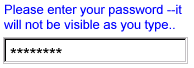
Data Binding Restrictions: Identical to input.
Implementation Requirements: In general, implementations, including
accessibility aids, must render a "*" or similar character instead of the
actual characters entered, and thus must not render the entered value of this
form control. Note that this provides only a casual level of security; truly
sensitive information will require additional security measures outside the
scope of XForms.
XML Representation <secret>
<secret
  (single node binding attributes)
  (common attributes)
  inputMode = xsd:string
>
  <!-- caption, (help|hint|alert|action|extension)* -->
</secret>
(single node binding attributes) - Selection of instance data
node, defined in 8.12.2 Single Node Binding
Attributes
common attributes defined in 8.12.1 Common Attributes
inputMode - this form control accepts an input mode hint. D Input Modes
8.3 textarea
Description: This form control enables free-form data entry and is
intended for use in entering multiline content, e.g., the body of an email
message.
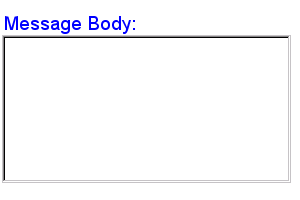
Example: Email Message Body
<textarea ref="message/body" class="messageBody">
  <caption>Message Body</caption>
  <hint>Enter the text of your message here</hint>
</textarea>
In the above, the class attribute can be used by a stylesheet
to specify the display size of the form control. Note that the constraints on
how much text can be input are obtained from the underlying XForms Model
definition and not from these display properties.
A graphical browser might render the above example as follows:
Data Binding Restrictions: Binds to xsd:string or any derived
simpleContent.
Implementation Requirements: Must allow entry of a lexical value for the
bound datatype, including multiple lines of text.
XML Representation: <textarea>
<textarea
  (single node binding attributes)
  (common attributes)
  inputMode = xsd:string
>
  <!-- caption, (help|hint|alert|action|extension)* -->
</textarea>
(single node binding attributes) - Selection of instance data
node, defined in 8.12.2 Single Node Binding
Attributes
common attributes defined in 8.12.1 Common Attributes
inputMode - this form control accepts an input mode hint. D Input Modes
8.4 output
Description: This form control renders a value from the instance data, but
provides no means for entering or changing data. It is typically used to
display values from the instance, and is treated as
display:inline for purposes of layout.
Example: Explanatory Message
I charged you -
<output ref="order/totalPrice"/>
and here is why:
A graphical browser might render an output form control as follows:

Data Binding Restrictions: Binds to any simpleContent.
Implementation Requirements: Must allow display of a lexical value for the
bound datatype. Implementations should provide the most convenient means
possible for display of datatypes and take into account localization and
internationalization issues such as representation of numbers.
XML Representation: <output>
<output
  (single node binding attributes)
>
  <!-- empty content -->
</output>
(single node binding attributes) - Selection of instance data
node, defined in 8.12.2 Single Node Binding
Attributes
8.5 upload
Description: This form control enables the common feature found on Web
sites to upload a file from the local file system, as well as accepting input
from various devices including microphones, pens, and digital cameras.
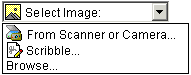
Example: Uploading An Image
<upload ref="mail/attach1" mediaType="image/*">
  <caption>Select image:</caption>
</upload>
A graphical browser might render this form control as follows:
Data Binding Restrictions: This form control can only be bound to
datatypes xsd:base64Binary or xsd:hexBinary, or
types derived by restriction from these.
Implementation Requirements: For suitable mediaTypes:
Implementations with a file system should support file
upload—selecting a specific file. The types of files presented
by default must reflect the mediaType specified in the XForms Model, for
example defaulting to only audio file types in the file dialog when the
mediaType is "audio/*". In XForms 1.0, there is a 1:1 binding between a
upload form control and one of the binary datatypes,
although that single file may be compound (e.g. application/zip).
Implementations with specific pen/digitizer hardware should (and
implementations with other pointing devices may) support
scribble—allowing in-place creation of pen-based data.
Implementations with specific audio recording capabilities should
support record audio—in-place recording of an audio
clip.
Implementations with a digital camera/scanner interface or screen
capture should support acquire image—in-place upload of
images from an attached device.
Implementations with video recording capability should provide a
record video option.
Implementations with 3d capabilities should provide a 3d interface
option.
Implementations may provide proprietary implementations (for
example, a mediaType of text/rtf could invoke an edit window with a
proprietary word processing application)
Implementations are encouraged to support other input devices not
mentioned here.
Implementations which cannot support upload for the given mediaType
must make this apparent to the user.
XML Representation: <upload>
<upload
  (single node binding attributes)
  (common attributes)
  mediaType = list of content types
>
  <!-- caption, (help|hint|alert|action|extension)* -->
</upload>
(single node binding attributes) - Selection of instance data
node, defined in 8.12.2 Single Node Binding
Attributes
common attributes defined in 8.12.1 Common Attributes
mediaType - list of suggested media types, used by the XForms
Processor to determine which input methods apply.
8.6 range
Description: This form control allows selection from a continuous range of
values.
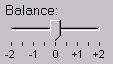
Example: Picking From A Range
<range ref="/stats/balance" start="-2.0" end="2.0" stepSize="0.5">
  <caption>Balance</caption>
</range>
A graphical browser might render this as follows:
Data Binding Restrictions: Binds only the following list of datatypes, or
datatypes derived by restriction from those in the list:
xsd:duration, xsd:date, xsd:time,
xsd:dateTime, xsd:gYearMonth,
xsd:gYear, xsd:gMonthDay, xsd:gDay,
xsd:gMonth, xsd:float, xsd:decimal,
xsd:double.
Implementation Requirements: Must allow input of a value corresponding to
the bound datatype. Implementations should inform the user of the upper and
lower bounds, as well as the step size, if any. In graphical environments,
this form control may be rendered as a "slider" or "rotary control".
Notice that the attributes of this element encapsulate sufficient metadata
that in conjunction with the type information available from the XForms Model
proves sufficient to produce meaningful prompts when using modalities such as
speech, e.g., when using an accessibility aid. Thus, an aural user agent
might speak a prompt of the form Please pick a date in the range January
1, 2001 through December 31, 2001.
XML Representation: <range>
<range
  (single node binding attributes)
  (common attributes)
  start = datavalue
  end = datavalue
  stepSize = datavalue-difference
>
  <!-- caption, (help|hint|alert|action|extension)* -->
</range>
(single node binding attributes) - Selection of instance data
node, defined in 8.12.2 Single Node Binding
Attributes
common attributes defined in 8.12.1 Common Attributes
start - optional hint for the lexical starting bound for the
range—a legal value for the underlying data.
end - optional hint for the ending bound for the range—a legal
value for the underlying data.
stepSize - optional hint to use for incrementing or decrementing the
value. Should be of a type capable of expressing the difference between two
legal values of the underlying data.
8.7 button
Description: This form control is similar to the HTML element of the same
name and allows for user-triggered actions. This form control may also be
used to advantage in realizing other custom form controls.
Example: Simple Button
<button>
  <caption>Click here</caption>
</button>
Data Binding Restrictions: Binding not possible for this form control.
Implementation Requirements: The user agent must provide a means to
generate an xforms:activate event on the form control. Graphical
implementations would typically render this form control as a push-button
with the caption on the button face. Stylesheets can be used to style the
button as an image.
XML Representation: <button>
<button
  (common attributes)
>
  <!-- caption, (help|hint|alert|action|extension)* -->
</button>
common attributes defined in 8.12.1 Common Attributes
8.8 submit
Description: This form control initiates submission of all or part of the
instance data to which it is bound.
Example: Submit
<submit submitInfo="timecard">
  <caption>Submit Timecard</caption>
</submit>
Data Binding Restrictions: Binding not possible for this form control.
Implementation Requirements: Upon receiving event
xforms:activate, this form control dispatches event
xforms:submit to the submitInfo element specified
by required attribute submitInfo.
XML Representation: <submit>
<submit
  (common attributes)
  submitInfo = xsd:IDREF #REQUIRED
>
  <!-- caption, (help|hint|alert|action|extension)* -->
</submit>
submitInfo - Required reference to element
submitInfo
common attributes defined in 8.12.1 Common Attributes
8.9 selectOne
Description: This form control allows the user to make a single selection
from multiple choices.
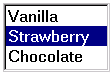
Example: Pick A Flavor
<selectOne ref="my:icecream/my:flavor">
  <caption>Flavour</caption>
  <item>
    <caption>Vanilla</caption>
    <value>v</value>
  </item>
  <item>
    <caption>Strawberry</caption>
    <value>s</value>
  </item>
  <item>
    <caption>Chocolate</caption>
    <value>c</value>
  </item>
</selectOne>
In the above example, selecting one of the choices will result in the
associated value given by element value on the selected item
being set in the underlying data instance at the location
icecream/flavor.
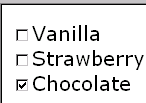
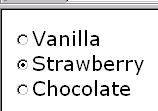
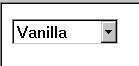
A graphical browser might render this form control as any of the
following:
| listbox |
checkbox |
radio |
menu |
 |
 |
 |
 |
Data Binding Restrictions: Binds to any simpleContent.
Implementation Requirements: The caption for each choice must be
presented, allowing at all times exactly one selection. This form control
stores the value corresponding to the selected choice in the location
addressed by attribute ref. The value to be stored is either
directly specified as the contents of element value, or
specified indirectly through attribute ref on element
value.
Note that the datatype bound to this form control may include a
non-enumerated value space, e.g., xsd:string. In this case,
control selectOne may have attribute
selection="open". The form control should then allow free data
entry, as described in 8.1 input.
For closed selections:If the initial instance value matches the storage
value of one of the given items, that item is selected. If there is no match,
the first item is initially selected.
For open selections: If the initial instance value matches the storage
value specified by one of the items, the first such matching item is
selected. Otherwise, the selected value is the initial lexical value. Free
entry text is handled the same as form control input 8.1 input.
User interfaces may choose to render this form control as a pulldown list
or group of radio buttons, among other options. The selectUI attribute offers
a hint as to which rendering might be most appropriate, although any styling
information (such as CSS) should take precedence.
Typically, a stylesheet would be used to determine the exact appearance of
form controls, though a means is provided to suggest an appearance through
attribute selectUI. The value of the attribute consists of one
of the following values, each of which may have a platform-specific look and
feel.
radio
checkbox
menu
listbox
XML Representation: <selectOne>
<selectOne
  (single node binding attributes)
  (common attributes)
  selectUI = ("radio" | "checkbox" | "menu" | "listbox" )
  selection = "open" | "closed" : "closed"
>
  <!-- caption, (choices|item|itemset)+, (help|hint|alert|action|extension)* -->
</selectOne>
(single node binding attributes) - Selection of instance data
node, defined in 8.12.2 Single Node Binding
Attributes
common attributes defined in 8.12.1 Common Attributes
selectUI - appearance override
selection - optional attribute determining whether free entry is
allowed in the list.
8.10 selectMany
Description: This form control allows the user to make multiple selections
from a set of choices.
Example: Selecting Ice Cream Flavor
<selectMany ref="my:icecream/my:flavors">
  <caption>Flavours</caption>
  <choices>
    <item>
      <caption>Vanilla</caption>
      <value>v</value>
    </item>
    <item>
      <caption>Strawberry</caption>
      <value>s</value>
    </item>
    <item>
      <caption>Chocolate</caption>
      <value>c</value>
    </item>
  </choices>
</selectMany>
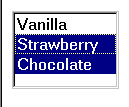
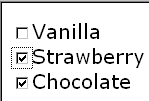
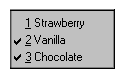
In the above example, more than one flavor can be selected.
A graphical browser might render form control selectMany as
any of the following:
| listbox |
checkbox |
radio |
menu |
 |
 |
This configuration is not recommended. |
 |
Data Binding Restrictions: any simpleContent capable of holding a
sequence.
Note:
A limitation of the Schema list datatypes is that whitespace characters in
the storage values (the value="..." attribute of the
item element) are always interpreted as separators between
individual data values. Therefore, authors should avoid using whitespace
characters within storage values with list simpleContent.
Example: Incorrect Type Declaration
<item>
  <value>United States of America</value>
  ...
</item>
When selected, this item would introduce not one but four additional
selection values: "America", "of", "States", and "United".
Implementation Hints: An accessibility aid might allow the user to browse
through the available choices and leverage the grouping of choices in the
markup to provide enhanced navigation through long lists of choices.
XML Representation: <selectMany>
<selectMany
  (single node binding attributes)
  (common attributes)
  selectUI = ("radio" | "checkbox" | "menu" | "listbox")
>
  <!-- caption, (choices|item|itemset)+, (help|hint|alert|action|extension)* -->
</selectMany>
(single node binding attributes) - Selection of instance data
node, defined in 8.12.2 Single Node Binding
Attributes
common attributes defined in 8.12.1 Common Attributes
selectUI - appearance override
8.11 Common Markup for selection controls
8.11.1 choices
This element is used within selection form controls to group available
choices. This provides the same functionality as element
optgroup in HTML.
XML Representation: <choices>
<choices>
  <!-- caption?, (choices|item|itemset)+ -->
</choices>
8.11.2 item
This element specifies the storage value and caption to represent an item
in a list. It is found within elements selectOne and
selectMany, or grouped in element choices.
XML Representation: <item>
<item>
  <!-- caption, value, (help|hint|alert|action|extension)* -->
</item>
id = xsd:ID - optional unique identifier.
8.11.3 itemset
Element itemset allows the creation of dynamic selections
within controls selectOne and selectMany, where the
available choices are determined at run-time. The node-set that holds the
available choices is specified via attribute nodeset. Child
elements caption and value indirectly specify the
caption and storage values. Notice that the run-time effect of
itemset is the same as using element choices to
statically author the available choices.
XML Representation: <itemset>
<itemset
  (node-set binding attributes)
>
  <!-- caption, value, (help|hint|alert|action|extension)* -->
</itemset>
node-set binding attributes - required node-set selector that
specifies the node-set holding the available choices.
The following example shows element itemset within control
selectMany to specify a dynamic list of ice cream flavors:
Example: Dynamic Choice Of Ice Cream Flavors
<model id="cone">
  <instance>
    <my:icecream>
      <my:flavours/>
    </my:icecream>
  </instance>
</model>
<model id="flavours">
  <instance>
    <my:flavours>
      <my:flavour type="v">
        <my:description>Vanilla</my:description>
      </my:flavour>
      <my:flavour type="s">
        <my:description>Strawberry</my:description>
      </my:flavour>
      <my:flavour type="c">
        <my:description>Chocolate</my:description>
      </my:flavour>
    </my:flavours>
  </instance>
</model>
<!-- user interaction markup -->
<selectMany model="cone" ref="my:icecream/my:flavours">
  <caption>Flavors</caption>
  <itemset model="flavours" nodeset="my:flavours/my:flavour">
    <caption ref="my:description"/>
    <value ref="@type"/>
  </itemset>
</selectMany>
8.11.4 value
This element provides a storage value to be used when an item
is selected.
Data Binding Restriction: All lexical values must be valid according to
the datatype bound to the selection control.
XML Representation: <value>
<value
  (single node binding attributes)
>
  <!-- ##any -->
</value>
single node binding attributes - optional binding selector that
specifies a location from where the storage value is to be fetched.
If inline content and a ref attribute are both specified, the
ref attribute is used.
8.12 Common Markup
The preceding form control definitions make reference to child elements
and attributes that are common to several of the form controls. This section
defines these common markup components.
8.12.1 Common Attributes
The following attributes are common to many user-interface related XForms
elements.
XML Representation: Common Attributes
xml:lang = xsd:language
class = space separated list of classes
navIndex = xsd:nonNegativeInteger : 0
accessKey = xsd:token
xml:lang - Optional standard XML attribute to specify a human
language for this element.
class - Optional selector for a style rule.
navIndex - Optional attribute is a non-negative integer in the range
of 0-32767 used to define the navigation sequence. This gives the author
control over the sequence in which form controls are traversed. The default
navigation order is specified in the chapter 4 Processing
Model.
accessKey - Optional attribute defines a shortcut for moving the
input focus directly to a particular form control. The value of this is typically a
single character which when pressed together with a platform specific
modifier key (e.g., the alt key) results in the focus being set to
this form control.
8.12.2 Single Node Binding Attributes
The following attributes define a binding between a form control and an
instance data node.
XML Representation: Single Node Binding Attributes
ref = binding-expression
model = xsd:IDREF
bind = xsd:IDREF
ref - Binding expression. Details in the
chapter 6 Constraints. The first-node rule
applies to the nodeset selected here.
model - Optional instance data selector. Details in the section 6.4.3 Binding References.
bind - Optional reference to a bind element
It is an error if the model idref value refers to an id not
on a model element, or if the bind idref value
refers to an id not on a bind element.
8.12.3 Nodeset Binding Attributes
The following attributes define a binding between a form control and a
node-set returned by the XPath expression.
XML Representation: Nodeset Binding Attributes
nodeset = binding-expression
model = xsd:IDREF
bind = xsd:IDREF
nodeset - Binding expression. Details in the
chapter 6 Constraints.
model - Optional instance data selector. Details in the chapter 6 Constraints.
bind - Optional reference to a bind element
It is an error if the model idref value refers to an id not
on a model element, or if the bind idref value
refers to an id not on a bind element.
8.12.4 Common Child Elements
The child elements detailed below provide the ability to attach metadata
to form controls.
Instead of supplying such metadata e.g., the label for a form control as
inline content of the contained element caption, the metadata
can be pointed to by using a simple XLink attribute xlink:href
on these elements. Notice that systematic use of this feature can be
exploited in internationalizing XForms user interfaces by:
Factoring all human readable messages to a separate resource XML
file.
Using URIs into this XML resource bundle within individual caption
elements
Finally, an XForms processor can use content negotiation to obtain
the appropriate XML resource bundle, e.g., based on the
accept-language headers from the client, to serve up the
user interface with messages localized to the client's locale.
8.12.4.1 caption
The required element caption labels the containing form
control with a descriptive label. Additionally, the caption makes it possible
for someone who can't see the form control to obtain a short description
while navigating between form controls.
XML Representation: <caption>
<caption
  (common attributes)
  (single node binding attributes)
  xlink:href = xsd:anyURI
>
  <!-- ##any -->
</caption>
common attributes - defined in 8.12.1 Common Attributes
single node binding attributes - Selection of instance data node,
defined in 8.12.2 Single Node Binding
Attributes
xlink:href = xsd:anyURI - link to external caption
The caption specified can exist in instance data, in a remote document, or
as inline text. If multiple captions are specified in this element, the order
of preference is: ref, xlink:href, inline.
An accessibility aid would typically speak the metadata encapsulated here
when the containing form control gets focus.
8.12.4.2 help
The optional element help provides a convenient way to attach
help information to a form control. This is equivalent to a
xforms:help event handler that responds with a <message
type="modeless">.
XML Representation: <help>
<help
  (common attributes)
  (single node binding attributes)
  xlink:href = xsd:anyURI
>
  <!-- ##any -->
</help>
(common attributes) - defined in 8.12.1 Common Attributes
single node binding attributes - Selection of instance data node,
defined in 8.12.2 Single Node Binding
Attributes
xlink:href = xsd:anyURI - link to external help
The message specified can exist in instance data, in a remote document, or
as inline text. If multiple captions are specified in this element, the order
of precedence is: ref, xlink:href, inline.
8.12.4.3 hint
The optional element hint provides a convenient way to attach
hint information to a form control. This is equivalent to a
xforms:hint event handler that responds with a <message
type="ephemeral">.
XML Representation: <hint>
<hint
  (common attributes)
  (single node binding attributes)
  xlink:href = xsd:anyURI
>
  <!-- ##any -->
</hint>
(common attributes) - defined in 8.12.1 Common Attributes
single node binding attributes - Selection of instance data node,
defined in 8.12.2 Single Node Binding
Attributes
xlink:href = xsd:anyURI - link to external hint
The message specified can exist in instance data, in a remote document, or
as inline text. If multiple captions are specified in this element, the order
of precedence is: ref, xlink:href, inline.
8.12.4.4 alert
The optional element alert provides a convenient way to
attach alert or error information to a form control. This is equivalent to a
xforms:alert event handler that responds with a
<message type="modal">.
XML Representation: <alert>
<alert
  (common attributes)
  (single node binding attributes)
  xlink:href = xsd:anyURI
>
  <!-- ##any -->
</alert>
(common attributes) - defined in 8.12.1 Common Attributes
single node binding attributes - Selection of instance data node,
defined in 8.12.2 Single Node Binding
Attributes
xlink:href = xsd:anyURI - link to external alert
The message specified can exist at in instance data, in a remote document,
or as inline text. If multiple captions are specified in this element, the
order of precedence is: ref, xlink:href, inline.
8.12.4.5 extension
Optional element extension is a container for
application-specific extension elements from any namespace other than the
XForms namespace. This specification does not define the processing of this
element.
XML Representation: <extension>
<extension>
  <!-- ##other -->
</extension>
For example, RDF metadata could be attached to an individual form control
as follows:
<input ref="dataset/user/email" id="email-input">
  <caption>Enter your email address</caption>
  <extension>
    <rdf:RDF xmlns:rdf="http://www.w3.org/1999/02/22-rdf-syntax-ns#">
      <rdf:Description rdf:about="#email-input">
      <my:addressBook>personal</my:addressBook>
      </rdf:Description>
    </rdf:RDF>
  </extension>
</input>
9 XForms User Interface
This chapter covers XForms features for combining form controls into user interfaces.
All form controls defined in 8 Form
Controls are treated as individual units for purposes of visual
layout e.g., in XHTML processing. Aggregation of form controls with markup
defined in this chapter provides semantics about the relationship among user
interface controls; such knowledge can be useful in delivering a coherent UI
to small devices. For example, if the user interface needs to be split up
over several screens, controls appearing inside the same aggregation would
typically be rendered on the same screen or page.
9.1 group
The group element is used as a container for defining a
hierarchy of form controls. Groups can be nested to create complex
hierarchies.
Example: Grouping Related Controls
<group ref="address">
  <caption>Shipping Address</caption>
    <input ref="line_1">
      <caption>Address line 1</caption>
    </input>
    <input ref="line_2">
      <caption>Address line 2</caption>
    </input>
    <input ref="postcode">
      <caption>Postcode</caption>
    </input>
</group>
The hierarchy defined by nested group elements is used to determine the
traversal order specified by attribute navIndex on form
controls. Setting the input focus on a group results in the focus being set
to the first form control in the tabbing order within that group.
9.2 switch
The XForms model allows the authoring of dynamic user interfaces that vary
based on the current state of the instance data being populated—see
model item property relevant 6.1.4 relevant. As an example,
portions of a questionnaire pertaining to the user's automobile may become
relevant only if the user has answered in the affirmative to the
question 'Do you own a car?'. Another example is when the underlying XForms
model contains conditional structures.
This section defines construct switch that allows the
creation of user interfaces where the user interface can be varied based on
user actions and events. Element switch contains one or more
case elements. Markup contained within element case
specifies the user interface that is displayed when that case is
selected. Boolean attribute selected of element
case determines the selected state and can be
manipulated programmatically via the DOM, or declaratively via XForms action
toggle. Attribute id of case is used
within action toggle for this purpose. The following example
demonstrates the use of switch.
Example: switch
<switch id="sw">
  <case id="in" selected="true">
    <input ref="yourname">
      <caption>Please tell me your name</caption>
      <action ev:event="activate">
        <toggle case="out"/>
      </action>
    </input>
  </case>
  <case id="out" selected="false">
    <html:p>Hello <output ref="yourname" />.
      <button id="editButton">
        <caption>Edit</caption>
        <action id="editAction" ev:event="activate">
          <toggle case="in"/>
        </action>
      </button>
    </html:p>
  </case>
</switch>
The above results in the portion of the user interface contained in the
first case being displayed initially. This prompts for the
user's name; filling in a value and activating the control e.g., by
pressing return results in XForms event activate.
Event activate is handled by the attached handler—element
action. This handler uses XForms action toggle to
select the case with id="out". This sets attribute
selected on case id="out" to true. The
markup contained in the selected case displays the name the user
entered along with an edit button. Activating the edit button in
turn results in the attached handler selecting case id="in".
XML Representation: <switch>
<switch
  (common attributes)
>
  <!-- case+ -->
</switch>
(common attributes) - defined in 8.12.1 Common Attributes
XML Representation: <case>
<case
  selected = xsd:boolean
>
  <!-- ##any -->
</case>
selected = xsd:boolean - optional selection status for the
case.
If multiple cases within a switch are marked as
selected="true", the first selected case remains
and all others are deselected. If none are selected, the first becomes
selected.
9.3 repeat
The XForms Model allows the definition of repeating structures such as
multiple items within a purchase order. When defining the XForms Model, such
higher-level collections are constructed out of basic building blocks;
similarly, this section defines user interface construct repeat
that can bind to data structures such as lists and collections. Element
repeat encapsulates a UI mapping over a homogeneous collection,
in other words, a collection consisting of data items having the same type
and structure.
Example: Shopping Cart
<repeat nodeset="/cart/items/item">
  <input ref="." .../><html:br/>
</repeat>
Element repeat operates over a homogeneous collection by
binding the encapsulated user interface controls to each element of
the collection. Attributes on element repeat specify how many
members of the collection are presented to the user at any given time. XForms
actions insert, delete and
setRepeatCursor can be used to operate on the
collection—see 10 XForms Actions. Another
way to view repeat processing (disregarding special user interface
interactions) is to consider "unrolling" the repeat. The above example is
similar to the following (assuming four item elements in the returned
node-set):
Example: Repeat Unrolled
<!-- unrolled repeat -->
  <input ref="/cart/items/item[1]" .../><html:br/>
  <input ref="/cart/items/item[2]" .../><html:br/>
  <input ref="/cart/items/item[3]" .../><html:br/>
  <input ref="/cart/items/item[4]" .../><html:br/>
Notice that the model for the collection being populated would typically
have defined attributes minOccurs and maxOccurs;
these values may in turn determine if the user agent displays appropriate UI
controls for the user to add or delete entries in the collection.
Example: Homogeneous Collection
<model>
  <instance>
    <my:lines>
      <my:line name="a">
        <my:price>3.00</my:price>
      </my:line>
      <my:line name="b">
        <my:price>32.25</my:price>
      </my:line>
      <my:line name="c">
        <my:price>132.99</my:price>
      </my:line>
    </my:lines>
  </instance>
</model>
      ...
<repeat id="lineset" nodeset="my:lines/my:line">
  <input ref="my:price">
    <caption>Line Item</caption>
  </input>
  <input ref="@name">
    <caption>Name</caption>
  </input>
</repeat>

<button>
  <caption>Insert a new item after the current one</caption>
  <action ev:event="activate">
    <insert nodeset="my:lines/my:line"
            at="cursor('lineset')"
            position="after"/>
    <setValue ref="my:lines/my:line[cursor('lineset')]/@name"/>
    <setValue ref="my:lines/my:line[cursor('lineset')]/price">0.00</setValue>
  </action>
</button>

<button>
  <caption>remove current item</caption>
  <delete ev:event="activate" nodeset="my:lines/my:line"
          at="cursor('lineset')"/>
</button>
XML Representation: <repeat>
<repeat
  (node-set binding attributes)
  (common attributes)
  startIndex = xsd:positiveInteger : 1
  number = xsd:nonNegativeInteger
>
  <!-- ##any -->
</repeat>
(nodeset binding attributes) - Selection of context node-set,
defined in 8.12.3 Nodeset Binding
Attributes
(common attributes) - defined in 8.12.1 Common Attributes
startIndex - 1-based hint to the XForms Processor as to which
starting element from the collection to display.
number - hint to the XForms Processor as to how many elements from
the collection to display.
9.3.1 Repeat Processing
The markup contained within the body of element repeat
specifies the user interface to be generated for each member of the
underlying collection. During user interface initialization (see 4.2.4 xforms:UIInitialize), the following
steps are performed for repeat:
Attribute nodeset is evaluated to locate the
homogeneous collection to be operated on by this repeat.
The corresponding nodes in element instance in the
source document are located—these nodes provide initial values and
also serve as a prototypical instance for constructing members
of the repeating collection.
The cursor for this repeating structure is initialized to
point at the head of the collection.
The user interface template specified within element
repeat is bound to this prototypical instance. If
there is a type mismatch between the prototypical instance and the
binding restrictions for the user interface controls, an error is
signaled and processing stops.
User interface as specified by the repeat is generated
for the requisite number of members of the collection as specified by
attributes on element repeat, and model item constraints
minOccurs and maxOccurs.
The user interface markup for repeating structures adds encapsulation
metadata about the collection being populated. The processing model for
repeating structures uses a cursor that points to the
current item in the data instance. This repeat cursor is accessed
via XForms extension functions cursor 7.4.2.5 cursor() and manipulated via XForms
action setRepeatCursor 10.10 setRepeatCursor. This cursor
is used as a reference point for insert and delete
operations. Notice that the contained XForms form controls inside element
repeat do not explicitly specify the index of the collection
entry being populated. This is intentional; it keeps both authoring as well
as the processing model simple.
The binding expression attached to the repeating sequence returns a
node-set of the collection being populated, not an individual node. Within
the body of element repeat, binding expressions are evaluated
with a context node of the node determined by the repeatCursor. Repeat
processing uses XPath expressions to address the collection over which
element repeat operates. The XPath expression used as the value
of attribute nodeset must select a node-set of contiguous child
element nodes, with the same local name and namespace name of a common parent
node—this ensures that the node-set represent a homogeneous collection.
The behavior of element repeat with respect to other XPath
node-sets is undefined. The initial instance data supplies the prototypical
member of the homogeneous collection, and this is used during UI
initialization—4.2.4
xforms:UIInitialize—to construct the members of the homogeneous
collection. This prototypical instance is also used by action
insert when creating new members of the collection. To create
homogeneous collections, the initial instance data must specify at
least one member of the collection; this requirement is similar to
requiring instance data in addition to a schema, and the same
justification applies.
The form controls appearing inside repeat need to be suitable
for populating individual items of the collection. A simple but powerful
consequence of the above is that if the XForms Model specifies nested
collections, then a corresponding user interface can nest repeat
elements.
9.3.2 Nested Repeats
It is possible to nest repeat elements to create more powerful user
interface for editing structured data. E.2 Editing Hierarchical Bookmarks Using
XForms is an example of a form using nested repeats to edit
hierarchical data consisting of bookmarks within multiple sections. Notice
that an inner repeat's cursor always starts from 1. Consider the
following insert statement that appears as part of that
example.
Example: Repeat Cursor And Nested Repeats
<xforms:insert
  nodeset="/bookmarks/section[cursor('repeatSections')]/bookmark"
  at="cursor('repeatBookmarks')"
  position="after"/>
The above insert statement is used in that example to add new
bookmark entries into the currently selected section. The inner
(nested) repeat operates on bookmarks in this selected section; The
cursor—as returned by XForms function cursor—for
this inner repeat starts at 1. Hence, after a new empty section
of bookmarks is created and becomes current, the first insert
bookmark operation adds the newly created bookmark at the front of the
list.
9.3.3 User Interface Interaction
Element repeat enables the binding of user interaction to a
homogeneous collection. The number of displayed items might be less than the
total number available in the collection. In this case, the presentation
would render only a portion of the repeating items at a given time. For
example, a graphical user interface might present a scrolling table. The
current item indicated by the repeat cursor should be presented at all times,
for example, not allowed to scroll out of view. The XForms Actions enumerated
at 10 XForms Actions may be used within event
listeners to manipulate the homogeneous collection being populated by
scrolling, inserting and deleting entries.
Notice that the markup encapsulated by element repeat acts as
the template for the user interaction that is presented to the user. As a
consequence, it is not possible to refer to portions of the generated user
interface via statically authored idref attributes. A necessary
consequence of this is that XForms 1.0 does not specify the behavior of
construct switch within element repeat. Future
versions of XForms may specify the behavior of switch inside
repeat based on implementation experience and user feedback.
10 XForms Actions
All form controls defined in this specification have a set of common
behaviors that encourage consistent authoring and look and feel for
XForms-based applications. This consistency comes from attaching a common set
of behaviors to the various form controls. In conjunction with the event
binding mechanism provided by [XML Events],
these handlers provide a flexible means for forms authors to specify event
processing at appropriate points within the XForms user interface. XForms
actions are declarative XML event handlers that capture high-level semantics.
As a consequence, they significantly enhance the accessibility of
XForms-based applications in comparison to previous web technologies that
relied exclusively on scripting.
NOTE: This example is based on the XML Events specification [XML Events], which is proceeding independently
from XForms, and thus might be slightly incorrect.
Example: Action Syntax
<xforms:button>
  <xforms:caption>Reset</xforms:caption>
  <xforms:resetInstance ev:event="xforms:activate"/>
</xforms:button>
This example recreates the behavior of the HTML reset button,
which this specification does not define as an independent form control.
For each built-in XForms action, this chapter lists the following:
Name
Description of behavior
XML Representation
Sample usage
All elements defined in this chapter explicitly allow global attributes
from the XML Events namespace, and apply the processing defined in that
specification in section 2.3 [XML Events].
10.1 dispatch
This action dispatches an XForms Event to a specific element identified by
the target attribute. Two kinds of event can be dispatched:
One of the predefined XForms events (i.e., xforms:event-name), in which
case the bubbles and cancelable attributes are ignored and the standard
semantics as defined in the Processing model apply.
An event created by the XForms author with no predefined XForms semantics
and as such not handled by default by the XForms processor.
XML Representation: <dispatch>
<dispatch
  name = xsd:NMTOKEN
  target = xsd:IDREF
  bubbles = xsd:boolean : true
  cancelable = xsd:boolean : true
/>
name = xsd:NMTOKEN - required name of the event to dispatch.
target = xsd:IDREF - required reference to the event target.
bubbles = xsd:boolean : true - boolean indicating if this event
bubbles—as defined in DOM2 events.
cancelable = xsd:boolean : true - boolean indicating if this event
is cancelable—as defined in DOM2 events.
10.2 refresh
This action dispatches an xforms:refresh event. This action
results in the XForms user interface being refreshed, and the
presentation of user interface controls being updated to reflect the state of
the underlying instance data --see 4.3.15
xforms:refresh
XML Representation: <refresh>
10.3 recalculate
This action dispatches an xforms:recalculate event. As a
result, instance data nodes whose values need to be recomputed are updated as
specified in the processing model --see 4.3.17
xforms:recalculate.
XML Representation: <recalculate>
10.4 revalidate
This action dispatches an xforms:revalidate event. This
results in the instance data being revalidated as specified by the processing
model --see 4.3.16 xforms:revalidate
XML Representation: <revalidate>
10.5 setFocus
This action sets focus to the form control referenced by the
idref attribute by dispatching an xforms:focus
event. Note that this event is implicitly invoked to implement XForms
accessibility features such as accessKey.
XML Representation: <setFocus>
<setFocus
  idref = xsd:IDREF
/>
idref = xsd:IDREF - required reference to a form control
Setting focus to a repeating structure sets the focus to the member
represented by the repeat cursor.
10.6 loadURI
This action traverses the specified XLink.
XML Representation: <loadURI>
<loadURI
  (single node binding attributes)
  xlink:href = xsd:anyURI
  xlink:show = ("new" | "replace" | "embed" | "other" | "none")
/>
(single node binding attributes) - Selects the instance data node
containing the URI.
xlink:href - optional URI to load.
xlink:show - optional link behavior specifier.
Either the single node binding attributes, pointing to a URI in the
instance data, or the attribute xlink:href are required. If both
are present, the action has no effect.
Possible values for attribute xlink:show have the following
processing for the document (or portion of a document) reached by traversing
the link:
- new
The document is loaded into a new window (or other presentation
context). Form processing in the original window continues.
- replace
The document is loaded into the current window. Form processing is
interrupted, exactly as if the user had manually requested navigating
to a new document.
- embed
The document is incorporated into the current window in an
application-specific manner. Form processing continues.
- other
The document is loaded in an application-specific manner. The
application should look for other markup present in the link to
determine the appropriate behavior.
- none
The document is loaded in an application-specific manner. The
application should not look for other markup present in the
link to determine the appropriate behavior.
10.7 setValue
This action explicitly sets the value of the specified instance data
node.
XML Representation: <setValue>
<setValue
  (single node binding attributes)
  value = XPath expression
>
  <!-- literal value -->
</setValue>
(single node binding attributes) - Selects the instance data node
where the value is to be stored.
value = XPath expression - XPath expression to evaluate, with the
result stored in the selected instance data node.
The element content of setValue specifies the literal value
to set; this is an alternative to specifying a computed value via attribute
value. The following two examples contrast these approaches:
Example: setValue with Expression
<setValue bind="put-here" value="a/b/c"/>
This causes the string value at a/b/c in the instance data to
be placed on the single node selected by the bind element with
id="put-here".
Example: setValue with Literal
<setValue bind="put-here">literal string</setValue>
This causes the value "literal string" to be placed on the single node
selected by the bind element with id="put-here".
If neither a value attribute nor text content are present,
the effect is to set the value of the selected node to the empty string
("").
10.8 submitInstance
This action initiates submit processing by dispatching an
xforms:submit event. Processing of event
xforms:submit is defined in the processing model—see 4.4.1 xforms:submit.
XML Representation: <submitInstance>
<submitInstance
  submitInfo = xsd:IDREF />
id = xsd:ID - optional unique identifier.
submitInfo = xsd:IDREF - optional reference to a
submitInfo element.
Note:
This XForms Action is a convenient way of expressing the following:
<dispatch target="mysubmitinfo" name="submitInstance"/>
10.9 resetInstance
This action initiates reset processing by dispatching an
xforms:reset event to the specified model.
Processing of event xforms:reset is defined in the processing
model—see 4.3.18 xforms:reset.
XML Representation: <resetInstance>
<resetInstance
  model = xsd:IDREF
/>
model = xsd:IDREF - Selection of instance data for reset, defined
in 8.12.3 Nodeset Binding
Attributes
10.10 setRepeatCursor
This action marks a specific item as current in a repeating sequence
(within 9.3 repeat).
XML Representation:Action <setRepeatCursor>
<setRepeatCursor
  repeat = xsd:IDREF
  cursor = XPath expression that evaluates to number
/>
repeat = xsd:IDREF - required reference to a repeat
cursor = XPath expression that evaluates to number - required
1-based offset into the sequence.
10.11 insert
This action is used to insert new entries into a homogeneous collection,
e.g., a set of items in a shopping cart. Attributes of action
insert specify the insertion in terms of the collection in which
a new entry is to be inserted, and the position within that collection where
the new node will appear. The new node is created by cloning the final member
of the homogeneous collection specified by the initialization instance data.
In this process, nodes of type xsd:ID are not copied. The rules
for insert processing are as follows:
The homogeneous collection to be updated is determined by evaluating
binding attribute nodeset.
The corresponding node-set of the initial instance data is located
to determine the prototypical member of the collection. The final member
of this collection is cloned to produce the node that will be inserted.
Finally, this newly created node is inserted into the instance data at
the position specified by attributes position and
at.
Attribute at is evaluated to determine the insertion
index—a numerical value that is the index into the node-set.
Attribute position specifies whether the new node is
inserted before or after this index.
The rules for selecting the index are as follows:
The return value of the XPath expression in attribute
at is processed according to the rules of the XPath
function round(). For example, the literal
1.5 becomes 2, and the literal
'string' becomes NaN.
If the result is NaN, the insert operation has no
effect.
If the result is not a valid index for the node-set, it is
clipped to either 1 or the size of the node-set,
whichever is closer.
Finally, the cursor for any repeat that is bound to the
homogeneous collection where the node was added is updated to point to
the newly added node.
This action results in the insertion of newly created data nodes into the
XForms data instance. Such nodes are constructed as defined in the
initialization section of the processing model—see 4.2 Initialization Events. Following the
insertion of the newly created node into the instance data, events
xforms:recalculate, xforms:revalidate and
xforms:refresh are triggered in sequence. As an example, this
causes the instantiation of the necessary user interface for populating a new
entry in the underlying collection when used in conjunction with repeating
structures 9.3 repeat.
XML Representation:Action <insert>
<insert
  (node-set binding attributes)
  at = XPath expression
  position = "before" | "after"
/>
(nodeset binding attributes) - Selection of instance data nodes,
defined in 8.12.3 Nodeset Binding
Attributes
at - required XPath expression evaluated to determine insert
location.
position - required selector if insert before/after behavior.
An example of using insert with a repeating structure is
located at 9.3 repeat. Note that XForms
Action setValue can be used in conjunction with
insert to provide initial values for the newly inserted
nodes.
10.12 delete
This action deletes nodes from the instance data. The rules for delete
processing are as follows:
The homogeneous collection to be updated is determined by evaluating
binding attribute nodeset. If the collection is empy, the
delete action has no effect.
The n-th node is deleted from the instance data, where
n represents the number returned from node-set index
evaluation, defined in 10.11
insert.
If the last item in the collection is removed, the cursor position
becomes 0. Otherwise, the cursor will point to the new n-th
item.
This action results in deletion of nodes in the instance data. Following
the specified deletion, events xforms:recalculate,
xforms:revalidate and xforms:refresh are triggered
in sequence. As an example, this causes the destruction of the necessary user
interface for populating a deleted entry in the underlying collection when
used in conjunction with repeating structures 9.3
repeat.
XML Representation:Action <delete>
<delete
  (node-set binding attributes)
  at = XPath expression
/>
(nodeset binding attributes) - Selection of instance data nodes,
defined in 8.12.3 Nodeset Binding
Attributes
at - XPath expression evaluated to determine insert location.
An example of using delete with a repeating structure is
located at 9.3 repeat.
10.13 toggle
This action selects one possible case from an exclusive list of choices
e.g., encapsulated by switch see 9.2 switch, by:
Dispatching an xforms:deselect event to the currently
selected item.
Dispatching an xform:select event to the item to be
selected.
XML Representation: Action <toggle>
<toggle
  case = xsd:IDREF
/>
case = xsd:IDREF - required reference to a case section inside
the conditional construct
The toggle action adjusts all selected
attributes on the affected cases to reflect the new state.
10.14 script
This action encapsulates an event handler authored in the specified
scripting language. The handler may be inline, i.e., as PCDATA
content of element script; alternatively it may be contained in
an external resource and referred to via XML-events attribute
ev:handler. Optional attribute role serves as
documentation for the handler.
XML Representation: Action <script>
<script
  type = xsd:string
  role=xsd:string
>
  <!-- #CDATA -->
</script>
type = xsd:string - required mime-type identifier of scripting
language.
role = xsd:string - Optional descriptive text documenting the
contained script.
10.15 message
This action encapsulates a message to be displayed to the user.
XML Representation: <message>
<message
  (single node binding attributes)
  xlink:href = xsd:anyURI
  level = "ephemeral" | "modeless" | "modal"
>
  <!-- mixed content -->
</message>
(single node binding attributes) - optional attributes that point
to the instance data for a string message.
xlink:href = xsd:anyURI - optional specifier of an external resource
for the message.
level - required message level identifier.
The message specified can exist in instance data, in a remote document, or
as inline text. If multiple captions are specified in this element, the order
of preference is: ref, xlink:href, inline.
A graphical browser might render an ephemeral message as follows:
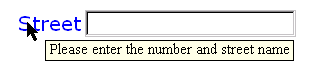
A graphical browser might render a modeless message as follows:
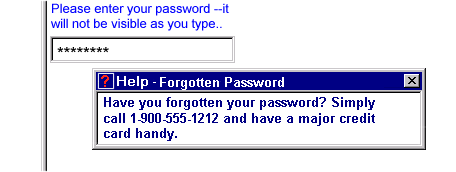
A graphical browser might render a modal message as follows:
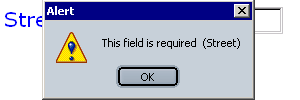
10.16 action
Action action is used to group multiple actions.
XML Representation: <action>
<action
>
  <!-- Action handlers -->
</action>
When using element action to group actions, care should be
taken to list the event on element action, rather than on the
contained actions.
Example: Grouping Actions
<button>
  <caption>Click me</caption>
  <action ev:event="xforms:activate">
    <resetInstance/>
    <setValue/>
  </action>
</button>
Notice that in the above example, ev:event="xforms:activate"
occurs on element action. Placing
ev:event="xforms:activate" on either or both of the contained
actions will have no effect. This is because the above example relies on the
defaulting of XML-Event attributes observer and
handler. As defined in the XML-Events specification, if both
observer and handler attributes are omitted, then the parent is the observer.
Placing ev:event="xforms:activate" on the children of element
action therefore causes element action to become
the observer for the individual actions. Consequently, these actions
will never be triggered since events arrive at element button,
not element action.