1 About the XForms 1.0 Specification
1.1 Background
Forms are an important part of the Web, and they continue to be the
primary means of interactivity used by many Web sites. Web applications and
eCommerce solutions have sparked the demand for better web forms with richer
interactions. XForms are the response to this demand--extended analysis,
followed by the creation of a new platform-independent markup language for
online interaction between an XForms
Processor and a remote entity. XForms are the successor to XHTML
forms, and benefit from the lessons learned in the years of HTML forms
implementation experience.
Further background information on XForms can be found at
http://www.w3.org/MarkUp/Forms.
1.2 Reading the Specification
This specification has been written with various types of readers in
mind--in particular XForms authors and XForms implementors. We hope the
specification will provide authors with the tools they need to write efficient,
attractive, and accessible documents, without overexposing them to the XForms
implementation details. Implementors, however, should find all they need to
build conforming XForms Processors. The specification begins with a general
presentation of XForms and becomes more and more technical and specific towards
the end. For quick access to information, a general table of contents, specific
tables of contents at the beginning of each section provide easy
navigation.
The specification has been written with various modes of presentation in
mind. In case of a discrepancy, the online electronic version is considered the
authoritative version of the document.
1.3 How the Specification is Organized
The specification is organized into the following chapters:
- Chapters 1 and 2
-
An introduction to XForms The introduction includes a brief
tutorial on XForms and a discussion of design principles behind XForms.
- Chapters 3 and up
-
XForms reference manual. The bulk of the reference manual consists
of the specification of XForms. This reference defines XForms and how XForms
Processors must interpret the various components in order to claim
conformance.
- Appendixes
-
Appendixes contain a normative description of XForms described in
XML Schema, information on references, and other useful information.
1.4 Documentation Conventions
The following highlighting and typography is used to present technical
material in this document:
Throughout this document, the namespace prefixes "xform:", "xsd:", and "xsi:" are used to denote the XForms, XML Schema, and XML Schema for
Instances namespaces respectively. This is by convention only; any namespace
prefix may be used in practice.
Official terms are defined in the following manner:
[Definition: You can find most terms in the
chapter 3 Terminology
]. Links to terms may be specially highlighted in the text, though
typically only on introductory usage or when special attention needs to be
directed toward the term.
The XML representations of various elements within XForms are presented
as follows: Listed are the element name, names of all attributes, allowed
values of attributes appearing after a "=" character, default values of
attributes appearing after a ":" character, and allowed content. One or more
headings below the table provide additional explanatory information.
Example: XML Syntax Representation <example>
<example
  count = xsd:integer
  size = (small | medium | large) : medium
>
  <!-- Content: (allowed-content) -->
</example>
count = xsd:integer - description of this
attribute
size = (small | medium | large) : medium - description
of
this attribute
Non-normative short examples are set off typographically:
Example Item
or
References to external documents appear as follows:
[Sample Reference] with links to the references section of this
document.
- Sample Reference
-
Reference - linked to from
above.
The following highlighting is used for non-normative commentary:
Note:
A general admonition to readers.
| Editorial note: Editorial Note Name | |
| Editorial commentary, not intended for final
publication. |
Issue (issue-id):
Issue-Name
A specific issue to which input from readers is requested, not
intended for final publication.
2 Concepts
This informative chapter provides an easily approachable description of
the design of XForms, describing the major components and how they relate. Not
every feature of XForms is covered here. For a complete, normative description
of XForms, refer to the remainder of this document.
2.1 Purpose and
Presentation
For explanatory purposes, a form can be considered to consist of
'purpose', 'presentation', and 'data'. Some examples:
|
Purpose
|
Presentation
|
Data
|
| Data collection |
Arrangement of form
controls |
Registration information |
| Time card |
How dates are entered |
Days and hours
worked |
| Order form |
How to render the form controls on small
devices |
Order, shipping, and payment info |
| Information Please |
How the form integrates with a Web
site |
User contact information |
The design of existing Web forms didn't separate the purpose from the
presentation of a form, and additionally offered only a restricted
representation for data captured through the form. This is the primary
difference between XForms and previous form technologies.
2.2 Current Approach: XHTML
Take for instance a simple eCommerce form authored in XHTML:
<?xml version="1.0" encoding="UTF-8"?>
<!DOCTYPE html PUBLIC "-//W3C//DTD XHTML 1.1//EN"
          "http://www.w3.org/TR/xhtml11/DTD/xhtml11.dtd">
<html xmlns="http://www.w3.org/1999/xhtml" xml:lang="en">
<head>
  <title>eCommerce Form</title>
</head>
<body>
<form action="http://example.com/submit" method="post">
  <table>
    <tr>
      <td><p>Select Payment Method:</p></td>
      <td><label><input type="radio" name="as" value="cash"/>Cash</label>
      <label><input type="radio" name="as" value="credit"/>Credit</label></td>
    </tr>
    <tr>
      <td><label for="cc">Credit Card Number:</label></td>
      <td><input type="text" name="cc" id="cc"/></td>
    </tr>
    <tr>
       <td><label for="exp">Expiration Date:</label></td>
       <td><input type="text" name="exp" id="exp"/></td>
    </tr>
    <tr>
       <td colspan="2"><input type="submit"/></td>
    </tr>
  </table>
</form>
</body>
</html>
A browser might render this form as follows:
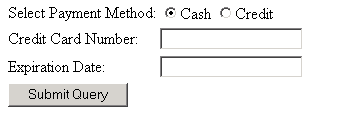
This form makes no effort to separate purpose (data collection
semantics) from presentation (the <input> form controls), and offers no control over the basic name/value pair
serialization of the resulting data. XForms greatly
improve the expressive capabilities of electronic forms.
2.3 Stepping Up to XForms
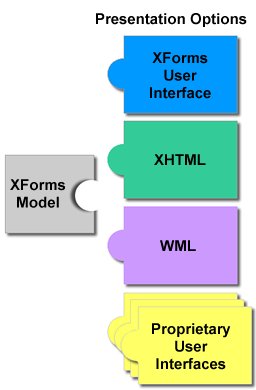
XForms are comprised of separate sections that describe what the form
does, and how the form is to be presented. This allows for flexible
presentation options, making it possible for classic XHTML form controls, as
well as other form control sets such as WML, to be leveraged as shown
here:
The simplest case involves authoring only the new XForms
form controls, leaving out the other
sections of the form. To convert the previous form into XForms this way, an
xform element is needed in the head section of the
document:
<xform:xform>
  <xform:submitInfo .../>
</xform:xform>
With these changes to the containing document, the previous example could
be rewritten like this:
<xform:selectOne ref="as">
  <xform:caption>Select Payment Method</xform:caption>
  <xform:choices>
    <xform:item value="cash"><xform:caption>Cash</xform:caption></xform:item>
    <xform:item value="credit"><xform:caption>Credit</xform:caption></xform:item>
  </xform:choices>
</xform:selectOne>
<xform:input ref="cc">
  <xform:caption>Credit Card Number</xform:caption>
</xform:input>
<xform:input ref="exp">
  <xform:caption>Expiration Date</xform:caption>
</xform:input>
<xform:submit>
  <xform:caption>Submit</xform:caption>
</xform:submit>
Notice the following features of this design:
-
The user interface is not hard-coded to use radio buttons. Different
devices (such as a voice browser) can render the concept of "selectOne" as
appropriate.
-
Form controls always have captions directly associated with them, as
child elements.
-
There is no need for an enclosing form element.
-
Markup for specifying form controls has been
simplified: <xform:input> rather than <input
type="text">; and <xform:selectOne> instead of
<html:select multiple="multiple>
-
Data entered through the form controls ends up submitted as XML.
With these changes, the XForms
Processor will be able to directly submit XML instance data. The XML
is constructed by creating a root element with child elements reflecting the
names given to each form control. For instance, the submitted data would look
like this:
<!-- envelope, generated separately -->
<Envelope>
  <Body>
    <!-- serialized instance data -->
    <as>Credit</as>
    <cc>1235467789012345</cc>
    <exp>2001-08</exp>
<!-- envelope, generated separately -->
</Body>
</Envelope>
2.4 Providing XML Instance Data
Understandably, authors will often desire greater control over exact
construction of the submitted instance data. One common case might be
submitting to a server XML data that is validated against a predefined DTD or
XML Schema.
XForms processing keeps track of the state of the partially filled form
through instance data, which
provides an outline of the desired XML data, including namespace information.
The instance data starts off with the initial values for the form, is updated
as the user fills the form, and eventually is serialized and submitted. The
initial instance data is taken from the instance element inside
thexform element, defined as follows:
<xform:xform>
  <xform:submitInfo action="http://example.com/submit" method="..."/>
  <xform:instance>
    <payment as="credit" xmlns="http://commerce.example.com/payment">
      <cc/>
      <exp/>
    </payment>
  </xform:instance>
</xform:xform>
This design has features worth calling out:
-
There is complete flexibility in the structure of the XML. Notice that XML namespaces are now used, and thata wrapper element of the author's choosing wraps the instance
data.
-
Empty elements pay:cc and pay:exp serve as placeholders in
the XML structure, and will be filled in with form data provided by the
user.
-
An initial value ("credit") for the form control is provided through the instance data, in this
case an attribute as. In the submitted XML, this initial value will
be replaced by the user input, if any.
To connect this instance data with form controls,
therefattributes on the form controls need to point to the proper
part of the instance data, using binding
expressions:
... xmlns:pay="http://commerce.example.com/payment"...
  <xform:selectOne ref="pay:payment/@as">
  ...
  <xform:input ref="pay:payment/pay:cc">
  ...
  <xform:input ref="pay:payment/pay:exp">
Binding expressions are based on XPath [XPath 1.0],
including the use of the '@' character to refer to attributes, as seen
here.
2.5 The XForms Model
Referring to the earlier XHTML form in 2.2 Current Approach: XHTML,
there are several aspects that would be desirable to express, but would only be
possible through the addition of unstructured script code:
-
The credit card information fields cc and exp are only relevant if the "credit" option is chosen in the as field.
-
The credit card information fields cc and exp should be required when the "credit" option is chosen in the as field.
-
The field cc should accept digits only, and should have exactly 14, 15, or 16
digits.
-
The field exp should accept only valid month/date combinations.
By specifying a 3rd component, the XForms
Model, authors can include rich declarative datatype and validation
information in forms.
An XForms Model consists of model
items, which include XML Schema datatype facet information [XML Schema part 2] as well as
properties specific to XForms.
... xmlns:pay="http://commerce.example.com/payment"...
<xform:bind ref="pay:payment/pay:cc"
  relevant="pay:payment/@as == 'credit'"
  required="true"
  type="pay:cc"/>

<xform:bind ref="pay:payment/pay:exp"
  relevant="pay:payment/@as == 'credit'"
  required="true"
  type="xsd:gYearMonth"/>

<!-- Plus the following in an external Schema -->
...
  <xsd:simpleType name="cc">
    <xsd:restriction base="xsd:string">
      <xsd:pattern value="\d{14,16}"/>
    </xsd:restriction>
  </xsd:simpleType>
...
2.6 Multiple Forms per Document
XForms processing places no limits on the number of individual forms that
can be placed in a single containing
document. When multiple forms share the same containing document,
multiple xform elements are needed. The first xform element
may skip a unique id attribute (as have all the examples above), but
subsequent xform elements require an id so that they can be
referenced from elsewhere in the containing document.
The other side of the equation is that form controls throughout the document
need to specify which xform element is associated with the instance
data to which they bind. This is accomplished through
anxformattribute alongside the ref attribute. The default
for thexform attribute is to refer to the firstxformelement
in document order.
To add a second form, an opinion poll, to our commerce example, the
following would be authored in the head section of the XHTML:
<xform:xform>
  <xform:submitInfo action="http://example.com/submit" method="..."/>
  <xform:instance>
     ...payment instance data...
  </xform:instance>
</xform:xform>

<xform:xform id="poll">
  <xform:submitInfo .../>
</xform:xform>
Additionally, the following form control markup in the body:
<xform:selectOne ref="pollOption" xform="poll">
  <xform:caption>How useful is this page to you?</xform:caption>
  <xform:choices>
    <xform:item value="0"><xform:caption>Not at all helpful</xform:caption></xform:item>
    <xform:item value="1"><xform:caption>Barely helpful</xform:caption></xform:item>
    <xform:item value="2"><xform:caption>Somewhat helpful</xform:caption></xform:item>
    <xform:item value="3"><xform:caption>Very helpful</xform:caption></xform:item>
  </xform:choices>
</xform:selectOne>
<xform:submit xform="poll">
  <xform:caption>Submit</xform:caption>
</xform:submit>
The main difference to note here is the use of xform="poll", which identifies which form the form control binds to.
2.7 Complete Document
This chapter presented various bits and pieces of XForms as a tool to help
readers understand the design. Presented here is the entire
XHTML+XForms,parallel to the opening example
document, presented in one segment.
Note:
The DOCTYPE declration below is technically not valid, since
XHTML 1.1 does not include XForms elements in any content models. The Working
Group is developing a DOCTYPE declaration for the combination of XHTML and
XForms.
<?xml version="1.0" encoding="UTF-8"?>
<!DOCTYPE html PUBLIC "-//W3C//DTD XHTML 1.1//EN">
<html xmlns="http://www.w3.org/1999/xhtml"
      xmlns:xform="http://www.w3.org/2001/08/xforms"
      xmlns:pay="http://commerce.example.com/payment"
      xml:lang="en">
<head>
  <title>XForms in XHTML</title>

  <xform:xform>
    <xform:submitInfo action="http://example.com/submit"
      method="post"
      encType="xml"/>
    <xform:instance>
      <pay:payment as="credit">
        <pay:cc/>
        <pay:exp/>
      </pay:payment>
    </xform:instance>
    <xform:model href="payschema.xsd"/>
    <xform:bindings>
      <xform:bind ref="pay:payment/pay:cc"
        relevant="pay:payment/@as == 'credit'"
        required="true" type="pay:cc"/>
      <xform:bind ref="pay:payment/pay:exp"
        relevant="pay:payment/@as == 'credit'"
        required="true" type="xsd:gYearMonth"/>
    </xform:bindings>
  </xform:xform>
</head>
<body>
    ...
<xform:selectOne ref="pay:payment/@as">
  <xform:caption>Select Payment Method</xform:caption>
  <xform:choices>
    <xform:item value="cash"><xform:caption>Cash</xform:caption></xform:item>
    <xform:item value="credit"><xform:caption>Credit</xform:caption></xform:item>
  </xform:choices>
</xform:selectOne>
<xform:input ref="pay:payment/pay:cc">
  <xform:caption>Credit Card Number</xform:caption>
</xform:input>
<xform:input ref="pay:payment/pay:exp">
  <xform:caption>Expiration Date</xform:caption>
</xform:input>
<xform:submit>
  <xform:caption>Submit</xform:caption>
</xform:submit>
...
</body>
</html>
6 XPath Expressions in XForms
XPath is used within XForms to address
instance data nodes, as well as
to perform basic operations, such as declaratively stating when a
form control needs to be filled out,
or defining a computation over other values such as unit prices, quantities,
discounts, and tax and shipping costs. This chapter describes how XForms uses
XPath, and additional XForms functions for use in forms.
6.1 Datatypes
In general, XPath uses a smaller set of datatypes than XML Schema.
XForms allows arbitrary Schema datatypes, including those defined in
4 Datatypes, while XPath datatypes are limited to boolean, string, number, and node-set. (For completeness, XPath additionally has external objects and result
tree fragments, but there is no special treatment for these types in the XForms
specification.)
Note:
Resource-limited XForms Processors may define implementation limits on
the maximum size of a node-set.
The XForms specification is defined such that it is always clear whether
XPath or XML Schema datatypes are used within a particular context.
Binding expressions and
computed expressions always
use XPath datatypes, while everything else uses XML Schema datatypes.
Note:
A future version of XForms is expected to use XPath 2.0, which
includes support for XML Schema datatypes, which will make the above
distinction moot.
6.2 Instance Data
Every form has a current state, representing the values entered at any
particular point in time. Within XForms, for each xform element, the
XForms Processor must behave as if it internally maintains an XML data
structure modeled as a tree to represent the state of the form. This data
structure is called instance data
and conforms to the XPath Data Model [XPath 1.0].
Additionally, each node in the tree contains a boolean "dirty" flag, which is
referenced elsewhere by the XForms Processing Model. In this context, "dirty"
indicates that the data value might need to be refreshed in the
presentation.
Elements and attributes in the instance data may have namespace
information associated with them, as defined in the XPath Data Model. Unless
otherwise specified, all instance data elements and attributes are
unqualified.
Issue (issue-instance-data-access):
Should there be specified a DOM form of access (perhaps a document
fragment), that maps to the instance data? If so, should it be read-only or
read-write access? What are possible security implications here?
The rules for defining the root and context nodes of the instance data
are found in in the following section.
6.3 Evaluation Context
Applied to XForms, XPath references abstract instance data (using the
"path" portion of XPath), instead of a discrete XML document. This reference is
called a binding expression in
this specification. Every XPath expression requires a context against which to
be evaluated.
The following context is used for evaluating all binding expressions in
XForms:
-
The context node for outermost binding elements (such
as XForms UI elements) is the XPath root (/). A "binding element" is any element that is explicitly
allowed to have a binding expression attribute. An
XForms element is "outermost" when the node-set returned by the
XPath expression ancestor::* includes no binding element nodes.
Note:
The contents of the instance data below the XPath root node (/) are dependent on how the instance data was constructed, which is
defined in 11.4.2 Instance Data Construction.
-
The context node for non-outermost binding elements is
determined by evaluating the binding expression of the immediately
enclosing element. An element is "immediately enclosing"
when it is the first binding element node in the node-set returned
by the XPath expression ancestor::*. This is also referred to as "scoped resolution".
-
The context size and position are both exactly 1.
-
No variable bindings are in place.
-
The available function library is defined below.
-
Any namespace declarations in scope for the attribute that defines
the expression are applied to the expression.
Example:
<group ref="element1/foo/bar">
  <selectOne ref="element2" ... />
  <selectOne ref="@attr" ... />
</group>
In this example, the group has a binding expression of element1/foo/bar. According to the rules above, this outermost element would have a
context node of /, which is the root of the instance data, or the parent to the
element1 element. Both of the selectOnes then inherit a context node from their parent, the context node being /element1/foo/bar. Based on this, the selectOne binding expressions evaluate respectively to /element1/foo/bar/element2 and /element1/foo/bar/@attr. Matching instance data follows:
<element1>
  <foo>
    <bar attr="xyz">
      <element2>xyz</element2>
    </bar>
  </foo>
</element1>
6.4 Canonical Binding Expressions
As with XPath, it is possible to construct many different binding
expressions that end up returning the same node-set. That said, it is often
useful to express a binding expression in a standard, compact representation,
defined as a canonical binding expression.
Canonical binding expressions are represented as an AbsoluteLocationPath as defined in [XPath 1.0]. Additionally, canonical
binding expressions use only default abbreviated axis-specifiers (for elements)
or the '@' abbreviation (for attributes). Examples:
-
(canonical) /a/b/c
-
(canonical) /a/b/@c
-
(non-canonical) a/b/c (not an absolute path)
-
(non-canonical) child::a/child::b/child::c
-
(non-canonical) /a/b/c/d/ancestor::c
6.5 Forms Core Function Library
The XForms Core Function Library includes the entire
[XPath 1.0] Core Function Library, including operations on
node-sets, strings, numbers, and booleans.
This section defines a set of required functions for use within XForms.
Issue (xpath-core-lib):
Further input is required on the ability for resource-constrained devices
to implement the complete XPath Core Function Library.
6.5.1 Boolean Methods
boolean boolean-from-string(
string
)
The boolean-from-string function returns true if the
required string parameter is "true", or false if the string parameter is
"false". This is useful when referencing a Schema xsd:boolean datatype in an XPath expression.
| Editorial note | |
| We need to specify behavior if the string paramter is some
other value. |
6.5.2 Number Methods
number average(
node-set
)
The average function returns the arithmetic average
value, for each node in the argument node-set, of the result of converting the
string-values of each node to a number. The sum is computed with sum(), and divided with div by the value computed with count().
number min(
node-set
)
The min function returns the minimum value, for each
node in the argument node-set, of the result of converting the string-values of
the node to a number. "Minimum" is determined with the < operator.
number max(
node-set
)
The max function returns the maximum value, for each
node in the argument node-set, of the result of converting the string-values of
the node to a number. "Maximum" is determined with the < operator.
number count-non-empty(
node-set
)
The count-non-empty function returns the number of
non-empty nodes in the argument node-set. A node is considered non-empty if it
is convertible into a string with a greater-than zero length.
Note:
The following core functions are defined within
[XPath 1.0] - number(), sum(), floor(), ceiling(), and round()
Note:
The following useful numeric and boolean operators are defined within
[XPath 1.0] - "+", "-", "*", "div", "mod", unary "-" ,"=", "!=", "<", ">", "<=", ">=", "or", "and".
6.5.3 String Methods
string now()
The now function returns the current system time as a
string value, in the canonical format defined within the XForms specification.
If local time zone information is available, it is included in the string.
Note:
Note: the following are defined within [XPath 1.0] - string(), concat(), starts-with(), contains(), substring-before(), substring-after(),
substring(), string-length(), normalize-space(), and translate().
6.5.4 Miscellaneous Methods
string xforms-property(
string
)
The xforms-property function accesses the XForms
Property (defined in 11 Processing Model) named by the string parameter, and
returns the value of the property.
6.6 Extensibility
XForms 1.0 allows extension functions, similar to [XSLT].
This version of XForms does not provide a mechanism for defining
implementations of extensions. Therefore, a containing document that must be
portable between XForms implementations cannot rely on particular extensions
being available. XForms provides mechanisms that allow a containing document to
determine whether the XForms processor by which it is being processed has
implementations of particular extensions available, and to specify what should
happen if those extensions are not available. If a containing document is
careful to make use of these mechanisms, it is possible for it to take
advantage of extensions and still work with any XForms implementation.
6.6.1 Extension Functions
If a FunctionName in a FunctionCall expression is not an NCName
(i.e. if it contains a colon), then it is treated as a call to an extension
function. The FunctionName is expanded to a name using the namespace
declarations from the evaluation context.
If the XForms processor does not have an implementation of an
extension function of a particular name available, then the function-available function must return false for that name. If such an extension function occurs in an expression
and the extension function is actually called, the XForms processor must signal
an error. An XForms processor must not signal an error merely because an
expression contains an extension function for which no implementation is
available.
If the XForms processor has an implementation of an extension
function of a particular name available, then the function-available function must return true for that name. If such an extension is called, then the XForms
processor must call the implementation passing it the function call arguments;
the result returned by the implementation is returned as the result of the
function call.
boolean function-available()
The function-available function returns true if an extension function of a particular name is available, otherwise false.
7 Form Controls
7.1 Introduction
XForms User Interface controls, also called
form controls, are declared using
markup elements, and their behavior refined via markup attributes. This markup
may be further decorated with class attributes that can be set using
CSS stylesheets to deliver a customized look and feel. Form controls defined
here are bound to the underlying instance data using the
binding attributes as defined in the
chapter 5 The XForms Model.
Form controls enable accessibility by taking a uniform approach to such
features as captions, help text, tabbing and keyboard shortcuts.
Internationalization issues are addressed in conjunction with the
Internationalization Working Group and are addressed by following the same
design principles as within the rest of XHTML. All form controls defined here
are suitable for implementation as Aural CSS (ACSS) form controls.
Form controls are as general and high-level as possible
without sacrificing the ability to deliver real implementations. For instance,
to select one or more items from a set, use the form controls
selectOne or selectMany, respectively. Form controls
distinguish the functional aspects of the underlying control, as well as
presentational aspects (through class attributes) and behavior
(through XForms Action elements). This separation enables the expression of the
meaning of a particular form control--see
[AUI97] for a definition of such high-level
user interaction primitives.
This chapter includes non-normative graphical examples of many form
controls. The CSS Working Group is providing assistance with creating default
CSS rules for producing visual renderings of standard form controls. This
specification will also include non-normative rules for how these same controls
might be rendered to alternative access modalities.
For each form control, the following aspects sections describe:
Description
Examples
Data Binding Restrictions
Implementation Hints
XML Representation
The form controls defined here use common attributes and elements that
are defined later in this chapter (7.14 Common Markup ).
7.2 input
Description: This form control enables free-form data entry.
Examples:
<input ref="order/shipTo/street" style="width:5cm; height:1.2cm">
  <caption>Street<caption>
  <hint>Please enter the number and street name</hint>
</input>
In the above, CSS style attributes (which are not
defined in XForms but rather come from an external document type)
specify the display size of the form control. Note that the constraints on how
much text can be input are obtained from the underlying XForms Model definition
and not from these display properties.
A graphical browser might render the above example as follows:

Data Binding Restrictions: The entered value of the form control (after
processing as described in 11 Processing Model) is treated as a lexical value.
Schema facets bound to this form control will be
treated as a restriction upon the allowed entered value.
Example: XML Representation: <input>
<input
  (single node binding attributes)
  (common attributes)
>
  <!-- unordered: (caption, help?, hint?, alert?, action?) -->
</input>
(single node binding attributes) - Selection of instance data node, defined at 7.14.2 Single Node Binding Attributes
common attributes defined in
7.14.1 Common Attributes
7.3 textarea
Description: This form control enables free-form data entry and is
intended for use in entering multiline content, e.g., the body of an email
message.
| Editorial note | |
Control textarea has been added since we felt that the
semantic distinction between single line entry from multiline entry e.g.,
entering an email address vs typing an email message was significant and
amounted to more than just a presentational issue. We welcome comments on this
approach. |
Examples:
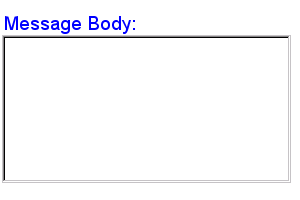
<textarea ref="message/body" style="width:8cm; height:5cm">
  <caption>Message Body:<caption>
  <hint>Enter the text of your message here</hint>
</textarea>
In the above, CSS style attributes (which are not
defined in XForms but rather come from an external document type)
specify the display size of the form control. Note that the constraints on how
much text can be input are obtained from the underlying XForms Model definition
and not from these display properties.
A graphical browser might render the above example as follows:
Data Binding Restrictions: The entered value of the form control (after
processing as described in 11 Processing Model) is treated as a lexical value.
Schema facets bound to this form control will be treated as a restriction upon
the allowed entered value.
Example: XML Representation: <textarea>
<textarea
  (single node binding attributes)
  (common attributes)
>
  <!-- unordered: (caption, help?, hint?, alert?, action?) -->
</textarea>
(single node binding attributes) - Selection of instance data node, defined at 7.14.2 Single Node Binding Attributes
common attributes defined in
7.14.1 Common Attributes
7.4 secret
Description: This form control is used for obtaining information that is
considered sensitive, and thus not echoed to a visual or aural display as it is
being entered, e.g., password entry.
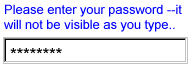
Example:
<secret ref="/login/password">
  <caption>Please enter your password --it will not be visible as you type.<caption>
</secret>
A graphical browser might render this form control as follows:
Data Binding Restrictions: Identical to input.
Implementation Hints: In general, implementations, including accessibility
aids, would render a "*" or similar character instead of the actual characters
entered, and thus would not render the entered value of this form control. Note
that this provides only a casual level of security; truly sensitive information
will require additional security measures outside the scope of XForms.
Example: XML Representation
<secret>
<secret
  (single node binding attributes)
  (common attributes)
>
  <!-- unordered: (caption, help?, hint?, alert?, action?) -->
</secret>
(single node binding attributes) - Selection of instance data node, defined at 7.14.2 Single Node Binding Attributes
common attributes defined
in 7.14.1 Common Attributes
7.5 output
Description: This form control renders a value from the instance data, but
provides no means for entering or changing data. It is
typically used to display values from the instance, and is treated as display:inline for purposes of layout.
Example:
I charged you
<output ref="order/totalPrice"/>
and here is why:
A graphical browser might render an output form control as follows:

Data Binding Restrictions: The lexical value of the datatype bound to this
form control (or the result of
theformatexpression, if present) is displayed, after
processing as described in11 Processing Model.
Implementation Hints: An audio browser might apply properties to this form
control to aurally highlight the displayed value to provide audio
formatted output.
Example: XML Representation: <output>
<output
  id = xsd:ID
  (single node binding attributes)
  format = formatting-expression
>
  <!-- empty content -->
</output>
id = xsd:ID - Optional unique identifier used for linking.
(single node binding attributes) - Selection of instance data node, defined at 7.14.2 Single Node Binding Attributes
format = formatting-expression - Optional XPath format specifier
7.6 upload
Description: This form control enables the common feature found on Web sites
to upload a file from the local file system, as well as accepting input from
various devices including microphones, pens, and digital cameras.
Example:
<upload ref="mail/attach1" mediaType="image/*">
  <caption>Select image:</caption>
</upload>
A graphical browser might render this form control as follows:
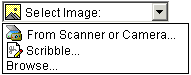
Data Binding Restrictions: This form control can only be bound to datatypes xsd:base64Binary or xsd:hexBinary, or types derived by restriction from these.
Implementation Hints:
-
Implementations with a file system SHOULD support "file upload"--selecting a
specific file, for all mediaTypes. The types of files presented by default MUST
reflect the mediaType specified in the XForms Model, for example defaulting to
only audio file types in the file dialog when the mediaType is "audio/*". In
XForms 1.0, there is a 1:1 binding between a upload form control and one of the
xform:binary datatypes, although that single file may be compound (e.g.
application/zip).
-
Implementations with specific pen/digitizer hardware SHOULD (and
implementations with other pointing devices MAY) support "scribble"--allowing
in-place creation of pen-based PNG image data, when the mediaType is "image/*"
or "image/png". Other mediaTypes besides image/png MAY share this input
method.
Note:
Commonly, people have trouble drawing recognizable figures or signatures
with a conventional pointing device like a mouse or track ball. Hence, a
reasonable implementation of XForms might not want this feature, hence the
"MAY" here for generic pointing devices
-
Implementations with specific audio recording capabilities SHOULD support
record--in-place recording of an audio clip, when the mediaType is
"audio/*" or "audio/basic". Other mediaTypes besides "audio/basic" MAY share
this input method.
-
Implementations with a digital camera/scanner interface SHOULD support
send image--in-place upload of images from an attached device,
when the mediaType is "image/*" or "image/jpeg". Other mediaTypes besides
"image/jpeg" MAY share this input method.
-
Implementations with video recording capability SHOULD provide a "record"
option for video/* mediaTypes.
-
Implementations with 3d capabilities SHOULD provide a 3d interface option
for model/* mediaTypes.
-
Implementations MAY provide proprietary implementations (for example, a
mediaType of text/rtf could invoke an edit window with a proprietary word
processing application)
-
Implementations are encouraged to support other input devices not mentioned
here.
Example: XML Representation: <upload>
<upload
  (single node binding attributes)
  (common attributes)
  mediaType = list of content types
>
  <!-- unordered: (caption, help?, hint?, alert?, action?) -->
</upload>
(single node binding attributes) - Selection of instance data node, defined at 7.14.2 Single Node Binding Attributes
common attributes defined in 7.14.1 Common Attributes
mediaType = list of media types - list of suggested media types, used by the XForms Processor to determine which input methods apply.
7.7 range
Description: This form control allows selection from a continuous range of
values.
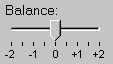
Example:
<range ref="/stats/balance" start="-2.0" end="2.0" stepSize="0.5">
  <caption>Balance:</caption>
</range>
A graphical browser might render this as follows:
Data Binding Restrictions: Only datatypes which represent a continuous range
where it is possible to express a difference value can be bound to this form
control. (For instance, xsd:decimal would be fine, while xsd:string would not). In terms of Schema datatypes, the datatype must be
either 1) have a total order relationship, or 2) an overall partial order
relationship, but totally ordered within the range specified between
thestart and end attributes.
Issue (enum-range):
Should an enumeration be allowed to bind to this form control? If yes, how
should it be ordered?
Implementation Hints: In graphical environments, this form control would
typically be rendered as a "slider" or "volume control".
Notice that the attributes of this element encapsulate sufficient metadata
that in conjunction with the type information available from the XForms Model
proves sufficient to produce meaningful prompts when using modalities like
speech, e.g., when using an accessibility aid. Thus, an Aural CSS enabled user
agent might speak a prompt of the form Please pick a date in the range
January 1, 2001 through December 31, 2001.
Example: XML Representation: <range>
<range
  (single node binding attributes)
  (common attributes)
  start = datavalue
  end = datavalue
  stepSize = datavalue-difference
>
  <!-- unordered: (caption, help?, hint?, alert?, action?) -->
</range>
(single node binding attributes) - Selection of instance data node, defined at 7.14.2 Single Node Binding Attributes
common attributes defined in
7.14.1 Common Attributes
start = datavalue -
Lexical starting bound for the range, of the
same datatype bound to the form control
end = datavalue - Lexical ending bound for the range, of the same datatype bound to the form control
stepSize = datatype-difference - Prefered step-size to use for incrementing or
decrementing the value within the form
control, of a datatype that can express the difference between two values of the datatype bound to the form control
7.8 submit
Description: This form control submits all or part of the instance data to
which it is bound.
Example:
<submit xform="timecard">
  <caption>Submit</caption>
</submit>
Implementation Hints: The default handling for this controls is equivalent
to the submitInstance XForms Action.
Example: XML
Representation: <submit>
<submit
  (nodeset binding attributes)
  (common attributes)
>
  <!-- unordered: (caption, help?, hint?, alert?, action?) -->
</submit>
(nodeset binding attributes) - Selection of instance data for submit, defined at 7.14.3 Nodeset Binding Attributes
common attributes defined in 7.14.1 Common Attributes
7.9 button
Description: This form control is similar to the XHTML element of the same
name and allows for user-triggered actions. This form control may also be used
to advantage in realizing other custom form controls.
Example:
<button>
  <caption>Click here</caption>
</button>
Data Binding Restrictions:
Note:
Binding a model item has no direct effect on a button, but provides a
context for any event handlers that are attached.
Implementation Hints: Graphical implementations would typically render this
form control as a push-button.
Example: XML Representation: <button>
<button
  (single node binding attributes)
  (common attributes)
>
  <!-- unordered: (caption, help?, hint?, alert?, action?) -->
</button>
(single node binding attributes) - Selection of instance data node, defined at 7.14.2 Single Node Binding Attributes
common attributes defined in
7.14.1 Common Attributes
7.10 selectBoolean
Description: This form control represents an on/off or true/false or yes/no
(or similar) choice.
Example:
<selectBoolean ref="questionnaire/married">
  <caption>Are you married?</caption>
  <help>We need this to determine your tax allowance</help>
  <true>Married</true>
  <false>Single</false>
</selectBoolean>
Data Binding Restrictions: This form control produces only two possible
lexical values: true or false. To be considered valid, the datatype bound to this
form control must be of type xsd:boolean. It is left to the rendering user agent to
decide whether to display this control as a single button/checkbox or as a pair
of mutually exclusive buttons.
Note:
Scenarios where the desired lexical value is anything other than
'true'/'false' are not suitable for the selectBoolean form control. For example, if the values placed into the instance data
were required to be either "male" or "female", the selectOne form control should be used instead.
Implementation Hints: Visual implementations would typically render this as
a checkbox. In some cases, like the above example or in aural environments, it
may be helpful to provide labels for the respective choices. This is
accomplished through true and false child
elements, which can contain display values.
Example: XML Representation:
<selectBoolean>
<selectBoolean
  (single node binding attributes)
  (common attributes)
  selectUI = ("radioGroup" | "checkboxGroup" )
>
  <!-- unordered: (caption, help?, hint?, alert?, action?, true?, false?) -->
</selectBoolean>
(single node binding attributes) - Selection of instance data node, defined at 7.14.2 Single Node Binding Attributes
common attributes defined
in 7.14.1 Common Attributes
selectUI = (TBD)
7.11 selectOne
Description: This form control allows the user to make a single selection
from multiple choices.
Typically, a stylesheet would be used to determine the exact appearance of
form controls, though a means is provided to suggest an
appearance through an attribute. The value of the attribute consists
of one of the following values, each of which may have a platform-specific look
and feel:
radioGroup
checkboxGroup
pulldown
listbox
combo
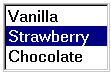
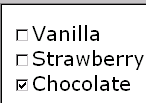
Example:
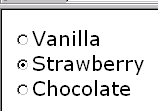
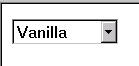
<selectOne ref="icecream/flavor">
  <caption>Flavor</caption>
  <choices>
    <item value="vanilla"><caption>Vanilla</caption></item>
    <item value="strawberry"><caption>Strawberry</caption></item>
    <item value="chocolate"><caption>Chocolate</caption></item>
  </choices>
</selectOne>
In the above example, selecting one of the choices will result in the
associated value given by attribute value on the selected
item being set in the underlying data instance at the location icecream/flavor. The values given in the user interface shown above may be
used in constructing a default schema if no schema is provided by the XForms
author.
A graphical browser might render this form control as any of the
following:
| listbox |
checkboxGroup |
radioGroup |
pulldown |
|
|
|
|
Data Binding Restrictions: This form control stores the storage
value corresponding to the selected choice at the location pointed to by
attribute ref. If the list of choices uses item elements to
list the choices, this storage value is found as the lexical value of
attributevalue of the selected item element; if the list of
choices uses element itemref then the storage value is found at the
location pointed to by the XPath value found as the value of
attributeref of the selected itemref element. If the
datatype of the location being populated by this form control does not permit
the selected value (for instance a datatype of xsd:decimal with an attribute value="abc"), the form control with that selection will be perpetually considered
invalid and it will not be possible to submit the form. Authors are encouraged
to avoid this situation.
If the datatype bound to this form control includes a non-enumerated value
space (for instance xsd:string, or xsd:string as part of a union), or if the "combo" UI hint is specified, the form
control then should allow free data entry, as described in7.2 input, in addition to the behavior defined here.
Some user interface combinations may allow a state of zero selected items,
in which case the lexical value of a zero-length string is selected.
Implementation Hints: User interfaces may choose to render this form control
as a pulldown list or group of radio buttons, among other options. The selectUI
attribute offers a hint as to which rendering might be most appropriate,
although any styling information (such as CSS) should take precedence.
Example: XML Representation: <selectOne>
<selectOne
  (single node binding attributes)
  (common attributes)
  selectUI = ("radioGroup" | "checkboxGroup" | "pulldown" | "listbox" | "combo")
>
  <!-- unordered: (caption, help?, hint?, alert?, action?, choices?) -->
</selectOne>
(single node binding attributes) - Selection of instance data node, defined at 7.14.2 Single Node Binding Attributes
common attributes defined
in 7.14.1 Common Attributes
selectUI = ("radioGroup" | "checkboxGroup" | "pulldown" | "listbox" | "combo") - appearance
override
7.12 selectMany
Description: This form control allows the user to make multiple selections
from a set of choices.
Example:
<selectMany ref="icecream/flavors">
  <caption>Flavors</caption>
  <choices>
    <item value="v"><caption>Vanilla</caption></item>
    <item value="s"><caption>Strawberry</caption></item>
    <item value="c"><caption>Chocolate</caption></item>
  </choices>
</selectMany>
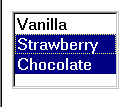
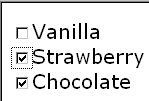
In the above example, more than one flavor can be selected.
A graphical browser might render form control selectMany as any of
the following:
| listbox |
checkboxGroup |
radioGroup |
pulldown |
|
|
This configuration is not
recommended. |
N/A |
Data Binding Restrictions: The portion of the instance
bound to by this form control must be capable of holding multiple selections,
i.e. it must be a schema list type, (in which case the selected values are
stored as a space separated list ) or an XML element capable of holding the
selected choices as child elements. When no item is selected, the instance
contains an empty list.
Note:
A limitation of the Schema list datatypes is that whitespace characters in
the storage values (the value="..." attribute of the item element) are always interpreted as
separators between individual data values. Therefore, authors should avoid
using whitespace characters within storage values with list
simpleTypes.
For instance, the following incorrect item declaration:
<item value="United States of America">...</item>
when selected, would introduce not one but four additional selection values:
"America", "of", "States", and "United".
Implementation Hints: An accessibility aid might allow the user to browse
through the available choices and leverage the grouping of choices in the
markup to provide enhanced navigation through long lists of choices.
Example: XML Representation: <selectMany>
<selectMany
  (single node binding attributes)
  (common attributes)
  selectUI = ("radioGroup" | "checkboxGroup" | "pulldown" | "listbox" | "comboGroup")
>
  <!-- unordered: (caption, help?, hint?, alert?, action?, choices?) -->
</selectMany>
(single node binding attributes) - Selection of instance data node, defined at 7.14.2 Single Node Binding Attributes
common attributes defined
in 7.14.1 Common Attributes
selectUI = ("radioGroup" | "checkboxGroup" | "pulldown" | "listbox" | "comboGroup") - appearance override
7.13 Common Markup
forselectOneand selectMany
7.13.1 item
This element is used within the selection form controls to represent a
single item of the list, where the following conditions apply:
There is no XForms Model available
Or there is an XForms Model available, but the available choices are
hard to address e.g., an enumeration facet from a schema
type.
Notice that in the case where item is used, the storage
value is a string represented by the attribute value; as a
consequence, using item inside the selection controls described here
restricts the underlying data type that is being populated to a space separated
list of tokens.
Example: XML Representation:
<item>
<item
  id = xsd:ID
  value = lexical-representation
>
  <!-- unordered: (caption, help?, hint?, alert?, action?) -->
</item>
id = xsd:ID - optional unique identifier.
value = lexical-representation - the "storage value" for the item, to be placed in the instance data when this item is chosen.
7.13.2 itemref
This element is used within the selection form controls to represent a
single item of the list, where the following conditions apply:
There is an XForms Model available
And the author wishes to point at a node in an instancetree
where the choice is stored. This element is also used when authoring forms
where the available choices are only known at runtime.
Notice that in the case where element itemref is used,
thestorage value does not have the limitations that exist when
using element item.
Note:
Form authors should be aware that instance data selected by is directly
placed into the instance data. For example selecting an element node with /node makes the entire node element the storage value, while an expression
such as /node/text() selects just the text content. Combinations that produce mixed content
in the instance data are forbidden.
Example: XML Representation:
<itemref>
<itemref
  id = xsd:ID
  ref = xpath-expression
>
  <!-- unordered: (caption, help?, hint?, alert?, action?) -->
</itemref>
id = xsd:ID - optional unique identifier.
ref = xpath-expression -
XPath locator of the the "storage value" for the item, to be placed in the instance data when this item is chosen.
7.13.3 choices
This element is used within selection form controls to group items. This
provides the same functionality as element optgroup in HTML 4.
Example: XML Representation: <choices>
<choices
  id = xsd:IDREF
>
  <!-- (item | itemref | choices)+ -->
</choices>
id = xsd:ID - optional unique identifier.
7.14 Common Markup
The preceding form control definitions make reference to several child
elements and attributes that are common to several of the form controls. This
section defines these common markup components.
7.14.1 Common Attributes
The following attributes are common to many user-interface
related XForms elements.
Example: XML Representation: Common Attributes
xml:lang = xsd:language
id = xsd:ID
class = space separated list of classes
navIndex = xsd:nonNegativeInteger : 0
accessKey = xsd:token
xml:lang = xsd:language - Optional standard XML attribute to specify a human language for this element.
id = xsd:ID - Optional unique identifier used for linking.
class = space separated list of
classes - Optional selector for a style rule.
navIndex = xsd:nonNegativeInteger : 0 - Optional attribute is a non-negative integer in the range of 0-32767 used
to define the navigation sequence. This gives the author control over the
sequence in which form controls
are traversed. The default navigation order is specified in the chapter 11 Processing Model.
accessKey = xsd:string - Optional attribute defines a shortcut for moving the input focus directly
to a particular form control.
The value of this is typically a single character which when pressed together
with a platform specific modifier key (e.g. the alt key) results
in the focus being set to this form
control.
CSS properties for controlling the look and feel of XForms form controls
are being defined in conjunction with the CSS Working Group. The CSS Working Group has agreed to help us develop a default
CSS stylesheet capable of producing the sample default renderings illustrated
in this working draft. The results of the above will be used to document the
use of CSS properties within XForms user interface elements for the final
version of the XForms specification.
7.14.2 Single Node Binding Attributes
The following attributes define a binding between a form control an a single
node. The 'first node' rule is applied to the node-set that the XPath
expression returns.
Example: XML Representation: Single Node Binding Attributes
ref = binding-expression
xform = xsd:IDREF
bind = xsd:IDREF
ref = binding-expression - Binding expression. Details in the chapter 5 The XForms Model. The first-node rule applies to the nodeset selected here.
xform = xsd:IDREF - Optional instance data selector. Details in the chapter 5 The XForms Model.
bind = xsd:IDREF - Optional reference to a bind element
Note:
Behavior is undefined if the xform idref value refers to an id
not on anxform element, or if the bind idref value refers
to an id not on a bind element.
7.14.3 Nodeset Binding Attributes
The following attributes define a binding between a form control an a
node-set, which is returned by the XPath expression.
Example: XML Representation: Nodeset Binding Attributes
nodeset = binding-expression
xform = xsd:IDREF
bind = xsd:IDREF
nodeset = binding-expression - Binding expression. Details in the chapter 5 The XForms Model.
xform = xsd:IDREF - Optional instance data selector. Details in the chapter 5 The XForms Model.
bind = xsd:IDREF - Optional reference to a bind element
Note:
Behavior is undefined if the xform idref value refers to an id
not on anxform element, or if the bind idref value refers
to an id not on a bind element.
7.14.4 Common Child Elements
The child elements detailed below provide the ability to attach
human-readable metadata to form controls.
Instead of supplying such metadata e.g., the label for a form control, as
inline content of the contained element caption, the metadata can be
pointed to by using a simple XLink attribute xlink:href on these
elements. Notice that systematic use of this feature can be exploited in
internationalizing XForms user interfaces by:
-
Factoring all human readable messages to a separate resource XML file.
-
Using URIs into this XML resource bundle within individual caption
elements
-
Finally, an XForms processor can use content negotiation to obtain the
appropriate XML resource bundle, e.g., based on the accept-language headers from the client, to serve up the user interface with messages
localized to the client's locale.
7.14.4.1 caption
The required element caption labels the containing form control
with a descriptive label. Additionally, the caption makes it possible for
someone who can't see the form control to obtain a short description while
navigating between form controls.
Example: XML Representation: <caption>
<caption
  (common attributes)
>
  <!-- mixed content -->
</caption>
(common attributes) - defined in
7.14.1 Common Attributes
An accessibility aid would typically speak the metadata encapsulated here
when the containing form control gets focus.
7.14.4.2 help
The optional element help provides a longer description that will
help users understand how to fill out this form control. The help text
will be shown only on request.
Example: XML Representation: <help>
<help
  (common attributes)
>
  <!-- mixed content -->
</help>
(common attributes) - defined
in 7.14.1 Common Attributes
A graphical browser might render help as follows:
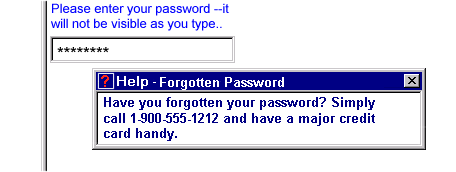
An accessibility aid might speak this information upon request.
7.14.4.3 hint
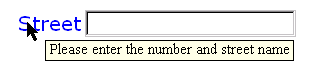
The optional element hint provides a short hint for the user,
typically represented as a tooltip by graphical user agents. The tooltip text
will normally be shown when the user remains on the form control for more than
a certain length of time. Accessibility aids might render such tooltips using
speech. This element is optional, and its content model is mixed.
Example: XML Representation:
<hint>
<hint
  (common attributes)
>
  <!-- mixed content -->
</hint>
(common attributes) - defined in 7.14.1 Common Attributes
A graphical browser might render hints as follows:
7.14.4.4 alert
Optional element alert encapsulates an explanatory message to be
displayed if the data bound to by the containing form control becomes
invalid.
Example: XML Representation: <alert>
<alert
  (common attributes)
>
  <!-- mixed content -->
</alert>
(common attributes) - defined
in 7.14.1 Common Attributes
A graphical browser might render alert as follows:
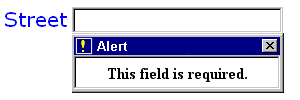
An accessibility aid might speak this information when the validation error
occurs, and make the message available for later perusal.
7.14.4.5 action
This element can be used to bind XForms
Actionsto form controls. Details on XForms events can be found in the
chapter11 Processing Model.
Example: XML Representation: <action>
<action
  id = xsd:ID
  evt:event = event-name
>
  <!-- Action handlers -->
</action>
This element declares an event listener by specifying the event to handle
and the event handler to invoke.
7.14.4.6 extension
This element serves as a container for arbitrary non-XForms element content,
including metadata.
Example: XML Representation: <extension>
<extension
  id = xsd:ID
>
  <!-- ##other -->
</extension>
8 XForms Actions
8.1 Using XForms Actions
All form controls defined in this specification have a set of common
behaviors that encourage consistent authoring and look and feel
for XForms-based applications. This consistency comes from attaching a common
set of behaviors to the various form controls. In conjunction with the event
binding mechanism provided by [XHTML Events], these handlers
provide a flexible means for forms authors to specify event processing at
appropriate points within the XForms user interface.
Example: Action Syntax
NOTE: This example is based on the XHTML Events specification
[XHTML Events], which is proceeding independently from XForms,
and thus might be slightly incorrect.
<xform:button>
  <xform:caption>Reset</xform:caption>
  <xform:action evt:event="dom-activate">
    <xform:resetInstance/>
  </xform:action>
</xform:button>
This example recreates the behavior of a "reset"
button, which this specification does not define as an independent form
control. The same effect can be achived by attaching an XForms Action to
a button.
This chapter lists the built-in actions defined, including:
Name
Description of behavior
XML Representation
8.2 dispatch
This action explicitly triggers an
XForms Event defined in 11 Processing Model.
Example: XML Representation: <dispatch>
<dispatch
  id = xsd:ID
  event = xsd:NMTOKEN
  target = xsd:IDREF
/>
id = xsd:ID - optional unique identifier.
event = xsd:NMTOKEN - required name of the event to fire.
target = xsd:IDREF - required reference to the event target.
8.3 refresh
This action explicitly initiates refresh processing, as defined in
11.4.6 UI Refresh Algorithm.
Example: XML Representation: <refresh>
id = xsd:ID - optional unique identifier.
8.4 recalculate
This action explicitly initiates recalculate processing, as defined in
11.4.5 Recalculation Sequence
Algorithm.
Example: XML Representation: <recalculate>
<recalculate
  id = xsd:ID
/>
id = xsd:ID - optional unique identifier.
8.5 revalidate
This action explicitly initiates revalidate processing, as defined in
11.4.7 Revalidation Algorithm.
Example: XML Representation: <revalidate>
<revalidate
  id = xsd:ID
/>
id = xsd:ID - optional unique identifier.
8.6 setFocus
This action explicitly sets focus to the form control referenced by the
idref attribute. Note that this action is implicitly invoked to
implement XForms accessibility features such as accesskey.
| Editorial note | |
| Do we need a better way to specify an individual form
control? |
Example: XML Representation: <setFocus>
<setFocus
  id = xsd:ID
  idref = xsd:IDREF
/>
id = xsd:ID - optional unique identifier.
idref = xsd:IDREF - required reference to a form control
8.7 setValue
This action explicitly sets the value of the indicated instance data
node.
Example: XML Representation: <setValue>
<setValue
  (single node binding attributes)
  value = xsd:string
/>
id = xsd:ID - optional unique identifier.
(single node binding attributes) - Selection of instance data node, defined at 7.14.2 Single Node Binding Attributes
value = xsd:string - new value to set
8.8 submitInstance
This action explicitly initates submit processing, as defined in
11.5.1 Submit.
Example: XML Representation: <submitInstance>
<submitInstance
  id = xsd:ID
  (nodeset binding attributes)
  withResponse = "replace" : "replace"
/>
id = xsd:ID - optional unique identifier.
(nodeset binding attributes) - Selection of instance data for submit, defined at 7.14.3 Nodeset Binding Attributes
withResponse = "replace" : "replace" - what to do with the response. Default is XHTML behavior where response document replaces the current document.
8.9 resetInstance
This action explicitly initiates reset processing, as defined in
11.5.2 Reset.
Example: XML Representation: <resetInstance>
<resetInstance
  id = xsd:ID
  (nodeset binding attributes)
/>
id = xsd:ID - optional unique identifier.
(nodeset binding attributes) - Selection of instance data for reset, defined at 7.14.3 Nodeset Binding Attributes
8.10 insert
This action inserts new nodes into editable lists e.g., within
9.3 Repeating Structures. This causes the instantiation of the necessary user
interface for populating a new entry in the underlying collection. It also
updates the instance data by instantiating the necessary nodes. Finally, the
binding expression associated with this repeat is re-evaluated to
update the node-set over which this repeat operates.
Example: XML Representation:Action <insert>
<insert
  id = xsd:ID
  repeat= xsd:IDREF
/>
id = xsd:ID - optional unique identifier.
idref = xsd:IDREF - required reference to a repeat
8.11 delete
This action deletes nodes from editable lists e.g., within
9.3 Repeating Structures. This causes the destruction of the necessary user
interface for populating the entry at the current cursor position in the
underlying collection. It also updates the instance data by destroying the
necessary nodes. Finally, the binding expression associated with this
repeat is re-evaluated to update the node-set over which this
repeat operates.
Example: XML Representation:Action <delete>
<delete
  id = xsd:ID
  repeat= xsd:IDREF
/>
id = xsd:ID - optional unique identifier.
idref = xsd:IDREF - required reference to a repeat
8.12 scroll
This action changes the current item in an editable list e.g., within
9.3 Repeating Structures.
Example: XML Representation:Action <scroll>
<scroll
  id = xsd:ID
  repeat= xsd:IDREF
  step = xsd:integer
/>
id = xsd:ID - optional unique identifier.
repeat = xsd:IDREF - required reference to a repeat
step = xsd:integer - specifies the amount by
which the list is scrolled. Negative values may
be used to scroll the list in the reverse direction.
Issue (additional-actions):
We may add special values for scrolling to the
top or bottom of the list, as well as other needed actions.
8.13 setRepeatCursor
This action marks an item as current in an editable list e.g., within
9.3 Repeating Structures.
Example: XML Representation:Action <setRepeatCursor>
<setRepeatCursor
  id = xsd:ID
  repeat = xsd:IDREF
  cursor = binding-expression
/>
id = xsd:ID - optional unique identifier.
repeat = xsd:IDREF - required reference to a repeat
cursor = binding-expression - binding expression that evaluates to an element of
the node set being iterated over by this repeat construct.
Platform-specific user actions for selecting
e.g., mouse focus, implicitly invoke handler setRepeatCursor on the
item that got the selection.
8.14 toggle
This action selects one possible choice from an exclusive list e.g.,
within 9.2 Conditional Constructs For Dynamic User Interfaces.
Example: XML Representation: Action <toggle>
<toggle
  id = xsd:ID
  switch = xsd:IDREF
  case = xsd:IDREF
/>
id = xsd:ID - optional unique identifier.
switch = xsd:IDREF - required reference to a conditional construct
case = xsd:IDREF - required reference to a case section inside the conditional construct
8.15 script
Example: XML Representation: Action <script>
<script
  id = xsd:ID
  language = xsd:NMTOKEN
/>
id = xsd:ID - optional unique identifier.
language = xsd:NMTOKEN - optional identifier of scripting language used
9 XForms User Interface
This chapter covers XForms features for combining
form controls into user
interfaces.
All form controls defined in 7 Form Controls are
treated as individual inline units for purposes of visual layout e.g., in XHTML
processing. Aggregation of form controls with markup defined in this chapter
provides semantics about the relationship among user interface controls; such
knowledge can be useful in delivering a coherent UI to small devices. For
examle, if the user interface needs to be split up amongst several screens,
controls appearing inside the same aggregation would typically be rendered on
the same screen or page.
9.1 Grouping Form Controls
The group element is used as a container for defining a
hierarchy of form controls. Groups can be nested to create complex
hierarchies.
Example: XML Representation: <group>
<group
  (single node binding attributes)
  (common attributes)
>
  <!--  ((any form control) | group | repeat | component | switch )* -->
</group>
(single node binding attributes) - Selection of instance data node, defined at 7.14.2 Single Node Binding Attributes
(common attributes) - defined in
7.14.1 Common Attributes
In CSS-based layout systems, groups lay out their children using a
constraint-based system that supports both relative flexible sizing and
intrinsic sizing. Through CSS, an inline box can be specified using the display property with a value of inline. A block-level group can be specified with a value of block, which is the default.
The hierarchy defined by nested group elements is used to determine the
traversal order specified by attribute navIndex on form controls.
Setting the input focus on a group results in the focus being set to the lowest
form control in the tabbing order within that group.
9.2 Conditional Constructs For Dynamic User Interfaces
The XForms User Interface allows the authoring of dynamic user
interfaces, i.e., user interfaces that vary based on the current state of the
instance data being populated. As an example, portions of a questionnaire
pertaining to the user's automobile may become relevant only if
the user has answered in the affirmative to the question 'Do you own a car?'.
Another use case for such dynamic user interfaces is when the underlying
XForms Model contains conditional
structures.
This element contains one or more case elements. Each
case has an id attribute that is used within event handlers appearing within form
controls to activate or deactivate that portion of the user interface created
by the markup contained within that case element.
Example: switch
This example shows how to provide a conditional user interface--either input or output:
<switch id="sw">
 <case id="in">
  <input ref="yourname">
   <caption>Please tell me your name</caption>
  </input>
 </case>
 <case id="out">
  <html:p>Hello <output ref="yourname" />.</html:p>
 </case>
</switch>
The above will result in the portion of the user interface contained
within the default case being initially displayed. The XForms Action toggle activates and deactivates
different portions of this conditional construct.
Example: XML Representation: <switch>
<switch
  (single node binding attributes)
  (common attributes)
  default = xsd:IDREF
>
  <!-- case+ -->
</switch>
(single node binding attributes) - Selection of instance data node, defined at 7.14.2 Single Node Binding Attributes
(common attributes) - defined in
7.14.1 Common Attributes
default = xsd:IDREF - optional selector for initial case.
Example: XML Representation: <case>
<case
  id = xsd:ID
>
  <!--  ##any -->
</case>
id = xsd:ID - required unique identifier.
Issue (issue-switch-scroll):
In addition to toggle, the XForms Action
scroll might be used within switch to cycle through the
various contained case clauses.
9.3 Repeating Structures
The XForms Model allows the definition of repeating structures such as
multiple items being purchased within a purchase order. When defining the
XForms Model, such higher-level aggregations are constructed out of basic
building blocks; similarly, here are defined higher-level user interface
constructs that build on the form controls defined previously that can bind to
data structures such as lists and collections.
Element repeat represents a UI mappings over homogenous
collection, in other words, a collection consisting entirely of like form
controls.
<repeat nodeset="/cart/items/item">
  <input ref="." .../><html:br/>
</repeat>
Note that controls for adding or removing repeating entries may appear
within the repeat, (causing the add/remove controls themselves to repeat), or may appear
outside the repeat.
Another way to view the repeat processing (modulo special user interface
interactions) is to consider "unrolling" the repeat. The above example is
similar to the following (assuming four item elements in the returned
node-set):
<!-- unrolled repeat -->
<input ref="/cart/items/item[1]" .../><html:br/>
<input ref="/cart/items/item[2]" .../><html:br/>
<input ref="/cart/items/item[3]" .../><html:br/>
<input ref="/cart/items/item[4]" .../><html:br/>
Notice that the model item for the collection being populated would
typically have defined attributes minOccurs and
maxOccurs; these values will in turn determine if the user agent
displays appropriate UI controls for the user to add or delete entries in the
collection. Event listeners separately control UI aspects such as scrolling and
insertion. This specification does not specify normative means for displaying
such add and delete controls; as with the rest of the XForms User Interface
design, these are left to be flexible while showing a default presentation.
Example: XML Representation: <repeat>
<repeat
  (nodeset binding attributes)
  (common attributes)
  startIndex = xsd:positiveInteger : 1
  number = xsd:nonNegativeInteger
>
  <!-- ##any -->
</repeat>
(nodeset binding attributes) - Selection of context node-set, defined at 7.14.3 Nodeset Binding Attributes
(common attributes) - defined in
7.14.1 Common Attributes
startIndex = xsd:positiveInteger : 1 - 1-based hint to the XForms Processor
as to which starting element from the collection to
display.
number = xsd:nonNegativeInteger - hint to the XForms Processor
as to how many elements from the collection to
display.
9.3.1 Repeat Processing
The user interface markup for repeating structures adds encapsulation
metadata about the collection being populated. Processing for repeating
structures takes into account a cursor that points to a
current item. This cursor is used as a reference point for insert and delete XForms Actions. These, along with setRepeatCursor, can be thought of as the markup equivalent of limited DOM access to
the markup constructed by repeat.
Notice that the contained XForms form controls inside element
repeat do not explicitly specify the index of the collection entry
being populated. This is intentional; it keeps both authoring as well as the
processing model simple. But as a consequence, the user interface cannot bind
to an element from the underlying collection out of sequence
except by using an absolute XPath expression.
The binding expression attached to the repeating sequence
returns a node-set of the collection being populated, not an indiviual node.
Within the body of element repeat binding expressions are evaluated
with a context node of the node determined by the repeatCursor.
A simple but powerful consequence of the above is that if the XForms
Model specifies nested collections, then a corresponding user interface can
nest repeat elements. The form controls appearing inside
repeat need to be suitable for populating individual items of the
collection.
The XForms Actions enumerated at 8 XForms Actions may be used
within event listeners attached to button elements placed inside the
body of construct repeat. In combination with the facilities provided
by element group and CSS layout, this allows document authors to
customize the positioning of controls for standard actions such as insert or
delete.
9.3.2 User Interface Interaction
As specified, element repeat allows us to bind a
user interface to a dynamic homogenous collection.
The number of displayed items might be less than the total number
available. In such a case, the presentation would only render a portion of the
repeating items at a given time. For example, a graphical user interface might
present a scrolling table. The attributes startIndex and
number provide hints to the user interface as to which elements
should be displayed initially.
The XForms Actions setRepeatCursor and scroll adjust the internal startIndex as needed to ensure that currently active items in the repeating
sequence are presented to the user.
9.4 Dynamic Selection Choices
XForms defines list controls selectOne and selectMany. By
default, these follow the standard form control behavior of representing their
state as a Schema simpleType that is associated with an instance data
node--often a derived-by-list datatype. Often, a more convenient representation
for lists is using markup instead of whitespace to separate list items. This
section explains additional XForms processing to handle this common case.
Notice that this usage matches the case of selection controls
selectOne and selectMany where the user is allowed to select
from a set of dynamic choices, i.e., where the list of choices is determined at
run-time as opposed to authoring time. As a consequence, this working draft
proposes the construct repeat as the means to represent dynamic
choices for controls selectOne and selectMany.
In this case, binding attribute nodeset on element
repeat specifies the location in the instance that contains the
dynamically determined set of choices. The contained form controls within
element repeat specify the user interface for one element from the
dynamic list as before. Semantics of the repeat cursor are as
defined earlier.
<selectOne ref="/trip/reservation/flight">
  <caption>Available Flights</caption>
  <help>Displaying list of available flights matching your
        requirements, please pick one.</help>
  <!-- /trip/available/flights is populated by a sequence of -->
  <!-- <flight> elements  at run time-->
  <repeat nodeset="/trip/availableFlights/flight">
     <!--itemrefs that point to <flight> nodes -->
  </repeat>
</selectOne>
In the above, the user is able to select a flight from a dynamically
created list of available flights. The user interface template encapsulated
within the body of element repeat is used in creating a choice
item for each flight element found in
/trip/availableFlights.
9.5 Reusable Form Controls
User Interface templates allow the creation of reusable user
interface components. Just as authors can define data types and structures that
can be reused within the XForms Model, reusable user interface components allow
us to design complex user interfaces using the basic building blocks described
in the previous section, and then reuse these components in multiple
situations. As with any component framework, this has two basic
requirements:
This section describes such a component framework along with sample markup.
This component mechanism has some similarities with the user interface used
within the body of element repeat to provide the user interface for a
generic element of the nodeset operated on by element repeat. Those
templates can be thought of as anonymous components.
This consists of:
-
XForms user interface construct defComponent defined next
corresponds to creating re-usable data types.
-
Using XForms user interface construct component to instantiate
reusable components declared using defComponent corresponds to
creating data instances corresponding to a reusable user defined
data type.
this example, assume that USShippingAddress is a reusable data type that is used in multiple places in the
XForms Model, e.g. the user will be
asked for a billingAddress and shippingAddress--both of type USShippingAddress.
The following shows a simple example that is designed to bind an XForms
form control to a model item of type address with no attention to making the component reusable.
<group ref="address">
  <input ref="street">
    <caption>Please enter your street address</caption>
  </input>
  <input ref="zip">
    <caption>Zip Code</caption>
  </input>
</group>
Next, consider the above fragment modified to become a reusable component
that could be used for obtaining both the shipping and billing address. To do
this, those portions of the component that the caller will wish to
modify need to be parameterized.
<defComponent id="AddressWidget">
  <param name="streetPrompt"/>
  <param name="zipPrompt"/>
  <group ref="address">
    <input ref="street">
      <caption><valueOf select="$streetPrompt"/></caption>
    </input>
    <input ref="zip">
      <caption><valueOf select="$zipPrompt"/></caption>
    </input>
  </group>
</defComponent>
Note that the markup shown above does not create a user interface; user
interface is created by explicitly instantiating the component via element component described next.
With this, the component can be instantiate in the user interface for
obtaining the shipping and billing address:
<component ref="myAddress" component="AddressWidget">
  <param name="streetPrompt" value="Shipping Street Address"/>
  <param name="zipPrompt" value="Zip Code for shipping state"/>
</component>
The reusable component is instantiated by element component;
parameter values are specified by the contained param elements.
Example: XML Representation: <defComponent>
<defComponent
  id = xsd:ID
>
  <!--  param*, ((any form control) | group | repeat | component | switch )* -->
</defComponent>
id = xsd:ID - required unique identifier.
Example: XML Representation: <param>
<param
  id = xsd:ID
  name = xsd:NMTOKEN
  value = xsd:string
>
  <!--  ##empty -->
</param>
id = xsd:ID - optional unique identifier.
name = xsd:NMTOKEN - required parameter name
value = xsd:string - optional parameter value
Example: XML Represenatation: <valueOf>
<valueOf
  id = xsd:ID
  select = xsd:string
>
  <!--  ##empty -->
</valueOf>
id = xsd:ID - required unique identifier.
select = xsd:string - reference to a parameter
Example: XML Representation: <component>
<component
  (single node binding attributes)
  (common attributes)
  component = xsd:IDREF
>
  <!-- param* -->
</component>
(single node binding attributes) - Selection of instance data node, defined at 7.14.2 Single Node Binding Attributes
(common attributes) - defined in
7.14.1 Common Attributes
component = xsd:IDREF - reference to the defComponent.
10 Document Structure
The XForms specification is an application of
XML [XML 1.0], and has been designed for use within other XML
vocabularies, in particular XHTML [XHTML 1.0]. This chapter
discusses the structure and
high-level features of XForms that allow this specification to be used
with other document types.
10.1 The XForms Namespace
The XForms namespace has the URI: http://www.w3.org/2001/08/xforms. Future revisions are expected to use a different identifier. This
document uses the convention of an xform: prefix to represent elements and attributes that are part of the XForms
Namespace.
XForms Processors must use the XML namespaces mechanism
[XML Names] to recognize elements and attributes from this
namespace. Except where specifically allowed by the Schema for XForms,
foreign-namespaced elements are not allowed as content of elements in the
XForms namespace. Foreign-namespaced attributes are, however, allowed on any
XForms element. The XForms Processor must ignore any foreign-namespaced
elements or attributes that are unrecognized.
10.2 XForms Elements
10.2.1 xform
The xform element is used as a container for other XForms
elements, and can serve as the root element of a standalone document or be
embedded in other document types such as XHTML. A single
containing document may
contain any number of xform elements.
| Editorial note | |
under discussion are XLink attributes on the xform
element. These are: xlink:type="extended" and
xlink:role="http://www.w3.org/2001/08/xforms" - and they should be
defaulted or even fixed in the Schema/DTD. |
Example: XML Representation: <xform>
<xform
  id = xsd:ID
>
  <!-- Content: unordered (submitInfo?, privacy?, bindings?, model?, instance?) -->
</xform>
id = xsd:ID - Optional unique identifier used to refer to this
particular xform element.
For example:
<xform xmlns="http://www.w3.org/2001/08/xforms" id="Person">
   <model xlink:href="Schema-Questionnaire.xform" />
   <instance xlink:href="http://example.com/cgi-bin/get-instance" />
   ...
</xform>
10.2.2 model
The model element is used to define the XForms Model. The
content of the XForms Model may be defined inline or obtained from a external
URI.
Example: XML Representation: <model>
<model
  id = xsd:ID
  xlink:href = xsd:anyURI
>
  <!-- Content: ( schema subset syntax ) -->
</model>
id = xsd:ID - Optional unique identifier.
xlink:href = xsd:anyURI - Optional link to an externally
defined XForms Model.
| Editorial note | |
As above, we need to find a place to discuss the defaulted
attributes. Here they are
xlink:role="http://www.w3.org/2001/08/xforms-model"
		  xlink:type="locator"
|
10.2.3 instance
The instance element is used to define initial instance data.
The instance data may be defined inline or obtained from a external URI.
Example: XML Representation: <instance>
<instance
  id = xsd:ID
  xlink:href = xsd:anyURI
>
  <!-- Content: (##other) -->
</instance>
id = xsd:ID - Optional unique identifier.
xlink:href = xsd:anyURI - Optional link to externally
defined instance data
The content of the instance element is arbitrary XML in any
namespace other than the XForms namespace. Authors must ensure that proper
namespace declarations are used for content within the instance
element.
| Editorial note | |
As above, we need to find a place to discuss the defaulted
attributes. Here they are
xlink:role="http://www.w3.org/2001/08/xforms-instance"
		  xlink:type="locator"
|
Issue (issue-schemalocation):
Should a schemaLocation attribute, linking the instance
data with a schema definition, be present here?
10.2.4 submitInfo
The submitInfo element provides information on how and where to
submit the instance data.
Example: XML Representation: <submitInfo>
<submitInfo
  id = xsd:ID
  action = xsd:anyURI
  encType = "xml" | "urlencoded" | "form-data" | qname-but-not-ncname : "xml"
  method = "post" | qname-but-not-ncname : "post"
  version = xsd:NMTOKEN
  indent = xsd:boolean
  encoding = xsd:string
  mediaType = xsd:string
  omitXMLDeclaration = xsd:boolean
  standalone = xsd:boolean
  CDATASectionElements = list of xsd:QName
>
  <!-- Content: (##empty) -->
</submitInfo>
id = xsd:ID - Optional unique identifier.
action = xsd:anyURI - Required destination for submitted
instance data.
encType = "xml" | "urlencoded" | "form-data" | qname-but-not-ncname : "xml" - Optional indicator as to the method used to serialize the instance data for submission.
method = "post" | qname-but-not-ncname : "post" - Optional indicator as to the protocol to be used to deliver the serialized instance data.
version = xsd:NMTOKEN - corresponds to the version attribute of xsl:output
indent = xsd:boolean - corresponds to the indent attribute of xsl:output
encoding = xsd:string - corresponds to the encoding attribute of xsl:output
mediaType = xsd:string - corresponds to the media-type attribute of xsl:output
omitXMLDeclaration = xsd:boolean - corresponds to the omit-xml-declration attribute of xsl:output
standalone = xsd:boolean - corresponds to the standalone attribute of xsl:output
CDATASectionElements = list of xsd:QName - corresponds to the cdata-section-elements attribute of xsl:output
Note:
Note that the XSLT attributes doctype-system and doctype-public are not
supported in XForms.
10.2.5 bindings
The bindings element is a container for bind
elements.
Example: XML Representation: <bindings>
<bindings
  id = xsd:ID
>
  <!-- Content: (bind+) -->
</bindings>
id = xsd:ID - Optional unique identifier.
Additional details, including the definition of the <bind> element
are found in the chapter 5 The XForms Model.
| Editorial note | |
| As above, we need to find a place to discuss the defaulted XLink
attributes. |
10.2.6 privacy
The privacy element is used to associate a P3P
[P3P 1.0] policy reference with a particular form.
Example: XML Representation: <privacy>
<privacy
  id = xsd:ID
  xlink:href = xsd:anyURI
>
  <!-- Content: (##empty) -->
</privacy>
id = xsd:ID - Optional unique identifier.
xlink:href = xsd:anyURI - Optional link to an externally
defined P3P policyref file (not an actual policy).
| Editorial note | |
| As above, we need to find a place to discuss the defaulted XLink
attributes. |
10.2.7 action
The action element serves a a location to attach a listener to
events targeting the xform element.
| Editorial note | |
| As above, we need to find a place to discuss the defaulted XLink
attributes. |
10.2.8 extension
The extension element serves as a location to attach arbitrary
non-XForms element content, for instance RDF information associated with a
form.
| Editorial note | |
| As above, we need to find a place to discuss the defaulted XLink
attributes. |
10.3 Integration with XLink
XForms make good use of XLink [XLink] features. To that
end, the XLink namespace is integrated in the DTD/Schema, the majority of the
attributes have sensible defaults, including those based on XLink roles defined
below.
This document uses the convention of an xlink: prefix for the XLink namespace http://www.w3.org/1999/xlink
[XLink].
Note that the XLink support uses a well-defined XLink failure mode: If an
XLink attribute is not provided, the element looses its XLink specific meaning.
We use this feature in order to allow application developers to either provide
the model and instance via an external reference (via an xlink:href
attribute) or to provide the data inline without the attribute. In the latter
case, the XLink-specific meaning of the element is lost and the inline content
used. If both inline content and external reference is provided, a processor
must use the external reference and ignore the inline content.
For the purposes of XForms, we suggest that XLink aware processors switch
from the xlink:type="locator" mode to the xlink:type="resource" mode. This should be specified in the document by setting xlink:type="resource", though a processing agent may not depend on it. In other words, the
first two of the following examples must be treated identically:
Example: Inline XForms Model, without explicit change to the xlink:type
<model>
  <!-- Content: ( schema subset syntax ) -->
</model>
Example: Inline XForms Model, with explicit change to the xlink:type
<model xlink:type="resource">
  <!-- Content: ( schema subset syntax ) -->
</model>
Example: External XForms Model
<model xlink:href="URI" />
XLink allows users to
provide arc-type elements to specify traversal rules. The integration of
arc-type elements in XForms would require additional elements in the
xform element that are otherwise not necessary for XForms. Hence, for
children of the xform element, the traversal rule is to traverse xlink:from the current document xlink:to the document pointed to by the external resource. The processor should
behave as if xlink:actuate="onLoad" was specified. The xlink:show attribute is meaningless in
this context, anyway.
An XForms processor is not required to implement full XLink--correct
behavior of the xlink:href attribute (as defined above) is
sufficient. It is permissible to construct the additional information from the
semantics of the elements. An XForms Processor can not be XForms compliant,
however, if it attempts to implement XLink and the implementation does not
conform to XLink specification with respect to the attributes used by
XForms.
The following definition of the XLink roles defines the relationship
between the various resources participating in a XForms-based form, not
properties that are inherent to the resources. It is perfectly permissible for
the same resource to participate in various XForms-based forms in different
roles.
10.3.1 XLink role for XForms
The xlink-role for XForms is http://www.w3.org/2001/08/xforms. This means that XLink processors encountering a link with a xlink:role="http://www.w3.org/2001/08/xforms" must assume that the arcs associated with the other XLink roles for
XForms (see below) behave as above. In other words, this XLink role is an
additional hint beyond the element names for an XLink processor to identify the
arcs. For all roles, if element names and XLink behavior conflict, XLink role
behavior prevails.
10.3.2 XLink role for the XForms Model
The xlink-role for XForms Models is http://www.w3.org/2001/08/xforms-model. This means that XLink processors encountering a link with a xlink:role="http://www.w3.org/2001/08/xforms-model" must assume that the referenced resource relates to the other resources
as XForms Model as defined in 5 The XForms Model.
10.3.3 XLink role for the Instance Data
The xlink-role for XForms Instances is http://www.w3.org/2001/08/xforms-instance. This means that XLink processors encountering a link with a xlink:role="http://www.w3.org/2001/08/xforms-instance" must assume that the referenced resource is the initialization data of
a form.
10.3.4 XLink role for the XForms User Interface
The xlink-role for XForms User Interfaces is http://www.w3.org/2001/08/xforms-ui. This means that XLink processors encountering a link with a xlink:role="http://www.w3.org/2001/08/xforms-ui" must assume that the referenced resource is the user interface of a
form. Note that this role does not make an assertion about the content type of
the referenced resource other than that it is an XML format. For example, it
can be XHTML+XForms, pure XForms, SVG+XForms or pure SVG any other combination.
This role does not correspond to any element defined in XForms; it is defined
so that XLink linkbases [XLink] can be established containing
all the information about a XForms document.
11 Processing Model
11.1 Introduction
The XForms Reference Processing Model is a normative explanation of the
components, predictive behavior, and mechanisms of XForms Processors. It is not
intended to constrain implementations. XForms Processors may be implemented in
any manner, so long as the end results are identical to that described in this
chapter.
This chapter uses the terms may, must, and
should (when rendered as in this paragraph) in accord with RFC
2119.
11.1.1 Design Rationale
The Reference Processing Model set out in this chapter will:
-
Be simple enough to implement across a wide range of devices,
including resource-constrained handhelds and appliances.
-
Define a predictive processing model with enough detail for
implementors to create interoperable software.
-
Define a well-ordered system for calculations and dependencies
independent of processor speed or threading.
-
Provide a unified addressing scheme for binding expressions,
independent of how the structure of the instance data is defined.
-
Be simple enough for the existing base of HTML authors to quickly
get up to speed.
-
Be compatible (to the extent reasonably possible) with existing
form processing.
11.2 XForms Properties
For each xform element, the XForms Processor maintains a set of
read-write properties, as described here. These properties are available to all
expressions in the containing
document.
-
immediate-refresh
-
immediate-revalidate
-
immediate-recalculate
-
use-nil
immediate-refresh controls whether changes in the instance data are immediately updated
in the UI
immediate-revalidate controls whether changes in the instance data immediately trigger a
validation
immedate-recalculate controls whether changes in the instance data immediately trigger a
recalculation
use-nil controls whether XML Schema Instance xsi:nils are placed in
the instance data
Additionally, the following properties are available for reading (but
not modification). These properties are available to all expressions in the
containing document.
-
version
-
conformance-level
-
timezone
version is defined as the string "1.0" for XForms 1.0
conformance-level strings are defined later in this chapter
timezone strings are signed integers representing the number of minutes offset
from GMT
11.3 Events
XForms uses an events system as defined in
[DOM2 Events], with a Capture phase, arrival at the Event
Target, and then a Bubbling Phase.
Events fall into different groupings. One class of events indicates that
some processing is about to happen. That processing may be halted by the event
handler:
Another class of events indicates that some processing already is in
progress. Such processing can not be halted by the event hander:
-
xforms-construct
-
xforms-destruct
-
xforms-initialize
-
xforms-instance-changed
-
xforms-exception
Unless otherwise noted, the target node for all events is the
xform element. When a containing document has multiple xform
elements, the binding is used to determine which xform element is
targeted.
The Working Group is using pre-defined generic event handling, defined
in [XHTML Events], additionally defining a set of XForms
Actions.
11.4 XForms Processing
11.4.1 Initialization/Resume
The following describes the initialization process for XForms.
Initialization must occur before any other processing. For each xform
element in the containing document, in document order, the following processing
occurs:
-
An xforms-construct event is fired; this is the place for authors to handle any
initialization tasks.
-
Instance data is constructed (11.4.2 Instance Data Construction).
-
The XForms Model is initialized.
-
All binding expressions are evaluated. If any fail to
conform to the binding expression constraints, an exception is thrown.
-
An xforms-initialize event is fired. A handler for this event could perform form
initialization tasks that require other parts of XForms to
be previously initialized.
-
A recalculation (11.4.5 Recalculation Sequence
Algorithm) takes
place.
-
A UI refresh (11.4.6 UI Refresh Algorithm) takes
place.
11.4.2 Instance Data Construction
The following steps describe how the instance data associated with
each xform element is constructed. Of the following options, the first
applicable option is chosen:
-
If an instance element is present and contains
a reference to non-local initial instance data, it is retrieved by traversing
the link to it, then copied into the instance data as described above. A remote
instance that is unretrievable for any reason results in an xforms-exception, which if unhandled, resutls in a fatal error..
-
If an instance element is present and contains
non-whitespace child nodes, the contents of the instance element are
copied into the instance data tree, based on the infoset mappings defined in
the XPath [XPath 1.0]data model.
-
If an instance element is not present, then a default
instance data configuration is produced, according to the following rules:
-
Each form control bound to the xform element
currently being processed is visited in document order. Each form control's
binding expression is evaluated.
-
If the instance data node result of evaluating the binding
expression doesn't already exist, it is created, and if the use-nil property is true, populated with a nil value (an
xsi:nil="true" attribute). Note that only elements can hold nil
values. The form control receives a default blank value. The algorithm for
creating instance data nodes is as follows: For each location step in the
canonical binding expression, from left to right, where no matching node exists
in the instance data, a new node is inserted.
Issue (creating-instance-nodes):
The algorithm for creating instance nodes is under
discussion, with one possibility being ignoring the path information, using
only the local name, in a flat list.
-
If none of the above options are fulfilled, this is an error
condition, and the XForms Processor must stop processing with an
error message.
11.4.3 Navigation Sequence Algorithm
Navigation is determined on a containing document-wide basis. The
basic unit of navigation is the form control. The <group>,
<repeat>, <switch> and <component>
structures also serve as navigation units, but instead of providing a
navigation point create a local navigation context for child form controls (and
possibly other substructures). The navigation sequence is determined as
follows:
-
Those navigation units that support navIndex and assign a positive value to it are navigated first.
-
Outermost navigation units are navigated in increasing order
of the navIndex value. Values need not be sequential nor must they begin with any
particular value. Navigation units that have identical navIndex values are be navigated in document order.
-
Ancestor navigation units establish a local navigation
sequence. All navigation units within a local sequence are navigated, in
increasing order of the navIndex value, before any outside the local sequence are navigated. Navigation
units that have identical navIndex values are navigated in document order.
-
Those form controls that do not supply navIndex or supply a value of "0" are navigated next. These form controls are
navigated in document order.
-
Those form controls that are disabled, hidden, or non relevant are assigned a relative order in the overall sequence but do not
participate as navigable controls.
-
The navigation sequence past the the last form control (or before
the first) is undefined. XForms Processors may cycle back to the first/last
control, remove focus from the form, or other possibilities.
11.4.4 Interactivity
XForms provides similar processing to the HTML onChange event. As users indicate completion of a form control by navigating
away the following occurs:
-
If the display value has changed since the user last navigated to
the form control, an xforms-value-changing event is fired. If the display value hasn't changed, processing for
this event ends.
-
Any listener may prevent default processing (one option under
consideration provides a propagate="stop" attribute), which will end
event processing immediately after the Capture and Bubbling phases.
Alternatively, a listener may perform a custom translation from display value
to canonical value. Any listener may have side-effects that modify any instance
data node, in which case the modified instance data nodes must be marked
"dirty".
-
Default processing is to convert the display value of the form
control to the canonical value as specified in the Datatypes chapter. Default
processing should automatically take into account regional settings (if any),
such as decimal character symbol, date formats, etc.
-
If the immediate-revalidate property is true, all revalidations (11.4.7 Revalidation Algorithm) bound to the form control are run. Note that
validation is performed against the canonical value, not the display value.
-
If any validation fails, the user must be
notified, and may not be allowed to navigate away from the
control. The invalid entry in the form control should be
preserved. The associated instance data node is left unchanged, thereby ending
processing for this event.
-
The instance data node is updated with the new value, and marked
"dirty".
-
If the immediate-recalculate property is true, a recalculate (11.4.5 Recalculation Sequence
Algorithm) occurs to perform any defined calculations.
-
If the immediate-refresh property is true, a refresh (11.4.6 UI Refresh Algorithm)
occurs to update any form controls that might be dependent on this newly
changed value.
Certain form controls allow interactive response without finalizing on
a value. Examples of this include edit boxes (users can type various characters
before "tabbing out") and slider controls (users can be continuously adjusting
the value before releasing at a certain value). Interactive temporary values
such as this are expressly allowed to be "invalid", that is
outside the permissible value space. This is because incomplete data may be
present while the user is entering transitional values.
Example: A partially entered credit card value of "3" is not valid
because it doesn't (yet) have enough characters. This is permitted temporarily,
as long as the user remains on the form control. XForms
Full Processors would update/refresh on every character.
XForms Basic Processors would typically only
update/refresh on the final value.
-
Any time the display value of a form control changes (such as
through character or cut/paste activities), even without indication that this
is a final value, an xforms-interactive-value-changing event is fired. XForms Basic Processor implementations may
choose to ignore all such events.
-
Event listeners may prevent default processing.
-
Otherwise, default handling is as follows: The current form
control is revalidated (11.4.7 Revalidation Algorithm). This is
for internal purposes only, and happens regardless of the immediate-revalidate setting. If all revalidations on the form control are successful, the
instance data node is updated, and marked "dirty". If any validations fail
(indicating a transitional value) all form controls bound to the same instance
data node may be directly updated with the display value.
Otherwise, the following occurs:
-
If the immediate-recalculate property is true, a recalculation (11.4.5 Recalculation Sequence
Algorithm) occurs to perform any defined calculations.
-
If the immediate-refresh property is true, a refresh (11.4.6 UI Refresh Algorithm)
occurs to update any form controls that might be dependent on this newly
changed value.
Implementations that choose to respond xforms-interactive-value-changing are expected optimize processing (for instance not flashing the entire
screen for each character entered, etc.).
11.4.5 Recalculation Sequence
Algorithm
XForms Processors are free (and encouraged) to skip or optimize any
steps in this algorithm, as long as the end result is the same. The XForms
recalculation algorithm considers model items and model item properties to be
vertices in a directed graph. Edges between the vertices represent
computational dependencies between vertices.
| Editorial note | |
| MJD - issue: how to tell what needs recalc? need list or
flag for 'needs-recalculate' |
| Editorial note | |
| MJD - What did we decide about an <input> etc. form
control with a calculate attached? Some possibilities are 1) don't allow that,
or 2) allow it but treat any calculated form control as readOnly="true", or 3)
figure out how this would actually work. |
Following is the default handling for a recalculate action:
-
A master dependency directed graph is created. Details below at
11.4.5.1 Details on Creating the
Master Dependency Directed Graph.
-
To provide consistent behavior, implementations must reduce the
number of vertices to be processed by computing a pertinent dependency subgraph
consisting only of vertices and edges that are reachable from nodes that
require recomputation. Details on this are available at
11.4.5.2 Details on Creating the
Pertinent Dependency Subgraph. Note that on a first recomputation
(such as on form load), the pertinent dependency subgraph will be the same as
the master dependency directed graph.
-
A topological sort is performed on the vertices of the pertinent
dependency subgraph, resulting in an order of evaluation in which each vertex
is evaluated only after those vertices on which it depends and before all
vertices which depend on it. Details below at
11.4.5.3 Details on Computing
Individual Vertices.
-
The recalculate action completes.
11.4.5.1 Details on Creating the
Master Dependency Directed Graph
The master dependency directed graph can be considered an array with
one record for each vertex, each having the following fields:
InstanceNode: a reference to the associated instance data node
depList: a list of vertices that refer to this vertex
inDegree: the number of vertices on which this vertex depends
visited: a flag used to ensure vertices are not added to a subgraph multiple
times
index: an association between vertices in the master dependency directed
graph and a subgraph
The depList for each vertex is assigned to be the referenced XML nodes of a given
instance node, which are obtained by parsing the computed expression in the
node (e.g., the calculate, relevant, readOnly, or required property). Any
expression violating any Binding Expression Constraint causes a fatal
exception, terminating the recalculate action.
| Editorial note | |
| MJD: Need details on the exception. |
11.4.5.2 Details on Creating the
Pertinent Dependency Subgraph
If all calculations must be performed, which is the case on form
load, then the pertinent dependency subgraph is simply a duplicate of the
master dependency directed graph. If the recalculation algorithm is invoked
with a list of changed instance data nodes since the last recalculation, then
the pertinent dependency subgraph is obtained by exploring the paths of edges
and vertices in the computational dependency directed graph that are reachable
from each vertex in the change list. The method of path exploration can be
depth first search, a suitable version of which appears in the pseudo-code
below.
Example: Sample Algorithm to Create the Pertinent Dependency Subgraph
This algorithm creates a pertinent dependency subgraph S from
a list of changed instance data nodes Lc. Variables such as v
and w represent vertices in the master dependency directed graph. The same
variables ending with S indicate vertices in the pertinent dependency subgraph S.
// Use depth-first search to explore master digraph subtrees rooted at
// each changed vertex. A 'visited' flag is used to stop exploration
// at the boundaries of previously explored subtrees (because subtrees
// can overlap in directed graphs).

for each vertex r in Lc
	if r is not visited
	{
		Push the pair (NIL, r) onto a stack
		while the stack is not empty
		{
			(v, w) = pop dependency pair from stack
			if w is not visited
			{
				Set the visited flag of w to true
				Create a vertex wS in S to represent w
				Set the index of w equal to the array location of wS
				Set the index of wS equal to the array location of w
				Set the XMLNode of wS equal to the XMLNode of w
				For each dependency node x of w
					Push the pair (w, x) onto the stack
			}
			else Obtain wS from index of w

			if v is not NIL
			{
				Obtain vS from index of v
				Add dependency node for wS to vS
				Increment inDegree of wS
			}
		}
	}

// Now clear the visited flags set in the loop above

for each vertex vS in S
{
	Obtain v from index of vS
	Assign false to the visited flag of v
}
Note that the number of vertices and dependency nodes in the
pertinent dependency subgraph is not known beforehand, but a method such as
array doubling (see [DDJ-ArrayDoubling]) can be used to ensure that
building the subgraph is performed in time linear in the size of S.
11.4.5.3 Details on Computing
Individual Vertices
The following steps process vertices, resulting in a recalculated
form:
-
A vertex with inDegree of 0 is selected for evaluation and
removed from the pertinent dependency subgraph. In the case where more than one
vertex has inDegree zero, no particular ordering is specified. If the pertinent
dependency subgraph contains vertices, but none have an inDegree of 0, then the
calculation structure of the form has a loop, and a fatal exception must be
thrown, terminating the recalculate event.
| Editorial note | |
| MJD: Need details on this exception. |
-
If the vertex corresponds to a computed item, computed
expressions are evaluated as follows:
-
calculate: If the value of the model item changes, the corresponding instance
data is updated and the dirty flag is set.
-
relevant, readOnly and required: If any or all of these computed properties change, the new settings
are immediately placed into effect for associated form controls.
| Editorial note | |
| MJD: The alternative here is to keep different
flavored 'dirty' flags for each type of computed expression. |
-
For each vertex in the depList of the removed vertex, decrement the inDegree by 1.
-
If no vertices remain in the pertinent dependency subgraph, then
the calculation has successfully completed. Otherwise, repeat this sequence
from step 1.
11.4.5.4 Example of Calculation
Processing
| Editorial note | |
| The calculation example was unavailable at publication
time. |
11.4.6 UI Refresh Algorithm
Following is the default handling for a refresh action:
-
For purposes of UI refresh, the instance data as it exists at the
beginning of processing the refresh action is used.
-
Each form control is visited in refresh order, which is defined
as follows:
-
Those form controls that have a given or computed navigation
sequence value are visited first, in the navigation sequence.
-
Those form controls outside the navigation sequence are
visited next. These form controls are visited in document order.
-
For each form control, the relevant constraint is evaluated, which might result in the form control being
disabled/hidden/etc. as specified in the chapter 5 The XForms Model.
-
For each form control, the binding expression is evaluated. If the
instance data indicates that the instance data node is not "dirty", processing
for that particular form control completes.
-
Otherwise, if the instance data node is "dirty", an xforms-instance-changed event is fired.
-
Listeners to the xforms-instance-changed event are free to compute a new display value.
-
Listeners to the xforms-instance-changed event are prohibited from directly updating any form controls
present.
-
Listeners to the xforms-instance-changed event are prohibited from altering any portion of the instance data. To
attempt to do so results in an xforms-exception being fired.
-
Listeners may prevent the default processing of the xforms-instance-changed event.
-
Default processing is to convert the canonical value into a
display value, taking into account regional settings (if any) such as decimal
separator character, etc.
-
The form control is updated with the display value.
-
After all form controls have been updated, all "dirty" flags in
the instance data are cleared.
11.4.7 Revalidation Algorithm
Revalildation always occurs within the scope of a context form
control. Following is the revalidation process:
-
The bound instance data node is checked against any bound XForms
Datatype constraining facets. If any fail, the context form control is
considered invalid.
-
The bound instance data node is checked against any bound Schema
Datatype constraining facets. If any fail, the context form control is
considered invalid.
-
If a isValid model item property is bound to the context form control, the
expression within is evaluated. If it evaluates to false, the context form
control is considered invalid.
-
If the context form control is invalid, the XForms Processor
must notify the user. The XForms Processor may
combine messages before presentation to the user.
11.5 Submit and Reset
The form filling experience ends with submitting the form, or starting
over. The XForms processing for these events are covered here. The following
sections describe how to instance data is prepared for submission.
11.5.1 Submit
In response to a submitInstance action, the following takes place:
-
Event listeners may prevent default processing of the submit
request. Otherwise, default handling as described below occurs,
following a successful xforms-submit event notification:
-
Every form control is revalidated (11.4.7 Revalidation Algorithm). Any invalid values must be
reported to the user and submit processing must not continue.
-
A subset or all of the instance data is selected based on the
binding expression used to invoke the submit request. The selected nodes and
all children are selected for serialization as submitted data. If no binding
attributes are specified, all nodes in the instance data are selected by
default.
-
If the instance data selection results in an empty node-set,
the submit must be aborted and submit processing must
not continue.
-
Instance data is serialized according to one of the processes
defined below.
-
Instance data is delivered over the network as an HTTP POST.
-
If the withResponse value is "replace":
-
Upon successful delivery of the submit data, an xforms-destruct event is fired and form processing shuts down.
-
The response page sent by the server replaces the current
containing document.
11.5.2 Reset
In response to a resetInstance action, the following takes place, following a successful xforms-reset event notification:
-
Event listeners may prevent default processing of the reset
request. Otherwise, default handling as described below occurs.
-
A subset or all of the instance data is selected based on the
binding expression used to invoke the suspend request. The selected nodes and
all children are selected for resetting. If no binding attributes are
specified, all nodes in the instance data are selected by default.
-
If the instance data selection results in an empty node-set,
the reset has no effect.
-
New instance data for the selected instance data is prepared,
based on the instance element associated with the current
xform element, according to the rules for initialization above.
-
The selected instance data is replaced with the new instance
data.
11.6 Serialization Formats for Instance Data
11.6.1 application/x-www-form-urlencoded
This format is selected by the string "urlencoded" in the encType attribute of xform:submitInfo.
This format is intended to facilitate the integration of XForms into
HTML forms processing environments, and represents an extension of the
[XHTML 1.0] form content type of the same name with
extensions to expresses the hierarchical nature of instance data.
This format is not suitable for the persistence of binary content.
Therefore, it is recommended that XForms capable of containing binary content
use either the multipart/form-data (11.6.2 multipart/form-data) or
text/xml (11.6.3 text/xml) formats.
Issue (issue-urlencoding-mods):
Modifications to urlencoding
process
The urlencoding technique given here does not exactly match how
legacy implementations produce urlencoded data. (In particular, we are adding
contextual information with slashes and multiple location-steps) Will this
approach interfere with legacy implementations?
Issue (issue-utf8-encoding):
Under discussion is the intent to have the data be UTF8 encoded;
however, this is dependent upon IETF developments. Would UTF8 meet the needs of
the forms community?
The steps for building this persistence format is as follows:
-
Prepare a new UTF-8 encoded string buffer to hold the persisted
instance data.
-
Beginning with the root element of the instance data, iterate over
the selected content of the instance data in document order and build an
ordered set of strings by performing the following steps:
-
For each element with an attribute, append to the set a string
of the format "
path=value
" where
path is the canonical binding expression that refers to each
attribute, and value is the character content of each attribute
(urlencoded if necessary).
-
For each element enclosing character content, append to the
set a string of the format "
path=value
"
where path is the canonical binding expression that refers to the
element, and value is the character content of the element
(urlencoded if necessary).
-
For each element enclosing element content, continue the
iteration.
-
Append the strings from the ordered set together, delimiting the
strings with an ampersand '&' character, and place the result of the append
into the UTF-8 encoded string buffer.
Example:
Example: application/x-www-form-urlencoded
/PersonName/@title=Mr&/PersonName/FirstName=Roland
This format consists of sets of a canonical binding expression paired with a value.
<PersonName title="Mr">
  <FirstName>Roland</FirstName>
</PersonName>
Here is the instance data for the above example.
11.6.2 multipart/form-data
This format is selected by the string "form-data" in the encType attribute of xform:submitInfo.
This format is intended to facilitate the integration of XForms into
HTML forms processing environments, and represents an extension of the
[XHTML 1.0] form content type of the same name that expresses
the hierarchical nature of instance data. Unlike the
application/x-www-form-urlencoded (11.6.1 application/x-www-form-urlencoded)
format, this format is suitable for the persistence of binary content.
This format follows the rules of all multipart MIME data streams for
form data as outlined in [RFC 2388], with the "name" of each
part being the canonical binding expression that references the selected
instance data node.
Example:
Example: multipart/form-data
Content-Type: multipart/form-data; boundary=AaB03x

--AaB03x
  Content-Disposition: form-data; name="/PersonName/@title"

Mr
--AaB03x
  Content-Disposition: form-data; name="/PersonName/FirstName"

Roland
--AaB03x

...Possibly more data...

--AaB03x-
This format consists of sets of a canonical binding expression paired
with a value.
<PersonName title="Mr">
  <FirstName>Roland</FirstName>
</PersonName>
Here is the instance data for the above example.
11.6.3 text/xml
This format is selected by the string "xml" in the encType attribute of xform:submitInfo.
This format permits the expression of the instance data as an
XML-based format that is straightforward to process with off-the-shelf XML
processing tools. In addition, this format is suitable for the persistence of
binary content.
The steps for building this persistence format is as follows:
-
If the selected content of the instance data corresponds to a
singly-rooted data structure, serialize, into the XML document the entire
content of the selected instance data, following the rules
of the XML output method defined in XPath [XPath 1.0] section
16 and 16.1, using the values supplied as attributes of the
xform:submitInfo element..
-
If the selected content of the instance data corresponds to a
multiply-rooted data structure (such as a general parsed entity), an
the above serialization takes place, after which the
serialized instance data is inserted as child elements of the
unqualified element <Body>, which is
in turn inserted as a child of the unqualified element
<Envelope>.
11.6.3.1 Binary Content
Instance data nodes with values of the types xsd:base64Binary and
xsd:hexBinary are specifically allowed, and are included in the serialized data
according to the rules defined in[XML Schema part 2]
Issue (issue-instance-metadata):
Where a value within the instance data represents binary content,
can we store meta-information with an xform:mediaType attribute reflecting the appropriate content type (e.g.,
"image/jpg")?
11.7 Conformance
XForms are being designed for use on hardware platforms of all sizes,
from tiny handheld devices to high-powered servers. Clearly, a
one-size-fits-all approach has its drawbacks. For this reason, there are two
conformance levels for XForms Processors, documents, and authoring tools.
11.7.1 XForms Basic
This conformance level will be suitable for devices with limited
computing power, such as mobile phones, handheld computers, and appliances.
This conformance level will depend on a subset of XML Schema, and will not
include any resource-intensive features. Implementations of XForms Basic should
return "basic" for the conformance-level property.
11.7.2 XForms Full
This conformance level will be suitable for more powerful forms
processing, such as might be found on a standard desktop browser or a server.
Implementations of XForms Full should return "full" for the conformance-level property.
11.7.3 Conforming XForms
Processors
All XForms Processors must support the required portions of the
specifications normatively listed as references (C References).
XForms Basic Processors must implement all required features labeled
as Basic.
XForms Full Processors must implement all required features.
11.7.4 Conforming XForms
Containing Documents
All XForms Containing Documents must conform to the required portions
of the specifications normatively listed as references (C References). XForms elements are typically inserted into a containing
document in multiple places. The root element for each individual fragment must
be xform, a form control, or one of group, switch,
repeat, component, defComponent. Individual XForms
fragments must be schema-valid against the Schema for XForms (A Schema for XForms).
All XForms Basic Containing Documents must conform to all required
portions of this specification marked as Basic, and additionally not include
any features not specifically marked as Basic.
All XForms Full Containing Documents must conform to all required
portions of this specification.
11.7.5 Conforming XForms
Generators
XForms Basic Generators must create conforming XForms Basic
documents.
XForms Full Generators must create conforming XForms Basic and XForms
Full documents, depending on the author's choice.