Abstract
This is a Proposed Recommendation of a specification of animation functionality for
XML documents. It describes an animation framework as well as a set of base
XML animation elements suitable for integration with XML documents. It is
based upon the SMIL 1.0 timing model, with some extensions, and is a true subset of SMIL 2.0.
Status of this document
This section describes the status of this document at the time of its
publication. Other documents may supersede this document. The latest status of
this document series is maintained at the W3C.
This document enters a Proposed Recommendation
review period. W3C Advisory Committee Members are invited to send formal
review comments until 16 August 2001 to w3t-smil-anim@w3.org, visible only to the W3C
Team.
The public is invited to send comments on this document to the public mailing
list www-smil@w3.org - (public archives).
After the review, the Director will announce the document's disposition: it
may become a W3C Recommendation (possibly with minor changes). This
announcement should not be expected sooner than 14 days after the end of the
review.
The SMIL Animation specification has been produced as part of the W3C Synchronized Multimedia Activity and was
written by the SYMM Working Group (members only) of the W3C Interaction Domain, working with the
SVG Working Group (members only) of the W3C Document Formats Domain. The goals of the SYMM Working Group are
discussed in the SYMM Working Group
charter [members only], (revised July 2000 from original charter
version).
This specification is a revision of the "Post Last Call Working Draft" SMIL Animation of
31-July-2000, incorporating changes that were required to fully align
this draft with the developments in SMIL 2.0. These changes make SMIL Animation a true subset of SMIL 2.0. In consequence, SMIL Animation has met the exit criteria for Candidate Recommendation since SMIL 2.0 has already done so.
The SYMM Working Group
[members only] considers that all features in the SMIL 2.0
specification have been implemented at least twice in an interoperable way.
The SYMM
Working Group Charter [members
only] defines this as the implementations having been developed
independently by different organizations and each test in the SMIL 2.0 test suite has at
least two passing implementations. The Implementation results
are publicly released and are intended solely to be used as proof of SMIL 2.0
implementability. It is only a snap shot of the actual implementation
behaviors at one moment of time, as these implementations may not be
immediately available to the public. The interoperability data is not intended
to be used for assessing or grading the performance of any individual
implementation.
There are patent disclosures and license commitments associated with the
SMIL 2.0 specification (and thus with the SMIL Animation specification also),
these may be found on the SYMM Patent Statement page in
conformance with W3C
policy.
It is inappropriate to use W3C Proposed Recommendations as
reference material or to
cite them as other than "work in progress". This is work in progress and does
not imply endorsement by, or the consensus of W3C. A list of current W3C
Recommendations and other technical documents can be found at http://www.w3.org/TR.
Quick Table of Contents
Full Table of Contents
1. Introduction
This document describes a framework for incorporating animation onto a time
line and a mechanism for composing the effects of multiple animations. A set
of basic animation elements are also described that can be applied to any [XML]-based language. A language with which this module
is integrated is referred to as a host language. A document
containing animation elements is referred to as a host document.
Animation is inherently time-based. SMIL Animation is defined in terms of
the SMIL timing model. The animation capabilities are described by new
elements with associated attributes and semantics, as well as the SMIL timing
attributes. Animation is modeled as a function that changes the presented
value of a specific attribute over time.
The timing model is based upon SMIL 1.0 [SMIL1.0],
with some changes and extensions to support additional timing features.
SMIL Animation uses a simplified "flat" timing model, with no time containers
(like <par> or <seq>). This version of
SMIL Animation may not be used with documents that otherwise contain timing.
See also Required
definitions and constraints on element timing.
While this document defines a base set of animation capabilities, it is
assumed that host languages may build upon the support to define additional or
more specialized animation elements. In order to ensure a consistent model
for document authors and runtime implementers, we introduce a framework for
integrating animation with the SMIL timing model. Animation only manipulates
attributes and properties of the target elements, and so does not require any
specific knowledge of the target element semantics.
The examples in this document that include syntax for a host language use
SMIL, SVG, XHTML and CSS. These are provided as an indication of possible
integrations with various host languages.
2. Overview and terminology
2.1. Basics of animation
Animation is defined as a time-based manipulation of a target
element (or more specifically of some attribute of the target
element, the target attribute). The animation defines a mapping of
time to values for the target attribute. This mapping accounts for all aspects
of timing, as well as animation-specific semantics.
Animations specify a begin, and a simple duration that can be
repeated. Each animation defines an animation function that produces
a value for the target attribute, for any time within the simple duration. The
author can specify how long or how many times an animation function should
repeat. The simple duration combined with any repeating behavior defines the
active duration.
The target attribute is the name of a feature of a target element as
defined in a host language document. This may be (e.g.) an XML attribute
contained in the element or a CSS property that applies to the element. By
default, the target element of an animation will be the parent of the
animation element (an animation element is typically a child of the target
element). However, the target may be any element in the document, identified
either by an ID reference or via an XLink [XLink]
locator reference.
As a simple example, the following defines an animation of an SVG rectangle
shape. The rectangle will change from being tall and thin to being short and
wide.
<rect ...>
   <animate attributeName="width"  from="10px"  to="100px"
            begin="0s" dur="10s" />
   <animate attributeName="height" from="100px" to="10px"
            begin="0s" dur="10s" />
</rect>
The rectangle begins with a width of 10 pixels and increases to a width of
100 pixels over the course of 10 seconds. Over the same ten seconds, the
height of the rectangle changes from 100 pixels to 10 pixels.
When an animation is running, it should not actually change the attribute
values in the DOM [DOM-Level-2]. The animation
runtime should maintain a presentation value for each animated
attribute, separate from the DOM or CSS Object Model (OM). If an
implementation does not support an object model, it should maintain the
original value as defined by the document as well as the presentation value.
The presentation value is reflected in the display form of the document.
Animations thus manipulate the presentation value, and should not affect the
base value exposed by DOM or CSS OM. This is detailed in The animation sandwich model.
The animation function is evaluated as needed over time by the
implementation, and the resulting values are applied to the presentation value
for the target attribute. Animation functions are continuous in time and can
be sampled at whatever frame rate is appropriate for the rendering system. The
syntactic representation of the animation function is independent of this
model, and may be described in a variety of ways. The animation elements in
this specification support syntax for a set of discrete or interpolated
values, a path syntax for motion based upon SVG paths, keyframe based timing,
evenly paced interpolation, and variants on these features. Animation
functions could be defined that were purely or partially algorithmic (e.g., a
random value function or a motion animation that tracks the mouse position).
In all cases, the animation exposes this as a function of time.
The presentation value reflects the effect of the animation upon
the base value. The effect is the change to the value of the target attribute
at any given time. When an animation completes, the effect of the animation is
no longer applied, and the presentation value reverts to the base value by
default. The animation effect can also be extended to freeze the last
value for the remainder of the document duration.
Animations can be defined to either override or add to the base value of an
attribute. In this context, the base value may be the DOM value, or the result
of other animations that also target the same attribute. This more general
concept of a base value is termed the underlying value. Animations that
add to the underlying value are described as additive animations.
Animations that override the underlying value are referred to as
non-additive animations.
2.2. Animation function values
Many animations specify the animation function
f(t) as a sequence of values to be applied over
time. For some types of attributes (e.g. numbers), it is also possible to
describe an interpolation function between values.
As a simple form of describing the values, animation elements can specify a
from value and a to value. If the attribute takes values
that support interpolation (e.g. a number), the animation function can
interpolate values in the range defined by from and to,
over the course of the simple duration. A variant on this uses a by
value in place of the to value, to indicate an additive change to the
attribute.
More complex forms specify a list of values, or even a path description for
motion. Authors can also control the timing of the values, to describe
"keyframe" animations, and even more complex functions.
2.3. Symbols used in the semantic
descriptions
f(t)- The simple animation function that maps times within the simple
duration to values for the target attribute (0 <= t <= simple
duration). Note that while
F(t) defines
the mapping for the entire animation, f(t)
has a simplified model that just handles the simple duration.
F(t)- The effect of an animation for any point in the animation. This maps
any non-negative time to a value for the target attribute. A time value
of 0 corresponds to the time at which the animation begins. Note that
F(t) combines the animation function
f(t) with all the other aspects of
animation and timing controls.
3. Animation model
This section describes the attribute syntax and semantics for describing
animations. The specific elements are not described here, but rather the
common concepts and syntax that comprise the model for animation. Document
issues are described, as well as the means to target an element for animation.
The animation model is then defined by building up from the simplest to the
most complex concepts: first the simple duration and animation function
f(t), and then the overall behavior
F(t). Finally, the model for combining
animations is presented, and additional details of animation timing are
described.
The time model depends upon several definitions for the host document: A
host document is presented over a certain time interval. The start of the
interval in which the document is presented is referred to as the document
begin. The end of the interval in which the document is presented is
referred to as the document end. The difference between the end and
the begin is referred to as the document duration. The formal
definitions of presentation and document begin and end are left to the host
language designer (see also Required host
language definitions).
3.1. Specifying the animation
target
The animation target is defined as a specific attribute of a particular
element. The means of specifying the target attribute and the target element
are detailed in this section.
The target attribute
The target attribute to be animated is specified with
attributeName. The value of this attribute is a string that
specifies the name of the target attribute, as defined in the host
language.
The attributes of an element that can be animated are often defined by
different languages, and/or in different namespaces. For example, in many XML
applications, the position of an element (which is a typical target attribute)
is defined as a CSS property rather than as XML attributes. In some cases, the
same attribute name is associated with attributes or properties in more than
one language, or namespace. To allow the author to disambiguate the name
mapping, an additional attribute attributeType is provided that
specifies the intended interpretation.
The attributeType attribute is optional. By default, the
animation runtime will resolve the names according to the following rule: If
there is a name conflict and attributeType is not specified, the
list of CSS properties supported by the host language is matched first (if CSS
is supported in the host language); if no CSS match is made (or CSS does not
apply) the default namespace for the target element will be matched.
If a target attribute is defined in an XML Namespace other than the default
namespace for the target element, the author must specify the namespace of the
target attribute using the associated namespace prefix as defined in the scope
of the animation element. The prefix is prepended to the value for
attributeName.
For more information on XML namespaces, see [XML-NS].
- attributeName =
<attributeName>
- Specifies the name of the target attribute. An XMLNS prefix may be
used to indicate the XML namespace for the attribute. The prefix will be
interpreted in the scope of the animation element.
-
- attributeType = "CSS | XML | auto"
- Specifies the namespace in which the target attribute and its
associated values are defined. The attribute value is one of the
following (values are case-sensitive):
- "CSS"
- This specifies that the value of "attributeName" is the name of
a CSS property, as defined for the host document. This argument
value is only meaningful in host language environments that
support CSS.
- "XML"
- This specifies that the value of "attributeName" is the name of
an XML attribute defined in the default XML namespace for the
target element. Note that if the value for
attributeName has an
XMLNS prefix, the implementation must use the associated namespace
as defined in the scope of the animation element.
- "auto"
- The implementation should match the attributeName to an
attribute for the target element. The implementation must first
search through the the list of CSS properties for a matching
property name, and if none is found, search the default XML
namespace for the element.
This is the default.
The target element
An animation element can define the target element of the animation either
explicitly or implicitly. An explicit definition uses an attribute to specify
the target element. The syntax for this is described below.
If no explicit target is specified, the implicit target element is the
parent element of the animation element in the document tree. It is expected
that the common case will be that an animation element is declared as a child
of the element to be animated. In this case, no explicit target need be
specified.
If an explicit target element reference cannot be resolved (e.g. if no such
element can be found), the animation has no effect. In addition, if the target
element (either implicit or explicit) does not support the specified target
attribute, the animation has no effect. See also Handling syntax errors.
The following two attributes can be used to identify the target element
explicitly:
targetElement = "<IDREF>"- This attribute specifies the target element to be animated. The
attribute value must be the value of an XML identifier attribute of an
element within the host document. For a formal definition of "IDREF",
refer to XML 1.0 [XML].
href =
uri-reference- This attribute specifies an XLink locator, referring to the target
element to be animated.
When integrating animation elements into the host language, the language
designer should avoid including both of these attributes. If however, the host
language designer chooses to include both attributes in the host language,
then when both are specified for a given animation element the XLink
href attribute takes precedence over the
targetElement attribute.
The advantage of using the targetElement attribute is the
simpler syntax of the attribute value compared to the href
attribute. The advantage of using the XLink href attribute is
that it is extensible to a full linking mechanism in future versions of SMIL
Animation, and the animation element can be processed by generic XLink
processors. The XLink form is also provided for host languages that are
designed to use XLink for all such references. The following two examples
illustrate the two approaches.
This example uses the simpler targetElement syntax:
<animate targetElement="foo" attributeName="bar" .../>
This example uses the more flexible XLink locator syntax, with the
equivalent target.
<foo xmlns:xlink="http://www.w3.org/1999/xlink">
   ...
   <animate xlink:href="#foo" attributeName="bar" .../>
   ...
</foo>
When using an XLink href attribute on an animation element,
the following additional XLink attributes need to be defined in the host
language. These may be defined in a DTD, or the host language may require
these in the document syntax to support generic XLink processors. For more
information, refer to the "XML Linking Language (XLink)" [XLink].
The following XLink attributes are required by the XLink specification. The
values are fixed, and so may be specified as such in a DTD. All other XLink
attributes are optional, and do not affect SMIL Animation semantics.
type = 'simple'- Identifies the type of XLink being used. To link to the target
element, a simple link is used, and thus the attribute value must be
"simple".
actuate = 'onLoad'- Indicates that the link to the target element is followed
automatically (i.e., without user action).
show = 'embed'- Indicates that the reference does not include additional content in
the file.
Additional details on the target element specification as relates to the
host document and language are described in Required definitions and constraints
on animation targets.
3.2. Specifying the animation
function f(t)
Every animation function defines the value of the attribute at a particular
moment in time. The time range for which the animation function is defined is
the simple duration. The animation function does not produce defined results
for times outside the range of 0 to the simple duration.
3.2.1. Animation function timing
The basic timing for an element is described using the begin
and dur attributes. Authors can specify the begin time of an
animation in a variety of ways, ranging from simple clock times to the time
that an event like a mouse-click happens. The length of the simple duration is
specified using the dur attribute. The attribute syntax is
described below. The normative syntax rules for each attribute value variant
are described in Timing attribute value
grammars. A syntax summary is provided
here as an aid to the reader.
This section is normative
- begin
- Defines when the element becomes active.
The attribute value is a semi-colon separated list of values.
- begin-value-list :
begin-value (";" begin-value-list )?
- A semi-colon separated list of begin values. The interpretation of a
list of begin times is detailed in the section Evaluation
of begin and end time lists.
- begin-value : ( offset-value | syncbase-value |
event-value | repeat-value | accessKey-value | media-marker-value |
wallclock-sync-value | "indefinite" )
- Describes the element begin.
- offset-value : ( "+" |
"-" )? Clock-value
- Specifies the presentation time at which the animation begins.
The begin is defined relative to the document begin.
- syncbase-value : ( Id-value
"." ( "begin" | "end" ) ) ( (
"+" | "-" ) Clock-value )?
- Describes a syncbase and an offset from that syncbase. The element
begin is defined relative to the begin or active end of another
element.
- event-value : ( Id-value
"." )? ( event-ref ) ( ( "+" | "-"
) Clock-value )?
- Describes an event and an optional offset that determine the
element begin. The animation begin is defined relative to the time
that the event is raised. Events may be any event defined for the
host language in accordance with [DOM2Events].
These may include
user-interface events, event-triggers transmitted via a network,
etc. Details of event-based timing are described in the section
below on Unifying event-based and scheduled
timing.
- repeat-value : ( Id-value
"." )? "repeat(" integer ")" ( (
"+" | "-" ) Clock-value )?
- Describes a qualified repeat event. The element begin is defined
relative to the time that the repeat event is raised with the
specified iteration value.
- accessKey-value : "accessKey("
character ")"
- Describes an accessKey that determines the element begin. The
element begin is defined relative to the time that the accessKey
character is input by the user.
- wallclock-sync-value
: "wallclock(" wallclock-value ")"
- Describes the element begin as a real-world clock time. The
wallclock time syntax is based upon syntax defined in [ISO8601].
- "indefinite"
- The begin of the animation will be determined by a
"beginElement()" method call or a hyperlink targeted to the
animation element.
The SMIL Animation DOM methods are described in the Supported methods section.
Hyperlink-based timing is described in the Hyperlinks and timing section.
Begin value semantics
This section is normative
- If no begin is specified, the
default timing is equivalent to an offset value of "0".
- If there is a syntax error in any individual value in the list of begin or
end values (i.e., the value does not conform to the defined syntax for any of
the time values), the host language must specify how the user agent deals
with this.
- A time value may conform to the defined syntax but still be invalid (e.g.
if an unknown element is referenced by ID in a syncbase value). If there is
such an evaluation error in an individual value in the list of begin or end
values, the individual value will be will be treated as though
"indefinite" were specified, and the rest of the list will not be
processed normally. If no legal value is specified for a begin or end
attribute, the element assumes an "indefinite" begin or end time
(respectively).
This section is informative
The begin value can specify a list of
times. This can be used to specify multiple "ways" or
"rules" to begin an element, e.g. if any one of several events is
raised. A list of times can also define multiple begin times, allowing the
element to play more than once (this behavior can be controlled, e.g. to only
allow the earliest begin to actually be used - see also Restarting
animations).
In general, the earliest time in the list determines the begin time of the
element. There are additional constraints upon the evaluation of the begin time
list, detailed in Evaluation of
begin and end time lists.
Note that while it is legal to include "indefinite" in a list of
values for begin, "indefinite"
is only really useful as a single value. Combining it with other values does not
impact begin timing, as DOM begin methods can be called with or without specifying
"indefinite" for begin.
Handling negative offsets for begin
This section is informative
The use of negative offsets to define begin times merely defines the
synchronization relationship of the element. It does not in any way override the
time container constraints upon the element, and it cannot override the
constraints of presentation time.
This section is normative
- The computed offset relative to the document begin time may
be negative.
- A begin time may be specified with a negative offset relative to an event
or to a syncbase that is not initially resolved. When the syncbase or
eventbase time is resolved, the computed time may be in the past.
The computed begin time defines the scheduled
synchronization relationship of the element, even if it is not possible to
begin the element at the computed time. The time model uses the computed begin
time, and not the observed time of the element begin.
This section is normative
- When a begin time is resolved to be in the past
(i.e., before the current presentation time), the element begins
immediately, but acts as though it had begun at the specified time (playing
from an offset into the media).
The element will actually begin at the time computed
according to the following algorithm:
Let o be the offset value of a given begin value,
d be the associated simple duration,
AD be the associated active duration.
Let rAt be the time when the begin time becomes resolved.
Let rTo be the resolved sync-base or event-base time without the offset
Let rD be rTo - rAt.  If rD < 0 then rD is set to 0.

If AD is indefinite, it compares greater than any value of o or ABS(o).
REM( x, y ) is defined as x - (y * floor( x/y )).
If y is indefinite, REM( x, y ) is just x.

Let mb = REM( ABS(o), d ) - rD
If ABS(o) >= AD then the element does not begin.
Else if mb >= 0 then the media begins at mb.
Else the media begins at mb + d.
If the element repeats, the iteration value of the repeat
event has the calculated value based upon the above computed begin time, and not
the observed number of repeats.
This section is informative
Thus for example:
<animate begin="foo.click-8s" dur="3s" repeatCount="10" .../>
The animation begins when the user clicks on the
element "foo". Its calculated begin time is actually 8 seconds
earlier, and so it begins to play at 2 seconds into the 3 second simple
duration, on the third repeat iteration. One second later, the fourth iteration
of the element will begin, and the associated repeat event will
have the iteration value set to 3 (since it is zero based). The element will end
22 seconds after the click. The beginEvent event is raised when
the element begins, but has a time stamp value that corresponds to the defined
begin time, 8 seconds earlier. Any time dependents are activated relative to the
computed begin time, and not the observed begin time.
Note: If script authors wish to distinguish between
the computed repeat iterations and observed repeat iterations, they can count
actual repeat events in the associated event handler.
- dur
- Specifies the simple duration.
The attribute value can be one of the following types of values:
- Clock-value
- Specifies the length of the simple duration in presentation
time.
Value must be greater than 0.
- "indefinite"
- Specifies the simple duration as indefinite.
If no begin is specified, the default value is "0" - the
animation begins when the document begins. If there is any error in the
argument value syntax for begin, the default value for
begin will be used.
If the animation does not have a dur attribute, the simple
duration is indefinite. Note that interpolation will not work if the simple
duration is indefinite (although this may still be useful for <set> elements). See also Interpolation and indefinite simple
durations.
If there is any error in the argument value syntax for dur,
the attribute will be ignored (as though it were not specified), and so the
simple duration will be indefinite.
If the begin is specified to be "indefinite" or specifies an event-base,
the time of the begin is not actually known until the element is activated
(e.g., with a hyperlink, DOM method call or the referenced event). The time is
referred to as unresolved when it is not known. At the point at which
the element begin is activated, the time becomes resolved. This is
described in detail in Unifying event-based and scheduled
timing.
Examples
The following examples all specify a begin at
midnight on January 1st 2000, UTC
begin="wallclock(2000-01-01Z)"
begin="wallclock( 2000-01-01T00:00Z )"
begin="wallclock( 2000-01-01T00:00:00Z )"
begin="wallclock( 2000-01-01T00:00:00.0Z )"
begin="wallclock( 2000-01-01T00:00:00.0Z )"
begin="wallclock( 2000-01-01T00:00:00.0-00:00 )"
The following example specifies a begin at 3:30 in
the afternoon on July 28th 1990, in the Pacific US time zone:
begin="wallclock( 1990-07-28T15:30-08:00 )"
The following example specifies a begin at 8 in the
morning wherever the document is presented:
begin="wallclock( 08:00 )"
3.2.2. Animation function values
In addition to the target attribute and the timing, an animation must
specify how to change the value over time. An animation can be described
either as a list of values, or in a simplified form using
from, to and by values.
- from =
"<value>"
- Specifies the starting value of the animation.
- to =
"<value>"
- Specifies the ending value of the animation.
- by =
"<value>"
- Specifies a relative offset value for the animation.
- values =
"<list>"
- A semicolon-separated list of one or more values. Vector-valued
attributes are supported using the vector syntax of the
attributeType domain.
If a list of values is used, the animation will apply the values in order
over the course of the animation (pacing and interpolation between these
values is described in the next section). If a
list of values is specified, any from, to and
by attribute values are ignored.
The simpler from/to/by syntax provides for several variants. To
use one of these variants, one of by or to must be
specified; a from value is optional. It is not legal to specify
both by and to attributes - if both are specified,
only the to attribute will be used (the by will be
ignored). The combinations of attributes yield the following classes of
animation:
- from-to animation
- Specifying a
from value and a to value
defines a simple animation, equivalent to a values list
with 2 values. The animation function is defined to start with the
from value, and to finish with the to
value.
- from-by animation
- Specifying a
from value and a by value
defines a simple animation in which the animation function is defined to
start with the from value, and to change this over the
course of the simple duration by a delta specified with the
by attribute. This may only be used with attributes that
support addition (e.g. most numeric attributes).
- by animation
- Specifying only a by value defines a simple animation in which the
animation function is defined to offset the underlying value for the
attribute, using a delta that varies over the course of the simple
duration, starting from a delta of 0 and ending with the delta specified
with the
by attribute. This may only be used with
attributes that support addition.
- to animation
- This describes an animation in which the animation function is defined
to start with the underlying value for the attribute, and finish with
the value specified with the
to attribute. Using this form,
an author can describe an animation that will start with any current
value for the attribute, and will end up at the desired to
value.
The last two forms "by animation" and "to animation" have
additional semantic constraints when combined with other animations. The
details of this are described below in the section How from, to and by attributes affect additive
behavior.
The animation values specified in the animation element must be legal
values for the specified attribute. See also Animation function value
details.
Leading and trailing white space, and white space before and after
semicolon separators, will be ignored.
If any values (i.e., the argument-values for from,
to, by or values attributes) are not
legal, the animation will have no effect (see also Handling Syntax Errors). Similarly, if none
of the from, to, by or
values attributes are specified, the animation will have no
effect.
Interpolation and indefinite
simple durations
If the simple duration of an animation is indefinite (e.g., if no
dur value is specified), interpolation is not generally
meaningful. While it is possible to define an animation function that is not
based upon a defined simple duration (e.g., some random number algorithm), most
animations define the function in terms of the simple duration. If an
animation function is defined in terms of the simple duration and the simple
duration is indefinite, the first value of the animation function (i.e.,
f(0)) should be used (effectively as a constant)
for the animation function.
Examples
The following example using the values syntax animates the
width of an SVG shape over the course of 10 seconds, interpolating from a
width of 40 to a width of 100 and back to 40.
<rect ...>
   <animate attributeName="width" values="40;100;40" dur="10s"/>
</rect>
The following "from-to animation" example animates the width of an
SVG shape over the course of 10 seconds from a width of 50 to a width of
100.
<rect ...>
   <animate attributeName="width" from="50" to="100" dur="10s"/>
</rect>
The following "from-by animation" example animates the width of an
SVG shape over the course of 10 seconds from a width of 50 to a width of
75.
<rect ...>
   <animate attributeName="width" from="50" by="25" dur="10s"/>
</rect>
The following "by animation" example animates the width of an SVG
shape over the course of 10 seconds from the original width of 40 to a width
of 70.
<rect width="40"...>
   <animate attributeName="width" by="30" dur="10s"/>
</rect>
The following "to animation" example animates the width of an SVG
shape over the course of 10 seconds from the original width of 40 to a width
of 100.
<rect width="40"...>
   <animate attributeName="width" to="100" dur="10s"/>
</rect>
3.2.3. Animation function calculation
modes
By default, a simple linear interpolation is performed over the values,
evenly spaced over the duration of the animation. Additional attributes can
be used for finer control over the interpolation and timing of the values. The
calcMode attribute defines the method of applying values to the
attribute. The keyTimes attribute provides additional control
over the timing of the animation function, associating a time with each value
in the values list (or the points in a path
description for animateMotion - see The animateMotion element). Finally, the
keySplines attribute provides a means of controlling the pacing
of interpolation between the values in the values
list.
calcMode = "discrete | linear | paced |
spline"- Specifies the interpolation mode for the animation. This can take any
of the following values. The default mode is "linear", however if the
attribute does not support linear interpolation (e.g. for strings), the
calcMode attribute is ignored and discrete interpolation is
used.
- discrete
- This specifies that the animation function will jump from one
value to the next without any interpolation.
- linear
- Simple linear interpolation between values is used to calculate
the animation function.
This is the default calcMode.
- paced
- Defines interpolation to produce an even pace of change across
the animation. This is only supported for values that define a
linear numeric range, and for which some notion of "distance"
between points can be calculated (e.g. position, width, height,
etc.). If "
paced" is specified, any
keyTimes or keySplines will be
ignored.
- spline
- Interpolates from one value in the
values list to
the next according to a time function defined by a cubic Bezier
spline. The points of the spline are defined in the
keyTimes attribute, and the control points for each
interval are defined in the keySplines
attribute.
keyTimes = "<list>"- A semicolon-separated list of time values used to control the pacing
of the animation. Each time in the list corresponds to a value in the
values attribute list, and defines when the value should be
used in the animation function. Each time value in the
keyTimes list is specified as a floating point value
between 0 and 1 (inclusive), representing a proportional offset into the
simple duration of the animation
element.
If a list of keyTimes is specified, there must be
exactly as many values in the keyTimes list as in the
values list.
Each successive time value must be greater than or equal to the
preceding time value.
The keyTimes list semantics depends upon the
interpolation mode:
- For linear and spline animation, the first time value in the list
must be 0, and the last time value in the list must be 1. The
keyTime associated with each value defines when the value is
set; values are interpolated between the
keyTimes.
- For discrete animation, the first time value in the list must be
0. The time associated with each value defines when the value is
set; the animation function uses that value until the next time
defined in
keyTimes.
If the interpolation mode is "paced", the keyTimes
attribute is ignored.
If there are any errors in the keyTimes specification
(bad values, too many or too few values), the animation will have no
effect.
If the simple duration is indefinite, any keyTimes
specification will be ignored.
keySplines = "<list>"- A set of Bezier control points associated with the
keyTimes list, defining a cubic Bezier function that
controls interval pacing. The attribute value is a semicolon separated
list of control point descriptions. Each control point description is a
set of four floating point values: x1 y1 x2 y2, describing
the Bezier control points for one time segment. The
keyTimes values that define the associated segment are the
Bezier "anchor points", and the keySplines values are the
control points. Thus, there must be one fewer sets of control points
than there are keyTimes.
The values must all be in the range 0 to 1.
This attribute is ignored unless the calcMode is set to
"spline".
If there are any errors in the keySplines specification
(bad values, too many or too few values), the animation will have no
effect.
If calcMode is set to "discrete", "linear" or "spline", but
the keyTimes attribute is not
specified, the values in the values attribute are assumed to be
equally spaced through the animation duration, according to the
calcMode:
- For discrete animation, the duration is divided into equal
time periods, one per value. The animation function takes on the values in
order, one value for each time period.
- For linear and spline animation, the duration is
divided into
n-1 even periods, and the animation function is
a linear interpolation between the values at the associated times. Note
that a linear animation will be a smoothly closed loop if the
first value is repeated as the last.
This semantic applies as well when the keySplines attribute is
specified, but keyTimes is not.
The times associated to the keySplines values are determined as
described above.
The syntax for the control point sets in keySplines lists
is:
control-pt-set ::= ( fpval comma-wsp fpval comma-wsp fpval comma-wsp fpval )
fpval          ::= Floating point number
comma-wsp      ::= S (spacechar|",") S
Control point values are separated by at least one white space character or
a comma. Additional white space around the separator is allowed. The allowed
syntax for floating point numbers must be defined in the host language.
For the shorthand forms from-to animation and from-by
animation, there are only 2 values. A discrete from-to
animation will set the "from" value for the first half of the simple
duration and the "to" value for the second half of the simple duration.
Similarly, a discrete from-by animation will set the "from" value for
the first half of the simple duration and for the second half of the simple
duration will set the computed result of applying the "by" value. For the
shorthand form to animation, there is only 1 value; a discrete to
animation will simply set the "to" value for the simple duration.
If the argument values for keyTimes or
keySplines are not legal (including too few or too many values
for either attribute), the animation will have no effect (see also Handling syntax errors).
In the calcMode, keyTimes and
keySplines attribute values, leading and trailing white space and
white space before and after semicolon separators will be ignored.
Interpolation modes illustrated
The three illustrations 1a, 1b and 1c below show how the same basic
animation will change a value over time, given different interpolation modes.
All examples use the default timing (no keyTimes or
keySplines specified). All examples are based upon the following
example, but with different values for calcMode:
<animate dur="30s" values="0; 1; 2; 4; 8; 15" calcMode="[as specified]" />
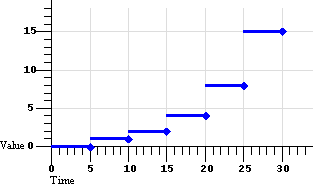 |
Figure 1a: Default discrete animation.
calcMode="discrete"
There are 6 segments of equal duration: 1 segment per value.
|
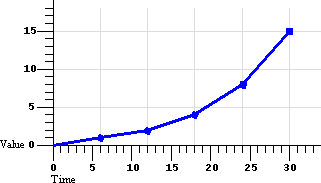 |
Figure 1b: Default linear animation.
calcMode="linear"
There are 5 segments of equal duration: n-1 segments for n values.
Spline interpolation is a refinement of linear, and is further
illustrated in Figure 2, below.
|
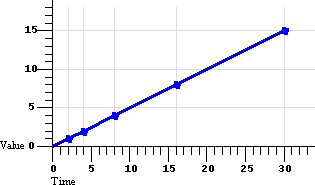 |
Figure 1c: Default paced animation.
calcMode="paced"
There are 5 segments of varying duration: n-1 segments for n
values, computed to yield a constant rate of change in the value.
|
Examples
The following example describes a simple discrete animation:
<animate attributeName="foo" dur="8s"
     values="bar; fun; far; boo" />
The value of the attribute "foo" will be set to each of the four strings
for 2 seconds each. Because the string values cannot be interpolated, only
discrete animation is possible; any calcMode attribute
would be ignored.
Discrete animation can also be used with keyTimes, as in the
following example:
<animateColor attributeName="color" dur="10s" calcMode="discrete"
     values="green; yellow; red" keyTimes="0.0; 0.5;" />
This example also shows how keyTimes values can interact with
an indefinite duration. The value of the "color" attribute will be set to
green for 5 seconds, and then to yellow for 5 seconds, and then will remain
red for the remainder of the document, since the (unspecified) duration
defaults to "indefinite".
The following example describes a simple linear animation:
<animate attributeName="x" dur="10s" values="0; 10; 100"
     calcMode="linear"/>
The value of "x" will change from 0 to 10 in the first 5 seconds, and then
from 10 to 100 in the second 5 seconds. Note that the values in the
values attribute are spaced evenly in time with no
keyTimes specified; in this case the result is a much larger
actual change in the value during the second half of the animation. Contrast
this with the same example changed to use "paced" interpolation:
<animate attributeName="x" dur="10s" values="0; 10; 100"
     calcMode="paced"/>
To produce an even pace of change to the attribute "x", the second segment
defined by the values list gets most of the simple duration: The value of "x"
will change from 0 to 10 in the first second, and then from 10 to 100 in the
next 9 seconds. While this example could be easily authored as a
from-to animation without paced interpolation, many examples (such as
motion paths) are much harder to author without the "paced" value for
calcMode.
The following example illustrates the use of keyTimes:
<animate attributeName="x" dur="10s" values="0; 50; 100"
     keyTimes="0; .8; 1" calcMode="linear"/>
The keyTimes values cause the "x" attribute to have a value of
"0" at the start of the animation, "50" after 8 seconds (at 80% into the
simple duration) and "100" at the end of the animation. The value will change
more slowly in the first half of the animation, and more quickly in the second
half.
Extending this example to use keySplines:
<animate attributeName="x" dur="10s" values="0; 50; 100"
     keyTimes="0; .8; 1" calcMode="spline"
     keySplines=".5 0 .5 1; 0 0 1 1" />
The keyTimes still cause the "x" attribute to have a value of
"0" at the start of the animation, "50" after 8 seconds and "100" at the end
of the animation. However, the keySplines values define a curve
for pacing the interpolation between values. In the example above, the spline
causes an ease-in and ease-out effect between time 0 and 8 seconds (i.e.,
between keyTimes 0 and .8, and values "0" and "50"),
but a strict linear interpolation between 8 seconds and the end (i.e., between
keyTimes .8 and 1, and values "50" and "100"). See
Figure 2 below for an illustration of the curves that these
keySplines values define.
For some attributes, the pace of change may not be easily
discernable by viewers. However for animations like motion, the ability to
make the speed of the motion change gradually, and not in abrupt
steps, can be important. The keySplines attribute provides this
control.
The following figure illustrates the interpretation of the
keySplines attribute. Each diagram illustrates the effect of
keySplines settings for a single interval (i.e., between the
associated pairs of values in the keyTimes and
values lists.). The horizontal axis can be thought of as the
input value for the unit progress of interpolation within the
interval - i.e., the pace with which interpolation proceeds along the given
interval. The vertical axis is the resulting value for the unit
progress, yielded by the keySplines function. Another way of
describing this is that the horizontal axis is the input unit time
for the interval, and the vertical axis is the output unit time. See
also the section Timing and real-world
clock times.
|
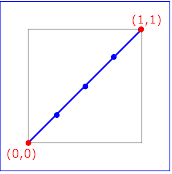 keySplines="0 0 1 1"
(the default) keySplines="0 0 1 1"
(the default) |
|
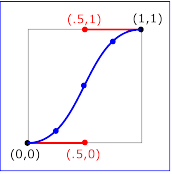 keySplines=".5 0 .5 1" keySplines=".5 0 .5 1"
|
|
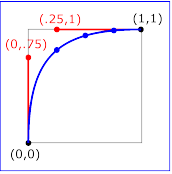 keySplines="0 .75 .25 1" keySplines="0 .75 .25 1" |
|
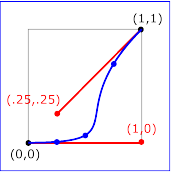 keySplines="1 0 .25 .25" keySplines="1 0 .25 .25" |
Figure 2: Illustration of keySplines effect
To illustrate the calculations, consider the simple example:
<animate dur="4s" values="10; 20" keyTimes="0; 1"
     calcMode="spline" keySplines={as in table} />
Using the keySplines values for each of the four cases above, the
approximate interpolated values as the animation proceeds are:
| keySplines values |
Initial value |
After 1s |
After 2s |
After 3s |
Final value |
| 0 0 1 1 |
10.0 |
12.5 |
15.0 |
17.5 |
20.0 |
| .5 0 .5 1 |
10.0 |
11.0 |
15.0 |
19.0 |
20.0 |
| 0 .75 .25 1 |
10.0 |
18.0 |
19.3 |
19.8 |
20.0 |
| 1 0 .25 .25 |
10.0 |
10.1 |
10.6 |
16.9 |
20.0 |
For a formal definition of Bezier spline calculation, see [COMP-GRAPHICS].
The keyTimes and keySplines attributes can also
be used with the from/to/by shorthand forms for specifying values, as
in the following example:
<animate attributeName="foo" from="10" to="20"
     dur="10s" keyTimes="0.0; 0.7"
     calcMode="spline" keySplines=".5 0 .5 1" />
The value will change from 10 to 20, using an "ease-in/ease-out"
curve specified by the keySplines values. The keyTimes values
cause the value of 20 to be reached at 7 seconds, and to hold there for the
remainder of the 10 second simple duration.
The following example describes a somewhat unusual usage: "from-to
animation" with discrete animation. The "stroke-linecap" attribute of SVG
elements takes a string, and so implies a calcMode of discrete. The animation
will set the stroke-linecap property to "round" for 5 seconds (half the simple
duration) and then set the stroke-linecap to "square" for 5 seconds.
<rect stroke-linecap="butt"...>
   <animate attributeName="stroke-linecap"
      from="round" to="square" dur="10s"/>
</rect>
3.3. Specifying the animation
effect F(t)
As described above, the animation function
f(t) defines the animation for the simple
duration. However SMIL Animation allows the author to repeat the simple
duration. SMIL Animation also allows authors to specify whether the animation
should simply end when the active duration completes, or whether it should be
frozen at the last value. In addition, the author can specify how
each animation should be combined with other animations and the original DOM
value.
This section describes the syntax and associated semantics for the
additional functionality. A detailed model for combining animations is
described, along with additional details of the timing model.
The period of time during which the animation is actively playing,
including any repeat behavior, is described as the active duration. The active
duration may be computed from the simple duration and the repeat
specification, and it may be constrained with the
end attribute. The complete rules for computing
the active duration are presented in the section Computing the active duration.
3.3.1. Repeating animations
Repeating an animation causes the animation function
f(t) to be "played" several times in sequence.
The author can specify either how many times to repeat, using
repeatCount, or how long to repeat, using
repeatDur. Each repeat iteration is one instance of
"playing" the animation function f(t).
If the simple duration is indefinite, the animation cannot repeat. See also
the section Computing the active
duration.
- repeatCount
- Specifies the number of iterations of the animation function. It can
have the following attribute values:
- numeric value
- This is a (base 10) "floating point" numeric value that
specifies the number of iterations. It can include partial
iterations expressed as fraction values. A fractional value
describes a portion of the simple duration. Values must be greater
than 0.
- "indefinite"
- The animation is defined to repeat indefinitely (i.e., until the
document ends).
- repeatDur
- Specifies the total duration for repeat. It can have the following
attribute values:
- Clock-value
- Specifies the duration in presentation time to repeat the
animation function
f(t).
-
- "indefinite"
- The animation is defined to repeat indefinitely (i.e., until the
document ends).
At most one of repeatCount or repeatDur should be
specified. If both are specified (and the simple duration is not indefinite),
the active duration is defined as the minimum of the specified repeatDur and
the simple duration multiplied by repeatCount. For the purposes of this
comparison, a defined value is considered to be "less than" a value of
"indefinite". If the simple duration is indefinite, and both
repeatCount and repeatDur are specified, the
repeatCount will be ignored, and the repeatDur will
be used (refer to the examples below describing repeatDur and an
indefinite simple duration). These rules are included in the section Computing the active duration.
Examples
In the following example, the 2.5 second animation function will be
repeated twice; the active duration will be 5 seconds.
<animate attributeName="top" from="0" to="10" dur="2.5s"
repeatCount="2" />
In the following example, the animation function will be repeated two full
times and then the first half is repeated once more; the active duration will
be 7.5 seconds.
<animate attributeName="top" from="0" to="10" dur="3s"
repeatCount="2.5" />
In the following example, the animation function will repeat for a total of
7 seconds. It will play fully two times, followed by a fractional part of 2
seconds. This is equivalent to a repeatCount of 2.8. The last (partial)
iteration will apply values in the range "0" to "8".
<animate attributeName="top" from="0" to="10" dur="2.5s"
repeatDur="7s" />
Note that if the simple duration is not defined (e.g. it is indefinite),
repeat behavior is not defined (but repeatDur still defines the
active duration). In the following example the simple duration is indefinite,
and so the repeatCount is effectively ignored. Nevertheless, this
is not considered an error: the active duration is also indefinite. The effect
of the animation is to to just use the value for
f(0), setting the fill color to red for the remainder of
the document duration.
<animate attributeName="fill" from="red" to="blue"
repeatCount="2" />
In the following example, the simple duration is indefinite, but the
repeatDur still determines the active duration. The effect of the
animation is to set the fill color to red for 10 seconds.
<animate attributeName="fill" from="red" to="blue"
repeatDur="10s" />
In the following example, the simple duration is longer than the duration
specified by repeatDur, and so the active duration will
effectively cut short the simple duration. However, the animation function
still interpolates using the specified simple duration. The effect of the
animation is to interpolate the value of "top" from 10 to 17, over the course
of 7 seconds.
<animate attributeName="top" from="10" to="20"
dur="10s" repeatDur="7s" />
Controlling behavior of repeating animation -
Cumulative animation
The author may also select whether a repeating animation should repeat the
original behavior for each iteration, or whether it should build upon the
previous results, accumulating with each iteration. For example, a motion path
that describes an arc can repeat by moving along the same arc over and over
again, or it can begin each repeat iteration where the last left off, making
the animated element bounce across the window. This is called
cumulative animation.
Using the path notation for a simple arc (detailed in The animateMotion element), we describe this
example as:
<img ...>
   <animateMotion path="m 0 0 c 30 50 70 50 100 0 z" dur="5s"
      accumulate="sum" repeatCount="4" />
</img>
The image moves from the original position along the arc over the course of
5 seconds. As the animation repeats, it builds upon the previous value and
begins the second arc where the first one ended, as illustrated in Figure 3,
below. In this way, the image "bounces" across the screen. The same animation
could be described as a complete path of 4 arcs, but in the general case the
path description can get quite large and cumbersome to edit.

Figure 3: Illustration of repeating animation with
accumulate="sum". Each repeat iteration builds upon the
previous.
Note that cumulative animation only controls how a single animation
accumulates the results of the animation function as it repeats. It
specifically does not control how one animation interacts with other
animations to produce a presentation value. This latter behavior is described
in the section Additive animation.
The cumulative behavior of repeating animations is controlled with the
accumulate attribute:
- accumulate =
"none | sum"
- Controls whether or not the animation is cumulative.
If "sum", each repeat iteration after the first builds upon
the last value of the previous iteration.
If "none", repeat iterations are not cumulative, and simply
repeat the animation function f(t). This
is the default.
This attribute is ignored if the target attribute value does not
support addition, or if the animation element does not repeat.
Cumulative animation is not defined for "to animation". This
attribute will be ignored if the animation function is specified with
only the to attribute. See also Specifying function values.
Any numeric attribute that supports addition can support cumulative
animation. For example, we can define a "pulsing" animation that will grow the
"width" of an SVG <rect> element by 100 pixels in 50
seconds.
<rect width="20px"...>
   <animate attributeName="width" dur="5s"
      values="0; 15; 10" additive="sum"
      accumulate="sum" repeatCount="10" />
</rect>
Each simple duration causes the rectangle width to bulge by 15 pixels and
end up 10 pixels larger. The shape is 20 pixels wide at the beginning, and
after 5 seconds is 30 pixels wide. The animation repeats, and builds upon the
previous values. The shape will bulge to 45 pixels and then end up 40 pixels
wide after 10 seconds, and will eventually end up 120 (20 + 100) pixels wide
after all 10 repeats.
From-to and from-by animations also support cumulative
animation, as in the following example:
<rect width="20px"...>
   <animate attributeName="width" dur="5s" from="10px" to="20px"
      accumulate="sum" repeatCount="10" />
</rect>
The rectangle will grow from 10 to 20 pixels in the first 5 seconds, and
then from 20 to 30 in the next 5 seconds, and so on up to 110 pixels after 10
repeats. Note that since the default value for additive is
"replace", the original value is ignored. The following example makes the
animation explicitly additive:
<rect width="20px"...>
   <animate attributeName="width" dur="5s" from="10px" to="20px"
      accumulate="sum" additive="sum" repeatCount="10" />
</rect>
The results are the same as before, except that all the values are shifted
up by the original value of 20. The rectangle is 30 pixels wide after 5
seconds, and 130 pixels wide after 10 repeats.
Computing cumulative animation values
To produce the cumulative animation behavior, the animation function
f(t) must be modified slightly. Each iteration
after the first must add in the last value of the previous iteration - this is
expressed as a multiple of the last value specified for the animation function. Note that
cumulative animation is defined in terms of the values specified for the
animation behavior, and not in terms of sampled or rendered animation values.
The latter would vary from machine to machine, and could even vary between
document views on the same machine.
Let fi(t) represent the cumulative
animation function for a given iteration i.
The first iteration f0(t) is
unaffected by accumulate, and so is the same as the original
animation function definition.
f0(t) = f(t)
Let ve be the last value specified for the
animation function (e.g., the "to" value, the last value in a "values" list, or
the end of a "path"). Each iteration after the first adds in the computed
offset:
fi(t) = (ve * i) + f(t)     ; i >=
1
3.3.2. Controlling the active duration
SMIL Animation provides an additional control over the active duration. The
end attribute allows the author to constrain the active duration
of the animation by specifying an end value, using a simple offset, a time
base, an event-base or DOM method calls. The end attribute can
constrain but not extend the active duration that is
otherwise defined by dur and any repeat behavior. The rules for
combining the attributes to compute the active duration are presented in the
section, Computing the active duration.
- end
- Defines an end value for the animation that can constrain the active
duration.
The attribute value is a semi-colon separated list of values.
- end-value-list : end-value (";"
end-value-list )?
- A semi-colon separated list of end values. The interpretation of a
list of end times is detailed in the section Evaluation
of begin and end time lists.
- end-value : ( offset-value | syncbase-value |
event-value | repeat-value | accessKey-value | media-marker-value |
wallclock-sync-value | "indefinite" )
- Describes the end value.
- offset-value : ( "+" |
"-" )? Clock-value
- Specifies the presentation time of the end. The end value is
thus defined relative to the document begin.
- syncbase-value : ( Id-value
"." ( "begin" | "end" ) ) ( (
"+" | "-" ) Clock-value )?
- Describes a syncbase and an offset from that syncbase. The end
value is defined relative to the begin or active end of another
element.
- event-value : ( Id-value
"." )? ( event-ref ) ( ( "+" | "-"
) Clock-value )?
- Describes an event and an optional offset that determine the
element begin. The animation end value is defined relative to the time
that the event is raised. Events may be any event defined for the
host language in accordance with [DOM2Events]. These may include
user-interface events, event-triggers transmitted via a network,
etc. Details of event-based timing are described in the section
below on Unifying event-based and scheduled
timing.
- repeat-value : ( Id-value
"." )? "repeat(" integer ")" ( (
"+" | "-" ) Clock-value )?
- Describes a qualified repeat event. The end value is defined
relative to the time that the repeat event is raised with the
specified iteration value.
- accessKey-value : "accessKey("
character ")"
- Describes an accessKey that determines the end value. The end value is defined relative to the time that the accessKey
character is input by the user.
- wallclock-sync-value
: "wallclock(" wallclock-value ")"
- Describes the end value as a real-world clock time. The
wallclock time syntax is based upon syntax defined in [ISO8601].
- "indefinite"
- The end value of the animation will be determined by a "endElement()"
(or equivalent) method call.
The SMIL Animation DOM methods are described in the Supported methods section.
Hyperlink-based timing is described in the Hyperlinks and timing section.
The end value can specify a list of times. This can be
used to specify multiple "ways" or "rules" to end an element, e.g. if any one
of several events is raised. A list of times can also define multiple end
times that can correspond to multiple begin times, allowing the element to
play more than once (this behavior can be controlled - see also Restarting
animations).
Examples:
In the following example, the active duration will end at the earlier of 10
seconds or the end of the "foo" element. This is particularly useful if
"foo"
is defined to begin or end relative to an event.
<animate dur="2s" repeatDur="10s" end="foo.end" ... />
In the following example, the animation begins when the user clicks on the
target element. The active duration will end 30 seconds after the document
begins. Note that if the user has not clicked on the target element before 30
seconds elapse, the animation will never begin.
<animate begin="click" dur="2s" repeatDur="indefinite"
         end="30s" ... />
Using end with an event value enables authors to end an
animation based on either an interactive event or a maximum active duration.
This is sometimes known as lazy interaction.
In this example, a presentation describes some factory processes. It uses
animation to move an image around (e.g. against a background), demonstrating
how an object moves from one part of a factory to another. Each step is a
motion path, and set to repeat 3 times to make the point clear. Each animation
can also be ended by clicking on some element "next" that allows the user to
advance the presentation to the next step.
<img id="objectToMove" ... >
  <animateMotion id="step1" begin="0" dur="5s"
     repeatCount="3" end="next.click" path.../>
  <animateMotion id="step2" begin="step1.end" dur="5s"
     repeatCount="3" end="next.click" path.../>
  <animateMotion id="step3" begin="step2.end" dur="5s"
     repeatCount="3" end="next.click" path.../>
  <animateMotion id="step4" begin="step3.end" dur="5s"
     repeatCount="3" end="next.click" path.../>
  <animateMotion id="step5" begin="step4.end" dur="5s"
     repeatCount="3" end="next.click" path.../>
</img>
In this case, the active end of each animation is defined to be the earlier
of 15 seconds after it begins, or a click on "next". This lets the viewer sit
back and watch, or advance the presentation at a faster pace.
3.3.3. Computing the active
duration
The table in Figure 4 shows the semantics of all possible combinations of
simple duration, repeatCount and repeatDur, and
end. The following conventions are used in the table:
- If a cell is empty, it indicates that the associated attribute is
omitted in the syntax.
- Where the table entry is "defined", this corresponds to an explicit
specified value other than "indefinite". Note that if the simple duration
is not specified, it is defined to be indefinite.
- Where the entry is a star ("*"), the value does not matter and can be
any of the possibilities.
Additionally, the following rules must be followed in computing values:
- Where the active duration is specified as the minimum of several values
(MIN), it may not always be possible to calculate this when the document
begins. If the
end is event-based or DOM-based, then an event
or method call that activates end before the
duration specified by dur and/or repeatCount or
repeatDur will cut short the active duration at the
end activation time.
- If the value of
end cannot be resolved (e.g. when it is
event-based), the value is considered to be "indefinite" for the purposes
of evaluating the active duration. If and when the end value becomes
resolved, the active duration is reevaluated.
Some of the rules and results that are implicit in the table, and that
should be noted in particular are:
- If
end is specified but neither of repeatCount
or repeatDur are specified, then the active duration is
defined as the minimum of the simple duration and the duration defined by
end.
- If both
end and either (or both) of
repeatCount or repeatDur are specified, the
active duration is defined by the minimum duration defined by the
respective attributes.
- It is possible to have an indefinite simple duration and a defined,
finite active duration. The active duration can constrain (cut
short) the simple duration, but the active duration does not define the
simple duration, or change its value (i.e., the simple duration is still
indefinite as used in the simple animation function).
- For any active duration and simple duration that are both not
indefinite, the number of repeat iterations is defined by the active
duration divided by the simple duration (this may yield partial repeat
iterations, just as
repeatCount can specify).
The following symbols are used in the table:
B- The begin of an animation.
d- The simple duration of an animation.
Simple
duration d |
repeatCount |
repeatDur |
end |
Active Duration |
| defined |
|
|
|
d |
| defined |
defined |
|
|
repeatCount*d |
| defined |
|
defined |
|
repeatDur |
| defined |
|
|
defined |
MIN( d, end-B ) |
| defined |
defined |
defined |
|
MIN( repeatCount*d, repeatDur
) |
| defined |
defined |
|
defined |
MIN( repeatCount*d,
( end-B )) |
| defined |
|
defined |
defined |
MIN( repeatDur,
( end-B )) |
| defined |
defined |
defined |
defined |
MIN( repeatCount*d,
repeatDur, ( end-B )) |
| indefinite |
* |
|
|
indefinite |
| indefinite |
* |
defined |
|
repeatDur |
| indefinite |
* |
|
defined |
end-B |
| indefinite |
* |
defined |
defined |
MIN( repeatDur,
( end-B )) |
| * |
indefinite |
|
|
indefinite |
| * |
|
indefinite |
|
indefinite |
| * |
indefinite |
indefinite |
|
indefinite |
| * |
indefinite |
|
defined |
end-B |
| * |
|
indefinite |
defined |
end-B |
| * |
indefinite |
indefinite |
defined |
end-B |
Figure 4: Computing the active duration for different combinations of
simple duration, repeatCount and repeatDur, and
end.
3.3.4. Freezing animations
By default when an animation element ends, its effect is no longer applied
to the presentation value for the target attribute. For example, if an
animation moves an image and the animation element ends, the image will "jump
back" to its original position.
<img top="3" ...>
   <animate begin="5s" dur="10s" attributeName="top" by="100"/>
</img>
The image will appear stationary at the top value of "3" for 5 seconds,
then move 100 pixels down in 10 seconds. 15 seconds after the document begin,
the animation ends, the effect is no longer applied, and the image jumps back
from 103 to 3 where it started (i.e., to the underlying value of the
top attribute).
The fill attribute can be used to maintain the value of the
animation after the active duration of the animation element ends:
<img top="3" ...>
   <animate begin= "5s" dur="10s" attributeName="top" by="100"
          fill="freeze" />
</img>
The animation ends 15 seconds after the document begin, but the image
remains at the top value of 103. The attribute freezes the last value
of the animation for the remainder of the document duration.
The freeze behavior of an animation is controlled using the "fill
"attribute:
fill =
"freeze | remove"- This attribute can have the following values:
- freeze
- The animation effect F(t) is defined to freeze the effect value
at the last value of the active duration. The animation effect is
"frozen" for the remainder of the document duration (or until the
animation is restarted - see Restarting
animations).
- remove
- The animation effect is removed (no longer applied) when the
active duration of the animation is over. After the active end of
the animation, the animation no longer affects the target (unless
the animation is restarted - see Restarting
animations).
This is the default value.
If the active duration cuts short the simple duration (including the case
of partial repeats), the effect value of a frozen animation is
defined by the shortened simple duration. In the following example, the
animation function repeats two full times and then again for one-half of the
simple duration. In this case, the value while frozen will be
15:
<animate from="10" to="20" dur="4s"
         repeatCount="2.5" fill="freeze" .../>
In the following example, the dur attribute is missing, and so
the simple duration is indefinite. The active duration is constrained by
end to be 10 seconds. Since interpolation is not defined, the
value while frozen will be 10:
<animate from="10" to="20" end="10s" fill="freeze" .../>
Comparison to SMIL timing
SMIL Animation specifies that fill="freeze" remains in effect
for the remainder of the document, or until the element is restarted. In the
more general SMIL timing model that allows time containers, the duration of
the freeze effect is controlled by the time container, and never extends past
the end of the time container simple duration. While this may appear to
conflict, the SMIL Animation definition of fill="freeze" is
consistent with the SMIL timing model. It is simply the case that in SMIL
Animation, the document is the only "time container", and so the effect is as
described above.
3.3.5. Additive animation
It is frequently useful to define animation as an offset or delta to an
attribute's value, rather than as absolute values. A simple "grow" animation
can increase the width of an object by 10 pixels:
<rect width="20px" ...>
   <animate attributeName="width" from="0px" to="10px" dur="10s"
      additive="sum"/>
</rect>
The width begins at 20 pixels, and increases to 30 pixels over the course
of 10 seconds. If the animation were declared to be non-additive, the same
from and to values would make the width go from 0 to 10 pixels over 10
seconds.
In addition, many complex animations are best expressed as combinations of
simpler animations. A "vibrating" path, for example, can be described as a
repeating up and down motion added to any other motion:
<img ...>
   <animateMotion from="0,0" to="100,0" dur="10s" />
   <animateMotion values="0,0; 0,5; 0,0" dur="1s"
                  repeatDur="10s" additive="sum"/>
</img>
When there are multiple animations defined for a given attribute that
overlap at any moment, the two either add together or one overrides the other.
Animations overlap when they are both either active or frozen at the same
moment. The ordering of animations (e.g. which animation overrides which) is
determined by a priority associated with each animation. The animations are
prioritized according to when each begins. The animation first begun has
lowest priority and the most recently begun animation has highest
priority.
Higher priority animations that are not additive will override all earlier
(lower priority) animations, and simply set the attribute value. Animations
that are additive apply (i.e. add to) to the result of the earlier-activated
animations. For details on how animations are combined, see The animation sandwich model.
The additive behavior of an animation is controlled by the
additive attribute:
additive = "replace | sum"- Controls whether or not the animation is additive.
- sum
- Specifies that the animation will add to the underlying value of
the attribute and other lower priority animations.
- replace
- Specifies that the animation will override the underlying value
of the attribute and other lower priority animations. This is the
default, however the behavior is also affected by the animation
value attributes
by and
to, as described below.
Additive animation is defined for numeric attributes and other data types
for which some addition function is defined. This includes numeric attributes
for concepts such as position, widths and heights, sizes, etc. This also
includes color (refer to The animateColor
element), and may include other data types as specified by the host
language.
It is often useful to combine additive animations and fill
behavior, for example when a series of motions are defined that should build
upon one another:
<img ...>
   <animateMotion begin="0" dur="5s" path="[some path]"
           additive="sum" fill="freeze" />
   <animateMotion begin="5s" dur="5s" path="[some path]"
           additive="sum" fill="freeze" />
   <animateMotion begin="10s" dur="5s" path="[some path]"
           additive="sum" fill="freeze" />
</img>
The image moves along the first path, and then starts the second path from
the end of the first, then follows the third path from the end of the second,
and stays at the final point.
While many animations of numerical attributes will be additive, this is not
always the case. As an example of an animation that is defined to be
non-additive, consider a hypothetical extension animation "mouseFollow" that
causes an object to track the mouse.
<img ...>
   <animateMotion dur=10s repeatDur="indefinite"
           path="[some nice path]" />
   <mouseFollow begin="mouseover" dur="5s"
           additive="replace" fill="remove" />
</img>
The mouse-tracking animation runs for 5 seconds every time the user mouses
over the image. It cannot be additive, or it will just offset the motion path
in some odd way. The mouseFollow needs to override the
animateMotion while it is active. When the
mouseFollow completes, its effect is no longer applied and the
animateMotion again controls the presentation value for
position.
In addition, some numeric attributes (e.g., a telephone number attribute)
may not sensibly support addition - it is left to the host language to specify
which attributes support additive animation. Attribute types such as strings
and Booleans for which addition is not defined, cannot support additive
animation.
How from, to and by attributes affect
additive behavior.
The attribute values to and by, used to describe the animation function, can override the
additive attribute in certain cases:
- If
by is used without
from, (by animation) the animation
is defined to be additive (i.e., the equivalent of
additive="sum").
- If
to is used without
from, (to animation) and if the
attribute supports addition, the animation is defined to be a kind of mix
of additive and non-additive. The underlying value is used as a starting
point as with additive animation, however the ending value specified by
the to attribute overrides the underlying
value as though the animation was non-additive.
For the hybrid case of a to-animation, the animation function
f(t) is defined in terms of the underlying
value, the specified to value, and the current value of
t (i.e. time) relative to the simple duration
d.
d- is the simple duration
t- is a time within the simple duration (0 <= t <= d)
vcur- is the current base value (at time t)
vto- is the defined "to" value
f(t) = vcur +
((vto - vcur) *
(t/d))
Note that if no other (lower priority) animations are active or frozen,
this defines simple interpolation. However if another animation is
manipulating the base value, the to-animation will add to the effect
of the lower priority, but will dominate it as it nears the end of the simple
duration, eventually overriding it completely. The value for
F(t) when a to-animation is frozen (at
the end of the simple duration) is just the to value. If a
to-animation is frozen anywhere within the simple duration (e.g.,
using a repeatCount of "2.5"), the value for
F(t) when the animation is frozen is the value
computed for the end of the active duration. Even if other, lower priority
animations are active while a to-animation is frozen, the value for
F(t) does not change.
Multiple to-animations will also combine according to these
semantics. The higher-priority animation will "win", and the end result will
be to set the attribute to the final value of the higher-priority
to-animation.
Multiple by-animations combine according to the general rules for
additive animation and the animation
sandwich model.
The use of from values does not imply either additive no
non-additive animation, and both are possible. The from value for
an additive animation is simply added to the underlying value, just as for the
initial value is in animations specified with a values list.
Additive behavior for from-to and from-by animations is
controlled by the additive attribute, as in the general case.
For an example of additive to-animation, consider the following
two additive animations. The first, a by-animation applies a delta to
attribute "x" from 0 to -10. The second, a to-animation animates to a
final value of 10.
 <foo x="0" .../>
    <animate id="A1" attributeName="x"
        by="-10" dur="10s" fill="freeze" />
    <animate id="A2" attributeName="x"
        to="10"  dur="10s" fill="freeze" />
 </foo>
The presentation value for "x" in the example above, over the course of the
10 seconds is presented in Figure 5 below. These values are simply computed
using the formula described above. Note that the value for
F(t) for A2 is the presentation value for
"x".
| Time |
F(t) for A1 |
F(t) for A2 |
| 0 |
0 |
0 |
| 1 |
-1 |
0.1 |
| 2 |
-2 |
0.4 |
| 3 |
-3 |
0.9 |
| 4 |
-4 |
1.6 |
| 5 |
-5 |
2.5 |
| 6 |
-6 |
3.6 |
| 7 |
-7 |
4.9 |
| 8 |
-8 |
6.4 |
| 9 |
-9 |
8.1 |
| 10 |
-10 |
10 |
Figure 5: Effect of Additive to-animation example
Additive and Cumulative animation
The accumulate attribute should not be confused with the
additive attribute. The additive attribute defines
how an animation is combined with other animations and the base value of the
attribute. The accumulate attribute defines only how the
animation function interacts with itself, across repeat iterations.
Typically, authors expect cumulative animations to be additive (as in the
examples described for accumulate above), but this is not required. The following example
is cumulative but not additive.
<img ...>
   <animate dur="10s" repeatDur="indefinite"
            attributeName="top" from="20" by="10"
            additive="replace" accumulate="sum" />
</img>
The animation overrides whatever original value was set for "top", and
begins at the value 20. It moves down by 10 pixels to 30, then repeats. It is
cumulative, so the second iteration starts at 30 and moves down by another 10
to 40. Etc.
When a cumulative animation is also defined to be additive, the two
features function normally. The accumulated effect for
F(t) is used as the value for the animation, and
is added to the underlying value for the target attribute. Refer also to The animation sandwich model.
3.3.6. Restarting animation
When an animation is defined to begin at a simple offset (e.g.
begin="5s" ), there is an unequivocal time when the element
begins. However, if an animation is defined to begin relative to an event
(e.g. begin="foo.click" ), the event can happen at any time, and
moreover can happen more than once (e.g., if the user clicks on "foo"
several times). In some cases, it is desirable to restart an
animation if a second begin event is received. In other cases, an author may
want to preclude this behavior. The restart attribute controls
the circumstances under which an animation is restarted:
restart = "always | whenNotActive |
never"
- always
- The animation can be restarted at any time.
This is the default value.
- whenNotActive
- The animation can only be restarted when it is not active (i.e.,
it can be restarted after the active end). Attempts to
restart the animation during its active duration are ignored.
- never
- The animation cannot be restarted for the remainder of the
document duration.
Note that there are several ways that an animation may be restarted. The
behavior (i.e. to restart or not) in all cases is controlled by the
restart attribute. The different restart cases are:
- An animation with
begin specified as an event-value can be
restarted when the named event fires multiple times.
- An animation with
begin specified as a syncbase value,
where the syncbase element can restart. When an animation restarts, other
animations defined to begin relative to the begin or active end of the
restarting animation may also restart (subject to the value of
restart on these elements).
- An animation with
begin specified as "indefinite" can be
restarted when the DOM methods beginElement() or
beginElementAt() are called repeatedly.
When an animation restarts, the defining semantic is that it behaves as
though this were the first time the animation had begun, independent of any
earlier behavior. The animation effect F(t) is
defined independent of the restart behavior. Any effect of an animation
playing earlier is no longer applied, and only the current animation effect
F(t) is applied.
If an additive animation is restarted while it is active or frozen, the
previous effect of the animation (i.e. before the restart) is no longer
applied to the attribute. Note in particular that cumulative animation is
defined only within the active duration of an animation. When an animation
restarts, all accumulated context is discarded, and the animation effect
F(t) begins accumulating again from the first
iteration of the restarted active duration.
When an active element restarts, the element first ends the active duration,
propagates this to time dependents and raises an endEvent in the normal manner
(see also Evaluation of begin
and end time lists).
For details on when and how the restart
attribute is evaluated, see Evaluation
of begin and end time lists.
Note that using restart can also allow the author to define a single UI
event to both begin and end an element, as follows:
<img ...>
   <animate id="foo" begin="click" dur="2s"
       repeatDur="indefinite" end="click"
       restart="whenNotActive" ... />
</img>
If "foo" were defined with the default restart behavior "always", a second
click on the image would simply restart the animation. However, since the
second click cannot restart the animation when restart is set to "whenNotActive", the click will just end the active duration and stop the
animation. This is sometimes described as "toggle" activation. See also Event sensitivity
and Unifying event-based and scheduled timing.
Resetting element state
This section is normative
When an element restarts, certain state is
"reset":
- Any instance times associated with
past
event-values, repeat-values, accessKey-values or added via DOM method
calls are removed from the dependent begin and
end instance times lists. In effect, all events and DOM methods calls in the
past are
cleared. This does not apply to an instance time that defines the begin of
the current interval.
Comparison to SMIL timing
SMIL Animation specifies that restart="never" precludes
restart for the remainder of the document duration. In the more general SMIL
2.0 [SMIL20] timing model that allows
time containers, the duration of the restart="never" semantic is
defined by the time container, and only extends to the end of the time
container simple duration. While this may appear to conflict, the SMIL
Animation definition of restart="never" is consistent with the
SMIL timing model. It is simply the case that in SMIL Animation, the document
is the only "time container", and so the effect is as described above.
3.4. Handling syntax errors
The specific error handling mechanisms for each attribute are described
with the individual syntax descriptions. Some of these specifications
describe the behavior of an animation with syntax errors as "having no
effect". This means that the animation will continue to behave normally with
respect to timing, but will not manipulate any presentation value, and so will
have no visible impact upon the presentation.
In particular, this means that if other animation elements are defined to
begin or end relative to an animation that "has no effect", the other
animation elements will begin and end as though there were no syntax errors.
The presentation runtime may indicate an error, but need not halt presentation
or animation of the document.
Some host languages and/or runtimes may choose to impose stricter error
handling (see also Error handling
semantics for a discussion of host language issues with error handling).
Authoring environments may also choose to be more intrusive when errors are
detected.
3.5. The animation sandwich
model
When an animation is running, it does not actually change the attribute
values in the DOM. The animation runtime should ideally maintain a
presentation value for any target attribute, separate from the DOM, CSS,
or other object model (OM) in which the target attribute is defined. The
presentation value is reflected in the display form of the document. The
effect of animations is to manipulate this presentation value, and not to
affect the underlying DOM or CSS OM values.
The remainder of this discussion uses the generic term OM for both the XML
DOM [DOM-Level-2] as well as the CSS-OM. If an
implementation does not support an object model, it should ideally maintain
the original value as defined by the document as well as the presentation
value; for the purposes of this section, we will consider this original value
to be equivalent to the value in the OM.
In some implementations of DOM, it may be difficult or impractical to main
a presentation value as described. CSS values should always be supported as
described, as the CSS-OM provides a mechanism to do so. In implementations
that do not support separate presentation values for general XML DOM
properties, the implementation must at least restore the original value when
animations no longer have an effect.
The rest of this discussion assumes the recommended approach using a
separate presentation value.
The model accounting for the OM and concurrently active or frozen
animations for a given attribute is described as a "sandwich", a loose analogy
to the layers of meat and cheeses in a "submarine sandwich" (a long sandwich
made with many pieces of meats and cheese layered along the length of the
bread). In the analogy, time is associated with the length of the sandwich,
and each animation has its duration represented by the length of bread that
the layer covers. On the bottom of the sandwich is the base value taken from
the OM. Each active (or frozen) animation is a layer above this. The layers
(i.e. the animations) are placed on the sandwich both in time along the length
of the bread, as well as in order according to priority, with higher
priority animations placed above (i.e. on top of) lower priority animations.
At any given point in time, you can take a slice of the sandwich and see how
the animation layers stack up.
Note that animations manipulate the presentation value coming out of the OM
in which the attribute is defined, and pass the resulting value on to the next
layer of document processing. This does not replace or override any of the
normal document OM processing cascade.
Specifically, animating an attribute defined in XML will modify the
presentation value before it is passed through the style sheet cascade, using
the XML DOM value as its base. Animating an attribute defined in a style sheet
language will modify the presentation value passed through the remainder of
the cascade.
In CSS2 and the DOM 2 CSS-OM, the terms "specified", "computed" and
"actual" are used to describe the results of evaluating the syntax, the
cascade and the presentation rendering. When animation is applied to CSS
properties of a particular element, the base value to be animated is read
using the (readonly) getComputedStyle() method on that element.
The values produced by the animation are written into an override stylesheet
for that element, which may be obtained using the
getOverrideStyle() method. These new values then affect the
cascade and are reflected in a new computed value (and thus, modified
presentation). This means that the effect of animation overrides all style
sheet rules, except for user rules with the !important property.
This enables !important user style settings to have priority over
animations, an important requirement for accessibility. Note that the
animation may have side effects upon the document layout. See also the [CSS2] specification (the terms are defined in section
6.1), and the [DOM2CSS] specification (section
5.2.1).
Within an OM, animations are prioritized according to when each begins. The
animation first begun has lowest priority and the most recently begun
animation has highest priority. When two animations start at the same moment
in time, the activation order is resolved as follows:
- If one animation is a time dependent of another (e.g., it is
specified to begin when another begins), then the time dependent is
considered to activate after the syncbase element, and so has
higher priority. Time dependency is further discussed in Propagating changes to times. This rule
applies independent of the timing described for the syncbase element -
i.e., it does not matter whether the syncbase element begins on an offset,
relative to another syncbase, relative to an event-base, or via
hyperlinking. In all cases, the syncbase is begun before any time
dependents are begun, and so the syncbase has lower priority than the time
dependent.
- If two animations share no time dependency relationship (e.g., neither is
defined relative to the other, even indirectly) the element that appears
first in the document has lower priority. This includes the cases in which
two animation elements are defined relative to the same syncbase or
event-base.
Note that if an animation is restarted (see also Restarting animations), it will always move to the top of
the priority list, as it becomes the most recently activated animation. That
is, when an animation restarts, its layer is pulled out of the sandwich, and
added back on the very top. In contrast, when an element repeats the priority
is not affected (repeat behavior is not defined as restarting).
Each additive animation adds its effect to the result of all sandwich
layers below. A non-additive animation simply overrides the result of all
lower sandwich layers. The end result at the top of the sandwich is the
presentation value that must be reflected in the document view.
Some attributes that support additive animation have a defined legal range
for values (e.g., an opacity attribute may allow values between 0 and 1). In
some cases, an animation function may yield out of range values. It is
recommended that implementations clamp the results to the legal range as late
as possible, before applying them to the presentation value. Ideally, the
effect of all the animations active or frozen at a given point should be
combined, before any clamping is performed. Although individual animation
functions may yield out of range values, the combination of additive
animations may still be legal. Clamping only the final result and not the
effect of the individual animation functions provides support for these cases.
Intermediate results may be clamped when necessary although this is not
optimal. The host language must define the clamping semantics for each
attribute that can be animated. As an example, this is defined for The animateColor element.
Initially, before any animations for a given attribute are active, the
presentation value will be identical to the original value specified in the
document (the OM value).
When all animations for a given attribute have completed and the associated
animation effects are no longer applied, the presentation value will again be
equal to the OM value. Note that if any animation is defined with
fill="freeze", the effect of the animation will be applied as
long as the document is displayed, and so the presentation value will reflect
the animation effect until the document end. Refer also to the section "Freezing animations".
Some animations (e.g. animateMotion) will implicitly
target an attribute, or possibly several attributes (e.g. the "posX" and
"posY" attributes of some layout model). These animations must be combined
with any other animations for each attribute that is affected. Thus for example, an
animateMotion animation may be in more than one animation
sandwich (depending upon the layout model of the host language). For animation
elements that implicitly target attributes, the host language designer must
specify which attributes are implicitly targeted, and the runtime must
accordingly combine animations for the respective attributes.
Note that any queries (via DOM interfaces) on the target attribute will
reflect the OM value, and will not reflect the effect of animations. Note also
that the OM value may still be changed via the OM interfaces (e.g. using
script). While it may be useful or desired to provide access to the final
presentation value after all animation effects have been applied, such an
interface is not provided as part of SMIL Animation. A future version may
address this.
Although animation does not manipulate the OM values, the document display
must reflect changes to the OM values. Host languages can support script
languages that can manipulate attribute values directly in the OM. If an
animation is active or frozen while a change to the OM value is made, the
behavior is dependent upon whether the animation is defined to be additive or
not, as follows: (see also the section Additive
animation).
- If only additive animations are active or frozen (i.e., no non-additive
animations are active or frozen for the given attribute) when the OM value
is changed, the presentation value must reflect the changed OM value as
well as the effect of the additive animations. When the animations
complete and the effect of each is no longer applied, the presentation
value will be equal to the changed OM value.
- If any non-additive animation is running when the OM value is changed,
the presentation value will not reflect the changed OM value, but will
only reflect the effect of the highest priority non-additive animation,
and any still higher priority additive animations. When all non-additive
animations complete and the effect of each is no longer applied, the
presentation value will reflect the changed OM value and the effect of any
additive animations that are active or frozen.
3.6. Timing model details
3.6.1. Timing and real-world
clock times
Throughout this specification, animation is described as a function of
"time". In particular, the animation function is described as producing a
value for any "time" in the range of the simple duration. However, the simple
duration can be repeated, and the animation can begin and restart in many
ways. As such, there is no direct relationship between the "time" that an
animation function uses, and the real world concept of time as reflected on a
clock.
When a keySplines attribute is used to adjust the pacing
between values in an animation, the semantics can be thought of as changing
the pace of time in the given interval. An equivalent model is that
keySplines simply changes the pace at which interpolation
progresses through the given interval. The two interpretations are
equivalent mathematically, and the significant point is that the notion of
"time" as defined for the animation function f(t)
should not be construed as real world clock time. For the
purposes of animation, "time" can behave quite differently from real world
clock time.
3.6.2. Interval timing
SMIL Animation assumes the most common model for interval timing.
This describes intervals of time (i.e. durations) in which the begin time of
the interval is included in the interval, but the end time is excluded from
the interval. This is also referred to as end-point exclusive timing.
This model makes arithmetic for intervals work correctly, and provides
sensible models for sequences of intervals.
Background rationale
In the real world, this is equivalent to the way that seconds add up to
minutes, and minutes add up to hours. Although a minute is described as 60
seconds, a digital clock never shows more than 59 seconds. Adding one more
second to "00:59" does not yield "00:60" but rather "01:00", or 1 minute and 0
seconds. The theoretical end time of 60 seconds that describes a minute
interval is excluded from the actual interval.
In the world of media and timelines, the same applies: Let A be a video, a
clip of audio, or an animation. Assume "A" begins at 10 and runs until 15 (in
any units - it does not matter). If "B" is defined to follow "A", then it
begins at 15 (and not at 15 plus some minimum interval). When an animation
runtime engine actually renders out frames (or samples for audio), and must
render the time "15", it should not show both a frame of "A" and a frame of
"B", but rather should only show the new element "B". This is the same for
audio, or for any interval on a timeline. If the model does not use
endpoint-exclusive timing, it will draw overlapping frames, or have
overlapping samples of audio, of sequenced animations, etc.
Note that transitions from "A" to "B" also adhere to the interval timing
model. They do require that "A" not actually end at 15, and that both
elements actually overlap. Nevertheless, the "A" duration is simply extended
by the transition duration (e.g. 1 second). This new duration for "A" is
also endpoint exclusive - at the end of this new duration, the
transition will be complete, and only "B" should be rendered - "A" is no
longer needed.
Implications for animation
For animation, several results of this are important: the definition of
repeat, and the value sampled during the "frozen" state.
When repeating an animation, the arithmetic follows the end-point exclusive
model. Consider the example:
<animation dur="4s" repeatCount="4" .../>
At time 0, the simple duration is sampled at 0, and the first value is
applied. This is the inclusive begin of the interval. The simple
duration is sampled normally up to 4 seconds. However, the appropriate way to
map time on the active duration to time on the simple duration is to use the
remainder of division by the simple duration:
  simpleTime = REMAINDER( activeTime, d
)
or
F(t) = f( REMAINDER( t, d ) )
where t is within the active duration
Note: REMAINDER( t, d ) is defined as t -
d*floor(t/d)
Using this, a time of 4 (or 8 or 12) maps to the time of
0 on the simple duration. The endpoint of the simple duration
is excluded from (i.e. not actually sampled on) the simple
duration.
This implies that the last value of an animation function
f(t) may never actually be applied (e.g. for a
linear interpolation). This may be true in the case of an animation that does
not repeat and does not specify fill="freeze".
However, in the following example, the appropriate value for the frozen state
is clearly the "to" value:
  <animation from="0" to="5" dur="4s" fill=freeze
.../>
This does not break the interval timing model, but does require an
additional qualification for the animation function
F(t) while in the frozen state:
- If the active duration is an even multiple of the simple duration, the
value to apply in the frozen state is the last value defined for the
animation function
f(t).
The definition of accumulate also aligns to this
model. The arithmetic is effectively inverted and values accumulate by adding
in a multiple of the last value defined for the animation function
f(t).
3.6.3. Unifying interactive and scheduled
timing
SMIL Animation describes extensions to SMIL 1.0 to support interactive
timing of animation elements. These extensions allow the author to specify
that an animation should begin or end in response to an event (such as a
user-input event like "click"), or to a hyperlink activation, or to a DOM
method call.
The syntax to describe this uses event-value specifications and the special
argument value "indefinite" for the begin and end
attribute values. Event values describe user interface and other events. DOM
method calls to begin or end an animation require that the associated
attribute use the special value "indefinite". A hyperlink can also be targeted
at an animation element that specifies begin="indefinite". The
animation will begin when the hyperlink is activated (usually by the user
clicking on the anchor). It is not possible to directly control the active end
of an animation using hyperlinks.
Background
The current model represents an evolution from earlier multimedia runtimes.
These were typically either pure, static schedulers or pure event-based
systems. Scheduler models present a linear timeline that integrates both
discrete and continuous media. Scheduler models tend to be good for
storytelling, but have limited support for user-interaction. Event-based
systems, on the other hand, model multimedia as a graph of event bindings.
Event-based systems provide flexible support for user-interaction, but
generally have poor scheduling facilities; they are best applied to highly
interactive and experiential multimedia.
The SMIL 1.0 model is primarily a scheduling model, but with some
flexibility to support continuous media with unknown duration. User
interaction is supported in the form of timed hyperlinking semantics, but
there was no support for activating individual elements via interaction.
Modeling interactive, event-based content in SMIL
To integrate interactive content into SMIL timing, the SMIL 1.0 scheduler
model is extended to support several new concepts: indeterminate
timing, and activation of the element.
With indeterminate timing, an element has an undefined begin or
end time. The element still exists within the constraints of the document,
but the begin or end time is determined by some external activation.
Activation may be event-based (such as by a user-input event), hyperlink based
(with a hyperlink targeted at the element), or DOM based (e.g., by a call to
the beginElement() method). From a scheduling perspective, the
time is described as unresolved before the activation. Once the
element begin or end has been activated, the time is resolved.
The event-activation support provides a means of associating an event with
the begin or active end time for an element. When the event is raised (e.g.,
when the user clicks on something), the associated time is resolved to a
determinate time. For event-based begin times, the element becomes
active (begins to play) at the time that the event is raised (plus any
specified offset). The element plays from the beginning of the animation
function. For event-based active end times, the element becomes inactive
(stops playing) when the associated event is raised.
Note that an event based end will not be activated until the
element has already begun. Any specified end event is ignored
before the element begins. See also Event sensitivity.
Note that when an element restarts, any event-based end time that was
resolved in the previous instance of play, will be reset to the unresolved
state.
Related to event-activation is link-activation. Hyperlinking has
defined semantics in SMIL 1.0 to seek a document to a point in time.
When combined with indeterminate timing, hyperlinking yields a variant on
interactive content. A hyperlink can be targeted at an element that does not
have a scheduled begin time. When the link is traversed, the element begins.
The details of when hyperlinks activate an element, and when they seek the
document timeline are presented in the next section.
Note that hyperlink activation only applies to an element begin time, and
not to the element end. Event and DOM based activation can apply to both begin
and end times.
Note that elements can define the begin or end
relative to another element, using a syncbase-value (the begin or end of another
element). If the syncbase element is in turn defined with, for example,
event-based times, the syncbase value is not resolved, and so the
begin or end of the current element is also
unresolved. For a begin or end time to be resolved,
any referenced syncbase value must also be resolved.
3.6.4. Event sensitivity
This section is informative
The timing model supports synchronization based upon
unpredictable events such as DOM events or user interface generated events. The
model for handling events is that the notification of the event is delivered to
the timing element, and the timing element uses a set of rules to resolve any
synchronization dependent upon the event.
This section is normative
The semantics of element sensitivity to events are
described by the following set of rules:
- If an element is not active, then events are only
handled for begin specifications. Thus if an event is raised and begin
specifies the event, the element begins. While the element is not active,
any end specification of the event is
ignored.
- If an element is (already) active when an event is
raised, and begin specifies the
event, then the behavior depends upon the value of restart:
- If restart="always",
then a new begin time is resolved for the element based on the event
time. Any specification of the event in end
is ignored for this event instance.
- If restart="never" or restart="whenNotActive",
then any begin specification of
the event is ignored for this instance of the event. If end specifies the event, an end value is resolved based
upon the event time, and the active duration is re-evaluated (according
to the rules in Computing the
active duration).
It is important to notice that in no case is a single event
occurrence used to resolve both a begin and end time on the same element.
User event sensitivity and timing
The timing model and the user event model are largely
orthogonal. While the timing model does reference user events, it does not
define how these events are generated, and in particular does not define
semantics of keyboard focus, mouse containment, "clickability", and
related issues. Because timing can affect the presentation of elements, it may
impact the rules for user event processing, however it only has an effect to the
extent that the presentation of the element is affected.
3.6.5. Hyperlinks and timing
Hyperlinking semantics must be specifically defined for animation in order
to ensure predictable behavior. Earlier hyperlinking semantics, such as those
defined by SMIL 1.0 are insufficient because they do not handle indeterminate
and interactive timing. Here we extend SMIL 1.0 semantics for use in
presentations that include animations with indeterminate and interactive
timing.
Hyperlinking behavior is described as seeking the document. To
seek in this sense means to advance the document timeline to the
specified time.
A hyperlink may be targeted at an animation element by specifying the value
of the id attribute of an animation element in the fragment part
of the link locator. Traversing a hyperlink that refers to an animation will
behave according to the following rules:
- If the target element is active, seek the
document time back to the (current) begin time of the element. If there
are multiple begin times, use the begin time that corresponds to the
current "begin instance".
- Else if the target element begin time is
resolved (i.e., there is any resolved time in the list of begin times, or
if the begin time was forced by an earlier hyperlink or a
beginElement() method call), seek the document time (forward
or back, as needed) to the earliest resolved begin time of the target
element. Note that the begin time may be
resolved as a result of an earlier hyperlink, DOM or event activation.
Once the begin time is resolved, hyperlink traversal always seeks.
- Else (animation begin time is unresolved) just resolve the target
animation begin time at current document time. Disregard the sync-base or
event base of the animation, and do not "back-propagate" any timing logic
to resolve the child, but rather treat it as though it were defined with
begin="indefinite" and just resolve begin time to the
current document time.
Note that hyperlink activation does not introduce any restart behavior, and
is not subject to the restart attribute semantics.
If a seek of the document presentation time is required, it may be
necessary to seek either forward or backward, depending upon the resolved
begin time of the element and the current time at the moment of hyperlink
traversal.
After seeking a document forward, the document should be in the same state
as if the user had allowed the presentation to run normally from the current
time until reaching the animation element begin time (but had otherwise not
interacted with the document). In particular, seeking the presentation time
forward should also cause any other animation elements that have resolved
begin times between the current time and the seeked-to time to begin. These
elements may have ended, or may still be active or frozen at the seeked-to
time, depending upon their begin times and active durations. Also any
animation elements currently active at the time of hyperlinking should
"fast-forward" over the seek interval. These may end or may be still active or
frozen at the seeked-to time, depending upon their active durations. The net
effect is that seeking forward to a presentation time puts the document into a
state identical to that as if the document presentation time advanced
undisturbed to reach the seek time.
If the resolved begin time for an animation element that is the target of a
hyperlink is before the current presentation time, the presentation must seek
backwards. Seeking backwards will rewind any animations active during the seek
interval and will turn off any animations that are resolved to begin at a time
after the seeked-to time. Note that resolved begin times (e.g. a begin
associated with an event) are not cleared or lost by seeking to an earlier
time. Subject to the rules above for hyperlinks that target animation
elements, hyperlinking to elements with resolved begin times will function
normally, advancing the presentation time forward to the previously resolved
time.
These hyperlinking semantics assume that a record is kept of the resolved
begin time for all animation elements, and this record is available to be used
for determining the correct presentation time to seek to. Once resolved, begin
times are not cleared. However, they can be overwritten by subsequent
resolutions driven by multiple occurrences of an event (i.e. by restarting).
For example:
<animate id="A" begin="10s" .../>
<animate id="B" begin="A.begin+5s" .../>
<animate id="C" begin="click" .../>
<animate id="D" begin="C.begin+5s" .../>
...
<a href="#D">Start the last animation</a>
The begin time of elements "A" and "B" can be immediately resolved to be at
10 and 15 seconds respectively. The begin of elements "C" and "D" are
unresolved when the document starts. Therefore activating the hyperlink will
have no effect upon the presentation time or upon elements "C" and "D". Now,
assume that "C" is clicked at 25 seconds into the presentation. The click on
"C" in turn resolves "D" to begin at 30 seconds. From this point on,
traversing the hyperlink will cause the presentation time to be seeked to 30
seconds.
If at 60 seconds into the presentation, the user again clicks on "C", "D"
will become re-resolved to a presentation time of 65 seconds. Subsequent
activation of the hyperlink will result in the seeking the presentation to 65
seconds.
3.6.6. Propagating changes to times
There are several cases in which times may change as the document is
presented. In particular, when an animation time is defined relative to an
event, the time (i.e. the animation begin or active end) is resolved when the
event occurs. Another case arises with restart behavior - both the begin and
active end time of an animation can change when it restarts. Since the begin
and active end times of one animation can be defined relative to the begin or
active end of other animations, any changes to times must be propagated
throughout the document.
When an animation "foo" has a begin or active end time that specifies a
syncbase element (e.g. "bar" as below):
<rect ...>
   <animate id="bar" end="click" .../>
   <animate id="foo" begin="bar.end" .../>
</rect>
we say that "foo" is a time-dependent of "bar" - that is, the
"foo" begin time depends upon the active end of "bar".
An element A is a time dependent of another
element B if A specifies
B as a syncbase element. In addition, if element
A is a time dependent of element
B, and if element B is a
time dependent of element C (i.e., element
B defines element C as a
syncbase element), then element A is an
indirect time dependent of element C.
When an element begins or ends, the time dependents of the element are
effectively notified of the action, and the schedule for the time dependents
may be affected. Note than an element must actually begin before any of the
time dependents (dependent on the begin) are affected, and that an element
must actually end before any of the time dependents (dependent on the end) are
affected. This impacts the definition of the priority ordering of animation
elements, as discussed in The animation
sandwich model.
In the example above, any changes to the active end time of "bar" must be
propagated to the begin of "foo". The effect of the changes depends upon the
state of "foo" when the change happens, as detailed below.
If the begin time of an element is dependent upon another element
(as for "foo" in the example), the resulting behavior when the syncbase
element ("bar") propagates changes is determined as follows:
- If the time dependent ("foo") has not yet begun, then the begin time is
simply updated in the schedule.
- If the time dependent ("foo") is currently active, then the
restart attribute determines the behavior: if it is "always",
then the time dependent will restart; otherwise the propagated change is
ignored.
- If the time dependent ("foo") has already begun (at least once) but is
not currently active, then the
restart attribute determines
the behavior: if it is "always" or "whenNotActive", then the time
dependent will restart; otherwise the propagated change is ignored.
Note that the semantic is directly analogous to event-base timing and the
restart attribute.
If the end time of an element is dependent upon another element,
the semantic is much simpler:
- If the time dependent has not yet begun or is currently active, then the
end time is simply updated in the schedule, and the active duration is
recalculated (according to the table in Computing the active duration).
- If the time dependent has already ended the active duration, then the change is ignored. Even if the recomputed
active duration would extend past the current time, the element does not
"restart" and "re-end".
Another way to think of this is that the end time is always recalculated,
but it will not affect the presentation unless the element is currently
active, or unless the element begins (or restarts) after the change
happens.
3.6.7. Timing attribute value grammars
This section is normative
The syntax specifications are defined using EBNF notation as defined in [XML10]
In the syntax specifications that follow, allowed
white space is indicated as "S", defined as follows (taken from the [XML10] definition for "S"):
S ::= (#x20 | #x9 | #xD | #xA)*
Begin
values
This section is normative
A begin-value-list is a semi-colon separated list of
timing specifiers:
begin-value-list ::= begin-value (S ";" S begin-value-list )?
begin-value      ::= (offset-value | syncbase-value
                      | event-value
                      | repeat-value | accessKey-value
                      | wallclock-sync-value | "indefinite" )
End values
This section is normative
An end-value-list is a semi-colon separated list of
timing specifiers:
end-value-list ::= end-value (S ";" S end-value-list )?
end-value      ::= (offset-value | syncbase-value
                      | event-value
                      | repeat-value | accessKey-value
                      | wallclock-sync-value | "indefinite" )
Parsing timing specifiers
Several of the timing specification values have a
similar syntax. In addition, XML ID attributes are allowed to contain the dot '.'
separator character. The backslash character '\'
can be used to escape the dot separator within identifier and event-name
references. To parse an individual item in a value-list, the following approach
defines the correct interpretation.
- Strip any leading, trailing, or intervening white space characters.
- If the value begins with a number or numeric sign
indicator (i.e.
'+' or '-'), the value should be
parsed as an offset value.
- Else if the value begins with the token "wallclock",
it should be parsed as a wallclock-sync-value.
- Else if the value is the token
"indefinite", it should be parsed as the value
"indefinite".
- Else: Build a token substring up to but not
including any sign indicator (i.e. strip off any offset). In the following,
ignore any '
.' separator characters preceded by a backslash '\'
escape character. In addition, strip any leading backslash '\'
escape character.
- If the token contains no '
.'
separator character, then the value should be parsed as an event-value
with an unspecified (i.e. default) eventbase-element.
- Else if the token ends with the string "
.begin"
or ".end", then the value should be parsed as a syncbase-value.
- Else, the value should be parsed as an event-value
(with a specified eventbase-element). Before parsing the event value,
any backslash '
\' escape character after the '.'
separator character should be removed.
This approach allows implementations to treat the tokens wallclock and indefinite
as reserved element IDs, and begin, end
and marker as reserved event names, while retaining
an escape mechanism so that elements and events with those names may be
referenced.
Clock values
Clock values have the following syntax:
Clock-value         ::= ( Full-clock-value | Partial-clock-value
                          | Timecount-value )
Full-clock-value    ::= Hours ":" Minutes ":" Seconds ("." Fraction)?
Partial-clock-value ::= Minutes ":" Seconds ("." Fraction)?
Timecount-value     ::= Timecount ("." Fraction)? (Metric)?
Metric              ::= "h" | "min" | "s" | "ms"
Hours               ::= DIGIT+; any positive number
Minutes             ::= 2DIGIT; range from 00 to 59
Seconds             ::= 2DIGIT; range from 00 to 59
Fraction            ::= DIGIT+
Timecount           ::= DIGIT+
2DIGIT              ::= DIGIT DIGIT
DIGIT               ::= [0-9]
For Timecount values, the default metric suffix is
"s" (for seconds). No embedded white
space is allowed in clock values, although leading and trailing white space
characters will be ignored.
The following are examples of legal clock values:
- Full clock values:
02:30:03
50:00:10.25 = 50 hours, 10 seconds and 250 milliseconds
- Partial clock value:
02:33
00:10.5 = 10.5 seconds = 10 seconds and 500 milliseconds
- Timecount values:
3.2h = 3.2 hours = 3 hours and 12
minutes
45min = 45 minutes
30s = 30 seconds
5ms = 5 milliseconds
12.467 = 12 seconds and 467 milliseconds
Fractional values are just (base 10) floating point
definitions of seconds. The number of digits allowed is unlimited (although
actual precision may vary among implementations).
For example:
00.5s = 500 milliseconds
00:00.005 = 5 milliseconds
Offset values
Offset values are used to specify when an element should
begin or end relative to its syncbase.
This section is normative
An offset value has the following syntax:
offset-value ::= (( S "+" | "-" S )? ( Clock-value )
- An offset value allows an optional sign on a clock
value, and is used to indicate a positive or negative offset.
- The offset is measured in document time.
The implicit syncbase for an offset value is the
document begin.
ID-Reference values
This section is normative
ID reference values are references to the value of an
"id" attribute of another element in the document.
Id-value ::= IDREF
- The IDREF is a legal XML identifier.
Syncbase values
A syncbase value starts with a Syncbase-element
term defining the value of an "id" attribute of another element
referred to as the syncbase element.
This section is normative
A syncbase value has the following syntax:
 Syncbase-value   ::= (
Syncbase-element "." Time-symbol )


( S ("+"|"-") S
Clock-value )?

 Syncbase-element ::= Id-value

 Time-symbol      ::= "begin" |
"end"
- The syncbase element must be another timed element
contained in the host document.
- If the syncbase element specification refers to
an illegal element, the time-value description will be treated as
though "indefinite" were specified.
The syncbase element is qualified with one of the
following time symbols:
- begin
- Specifies the begin time of the syncbase element.
- end
- Specifies the Active End of the syncbase element.
- The time symbol can be followed by an offset
value. The offset value specifies an offset from the time (i.e. the begin or
active end) specified by the syncbase and time symbol.
- If the clock value is omitted, it defaults to
"0".
- No embedded white space is allowed between a
syncbase element and a time-symbol.
- White space will be ignored before and after a
"+" or "-" for a clock value.
- Leading and trailing white space characters (i.e.
before and after the entire syncbase value) will be ignored.
Examples:
begin="x.end-5s"
: Begin 5 seconds before "x" ends
begin=" x.begin " :
Begin when "x" begins
begin="x.begin + 1m" : End 1 minute
after "x" begins
Event values
This section is informative
An Event value starts with an Eventbase-element
term that specifies the event-base element. The event-base element is
the element on which the event is observed. Given DOM event bubbling, the
event-base element may be either the element that raised the event, or it may be
an ancestor element on which the bubbled event can be observed. Refer to [DOM2Events] for details.
This section is normative
An event value has the following syntax:
  Event-value
::= ( Eventbase-element "." )? Event-symbol


( S ("+"|"-") S
Clock-value )?

  Eventbase-element ::= ID
The eventbase-element must be another element
contained in the host document.
If the Eventbase-element term is missing, the
event-base element is defined to be the target element of the animation,
The event value must specify an Event-symbol. This
term specifies the name of the event that is raised on the Event-base element. The
host language designer must specify which events can be specified.
- Host language specifications must include a
description of legal event names (with "none" as a valid
description), and/or allow any name to be used.
-
If an integrating language
specifies no supported events, the event-base time value is effectively
unsupported for that language.
-
If the host language allows
dynamically created events (as supported by DOM-Level2-Events [DOM2Events]), all possible Event-symbol names cannot be specified and so
unrecognized names may not be considered errors.
-
Unless explicitly specified by
a host language, it is not considered an error to specify an event that
cannot be raised on the Event-base element (such as click for audio or other
non-visual elements). Since the event will
never be raised on the specified element, the event-base value will never be
resolved.
The last term specifies an optional offset-value that is an
offset from the time of the event.
- If this term is omitted, the offset is 0.
- No embedded white space is allowed between an
eventbase element and an event-symbol.
- White space will be ignored before and after a
"+" or "-" for a clock value.
- Leading and trailing white space characters (i.e.,
before and after the entire eventbase value) will be ignored.
This section is informative
This module defines several events that may be included
in the supported set for a host language, including beginEvent and endEvent.
These should not be confused with the syncbase time values. See the section on
Events and event model.
The semantics of event-based
timing are detailed in Unifying Scheduling
and Interactive Timing.
Examples:
begin=" x.load "
: Begin when "load" is observed on "x"
begin="x.focus+3s" :
Begin 3 seconds after an "focus" event on "x"
begin="x.endEvent+1.5s" : Begin 1 and a half
seconds after an "endEvent" event on "x"
begin="x.repeat"
: Begin each time a repeat event is observed on
"x"
Repeat values
Repeat values are a variant on event values that support
a qualified repeat event. The repeat event defined in
Events and event model allows an additional suffix to qualify the event based upon
an iteration value.
A repeat value has the following syntax:
Repeat-value       ::= ( Eventbase-element "." )? "repeat(" iteration ")"
                        ( S ("+"|"-") S Clock-value )?
iteration          ::= DIGIT+
If this qualified form is used, the eventbase value will
only be resolved when a repeat is observed that has a iteration value that
matches the specified iteration.
The qualified repeat event syntax allows an author to
respond only to an individual repeat of an element.
The following example describes a qualified repeat
eventbase value:
<animate id="foo" repeatCount="10" end="endAnim.click" ... />
<img id="endAnim" begin="foo.repeat(2)" .../>
The "endAnim" image will appear when the
animate element "foo" repeats the second time. This example allows the user to
stop the animation after it has played though at least twice.
AccessKey values
AccessKey values allow an author to tie a begin or end time to a particular
keypress, independent of focus issues. It is modeled on the HTML accessKey
support. Unlike with HTML, user agents should not require that a modifier key
(such as "ALT") be required to activate an access key.
An access key value has the following syntax:
  AccessKey-value  ::= "accessKey("
character ")"


( S ("+"|"-") S
Clock-value )?
The character is a single character from [ISO10646].
The time value is defined as the time that the access
key character is input by the user.
Wallclock-sync values
This section is informative
Wallclock-sync values have the following syntax.
The values allowed are based upon several of the "profiles" described
in [DATETIME], which is based upon [ISO8601].
This section is normative
wallclock-val  ::= "wallclock(" S (DateTime | WallTime)  S ")"
DateTime       ::= Date "T" WallTime
Date           ::= Years "-" Months "-" Days
WallTime       ::= (HHMM-Time | HHMMSS-Time)(TZD)?
HHMM-Time      ::= Hours24 ":" Minutes
HHMMSS-Time    ::= Hours24 ":" Minutes ":" Seconds ("." Fraction)?
Years          ::= 4DIGIT;
Months         ::= 2DIGIT; range from 01 to 12
Days           ::= 2DIGIT; range from 01 to 31
Hours24        ::= 2DIGIT; range from 00 to 23
4DIGIT         ::= DIGIT DIGIT DIGIT DIGIT
TZD            ::= "Z" | (("+" | "-") Hours24 ":" Minutes )
-
Exactly the components shown here must be present, with exactly this
punctuation.
- Note that the "T" appears literally in
the string, to indicate the beginning of the time element, as specified in [ISO8601].
This section is informative
Complete date plus hours and minutes:

   YYYY-MM-DDThh:mmTZD (e.g. 1997-07-16T19:20+01:00)

Complete date plus hours, minutes and seconds:

   YYYY-MM-DDThh:mm:ssTZD (e.g. 1997-07-16T19:20:30+01:00)

Complete date plus hours, minutes, seconds and a decimal fraction of a second

   YYYY-MM-DDThh:mm:ss.sTZD (e.g. 1997-07-16T19:20:30.45+01:00)
Note that the Minutes, Seconds, Fraction, 2DIGIT
and DIGIT syntax is as defined for Clock-values.
Note that white space is not allowed within the date and time specification.
This section is normative
There are three ways of handling time zone offsets:
- Times are expressed in UTC (Coordinated Universal
Time), with a special UTC designator ("Z").
- Times are expressed in local time, together with a
time zone offset in hours and minutes. A time zone offset of "+hh:mm"
indicates that the date/time uses a local time zone which is "hh"
hours and "mm" minutes ahead of UTC. A time zone offset of "-hh:mm"
indicates that the date/time uses a local time zone which is "hh"
hours and "mm" minutes behind UTC.
- Times are expressed in local time, as defined for
the presentation location. The local time zone of the end-user platform is
used.
The presentation engine must be able to convert
wallclock-values to a time within the document.
- When the document begins, the current wallclock
time must be noted - this is the document wallclock begin.
- Wallclock values are then converted to a document
time by subtracting the document wallclock begin.
This section is informative
Note that the resulting begin or end time may be
before the begin, or after end of the parent time container. This is not an
error, but the time container
constraints still apply. In any case, the semantics of the begin
and end attribute govern the interpretation of the wallclock value.
3.6.8. Evaluation of begin and
end time lists
This section is informative
Animation elements can have multiple begin and end
values. We need to specify the semantics associated with multiple begin and
end times, and how a dynamic timegraph model works with these multiple
times.
The model is based around the idea of intervals for each element.
An interval is defined by a begin and an end time. As the timegraph is played,
more than one interval may be created for an element with multiple begin and
end times. At any given moment, there is one current interval
associated with each element. Intervals are created by evaluating a list of
begin times and a list of end times, each of which is based upon the
conditions described in the begin and end attributes for the
element.
The list of begin times and the list of end times used to calculate new
intervals are referred to as lists of "instance times". Each instance time in
one of the lists is associated with the specification of a begin or end
condition defined in the attribute syntax. Some conditions - for example
offset-values - only have a single instance in the list. Other conditions may
have multiple instances if the condition can happen more than once. For
example a syncbase-value can have multiple instance times if the
syncbase element has played several intervals, and an event-value may
have multiple instance times if the event has happened more than once.
The instance times lists for each element are initialized when the
timegraph is initialized, and exist for the entire life of the timegraph. In
this version of the time model without time containers,
instance times remain in the lists
forever, once they have been added. For example, times associated with
event-values are only added when the associated event happens, but remain in the
lists thereafter. Similarly,
Instance times for syncbase-values are added to the list each time a new
interval is created for the syncbase element, and remain in the list.
When the timegraph is initialized, each element creates a first current
interval. The begin time will generally be resolved, but the end time may
often be unresolved. If the element can restart while active, the current
interval can end (early) at the next begin time. This interval will play, and
then when it ends, the element will review the lists of begin and end instance
times. If the element should play again, another interval will be created and
this new interval becomes the current interval. The history of an
element can be thought of as a set of intervals.
Because the begin and end times may depend on other times that can change,
the current interval is subject to change, over time. For example, if any of
the instance times for the end changes while the current interval is
playing, the current interval end will be recomputed and may change.
Nevertheless, once a time has happened, it is fixed. That is, once
the current interval has begun, its begin time can no longer change, and once
the current interval has ended, its end time can no longer change. For an
element to restart, it must end the current interval and then create a new
current interval to effect the restart.
When a begin or end condition defines a time dependency to another element
(e.g. with a syncbase-value), the time dependency is generally thought of as a
relationship between the two elements. This level of dependency is important
to the model when an element creates a new current interval. However, for the
purposes of propagating changes to individual times, time dependencies are
more specifically a dependency from a given interval of the syncbase
element to a particular instance time in one of the dependent
element's instance time lists. Since only the current interval's begin and end
times can change, only the current interval will generate time-change notices
and propagate these to the dependent instance times.
When this section refers to the begin and end times for an element, the
times are described as being in document time (relative to the document begin). All sync-arcs, event arcs, wallclock values, etc. must be
converted to this time space for easy comparison.
Cycles in the timegraph must be detected and broken to ensure reasonable
functioning of the implementation. A model for how to do this in the general
case is described. A
mechanism to support certain useful cyclic dependencies falls out of the
model.
The rest of this section details the semantics of the instance times lists,
the element life cycle, and the mechanisms for handling dependency
relationships and cycles.
The instance times
lists
Instance lists are associated with each element, and exist for the duration
of the document (i.e., there is no life cycle for instance lists).
Instance lists may change, and some times may be added and removed, but the
begin and end instance times lists are persistent.
Each element can have a begin attribute that defines one or more conditions
that can begin the element. In addition, the timing model describes a set of
rules for determining the end of the element, including the effects of an end
attribute that can have multiple conditions. In order to calculate the times
that should be used for a given interval of the element, we must convert the
begin times and the end times into parent simple time, sort each list of times
(independently), and then find an appropriate pair of times to define an
interval.
The instance times can be resolved or unresolved. In the case of the end
list, an additional special value "indefinite" is allowed. The lists are
maintained in sorted order, with "indefinite" sorting after all other resolved
times, and unresolved times sorting to the end.
For begin, the list interpretation is straightforward, since begin times
are based only upon the conditions in the attribute or upon the default begin
value if there is no attribute. However, when a begin condition is a syncbase-value, the syncbase element may have multiple
intervals, and we must account for this in the list of begin times associated
with the conditions.
For end, the case is somewhat more complex, since the end conditions are
only one part of the calculation of the end of the active duration. The
instance times list for end are used together with the other SMIL Timing
semantics to calculate the actual end time for an interval.
If an instance time was defined as syncbase-values,
the instance time will maintain a time dependency relationship to the
associated interval for the syncbase element. This means that if the
associated begin or end time of the syncbase current interval changes, then
the dependent instance time for this element will change as well.
When an element creates a new interval, it notifies time dependents and
provides the begin and end times that were calculated according to the
semantics described in "Computing the active duration". Each dependent element
will create a new instance time tied to (i.e., with a dependency relationship
to) the new syncbase current interval.
Building the instance times lists
The translation of begin or end conditions to instance times depends upon
the type of condition:
- offset-values are the simplest. Each offset-value
condition yields a single instance time.
- wallclock-sync-values are similar to offset values.
Each wallclock-sync-value condition yields a single instance time.
- event-values, accessKey-values and repeat-values are all
treated similarly. These conditions do not yield an instance time unless
and until the associated event happens. Each time the event happens, the
condition yields a single instance time. The event time plus or minus any
offset is added to the list. If the event happens multiple times, there may be multiple instance times in
the list associated with the event condition. However, an important
distinction is that event times are cleared from the list each time the
element is reset (see also Resetting element state). Within
this section, these three value types are referred to collectively as
event value conditions.
- syncbase-values and media-marker-values are treated similarly. These conditions do
not yield an instance time unless and until the associated syncbase
element creates an interval. Each time the syncbase element creates a new
interval, the condition yields a single instance time. The time plus or
minus any offset is added to the list. Within this section, these three value types are referred to
collectively as syncbase value conditions.
- The special value "indefinite" does not yield an
instance time in the begin list. It will, however yield a single instance
with the value "indefinite" in an end list.
If no attribute is present, the default begin value (an offset-value of 0) must be evaluated.
If a DOM method call is made to begin or end the element
(beginElement(), beginElementAt(),
endElement() or endElementAt()), each method call creates
a single instance time (in the appropriate instance times list). These time
instances are cleared upon reset just as for event times. See Resetting element state.
When a new time instance is added to the begin list, the current interval
will evaluate restart semantics and may ignore the new time or it may end the
current interval (this is detailed in Interaction with restart semantics). In
contrast, when an instance time in the begin list changes because the syncbase
(current interval) time moves, this does not invoke restart semantics, but may
change the current begin time: If the current interval has not yet begun, a
change to an instance time in the begin list will cause a re-evaluation of the
begin instance lists, which may cause the interval begin time to change. If
the interval begin time changes, a time-change notice must be
propagated to all dependents, and the current interval end must also be
re-evaluated.
When a new instance time is added to the end list, or when an instance time
in the end list changes, the current interval will re-evaluate its end time.
If it changes, it must notify dependents.
If an element has already played all intervals, there may be no current
interval. In this case, additions to either list of instance times, as well as
changes to any instance time in either list cause the element to re-evaluate
the lists just as it would at the end of each interval (as described in End of an interval below). This may or may
not lead to the creation of a new interval for the element.
When times are added to the instance times lists, they may or may not be
resolved. If they are resolved, they will be converted to document time.
If an instance time changes from unresolved to resolved, it will be similarly
converted.
There is a difference between an unresolved instance time, and a begin or
end condition that has no associated instance. If, for example, an event value
condition is specified in the end attribute, but no such event has happened,
there will be no associated instance time in the end list. However, if a
syncbase value condition is specified for end, and if the syncbase element has
a current interval, there will be an associated instance time in the end list.
Since the syncbase value condition can be relative to the end of the syncbase
element, and since the end of the syncbase current interval may not be
resolved, the associated instance time in the end list can be unresolved. Once
the syncbase current interval actually ends, the dependent instance time in
the end list will get a time-change notification for the resolved syncbase
interval end. The dependent instance time will convert the newly resolved
syncbase time to a resolved time in document time. If the instance lists
did not include the unresolved instance times, some additional mechanism would
have to be defined to add the end instance time when the syncbase element's
current interval actually ended, and resolved its end time.
The list of resolved times includes historical times defined relative to
sync base elements, and so can grow over time if the sync base has many
intervals. Implementations may filter the list of times as an optimization, so
long as it does not affect the semantics defined herein.
Element life-cycle
The life cycle of an element can be thought of as the following basic
steps:
- Startup - getting the first interval
- Waiting to begin the current interval
- Active time - playing an interval
- End of an interval - compute the next one and notify dependents
- Post active - perform any fill and wait for any next interval
Steps 2 to 5 can loop for as many intervals as are defined before the end
of the parent simple duration. At any time during step 2, the begin time for
the current interval can change, and at any time during steps 2 or 3, the end
time for the current interval can change. When either happens, the changes are
propagated to time dependents.
When the document and the associated timegraph are initialized, the
instance lists are empty. The simple offset values and any "indefinite" value
in an end attribute can be added to the respective lists as part of
initialization.
When an element has played all allowed instances, it can be thought of as
stuck in step 5. However any changes to the instance lists during this period
cause the element to jump back to step 4 and consider the creation of a new
current interval.
Startup - getting the first
interval
An element life cycle begins with the beginning of the document. The cycle
begins by computing the first current interval. This requires some special consideration of the lists of times,
but is relatively straight-forward. It is similar to, but not the same
as the action that applies when the element ends (this is described in End of an interval). The basic idea is to
find the first interval for the element, and make that the current interval.
However, the model should handle two edge cases:
- The element can begin before the document begins, and so appears to begin
part way into the local timeline. The model must handle begin times before the
document begin
(i.e. before 0).
- The element has one or more intervals defined that begin and
end before the document begins (before 0). These are filtered out of
the model.
Thus the strict definition of the first acceptable interval for the element
is the first interval that ends after the document begins. Here is some
pseudo-code to get the first interval for an element. It assumes an abstract
type "Time" that supports a compare function. It can be a resolved numeric
value, the special value INDEFINITE (only used with end), and it can be the
special value UNRESOLVED. Indefinite compares "greater than" all resolved
values, and UNRESOLVED is "greater than" both resolved values and INDEFINITE.
The code uses the instance times lists associated with the begin and end
attributes, as described in the previous section.
// Utility function that returns true if the end attribute specification
// includes conditions that describe event-values, repeat-values or accessKey-values.
boolean endHasEventConditions();
// Calculates the first acceptable interval for an element
// Returns:
//    Interval if there is such an interval
//    FAILURE if there is no such interval
Interval getFirstInterval()
{
Time beginAfter=-INFINITY;

while( TRUE ) // loop till return
{
   Set tempBegin = the first value in the begin list that is >= beginAfter.
   If there is no such value  // No interval
      return FAILURE;

   If there was no end attribute specified
      // this calculates the active end with no end constraint
      tempEnd = calcActiveEnd( tempBegin );
   else
   {
      // We have a begin value - get an end
      Set tempEnd = the first value in the end list that is >= tempBegin.
      // Allow for non-0-duration interval that begins immediately
      // after a 0-duration interval.
      If tempEnd == tempBegin && tempEnd has already been used in
        an interval calculated in this method call
      {
         set tempEnd to the next value in the end list that is > tempEnd
      }
      If there is no such value
      {
         // Events leave the end open-ended. If there are other conditions
         // that have not yet generated instances, they must be unresolved.
         if endHasEventConditions()
            OR if the instance list is empty
            tempEnd = UNRESOLVED;
         // if all ends are before the begin, bad interval
         else
            return FAILURE;
      }
      // this calculates the active dur with an end constraint
      tempEnd = calcActiveEnd( tempBegin, tempEnd );
   }

   // We have an end - is it after the parent simple begin?
   if( tempEnd > 0 )
      return( Interval( tempBegin, tempEnd ) );

   // interval is too early
   else if( restart == never )
      // if can't restart, no good interval
      return FAILURE;

   else
      // Change beginAfter to find next interval, and loop
      beginAfter = tempEnd;

} // close while loop

} // close getFirstInterval
Note that while we might consider the case of restart=always
separately from restart=whenNotActive, it would just be busy work
since we need to find an interval that begins after
tempEnd.
If the model yields no first interval for the element, it will never begin,
and so there is nothing more to do at this point. However if there is a valid
interval, the element must notify all time dependents that there is a new
interval of the element. This is a notice from this element to all
elements that are direct time dependents. This is distinct from the
propagation of a changed time.
When a dependent element gets a "new interval" notice, this includes a
reference to the new interval. The new interval will generally have a resolved
begin time and may have a resolved end time. An associated instance time will
be added to the begin or end instance time list for the dependent element, and
this new instance time will maintain a time dependency relationship to the
syncbase interval.
Waiting to begin the
interval
This period only occurs if the current interval does not begin immediately
when (or before) it is created. While an interval is waiting to begin, any
changes to syncbase element current interval times will be propagated to the
instance lists and may result in a change to the current interval.
If the element receives a "new interval" notice while it is waiting to
begin, it will add the associated time (i.e., the begin or end time of
the syncbase interval) to the appropriate list of resolved times.
When an instance time changes, or when a new instance time is added to one
of the lists, the element will re-evaluate the begin or end time of the
current interval (using the same algorithm described in the previous
section). If this re-evaluation yields a changed interval, time change
notice(s) will be sent to the associated dependents.
It is possible during this stage that the begin and end times could change
such that the interval would never begin (i.e., the interval end is before the
interval begin). In this case, the interval must be deleted and all dependent
instance times must be removed from the respective instance lists of dependent
elements. These changes to the instance lists will cause re-evaluation of the
dependent element current intervals, in the same manner as a changed instance
time does.
Active time - playing an
interval
This period occurs when the current interval is active (i.e., once it has
begun, and until it has ended). During this period, the end time of the
interval can change, but the begin time cannot. If any of the instance times
in the begin list change after the current interval has begun, the change will
not affect the current interval. This is different from the case of adding
a new instance time to the begin list, which can cause a
restart.
If the element receives a "new interval" notice while it is active, it will
add the associated time (i.e., the begin or end time of the syncbase
interval) to the appropriate list of resolved times. If the new interval adds
a time to the begin list, restart semantics are considered, and this may end
the current interval.
If restart is set to "always", then the current interval will end early if
there is an instance time in the begin list that is before (i.e. earlier than)
the defined end for the current interval. Ending in this manner will also send
a changed time notice to all time dependents for the current interval end.
See also Interaction with restart
semantics.
End of an interval
When an element ends the current interval, the element must reconsider the
lists of resolved begin and end times. If there is another legal interval
defined to begin at or after the just completed end time, a new interval will
be created. When a new interval is created it becomes the current
interval and a new interval notice is sent to all time dependents.
The algorithm used is very similar to that used in step 1, except that we
are interested in finding an interval that begins after the most recent
end.
// Calculates the next acceptable interval for an element
// Returns:
//    Interval if there is such an interval
//    FAILURE if there is no such interval
Interval getNextInterval()
{
// Note that at this point, the just ended interval is still the "current interval"
Time beginAfter=currentInterval.end;

   Set tempBegin = the first value in the begin list that is >= beginAfter.
   If there is no such value  // No interval
      return FAILURE;

   If there was no end attribute specified
      // this calculates the active end with no end constraint
      tempEnd = calcActiveEnd( tempBegin );
   else
   {
      // We have a begin value - get an end
      Set tempEnd = the first value in the end list that is >= tempBegin.
      // Allow for non-0-duration interval that begins immediately
      // after a 0-duration interval.
      If tempEnd == currentInterval.end
      {
         set tempEnd to the next value in the end list that is > tempEnd
      }
      If there is no such value
      {
         // Events leave the end open-ended. If there are other conditions
         // that have not yet generated instances, they must be unresolved.
         if endHasEventConditions()
            OR if the instance list is empty
            tempEnd = UNRESOLVED;
         // if all ends are before the begin, bad interval
         else
            return FAILURE;
      }
      // this calculates the active dur with an end constraint
      tempEnd = calcActiveEnd( tempBegin, tempEnd );
   }

   return( Interval( tempBegin, tempEnd ) );

} // close getNextInterval
Post active
This period can extend from the end of an interval until the beginning of
the next interval, or until the end of the document duration (whichever
comes first). During this period, any fill behavior is applied to the element.
The times for this interval can no longer change. Implementations may as an
optimization choose to break the time dependency relationships since they can
no longer produce changes.
Interaction with restart
semantics
There are two cases in which restart semantics must be considered:
- When the current interval is playing, if
restart="always"
then any instance time (call it T) in the
begin list that is after (i.e. later than) the current interval begin but
earlier than the current interval end will cause the current interval to
end at time T. This is the first step in
restarting the element: when the current interval ends, that in turn will
create any following interval.
- When a new instance time is added to the begin list of instance times,
restart rules can apply. The new instance times may result from a begin
condition that specifies one of the syncbase value conditions, for which a
new instance notice is received. It may also result from a begin condition
that specifies one of the event value conditions, for which the associated
event happens.
In either case, the restart setting and the state of the current interval
controls the resulting behavior. The new instance time is computed (e.g.,
from the syncbase current interval time or from the event time, and
including any offset), and added to the begin list. Then:
- If the current interval is waiting to play, the element recalculates
the begin and end times for the current interval, as described in the
Element life-cycle step 1
(for the first interval) or step 4 (for all later intervals). If
either the begin or end time of the current interval changes, these
changes must be propagated to time dependents accordingly.
- If the current interval is playing (i.e. it is active), then the
restart setting determines the behavior:
- If
restart="never" then nothing more is done. It is
possible (if the new instance time is associated with a syncbase
value condition) that the new instance time will be used the next
time the element life cycle begins.
- If
restart="whenNotActive" then nothing more is
done. If the time falls within the current interval, the element
cannot restart, and if it falls after, then the normal processing
at the end of the current interval will handle it. If the time
falls before the current interval, as can happen if the time
includes a negative offset, the element does not restart (the new
instance time is effectively ignored).
- If
restart="always" then case 1 above applies, and
will cause the current interval to end.
Cyclic dependencies in the
timegraph
There are two types of cycles that can be created with SMIL timing,
closed cycles and open or propagating cycles. A
closed cycle results when a set of elements has mutually dependent
time conditions, and no other conditions on the affected elements can affect
or change this dependency relationship, as in examples 1 and 2 below. An
open or propagating cycle results when a set of elements
has mutually dependent time conditions, but at least one of the conditions
involved has more than one resolved condition. If any one of the elements in
the cycle can generate more than one interval, the cycle can propagate. In
some cases such as that illustrated in example 3, this can be very useful.
Times defined in a closed cycle are unresolved, unless some external
mechanism resolves one of the element time values (for example a DOM method
call or the traversal of a hyperlink that targets one of the elements). If
this happens, the resolved time will propagate through the cycle, resolving
all the associated time values.
Closed cycles are an error, and may cause the entire document to fail. In
some implementations, the elements in the cycle may just not begin or end
correctly. Examples 1 and 2 describe the most forgiving behavior, but
implementations may simply reject a document with a closed cycle.
Detecting Cycles
Implementations can detect cycles in the timegraph using a visited
flag on each element as part of the processing that propagates changes to time
dependents. As a changed time notice is propagated, each dependent element is
marked as having been visited. If the change to a dependent instance
time results in a change to the current interval for that element, this change
will propagate in turn to its dependents. This second chained notice
happens in the context of the first time-change notice that caused it. The
effect is like a stack that builds as changes propagate throughout the graph,
and then unwinds when all changes have propagated. If there is a dependency
cycle, The propagation path will traverse an element twice during a given
propagation chain. This is a common technique use in graph traversals.
A similar approach can be used when building dependency chains during
initialization of the timegraph, and when propagating new interval notices -
variations on the theme will be specific to individual implementations.
When a cycle is detected, the change propagation is ignored. The element
that detected the second visit ignores the second change notice, and so breaks
the cycle.
Examples
Example 1: In the following example, the 2 animations define begin times that
are mutually dependent. There is no way to resolve these, and so the animations will never begin.
<animate id="foo" begin="bar.begin" .../>
<animate id="bar" begin="foo.begin" .../>
Example 2: In the following example, the 3 animations define a less obvious
cycle of begin and end times that are mutually dependent. There is no way to
resolve these. The animation "joe" will begin but will never end, and the
animations "foo" and "bar" will never begin.
<animate id="foo" begin="joe.end" .../>
<animate id="bar" begin="foo.begin" dur="3s" .../>
<animate id="joe" begin="0" end="bar.end" .../>
Example 3: In the following example, the 2 animations define begin times that
are mutually dependent, but the first has multiple begin conditions that allow
the cycle to propagate forwards. The animation "foo" will first be
active from
0 to 3 seconds, with the second animation "bar" active from 2 to 5 seconds. As
each new current interval of "foo" and "bar" are created, they will add a new
instance time to the other element's begin list, and so the cycle keeps going
forward. As this overlapping "ping-pong" behavior is not otherwise easy to
author, these types of cycles are not precluded. Moreover, the correct
behavior will fall out of the model described above.
<animate id="foo" begin="0; bar.begin+2s" dur="3s" .../>
<animate id="bar" begin="foo.begin+2s" dur="3s" .../>
Example 4: In the following example, an open cycle is described that
propagates backwards. The intended behavior does not fall out of the model,
and is not supported.
<par dur="10s" repeatCount="11" >
   <video id="foo" begin="0; bar.begin-1s" dur="10s" .../>
   <video id="bar" begin="foo.begin-1s" dur="10s" .../>
</par>
3.7. Animation function value
details
Animation function values must be legal values for the specified attribute.
Three classes of values are described:
- Unitless scalar values. These are simple scalar values
that can be parsed and set without semantic constraints. This class
includes integers (base 10) and floating point (format specified by the
host language).
- String values. These are simple strings.
- Language abstract values. These are values like
CSS-length and CSS-angle values that have more complex parsing, but that
can yield numbers that may be interpolated.
The animate element can interpolate unitless scalar values,
and both animate and set elements can handle String
values without any semantic knowledge of the target element or attribute. The
animate and set elements must support unitless
scalar values and string values. The host language must define which language
abstract values should be handled by these elements. Note that the
animateColor element implicitly handles the abstract values for
color values, and that the animateMotion element implicitly
handles position and path values.
In order to support interpolation on attributes that define numeric values
with some sort of units or qualifiers (e.g. "10px", "2.3feet", "$2.99"), some
additional support is required to parse and interpolate these values. One
possibility is to require that the animation framework have built-in knowledge
of the unit-qualified value types. However, this violates the principle of
encapsulation and does not scale beyond CSS to XML languages that define new
attribute value types of this form.
The recommended approach is for the animation implementation for a given
host environment to support two interfaces that abstract the handling of the
language abstract values. These interfaces are not formally specified, but are
simply described as follows:
- The first interface converts a string (the animation function value) to
a unitless, canonical number (either an integer or a floating point
value). This allows animation elements to interpolate between values
without requiring specific knowledge of data types like CSS-length. The
interface will likely require a reference to the target attribute, to
determine the legal abstract values. If the passed string cannot be
converted to a unitless scalar, the animation element will treat the
animation function values as strings, and the
calcMode will
default to "discrete".
- The second interface converts a unitless canonical number to a legal
string value for the target attribute. This may, for example, simply
convert the number to a string and append a suffix for the canonical
units. The animation element uses the result of this to actually set the
presentation value.
Support for these two interfaces ensures that an animation engine need not
replicate the parser and any additional semantic logic associated with
language abstract values.
This is not an attempt to specify how an implementation provides this
support, but rather a requirement for how values are interpreted. Animation
behaviors should not have to understand and be able to convert among all the
CSS-length units, for example. In addition, this mechanism allows for
application of animation to new XML languages, if the implementation for a
language can provide parsing and conversion support for attribute values.
The above recommendations notwithstanding, it is sometimes useful to
interpolate values in a specific unit-space, and to apply the result using the
specified units rather than canonical units. This is especially true for
certain relative units such as those defined by CSS (e.g. em units). If an
animation specifies all the values in the same units, an implementation may
use knowledge of the associated syntax to interpolate in the unit space, and
apply the result within the animation sandwich, in terms of the specified
units rather than canonical units. As noted above, this solution does not
scale well to the general case. Nevertheless, in certain applications (such as
CSS properties), it may be desirable to take this approach.
3.8. Common syntax DTD
definitions
Timing attributes
<!ENTITY % timingAttrs
  begin          CDATA  #IMPLIED
  dur            CDATA  #IMPLIED
  end            CDATA  #IMPLIED
  restart        (always | never |
                   whenNotActive)  "always"
  repeatCount    CDATA  #IMPLIED
  repeatDur      CDATA  #IMPLIED
  fill           (remove | freeze) "remove"
>
Animation attributes
<!ENTITY % animAttrs
  attributeName  CDATA  #REQUIRED
  attributeType  CDATA  #IMPLIED
  additive       (replace | sum) "replace"
  accumulate     (none | sum) "none"
>
<!ENTITY % animTargetAttr
  targetElement  IDREF  #IMPLIED
>
<!ENTITY % animLinkAttrs
  type     (simple | extended | locator | arc) #FIXED "simple"
  show     (new | embed | replace) #FIXED 'embed'
  actuate  (user | auto) #FIXED 'auto'
  href     CDATA  #IMPLIED
>
4. Animation elements
4.1. The animate element
The <animate> element introduces a
generic attribute animation that requires little or no semantic understanding
of the attribute being animated. It can animate numeric scalars as well as
numeric vectors. It can also animate a single non-numeric attribute through a
discrete set of values. The <animate>
element is an empty element - it cannot have child elements.
This element supports from/to/by and values descriptions for the animation
function, as well as all of the calculation modes. It supports all the
described timing attributes. These are all described in respective sections
above.
<!ELEMENT animate EMPTY>
<!ATTLIST animate
  %timingAttrs
  %animAttrs
  calcMode       (discrete | linear | paced | spline ) "linear"
  values         CDATA  #IMPLIED
  keyTimes       CDATA  #IMPLIED
  keySplines     CDATA  #IMPLIED
  from           CDATA  #IMPLIED
  to             CDATA  #IMPLIED
  by             CDATA  #IMPLIED
>
Numerous examples are provided above.
4.2. The set element
The <set> element provides a simple
means of just setting the value of an attribute for a specified duration. As
with all animation elements, this only manipulates the presentation value, and
when the animation completes, the effect is no longer applied. That is,
<set> does not permanently set the value of the
attribute.
The <set> element supports all attribute types,
including those that cannot reasonably be interpolated and that more sensibly
support semantics of simply setting a value (e.g. strings and Boolean values).
The set element is non-additive. The additive and accumulate
attributes are not allowed, and will be ignored if specified.
The <set> element supports all the timing attributes to
specify the simple and active durations. However, the repeatCount
and repeatDur attributes will just affect the active duration of
the <set>, extending the effect of the
<set> (since it is not really meaningful to "repeat" a
static operation). Note that using fill="freeze" with
<set> will have the same effect as defining the timing so
that the active duration is "indefinite".
The <set> element supports a more restricted set of
attributes than the <animate> element (in particular, only
one value is specified, and no interpolation control is supported):
<!ELEMENT set EMPTY>
<!ATTLIST set
  %timingAttrs
  attributeName  CDATA  #REQUIRED
  attributeType  CDATA  #IMPLIED
  to             CDATA  #IMPLIED
>
to = "<value>"- Specifies the value for the attribute during the duration of the
<set> element. The argument value must match the
attribute type.
Examples
The following changes the stroke-width of an SVG rectangle from the
original value to 5 pixels wide. The effect begins at 5 seconds and lasts for
10 seconds, after which the original value is again used.
<rect ...>
   <set attributeName="stroke-width" to="5px"
            begin="5s" dur="10s" fill="remove" />
</rect>
The following example sets the class attribute of the text
element to the string "highlight" when the mouse moves over the element, and
removes the effect when the mouse moves off the element.
<text>This will highlight if you mouse over it...
   <set attributeName="class" to="highlight"
            begin="mouseover" end="mouseout" />
</text>
4.3. The animateMotion element
The <animateMotion> element will move
an element along a path. The element abstracts the notion of motion and
position across a variety of layout mechanisms - the host language defines the
layout model and must specify the precise semantics of position and motion.
The path can be described in several ways:
- Specifying x,y pairs for the
from/to/by attributes. These
will define a straight line motion path.
- Specifying x,y pairs for the
values attribute. This will
define a motion path of straight line segments, or points (if
calcMode is set to discrete). This will override any
from/to/by attribute values.
- Specifying a path in the path attribute. This will define a motion path
using a subset of the SVG path syntax, and provides smooth path motion.
This will override any
from/to/by or values
attribute values.
All values must be x, y value pairs. Each x and y value may specify any
units supported for element positioning by the host language. The host
language defines the default units. In addition, the host language defines the
reference point for positioning an element. This is the point within
the element that is aligned to the position described by the motion animation.
The reference point defaults in some languages to the upper left corner of the
element bounding box; in other languages the reference point may be implicit,
or may be specified for an element.
The syntax for the x, y value pairs is:
coordinate-pair ::= ( coordinate comma-wsp coordinate )
coordinate      ::= Number
Coordinate values are separated by at least one white space character or a
comma. Additional white space around the separator is allowed. The values of
coordinate must be defined as some sort of number in the host
language.
The attributeName and attributeType attributes
are not used with animateMotion, as the manipulated position
attribute(s) are defined by the host language. If the position is exposed as
an attribute or attributes that can also be animated (e.g., as "top" and
"left", or "posX" and "posY"), implementations must combine
<animateMotion> animations with other animations that
manipulate individual position attributes. See also The animation sandwich model.
The <animateMotion> element adds an
additional syntax alternative for specifying the animation, the
"path" attribute. This allows the description of a path using a
subset of the SVG path syntax. Note that if a path is specified, it will
override any specified values for values or
from/to/by attributes.
As noted in Animation function values, if any
values (i.e., the argument-values for from, to,
by or values attributes, or for the
path attribute) are not legal, the animation will have no effect
(see also Handling Syntax Errors). The
same is true if none of the from, to,
by, values or path attributes are
specified.
The default calculation mode (calcMode) for
animateMotion is "paced". This will produce constant velocity
motion along the specified path. Note that while animateMotion elements can be
additive, authors should note that the addition of two or more "paced"
(constant velocity) animations may not result in a combined motion animation
with constant velocity.
<!ELEMENT animateMotion EMPTY>
<!ATTLIST animateMotion
  %timingAttrs
  additive       (replace | sum) "replace"
  accumulate     (none | sum) "none"
  calcMode       (discrete | linear | paced | spline) "paced"
  values         CDATA  #IMPLIED
  from           CDATA  #IMPLIED
  to             CDATA  #IMPLIED
  by             CDATA  #IMPLIED
  keyTimes       CDATA  #IMPLIED
  keySplines     CDATA  #IMPLIED
  path           CDATA  #IMPLIED
  origin         (default) "default"
/>
path = "<path-description>"- Specifies the curve that describes the attribute value as a function
of time. The supported syntax is a subset of the SVG path syntax.
Support includes commands to describes lines ("MmLlHhVvZz") and Bezier
curves ("Cc"). For details refer to the path specification in SVG [SVG].
Note that SVG provides two forms of path commands - "absolute" and
"relative". These terms may appear to be related to the definition of
additive animation and/or to the "origin" attribute, but they are
orthogonal. The terms "absolute" and "relative" apply only to the
definition of the path itself, and not to the operation of the
animation. The "relative" commands define a path point relative to the
previously specified point. The terms "absolute" and "relative" are
unrelated to the definitions of both "additive" animation and any
specification of "origin".
- For the "absolute" commands ("MLHVZC"), the host language must
specify the coordinate system of the path values.
- If the "relative" commands ("mlhvzc") are used, they simply define
the point as an offset from the previous point on the path. This
does not affect the definition of "additive" or "origin" for the
animateMotion element.
A path data segment must begin with either one of the "moveto"
commands.
- Move To commands - "M <x> <y>" or "m <dx>
<dy>"
- Start a new sub-path at the given (x,y) coordinate. If a moveto
is followed by multiple pairs of coordinates, the subsequent pairs
are treated as implicit lineto commands.
- Line To commands - "L <x> <y>" or "l <dx>
<dy>"
- Draw a line from the current point to the given (x,y) coordinate
which becomes the new current point. A number of coordinate pairs
may be specified to draw a polyline.
- Horizontal Line To commands - "H <x>" or "h <dx>"
- Draws a horizontal line from the current point (cpx, cpy) to (x,
cpy). Multiple x values can be provided.
- Vertical Line To commands - "V <y>" or "v <dy>"
- Draws a vertical line from the current point (cpx, cpy) to (cpx,
y). Multiple y values can be provided.
- Closepath commands - "Z" or "z"
- The "closepath" causes an automatic straight line to be drawn
from the current point to the initial point of the current
subpath.
- Cubic Bezier Curve To commands -
"C <x1> <y1> <x2> <y2> <x> <y>"
or
"c <dx1> <dy1> <dx2> <dy2> <dx>
<dy>"
- Draws a cubic Bezier curve from the current point to (x,y) using
(x1,y1) as the control point at the beginning of the curve and
(x2,y2) as the control point at the end of the curve. Multiple
sets of coordinates may be specified to draw a polybezier.
When a path is combined with "discrete", "linear" or
"spline" calcMode settings, the number of values is defined
to be the number of points defined by the path, unless there are "move
to" commands within the path. A "move to" command does not define an
additional "segment" for the purposes of timing or interpolation. A
"move to" command does not count as an additional point when dividing up
the duration, or when associating keyTimes and
keySplines values. When a path is combined
with a "paced" calcMode setting, all "move to" commands are
considered to have 0 length (i.e., they always happen instantaneously),
and should not be considered in computing the pacing.
calcMode - Defined as above in Animation function
calculation modes, but note that the default
calcMode
for animateMotion is "paced". This will produce constant
velocity motion across the path.
The use of "discrete" for the calcMode together with a
"path" specification is allowed, but will simply jump the
target element from point to point. If the keyTimes
attribute is not specified, the times are derived from the points in the
path specification (as described in Animation function calculation modes).
The use of "linear" for the calcMode with more than 2
points described in "values", "path" or
"keyTimes" may result in motion with varying velocity. The
"linear" calcMode specifies that time is evenly divided
among the segments defined by the "values" or
"path" (note: any "keyTimes" list defines the
same number of segments). The use of "linear" does not specify that time
is divided evenly according to the distance described by each
segment.
For motion with constant velocity, calcMode should be
set to "paced".
For complete velocity control, calcMode can be set to "spline" and
the author can specify a velocity control spline with
"keyTimes" and "keySplines".
origin = "default"- Specifies the origin of motion for the animation. The values and
semantics of this attribute are dependent upon the layout and
positioning model of the host language. In some languages, there may be
only one option (i.e. "default"). However, in CSS positioning for
example, it is possible to specify a motion path relative to the
container block, or to the layout position of the element. It is often
useful to describe motion relative to the position of the element as it
is laid out (e.g., from off screen left to the layout position, specified
as from="(-100, 0)" and to="(0, 0)". Authors must be able to describe
motion both in this manner, as well as relative to the container block.
The
origin attribute supports this distinction.
Nevertheless, because the host language defines the layout model, the
host language must also specify the "default" behavior, as well as any
additional attribute values that are supported.
Note that the definition of the layout model in the host language
specifies whether containers have bounds, and the behavior when an
element is moved outside the bounds of the layout container. In CSS2 [CSS2], for example, this can be controlled with the
"clip" property.
Note that for additive animation, the "origin" distinction is not
meaningful. This attribute only applies when additive is
set to "replace".
@@Should add an examples, although some are included
above.
4.4. The animateColor element
The <animateColor> element specifies an
animation of a color attribute. The host language must specify those
attributes that describe color values and can support color animation.
All values must represent [sRGB] color values.
Legal value syntax for attribute values is defined by the host language.
Interpolation is defined on a per-color-channel basis.
<!ELEMENT animateColor EMPTY>
<!ATTLIST animateColor
  %animAttrs
  %timingAttrs
  calcMode       (discrete | linear
                  | paced | spline ) "linear"
  values         CDATA  #IMPLIED
  from           CDATA  #IMPLIED
  to             CDATA  #IMPLIED
  by             CDATA  #IMPLIED
  keyTimes       CDATA  #IMPLIED
  keySplines     CDATA  #IMPLIED
>
The values in the from/to/by and values
attributes may specify negative and out of gamut values for colors. The
function defined by an individual animateColor may yield negative
or out of gamut values. The implementation must correct the resulting
presentation value, to be legal for the destination (display) colorspace.
However, as described in The animation
sandwich model, the implementation should only correct the final combined
result of all animations for a given attribute, and should not correct the
effect of individual animations.
Values are corrected by "clamping" the values to the correct range. Values
less than the minimum allowed value are clamped to the minimum value (commonly
0, but not necessarily so for some color profiles). Values greater than the
defined maximum are clamped to the maximum value (defined by the host
language) .
Note that color values are corrected by clamping them to the gamut of the
destination (display) colorspace. Some implementations may be unable to
process values which are outside the source (sRGB) colorspace and must thus
perform clamping to the source colorspace, then convert to the destination
colorspace and clamp to its gamut. The point is to distinguish between the
source and destination gamuts; to clamp as late as possible, and to realize
that some devices, such as inkjet printers which appear to be RGB devices,
have non-cubical gamuts.
Note to implementers: When animateColor is specified as a "to
animation", the animation function should assume Euclidean RGB-cube distance
where deltas must be computed. See also Specifying
function values and How from, to and by
attributes affect additive behavior. Similarly, when the
calcMode attribute for animateColor is set to
"paced", the animation function should assume Euclidean RGB-cube distance to
compute the distance and pacing.
5. Integrating SMIL Animation into a
host language
This section describes what a language designer must actually do to specify
the integration of SMIL Animation into a host language. This includes basic
definitions, constraints upon animation, and allowed events and supported
events.
5.1. Required host language
definitions
The host language designer must define some basic concepts in the context
of the particular host language. These provide the basis for timing and
presentation semantics.
The host language designer must define what "presenting a document" means.
A typical example is that the document is displayed on a screen.
The host language designer must define the document begin.
Possible definitions are that the document begins when the complete document
has been received by a client over a network, or that the document begins when
certain document parts have been received.
The host language designer must define the document end. This is
typically when the associated application exits or switches context to another
document.
A host language should provide a means of uniquely identifying each
animation element within a document. The facility provided should be the same
as for the other elements in the language. For example, since SMIL 1.0
identifies each element with an "id" attribute that contains an XML ID value
for that element, animation elements added to SMIL 1.0 should also have an
"id" attribute.
5.2. Required definitions
and constraints on animation targets
Specifying the target element
The host language designer must choose whether to support the
targetElement attribute, or the XLink attributes for specifying the target element. Note that
if the XLink syntax is used, the host language designer must decide how to
denote the XLink namespace for the associated attributes. The namespace can be
fixed in a DTD, or the language designer can require colonized attribute names
(qnames) to denote the XLink namespace for the attributes. The
required XLink attributes have fixed values, and so may also be specified in a
DTD, or can be required on the animation elements. Host language designers may
require that the optional XLink attributes be specified. These decisions are
left to the host language designer - the syntax details for XLink attributes
do not affect the semantics of SMIL Animation.
In general, target elements may be any element in the document. Host
language designers must specify any exceptions to this. Host language
designers are discouraged from allowing animation elements to target elements
outside of the document in which the animation element is defined. The XLink
syntax for the target element could allow this, but the SMIL timing and
animation semantics of this are not defined in this version of SMIL
Animation.
Target attribute issues
The definitions in this module can be used to animate any attribute of any
element in a host document. However, it is expected that host language
designers integrating SMIL Animation may choose to constrain which elements
and attributes can support animation. For example, a host language may choose
not to support animation of the language attribute of a
script element. A host language which included a specification
for DOM functionality might limit animation to the attributes which may
legally be modified through the DOM.
Any attribute of any element not specifically excluded from animation by
the host language may be animated, as long as the underlying data type (as
defined by the host language for the attribute) supports discrete values (for
discrete animation) and/or addition (for interpolated and additive
animation).
All constraints upon animation must be described in the host language
specification or in an appropriate schema, as the DTD alone cannot reasonably
express this.
The host language must define which language abstract values should be
handled for animated attributes. For example, a host language that
incorporates CSS may require that CSS length values be supported. This is
further detailed in Animation
function value details.
The host language must specify the interpretation of relative values. For
example, if a value is specified as a percentage of the size of a container,
the host language must specify whether this value will be dynamically
interpreted as the container size is animated.
The host language must specify the semantics of clamping values for
attributes. The language must specify any defined ranges for values, and how
out of range values will be handled.
The host language must specify the formats supported for numeric attribute
values. This includes integer values and especially floating point values for
attributes such as keyTimes and keySplines. As a
reasonable minimum, host language designers are encouraged to support the
format described in [CSS2]. The specific reference
within the CSS specification for these data types is 4.3.1 Integers and real
numbers.
Integrating animateMotion functionality
The host language specification must define which elements can be the
target of animateMotion. In addition, the host language
specification must describe the positioning model for elements, and must
describe the model for animateMotion in this context (i.e., the
semantics of the "default" value for the origin attribute must be
defined). If there are different ways to describe position, additional
attribute values for the origin attribute should be defined to
allow authors control over the positioning model.
As an example, SVG [SVG] integrates SMIL Animation.
It specifies which of the elements, attributes and CSS properties may be
animated. Some attributes (e.g. "viewbox" and "fill-rule") support only
discrete animation, and others (e.g. "width", "opacity" and "stroke") support
interpolated and additive animation. An example of an attribute that does not
support any animation is the xlink:actuate attribute on the
<use> element.
SVG details the format of numeric values, describing the legal ranges and
allowing "scientific" (exponential) notation for floating point values.
5.3. Constraints on
manipulating animation elements
Language designers integrating SMIL Animation are encouraged to disallow
manipulation of attributes of the animation elements, after the document has
begun. This includes both the attributes specifying targets and values, as
well as the timing attributes. In particular, the id attribute
(of type ID) on all animation elements must not be mutable (i.e. should be
read-only). Requiring animation runtimes to track changes to id
values introduces considerable complexity, for what is at best a questionable
feature.
It is recommended that language specifications disallow manipulation of
animation element attributes through DOM interfaces after the document has
begun. It is also recommended that language specifications disallow the use
of animation elements to target other animation elements.
Note in particular that if the attributeName attribute can be
changed (either by animation or script), problems may arise if the target
attribute has a namespace qualified name. Current DOM specifications do not
include a mechanism to handle this binding.
Dynamically changing the attribute values of animation elements introduces
semantic complications to the model that are not yet sufficiently resolved.
This constraint may be lifted in a future version of SMIL Animation.
5.4. Required
definitions and constraints on element timing
This specification assumes that animation elements are the only elements in
the host language that have timing semantics (this restriction may be removed
in a future version of SMIL Animation). This specification cannot be used for
host languages that contain elements with timing semantics. For example, the
following integration of animation with SMIL 1.0 is illegal with this version
of SMIL animation:
<par id="illegalExample">
  <img begin="2s" dur="1m" src="foo.png" alt="Sad face for bad example" />
    <anchor id="anc" href="#bar" coords="0%,0%,50%,50%" dur="30s" />
    <set targetElement="anc" attributeName="coords"
         begin="10s" dur="20s" fill="freeze"
         to="50%,50%,100%,100%" />
  </img>
</par>
The set of "animation elements" that may have timing includes both the
elements defined in this specification, as well as extension animation
elements defined in host languages. Extension animation elements must conform
to the animation framework described in this document. In particular,
extension animation elements may not be defined to contain other animation
elements in a way that would introduce hierarchic timing as supported by the
par and seq elements in SMIL 1.0 [SMIL].
Supported events for event-base timing
The host language must specify which event names are legal in event base
values. If the host language defines no allowed event names, event-based
timing is effectively precluded for the host language.
Host languages may specify that dynamically created events (as per the [DOM2Events] specification) are legal as event
names, and not explicitly list the allowed names.
5.5. Error handling
semantics
The host language designer may impose stricter constraints upon the error
handling semantics. That is, in the case of syntax errors, the host language
may specify additional or stricter mechanisms to be used to indicate an error.
An example would be to stop all processing of the document, or to halt all
animation.
Host language designers may not relax the error handling specifications, or
the error handling response (as described in Handling syntax errors). For example, host
language designers may not define error recovery semantics for missing or
erroneous values in the values or keyTimes attribute
values.
5.6. SMIL Animation
namespace
Language designers can choose to integrate SMIL Animation as an independent
namespace, or can integrate SMIL Animation names into a new namespace defined
as part of the host language. Language designers that wish to put the SMIL
Animation functionality in an isolated namespace should use the following
namespace:
@@ URI to be provided
6. Document Object Model support
Any XML-based language that integrates SMIL Animation will inherit the
basic interfaces defined in DOM [DOM-Level-2]
(although not all languages may require a DOM implementation). SMIL Animation
specifies the interaction of animation and DOM. SMIL Animation also defines
constraints upon the basic DOM interfaces, and specific DOM interfaces to
support SMIL Animation.
Note that the language designer integrating SMIL Animation must specify any
constraints upon SMIL Animation with respect to the DOM. This includes the
specification of language attributes that can or cannot be animated, as well
as the definition of addition for any attributes that support additive
animation.
6.1. Events and event model
This section is informative
SMIL event-timing assumes that the host language
supports events, and that the events can be bound in a declarative manner. DOM
Level 2 Events [DOM2Events] describes functionality to support this.
This section is
normative
The specific events supported are defined by the
host language. If no events are defined by a host language, event-timing is
effectively omitted.
This module defines a set of events that may be
included by a host language. These include:
- beginEvent
- This event is raised when the element local timeline begins to play.
It will be raised each time the element begins the active duration (i.e.,
when it restarts, but not when it repeats). It may be raised both in the
course of normal (i.e. scheduled or interactive) timeline play, as well
as in the case that the element was begun with a DOM method.
- endEvent
- This event is raised at the active end of the element. Note that this
event is not raised at the simple end of each repeat. This event may be
raised both in the course of normal (i.e. scheduled or interactive)
timeline play, as well as in the case that the element was ended with a
DOM method.
- repeat
- This event is raised when the element local timeline repeats. It will
be raised each time the element repeats, after the first iteration.
Associated with the repeat event is an integer that indicates which
repeat iteration is beginning. The value is a 0-based integer, but the
repeat event is not raised for the first iteration and so the observed
values will be >= 1.
If an element is restarted while it is currently
playing, the element will raise an endEvent and then a
beginEvent, as the element restarts.
The beginEvent may not be raised at the
time that is calculated as the begin for an element. For example the element
can specify a begin time before the beginning of the document (either with a negative offset value, or with a syncbase time that resolves to
a time before the document begin). In this case, a time dependent of the begin syncbase time will be defined relative
to the calculated begin time. The beginEvent
will be raise when the element actually begins - in the example case when the
document begins. Similarly, the endEvent is raised
when the element actually ends, which may differ from the calculated end time
(e.g., when the end is specified as a negative offset from a user event). See
also the discussion Propagating changes to
times.
SMIL Animation supports several methods for controlling the behavior of
animation: beginElement(),
beginElementAt(), endElement(), and endElementAt().
These methods are used to begin and end the active duration of an element. Authors can (but are not
required to) declare the timing to respond to the DOM using the following syntax:
<animate begin="indefinite" end="indefinite" .../>
If a DOM method call is made to begin or end the element (using beginElement(),
beginElementAt(), endElement() or endElementAt()),
each method call creates a single instance time (in the appropriate instance
times list). These times are then interpreted as part of the semantics of lists
of times, as described in Evaluation
of begin and end time lists.
- The instance time associated with a
beginElement()
or endElement() call is the current
presentation time at the time of the DOM method call.
- The instance time associated with a
beginElementAt()
or endElementAt() call is the current
presentation time at the time of the DOM method call, plus or minus the
specified offset.
- Note that
beginElement() is subject
to the restart attribute in the
same manner that event-based begin timing is. Refer also to the
section Restarting animations.
The expectation of the following interface is that an instance of the
ElementTimeControl interface can be obtained by using binding-specific casting
methods on an instance of an animate element. A DOM application can use the
hasFeature method of the DOMImplementation
interface to determine whether the ElementTimeControl interface is
supported or not. The feature string for this interface is "TimeControl".
- Interface ElementTimeControl
IDL Definition-
interface ElementTimeControl {
  boolean            beginElement();
  boolean            beginElementAt(in float offset));
  boolean            endElement();
  boolean            endElementAt(in float offset);
};
- Methods
beginElement-
Creates a begin instance time for the current time.
No Parameters
beginElementAt-
Creates a begin instance time for the current time plus or
minus the passed offset.
Parameters
float |
|
offset |
|
The offset in seconds at which to begin the
element. |
endElement-
Creates an end instance time for the current time.
No Parameters
endElementAt-
Creates an end instance time for the current time plus or
minus the passed offset.
Parameters
float |
|
offset |
|
The offset in seconds at which to end the element.
Must be >= 0. |
- Interface TimeEvent
- The
TimeEvent interface provides specific contextual
information associated with Time events.
IDL Definition-
interface TimeEvent : events::Event {
  readonly attribute views::AbstractView  view;
  readonly attribute long             detail;
  void               initTimeEvent(in DOMString typeArg,
                                   in views::AbstractView viewArg,
                                   in long detailArg);
};
- Attributes
view of type
views::AbstractView, readonly- The
view attribute identifies the
AbstractView from which the event was
generated.
detail of type
long, readonly- Specifies some detail information about the
Event, depending on the type of event.
- Methods
initTimeEvent-
The
initTimeEvent method is used to initialize
the value of a
TimeEvent created through the
DocumentEvent interface. This method may only
be called before the
TimeEvent has been
dispatched via the
dispatchEvent method, though
it may be called multiple times during that phase if
necessary. If called multiple times, the final invocation
takes precedence.
Parameters
DOMString |
|
typeArg |
|
Specifies the event type. |
views::AbstractView |
|
viewArg |
|
Specifies the Event's
AbstractView. |
long |
|
detailArg |
|
Specifies the Event's detail. |
No Return Value
No Exceptions
The different types of events that can occur are:
- begin
- Raised when the element begins. See also Events
and event model.
- Bubbles: No
- Cancelable: No
- Context Info: None
- end
- Raised when the element ends its active duration. See also Events
and event model.
- Bubbles: No
- Cancelable: No
- Context Info: None
- repeat
- Raised when the element repeats. See also Events
and event model.
- Bubbles: No
- Cancelable: No
- Context Info: detail (current iteration)
6.3. IDL definition
// File: smil.idl
#ifndef _SMIL_IDL_
#define _SMIL_IDL_

#include "dom.idl"

#pragma prefix "dom.w3c.org"
module smil
{
  typedef dom::DOMString DOMString;

  interface ElementTimeControl {
    void            beginElement();
    void            beginElementAt(in float offset);
    void            endElement();
    void            endElementAt(in float offset);
  };

  interface TimeEvent : events::Event {
    readonly attribute views::AbstractView  view;
    readonly attribute long             detail;
    void               initTimeEvent(in DOMString typeArg,
                                     in views::AbstractView viewArg,
                                     in long detailArg);
  };
};

#endif // _SMIL_IDL_
6.4. Java language binding
package org.w3c.dom.smil;

import org.w3c.dom.DOMException;

public interface ElementTimeControl {
    public void  beginElement();

    public void  beginElementAt(float offset);

    public void endElement();

    public void endElementAt(float offset);

}
package org.w3c.dom.smil;

import org.w3c.dom.events.Event;
import org.w3c.dom.views.AbstractView;

public interface TimeEvent extends Event {
    public AbstractView getView();

    public int getDetail();

    public void initTimeEvent(String typeArg,
                              AbstractView viewArg,
                              int detailArg);

}
6.5. ECMAScript language binding
- Object ElementTimeControl
- The ElementTimeControl object has the following
methods:
- beginElement()
- This method returns a void.
- beginElementAt(offset)
- This method returns a void. The offset
parameter is of type float.
- endElement()
- This method returns a void.
- endElementAt(offset)
- This method returns a void. The offset
parameter is of type float.
- Object TimeEvent
- TimeEvent has all the properties and methods of
Event as well as the properties and methods defined below.
- The TimeEvent object has the following properties:
- view
- This property is of type AbstractView.
- detail
- This property is of type long.
- The TimeEvent object has the following methods:
- initTimeEvent(typeArg, viewArg, detailArg)
- This method returns a void. The typeArg
parameter is of type DOMString. The viewArg
parameter is of type views::AbstractView. The
detailArg parameter is of type long.
7. Appendix: Differences from
SMIL 1.0 timing model
- No time containers supported - does not support
<seq>
and <par>
- Renamed "element-event" concept to "syncbase value", changed
syntax.
- Added event-based timing support for
begin and
end attributes.
- Added hyperlink activation support to
begin attribute.
- Support DOM methods for activation of
begin and
end attributes, and for begin, end
and repeat events.
- Modified
end attribute semantics to align with SMIL 2.0.
- Added
repeatCount and repeatDur and omitted
repeat. This aligns with SMIL 2.0.
- Syncbase-value (offset) can exceed duration of syncbase element
- Tweaked Clock value definition to support >24 hours.
8. References
- [CSS2]
- "Cascading Style Sheets, level 2", B. Bos, H. W. Lie, C. Lilley, I.
Jacobs, 12 May 1998.
Available at http://www.w3.org/TR/REC-CSS2.
- [COMP-GRAPHICS]
- "Computer Graphics : Principles and Practice, Second Edition", James
D. Foley, Andries van Dam, Steven K. Feiner, John F. Hughes, Richard L.
Phillips, Addison-Wesley, pp. 488-491.
- [DATETIME]
- "Date and Time Formats", M. Wolf, C. Wicksteed. W3C Note 27
August 1998,
Available at: http://www.w3.org/TR/NOTE-datetime
- [DOM-Level-2]
- "Document Object Model (DOM) Level 2 Core Specification"
Available at http://www.w3.org/TR/DOM-Level-2/.
- [DOM2CSS]
- "Document Object Model CSS"
Available at http://www.w3.org/TR/DOM-Level-2-Style/css.html.
- [DOM2Events]
- "Document Object Model Events", T. Pixley
Available at http://www.w3.org/TR/DOM-Level-2-Events/events.html.
- [HTML]
- "HTML 4.01 Specification", D. Raggett, A. Le Hors, I. Jacobs, 24
December 1999.
Available at http://www.w3.org/TR/REC-html40.
- [ISO8601]
- "Data elements and interchange formats - Information interchange -
Representation of dates and times", International Organization for
Standardization, 1998.
- [ISO10646]
- ""Information Technology -- Universal Multiple-Octet Coded Character Set
(UCS) -- Part 1: Architecture and Basic Multilingual Plane", ISO/IEC
10646-1:1993. This reference refers to a set of codepoints that may evolve as
new characters are assigned to them. This reference therefore includes future
amendments as long as they do not change character assignments up to and
including the first five amendments to ISO/IEC 10646-1:1993. Also, this
reference assumes that the character sets defined by ISO 10646 and Unicode
remain character-by-character equivalent. This reference also includes future
publications of other parts of 10646 (i.e., other than Part 1) that define
characters in planes 1-16. "
- [SMIL1.0]
- "Synchronized Multimedia Integration Language (SMIL) 1.0 Specification
W3C Recommendation 15-June-1998 ".
Available at: http://www.w3.org/TR/REC-smil.
- [SMIL20]
- "Synchronized Multimedia Integration Language (SMIL 2.0)
Specification",
W3C SYMM (Proposed Recommendation).
Available at http://www.w3.org/TR/smil20/
- [SMIL-MOD]
- "Synchronized Multimedia Modules based upon SMIL 1.0", Patrick
Schmitz, Ted Wugofski, Warner ten Kate.
Available at http://www.w3.org/TR/NOTE-SYMM-modules.
- [sRGB]
- IEC 61966-2-1 (1999-10) - "Multimedia systems and equipment - Colour
measurement and management - Part 2-1: Colour management - Default RGB
colour space - sRGB", ISBN: 2-8318-4989-6 ICS codes: 33.160.60, 37.080
TC 100 51 pp.
Available at: http://www.iec.ch/nr1899.htm.
- [SVG]
- "Scalable Vector Graphics (SVG) 1.0 Specification", W3C Proposed Recommendation, 19 July 2001.
Available at http://www.w3.org/TR/SVG/.
- [XLink]
- "XML Linking Language (XLink)", S. DeRose, E. Maler, D. Orchard,
editors, 27 June 2001.
Available at http://www.w3.org/TR/xlink
- [XML]
- "Extensible Markup Language (XML) 1.0", T. Bray, J. Paoli, C.M.
Sperberg-McQueen, Eve Maler, editors, 6 October 2000.
Available at http://www.w3.org/TR/REC-xml
- [XML-NS]
- "Namespaces in XML" T. Bray, D. Hollander, A. Layman, editors, 14
January 1999.
Available at http://www.w3.org/TR/REC-xml-names/.