This chapter describes SVG's declarative filter effects feature set, which when combined with the 2D power of SVG can describe much of the common artwork on the web in such a way that client-side generation and alteration can be performed easily.
A filter effect consists of a series of graphics operations that are applied to a given source graphic to produce a modified graphical result. The result of the filter effect is rendered to the target device instead of the original source graphic. The following illustrates the process:
View this example as SVG (SVG-enabled browsers only)
Filter effects are defined by 'filter' elements. To apply a filter effect to a graphics element or a container element, you set the value of the 'filter' property on the given element such that it references the filter effect.
Each 'filter' element contains a set of filter primitives as its children. Each filter primitive performs a single fundamental graphical operation (e.g., a blur or a lighting effect) on one or more inputs, producing a graphical result. Because most of the filter primitives represent some form of image processing, in most cases the output from a filter primitive is a single RGBA image.
The original source graphic or the result/output from a filter primitive can be used as input into one or more other filter primitives. A common application is to use the source graphic multiple times. For example, a simple filter could replace one graphic by two by adding a black copy of original source graphic offset to create a drop shadow. In effect, there are now two layers of graphics, both with the same original source graphics.
When applied to grouping elements such as 'g', the 'filter' property applies to the contents of the group as a whole. The group's children do not render to the screen directly; instead, the graphics commands necessary to render the children are stored temporarily. Typically, the graphics commands are executed as part of the processing of the referenced 'filter' element via use of the keywords SourceGraphic or SourceAlpha.
The following shows an example of a filter effect.
Example filters01 - introducing filter effects.
<?xml version="1.0"?>
<!DOCTYPE svg PUBLIC "-//W3C//DTD SVG 03December 1999//EN"
              "http://www.w3.org/Graphics/SVG/SVG-19991203.dtd">
<svg width="7.5cm" height="5cm" viewBox="0 0 200 120">
  <title>Example filters01.svg - introducing filter effects</title>
  <desc>An example which combines multiple filter primitives
        to produce a 3D lighting effect on a graphic consisting
        of the string "SVG" sitting on top of oval filled in red
        and surrounded by an oval outlined in red.</desc>
  <defs>
    <filter id="MyFilter">
      <desc>Produces a 3D lighting effect.</desc>
      <feGaussianBlur in="SourceAlpha" stdDeviation="4" result="blur"/>
      <feOffset in="blur" dx="4" dy="4" result="offsetBlur"/>
      <feSpecularLighting in="blur" surfaceScale="5" specularConstant="1"
                          specularExponent="10" style="lighting-color:white"
                          result="specOut">
        <fePointLight x="-5000" y="-10000" z="20000"/>
      </feSpecularLighting>
      <feComposite in="specOut" in2="SourceAlpha" operator="in" result="specOut"/>
      <feComposite in="SourceGraphic" in2="specOut" operator="arithmetic"
                   k1="0" k2="1" k3="1" k4="0" result="litPaint"/>
      <feMerge>
        <feMergeNode in="offsetBlur"/>
        <feMergeNode in="litPaint"/>
      </feMerge>
    </filter>
  </defs>
  <rect x="1" y="1" width="198" height="118" style="fill:#888888; stroke:blue"/>
  <g style="filter:url(#MyFilter)">
	  <g>
      <path style="fill:none; stroke:#D90000; stroke-width:10"
            d="M50,90 C0,90 0,30 50,30 L150,30 C200,30 200,90 150,90 z" />
      <path style="fill:#D90000"
            d="M60,80 C30,80 30,40 60,40 L140,40 C170,40 170,80 140,80 z" />
      <g style="fill:#FFFFFF; stroke:black; font-size:45; font-family:Verdana">
        <text x="52" y="76">SVG</text>
      </g>
    </g>
  </g>
</svg>
 |
View this example as SVG (SVG-enabled browsers only)
The filter effect used in the example above is repeated here with reference numbers in the left column before each of the six filter primitives:
1 2 3 4 5 6 |
<filter id="MyFilter">
  <desc>Produces a 3D lighting effect.</desc>
  <feGaussianBlur in="SourceAlpha" stdDeviation="4" result="blur"/>
  <feOffset in="blur" dx="4" dy="4" result="offsetBlur"/>
  <feSpecularLighting in="blur" surfaceScale="5" specularConstant="1"
                      specularExponent="10" style="lighting-color:white"
                      result="specOut">
    <fePointLight x="-5000" y="-10000" z="20000"/>
  </feSpecularLighting>
  <feComposite in="specOut" in2="SourceAlpha" operator="in" result="specOut"/>
  <feComposite in="SourceGraphic" in2="specOut" operator="arithmetic"
               k1="0" k2="1" k3="1" k4="0" result="litPaint"/>
  <feMerge>
    <feMergeNode in="offsetBlur"/>
    <feMergeNode in="litPaint"/>
  </feMerge>
</filter>
|
The following pictures show the intermediate image results from each of the six filter elements:
|
|
|
|
|||
|
|
|
Filter primitive 'feComposite' composites the result of the specular lighting with the original source graphic.
Filter primitive 'feMerge' composites two layers together. The lower layer consists of the drop shadow result from filter primitive 2. The upper layer consists of the specular lighting result from filter primitive 5.
The description of the 'filter' elements is as follows:
<!ENTITY % filterExt "" > <!ELEMENT filter (%descTitleMetadata;,(feBlend|feFlood| feColorMatrix|feComponentTransfer| feComposite|feConvolveMatrix|feDiffuseLighting|feDisplacementMap| feGaussianBlur|feImage|feMerge| feMorphology|feOffset|feSpecularLighting| feTile|feTurbulence| animate|set %filterExt;)*) > <!ATTLIST filter %stdAttrs; %xlinkRefAttrs; xlink:href %URI; #IMPLIED %langSpaceAttrs; externalResourcesRequired %Boolean; #IMPLIED class %ClassList; #IMPLIED style %StyleSheet; #IMPLIED %PresentationAttributes-All; filterUnits (userSpaceOnUse | userSpace | objectBoundingBox) #IMPLIED primitiveUnits (userSpaceOnUse | userSpace | objectBoundingBox) #IMPLIED x %Coordinate; #IMPLIED y %Coordinate; #IMPLIED width %Length; #IMPLIED height %Length; #IMPLIED filterRes CDATA #IMPLIED > |
Attribute definitions:
The description of the 'filter' property is as follows:
| Value: | <uri> | none | inherit |
| Initial: | none |
| Applies to: | graphics and container elements |
| Inherited: | no |
| Percentages: | N/A |
| Media: | visual |
| Animatable: | yes |
A 'filter' element can define a region on the canvas on which a given filter effect applies and can provide a resolution for any intermediate continuous tone images used to process any raster-based filter primitives. The 'filter' element has the following attributes which work together to define the filter effects region:
x-pixels [y-pixels])
indicates the width/height of the intermediate images in pixels.
If not provided, then a reasonable default resolution appropriate for
the target device will be used. (For displays, an appropriate display
resolution, preferably the current display's pixel resolution, is the
default.
For printing, an appropriate common printer resolution, such as 400dpi,
is the default.)For performance reasons on display devices, it is recommended that the filter effect region is designed to match pixel-for-pixel with the background.
It is often necessary to provide padding space because the filter effect might impact bits slightly outside the tight-fitting bounding box on a given object. For these purposes, it is possible to provide negative percentage values for x, y and percentages values greater than 100% for width, height. For example, x="-10%" y="-10%" width="120%" height="120%".
Two possible pseudo input images for filter effects are BackgroundImage and BackgroundAlpha, which each represent an image snapshot of the canvas under the filter region at the time that the <filter> element is invoked. BackgroundImage represents both the color values and alpha channel of the canvas (i.e., RGBA pixel values), whereas BackgroundAlpha represents only the alpha channel.
Implementations of SVG user agents often will need to maintain supplemental background image buffers in order to support the BackgroundImage and BackgroundAlpha pseudo input images. Sometimes, the background image buffers will contain an in-memory copy of the accumulated painting operations on the current canvas.
Because in-memory image buffers can take up significant system resources, SVG content must explicitly indicate to the SVG user agent that the document needs access to the background image before BackgroundImage and BackgroundAlpha pseudo input images can be used. The property which enables access to the background image is 'enable-background':
| Value: | accumulate | new [ ( <x> <y> <width> <height> ) ] | inherit |
| Initial: | accumulate |
| Applies to: | container elements |
| Inherited: | no |
| Percentages: | N/A |
| Media: | visual |
| Animatable: | no |
'enable-background' is only applicable to container elements and specifies how the SVG user agents manages the accumulation of the background image.
A value of new indicates two things:
A meaning of enable-background: accumulate (the initial/default value) depends on context:
If a filter effect specifies either the BackgroundImage or the BackgroundAlpha pseudo input images and no ancestor container element has a property value of 'enable-background:new', then the background image request is technically in error. Processing will proceed without interruption (i.e., no error message) and a fully transparent image shall be provided in response to the request.
The optional (<x>,<y>,<width>,<height>)
parameters on the new
value indicate the sub-region of user space
where access to the background image is allowed to happen.
These parameters enable the SVG user agent potentially to allocate
smaller temporary image buffers than the default values, which might
require the SVG user agent to allocate buffers as large as the current
viewport.
Thus, the values <x>,<y>,<width>,<height> act
as a clipping rectangle on the background image canvas.
Negative values for <width> or <height>
are an error (see Error processing).
Zero values for <width> or <height> have the effect of making the
background image empty (i.e., fully transparent).
This section describes the various filter primtives that can be assembed to achieve a particular filter effect.
Unless otherwise stated, all image filters operate on linear premultiplied RGBA samples. Filters which work more naturally on non premultiplied data (feColorMatrix and feComponentTransfer) will temporarily undo and redo premultiplication as specified. All raster effect filtering operations take 1 to N input RGBA images, additional attributes as parameters, and produce a single output RGBA image.
The RGBA result from each filter primitive will be clamped into the allowable ranges for colors and opacity values. Thus, for example, the result from a given filter primitives will have any negative color values or opacity values adjusted up to color/opacity of zero.
The following attributes are available for most of the filter primitives:
<!ENTITY % filter_primitive_attributes
  "x %Coordinate; #IMPLIED
   y %Coordinate; #IMPLIED
   width %Length; #IMPLIED
   height %Length; #IMPLIED
   result CDATA #IMPLIED" >

<!ENTITY % filter_primitive_attributes_with_in
  "%filter_primitive_attributes;
   in CDATA #IMPLIED">
Attribute definitions:
All filter primitives have attributes x, y, width and height which identify a sub-region which restricts calculation and rendering of the given filter primitive. These attributes are defined according to the same rules as other filter primitives coordinate and length attributes.
x, y, width and height default to the union (i.e., tightest fitting bounding box) of the sub-regions defined for all referenced nodes. If there are no referenced nodes (e.g., for 'feImage' or 'feTurbulence', which have no specified value for in, or if in="SourceGraphic") or for 'feTile' (which is special), the default subregion is 0%,0%,100%,100%, where percentages are relative to the dimensions of the filter region.
x, y, width and height act as a hard clip clipping rectangle.
All intermediate offscreens are defined to not exceed the intersection of x, y, width and height with the filter region. The filter region and any of the x, y, width and height sub-regions are to be set up such that all offscreens are made big enough to accommodate any pixels which even partly intersect with either the filter region or the x,y,width,height subregions.
'feImage' scales the referenced image to fit exactly into the sub-region specified by x, y, width and height.
'feTile' references a previous filter primitive and then stitches the tiles together based on the x, y, width and height values of the referenced filter primitive.
The following sections define the elements that define a light source, 'feDistantLight', 'fePointLight' and 'feSpotLight', and property 'lighting-color', which defines the color of the light.
<!ELEMENT feDistantLight (animate|set)* > <!ATTLIST feDistantLight %stdAttrs; azimuth %Number; #IMPLIED elevation %Number; #IMPLIED > |
Attribute definitions:
<!ELEMENT fePointLight (animate|set)* > <!ATTLIST fePointLight %stdAttrs; x %Number; #IMPLIED y %Number; #IMPLIED z %Number; #IMPLIED > |
Attribute definitions:
<!ELEMENT feSpotLight (animate|set)* > <!ATTLIST feSpotLight %stdAttrs; x %Number; #IMPLIED y %Number; #IMPLIED z %Number; #IMPLIED pointsAtX %Number; #IMPLIED pointsAtY %Number; #IMPLIED pointsAtZ %Number; #IMPLIED specularExponent %Number; #IMPLIED limitingConeAngle %Number; #IMPLIED > |
Attribute definitions:
The 'lighting-color' property defines the color of the light source for filter primitives 'feDiffuseLighting' and 'feSpecularLighting'.
| Value: | currentColor | <color> [icc-color(<name>,<icccolorvalue>+)] | inherit |
| Initial: | white |
| Applies to: | 'feDiffuseLighting' and 'feSpecularLighting' elements |
| Inherited: | no |
| Percentages: | N/A |
| Media: | visual |
| Animatable: | yes |
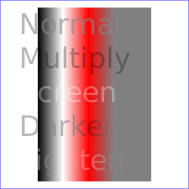
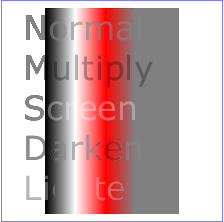
This filter composites two objects together using commonly used imaging software blending modes. It performs a pixel-wise combination of two input images.
<!ELEMENT feBlend (animate|set)* > <!ATTLIST feBlend %stdAttrs; %filter_primitive_attributes_with_in; in2 CDATA #REQUIRED mode (normal | multiply | screen | darken | lighten) "normal" > |
Attribute definitions:
For all feBlend modes, the result opacity is computed as follows:
qr = 1 - (1-qa)*(1-qb)
For the compositing formulas below, the following definitions apply:
cr = Result color (RGB) - premultiplied
qa = Opacity value at a given pixel for image A
qb = Opacity value at a given pixel for image B
ca = Color (RGB) at a given pixel for image A - premultiplied
cb = Color (RGB) at a given pixel for image B - premultiplied
The following table provides the list of available image blending modes:
| Image Blending Mode | Formula for computing result color |
| normal | cr = (1 - qa) * cb + ca |
| multiply | cr = (1-qa)*cb + (1-qb)*ca + ca*cb |
| screen | cr = cb + ca - ca * cb |
| darken | cr = Min ((1 - qa) * cb + ca, (1 - qb) * ca + cb) |
| lighten | cr = Max ((1 - qa) * cb + ca, (1 - qb) * ca + cb) |
Example feBlend shows examples of the five blend modes.
<?xml version="1.0"?>
<!DOCTYPE svg PUBLIC "-//W3C//DTD SVG 20000629//EN"
          "http://www.w3.org/TR/2000/WD-SVG-20000629/DTD/svg-20000629.dtd">
<svg width="5cm" height="5cm" viewBox="0 0 500 500">
  <title>Example feBlend - Examples of feBlend modes</title>
  <desc>Five text strings blended into a gradient,
        with one text string for each of the five feBlend modes.</desc>
  <defs>
    <linearGradient id="MyGradient" gradientUnits="userSpaceOnUse"
            x1="100" y1="0" x2="300" y2="0">
      <stop offset="0" style="stop-color:#000000"/>
      <stop offset=".33" style="stop-color:#ffffff"/>
      <stop offset=".67" style="stop-color:#ff0000"/>
      <stop offset="1" style="stop-color:#808080"/>
    </linearGradient>
    <filter id="Normal">
      <feBlend mode="normal" in2="BackgroundImage" in="SourceGraphic"/>
    </filter>
    <filter id="Multiply">
      <feBlend mode="multiply" in2="BackgroundImage" in="SourceGraphic"/>
    </filter>
    <filter id="Screen">
      <feBlend mode="screen" in2="BackgroundImage" in="SourceGraphic"/>
    </filter>
    <filter id="Darken">
      <feBlend mode="darken" in2="BackgroundImage" in="SourceGraphic"/>
    </filter>
    <filter id="Lighten">
      <feBlend mode="lighten" in2="BackgroundImage" in="SourceGraphic"/>
    </filter>
  </defs>
  <rect style="fill:none; stroke:blue"
        x="1" y="1" width="498" height="498"/>
  <g style="enable-background: new">
    <rect x="100" y="20" width="300" height="460" style="fill:url(#MyGradient)"/>
    <g style="font-family:Verdana; font-size:75; fill:#888888; fill-opacity:.6">
      <text x="50" y="90" style="filter:url(#Normal)">Normal</text>
      <text x="50" y="180" style="filter:url(#Multiply)">Multiply</text>
      <text x="50" y="270" style="filter:url(#Screen)">Screen</text>
      <text x="50" y="360" style="filter:url(#Darken)">Darken</text>
      <text x="50" y="450" style="filter:url(#Lighten)">Lighten</text>
    </g>
  </g>
</svg>
 |
View this example as SVG (SVG-enabled browsers only)
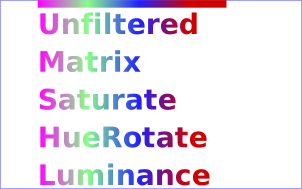
This filter applies a matrix transformation:
| R' |     | a00 a01 a02 a03 a04 |   | R |

| G' |     | a10 a11 a12 a13 a14 |   | G |

| B' |  =  | a20 a21 a22 a23 a24 | * | B |

| A' |     | a30 a31 a32 a33 a34 |   | A |

| 1  |     |  0   0   0   0   1  |   | 1 |
on the RGBA color and alpha values of every pixel on the input graphics to produce a result with a new set of RGBA color and alpha values.
The calculations are performed on non-premultiplied color values. If the input graphics consists of premultiplied color values, those values are automatically converted into non-premultiplied color values for this operation.
These matrices often perform an identity mapping in the alpha channel. If that is the case, an implementation can avoid the costly undoing & redoing of the premultiplication for all pixels with A = 1.
<!ELEMENT feColorMatrix (animate|set)* > <!ATTLIST feColorMatrix %stdAttrs; %filter_primitive_attributes_with_in; type (matrix | saturate | hueRotate | luminanceToAlpha) "matrix" values CDATA #IMPLIED > |
Attribute definitions:
type="matrix"
values="1 0 0 0 0  0 1 0 0 0  0 0 1 0 0  0 0 0 1 0"
| R' |     |0.213+0.787s  0.715-0.715s  0.072-0.072s 0  0 |   | R |

| G' |     |0.213-0.213s  0.715+0.285s  0.072-0.072s 0  0 |   | G |

| B' |  =  |0.213-0.213s  0.715-0.715s  0.072+0.928s 0  0 | * | B |

| A' |     |           0            0             0  1  0 |   | A |

| 1  |     |           0            0             0  0  1 |   | 1 |
| R' |     | a00  a01  a02  0  0 |   | R |

| G' |     | a10  a11  a12  0  0 |   | G |

| B' |  =  | a20  a21  a22  0  0 | * | B |

| A' |     | 0    0    0    1  0 |   | A |

| 1  |     | 0    0    0    0  1 |   | 1 |
where the terms a00, a01, etc. are calculated as follows:
| a01 a01 a02 |    [+0.213 +0.715 +0.072]
| a10 a11 a12 | =  [+0.213 +0.715 +0.072] +
| a20 a21 a22 |    [+0.213 +0.715 +0.072]

                        [+0.787 -0.715 -0.072]
cos(hueRotate value) *  [-0.212 +0.285 -0.072] +
                        [-0.213 -0.715 +0.928]

                        [-0.213 -0.715+0.928]
sin(hueRotate value) *  [+0.143 +0.140-0.283]
                        [-0.787 +0.715+0.072]
Thus, the upper left term of the hue matrix turns out to be:
.213 + cos(hueRotate value)*.787 - sin(hueRotate value)*.213
   | R' |     |      0        0        0  0  0 |   | R |

   | G' |     |      0        0        0  0  0 |   | G |

   | B' |  =  |      0        0        0  0  0 | * | B |

   | A' |     | 0.2125   0.7154   0.0721  0  0 |   | A |

   | 1  |     |      0        0        0  0  1 |   | 1 |
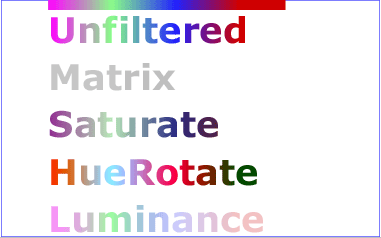
Example feColorMatrix shows examples of the four types of feColorMatrix operations.
<?xml version="1.0"?>
<!DOCTYPE svg PUBLIC "-//W3C//DTD SVG 20000629//EN"
          "http://www.w3.org/TR/2000/WD-SVG-20000629/DTD/svg-20000629.dtd">
<svg width="8cm" height="5cm" viewBox="0 0 800 500">
  <title>Example feColorMatrix - Examples of feColorMatrix operations</title>
  <desc>Five text strings showing the effects of feColorMatrix:
        an unfiltered text string acting as a reference,
        use of the feColorMatrix matrix option to convert to grayscale,
        use of the feColorMatrix saturate option,
        use of the feColorMatrix hueRotate option,
        and use of the feColorMatrix luminanceToAlpha option.</desc>
  <defs>
    <linearGradient id="MyGradient" gradientUnits="userSpaceOnUse"
            x1="100" y1="0" x2="500" y2="0">
      <stop offset="0" style="stop-color:#ff00ff"/>
      <stop offset=".33" style="stop-color:#88ff88"/>
      <stop offset=".67" style="stop-color:#2020ff"/>
      <stop offset="1" style="stop-color:#d00000"/>
    </linearGradient>
    <filter id="Matrix" filterUnits="objectBoundingBox"
            x="0%" y="0%" width="100%" height="100%">
      <feColorMatrix type="matrix" in="SourceGraphic"
           values=".33 .33 .33 0 0
                   .33 .33 .33 0 0
                   .33 .33 .33 0 0
                   .33 .33 .33 0 0"/>
    </filter>
    <filter id="Saturate40" filterUnits="objectBoundingBox"
            x="0%" y="0%" width="100%" height="100%">
      <feColorMatrix type="saturate" in="SourceGraphic" values="40%"/>
    </filter>
    <filter id="HueRotate90" filterUnits="objectBoundingBox"
            x="0%" y="0%" width="100%" height="100%">
      <feColorMatrix type="hueRotate" in="SourceGraphic" values="90"/>
    </filter>
    <filter id="LuminanceToAlpha" filterUnits="objectBoundingBox"
            x="0%" y="0%" width="100%" height="100%">
      <feColorMatrix type="luminanceToAlpha" in="SourceGraphic" result="a"/>
      <feComposite in="SourceGraphic" in2="a" operator="in" />
    </filter>
  </defs>
  <rect style="fill:none; stroke:blue"
        x="1" y="1" width="798" height="498"/>
  <g style="font-family:Verdana; font-size:75;
            font-weight:bold; fill:url(#MyGradient)">
    <rect x="100" y="0" width="500" height="20" />
    <text x="100" y="90">Unfiltered</text>
    <text x="100" y="190" style="filter:url(#Matrix)">Matrix</text>
    <text x="100" y="290" style="filter:url(#Saturate20)">Saturate</text>
    <text x="100" y="390" style="filter:url(#HueRotate90)">HueRotate</text>
    <text x="100" y="490" style="filter:url(#LuminanceToAlpha)">Luminance</text>
  </g>
</svg>
 |
View this example as SVG (SVG-enabled browsers only)
This filter primitive performs component-wise remapping of data as follows:
R' = feFuncR( R )
G' = feFuncG( G )
B' = feFuncB( B )
A' = feFuncA( A )
for every pixel. It allows operations like brightness adjustment, contrast adjustment, color balance or thresholding.
The calculations are performed on non-premultiplied color values. If the input graphics consists of premultiplied color values, those values are automatically converted into non-premultiplied color values for this operation. (Note that the undoing and redoing of the premultiplication can be avoided if feFuncA is the identity transform and all alpha values on the source graphic are set to 1.)
<!ELEMENT feComponentTransfer (feFuncR?,feFuncG?,feFuncB?,feFuncA?) > <!ATTLIST feComponentTransfer %stdAttrs; %filter_primitive_attributes_with_in; > <!ENTITY % component_transfer_function_attributes "type (identity | table | discrete | linear | gamma) #REQUIRED tableValues CDATA #IMPLIED slope %Number; #IMPLIED intercept %Number; #IMPLIED amplitude %Number; #IMPLIED exponent %Number; #IMPLIED offset %Number; #IMPLIED" > <!ELEMENT feFuncR (animate|set)* > <!ATTLIST feFuncR %stdAttrs; %component_transfer_function_attributes; > <!ELEMENT feFuncG (animate|set)* > <!ATTLIST feFuncG %stdAttrs; %component_transfer_function_attributes; > <!ELEMENT feFuncB (animate|set)* > <!ATTLIST feFuncB %stdAttrs; %component_transfer_function_attributes; > <!ELEMENT feFuncA (animate|set)* > <!ATTLIST feFuncA %stdAttrs; %component_transfer_function_attributes; > |
The attributes below apply to sub-elements 'feFuncR', 'feFuncG', 'feFuncB' and 'feFuncA' define the transfer functions.
Attribute definitions:
Indicates the type of component transfer function. The type of function determines the applicability of the other attributes.
C' = C
k/N <= C < (k+1)/N => C' = vk + (C - k/N)*N * (vk+1 - vk)
k/N <= C < (k+1)/N => C' = vk
Example feComponentTransfer shows examples of the four types of feComponentTransfer operations.
<?xml version="1.0"?>
<!DOCTYPE svg PUBLIC "-//W3C//DTD SVG 20000629//EN"
          "http://www.w3.org/TR/2000/WD-SVG-20000629/DTD/svg-20000629.dtd">
<svg width="8cm" height="4cm" viewBox="0 0 800 400">
  <title>Example feComponentTransfer - Examples of feComponentTransfer operations</title>
  <desc>Four text strings showing the effects of feComponentTransfer:
        an identity function acting as a reference,
        use of the feComponentTransfer table option,
        use of the feComponentTransfer linear option,
        and use of the feComponentTransfer gamma option.</desc>
  <defs>
    <linearGradient id="MyGradient" gradientUnits="userSpaceOnUse"
            x1="100" y1="0" x2="600" y2="0">
      <stop offset="0" style="stop-color:#ff0000"/>
      <stop offset=".33" style="stop-color:#00ff00"/>
      <stop offset=".67" style="stop-color:#0000ff"/>
      <stop offset="1" style="stop-color:#000000"/>
    </linearGradient>
    <filter id="Identity" filterUnits="objectBoundingBox"
            x="0%" y="0%" width="100%" height="100%">
      <feComponentTransfer>
        <feFuncR type="identity"/>
        <feFuncG type="identity"/>
        <feFuncB type="identity"/>
        <feFuncA type="identity"/>
      </feComponentTransfer>
    </filter>
    <filter id="Table" filterUnits="objectBoundingBox"
            x="0%" y="0%" width="100%" height="100%">
      <feComponentTransfer>
        <feFuncR type="table" tableValues="0 0 1 1"/>
        <feFuncG type="table" tableValues="1 1 0 0"/>
        <feFuncB type="table" tableValues="0 1 1 0"/>
      </feComponentTransfer>
    </filter>
    <filter id="Linear" filterUnits="objectBoundingBox"
            x="0%" y="0%" width="100%" height="100%">
      <feComponentTransfer>
        <feFuncR type="linear" slope=".5" intercept=".25"/>
        <feFuncG type="linear" slope=".5" intercept="0"/>
        <feFuncB type="linear" slope=".5" intercept=".5"/>
      </feComponentTransfer>
    </filter>
    <filter id="Gamma" filterUnits="objectBoundingBox"
            x="0%" y="0%" width="100%" height="100%">
      <feComponentTransfer>
        <feFuncR type="gamma" amplitude="2" exponent="5" offset="0"/>
        <feFuncG type="gamma" amplitude="2" exponent="3" offset="0"/>
        <feFuncB type="gamma" amplitude="2" exponent="1" offset="0"/>
      </feComponentTransfer>
    </filter>
  </defs>
  <rect style="fill:none; stroke:blue"
        x="1" y="1" width="798" height="398"/>
  <g style="font-family:Verdana; font-size:75;
            font-weight:bold; fill:url(#MyGradient)">
    <rect x="100" y="0" width="600" height="20" />
    <text x="100" y="90">Identity</text>
    <text x="100" y="190" style="filter:url(#Table)">TableLookup</text>
    <text x="100" y="290" style="filter:url(#Linear)">LinearFunc</text>
    <text x="100" y="390" style="filter:url(#Gamma)">GammaFunc</text>
  </g>
</svg>
 |
View this example as SVG (SVG-enabled browsers only)
This filter performs the combination of the two input images pixel-wise in image space using one of the Porter-Duff [PORTERDUFF] compositing operations: over, in, atop, out, xor. Additionally, a component-wise arithmetic operation (with the result clamped between [0..1]) can be applied.
The arithmetic operation is useful for combining the output from the 'feDiffuseLighting' and 'feSpecularLighting' filters with texture data. It is also useful for implementing dissolve. If the arithmetic operation is chosen, each result pixel is computed using the following formula:
result = k1*i1*i2 + k2*i1 + k3*i2 + k4
For these operations, the extent of the resulting image can be affected. In other words, even if two images do not overlap in image space, the extent for over will essentially include the union of the extents of the two input images.
<!ELEMENT feComposite (animate|set)* > <!ATTLIST feComposite %stdAttrs; %filter_primitive_attributes_with_in; in2 CDATA #REQUIRED operator (over | in | out | atop | xor | arithmetic) "over" k1 %Number; #IMPLIED k2 %Number; #IMPLIED k3 %Number; #IMPLIED k4 %Number; #IMPLIED > |
Attribute definitions:
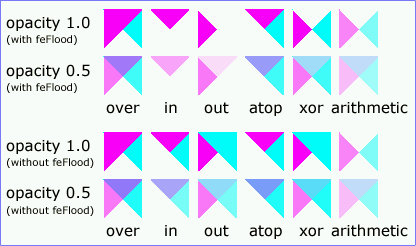
Example feComposite shows examples of the six types of feComposite operations. It also shows two different techniques to using the BackgroundImage as part of the compositing operation.
The first two rows render bluish triangles into the background. A filter is applied which composites reddish triangles into the bluish triangles using one of the compositing operations. The result from compositing is drawn onto an opaque white temporary surface, and then that result is written to the canvas. (The opaque white temporary surface obliterates the original bluish triangle.)
The last two rows apply the same compositing operations of reddish triangles into bluish triangles. However, the compositing result is directly blended into the canvas (the opaque white temporary surface technique is not used). In some cases, the results are different than when a temporary opaque white surface is used. The original bluish triangle from the background shines through wherever the compositing operation results in completed transparent pixel. In other cases, the result from compositing is blended into the bluish triangle, resulting in a different final color value.
<?xml version="1.0"?>
<!DOCTYPE svg PUBLIC "-//W3C//DTD SVG 20000629//EN"
          "http://www.w3.org/TR/2000/WD-SVG-20000629/DTD/svg-20000629.dtd">
<svg width="11cm" height="6.5cm" viewBox="0 0 1100 650">
  <title>Example feComposite - Examples of feComposite operations</title>
  <desc>Four rows of six pairs of overlapping triangles depicting
        the six different feComposite operators under different
        opacity values and different clearing of the background.</desc>
	<defs>
    <desc>Define two sets of six filters for each of the six compositing operators.
          The first set wipes out the background image by flooding with opaque white.
          The second set does not wipe out the background, with the result
          that the background sometimes shines through and is other cases
          is blended into itself (i.e., "double-counting").</desc>
    <filter id="overFlood" filterUnits="objectBoundingBox" x="-5%" y="-5%" width="110%" height="110%">
      <feFlood style="flood-color:#ffffff; flood-opacity:1" result="flood"/>
      <feComposite in="SourceGraphic" in2="BackgroundImage" operator="over" result="comp"/>
      <feMerge> <feMergeNode in="flood"/> <feMergeNode in="comp"/> </feMerge>
    </filter>
    <filter id="inFlood" filterUnits="objectBoundingBox" x="-5%" y="-5%" width="110%" height="110%">
      <feFlood style="flood-color:#ffffff; flood-opacity:1" result="flood"/>
      <feComposite in="SourceGraphic" in2="BackgroundImage" operator="in" result="comp"/>
      <feMerge> <feMergeNode in="flood"/> <feMergeNode in="comp"/> </feMerge>
    </filter>
    <filter id="outFlood" filterUnits="objectBoundingBox" x="-5%" y="-5%" width="110%" height="110%">
      <feFlood style="flood-color:#ffffff; flood-opacity:1" result="flood"/>
      <feComposite in="SourceGraphic" in2="BackgroundImage" operator="out" result="comp"/>
      <feMerge> <feMergeNode in="flood"/> <feMergeNode in="comp"/> </feMerge>
    </filter>
    <filter id="atopFlood" filterUnits="objectBoundingBox" x="-5%" y="-5%" width="110%" height="110%">
      <feFlood style="flood-color:#ffffff; flood-opacity:1" result="flood"/>
      <feComposite in="SourceGraphic" in2="BackgroundImage" operator="atop" result="comp"/>
      <feMerge> <feMergeNode in="flood"/> <feMergeNode in="comp"/> </feMerge>
    </filter>
    <filter id="xorFlood" filterUnits="objectBoundingBox" x="-5%" y="-5%" width="110%" height="110%">
      <feFlood style="flood-color:#ffffff; flood-opacity:1" result="flood"/>
      <feComposite in="SourceGraphic" in2="BackgroundImage" operator="xor" result="comp"/>
      <feMerge> <feMergeNode in="flood"/> <feMergeNode in="comp"/> </feMerge>
    </filter>
    <filter id="arithmeticFlood" filterUnits="objectBoundingBox"
            x="-5%" y="-5%" width="110%" height="110%">
      <feFlood style="flood-color:#ffffff; flood-opacity:1" result="flood"/>
      <feComposite in="SourceGraphic" in2="BackgroundImage" result="comp"
                   operator="arithmetic" k1=".5" k2=".5" k3=".5" k4=".5"/>
      <feMerge> <feMergeNode in="flood"/> <feMergeNode in="comp"/> </feMerge>
    </filter>
    <filter id="overNoFlood" filterUnits="objectBoundingBox" x="-5%" y="-5%" width="110%" height="110%">
      <feComposite in="SourceGraphic" in2="BackgroundImage" operator="over" result="comp"/>
    </filter>
    <filter id="inNoFlood" filterUnits="objectBoundingBox" x="-5%" y="-5%" width="110%" height="110%">
      <feComposite in="SourceGraphic" in2="BackgroundImage" operator="in" result="comp"/>
    </filter>
    <filter id="outNoFlood" filterUnits="objectBoundingBox" x="-5%" y="-5%" width="110%" height="110%">
      <feComposite in="SourceGraphic" in2="BackgroundImage" operator="out" result="comp"/>
    </filter>
    <filter id="atopNoFlood" filterUnits="objectBoundingBox" x="-5%" y="-5%" width="110%" height="110%">
      <feComposite in="SourceGraphic" in2="BackgroundImage" operator="atop" result="comp"/>
    </filter>
    <filter id="xorNoFlood" filterUnits="objectBoundingBox" x="-5%" y="-5%" width="110%" height="110%">
      <feComposite in="SourceGraphic" in2="BackgroundImage" operator="xor" result="comp"/>
    </filter>
    <filter id="arithmeticNoFlood" filterUnits="objectBoundingBox"
            x="-5%" y="-5%" width="110%" height="110%">
      <feComposite in="SourceGraphic" in2="BackgroundImage" result="comp"
                   operator="arithmetic" k1=".5" k2=".5" k3=".5" k4=".5"/>
    </filter>
    <path id="Blue100" d="M 0 0 L 100 0 L 100 100 z" style="fill:#00ffff"/>
    <path id="Red100" d="M 0 0 L 0 100 L 100 0 z" style="fill:#ff00ff"/>
    <path id="Blue50" d="M 0 125 L 100 125 L 100 225 z" style="fill:#00ffff; fill-opacity:.5"/>
    <path id="Red50" d="M 0 125 L 0 225 L 100 125 z" style="fill:#ff00ff; fill-opacity:.5"/>
    <g id="TwoBlueTriangles">
      <use xlink:href="#Blue100"/>
      <use xlink:href="#Blue50"/>
    </g>
    <g id="BlueTriangles">
      <use transform="translate(275,25)" xlink:href="#TwoBlueTriangles"/>
      <use transform="translate(400,25)" xlink:href="#TwoBlueTriangles"/>
      <use transform="translate(525,25)" xlink:href="#TwoBlueTriangles"/>
      <use transform="translate(650,25)" xlink:href="#TwoBlueTriangles"/>
      <use transform="translate(775,25)" xlink:href="#TwoBlueTriangles"/>
      <use transform="translate(900,25)" xlink:href="#TwoBlueTriangles"/>
    </g>
  </defs>

  <rect style="fill:none; stroke:blue" x="1" y="1" width="1098" height="648"/>
  <g style="font-family:Verdana; font-size:40; shape-rendering:crispEdges">
    <desc>Render the examples using the filters that draw on top of
          an opaque white surface, thus obliterating the background.</desc>
    <g style="enable-background:new">
      <text x="15" y="75">opacity 1.0</text>
      <text x="15" y="115" style="font-size:27">(with feFlood)</text>
      <text x="15" y="200">opacity 0.5</text>
      <text x="15" y="240" style="font-size:27">(with feFlood)</text>
      <use xlink:href="#BlueTriangles"/>
      <g transform="translate(275,25)">
        <use  xlink:href="#Red100" style="filter:url(#overFlood)"/>
        <use  xlink:href="#Red50" style="filter:url(#overFlood)"/>
        <text x="5" y="275">over</text>
      </g>
      <g transform="translate(400,25)">
        <use  xlink:href="#Red100" style="filter:url(#inFlood)"/>
        <use  xlink:href="#Red50" style="filter:url(#inFlood)"/>
        <text x="35" y="275">in</text>
      </g>
      <g transform="translate(525,25)">
        <use  xlink:href="#Red100" style="filter:url(#outFlood)"/>
        <use  xlink:href="#Red50" style="filter:url(#outFlood)"/>
        <text x="15" y="275">out</text>
      </g>
      <g transform="translate(650,25)">
        <use  xlink:href="#Red100" style="filter:url(#atopFlood)"/>
        <use  xlink:href="#Red50" style="filter:url(#atopFlood)"/>
        <text x="10" y="275">atop</text>
      </g>
      <g transform="translate(775,25)">
        <use  xlink:href="#Red100" style="filter:url(#xorFlood)"/>
        <use  xlink:href="#Red50" style="filter:url(#xorFlood)"/>
        <text x="15" y="275">xor</text>
      </g>
      <g transform="translate(900,25)">
        <use  xlink:href="#Red100" style="filter:url(#arithmeticFlood)"/>
        <use  xlink:href="#Red50" style="filter:url(#arithmeticFlood)"/>
        <text x="-25" y="275">arithmetic</text>
      </g>
    </g>
    <g transform="translate(0,325)" style="enable-background:new">
    <desc>Render the examples using the filters that do not obliterate
          the background, thus sometimes causing the background to continue
          to appear in some cases, and in other cases the background
          image blends into itself ("double-counting").</desc>
      <text x="15" y="75">opacity 1.0</text>
      <text x="15" y="115" style="font-size:27">(without feFlood)</text>
      <text x="15" y="200">opacity 0.5</text>
      <text x="15" y="240" style="font-size:27">(without feFlood)</text>
      <use xlink:href="#BlueTriangles"/>
      <g transform="translate(275,25)">
        <use  xlink:href="#Red100" style="filter:url(#overNoFlood)"/>
        <use  xlink:href="#Red50" style="filter:url(#overNoFlood)"/>
        <text x="5" y="275">over</text>
      </g>
      <g transform="translate(400,25)">
        <use  xlink:href="#Red100" style="filter:url(#inNoFlood)"/>
        <use  xlink:href="#Red50" style="filter:url(#inNoFlood)"/>
        <text x="35" y="275">in</text>
      </g>
      <g transform="translate(525,25)">
        <use  xlink:href="#Red100" style="filter:url(#outNoFlood)"/>
        <use  xlink:href="#Red50" style="filter:url(#outNoFlood)"/>
        <text x="15" y="275">out</text>
      </g>
      <g transform="translate(650,25)">
        <use  xlink:href="#Red100" style="filter:url(#atopNoFlood)"/>
        <use  xlink:href="#Red50" style="filter:url(#atopNoFlood)"/>
        <text x="10" y="275">atop</text>
      </g>
      <g transform="translate(775,25)">
        <use  xlink:href="#Red100" style="filter:url(#xorNoFlood)"/>
        <use  xlink:href="#Red50" style="filter:url(#xorNoFlood)"/>
        <text x="15" y="275">xor</text>
      </g>
      <g transform="translate(900,25)">
        <use  xlink:href="#Red100" style="filter:url(#arithmeticNoFlood)"/>
        <use  xlink:href="#Red50" style="filter:url(#arithmeticNoFlood)"/>
        <text x="-25" y="275">arithmetic</text>
      </g>
    </g>
  </g>
</svg>
 |
View this example as SVG (SVG-enabled browsers only)
feConvolveMatrix applies a matrix convolution filter effect. A convolution combines pixels in the input image with neighboring pixels to produce a resulting image. A wide variety of imaging operations can be achieved through convolutions, including blurring, edge detection, sharpening, embossing and beveling.
A matrix convolution is based on an n-by-m matrix (the convolution kernel) which describes how a given pixel value in the input image is combined with its neighboring pixel values to produce a resulting pixel value. Each result pixel is determined by applying the kernel matrix to the corresponding source pixel and its neighboring pixels.
To illustrate, suppose you have a input image which is 5 pixels by 5 pixels, whose color values are as follows:
    0  20  40 235 235
  100 120 140 235 235
  200 220 240 235 235
  225 225 255 255 255
  225 225 255 255 255
and you define a 3-by-3 convolution kernel as follows:
  1 2 3
  4 5 6
  7 8 9
Let's focus on the pixel at the second row and second column of the image (source pixel value is 120). Assuming the simplest case (where the input image's pixel grid aligns perfectly with the kernel's pixel grid) and assuming default values for attributes divisor, targetX and targetY, then resulting pixel value will be:
(1*  0 + 2* 20 + 3* 40 +
4*100 + 5*120 + 6*140 +
7*200 + 8*220 + 9*240) / (1+2+3+4+5+6+7+8+9)
Because they operate on pixels, matrix convolutions are inherently resolution-dependent. To make 'feConvolveMatrix produce resolution-independent results, an explicit value should be provided for either the filterRes attribute on the 'filter' element and/or attribute kernelUnitLength.
kernelUnitLength, in combination with the other attributes, defines an implicit pixel grid in the filter effects coordinate system (i.e., the coordinate system established by the filterUnits attribute). If the pixel grid established by kernelUnitLength does not align perfectly with the pixel grid established by attribute filterRes, then the input image will be temporarily resampled to align its pixels with kernelUnitLength. The convolution happens on the resampled image. After applying the convolution, the image is resampled back to its original resolution.
<!ELEMENT feConvolveMatrix (animate|set)* > <!ATTLIST feConvolveMatrix %filter_primitive_attributes_with_in; order CDATA #REQUIRED kernelMatrix CDATA #REQUIRED divisor %Number; #IMPLIED bias %Number; #IMPLIED targetX %Integer; #IMPLIED targetY %Integer; #IMPLIED edgeMode (duplicate|wrap|none) "duplicate" kernelUnitLength CDATA #IMPLIED preserveAlpha %Boolean; #IMPLIED > |
Attribute definitions:
Determines how to extend the input image as necessary with color values so that the matrix operations can be applied when the kernel is positioned at or near the edge of the input image.
"duplicate" indicates that the input image is extended along each of its borders as necessary by duplicating the color values at the given edge of the input image.
Original N-by-M image, where m=M-1 and n=N-1:
          11 12 ... 1m 1M
          21 22 ... 2m 2M
          .. .. ... .. ..
          n1 n2 ... nm nM
          N1 N2 ... Nm NM

Extended by two pixels using "duplicate":
  11 11   11 12 ... 1m 1M   1M 1M
  11 11   11 12 ... 1m 1M   1M 1M

  11 11   11 12 ... 1m 1M   1M 1M
  21 21   21 22 ... 2m 2M   2M 2M
  .. ..   .. .. ... .. ..   .. ..
  n1 n1   n1 n2 ... nm nM   nM nM
  N1 N1   N1 N2 ... Nm NM   NM NM

  N1 N1   N1 N2 ... Nm NM   NM NM
  N1 N1   N1 N2 ... Nm NM   NM NM
"wrap" indicates that the input image is extended by taking the color values from the opposite edge of the image.
Extended by two pixels using "wrap":
  nm nM   n1 n2 ... nm Nm   n1 n2
  Nm NM   N1 N2 ... Nm NM   N1 N2

  1M 1m   11 12 ... 1m 1M   11 12
  2M 2m   21 22 ... 2m 2M   21 22
  .. ..   .. .. ... .. ..   .. ..
  nm nM   n1 n2 ... nm nM   n1 n2
  Nm NM   N1 N2 ... Nm NM   N1 N2

  1m 1M   11 12 ... 1m 1M   11 12
  2m 2M   21 22 ... 2m 2M   21 22
"none" indicates that the input image is extended with pixel values of zero for R, G, B and A.
Animatable: yes.
This filter primitive lights an image using the alpha channel as a bump map. The resulting image is an RGBA opaque image based on the light color with alpha = 1.0 everywhere. The lighting calculation follows the standard diffuse component of the Phong lighting model. The resulting image depends on the light color, light position and surface geometry of the input bump map.
The light map produced by this filter primitive can be combined with a texture image using the multiply term of the arithmetic 'feComposite' compositing method. Multiple light sources can be simulated by adding several of these light maps together before applying it to the texture image.
The resulting RGBA image is computed as follows:
Dr = kd * N.L * Lr
Dg = kd * N.L * Lg
Db = kd * N.L * Lb
Da = 1.0
where
N is a function of x and y and depends on the surface gradient as follows:
The surface described by the input alpha image Ain (x,y) is:
Z (x,y) = surfaceScale * Ain (x,y)
Surface normal is calculated using the Sobel gradient 3x3 filter:
Nx (x,y)= - surfaceScale * 1/4*(( I(x+1,y-1) + 2*I(x+1,y) + I(x+1,y+1))
- (I(x-1,y-1) + 2*I(x-1,y) + I(x-1,y+1)))
Ny (x,y)= - surfaceScale * 1/4*(( I(x-1,y+1) + 2*I(x,y+1) + I(x+1,y+1))
- (I(x-1,y-1) + 2*I(x,y-1) + I(x+1,y-1)))
Nz (x,y) = 1.0
N = (Nx, Ny, Nz) / Norm((Nx,Ny,Nz))
L, the unit vector from the image sample to the light is calculated as follows:
For Infinite light sources it is constant:
Lx = cos(azimuth)*cos(elevation)
Ly = -sin(azimuth)*cos(elevation)
Lz = sin(elevation)
For Point and spot lights it is a function of position:
Lx = Lightx - x
Ly = Lighty - y
Lz = Lightz - Z(x,y)
L = (Lx, Ly, Lz) / Norm(Lx, Ly, Lz)
where Lightx, Lighty, and Lightz are the input light position.
Lr,Lg,Lb, the light color vector is a function of position in the spot light case only:
Lr = Lightr*pow((-L.S),specularExponent)
Lg = Lightg*pow((-L.S),specularExponent)
Lb = Lightb*pow((-L.S),specularExponent)
where S is the unit vector pointing from the light to the point (pointsAtX, pointsAtY, pointsAtZ) in the x-y plane:
Sx = pointsAtX - Lightx
Sy = pointsAtY - Lighty
Sz = pointsAtZ - Lightz
S = (Sx, Sy, Sz) / Norm(Sx, Sy, Sz)
If L.S is positive, no light is present. (Lr = Lg = Lb = 0)
<!ELEMENT feDiffuseLighting ((feDistantLight|fePointLight|feSpotLight),(animate|set|animateColor)*) > <!ATTLIST feDiffuseLighting %stdAttrs; class %ClassList; #IMPLIED style %StyleSheet; #IMPLIED %PresentationAttributes-LightingEffects; %filter_primitive_attributes_with_in; surfaceScale %Number; #IMPLIED diffuseConstant %Number; #IMPLIED > |
Attribute definitions:
The light source is defined by one of the child elements 'feDistantLight', 'fePointLight' or 'feSpotLight'. The light color is specified by property 'lighting-color'.
This filter primitive uses the pixels values from the image from in2 to spatially displace the image from in. This is the transformation to be performed:
P'(x,y) <- P( x + scale * ((XC(x,y) - .5), y + scale * (YC(x,y) - .5))
where P(x,y) is the input image, in, and P'(x,y) is the destination. XC(x,y) and YC(x,y) are the component values of the designated by the xChannelSelector and yChannelSelector. For example, to use the R component of in2 to control displacement in x and the G component of Image2 to control displacement in y, set xChannelSelector to "R" and yChannelSelector to "G".
The displacement map defines the inverse of the mapping performed.
This filter can have arbitrary non-localized effect on the input which might require substantial buffering in the processing pipeline. However with this formulation, any intermediate buffering needs can be determined by scale which represents the maximum displacement in either x or y.
<!ELEMENT feDisplacementMap (animate|set)* > <!ATTLIST feDisplacementMap %stdAttrs; %filter_primitive_attributes_with_in; in2 CDATA #REQUIRED scale %Number; #IMPLIED xChannelSelector (R | G | B | A) "A" yChannelSelector (R | G | B | A) "A" > |
Attribute definitions:
This filter primitive creates an image with infinite extent filled with the color and opacity values from properties 'flood-color' and 'flood-opacity'.
<!ELEMENT feFlood (animate|set|animateColor)* > <!ATTLIST feFlood %stdAttrs; class %ClassList; #IMPLIED style %StyleSheet; #IMPLIED %PresentationAttributes-feFlood; %filter_primitive_attributes_with_in; > |
The 'flood-color' property indicates what color to use to flood the current filter primitive sub-region. The keyword currentColor and ICC colors can be specified in the same manner as within a <paint> specification for the 'fill' and 'stroke' properties.
| Value: | currentColor | <color> [icc-color(<name>,<icccolorvalue>+)] | inherit |
| Initial: | black |
| Applies to: | 'feFlood' elements |
| Inherited: | no |
| Percentages: | N/A |
| Media: | visual |
| Animatable: | yes |
The 'flood-opacity' property defines the opacity value to use across the entire filter primitive sub-region.
| Value: | <alphavalue> | inherit |
| Initial: | 1 |
| Applies to: | 'feFlood' elements |
| Inherited: | no |
| Percentages: | N/A |
| Media: | visual |
| Animatable: | yes |
This filter primitive performs a Gaussian blur on the input image.
The Gaussian blur kernel is an approximation of the normalized convolution:
H(x) = exp(-x2/ (2s2)) / sqrt(2* pi*s2)
where 's' is the standard deviation specified by stdDeviation.
The value of stdDeviation can be either one or two numbers. If two numbers are provided, the first number represents a standard deviation value along the X axis of the current coordinate system and the second value represents a standard deviation in Y. If one number is provided, then that value is used for both X and Y.
Even if only one value is provided for stdDeviation, this can be implemented as a separable convolution.
For larger values of 's' (s >= 2.0), an approximation can be used: Three successive box-blurs build a piece-wise quadratic convolution kernel, which approximates the Gaussian kernel to within roughly 3%.
let d = floor(s * 3*sqrt(2*pi)/4 + 0.5)
... if d is odd, use three box-blurs of size 'd', centered on the output pixel.
... if d is even, two box-blurs of size 'd' (the first one centered one pixel to the left, the second one centered one pixel to the right of the output pixel one box blur of size 'd+1' centered on the output pixel.
Frequently this operation will take place on alpha-only images, such as that produced by the built-in input, SourceAlpha. The implementation may notice this and optimize the single channel case. If the input has infinite extent and is constant, this operation has no effect. If the input has infinite extent and is a tile, the filter is evaluated with periodic boundary conditions.
<!ELEMENT feGaussianBlur (animate|set)* > <!ATTLIST feGaussianBlur %stdAttrs; %filter_primitive_attributes_with_in; stdDeviation CDATA #IMPLIED > |
Attribute definitions:
The example at the start of this chapter makes use of the feGaussianBlur filter primitive to create a drop shadow effect.
This filter primitive refers to a graphic external to this filter element, which is loaded or rendered into an RGBA raster and becomes the result of the filter primitive.
This filter primitive can refer to an external image or can be a reference to another piece of SVG. It produces an image similar to the builtin image source SourceGraphic except that the graphic comes from an external source.
If the xlink:href references a stand-alone image resource such as a JPEG or PNG file, then the image resource is rendered according to the behavior of the 'image' element; otherwise, the referenced resource is rendered according to the behavior of the 'use' element. In either case, the current user coordinate system depends on the value of attribute primitiveUnits on the 'filter' element.
<!ELEMENT feImage (animate|set|animateTransform)* > <!ATTLIST feImage %stdAttrs; %xlinkRefAttrs; xlink:href %URI; #REQUIRED %langSpaceAttrs; externalResourcesRequired %Boolean; #IMPLIED class %ClassList; #IMPLIED style %StyleSheet; #IMPLIED %PresentationAttributes-All; transform %TransformList; #IMPLIED %filter_primitive_attributes; > |
This filter primitive composites input image layers on top of each other using the over operator with Input1 on the bottom and the last specified input, InputN, on top.
Many effects produce a number of intermediate layers in order to create the final output image. This filter allows us to collapse those into a single image. Although this could be done by using n-1 Composite-filters, it is more convenient to have this common operation available in this form, and offers the implementation some additional flexibility.
Each 'feMerge' element can have any number of 'feMergeNode' subelements, each of which has an in attribute.
The canonical implementation of feMerge is to render the entire effect into one RGBA layer, and then render the resulting layer on the output device. In certain cases (in particular if the output device itself is a continuous tone device), and since merging is associative, it might be a sufficient approximation to evaluate the effect one layer at a time and render each layer individually onto the output device bottom to top.
If the topmost image input is SourceGraphic, the implementation is encouraged to render the layers up to that point, and then render the SourceGraphic directly from its vector description on top.
<!ELEMENT feMerge (feMergeNode)* > <!ATTLIST feMerge %stdAttrs; %filter_primitive_attributes; > <!ELEMENT feMergeNode (animate|set)* > <!ATTLIST feMergeNode %stdAttrs; in CDATA #IMPLIED > |
The example at the start of this chapter makes use of the feMerge filter primitive to composite two intermediate filter results together.
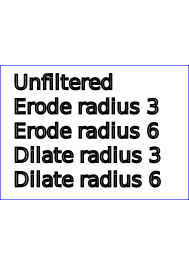
This filter primitive performs "fattening" or "thinning" of artwork. It is particularly useful for fattening or thinning an alpha channel,
The dilation (or erosion) kernel is a rectangle with a width of 2*x-radius+1 and a height of y-radius+1.
Frequently this operation will take place on alpha-only images, such as that produced by the built-in input, SourceAlpha. In that case, the implementation might want to optimize the single channel case.
If the input has infinite extent and is constant, this operation has no effect. If the input has infinite extent and is a tile, the filter is evaluated with periodic boundary conditions.
<!ELEMENT feMorphology (animate|set)* > <!ATTLIST feMorphology %stdAttrs; %filter_primitive_attributes_with_in; operator (erode | dilate) "erode" radius %Length; #IMPLIED > |
Attribute definitions:
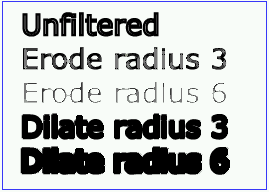
Example feMorphology shows examples of the four types of feMorphology operations.
<?xml version="1.0"?>
<!DOCTYPE svg PUBLIC "-//W3C//DTD SVG 20000629//EN"
          "http://www.w3.org/TR/2000/WD-SVG-20000629/DTD/svg-20000629.dtd">
<svg width="5cm" height="7cm" viewBox="0 0 700 500">
  <title>Example feMorphology - Examples of erode and dilate</title>
  <desc>Five text strings drawn as outlines.
        The first is unfiltered. The second and third use 'erode'.
        The fourth and fifth use 'dilate'.</desc>
  <defs>
    <filter id="Erode3">
      <feMorphology operator="erode" in="SourceGraphic" radius="3" />
    </filter>
    <filter id="Erode6">
      <feMorphology operator="erode" in="SourceGraphic" radius="6" />
    </filter>
    <filter id="Dilate3">
      <feMorphology operator="dilate" in="SourceGraphic" radius="3" />
    </filter>
    <filter id="Dilate6">
      <feMorphology operator="dilate" in="SourceGraphic" radius="6" />
    </filter>
  </defs>
  <rect style="fill:none; stroke:blue; stroke-width:2"
        x="1" y="1" width="698" height="498"/>
  <g style="enable-background: new">
    <g style="font-family:Verdana; font-size:75;
              fill:none; stroke:black; stroke-width:6">
      <text x="50" y="90">Unfiltered</text>
      <text x="50" y="180" style="filter:url(#Erode3)">Erode radius 3</text>
      <text x="50" y="270" style="filter:url(#Erode6)">Erode radius 6</text>
      <text x="50" y="360" style="filter:url(#Dilate3)">Dilate radius 3</text>
      <text x="50" y="450" style="filter:url(#Dilate6)">Dilate radius 6</text>
    </g>
  </g>
</svg>
 |
View this example as SVG (SVG-enabled browsers only)
This filter primitive offsets the input image relative to its current position in the image space by the specified vector.
This is important for effects like drop shadows.
<!ELEMENT feOffset (animate|set)* > <!ATTLIST feOffset %stdAttrs; %filter_primitive_attributes_with_in; dx %Length; #IMPLIED dy %Length; #IMPLIED > |
Attribute definitions:
The example at the start of this chapter makes use of the feOffset filter primitive to offset the drop shadow from the original source graphic.
This filter primitive lights a source graphic using the alpha channel as a bump map. The resulting image is an RGBA image based on the light color. The lighting calculation follows the standard specular component of the Phong lighting model. The resulting image depends on the light color, light position and surface geometry of the input bump map. The result of the lighting calculation is added. The filter primitive assumes that the viewer is at infinity the z direction (i.e the unit vector in the eye direction is (0,0,1) everywhere).
This filter primitive produces an image which contains the specular reflection part of the lighting calculation. Such a map is intended to be combined with a texture using the add term of the arithmetic 'feComposite' method. Multiple light sources can be simulated by adding several of these light maps before applying it to the texture image.
The resulting RGBA image is computed as follows:
Sr = ks * pow(N.H, specularExponent) * Lr
Sg = ks * pow(N.H, specularExponent) * Lg
Sb = ks * pow(N.H, specularExponent) * Lb
Sa = max(Sr, Sg, Sb)
where
See 'feDiffuseLighting' for definition of N and (Lr, Lg, Lb).
The definition of H reflects our assumption of the constant eye vector E = (0,0,1):
H = (L + E) / Norm(L+E)
where L is the light unit vector.
Unlike the 'feDiffuseLighting', the 'feSpecularLighting' filter produces a non-opaque image. This is due to the fact that specular result (Sr,Sg,Sb,Sa) is meant to be added to the textured image. The alpha channel of the result is the max of the color components, so that where the specular light is zero, no additional coverage is added to the image and a fully white highlight will add opacity.
The 'feDiffuseLighting' and 'feSpecularLighting' filters will often be applied together. An implementation may detect this and calculate both maps in one pass, instead of two.
<!ELEMENT feSpecularLighting ((feDistantLight|fePointLight|feSpotLight),(animate|set|animateColor)*) > <!ATTLIST feSpecularLighting %stdAttrs; class %ClassList; #IMPLIED style %StyleSheet; #IMPLIED %PresentationAttributes-LightingEffects; %filter_primitive_attributes_with_in; surfaceScale %Number; #IMPLIED specularConstant %Number; #IMPLIED specularExponent %Number; #IMPLIED > |
Attribute definitions:
The light source is defined by one of the child elements 'feDistantLight', 'fePointLight' or 'feDistantLight'. The light color is specified by property 'lighting-color'.
The example at the start of this chapter makes use of the feSpecularLighting filter primitive to achieve a highly reflective, 3D glowing effect.
This filter primitive creates an image with infinite extent by replicating the input image in image space.
Typically, the input image has been defined with a filter primitive sub-region in order to define the tiling rectangle.
<!ELEMENT feTile (animate|set)* > <!ATTLIST feTile %stdAttrs; %filter_primitive_attributes_with_in; > |
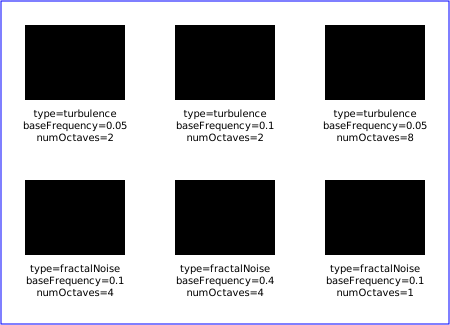
This filter primitive creates an image using the Perlin turbulence function. It allows the synthesis of artificial textures like clouds or marble. For a detailed description the of the Perlin turbulence function, see "Texturing and Modeling", Ebert et al, AP Professional, 1994. The resulting image will have maximal size in image space.
It is possible to create bandwidth-limited noise by synthesizing only one octave.
The following C code shows the exact algorithm used for this filter effect.
For fractalSum, you get a turbFunctionResult that is aimed at a range of
-1 to 1 (the actual result might exceed this range in some cases). To convert to a color value, use the
formula colorValue = ((turbFunctionResult * 255) + 255) / 2, then clamp to
the range 0 to 255.
For turbulence, you get a turbFunctionResult that is aimed at a range of
0 to 1 (the actual result might exceed this range in some cases). To convert to a color value, use the
formula colorValue = (turbFunctionResult * 255), then clamp to the range 0
to 255.
The following order is used for applying the pseudo random numbers.
An initial seed value is computed based on attribute seed.
Then the implementation computes the lattice
points for R, then continue getting additional pseudo random numbers relative to
the last generated pseudo random number and compute the lattice points for G,
and so on for B and A.
/* Produces results in the range [1, 2**31 - 2].
Algorithm is: r = (a * r) mod m
where a = 16807 and m = 2**31 - 1 = 2147483647
See [Park & Miller], CACM vol. 31 no. 10 p. 1195, Oct. 1988
To test: the algorithm should produce the result 1043618065
as the 10,000th generated number if the original seed is 1.
*/
#define RAND_m 2147483647 /* 2**31 - 1 */
#define RAND_a 16807 /* 7**5; primitive root of m */
#define RAND_q 127773 /* m / a */
#define RAND_r 2836 /* m % a */

long setup_seed(long lSeed)
{
    if (lSeed <= 0) lSeed = -(lSeed % (RAND_m - 1)) + 1;
    if (lSeed > RAND_m - 1) lSeed = RAND_m - 1;
    return lSeed;
}

long random(long lSeed)
{
    long result;
    result = RAND_a * (lSeed % RAND_q) - RAND_r * (lSeed / RAND_q);
    if (result <= 0) result += RAND_m;
    return result;
}

#define BSize 0x100
#define BM 0xff
#define PerlinN 0x1000
#define NP 12 /* 2^PerlinN */
#define NM 0xfff
static uLatticeSelector[BSize + BSize + 2];
static float fGradient[4][BSize + BSize + 2][2];
static void init(long lSeed)
{
    float s;
    int i, j, k;
    lSeed = setup_seed(lSeed);
    for(k = 0; k < 4; k++)
    {
        for(i = 0; i < BSize; i++)
        {
            uLatticeSelector[i] = i;
            for (j = 0; j < 2; j++)
                fGradient[k][i][j] = (float)(((lSeed = random(lSeed)) % (BSize + BSize)) - BSize) / BSize;
            s = float(sqrt(fGradient[k][i][0] * fGradient[k][i][0] + fGradient[k][i][1] * fGradient[k][i][1]));
            fGradient[k][i][0] /= s;
            fGradient[k][i][1] /= s;
        }
    }
    while(--i)
    {
        k = uLatticeSelector[i];
        uLatticeSelector[i] = uLatticeSelector[j = (lSeed = random(lSeed)) % BSize];
        uLatticeSelector[j] = k;
    }
    for(i = 0; i < BSize + 2; i++)
    {
        uLatticeSelector[BSize + i] = uLatticeSelector[i];
        for(k = 0; k < 4; k++)
            for(j = 0; j < 2; j++)
                fGradient[k][BSize + i][j] = fGradient[k][i][j];
    }
}

#define s_curve(t) ( t * t * (3. - 2. * t) )
#define lerp(t, a, b) ( a + t * (b - a) )
float noise2(int nColorChannel, float vec[2])
{
    int bx0, bx1, by0, by1, b00, b10, b01, b11;
    float rx0, rx1, ry0, ry1, *q, sx, sy, a, b, t, u, v;
    register i, j;
    t = vec[0] + PerlinN;
    bx0 = ((int)t) & BM;
    bx1 = (bx0+1) & BM;
    rx0 = t - (int)t;
    rx1 = rx0 - 1.0f;
    t = vec[1] + PerlinN;
    by0 = ((int)t) & BM;
    by1 = (by0+1) & BM;
    ry0 = t - (int)t;
    ry1 = ry0 - 1.0f;
    i = uLatticeSelector[bx0];
    j = uLatticeSelector[bx1];
    b00 = uLatticeSelector[i + by0];
    b10 = uLatticeSelector[j + by0];
    b01 = uLatticeSelector[i + by1];
    b11 = uLatticeSelector[j + by1];
    sx = float(s_curve(rx0));
    sy = float(s_curve(ry0));
    q = fGradient[nColorChannel][b00]; u = rx0 * q[0] + ry0 * q[1];
    q = fGradient[nColorChannel][b10]; v = rx1 * q[0] + ry0 * q[1];
    a = lerp(sx, u, v);
    q = fGradient[nColorChannel][b01]; u = rx0 * q[0] + ry1 * q[1];
    q = fGradient[nColorChannel][b11]; v = rx1 * q[0] + ry1 * q[1];
    b = lerp(sx, u, v);
    return lerp(sy, a, b);
}

// Returns 'turbFunctionResult'
float turbulence(int nColorChannel, float *point, float fBaseFreq, int nNumOctaves, bool bFractalSum)
{
    float fSum = 0.0f;
    float vec[2];
    float fFrequency = fBaseFreq;
    for(int nOctave = 0; nOctave < nNumOctaves; nOctave++)
    {
        vec[0] = fFrequency * point[0];
        vec[1] = fFrequency * point[1];
        if(bFractalSum)
            fSum += float(noise2(nColorChannel, vec) / (fFrequency / fBaseFreq));
        else
            fSum += float(fabs(noise2(nColorChannel, vec)) / (fFrequency / fBaseFreq));
        fFrequency *= 2;
    }
    return fSum;
}
<!ELEMENT feTurbulence (animate|set)* > <!ATTLIST feTurbulence %stdAttrs; %filter_primitive_attributes; baseFrequency CDATA #IMPLIED numOctaves %Integer; #IMPLIED seed %Number; #IMPLIED stitchTiles (stitch | noStitch) "noStitch" type (fractalNoise | turbulence) "turbulence" > |
Attribute definitions:
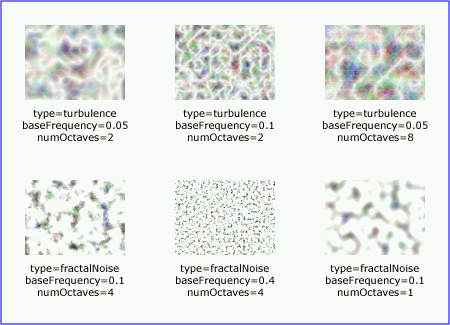
Example feTurbulence shows the effects of various parameter settings for feTurbulence.
<?xml version="1.0"?>
<!DOCTYPE svg PUBLIC "-//W3C//DTD SVG 20000629//EN"
          "http://www.w3.org/TR/2000/WD-SVG-20000629/DTD/svg-20000629.dtd">
<svg width="450px" height="325px" viewBox="0 0 450 325">
  <title>Example feTurbulence - Examples of feTurbulence operations</title>
  <desc>Six rectangular areas showing the effects of
        various parameter settings for feTurbulence.</desc>
  <g  style="font-family:Verdana; text-anchor:middle; font-size:10">
    <defs>
      <filter id="Turb1" filterUnits="objectBoundingBox"
              x="0%" y="0%" width="100%" height="100%">
        <feTurbulence type="turbulence" baseFrequency="0.05" numOctaves="2"/>
      </filter>
      <filter id="Turb2" filterUnits="objectBoundingBox"
              x="0%" y="0%" width="100%" height="100%">
        <feTurbulence type="turbulence" baseFrequency="0.1" numOctaves="2"/>
      </filter>
      <filter id="Turb3" filterUnits="objectBoundingBox"
              x="0%" y="0%" width="100%" height="100%">
        <feTurbulence type="turbulence" baseFrequency="0.05" numOctaves="8"/>
      </filter>
      <filter id="Turb4" filterUnits="objectBoundingBox"
              x="0%" y="0%" width="100%" height="100%">
        <feTurbulence type="fractalNoise" baseFrequency="0.1" numOctaves="4"/>
      </filter>
      <filter id="Turb5" filterUnits="objectBoundingBox"
              x="0%" y="0%" width="100%" height="100%">
        <feTurbulence type="fractalNoise" baseFrequency="0.4" numOctaves="4"/>
      </filter>
      <filter id="Turb6" filterUnits="objectBoundingBox"
              x="0%" y="0%" width="100%" height="100%">
        <feTurbulence type="fractalNoise" baseFrequency="0.1" numOctaves="1"/>
      </filter>
    </defs>

    <rect x="1" y="1" width="448" height="323"
          style="fill:none; stroke:blue; stroke-width:1" />

    <rect x="25" y="25" width="100" height="75" style="filter:url(#Turb1)" />
    <text x="75" y="117">type=turbulence</text>
    <text x="75" y="129">baseFrequency=0.05</text>
    <text x="75" y="141">numOctaves=2</text>

    <rect x="175" y="25" width="100" height="75" style="filter:url(#Turb2)" />
    <text x="225" y="117">type=turbulence</text>
    <text x="225" y="129">baseFrequency=0.1</text>
    <text x="225" y="141">numOctaves=2</text>

    <rect x="325" y="25" width="100" height="75" style="filter:url(#Turb3)" />
    <text x="375" y="117">type=turbulence</text>
    <text x="375" y="129">baseFrequency=0.05</text>
    <text x="375" y="141">numOctaves=8</text>

    <rect x="25" y="180" width="100" height="75" style="filter:url(#Turb4)" />
    <text x="75" y="272">type=fractalNoise</text>
    <text x="75" y="284">baseFrequency=0.1</text>
    <text x="75" y="296">numOctaves=4</text>

    <rect x="175" y="180" width="100" height="75" style="filter:url(#Turb5)" />
    <text x="225" y="272">type=fractalNoise</text>
    <text x="225" y="284">baseFrequency=0.4</text>
    <text x="225" y="296">numOctaves=4</text>

    <rect x="325" y="180" width="100" height="75" style="filter:url(#Turb6)" />
    <text x="375" y="272">type=fractalNoise</text>
    <text x="375" y="284">baseFrequency=0.1</text>
    <text x="375" y="296">numOctaves=1</text>
  </g>
</svg>
 |
View this example as SVG (SVG-enabled browsers only)
The following interfaces are defined below: SVGFilterElement, SVGFilterPrimitiveStandardAttributes, SVGFEBlendElement, SVGFEColorMatrixElement, SVGFEComponentTransferElement, SVGComponentTransferFunctionElement, SVGFEFuncRElement, SVGFEFuncGElement, SVGFEFuncBElement, SVGFEFuncAElement, SVGFECompositeElement, SVGFEConvolveMatrixElement, SVGFEDiffuseLightingElement, SVGFEDistantLightElement, SVGFEPointLightElement, SVGFESpotLightElement, SVGFEDisplacementMapElement, SVGFEFloodElement, SVGFEGaussianBlurElement, SVGFEImageElement, SVGFEMergeElement, SVGFEMergeNodeElement, SVGFEMorphologyElement, SVGFEOffsetElement, SVGFESpecularLightingElement, SVGFETileElement, SVGFETurbulenceElement.
The SVGFilterElement interface corresponds to the 'filter' element.
interface SVGFilterElement :
                SVGElement,
                SVGURIReference,
                SVGLangSpace,
                SVGExternalResourcesRequired,
                SVGStylable,
                SVGUnitTypes {

           attribute SVGAnimatedEnumeration filterUnits;
                       // raises DOMException on setting
           attribute SVGAnimatedEnumeration primitiveUnits;
                       // raises DOMException on setting
           attribute SVGAnimatedLength      x;
                       // raises DOMException on setting
           attribute SVGAnimatedLength      y;
                       // raises DOMException on setting
           attribute SVGAnimatedLength      width;
                       // raises DOMException on setting
           attribute SVGAnimatedLength      height;
                       // raises DOMException on setting
           attribute SVGAnimatedInteger    filterResX;
                       // raises DOMException on setting
           attribute SVGAnimatedInteger    filterResY;
                       // raises DOMException on setting

  void setFilterRes ( in unsigned long filterResX, in unsigned long filterResY );
};
| DOMException |
NO_MODIFICATION_ALLOWED_ERR: Raised when the node is readonly.
|
| DOMException |
NO_MODIFICATION_ALLOWED_ERR: Raised when the node is readonly.
|
| DOMException |
NO_MODIFICATION_ALLOWED_ERR: Raised when the node is readonly.
|
| DOMException |
NO_MODIFICATION_ALLOWED_ERR: Raised when the node is readonly.
|
| DOMException |
NO_MODIFICATION_ALLOWED_ERR: Raised when the node is readonly.
|
| DOMException |
NO_MODIFICATION_ALLOWED_ERR: Raised when the node is readonly.
|
| DOMException |
NO_MODIFICATION_ALLOWED_ERR: Raised when the node is readonly.
|
| DOMException |
NO_MODIFICATION_ALLOWED_ERR: Raised when the node is readonly.
|
| in unsigned long filterResX | The X component of attribute filterRes. | |
| in unsigned long filterResY | The Y component of attribute filterRes. |
This interface defines the set of DOM attributes that are common across the filter interfaces.
interface SVGFilterPrimitiveStandardAttributes {

           attribute SVGAnimatedLength x;
                       // raises DOMException on setting
           attribute SVGAnimatedLength y;
                       // raises DOMException on setting
           attribute SVGAnimatedLength width;
                       // raises DOMException on setting
           attribute SVGAnimatedLength height;
                       // raises DOMException on setting
           attribute SVGAnimatedString result;
                       // raises DOMException on setting
};
| DOMException |
NO_MODIFICATION_ALLOWED_ERR: Raised when the node is readonly.
|
| DOMException |
NO_MODIFICATION_ALLOWED_ERR: Raised when the node is readonly.
|
| DOMException |
NO_MODIFICATION_ALLOWED_ERR: Raised when the node is readonly.
|
| DOMException |
NO_MODIFICATION_ALLOWED_ERR: Raised when the node is readonly.
|
| DOMException |
NO_MODIFICATION_ALLOWED_ERR: Raised when the node is readonly.
|
The SVGFEBlendElement interface corresponds to the 'feBlend' element.
interface SVGFEBlendElement :
                SVGElement,
                SVGFilterPrimitiveStandardAttributes {

  // Blend Mode Types
  const unsigned short SVG_FEBLEND_MODE_UNKNOWN  = 0;
  const unsigned short SVG_FEBLEND_MODE_NORMAL   = 1;
  const unsigned short SVG_FEBLEND_MODE_MULTIPLY = 2;
  const unsigned short SVG_FEBLEND_MODE_SCREEN   = 3;
  const unsigned short SVG_FEBLEND_MODE_DARKEN   = 4;
  const unsigned short SVG_FEBLEND_MODE_LIGHTEN  = 5;

           attribute SVGAnimatedString      in1;
                       // raises DOMException on setting
           attribute SVGAnimatedString      in2;
                       // raises DOMException on setting
           attribute SVGAnimatedEnumeration mode;
                       // raises DOMException on setting
};
| SVG_FEBLEND_MODE_UNKNOWN | The type is not one of predefined types. It is invalid to attempt to define a new value of this type or to attempt to switch an existing value to this type. | |
| SVG_FEBLEND_MODE_NORMAL | Corresponds to value normal. | |
| SVG_FEBLEND_MODE_MULTIPLY | Corresponds to value multiply. | |
| SVG_FEBLEND_MODE_SCREEN | Corresponds to value screen. | |
| SVG_FEBLEND_MODE_DARKEN | Corresponds to value darken. | |
| SVG_FEBLEND_MODE_LIGHTEN | Corresponds to value lighten. |
| DOMException |
NO_MODIFICATION_ALLOWED_ERR: Raised when the node is readonly.
|
| DOMException |
NO_MODIFICATION_ALLOWED_ERR: Raised when the node is readonly.
|
| DOMException |
NO_MODIFICATION_ALLOWED_ERR: Raised when the node is readonly.
|
The SVGFEColorMatrixElement interface corresponds to the 'feColorMatrix' element.
interface SVGFEColorMatrixElement :
                SVGElement,
                SVGFilterPrimitiveStandardAttributes {

  // Color Matrix Types
  const unsigned short SVG_FECOLORMATRIX_TYPE_UNKNOWN          = 0;
  const unsigned short SVG_FECOLORMATRIX_TYPE_MATRIX           = 1;
  const unsigned short SVG_FECOLORMATRIX_TYPE_SATURATE         = 2;
  const unsigned short SVG_FECOLORMATRIX_TYPE_HUEROTATE        = 3;
  const unsigned short SVG_FECOLORMATRIX_TYPE_LUMINANCETOALPHA = 4;

           attribute SVGAnimatedString      in1;
                       // raises DOMException on setting
           attribute SVGAnimatedEnumeration type;
                       // raises DOMException on setting
  readonly attribute SVGAnimatedNumberList  values;
};
| SVG_FECOLORMATRIX_TYPE_UNKNOWN | The type is not one of predefined types. It is invalid to attempt to define a new value of this type or to attempt to switch an existing value to this type. | |
| SVG_FECOLORMATRIX_TYPE_MATRIX | Corresponds to value matrix. | |
| SVG_FECOLORMATRIX_TYPE_SATURATE | Corresponds to value saturate. | |
| SVG_FECOLORMATRIX_TYPE_HUEROTATE | Corresponds to value hueRotate. | |
| SVG_FECOLORMATRIX_TYPE_LUMINANCETOALPHA | Corresponds to value luminanceToAlpha. |
| DOMException |
NO_MODIFICATION_ALLOWED_ERR: Raised when the node is readonly.
|
| DOMException |
NO_MODIFICATION_ALLOWED_ERR: Raised when the node is readonly.
|
Provides access to the contents of the values attribute.
The SVGFEComponentTransferElement interface corresponds to the 'feComponentTransfer' element.
interface SVGFEComponentTransferElement :
                SVGElement,
                SVGFilterPrimitiveStandardAttributes {

           attribute SVGAnimatedString in1;
                       // raises DOMException on setting
};
| DOMException |
NO_MODIFICATION_ALLOWED_ERR: Raised when the node is readonly.
|
This interface defines a base interface used by the component transfer function interfaces.
interface SVGComponentTransferFunctionElement : SVGElement {
  // Component Transfer Types
  const unsigned short SVG_FECOMPONENTTRANFER_TYPE_UNKNOWN  = 0;
  const unsigned short SVG_FECOMPONENTTRANFER_TYPE_IDENTITY = 1;
  const unsigned short SVG_FECOMPONENTTRANFER_TYPE_TABLE    = 2;
  const unsigned short SVG_FECOMPONENTTRANFER_TYPE_DISCRETE    = 3;
  const unsigned short SVG_FECOMPONENTTRANFER_TYPE_LINEAR   = 4;
  const unsigned short SVG_FECOMPONENTTRANFER_TYPE_GAMMA    = 5;

           attribute SVGAnimatedEnumeration type;
                       // raises DOMException on setting
  readonly attribute SVGAnimatedNumberList  tableValues;
           attribute SVGAnimatedNumber      slope;
                       // raises DOMException on setting
           attribute SVGAnimatedNumber      intercept;
                       // raises DOMException on setting
           attribute SVGAnimatedNumber      amplitude;
                       // raises DOMException on setting
           attribute SVGAnimatedNumber      exponent;
                       // raises DOMException on setting
           attribute SVGAnimatedNumber      offset;
                       // raises DOMException on setting
};
| SVG_FECOMPONENTTRANFER_TYPE_UNKNOWN | The type is not one of predefined types. It is invalid to attempt to define a new value of this type or to attempt to switch an existing value to this type. | |
| SVG_FECOMPONENTTRANFER_TYPE_IDENTITY | Corresponds to value identity. | |
| SVG_FECOMPONENTTRANFER_TYPE_TABLE | Corresponds to value table. | |
| SVG_FECOMPONENTTRANFER_TYPE_DISCRETE | Corresponds to value discrete. | |
| SVG_FECOMPONENTTRANFER_TYPE_LINEAR | Corresponds to value linear. | |
| SVG_FECOMPONENTTRANFER_TYPE_GAMMA | Corresponds to value gamma. |
| DOMException |
NO_MODIFICATION_ALLOWED_ERR: Raised when the node is readonly.
|
| DOMException |
NO_MODIFICATION_ALLOWED_ERR: Raised when the node is readonly.
|
| DOMException |
NO_MODIFICATION_ALLOWED_ERR: Raised when the node is readonly.
|
| DOMException |
NO_MODIFICATION_ALLOWED_ERR: Raised when the node is readonly.
|
| DOMException |
NO_MODIFICATION_ALLOWED_ERR: Raised when the node is readonly.
|
| DOMException |
NO_MODIFICATION_ALLOWED_ERR: Raised when the node is readonly.
|
The SVGFEFuncRElement interface corresponds to the 'feFuncR' element.
interface SVGFEFuncRElement : SVGComponentTransferFunctionElement {};
The SVGFEFuncGElement interface corresponds to the 'feFuncG' element.
interface SVGFEFuncGElement : SVGComponentTransferFunctionElement {};
The SVGFEFuncBElement interface corresponds to the 'feFuncB' element.
interface SVGFEFuncBElement : SVGComponentTransferFunctionElement {};
The SVGFEFuncAElement interface corresponds to the 'feFuncA' element.
interface SVGFEFuncAElement : SVGComponentTransferFunctionElement {};
The SVGFECompositeElement interface corresponds to the 'feComposite' element.
interface SVGFECompositeElement :
                SVGElement,
                SVGFilterPrimitiveStandardAttributes {

  // Composite Operators
  const unsigned short SVG_FECOMPOSITE_OPERATOR_UNKNOWN    = 0;
  const unsigned short SVG_FECOMPOSITE_OPERATOR_OVER       = 1;
  const unsigned short SVG_FECOMPOSITE_OPERATOR_IN         = 2;
  const unsigned short SVG_FECOMPOSITE_OPERATOR_OUT        = 3;
  const unsigned short SVG_FECOMPOSITE_OPERATOR_ATOP       = 4;
  const unsigned short SVG_FECOMPOSITE_OPERATOR_XOR        = 5;
  const unsigned short SVG_FECOMPOSITE_OPERATOR_ARITHMETIC = 6;

           attribute SVGAnimatedString      in1;
                       // raises DOMException on setting
           attribute SVGAnimatedString      in2;
                       // raises DOMException on setting
           attribute SVGAnimatedEnumeration operator;
                       // raises DOMException on setting
           attribute SVGAnimatedNumber      k1;
                       // raises DOMException on setting
           attribute SVGAnimatedNumber      k2;
                       // raises DOMException on setting
           attribute SVGAnimatedNumber      k3;
                       // raises DOMException on setting
           attribute SVGAnimatedNumber      k4;
                       // raises DOMException on setting
};
| SVG_FECOMPOSITE_OPERATOR_UNKNOWN | The type is not one of predefined types. It is invalid to attempt to define a new value of this type or to attempt to switch an existing value to this type. | |
| SVG_FECOMPOSITE_OPERATOR_OVER | Corresponds to value over. | |
| SVG_FECOMPOSITE_OPERATOR_IN | Corresponds to value in. | |
| SVG_FECOMPOSITE_OPERATOR_OUT | Corresponds to value out. | |
| SVG_FECOMPOSITE_OPERATOR_ATOP | Corresponds to value atop. | |
| SVG_FECOMPOSITE_OPERATOR_XOR | Corresponds to value xor. | |
| SVG_FECOMPOSITE_OPERATOR_ARITHMETIC | Corresponds to value arithmetic. |
| DOMException |
NO_MODIFICATION_ALLOWED_ERR: Raised when the node is readonly.
|
| DOMException |
NO_MODIFICATION_ALLOWED_ERR: Raised when the node is readonly.
|
| DOMException |
NO_MODIFICATION_ALLOWED_ERR: Raised when the node is readonly.
|
| DOMException |
NO_MODIFICATION_ALLOWED_ERR: Raised when the node is readonly.
|
| DOMException |
NO_MODIFICATION_ALLOWED_ERR: Raised when the node is readonly.
|
| DOMException |
NO_MODIFICATION_ALLOWED_ERR: Raised when the node is readonly.
|
| DOMException |
NO_MODIFICATION_ALLOWED_ERR: Raised when the node is readonly.
|
The SVGFEConvolveMatrixElement interface corresponds to the 'feConvolveMatrix' element.
interface SVGFEConvolveMatrixElement :
                SVGElement,
                SVGFilterPrimitiveStandardAttributes {

  // Edge Mode Values
  const unsigned short SVG_EDGEMODE_UNKNOWN   = 0;
  const unsigned short SVG_EDGEMODE_DUPLICATE = 1;
  const unsigned short SVG_EDGEMODE_WRAP      = 2;
  const unsigned short SVG_EDGEMODE_NONE      = 3;

           attribute SVGAnimatedInteger     orderX;
                       // raises DOMException on setting
           attribute SVGAnimatedInteger     orderY;
                       // raises DOMException on setting
  readonly attribute SVGAnimatedNumberList  kernelMatrix;
           attribute SVGAnimatedNumber      divisor;
                       // raises DOMException on setting
           attribute SVGAnimatedNumber      bias;
                       // raises DOMException on setting
           attribute SVGAnimatedInteger     targetX;
                       // raises DOMException on setting
           attribute SVGAnimatedInteger     targetY;
                       // raises DOMException on setting
           attribute SVGAnimatedEnumeration edgeMode;
                       // raises DOMException on setting
           attribute SVGAnimatedLength      kernelUnitLengthX;
                       // raises DOMException on setting
           attribute SVGAnimatedLength      kernelUnitLengthY;
                       // raises DOMException on setting
           attribute SVGAnimatedBoolean     preserveAlpha;
                       // raises DOMException on setting
};
| SVG_EDGEMODE_UNKNOWN | The type is not one of predefined types. It is invalid to attempt to define a new value of this type or to attempt to switch an existing value to this type. | |
| SVG_EDGEMODE_DUPLICATE | Corresponds to value duplicate. | |
| SVG_EDGEMODE_WRAP | Corresponds to value wrap. | |
| SVG_EDGEMODE_NONE | Corresponds to value none. |
| DOMException |
NO_MODIFICATION_ALLOWED_ERR: Raised when the node is readonly.
|
| DOMException |
NO_MODIFICATION_ALLOWED_ERR: Raised when the node is readonly.
|
| DOMException |
NO_MODIFICATION_ALLOWED_ERR: Raised when the node is readonly.
|
| DOMException |
NO_MODIFICATION_ALLOWED_ERR: Raised when the node is readonly.
|
| DOMException |
NO_MODIFICATION_ALLOWED_ERR: Raised when the node is readonly.
|
| DOMException |
NO_MODIFICATION_ALLOWED_ERR: Raised when the node is readonly.
|
| DOMException |
NO_MODIFICATION_ALLOWED_ERR: Raised when the node is readonly.
|
| DOMException |
NO_MODIFICATION_ALLOWED_ERR: Raised when the node is readonly.
|
| DOMException |
NO_MODIFICATION_ALLOWED_ERR: Raised when the node is readonly.
|
| DOMException |
NO_MODIFICATION_ALLOWED_ERR: Raised when the node is readonly.
|
The SVGFEDiffuseLightingElement interface corresponds to the 'feDiffuseLighting' element.
interface SVGFEDiffuseLightingElement :
                SVGElement,
                SVGFilterPrimitiveStandardAttributes {

           attribute SVGAnimatedString in1;
                       // raises DOMException on setting
           attribute SVGAnimatedNumber surfaceScale;
                       // raises DOMException on setting
           attribute SVGAnimatedNumber diffuseConstant;
                       // raises DOMException on setting
};
| DOMException |
NO_MODIFICATION_ALLOWED_ERR: Raised when the node is readonly.
|
| DOMException |
NO_MODIFICATION_ALLOWED_ERR: Raised when the node is readonly.
|
| DOMException |
NO_MODIFICATION_ALLOWED_ERR: Raised when the node is readonly.
|
The SVGFEDistantLightElement interface corresponds to the 'feDistantLight' element.
interface SVGFEDistantLightElement : SVGElement {
           attribute SVGAnimatedNumber azimuth;
                       // raises DOMException on setting
           attribute SVGAnimatedNumber elevation;
                       // raises DOMException on setting
};
| DOMException |
NO_MODIFICATION_ALLOWED_ERR: Raised when the node is readonly.
|
| DOMException |
NO_MODIFICATION_ALLOWED_ERR: Raised when the node is readonly.
|
The SVGFEPointLightElement interface corresponds to the 'fePointLight' element.
interface SVGFEPointLightElement : SVGElement {
           attribute SVGAnimatedNumber x;
                       // raises DOMException on setting
           attribute SVGAnimatedNumber y;
                       // raises DOMException on setting
           attribute SVGAnimatedNumber z;
                       // raises DOMException on setting
};
| DOMException |
NO_MODIFICATION_ALLOWED_ERR: Raised when the node is readonly.
|
| DOMException |
NO_MODIFICATION_ALLOWED_ERR: Raised when the node is readonly.
|
| DOMException |
NO_MODIFICATION_ALLOWED_ERR: Raised when the node is readonly.
|
The SVGFESpotLightElement interface corresponds to the 'feSpotLight' element.
interface SVGFESpotLightElement : SVGElement {
           attribute SVGAnimatedNumber x;
                       // raises DOMException on setting
           attribute SVGAnimatedNumber y;
                       // raises DOMException on setting
           attribute SVGAnimatedNumber z;
                       // raises DOMException on setting
           attribute SVGAnimatedNumber pointsAtX;
                       // raises DOMException on setting
           attribute SVGAnimatedNumber pointsAtY;
                       // raises DOMException on setting
           attribute SVGAnimatedNumber pointsAtZ;
                       // raises DOMException on setting
           attribute SVGAnimatedNumber specularExponent;
                       // raises DOMException on setting
           attribute SVGAnimatedNumber limitingConeAngle;
                       // raises DOMException on setting
};
| DOMException |
NO_MODIFICATION_ALLOWED_ERR: Raised when the node is readonly.
|
| DOMException |
NO_MODIFICATION_ALLOWED_ERR: Raised when the node is readonly.
|
| DOMException |
NO_MODIFICATION_ALLOWED_ERR: Raised when the node is readonly.
|
| DOMException |
NO_MODIFICATION_ALLOWED_ERR: Raised when the node is readonly.
|
| DOMException |
NO_MODIFICATION_ALLOWED_ERR: Raised when the node is readonly.
|
| DOMException |
NO_MODIFICATION_ALLOWED_ERR: Raised when the node is readonly.
|
| DOMException |
NO_MODIFICATION_ALLOWED_ERR: Raised when the node is readonly.
|
| DOMException |
NO_MODIFICATION_ALLOWED_ERR: Raised when the node is readonly.
|
The SVGFEDisplacementMapElement interface corresponds to the 'feDisplacementMap' element.
interface SVGFEDisplacementMapElement :
                SVGElement,
                SVGFilterPrimitiveStandardAttributes {

  // Channel Selectors
  const unsigned short SVG_CHANNEL_UNKNOWN = 0;
  const unsigned short SVG_CHANNEL_R       = 1;
  const unsigned short SVG_CHANNEL_G       = 2;
  const unsigned short SVG_CHANNEL_B       = 3;
  const unsigned short SVG_CHANNEL_A       = 4;

           attribute SVGAnimatedString      in1;
                       // raises DOMException on setting
           attribute SVGAnimatedString      in2;
                       // raises DOMException on setting
           attribute SVGAnimatedNumber      scale;
                       // raises DOMException on setting
           attribute SVGAnimatedEnumeration xChannelSelector;
                       // raises DOMException on setting
           attribute SVGAnimatedEnumeration yChannelSelector;
                       // raises DOMException on setting
};
| SVG_CHANNEL_UNKNOWN | The type is not one of predefined types. It is invalid to attempt to define a new value of this type or to attempt to switch an existing value to this type. | |
| SVG_CHANNEL_R | Corresponds to value R. | |
| SVG_CHANNEL_G | Corresponds to value G. | |
| SVG_CHANNEL_B | Corresponds to value B. | |
| SVG_CHANNEL_A | Corresponds to value A. |
| DOMException |
NO_MODIFICATION_ALLOWED_ERR: Raised when the node is readonly.
|
| DOMException |
NO_MODIFICATION_ALLOWED_ERR: Raised when the node is readonly.
|
| DOMException |
NO_MODIFICATION_ALLOWED_ERR: Raised when the node is readonly.
|
| DOMException |
NO_MODIFICATION_ALLOWED_ERR: Raised when the node is readonly.
|
| DOMException |
NO_MODIFICATION_ALLOWED_ERR: Raised when the node is readonly.
|
The SVGFEFloodElement interface corresponds to the 'feFlood' element.
interface SVGFEFloodElement :
                SVGElement,
                SVGStylable,
                SVGFilterPrimitiveStandardAttributes {

           attribute SVGAnimatedString      in1;
                       // raises DOMException on setting
};
| DOMException |
NO_MODIFICATION_ALLOWED_ERR: Raised when the node is readonly.
|
The SVGFEGaussianBlurElement interface corresponds to the 'feGaussianBlur' element.
interface SVGFEGaussianBlurElement :
                SVGElement,
                SVGFilterPrimitiveStandardAttributes {

           attribute SVGAnimatedString in1;
                       // raises DOMException on setting
           attribute SVGAnimatedNumber stdDeviationX;
                       // raises DOMException on setting
           attribute SVGAnimatedNumber stdDeviationY;
                       // raises DOMException on setting

  void setStdDeviation ( in SVGLength stdDeviationX, in SVGLength stdDeviationY );
};
| DOMException |
NO_MODIFICATION_ALLOWED_ERR: Raised when the node is readonly.
|
| DOMException |
NO_MODIFICATION_ALLOWED_ERR: Raised when the node is readonly.
|
| DOMException |
NO_MODIFICATION_ALLOWED_ERR: Raised when the node is readonly.
|
| in SVGLength stdDeviationX | The X component of attribute stdDeviation. | |
| in SVGLength stdDeviationY | The Y component of attribute stdDeviation. |
The SVGFEImageElement interface corresponds to the 'feImage' element.
interface SVGFEImageElement :
                SVGElement,
                SVGURIReference,
                SVGLangSpace,
                SVGExternalResourcesRequired,
                SVGStylable,
                SVGTransformable,
                SVGFilterPrimitiveStandardAttributes {};
The SVGFEMergeElement interface corresponds to the 'feMerge' element.
interface SVGFEMergeElement :
                SVGElement,
                SVGFilterPrimitiveStandardAttributes {};
The SVGFEMergeNodeElement interface corresponds to the 'feMergeNode' element.
interface SVGFEMergeNodeElement : SVGElement {
           attribute SVGAnimatedString in1;
                       // raises DOMException on setting
};
| DOMException |
NO_MODIFICATION_ALLOWED_ERR: Raised when the node is readonly.
|
The SVGFEMorphologyElement interface corresponds to the 'feMorphology' element.
interface SVGFEMorphologyElement :
                SVGElement,
                SVGFilterPrimitiveStandardAttributes {

  // Morphology Operators
  const unsigned short SVG_MORPHOLOGY_OPERATOR_UNKNOWN = 0;
  const unsigned short SVG_MORPHOLOGY_OPERATOR_ERODE   = 1;
  const unsigned short SVG_MORPHOLOGY_OPERATOR_DILATE  = 2;

           attribute SVGAnimatedString      in1;
                       // raises DOMException on setting
           attribute SVGAnimatedEnumeration operator;
                       // raises DOMException on setting
           attribute SVGAnimatedLength      radiusX;
                       // raises DOMException on setting
           attribute SVGAnimatedLength      radiusY;
                       // raises DOMException on setting
};
| SVG_MORPHOLOGY_OPERATOR_UNKNOWN | The type is not one of predefined types. It is invalid to attempt to define a new value of this type or to attempt to switch an existing value to this type. | |
| SVG_MORPHOLOGY_OPERATOR_ERODE | Corresponds to value erode. | |
| SVG_MORPHOLOGY_OPERATOR_DILATE | Corresponds to value dilate. |
| DOMException |
NO_MODIFICATION_ALLOWED_ERR: Raised when the node is readonly.
|
| DOMException |
NO_MODIFICATION_ALLOWED_ERR: Raised when the node is readonly.
|
| DOMException |
NO_MODIFICATION_ALLOWED_ERR: Raised when the node is readonly.
|
| DOMException |
NO_MODIFICATION_ALLOWED_ERR: Raised when the node is readonly.
|
The SVGFEOffsetElement interface corresponds to the 'feOffset' element.
interface SVGFEOffsetElement :
                SVGElement,
                SVGFilterPrimitiveStandardAttributes {

           attribute SVGAnimatedString in1;
                       // raises DOMException on setting
           attribute SVGAnimatedLength dx;
                       // raises DOMException on setting
           attribute SVGAnimatedLength dy;
                       // raises DOMException on setting
};
| DOMException |
NO_MODIFICATION_ALLOWED_ERR: Raised when the node is readonly.
|
| DOMException |
NO_MODIFICATION_ALLOWED_ERR: Raised when the node is readonly.
|
| DOMException |
NO_MODIFICATION_ALLOWED_ERR: Raised when the node is readonly.
|
The SVGFESpecularLightingElement interface corresponds to the 'feSpecularLighting' element.
interface SVGFESpecularLightingElement :
                SVGElement,
                SVGFilterPrimitiveStandardAttributes {

           attribute SVGAnimatedString in1;
                       // raises DOMException on setting
           attribute SVGAnimatedNumber surfaceScale;
                       // raises DOMException on setting
           attribute SVGAnimatedNumber specularConstant;
                       // raises DOMException on setting
           attribute SVGAnimatedNumber specularExponent;
                       // raises DOMException on setting
};
| DOMException |
NO_MODIFICATION_ALLOWED_ERR: Raised when the node is readonly.
|
| DOMException |
NO_MODIFICATION_ALLOWED_ERR: Raised when the node is readonly.
|
| DOMException |
NO_MODIFICATION_ALLOWED_ERR: Raised when the node is readonly.
|
| DOMException |
NO_MODIFICATION_ALLOWED_ERR: Raised when the node is readonly.
|
The SVGFETileElement interface corresponds to the 'feTile' element.
interface SVGFETileElement :
                SVGElement,
                SVGFilterPrimitiveStandardAttributes {

           attribute SVGAnimatedString in1;
                       // raises DOMException on setting
};
| DOMException |
NO_MODIFICATION_ALLOWED_ERR: Raised when the node is readonly.
|
The SVGFETurbulenceElement interface corresponds to the 'feTurbulence' element.
interface SVGFETurbulenceElement :
                SVGElement,
                SVGFilterPrimitiveStandardAttributes {

  // Turbulence Types
  const unsigned short SVG_TURBULENCE_TYPE_UNKNOWN      = 0;
  const unsigned short SVG_TURBULENCE_TYPE_FRACTALNOISE = 1;
  const unsigned short SVG_TURBULENCE_TYPE_TURBULENCE   = 2;
  // Stitch Options
  const unsigned short SVG_STITCHTYPE_UNKNOWN  = 0;
  const unsigned short SVG_STITCHTYPE_STITCH   = 1;
  const unsigned short SVG_STITCHTYPE_NOSTITCH = 2;

           attribute SVGAnimatedNumber      baseFrequencyX;
                       // raises DOMException on setting
           attribute SVGAnimatedNumber      baseFrequencyY;
                       // raises DOMException on setting
           attribute SVGAnimatedInteger     numOctaves;
                       // raises DOMException on setting
           attribute SVGAnimatedNumber      seed;
                       // raises DOMException on setting
           attribute SVGAnimatedEnumeration stitchTiles;
                       // raises DOMException on setting
           attribute SVGAnimatedEnumeration type;
                       // raises DOMException on setting
};
| SVG_TURBULENCE_TYPE_UNKNOWN | The type is not one of predefined types. It is invalid to attempt to define a new value of this type or to attempt to switch an existing value to this type. | |
| SVG_TURBULENCE_TYPE_FRACTALNOISE | Corresponds to value fractalNoise. | |
| SVG_TURBULENCE_TYPE_TURBULENCE | Corresponds to value turbulence. |
| SVG_STITCHTYPE_UNKNOWN | The type is not one of predefined types. It is invalid to attempt to define a new value of this type or to attempt to switch an existing value to this type. | |
| SVG_STITCHTYPE_STITCH | Corresponds to value stitch. | |
| SVG_STITCHTYPE_NOSTITCH | Corresponds to value noStitch. |
| DOMException |
NO_MODIFICATION_ALLOWED_ERR: Raised when the node is readonly.
|
| DOMException |
NO_MODIFICATION_ALLOWED_ERR: Raised when the node is readonly.
|
| DOMException |
NO_MODIFICATION_ALLOWED_ERR: Raised when the node is readonly.
|
| DOMException |
NO_MODIFICATION_ALLOWED_ERR: Raised when the node is readonly.
|
| DOMException |
NO_MODIFICATION_ALLOWED_ERR: Raised when the node is readonly.
|
| DOMException |
NO_MODIFICATION_ALLOWED_ERR: Raised when the node is readonly.
|