2. Making
Statements About Resources
RDF is intended to provide a simple way to state
properties of (make assertions about) Web resources, e.g., Web pages.
For example, imagine that we want to state the fact that
someone named John Smith created a particular Web page. A
straightforward way to state this in English would be in
the form of a simple statement such as:
http://www.example.org/index.html has a
creator whose value is John Smith
We've underlined parts of this statement to illustrate
that, in order to describe the properties of something, we
need ways to name, or identify, a number of things:
- We need a way to identify the thing we want to describe
(the Web page, in this case)
- We need a way to identify a specific property (the
creator) of the thing that we want to describe
- We need a way to identify the thing we want to assign
as the value of this property (who the creator is), for the
thing we want to describe
In this statement, we've used the Web page's URL (Uniform
Resource Locator) to identify it. In addition, we've used the
word "creator" to identify the property we want to talk
about, and the two words "John Smith" to identify the thing
(a person) we want to say is the value of this property.
We could state other properties of this Web page by
writing additional English statements of the same general
form, using the URL to identify the page, and words (or other
expressions) to identify the properties and their values. For
example, to specify the date the page was created, and the
language in which the page is written, we could write the
additional statements:
http://www.example.org/index.html has a
creation-date whose value is August 16,
1999
http://www.example.org/index.html has a
language whose value is English
RDF is based on the idea that the things we want to
describe have properties which have values, and that
resources can be described by making statements, similar to
those above, that specify those properties and values. RDF
uses a particular terminology for talking about the various
parts of statements. Specifically, the part that identifies
the thing the statement is about (the Web page in this
example) is called the subject. The part that
identifies the property or characteristic of the subject that
the statement specifies (creator, creation-date, or language
in these examples) is called the predicate, and the
part that identifies the value of that property is called the
object. So, taking the English statement
http://www.example.org/index.html has a
creator whose value is John Smith
the RDF terms for the various parts of the statement
are:
- the subject is the URL
http://www.example.org/index.html
- the predicate is the word "creator"
- the object is the words "John Smith"
However, while English is good for communicating between
(English-speaking) humans, RDF is about making
machine-processable statements. To make these kinds
of statements suitable for processing by machines, we need
two things:
- a system of machine-processable identifiers that allows
us to identify a subject, predicate, or object in a
statement without any possibility of confusion with a
similar-looking identifier that might be used by someone
else on the Web.
- a machine-processable format for representing these
statements and exchanging them between machines.
Fortunately, the existing Web architecture provides us
with both of the necessary mechanisms. The Web's Uniform
Resource Identifier (URI) provides us with a way to uniquely
identify anything we want to talk about in an RDF statement,
and the Extensible Markup Language (XML) provides us with a
format for representing and exchanging RDF statements. The
next two sections briefly describe these mechanisms.
2.1
Uniform Resource Identifiers (URIs)
If we want to discuss something, we must first identify
it. How else will we know what we are referring to? In
everyday communication, we use references such as
"Bob", "The Moon", "373 Whitaker Ave.", "California", "VIN
2745534", "today's weather", etc., to identify things.
Ambiguities in these identifiers are
generally resolved in terms of a shared semantic context
between the sender and the receiver. To refer to "things" on
the Web, we also use identifiers.
As we've seen, the Web already provides one form of
identifier, the Uniform Resource Locator (URL). We
used a URL in our original example to identify the Web page
that John Smith created. A URL is a character string that identifies a
Web resource by representing its primary access mechanism
(essentially, its network "location"). However, we would like
to be able to record information about many things in
addition to Web pages. In particular, we'd like to record
information about lots of things that don't have network locations or URLs. For
example, I (a human being) don't have a network location or URL,
and yet my employer needs to
record all sorts of things about me in order to pay my
salary, keep track of the work that I've been doing, and so
on. My doctor needs to record other sorts of things about me
in order to keep track of my medical history, tests that have
been performed (and the results, who performed them, and
when), inoculations I've received, etc.
We've recorded information about lots of things that don't
have URLs in files (both manual and automated) for many
years, and the way we identify those things is by assigning
them identifiers: values that we uniquely
associate with the individual things. The identifiers we use
to identify various kinds of things go by names like "Social
Security Number", "Part Number", "license number", "employee
number", "user-id", etc. In some cases, these identifiers
(such as Social Security Numbers) are assigned by a recognized
authority of some kind. In other cases, these identifiers are
generated by a private organization or individual. In some
cases, these identifiers have a national or international
scope within which they are unique (a Social Security Number
has national scope), while in other cases they may only be
unique within a very limited scope (my employee number is
only unique among the numbers assigned by my specific
employer). Nevertheless, these identifiers serve, if used
properly, to identify the things we want to talk about.
The Web provides its own form of identifier for these
purposes, called the Uniform
Resource Identifier (URI). The URLs we've already discussed are
a particular kind of URI. All URIs share the property
that different persons or organizations can independently
create them, and use them to identify things. However,
URIs are not limited to identifying things that have
network locations, or use other computer access mechanisms.
In fact, we can create a URI to refer to anything we want to
talk about, including
- network-accessible things, such as an electronic
document, an image, a service (e.g., "today's weather
report for Los Angeles"), or a collection of other
resources.
- things that are not network-accessible, such as human
beings, corporations, and bound books in a library.
- abstract concepts that don't physically exist, like the
concept of a "creator".
URIs essentially constitute an infinite stock of names
that can be used to identify things. A number of different
URI schemes (URI forms) have been already been developed,
and are being used, for various purposes. Examples include:
- http: (Hypertext Transfer Protocol, primarily for Web pages)
- mailto: (email addresses), e.g., mailto:em@w3.org
- ftp: (File Transfer Protocol)
- urn: (Uniform Resource Names, intended to be persistent
location-independent resource identifiers),
e.g., urn:isbn:0-520-02356-0 (for a book)
URIs are defined in RFC 2396
[URI]. Some additional
discussion of URIs can be found in Naming and
Addressing: URIs, URLs, ... [NAMEADDRESS].
A list of existing URI schemes can be found in
Addressing Schemes
[ADDRESS-SCHEMES], and
it is a good idea to consider adapting one of the existing schemes for
any specialized identification purposes you may have,
rather than trying to invent a new one.
No one person or
organization controls who makes URIs or how they can be used.
While some URI schemes, such as URL's http:, depend
on centralized systems such as DNS, other schemes, such as
freenet:, are completely decentralized. This means
that, as with any other kind of name, you don't need special
authority or permission to create a URI for something. Also,
you can create URIs for things you don't own, just as in
ordinary language you can use whatever name you like for
things you don't own.
The URI is the foundation of the Web.
While nearly every other part of the Web can be replaced, the
URI cannot: it holds the Web together.
Since the URI is such a general identification mechanism,
capable of identifying anything, it should not be surprising
that RDF uses URIs as the basis of its mechanism for identifying the
subjects, predicates, and objects in statements. To be more precise,
RDF uses URI references [URI]
to define its subjects, predicates, and objects. A URI reference
(or URIref) is a
URI, together with an optional fragment identifier at the end.
For example, the URI reference http://www.example.org/index.html#section2
consists of the URI http://www.example.org/index.html and
(separated by the "#" character) the fragment identifier Section2.
RDF defines a resource as anything that is
identifiable by a URI reference, and hence using URIrefs allows RDF to
describe practically anything, and to state relationships
between such things as well.
In order to make writing URIrefs easier,
URIrefs may be either absolute or relative. An absolute
URIref refers to a resource independently of the context in which the
URIref appears, e.g., the URIref http://www.example.org/index.html. A
relative URIref is a shorthand form of an absolute URIref, where some prefix
of the URIref is missing, and information from the context in which the
URIref appears is required to fill in the missing information. For
example, the relative URIref otherpage.html, when appearing in a resource
http://www.example.org/index.html, would be filled out to the
absolute URIref http://www.example.org/otherpage.html.
A URIref without a URI part is considered a reference to the
current document (the document in which it appears). So,
an empty URIref within a document is considered equivalent to the URIref
of the document itself. A URIref consisting of just a fragment identifier
is considered equivalent to the URIref of the document in which it
appears, with the fragment identifier appended to it.
For example, within http://www.example.org/index.html,
if #section2 appeared as a URIref, it would be considered
equivalent to the absolute URIref http://www.example.org/index.html#section2.
Both RDF and web browsers use URIrefs to identify things. However,
RDF and browsers interpret URIrefs in slightly different ways.
This is because RDF uses URIrefs only to identify things,
while browsers also use URIrefs to retrieve things.
Often there is no effective difference, but in some cases the
difference can be significant. One obvious difference is when a
URIref is used in a browser, there is the expectation that
it identifies a resource that can actually be retrieved: that
something is actually "at" the location identified by the URI.
However, in RDF a URIref may be used to
identify something, like a person, that has no physical existence
on the web, and hence can't be retrieved. People sometimes use
RDF together with a convention that, when a URIref is used to
identify an RDF resource, a page containing descriptive
information about that resource will be placed on the web "at"
that URI, so that the URIref
can be used in a browser to retrieve that information.
This can be a useful convention
in some circumstances (although it creates a difficulty
in distinguishing the identity of
the original resource from the identity of the web page describing it).
However, this convention is not an explicit part of the
definition of RDF, and RDF itself does not assume that a
URIref identifies something that can be retrieved.
Another difference is in the way URIrefs with fragment
identifiers are handled. Fragment identifiers are often seen in
URLs that identify HTML documents, where they serve to identify
a specific place within the document identified by the URL.
In normal HTML usage, where URI references are used to
retrieve the indicated resources, the two URIrefs:
http://www.example.org/index.html
http://www.example.org/index.html#Section2
are related (they both refer to the same document,
the second one identifying a location within the first one).
However, as noted already, RDF uses URI references purely to
identify resources, not to retrieve them, and RDF
assumes no particular relationship between these two URIrefs.
As far as RDF is concerned, they are syntactically
different URI references, and hence may refer to unrelated things.
(This doesn't mean that the HTML-defined containment
relationship might not exist, just that RDF doesn't assume that
a relationship exists based only on the fact that the
URI parts of the URI references are the same.)
In later sections, we'll see how RDF uses URIrefs for identifying the
subjects, predicates, and objects in statements.
But before we do that, we need to briefly introduce, in the next section,
the basis of how RDF statements can be physically represented and
exchanged.
2.2
Documents: Extensible Markup Language (XML)
The Extensible Markup Language
[XML]
was designed to allow anyone to design their own document
format and then write a document in that format. Like HTML
documents (Web pages), XML documents contain text. This text
consists primarily of plain text content, and markup in the
form of tags. This markup allows a processing program to
interpret the various pieces of content (elements). In HTML,
the set of permissible tags, and their interpretation, is
defined by the HTML specification. However, XML allows users
to define their own markup languages (tags and the structures
in which they can appear) adapted to their own specific
requirements. For example, the following is a simple passage
marked up using an XML-based markup language:
<sentence><person href="http://example.com/#me">I</person>
just got a new pet <animal>dog</animal>.</sentence>
Elements delimited by tags (<sentence>,
<person>, etc.)
are introduced to reflect a particular structure associated
with the passage. These tags allow a program written with an
understanding of these particular elements to properly
interpret the passage.
This particular markup language uses the words "sentence,"
"person," and "animal" as tag names in an attempt to convey
some of the meaning of the elements; and they
would convey meaning to an English-speaking person reading it, or to a
program specifically written to interpret this vocabulary.
However, there is no built-in meaning here. For example, to
non-English speakers, or to a program not written to
understand this markup, the element <person> may mean
absolutely nothing. Take the following passage, for example:
<dfgre><reghh bjhb="http://example.com/#me">I</reghh>
just got a new pet <yudis>dog</yudis>.</dfgre>
To a machine, this passage has exactly the same structure as the
previous example. However, it is no longer clear to an English-speaker
what is being said, because the tags are no longer English words.
Moreover, others may have used the same words as tags in
their own markup languages, but with completely different
intended meanings. For example, "sentence" in another markup
language might refer to the amount of time that a convicted
criminal must serve in a penal institution. So additional
mechanisms must be provided to help keep XML vocabulary
straight.
To prevent confusion, it is necessary to uniquely
identify markup elements. This is done in XML using
XML
Namespaces [XML-NS].
A namespace is just a way of identifying a
part of the Web (space) which acts as a qualifier for a
specific set of names. A namespace is created for an XML
markup language by creating a URI for it. By qualifying tag
names with the URIs of their namespaces, anyone can create
their own tags and properly distinguish them from tags with identical spellings
created by others. A useful practice is to create a Web page
to describe the markup language (and the intended meaning of
the tags) and use the URL of that Web page as the URI for its
namespace. The following example illustrates the use of an XML
namespace.
<my:sentence xmlns:my="http://example.org/xml/documents/">
   <my:person my:href="http://example.com/#me">I</my:person>
just got a new pet <my:animal>dog</my:animal>.
</my:sentence>
In this example, xmlns:my="http://example.org/xml/documents/
declares a namespace for use in this piece of XML. It maps the prefix
my to the namespace URI http://example.org/xml/documents/.
The XML content can then use qualified names (or QNames) like
my:person as tags. A QName contains a prefix that identifies a namespace,
followed by a colon, and then a
local name for an XML tag (element) or attribute. By using namespace
URIs to distinguish specific collections of names, and qualifying tags
with the URIs of the namespaces they come from, as in this example, we don't have
to worry about tag names conflicting. Two tags having the same spelling
are considered the same only if they also have the same namespace URIs.
RDF defines a specific XML markup language, referred to as
RDF/XML, for use in
representing RDF information, and for exchanging it between
machines. An example of RDF/XML was given in Section 1, and the language is described in more detail in
Section 3.
2.3 The RDF
Model
Now that we've introduced URI references for identifying things we
want to talk about on the Web, and XML as a
machine-processable way of representing RDF statements, we
can describe how RDF lets us use URIs to make statements
about resources. In the introduction, we said that RDF was
based on the idea of expressing simple statements about
resources, where those statements are built
using subjects, predicates, and objects. In RDF,
we could represent our original English statement:
http://www.example.org/index.html has a
creator whose value is John Smith
by an RDF statement having:
- a subject
http://www.example.org/index.html
- a predicate
http://purl.org/dc/elements/1.1/creator
- and an object
http://www.example.org/staffid/85740
Note how we have introduced URIrefs to identify not only
the subject of the original statement, but also the predicate
and object, instead of using the words "creator" and "John Smith",
respectively. We'll discuss this further a bit later on.
RDF models statements as nodes and arcs in a graph. In
this notation, a statement is represented by:
- a node for the subject, labeled with its URIref
- a node for the object, labeled with its URIref
- an arc for the predicate, labeled with its URIref,
directed from the subject node to the object node.
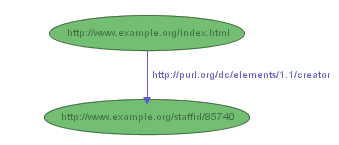
So the RDF statement above would be
represented by the graph shown in Figure 1:
Collections of statements are represented by corresponding
collections of nodes and arcs. So if we wanted to also
represent the additional statements
http://www.example.org/index.html has a
creation-date whose value is August 16,
1999
http://www.example.org/index.html has a
language whose value is English
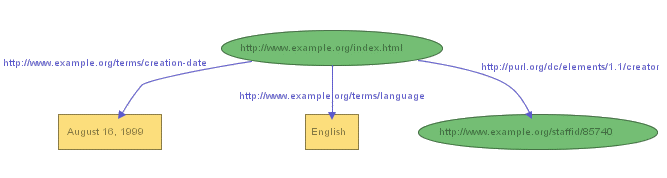
we could, by introducing suitable URIrefs to name the properties
"creation-date" and "language", use the graph shown in Figure 2:
Figure 2 illustrates that RDF permits the objects of
statements (but not the subjects or predicates) to be
constant values (called literals) represented by
character strings, as well as URIrefs, in order to represent
certain kinds of property values. In drawing RDF graphs,
nodes that represent resources identified by URIrefs
are shown as ellipses, while nodes
that represent literals are shown as boxes (labeled by the literal
itself). RDF graphs are
technically "labeled directed graphs", since the arcs have
labels, and are "directed" (point in a specific direction,
from subject to object).
Sometimes it is not convenient to draw graphs, so an
alternative way of writing down the statements, called
N-Triples, can also be used. In the N-Triples notation,
each statement in the graph is written as a simple triple of
subject, predicate, and object node labels (either URIref or
literal), in that order. The N-Triples
representing the three statements shown in Figure 2 would be written:
<http://www.example.org/index.html> <http://purl.org/dc/elements/1.1/creator> <http://www.example.org/staffid/85740> .

<http://www.example.org/index.html> <http://www.example.org/terms/creation-date> "August 16, 1999" .

<http://www.example.org/index.html> <http://www.example.org/terms/language> "English" .
Each triple corresponds to a single arc in the graph,
complete with the arc's beginning and ending nodes (the
subject and object of the statement). Unlike the drawn graph
(but like the original statements),
the N-Triples notation requires that a node be separately
identified for each statement it appears in. So, for example,
http://www.example.org/index.html appears three
times (once in each triple) in the N-Triples representation
of the graph, but only once in the drawn graph. However,
the triples represent exactly the same information as the graph.
The N-triples syntax requires that URI references be written
out in full, in angle brackets, which, as the example above illustrates,
can result in very long lines.
For convenience, we will use a shorthand way of writing triples in the
rest of this Primer, and also in other RDF specifications. In
this shorthand, we can substitute a QName without angle brackets
as an abbreviation of a full URI reference. So, for example,
if the QName prefix foo is mapped to the namespace
URI http://example.org/somewhere/,
then the QName foo:bar is shorthand for the
URIref http://example.org/somewhere/bar.
We will also make
extensive use in these examples of several "well-known" QName
prefixes (which we will use without explicitly specifying them
each time), defined as follows:
prefix rdf:, namespace URI: http://www.w3.org/1999/02/22-rdf-syntax-ns#
prefix rdfs:, namespace URI: http://www.w3.org/2000/01/rdf-schema#
prefix dc:, namespace URI: http://purl.org/dc/elements/1.1/
prefix daml:, namespace URI: http://www.daml.org/2001/03/daml+oil#
prefix ex:, namespace URI: http://www.example.org/ (or http://www.example.com/)
prefix xsd:, namespace URI: http://www.w3.org/2001/XMLSchema#
We will also use variations on the "example" prefix ex:
as needed in the examples, where this will not cause confusion, for example,
prefix exterms:, namespace URI: http://www.example.org/terms/
(for terms used by our example organization),
prefix exstaff:, namespace URI: http://www.example.org/staffid/
(for our example organization's staff identifiers),
prefix ex2:, namespace URI: http://www.domain2.example.org/
(for a second example organization), and so on.
Using our new shorthand, we can write the previous set of triples as:
ex:index.html dc:creator exstaff:85740 .

ex:index.html exterms:creation-date "August 16, 1999" .

ex:index.html exterms:language "English" .
The examples we've just given of RDF statements
begin to illustrate some of the advantages
of using URIrefs as RDF's basic way of identifying things. For
instance, instead of identifying the creator of the Web page
in our first example by the character string "John Smith", we've
assigned him a URIref, in this case (using a URIref based on his
employee number)
http://www.example.org/staffid/85740 . An advantage
of using a URIref in this case is that we can be more precise in
our identification. That is, the creator of the page isn't
the character string "John Smith", or any one of the thousands of
people named John Smith, but the particular
John Smith associated with that URIref (whoever created the URIref
defines the association). Moreover, since we have a URIref for
the creator of the page, it is a full-fledged resource, and
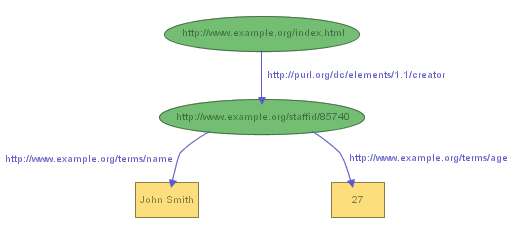
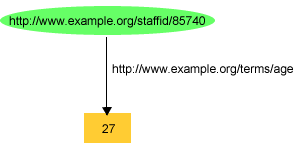
we can record additional information about him, such as his
name, and age, as in the graph shown in Figure 3:
These examples also illustrate that RDF uses URIrefs as
predicates in RDF statements. That is, rather than
using character strings (or words) such as "creator" or "name" to identify
properties, RDF uses URIrefs. Using URIrefs to identify properties
is important for a number of reasons. First, it allows us to
distinguish the properties we use from properties someone
else may use that would otherwise be identified by the same
character string. For instance, in our example, example.org uses
"name" to mean someone's full name written out as a character string
literal (e.g., "John Smith"), but someone else may intend "name" to
mean something different (e.g., the name of a variable in a
piece of program text). A program encountering "name" as a
property identifier on the Web wouldn't necessarily be able
to distinguish these uses. However, if example.org writes
http://www.example.org/terms/name for its "name"
property, and the other person writes
http://www.domain2.example.org/genealogy/terms/name for
hers, we can keep straight the fact that there are distinct
properties involved (even if a program cannot automatically
determine the distinct meanings). Another reason why it is
important to use URIrefs to identify properties is that it
allows us to treat RDF properties as resources themselves.
Since properties are resources, we can record descriptive
information about them (e.g., the English description of what
example.org means by "name"), simply by adding additional RDF
statements with the property's URIref as the subject.
Using URIrefs as subjects, predicates, and objects in RDF
statements allows us to begin to develop and use a shared
vocabulary on the Web, reflecting (and creating) a shared
understanding of the concepts we talk about. For example, in
the triple
ex:index.html dc:creator exstaff:85740 .
the predicate dc:creator, when fully expanded as a URIref,
is an
unambiguous reference to the "creator" attribute in the
Dublin Core metadata attribute set, a widely-used collection
of attributes (properties) for describing information of all
kinds. The writer of this triple is effectively saying that
the relationship between the Web page (identified by
http://www.example.org/index.html ) and the creator
of the page (a distinct person, identified by
http://www.example.org/staffid/85740 ) is exactly
the concept defined by
http://purl.org/dc/elements/1.1/creator . Moreover,
anyone else, or any program, that understands
http://purl.org/dc/elements/1.1/creator will know
exactly what is meant by this relationship.
Of course, RDF's use of URIrefs doesn't solve all our problems
because, for example, people can still use different URIrefs
to refer to the same thing. However, the fact that these different
URIrefs are used in the commonly-accessible "Web space" creates
the opportunity both to identify equivalences
among these different references, and to migrate toward
the use of common references.
The result of all this is that RDF provides a way to make statements that
applications can more easily process. Now an application
can't actually "understand" such statements, of course, but
it can deal with them in a way that makes it seem like it
does. For example, a user could search the Web for all book
reviews and create an average rating for each book. Then, the
user could put that information back on the Web. Another web
site could take that list of book rating
averages and create a "Top Ten Highest Rated Books"
page. Here, the availability and use of a shared vocabulary
about ratings, and a shared group of URIrefs identifying the
books they apply to, allows individuals to build a mutually-understood
and increasingly-powerful (as additional contributions are made)
"information base" about books on the Web. The same principle
applies to the vast amounts of information that people create
about thousands of subjects every day on the Web.
RDF statements are similar to a number of other formats
for recording information, such as:
- entries in a simple record or catalog listing
describing the resource in a data processing system.
- rows in a simple relational database.
- simple assertions in formal logic
and information in these formats can be treated as RDF
statements, allowing RDF to be used as a unifying model for
integrating data from many sources.
2.4 Structured Property
Values and Blank Nodes
Things would be very simple if the only types of
information we had to record about things were obviously in
the form of the simple RDF statements we've illustrated so
far. However, most real-world data involves structures that
are more complicated than that, at least on the surface. For
instance, in our original example, we recorded the date the
Web page was created as a single exterms:creation-date property,
with a simple character string literal as its value. However,
suppose we wanted to show, as the value of the
exterms:creation-date property, the month, day, and year as
separate pieces of information? Or, in the case of John
Smith's personal information, suppose we wanted to record his
address. We might write the whole address out as a character string
literal, as in the triple
exstaff:85740 exterms:address "1501 Grant Avenue, Bedford, Massachusetts 01730" .
However, suppose we wanted to record John's address as
a structure consisting of separate
street, city, state, and Zip code values? How do we do
this in RDF?
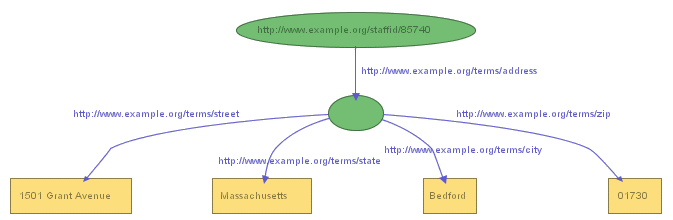
We can represent such structured information in RDF by
considering the aggregate thing we want to talk about (like
John Smith's address) as a separate resource, and then making
separate statements about that new resource. So, in the RDF
graph, in order to break up John Smith's address into its
component parts, we create a new node to represent the
concept of John Smith's address, and assign that concept a
new URIref to identify it, say
http://www.example.org/addressid/85740 (which we will
abbreviate as exaddressid:85740). We then
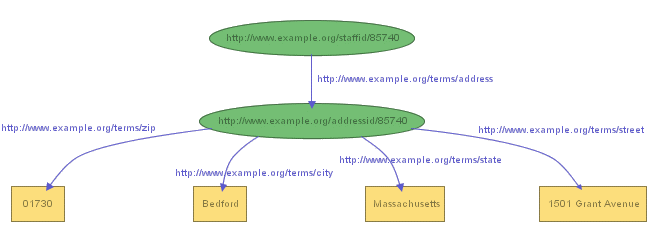
write RDF statements (create additional arcs and nodes) with
that node as the subject, to represent the additional
information, producing the graph shown in Figure 4:
or the triples:
exstaff:85740      exterms:address  exaddressid:85740 .
exaddressid:85740  exterms:street   "1501 Grant Avenue" .
exaddressid:85740  exterms:city     "Bedford" .
exaddressid:85740  exterms:state    "Massachusetts" .
exaddressid:85740  exterms:Zip      "01730" .
Using this approach allows us to represent structured information
in RDF, but it can involve generating numerous "intermediate" URIrefs
to represent aggregate concepts such as John's address, concepts that
may never need to be referred to directly from outside a particular
graph, and thus don't, strictly speaking, require "universal" identifiers.
In addition, in the drawing of the graph representing the collection of
statements shown in Figure 4, we don't really need the URIref we assigned
to identify "John Smith's address",
since we could just as easily have drawn the graph as in Figure 5:
In Figure 5, which is a perfectly good RDF graph,
we've used a node without a label to stand for the concept of
"John Smith's address". This unlabeled node, or blank
node, functions perfectly well in the drawing without
needing a URIref, since the node itself provides
the necessary connectivity between the various other parts of the graph.
(Blank nodes were previously called anonymous resources in
[RDF-MS].)
However, we do need some form of explicit
identifier for that node if we are going to represent this graph as
triples. To see this, we can try to write the triples
corresponding to what is shown in the drawn graph. What we
would get would be something like:
exstaff:85740  exterms:address  ??? .
???            exterms:street   "1501 Grant Avenue" .
???            exterms:city     "Bedford" .
???            exterms:state    "Massachusetts" .
???            exterms:Zip      "01730"
where ??? stands for something that indicates the presence
of the blank node. Since a complex graph might contain
more than one blank node, we also need a way to
differentiate between the various blank nodes in the
triples representation of the graph. To do this, the
triples notation uses a node identifier,
having the form _:name, to indicate the
presence of a blank node. For instance, in this example we
might generate the node identifier _:johnaddress to refer to
the blank node, in which case the resulting triples might
be:
exstaff:85740  exterms:address  _:johnaddress .
_:johnaddress  exterms:street   "1501 Grant Avenue" .
_:johnaddress  exterms:city     "Bedford" .
_:johnaddress  exterms:state    "Massachusetts" .
_:johnaddress  exterms:Zip      "01730" .
In a triples representation of a graph,
each distinct blank node in the graph is given a different node identifier.
Unlike URIrefs and literals, node identifiers are
not considered to be actual parts of the RDF graph (this can be seen by
looking at the drawn graph in Figure 5 and noting that there is no
node identifier used to label the blank node). Node identifiers
only have significance within the triple representation
of the graph, and only for the purpose of distinguishing one blank
node from another (so that two collections of triples that differ
only by re-naming their node identifiers are considered to represent
identical RDF graphs). Node identifiers also have significance only
within the triples representing a single graph (so that two different
graphs with the same number of blank nodes might use the same node
identifiers to distinguish them, and it would be unwise to assume
that blank nodes from different graphs having the same node identifiers
referred to the same resource). If it is expected that a node in a
graph will need to be referenced from outside the graph, a URIref should
be assigned to identify it.
At the beginning of this section, we noted that we can represent aggregate structures, like John Smith's address, by considering the aggregate thing we want to talk about as a separate resource, and then making separate statements about that new resource. This example illustrates an important aspect of RDF: RDF directly represents only binary relationships, e.g. the relationship between John Smith and the literal representing his address. When we try to deal with the relationship between John and the collection of separate components of this address, we are dealing with an n-ary (n-way) relationship (in this case, n=5) between John and the street, city, state, and zip components. In order to represent such structures directly in RDF (e.g., considering the address as a collection of street, city, state, and zip sub-components), we need to break this n-way relationship up into a collection of separate binary relationships. Blank nodes give us one way to do this. Each time we have an n-ary relationship, we can choose one of the participants as the subject of the relationship (John in this case), and create a blank node to represent the rest of the relationship (John's address in this case). We can then represent the remaining participants in the relationship (such as the city in our example) as separate properties of the new resource represented by the blank node.
Blank nodes also give us a way to more accurately model statements about resources
that may not have URIs, but that are described in terms of relationships with other
resources that do have URIs. For example, when making statements about a person,
say Jane Smith,
it may seem natural to use that person's email address as her URI, e.g.,
mailto:jane@example.org. However, this approach can cause a number of problems.
One obvious problem is that Jane Smith's email address may change when she changes jobs, and
so it may be hard to combine information about Jane recorded at different times.
Another problem is that we may want to record information about Jane's mailbox
(e.g., the server it is on) as well as about Jane herself (e.g., her current address),
and using a URIref for Jane based on her email address makes it difficult to
know which thing we're talking about. The same problem exists when a company's
Web page URL, say http://www.example.com/, is used as the URI of the company itself.
Once again, we may need to record information about the Web page (e.g., who created
it and when) as well as about the company, and using http://www.example.com/
as an identifier for both makes it difficult to know which thing we're talking about.
The fundamental problem is that
using Jane's email address as a stand-in for Jane is an
inaccurate model: Jane's email address identifies a mailbox, and Jane and
her mailbox are not the same thing. When Jane herself doesn't have a URI,
a blank node gives us a more accurate
way of modeling this situation. We can represent Jane by a blank node, and
give the blank node an exterms:emailaddress property having the URIref
mailto:jane@example.org as its value. We can also assign the
blank node an rdf:type property with a value of exterms:Person
(we will discuss types in more detail in the following sections),
a exterms:name property with a value of "Jane Smith", and
any other descriptive information we might want to provide, as shown in the
following triples:
_:jane  exterms:emailaddress   mailto:jane@example.org .
_:jane  rdf:type       exterms:Person .
_:jane  exterms:name   "Jane Smith" .
_:jane  exterms:empID  "23748"
_:jane  exterms:age    "26" .
This says, accurately, that "there is a resource of type Person, whose email address is
mailto:jane@example.org, whose name is Jane Smith, etc." That is, the existence of a blank node
effectively says "there is a resource". Statements with that blank node as subject then
provide information about the characteristics of that resource.
In practice, using blank nodes instead of URIrefs in these cases
doesn't change the way we actually handle this kind of information very much.
For example, if we know independently that an email address uniquely
identifies someone at example.org (particularly if the address is unlikely
to be reused), we can still use that fact to associate information
about that person from multiple sources, even though the email address
is not the person's URI. For example, if we were to find another piece of RDF on
the web that described a book, and gives the author's contact information
as the email address mailto:jane@example.org, we might
reasonably conclude that the author's name is Jane Smith.
The point is that saying something like "the author of the book
is mailto:jane@example.org" is actually a shorthand for
"the author of the book is someone whose email address is
mailto:jane@example.org". Using a blank node to represent
this "someone" simply makes what is actually happening more explicit.
(Incidentally, some RDF-based schema languages allow specifying that certain
properties are unique identifiers. This is discussed further in
Section 5.5.)
2.5 Typed Literals
In the last section, we described how to handle situations in which
we needed to take property values represented by character
string literals, and break them up into structured values that identify
the individual parts of those property values. Using this approach,
instead of, say, recording the date a
Web page was created as a single exterms:creation-date property,
with a single character string literal as its value, we could represent
the value as a structure consisting of the month, day, and year as
separate pieces of information. However, so far, we've followed the
practice of representing any constant values that serve as objects in
RDF statements by character string literals, even when we probably
intend for the value of the property to be a number (e.g., the value of
a year or age property) or some other kind of more
specialized value.
For example, earlier in Figure 3, we illustrated an RDF graph
recording information about John Smith. In that graph, we
recorded the value of John Smith's exterms:age
property as the literal "27", as shown in Figure 6:
In this case, our hypothetical organization example.org probably
intends for "27" to be interpreted as a number, rather than as the
string consisting of the character "2" followed by the character "7".
However, an application reading that literal "27" would
only know how to do that if the application was
explicitly given the information that the literal "27" was
intended to represent a number, and knew which number the literal
"27" was supposed to represent.
The common practice in programming languages or database systems is to
provide this kind of information by associating a datatype
with the literal, in this case, a datatype like decimal or
integer. An application that understands the datatype then
knows, for example, whether the literal "10" is intended to represent
the number ten, the number two, or the string
consisting of the character "1" followed by the character "0", depending
on whether the specified datatype is integer, binary,
or string.
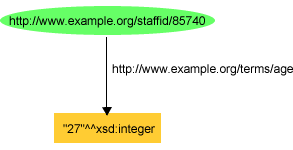
In RDF, typed literals are used to provide this kind of information.
Using a typed literal, we could describe John Smith's age
as being the integer number 27 using
the N-triple:
<http://www.example.org/staffid/85740> <http://www.example.org/terms/age> "27"^^<http://www.w3.org/2001/XMLSchema#integer> .
or, using our QName simplification for writing long URIs:
exstaff:85740 exterms:age "27"^^xsd:integer .
or as shown in Figure 7:
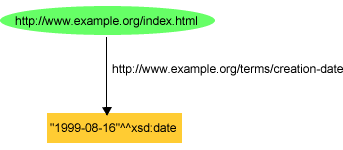
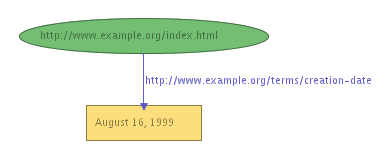
Similarly, in the graph shown in Figure 2 describing information
about a Web page, we recorded the value of the page's
exterms:creation-date property as the character string literal
"August 16, 1999". However, using a typed literal, we could
describe the creation date of the Web page as being the date
August 16, 1999, using the triple:
ex:index.html exterms:creation-date "1999-08-16"^^xsd:date .
or as shown in Figure 8:
As these examples illustrate, an RDF typed literal is formed by explicitly pairing
a URIref identifying a particular datatype (in these examples, the datatypes
integer and date from
XML Schema Part 2: Datatypes
[XML-SCHEMA2])
with a literal
that the datatype uses to represent the intended value.
In each case, this results in a single node in the RDF graph with the pair
as its label.
We've used XML Schema datatypes in the two examples we've just presented,
and will be using XML Schema datatypes in most of our other examples as well
(for one thing, XML Schema data types have URIrefs we can use to refer to them,
specified in [XML-SCHEMA2]).
However, unlike typical programming languages and database systems
(and unlike the XML Schema language),
RDF does not build in any particular collection of datatypes (not even XML
Schema datatypes). Instead,
RDF typed literals simply provide a way to explicitly indicate, for a
given literal, what datatype should be used to interpret it. As far as
RDF is concerned, you can write any pair of URIref and literal you
want as a typed literal. This gives RDF the flexibility to directly
represent information coming from different sources without the need to
perform type conversions between these sources and a native set of RDF
datatypes. (Type conversions would still be required when moving information
between systems with different datatype systems, but RDF would impose no
extra conversions into and out of a native set of RDF types.)
However, this flexibility comes at a price. For one thing, RDF has no
way of knowing whether or not a URIref in a typed literal actually
identifies a datatype. Moreover, even when a URIref does identify a
datatype, RDF cannot
check the validity of pairing that datatype with a particular literal.
For example, you could write the triple:
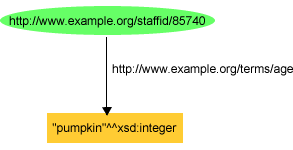
exstaff:85740 exterms:age "pumpkin"^^xsd:integer .
or the graph shown in Figure 9:
and RDF would not see anything wrong with this. However, proper use of
typed literals clearly requires that, given a pair of datatype URIref and literal,
the literal should be a legal representation of one of the datatype's
legal values.
RDF datatype concepts borrow a conceptual framework from XML Schema
datatypes [XML-SCHEMA2]
to more precisely describe these datatype requirements.
RDF's use of this framework is defined in
RDF
Concepts and Abstract Data Model [RDF-CONCEPTS].
The framework involves distinguishing between what
might be written in RDF (or program) text as a literal to
represent a value,
(usually a character string of some kind), and the actual value
that literal is intended to represent or denote.
For example, the literal "10" may be written to refer to the value
ten in a decimal representation, to the value two
in a binary representation, or to the string consisting of a "1"
followed by a "0". Which value the literal denotes is
determined by the datatype associated with the literal "10". In the
case of numbers, the terms numeral and number are
commonly used to distinguish
between the figures that are written down (the numeral) and the value that is
meant (the number). We use this distinction when we talk about the
"Roman numerals" like "IV" that we sometimes see chiseled on buildings.
We don't call these "Roman numbers" because the Romans were using the same
numbers (the number four in this case) that we do; it's the way they
wrote them down that was different.
Specifically, RDF defines a datatype to have:
- a value space, that defines the collection of legal values that
the datatype can represent.
- a lexical space, that defines the collection of legal literals that
you can write down to denote members of the value space.
- a datatype mapping, that defines which values (things in the value
space) are denoted by which literals (things in the lexical space).
Morever, a useful datatype mapping will satisfy some other conditions:
- Each literal (member of the datatype's lexical space) is
associated with exactly one member of the datatype's value
space (so that, given a datatype and a literal, there is no ambiguity
in which value is meant).
- Each member of the datatype's value space has at least one corresponding
literal in the lexical space
(so we can represent all the values associated with the data type).
If the datatype mapping satisfies these conditions, an RDF typed literal,
since it pairs the URIref of a datatype with a literal, will
unambiguously identify a specific member
of a datatype mapping and thus a specific member of the value space of the
datatype.
For example, using these concepts, the XML Schema datatype xsd:boolean
can be described as shown in Table 1. In the datatype
mapping for this datatype, each member of the value space (represented
here as T and F) has two literal representations
defined in the lexical space.
Table 1: A Description of datatype xsd:boolean
| Value Space |
{T, F} |
| Lexical Space |
{"0", "1", "true", "false"} |
| Datatype Mapping |
{<"true", T>, <"1", T>, <"0",
F>, <"false",
F>} |
Given the datatype description in Table 1, Table 2 shows the
RDF typed literals that can be used for datatype xsd:boolean
and how the datatype mapping enables a specific value to be determined
for each typed literal.
Table 2: Typed Literals for datatype xsd:boolean
| Typed Literal |
Member of Datatype Mapping
Denoted by Typed Literal |
Member of Value Space
Denoted by Typed Literal |
| <xsd:boolean, "true"> |
<"true", T> |
T |
| <xsd:boolean, "1"> |
<"1", T> |
T |
| <xsd:boolean, "false"> |
<"false", F> |
F |
| <xsd:boolean, "0"> |
<"0", F> |
F |
With this background, we can see how the interpretation of the triple
describing John Smith's age:
exstaff:85740 exterms:age "27"^^xsd:integer .
works. The triple states that John's age is the member of the value
space of the datatype xsd:integer that is represented by the
literal "27". Based on the definition of xsd:integer given in
[XML-SCHEMA2],
it can be determined that John's age is the integer value twenty-seven.
We said earlier that RDF typed literals only provide a way to
explicitly indicate the datatype that should be used to interpret
a given literal, and that RDF doesn't build in any datatypes.
This means that RDF specifies nothing about which datatypes exist, or
what their value and lexical spaces, or datatype mappings, might be.
The interpretation of a typed literal (determining the value it denotes)
must be performed externally to RDF by an application that understands
that datatype.
This explains why we said earlier that RDF would be unable to see anything wrong
with the typed literal in the triple:
exstaff:85740 exterms:age "pumpkin"^^xsd:integer .
or the graph shown in Figure 9. Even though "pumpkin" is not
defined as being in the lexical space of the datatype xsd:integer,
for RDF to be able to determine this requires that RDF know whether
or not a particular literal is a member of a datatype's lexical space,
information RDF doesn't have.
There will continue to be a great deal of RDF in the Web that does not use
typed literals, since this is a relatively new facility in RDF. However,
as use of RDF develops further, the use of typed literals will develop
further as well.
@@Need to generate SVG versions for the new figures added in this
(and subsequent) sections.@@
Taken as a whole, basic RDF is relatively simple: nodes-and-arcs diagrams
interpreted as statements about concepts or digital resources
identified by URIrefs. This section has presented an introduction
to these concepts. The normative
(i.e., definitional from the W3C's point of view) RDF
specification defining these concepts is
the
RDF Concepts and Abstract Data Model
[RDF-CONCEPTS], which should be
consulted for further information.
Specifically, [RDF-CONCEPTS]
discusses:
- the design goals behind RDF
- the meaning of RDF documents
- the definition of key RDF concepts
- the abstract graph syntax of RDF
- the handling of URIrefs within RDF
Together with the RDF Model Theory [RDF-MODEL],
[RDF-CONCEPTS] provides the
definition of the
abstract syntax for RDF, together with its formal semantics
(meaning). Additional background on the
basic ideas underlying RDF, and its role
in providing a general language for describing Web
information, can be found in
[WEBDATA].
However, in addition
to the basic techniques for representing RDF statements in diagrams
(or triples), it should be clear that we also need a way for people to define the
vocabularies they intend to use in those statements,
including:
- defining types of things (like ex:Person)
- defining properties (like ex:age and creation-date), and
- defining the types of things (or datatypes) that can serve
as the subjects or objects of statements involving those
properties (like specifying that the value of an ex:age property
should always be an xsd:integer).
The basis for defining such vocabularies in RDF
is RDF Schema, which will be described in Section 4.
3. An XML Syntax for
RDF: RDF/XML
To summarize what we have said already, RDF models
statements in terms of a graph consisting of nodes
and arcs. The nodes describe resources that
can be labeled with URIrefs, character string literals, or are blank.
The arcs connect the nodes and are all labeled with
URIrefs. This graph is more precisely called a labeled directed
graph; each arc has a direction (drawn as an
arrow) connecting two nodes. These arcs can also be
described as triples of subject node, at the blunt
end of the arrow/arc, property arc, and an object
node at the sharp end of the arrow/arc. The property arc
is interpreted as an attribute, relationship or predicate of
the resource, with a value given by the object node.
RDF also provides an XML syntax for writing down and
exchanging RDF graphs, called RDF/XML. Unlike N-triples,
which is intended as a shorthand notation, RDF/XML is the
normative syntax for writing RDF. RDF/XML is defined in the RDF/XML
Syntax Specification [RDF-XML].
This section describes this RDF/XML syntax.
We can illustrate the basic ideas behind the RDF/XML
syntax using some of the examples we've presented already.
Suppose we want to represent one of our initial
statements:
http://www.example.org/index.html has a
creation-date whose value is August 16,
1999
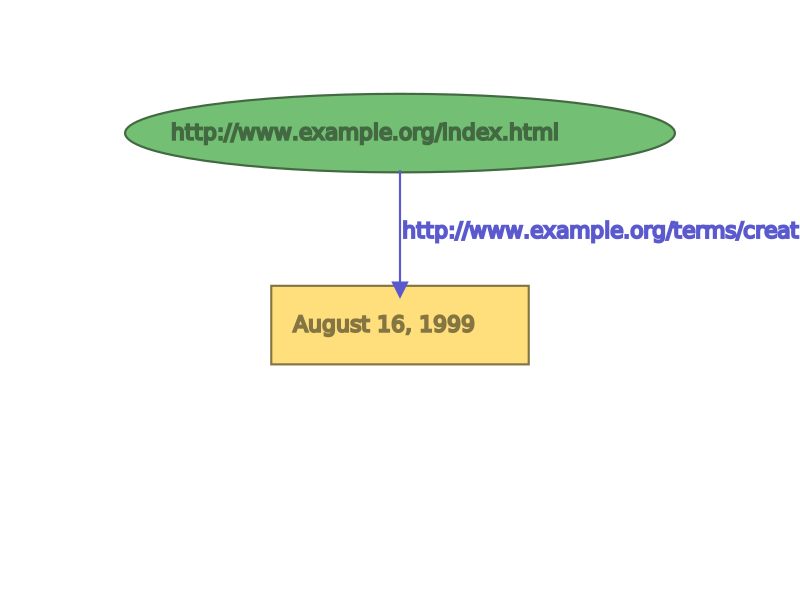
The RDF graph for this single statement, after assigning a URIref to
the creation-date property, is shown in Figure 10:
with a triple representation of:
ex:index.html exterms:creation-date "August 16, 1999" .
Corresponding RDF/XML syntax for the graph in Figure 6 would be:
1. <?xml version="1.0"?>
2. <rdf:RDF xmlns:rdf="http://www.w3.org/1999/02/22-rdf-syntax-ns#"
3.             xmlns:ex="http://www.example.org/terms/">

4.   <rdf:Description rdf:about="http://www.example.org/index.html">
5.       <ex:creation-date>August 16, 1999</ex:creation-date>
6.   </rdf:Description>

7. </rdf:RDF>
(we have added line numbers to use in explaining the
example).
This seems like a lot of overhead. We can understand
better what is going on by considering each part of this XML
in turn.
Line 1, <?xml version="1.0"?>, is the XML
declaration, which indicates that the following content is
XML, and what version of XML it is.
Line 2 begins an rdf:RDF element. This indicates
that the following XML content (starting here and ending with
the </rdf:RDF> in Line 7) is intended to
represent RDF. Following the rdf:RDF on this same
line is an XML namespace declaration, represented as an
xmlns attribute of the rdf:RDF start-tag.
This declaration specifies that all tags in this content
prefixed with rdf: are part of the namespace
identified by the URIref
http://www.w3.org/1999/02/22-rdf-syntax-ns#. This
namespace is the source for the RDF-specific terms used in
RDF/XML.
Line 3 specifies another XML namespace declaration, this
time for the prefix ex:. This is expressed as
another xmlns attribute of the rdf:RDF
element, and specifies that the namespace URIref
http://www.example.org/terms/ is to be associated
with the ex: prefix. This namespace is the source
for the specific terms defined by our example organization,
example.org. The ">" at the end of line 3 indicates the
end of the rdf:RDF start-tag. Lines 1-3 are general
"housekeeping" necessary to indicate that we are defining
RDF/XML content, and to identify the sources of the terms we
are using.
Lines 4-6 provide the RDF/XML for the specific statement we're
representing. An obvious way to talk about any RDF statement
is to say it's a description, and that it's
about the subject of the statement (in this case, about
http://www.example.org/index.html). This is
exactly the way the RDF/XML represents the statement. The
rdf:Description start tag in Line 4 indicates that
we're starting a description, and goes on to identify
the resource the statement is about (the subject of
the statement) using the rdf:about attribute to
specify the URIref of the subject resource. Line 5 provides a
property element, with the QName
<ex:creation-date> as its tag, to hold the
value August 19, 1999 of the creation-date property
of the statement. It is nested within the preceding
rdf:Description element, indicating that this
property applies to the resource specified in the containing
rdf:Description element. The complete URIref of the
creation-date property corresponding to the
QName <ex:creation-date> would be obtained by replacing
the ex: prefix by the namespace URI defined for it
in Line 3.
Line 6 indicates the end of this particular rdf:Description
element.
Finally, Line 7 indicates the end of the rdf:RDF element
started on Line 2.
This example illustrates the basic ideas used by RDF/XML
to encode an RDF graph as XML
elements, attributes, element content, and attribute values.
The URIref labels for properties and object nodes are written as
XML QNames, consisting of a short prefix denoting a
namespace URI, together with a local name denoting a
namespace-qualified element or attribute, as described in
Section 2.2. The (namespace URIref,
local name) pair are chosen so that concatenating them
forms the original node URIref. The URIrefs of subject nodes
are stored in XML attribute values. The nodes labeled by
character string literals (which are always object nodes) become
element text content or attribute values.
We could represent an RDF graph consisting of multiple
statements in RDF/XML by using RDF/XML similar to Lines 4-6
in the previous example to separately represent each statement.
For example, if we wanted to write the two statements:
ex:index.html  exterms:creation-date  "August 16, 1999" .
ex:index.html  exterms:language "English" .
we could write the RDF/XML as:
1.  <?xml version="1.0"?>
2.  <rdf:RDF xmlns:rdf="http://www.w3.org/1999/02/22-rdf-syntax-ns#"
3.              xmlns:ex="http://www.example.org/terms/">

4.    <rdf:Description rdf:about="http://www.example.org/index.html">
5.        <ex:creation-date>August 16, 1999</ex:creation-date>
6.    </rdf:Description>

7.    <rdf:Description rdf:about="http://www.example.org/index.html">
8.        <ex:language>English</ex:language>
9.    </rdf:Description>

10. </rdf:RDF>
This is the same as our initial example, with the addition of lines 7-9, a
second rdf:Description element to represent the second
statement. We could represent an arbitrary number of additional statements
in the same way, using a separate rdf:Description element for
each additional statement. As this example illustrates, once the overhead
of writing the XML and namespace declarations is dealt with, writing
each additional RDF statement in RDF/XML is both straightforward
and not too complicated.
The RDF/XML syntax provides several abbreviations to make
common uses easier to write. For example, it is typical for
the same resource to be described with several properties and
values at the same time, as in the example above.
To handle this case, RDF/XML allows
multiple property elements representing those properties to be
nested within the rdf:Description element that
identifies the subject resource. For example, if we wanted
to represent our previous collection of statements about
http://www.example.org/index.html:
ex:index.html  dc:creator  exstaff:85740 .
ex:index.html  exterms:creation-date  "August 16, 1999" .
ex:index.html  exterms:language "English" .
whose graph (the same as Figure 2) is shown in Figure 11:
the RDF/XML syntax for the graph shown in Figure 11 could be
written as:
 1. <?xml version="1.0"?>
 2. <rdf:RDF xmlns:rdf="http://www.w3.org/1999/02/22-rdf-syntax-ns#"
 3.             xmlns:dc="http://purl.org/dc/elements/1.1/"
 4.             xmlns:ex="http://www.example.org/terms/">

 5.   <rdf:Description rdf:about="http://www.example.org/index.html">
 6.        <ex:creation-date>August 16, 1999</ex:creation-date>
 7.        <ex:language>English</ex:language>
 8.        <dc:creator>
 9.           <rdf:Description rdf:about="http://www.example.org/staffid/85740">
10.           </rdf:Description>
11.        </dc:creator>
12.   </rdf:Description>

13. </rdf:RDF>
(we have added line numbers again to use in explaining the
example).
Compared with the previous two examples, we've added an
additional namespace declaration (in Line 3), and an additional
creation-date property element (in Lines 8-11). In addition, we've
nested the three property elements whose subject is
http://www.example.org/index.html
within a single rdf:Description element identifying that subject,
rather than writing a separate rdf:Description element for each
statement.
Line 8 introduces a new form of property element content.
(The element tag also uses a different namespace prefix,
the new namespace prefix dc: we defined in Line 3.)
The ex:language element in Line 7 is similar to the
ex:creation-date element we defined in the first example. Both
these elements represent properties with character strings as property
values, and such elements are specified by enclosing the
character string within start- and end-tags corresponding to the
property name. However, the dc:creator element on Line 8
represents a property whose value is another resource,
rather than a character string. If we had written the URIref
of this resource as the value of this element in the same way
as we wrote the literal values of the other elements,
we would be saying that the value of the
dc:creator element was the character string
http://www.example.org/staffid/85740, rather than the
resource identified by that string interpreted as a URIref.
In order to indicate the difference, we've indicated the
presence of the separate resource by writing a nested
rdf:Description element identifying the resource
as the value of the dc:creator element.
In this case, this additional resource is the subject of no
properties, and so the nested element has no further content itself.
RDF/XML provides a further abbreviation in cases like this
where we have to introduce an rdf:Description element with
no further content simply to identify a resource as a property value.
Using this abbreviation, we could change
the representation of the dc:creator property as shown
below:
.
1.  <?xml version="1.0"?>
2.  <rdf:RDF xmlns:rdf="http://www.w3.org/1999/02/22-rdf-syntax-ns#"
3.              xmlns:dc="http://purl.org/dc/elements/1.1/"
4.              xmlns:ex="http://www.example.org/terms/">

5.    <rdf:Description rdf:about="http://www.example.org/index.html">
6.         <ex:creation-date>August 16, 1999</ex:creation-date>
7.         <ex:language>English</ex:language>
8.         <dc:creator rdf:resource="http://www.example.org/staffid/85740"/>
9.    </rdf:Description>

10. </rdf:RDF>
In this case, in Line 8 we've written the dc:creator
element with what XML calls an empty element (it has no
separate end tag), and defined the property value using
an rdf:resource attribute within
that empty element. The rdf:resource attribute
indicates that its value is another resource, identified by
its URIref. Because the URIref is being used as an attribute value,
we cannot abbreviate it as a QName,
as we've done in writing element and attribute
names (this is due to the need to conform to XML syntax).
Instead, we must write it out as a full URIref.
It is important to understand that the RDF/XML in the above two
examples are abbreviations. The RDF/XML below, in which
all resources are represented with separate
rdf:Description elements, and each statement is written separately,
describes exactly the same RDF graph:
 <?xml version="1.0"?>
 <rdf:RDF xmlns:rdf="http://www.w3.org/1999/02/22-rdf-syntax-ns#"
             xmlns:dc="http://purl.org/dc/elements/1.1/"
             xmlns:ex="http://www.example.org/terms/">

   <rdf:Description rdf:about="http://www.example.org/index.html">
       <ex:creation-date>August 16, 1999</ex:creation-date>
   </rdf:Description>

   <rdf:Description rdf:about="http://www.example.org/index.html">
       <ex:language>English</ex:language>
   </rdf:Description>

   <rdf:Description rdf:about="http://www.example.org/index.html">
        <dc:creator>
           <rdf:Description rdf:about="http://www.example.org/staffid/85740">
           </rdf:Description>
        </dc:creator>
   </rdf:Description>

 </rdf:RDF>
We will describe some further RDF/XML abbreviations in the following
sections.
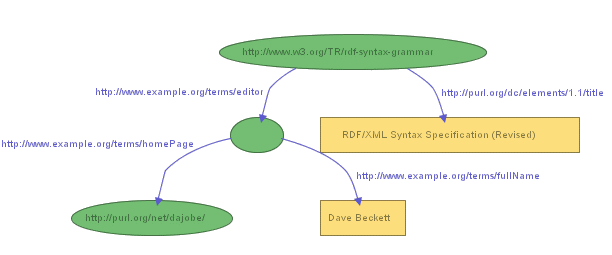
RDF/XML also allows us to represent graphs that include
resources that have no URIs, i.e., blank nodes. For
example, Figure 12 (taken from [RDF-XML])
shows a graph saying "the document
'http://www.w3.org/TR/rdf-syntax-grammar' has a title
'RDF/XML Syntax Specification (Revised)' and has an editor,
the editor has a name 'Dave Beckett' and a home page
'http://purl.org/net/dajobe/' ".
This illustrates an idea we discussed near the end of Section 2:
the use of a blank node to represent something
that does not have a URI, but can be described in terms of other information.
In this case, the blank node
represents a person, the editor of the document, and the person is
described by his name and home page.
RDF/XML provides several ways to represent blank nodes. The most
direct approach is to use an rdf:Description element
in the same way as for any other resource, but without providing an
rdf:about attribute (since a blank node has no URIref).
Using this approach, RDF/XML corresponding to Figure 12 could be
written:
1.  <?xml version="1.0"?>
2.  <rdf:RDF xmlns:rdf="http://www.w3.org/1999/02/22-rdf-syntax-ns#"
3.              xmlns:dc="http://purl.org/dc/elements/1.1/"
4.              xmlns:ex="http://example.org/stuff/1.0/">

5.     <rdf:Description rdf:about="http://www.w3.org/TR/rdf-syntax-grammar">
6.       <dc:title>RDF/XML Syntax Specification (Revised)</dc:title>
7.       <ex:editor>
8.          <rdf:Description>
9.             <ex:fullName>Dave Beckett</ex:fullName>
10.            <ex:homePage rdf:resource="http://purl.org/net/dajobe/" />
11.         </rdf:Description>
12.      </ex:editor>
13.    </rdf:Description>

14. </rdf:RDF>
Much of this XML is similar to what we have seen already.
Once again we have a property ex:editor with a resource
as its value, which is represented by the ex:editor property
element (starting in Line 7) with a nested rdf:Description
element as its content. In this case, the nested resource has its
own properties, represented by the ex:fullName and
ex:homePage property elements in Lines 9 and 10.
What is different is that, since the nested rdf:Description
element in Line 8 represents a blank node, it has no
rdf:about attribute specifying a URIref.
This approach is adequate provided that we don't need to refer
to this same blank node in more than one place in the RDF/XML. If
we do need to refer to the same blank node in more than
one place, this won't work, because each time we write a different
rdf:Description element for a blank node, there will be
no way to determine whether this is intended to be
a new blank node, or a reference to one created already.
To deal with this problem, a blank node identifier
(or bnodeID) can be assigned to the blank node. A
bnodeID serves to identify a blank node within a particular RDF/XML document
but, unlike a URIref, is unknown outside the document in which it is
assigned.
A bnodeID is assigned to a blank node
using an rdf:nodeID attribute in the
rdf:Description element for the blank node.
The use of a bnodeID is illustrated by the following RDF/XML,
which also represents the graph shown in Figure 12. In this
example, the bnodeID is assigned to the blank node in Line 9,
and used to reference it in Line 7.
1.  <?xml version="1.0"?>
2.  <rdf:RDF xmlns:rdf="http://www.w3.org/1999/02/22-rdf-syntax-ns#"
3.              xmlns:dc="http://purl.org/dc/elements/1.1/"
4.              xmlns:ex="http://example.org/stuff/1.0/">

5.     <rdf:Description rdf:about="http://www.w3.org/TR/rdf-syntax-grammar">
6.       <dc:title>RDF/XML Syntax Specification (Revised)</dc:title>
7.       <ex:editor rdf:nodeID="abc"/>
8.     </rdf:Description>

9.     <rdf:Description rdf:nodeID="abc">
10.        <ex:fullName>Dave Beckett</ex:fullName>
11.        <ex:homePage rdf:resource="http://purl.org/net/dajobe/"/>
12.    </rdf:Description>

13. </rdf:RDF>
Finally, the typed literals we described in
Section 2.5 may be used as property values
instead of the character string literals we have used in the examples so far.
A typed literal is represented in RDF/XML by adding an rdf:datatype
attribute specifying a datatype URIref to the property element containing
the literal.
For example, to change the statement shown in Figure 10 to use
a typed literal instead of a character literal for the
creation-date property, the triple representation might be:
ex:index.html exterms:creation-date "1999-08-16"^^xsd:date .
and the corresponding RDF/XML syntax would be:
1. <?xml version="1.0"?>
2. <rdf:RDF xmlns:rdf="http://www.w3.org/1999/02/22-rdf-syntax-ns#"
3.             xmlns:ex="http://www.example.org/terms/">

4.   <rdf:Description rdf:about="http://www.example.org/index.html">
5.     <ex:creation-date rdf:datatype=
         "http://www.w3.org/2001/XMLSchema#date">1999-08-16</ex:creation-date>
6.   </rdf:Description>

7. </rdf:RDF>
In Line 5, a typed literal is given as the value of the
ex:creation-date property element by adding an
rdf:datatype attribute to the element's start-tag
to specify the datatype. The value of this attribute is the
URIref of the datatype, in this case, the URIref of the XML Schema
date datatype. Since this is an attribute value, the
full URIref must be written out, rather than using the QName
abbreviation xsd:date that we used in the triple.
A literal appropriate to this datatype is then written as the
element content, in this case, the literal 1999-08-16, which is the
literal representation for August 16, 1999 in the XML Schema
date datatype.
For the most part, we will continue to use XML-style (untyped)
character literals in our examples. However, you should be aware
that typed literals from appropriate datatypes, such as XML Schema
datatypes, can always be used instead.
A subset of the facilities we have illustrated so far
is referred to as the RDF/XML basic serialization syntax
[RDF-MS]. In this approach, an RDF
graph is written in RDF/XML as follows:
- All blank nodes are assigned arbitrary URIs or
blank node identifiers.
- Each resource is listed in turn as the subject of an
un-nested
rdf:Description element, using an
rdf:about attribute.
For each triple with this resource as subject, an
appropriate property element is created, with either
literal content (possibly empty) or an
rdf:resource attribute specifying the object of
the triple.
The basic serialization syntax is particularly recommended for applications in
which the output RDF/XML is to be used in further RDF processing,
because it most directly represents the RDF graph.
So far, we've been describing resources that we imagine have been
defined (and given URIrefs) already. For instance, in our
initial examples, we've been providing descriptive
information about example.org's web page, whose URIref was
http://www.example.org/index.html. We referred to this
resource (defined elsewhere) using an rdf:about
attribute. However, obviously we also want to be able to
introduce new resources. For example, suppose a
company, example.com, wanted to provide an RDF-based catalog
of its products as an RDF/XML document, identified by (and located at)
http://www.example.com/2002/04/products. Within that
resource, each product might be given a separate RDF
description. This catalog, along with one of these descriptions (the
catalog entry for a model of tent called the "Overnighter") might be written:
1.   <?xml version="1.0"?>
2.   <rdf:RDF xmlns:rdf="http://www.w3.org/1999/02/22-rdf-syntax-ns#"
3.               xmlns:ex="http://www.example.com/terms/">

4.     <rdf:Description rdf:ID="10245">
5.          <ex:model>Overnighter</ex:model>
6.          <ex:sleeps>2</ex:sleeps>
7.          <ex:weight>2.4</ex:weight>
8.          <ex:packedSize>14x56</ex:packedSize>
9.     </rdf:Description>

  ...other product descriptions...

10.  </rdf:RDF>
(We've included the surrounding xml, RDF, and namespace
information in lines 1 through 3, and line 10, but this
information would only need to be defined once for the whole
catalog, not repeated for each entry in the catalog).
This is similar to our previous examples in the way it
represents the properties (model, sleeping capacity, weight)
of the resource (the tent) being described. However, in line
4, the rdf:Description element has an
rdf:ID attribute instead of an rdf:about
attribute. Using rdf:ID indicates that we are
using a fragment identifier, given by the value
of the rdf:ID attribute ("10245" in this case, which
might be the catalog number used by example.com), as a
shorthand for the complete URIref of the resource we want to describe.
This fragment identifier 10245
will be interpreted relative to a base URI, in this
case, the URI of the containing catalog. The full URIref for the
tent is formed by taking the base URI (of the catalog), and
appending #10245 to it, giving the URIref
http://www.example.com/2002/04/products#10245.
The rdf:ID attribute is somewhat similar to the ID
attribute in XML and HTML, in that it defines a label which
can be used to refer to this resource. This label must be
unique within the resource (in this case, the catalog) in
which it is defined. Any other RDF within this catalog could
refer to this resource (this particular catalog entry) by
using the relative URIref #10245 in a rdf:about
attribute. This would be
understood to refer to another resource defined within the
catalog. We could also have introduced the URIref of the catalog entry itself
by specifying rdf:about="#10245" instead of rdf:ID="10245"
(i.e., by specifying the relative URIref directly).
The two forms are essentially synonyms: the full URIref formed by
RDF is the same in either case:
http://www.example.com/2002/04/products#10245.
RDF located outside the catalog could refer to
this catalog entry by using the full URIref, i.e., by concatenating the relative URIref
#10245 of the catalog entry to the base URI of the
catalog, forming the absolute URIref
http://www.example.com/2002/04/products#10245. For
example, an outdoor sports web site exampleRatings.com might
use RDF to provide ratings of various tents. The (5-star)
rating given to the tent we described earlier might then be
represented on exampleRatings.com's web site as:
1.  <?xml version="1.0"?>
2.  <rdf:RDF xmlns:rdf="http://www.w3.org/1999/02/22-rdf-syntax-ns#"
3.              xmlns:sportex="http://www.exampleRatings.com/terms/">

4.    <rdf:Description rdf:about="http://www.example.com/2002/04/products#10245">
5.         <sportex:ratingBy>Richard Roe</sportex:ratingBy>
6.         <sportex:numberStars>5</sportex:numberStars>
7.    </rdf:Description>
8.  </rdf:RDF>
In this example, line 4 uses an rdf:Description
element with an rdf:about attribute whose value
is the full URIref of the tent's catalog entry,
defined by the earlier RDF description. The use of this URIref
allows the tent being referred to in the rating to be
precisely identified.
This example not only shows how new resources can be
defined in RDF/XML; it also illustrates one of the basic
architectural principles of the Web, which is that anyone
should be able say anything they want about existing
resources [BERNERS-LEE98].
The example also illustrates the fact that the RDF describing
a particular resource does not need to be located all in one
place; instead, it may be distributed throughout the web.
This is true not only for examples like this one, in which
one organization is rating or commenting on resources defined
by another, but also for situations in which the original
creator of a resource (or anyone else) wishes to amplify the
description of that resource by providing additional
information about it. This may be done either by modifying
the original document in which the resource was defined, to
add the properties and values needed to describe the
additional information, or, as this example illustrates, by
creating a separate document, and providing the additional
properties and values in rdf:Description elements
that refer to the original resource using
rdf:about.
The previous example indicated that fragment identifiers
such as #10245 will be interpreted relative to a
base URI. By default, this base URI would be the URI of the
resource in which the fragment is used. However, in some cases
it is desirable to be able to explicitly specify this base URI.
For instance, suppose that in addition to the catalog located at
http://www.example.com/2002/04/products, example.org wanted to
provide a duplicate catalog on a mirror site, say at
http://mirror.example.com/2002/04/products. This could create
a problem, since if the catalog was retrieved from
the mirror site, the URIref generated for our example tent would be
http://mirror.example.com/2002/04/products#10245, rather than
http://www.example.com/2002/04/products#10245, and hence apparently a
different tent. To deal with this problem, RDF/XML supports
XML
Base [XML-BASE], which allows an
XML document to specify a base URI other than the URI of the document itself.
In this case, we would define the catalog as:
1.   <?xml version="1.0"?>
2.   <rdf:RDF xmlns:rdf="http://www.w3.org/1999/02/22-rdf-syntax-ns#"
3.               xmlns:ex="http://www.example.com/terms/"
4.               xml:base="http://www.example.com/2002/04/products">

5.     <rdf:Description rdf:ID="10245">
6.          <ex:model>Overnighter</ex:model>
7.          <ex:sleeps>2</ex:sleeps>
8.          <ex:weight>2.4</ex:weight>
9.          <ex:packedSize>14x56</ex:packedSize>
10.    </rdf:Description>

  ...other product descriptions...

11.  </rdf:RDF>
The xml:base declaration in line 4 specifies that the
base URI for the content within the rdf:RDF element
(until another xml:base
attribute is specified) is http://www.example.com/2002/04/products,
and all relative URIrefs cited within that content will be interpreted relative
to that base, no matter where the actual content is located. As a result,
the relative URIref of our tent, #10245, will generate the same
absolute URIref, http://www.example.com/2002/04/products#10245, no
matter where the catalog is located.
So far, we've been talking about a single product description, a
particular model of tent, from example.com's catalog. However, example.com
will probably offer several different models of tents, as
well as multiple instances of other categories of products, such as
backpacks, hiking boots, and so on. This idea of instances
of things that can be classified into different kinds or categories
is similar to the programming language concept of objects having different
types or classes. RDF supports this concept
by providing a predefined property, rdf:type. When an
RDF resource is defined as having an rdf:type property, the
value of that property is considered to be a resource that defines
a category or class of things, and the original resource is considered
to be an instance of that category or class.
Using rdf:type, example.com might indicate that our product
description is that of a tent as follows:
1.   <?xml version="1.0"?>
2.   <rdf:RDF xmlns:rdf="http://www.w3.org/1999/02/22-rdf-syntax-ns#"
3.               xmlns:ex="http://www.example.com/terms/"
4.               xml:base="http://www.example.com/2002/04/products">

5.     <rdf:Description rdf:ID="10245">
6.          <rdf:type rdf:resource="http://www.example.com/terms/Tent" />
7.          <ex:model>Overnighter</ex:model>
8.          <ex:sleeps>2</ex:sleeps>
9.          <ex:weight>2.4</ex:weight>
10.         <ex:packedSize>14x56</ex:packedSize>
11.    </rdf:Description>

  ...other product descriptions...

12.  </rdf:RDF>
Note the use of the rdf:type property
to indicate that the instance belongs to class Tent.
In this case, we imagine that example.com has defined its
classes as part of the same vocabulary that it uses to
describe its other terms (such as the property ex:weight),
so we use the absolute URIref of the class to refer to it. If example.com
had defined these classes in the product catalog itself, we could have
used the relative URIref #Tent to refer to it.
RDF itself does not define a vocabulary for defining
application-specific classes of things, like Tent
in this example. Instead, such classes would be defined in
an RDF Schema. The RDF Schema vocabulary is described in
Section 5.
Other vocabularies for defining classes can also
be defined, such as the DAML+OIL and OWL
languages described in
Section 5.5.
In addition, RDF defines several pre-defined
types of its own for various purposes. These will be described
in Section 4.
Since defining resources as instances of specific types
is fairly common, the RDF/XML syntax provides a special abbreviation for
instances defined as members of classes using the
rdf:type property. In this abbrevation, the
rdf:type property and value are removed, and the
rdf:Description element name is replaced by the
class name. Using this abbreviation, example.com's tent from the
example above could also be defined as:
1.   <?xml version="1.0"?>
2.   <rdf:RDF xmlns:rdf="http://www.w3.org/1999/02/22-rdf-syntax-ns#"
3.               xmlns:ex="http://www.example.com/terms/"
4.               xml:base="http://www.example.com/2002/04/products">

5.     <ex:Tent rdf:ID="10245">
6.          <ex:model>Overnighter</ex:model>
7.          <ex:sleeps>2</ex:sleeps>
8.          <ex:weight>2.4</ex:weight>
9.          <ex:packedSize>14x56</ex:packedSize>
10.    </ex:Tent>

  ...other product descriptions...

11.  </rdf:RDF>
Both this abbreviation and the previous description of the tent (using
the full <rdf:Description rdf:ID="10245"> element) illustrate
that RDF statements can be written in RDF/XML in a way that closely resembles
the descriptions that might have been written directly in XML.
This is an important consideration, given the
increasing use of XML in all kinds of applications, since it suggests that
RDF could be used in these applications without major changes in
information structure being required, and that much deployed XML
can be interpreted as RDF statements.
We've already described a number of abbreviations that RDF/XML
provides to allow graphs to be represented more compactly. For
example, we showed that multiple property elements that describe
the same resource can be nested within the same rdf:Description
element that identifies the resource. We also showed that the
name of an rdf:Description element can be replaced by
the class name of the resource. In this section, we will briefly
describe some additional RDF/XML abbreviations.
To start with, consider our tent example from Section 3.2:
  <?xml version="1.0"?>
  <rdf:RDF xmlns:rdf="http://www.w3.org/1999/02/22-rdf-syntax-ns#"
              xmlns:ex="http://www.example.com/terms/"
              xml:base="http://www.example.com/2002/04/products">

    <ex:Tent rdf:ID="10245">
         <ex:model>Overnighter</ex:model>
         <ex:sleeps>2</ex:sleeps>
         <ex:weight>2.4</ex:weight>
         <ex:packedSize>14x56</ex:packedSize>
    </ex:Tent>

  </rdf:RDF>
One of the abbreviations allowed by RDF/XML is that
when properties are not repeated within an rdf:Description element,
and the values of those properties are literals, the properties
can be written as XML attributes of the rdf:Description element
(this can't be done when properties are repeated because
XML does not allow the same attribute to appear more than once within
the same element). Using this abbreviation, we can convert the elements
in this example to attributes, and write the description as:
  <?xml version="1.0"?>
  <rdf:RDF xmlns:rdf="http://www.w3.org/1999/02/22-rdf-syntax-ns#"
              xmlns:ex="http://www.example.com/terms/"
              xml:base="http://www.example.com/2002/04/products">

    <ex:Tent rdf:ID="10245"
         ex:model="Overnighter"
         ex:sleeps="2"
         ex:weight="2.4"
         ex:packedSize="14x56"/>

  </rdf:RDF>
Another abbreviation is that of nested
rdf:Description elements. We've seen some simple
examples of this already. Suppose we want to
say that John Smith created our example Web page from the beginning of
Section 2, and also provide some
information about John Smith himself. We might do this with the following
RDF/XML:
 <?xml version="1.0"?>
 <rdf:RDF xmlns:rdf="http://www.w3.org/1999/02/22-rdf-syntax-ns#"
             xmlns:dc="http://purl.org/dc/elements/1.1/"
             xmlns:ex="http://www.example.org/terms/">

   <rdf:Description rdf:about="http://www.example.org/index.html">
       <dc:creator rdf:resource="http://www.example.org/staffid/85740"/>
   </rdf:Description>

   <rdf:Description rdf:about="http://www.example.org/staffid/85740">
       <ex:name>John Smith</ex:name>
       <ex:age>36</ex:age>
   </rdf:Description>

 </rdf:RDF>
This form makes it clear that two separate resources are being described,
but it is less clear that the second resource is the one referenced by the
first one. The same information could be expressed by nesting the second
description inside the dc:creator element of the first one, as in
the following RDF/XML:
 <?xml version="1.0"?>
 <rdf:RDF xmlns:rdf="http://www.w3.org/1999/02/22-rdf-syntax-ns#"
             xmlns:dc="http://purl.org/dc/elements/1.1/"
             xmlns:ex="http://www.example.org/terms/">

   <rdf:Description rdf:about="http://www.example.org/index.html">
       <dc:creator>
          <rdf:Description rdf:about="http://www.example.org/staffid/85740">
             <ex:name>John Smith</ex:name>
             <ex:age>36</ex:age>
          </rdf:Description>
       </dc:creator>
   </rdf:Description>

 </rdf:RDF>
Notice that because we're not just citing a URIref as the value of
dc:creator, but instead providing a complete rdf:Description
for the resource, we nest the description between dc:creator
start- and end-tags.
Yet another abbreviation works on these nested rdf:Description
elements, or their equivalents. When the object of a statement is
another resource (e.g., the nested description in the example above),
and the values of any properties given in-line for
that resource are literals, we can write the nested properties
as additional XML attributes of the outer property element. Applying
this abbreviation to the example above gives the following RDF/XML:
 <?xml version="1.0"?>
 <rdf:RDF xmlns:rdf="http://www.w3.org/1999/02/22-rdf-syntax-ns#"
             xmlns:dc="http://purl.org/dc/elements/1.1/"
             xmlns:ex="http://www.example.org/terms/">

   <rdf:Description rdf:about="http://www.example.org/index.html">
       <dc:creator rdf:resource="http://www.example.org/staffid/85740"
             ex:name="John Smith"
             ex:age="36" />
   </rdf:Description>

 </rdf:RDF>
Once again, remember that we are describing abbreviations.
For example, the above two examples describe exactly the same RDF graph.
Some of these abbreviations may be helpful in making RDF/XML easier
for people to read, or in enabling RDF/XML to more closely resemble
certain forms of more conventional XML.
RDF/XML also provides an abbreviation for representing blank
nodes that avoids the need to write rdf:Description elements
for them.
For example, Figure 13 (which duplicates Figure 12) has
a blank node as the value of its ex:editor property:
Instead of writing a nested rdf:Description element
as the value of the ex:editor property, we can give
the property element an rdf:parseType="Resource" attribute,
as shown in line 7 of the following RDF/XML:
1.  <?xml version="1.0"?>
2.  <rdf:RDF xmlns:rdf="http://www.w3.org/1999/02/22-rdf-syntax-ns#"
3.              xmlns:dc="http://purl.org/dc/elements/1.1/"
4.              xmlns:ex="http://example.org/stuff/1.0/">

5.     <rdf:Description rdf:about="http://www.w3.org/TR/rdf-syntax-grammar">
6.       <dc:title>RDF/XML Syntax Specification (Revised)</dc:title>
7.       <ex:editor rdf:parseType="Resource">
8.         <ex:fullName>Dave Beckett</ex:fullName>
9.         <ex:homePage rdf:resource="http://purl.org/net/dajobe/" />
10.      </ex:editor>
11.    </rdf:Description>

12. </rdf:RDF>
The rdf:parseType="Resource" attribute of the
ex:editor element indicates that the contents
of the element are to
be considered as if they were inside a new
rdf:Description element that defines a new, unnamed resource.
This new resource is the value of
the ex:editor property, corresponding to the blank node in
the graph. Within the ex:editor start and end tags (on
lines 7 and 10), lines 8 and 9 define the
ex:fullName and ex:homePage properties of
this new resource, respectively.
The ability to use rdf:parseType="Resource" inside
elements in this way makes it easier to write RDF/XML
to represent RDF graphs that involve intermediate
blank nodes at various points.
Finally, having just introduced the notion of an rdf:parseType
(essentially an instruction to an RDF/XML parser as to how to
interpret a specific piece of RDF/XML content), there's another
rdf:parseType that should be mentioned here:
rdf:parseType="Literal". Specifying
rdf:parseType="Literal" as the attribute of a property
element indicates that the content of the element should be interpreted
as an XML literal (rather than as RDF or some other kind of literal).
For example, the following RDF/XML describes a single RDF triple
with the subject URIref http://example.org/thingy, the predicate
ex:prop, and an object consisting of the XML content in Lines 7-10
including the a:Collection tags:
1.  <?xml version="1.0"?>
2.  <rdf:RDF xmlns:rdf="http://www.w3.org/1999/02/22-rdf-syntax-ns#"
3.              xmlns:ex="http://example.org/stuff/1.0/">

5.     <rdf:Description rdf:about="http://example.org/thingy>
6.       <ex:prop rdf:parseType="Literal" xmlns:a="tttp://example.org/a#>
7.           <a:Collection required="true">
8.             <a:widget size="10" />
9.             <a:grommit id="23" />
10.          </a:Collection>
11.      </ex:prop>
12.    </rdf:Description>

12. </rdf:RDF>
Using rdf:parseType="Literal" allows XML content to be included
in RDF descriptions.
The examples above have illustrated some of the basic ideas
behind the RDF/XML syntax. For a discussion of the basic
principles behind the modeling of RDF statements in XML
(known as striping), and other details and
examples about writing
RDF in XML, refer to the RDF/XML
Syntax Specification [RDF-XML].
4. Other RDF
Capabilities
RDF provides a number of additional capabilities, including some
built-in types and properties for representing groups of resources
and RDF statements, and capabilities for
deploying RDF information in the World Wide Web. These additional
capabilities are described in the following sections.
There is often a need to represent groups of
things. For example, we might want to say that a book was
created by several authors, or to list the students in a
course, or the software modules in a package. RDF provides
several pre-defined types and properties that can be used to construct
RDF graphs to represent various kinds of groups.
First, RDF provides three predefined types (together with some
associated predefined properties) for representing
containers:
A Bag (a resource having type rdf:Bag) is
intended to represent an unordered group of resources
or literals, possibly including duplicates. A Bag
is used to represent a group that has multiple values,
and there is no significance to the order in which the values
are given. For example, a Bag might be used to represent a
group of part numbers in which the order of entry or
processing of the part numbers does not matter.
A Sequence or Seq (a resource having
type rdf:Seq) is intended to represent an
ordered group of resources or literals, possibly
including duplicates. A
Sequence is used to represent a group that has multiple
values, and the order of the values is significant. For
example, a Sequence might be used to represent a group
that must be maintained in alphabetical order.
An Alternative or Alt (a resource having
type rdf:Alt) is intended to represent a
group of resources or literals that represent
alternative values (typically for a single value of
a property). For example, an Alt might be used to
specify alternative language translations for the title of a
book, or to provide a list of alternative Internet sites at
which a resource might be found. An application using a
property whose value is an Alt group should be
aware that it can choose any one of the items in the
group as appropriate.
To represent a specific instance of one of these types of
containers, you create a new resource, and give it an
rdf:type property whose value is one of the
pre-defined resources rdf:Bag, rdf:Seq, or
rdf:Alt (whichever is appropriate). This new
container resource represents the group as a whole, and
may either be a blank node or be given a URIref. The members of
the container are then indicated by defining a
membership property for each member with the new
container resource as its subject and the member resource as
its object. These membership properties have names
of the form rdf:_n, where n is an integer, e.g.,
rdf:_1, rdf_2, rdf_3, and so on,
and are used specifically for defining the members of
containers. Container resources may also have other
properties that describe the container, in addition to the
membership properties and the rdf:type property.
It is important to understand that while
these types of containers are represented by pre-defined RDF types
and properties, the special meanings described above for rdf:Bag,
rdf:Seq, and rdf:Alt containers, e.g., that the
members of an Alt container are alternative values,
are only intended meanings, provided with the aim of establishing
a shared convention among those using these containers.
All RDF does is provide the types and properties that can be used
to construct the RDF graphs described here for each
type of container. Hence, applications must be written to
behave according to the particular meaning involved for each
container type. This point will be expanded on in the following
examples.
A typical use of a container is to represent the value of
a property. For example, to represent the sentence "The
students in course 6.001 are Amy, Tim, John, Mary, and Sue",
you could create a Bag resource containing the students, and use this
Bag as the value of
the course's s:students property, writing the
RDF/XML:
<?xml version="1.0"?>
<rdf:RDF xmlns:rdf="http://www.w3.org/1999/02/22-rdf-syntax-ns#"
         xmlns:s="http://example.edu/students/vocab#">

   <rdf:Description rdf:about="http://example.edu/courses/6.001">
      <s:students>
         <rdf:Bag>
            <rdf:li rdf:resource="http://example.edu/students/Amy"/>
            <rdf:li rdf:resource="http://example.edu/students/Tim"/>
            <rdf:li rdf:resource="http://example.edu/students/John"/>
            <rdf:li rdf:resource="http://example.edu/students/Mary"/>
            <rdf:li rdf:resource="http://example.edu/students/Sue"/>
         </rdf:Bag>
      </s:students>
   </rdf:Description>
</rdf:RDF>
This RDF/XML would result in the RDF graph shown in Figure 14:
Note that in RDF/XML you can use li as a convenience
element to avoid having to explicitly number each membership
property. The numbered properties rdf:_1,
rdf:_2, and so on are generated from
the li elements in forming the corresponding graph. The element name
li was chosen to be mnemonic with the term "list
item" from HTML.
Since the value of the s:students property in this example is
expressed as a Bag, there is no intended significance in the order
given for the URIrefs of each student, even though the
properties in the graph have integers in their names.
It is up to applications creating and processing rdf:Bag
containers to ignore any (apparent) order in the properties.
The RDF/XML for an rdf:Seq container, and the
corresponding graph structure, are similar to those for an
rdf:Bag (the only difference is in the type, rdf:Seq).
Once again, although an rdf:Seq container is intended
to represent a sequence, it is up to applications creating and
processing the structure to appropriately interpret the sequence
of integer-valued property names.
As an illustration of an Alt container, the
sentence "The source code for X11 may be found at ftp.example.org,
ftp.example1.org, or ftp.example2.org" could be written in RDF/XML as:
<?xml version="1.0"?>
<rdf:RDF xmlns:rdf="http://www.w3.org/1999/02/22-rdf-syntax-ns#"
         xmlns:s="http://example.org/packages/vocab#">

<rdf:RDF>
   <rdf:Description rdf:about="http://example.org/packages/X11">
      <s:DistributionSite>
         <rdf:Alt>
            <rdf:li rdf:resource="ftp://ftp.example.org"/>
            <rdf:li rdf:resource="ftp://ftp.example1.org"/>
            <rdf:li rdf:resource="ftp://ftp.example2.org"/>
         </rdf:Alt>
      </s:DistributionSite>
   </rdf:Description>
</rdf:RDF>
This would result in the RDF graph shown in Figure 15:
An Alt container is intended to have at least one member, identified by the
property rdf:_1. This member is intended to be considered as
the default or preferred value. Other than the member identified
as rdf:_1, the order of the remaining elements is not
intended to be significant.
The RDF in Figure 15 as written states simply that the value of the
s:DistributionSite site property is the Alt container
resource itself. Any additional meaning that is to be read into this graph,
e.g., that one of the members of the Alt container is to be considered
as the value of the s:DistributionSite site property, or that
ftp://ftp.example.org is the default or preferred value, must be
built into an application's understanding of how an Alt is intended to behave,
and/or into the meaning defined for the particular property
(s:DistributionSite in this case), which also must be understood
by the application.
Alt containers are frequently used in conjunction
with language tagging. For example, a work whose title has
been translated into several languages might have its
Title property pointing to an Alt container
holding each of the language variants.
The distinction between the intended meanings of a Bag and an Alt
can be further
illustrated by considering the authorship of the book "Huckleberry Finn".
The book has exactly one author, but the author has two names (Mark Twain and
Samuel Clemens). Either name is sufficient to specify the author. Thus using an
Alt container of the author's names more accurately represents
the relationship than using a Bag
(which might suggest there are two different authors).
The built-in types and properties provided for defining containers can be
used with any resource, and not necessarily in the "well-formed"
combinations illustrated so far. For example, the numeric
membership properties rdf:_n can be written directly
rather than using the RDF/XML rdf:li property. If they are, RDF does not
insist that the property numbers be contiguous starting with
rdf:_1. Hence, you could create a legal Bag
with just the membership properties rdf:_3,
rdf:_7, rdf:_8, and rdf:_11.
Also, you could give a resource representing a particular
employee an rdf:type property of rdf:Alt, stating that
the employee was an Alt, without defining any membership properties
at all. RDF would see nothing wrong with this. Similarly,
you could assign that employee an rdf:_2 property having
some value, without explicitly defining the employee as one of the container types.
Again, RDF would see nothing wrong with this.
You can also define duplicate member properties. For example,
the following is syntactically legal RDF:
<?xml version="1.0"?>
<rdf:RDF xmlns:rdf="http://www.w3.org/1999/02/22-rdf-syntax-ns#"
         xmlns:s="http://example.edu/students/vocab#">

   <rdf:Description rdf:about="http://example.edu/courses/6.001">
      <s:students>
         <rdf:Bag>
            <rdf:_1 rdf:resource="http://example.edu/students/Amy"/>
            <rdf:_1 rdf:resource="http://example.edu/students/Tim"/>
            <rdf:_1 rdf:resource="http://example.edu/students/John"/>
         </rdf:Bag>
      </s:students>
   </rdf:Description>
</rdf:RDF>
Finally, there is no built-in understanding that the member
resources defined for a given container, such as the three students
defined as the members of the Bag above, are
the only members of that container (since a container resource
may not be a blank node, RDF located elsewhere
might define additional members of the same container).
Users are also free to choose their own representations
for groups of resources, rather than using the ones described here.
These RDF containers are merely provided as common
definitions that, if generally used, could help make data
involving groups of resources more interoperable.
Sometimes there are clear alternatives to using these RDF
container types. For example, a relationship between a
particular resource and a group of other resources could be
indicated by making the first resource the subject of multiple statements
using the same property.
This is structurally not the same as the resource being the subject of a
single statement whose object is a container containing multiple
members. In some cases, these two structures may have equivalent
meaning, but in other cases they may not. The choice of which to use
in a given situation should be made with this in mind.
Consider as an example the relationship between a writer and her
publications. We might have the sentence:
Sue has written "Anthology of Time",
"Zoological Reasoning", and "Gravitational
Reflections".
In this case, there are three resources each of which was written
independently by the same writer. This could be expressed
using repeated properties as:
exstaff:Sue ex:publication ex:AnthologyOfTime .
exstaff:Sue ex:publication ex:ZoologicalReasoning .
exstaff:Sue ex:publication ex:GravitationalReflections .
In this example there is no stated relationship between the
publications other than that they were written by the same person.
Each of the statements is an independent fact, and so
using repeated properties would be a reasonable choice.
However, this could just as reasonably be represented as a statement about
the group of resources written by Sue:
exstaff:Sue ex:publication _:z
_:z rdf:type rdf:Bag .
_:z rdf:_1 ex:AnthologyOfTime .
_:z rdf:_2 ex:ZoologicalReasoning .
_:z rdf:_3 ex:GravitationalReflections .
On the other hand, the sentence:
The resolution was approved by the Rules Committee, whose members are Fred, Wilma, and Dino.
says that the committee as a whole approved the resolution;
it does not necessarily state that each committee
member individually voted in favor of the resolution.
In this case, it would be potentially misleading to model this
sentence as three separate ex:approvedBy statements,
one for each committee member, as shown below:
ex:resolution ex:approvedBy ex:Fred .
ex:resolution ex:approvedBy ex:Wilma .
ex:resolution ex:approvedBy ex:Dino .
since these statements say that each member individually approved the resolution.
In this case, it would be better to model the sentence as a
single ex:approvedBy statement whose subject is the resolution
and whose object is a separate resource representing the entire
committee. The resource representing the committee could then be a
Bag containing the committee members' resources, as in the following:
ex:resolution ex:approvedBy _:z
_:z rdf:type rdf:Bag .
_:z rdf:_1 ex:Fred .
_:z rdf:_2 ex:Wilma .
_:z rdf:_3 ex:Dino .
Alternatively, the resource representing the committee could be a
non-Bag resource. This resource could, for example, have a ex:member property
with the Bag of members as its value, or separate ex:member properties
for each member (since each person is individually a member of the committee.
even if each person did not individually approve the resolution), as
shown in the triples:
ex:resolution ex:approvedBy ex:rulesCommittee .
ex:rulesCommittee ex:member ex:Fred .
ex:rulesCommittee ex:member ex:Wilma .
ex:rulesCommittee ex:member ex:Dino .
This illustrates that the built-in RDF containers may not be chosen
in all cases.
In addition to the container types we've just described,
RDF/XML provides another way to represent unordered groups of things,
as lists. A list is created from an element containing a
collection of nested elements by giving the
containing element the attribute rdf:parseType="Collection".
Whenever an element has the rdf:parseType="Collection" attribute,
the value of the element is the collection of elements given inside,
and the enclosed elements will be used to create a Lisp-like list
structure in the RDF graph, constructed using the predefined type rdf:List,
the predefined properties rdf:first and rdf:rest,
and the predefined resource rdf:nil.
To illustrate how this works, the RDF/XML:
<?xml version="1.0"?>
<rdf:RDF xmlns:rdf="http://www.w3.org/1999/02/22-rdf-syntax-ns#"
         xmlns:s="http://example.edu/students/vocab#">

   <rdf:Description rdf:about="http://example.edu/courses/6.001">
      <s:students rdf:parseType="Collection" >
            <s:student rdf:resource="http://example.edu/students/Amy"/>
            <s:student rdf:resource="http://example.edu/students/Tim"/>
            <s:student rdf:resource="http://example.edu/students/John"/>
      </s:students>
   </rdf:Description>
</rdf:RDF>
would result in the RDF graph (also known as a
"consed-pair" construction) shown in Figure 16:
The rdf:first and rdf:rest properties allows
applications to "walk" the structure. RDF defines no particular
meaning for this structure; it is up to applications to interpret it.
RDF applications sometimes need to make statements about statements, for instance, to record information about when a statement was made, who made it, or other similar information. For example, consider a statement about the tent we discussed in Section 3:
product 10245 has a
weight whose value is 2.4
with a triple representation of:
exproducts:10245 exterms:weight "2.4" .
Now, suppose we wanted to say in RDF that this statement was made by
John Smith. Since in RDF we can only make statements about resources,
what we would like to be able to do is write something like:
[exproducts:10245 exterms:weight "2.4" .] dc:creator exstaff:85740 .
That is, we want to be able to turn the original statement into a resource, so that we
can make it the subject of another RDF statement that talks about it. RDF provides a built-in vocabulary for modeling statements as resources. This modeling is called reification in RDF, and a model of a statement is called a reified statement.
The RDF reification vocabulary consists of the type rdf:Statement,
and the properties rdf:subject, rdf:predicate, and rdf:object.
In this vocabulary, a triple of the form:
foo rdf:type rdf:Statement .
is a statement that the resource foo is an RDF triple in some RDF document.
The three properties rdf:subject, rdf:predicate, and rdf:object,
when applied to foo, then specify the subject, predicate, and object
components of that triple foo.
Using this vocabulary, a reification of our original triple:
exproducts:10245 exterms:weight "2.4" .
is given by the graph:
_:xxx rdf:type rdf:Statement .
_:xxx rdf:subject exproducts:10245 .
_:xxx rdf:predicate exterms:weight .
_:xxx rdf:object "2.4" .
(The node that is intended to refer to the first triple, the
blank node _:xxx in the reification, could
be either a blank node or a URIref.)
The intended interpretation of a reification like this
is that _:xxx should be understood as referring to the original triple
(as a whole), which is described by the subject, predicate,
and object triples in the reification. So, using the reification,
we would express the fact that the original
statement was made by John Smith using the graph:
_:xxx rdf:type rdf:Statement .
_:xxx rdf:subject exproducts:10245 .
_:xxx rdf:predicate exterms:weight .
_:xxx rdf:object "2.4" .
_:xxx dc:creator exstaff:85740 .
Note that the intended interpretation is that the triple that _:xxx
refers to is a particular instance
of a triple in a particular RDF document, rather than some arbitrary triple
having the same subject, predicate, and object. There could be several such triples that
have the same subject, predicate and object properties. Although a graph is
defined as a set of triples, several instances with the same triple structure might
occur in different documents. Thus, without this understanding, it would be meaningful to claim that
_:xxx does not refer to the triple in the first
graph, but to some other triple with the same structure. This particular
interpretation of reification is used because reification is intended
to be used to express properties such as
dates of composition and source information, as in our example,
and these properties need to be applied to specific instances of triples.
Note also that the assertion of the reified statement is not the same as the
assertion of the original statement, and neither implies the other. That is,
when someone asserts that John said foo, they are not asserting foo themselves, just
that John said it. Conversely, when someone asserts foo, they are
not also asserting its reification, since by asserting foo they are not
also saying that there are such things as statements that they intend
to talk about.
We have referred to the intended interpretation of reification in the
discussion above because, while this may be the interpretation that is generally intended
when reification is used, RDF reification does not actually capture all this meaning.
Specifically, RDF syntax by itself provides
no way to "connect" an RDF triple to its reification. All that the graph:
_:xxx rdf:type rdf:Statement .
_:xxx rdf:subject exproducts:10245 .
_:xxx rdf:predicate exterms:weight .
_:xxx rdf:object "2.4" .
_:xxx dc:creator exstaff:85740 .
actually says is, "there is a statement that has
a subject exproducts:10245, a predicate exterms:weight,
and an object 2.4, and John made it". It does not say that that statement
(referred to by _:xxx) is the same as some particular statement in some
particular RDF document.
This does not mean that such "provenance" information cannot be
expressed in RDF, just that it cannot be done using only the meaning
RDF associates with the reification
vocabulary. For example, if an RDF document (say, a Web page) has a URI,
you could make statements about the resource identified by that URI
and, based on some application-dependent understanding of how those statements should be interpreted,
act as if those statements "distribute" over (apply equally to) all the statements in the document.
Also, if some mechanism exists (outside of RDF) to assign URIs to individual RDF statements,
then you could certainly make statements about those individual statements, using their URIs
to identify them. In these cases, you would not need to use the reification vocabulary at all.
In addition, you could use the reification
vocabulary directly according to the intended interpretation described above, and
have an application-dependent understanding as to how to associate specific triples
with their intended reifications.
However, other applications receiving this RDF would not necessarily
share this application-dependent understanding, and thus would not necessarily
interpret the graphs appropriately.
Finally, since the relation between triples and reifications of triples in any RDF
graph or graphs need not be one-to-one, asserting a property about some resource
described by a reification does not necessarily mean that the same property holds of
another such resource, even if it has the same components. For example, given
the following graph:
_:xxx rdf:type rdf:Statement .
_:xxx rdf:subject exproducts:10245 .
_:xxx rdf:predicate exterms:weight .
_:xxx rdf:object "2.4" .

_:yyy rdf:type rdf:Statement .
_:yyy rdf:subject exproducts:10245 .
_:yyy rdf:predicate exterms:weight .
_:yyy rdf:object "2.4" .

_:xxx ex:height "38" .
it does not follow that:
In addition to the RDF capabilities we've already described, RDF
provides a number of other miscellaneous facilities. We cover
these facilities in this section, along with some other topics which
don't fit naturally into the other sections.
In Section 2.4, we noted that
the RDF data model intrinsically supports only binary relations; that is,
a statement specifies a relation between two resources. For example, the statement:
exstaff:85740 exterms:manager exstaff:62345 .
states that the relation "manager" holds between two employees
(presumably one manages the other).
However, in some cases we
need to be able to represent information involving higher arity relations
(relations between more than two resources) in RDF. We discussed one example of
this in Section 2.4, where the problem
was to represent the relationship between
John Smith and his address information, and the value of John's address was a
structured value of his street, city, state, and Zip.
If we had tried to write this as a relation, we'd have seen that address was 5-ary relation
of the form:
address(exstaff:85740, "1501 Grant Avenue", "Bedford", "Massachusetts", "01730")
We indicated that we can
represent such structured information in RDF by considering the aggregate thing
we want to talk about (here, the collection of components representing
John's address) as a separate resource, and then making
separate statements about that new resource, as in the triples:
exstaff:85740  exterms:address  _:johnaddress .
_:johnaddress  exterms:street   "1501 Grant Avenue" .
_:johnaddress  exterms:city     "Bedford" .
_:johnaddress  exterms:state    "Massachusetts" .
_:johnaddress  exterms:Zip      "01730" .
(where _:johnaddress is the node identifier of the blank node
resource representing John's address.)
This is a general
way to represent any n-ary relation in RDF:
you select one of the participants (John in this case) to serve as the subject
of the main relation (address in this case). You then specify
an intermediate resource to represent the rest of the relation
(either with or without assigning it a URI),
and then give that new resource properties representing the
remaining components of the relation.
In the case of John's address, none of the individual parts
of the structured value could be considered the "primary" value of
the exterms:address property; all of the parts contribute
equally to the value. However, in some cases one of the parts
of the structured value is often thought of as the "primary" value,
with the other parts of the relation providing additional contextual
or other information that qualifies the primary value. For example, in our tent
example in Section 3, we gave the weight of the particular tent we
were describing as "2.4", i.e.,
exproduct:10245 ex:weight "2.4" .
In fact, a more complete description of the weight would have been "2.4 kilograms"
rather than just "2.4". To state this, the value of the ex:weight
property would need to have two components, the literal "2.4" and an indication of
the unit of measure (kilograms). In this situation the literal "2.4"
could be considered the "primary" value of the ex:weight property, because frequently
the value would be recorded simply as the value "2.4" (as we did in the triple above),
relying on an understanding of the context to fill in the unstated units information.
In the RDF model a qualified property value of this kind is considered as simply another kind
of structured value. To represent this, we create a new resource to represent the structured value
as a whole (the weight, in this case), and to serve
as the object of the original statement. We then give that new resource properties
representing the individual parts of the structured value. In this case, we
need a property for the literal "2.4", and a property for the unit "kilograms".
RDF provides a pre-defined rdf:value
property to denote the primary value (if there is one) of a structured value.
So in this case, we would give
the literal "2.4" as the value of the rdf:value property, and
assign the resource exunits:kilograms as the value of
an exterms:units property (assuming the resource
exunits:kilograms is defined in a example.org schema with the URIref
http://www.example.org/units/kilograms).
The resulting triples would be:
exproduct:10245  ex:weight  _:weight10245 .
_:weight10245    rdf:value  "2.4" .
_:weight10245    ex:units   exunits:kilograms .
which can be exchanged using the RDF/XML:
 <?xml version="1.0"?>
 <rdf:RDF xmlns="http://www.w3.org/1999/02/22-rdf-syntax-ns#"
             xmlns:rdf="http://www.w3.org/1999/02/22-rdf-syntax-ns#"
             xmlns:ex="http://www.example.org/terms/">

   <rdf:Description rdf:about="http://www.example.com/2002/04/products#10245">
      <ex:weight rdf:parseType="Resource">
        <rdf:value>2.4</rdf:value>
        <ex:units rdf:resource="http://www.example.org/units/kilograms" />
      </ex:weight>
   </rdf:Description>
 </rdf:RDF>
The same approach can be used to represent quantities using any units
of measure.
Note that two namespace declarations exist for the same namespace
in this example. This is frequently needed when default namespaces
are declared so that attributes that do not come from the namespace of
the element may be specified, as is the case with the rdf:value attribute
in the ex:weight element above.
We can use this same approach (and rdf:value) in representing
information from different classification schemes or rating systems.
For example, consider one of John Smith's 1997 articles,
with the subject: "Library Science". We could use the Dewey
Decimal Code for "Library Science" to classify the article. However, the Dewey Decimal
system is not the only subject classification scheme, so
we might want to explicitly state which scheme we're using.
This means using another structured value, consisting of the subject code
and the classification scheme. As before,
we define a new resource to represent the structured value and to
serve as the value of the book's dc:subject property.
This new resource gets an rdf:value property to define the
subject code value, and an additional property that identifies
the classification scheme. The resulting graph might look like:
ex:Jan97     dc:subject         _:category .
_:category   rdf:value          "020 - Library Science" .
_:category   ex:classification  "Dewey Decimal Code" .
which could be exchanged as:
 <?xml version="1.0"?>
 <rdf:RDF xmlns="http://www.w3.org/1999/02/22-rdf-syntax-ns#"
             xmlns:rdf="http://www.w3.org/1999/02/22-rdf-syntax-ns#"
             xmlns:dc="http://purl.org/dc/elements/1.1/"
             xmlns:ex="http://www.example.org/terms/">

   <rdf:Description rdf:about="http://www.example.org/Jan97.html">
        <dc:subject
          rdf:value="020 - Library Science"
          ex:classification="Dewey Decimal Code"/>
   </rdf:Description>
 </rdf:RDF>
You need not use rdf:value in these situations, and
RDF does not associate any particular meaning with it.
rdf:value is simply provided as a convenience for use in these
commonly-occurring situations.
In many cases where rdf:value might be used, typed literals
could also be used. For example, to represent the fact that the weight
of the tent in our earlier example was given in kilograms, example.org
might have defined a datatype to represent "weight in kilograms". In
that case, the weight of the tent could be represented by giving the value of the
tent's ex:weight property as a typed literal using this datatype.
RDF does not define any built-in values, such as TRUE
and FALSE, for use as values of Boolean-valued properties, and
suggestions have been made that such values be provided. However, RDF
already allows this kind of information to be modeled, just in a different way.
For example, suppose we wanted to represent statements about whether
various members of example.org's staff love chocolate or not:
exstaff:85740 exterms:chocolateLover ex:true .
exstaff:38237 exterms:chocolateLover ex:false .
One approach would be to use RDF typed literals to represent the
values of such properties, using datatypes from some "well-known" datatype
system. For example, we could use the XML Schema datatype xsd:boolean
described in Section 2.5,
and represent these statements as:
exstaff:85740 exterms:chocolateLover "true"^^xsd:boolean .
exstaff:38237 exterms:chocolateLover "false"^^xsd:boolean .
A second approach would be to represent the same information
by describing the staff members as being members of different
types or classes, using rdf:type, as in:
exstaff:85740 rdf:type exterms:chocolateLover .
exstaff:38237 rdf:type exterms:chocolateHater .
The basic idea is that a Boolean-valued property can be associated
with a type or class (see Section 5 for a description of how classes
may be defined in RDF Schema), and saying that a resource is a
member of a type corresponds to
saying that some property (associated with the type definition) is true
of that resource. So in this case, we've used the types
exterms:chocolateLover and exterms:chocolateHater
to denote the types of resources for which the property exterms:chocolateLover
is, respectively, true and false.
It should be noted that, to more closely reflect what we are trying
to represent in this second approach, we would also need to
indicate that exterms:chocolateLover
and exterms:chocolateHater are disjoint classes, i.e., that
someone must be either a chocolate lover or a chocolate hater, but not
both. As we will see, RDF Schema defines no built-in mechanism for expressing
this disjointness. However, other RDF-based languages, such as
DAML+OIL
[DAML+OIL] and
OWL
[OWL], do define such mechanisms.
A number of the earliest examples used in this Primer involved using
RDF to express information about HTML Web pages (specifically, the
creator, creation-date, and language of the hypothetical Web page
http://www.example.org/index.html). A natural way to want
to provide the RDF that describes a page to a client application
is to embed the
RDF in the HTML page itself. However, while there has been much
discussion of this subject, there is no general mechanism for embedding
RDF in HTML that is satisfactory for all purposes.
An approach suggested in [RDF-MS] was
to simply embed RDF/XML directly in the body of an HTML page. This
can be done using RDF/XML abbreviation syntax. For example, the RDF:
 <rdf:RDF>
    <rdf:Description rdf:about="http://www.w3.org">
      <ex:publisher>World Wide Web Consortium</ex:publisher>
      <ex:title>W3C Home Page</ex:title>
      <ex:date>1998-10-03T02:27</ex:date>
    </rdf:Description>
 </rdf:RDF>
can also be written, using attributes instead of elements, as:
 <rdf:RDF>
    <rdf:Description rdf:about="http://www.w3.org"
           ex:publisher="World Wide Web Consortium"
           ex:title="W3C Home Page"
           ex:date="1998-10-03T02:27"/>
 </rdf:RDF>
If these two
expressions were embedded into an HTML document, the default
behavior of a non-RDF-aware browser would be to display the values
of the properties in the first example, while in the second example there
should be no text displayed (or at most some whitespace).
This suggests that we could use the second example to transparently embed
this RDF in the HTML document. However, while this illustrates one
potential use of RDF/XML abbreviations, not all RDF/XML can be
encoded using attributes in this way, and the results are
somewhat browser-specific.
With the advent of XHTML, the approach described above only involves
mixing XML dialects, since both the page and the RDF/XML are XML.
However, the result won't validate,
the results are still browser-specific. Still another approach is to put
the RDF in the head of the HTML (or XHTML) document, since this
is intended to be where metadata about the document is supposed to go.
However, information in the head is supposed to describe the
containing document, and RDF may be about anything.
The most general approach for associating RDF with HTML is to include
a link to a separate RDF file in the page, rather than directly embedding
the RDF. While this approach is sometimes criticized, other page content
such as images, stylesheets, etc. is already linked in this
way, and following these links can be no more trouble for an application
than extracting
embedded RDF from the surrounding content. The linking approach has been used
for RDF describing this Primer (the link can be found at the end of the Primer).
A more complete discussion of this subject, which describes these
alternatives in detail, together with a number
of other approaches, is provided in [RDFINHTML].
5. Defining RDF
Vocabularies: RDF Schema
@@This section currently does not include a discussion of rdfs:Datatype, and
the declaration of specific datatypes in schemas, pending synchronization with
the Schema specification.@@
RDF provides a way to express simple statements about
resources, using named properties and values. However,
RDF user communities also need the ability to indicate that
they are describing specific kinds or classes of resources,
and will use specific properties in describing
those resources. For example, the company
example.com from our examples in Section 3 would want to
define classes such as ex:Tent, and properties such as
ex:model, ex:weightInKg, and ex:packedSize
to describe them (we use QNames with various "example" namespace
prefixes as the names of classes and properties here as a reminder that
in RDF these names are actually URI references,
as discussed in Section 2). Similarly, people interested in describing
bibliographic resources would want to define classes such as
ex2:Book or ex2:MagazineArticle, and define
properties such as ex2:author, ex2:title, and
ex2:subject to describe them. Other applications might need to define
classes such as ex3:Person and ex3:Company, and
properties such as ex3:age, ex3:jobTitle,
ex3:stockSymbol, and ex3:numberOfEmployees.
RDF itself provides no vocabulary for specifying these
things. Instead, such classes and properties are defined
as an RDF vocabulary.
The facilities for defining RDF
vocabularies are specified in RDF
Vocabulary Description Language 1.0: RDF Schema
[RDFSCHEMA].
RDF Schema does not provide a specific
vocabulary of application-oriented classes like ex:Tent, ex2:Book,
or ex3:Person, and properties like ex:weightInKg, ex2:author
or ex3:JobTitle.
Instead, it provides the mechanisms needed to
specify such classes and properties as part of a vocabulary,
and to indicate
which classes and properties are expected to be used together (for example,
you might expect the property ex3:jobTitle to
be used in the description of a ex3:Person). In other words,
RDF Schema provides a basic type system
for use in RDF models. The RDF Schema type system is similar in
some respects to the type systems of object-oriented programming
languages such as Java. For example, RDF Schema
allows resources to be defined as instances of one or
more classes. In addition, it allows classes to be
organized in a hierarchical fashion; for example a class
ex:Dog might be defined as a subclass of
ex:Mammal which is a subclass of ex:Animal,
meaning that any resource which is in class ex:Dog is
also considered to be in class ex:Animal. However, RDF
classes and properties are in some respects very different from
programming language types. RDF class and property definitions do not
create a straightjacket into which information must be forced, but
instead provide additional information about the RDF
resources they describe. This information can be used in a variety of ways.
We will say more about this point in
Section 5.3.
RDF Schema uses RDF
itself to specify the RDF type system, by providing a set of
pre-defined RDF resources and properties, together with their meanings,
that can be used to define user-specific classes and properties. These
additional RDF Schema resources extend RDF to include a larger reserved
vocabulary with additional meaning.
The RDF Schema (RDFS) vocabulary is defined
in a namespace identified by the URI reference
http://www.w3.org/2000/01/rdf-schema#" (in the examples, we will
use the prefix rdfs: to refer to this namespace).
We will illustrate RDF Schema's
basic resources and properties in the following sections.
A basic step in any kind of description process is identifying
the various kinds of things to be described.
RDF Schema refers to these "kinds of things" as classes.
A class in RDF Schema corresponds to the
generic concept of a Type or Category,
somewhat like the notion of a class in object-oriented
programming languages such as Java. RDF classes can be
defined to represent almost anything, such as web pages,
people, document types, databases or abstract concepts.
Classes are defined using the RDFS-defined resources
rdfs:Class and rdfs:Resource, and the
properties rdf:type and rdfs:subClassOf.
For example, suppose we wanted to use RDF to provide information
about different kinds of motor vehicles. In RDF Schema,
we would first define a class called xyz:MotorVehicle
(using xyz: to stand for the namespace we will use in this example).
A class represents the collection of resources that belong
to the class, called its instances.
In this case, we intend the class xyz:MotorVehicle to
represent the collection of resources that we intend to represent motor vehicles.
In RDF Schema, a class is any resource
having an rdf:type
property whose value is the RDFS-defined resource
rdfs:Class. So a new class, such as
xyz:MotorVehicle, is defined by creating an RDF
resource to represent the new class, and giving it an
rdf:type property whose value is the RDFS-defined
resource rdfs:Class.
(The resource rdfs:Class itself has an
rdf:type of rdfs:Class.)
As we've already seen,
the property rdf:type is used to indicate that
a resource is an instance of a class. In our example, if we
wanted to define a resource, say xyz:companyCar,
to represent a particular motor vehicle, we would define the
resource xyz:companyCar with an rdf:type
property whose value is xyz:MotorVehicle,
indicating that xyz:companyCar is an instance of the class
resource we've just defined.
A resource may be an instance of more than one class.
After defining class xyz:MotorVehicle, we might want to
define additional classes representing various specialized kinds
of motor vehicle, e.g., passenger vehicles, vans, minivans, and so on.
We can define these classes in the same way as we defined
class xyz:MotorVehicle, by defining a resource to represent each
new class, and giving it an rdf:type property whose value is
rdfs:Class. However, we want to do more than just define
the separate classes; we also want to indicate their special relationship to
class xyz:MotorVehicle, i.e., that they are specialized kinds
of MotorVehicle. To do this, we use the RDFS concept of subclass.
An RDF subclass represents a subset/superset relationship between two classes.
We define this relationship using the pre-defined rdfs:subClassOf
property to relate the two classes. For example, to state that
xyz:Van is a subclass of xyz:MotorVehicle, we would
define the class xyz:Van, and give it an
rdfs:subClassOf property
whose value is the (class) resource xyz:MotorVehicle.
The meaning of this subclass relationship is that if
xyz:Van is a subclass of xyz:MotorVehicle,
and resource xyz:mycar is an instance of xyz:Van,
then xyz:mycar is also implicitly considered an instance of
xyz:Motorvehicle (that is, you can "infer" or act as if xyz:mycar
is an instance of xyz:MotorVehicle even
if this is not explicitly stated).
The
rdfs:subClassOf property is
transitive. This means, for example, that if class
xyz:MiniVan is a
subclass of class
xyz:Van, and
xyz:Van is
a subclass of
xyz:Motorvehicle, then
xyz:MiniVan is also
implicitly a subclass of
xyz:Motorvehicle. As a result,
resources that are instances of class
xyz:MiniVan are also considered
instances of class
xyz:Motorvehicle (as well as of class
xyz:Van).
A class may be a subclass of more than one class (for example,
xyz:MiniVan may be a subclass of both
xyz:Van
and
xyz:PassengerVehicle). All
classes are implicitly subclasses of class
rdfs:Resource (since
the instances belonging to all classes are resources).
The example in Figure 17 shows the simple class hierarchy
we have been discussing.
At the bottom, we show a class MotorVehicle. We then
show three subclasses of MotorVehicle, namely
PassengerVehicle, Truck and Van,
related to class MotorVehicle by rdfs:subClassOf properties.
At the top, we show class Minivan, which is a subclass
of both Van and PassengerVehicle.
Some corresponding RDF/XML syntax for this schema, defining the new
classes using the techniques for defining new resources
described in Section 3, is shown below.
<rdf:RDF
  xmlns:rdf="http://www.w3.org/1999/02/22-rdf-syntax-ns#"
  xmlns:rdfs="http://www.w3.org/2000/01/rdf-schema#">

<rdf:Description rdf:ID="MotorVehicle">
  <rdf:type rdf:resource="http://www.w3.org/2000/01/rdf-schema#Class"/>
  <rdfs:subClassOf rdf:resource="http://www.w3.org/2000/01/rdf-schema#Resource"/>
</rdf:Description>

<rdf:Description rdf:ID="PassengerVehicle">
  <rdf:type rdf:resource="http://www.w3.org/2000/01/rdf-schema#Class"/>
  <rdfs:subClassOf rdf:resource="#MotorVehicle"/>
</rdf:Description>

<rdf:Description rdf:ID="Truck">
  <rdf:type rdf:resource="http://www.w3.org/2000/01/rdf-schema#Class"/>
  <rdfs:subClassOf rdf:resource="#MotorVehicle"/>
</rdf:Description>

<rdf:Description rdf:ID="Van">
  <rdf:type rdf:resource="http://www.w3.org/2000/01/rdf-schema#Class"/>
  <rdfs:subClassOf rdf:resource="#MotorVehicle"/>
</rdf:Description>

<rdf:Description rdf:ID="MiniVan">
  <rdf:type rdf:resource="http://www.w3.org/2000/01/rdf-schema#Class"/>
  <rdfs:subClassOf rdf:resource="#Van"/>
  <rdfs:subClassOf rdf:resource="#PassengerVehicle"/>
</rdf:Description>

</rdf:RDF>
This schema uses rdf:ID to assign names, such as
MotorVehicle, to the new resources (classes)
that it defines. These names can then be referred to in other class
definitions within the same schema. To refer to this RDF schema
in RDF instance data (e.g., data defining individual vehicles of
these classes), which might be located elsewhere,
the instance data would typically include
an XML namespace declaration referencing the schema, for example
(assuming that the schema was the resource
http://example.org/schemas/vehicles.rdfs), the
namespace declaration
xmlns:xyz="http://example.org/schemas/vehicles#".
This would allow the instance data to use abbreviations such as
xyz:MotorVehicle to refer unambiguously to the class
MotorVehicle from this RDF Schema.
As noted in Section 3, to ensure that these references would be
consistently maintained even if the schema were relocated, the schema
could also include an explicit
xml:base="http://example.org/schemas/vehicles" declaration.
In addition to defining the specific classes of things
they want to describe, user communities also need to be able
to define specific properties that characterize those classes
of things (such as rearSeatLegRoom to describe a
passenger vehicle). In RDF Schema, properties are defined
using the RDF-defined class
rdf:Property, and the RDFS-defined properties
rdfs:domain, rdfs:range, and
rdfs:subPropertyOf.
All properties in RDF are defined as instances of
class rdf:Property. So a new property,
such as ex:weightInKg, is defined by creating an RDF
resource to represent the new property, and giving it an
rdf:type property whose value is the
resource rdf:Property.
RDF Schema also provides a mechanism for specifying additional
information that describes how properties and classes are intended to be
used together in
RDF data. The most important information of this kind is supplied by
using the RDFS-defined properties rdfs:range
and rdfs:domain as further descriptions of individual properties.
The rdfs:range property is used to indicate that the values
of a particular property are intended to be instances of a designated class.
For example, if we wanted to indicate that the property ex:author
was intended to have values that are instances of a class ex:Person,
we would give the (property) resource ex:author an
rdfs:range property whose value is the (class) resource
ex:Person.
The rdfs:range property can also be used to indicate that
the value of a property is intended to be a literal of a particular
datatype. For example, if we wanted to indicate that the property
ex:age was intended to be a literal of the XML Schema datatype
xsd:integer, we would give the property) resource
ex:age an rdfs:range property whose value is the
resource xsd:integer.
A property, say ex:hasMother, can have zero, one,
or more than one range property. If ex:hasMother has no
range property, then we are saying nothing about
the intended values of the ex:hasMother property.
If ex:hasMother has one range property,
say one specifying ex:Person as the range, this says that
the values of the ex:hasMother property are intended to be
instances of class ex:Person.
If ex:hasMother has more than one range property,
say one specifying ex:Person as its range, and another specifying
ex:Female as its range, this says that
the values of the ex:hasMother property are intended to be
instances of all of the classes specified as the ranges,
i.e., that any value of ex:hasMother should be
both a ex:Female
and a ex:Person.
The rdfs:domain property is used to indicate
that a particular property is intended to be applied to a designated class.
For example, if we wanted to indicate that the property ex:author
was intended to apply to instances of class ex:Book, we would
give the (property) resource ex:author an
rdfs:domain property whose value is the (class) resource
ex:Book.
A given property, say ex:weight, may have zero, one,
or more than one domain property. If ex:weight has no domain
property, then we are saying nothing about the resources that ex:weight
properties may be used with (any resource could have a ex:weight
property). If ex:weight has one domain property,
say one specifying ex:Book as the domain, this says that
the ex:weight property is intended to be applied to instances of
class ex:Book. If ex:weight has more than one domain
property, say one specifying ex:Book as the domain and another
one specifying ex:MotorVehicle as the domain, this says that
any resource that has a ex:weight property is intended to be
an instance of
all of the classes specified as the domains, i.e., that any
resource that has a ex:weight property should be both a
ex:Book and a ex:MotorVehicle
(illustrating the need for care in specifying domains and ranges).
We can illustrate the use of these range and domain specifications
by continuing with our earlier example of
xyz:MotorVehicle. In this example, we define two
properties: xyz:registeredTo and
xyz:rearSeatLegRoom. The xyz:registeredTo
property is intended to apply to any xyz:MotorVehicle and its
value is intended to be a xyz:Person (a class we assume
has been defined elsewhere). For the sake of this example,
xyz:rearSeatLegRoom is intended to apply only to instances of class
xyz:PassengerVehicle. The value is intended to be an
xsd:integer, which is the number of centimeters of rear
seat legroom. These
definitions are shown in the RDF/XML below (we assume we are adding
this RDF/XML to the RDF/XML defining the classes that we gave earlier):
<rdf:RDF
  xmlns:rdf="http://www.w3.org/1999/02/22-rdf-syntax-ns#"
  xmlns:rdfs="http://www.w3.org/2000/01/rdf-schema#">

<rdf:Description rdf:ID="registeredTo">
  <rdf:type rdf:resource="http://www.w3.org/1999/02/22-rdf-syntax-ns#Property"/>
  <rdfs:domain rdf:resource="#MotorVehicle"/>
  <rdfs:range rdf:resource="http://www.example.org/classes#Person"/>
</rdf:Description>

<rdf:Description rdf:ID="rearSeatLegRoom">
  <rdf:type rdf:resource="http://www.w3.org/1999/02/22-rdf-syntax-ns#Property"/>
  <rdfs:domain rdf:resource="#PassengerVehicle"/>
  <rdfs:range rdf:resource="http://www.w3.org/2001/XMLSchema#integer"/>
</rdf:Description>

</rdf:RDF>
RDF Schema provides a way to specialize
properties as well as classes.
We define this specialization relationship between two properties
using the pre-defined rdfs:subPropertyOf
property. For example, if ex:biologicalFather and
ex:biologicalParent are both properties, we can define
ex:biologicalFather as a subproperty of
ex:biologicalParent by giving ex:biologicalFather
an rdfs:subPropertyOf property
whose value is ex:biologicalParent.
The meaning of this relationship is that if ex:biologicalFather
is a subproperty of the broader property
ex:biologicalParent, and if an instance ex:fred is the
ex:biologicalFather of another instance ex:john, then
ex:fred is implicitly considered to also be the ex:biologicalParent
of ex:john. The RDF/XML corresponding to these examples is
shown below.
<rdf:RDF
  xmlns:rdf="http://www.w3.org/1999/02/22-rdf-syntax-ns#"
  xmlns:rdfs="http://www.w3.org/2000/01/rdf-schema#">

<rdf:Description rdf:ID="biologicalParent">
  <rdf:type rdf:resource="http://www.w3.org/1999/02/22-rdf-syntax-ns#Property"/>
</rdf:Description>

<rdf:Description rdf:ID="biologicalFather">
  <rdf:type rdf:resource="http://www.w3.org/1999/02/22-rdf-syntax-ns#Property"/>
  <rdfs:subPropertyOf rdf:resource="#biologicalParent"/>
</rdf:Description>

</rdf:RDF>
A property may be
a subproperty of zero, one or more properties. All RDF rdfs:range and
rdfs:domain properties that apply to an RDF
property also apply to each of its sub-properties.
Now that we've shown how to define classes and
properties using RDF Schema, we can see what instances
corresponding to those definitions might look like. For
example, the following is an instance of the
xyz:PassengerVehicle class we defined above (which we
assume is being defined in the same document as the
schema), together with some hypothetical values for its
xyz:registeredTo and xyz:rearSeatLegRoom
properties. Note the use of the rdf:type property
to indicate its class membership. Also note how we can
apply a xyz:registeredTo property to this instance of
xyz:PassengerVehicle, because
xyz:PassengerVehicle is a subclass of
xyz:MotorVehicle.
  <?xml version="1.0"?>
  <rdf:RDF xmlns:rdf="http://www.w3.org/1999/02/22-rdf-syntax-ns#"
              xmlns:xyz="http://example.org/schemas/vehicles#>

    <rdf:Description rdf:ID="johnSmithsCar">
         <rdf:type rdf:resource="#PassengerVehicle"/>
         <xyz:registeredTo rdf:resource="http://www.example.org/staffid/85740"/>
         <xyz:rearSeatLegRoom
             rdf:datatype="http://www.w3.org/2001/XMLSchema#integer">127</xyz:rearSeatLegRoom>
    </rdf:Description>
  </rdf:RDF>
As we discussed in Section 3, the RDF/XML syntax provides an abbreviation for
instances defined as members of classes using the
rdf:type property. Using this abbreviation, we could
define this same instance as:
  <?xml version="1.0"?>
  <rdf:RDF xmlns:rdf="http://www.w3.org/1999/02/22-rdf-syntax-ns#"
              xmlns:xyz="http://example.org/schemas/vehicles#>

    <xyz:PassengerVehicle rdf:ID="johnSmithsCar">
         <xyz:registeredTo rdf:resource="http://www.example.org/staffid/85740"/>
         <xyz:rearSeatLegRoom
             rdf:datatype="http://www.w3.org/2001/XMLSchema#integer">127</xyz:rearSeatLegRoom>
    </xyz:PassengerVehicle>
  </rdf:RDF>
As noted earlier, the RDF Schema type system is similar
in some respects to the type systems of object-oriented programming
languages such as Java. However, RDF differs from most
programming language type systems in several important respects.
One important difference is that instead of
defining a class in terms of the properties its instances
may have, an RDF schema defines properties in terms of the
classes of resource to which they are intended to apply, using
domain and range properties.
For example, a classical object-oriented
programming language might define a class Book
with an attribute called author having values of type
Person. A corresponding RDF schema would define a
class ex:Book, and, in a separate definition, a
property ex:author
having a domain of ex:Book and a range of
ex:Person.
The difference between these approaches may seem to be
only syntactic, but in fact there is an important difference. In the
programming language class definition, the attribute
author is part of the definition of class
Book, and applies only to instances of
class Book. Another class (say, softwareModule)
might also have an
attribute called author, but this would be
considered a different attribute. In other words,
the scope of an attribute definition in most
programming languages is restricted to the class or type in which
it is defined. In RDF, on the other hand, property
definitions are, by default, independent of class
definitions, and have, by default, global scope
(although they may optionally be declared to apply only
to certain classes using domain specifications). So, for
example, an RDF schema could define a property
ex:weight without a domain being specified. This
property could then be used to describe instances of any
class that might be considered to have a weight. One
benefit of the RDF property-based approach is that it
becomes easier to extend the use of property definitions to
situations that might not have been anticipated by the
original definer, provided the properties have not been
made overly specific by domain specifications. (Of course,
this is a "benefit" which must be used with care, to insure
that properties are not mis-applied in inappropriate
situations.)
Another important difference is that RDF Schema declarations
are not necessarily prescriptive in the way programming
language type declarations typically are. For example, if a
programming language declares a class Book with an author
attribute having values of type Person, this is usually interpreted as
a collection of constraints. The language will not allow the creation
of an instance of Book without an author attribute,
and it will not allow an instance of Book with an
author attribute that does not have a Person as its
value. Moreover, if author is the only attribute defined
for class Book, the language will not allow an instance of
Book with some other attribute.
RDF Schema, on the other hand, provides schema declarations
as additional descriptions of RDF data, but does not
prescribe how these descriptions should be used by an application.
For example, suppose an RDF schema specifies an ex:author
property with an rdfs:range of class ex:Person.
This is simply an RDF statement that RDF statements containing
ex:author properties have instances of ex:Person
as objects. This statement must be combined with the RDF statements
represented by the instance data in determining what a given collection
of RDF statements means.
This schema-supplied information might be used in different ways.
One application might interpret this information as specifying
part of a template for RDF data it is creating, and use it to ensure
that any
ex:author property has a value
of the indicated (
ex:Person) class. That is, this application
interprets the schema declaration as a
constraint in the same
way that a programming language might. However, another application might
interpret this schema information as providing additional information about
data it is receiving, information which may not be provided explicitly
in the original data.
For example, this second application might receive some RDF data that
includes an
ex:author property whose value is a resource of unspecified
class, and use this schema-provided statement to conclude that the resource must
be of class
ex:Person. A third application might receive some
RDF data that includes an
ex:author property whose value is a
resource of class
ex:Corporation, and use this schema information
as the basis of a warning that "there may be an inconsistency here, but
on the other hand there may not be". Somewhere else there may be a
declaration that resolves the apparent inconsistency (e.g., a declaration
to the effect that "a Corporation is a (legal) Person").
Moreover, depending on how the application interprets the property declarations,
an instance might be allowed to exist either without some of the
declared properties (e.g., you might have an instance of ex:Book without
an ex:author property, even if ex:author is declared
as having a domain of ex:Book), or with
additional properties (you might create an
instance of ex:Book with a
xyz:technicalEditor property, even though you haven't defined
such a property in your particular schema.)
In other words, RDF Schema declarations are always descriptions of
RDF instance data. They may also be prescriptive (introduce constraints),
but only if the application interpreting those statements wants to
treat them that way.
All RDF Schema does is provide a way of stating this additional information.
Whether this information
conflicts with explicitly specified instance data is up to the application to
determine and act upon.
RDF Schema also defines a number of other properties,
which can be used to provide documentation and other
information about an RDF schema or about instances. For
example the rdfs:comment property can be used to
provide a human-readable description of a resource. The
rdfs:label property can be used to provide a more
human-readable version of a resource's name. The
rdfs:seeAlso property can be used to indicate a
resource that might provide additional information about
the subject resource. The rdfs:isDefinedBy
property is a subproperty of rdfs:seeAlso, and can
be used to indicate the resource that defines the subject
resource. For further discussion of the use of these
properties, you should consult the RDF
Schema Specification [RDF-SCHEMA].
RDF Schema provides basic capabilities for defining RDF
vocabularies, but additional capabilities are also
possible, and can be useful. These capabilities may be
provided through further development of RDF Schema, or in
other languages. Other richer schema capabilities that have been
identified as useful (but that are not provided by RDF Schema)
include:
- cardinality constraints on properties, e.g.,
that a Person has exactly one biological father.
- specifying that a given property (such as hasAncestor)
is transitive, e.g., that if A
hasAncestor B, and B hasAncestor C,
then A hasAncestor C.
- specifying that two different classes, defined in separate
schemas, actually represent the same concept.
- specifying that two different instances, defined separately,
actually represent the same individual.
- the ability to define new classes in terms of
combinations (e.g., unions and intersections) of other
classes.
The additional capabilities mentioned above, in addition
to others, are the targets of ontology languages
such as DAML+OIL
[DAML+OIL] and OWL
[OWL]. Both these languages are based on RDF
and RDF Schema (and both currently provide all the
additional capabilities mentioned above). The intent of
such languages is to provide additional machine-processable
semantics for resources, that is, to make the
machine representations of resources more closely resemble
their intended real world counterparts. While such
capabilities are not necessarily needed to build useful
applications using RDF (see Section
6 for a description of a number of RDF applications), the
development of such languages is a very active subject of
work as part of the development of the Semantic Web.
6. Some RDF
Applications: RDF in the Field
In the previous sections, we have described the general capabilities of
RDF and RDF Schema. While we have used examples within those sections
to illustrate those capabilities, and some of those examples may have suggested
potential RDF applications, we have not yet discussed any real ones.
In this section, we will describe some actual deployed RDF applications,
showing how RDF supports various real-world requirements to represent and
manipulate information about a wide variety of things.
Metadata is data about data. Specifically,
the term refers to data used to identify, describe, or locate
information resources, whether these resources are physical or
electronic. While structured metadata processed by computers
is relatively new, the basic concept of metadata has
been used for many years in helping manage and use large
collections of information. Library card catalogs are a familiar
example of such metadata.
The Dublin Core is a set of "elements" (properties) for
describing documents (and hence, for recording metadata).
The element set was originally
developed at the March 1995 Metadata Workshop in Dublin,
Ohio. The Dublin Core has subsequently been modified on the
basis of later Dublin Core Metadata workshops,
and is currently maintained by the Dublin Core Metadata Initiative.
The goal of the
Dublin Core is to provide a minimal set of descriptive
elements that facilitate the description and the automated
indexing of document-like networked objects, in a manner
similar to a library card catalog. The Dublin Core metadata set is
intended to be suitable for use by resource discovery tools
on the Internet, such as the "webcrawlers" employed by
popular World Wide Web search engines. In addition, the Dublin
Core is meant to be sufficiently simple to be understood
and used by the wide range of authors and casual publishers
who contribute information to the Internet. Dublin Core
elements have become widely used in documenting Internet
resources (we have already used the Dublin Core
creator element in earlier examples). The current
elements of the Dublin Core are defined in the Dublin Core
Metadata Element Set, Version 1.1: Reference
Description [DC],
and contain definitions for the following properties:
- Title: A name given to the
resource.
- Creator: An entity primarily
responsible for making the content of the resource.
- Subject: The topic of the content of
the resource.
- Description: An account of the
content of the resource.
- Publisher: An entity responsible for
making the resource available
- Contributor: An entity responsible
for making contributions to the content of the
resource.
- Date: A date associated with an
event in the life cycle of the resource.
- Type: The nature or genre of the
content of the resource.
- Format: The physical or digital
manifestation of the resource.
- Identifier: An unambiguous reference
to the resource within a given context.
- Source: A Reference to a resource
from which the present resource is derived.
- Language: A language of the
intellectual content of the resource.
- Relation: A reference to a related
resource.
- Coverage: The extent or scope of the
content of the resource.
- Rights: Information about rights
held in and over the resource.
Information using the Dublin Core elements may be
represented in any suitable language (e.g., in HTML Meta
elements). However, RDF is an ideal representation for
Dublin Core information. The examples below represent the
simple description of a set of resources in RDF using the
Dublin Core vocabulary. Note that the specific Dublin Core
RDF vocabulary shown here is not intended to be
authoritative. The Dublin Core Reference Description
[DC] is the authoritative
reference.
Here is a description of a Web site home page using
Dublin Core properties:
<rdf:RDF
    xmlns:rdf="http://www.w3.org/1999/02/22-rdf-syntax-ns#"
    xmlns:dc="http://purl.org/dc/elements/1.1/">
    <rdf:Description rdf:about="http://www.dlib.org">
      <dc:title>D-Lib Program - Research in Digital Libraries</dc:title>
      <dc:description>The D-Lib program supports the community of people
       with research interests in digital libraries and electronic
       publishing.</dc:description>
      <dc:publisher>Corporation For National Research Initiatives</dc:publisher>
      <dc:date>1995-01-07</dc:date>
      <dc:subject>
        <rdf:Bag>
          <rdf:li>Research; statistical methods</rdf:li>
          <rdf:li>Education, research, related topics</rdf:li>
          <rdf:li>Library use Studies</rdf:li>
        </rdf:Bag>
      </dc:subject>
      <dc:type>World Wide Web Home Page</dc:type>
      <dc:format>text/html</dc:format>
      <dc:language>en</dc:language>
    </rdf:Description>
</rdf:RDF>
Note that both RDF and the Dublin Core define an (XML)
element called "Description" (although here we've written
the Dublin Core element name in lower case). Even if the
initial letter were identically uppercase, the XML namespace
mechanism enables us to distinguish between these two
elements (one is rdf:Description, and the other is
dc:description). Also, as a matter of interest, if
you access "http://purl.org/dc/elements/1.1/" in a Web
browser (as of the current writing), you will get an RDF
Schema declaration for the Dublin Core Element Set
1.1.]
The second example describes a published magazine.
<rdf:RDF
    xmlns:rdf="http://www.w3.org/1999/02/22-rdf-syntax-ns#"
    xmlns:dc="http://purl.org/dc/elements/1.1/"
    xmlns:dcterms="http://purl.org/dc/terms/">
    <rdf:Description rdf:about="http://www.dlib.org/dlib/may98/05contents.html">
      <dc:title>DLIB Magazine - The Magazine for Digital Library Research
        - May 1998</dc:title>
      <dc:description>D-LIB magazine is a monthly compilation of
       contributed stories, commentary, and briefings.</dc:description>
      <dc:contributor>Amy Friedlander</dc:contributor>
      <dc:publisher>Corporation for National Research Initiatives</dc:publisher>
      <dc:date>1998-01-05</dc:date>
      <dc:type>electronic journal</dc:type>
      <dc:subject>
        <rdf:Bag>
          <rdf:li>library use studies</rdf:li>
          <rdf:li>magazines and newspapers</rdf:li>
        </rdf:Bag>
      </dc:subject>
      <dc:format>text/html</dc:format>
      <dc:identifier>urn:issn:1082-9873</dc:identifier>
      <dcterms:isPartOf rdf:resource="http://www.dlib.org"/>
    </rdf:Description>
 </rdf:RDF>
In this example, we've used (in the third line from the
bottom) the Dublin Core qualifier
isPartOf (from a separate namespace) to indicate
that this magazine is "part of" the previously-described
web site.
The third example is of a specific article in the
magazine referred to in the previous example.
<rdf:RDF
    xmlns:rdf="http://www.w3.org/1999/02/22-rdf-syntax-ns#"
    xmlns:dc="http://purl.org/dc/elements/1.1/"
    xmlns:dcterms="http://purl.org/dc/terms/">
    <rdf:Description rdf:about="http://www.dlib.org/dlib/may98/miller/05miller.html">
      <dc:title>An Introduction to the Resource Description Framework</dc:title>
      <dc:creator>Eric J. Miller</dc:creator>
      <dc:description>The Resource Description Framework (RDF) is an
       infrastructure that enables the encoding, exchange and reuse of
       structured metadata. rdf is an application of xml that imposes needed
       structural constraints to provide unambiguous methods of expressing
       semantics. rdf additionally provides a means for publishing both
       human-readable and machine-processable vocabularies designed to
       encourage the reuse and extension of metadata semantics among
       disparate information communities. the structural constraints rdf
       imposes to support the consistent encoding and exchange of
       standardized metadata provides for the interchangeability of separate
       packages of metadata defined by different resource description
       communities. </dc:description>
      <dc:publisher>Corporation for National Research Initiatives</dc:publisher>
      <dc:subject>
        <rdf:Bag>
          <rdf:li>machine-readable catalog record formats</rdf:li>
          <rdf:li>applications of computer file organization and
           access methods</rdf:li>
        </rdf:Bag>
      </dc:subject>
      <dc:rights>Copyright @ 1998 Eric Miller</dc:rights>
      <dc:type>Electronic Document</dc:type>
      <dc:format>text/html</dc:format>
      <dc:language>en</dc:language>
      <dcterms:isPartOf rdf:resource="http://www.dlib.org/dlib/may98/05contents.html"/>
    </rdf:Description>
</rdf:RDF>
In this final example, we've also used the qualifier
isPartOf, this time to indicate that this article
is "part of" the previously-described magazine.
PRISM:
Publishing Requirements for Industry Standard Metadata
[PRISM] is
a metadata specification developed in the publishing
industry. Magazine publishers and their vendors formed the
PRISM Working Group
to identify the industry's needs for
metadata and define a specification to meet them.
Publishers want to use existing content in many ways in
order to get a greater return on the investment made in
creating it. Converting magazine articles to HTML for
posting on the web is one example. Licensing it to
aggregators like LexisNexis is another. All of these are
"first uses" of the content; typically they all go live at
the time the magazine hits the stands. The publishers also
want their content to be "evergreen". It might be used in
new issues, such as in a retrospective article. It could be
used by other divisions in the company, such as in a book
compiled from the magazine's photos, recipes, etc. Another
use is to license it to outsiders, such as in a reprint of
a product review, or in a retrospective produced by a
different publisher. This overall goal requires a metadata
approach which emphasizes discovery, rights
tracking, and end-to-end metadata.
Discovery: Discovery is a general term for
finding content which encompasses searching, browsing,
content routing (described further in section [reference]),
and other techniques. Discussions of discovery frequently
center on a consumer searching a public web site. However,
discovering content is much broader than that. The audience
may be consumers, or it may be internal users such as
researchers, designers, photo editors, licensing agents,
etc. To assist discovery, PRISM provides elements for the
topics, formats, genre, origin, and contexts of a resource.
It also provides for categorizing resources using multiple
subject description taxonomies.
Rights Tracking: Magazines frequently contain
material licensed from others. Photos from a stock photo
agency are the most common type of licensed material, but
articles, sidebars, and all other types of content may be
licensed. Simply knowing if content was licensed for
one-time use, requires royalty payments, or is wholly-owned
by the publisher is a struggle. PRISM provides elements for
basic tracking of such rights. A separate namespace defined
in the PRISM specification allows one to build descriptions
of places, times, and industries where content may or may
not be used.
End-to-end metadata: Most published content
already has metadata created for it. Unfortunately, when
content moves between systems, the metadata is frequently
discarded, only to be re-created later in the production
process at considerable expense. PRISM aims to reduce this
problem by providing a specification that can be used in
multiple stages in the content production pipeline. An
important feature of the PRISM specification is its use of
other existing specifications. Rather than create an
entirely new thing, the group decided to use existing
specifications as much as possible, and only define new
things where needed. For this reason, the PRISM
specification uses XML, RDF, Dublin Core, and well as
various ISO formats and vocabularies.
A PRISM description may be as simple as a few elements
from the Dublin Core with literal values. The example below
describes a photograph, giving basic information on its
title, photographer, format, etc.
<?xml version="1.0" encoding="UTF-8"?>
<rdf:RDF xmlns:rdf="http://www.w3.org/1999/02/22-rdf-syntax-ns#"
         xmlns:dc="http://purl.org/dc/elements/1.1/"
         xml:lang="en-US">

 <rdf:Description rdf:about="http://wanderlust.com/2000/08/Corfu.jpg">
  <dc:title>Walking on the Beach in Corfu</dc:title>
  <dc:description>Photograph taken at 6:00 am on Corfu with two models
  </dc:description>
  <dc:creator>John Peterson</dc:creator>
  <dc:contributor>Sally Smith, lighting</dc:contributor>
  <dc:format>image/jpeg</dc:format>
 </rdf:Description>
</rdf:RDF>
PRISM also augments the Dublin Core to allow more
detailed descriptions. The augmentations are defined in
three new namespaces, generally cited using the prefixes
prism:, pcv:, and prl:.
prism: This prefix refers to the main PRISM namespace,
whose URI is http://prismstandard.org/namespaces/basic/1.0/.
Most of its
elements are more specific versions of elements from the
Dublin Core. For example, dc:date is extended by
elements like prism:publicationTime,
prism:releaseTime, prism:expirationTime,
etc.
pcv: This prefix refers to the PRISM Controlled
Vocabulary namespace, whose URI is
http://prismstandard.org/namespaces/pcv/1.0/.
Currently, common practice for describing
the subject(s) of an article is by supplying
appropriate-seeming keywords. Unfortunately, simple
keywords do not make a great difference in retrieval
performance, due to the fact that different people will use
different keywords [BATES96].
Best practice is to code the articles with subject terms
from a "controlled vocabulary". The vocabulary should
provide as many synonyms as possible for its terms in the
vocabulary. This way the controlled terms provide a meeting
ground for the keywords supplied by the searcher and the
indexer. The PRISM Controlled Vocabulary (pcv) namespace
provides elements for specifying terms in a vocabulary, the
relations between terms, and alternate names for the
terms.
prl: This prefix refers to the PRISM Rights Language
namespace, whose URI is http://prismstandard.org/namespaces/prl/1.0/.
Digital Rights Management is an area
undergoing considerable upheaval. There are a number of
proposals for rights management languages, but none are
clearly favored throughout the industry. Because there was
no clear choice to recommend, the PRISM Rights Language
(PRL) was defined as an interim measure. It provides
elements which let people say if an item can or can't be
'used', depending on conditions of time, geography, and
industry. This is believed to be an 80/20 tradeoff which
will help publishers begin to save money when tracking
rights. It is not intended to be a general rights language,
or allow publishers to automatically enforce limits on
consumer uses of the content.
PRISM uses RDF because of its abilities for dealing with
descriptions of varying complexity. Currently, a great deal
of metadata uses simple character string values, such as
<dc:coverage>Greece</dc:coverage>
Over time we expect uses of the PRISM specification to
become more sophisticated, moving from simple literal
values to more structured values. In fact, that range of
values is a situation we face now. Some publishers already
use sophisticated controlled vocabularies, others are
barely using manually-supplied keywords. Some examples of
the different kinds of values that can be given are:
<dc:coverage>Greece</dc:coverage>

<dc:coverage rdf:resource="http://prismstandard.org/vocabs/ISO-3166/GR"/>
and
<dc:coverage>
  <pcv:Descriptor rdf:about="http://prismstandard.org/vocabs/ISO-3166/GR">
    <pcv:label xml:lang="en">Greece</pcv:label>
    <pcv:label xml:lang="fr">Grece</pcv:label>
  </pcv:Descriptor>
</dc:coverage>
Note also that there are elements whose meanings are
similar, or subsets of other elements. For example, the
geographic subject of a resource could be given with
<prism:subject>Greece</prism:subject>
<dc:coverage>Greece</dc:coverage>
or
<prism:location>Greece</prism:location>
Any of those elements might use the simple literal
value, or a more complex structured value. Such a range of
possibilities cannot be adequately described by DTDs, or
even by the newer XML Schemas. While there is a wide range
of syntax to deal with, RDF's graph model has a simple
structure - a list of 'triples'. Dealing with the metadata
in the triples domain makes it much easier for older
software to accommodate content with new extensions.
We will close this section with two final examples.
The first example says that the image (.../Corfu.jpg) cannot be used
(#none) in the tobacco industry (code 21 in SIC, the
Standard Industrial Classifications).
<rdf:RDF xmlns:prism="http://prismstandard.org/namespaces/basic/1.0/"
         xmlns:prl="http://prismstandard.org/namespaces/prl/1.0/"
         xmlns:rdf="http://www.w3.org/1999/02/22-rdf-syntax-ns#"
         xmlns:dc="http://purl.org/dc/elements/1.1/">

 <rdf:Description rdf:about="http://wanderlust.com/2000/08/Corfu.jpg">
  <dc:rights rdf:parseType="Resource"
         xml:base="http://prismstandard.org/vocabularies/1.0/usage.xml">
     <prl:usage rdf:resource="#none"/>
     <prl:industry rdf:resource="http://prismstandard.org/vocabs/SIC/21"/>
  </dc:rights>
 </rdf:Description>
</rdf:RDF>
The second says that the photographer for the Corfu
image was employee 3845, better known as John Peterson. It
also says that the geographic coverage of the photo is
Greece. It does so by providing, not just a code from a
controlled vocabulary, but a cached version of the
information for that term in the vocabulary.
<?xml version="1.0" encoding="UTF-8"?>
<rdf:RDF xmlns:rdf="http://www.w3.org/1999/02/22-rdf-syntax-ns#"
         xmlns:pcv="http://prismstandard.org/namespaces/pcv/1.0/"
         xmlns:dc="http://purl.org/dc/elements/1.1/"
         xml:base="http://wanderlust.com/">

  <rdf:Description rdf:about="/2000/08/Corfu.jpg">
    <dc:identifier rdf:resource="/content/2357845" />
    <dc:creator>
      <pcv:Descriptor rdf:about="/emp3845">
        <pcv:label>John Peterson</pcv:label>
      </pcv:Descriptor>
    </dc:creator>
    <dc:coverage>
      <pcv:Descriptor
          rdf:about="http://prismstandard.org/vocabs/ISO-3166/GR">
        <pcv:label xml:lang="en">Greece</pcv:label>
        <pcv:label xml:lang="fr">Grece</pcv:label>
      </pcv:Descriptor>
    </dc:coverage>
  </rdf:Description>
</rdf:RDF>
Many situations involve the need to maintain
information about structured collections of resources and
their associations that are, or may be, used as a unit.
The XML
Package (XPackage) specification
[XPACKAGE] provides a framework
for defining such collections, called packages.
XPackage specifies a framework for describing the
resources included in such packages, the properties of
those resources, their method of inclusion, and their
relationships with each other. XPackage applications
include specifying the stylesheets used by a document,
declaring the images shared by multiple documents,
indicating the author and other metadata of a document,
describing how namespaces are used by XML resources, and
providing a manifest for bundling resources into a single
archive file.
The XPackage framework is based upon XML, RDF, and the XML Linking Language
[XLINK], and
provides two RDF vocabularies: one for general packaging
descriptions, and another for describing XML-based
resources. The XPackage framework also allows customization through
extension and/or restriction.
One application of XPackage is the description of
XHTML documents and their supporting resources. An XHTML
document retrieved from a web site may rely on other
resources such as stylesheets and image files that also
need to be retrieved. However, the identities of these
supporting resources may not be obvious without
processing the entire document. Other information about
the document, such as the name of its author, may also
not be available without processing the document.
XPackage allows such descriptive information to be stored
in a standard way in a package description document
containing RDF. The outer elements of a package
description document describing such an XHTML document
might look like the following example (with namespace
declarations removed for simplicity):
<?xml version="1.0"?>
<xpackage:description>
  <rdf:RDF>

    (description of individual resources go here)

  </rdf:RDF>
</xpackage:description>
Resources (such as the XHTML document, stylesheets,
and images) are described within this package description
document. The XHTML document resource itself is described
using an RDF resource description element
<xpackage:resource> from the XPackage
ontology (the term XPackage uses for a vocabulary).
Each resource description
element may include RDF properties from various
ontologies. In the example below, the document's MIME
content type ("application/xhtml+xml") is defined using a
standard XPackage property from the XPackage ontology,
xpackage:contentType. Another property, the
document's author (in this case, "Garret Wilson"), is
described using a property from the Dublin Core
(which is considered a custom ontology in XPackage),
resulting in a dc:creator property.
XPackage itself specifies an extension property set
specifically for XML-based resources, the XML ontology,
including specifying XML namespaces and stylesheets used
with the xmlprop:namespace and
xmlprop:style properties, respectively.
    <!--doc.html-->
    <xpackage:resource rdf:about="urn:examples:xhtmldocument-doc">
      <rdfs:comment>The XHTML document.</rdfs:comment>
      <xpackage:location xlink:href="doc.html"/>
      <xpackage:contentType>application/xhtml+xml</xpackage:contentType>
      <xmlprop:namespace rdf:resource="http://www.w3.org/1999/xhtml"/>
      <xmlprop:style rdf:resource="urn:examples:xhtmldocument-stylesheet"/>
      <xmlprop:annotation rdf:resource="urn:examples:xhtmldocument-annotation"/>
      <dc:creator>Garret Wilson</dc:creator>
      <xpackage:manifest>
        <rdf:Bag>
          <rdf:li rdf:resource="urn:examples:xhtmldocument-stylesheet"/>
          <rdf:li rdf:resource="urn:examples:xhtmldocument-image"/>
        </rdf:Bag>
      </xpackage:manifest>
    </xpackage:resource>
The xpackage:manifest property indicates that
both the stylesheet and image resources are necessary for
processing; those resources are described separately
within the package description document. The example
stylesheet resource description below lists its location
("stylesheet.css") using the XPackage ontology
xpackage:location property (which is compatible
with XLink), and shows through use of the XPackage
ontology xpackage:contentType property that it
is a CSS stylesheet ("text/css").
    <!--stylesheet.css-->
    <xpackage:resource rdf:about="urn:examples:xhtmldocument-css">
      <rdfs:comment>The document stylesheet.</rdfs:comment>
      <xpackage:location xlink:href="stylesheet.css"/>
      <xpackage:contentType>text/css</xpackage:contentType>
    </xpackage:resource>
The full version of this example may be found in
[XPACKAGE].
The world is full of information. Behind the millions
of pages on the Internet's most visible part, the
Web, there are many times as many documents flowing in
and out of organizations via emails, cross-company
networks, and constant always-on information "feeds".
In order to determine whether the information is useful,
and where it should be directed,
every document that passes along the wires has to be
inspected, processed, and routed. For example, a document
written by one human being has to be read by another
before anybody knows its worth or, possibly, where it should be
redirected. This is fine for direct person-to-person email
but, for information intended for a broad circulation,
this manual inspection can be expensive, often reducing the value of the
information by raising its handling cost, or simply making
it late.
For example, when an individual subscribes to a given
source, the usual understanding is that everything from
that source
will be delivered without question. For the distributor
to sort out the interesting items for you manually, based
a a set of criteria you supply, would
be time-consuming, expensive and boring; so instead we
accept dozens of emails and delete most of them every
morning. And of course it is time-consuming, expensive
and boring. As a result, subscription to certain
sources is a step to be taken very seriously.
When a company subscribes to a news feed, it may be
risking a deluge of unwanted data. If it intends to
circulate the information within the company or to a
broad range of clients, it often takes on the responsibility itself
of manually checking every document, or investing in extra software
technology to try to automate the process. Without such protection,
the company will waste network bandwidth, or its clients
will consider themselves "spammed" and seek other business partners.
Selection of information from such feeds is thus a matter of
prime importance in a context of huge and
increasing volumes and complexity of data. The technology
concerned is "routing" and, in the most modern cases,
relies on RDF.
The traditional need for human inspection of
incoming documents comes from the fact that, on its own,
text has no value. It only has value when you know what
it is about, the authority of its source, and who it is
intended for. For a software agent to recognize
a document's relevance or worth, it must have access to metadata
that is consistently readable, whatever the format of the
document, and is reliable in its description.
For those two objectives, we need a standardized way
of expressing the metadata, and globally recognized sets of
terms. A standardized way of expressing the metadata is
provided by RDF, and the terms can be defined in RDF Schemas
(or richer ontologies using languages based on it) such as those
defined by Dublin Core, PRISM, and other specialized subject
vocabularies. The required metadata then takes the form of
either RDF embedded in the document, or an associated
RDF document.
Not that every document from every information source
comes with an associated RDF description... yet.
However, almost every serious source
supplies some value-based annotations serving as
metadata. For example,
news feeds generally come in one of a selection of
annotated formats, mostly based on XML, such as
NewsML.
Most standards-oriented companies are adding
freely-accessible metadata to their document formats.
Adobe, for example, recently announced XMP whereby
metadata can be inserted into (and more importantly
extracted from) PDF documents. The message from such
companies is that, even if you cannot understand or even
have no right to read the contents, you are entitled to
know enough to make an evaluation for your own use or for
clients who can use the information.
This basic process (source embeds standard
annotations, annotations are used to route and sort
documents) is certainly not new. Email (SMTP) and news
(NNTP) protocols use standard keyword-value-pair headers
which are fundamental to their operation. Such documents
are marked up according to known and publicized
standards. What is new is the movement towards normalizing all these local
formats to a general one, and thereby being able to appeal to
globally consistent sets of terms in making
judgments.
For a universal router to do its job, it needs to
cancel out any variations in format.
Even when multiple formats and vocabularies
need to be compared it is safer to have one standard to
convert to first and then to compare rather than do it
piecemeal - and that standard must be broader than all
the others. Again, RDF- (and RDF-Schema-) based standards are
a natural choice.
Using this approach, an Information Router might collect
metadata and store these descriptions in RDF
(rather like an enormous RDF document describing perhaps
millions of resources at once). The descriptions could
then be exported or imported in a standard form
without loss or confusion. World-wide, repositories
of metadata could be synchronized and refreshed by
exchanging RDF. While humans are exchanging images,
videos and news items, metadata servers could be exchanging
compact RDF descriptions of this same information.
The actual documents described by the RDF, orders of magnitude
larger than the metadata, could be stored elsewhere or just
left where they are (located by URI, of course). Judgments
about distributing material could be made in a context
of universally accepted and agreed-on
terms (e.g., systems like Dublin Core
and a vast number of alternatives), all without moving the
actual documents around or indeed even looking at them,
by computer or by human eye.
Judgments could be made by comparing document metadata
to RDF queries or profiles which
test the value of a document to the reader: whether
the subject is interesting, the content is suitable, the
author respected, the source reliable, the document
accessible, the cost reasonable, the language
intelligible, the conclusion desirable, the format
tractable, etc., etc. The actual
form of such a query or profile could vary from product to product. (In any
case, consumers could be given a human-friendly way to
express their wishes.)
The news distributor's server could run, in addition to the
usual server software, one of these Information Router
packages, which applies queries on behalf of its clients and
delivers just those documents that pass the
evaluation.
If a complex multi-layered query describing just what
it takes to please you were associated with your name as a
subscriber, you could, using software available today,
guarantee that what you are sent is exactly and only what
you need.
Reuters Health Information
(RHI) is an example of this idea in action, and of the use of RDF
in supporting it. RHI, a subsidiary of the internationally-known
Reuters news organization, delivers online
health information each day to subscribers (including both
healthcare professionals and the general public) all over the world.
RHI faces the problem both of providing
information to clients that matches their specific interests
(for example, a hospital specializing in cancer treatment
may only be interested in articles related to cancer), and providing
that information in a timely manner.
To automate and streamline the customized delivery of this information,
RHI uses the basic concepts of the Intelligent Routing technology described
above: specialized metadata associated with each article,
and routing those articles to clients based on comparing that metadata
with profiles describing each client's specific interests.
Specifically, RHI creates subsets of its health news articles,
called "verticals", tailored to
specific subject areas [COWAN02].
RHI creates both pre-defined verticals, and
customized verticals for specific client requirements.
To distribute the articles to
the appropriate verticals, RHI creates a profile that describes the
characteristics of articles that should go into that vertical,
using subject codes from specialized medical taxonomies. The
profiles are created by staff doctors (i.e., subject matter experts),
using a profile creation tool.
Another tool is used to tag each article with the appropriate subject
codes from the same taxonomies. Tagging is done on the basis of the semantic
content of the article, independently of which profiles exist.
Articles are tagged either by the original author, or in-house by RHI, and
generally takes around 2-3 minutes per article.
Several taxonomies are used to tag articles. The primary medical taxonomy
used is SNOMED RT (Systematized
Nomenclature of Medicine Reference Terminology, a copyrighted medical taxonomy
developed by the College of American Pathologists).
MeSH (Medical
Subject Headings, the National Library of Medicine's controlled
vocabulary thesaurus) is also used.
Stories are also tagged
on the basis of other criteria, using codes from vocabularies that describe
these criteria. These criteria include companies and industries mentioned
in the articles, locations (e.g., the outbreak of a disease in a
particular country), demographics (e.g., an age group relevant to the
article), and medical devices or drugs mentioned in the article.
The tagging process is aided by the fact that the medical
taxonomies capture term relationships, so that, e.g., if an article
is tagged for "heart attack", it
is also automatically tagged for "heart disease" and "disease".
The stories are tagged in a fairly detailed way, so that if a story is about
heart attacks in 55-year-old women, it is tagged for "heart attack", "women",
and "55-year-olds". The taxonomies also identify synonyms (e.g., "kidney
disorder" and "renal disease"). Once tagged, articles are automatically matched
against the profiles describing the verticals, and distributed appropriately.
Clients then receive the stories that belong to the verticals they've bought.
Clients can choose to have news articles provided in several formats.
One of them is an RHI-defined XML format that includes an RDF section
containing the tags that describe the semantic content of the article.
RHI charges extra for this format, but some customers
are willing to pay for the extra metadata, since it allows them to do their own
classifications.
Examples such as this illustrate the power of combining metadata in
standard representations such as RDF with terms from standard vocabularies
or ontologies. It is easy to imagine the additional capabilities that would be
available once all these vocabularies are made machine-processable, using
languages such as DAML+OIL or OWL. These examples also provide another
instance in which RDF can play an important role in supporting automated
information processing, but in a way that is largely "invisible" to the
Web. This is because routing and filtering components use the RDF
internally, but it may never actually appear in the final displayed article
(except sometimes accidentally).
RSS 1.0 ("RDF Site
Summary") is an RDF Vocabulary that provides a lightweight
multipurpose extensible metadata description and syndication
format. In short, RSS 1.0 is a very powerful and extensible way
of describing, managing and making available to very broad
audiences relevant and timely information. It allows information
to be made available in a very rich and reusable way and it is
also perhaps the most widely deployed RDF application on the web.
When you consider all of the information that that you
access on the Web on a day-to-day basis; your schedule, to-do
lists, news headlines, search results, "What's New", etc. the
challenges for managing this information become daunting. It
becomes increasingly difficult to manage this information and
integrate this into a coherent whole as the sources of and
the diversity of this information increase. RSS 1.0 is an RDF
vocabulary that allows the syndication of information, or
metadata, and so facilities the distribution and re-purposing of
this data.
A Simple Example
The W3C home page, shown below,
is a primary point of
contact with the public and serves in part to disseminate
information about the deliverables of the Consortium. The
center column of news items changes frequently. To support
the timely dissemination of this information, the W3C Team
has implemented an RDF Site
Summary (RSS 1.0) news feed that
makes the content in the center column available to others to repurpose
as they will. News syndication sites may merge the headlines into a
summary of the day's latest news, others may display the headlines as
links as a service to their readers, and, increasingly, individuals
may subscribe to this feed with a desktop application. These desktop
RSS readers allow their users to keep track of potentially hundreds
of sites, without having to visit each one in their browser.
Countless sites all over the
Web provide RSS 1.0 feeds. Here is an example of the
W3C feed:
<?xml version="1.0" encoding="utf-8"?>

<rdf:RDF xmlns="http://purl.org/rss/1.0/"
xmlns:dc="http://purl.org/dc/elements/1.1/"
xmlns:rdf="http://www.w3.org/1999/02/22-rdf-syntax-ns#">

<channel rdf:about="http://www.w3.org/2000/08/w3c-synd/home.rss">
<title>The World Wide Web Consortium</title>
<description>Leading the Web to its Full Potential...</description>
<link>http://www.w3.org/</link>

<dc:date>2002-10-28T08:07:21Z</dc:date>

<items>
<rdf:Seq>
<rdf:li rdf:resource="http://www.w3.org/News/2002#item164"/>
<rdf:li rdf:resource="http://www.w3.org/News/2002#item168"/>
<rdf:li rdf:resource="http://www.w3.org/News/2002#item167"/>
</rdf:Seq>
</items>

</channel>

<item rdf:about="http://www.w3.org/News/2002#item164">
<title>User Agent Accessibility Guidelines Become a W3C
Proposed Recommendation</title>
<description>17 October 2002: W3C is pleased to announce the
advancement of User Agent Accessibility Guidelines 1.0 to
Proposed Recommendation. Comments are welcome through 14 November.
Written for developers of user agents, the guidelines lower
barriers to Web accessibility for people with disabilities
(visual, hearing, physical, cognitive, and neurological).
The companion Techniques Working Draft is updated. Read about
the Web Accessibility Initiative. (News archive)</description>
<link>http://www.w3.org/News/2002#item164</link>
<dc:date>2002-10-17</dc:date>
</item>

<item rdf:about="http://www.w3.org/News/2002#item168">
<title>Working Draft of Authoring Challenges for Device
Independence Published</title>
<description>25 October 2002: The Device Independence
Working Group has released the first public Working Draft of
Authoring Challenges for Device Independence. The draft describes
the considerations that Web authors face in supporting access to
their sites from a variety of different devices. It is written
for authors, language developers, device experts and developers
of Web applications and authoring systems. Read about the Device
Independence Activity (News archive)</description>
<link>http://www.w3.org/News/2002#item168</link>
<dc:date>2002-10-25</dc:date>
</item>

<item rdf:about="http://www.w3.org/News/2002#item167">
<title>CSS3 Last Call Working Drafts Published</title>
<description>24 October 2002: The CSS Working Group has
released two Last Call Working Drafts and welcomes comments
on them through 27 November. CSS3 module: text is a set of
text formatting properties and addresses international contexts.
CSS3 module: Ruby is properties for ruby, a short run of text
alongside base text typically used in East Asia. CSS3 module:
The box model for the layout of textual documents in visual
media is also updated. Cascading Style Sheets (CSS) is a
language used to render structured documents like HTML and
XML on screen, on paper, and in speech. Visit the CSS home
page. (News archive)</description>
<link>http://www.w3.org/News/2002#item167</link>
<dc:date>2002-10-24</dc:date>
</item>

</rdf:RDF>
As you can see, the format is perfectly suited to content
that can be packaged into easily disinguishable sections.
News sites, web logs, sports scores, stock quotes, and the
like are all perfect use-cases for RSS 1.0.
The feed can be requested by any application able to
speak HTTP. More recently, however, RSS 1.0 applications are
splitting into three different catagories:
- Online aggregators - Sites such as
Meerkat and NewsIsFree,
as pictured below (each mirroring W3C's column of news). These gather
feeds from thousands of sources, and seperate each of the <item>s out,
adding them together again into one large group. The whole group is then
made searchable. In this way, one can search for the latest news on,
for example, 'Java' from perhaps thousands of sites, without having
to search them all.
- Desktop Readers - Utilities such as
Amphetadesk
and NetNewsWire Lite
allow their users to subscribe to hundreds of feeds from their desktop.
Readers customarily refresh each feed once an hour, allowing users
to stay up to date.
- Scripts - RSS's original purpose was to allow webmasters
to include the content of another's site within their own.
RSS 1.0 is still used in this way, with many sites
(Slashdot for example)
incorporating RSS feeds on their front page.
Extensibility
RSS 1.0 is, by design, extremely extensible. By importing additional RDF vocabularies, or modules as they are known within the RSS development community, the RSS 1.0 author can provide large amounts of metadata and handling instructions to the recipient of the file. Modules can, as with more general RDF vocabularies, be written by anyone. Currently there are 3 official modules and 19 proposed modules readily recognised by the community at large. These modules range from the complete Dublin Core module to more specialised RSS-centric modules such as the Aggregation module.
The Name
Care should be taken when discussing RSS is the scope of RDF. There are currently two RSS specification strands. One strand (RSS 0.91,0.92,0.93,0.94 and 2.0) does not use RDF. The other strand (RSS 0.9 and 1.0) does.
6.6
CIM/XML
Electric utilities use power system models for a number of different
purposes. For example, simulations of power systems are necessary for
planning and security analysis. Power system models are also used in
actual operations, e.g., by the Energy Management Systems (EMS) used in energy
control centers. An operational power system model can consist of thousands
of classes of information. In addition to using these models in-house,
utilities need to exchange system modeling information, both in planning,
and for operational purposes, e.g., for coordinating transmission and
ensuring reliable operations. However, individual utilities use different
software for these purposes, and as a result the system models are stored
in different formats, making the exchange of these models difficult.
In order to support the exchange of power system models, utilities
needed to agree on common definitions of
power system entities and relationships. To support this, the
Electric Power Research Institute
(EPRI) a non-profit energy research
consortium, developed a Common Information Model
(CIM). The CIM
specifies common semantics for power system resources, their attributes, and
relationships. In addition, to further support the ability to electronically exchange
CIM models, the power industry has developed
CIM/XML, a
language for expressing CIM models in XML. CIM/XML is an RDF
application, using RDF and RDF Schema to organize its XML structures. The
North American Electric Reliability Council (NERC)
(an industry-supported organization formed to promote the reliability of
electricity delivery in North America) has adopted CIM/XML as the
standard for exchanging models between power transmission system operators.
The CIM/XML format is also going through an IEC
international standardization process. An excellent discussion of
CIM/XML can be found in [DWZ01].
[NB: This power industry CIM
should not be confused with the CIM developed by the Distributed Management
Task Force for defining management information for distributed software,
network, and enterprise environments. The DMTF CIM
also has an XML representation, but does not use RDF.]
The CIM can represent all of the major objects of an electric utility
as object classes and attributes, as well as their relationships.
CIM uses these object classes and attributes to support the integration
of independently developed applications between vendor specific EMS systems,
or between an EMS system and other systems that are concerned with
different aspects of power system operations, such as generation or
distribution management.
The CIM is specified as a set of class diagrams using
the Unified Modeling Language (UML). The base class of the CIM is the
PowerSystemResource class, with other more specialized classes such as
Substation, Switch, and Breaker being defined as subclasses.
CIM/XML represents the CIM as an RDF schema vocabulary, and uses
RDF/XML as the language for exchanging specific system models.
The following are examples of class and property definitions from
CIM/XML:
<rdfs:Class rdf:ID="PowerSystemResource">
  <rdfs:label xml:lang="en">PowerSystemResource</rdfs:label>
  <rdfs:subClassOf rdf:resource="rdfs:Resource" />
  <rdfs:comment>"A power system component that can be either an
    individual element such as a switch or a set of elements
    such as an substation. PowerSystemResources that are sets
    could be members of other sets. For example a Switch is a
    member of a Substation and a Substation could be a member
    of a division of a Company"</rdfs:comment>
</rdfs:Class>

<rdfs:Class rdf:ID="Breaker">
  <rdfs:label xml:lang="en">Breaker</rdfs:label>
  <rdfs:subClassOf rdf:resource="#Switch" />
  <rdfs:comment>"A mechanical switching device capable of making,
     carrying, and breaking currents under normal circuit conditions
     and also making, carrying for a specified time, and breaking
     currents under specified abnormal circuit conditions e.g. those
     of short circuit. The typeName is the type of breaker, e.g.,
     oil, air blast, vacuum, SF6."</rdfs:comment>
</rdfs:Class>

<rdf:Property rdf:ID="Breaker.ampRating">
   <rdfs:label xml:lang="en">ampRating</rdfs:label>
   <rdfs:domain rdf:resource="#Breaker" />
   <rdfs:range rdf:resource="#CurrentFlow" />
   <rdfs:comment>"Fault interrupting rating in amperes"</rdfs:comment>
</rdf:Property>
CIM/XML uses only a subset of the complete RDF/XML syntax, in order to
simplify serialization of models. In addition, CIM/XML
implements some extensions to the RDF Schema vocabulary
(defined in the cims: namespace) to
support inverse roles and multiplicity (cardinality) constraints
describing how many
instances of a given property are allowed for a given resource from
the CIM UML diagrams
(allowable values for a multiplicity declaration are zero-or-one,
exactly-one, zero-or-more, one-or-more).
The following properties illustrate these extensions:
<rdf:Property rdf:ID="Breaker.OperatedBy">
   <rdfs:label xml:lang="en">OperatedBy</rdfs:label>
   <rdfs:domain rdf:resource="#Breaker" />
   <rdfs:range rdf:resource="#ProtectionEquipment" />
   <cims:inverseRoleName rdf:resource="#ProtectionEquipment.Operates" />
   <cims:multiplicity rdf:resource="http://www.cim-logic.com/schema/990530#M:0..n" />
   <rdfs:comment>"Circuit breakers may be operated by
       protection relays."</rdfs:comment>
</rdf:Property>

<rdf:Property rdf:ID="ProtectionEquipment.Operates">
   <rdfs:label xml:lang="en">Operates</rdfs:label>
   <rdfs:domain rdf:resource="#ProtectionEquipment" />
   <rdfs:range rdf:resource="#Breaker" />
   <cims:inverseRoleName rdf:resource="#Breaker.OperatedBy" />
   <cims:multiplicity rdf:resource="http://www.cim-logic.com/schema/990530#M:0..n" />
   <rdfs:comment>"Circuit breakers may be operated by
       protection relays."</rdfs:comment>
</rdf:Property>
EPRI has conducted successful interoperability tests using CIM/XML to
exchange real-life, large-scale models (involving, in the case of one
test, data describing over 2000 substations) between a variety of vendor products,
and validating that these models would be correctly interpreted by
typical utility applications. Although the CIM was originally intended
for EMS systems, it is also being
extended to support power distribution and other applications as well.
The Object Management Group
has adopted an object interface standard to access
CIM power system models called the Data Access Facility
[DAF]. Like the
CIM/XML language, the DAF is based on the RDF model and shares the same
RDFS CIM schema. However, while CIM/XML enables a model to be exchanged
as a document, DAF enables an application to access the model as
a collection of objects.
CIM/XML illustrates the useful role RDF can play in supporting XML-based
exchange of information that is naturally expressed as entity-relationship or
object-oriented classes, attributes, and relationships
(even when that information will not necessarily be Web-accessable).
In these cases, RDF provides a basic structure for the XML in support of
identifying objects, and using them in structured
relationships. This connection is illustrated by a number of applications
using RDF/XML for information interchange, as well as a number of projects
investigating linkages between RDF (or ontology languages such as DAML+OIL)
and UML (and its XML representations).
The need for additional declarative power illustrated by the need to
add cardinality constaints to CIM/XML illustrates the type of requirement
leading to the development of more powerful RDF-based
schema/ontology languages such as DAML+OIL or OWL described in
Section 5.5.
Such languages may be appropriate in supporting many similar modeling
applications in the future.
Finally, CIM/XML also illustrates an important fact for those looking for
additional examples of
"RDF in the Field": sometimes languages are described as "XML" languages, or
systems are described as using "XML", and the "XML" they are actually using
is RDF/XML, i.e., they are RDF applications.
Sometimes it is necessary to go fairly far into the
description of the language or system in order to find this out
(in some examples that have been found, RDF is never explicitly
mentioned at all, but sample data clearly shows it is RDF/XML).
Moreover, in applications such as CIM/XML,
the RDF that is created will not be readily found on the Web,
since it is intended for information exchange between software
components rather than for general access (although
future scenarios could be imagined in which more of this type of RDF would
become Web-accessible).
6.7
Gene Ontology Consortium
As Section 6.4 suggests, structured metadata using
controlled vocabularies plays an important role in medicine, enabling
efficient literature searches and aiding in the distribution and
exchange of medical knowledge. At the same time, the field of medicine
is rapidly changing, and with that comes the need to develop additional
vocabularies.
The objective of the
Gene Ontology (GO) Consortium
is to provide controlled vocabularies to describe specific aspects of gene products.
Collaborating databases annotate their gene products (or genes) with
GO terms, providing references and indicating what kind of evidence
is available to support the annotations. The use of common GO terms
by these databases facilitates uniform queries across them.
The GO ontologies are structured to allow both attribution and querying
to be performed at different levels of granularity.
The GO vocabularies are dynamic, since knowledge of gene and protein
roles in cells is accumulating and changing.
The three organizing principles of the GO are molecular function,
biological process and cellular component. A gene product has one or
more molecular functions and is used in one or more biological processes;
it may be, or may be associated with, one or more cellular components.
Definitions of the terms within all three of these ontologies are
contained in a single (text) definition file. XML (actually, RDF/XML)
formatted versions, containing all three ontology files and all
available definitions, are generated monthly.
Function, process and component are represented as directed acyclic
graphs (DAGs) or networks. A child term may be an "instance" of
its parent term (isa relationship) or a component of its parent
term (part-of relationship). A child term may have more than
one parent term and may have a different class of relationship
with its different parents. Synonyms and cross-references to
external databases are also represented in the ontologies.
RDF was chosen for use in the XML versions of the ontologies
because of its flexibility in representing these graph
structures, as well as its widespread tool support.
The following is a sample from the
GO documentation:
<?xml version="1.0" encoding="UTF-8"?>
<!DOCTYPE go:go>
<go:go xmlns:go="http://www.geneontology.org/xml-dtd/go.dtd#"
       xmlns:rdf="http://www.w3.org/1999/02/22-rdf-syntax-ns#">
  <go:version timestamp="Wed May 9 23:55:02 2001" />

  <rdf:RDF>
     <go:term rdf:about="http://www.geneontology.org/go#GO:0003673">
        <go:accession>GO:0003673</go:accession>
        <go:name>Gene_Ontology</go:name>
        <go:definition></go:definition>
     </go:term>

     <go:term rdf:about="http://www.geneontology.org/go#GO:0003674">
        <go:accession>GO:0003674</go:accession>
        <go:name>molecular_function</go:name>
        <go:definition>The action characteristic of a gene product.</go:definition>
        <go:part-of rdf:resource="http://www.geneontology.org/go#GO:0003673" />
        <go:dbxref>
           <go:database_symbol>go</go:database_symbol>
           <go:reference>curators</go:reference>
        </go:dbxref>
     </go:term>

     <go:term rdf:about="http://www.geneontology.org/go#GO:0016209">
        <go:accession>GO:0016209</go:accession>
        <go:name>antioxidant</go:name>
        <go:definition></go:definition>
        <go:isa rdf:resource="http://www.geneontology.org/go#GO:0003674" />
        <go:association>
           <go:evidence evidence_code="ISS">
              <go:dbxref>
                 <go:database_symbol>fb</go:database_symbol>
                 <go:reference>fbrf0105495</go:reference>
              </go:dbxref>
           </go:evidence>
           <go:gene_product>
              <go:name>CG7217</go:name>
              <go:dbxref>
                 <go:database_symbol>fb</go:database_symbol>
                 <go:reference>FBgn0038570</go:reference>
              </go:dbxref>
           </go:gene_product>
        </go:association>
        <go:association>
           <go:evidence evidence_code="ISS">
              <go:dbxref>
                 <go:database_symbol>fb</go:database_symbol>
                 <go:reference>fbrf0105495</go:reference>
              </go:dbxref>
           </go:evidence>
           <go:gene_product>
              <go:name>Jafrac1</go:name>
              <go:dbxref>
                 <go:database_symbol>fb</go:database_symbol>
                 <go:reference>FBgn0040309</go:reference>
              </go:dbxref>
           </go:gene_product>
        </go:association>
      </go:term>
  </rdf:RDF>
</go:go>
The example illustrates that go:term is the basic element.
The GO has added its own extensions to the RDF vocabulary (they
do not use RDFS).
For example, term GO:0016209 has the element <go:isa rdf:resource="http://www.geneontology.org/go#GO:0003674" />.
This tag represents the relationship "GO:0016209 isa GO:0003674",
or, in English, "Antioxidant is a molecular function."
Another specialized relationship is go:part-of.
For example, GO:0003674 has the element <go:part-of rdf:resource="http://www.geneontology.org/go#GO:0003673" />.
This says that "Molecular function is part of the Gene Ontology".
Every annotation must be attributed to a source,
which may be a literature reference, another database or a
computational analysis. The annotation must indicate what
kind of evidence is found in the cited source to support
the association between the gene product and the GO term.
A simple controlled vocabulary is used to record evidence.
Examples include:
- ISS means "inferred from sequence similarity
[with ]"
- IDA means "inferred from direct assay"
- TAS means "traceable author statement"
The go:dbxref element represents the term in an external database,
and go:association represents the gene associations of each
term. go:association can have both go:evidence,
which holds a go:dbxref to the evidence supporting the
association, and a go:gene_product, which contains the
gene symbol and go:dbxref.
The GO illustrates a number of interesting points. First, it
shows that the value of using XML for information
exchange can be enhanced by structuring that XML using RDF.
This is particularly true for data that has a graph or network
structure, rather than being a strict hierarchy. The GO
is also another example in which the RDF will not necessarily
appear for direct use on the Web (although the files are Web-accessible).
It is also another example of data which is, on the surface, described
as "XML", but on closer examination is RDF/XML.
In addition, the GO illustrates the role RDF can play as a basis for
representing ontologies. This role will be further enhanced once richer
RDF-based languages for specifying ontologies, such as DAML+OIL or OWL,
become more widely used.
6.8
Adobe's XMP
Metadata is becoming increasingly important in all types of
publishing. Documents containing metadata can greatly increase
the utility of managed assets in collaborative production
workflows. The eXtensible Metadata Platform (XMP) provides
Adobe applications and workflow partners with a common XML
framework that standardizes the creation, processing, and
interchange of document metadata across publishing
workflows.
XMP encompasses the following: framework, schema, XMP packet
technology, and the XMP
Software Development Kit, which is available as an
open-source license. XMP is based on RDF.
XMP embeds metadata inside application files. Because the
metadata is enclosed within the file, documents retain their
context when they leave their original system or environment.
The embedded metadata can include any XML schema, provided it
is described in RDF syntax. Extensible, embedded metadata in
application files provides significant potential for
repurposing, archiving, and automation in publishing
workflows.
Available as an open-source license, XMP can be integrated
into any system or application. Adobe has integrated the XMP
framework into Adobe®
Photoshop® 7.0, Adobe
Acrobat® 5.0, Adobe
FrameMaker 7.0, Adobe
GoLive® 6.0, Adobe
InCopy 2.0, Adobe
InDesign 2.0, Adobe
Illustrator 10, and Adobe
LiveMotion 2.0.
Industry support for the XMP framework comes from companies
such as Documentum, IBM, Kodak, KPMG, North Plains Systems, and
many others.
Additional information on Adobe's XMP can be found in A
Manager s Introduction to Adobe eXtensible Metadata Platform,
The Adobe XML Metadata Framework
In Section 1, we indicated that the RDF Specification consists of a
number of documents (in addition to this Primer):
We have already discussed the subjects of the first three
of these documents, basic RDF concepts
(in Section 2),
the RDF/XML syntax (in Section 3) and
RDF Schema (in Section 5).
In this section, we briefly
describe the remaining documents, in order to
explain their role in the complete specification of RDF.
RDF is being developed as part of the W3C's Semantic Web
Activity . As described in the Semantic Web
Activity Statement,
The Semantic Web is an extension of the current Web in
which information is given well-defined meaning, better
enabling computers and people to work in cooperation.
It is the idea of having data on the Web defined and
linked in a way that it can be used for more effective
discovery, automation, integration, and reuse across
various applications. The Web can reach its full
potential if it becomes a place where data can be
shared and processed by automated tools as well as by
people.
RDF is a language designed to support the Semantic Web,
in much the same way that HTML is the language that
helped initiate the original Web. In order to serve this
purpose, the meaning of RDF statements must be defined in
a very precise manner.
The RDF Model
Theory [RDF-MODEL]
provides this precise definition,
using a technique known to logicians as a "model-theoretic
semantics". A model-theoretic semantics for a language
assumes that the language refers to a 'world', and
describes the minimal conditions that a world must
satisfy in order to assign an appropriate meaning for
every expression in the language. A particular world is
called an interpretation, so that model theory
might be better called 'interpretation theory'. The idea
is to provide an abstract, mathematical account of the
properties that any such interpretation must have, making
as few assumptions as possible about its actual nature or
intrinsic structure. The RDF model theory is couched in
the language of set theory because that is the
normal language of mathematics - for example, the model
theory assumes that names denote things in a set
IR called the 'universe' - but the use of set-theoretic
language in the RDF model theory is not supposed to imply that the things in the
universe are set-theoretic in nature.
The chief utility of such a semantic theory is not to
suggest any particular processing model, or to provide
any deep analysis of the nature of the things being
described by the language (in the case of RDF, the nature of
resources), but rather to provide a technical tool to
analyze the semantic properties of proposed operations on
the language; in particular, to provide a way to
determine when they preserve meaning.
The RDF model theory treats RDF as a simple
assertional language, in which each triple makes a
distinct assertion, and the meaning of any triple is not
changed by adding other triples. Based on the semantics
defined in the model theory, it is simple to translate an
RDF graph into a logical expression with essentially the
same meaning.
In other words, the RDF model theory provides the formal underpinnings
for all of the concepts we have described.
The
RDF Test Cases [RDF-TESTS]
supplement the textual RDF
specifications with specific examples of RDF/XML syntax
and the corresponding RDF graph triples. To describe
these examples, it introduces the
N-triples notation referred to in earlier sections of this
Primer. The test cases themselves are also published in
machine-readable form at Web locations referenced by the
Test Cases document, so developers can use these as the
basis for some automated testing of RDF software.
The Test Cases document also contains a number of
"entailment tests", which indicate entailments
(conclusions) that applications are allowed by the RDF
specifications to draw from RDF data.
The test cases are not a complete specification of
RDF, and are not intended to take precedence over the
normative specification documents. However, they are
intended to illustrate the intent of the RDF Core Working
Group with respect to the design of RDF, and developers
may find these test cases helpful should the wording of
the specifications be unclear on any point of detail.
- [RDF-CONCEPTS]
- RDF
Concepts and Abstract Data Model,
G. Klyne and J. Carroll, Editors. Work in progress.
World Wide Web Consortium, 29 August 2002. This version of
the RDF Concepts and Abstract Data Model is
http://www.w3.org/TR/2002/WD-rdf-concepts-20020829/. The
latest version of the RDF
Concepts and Abstract Data Model is at
http://www.ninebynine.org/wip/RDF-concepts/2002-10-18/rdf-concepts.html/.
- [RDF-MODEL]
- RDF
Model Theory, P. Hayes, Editor. Work in progress.
World Wide Web Consortium, 14 February 2002. This version of
the RDF Model Theory is
http://www.w3.org/TR/2002/WD-rdf-mt-20020214. The latest version of the RDF
Model Theory is at http://www.w3.org/TR/rdf-mt/.
- [RDF-MS]
- Resource
Description Framework (RDF) Model and Syntax
Specification, O. Lassila and R. Swick, Editors.
World Wide Web Consortium. 22 February 1999. This version is
http://www.w3.org/TR/1999/REC-rdf-syntax-19990222. The latest version of
RDF M&S is available at
http://www.w3.org/TR/REC-rdf-syntax.
- [RDF-SCHEMA]
- RDF Vocabulary Description Language 1.0:
RDF Schema
, D. Brickley and R. V. Guha, Editors.
Work in progress, April 2002. World Wide Web Consortium, 30 April
2002. This version of RDF Schema is
http://www.w3.org/TR/2002/WD-rdf-schema-20020430/. The latest version of
RDF Schema is at
http://www.w3.org/TR/rdf-schema/.
- [RDF-TESTS]
- RDF
Test Cases, A. Barstow and D. Beckett, Editors.
Work in progress. World Wide Web Consortium, 15 November
2001. This version of the RDF Test Cases is
http://www.w3.org/TR/2001/WD-rdf-testcases-20011115/. The latest version of
the RDF Test Cases is at
http://www.w3.org/TR/rdf-testcases.
- [RDF-XML]
- RDF/XML
Syntax Specification (Revised), D. Beckett, Editor.
Work in progress. World Wide Web Consortium, 25 March
2002. This version of the RDF/XML Syntax Specification is
http://www.w3.org/TR/2002/WD-rdf-syntax-grammar-20020325/. The latest version of
the RDF Test Cases is at
http://www.w3.org/TR/rdf-syntax-grammar.
- [XML]
- Extensible
Markup Language (XML) 1.0, Second Edition, T.
Bray, J. Paoli, C.M. Sperberg-McQueen and E. Maler, Editors.
World Wide Web Consortium. 6 October 2000. This version is
http://www.w3.org/TR/2000/REC-xml-20001006. latest version of XML
is available at http://www.w3.org/TR/REC-xml.
- [XML-NS]
- Namespaces
in XML, T. Bray, D. Hollander and A. Layman,
Editors. World Wide Web Consortium. 14 January 1999. This
version is http://www.w3.org/TR/1999/REC-xml-names-19990114.
The latest
version of Namespaces in XML is available at
http://www.w3.org/TR/REC-xml-names.
- [XML-BASE]
- XML
Base, J. Marsh, Editor, W3C Recommendation. World
Wide Web Consortium, 27 June 2001. This version of XML Base
is http://www.w3.org/TR/2001/REC-xmlbase-20010627/. The latest version of XML
Base is at http://www.w3.org/TR/xmlbase/.
- [URI]
- RFC 2396 -
Uniform Resource Identifiers (URI): Generic
Syntax, T. Berners-Lee, R. Fielding and L.
Masinter, IETF, August 1998. This document is
http://www.isi.edu/in-notes/rfc2396.txt.
- [ADDRESS-SCHEMES]
- Addressing
Schemes, D. Connolly,
2001. This document is
http://www.w3.org/Addressing/schemes.html.
- [BATES96]
- Indexing
and Access for Digital Libraries and the Internet: Human,
Database, and Domain Factors, M. J. Bates, 1996. This document is
http://is.gseis.ucla.edu/research/mjbates.html.
- [BERNERS-LEE98]
- What
the Semantic Web can represent, T. Berners-Lee,
1998. This document is
http://www.w3.org/DesignIssues/RDFnot.html.
- [CC/PP]
-
Composite Capability/Preference Profiles (CC/PP): Structure
and Vocabularies, G. Klyne, F. Reynolds, C.
Woodrow, H. Ohto, World Wide Web Consortium Working Draft,
work in progress, 15 March 2001. This version is
http://www.w3.org/TR/2001/WD-CCPP-struct-vocab-20010315/. The
latest
version of CC/PP structure and Vocabularies is available
at http://www.w3.org/TR/CCPP-struct-vocab.
- [COWAN02]
-
Metadata,
Reuters Health Information, and Cross-Media Publishing,
J. Cowan, 2002. Presentation at Seybold New York 2002 Enterprise Publishing
Conference. This document is
http://seminars.seyboldreports.com/seminars/2002_new_york/presentations/014/cowan_john.ppt.
An accompanying transcript is http://seminars.seyboldreports.com/seminars/2002_new_york/transcripts/doc/transcript_EP7.doc
- [DAF]
- Utility Management System (UMS) Data
Access Facility, Object Management Group,
OMG document formal/01-06-01, June 2001.
This document is http://cgi.omg.org/docs/formal/01-06-01.pdf.
- [DAML+OIL]
- DAML+OIL (March 2001)
Reference Description, D. Connolly, F. van Harmelen,
I. Horrocks, D. L. McGuinness, P. F. Patel-Schneider, L. A. Stein,
W3C Note 18 December 2001.
This document is http://www.w3.org/TR/daml+oil-reference.
- [DC]
- Dublin Core
Metadata Element Set, Version 1.1: Reference
Description, 02 July 1999.
This document is http://dublincore.org/documents/dces/.
- [DWZ01]
- XML for CIM Model Exchange
, A. deVos, S.E. Widergreen, and J. Zhu,
Proc. IEEE Conference on Power Industry Computer Systems, Sydney, Australia,
2001. This document is available at http://www.langdale.com.au/PICA/.
- [MCF]
- Meta Content Framework
Using XML, R. V. Guha, T. Bray,
W3C Note 6 June 1997.
This document is http://www.w3.org/TR/NOTE-MCF-XML/.
- [NAMEADDRESS]
- Naming
and Addressing: URIs, URLs, ..., D. Connolly,
2002. This document is http://www.w3.org/Addressing/.
- [OWL]
- OWL Web Ontology
Language 1.0 Reference. M. Dean, D. Connolly,
F. van Harmelen, J. Hendler, I. Horrocks, D. L. McGuinness,
P. F. Patel-Schneider, and L. Andrea Stein, eds.
W3C Working Draft 29 July 2002.
This version is available at http://www.w3.org/TR/2002/WD-owl-ref-20020729/.
The latest version is available at
http://www.w3.org/TR/owl-ref/.
- [PRISM]
- PRISM:
Publishing Requirements for Industry Standard Metadata,
Version 1.1, 19 February 2002. This document is
http://www.prismstandard.org/techdev/prismspec11.asp.
- [RDFINHTML]
- RDF in HTML:
Approaches, S. Palmer, 2002-06-02.
This document is
http://infomesh.net/2002/rdfinhtml/.
- [RDFISSUE]
- RDF Issue
Tracking, B. McBride, 2002. This document is
http://www.w3.org/2000/03/rdf-tracking/.
- RDF Site
Summary (RSS) 1.0, G. Beged-Dov, D. Brickley, R.
Dornfest, I. Davis, L. Dodds, J. Eisenzopf, D. Galbraith,
R.V. Guha, K. MacLeod, E. Miller, A. Swartz, E. van der
Vlist, 2000. This document is
http://purl.org/rss/1.0/spec.
- [WEBDATA]
- Web
Architecture: Describing and Exchanging Data, T. Berners-Lee,
D. Connolly, and R. Swick, W3C
Note, 7 June 1999. This document is http://www.w3.org/1999/04/WebData.
- [XLINK]
- XML Linking Language
(XLink) Version 1.0, S. DeRose, E. Maler, and D. Orchard, Editors.
World Wide Web Consortium. 27 June 2001. This version is
http://www.w3.org/TR/xlink/.
- [XML-SCHEMA2]
- XML
Schema Part 2: Datatypes, P. Biron and A. Malhotra, Editors.
World Wide Web Consortium. 2 May 2001.
This version is http://www.w3.org/TR/2001/REC-xmlschema-2-20010502/.
The latest version is http://www.w3.org/TR/xmlschema-2/
- [XPACKAGE]
- XML Package (XPackage) 1.0
, G. Wilson, Open eBook Forum Editor's Working Draft, 26 March 2002.
This document is http://www.xpackage.org/specification/.
This document has benefited from inputs from many
members of the RDF Core
Working Group. Specific thanks to Dave Beckett, Dan
Brickley, Ron Daniel, Ben Hammersley,
Martyn Horner, Graham Klyne,
Sean Palmer, Patrick Stickler, Aaron Swartz, Ralph Swick, and Garret
Wilson, who provided valuable contributions to this
document.
In addition, this document contains a significant contribution
from Pat Hayes, Sergey Melnik, and Patrick Stickler, who led the
development of the RDF datatype facilities described in the RDF
family of specifications.
Changes since the 26 April 2002 Working Draft:
- Added Appendix A.
- Miscellaneous formatting corrections.
- Introduced abbreviated notation for triples and made corresponding changes
to the examples.
- Divided References into Normative and Informational References,
added references, and corrected format.
- Added additional material on URIs and discussion about fragment identifiers.
- Changed many references from "URI" to "URIref" to clarify the distinction made
in the above material.
- Corrected material on rdf:ID and rdf:about, and on parseType="Resource",
in Section 3.
- Added material on xml:base and basic serialization syntax to Section 3.
- Added material on rdf:type and RDF/XML abbreviations to Section 3.
- Corrected material on RDF capabilities in the Abstract and Section 1.
- Added material on reification, rdf:value,
Boolean values, and RDF in HTML, and added a new section to hold it.
- Rewrote the RDF Schema material to emphasize its descriptive role,
and to include how xml:base might be used, and changed its placement.
- Added an example to Section 2 illustrating the use of blank nodes to
model things that don't naturally have URIs.
- Added a brief description of metadata to the Dublin Core section.
- Added material on RHI to Section 6.4, and added Sections 6.5, 6.6, 6.7,
and 6.8
describing further examples of RDF usage.
- Added material on typed literals as Section 2.5 and in Section 3.1,
and material on using datatypes in schemas in Section 5.2.
- Added coverage of rdf:parseType="Literal" to Section 3.3.
- Rewrote Section 4 to better described RDF containers, and added
coverage of RDF Lists.
- Added the Concepts document to the list of RDF specifications, and
added a short description of it to Section 7.