1. What are we building?
The Web Platform is a collection of open and royalty-free technologies that enable the Web. Users interact with websites through a user agent, such as a web browser or another agent acting on the user’s behalf.
Websites contain a series of file formats - passive content such as fonts, images, and multimedia, and active content such as HTML, JavaScript, and WebAssembly - that are transmitted from the server to the user’s device and interpreted by the web browser. Passive content is decoded and rendered; active content executes with the authority of its origin and constitutes the primary attack surface of the web. This distinction is useful, but not absolute: injected CSS can still become an attack surface, for example when selector matching and resource loads are used to infer or leak page state [xsleaks-css-injection].
Websites are therefore active execution environments. A response from a web server can include executable scripts, user interface definitions, references to third-party resources, and instructions that cause the user agent to read user input, update the interface, invoke Web APIs, store or retrieve local state, interact with the underlying platform, and communicate with remote services, this is why the web browser is a critical player in this context: it executes on the user’s device code from untrusted and network-accessed websites.
Because of this complexity, this document does not attempt to define a single, exhaustive threat model for the Web. As the Web is a layered and evolving ecosystem, a single model would either be too abstract to guide development and review work, or too detailed to remain readable and useful. This follows the practical framing in Shostack’s threat modeling work: models are abstractions used to reason about what is being built and what can go wrong, and different models can be useful at different levels of fidelity [shostack-threat-modeling]. This document therefore acts as a collection of related threat models.
1.1. High-Level Web Threat Model (L0)
The High-Level Web Threat Model is a generic Web API model at L0. It distinguishes browser-controlled Web API mediation from the Document / Origin Execution Context while showing the exchanges with the user and a remote Web site or service. The model is logical and implementation-independent; it does not assert a Chromium, Gecko, or WebKit process boundary.
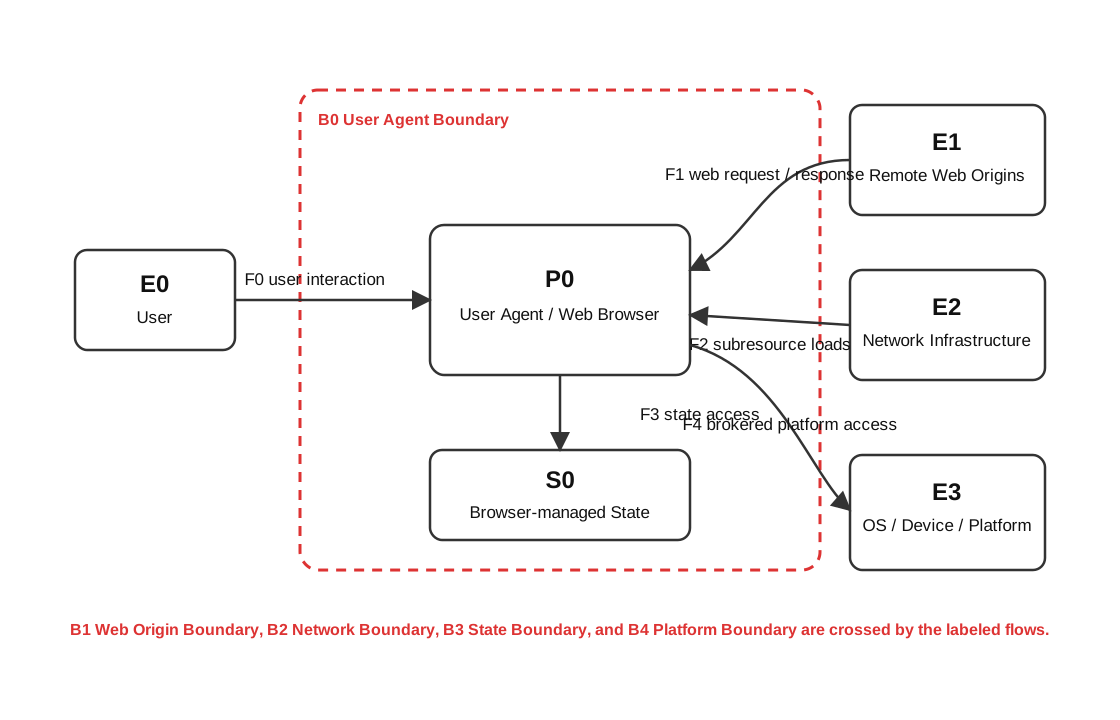
1.1.1. L0 element dictionary
| ID | Name | Type | Description |
|---|---|---|---|
| EE-01 | User | External entity | Person who supplies browser input or navigation intent and receives rendered output or browser mediation. |
| EE-02 | Remote Web Site / Service | External entity | Remote Web principal that supplies page resources and runtime responses and receives application requests. |
| PO-01 | Web Browser | Process | Browser-controlled logical process that mediates user interaction and handles Web API requests and their results, events, or errors. |
| PO-02 | Document / Origin Execution Context | Process | Loaded page and origin-bound execution context that consumes remote resources, performs runtime Web communication, and calls Web APIs. |
| DF-01 | User Input / Navigation | Data flow | User-supplied navigation intent, interaction, or browser-control input entering browser-controlled processing. |
| DF-02 | Rendered Output / Browser Mediation | Data flow | Rendered output, browser UI, status, or mediation presented from browser-controlled processing to the user. |
| DF-03 | Web Content / Response Data | Data flow | Page resources, response payloads, and connection data supplied by the remote Web site or service to the document context. |
| DF-04 | Requests / Submitted Data | Data flow | Requests, submitted payloads, and connection data sent by the document context to the remote Web site or service. |
| DF-05 | Web API Request | Data flow | Generic Web API call, options, arguments, or control request sent from the document context to browser-controlled API processing. |
| DF-06 | Web API Result / Event / Error | Data flow | Generic return value, promise settlement, callback, event, status, or error delivered by browser-controlled API processing to the document context. |
| TB-01 | Web User Agent Boundary | Trust boundary | Outer logical Web user-agent boundary around browser-controlled API mediation and document execution contexts. |
| TB-02 | Web Context Isolation Boundaries | Trust boundary | Abstract family of boundaries separating Web origin and context authority; lower-level models may distinguish origin, browsing mode, lifecycle, sandbox, or implementation isolation. |
1.1.2. Relationship to the Web Browser Threat Model
The High-Level Web Threat Model keeps browser-internal components out of view. The Web Browser Threat Model below expands its browser and Web content roles when a review depends on where a decision is enforced, which component keeps state, how permissions are mediated, how untrusted content is isolated, or how a Web API reaches network, storage, graphics, media, and operating-system capabilities.
1.2. Web Browser Threat Model
The Web Browser Threat Model outlines recurring architectural roles in modern web browsers.
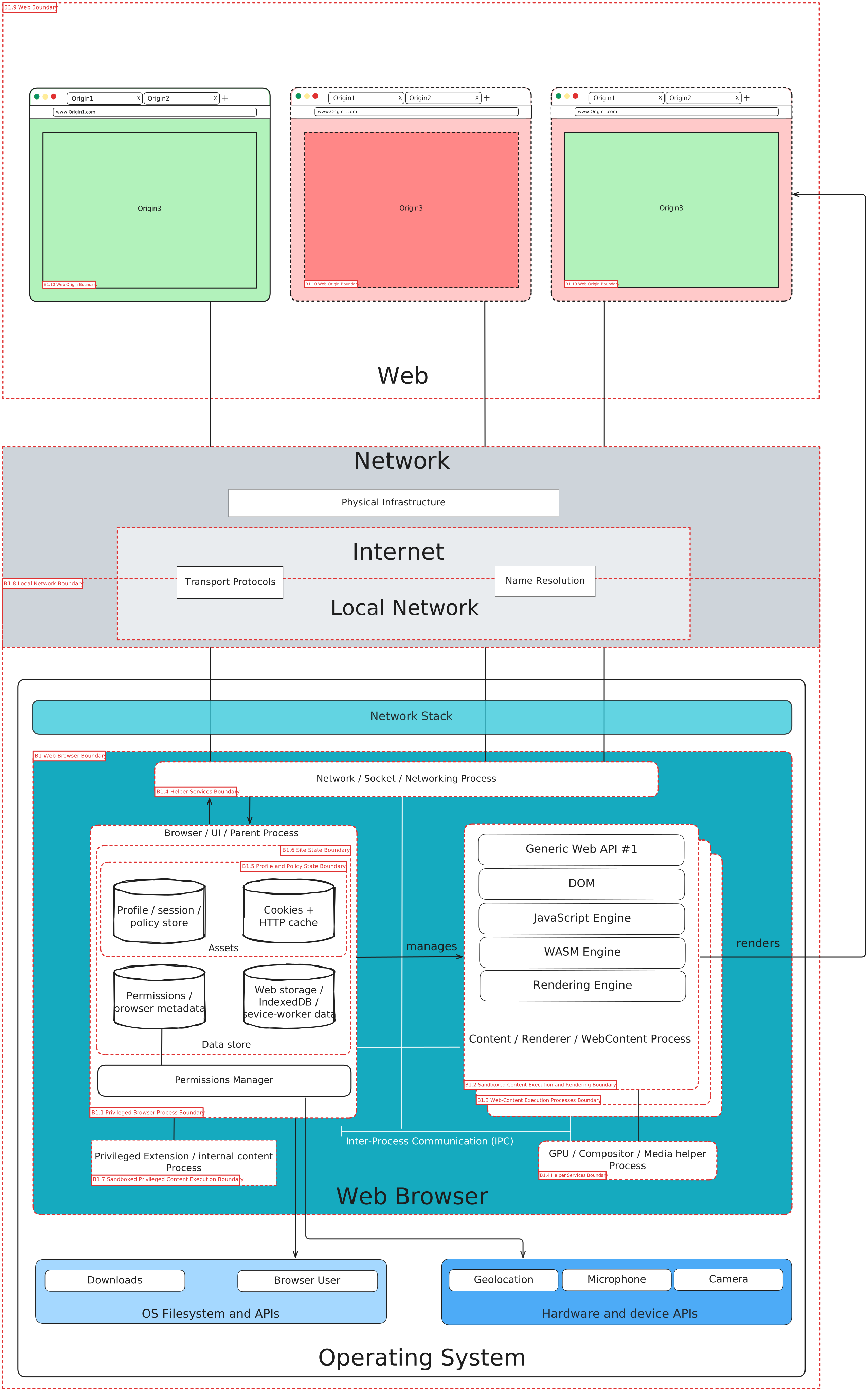
Rather than treating browser-controlled Web API mediation as a single logical process, as in the High-Level Web Threat Model (L0), this abstraction captures how a modern browser distributes responsibility across multiple processes with different privileges, different access to state, and different exposure to untrusted input. It also captures how the browser enforces the web security model, including origin- and site-based isolation strategies, and how it protects itself when processing input from external web servers [threat-modeling-guide].
These two concerns are related but not identical. A content process is isolated not only because web content is untrusted, but also because the browser must preserve same-origin isolation and the separation between the browser and the OS/platform. In practice, those are distinct trust boundaries, even when an implementation uses the same process architecture to support both.
Across each web browser, the implementation details differ. Even so, a common structure emerges.
1.2.1. Privileged browser process
Modern browsers include a high-privilege control component responsible for browser UI, navigation control, process management, policy enforcement, permission mediation, and access brokering for sensitive local resources. Chromium refers to this as the Browser process. WebKit refers to the UI process. Firefox refers to the Parent process [chromium-multiprocess-architecture] [webkit2-architecture-overview] [firefox-process-model].
This component should be treated as a primary trust anchor in the local browser architecture. It is where browser-managed policy is commonly enforced and where user-visible mediation typically occurs. For threat modeling purposes, this matters because the security implications of a decision depend in part on where it is made. A check performed in a privileged browser component is not equivalent to a check performed in a sandboxed content process.
In the Web Browser Threat Model diagram, the diagram refers to this process as "Browser / UI / Parent Process".
1.2.2. Sandboxed web-content execution and rendering
Web content is executed within processes like Chromium Renderer processes, WebKit WebContent processes, and Firefox Content processes, each with distinct roles in managing untrusted input [chromium-multiprocess-architecture] [webkit2-architecture-overview] [firefox-process-model].
These types of processes are exposed to untrusted web content. For that reason, they are modeled as execution environments that are expected to parse, interpret, and compute on untrusted input. Their value lies not in assuming that compromise is impossible, but in constraining what follows if compromise occurs. This is why the separation between privileged web browser mediation and web-content execution is one of the central trust boundaries in the web browser model. Implementations may also use origin- or site-based isolation strategies so that unrelated web content cannot interfere during normal use or following a compromise, but the exact isolation unit is browser-specific [chromium-process-model-site-isolation] [webkit-site-isolation-notes] [firefox-process-model].
In the Web Browser Threat Model diagram, the diagram refers to this process as "Content / Renderer / WebContent Process".
1.2.3. Network and storage
Modern web browsers also separate, or at least mediate, networking and persistent state management. In Chromium, this role is associated with the Network Service, per-profile NetworkContext objects, and StoragePartition. In WebKit, the Networking process handles network access, disk cache, and browser-managed structured site data such as Web Storage and IndexedDB. In Firefox, networking and the persistent state are distributed differently, but there is still a distinction between the two [chromium-process-model-site-isolation] [webkit-storage-documentation] [firefox-process-model].
This layer is important because it is often where cookies, caches, partitioned state, and site-data boundaries are enforced: if a specification affects fetching, credentials, storage access, or response handling, it is likely to interact with this layer.
In the Web Browser Threat Model diagram, the diagram refers to these as, respectively, "Network / Socket / Networking Process" and "Data Store".
1.2.4. Graphics, media, and Helper
Modern web browsers also separate GPU, codec, and other helper functionality into separate processes, also because media libraries are a common attack surface. Chromium separates the GPU process and additional helper-process families. Firefox separates a GPU Process, an RDD Process, a GMP Process, a Utility Process, and a Network (Socket) Process. WebKit also separates processes for related functionality [inside-browser-part-1] [firefox-gecko-processes] [webkit2-architecture-overview].
From a threat-modeling perspective, these helper processes are important because they sit at the boundary between untrusted content and complex implementation surfaces. This is also a general implementation pattern: untrusted execution or functionality prone to crashes is separated from the privileged control path to reduce impact if faults occur.
In the Web Browser Threat Model diagram, the diagram refers to this process as "GPU / Compositor / Media helper Process".
1.2.5. Element dictionary
1.2.5.1. External entities
| ID | Name | Type | Description |
|---|---|---|---|
| E1 | User | External Entity | Human operator interacting with browser UI, prompts, tabs, and rendered content. |
| E2 | Remote Web Origin(s) | External Entity | Remote servers providing HTML, CSS, JS, media, APIs, identity endpoints, and other web resources. |
| E3 | Underlying Network Infrastructure | External Entity | Physical Infrastructure, Networking protocols, Network segmentations, Localhost. |
| E4 | Operating System | External Entity | Filesystem, clipboard, camera, microphone, GPU drivers, media codecs, and related platform services outside the browser product boundary. |
1.2.5.2. Threat Boundaries
| ID | Name | Type | Description |
|---|---|---|---|
| B1 | Web Browser Boundary | Threat Boundary | Separates browser-controlled elements from external entities and services. |
| B1.1 | Privileged Browser Process Boundary | Threat Boundary | Separates privileged browser mediation from sandboxed content execution. |
| B1.2 | Sandboxed Content Execution and Rendering Boundary | Threat Boundary | Separates elements responsible for executing web content under reduced privilege and isolation constraints from one another. |
| B1.3 | Web-Content Execution Process Boundary | Threat Boundary | Separates processes responsible for executing web content. |
| B1.4 | Helper Services Boundary | Threat Boundary | Separates elements with helper roles such as networking, GPU, media, or related utility functionality from the rest of the browser architecture. |
| B1.5 | Profile and Policy State Boundary | Threat Boundary | Separates browser-managed profile, session, settings, and permission metadata from the rest of the browser architecture. |
| B1.6 | Site State Boundary | Threat Boundary | Separates browser-managed cookies, HTTP cache, web storage, IndexedDB, and related site data from the rest of the browser architecture. |
| B1.7 | Sandboxed Privileged Content Execution Boundary | Threat Boundary | Separates sandboxed privileged execution context for internal pages or extensions from the rest of the browser architecture. |
| B1.8 | Local Network Boundary | Threat Boundary | Separates user's devices from the public Internet. |
| B1.9 | Web Boundary | Threat Boundary | Separates user agents from untrusted Web resources. |
| B1.10 | Web Origin Boundary | Threat Boundary | Separates each Web origin from one another. |
1.2.5.3. Processes
| ID | Name | Type | Description |
|---|---|---|---|
| P1 | Browser / UI / Parent | Process | Chromium Browser process, WebKit UI process, Firefox Parent process. Coordinates privileged browser UI, navigation, window management, process selection, policy enforcement, permission mediation, networking access, and brokering to sensitive local resources such as profile data, cookie and password databases, and operating-system capabilities. |
| P2 | Content / Renderer / WebContent | Process | Chromium Renderer, WebKit WebContent, Firefox Content process family. Parses and renders web formats such as HTML, CSS, fonts, images, media, XML, SVG, and plaintext; runs DOM, script, workers, and the JavaScript engine; and exposes constrained Web API entry points to web content under sandboxing and origin- or site-isolation constraints. |
| P3 | Network / Socket / Networking | Process | Network mediation role. In Chromium this aligns with Network Service patterns; in WebKit with the Networking process; in Firefox with the Socket process and related browser-controlled networking responsibilities. Handles browser-mediated HTTP(S), sockets, caching-related network access, and requests for resources from arbitrary Internet locations. |
| P4 | GPU / compositor / media helper(s) | Process | GPU, compositor, codec, media, and other helper functions where separated. Converts rendered content into presentation output and isolates complex graphics or media implementation surfaces that process untrusted or attacker-controlled inputs. |
| P5 | Privileged extension / internal content | Process | Optional browser-managed privileged execution context for internal pages or extensions. Covers browser extensions and internal content that can add functionality, interact with browser or web content, and may receive elevated or origin-scoped permissions depending on installation and user or browser configuration. |
1.2.5.4. Data stores
| ID | Name | Type | Description |
|---|---|---|---|
| S1 | Profile / session / policy store | Data Store | Preferences, profile data, browsing history, session restoration state, saved credentials or password database references, and browser-managed configuration with lifetimes and access rules controlled by the browser. |
| S2 | Permissions / browser metadata | Data Store | Site settings, grants, extension permissions, and browser-controlled permission metadata used to decide when web content or browser-managed privileged content may activate powerful features or access sensitive capabilities. |
| S3 | Cookies + HTTP cache | Data Store | Browser-managed cookie jar and cached responses. Cookies are sent with applicable HTTP requests to support sessions, personalization, and state management, and may be scoped by origin, site, profile, or partitioning rules. |
| S4 | Web storage / IndexedDB / service-worker data | Data Store | Persistent and session-scoped site data, typically origin- or partition-scoped, including localStorage, sessionStorage, IndexedDB, service-worker data, and related browser-managed storage mechanisms with different lifetime and capacity properties. |
1.2.5.5. Flows
| ID | Name | Type | Description |
|---|---|---|---|
| F1 | User interaction | Flow | Input and output between the user and the privileged browser UI. |
| F2 | Navigation / frame control / IPC | Flow | Control flow between privileged browser logic and content execution. |
| F3 | Subresource fetch / network mediation | Flow | Content-triggered access path to browser-controlled networking. |
| F4 | HTTPS / DNS / remote data | Flow | Exchange of requests and responses with remote origins. |
| F5 | Display / media / compositing | Flow | Rendering and presentation path to graphics and media helpers. |
| F6 | Profile/session reads and writes | Flow | Privileged access path to profile-scoped browser state. |
| F7 | Permissions / browser policy | Flow | Evaluation and enforcement path for browser-managed permissions and policy. |
| F8 | Cookie / cache mediation | Flow | Access path to browser-managed cookie and caching state. |
| F9 | Web storage path | Flow | Access path to browser-managed persistent site storage. |
| F10 | Brokered OS access | Flow | Mediated access from browser-controlled components to operating-system or device services. |
The notation follows the W3C Threat Modeling Guide: E for external entities, P for processes, F for flows, S for data stores, C for threat containers, and B for threat boundaries [threat-modeling-guide].
1.3. Assumptions and External Dependencies
The System Model depends on several external systems, services, and responsibilities that are outside direct browser control but affect the browser’s security posture:
-
Operating System (OS): The browser runs with privileges granted by the OS, equivalent to user privileges. Browser security goals must manifest correctly between tabs, websites, and the OS. The OS provides a higher level of security against direct network connections than browsers.
-
Network/Internet: The browser’s primary function involves requesting instructions and content from arbitrary locations on the Internet. This relies on the underlying network protocols like TCP/IP, which the browser presumably trusts. The decentralised nature of the internet means unencrypted data is likely being read by someone.
-
Web Servers and their backend: These are the primary sources of content, instructions (scripts, HTML), and resources for the browser. The browser must surrender control and execute commands provided by the server. A web server can also reduce a browser’s security. Websites interact with databases, off-site storage, and corporate data centres. Data flows between the browser context and these backend systems.
-
Third Parties/Other Origins: Modern web applications often include resources and scripts from other origins, which must also be executed. Websites may depend on third parties for ads, analytics, or authentication databases.
-
Native Applications: Other applications installed on the user’s system can potentially access browser assets directly (e.g., via file system or memory inspection).
-
Cryptography: The use of and interaction with cryptographic protocols, although not specifically an input, is a category of threats to be taken into account, particularly at this moment in history in relation to the transition to post-quantum cryptography.
-
External Components/Systems: Any external dependency on components or systems can impact the browser’s security.
1.4. Entry Points and Attack Surface
Entry points are read against the flows and boundaries in the System Model. They are interfaces or mechanisms through which an adversary can interact with or supply data to the system. For a web browser, these include:
-
The Browser UI: The user interface itself, where user input is provided. It includes also Trusted UI.
-
Network Interfaces: Ports and protocols the browser uses to communicate over the network (e.g., Sockets, RPC, HTTP/HTTPS ports).
-
Web Content (HTML, CSS, Fonts, Scripts, Media): Malicious code, scripts, or content delivered from web servers. The browser runs code from untrusted sources when presented with scripts. An adversary can convince the browser to render malicious content. Specific threats are linked to the specific file formats.
-
User Input Fields: Any area where users can input data, which can be manipulated maliciously (e.g., forms, URLs).
-
Browser Extensions: The browser exposes interfaces for extensions to interact with the browser and web content.
-
Web APIs: Both standard web APIs and potentially new, interesting APIs the browser exposes.
-
Underlying Platform: Features allowing an origin to send data to the underlying platform.
1.5. Security Properties, Assets, and Invariants
The security-relevant state, resources, and properties that need to be protected when considering the web browser threat model are diverse and critical to user security and privacy:
-
User Data: General user data, sensitive data, and personally identifying information.
-
User Data Privacy: The ability of users to control and protect their private information and activities from surveillance, correlation, and identification. This includes avoiding identifying or correlating within and across browsing sessions without transparency or control.
-
User Credentials: Login information, usernames, and passwords.
-
User Cookies and Session Information: Data stored in cookies, session IDs, and session state. These can be used to recognize users across visits.
-
User Device/Computer: The user’s machine and its resources, including the confidentiality and integrity of the user’s file system.
-
Local Storage: Data stored locally by the browser, including cookies, localStorage, indexedDB, cache, history, and passwords.
-
User Browsing History: Information about sites visited.
-
User Environment Information: Operating system configuration, browser configuration, hardware capabilities.
-
User Activities and Interests: Purchasing preferences, personal characteristics, and prior activities.
-
Protected Resources: Any resource the user can access that should not be accessed by an adversary.
-
Private Network Resources: These are different network resources that the browser can access without the user’s explicit request.
-
Credentials and Encryption Keys: The browser manages Public and secret keys for encryption and signing.
-
Confidential Information on Websites: Data displayed or accessible on websites.
The following properties and invariants are used as prompts for the threat analysis:
-
Mutually distrusting origins remain isolated unless the platform defines an explicit, controlled communication path.
-
Web content cannot directly exercise operating-system authority except through browser-mediated capabilities.
-
Browser-mediated permissions are granted through browser-controlled user mediation, policy, or configuration.
-
Browser-managed state is scoped according to the relevant origin, site, profile, partition, or permission boundary.
-
Security-sensitive user intent is not inferred from web-controlled UI alone where browser mediation is required.
-
Network, storage, rendering, and operating-system access paths preserve the boundaries shown in the System Model.
2. What can go wrong?
2.1. Threat Analysis Method
This threat model analyzes the Web Platform by iterating over the layers, elements, flows, stores, and boundaries in the System Model. For each relevant part of the model, the analysis asks what property is expected to hold, what can violate that property, who may be affected, and what harm may result. Threat sources and high-level threat families are used as prompts, but the analysis is grounded in the model above.
2.2. Threat Sources
-
Browser Extensions: Browser extensions introduce numerous security vulnerabilities despite their utility. Malicious actors exploit them for sophisticated attacks like phishing, keylogging, spying, data theft, and session hijacking. They need to be installed and configured to have the permission to access a specific origin, which increases the complexity of the attack.
-
Applications/Websites: Websites can be compromised and malicious. Different attacks can be directed to compromise the user’s session on the same website (e.g., stealing cookies, or generating arbitrary requests - Cross Site Request Forgery - CSRF, UI Redressing/Clickjacking), bypass the same origin and get information from different websites (i.e. Cross-Site Leaks - XS Leaks), or compromise the Browser itself (e.g., running arbitrary code into the browser processes to obtain control of the data inside the browser or to compromise the user device). Adversaries exploit existing browser functionality.
2.3. High-level Threat Index
This is an index of salient threat families for the Web Platform threat model, not an exhaustive list.
-
Tracking/Privacy Loss: Fingerprinting is a method of identification of the users without their knowledge or consent. Fingerprinting touches on both privacy and security issues, has a dual significance. On the one hand, it can be used by an adversary to uniquely identify a user (a scenario normally related to privacy) i.e., allowing parties to develop user profiles or histories across different sites, often without knowledge or consent. On the other hand, it can be used to identify the type of device (a scenario normally related to security, for example for the subsequent compromise of the device). Data exposed by specifications, especially information about the underlying platform or state that persists, can contribute to fingerprinting. Some APIs can add fingerprinting surface.
3. What are we going to do about it?
3.1. Security Features and Controls
Web browsers employ a variety of security features and protection mechanisms that help preserve the properties and invariants identified earlier:
-
Sandboxing: Sandboxing is a key mechanism for confining components like the rendering engine, restricting their access to the operating system and user files. It acts as a barrier between OS privileges and subprocess privileges.
-
Same Origin Policy (SOP): A fundamental security control that restricts how a document or script loaded from one origin can interact with a resource from another origin.
-
Content Security Policy (CSP): A security standard to prevent XSS, clickjacking, and other code injection attacks by specifying which dynamic resources can load.
-
HTTPS/SSL/TLS: Protocols for secure, encrypted communication between the browser and web servers, ensuring data integrity and confidentiality in transit. HTTP Strict Transport Security (HSTS) is related.
-
Input Validation and Output Encoding: These are crucial practices for handling user-supplied data to prevent injection attacks like XSS.
-
Security Headers: HTTP headers instruct browsers on handling content securely.
-
Anti-Phishing and Anti-Malware: Features like Safe Browsing warn users about malicious websites.
-
Mixed Content Handling: How the browser treats secure (HTTPS) pages that load insecure (HTTP) resources.
-
Renderer Isolation: Architectures that place complex, error-prone components like the rendering engine in a separate, sandboxed process or protection domain from the browser kernel. The browser kernel handles sensitive OS, network, and storage interactions.
-
Inter-process Communication (IPC): Secure channels for communication between isolated browser components (e.g., kernel and renderer).
-
Download Manager: Component handling file downloads, potentially including security checks.
-
Data Minimization and Privacy Settings: Design principles and configurations to reduce the exposure of potentially identifying information.
-
Trusted UI: Ensuring sensitive user interactions occur within browser interfaces that web content cannot easily spoof or manipulate.
-
Permission API: Asking for explicit user permission before activating a powerful feature.
-
Transient Activation: It is a gate, a window state that indicates a user has recently pressed a button, moved a mouse, used a menu, or performed some other user interaction. Sometimes used as a mechanism for ensuring that a web API can only function if triggered by user interaction. For example, scripts cannot arbitrarily launch a popup that requires transient activation — it must be triggered from a UI element’s event handler.
4. Did we do a good enough job?
5. Appendix: MITRE ATT&CK Techniques
The MITRE ATT&CK Enterprise techniques can be used as prompts when analyzing attacks involving a web browser. The following list is non-exhaustive and is grouped by level for this document. Inclusion does not mean that a technique applies to every browser architecture or scenario.
5.1. Web level
-
T1087 Account Discovery
-
T1539 Steal Web Session Cookie
-
T1059 Command and Scripting Interpreter
-
T1550 Use Alternate Authentication Material
-
T1595 Active Scanning
-
T1071 Application Layer Protocol
-
T1110 Brute Force
-
T1659 Content Injection
-
T1491 Defacement
-
T1592 Gather Victim Host Information
-
T1596 Search Open Technical Databases
-
T1594 Search Victim-Owned Websites
-
T1133 External Remote Services
-
T1484 Domain or Tenant Policy Modification
-
T1189 Drive-by Compromise
-
T1667 Email Bombing
-
T1114 Email Collection
-
T1684.002 Email Spoofing
-
T1499 Endpoint Denial of Service
-
T1567 Exfiltration Over Web Service
-
T1190 Exploit Public-Facing Application
-
T1212 Exploitation for Credential Access
-
T1657 Financial Theft
-
T1187 Forced Authentication
-
T1606 Forge Web Credentials
-
T1684.001 Impersonation
-
T1201 Password Policy Discovery
-
T1566 Phishing
-
T1598 Phishing for Information
-
T1593 Search Open Websites/Domains
-
T1681 Search Threat Vendor Data
-
T1505 Server Software Component
-
T1528 Steal Application Access Token
-
T1204 User Execution
-
T1078 Valid Accounts
-
T1102 Web Service
-
T1211 Exploitation for Stealth
-
T1203 Exploitation for Client Execution
5.2. Network level
-
T1557 Adversary-in-the-Middle
-
T1071 Application Layer Protocol
-
T1132 Data Encoding
-
T1001 Data Obfuscation
-
T1573 Encrypted Channel
-
T1041 Exfiltration Over C2 Channel
-
T1048 Exfiltration Over Alternative Protocol
-
T1011 Exfiltration Over Other Network Medium
-
T1008 Fallback Channels
-
T1592 Gather Victim Host Information
-
T1589 Gather Victim Identity Information
-
T1590 Gather Victim Network Information
-
T1591 Gather Victim Org Information
-
T1665 Hide Infrastructure
-
T1105 Ingress Tool Transfer
-
T1056 Input Capture
-
T1036 Masquerading
-
T1111 Multi-Factor Authentication Interception
-
T1104 Multi-Stage Channels
-
T1599 Network Boundary Bridging
-
T1498 Network Denial of Service
-
T1046 Network Service Discovery
-
T1040 Network Sniffing
-
T1095 Non-Application Layer Protocol
-
T1571 Non-Standard Port
-
T1027 Obfuscated Files or Information
-
T1588 Obtain Capabilities
-
T1572 Protocol Tunneling
-
T1090 Proxy
-
T1563 Remote Service Session Hijacking
-
T1021 Remote Services
-
T1018 Remote System Discovery
-
T1496 Resource Hijacking
-
T1669 Wi-Fi Networks
-
T1565 Data Manipulation
-
T1600 Weaken Encryption
5.3. Web browser level
-
T1559 Inter-Process Communication
-
T1176 Software Extensions
-
T1056 Input Capture
5.4. Origin level
-
T1068 Exploitation for Privilege Escalation
6. Acknowledgment
Several individuals contributed to the document. The editors especially thanks Anna Weine.