- This version:
- http://www.w3.org/TR/2003/WD-xhtml2-20030131
- Latest version:
- http://www.w3.org/TR/xhtml2
- Previous version:
- http://www.w3.org/TR/2002/WD-xhtml2-20021218
- Diff-marked version:
- xhtml2-diff.html
- Editors:
- Jonny Axelsson, Opera Software
- Beth Epperson, Netscape/AOL
- Shane McCarron, Applied Testing and Technology
- Ann Navarro, WebGeek, Inc.
- Steven Pemberton, CWI (HTML Working
Group Chair)
This document is also available in these non-normative formats: Single XHTML file, PostScript version, PDF version, ZIP archive, and Gzip'd TAR archive.
Copyright ©2003
W3C® (MIT, ERCIM, Keio), All Rights Reserved. W3C liability, trademark, document use and software licensing rules apply.
XHTML 2 is a general purpose markup language designed for representing documents for a wide range of purposes across the World Wide Web. To this end it does not attempt to be all things to all
people, supplying every possible markup idiom, but to supply a generally useful set of elements.
This section describes the status of this document at the time of its publication. Other documents may supersede this document. The latest status of this document series is maintained at the
W3C.
This document is the fourth public Working Draft of this specification. It should in no way be considered stable, and should not be normatively referenced for any purposes whatsoever. This version
does not include the implementations of XHTML 2.0 in either DTD or XML Schema form. Those will be included in subsequent versions, once the contents of this language stabilizes. This version
also does not address the issues revolving around the use of [XLINK] by XHTML 2. Those issues are being worked independent of the
evolution of this specification. Those issues should, of course, be resolved as quickly as possible, and the resolution will be reflected in a future draft.
This document has been produced by the W3C HTML Working Group (members only) as
part of the W3C HTML Activity. The goals of the HTML Working Group are discussed in the HTML Working
Group charter.
Public discussion of XHTML takes place on www-html@w3.org (archive). To subscribe send an email to
www-html-request@w3.org with the word subscribe in the subject line.
Please report errors in this document to www-html-editor@w3.org (archive).
At the time of publication, the Working Group believed there were no patent disclosures relevant to this specification. A current list of patent disclosures relevant to this specification may be
found on the Working Group's patent disclosure page.
A list of current W3C Recommendations and other technical documents can be found at http://www.w3.org/TR.
1. Introduction
This section is informative.
1.1. What is XHTML 2?
XHTML 2 is a general purpose markup language designed for representing documents for a wide range of purposes across the World Wide Web. To this end it does not attempt to be all things to all
people, supplying every possible markup idiom, but to supply a generally useful set of elements, with the possibility of extension using the span and div elements in
combination with stylesheets.
1.1.1. Backwards compatibility
Because earlier versions of HTML were special-purpose languages, it was necessary to ensure a level of backwards compatibility with new versions so that new documents would still be usable in
older browsers. However, thanks to XML and stylesheets, such strict element-wise backwards compatibility is no longer necessary, since an XML-based browser, of which at the time of writing means more
than 95% of browsers in use, can process new markup languages without having to be updated. Much of XHTML2 works already in existing browsers. Much, but not all: just as when forms and tables were
added to HTML, and people had to wait for new version of browsers before being able to use the new facilities, some parts of XHTML2, such as XForms and XML Events, still require user agents that
understand that functionality.
1.1.2. XHTML2 and Presentation
The original version of HTML was designed to represent the structure of a document, not its presentation. Even though presentation-oriented elements were later added to the language by browser
manufacturers, HTML is at heart a document structuring language. XHTML2 takes HTML back to these roots, by removing all presentation elements, and subordinating all presentation to stylesheets. This
gives greater flexibility, and more powerful presentation possibilities, since CSS can do more than the presentational elements of HTML ever did.
In designing XHTML, a number of design aims were kept in mind to help direct the design. These included:
- As generic XML as possible: if a facility exists in XML, try to use that rather than duplicating it.
- Less presentation, more structure: already mentioned above.
- More usability: try to make the language easy to write, and make the resulting documents easy to use.
- More accessibility: some call it 'designing for our future selves'; the design should be as inclusive as possible.
- Better internationalization: it is a World Wide Web.
- More device independence: new devices coming online, such as telephones, PDAs, tablets, televisions and so on mean that it is imperative to have a design that allows you to author once and render
in different ways on different devices, rather than authoring new versions of the document for each type of device.
- Less scripting: achieving functionality through scripting is difficult for the author and restricts the type of user agent you can use to view the document. We have tried to identify current
typical usage, and include those usages in markup.
1.2. What are the XHTML 2 Modules?
XHTML 2 is a member of the XHTML Family of markup languages. It is an XHTML Host Language as defined in XHTML Modularization. As such, it is made up of a set of XHTML Modules that together
describe the elements and attributes of the language, and their content model. XHTML 2 updates many of the modules defined in XHTML Modularization 1.0 [XHTMLMOD], and includes the updated versions of all those modules and their semantics. XHTML 2 also uses modules from Ruby [RUBY], XML Events [XMLEVENTS], and XForms [XFORMS].
The modules defined in this specification are largely extensions of the modules defined in XHTML Modularization 1.0. This specification also defines the semantics of the modules it includes. So,
that means that unlike earlier versions of XHTML that relied upon the semantics defined in HTML 4, all of the semantics for XHTML 2 are defined either in this specification or in the specifications
that it normatively references.
Even though the XHTML 2 modules are defined in this specification, they are available for use in other XHTML family markup languages. Over time, it is possible that the modules defined in this
specification will migrate into the XHTML Modularization specification.
2. Terms and Definitions
This section is informative.
While some terms are defined in place, the following definitions are used throughout this document. Familiarity with the W3C XML 1.0 Recommendation [XML] is highly recommended.
- abstract module
- a unit of document type specification corresponding to a distinct type of content, corresponding to a markup construct reflecting this distinct type.
- content model
- the declared markup structure allowed within instances of an element type. XML 1.0 differentiates two types: elements containing only element content (no character data) and mixed content
(elements that may contain character data optionally interspersed with child elements). The latter are characterized by a content specification beginning with the "#PCDATA" string (denoting character
data).
- deprecated
- a feature marked as deprecated is in the process of being removed from this recommendation. Portable applications should not use features marked as deprecated.
- document model
- the effective structure and constraints of a given document type. The document model constitutes the abstract representation of the physical or semantic structures of a class of documents.
- document type
- a class of documents sharing a common abstract structure. The ISO 8879 [SGML] definition is as follows: "a class of documents having similar
characteristics; for example, journal, article, technical manual, or memo. (4.102)"
- document type definition (DTD)
- a formal, machine-readable expression of the XML structure and syntax rules to which a document instance of a specific document type must conform; the schema type used in XML 1.0 to validate
conformance of a document instance to its declared document type. The same markup model may be expressed by a variety of DTDs.
- driver
- a generally short file used to declare and instantiate the modules of a DTD. A good rule of thumb is that a DTD driver contains no markup declarations that comprise any part of the document model
itself.
- element
- an instance of an element type.
- element type
- the definition of an element, that is, a container for a distinct semantic class of document content.
- entity
- an entity is a logical or physical storage unit containing document content. Entities may be composed of parseable XML markup or character data, or unparsed (i.e., non-XML, possibly non-textual)
content. Entity content may be either defined entirely within the document entity ("internal entities") or external to the document entity ("external entities"). In parsed entities, the replacement
text may include references to other entities.
- entity reference
- a mnemonic string used as a reference to the content of a declared entity (eg., "&" for "&", "<" for "<", "©" for "©".)
- generic identifier
- the name identifying the element type of an element. Also, element type name.
- hybrid document
- A hybrid document is a document that uses more than one XML namespace. Hybrid documents may be defined as documents that contain elements or attributes from hybrid document types.
- instantiate
- to replace an entity reference with an instance of its declared content.
- markup declaration
- a syntactical construct within a DTD declaring an entity or defining a markup structure. Within XML DTDs, there are four specific types: entity declaration defines the binding between a mnemonic
symbol and its replacement content; element declaration constrains which element types may occur as descendants within an element (see also content model); attribute definition list declaration
defines the set of attributes for a given element type, and may also establish type constraints and default values; notation declaration defines the binding between a notation name and an external
identifier referencing the format of an unparsed entity.
- markup model
- the markup vocabulary (i.e., the gamut of element and attribute names, notations, etc.) and grammar (i.e., the prescribed use of that vocabulary) as defined by a document type definition (i.e., a
schema) The markup model is the concrete representation in markup syntax of the document model, and may be defined with varying levels of strict conformity. The same document model may be expressed
by a variety of markup models.
- module
- an abstract unit within a document model expressed as a DTD fragment, used to consolidate markup declarations to increase the flexibility, modifiability, reuse and understanding of specific
logical or semantic structures.
- modularization
- an implementation of a modularization model; the process of composing or de-composing a DTD by dividing its markup declarations into units or groups to support specific goals. Modules may or may
not exist as separate file entities (i.e., the physical and logical structures of a DTD may mirror each other, but there is no such requirement).
- modularization model
- the abstract design of the document type definition (DTD) in support of the modularization goals, such as reuse, extensibility, expressiveness, ease of documentation, code size, consistency and
intuitiveness of use. It is important to note that a modularization model is only orthogonally related to the document model it describes, so that two very different modularization models may
describe the same document type.
- parameter entity
- an entity whose scope of use is within the document prolog (i.e., the external subset/DTD or internal subset). Parameter entities are disallowed within the document instance.
- parent document type
- A parent document type of a hybrid document is the document type of the root element.
- tag
- descriptive markup delimiting the start and end (including its generic identifier and any attributes) of an element.
3. Conformance Definition
This section is normative.
The keywords "MUST", "MUST NOT", "REQUIRED", "SHALL", "SHALL NOT", "SHOULD", "RECOMMENDED", "MAY", and "OPTIONAL" in this document are to be interpreted as described in [RFC2119].
3.1. Document Conformance
3.1.1. Strictly Conforming Documents
DTD Bias
This section has a distinct DTD bias. We need to make it clear that either the DTD or the Schema can be used to validate XHTML 2.0 documents.
A strictly conforming XHTML 2.0 document is a document that requires only the facilities described as mandatory in this specification. Such a document must meet all the following criteria:
-
The document must conform to the constraints expressed in Appendix B - XHTML 2.0 Schema or
Appendix D - XHTML 2.0 Document Type Definition.
-
The root element of the document must be html.
-
The root element of the document must contain an xmlns declaration for the XHTML 2.0 namespace [XMLNAMES]. The namespace for
XHTML is defined to be http://www.w3.org/2002/06/xhtml2. An example root element might look like:
<html xmlns="http://www.w3.org/2002/06/xhtml2" xml:lang="en">
-
There must be a DOCTYPE declaration in the document prior to the root element. If present, the public identifier included in the DOCTYPE declaration must reference the DTD found in Appendix E using its Formal Public Identifier. The system identifier may be modified appropriately.
<!DOCTYPE
 html PUBLIC "-//W3C//DTD XHTML 2.0//EN"
 "TBD">
Here is an example of an XHTML 2.0 document.
<?xml version="1.0" encoding="UTF-8"?>
<!DOCTYPE html PUBLIC "-//W3C//DTD XHTML 2.0//EN"
    "TBD">
<html xmlns="http://www.w3.org/2002/06/xhtml2" xml:lang="en">
  <head>
    <title>Virtual Library</title>
  </head>
  <body>
    <p>Moved to <a href="http://vlib.org/">vlib.org</a>.</p>
  </body>
</html>
Note that in this example, the XML declaration is included. An XML declaration like the one above is not required in all XML documents. XHTML document authors are strongly encouraged to use XML
declarations in all their documents. Such a declaration is required when the character encoding of the document is other than the default UTF-8 or UTF-16 and no encoding was determined by a
higher-level protocol.
3.2. User Agent Conformance
A conforming user agent must meet all user agent conformance requirements defined in [XHTMLMOD].
4. The XHTML 2.0 Document Type
This section is normative.
The XHTML 2.0 document type is a fully functional document type with rich semantics. It is a collection of XHTML-conforming modules (most of which are defined in this specification). The Modules
and their elements are listed here for information purposes, but the definitions in their base documents should be considered authoritative. In the on-line version of this document, the module names
in the list below link into the definitions of the modules within the relevant version of the authoritative specification.
Need XHTML 2.0 Definition Table
We need a table that defines the modules that are in XHTML 2.0 and links them into this document. Currently, that will be a bunch of modules that are in this document, and modules from XML Events,
Ruby, and XForms. The table below is largely correct, but is still just a place holder.
- Structure Module*
body, head, html, title- Text Module*
abbr, address, blockquote, cite, code, dfn, div, em, h, hr, h1, h2, h3, h4, h5, h6, kbd, l, p, pre, quote, samp, section, span, strong, sub, sup, var- Hypertext Module*
a- List Module*
dl, dt, dd, label, nl, ol, ul, li- Client-side Image Map Module
area, map- Link Module
link- Metainformation Module
meta- Object Module
object, param- Scripting Module
noscript, script- Stylesheet Module
style element- Target Module
target attribute- Table Module
caption, col, colgroup, table, tbody, td, tfoot, th, thead, tr
XHTML 2.0 also uses the following externally defined modules:
- Ruby Annotation Module [RUBY]
ruby, rbc, rtc, rb, rt, rp- XML Events Module [XMLEVENTS]
listener- XForms Module [XFORMS]
- LOTS OF ELEMENTS
There are no additional definitions required by this document type. An implementation of this document type as an XML Schema is defined in Appendix
B, and as a DTD in Appendix D.
5. Module Definition Conventions
This section is normative.
This document defines a variety of XHTML modules and the semantics of those modules. This section describes the conventions used in those module definitions.
5.1. Module Structure
Each module in this document is structured in the following way:
- An abstract definition of the module's elements, attributes, and content models, as appropriate.
- A sub-section for each element in the module; These sub-sections contain the following components:
- A brief description of the element,
- A definition of each attribute or attribute collection usable with the element, and
- A detailed description of the behavior of the element, if appropriate.
Note that attributes are fully defined only the first time they are used in each module. After that, only a brief description of the attribute is provided, along with a link back
to the primary definition.
5.2. Abstract Module Definitions
An abstract module is a definition of an XHTML module using prose text and some informal markup conventions. While such a definition is not generally useful in the machine processing of document
types, it is critical in helping people understand what is contained in a module. This section defines the way in which XHTML abstract modules are defined. An XHTML-conforming module is not
required to provide an abstract module definition. However, anyone developing an XHTML module is encouraged to provide an abstraction to ease in the use of that module.
5.3. Syntactic Conventions
The abstract modules are not defined in a formal grammar. However, the definitions do adhere to the following syntactic conventions. These conventions are similar to those of XML DTDs, and should
be familiar to XML DTD authors. Each discrete syntactic element can be combined with others to make more complex expressions that conform to the algebra defined here.
- element name
- When an element is included in a content model, its explicit name will be listed.
- content set
- Some modules define lists of explicit element names called content sets. When a content set is included in a content model, its name will be listed.
expr ?- Zero or one instances of expr are permitted.
expr +- One or more instances of expr are required.
expr *- Zero or more instances of expr are permitted.
a , b- Expression
a is required, followed by expression b.
a | b- Either expression a or expression b is required.
a - b- Expression a is permitted, omitting elements in expression b.
- parentheses
- When an expression is contained within parentheses, evaluation of any subexpressions within the parentheses take place before evaluation of expressions outside of the parentheses (starting at the
deepest level of nesting first).
- extending pre-defined elements
- In some instances, a module adds attributes to an element. In these instances, the element name is followed by an ampersand (
&).
- defining required attributes
- When an element requires the definition of an attribute, that attribute name is followed by an asterisk (
*).
- defining the type of attribute values
- When a module defines the type of an attribute value, it does so by listing the type in parentheses after the attribute name.
- defining the legal values of attributes
- When a module defines the legal values for an attribute, it does so by listing the explicit legal values (enclosed in quotation marks), separated by vertical bars (
|), inside of
parentheses following the attribute name. If the attribute has a default value, that value is followed by an asterisk (*). If the attribute has a fixed value, the attribute name is
followed by an equals sign (=) and the fixed value enclosed in quotation marks.
5.4. Content Types
Abstract module definitions define minimal, atomic content models for each module. These minimal content models reference the elements in the module itself. They may also reference elements in
other modules upon which the abstract module depends. Finally, the content model in many cases requires that text be permitted as content to one or more elements. In these cases, the symbol used for
text is PCDATA. This is a term, defined in the XML 1.0 Recommendation, that refers to processed character data. A content type can also be defined as EMPTY, meaning the element has no content in its minimal content model.
5.5. Attribute Types
In some instances, it is necessary to define the types of attribute values or the explicit set of permitted values for attributes. The following attribute types (defined in the XML 1.0
Recommendation) are used in the definitions of the abstract modules:
| Attribute Type |
Definition |
| CDATA |
Character data |
| ID |
A document-unique identifier |
| IDREF |
A reference to a document-unique identifier |
| IDREFS |
A space-separated list of references to document-unique identifiers |
| NAME |
A name with the same character constraints as ID above |
| NMTOKEN |
A name composed of only name tokens as defined in XML 1.0 [XML]. |
| NMTOKENS |
One or more white space separated NMTOKEN values |
| PCDATA |
Processed character data |
In addition to these pre-defined data types, XHTML Modularization defines the following data types and their semantics (as appropriate):
| Data type |
Description |
| Character |
A single character, as per section 2.2 of [XML]. |
| Charset |
A character encoding, as per [RFC2045]. |
| Charsets |
A space-separated list of character encodings, as per [RFC2045]. |
| ClassName |
Used by the class attribute, ClassNames are tokens that identify an element as being a member of the set
named by the value of the class attribute. ClassName attribute tokens must begin with a letter ([A-Za-z]) and may be followed by any number of letters, digits ([0-9]), hyphens ("-"), underscores
("_"), colons (":"), and periods ("."). |
| ContentType |
A list of media ranges with optional accept parameters, as defined in section 14.1 of [RFC2616] as the field value of the accept request
header. |
| Coordinates |
Comma separated list of Lengths used in defining areas. |
| Datetime |
Date and time information. |
| FPI |
A character string representing an SGML Formal Public Identifier. |
| HrefTarget |
Window name used as destination for results of certain actions. |
| LanguageCode |
A language code, as per [RFC3066]. |
| Length |
The value may be either in pixels or a percentage of the available horizontal or vertical space. Thus, the value "50%" means half of the available space. |
| LinkTypes |
Authors may use the following recognized link types, listed here with their conventional interpretations. A LinkTypes value refers to a space-separated list of link types. White space characters
are not permitted within link types.
These link types are case-insensitive, i.e., "Alternate" has the same meaning as "alternate".
User agents, search engines, etc. may interpret these link types in a variety of ways. For example, user agents may provide access to linked documents through a navigation bar.
- Alternate
- Designates substitute versions for the document in which the link occurs. When used together with the
hreflang attribute, it implies a translated version of the document. When used
together with the media attribute, it implies a version designed for a different medium (or media).
- Stylesheet
- Refers to an external style sheet. See the Style Sheet Module for details. This is used together with the link type "Alternate" for
user-selectable alternate style sheets.
- Start
- Refers to the first document in a collection of documents. This link type tells search engines which document is considered by the author to be the starting point of the collection.
- Next
- Refers to the next document in an ordered sequence of documents. User agents may choose to pre-load the "next" document, to reduce the perceived load time.
- Prev
- Refers to the previous document in an ordered series of documents. Some user agents also support the synonym "Previous".
- Parent
- Refers to the parent document in a structured set of documents.
- Contents
- Refers to a document serving as a table of contents. Some user agents also support the synonym ToC (from "Table of Contents").
- Index
- Refers to a document providing an index for the current document.
- Glossary
- Refers to a document providing a glossary of terms that pertain to the current document.
- Copyright
- Refers to a copyright statement for the current document.
- Chapter
- Refers to a document serving as a chapter in a collection of documents.
- Section
- Refers to a document serving as a section in a collection of documents.
- Subsection
- Refers to a document serving as a subsection in a collection of documents.
- Appendix
- Refers to a document serving as an appendix in a collection of documents.
- Help
- Refers to a document offering help (more information, links to other sources information, etc.)
- Bookmark
- Refers to a bookmark. A bookmark is a link to a key entry point within an extended document. The title attribute may be used, for example, to label the bookmark.
Note that several bookmarks may be defined in each document.
- Meta
- Refers to a document that provides metadata, for instance in RDF, about the current document.
- P3Pv1
- Refers to a P3P Policy Reference File. See [P3P]
Linktype 'required'
Linktype 'required'
Linktype 'prefetch'
Linktype 'prefetch'
Linktype 'redirect'
Linktype 'redirect' to handle the one missing piece of functionality that http-equiv used to supply.
|
| MediaDesc |
A comma-separated list of media descriptors as described by [CSS2]. The default is all.
|
| Number |
One or more digits |
| Shape |
The shape of a region. |
| Text |
Arbitrary textual data, likely meant to be human-readable. |
| URI |
A Uniform Resource Identifier Reference, as defined by the type anyURI in [XMLSCHEMA] (called IRI in some other
specifications). |
| URIs |
A space-separated list of URIs as defined above. |
| URI List |
A comma-separated list of URIs as defined above. |
6. XHTML Attribute Collections
This section is normative.
Many of the abstract modules in this document define the required attributes for their elements. The table below defines some collections of attributes that are referenced throughout the modules.
These expressions should in no way be considered normative or mandatory. They are an editorial convenience for this document. When used in the remainder of this section, it is the expansion of the
term that is normative, not the term itself.
The following basic attribute sets are used on many elements. In each case where they are used, their use is identified via their collection name.
6.1. Core Attribute Collection
- class = ClassName
- This attribute assigns one or more class names to an element; the element may be said to belong to these classes. A class name may be shared by several element instances.
The class attribute can be used for different purposes in XHTML, for instance as a style sheet selector (when an author wishes to assign style information to a set of elements), and for general purpose processing by user agents.
For instance in the following example, the p element is used in conjunction with the class attribute to identify a particular type of paragraph.
<p class="note">
These programs are only available if you have purchased
the advanced professional suite.
</p>
Style sheet rules can then be used to render the paragraph appropriately, for instance by putting a border around it, giving it a different background colour, or where necessary by not displaying
it at all.
- id = ID
- The id attribute assigns an identifier to an
element. The id of an element must be unique within a document.
The id attribute has several roles in
XHTML:
- As a style sheet selector.
- As a target anchor for hypertext links.
- As a means to reference a particular element from a script.
- As the name of a declared object element.
- For general purpose processing by user agents (e.g. for identifying fields when extracting data from XHTML pages into a database, translating XHTML documents into other formats, etc.).
As an example, the following headings are distinguished by their id values:
<h id="introduction">Introduction</h>
<p>...</p>
<h id="events">The Events Module</h>
<p>...</p>
- title = Text
- This attribute offers advisory information about the element for which it is set.
Values of the title attribute may be used by user agents in a variety of ways. For instance, visual
browsers should display the title as a "tool tip" (a short message that appears when the pointing device pauses over an object). Audio user agents may speak the title information in a similar
context.
Example of the use of title:
<a href="/Jakob/" title="Author biography">Jakob Nielsen</a>'s
Alertbox for January 11, 1998
The title attribute has an additional role when used with the link element to designate an external style sheet. See the section on links and style sheets for details.
Attribute representing the linguistic root of a word
A 'root of word' attribute for common
6.2. I18N Attribute Collection
- xml:lang = LanguageCode
- This attribute specifies the base language of an element's attribute values and text content. It is defined normatively in [XML] section 2.12. The default value of this attribute is unspecified.
An element inherits language code information according to the following order of precedence (highest to lowest):
- The xml:lang attribute set for the element itself.
- The closest parent element that has the xml:lang attribute set (i.e., the xml:lang attribute is inherited).
- The HTTP "Content-Language" header (which may be configured in a server).
In this example, the primary language of the document is French ("fr"). One paragraph is declared to be in US English ("en-us"), after which the primary language returns to French. The following
paragraph includes an embedded Japanese ("ja") phrase, after which the primary language returns to French.
<!DOCTYPE html PUBLIC "-//W3C//DTD XHTML 2.0//EN"
   "TBD">
<html xmlns="http://www.w3.org/2002/06/xhtml2" xml:lang="fr">
<head>
   <title>Un document multilingue</title>
</head>
<body>
<p>...Interpreted as French...</p>
<p xml:lang="en-us">...Interpreted as US English...</p>
<p>...Interpreted as French again...</p>
<p>...French text interrupted by<em xml:lang="ja">some
         Japanese</em>French begins here again...</p>
</body>
</html>
6.3. Bi-directional Text Collection
- dir = "ltr|rtl|lro|rlo"
- This attribute specifies the base direction of the element's text content. This direction overrides the inherent directionality of characters as defined in [UNICODE], and defines directional properties of text as defined by CSS2 [CSS2]. The default value of this
attribute is user-agent dependent. Possible values are:
- ltr: Left-to-right text. The effect of this attribute is defined by the CSS2 rule:
*[dir="ltr"] { unicode-bidi: normal; direction: ltr}
- rtl: Right-to-left text. The effect of this attribute is defined by the CSS2 rule:
*[dir="rtl"] { unicode-bidi: normal; direction: rtl}
- lro: Left-to-right override. The effect of this attribute is defined by the CSS2 rule:
*[dir="lro"] { unicode-bidi: bidi-override; direction: ltr}
- rlo: Right-to-left override. The effect of this attribute is defined by the CSS2 rule:
*[dir="rlo"] { unicode-bidi: bidi-override; direction: rtl}
Example:
<p dir="ltr">
I received the following email:
<l dir="lro">english werbeh english</l>
<l dir="lro">werbeh english werbeh</l>
</p>
6.4. Edit Collection
This collection allows elements to carry information indicating how, when and why content has changed.
- edit = "inserted|deleted|changed|moved"
- This attribute allows elements to carry information indicating how content has changed. Possible values:
- inserted: the content has been inserted
- deleted: the content has been deleted
- changed: the content has changed considerably, therefore making it not worth being marked up with values of
inserted and deleted
- moved: the content has been moved from some other part of the document.
The default presentation for an element with edit="deleted" is display: none (in other words, it is not displayed) although an alternate style might display it as crossed
through. The other three values cause no special presentation by default, though an alternate style might use background colors or other text decoration to indicate the changed text.
Example:
<p>I will do it
next <span class="deleted">week</span><span class="inserted">month</span>.</p>
- datetime = Datetime
- The value of this attribute specifies the date and time when a change was made.
Example:
datetime="2003-01-13T13:15:30Z"
6.5. Hypertext Attribute Collection
This collection allows an element to be the start point of a hypertext link to a remote resource.
- href = URI
- This attribute specifies a URI that is actuated when the element is activated.
Examples:
<abbr href="http://www.w3.org/" title="World Wide Web">WWW</abbr>
<li href="contents.xhtml">contents</li>
<a href="http://www.cwi.nl/~steven/amsterdam.html">Amsterdam</a>
<quote href="hamlet.xhtml#p2435">To be or not to be</quote>
<var href="#index_ninc">ninc</var>
- cite = URI
- The value of this attribute is a URI that designates a source document or message. This attribute is intended to give further information about the element's contents (e.g., the source from which
a quotation was borrowed, or the reason text was inserted or deleted). User Agents should provide a means for the user to access the further information.
Example:
cite="comments.html"
- target = HrefTarget
- This attribute identifies an environment that will act as the destination for a resource identified by a hyperlink when it is activated.
This specification does not define how this attribute gets used, since that is defined by the environment that the hyperlink is actuated in. See for instance XFrames [XFRAMES].
Example:
<a href="home.html" target="main">Home</a>
- type = ContentType
-
This attribute specifies the allowable content types of the relevant src URI. At its most general, it is a
comma-separated list of media ranges with optional accept parameters, as defined in section 14.1 of [RFC2616] as the field value of the accept
request header.
In its simplest case, this is just a media type, such as "image/png" or "application/xml", but it may also contain asterisks, such as "image/*" or "*/*", or lists of acceptable media types, such
as "image/png, image/gif, image/jpeg".
The user agent must combine this list it with its own list of acceptable media types by taking the intersection, and then use the resulting list as the field value of the accept
request header when requesting the resource using HTTP.
For instance, if the attribute specifies the value "image/png, image/gif, image/jpeg", but the user agent does not accept images of type "image/gif" then the resultant accept header would contain
"image/png, image/jpeg".
A user agent should imitate similar behavior when using other methods than HTTP. For instance, when accessing files in a local filestore, <p src="logo" type="image/png,
image/jpeg"> might cause the user agent first to look for a file logo.png, and then for logo.jpg.
If this attribute is not present, "*/*" is used for its value.
For the current list of registered content types, please consult [MIMETYPES].
Examples:
<script src="pop" type="application/x-javascript, text/x-newspeak"/>

<style src="midnight" type="text/css, text/x-mystyle"/>

<p src="w3c-logo" type="image/png, image/jpeg;q=0.2">W3C logo</p>

<span src="logo.png">Our logo</span>

<span src="theme.mp3" type="audio/x-mpeg">Our theme jingle</span>
- rel = LinkTypes
- This attribute describes the relationship from the current document to the URI referred to by the element. The value of this attribute is a space-separated list of link types.
Example:
<link href="top.html" rel="contents"/>
- rev = LinkTypes
- This attribute is used to describe a reverse link from the anchor specified by the href attribute to the
current document. The value of this attribute is a space-separated list of link types.
- accesskey = Character
- This attribute assigns an access key to an element. An access key is a single character from the document character set.
Note. Authors should consider the input method of the expected reader when specifying an accesskey.
Pressing an access key assigned to an element gives focus to the element. The action that occurs when an element receives focus
depends on the element. For example, when a user activates a link defined by the a element, the user agent generally follows the link.
When a user activates a radio button, the user agent changes the value of the radio button. When the user activates a text field, it allows input, etc.
In this example, we assign the access key "C" to a link. Typing this access key takes the user to another document, in this case, a table of contents.
<p accesskey="C"
   rel="contents"
   href="http://example.com/specification/contents.html">
  Table of Contents
</p>
The invocation of access keys depends on the underlying system. For instance, on machines running MS Windows, one generally has to press the "alt" key in addition to the access key. On Apple
systems, one generally has to press the "cmd" key in addition to the access key.
The rendering of access keys depends on the user agent. We recommend that authors include the access key in label text or wherever the access key is to apply. User agents should render the value
of an access key in such a way as to emphasize its role and to distinguish it from other characters (e.g., by underlining it).
Accesskey
Actuation of elements with accesskey
- navindex = Number
- This attribute specifies the position of the current element in the navigation order for the current document. This value must be a number between 0 and 32767. User agents must ignore leading
zeros.
The navigation order defines the order in which elements will receive focus when navigated by the user via the keyboard. The
navigation order may include elements nested within other elements.
Elements that may receive focus should be navigated by user agents according to the following rules:
- Those elements that support the navindex attribute and assign a positive value to it are navigated
first. Navigation proceeds from the element with the lowest navindex value to the element with the
highest value. Values need not be sequential nor need they begin with any particular value. Elements that have identical navindex values should be navigated in the order they appear in the character stream.
- Those elements that do not support the navindex attribute or support it and assign it a value of "0"
are navigated next. These elements are navigated in the order they appear in the character stream.
When a document is loaded using a URL that includes a fragment reference (such as book.html#chapter5) navigation begins at the point the fragment begins. If the user has moved away
from that point (for instance using page up or page down), the navigation starting point is undefined.
The following example would allow the links to be navigated in column order (without the use of navindex they would be navigated in document, i.e. row, order):
<table>
<tr><td href="a" navindex="1">NW</td>
    <td href="c" navindex="3">NE</td></tr>
<tr><td href="b" navindex="2">SW</td>
    <td href="d" navindex="4">SE</td></tr>
</table>
Navigation keys. The actual key sequence that causes navigation or element activation depends on the configuration of the user agent (e.g., the "tab" key might be used for
navigation and the "enter" key or "space" key used to activate a selected element).
User agents may also define key sequences to navigate the navigation order in reverse. When the end (or beginning) of the navigation order is reached, user agents may circle back to the
beginning (or end).
- xml:base = URI
- This attribute specifies the base URI from which to resolve relative URIs. It is normatively defined in [XMLBASE]. Any relative URI used on
an element that uses this attribute, or on an element contained within an element that uses this attribute, must be resolved relative to the base URI defined by this attribute.
An element inherits URI base information according to the following order of precedence (highest to lowest):
- The xml:base attribute set for the element itself.
- The closest parent element that has the xml:base attribute set (i.e., the xml:base attribute is inherited).
- The HTTP "Content-Location" header (which may be configured in a server).
- The location of the document itself.
Example:
See:
<ul xml:base="http://www.w3.org">
<li href="/">The W3C home page</li>
<li href="/TR">The W3C Technical Reports page</li>
<li href="/Markup">The HTML home page</li>
<li href="/Markup/Forms">The XForms home page</li>
</ul>
6.6. Embedding Attribute Collection
This collection causes the contents of a remote resource to be embedded in the document in place of the element's content. If accessing the remote resource fails, for whatever reason (network
unavailable, no resource available at the URI given, inability of the user agent to process the type of resource) the content of the element must be processed instead.
Note that this behavior makes documents far more robust, and gives much better opportunities for accessible documents than the longdesc attribute present in earlier versions of XHTML,
since it allows the description of the resource to be included in the document itself, rather than in a separate document.
Examples:
<p src="holiday.png" type="image/png">
    <span src="holiday.gif" type="image/gif">
        An image of us on holiday.
    </span>
</p>

<table src="temperature-graph.png" type="image/png">
<caption>Average monthly temperature over the last 20 years</caption>
<tr><th>Jan</th><th>Feb</th><th>Mar</th><th>Apr</th><th>May</th><th>Jun</th>
    <th>Jul</th><th>Aug</th><th>Sep</th><th>Oct</th><th>Nov</th><th>Dec</th>
</tr>
<tr><td> 4</td><td> 2</td><td> 7</td><td> 9</td><td>13</td><td>16</td>
    <td>17</td><td>17</td><td>14</td><td>11</td><td> 7</td><td> 4</td>
</tr>
</table>
- src = URI
- This attribute specifies the location of an external source for the contents of the element.
- type = ContentType
-
This attribute specifies the allowable content types of the relevant src URI. At its most general, it is a
comma-separated list of media ranges with optional accept parameters, as defined in section 14.1 of [RFC2616] as the field value of the accept
request header.
In its simplest case, this is just a media type, such as "image/png" or "application/xml", but it may also contain asterisks, such as "image/*" or "*/*", or lists of acceptable media types, such
as "image/png, image/gif, image/jpeg".
The user agent must combine this list it with its own list of acceptable media types by taking the intersection, and then use the resulting list as the field value of the accept
request header when requesting the resource using HTTP.
For instance, if the attribute specifies the value "image/png, image/gif, image/jpeg", but the user agent does not accept images of type "image/gif" then the resultant accept header would contain
"image/png, image/jpeg".
A user agent should imitate similar behavior when using other methods than HTTP. For instance, when accessing files in a local filestore, <p src="logo" type="image/png,
image/jpeg"> might cause the user agent first to look for a file logo.png, and then for logo.jpg.
If this attribute is not present, "*/*" is used for its value.
6.7. Image Map Attribute Collection
This collection adds attributes that specify that an embedded image may be used as an image map, so that clicking on different parts of the image causes different hyperlinks to be activated.
- usemap = URI
- This attribute associates an image map with an element. The image map is defined by a map element. The value of usemap
must match the value of the id attribute of the associated map element.
- ismap = "ismap"
- This attribute indicates that the associated image is to be treated as a "server-side image map". When selected, the coordinates within the element that the user selected are sent to the server
where the document resides. Screen coordinates are expressed as screen pixel values relative to the image, and start at (0,0) at the top left corner.
In the following example, the active region defines a server-side image map. A click anywhere on the image will cause the click's coordinates to be sent to the server.
<p href="http://www.example.com/cgi-bin/map"
      src="map.png" ismap="ismap">
   Our location.
</p>
The location clicked is passed to the server as follows. The user agent derives a new URI from the URI specified by the href attribute of the element, by appending `?' followed by the x and y coordinates, separated by a comma. The link is
then actuated using the new URI. For instance, in the given example, if the user clicks at the location x=10, y=27 then the derived URI is "http://www.example.com/cgi-bin/map?10,27".
User agents that do not offer the user a means to select specific coordinates (e.g., non-graphical user agents that rely on keyboard input, speech-based user agents, etc.) should send the
coordinates "0,0" to the server when the link is activated.
- shape = "default|rect|circle|poly"
- This attribute specifies the shape of a region. Possible values:
- default: Specifies the entire region.
- rect: Define a rectangular region.
- circle: Define a circular region.
- poly: Define a polygonal region.
- coords = Coordinates
- This attribute specifies the position and shape of the area. The number and order of values depends on the shape being defined. Possible combinations:
- rect: left-x, top-y, right-x, bottom-y.
- circle: center-x, center-y, radius. Note. When the radius value is a percentage value, user agents should calculate the final radius value based on the associated
object's width and height. The radius should be the smaller value of the two.
- poly: x1, y1, x2, y2, ..., xN, yN. The first x and y coordinate pair and the last should be the same to close the polygon. When these coordinate values are not the same, user agents
should infer an additional coordinate pair to close the polygon.
Coordinates are relative to the top, left corner of the object. All values are of type Length. All values are separated by
commas.
Note that in the following example, if the image is unavailable for any reason, the fallback properties of the
src attribute mean that the <nl> will be displayed instead of the image, thus making the page still useful:
<html xmlns="http://www.w3.org/2002/06/xhtml2">
   <head>
      <title>The cool site!</title>
   </head>
   <body>
     <p src="navbar1.png" type="image/png" usemap="#map1">
         <nl id="map1">
           <label>Navigate the site:</label>
           <li href="guide.html" shape="rect" coords="0,0,118,28">
           Access Guide</li>
           <li href="shortcut.html" shape="rect" coords="118,0,184,28">
           Go</li>
           <li href="search.html" shape="circle" coords="184,200,60">
           Search</li>
           <li href="top10.html" shape="poly" coords="276,0,276,28,100,200,50,50,276,0">
           Top Ten</li>
         </nl>
      </p>
   </body>
</html>
Note that an li in an nl is not required to have an href attribute. In that case, the relevant region of the image is inactive:
<p src="image.png" type="image/png" usemap="#map1">
   <nl id="map1">
   <li shape="circle" coords="100,200,50">I'm inactive.</li>
   <li href="outer-ring-link.html" shape="circle" coords="100,200,250">I'm active.</li>
   </nl>
</p>
Allow any element to be an image map?
Should we allow any element (such as <p>) that contains a number of hyperlinks to be an image map?
Define ismap better
Can we define ismap better?
Require UA to give feedback on regions
Should a UA be required to give feedback on the regions when hovering?
The global attributes from [XMLEVENTS] are included in the Events attribute collection. The normative definition of those attributes and
their semantics is included in that specification. They are described briefly below:
- defaultAction = cancel|perform
- This attribute defines whether or not the default action associated with the event should be processed. The default value is perform
- event = CDATA
- This attribute defines the event type that is being listened for. The set of legal names for XHTML 2 is to be defined.
List of XHTML 2 Events Needed
We need to define the list of XHTML 2 events and map them into the XHTML DOM. activate, load, focusIn, focusOut, ...
- handler = IDREF
- This attribute specifies the ID of a handler element that defines the action that should be performed if the event reaches the observer.
- observer = IDREF
- This attribute specifies an ID for an observer element for which the listener is to be registered.
- phase = capture|default
- This attribute specifies the phase of event propagation in which to process the event. If not specified, the default value of this attribute is default.
- propagate = stop|continue
- This attribute specifies whether an event should stop propagating after this observer processes it, or continue for possible further processing. The default value of this attribute is
continue.
- target = IDREF
- This attribute specifies the id of the target element of the event (i.e., the node that caused the event). If not specified, the default value of this attribute is the element on which the event
attribute is specified.
Note that these attributes are not in the XHTML namespace but in the XML Events namespace. The XHTML namespace is the default namespace for XHTML documents, so XHTML elements and
attributes do not require namespace prefixes (although they are permitted on elements). XML Events attributes MUST use a prefix, since they are not in the default namespace of the document.
Add events listener element to head
The listener element from XML Events must be added to the content model for the head element.
6.9. Common Attribute Collection
This collection assembles the Core, I18N, Events, Edit, Embedding, Bi-directional, and Hypertext attribute collections defined above.
7. XHTML Structure Module
This section is normative.
The Structure Module defines the major structural elements for XHTML. These elements effectively act as the basis for the content model of many XHTML family document types. The elements and
attributes included in this module are:
This module is the basic structural definition for XHTML content. The html element acts as the root element for all XHTML Family Document Types.
Note that the value of the xmlns attribute is defined to be "http://www.w3.org/2002/06/xhtml2". Also note that because the xmlns attribute is treated specially by XML namespace-aware parsers [XMLNAMES], it is legal to have it present as an attribute of each element. However, any time the xmlns attribute is used in the context of an
XHTML module, whether with a prefix or not, the value of the attribute shall be the XHTML namespace defined here.
Implementation: DTD
footer PR #744
There was a suggestion for a footer element to contain data that should be presented at the bottom of content. The working group has not yet addressed this suggestion.
security tag
There was a suggestion that we define a security tag, within which elements that have security ramifications would be rendered harmless. The working group has not yet addressed this suggestion.
After the document type declaration, the remainder of an XHTML document is contained by the html element.
Attributes
- The Common collection
- A collection of other attribute collections, including: Core, Events, I18N, Bi-directional, Edit, Embedding, and Hypertext
- profile = URIs
- This attribute specifies the location of one or more meta data profiles, separated by white space. For future extensions, user agents should consider the value to be a list even though this
specification only considers the first URI to be significant. Profiles are discussed in the section on meta data.
Example:
<html class="slideshow">
The head element contains information about the current document, such as its title, keywords that may be useful to search
engines, and other data that is not considered document content. The default presentation of the head is not to display it; however that can be overridden with a stylesheet for special purpose use.
User agents may however make information in the head available to users through other mechanisms.
Example:
<head>
    <title>My Life</title>
</head>
Every XHTML document must have a title element in the head section.
The title element is used to identify the document. Since documents are often
consulted out of context, authors should provide context-rich titles. Thus, instead of a title such as "Introduction", which doesn't provide much contextual background, authors should supply a title
such as "Introduction to Medieval Bee-Keeping" instead.
For reasons of accessibility, user agents must always make the content of the title element available to users. The mechanism for doing so depends on the user agent (e.g., as a caption, spoken).
Titles may contain entity references (for accented characters, special characters, etc.), but may not contain other markup (including comments).
Example:
<title>A study of population dynamics</title>
duplication of title
There has been a request for facilities to reduce the need for duplicating title and headings
The body of a document contains the document's content. The content may be presented by a user agent in a variety of ways. For example, for visual browsers, you can think of the body as a canvas
where the content appears: text, images, colors, graphics, etc. For audio user agents, the same content may be spoken.
8. XHTML Text Module
This section is normative.
This module defines all of the basic text container elements, attributes, and their content model:
| Element |
Attributes |
Minimal Content Model |
| abbr |
Common |
(PCDATA | Inline)* |
| address |
Common |
(PCDATA | Inline)* |
| blockquote |
Common |
(PCDATA | Inline | Heading | Block | List)* |
| cite |
Common |
(PCDATA | Inline)* |
| code |
Common |
(PCDATA | Inline)* |
| dfn |
Common |
(PCDATA | Inline)* |
| div |
Common |
(PCDATA | Flow)* |
| em |
Common |
(PCDATA | Inline)* |
| h |
Common |
(PCDATA | Inline)* |
| h1 |
Common |
(PCDATA | Inline)* |
| h2 |
Common |
(PCDATA | Inline)* |
| h3 |
Common |
(PCDATA | Inline)* |
| h4 |
Common |
(PCDATA | Inline)* |
| h5 |
Common |
(PCDATA | Inline)* |
| h6 |
Common |
(PCDATA | Inline)* |
| hr |
Common |
EMPTY |
| kbd |
Common |
(PCDATA | Inline)* |
| l |
Common |
(PCDATA | Inline)* |
| p |
Common |
(PCDATA | Inline | List | blockquote | pre | table)* |
| pre |
Common |
(PCDATA | Inline)* |
| quote |
Common |
(PCDATA | Inline)* |
| samp |
Common |
(PCDATA | Inline)* |
| section |
Common |
(PCDATA | Flow)* |
| span |
Common |
(PCDATA | Inline)* |
| strong |
Common |
(PCDATA | Inline)* |
| sub |
Common |
(PCDATA | Inline)* |
| sup |
Common |
(PCDATA | Inline)* |
| var |
Common |
(PCDATA | Inline)* |
split text module
Text module should be split into inline and block submodules
l element content model
Content model of the l element should not allow nested lines
The minimal content model for this module defines some content sets:
- Heading
- h | h1 | h2 | h3 | h4 | h5 | h6
- Block
- address | blockquote | div | p | pre | section
- Inline
- abbr | cite | code | dfn | em | kbd | l | quote | samp | span | strong | var
- Flow
- Heading | Block | Inline
Note that the use of the words Block and Inline here are meant to be suggestive of the role the content sets play. They are not normative with regards to presentation since a
style sheet might give any element within the Block content a display property of inline.
Implementation: DTD
nr element
There was a suggestion to introduce an
nr element to help annotate content as being a number. This suggestion has not yet been addressed by the working group.
The abbr element indicates that a text fragment is an abbreviation (e.g., W3C, XML, Inc., Ltd., Mass., etc.); this includes acronyms.
The content of the abbr element specifies the abbreviated expression itself, as it would normally appear in running text. The title attribute of these elements may be used to provide the full or expanded form of the expression.
Note that abbreviations often have idiosyncratic pronunciations. For example, while "IRS" and "BBC" are typically pronounced letter by letter, "NATO" and "UNESCO" are pronounced phonetically.
Still other abbreviated forms (e.g., "URI" and "SQL") are spelled out by some people and pronounced as words by other people. When necessary, authors should use style sheets to specify the
pronunciation of an abbreviated form.
Examples:
  <abbr title="Limited">Ltd.</abbr>
  <abbr title="Abbreviation">abbr.</abbr>
The address element may be used by authors to supply contact information for a document or a major part of a document such as a form.
This element often appears at the beginning or end of a document.
content model of address element
The content model of the address element should be improved to improve its semantic processability.
Example:
<address href="mailto:webmaster@example.net">Webmaster</address>
This element designates a block of quoted text.
This example formats an excerpt from "The Two Towers", by J.R.R. Tolkien, as a blockquote.
<blockquote cite="http://www.example.com/tolkien/twotowers.html">
<p>They went in single file, running like hounds on a strong scent,
and an eager light was in their eyes. Nearly due west the broad
swath of the marching Orcs tramped its ugly slot; the sweet grass
of Rohan had been bruised and blackened as they passed.</p>
</blockquote>
The cite element contains a citation or a reference to other sources.
In the following example, the cite element is used to delineate the speaker:
As <cite cite="http://www.whitehouse.gov/history/presidents/ht33.html">Harry S. Truman</cite> said,
<quote xml:lang="en-us">The buck stops here.</quote>

More information can be found in <cite cite="http://www.w3.org/TR/REC-xml">[XML]</cite>.
The code element contains a fragment of computer code.
Example:
The <code>code</code> element contains a fragment of computer code.
The dfn element contains the defining instance of the enclosed term.
Example:
An <dfn id="def-acronym">acronym</dfn> is a word formed
from the initial letters or groups of letters of words in a set phrase
or series of words.
The div element, in conjunction with the id and class attributes, offers a generic mechanism for adding extra structure to documents. This element defines no
presentational idioms on the content. Thus, authors may use this element in conjunction with style sheets, the xml:lang attribute, etc., to tailor XHTML to their own needs and tastes.
For example, suppose you wish to make a presentation in XHTML, where each slide is enclosed in a separate element. You could use a div
element, with a class of slide:
<body>
    <h>The meaning of life</h>
    <p>By Huntington B. Snark</p>
    <div class="slide">
        <h>What do I mean by "life"</h>
        <p>....</p>
    </div>
    <div class="slide">
        <h>What do I mean by "mean"?</h>
        ...
    </div>
    ...
</body>
8.8. The em element
The em element indicates emphasis for its contents.
Example:
Do <em>not</em> phone before 9 a.m.
A heading element briefly describes the topic of the section it introduces. Heading information may be used by user agents, for example, to construct a table of contents for a document
automatically.
Deprecate h1-6?
There was a suggestion that h1 - h6 be deprecated. The working group has not yet addressed this suggestion.
There are two styles of headings in XHTML: the numbered versions h1, h2 etc.,
and the structured version h, which is used in combination with the section
element.
There are six levels of numbered headings in XHTML with h1 as the most important and h6 as the least. The visual presentation of headers can render more important headings in larger fonts than less important ones.
Structured headings use the single h element, in combination with the section element to indicate
the structure of the document, and the nesting of the sections indicates the importance of the heading. The heading for the section is the one that is a child of the section element.
For example:
<body>
<h>This is a top level heading</h>
<p>....</p>
<section>
    <p>....</p>
    <h>This is a second-level heading</h>
    <p>....</p>
    <h>This is another second-level heading</h>
    <p>....</p>
</section>
<section>
    <p>....</p>
    <h>This is another second-level heading</h>
    <p>....</p>
    <section>
        <h>This is a third-level heading</h>
        <p>....</p>
    </section>
</section>
These visual representation of these levels can be distinguished in a style sheet:
h {font-family: sans-serif; font-weight: bold; font-size: 200%}
section h {font-size: 150%} /* A second-level heading */
section section h {font-size: 120%} /* A third-level heading */
etc.
Numbered sections and references
XHTML does not itself cause section numbers to be generated from headings. Style sheet
languages such as CSS however allow authors to control the generation of section numbers.
The practice of skipping heading levels is considered to be bad practice. The series h1 h2
h1 is acceptable, while h1 h3 h1 is not, since the heading level h2 has been skipped.
The hr element places a horizontal line in the document.
Remove or rename hr
It has been suggested that
hr be removed or renamed to, for instance,
<separator/>. The working group has not yet addressed this suggestion.
The kbd element indicates text to be entered by the user.
Example:
To exit, type <kbd>QUIT</kbd>.
8.12. The l element
The l element contains a sub-paragraph that represents a sinle line of text. It is intended as a structured replacement for the br
element. It contains a piece of text that when visually represented should start on a new line, and have a line break at the end. Whether the line should wrap or not visually depends on styling
properties of the element.
By retaining structure in text that has to be broken over lines, you retain essential information about its makeup. This gives you greater freedom with styling the content. For instance, line
numbers can be generated automatically from the stylesheet if needed.
For instance, for a document with the following structure:
<p class="program">
<l>program p(input, output);</l>
<l>begin</l>
<l>   writeln("Hello world");</l>
<l>end.</l>
</p>
the following CSS stylesheet would number each line:
.program { counter-reset: linenumber }

l:before {
    position: relative;
    left: -1em;
    counter-increment: linenumber;
    content: counter(linenumber);
}
8.13. The p element
The p element represents a paragraph.
In comparison with earlier versions of HTML, where a paragraph could only contain inline text, XHTML2's paragraphs represent the conceptual idea of a paragraph, and so may contain lists,
blockquotes, pre's and tables as well as inline text. They may not, however, contain directly nested p elements.
Example:
<p>Payment options include:
<ul>
<li>cash</li>
<li>credit card</li>
<li>luncheon vouchers.</li>
</ul>
</p>
The pre element indicates that whitespace in the enclosed text has semantic relevance, and will normally be included in visual renderings of
the content.
Note that all elements in the XHTML family preserve their whitespace in the document, which is only removed on rendering, via a stylesheet, according to the rules of CSS [CSS]. This means
that in principle any elements may preserve or collapse whitespace on rendering, under control of a stylesheet. Also note that there is no normative requirement that the <pre> element be
rendered in a monospace font (although this is the default rendering), nor that text wrapping be disabled.
Non-visual user agents are not required to respect extra white space in the content of a pre element.
The following example shows a preformatted verse from Shelly's poem To a Skylark:
<pre>
       Higher still and higher
         From the earth thou springest
       Like a cloud of fire;
         The blue deep thou wingest,
And singing still dost soar, and soaring ever singest.
</pre>
Here is how this might be rendered:
       Higher still and higher
         From the earth thou springest
       Like a cloud of fire;
         The blue deep thou wingest,
And singing still dost soar, and soaring ever singest.
This element designates an inline text fragment of quoted text.
Visual user agents must not by default add delimiting quotation marks (as was the case for the q element in earlier versions of XHTML). It is the responsibility of the document author
to add any required quotation marks, either directly in the text, or via a stylesheet.
The following example illustrates nested quotations with the quote element.
<p>John said, <quote>"I saw Lucy at lunch, she told me
<quote>'Mary wants you
to get some ice cream on your way home.'</quote> I think I will get
some at Jen and Berry's, on Gloucester Road."</quote></p>
Here is an example using the cite attribute:
Steven replied:
<quote cite="http://lists.example.org/2002/01.html">We quite agree</quote>
The samp element designates sample output from programs, scripts, etc.
Example:
On starting, you will see the prompt <samp>$ </samp>.
The section element, in conjunction with the h element, offers a mechanism for
structuring documents into sections. This element defines content to be block-level but imposes no other presentational idioms on the content, which may otherwise be controlled from a style
sheet.
By representing the structure of documents explicitely using the section and h
elements gives the author greater control over presentation possibilities than the traditional implicit structuring using numbered levels of headings. For instance, it is then possible to indicate
the nesting of sections by causing a border to be displayed to the left of sections.
Here is an example
<body>
<h>Events</h>
<section>
    <h>Introduction</h>
    <p>....</p>
    <h>Specifying events</h>
    <p>...</p>
    <section>
        <h>Attaching events to the handler</h>
        <p>...</p>
    </section>
    <section>
        <h>Attaching events to the listener</h>
        <p>...</p>
    </section>
    <section>
        <h>Specifying the binding elsewhere</h>
        <p>...</p>
    </section>
</section>
The span element, in conjunction with the id and class attributes, offer a generic mechanism for adding structure to documents. This element imposes no
presentational idioms on the content. Thus, authors may use this element in conjunction with style sheets, the xml:lang attribute, etc., to tailor XHTML to their own needs and tastes.
For example, suppose you wish to mark all words in a document that need to be collected into an index. You could use a span element, with a
class of xref:
<p>This operation is called
the <span class="xref">transpose</span>
or <span class="xref">inverse</span>.</p>
The strong element indicates higher importance for its contents.
On <strong>Monday</strong> please put the rubbish out,
but <em>not</em> before nightfall!
strong
Leave in, deprecate or remove? No consensus.
The sub element indicates that its contents should regarded as a subscript.
For visual user agents this element would normally be rendered as a subscript of the text baseline, but on user agents where this is not possible (for instance teletype-like devices) other
renderings may be used. For instance, a<sub>i, j</sub> that would be rendered as ai, j on a device that can render it so, might be rendered as
a[i, j] on a simpler device.
The sup element indicates that its contents should be regarded as a super-script.
For visual user agents this element would normally be rendered as a super-script of the text baseline, but on user agents where this is not possible (for instance teletype-like devices) other
renderings may be used. For instance, 2<sup>n</sup> that would be rendered as 2n on a device that can render it so, might be rendered as
2↑(n) on a simpler device.
Many scripts (e.g., French) require superscripts or subscripts for proper rendering. The sub and sup elements should be used to markup text in these cases.
      H<sub>2</sub>O
      E = mc<sup>2</sup>
      <span xml:lang="fr">M<sup>lle</sup> Dupont</span>
The var element indicates an instance of a variable or program argument.
Example:
The parameter <var>ncols</var> represents
the number of colors to use.
9. XHTML Hypertext Module
This section is normative.
The Hypertext Module provides an element that traditionally has been used in HTML to define hypertext links to other resources. Although all elements may now play the role of a hyperlink (using
the href attribute) or hyperlink anchor (using the id attribute), this element remains for explicit markup of links, though is otherwise identical in semantics to the span element.
This module supports the following element:
| Element |
Attributes |
Minimal Content Model |
| a |
Common |
(PCDATA | Inline)* |
This module adds the a element to the Inline content set of the Text Module.
Implementation: DTD
9.1. The a element
An a element defines an anchor.
- The a element's content defines the position of the anchor.
- An href attribute makes this anchor the source anchor of exactly one link.
- An id attribute makes this anchor the possible target of other links.
Authors may also create an a element that specifies no anchors, i.e., that doesn't specify href, or id. Values for these attributes
may be set at a later time through scripts as defined in the Scripting module.
In the example that follows, the a element defines a link. The source anchor is the text "W3C Web site" and the destination anchor is
"http://www.w3.org/":
For more information about W3C, please consult the
<a href="http://www.w3.org/">W3C Web site</a>.
This link designates the home page of the World Wide Web Consortium. When a user activates this link in a user agent, the user agent will retrieve the resource, in this case, an XHTML
document.
User agents generally render links in such a way as to make them obvious to users (underlining, reverse video, etc.). The exact rendering depends
on the user agent. Rendering may vary according to whether the user has already visited the link or not. A possible visual rendering of the previous link might be:
For more information about W3C, please consult the W3C Web site.
                                                   ~~~~~~~~~~~~
Suppose we define an anchor named "anchor-one" in the file "one.html".
...text before the anchor...
<a id="anchor-one">This is the location of anchor one.</a>
...text after the anchor...
This creates an anchor around the text "This is the location of anchor one.". Usually, the contents of a are not rendered in any
special way when a defines an anchor only.
Having defined the anchor, we may link to it from the same or another document. URIs that designate anchors contain a "#" character followed by the anchor name (the fragment identifier). Here are
some examples of such URIs:
- An absolute URI: http://www.mycompany.com/one.html#anchor-one
- A relative URI: ./one.html#anchor-one or one.html#anchor-one
- When the link is defined in the same document: #anchor-one
Thus, a link defined in the file "two.html" in the same directory as "one.html" would refer to the anchor as follows:
...text before the link...
For more information, please consult <a href="./one.html#anchor-one"> anchor one</a>.
...text after the link...
The a element in the following example specifies a link (with href) and creates a named anchor (with id)
simultaneously:
I just returned from vacation! Here's a
<a id="anchor-two"
   href="http://www.somecompany.com/People/Ian/vacation/family.png">
photo of my family at the lake.</a>.
This example contains a link to a different type of Web resource (a PNG image). Activating the link should cause the image resource to be retrieved from the Web (and possibly displayed if the
system has been configured to do so).
Note. User agents are required to find anchors created by empty a elements.
10. XHTML List Module
This section is normative.
As its name suggests, the List Module provides list-oriented elements. Specifically, the List Module supports the following elements and attributes:
This module also defines the content set List with the minimal content model (dl | nl | ol | ul)+ and adds this set to the Flow content set of the Text Module.
Implementation: DTD
XHTML offers authors several mechanisms for specifying lists of information. All lists must contain one or more list elements. Lists may contain:
- Unordered information.
- Ordered information.
- Navigation information.
- Definitions.
The previous list, for example, is an unordered list, created with the ul element:
<ul>
<li>Unordered information. </li>
<li>Ordered information. </li>
<li>Navigation information. </li>
<li>Definitions. </li>
</ul>
An ordered list, created using the ol element, should contain information where order should be emphasized, as in a recipe:
- Mix dry ingredients thoroughly.
- Pour in wet ingredients.
- Mix for 10 minutes.
- Bake for one hour at 300 degrees.
Definition lists, created using the dl element, generally consist of a series of term/definition pairs (although definition lists may have
other applications). Thus, when advertising a product, one might use a definition list:
- Lower cost
- The new version of this product costs significantly less than the previous one!
- Easier to use
- We've changed the product so that it's much easier to use!
- Safe for kids
- You can leave your kids alone in a room with this product and they won't get hurt (not a guarantee).
defined in XHTML as:
<dl>
<dt><strong>Lower cost</strong></dt>
<dd>The new version of this product costs significantly less than the
previous one!</dd>
<dt><strong>Easier to use</strong></dt>
<dd>We've changed the product so that it's much easier to
use!</dd>
<dt><strong>Safe for kids</strong></dt>
<dd>You can leave your kids alone in a room with this product and
they won't get hurt (not a guarantee).</dd>
</dl>
Lists may also be nested and different list types may be used together, as in the following example, which is a definition list that contains an unordered list (the ingredients) and an ordered
list (the procedure):
- The ingredients:
-
- 100 g. flour
- 10 g. sugar
- 1 cup water
- 2 eggs
- salt, pepper
- The procedure:
-
- Mix dry ingredients thoroughly.
- Pour in wet ingredients.
- Mix for 10 minutes.
- Bake for one hour at 300 degrees.
- Notes:
- The recipe may be improved by adding raisins.
The exact presentation of the three list types depends on the user agent and/or the stylesheet in effect. Authors must not use lists purely as a means of indenting text. This is a stylistic issue
and is properly handled by style sheets.
10.1. Definition lists: the dl, dt, and dd
elements
Definition lists vary only slightly from other types of lists in that list items consist of two parts: a term and a description. The term is given by the dt element and is restricted to inline
content. The description is given with a dd element that contains block-level content.
Here is an example:
<dl>
  <dt>Dweeb</dt>
  <dd>young excitable person who may mature
    into a <em>Nerd</em> or <em>Geek</em></dd>

  <dt>Hacker</dt>
  <dd>a clever programmer</dd>

  <dt>Nerd</dt>
  <dd>technically bright but socially inept person</dd>

</dl>
Here is an example with multiple terms and descriptions:
<dl>
   <dt>Center</dt>
   <dt>Centre</dt>
   <dd> A point equidistant from all points
              on the surface of a sphere.</dd>
   <dd> In some field sports, the player who
              holds the middle position on the field, court,
              or forward line.</dd>
</dl>
Another application of dl, for example, is for marking up dialogues, with each dt naming a speaker, and each dd containing his or her
words.
Navigation lists are intended to be used to define collections of selectable items for presentation in a "navigation" menu. A navigation list is required to start with a label element that defines the label for the list.
On visual user agents, the default presentation behavior is as follows:
- The contents of the label element are presented.
- When the label element's content is selected, the navigation list's li element
contents are displayed.
- If an li element contains another navigation list, that list's label's contents are
displayed.
- If an li element has an href attribute, and that
element's contents are selected, the link defined by the href attribute is followed.
- If the nl element is de-selected, it's contents are removed from the display.
It is possible to change this default behavior through the use of style sheets. The behavior of navigation lists in non-visual user agents is
unspecified.
This example illustrates the basic structure of a nested navigation list:
<nl>
   <label>Contents </label>
   <li href="#introduction">Introduction</li>
   <li>
      <nl>
          <label>Terms</label>
          <li href="#may">May</li>
          <li href="#must">Must</li>
          <li href="#should">Should</li>
      </nl>
   </li>
   <li href="#conformance">Conformance</li>
   <li href="#references">References</li>
   ...
</nl>
10.3. The ol, and ul elements
Ordered and unordered lists are rendered in an identical manner except that visual user agents number ordered list items. User agents may present those numbers in a variety of ways. Unordered list
items are not numbered.
Both types of lists are made up of sequences of list items defined by the li element.
This example illustrates the basic structure of a list.
<ul>
   <li> ... first list item...</li>
   <li> ... second list item...</li>
   ...
</ul>
The li element defines a list item within an ordered, unordered, or navigation list. When the href attribute is defined, the contents of the list item become a selectable link, just as an a element with an href attribute would be.
The label element is used to define a label for an nl navigation list. The contents
of the label element are displayed as the title of a list (or sublist). See nl for more information.
11. XHTML Client-Side Image Map Module
This section is normative.
The Client-side Image Map Module provides elements for client side image maps. It requires that the Image Map Attribute Collection and the Embedding Attribute Collection (or the Object Module) be
included. The Client-side Image Map Module supports the following elements:
| Elements |
Attributes |
Minimal Content Model |
| area |
Common, Map, alt* (Text), nohref ("nohref") |
EMPTY |
| map |
I18N, Events, Edit, Embedding, Bi-directional, class (ClassName), id* (ID), title (Text) |
((Heading | Block) | area)+ |
When this module is used, the map element is added to the Inline content set of the Text Module.
Implementation: DTD
The area element defines a geometric region associated with an image map, and optionally associates that region with events or
external references.
Attributes
- The Common collection
- A collection of other attribute collections, including: Core, Events, I18N, Bi-directional, Edit, Embedding, and Hypertext
- The Map collection
- A collection of attributes related to image map, including usemap, ismap, shape and coords.
- alt = Text
- For user agents that cannot display images, forms, or applets, this attribute specifies alternate text. The language of the alternate text is specified by the xml:lang attribute.
Several non-textual elements let authors specify alternate text to serve as content when the element cannot be rendered normally. Specifying alternate text assists users without graphic display
terminals, users whose browsers don't support forms, visually impaired users, those who use speech synthesizers, those who have configured their graphical user agents not to display images, etc.
While alternate text may be very helpful, it must be handled with care. Authors should observe the following guidelines:
- Do not specify irrelevant alternate text when including images intended to format a page, for instance, alt="red ball" would be inappropriate for an image that adds a red
ball for decorating a heading or paragraph. In such cases, the alternate text should be the empty string (""). Authors are in any case advised to avoid using images to format pages; style sheets
should be used instead.
- Do not specify meaningless alternate text (e.g., "dummy text"). Not only will this frustrate users, it will slow down user agents that must convert text to speech or braille output.
- nohref = "nohref"
- When set, this boolean attribute specifies that a region has no associated link.
The map element specifies a client-side image map (or other navigation mechanism) that may be associated with another object. An
image map is associated with an element via the element's usemap attribute. The map element may be used without an associated image for general navigation mechanisms.
Attributes
- The I18N collection
- A collection of attributes related to Internationalization, including the xml:lang.
- The Events collection
- A collection of user interface-related event attributes defined in the [XMLEVENTS] specification.
- The Edit collection
- A collection of attributes related to edit, including edit and datetime.
- The Embedding collection
- A collection of attributes related to embedding content, including src and type.
- The Bi-directional collection
- A collection of attributes related to bidirectionality, including the dir.
- class = ClassName
- This attribute assigns one or more class names to an element; the element may be said to belong to these classes. A class name may be shared by several element instances.
The class attribute can be used for different purposes in XHTML, for instance as a style sheet selector (when an author wishes to assign style information to a set of elements), and for general purpose processing by user agents.
For instance in the following example, the p element is used in conjunction with the class attribute to identify a particular type of paragraph.
<p class="note">
These programs are only available if you have purchased
the advanced professional suite.
</p>
Style sheet rules can then be used to render the paragraph appropriately, for instance by putting a border around it, giving it a different background colour, or where necessary by not displaying
it at all.
- id = ID
- The id attribute assigns an identifier to an element. The id of an element must be
unique within a document.
The id attribute has several roles in XHTML:
- As a style sheet selector.
- As a target anchor for hypertext links.
- As a means to reference a particular element from a script.
- As the name of a declared object element.
- For general purpose processing by user agents (e.g. for identifying fields when extracting data from XHTML pages into a database, translating XHTML documents into other formats, etc.).
As an example, the following headings are distinguished by their id values:
<h id="introduction">Introduction</h>
<p>...</p>
<h id="events">The Events Module</h>
<p>...</p>
- title = Text
- This attribute offers advisory information about the element for which it is set.
Values of the title attribute may be used by user agents in a variety of ways. For instance, visual browsers should display the
title as a "tool tip" (a short message that appears when the pointing device pauses over an object). Audio user agents may speak the title information in a similar context.
Example of the use of title:
<a href="/Jakob/" title="Author biography">Jakob Nielsen</a>'s
Alertbox for January 11, 1998
The title attribute has an additional role when used with the link element
to designate an external style sheet. See the section on links and style sheets for details.
The presence of the usemapattribute for an
object implies that the object being included is an image. Furthermore , when the
object element has an associated client-side image map, user agents may implement user interaction with the object solely in terms of
the client-side image map. This allows user agents (such as an audio browser or robot) to interact with the object without having to
process it; the user agent may even elect not to retrieve (or process) the object. When an object has an associated image map, authors
should not expect that the object will be retrieved or processed by every user agent.
The map element content model allows authors to combine the following:
- One or more area elements. These elements have no content but specify the geometric regions of the image map and the link
associated with each region. Note that user agents do not generally render area elements. Therefore, authors must provide alternate
text for each area with the alt attribute.
- Block-level content. This content should include a elements that specify the geometric regions of the image map and the link
associated with each region. Note that the user agent should render block-level content of a map element. Authors should use this method
to create more accessible documents.
When a map element contains mixed content (both area elements and
block-level content), user agents must ignore the area elements.
Authors should specify an image maps's geometry completely with area elements, or completely with a elements, or completely with both if content is mixed. Authors may wish to mix content so that older user agents will handle map geometries specified by area elements and new user agents will take advantage of richer block content.
If two or more defined regions overlap, the region-defining element that appears earliest in the document takes precedence (i.e., responds to user
input).
User agents and authors should offer textual alternates to graphical image maps for cases when graphics are not available or the user cannot
access them. For example, user agents may use alt text to create textual links in place of a graphical image map. Such links may be
activated in a variety of ways (keyboard, voice activation, etc.).
11.2.1. Client-side image map examples
In the following example, we create a client-side image map for the object element. We do not want to render the image map's contents
when the object is rendered, so we "hide" the map element within the object element's content. Consequently, the map element's contents will only
be rendered if the object cannot be rendered.
<html xmlns="http://www.w3.org/2002/06/xhtml2">
  <head>
    <title>The cool site!</title>
  </head>
  <body>
    <p src="navbar1.png" type="image/png" usemap="#map1">
      <map id="map1">
        <nl>
          <label>Navigate the site:</label>
          <li href="guide.html" shape="rect" coords="0,0,118,28">
          Access Guide</li>
          <li href="shortcut.html" shape="rect" coords="118,0,184,28">
          Go</li>
          <li href="search.html" shape="circle" coords="184,200,60">
          Search</li>
          <li href="top10.html" shape="poly" coords="276,0,276,28,100,200,50,50,276,0">
          Top Ten</li>
        </nl>
      </map>
    </p>
  </body>
</html>
We may want to render the image map's contents even when a user agent can render the object. For instance, we may want to associate an
image map with an object element and include a text navigation bar at the bottom of the page. To do so, we define the map element outside the object:
<html xmlns="http://www.w3.org/2002/06/xhtml2">
  <head>
    <title>The cool site!</title>
  </head>
  <body>
    <p src="navbar1.gif" type="image/gif" usemap="#map1">

      ...the rest of the page here...

      <map id="map1">
        <p>Navigate the site: <a href="guide.html"
        shape="rect" coords="0,0,118,28">Access
        Guide</a> | <a href="shortcut.html" shape="rect"
        coords="118,0,184,28">Go</a> | <a href="search.html"
        shape="circle" coords="184,200,60">Search</a>
        | <a href="top10.html" shape="poly"
        coords="276,0,276,28,100,200,50,50,276,0">Top Ten</a>
      </map>
    </p>
  </body>
</html>
In the following example, we create a similar image map, this time using the area element. Note the use of alt text:
<p><object data="navbar1.gif" type="image/gif" usemap="#map1">
  <p>This is a navigation bar.<p>
</object></p>

<map id="map1">
  <area href="guide.html"
        alt="Access Guide" shape="rect" coords="0,0,118,28"/>
  <area href="search.html"
        alt="Search" shape="rect" coords="184,0,276,28"/>
  <area href="shortcut.html"
        alt="Go" shape="circle" coords="184,200,60"/>
  <area href="top10.html"
        alt="Top Ten" shape="poly"
        coords="276,0,276,28,100,200,50,50,276,0"/>
</map>
The following example illustrates how image maps may be shared.
Nested object elements are useful for providing fallbacks in case a user agent doesn't support certain formats. For example:
<p><object data="navbar.png" type="image/png">
  <object data="navbar.gif" type="image/gif">
    text describing the image...
  </object>
</object></p>
If the user agent doesn't support the PNG format, it tries to render the GIF image. If it doesn't support GIF (e.g., it's a speech-based user agent), it defaults to the text description provided
as the content of the inner object element. When object elements are nested
this way, authors may share image maps among them:
<p><object data="navbar.png" type="image/png" usemap="#map1">
  <object data="navbar.gif" type="image/gif" usemap="#map1">
    <map id="map1">
      <p>Navigate the site:
      <a href="guide.html" shape="rect" coords="0,0,118,28">Access
      Guide</a> | <a href="shortcut.html" shape="rect"
      coords="118,0,184,28">Go</a> | <a href="search.html"
      shape="circle" coords="184,200,60">Search</a>
      | <a href="top10.html" shape="poly"
      coords="276,0,276,28,100,200,50,50,276,0">Top Ten</a></p>
    </map>
  </object>
</object></p>
The following example illustrates how anchors may be specified to create inactive zones within an image map. The first anchor specifies a small circular region with no associated link. The second
anchor specifies a larger circular region with the same center coordinates. Combined, the two form a ring whose center is inactive and whose rim is active. The order of the anchor definitions is
important, since the smaller circle must override the larger circle.
<map id="map1">
  <p><a shape="circle" coords="100,200,50">I'm inactive.</a>
  <a href="outer-ring-link.html" shape="circle" coords="100,200,250">I'm
  active.</a></p>
</map>
Similarly, the nohref attribute for the area element declares that
geometric region has no associated link.
12. XHTML Linking Module
This section is normative.
The Link Module defines an element that can be used to define links to external resources. These resources are often used to augment the user agent's ability to process the associated XHTML
document. The element and attributes included in this module are:
When this module is used, it adds the link element to the content model of the head element as defined in the Structure Module.
Implementation: DTD
This element defines a link. Unlike a, it may only appear in the
head section of a document, although it may appear any number of times. Although link has no content, it conveys relationship information
that may be rendered by user agents in a variety of ways (e.g., a tool-bar with a drop-down menu of links).
Possible rel values
Allowable and new values for the rel attribute are being discussed.
XML linking support
The HTML Working Group is aware that there are issues surrounding various linking models that would permit generic XML user agents to support generic linking semantics and presentation. The Working
Group is coordinating closely with other groups both inside and outside of the W3C to resolve these issues.
This example illustrates how several link definitions may appear in the
head section of a document. The current document is "Chapter2.html". The rel attribute specifies the
relationship of the linked document with the current document. The values "Index", "Next", and "Prev" are explained in the section on
link types.
<head>
  <title>Chapter 2</title>
  <link rel="Index" href="../index.html"/>
  <link rel="Next"  href="Chapter3.html"/>
  <link rel="Prev"  href="Chapter1.html"/>
</head>
12.1.1. Forward and reverse links
While the rel attribute specifies a relationship from this document to another resource,
the rev attribute specifies the reverse relationship.
Consider two documents A and B.
Document A: <link href="docB" rel="index"/>
Has exactly the same meaning as:
Document B: <link href="docA" rev="index"/>
namely that document B is the index for document A.
Both the rel and
rev attributes may be specified simultaneously.
12.1.2. Links and external style sheets
When the link element links an external style sheet to a document, the type attribute specifies the style sheet language and the media attribute
specifies the intended rendering medium or media. User agents may save time by retrieving from the network only those style sheets that apply to the current device.
Media descriptors are further discussed under Attribute Types.
12.1.3. Links and search engines
Authors may use the link element to provide a variety of information to search engines, including:
- Links to alternate versions of a document, written in another human language.
- Links to alternate versions of a document, designed for different media, for instance a version especially suited for printing.
- Links to the starting page of a collection of documents.
The examples below illustrate how language information, media types, and link types may be combined to improve document handling by search engines.
The following example shows how to use the xml:lang attribute to indicate to a search engine where to
find Dutch, Portuguese, and Arabic versions of a document. Note that this also indicates that the value of the
title attribute for the link element designating the French manual is in French.
<head>
<title>The manual in English</title>
<link title="The manual in Dutch"
rel="alternate"
xml:lang="nl"
href="http://example.com/manual/dutch.html"/>
<link title="The manual in Portuguese"
rel="alternate"
xml:lang="pt"
href="http://example.com/manual/portuguese.html"/>
<link title="The manual in Arabic"
rel="alternate"
xml:lang="ar"
href="http://example.com/manual/arabic.html"/>
<link lang="fr" title="La documentation en Français"
rel="alternate"
xml:lang="fr"
href="http://example.com/manual/french.html"/>
</head>
In the following example, we tell search engines where to find the printed version of a manual.
<head>
<title>Reference manual</title>
<link media="print"
      title="The manual in PostScript"
      type="application/postscript"
      rel="alternate"
      href="http://example.com/manual/postscript.ps"/>
</head>
In the following example, we tell search engines where to find the front page of a collection of documents.
<head>
<title>Reference manual -- Chapter 5</title>
<link rel="Start" title="The first chapter of the manual"
      type="text/html"
      href="http://example.com/manual/start.html"/>
</head>
13. XHTML Metainformation Module
This section is normative.
The Metainformation Module defines an element that describes information within the declarative portion of a document (in XHTML within the head element). This module includes the following
element:
| Elements |
Attributes |
Minimal Content Model |
| meta |
Common, name (NMTOKEN) |
PCDATA |
When this module is selected, the meta element is added to the content model of the head element as defined in the Structure Module.
Implementation: DTD
For the following attributes, the permitted values and their interpretation are profile dependent:
The meta element can be used to identify properties of a document (e.g., author, expiration date, a list of key words, etc.) and assign
values to those properties. This specification does not define a normative set of properties.
meta properties
We should specify a minimal set of useful meta properties
Each meta element specifies a property/value pair. The name attribute identifies the
property and the content of the element specifies the property's value.
For example, the following declaration sets a value for the Author property:
<meta name="Author">Steven Pemberton</meta>
Note. The meta element is a generic mechanism for specifying meta data. However, some XHTML elements and attributes
already handle certain pieces of meta data and may be used by authors instead of meta to specify those pieces: the title element, the address element, the edit and related attributes, the title
attribute, and the cite attribute.
Note. When a property specified by a meta element takes a value that is a URI, some authors prefer to specify the meta data via the link element. Thus, the following meta data declaration:
<meta name="DC.identifier">http://www.rfc-editor.org/rfc/rfc3236.txt</meta>
might also be written:
<link rel="DC.identifier"
         type="text/plain"
         href="http://www.rfc-editor.org/rfc/rfc3236.txt"/>
13.1.1. meta and search engines
A common use for meta is to specify keywords that a
search engine may use to improve the quality of search results. When several meta elements provide language-dependent information
about a document, search engines may filter on the xml:lang attribute to display search results using the
language preferences of the user. For example,
<!-- For speakers of US English -->
<meta name="keywords" xml:lang="en-us">vacation, Greece, sunshine</meta>
<!-- For speakers of British English -->
<meta name="keywords" xml:lang="en">holiday, Greece, sunshine</meta>
<!-- For speakers of French -->
<meta name="keywords" xml:lang="fr">vacances, Grèce, soleil</meta>
The effectiveness of search engines can also be increased by using the link element to specify links to translations of the document in
other languages, links to versions of the document in other media (e.g., PDF), and, when the document is part of a collection, links to an appropriate starting point for browsing the collection.
The Platform for Internet Content Selection
(PICS, specified in [PICS]) is an infrastructure for associating labels (meta data) with Internet content. Originally designed to help parents and
teachers control what children can access on the Internet, it also facilitates other uses for labels, including code signing, privacy, and intellectual property rights management.
This example illustrates how one can use a meta declaration to include a PICS 1.1 label:
<head>
  <meta http-equiv="PICS-Label">
   (PICS-1.1 "http://www.gcf.org/v2.5"
      labels on "1994.11.05T08:15-0500"
    until "1995.12.31T23:59-0000"
    for "http://w3.org/PICS/Overview.html"
      ratings (suds 0.5 density 0 color/hue 1))
   </meta>
   <title>... document title ...</title>
   </head>
meta and RDF
How to represent and include RDF in XHTML2 documents is under discussion.
13.1.4. meta data profiles
The profile attribute of the html element specifies the
location of a meta data profile. The value of the profile attribute is a URI. User agents may use this URI in two ways:
- As a globally unique name. User agents may be able to recognize the name (without actually retrieving the profile) and perform some activity based on known conventions for that profile. For
instance, search engines could provide an interface for searching through catalogs of XHTML documents, where these documents all use the same profile for representing catalog entries.
- As a link. User agents may dereference the URI and perform some activity based on the actual definitions within the profile (e.g., authorize the usage of the profile within the current XHTML
document). This specification does not define formats for profiles.
This example refers to a hypothetical profile that defines useful properties for document indexing. The properties defined by this profile -- including "author", "copyright", "keywords", and
"date" -- have their values set by subsequent meta declarations.
<html ... profile="http://www.acme.com/profiles/core">
<head>
<title>How to complete Memorandum cover sheets</title>
<meta name="author">John Doe</meta>
<meta name="copyright">© 1997 Acme Corp.</meta>
<meta name="keywords">corporate,guidelines,cataloging</meta>
<meta name="date">1994-11-06T08:49:37+00:00</meta>
</head>
...
14. XHTML Object Module
This section is normative.
The Object Module provides elements for general-purpose object inclusion; this includes images and other media, as well as executable content. Specifically, the Object Module supports:
When this module is used, it adds the object element to the Inline content set of the Text module.
Implementation: DTD
Attributes
- The Common collection
- A collection of other attribute collections, including: Core, Events, I18N, Bi-directional, Edit, Embedding, and Hypertext
- archive = URI List
- This attribute specifies a comma-separated list of URIs for archives containing classes and other resources that will be "preloaded". The classes are loaded using an instance of an
AppletClassLoader with the given xml:base. Relative URIs for archives are interpreted with respect to the
applet's xml:base. Preloading resources can significantly improve the performance of applets.
- content-length = Number
- This attribute is to be used as a hint by the object handler. The author may provide the object handler with the physical size of the object data that is to be processed.
- data = URI
- This attribute is used to specify the location of the object's data. If given as a relative URI, the location is based from the URI defined in the xml:base attribute .
- declare = "declare"
- When present, this boolean attribute makes the current object element a declaration only - not one that is to be executed until after
the document has completed loading and has been called through a user event such as selecting an anchor that references the object.
- standby = Text
- This attribute specifies a message that a user agent may render while loading the object's implementation and data.
- type = ContentType
- This attribute specifies the content type of the resource designated by the data attribute. It is used to help the user agent decide
whether it can process this element's contents.
14.1.1. Defining terminology
The following terms will be used throughout this section.
- object data
- The file that is to be processed, such as an mp3, or a .gif file. The actual content to be processed.
- object handler
- The mechanism that will be used to process the object data. The mechanism could be the user agent or an external application.
- object element
- This refers to the actual XHTML coding, including the allowable attributes.
- instantiation
- Refers to the plug-in handler, and the need to create a window, modify the user interface, allocate memory, etc.
14.1.2. Basic Information for Object Handlers
Most user agents have built-in mechanisms for processing common data types such as text, and various image types (gif, jpg and png for example) in
some instances the user agent may pass the processing to an external application. Generally, a user agent will attempt to process the object declaration, otherwise it may invoke an external
application, which are normally referred to as "plug-ins".
In the most general case, an author should specify three types of information:
- The location of the object data (the data attribute). The author must direct the object handler to the actual physical location of the object data, otherwise the object handler will not be able
to process the request.
- The mime type associated with the object data (the type attribute). For instance, if the author prefers that a particular object handler be used to process the data, they may specify a mime type
that is associated to a specific object handler.
- Additional values required for the appropriate processing of the object data by the object handler at run-time (via the param element). Some instances may process more appropriately if the object
handler is passed initial process instructions. For example, the author can specify whether a video should automatically start or wait until the entire data file has been downloaded.
The object element allows authors to specify all three types of information, but authors may not have to specify all three at once.
For example, some object element instances may not require data (e.g., a self-contained applet that performs a small animation). Others may not require mime type information, i.e., the user agent
itself may already know how to process that type of data (e.g., GIF images). Still others may not require run-time initialization.
Authors specify an object's mime type and the location of the data to be processed via the object element. To specify run-time values, however, authors use the param element, which is
discussed in the section on object initialization.
The object element may also appear in the content of the head element. Since user agents generally do not process elements in the head, authors
should ensure that any object element in the head does not specify
content that may be processed. Please consult the section on sharing frame data for an example of including the object element in the head element.
Please consult the section on form controls for information about object elements in forms.
14.1.3. Rules for processing objects
A user agent must interpret an object element according to the following precedence rules:
- The user agent must first try to process the object element. It should not process the embedded contents, but it must examine them in case there are param elements (see object initialization) or map elements (see
client-side image maps) defined.
- If the user agent is not able to process the object for whatever reason (configured not to, lack of resources, wrong architecture, etc.), it must try to process its contents.
Authors should not include content in object elements that appear in the head element.
When a user agent is able to successfully process an object element it MUST not attempt to process inner elements. For example, if the following code is encountered:
<object ... pointing to objectdataA>
<object ... pointing to objectdataB>
<p>alternate text</p>
</object>
</object>
When the user agent encounters objectdataA and is able to process that object element, then all nested elements (except for applicable
param elements) MUST be ignored.
If a user agent cannot process an object element or a set of nested objects, and the author did not provide alternate text, the user agent SHOULD NOT supply any additional information. It is the
responsibility of the author to supply additional or alternate information. It may be the intent of the author to not provide additional information if the object cannot be processed.
The user agent SHOULD attempt to process the outer object to its fullest extent before dropping to a nested object. For example, if the author provided information that could be used to download
an external application to be used to process the object, then the user agent SHOULD attempt to download and install the application. If the user selects to not install the application, the user
agent SHOULD continue to process the nested object or objects, if they exist.
The following example, shows a minimally coded object element. The data
attribute specifies the location of the object data and the type attribute specifies the mime type associated with the object
data:
<object data="http://www.example.com/foo.mp3" type="audio/mpeg"><em>alternate text</em></object>
Note that the MP3 file will be processed as soon as the object handler interprets this object element declaration. It is possible to
delay processing of an object through the use of additional values defined within the param element (described later). It may also be
delayed by the use of the declare attribute.
The following example shows an object element coded to process an image. The
data attribute specifies the location of the object data, in this case the image to be processed, and the type attribute
specifies the mime type associated with the object data:
<object data="http://www.example.com/foo.jpg" type="image/jpeg"><em>alternate text</em></object>
The following example shows how an applet element can be converted to an object element. The codebase attribute is replaced with the
xml:base attribute. The code attribute is replaced with the data attribute. The width and the height of the applet are defined using CSS. The
param elements are not modified since the values within the param elements are passed directly to the external application. If a
particular version reference is required, that would be appended to the content of the type attribute. For example, type="application/x-java-applet;version=1.4.1"
If the archive attribute is used, the object handler should process the search order by interpreting the archive attribute value first and then the xml:base attribute value.
<object
  codebase="http://www.example.com/applets/classes"
  code="Clock.class"
  width="150"
  height="150">
    <param name="bgcolor" value="ffffff"/>
    <param name="border" value="5"/>
    <param name="ccolor" value="dddddd"/>
    <param name="cfont" value="TimesRoman|BOLD|18"/>
    <param name="delay" value="100"/>
    <param name="hhcolor" value="0000ff/">
    <param name="link" value="http://www.example.com/"/>
    <param name="mhcolor" value="00ff00"/>
    <param name="ncolor" value="000000"/>
    <param name="nradius" value="80"/>
    <param name="shcolor" value="ff0000"/>
</object>
<style type="text/css">
#obj1 {width:150; height:150;}
</style>
...

<object id="obj1"
  xml:base="http://www.example.com/applets/classes"
  type="application/x-java-applet"
  data="Clock.class">
    <param  name="delay"   value="100"/>
    <param  name="link"    value="http://www.example.com/"/>
    <param  name="border"  value="5"/>
    <param  name="nradius" value="80"/>
    <param  name="cfont"   value="TimesRoman|BOLD|18"/>
    <param  name="bgcolor" value="ddddff"/>
    <param  name="shcolor" value="ff0000"/>
    <param  name="mhcolor" value="00ff00"/>
    <param  name="hhcolor" value="0000ff"/>
    <param  name="ccolor"  value="dddddd"/>
    <param  name="ncolor"  value="000000"/>
    <em>alternate text</em>

</object>
Authors should always include alternate text as the content of the object element declaration when an embedded object is not defined.
If an author includes alternate text and an embedded object, the object handler may process both the text and the embedded object. The alternate text will provide the user a hint in cases where the
object handler cannot process the object data. The author should also consider supplying a link to the location where the external application may be downloaded in case the user does not have the
external application installed.
The following example demonstrates how alternate text may be used within an object element.
<object data="http://www.example.com/foo.mp3" type="audio/mpeg">
A really cool audio file. If you want to download and install a plug-in to listen to this file,
please go to <a href="http://www.example.com">here</a>
</object>
One significant consequence of the object element's design is that it offers a
mechanism for specifying alternate object processing; each embedded object element declaration may specify alternate content types. If
the object handler cannot process the outermost object, it must then process the embedded contents, which may be another object element, etc. In this case, the innermost object element declaration should contain
alternative text, the outer object element declarations should not contain alternative text since an embedded object element declaration is present.
A user agent must attempt to process the outermost object element. If the
object cannot be processed, then the next level object declaration should be processed. If that object cannot be processed, then the
user agent must continue to process each embedded object declaration until the inner most object declaration is reached. Once the inner most object declaration is analyzed and if the
user agent cannot process it, then the alternative text of the inner most object declaration should be processed.
In the following example, we embed several object element declarations to illustrate how alternate processing works. In the following
order: (1) an Earth applet, (2) an MPEG animation of the Earth, (3) a GIF image of the Earth, (4) alternate text.
<!-- First, try the applet -->
<object
    data="http://www.example.com/TheEarth.class"
    type="application/x-java-applet">

      <!-- Else, try the MPEG video -->
      <object
          data="TheEarth.mpeg"
          type="video/mpeg"
          xml:base="http://www.example.com/">

            <!-- Else, try the GIF image -->
            <object
                data="TheEarth.gif"
                type="image/gif"
                xml:base="http://www.example.com/">

                <!-- Else process the alternate text -->
                The <strong>Earth</strong> as seen from space.
            </object>
      </object>
</object>
The outermost object element declaration specifies an applet that requires no initial values, the data attribute points to the applet class file, and the type attribute defines the mime type.
An xml:base attribute could have been used to point to the base location to access the class file. In
this example, however, the data attribute value contains an absolute URL so the xml:base attribute was not required. An archive attribute could
have been used if the author needed to include any associated jar files. The second object element declaration specifies an MPEG
animation, and the xml:base attribute defines the location of the object data defined in the data attribute. We also set the type attribute so that a user agent can determine
if it has the capability to process the object data or to invoke an external application to process the MPEG. The third object element declaration specifies a GIF file and furnishes alternate text in
case all other mechanisms fail.
Another way to approach the usage of the object element attributes is this way:
| attribute |
function |
| archive |
For example, when defining an applet you could reference a space-separated list of jar files. |
| content-length |
This is similar to meta data, in that this can be used by the object handler as a hint to the physical size of the object data that is to be processed. |
| data |
This URI points to the object data to be processed. This can be an absolute URI (http://www.example.com/datafiles/myinstance.mpg), or a relative URI (myinstance.mpg). If you use a relative URI,
then you will need to use the xml:base attribute to define the base location of the object data. This
attribute should only refer to the data to be processed. |
| declare |
This is used to delay the processing of the object data until such time that it is referred to by another element that requires the object data to be processed. In other words, the object data
should be downloaded but should not be processed. For example, if an a element is coded to refer to the object element and the a element is activated, then the object data would be processed. |
| standby |
The author can provide a text string that should be displayed while the object data is being downloaded and processed. |
| type |
Defining the mime type of the object data will assist the object handler in determining whether the object data can be processed by the user agent or if an external application needs to be
launched to process the object data. |
| xml:base |
Use this attribute to define the base location of the object data. For example: http://www.example.com/datafiles/. This attribute should not be used for any other purpose. |
Inline vs. external data. Data to be processed may be supplied in two ways: inline and from an external resource. While the former method will generally lead to faster
processing, it is not convenient when processing large quantities of data.
Here's an example that illustrates how inline data may be fed to an object handler:
<object
    id="clock1"
    type="application/x-java-applet">
    A clock.
</object>
Attributes
- name = CDATA
- This attribute defines the name of a run-time parameter, assumed to be known by the object handler. Whether the property name is case-sensitive depends on the specific object handler
implementation.
- value = CDATA
- This attribute specifies the value of a run-time parameter specified by name. Property values have no meaning to XHTML; their
meaning is determined by the object in question.
- valuetype = data|ref|object
- This attribute specifies the type of the value attribute.
Possible values:
- data: This is the default value for the attribute. It means that the value specified by value will be evaluated and
passed to the object's implementation as a string.
- ref: The value specified by value is a URI that designates a resource where run-time values are stored. This allows
support tools to identify URIs given as parameters. The URI must be passed to the object as is, i.e., unresolved.
- object: The value specified by value is an identifier that refers to an object declaration in the same document. The identifier must be the value of the id attribute set for the declared object element.
param elements specify a set of values that may be required to process the object data by an object handler at run-time. Any number of
param elements may appear in the content of an object element, in any order,
but must be placed at the start of the content of the enclosing object element.
The syntax of names and values is assumed to be understood by the user agent or the external application that will process the object data. This document does not specify how object handlers
should retrieve name/value pairs nor how they should interpret parameter names that appear twice.
The user agent or the external application can utilize the param element name/value pairs to pass unique datapoints to trigger specific
functions or actions. For example, the user agent may wish to trigger an external application download if the user does not have an appropriate application installed on their system.
We return to the clock example to illustrate the use of the param element. For example, suppose that the applet is able to handle two
run-time parameters that define its initial height and width. We can set the initial dimensions to 40x40 pixels with two param
elements.
<object
    data="http://www.example.com/myclock.class"
    type="application/x-java-applet">
        <param name="height" value="40" valuetype="data" />
        <param name="width" value="40" valuetype="data" />
        This user agent cannot process a java applet.
</object>
In the following example, run-time data for the object's "Init_values" parameter is specified as an external resource (a GIF file). The value of the valuetype attribute is thus set to "ref" and the value is a URI designating the
resource.
<object
    data="http://www.example.com/gifappli"
    type="image/gif"
    standby="Loading Elvis...">
        <param name="Init_values"
            value="./images/elvis.gif"
            valuetype="ref" />
        Elvis lives!
</object>
Note that we have also set the standby attribute so that the object handler may display a message while the object data is
downloading.
When an object element is processed, the user agent must search the content for only those param elements that are direct children and "feed" them to the object handler.
Thus, in the following example, if "obj1" is processed, then the name/value content of "param1" applies to "obj1" (and not "obj2"). If "obj1" is not processed and "obj2" is, "param1" is ignored,
and the name/value content of "param2" applies to "obj2". If neither object element is processed, neither param name/value content applies.
<object
    data="obj1"
    type="application/x-something">
    <param name="param1" value="value1" />
    <object
        data="obj2"
        type="application/x-something">
        <param name="param2" value="value2" />
        This user agent cannot process this application.
    </object>
</object>
14.2.1. Referencing object data
The location of an object's data is given by a URI. The URI may be either an absolute URI or a relative URI. If the URI is relative, it may be based from the referring document location or from
the xml:base attribute location.
In the following example, we insert a video clip into an XHTML document.
<object
    data="mymovie.mpg"
    type="video/mpeg">
    A film showing how to open the printer to replace the cartridge.
</object>
By setting the type attribute, a user agent can determine whether to retrieve the external application based on its ability to do
so. The location of the object data is relative to the referencing document, in this example the object data would need to exist within the same directory.
The following example specifies a base location via the xml:base attribute. The data attribute defines the data to process.
<object
    xml:base="http://www.example.com/"
    data="mymovie.mpg"
    type="video/mpeg">
    This user agent cannot process this movie.
</object>
14.2.2. Object element declarations and instantiations
The following example is for illustrative purposes only. When a document is designed to contain more than one instance of the same object data, it is possible to separate the declaration of the
object from the references to the object data. Doing so has several advantages:
- The object data may be retrieved from the network by the object handler one time (during the declaration) and reused for each additional reference to that object data.
- It is possible to reference the object data from a location other than the object element in which it was defined, for example, from a link.
- It is possible to specify an object data as run-time data for other object element declarations.
To declare an object element so that it is not executed when read by the object handler, set the boolean declare attribute in the object element. At the same time, authors must identify the object declaration by setting the id attribute in the object element to a unique value. Later processing
of the object data will refer to this identifier.
A declared object element must appear in a document before the first time the object data is referenced. For example, the delaring
object element must appear before a link referencing the object data.
When an object element is defined with the declare attribute, the object handler is instantiated every time an element refers to that
object data later in the document. The references will require the object data to be processed (e.g., a link that refers to it is activated, an object element that refers to it is activated,
etc.).
In the following example, we declare an object element and cause the object handler to be instantiated by referring to it from a link.
Thus, the object data can be activated by clicking on some highlighted text, for example.
<object
    declare="declare"
    id="earth.declaration"
    data="TheEarth.mpg"
    type="video/mpeg">
    The <strong>Earth</strong> as seen from space.
</object>
...later in the document...
<p>A neat <a href="#earth.declaration">animation of The Earth!</a></p>
In the previous example, when the document is initially loaded the object data should not be processed. If this was to be processed within a visual user agent, the object data would not be
displayed. When the user selects the anchor data, the object data would then be initialized and displayed. This would also be the case for an audio file, where the file would be instantiated but
would not be processed. Selecting the anchor data would then trigger the audio file to be processed.
User agents that do not support the declare attribute must process the contents of the object element.
15. XHTML Scripting Module
This section is normative.
The Scripting Module defines elements that are used to contain information pertaining to executable scripts or the lack of support for executable scripts. Elements and attributes included in this
module are:
| Elements |
Attributes |
Minimal Content Model |
| noscript |
Common |
(Heading | List | Block)+ |
| script |
charset (Charset), declare ("declare"), src (URI),
type* (ContentType), xml:space="preserve" |
PCDATA | script | noscript |
When this module is used, the script and noscript elements
are added to the Block and Inline content sets of the Text Module. In addition, the script element is added to the content model of
the head element defined in the Structure Module.
Implementation: DTD
The noscript element allows authors to provide alternate content when a script is not executed. The content of a noscript element will be rendered if and only if the containing script
is not processed. noscript elements that are not contained in a
script element will only be rendered in the following cases:
- The user agent is configured not to evaluate scripts.
- The user agent doesn't support a scripting language invoked by a script element earlier in the document.
- The user agent can't access an external script.
User agents that do not support client-side scripts must render this element's contents.
In the following example, a user agent that executes the script will include some dynamically created data in the document. If
the user agent doesn't support scripts, the user may still retrieve the data through a link.
<script type="text/tcl" src="http://example.org/script">
 <noscript>
  <p>Access the <a href="http://example.org/data">data.</a></p>
 </noscript>
</script>
Attributes
- The Embedding collection
- A collection of attributes related to embedding content, including src and type.
- declare = "declare"
- When present, this boolean attribute makes the current object element a declaration only - not one that is to be executed until after
the document has completed loading and has been called through a user event such as selecting an anchor that references the object.
- charset = Charset
- This attribute specifies the character encoding of the resource designated by the link. Please consult the section on character encodings for more details.
The script element places a script within a document. This element may appear any number of times in the head or body of an XHTML document.
The script may be defined within the contents of the script element or in an external file. If the src attribute is not set, user agents must interpret the contents of the element as the script. If the src has a URI value, user agents must ignore the element's contents and retrieve the script via the URI. Note that the charset attribute refers to the character encoding of the script
designated by the src attribute; it does not concern the content of the script element.
15.2.1. Rules for processing scripts
Scripts are evaluated by script engines that must be known to a user agent.
A user agent must interpret a script element according to the following precedence rules:
- The user agent must first try to process the script element, but not the embedded content.
- If the user agent is not able to process the script for any reason (configured not to, no support of the scripting language, no access to an external resource, etc.), it must try to process its
contents.
- If the content is inline text it must be evaluated as script data of the scripting language of the containing script element.
- If the content is a noscript element, its content should be rendered.
- If the content is a script element, its content should be processed according to these rules.
The syntax of script data depends on the scripting language.
15.2.2. Specifying the scripting language
As XHTML does not rely on a specific scripting language, document authors must explicitly tell user agents the language of each script. This may be done either through a default declaration or a
local declaration.
15.2.3. Declaration of a scripting language
The type attribute must be specified for each script element instance in a document.
In this example, we include one script in the header, whose script is located in an external file and is in the scripting
language "text/vbscript". The JavaScript code contained in the inner script will be evaluated if and only if the user agent isn't
evaluating the outer script. We also include one script in the
body, which contains its own script written in "text/x-perl".
<html xmlns="http://www.w3.org/2002/06/xhtml2">
 <head>
  <title>A document with script</title>
  <script type="text/x-vbscript" src="http://example.org/progs/vbcalc">
   <script type="text/javascript">
    ...some inline JavaScript...
   </script>
  </script>
 </head>
 <body>
    <script type="text/x-perl"/>
 </body>
</html>
15.2.4. Dynamic modification of documents
Note that because of the XML processing model, where a document is first parsed before being processed, the form of dynamic generation used in earlier versions of HTML, using
document.write cannot be used in XHTML2. To dynamically generate content in XHTML you have to add elements to the DOM tree using DOM calls [DOM] rather than using document.write top generate text that then gets parsed.
16. XHTML Style Sheet Module
This section is normative.
The Style Sheet Module defines an element to be used when declaring internal style sheets. The element and attributes defined by this module are:
| Elements |
Attributes |
Minimal Content Model |
| style |
Common, media (MediaDesc) |
PCDATA |
When this module is used, it adds the style element to the content model of the head element of the Structure Module.
Implementation: DTD
The style element allows an author to put style sheet rules in the head of
the document. XHTML permits any number of style elements in the
head section of a document.
User agents that don't support style sheets, or don't support the specific style sheet language used by a style element, must
hide the contents of the style element. It is an error to render the content as
part of the document's text.
The syntax of style data depends on the style sheet language.
Rules for style rule precedences and inheritance depend on the style sheet language.
Example:
<head>
 <style type="text/css">
   h1 {border-width: thin; border-style: solid; text-align: center}
 </style>
</head>
16.1.1. External style sheets
Authors may separate style sheets from XHTML documents. This offers several benefits:
- Authors and web site managers may share style sheets across a number of documents (and sites).
- Authors may change the style sheet without requiring modifications to the document.
- User agents may load style sheets selectively (based on media descriptors).
16.1.2. Preferred and alternate style sheets
XHTML allows authors to associate any number of external style sheets with a document. The style sheet language defines how multiple external style sheets interact (for example, the CSS "cascade"
rules).
Authors may specify a number of mutually exclusive style sheets called alternate style sheets. Users may select their favorite among
these depending on their preferences. For instance, an author may specify one style sheet designed for small screens and another for users with weak vision (e.g., large fonts). User agents should
allow users to select from alternate style sheets.
The author may specify that one of the alternates is a preferred style sheet. User agents should apply the author's preferred style
sheet unless the user has selected a different alternate.
Authors may group several alternate style sheets (including the author's preferred style sheets) under a single style name. When a user selects a named style, the user agent must apply
all style sheets with that name. User agents must not apply alternate style sheets with a different style name. The section on specifying external style sheets explains how to name a group of style
sheets.
Authors may also specify persistent style sheets that user agents must apply in addition to any alternate style sheet.
User agents must respect media descriptors when applying any style sheet.
User agents should also allow users to disable the author's style sheets entirely, in which case the user agent must not apply any persistent or alternate style sheets.
16.1.3. Specifying external style sheets
Authors specify external style sheets with the following attributes of the link element:
- Set the value of href to the location of the style sheet file. The value of href is a URI.
- Set the value of the type attribute to indicate the language of the linked (style sheet) resource. This
allows the user agent to avoid downloading a style sheet for an unsupported style sheet language.
- Specify that the style sheet is persistent, preferred, or alternate:
- To make a style sheet persistent, set the rel attribute to "stylesheet" and don't set the title attribute.
- To make a style sheet preferred, set the rel attribute to "stylesheet" and name the style sheet with the
title attribute.
- To specify an alternate style sheet, set the rel attribute to "alternate stylesheet" and name the style
sheet with the title attribute.
User agents should provide a means for users to view and pick from the list of alternate styles. The value of the title attribute is recommended as the name of each choice.
In this example, we first specify a persistent style sheet located in the file mystyle.css:
<link href="mystyle.css" rel="stylesheet" type="text/css"/>
Setting the title attribute makes this the author's preferred style sheet:
<link href="mystyle.css" title="compact" rel="stylesheet" type="text/css"/>
Adding the keyword "alternate" to the rel attribute makes it an alternate style sheet:
<link href="mystyle.css" title="Medium" rel="alternate stylesheet" type="text/css"/>
For more information on external style sheets, please consult the section on links and external style sheets.
If two or more link elements specify a preferred style sheet, the first one takes precedence.
17. XHTML Tables Module
This section is normative.
The Tables Module provides elements for marking up tabular information in a document.
The module supports the following elements, attributes, and content model:
| Elements |
Attributes |
Minimal Content Model |
| table |
Common, summary (Text) |
caption?, ( col* | colgroup* ), (( thead?, tfoot?, tbody+ ) | ( tr+ )) |
| caption |
Common |
(PCDATA | Inline)* |
| col |
Common, span (Number) |
EMPTY |
| colgroup |
Common, span (Number) |
col* |
| thead |
Common |
tr+ |
| tfoot |
Common |
tr+ |
| tbody |
Common |
tr+ |
| tr |
Common |
( td | th)+ |
| td |
Common, abbr (Text), axis (CDATA), colspan (Number), headers (IDREFS),
rowspan (Number), scope ("row", "col", "rowgroup",
"colgroup") |
(PCDATA | Flow)* |
| th |
Common, abbr (Text), axis (CDATA), colspan (Number), headers (IDREFS),
rowspan (Number), scope ("row", "col", "rowgroup",
"colgroup") |
(PCDATA | Flow)* |
When this module is used, it adds the table element to the Block content set of the Text Module.
Implementation: DTD
When present, the caption element's text should describe the nature of the table. The
caption element is only permitted immediately after the table start tag. A
table element may only contain one caption element.
Visual user agents allow sighted people to quickly grasp the structure of the table from the headings as well as the caption. A consequence of this is that captions will often be inadequate as a
summary of the purpose and structure of the table from the perspective of people relying on non-visual user agents.
Authors should therefore take care to provide additional information summarizing the purpose and structure of the table using the summary attribute of the table element. This is especially important for tables without
captions. The example below illustrates the use of the summary attribute.
User agents must provide access to the content of the summary attribute. As an example, access could be provided through a menu option, a mouse-over function, or through a dialog.
The following example demonstrates the difference between a table caption and a table summary.
<table
  summary="The table defines the class roster. The columns contain the following data:
           students name, permanent address, permanent phone,
           local address, local phone,
           declared major, assigned academic advisor, student standing">
<caption>Student Class Roster</caption>
...the rest of the table...
</table>
17.1.1. Caption Clipping
Visual user agents must avoid clipping any part of the table including the caption, unless a means is provided to access all parts, e.g., by
horizontal or vertical scrolling. We recommend that the caption text be wrapped to the same width as the table.
Attributes
- The Common collection
- A collection of other attribute collections, including: Core, Events, I18N, Bi-directional, Edit, Embedding, and Hypertext
- span = Number
- This attribute must be an integer > 0; the default value is 1. This specifies the number of columns in a colgroup, or specifies
the number of columns "spanned" by the col element.
Values mean the following:
- In the absence of a span attribute, each colgroup defines a column
group containing one column.
- If the span attribute is used with the colgroup element and the value
is set to N > 0, that defines a column group containing N columns.
- If the span attribute is used with the col element and the value is set to
to N > 1, the current col element shares its attributes with the next N-1 columns.
User agents must ignore this attribute if the colgroup element contains one or more col elements.
The colgroup element allows authors to create structural divisions within a table. Authors may highlight this structure through
style sheets. For example, the author may wish to divide the columns into logical groups such as the student's permanent address, phone number and emergency contact information. And group the
student's local address, phone and email address into another logical group.
A table may either contain a single implicit column group (no colgroup
element delimits the columns) or any number of explicit column groups (each delimited by an instance of the colgroup element).
The col element allows authors to share attributes among several columns without implying any structural grouping. The "span" of the col element is the number of columns that will share the element's attributes. For example, the author may wish to apply a specific style to
the student's permanent data and apply a different style to the student's local data.
The colgroup element creates an explicit column group. The number of columns in the column group may be specified in two, mutually
exclusive ways:
- The colgroup span attribute (default value 1) specifies the number of columns in the group.
- Each embedded col element in the colgroup represents one or more columns
in the group.
The advantage of using the colgroup element is that authors may logically group multiple columns. By grouping columns, the author
can apply rules across the entire group. The author can also apply column width balancing across the group of columns. For example, if the author has a table with five columns and the author divides
the table into two column groups, one with three columns and the other with two columns. The author could define the first column group to consume 300 pixels and the second column group to consume
100 pixels. Each column within the first column group would be 100 pixels wide and the remaining two columns would be 50 pixels wide. If the author added embedded col elements, she could force one or more columns to be a specific width and the remaining columns within the group would be evenly divided within the remaining
allotted width.
For example, the following table defines a column group and embedded columns with differing widths.
<style type="text/css">
#colgrp1 {width: 300}
#col1 {width: 100}
#col2 {width: 50}
</style>

...

<table>
  <colgroup id="colgrp1">
    <col id="col1" span="3">
    <col id="col2" span="2">
  </colgroup>
...the rest of the table...
</table>
In this example, the defined width for the colgroup constrains all of the columns to fit within that value regardless of the of the
defined values within the col eleemnts. In this example, the width of the columns within the column group must be constrained to fit the
defined width of the column group.
When it is necessary to single out a column (e.g., for style information, to specify width information, etc.) within a group, authors must identify that column with a col element.
The col element allows authors to group together attribute specifications for table columns. The col does not group columns together structurally -- that is the role of the
colgroup element. col elements are empty and serve only as a support for attributes. They may appear inside or outside an explicit
column group (i.e., colgroup element).
17.2.1. Calculating the number of columns in a table
There are two ways to determine the number of columns in a table (in order of precedence):
- If the table element contains any colgroup or col elements, user agents should calculate the number of columns by summing the following:
- For each col element, take the value of its span attribute (default value
1).
- For each colgroup element containing at least one col element, ignore
the span attribute for the colgroup element. For each col element, perform the calculation of step 1.
- For each empty colgroup element, take the value of its span attribute
(default value 1).
- Otherwise, if the table element contains no colgroup or col elements, user agents should base the number of columns on what is required by the rows. The number of columns is equal to the number of columns
required by the row with the most columns, including cells that span multiple columns. For any row that has fewer than this number of columns, the end of that row should be padded with empty cells.
The "end" of a row depends on the directionality of a table.
It is an error if a table contains colgroup or col elements and the two
calculations do not result in the same number of columns.
Once the user agent has calculated the number of columns in the table, it may group them into a colgroup.
The table element contains all other elements that specify the caption, column groups, columns, rows, and content for a table.
17.3.1. Visual Rendering
The following informative list describes what operations visual user agents may carry out when rendering a table:
- Provide access to the content of the summary attribute. As an example, access could be provided through a menu option, a mouse-over
function, or through a dialog. Authors should provide a summary of a table's content and structure so that people using non-visual user agents may better understand it.
- Render the caption, if one is defined. The caption may be rendered, for example, either on the top or the bottom of the table.
- Render the table header, if one is specified. Render the table footer, if one is specified. User agents must know where to render the header and footer. For instance, if the output medium is
paged, user agents may put the header at the top of each page and the footer at the bottom. Similarly, if the user agent provides a mechanism to scroll the rows, the header may appear at the top of
the scrolled area and the footer at the bottom.
- Calculate the number of columns in the table. Note that the number of
rows in a table is equal to the number of tr elements contained by the
table element.
- Group the columns according to any column groups specifications.
- Render the cells, row by row and grouped in appropriate columns, between the header and footer. Visual user agents should format the table according to XHTML attributes and style sheet
specification.
The XHTML table model has been designed so that, with author assistance, user agents may render tables
incrementally (i.e., as table rows arrive) rather than having to wait for all the data before beginning to render.
In order for a user agent to format a table in one pass, authors must tell the user agent:
- The number of columns in the table.
- The widths of these columns.
More precisely, a user agent may render a table in a single pass when the column widths are specified using a combination of
colgroup and col elements. If any of the columns are specified in relative or percentage terms, authors must also specify the width of
the table itself.
17.3.2. Table directionality
The directionality of a table is either the inherited directionality (the
default is left-to-right) or that specified by the dir attribute for the table element.
For a left-to-right table, column zero is on the left side and row zero is at the top. For a right-to-left table, column zero is on the right side and row zero is at the top.
When a user agent allots extra cells to a row, extra row cells are added to the right of the table for left-to-right tables and to the left side for right-to-left tables.
Note that table is the only element on which
dir reverses the visual order of the columns; a single table row ( tr) or a group of columns ( colgroup) cannot be independently reversed.
When set for the table element, the dir
attribute also affects the direction of text within table cells (since the dir attribute is inherited by
block-level elements).
To specify a right-to-left table, set the dir attribute as follows:
<table dir="rtl">
...the rest of the table...
</table>
The direction of text in individual cells can be changed by setting the dir attribute in an element that
defines the cell.
17.3.3. Table rendering by non-visual user agents
This section provides more detailed discussion on cell header data and how non-visual agents may utilize that information.
Associating header information with data cells
Non-visual user agents such as speech synthesizers and Braille-based devices may use the following td and th element attributes to render table cells more intuitively:
- For a given data cell, the headers attribute lists which cells provide pertinent header information. For this purpose, each header
cell must be named using the id attribute. Note that it's not always possible to make a clean division of cells
into headers or data. You should use the td element for such cells together with the id or scope attributes as appropriate.
- For a given header cell, the scope attribute tells the user agent the data cells for which this header provides information. Authors may choose to use this attribute instead of headers according to which is more convenient; the two attributes fulfill the same function. The headers attribute is generally needed when headers are placed in irregular positions with respect to the data they apply to.
- The abbr attribute specifies an abbreviated header for header cells
so that user agents may render header information more rapidly.
In the following example, we assign header information to cells by setting the headers attribute. Each cell in the same column refers
to the same header cell (via the id attribute).
<table
       summary="This table charts the number of cups
                of coffee consumed by each senator, the type
                of coffee (decaf or regular), and whether
                taken with sugar.">
<caption>Cups of coffee consumed by each senator</caption>
<tbody>
   <tr>
      <th id="t1">Name</th>
      <th id="t2">Cups</th>
      <th id="t3" abbr="Type">Type of Coffee</th>
      <th id="t4">Sugar?</th>
   </tr>
   <tr>
      <td headers="t1">T. Sexton</td>
      <td headers="t2">10</td>
      <td headers="t3">Espresso</td>
      <td headers="t4">No</td>
   </tr>
   <tr>
      <td headers="t1">J. Dinnen</td>
      <td headers="t2">5</td>
      <td headers="t3">Decaf</td>
      <td headers="t4">Yes</td>
   </tr>
</tbody>
</table>
A speech synthesizer might render this table as follows:
Caption: Cups of coffee consumed by each senator
Summary: This table charts the number of cups
         of coffee consumed by each senator, the type
         of coffee (decaf or regular), and whether
         taken with sugar.
Name: T. Sexton,   Cups: 10,   Type: Espresso,   Sugar: No
Name: J. Dinnen,   Cups: 5,    Type: Decaf,      Sugar: Yes
Note how the header "Type of Coffee" is abbreviated to "Type" using the abbr attribute.
Here is the same example substituting the scope attribute for the
headers attribute. Note the value "col" for the scope attribute, meaning "all cells in the current column":
<table
       summary="This table charts the number of cups
                of coffee consumed by each senator, the type
                of coffee (decaf or regular), and whether
                taken with sugar.">
<caption>Cups of coffee consumed by each senator</caption>
<tbody>
   <tr>
      <th scope="col">Name</th>
      <th scope="col">Cups</th>
      <th scope="col" abbr="Type">Type of Coffee</th>
      <th scope="col">Sugar?</th>
   </tr>
   <tr>
      <td>T. Sexton</td>
      <td>10</td>
      <td>Espresso</td>
      <td>No</td>
   </tr>
   <tr>
      <td>J. Dinnen</td>
      <td>5</td>
      <td>Decaf</td>
      <td>Yes</td>
</tbody>
</table>
Here's a somewhat more complex example illustrating other values for the scope attribute:
<table
summary="History courses offered in the community of
Bath arranged by course name, tutor, summary,
code, and fee">
<tbody>
<tr>
<th colspan="5" scope="colgroup">Community Courses -- Bath Autumn 1997</th>
</tr>
<tr>
<th scope="col" abbr="Name">Course Name</th>
<th scope="col" abbr="Tutor">Course Tutor</th>
<th scope="col">Summary</th>
<th scope="col">Code</th>
<th scope="col">Fee</th>
</tr>
<tr>
<td scope="row">After the Civil War</td>
<td>Dr. John Wroughton</td>
<td>
The course will examine the turbulent years in England
after 1646. <em>6 weekly meetings starting Monday 13th
October.</em>
</td>
<td>H27</td>
<td>£32</td>
</tr>
<tr>
<td scope="row">An Introduction to Anglo-Saxon England</td>
<td>Mark Cottle</td>
<td>
One day course introducing the early medieval
period reconstruction the Anglo-Saxons and
their society. <em>Saturday 18th October.</em>
</td>
<td>H28</td>
<td>£18</td>
</tr>
<tr>
<td scope="row">The Glory that was Greece</td>
<td>Valerie Lorenz</td>
<td>
Birthplace of democracy, philosophy, heartland of theater, home of
argument. The Romans may have done it but the Greeks did it
first. <em>Saturday day school 25th October 1997</em>
</td>
<td>H30</td>
<td>£18</td>
</tr>
</tbody>
</table>
A graphical user agent might render this as:
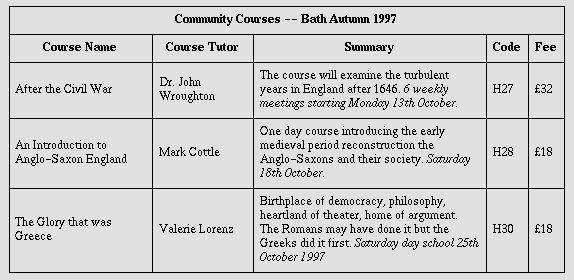
Note the use of the scope attribute with the "row" value. Although the first cell in each row contains data, not header information,
the scope attribute makes the data cell behave like a row header cell. This allows speech synthesizers to provide the relevant course name
upon request or to state it immediately before each cell's content.
17.3.3.2. Categorizing cells
Users browsing a table with a speech-based user agent may wish to hear an explanation of a cell's contents in addition to the contents themselves. One way the user might provide an explanation is
by speaking associated header information before speaking the data cell's contents (see the section on associating header information with data cells).
Users may also want information about more than one cell, in which case header information provided at the cell level (by headers, scope, and abbr) may not provide adequate context. Consider the following table,
which classifies expenses for meals, hotels, and transport in two locations (San Jose and Seattle) over several days:
Users might want to extract information from the table in the form of queries:
- "What did I spend for all my meals?"
- "What did I spend for meals on 25 August?"
- "What did I spend for all expenses in San Jose?"
Each query involves a computation by the user agent that may involve zero or more cells. In order to determine, for example, the costs of meals on 25 August, the user agent must know which table
cells refer to "Meals" (all of them) and which refer to "Dates" (specifically, 25 August), and find the intersection of the two sets.
To accommodate this type of query, the table model allows authors to place cell headers and data into categories. For example, for the travel expense table, an author could group the header cells
"San Jose" and "Seattle" into the category "Location", the headers "Meals", "Hotels", and "Transport" in the category "Expenses", and the four days into the category "Date". The previous three
questions would then have the following meanings:
- "What did I spend for all my meals?" means "What are all the data cells in the "Expenses=Meals" category?
- "What did I spend for meals on 25 August?" means "What are all the data cells in the "Expenses=Meals" and "Date=Aug-25-1997" categories?
- "What did I spend for all expenses in San Jose?" means "What are all the data cells in the "Expenses=Meals, Hotels, Transport" and "Location=San Jose" categories?
Authors categorize a header or data cell by setting the axis attribute for the cell. For instance, in the travel expense table, the cell
containing the information "San Jose" could be placed in the "Location" category as follows:
<th id="a6" axis="location">San Jose</th>
Any cell containing information related to "San Jose" should refer to this header cell via either the headers or the scope attribute. Thus, meal expenses for 25-Aug-1997 should be marked up to refer to id attribute (whose value here is "a6") of the "San Jose" header cell:
<td headers="a6">37.74</td>
Each headers attribute provides a list of id
references. Authors may thus categorize a given cell in any number of ways (or, along any number of "headers", hence the name).
Below we mark up the travel expense table with category information:
<table
          summary="This table summarizes travel expenses
                   incurred during August trips to
                   San Jose and Seattle">
<caption>Travel Expense Report</caption>
<tbody>
   <tr>
      <th></th>
      <th id="a2" axis="expenses">Meals</th>
      <th id="a3" axis="expenses">Hotels</th>
      <th id="a4" axis="expenses">Transport</th>
      <td>subtotals</td>
   </tr>
   <tr>
      <th id="a6" axis="location">San Jose</th>
      <th></th>
      <th></th>
      <th></th>
      <td></td>
   </tr>
   <tr>
      <td id="a7" axis="date">25-Aug-97</td>
      <td headers="a6 a7 a2">37.74</td>
      <td headers="a6 a7 a3">112.00</td>
      <td headers="a6 a7 a4">45.00</td>
      <td></td>
   </tr>
   <tr>
      <td id="a8" axis="date">26-Aug-97</td>
      <td headers="a6 a8 a2">27.28</td>
      <td headers="a6 a8 a3">112.00</td>
      <td headers="a6 a8 a4">45.00</td>
      <td></td>
   </tr>
   <tr>
      <td>subtotals</td>
      <td>65.02</td>
      <td>224.00</td>
      <td>90.00</td>
      <td>379.02</td>
   </tr>
   <tr>
      <th id="a10" axis="location">Seattle</th>
      <th></th>
      <th></th>
      <th></th>
      <td></td>
   </tr>
   <tr>
      <td id="a11" axis="date">27-Aug-97</td>
      <td headers="a10 a11 a2">96.25</td>
      <td headers="a10 a11 a3">109.00</td>
      <td headers="a10 a11 a4">36.00</td>
      <td></td>
   </tr>
   <tr>
      <td id="a12" axis="date">28-Aug-97</td>
      <td headers="a10 a12 a2">35.00</td>
      <td headers="a10 a12 a3">109.00</td>
      <td headers="a10 a12 a4">36.00</td>
      <td></td>
   </tr>
   <tr>
      <td>subtotals</td>
      <td>131.25</td>
      <td>218.00</td>
      <td>72.00</td>
      <td>421.25</td>
   </tr>
   <tr>
      <th>Totals</th>
      <td>196.27</td>
      <td>442.00</td>
      <td>162.00</td>
      <td>800.27</td>
   </tr>
</tbody>
</table>
Note that marking up the table this way also allows user agents to avoid confusing the user with unwanted information. For instance, if a speech synthesizer were to speak all of the figures in the
"Meals" column of this table in response to the query "What were all my meal expenses?", a user would not be able to distinguish a day's expenses from subtotals or totals. By carefully categorizing
cell data, authors allow user agents to make important semantic distinctions when rendering.
Of course, there is no limit to how authors may categorize information in a table. In the travel expense table, for example, we could add the additional categories "subtotals" and "totals".
This specification does not require user agents to handle information provided by the axis attribute, nor does it make any
recommendations about how user agents may present axis information to users or how users may query the user agent about this
information.
However, user agents, particularly speech synthesizers, may want to factor out information common to
several cells that are the result of a query. For instance, if the user asks "What did I spend for meals in San Jose?", the user agent would first determine the cells in question (25-Aug-1997: 37.74,
26-Aug-1997:27.28), then render this information. A user agent speaking this information might read it:
   Location: San Jose. Date: 25-Aug-1997. Expenses, Meals: 37.74
   Location: San Jose. Date: 26-Aug-1997. Expenses, Meals: 27.28
or, more compactly:
   San Jose, 25-Aug-1997, Meals: 37.74
   San Jose, 26-Aug-1997, Meals: 27.28
An even more economical rendering would factor the common information and reorder it:
   San Jose, Meals, 25-Aug-1997: 37.74
                    26-Aug-1997: 27.28
User agents that support this type of rendering should allow authors a means to customize rendering (e.g., through style sheets).
17.3.3.3. Algorithm to find heading information
In the absence of header information from either the scope or headers
attribute, user agents may construct header information according to the following algorithm. The goal of the algorithm is to find an ordered list of headers. (In the following description of the
algorithm the table directionality is assumed to be left-to-right.)
- First, search left from the cell's position to find row header cells. Then search upwards to find column header cells. The search in a given direction stops when the edge of the table is reached
or when a data cell is found after a header cell.
- Row headers are inserted into the list in the order they appear in the table. For left-to-right tables, headers are inserted from left to right.
- Column headers are inserted after row headers, in the order they appear in the table, from top to bottom.
- If a header cell has the headers attribute set, then the headers referenced by this attribute are inserted into the list and the
search stops for the current direction.
- td cells that set the axis attribute are also treated as header cells.
This sample illustrates grouped rows and columns.
<table
       summary="Calendar for 2002.">
<caption><b>Calendar for 2002</b></caption>
<colgroup span="7">
<colgroup span="7">
<colgroup span="7">
<thead>
   <tr>
      <th colspan="7">January</th>
      <th colspan="7">February</th>
      <th colspan="7">March</th>
   </tr>
</thead>
<tbody>
   <tr>
      <td>S</td><td>M</td><td>T</td><td>W</td><td>T</td><td>F</td><td>S</td>
      <td>S</td><td>M</td><td>T</td><td>W</td><td>T</td><td>F</td><td>S</td>
      <td>S</td><td>M</td><td>T</td><td>W</td><td>T</td><td>F</td><td>S</td>
   </tr>
</tbody>
<tbody>
   <tr>
      <td></td><td></td><td>1</td><td>2</td><td>3</td><td>4</td><td>5</td>
      <td></td><td></td><td></td><td></td><td></td><td>1</td><td>2</td>
      <td></td><td></td><td></td><td></td><td></td><td>1</td><td>2</td>

   </tr>
   <tr>
      <td>6</td><td>7</td><td>8</td><td>9</td><td>10</td><td>11</td><td>12</td>
      <td>3</td><td>4</td><td>5</td><td>6</td><td>7</td><td>8</td><td>9</td>
      <td>3</td><td>4</td><td>5</td><td>6</td><td>7</td><td>8</td><td>9</td>

   </tr>
   <tr>
      <td>13</td><td>14</td><td>15</td><td>16</td><td>17</td><td>18</td><td>19</td>
      <td>10</td><td>11</td><td>12</td><td>13</td><td>14</td><td>15</td><td>16</td>
      <td>10</td><td>11</td><td>12</td><td>13</td><td>14</td><td>15</td><td>16</td>
   </tr>
   <tr>
      <td>20</td><td>21</td><td>22</td><td>23</td><td>24</td><td>25</td><td>26</td>
      <td>17</td><td>18</td><td>19</td><td>20</td><td>21</td><td>22</td><td>23</td>
      <td>17</td><td>18</td><td>19</td><td>20</td><td>21</td><td>22</td><td>23</td>
   </tr>
   <tr>
      <td>27</td><td>28</td><td>29</td><td>30</td><td>31</td><td></td><td></td>
      <td>24</td><td>25</td><td>26</td><td>27</td><td>28</td><td></td><td></td>
      <td>24</td><td>25</td><td>26</td><td>27</td><td>28</td><td>29</td><td>30</td>
   </tr>
   <tr>
      <td></td><td></td><td></td><td></td><td></td><td></td><td></td>
      <td></td><td></td><td></td><td></td><td></td><td></td><td></td>
      <td>31</td><td></td><td></td><td></td><td></td><td></td><td></td>
   </tr>
</tbody>
</table>
would be rendered something like this:
                      Calendar for 2002
===================================================================
      January         |       February      |        March
 S  M  T  W  T  F  S  | S  M  T  W  T  F  S | S  M  T  W  T  F  S
-------------------------------------------------------------------
       1  2  3  4  5  |                1  2 |                1  2
 6  7  8  9  10 11 12 | 3  4  5  6  7  8  9 | 3  4  5  6  7  8  9
 13 14 15 16 17 18 19 | 10 11 12 13 14 15 16| 10 11 12 13 14 15 16
 20 21 22 23 24 25 26 | 17 18 19 20 21 22 23| 17 18 19 20 21 22 23
 27 28 29 30 31       | 24 25 26 27 28      | 24 25 26 27 28 29 30
                      |                     |                   31
===================================================================
A graphical user agent might render this as:
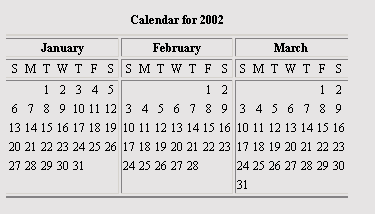
This example illustrates how colgroup can be used to group columns and set the default column alignment. Similarly, tbody is used to group rows.
The tbody element contains rows of table data. In tables that also contain
thead or tfoot elements, all of these sections must contain the same number of columns.
17.5. The td and th elements
Attributes
- The Common collection
- A collection of other attribute collections, including: Core, Events, I18N, Bi-directional, Edit, Embedding, and Hypertext
- abbr = Text
- This attribute should be used to provide an abbreviated form of the cell's content, and may be rendered by user agents when appropriate in place of the cell's content. Abbreviated names should be
short since user agents may render them repeatedly. For instance, speech synthesizers may render the abbreviated headers relating to a particular cell before rendering that cell's content.
- axis = CDATA
- This attribute may be used to place a cell into conceptual categories that can be considered to form axes in an n-dimensional space. User agents may give users access to these categories (e.g.,
the user may query the user agent for all cells that belong to certain categories, the user agent may present a table in the form of a table of contents, etc.). Please consult the section on categorizing cells for more information. The value of this attribute is a comma-separated list of category names.
- colspan = Number
- This attribute specifies the number of columns spanned by the current cell. The default value of this attribute is one ("1"). The value zero ("0") means that the cell spans all columns from the
current column to the last column of the column group ( colgroup) in which the cell is defined.
- = IDREFS
- This attribute specifies the list of header cells that provide header information for the current data cell. The value of this attribute is a space-separated list of cell names; those cells must
be named by setting their id attribute. Authors generally use the headers attribute to help non-visual user agents render header information about data cells (e.g., header information is spoken prior to the cell data), but
the attribute may also be used in conjunction with style sheets. See also the scope attribute.
- rowspan = Number
- This attribute specifies the number of rows spanned by the current cell. The default value of this attribute is one ("1"). The value zero ("0") means that the cell spans all rows from the current
row to the last row of the table section ( thead, tbody, or tfoot) in which the cell is defined.
- scope = row|col|rowgroup|colgroup
- This attribute specifies the set of data cells for which the current header cell provides header information. This attribute may be used in place of the headers attribute, particularly for simple tables. When specified, this attribute must have one of the following values:
- row: The current cell provides header information for the rest of the row that contains it (see also the section on table
directionality).
- col: The current cell provides header information for the rest of the column that contains it.
- rowgroup: The header cell provides header information for the rest of the row group that contains it.
- colgroup: The header cell provides header information for the rest of the column group that contains it.
Table cells may contain two types of information: header information and data. This distinction enables user agents to render header and data cells distinctly, even in the absence
of style sheets. For example, visual user agents may present header cell text with a bold font. Speech synthesizers may render header information with a distinct voice inflection.
The th element defines a cell that contains header information. User agents have two pieces of header information available: the contents
of the th element and the value of the abbr attribute. User agents must render
either the contents of the cell or the value of the abbr attribute. For visual media, the latter may be appropriate when there is
insufficient space to render the full contents of the cell. For non-visual media abbr may be used as an abbreviation for table headers when
these are rendered along with the contents of the cells to which they apply.
The headers and scope attributes also allow authors to help non-visual
user agents process header information. Please consult the section on labeling cells for non-visual user agents for information and examples.
The td element defines a cell that contains data.
Cells may be empty (i.e., contain no data).
For example, the following table contains four columns of data, each headed by a column description.
<table summary="This table charts the number of cups
                   of coffee consumed by each senator, the type
                   of coffee (decaf or regular), and whether
                   taken with sugar.">
<caption>Cups of coffee consumed by each senator</caption>
<tbody>
   <tr>
      <th>Name</th>
      <th>Cups</th>
      <th>Type of Coffee</th>
      <th>Sugar?</th>
   </tr>
   <tr>
      <td>T. Sexton</td>
      <td>10</td>
      <td>Espresso</td>
      <td>No</td>
   </tr>
   <tr>
      <td>J. Dinnen</td>
      <td>5</td>
      <td>Decaf</td>
      <td>Yes</td>
</tbody>
</table>
A user agent rendering to a tty device might display this as follows:
Name         Cups       Type of Coffee   Sugar?
T. Sexton    10         Espresso         No
J. Dinnen    5          Decaf            Yes
17.5.1. Cells that span several rows or columns
Cells may span several rows or columns. The number of rows or columns spanned by a cell is set by the rowspan and colspan attributes for the th and td
elements.
In this table definition, we specify that the cell in row four, column two should span a total of three columns, including the current column.
<table>
<caption>Cups of coffee consumed by each senator</caption>
<tbody>
   <tr>
      <th>Name</td>
      <th>Cups</td>
      <th>Type of Coffee</td>
      <th>Sugar?</td>
   </tr>
   <tr>
      <td>T. Sexton</td>
      <td>10</td>
      <td>Espresso</td>
      <td>No</td>
   </tr>
   <tr>
      <td>J. Dinnen</td>
      <td>5</td>
      <td>Decaf</td>
      <td>Yes</td>
   </tr>
   <tr>
      <td>A. Soria</td>
      <td colspan="3"><em>Not available</em></td>
   </tr>
</tbody>
</table>
This table might be rendered on a tty device by a visual user agent as follows:
Cups of coffee consumed by each senator
 --------------------------------------
 |   Name  |Cups|Type of Coffee|Sugar?|
 --------------------------------------
 |T. Sexton|10  |Espresso      |No    |
 --------------------------------------
 |J. Dinnen|5   |Decaf         |Yes   |
 --------------------------------------
 |A. Soria |Not available             |
 --------------------------------------
The next example illustrates (with the help of table borders) how cell definitions that span more than one row or column affect the definition of later cells. Consider the following table
definition:
<table>
<tbody>
   <tr>
      <td>1</td>
      <td rowspan="2">2</td>
      <td>3</td>
   </tr>
   <tr>
      <td>4
      <td>6</td>
   </tr>
   <tr>
      <td>7</td>
      <td>8</td>
      <td>9</td>
      </td></td>
   </tr>
</tbody>
</table>
As cell "2" spans the first and second rows, the definition of the second row will take it into account. Thus, the second td in row two
actually defines the row's third cell. Visually, the table might be rendered to a tty device as:
-------------
| 1 | 2 | 3 |
----|   |----
| 4 |   | 6 |
----|---|----
| 7 | 8 | 9 |
-------------
while a graphical user agent might render this as:
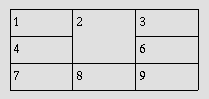
Note that if the td defining cell "6" had been omitted, an extra empty cell would have been added by the user agent to complete the
row.
Similarly, in the following table definition:
<table>
<tbody>
   <tr>
      <td>1</td>
      <td>2</td>
      <td>3</td>
   </tr>
   <tr>
      <td colspan="2">4</td>
      <td>6</td>
   </tr>
   <tr>
      <td>7</td>
      <td>8</td>
      <td>9</td>
   </tr>
</tbody>
</table>
cell "4" spans two columns, so the second td in the row actually defines the third cell ("6"):
-------------
| 1 | 2 | 3 |
--------|----
| 4     | 6 |
--------|----
| 7 | 8 | 9 |
-------------
A graphical user agent might render this as:
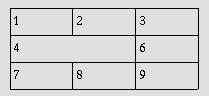
Defining overlapping cells is an error. User agents may vary in how they handle this error (e.g., rendering may vary).
The following illegal example illustrates how one might create overlapping cells. In this table, cell "5" spans two rows and cell "7" spans two columns, so there is overlap in the cell between "7"
and "9":
<table">
<tbody>
   <tr>
      <td>1</td>
      <td>2</td>
      <td>3</td>
   </tr>
   <tr>
      <td>4</td>
      <td rowspan="2">5</td>
      <td>6</td>
   </tr>
   <tr>
      <td colspan="2">7</td>
      <td>9</td>
   </tr>
</tbody>
</table>
Table rows may be grouped into a table head, table foot, and one or more table body sections,
using the thead, tfoot and tbody elements, respectively. This division enables user agents to support scrolling of table bodies independently of the table head and foot. When long tables
are printed, the table head and foot information may be repeated on each page that contains table data.
The table head and table foot should contain information about the table's columns. The table body should contain rows of table data.
When present, each thead, tfoot, and tbody contains a row group. Each row group must contain at least one row, defined by the tr
element.
If the thead, tfoot, and tbody elements are used, and a rowspan attriubte is used within a group, the rowspan must remain within the group boundaries of which it is defined.
This example illustrates the order and structure of the table head, foot, and bodies.
<table>
<thead>
     <tr> ...header information...</tr>
</thead>
<tfoot>
     <tr> ...footer information...</tr>
</tfoot>
<tbody>
     <tr> ...first row of block one data...</tr>
     <tr> ...second row of block one data...</tr>
</tbody>
<tbody>
     <tr> ...first row of block two data...</tr>
     <tr> ...second row of block two data...</tr>
     <tr> ...third row of block two data...</tr>
</tbody>
</table>
tfoot must appear before tbody within a table definition so that user agents can render the foot before receiving all of the (potentially numerous) rows of data.
The tr elements acts as a container for a row of table cells.
This sample table contains three rows, each begun by the tr element:
<table summary="This table charts the number of cups
                   of coffee consumed by each senator, the type
                   of coffee (decaf or regular), and whether
                   taken with sugar.">
<caption>Cups of coffee consumed by each senator</caption>
<tbody>
   <tr> ...A header row...</tr>
   <tr> ...First row of data...</tr>
   <tr> ...Second row of data...</tr>
   ...the rest of the table...</tr>
</tbody>
</table>
A. Changes from XHTML 1.1
This appendix is informative.
This Appendix describes the differences between XHTML 2.0 and XHTML 1.1.
Change summary needed
This section needs a table that illustrates elements removed and added, and changes made to elements that were kept.
B. XHTML 2.0 Schema
This appendix is normative.
This appendix will contain the implementation of the XHTML 2.0 Schema driver file and content model file.
XHTML 2.0 Schema Needed
The XHTML 2.0 Schema driver and content model files need to be built.
C. XHTML Schema Module Implementations
This appendix is normative.
This appendix will contain implementations of the modules defined in this specification via XML Schema [XMLSCHEMA] when XML Schema becomes
a W3C Recommendation.
D. XHTML 2.0 Document Type Definition
This appendix is normative.
This appendix will contain the implementation of the XHTML 2.0 DTD driver file and content model file.
XHTML 2.0 DTD Needed
The XHTML 2.0 DTD driver and content model files need to be built. There is an open issue about how to integrate the XForms instance data into such a DTD.
E. XHTML DTD Module Implementations
This appendix is normative.
This appendix will contain implementations of the modules defined in this specification. These module implementations can be used in other XHTML Family Document Types.
E.1. XHTML Modular Framework
In order to take advantage of the XHTML DTD Modules, DTD authors need to define the content model for their DTD. XHTML provides a variety of tools to ease this effort. They are defined in a set of
support modules, instantiated by a main Framework module:
Module DTD/xhtml-framework-2.mod not found!
Note that the module above references a content model module. This module is defined on a per-document type basis in addition to the document type driver file. The Modular framework also relies
upon the following component modules:
E.1.1. XHTML Base Architecture
DTD Module XHTML Base Architecture needed
The DTD Module DTD Module XHTML Base Architecture needed referenced as DTD/xhtml-arch-2.mod needs to be defined. It will be defined before publication of a last call draft.
E.1.2. XHTML Notations
DTD Module XHTML Notations needed
The DTD Module DTD Module XHTML Notations needed referenced as DTD/xhtml-notations-2.mod needs to be defined. It will be defined before publication of a last call draft.
E.1.3. XHTML Datatypes
DTD Module XHTML Datatypes needed
The DTD Module DTD Module XHTML Datatypes needed referenced as DTD/xhtml-datatypes-2.mod needs to be defined. It will be defined before publication of a last call draft.
E.1.4. XHTML Common Attribute Definitions
DTD Module XHTML Common Attribute Definitions needed
The DTD Module DTD Module XHTML Common Attribute Definitions needed referenced as DTD/xhtml-attribs-2.mod needs to be defined. It will be defined before publication of a last call draft.
E.1.5. XHTML Qualified Names
DTD Module XHTML Qualified Names needed
The DTD Module DTD Module XHTML Qualified Names needed referenced as DTD/xhtml-qname-2.mod needs to be defined. It will be defined before publication of a last call draft.
E.1.6. XHTML Character Entities
DTD Module XHTML Character Entities needed
The DTD Module DTD Module XHTML Character Entities needed referenced as DTD/xhtml-charent-1.mod needs to be defined. It will be defined before publication of a last call draft.
E.2. XHTML Module Implementations
This section contains the formal definition of each of the XHTML Abstract Modules as a DTD module.
DTD Module Structure needed
The DTD Module DTD Module Structure needed referenced as DTD/xhtml-struct-1.mod needs to be defined. It will be defined before publication of a last call draft.
DTD Module Text needed
The DTD Module DTD Module Text needed referenced as DTD/xhtml-text-1.mod needs to be defined. It will be defined before publication of a last call draft.
DTD Module Hypertext needed
The DTD Module DTD Module Hypertext needed referenced as DTD/xhtml-hypertext-1.mod needs to be defined. It will be defined before publication of a last call draft.
DTD Module Lists needed
The DTD Module DTD Module Lists needed referenced as DTD/xhtml-list-1.mod needs to be defined. It will be defined before publication of a last call draft.
E.2.5. Bi-directional Text
DTD Module Bi-directional Text needed
The DTD Module DTD Module Bi-directional Text needed referenced as DTD/xhtml-bdo-1.mod needs to be defined. It will be defined before publication of a last call draft.
E.2.6. Client-side Image Map
DTD Module Client-side Image Map needed
The DTD Module DTD Module Client-side Image Map needed referenced as DTD/xhtml-csismap-1.mod needs to be defined. It will be defined before publication of a last call draft.
DTD Module Edit needed
The DTD Module DTD Module Edit needed referenced as DTD/xhtml-edit-1.mod needs to be defined. It will be defined before publication of a last call draft.
DTD Module Link needed
The DTD Module DTD Module Link needed referenced as DTD/xhtml-link-1.mod needs to be defined. It will be defined before publication of a last call draft.
E.2.9. Metainformation
DTD Module Metainformation needed
The DTD Module DTD Module Metainformation needed referenced as DTD/xhtml-meta-1.mod needs to be defined. It will be defined before publication of a last call draft.
DTD Module Object needed
The DTD Module DTD Module Object needed referenced as DTD/xhtml-object-1.mod needs to be defined. It will be defined before publication of a last call draft.
DTD Module Presentation needed
The DTD Module DTD Module Presentation needed referenced as DTD/xhtml-pres-1.mod needs to be defined. It will be defined before publication of a last call draft.
DTD Module Scripting needed
The DTD Module DTD Module Scripting needed referenced as DTD/xhtml-script-1.mod needs to be defined. It will be defined before publication of a last call draft.
E.2.13. Server-side Image Map
DTD Module Server-side Image Map needed
The DTD Module DTD Module Server-side Image Map needed referenced as DTD/xhtml-ssismap-1.mod needs to be defined. It will be defined before publication of a last call draft.
DTD Module Style Sheet needed
The DTD Module DTD Module Style Sheet needed referenced as DTD/xhtml-style-1.mod needs to be defined. It will be defined before publication of a last call draft.
DTD Module Tables needed
The DTD Module DTD Module Tables needed referenced as DTD/xhtml-table-1.mod needs to be defined. It will be defined before publication of a last call draft.
DTD Module Target needed
The DTD Module DTD Module Target needed referenced as DTD/xhtml-target-1.mod needs to be defined. It will be defined before publication of a last call draft.
E.3. XHTML DTD Support Modules
The modules in this section are elements of the XHTML DTD implementation that, while hidden from casual users, are important to understand when creating derivative markup languages using the
Modularization architecture.
E.3.1. Block Phrasal
DTD Module Block Phrasal needed
The DTD Module DTD Module Block Phrasal needed referenced as DTD/xhtml-blkphras-1.mod needs to be defined. It will be defined before publication of a last call draft.
E.3.2. Block Presentational
DTD Module Block Presentational needed
The DTD Module DTD Module Block Presentational needed referenced as DTD/xhtml-blkpres-1.mod needs to be defined. It will be defined before publication of a last call draft.
E.3.3. Block Structural
DTD Module Block Structural needed
The DTD Module DTD Module Block Structural needed referenced as DTD/xhtml-blkstruct-1.mod needs to be defined. It will be defined before publication of a last call draft.
E.3.4. Inline Phrasal
DTD Module Inline Phrasal needed
The DTD Module DTD Module Inline Phrasal needed referenced as DTD/xhtml-inlphras-1.mod needs to be defined. It will be defined before publication of a last call draft.
E.3.5. Inline Presentational
DTD Module Inline Presentational needed
The DTD Module DTD Module Inline Presentational needed referenced as DTD/xhtml-inlpres-1.mod needs to be defined. It will be defined before publication of a last call draft.
E.3.6. Inline Structural
DTD Module Inline Structural needed
The DTD Module DTD Module Inline Structural needed referenced as DTD/xhtml-inlstruct-1.mod needs to be defined. It will be defined before publication of a last call draft.
DTD Module Param needed
The DTD Module DTD Module Param needed referenced as DTD/xhtml-param-1.mod needs to be defined. It will be defined before publication of a last call draft.
E.3.8. Legacy Redeclarations
DTD Module Legacy Redeclarations needed
The DTD Module DTD Module Legacy Redeclarations needed referenced as DTD/xhtml-legacy-redecl-1.mod needs to be defined. It will be defined before publication of a last call draft.
F. References
This appendix is normative.
F.1. Normative References
- [CSS2]
- "Cascading Style Sheets, level 2 (CSS2) Specification", W3C Recommendation, B. Bos et al.,
eds., 12 May 1998.
Available at: http://www.w3.org/TR/1998/REC-CSS2-19980512
- [DOM]
- "Document Object Model (DOM) Level 1 Specification", L. Wood et al., eds., 1 October 1998.
Available at: http://www.w3.org/TR/1998/REC-DOM-Level-1-19981001
- [HTML4]
- "HTML 4.01 Specification: W3C Recommendation", W3C Recommendation, D. Raggett et al.,
eds., 24 December 1999.
Available at: http://www.w3.org/TR/1999/REC-html401-19991224
- [MIMETYPES]
- List of registered content types (MIME media types). Download a list of registered content types from
http://www.iana.org/assignments/media-types/.
- [P3P]
- "The Platform for Privacy Preferences 1.0 (P3P1.0) Specification", W3C Recommendation, L. Cranor
et al., 16 April 2002.
Available at: http://www.w3.org/TR/2002/REC-P3P-20020416/
- [PICS]
- "Rating Services and Rating Systems (and Their Machinr Readable Descriptions)", W3C Recommendation, J. Miller et al., 31 October 1996.
Available at: http://www.w3.org/TR/REC-PICS-services-961031
- [RFC2045]
- "Multipurpose Internet Mail Extensions (MIME) Part One: Format of Internet Message Bodies", RFC 2045, N. Freed and N.
Borenstein, November 1996.
Available at: http://www.rfc-editor.org/rfc/rfc2045.txt
- [RFC2119]
- "Key words for use in RFCs to indicate requirement levels", RFC 2119, S. Bradner, March 1997.
Available at: http://www.rfc-editor.org/rfc/rfc2119.txt
- [RFC2616]
- "Hypertext Transfer Protocol -- HTTP/1.1", RFC 2616, R. Fielding et al., June 1999.
Available at: http://www.rfc-editor.org/rfc/rfc2616.txt
- [RFC3066]
- "Tags for the Identification of Languages", RFC 3066, H. Alvestrand, January 2001.
Available at: http://www.rfc-editor.org/rfc/rfc3066.txt
- [RUBY]
- Ruby Annotation, W3C Recommendation, M. Sawicki et al.,
eds., 31 May 2001.
Available at: http://www.w3.org/TR/2001/REC-ruby-20010531
- [SGML]
- "Information Processing -- Text and Office Systems -- Standard Generalized Markup Language (SGML)", ISO 8879:1986.
Please consult the ISO Web site at http://www.iso.ch/ for information about the standard, or
http://www.oasis-open.org/cover/general.html#overview about SGML.
- [UNICODE]
- "The Unicode Standard", The Unicode Consortium. Version 3.2.0 is defined by: The Unicode Standard, Version 3.0 (Reading, MA, Addison-Wesley, 2000. ISBN 0-201-61633-5),
as amended by the Unicode Standard Annex #27: Unicode 3.1 (http://www.unicode.org/reports/tr27/) and the Unicode Standard
Annex #28: Unicode 3.2 (http://www.unicode.org/reports/tr28/).
For more information about Unicode, see http://www.unicode.org.
- [URI]
- "Uniform Resource Identifiers (URI): Generic Syntax", RFC 2396, T. Berners-Lee et al., August
1998.
Available at: http://www.rfc-editor.org/rfc/rfc2396.txt.
- [XFORMS]
- "XForms 1.0", W3C Candidate Recommendation, M. Dubinko et al.,
eds., 18 January 2002, work in progress.
Available at: http://www.w3.org/TR/2002/CR-xforms-20021112/
- [XHTML1]
- "XHTML 1.0: The Extensible HyperText Markup Language (Second Edition)", W3C Recommendation, S. Pemberton et al., 1 August 2002.
Available at: http://www.w3.org/TR/2002/REC-xhtml1-20020801
- [XHTMLMOD]
- Modularization of XHTML, W3C Recommendation, M. Altheim et al., eds., 10 April 2001
Available at: http://www.w3.org/TR/2001/REC-xhtml-modularization-20010410
- [XML]
- "Extensible Markup Language (XML) 1.0 (Second Edition)", W3C Recommendation, T. Bray et al.,
eds., 6 October 2000.
Available at: http://www.w3.org/TR/2000/REC-xml-20001006
- [XMLBASE]
- "XML Base", W3C Recommendation, J. Marsh, ed., 27 June 2001.
Available at: http://www.w3.org/TR/2001/REC-xmlbase-20010627/
- [XMLEVENTS]
- "XML Events", W3C Working Draft, S. McCarron et al.,
eds., 26 October 2001, work in progress.
Available at: http://www.w3.org/TR/2002/WD-xml-events-20020812
- [XMLNAMES]
- "Namespaces in XML", W3C Recommendation, T. Bray et al.,
eds., 14 January 1999.
Available at: http://www.w3.org/TR/1999/REC-xml-names-19990114
- [XMLSCHEMA]
- "XML Schema Part 1: Structures", W3C Recommendation, H. S. Thompson et al., eds., 2 May 2001.
Available at: http://www.w3.org/TR/2001/REC-xmlschema-1-20010502
See also "XML Schema Part 2: Datatypes", available at: http://www.w3.org/TR/2001/REC-xmlschema-2-20010502
F.2. Informative References
- [XFRAMES]
- "XFrames", W3C Working Draft, S. Pemberton, ed., 6 August 2002, work in
progress.
Available at: http://www.w3.org/TR/2002/WD-xframes-20020806
- [XLINK]
- "XML Linking Language (XLink) Version 1.0", W3C Recommendation, S. DeRose et al., eds., 27 June 2001.
Available at: http://www.w3.org/TR/2001/REC-xlink-20010627/
G. Acknowledgements
This appendix is informative.
This specification was prepared by the W3C HTML Working Group. The members at the time of
publication were:
This section will be updated at publication time.