
Voice Extensible Markup Language
(VoiceXML) Version 2.0
W3C Candidate Recommendation 20
February 2003
- This Version:
-
http://www.w3.org/TR/2003/CR-voicexml20-20030220/
- Latest Version:
-
http://www.w3.org/TR/voicexml20/
- Previous Version:
-
http://www.w3.org/TR/2003/CR-voicexml20-20030128/
- Editors:
- Scott McGlashan, PipeBeach
<Scott.McGlashan@pipebeach.com> (Editor-in-Chief)
Daniel C. Burnett, Nuance Communications, <burnett@nuance.com>
Jerry Carter, Speechworks International, <jerry.carter@speechworks.com>
Peter Danielsen, Lucent
<pdanielsen@lucent.com>
(until October 2002)
Jim Ferrans, Motorola
<James.Ferrans@motorola.com>
Andrew Hunt, SpeechWorks International
<andrew.hunt@speechworks.com>
Bruce Lucas, IBM
<bdlucas@us.ibm.com>
Brad Porter, Tellme Networks
<brad@tellme.com>
Ken Rehor, Invited Expert
<ken@rehor.com>
Steph Tryphonas, Tellme Networks
<steph@tellme.com>
Copyright
©2003 W3C® (MIT, ERCIM, Keio),
All Rights Reserved. W3C liability,
trademark,
document
use and software
licensing rules apply.
This document specifies VoiceXML, the Voice Extensible Markup
Language. VoiceXML is designed for creating audio dialogs that feature
synthesized speech, digitized audio, recognition of spoken and DTMF key input,
recording of spoken input, telephony, and mixed
initiative conversations. Its major goal is to bring the advantages of
web-based development and content delivery to interactive voice response
applications.
Status of this Document
This section describes the status of this document at the
time of its publication. Other documents may supersede this
document. The latest status of this document series is maintained
at the W3C.
This is the 20 February 2003 W3C Candidate Recommendation of "Voice
Extensible Markup Language (VoiceXML) Version 2.0". The only difference from
the previous version is a correction to the schemas to fix problems found
with some schema tools. W3C publishes a technical
report as a Candidate Recommendation to indicate that the document is believed
to be stable, and to encourage implementation by the developer
community. Candidate Recommendation status is described in section 5.2.3 of
the
Process Document.
The entrance criteria to the Proposed Recommendation phase is at
least two independently developed interoperable implementations of
each required feature, and at least one implementation of each feature.
Detailed implementation requirements and the invitation for
participation in the Implementation Report are provided in the Implementation
Report Plan. Note, this specification already has significant
implementation experience that will soon be reflected in its
Implementation Report. We expect to meet all requirements of that report
within a Candidate Recommendation period closing 10th April 2003.
Publication as a Candidate Recommendation does not imply
endorsement by the W3C Membership. This is a draft document and may
be updated, replaced or obsoleted by other documents at any time.
It is inappropriate to cite this document as other than "work in
progress."
Comments on this document and requests for further information should be
sent to the Working Group's public mailing list www-voice@w3.org (archive). Note as a
precaution against spam, you should first subscribe to this list by sending an
email to <www-voice-request@w3.org> with
the word subscribe in the subject line (include the word
unsubscribe if you want to unsubscribe). Please check the disposition of comments received during the
last call period.
Patent disclosures relevant to this specification may be found on the
Working Group's patent
disclosure page in conformance with W3C policy.
This document has been produced as part of the W3C Voice Browser Activity,
following the procedures set out for the W3C Process. The
authors of this document are members of the Voice Browser Working
Group (W3C Members
only).
A list of current W3C Recommendations and other technical
documents can be found at http://www.w3.org/TR.
Conventions of this Document
In this document, the key words "must", "must not", "required",
"shall", "shall not", "should", "should not", "recommended", "may",
and "optional" are to be interpreted as described in [RFC2119] and indicate requirement levels for
compliant VoiceXML implementations.
Abbreviated Contents
Full Contents
This document defines VoiceXML, the Voice Extensible Markup Language. Its
background, basic concepts and use are presented in Section
1. The dialog constructs of form, menu and link, and the mechanism (Form
Interpretation Algorithm) by which they are interpreted are then introduced in
Section 2. User input using DTMF and speech grammars is
covered in Section 3, while Section 4
covers system output using speech synthesis and recorded audio. Mechanisms for
manipulating dialog control flow, including variables, events, and executable
elements, are explained in Section 5. Environment features
such as parameters and properties as well as resource handling are specified
in Section 6. The appendices provide additional
information including the VoiceXML Schema, a
detailed specification of the Form Interpretation
Algorithm and timing, audio file formats, and statements relating to conformance, internationalization, accessibility and
privacy.
The origins of VoiceXML began in 1995 as an XML-based dialog design language
intended to simplify the speech recognition application development process
within an AT&T project called Phone Markup Language (PML). As AT&T
reorganized, teams at AT&T, Lucent and Motorola continued working on their
own PML-like languages.
In 1998, W3C hosted a conference on voice browsers. By this time, AT&T and
Lucent had different variants of their original PML, while Motorola had
developed VoxML, and IBM was developing its own SpeechML. Many other attendees
at the conference were also developing similar languages for dialog design;
for example, such as HP's TalkML and PipeBeach's VoiceHTML.
The VoiceXML Forum was then formed by AT&T, IBM, Lucent, and Motorola to
pool their efforts. The mission of the VoiceXML Forum was to define a
standard dialog design language that developers could use to build
conversational applications. They chose XML as the basis for this effort
because it was clear to them that this was the direction technology was going.
In 2000, the VoiceXML Forum released VoiceXML 1.0 to the public. Shortly
thereafter, VoiceXML 1.0 was submitted to the W3C as the basis for the
creation of a new international standard. VoiceXML 2.0 is the result of this
work based on input from W3C member companies, other W3C
working groups, and the public.
Developers familar with VoiceXML 1.0 are particularly directed
to Changes from Previous Public Version
which summarizes how VoiceXML 2.0 differs from VoiceXML 1.0.
VoiceXML is designed for creating audio dialogs that feature synthesized
speech, digitized audio, recognition of spoken and DTMF key input, recording
of spoken input, telephony, and mixed initiative conversations. Its major goal is to
bring the advantages of web-based development and content delivery to
interactive voice response applications.
Here are two short examples of VoiceXML. The first is the
venerable "Hello World":
<?xml version="1.0" encoding="UTF-8"?>
<vxml xmlns="http://www.w3.org/2001/vxml"
  xmlns:xsi="http://www.w3.org/2001/XMLSchema-instance"
  xsi:schemaLocation="http://www.w3.org/2001/vxml
   http://www.w3.org/TR/voicexml20/vxml.xsd"
   version="2.0">
  <form>
    <block>Hello World!</block>
  </form>
</vxml>
The top-level element is <vxml>, which is mainly a
container for dialogs. There are two types of dialogs:
forms and menus. Forms present information and gather
input; menus offer choices of what to do next. This example has a
single form, which contains a block that synthesizes and presents
"Hello World!" to the user. Since the form does not specify a
successor dialog, the conversation ends.
Our second example asks the user for a choice of drink and then
submits it to a server script:
<?xml version="1.0" encoding="UTF-8"?>
<vxml xmlns="http://www.w3.org/2001/vxml"
  xmlns:xsi="http://www.w3.org/2001/XMLSchema-instance"
  xsi:schemaLocation="http://www.w3.org/2001/vxml
   http://www.w3.org/TR/voicexml20/vxml.xsd"
   version="2.0">
  <form>
  <field name="drink">
     <prompt>Would you like coffee, tea, milk, or nothing?</prompt>
     <grammar src="drink.grxml" type="application/srgs+xml"/>
  </field>
  <block>
     <submit next="http://www.drink.example.com/drink2.asp"/>
  </block>
 </form>
</vxml>
A field is an input field. The user must provide a value
for the field before proceeding to the next element in the form. A
sample interaction is:
C (computer): Would you like coffee,
tea, milk, or nothing?
H (human): Orange juice.
C: I did not understand what you said. (a
platform-specific default message.)
C: Would you like coffee, tea, milk, or nothing?
H: Tea
C: (continues in document
drink2.asp)
This section contains a high-level architectural model, whose
terminology is then used to describe the goals of VoiceXML, its
scope, its design principles, and the requirements it places on the
systems that support it.
The architectural model assumed by this document has the
following components:
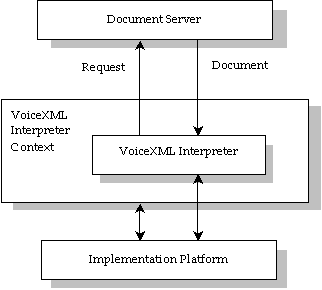
Figure 1: Architectural Model
A document server (e.g. a web server) processes
requests from a client application, the VoiceXML
Interpreter, through the VoiceXML interpreter context.
The server produces VoiceXML documents in reply, which are
processed by the VoiceXML Interpreter. The VoiceXML interpreter
context may monitor user inputs in parallel with the VoiceXML
interpreter. For example, one VoiceXML interpreter context may
always listen for a special escape phrase that takes the user to a
high-level personal assistant, and another may listen for escape
phrases that alter user preferences like volume or text-to-speech
characteristics.
The implementation platform is controlled by the VoiceXML
interpreter context and by the VoiceXML interpreter. For instance,
in an interactive voice response application, the VoiceXML
interpreter context may be responsible for detecting an incoming
call, acquiring the initial VoiceXML document, and answering
the call, while the VoiceXML interpreter conducts the dialog after
answer. The implementation platform generates events in response to
user actions (e.g. spoken or character input received, disconnect)
and system events (e.g. timer expiration). Some of these events are
acted upon by the VoiceXML interpreter itself, as specified by the
VoiceXML document, while others are acted upon by the VoiceXML
interpreter context.
VoiceXML’s main goal is to bring the full power of web
development and content delivery to voice response applications,
and to free the authors of such applications from low-level
programming and resource management. It enables integration of
voice services with data services using the familiar client-server
paradigm. A voice service is viewed as a sequence of interaction
dialogs between a user and an implementation platform. The dialogs
are provided by document servers, which may be external to the
implementation platform. Document servers maintain overall service
logic, perform database and legacy system operations, and produce
dialogs. A VoiceXML document specifies each interaction dialog to
be conducted by a VoiceXML interpreter. User input affects dialog
interpretation and is collected into requests submitted to a
document server. The document server replies with another VoiceXML
document to continue the user’s session with other
dialogs.
VoiceXML is a markup language that:
-
Minimizes client/server interactions by specifying multiple
interactions per document.
-
Shields application authors from low-level, and
platform-specific details.
-
Separates user interaction code (in VoiceXML) from service logic
(e.g. CGI scripts).
-
Promotes service portability across implementation platforms.
VoiceXML is a common language for content providers, tool
providers, and platform providers.
-
Is easy to use for simple interactions, and yet provides
language features to support complex dialogs.
While VoiceXML strives to accommodate the requirements of a
majority of voice response services, services with stringent
requirements may best be served by dedicated applications that
employ a finer level of control.
The language describes the human-machine interaction provided by
voice response systems, which includes:
-
Output of synthesized speech (text-to-speech).
-
Output of audio files.
-
Recognition of spoken input.
-
Recognition of DTMF input.
-
Recording of spoken input.
-
Control of dialog flow.
-
Telephony features such as call transfer and disconnect.
The language provides means for collecting character and/or
spoken input, assigning the input results to document-defined request
variables, and making decisions that affect the interpretation of
documents written in the language. A document may be linked to
other documents through Universal Resource Identifiers (URIs).
VoiceXML is an XML application
[XML].
-
The language promotes portability of services through
abstraction of platform resources.
-
The language accommodates platform diversity in supported audio file
formats, speech grammar formats, and URI schemes. While producers of platforms
may support various grammar formats the language requires a common grammar
format, namely the XML Form of the W3C Speech Recognition Grammar
Specification [SRGS], to facilitate
interoperability. Similarly, while various audio formats for playback and
recording may be supported, the audio formats described in Appendix E must be supported
-
The language supports ease of authoring for common types of
interactions.
-
The language has well-defined semantics that preserves the author's intent
regarding the behavior of interactions with the user. Client heuristics are
not required to determine document element interpretation.
-
The language recognizes semantic interpretations from
grammars and makes this information available to the application.
-
The language has a control flow mechanism.
-
The language enables a separation of service logic from
interaction behavior.
-
It is not intended for intensive computation, database
operations, or legacy system operations. These are assumed to be
handled by resources outside the document interpreter, e.g. a
document server.
-
General service logic, state management, dialog generation, and
dialog sequencing are assumed to reside outside the document
interpreter.
-
The language provides ways to link documents using URIs, and
also to submit data to server scripts using URIs.
-
VoiceXML provides ways to identify exactly which data to submit
to the server, and which HTTP method (GET or POST) to use in the
submittal.
-
The language does not require document authors to explicitly
allocate and deallocate dialog resources, or deal with concurrency.
Resource allocation and concurrent threads of control are to be
handled by the implementation platform.
This section outlines the requirements on the hardware/software
platforms that will support a VoiceXML interpreter.
Document acquisition. The interpreter context is expected
to acquire documents for the VoiceXML interpreter to act on. The
"http" URI protocol must be supported. In some cases, the document
request is generated by the interpretation of a VoiceXML document,
while other requests are generated by the interpreter context in
response to events outside the scope of the language, for example
an incoming phone call. When issuing document requests via http,
the interpreter context identifies itself using the "User-Agent"
header variable with the value "<name>/<version>", for
example, "acme-browser/1.2"
Audio output. An implementation platform must support audio output
using audio files and text-to-speech (TTS). The platform must be able to
freely sequence TTS and audio output. If an audio output resource is not
available, an error.noresource event must be thrown. Audio files are referred
to by a URI. The language specifies a required set of audio file formats which
must be supported (see Appendix E); additional
audio file formats may also be supported.
Audio input. An implementation platform is required to detect and
report character and/or spoken input simultaneously and to control input
detection interval duration with a timer whose length is specified by a
VoiceXML document. If an audio input resource is not available, an
error.noresource event must be thrown.
-
It must report characters (for example, DTMF) entered by a
user. Platforms must support the XML form of DTMF grammars described in the
W3C Speech Recognition Grammar Specification
[SRGS]. They should also support the Augmented BNF (ABNF)
form of DTMF grammars described in the W3C Speech Recognition Grammar
Specification
[SRGS].
-
It must be able to receive speech recognition grammar data
dynamically. It must be able to use speech grammar data in the XML Form of the
W3C Speech Recognition Grammar Specification [SRGS]. It should be able to receive speech recognition
grammar data in the ABNF form of the W3C Speech Recognition Grammar
Specification [SRGS], and may support other formats
such as the JSpeech Grammar Format [JSGF] or
proprietary formats. Some VoiceXML elements contain speech grammar data;
others refer to speech grammar data through a URI. The speech recognizer must
be able to accommodate dynamic update of the spoken input for which it is
listening through either method of speech grammar data specification.
-
It must be able to record audio received from the user.
The implementation platform must be able to make the recording
available to a request variable. The language specifies a
required set of recorded audio file formats which must be supported
(see Appendix E); additional
formats may also be supported.
Transfer The platform should be able to support making a
third party connection through a communications network, such as
the telephone.
A VoiceXML document (or a set of related
documents called an application) forms a conversational finite state
machine. The user is always in one conversational state, or dialog, at
a time. Each dialog determines the next dialog to transition to.
Transitions are specified using URIs, which define the next document and
dialog to use. If a URI does not refer to a document, the current document is
assumed. If it does not refer to a dialog, the first dialog in the document is
assumed. Execution is terminated when a dialog does not specify a successor,
or if it has an element that explicitly exits the conversation.
There are two kinds of dialogs: forms and menus.
Forms define an interaction that collects values for a set of field
item variables. Each field may specify a grammar that defines the
allowable inputs for that field. If a form-level grammar is
present, it can be used to fill several fields from one utterance.
A menu presents the user with a choice of options and then
transitions to another dialog based on that choice.
A subdialog is like a function call, in that it provides
a mechanism for invoking a new interaction, and returning to the
original form. Variable instances, grammars, and state information
are saved and are available upon returning to the calling document.
Subdialogs can be used, for example, to create a confirmation
sequence that may require a database query; to create a set of
components that may be shared among documents in a single
application; or to create a reusable library of dialogs shared
among many applications.
A session begins when the user starts to interact with a
VoiceXML interpreter context, continues as documents are loaded and
processed, and ends when requested by the user, a document, or the
interpreter context.
An application is a set of documents sharing the same
application root document. Whenever the user interacts with a
document in an application, its application root document is also
loaded. The application root document remains loaded while the user
is transitioning between other documents in the same application,
and it is unloaded when the user transitions to a document that is
not in the application.
While it is loaded, the application root document's variables
are available to the other documents as application variables,
and its grammars remain active for the duration of the application,
subject to the grammar activation rules discussed in
Section 3.1.4.
Figure 2 shows the transition of documents (D) in an application
that share a common application root document (root).
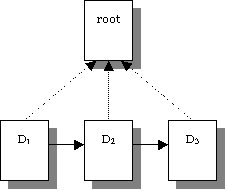
Figure 2: Transitioning between documents in an application.
Each dialog has one or more speech and/or DTMF grammars
associated with it. In machine directed applications, each
dialog’s grammars are active only when the user is in that
dialog. In mixed initiative applications, where the user and
the machine alternate in determining what to do next, some of the
dialogs are flagged to make their grammars active (i.e.,
listened for) even when the user is in another dialog in the same
document, or on another loaded document in the same application. In
this situation, if the user says something matching another
dialog’s active grammars, execution transitions to that other
dialog, with the user’s utterance treated as if it were said
in that dialog. Mixed initiative adds flexibility and power to
voice applications.
VoiceXML provides a form-filling mechanism for handling "normal"
user input. In addition, VoiceXML defines a mechanism for handling
events not covered by the form mechanism.
Events are thrown by the platform under a variety of
circumstances, such as when the user does not respond, doesn't
respond intelligibly, requests help, etc. The interpreter also
throws events if it finds a semantic error in a VoiceXML document.
Events are caught by catch elements or their syntactic shorthand.
Each element in which an event can occur may specify catch
elements. Catch elements are also inherited from enclosing elements
"as if by copy". In this way, common event handling behavior can be
specified at any level, and it applies to all lower levels.
A link supports mixed initiative. It specifies a grammar that is
active whenever the user is in the scope of the link. If user input matches
the link’s grammar, control transfers to the link’s destination
URI. A link can be used to throw an event or go to a destination URI.
Table 1: VoiceXML Elements
| Element |
Purpose |
Section |
| <assign> |
Assign a variable a value |
5.3.2
|
| <audio> |
Play an audio clip within a prompt |
4.1.3
|
| <block> |
A container of (non-interactive) executable code |
2.3.2
|
| <catch> |
Catch an event |
5.2.2
|
| <choice> |
Define a menu item |
2.2.2
|
| <clear> |
Clear one or more form item variables |
5.3.3
|
| <disconnect> |
Disconnect a session |
5.3.11
|
| <else> |
Used in <if> elements |
5.3.4
|
| <elseif> |
Used in <if> elements |
5.3.4
|
| <enumerate> |
Shorthand for enumerating the choices in a menu |
2.2.4
|
| <error> |
Catch an error event |
5.2.3
|
| <exit> |
Exit a session |
5.3.9
|
| <field> |
Declares an input field in a form |
2.3.1
|
| <filled> |
An action executed when fields are filled |
2.4
|
| <form> |
A dialog for presenting information and collecting data |
2.1
|
| <goto> |
Go to another dialog in the same or different document |
5.3.7
|
| <grammar> |
Specify a speech recognition or DTMF grammar |
3.1
|
| <help> |
Catch a help event |
5.2.3
|
| <if> |
Simple conditional logic |
5.3.4
|
| <initial> |
Declares initial logic upon entry into a (
mixed initiative
)
form |
2.3.3
|
| <link> |
Specify a transition common to all dialogs in the link’s
scope |
2.5
|
| <log> |
Generate a debug message |
5.3.13
|
| <menu> |
A dialog for choosing amongst alternative destinations |
2.2.1
|
| <meta> |
Define a metadata item as a name/value pair |
6.2.1
|
| <metadata> |
Define metadata information using a metadata schema |
6.2.2
|
| <noinput> |
Catch a noinput event |
5.2.3
|
| <nomatch> |
Catch a nomatch event |
5.2.3
|
| <object> |
Interact with a custom extension |
2.3.5
|
| <option> |
Specify an option in a <field> |
2.3.1.3
|
| <param> |
Parameter in <object> or <subdialog> |
6.4
|
| <prompt> |
Queue speech synthesis and audio output to the user |
4.1
|
| <property> |
Control implementation platform settings. |
6.3
|
| <record> |
Record an audio sample |
2.3.6
|
| <reprompt> |
Play a field prompt when a field is re-visited after an
event |
5.3.6
|
| <return> |
Return from a subdialog. |
5.3.10
|
| <script> |
Specify a block of ECMAScript client-side scripting logic |
5.3.12
|
| <subdialog> |
Invoke another dialog as a subdialog of the current one |
2.3.4
|
| <submit> |
Submit values to a document server |
5.3.8
|
| <throw> |
Throw an event. |
5.2.1
|
| <transfer> |
Transfer the caller to another destination |
2.3.7
|
| <value> |
Insert the value of an expression in a prompt |
4.1.4
|
| <var> |
Declare a variable |
5.3.1
|
| <vxml> |
Top-level element in each VoiceXML document |
1.5.1
|
A VoiceXML document is primarily composed of top-level elements called
dialogs. There are two types of dialogs: forms and
menus. A document may also have <meta> and <metadata>
elements, <var> and <script> elements, <property> elements,
<catch> elements, and <link> elements.
Document execution begins at the first dialog by default. As
each dialog executes, it determines the next dialog. When a dialog
doesn’t specify a successor dialog, document execution
stops.
Here is "Hello World!" expanded to illustrate some of this. It
now has a document level variable called "hi" which holds the
greeting. Its value is used as the prompt in the first form. Once
the first form plays the greeting, it goes to the form named
"say_goodbye", which prompts the user with "Goodbye!" Because the
second form does not transition to another dialog, it causes the
document to be exited.
<?xml version="1.0" encoding="UTF-8"?>
<vxml xmlns="http://www.w3.org/2001/vxml"
  xmlns:xsi="http://www.w3.org/2001/XMLSchema-instance"
  xsi:schemaLocation="http://www.w3.org/2001/vxml
   http://www.w3.org/TR/voicexml20/vxml.xsd"
   version="2.0">
 <meta name="author" content="John Doe"/>
 <meta name="maintainer" content="hello-support@hi.example.com"/>
 <var name="hi" expr="'Hello World!'"/>
 <form>
  <block>
     <value expr="hi"/>
     <goto next="#say_goodbye"/>
  </block>
 </form>
 <form id="say_goodbye">
  <block>
     Goodbye!
  </block>
 </form>
</vxml>
Alternatively the forms can be combined:
<?xml version="1.0" encoding="UTF-8"?>
<vxml xmlns="http://www.w3.org/2001/vxml"
  xmlns:xsi="http://www.w3.org/2001/XMLSchema-instance"
  xsi:schemaLocation="http://www.w3.org/2001/vxml
   http://www.w3.org/TR/voicexml20/vxml.xsd"
   version="2.0">
 <meta name="author" content="John Doe"/>
 <meta name="maintainer" content="hello-support@hi.example.com"/>
 <var name="hi" expr="'Hello World!'"/>
 <form>
  <block>
     <value expr="hi"/> Goodbye!
  </block>
 </form>
</vxml>
Attributes of <vxml> include:
Table 2: <vxml> Attributes
| version |
The version of VoiceXML of this document (required). The
current version number is 2.0. |
| xmlns |
The designated namespace for VoiceXML (required).
The namespace for VoiceXML is defined to be http://www.w3.org/2001/vxml.
|
| xml:base |
The base URI for this document as defined in [XML-BASE]. As in [HTML], a
URI which all relative references within the document take as their base. |
| xml:lang |
The
language
identifier
for this document . If omitted, the value is a
platform-specific default. |
| application |
The URI of this document’s application root document, if
any. |
Language information is inherited down the document hierarchy:
the value of "xml:lang" is inherited by elements which also define
the "xml:lang" attribute, such as <grammar> and
<prompt>, unless these elements specify an alternative
value.
Normally, each document runs as an isolated application. In cases where you
want multiple documents to work together as one application, you select one
document to be the application root document, and the rest to be
application leaf documents. Each leaf document names the root document
in its <vxml> element.
When this is done, every time the interpreter is told to load
and execute a
leaf document in this application, it first loads the application
root document if it is not already loaded. The application root
document remains loaded until the interpreter is told to load a
document that belongs to a different application. Thus one of the
following two conditions always holds during interpretation:
-
The application root document is loaded and the user is
executing in it: there is no leaf
document.
-
The application root document and a single leaf document are both loaded
and the user is executing in the leaf document.
If there is a chain of subdialogs defined in separate documents,
then there may be more than one leaf document loaded although
execution will only be in one of these documents.
When a leaf document load causes a root document
load, none of the dialogs in the root document are executed.
Execution begins in the leaf document.
There are several benefits to multi-document applications.
- The root document's variables are available for use
by the leaf documents, so that information can be shared and
retained.
- Root document <property> elements specify
default values for properties used in the leaf documents.
- Common ECMAScript code can be defined in root
document <script> elements and used in the leaf
documents.
- Root document <catch> elements define default
event handling for the leaf documents.
- Document-scoped grammars in the root document are
active when the user is in a leaf document, so that the user is
able to interact with forms, links, and menus in the root
document.
Here is a two-document application illustrating this:
Application root document (app-root.vxml)
<?xml version="1.0" encoding="UTF-8"?>
<vxml xmlns="http://www.w3.org/2001/vxml"
  xmlns:xsi="http://www.w3.org/2001/XMLSchema-instance"
  xsi:schemaLocation="http://www.w3.org/2001/vxml
   http://www.w3.org/TR/voicexml20/vxml.xsd"
   version="2.0">
 <var name="bye" expr="'Ciao'"/>
 <link next="operator_xfer.vxml">
   <grammar type="application/srgs+xml" root="root" version="1.0">
     <rule id="root" scope="public">operator</rule>
  </grammar>
 </link>
</vxml>
Leaf document (leaf.vxml)
<?xml version="1.0" encoding="UTF-8"?>
<vxml xmlns="http://www.w3.org/2001/vxml"
   xmlns:xsi="http://www.w3.org/2001/XMLSchema-instance"
   xsi:schemaLocation="http://www.w3.org/2001/vxml
   http://www.w3.org/TR/voicexml20/vxml.xsd"
   version="2.0" application="app-root.vxml">
 <form id="say_goodbye">
  <field name="answer">
     <grammar type="application/srgs+xml" src="/grammars/boolean.grxml"/>
     <prompt>Shall we say <value expr="application.bye"/>?</prompt>
     <filled>
       <if cond="answer">
        <exit/>
       </if>
       <clear namelist="answer"/>
     </filled>
  </field>
 </form>
</vxml>
In this example, the application is designed so that leaf.vxml
must be loaded first. Its application attribute specifies that
app-root.vxml should be used as the application root document. So,
app-root.vxml is then loaded, which creates the application
variable bye and also defines a link that navigates to
operator-xfer.vxml whenever the user says "operator". The user
starts out in the say_goodbye form:
C: Shall we say Ciao?
H: Si.
C: I did not understand what you said. (a
platform-specific default message.)
C: Shall we say Ciao?
H: Ciao
C: I did not understand what you said.
H: Operator.
C: (Goes to operator_xfer.vxml, which
transfers the caller to a human operator.)
Note that when the user is in a multi-document application, at
most two documents are loaded at any one time: the application root
document and, unless the user is actually interacting with the
application root document, an application leaf document. A root
document's <vxml> element does not have an application
attribute specified. A leaf document's <vxml> element does
have an application attribute specified. An interpreter always has
an application root document loaded; it does not always have an
application leaf document loaded.
The name of the interpreter's current application is the
application root document's absolute URI. The absolute URI includes
a query string, if present, but it does not include a fragment
identifier. The interpreter remains in the same application as long
as the name remains the same. When the name changes, a new
application is entered and its root context is initialized. The
application's root context consists of the variables, grammars,
catch elements, scripts, and properties in application scope.
During a user session an interpreter transitions from one
document to another as requested by <choice>, <goto>
<link>, <subdialog>, and <submit> elements. Some
transitions are within an application, others are between
applications. The preservation or initialization of the root
context depends on the type of transition:
- Root to Leaf Within Application
- A root to leaf transition within the same application occurs
when the current document is a root document and the target
document's application attribute's value resolves to the same
absolute URI as the name of the current application. The
application root document and its context are preserved.
- Leaf to Leaf Within Application
- A leaf to leaf transition within the same application occurs
when the current document is a leaf document and the target
document's application attribute's value resolves to the same
absolute URI as the name of the current application. The
application root document and its context are preserved.
- Leaf to Root Within Application
- A leaf to root transition within the same application occurs when the
current document is a leaf document and the target document's absolute URI is
the same as the name of the current application. The current application root
document and its context are preserved when the transition is caused by a
<choice>, <goto>, or <link> element. The root context is
initialized when a <submit> element causes the leaf to root transition,
because a <submit> always results in a fetch of its URI.
- Root to Root
- A root to root transition occurs when the current document is a root
document and the target document is a root document, i.e. it does not have an
application attribute. The root context is initialized with the application
root document returned by the caching policy in Section
6.1.2. The caching policy is consulted even when the name of the target application and the current
application are the same.
- Subdialog
- A subdialog invocation occurs when a root or leaf document
executes a <subdialog> element. As discussed in Section 2.3.4, subdialog invocation creates a new
execution context. The application root document and its context in
the calling document's execution context are preserved untouched
during subdialog execution, and are used again once the subdialog
returns. A subdialog's new execution context has its own root
context and, possibly, leaf context.
When the subdialog is invoked with a non-empty URI reference, the
caching policy in Section 6.1.2 is used to
acquire the root and leaf documents that will be used to initialize
the new root and leaf contexts. If a subdialog is invoked with an
empty URI reference and a fragment identifier, e.g. "#sub1", the root
and leaf documents remain unchanged, and therefore the current root
and leaf documents will be used to initialize the new root and leaf
contexts.
- Inter-Application Transitions
- All other transitions are between applications which cause the
application root context to be initialized with the next
application's root document.
If a document refers to a non-existent application root
document, an error.badfetch event is thrown. If a document's application
attribute refers to a document that also has an application attribute
specified, an error.semantic event is thrown.
The following diagrams illustrate the effect of the transitions
between root and leaf documents on the application root context. In
these diagrams, boxes represent documents, box texture changes
identify root context initialization, solid arrows symbolize
transitions to the URI in the arrow's label, dashed vertical arrows
indicate an application attribute whose URI is the arrow's
label.
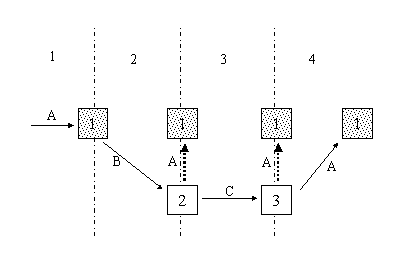
Figure 3: Transitions that Preserve the Root Context
In this diagram, all the documents belong to the same
application. The transitions are identified by the numbers 1-4
across the top of the figure. They are:
- A transition to URI A results in document 1, the application
context is initialized from document 1's content. Assume that this
is the first document in the session. The current application's
name is A.
- Document 1 specifies a transition to URI B, which yields
document 2. Document 2's application attribute equals URI A. The
root is document 1 with its context preserved. This is a root to
leaf transition within the same application.
- Document 2 specifies a transition to URI C, which yields
another leaf document, document 3. Its application attribute also
equals URI A. The root is document 1 with its context preserved.
This is a leaf to leaf transition within the same application.
- Document 3 specifies a transition to URI A using a
<choice>, <goto>, or <link>. Document 1 is used
with its root context intact. This is a leaf to root transition
within the same application.
The next diagram illustrates transitions which initialize the
root context.
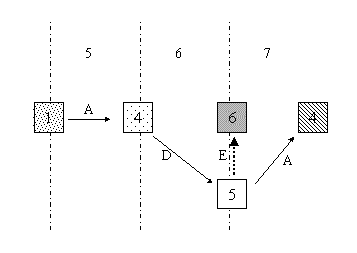
Figure 4: Transitions that Initialize the Root Context
- Document 1 specifies a transition to its own URI A. The
resulting document 4 does not have an application attribute, so it
is considered a root document, and the root context is initialized.
This is a root to root transition.
- Document 4 specifies a transition to URI D, which yields a leaf
document 5. Its application attribute is different: URI E. A new
application is being entered. URI E produces the root document 6.
The root context is initialized from the content of document 6.
This is an inter-application transition.
- Document 5 specifies a transition to URI A. The cache check
returns document 4 which does not have an application attribute and
therefore belongs to application A, so the root context is
initialized. Initialization occurs even though this application and
this root document were used earlier in the session. This is an
inter-application transition.
A subdialog is a mechanism for decomposing complex sequences of
dialogs to better structure them, or to create reusable components.
For example, the solicitation of account information may involve
gathering several pieces of information, such as account number,
and home telephone number. A customer care service might be
structured with several independent applications that could share
this basic building block, thus it would be reasonable to construct
it as a subdialog. This is illustrated in the example below. The
first document, app.vxml, seeks to adjust a customer’s
account, and in doing so must get the account information and then
the adjustment level. The account information is obtained by using
a subdialog element that invokes another VoiceXML document to
solicit the user input. While the second document is being
executed, the calling dialog is suspended, awaiting the return of
information. The second document provides the results of its user
interactions using a <return> element, and the resulting
values are accessed through the variable defined by the name
attribute on the <subdialog> element.
Customer Service Application (app.vxml)
<?xml version="1.0" encoding="UTF-8"?>
<vxml xmlns="http://www.w3.org/2001/vxml"
   xmlns:xsi="http://www.w3.org/2001/XMLSchema-instance"
   xsi:schemaLocation="http://www.w3.org/2001/vxml
   http://www.w3.org/TR/voicexml20/vxml.xsd"
   version="2.0">
  <form id="billing_adjustment">
    <var name="account_number"/>
    <var name="home_phone"/>
    <subdialog name="accountinfo" src="acct_info.vxml#basic">
      <filled>
        <!-- Note the variable defined by "accountinfo" is
          returned as an ECMAScript object and it contains two
          properties defined by the variables specified in the
          "return" element of the subdialog. -->

        <assign name="account_number" expr="accountinfo.acctnum"/>
        <assign name="home_phone" expr="accountinfo.acctphone"/>
      </filled>
    </subdialog>

    <field name="adjustment_amount">
     <grammar type="application/srgs+xml" src="/grammars/currency.grxml"/>
      <prompt>
        What is the value of your account adjustment?
      </prompt>
      <filled>
        <submit  next="/cgi-bin/updateaccount"/>
      </filled>
    </field>
  </form>
</vxml>
Document Containing Account Information Subdialog
(acct_info.vxml)
<?xml version="1.0" encoding="UTF-8"?>
<vxml xmlns="http://www.w3.org/2001/vxml"
  xmlns:xsi="http://www.w3.org/2001/XMLSchema-instance"
   xsi:schemaLocation="http://www.w3.org/2001/vxml
   http://www.w3.org/TR/voicexml20/vxml.xsd"
   version="2.0">
  <form id="basic">
    <field name="acctnum">
      <grammar type="application/srgs+xml" src="/grammars/digits.grxml"/>
      <prompt> What is your account number? </prompt>
    </field>
    <field name="acctphone">
      <grammar type="application/srgs+xml" src="/grammars/phone_numbers.grxml"/>
      <prompt> What is your home telephone number? </prompt>
      <filled>
        <!-- The values obtained by the two fields are supplied
          to the calling dialog by the "return" element. -->
        <return namelist="acctnum acctphone"/>
      </filled>
    </field>
  </form>
</vxml>
Subdialogs add a new execution context when they are invoked.The
subdialog could be a new dialog within the existing document, or a
new dialog within a new document.
Subdialogs can be composed of several documents. Figure 5 shows
the execution flow where a sequence of documents (D) transitions to
a subdialog (SD) and then back.
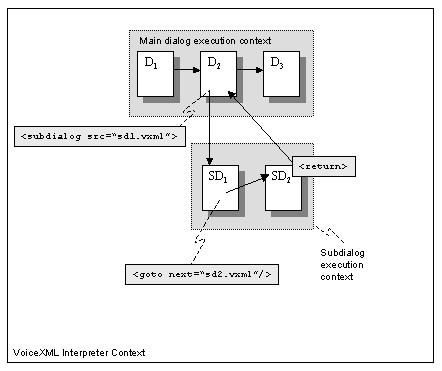
Figure 5: Subdialog composed of several documents
returning from the last subdialog document.
The execution context in dialog D2 is suspended when it invokes
the subdialog SD1 in document sd1.vxml. This subdialog specifies
execution is to be transfered to the dialog in sd2.vxml (using
<goto>). Consequently, when the dialog in sd2.vxml returns,
control is returned directly to dialog D2.
Figure 6 shows an example of a multi-document subdialog where
control is transferred from one subdialog to another.
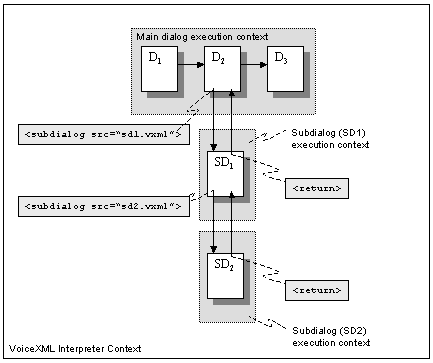
Figure 6: Subdialog composed of several documents
returning from the first subdialog document.
The subdialog in sd1.vxml specifies that control is to be
transfered to a second subdialog, SD2, in sd2.vxml. When executing
SD2, there are two suspended contexts: the dialog context in D2 is
suspending awaiting SD1 to return; and the dialog context in SD1
awaiting SD2 to return. When SD2 returns, control is returned to
the SD1. It in turn returns control to dialog D2.
Under certain circumstances (in particular, while the VoiceXML interpreter
is processing a disconnect event) the interpreter may continue executing in
the final processing state after there is no longer a connection to
allow the interpreter to interact with the end user. The purpose of this
state is to allow the VoiceXML application to perform any necessary final
cleanup, such as submitting information to the application server. For
example, the following <catch> element will catch the
connection.disconnect.hangup event and execute in the final processing state:
<catch event="connection.disconnect.hangup">
    <submit namelist="myExit" next="http://mysite/exit.jsp"/>
</catch>
While in the final processing state the application must remain in
the transitioning state and may not enter the waiting state (as
described in Section 4.1.8). Thus for example
the application should not enter <field>, <record>, or
<transfer> while in the final processing state. The VoiceXML
interpreter must exit if the VoiceXML application attempts to enter
the waiting state while in the final processing state.
Aside from this restriction, execution of the VoiceXML application
continues normally while in the final processing state. Thus for
example the application may transition between documents while in the
final processing state, and the interpreter must exit if no form item
is eligible to be selected (as described in Section 2.1.1).
Forms are the key component of VoiceXML documents. A form
contains:
-
A set of form items, elements that are visited in the main loop of
the form interpretation algorithm. Form items are subdivided into input
items that can be 'filled' by user input and control items that
cannot.
-
Declarations of non-form item variables.
-
Event handlers.
-
"Filled" actions, blocks of procedural logic that execute when certain
combinations of input item variables are assigned.
Form attributes are:
Table 3: <form> Attributes
| id |
The name of the form. If specified, the form can be referenced
within the document or from another document. For instance <form
id="weather">, <goto next="#weather">. |
| scope |
The default scope of the form’s grammars. If it is dialog
then the form grammars are active only in the form. If the scope is
document, then the form grammars are active during any dialog in
the same document. If the scope is document and the document is an
application root document, then the form grammars are active during
any dialog in any document of this application. Note that the scope
of individual form grammars takes precedence over the default
scope; for example, in non-root documents a form with the default
scope "dialog", and a form grammar with the scope "document", then
that grammar is active in any dialog in the document. |
This section describes some of the concepts behind forms, and
then gives some detailed examples of their operation.
Forms are interpreted by an implicit form interpretation algorithm
(FIA). The FIA has a main loop that repeatedly selects a form item and then
visits it. The selected form item is the first in document order whose guard
condition is not satisfied. For instance, a field’s default guard
condition tests to see if the field’s form item variable has a value, so
that if a simple form contains only fields, the user will be prompted for each
field in turn.
Interpreting a form item generally involves:
-
Selecting and playing one or more prompts;
-
Collecting a user input, either a response that fills in one or more input
items, or a throwing of some event (help, for instance); and
-
Interpreting any <filled> actions that pertained to the
newly filled in input items.
The FIA ends when it interprets a transfer of control statement
(e.g. a <goto> to another dialog or document, or a
<submit> of data to the document server). It also ends with
an implied <exit> when no form item remains eligible to
select.
The FIA is described in more detail in
Section 2.1.6.
Form items are the elements that can be visited in the main loop of the
form interpretation algorithm. Input items direct the FIA to gather a result
for a specific element. When the FIA selects a control item, the control item
may contain a block of procedural code to execute, or it may tell the FIA to
set up the initial prompt-and-collect for a mixed initiative form.
An input item specifies an input item variable to gather from the
user. Input items have prompts to tell the user what to say or key in,
grammars that define the allowed inputs, and event handlers that process any
resulting events. An input item may also have a <filled> element that
defines an action to take just after the input item variable is filled. Input
items consist of:
Table 4: Input Items
| <field> |
An input item whose value is obtained via ASR or DTMF grammars. |
| <record> |
An input item whose value is an audio clip recorded by the user.
A <record> element could collect a voice mail message, for instance. |
| <transfer> |
An input item which transfers the user to another telephone
number. If the transfer returns control, the field variable will be
set to the result status. |
| <object> |
This input item invokes a platform-specific
"object" with various parameters. The result of the platform object is an
ECMAScript Object. One platform object could be a
builtin dialog that gathers credit card information. Another could gather a
text message using some proprietary DTMF text entry method. There is no
requirement for implementations to provide platform-specific objects, although
implementations must handle the <object> element by throwing error.unsupported.objectname if the particular
platform-specific object is not supported (more specific error information may
be provided in the event "_message" special variable as described in Section 5.2.2.). |
| <subdialog> |
A <subdialog> input item is roughly like a function call.
It invokes another dialog on the current page, or invokes another
VoiceXML document. It returns an ECMAScript Object as its
result. |
There are two types of control items:
Table 5: Control Items
| <block> |
A sequence of procedural statements used for prompting and
computation, but not for gathering input. A block has a (normally
implicit) form item variable that is set to true just before it is
interpreted. |
| <initial> |
This element controls the initial interaction in a mixed
initiative form. Its prompts should be written to encourage the
user to say something matching a form level grammar. When at least
one input item variable is filled as a result of recognition during
an <initial> element, the form item variable of
<initial> becomes true, thus removing it as an alternative
for the FIA. |
Each form item has an associated form item variable, which by
default is set to undefined when the form is entered. This form item variable
will contain the result of interpreting the form item. An input item’s
form item variable is also called an input item variable, and it holds
the value collected from the user. A form item variable can be given a name
using the name attribute, or left nameless, in which case an internal name is
generated.
Each form item also has a guard condition, which governs
whether or not that form item can be selected by the form
interpretation algorithm. The default guard condition just tests to
see if the form item variable has a value. If it does, the form
item will not be visited.
Typically, input items are given names, but control items are
not. Generally form item variables are not given initial values and additional
guard conditions are not specified. But sometimes there is a need for more
detailed control. One form may have a form item variable initially set to hide
a field, and later cleared (e.g., using <clear>) to force the
field’s collection. Another field may have a guard condition that
activates it only when it has not been collected, and when two other fields
have been filled. A block item could execute only when some condition holds
true. Thus, fine control can be exercised over the order in which form items
are selected and executed by the FIA, however in general, many dialogs can be
constructed without resorting to this level of complexity.
In summary, all form items have the following attributes:
Table 6: Common Form Item Attributes
| name |
The name of a dialog-scoped form item variable that will hold
the value of the form item. |
| expr |
The initial value of the form item variable; default is
ECMAScript undefined. If initialized to a value, then the form item
will not be executed unless the form item variable is cleared. |
| cond |
An expression to evaluate in conjunction with the test of the
form item variable. If absent, this defaults to true, or in the
case of <initial>, a test to see if any input item variable
has been filled in. |
The simplest and most common type of form is one in which the
form items are executed exactly once in sequential order to
implement a computer-directed interaction. Here is a weather
information service that uses such a form.
<?xml version="1.0" encoding="UTF-8"?>
<vxml version="2.0" xmlns="http://www.w3.org/2001/vxml"
  xmlns:xsi="http://www.w3.org/2001/XMLSchema-instance"
  xsi:schemaLocation="http://www.w3.org/2001/vxml
   http://www.w3.org/TR/voicexml20/vxml.xsd">
<form id="weather_info">
 <block>Welcome to the weather information service.</block>
 <field name="state">
  <prompt>What state?</prompt>
  <grammar src="state.grxml"  type="application/srgs+xml"/>
  <catch event="help">
     Please speak the state for which you want the weather.
  </catch>
 </field>
 <field name="city">
  <prompt>What city?</prompt>
  <grammar src="city.grxml" type="application/srgs+xml"/>
  <catch event="help">
     Please speak the city for which you want the weather.
  </catch>
 </field>
 <block>
  <submit next="/servlet/weather" namelist="city state"/>
 </block>
</form>
</vxml>
This dialog proceeds sequentially:
C (computer): Welcome to the weather information service. What
state?
H (human): Help
C: Please speak the state for which you want the weather.
H: Georgia
C: What city?
H: Tblisi
C: I did not understand what you said. What city?
H: Macon
C: The conditions in Macon Georgia are sunny and clear at 11 AM
...
The form interpretation algorithm’s first iteration selects the first
block, since its (hidden) form item variable is initially undefined. This
block outputs the main prompt, and its form item variable is set to true. On
the FIA’s second iteration, the first block is skipped because its form
item variable is now defined, and the state field is selected because the
dialog variable state is undefined. This field prompts the user for the state,
and then sets the variable state to the answer. A detailed description of the
filling of form item variables from a field-level grammar may be found in Section 3.1.6. The third form iteration prompts and
collects the city field. The fourth iteration executes the final block and
transitions to a different URI.
Each field in this example has a prompt to play in order to
elicit a response, a grammar that specifies what to listen for, and
an event handler for the help event. The help event is thrown
whenever the user asks for assistance. The help event handler
catches these events and plays a more detailed prompt.
Here is a second directed form, one that prompts for credit card
information:
<?xml version="1.0" encoding="UTF-8"?>
<vxml version="2.0" xmlns="http://www.w3.org/2001/vxml"
xmlns:xsi="http://www.w3.org/2001/XMLSchema-instance"
xsi:schemaLocation="http://www.w3.org/2001/vxml
http://www.w3.org/TR/voicexml20/vxml.xsd">
<form id="get_card_info">
<block>We now need your credit card type, number,
and expiration date.</block>
<field name="card_type">
<prompt count="1">What kind of credit card
do you have?</prompt>
<prompt count="2">Type of card?</prompt>
<!-- This is an inline grammar. -->
<grammar type="application/srgs+xml" root="r2" version="1.0">
<rule id="r2" scope="public">
<one-of>
<item>visa</item>
<item>master <item repeat="0-1">card</item></item>
<item>amex</item>
<item>american express</item>
</one-of>
</rule>
</grammar>
<help> Please say Visa, Mastercard, or American Express.</help>
</field>
<field name="card_num">
<grammar type="application/srgs+xml" src="/grammars/digits.grxml"/>
<prompt count="1">What is your card number?</prompt>
<prompt count="2">Card number?</prompt>
<catch event="help">
<if cond="card_type =='amex' || card_type =='american express'">
Please say or key in your 15 digit card number.
<else/>
Please say or key in your 16 digit card number.
</if>
</catch>
<filled>
<if cond="(card_type == 'amex' || card_type =='american express')
&& card_num.length != 15">
American Express card numbers must have 15 digits.
<clear namelist="card_num"/>
<throw event="nomatch"/>
<elseif cond="card_type != 'amex'
&& card_type !='american express'
&& card_num.length != 16"/>
Mastercard and Visa card numbers have 16 digits.
<clear namelist="card_num"/>
<throw event="nomatch"/>
</if>
</filled>
</field>
<field name="expiry_date">
<grammar type="application/srgs+xml" src="/grammars/digits.grxml"/>
<prompt count="1">What is your card's expiration date?</prompt>
<prompt count="2">Expiration date?</prompt>
<help>
Say or key in the expiration date, for example one two oh one.
</help>
<filled>
<!-- validate the mmyy -->
<var name="mm"/>
<var name="i" expr="expiry_date.length"/>
<if cond="i == 3">
<assign name="mm" expr="expiry_date.substring(0,1)"/>
<elseif cond="i == 4"/>
<assign name="mm" expr="expiry_date.substring(0,2)"/>
</if>
<if cond="mm == '' || mm < 1 || mm > 12">
<clear namelist="expiry_date"/>
<throw event="nomatch"/>
</if>
</filled>
</field>
<field name="confirm">
<grammar type="application/srgs+xml" src="/grammars/boolean.grxml"/>
<prompt>
I have <value expr="card_type"/> number
<value expr="card_num"/>, expiring on
<value expr="expiry_date"/>.
Is this correct?
</prompt>
<filled>
<if cond="confirm">
<submit next="place_order.asp"
namelist="card_type card_num expiry_date"/>
</if>
<clear namelist="card_type card_num expiry_date confirm"/>
</filled>
</field>
</form>
</vxml>
Note that the grammar alteratives 'amex' and 'american express'
return literal values which need to be handled separately in the
conditional expressions. Section 3.1.5
describes how semantic attachments in the grammar can be used to
return a single representation of these inputs.
The dialog might go something like this:
C: We now need your credit card type, number, and expiration
date.
C: What kind of credit card do you have?
H: Discover
C: I did not understand what you said. (a
platform-specific default message.)
C: Type of card? (the second prompt is used
now.)
H: Shoot. (fortunately treated as "help" by
this platform)
C: Please say Visa, Master card, or American Express.
H: Uh, Amex. (this platform ignores
"uh")
C: What is your card number?
H: One two three four ... wait ...
C: I did not understand what you said.
C: Card number?
H: (uses DTMF) 1 2 3 4 5 6 7 8 9 0 1
2 3 4 5 #
C: What is your card’s expiration date?
H: one two oh one
C: I have Amex number 1 2 3 4 5 6 7 8 9 0 1 2 3 4 5 6 expiring
on 1 2 0 1. Is this correct?
H: Yes
Fields are the major building blocks of forms. A field declares
a variable and specifies the prompts, grammars, DTMF sequences,
help messages, and other event handlers that are used to obtain it.
Each field declares a VoiceXML form item variable in the
form’s dialog scope. These may be submitted once the form is
filled, or copied into other variables.
Each field has its own speech and/or DTMF grammars, specified explicitly
using <grammar> elements, or implicitly using the type attribute. The
type attribute is used for builtin
grammars, like digits, boolean, or number.
Each field can have one or more prompts. If there is one, it is repeatedly
used to prompt the user for the value until one is provided. If there are
many, prompts are selected for playback according to the prompt selection
algorithm (see Section 4.1.6). The count attribute can
be used to determine which prompts to use on each attempt. In the example,
prompts become shorter. This is called tapered prompting.
The <catch event="help"> elements are event handlers that
define what to do when the user asks for help. Help messages can
also be tapered. These can be abbreviated, so that the following
two elements are equivalent:
<catch event="help">
 Please say visa, mastercard, or amex.
</catch>

<help>
 Please say visa, mastercard, or amex.
</help>
The <filled> element defines what to do when the user
provides a recognized input for that field. One use is to specify
integrity constraints over and above the checking done by the
grammars, as with the date field above.
The last section talked about forms implementing rigid, computer-directed
conversations. To make a form mixed initiative, where both the computer
and the human direct the conversation, it must have one or more form-level
grammars. The dialog may be written in several ways. One
common authoring style combines an <initial> element that prompts for a
general response with <field> elements that prompt for specific
information. This is illustrated in the example below. More complex
techniques, such as using the 'cond' attribute on <field> elements, may
achieve a similar effect.
If a form has form-level grammars:
Only input items (and not control items) can be filled as a result of
matching a form-level grammar. The filling of field variables when using a
form-level grammar is described in Section 3.1.6.
Also, the form’s grammars can be active when the user is in other
dialogs. If a document has two forms on it, say a car rental form and a hotel
reservation form, and both forms have grammars that are active for that
document, a user could respond to a request for hotel reservation information
with information about the car rental, and thus direct the computer to talk
about the car rental instead. The user can speak to any active grammar, and
have input items set and actions taken in response.
Example. Here is a second version of the weather
information service, showing mixed initiative. It has been
"enhanced" for illustrative purposes with advertising and with a
confirmation of the city and state:
<?xml version="1.0" encoding="UTF-8"?>
<vxml version="2.0" xmlns="http://www.w3.org/2001/vxml"
xmlns:xsi="http://www.w3.org/2001/XMLSchema-instance"
xsi:schemaLocation="http://www.w3.org/2001/vxml
http://www.w3.org/TR/voicexml20/vxml.xsd">
<form id="weather_info">
<grammar src="cityandstate.grxml" type="application/srgs+xml"/>
<!-- Caller can't barge in on today's advertisement. -->
<block>
<prompt bargein="false">
Welcome to the weather information service.
<audio src="http://www.online-ads.example.com/wis.wav"/>
</prompt>
</block>
<initial name="start">
<prompt>
For what city and state would you like the weather?
</prompt>
<help>
Please say the name of the city and
state for which you would like a weather report.
</help>
<!-- If user is silent, reprompt once, then
try directed prompts. -->
<noinput count="1"> <reprompt/></noinput>
<noinput count="2"> <reprompt/>
<assign name="start" expr="true"/></noinput>
</initial>
<field name="state">
<prompt>What state?</prompt>
<help>
Please speak the state for which you want the weather.
</help>
</field>
<field name="city">
<prompt>Please say the city in <value expr="state"/>
for which you want the weather.</prompt>
<help>Please speak the city for which you
want the weather.</help>
<filled>
<!-- Most of our customers are in LA. -->
<if cond="city == 'Los Angeles' && state == undefined">
<assign name="state" expr="'California'"/>
</if>
</filled>
</field>
<field name="go_ahead" modal="true">
<grammar type="application/srgs+xml" src="/grammars/boolean.grxml"/>
<prompt>Do you want to hear the weather for
<value expr="city"/>, <value expr="state"/>?
</prompt>
<filled>
<if cond="go_ahead">
<prompt bargein="false">
<audio src="http://www.online-ads.example.com/wis2.wav"/>
</prompt>
<submit next="/servlet/weather" namelist="city state"/>
</if>
<clear namelist="start city state go_ahead"/>
</filled>
</field>
</form>
</vxml>
Here is a transcript showing the advantages for even a novice
user:
C: Welcome to the weather information service. Buy Joe’s
Spicy Shrimp Sauce.
C: For what city and state would you like the weather?
H: Uh, California.
C: Please say the city in California for which you want the
weather.
H: San Francisco, please.
C: Do you want to hear the weather for San Francisco,
California?
H: No
C: For what city and state would you like the weather?
H: Los Angeles.
C: Do you want to hear the weather for Los Angeles,
California?
H: Yes
C: Don’t forget, buy Joe’s Spicy Shrimp Sauce
tonight!
C: Mostly sunny today with highs in the 80s. Lows tonight from
the low 60s ...
The go_ahead field has its modal attribute set to true. This
causes all grammars to be disabled except the ones defined in the
current form item, so that the only grammar active during this
field is the grammar for boolean.
An experienced user can get things done much faster (but is
still forced to listen to the ads):
C: Welcome to the weather information service. Buy Joe’s
Spicy Shrimp Sauce.
C: What ...
H (barging in): LA
C: Do you ...
H (barging in): Yes
C: Don’t forget, buy Joe’s Spicy Shrimp Sauce
tonight!
C: Mostly sunny today with highs in the 80s. Lows tonight from
the low 60s ...
The form interpretation algorithm can be customized in several
ways. One way is to assign a value to a form item variable, so that
its form item will not be selected. Another is to use <clear>
to set a form item variable to undefined; this forces the FIA to
revisit the form item again.
Another method is to explicitly specify the next form item to visit using
<goto nextitem>. This forces an immediate transfer to that form item.
No variables, conditions or counters in the targeted form item will be
reset. The form item's prompt will be played even if it has already been
visited. If the <goto nextitem> occurs in a <filled> action, the
rest of the <filled> action and any pending <filled> actions will
be skipped.
Here is an example <goto nextitem> executed in response to
the exit event:
<?xml version="1.0" encoding="UTF-8"?>
<vxml version="2.0" xmlns="http://www.w3.org/2001/vxml"
  xmlns:xsi="http://www.w3.org/2001/XMLSchema-instance"
  xsi:schemaLocation="http://www.w3.org/2001/vxml
   http://www.w3.org/TR/voicexml20/vxml.xsd">
<form id="survey_2000_03_30">
  <catch event="exit">
    <reprompt/>
    <goto nextitem="confirm_exit"/>
  </catch>
  <block>
   <prompt>
     Hello, you have been called at random to answer questions
     critical to U.S. foreign policy.
   </prompt>
  </block>

  <field name="q1">
   <grammar type="application/srgs+xml" src="/grammars/boolean.grxml"/>
   <prompt>Do you agree with the IMF position on
     privatizing certain functions of Burkina Faso’s
     agriculture ministry?</prompt>
  </field>

  <field name="q2">
    <grammar type="application/srgs+xml" src="/grammars/boolean.grxml"/>
    <prompt>If this privatization occurs, will its
      effects be beneficial mainly to Ouagadougou and
      Bobo-Dioulasso?</prompt>
  </field>

  <field name="q3">
    <grammar type="application/srgs+xml" src="/grammars/boolean.grxml"/>
    <prompt>Do you agree that sorghum and millet output
      might thereby increase by as much as four percent per
      annum?</prompt>
  </field>

  <block>
    <submit next="register" namelist="q1 q2 q3"/>
  </block>

  <field name="confirm_exit">
    <grammar type="application/srgs+xml" src="/grammars/boolean.grxml"/>
    <prompt>You have elected to exit.  Are you
      sure you want to do this, and perhaps adversely affect
      U.S. foreign policy vis-a-vis sub-Saharan Africa for
      decades to come?</prompt>
    <filled>
      <if cond="confirm_exit">
        Okay, but the U.S. State Department is displeased.
        <exit/>
      <else/>
        Good, let's pick up where we left off.
        <clear namelist="confirm_exit"/>
      </if>
    </filled>
    <catch event="noinput nomatch">
      <throw event="exit"/>
    </catch>
  </field>
</form>
</vxml>
If the user says "exit" in response to any of the survey
questions, an exit event is thrown by the platform and caught by
the <catch> event handler. This handler directs that
confirm_exit be the next visited field. The confirm_exit field
would not be visited during normal completion of the survey because
the preceding <block> element transfers control to the
registration script.
We’ve presented the form interpretation algorithm (FIA) at
a conceptual level. In this section we describe it in more detail.
A more formal description is provided in
Appendix C.
Whenever a form is entered, it is initialized. Internal prompt
counter variables (in the form’s dialog scope) are reset to
1. Each variable (form-level <var> elements and form item
variables) is initialized, in document order, to undefined or to
the value of the relevant expr attribute.
The main loop of the FIA has three phases:
The select phase: the next unfilled form item is selected for
visiting.
The collect phase: the selected form item is visited,
which prompts the user for input, enables the appropriate grammars, and then
waits for and collects an input (such as a spoken phrase or DTMF key
presses) or an event (such as a request for help or a no input
timeout).
The process phase: an input is processed by filling
form items and executing <filled> elements to perform actions
such as input validation. An event is processed by executing the
appropriate event handler for that event type.
Note that the FIA may be given an input (a set of grammar slot/slot value
pairs) that was collected while the user was in a different form’s
FIA. In this case the first iteration of the main loop skips the select and
collect phases, and goes right to the process phase with that input. Also note that if an error occurs in the select or collect phase
that causes an event to be generated, the event is thrown and the FIA moves
directly into the process phase.
The purpose of the select phase is to select the next form item
to visit. This is done as follows:
If a <goto> from the last main loop iteration’s
process phase specified a <goto nextitem>, then the specified
form item is selected.
Otherwise the first form item whose guard condition is false is
chosen to be visited. If an error occurs while checking
guard conditions, the event is thrown which skips the collect phase, and is
handled in the process phase.
If no guard condition is false, and the last iteration completed the form
without encountering an explicit transfer of control, the FIA does an
implicit <exit> operation (similarly, if execution proceeds outside of a
form, such as when an error is generated outside of a form, and there is no
explicit transfer of control, the interpreter will perform an implicit
<exit> operation).
The purpose of the collect phase is to collect an input or an
event. The selected form item is visited, which performs
actions that depend on the type of form item:
If a field item is visited, the FIA selects and queues up any prompts based
on the field item’s prompt counter and the prompt conditions. Then it
activates and listens for the field level grammar(s) and any active
higher-level grammars, and waits for a grammar recognition or for some
event.
If a <transfer> is visited, the prompts are queued based
on the item’s prompt counter and the prompt conditions. The
item grammars are activated. The queue is played before the
transfer is executed.
If a <subdialog> or <object> is visited, the prompts
are queued based on the item’s prompt counter and the prompt
conditions. Grammars are not activated. Instead, the input
collection behavior is specified by the executing context for the
subdialog or object. The queue is not played before the subdialog
or object is executed, but instead should be played during the
subsequent input collection.
If an <initial> is visited, the FIA selects and queues up
prompts based on the <initial>’s prompt counter and
prompt conditions. Then it listens for the form level grammar(s)
and any active higher-level grammars. It waits for a grammar
recognition or for an event.
A <block> element is visited by setting its form item
variable to true, evaluating its content, and then bypassing the
process phase. No input is collected, and the next iteration of the
FIA’s main loop is entered.
The purpose of the process phase is to process the input or event collected
during the previous phases, as follows:
- If an event (such as a noinput or a hangup) occurred, then the
applicable catch element is identified and executed. Selection of
the applicable catch element starts in the scope of the current
form item and then proceeds outward by enclosing dialog scopes.
This can cause the FIA to terminate (e.g. if it transitions to a
different dialog or document or it does an <exit>), or it can
cause the FIA to go into the next iteration of the main loop (e.g.
as when the default help event handler is executed).
- If an input matches a grammar from a <link> then that
link’s transition is executed, or its event is thrown. If the
<link> throws an event, the event is processed in the context
of the current form item (e.g. <initial>, <field>,
<transfer>, and so forth).
- If an input matches a grammar in a form other than the current
form, then the FIA terminates, the other form is initialized, and
that form’s FIA is started with this input in its process
phase.
If an input matches a grammar in this form, then:
- The semantic result from the grammar is mapped into
one or more form item variables as described in
Section 3.1.6.
- The <filled> actions triggered by these assignments are
identified as described in Section 2.4.
- Each identified <filled> action is executed in document
order. If a <submit>, <disconnect>, <exit>,
<return>, <goto> or <throw> is encountered, the
remaining <filled> elements are not executed, and the FIA
either terminates or continues in the next main loop iteration.
<reprompt> does not terminate the FIA (the name suggests an
action), but rather just sets a flag that affects the treatment of
prompts on the subsequent iteration of the FIA. If an event is
thrown during the execution of a <filled>, event handler
selection starts in the scope of the <filled>, which could be
a form item or the form itself, and then proceeds outward by
enclosing dialog scopes.
After completion of the process phase, interpretation continues
by returning to the select phase.
A more detailed form interpretation algorithm can be found in Appendix C.
A menu is a convenient syntactic shorthand for a form
containing a single anonymous field that prompts the user to make a
choice and transitions to different places based on that choice.
Like a regular form, it can have its grammar scoped such that it is
active when the user is executing another dialog. The following
menu offers the user three choices:
<?xml version="1.0" encoding="UTF-8"?>
<vxml version="2.0" xmlns="http://www.w3.org/2001/vxml"
  xmlns:xsi="http://www.w3.org/2001/XMLSchema-instance"
  xsi:schemaLocation="http://www.w3.org/2001/vxml
   http://www.w3.org/TR/voicexml20/vxml.xsd">
<menu>
  <prompt>
    Welcome home. Say one of: <enumerate/>
  </prompt>
  <choice next="http://www.sports.example.com/vxml/start.vxml">
     Sports
  </choice>
  <choice next="http://www.weather.example.com/intro.vxml">
     Weather
  </choice>
  <choice next="http://www.stargazer.example.com/voice/astronews.vxml">
     Stargazer astrophysics news
  </choice>
  <noinput>Please say one of <enumerate/></noinput>
</menu>
</vxml>
This dialog might proceed as follows:
C: Welcome home. Say one of: sports; weather; Stargazer
astrophysics news.
H: Astrology.
C: I did not understand what you said. (a
platform-specific default message.)
C: Welcome home. Say one of: sports; weather; Stargazer
astrophysics news.
H: sports.
C: (proceeds to
http://www.sports.example.com/vxml/start.vxml)
This identifies the menu, and determines the scope of its
grammars. Menu attributes are:
Table 7: <menu> Attributes
| id |
The identifier of the menu. It allows the menu to be the target
of a <goto> or a <submit>. |
| scope |
The menu’s grammar scope. If it is dialog (the
default), the menu’s grammars are only active when the
user transitions into the menu. If the scope is document, its
grammars are active over the whole document (or if the menu is in
the application root document, any loaded document in the
application). |
| dtmf |
When set to true, the first nine choices that have not explicitly
specified a value for the dtmf attribute are given the implicit ones "1", "2",
etc. Remaining choices that have not explicitly specified a value for the dtmf
attribute will not be assigned DTMF values (and thus cannot be matched via a
DTMF keypress).
If there are choices which have specified their own DTMF
sequences to be something other than "*", "#", or "0", an error.badfetch
will be thrown.
The default is false.
|
| accept |
When set to "exact" (the default), the text of the choice
elements in the menu defines the exact phrase to be recognized.
When set to "approximate", the text of the choice elements defines
an approximate recognition phrase (as described under Section 2.2.5). Each <choice> can
override this setting. |
The <choice> element serves several purposes:
-
It may specify a speech grammar, defined either
using a
<grammar> element or automatically generated by the process
described in Section 2.2.5.
-
It may specify a DTMF grammar, as discussed in
Section 2.2.3.
-
The contents may be used to form the <enumerate> prompt
string. This is described in
Section 2.2.4.
-
And it specifies either an event to be thrown or the
URI
to go to when the choice is selected.
Choice attributes are:
Table 8: <choice> Attributes
| dtmf |
The DTMF sequence for this choice. It is
equivalent to a simple DTMF <grammar> and DTMF properties (Section 6.3.3) apply to recognition of the
sequence. Unlike DTMF grammars, whitespace is optional: dtmf="123#"
is equivalent to dtmf="1 2 3 #". |
| accept |
Override the setting for accept in <menu> for this
particular choice. When set to "exact" (the default), the text of
the choice element defines the exact phrase to be recognized. When
set to "approximate", the text of the choice element defines an
approximate recognition phrase (as described under Section 2.2.5). |
| next |
The URI of next dialog or document. |
| expr |
Specify an expression to evaluate as a URI to
transition to instead of specifying a next. |
| event |
Specify an event to be thrown instead of specifying
a next. |
| eventexpr |
An ECMAScript expression evaluating to the name of the event
to be thrown. |
| message |
A message string providing additional context
about the event being thrown. The message is available as the value
of a variable within the scope of the catch element, see Section 5.2.2. |
| messageexpr |
An ECMAScript expression evaluating to the
message string. |
| fetchaudio |
See Section 6.1. This defaults to the
fetchaudio property. |
| fetchhint |
See Section 6.1. This defaults to the
documentfetchhint property. |
| fetchtimeout |
See Section 6.1. This defaults to the
fetchtimeout property. |
| maxage |
See Section 6.1. This defaults to the
documentmaxage property. |
| maxstale |
See Section 6.1. This defaults to the
documentmaxstale property. |
Exactly one of "next", "expr", "event" or "eventexpr" must be specified;
otherwise, an error.badfetch event is thrown. Exactly one of "message" or
"messageexpr" may be specified; otherwise, an error.badfetch event is thrown.
If a <grammar> element is specified in <choice>,
then the external grammar is used instead of an automatically
generated grammar. This allows the developer to precisely control
the <choice> grammar; for example:
<?xml version="1.0" encoding="UTF-8"?>
<vxml version="2.0" xmlns="http://www.w3.org/2001/vxml"
  xmlns:xsi="http://www.w3.org/2001/XMLSchema-instance"
  xsi:schemaLocation="http://www.w3.org/2001/vxml
   http://www.w3.org/TR/voicexml20/vxml.xsd">
<menu>
  <choice next="http://www.sports.example.com/vxml/start.vxml">
    <grammar src="sports.grxml" type="application/srgs+xml"/>
    Sports
  </choice>
  <choice next="http://www.weather.example.com/intro.vxml">
   <grammar src="weather.grxml" type="application/srgs+xml"/>
   Weather
  </choice>
  <choice next="http://www.stargazer.example.com/voice/astronews.vxml">
   <grammar src="astronews.grxml" type="application/srgs+xml"/>
   Stargazer astrophysics
  </choice>
</menu>
</vxml>
Menus can rely purely on speech, purely on DTMF, or both in
combination by including a <property> element in the
<menu>. Here is a DTMF-only menu with explicit DTMF sequences
given to each choice, using the choice’s dtmf attribute:
<?xml version="1.0" encoding="UTF-8"?>
<vxml version="2.0" xmlns="http://www.w3.org/2001/vxml"
  xmlns:xsi="http://www.w3.org/2001/XMLSchema-instance"
  xsi:schemaLocation="http://www.w3.org/2001/vxml
   http://www.w3.org/TR/voicexml20/vxml.xsd">
<menu>
  <property name="inputmodes" value="dtmf"/>
  <prompt>
   For sports press 1, For weather press 2, For Stargazer
   astrophysics press 3.
  </prompt>
  <choice dtmf="1" next="http://www.sports.example.com/vxml/start.vxml"/>
  <choice dtmf="2" next="http://www.weather.example.com/intro.vxml"/>
  <choice dtmf="3" next="http://www.stargazer.example.com/astronews.vxml"/>
</menu>
</vxml>
Alternatively, you can set the <menu>’s dtmf attribute to true
to assign sequential DTMF digits to each of the first nine choices that have
not specified their own DTMF sequences: the first choice has DTMF "1", and so
on:
<?xml version="1.0" encoding="UTF-8"?>
<vxml version="2.0" xmlns="http://www.w3.org/2001/vxml"
  xmlns:xsi="http://www.w3.org/2001/XMLSchema-instance"
  xsi:schemaLocation="http://www.w3.org/2001/vxml
   http://www.w3.org/TR/voicexml20/vxml.xsd">
<menu dtmf="true">
  <property name="inputmodes" value="dtmf"/>
  <prompt>
   For sports press 1, For weather
   press 2, For Stargazer astrophysics press 3.
  </prompt>
  <choice next="http://www.sports.example.com/vxml/start.vxml"/>
  <choice next="http://www.weather.example.com/intro.vxml"/>
  <choice dtmf="0" next="#operator"/>
  <choice next="http://www.stargazer.example.com/voice/astronews.vxml"/>
</menu>
</vxml>
The <enumerate> element is an automatically generated
description of the choices available to the user. It specifies a
template that is applied to each choice in the order they appear in
the menu. If it is used with no content, a default template that
lists all the choices is used, determined by the interpreter
context. If it has content, the content is the template specifier.
This specifier may refer to two special variables: _prompt is the
choice’s prompt, and _dtmf is the choice’s assigned
DTMF sequence. For example, if the menu were rewritten as
<?xml version="1.0" encoding="UTF-8"?>
<vxml version="2.0" xmlns="http://www.w3.org/2001/vxml"
  xmlns:xsi="http://www.w3.org/2001/XMLSchema-instance"
  xsi:schemaLocation="http://www.w3.org/2001/vxml
   http://www.w3.org/TR/voicexml20/vxml.xsd">
<menu dtmf="true">
  <prompt>
    Welcome home.
    <enumerate>
     For <value expr="_prompt"/>, press <value
     expr="_dtmf"/>.
   </enumerate>
   </prompt>
   <choice next="http://www.sports.example.com/vxml/start.vxml">
      sports </choice>
   <choice next="http://www.weather.example.com/intro.vxml">
      weather </choice>
   <choice next="http://www.stargazer.example.com/voice/astronews.vxml">
      Stargazer astrophysics news
   </choice>
</menu>
</vxml>
then the menu’s prompt would be:
C: Welcome home. For sports, press 1. For weather, press 2. For
Stargazer astrophysics news, press 3.
The <enumerate> element may be used within the prompts and the catch
elements associated with <menu> elements and with <field> elements
that contain <option> elements, as discussed in Section 2.3.1.3. An error.semantic event is thrown if
<enumerate> is used elsewhere (for example,
<enumerate> within an <enumerate>).
Any choice phrase specifies a set of words and phrases to listen
for. A choice phrase is constructed from the PCDATA of the elements contained
directly or indirectly in a <choice> element of a <menu>, or in the
<option> element of a <field>.
If the accept attribute is "exact" then the user must say the
entire phrase in the same order in which they occur in the choice
phrase.
If the accept attribute is "approximate", then the choice may be
matched when a user says a subphrase of the expression. For
example, in response to the prompt "Stargazer astrophysics news" a
user could say "Stargazer", "astrophysics", "Stargazer news",
"astrophysics news", and so on. The equivalent grammar may be
language and platform dependent.
As an example of using "exact" and "approximate" in different
choices, consider this example:
<?xml version="1.0" encoding="UTF-8"?>
<vxml version="2.0" xmlns="http://www.w3.org/2001/vxml"
  xmlns:xsi="http://www.w3.org/2001/XMLSchema-instance"
  xsi:schemaLocation="http://www.w3.org/2001/vxml
   http://www.w3.org/TR/voicexml20/vxml.xsd">
<menu accept="approximate">
  <choice next="http://www.stargazer.example.com/voice/astronews.vxml">
   Stargazer Astrophysics News </choice>
  <choice accept="exact"
  next="http://www.physicsweekly.com/voice/example.vxml">
   Physics Weekly  </choice>
  <choice accept="exact"
  next="http://www.particlephysics.com/voice/example.vxml">
  Particle Physics Update </choice>
  <choice next="http://www.astronomytoday.com/voice/example.vxml">
  Astronomy Today </choice>
</menu>
</vxml>
Because "approximate" is specified for the first choice, the
user may say a subphrase when matching the first choice; for
instance, "Stargazer" or "Astrophysics News". However, because
"exact" is specified in the second and third choices, only a
complete phrase will match: "Physics Weekly" and "Particle Physics
Update".
As an example of the use of PCDATA contained in descendants of
the <choice> element, consider the following example:
<choice accept="exact"
next="http://www.stargazer.example.com/voice/astronews.vxml">
   <audio src="http://www.stargazer.example.com/space.wav">
     Stargazer <emphasis>astrophysics</emphasis> news
   </audio>
</choice>
This choice would be read from the audio file, or as "Stargazer
Astrophysics News" if the file could not be played. The
grammar for the choice would be the exact phrase "Stargazer
astrophysics news" gleaned from the PCDATA of the <choice>
element’s descendants.
A menu behaves like a form with a single field that does all the work. The
menu prompts become field prompts. The menu event handlers become the field
event handlers. The menu grammars become form grammars. As with forms,
grammar matches in menu will update the application.lastresult$ array. These
variables are described in Section 5.1.5. Generated
grammars must always produce simple results whose interpretation and utterance
values are identical.
Upon entry, the menu’s grammars are built and enabled, and
the prompt is played. When the user input matches a choice, control
transitions according to the value of the next, expr, event or eventexpr
attribute of the <choice>, only one of which may be
specified. If an event attribute is specified but its event handler
does not cause the interpreter to exit or transition control, then
the FIA will clear the form item variable of the menu's anonymous
field, causing the menu to be executed again.
A form item is an element of a <form> that can be visited
during form interpretation. These elements are <field>, <block>,
<initial>, <subdialog>, <object>, <record>, and
<transfer>.
All form items have the following characteristics:
-
They have a result variable, specified by the name attribute.
This variable may be given an initial value with the expr
attribute.
-
They have a guard condition specified with the cond attribute.
A form item is visited if it is not filled and its
cond is not specified or evaluates, after conversion to boolean, to
true.
Form items are subdivided into input items,
those that define the form’s input item variables, and
control items, those that help control the gathering of the
form’s input items. Input items (<field>, <subdialog>,
<object>, <record>, and <transfer>) generally may
contain the following elements:
-
<filled> elements containing some action to execute after the result
input item variable is filled in.
-
<property> elements to specify properties that are in effect for this
input item (the <initial> form item can also contain this element).
-
<prompt> elements to specify prompts to be played when this element
is visited.
-
<grammar> elements to specify allowable spoken and character input
for this input item (<subdialog> and <object> cannot contain this
element).
-
<catch> elements and catch shorthands that are in effect for this
input item (the <initial> form item can also contain this element).
Each input item may have an associated set of shadow
variables. Shadow variables are used to return results from the execution
of an input item, other than the value stored under the name attribute. For
example, it may be useful to know the confidence level that was obtained as a
result of a recognized grammar in a <field> element.
A shadow variable is referenced as name$.shadowvar where
name is the value of the field item’s name attribute, and
shadowvar is the name of a specific shadow variable. Shadow variables are writeable and can be modified by the
application. For example, the <field> element returns a shadow
variable confidence.
The example below illustrates how this shadow variable is accessed.
<?xml version="1.0" encoding="UTF-8"?>
<vxml version="2.0" xmlns="http://www.w3.org/2001/vxml"
xmlns:xsi="http://www.w3.org/2001/XMLSchema-instance"
xsi:schemaLocation="http://www.w3.org/2001/vxml
http://www.w3.org/TR/voicexml20/vxml.xsd">
<form id="get_state">
<field name="state">
<prompt> Please say the name of a state. </prompt>
<grammar src="http://mygrammars.example.com/states.gram"
type="application/srgs"/>
<filled>
<if cond="state$.confidence < 0.4">
<throw event="nomatch"/>
</if>
</filled>
</field>
</form>
</vxml>
In the example, the confidence of the result is examined, and
the result is rejected if the confidence is too low.
A field specifies an input item to be gathered from the user.
Attributes of fields are:
Table 9: <field> Attributes
| name |
The form item variable in the dialog scope that will hold
the result. The name must be unique among form items in the form.
If the name is not unique, then a badfetch error is thrown when the
document is fetched. The name must conform to the variable naming
conventions in Section 5.1. |
| expr |
The initial value of the form item variable; default is
ECMAScript undefined. If initialized to a value, then the form item
will not be visited unless the form item variable is cleared. |
| cond |
An expression that must evaluate to true after conversion to
boolean in order for the form item to be visited. The form item can also be
visited if the attribute is not specified. |
| type |
The type of field, i.e., the name of a builtin grammar type (see Appendix P). Platform support for builtin grammar
types is optional.
If the specified builtin type is not supported by the
platform, an error.unsupported.builtin event is thrown.
|
| slot |
The name of the grammar slot used to populate the
variable (if it is absent, it defaults to the variable name). This
attribute is useful in the case where the grammar format being used
has a mechanism for returning sets of slot/value pairs and the slot
names differ from the form item variable names.
|
| modal |
If this is false (the default) all active grammars are turned
on while collecting this field. If this is true, then only the
field’s grammars are enabled: all others are temporarily
disabled. |
The shadow variables of a <field> element with the name name are
given in Table 10. The values of the utterance, inputmode and interpretation
shadow variables must be the same as those in application.lastresult$ (see Section 5.1.5).
Table 10:
<field> Shadow Variables
|
name$.utterance
|
The raw string of words that were recognized. The exact tokenization and
spelling is platform-specific (e.g. "five hundred thirty" or "5 hundred 30" or
even "530"). In the case of a DTMF grammar, this variable will contain the
matched digit string.
|
|
name$.inputmode
|
The mode in which user input was provided: dtmf or voice.
|
|
name$.interpretation
|
An ECMAscript variable containing the interpretation as described in Section 3.1.5.
|
|
name$.confidence
|
The confidence level for the name field and may range from 0.0-1.0. A
value of 0.0 indicates minimum confidence, and a value of 1.0 indicates
maximum confidence.
A platform may use the utterance confidence (the value of
application.lastresult$.confidence) as the value of name$.confidence.
This distinction between field and utterance level confidence is
platform-dependent.
More specific interpretation of a confidence value is platform-dependent since
its computation is likely to differ between platforms.
|
Explicit grammars can be specified via a URI, which can be
absolute or relative:
<field name="flavor">
  <prompt>What is your favorite ice cream?</prompt>
  <grammar src="../grammars/ice_cream.grxml"
           type="application/srgs+xml"/>
</field>
Grammars can be specified inline, for example using a W3C ABNF grammar:
<field name="flavor">
  <prompt>What is your favorite flavor?</prompt>
  <help>Say one of vanilla, chocolate, or strawberry.</help>
  <grammar mode="voice" type="application/srgs">
   #ABNF 1.0;
   $options = vanilla | chocolate | strawberry
  </grammar>
</field>
If both the <grammar> src attribute and an inline
grammar are specified, then an error.badfetch is thrown.
Platform support for builtin resources such as speech grammars, DTMF grammars
and audio files is optional. These resources are accessed using
platform-specific URIs, such as "http://localhost:5000/grammar/boolean", or
platform-specific schemes such as the commonly used 'builtin' scheme,
"builtin:grammar/boolean".
If a platform supports access to builtin resources, then it
should support access to fundamental builtin grammars (see Appendix P); for example
<grammar src="builtin:grammar/boolean"/>
<grammar src="builtin:dtmf/boolean"/>
where the first <grammar> references the builtin boolean speech
grammar, and the second references the builtin boolean DTMF grammar.
By definition the following:
<field type="sample">
   <prompt>Prompt for builtin grammar</prompt>
</field>
is equivalent to the following platform-specific builtin grammars :
<field>
   <grammar src="builtin:grammar/sample"/>
   <grammar src="builtin:dtmf/sample"/>
   <prompt>Prompt for builtin grammar</prompt>
</field>
where sample is one of the fundamental builtin field types (e.g.,
boolean, date, etc.).
In addition, platform-specific builtin URI schemes may be used to access
grammars that are supported by particular interpreter contexts. It is
recommended that plaform-specific builtin grammar names begin with the string
"x-", as this namespace will not be used in future versions of the standard.
Examples of platform-specific builtin grammars:
<grammar src="builtin:grammar/x-sample"/>
<grammar src="builtin:dtmf/x-sample"/>
When a simple set of alternatives is all that is needed to specify the
legal input values for a field, it may be more convenient to use an option
list than a grammar. An option list is represented by a set of <option>
elements contained in a <field> element. Each <option> element
contains PCDATA that is used to generate a speech grammar. This follows the
grammar generation method described for <choice> in Section 2.2.5 . Attributes may be used to specify a DTMF
sequence for each option and to control the value assigned to the field's form
item variable. When an option is chosen, the value attribute determines the
interpretation value for the field's shadow variable and for
application.lastresult$.
The following field offers the user three choices and assigns
the value of the value attribute of the selected option to the
maincourse variable:
<field name="maincourse">
  <prompt>
      Please select an entree. Today, we are featuring <enumerate/>
  </prompt>

  <option dtmf="1" value="fish"> swordfish </option>
  <option dtmf="2" value="beef"> roast beef </option>
  <option dtmf="3" value="chicken"> frog legs </option>

  <filled>
    <submit next="/cgi-bin/maincourse.cgi"
        method="post" namelist="maincourse"/>
  </filled>
</field>
This conversation might sound like:
C: Please select an entree. Today, we’re featuring
swordfish; roast beef; frog legs.
H: frog legs
C: (assigns "chicken" to "maincourse", then
submits "maincourse=chicken" to /maincourse.cgi)
The following example shows proper and improper use of
<enumerate> in a catch element of a form with several fields
containing <option> elements:
<?xml version="1.0" encoding="UTF-8"?>
<vxml version="2.0" xmlns="http://www.w3.org/2001/vxml"
  xmlns:xsi="http://www.w3.org/2001/XMLSchema-instance"
  xsi:schemaLocation="http://www.w3.org/2001/vxml
   http://www.w3.org/TR/voicexml20/vxml.xsd">
<form>
  <block>
    We need a few more details to complete your order.
  </block>
  <field name="color">
    <prompt>Which color?</prompt>
    <option>red</option>
    <option>blue</option>
    <option>green</option>
  </field>
  <field name="size">
    <prompt>Which size?</prompt>
    <option>small</option>
    <option>medium</option>
    <option>large</option>
  </field>
  <field name="quantity">
    <grammar type="application/srgs+xml" src="/grammars/number.grxml"/>
    <prompt>How many?</prompt>
  </field>
  <block>
    Thank you.  Your order is being processed.
    <submit next="details.cgi" namelist="color size quantity"/>
  </block>
  <catch event="help nomatch">
    Your options are <enumerate/>.
  </catch>
</form>
</vxml>
A scenario might be:
C: We need a few more details to complete your order. Which
color?
H: help. (throws "help" event caught by form-level
<catch>)
C: Your options are red, blue, green.
H: red.
C: Which size?
H: 7 (throws "nomatch" event caught by form-level
<catch>)
C: Your options are small, medium, large.
H: small.
In the steps above, the <enumerate/> in the form-level
catch had something to enumerate: the <option> elements in
the "color" and "size" <field> elements. The next
<field>, however, is different:
C: How many?
H: a lot. (throws "nomatch" event caught by form-level
<catch>)
The form-level <catch>'s use of <enumerate> causes
an "error.semantic" event to be thrown because the "quantity"
<field> does not contain any <option> elements that can
be enumerated.
One solution is to add a field-level <catch> to the
"quantity" <field>:
<catch event="help nomatch">
       Please say the number of items to be ordered.
</catch>
The "nomatch" event would then be caught locally, resulting in
the following possible completion of the scenario:
C: Please say the number of items to be ordered.
H: 50
C: Thank you. Your order is being processed.
The <enumerate> element is also discussed in Section 2.2.4.
The attributes of <option> are:
Table 11: <option> Attributes
| dtmf |
The DTMF sequence for this option. It is
equivalent to a simple DTMF <grammar> and DTMF properties (Section 6.3.3) apply to recognition of the
sequence. Unlike DTMF grammars, whitespace is optional: dtmf="123#"
is equivalent to dtmf="1 2 3 #". |
| accept |
When set to "exact" (the default), the text of the option
element defines the exact phrase to be recognized. When set to
"approximate", the text of the option element defines an
approximate recognition phrase (as described in Section 2.2.5). |
| value |
The string to assign to the field’s form item
variable when a user selects this option, whether by speech or DTMF. The
default assignment is the CDATA content of the <option> element with
leading and trailing white space removed. If this does not exist, then the
DTMF sequence is used instead. |
The use of <option> does not preclude the simultaneous use
of <grammar>. The result would be the match from either
'grammar', not unlike the occurence of two <grammar> elements
in the same <field> representing a disjunction of
choices.
This element is a form item. It contains executable content that
is executed if the block’s form item variable is undefined
and the block's cond attribute, if any, evaluates to true.
<block>
   Welcome to Flamingo, your source for lawn ornaments.
</block>
The form item variable is automatically set to true just before
the block is entered. Therefore, blocks are typically executed just
once per form invocation.
Sometimes you may need more control over blocks. To do this, you
can name the form item variable, and set or clear it to control
execution of the <block>. This variable is declared in the
dialog scope of the form.
Attributes of <block> include:
Table 12: <block> Attributes
| name |
The name of the form item variable used to track whether this
block is eligible to be executed; defaults to an inaccessible
internal variable. |
| expr |
The initial value of the form item variable; default is
ECMAScript undefined. If initialized to a value, then the form item
will not be visited unless the form item variable is cleared. |
| cond |
An expression that must evaluate to true after conversion to
boolean in order for the form item to be visited. |
In a typical mixed initiative form, an <initial> element is visited when the user is
initially being prompted for form-wide information, and has not yet entered
into the directed mode where each field is visited individually. Like field
items, it has prompts, catches, and event counters. Unlike field items,
<initial> has no grammars, and no <filled> action. For
instance:
<?xml version="1.0" encoding="UTF-8"?>
<vxml version="2.0" xmlns="http://www.w3.org/2001/vxml"
  xmlns:xsi="http://www.w3.org/2001/XMLSchema-instance"
  xsi:schemaLocation="http://www.w3.org/2001/vxml
   http://www.w3.org/TR/voicexml20/vxml.xsd">
<form id="get_from_and_to_cities">
   <grammar src="http://www.directions.example.com/grammars/from_to.grxml"
       type="application/srgs+xml"/>
   <block>
       Welcome to the Driving Directions By Phone.
   </block>
   <initial name="bypass_init">
     <prompt>
       Where do you want to drive from and to?
     </prompt>
     <nomatch count="1">
        Please say something like "from Atlanta Georgia to Toledo Ohio".
     </nomatch>
     <nomatch count="2">
        I'm sorry, I still don't understand.
        I'll ask you for information one piece at a time.
        <assign name="bypass_init" expr="true"/>
        <reprompt/>
     </nomatch>
   </initial>
   <field name="from_city">
     <grammar src="http://www.directions.example.com/grammars/city.grxml"
              type="application/srgs+xml"/>
     <prompt>From which city are you leaving?</prompt>
   </field>
   <field name="to_city">
     <grammar src="http://www.directions.example.com/grammars/city.grxml"
              type="application/srgs+xml"/>
     <prompt>Which city are you going to?</prompt>
   </field>
</form>
</vxml>
If an event occurs while visiting an <initial>, then one of its event
handlers executes. As with other form items, <initial> continues to be
eligible to be visited while its form item variable is undefined and while its
cond attribute is true. If one or more of the field item variables is set by
user input, then all <initial> form item variables are set to true,
before any <filled> actions are executed.
An <initial> form item variable can be manipulated explicitly to
disable, or re-enable the <initial>'s eligibility to the FIA. For
example, in the program above, the <initial>'s form item variable is set
on the second nomatch event. This causes the FIA to no longer consider the
<initial> and to choose the next form item, which is a <field> to
prompt explicitly for the origination city. Similarly, an
<initial>’s form item variable could be cleared, so that
<initial> gets selected again by the FIA.
More than one <initial> may be specified in the same form.
When the form is entered only the first <initial> in document order that is
eligible according to its cond attribute will be visited. After the first form
item variable is filled, all <initial> form item variables are set to true
so that they are not visited. Explicitly clearing the <initial>s can allow
them to be reused, and even allow a different <initial> to be selected on
subsequent iterations of the FIA.
The cond attribute can also be used to select which
<initial> to use in a given iteration. An application could provide
multiple <initial>s but mark them for use only under special circumstances
by using their cond attribute; for example, if the cond attribute were used to
test for novice versus advanced operation mode, and only use the <initial>s
in advanced mode. Furthermore, if the first <initial> in document order
specified a value for its cond attribute which was never fulfilled, then it
would never be executed. If all <initial>s had cond values which prevented
their selection, then none would be executed.
Normal grammar scoping rules apply when visiting an <initial>, as
described in Section 3.1.3.. In particular, no
grammars scoped to a <field> are active.
Note: explicit assignment of values to input item variables does not affect
the value of an <initial>’s form item variable.
Attributes of <initial> include:
Table 13: <initial> Attributes
| name |
The name of a form item variable used to track whether the
<initial> is eligible to execute; defaults to an inaccessible
internal variable. |
| expr |
The initial value of the form item variable; default is
ECMAScript undefined. If initialized to a value, then the form item
will not be visited unless the form item variable is cleared. |
| cond |
An expression that must evaluate to true after conversion to boolean in order
for the form item to be visited. |
Subdialogs are a mechanism for reusing common dialogs and building
libraries of reusable applications.
The <subdialog> element invokes a 'called' dialog (known as the
subdialog) identified by its src or srcexpr
attribute in the 'calling' dialog. The subdialog executes in a new execution
context that includes all the declarations and state information for the
subdialog, the subdialog’s document, and the subdialog’s
application root (if present), with counters reset, and variables initialized.
The subdialog proceeds until the execution of a <return> or <exit>
element, or until no form items remain eligible for the FIA to select
(equivalent to an <exit>). A <return> element causes control and data
to be returned to the calling dialog (Section
5.3.10).
When
the subdialog returns, its execution context is deleted, and execution resumes
in the calling dialog with any appropriate <filled> elements.
The subdialog context and the context of the called dialog are
independent, even if the dialogs are in the same document.
Variables in the scope chain of the calling dialog are not shared
with the called subdialog: there is no sharing of variable
instances between execution contexts. Even when the subdialog is
specified in the same document as the calling dialog, its execution
context contains different variable instances. When the subdialog
and calling dialog are in different documents but share a root
document, the subdialog's root variables are likewise different
instances. All variable bindings applied in the subdialog context
are lost on return to the calling context.
Within the subdialog context, however, normal scoping rules for
grammars, events and variables apply. Active grammars in a
subdialog include default grammars defined by the interpreter
context and appropriately scoped grammars in <link>,
<menu> and <form> elements in the subdialog's document
and its root document. Event handling and variable binding likewise
follow the standard scoping hierarchy.
From a programming perspective, subdialogs behave differently from
subroutines because the calling and called contexts are
independent. While a subroutine can access variable instances in its
calling routine, a subdialog cannot access the same variable instance
defined in its calling dialog. Similarly, subdialogs do not follow the
event percolation model in languages like Java where an event thrown
in a method automatically percolates up to the calling
context if not handled in the called context. Events thrown in a
subdialog are treated by event handlers defined within its context;
they can only be passed to the calling context by a local event
handler which explicitly returns the event to the calling context (see
Section 5.3.10).
The subdialog is specified by the URI reference in the <subdialog>'s
src or srcexpr attribute (see [RFC2396]).
If this URI reference contains an absolute or relative URI, which may include
a query string, then that URI is fetched and the subdialog is found in the
resulting document.
If the <subdialog> has a namelist attribute, then those
variables are added to the query string of the URI.
If the URI reference contains only a fragment (i.e., no
absolute or relative URI), and if there is no namelist attribute, then there
is no fetch: the subdialog is found in the current document.
The URI reference's fragment, if any, specifies the
subdialog to invoke. When there is no fragment, the subdialog invoked
is the lexically first dialog in the document.
If the URI reference is not valid (i.e. the dialog or document does
not exist), an error.badfetch must be thrown. Note that for errors
which occur during a dialog or document transition, the scope in which
errors are handled is platform specific.
The attributes are:
Table 14: <subdialog> Attributes
| name |
The result returned from the subdialog, an ECMAScript object
whose properties are the ones defined in the namelist attribute of
the <return> element. |
| expr |
The initial value of the form item variable; default is
ECMAScript undefined. If initialized to a value, then the form item
will not be visited unless the form item variable is cleared. |
| cond |
An expression that must evaluate to true after conversion to boolean in
order for the form item to be visited. |
| namelist |
The list of variables to submit. The default is to submit no
variables. If a namelist is supplied, it may contain individual
variable references which are submitted with the same qualification
used in the namelist. Declared VoiceXML and ECMAScript variables can
be referenced.
|
| src |
The URI of the subdialog. |
| srcexpr |
An ECMAScript expression yielding the URI of the subdialog |
| method |
See Section 5.3.8. |
| enctype |
See Section 5.3.8. |
| fetchaudio |
See Section 6.1. This defaults to the
fetchaudio property. |
| fetchtimeout |
See Section 6.1. This defaults to the
fetchtimeout property. |
| fetchhint |
See Section 6.1. This defaults to the
documentfetchhint property |
| maxage |
See Section 6.1. This defaults to the
documentmaxage property. |
| maxstale |
See Section 6.1. This defaults to the
documentmaxstale property. |
Exactly one of "src" or "srcexpr" must be specified; otherwise, an
error.badfetch event is thrown.
The <subdialog> element may contain elements common to all form
items, and may also contain <param> elements. The <param> elements
of a <subdialog> specify the parameters to pass to the subdialog. These
parameters must be declared in the subdialog using <var> elements; it is
a semantic error to attempt to set a form item variable or an undeclared
variable using <param>. When a subdialog initializes, its variables are
initialized in document order to the value specified by the <param>
element with the corresponding name. The parameter values are computed by
evaluating the <param> expr attribute in the context of the
<param> element. An expr attribute in the <var> element is ignored
in this case. If no corresponding <param> is specified to <var>
element, an expr attribute is used as a default value, or the variable is
undefined if the expr attribute is unspecified as with the regular
<form> element.
In the example below, the birthday of an individual is used to
validate their driver's license. The src attribute of the subdialog
refers to a form that is within the same document. The
<param> element is used to pass the birthday value to the
subdialog.
<?xml version="1.0" encoding="UTF-8"?>
<vxml version="2.0" xmlns="http://www.w3.org/2001/vxml"
  xmlns:xsi="http://www.w3.org/2001/XMLSchema-instance"
  xsi:schemaLocation="http://www.w3.org/2001/vxml
   http://www.w3.org/TR/voicexml20/vxml.xsd">
<!-- form dialog that calls a subdialog -->
<form>
  <subdialog name="result" src="#getdriverslicense">
   <param name="birthday" expr="'2000-02-10'"/>
   <filled>
     <submit next="http://myservice.example.com/cgi-bin/process"/>
   </filled>
  </subdialog>
</form>

<!-- subdialog to get drivers license -->
<form id="getdriverslicense">
  <var name="birthday"/>
  <field name="drivelicense">
   <grammar src="http://grammarlib/drivegrammar.grxml"
      type="application/srgs+xml"/>
   <prompt> Please say your drivers license number. </prompt>
   <filled>
     <if cond="validdrivelicense(drivelicense,birthday)">
       <var name="status" expr="true"/>
     <else/>
       <var name="status" expr="false"/>
     </if>
     <return namelist="drivelicense status"/>
   </filled>
  </field>
</form>
</vxml>
The driver’s license value is returned to calling dialog,
along with a status variable in order to indicate whether the
license is valid or not.
This example also illustrates the convenience of using
<param> as a means for forwarding data to the subdialog as a
means of instantiating values in the subdialog without using server
side scripting. An alternate solution that uses scripting, is shown
below.
Document with form that calls a subdialog
<?xml version="1.0" encoding="UTF-8"?>
<vxml version="2.0" xmlns="http://www.w3.org/2001/vxml"
  xmlns:xsi="http://www.w3.org/2001/XMLSchema-instance"
  xsi:schemaLocation="http://www.w3.org/2001/vxml
   http://www.w3.org/TR/voicexml20/vxml.xsd">
  <form>
   <field name="birthday">
     <grammar type="application/srgs+xml" src="/grammars/date.grxml"/>
     What is your birthday?
   </field>
   <subdialog name="result"
          src="/cgi-bin/getlib#getdriverslicense"
          namelist="birthday">
     <filled>
       <submit next="http://myservice.example.com/cgi-bin/process"/>
     </filled>
   </subdialog>
  </form>
</vxml>
Document containing the subdialog (generated
by /cgi-bin/getlib)
<?xml version="1.0" encoding="UTF-8"?>
<vxml version="2.0" xmlns="http://www.w3.org/2001/vxml"
  xmlns:xsi="http://www.w3.org/2001/XMLSchema-instance"
  xsi:schemaLocation="http://www.w3.org/2001/vxml
   http://www.w3.org/TR/voicexml20/vxml.xsd">
  <form id="getdriverslicense">
    <var name="birthday" expr="'1980-02-10'"/>
    <!-- Generated by server script -->
   <field name="drivelicense">
     <grammar src="http://grammarlib/drivegrammar.grxml"
        type="application/srgs+xml"/>
     <prompt>
       Please say your drivers license number.
     </prompt>
     <filled>
       <if cond="validdrivelicense(drivelicense,birthday)">
         <var name="status" expr="true"/>
       <else/>
         <var name="status" expr="false"/>
       </if>
       <return namelist="drivelicense status"/>
     </filled>
   </field>
  </form>
</vxml>
In the above example, a server side script had to generate the
document and embed the birthday value.
One last example is shown below that illustrates a subdialog to
capture general credit card information. First the subdialog is
defined in a separate document; it is intended to be reusable
across different applications. It returns a status, the credit card
number, and the expiry date; if a result cannot be obtained, the
status is returned with value "no_result".
<?xml version="1.0" encoding="UTF-8"?>
<vxml version="2.0" xmlns="http://www.w3.org/2001/vxml"
  xmlns:xsi="http://www.w3.org/2001/XMLSchema-instance"
  xsi:schemaLocation="http://www.w3.org/2001/vxml
   http://www.w3.org/TR/voicexml20/vxml.xsd">
   <!-- Example of subdialog to collect credit card information. -->
   <!-- file is at http://www.somedomain.example.com/ccn.vxml -->
   <form id="getcredit">
     <var name="status" expr="'no_result'"/>

     <field name="creditcardnum">
       <prompt>
         What is your credit card number?
       </prompt>
       <help>
         I am trying to collect your credit card information.
         <reprompt/>
       </help>
       <nomatch>
         <return namelist="status"/>
       </nomatch>
       <grammar src="ccn.grxml" type="application/srgs+xml"/>
     </field>

     <field name="expirydate">
       <grammar type="application/srgs+xml" src="/grammars/date.grxml"/>
       <prompt>
         What is the expiry date of this card?
       </prompt>
       <help>
         I am trying to collect the expiry date of the credit
         card number you provided.
         <reprompt/>
       </help>
       <nomatch>
         <return namelist="status"/>
       </nomatch>
     </field>

     <block>
       <assign name="status" expr="'result'"/>
       <return namelist="status creditcardnum expirydate"/>
     </block>
   </form>
</vxml>
An application that includes a calling dialog is shown below. It
obtains the name of a software product and operating system using a
mixed initiative dialog, and then solicits credit card information
using the subdialog.
<?xml version="1.0" encoding="UTF-8"?>
<vxml version="2.0" xmlns="http://www.w3.org/2001/vxml"
  xmlns:xsi="http://www.w3.org/2001/XMLSchema-instance"
  xsi:schemaLocation="http://www.w3.org/2001/vxml
   http://www.w3.org/TR/voicexml20/vxml.xsd">
  <!-- Example main program -->
  <!-- http://www.somedomain.example.com/main.vxml -->
  <!-- calls subdialog ccn.vxml -->

  <!-- assume this gets defined by some dialog -->
  <var name="username"/>

  <form id="buysoftware">
    <var name="ccn"/>
    <var name="exp"/>
    <grammar src="buysoftware.grxml" type="application/srgs+xml"/>
    <initial name="start">
      <prompt>
        Please tell us the software product you wish to buy
        and the operating system on which it must run.
      </prompt>
      <noinput>
        <assign name="start" expr="true"/>
      </noinput>
    </initial>

    <field name="product">
      <prompt>
        Which software product would you like to buy?
      </prompt>
    </field>

    <field name="operatingsystem">
      <prompt>
        Which operating system does this software need to run on?
      </prompt>
    </field>

    <subdialog name="cc_results"
        src="http://somedomain.example.com/ccn.vxml">
      <filled>
        <if cond="cc_results.status=='no_result'">
          Sorry, your credit card information could not be
          Obtained. This order is cancelled.
          <exit/>
        <else/>
          <assign name="ccn" expr="cc_results.creditcardnum"/>
          <assign name="exp" expr="cc_results.expirydate"/>
        </if>
      </filled>
    </subdialog>

    <block>
      We will now process your order. Please hold.
      <submit next="www.somedomain.example.com/process_order.asp"
              namelist="username product operatingsystem ccn exp"/>
    </block>
  </form>
</vxml>
A VoiceXML implementation platform may expose platform-specific
functionality for use by a VoiceXML application via the <object>
element. The <object> element makes direct use of its own
content during initialization (e.g. <param> child element) and
execution. As a result, <object> content cannot be treated as
alternative content. Notice that like other field
items, <object> has prompts and catch elements. It may also have
<filled> actions.
For example, a platform-specifc credit card collection object could
be accessed like this:
<object
    name="debit"
    classid="method://credit_card/gather_and_debit"
    data="http://www.recordings.example.com/prompts/credit/jesse.jar">
  <param name="amount" expr="document.amt"/>
  <param name="vendor" expr="vendor_num"/>
</object>
In this example, the <param> element (Section 6.4) is used to pass parameters to the object
when it is invoked. When this <object> is executed, it
returns an ECMAScript object as the value of its form item
variable. This <block> presents the values returned from the
credit card object:
<block>
   <prompt>
     The card type is <value expr="debit.card"/>.
   </prompt>

   <prompt>
     The card number is <value expr="debit.card_no"/>.
   </prompt>

   <prompt>
     The expiration date is <value expr="debit.expiry_date"/>.
   </prompt>

   <prompt>
     The approval code is <value expr="debit.approval_code"/>.
   </prompt>

   <prompt>The confirmation number is
     <value expr="debit.conf_no"/>.
   </prompt>
</block>
As another example, suppose that a platform has a feature that
allows the user to enter arbitrary text messages using a telephone
keypad.
<?xml version="1.0" encoding="UTF-8"?>
<vxml version="2.0" xmlns="http://www.w3.org/2001/vxml"
  xmlns:xsi="http://www.w3.org/2001/XMLSchema-instance"
  xsi:schemaLocation="http://www.w3.org/2001/vxml
   http://www.w3.org/TR/voicexml20/vxml.xsd">
<form id="gather_pager_message">
  <object name="message"
      classid="builtin://keypad_text_input">
   <prompt>
     Enter your message by pressing your keypad once
     per letter.  For a space, enter star.  To end the
     message, press the pound sign.
   </prompt>
  </object>

  <block>
    <assign name="document.pager_message" expr="message.text"/>
    <goto next="#confirm_pager_message"/>
  </block>
</form>
</vxml>
The user is first prompted for the pager message, then keys it
in. The <block> copies the message to the variable
document.pager_message.
Attributes of <object> include:
Table 15: <object> Attributes
| name |
When the object is evaluated, it sets this variable to an
ECMAScript value whose type is defined by the object. |
| expr |
The initial value of the form item variable; default is
ECMAScript undefined. If initialized to a value, then the form item
will not be visited unless the form item variable is cleared. |
| cond |
An expression that must evaluate to true after conversion to boolean in order
for the form item to be visited.
|
| classid |
The URI specifying the location of the object’s
implementation. The URI conventions are platform-dependent. |
| codebase |
The base path used to resolve relative URIs specified by
classid, data, and archive. It defaults to the base URI of the
current document. |
| codetype |
The content type of data expected when downloading the object
specified by classid. When absent it defaults to the value of the
type attribute. |
| data |
The URI specifying the location of the object’s data. If
it is a relative URI, it is interpreted relative to the codebase
attribute. |
| type |
The content type of the data specified by the data
attribute. |
| archive |
A space-separated list of URIs for archives containing
resources relevant to the object, which may include the resources
specified by the classid and data attributes. URIs which are
relative are interpreted relative to the codebase attribute.
|
| fetchhint |
See Section 6.1. This defaults to the
objectfetchhint property. |
| fetchtimeout |
See Section 6.1. This defaults to the
fetchtimeout property. |
| maxage |
See Section 6.1. This defaults to the
objectmaxage property. |
| maxstale |
See Section 6.1. This defaults to the
objectmaxstale property. |
There is no requirement for implementations to provide platform-specific
objects, although implementations must handle the <object> element by
throwing error.unsupported.objectname if the particular
platform-specific object is not supported. If an implementation does this, it
is considered to be supporting the <object> element.
The object itself is responsible for determining whether parameter names or
values it receives are invalid. If so, the <object> element throws an
error. The error may be either object-specific or one of the standard errors
listed in Section 5.2.6.
The <record> element is an input item that collects a recording from
the user. A reference to the recorded audio is stored in the input item
variable, which can be played back (using the expr attribute on <audio>)
or submitted to a server, as shown in this example:
<?xml version="1.0" encoding="UTF-8"?>
<vxml version="2.0" xmlns="http://www.w3.org/2001/vxml"
  xmlns:xsi="http://www.w3.org/2001/XMLSchema-instance"
  xsi:schemaLocation="http://www.w3.org/2001/vxml
   http://www.w3.org/TR/voicexml20/vxml.xsd">
   <form>
     <property name="bargein" value="true"/>
     <block>
       <prompt>
         Riley is not available to take your call.
       </prompt>
     </block>
     <record  name="msg" beep="true" maxtime="10s"
       finalsilence="4000ms" dtmfterm="true" type="audio/x-wav">
       <prompt timeout="5s">
         Record a message after the beep.
       </prompt>
       <noinput>
         I didn't hear anything, please try again.
       </noinput>
     </record>

     <field name="confirm">
       <grammar type="application/srgs+xml" src="/grammars/boolean.grxml"/>
       <prompt>
          Your message is <audio expr="msg"/>.
       </prompt>
       <prompt>
         To keep it, say yes.  To discard it, say no.
       </prompt>
       <filled>
         <if cond="confirm">
           <submit next="save_message.pl" enctype="multipart/form-data"
               method="post" namelist="msg"/>
         </if>
         <clear/>
       </filled>
     </field>
   </form>
</vxml>
The user is prompted to record a message, and then records it. The
recording terminates when one of the following conditions is met: the
interval of final silence occurs, a DTMF key is pressed, the maximum
recording time is exceeded, or the caller hangs up. The recording is played
back, and if the user approves it, is sent on to the server for storage
using the HTTP POST method. Notice that like other input items,
<record> has grammar, prompt and catch
elements. It may also have <filled> actions.
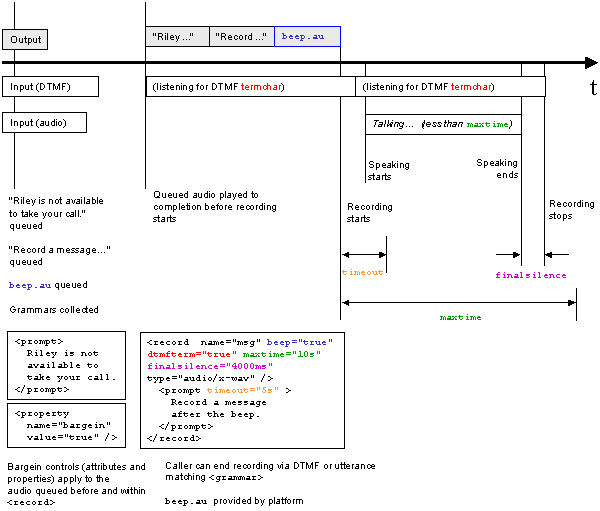
Figure 7: Timing of prompts, audio recording, and DTMF input
When a user hangs up during recording, the recording terminates and a
connection.disconnect.hangup event is thrown. However, audio recorded up until
the hangup is available through the <record> variable. Applications,
such as simple voicemail services, can then return audio data to a server even
after disconnection:
<?xml version="1.0" encoding="UTF-8"?>
<vxml version="2.0" xmlns="http://www.w3.org/2001/vxml"
  xmlns:xsi="http://www.w3.org/2001/XMLSchema-instance"
  xsi:schemaLocation="http://www.w3.org/2001/vxml
   http://www.w3.org/TR/voicexml20/vxml.xsd">
<form>
   <record  name="msg" beep="true" maxtime="10s"
       finalsilence="4000ms" dtmfterm="true" type="audio/x-wav">
       <prompt timeout="5s">
         Record a message after the beep.
       </prompt>
       <noinput>
         I didn't hear anything, please try again.
       </noinput>
       <catch event="connection.disconnect.hangup">
           <submit next="./voicemail_server.asp"/>
       </catch>
   </record>
</form>
</vxml>
A recording begins at the earliest after the playback of
any prompts (including the 'beep' tone if defined). As an optimization, a
platform may begin recording when the user starts speaking.
A timeout interval is defined to begin immediately after
prompt playback (including the 'beep' tone if defined) and its duration is
determined by the 'timeout' property. If the timeout interval is exceeded
before recording begins, then a <noinput> event is thrown.
A maxtime interval is defined to begin when recording begins
and its duration is determined by a 'maxtime' attribute. If the maxtime
interval is exceeded before recording ends, then the recording is terminated
and the maxtime shadow variable is set to 'true'.
A recording ends when an event is thrown, DTMF
or speech input matches an active grammar, or the maxtime interval is
exceeded. As an optimization, a platform may end recording after a
silence interval (set by the 'finalsilence' attribute) indicating the
user has stopped speaking.
If no audio is collected during execution of
<record>, then the record variable remains unfilled
(note). This can
occur, for example, when DTMF or speech input is received during
prompt playback or the timeout interval (if the developer wants input
during prompt playback to initiate recording, then prompts should be
placed in an immediately preceding <field> with a zero timeout).
The <record> element contains a 'dtmfterm' attribute as a developer
convenience. A 'dtmfterm' attribute with the value 'true' is equivalent to the
definition of a local DTMF grammar which matches any DTMF input.
Any DTMF keypress matching an active grammar terminates recording. DTMF
keypresses not matching an active grammar are ignored (and therefore do not
terminate or otherwise affect recording) and may optionally be removed from
the signal by the platform.
Platform support for recognition of speech grammars during recording is
optional. If the platform supports simultaneous recognition and recording,
then spoken input matching an active grammar terminates recording. The
'terminating' speech input is accessible via application.lastresult$ and the
item's utterance and confidence shadow variables. The audio of the recognized
'terminating' speech input is not available and is not part of the
recording.
If the termination grammar matched (DTMF or speech) is a local grammar, the
recording is placed in the record variable. Otherwise, the record variable is
left unfilled (note) and the form
interpretation algorithm is invoked. In each case, application.lastresult$ and
the item's shadow variables are assigned.
note
Although the record
variable is not filled with a recording in this case, a match of a non-local
grammar may nevertheless result in an assignment of some value to the record
variable (see Section 3.1.6).
The attributes of <record> are:
Table 16: <record> Attributes
| name |
The input item variable that will hold the recording.
Note that how this variable is implemented may vary between platforms
(although all platforms must support its behaviour in <audio> and
<submit> as described in this specification).
|
| expr |
The initial value of the form item variable; default is
ECMAScript undefined. If initialized to a value, then the form item
will not be visited unless the form item variable is cleared. |
| cond |
An expression that must evaluate to true after conversion to boolean in order
for the form item to be visited.
|
| modal |
If this is true (the default) all non-local speech
and DTMF grammars are not active while making the recording. If this is false,
non-local speech and DTMF grammars are active. |
| beep |
If true, a tone is emitted just prior to recording. Defaults to
false. |
| maxtime |
The maximum duration to record. The
value is a Time Designation (see Section 6.5).
Defaults to a platform-specific value.
|
| finalsilence |
The interval of silence that indicates end of speech.
The value
is a Time Designation (see Section 6.5).
Defaults to a platform-specific value.
|
| dtmfterm |
If true, any DTMF keypress not matched by an active
grammar will be treated as a match of an active (anonymous) local DTMF
grammar. Defaults to true.
|
| type |
The media format of the resulting recording. Platforms must
support the audio file formats specified in Appendix E (other formats may also be
supported). Defaults to a platform-specific format which should be
one of the required formats. |
The <record> element has the following shadow variables
set after the recording has been made:
Table 17: <record> Shadow Variables
|
name$.duration
|
The duration of the recording in milliseconds.
|
|
name$.size
|
The size of the recording in bytes.
|
|
name$.termchar
|
If the dtmfterm attribute is true, and the user terminates the recording
by pressing a DTMF key, then this shadow variable is the key pressed
(e.g. "#"). Otherwise it is undefined.
|
|
name$.maxtime
|
Boolean, true if the recording was terminated because the
maxtime duration was reached.
|
|
name$.utterance
|
The string of words used if recording was terminated by speech
recognition input; otherwise it is undefined.
|
|
name$.confidence
|
The confidence level (0.0 - 1.0) for the utterance if the
recording is terminated by speech recognition input; otherwise, it is
undefined.
|
The <transfer> element directs the interpreter to connect
the caller to another entity (e.g. telephone line or another voice application).
During the transfer operation, the current interpreter session is suspended.
There are a variety of ways an implementation platform can
initiate a transfer, including "bridge", "blind", network-based
redirect (sometimes referred to as "take back and transfer"), "switchhook
transfer", etc. Bridge and blind transfer types are supported; the others
are highly dependent upon specific platform and network features and configuration
and therefore are outside the scope of this specification.
The <transfer> element is optional, though platforms should support it.
Platforms that support <transfer> may support bridge
or blind transfer types, or both. Platforms that support bridge transfer may
optionally support DTMF, speech recognition, or both, during the call transfer
to drop the far-end.
Attributes are:
Table 18: <transfer> Attributes
| name |
Stores the outcome of a bridge transfer attempt. In the case of a blind
transfer, this variable is undefined. |
| expr |
The initial value of the form item variable; default is ECMAScript undefined.
If initialized to a value, then the form item will not be visited unless
the form item variable is cleared. |
| cond |
An expression that must evaluate to
true in order for the form item to be visited. |
| dest |
The URI of the destination (telephone, IP telephony address). Platforms
must support the tel: URL syntax described in
[RFC2806] and may support other
URI-based addressing schemes. |
| destexpr |
An ECMAScript expression yielding the URI of the destination. |
| bridge |
Determines whether the platform remains in the connection with the caller
and callee.
|
true
|
Bridge transfer. The platform adds the callee to the connection.
Document interpretation suspends until the transferred call terminates.
The platform remains in the connection for the duration of the transferred
call; listening during transfer is controlled by any included <grammar>s.
If the caller disconnects by going onhook or
if the network disconnects the caller, the platform throws
a connection.disconnect.hangup event.
If the connection is released for any other reason, that outcome
is reported in the name attribute (see the following table).
|
|
false
|
Blind transfer (default). The platform
redirects the caller to the callee without remaining in the connection,
and does not monitor the outcome.
The platform throws a connection.disconnect.transfer
immediately, regardless of whether the transfer
was successful or not.
|
|
| connecttimeout |
The time to wait while trying to connect
the call before returning the noanswer condition. The
value is a Time Designation (see Section
6.5). Only applies if bridge is true. Default is platform
specific. |
| maxtime |
The time that the call is
allowed to last, or 0s if no limit is
imposed. The value is a Time Designation (see Section 6.5). Only applies if bridge is
true. Default is 0s. |
| transferaudio |
The URI of audio source to play while the transfer
attempt is in progress (before far-end answer).
If the resource cannot be fetched, the error is ignored and
the transfer continues; what the caller hears is platform-dependent.
|
| aai |
Application-to-application information.
A string containing data sent to an application on the far-end,
available in the session variable session.connection.aai.
The transmission of aai data may depend upon signaling network
gateways and data translation (e.g. ISDN to SIP); the status of data
sent to a remote site is not known or reported.
Although all
platforms must support the aai attribute, platforms are not required
to send aai data and need not support receipt of aai data. Platforms
that cannot receive aai data must set the session.connection.aai
variable to the ECMAscript undefined value. The underlying
transmission mechanism may impose data length limits.
|
| aaiexpr |
An ECMAScript expression yielding the AAI data.
|
Exactly one of "dest" or "destexpr" may be specified;
otherwise, an error.badfetch event is thrown. Likewise, exactly one of
"aai" or "aaiexpr" may be specified; otherwise, an
error.badfetch event is thrown.
With a blind transfer, an attempt is made to connect the original caller
with the callee. Any prompts preceeding the <transfer>, as well as
prompts within the <transfer>, are queued and played before the
transfer attempt begins; bargein properties apply as normal.
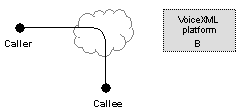
Figure 8: Audio Connections during a blind transfer: <transfer bridge="false">
Any audio source specified by the transferaudio attribute is ignored since
no audio can be played from the platform to the caller during the transfer
attempt. Whether the connection is successful or not, the implementation
platform cannot regain control of the connections.
Connection status is not available. For example, it is not possible to know
whether the callee was busy, when a successful call ends, etc. However, some
error conditions may be reported if known to the platform, such as if the
caller is not authorized to call the destination, or if the destination URI
is malformed.
Once the transfer begins and the interpreter disconnects from the session,
the platform throws connection.disconnect.transfer and document
interpretation continues normally.
Any connection between the caller and callee remains in place regardless of
document execution.
Table 19: Blind Transfer Outcomes
| Action |
Value of form
item variable
|
Event or Error
|
Reason
|
| transfer begins |
undefined
|
connection.disconnect.transfer
|
An attempt has been made to transfer the caller to another
line and will not return. |
| transfer ends |
unknown
|
|
The transfer ended but the reason is not known. |
For a bridge transfer, the platform connects the caller to the
callee in a full duplex conversation.
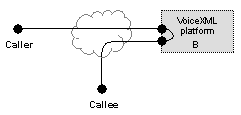
Figure 9: Audio Connections during a bridge transfer: <transfer bridge="true">
Any prompts preceeding the <transfer>, as well as prompts within the
<transfer>, are queued and played before the transfer attempt begins.
The bargein control applies normally. Specification of
bargeintype is ignored; "hotword" is set by default.
Platforms may optionally support listening for caller commands to terminate
the transfer by specifying one or more grammars inside the <transfer>
element. The <transfer> element is modal in that no
grammar defined outside its scope is active.
The platform will monitor during playing of prompts and during the
entire length of the transfer connecting and talking phases:
- DTMF input from the caller matching an included DTMF grammar
- an utterance from the caller matching an included speech grammar
A successful match will terminate the transfer (the connection to the
callee); document interpretation continues normally.
An unsuccessful match is ignored.
If no grammars are
specified, the platform will not listen to input from the caller.
The platform does not monitor in-band signals or voice input from the
callee.
While attempting to connect to the callee, the platform monitors call
progress indicators (in-band and/or out-of-band, depending upon the
particular connection type and protocols). For the duration of a successful
transfer, the platform monitors for (out-of-band) telephony events, such as
disconnect, on both call legs.
If the callee disconnects, the caller resumes his session with the
interpreter. If the caller disconnects, the platform disconnects the
callee, and document interpretation continues normally. If both the caller
and callee are disconnected by the network, document interpretation
continues normally.
The possible outcomes for a bridge transfer before the connection to the
callee is established are:
Table 20: Bridged Transfer Outcomes Prior to
Connection Being Established
| Action |
Value of form
item variable
|
Event
|
Reason
|
| caller disconnects |
|
connection.disconnect.hangup
|
The caller hung up. |
| caller disconnects callee |
near_end_disconnect
|
|
The caller forced the callee to disconnect via a DTMF or voice
command. |
| callee busy |
busy
|
|
The callee was busy. |
| network busy |
network_busy
|
|
An intermediate network refused the call. |
| callee does not answer |
noanswer
|
|
There was no answer within the time specified by the connecttimeout
attribute. |
| --- |
unknown
|
|
The transfer ended but the reason is not known. |
The possible outcomes for a bridge transfer after the connection to the callee
is established are:
Table 21: Bridged Transfer Outcomes After
Connection Established
| Action |
Value of form
item variable
|
Event
|
Reason
|
| caller disconnects |
|
connection.disconnect.hangup
|
The caller hung up. |
| caller disconnects |
near_end_disconnect
|
|
The caller forced the callee to disconnect via a DTMF or voice
command. |
| platform disconnects callee |
maxtime_disconnect
|
|
The callee was disconnected by the platform because the call duration
reached the value of maxtime attribute.
|
| network disconnects callee |
network_disconnect
|
|
The network disconnected the callee from the platform.
|
| callee disconnects |
far_end_disconnect
|
|
The callee hung up. |
| --- |
unknown
|
|
The transfer ended but the reason is not known. |
If the caller disconnects by hanging up (either during a call
transfer or call transfer attempt), the connection to the callee (if one
exists) is dropped, a connection.disconnect.hangup event will be thrown, and
dialog execution will transition to a handler for the hangup event (if one
exists). The form item variable, and thus shadow variables, will not be
set.
If execution of <transfer> continues normally, then its form
item variable is set, and the following shadow variables will be set:
Table 22: <transfer> Shadow Variables
|
name$.duration
|
The duration of a call transfer in seconds.
The duration is 0 if a call attempt was terminated by the caller (using a voice or DTMF command) prior
to being answered.
|
|
name$.inputmode
|
The input mode of the terminating command (dtmf or voice). |
|
name$.utterance
|
The utterance text used if
transfer was terminated by speech recognition input or
the DTMF result if the transfer was terminated by DTMF input;
otherwise it is undefined.
|
If the transfer was terminated by speech recognition input, then
application.lastresult$ is assigned as usual.
During a bridge transfer, it might be desirable to play audio to the caller
while the platform attempts to connect to the callee. For example, an
advertisement ("Buy Joe's Spicy Shrimp Sauce") or informational
message ("Your call is very important to us; please wait while we
connect you to the next available agent.") might be provided in place
of call progress information (ringing, busy, network announcements,
etc.).
At the point the outgoing call begins, audio specified
by transferaudio begins playing. Playing of transferaudio terminates
when the answer status of the far-end connection is determined. This status
isn't always known, since the far-end switch can play audio (such as a Special
Information Tone, busy tone, network busy tone, or a recording saying the
connection can't be made) with out actually "answering" the
call.
If a specified audio file play duration is shorter than the time
it takes to connect the far-end, the caller may hear silence,
platform-specific audio, or call progress information, depending upon the
platform.
One of the following events may be thrown during a transfer:
Table 23: Events Thrown During Transfer
| Event |
Reason
|
Transfer
type
|
|
connection.disconnect.hangup
|
The caller hung up. |
bridge |
|
connection.disconnect.transfer
|
An attempt has been made to transfer the caller to another
line and will not return. |
blind |
If a transfer attempt could not be made, one of the following errors
will be thrown:
Table 24: Transfer Attempt Error Events
| Error |
Reason
|
Transfer
type
|
-
error.connection.noauthorization
|
The caller is not allowed to call the destination. |
blind and bridge |
-
error.connection.baddestination
|
The destination URI is malformed. |
blind and bridge |
-
error.connection.noroute
|
The platform is not able to place a call to the destination. |
bridge |
-
error.connection.noresource
|
The platform cannot allocate resources to place the call. |
bridge |
-
error.connection.protocol.nnn
|
The protocol stack for this connection raised an exception
that does not correspond to one of the other error.connection events. |
bridge |
-
error.unsupported.transfer.blind
|
The platform does not support blind transfer. |
blind |
|
error.unsupported.transfer.bridge
|
The platform does not support bridge transfer. |
bridge |
-
error.unsupported.uri
|
The platform does not support the URI format used. The special
variable _message (Section 5.2.2) will
contain the string "The URI x
is not a supported URI format" where x is the URI from the dest
or destexpr <transfer> attributes. |
blind and bridge |
The following example attempts to perform a bridge transfer the caller to a
another party, and wait for that conversation to terminate. Prompts may be
included before or within the <transfer> element. This may be used to
inform the caller of what is happening, with a notice such as "Please wait
while we transfer your call." The <prompt> within the
<block>, and the <prompt> within <transfer> are queued and
played before actually performing the transfer. After the audio queue is
flushed, the outgoing call is initiated. By default, the caller is
connected to the outgoing telephony channel. The "transferaudio" attribute
specifies an audio file to be played to the caller in place of audio from
the far-end until the far-end answers. If the audio source is longer than
the connect time, the audio will stop playing immediately upon far-end
answer.
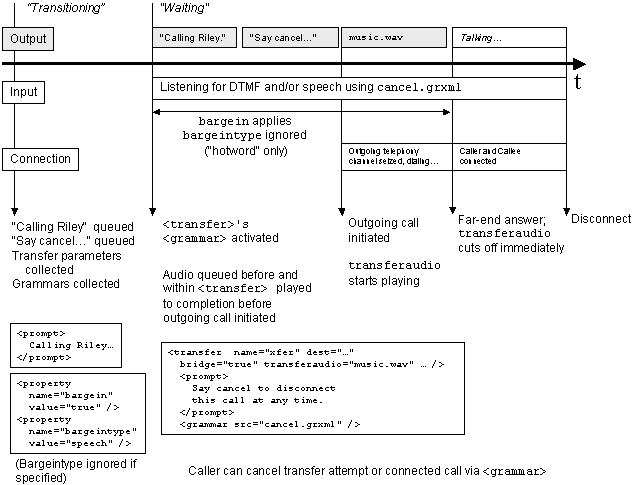
Figure 10: Sequence and timing during an example of a bridge transfer
<?xml version="1.0" encoding="UTF-8"?>
<vxml version="2.0" xmlns="http://www.w3.org/2001/vxml"
  xmlns:xsi="http://www.w3.org/2001/XMLSchema-instance"
  xsi:schemaLocation="http://www.w3.org/2001/vxml
   http://www.w3.org/TR/voicexml20/vxml.xsd">
<form id="xfer">
   <var name="mydur" expr="0"/>
   <block>
     <!-- queued and played before starting the transfer -->
     <prompt>
        Calling Riley. Please wait.
     </prompt>
   </block>

   <!-- Play music while attempting to connect to far-end -->
   <!-- "hotword" bargeintype during transferaudio only -->
   <!-- Wait up to 60 seconds for the far end to answer  -->
   <transfer name="mycall" dest="tel:+1-555-123-4567"
      transferaudio="music.wav" connecttimeout="60s" bridge="true">

     <!-- queued and played before starting the transfer -->
     <!-- bargein properties apply during this prompt -->
     <prompt>
        Say cancel to disconnect this call at any time.
     </prompt>

     <!-- specify an external grammar to listen for "cancel" command -->
     <grammar src="cancel.grxml" type="application/srgs+xml"/>

     <filled>
       <assign name="mydur" expr="mycall$.duration"/>
         <if cond="mycall == 'busy'">
           <prompt>
             Riley's line is busy. Please call again later.
           </prompt>
         <elseif cond="mycall == 'noanswer'"/>
           <prompt>
             Riley can't answer the phone now. Please call
             again later.
           </prompt>
         </if>
     </filled>
   </transfer>

   <!-- submit call statistics to server -->
   <block>
      <submit namelist="mycall mydur" next="/cgi-bin/report"/>
   </block>
</form>
</vxml>
The <filled> element specifies an action to perform when some
combination of input items are filled. It may occur in two places: as a child of the <form>
element, or as a child of an input item.
As a child of a <form> element, the <filled> element can be
used to perform actions that occur when a combination of one or more input
items is filled. For example, the following <filled> element does a
cross-check to ensure that a starting city field differs from the ending city
field:
<?xml version="1.0" encoding="UTF-8"?>
<vxml version="2.0" xmlns="http://www.w3.org/2001/vxml"
  xmlns:xsi="http://www.w3.org/2001/XMLSchema-instance"
  xsi:schemaLocation="http://www.w3.org/2001/vxml
   http://www.w3.org/TR/voicexml20/vxml.xsd">
<form id="get_starting_and_ending_cities">
  <field name="start_city">
      <grammar src="http://www.grammars.example.com/voicexml/city.grxml"
        type="application/srgs+xml"/>
      <prompt>What is the starting city?</prompt>
  </field>
  <field name="end_city">
      <grammar src="http://www.grammars.example.com/voicexml/city.grxml"
        type="application/srgs+xml"/>
      <prompt>What is the ending city?</prompt>
  </field>
  <filled mode="all" namelist="start_city end_city">
    <if cond="start_city == end_city">
      <prompt>
        You can't fly from and to the same city.
      </prompt>
      <clear/>
    </if>
  </filled>
</form>
</vxml>
If the <filled> element appears inside an input item, it specifies an
action to perform after that input item is filled in:
<?xml version="1.0" encoding="UTF-8"?>
<vxml version="2.0" xmlns="http://www.w3.org/2001/vxml"
  xmlns:xsi="http://www.w3.org/2001/XMLSchema-instance"
  xsi:schemaLocation="http://www.w3.org/2001/vxml
   http://www.w3.org/TR/voicexml20/vxml.xsd">
<form id="get_city">
  <field name="city">
    <grammar type="application/srgs+xml"
      src="http://www.ship-it.example.com/grammars/served_cities.grxml"/>
    <prompt>What is the city?</prompt>
    <filled>
      <if cond="city == 'Novosibirsk'">
        <prompt>
          Note, Novosibirsk service ends next year.
        </prompt>
      </if>
    </filled>
  </field>
</form>
</vxml>
After each gathering of the user’s input, all the input items
mentioned in the input are set, and then the interpreter looks at each
<filled> element in document order (no preference is given to ones in
input items vs. ones in the form). Those whose conditions are matched by the
utterance are then executed in order, until there are no more, or until one
transfers control or throws an event.
Attributes include:
Table 25: <filled> Attributes
| mode |
Either all (the default), or any. If any, this action is
executed when any of the specified input items is filled by the last user
input. If all, this action is executed when all of the mentioned input items
are filled, and at least one has been filled by the last user input. A
<filled> element in an input item cannot specify a mode. |
| namelist |
The input items to trigger on. For a <filled> in a
form, namelist defaults to the names (explicit and implicit) of the
form’s input items. A <filled> element in an input item cannot
specify a namelist; the namelist in this case is the input item name. Note
that control items are not permitted in this list.
|
A <link> element may have one or more grammars which are scoped to
the element containing the <link>. A "scope"
attribute on the element containing the <link> has no effect on the scope
of the <link> grammars (for example, when a <link> is contained in a
<form> with scope="document", the <link> grammars are scoped to the
form, not to the document). Grammar elements contained in the
<link> are not permitted to specify scope. When one of these grammars
is matched, the link activates, and either:
For instance, this link activates when you say "books" or press
"2".
<link next="http://www.voicexml.org/books/main.vxml">
  <grammar mode="voice" version="1.0" root="root">
    <rule id="root" scope="public">
       <one-of>
         <item>books</item>
         <item>VoiceXML books</item>
       </one-of>
    </rule>
  </grammar>
  <grammar mode="dtmf" version="1.0" root="r2">
     <rule id="r2" scope="public"> 2 </rule>
  </grammar>
</link>
This link takes you to a dynamically determined dialog in the
current document:
<link expr="'#' + document.helpstate">
  <grammar mode="voice" version="1.0" root="root">
     <rule id="root" scope="public"> help </rule>
  </grammar>
</link>
The <link> element can be a child of <vxml>, <form>, or
of the form items <field> and <initial>. A link at the
<vxml> level has grammars that are active throughout the document. A
link at the <form> level has grammars active while the user is in that
form. If an application root document has a document-level link, its grammars
are active no matter what document of the application is being executed.
If execution is in a modal form item, then link grammars at the
form or document level are not active.
You can also define a link that, when matched, throws an event instead of
going to a new document. This event is thrown at the current location in the
execution, not at the location where the link is specified. For example, if
the user matches this link’s grammar or enters '2' on the keypad, a help
event is thrown in the form item the user was visiting and is handled by the
best qualified <catch> in the item's scope (see Section 5.2.4 for further details):
<link dtmf="2" event="help">
  <grammar mode="voice" version="1.0" root="r5">
    <rule id="r5" scope="public">
       <one-of>
         <item>arrgh</item>
         <item>alas all is lost</item>
         <item>fie ye froward machine</item>
         <item>I don't get it</item>
       </one-of>
    </rule>
  </grammar>
</link>
When a link is matched, application.lastresult$ is assigned. This allows
callflow decisions to be made downstream based on the actual semantic result.
An example appears in Section 5.1.5.
Conceptually the link element can be thought of as having two parts:
condition and action. The "condition" is the content of the link
element, i.e. the grammar(s) that must be matched in order for the link to
be activated. The "action" is specified by the attributes of the
element, i.e. where to transition or which event to throw. The
"condition" is resolved/evaluated lexically, while the
"action" is resolved/evaluated dynamically. Specifically this
means that
- any URIs in the content of the link are resolved lexically,
i.e. according to the base URI (see xml:base in Section 1.5.1) for the document in which the link is
defined.
- any URIs in an attribute of the link element are resolved dynamically,
i.e. according to the base URI in effect when the link's grammar is
matched.
- any ECMAScript expressions in an attribute of the link element are
evaluated dynamically, i.e. in the scope and execution context in effect
when the grammar is matched.
Attributes of <link> are:
Table 26: <link> Attributes
| next |
The URI to go to. This URI is a document (perhaps with an
anchor to specify the starting dialog), or a dialog in the current
document (just a bare anchor). |
| expr |
Like next, except that the URI is dynamically determined by
evaluating the given ECMAScript expression. |
| event |
The event to throw when the user matches one of the link
grammars. |
| eventexpr |
An ECMAScript expression evaluating to the name of the event
to throw when the user matches one of the link
grammars. |
| message |
A message string providing additional context
about the event being thrown. The message is available as the value
of a variable within the scope of the catch element, see Section 5.2.2. |
| messageexpr |
An ECMAScript expression evaluating to the
message string. |
| dtmf |
The DTMF sequence for this link. It is equivalent to a simple DTMF
<grammar> and DTMF properties (Section 6.3.3)
apply to recognition of the sequence. Unlike DTMF grammars, whitespace is
optional: dtmf="123#" is equivalent to dtmf="1 2 3 #". The attribute can be
used at the same time as other <grammar>s: the link is activated when
user input matches a link grammar or the DTMF sequence. |
| fetchaudio |
See Section 6.1. This defaults to the
fetchaudio property. |
| fetchhint |
See Section 6.1. This defaults to the
documentfetchhint property. |
| fetchtimeout |
See Section 6.1. This defaults to the
fetchtimeout property. |
| maxage |
See Section 6.1. This defaults to the
documentmaxage property. |
| maxstale |
See Section 6.1. This defaults to the
documentmaxstale property. |
Exactly one of "next", "expr", "event" or "eventexpr"
must be specified; otherwise, an error.badfetch event is thrown.
Exactly one of "message" or "messageexpr" may be specified; otherwise,
an error.badfetch event is thrown.
The <grammar> element is used to provide a speech grammar
that
-
specifies a set of utterances that a user may speak to perform
an action or supply information, and
-
for a matching utterance, returns a corresponding semantic interpretation.
This may be a simple value (such as a string), a flat set of attribute-value
pairs (such as day, month, and year), or a nested object (for a complex
request).
The <grammar> element is designed to accommodate any grammar format
that meets these two requirements. VoiceXML platforms must support at least
one common format, the XML Form of the W3C Speech Recognition Grammar
Specification [SRGS]. VoiceXML platforms should support
the Augmented BNF (ABNF) Form of the W3C Speech Recognition Grammar
Specification [SRGS]. VoiceXML platforms may choose
to support grammar formats other than SRGS. For instance, a platform might
use the <grammar> element's support for PCDATA to inline a proprietary
grammar definition or use the "src" and "type" attributes for an external
one.
VoiceXML platforms must be a Conforming XML Form Grammar Processor as
defined in the W3C Speech Recognition Grammar Specification [SRGS]. While this requires a platform to process
documents with one or more "xml:lang" attributes defined, it does not require
that the platform must be multi-lingual. When an unsupported language is
encountered, the platform throws an error.unsupported.language event
which specifies the unsupported language in its message variable.
Elements of XML Form of SRGS
The following elements are defined in the XML Form of the W3C Speech
Recognition Grammar Specification [SRGS] and are
available in VoiceXML 2.0. This document does not redefine these
elements. Refer to the W3C Speech Recognition Grammar Specification [SRGS] for definitions and examples.
Table 27: SRGS (XML Form) Elements
| Element |
Purpose |
Section
(in [SRGS])
|
| <grammar> |
Root element of an XML grammar |
4.
|
| <meta> |
Header declaration of meta content of an HTTP equivalent |
4.11.1
|
| <metadata> |
Header declaration of XML metadata content |
4.11.2
|
| <lexicon> |
Header declaration of a pronunciation lexicon |
4.10
|
| <rule> |
Declare a named rule expansion of a grammar |
3.
|
| <token> |
Define a word or other entity that may serve as input |
2.1
|
| <ruleref> |
Refer to a rule defined locally or externally |
2.2
|
| <item> |
Define an expansion with optional repeating and probability |
2.3
|
| <one-of> |
Define a set of alternative rule expansions |
2.4
|
| <example> |
Element contained within a rule definition that provides an
example of input that matches the rule |
3.3
|
| <tag> |
Define an arbitrary string that to be included inline in an
expansion which may be used for semantic interpretation |
2.6
|
The <grammar> element may be used to specify an
inline grammar or an external grammar. An inline
grammar is specified by the content of a <grammar> element
and defines an entire grammar:
<grammar type="media-type" mode="voice">
     inline speech grammar
</grammar>
It may be necessary in this case to enclose the content in a CDATA section
[XML]. For inline grammars the type parameter
specifies a media type that governs the interpretation of the content of the
<grammar> element.
The following is an example of inline grammar defined by the XML Form of
the W3C Speech Recognition Grammar Specification [SRGS].
<grammar mode="voice" xml:lang="en-US" version="1.0" root="command">
  <!-- Command is an action on an object -->
  <!-- e.g. "open a window" -->
  <rule id="command" scope="public">
    <ruleref uri="#action"/> <ruleref uri="#object"/>
  </rule>

  <rule id="action">
    <one-of>
      <item> open </item>
      <item> close </item>
      <item> delete </item>
      <item> move </item>
    </one-of>
  </rule>

  <rule id="object">
   <item repeat="0-1">
      <one-of> <item> the </item> <item> a </item> </one-of>
    </item>
    <one-of>
      <item> window </item>
      <item> file </item>
      <item> menu </item>
    </one-of>
  </rule>
</grammar>
The following is the equivalent example of the inline grammar defined by
the ABNF Form of the W3C Speech Recognition Grammar Specification [SRGS]. Because VoiceXML platforms are not required to
support this format it may be less portable.
<grammar mode="voice" type="application/srgs">
#ABNF 1.0;
language en-US;
mode voice;
root $command;
  public $command = $action $object;
  $action = open | close | delete | move;
  $object = [the | a] (window | file | menu);
</grammar>
An external grammar is specified by an element of the form
<grammar src="URI" type="media-type"/>
The media type is optional in this case because the interpreter context
will attempt to determine the type dynamically if it is unspecified (for
instance, using server-specified media type, file extension, or content
introspection).
If the src attribute is defined and there is an inline grammar as content
of a grammar element then an error.badfetch event is thrown.
The following is an example of a reference to an external grammar written
in the XML Form of the W3C Speech Recognition Grammar Specification [SRGS].
<grammar type="application/srgs+xml" src="http://www.grammar.example.com/date.grxml"/>
The following example is the equivalent grammar reference for a grammar
that is authored using the ABNF Form of the W3C Speech Recognition Grammar
Specification [SRGS].
<grammar type="application/srgs" src="http://www.grammar.example.com/date.gram"/>
A weight for the grammar can be specified by the weight
attribute:
<grammar weight="0.6" src="form.grxml" type="application/srgs+xml"/>
Grammar elements, including those in link, field and form
elements, can have a weight attribute. The grammar can be inline,
external or built-in.
Weights follow the definition of weights on alternatives in the W3C Speech
Recognition Grammar Specification [SRGS §2.4.1].
A weight is a simple positive floating point values without
exponentials. Legal formats are "n", "n.", ".n" and "n.n" where "n" is a
sequence of one or many digits.
A weight is nominally a multiplying factor in the likelihood domain of a
speech recognition search. A weight of "1.0" is equivalent to providing no
weight at all. A weight greater than "1.0" positively biases the grammar and a
weight less than "1.0" negatively biases the grammar. If unspecified, the
default weight for any grammar is "1.0". If no weight is specified for any
grammar element then all grammars are equally likely.
<link event="help">
  <grammar weight="0.5" mode="voice" version="1.0" root="help">
   <rule id="help" scope="public">
      <item repeat="0-1">Please</item> help
   </rule>
  </grammar>
</link>

<form>
  <grammar src="form.grxml" type="application/srgs+xml"/>
  <field name="expireDate">
     <grammar weight="1.2" src="http://www.example.org/grammar/date"/>
  </field>
</form>
In the example above, the semantics of weights is equivalent to
the following XML grammar.
<grammar root="r1" type="application/srgs+xml">
<rule id="r1">
  <one-of>
    <item weight="0.5"> <ruleref uri="#help"/> </item>
    <item weight="1.0"> <ruleref uri="form.grxml"/> </item>
    <item weight="1.2"> <ruleref uri="http://www.example.org/grammar/date"/></item>
  </one-of>
</rule>

<rule id="help">
  <item repeat="0-1">Please</item> help
</rule>
</grammar>
Implicit grammars, such as those in options, do not support
weights - use the <grammar> element instead for control over
grammar weight.
Grammar weights only affect grammar processing. They do not
directly affect the post processing of grammar results, including
grammar precedence when user input matches multiple active grammar
(see Section 3.1.4).
A weight has no effect on DTMF grammars (See Section
3.1.2). Any weight attribute specified in a grammar element whose mode
attribute is dtmf is ignored.
<!-- weight will be ignored -->
<grammar mode="dtmf" weight="0.3" src="http://www.example.org/dtmf/number"/>
Appropriate weights are difficult to determine, and guessing
weights does not always improve recognition performance. Effective
weights are usually obtained by study of real speech and textual
data on a paricular platform. Furthermore, a grammar weight is
platform specific. Note that different ASR engines may treat the
same weight value differently. Therefore, the weight value that
works well on particular platform may generate different results on
other platforms.
Attributes of <grammar> inherited from the W3C Speech Recognition
Grammar Specification [SRGS] are:
Table 28: <grammar> Attributes Inherited from SRGS
| version |
Defines the version of the grammar. |
| xml:lang |
The
language
identifier
of the grammar (for example,
"fr-CA" for Canadian French.) If omitted, the value is inherited down from
the document hierarchy. |
| mode |
Defines the mode of the grammar following the modes of the W3C Speech Recognition Grammar
Specification [SRGS]. |
| root |
Defines the rule which acts as the root rule of the
grammar. |
| tag-format |
Defines the tag content format for all tags within the grammar. |
|
xml:base |
Declares the base URI from which relative URIs in the grammar are resolved.
This base declaration has precedence over the <vxml> base URI declaration.
If a local declaration is omitted, the value is inherited down the document
hierarchy.
|
The use and interpretation of these attributes is determined as follows:
- Inline XML Form of SRGS: determined by W3C Speech Recognition Grammar
Specification which states that the version attribute is required and must
have the value is "1.0"; that the root attribute is required and its value
identifies which rule to activate; and other attributes are optional (see [SRGS] for further details).
- Inline ABNF Form of SRGS: any specified attributes must be ignored by the
platform
- External XML and ABNF Forms of SRGS: any specified attributes must be
ignored by the platform
- all other grammar types: the use and interpretation of any specified
attributes is platform-dependent
Attributes of <grammar> added by VoiceXML 2.0 are:
Table 29: <grammar> Attributes Added in VoiceXML
| src |
The URI specifying the location of the grammar and optionally
a rulename within that grammar, if it is external. The URI is interpreted as a
rule reference as defined in Section 2.2 of the Speech Recognition Grammar
Specification [SRGS] but not all forms of rule
reference are permitted from within VoiceXML. The rule reference capabilities
are described in detail below this table. |
| scope |
Either "document", which makes the grammar active in all
dialogs of the current document (and relevant application leaf
documents), or "dialog", to make the grammar active throughout the
current form. If omitted, the grammar scoping is resolved by
looking at the parent element. See Section
3.1.3 for details on scoping including precedence
behavior. |
| type |
The media type of the grammar. This value takes precedence over other
possible sources of the media type (for instance, the "Content-type"
field in an HTTP or RTSP exchange, or the file extension). If this is
omitted, the interpreter context will attempt to determine the type
dynamically (for instance, using server-specified media type, file
extension, or content introspection). If the content of the grammar
is contained within the element and no media type is specified, the
media type is assumed to be an XML grammar.
If the grammar source does not contain valid content of the selected media
type, an error is thrown when the grammar is used.
The tentative media types for the W3C grammar format are
"application/srgs+xml" for the XML form and "application/srgs" for ABNF
grammars.
|
| weight |
Specifies the weight of the grammar. See Section 3.1.1.3
|
| fetchhint |
See Section 6.1. This defaults to the
grammarfetchhint property. |
| fetchtimeout |
See Section 6.1. This defaults to the
fetchtimeout property. |
| maxage |
See Section 6.1. This defaults to the
grammarmaxage property. |
| maxstale |
See Section 6.1. This defaults to the
grammarmaxstale property. |
Either an "src" attribute or a inline grammar (but not both) must be
specified; otherwise, an error.badfetch event is thrown.
The <grammar> element is also extended in VoiceXML 2.0 to
allow PCDATA for inline grammar formats besides the XML Form of the W3C Speech
Recognition Grammar Specification
[SRGS].
When referencing an external grammar, the value of the src attribute is a
URI specifying the location of the grammar with an optional fragment for the
rulename. Section 2.2 of the Speech Recognition Grammar Specification [SRGS] defines several forms of rule reference. The following
are the forms that are permitted on a grammar element in VoiceXML.
-
Reference to a named rule in an external grammar: src attribute
is an absolute or relative URI reference to a grammar which includes a
fragment with a rulename. This form of rule reference to an external grammar
follows the behavior defined in Section 2.2.2 of
[SRGS]. If the URI cannot be fetched or if the rulename is not defined in
the grammar or is not a public (activatable) rule of that grammar then
an error.badfetch is thrown.
-
Reference to the root rule of an external grammar: src attribute
is an absolute or relative URI reference to a grammar but does not include a
fragment identifying a rulename. This form implicitly references the root rule
of the grammar as defined in Section 2.2.2 of
[SRGS]. If the URI cannot be fetched or if the grammar cannot be
referenced by its root (see Section 4.7 of [SRGS]) then
an error.badfetch is thrown.
The following are the forms of rule reference defined by [SRGS] that are not supported in VoiceXML
2.0.
-
Local rule reference: a fragment-only URI is not permited. (See
definition in Section 2.2.1 of [SRGS]). A
fragment-only URI value for the src attribute causes an error.semantic
event.
-
Reference to special rules: although an inline grammar may
reference the special rules of SRGF (NULL, VOID, GARBAGE) there is no support
for special rule references on the grammar element itself. (See definitions in
Section 2.2.3 of [SRGS]). There is no syntactic
support for this form so no error can be generated.
The <grammar> element can be used to provide a DTMF grammar that
VoiceXML platforms are required to support the DTMF grammar XML format
defined in Appendix D of the [SRGS] to advance
application portability.
A DTMF grammar is distinguished from a speech grammar by the mode attribute
on the <grammar> element. An "xml:lang" attribute has no effect on DTMF
grammar handling. In other respects speech and DTMF grammars are handled
identically including the ability to define the grammar inline, or by an external grammar
reference. The media type handling, scoping and fetching are also
identical.
The following is an example of a simple inline XML DTMF grammar that
accepts as input either "1 2 3" or "#".
<grammar mode="dtmf" version="1.0" root="root">
  <rule id="root" scope="public">
    <one-of>
      <item> 1 2 3 </item>
      <item> # </item>
    </one-of>
  </rule>
</grammar>
Input item
grammars are always scoped to the containing input item; that is, they are active only
when the containing input item was chosen during the select phase of the
FIA. Grammars contained in input items cannot specify a scope; if they do, an
error.badfetch is thrown.
Link grammars are given the scope of the element that contains the
link. Thus, if they are defined in the application root document, links are
also active in any other loaded application document. Grammars contained in
links cannot specify a scope; if they do, an error.badfetch is thrown.
Form grammars are by default given dialog scope, so
that they are active only when the user is in the form. If they are
given scope document, they are active whenever the user is in the
document. If they are given scope document and the document is the
application root document, then they are also active whenever the
user is in another loaded document in the same application. A
grammar in a form may be given document scope either by specifying
the scope attribute on the form element or by specifying the scope
attribute on the <grammar> element. If both are specified,
the grammar assumes the scope specified by the <grammar>
element.
Menu grammars are also by default given dialog scope, and are
active only when the user is in the menu. But they can be given document scope
and be active throughout the document, and if their document is the
application root document, also be active in any other loaded document
belonging to the application. Grammars contained in menu choices cannot
specify a scope; if they do, an error.badfetch is thrown.
Sometimes a form may need to have some grammars active
throughout the document, and other grammars that should be active
only when in the form. One reason for doing this is to minimize
grammar overlap problems. To do this, each individual
<grammar> element can be given its own scope if that scope
should be different than the scope of the <form> element
itself:
<?xml version="1.0" encoding="UTF-8"?>
<vxml version="2.0" xmlns="http://www.w3.org/2001/vxml"
  xmlns:xsi="http://www.w3.org/2001/XMLSchema-instance"
  xsi:schemaLocation="http://www.w3.org/2001/vxml
   http://www.w3.org/TR/voicexml20/vxml.xsd">
<form scope="document">
  <grammar type="application/srgs">
    #ABNF 1.0;
    language en-gb;
    mode voice;
    root $command;
    public $command = one | two | three;
  </grammar>
  <grammar type="application/srgs" scope="dialog">
    #ABNF 1.0;
    language en-gb;
    mode voice;
    root $command2;
    public $command2 = four | five | six;
  </grammar>
</form>
</vxml>
When the interpreter waits for input as a result of visiting
an input
item,
the following grammars are active:
-
grammars for that input item, including grammars contained in
links
in that input
item;
-
grammars for its form, including grammars contained in links in
that form;
-
grammars contained in links in its document, and grammars for
menus and other forms in its document which are given document
scope;
-
grammars contained in links in its application root document,
and grammars for menus and forms in its application root document
which are given document scope.
-
grammars defined by platform default event handlers, such as
help, exit and cancel.
In the case that an input matches more than one active grammar,
the list above defines the precedence order. If the input matches
more than one active grammar with the same precedence, the
precedence is determined using document order.
If no grammars are active when an input is expected, the platform must throw
an error.semantic event. The error will be thrown in the context of the
executing element.
Menus behave with regard to grammar activation like their equivalent forms
(see Section 2.2.1).
If the form item is modal (i.e., its modal attribute is set to
true), all grammars except its own are turned off while waiting for
input. If the input matches a grammar in a form or menu other than
the current form or menu, control passes to the other form or menu.
If the match causes control to leave the current form, all current
form data is lost.
Grammar activation is not affected by the inputmodes property. For
instance, if the inputmodes property restricts input to just voice, DTMF
grammars will still be activated, but cannot be matched.
The Speech Recognition Grammar Specification defines a tag element which
contains content for semantic interpretation of speech and DTMF grammars (see
Section 2.6 of [SRGS]).
The Semantic Interpretation for Speech Recognition specification [SISR] describes a syntax and semantics for tags and
specifies how a semantic interpretation for user input can be computed using
the content of tags associated with the matched tokens and rules. The semantic
interpretation may be mapped into VoiceXML as described in Section 3.1.6.
The semantic interpretation returned from a Speech Recognition Grammar
Specification [SRGS] grammar must be mapped into one
or more VoiceXML ECMAScript variables. The process by which this occurs
differs slightly for form- and field-level results; these differences will be
explored in the next sections. The format of the semantic interpretation,
using either the proposed Natural Language Semantics Markup Language [NLSML] or the ECMAScript-like output format of [SISR], has no impact on this discussion. For the
purposes of this discussion, the actual result returned from the recognizer is
assumed to have been mapped into an ECMAScript-like format which is identical
to the representation in application.lastresult$.interpretation as discussed
in Section 5.1.5.
It is possible that a grammar will match but not return a semantic
interpretation. In this case, the platform will use the raw text string for
the utterance as the semantic result. Otherwise, this case is handled exactly
as if the semantic interpretation consisted of a simple value.
Every input item has an associated slot name which
may be used to extract part of the full semantic interpretation. The
slot name is the value of the 'slot' attribute, if present (only
possible for <field> elements), or else the value of the 'name'
attribute. If neither slot nor name is present, then the slot name
is undefined.
The slot name is used during the Process Phase of the FIA to determine whether or not an input item matches. A
match occurs when either the slot name is the same as a top-level property or
a slot name is used to select a sub-property. A property having an undefined
value (i.e. ECMAScript undefined) will not match. Likewise, slot names which
are undefined will never match. Examples are given in Section 3.1.6.3.
The next sections concern mapping
form-level and field-level results. There is also a brief discussion of other issues
such as the NL Semantics to ECMAScript mapping, transitioning
information from ASR results to VoiceXML, and dealing with mismatches between
the interpretation result and the VoiceXML form.
Grammars specified at the form-level produce a form-level
result which may fill multiple input items simultaneously. This may
occur anytime, whether in an <initial> element or in an input item, that
the user's input matches an active form-level grammar.
Consider the interpretation result from the sentence "I would like a coca
cola and three large pizzas with pepperoni and mushrooms." The semantic
interpretation may be copied into application.lastresult$.interpretation
as
{
     drink: "coke"
     pizza: {
          number: "3"
          size: "large"
           topping: [
                "pepperoni"
                "mushrooms"
           ]
      }
}
The following table illustrates how this result from a form-level grammar
would be assigned to various fields within the form. Note that all input items that can be
filled in from the interpretation are filled in simultaneously . The existing values of matching input item variables will be
overwritten, and these items will be marked for <filled> processing
during the FIA's Process Phase as described in Section
2.4 and Appendix C.
Table 30: Form-level Grammar Assignments
| VoiceXML field |
Assigned ECMAScript value |
Explanation |
| 1. <field
name="drink"/> |
"coke" |
By default a field is assigned the top-level
result property whose name matches the field name. |
| 2. <field name="..."
slot="drink"/> |
"coke" |
If specified, the slot overrides the field name
for selecting the result property. |
3. <field name="pizza"/>
--or--
<field name="..." slot="pizza"/> |
{number: "3", size: "large", topping:
["pepperoni", "mushroom"]} |
The field name or slot may select a property that
is a non-scalar ECMAScript variable in the same way that a scalar
value is selected in the previous example. However the application
must then handle inspecting the components of the object. This does
not take advantage of the VoiceXML form-filling algorithm, in
that missing slots in the result would not be automatically
prompted for. This may be sufficient in situations where the server
is prepared to deal with a structured object. Otherwise, an
application may prefer to use the method described in the next
example. |
4. <field name="..."
slot="pizza.number"/>
<field name="..." slot="pizza.size"/> |
"3"
"large" |
The slot may be used to select a sub-property of
the result. This approach distributes the result among a number of
fields. |
| 5. <field name="..."
slot="pizza.topping"/> |
["pepperoni", "mushroom"] |
The selected property may be a compound
object. |
These examples can be explained by rules that are compatible
with and are straightforward extensions of the VoiceXML 1.0 "name"
and "slot" attributes:
- The "slot" attribute of a <field> is a (very restricted) ECMAScript
expression that selects some portion of the result to be assigned to the
field. In addition to selecting the top-level result property, the attribute
can select properties at arbitrary levels of nesting, using a dot-separated
list of element/property names, as in "pizza.number" and
"order.pizza.topping". Note that it is possible for a specific slot value to
fill more than one field, if the slot names of the fields are the same.
- If the portion of the result named by the "slot" (or "name")
attribute of a <field> doesn't exist in a given result then
the field item's value is unchanged.
- The default value for the "slot" attribute is supplied by the
value of "name" attribute.
Grammars specified within an input item produce a
field-level result which may fill only the particular input
item
in which they are contained. These grammars are active only when the
FIA
is visiting that specific input item.
This is useful, for instance, in directed dialogs where a
user is prompted individually for each input item.
A field-level result fills the associated
input item in the following manner:
- If the interpretation is a simple result, this is assigned to the input
item variable.
- If the interpretation is a structure and the slot name
matches a property, this property's value is assigned to the input item
variable.
- Otherwise, the full semantic result is assigned.
This process allows an input item to extract a particular property from the
semantic interpretation. This may be combined with <filled> for achieve
even greater control.
<field name="getdate">
  <prompt>On what date would you like to fly?</prompt>

  <grammar src="http://server.example.com/date.grxml"/>
  <!-- this grammar always returns an object containing
       string values for the properties day, month, and year -->

  <filled>
    <assign name="getdate.datestring"
            expr="getdate.year + getdate.month + getdate.day"/>
  </filled>
</field>
A matching slot name allows an input item to extract part of a
semantic interpretation. Consider this modified result from the
earlier pizza example.
application.lastresult$.interpretation =
{ drink: { size: 'large', liquid: 'coke' }
  pizza: { number: '3', size: 'large',
           topping: ['pepperoni', 'mushroom' ] }
  sidedish: undefined
}
The table below revisits the definition of when the slot name
matches a property in the result.
Table 31: Slot Name Matching
|
slot name
|
match or not?
|
|
undefined
|
does not match |
| drink |
matches; top level property |
| pizza |
matches; top level property |
| sidedish |
does not match; no defined value |
| size |
does not match; not a top-level property |
| pizza.size |
matches; sub-property |
| pizza.liquid |
does not match |
It is also possible to compare the behaviors of form-level and
field-level results. For this purpose, consider the following document:
<?xml version="1.0" encoding="UTF-8"?>
  <vxml version="2.0" xmlns="http://www.w3.org/2001/vxml"
  xmlns:xsi="http://www.w3.org/2001/XMLSchema-instance"
  xsi:schemaLocation="http://www.w3.org/2001/vxml
   http://www.w3.org/TR/voicexml20/vxml.xsd">
    <form id="exampleForm">
      <grammar src="formlevel.grxml"/>
      <initial> Say something. </initial>

      <field name="x">
        <grammar src="fieldx.grxml"/>
      </field>

      <field name="z" slot="y">
        <grammar src="fieldz.grxml"/>
      </field>
    </form>
  </vxml>
This defines two input item variables, 'x' and 'z'. The corresponding
slot names are 'x' and 'y' respectively. The next table
describes the assignment of these variables depending on which grammar
is recognized and what semantic result is returned. The shorthand
valueX is used to indicate 'the structured object or simple result
value associated with the property x'.
Table 32: Variable Assignments Depending on Grammar
and Semantic Result
|
application. lastresult$. interpretation
|
form-level result
(formlevel.grxml)
|
field-level result in field x
(fieldx.grxml)
|
field-level result in field z
(fieldz.grxml)
|
| = 'hello' |
no assignment; cycle FIA
|
x = 'hello' |
z = 'hello' |
| = { x: valueX } |
x = valueX |
x = valueX |
z = { x: valueX } |
| = { y: valueY } |
z = valueY |
x = { y: valueY } |
z = valueY |
| = { z: valueZ } |
no assignment; cycle FIA
|
x = { z: valueZ } |
z = { z: valueZ } |
= { x: valueX,
y: valueY,
z: valueZ } |
x = valueX
z = valueY |
x = valueX |
z = valueY |
= { a: valueA
b: valueB } |
no assignment; cycle FIA
|
x = { a: valueA,
b: valueB } |
z = { a: valueA,
b: valueB } |
At the form level, simple results like the string 'hello' cannot match
any input items; structured objects assign all input item variables with
matching slot names. At the field level, simple results are always
assigned to the input item variable; structured objects will extract the
matching property, if it exists, or will otherwise be assigned the
entire semantic result.
1. Mapping from NL semantics to ECMAScript: If the NL Semantics Markup
Language ([NLSML]) is used, a mapping needs to be
defined from the NLSML representation to ECMAScript objects. Since both types
of representation have similar nested structures, this mapping is fairly
straightforward. This mapping is discussed in detail in the NL Semantics
specification.
2. Transitioning semantic results from ASR to VoiceXML: The result of
processing the semantic tags of a W3C ASR grammar is the value of the
attribute of the root rule when all semantic attachment evaluations have been
completed. In addition, the root rule (like all non-terminals) has an
associated "text" variable which contains the series of tokens in the
utterance that is governed by that non-terminal. In the process of making ASR
results available to VoiceXML documents, the VoiceXML platform is not only
responsible for filling in the VoiceXML fields based on the value of the
attribute of the root rule, as described above, but also for filling in the
shadow variables of the field. The name$.utterance shadow variable of the
field should be the same as the "text" variable value for the ASR root
rule. The platform is also responsible for instantiating the value of the
shadow variable "name$.confidence" based on information supplied by the ASR
platform, as well as the value of "name$.inputmode" based on whether DTMF or
speech was processed. Finally, the platform is responsible for making this
same information available in the "application.lastresult$" variable, defined
in Section 5.1.5 (specifically, "application.lastresult$.utterance",
"application.lastresult$.inputmode", and
"application.lastresult$.interpretation"), with the exception of
application.lastresult$.confidence, which the platform sets to the confidence
of the entire utterance interpretation.
3. Mismatches between semantic results and VoiceXML fields:
Mapping semantic results to VoiceXML depends on a tight
coordination between the ASR grammar and the VoiceXML markup. Since
in the current framework there's nothing that enforces consistency
between a grammar and the associated VoiceXML dialog, mismatches
can occur due to developer oversight. Since the dialog's behaviour
during these mismatches is difficult to distinguish from certain
normal situations, verifying consistency of information is
extremely important. Some examples of mismatches:
- The semantic results contain extra information that doesn't
correspond to the VoiceXML fields.This could occur either due to
developer error or if a richer grammar is being used than is
required by the VoiceXML application. This extra information will
be ignored.
- The VoiceXML application expects information in the result that
isn't present. This could also be due to developer error, or it may
be that the user simply didn't supply a value for a particular
slot. In this case the normal FIA applies and the missing value
would be elicited from the user. If the problem was in fact caused
by a developer error, and the grammar is actually incapable of
recognizing the correct value, the FIA will keep eliciting the
missing value until it invokes whatever provisions the platform and
application have in place for repeated nomatch failures.
- Finally, information might be present in both the VoiceXML and
the ASR result, but in inconsistent formats. For example, an ASR
grammar might provide a structured object for the drink which
includes the size and whether the drink is diet or non-diet, but
the VoiceXML form might only expect a string consisting of the name
of the drink. The system's behaviour in these situations would
depend on what is being done with the results. For example, a
structured object might be sent to a server side script that's
expecting a string, and the consequences of this would depend on
the server script.
In order to address these potential problems, the committee is
looking at various approaches to ensuring consistency between the
grammar and the VoiceXML.
The <prompt> element controls the output of synthesized speech and
prerecorded audio. Conceptually, prompts are instantaneously queued for play,
so interpretation proceeds until the user needs to provide an input. At this
point, the prompts are played, and the system waits for user input. Once the
input is received from the speech recognition subsystem (or the DTMF
recognizer), interpretation proceeds.
The <prompt> element has the following attributes:
Table 33: <prompt> Attributes
| bargein |
Control whether a user can interrupt a prompt.
This defaults to the value of the bargein property. See Section 6.3.4.
|
| bargeintype |
Sets the type of bargein to be 'speech', or
'hotword'.
This defaults to the value of the bargeintype property. See Section 6.3.4.
|
| cond |
An expression that must evaluate to true after conversion to boolean in order
for the prompt to be played. Default is true.
|
| count |
A number that allows you to emit different prompts if the user
is doing something repeatedly. If omitted, it defaults to "1". |
| timeout |
The timeout that will be used for the following user input.
The value is a Time Designation (see Section 6.5).
The default noinput timeout is platform specific. |
| xml:lang |
The
language
identifier for the prompt. If omitted, it defaults to the value
specified in the document's "xml:lang" attribute. |
| xml:base |
Declares the base URI from which relative URIs in the prompt are resolved.
This base declaration has precedence over the <vxml> base URI
declaration. If a local declaration is omitted, the value is inherited down
the document hierarchy.
|
The content of the <prompt> element is modelled on the W3C Speech Synthesis
Markup Language 1.0 [SSML].
The following speech markup elements are defined in [SSML] and are available in VoiceXML 2.0. Refer to the
W3C Speech Synthesis Markup Language 1.0 [SSML] for
definitions and examples.
Table 34: SSML Elements Available in VoiceXML
| Element |
Purpose |
Section
(in SSML spec)
|
| <audio> |
Specifies audio files to be played and text to be spoken.
|
2.3.1
|
| <break> |
Specifies a pause in the speech output. |
2.2.3
|
| <desc> |
Provides a description of a non-speech audio source in <audio>.
|
2.3.3
|
| <emphasis> |
Specifies that the enclosed text should be spoken with
emphasis. |
2.2.2
|
| <lexicon> |
Specifies a pronunciation lexicon for the prompt. |
3.3
|
| <mark> |
Ignored by VoiceXML platforms.
|
2.3.2
|
| <metadata> |
Specifies XML metadata content for the prompt. |
3.4
|
|
<paragraph>
(alias <p>)
|
Identifies the enclosed text as a paragraph, containing
zero or more sentences |
2.1.3
|
| <phoneme> |
Specifies a phonetic pronunciation for the contained
text. |
2.1.5
|
| <prosody> |
Specifies prosodic information for the enclosed text. |
2.2.4
|
| <say-as> |
Specifies the type of text construct contained within
the element. |
2.1.4
|
<sentence>
(alias <s>) |
Identifies the enclosed text as a sentence. |
2.1.3
|
| <sub> |
Specifies replacement spoken text for the contained text. |
2.1.6
|
| <voice> |
Specifies voice characteristics for the spoken text. |
2.2.1
|
When used in VoiceXML, additional properties are defined for the <audio>
(Section 4.1.3) and <say-as> (Appendix P) elements. VoiceXML also allows
<enumerate> and <value> elements to appear within the <prompt>
element.
The VoiceXML platform must be a Conforming Speech Synthesis Markup Language
Processor as defined in the [SSML]. While this
requires a platform to process documents with one or more "xml:lang"
attributes defined, it does not require that the platform must be
multi-lingual. When an unsupported language is encountered, the platform
throws an error.unsupported.language event which specifies the
language in its message variable.
You’ve seen prompts in the previous examples:
<prompt>Please say your city.</prompt>
You can leave out the <prompt> ... </prompt> if:
-
There is no need to specify a prompt attribute (like bargein),
and
-
The prompt consists entirely of PCDATA (contains no speech
markups) or consists of just an <audio> or <value>
element.
For instance, these are also prompts:
Please say your city.

<audio src="say_your_city.wav"/>
But in this example, the enclosing prompt elements are required
due to the embedded speech markups:
<prompt>Please <emphasis>say</emphasis> your city.</prompt>
Prompts can consist of any combination of prerecorded files,
audio streams, or synthesized speech:
<prompt>
   Welcome to the Bird Seed Emporium.
   <audio src="rtsp://www.birdsounds.example.com/thrush.wav"/>
   We have 250 kilogram drums of thistle seed for
   <say-as interpret-as="currency">$299.95</say-as>

   plus shipping and handling this month.
   <audio src="http://www.birdsounds.example.com/mourningdove.wav"/>
</prompt>
Audio can be played in any prompt. The audio content can be specified via a
URI, and in VoiceXML it can also be in an audio variable previously
recorded:
<prompt>
   Your recorded greeting is
   <audio expr="greeting"/>
   To rerecord, press 1.
   To keep it, press pound.
   To return to the main menu press star M.
   To exit press star, star X.
</prompt>
The <audio> element can have alternate content in case the audio sample
is not available:
<prompt>
   <audio src="welcome.wav">
     <emphasis>Welcome</emphasis> to the Voice Portal.
   </audio>
</prompt>
If the audio file cannot be played (e.g. 'src' referencing or 'expr'
evaluating to an invalid URI, a file with an unsupported format, etc), the
content of the audio element is played instead. The content may include text,
speech markup, or another audio element.
If the audio file cannot be played and the content of the audio element is
empty, no audio is played and no error event is thrown.
If <audio> contains an 'expr' attribute evaluating to ECMAScript
undefined, then the element, including its alternate content, is ignored. This
allows a developer to specify <audio> elements with dynamically assigned
content which, if the element is not required, can be ignored by assigning its
'expr' a null value. For example, the following code shows how this could be
used to play back a hand of cards using concatenated audio clips:
<?xml version="1.0" encoding="UTF-8"?>
<vxml version="2.0" xmlns="http://www.w3.org/2001/vxml"
  xmlns:xsi="http://www.w3.org/2001/XMLSchema-instance"
  xsi:schemaLocation="http://www.w3.org/2001/vxml
   http://www.w3.org/TR/voicexml20/vxml.xsd">
<form>
  <!-- script contains the function sayCard(type,position)
       which takes as input the type of card description (audio or text) and
       its position in an array, and returns the selected card description in
       the specified array position; if there is no description in the
       requested array position, then returns EMCAScript undefined
  -->

  <script src="cardgame.js"/>

  <field name="takecard">
       <grammar type="application/srgs+xml" src="/grammars/boolean.grxml"/>
       <prompt>
           <audio src="you_have.wav">You have the following cards: </audio>
           <!-- maximum of hand of 5 cards is described -->
           <audio expr="sayCard(audio,1)"><value expr="sayCard(text,1)"/></audio>
           <audio expr="sayCard(audio,2)"><value expr="sayCard(text,2)"/></audio>
           <audio expr="sayCard(audio,3)"><value expr="sayCard(text,3)"/></audio>
           <audio expr="sayCard(audio,4)"><value expr="sayCard(text,4)"/></audio>
           <audio expr="sayCard(audio,5)"><value expr="sayCard(text,5)"/></audio>
           <audio src="another.wav">Would you like another card?</audio>
        </prompt>
        <filled>
              <if cond="takecard">
                  <script>takeAnotherCard()</script>
                  <clear/>
              <else/>
                  <goto next="./make_bid.html"/>
              </if>
        </filled>
   </field>
</form>
</vxml>
Attributes of <audio> defined in [SSML] are:
Table 35: <audio> Attributes Inherited from SSML
| src |
The URI of the audio prompt. See Appendix E for required audio file
formats; additional formats may be used if supported by the
platform.
|
Attributes of <audio> defined only in VoiceXML are:
Table 36: <audio> Attributes added in VoiceXML
| fetchtimeout |
See Section 6.1. This defaults to the
fetchtimeout property. |
| fetchhint |
See Section 6.1. This defaults to the
audiofetchhint property. |
| maxage |
See Section 6.1. This defaults to the
audiomaxage property. |
| maxstale |
See Section 6.1. This defaults to the
audiomaxstale property. |
| expr |
An ECMAScript expression which determines the source of the
audio to be played. The expression may be either a reference to audio
previously recorded with the <record/> field item or evaluate to the URI of
an audio resource to fetch.
|
Exactly one of "src" or "expr" must be specified; otherwise, an
error.badfetch event is thrown.
Note that it is a platform optimization to stream
audio: i.e. the platform may begin processing audio content as it
arrives and not to wait for full retrieval. The "prefetch"
fetchhint can be used to request full audio retrieval prior to
playback.
The <value> element is used to insert the value of an expression into
a prompt. It has one attribute:
Table 37: <value> Attributes
| expr |
The expression to render. |
For example if n is 12, the prompt
<prompt>
  <value expr="n*n"/> is the square of <value expr="n"/>.
</prompt>
will result in the text string "144 is the square of 12" being
passed to the speech synthesis engine.
The manner in which the value attribute is played is controlled
by the surrounding speech synthesis markup. For instance, a value
can be played as a date in the following example:
<var name="date" expr="'2000/1/20'"/>
<prompt>
    <say-as interpret-as="date"> <value expr="date"/> </say-as>

</prompt>
The text inserted by the <value> element is not subject
to any special interpretation; in particular, it is not parsed as an [SSML] document or document fragment. XML special
characters (&, >, and <) are not treated specially and do not need
to be escaped. The equivalent effect may be obtained by literally inserting
the text computed by the <value> element in a CDATA section. For
example, when the following variable assignment:
<script>
    <![CDATA[
        e1 = 'AT&T';
    ]]>
</script>
is referenced in a prompt element as
<prompt> The price of <value expr="e1"/> is $1. </prompt>
the following output is produced.
The price of AT&T is $1.
If an implementation platform supports bargein, the application
author can specify whether a user can interrupt, or "bargein" on,
a prompt using speech or DTMF input. This speeds up conversations,
but is not always desired. If the application author requires that
the user must hear all of a warning, legal notice, or
advertisement, bargein should be disabled. This is done with the
bargein attribute:
<prompt bargein="false"><audio src="legalese.wav"/></prompt>
Users can interrupt a prompt whose bargein attribute is true, but must wait
for completion of a prompt whose bargein attribute is false. In the case where
several prompts are queued, the bargein attribute of each prompt is honored
during the period of time in which that prompt is playing. If bargein occurs
during any prompt in a sequence, all subsequent prompts are not played (even those whose bargein attribute is set to false). If
the bargein attribute is not specified, then the value of the bargein property
is used if set.
When the bargein attribute is false, input is not
buffered while the prompt is playing, and any DTMF input buffered in a
transition state is deleted from the buffer (Section
4.1.8 describes input collection during transition states).
Note that not all speech recognition engines or implementation
platforms support bargein. For a platform to support bargein, it
must support at least one of the bargein types described in Section 4.1.5.1.
When bargein is enabled, the bargeintype attribute can be used to suggest
the type of bargein the platform will perform in response to voice or DTMF input. Possible values for this attribute
are:
Table 38: bargeintype Values
| speech |
The prompt will be stopped as soon as speech or DTMF input is detected. The prompt is stopped
irrespective of whether or not the input matches a
grammar. |
| hotword |
The prompt will not be stopped until a complete match of an active grammar is detected. Input that does not
match a grammar is ignored; as a consequence, a nomatch event will never be
generated in the case of hotword bargein.
|
If the bargeintype attribute is not specified, then the value of
the bargeintype property is used. Implementations that claim to
support bargein are required to support at least one of these two
types. Mixing these types within a single queue of prompts can
result in unpredictable behavior and is discouraged.
In the case of "speech" bargeintype, the exact meaning of "speech input" is
necessarily implementation-dependent, due to the complexity of speech
recognition technology. It is expected that the prompt will be stopped as soon
as the platform is able to reliably determine that the input is
speech. Stopping the prompt as early as possible is desireable because it
avoids the "stutter" effect in which a user stops in mid-utterance and
re-starts if he does not believe that the system has heard him.
Tapered prompts are those that may change with each
attempt. Information-requesting prompts may become more terse under
the assumption that the user is becoming more familiar with the
task. Help messages become more detailed perhaps, under the
assumption that the user needs more help. Or, prompts can change
just to make the interaction more interesting.
Each input item, <initial>, and
menu has an internal prompt counter that is reset to one each time the
form or menu is entered. Whenever the system uses a prompt, its
associated prompt counter is incremented. This is the mechanism
supporting tapered prompts.
For instance, here is a form with a form level prompt and field
level prompts:
<?xml version="1.0" encoding="UTF-8"?>
<vxml version="2.0" xmlns="http://www.w3.org/2001/vxml"
  xmlns:xsi="http://www.w3.org/2001/XMLSchema-instance"
  xsi:schemaLocation="http://www.w3.org/2001/vxml
   http://www.w3.org/TR/voicexml20/vxml.xsd">
<form id="tapered">
  <block>
    <prompt bargein="false">
      Welcome to the ice cream survey.
    </prompt>
  </block>
  <field name="flavor">
  <grammar mode="voice" version="1.0" root="root">
    <rule id="root" scope="public">
      <one-of>
        <item>vanilla </item>
        <item>chocolate</item>
        <item>strawberry</item>
     </one-of>
    </rule>
   </grammar>
   <prompt count="1">What is your favorite flavor?</prompt>
   <prompt count="3">Say chocolate, vanilla, or strawberry.</prompt>
   <help>Sorry, no help is available.</help>
  </field>
</form>
</vxml>
A conversation using this form follows:
C: Welcome to the ice cream survey.
C: What is your favorite flavor? (the
"flavor" field’s prompt counter is 1)
H: Pecan praline.
C: I do not understand.
C: What is your favorite flavor? (the prompt
counter is now 2)
H: Pecan praline.
C: I do not understand.
C: Say chocolate, vanilla, or strawberry.
(prompt counter is 3)
H: What if I hate those?
C: I do not understand.
C: Say chocolate, vanilla, or strawberry.
(prompt counter is 4)
H: ...
When it is time to select a prompt, the prompt counter is
examined. The child prompt with the highest count attribute less
than or equal to the prompt counter is used. If a prompt has no
count attribute, a count of "1" is assumed.
A conditional prompt is one that is spoken only if its
condition is satisfied. In this example, a prompt is varied on each
visit to the enclosing form.
<?xml version="1.0" encoding="UTF-8"?>
<vxml version="2.0" xmlns="http://www.w3.org/2001/vxml"
xmlns:xsi="http://www.w3.org/2001/XMLSchema-instance"
xsi:schemaLocation="http://www.w3.org/2001/vxml
http://www.w3.org/TR/voicexml20/vxml.xsd">
<form id="another_joke">
<var name="r" expr="Math.random()"/>
<field name="another">
<grammar type="application/srgs+xml" src="/grammars/boolean.grxml"/>
<prompt cond="r < .50">
Would you like to hear another elephant joke?
</prompt>
<prompt cond="r >= .50">
For another joke say yes. To exit say no.
</prompt>
<filled>
<if cond="another">
<goto next="#pick_joke"/>
</if>
</filled>
</field>
</form>
</vxml>
When a prompt must be chosen, a set of prompts to be queued is
chosen according to the following algorithm:
- Form an ordered list of prompts consisting of all prompts in
the enclosing element in document order.
- Remove from this list all prompts whose cond evaluates to
false after conversion to boolean.
- Find the "correct count": the highest count among the prompt
elements still on the list less than or equal to the current count
value.
- Remove from the list all the elements that don't have the
"correct count".
All elements that remain on the list will be queued for
play.
The timeout attribute specifies the interval of silence allowed while
waiting for user input after the end of the last prompt. If this interval is
exceeded, the platform will throw a noinput event. This attribute defaults to
the value specified by the timeout property (see Section
6.3.4) at the time the prompt is queued. In other words,
each prompt has its own timeout value.
The reason for allowing timeouts to be specified as prompt
attributes is to support tapered timeouts. For example, the user
may be given five seconds for the first input attempt, and ten
seconds on the next.
The prompt timeout attribute determines the noinput timeout for
the following input:
<prompt count="1">
  Pick a color for your new Model T.
</prompt>

<prompt count="2" timeout="120s">
  Please choose color of your new nineteen twenty four
  Ford Model T. Possible colors are black, black, or
  black.  Please take your time.
</prompt>
If several prompts are queued before a field input, the timeout
of the last prompt is used.
A VoiceXML interpreter is at all times in one of two states:
-
waiting for input in an input item (such as <field>,
<record>, or <transfer>), or
-
transitioning between input items in response to an input
(including spoken utterances, dtmf key presses, and input-related events such
as a noinput or nomatch event) received while in the waiting state. While in
the transitioning state no speech input is collected, accepted or
interpreted. Consequently root and document level speech grammars (such as
defined in <link>s) may not be active at all times. However, DTMF input
(including timing information) should be collected and buffered in the
transition state. Similarly, asynchronously generated events not related
directly to execution of the transition should also be buffered until the
waiting state (e.g. connection.disconnect.hangup).
The waiting and transitioning states are related to the phases
of the Form Interpretation Algorithm as follows:
- the waiting state is eventually entered in the collect phase
of an input item (at the point at which the interpreter waits for input), and
- the transitioning state encompasses the process and select phases, the
collect phase for control items (such as <block>s), and the collect
phase for input items up until the point at which the interpreter waits for
input.
This distinction of states is made in order to greatly simplify
the programming model. In particular, an important consequence of
this model is that the VoiceXML application designer can rely on
all executable content (such as the content of <filled> and
<block> elements) being run to completion, because it is
executed while in the transitioning state, which may not be
interrupted by input.
While in the transitioning state various prompts are queued, either by the
<prompt> element in executable content or by the <prompt> element
in form items. In addition, audio may be queued by the fetchaudio
attribute. The queued prompts and audio are played either
- when the interpreter reaches the waiting state, at which point
the prompts are played and the interpreter listens for input that
matches one of the active grammars, or
- when the interpreter begins fetching a resource (such as a
document) for which fetchaudio was specified. In this case the
prompts queued before the fetchaudio are played to completion, and
then, if the resource actually needs to be fetched (i.e. it is not
unexpired in the cache), the fetchaudio is played until the fetch
completes. The interpreter remains in the transitioning state and
no input is accepted during the fetch.
Note that when a prompt's bargein attribute is false, input is not collected
and DTMF input buffered in a transition state is deleted (see Section 4.1.5).
Before the interpreter exits all queued prompts are played to
completion. The interpreter remains in the transitioning state and
no input is accepted while the interpreter is exiting.
It is a permissible optimization to begin playing prompts queued
during the transitioning state before reaching the waiting state,
provided that correct semantics are maintained regarding processing
of the input audio received while the prompts are playing, for
example with respect to bargein and grammar processing.
The following examples illustrate the operation of these rules
in some common cases.
Case 1
Typical non-fetching case: field, followed by executable content
(such as <block> and <filled>), followed by another
field.
 in document d0

    <field name="f0"/>

    <block>
        executable content e1
        queues prompts {p1}
    </block>

    <field name="f2">
        queues prompts {p2}
        enables grammars {g2}
    </field>
As a result of input received while waiting in field f0 the
following actions take place:
- in transitioning state
- execute e1 (without goto)
- queue prompts {p1}
- queue prompts {p2}
- in waiting state, simultaneously
- play prompts {p1,p2}
- enable grammars {g2} and wait for input
Case 2
Typical fetching case: field, followed by executable content
(such as <block> and <filled>) ending with a
<goto> that specifies fetchaudio, ending up in a field in a
different document that is fetched from a server.
 in document d0

    <field name="f0"/>

    <block>
        executable content e1
        queues prompts {p1}
        ends with goto f2 in d1 with fetchaudio fa
    </block>

in document d1

    <field name="f2">
        queues prompts {p2}
        enables grammars {g2}
    </field>
As a result of input received while waiting in field f0 the
following actions take place:
- in transitioning state
- execute e1
- queue prompts {p1}
- simultaneously
- fetch d1
- play prompts {p1} to completion and then play fa until fetch
completes
- queue prompts {p2}
- in waiting state, simultaneously
- play prompts {p2}
- enable grammars {g2} and wait for input
Case 3
As in Case 2, but no fetchaudio is specified.
 in document d0

    <field name="f0"/>

    <block>
        executable content e1
        queues prompts {p1}
        ends with goto f2 in d1 (no fetchaudio specified)
    </block>

in document d1

    <field name="f2">
        queues prompts {p2}
        enables grammars {g2}
    </field>
As a result of input received while waiting in field f0 the
following actions take place:
- in transitioning state
- execute e1
- queue prompts {p1}
- fetch d1
- queue prompts {p2}
- in waiting state, simultaneously
- play prompts {p1, p2}
- enable grammars {g2} and wait for input
VoiceXML variables are in all respects equivalent to ECMAScript variables:
they are part of the same variable space. VoiceXML variables can be used in a
<script> just as variables defined in a <script> can be used in
VoiceXML. Declaring a variable using <var> is equivalent to using a
'var' statement in a <script> element. <script> can also appear
everywhere that <var> can appear. VoiceXML variables
are also declared by form items.
The variable naming convention is as in ECMAScript, but names beginning
with the underscore character ("_") and names ending with a dollar sign ("$")
are reserved for internal use. VoiceXML variables, including form item
variables, must not contain ECMAScript reserved words. They must also follow
ECMAScript rules for referential correctness. For example, variable names must
be unique and their declaration must not include a dot - "var x.y" is an
illegal declaration in ECMAScript. Variable names which violate naming conventions or ECMAScript rules cause an
'error.semantic' event to be thrown.
Variables are declared by <var> elements:
<var name="home_phone"/>
<var name="pi" expr="3.14159"/>
<var name="city" expr="'Sacramento'"/>
They are also declared by form items:
<field name="num_tickets">
   <grammar type="application/srgs+xml" src="/grammars/number.grxml"/>
   <prompt>How many tickets do you wish to purchase?</prompt>
</field>
Variables declared without an explicit initial value are initialized to the
ECMAScript undefined value. Variables must be declared before being used
either in VoiceXML or ECMAScript. Use of an undeclared
variable results in an ECMAScript error which is thrown as an
error.semantic. Variables declared using "var" in ECMAScript can be
used in VoiceXML, just as declared VoiceXML variables can be used in
ECMAScript.
In a form, the variables declared by <var> and those
declared by form items are initialized when the form is entered.
The initializations are guaranteed to take place in document order,
so that this, for example, is legal:
<?xml version="1.0" encoding="UTF-8"?>
<vxml version="2.0" xmlns="http://www.w3.org/2001/vxml"
  xmlns:xsi="http://www.w3.org/2001/XMLSchema-instance"
  xsi:schemaLocation="http://www.w3.org/2001/vxml
   http://www.w3.org/TR/voicexml20/vxml.xsd">
<form id="test">
   <var name="one" expr="1"/>
   <field name="two" expr="one+1">
     <grammar type="application/srgs+xml" src="/grammars/number.grxml"/>
   </field>
   <var name="three" expr="two+1"/>
   <field name="go_on" type="boolean">
     <prompt>Say yes or no to continue</prompt>
   </field>
</form>
</vxml>
When the user visits this <form>, the form’s
initialization first declares the variable one and sets its value
to 1. Then it declares the field item variable two and gives it the
value 2. Then the initialization logic declares the variable three
and gives it the value 3. The form interpretation algorithm then
enters its main interpretation loop and begins at the go_on
field.
5.1.2 Variable
Scopes
VoiceXML uses an ECMAScript scope chain to allow variables to be declared
at different levels of hierarchy in an application. For instance, a variable
declared at document scope can be referenced anywhere within that document,
whereas a local variable declared in a catch element is only available within
that catch element. In order to preserve these scoping semantics, all
ECMAScript variables must be declared. Use of an undeclared variable results
in an ECMAScript error which is thrown as an error.semantic.
Variables can be declared in following scopes:
Table 39: Variable Scopes
| session |
These are read-only variables that pertain to an entire user
session. They are declared and set by the interpreter context. New
session variables cannot be declared by VoiceXML documents. See Section 5.1.4. |
| application |
These are declared with <var> and
<script> elements that are children of the application root
document's <vxml> element. They are initialized when the application
root document is loaded. They exist while the application root document is
loaded, and are visible to the root document and any other loaded application
leaf document. Note that while executing inside the
application root document document.x is equivalent to application.x.
|
| document |
These variables are declared with <var> and
<script> elements that are children of the document’s
<vxml> element. They are initialized when the document is loaded. They
exist while the document is loaded. They are visible only within
that document, unless the document is an application root, in which case the
variables are visible by leaf documents through the application scope only.
|
| dialog |
Each dialog (<form> or <menu>) has a dialog
scope that exists while the user is visiting that dialog, and which is visible
to the elements of that dialog. Dialog variables are declared by <var>
and <script> child elements of <form> and by
the various form item elements. The child <var> and
<script> elements of <form> are initialized when the form is
first visited. The <var> elements inside executable content are
initialized when the executable content is executed. The form item variables
are initialized when the form item is collected. |
|
(anonymous)
|
Each <block>, <filled>, and <catch> element
defines a new anonymous scope to contain variables declared in that
element. |
The following diagram shows the scope hierarchy:
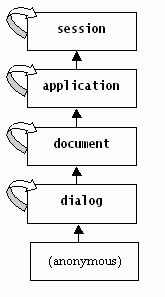
Figure 11: The scope hierarchy.
The curved arrows in this diagram show that each scope contains
a pre-defined variable whose name is the same as the scope that
refers to the scope itself. This allows you for example in the
anonymous, dialog, and document scopes to refer to a variable
X in the document scope using document.X. As another
example, a <filled>'s variable scope is an anonymous scope
local to the <filled>, whose parent variable scope is that of
the <form>.
It is not recommended to use "session", "application",
"document", and "dialog" as the names of variables and form items.
While they are not reserved words, using them hides the pre-defined
variables with the same name because of ECMAScript scoping rules
used by VoiceXML.
Variables are referenced in cond and expr attributes:
<if cond="city == 'LA'">
<assign name="city" expr="'Los Angeles'"/>
<elseif cond="city == 'Philly'"/>
<assign name="city" expr="'Philadelphia'"/>
<elseif cond="city =='Constantinople'"/>
<assign name="city" expr="'Istanbul'"/>
</if>
<assign name="var1" expr="var1 + 1"/>
<if cond="i > 1">
<assign name="i" expr="i-1"/>
</if>
The expression language used in cond and expr is precisely ECMAScript. Note
that the cond operators "<", "<=", and "&&" must be escaped in
XML (to "<" and so on).
Variable references match the closest enclosing scope according
to the scope chain given above. You can prefix a reference with a
scope name for clarity or to resolve ambiguity. For instance to
save the value of a form field item variable for use later on in a
document:
<assign name="document.ssn" expr="dialog.ssn"/>
If the application root document has a variable x, it is
referred to as application.x in non-root documents, and either
application.x or document.x in the application root document.
If the document does not have a specified application root and has a variable
x, it is referred to as either application.x or document.x in the document.
-
session.connection.local.uri
- This variable is a URI which addresses the local interpreter
context device.
-
session.connection.remote.uri
- This variable is a URI which addresses the remote caller device.
-
session.connection.protocol.name
- This variable is the name of the connection protocol. The name also
represents the subobject name for protocol specific information. For
instance, if session.connection.protocol.name is 'q931',
session.connection.protocol.q931.uui might specify the user-to-user
information property of the connection.
-
session.connection.protocol.version
- This variable is the version of the connection protocol.
-
session.connection.redirect
- This variable is an array representing the connection redirection paths.
The first element is the original called number, the last element is the last
redirected number. Each element of the array contains a uri, pi (presentation
information), si (screening information), and reason property. The reason
property can be either "unknown", "user busy", "no reply", "deflection during
alerting", "deflection immediate response", "mobile subscriber not
reachable".
-
session.connection.aai
- This variable is application-to-application information passed
during connection setup.
-
session.connection.originator
- This variable directly references either the local or remote property
(For instance, the following ECMAScript would return true if the remote party
initiated the connection: var caller_initiate = connection.originator ==
connection.remote).
-
application.lastresult$
- This variable holds information
about the last recognition to occur within this application. It is an array of
elements where each element, application.lastresult$[i], represents a
possible result through the following
variables:
-
application.lastresult$[i].confidence
- The whole utterance confidence level for this interpretation from
0.0-1.0. A value of 0.0 indicates minimum confidence, and a value of 1.0
indicates maximum confidence. More specific interpretation of a confidence
value is platform-dependent.
-
application.lastresult$[i].utterance
- The raw string of words that were recognized for this
interpretation. The exact tokenization and spelling is
platform-specific (e.g. "five hundred thirty" or "5 hundred 30" or
even "530"). In the case of a DTMF grammar, this
variable will contain the matched digit string.
-
application.lastresult$[i].inputmode
- For this interpretation,the mode in which user input was
provided: dtmf or voice.
-
application.lastresult$[i].interpretation
- An ECMAscript variable containing the interpretation as
described in Section 3.1.5.
Interpretations are sorted by confidence score, from highest to lowest.
Interpretations with the same confidence score are further sorted according to
the precedence relationship (see Section 3.1.4) among
the grammars producing the interpretations. Different elements in
application.lastresult$ will always differ in their utterance, interpretation,
or both.
The number of application.lastresult$ elements is guaranteed to
be greater than or equal to one and less than or equal to the
system property "maxnbest". If no results have been generated by
the system, then "application.lastresult$" shall be ECMAScript
undefined.
Additionally, application.lastresult$ itself contains the
properties confidence, utterance, inputmode, and interpretation
corresponding to those of the 0th element in the ECMAScript array.
All of the shadow variables described above are set immediately
after any recognition.
In this context, a <nomatch> event counts as a recognition, and causes
the value of "application.lastresult$" to be set, even though the existing
values of field variables are not affected by a <nomatch>. In contrast,
a <noinput> event does not change the value of
"application.lastresult$". After the value of "application.lastresult$" is
set, the value persists (unless it is modified by the
application) until the browser enters the next waiting state, when it
is set to undefined. Similarly, when an application root document is
loaded, this variable is set to the value undefined.
The variable application.lastresult$ and all of its components are writeable
and can be modified by the application.
The following example shows how application.lastresult$ can be
used in a field level <catch> to access a <link>
grammar recognition result and transition to different dialog
states depending on confidence:
<vxml version="2.0" xmlns="http://www.w3.org/2001/vxml"
xmlns:xsi="http://www.w3.org/2001/XMLSchema-instance"
xsi:schemaLocation="http://www.w3.org/2001/vxml
http://www.w3.org/TR/voicexml20/vxml.xsd">
<link event="menulinkevent">
<grammar src="/grammars/linkgrammar.grxml" type="application/srgs+xml"/>
</link>
<form>
<field>
<prompt> Say something </prompt>
<catch event="menulinkevent">
<if cond="application.lastresult$.confidence < 0.7">
<goto nextitem="confirmlinkdialog"/>
<else/>
<goto next="./main_menu.html"/>
</if>
</catch>
</field>
</form>
</vxml>
The final example demonstrates how a script can be used to iterate over the
array of results in application.lastresult$, where each element is represented
by "application.lastresult$[i]":
<?xml version="1.0" encoding="UTF-8"?>
<vxml version="2.0" xmlns="http://www.w3.org/2001/vxml"
  xmlns:xsi="http://www.w3.org/2001/XMLSchema-instance"
  xsi:schemaLocation="http://www.w3.org/2001/vxml
   http://www.w3.org/TR/voicexml20/vxml.xsd">
 <form>
    <field name="color">
        <prompt> Say a color </prompt>
	<grammar type="application/srgs+xml" src="color.grxml" />
        <filled>
	    <var name="confident_count" expr="0"/>
            <script>
            <![CDATA[
	    // number of results
	     var len = application.lastresult$.length;

	     // iterate through array
	     for (var i = 0; i < len; i++) {
	       // check if DTMF
	       if (application.lastresult$[i].confidence > .7) {
	         confident_count++;
	       }
	     }
	    ]]>
	    </script>
	    <if cond="confident_count > 1">
	       <goto next="#verify"/>
	    </if>
	</filled>
    </field>
</form>
</vxml>
The platform throws events when the user does not respond,
doesn't respond intelligibly, requests help, etc. The interpreter
throws events if it finds a semantic error in a VoiceXML document,
or when it encounters a <throw> element. Events are
identified by character strings.
Each element in which an event can occur has a set of catch
elements, which include:
-
<catch>
-
<error>
-
<help>
-
<noinput>
-
<nomatch>
An element inherits the catch elements ("as if by copy") from
each of its ancestor elements, as needed. If a field, for example,
does not contain a catch element for nomatch, but its form does,
the form’s nomatch catch element is used. In this way, common
event handling behavior can be specified at any level, and it
applies to all descendents.
The "as if by copy" semantics for inheriting catch elements
implies that when a catch element is executed, variables are
resolved and thrown events are handled relative to the scope where
the original event originated, not relative to the scope that
contains the catch element. For example, consider a catch element
that is defined at document scope handling an event that originated
in a <field> within the document. In such a catch element
variable references are resolved relative to the <field>'s
scope, and if an event is thrown by the catch element it is handled
relative to the <field>. Similarly, relative URI references
in a catch element are resolved against the active document and not
relative to the document in which they were declared.
Finally, properties are resolved relative to the element where the event
originated. For example, a prompt element defined as part of a document level
catch would use the innermost property value of the active form item to
resolve its timeout attribute if no value is explicitly specified.
The <throw> element throws an event. These can be the
pre-defined ones:
<throw event="nomatch"/>
<throw event="connection.disconnect.hangup"/>
or application-defined events:
<throw event="com.att.portal.machine"/>
Attributes of <throw> are:
Table 40: <throw> Attributes
| event |
The event being thrown. |
| eventexpr |
An ECMAScript expression evaluating to the name of the event
being thrown. |
| message |
A message string providing additional context about the event
being thrown. For the pre-defined events thrown by the platform,
the value of the message is platform-dependent.
The message is available as the value of a variable within the
scope of the catch element, see below. |
| messageexpr |
An ECMAScript expression evaluating to the
message string. |
Exactly one of "event" or "eventexpr" must be specified; otherwise, an
error.badfetch event is thrown. Exactly one of "message" or "messageexpr" may
be specified; otherwise, an error.badfetch event is thrown.
Unless explicited stated otherwise, VoiceXML does not specify when events
are thrown.
The catch element associates a catch with a document, dialog, or form
item.
It contains executable content.
<vxml version="2.0" xmlns="http://www.w3.org/2001/vxml"
  xmlns:xsi="http://www.w3.org/2001/XMLSchema-instance"
  xsi:schemaLocation="http://www.w3.org/2001/vxml
   http://www.w3.org/TR/voicexml20/vxml.xsd">
<form id="launch_missiles">
  <field name="user_id" type="digits">
    <prompt>What is your username</prompt>
  </field>
  <field name="password">
    <prompt>What is the code word?</prompt>
    <grammar version="1.0" root="root">
     <rule id="root" scope="public">rutabaga</rule>
    </grammar>
   <help>It is the name of an obscure vegetable.</help>
   <catch event="nomatch noinput" count="3">
     <prompt>Security violation!</prompt>
     <submit next="http://www.example.com/apprehend_felon.vxml"
                namelist="user_id"/>
   </catch>
  </field>
</form>
</vxml>
The catch element's anonymous variable scope includes the
special variable _event which contains the name of the event that
was thrown. For example, the following catch element can handle two
types of events:
<catch event="event.foo event.bar">
  <if cond="_event=='event.foo'">
    <!-- Play this for event.foo events -->
    <audio src="foo.wav"/>
  <else/>
    <!-- Play this for event.bar events -->
    <audio src="bar.wav"/>
  </if>
  <!-- Continue with common handling for either event -->
</catch>
The _event variable is inspected to select the audio to play
based on the event that was thrown. The foo.wav file will be played
for event.foo events. The bar.wav file will be played for event.bar
events. The remainder of the catch element contains executable
content that is common to the handling of both event types.
The catch element's anonymous variable scope also includes the
special variable _message which contains the value of the message
string from the corresponding <throw> element, or a
platform-dependent value for the pre-defined events raised by the
platform. If the thrown event does not specify a message, the value
of _message is ECMAScript undefined.
If a <catch> element contains a <throw> element with
the same event, then there may be an infinite loop:
<catch event="help">
   <throw event="help"/>
</catch>
A platform could detect this situation and throw a semantic
error instead.
Attributes of <catch> are:
Table 41: <catch> Attributes
| event |
The event or events to catch. A space-separated list of
events may be specified, indicating that this <catch> element
catches all the events named in the list. In such a case a separate
event counter (see "count" attribute) is maintained for each
event. If the attribute is unspecified, all events
are to be caught. |
| count |
The occurrence of the event (default is 1). The count allows
you to handle different occurrences of the same event differently.
Each <form>, <menu>, and form item maintains a counter for each event
that occurs while it is being visited. Item-level event counters are used for
events thrown while visiting individual form items and while executing
<filled> elements contained within those items. Form-level and menu-level
counters are used for events thrown during dialog initialization and while
executing form-level <filled> elements.
Form-level and menu-level event counters are reset each time the <menu> or
<form> is re-entered. Form-level and menu-level event counters are not
reset by the <clear> element.
Item-level event counters are reset each time the <form> containing the
item is re-entered. Item-level event counters are also reset when the item is
reset with the <clear> element. An item's event counters are not reset
when the item is re-entered without leaving the <form>."
Counters are incremented against
the full event name and every prefix matching event name; for
example, occurrence of the event "event.foo.1" increments the
counters
for "event.foo.1" plus "event.foo" and "event".
|
| cond |
An expression which must evaluate to true after conversion to boolean
in order for the event to be caught.
Defaults to true. |
The <error>, <help>, <noinput>, and
<nomatch> elements are shorthands for very common types of
<catch> elements.
The <error> element is short for <catch
event="error"> and catches all events of type error:
<error>
  An error has occurred -- please call again later.
  <exit/>
</error>
The <help> element is an abbreviation for <catch
event="help">:
<help>No help is available.</help>
The <noinput> element abbreviates <catch
event="noinput">:
<noinput>I didn't hear anything, please try again.</noinput>
And the <nomatch> element is short for <catch
event="nomatch">:
<nomatch>I heard something, but it wasn't a known city.</nomatch>
These elements take the attributes:
Table 42: Shorthand Catch Attributes
| count |
The event count (as in <catch>). |
| cond |
An optional condition to test to see if the event is caught by
this element (as in <catch> described in Section 5.2.2). Defaults to true. |
An element inherits the catch elements ("as if by copy") from
each of its ancestor elements, as needed. For example, if a
<field> element inherits a <catch> element from the
document
<vxml version="2.0" xmlns="http://www.w3.org/2001/vxml"
  xmlns:xsi="http://www.w3.org/2001/XMLSchema-instance"
  xsi:schemaLocation="http://www.w3.org/2001/vxml
   http://www.w3.org/TR/voicexml20/vxml.xsd">
<catch event="event.foo">
    <audio src="beep.wav"/>
</catch>

<form>
    <field name="color">
        <prompt>Please say a primary color</prompt>
	<grammar type="application/srgs">red | yellow | blue</grammar>
        <nomatch>
            <throw event="event.foo"/>
        </nomatch>
    </field>
</form>
</vxml>
then the <catch> element is implicitly copied into
<field> as if defined below:
<vxml version="2.0" xmlns="http://www.w3.org/2001/vxml"
  xmlns:xsi="http://www.w3.org/2001/XMLSchema-instance"
  xsi:schemaLocation="http://www.w3.org/2001/vxml
   http://www.w3.org/TR/voicexml20/vxml.xsd">
<form>
    <field>
        <prompt>Please say a primary color</prompt>
	<grammar type="application/srgs">red | yellow | blue</grammar>
        <nomatch>
            <throw event="event.foo"/>
        </nomatch>
        <catch event="event.foo">
            <audio src="beep.wav"/>
        </catch>
    </field>
</form>
</vxml>
When an event is thrown, the scope in which the event is handled
and its enclosing scopes are examined to find the best
qualified catch element, according to the following
algorithm:
- Form an ordered list of catches consisting of all catches in
the current scope and all enclosing scopes (form item, form,
document, application root document, interpreter context), ordered
first by scope (starting with the current scope), and then within
each scope by document order.
- Remove from this list all catches whose event name does not match the
event being thrown or whose cond evaluates to false after conversion to
boolean.
- Find the "correct count": the highest count among the catch
elements still on the list less than or equal to the current count
value.
- Select the first element in the list with the "correct
count".
The name of a thrown event matches the catch element event name if it is an
exact match, a prefix match or the catch event name is not specified. A prefix
match occurs when the catch element event attribute is a token prefix of the
name of the event being thrown, where the dot is the token separator, all
trailing dots are removed, and the empty string matches everything. For
example,
<catch event="connection.disconnect">
   <prompt>Caught a connection dot disconnect event</prompt>
</catch>
will prefix match the event connection.disconnect.transfer.
<catch event="com.example.myevent">
   <prompt>Caught a com dot example dot my event</prompt>
</catch>
prefix matches com.example.myevent.event1., com.example.myevent.
and com.example.myevent..event1 but not
com.example.myevents.event1. Finally,
<catch event=".">
   <prompt>Caught an event</prompt>
</catch>
prefix matches all events (as does <catch> without an event
attribute).
Note that the catch element selection algorithm gives priority
to catch elements that occur earlier in a document over those that
occur later, but does not give priority to catch elements that are
more specific over those that are less specific. Therefore is
generally advisable to specify catch elements in order from more
specific to less specific. For example, it would be advisable to
specify catch elements for "error.foo" and "error" in that order,
as follows:
<catch event="error.foo">
  <prompt>Caught an error dot foo event</prompt>
</catch>
<catch event="error">
  <prompt>Caught an error event</prompt>
</catch>
If the catch elements were specified in the opposite order, the
catch element for "error.foo" would never be executed.
The interpreter is expected to provide implicit default catch
handlers for the noinput, help, nomatch, cancel, exit, and error
events if the author did not specify them.
The system default behavior of catch handlers for various events
and errors is summarized by the definitions below that specify (1)
whether any audio response is to be provided, and (2) how execution
is affected. Note: where an audio response is provided, the actual
content is platform dependent.
Table 43: Default Catch Handlers
|
Event Type
|
Audio Provided |
Action |
|
cancel
|
no |
don’t reprompt |
|
error
|
yes |
exit interpreter |
|
exit
|
no |
exit interpreter |
|
help
|
yes |
reprompt |
|
noinput
|
no |
reprompt |
|
nomatch
|
yes |
reprompt |
|
maxspeechtimeout
|
yes |
reprompt |
|
connection.disconnect
|
no |
exit interpreter |
| all others |
yes |
exit interpreter |
Specific platforms will differ in
the default prompts presented.
There are pre-defined events, and application and platform-specific events.
Events are also subdivided into plain events (things that happen normally),
and error events (abnormal occurrences). The error naming convention allows
for multiple levels of granularity.
A conforming browser may throw an event that extends a pre-defined event
string so long as the event contains the specified pre-defined event string as
a dot-separated exact initial substring of its event name. Applications that
write catch handlers for the pre-defined events will be interoperable.
Applications that write catch handlers for extended event names are not
guaranteed interoperability. For example, if in loading a grammar file a
syntax error is detected the platform must throw
"error.badfetch". Throwing "error.badfetch.grammar.syntax"
is an acceptable implementation.
Further information about an event may be specified in the "_message" variable
(see Section 5.2.2).
The pre-defined events are:
-
cancel
- The user has requested to cancel playing of the current
prompt.
-
connection.disconnect.hangup
- The user has hung up.
-
connection.disconnect.transfer
- The user has been transferred unconditionally to another line
and will not return.
-
exit
- The user has asked to exit.
-
help
- The user has asked for help.
-
noinput
- The user has not responded within the timeout interval.
-
nomatch
- The user input something, but it was not recognized.
-
maxspeechtimeout
- The user input was too long exceeding the 'maxspeechtimeout'
property.
In addition to transfer errors (Section
2.3.7.3), the pre-defined errors are:
-
error.badfetch
- The interpreter context throws this event when a fetch of a document has
failed and the interpreter context has reached a place in the document
interpretation where the fetch result is required. Fetch failures result from
unsupported scheme references, malformed URIs, client aborts, communication
errors, timeouts, security violations, unsupported resource types, resource
type mismatches, document parse errors, and a variety of errors represented by
scheme-specific error codes.
- If the interpreter context has speculatively prefetched a
document and that document turns out not to be needed,
error.badfetch is not thrown. Likewise if the fetch of an
<audio> document fails and if there is a nested alternate
<audio> document whose fetch then succeeds, or if there is
nested alternate text, no error.badfetch occurs.
-
When an interpreter context is transitioning to a new document, the
interpreter context throws error.badfetch on an error until the interpreter is
capable of executing the new document, but again only at the point in time
where the new document is actually needed, not before. Whether or not variable
initialization is considered part of executing the new document is
platform-dependent.
-
error.badfetch.http.<response code>
error.badfetch.protocol.<response code>
- In the case of a fetch failure, the interpreter context must use a
detailed event type telling which specific HTTP or other protocol-specific
response code was encountered. The value of the response code for HTTP is
defined in [RFC2616]. This allows applications to
differentially treat a missing document from a prohibited document, for
instance. The value of the response code for other protocols (such as HTTPS,
RTSP, and so on) is dependent upon the protocol.
-
error.semantic
- A run-time error was found in the VoiceXML document, e.g. substring bounds error, or an undefined
variable was referenced.
-
error.noauthorization
-
Thrown when the application tries to perform an operation that is not
authorized by the platform. Examples would include dialing an invalid
telephone number or one which the user is not allowed to call, attempting to
access a protected database via a platform-specific <object>, inappropriate
access to builtin grammars, etc.
-
error.noresource
- A run-time error occurred because a requested platform
resource was not available during execution.
-
error.unsupported.builtin
- The platform does not support a requested builtin type/grammar.
-
error.unsupported.format
- The requested resource has a format that is not supported by the platform,
e.g. an unsupported grammar format, or media type.
-
error.unsupported.language
- The platform does not support the language for either speech
synthesis or speech recognition.
-
error.unsupported.element
- The platform does not support the given element, where element is a VoiceXML element defined in this
specification. For instance, if a platform does not implement
<transfer>, it must throw error.unsupported.transfer. This allows an
author to use event handling to adapt to different platform capabilities.
Errors encountered during document loading, including transport
errors (no document found, HTTP status code 404, and so on) and syntactic
errors (no <vxml> element, etc) result in a badfetch error event raised
in the calling document. Errors that occur after loading and before entering
the initialization phase of the Form Interpretation Algorithm are handled in a
platform-specific manner. Errors that occur after entering the FIA
initialization phase, such as semantic errors, are raised in the new document.
The handling of errors encountered during the loading of the first document in
a session is platform-specific.
Application-specific and platform-specific event types should use the
reversed Internet domain name convention to avoid naming conflicts. For
example:
-
error.com.example.voiceplatform.noauth
- The user is not authorized to dial out on this platform.
-
org.example.voice.someapplication.toomanynoinputs
- The user is far too quiet.
Catches can catch specific events (cancel) or all those sharing
a prefix (error.unsupported).
Executable content refers to a block of procedural logic.
Such logic appears in:
-
The <block> form item.
-
The <filled> actions in forms and input items.
-
Event handlers (<catch>, <help>, et cetera).
Executable elements are executed in document order in
their block of procedural logic. If an executable element generates
an error, that error is thrown immediately. Subsequent executable
elements in that block of procedural logic are not executed.
This section covers the elements that can occur in executable
content.
This element declares a variable. It can occur in executable
content or as a child of <form> or <vxml>.
Examples:
<var name="phone" expr="'6305551212'"/>
<var name="y" expr="document.z+1"/>
If it occurs in executable content, it declares a variable in
the anonymous scope associated with the enclosing <block>,
<filled>, or catch element. This declaration is made only
when the <var> element is executed. If the variable is
already declared in this scope, subsequent declarations act as
assignments, as in ECMAScript.
If a <var> is a child of a <form> element, it declares a
variable in the dialog scope of the <form>. This declaration is made
during the form’s initialization phase as described in Section 2.1.6.1. The <var> element is not a form
item, and so is not visited by the Form Interpretation Algorithm’s main
loop.
If a <var> is a child of a <vxml> element, it declares a
variable in the document scope; and if it is the child of a
<vxml> element in a root document then it also declares the variable in
the application scope.
This declaration is made
when the document is initialized; initializations happen in
document order.
Attributes of <var> include:
Table 44: <var> Attributes
| name |
The name of the variable that will hold the result. |
| expr |
The initial value of the variable (optional). If there is no
expr attribute, the variable retains its current value, if any.
Variables start out with the ECMAScript value undefined if they are
not given initial values. |
The <assign> element assigns a value to a variable:
<assign name="flavor" expr="'chocolate'"/>
<assign name="document.mycost" expr="document.mycost+14"/>
It is illegal to make an assignment to a variable that has not
been explicitly declared using a <var> element or a var statement within
a <script>. Attempting to assign to an undeclared variable causes an
error.semantic event to be thrown.
Note that when an ECMAScript object, e.g. "obj", has been
properly initialized then its properties, for instance "obj.prop1", can
be assigned without explicit declaration (in fact, an attempt to declare
ECMAScript object properties such as "obj.prop1" would result in an
error.semantic event being thrown).
Attributes include:
Table 45: <assign> Attributes
| name |
The name of the variable being assigned to. |
| expr |
The new value of the variable. |
The <clear> element resets one or more variables,
including form items.
Resetting form items includes:
Setting the form item variable to ECMAScript undefined.
Reinitializing the prompt counter and the event counters for the
form item.
For example:
<clear namelist="city state zip"/>
The attribute is:
Table 46: <clear> Attributes
| namelist |
The list of variables to be reset; this can include variable names other
than form items. When not specified, all form items in the current form are
cleared. |
The <if> element is used for conditional logic. It has
optional <else> and <elseif> elements.
<if cond="total > 1000">
<prompt>This is way too much to spend.</prompt>
<throw event="com.xyzcorp.acct.toomuchspent"/>
</if>
<if cond="amount < 29.95">
<assign name="x" expr="amount"/>
<else/>
<assign name="x" expr="29.95"/>
</if>
<if cond="flavor == 'vanilla'">
<assign name="flavor_code" expr="'v'"/>
<elseif cond="flavor == 'chocolate'"/>
<assign name="flavor_code" expr="'h'"/>
<elseif cond="flavor == 'strawberry'"/>
<assign name="flavor_code" expr="'b'"/>
<else/>
<assign name="flavor_code" expr="'?'"/>
</if>
Prompts can appear in executable content, in their full
generality, except that the <prompt> count attribute is
meaningless. In particular, the cond attribute can be used in
executable content. Prompts may be wrapped with <prompt> and
</prompt>, or represented using PCDATA. Wherever
<prompt> is allowed, the PCDATA xyz is interpreted
exactly as if it had appeared as
<prompt>xyz</prompt>.
<nomatch count="1">
  To open the pod bay door, say your code phrase clearly.
</nomatch>

<nomatch count="2">
  <prompt>
    This is your <emphasis>last</emphasis> chance.
  </prompt>
</nomatch>

<nomatch count="3">
  Entrance denied.
  <exit/>
</nomatch>
The FIA expects a catch element to queue appropriate prompts in
the course of handling an event. Therefore, the FIA does not
generally perform the normal selection and queuing of prompts on
the next iteration following the execution of a catch element.
However, the FIA does perform normal selection and queueing of
prompts after the execution of a catch element (<catch>,
<error>, <help>, <noinput>, <nomatch>) in
two cases:
- if the catch element ends by executing a <goto> or
<submit> to another dialog, or if it ends with a <return> from a
subdialog; in this case the new dialog needs to be guaranteed that its initial
prompt remains intact and cannot be suppressed or replaced by a referring
dialog; or
- if a <reprompt> is executed in the catch to request that
the subsequent prompts be played.
In these two cases, after the FIA selects the next form item to
visit, it performs normal prompt processing, including selecting
and queuing the form item's prompts and incrementing the form
item's prompt counter.
For example, this noinput catch expects the next form item
prompt to be selected and played:
<field name="want_ice_cream">
  <grammar type="application/srgs+xml" src="/grammars/boolean.grxml"/>
  <prompt>Do you want ice cream for dessert?</prompt>
  <prompt count="2">
    If you want ice cream, say yes.
    If you do not want ice cream, say no.
  </prompt>
  <noinput>
    I could not hear you.
    <!-- Cause the next prompt to be selected and played. -->
    <reprompt/>
  </noinput>
</field>
A quiet user would hear:
C: Do you want ice cream for dessert?
H: (silence)
C: I could not hear you.
C: If you want ice cream, say yes. If you don’t want ice
cream, say no.
H: (silence)
C: I could not hear you.
C: If you want ice cream, say yes. If you don’t want ice
cream, say no.
H: No
If there were no <reprompt>, the user would instead
hear:
C: Do you want ice cream for dessert?
H: (silence)
C: I could not hear you.
H: (silence)
C: I could not hear you.
H: No
Note that a consequence of skipping the prompt selection phase
as described above is that the prompt counter of the form item selected by the
FIA after the execution of a catch element (that does not execute a
<reprompt>, or leave the dialog via <goto>, <submit> or <return>)
will not be incremented.
Also note that the prompt selection phase following the
execution of a catch element (that does not execute a <reprompt> or leave
the dialog via <goto>, <submit> or <return>) is skipped even if the
form item selected by the FIA is different from the previous form item.
The <reprompt> element has no effect outside of a catch.
The <goto> element is used to:
-
transition to another form item in the current form,
-
transition to another dialog in the current document, or
-
transition to another document.
To transition to another form item, use the nextitem attribute,
or the expritem attribute if the form item name is computed using
an ECMAScript expression:
<goto nextitem="ssn_confirm"/>
<goto expritem="(type==12)? 'ssn_confirm' : 'reject'"/>
To go to another dialog in the same document, use next (or expr)
with only a URI fragment:
<goto next="#another_dialog"/>
<goto expr="'#' + 'another_dialog'"/>
To transition to another document, use next (or expr) with a
URI:
<goto next="http://flight.example.com/reserve_seat"/>
<goto next="./special_lunch#wants_vegan"/>
The URI may be absolute or relative to the current document. You
may specify the starting dialog in the next document using a
fragment that corresponds to the value of the id attribute of a
dialog. If no fragment is specified, the first dialog in that
document is chosen.
Note that transitioning to another dialog in the current
document causes the old dialog’s variables to be lost, even
in the case where a dialog is transitioning to itself.
Transitioning to another document using an absolute or relative URI
will likewise drop the old document level variables, even if the
new document is the same one that is making the transition.
However, document variables are retained when transitioning to an
empty URI reference with a fragment identifier. For example, the
following statements behave differently in a document with the URI
http://someco.example.com/index.vxml:
<goto next="#foo"/>

<goto next="http://someco.example.com/index.vxml#foo"/>
According to [RFC2396], the fragment identifier
(the part after the '#') is not part of a URI and transitioning to empty URI
references plus fragment identifiers should never result in a new document
fetch. Therefore "#foo" in the first statement is an empty URI reference with
a fragment identifier and document variables are retained. In the second
statement "#foo" is part of an absolute URI and the document variables are
lost. If you want data to persist across multiple documents, store data in the
application scope.
The dialog to transition to is specified by the URI reference in the
<goto>'s next or expr attribute (see [RFC2396]).
If this URI reference contains an absolute or relative URI, which may include
a query string, then that URI is fetched and the dialog is found in the
resulting document.
If the URI reference contains only a fragment (i.e., no absolute or relative
URI), then there is no fetch: the dialog is found in the current document.
The URI reference's fragment, if any, names the dialog to transition
to. When there is no fragment, the dialog chosen is the lexically first dialog
in the document.
If the form item, dialog or document to transition to
is not valid (i.e. the form item, dialog or
document does not exist), an error.badfetch must be thrown. Note that for
errors which occur during a dialog or document transition, the scope in which
errors are handled is platform specific.
For errors which occur during form item transition, the
event is handled in the dialog scope.
Attributes of <goto> are:
Table 47: <goto> Attributes
| next |
The URI to which to transition. |
| expr |
An ECMAScript expression that yields the URI. |
| nextitem |
The name of the next form item to visit in the
current form. |
| expritem |
An ECMAScript expression that yields the name of the next form
item to visit. |
| fetchaudio |
See Section 6.1. This defaults to the
fetchaudio property. |
| fetchhint |
See Section 6.1. This defaults to the
documentfetchhint property. |
| fetchtimeout |
See Section 6.1. This defaults to the
fetchtimeout property. |
| maxage |
See Section 6.1. This defaults to the
documentmaxage property. |
| maxstale |
See Section 6.1. This defaults to the
documentmaxstale property. |
Exactly one of "next", "expr", "nextitem" or "expritem" must be specified;
otherwise, an error.badfetch event is thrown.
The <submit> element is used to submit information to the origin web
server and then transition to the document sent back in the response.
Unlike <goto>, it lets you submit a list of variables to the
document server via an HTTP GET or POST request. For example, to
submit a set of form items to the server you might have:
<submit next="log_request" method="post"
 namelist="name rank serial_number"
 fetchtimeout="100s" fetchaudio="audio/brahms2.wav"/>
The dialog to transition to is specified by the URI reference in the
<submit>'s next or expr attribute (see [RFC2396], Section 4.2). The URI is always fetched
even if it contains just a fragment. In the case of a fragment, the URI
requested is the base URI of the current document. This means that the
following two elements have substantially different effects:
<goto next="#get_pin"/>

<submit next="#get_pin"/>
Note that although the URI is always fetched and the resulting document is
transitioned to, some <submit> requests can be satisfied by intermediate
caches.
This might happen, for example, if the origin web server provides an explicit
expiration time with the response.
If the dialog or document to transition to is not valid (i.e. the dialog or
document does not exist), an error.badfetch must be thrown. Note that for
errors which occur during a dialog or document transition, the scope in which
errors are handled is platform specific.
Attributes of <submit> include:
Table 48: <submit> Attributes
| next |
The URI reference. |
| expr |
Like next, except that the URI reference is dynamically
determined by evaluating the given ECMAScript expression. |
| namelist |
The list of variables to submit. By default, all the
named input item variables are submitted. If a namelist is supplied, it may
contain individual variable references which are submitted with the same
qualification used in the namelist. Declared VoiceXML and ECMAScript variables
can be referenced. |
| method |
The request method: get (the default) or post. |
| enctype |
The media encoding type of the submitted document. The default
is application/x-www-form-urlencoded. Interpreters must also
support multipart/form-data and may support additional encoding
types. |
| fetchaudio |
See Section 6.1. This defaults to the
fetchaudio property. |
| fetchhint |
See Section 6.1. This defaults to the
documentfetchhint property. |
| fetchtimeout |
See Section 6.1. This defaults to the
fetchtimeout property. |
| maxage |
See Section 6.1. This defaults to the
documentmaxage property. |
| maxstale |
See Section 6.1. This defaults to the
documentmaxstale property. |
Exactly one of "next" or "expr" must be specified; otherwise, an
error.badfetch event is thrown.
When an ECMAScript variable is submitted to the server its value is first
converted into a string before being submitted. If the variable is an
ECMAScript Object the mechanism by which it is submitted is not currently
defined. The mechanism of ECMAScript Object submission is reserved for future
definition. Instead of submitting ECMAScript Objects directly, the application
developer may explicitly submit properties of Object as in "date.month
date.year".
If a <submit> contains a variable which references recorded audio but
does not contain an ENCTYPE of multipart/form-data, the behavior is not
specified. It is probably inappropriate to attempt to URL-encode large
quantities of data.
Returns control to the interpreter context which determines what
to do next.
<exit/>
This element differs from <return> in that it terminates
all loaded documents, while <return> returns from a
<subdialog> invocation. If the <subdialog> caused a new
document (or application) to be invoked, then <return> will
cause that document to be terminated, but execution will resume
after the <subdialog>.
Note that once <exit> returns control to the interpreter
context, the interpreter context is free to do as it wishes. It may
play a top level menu for the user, drop the call, or transfer the
user to an operator, for example.
Attributes include:
Table 49: <exit> Attributes
| expr |
An ECMAScript expression that is evaluated as the return
value (e.g. "0", "'oops!'", or "field1").
|
| namelist |
Variable names to be returned to interpreter context. The
default is to return no variables; this means the interpreter
context will receive an empty ECMAScript object. |
Exactly one of "expr" or "namelist" may be
specified; otherwise, an error.badfetch event is thrown.
The <exit> element does not throw an "exit" event.
Return ends execution of a subdialog and returns control and data
to a calling dialog.
The attributes are:
Table 50: <return> Attributes
| event |
Return, then throw this event. |
| eventexpr |
Return, then throw the event to which this
ECMAScript expression evaluates.
|
| message |
A message string providing additional context
about the event being thrown. The message is available as the value
of a variable within the scope of the catch element, see Section 5.2.2. |
| messageexpr |
An ECMAScript expression evaluating to the
message string. |
| namelist |
Variable names to be returned to calling dialog. The default is
to return no variables; this means the caller will receive an empty
ECMAScript object. |
Exactly one of "event", "eventexpr" or "namelist" may be specified;
otherwise, an error.badfetch event is thrown. Exactly one of "message" or
"messageexpr" may be specified; otherwise, an error.badfetch event is thrown.
In returning from a subdialog, an event can be thrown at the invocation
point, or data is returned as an ECMAScript object with properties
corresponding to the variable specified in its namelist. A return element
that is encountered when not executing as a subdialog throws a semantic error.
The example below shows an event propagated from a subdialog to its
calling dialog when the subdialog fails to obtain a recognizable
result. It also shows data returned under normal conditions.
<vxml version="2.0" xmlns="http://www.w3.org/2001/vxml"
  xmlns:xsi="http://www.w3.org/2001/XMLSchema-instance"
  xsi:schemaLocation="http://www.w3.org/2001/vxml
   http://www.w3.org/TR/voicexml20/vxml.xsd">
<form>
  <subdialog name="result" src="#getssn">
    <nomatch>
      <!-- a no match event that is returned by the
          subdialog indicates that a valid social security
          number could not be matched. -->
      <goto next="http://myservice.example.com/ssn-problems.vxml"/>
    </nomatch>

    <filled>
      <submit namelist="result.ssn"
       next="http://myservice.example.com/cgi-bin/process"/>
    </filled>
  </subdialog>
</form>
<form id="getssn">
  <field name="ssn">
      <grammar src="http://grammarlib/ssn.grxml"
        type="application/srgs+xml"/>
      <prompt> Please say social security number.</prompt>
      <nomatch count="3">
        <return event="nomatch"/>
      </nomatch>
      <filled>
        <return namelist="ssn"/>
      </filled>
  </field>
</form>
</vxml>
The subdialog event handler for <nomatch> is triggered on
the third failure to match; when triggered, it returns from the
subdialog, and includes the nomatch event to be thrown in the
context of the calling dialog. In this case, the calling dialog
will execute its <nomatch> handler, rather than the
<filled> element, where the resulting action is to execute a
<goto> element. Under normal conditions, the <filled>
element of the subdialog is executed after a recognized social
security number is obtained, and then this value is returned to the
calling dialog, and is accessible as result.ssn.
Causes the interpreter context to disconnect from the user. As a result,
the interpreter context will throw a connection.disconnect.hangup event, which
may be caught to do cleanup processing, e.g.
<disconnect/>
The <script> element allows the specification of a block of
client-side scripting language code, and is analogous to the [HTML] <SCRIPT> element. For example, this
document has a script that computes a factorial.
<?xml version="1.0" encoding="UTF-8"?>
<vxml version="2.0" xmlns="http://www.w3.org/2001/vxml"
  xmlns:xsi="http://www.w3.org/2001/XMLSchema-instance"
  xsi:schemaLocation="http://www.w3.org/2001/vxml
   http://www.w3.org/TR/voicexml20/vxml.xsd">
    <script> <![CDATA[
       function factorial(n)
       {
         return (n <= 1)? 1 : n * factorial(n-1);
       }
    ]]> </script>

  <form id="form">
    <field name="fact">
      <grammar type="application/srgs+xml" src="/grammars/number.grxml"/>
      <prompt>
        Tell me a number and I'll tell you its factorial.
      </prompt>
      <filled>
        <prompt>
          <value expr="fact"/> factorial is
          <value expr="factorial(fact)"/>
        </prompt>
      </filled>
    </field>
  </form>
</vxml>
A <script> element may occur in the <vxml> and <form>
elements, or in executable content (in <filled>, <if>,
<block>, <catch>, or the short forms of <catch>). Scripts in
the <vxml> element are evaluated just after the document is loaded,
along with the <var> elements, in document order. Scripts in the
<form> element are evaluated in document order, along with <var>
elements and form item variables, each time execution moves into the
<form> element. A <script> element in executable content is
executed, like other executable elements, as it is encountered.
The <script> element has the following attributes:
Table 51: <script> Attributes
| src |
The URI specifying the location of the script, if it is
external. |
| charset |
The character encoding of the script designated by
src. UTF-8 and UTF-16 encodings of ISO/IEC 10646 must be supported (as in [XML]) and other encodings, as defined in the [IANA], may be supported. The default value is
UTF-8. |
| fetchhint |
See Section 6.1. This defaults to the
scriptfetchhint property. |
| fetchtimeout |
See Section 6.1. This defaults to the
fetchtimeout property. |
| maxage |
See Section 6.1. This defaults to the
scriptmaxage property. |
| maxstale |
See Section 6.1. This defaults to the
scriptmaxstale property. |
Either an "src" attribute or an inline script (but not
both) must be specified; otherwise, an error.badfetch event is thrown.
The VoiceXML <script> element (unlike the [HTML] <SCRIPT> element) does not have a
type attribute; ECMAScript is the required scripting language for
VoiceXML.
Each <script> element is executed in the scope of its containing
element; i.e., it does not have its own scope. This means for example that
variables declared with var in the <script> element are declared in the
scope of the containing element of the <script> element. (In ECMAScript
terminology, the "variable object" becomes the current scope of the containing
element of the <script> element).
Here is a time-telling service with a block containing a script
that initializes time variables in the dialog scope of a form:
<?xml version="1.0" encoding="UTF-8"?>
<vxml version="2.0" xmlns="http://www.w3.org/2001/vxml"
  xmlns:xsi="http://www.w3.org/2001/XMLSchema-instance"
  xsi:schemaLocation="http://www.w3.org/2001/vxml
   http://www.w3.org/TR/voicexml20/vxml.xsd">
  <form>
    <var name="hours"/>
    <var name="minutes"/>
    <var name="seconds"/>
    <block>
      <script>
        var d = new Date();
        hours = d.getHours();
        minutes = d.getMinutes();
        seconds = d.getSeconds();
      </script>
    </block>
    <field name="hear_another">
      <grammar type="application/srgs+xml" src="/grammars/boolean.grxml"/>
      <prompt>
        The time is <value expr="hours"/> hours,
        <value expr="minutes"/> minutes, and
        <value expr="seconds"/> seconds.
      </prompt>
      <prompt>Do you want to hear another time?</prompt>
      <filled>
        <if cond="hear_another">
          <clear/>
        </if>
      </filled>
    </field>
  </form>
</vxml>
The content of a <script> element is evaluated in the same
scope as a <var> element (see 5.1.2
Variable Scopes and 5.3.1 VAR).
The ECMAScript scope chain (see section 10.1.4 in [ECMASCRIPT]) is set up so that variables declared
either with <var> or inside <script> are put into the scope
associated with the element in which the <var> or <script> element
occurs. For example, the variable declared in a <script> element under a
<form> element has a dialog scope, and can be accessed as a dialog scope
variable as follows:
<?xml version="1.0" encoding="UTF-8"?>
<vxml version="2.0" xmlns="http://www.w3.org/2001/vxml"
  xmlns:xsi="http://www.w3.org/2001/XMLSchema-instance"
  xsi:schemaLocation="http://www.w3.org/2001/vxml
   http://www.w3.org/TR/voicexml20/vxml.xsd">
  <form>
    <script>
      var now = new Date(); <!-- this has a dialog scope-->
    </script>
    <var name="seconds" expr="now.getSeconds()"/> <!-- this has a dialog scope-->
    <block>
      <var name="now" expr="new Date()"/> <!-- this has an anonymous scope -->
      <script>
        var current = now.getSeconds();       <!-- "now" in the anonymous scope -->
        var approx = dialog.now.getSeconds(); <!-- "now" in the dialog scope -->
      </script>
    </block>
  </form>
</vxml>
All variables must be declared before being referenced by
ECMAScript scripts, or by VoiceXML elements as described in Section 5.1.1.
The <log> element allows an application to generate a logging or
debug message which a developer can use to help in application development or
post-execution analysis of application performance.
The <log> element may contain any combination of text (CDATA) and
<value> elements. The generated message consists of the concatenation of
the text and the string form of the value of the "expr" attribute of the
<value> elements.
The manner in which the message is displayed or logged is
platform-dependent. The usage of label is platform-dependent. Platforms are
not required to preserve white space.
ECMAScript expressions in <log> must be evaluated in
document order. The use of the <log> element should have no
other side-effects on interpretation.
<log>The card number was <value expr="card_num"/></log>
The <log> element has the following attributes:
Table 52: <log> Attributes
| label |
A string which may be used, for example, to
indicate the purpose of the log. |
| expr |
An ECMAscript expression evaluating to a
string. |
A VoiceXML interpreter context needs to fetch VoiceXML
documents, and other resources, such as audio files, grammars,
scripts, and objects. Each fetch of the content associated with a
URI is governed by the following attributes:
Table 53: Fetch Attributes
| fetchtimeout |
The interval to wait for the content to be returned before
throwing an error.badfetch event.
The value is a Time Designation (see Section 6.5). If not specified, a value derived from
the innermost fetchtimeout property is used. |
| fetchhint |
Defines when the interpreter context should retrieve
content from the server. prefetch indicates a file may be downloaded when the
page is loaded, whereas safe indicates a file that should only be downloaded
when actually needed. If not specified, a value derived from the innermost
relevant fetchhint property is used. |
| maxage |
Indicates that the document is willing to use content
whose age is no greater than the specified time in seconds (cf. 'max-age' in HTTP 1.1 [RFC2616]). The document is not willing to use
stale content, unless maxstale is also provided. If not specified, a value
derived from the innermost relevant maxage property, if present, is used. |
| maxstale |
Indicates that the document is willing to use content
that has exceeded its expiration time (cf. 'max-stale' in
HTTP 1.1 [RFC2616]). If maxstale is assigned
a value, then the document is willing to accept content that has exceeded its
expiration time by no more than the specified number of seconds. If not
specified, a value derived from the innermost relevant maxstale property, if
present, is used. |
When content is fetched from a URI, the fetchtimeout attribute
determines how long to wait for the content (starting from the time
when the resource is needed), and the fetchhint attribute
determines when the content is fetched. The caching policy for a
VoiceXML interpreter context utilizes the maxage and maxstale
attributes and is explained in more detail below.
The fetchhint attribute, in combination with the various
fetchhint properties, is merely a hint to the interpreter context
about when it may schedule the fetch of a resource. Telling
the interpreter context that it may prefetch a resource does not
require that the resource be prefetched; it only suggests that the
resource may be prefetched. However, the interpreter context
is always required to honor the safe fetchhint.
When transitioning from one dialog to another, through either a
<subdialog>, <goto>, <submit>, <link>, or
<choice> element, there are additional rules that affect interpreter
behavior. If the referenced URI names a document (e.g. "doc#dialog"), or if
query data is provided (through POST or GET), then a new document is obtained
(either from a local cache, intermediate cache, or
from a origin web server). When it is obtained, the
document goes through its initialization phase (i.e., obtaining and
initializing a new application root document if needed, initializing document
variables, and executing document scripts). The requested dialog (or first
dialog if none is specified) is then initialized and execution of the dialog
begins.
Generally, if a URI reference contains only a fragment (e.g.,
"#my_dialog"), then no document is fetched, and no initialization of
that document is performed.
However, <submit> always results in a fetch, and if a fragment is
accompanied by a namelist attribute there will also be a fetch.
Another exception is when a URI reference in a leaf
document references the application root document. In this case, the
root document is transitioned to without fetching and without
initialization even if the URI reference contains an absolute or
relative URI (see Section 1.5.2 and [RFC2396]). However, if the URI reference to
the root document contains a query string or a namelist attribute, the
root document is fetched.
Elements that fetch VoiceXML documents also support the following
additional attribute:
Table 54: Additional Fetch Attribute
| fetchaudio |
The URI of the audio clip to play while the fetch
is being done. If not specified, the fetchaudio property is used,
and if that property is not set, no audio is played during the
fetch. The fetching of the audio clip is governed by the
audiofetchhint, audiomaxage, audiomaxstale, and fetchtimeout
properties in effect at the time of the fetch. The playing of the
audio clip is governed by the fetchaudiodelay, and
fetchaudiominimum properties in effect at the time of the
fetch. |
The fetchaudio attribute is useful for enhancing a user experience
when there may be noticeable delays while the next document is
retrieved. This can be used to play background music, or a series of
announcements. When the document is retrieved, the audio file is
interrupted if it is still playing. If an error
occurs retrieving fetchaudio from its URI, no badfetch event is thrown
and no audio is played during the fetch.
The VoiceXML interpreter context, like [HTML] visual browsers, can
use caching to improve performance in fetching documents and other
resources; audio recordings (which can be quite large) are as
common to VoiceXML documents as images are to HTML pages. In a
visual browser it is common to include end user controls to update
or refresh content that is perceived to be stale. This is not the
case for the VoiceXML interpreter context, since it lacks
equivalent end user controls. Thus enforcement of cache refresh is
at the discretion of the document through appropriate use of the
maxage, and maxstale attributes.
The caching policy used by the VoiceXML interpreter context must adhere to
the cache correctness rules of HTTP 1.1 ([RFC2616]). In particular, the Expires and
Cache-Control headers must be honored. The following algorithm summarizes
these rules and represents the interpreter context behavior when requesting a
resource:
- If the resource is not present in the cache, fetch it from the
server using get.
- If the resource is in the cache,
- If a maxage value is provided,
- If age of the cached resource <= maxage,
- If the resource has expired,
- Otherwise, use the cached copy.
- Otherwise, fetch it from the server using get.
- Otherwise,
- If the resource has expired,
- Otherwise, use the cached copy.
The "maxstale check" is:
- If maxstale is provided,
- If cached copy has exceeded its expiration time by no more than
maxstale seconds, then use the cached copy.
- Otherwise, fetch it from the server using get.
- Otherwise, fetch it from the server using get.
Note: it is an optimization to perform a "get if modified" on a
document still present in the cache when the policy requires a
fetch from the server.
While the maxage and maxstale attributes are drawn from and
directly supported by HTTP 1.1, some resources may be addressed by
URIs that name protocols other than HTTP. If the protocol does not
support the notion of resource age, the interpreter context shall
compute a resource's age from the time it was received. If the
protocol does not support the notion of resource staleness, the
interpreter context shall consider the resource to have expired
immediately upon receipt.
VoiceXML allows the author to control the caching policy for each use of
each resource (except for any document referenced by the
<vxml> element's application attribute: there is no markup mechanism to
control the caching policy for an application root document).
Each resource-related element may specify maxage and maxstale
attributes. Setting maxage to a non-zero value can be used to get a fresh copy
of a resource that may not have yet expired in the cache. A fresh copy can be
unconditionally requested by setting maxage to zero.
Using maxstale enables the author to state that an expired copy
of a resource, that is not too stale (according to the rules of
HTTP 1.1), may be used. This can improve performance by eliminating
a fetch that would otherwise be required to get a fresh copy. It is
especially useful for authors who may not have direct server-side
control of the expiration dates of large static files.
Prefetching is an optional feature that an interpreter context
may implement to obtain a resource before it is needed. A resource
that may be prefetched is identified by an element whose fetchhint
attribute equals "prefetch". When an interpreter context does
prefetch a resource, it must ensure that the resource fetched is
precisely the one needed. In particular, if the URI is computed
with an expr attribute, the interpreter context must not move the
fetch up before any assignments to the expression's variables.
Likewise, the fetch for a <submit> must not be moved prior to
any assignments of the namelist variables.
The expiration status of a resource must be checked on each use of the
resource, and, if its fetchhint attribute is "prefetch", then it is
prefetched. The check must follow the caching policy specified in Section
6.1.2.
The "http" URI protocol must be supported by VoiceXML platforms,
the "https" protocol should be supported and other URI protocols
may be supported.
Metadata information is information about the document rather than the
document's content. VoiceXML 2.0 provides two elements in which metadata
information can be expressed: <meta> and <metadata>. The <metadata>
element provides more general and powerful treatment of metadata information
than <meta>.
VoiceXML does not specify required metadata information. However, it does
recommend that metadata is expressed using the <metadata> element
with information in Resource Description Framework (RDF) [RDF-SYNTAX] using the Dublin Core version 1.0 RDF
schema [DC] (see Section 6.2.2).
The <meta> element specifies meta information as in [HTML]. There are two types of <meta>.
The first type specifies a metadata property of the document as a whole
and is expressed by the pair of attributes, name and
content. For example to specify the maintainer of a VoiceXML
document:
<?xml version="1.0" encoding="UTF-8"?>
<vxml version="2.0" xmlns="http://www.w3.org/2001/vxml"
  xmlns:xsi="http://www.w3.org/2001/XMLSchema-instance"
  xsi:schemaLocation="http://www.w3.org/2001/vxml
   http://www.w3.org/TR/voicexml20/vxml.xsd">
  <meta name="maintainer" content="jpdoe@anycompany.example.com"/>
  <form>
    <block>
       <prompt>Hello</prompt>
    </block>
  </form>
</vxml>
The second type of <meta> specifies HTTP response headers and is expressed by the pair of attributes http-equiv and content.
In the following example, the first <meta> element sets an
expiration date that prevents caching of the document; the second
<meta> element sets the Date header.
<?xml version="1.0" encoding="UTF-8"?>
<vxml version="2.0" xmlns="http://www.w3.org/2001/vxml"
  xmlns:xsi="http://www.w3.org/2001/XMLSchema-instance"
  xsi:schemaLocation="http://www.w3.org/2001/vxml
   http://www.w3.org/TR/voicexml20/vxml.xsd">
  <meta http-equiv="Expires" content="0"/>
  <meta http-equiv="Date"    content="Thu, 12 Dec 2000 23:27:21 GMT"/>
  <form>
    <block>
       <prompt>Hello</prompt>
    </block>
  </form>
</vxml>
Attributes of <meta> are:
Table 55: <meta> Attributes
| name |
The name of the metadata
property. |
| content |
The value of the metadata property. |
| http-equiv |
The name of an HTTP response header. |
Exactly one of "name" or "http-equiv" must be specified; otherwise, an
error.badfetch event is thrown.
The <metadata> element is container in which information about the
document can be placed using a metadata schema. Although any metadata schema
can be used with <metadata>, it is recommended that the RDF schema is used
in conjunction with metadata
properties defined in the Dublin Core Metadata Initiative.
RDF is a declarative language and provides a standard way for using XML to
represent metadata in the form of statements about properties and
relationships of items on the Web. Content creators should refer to W3C
metadata Recommendations [RDF-SYNTAX] and [RDF-SCHEMA]
as well as the Dublin Core
Metadata Initiative [DC], which is a set of generally
applicable core metadata properties (e.g., Title, Creator, Subject,
Description, Copyrights, etc.).
The following Dublin Core metadata properties are recommended
in <metadata>:
Table 56: Recommended Dublin Core Metadata Properties
| Creator |
An entity primarily responsible for making the content
of the resource. |
| Rights |
Information about rights held in and over the resource. |
| Subject |
The topic of the content of the
resource. Typically, a subject will be expressed as keywords, key phrases or
classification codes. Recommended best practice is to select values from a
controlled vocabulary or formal classification scheme. |
Here is an example of how <metadata> can be included in a VoiceXML
document using the Dublin Core version 1.0 RDF schema [DC]:
<?xml version="1.0" encoding="UTF-8"?>
<vxml version="2.0" xmlns="http://www.w3.org/2001/vxml"
  xmlns:xsi="http://www.w3.org/2001/XMLSchema-instance"
  xsi:schemaLocation="http://www.w3.org/2001/vxml
   http://www.w3.org/TR/voicexml20/vxml.xsd">
<metadata>
   <rdf:RDF
       xmlns:rdf = "http://www.w3.org/1999/02/22-rdf-syntax-ns#"
       xmlns:rdfs = "http://www.w3.org/TR/1999/PR-rdf-schema-19990303#"
       xmlns:dc = "http://purl.org/metadata/dublin_core#">

<!-- Metadata about the VoiceXML document -->
   <rdf:Description about="http://www.example.com/meta.vxml"
       dc:Title="Directory Enquiry Service"
       dc:Description="Directory Enquiry Service for London in VoiceXML"
       dc:Publisher="W3C"
       dc:Language="en"
       dc:Date="2002-02-12"
       dc:Rights="Copyright 2002 John Smith"
       dc:Format="application/voicexml+xml" >
       <dc:Creator>
          <rdf:Seq ID="CreatorsAlphabeticalBySurname">
             <rdf:li>Jackie Crystal</rdf:li>
             <rdf:li>William Lee</rdf:li>
          </rdf:Seq>
       </dc:Creator>
   </rdf:Description>
  </rdf:RDF>
 </metadata>
 <form>
    <block>
       <prompt>Hello</prompt>
    </block>
 </form>
</vxml>
The <property> element sets a property value. Properties
are used to set values that affect platform behavior, such as the
recognition process, timeouts, caching policy, etc.
Properties may be defined for the whole application, for the whole
document at the <vxml> level, for a particular dialog at the
<form> or <menu> level, or for a particular field
item. Properties apply to their parent element and all the descendants
of the parent. A property at a lower level overrides a property at a
higher level. When different values for a property
are specified at the same level, the last one in document order
applies. Properties specified in the application root document
provide default values for properties in every document in the
application; properties specified in an individual document override
property values specified in the application root document.
If a platform detects that the value of a property is invalid, then it should
throw an error.semantic.
In some cases, <property> elements specify default values
for element attributes, such as timeout or bargein. For example, to
turn off bargein by default for all the prompts in a particular
form:
<vxml version="2.0" xmlns="http://www.w3.org/2001/vxml"
  xmlns:xsi="http://www.w3.org/2001/XMLSchema-instance"
  xsi:schemaLocation="http://www.w3.org/2001/vxml
   http://www.w3.org/TR/voicexml20/vxml.xsd">
<form id="no_bargein_form">
  <property name="bargein" value="false"/>
  <block>
    <prompt>
      This introductory prompt cannot be barged into.
    </prompt>
    <prompt>
      And neither can this prompt.
    </prompt>
    <prompt bargein="true">
      But this one <emphasis>can</emphasis> be barged into.
    </prompt>
  </block>
  <field type="boolean">
    <prompt>
      Please say yes or no.
    </prompt>
  </field>
</form>
</vxml>
An interpreter context is free to provide platform-specific properties.
For example, to set the "multiplication factor" for this platform in the scope
of this document:
<?xml version="1.0" encoding="UTF-8"?>
<vxml version="2.0" xmlns="http://www.w3.org/2001/vxml"
  xmlns:xsi="http://www.w3.org/2001/XMLSchema-instance"
  xsi:schemaLocation="http://www.w3.org/2001/vxml
   http://www.w3.org/TR/voicexml20/vxml.xsd">
<form>
  <property name="com.example.multiplication_factor" value="42"/>
  <block>
    <prompt> Welcome </prompt>
  </block>
</form>
</vxml>
By definition, platform-specific properties
introduce incompatibilities which reduce application
portability. To minimize them, the following interpreter context
guidelines are strongly recommended:
The generic speech recognizer properties mostly are taken from the Java
Speech API [JSAPI]:
Table 57: Generic Speech Recognizer Properties
| confidencelevel |
The speech recognition confidence level, a float
value in the range of 0.0 to 1.0. Results are rejected (a nomatch event is
thrown) when application.lastresult$.confidence is below this threshold. A
value of 0.0 means minimum confidence is needed for a recognition, and a value
of 1.0 requires maximum confidence. The value is a Real
Number Designation (see Section 6.5). The default
value is 0.5. |
| sensitivity |
Set the sensitivity level. A value of 1.0 means that it is
highly sensitive to quiet input. A value of 0.0 means it is least
sensitive to noise. The value is a Real Number
Designation (see Section 6.5).
The default value is 0.5. |
| speedvsaccuracy |
A hint specifying the desired balance between speed vs.
accuracy. A value of 0.0 means fastest recognition. A value of 1.0
means best accuracy. The value is a Real Number
Designation (see Section 6.5).
The default is value 0.5. |
| completetimeout |
The length of silence required following user speech before the
speech recognizer finalizes a result (either accepting it or
throwing a nomatch event). The complete timeout is used when the
speech is a complete match of an active grammar. By contrast,
the incomplete timeout is used when the speech is an incomplete
match to an active grammar.
A long complete timeout value delays the result completion and therefore
makes the computer's response slow. A short complete timeout may lead to an
utterance being broken up inappropriately. Reasonable complete timeout values
are typically in the range of 0.3 seconds to 1.0 seconds. The value is a Time Designation (see Section
6.5). The default is platform-dependent. See Appendix D.
Although platforms must parse the completetimeout
property, platforms are not required to support the behavior of
completetimeout. Platforms choosing not to support the behavior of
completetimeout must so document and adjust the behavior of the
incompletetimeout property as described below.
|
| incompletetimeout |
The required length of silence following user speech after which
a recognizer finalizes a result. The incomplete timeout
applies when the speech prior to the silence is an incomplete match
of all active grammars. In this case, once the timeout is
triggered, the partial result is rejected (with a nomatch
event).
The incomplete timeout also applies when the speech prior to the
silence is a complete match of an active grammar, but where it is
possible to speak further and still match the grammar. By
contrast, the complete timeout is used when the speech is a
complete match to an active grammar and no further words can be
spoken.
A long incomplete timeout value delays the result completion and
therefore makes the computer's response slow. A short incomplete
timeout may lead to an utterance being broken up
inappropriately.
The incomplete timeout is usually longer than the complete
timeout to allow users to pause mid-utterance (for example, to
breathe). See Appendix D.
Platforms choosing not to support the
completetimeout property (described above) must use the maximum
of the completetimeout and incompletetimeout values as the value
for the incompletetimeout.
The value is a Time Designation (see Section
6.5).
|
| maxspeechtimeout |
The maximum duration of user speech. If this time elapsed before the user
stops speaking, the event "maxspeechtimeout" is thrown. The
value is a Time Designation (see Section 6.5).
The default duration is platform-dependent.
|
Several generic properties pertain to DTMF grammar
recognition:
Table 58: Generic DTMF Recognizer Properties
| interdigittimeout |
The inter-digit timeout value to use when
recognizing DTMF input. The value is a Time Designation (see Section
6.5). The default is platform-dependent. See Appendix D. |
| termtimeout |
The terminating timeout to use when recognizing
DTMF input. The value is a Time Designation (see Section
6.5). The default value is "0s".
Appendix D. |
| termchar |
The terminating DTMF character for DTMF input
recognition. The default value is "#". See
Appendix D. |
These properties apply to the fundamental platform prompt and
collect cycle:
Table 59: Prompt and Collect Properties
| bargein |
The bargein attribute to use for prompts. Setting
this to true allows bargein by default. Setting it to false
disallows bargein. The default value is "true". |
| bargeintype |
Sets the type of bargein to
be speech or hotword. Default is platform-specific. See Section 4.1.5.1. |
| timeout |
The time after which a noinput event is thrown by
the platform. The value is a Time Designation (see Section
6.5). The default value is platform-dependent. See Appendix D. |
These properties pertain to the fetching of new documents and
resources:
Table 60: Fetching Properties
| audiofetchhint |
This tells the platform whether or not it can
attempt to optimize dialog interpretation by pre-fetching audio.
The value is either safe to say that audio is only fetched when it
is needed, never before; or prefetch to permit, but not require the
platform to pre-fetch the audio. The default value is
prefetch. |
| audiomaxage |
Tells the platform the maximum acceptable age, in
seconds, of cached audio resources. The default is
platform-specific. |
| audiomaxstale |
Tells the platform the maximum acceptable
staleness, in seconds, of expired cached audio resources. The
default is platform-specific. |
| documentfetchhint |
Tells the platform whether or not documents may be
pre-fetched. The value is either safe (the default), or
prefetch. |
| documentmaxage |
Tells the platform the maximum acceptable age, in
seconds, of cached documents. The default is
platform-specific. |
| documentmaxstale |
Tells the platform the maximum acceptable
staleness, in seconds, of expired cached documents. The default is
platform-specific. |
| grammarfetchhint |
Tells the platform whether or not grammars may be
pre-fetched. The value is either prefetch (the default), or
safe. |
| grammarmaxage |
Tells the platform the maximum acceptable age, in
seconds, of cached grammars. The default is platform-specific. |
| grammarmaxstale |
Tells the platform the maximum acceptable
staleness, in seconds, of expired cached grammars. The default is
platform-specific. |
| objectfetchhint |
Tells the platform whether the URI contents for
<object> may be pre-fetched or not. The values are prefetch
(the default), or safe. |
| objectmaxage |
Tells the platform the maximum acceptable age, in
seconds, of cached objects. The default is platform-specific. |
| objectmaxstale |
Tells the platform the maximum acceptable
staleness, in seconds, of expired cached objects. The default is
platform-specific. |
| scriptfetchhint |
Tells whether scripts may be pre-fetched or not.
The values are prefetch (the default), or safe. |
| scriptmaxage |
Tells the platform the maximum acceptable age, in
seconds, of cached scripts. The default is platform-specific. |
| scriptmaxstale |
Tells the platform the maximum acceptable
staleness, in seconds, of expired cached scripts. The default is
platform-specific. |
| fetchaudio |
The URI of the audio to play while waiting for a
document to be fetched. The default is not to play any audio during
fetch delays. There are no fetchaudio properties for audio,
grammars, objects, and scripts. The fetching of the audio clip is
governed by the audiofetchhint, audiomaxage, audiomaxstale, and
fetchtimeout properties in effect at the time of the fetch. The
playing of the audio clip is governed by the fetchaudiodelay, and
fetchaudiominimum properties in effect at the time of the
fetch. |
|
fetchaudiodelay
|
The time interval to wait at the start of a fetch delay before
playing the fetchaudio source. The value is a Time Designation (see Section
6.5). The default interval is
platform-dependent, e.g. "2s". The idea is that when a fetch
delay is short, it may be better to have a few seconds of silence
instead of a bit of fetchaudio that is immediately cut off.
|
|
fetchaudiominimum
|
The minimum time interval to play a fetchaudio source, once
started, even if the fetch result arrives in the meantime.
The value is a Time Designation (see Section
6.5). The default is platform-dependent, e.g., "5s". The idea is
that once the user does begin to hear fetchaudio, it should not be
stopped too quickly.
|
| fetchtimeout |
The timeout for fetches. The value is a Time Designation (see Section
6.5). The default value is
platform-dependent. |
Table 61: Miscellaneous Properties
| inputmodes |
This property determines which
input modality to use. The input modes to enable: dtmf and voice. On platforms
that support both modes, inputmodes defaults to "dtmf voice". To disable
speech recognition, set inputmodes to "dtmf". To disable DTMF, set it to
"voice". One use for this would be to turn off speech recognition in noisy
environments. Another would be to conserve speech recognition resources by
turning them off where the input is always expected to be DTMF. This property
does not control the activation of grammars. For instance, voice-only
grammars may be active when the inputmode is restricted to DTMF. Those
grammars would not be matched, however, because the voice input modality is
not active.
|
|
universals
|
Platforms may optionally provide platform-specific universal command grammars,
such as "help", "cancel", or "exit" grammars, that are always active and which
generate specific events.
Production-grade applications often need to define their own universal
command grammars, e.g., to increase application portability or to provide a
distinctive interface. They specify new universal command grammars with
<link> elements. They turn off the default grammars with this
property. Default catch handlers are not affected by this property.
The value "none" is the default, and means that all platform default
universal command grammars are disabled. The value "all" turns them all
on. Individual grammars are enabled by listing their names separated by
spaces; for example, "cancel exit help".
|
|
maxnbest
|
This property controls the maximum size of the
"application.lastresult$" array; the array is constrained to be no
larger than the value specified by 'maxnbest'. This property has a
minimum value of 1. The default value is 1.
|
Our last example shows several of these properties used at
multiple levels.
<?xml version="1.0" encoding="UTF-8"?>
<vxml version="2.0" xmlns="http://www.w3.org/2001/vxml"
  xmlns:xsi="http://www.w3.org/2001/XMLSchema-instance"
  xsi:schemaLocation="http://www.w3.org/2001/vxml
   http://www.w3.org/TR/voicexml20/vxml.xsd">
  <!-- set default characteristics for page -->
  <property name="audiofetchhint" value="safe"/>
  <property name="confidencelevel" value="0.75"/>

  <form>
    <!-- override defaults for this form only -->
    <property name="confidencelevel" value="0.5"/>
    <property name="bargein" value="false"/>
    <grammar src="address_book.grxml" type="application/srgs+xml"/>
    <block>
      <prompt> Welcome to the Voice Address Book </prompt>
    </block>
    <initial name="start">
      <!-- override default timeout value -->
      <property name="timeout" value="5s"/>
      <prompt> Who would you like to call? </prompt>
    </initial>
    <field name="person">
      <prompt>
        Say the name of the person you would like to call.
      </prompt>
    </field>
    <field name="location">
      <prompt>
        Say the location of the person you would like to call.
      </prompt>
    </field>
    <field name="confirm">
     <grammar type="application/srgs+xml" src="/grammars/boolean.grxml"/>
      <!-- Use actual utterances to playback recognized words,
              rather than returned slot values -->
      <prompt>
        You said to call <value expr="person$.utterance"/>
        at <value expr="location$.utterance"/>.
        Is this correct?
      </prompt>
      <filled>
        <if cond="confirm">
          <submit namelist="person location"
            next="http://www.messagecentral.example.com/voice/make_call" />
        </if>
        <clear/>
      </filled>
    </field>
  </form>
</vxml>
The <param> element is used to specify values that are passed
to subdialogs or objects. It is modeled on the [HTML] <PARAM> element. Its attributes
are:
Table 62: <param> Attributes
| name |
The name to be associated with this parameter when
the object or subdialog is invoked. |
| expr |
An expression that computes the value associated
with name. |
| value |
Associates a literal string value with name. |
| valuetype |
One of data or ref, by
default data; used to indicate to an object if the value associated
with name is data or a URI (ref). This is not used for
<subdialog> since values are always
data.
|
| type |
The media type of the result
provided by a URI if the valuetype is ref; only relevant for uses of
<param> in <object>. |
Exactly one of "expr" or "value" must be specified; otherwise, an
error.badfetch event is thrown.
The use of valuetype and type is optional in general, although they may be
required by specific objects. When <param> is contained in a
<subdialog> element, the values specified by it are used to initialize
dialog <var> elements in the subdialog that is invoked. When
<param> is contained in an <object>, the use of the parameter data
is specific to the object that is being invoked, and is outside the scope of
the VoiceXML specification.
Below is an example of <param> used as part of an
<object>. In this case, the first two <param> elements
have expressions (implicitly of valuetype="data"), the third
<param> has an explicit value, and the fourth is a URI that
returns a media type of text/plain. The meaning of this data is
specific to the object.
<object name="debit"
 classid="method://credit_card/gather_and_debit"
 data="http://www.recordings.example.com/prompts/credit/jesse.jar">
  <param name="amount" expr="document.amt"/>
  <param name="vendor" expr="vendor_num"/>
  <param name="application_id" value="ADC5678-QWOO"/>
  <param name="authentication_server"
   value="http://auth_svr.example.com"
   valuetype="ref"
   type="text/plain"/>
</object>
The next example illustrates <param> used with
<subdialog>. In this case, two expressions are used to
initialize variables in the scope of the subdialog form.
<vxml version="2.0" xmlns="http://www.w3.org/2001/vxml"
  xmlns:xsi="http://www.w3.org/2001/XMLSchema-instance"
  xsi:schemaLocation="http://www.w3.org/2001/vxml
   http://www.w3.org/TR/voicexml20/vxml.xsd">
<form>
  <subdialog name="result" src="http://another.example.com/#getssn">
    <param name="firstname" expr="document.first"/>
    <param name="lastname"  expr="document.last"/>
    <filled>
      <submit namelist="result.ssn"
        next="http://myservice.example.com/cgi-bin/process"/>
    </filled>
  </subdialog>
</form>
</vxml>
Subdialog in http://another.example.com
<vxml version="2.0" xmlns="http://www.w3.org/2001/vxml"
  xmlns:xsi="http://www.w3.org/2001/XMLSchema-instance"
  xsi:schemaLocation="http://www.w3.org/2001/vxml
   http://www.w3.org/TR/voicexml20/vxml.xsd">
<form id="getssn">
  <var name="firstname"/>
  <var name="lastname"/>
  <field name="ssn">
      <grammar src="http://grammarlib/ssn.grxml"
        type="application/srgs+xml"/>
      <prompt>
        Please say social security number.
      </prompt>
      <filled>
        <if cond="validssn(firstname,lastname,ssn)">
          <assign name="status" expr="true"/>
          <return namelist="status ssn"/>
        <else/>
          <assign name="status" expr="false"/>
          <return namelist="status"/>
        </if>
      </filled>
  </field>
</form>
</vxml>
Using <param> in a <subdialog> is a convenient way
of passing data to a subdialog without requiring the use of server
side scripting.
Several VoiceXML parameter values follow the conventions
used in the W3C's Cascading Style Sheet recommendation
[CSS2].
Real numbers and integers are specified in decimal
notation
only. An integer consists of one or more digits "0" to "9". A real
number
may be an integer, or it may be zero or more digits followed by a dot
(.)
followed by one or more digits. Both integers and real numbers may be
preceded by a "-" or "+" to indicate the sign.
Time designations consist of a non-negative real number
followed by a time unit identifier. The time unit identifiers are:
-
ms: milliseconds
-
s: seconds
Examples include: "3s", "850ms",
"0.7s", ".5s" and "+1.5s".
-
active grammar
- A speech or DTMF grammar that is currently active. This is
based on the currently executing element, and the scope elements of
the currently defined grammars.
-
application
- A collection of VoiceXML documents that are tagged with
the same application name attribute.
-
ASR
- Automatic speech recognition.
-
author
- The creator of a VoiceXML document.
-
catch element
- A <catch> block or one of its abbreviated forms. Certain
default catch elements are defined by the VoiceXML
interpreter.
-
control item
- A form item whose purpose is either to contain a block
of procedural logics (<block>) or to allow initial prompts for a mixed
initiative dialog (<initial>).
-
CSS W3C Cascading Style Sheet specification.
- See [CSS2]
-
dialog
- An interaction with the user specified in a VoiceXML
document. Types of dialogs include forms and
menus.
-
DTMF (Dual Tone Multi-Frequency)
- Touch-tone or push-button dialing. Pushing a button on a
telephone keypad generates a sound that is a combination of two tones, one
high frequency and the other low frequency.
-
ECMAScript
- A standard version of JavaScript backed by the European
Computer Manufacturer’s Association. See [ECMASCRIPT]
-
event
- A notification "thrown" by the implementation platform,
VoiceXML interpreter context, VoiceXML interpreter,
or VoiceXML code. Events include exceptional conditions (semantic
errors), normal errors (user did not say something recognizable),
normal events (user wants to exit), and user defined events.
-
executable content
- Procedural logic that occurs in <block>, <filled>,
and event handlers.
-
form
- A dialog that interacts with the user in a highly
flexible fashion with the computer and the user sharing the
initiative.
-
FIA (Form Interpretation Algorithm)
-
An algorithm implemented in a VoiceXML interpreter which drives the
interaction between the user and a VoiceXML form or menu. See Section 2.1.6
and Appendix C.
-
form item
- An element of <form> that can be visited during form
execution: <initial>, <block>, <field>,
<record>, <object>, <subdialog>,
and <transfer>.
-
form item variable
- A variable, either implicitly or explicitly defined, associated
with each form item in a form. If the form item
variable is undefined, the form interpretation algorithm will visit
the form item and use it to interact with the user.
-
implementation platform
- A computer with the requisite software and/or hardware to
support the types of interaction defined by VoiceXML.
-
input item
- A form item whose purpose is to input a input item variable. Input
items include <field>, <record>, <object>,
<subdialog>, and <transfer>.
-
language identifier
-
A language identifier labels information content as being of a particular
human language variant. Following the XML specification for language
identification [XML], a legal language identifier is
identified by an RFC 3066 [RFC3066] code. A
language code is required by RFC 3066. A country code or other subtag
identifier is optional by RFC 3066.
-
link
- A set of grammars that when matched by something the
user says or keys in, either transitions to a new dialog or
document or throws an event in the current form item.
-
menu
- A dialog presenting the user with a set of
choices and takes action on the selected one.
-
mixed initiative
- A computer-human interaction in which either the computer or
the human can take initiative and decide what to do next.
-
JSGF
- Java API Speech Grammar Format. A proposed standard for representing
speech grammars. See [JSGF]
-
object
- A platform-specific capability with an interface available via
VoiceXML.
-
request
- A collection of data including: a URI specifying a document
server for the data, a set of name-value pairs of data to be
processed (optional), and a method of submission for processing
(optional).
-
script
- A fragment of logic written in a client-side scripting
language, especially ECMAScript, which is a scripting
language that must be supported by any VoiceXML
interpreter.
-
session
- A connection between a user and an implementation
platform, e.g. a telephone call to a voice response system. One
session may involve the interpretation of more than one VoiceXML
document.
-
SRGS (Speech Recognition Grammar Specification)
-
A standard format for context-free speech recognition grammars being
developed by the W3C Voice Browser group. Both ABNF and XML formats are
defined [SRGS].
-
SSML (Speech Synthesis Markup Language)
- A standard format for speech synthesis being
developed by the W3C Voice Browser group [SSML].
-
subdialog
- A VoiceXML dialog (or document) invoked from the current
dialog in a manner analogous to function calls.
-
tapered prompts
- A set of prompts used to vary a message given to the human.
Prompts may be tapered to be more terse with use (field prompting),
or more explicit (help prompts).
-
throw
- An element that fires an event.
-
TTS
- Text-To-Speech; speech synthesis.
-
user
- A person whose interaction with an implementation
platform is controlled by a VoiceXML interpreter.
-
URI
- Uniform Resource Indicator.
-
URL
- Uniform Resource Locator.
-
VoiceXML document
- An XML document conforming to the VoiceXML specification.
-
VoiceXML interpreter
- A computer program that interprets a VoiceXML document
to control an implementation platform for the purpose of
conducting an interaction with a user.
-
VoiceXML interpreter context
- A computer program that uses a VoiceXML interpreter to
interpret a VoiceXML Document and that may also interact
with the implementation platform independently of the
VoiceXML interpreter.
-
W3C
- World Wide Web Consortium
http://www.w3.org/
The VoiceXML DTD is located at http://www.w3.org/TR/voicexml20/vxml.dtd.
Due to DTD limitations, the VoiceXML DTD does not correctly express that the
<metadata> element can contain elements from other XML namespaces.
Note: the VoiceXML DTD includes modified elements from the DTDs of the
Speech Recognition Grammar Specification 1.0 [SRGS]
and the Speech Synthesis Markup Language 1.0 [SSML].
The form interpretation algorithm (FIA) drives the interaction
between the user and a VoiceXML form or menu. A menu can be viewed
as a form containing a single field whose grammar and whose
<filled> action are constructed from the <choice>
elements.
The FIA must handle:
-
Form initialization.
-
Prompting, including the management of the prompt counters
needed for prompt tapering.
-
Grammar activation and deactivation at the form and form item
levels.
-
Entering the form with an utterance that matched one of the
form’s document-scoped grammars while the user was visiting a
different form or menu.
-
Leaving the form because the user matched another form, menu, or
link’s document-scoped grammar.
-
Processing multiple field fills from one utterance, including
the execution of the relevant <filled> actions.
-
Selecting the next form item to visit, and then processing that
form item.
-
Choosing the correct catch element to handle any events thrown
while processing a form item.
First we define some terms and data structures used in the form
interpretation algorithm:
-
active grammar set
- The set of grammars active during a VoiceXML interpreter
context’s input collection operation.
-
utterance
- A summary of what the user said or keyed in, including the specific
grammar matched, and a semantic result consisting of an
interpretation structure or, where there is no semantic interpretation, the
raw text of the input (see Section 3.1.6).
An example utterance might be: "grammar 123 was matched, and the semantic
interpretation is {drink: "coke" pizza: {number: "3" size: "large"}}".
-
execute
- To execute executable content – either a block, a filled
action, or a set of filled actions. If an event is thrown during
execution, the execution of the executable content is aborted. The
appropriate event handler is then executed, and this may cause
control to resume in a form item, in the next iteration of the
form’s main loop, or outside of the form. If a <goto>
is executed, the transfer takes place immediately, and the
remaining executable content is not executed.
Here is the conceptual form interpretation algorithm. The FIA
can start with no initial utterance, or with an initial utterance
passed in from another dialog:
//
// Initialization Phase
//

foreach ( <var>, <script> and form item, in document order )
   if ( the element is a <var> )
     Declare the variable, initializing it to the value of
     the "expr" attribute, if any, or else to undefined.
   else if ( the element is a <script> )
     Evaluate the contents of the script if inlined or else
     from the location specified by the "src" attribute.
   else if ( the element is a form item )
     Create a variable from the "name" attribute, if any, or
     else generate an internal name.  Assign to this variable
     the value of the "expr" attribute, if any, or else
     undefined.
            foreach ( input item and <initial> element )
    Declare a prompt counter and set it to 1.


if ( user entered this form by speaking to its
      grammar while in a different form)
{
    Enter the main loop below, but start in
    the process phase, not the select phase:
    we already have a collection to process.
}

//
// Main Loop: select next form item and execute it.
//

while ( true )
{
    //
    // Select Phase: choose a form item to visit.
    //

    if ( the last main loop iteration ended
              with a <goto nextitem> )
        Select that next form item.

    else if (there is a form item with an
              unsatisfied guard condition )
        Select the first such form item in document order.

    else
        Do an <exit/> -- the form is full and specified no transition.

    //
    // Collect Phase: execute the selected form item.
    //
    // Queue up prompts for the form item.

    unless ( the last loop iteration ended with
            a catch that had no <reprompt>,
	    and the active dialog was not changed )
    {

        Select the appropriate prompts for an input item or <initial>.
        Queue the selected prompts for play prior to
        the next collect operation.

        Increment an input item’s or <initial>'s prompt counter.
    }

    // Activate grammars for the form item.

    if ( the form item is modal )
        Set the active grammar set to the form item grammars,
        if any. (Note that some form items, e.g. <block>,
        cannot have any grammars).
    else
        Set the active grammar set to the form item
        grammars and any grammars scoped to the form,
        the current document, and the application root
        document.

    // Execute the form item.

    if ( a <field> was selected )
        Collect an utterance or an event from the user.
    else if ( a <record> was chosen )
        Collect an utterance (with a name/value pair
        for the recorded bytes) or event from the user.
    else if ( an <object> was chosen )
        Execute the object, setting the <object>’s
        form item variable to the returned ECMAScript value.
    else if ( a <subdialog> was chosen )
        Execute the subdialog, setting the <subdialog>’s
        form item variable to the returned ECMAScript value.
    else if ( a <transfer> was chosen )
        Do the transfer, and (if wait is true) set the
        <transfer> form item variable to the returned
        result status indicator.
    else if ( an <initial> was chosen )
        Collect an utterance or an event from the user.
    else if ( a <block> was chosen )
    {
        Set the block’s form item variable to a defined value.

        Execute the block’s executable context.
    }

    //
    // Process Phase: process the resulting utterance or event.
    //

    Assign the utterance and other information about the last
    recognition to application.lastresult$.
            // Must have an utterance

    if ( the utterance matched a grammar belonging to a <link> )
      If the link specifies an "next" or "expr" attribute,
      transition to that location.  Else if the link specifies an
      "event" or "eventexpr" attribute, generate that event.

    else if ( the utterance matched a grammar belonging to a <choice> )
      If the choice specifies an "next" or "expr" attribute,
      transition to that location.  Else if the choice specifies
      an "event" or "eventexpr" attribute, generate that event.

    else if ( the utterance matched a grammar from outside the current
              <form> or <menu> )
    {
      Transition to that <form> or <menu>, carrying the utterance
      to the new FIA.
    }

    // Process an utterance spoken to a grammar from this form.
    // First copy utterance result property values into corresponding
    // form item variables.

    Clear all "just_filled" flags.

    if ( the grammar is scoped to the field-level ) {
       // This grammar must be enclosed in an input item.  The input item
       // has an associated ECMAScript variable (referred to here as the input
       // item variable) and slot name.

       if ( the result is not a structure )
         Copy the result into the input item variable.
       elseif ( a top-level property in the result matches the slot name
                or the slot name is a dot-separated path matching a
                subproperty in the result )
         Copy the value of that property into the input item variable.
       else
         Copy the entire result into the input item variable

       Set this input item's "just_filled" flag.
    }
    else {
       foreach ( property in the user’s utterance )
       {
          if ( the property matches an input item’s slot name )
          {
             Copy the value of that property into the input item’s form
             item variable.

             Set the input item’s "just_filled" flag.
          }
       }
    }


    // Set all <initial> form item variables if any input items are filled.

    if ( any input item variable is set as a result of the user utterance )
        Set all <initial> form item variables to true.

    // Next execute any <filled> actions triggered by this utterance.

    foreach ( <filled> action in document order )
    {
        // Determine the input item variables the <filled> applies to.

        N = the <filled>’s "namelist" attribute.

        if ( N equals "" )
        {
           if ( the <filled> is a child of an input item )
             N = the input item’s form item variable name.
           else if ( the <filled> is a child of a form )
             N = the form item variable names of all the input
                 items in that form.
        }

        // Is the <filled> triggered?

        if ( any input item variable in the set N was "just_filled"
               AND  (  the <filled> mode is "all"
                           AND all variables in N are filled
                       OR the <filled> mode is "any"
                           AND any variables in N are filled) )
             Execute the <filled> action.

         If an event is thrown during the execution of a <filled>,
             event handler selection starts in the scope of the <filled>,
         which could be an input item or the form itself.
    }
    // If no input item is filled, just continue.
}
During FIA execution, events may be generated at several
points. These events are processed differently depending on which phase is
active.
Before a form item is selected (i.e. during the Initialization and Select
phases), events are generated at the dialog level. The corresponding catch
handler is located and executed. If the catch does not result in a transition
from the current dialog, FIA execution will terminate.
Similarly, events triggered after a form item is selected (i.e. during the
Collect and Process phases) are usually generated at the form item level.
There is one exception: events triggered by a dialog level <filled> are
generated at the dialog level. The corresponding catch handler is located and
executed. If the catch does not result in a transition, the current FIA loop
is terminated and Select phase is reentered.
The various timing properties for speech and DTMF recognition
work together to define the user experience. The ways in which
these different timing parameters function are outlined in the
timing diagrams below. In these diagrams, the start for wait of
DTMF input, or user speech both occur at the time that the last
prompt has finished playing.
DTMF grammars use timeout, interdigittimeout, termtimeout and termchar as
described in Section 6.3.3 to tailor the user
experience. The effects of these are shown in the following timing
diagrams.
timeout, No Input Provided
The timeout parameter determines when the <noinput> event is thrown
because the user has failed to enter any DTMF (Figure 12). Once the first DTMF has been entered, this parameter has no
further effect.
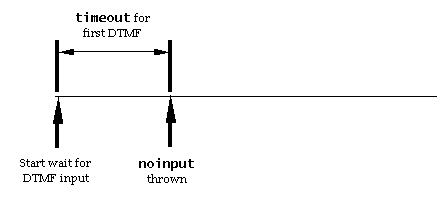
Figure 12: Timing diagram for timeout when no input provided.
interdigittimeout, Grammar is Not Ready to
Terminate
In Figure 13, the interdigittimeout determines when the nomatch
event is thrown because a DTMF grammar is not yet recognized, and
the user has failed to enter additional DTMF.
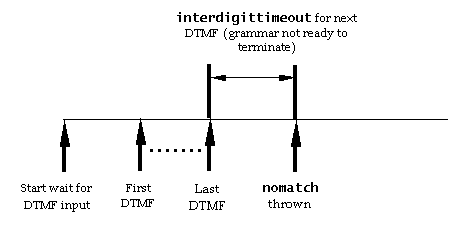
Figure 13: Timing diagram for interdigittimeout, grammar is not
ready to terminate.
interdigittimeout, Grammar is Ready to
Terminate
The example below shows the situation when a DTMF grammar could
terminate, or extend by the addition of more DTMF input, and the
user has elected not to provide any further input.
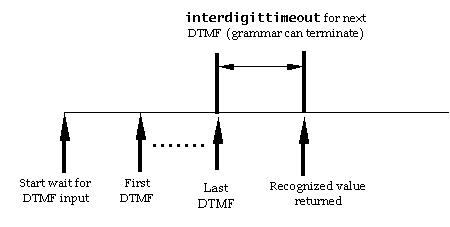
Figure 14: Timing diagram for interdigittimeout, grammar is ready
to terminate.
termchar and interdigittimeout, Grammar Can
Terminate
In the example below, a termchar is non-empty, and is entered by
the user before an interdigittimeout expires, to signify that the
users DTMF input is complete; the termchar is not included as part
of the recognized value.
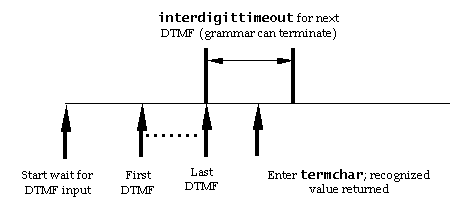
Figure 15: Timing diagram for termchar and interdigittimeout,
grammar can terminate.
termchar Empty When Grammar Must Terminate
In the example below, the entry of the last DTMF has brought the
grammar to a termination point at which no additional DTMF is
expected. Since termchar is empty, there is no optional terminating
character permitted, thus the recognition ends and the recognized
value is returned.
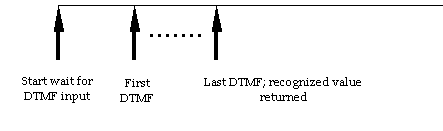
Figure 16: Timing diagram for termchar empty when grammar must
terminate.
termchar Non-Empty and termtimeout When Grammar
Must Terminate
In the example below, the entry of the last DTMF has brought the grammar to
a termination point at which no additional DTMF is allowed by the grammar. If
the termchar is non-empty, then the user can enter an optional termchar
DTMF. If the user fails to enter this optional DTMF within termtimeout, the
recognition ends and the recognized value is returned. If the termtimeout is
0s (the default), then the recognized value is returned immediately after the
last DTMF allowed by the grammar, without waiting for the optional termchar.
Note: the termtimeout applies only when no additional input
is allowed by the grammar; otherwise, the interdigittimeout applies.
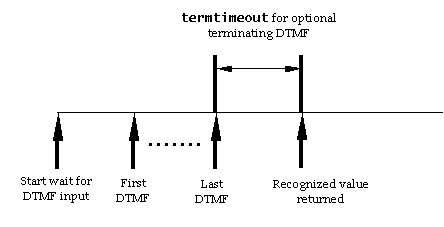
Figure 17: Timing diagram for termchar non-empty and termtimeout
when grammar must terminate.
termchar Non-Empty and termtimeout When Grammar
Must Terminate
In this example, the entry of the
last DTMF has brought the grammar to a termination point at which no
additional DTMF is allowed by the grammar. Since the termchar is non-empty,
the user enters the optional termchar within termtimeout causing the
recognized value to be returned (excluding the termchar).
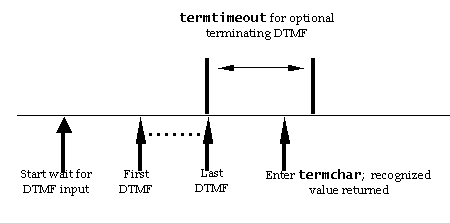
Figure 18: Timing diagram for termchar non-empty when grammar must
terminate.
Invalid DTMF Input
While waiting for the first or additional DTMF, three different
timeouts may determine when the user's input is considered complete. If no
DTMF has been entered, the timeout applies; if some DTMF has been entered but
additional DTMF is valid, then the interdigittimeout applies; and if no
additional DTMF is legal, then the termtimeout applies. At each point, the
user may enter DTMF which is not permitted by the active grammar(s). This
causes the collected DTMF string to be invalid. Additional digits will be
collected until
either the termchar is pressed or the interdigittimeout has elapsed. A
nomatch event is then generated.
Speech grammars use timeout, completetimeout, and incompletetimeout as
described in Section 6.3.4 and Section 6.3.2 to tailor the user experience. The effects
of these are shown in the following timing diagrams.
timeout When No Speech Provided
In the example below, the timeout parameter determines when the
noinput event is thrown because the user has failed to speak.
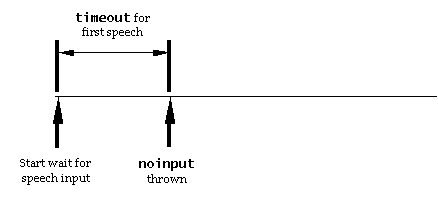
Figure 19: Timing diagram for timeout when no speech provided.
completetimeout With Speech Grammar
Recognized
In the example above, the user provided a utterance that was
recognized by the speech grammar. After a silence period of
completetimeout has elapsed, the recognized value is returned.
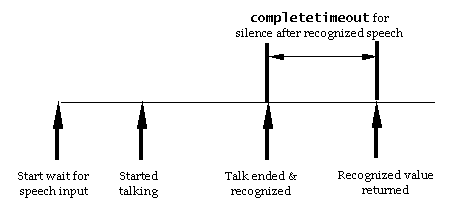
Figure 20: Timing diagram for completetimeout with speech grammar
recognized.
incompletetimeout with Speech Grammar
Unrecognized
In the example above, the user provided a utterance that is not
as yet recognized by the speech grammar but is the prefix of a
legal utterance. After a silence period of incompletetimeout has
elapsed, a nomatch event is thrown.
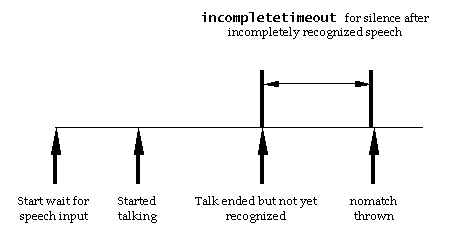
Figure 21: Timing diagram for incompletetimeout with speech grammar
unrecognized.
VoiceXML requires that a platform support the playing and recording audio
formats specified below.
Table 63: Audio Formats Which Platforms Must Support
| Audio Format |
Media Type |
| Raw (headerless) 8kHz 8-bit mono mu-law [PCM] single channel.
(G.711) |
audio/basic (from
[RFC1521]) |
| Raw (headerless) 8kHz 8 bit mono A-law [PCM] single channel.
(G.711) |
audio/x-alaw-basic |
| WAV (RIFF header) 8kHz 8-bit mono mu-law [PCM] single
channel. |
audio/x-wav |
| WAV (RIFF header) 8kHz 8-bit mono A-law [PCM] single
channel. |
audio/x-wav |
The 'audio/basic' mime type is commonly used with the 'au'
header format as well as the headerless 8-bit 8Khz mu-law format.
If this mime type is specified for recording, the mu-law format
must be used. For playback with the 'audio/basic' mime type,
platforms must support the mu-law format and may support the 'au'
format.
This section is Normative.
A conforming VoiceXML document is a well-formed [XML] document that requires only the facilities described as
mandatory in this specification. Such a document must meet all of the
following criteria:
-
The document must conform to the constraints expressed in
the VoiceXML Schema (Appendix O).
-
The root element of the document must be <vxml>.
-
The <vxml> element must include a "version" attribute with
the value "2.0".
-
The <vxml> element must designate the VoiceXML namespace
using the "xmlns" attribute
[XMLNAMES]. The namespace for VoiceXML is defined to be
http://www.w3.org/2001/vxml.
-
It is recommended that the <vxml> element also include "xmlns:xsi"
and "xsi:schemaLocation" attributes to indicate the location of the
schema for the VoiceXML namespace. If the "xsi:schemaLocation"
attribute is present, it must include a reference to the VoiceXML
Schema:
xsi:schemaLocation="http://www.w3.org/2001/vxml
 http://www.w3.org/TR/voicexml20/vxml.xsd"
-
There may be a DOCTYPE declaration in the document prior to the root
element. If present, the public identifier included in the DOCTYPE declaration
must reference the VoiceXML DTD (Appendix B) using its
Formal Public Identifier.
<!DOCTYPE vxml
     PUBLIC "-//W3C//DTD VOICEXML 2.0//EN"
     "http://www.w3.org/TR/voicexml20/vxml.dtd">
The system identifier may be modified appropriately.
The DTD subset must not be used to override any parameter entities
in the DTD.
Here is an example of a Conforming
VoiceXML document:
<?xml version="1.0" encoding="UTF-8"?>

<vxml version="2.0" xmlns="http://www.w3.org/2001/vxml"
xmlns:xsi="http://www.w3.org/2001/XMLSchema-instance"
xsi:schemaLocation="http://www.w3.org/2001/vxml
 http://www.w3.org/TR/voicexml20/vxml.xsd">

 <form>
  <block>hello</block>
 </form>

</vxml>
Note that in this example, the recommended "xmlns:xsi"
and "xsi:schemaLocation" attributes are included as is an XML
declaration. An XML declaration like the one above is not required in
all XML documents. VoiceXML document authors are strongly encouraged
to use XML declarations in all their documents. Such a declaration is
required when the character encoding of the document is other than the
default UTF-8 or UTF-16 and no encoding was determined by a
higher-level protocol.
The VoiceXML language or these conformance criteria provide no
designated size limits on any aspect of VoiceXML documents. There are
no maximum values on the number of elements, the amount of character
data, or the number of characters in attribute values.
The VoiceXML namespace may be used with other XML
namespaces as per [XMLNAMES], although
such documents are not strictly conforming VoiceXML documents as
defined above. Future work by W3C will address ways to specify
conformance for documents involving multiple namespaces.
A VoiceXML processor is a user agent that can parse and process Conforming
VoiceXML documents.
In a Conforming VoiceXML Processor, the XML parser must be able to
parse and process all well-formed XML constructs defined within [XML] and [XMLNAMES]. It is
not required that a Conforming VoiceXML processor use a validating parser.
A Conforming VoiceXML Processor must be a Conforming Speech
Synthesis Markup Language Processor
[SSML] and a
Conforming XML Grammar Processor
[SRGS]
except for differences described in this document. If a syntax error is
detected processing a grammar document, then an "error.badfetch" event must be
thrown.
A Conforming VoiceXML Processor must support the syntax
and semantics of all VoiceXML elements as described in this
document. Consequently, a Conforming VoiceXML Processor
must not throw an 'error.unsupported.<element>' for any
VoiceXML element which must be supported when processing a Conforming VoiceXML Document.
When a Conforming VoiceXML Processor encounters a Conforming VoiceXML Document with
non-VoiceXML elements or attributes which are proprietary, defined only in
earlier versions of VoiceXML, or defined in a non-VoiceXML namespace, and
which cannot be processed, then it must throw an
"error.badfetch"
event.
When a Conforming VoiceXML Processor encounters a document with a
root element designating a namespace other than VoiceXML, its behavior is
undefined.
There is, however, no conformance requirement with respect to
performance characteristics of the VoiceXML Processor.
VoiceXML is an application of [XML] and thus
supports [UNICODE] which defines a standard
universal character set.
Additionally, VoiceXML provides a mechanism for precise control
of the input and output languages via the use of "xml:lang"
attribute. This facility provides:
- The ability to specify the input and output language overriding
the VoiceXML Processor default language
- The ability to produce multi-language output
- The ability to interpret input in a language different from the
output language(s)
Voice is central to, but not the limit of, VoiceXML applications. While
speaking and listening will be the most widely used techniques in most
circumstances and for most users to interact with VoiceXML applications,
some users may be unable to speak and/or listen because of temporary (or
permanent) circumstances. Persons with disabilities, particularly those
with speech and/or hearing impairments, may need to interact with
VoiceXML applications in other ways:
- Hearing impaired users may read text on a display or (if they are
also blind) read Braille text by touch. In order to support special
devices for use by persons with speech and/or hearing impairments,
developers are encouraged to provide a text equivalent of each audio
prompt within the audio tag: For example
<audio src="greetings.wav">Greetings</audio>
would normally replay the greetings.wav audio file. However, if the
VoiceXML Interpreter Context has detected that the user is viewing the
interaction on a display or is touching Braille output, then the text
"Greetings" is rendered by the display or Braille output device.
-
Speaking impaired users may enter coded sequences that are converted into
alphabetic text before feeding them into the VoiceXML platform.
The conversion might be accomplished by a special hardware attachment to
a telephone that converts keystrokes from, as examples, a QWERTY
keyboard to alphabetic text. The conversion might also be accomplished
by software that translates sequences of DTMF tones from a 12-key
telephone keypad into alphabetic text.
Providing alternative paths to information delivery and user input is
central to all W3C technologies intended for use by people. While
initially authored to make on screen content accessible, the following
accessibility guidelines published by W3C's Web Accessibility Initiative
(WAI) also apply to VoiceXML.
- Web Content Accessibility Guidelines 1.0 [WAI-WEBCONTENT]
explains in detail how to make a Web site accessible for people with a
variety of disabilities.
- Authoring Tool Accessibility Guidelines 1.0 [ATAGIO]. For software developers, explains how to make
a variety of authoring tools support the production of accessible Web content,
and also how to make the software itself accessible.
- User Agent Accessibility Guidelines 1.0 [UAAGIO]. For software developers, explains how to make
accessible browsers, multimedia players, and assistive technologies that
interface with these.
- XML Accessibility Guidelines [XAG]. For developers
of XML-based applications explains how to ensure that XML-based applications
support accessibility.
Additional guidelines for enabling persons with disabilities to access
VoiceXML applications include the following:
- Reuse navigation structures that are highly usable and leverage learning
across multiple applications--for example, the navigational techniques
for the ANSI/NISO Z39.86-2002 Digital Talking book Standard,
http://www.loc.gov/nls/z3986/.
- Each element in which an event can occur should specify catch elements,
including one with a fail-soft or recovery functionality.
- Enable users to control the length of time before timeout, the speaking
rate of synthesized speech, and other such variables that provide a
little extra time to respond or complete an input action, particularly
when the VoiceXML Interpreter Context has detected that the user is using
an ancillary device instead of listening or speaking. These are
especially useful for users with cognitive disabilities.
- Advertise alternative modes through which equivalent service is
available, including transfer to a human operator, text telephone
service, etc., or the availability of the same information via the World
Wide Web.
A future version of VoiceXML may specify criteria by which a
VoiceXML Processor safeguards the privacy of personal data.
The following is a summary of the differences between VoiceXML 2.0 and
VoiceXML 1.0 [VOICEXML-1.0].
Developers of VoiceXML 1.0 applications should pay particular
attentions to the changes incompatible with VoiceXML 1.0 specified
in Obsolete Elements and Incompatibly Modified Elements.
- <log> to specify a debug message (5.3.13)
- <metadata> as a means of specifying metedata information using a schema
(6.2, 6.2.2)
- <dtmf> superceded by <grammar> with "mode=dtmf" (3.1.2)
- <emp>, <div>, <pros>, and <sayas> JSML elements
have been replaced by corresponding elements in Speech Synthesis Markup
Language [SSML] (4.1.1)
- changed "lang" to "xml:lang" in <vxml> (1.5.1).
- Added required attribute xmlns in <vxml> (1.5.1)
- Replaced "base" attribute with "xml:base" in <vxml> (1.5.1)
- Changed and clarified that if an implementation does not
support a specific object, it throws error.unsupported.objectname. The event
error.unsupported.format is not thrown for unsupported object types ( 2.1.2.1, 2.3.5, 5.2.6)
- A field's type attribute does not indicate an implicit
<say-as> class to use when speaking out the field's value. An explicit
<say-as> must be used instead (2.1.4, Appendix P)
- added "accept" attribute to <menu> and <choice> (2.2.1, 2.2.2)
- An error.badfetch (previously, error.semantic) is thrown if a
<menu>'s dtmf attribute is set to true and it has choices with DTMF
sequences specified as something other than "*", "#", or "0" (2.2.1)
- Removed required support for access to builtin resources such
as grammars, and 'builtin' is treated as a platform-specific URI scheme for
accessing resources (2.3.1.2, Appendix P)
- Added 'accept' attribute to <option> and modified
description of 'choice phrase' in grammar generation (2.3.1.3, 2.2.5)
- removed "modal" attribute of <subdialog> (2.3.4)
- removed "fetchaudio" attribute from <object>(2.3.5)
- Removed capability of <value> to playback a record.
Only <audio> can be used to playback recording (2.3.6, 4.1.3, 4.1.4)
- replaced "phone" URI schema with "tel" schema in
<transfer> dest (and destexpr) attribute (2.3.7)
- during bridged transfer, while bargein operates normally, the
bargeintype is fixed to "hotword", grammar activation is modal (only local
grammars are activated), and transferaudio begins playing at the point the
outgoing call begins (2.3.7)
- removed notational equivalence between <filled> in a
field and a form-level <filled> triggering on that field (2.4)
- TTS content in <choice>, <prompt>, <enumerate>, and
<audio> replaced with definition in Speech Synthesis Markup Language [SSML])
- in <audio>, if the audio file cannot be played and the
content of the element is empty, no audio is played and no error event is
thrown (4.1.3)
- removed "class", "mode" and "recsrc" attributes from
<value> (4.1.4)
-
removed standard session variable "session.uui". Added new generic session
variables "session.connection.protocol.name" and "session.connection.aai",
which would provide this information and more (5.1.4)
- Replaced session.telephone variable space with
session.connection space which is not protocol-specific and more
extensible. Corresponding error names also changed.
(5.1.4)
- The mechanism by which ECMAScript objects in the
namelist of <submit> are submitted is not currently defined but
reserved for future definition. Application developers may explicit
submit properties of the object instead of the object itself (5.3.8)
- removed "caching" attribute (6.1)
- added "maxage" and "maxstale" attributes (6.1)
- removed "stream" as value of fetchhint property (6.1.1, 6.3.5)
- removed "caching" from fetching properties (6.3.5).
- Platform-specific universal command grammars are optional (6.3.6)
- Platforms may make a distinction between field and utterance level
confidence: i.e. field$.confidence and application.lastresult$.confidence may
differ (2.3.1, 3.1.6.4, 5.1.5, 6.3.2 )
- Added 'srcexpr' attribute to <subdialog>(2.3.4)
- added "maxtime" shadow variable to <record> (2.3.6)
- added "transferaudio" attribute to <transfer>; added
"maxtimedisconnect", and "unknown" as values of bridge transfers; added more
error.connection events (2.3.7)
- added "aai" and "aaiexpr" attributes to allow data passing
with <transfer> (2.3.7)
- added 'dtmf' attribute to <link> (2.5).
- the XML Form of the W3C Speech Recognition Grammar Specification [SRGS] must be supported in <grammar> (3.1).
- added "weight", "mode", "xml:lang", "root" and "version"
attributes to <grammar> (3.1).
- added "xml:lang" attribute to <prompt> (4.1).
- added "bargeintype" attribute to <prompt> with values "speech" and
"hotword" (4.1).
- added "expr" attribute to <audio> element (4.1.3)
- added application variable "application.lastresult$" describing
last recognition result, including n-best (5.1.5).
- added "event", "eventexpr", "message" and "messageexpr" as attributes of
<throw>, <choice>, <link>, and <return> (5.2.1).
- added "_event" variable to <catch> (5.2.2).
- <catch> is no longer allowed to specify an event attribute
with an empty string value (5.2.2, 5.2.4)
- added "error.badfetch.http.nnn" as pre-defined error type (5.2.6)
- added "error.badfetch.protocol.<response code>" as pre-defined error
type (5.2.6)
- added "maxspeechtimeout" event (5.2.6)
- added "error.unsupported.language" pre-defined error type (5.3.6)
- added required support for "multipart/form-data" value as
"enctype" of <submit> (5.3.8)
- <script> can occur in <form> element (5.3.12)
- Failure to retrieve fetchaudio from its URI does not result in
a badfetch event being thrown; instead, no audio is played during the fetch
(6.1.1)
- HTTP is mandatory (6.1.4)
- added "maxspeechtimeout" property (6.3.2)
- Platform support for the completetimeout property is
optional. However, a platform which does not support this property must use
the maximum of the completetimeout and incompletetimeout values as the value
for the incompletetimeout, and must document it
(6.3.2)
- added "bargeintype" property (6.3.4)
- added "fetchaudiodelay" and "fetchaudiominimum" to fetch
properties (6.3.5)
- added "maxnbest" session property (6.3.6)
- added "universals" property (with default "none") (6.3.6).
- Added defaults for fetching attributes, as well as "maxage" and
"maxstale" fetching attributes to: <choice>,
<subdialog>, <object>, <link>, <grammar>,
<audio>, <goto>, <submit> and <script>
- Clarification how grammar results are mapped into VoiceXML
including: notion of "input items" for form input which accept input; only
input items can be filled as a result of a form-level grammar match;
field-level grammar matches cannot fill input items other than the current
field; clarified that <object> could be filled and trigger filled actions;
added a design principle for semantic mapping and effects on lastresult$,
shadow variables and process phase in the FIA (1.2.4,
2.1.4, 2.1.5, 2.1.6.2.3, 2.2, 2.3.1, 2.3.1.3, 2.3.5, 2.3.6,
2.3.7.2, 2.4, 2.5, 3.1.1, 3.1.6, 3.1.6.1, 3.1.6.2, 3.1.6.3, 3.1.6.4, Appendix C).
- if no audio input or output resource is available, an
error.noresource must be thrown (1.2.5, 5.2.6)
- Clarified that application-level grammars may remain active
for the duration of the application subject to the grammar activation rules in
Section 3.1.4 (1.3.3)
- definitions of, and transitions between, root and leaf document
(1.5.2).
- referencing application root document and its grammars (1.5.2).
- When a subdialog is invoked with only a fragment identifier,
the root and leaf pages remain unchanged and these pages are used to
initialize root and leaf contexts (1.5.2)
- In a root to root transition, root context initialization is
determined by the caching policy even when the current and target applications
have the same name (1.5.2)
- Clarification of URI transitions, especially fragment
identifiers, in relation to RFC2396 (1.5.2, 2.3.4, 5.3.7, 5.3.8, 6.1.1)
- Clarification of how root documents are treated in
multi-document applications and the benefits of using root
documents (1.5.2)
- An error.badfetch is thrown when a document references a
non-existent root document, and that an error.semantic is thrown if it
references a root document which itself references a root document (1.5.2)
- <subdialog> transferring control to another
<subdialog> and to another dialog via <goto> (1.5.3).
- Added section describing final processing state when there is
no longer a connection between the interpreter and the user. Removed
description of final processing in <catch>. (1.5.4, 5.2.2)
- scope specified on individual form grammars takes precedence
over the default grammar scope in a <form> (2.1).
- behaviour when executing unsupported <object> instances
(2.1.2.1,
2.3.5).
- If a platform does not support a specific <object>, then error.unsupported.objectname is thrown (2.1.2)
- Multiple prompts in a field do not need to have count
attributes. One or more prompts in a field are queued for playback according
to the prompt selection algorithm in Section 4.1.6 (2.1.4)
- effect of <goto nextitem> on form item (2.1.5).
- no variables, conditions or counters are reset when using <
goto nextitem> (2.1.5).
- Clarified that mixed initiative dialogs require forms with
form-level grammars and that there are many authoring styles for mixed
initiative including using <initial> and cond attributes on <field>
elements (2.1.5)
- behaviour of <transfer>, <subdialog> and
<object> with audio playback in collect phase (2.1.6).
- Event handler selection in FIA process phase and <filled>
(2.1.6.2).
- Clarified that when errors raised in the select or collect
phases of the FIA result in an event being thrown, the FIA moves directly to
the process phase (2.1.6.2, 2.1.6.2.1, 2.1.6.2.3)
- When an error is thrown in executable content, no subsequent
executable elements in the procedural block are executed and, if there is no
explicit transfer of control, an implicit <exit> is performed (2.1.6.2.1, 5.3)
- enumerated executable context elements which cause
execution to terminate (2.1.6.2.3).
- <reprompt> does not terminate the FIA (2.1.6.2.3).
- Clarified that 'false' is the default value of the dtmf
attribute of <menu> (2.2.1)
- Clarified specification and behavior of mutually exclusive attributes and
child content ( 2.2.2, 2.3.4,
2.3.7, 2.5, 3.1.1.4, 4.1.3, 5.2.1, 5.3.7, 5.3.8, 5.3.9, 5.3.10, 5.3.12, 6.4 )
- In <menu> it is a semantic error if dtmf="true" but
<choice>s have explicitly specified dtmf other than 0,* and #. If more
than 9 choices without specified dtmf, then no dtmf is automatically assigned
(no dtmf input can match the choice) but no error is generated (2.2.3)
- use of <enumerate> (2.2.4, 2.3.1)
- <grammar> overrides automatically generated grammars in
<choice> (2.2.2).
- <choice> expr evaluates to URI to transition to (2.2.2).
- <choice> event handler without control transition, causes
menu to be re-executed (2.2.2).
- DTMF sequences specified in the dtmf attributes in <choice>,
<option> and <link> are equivalent to simple DTMF grammars where
DTMF properties apply to recognition of the sequence. However, unlike
grammars, whitespace is optional in DTMF sequences (2.2.2, 2.3.1.3, 2.5)
- Clarified that DTMF and speech grammars, but not grammar
fragments, are allowed in <choice> (2.2.2)
- Specification of approximate grammar generation in <menu>
and <choice> (2.2.5)
- A form item is executed if it is not filled and its cond
attribute is not specified or evaluates to true (2.3,
2.3.1)
- Reorganized overview of form items to clarify which
characteristics apply to which form items. Also indicated that the
<initial> form item can contain <property> and
<catch> elements (2.3)
- Evaluation of an 'cond' expression takes place after
conversion to boolean. This affects the 'cond' attribute in form items
<field>, <block>, <initial>, <subdialog>, <object>,
<record>, and <transfer> (2.3); <prompt> (4.1); and <catch> (5.2.2, 5.2.4)
- Clarified that shadow variables are writeable and can be
modified by the application. Changed 'application.lastresult$' so that it is
also writeable and can be modified by the application (2.3, 5.1.5 )
- assignment of field variable when DTMF attribute defined (2.3.1).
- The name of a field must be unique amongst form item names in
its form. Variables declared in a <script> element are declared in the
scope of the containing element of the <script> element (2.3.1, 5.3.12)
- form item variable names must respect ECMAScript variable naming
conventions (2.3.1, 5.1).
- If a specified builtin type of <field> is not supported by
the platform, an error.unsupported.builtin event is thrown. If a platform does
support builtin types, then it must support all the builtin types in a given
language (2.3.1, 5.2.6, Appendix P)
- use of DTMF and speech grammars with "builtin:" URI scheme
(2.3.1.2).
- string returned when DTMF input when no "value" or CDATA
specified in <option> (2.3.1.3).
- <option> and <grammar> can be used simultaneously
to specify grammars in a <field> (2.3.1.3).
- Normal grammar scoping rules apply when visiting
<initial>; in particular, no input item grammars are active (2.3.3)
- Clarified that a form allows multiple <initial> elements,
and how they are selected for execution (2.3.3, Appendix C)
- scope of variables in <subdialog> (2.3.4).
- <subdialog> context is independent of its calling context
(variable instances are not shared) but its context follows normal
scoping rules for grammars, events, and variables (2.3.4).
- in <subdialog> use "expr" attribute to set variable if no
corresponding <param> specified (2.3.4).
- clarified description of subdialog's execution context (2.3.4)
- Clarification of how <return> passes data to its calling
dialog in <subdialog> (2.3.4, 5.3.10)
- Variables in subdialogs are matched to parameters by name and
in document order; parameter values are evaluated in the context of the
<param> element (2.3.4)
- An error.badfetch is thrown when an invalid transition is
attempted in <subdialog>, <goto> and <submit> . The scope in which
errors are handled during transitions is platform-dependent (2.3.4, 5.3.7, 5.3.8)
- Clarified that a <subdialog> without a <return>
continues until it encounters a <exit> or until no form items remain
eligible for the FIA to select (equivalent to an <exit>) (2.3.4)
- Clarified that a standalone query string is not a valid URI:
no special handling of them is therefore required in transitional URIs
specified in <subdialog> and <goto> (2.3.4, 5.3.7, 6.1.1)
- Clarified that an <object> itself is responsible for
determining whether a parameter name or value it receives is invalid. If so,
an error is thrown (it may be a standard error or an object-specific error)
(2.3.5)
- user hangup during recording terminates recording normally;
data recorded prior to hangup can be returned to server (2.3.6).
- interpretation of grammars in <record> (2.3.6).
- field variable in <record> is a reference to recorded
audio. When submitting recorded data to a server, the "enctype" of
<submit> should be set to "multipart/form-data" (2.3.6, 5.3.8).
- Clarification of behavior when <record> dtmfterm attribute
set to false and DTMF input received (2.3.6)
- Clarification of when recording starts and behavior when recording
terminated before any audio data is collected (2.3.6)
- Clarified that how the <record> variable is implemented may
differ between platforms (although all platforms must support its specified
behavior in <audio> and <submit> (2.3.6)
- Clarified that the finalsilence and maxtime attributes of
<record> default to platform-specific values (2.3.6)
- termination of <transfer> by speech or DTMF
returns near_end_disconnect status (2.3.7).
- value of "dest" attribute on <transfer> (2.3.7).
- the form item variable of <transfer> is undefined for
blind transfer (2.3.7).
- Revision of <transfer> including: error events when
platform unable to handle 'dest'/'destexpr' URI; clarification that platform
is disconnected immediately when blind transfer takes place; specification of
events to be thrown if platform cannot perform blind or bridged transfer;
clarification that the connection status is not available for blind transfer
(although some error conditions may be reported) ; transferaudio is ignored
for blind transfer; clarification of audio playback before and during bridged
transfer, including situation where transferaudio ends before connection
established and that queued audio is flushed before starting transfer;
clarification of timings for listening for input and playback of audio; added
name$.inputmode and name$.utterance shadow variables; clarified that platform
support for listening for input during transfer is optional; (2.3.7, 5.2.6)
- The bargeintype on bridged <transfer> is fixed to "hotword"
for the duration of the outgoing call (2.3.7)
- Clarified that <transfer> variable and shadow variables are
not set if caller hangs up during call transfer or a call transfer attempt. If
a call is terminated by the caller with a voice or DTMF command prior to the
call being answered, the duration shadow variable is set to 0 (2.3.7.2.2)
- Clarified that <transfer> utterance shadow variable is set
to the DTMF result if the transfer was terminated by DTMF input (2.3.7.2.2)
- Addressed situation in a bridged transfer where caller forces
callee to disconnect via DTMF or voice command before the connection is
established: (2.3.7.2.2)
- <link>s have zero or more grammars (2.5).
- events throw by a <link> are handled by the best
qualified <catch> in active scope (2.5).
- <link> can be a child of the form items <field>
and <initial> only (2.5)
- Clarified that a "scope" attribute on the element containing a
<link> element has no effect on the scope of the <link>s grammars (2.5)
- Clarified that in <link>, any URIs in its content
(e.g. <grammar>s) are evaluated/resolved where the <link> is defined,
while any URIs and ECMAScript expressions in its attributes are
evaluated/resolved in the active dialog scope and context (2.5)
- "xml:lang" attribute in <grammar> does not require
multi-lingual support from platform (3.1)
- unsupported grammar language results in
error.unsupported.language event being thrown (3.1.1)
- unsupported language can be indicated in
the message variable of a <throw> (3.1.1).
- 'number' results as a string which ECMAScript will
automatically convert to a number in a numerical expression; string
must not use a leading zero (3.1.1)
- Clarified that the SRGS <grammar> element is extended in
VoiceXML 2.0 to allow PCDATA for inline grammar formats besides the XML format
of SRGS ( 3.1.1, 3.1.1.4
)
- implicit grammars (such as options) do not support weights (3.1.1.3).
- The type attribute in <grammar> takes precedence over other
possible source of media type; if specified, and in conflict with the type of
the grammar, then an error is thrown (3.1.1.2, 3.1.1.4)
- Clarified the use and interpretation of <grammar>
attributes inherited from SRGS (version, xml:lang, mode, root, tag-format,
xml:base). Inline XML SRGS grammars follow the behavior specified in SRGS. For
inline ABNF SRGS grammars as well as external ABNF and XML SRGS grammars the
platform must ignore these attributes. For all other grammar types, the use
and interpretation of these attributes is platform-dependent (3.1.1.4)
- Clarified that the root rule in SRGS grammars does not have to
be a public rule (3.1.1.4)
- Clarified the distinction between form-level and field-level
grammars (3.1.6, 3.1.6.1, 3.1.6.2 )
- "slot" can select properties at arbitrary levels of
nesting using dot-separated list; removed text suggesting that
array indexing expressions (e.g. "pzza.toppings[3]") are supported
(3.1.6.1)
- Clarified that matching form-level grammars can override
existing values in input items and that <filled> processing of these items
takes place as described Section 2.4 and Appendix C (3.1.6.1)
- Aligned description of DTMF grammar with that of speech
grammars: DTMF grammars can return a set of attribute-value pairs as well as a
string value (3.1.2)
- If a document contains a grammar specifying a scope and
that grammar is contained a field, in a <link> or in a menu
<choice>, then error.badfetch is thrown (3.1.3)
- If no grammars are active when input is expected in a
<form> or <menu>, an error.semantic event is thrown (3.1.4)
- The inputmodes property does not affect grammar activation (3.1.4, 6.3.6)
- ongoing work on semantic attachments within <grammar> (3.1.5)
- The default values for a <prompt>'s "bargein" and
"bargeintype" attributes are determined by the "bargein" and "bargeintype"
properties (4.1)
- Clarified that a time designator is a non-negative number
which must be followed by ms or s. Clarified that the following attributes
take time designators as their value: <prompt> - timeout; <transfer> -
maxtime (NB: default is now "0s"), connecttimeout; <record> - maxtime,
finalsilence. Clarified that the following properties have time designator
values: fetchtimeout, completetimeout, incompletetimeout, maxspeechtimeout,
interdigittimeout, termtimeout, timeout, fetchaudiodelay, fetchaudiominimum,
fetchtimeout ( 4.1, 2.3.6, 2.3.7, 6.1.1, 6.3)
- "xml:lang" attribute in <prompt> does not require
multi-lingual support from platform (4.1.1)
- unsupported synthesis language results in
error.unsupported.language event being thrown (4.1.1).
- enclosing <prompt> required if text contains speech
synthesis markup (4.1.2).
- 'alternate content' in <audio> (4.1.3).
- When <audio> 'expr' evaluates to ECMAScript undefined, the
content of the element ignored. If it evaluates to an invalid URI, or the
format is unsupported, etc, then the fallback strategy is invoked (4.1.3)
- It is a platform optimization to stream audio in <audio>
(4.1.3)
- Clarified that the expr attribute of <audio> is an
ECMAscript expression which references a previously <record>ed audio, or
evaluates to the URI of an audio resource to fetch (4.1.3)
- stand-alone <value> element is legal outside
<prompt> (4.1.4).
- Simplified evaluation of expr in <audio> so that it is not treated
specially: it is CDATA where XML special characters do not need to be escaped.
It is not treated as an SSML document, or a document fragment. (4.1.4)
- buffered DTMF input is deleted when "bargein" is false on
<prompt> (4.1.5).
- Clarified behavior when bargein occurs during a sequence of
prompts (4.1.5)
- Clarified that when a prompt's "bargein" attribute is false,
no input is buffered while the prompt is playing (any DTMF already buffered is
discarded) (4.1.5)
- The "bargeintype" attribute of <prompt> applies to DTMF
input as well as speech input (4.1.5.1)
- Prompt counter are also maintained for <initial> items in a
form (4.1.6)
- Clarified that each <prompt> has its own timeout value and
that a <prompt>'s timeout attribute defaults to the timeout property when
the prompt is queued (4.1.7)
- relationship between prompt queueing and input collection (4.1.8).
- Asychronous events unrelated to transition execution
(e.g. disconnect) are buffered until waiting state before being thrown (4.1.8)
- Clarified mapping between interpreter states and FIA; and that
activation of grammars and waiting for input occur simultaneously with
playback of prompts (4.1.8)
- Clarified that when a prompt bargein attribute is false, input
is not collected and DTMF buffered in the transition state is deleted as
described in 4.1.5 (4.1.8)
- VoiceXML and ECMAScript variables are part of the same variable
space;variables declared in ECMAScript can be used directly in
VoiceXML (5.1).
- VoiceXML variable names, including field names, must follow
ECMAScript naming rules; variable name declarations cannot contain
a dot; the field name "a.b" is illegal (5.1).
- VoiceXML variables and variable scoping follows ECMAScript
scope chains; as a consequence, references to undeclared ECMAScript variables
result in error.semantic being thrown (5.1.1, 5.1.2)
- scope of variables (5.1.2).
- Clarified application and document scoping of variables in
application root documents (5.1.2)
- only some cond operators need to be escaped (5.1.3).
- Clarified that a document with a variable x but without a
specified application root, then the variable can be referenced as
application.x and document.x (5.1.3)
- Clarified that "application.lastresult$" is an ECMAScript
array (5.1.5)
- Clarification on persistence of lastresult application variable. (5.1.5)
- Interpretations in lastresult are ordered first by confidence,
and then by scope precendence of grammars (5.1.5, 2.3.1, 3.1.4)
- When a DTMF grammar is matched, the interpretation variable of
application.lastresult contains the matched digit string. (5.1.5)
- evaluation of relative URIs against active document (5.2).
- Clarified that catch elements use the innermost property of
the element where the event originated, not where the catch is defined (5.2)
- VoiceXML does not generally specify when events are thrown (5.2.1).
- Event counters associated with <catch>s are
incremented when an event occurs with same full or prefix matching
name; this affects selection of the catch handler with the 'correct
count' in Section 5.2.4 (5.2.2)
- definition of "event" and "count" attributes of <catch>
(5.2.2).
- no inherent limitations on <catch> in, for example, case
of user hangup (5.2.2).
- <catch>'s event may be the string "." indicating that
all events are to be caught (5.2.2).
- <catch> without a specified event attribute is
equivalent to one with event="." (5.2.2, 5.2.4)
- Clarified when form event counters are incremented and reset
(5.2.2)
- "as if by copy" catch inheritance (5.2,
5.2.4).
- catch element selection algorithm (5.2.4).
- defined prefix match as token match rather than string match
(5.2.4).
- "error.badfetch" pre-defined error type (5.2.6)
- error.badfetch is thrown until the document is ready for
execution; whether variable initiation is part of execution is
platform-dependent (5.2.6)
- Clarification of situations in which 'error.badfetch' is
thrown. A conforming browser may also throw events whose name extends
pre-defined events (5.2.6)
- Application-specific and platform-specific event types should
use the reversed Internet domain name convention to avoid naming conflicts (5.2.6)
- HTTPS is not the same protocol as HTTP (5.2.6)
- Errors raised in the first document in a session, and errors
raised before entering the FIA in subsequent loaded documents are handled in a
platform-specific manner (5.2.6)
- Removed 'divide by 0' as a run-time error which results in
error.semantic being thrown (ECMAScript does not report an error) (5.2.6)
- Clarified that the event error.noauthorization is thrown in
more circumstances than just connection authorization failures (5.2.6)
- Clarified that the event error.unsupport.element is
only thrown for VoiceXML 2.0 elements (5.2.6)
- Clarified that an error.semantic event is thrown if an attempt
is made to assign to an undeclared variable. Properties of ECMAScript
objects, e.g. o.foo, can be assigned directly; attempting to declare them
results in an error.semantic event being thrown (5.3.2)
- The namelist of <clear> may specify variables other than
form item variables which are to be reset (5.3.3)
- effect of <reprompt> in catch elements (5.3.6)
- behaviour of <reprompt> when in <catch> with final
<goto> (5.3.6)
- FIA performs normal prompt queueing after the execution of
catch elements when they end with a <submit> or <return> as well as
<goto> (5.3.6, Appendix
C)
- Clarified that a <reprompt> element has no effect outside
of a catch (5.3.6)
- effect of URI in <goto> on document variables (5.3.7)
- Clarified for <goto> that errors which occur during
form item transition, the event is handled in the dialog scope (5.3.7)
- When nextitem or expritem in <goto> reference an
non-existent form item, an error.badfetch event is thrown (5.3.7)
- variables declared in VoiceXML or ECMAScript can be submitted
(5.3.8).
- Clarified some of the circumstances in which <submit> can
be satisfied by intermediate caches (5.3.8)
- <exit> does not throw an "exit" event (5.3.9)
- The value of the 'expr' attribute of <exit> is an
ECMAScript expression (5.3.9)
- no "type" attribute of <script> (5.3.12).
- <script> evaluated along with <var> elements and form item
variables in <form> (5.3.12)
- definition of "charset" in <script> (5.3.12)
- Handling of <log> is platform-dependent (5.3.13)
- revised prefetch (6.1)
- effect of "fetchhint" attribute (6.1.1)
- caching policy selection (6.1.2)
- caching follows HTTP 1.1 cache correctness rules (6.1.2)
- Clarified that there is no markup mechanism to control the
caching of application root documents (6.1.2.1)
- Clarified that first type of <meta> is expressed by the
attributes name and content, and the second type by http-equiv and content (6.2.1)
- When different values for a <property> are specified at
the same level, the last one in document order applies (6.3)
- Properties can be set in field input items but not control
items (6.3)
- Clarified that if a platform detects a property has illegal
value, then it should throw an error.semantic (6.3)
- format of platform-specific properties (6.3.1)
- definitions of "completetimeout" and "incompletetimeout" speech
recognizer properties (6.3.2)
- Parameter values passed to <subdialog>s are always data
(6.4)
- definition of time designation values (6.5)
- Clarified that the number format is that used in CSS2, and
that the value of the ASR properties confidencelevel, sensitivity, and
speedvsacurracy are in this format (6.5, 6.3.2)
- Restricted field names, name attribute in <var> and
nextitem attribute in <goto> to NMTOKEN; extended name attribute in
<assign> to be like NMTOKEN but also allow '$' (for shadow variable
assignments); restricted namelist attribute in <filled> to NMTOKENS;
extended namelist attribute in <exit>, <submit>, <clear>, and
<return> to be like NMTOKENS but allow '$' (for shadow variable
submissions) (Appendix B, Appendix O)
- Restricted the content model of <choice> to PCDATA and
<grammar> elements; clarified that <enumerate> cannot occur inside
another <enumerate> (Appendix B, Appendix O, 2.2.4)
- Clarified that the DTD (unlike the schema) cannot correctly
express that the <metadata> element can contain elements from other XML
namespaces (Appendix B)
- FIA clarified that application.lastresult$ assignment happens
after every successful recognition (Appendix C)
- FIA clarified for matching <link> grammars inside the
current form or menu and for matching menu <choice> grammars outside the
current form or menu (Appendix C)
- FIA corrected that collection of active grammars does not
include grammars from elements in the <subdialog>'s call chain (Appendix C)
- FIA's Initialization Phase clarified for initialization of
<script> elements and form items (Appendix C)
- Clarified that events may be generated at several points
during FIA execution, and that how they are handled depends upon which FIA
phase is active (Appendix C)
- Clarified that in the FIA collect phase, only prompts from
input items and <initial> are selected and their prompt counter
incremented. The queueing of prompts in a <block> takes place when the form
item is executed (Appendix C)
-
Clarified the use of various timeouts for DTMF input (Appendix D)
- If a Conforming processor cannot process a non-standard
VoiceXML element or attribute, then it must throw an error.badfetch error (Appendix F)
- explanatory notes on portable use of builtins and expected platform
dependence (Appendix P)
- parameterization of builtin DTMF and speech grammars (Appendix P).
- handling of contradictory parameters to digits builtin
(Appendix P).
- result value returned from "number" builtin type (Appendix P).
- Currency code not specified if not spoken
(Appendix P).
- Only the digit and boolean grammars can be parameterized (Appendix P)
- Description of rendering builtin values using <say-as> (Appendix P)
- Speech or DTMF <grammar>s in a <field> with a specified
builtin type are in addition to the builtin grammars; they do not override
them (Appendix P)
- Updated examples with XML encoding attribute, recommended
schema attributes, and escaped illegal XML characters (<, >, &,
etc...)
- Using tentative media types (e.g. "application/srgs+xml")
submitted to IETF for approval
- Added section describing the origins of VoiceXML and how it
relates to other work in the area (1)
- Specified set of required audio formats for <audio> and
<record> (1.2.4).
- capabilities of conforming VoiceXML platform with respect to
speech and dtmf grammars, audio, TTS, record, and transfer support
(1.2.5).
- platforms should identify themselves with User-Agent HTTP
header (1.2.5).
- Builtin types and fundamental grammars are informative not
normative (2.3.1, 2.3.1.1,
2.3.1.2, Appendix P
)
- Updated section to match SRGS 1.0 specification (3)
- description of how semantic interpretations are mapped to form
variables (3.1.6).
- Updated section to match SSML 1.0 specification (4)
- reserved the variable namespace "_$" for internal use (5.1).
- use of variables and form items with names "session",
"application", "document", and "dialog" not recommended (5.1.2).
- Added recommendation that metadata information is expressed in
<metadata> rather than <meta>; removed recommended metadata information
using <meta>; added recommended metadata information using RDF schema and
Dublin Core properties (6.2)
- Changed conformance behavior when interpreter encounters
properties it cannot process: it must (rather than should) not thrown an
error.unsupported.property and must (rather than should) ignore the property
(6.3.1)
- DTD is now Informative rather than Normative (Appendix
B)
- set of required audio formats (Appendix
E).
- Replaced "audio/wav" with "audio/x-wav" in examples, and added
note that the media type "audio/wav" will be adopted when officially
registered with the IETF (Appendix E)
- revised definition of Conforming VoiceXML Processor, including
requirement to support syntax and semantics of all elements
described in this document (Appendix
F).
- Conforming document section references schema rather DTD
constraints (Appendix F)
- Conformance statement reflect that DTD is informative but
schema is normative. A conforming document must specify the voiceXML namespace
on the root element. The version="2.0" attribute must also be present. It is
recommended to provide "xsi:schemaLocation" to indicate the location of the
VoicexML schema. The DOCTYPE declaration is optional. The behavior of a
VoiceXML processor is undefined when encountering documents with non-VoiceXML
designated root elements (Appendix F)
- Revised description of how VoiceXML can address accessibility
requirements and issues (Appendix H)
- reusability appendix (Appendix K).
- Added references appendix (Appendix M)
- Added appendix describing VoiceXML media type and file suffix
including link to IETF memo for registration of VoiceXML Media type (Appendix N)
- Definition of normative schema for VoiceXML. This uses various other
schema to adapt definitions from core schemas in the grammar and synthesis
specifications (Appendix O)
- Verified schema with XML Spy 4.4, XSV (June 2002 version) and
Xerces 2 (Java and C++ versions) (Appendix O)
- Added link to complete set of schema required for VoiceXML 2.0
(Appendix O)
K.1 Reusable dialog components
Definition: A packaged application fragment designed to
be invoked by arbitrary applications or other Reusable Dialog
Components. A Reusable Dialog Component (RDC) encapsulates the code
for an interaction with the caller.
Reusable dialog components provide pre-packaged functionality
"out-of-the-box" that enables developers to quickly build
applications by providing standard default settings and behavior.
They shield developers from having to worry about many of the
intricacies associated with building a robust speech dialog, e.g.,
confidence score interpretation, error recovery mechanisms,
prompting, etc. This behavior can be customized by a developer if
necessary to provide application-specific prompts, vocabulary,
retry settings, etc.
In this version of VoiceXML, the only authentic reusable
component calling mechanisms are <subdialog> and
<object>. Components called this way follow a model similar
to subroutines in programming languages: the component is
configured by a well-defined set of parameters passed to the
component, the component has a relatively constrained interaction
with the calling application, the component returns a well-defined
result, and control returns automatically to the point from which
the component was called. This has all the significant advantages
of modularity, reentrancy, and easy reuse provided by subroutines.
Of the two kinds of components, only <subdialog> components
are guaranteed to be as portable as VoiceXML itself. On the other
hand, <object> components may be able to package advanced,
reusable functionality that has not yet been introduced into the
standard.
K.2 Templates and samples
Although reusable dialog components have the advantages of
modularity, reentrancy, and easy reuse as described above, the
disadvantage of such components is that they must be designed very
carefully with an eye to reuse, and even with the most careful of
designs it is possible that the application developer will
encounter situations for which the component cannot be easily
configured to handle the application requirements. In addition,
while the constrained interaction of a component with its calling
environment makes it possible for the component designer to create
a component that works predictably in disparate environments, it
also may make the user's interaction with the component seem
disconnected from the rest of the application.
In such situations the application developer may wish to reuse
VoiceXML source code in the form of samples and templates - samples
designed for easy customizability. Such code is more easily
tailored for and integrated into a particular application, at the
expense of modularity and rentrancy.
Such templates and samples can be created by separating
interesting VoiceXML code from a main dialog and then distributing
that code by copy for use in other dialogs. This form of
reusability allows the user of the copied VoiceXML code to modify
it as necessary and continue to use their modified version
indefinitely.
VoiceXML facilitates this form of reusability by preserving the
separation of state between form elements. In this regard, VoiceXML
and [HTML] are similar. An HTML table can be
copied from one HTML page to another because the table can be
displayed regardless of the context before or after the table
element.
Although parameterizability, modularity, and maintainability may
be sacrificed with this approach, it has the advantage of being
simple, quick, and eminently customizable.
This W3C specification is based upon VoiceXML 1.0 submitted by
the VoiceXML Forum in May 2000. The VoiceXML Forum authors were:
Linda Boyer, IBM; Peter Danielsen, Lucent Technologies; Jim
Ferrans, Motorola; Gerald Karam, AT&T; David Ladd, Motorola;
Bruce Lucas, IBM; Kenneth Rehor, Lucent Technologies.
This version was written with the participation of members of
the W3C Voice Browser Working Group. The following have
significantly contributed to writing this specification:
- Paolo Baggia, Loquendo
- Daniel C. Burnett, Nuance Communications
- Emily Candell, Comverse
- Jerry Carter, Speechworks International
- Deborah Dahl, Invited Expert
- Peter Danielsen, Lucent (until October 2002)
- Martin Dragomirecky, Cisco
- Jim Ferrans, Motorola
- Andrew Hunt, SpeechWorks International
- Gerald Karam, AT&T
- Dave Ladd, Dynamicsoft
- Paul Lamere, Sun Microsystems
- Bruce Lucas, IBM
- Scott McGlashan, PipeBeach
- Mitsuru Oshima, General Magic
- Brad Porter, Tellme
- Gavriel Raanan, NMS Communications
- Ken Rehor, Invited Expert
- Steph Tryphonas, Tellme
The Working Group would like to thank Dave Raggett and Jim
Larson for their invaluable management support.
M.1. Normative References
-
[CSS2]
- "
Cascading Style
Sheets, level 2, CSS2 Specification
", Bos et al. W3C
Recommendation, May 1998
See http://www.w3.org/TR/REC-CSS2/
-
[ECMASCRIPT]
- "
Standard ECMA-262
ECMAScript Language Specification
", Standard ECMA-262,
December 1999.
See http://www.ecma.ch/ecma1/STAND/ECMA-262.htm
-
[RFC1521]
- "
MIME
(Multipurpose Internet Mail Extensions) Part One: Mechanisms for
Specifying and Describing the Format of Internet Message
Bodies
", IETF RFC 1521, 1993
See http://www.ietf.org/rfc/rfc1521.txt
-
[RFC2396]
- "
Uniform
Resource Identifiers (URI): Generic Syntax
", IETF RFC
2396, 1998.
See http://www.ietf.org/rfc/rfc2396.txt
-
[RFC2616]
- "
Hypertext
Transfer Protocol -- HTTP/1.1
", IETF RFC 2616,
1999.
See http://www.ietf.org/rfc/rfc2616.txt
-
[RFC2806]
- "
URLs for
Telephone Calls
", IETF RFC 2806, 2000.
See http://www.ietf.org/rfc/rfc2806.txt
-
[RFC3066]
- "
Tags for the Identification of Languages
", IETF RFC 3066,
2001.
Note that [XML] adopted RFC3066 through an errata as of
2001-02-22. RFC3066 obsoletes [RFC1766]
.
See http://www.ietf.org/rfc/rfc3066.txt
- [SSML]
- "Speech
Synthesis Markup Language Version 1.0". Burnett, Walker and Hunt. W3C
Working Draft, December 2002.
See http://www.w3.org/TR/2002/WD-speech-synthesis-20021202/
- [SRGS]
- "Speech
Recognition Grammar Specification Version 1.0". Hunt and
McGlashan. W3C Candidate Recommendation, June 2002.
See http://www.w3.org/TR/2002/CR-speech-grammar-20020626/
- [UNICODE]
- "The Unicode
Standard". The Unicode Consortium.
See http://www.unicode.org/unicode/standard/standard.html
- [XML]
- "Extensible Markup
Language (XML) 1.0". Bray et al. W3C Recommendation.
See http://www.w3.org/TR/2000/REC-xml-20001006
- [XML-BASE]
- "
XML
Base
", J. Marsh, editor, W3C Recommendation, June
2001.
See http://www.w3.org/TR/2001/REC-xmlbase-20010627/.
- [XMLNAMES]
- "Namespaces in
XML". Bray et al. W3C Recommendation, January 1999.
See http://www.w3.org/TR/1999/REC-xml-names-19990114/
M.2. Informative References
-
[ATAGIO]
- "
Authoring Tool
Accessibility Guidelines 1.0
", Treviranus et al. W3C
Recommendation, Feburary 2000.
See http://www.w3.org/TR/2000/REC-ATAG10-20000203/
-
[DC]
-
"Dublin Core Metadata
Initiative
", a Simple Content Description Model for Electronic
Resources.
See http://purl.org/DC/
-
[HTML]
-
"HTML
4.01 Specification
", Dave Raggett et al. W3C Recommendation,
December 1999.
See http://www.w3.org/TR/1999/REC-html401-19991224/
-
[IANA]
- "
IANA Character
Sets
", IANA.
See http://www.iana.org/assignments/character-sets
-
[ISO4217]
- "
ISO
4217:2001 Codes for the representation of currencies and funds
", ISO, 2001
See http://www.iso.ch/
-
[JSAPI]
- "
Java
Speech API
", Sun Microsystems, Inc.
See
http://www.javasoft.com/products/java-media/speech/index.html
-
[JSGF]
- "
JSpeech Grammar
Format
", Andrew Hunt, W3C Note, June 2000.
See http://www.w3.org/TR/2000/NOTE-jsgf-20000605/
-
[NLSML]
- "
Natural Language
Semantics Markup Language for the Speech Interface
Framework
", Deborah A. Dahl. W3C Working Draft, November
2000
See http://www.w3.org/TR/2000/WD-nl-spec-20001120/
-
[RDF-SYNTAX]
-
"Resource Description
Framework (RDF) Model and Syntax Specification
", Ora Lassila and
Ralph R. Swick. W3C Recommendation, February 1999.
See
http://www.w3.org/TR/REC-rdf-syntax/
-
[RDF-SCHEMA]
-
"Resource Description Framework (RDF) Schema Specification 1.0
", Dan Brickley and
R.V. Guha. W3C Candidate Recommendation, March 2000.
See
http://www.w3.org/TR/2000/CR-rdf-schema-20000327/
-
[RFC1766]
- "
Tags for
the Identification of Languages
", IETF RFC 1766,
1995
Note that [XML] adopted RFC3066 through an errata as of
2001-02-22. [RFC3066] obsoletes RFC1766.
See http://www.ietf.org/rfc/rfc1766.txt
-
[RFC2119]
- "
Key words
for use in RFCs to Indicate Requirement Levels
", IETF
RFC 2119, 1997.
See http://www.ietf.org/rfc/rfc2119.txt
-
[RFC2361]
- "
WAVE and
AVI Codec Registries
", IETF RFC 2361, 1998.
See http://www.ietf.org/rfc/rfc2361.txt
-
[SISR]
- "
Semantic
Interpretation for Speech Recognition
",
Luc Van Tichelen. W3C Working Draft, November 2001.
See http://www.w3.org/TR/2001/WD-semantic-interpretation-20011116/
-
[UAAGIO]
- "
User Agent
Accessibility Guidelines 1.0
", Jacobs et al. W3C
Proposed Recommendation, October 2002.
See http://www.w3.org/TR/2002/PR-UAAG10-20021016/
-
[VOICEXML-1.0]
- "
Voice eXtensible
Markup Language 1.0
", Boyer et al, W3C Note, May
2000.
See http://www.w3.org/TR/2000/NOTE-voicexml-20000505/
-
[WAI-WEBCONTENT]
- "
Web
Content Accessibility Guidelines 1.0
", Chisholm et al.
W3C Recommendation, May 1999
See http://www.w3.org/TR/WAI-WEBCONTENT/
-
[XAG]
- "
XML Accessibility Guidelines
", Dardailler et al.
W3C Working Draft, October 2002
See http://www.w3.org/TR/xag.html
The W3C Voice Browser Working Group has applied to IETF to register a media
type for VoiceXML (http://www.ietf.org/internet-drafts/draft-tryphonas-voicexml-media-reg-01.txt). The
requested media type is application/voicexml+xml.
The W3C Voice Browser Working Group has adopted the convention
of using the ".vxml" filename suffix for VoiceXML documents.
This section is Normative.
The VoiceXML schema is located at http://www.w3.org/TR/voicexml20/vxml.xsd.
The VoiceXML schema depends upon other schema defined in the VoiceXML
namespace:
-
vxml-datatypes.xsd : definition of datatypes used in VoiceXML schema
-
vxml-attribs.xsd : definition of attributes and attribute groups used in
VoiceXML schema
-
vxml-grammar-restriction.xsd:
this schema references the no-namespace schema of the Speech Recognition
Grammar Specification 1.0 [SRGS] and restricts some of
its definitions for embedding in the VoiceXML namespace.
-
vxml-grammar-extension.xsd:
this schema references vxml-grammar-restriction.xsd and extends some of its
definitions for VoiceXML.
-
vxml-synthesis-restriction.xsd:
this schema references the no-namespace schema of the Speech Synthesis Markup
Language 1.0 [SSML] and extends as well as restricts
some of its definitions for embedding in the VoiceXML namespace.
-
vxml-synthesis-extension.xsd:
this schema references vxml-synthesis-restriction.xsd and extends some of its
definitions for VoiceXML.
The complete set of Speech Interface Framework schema required for VoiceXML
2.0 is available here.
The <field> type attribute in Section 2.3.1
is used to specify a builtin grammar for one of the fundamental
types. Platform support for fundamental builtin grammars is optional. If a
platform does support builtin types, then it must follow the description given
in this appendix as closely as possible, including all the
builtins for a given language.
Each builtin type has a convention for the format of the value
returned. These are independent of language and of the implementation. The
return type for builtin fields is a string except for the boolean field
type. To access the actual recognition result, the author can reference the
<field> shadow variable name$.utterance. Alternatively, the
developer can access application.lastresult$, where
application.lastresult$.interpretation has the same string value as
application.lastresult$.utterance.
The builtin types are defined in such a way that a VoiceXML
application developer can assume some consistency of user input across
implementations. This permits help messages and other prompts to be
independent of platform in many instances. For example, the boolean
type’s grammar should minimally allow "yes" and "no" responses
in English, but each implementation is free
to add other choices, such as "yeah" and "nope".
In cases where an application requires specific behavior or
different behavior than defined for a builtin, it should use an
explicit field grammar. The following are circumstances in which an
application must provide an explicit field grammar in order to
ensure portability of the application with a consistent user
interface:
-
A platform is not required to implement a grammar that accepts all possible
values that might be returned by a builtin. For instance, the currency builtin
defines the return value formatting for a very broad range of currencies ([ISO4217]). The platform is not required to support
spoken input that includes any of the world's currencies since that can
negatively impact recognition accuracy. Similarly, the number builtin can
return positive or negative floating point numbers but the grammar is not
required to support all possible spoken floating point numbers.
-
Builtins are also limited in their ability to handle underspecified spoken
input. For instance, "20 peso" cannot be resolved to a specific [ISO4217] currency code because the "peso" is the
name of the currency of numerous nations. In such cases the platform may
return a specific currency code according to the language or may omit the
currency code.
All builtin types must support both voice and DTMF entry.
The set of accepted spoken input for each builtin type is platform
dependent and will vary by language.
The value returned by a builtin type can be read out using the <say-as>
element.
VoiceXML extends <say-as> in [SSML] by
adding 'interpret-as' values corresponding to each builtin type.
These values take the
form "vxml:<type>" where type is a builtin type. The precise
rendering of builtin types is platform-specific and will vary by language.
The builtin types are:
Table 64: Builtin Types
| boolean |
Inputs include affirmative and negative phrases
appropriate to the current language. DTMF 1 is affirmative and 2 is
negative. The result is ECMAScript true for affirmative or false for
negative. The value will be submitted as the string "true" or the string
"false". If the field value is subsequently used in <say-as> with
the interpret-as value "vxml:boolean", it will be spoken as an affirmative or negative
phrase appropriate to the current language.
|
| date |
Valid spoken inputs include phrases that specify a
date, including a month day and year. DTMF inputs are: four digits for
the year, followed by two digits for the month, and two digits for the
day. The result is a fixed-length date string with format yyyymmdd,
e.g. "20000704". If the year is not specified, yyyy is returned as
"????"; if the month is not specified mm is returned as "??"; and if
the day is not specified dd is returned as "??".
If the value is subsequently used in <say-as> with the interpret-as value "vxml:date", it
will be spoken as date phrase appropriate to the current language.
|
| digits |
Valid spoken or DTMF inputs include one or more
digits, 0 through 9. The result is a string of digits.
If the result is subsequently used in <say-as> with the interpret-as value "vxml:digits",
it will be spoken as a sequence of digits appropriate to the current language.
A user can say for example "two one two seven", but not "twenty one hundred
and twenty-seven". A platform may support constructs such as "two double-five
eight". |
| currency |
Valid spoken inputs include phrases that specify
a currency amount. For DTMF input, the "*" key will act as the decimal
point. The result is a string with the format UUUmm.nn, where UUU is
the three character currency indicator according to ISO standard
4217 [ISO4217], or mm.nn if the currency
is not spoken by the user or if the currency cannot be reliably
determined (e.g. "dollar" and "peso" are ambiguous).
If the field is subsequently used in <say-as> with the
interpret-as value "vxml:currency", it will be spoken as a currency amount appropriate to
the current language.
|
| number |
Valid spoken inputs include phrases that specify
numbers, such as "one hundred twenty-three", or "five point
three". Valid DTMF input includes positive numbers entered using
digits and "*" to represent a decimal point. The result is a string of
digits from 0 to 9 and may optionally include a decimal point (".")
and/or a plus or minus sign. ECMAScript automatically converts result
strings to numerical values when used in numerical expressions. The
result must not use a leading zero (which would cause ECMAScript to
interpret as an octal number).
If the field is subsequently used in <say-as> with the interpret-as value
"vxml:number", it will be spoken as a number appropriate to the current
language.
|
| phone |
Valid spoken inputs include phrases that specify a phone
number. DTMF asterisk "*" represents "x". The result is a string containing a
telephone number consisting of a string of digits and optionally containing
the character "x" to indicate a phone number with an extension. For North
America, a result could be "8005551234x789". If the field is subsequently
used in <say-as> with the interpret-as value "vxml:phone", it will be spoken as a phone
number appropriate to the current language.
|
| time |
Valid spoken inputs include phrases that specify a
time, including hours and minutes. The result is a five character
string in the format hhmmx, where x is one of "a" for AM, "p" for PM,
"h" to indicate a time specified using 24 hour clock, or "?" to
indicate an ambiguous time. Input can be via DTMF. Because there is no
DTMF convention for specifying AM/PM, in the case of DTMF input, the
result will always end with "h" or "?".
If the field is subsequently used in <say-as> with the interpret-as value
"vxml:time", it will be spoken as a time appropriate to the current language.
|
An example of a <field> element with a builtin
grammar type:
<field name="lo_fat_meal" type="boolean">

  <prompt>
    Do you want a low fat meal on this flight?
  </prompt>
  <help>
    Low fat means less than 10 grams of fat, and under
    250 calories.
  </help>
  <filled>
    <prompt>
      I heard <emphasis><say-as interpret-as="vxml:boolean">
      <value expr="lo_fat_meal"/></say-as></emphasis>.
    </prompt>
  </filled>
</field>
In this example, the boolean type indicates that inputs are various forms
of true and false. The value actually put into the field is either true or
false. The field would be read out using the appropriate affirmative or
negative response in prompts.
In the next example, digits indicates that input will be spoken or keyed
digits. The result is stored as a string, and rendered as digits using the
<say-as> with "vxml:digits" as the value for
the interpret-as attribute,
i.e., "one-two-three", not "one hundred
twenty-three". The <filled> action tests the field to see if it has 12
digits. If not, the user hears the error message.
<field name="ticket_num" type="digits">
  <prompt>
     Read the 12 digit number from your ticket.
  </prompt>
  <help>The 12 digit number is to the lower left.</help>
  <filled>
     <if cond="ticket_num.length != 12">
       <prompt>
         Sorry, I didn't hear exactly 12 digits.
       </prompt>
       <assign name="ticket_num" expr="undefined"/>
     <else/>
         <prompt>I heard <say-as interpret-as="vxml:digits">
           <value expr="ticket_num"/></say-as>
         </prompt>
     </if>
  </filled>
</field>
The builtin boolean grammar and builtin digits grammar can be
parameterized. This is done by explicitly referring to builtin grammars
using a platform-specific builtin URI scheme and using a URI-style query
syntax of the form type?param=value in the src attribute
of a <grammar> element, or in the type attribute of a field, for
example:
<grammar src="builtin:dtmf/boolean?y=7;n=9"/>

<field type="boolean?y=7;n=9">
   <prompt>
     If this is correct say yes or press seven, if not, say no or press nine.
  </prompt>
</field>

<field type="digits?minlength=3;maxlength=5">
   <prompt>Please enter your passcode</prompt>
</field>
Where the <grammar> parameterizes the builtin DTMF
grammar, the first <field> parameterizes the builtin DTMF
grammar (the speech grammar will be activated as normal) and the
second <field> parameterizes both builtin DTMF and speech
grammars. Parameters which are undefined for a given grammar type
will be ignored; for example, "builtin:grammar/boolean?y=7".
The digits and boolean grammars can be parameterized as
follows:
Table 65: Digit and Boolean Grammar Parameterization
| digits?minlength=n
|
A string of at least n digits. Applicable to speech and
DTMF grammars. If minlength conflicts with either the length or
maxlength attributes then a error.badfetch event is thrown. |
| digits?maxlength=n
|
A string of at most n digits. Applicable to speech and
DTMF grammars. If maxlength conflicts with either the length or
minlength attributes then a error.badfetch event is thrown. |
| digits?length=n
|
A string of exactly n digits. Applicable to speech and
DTMF grammars. If length conflicts with either the minlength or
maxlength attributes then a error.badfetch event is thrown. |
| boolean?y=d
|
A grammar that treats the keypress d as an affirmative
answer. Applicable only to the DTMF grammar. |
| boolean?n=d
|
A grammar that treats the keypress d as a negative
answer. Applicable only to the DTMF grammar. |
Note that more than one parameter may be specified separated by ";" as
illustrated above.
When a <grammar> element with the mode set to "voice" (the default
value) is specified in a <field>, it is in addition to
the default speech grammar
implied by the type attribute of the field.
Likewise, when a <grammar> element with the mode set to "dtmf" is
specified in a <field>, it is in addition to the default DTMF grammar.