Abstract
This document presents a set of text formatting properties for CSS3. Many of
these properties already existed in CSS 2 [CSS2]. Many of the new properties have been added to
address basic
requirements in international text layout, particularly for East Asian and bidirectional
text.
Status of This Document
This document is a working draft of the CSS working group which is part of
the Style activity. It contains a proposal for features
to be included in CSS level 3.
This is the last call
for comments, before the working group will decide if the draft is
ready for Candidate Recommendation. The deadline for comments is 27
November 2002.
Feedback is very much welcome. Comments can be sent directly to the
editor, but the mailing list www-style@w3.org (see instructions) is also open and is preferred for
discussion of this and other drafts in the Style area. The mailing
list is archived.
This document has been produced as a combined effort of the W3C Internationalization Activity, and the
Style Activity. It also includes extensive
contribution made by members of the XSL Working
Group (members
only). Finally, some of the proposal surfaced first in the Scalable
Vector Graphics (SVG) 1.0 Specification [SVG1.0]. The text has been duplicated in this document
to reflect which properties and specification should eventually be referenced
in CSS itself.
This working draft may be updated, replaced or rendered obsolete by other
W3C documents at any time. It is inappropriate to use W3C Working Drafts as
reference material or to cite them as other than "work in progress". Its
publication does not imply endorsement by the W3C membership or the CSS Working Group (members only).
Patent disclosures relevant to CSS may be found on the Working
Group's public patent disclosure
page.
To find the latest version of this working draft, please follow the
"Latest version" link above, or visit the list of W3C Technical Reports.
Contents
1. Dependencies on other
modules
This CSS3 module depends on the following other CSS3 modules:
- Fonts
- Line
- Syntax and grammar
- Values and unit
It has non-normative (informative) references to the following other CSS3
modules:
2. Introduction
In both CSS1 and CSS2, text formatting has been limited to simple effects
like for example: text decoration, text alignment and character spacing.
However, International typography contains types of formatting that could not
be achieved without using special workarounds or graphics.
Along with already existing text related properties, this document
presents a number of new CSS properties to represent such formatting. For
example, the features this proposal covers include two of the most important
features for East Asian typography: vertical text and layout grid.
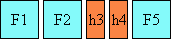
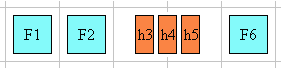
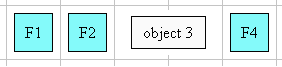
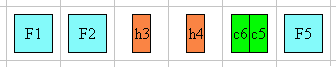
There is a number of illustrations in this document for which the
following legend is used:
 - wide-cell glyph (e.g. Han)
which is the n-th character in the text run,
- wide-cell glyph (e.g. Han)
which is the n-th character in the text run,
 - narrow-cell glyph (e.g. Roman)
which is the n-th glyph in the text run,
- narrow-cell glyph (e.g. Roman)
which is the n-th glyph in the text run,
 - connected glyph (e.g. Arabic)
which is the n-th glyph in the text run.
- connected glyph (e.g. Arabic)
which is the n-th glyph in the text run.
Many typographical properties in East Asian typography depends on the fact
that a character is typically rendered as either a wide or narrow character.
All characters described by the Unicode Standard [UNICODE] can be categorized by a width property. This
is covered by the Unicode Standard Annex [UAX-11].
The orientation which the above symbols assume in the diagrams corresponds
to the orientation that the glyphs they represent are intended to assume when
rendered in the UA (user agent). Spacing between these characters in the
diagrams is usually symbolic, unless intentionally changed to make a point.
Furthermore, all properties, in addition to the noted values, take
'initial' and 'inherit'. These values are not repeated in each of the
property value enumeration.
This module uses extensively the 'before', 'after', 'start' and
'end' notation to specify the four edges of a box relative to its text
advance direction, independently of its absolute positioning in terms of
'top', 'bottom', 'left' and 'right' (corresponding respectively to the
'before', 'after', 'start' and 'end' positions in a typical Western text
layout). This notation is also used extensively in [XSL1.0] for the same purpose.
Finally, in this document, requirements are expressed using the key words
"MUST", "MUST NOT", "REQUIRED",
"SHALL" and "SHALL NOT". Recommendations are expressed
using the key words "SHOULD", "SHOULD NOT" and
"RECOMMENDED". "MAY" and "OPTIONAL" are used to
indicate optional features or behavior. These keywords are used in accordance
with [RFC2119]. For legibility these
keywords are used in lowercase form.
3. Text layout
3.1. Text layout introduction
This section describes the text layout features supported by CSS, which
includes support for various international writing directions, such as
left-to-right (e.g., Roman scripts), right-to-left (e.g., Hebrew or Arabic),
bidirectional (e.g., mixing Roman with Arabic) and vertical (e.g., Asian
scripts).
The 'writing-mode' property determines an inline
progression and a block (line to line) progression.
For example, Roman scripts are typically written left to right and top to
bottom. The glyph orientation determines the
orientation of the rendered visual shape of characters relative to the
inline progression.
Within a line, the adjustment to the current text position is based on the
current glyph orientation relative to the
inline progression, the metrics of the glyph just rendered, kerning
tables in the font and the current values of various attributes and
properties, such as the spacing properties.
Bi-directionality introduces another level of complexity in text layout,
as in many combinations of 'writing-mode' and glyph orientation values the proper
directionality of text will be determined by an algorithm. The Unicode
standard ([UNICODE], section 3.12)
defines such an algorithm consisting of an implicit part based on character
properties, as well as explicit controls for embeddings and overrides. It is
also possible to override the inherent directionality of the content
characters by using of combination of the 'writing-mode' and 'unicode-bidi' properties.
CSS3 relies on this algorithm to achieve proper text bidirectional
rendering. However reordering of characters only occurs for specific values
of the glyph orientation properties. See
their description for the exact conditions.
CSS2 specified the 'direction' property which is a subset of the
'writing-mode'
property as it only determines an inline progression. The 'direction' property may
still be used when no block progression change is desired.
The HTML 4.01 specification ([HTML401], section 8.2) defines bi-directionality
behavior for HTML elements. Conforming HTML user agents
may therefore ignore the 'direction' and 'unicode-bidi' properties in author and user
style sheets. The style sheet rules that would achieve the bidi behavior
specified in HTML 4.01 are given in the sample style sheet. The HTML
4.01 specification also contains more information on bidirectionality issues.
Note that HTML 4.01 does not cover the more general case described by the
'writing-mode'
property.
3.2. Setting
the inline and block progressions: the 'writing-mode' and 'direction' properties
The 'writing-mode' property specifies whether the
inline progression shall be left-to-right, right-to-left, or
top-to-bottom. (Note that even when the inline progression is
left-to-right or right-to-left, some or all of the content within a given
element might advance in the opposite direction because of the Unicode [UNICODE] bidirectional algorithm or
because of explicit text advance overrides due to this property or 'direction' and 'unicode-bidi'. This
property also changes the 'direction' property for the element. For more
on bidirectional text, see the section about Embedding and override.
| Name:
| writing-mode
|
| Value:
| lr-tb | rl-tb | tb-rl | tb-lr | bt-rl | bt-lr | lr | rl | tb
|
| Initial:
| lr-tb
|
| Applies to:
| all elements and generated content
|
| Inherited:
| yes
|
| Percentages:
| N/A
|
| Media:
| visual
|
| Computed value:
| specified value (except for initial and inherit)
|
- lr-tb | lr
- Sets the inline progression to left-to-right, and the block progression to top-to-bottom as is common in most Roman-based
documents. For most characters, the current text position is
advanced from left to right after each glyph is rendered. The 'direction' property is set
to 'ltr'.
- rl-tb | rl
- Sets the inline progression to right-to-left, and the block progression to top-to-bottom as is common in Arabic or Hebrew
scripts. The direction property is set to 'rtl'.
- tb-rl | tb
- Sets the inline progression to top-to-bottom, and the block progression to right-to-left as is common in Asian scripts. The
baseline alignment may be different in this context. Typically, the dominant
baseline runs through the center of the upright glyphs. The direction
property is set to 'ltr'.
- tb-lr
- Sets the inline progression to top-to-bottom, and the block
progression to left-to-right as is common in Mongolian script. This type of vertical layout also occurs in Latin based
documents, particularly in table column or row labels. The baseline alignment
may be different in this context. Typically, the dominant baseline runs
through the center of the upright glyphs. The direction property is set to
'ltr'.
- bt-rl
- Sets the inline progression to bottom-to-top, and the block progression to right-to-left. This value only exists to cover the
case of the direction property value 'rtl' applied to an element where the
current writing-mode property value is 'tb-rl' or 'tb'. The direction
property is set to 'rtl'.
- bt-lr
- Sets the inline progression to bottom-to-top, and the block progression to left-to-right. This value only exists to cover the
case of the direction property value 'rtl' applied to an element where the
current writing-mode property value is 'tb-lr'. The direction property is set
to 'rtl'.
The combination of inline progression and block progression set by the writing-mode property is also referred as a flow
orientation. In such contexts, the values: lr-tb, lr, rl-tb and rl correspond
to horizontal flow orientations, and the others (tb-rl, tb, tb-lr, bt-rl,
bt-lr) correspond to vertical flow orientations.
For horizontal flow orientations, the top and bottom margins can be
collapsed. For vertical flow orientations, the left and right margin can be
collapsed. See Collapsing margins in the CSS3 Box module [forthcoming] for
the details of collapsing margins.
This property also specifies the direction of table column layout, the direction of the
overflow when determined by
the inline progression (such as the 'start' and 'end' value of
the 'text-align'
property), the initial alignment of text and the position of an incomplete
last line in a block in case of 'text-align:
justify'.
For the 'writing-mode' property to have any effect on
inline-level elements, one or both of the following conditions must be met:
- the new inline progression is perpendicular to the parent's own inline
progression
or
- the glyph orientation of the characters
within the element is 'auto' or 90/-90 degree in vertical layout or 0/180
degree in horizontal layout and the 'unicode-bidi' property's value is 'embed' or
'bidi-override'.
An inline-level element that has a different writing-mode value than its
parent becomes an inline-block element.
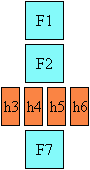
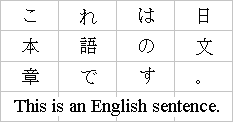
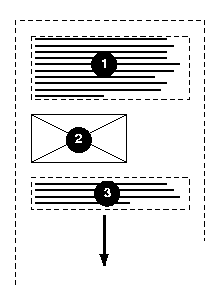
Here is a diagram of a horizontal flow (writing-mode: lr-tb):
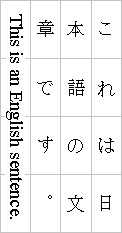
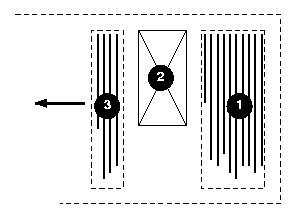
Here is a diagram for a vertical flow used in East Asia
(writing-mode: tb-rl) :
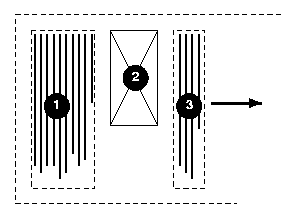
And finally, here is a diagram for another flow used for Uyghur and
Mongolian (writing-mode: tb-lr):
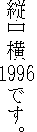
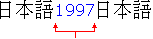
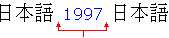
In East Asian documents, it is often preferred to display certain
Latin-based strings, such as numerals in a year, always in a horizontal
layout flow regardless of the flow mode of the line of text these strings
appear in, as in:
This effect is known as "Tate chu
yoko". In order to achieve it in an XHTML context, the Latin
string should be enclosed within a span element with an
horizontal flow orientation, as in:
.hinv {writing-mode: lr-tb; display: inline-block;}
<span class="hinv">1996</span>
This is an application of changing the flow of an inline element as
described earlier. Line breaking is normally disabled for such runs of text.
This can be accomplished using the CSS 'white-space:
nowrap' property setting.
| Name:
| direction
|
| Value:
| ltr | rtl
|
| Initial:
| ltr
|
| Applies to:
| all elements and generated content, but see prose
|
| Inherited:
| yes
|
| Percentages:
| N/A
|
| Media:
| visual
|
| Computed value:
| specified value (except for initial and inherit)
|
Values for this property have the following meanings:
- ltr
- Left-to-right direction.
- rtl
- Right-to-left direction.
This property specifies the inline progression and the
direction of embeddings and overrides (see 'unicode-bidi') for the Unicode bidirectional
algorithm. The block progression is not affected by this property. The values 'ltr' and 'rtl' have to be interpreted 'relatively' to
the line direction. In addition, it specifies the direction of table column layout, the direction of the
overflow when determined by
the inline progression (such as the 'start' and 'end' value of
the 'text-align'
property), the initial alignment of text and the position of an incomplete
last line in a block in case of 'text-align:
justify'. For the 'direction' property to have any effect on
inline-level elements, the 'unicode-bidi' property's value must be
'embed' or 'bidi-override' and the glyph
orientation of the characters within the element must be 'auto' or 90/-90
degree in vertical layout or 0/180 degree in horizontal layout.
Note. The 'writing-mode' and 'direction' properties, when specified for table
column elements, are not inherited by cells in the column since columns don't
exist in the document tree. Thus, CSS cannot easily capture the "dir"
attribute inheritance rules described in [[HTML4.01], section 11.3.2.
Note. The 'writing-mode' and 'direction' properties interact with each other.
As such, 'writing-mode' resets the 'direction' value.
Similarly, modifying 'direction' after 'writing-mode' changes effectively the 'writing-mode' value to
the opposite inline progression. For example, 'direction:rtl' applied to an element with 'writing-mode:lr-tb' effectively makes 'writing-mode:rl-tb'. This is one of the main reason why
the mixed usage of these two properties is discouraged or at least they
should be used with great caution.
In some cases, it is required to alter the orientation of a sequence of
characters relative to the inline progression. The requirement is
particularly applicable to vertical layouts of East Asian documents, where
sometimes half-width Roman text is to be displayed horizontally and other
times vertically.
Two properties control the glyph orientation relative to the inline
progression. 'glyph-orientation-vertical'
controls glyph orientation when the inline progression is
vertical. 'glyph-orientation-horizontal'
controls glyph orientation when the inline progression is
horizontal. It is necessary to distinguish between vertical and horizontal
for the following reasons:
- When the inline progression is vertical the typical glyph
orientation depends on the related character. See the description of the
'auto' value. This value is not necessary in horizontal layout.
- The initial value is different for the two properties.
| Name:
| glyph-orientation-vertical
|
| Value:
| <angle> | auto
|
| Initial:
| auto
|
| Applies to:
| all elements and generated content
|
| Inherited:
| yes
|
| Percentages:
| N/A
|
| Media:
| visual
|
| Computed value:
|
specified value (except for initial and inherit)
|
- <angle>
- The user agent may round the value of the angle to the values of glyph
rotation supported by the user agent. Conforming user agents may only support
the following values: 0deg, 90deg, 180deg and 270deg, other values can also
be supported..
- A value of "0deg" indicates that all glyphs are
oriented with the bottom of the glyphs toward the inline progression, resulting in glyphs which are stacked vertically on top of each
other. A value of "90deg" indicates a rotation of 90
degrees clockwise from the "0deg" orientation. For characters which have this
property set to 90 or 270 degree, reordering is first applied according to
the Unicode Bidi algorithm and then the resulting glyphs are rotated
according to the <angle> value. The rotation specified by this value is
applied to the glyph representations of all assigned Unicode character codes.
- auto
- The glyph orientation relative to the inline progression is
determined automatically based on the Unicode character code of the
rendered character.
Full-width ideographic and full-width Roman glyphs (excluding ideographic
punctuation) are oriented as if an <angle> of "0deg" had been specified
for top to bottom inline progression and "180deg" for bottom to top inline
progression (resulting in glyphs which are stacked vertically on
top of each other).
Ideographic punctuation and other ideographic characters having alternate
horizontal and vertical glyph shapes shall use the vertical shape of the
glyph.
Text which is not full-width will be set as if an <angle> of "90deg"
had been specified; thus, half-width Roman text will be rotated 90 degree
clockwise versus full-width ideographic and full-width Roman text.
Hebrew and Arabic text are also rotated 90 degree clockwise. The visual order
of this text is determined by the bidirectional algorithm applied prior to
the rotation.
Note. A value of auto will generally
produce the expected results in common uses of mixing Japanese with European
characters; however, the exact algorithms are based on complex interactions
between many factors, including font design, and thus different algorithms
might be employed in different processing environments. For precise control,
specify explicit <angle> values.
This property specifies the orientation of glyphs relative to the inline and
block progressions determined by the 'writing-mode' property. This property is
applied only to text written in a vertical writing-mode. Conforming user
agents may do the following in increasing levels of supports:
- support only the 90deg value,
- support the 0deg, 90deg, 180deg and 270deg values,
- support all values above and any number of additional values.
The value of this property affects both the alignment and height of the
glyph area generated for the affected glyphs. If a glyph is oriented so that
the normal orientation of the glyph is parallel to the dominant-baseline,
then the vertical alignment-point of the rotated glyph is aligned with the
alignment-baseline appropriate to that glyph. The baseline to which the
rotated glyph is aligned is the vertical baseline identified by the
"alignment-baseline" for the script to which the glyph belongs. The height of
the glyph area is determined from the height font characteristic for the
glyph.
The horizontal alignment points, baselines and heights (computed as glyph
advance width) are used if the normal orientation of the glyph is
perpendicular to the dominant-baseline.
The diagrams below illustrate different uses of 'glyph-orientation-vertical'.
The diagram on the left shows the result of the mixing of full-width
ideographic characters with half-width Roman characters when 'glyph-orientation-vertical'
for the Roman characters is either auto or "90deg". The diagram on the right show the result of mixing
full-width ideographic characters with half-width Roman characters when Roman
characters are specified to have a 'glyph-orientation-vertical' of
"0deg".
The bidi algorithm and the 'glyph-orientation-vertical'
property have the following interaction:
- The bidi algorithm is applied separately to each contiguous text range
having the same glyph-orientation-vertical value. In other words a change in
the property value resets the bidi algorithm.
- When the glyph-orientation-vertical value is 270 degree, all mirroring
symbols after all due bidi processing are mirrored before being rotated 270 degree
clockwise. This is done to achieve the desired rendering result, which is to
have the mirroring characters pointing 'inward' the text they are enclosing.
| Name:
| glyph-orientation-horizontal
|
| Value:
| <angle>
|
| Initial:
| 0deg
|
| Applies to:
| all inline-level elements
|
| Inherited:
| yes
|
| Percentages:
| N/A
|
| Media:
| visual
|
| Computed value:
| <angle>
|
- <angle>
- The user agent may round the value of the angle to the values of glyph
rotation supported by the user agent. A value of "0deg" indicates that all glyphs are oriented with the
right edge of the glyphs toward the inline progression, resulting
in glyphs which are positioned side by side. A value of "90deg" indicates an orientation of 90 degrees clockwise
from the "0" orientation. For characters which have this property set to 0 or
180 degree, reordering is first applied according to the Unicode Bidi
algorithm and then the resulting glyphs are rotated clockwise according to
the <angle> value.
This property specifies the orientation of glyphs relative to the inline
progression determined by the 'writing-mode' property. This property is
applied only to text written in a horizontal writing-mode. Conforming user
agents may do the following in increasing levels of supports:
- support only the 0deg value,
- support the 0deg, 90deg, 180deg and 270deg values,
- support all values above and any number of additional values.
The value of this property affects both the alignment and width of the
glyph area generated for the affected glyphs. If a glyph is oriented so that
the normal orientation of the glyph is parallel to the dominant-baseline,
then the vertical alignment-point of the rotated glyph is aligned with the
alignment-baseline appropriate to that glyph. The baseline to which the
rotated glyph is aligned is the horizontal baseline identified by the
"alignment-baseline" for the script to which the glyph belongs. The width of
the glyph area is determined from the vertical width font characteristic for
the glyph.
The horizontal alignment points, baselines and widths are used if the
normal orientation of the glyph is perpendicular to the dominant-baseline.
3.4. Embedding and override:
the 'unicode-bidi'
property
| Name:
| unicode-bidi
|
| Value:
| normal | embed | bidi-override
|
| Initial:
| normal
|
| Applies to:
| all elements and generated content, but see prose
|
| Inherited:
| no
|
| Percentages:
| N/A
|
| Media:
| visual
|
| Computed value:
| specified (except for initial and inherit)
|
This property allows further control of the Unicode bidirectional
algorithm by allowing new embedding levels or direction overrides. Values for
this property have the following meanings:
- normal
- The element does not open an additional level of embedding with respect
to the bidirectional algorithm. For inline-level elements, implicit
reordering works across element boundaries.
- embed
- If the element is inline-level, this value opens an additional level of
embedding with respect to the bidirectional algorithm. The direction of this
embedding level is given by the 'direction' property. Inside the element,
reordering is done implicitly. This corresponds to adding a LRE (U+202A; for
'direction: ltr') or RLE (U+202B; for 'direction: rtl') at the start of the
element and a PDF (U+202C) at the end of the element.
- bidi-override
- If the element is inline-level or a block-level element that contains
only continuous stretches of inline elements, this creates an override. This
means that inside the element, reordering is strictly in sequence according
to the 'direction'
property; the implicit part of the bidirectional algorithm is ignored. This
corresponds to adding a LRO (U+202D; for 'direction: ltr') or RLO (U+202E;
for 'direction: rtl') at the start of the element and a PDF (U+202C) at the
end of the element.
The final order of characters in each block-level element is the same as
if the bidi control codes had been added as described above, mark-up had been
stripped, and the resulting character sequence had been passed to an
implementation of the Unicode bidirectional algorithm for plain text that
produced the same line-breaks as the styled text. In this process,
non-textual entities such as images are treated as neutral characters, unless
their 'unicode-bidi' property has a value other
than 'normal', in which case they are treated as strong characters in the
'direction' specified
for the element.
Note. In order to be able to flow inline boxes in a uniform
direction (either entirely left-to-right or entirely right-to-left), more
inline boxes (including anonymous inline boxes) may have to be created, and
some inline boxes may have to be split up and reordered before flowing.
Because the Unicode algorithm has a limit of 61 levels of embedding, care
should be taken not to use 'unicode-bidi' with a value other than
'normal' unless appropriate. In particular, a value of 'inherit' should be
used with extreme caution. However, for elements that are, in general,
intended to be displayed as blocks, a setting of 'unicode-bidi: embed' is preferred to keep the element
together in case display is changed to inline (see example below).
The following example shows an XML document with bidirectional text. It
illustrates an important design principle: DTD designers should take
bidi into account both in the language proper (elements and attributes) and
in any accompanying style sheets. The style sheets should be designed so that
bidi rules are separate from other style rules. The bidi rules should not be
overridden by other style sheets so that the document language's or DTD's
bidi behavior is preserved.
Example(s):
In this example, lowercase letters in element contents stand for
inherently left-to-right characters and uppercase letters represent
inherently right-to-left characters:
<hebrew>
  <par>HEBREW1 HEBREW2 english3 HEBREW4 HEBREW5</par>
  <par>HEBREW6 <emph>HEBREW7</emph> HEBREW8</par>
</hebrew>
<english>
  <par>english9 english10 english11 HEBREW12 HEBREW13</par>
  <par>english14 english15 english16</par>
  <par>english17 <he-quo>HEBREW18 english19 HEBREW20</he-quo></par>
</english>
Since this is XML, the style sheet is responsible for setting the writing
direction. This is the style sheet:
/* Rules for bidi */
hebrew, he-quo  {direction: rtl; unicode-bidi: embed}
english         {direction: ltr; unicode-bidi: embed}

/* Rules for presentation */
hebrew, english, par  {display: block}
emph                  {font-weight: bold}
The hebrew element is a block with a right-to-left base
direction, the english element is a block with a left-to-right
base direction. The par elements are blocks that inherit the
base direction from their parents. Thus, the first two par
elements are read starting at the top right, the final three are read
starting at the top left. Please note that hebrew and
english are chosen as element names for explicitness only; in
general, element names should convey structure without reference to language.
The emph element is inline-level, and since its value for
'unicode-bidi' is
'normal' (the initial value), it has no effect on the ordering of the text.
The he-quo element, on the other hand, creates an embedding.
The formatting of this text might look like this if the line length is
long:
               5WERBEH 4WERBEH english3 2WERBEH 1WERBEH

                                8WERBEH 7WERBEH 6WERBEH

english9 english10 english11 13WERBEH 12WERBEH

english14 english15 english16

english17 20WERBEH english19 18WERBEH
Note that the he-quo embedding causes HEBREW18 to be to the
right of english19.
If lines have to be broken, it might be more like this:
       2WERBEH 1WERBEH
  -EH 4WERBEH english3
                 5WERB

   -EH 7WERBEH 6WERBEH
                 8WERB

english9 english10 en-
glish11 12WERBEH
13WERBEH

english14 english15
english16

english17 18WERBEH
20WERBEH english19
Because HEBREW18 must be read before english19, it is on the line above
english19. Just breaking the long line from the earlier formatting would not
have worked. Note also that the first syllable from english19 might have fit
on the previous line, but hyphenation of left-to-right words in a
right-to-left context, and vice versa, is usually suppressed to avoid having
to display a hyphen in the middle of a line.
3.5. Script character
classification: the 'text-script' property
In text layout, many of the behaviors are related to a character
classification based on scripts. For example, line breaking or text
justification behaviors depend on the 'dominant' script of the textual
content of an element. Furthermore, baseline alignment may be processed based
on the same dominant script. That dominant script can be heuristically
determined by finding the first character (after reordering) that has an
unambiguous script identifier in an element. It can also be explicitly
specified by using the 'text-script' property.
| Name:
| text-script
|
| Value:
| auto | none | <script>
|
| Initial:
| auto
|
| Applies to:
| all elements and generated content
|
| Inherited:
| yes
|
| Percentages:
| N/A
|
| Media:
| visual
|
| Computed value:
| none or <script> (explicit or determined in the case of 'auto')
|
Values have the following meanings:
- auto
- Use the first character descendant, after any reordering due to character direction and
bi-directionality, which has an unambiguous script identifier to
determine the dominant script of the element's content. This determines the
computed script value. Each textual component of the element may however
behave in typographical related behaviors as dictated by its script
identifier. In the absence of any textual components with a clear script
identifier (or no textual content at all), the computed value is 'Latin'.
- none
- Indicates the script is unknown or is not significant to the proper
formatting of this element.
- <script>
- A script definition in conformance with [ISO15924]. All textual components of the element must
behave in typography related behaviors as dictated by this script value, not
the inherent script value of these textual components.
Note 1. The Unicode technical report [UTR-24]: Script Names specifies script allocations for
the whole character repertoire covered by the Unicode Standard [UNICODE].
Note 2. Setting an explicit script property value on
an element reclassifies all its textual content to the given script. For
example setting the script to a script belonging to the CJK group (Chinese,
Japanese, Korean) makes the content behave as a CJK content for line-breaking
rules. And setting an Arabic text to Latin would prevent the context to be
affected by the Kashida justification effect. Typically, this property should
be set to an explicit script value only when the textual content is script
ambiguous and a specific behavior is sought.
4. Text alignment and
justification
4.1. Text alignment: the
'text-align' property
| Name:
| text-align
|
| Value:
| start | end | left | right | center | justify | <string>
|
| Initial:
| start
|
| Applies to:
| block-level elements
|
| Inherited:
| yes
|
| Percentages:
| N/A
|
| Media:
| visual
|
| Computed value:
| specified value (except for initial and inherit)
|
This property describes how inline content of a block is aligned. Values
have the following meanings:
- start
- The text is aligned on the start of the inline progression.
- end
- The text is aligned on the end of the inline progression.
- left, right
- In horizontal inline progression, the text is aligned on the left or
right respectively. In vertical inline progression, the alignment is UA
dependent. Because these two values are not related to the current inline
progression, the values
'start' and 'end' are typically preferred.
- center
- The text is center aligned.
- justify
- The text is justified. The justification algorithm can be further refined
by using the 'text-justify' property. Although
conforming CSS2 user agents
could interpret the value 'justify' as 'start',
conforming CSS3 user
agents may not, unless a profile specifies otherwise.
- <string>
- Specifies a string on which cells in a table column will align (see the
section on horizontal
alignment in a column for details and an example). This value applies
only to table cells. If set
on other elements, it will be treated as 'start'.
A block of text is a stack of line boxes. In the case of
'start', 'end', 'left', 'right' and 'center', this property specifies how the
inline boxes within each line box align with respect to the line box's start
and end sides; alignment is not with respect to the viewport. In the case of
'justify', the UA may stretch the inline boxes in addition to adjusting their
positions. (See also 'letter-spacing' and 'word-spacing'.)
Example(s):
In this example, note that since 'text-align' is inherited, all block-level
elements inside the div element with 'class=important' will have
their inline content centered.
div.important { text-align: center }
Note. The property initial value has changed between
CSS2 and CSS3 from being UA dependent in CSS2 to be related to the current text advance direction in CSS3
(through the usage of the 'start' value).
4.2. Justification:
the 'text-justify'
property
| Name:
| text-justify
|
| Value:
| auto | inter-word | inter-ideograph | distribute | newspaper |
inter-cluster | kashida
|
| Initial:
| auto
|
| Applies to:
| block-level elements
|
| Inherited:
| yes
|
| Percentages:
| N/A
|
| Media:
| visual
|
| Computed value:
| specified value (except for initial and inherit)
|
This property selects the type of justify alignment. It affects the text
layout only if 'text-align' is set to 'justify'. That way, UA's that do not support this
property will still render the text as fully justified, which most of the
time is at least partially correct. Typically the text-justify property does
not affect the last line, unless the last line itself is justified. Most of
the text-justify values affects writing systems in very specific ways. These
writing systems (or group of) are:
- CJK and Hangul and by extension all 'wide' characters,
- Devanagari and all South Asian scripts using baseline connector like
Bengali and Gurmukhi,
- South Eastern Asian scripts that do not use space between words (Thai,
Lao, Khmer, Myanmar),
- Cursive scripts like Arabic,
- Scripts using space between word without connector (Latin-based, Hebrew,
etc...) and symbol characters.
The text-justification behavior of textual components is guided by the
script classification of the characters. The 'text-script' property allows to modify the behavior of
these components.
Depending on the text-justify value, spacing may be altered between words
or letters.
The possible values for the text-justify property are:
- auto
- The UA determines the justification algorithm to follow, based on a
balance between performance and adequate presentation quality. Inter-word
expansion is typically used for all scripts that use space as word delimiter.
However, if the kashida-space property has a non zero value it is recommended
to use kashida elongation for Arabic text.
- inter-word
- Selects the simplest and fastest full justification behavior, which
spreads the text evenly across the line by increasing the width of the space
between words only. The concept of a word is script dependent, the exact
algorithm is determined by the user agent. At minimum, justification is
expected to occur at each white space boundary. No expansion or compression
occurs within the words, i.e. no additional letter spacing is created. No
kashida effect takes place.
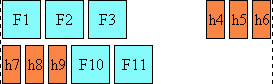
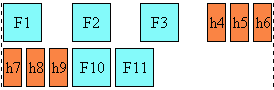
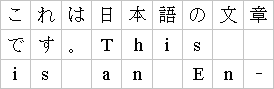
The diagram below illustrates this mode, by showing how the characters are
laid out in the last two lines of an element:
For example a viewer could render an 'inter-word' justified paragraph in
the following way:
- newspaper
- Selects the justification behavior in which both inter-word and
inter-letter spacing can be expanded or reduced to spread the text across the
whole line. Also, text distribution on any given line may depend on the
layout or the contents of the previous or the following several lines. This
is the significantly slower and more sophisticated type of the full justify
behavior preferred in newspaper and magazines, as it is especially useful for
narrow columns. For example, typically, compression is tried first. If
unsuccessful, expansion occurs: inter-word spaces are expanded up to a
threshold, and finally inter-letter expansion is performed. This is applied
to all scripts groups except Devanagari and other South Asian writing systems
using baseline connectors. The threshold value may be related to the column
width (in number of characters). The exact layout algorithm is determined by
the user agent. Further explanation about multi-column layout can be found in
the CSS3 Multi-layout module.
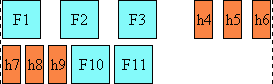
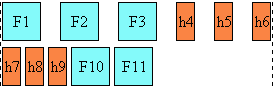
The diagram below illustrates this mode:
Note. In CSS3 a value of 'letter-spacing: 0' no longer inhibits spacing-out
of words for justification. The letter-spacing value is just an entry to the
letter-spacing process that occurs prior to the possible justification
process. Justification may alter the initial spacing between letters,
especially with the 'text-justify: newspaper' value.
- inter-ideograph
- In this mode, letter-spacing modification only occurs for the CJK group.
Others only use inter-word expansion. No kashida effect takes place. This is
the preferred justification in the context of the Japanese writing system,
but not Latin nor Korean.
The diagram below illustrates this mode:
Below is an example of how this mode would work:
- distribute
- Like 'newspaper' it allows letter spacing modification for most script
groups (except Hindi), but unlike newspaper, it does not prioritize between
word spacing and letter spacing, i.e. the space character gets the same
letter spacing modification as others. And by consequence there are no
variations between narrow and wide columns. This value is best used in East
Asian context.
The diagram below illustrates this mode:
For example a viewer could render a 'distribute' justified paragraph in
the following way:
- inter-cluster
- Plays the same role as inter-ideograph but for South Eastern Asian
scripts. That is letter spacing only occurs for clusters belonging to those
scripts. A cluster is defined as a group of characters formatted as a single
unit.
- kashida
- Plays the same role as inter-ideograph but for Arabic through the Kashida
effect. That is, no letter spacing occurs for other scripts.
The following table describes the expansion/compression strategy for the
combination of each script groups and the text-justify property value for
each relevant text-justify property value:
*The values shown for the auto column are only a
recommendation. The UAs might implement a different strategy.
*The Devanagari entry represents as well other scripts and writing systems
used in India that use baseline connectors like Bengali and Gurmukhi.
4.3. Last line
alignment: the 'text-align-last' property'
| Name:
| text-align-last
|
| Value:
| auto | start | end | center | justify | size
|
| Initial:
| auto
|
| Applies to:
| block-level elements
|
| Inherited:
| yes
|
| Percentages:
| N/A
|
| Media:
| visual
|
| Computed value:
| specified value (except for initial and inherit)
|
This property describes how the last line of the inline content of a block
is aligned. This also applies to the only line of a block if it contains a
single line, the line preceding a <br> element in a XHTML
context, or a hard line break in other languages, and to last lines of
anonymous blocks. Typically the last line is aligned like the other lines of
the block element, this is set by the 'text-align' property. However, in some
situations like when the 'text-align' property is set to 'justify', the
last line may be aligned differently.
Values have the following meanings:
- auto
- The last line will be aligned like the other lines, that is determined by
the value of the 'text-align' property. However, if the 'text-align' property is
set to the value 'justify', the last line will be aligned to the start of the
inline progression.
- start, end and center
- Start, end and center text respectively.
- justify
- The last line will be justified like the other lines, using the
justification type set by the 'text-justify' property. Note however that if
there is no expansion opportunity in the last line, the line might not appear
justified.
- size
- The line content is scaled to fit on the line. All the fonts on the line
must be scaled by the same factor. Typically this value is used for single
line element. Finally, this value, unlike the others, may change (i.e.
decrease) the number of lines in a block element.
The following XHTML example shows the usage of the alignment properties in
a case where all lines are justified in a distributed justification. This is
commonly found in East Asian typography:
p.distributealllines
 { text-align: justify;
   text-justify: distribute;
   text-align-last: justify }
| Name:
| min-font-size
|
| Value:
| <font-size> | auto
|
| Initial:
| auto
|
| Applies to:
| all elements and generated content
|
| Inherited:
| yes
|
| Percentages:
| element's computed 'font-size'
|
| Media:
| visual
|
| Computed value:
| <font-size>
|
If 'text-align-last' is 'size', the fonts of
the last line of an element are not allowed to become smaller than the
smaller of 'font-size'
and 'min-font-size'. 'auto' means that the user
agent determine the minimum readable font-size for the media. For example, a
value is 9px is recommended for Latin scripts.
| Name:
| max-font-size
|
| Value:
| <font-size> | auto
|
| Initial:
| auto
|
| Applies to:
| all elements and generated content
|
| Inherited:
| yes
|
| Percentages:
| element's computed 'font-size'
|
| Media:
| visual
|
| Computed value:
| <font-size>
|
If 'text-align-last' is 'size', the fonts of
the last line of an element are not allowed to become larger than the larger
of 'font-size' and
'max-font-size'.
'auto' means that there is no limit.
4.5. Additional
compression: The 'text-justify-trim' property
| Name:
| text-justify-trim
|
| Value:
| none | punctuation | punctuation-and-kana
|
| Initial:
| punctuation
|
| Applies to:
| block-level elements
|
| Inherited:
| yes
|
| Percentages:
| N/A
|
| Media:
| visual
|
| Computed value:
| specified value (except for initial and inherit)
|
This sets the individual font blank space compression permissions for the
text justification algorithm, when 'text-justify' is anything other than
'inter-word'. This special type of space compression occurs on the font
level, i.e. the blank space within the character area itself may be reduced
without affecting the appearance of the glyph. This applies to wide-cell
glyphs only. Possible values:
- none
- No wide-cell font space compression is allowed.
- punctuation
- Space can be taken away only from wide-cell punctuation glyphs.
- punct-and-kana
- Space compression is allowed on wide-cell punctuation and wide-cell Kana glyphs.
| Name:
| text-kashida-space
|
| Value:
| <percentage>
|
| Initial:
| 0%
|
| Applies to:
| block-level elements
|
| Inherited:
| yes
|
| Percentages:
| as described
|
| Media:
| visual
|
| Computed value:
| <percentage>
|
Kashida is a typographic effect used in Arabic writing systems that allows
character elongation at some carefully chosen points in Arabic. Each
elongation can be accomplished using a number of kashida glyphs, a single graphic or character elongation
on each side of the kashida point. (The UA may use either mechanism based on
font or system capability). The text-kashida-space property expresses the
ratio of the kashida expansion size to the white space expansion size, 0%
means no kashida expansion, 100% means kashida expansion only . This property
can be used with any justification style where kashida expansion is used
(currently text-justify: auto, kashida, distribute and newspaper).
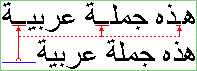
In the diagram below showing two identical paragraphs of Arabic text, the
blue line in the second line (not justified) shows the length that is used
for kashida and divided among
the elongation opportunities in the first line (justified), as indicated by
the red underlines:
In that example no expansion occurs between the word themselves,
indicating that the text-kashida-space property is set to 100%.
| Name:
| text-indent
|
| Value:
| <length> | <percentage>
|
| Initial:
| 0
|
| Applies to:
| block-level elements
|
| Inherited:
| yes
|
| Percentages:
| refers to width of containing block
|
| Media:
| visual
|
| Computed value:
| <length>
|
This property specifies the indentation of the first line of text in a
block. More precisely, it specifies the indentation of the first box that
flows into the block's first line box. The box is indented
with respect to the starting edge of the line box. User agents should render
this indentation as blank space. When the 'text-align' property is not set to align the text
at the starting edge, this property only specifies a minimum indentation.
Values have the following meanings:
- <length>
- The indentation is a fixed length.
- <percentage>
- The indentation is a percentage of the containing block width.
The value of 'text-indent' may be negative, but there may
be implementation-specific limits.
Note:
Note: Since the 'text-indent' property inherits, when
specified on a block element, it will affect descendent inline-block elements.
For this reason, it is often wise to specify 'text-indent: 0' on elements that
are specified 'display: inline-block'.
Example(s):
The following example causes a '3em' text indent.
p { text-indent: 3em }
6. Line breaking
6.1. Types of line
breaking
In documents written in Latin-based languages, where runs of characters
make up words and words are separated by spaces or hyphens, line breaking is
relatively simple. In the most general case, (assuming no hyphenation
dictionary is available to the UA), a line break can occur only at whitespace
characters or hyphens, including U+00AD SOFT HYPHEN.
In ideographic typography, however, where what appears as a single glyph
can represent an entire word and no spaces nor any other word separating
characters are needed, a line breaking opportunity is not as obvious as a
space. It can occur after or before many other characters. Certain line
breaking restrictions still apply, but they are not as strict as they are in
Latin typography.
Thai is another interesting example with its own special line breaking
rules. Since Thai words are made up of runs of characters, it resembles Latin
in that respect. But the lack of spaces as word delimiters, or in fact any
consistent word delimiters, makes it similar to CJK. Thai, like Latin in the
absence of a hyphenating dictionary, never breaks inside of words. In fact, a
knowledge of the vocabulary is necessary to be able to correctly break a line
of Thai text. Finally, the Unicode character: U+200B ZERO WIDTH SPACE can be
inserted in such scripts to specify an explicit line breaking opportunity.
A number of levels of line-breaking "strictness" can be used in Japanese
typography. These levels add or remove line breaking restrictions. The model
presented in this specification distinguishes between two most commonly used
line breaking levels for Japanese text, using the 'line-break' property.
In ideographic typography, it is also possible, though not always
preferred, to allow line breaks to occur inside of quoted Latin and Hangul (Korean) words without following the line breaking
rules of those particular scripts. The model proposed in this document gives
the author control over that behavior through the 'word-break-CJK' property.
In addition, hyphenation is controlled by 'word-break-inside'. All these
properties are also available through the 'word-break' short hand property.
Finally, there is an additional property 'wrap-option' which may influence
line-breaking, especially the property value 'wrap-option: emergency' which
provides for emergency word-breaking for long words.
Line breaking is also covered by the Unicode Standard Annex [UAX-14], available from the Unicode Web site. It contains a detailed
recommendation and corresponding data for each Unicode character.
6.2. Line breaking: the
'line-break' property
| Name:
| line-break
|
| Value:
| normal | strict
|
| Initial:
| normal
|
| Applies to:
| all elements and generated content
|
| Inherited:
| yes
|
| Percentages:
| N/A
|
| Media:
| visual
|
| Computed value:
| specified value (except for initial and inherit)
|
This property selects the set of line breaking rules to be used for text.
The values described below are especially useful to CJK authors, but the
property itself is open to other, not yet specified settings for non-CJK
authors as well. (This is an area for future expansion.)
- normal
- Selects the normal line breaking mode for CJK. While the UA is free to
define its own line breaking restrictions for the 'normal' mode, it is
recommended that breaks between small katakana and hiragana characters be allowed. That is the preference
in modern Japanese typography, and is especially desirable for narrow
columns. Japanese katakana words tend to be long, and
it is preferable to allow line breaks to occur among such characters than to
have excessive expansion due to justification.
- strict
- Selects a more restrictive line breaking mode for CJK text. While the UA
is free to define its own line breaking restrictions for the 'strict' mode,
it is recommended that the restrictions specified by the JIS X-4051 [JIS-X-4051] be followed. That
implies that in this mode, small katakana and hiragana characters are not allowed to start a line.
In Japanese, a set of line breaking restrictions is referred to as "Kinsoku". JIS X-4051 [JIS-X-4051] is a popular source of
reference for this behavior using the strict set of rules. This
architecture involves character classification into line breaking behavior
classes. Those classes are then analyzed in a two dimensional behavior table
where each row-column position represents a pair action to be taken at the
occurrence of these classes. For example, given a closing character class and
an opening character class, the intersection in that table of these two
classes (the first character belonging to the opening class and the second
belonging to the closing class) will indicate no line breaking opportunity.
The rules described by JIS X-4051 have been superseded by the Unicode
Technical Report #14 mentioned earlier.
Note that both values, 'normal' and 'strict' imply that a set of
line-breaking restrictions is in use. In fact, there appears to be no valid
line breaking mode in CJK in which line breaks can appear just anywhere among
ideographs.
| Name:
| word-break-CJK
|
| Value:
| normal | break-all | keep-all
|
| Initial:
| normal
|
| Applies to:
| all elements and generated content
|
| Inherited:
| yes
|
| Percentages:
| N/A
|
| Media:
| visual
|
| Computed value:
| specified value (except for initial and inherit)
|
This property controls line-breaking behavior inside of words from a CJK
point of view. Possible values:
- normal
- Keeps non-CJK scripts together (according to their own rules), while Hangul and CJK (including the
Korean Hanja characters) break
everywhere or according to the rules of the 'line-break' mode. Note however that the
behavior of non-CJK scripts can be superseded by using the value 'emergency'
in the 'wrap-option'
property, or the value 'hyphenate' in the 'word-break-inside' property.
- break-all
- Same as 'normal' for CJK and Hangul, but non-CJK scripts can break anywhere. This
option is used mostly in a context where the text is predominantly using CJK
characters with few non-CJK excerpts and it is desired that the text be
better distributed on each line. The UAs may however limit the break
everywhere behavior for script using clusters like Thai.
- keep-all
- Same as 'normal' for all non-CJK scripts. CJK and Hangul are kept together. This
option should only be used in the context of CJK used in small clusters like
in the Korean writing system.
The following example shows a paragraph style where all non-CJK scripts
can break anywhere.
p.anywordbreaks { word-break: break-all }
| Name:
| word-break-inside
|
| Value:
| normal | hyphenate
|
| Initial:
| normal
|
| Applies to:
| all elements and generated content
|
| Inherited:
| yes
|
| Percentages:
| N/A
|
| Media:
| visual
|
| Computed value:
| specified value (except for initial and inherit)
|
This property controls the hyphenation behavior inside of words. Possible
values:
- normal
- A word should always stay in a single line. Note however that this can be
superseded by using the value 'break-all' in the 'word-break-CJK' property,
or the value 'emergency' in the 'wrap-option' property. Moreover, explicit
hyphenation characters (hyphen, soft hyphen, etc...) still create line
breaking opportunities.
- hyphenate
- Words can be broken at an appropriate hyphenation point. It requires that
the user agent have an hyphenation dictionary for the language of the text
being broken. Setting this value activates the hyphenation engine in the user
agent.
| Name:
| word-break
|
| Value:
| <'word-break-CJK'> || <'word-break-inside'>
|
| Initial:
| see individual properties
|
| Applies to:
| all elements and generated content
|
| Inherited:
| yes
|
| Percentages:
| N/A
|
| Media:
| visual
|
| Computed value:
| see individual properties
|
The 'word-break' property is a shorthand property for setting
'word-break-CJK', and 'word-break-inside', at the same place in the style
sheet.
All word-break related properties are first reset to their initial values
(all 'normal'). Then, those properties that are given explicit values in the
'word-break' shorthand are set to those values.
7. Text Wrapping,
White-space Control and Text Overflow
The following section describes text wrapping, white-space handling and
text overflow. Text wrapping and white-space handling are interrelated
through the CSS2 'white-space' property combining these two effects together.
Text wrapping and text overflow both deal with situation where the text
reaches the flow after-edge of its containing box.
CSS3 clearly separates these three effects in different sets of property
while keeping the 'white-space' property for compatibility reason.
7.1. Text wrapping: the
'wrap-option'
property
| Name:
| wrap-option
|
| Value:
| wrap | hard-wrap | soft-wrap | emergency
|
| Initial:
| wrap
|
| Applies to:
| all elements and generated content
|
| Inherited:
| yes
|
| Percentages:
| N/A
|
| Media:
| visual
|
| Computed value:
| specified value (except for initial and inherit)
|
This property controls whether or not text wraps when it reaches the flow
edge of its containing block box. Several value descriptions use the term
preserved line feed
characters (U+000A). A preserved line-feed character (either from the
source content or from occurrence of "\A" in generated content) is maintained
for presentation purpose and may therefore influence text wrapping. The
preserved status of line-feed characters is determined by the 'linefeed-treatment' property. The 'wrap-option'
possible values are:
- wrap
- The text is wrapped at the best line-breaking opportunity (if required)
within the available block inline progression dimension (block width in
horizontal text flow). The best line-breaking opportunity is determined in
priority by the existence of preserved line-feed
characters (U+000A), or by the line-breaking algorithm controlled by the 'line-break' and
word-break' properties.
- hard-wrap
- The text is only wrapped where explicitly specified by preserved line
feed
characters (U+000A). In the case when
lines are longer than the available block width, the overflow will be treated in
accordance with the 'overflow' property specified in the element.
- soft-wrap
- The text is wrapped exactly at the block width and where explicitly specified by
preserved line feed
characters (U+000A).
No line-breaking algorithm is invoked.
- emergency
- The text is wrapped like for the 'wrap' case, except that the line-breaking
algorithm will allow as a last resort option a text wrap after the last
character which can fit before the ending-edge of the line, independently
of 'line-break' and word-break' properties. For
example, this deals with the situation of very long words constrained in a
fixed-width container with no scrolling allowed.
White-space processing in the context of CSS is the mechanism by which all
white-space characters are interpreted for rendering purpose. The white-space
set is determined by the XML [XML1.0]
specification as being a combination of one or more space characters (Unicode
value U+0020), carriage returns (U+000D), line feeds (U+000A), or tabs
(U+0009).
Note: [HTML401] also defines the form feed character (U+000C)
as a white space character, but that character is not part of any XHTML
versions as they are all based on XML.
The amount of white space processing that can be achieved by a user agent
that supports CSS is directly related to the CSS processing model, especially
the document parsing and validation. After parsing and possible validation,
the document tree may contain text nodes that contain unprocessed white space
characters, or the document tree may already have been processed in a way
that white space characters have been collapsed and partially removed (white
space normalization).
In that respect, the CSS properties related to white space processing can
only be effective if the CSS processor has access to the white space
characters that were originally encoded in the document. However, end-of-line
characters are typically handled (like by XML processors) in such a way that
any arbitrary combination of end-of-line characters is replaced by a single
line feed character (U+000A).
Note: XML Schema, through its 'whiteSpace' facet can
constrain exactly the type of white space characters still available to a
rendering process like CSS for elements containing string datatype. In
addition, some XML languages like [XHTML1.0] may have their own white-space processing
rules when parsing and validating documents with white-space characters.
Therefore, some of the behaviors described below may be affected by these
limitations and may be user agent dependent in these contexts.
In addition, line feed characters can be inserted in generated content by
using the '\A' string. The behavior of these inserted line feed characters is
identical to original line feed characters part of the source document and is
controlled by the same set of properties.
The initial white-space processing, similar to [XHTMLMOD] is as follows:
- Leading and trailing white space inside a block element are not rendered.
- Line feed characters are rendered as one of the following characters: a
space character, a zero width space character (U+200B), or no character (i.e.
not rendered). The choice of the resulting character is conditioned by the
script property of the characters preceding and following the line feed
character.
- A sequence of white space characters without any line feed characters is
rendered as a single space character.
- A sequence of white space characters with one or more line feed character
is rendered similarly to a single line feed character.
Note: These rendering rules make no assumption about
the storage model of these white-space character sequences. It is outside the
scope of CSS to determine the character code values accessible through
programming interface such as DOM. These rules do not apply to elements that
have an explicit white-space rendering behavior (like the pre
element in XHTML).
Note: In determining how to convert a LINE FEED character a
user agent should consider the following cases, whereby the script of characters
on either side of the LINE FEED determines the choice of the replacement.
Characters of COMMON script (such as punctuation) are treated as the same as the
script on the other side:
-
If the characters preceding and following the LINE FEED
character belong to a script in which the SPACE character is used as a word
separator, the LINE FEED character should be converted into a SPACE character.
Examples of such scripts are Latin, Greek, and Cyrillic.
-
If the characters preceding and following the LINE FEED
character belong to an ideographic-based script or writing system in which
there is no word separator, the LINE FEED should be converted into no
character. Examples of such scripts or writing systems are Chinese, Japanese.
-
If the characters preceding and following the LINE FEED
character belong to a non ideographic-based script in which there is no word
separator, the LINE FEED should be converted into a ZERO WIDTH SPACE character
(​) or no character. Examples of such scripts are Thai, Khmer.
-
If none of the conditions in (1) through (3) are true, the
LINE FEED character should be converted into a SPACE character.
The Unicode
[UNICODE] technical report TR#24 (Script Names) [UTR-24]
provides an assignment of
script names to all characters.
When white-space characters are collapsed for rendering purpose, the
style applied to the collapsed set is the one that would be applied to first
white-space character of the set.
The following properties: 'linefeed-treatment',
'white-space-treatment' and 'all-space-treatment' allow precise
control of that behavior. The 'linefeed-treatment' determines the rendering
of the line feed characters. The 'white-space-treatment' determines the
rendering of white space character (except line feed). And the
'all-space-treatment' property determines the treatment of consecutive
white-space characters after consideration of the two prior
properties. The 'white-space' property is a shorthand property
for these three properties as well as the 'wrap-option' property.
| Name:
| linefeed-treatment
|
| Value:
| auto | ignore | preserve | treat-as-space | treat-as-zero-width-space |
ignore-if-after-linefeed
|
| Initial:
| auto |
| Applies to:
| all elements and generated content
|
| Inherited:
| yes
|
| Percentages:
| N/A
|
| Media:
| visual
|
| Computed value:
| specified value (except for initial and inherit)
|
This property specifies the treatment of linefeeds (U+000A characters).
Values have the following meanings:
- auto
- Linefeed characters are transformed for rendering purpose into one of the
following characters: a space character, a zero width space character
(U+200B), or no character (i.e. not rendered). The choice of the resulting
character is conditioned by the script property of the characters preceding
and following the line feed character in the same line flow elements part of
the same block element. The result of the transformation can be treated by
subsequent CSS processing (including white space collapsing).
- ignore
- Linefeed characters are ignored. i.e. they are transformed for rendering
purpose into no character.
- preserve
- Linefeed characters indicate an end of line of boundary.
- treat-as-space
- Linefeed characters are transformed for rendering purpose into a space
character (U+0020). The result of the transformation can be treated by
subsequent CSS processing (including white space collapsing).
- treat-as-zero-width-space
- Linefeed characters are transformed for rendering purpose into a zero
width space character (U+200B). The result of the transformation can be
treated by subsequent CSS processing (including white space collapsing).
- ignore-if-after-linefeed
- Specifies that any linefeed characters that immediately follows a linefeed
character, shall be discarded. This allows multiple consecutive linefeed
characters to be collapsed into a single linefeed.
Note: The Unicode Standard
[UNICODE] recommends that the zero
width space is considered a valid line-break point and that if two characters
with a zero width space in between are placed on the same line they are
placed with no space between them; and that if they are placed on two lines no
additional glyph area, such as for a hyphen, is created at the line-break.
| Name:
| white-space-treatment
|
| Value:
| ignore | preserve | ignore-if-before-linefeed | ignore-if-after-linefeed
|
ignore-if-surrounding-linefeed
|
| Initial:
| ignore-if-surrounding-linefeed
|
| Applies to:
| all elements and generated content
|
| Inherited:
| yes
|
| Percentages:
| N/A
|
| Media:
| visual
|
| Computed value:
| specified value (except for initial and inherit)
|
This property specifies the treatment of space (U+0020) and other white-space characters except for linefeeds (U+000A), since their treatment is
determine by the linefeed-treatment property. White-space characters, when
rendered as an advance width, use the width of the space character (U+0020).
Values have the following meanings:
- ignore
- White space characters, except for linefeeds, are ignored. i.e. they are
transformed for rendering purpose into no character.
- preserve
- All white space characters are rendered as intended (advance width). The
treatment of linefeeds is not determined by this property.
- ignore-if-before-linefeed
- Specifies that any white space characters, except for linefeeds, that
immediately precedes a linefeed character, shall be discarded. This action
shall take place regardless of the setting of the linefeed-treatment
property.
- ignore-if-after-linefeed
- Specifies that any white space characters, except for linefeeds, that
immediately follows a linefeed character, shall be discarded. This action
shall take place regardless of the setting of the linefeed-treatment
property.
- ignore-if-surrounding-linefeed
- Specifies that any white space characters, except for linefeeds, that
immediately precedes or follows a linefeed character, shall be discarded.
This action shall take place regardless of the setting of the
linefeed-treatment property.
| Name:
| all-space-treatment
|
| Value:
| preserve | collapse
|
| Initial:
| collapse
|
| Applies to:
| all elements and generated content
|
| Inherited:
| yes
|
| Percentages:
| N/A
|
| Media:
| visual
|
| Computed value:
| specified value (except for initial and inherit)
|
The "all-space-treatment" property specifies the treatment of
all consecutive white-space characters (with no exception for linefeed characters,
unlike the "white-space-treatment" property). Values have the
following meanings:
- preserve
- All white-space characters are rendered as intended. The tab character
(U+0009) is rendered as the smallest non-zero number of spaces necessary to
line characters up along tab stops that are every 8 characters.
- collapse
- Specifies that a character is not rendered if:
- it is a white-space character (according to XML), and
- it is not a preserved linefeed (due to 'linefeed-treatment:
preserve' ), and
- the immediately preceding (non-ignored) character is a white-space
character
or the immediately following (non-ignored) character is a
preserved linefeed.
| Name:
| white-space
|
| Value:
| normal | pre | nowrap | pre-wrap | pre-lines |
| Initial:
| not defined for shorthand properties
|
| Applies to:
| all elements and generated content
|
| Inherited:
| yes
|
| Percentages:
| N/A
|
| Media:
| visual
|
| Computed value:
|
see individual properties
|
This property declares how 'white-space' inside the element is handled.
Setting a value on the 'white-space' property set the respective values on
'wrap-option', 'linefeed-treatment', 'white-space-treatment' and 'all-space-treatment'. Although, strictly
speaking, the property has no initial value, it is equivalent to 'normal'. The
definition of the property values are established by referring to the individual
white-space properties set as follows:
| white-space:
| wrap-option:
| linefeed-treatment:
| white-space-treatment:
| all-space-treatment:
|
| normal
| wrap
| auto
| ignore-if-surrounding-linefeed
| collapse
|
| pre
| hard-wrap
| preserve
| preserve
| preserve
|
| nowrap
| hard-wrap
| auto
| ignore-if-surrounding-linefeed
| collapse
|
| pre-wrap
| wrap
| preserve
| preserve
| preserve
|
| pre-lines | wrap | preserve | ignore-if-surrounding-linefeed |
collapse |
Example(s):
The following examples show what white-space behavior is expected from the PRE
and P elements, and the "nowrap" attribute in HTML, and in generated content.
pre        { white-space: pre }
p          { white-space: normal }
td[nowrap] { white-space: nowrap }
:before, :after {white-space: pre-lines }
In addition, the effect of an HTML PRE element with the non-standard "wrap"
attribute is demonstrated by the following example:
pre[wrap] {white-space: pre-wrap }
Text overflow deals with the situation where some textual content is
clipped when it overflows the element's box in its text advance direction as
determined by the writing-mode property value. This situation may only occur
when the 'overflow' property has the values: hidden, scroll and auto (in the
latter case only when the UA behavior results in content scrolling).
Text overflow allows the author to introduce a visual hint at the two
ending boundaries of the text flow within the element box (after and end).
The hint is typically an ellipsis character "...", although the actual
character representation may vary. An image may also be substituted. Setting
a non empty string (or an uri for an image) for either text flow boundary
enables the presentation of the hint. If both hints should appear, only the
'after' hint is rendered. Initially, only the end of line hint is shown
(correspond to the right of any over flown lines for left to right inline
progression).
The text-overflow is divided in properties: 'text-overflow-mode' that controls the
presentation of hint characters, 'text-overflow-ellipsis' that
controls the values of the hint characters presented at the box boundaries
and a shorthand property: 'text-overflow'.
| Name:
| text-overflow-mode
|
| Value:
| clip | ellipsis | ellipsis-word
|
| Initial:
| clip
|
| Applies to:
| all block-level elements
|
| Inherited:
| no
|
| Percentages:
| N/A
|
| Media:
| visual
|
| Computed value:
| specified value (except for initial and inherit)
|
- clip
- clip text as appropriate for the text content. Glyphs representation of
the text may be only partially rendered.
- ellipsis
- an ellipsis string is inserted at each box boundaries where a text
overflow occurs. The values of these ellipsis strings is determined by the
'text-overflow-ellipsis' property.
The insertions take place at the boundary of the last full glyph
representation of a line of text.
- ellipsis-word
- similar to 'ellipsis', but the insertions take place at the boundary of
the last full glyph representation of a word within the line of text.
The hint characters only replace textual information. If the clipping
occurs on a replaced element, standard clipping occurs.
Although the property is not inherited, overflowing children blocks that
are either statically or relatively positioned and do not have a specified
width or height will be hinted as specified by their parent
text-overflow-mode property value. Consider the following example:
<div class="citation">
<p class="sentence"><span class="nowrap">I didn't like the play,</span> but then I saw
it under adverse conditions - the curtain was up.
<div class="attributed-to">_Groucho_Marx_</div>
</p>
</div>
Here is the style sheet controlling the overflow situations:
div.citation      { width:100px; border: thin solid red; overflow: hidden;
                    text-overflow-mode:ellipsis;font-size:14px }
span.nowrap       { white-space : nowrap; }
div.attributed-to { position: relative;left:8px }
This will result in the content of the span to be partially visible and
the ellipsis will be shown, the inner div which is relatively positioned will
only show a partial ellipsis as it is offset by few pixels: 
Other children blocks, like absolute positioned blocks, or blocks with
specified width or height won't show hinting. For example, setting the p
element of the previous figure with the following style:
p.sentence { width :100px; margin-top : 50px; margin-left : 50px; }
will result on no ellipsis shown for its content (because it has a
specified width and furthermore the text wrapping occurs in the 'hidden'
overflow area of its parent element). This would be shown like this: 
In other words, the text-overflow-mode only affects the textual content of
a block element which participate in its own inline flow.
| Name:
| text-overflow-ellipsis
|
| Value:
| [<ellipsis-end> | <uri> [, <ellipsis-after> |
<uri>]?]
|
| Initial:
| "..."
|
| Applies to:
| all block-level elements
|
| Inherited:
| no
|
| Percentages:
| N/A
|
| Media:
| visual
|
| Computed value:
| specified value (except for initial and inherit)
|
- <ellipsis-end>
- controls the value of the hint characters presented after the text flow
within each line of an element box. It takes as value a text string. An empty
string disables the hint. The initial value is '...'. In a horizontal text
flow ('writing-mode' = 'lr-tb), the hint string
would appear on each line of the element box where the text overflows on the
right.
- <ellipsis-after>
- controls the value of the hint character presented after the text flow
within an element box. It takes as value a text string. An empty string
disables the hints. The initial value is empty. In a horizontal left-to-right text flow,
the hint string would appear on the right side of the last line. If
<ellipsis-after> is non empty and would appear at the same location
than <ellipsis-end>, only <ellipsis-after> is shown. The
<ellipsis-after> may only appear if there is content which is clipped because of
the block-progression dimension of the block, not because the last line cannot
fit.
- uri
- And URI can replace any of the string value and set an image to be used
as the hint indication. Being specified is equivalent to a non empty string
for the respective ellipsis.
The font-size used for the ellipsis characters is the element font-size.
| Name:
| text-overflow
|
| Value:
| <'text-overflow-mode'> || <'text-overflow-ellipsis'>
|
| Initial:
| not defined for shorthand properties
|
| Applies to:
| all block-level elements
|
| Inherited:
| no
|
| Percentages:
| N/A
|
| Media:
| visual
|
| Computed value:
| see individual properties
|
This property is the shorthand for 'text-overflow-mode' and 'text-overflow-ellipsis'.
8.1. Letter spacing:
the 'letter-spacing' property
| Name:
| letter-spacing
|
| Value:
| normal | <length>
|
| Initial:
| normal
|
| Applies to:
| all elements and generated content
|
| Inherited:
| yes
|
| Percentages:
| N/A
|
| Media:
| visual
|
| Computed value:
| <length> or 'normal'
|
This property specifies spacing behavior between text characters. Values
have the following meanings:
- normal
- The spacing is the normal spacing for the current font. It is typically
zero-length. However, this value allows the user agent to alter the space
between characters in order to justify text.
- <length>
- This value indicates inter-character space in addition to the
default space between characters. The value is added to the advance width of
each spacing character (as opposed to combining character) or group of characters that are clustered in single
grapheme unit (like in Thai, Khmer, etc.), including the last character of
the element. Characters which are joined together by effect of applying a
cursive font to them, or by standard typography rules (Arabic script,
Northern Indian scripts like Devanagari) have the valued added to the normal
advance width of each
spacing characters. Combining characters (not spacing) do not get any
letter-spacing effect, only the combination of the base character and its
combining characters does.
- For justification purposes, user agents should minimize effect on
letter-spacing as much as possible (priority to word-spacing
expansion/compression as opposed to character-spacing expansion/compression).
- Values may be negative, but there may be implementation-specific limits.
The justification algorithm may further modify the inter-character spacing, but
only in text where there is no other opportunities to distribute the extra
spacing (such as single word on a line, ideographic text).
Because of the visual disruptive effect of modifying letter-spacing on
writing systems which use joined characters, like for example Arabic, the
usage of this property is discouraged in those cases.
There are cases like Japanese or Chinese writing systems where
justification will change all letter-spacing effects as there is no other
opportunity in the line to expand or compress the character content in order
to fit the line span.
Character spacing algorithms are user agent-dependent. For example, the
spacing will not occur necessarily between all characters, but instead
between each glyph that constitutes either a letter or a cluster unit.
Furthermore this property should not be used for scripts and/or fonts that
link characters together (cursive fonts for Roman scripts, all Arabic cases,
Indic scripts with headline like Devanagari, etc...). Character spacing may
also be influenced by justification (see the 'text-align' property).
Example(s):
In this example, the space between characters in blockquote
elements is increased by '0.1em'.
blockquote { letter-spacing: 0.1em }
In the following example, the user agent is requested not to alter
inter-character space:
blockquote { letter-spacing: 0cm } /* Same as '0' */
When the resultant space between two characters is not the same as the
default space, user agents should not use ligatures.
8.2. Word spacing: the
'word-spacing'
property
| Name:
| word-spacing
|
| Value:
| normal | none | <length>
|
| Initial:
| normal
|
| Applies to:
| all elements and generated content
|
| Inherited:
| yes
|
| Percentages:
| N/A
|
| Media:
| visual
|
| Computed value:
| <length>, 'normal' or 'none'
|
This property specifies spacing behavior between words. Values have the
following meanings:
- normal
- The normal inter-word space, as defined by the current font and/or the
user agent. If the inter-word boundary is delimited by one or several
white-space characters, they should be visible. If there are no characters,
the user agent doesn't have to create an additional character advance width.
- none
- There is no inter-word space. All white-space characters are treated like
zero-length characters.
- <length>
- This value indicates inter-word space in addition to the default
space between words. Values may be negative, but there may be
implementation-specific limits.
Word spacing algorithms are user agent-dependent. Determining word
boundary is typically done by detecting white space characters. There are
however many scripts and writing systems that do not separate their words by
any character (like Japanese, Chinese, Thai, etc...), detecting word
boundaries in these cases require dictionary based algorithms that may not be
supported by all user agents. Word spacing is also influenced by
justification (see the 'text-align' property).
Example(s):
In this example, the word-spacing between each word in H1 elements is
increased by '1em'.
h1 { word-spacing: 1em }
8.3. Punctuation
trimming: the 'punctuation-trim' property
| Name:
| punctuation-trim
|
| Value:
| none | start
|
| Initial:
| none
|
| Applies to:
| block-level elements
|
| Inherited:
| yes
|
| Percentages:
| N/A
|
| Media:
| visual
|
| Computed value:
| specified value (except for initial and inherit)
|
This property determines whether or not a full-width punctuation mark
character should be trimmed if it appears at the beginning of a line, so that
its "ink" lines up with the first glyph in the line above and below. In some
scenarios, it may be preferable for the author not to allow leading
punctuation marks to be trimmed, for example when it is more important that
the glyphs tend to line up vertically. In other scenarios such an effect is
desirable, for example when it is more important for the author that as much
text as possible fits on a single line.
Possible values:
- none
- Leading punctuation is not trimmed.
- start
- Leading punctuation is trimmed.
(Note that this property may in the future be expanded to cover other
punctuation behaviors for other types of punctuation as well, not just
wide-cell.)
| Name:
| text-autospace
|
| Value:
| none | [ideograph-numeric || ideograph-alpha || ideograph-space ||
ideograph-parenthesis]
|
| Initial:
| none
|
| Applies to:
| all elements and generated content
|
| Inherited:
| yes
|
| Percentages:
| N/A
|
| Media:
| visual
|
| Computed value:
| specified value (except for initial and inherit)
|
When a run of non-ideographic or numeric characters appears inside of
ideographic text, a certain amount of space is often preferred on both sides
of the non-ideographic text to separate it from the surrounding ideographic
glyphs. This property controls the creation of that space when rendering the
text. That added width does not correspond to the insertion of additional
space characters, but instead to the width increment of existing glyphs.
(A commonly used algorithm for determining this behavior is specified in
JIS X-4051 [JIS-X-4051].)
This property is additive with the 'word-spacing' and 'letter-spacing' [CSS2] properties, that is, the amount of spacing
contributed by the 'letter-spacing' setting (if any) is added to the spacing
created by 'text-autospace'. The same applies to 'word-spacing'.
Possible values:
- none
- No extra space is created.
- ideograph-numeric
- Creates extra spacing between runs of ideographic text and numeric
glyphs.
- ideograph-alpha
- Creates extra spacing between runs of ideographic text and
non-ideographic text, such as Latin-based, Cyrillic, Greek, Arabic or Hebrew.
- ideograph-space
- Extends the width of the space character while surrounded by ideographs.
- ideograph-parenthesis
- Creates extra spacing between normal (non wide) parenthesis and
ideographs.
span.autospace { text-autospace:none; }
<span class="autospace">[ideographs]1997[ideographs]</span>
would appear as:
while changing the style to the following:
span.autospace { text-autospace:ideograph-numeric; }
would make the same text appear more like:
| Name:
| kerning-mode
|
| Value:
| none | [pair || contextual]
|
| Initial:
| none
|
| Applies to:
| all elements and generated content
|
| Inherited:
| yes
|
| Percentages:
| N/A
|
| Media:
| visual
|
| Computed value:
| specified value (except for initial and inherit)
|
This property controls all kerning effects. Some kerning effects are based
on information located explicitly on fonts (pair-kerning). Others are based
on context and typical ink placement within characters and don't rely on font
information. Pair kerning is used mainly for Latin, Greek and Cyrillic
scripts, while contextual kerning is more common in East Asian context. A
typical example of pair kerning is the pair 'Wa'. A good example of
contextual kerning is the pair '[[' (when using the wide width variant).
Possible values:
- none
- no kerning is enabled
- pair
- enables pair kerning
- contextual
- enables contextual kerning
| Name:
| kerning-pair-threshold
|
| Value:
| auto | <length>
|
| Initial:
| auto
|
| Applies to:
| all elements and generated content
|
| Inherited:
| yes
|
| Percentages:
| N/A
|
| Media:
| visual
|
| Computed value:
| <length> or 'auto'
|
This property controls the font size threshold, above which pair kerning
would be active (if enabled). Possible values:
- auto
- The user agent determines the font-size threshold above which the kerning
takes place.
- <length>
- <font-size> threshold.
9. Text decoration
9.1. Introduction
Until CSS2, the only text decorations available were available through the
'text-decoration' property exposing
itself various effects underline, overline, line-through, etc... and the
text-shadows property. However the text-decoration property has some
limitations stemming from its syntax, which allows for multiple 'text-decoration'
formatting effects to be specified at the same time but it precludes finer
control over each of those formatting effects. More specifically, it offers
no way to control the color or line style of the underline, overline or
line-through.
CSS3 extends the model by introducing new properties allowing additional
controls over those formatting effects. CSS3 also makes turning these
formatting effects on or off possible without affecting any other 'text-decoration'
settings.
Furthermore, to reflect the usage of underline in East Asian vertical
writing, a new control is offered on the underline positioning, this allows
the underline to appear before (on the right in vertical text flow) or after
(on the left in vertical text flow) the formatted text. The property is
called 'text-underline-position'.
The 'text-decoration' property itself is now
a shorthand property for all these new properties, but it only takes its own set
of values which affects all the other text decoration properties.
These properties describe decorations that are added to the text of an
element. If they are specified for a block-level element, it
affects the root inline box (the anonymous inline box which wraps all
the inline children of an element).
If they are specified
for (or affects) an inline-level element, it
affects all boxes generated by the element. If an element is empty or is a
replaced element (e.g., the IMG element in XHTML), user agents must ignore these properties. Text
content also excludes white space characters that are collapsed during the white
space processing.
All these text decoration properties are not inherited, but descendant boxes should be formatted
with the same decoration (e.g., they should all be underlined). The color of
decorations should remain the same even if descendant elements have different
'color' values.
Finally, user agents may chose either to average thickness and positions
of the 'line' text-decorations based on the children text size and baselines,
or to ignore the text of children. The following figure shows the
averaging for underline:
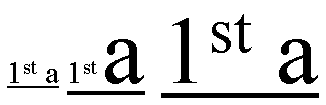
On these 3 segments of underline text, the underline bar is drawn lower
and thicker as the ratio of large text increase for the each consecutive
underlined text segment.
Note: Typically the underline superscript text
segments are averaged, while the subscript segments are not.
| Names:
| text-underline-style,
text-line-through-style,
text-overline-style
|
| Value:
| none | solid | double | dotted | thick | dashed | dot-dash | dot-dot-dash
| wave
|
| Initial:
| none
|
| Applies to:
| all elements and generated content
|
| Inherited:
| no
|
| Percentages:
| N/A
|
| Media:
| visual
|
| Computed value:
| specified value (except for initial and inherit)
|
These properties specifies the line style for underline, line-through and
overline text decoration. Possible values:
- none
- no line
- solid
- solid line
- double
- double line
- dotted
- dotted line
- thick
- single line using a greater line width.
- dashed
- dashed line style.
- dot-dash
- line style consisting of a dot-and-dash pattern.
- dot-dot-dash
- line style consisting of two-dots-and-a-dash pattern.
- wave
- wavy line
The following figure shows the appearance of these various line styles.
| Names:
| text-underline-color,
text-line-through-color,
text-overline-color
|
| Value:
| auto | <color>
|
| Initial:
| auto
|
| Applies to:
| all elements and generated content
|
| Inherited:
| no
|
| Percentages:
| N/A
|
| Media:
| visual
|
| Computed value:
| specified value (except for initial and inherit)
|
These property specifies the line color for the underline, line-through and overline text decorations. Possible values:
- auto
- The color of the underline is determined by the 'color' property.
- <color>
- Specifies a color value.
| Name:
| text-underline-mode, text-line-through-modetext-overline-mode
|
| Value:
| continuous | words
|
| Initial:
| continuous
|
| Applies to:
| all elements and generated content
|
| Inherited:
| no
|
| Percentages:
| N/A
|
| Media:
| visual
|
| Computed value:
| specified value (except for initial and inherit)
|
These properties set the mode for the underline, line-through and overline
text decorations, determining whether the text decoration affects the
white-space characters or not. Possible values:
- continuous
- this value means that the line is continuous.
- words
- this means that only non-whitespace text will be lined.
| Name:
| text-underline-position
|
| Value:
| auto-pos | before-edge | after-baseline | after-edge
|
| Initial:
| auto-pos
|
| Applies to:
| all elements and generated content
|
| Inherited:
| no
|
| Percentages:
| N/A
|
| Media:
| visual
|
| Computed value:
| specified value (except for initial and inherit)
|
This property sets the position of the underline when set through the
'text-underline-style' property.
It can appear either 'before' (above in an
horizontal flow) or after (below in an horizontal flow) the run of text in
relation to its baseline orientation. This property is typically used in
vertical writing context where it may be desired to have the underline appear
'before' the run of text. This results in having the underline appearing on
the right side of the vertical writing column. Possible values:
- auto-pos
- In horizontal inline progression, the underline if set will appear after
the text alphabetic baseline. In vertical inline progression, if the language
is set to Japanese, the underline if set will appear before the text edge (EM
box edge).
- before-edge
- the underline if set will appear before the edge of the EM box.
- after-baseline
- the underline if set will appear after the alphabetic baseline. In this
case the underline may cross some descenders.
- after-edge
- the underline if set will appear after the edge of the EM box. In this
case the underline does not cross the descenders. This is sometimes called
'accounting' underline.
| Name:
| text-blink |
| Value:
| none | blink
|
| Initial:
| none
|
| Applies to:
| all elements and generated content
|
| Inherited:
| no
|
| Percentages:
| N/A
|
| Media:
| visual
|
| Computed value:
| specified value (except for initial and inherit)
|
This property specifies the blink mode. Possible values:
- none
- no blink
- blink
- blink
- Conforming CSS2 user agents are
not required to support this value.
The 'text-underline' property is the shorthand for 'text-underline-style', 'text-underline-color', 'text-underline-mode' and 'text-underline-position'.
| Name:
| text-underline
|
| Value:
| <'text-underline-style'> || <'text-underline-color'> ||
<'text-underline-mode'> || <'text-underline-position'>
|
| Initial:
| not defined for shorthand properties
|
| Applies to:
| all elements and generated content
|
| Inherited:
| no
|
| Percentages:
| N/A
|
| Media:
| visual
|
| Computed value:
| specified value (except for initial and inherit)
|
The 'line-through' property is the shorthand for 'text-line-through-style', 'text-line-through-color' and
'text-line-through-mode'.
| Name:
| text-line-through
|
| Value:
| <'text-line-through-style'> || <'text-line-through-color'> ||
<'text-line-through-mode'>
|
| Initial:
| not defined for shorthand properties
|
| Applies to:
| all elements and generated content
|
| Inherited:
| no
|
| Percentages:
| N/A
|
| Media:
| visual
|
| Computed value:
| see individual properties
|
This 'text-overline' property is the shorthand for 'text-overline-style', 'text-overline-color' and 'text-overline-mode'.
| Name:
| text-overline
|
| Value:
| <'text-overline-style'> || <'text-overline-color'> ||
<'text-overline-mode'>
|
| Initial:
| not defined for shorthand properties
|
| Applies to:
| all elements and generated content
|
| Inherited:
| no
|
| Percentages:
| N/A
|
| Media:
| visual
|
| Computed value:
| see individual properties
|
The 'text-decoration' property is a shorthand that takes its
own set of values.
| Name:
| text-decoration
|
| Value:
| none | [ underline || overline || line-through || blink] |
| Initial:
| see individual properties
|
| Applies to:
| all elements and generated content
|
| Inherited:
| no (see prose)
|
| Percentages:
| N/A
|
| Media:
| visual
|
| Computed value:
|
see individual properties |
The 'text-decoration' shorthand sets the properties 'text-underline-style', 'text-underline-color', 'text-underline-mode', 'text-underline-position', 'text-line-through-style', 'text-line-through-color', 'text-line-through-mode', 'text-overline-style', 'text-overline-color', 'text-overline-mode' and 'text-blink'
to their default values, and then the values of the shorthand change these
defaults as follows:
- none
- All the sub-properties maintain their defaults.
- underline
- 'text-underline-style' is 'solid' rather than
'none'.
- overline
- 'text-overline-style' is 'solid' rather than
'none'.
- line-through
- 'text-line-through-style' is 'solid' rather
than 'none'.
- blink
- 'text-blink' is 'blink' rather than 'none'.
Conforming user agents are
not required to support the 'blink' value.
Although the property has no explicit initial value, it is equivalent to the
value 'none.
Example(s):
In the following example for XHTML, the text content of all a
elements acting as hyperlinks will be underlined and blinking:
a[href] { text-decoration: underline blink }
This property accepts a comma-separated list of shadow effects to be
applied to the text of the element. The shadow effects are applied in the
order specified and may thus overlay each other, but they will never overlay
the text itself. Shadow effects do not alter the size of a box, but may
extend beyond its boundaries. The stack level of the shadow
effects is the same as for the element itself.
Each shadow effect must specify a shadow offset and may optionally specify
a blur radius and a shadow color.
A shadow offset is specified with two <length> values that
indicate the distance from the text. The first length value specifies the
horizontal distance to the right of the text. A negative horizontal length
value places the shadow to the left of the text. The second length value
specifies the vertical distance below the text. A negative vertical length
value places the shadow above the text.
A blur radius may optionally be specified after the shadow offset. The
blur radius is a length value that indicates the boundaries of the blur
effect. The exact algorithm for computing the blur effect is not specified. User
agents may only implement only part of this property by ignoring blur effects.
Such user agents should consider declarations that specify the optional third
parameter to be parser errors, as described in the Syntax module [link TBD].
A color value may optionally be specified before or after the length
values of the shadow effect. The color value will be used as the basis for
the shadow effect. If no color is specified, the value of the 'color' property will be used instead.
Text shadows may be used with the ::first-letter and ::first-line
pseudo-elements.
Example(s):
The example below will set a text shadow to the right and below the
element's text. Since no color has been specified, the shadow will have the
same color as the element itself, and since no blur radius is specified, the
text shadow will not be blurred:
h1 { text-shadow: 0.2em 0.2em }
The next example will place a shadow to the right and below the element's
text. The shadow will have a 5px blur radius and will be red.
h2 { text-shadow: 3px 3px 5px red }
The next example specifies a list of shadow effects. The first shadow will
be to the right and below the element's text and will be red with no
blurring. The second shadow will overlay the first shadow effect, and it will
be yellow, blurred, and placed to the left and below the text. The third
shadow effect will be placed to the right and above the text. Since no shadow
color is specified for the third shadow effect, the value of the element's 'color' property will be used:
h2 { text-shadow: 3px 3px red, yellow -3px 3px 2px, 3px -3px }
Example(s):
Consider this example:
span.glow {
    background: white;
    color: white;
    text-shadow: black 0px 0px 5px;
}
Here, the 'background' and 'color' properties have the same value and the 'text-shadow' property is
used to create a "solar eclipse" effect:

Note. This property is not defined in CSS1. Some
shadow effects (such as the one in the last example) may render text
invisible in UAs that only support CSS1.
10. Document grid
10.1. What is document grid?
It is very common for the glyphs in documents written in East Asian
languages, such as Chinese or Japanese, to be laid out on the page according
to a specified one- or two-dimensional grid. The concept of grid can also be
used in other, non-ideographic contexts such as Braille or monospaced layout.
The diagram below represents a fragment of horizontal text on a page with
mixed wide-cell and narrow-cell glyphs that a Japanese user intended to be
laid out on a grid which resulted in 9 glyphs per line (gray grid lines shown
for clarity):
The grid behavior can be set on the line progression, on the block
progression or both. The grid on the block progression is determined by the
following properties:
- 'line-stacking-strategy' set to the 'grid-height' value,
- 'line-height' of the block element set to the desired grid block
progression dimension value,
- 'text-height' which defines the inline box block progression dimension.
Depending on the content size, one or a multiple of 'line-height' will be
necessary to accommodate a given inline box content.
The block progression grid is not described in this section as it can be
simply achieved by using the appropriate line related properties mentioned above
and described in the CSS3 Line module.
The grid on the line progression is obtained by altering the character
advance width (or line progression) of inline elements. There are several
modes:
- Adding extra space between each characters by using the
'letter-spacing'
property. This is called sometimes 'loose' grid.
- Giving a fixed advance width to ideograph characters only. Other
characters are spaced normally. This is called "genko" in Japanese
typography.
- Giving a fixed advance width to all characters, excepted connected
glyphs (like Arabic).
Two properties control this advance width modification:
'line-grid-mode'
enables it and 'line-grid-progression'
determines its value. The shorthand
'line-grid' allows to set both together.
10.2 Line grid mode: the
'line-grid-mode' property
| Name:
| line-grid-mode
|
| Value:
| none | ideograph | all |
| Initial:
| none |
| Applies to:
| block-level elements
|
| Inherited:
| yes
|
| Percentages:
| N/A
|
| Media:
| visual
|
| Computed value:
| specified value (except for initial and inherit)
|
Specifies the line grid behavior. Each line grid mode value entails a different set
of rules for rendering inline contents.
Possible values:
- none
-
No line grid. Standard text alignments apply to the block element.
-
ideograph
- This mode
applies in the following ways to the various categories of character:
- each wide-cell glyph (as well as narrow-cell kana) that can fit within a single grid space is
rendered in the horizontal center of the grid space. The width of the grid
space is determined by the 'line-grid-progression' setting.
- consecutive narrow-cell and connected glyphs are treated as a single strip,
which is then placed in the center of the smallest number of grid spaces
necessary for it to fit in. If a line break occurs
within such a strip, the strip is treated as two separate strips whose
individual placement follows the same rules as those for a single strip.
- non-breakable objects (e.g. images) and wide-cell glyphs that for some
reason are wider than a single grid space, are each centered within the
smallest number of grid cells necessary for it to fit in.
The ideograph mode disables all special text justification and glyph width
adjustment normally applied to the contents of the block element.
If a line break opportunity cannot be found in a text run going over the
line boundary, then that text run will be pushed down to the next line and
the last part of the previous line will be left blank.
Here is an example of mixed text in ideograph grid mode:
- all
- This type of grid can be used to achieve mono-spaced layout. The layout
rules are simple: all non-connected glyphs are treated as equal, that is
every glyph is centered within a single grid space by default. Runs of
connected glyphs are treated as strips the same way as in 'ideograph' grid.
Justification or any other character-width changing behaviors are disabled for
the block element.
For example:
The 'letter-spacing'
property does not apply to characters in a grid but does
apply for all characters not in the grid (i.e. all characters for
'line-grid-mode: none', non-ideographs for 'line-grid-mode: ideograph' and all
non-connected glyphs for 'line-grid-mode: all').
| Name:
| line-grid-progression
|
| Value:
| text-height | line-height | <length>
|
| Initial:
| normal |
| Applies to:
| block-level elements
|
| Inherited:
| yes
|
| Percentages:
| N/A |
| Media:
| visual
|
| Computed value:
| <length> |
This property affects the line progression of characters subject to the fixed
advance width as determined by the 'line-grid-mode' property.
Possible values:
- text-height
- The computed value of the block element text-height is used.
-
line-height
- The computed value of the block element line-height is used.
- <length>
- Inline progression dimension of the line grid's unit space.
div.section1 { line-grid-progression: .5in }
would make each glyph in a horizontally laid out part of a document
rendered within 0.5 inch of horizontal space:
If the section's layout flow is vertical, then 0.5in becomes the vertical
distance between consecutive characters in a column:
10.4 Line grid: the
'line-grid' shorthand property
| Name:
| line-grid
|
| Value:
| <'line-grid-mode'> || <'line-grid-progression'>
|
| Initial:
| not defined for shorthand properties
|
| Applies to:
| block-level elements |
| Inherited:
| yes
|
| Percentages:
| N/A |
| Media:
| visual
|
| Computed value:
| see individual properties
|
The 'line-grid'
property is a shorthand property for setting 'line-grid-mode', 'line-grid-progression'.
The following is an example of setting the grid in both progression:
div.grid { line-height:20pt;
           text-height: max-size;
           line-stacking-strategy: grid-height;
           line-grid: ideograph line-height; }
This set for the div element a grid with 20pt inline and block progression
dimensions. All ideographs will be set in cells sized in multiple of 20pt in
both direction.
11. Miscellaneous
text formatting
11.1. Capitalization: the 'text-transform'
property
| Name:
| text-transform
|
| Value:
| capitalize | uppercase | lowercase | none
|
| Initial:
| none
|
| Applies to:
| all elements and generated content
|
| Inherited:
| yes
|
| Percentages:
| N/A
|
| Media:
| visual
|
| Computed value:
| specified value (except for initial and inherit)
|
This property controls capitalization effects of an element's text. Values
have the following meanings:
- capitalize
- Puts the first character of each word in uppercase.
- uppercase
- Puts all characters of each word in uppercase.
- lowercase
- Puts all characters of each word in lowercase.
- none
- No capitalization effects.
Although limited, the case mapping process has some language dependencies.
Some well known examples are Turkish and Greek. See HTML [HTML40] for ways to find the language of an HTML
element. XML, and consequently [XHTML1.0], uses an attribute called
xml:lang and there may be other language-specific
language-specific methods to determine the language.
The case mapping rules for the character repertoire specified by the
Unicode Standard 3.0 can be found on the Unicode Consortium web site: http://www.unicode.org.
Conforming user
agents must support case mapping rules according to the Unicode
Standard 3.0 for all characters specified by that standard. Note that the
conformance rule is more stringent than the ones specified in lower levels of
CSS.
Example:
In this example, all text in an h1 element is transformed to
uppercase text.
h1 { text-transform: uppercase }
| Name:
| hanging-punctuation
|
| Value:
| none | start | end | both
|
| Initial:
| none
|
| Applies to:
| block-level elements
|
| Inherited:
| yes
|
| Percentages:
| N/A
|
| Media:
| visual
|
| Computed value:
| specified value (except for initial and inherit)
|
This property determines whether a punctuation mark, if one is present,
may be placed outside the content area in the padding or margin area, at the
start or at the end of a full line of text. Allowing a punctuation to 'hang'
at the end of a line is is a common practice in East Asian typography. It is
the responsibility of the style writer to create meaningful padding and
margin areas to allow effective rendering of the punctuation. It should also
be noted that compression may occur in the line, including compression of the
punctuation characters independently of this effect.
Possible values:
- none
- Punctuation is not allowed to be placed outside the content area.
- start
- A leading punctuation, if present, may overhang at the start of the
content area. It is placed in the padding or margin area.
- end
- An ending punctuation, if present, may overhang at the end of the content
area. It is placed in the padding or margin area.
- both
- A punctuation, if present, may overhang at either the start or the end of
the content area.
Here is an example where overhanging is not allowed:
In the following example overhanging is allowed at the end of the content
area.
Note: User agents should follow the convention of the scripts
for trimming either only the first lines or all lines. For example, in Roman
text, only a punctuation appearing at the starting point of the first line
may be placed outside the content area. It would look improper in other
lines. The following figure shows an example of correct usage.
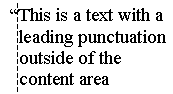
11.3. Combining text:
the 'text-combine'
property'
| Name:
| text-combine
|
| Value:
| none | letters | lines
|
| Initial:
| none
|
| Applies to:
| all elements and generated content
|
| Inherited:
| no
|
| Percentages:
| N/A
|
| Media:
| visual
|
| Computed value:
| specified value (except for initial and inherit)
|
This property controls the creation of composite characters (a.k.a. "kumimoji") or lines (a.k.a. "warichu").
Possible values:
- none
- No composite characters are created.
- letters
- Combines glyphs to fit within the space of a single wide-cell glyph, by
reducing them in size and stacking them next to and/or on top of each other.
This effect is commonly used in Asian typography.
No more than 5 glyphs can be combined at a time. If more than five are
included inside of the element with this property setting, only the first
five are combined. The rest is rendered as regular text. If the text to be
combined results in a single glyph, no special combination effect occurs. The
following texts shows the arrangement for 2, 3, 4 and 5 characters:
The following mark-up:
span.kumimoji { text-combine: letters }
could make the following 4 characters appear as one (shown in blue for
clarity):
- lines
- Combines the glyphs so they fit into two lines of equal length and
height, whose combined height is equal to or slightly greater than the height
of the line they appear in. The combined lines appear inline with the
surrounding text. The Japanese Standard [JIS-X-4051] describes recommended guidelines for this
feature. A summary of these guidelines is provided here:
- This combination is restricted to two lines.
- The combination should be preceded and followed by bracket or parenthesis
characters
- The combination may be broken across several lines, each line box
representing its own logical subset of the combination.
The following figure shows a typical usage for this feature.
The following mark-up:
span.warichu { text-combine: lines }
would make the enclosed text look like the following (shown in blue for
clarity):
12. Properties index
In addition to the specified values, all properties take the
| Property
| Values
| Initial
| Applies to
| Inh.
| Percentages
| Media
|
| all-space-treatment
| preserve | collapse
| collapse
| all elements and generated content
| yes
| N/A
| visual
|
| direction
| ltr | rtl
| ltr
| all elements and generated content, but see prose
| yes
| N/A
| visual
|
| glyph-orientation-horizontal
| <angle>
| 0deg
| all inline-level elements
| yes
| N/A
| visual
|
| glyph-orientation-vertical
| <angle> | auto
| auto
| all elements and generated content
| yes
| N/A
| visual
|
| hanging-punctuation
| none | start | end | both
| none
| block-level elements
| yes
| N/A
| visual
|
| kerning-mode
| none | [pair || contextual]
| none
| all elements and generated content
| yes
| N/A
| visual
|
| kerning-pair-threshold
| auto | <length>
| auto
| all elements and generated content
| yes
| N/A
| visual
|
| line-grid
| <'line-grid-mode'> || <'line-grid-progression'>
| not defined for shorthand properties
| block-level elements
| yes
| N/A
| visual
|
| line-grid-mode
| none | ideograph | all | none
| block-level elements
| yes
| N/A | visual
|
| line-grid-progression
| text-height | line-height | <length> | normal | block-level elements
| yes
| N/A | visual
|
| letter-spacing
| normal | <length>
| normal
| all elements and generated content
| yes
| N/A
| visual
|
| line-break
| normal | strict
| normal
| all elements and generated content
| yes
| N/A
| visual
|
| linefeed-treatment
| auto | ignore | preserve | treat-as-space | treat-as-zero-width-space |
ignore-if-after-linefeed | treat-as-space
| all elements and generated content
| yes
| N/A
| visual
|
| max-font-size
| <font-size> | auto
| auto
| all elements and generated content
| yes
| element's computed 'font-size'
| visual
|
| min-font-size
| <font-size> | auto
| auto
| all elements and generated content
| yes
| element's computed 'font-size'
| visual
|
| punctuation-trim
| none | start
| none
| block-level elements
| yes
| N/A
| visual
|
| text-script
| auto | none | <script>
| auto
| all elements and generated content
| yes
| N/A
| visual
|
| text-align
| start | end | left | right | center | justify | <string>
| start
| block-level elements
| yes
| N/A
| visual
|
| text-align-last
| auto | start | end | center | justify | size
| auto
| block-level elements
| yes
| N/A
| visual
|
| text-autospace
| none | [ideograph-numeric || ideograph-alpha || ideograph-space ||
ideograph-parenthesis]
| none
| all elements and generated content
| yes
| N/A
| visual
|
| text-blink
| none | blink | none | all elements and generated content
| no | N/A | visual |
| text-combine
| none | letters | lines
| none
| all elements and generated content
| no
| N/A
| visual
|
| text-decoration
| none | [ underline || overline || line-through || blink] |
not defined for shorthand properties | all elements and generated content
| no (see prose)
| N/A
| visual
|
| text-indent
| <length> | <percentage>
| 0
| block-level elements
| yes
| refers to width of containing block
| visual
|
| text-justify
| auto | inter-word | inter-ideograph | distribute | newspaper |
inter-cluster | kashida
| auto
| block-level elements
| yes
| N/A
| visual
|
| text-justify-trim
| none | punctuation | punctuation-and-kana
| punctuation
| block-level elements
| yes
| N/A
| visual
|
| text-kashida-space
| <percentage>
| 0%
| block-level elements
| yes
| as described
| visual
|
| text-line-through
| <'text-line-through-style'> || <'text-line-through-color'> ||
<'text-line-through-mode'>
| not defined for shorthand properties
| all elements and generated content
| no
| N/A
| visual
|
| text-line-through-color
| auto | <color>
| auto
| all elements and generated content
| no
| N/A
| visual
|
| text-line-through-mode
| continuous | words
| continuous
| all elements and generated content
| no
| N/A
| visual
|
| text-line-through-style
| none | solid | double | dotted | thick | dashed | dot-dash | dot-dot-dash
| wave
| none
| all elements and generated content
| no
| N/A
| visual
|
| text-overflow
| <'text-overflow-mode'> || <'text-overflow-ellipsis'>
| not defined for shorthand properties
| all block-level elements
| no
| N/A
| visual
|
| text-overflow-ellipsis
| [<ellipsis-end> | <uri> [, <ellipsis-after> |
<uri>]?]
| "..."
| all block-level elements
| no
| N/A
| visual
|
| text-overflow-mode
| clip | ellipsis | ellipsis-word
| clip
| all block-level elements
| no
| N/A
| visual
|
| text-overline
| <'text-overline-style'> || <'text-overline-color'> ||
<'text-overline-mode'>
| not defined for shorthand properties
| all elements and generated content
| no
| N/A
| visual
|
| text-overline-color
| auto | <color>
| auto
| all elements and generated content
| no
| N/A
| visual
|
| text-overline-mode
| continuous | words
| continuous
| all elements and generated content
| no
| N/A
| visual
|
| text-overline-style
| none | solid | double | dotted | thick | dashed | dot-dash | dot-dot-dash
| wave
| none
| all elements and generated content
| no
| N/A
| visual
|
| text-shadow
| none | [<color> || <length> <length> <length>?
,]* [<color> || <length> <length> <length>?]
| none
| all elements and generated content
| no (see prose)
| N/A
| visual
|
| text-transform
| capitalize | uppercase | lowercase | none
| none
| all elements and generated content
| yes
| N/A
| visual
|
| text-underline
| <'text-underline-style'> || <'text-underline-color'> ||
<'text-underline-mode'> || <'text-underline-position'>
| not defined for shorthand properties
| all elements and generated content
| no
| N/A
| visual
|
| text-underline-color
| auto | <color>
| auto
| all elements and generated content
| no
| N/A
| visual
|
| text-underline-mode
| continuous | words
| continuous
| all elements and generated content
| no
| N/A
| visual
|
| text-underline-position
| auto-pos | before-edge | after-baseline | after-edge
| auto-pos
| all elements and generated content
| no
| N/A
| visual
|
| text-underline-style
| none | solid | double | dotted | thick | dashed | dot-dash | dot-dot-dash
| wave
| none
| all elements and generated content
| no
| N/A
| visual
|
| unicode-bidi
| normal | embed | bidi-override
| normal
| all elements and generated content, but see prose
| no
| N/A
| visual
|
| white-space
| normal | pre | nowrap | pre-wrap | pre-lines | not defined for shorthand properties
| all elements and generated content
| yes
| N/A
| visual
|
| white-space-treatment
| ignore | preserve | ignore-if-before-linefeed | ignore-if-after-linefeed
| ignore-if-surrounding-linefeed
| ignore-if-surrounding-linefeed
| all elements and generated content
| yes
| N/A
| visual
|
| word-break
| <'word-break-CJK'> || <'word-break-inside'>
| see individual properties
| all elements and generated content
| yes
| N/A
| visual
|
| word-break-CJK
| normal | break-all | keep-all
| normal
| all elements and generated content
| yes
| N/A
| visual
|
| word-break-inside
| normal | hyphenate
| normal
| all elements and generated content
| yes
| N/A
| visual
|
| word-spacing
| normal | none | <length>
| normal
| all elements and generated content
| yes
| N/A
| visual
|
| wrap-option
| wrap | hard-wrap | soft-wrap | emergency
| wrap
| all elements and generated content
| yes
| N/A
| visual
|
| writing-mode
| lr-tb | rl-tb | tb-rl | tb-lr | bt-rl | bt-lr | lr | rl | tb
| lr-tb
| all elements and generated content
| yes
| N/A
| visual
|
The following properties are defined in other specifications:
14. Profiles
There are 3 modules defined by this chapter:
CSS1 text model:
CSS2 text model:
CSS3 text model:
The CSS1 text module is made of the following properties/values:
Concerning the 'text-align' property, a conforming CSS1 user
agent my interpret the value 'justify' as 'left' or 'right', depending on
whether the element's current text direction is left-to-right or riht-to-left
respectively.
The following table describes the CSS2 text module. Because all properties
have added the 'inherit' value and have a media type, all CSS1 properties
have been specified below as well. The properties added are: 'direction', 'text-shadow' and 'unicode-bidi'. In
addition, the 'text-align' has a new value:
<string>. Concerning the 'text-align' property, a
conforming CSS1 user agent my interpret the value 'justify' as 'left' or
'right', depending on whether the element's current text direction is
left-to-right or riht-to-left respectively. Properties that applies to all
elements also applies to generated content.
The CSS3 module adds the following properties:
- Text layout flow: 'glyph-orientation-horizontal',
'glyph-orientation-vertical',
'writing-mode',
'text-script',
- Text alignment and justification: 'min-font-size', 'max-font-size', 'text-align-last', 'text-justify', 'text-justify-trim',
'text-kashida-space',
- Line breaking: 'line-break', 'word-break', 'word-break-CJK', 'word-break-inside',
- Text wrapping, white-space control and text overflow: 'all-space-treatment', 'linefeed-treatment', 'text-overflow', 'text-overflow-ellipsis', 'text-overflow-mode', 'white-space-treatment', 'wrap-option',
- Text spacing: 'kerning-mode', 'kerning-pair-threshold', 'punctuation-trim',
'text-autospace',
- Text decoration: 'text-line-through', 'text-line-through-color', 'text-line-through-mode', 'text-line-through-style', 'text-overline', 'text-overline-color', 'text-overline-mode', 'text-overline-style', 'text-underline', 'text-underline-color', 'text-underline-mode', 'text-underline-position', 'text-underline-style', text-blink,
- Document grid: 'line-grid',
'line-grid-mode', 'line-grid-progression',
- Miscellaneous: 'hanging-punctuation', 'text-combine',
It also modifies the following properties as described:
15. Glossary
- Hangul
- Subset of the Korean writing system.
- Hanja
- Subset of the Korean writing system that utilizes ideographic characters
borrowed or adapted from the Chinese writing system. Also see Kanji.
- Hiragana
- Japanese syllabic script, or character of that script. Rounded and
cursive in appearance. Subset of the Japanese writing system, used together
with kanji and katakana. In recent times, mostly used to write Japanese words
when kanji are not available or appropriate, and word endings and particles.
Also see Katakana.
- Ideograph
- A character that is used to represent an idea, word, or word component,
in contrast to a character from an alphabetic or syllabic script. The most
well-known ideographic script is used (with some variation) in East Asia
(China, Japan, Korea,...).
- Kana
- Collective term for hiragana and katakana.
- Kanji
- Japanese term for ideographs; ideographs used in Japanese. Subset of the
Japanese writing system, used together with hiragana and katakana. Also see
Hanja.
- Kashida
- Arabic elongation character.
- Katakana
- Subset of the Japanese writing system consisting of phonetic characters
used to represent Roman words. Also see Hiragana.
- Kinsoku
- Japanese term for a set (or sets) of line breaking restrictions.
- Kumimoji
- Composite character consisting of up to 5 characters that are reduced in
size and combined to fit within the space of a single character.
- Logograph, Logogram
- Character in the Chinese (or East Asian in general) writing system that
represents an entire word.
- Ruby
- A run of text that appears in the vicinity of another run of text and
serves as an annotation or a pronunciation guide for that text.
- Tate chu
yoko
- Run of horizontal text inside of a column of vertical text; frequently
used in East Asian documents for displaying certain numbers, such as years.
- Warichu
- A run of text of reduced font size that appears inside of a line of text
as two lines of equal height and length
Appendix A: Vertical Layout Effect on CSS
Properties
In general, the existing [CSS2]
properties that imply directionality or position are absolute, i.e. "left"
means "left" and "top" means "top" regardless of the writing mode of the
page. The purpose of this appendix however is to list the exceptions to that
rule and clarify ambiguities. If a property does not appear in this list, it
is intended to be interpreted as absolute, i.e. it does not rotate when the
layout mode changes.
| CSS Property
| Effect in vertical layout
|
| 'clear'
| 'float' and 'clear' property values interpretation is absolute in
horizontal flow and logical in vertical flow (left is start, right is end) |
| 'direction'
| relative (logical), i.e. ltr implies top-to-bottom character progression
in vertical layout
|
| 'display'
| relative (logical), i.e. the values that are directional (table-) are
relative to the element orientation as specified by the writing mode.
|
| 'float'
| [see the note about 'clear']
|
| 'line-height'
| relative (logical), i.e. this controls the "height" of a line if
horizontal, or the "width", if vertical. In other words, this controls the
size of the line in the dimension perpendicular to the baseline.
|
| 'quotes'
| relative (logical), the concept of open-quotes and close-quotes is
already used in CSS. Note that the quote glyph may vary depending on the
glyph-orientation.
|
| 'text-align'
| 'left' and 'right' are physical in horizontal inline progression and
UA dependent in vertical inline progression. 'start' and 'end' are always
relative.
|
| 'text-decoration'
| relative (logical), i.e. underline and overline are parallel to the
baseline. Underline appears on the left side of a vertical column and
overline appears on the right
|
| 'unicode-bidi'
| relative (logical), i.e. it affects glyph progression regardless of
layout
|
| 'vertical-align'
| relative (logical), top and bottom values maps to before and after-edge
values in baseline alignment properties
|
Acknowledgments
This specification would not have been possible without the help from:
Ayman Aldahleh, Stephen Deach, Martin Dürst, Laurie Anna Edlund, Ben
Errez, Yaniv Feinberg, Arye Gittelman, Richard Ishida, Koji Ishii, Masayasu
Ishikawa, Michael Jochimsen, Eric LeVine, Chris Pratley, Rahul Sonnad, Frank
Tang, Chris Thrasher, Masafumi Yabe.
References
Normative references
-
Other references
-
- [CSS2]
- Bert Bos; Håkon Wium Lie; Chris Lilley; Ian Jacobs. Cascading Style
Sheets, level 2. 1998. W3C Recommendation. URL: http://www.w3.org/TR/REC-CSS2
- [CSS3-background]
- Tim Boland; Bert Bos. CSS3 module: backgrounds. 19 February
2002. W3C working draft. (Work in progress.) URL: http://www.w3.org/TR/2002/WD-css3-background-20020219
- [CSS3-color]
- Tantek Çelik; Chris Lilley. CSS3 module: color. 5 March
2001. W3C working draft. (Work in progress.) URL: http://www.w3.org/TR/2001/WD-css3-color-20010305
- [CSS3-fonts]
- Michel Suignard; Chris Lilley. CSS3 module: fonts. 31 July
2001. W3C working draft. (Work in progress.) URL: http://www.w3.org/TR/2001/WD-css3-fonts-20010731
- [HTML40]
- Raggett, D.; Le Hors, A.; Jacobs, I.. HTML 4.0 Specification
(revised). Apr 1998. W3C Recommendation. URL: http://www.w3.org/TR/1998/REC-html40-19980424
- [HTML401]
- Raggett, D.; Le Hors, A.; Jacobs, I.. HTML 4.01
Specification. Dec 1999. W3C Recommendation. URL: http://www.w3.org/TR/1999/REC-html401-19991224
- [ISO15924]
- Code for the representation of names of scripts.
International Organization for Standardization.. 1998. ISO 15924:1998. Draft
International Standard
- [JIS-X-4051]
- Line composition rules for Japanese documents. Japanese
Standards Association. 1995. JIS X 4051-1995. In Japanese
- [RFC2119]
- S. Bradner. Key words for use in RFCs to Indicate Requirement
Levels. Internet RFC 2119. URL: http://www.ietf.org/rfc/rfc2119.txt
- [SVG1.0]
- Various. Scalable Vector Graphics (SVG) 1.0 Specification.
Sep 2001. W3C Recommendation. URL: http://www.w3.org/TR/2001/REC-SVG-20010904
- [UAX-11]
- Asmus Freytag. East Asian Width. 15 March 2002. Unicode
Standard Annex #11. URL: http://www.unicode.org/unicode/reports/tr11/tr11-10
- [UAX-14]
- Asmus Freytag. Line Breaking Properties. 15 March 2002.
Unicode Standard Annex #14. URL: http://www.unicode.org/unicode/reports/tr14/tr14-12
- [UNICODE]
- The Unicode Consortium. Book version: The Unicode Standard: Version 3.0.
Addison Wesley Longman. 2000. ISBN 0-201-61633-5. Online version: The Unicode
Standard: Version 3.2.0, URL:
http://www.unicode.org/unicode/standard/versions/enumeratedversions.html#Unicode_3_2_0
For more information, consult the Unicode Consortium's home page at
http://www.unicode.org/
- [UTR-24]
- Mark Davis. Script Names. 1st April 2002. Unicode
Technical Report #24. URL: http://www.unicode.org/unicode/reports/tr24/tr24-4.html
- [XHTML1.0]
- Steven Pemberton; et al. XHTML 1.0: The Extensible HyperText Markup
Language. Jan 2000. W3C Recommendation. URL: http://www.w3.org/TR/2000/REC-xhtml1-20000126
- [XHTMLMOD]
- Adams, Robert; Altheim, Murray; et al. Modularization of
XHTML. Apr 2001. W3C Recommendation. URL: http://www.w3.org/TR/2001/REC-xhtml-modularization-20010410
- [XML1.0]
- Tim Bray; Jean Paoli; C. M. Sperberg-McQueen; Eve Maler. Extensible
Markup Language (XML) 1.0 (Second Edition). Oct 2000. W3C
Recommendation. URL: http://www.w3.org/TR/2000/REC-xml-20001006
- [XSL1.0]
- Adler, Sharon; Berglund, Anders; et al. Extensible Stylesheet
Language (XSL) Version 1.0. Oct 2001. W3C Recommendation. URL: http://www.w3.org/TR/2001/REC-xsl-20011015