Text that is to be rendered as part of an SVG document fragment is specified using the 'text' element. The characters to be drawn are expressed as XML character data [XML10] inside the 'text' element.
SVG's 'text' elements are rendered like other graphics elements. Thus, coordinate system transformations, painting, clipping and masking features apply to 'text' elements in the same way as they apply to shapes such as paths and rectangles.
Each 'text' element causes a single string of text to be rendered. SVG performs no automatic line breaking or word wrapping. To achieve the effect of multiple lines of text, use one of the following methods:
The text strings within 'text' elements can be rendered in a straight line or rendered along the outline of a 'path' element. SVG supports the following international text processing features for both straight line text and text on a path:
Because SVG text is packaged as XML character data [XML10]:
Multi-language SVG content is possible by substituting different text strings based on the user's preferred language.
For accessibility reasons, it is recommended that text which is included
in a document have appropriate semantic markup to indicate its function.
See SVG accessibility guidelines
for more information.
In XML [XML10], textual content is defined in terms of a sequence of XML characters, where each character is defined by a particular Unicode code point [UNICODE]. Fonts, on the other hand, consists of a collection of glyphs and other associated information, such as font tables. A glyph is a presentable form of one or more characters (or a part of a character in some cases). Each glyph consists of some sort of identifier (in some cases a string, in other cases a number) along with drawing instructions for rendering that particular glyph.
In many cases, there is a one-to-one mapping of Unicode characters (i.e., Unicode code points) to glyphs in a font. For example, it is common for a font designed for Latin languages (where the term Latin is used for European languages such as English with alphabets similar to and/or derivative to the Latin language) to contain a single glyph for each of the standard ASCII characters (i.e., A-to-Z, a-to-z, 0-to-9, plus the various punctuation characters found in ASCII). Thus, in most situations, the string "XML", which consists of three Unicode characters, would be rendered by the three glyphs corresponding to "X", "M" and "L", respectively.
In various other cases, however, there is not a strict one-to-one mapping of Unicode characters to glyphs. Some of the circumstances when the mapping is not one-to-one:
In many situations, the algorithms for mapping from characters to glyphs are system-dependent, resulting in the possibility that the rendering of text might be (usually slightly) different when viewed in different user environments. If the author of SVG content requires precise selection of fonts and glyphs, then the recommendation is that the necessary fonts (potentially subsetted to include only the glyphs needed for the given document) be available either as SVG fonts embedded within the SVG content or as WebFonts posted at the same Web location as the SVG content.
Throughout this chapter, the term character shall be equivalent to the definition of a character in XML [XML10].
A font consists of a collection of glyphs together with the information (the font tables) necessary to use those glyphs to present characters on some medium. The combination of the collection of glyphs and the font tables is called the font data. The font tables include the information necessary to map characters to glyphs, to determine the size of glyph areas and to position the glyph area. Each font table consists of one or more font characteristics, such as the font-weight and font-style.
The geometric font characteristics are expressed in a coordinate system based on the EM box. (The EM is a relative measure of the height of the glyphs in the font; see CSS2 em square.) The box 1 EM high and 1 EM wide is called the design space. This space is given a geometric coordinates by sub-dividing the EM into a number of units-per-em.
Note: Units-per-em is a font characteristic. A typical value for units-per-EM is 1000 or 2048.
The coordinate space of the EM box is called the design space coordinate system. For scalable fonts, the curves and lines that are used to draw a glyph are represented using this coordinate system.
Note: Most often, the (0,0) point in this coordinate system is positioned on the left edge of the EM box, but not at the bottom left corner. The Y coordinate of the bottom of a roman capital letter is usually zero. And the descenders on lowercase roman letters have negative coordinate values.
SVG assumes that the font tables will provide at least three font characteristics: an ascent, a descent and a set of baseline-tables. The ascent is the distance to the top of the EM box from the (0,0) point of the font; the descent is the distance to the bottom of the EM box from the (0.0) point of the font. The baseline-table is explained below.
Note: Within an OpenType font, for horizontal writing-modes, the ascent and descent are given by the sTypoAscender and sTypoDescender entries in the OS/2 table. For vertical writing-modes, the descent (the distance, in this case from the (0,0) point to the left edge of the glyph) is normally zero because the (0,0) point is on the left edge. The ascent for vertical writing-modes is either 1 em or is specified by the ideographic top baseline value in the OpenType Base table for vertical writing-modes.
In horizontal writing-modes, the glyphs of a given script are positioned so that a particular point on each glyph, the alignment-point, is aligned with the alignment-points of the other glyphs in that script. The glyphs of different scripts, for example, Western, Northern Indic and Far-Eastern scripts, are typically aligned at different points on the glyph. For example, Western glyphs are aligned on the bottoms of the capital letters, northern indic glyphs are aligned at the top of a horizontal stroke near the top of the glyphs and far-eastern glyphs are aligned either at the bottom or center of the glyph. Within a script and within a line of text having a single font-size, the sequence of alignment-points defines, in the inline- progression-direction, a geometric line called a baseline. Western and most other alphabetic and syllabic glyphs are aligned to an "alphabetic" baseline, the northern indic glyphs are aligned to a "hanging" baseline and the far-eastern glyphs are aligned to an "ideographic" baseline.
A baseline-table specifies the position of one or more baselines in the design space coordinate system. The function of the baseline table is to facilitate the alignment of different scripts with respect to each other when they are mixed on the same text line. Because the desired relative alignments may depend on which script is dominant in a line (or block), there may be a different baseline table for each script. In addition, different alignment positions are needed for horizontal and vertical writing modes. Therefore, the font may have a set of baseline tables: typically, one or more for horizontal writing-modes and zero or more for vertical writing-modes.
Note: Some fonts may not have values for the baseline tables. Heuristics are suggested for approximating the baseline tables when a given font does not supply baseline tables.
SVG further assumes that for each glyph in the font data for a font, there are two width values, two alignment-baselines and two alignment-points, one each for horizontal writing-modes and the other for vertical writing-modes. (Even though it is specified as a width, for vertical writing-modes the width is used in the vertical direction.) The script to which a glyph belongs determines an alignment-baseline to which the glyph is to be aligned. The inline-progression-direction position of the alignment-point is on the start-edge of the glyph.
Properties related to baselines are described below under Baseline alignment properties.
In addition to the font characteristics required above, a font may also supply substitution and positioning tables that can be used by a formatter to re-order, combine and position a sequence of glyphs to make one or more composite glyphs. The combination may be as simple as a ligature, or as complex as an indic syllable which combines, usually with some re-ordering, multiple consonants and vowel glyphs.
The 'text' element defines a graphics element consisting of text. The XML [XML10] character data within the 'text' element, along with relevant attributes and properties and character-to-glyph mapping tables within the font itself, define the glyphs to be rendered. (See Characters and their corresponding glyphs.) The attributes and properties on the 'text' element indicate such things as the writing direction, font specification and painting attributes which describe how exactly to render the characters. Subsequent sections of this chapter describe the relevant text-specific attributes and properties, particular text layout and bidirectionality.
Since 'text' elements are rendered using the same rendering methods as other graphics elements, all of the same coordinate system transformations, painting, clipping and masking features that apply to shapes such as paths and rectangles also apply to 'text' elements.
It is possible to apply a gradient, pattern, clipping path, mask or filter to text. When one of these facilities is applied to text and keyword objectBoundingBox is used (see Object bounding box units) to specify a graphical effect relative to the "object bounding box", then the object bounding box units are computed relative to the entire 'text' element in all cases, even when different effects are applied to different 'tspan' elements within the same 'text' element.
The 'text' element renders its first glyph (after bidirectionality reordering) at the initial current text position, which is established by the x and y attributes on the 'text' element (with possible adjustments due to the value of the 'text-anchor' property, the presence of a 'textPath' element containing the first character, and/or an x, y, dx or dy attributes on a 'tspan', 'tref' or 'altGlyph' element which contains the first character). After the glyph(s) corresponding to the given character is(are) rendered, the current text position is updated for the next character. In the simplest case, the new current text position is the previous current text position plus the glyphs' advance value (horizontal or vertical). See text layout for a description of glyph placement and glyph advance.
<!ENTITY % textExt "" > <!ELEMENT text (#PCDATA|desc|title|metadata| tspan|tref|textPath|altGlyph|a|animate|set| animateMotion|animateColor|animateTransform %geExt;%textExt;)* > <!ATTLIST text %stdAttrs; %testAttrs; %langSpaceAttrs; externalResourcesRequired %Boolean; #IMPLIED class %ClassList; #IMPLIED style %StyleSheet; #IMPLIED %PresentationAttributes-Color; %PresentationAttributes-FillStroke; %PresentationAttributes-FontSpecification; %PresentationAttributes-Graphics; %PresentationAttributes-TextContentElements; %PresentationAttributes-TextElements; transform %TransformList; #IMPLIED %graphicsElementEvents; x %Coordinates; #IMPLIED y %Coordinates; #IMPLIED dx %Lengths; #IMPLIED dy %Lengths; #IMPLIED rotate %Numbers; #IMPLIED textLength %Length; #IMPLIED lengthAdjust (spacing|spacingAndGlyphs) #IMPLIED > |
Attribute definitions:
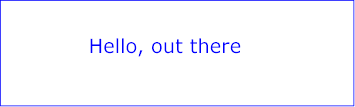
Example text01 below contains the text string "Hello, out there" which will be rendered onto the canvas using the Verdana font family with the glyphs filled with the color blue.
<?xml version="1.0" standalone="no"?>
<!DOCTYPE svg PUBLIC "-//W3C//DTD SVG 20010904//EN"
  "http://www.w3.org/TR/2001/REC-SVG-20010904/DTD/svg10.dtd">
<svg width="10cm" height="3cm" viewBox="0 0 1000 300"
     xmlns="http://www.w3.org/2000/svg">
  <desc>Example text01 - 'Hello, out there' in blue</desc>

  <text x="250" y="150"
        font-family="Verdana" font-size="55" fill="blue" >
    Hello, out there
  </text>

  <!-- Show outline of canvas using 'rect' element -->
  <rect x="1" y="1" width="998" height="298"
        fill="none" stroke="blue" stroke-width="2" />
</svg>
|
View this example as SVG (SVG-enabled browsers only)
Within a 'text' element, text and font properties and the current text position can be adjusted with absolute or relative coordinate values by including a 'tspan' element.
<!ENTITY % tspanExt "" > <!ELEMENT tspan (#PCDATA|desc|title|metadata|tspan|tref|altGlyph|a|animate|set|animateColor %tspanExt;)* > <!ATTLIST tspan %stdAttrs; %testAttrs; %langSpaceAttrs; externalResourcesRequired %Boolean; #IMPLIED class %ClassList; #IMPLIED style %StyleSheet; #IMPLIED %PresentationAttributes-Color; %PresentationAttributes-FillStroke; %PresentationAttributes-FontSpecification; %PresentationAttributes-Graphics; %PresentationAttributes-TextContentElements; %graphicsElementEvents; x %Coordinates; #IMPLIED y %Coordinates; #IMPLIED dx %Lengths; #IMPLIED dy %Lengths; #IMPLIED rotate %Numbers; #IMPLIED textLength %Length; #IMPLIED lengthAdjust (spacing|spacingAndGlyphs) #IMPLIED > |
Attribute definitions:
The x, y, dx, dy and rotate on the 'tspan' element are useful in high-end typography scenarios where individual glyphs require exact placement. These attributes are useful for minor positioning adjustments between characters or for major positioning adjustments, such as moving the current text position to a new location to achieve the visual effect of a new line of text. Multi-line 'text' elements are possible by defining different 'tspan' elements for each line of text, with attributes x, y, dx and/or dy defining the position of each 'tspan'. (An advantage of such an approach is that users will be able to perform multi-line text selection.)
In situations where micro-level positioning adjustment are necessary for advanced typographic control, the SVG content designer needs to ensure that the necessary font will be available for all viewers of the document (e.g., package up the necessary font data in the form of an SVG font or an alternative WebFont format which is stored at the same Web site as the SVG content) and that the viewing software will process the font in the expected way (the capabilities, characteristics and font layout mechanisms vary greatly from system to system). If the SVG content contains x, y, dx or dy attribute values which are meant to correspond to a particular font processed by a particular set of viewing software and either of these requirements is not met, then the text might display with poor quality.
The following additional rules apply to attributes x, y, dx, dy and rotate when they contain a list of numbers:
<tspan dx="11 12 13 14 15 0 21 22 23 0 31 32 33 34 35 36">Latin and Hebrew</span>and that the word "Hebrew" will be drawn right-to-left. First, the character data and the corresponding values in the dx list will be reordered, such that the text string will be "Latin and werbeH" and the list of values for the dx attribute will be "11 12 13 14 15 0 21 22 23 0 36 35 34 33 32 31". After this re-ordering, the glyphs corresponding to the characters will be positioned using standard left-to-right layout rules.
The following examples show basic use of the 'tspan' element.
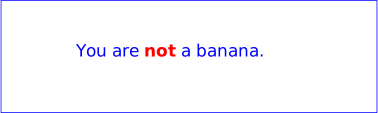
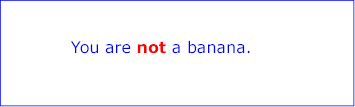
Example tspan01 uses a 'tspan' element to indicate that the word "not" is to use a bold font and have red fill.
<?xml version="1.0" standalone="no"?>
<!DOCTYPE svg PUBLIC "-//W3C//DTD SVG 20010904//EN"
  "http://www.w3.org/TR/2001/REC-SVG-20010904/DTD/svg10.dtd">
<svg width="10cm" height="3cm" viewBox="0 0 1000 300"
     xmlns="http://www.w3.org/2000/svg">
  <desc>Example tspan01 - using tspan to change visual attributes</desc>

  <g font-family="Verdana" font-size="45" >
    <text x="200" y="150" fill="blue" >
      You are
        <tspan font-weight="bold" fill="red" >not</tspan>
      a banana.
    </text>
  </g>

  <!-- Show outline of canvas using 'rect' element -->
  <rect x="1" y="1" width="998" height="298"
        fill="none" stroke="blue" stroke-width="2" />
</svg>
 |
View this example as SVG (SVG-enabled browsers only)
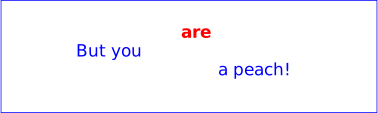
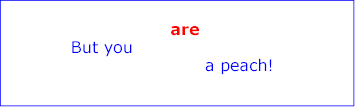
Example tspan02 uses the dx and dy attributes on the 'tspan' element to adjust the current text position horizontally and vertically for particular text strings within a 'text' element.
<?xml version="1.0" standalone="no"?>
<!DOCTYPE svg PUBLIC "-//W3C//DTD SVG 20010904//EN"
  "http://www.w3.org/TR/2001/REC-SVG-20010904/DTD/svg10.dtd">
<svg width="10cm" height="3cm" viewBox="0 0 1000 300"
     xmlns="http://www.w3.org/2000/svg">
  <desc>Example tspan02 - using tspan's dx and dy attributes
        for incremental positioning adjustments</desc>

  <g font-family="Verdana" font-size="45" >
    <text x="200" y="150" fill="blue" >
      But you
        <tspan dx="2em" dy="-50" font-weight="bold" fill="red" >
          are
        </tspan>
        <tspan dy="100">
           a peach!
        </tspan>
    </text>
  </g>

  <!-- Show outline of canvas using 'rect' element -->
  <rect x="1" y="1" width="998" height="298"
        fill="none" stroke="blue" stroke-width="2" />
</svg>
 |
View this example as SVG (SVG-enabled browsers only)
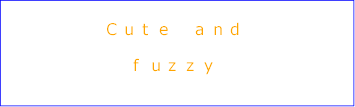
Example tspan03 uses the x and y attributes on the 'tspan' element to establish a new absolute current text position for each glyph to be rendered. The example shows two lines of text within a single 'text' element. Because both lines of text are within the same 'text' element, the user will be able to select through both lines of text and copy the text to the system clipboard in user agents that support text selection and clipboard operations,
<?xml version="1.0" standalone="no"?>
<!DOCTYPE svg PUBLIC "-//W3C//DTD SVG 20010904//EN"
  "http://www.w3.org/TR/2001/REC-SVG-20010904/DTD/svg10.dtd">
<svg width="10cm" height="3cm" viewBox="0 0 1000 300"
     xmlns="http://www.w3.org/2000/svg">
  <desc>Example tspan03 - using tspan's x and y attributes
        for multiline text and precise glyph positioning</desc>

  <g font-family="Verdana" font-size="45" >
    <text fill="rgb(255,164,0)" >
      <tspan x="300 350 400 450 500 550 600 650" y="100">
        Cute and
      </tspan>
      <tspan x="375 425 475 525 575" y="200">
         fuzzy
      </tspan>
    </text>
  </g>

  <!-- Show outline of canvas using 'rect' element -->
  <rect x="1" y="1" width="998" height="298"
        fill="none" stroke="blue" stroke-width="2" />
</svg>
 |
View this example as SVG (SVG-enabled browsers only)
The textual content for a 'text' can be either character data directly embedded within the 'text' element or the character data content of a referenced element, where the referencing is specified with a 'tref' element.
<!ENTITY % trefExt "" > <!ELEMENT tref (desc|title|metadata|animate|set|animateColor %trefExt;)* > <!ATTLIST tref %stdAttrs; %xlinkRefAttrs; xlink:href %URI; #REQUIRED %testAttrs; %langSpaceAttrs; externalResourcesRequired %Boolean; #IMPLIED class %ClassList; #IMPLIED style %StyleSheet; #IMPLIED %PresentationAttributes-Color; %PresentationAttributes-FillStroke; %PresentationAttributes-FontSpecification; %PresentationAttributes-Graphics; %PresentationAttributes-TextContentElements; %graphicsElementEvents; x %Coordinates; #IMPLIED y %Coordinates; #IMPLIED dx %Lengths; #IMPLIED dy %Lengths; #IMPLIED rotate %Numbers; #IMPLIED textLength %Length; #IMPLIED lengthAdjust (spacing|spacingAndGlyphs) #IMPLIED > |
Attribute definitions:
All character data within the referenced element, including character data enclosed within additional markup, will be rendered.
The x, y, dx, dy and rotate attributes have the same meanings as for the 'tspan' element. The attributes are applied as if the 'tref' element was replaced by a 'tspan' with the referenced character data (stripped of all supplemental markup) embedded within the hypothetical 'tspan' element.
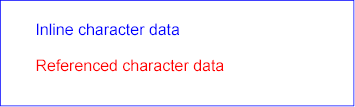
Example tref01 shows how to use character data from a different element as the character data for a given 'tspan' element. The first 'text' element (with id="ReferencedText") will not draw because it is part of a 'defs' element. The second 'text' element draws the string "Inline character data". The third 'text' element draws the string "Reference character data" because it includes a 'tref' element which is a reference to element "ReferencedText", and that element's character data is "Referenced character data".
<?xml version="1.0" standalone="no"?>
<!DOCTYPE svg PUBLIC "-//W3C//DTD SVG 20010904//EN"
  "http://www.w3.org/TR/2001/REC-SVG-20010904/DTD/svg10.dtd">
<svg width="10cm" height="3cm" viewBox="0 0 1000 300"
     xmlns="http://www.w3.org/2000/svg" xmlns:xlink="http://www.w3.org/1999/xlink">
  <defs>
    <text id="ReferencedText">
      Referenced character data
    </text>
  </defs>
  <desc>Example tref01 - inline vs reference text content</desc>

  <text x="100" y="100" font-size="45" fill="blue" >
    Inline character data
  </text>
  <text x="100" y="200" font-size="45" fill="red" >
    <tref xlink:href="#ReferencedText"/>
  </text>

  <!-- Show outline of canvas using 'rect' element -->
  <rect x="1" y="1" width="998" height="298"
        fill="none" stroke="blue" stroke-width="2" />
</svg>
 |
View this example as SVG (SVG-enabled browsers only)
This section describes the text layout features supported by SVG, which includes support for various international writing directions, such as left-to-right (e.g., Latin scripts) and bidirectional (e.g., Hebrew or Arabic) and vertical (e.g., Asian scripts). The descriptions in this section assume straight line text (i.e., text that is either strictly horizontal or vertical with respect to the current user coordinate system). Subsequent sections describe the supplemental layout rules for text on a path.
SVG does not provide for automatic line breaks or word wrapping, which makes internationalized text layout for SVG relatively simpler than it is for languages which support formatting of multi-line text blocks.
For each 'text' element, the SVG user agent determines the current reference orientation. For standard horizontal or vertical text (i.e., no text-on-a-path), the reference orientation is the vector pointing towards negative infinity in Y within the current user coordinate system. (Note: in the initial coordinate system, the reference orientation is up.) For text on a path, the reference orientation is reset with each character.
Based on the reference orientation and the value for property 'writing-mode', the SVG user agent determines the current inline-progression-direction. For left-to-right text, the inline-progression-direction points 90 degrees clockwise from the reference orientation vector. For right-to-left text, the inline progression points 90 degrees counter-clockwise from the reference orientation vector. For top-to-bottom text, the inline-progression-direction points 180 degrees from the reference orientation vector.
Based on the reference orientation and the value for property 'writing-mode', the SVG user agent determines the current block-progression-direction. For left-to-right and right-to-left text, the block-progression-direction points 180 degrees from the reference orientation vector because the only available horizontal 'writing-mode's are lr-tb and rl-tb. For top-to-bottom text, the block-progression-direction always points 90 degrees counter-clockwise from the reference orientation vector because the only available top-to-bottom 'writing-mode' is tb-rl.
The shift direction is the direction towards which the baseline table moves due to positive values for property 'baseline-shift'. The shift direction is such that a positive value shifts the baseline table towards the topmost entry in the parent's baseline table.
In processing a given 'text' element, the SVG user agent keeps track of the current text position. The initial current text position is established by the x and y attributes on the 'text' element.
The current text position is adjusted after each glyph to establish a new current text position at which the next glyph shall be rendered. The adjustment to the current text position is based on the current inline-progression-direction, glyph-specific advance values corresponding to the glyph orientation of the glyph just rendered, kerning tables in the font and the current values of various attributes and properties, such as the spacing properties and any x, y, dx and dy attributes on 'text', 'tspan', 'tref' or 'altGlyph' elements. If a glyph does not provide explicit advance values corresponding to the current glyph orientation, then an appropriate approximation should be used. For vertical text, a suggested approximation is the sum of the ascent and descent values for the glyph. Another suggested approximation for an advance value for both horizontal and vertical text is the size of an em (see units-per-em).
For each glyph to be rendered, the SVG user agent determines an appropriate alignment-point on the glyph which will be placed exactly at the current text position. The alignment-point is determined based on glyph cell metrics in the glyph itself, the current inline-progression-direction and the glyph orientation relative to the inline-progression-direction. For most uses of Latin text (i.e., 'writing-mode:lr', 'text-anchor:start', and 'alignment-baseline:baseline') the alignment-point in the glyph will be the intersection of left edge of the glyph cell (or some other glyph-specific x-axis coordinate indicating a left-side origin point) with the Latin baseline of the glyph. For many cases with top-to-bottom vertical text layout, the reference point will be either a glyph-specific origin point based on the set of vertical baselines for the font or the intersection of the center of the glyph with its top line (see [CSS2-topline] for a definition of top line). If a glyph does not provide explicit origin points corresponding to the current glyph orientation, then an appropriate approximation should be used, such as the intersection of the left edge of the glyph with the appropriate horizontal baseline for the glyph or intersection of the top edge of the glyph with the appropriate vertical baseline. If baseline tables are not available, user agents should establish baseline tables that reflect common practice.
Adjustments to the current text position are either absolute position adjustments or relative position adjustments. An absolute position adjustment occurs in the following circumstances:
All other position adjustments to the current text position are relative position adjustments.
Each absolute position adjustment defines a new text chunk. Absolute position adjustments impact text layout in the following ways:
The following additional rules apply to ligature formation:
The 'writing-mode' property specifies whether the initial inline-progression-direction for a 'text' element shall be left-to-right, right-to-left, or top-to-bottom. The 'writing-mode' property applies only to 'text' elements; the property is ignored for 'tspan', 'tref', 'altGlyph' and 'textPath' sub-elements. (Note that the inline-progression-direction can change within a 'text' element due to the Unicode bidirectional algorithm and properties 'direction' and 'unicode-bidi'. For more on bidirectional text, see Relationship with bidirectionality.)
| Value: | lr-tb | rl-tb | tb-rl | lr | rl | tb | inherit |
| Initial: | lr-tb |
| Applies to: | 'text' elements |
| Inherited: | yes |
| Percentages: | N/A |
| Media: | visual |
| Animatable: | no |
In some cases, it is required to alter the orientation of a sequence of characters relative to the inline-progression-direction. The requirement is particularly applicable to vertical layouts of East Asian documents, where sometimes narrow-cell Latin text is to be displayed horizontally and other times vertically.
Two properties control the glyph orientation relative to the reference orientation for each of the two possible inline-progression-directions. 'glyph-orientation-vertical' controls glyph orientation when the inline-progression-direction is vertical. 'glyph-orientation-horizontal' controls glyph orientation when the inline-progression-direction is horizontal.
| Value: | auto | <angle> | inherit |
| Initial: | auto |
| Applies to: | text content elements |
| Inherited: | yes |
| Percentages: | N/A |
| Media: | visual |
| Animatable: | no |
Fullwidth ideographic and fullwidth Latin text will be set with a glyph-orientation of 0-degrees.
Ideographic punctuation and other ideographic characters having alternate horizontal and vertical forms will use the vertical form of the glyph.
Text which is not fullwidth will be set with a glyph-orientation of 90-degrees.
This reorientation rule applies only to the first-level non-ideographic text. All further embedding of writing-modes or bidi processing will be based on the first-level rotation.
NOTE:
This is equivalent to having set the non-ideographic text string horizontally honoring the bidi-rule, then rotating the resultant sequence of inline-areas (one area for each change of glyph direction) 90-degrees clockwise.
It should be noted that text set in this "rotated" manner may contain ligatures or other glyph combining and reordering common to the language and script. (This "rotated" presentation form does not disable auto-ligature formation or similar context-driven variations.)
The determination of which characters should be auto-rotated may vary across user agents. The determination is based on a complex interaction between country, language, script, character properties, font, and character context. It is suggested that one consult the Unicode TR 11 and the various JIS or other national standards.
This property is applied only to text written in a vertical 'writing-mode'.
The glyph orientation affects the amount that the current text position advances as each glyph is rendered. When the inline-progression-direction is vertical and the 'glyph-orientation-vertical' results in an orientation angle that is a multiple of 180 degrees, then the current text position is incremented according to the vertical metrics of the glyph. Otherwise, if the 'glyph-orientation-vertical' results in an orientation angle that is not a multiple of 180 degrees, then the current text position is incremented according to the horizontal metrics of the glyph.
The text layout diagrams in this section use the following symbols:
 - wide-cell glyph (e.g. Han) which is the n-th glyph in the text run
 - narrow-cell glyph (e.g. Latin) which is the n-th glyph in the text run
The orientation which the above symbols assume in the diagrams corresponds to the orientation that the Unicode characters they represent are intended to assume when rendered in the user agent. Spacing between the glyphs in the diagrams is usually symbolic, unless intentionally changed to make a point.
The diagrams below illustrate different uses of 'glyph-orientation-vertical'. The diagram on the left shows the result of the mixing of full-width ideographic glyphs with narrow-cell Latin glyphs when 'glyph-orientation-vertical' for the Latin characters is either auto or 90. The diagram on the right show the result of mixing full-width ideographic glyphs with narrow-cell Latin glyphs when Latin glyphs are specified to have a 'glyph-orientation-vertical' of 0.




| Value: | <angle> | inherit |
| Initial: | 0deg |
| Applies to: | text content elements |
| Inherited: | yes |
| Percentages: | N/A |
| Media: | visual |
| Animatable: | no |
This property is applied only to text written in a horizontal 'writing-mode'.
The glyph orientation affects the amount that the current text position advances as each glyph is rendered. When the reference orientation direction is horizontal and the 'glyph-orientation-horizontal' results in an orientation angle that is a multiple of 180 degrees, then the current text position is incremented according to the horizontal metrics of the glyph. Otherwise, if the 'glyph-orientation-horizontal' results in an orientation angle that is not a multiple of 180 degrees, then the current text position is incremented according to the vertical metrics of the glyph.
The characters in certain scripts are written from right to left. In some documents, in particular those written with the Arabic or Hebrew script, and in some mixed-language contexts, text in a single line may appear with mixed directionality. This phenomenon is called bidirectionality, or "bidi" for short.
The Unicode standard ([UNICODE], section 3.11) defines a complex algorithm for determining the proper directionality of text. The algorithm consists of an implicit part based on character properties, as well as explicit controls for embeddings and overrides. The SVG user agent applies this bidirectional algorithm when determining the layout of characters within a 'text' element. The 'direction' and 'unicode-bidi' properties allow authors to override the inherent directionality of the content characters and thus explicitly control how the elements and attributes of a document language map to this algorithm. These two properties are applicable to all characters who glyphs are perpendicular to the inline-progression-direction.
In most cases, the bidirectional algorithm from [UNICODE] produces the desired result automatically, and overriding this algorithm properly is usually quite complex. Therefore, in most cases, authors are discouraged from assigning values to these properties.
A more complete discussion of bidirectionality can be found in the "Cascading Style Sheets (CSS) level 2" specification [CSS2-direction].
The processing model for bidirectional text is as follows. The user agent processes the characters which are provided in logical order (i.e., the order the characters appear in the original document, either via direct inclusion or via indirect reference due a 'tref' element). The user agent determines the set of independent blocks within each of which it should apply the Unicode bidirectional algorithm. Each text chunk represents an independent block of text. Additionally, any change in glyph orientation due to processing of properties 'glyph-orientation-horizontal' or 'glyph-orientation-vertical' will subdivide the independent blocks of text further. After processing the Unicode bidirectional algorithm and properties 'direction' and 'unicode-bidi' on each of the independent text blocks, the user agent will have a potentially re-ordered list of characters which are now in left-to-right rendering order. Simultaneous with re-ordering of the characters, the dx, dy and rotate attributes on the 'tspan' and 'tref' elements are also re-ordered to maintain the original correspondence between characters and attribute values. While kerning or ligature processing might be font-specific, the preferred model is that kerning and ligature processing occurs between combinations of characters or glyphs after the characters have been re-ordered.
| Value: | ltr | rtl | inherit |
| Initial: | ltr |
| Applies to: | text content elements |
| Inherited: | yes |
| Percentages: | N/A |
| Media: | visual |
| Animatable: | no |
This property specifies the base writing direction of text and the direction of embeddings and overrides (see 'unicode-bidi') for the Unicode bidirectional algorithm. For the 'direction' property to have any effect, the 'unicode-bidi' property's value must be 'embed' or 'bidi-override'.
Except for any additional information provided in this specification, the normative definition of the property is in [CSS2-direction].
The 'direction' property applies only to glyphs oriented perpendicular to the inline-progression-direction, which includes the usual case of horizontally-oriented Latin or Arabic text and the case of narrow-cell Latin or Arabic characters rotated 90 degrees clockwise relative to a top-to-bottom inline-progression-direction.
| Value: | normal | embed | bidi-override | inherit |
| Initial: | normal |
| Applies to: | text content elements |
| Inherited: | no |
| Percentages: | N/A |
| Media: | visual |
| Animatable: | no |
Except for any additional information provided in this specification, the normative definition of the property is in [CSS2-unicode-bidi].
The glyphs associated with the characters within a 'text' element are rendered in the logical order of the characters in the original document, independent of any re-ordering necessary to implement bidirectionality. Thus, for text that goes right-to-left visually, the glyphs associated with the rightmost character are rendered before the glyphs associated with the other characters.
Additionally, each distinct glyph is rendered in its entirety (i.e., it is filled and stroked as specified by the 'fill' and 'stroke' properties) before the next glyph gets rendered.
The 'text-anchor' property is used to align (start-, middle- or end-alignment) a string of text relative to a given point.
The 'text-anchor' property is applied to each individual text chunk within a given 'text' element. Each text chunk has an initial current text position, which represents the point in the user coordinate system resulting from (depending on context) application of the x and y attributes on the 'text' element, any x or y attribute values on a 'tspan', 'tref' or 'altGlyph' element assigned explicitly to the first rendered character in a text chunk, or determination of the initial current text position for a 'textPath' element.
| Value: | start | middle | end | inherit |
| Initial: | start |
| Applies to: | text content elements |
| Inherited: | yes |
| Percentages: | N/A |
| Media: | visual |
| Animatable: | yes |
Values have the following meanings:
An overview of baseline alignment and baseline tables can be found above in Fonts, font tables and baselines.
One of the characteristics of international text is that there are different baselines (different alignment points) for glyphs in different scripts. For example, in horizontal writing, ideographic scripts, such as Han Ideographs, Katakana, Hiragana, and Hangul, alignment occurs with a baseline near the bottoms of the glyphs; alphabetic based scripts, such as Latin, Cyrillic, Hebrew, Arabic, align a point that is the bottom of most glyphs, but some glyphs descend below the baseline; and Indic based scripts are aligned at a point that is near the top of the glyphs.
When different scripts are mixed on a line of text, an adjustment must be made to ensure that the glyphs in the different scripts are aligned correctly with one another. OpenType [OPENTYPE] fonts have a Baseline table (BASE) [OPENTYPE-BASETABLE] that specifies the offsets of the alternative baselines from the current baseline.
SVG uses a similar baseline table model that assumes one script (at one font-size) is the "dominant run" during processing of a 'text' element; that is, all other baselines are defined in relation to this dominant run. The baseline of the script with the dominant run is called the dominant baseline. So, for example, if the dominant baseline is the alphabetic baseline, there will be offsets in the baseline table for the alternate baselines, such as the ideographic baseline and the Indic baseline. There will also be an offset for the math baseline which is used for some math fonts. Note that there are separate baseline tables for horizontal and vertical writing-modes. The offsets in these tables may be different for horizontal and vertical writing.
The baseline table established at the start of processing of a 'text' element is called the dominant baseline table.
Because the value of the 'font-family' property is a list of fonts, to insure a consistent choice of baseline table we define the nominal font in a font list as the first font in the list for which a glyph is available. This is the first font that could contain a glyph for each character encountered. (For this definition, glyph data is assumed to be present if a font substitution is made or if the font is synthesized.) This definition insures a content independent determination of the font and baseline table that is to be used.
The value of the 'font-size' property on the 'text' element establishes the dominant baseline table font size.
The model assumes that each glyph has a 'alignment-baseline' value which specifies the baseline with which the glyph is to be aligned. (The 'alignment-baseline' is called the "Baseline Tag" in the OpenType baseline table description.) The initial value of the 'alignment-baseline' property uses the baseline identifier associated with the given glyph. Alternate values for 'alignment-baseline' can be useful for glyphs such as a "*" which are ambiguous with respect to script membership.
The model assumes that the font from which the glyph is drawn also has a baseline table, the font baseline table. This baseline table has offsets in units-per-em from the (0,0) point to each of the baselines the font knows about. In particular, it has the offset from the glyph's (0,0) point to the baseline identified by the 'alignment-baseline'.
The offset values in the baseline table are in "design units" which means fractional units of the EM. CSS calls these "units-per-em" [CSS2-UNITSPEREM]. Thus, the current 'font-size' is used to determine the actual offset from the dominant baseline to the alternate baselines.
The glyph is aligned so that its baseline identified by its 'alignment-baseline' is aligned with the baseline with the same name from the dominant baseline table.
The offset from the dominant baseline of the parent to the baseline identified by the 'alignment-baseline' is computed using the dominant baseline table and dominant baseline table font size. The font baseline table and font size applicable to the glyph are used to compute the offset from the identified baseline to the (0,0) point of the glyph. This second offset is subtracted from the first offset to get the position of the (0,0) point in the shift direction. Both offsets are computed by multiplying the baseline value from the baseline table times the appropriate font size value.
If the 'alignment-baseline' identifies the dominant baseline, then the first offset is zero and the glyph is aligned with the dominant baseline; otherwise, the glyph is aligned with the chosen alternate baseline.
The baseline-identifiers below are used in this specification. Some of these are determined by baseline-tables contained in a font as described in [XSL description of Fonts and Font Data]. Others are computed from other font characteristics as described below.
This identifies the baseline used by most alphabetic and syllabic scripts. These include, but are not limited to, many Western, Southern Indic, Southeast Asian (non-ideographic) scripts.
This identifies the baseline used by ideographic scripts. For historical reasons, this baseline is at the bottom of the ideographic EM box and not in the center of the ideographic EM box. See the "central" baseline. The ideographic scripts include Chinese, Japanese, Korean, and Vietnamese Chu Nom.
This identifies the baseline used by certain Indic scripts. These scripts include Devanagari, Gurmukhi and Bengali.
This identifies the baseline used by mathematical symbols.
This identifies a computed baseline that is at the center of the EM box. This baseline lies halfway between the text-before-edge and text-after-edge baselines.
NOTE:For ideographic fonts, this baseline is often used to align the glyphs; it is an alternative to the ideographic baseline.
This identifies a baseline that is offset from the alphabetic baseline in the shift-direction by 1/2 the value of the x-height font characteristic. The position of this baseline may be obtained from the font data or, for fonts that have a font characteristic for "x-height", it may be computed using 1/2 the "x-height". Lacking either of these pieces of information, the position of this baseline may be approximated by the "central" baseline.
This identifies the before-edge of the EM box. The position of this baseline may be specified in the baseline-table or it may be calculated.
NOTE:The position of this baseline is normally around or at the top of the ascenders, but it may not encompass all accents that can appear above a glyph. For these fonts the value of the "ascent" font characteristic is used. For ideographic fonts, the position of this baseline is normally 1 EM in the shift-direction from the "ideographic" baseline. However, some ideographic fonts have a reduced width in the inline-progression-direction to allow tighter setting. When such a font, designed only for vertical writing-modes, is used in a horizontal writing-mode, the "text-before-edge" baseline may be less than 1 EM from the text-after-edge.
This identifies the after-edge of the EM box. The position of this baseline may be specified in the baseline-table or it may be calculated.
NOTE:For fonts with descenders, the position of this baseline is normally around or at the bottom of the descenders. For these fonts the value of the "descent" font characteristic is used. For ideographic fonts, the position of this baseline is normally at the "ideographic" baseline.
There are, in addition, two computed baselines that are only defined for line areas. Since SVG does not support the notion of computations based on line areas, the two computed baselines are mapped as follows:
There are also four baselines that are defined only for horizontal writing-modes.
This baseline is the same as the "before-edge" baseline in a horizontal writing-mode and is undefined in a vertical writing mode.
This baseline is the same as the "text-before-edge" baseline in a horizontal writing-mode and is undefined in a vertical writing mode.
This baseline is the same as the "after-edge" baseline in a horizontal writing-mode and is undefined in a vertical writing mode.
This baseline is the same as the "text-after-edge" baseline in a horizontal writing-mode and is undefined in a vertical writing mode.
The baseline-alignment properties follow.
| Value: | auto | use-script | no-change | reset-size | alphabetic | hanging | ideographic | mathematical | central | middle | text-after-edge | text-before-edge | text-top | text-bottom | inherit |
| Initial: | auto |
| Applies to: | text content elements |
| Inherited: | no |
| Percentages: | N/A |
| Media: | visual |
| Animatable: | yes |
The "dominant-baseline" property is used to determine or re-determine a scaled-baseline-table. A scaled-baseline-table is a compound value with three components: a baseline-identifier for the dominant-baseline, a baseline-table and a baseline-table font-size. Some values of the property re-determine all three values; other only re-establish the baseline-table font-size. When the initial value, "auto", would give an undesired result, this property can be used to explicitly set the desire scaled-baseline-table.
Values for the property have the following meaning:
If this property occurs on a 'text' element, then the computed value depends on the value of the 'writing-mode' property. If the 'writing-mode' is horizontal, then the value of the dominant-baseline component is 'alphabetic', else if the 'writing-mode' is vertical, then the value of the dominant-baseline component is 'central'.
If this property occurs on a 'tspan', 'tref', 'altGlyph' or 'textPath' element, then the dominant-baseline and the baseline-table components remain the same as those of the parent text content element. If the computed 'baseline-shift' value actually shifts the baseline, then the baseline-table font-size component is set to the value of the 'font-size' property on the element on which the 'dominant-baseline' property occurs, otherwise the baseline-table font-size remains the same as that of the element. If there is no parent text content element, the scaled-baseline-table value is constructed as above for 'text' elements.
If there is no baseline table in the nominal font or if the baseline table lacks an entry for the desired baseline, then the user agent may use heuristics to determine the position of the desired baseline.
| Value: | auto | baseline | before-edge | text-before-edge | middle | after-edge | text-after-edge | ideographic | alphabetic | hanging | mathematical | inherit |
| Initial: | auto |
| Applies to: | 'tspan', 'tref', 'altGlyph', 'textPath' elements |
| Inherited: | no |
| Percentages: | N/A |
| Media: | visual |
| Animatable: | yes |
This property specifies how an object is aligned with respect to its parent. This property specifies which baseline of this element is to be aligned with the corresponding baseline of the parent. For example, this allows alphabetic baselines in Roman text to stay aligned across font size changes. It defaults to the baseline with the same name as the computed value of the alignment-baseline property. That is, the position of "ideographic" alignment-point in the block-progression-direction is the position of the "ideographic" baseline in the baseline-table of the object being aligned.
Values have the following meanings:
| Value: | baseline | sub | super | <percentage> | <length> | inherit |
| Initial: | baseline |
| Applies to: | 'tspan', 'tref', 'altGlyph', 'textPath' elements |
| Inherited: | no |
| Percentages: | refers to the "line-height" of the 'text' element, which in the case of SVG is defined to be equal to the 'font-size' |
| Media: | visual |
| Animatable: | yes |
The 'baseline-shift' property allows repositioning of the dominant-baseline relative to the dominant-baseline of the parent text content element. The shifted object might be a sub- or superscript. Within the shifted object, the whole baseline-table is offset; not just a single baseline. The amount of the shift is determined from information from the parent text content element, the sub- or superscript offset from the nominal font of the parent text content element, percent of the "line-height" of the parent text content element or an absolute value.
In SVG, the 'baseline-shift' property represents a supplemental adjustment to the baseline tables. The 'baseline-shift' property shifts the baseline tables for each glyph to temporary new positions, for example to lift the glyph into superscript or subscript position, but it does not effect the current text position. When the current text position is adjusted after rendering a glyph to take into account glyph advance values, the adjustment happens as if there were no baseline shift.
'baseline-shift' properties can nest. Each nested 'baseline-shift' is added to previous baseline shift values.
Values for the property have the following meaning:
SVG uses the following font specification properties. Except for any additional information provided in this specification, the normative definition of the property is in [CSS2-fonts]. Any SVG-specific notes about these properties are contained in the descriptions below.
| Value: | [[ <family-name> | <generic-family> ],]* [<family-name> | <generic-family>] | inherit |
| Initial: | depends on user agent |
| Applies to: | text content elements |
| Inherited: | yes |
| Percentages: | N/A |
| Media: | visual |
| Animatable: | yes |
This property indicates which font family is to be used to render the text, specified as a prioritized list of font family names and/or generic family names. Except for any additional information provided in this specification, the normative definition of the property is in [CSS2-font-family]. The rules for expressing the syntax of CSS property values can be found at [CSS2-propdef].
| Value: | normal | italic | oblique | inherit |
| Initial: | normal |
| Applies to: | text content elements |
| Inherited: | yes |
| Percentages: | N/A |
| Media: | visual |
| Animatable: | yes |
This property specifies whether the text is to be rendered using a normal, italic or oblique face. Except for any additional information provided in this specification, the normative definition of the property is in [CSS2-font-style].
| Value: | normal | small-caps | inherit |
| Initial: | normal |
| Applies to: | text content elements |
| Inherited: | yes |
| Percentages: | N/A |
| Media: | visual |
| Animatable: | yes |
This property indicates whether the text is to be rendered using the normal glyphs for lowercase characters or using small-caps glyphs for lowercase characters. Except for any additional information provided in this specification, the normative definition of the property is in [CSS2-font-variant].
| Value: | normal | bold | bolder | lighter | 100 | 200 | 300 | 400 | 500 | 600 | 700 | 800 | 900 | inherit |
| Initial: | normal |
| Applies to: | text content elements |
| Inherited: | yes |
| Percentages: | N/A |
| Media: | visual |
| Animatable: | yes |
This property refers to the boldness or lightness of the glyphs used to render the text, relative to other fonts in the same font family. Except for any additional information provided in this specification, the normative definition of the property is in [CSS2-font-weight].
| Value: | normal | wider | narrower | ultra-condensed | extra-condensed | condensed | semi-condensed | semi-expanded | expanded | extra-expanded | ultra-expanded | inherit |
| Initial: | normal |
| Applies to: | text content elements |
| Inherited: | yes |
| Percentages: | N/A |
| Media: | visual |
| Animatable: | yes |
This property indicates the desired amount of condensing or expansion in the glyphs used to render the text. Except for any additional information provided in this specification, the normative definition of the property is in [CSS2-font-stretch].
| Value: | <absolute-size> | <relative-size> | <length> | <percentage> | inherit |
| Initial: | medium |
| Applies to: | text content elements |
| Inherited: | yes, the computed value is inherited |
| Percentages: | refer to parent element's font size |
| Media: | visual |
| Animatable: | yes |
This property refers to the size of the font from baseline to baseline when multiple lines of text are set solid in a multiline layout environment. For SVG, if a <length> is provided without a unit identifier (e.g., an unqualified number such as 128), the SVG user agent processes the <length> as a height value in the current user coordinate system.
If a <length> is provided with one of the unit identifiers (e.g., 12pt or 10%), then the SVG user agent converts the <length> into a corresponding value in the current user coordinate system by applying the rules described in Units.
Except for any additional information provided in this specification, the normative definition of the property is in [CSS2-font-size].
| Value: | <number> | none | inherit |
| Initial: | none |
| Applies to: | text content elements |
| Inherited: | yes |
| Percentages: | N/A |
| Media: | visual |
| Animatable: | yes (non-additive, 'set' and 'animate' elements only) |
This property allows authors to specify an aspect value for an element that will preserve the x-height of the first choice font in a substitute font. Except for any additional information provided in this specification, the normative definition of the property is in [CSS2-font-size-adjust].
| Value: | [ [ <'font-style'> || <'font-variant'> || <'font-weight'> ]? <'font-size'> [ / <'line-height'> ]? <'font-family'> ] | caption | icon | menu | message-box| small-caption | status-bar | inherit |
| Initial: | see individual properties |
| Applies to: | text content elements |
| Inherited: | yes |
| Percentages: | allowed on 'font-size' and 'line-height' (Note: for the purposes of processing the 'font' property in SVG, 'line-height' is assumed to be equal the value for property 'font-size') |
| Media: | visual |
| Animatable: | yes (non-additive, 'set' and 'animate' elements only) |
Shorthand property for setting 'font-style', 'font-variant', 'font-weight', 'font-size', 'line-height' and 'font-family'. The 'line-height' property has no effect on text layout in SVG. For the purposes of the 'font' property, 'line-height' is assumed to be equal to the value of the 'font-size' property. Conforming SVG Viewers are not required to support the various system font options (caption, icon, menu, message-box, small-caption and status-bar) and can use a system font or one of the generic fonts instead.
Except for any additional information provided in this specification, the normative definition of the property is in [CSS2-font]. The rules for expressing the syntax of CSS property values can be found at [CSS2-propdef].
Three properties affect the space between characters and words:
| Value: | auto | <length> | inherit |
| Initial: | auto |
| Applies to: | text content elements |
| Inherited: | yes |
| Percentages: | N/A |
| Media: | visual |
| Animatable: | yes |
The value of auto indicates that the user agent should adjust inter-glyph spacing based on kerning tables that are included in the font that will be used (i.e., enable auto-kerning).
If a <length> is provided, then auto-kerning is disabled. Instead, inter-character spacing is set to the given <length>. The most common scenario, other than auto, is to set 'kerning' to a value of 0 so that auto-kerning is disabled.
If a <length> is provided without a unit identifier (e.g., an unqualified number such as 128), the SVG user agent processes the <length> as a width value in the current user coordinate system.
If a <length> is provided with one of the unit identifiers (e.g., .25em or 1%), then the SVG user agent converts the <length> into a corresponding value in the current user coordinate system by applying the rules described in Units.
When a <length> is provided, its value is added to the inter-character spacing value specified by the 'letter-spacing' property.
| Value: | normal | <length> | inherit |
| Initial: | normal |
| Applies to: | text content elements |
| Inherited: | yes |
| Percentages: | N/A |
| Media: | visual |
| Animatable: | yes |
This property specifies spacing behavior between text characters supplemental to any spacing due to the 'kerning' property.
For SVG, if a <length> is provided without a unit identifier (e.g., an unqualified number such as 128), the SVG user agent processes the <length> as a width value in the current user coordinate system.
If a <length> is provided with one of the unit identifiers (e.g., .25em or 1%), then the SVG user agent converts the <length> into a corresponding value in the current user coordinate system by applying the rules described in Units.
Except for any additional information provided in this specification, the normative definition of the property is in [CSS2-letter-spacing].
| Value: | normal | <length> | inherit |
| Initial: | normal |
| Applies to: | text content elements |
| Inherited: | yes |
| Percentages: | N/A |
| Media: | visual |
| Animatable: | yes |
This property specifies spacing behavior between words. For SVG, if a <length> is provided without a unit identifier (e.g., an unqualified number such as 128), the SVG user agent processes the <length> as a width value in the current user coordinate system.
If a <length> is provided with one of the unit identifiers (e.g., .25em or 1%), then the SVG user agent converts the <length> into a corresponding value in the current user coordinate system by applying the rules described in Units.
Except for any additional information provided in this specification, the normative definition of the property is in [CSS2-word-spacing].
| Value: | none | [ underline || overline || line-through || blink ] | inherit |
| Initial: | none |
| Applies to: | text content elements |
| Inherited: | no (see prose) |
| Percentages: | N/A |
| Media: | visual |
| Animatable: | yes |
This property describes decorations that are added to the text of an element. Conforming SVG Viewers are not required to support the blink value.
Except for any additional information provided in this specification, the normative definition of the property is in [CSS2-text-decoration]. The rules for expressing the syntax of CSS property values can be found at [CSS2-propdef].
The CSS2 specification [CSS2] defines the behavior of the 'text-decoration' property using the terminology "block-level elements" and "inline elements". For the purposes of the 'text-decoration' property and SVG, a 'text' element represents a block-level element and any of the potential children of a 'text' element (e.g., a 'tspan') represent inline elements.
Also, the CSS2 definition of 'text-decoration' specifies that the "color of the decorations" remain the same on descendant elements. Since SVG offers a painting model consisting of the ability to apply various types of paint (see Painting: Filling, Stroking and Marker Symbols) to both the interior (i.e., the "fill") and the outline (i.e., the "stroke") of text, for SVG the 'text-decoration' property is defined such that, for an element which has a specified value for the 'text-decoration' property, all decorations on its content and that of its descendants are rendered using the same fill and stroke properties as are present on the given element. If the 'text-decoration' property is specified on a descendant, then that overrides the ancestor.
Because SVG allows text to be both filled and stroked, drawing order matters in some circumstances with text decorations. Text decoration drawing order should be as follows:
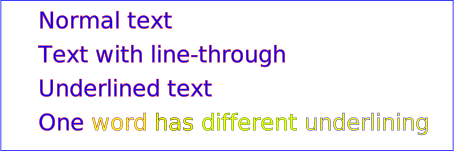
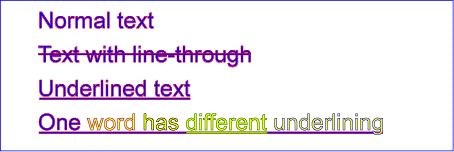
Example textdecoration01 provides examples for 'text-decoration'. The first line of text has no value for 'text-decoration', so the initial value of 'text-decoration:none' is used. The second line shows 'text-decoration:line-through'. The third line shows 'text-decoration:underline'. The fourth line illustrates the rule whereby decorations are rendered using the same fill and stroke properties as are present on the element for which the 'text-decoration' is specified. Since 'text-decoration' is specified on the 'text' element, all text within the 'text' element has its underline rendered with the same fill and stroke properties as exist on the 'text' element (i.e., blue fill, red stroke), even though the various words have different fill and stroke property values. However, the word "different" explicitly specifies a value for 'text-decoration'; thus, its underline is rendered using the fill and stroke properties as the 'tspan' element that surrounds the word "different" (i.e., yellow fill, darkgreen stroke):
<?xml version="1.0" standalone="no"?>
<!DOCTYPE svg PUBLIC "-//W3C//DTD SVG 20010904//EN"
  "http://www.w3.org/TR/2001/REC-SVG-20010904/DTD/svg10.dtd">
<svg width="12cm" height="4cm" viewBox="0 0 1200 400"
     xmlns="http://www.w3.org/2000/svg">
  <desc>Example textdecoration01 - behavior of 'text-decoration' property</desc>
  <rect x="1" y="1" width="1198" height="398" fill="none" stroke="blue" stroke-width="2" />
  <g font-size="60" fill="blue" stroke="red" stroke-width="1" >
    <text x="100" y="75">Normal text</text>
    <text x="100" y="165" text-decoration="line-through" >Text with line-through</text>
    <text x="100" y="255" text-decoration="underline" >Underlined text</text>
    <text x="100" y="345" text-decoration="underline" >
      <tspan>One </tspan>
      <tspan fill="yellow" stroke="purple" >word </tspan>
      <tspan fill="yellow" stroke="black" >has </tspan>
      <tspan fill="yellow" stroke="darkgreen" text-decoration="underline" >different </tspan>
      <tspan fill="yellow" stroke="blue" >underlining</tspan>
    </text>
  </g>
</svg>
 |
View this example as SVG (SVG-enabled and CSS-enabled browsers only)
In addition to text drawn in a straight line, SVG also includes the ability to place text along the shape of a 'path' element. To specify that a block of text is to be rendered along the shape of a 'path', include the given text within a 'textPath' element which includes an xlink:href attribute with a URI reference to a 'path' element.
<!ENTITY % textPathExt "" > <!ELEMENT textPath (#PCDATA|desc|title|metadata|tspan|tref|altGlyph|a|animate|set|animateColor %textPathExt;)* > <!ATTLIST textPath %stdAttrs; %xlinkRefAttrs; xlink:href %URI; #REQUIRED %langSpaceAttrs; %testAttrs; externalResourcesRequired %Boolean; #IMPLIED class %ClassList; #IMPLIED style %StyleSheet; #IMPLIED %PresentationAttributes-Color; %PresentationAttributes-FillStroke; %PresentationAttributes-FontSpecification; %PresentationAttributes-Graphics; %PresentationAttributes-TextContentElements; %graphicsElementEvents; startOffset %Length; #IMPLIED textLength %Length; #IMPLIED lengthAdjust (spacing|spacingAndGlyphs) #IMPLIED method (align|stretch) #IMPLIED spacing (auto|exact) #IMPLIED > |
Attribute definitions:
The path data coordinates within the referenced 'path' element are assumed to be in the same coordinate system as the current 'text' element, not in the coordinate system where the 'path' element is defined. The transform attribute on the referenced 'path' element represents a supplemental transformation relative to the current user coordinate system for the current 'text' element, including any adjustments to the current user coordinate system due to a possible transform attribute on the current 'text' element. For example, the following fragment of SVG content:
<svg xmlns="http://www.w3.org/2000/svg" xmlns:xlink="http://www.w3.org/1999/xlink">
  <g transform="translate(25,25)">
    <defs>
      <path id="path1" transform="scale(2)" d="..." fill="none" stroke="red"/>
    </defs>
  </g>
  <text transform="rotate(45)">
    <textPath xlink:href="#path1">Text along path1</textPath>
  </text>
</svg>
should have the same effect as the following:
<svg xmlns="http://www.w3.org/2000/svg" xmlns:xlink="http://www.w3.org/1999/xlink">
  <g transform="rotate(45)">
    <defs>
      <path id="path1" transform="scale(2)" d="..." fill="none" stroke="red"/>
    </defs>
    <text>
      <textPath xlink:href="#path1">Text along path1</textPath>
    </text>
  </g>
</svg>
Note that the transform="translate(25,25)" has no effect on the
'textPath' element, whereas the
transform="rotate(45)" applies to both the
'text' and the use of the 'path'
element as the referenced shape for text on a path.
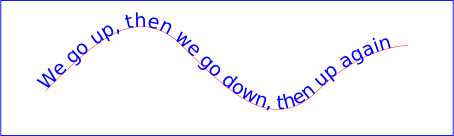
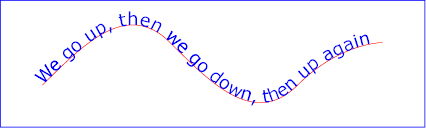
Example toap01 provides a simple example of text on a path:
<?xml version="1.0" standalone="no"?>
<!DOCTYPE svg PUBLIC "-//W3C//DTD SVG 20010904//EN"
  "http://www.w3.org/TR/2001/REC-SVG-20010904/DTD/svg10.dtd">
<svg width="12cm" height="3.6cm" viewBox="0 0 1000 300"
     xmlns="http://www.w3.org/2000/svg" xmlns:xlink="http://www.w3.org/1999/xlink">
  <defs>
    <path id="MyPath"
          d="M 100 200
             C 200 100 300   0 400 100
             C 500 200 600 300 700 200
             C 800 100 900 100 900 100" />
  </defs>
  <desc>Example toap01 - simple text on a path</desc>

  <use xlink:href="#MyPath" fill="none" stroke="red"  />
  <text font-family="Verdana" font-size="42.5" fill="blue" >
    <textPath xlink:href="#MyPath">
      We go up, then we go down, then up again
    </textPath>
  </text>

  <!-- Show outline of canvas using 'rect' element -->
  <rect x="1" y="1" width="998" height="298"
        fill="none" stroke="blue" stroke-width="2" />
</svg>
 |
View this example as SVG (SVG-enabled browsers only)
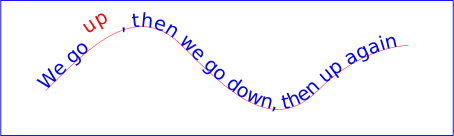
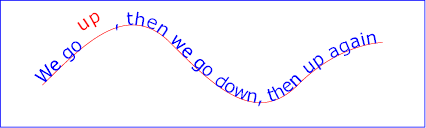
Example toap02 shows how 'tspan' elements can be included within 'textPath' elements to adjust styling attributes and adjust the current text position before rendering a particular glyph. The first occurrence of the word "up" is filled with the color red. Attribute dy is used to lift the word "up" from the baseline.
<?xml version="1.0" standalone="no"?>
<!DOCTYPE svg PUBLIC "-//W3C//DTD SVG 20010904//EN"
  "http://www.w3.org/TR/2001/REC-SVG-20010904/DTD/svg10.dtd">
<svg width="12cm" height="3.6cm" viewBox="0 0 1000 300"
     xmlns="http://www.w3.org/2000/svg" xmlns:xlink="http://www.w3.org/1999/xlink">
  <defs>
    <path id="MyPath"
          d="M 100 200
             C 200 100 300   0 400 100
             C 500 200 600 300 700 200
             C 800 100 900 100 900 100" />
  </defs>
  <desc>Example toap02 - tspan within textPath</desc>

  <use xlink:href="#MyPath" fill="none" stroke="red"  />
  <text font-family="Verdana" font-size="42.5" fill="blue" >
    <textPath xlink:href="#MyPath">
      We go
      <tspan dy="-30" fill="red" >
        up
      </tspan>
      <tspan dy="30">
        ,
      </tspan>
      then we go down, then up again
    </textPath>
  </text>

  <!-- Show outline of canvas using 'rect' element -->
  <rect x="1" y="1" width="998" height="298"
        fill="none" stroke="blue" stroke-width="2" />
</svg>
 |
View this example as SVG (SVG-enabled browsers only)
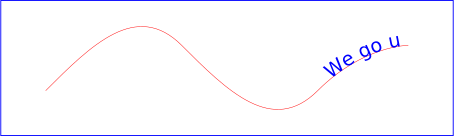
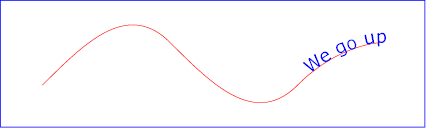
Example toap03 demonstrates the use of the startOffset attribute on the 'textPath' element to specify the start position of the text string as a particular position along the path. Notice that glyphs that fall off the end of the path are not rendered (see text on a path layout rules).
<?xml version="1.0" standalone="no"?>
<!DOCTYPE svg PUBLIC "-//W3C//DTD SVG 20010904//EN"
  "http://www.w3.org/TR/2001/REC-SVG-20010904/DTD/svg10.dtd">
<svg width="12cm" height="3.6cm" viewBox="0 0 1000 300"
     xmlns="http://www.w3.org/2000/svg" xmlns:xlink="http://www.w3.org/1999/xlink">
  <defs>
    <path id="MyPath"
          d="M 100 200
             C 200 100 300   0 400 100
             C 500 200 600 300 700 200
             C 800 100 900 100 900 100" />
  </defs>
  <desc>Example toap03 - text on a path with startOffset attribute</desc>

  <use xlink:href="#MyPath" fill="none" stroke="red"  />
  <text font-family="Verdana" font-size="42.5" fill="blue" >
    <textPath xlink:href="#MyPath" startOffset="80%">
      We go up, then we go down, then up again
    </textPath>
  </text>

  <!-- Show outline of canvas using 'rect' element -->
  <rect x="1" y="1" width="998" height="298"
        fill="none" stroke="blue" stroke-width="2" />
</svg>
 |
View this example as SVG (SVG-enabled browsers only)
Conceptually, for text on a path the target path is stretched out into either a horizontal or vertical straight line segment. For horizontal text layout flows, the path is stretched out into a hypothetical horizontal line segment such that the start of the path is mapped to the left of the line segment. For vertical text layout flows, the path is stretched out into a hypothetical vertical line segment such that the start of the path is mapped to the top of the line segment. The standard text layout rules are applied to the hypothetical straight line segment and the result is mapped back onto the target path. Vertical and bidirectional text layout rules also apply to text on a path.
The reference orientation is determined individually for each glyph that is rendered along the path. For horizontal text layout flows, the reference orientation for a given glyph is the vector that starts at the intersection point on the path to which the glyph is attached and which points in the direction 90 degrees counter-clockwise from the angle of the curve at the intersection point. For vertical text layout flows, the reference orientation for a given glyph is the vector that starts at the intersection point on the path to which the glyph is attached and which points in the direction 180 degrees from the angle of the curve at the intersection point.
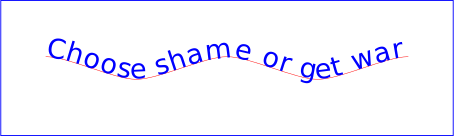
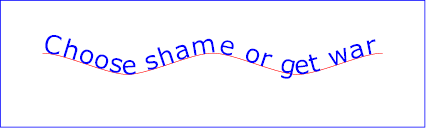
Example toap04 will be used to illustrate the particular layout rules for text on a path that supplement the basic text layout rules for straight line horizontal or vertical text.
<?xml version="1.0" standalone="no"?>
<!DOCTYPE svg PUBLIC "-//W3C//DTD SVG 20010904//EN"
  "http://www.w3.org/TR/2001/REC-SVG-20010904/DTD/svg10.dtd">
<svg width="12cm" height="3.6cm" viewBox="0 0 1000 300"
     xmlns="http://www.w3.org/2000/svg" xmlns:xlink="http://www.w3.org/1999/xlink">
  <defs>
    <path id="MyPath"
          d="M 100 125
             C 150 125 250 175 300 175
             C 350 175 450 125 500 125
             C 550 125 650 175 700 175
             C 750 175 850 125 900 125" />
  </defs>
  <desc>Example toap04 - text on a path layout rules</desc>

  <use xlink:href="#MyPath" fill="none" stroke="red"  />
  <text font-family="Verdana" font-size="60" fill="blue" letter-spacing="2" >
    <textPath xlink:href="#MyPath">
      Choose shame or get war
    </textPath>
  </text>

  <!-- Show outline of canvas using 'rect' element -->
  <rect x="1" y="1" width="998" height="298"
        fill="none" stroke="blue" stroke-width="2" />
</svg>
 |
View this example as SVG (SVG-enabled browsers only)
The following picture does an initial zoom in on the first glyph in the 'text' element.
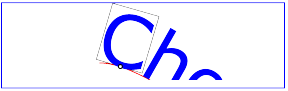
The small dot above shows the point at which the glyph is attached to the path. The box around the glyph shows the glyph is rotated such that its horizontal axis is parallel to the tangent of the curve at the point at which the glyph is attached to the path. The box also shows the glyph's charwidth (i.e., the amount which the current text position advances horizontally when the glyph is drawn using horizontal text layout).
The next picture zooms in further to demonstrate the detailed layout rules.
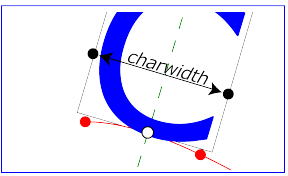
For left-to-right horizontal text layout along a path (i.e., when the glyph orientation is perpendicular to the inline-progression-direction), the layout rules are as follows:
Comparable rules are used for top-to-bottom vertical text layout along a path (i.e., when the glyph orientation is parallel with the inline-progression-direction), the layout rules are as follows:
In the calculations above, if either the startpoint-on-the-path or the endpoint-on-the-path is off the end of the path, then extend the path beyond its end points with a straight line that is parallel to the tangent at the path at its end point so that the midpoint-on-the-path can still be calculated.
When the inline-progression-direction is horizontal, then any x attributes on 'text', 'tspan', 'tref' or 'altGlyph' elements represent new absolute offsets along the path, thus providing explicit new values for startpoint-on-the-path. Any y attributes on 'text', 'tspan', 'tref' or 'altGlyph' elements are ignored. When the inline-progression-direction is horizontal, then any y attributes on 'text', 'tspan', 'tref' or 'altGlyph' elements represent new absolute offsets along the path, thus providing explicit new values for startpoint-on-the-path. Any x attributes on 'text', 'tspan', 'tref' or 'altGlyph' elements are ignored.
There are situations such as ligatures, special-purpose fonts (e.g., a font for music symbols) or alternate glyphs for Asian text strings where it is required that a different set of glyphs is used than the glyph(s) which normally corresponds to the given character data.
The 'altGlyph' element provides control over the glyphs used to render particular character data.
<!ENTITY % altGlyphExt "" > <!ELEMENT altGlyph (#PCDATA %altGlyphExt;)* > <!ATTLIST altGlyph %stdAttrs; %xlinkRefAttrs; xlink:href %URI; #IMPLIED glyphRef CDATA #IMPLIED format CDATA #IMPLIED %testAttrs; %langSpaceAttrs; externalResourcesRequired %Boolean; #IMPLIED class %ClassList; #IMPLIED style %StyleSheet; #IMPLIED %PresentationAttributes-Color; %PresentationAttributes-FillStroke; %PresentationAttributes-FontSpecification; %PresentationAttributes-Graphics; %PresentationAttributes-TextContentElements; %graphicsElementEvents; x %Coordinates; #IMPLIED y %Coordinates; #IMPLIED dx %Lengths; #IMPLIED dy %Lengths; #IMPLIED rotate %Numbers; #IMPLIED > |
Attribute definitions:
If the references to alternate glyphs do not result in successful identification of alternate glyphs to use, then the character(s) that are inside of the 'altGlyph' element are rendered as if the 'altGlyph' element were a 'tspan' element instead.
An 'altGlyph' element either references a 'glyph' element or an 'altGlyphDef' element via its xlink:href attribute or identifies a glyph by means of font selection properties, a glyph identifier and a font format. If the xlink:href attribute is specified, it takes precedence, and the other glyph identification attributes and properties are ignored.
The 'altGlyphDef' element defines a set of possible glyph substitutions.
<!ENTITY % altGlyphDefExt "" > <!ELEMENT altGlyphDef ((glyphRef+|altGlyphItem+) %altGlyphDefExt;) > <!ATTLIST altGlyphDef %stdAttrs; > |
An 'altGlyphDef' can contain either of the following:
The 'altGlyphItem' element defines a candidate set of possible glyph substitutions. The first 'altGlyphItem' element whose referenced glyphs are all available is chosen. Its glyphs are rendered instead of the character(s) that are inside of the referencing 'altGlyph' element
<!ENTITY % altGlyphItemExt "" > <!ELEMENT altGlyphItem (glyphRef+ %altGlyphItemExt;) > <!ATTLIST altGlyphItem %stdAttrs; > |
The 'glyphRef' element defines a possible glyph to use.
<!ELEMENT glyphRef EMPTY > <!ATTLIST glyphRef %stdAttrs; %xlinkRefAttrs; xlink:href %URI; #IMPLIED class %ClassList; #IMPLIED style %StyleSheet; #IMPLIED %PresentationAttributes-FontSpecification; glyphRef CDATA #IMPLIED format CDATA #IMPLIED x %Number; #IMPLIED y %Number; #IMPLIED dx %Number; #IMPLIED dy %Number; #IMPLIED > |
Attribute definitions:
A 'glyphRef' either references a 'glyph' element in an SVG document fragment via its xlink:href attribute or identifies a glyph by means of font selection properties, a glyph identifier and a font format. If insufficient attributes and properties have been specified to identify a glyph, then the 'glyphRef' is processed in the same manner as when a glyph reference is fully specified, but the given glyph is not available. If the xlink:href attribute is specified, it takes precedence, and the other glyph identification attributes and properties are ignored.
SVG supports the standard XML attribute xml:space to specify the handling of white space characters within a given 'text' element's character data. The SVG user agent has special processing rules associated with this attribute as described below. These are behaviors that occur subsequent to XML parsing [XML10] and any construction of a Document Object Model [DOM2].
xml:space is an inheritable attribute which can have one of two values:
xml:space="default",
the SVG user agent will do the following using a copy of the original character data content.
First, it will remove all newline characters.
Then it will convert all tab characters into space characters.
Then, it will strip off all leading and trailing space characters.
Then, all contiguous space characters will be consolidated.xml:space="preserve",
the SVG user agent will do the following using a copy of the original character data content.
It will convert all newline and tab characters
into space characters.
Then, it will draw all space characters, including leading, trailing
and multiple contiguous space characters.
Thus, when drawn with xml:space="preserve",
the string "a b"
(three spaces between "a" and "b") will produce a larger separation
between "a" and "b" than "a b"
(one space between "a" and "b").The following example illustrates that line indentation can be important
when using xml:space="default".
The fragment below show two pairs of similar 'text'
elements, with both 'text'
elements using xml:space='default'.
For these examples, there is no extra white space at the end of any
of the lines (i.e., the line break occurs immediately after the last
visible character).
[01]  <text xml:space='default'>
[02]    WS example
[03]    indented lines
[04]  </text>
[05]  <text xml:space='preserve'>WS example indented lines</text>
[06]
[07]  <text xml:space='default'>
[08]WS example
[09]non-indented lines
[10]  </text>
[11]  <text xml:space='preserve'>WS examplenon-indented lines</text>
The first pair of 'text' elements above show the effect of indented character data. The attribute xml:space='default' in the first 'text' element instructs the user agent to:
The second pair of 'text' elements above show the effect of non-indented character data. The attribute xml:space='default' in the third 'text' element instructs the user agent to:
Note that XML parsers are required to convert the standard representations for a newline indicator (e.g., the literal two-character sequence "#xD#xA" or the stand-alone literals #xD or #xA) into the single character #xA before passing character data to the application. Thus, each newline in SVG will be represented by the single character #xA, no matter what representation for newlines might have been used in the original resource. (See XML end-of-line handling.)
Any features in the SVG language or the SVG DOM that are based on character position number,
such as the
x,
y,
dx,
dy
and rotate
attributes on the
'text',
'tspan',
'tref'
'altGlyph'
elements, are based on character position after applying the white space handling rules
described here. In particular, if xml:space="default", it is often the
case that white space characters are removed as part of processing. Character position numbers
index into the text string after the white space characters have been removed per the rules
in this section.
The xml:space attribute is:
Animatable: no.
Conforming SVG viewers on systems which have the capacity for text selection (e.g., systems which are equipped with a pointer device such as a mouse) and which have system clipboards for copy/paste operations are required to support:
A text selection operation starts when all of the following occur:
As the text selection operation proceeds (e.g., the user continues to press the given mouse button), all associated events with other graphics elements are ignored (i.e., the text selection operation is modal) and the SVG user agent shall dynamically indicate which characters are selected by an appropriate highlighting technique, such as redrawing the selected glyphs with inverse colors. As the pointer is moved during the text selection process, the end glyph for the text selection operation is the glyph within the same 'text' element whose glyph cell is closest to the pointer. All characters within the 'text' element whose position within the 'text' element is between the start of selection and end of selection shall be highlighted, regardless of position on the canvas and regardless of any graphics elements that might be above the end of selection point.
Once the text selection operation ends (e.g., the user releases the given mouse button), the selected text will stay highlighted until an event occurs which cancels text selection, such as a pointer device activation event (e.g., pressing a mouse button).
Detailed rules for determining which characters to highlight during a text selection operation are provided in Text selection implementation notes.
For systems which have system clipboards, the SVG user agent is required to provide a user interface for initiating a copy of the currently selected text to the system clipboard. It is sufficient for the SVG user agent to post the selected text string in the system's appropriate clipboard format for plain text, but it is preferable if the SVG user agent also posts a rich text alternative which captures the various font properties associated with the given text string.
For bidirectional text, the user agent must support text selection in logical order, which will result in discontinuous highlighting of glyphs due to the bidirectional reordering of characters. User agents can provide an alternative ability to select bidirectional text in visual rendering order (i.e., after bidirectional text layout algorithms have been applied), with the result that selected character data might be discontinuous logically. In this case, if the user requests that bidirectional text be copied to the clipboard, then the user agent is required to make appropriate adjustments to copy only the visually selected characters to the clipboard.
When feasible, it is recommended that generators of SVG attempt to
order their text strings to facilitate properly ordered text selection
within SVG viewing applications such as Web browsers.
The following interfaces are defined below: SVGTextContentElement, SVGTextPositioningElement, SVGTextElement, SVGTSpanElement, SVGTRefElement, SVGTextPathElement, SVGAltGlyphElement, SVGAltGlyphDefElement, SVGAltGlyphItemElement, SVGGlyphRefElement.
The SVGTextContentElement interface is inherited by various text-related interfaces, such as SVGTextElement, SVGTSpanElement, SVGTRefElement, SVGAltGlyphElement and SVGTextPathElement.
interface SVGTextContentElement :
                SVGElement,
                SVGTests,
                SVGLangSpace,
                SVGExternalResourcesRequired,
                SVGStylable,
                events::EventTarget {

  // lengthAdjust Types
  const unsigned short LENGTHADJUST_UNKNOWN   = 0;
  const unsigned short LENGTHADJUST_SPACING     = 1;
  const unsigned short LENGTHADJUST_SPACINGANDGLYPHS     = 2;

  readonly attribute SVGAnimatedLength      textLength;
  readonly attribute SVGAnimatedEnumeration lengthAdjust;

  long     getNumberOfChars (  );
  float    getComputedTextLength (  );
  float    getSubStringLength ( in unsigned long charnum, in unsigned long nchars )
                  raises( DOMException );
  SVGPoint getStartPositionOfChar ( in unsigned long charnum )
                  raises( DOMException );
  SVGPoint getEndPositionOfChar ( in unsigned long charnum )
                  raises( DOMException );
  SVGRect  getExtentOfChar ( in unsigned long charnum )
                  raises( DOMException );
  float    getRotationOfChar ( in unsigned long charnum )
                  raises( DOMException );
  long     getCharNumAtPosition ( in SVGPoint point );
  void     selectSubString ( in unsigned long charnum, in unsigned long nchars )
                  raises( DOMException );
};
| LENGTHADJUST_UNKNOWN | The enumeration was set to a value that is not one of predefined types. It is invalid to attempt to define a new value of this type or to attempt to switch an existing value to this type. | |
| LENGTHADJUST_SPACING | Corresponds to value spacing. | |
| LENGTHADJUST_SPACINGANDGLYPHS | Corresponds to value spacingAndGlyphs. |
| long | Total number of characters. |
| float | The text advance distance. |
| in unsigned long charnum | The index of the first character in the substring, where the first character has an index of 0. | |
| in unsigned long nchars | The number of characters in the substring. |
| float | The text advance distance. |
| DOMException |
INDEX_SIZE_ERR: Raised if the charnum is negative or if charnum+nchars is greater than
or equal to the number of characters at this node.
|
| in unsigned long charnum | The index of the character, where the first character has an index of 0. |
| SVGPoint | The character's start position. |
| DOMException |
INDEX_SIZE_ERR: Raised if the charnum is negative or if charnum is greater than
or equal to the number of characters at this node.
|
| in unsigned long charnum | The index of the character, where the first character has an index of 0. |
| SVGPoint | The character's end position. |
| DOMException |
INDEX_SIZE_ERR: Raised if the charnum is negative or if charnum is greater than
or equal to the number of characters at this node.
|
| in unsigned long charnum | The index of the character, where the first character has an index of 0. |
| SVGRect | The rectangle which encloses all of the rendered glyph(s). |
| DOMException |
INDEX_SIZE_ERR: Raised if the charnum is negative or if charnum is greater than
or equal to the number of characters at this node.
|
| in unsigned long charnum | The index of the character, where the first character has an index of 0. |
| float | The rotation angle. |
| DOMException |
INDEX_SIZE_ERR: Raised if the charnum is negative or if charnum is greater than
or equal to the number of characters at this node.
|
| in SVGPoint point | A point in user space. |
| long | The index of the character which is at the given point, where the first character has an index of 0. |
| in unsigned long charnum | The index of the start character which is at the given point, where the first character has an index of 0. | |
| in unsigned long nchars | The number of characters in the substring. If nchars specifies more characters than are available, then the substring will consist of all characters starting with charnum until the end of the list of characters. |
| DOMException |
INDEX_SIZE_ERR: Raised if the charnum is negative or if charnum is greater than
or equal to the number of characters at this node.
|
The SVGTextPositioningElement interface is inherited by text-related interfaces: SVGTextElement, SVGTSpanElement, SVGTRefElement and SVGAltGlyphElement.
interface SVGTextPositioningElement : SVGTextContentElement {
  readonly attribute SVGAnimatedLengthList x;
  readonly attribute SVGAnimatedLengthList y;
  readonly attribute SVGAnimatedLengthList dx;
  readonly attribute SVGAnimatedLengthList dy;
  readonly attribute SVGAnimatedNumberList rotate;
};
The SVGTextElement interface corresponds to the 'text' element.
interface SVGTextElement :
                SVGTextPositioningElement,
                SVGTransformable {};
The SVGTSpanElement interface corresponds to the 'tspan' element.
interface SVGTSpanElement : SVGTextPositioningElement {};
The SVGTRefElement interface corresponds to the 'tref' element.
interface SVGTRefElement :
                SVGTextPositioningElement,
                SVGURIReference {};
The SVGTextPathElement interface corresponds to the 'textPath' element.
interface SVGTextPathElement :
                SVGTextContentElement,
                SVGURIReference {

  // textPath Method Types
  const unsigned short TEXTPATH_METHODTYPE_UNKNOWN   = 0;
  const unsigned short TEXTPATH_METHODTYPE_ALIGN     = 1;
  const unsigned short TEXTPATH_METHODTYPE_STRETCH     = 2;
  // textPath Spacing Types
  const unsigned short TEXTPATH_SPACINGTYPE_UNKNOWN   = 0;
  const unsigned short TEXTPATH_SPACINGTYPE_AUTO     = 1;
  const unsigned short TEXTPATH_SPACINGTYPE_EXACT     = 2;

  readonly attribute SVGAnimatedLength              startOffset;
  readonly attribute SVGAnimatedEnumeration method;
  readonly attribute SVGAnimatedEnumeration spacing;
};
| TEXTPATH_METHODTYPE_UNKNOWN | The enumeration was set to a value that is not one of predefined types. It is invalid to attempt to define a new value of this type or to attempt to switch an existing value to this type. | |
| TEXTPATH_METHODTYPE_ALIGN | Corresponds to value align. | |
| TEXTPATH_METHODTYPE_STRETCH | Corresponds to value stretch. |
| TEXTPATH_SPACINGTYPE_UNKNOWN | The enumeration was set to a value that is not one of predefined types. It is invalid to attempt to define a new value of this type or to attempt to switch an existing value to this type. | |
| TEXTPATH_SPACINGTYPE_AUTO | Corresponds to value auto. | |
| TEXTPATH_SPACINGTYPE_EXACT | Corresponds to value exact. |
The SVGAltGlyphElement interface corresponds to the 'altGlyph' element.
interface SVGAltGlyphElement :
                SVGTextPositioningElement,
                SVGURIReference {

           attribute DOMString glyphRef;
                       // raises DOMException on setting
           attribute DOMString format;
                       // raises DOMException on setting
};
| DOMException |
NO_MODIFICATION_ALLOWED_ERR: Raised on an attempt to change the value of a readonly attribute.
|
| DOMException |
NO_MODIFICATION_ALLOWED_ERR: Raised on an attempt to change the value of a readonly attribute.
|
The SVGAltGlyphDefElement interface corresponds to the 'altGlyphDef' element.
interface SVGAltGlyphDefElement : SVGElement {};
The SVGAltGlyphItemElement interface corresponds to the 'altGlyphItem' element.
interface SVGAltGlyphItemElement : SVGElement {};
The SVGGlyphRefElement interface corresponds to the 'glyphRef' element.
interface SVGGlyphRefElement :
                SVGElement,
                SVGURIReference,
                SVGStylable {

           attribute DOMString glyphRef;
                       // raises DOMException on setting
           attribute DOMString format;
                       // raises DOMException on setting
           attribute float    x;
                       // raises DOMException on setting
           attribute float    y;
                       // raises DOMException on setting
           attribute float    dx;
                       // raises DOMException on setting
           attribute float    dy;
                       // raises DOMException on setting
};
| DOMException |
NO_MODIFICATION_ALLOWED_ERR: Raised on an attempt to change the value of a readonly attribute.
|
| DOMException |
NO_MODIFICATION_ALLOWED_ERR: Raised on an attempt to change the value of a readonly attribute.
|
| DOMException |
NO_MODIFICATION_ALLOWED_ERR: Raised on an attempt to change the value of a readonly attribute.
|
| DOMException |
NO_MODIFICATION_ALLOWED_ERR: Raised on an attempt to change the value of a readonly attribute.
|
| DOMException |
NO_MODIFICATION_ALLOWED_ERR: Raised on an attempt to change the value of a readonly attribute.
|
| DOMException |
NO_MODIFICATION_ALLOWED_ERR: Raised on an attempt to change the value of a readonly attribute.
|