Synchronized Multimedia Integration Language (SMIL) Boston
Specification
W3C Working Draft 22 June 2000
- This version:
- http://www.w3.org/TR/2000/WD-smil-boston-20000622
(Other formats: single HTML file, zip archive)
- Latest version:
- http://www.w3.org/TR/smil-boston
- Previous version:
- http://www.w3.org/TR/2000/WD-smil-boston-20000225
- Editors:
- Jeff Ayars (RealNetworks), Dick Bulterman (Oratrix), Aaron Cohen
(Intel), Erik Hodge (RealNetworks), Philipp Hoschka (W3C), Eric Hyche
(RealNetworks), Ken Day (Macromedia), Kenichi Kubota (Panasonic), Rob
Lanphier (RealNetworks), Nabil Layaïda (INRIA), Philippe Le Hégaret
(W3C), Thierry Michel (W3C), Muriel Jourdan (INRIA), Jacco van
Ossenbruggen (CWI), Lloyd Rutledge (CWI), Bridie Saccocio
(RealNetworks), Patrick Schmitz (Microsoft), Warner ten Kate (Philips),
Ted Wugofski (Gateway).
Copyright
©2000 W3C® (MIT, INRIA, Keio), All
Rights Reserved. W3C liability,
trademark,
document
use and software
licensing rules apply.
This document specifies the "Boston" version of the Synchronized Multimedia
Integration Language (SMIL, pronounced "smile"). SMIL Boston has the following
two design goals:
- Define a simple XML-based language that allows authors to write
interactive multimedia presentations. Using SMIL Boston, an author can
describe the temporal behavior of a multimedia presentation, associate
hyperlinks with media objects and describe the layout of the presentation
on a screen.
- Allow reusing of SMIL syntax and semantics in other XML-based languages,
in particular those who need to represent timing and synchronization. For
example, SMIL Boston components should be used for integrating timing into
XHTML [XHTML10].
This section describes the status of this document at the time of its
publication. Other documents may supersede this document. The latest status of
this document series is maintained at the W3C.
This document is the fourth Working Draft of the specification for the next
version of SMIL code-named "Boston". It has been produced as part of the W3C Synchronized Multimedia Activity.
The document has been written by the SYMM Working Group (members only). The goals of
this group are discussed in the SYMM Working Group
charter (members
only).
Many parts of the document are still preliminary, and do not constitute
full consensus within the Working Group. Also, some of the functionality
planned for SMIL Boston is not contained in this draft. Many parts are not yet
detailed enough for implementation, and other parts are only suitable for
highly experimental implementation work.
At this point, the W3C SYMM WG seeks input by the public on the concepts
and directions described in this specification. Please send your comments to
www-smil@w3.org. Since it is difficult to
anticipate the number of comments that come in, the WG cannot guarantee an
individual response to all comments. However, we will study each comment
carefully, and try to be as responsive as time permits.
This working draft may be updated, replaced or rendered obsolete by other
W3C documents at any time. It is inappropriate to use W3C Working Drafts as
reference material or to cite them as other than "work in progress". This
document is work in progress and does not imply endorsement by the W3C membership.
A list of current W3C Recommendations and other technical documents can be
found at http://www.w3.org/TR.
-
Editors
-
Aaron Cohen
(aaron.m.cohen@intel.com), Intel
-
Thierry Michel (tmichel@w3.org), W3C
This document specifies the "Boston" version of the Synchronized Multimedia
Integration Language (SMIL, pronounced "smile"). SMIL Boston has the
following two design goals:
-
Define a simple XML-based language that allows authors to write interactive
multimedia presentations. Using SMIL Boston, an author can describe the temporal
behavior of a multimedia presentation, associate hyperlinks with media objects
and describe the layout of the presentation on a screen.
-
Allow reusing of SMIL syntax and semantics in other XML-based languages,
in particular those who need to represent timing and synchronization. For
example, SMIL Boston components should be used for integrating timing into
XHTML.
SMIL Boston is defined as a set of markup modules, which define the semantics
and an XML syntax for certain areas of SMIL functionality. All modules have
an associated Document Object Model (DOM).
SMIL Boston deprecates a small amount of SMIL 1.0 syntax in favor of more
DOM friendly syntax. Most notable is the change from hyphenated attribute
names to mixed case (camel case) attribute names, e.g., clipBegin is introduced
in favor of clip-begin. The SMIL Boston modules do not require support for
these SMIL 1.0 attributes so that integration applications are not burdened
with them. SMIL document players, those applications that support playback
of "application/smil" documents (or however we denote SMIL documents vs.
integration documents) must support the deprecated SMIL 1.0 attribute names
as well as the new SMIL Boston names.
This specification is structured as a set of sections, defining module:
-
Section 2 presents an overview of the individual
modules, and gives example profiles.
-
Section 3 defines the declarative
animation module.
-
Section 4 presents the content control module,
such as the switch and preload elements.
-
Section 5 describes the SMIL Boston basic layout
module.
-
Section 6 defines the linking module.
-
Section 7 presents the media object
module.
-
Section 8 presents the streaming
media object module.
-
Section 9 defines the metadata module.
-
Section 10 defines the SMIL Boston structure
module including the head, and body elements.
-
Section 11 defines the SMIL timing and
synchronization module.
-
Section 12 presents the transition effects
module.
-
Section 13 defines the SMIL DOM interfaces
for all of the above modules.
This specification also defines three profiles that are built using the above
SMIL modules:
-
Section 14 defines the SMIL Boston
Language Profile.
-
Section 15 defines the HTML + SMIL Language
Profile.
-
Section 16 describes the SMIL Basic
Language Profile.
Finally, this specification defines a number of baseline media formats to
be widely supported by SMIL players:
-
Section 17 presents a list of baseline
media formats.
This document has been prepared by the Synchronized Multimedia Working Group
(SYMM-WG) of the World Wide Web Consortium. The WG includes the following
individuals:
-
Jin Yu, Compaq
-
Pietro Marchisio, CSELT
-
Lynda Hardman, CWI
-
Jacco van Ossenbruggen, CWI
-
Lloyd Rutledge, CWI
-
Olivier Avaro, France Telecom
-
Ted Wugofski, Gateway (Invited Expert)
-
Masayuki Hiyama, Glocomm
-
Keisuke Kamimura, Glocomm
-
Michelle Y. Kim, IBM
-
Steve Wood, IBM
-
Nabil Layaïda, INRIA
-
Muriel Jourdan, INRIA
-
Aaron Cohen, Intel
-
Wayne Carr, Intel
-
Ken Day, Macromedia
-
Daniel Weber, Matsushita
-
Patrick Schmitz, Microsoft
-
Debbie Newman, Microsoft
-
Pablo Fernicola, Microsoft
-
Kevin Gallo, Microsoft
-
Don Cone, Netscape/AOL
-
Wo Chang, NIST
-
Didier Chanut, Nokia
-
Jack Jansen, Oratrix
-
Sjoerd Mullender, Oratrix
-
Dick Bulterman, Oratrix
-
Kenichi Kubota, Panasonic
-
Warner ten Kate, Philips
-
Ramon Clout, Philips
-
Jeff Ayars, RealNetworks
-
Erik Hodge, RealNetworks
-
Rob Lanphier, RealNetworks
-
Bridie Saccocio, RealNetworks
-
Eric Hyche, RealNetworks
-
Geoff Freed, WGBH
-
Philipp Hoschka, W3C
-
Philippe Le Hégaret, W3C
-
Thierry Michel, W3C.
-
Editors:
-
Warner ten Kate
(warner.ten.kate@philips.com),
(Philips Electronics)
-
Ted Wugofski
(ted.wugofski@corp.phone.com),
(Phone.com)
-
Patrick Schmitz
(pschmitz@microsoft.com), (Microsoft)
This section is Normative.
Since the publication of SMIL 1.0 [SMIL10],
interest in the integration of SMIL concepts with the HTML, the Hypertext
Markup Language [HTML40], and other XML languages,
has grown. Likewise, the W3C HTML Working Group is specifying how XHTML,
the Extensible Hypertext Markup Language
[XHTML10], can be subset, be extended, or
be integrated with other languages. The strategy considered for integrating
respective functionality with other XML languages is based on the concepts
of modularization and profiling
[MODMOD],
[SMIL-MOD],
[XMOD],
[XPROF].
Modularization is a solution in which a language's functionality
is partitioned into sets of semantically-related elements and attributes.
Profiling is the combination of these feature sets to provide support
for the functionality required within a particular application domain. The
re-use of modules across profiles should enhance the interoperability between
the various application domains.
This specification complies with the XHTML modularization conformance
requirements as set forth in the XHTML Modularization specification
[XMOD]. For the purposes of this specification
we further define:
-
element
-
An element is a XML representation of a semantic feature. An element has
one representation in any given namespace.
-
module
-
A module is a collection of semantically-related elements. Attributes and
their value range may be divided over different modules.
-
module family
-
A module family is a collection of modules associated with the same namespace.
Modules with related functionality are generally ordered in a module family
by increasing functionality. Each module at a higher level requires all modules
at the lower levels. Ideally, each element is in one and only one module
family. Elements in different module families but representing the same semantic
feature are said to be
isomorphic.
The typical way of referring to elements from a certain module family is
through their namespace. Examples are "XHTML" and "SMIL".
A module family is not to be confused with a language profile, which is defined
below. However, a module family typically associates with a language profile,
namely that language profile which uses (nearly) all modules and only modules
from the module family.
A module family defines at least one module as mandatory for language profiles
which wish to be part of the language-profile family (defined below) associated
with that module family. That mandatory module is the so-called "Structure
Module" and includes the document's root element (e.g., <html> and
<smil>).
-
language profile
-
A language profile is a collection of modules particular to an application
domain. For example, the "SMIL Language" profile corresponds to the collection
of modules that make up for composition of multimedia presentations. Likewise,
a "Timed-Text" language profile would correspond to the collection of modules
for supporting timing of text content.
A language profile can include modules from different module families. This
enables for the integration of functionality developed within different
languages.
-
language profile family
-
A language profile family is a collection of language profiles which all
share a common set of modules. The modules in that common set are defined
as mandatory for that language profile family.
A special case are the so-called "Host Language" profiles
[XMOD]. These are the language profiles which
use all the mandatory modules defined by a module family. Those language
profile families are typically referred to by the module family's namespace
qualifier. Examples are "the XHTML language profile family" and "the SMIL
language profile family". A language profile might use mandatory modules
from different module families. As any language profile will have a single
root element, the choice of Structure Module is decisive in assigning the
language profile family name. A consequence of this is that, for example,
a language profile may include modules used in the "SMIL Language", i.e.
modules that are part from the "SMIL" module family, while the language profile
may not be member of the "SMIL Language profile family". These profiles are
called "Integration Set" in [XMOD]. "Integration
Set" conformance differs from "Host Language" conformance in not requiring
the inclusion of the (XHTML) Structure Module.
The main purpose of the notion of language profile family is to enhance
interoperability. Language profiles within the same language profile family
share the same MIME type(s). Preferably, the mandatory modules of a language
profile family should be defined in such a way that any offered document
conforming to a language profile in that language profile family will yield
a reasonable presentation when the renderer, while supporting that language
profile family's mandatory module set, would ignore all other (unknown) elements
and attributes. Here, "reasonable presentation" is to be understood as something
intelligible, which is not necessarily a close reflection of the author's
original intentions. For that purpose a language profile negotiation would
have to be conducted.
There is an important difference between the concepts of module family and
language profile family. The first indicates the functionality space, and
the second has to do with the document type (and MIME type). A language profile
associates with one doctype, which is called the "host language". Therefore,
the "Structure Module", containing the doctype's root element, is an essential
module in any language profile family.
@@ In respect of decreasing document size: should the remainder of this section
stay?
SMIL functionality is partitioned into modules based on the following design
requirements:
-
Ensure that a language profile may be defined that is completely backward
compatibility with SMIL 1.0.
-
Ensure that a module's semantics maintain compatibility with SMIL semantics
(this includes content and timing).
-
Partition into modules of reasonable granularity, to support wide reuse in
an interoperable manner.
-
Specify modules that are isomorphic with other modules based on W3C
recommendations.
-
Specify modules that can complement XHTML modules.
-
Specify how the modules support the document object model.
The first requirement specifies that a collection of modules can be "recombined"
in such a way as to be backwardly compatible with SMIL 1.0 (it will properly
play SMIL 1.0 conforming content).
The second requirement specifies that the semantics of SMIL must not change
when they are embodied in a module. Fundamentally, this ensures the integrity
of the SMIL content and timing models. This is particularly relevant when
a different syntax is required to integrate SMIL functionality with other
languages.
The third requirement states that modules be of reasonable granularity. This
requirement reflects the core purpose of modularization and profiling. On
the one hand, the modularization should lead to separation of functionality,
such that language profile designs can optimize for performance and complexity.
On the other hand, the range of modules should be limited, such that
interoperability is promoted.
The fourth requirement specifies that, where functionality overlaps, modules
be isomorphic with other modules from other W3C recommendations. This will
assist designers when sharing modules across language profiles.
The fifth requirement states that specific attention be paid to providing
multimedia functionality to the XHTML language. XHTML is the reformulation
of HTML in XML.
The sixth requirement ensures that modules have integrated support for the
document object model. This facilitates additional control through scripting
and user agents.
These requirements led to a partitioning of SMIL functionality into twenty
five modules.
This section is Informative.
SMIL functionality is partitioned into nine functional areas. Within each
functional area a further partitioning is applied into
modules. The modules are complementary.
For example, the Timing Level 2 Module adds syncBehavior to the timing in
the Timing Level 0 and Level 1 Modules.
@@ This is a Normative statement !! When
a language profile includes a module of a higher level, the modules of the
lower levels MUST be included. Some elements or attributes are labeled as
Profile Specific. This means that those elements or attributes
are optional to the language profile, as long as the module from
which they stem is the top level module.
The functional areas and the modules are:
-
Timing functionality
-
Timing Level 0 Module
-
Timing Level 1 Module
-
Timing Level 2 Module
-
Time Manipulations
functionality
-
Time Manipulations
Module
-
Animation functionality
-
Animation Level 0 Module
-
Animation Level 1 Module
-
Transition Effects
functionality
-
Transition Effects Level
0 Module
-
Transition Effects Level
1 Module
-
Media functionality
-
Media Object Level 0 Module
-
Media Object Level 1 Module
-
Streaming Media
functionality
-
Streaming Media Level
0 Module
-
Content Control
functionality
-
Content Control Level
0 Module
-
Content Control Level
1 Module
-
Metainformation
functionality
-
Metainformation Level 0 Module
-
Structure functionality
-
Structure Level 0 Module
-
Layout functionality
-
Layout Level 0 Module
-
Layout Level 1 Module
-
Layout Level 2 Module
-
Linking functionality
-
Linking Level 0 Module
-
Linking Level 1 Module
-
DOM functionality
-
SMIL DOM Modules
Each of these modules introduces a set of semantically-related elements,
properties, and attributes.
All these modules, and only these modules, are members of the
SMIL module family.
@@ This is a Normative statement ??
The Structure Level 0 Module, Timing Level 0 Module, and Media Object Level
0 Module are mandatory modules in any language profile in the
SMIL language profile family.
This implies that the SMIL Structure Level 0 Module must at least be accompanied
with the two other modules. Those modules themselves can still be used in
other, non-SMIL family, language profiles.
Below, the modules are listed.
@@ Need check on completeness.
@@ Need check on correct division over levels.
@@ The names for the script to generate hyperlinks to the element and
attribute definitions need check on being identical.
This section is Informative.
The Timing and Synchronization Modules provide a framework for describing
timing structure, timing control properties, and temporal relationships between
elements. The Timing and Synchronization Modules define semantics for
par,
seq, and
excl elements. In addition, the modules
define semantics for attributes including
begin,
dur,
end,
repeatCount,
repeatDur, and others.
-
Elements
-
par
-
seq
-
Attributes
-
begin (single time condition; long
syncarc; with syncbase syntax; with prev; with wall clock; with offset)
-
end (single time condition; long syncarc;
with syncbase syntax; with prev; with wall clock; with offset)
-
endsync
-
dur
-
repeat (deprecated)
-
repeatCount
-
repeatDur
-
timeAction
-
timeContainer
The Timing Level 0 Module is a mandatory module in any language profile in
the SMIL language profile family.
Note that upon building a language profile which integrates SMIL timing with
other, non-SMIL, modules, that the elements from this Timing Level 0 Module
may appear as attributes to the elements from the other XML language, rather
than as these elements themselves. In that case, the element's functionality
is declared using the
timeContainer attribute.
@@ To be moved to corresponding module
The timing attributes are used by the elements in this Timing Level 0 Module
and in the other Timing
Modules, and by the elements in the
Media Modules, in the
Linking Modules, and in
the Content Control
Modules. As upon integration with non-SMIL modules, the elements from this
module may appear as attributes instead of elements, the referenced timing
attributes are also used by those non-SMIL elements.
-
Elements
-
excl
-
priorityClass
-
Attributes
-
begin (multiple time conditions; events)
-
end (multiple time conditions; events)
-
restart
-
restartDefault
-
fill
Usage of the Timing Level 1 Module requires inclusion of the
Timing Level 0 Module.
(@@ Therefore, should we design the modules as inclusive,
rather than complementary?) Consequently, the same usage rules
apply.
This means that upon integrating with a non-SMIL language, the
excl element may appear as an attribute
using the timeContainer construct.
Another implication is that the added attributes
(restart etc.) are adopted by the
same elements who have adopted the attributes in the Timing Level 0 Module.
When this module is used it adds the 'multiple time conditions' and 'events'
semantics to the begin and
end attributes.
@@ To be moved to corresponding module
When this module is used it adds the
restart, the
restartDefault, the
syncBehavior, and the
syncBehaviorDefault
attributes to the par,
seq, and
excl elements.
-
Elements
-
<!-- NONE -->
-
Attributes
-
begin (with media markers)
-
end (with media markers)
-
syncMaster
-
syncTolerance
-
syncToleranceDefault
-
syncBehavior
-
syncBehaviorDefault
Usage of the Timing Level 2 Module requires inclusion of the
Timing Level 0 Module and
the Timing Level 1 Module.
Consequently, the same usage rules apply.
@@ To be moved to corresponding module
When this module is used it adds the 'media marker' semantics to the
begin and
end attributes.
This section is Informative.
-
Elements
-
<!-- NONE -->
-
Attributes
-
speed
-
accelerate
-
decelerate
-
autoReverse
This section is Informative.
The Animation Modules provide a framework for incorporating animation onto
a timeline (a timing model) and a mechanism for composing the effects of
multiple animations (a composition model). The Animation Modules define semantics
for the animate,
set,
animateMotion, and
animateColor elements.
-
Elements
-
-
animate (without keyTimes and
keySplines)
-
set
-
animateMotion
-
animateColor
-
Attributes
-
targetElement
-
attributeName
-
attributeType
-
from
-
to
-
by
-
values
-
accumulate
-
additive
-
calcMode
-
path
-
origin
@@ To be moved to corresponding module
When this module is used, it adds the
animate,
set,
animateMotion, and
animateColor elements to the
content model of the ref,
animation,
audio,
img,
video,
text, and
textstream elements of the
Media Object Modules (if
those are present in the language profile). It also adds these elements to
the content model of the par,
seq, and
excl elements of the
Timing Modules, and to the
content model of the body element of
the Structure Level 0
Module (if those are present in the language profile).
-
Elements
-
<!-- NONE -->
-
Attributes
-
keyTimes
-
keySplines
Usage of the Animation Level 1 Module requires inclusion of the
Animation Level 0 Module.
Consequently, the same usage rules apply.
@@ To be moved to corresponding module
When this module is used it adds the
keyTimes and
keySplines attributes to the
animate element.
This section is Informative.
The Transition Effects Modules define a taxonomy of transition effects as
well as semantics and syntax for integrating these effects into XML documents.
-
Elements
-
transition (on single elements)
-
Attributes
-
transition
-
type
-
subtype
-
startPercent
-
endPercent
-
direction
-
horzRepeat
-
vertRepeat
-
borderWidth
-
color
-
multiElement
-
childrenClip
@@ To be moved to corresponding module
When this module is used, it adds the
transition element to the content
model of the layout element of the
Layout Level 0 Module (if
present in the language profile). The
transition attribute is added
to the elements in the Media
Object Level 0 Module (if present in the language profile).
-
Elements
-
transition (on multi-element
regions)
-
transitionFilter
-
Attributes
-
percentDone
Usage of the Transition Effects Level 1 Module requires inclusion of the
Transition Effects Level
0 Module. Consequently, the same usage rules apply.
In addition, the usage of the Transition Effects Level 1 Module requires
support for hierarchical layout, such as supported by the
Layout Level 1 Module.
@@ To be moved to corresponding module
When this module is used it adds transition effects functionality for transitions
over multiple regions.
This section is Informative.
The Media Object Modules provide a framework for declaring media. The Media
Object Modules define semantics for the
ref,
animation,
audio,
img,
video,
text, and
textstream elements.
-
Elements
-
ref
-
img
-
text
-
audio
-
video
-
animation
-
textstream
-
Attributes
-
abstract
-
alt
-
author
-
clipBegin
(clip-begin)
-
clipEnd
(clip-end)
-
copyright
-
longdesc
-
src
-
type
The Media Object Level 0 Module is a mandatory module in any language profile
in the SMIL language profile family.
@@ To be moved to corresponding module
When this module is used, it adds the
ref,
animation,
audio,
img,
video,
text, and
textstream elements to the content
model of the par,
seq, and
excl elements of the
Timing Modules (if those
are present in the language profile). It also adds these elements to the
content model of the body element of
the Structure Level 0
Module (if those are present in the language profile). It also adds these
elements to the content model of the a
element of the Linking
Modules (if those are present in the language profile).
-
Elements
-
Profile Specific:brush
-
Profile Specific:param
-
Attributes
-
Profile
Specific:stripRepeat
-
Profile
Specific:readIndex
-
Profile Specific:shape
-
erase
-
name
-
value
-
valuetype
-
type
-
color
Usage of the Media Object Level 1 Module requires inclusion of the
Media Object Level 0 Module.
Consequently, the same usage rules apply.
@@ To be moved to corresponding module
When this module is used it adds the
stripRepeat and the
readIndex attributes to the
ref,
animation,
audio,
img,
video,
text, and
textstream elements of the
Media Object Level 0 Module
(if present in the language profile).
@@ To be moved to corresponding module
When this module is used, it adds the
param element to the content model
of the ref,
animation,
audio,
img,
video,
text, and
textstream elements of the
Media Object Level 0 Module
(if present in the language profile).
@@ To be moved to corresponding module
When this module is used, it adds the
rtpmap element to the content model
of the ref,
animation,
audio,
img,
video,
text, and
textstream elements of the
Media Object Level 0 Module
(if present in the language profile).
@@ To be moved to corresponding module
When this module is used it adds the
port, the
transport, and the
rtpformat attributes to the
ref,
animation,
audio,
img,
video,
text, and
textstream elements of the
Media Object Level 0 Module
(if present in the language profile).
@@ To be moved to corresponding module
When this module is used, it adds the
brush element to the content model
of ?? (@@ needs completion).
This section is Informative.
-
Elements
-
Profile Specific:rtpmap
-
Attributes
-
Profile Specific:payload
-
Profile
Specific:encoding
-
Profile Specific:port
-
Profile
Specific:transport
-
Profile
Specific:rtpformat
This section is Informative.
The Content Control Modules provide a framework for selecting content based
on a set of test attributes. The Content Control Modules define semantics
for the switch,
prefetch and
uGroup elements.
-
Elements
-
switch
-
Attributes
-
skipContent
(skip-content)
-
systemBitrate
(system-bitrate)
-
systemCaptions
(system-captions)
-
systemLanguage
(system-language)
-
systemOverdubOrSubtitle
(system-overdub-or-caption)
-
systemRequired
(system-required)
-
systemScreenSize
(system-screen-size)
-
systemScreenDepth
(system-screen-depth)
-
systemAudioDesc
-
systemOperatingSystem
-
systemCPU
-
systemComponent
@@ To be moved to corresponding module
When this module is used, it adds the
switch element to the content model
of the par,
seq, and
excl elements of the
Timing Modules (if those
are present in the language profile). It also adds this element to the content
model of the body element of the
Structure Level 0 Module
(if present in the language profile). It also adds this element to the content
model of the a element of the
Linking Modules (if present
in the language profile). It also adds this element to the content model
of the head element of the
Structure Level 0 Module
(if present in the language profile).
@@ To be moved to corresponding module
When this module is used, the test attributes are added to the attribute
lists of all the elements in the
Layout Modules, the
Media Object Modules, the
Timing Modules, and the
Transition Effects Modules
(if those are present in the language profile).
@@ To be moved to corresponding module
When this module is used, it adds the
skipContent attribute to all
other elements in the language profile.
-
Elements
-
Profile Specific: prefetch
-
Profile Specific: uGroup
-
Profile Specific:
userAttributes
-
Attributes
-
Profile Specific: uState
-
Profile Specific: uGroup
Usage of the Content Control Level 1 Module requires inclusion of the
Content Control Level
0 Module. Consequently, the same usage rules apply.
@@ To be moved to corresponding module
When this module is used, it adds the
prefetch element to the content
model of the par,
seq, and
excl elements of the the
Timing Modules (if those
are present in the language profile). It also adds this element to the content
model of the body element of the
Structure Level 0 Module
(if present in the language profile). It also adds this element to the content
model of the a element of the
Linking Modules (if those
are present in the language profile).
@@ To be moved to corresponding module
When this module is used, the
userAttributes element is
added to the content model of the head
element (where the uGroup is part
of the content model of the
userAttributes element).
The uGroup attribute is added to
the attribute lists of all the elements in the
Media Object Modules, and
the Timing Modules (if those
are present in the language profile).
This section is Informative.
The Metainformation Module provides a framework for describing a document,
either to inform the human user or to assist in automation. The Metainformation
Module defines semantics for the meta
and the metadata elements.
-
Elements
-
meta
-
metadata
-
Attributes
-
content@@
shouldn't we use a more specific naming for this attribute?
-
name
@@ To be moved to corresponding module
When this module is used, it adds the
meta and the
metadata elements to the content
model of the head element of the
Structure Level 0 Module
(if present in the language profile).
This section is Informative.
The Structure Module provides a framework for structuring a SMIL document.
The Structure Module defines semantics for the
smil,
head, and
body elements.
-
Elements
-
smil
-
body
-
head
-
Attributes
-
id
-
class
-
xml:lang
-
title
-
xmlns
-
profile
The Structure Level 0 Module is a mandatory module in any language profile
in the SMIL language profile family.
This section is Informative.
The Layout Modules provide a framework for spatial layout of visual components.
The Layout Modules define semantics for the
layout,
root-layout, and
region elements.
-
Elements
-
layout
-
region
-
root-layout
-
Attributes
-
type
-
backgroundColor
-
background-color
(deprecated)
-
fit
-
left
-
right
-
top
-
bottom
-
height
-
width
-
z-index
@@ To be moved to corresponding module
When this module is used, it adds the
layout element to the content model
of the head element of the
Structure Level 0 Module
(if present in the language profile). It also adds this element to the content
model of the switch element of the
Content Control
Modules (if present in the language profile).
-
Elements
-
viewport
-
Attributes
-
soundLevel
Usage of the Layout Level 1 Module requires inclusion of the
Layout Level 0 Module.
Consequently, the same usage rules apply.
@@ To be moved to corresponding module
When this module is used, it adds the
viewport element to the content
model of the layout element.
@@ To be moved to corresponding module
When this module is used, it adds the
soundLevel attribute to the
region element.
-
Elements
-
regPoint
-
Attributes
-
regPoint
-
regAlign
Usage of the Layout Level 2 Module requires inclusion of the
Layout Level 0 Module and
the Layout Level 1 Module.
Consequently, the same usage rules apply.
This section is Informative.
The Linking Modules provide a framework for relating documents to content,
documents and document fragments. The Linking Modules define semantics for
the a and the
area elements.
-
Elements
-
<!-- NONE -->
-
Attributes
-
sourceLevel
-
destinationLevel
-
sourcePlaystate
-
destinationPlaystate
-
show
-
accesskey
-
tabindex
-
target
-
external
-
actuate
-
Elements
-
a
-
anchor
-
area (as substitute for anchor with
shape)
-
Profile Specific: area supporting
fragment attribute
-
Attributes
-
href
-
nohref
-
shape
-
coords
@@ To be moved to corresponding module
When this module is used, it adds the a
and the anchor
(deprected)elements to the content model of the
par,
seq, and
excl elements of the
Timing Modules (if those
are present in the language profile). It also adds these elements to the
content model of the body element of
the Structure Level 0
Module (if present in the language profile).
Usage of the Linking Level 1 Module requires inclusion of the
Linking Level 0 Module,
except for the replacement defined below. Consequently, the same usage rules
apply.
@@ To be moved to corresponding module
When this module is used, it adds the
fragment attribute to the existing
attribute range of the area element.
This section is Informative.
SMIL is an XML language and conforms to the (XML) DOM Core
[DOM1], [DOM2].
The SMIL DOM specifies extensions to the DOM Core, adding support for timing
and synchronization, media integration, and other synchronized multimedia
functionality [SMIL-DOM].
A language profile may include DOM support. The granularity of DOM being
supported, corresponds to the modules being selected in that language profile.
As with all modules, required support for the DOM is an option of the language
profile.
This section is Informative.
A requirement for SMIL modularization is that the modules be isomorphic with
other modules from other W3C recommendations. Isomorphism will assist designers
when sharing modules across language profiles. The Table below lists the
isomorphism between SMIL and XHTML modules.
@@ Update with final XHTML Mod REC
Table -- Isomorphism between SMIL modules and their corresponding XHTML modules.
| SMIL modules |
XHTML modules |
| Functionality |
Module Name |
Elements |
Module Name |
Elements |
| Timing |
Timing Level 0 |
par, seq |
<none> |
- |
| Timing Level 1 |
excl, priorityClass |
<none> |
- |
| Animation |
Animation Level 0 |
animate, set, animateMotion, animationColor |
<none> |
- |
| Animation Level 1 |
- |
<none> |
- |
| Transition Effects |
Transition Effects Level 0 |
transition |
<none> |
- |
| Transition Effects Level 1 |
- |
<none> |
- |
| Media |
Media Object Level 0 |
ref, audio, video, text, img, animation, textstream |
Object |
object |
| Image |
img |
| Applet |
applet, param |
| Media Object Level 1 |
param |
Object |
param |
| rtpmap, brush |
<none> |
- |
| Content Control |
Content Control Level 0 |
switch |
<none> |
- |
| Content Control Level 1 |
prefetch, userAttributes, uGroup |
<none> |
- |
| Structure |
Structure Level 0 |
smil, head, body |
Structure |
html, head, body, title, span, div |
| Metainformation |
Metainformation Level 0 |
meta, metadata |
Metainformation |
meta |
| Link |
link |
| Base |
base |
| Layout |
Layout Level 0 |
layout, root-layout, region |
Stylesheet |
style (CSS) |
| Layout Level 1 |
viewport |
<none> |
- |
| Layout Level 2 |
advanced layout syntax (TBD) |
<none> |
- |
| Linking |
Linking Level 0 |
- |
Hypertext |
@@ ?? |
| Linking Level 1 |
a |
Hypertext |
a |
| anchor |
- |
- |
| area |
Client-side Image Map |
map, area |
| DOM |
SMIL DOM |
- |
<none> |
- |
As can be seen in the table, the Metainformation module appears in both SMIL
and HTML. In SMIL the Linking Level 1 Module provides towards isomorphism
between the corresponding Linking modules in SMIL and XHTML.
This section is Informative.
There are a range of possible language
profiles that may be built using SMIL modules. Below, five language profiles
are presented to inform the reader of how language profiles may be constructed
to solve particular problems. These example language profiles are non-normative.
However, the first three language profiles have been documented as normative
specifications by the SYMM WG.
-
SMIL-Boston Language Profile
-
HTML+SMIL Language Profile
-
SMIL-Basic Language Profile
-
Lightweight Timed-Text Language
Profile
-
Web-Enhanced Media Language
Profile
The SMIL-Boston Language Profile supports for composition of multimedia
presentations. It uses modules from the SMIL
module family only. As the
language profile includes the three mandatory modules (Structure Level 0,
Timing Level 0, and Media Object Level 0), it represents a language profile
in the SMIL language profile
family.
The SMIL-Boston Language Profile includes the following SMIL modules:
@@ to be checked (in particular by
implementers)
A normative specification of the language profile is given in the
SMIL Boston Language
Profile specification.
The HTML+SMIL Language Profile integrates SMIL timing into HTML. It uses
modules from the SMIL module
family.
The HTML+SMIL Language Profile includes the following SMIL modules:
@@ to be checked (in particular by
implementers)
The language profile uses XHTML modules for structure, layout, and linking
and SMIL modules for multimedia and timing.
A normative specification of the language profile is given in the
HTML+SMIL Language
Profile specification.
The SMIL-Basic Language Profile supports a lightweight version of the
SMIL-Boston language profile
and is intended for use with resource-constrained devices such as mobile
phones. It uses a subset of the modules used in the
SMIL-Boston language profile,
which are modules from the SMIL
module family. As the language
profile includes the three mandatory modules (Structure Level 0, Timing Level
0, and Media Object Level 0), it represents a language profile in the SMIL
language profile family.
The SMIL-Basic Language Profile includes the following SMIL modules:
@@ to be checked (in particular by
implementers)
The Lightweight Timed-Text Language Profile handles simple presentations
supporting timing of text content. It integrates SMIL timing with XHTML text
markup. The simplest version of this could be used to sequence stock quotes
or headlines on constrained devices such as a palmtop device or a smart phone.
The language profile uses modules from the SMIL
module family. Its complete
module set forms a subset of the modules used in the
HTML+SMIL language profile.
The Lightweight Timed-Text Language Profile includes the following SMIL modules:
This language profile uses XHTML modules
[XMOD] for structure and layout and SMIL modules
for timing and animation.
The Web-Enhanced Media Language Profile supports the integration of interactive
broadcast or on-demand streaming media presentations with Web access browsing.
The primary media will often define the main timeline. The language profile
uses a subset of the modules used in the
SMIL-Boston language profile
and forms a superset of the modules used in the
SMIL-Basic language profile,
which are modules from the SMIL
module family. However, it
may incorporate modules from other namespaces. As the language profile includes
the three mandatory modules (Structure Level 0, Timing Level 0, and Media
Object Level 0), it represents a language profile in the SMIL
language profile family.
The Web-Enhanced Media Language Profile includes the following SMIL modules:
-
Editors
-
Patrick Schmitz
(pschmitz@microsoft.com), (Microsoft)
-
Aaron Cohen
(aaron.m.cohen@intel.com), (Intel)
-
Ken Day (kday@macromedia.com),
(Macromedia)
The SMIL Animation module defines the SMIL document attributes and elements
for incorporating animation onto a time line and a mechanism for composing
the effects of multiple animations. This module depends on the
SMIL Timing module, using elements
and attributes from the Timing module for its time line. Level 0 of the SMIL
timing module is a prerequisite for any profile using SMIL Animation.
The reader is presumed to have read and be familiar with the
SMIL Timing module.
A set of basic animation elements are also described that can be applied
to any [XML10]-based language. A language with which this module is integrated
is referred to as a host language. A document containing animation
elements is referred to as a host document.
It includes a set of basic animation elements that can be applied to any
XML-based language. Since these elements and attributes are defined in a
module, designers of other markup languages can reuse the functionality in
the SMIL animation module when they need to include animation in their
language.
While this document defines a base set of animation capabilities, it is assumed
that host languages may build upon the support to define additional or more
specialized animation elements. Animation only manipulates attributes
and properties of the target elements, and so does not require any knowledge
of the target element semantics beyond basic type information.
The examples in this document that include syntax for a host language use
[SMIL10], [SVG], [HTML40] and [CSS2]. These are provided as an indication
of possible integrations with various host languages.
Animation is defined as a time-based manipulation of a target element
(or more specifically of some attribute of the target element, the
target attribute). The animation defines a mapping of time to values
for the target attribute. This mapping takes into account all aspects of
timing, as well as animation-specific semantics. Each animation defines
an animation function that produces a value for the target attribute,
for any time within the simple duration.
The target attribute is the name of a feature of a target element as
defined in a host language document. This may be (e.g.) an XML attribute
contained in the element or a CSS property that applies to the element.
By default, the target element of an animation will be the parent of the
animation element (an animation element is typically a child of the target
element). However, the target may be any element in the document, identified
either by an XML ID reference or via an XLink [XLINK] locator reference.
As a simple example, the following defines an animation of an SVG rectangle
shape. The rectangle will change from being tall and thin to being
short and wide.
<rect ...>
   <animate attributeName="width"  from="10px"  to="100px"
            begin="0s" dur="10s" />
   <animate attributeName="height" from="100px" to="10px"
            begin="0s" dur="10s" />
</rect>
The rectangle begins with a width of 10 pixels and increases to a width of
100 pixels over the course of 10 seconds. Over the same ten seconds, the
height of the rectangle changes from 100 pixels to 10 pixels.
When an animation is running, it should not actually change the attribute
values in the DOM [DOM2]. The animation runtime should maintain a
presentation value for each animated attribute, separate from the
DOM or CSS Object Model (OM). If an implementation does not support an object
model, it should maintain the original value as defined by the document as
well as the presentation value. The presentation value is reflected in the
display form of the document. Animations thus manipulate the presentation
value, and should not affect the base value exposed by DOM or CSS
OM. This is detailed in The
animation sandwich model.
The animation function is evaluated as needed over time by the implementation,
and the resulting values are applied to the presentation value for the target
attribute. Animation functions are continuous in time and can be sampled
at whatever frame rate is appropriate for the rendering system. The syntactic
representation of the animation function is independent of this model, and
may be described in a variety of ways. The animation elements in this
specification support syntax for a set of discrete or interpolated values,
a path syntax for motion based upon SVG paths, keyframe based timing, evenly
paced interpolation, and variants on these features. Animation functions
could be defined that were purely or partially algorithmic (e.g. a random
value function or a motion animation that tracks the mouse position). In
all cases, the animation exposes this as a function of time.
The presentation value reflects the effect of the animation upon
the base value. The effect is the change to the value of the target attribute
at any given time. When an animation completes, the effect of the animation
is no longer applied, and the presentation value reverts to the base value
by default. The animation effect can also be extended to freeze
the last value for the length of time determined by the semantics of the
fill attribute.
Animations can be defined to either override or add to the base value of
an attribute. In this context, the base value may be the DOM value, or the
result of other animations that also target the same attribute. This more
general concept of a base value is termed the underlying value.
Animations that add to the underlying value are described as
additive animations. Animations that override the underlying value
are referred to as non-additive animations.
Many animations specify the animation function
f(t) as a sequence of values to be applied
over time. For some types of attributes (e.g. numbers), it is also possible
to describe an interpolation function between values.
As a simple form of describing the values, animation elements can specify
a from value and a to value. If the attribute takes values
that support interpolation (e.g. a number), the animation function can
interpolate values in the range defined by from and
to, over the course of the simple duration. A variant on this uses
a by value in place of the to value, to indicate an additive
change to the attribute.
More complex forms specify a list of values, or even a path description for
motion. Authors can also control the timing of the values, to describe "keyframe"
animations, and even more complex functions.
-
f(t)
-
The simple animation function that maps times within the simple duration
to values for the target attribute (0 <= t <= simple duration). Note
that while
F(t) defines the mapping for the
entire animation, f(t) has a simplified model
that just handles the simple duration.
-
F(t)
-
The effect of an animation for any point in the animation. This maps any
non-negative time to a value for the target attribute. A time value of 0
corresponds to the time at which the animation begins. Note that
F(t) combines the animation function
f(t) with all the other aspects of animation
and timing controls.
This section describes the attribute syntax and semantics for describing
animations. The specific elements are not described here, but rather the
common concepts and syntax that comprise the model for animation. Document
issues are described, as well as the means to target an element for animation.
The animation model is then defined by building up from the simplest to the
most complex concepts: first the simple duration and animation function
f(t), and then the overall behavior
F(t). Finally, the model for combining
animations is presented, and additional details of implications of the timing
model on animation are described.
The animation target is defined as a specific attribute of a particular element.
The means of specifying the target attribute and the target element are detailed
in this section.
The target attribute to be animated is specified with
attributeName. The value of
this attribute is a string that specifies the name of the target attribute,
as defined in the host language.
The attributes of an element that can be animated are often defined by different
languages, and/or in different namespaces. For example, in many XML applications,
the position of an element (which is a typical target attribute) is defined
as a CSS property rather than as XML attributes. In some cases, the same
attribute name is associated with attributes or properties in more than one
language, or namespace. To allow the author to disambiguate the name
mapping, an additional attribute
attributeType is provided that specifies the intended
namespace.
The attributeType attribute
is optional. By default, the animation runtime will resolve the names according
to the following rule: If there is a name conflict and
attributeType is not specified,
the list of CSS properties supported by the host language is matched first
(if CSS is supported in the host language); if no CSS match is made (or CSS
does not apply) the default namespace for the target element will be matched.
If a target attribute is defined in an XML Namespace other than the default
namespace for the target element, the author must specify the namespace of
the target attribute using the associated namespace prefix as defined in
the scope of the target element. The prefix is prepended to the value for
attributeName.
For more information on XML namespaces, see
[XML-NS].
Target attribute attributes
-
-
attributeName
-
Specifies the name of the target attribute. An XMLNS prefix may be used to
indicate the XML namespace for the attribute. The prefix will be interpreted
in the scope of the target element.
-
-
attributeType
-
Specifies the namespace in which the target attribute and its associated
values are defined. The attribute value is one of the following (values are
case-sensitive):
-
CSS
-
This specifies that the value of
attributeName is the name
of a CSS property, as defined for the host document. This argument value
is only meaningful in host language environments that support CSS.
-
XML
-
This specifies that the value of "attributeName" is the name of an XML attribute
defined in the default XML namespace for the target element. If the
value for
attributeName has an XMLNS prefix,
the implementation must use the associated namespace as defined in the scope
of the target element.
-
auto
-
The implementation should match the
attributeName to an attribute
for the target element. The implementation must first search through
the the list of CSS properties for a matching property name, and if none
is found, search the default XML namespace for the element.
This is the default.
The target element
An animation element can define the target element of the animation either
explicitly or implicitly. An explicit definition uses an attribute to specify
the target element. The syntax for this is described below.
If no explicit target is specified, the implicit target element is the parent
element of the animation element in the document tree. It is expected that
the common case will be that an animation element is declared as a child
of the element to be animated. In this case, no explicit target need be
specified.
If an explicit target element reference cannot be resolved (e.g. if no such
element can be found), the animation has no effect. In addition, if the target
element (either implicit or explicit) does not support the specified target
attribute, the animation has no effect. See also
Handling syntax errors.
The following two attributes can be used to identify the target element
explicitly:
Target element attributes
-
-
targetElement
-
This attribute specifies the target element to be animated. The attribute
value must be the value of an XML identifier attribute of an element (i.e.
an "IDREF") within the host document. For a formal definition of IDREF, refer
to XML 1.0 [XML10].
-
href
-
This attribute specifies the target element to be animated. The attribute
value must be an XLink locator, referring to the target element to be animated.
When integrating animation elements into the host language, the language
designer should avoid including both of these attributes. If however, the
host language designer chooses to include both attributes in the host language,
then when both are specified for a given animation element the XLink
href attribute takes precedence
over the targetElement attribute.
The advantage of using the
targetElement attribute is
the simpler syntax of the attribute value compared to the
href attribute. The advantage
of using the XLink href attribute is that it is extensible to a full linking mechanism
in future versions of SMIL Animation, and the animation element can be processed
by generic XLink processors. The XLink form is also provided for host languages
that are designed to use XLink for all such references. The following two
examples illustrate the two approaches.
This example uses the simpler
targetElement syntax:
<animate targetElement="foo" attributeName="bar" .../>
This example uses the more flexible XLink locater syntax, with the equivalent
target:
<foo xmlns:xlink="http://www.w3.org/1999/xlink">
   ...
   <animate xlink:href="#foo" attributeName="bar" .../>
   ...
</foo>
When using an XLink href attribute
on an animation element, the following additional XLink attributes need to
be defined in the host language. These may be defined in a DTD, or the host
language may require these in the document syntax to support generic XLink
processors. For more information, refer to
[XLINK].
The following XLink attributes are required by the XLink specification. The
values are fixed, and so may be specified as such in a DTD. All other XLink
attributes are optional, and do not affect SMIL Animation semantics.
XLink attributes for href
-
-
type
-
Must be simple. Identifies the type of XLink
being used.
-
actuate
-
Must be onLoad. Indicates that the link to the
target element is followed automatically (i.e., without user action).
-
show
-
Must be embed. Indicates that the reference does
not include additional content in the file.
Additional details on the target element specification as relates to the
host document and language are described in
Required definitions
and constraints on animation targets.
The model of timing defined in the Timing module has several important results
for animation: the intrinsic duration, the definition of repeat, and the
value sampled during the "frozen" state.
Within the timing model, animation is considered to be "continuous" media.
The animation elements defined in SMIL Animation do not have a natural intrinsic
duration, so they are assigned an intrinsic duration of indefinite.
This has several consequences, which are noted in various sections below.
In particular, most animation elements will have an explicit duration set
with the dur attribute, since a finite,
known duration is required for interpolation.
When repeating an animation, the arithmetic follows the end-point exclusive
model. Consider the example:
<animation dur="4s" repeatCount="4" .../>
At time 0, the animation function is sampled at 0, and the first value is
applied. This is the inclusive begin of the interval. The
simple duration is sampled normally up to 4 seconds. However, the appropriate
way to map time on the active duration to time on the simple duration is
to use the remainder of division by the simple duration:
simpleTime = REMAINDER( activeTime, d )
where d is the simple duration
or
  F(t) = f( REMAINDER( t, d )
)
where t is within the active duration
Note: REMAINDER( t, d ) is defined as (t -
d*floor(t/d))
Using this, a time of 4 (or 8 or 12) maps to the time of
0 on the simple duration. The endpoint of the simple duration
is excluded from (i.e. not actually sampled on) the simple duration.
This implies that the last value of an animation function
f(t) may never actually be applied (e.g. for
a linear interpolation). In the case of an animation that does not
repeat and does not specify
fill="freeze", this may in fact be the case.
However, in the following example, the appropriate value for the frozen state
is clearly the "to" value:
<animation from="0" to="5" dur="4s" fill="freeze" .../>
This does not break the interval timing model, but does require an additional
qualification for the animation function
F(t) while in the frozen state:
-
If the active duration is an even multiple of the simple duration, the value
to apply in the frozen state is the last value defined for the animation
function
f(t).
The definition of accumulate also aligns
to this model. The arithmetic is effectively inverted and values accumulate
by adding in a multiple of the last value defined for the animation
function f(t).
Every animation function defines the value of the attribute at a particular
moment in time. The time range for which the animation function is defined
is the simple duration. The animation function does not produce defined results
for times outside the range of 0 to the simple duration.
An animation is described either as a list of values, or in a simplified
form that describes the from, to and by values.
Animation function attributes
-
from
-
Specifies the starting value of the animation. Must be a legal value for
the specified attribute.
-
to
-
Specifies the ending value of the animation. Must be a legal value for the
specified attribute.
-
by
-
Specifies a relative offset value for the animation. Must be a legal value
of a domain for which addition to the
attributeType domain is defined
and which yields a value in the
attributeType domain.
-
values
-
A semicolon-separated list of one or more values, each of which must be a
legal value for the specified attribute. Vector-valued attributes are supported
using the vector syntax of the
attributeType domain.
Leading and trailing white space, and white space before and after semi-colon
separators, will be ignored.
If any values are not legal, the animation will have no effect (see also
Handling Syntax Errors).
If a list of values is used, the
animation will apply the values in order over the course of the animation
(pacing and interpolation between these values is described in
"Animation function calculation
modes", below). If a list of
values is specified, any
from, to and
by attribute values are ignored.
The simpler
from/to/by syntax provides for several variants. To
use one of these variants, one of by
or to must be specified; a
from value is optional. It is not legal to specify both
by and
to attributes; if both are specified,
only the to attribute will be used (the
by will be ignored). The combinations of attributes yield the
following classes of animation.
-
from-to animation
-
Specifying a
from value and a to value defines
a simple animation, equivalent to a values list with 2 values.
The animation function is defined to start with the from value,
and to finish with the to value.
-
from-by animation
-
Specifying a
from value and a by value defines
a simple animation in which the animation function is defined to start with
the from value, and to change this over the course of the simple
duration by a delta specified with the by attribute.
This may only be used with attributes that support addition (e.g. most numeric
attributes).
-
by animation
-
Specifying only a by value defines a simple animation in which the animation
function is defined to offset the underlying value for the attribute, using
a delta that varies over the course of the simple duration, starting from
a delta of 0 and ending with the delta specified with the
by
attribute. This may only be used with attributes that support addition.
-
to animation
-
This describes an animation in which the animation function is defined to
start with the underlying value for the attribute, and finish with the value
specified with the
to attribute. Using this form, an author
can describe an animation that will start with any current value for the
attribute, and will end up at the desired to value.
The last two forms, "by animation" and "to animation",
have additional semantic constraints when combined with other animations.
The details of this are described below in the section
How from, to and by attributes
affect additive behavior.
If the simple duration of an animation is indefinite (e.g. if no
dur value is specified), interpolation
is not generally meaningful. While it is possible to define an animation
function that is not based upon a defined simple duration (e.g. some random
number algorithm), most animations define the function in terms of the simple
duration. If an animation function is defined in terms of the simple duration
and the simple duration is indefinite, the first value of the animation function
(i.e. f(0)) should be used (effectively as
a constant) for the animation function.
Examples
The following example using the
values syntax animates the width of an SVG shape over the course
of 10 seconds, interpolating from a width of 40 to a width of 100 and back
to 40.
<rect ...>
   <animate attributeName="width" values="40;100;40" dur="10s"/>
</rect>
The following "from-to animation" example animates the width of
an SVG shape over the course of 10 seconds from a width of 50 to a width
of 100.
<rect ...>
   <animate attributeName="width" from="50" to="100" dur="10s"/>
</rect>
The following "from-by animation" example animates the width of
an SVG shape over the course of 10 seconds from a width of 50 to a width
of 75.
<rect ...>
   <animate attributeName="width" from="50" by="25" dur="10s"/>
</rect>
The following "by animation" example animates the width of an SVG
shape over the course of 10 seconds from the original width of 40 to a width
of 70.
<rect width="40"...>
   <animate attributeName="width" by="30" dur="10s"/>
</rect>
The following "to animation" example animates the width of an SVG
shape over the course of 10 seconds from the original width of 40 to a width
of 100.
<rect width="40"...>
   <animate attributeName="width" to="100" dur="10s"/>
</rect>
By default, a simple linear interpolation is performed over the values, evenly
spaced over the duration of the animation. Additional attributes can
be used for finer control over the interpolation and timing of the values.
The calcMode attribute defines
the method of applying values to the attribute. The
keyTimes attribute provides additional control over the timing
of the animation function, associating a time with each value in the
values list (or the points in a
path description for the
animateMotion element). Finally,
the keySplines attribute provides
a means of controlling the pacing of interpolation between the values
in the values list.
Calculation mode attributes
-
-
calcMode
-
Specifies the interpolation mode for the animation. This can take any of
the following values. The default mode is
linear, however if the attribute does not support
linear interpolation (e.g. for strings), the
calcMode attribute is ignored and discrete
interpolation is used.
-
discrete
-
This specifies that the animation function will jump from one value to the
next without any interpolation.
-
linear
-
Simple linear interpolation between values is used to calculate the animation
function.
This is the default
calcMode.
-
paced
-
Defines interpolation to produce an even pace of change across the animation.
This is only supported for values that define a linear numeric range, and
for which some notion of "distance" between points can be calculated (e.g.
position, width, height, etc.). If paced is
specified, any keyTimes or
keySplines will be ignored.
-
spline
-
Interpolates from one value in the
values list to the next according to a
time function defined by a cubic Bezier spline. The points of the spline
are defined in the
keyTimes attribute, and the control points for
each interval are defined in the
keySplines attribute.
-
keyTimes
-
A semicolon-separated list of time values used to control the pacing of the
animation. Each time in the list corresponds to a value in the
values attribute list, and defines
when the value should be used in the animation function. Each time value
in the keyTimes list is specified
as a floating point value between 0 and 1 (inclusive), representing a
proportional offset into the simple duration of the
animation element.
If a list of keyTimes is specified,
there must be exactly as many values in the
keyTimes list as in the
values list.
Each successive time value must be greater than or equal to the preceding
time value.
The keyTimes list semantics depends
upon the interpolation mode:
-
For linear and spline animation, the first time value in the list must
be 0, and the last time value in the list must be 1. The
keyTime associated with each value
defines when the value is set; values are interpolated between the
keyTimes.
-
For discrete animation, the first time value in the list must be 0. The time
associated with each value defines when the value is set; the animation function
uses that value until the next time defined in
keyTimes.
If the interpolation mode is "paced", the
keyTimes attribute is ignored.
If there are any errors in the
keyTimes specification (bad values, too many or too few
values), the animation will have no effect.
If the simple duration is indefinite, any
keyTimes specification will be ignored.
-
keySplines
-
A set of Bezier control points associated with the
keyTimes list, defining a cubic
Bezier function that controls interval pacing. The attribute value is a semicolon
separated list of control point descriptions. Each control point description
is a set of four floating point values:
x1 y1 x2 y2, describing
the Bezier control points for one time segment. The
keyTimes values that define the
associated segment are the Bezier "anchor points", and the
keySplines values are the control
points. Thus, there must be one fewer sets of control points than there are
keyTimes.
The values must all be in the range 0 to 1.
This attribute is ignored unless the
calcMode is set to spline.
If there are any errors in the
keySplines specification (bad values, too many or too
few values), the animation will have no effect.
If calcMode is set to
discrete, linear
or spline, but the
keyTimes attribute is not specified, the values in the
values attribute are assumed to be
equally spaced through the animation duration, according to the
calcMode:
-
For discrete animation, the duration
is divided into equal time periods, one per value. The animation function
takes on the values in order, one value for each time period.
-
For linear and spline
animation, the duration is divided into
n-1 even periods, and
the animation function is a linear interpolation between the values at the
associated times. Note that a linear
animation will be a smoothly closed loop if the first value is repeated as
the last.
This semantic applies as well when the
keySplines attribute is specified, but
keyTimes is not. The times associated
to the keySplines values are
determined as described above.
The syntax for the control point sets in
keySplines lists is:
control-pt-set ::= ( fpval comma-wsp fpval comma-wsp fpval comma-wsp fpval )
Using:
fpval          ::= Floating point number
S              ::= spacechar+
comma-wsp      ::= S (spacechar|",") S
spacechar      ::= (#x20 | #x9 | #xD | #xA)
Control point values are separated by at least one white space character
or a comma. Additional white space around the separator is allowed. The allowed
syntax for floating point numbers must be defined in the host language.
For the shorthand forms from-to animation and from-by
animation, there are only 2 values. A discrete from-to
animation will set the from value
for the first half of the simple duration and the
to value for the second half of the simple duration. Similarly,
a discrete from-by animation will set the
from value for the first half of the simple duration and for
the second half of the simple duration will set the computed result of applying
the by value. For the shorthand form
to animation, there is only 1 value; a discrete to animation
will simply set the to value for the
simple duration.
If the argument values for
keyTimes or
keySplines are not legal (including too few or too many values
for either attribute), the animation will have no effect (see also
Handling syntax errors).
In the calcMode,
keyTimes and
keySplines attribute values, leading and trailing white space
and white space before and after semicolon separators will be ignored.
The three illustrations 1a, 1b and 1c below show how the same basic animation
will change a value over time, given different interpolation modes. All examples
use the default timing (no keyTimes or
keySplines specified). All examples are based upon the
following example, but with different values for
calcMode:
<animate dur="30s" values="0; 1; 2; 4; 8; 15" calcMode="[as specified]" />
Figure 1 - Discrete, linear and paced animation
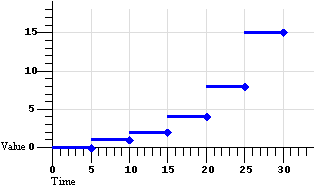 |
Figure 1a: Default discrete animation.
calcMode="discrete"
There are 6 segments of equal duration: 1 segment per value. |
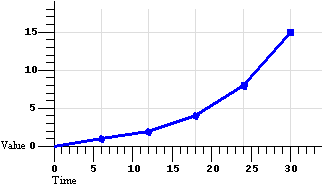 |
Figure 1b: Default linear animation.
calcMode="linear"
There are 5 segments of equal duration: n-1 segments for n values. |
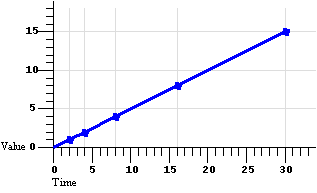 |
Figure 1c: Default paced animation.
calcMode="paced"
There are 5 segments of varying duration: n-1 segments for n values, computed
to yield a constant rate of change in the value. |
The following example describes a simple discrete animation:
<animate attributeName="foo" dur="8s"
     values="bar; fun; far; boo" />
The value of the attribute "foo" will be set to each of the four strings
for 2 seconds each. Because the string values cannot be interpolated, only
discrete animation is possible; any
calcMode attribute would be ignored.
Discrete animation can also be used with
keyTimes, as in the following example:
<animateColor attributeName="color" calcMode="discrete"
     values="green; yellow; red" keyTimes="0; 5; 10" />
This example also shows how
keyTimes values can interact with an indefinite duration. The
value of the "color" attribute will be set to green for 5 seconds, and then
to yellow for 5 seconds, and then will remain red for the remainder of the
document, since the (unspecified) duration defaults to "indefinite".
The following example describes a simple linear animation:
<animate attributeName="x" dur="10s" values="0; 10; 100"
     calcMode="linear"/>
The value of "x" will change from 0 to 10 in the first 5 seconds, and then
from 10 to 100 in the second 5 seconds. Note that the values in the
values attribute are spaced evenly
in time with no keyTimes specified;
in this case the result is a much larger actual change in the value during
the second half of the animation. Contrast this with the same example changed
to use "paced" interpolation:
<animate attributeName="x" dur="10s" values="0; 10; 100"
     calcMode="paced"/>
To produce an even pace of change to the attribute "x", the second segment
defined by the values list gets most of the simple duration: The value of
"x" will change from 0 to 10 in the first second, and then from 10 to 100
in the next 9 seconds. While this example could be easily authored as a
from-to animation without paced interpolation, many examples (such
as motion paths) are much harder to author without the "paced" value for
calcMode.
The following example illustrates the use of
keyTimes:
<animate attributeName="x" dur="10s" values="0; 50; 100"
     keyTimes="0; .8; 1" calcMode="linear"/>
The keyTimes values cause the "x"
attribute to have a value of "0" at the start of the animation, "50" after
8 seconds (at 80% into the simple duration) and "100" at the end of the
animation. The value will change more slowly in the first half of the animation,
and more quickly in the second half.
For some attributes, the pace of change may not be easily discernable
by viewers. However for animations like motion, the ability to make the
speed of the motion change gradually, and not in abrupt steps, can
be important. The keySplines attribute provides this control.
Extending the above example to use
keySplines:
<animate attributeName="x" dur="10s" values="0; 50; 100"
     keyTimes="0; .8; 1" calcMode="spline"
     keySplines=".5 0 .5 1; 0 0 1 1" />
The keyTimes still cause the "x"
attribute to have a value of "0" at the start of the animation, "50" after
8 seconds and "100" at the end of the animation. However, the
keySplines values define a curve
for pacing the interpolation between values. In the example above, the spline
causes an ease-in and ease-out effect between time 0 and 8 seconds (i.e.
between keyTimes 0 and .8, and
values "0" and "50"), but a strict
linear interpolation between 8 seconds and the end (i.e. between
keyTimes .8 and 1, and
values "50" and "100"). Figure
2 shows the curves that these
keySplines values define.
Figure 2 - Illustration of keySplines effect
|
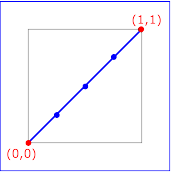
keySplines="0 0 1 1"
(the default)
|
|
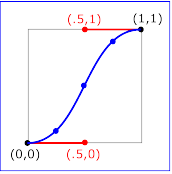
keySplines=".5 0 .5 1"
|
|
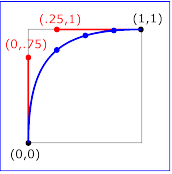
keySplines="0 .75 .25 1"
|
|
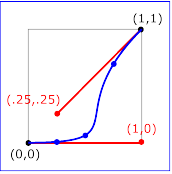
keySplines="1 0 .25 .25"
|
Each diagram in Figure 2 illustrates the effect of
keySplines settings for a single
interval (i.e. between the associated pairs of values in the
keyTimes and
values lists.). The horizontal axis can be thought of as the
input value for the unit progress of interpolation within the interval
- i.e. the pace with which interpolation proceeds along the given interval.
The vertical axis is the resulting value for the unit progress,
yielded by the keySplines function. Another way of describing this is that
the horizontal axis is the input unit time for the interval, and
the vertical axis is the output unit time. See also the section
Timing
and real-world clock times.
To illustrate the calculations, consider the simple example:
<animate dur="4s" values="10; 20" keyTimes="0; 1"
     calcMode="spline" keySplines={as in table} />
Using the keySplines values for each of the four cases above, the approximate
interpolated values as the animation proceeds are:
| keySplines values |
Initial value |
After 1s |
After 2s |
After 3s |
Final value |
| 0 0 1 1 |
10.0 |
12.5 |
15.0 |
17.5 |
20.0 |
| .5 0 .5 1 |
10.0 |
11.0 |
15.0 |
19.0 |
20.0 |
| 0 .75 .25 1 |
10.0 |
18.0 |
19.3 |
19.8 |
20.0 |
| 1 0 .25 .25 |
10.0 |
10.1 |
10.6 |
16.9 |
20.0 |
For a formal definition of Bezier spline calculation, see
[COMP-GRAPHICS], pages 488-491.
The keyTimes and
keySplines attributes can also
be used with the from/to/by shorthand forms for specifying values,
as in the following example:
<animate attributeName="foo" from="10" to="20"
     dur="10s" keyTimes="0; 7"
     calcMode="spline" keySplines=".5 0 .5 1" />
The value will change from 10 to 20, using an "ease-in/ease-out"
curve specified by the keySplines
values. The keyTimes values cause
the value of 20 to be reached at 7 seconds, and to hold there for the remainder
of the 10 second simple duration.
The following example describes a somewhat unusual usage, a from-to
animation with discrete animation. The stroke-linecap attribute
of SVG elements takes a string, and so implies a
calcMode of
discrete. The animation will set the
stroke-linecap attribute to round
for 5 seconds (half the simple duration) and then set the
stroke-linecap to square for 5 seconds.
<rect stroke-linecap="butt"...>
   <animate attributeName="stroke-linecap"
      from="round" to="square" dur="10s"/>
</rect>
As described above, the animation function
f(t) defines the animation for the simple duration.
However, SMIL Timing allows the author to repeat the simple duration. SMIL
Timing also allows authors to specify whether the animation should simply
end when the active duration completes, or whether it should be
frozen at the last value. SMIL Animation specifies what it means
for an animation to be frozen. In addition, the author can specify
how each animation should be combined with other animations and the original
DOM value.
This section describes the syntax and associated semantics for the additional
functionality. A detailed model for combining animations is described, along
with a state model for animations, and additional details of the timing model.
The period of time during which the animation is actively playing, including
any repeat behavior, is described as the active duration. The active duration
may be computed from the simple duration and the repeat specification, and
it may be constrained with the end attribute. The complete rules for computing the active
duration are presented in the section
Computing
the active duration.
Repeating an animation causes the animation function
f(t) to be "played" several times in
sequence. The author can specify either how many times to
repeat, using repeatCount, or
how long to repeat, using
repeatDur. Each repeat
iteration is one instance of "playing" the animation function
f(t).
If the simple duration is indefinite, the animation cannot repeat. See also
the section
Computing
the active duration.
The repeatCount and
repeatDur attributes are described
in detail in the Timing module.
In the following example, the 2.5 second animation function will be repeated
twice; the active duration will be 5 seconds.
<animate attributeName="top" from="0" to="10" dur="2.5s"
repeatCount="2"
/>
In the following example, the animation function will be repeated two full
times and then the first half is repeated once more; the active duration
will be 7.5 seconds.
<animate attributeName="top" from="0" to="10" dur="3s"
repeatCount="2.5"
/>
In the following example, the animation function will repeat for a total
of 7 seconds. It will play fully two times, followed by a fractional part
of 2 seconds. This is equivalent to a repeatCount of 2.8. The last (partial)
iteration will apply values in the range "0" to "8".
<animate attributeName="top" from="0" to="10" dur="2.5s"
repeatDur="7s" />
In the following example, the simple duration is longer than the duration
specified by repeatDur, and so
the active duration will effectively cut short the simple duration. However,
animation function still uses the specified simple duration. The effect of
the animation is to interpolate the value of "top" from 10 to 15, over the
course of 5 seconds.
<animate attributeName="top" from="10" to="20"
dur="10s"
repeatDur="5s" />
Note that if the simple duration is not defined (e.g. it is indefinite),
repeat behavior is not defined (but
repeatDur still defines the active duration). In the following
example the simple duration is indefinite, and so the
repeatCount is effectively ignored.
Nevertheless, this is not considered an error: the active duration is also
indefinite. The effect of the animation is to to just use the value for
f(0), setting the fill color to red for the
remainder of the animate element's duration.
<animate attributeName="fill" from="red" to="blue"
repeatCount="2" />
In the following example, the simple duration is indefinite, but the
repeatDur still determines the
active duration. The effect of the animation is to set the fill color to
red for 10 seconds.
<animate attributeName="fill" from="red" to="blue"
repeatDur="10s" />
In the following example, the simple duration is longer than the duration
specified by repeatDur, and so
the active duration will effectively cut short the simple duration. However,
the animation function still interpolates using the specified simple duration.
The effect of the animation is to interpolate the value of "top" from 10
to 17, over the course of 7 seconds.
<animate attributeName="top" from="10" to="20"
dur="10s"
repeatDur="7s" />
The author may also select whether a repeating animation should repeat the
original behavior for each iteration, or whether it should build upon the
previous results, accumulating with each iteration. For example, a motion
path that describes an arc can repeat by moving along the same arc over and
over again, or it can begin each repeat iteration where the last left off,
making the animated element bounce across the window. This is called
cumulative animation.
Using the path notation for a simple arc (detailed in
The animateMotion element),
we describe this example as:
<img ...>
   <animateMotion path="c( 3 5 7 5 10 0)" dur="5s"
      accumulate="sum" repeatCount="4" />
</img>
The image moves from the original position along the arc over the course
of 5 seconds. As the animation repeats, it builds upon the previous value
and begins the second arc where the first one ended, as illustrated in Figure
3, below. In this way, the image "bounces" across the screen. The same animation
could be described as a complete path of 4 arcs, but in the general case
the path description can get quite large and cumbersome to edit.
Figure 3 - Illustration of repeating animation with
accumulate="sum".

Figure 3 - Repeating animation with
accumulate set to
sum. Each repeat iteration builds upon the previous.
Note that cumulative animation only controls how a single animation accumulates
the results of the animation function as it repeats. It specifically does
not control how one animation interacts with other animations to produce
a presentation value. This latter behavior is described in the section
Additive animation. Similarily, if
an element restarts, the accumulate from the first run is not applied to
the second. See Restarting animations.
The cumulative behavior of repeating animations is controlled with the
accumulate attribute:
Cumulative animation attribute
-
-
accumulate
-
Controls whether or not the animation is cumulative. May be either of
the following two values:
-
sum
-
Each repeat iteration after the first builds upon the last value of the previous
iteration.
-
none
-
Repeat iterations are not cumulative, and simply repeat the animation function
f(t).
This is the default.
-
This attribute is ignored if the target attribute value does not support
addition, or if the animation element does not repeat.
Cumulative animation is not defined for "to animation". This attribute
will be ignored if the animation function is specified with only the
to attribute. See also
Specifying function values.
Any numeric attribute that supports addition can support cumulative animation.
For example, we can define a "pulsing" animation that will grow the "width"
of an SVG <rect> element by 100 pixels in 50 seconds.
<rect width="20px"...>
   <animate attributeName="width" dur="5s"
      values="0; 15; 10" additive="sum"
      accumulate="sum" repeatCount="10" />
</rect>
Each simple duration causes the rectangle width to bulge by 15 pixels and
end up 10 pixels larger. The shape is 20 pixels wide at the beginning, and
after 5 seconds is 30 pixels wide. The animation repeats, and builds upon
the previous values. The shape will bulge to 45 pixels and then end up 40
pixels wide after 10 seconds, and will eventually end up 120 (20 + 100) pixels
wide after all 10 repeats.
From-to and from-by animations also support cumulative
animation, as in the following example:
<rect width="20px"...>
   <animate attributeName="width" dur="5s" from="10px" to="20px"
      accumulate="sum" repeatCount="10" />
</rect>
The rectangle will grow from 10 to 20 pixels in the first 5 seconds, and
then from 20 to 30 in the next 5 seconds, and so on up to 110 pixels after
10 repeats. Note that since the default value for
additive is replace, the original
value is ignored. The following example makes the animation explicitly additive:
<rect width="20px"...>
   <animate attributeName="width" dur="5s" from="10px" to="20px"
      accumulate="sum" additive="sum" repeatCount="10" />
</rect>
The results are the same as before, except that all the values are shifted
up by the original value of 20. The rectangle is 30 pixels wide after 5 seconds,
and 130 pixels wide after 10 repeats.
To produce the cumulative animation behavior, the animation function
f(t) must be modified slightly. Each iteration
after the first must add in the last value of the previous iteration - this
is expressed as a multiple of the last value
specified for the animation function.
Note that cumulative animation is defined in terms of the values specified
for the animation behavior, and not in terms of sampled or rendered animation
values. The latter would vary from machine to machine, and could even vary
between document views on the same machine.
Let fi(t) represent the cumulative
animation function for a given iteration i.
The first iteration f0(t) is unaffected
by accumulate, and so is the
same as the original animation function definition.
f0(t) = f(t)
Let ve be the last value specified for the
animation function (e.g. the to value,
the last value in a values list,
or the end of a path). Each iteration
after the first adds in the computed offset:
fi(t) = (ve * i) + f(t)
; i >= 1
Animation elements follow the definition of
fill in the Timing module. This section extends that specification
to cover animation-specific semantics.
By default when an animation element ends, its effect is no longer applied
to the presentation value for the target attribute. For example, if an animation
moves an image and the animation element ends, the image will "jump back"
to its original position.
<img top="3" ...>
   <animate begin="5s" dur="10s" attributeName="top" by="100"/>
</img>
The image will appear stationary at the top value of "3" for 5 seconds, then
move 100 pixels down in 10 seconds. 15 seconds after the document begin,
the animation ends, the effect is no longer applied, and the image jumps
back from 103 to 3 where it started (i.e. to the underlying DOM value of
the top attribute).
The fill attribute can be used to maintain
the value of the animation after the active duration of the animation element
ends:
<img top="3" ...>
   <animate begin= "5s" dur="10s" attributeName="top" by="100"
          fill="freeze" />
</img>
The animation ends 15 seconds after the document begin, but the image remains
at the top value of 103. The attribute freezes the last value of
the animation for the duration of the freeze effect. This duration is controlled
by the time container, and never extends past the end of the time container
simple duration.
If the active duration cuts short the simple duration (including the case
of partial repeats), the effect value of a frozen animation is
defined by the shortened simple duration. In the following example, the animation
function repeats two full times and then again for one-half of the simple
duration. In this case, the value while frozen will be 15:
<animate from="10" to="20" dur="4s"
         repeatCount="2.5" fill="freeze" .../>
In the following example, the dur attribute
is missing, and so the simple duration is indefinite. The active duration
is constrained by end to be 10 seconds.
Since interpolation is not defined, the value while frozen will
be 10:
<animate from="10" to="20" end="10s" fill="freeze" .../>
It is frequently useful to define animation as an offset or delta to an
attribute's value, rather than as absolute values. A simple "grow" animation
can increase the width of an object by 10 pixels:
<rect width="20px" ...>
   <animate attributeName="width" from="0px" to="10px" dur="10s"
      additive="sum"/>
</rect>
The width begins at 20 pixels, and increases to 30 pixels over the course
of 10 seconds. If the animation were declared to be non-additive, the
same from and to values would make the width go from 0 to 10 pixels over
10 seconds.
In addition, many complex animations are best expressed as combinations of
simpler animations. A "vibrating" path, for example, can be described as
a repeating up and down motion added to any other motion:
<img ...>
   <animateMotion from="0,0" to="100,0" dur="10s" />
   <animateMotion values="0,0; 0,5; 0,0" dur="1s"
                  repeatDur="10s" additive="sum"/>
</img>
When there are multiple animations defined for a given attribute that overlap
at any moment, the two either add together or one overrides the other. Animations
overlap when they are both either active or frozen at the same moment. The
ordering of animations (e.g. which animation overrides which) is determined
by a priority associated with each animation. The animations are prioritized
according to when each begins. The animation first begun has lowest priority
and the most recently begun animation has highest priority.
Higher priority animations that are not additive will override all earlier
(lower priority) animations, and simply set the attribute value. Animations
that are additive apply (i.e. add to) to the result of the earlier-activated
animations. For details on how animations are combined, see
The animation sandwich model.
The additive behavior of an animation is controlled by the
additive attribute:
Additive attribute
-
additive
-
Controls whether or not the animation is additive.
-
sum
-
Specifies that the animation will add to the underlying value of the attribute
and other lower priority animations.
-
replace
-
Specifies that the animation will override the underlying value of the attribute
and other lower priority animations. This is the default, however the behavior
is also affected by the animation value attributes
by and
to, as described in
"How from, to and by attributes
affect additive behavior", below.
-
This attribute is ignored if the target attribute does not support additive
animation.
Additive animation is defined for numeric attributes and other data types
for which some addition function is defined. This includes numeric attributes
for concepts such as position, widths and heights, sizes, etc. This also
includes color (refer to The
animateColor element), and may include other data types as specified
by the host language.
It is often useful to combine additive animations and
fill behavior, for example when a series
of motions are defined that should build upon one another:
<img ...>
   <animateMotion begin="0" dur="5s" path="[some path]"
           additive="sum" fill="freeze" />
   <animateMotion begin="5s" dur="5s" path="[some path]"
           additive="sum" fill="freeze" />
   <animateMotion begin="10s" dur="5s" path="[some path]"
           additive="sum" fill="freeze" />
</img>
The image moves along the first path, and then starts the second path from
the end of the first, then follows the third path from the end of the second,
and stays at the final point.
While many animations of numerical attributes will be additive, this is not
always the case. As an example of an animation that is defined to be
non-additive, consider a hypothetical extension animation "mouseFollow" that
causes an object to track the mouse.
<img ...>
   <animateMotion dur=10s repeatDur="indefinite"
           path="[some nice path]" />
   <mouseFollow begin="mouseover" dur="5s"
           additive="replace" fill="remove" />
</img>
The mouse-tracking animation runs for 5 seconds every time the user mouses
over the image. It cannot be additive, or it will just offset the motion
path in some odd way. The mouseFollow needs to override the
animateMotion while it is
active. When the mouseFollow completes, its effect is no longer
applied and the animateMotion
again controls the presentation value for position.
In addition, some numeric attributes (e.g. a telephone number attribute)
may not sensibly support addition. It is left to the host language to specify
which attributes support additive animation. Attribute types for which addition
is not defined, such as strings and Booleans, cannot support additive animation.
The attribute values to and
by, used to
describe the animation function,
can override the additive attribute
in certain cases:
-
If by is used
without from, (by
animation) the animation is defined to be additive (i.e. the equivalent
of
additive="sum").
-
If to is used without
from, (to animation) and if
the attribute supports addition, the animation is defined to be a kind of
mix of additive and non-additive. The underlying value is used as a starting
point as with additive animation, however the ending value specified by the
to attribute overrides the underlying
value as though the animation was non-additive.
For the hybrid case of a to-animation, the animation function
f(t) is defined in terms of the underlying
value, the specified to value, and the
current value of t (i.e. time) relative to
the simple duration d.
-
d
-
is the simple duration
-
t
-
is a time within the simple duration (0 <= t <= d)
 -
v
cur
-
is the current base value (at time t)
-
vto
-
is the defined "to" value
f(t) = vcur +
((vto -
vcur) * (t/d))
Note that if no other (lower priority) animations are active or frozen, this
defines simple interpolation. However if another animation is manipulating
the base value, the to-animation will add to the effect of the lower
priority, but will dominate it as it nears the end of the simple duration,
eventually overriding it completely. The value for
F(t) when a to-animation is frozen
(at the end of the simple duration) is just the to value. If
a to-animation is frozen anywhere within the simple duration (e.g.
using a repeatCount of "2.5"), the value for
F(t) when the animation is frozen is the value
computed for the end of the active duration. Even if other, lower priority
animations are active while a to-animation is frozen, the value
for F(t) does not change.
Multiple to-animations will also combine according to these semantics.
As the animation progresses, the higher-priority animation will have greater
and greater effect, and the end result will be to set the attribute to the
final value of the higher-priority to-animation.
Multiple by-animations combine according to the general rules for
additive animation and the
animation sandwich model.
The use of from values does not imply
either additive or non-additive animation, and both are possible. The
from value for an additive animation
is simply added to the underlying value, just as for the initial value is
in animations specified with a values
list. Additive behavior for from-to and from-by animations
is controlled by the additive
attribute, as in the general case.
For an example of additive to-animation, consider the following
two additive animations. The first, a by-animation applies a delta
to attribute "x" from 0 to -10. The second, a to-animation animates
to a final value of 10.
 <foo x="0" .../>
    <animate id="A1" attributeName="x"
        by="-10" dur="10s" fill="freeze" />
    <animate id="A2" attributeName="x"
        to="10"  dur="10s" fill="freeze" />
 </foo>
The presentation value for "x" in the example above, over the course of the
10 seconds is presented in Figure 4 below. These values are simply computed
using the formula described above. Note that the value for
F(t) for A2 is the presentation value for "x".
Figure 4 - Effect of Additive to-animation example
| Time |
F(t) for A1 |
F(t) for A2 |
| 0 |
0 |
0 |
| 1 |
-1 |
0.1 |
| 2 |
-2 |
0.4 |
| 3 |
-3 |
0.9 |
| 4 |
-4 |
1.6 |
| 5 |
-5 |
2.5 |
| 6 |
-6 |
3.6 |
| 7 |
-7 |
4.9 |
| 8 |
-8 |
6.4 |
| 9 |
-9 |
8.1 |
| 10 |
-10 |
10 |
The accumulate attribute should
not be confused with the
additive attribute. The
additive attribute defines how
an animation is combined with other animations and the base value of the
attribute. The accumulate
attribute defines only how the animation function interacts with itself,
across repeat iterations.
Typically, authors expect cumulative animations to be additive (as in the
examples described for accumulate
above), but this is not required. The
following example is cumulative but not additive.
<img ...>
   <animate dur="10s" repeatDur="indefinite"
            attributeName="top" from="20" by="10"
            additive="replace" accumulate="sum" />
</img>
The animation overrides whatever original value was set for "top", and begins
at the value 20. It moves down by 10 pixels to 30, then repeats. It is
cumulative, so the second iteration starts at 30 and moves down by another
10 to 40. Etc.
When a cumulative animation is also defined to be additive, the two features
function normally. The accumulated effect for
F(t) is used as the value for the animation,
and is added to the underlying value for the target attribute. Refer also
to The animation sandwich
model.
Animation elements follow the definition of restart in the
SMIL Timing module. This section
is descriptive.
When an animation restarts, the defining semantic is that it behaves as though
this were the first time the animation had begun, independent of any earlier
behavior. The animation effect F(t) is defined
independent of the restart behavior. Any effect of an animation playing earlier
is no longer applied, and only the current animation effect
F(t) is applied.
If an additive animation is restarted while it is active or frozen, the previous
effect of the animation (i.e. before the restart) is no longer applied to
the attribute. Note in particular that cumulative animation is defined only
within the active duration of an animation. When an animation restarts, all
accumulated context is discarded, and the animation effect
F(t) begins accumulating again from the first
iteration of the restarted active duration.
The specific error handling mechanisms for each attribute are described with
the individual syntax descriptions. Some of these specifications describe
the behavior of an animation with syntax errors as "having no effect".
This means that the animation will continue to behave normally with respect
to timing, but will not manipulate any presentation value, and so will have
no visible impact upon the presentation.
In particular, this means that if other animation elements are defined to
begin or end relative to an animation that "has no effect", the other animation
elements will begin and end as though there were no syntax errors. The
presentation runtime may indicate an error, but need not halt presentation
or animation of the document.
Some host languages and/or runtimes may choose to impose stricter error handling
(see also Error handling
semantics for a discussion of host language issues with error handling).
Authoring environments may also choose to be more intrusive when errors are
detected.
When an animation is running, it does not actually change the attribute values
in the DOM. The animation runtime should ideally maintain a
presentation value for any target attribute, separate from the DOM,
CSS, or other object model (OM) in which the target attribute is defined.
The presentation value is reflected in the display form of the document.
The effect of animations is to manipulate this presentation value, and not
to affect the underlying DOM or CSS OM values.
The remainder of this discussion uses the generic term OM for both the XML
DOM [DOM2] as well as the CSS-OM. If an implementation does not support
an object model, it should ideally maintain the original value as defined
by the document as well as the presentation value; for the purposes of this
section, we will consider this original value to be equivalent to the value
in the OM.
In some implementations of DOM, it may be difficult or impractical to main
a presentation value as described. CSS values should always be supported
as described, as the CSS-OM provides a mechanism to do so. In implementations
that do not support separate presentation values for general XML DOM properties,
the implementation must at least restore the original value when animations
no longer have an effect.
The rest of this discussion assumes the recommended approach using a separate
presentation value.
The model accounting for the OM and concurrently active or frozen animations
for a given attribute is described as a "sandwich", a loose analogy to the
layers of meat and cheeses in a "submarine sandwich" (a long sandwich made
with many pieces of meats and cheese layered along the length of the bread).
In the analogy, time is associated with the length of the sandwich, and each
animation has its duration represented by the length of bread that the layer
covers. On the bottom of the sandwich is the base value taken from the OM.
Each active (or frozen) animation is a layer above this. The layers (i.e.
the animations) are placed on the sandwich both in time along the length
of the bread, as well as in order according to priority, with higher
priority animations placed above (i.e. on top of) lower priority animations.
At any given point in time, you can take a slice of the sandwich and see
how the animation layers stack up.
Note that animations manipulate the presentation value coming out of the
OM in which the attribute is defined, and pass the resulting value on to
the next layer of document processing. This does not replace or override
any of the normal document OM processing cascade.
Specifically, animating an attribute defined in XML will modify the presentation
value before it is passed through the style sheet cascade, using the XML
DOM value as its base. Animating an attribute defined in a style sheet language
will modify the presentation value passed through the remainder of the
cascade.
In CSS2 and the DOM 2 CSS-OM, the terms "specified", "computed" and "actual"
are used to describe the results of evaluating the syntax, the cascade and
the presentation rendering. When animation is applied to CSS properties of
a particular element, the base value to be animated is read using the (readonly)
getComputedStyle() method on that element. The values produced
by the animation are written into an override stylesheet for that element,
which may be obtained using the getOverrideStyle() method. These
new values then affect the cascade and are reflected in a new computed value
(and thus, modified presentation). This means that the effect of animation
overrides all style sheet rules, except for user rules with the
!important property. This enables !important user
style settings to have priority over animations, an important requirement
for accessibility. Note that the animation may have side effects upon the
document layout. See also
section
6.1, "Specified, computed, and actual values," of [CSS2] and
section
5.2.1, "Override and computed style sheet," of [DOM2CSS].
Within an OM, animations are prioritized according to when each begins. The
animation first begun has lowest priority and the most recently begun animation
has highest priority. When two animations start at the same moment in time,
the activation order is resolved as follows:
-
If one animation is a time dependent of another (e.g. it is specified
to begin when another begins), then the time dependent is considered to activate
after the syncbase element, and so has higher priority. Time dependency
is further discussed in
Propagating
changes to times. This rule applies independent of the timing described
for the syncbase element - i.e. it does not matter whether the syncbase element
begins on an offset, relative to another syncbase, relative to an event-base,
or via hyperlinking. In all cases, the syncbase is begun before any time
dependents are begun, and so the syncbase has lower priority than the time
dependent.
-
If two animations share no time dependency relationship (e.g. neither is
defined relative to the other, even indirectly) the element that appears
first in the document has lower priority. This includes the cases in which
two animation elements are defined relative to the same syncbase or
event-base.
Note that if an animation is restarted (see also
Restarting animations), it will always
move to the top of the priority list, as it becomes the most recently activated
animation. That is, when an animation restarts, its layer is pulled out of
the sandwich, and added back on the very top. In contrast, when an
element repeats the priority is not affected (repeat behavior is not defined
as restarting).
Each additive animation adds its effect to the result of all sandwich layers
below. A non-additive animation simply overrides the result of all lower
sandwich layers. The end result at the top of the sandwich is the presentation
value that must be reflected in the document view.
Some attributes that support additive animation have a defined legal range
for values (e.g. an opacity attribute may allow values between 0 and 1).
In some cases, an animation function may yield out of range values. It is
recommended that implementations clamp the results to the legal range as
late as possible, before applying them to the presentation value. Ideally,
the effect of all the animations active or frozen at a given point should
be combined, before any clamping is performed. Although individual animation
functions may yield out of range values, the combination of additive animations
may still be legal. Clamping only the final result and not the effect of
the individual animation functions provides support for these cases. Intermediate
results may be clamped when necessary although this is not optimal. The host
language must define the clamping semantics for each attribute that can be
animated. As an example, this is defined for
animateColor element
Initially, before any animations for a given attribute are active, the
presentation value will be identical to the original value specified in the
document (the OM value).
When all animations for a given attribute have completed and the associated
animation effects are no longer applied, the presentation value will again
be equal to the OM value. Note that if any animation is defined with
fill="freeze", the effect
of the animation will be applied as long as the animation element remians
in the frozen state, and so the presentation value will continue to reflect
the animation effect. Refer also to the section
"Freezing animations".
Some animations (e.g.
animateMotion) will implicitly target an attribute,
or possibly several attributes (e.g. the "posX" and "posY" attributes of
some layout model). These animations must be combined with any other animations
for each attribute that is affected. Thus, e.g. an
animateMotion animation may
be in more than one animation sandwich (depending upon the layout model of
the host language). For animation elements that implicitly target attributes,
the host language designer must specify which attributes are implicitly targeted,
and the runtime must accordingly combine animations for the respective
attributes.
Note that any queries (via DOM interfaces) on the target attribute will reflect
the OM value, and will not reflect the effect of animations. Note also that
the OM value may still be changed via the OM interfaces (e.g. using script).
While it may be useful or desired to provide access to the final presentation
value after all animation effects have been applied, such an interface is
not provided as part of SMIL Animation. A future version may address this.
Although animation does not manipulate the OM values, the document display
must reflect changes to the OM values. Host languages can support script
languages that can manipulate attribute values directly in the OM. If an
animation is active or frozen while a change to the OM value is made, the
behavior is dependent upon whether the animation is defined to be additive
or not, as follows: (see also the section
Additive animation).
-
If only additive animations are active or frozen (i.e. no non-additive animations
are active or frozen for the given attribute) when the OM value is changed,
the presentation value must reflect the changed OM value as well as the effect
of the additive animations. When the animations complete and the effect of
each is no longer applied, the presentation value will be equal to the changed
OM value.
-
If any non-additive animation is running when the OM value is changed, the
presentation value will not reflect the changed OM value, but will only reflect
the effect of the highest priority non-additive animation, and any still
higher priority additive animations. When all non-additive animations complete
and the effect of each is no longer applied, the presentation value will
reflect the changed OM value and the effect of any additive animations that
are active or frozen.
Animation function values must be legal values for the specified attribute.
Three classes of values are described:
-
Unitless scalar values. These are simple scalar values that
can be parsed and set without semantic constraints. This class includes integers
(base 10) and floating point (format specified by the host language).
-
String values. These are simple strings.
-
Language abstract values. These are values like CSS-length
and CSS-angle values that have more complex parsing, but that can yield numbers
that may be interpolated.
The animate element can interpolate
unitless scalar values, and both
animate and set elements
can handle String values without any semantic knowledge of the target element
or attribute. The animate and
set elements must support unitless scalar
values and string values. The host language must define which additional
language abstract values should be handled by these elements. Note that the
animateColor element implicitly
handles the abstract values for color values, and that the
animateMotion element implicitly
handles position and path values.
In order to support interpolation on attributes that define numeric values
with some sort of units or qualifiers (e.g. "10px", "2.3feet", "$2.99"),
some additional support is required to parse and interpolate these values.
One possibility is to require that the animation framework have built-in
knowledge of the unit-qualified value types. However, this violates the principle
of encapsulation and does not scale beyond CSS to XML languages that define
new attribute value types of this form.
The recommended approach is for the animation implementation for a given
host environment to support two interfaces that abstract the handling of
the language abstract values. These interfaces are not formally specified,
but are simply described as follows:
-
The first interface converts a string (the animation function value) to a
unitless, canonical number (either an integer or a floating point value).
This allows animation elements to interpolate between values without requiring
specific knowledge of data types like CSS-length. The interface will likely
require a reference to the target attribute, to determine the legal abstract
values. If the passed string cannot be converted to a unitless scalar, the
animation element will treat the animation function values as strings, and
the calcMode will default to "discrete".
-
The second interface converts a unitless canonical number to a legal string
value for the target attribute. This may, for example, simply convert the
number to a string and append a suffix for the canonical units. The animation
element uses the result of this to actually set the presentation value.
Support for these two interfaces ensures that an animation engine need not
replicate the parser and any additional semantic logic associated with language
abstract values.
This is not an attempt to specify how an implementation provides this support,
but rather a requirement for how values are interpreted. Animation behaviors
should not have to understand and be able to convert among all the CSS-length
units, for example. In addition, this mechanism allows for application of
animation to new XML languages, if the implementation for a language can
provide parsing and conversion support for attribute values.
The above recommendations notwithstanding, it is sometimes useful to interpolate
values in a specific unit-space, and to apply the result using the specified
units rather than canonical units. This is especially true for certain relative
units such as those defined by CSS (e.g. em units). If an animation specifies
all the values in the same units, an implementation may use knowledge of
the associated syntax to interpolate in the unit space, and apply the result
within the animation sandwich, in terms of the specified units rather than
canonical units. As noted above, this solution does not scale well to the
general case. Nevertheless, in certain applications (such as CSS properties),
it may be desirable to take this approach.
This section defines the syntax and semantics of animation elements. For
the DTD, see SMIL Animation Document
Type Definition (DTD), below. Timing attributes are defined in the
SMIL Timing module.
The animate element introduces a
generic attribute animation that requires little or no semantic understanding
of the attribute being animated. It can animate numeric scalars as well as
numeric vectors. It can also animate a single non-numeric attribute through
a discrete set of values. The
animate element is an empty element;
it cannot have child elements.
This element supports from/to/by and values descriptions for the animation
function, as well as all of the calculation modes. It supports all the described
timing attributes. These are all described in respective sections above.
Element attributes
-
attributeName
and
-
attributeType
-
The attribute to be animated. See
The target attribute.
attributeName is required;
attributeType is optional.
-
targetElement,
-
href,
-
actuate,
-
show, and
-
type
-
The target element. See The
target element. All are optional.
-
-
from,
-
to,
-
by,
-
values,
-
keyTimes,
-
keySplines,
-
calcMode,
-
accumulate, and
-
additive
-
-
Specify the animation function and effect. See
Specifying the animation
function f(t) and
Specifying the animation
effect F(t).
Numerous examples are provided above.
3.4.2
The
set element
The set element provides a simple means
of just setting the value of an attribute for a specified duration. As
with all animation elements, this only manipulates the presentation value,
and when the animation completes, the effect is no longer applied. That is,
set does not permanently set
the value of the attribute.
The set element supports all attribute
types, including those that cannot reasonably be interpolated and that more
sensibly support semantics of simply setting a value (e.g. strings and Boolean
values). The set element is non-additive.
The additive and accumulate attributes are not allowed, and will be ignored
if specified.
The set element supports all the timing
attributes to specify the simple and active durations. However, the
repeatCount and
repeatDur attributes will just
affect the active duration of the set,
extending the effect of the set (since
it is not really meaningful to "repeat" a static operation). Note that using
fill="freeze" with
set will have the same effect as defining
the timing so that the active duration is indefinite.
The set element supports a more restricted
set of attributes than the
animate element. Only one value is specified, and no interpolation
control is supported:
Examples
The following changes the stroke-width of an SVG rectangle from the original
value to 5 pixels wide. The effect begins at 5 seconds and lasts for 10 seconds,
after which the original value is again used.
<rect ...>
   <set attributeName="stroke-width" to="5px"
            begin="5s" dur="10s" fill="remove" />
</rect>
The following example sets the class attribute of the text element
to the string "highlight" when the mouse moves over the element, and removes
the effect when the mouse moves off the element.
<text>This will highlight if you mouse over it...
   <set attributeName="class" to="highlight"
            begin="mouseover" end="mouseout" />
</text>
The
animateMotion element will move an element along a
path. The element abstracts the notion of motion and position across a variety
of layout mechanisms - the host language defines the layout model and must
specify the precise semantics of position and motion. The path can be described
in several ways:
-
Specifying x,y pairs for the
from/to/by
attributes. These will define a straight line motion path.
-
Specifying x,y pairs for the
values attribute. This will define a motion path of straight
line segments, or points (if
calcMode is set to discrete). This will override any
from/to/by attribute values.
-
Specifying a path in the path attribute. This will define a motion path using
a subset of the SVG path syntax, and provides smooth path motion. This will
override any
from/to/by or
values attribute values.
All values must be x, y value pairs. Each x and y value may specify any units
supported for element positioning by the host language. The host language
defines the default units. In addition, the host language defines the
reference point for positioning an element. This is the point within
the element that is aligned to the position described by the motion animation.
The reference point defaults in some languages to the upper left corner of
the element bounding box; in other languages the reference point may be implicit,
or may be specified for an element.
The syntax for the x, y value pairs is:
coordinate-pair ::= ( coordinate comma-wsp coordinate )
coordinate      ::= num
num             ::= Number
Coordinate values are separated by at least one white space character or
a comma. Additional white space around the separator is allowed. The values
of coordinate must be defined as some sort of number in the
host language.
The attributeName and
attributeType attributes are
not used with animateMotion,
as the manipulated position attribute(s) are defined by the host language.
If the position is exposed as an attribute or attributes that can also be
animated (e.g. as "top" and "left", or "posX" and "posY"), implementations
must combine animateMotion
animations with other animations that manipulate individual position attributes.
See also The animation sandwich
model.
The
animateMotion element adds an additional syntax
alternative for specifying the animation, the
path attribute. This allows the description
of a path using a subset of the SVG path syntax. Note that if a path is
specified, it will override any specified values for
values or
from/to/by
attributes.
As noted in Animation function
values, if any values (i.e. the argument-values for
from,
to,
by or
values attributes, or for the
path attribute) are not legal, the
animation will have no effect (see also
Handling Syntax Errors).
The same is true if none of the from,
to,
by,
values or
path attributes are specified.
The default calculation mode
(calcMode) for
animateMotion is paced. This will
produce constant velocity motion along the specified path. Note that while
animateMotion elements can be additive, authors should note that the addition
of two or more paced (constant velocity) animations
may not result in a combined motion animation with constant velocity.
Element attributes
-
-
targetElement,
-
href,
-
actuate,
-
show, and
-
type
-
The target element. See The
target element. All are optional.
-
-
-
from,
-
to,
-
by,
-
values,
-
keyTimes,
-
keySplines,
-
accumulate, and
-
additive
-
-
Specify the animation function and effect. See
Specifying the animation
function f(t) and
Specifying the animation
effect F(t).
-
calcMode
-
Defined as above in Animation function
calculation modes, but note that the default
calcMode for
animateMotion is
paced. This will produce constant velocity motion
across the path.
The use of discrete for the
calcMode together with a
path specification is allowed, but
will simply jump the target element from point to point. If the
keyTimes attribute is not specified,
the times are derived from the points in the
path specification (as described in
Animation function calculation
modes).
The use of linear for the
calcMode with more than 2 points
described in values,
path or
keyTimes may result in motion with
varying velocity. The linear
calcMode specifies that time is
evenly divided among the segments defined by the
values or
path (note: any
"keyTimes" list defines the same
number of segments). The use of linear does not
specify that time is divided evenly according to the distance described
by each segment.
For motion with constant velocity,
calcMode should be set to "paced".
For complete velocity control, calcMode can be set to "spline" and the author
can specify a velocity control spline with
keyTimes and
"keySplines".
-
path
-
Specifies the curve that describes the attribute value as a function of time.
The supported syntax is a subset of the SVG path syntax. Support includes
commands to describes lines ("MmLlHhVvZz") and Bezier curves ("Cc"). For
details refer to the path specification in SVG
[SVG].
-
Note that SVG provides two forms of path commands, "absolute" and "relative".
These terms may appear to be related to the definition of additive animation
and/or to the from attribute, but they
are orthogonal. The terms "absolute" and "relative" apply only to the definition
of the path itself, and not to the operation of the animation. The "relative"
commands define a path point relative to the previously specified point.
The terms "absolute" and "relative" are unrelated to the definitions of both
"additive" animation and any specification of
origin.
-
For the "absolute" commands ("MLHVZC"), the host language must specify the
coordinate system of the path values.
-
If the "relative" commands ("mlhvzc") are used, they simply define the point
as an offset from the previous point on the path. This does not affect the
definition of "additive" or origin
for the animateMotion element.
A path data segment must begin with either one of the "moveto" commands.
-
Move To commands - "M <x> <y>" or "m <dx> <dy>"
-
Start a new sub-path at the given (x,y) coordinate. If a moveto is followed
by multiple pairs of coordinates, the subsequent pairs are treated as implicit
lineto commands.
-
Line To commands - "L <x> <y>" or "l <dx> <dy>"
-
Draw a line from the current point to the given (x,y) coordinate which becomes
the new current point. A number of coordinate pairs may be specified to draw
a polyline.
-
Horizontal Line To commands - "H <x>" or "h <dx>"
-
Draws a horizontal line from the current point (cpx, cpy) to (x, cpy). Multiple
x values can be provided.
-
Vertical Line To commands - "V <y>" or "v <dy>"
-
Draws a vertical line from the current point (cpx, cpy) to (cpx, y). Multiple
y values can be provided.
-
Closepath commands - "Z" or "z"
-
The "closepath" causes an automatic straight line to be drawn from the current
point to the initial point of the current subpath.
-
Cubic Bezier Curve To commands -
"C <x1> <y1> <x2> <y2> <x> <y>"
or
"c <dx1> <dy1> <dx2> <dy2> <dx>
<dy>"
-
Draws a cubic Bezier curve from the current point to (x,y) using (x1,y1)
as the control point at the beginning of the curve and (x2,y2) as the control
point at the end of the curve. Multiple sets of coordinates may be specified
to draw a polybezier.
When a path is combined with
discrete, linear
or spline
calcMode settings, the number of
values is defined to be the number of points defined by the path, unless
there are "move to" commands within the path. A "move to" command does
not define an additional "segment" for the purposes of timing or interpolation.
A "move to" command does not count as an additional point when dividing up
the duration, or when associating
keyTimes and
keySplines values. When a
path is combined with a
paced
calcMode setting, all "move to"
commands are considered to have 0 length (i.e. they always happen
instantaneously), and should not be considered in computing the pacing.
-
origin
-
Specifies the origin of motion for the animation. The values and semantics
of this attribute are dependent upon the layout and positioning model of
the host language. In some languages, there may be only one option,
default. However, in CSS positioning for example,
it is possible to specify a motion path relative to the container block,
or to the layout position of the element. It is often useful to describe
motion relative to the position of the element as it is laid out (e.g. from
off screen left to the layout position, specified as
from="(-100,0)" and
to="(0,0)". Authors must
be able to describe motion both in this manner, as well as relative to the
container block. The origin attribute
supports this distinction. Nevertheless, because the host language defines
the layout model, the host language must also specify the "default" behavior,
as well as any additional attribute values that are supported.
-
Note that the definition of the layout model in the host language specifies
whether containers have bounds, and the behavior when an element is moved
outside the bounds of the layout container. In CSS2
[CSS2], for example, this can be controlled
with the "clip" property.
Note that for additive animation, the origin distinction is not
meaningful. This attribute only applies when
additive is set to
replace.
The
animateColor element
specifies an animation of a color attribute. The host language must specify
those attributes that describe color values and can support color animation.
All values must represent [sRGB] color values.
Legal value syntax for attribute values is defined by the host language.
Interpolation is defined on a per-color-channel basis.
Element attributes
-
attributeName
and
-
attributeType
-
The attribute to be animated. See
The target attribute.
attributeName is required;
attributeType is optional.
-
-
targetElement,
-
href,
-
actuate,
-
show, and
-
type
-
The target element. See The
target element. All are optional.
-
-
-
from,
-
to,
-
by,
-
values,
-
keyTimes,
-
keySplines,
-
calcMode,
-
accumulate, and
-
additive
-
-
Specify the animation function and effect. See
Specifying the animation
function f(t) and
Specifying the animation
effect F(t).
The values in the
from/to/by and
values attributes may specify negative
and out of gamut values for colors. The function defined by an
individual animateColor may
yield negative or out of gamut values. The implementation must correct
the resulting presentation value, to be legal for the destination (display)
colorspace. However, as described in
The animation sandwich model,
the implementation should only correct the final combined result of all
animations for a given attribute, and should not correct the effect of individual
animations.
Values are corrected by "clamping" the values to the correct range. Values
less than the minimum allowed value are clamped to the minimum value (commonly
0, but not necessarily so for some color profiles). Values greater than the
defined maximum are clamped to the maximum value (defined by the host language)
.
Note that color values are corrected by clamping them to the gamut of the
destination (display) colorspace. Some implementations may be unable to process
values which are outside the source (sRGB) colorspace and must thus perform
clamping to the source colorspace, then convert to the destination colorspace
and clamp to its gamut. The point is to distinguish between the source and
destination gamuts; to clamp as late as possible, and to realize that some
devices, such as inkjet printers which appear to be RGB devices, have non-cubical
gamuts.
Note to implementers: When
animateColor is specified as a to animation, the animation
function should assume Euclidean RGB-cube distance where deltas must be computed.
See also Specifying function values
and How from, to and by attributes
affect additive behavior. Similarly, when the
calcMode attribute for
animateColor is set to "paced",
the animation function should assume Euclidean RGB-cube distance to compute
the distance and pacing.
This section describes what a language designer must actually do to specify
the integration of SMIL Animation into a host language. This includes basic
definitions and constraints upon animation.
The host language profile must integrate Level 0 of the
SMIL Timing module into the host
language, satisfying all requirements of that module. If higher levels of
SMIL Timing are also integrated into the host language, those levels must
be available on Animation elements.
The host langauge profile may add additional attributes to Animation elements.
Attributes added to any Animation element must be added to all Animation
elements. In particular, this module does not define an XML ID attribute.
It is expected that the host language profile will add an XML ID attribute
to the Animation elements.
The host language designer must choose whether to support the
targetElement attribute or
the XLink attributes for
specifying the target
element. Note that if the XLink syntax is used, the host language designer
must decide how to denote the XLink namespace for the associated attributes.
The namespace can be fixed in a DTD, or the language designer can require
colonized attribute names (qnames) to denote the XLink namespace
for the attributes. The required XLink attributes have fixed values, and
so may also be specified in a DTD, or can be required on the animation elements.
Host language designers may require that the optional XLink attributes be
specified. These decisions are left to the host language designer - the syntax
details for XLink attributes do not affect the semantics of SMIL Animation.
In general, target elements may be any element in the document. Host language
designers must specify any exceptions to this. Host language designers are
discouraged from allowing animation elements to target elements outside of
the document in which the animation element is defined. The XLink syntax
for the target element could allow this, but the SMIL timing and animation
semantics of this are not defined in this version of SMIL Animation.
The definitions in this module can be used to animate any attribute of any
element in a host document. However, it is expected that host language designers
integrating SMIL Animation may choose to constrain which elements and attributes
can support animation. For example, a host language may choose not to support
animation of the language attribute of a script
element. A host language which included a specification for DOM functionality
might limit animation to the attributes which may legally be modified through
the DOM.
Any attribute of any element not specifically excluded from animation by
the host language may be animated, as long as the underlying data type (as
defined by the host language for the attribute) supports discrete values
(for discrete animation) and/or addition (for interpolated, additive and
cumulative animation).
All constraints upon animation must be described in the host language
specification or in an appropriate schema, as the DTD alone cannot reasonably
express this.
The host language must define which language abstract values should be handled
for animated attributes. For example, a host language that incorporates CSS
may require that CSS length values be supported. This is further detailed
in Animation function
value details.
The host language must specify the interpretation of relative values. For
example, if a value is specified as a percentage of the size of a container,
the host language must specify whether this value will be dynamically interpreted
as the container size is animated.
The host language must specify the semantics of clamping values for attributes.
The language must specify any defined ranges for values, and how out of range
values will be handled.
The host language must specify the formats supported for numeric attribute
values. This includes integer values and especially floating point values
for attributes such as keyTimes
and keySplines. As a reasonable
minimum, host language designers are encouraged to support the format described
in
section
4.3.1, "Integers and real numbers," of [CSS2].
The host language specification must define which elements can be the target
of animateMotion. In addition,
the host language specification must describe the positioning model for elements,
and must describe the model for
animateMotion in this context (i.e. the semantics of the
default value for the
origin attribute must be defined).
If there are different ways to describe position, additional attribute values
for the origin attribute should be
defined to allow authors control over the positioning model.
Language designers integrating SMIL Animation are encouraged to define new
animation elements where such additions will be of convenience to authors.
The new elements must be based on SMIL Animation and
SMIL Timing, and must stay within
the framework provided by SMIL Timing and Animation.
Language designers are also encouraged to define support for additive and
cumulative animation for non-numeric data types where addition can sensibly
be defined.
As an example, SVG [SVG] integrates SMIL
Animation. It specifies which of the elements, attributes and CSS properties
may be animated. Some attributes (e.g. viewbox and
fill-rule) support only discrete animation, and others (e.g.
width, opacity and stroke) support
interpolated and additive animation. An example of an attribute that does
not support any animation is the xlink:actuate attribute on
the <use> element.
SVG details the format of numeric values, describing the legal ranges and
allowing "scientific" (exponential) notation for floating point values.
Language designers integrating SMIL Animation are encouraged to disallow
manipulation of attributes of the animation elements after the document has
begun. This includes both the attributes specifying targets and values, as
well as the timing attributes. In particular, the id attribute
(of type ID) on all animation elements must not be mutable (i.e. should be
read-only). Requiring animation runtimes to track changes to id
values introduces considerable complexity, for what is at best a questionable
feature.
It is recommended that language specifications disallow manipulation of animation
element attributes through DOM interfaces after the document has begun.
It is also recommended that language specifications disallow the use of animation
elements to target other animation elements.
Note in particular that if the
attributeName attribute can be changed (either by animation
or script), problems may arise if the target attribute has a namespace qualified
name. Current DOM specifications do not include a mechanism to handle this
binding.
Dynamically changing the attribute values of animation elements introduces
semantic complications to the model that are not yet sufficiently resolved.
This constraint may be lifted in a future version of SMIL Animation.
The host language designer may impose stricter constraints upon the error
handling semantics. That is, in the case of syntax errors, the host language
may specify additional or stricter mechanisms to be used to indicate an error.
An example would be to stop all processing of the document, or to halt all
animation.
Host language designers may not relax the error handling specifications,
or the error handling response (as described in
Handling syntax errors).
For example, host language designers may not define error recovery semantics
for missing or erroneous values in the
values or keyTimes
attribute values.
Language designers can choose to integrate SMIL Animation as an independent
namespace, or can integrate SMIL Animation names into a new namespace defined
as part of the host language. Language designers that wish to put the SMIL
Animation functionality in an isolated namespace should use the general namespace
for this version of SMIL.
3.6
Document Object Model support
Any XML-based language that integrates SMIL Animation will inherit the basic
interfaces defined in DOM [DOM2] (although not all languages may require
a DOM implementation). SMIL Animation specifies the interaction of animation
and DOM. SMIL Animation also defines constraints upon the basic DOM interfaces,
and specific DOM interfaces to support SMIL Animation.
Note that DOM support in the Timing
module provides support for starting and stopping animations and related
operations.
Note that the language designer integrating SMIL Animation must specify any
additional constraints upon SMIL Animation with respect to the DOM. This
includes the specification of language attributes that can or cannot be animated,
as well as the definition of addition for any attributes that support additive
animation.
<!-- ======================================================================= -->
<!-- SMIL Animation Module  ================================================ -->
<!-- file: SMIL-anim.mod

     This is Smil-Boston.
     Copyright 2000 W3C (MIT, INRIA, Keio), All Rights Reserved.

        Author:     Patrick Schmitz, Ken Day
        Revision:   $Id: smil-boston.html,v 1.12 2000/06/22 17:41:51 hugo Exp $


     This DTD module is identified by the PUBLIC and SYSTEM identifiers:

     PUBLIC "-//W3C//ELEMENTS SMIL-Boston Animation//EN"
     SYSTEM "SMIL-anim.mod"

     ======================================================================= -->


<!-- ============================= Dependencies ============================ -->
<!-- The integrating profile is expected to define the following entities,
     Unless the defaults provided are sufficient.
 -->

<!-- "Core" and "System" attributes:  All Animation elements will
     include these.
 -->
<!ENTITY % Core.attrib "">
<!ENTITY % System.attrib "">

<!-- Animation depends on SMIL Timing, importing the attributes listed
     in the time.attrib entity.  If the integrating profile does not
     provide time.attrib, it is defaulted to Time-level0.attrib, which
     is the minimum requirement.

     The profile is also expected to define Fill.attrib.
 -->
<!ENTITY % time.attrib "%Time-level0.attrib;">
<!ENTITY % Fill.attrib "">
<!ENTITY % animTimingAttrs
 "%time.attrib;
  %Fill.attrib;
">

<!-- Language Designer chooses to integrate targetElement or xlink attributes.
     To integrate the targetElement attribute, define the entity
     animation-targetElement as "INCLUDE"; to integrate the XLink attributes,
     define animation-XLinkTarget as "INCLUDE".

     One or the other MUST be defined.  It is strongly encouraged that only one
     of the two be defined.
-->

<!ENTITY % animation-targetElement "IGNORE">
<![%animation-targetElement;[
  <!ENTITY % animTargetElementAttr
   "targetElement  IDREF  #IMPLIED"
  >
]]>
<!ENTITY % animTargetElementAttr "">

<!ENTITY % animation-XLinkTarget "IGNORE">
<![%animation-XLinkTarget;[
  <!ENTITY % animTargetElementXLink
   "actuate        (user | auto) #FIXED 'auto'
    href           %URI;  #IMPLIED
    show           (new | embed | replace) #FIXED 'embed'
    type           (simple | extended | locator | arc) #FIXED 'simple'"
  >
]]>
<!ENTITY % animTargetElementXLink "">


<!-- ========================== Attribute Groups =========================== -->

<!-- All animation elements include these attributes -->
<!ENTITY % animAttrsCommon
 "%Core.attrib;
  %System.attrib;
  %animTimingAttrs;
  %animTargetElementAttr;
  %animTargetElementXLink;"
>

<!-- All except animateMotion need an identified target attribute -->
<!ENTITY % animAttrsNamedTarget
 "%animAttrsCommon;
  attributeName  CDATA  #REQUIRED
  attributeType  CDATA  #IMPLIED"
>

<!-- All except set support the full animation-function specification -->
<!ENTITY % animValueAttrs
 "calcMode (discrete | linear | evenPace | spline) 'linear'
  values CDATA #IMPLIED
  from CDATA #IMPLIED
  to CDATA #IMPLIED
  by CDATA #IMPLIED
  keyTimes CDATA #IMPLIED
  keySplines CDATA #IMPLIED" >

<!-- All except set support additive and cumulative animation -->
<!ENTITY % animAdditionValueAttrs
 "%animValueAttrs;
  additive       (replace | sum) 'replace'
  accumulate     (none | sum) 'none'"
>


<!-- ========================== Animation Elements ========================= -->

<!ENTITY % animate.attrib  "">
<!ENTITY % animate.content "EMPTY">
<!ENTITY % animate.qname   "animate">
<!ELEMENT %animate.qname; %animate.content;>
<!ATTLIST %animate.qname; %animate.attrib;
  %animAttrsNamedTarget;
  %animAdditionValueAttrs;
>

<!ENTITY % set.attrib  "">
<!ENTITY % set.content "EMPTY">
<!ENTITY % set.qname   "set">
<!ELEMENT %set.qname; %set.content;>
<!ATTLIST %set.qname; %set.attrib;
  %animAttrsNamedTarget;
  to             CDATA  #IMPLIED
>

<!ENTITY % animateMotion.attrib  "">
<!ENTITY % animateMotion.content "EMPTY">
<!ENTITY % animateMotion.qname   "animateMotion">
<!ELEMENT %animateMotion.qname; %animateMotion.content;>
<!ATTLIST %animateMotion.qname; %animateMotion.attrib;
  %animAttrsCommon;
  %animAdditionValueAttrs;
  path           CDATA  #IMPLIED
  origin         (default) "default"
>


<!ENTITY % animateColor.attrib  "">
<!ENTITY % animateColor.content "EMPTY">
<!ENTITY % animateColor.qname   "animateColor">
<!ELEMENT %animateColor.qname; %animateColor.content;>
<!ATTLIST %animateColor.qname; %animateColor.attrib;
  %animAttrsNamedTarget;
  %animAdditionValueAttrs;
>

<!-- ========================== End Animation ============================= -->
<!-- end of SMIL-anim.mod -->
- Editors
- Jeffrey Ayars (jeffa@real.com),
RealNetworks
- Dick Bulterman, (Dick.Bulterman@oratrix.com),
Oratrix
This Section defines the SMIL content control module. This module contains
elements and attributes which provide for runtime content choices and
optimized content delivery. Since these elements and attributes are defined in
a module, designers of other markup languages can reuse the functionality in
the SMIL content control module when they need to include media content
control in their language. Conversely, language designers incorporating other
SMIL modules do not need to include the content module if other content
control functionality is already present.
This module is broken up into 2 levels. Level 0 contains Content Selection
and system test attributes and Level 1 contains user defined test attributes
and presentation optimization elements and attributes. It is the intent that
the levels build on each other so profiles implementing Level 1 should also
implement Level 0.
SMIL 1.0 provides a "test-attribute" mechanism to process an element only
when certain conditions are true, for example when the client has a certain
screen-size. SMIL 1.0 also provides the switch element for expressing that a set of
document parts are alternatives, and that the first one fulfilling certain
conditions should be chosen. This is useful to express that different language
versions of an audio file are available, and to have the client select one of
them. This version includes these features and extends them by supporting new
system test-attributes, as well as the ability to customize a presentation to
an individual viewer by providing author defined, user selected
test-attributes.
The switch element allows an author
to specify a set of alternative elements from which only the first acceptable
element should be chosen. An element is acceptable if the language allows the
element as a child of a switch, the
media-type can be decoded (if the element declares media), and all of the
test-attributes of the element evaluate to true.
When integrating content control into a profile, the profile must specify what
constitutes an "acceptable element."
An element is selected as follows: the player evaluates the elements in the
order in which they occur in the switch element. The first acceptable element
is selected at the exclusion of all other elements within the switch.
Thus, authors should order the alternatives from the most desirable to the
least desirable. Furthermore, authors should place a relatively fail-safe
alternative as the last item in the switch so that at least one item within the switch is chosen (unless this is explicitly
not desired). Implementations should NOT arbitrarily pick an object within a
switch when test-attributes for all
child elements fail.
Note that some network protocols, e.g. HTTP and RTSP, support
content-negotiation, which may be an alternative to using the switch element in some cases.
This attribute is introduced for future extensibility of SMIL. Note that
the hyphenated attribute name from SMIL 1.0 has been deprecated in favor of
using the current SMIL camelCase convention. The deprecated SMIL 1.0
name is shown in parentheses after the preferred name.
- skipContent
(skip-content)
- Controls whether the content of an element is evaluated or should be
skipped.
- If a new element is introduced in a future version of language,
and this element allows markup from a previous version of the
language as element content, the skipContent attribute controls whether this content is
processed by the user-agent.
- If an empty element in a version of a language becomes non-empty
in a future SMIL version, the skipContent attribute controls whether this content is
ignored by a user-agent, or results in a syntax error.
If the value of the skipContent attribute is true,
and one of the cases above apply, the content of the element is ignored.
If the value is false, the content of the
element is processed.
The default value for skipContent is true.
It is the responsibility of the language profile to specify which elements
have skipContent attributes to
enable this expansion mechanism.
This specification defines a list of test attributes that can be added to
language elements, as allowed by the language designer. In SMIL 1.0, these
elements are synchronization and media elements. Conceptually, these
attributes represent Boolean tests. When any of the test attributes specified
for an element evaluates to false, the element
carrying this attribute is ignored.
Within the list below, the concept of "user preference" may show up. User
preferences are usually set by the playback engine using a preferences dialog
box, but this specification does not place any restrictions on how such
preferences are communicated from the user to the SMIL player.
This version of SMIL defines the following test attributes. Note that some
hyphenated test attribute names from SMIL 1.0 have been deprecated in favor of
names using the current SMIL camelCase convention. For these, the
deprecated SMIL 1.0 name is shown in parentheses after the preferred name.
It is implementation dependent when system or user test attributes are
evaluated. Attributes may be evaluated multiple times. Dynamic reevaluation is
allowed but not required.
- systemBitrate
(system-bitrate)
- This attribute specifies the approximate bandwidth, in
bits-per-second, available to the system. The measurement of bandwidth
is application specific, meaning that applications may use sophisticated
measurement of end-to-end connectivity, or a simple static setting
controlled by the user. In the latter case, this could for instance be
used to make a choice based on the user's connection to the network.
Typical values for modem users would be 14400, 28800, 56000 bit/s etc.
Evaluates to true if the available system
bitrate is equal to or greater than the given value. Evaluates to false if the available system bitrate is less than
the given value.
The attribute can assume any integer value greater than 0. If the value
exceeds an implementation-defined maximum bandwidth value, the attribute
always evaluates to false.
- systemCaptions
(system-captions)
- values: on | off
- This attribute allows authors to to specify a redundant text
equivalent of the audio portion of the presentation. Such as one
intended for audiences with hearing disabilities, those learning to
read, or anyone who wants or needs this information. Setting systemCaptions to on means the source will play if the user wants to
see captions. Setting it to off means the
source will play if the user has indicated that they don't wish to see
captions.
- Evaluates to true if the user preference
matches this attribute value. Evaluates to false if they do not match.
- systemLanguage
(system-language)
- The attribute value is a comma-separated list of language names as
defined in [RFC1766].
- Evaluates to true if one of the languages
indicated by user preferences exactly equals one of the languages given
in the value of this parameter, or if one of the languages indicated by
user preferences exactly equals a prefix of one of the languages given
in the value of this parameter such that the first tag character
following the prefix is "-". Evaluates to false otherwise.
- Note: This use of a prefix matching rule does not imply that language
tags are assigned to languages in such a way that it is always true that
if a user understands a language with a certain tag, then this user will
also understand all languages with tags for which this tag is a prefix.
The prefix rule simply allows the use of prefix tags if this is the
case.
Implementation note: When making the choice of linguistic preference
available to the user, implementers should take into account the fact
that users are not familiar with the details of language matching as
described above, and should provide appropriate guidance. As an example,
users may assume that on selecting "en-gb", they will be served any kind
of English document if British English is not available. The user
interface for setting user preferences should guide the user to add "en"
to get the best matching behavior.
Multiple languages MAY be listed for content that is intended for
multiple audiences. For example, a rendition of the "Treaty of
Waitangi", presented simultaneously in the original Maori and English
versions, would call for:
<audio src="foo.rm" systemLanguage="mi, en"/>
However, just because multiple languages are present within the
object on which the systemLanguage test attribute is placed, this does not
mean that it is intended for multiple linguistic audiences. An example
would be a beginner's language primer, such as "A First Lesson in
Latin," which is clearly intended to be used by an English-literate
audience. In this case, the systemLanguage test attribute should only include
"en".
Authoring note: Authors should realize that if several alternative
language objects are enclosed in a "switch", and none of them matches,
this may lead to situations such as a video being shown without any
audio track. It is thus recommended to include a "catch-all" choice at
the end of such a switch which is acceptable in all cases.
- system-overdub-or-caption
- values: caption | overdub
- This test attribute has been deprecated in favor of using systemOverdubOrSubtitle and systemCaptions.
- This attribute is a setting which determines if users prefer
overdubbing or captioning when the option is available.
- Evaluates to true if the user preference
matches this attribute value. Evaluates to false if they do not match.
- systemRequired
(system-required)
- This attribute specifies the namespace prefix of a language extension,
such as a set of new elements or attributes. Evaluates to true if the extension is supported by the
implementation, otherwise, this evaluates to false. [NAMESPACES]
- systemScreenSize
(system-screen-size)
- Attribute values have the following syntax: screen-size-val ::=
screen-height"X"screen-width
- Each of these is a pixel value, and must be an integer value greater
than 0.
- Evaluates to true if the playback engine
is capable of displaying a presentation of the given size. Evaluates to
false if the playback engine is only capable
of displaying smaller presentations.
- systemScreenDepth
(system-screen-depth)
- values: a number greater than 0. Typical values are 1 | 4 | 8 | 24 | 32
- This attribute specifies the depth of the screen color palette in bits
required for displaying the element.
- Evaluates to true if the playback engine
is capable of displaying images or video with the given color depth.
Evaluates to false if the playback engine is
only capable of displaying images or video with a smaller color
depth.
- systemOverdubOrSubtitle
- values: overdub | subtitle
- This attribute specifies whether subtitles or overdub is rendered for
people who are watching a presentation where the audio may be in a
language in which they are not fluent. overdub selects for substitution of one voice
track for another, and subtitle means that
the user prefers the display of text in a language other than that which
is being used in the audio track.
- Evaluates to true if the user preference
matches this attribute value. Evaluates to false if they do not match.
- systemAudioDesc
- values: on | off
- This test attribute specifies whether or not closed audio descriptions
should be rendered. This is intended to provide authors with the ability
to support audio descriptions for blind users like systemCaptions provides text
captions for deaf users. Setting systemAudioDesc to on means
the source will play if the user has indicated a desire to hear audio
descriptions. A value of off means the
source will play if the user has indicated that they don't wish to hear
audio descriptions.
- Evaluates to true if the user preference
matches this attribute value. Evaluates to false if they do not match.
- systemOperatingSystem
- The value is an XML NMTOKEN [XML10].
- This test attribute specifies the operating system a user-agent may be
running on. An implementation must allow the user the ability to set the
user preference to UNKNOWN for privacy.
- The following list contains the suggested values for this test
attribute, additional names may be supported by an implementation. AIX, BEOS, BSDI, DGUX, FREEBSD, HPUX, IRIX, LINUX,
MACOS, NCR, NEC, NETBSD, NEXTSTEP, NTO, OPENBSD, OPENVMS, OS2, OSF,
PALMOS, QNX, SINIX, RHAPSODY, SCO, SOLARIS, SONY, SUNOS, UNIXWARE,
WIN16, WIN32, WIN9X, WINNT, WINCE, UNKNOWN.
These values come from the _PR_SI_SYSNAME constants
defined by the mozilla project http://www.mozilla.org
- Evaluates to true if the user preference
matches this attribute value. Evaluates to false if they do not match. The value is not
case-sensitive
- systemCPU
- The value is an XML NMTOKEN [XML10].
- This test attribute specifies the CPU a user-agent may be running on.
An implementation must allow the user the ability to set the system
value to UNKNOWN for privacy.
- The following list contains the suggested values for this test
attribute, additional names may be supported by an implementation. ALPHA, ARM, ARM32, HPPA1.1, M68K, MIPS, PPC, RS6000, VAX,
X86, UNKNOWN.
These values come from the _PR_SI_ARCHITECTURE constants
defined by the mozilla project http://www.mozilla.org
- Evaluates to true if the user preference
matches this attribute value. Evaluates to false if they do not match. The value is not
case-sensitive
- systemComponent
- The value is an XML CDATA string
- The value describes a component of the playback system, e.g.
user-agent component/feature, number of audio channels, codec, HW mpeg
decoder, etc. The syntax of the value is implementation dependent.
- Evaluates to true if the user-agent
supports the described component. Evaluates to false otherwise."
Examples
- Choosing between content with different total bitrates
In a common scenario, implementations may wish to allow for selection
via a systemBitrate
attribute on elements. The media player evaluates each of the "choices"
(elements within the switch) one at a time, looking for an acceptable
bitrate given the known characteristics of the link between the media
player and media server.
 0  ...
 1  <par>
 2    <text .../>
 3    <switch>
 4      <par systemBitrate="40000">
 5        ...
 6      </par>
 7      <par systemBitrate="24000">
 8        ...
 9      </par>
10      <par systemBitrate="10000">
11        ...
12      </par>
13    </switch>
14  </par>
15  ...
- Choosing between audio resources with different bitrates
The elements within the switch may be any combination of elements. For
instance, one could merely be specifying an alternate audio track:
 0  ...
 1  <switch>
 2     <audio src="joe-audio-better-quality" systemBitrate="16000" />
 3     <audio src="joe-audio" systemBitrate="8000" />
 4  </switch>
 5  ...
- Choosing between audio resources in different languages
In the following example, an audio resource is available both in French
and in English. Based on the user's preferred language, the player can
choose one of these audio resources.
 0  ...
 1  <switch>
 2     <audio src="joe-audio-french" systemLanguage="fr"/>
 3     <audio src="joe-audio-english" systemLanguage="en"/>
 4  </switch>
 5  ...
- Choosing between content written for different screens
In the following example, the presentation contains alternative parts
designed for screens with different resolutions and bit-depths. Depending
on the particular characteristics of the screen, the player can choose one
of the alternatives.
 0  ...
 1  <par>
 2    <text .../>
 3    <switch>
 4      <par systemScreenSize="1280X1024" systemScreenDepth="16">
 5      ...
 6      </par>
 7      <par systemScreenSize="640X480" systemScreenDepth="32">
 8      ...
 9      </par>
10      <par systemScreenSize="640X480" systemScreenDepth="16">
11      ...
12      </par>
13    </switch>
14  </par>
15  ...
- Distinguishing caption tracks from stock tickers
In the following example, captions are shown only if the user wants
captions on.
 0  ...
 1  <seq>
 2    <par>
 3      <audio      src="audio.rm"/>
 4      <video      src="video.rm"/>
 5      <textstream src="stockticker.rt"/>
 6      <textstream src="closed-caps.rt" systemCaptions="on"/>
 7    </par>
 8  </seq>
 9  ...
- Choosing the language of overdub and subtitle tracks
In the following example, a French-language movie is available with
English, German, and Dutch overdub and subtitle tracks. The following SMIL
segment expresses this, and switches on the alternatives that the user
prefers.
 0  ...
 1  <par>
 2    <switch>
 3      <audio src="movie-aud-en.rm" systemLanguage="en"
 4        systemOverdubOrSubtitle="overdub"/>
 5      <audio src="movie-aud-de.rm" systemLanguage="de"
 6        systemOverdubOrSubtitle="overdub"/>
 7      <audio src="movie-aud-nl.rm" systemLanguage="nl"
 8        systemOverdubOrSubtitle="overdub"/>
 9      <!-- French for everyone else -->
10      <audio src="movie-aud-fr.rm"/>
11    </switch>
12    <video src="movie-vid.rm"/>
13    <switch>
14      <textstream src="movie-sub-en.rt" systemLanguage="en"
15        systemOverdubOrSubtitle="subtitle"/>
16      <textstream src="movie-sub-de.rt" systemLanguage="de"
17        systemOverdubOrSubtitle="subtitle"/>
18      <textstream src="movie-sub-nl.rt" systemLanguage="nl"
19        systemOverdubOrSubtitle="subtitle"/>
20      <!-- French captions for those that really want them -->
21      <textstream src="movie-caps-fr.rt" systemCaptions="on"/>
22    </switch>
23  </par>
24  ...
When using a switch element for
selection only the first element for which all test attributes evaluate to
true is selected. This can lead to complex nesting
of switch elements to get the desired
combinations. Additionally, only the combinations that the author created can
be selected. To allow more flexibility in element selection, this version of
SMIL allows test attributes outside of the switch element.
An example of how a switch might be
used to control the alternatives that could accompany a piece of video in a
presentation would be:
 0  ...
 1  <par>
 2    <video src="anchor.mpg" ... />
 3    <switch>
 4      <audio src="dutch.aiff"   systemLanguage="DU" systemOverdubOrSubtitle="overdub" ... />
 5      <audio src="english.aiff" systemLanguage="EN" systemOverdubOrSubtitle="overdub"... />
 6      <text  src="dutch.html"   systemLanguage="DU" systemOverdubOrSubtitle="subtitle"... />
 7      <text  src="english.html" systemLanguage="EN" systemOverdubOrSubtitle="subtitle"... />
 8    </switch>
 9  </par>
10  ...
This fragment (which is pseudo-SMIL for clarity) says that a video is
played in parallel with one of: Dutch audio, English audio, Dutch text, or
English text. SMIL does not specify the selection mechanism, only a way of
specifying the alternatives. If the user wanted Dutch audio and English text,
this possibility must have been considered at authoring time.
Here is the same example with in-line test attributes:
 0  ...
 1  <par>
 2    <video src="anchor.mpg" ... />
 3    <audio src="dutch.aiff"   systemLanguage="DU" systemOverdubOrSubtitle="overdub" ... />
 4    <audio src="english.aiff" systemLanguage="EN" systemOverdubOrSubtitle="overdub"... />
 5    <text  src="dutch.html"   systemLanguage="DU" systemOverdubOrSubtitle="subtitle"... />
 6    <text  src="english.html" systemLanguage="EN" systemOverdubOrSubtitle="subtitle"... />
 7  </par>
 8  ...
This example says: a video is accompanied by four other data objects, all
of which are (logically) shown in parallel. This is, of course, exactly what
happens: all five do run in parallel, but it could be that only the video and
one audio stream are actually selected by the user (or a user agent) to be
rendered during the presentation. At author time you know which logical
streams are available, but it is only at runtime that you know which
combination of all potentially available stream actually meet the user's
needs. Logically, the alternatives indicated by the in-line construct could be
represented as a set of switch
statements, although the resulting switch could become explosive in size. Use of an in-line test
mechanism significantly simplifies the specification of adaptive content in
the case that many independent alternatives exist.
Attributes and elements specified as part of Level 1 are profile specific
features. Inclusion of a Level 1 feature requires support for Level 0
features.
User Groups
The provision of switch-based and
in-line system test attributes provides a selection mechanism based on general
system attributes. This version of SMIL extends this notion with the
definition of user test attributes. User test attributes allow presentation
authors to define their own test attributes for use in a specific
document.
The elements used to provide user group functionality are:
- The userAttributes element
- The userAttributes
element contains definitions of each of the user groups. The elements
within the section define a collection of author-specified test
attributes that can be used in the document.
- The uGroup
element
- An author-defined grouping of related media objects. These are defined
within the section delineated by the userAttributes elements that make up part of the document
header, and they are referenced within a media object definition.
Attributes:
- uState
- values: RENDERED | NOT_RENDERED The values
are not case-sensitive.
- The initial state for the uGroup is given in the value of this attribute. If
unspecified, it defaults to RENDERED. The
run-time state is defined by the user or the user agent via the SMIL
DOM. If a particular playback environment does not (or cannot) support
user selection, the uState
attribute controls the author-specified default presentation.
- override
- values: allowed | ???? The values are not
case-sensitive.
- The author is given the ability to block overrides to the initial
state by explicitly prohibiting this in the uGroup definition. It is up to the runtime environment to
enforce this attribute. The attribute can also be used to influence
adaptive behavior at lower level in the transport hierarchy.
It would be good to have more explanation of this last
use.
In addition to the userAttributes and uGroup elements, this module provides a uGroup attribute that can be applied to
content requiring selection.
- uGroup
- The uGroup attribute is
evaluated as a test attribute, if the uGroup attribute evaluates to true, the associated element
is evaluated, otherwise it and its content is skipped. uGroup attributes whose value doesn't
match the id of a uGroup element
evaluate to false.
The following example shows how user groups can be applied within a SMIL
document:
  1 <smil>
  2    <head>
  3       <layout>
  4          <!-- define projection regions -->
  5       </layout>
  6       userAttributes
  7          <uGroup id="nl_aud" uState="RENDERED" title="Dutch Audio Cap" override="allowed" />
  8          <uGroup id="uk_aud" uState="NOT_RENDERED" title="English Audio Cap" override="allowed" />
  9          <uGroup id="nl_txt" uState="NOT_RENDERED" title="Dutch Text Cap" override="allowed" />
 10          <uGroup id="UK_txt" uState="NOT_RENDERED" title="English Text Cap" override="allowed" />
 11       </userAttributes>
 12    </head>
 13    <body>
 14       ...
 15       <par>
 16          <video src="announcer.rm" region="a"/>
 17          <text src="news_headline.html" region="b"/>
 18          <audio src="story_1_nl.rm" uGroup="nl_aud"/>
 19          <audio src="story_1_uk.rm" uGroup="UK_aud-cam"/>
 20          <text src="story_1_nl.html" uGroup="nl_txt" region="c"/>
 21          <text src="story_1_uk.html" uGroup="UK_txt" region="d"/>
 22       </par>
 23       ...
 24    </body>
 25 </smil>
Lines 6 through 11 define the available groups. Each group contains an
identifier and a title (which can be used by the user-agent to label the
group), as well as the (optional) initial state definition and override
flag.
In line 7, a uGroup named "nl_aud"
is defined for Dutch audio captions that is initially set to RENDERED. The other groups in this (very simple) example
are set to NOT_RENDERED.
In lines 15 through 22, a SMIL <par> construct is used to identify a portion of a
presentation. In this <par>, a single
video (line 16) is accompanied by two audio streams (18,19) and two text
streams (20,21), one each for English and Dutch. The <par> also contains a text title that contains a
headline.
The interaction of the user interface and the initial state determine which
objects are rendered. Note that the same attributes are used across the entire
document, meaning that the user only needs to select his/her content
preferences once to control related groups of information. In the example,
user is free to have the video and headline text accompanied by any
combination of English and Dutch captions. (Note that if two audio captions
are selected, the player will need to determine how these are processed for
delivery.)
While this example shows in-line use of user groups, the groups could also
be applied as test attributes in a switch. Similarly, the system test attributes typically found in
a switch could also be used in-line as
a control attribute on an element along with the uGroup attribute.
4.3 Presentation Optimization
This element will give a suggestion or hint to a user-agent that a media
resource will be used in the future and the author would like part or all of
the resource fetched ahead of time to make the document playback smoother.
User-agents can ignore prefetch
elements, though doing so may cause an interruption in the document playback
when the resource is needed. It gives authoring tools or savvy authors the
ability to schedule retrieval of resources when they think that there is
available bandwidth or time to do it. A prefetch element is contained within the body of an XML
document, and its scheduling is based on its lexical order unless explicit
timing is present.
The prefetch element, like media
object elements, can have id and src. If SMIL Boston Timing is integrated into
the document, begin, end, dur,
clipBegin, and clipEnd attributes are also available.
The id and src elements are the same as for other media objects. id names the element for reference in the
document and src names the resource to be
prefetched. When a media object with the same src URL is encountered the user-agent can use any data it
prefetched to begin playback without rebuffering or other interruption. The
timing attributes begin, end, dur
would constrain the presentation time period for prefetching the element. At
the end of the presentation time specified by end or dur, the prefetch
operation should stop. The clipBegin, and
clipEnd elements are used to identify the part of the src clip to
prefetch, if only the last 30s of the clip are being played, we don't want to
prefetch it from the beginning. Likewise if only the middle 30 seconds of the
clip are begin played, we don't want to prefetch more data than will be
played.
In addition to the attributes allowed on
Media Object Elements, the
following attributes are allowed:
- mediaSize
- values: bytes-value | percent-value
- Defines how much of the resource to fetch as a function of the file
size of the resource. To fetch the entire resource without knowing its
size, specify 100%. The default is 100%.
- mediaTime
- values: clock-value | percent-value
- Defines how much of the resource to fetch as a function of the
duration of the resource. To fetch the entire resource without knowing
its duration, specify 100%. The default is 100%.
- bandwidth
- values: bitrate-value | percent-value
- Defines how much network bandwidth the user-agent should use when
doing the prefetch. To use all that is available, specify 100%. The
default is 100%
If both mediaSize and mediaTime are specified, mediaSize is used and mediaTime is ignored.
For discrete media (non-time based media like text/html or image/png) using
the mediaTime attribute causes the
entire resource to be fetched.
Any attribute with a value of "0%" is ignored and treated as if the
attribute wasn't specified.
Documents must still playback even when the prefetch elements are ignored,
although rebuffering or pauses in presentation of the document may occur. If
the prefetch for a prefetch element
is ignored, any timing on the element is still respected, e.g. is a prefetch has a dur="5s", elements that depend on the prefetch element's timing behave as if the
prefetch took 5 seconds.
If a prefetch element is
repeated, due to restart or repeat on a parent element the prefetch operation
should occur again. This insures appropriately "fresh" data is displayed if,
for example, the prefetch is for a banner ad to a URL whose content changes
with each request.
If the clipBegin or clipEnd in the media object are different
from the prefetch, an implementation can use any data that was fetched but the
result may not be optimal.
Note that prefetching data from a URL that changes the content dynamically
is dangerous if the entire resource isn't prefetched as the subsequent request
for the remaining data may yield data from a newer resource. A user-agent
should respect any appropriate caching directives applied to the content, e.g.
no-cache 822 headers in HTTP. More specifically, content marked as
non-cacheable would have to be refetched each time it was played, where
content that is cacheable could be prefetched once, with the results of the
prefetch cached for future use.
Attribute value syntax
- bytes-value
- The bytes-value value has the following syntax:
bytes-value ::= Digit+; any positive number
- percent-value
- The percent-val value has the following syntax:
percent-value ::= Digit+ "%"; any positive number in the range
      0 to 100
- clock-value
- The clock-value value has the following syntax:
Clock-val         ::= ( Hms-val | Smpte-val )
Smpte-val         ::= ( Smpte-type )? Hours ":" Minutes ":" Seconds
                      ( ":" Frames ( "." Subframes )? )?
Smpte-type        ::= "smpte" | "smpte-30-drop" | "smpte-25"
Hms-val           ::= ( "npt=" )? (Full-clock-val | Partial-clock-val
                      | Timecount-val)
Full-clock-val    ::= Hours ":" Minutes ":" Seconds ("." Fraction)?
Partial-clock-val ::= Minutes ":" Seconds ("." Fraction)?
Timecount-val     ::= Timecount ("." Fraction)? (Metric)?
Metric            ::= "h" | "min" | "s" | "ms"
Hours             ::= DIGIT+; any positive number
Minutes           ::= 2DIGIT; range from 00 to 59
Seconds           ::= 2DIGIT; range from 00 to 59
Frames            ::= 2DIGIT; @@ range?
Subframes         ::= 2DIGIT; @@ range?
Fraction          ::= DIGIT+
Timecount         ::= DIGIT+
2DIGIT            ::= DIGIT DIGIT
DIGIT             ::= [0-9]
For Timecount values, the default metric suffix is "s" (for
seconds).
- bitrate-value
- The bitrate-value value specifies a number of bits per second. It has
the following syntax:
bitrate-value ::= Digit+; any positive number
- Prefetch the image so it can be displayed immediately after the video
ends:
  1 <smil>
  2   <body>
  3     <seq>
  4       <par>
  5         <prefetch id="endimage"
  6           src="http://www.w3c.org/logo.gif"/>
  7         <text id="interlude"
  8           src="http://www.w3c.org/pleasewait.html" fill="freeze"/>
  9       </par>
 10       <video id="main-event" src="rtsp://www.w3c.org/video.mpg"/>
 11       <image src="http://www.w3c.org/logo.gif" fill="freeze"/>
 12    </seq>
 13   </body>
 14 </smil>
No timing is specified so default timing applies in the above example.
The text is discrete media so it ends immediately, the prefetch is
defaulted to prefetch the entire image at full available bandwidth and the
prefetch element ends when the image is downloaded. That ends the <par> and the video begins playing. When
the video ends the image is shown.
- Prefetch the images for a button so that rollover occurs quickly for the
end user:
  1 <html>
  2   <body>
  3     <prefetch id="upimage" src="http://www.w3c.org/up.gif"/>
  4     <prefetch id="downimage" src="http://www.w3c.org/down.gif"/>
  5     ....
  6     <!-- script will change the graphic on rollover -->
  7     <img src="http://www.w3c.org/up.gif"/>
  8   </body>
  9 </html>
5.
SMIL Layout Module
-
Editors
-
Aaron Cohen
(aaron.m.cohen@intel.com), Intel
-
Dick Bulterman
(Dick.Bulterman@oratrix.com),
Oratrix
This section defines the SMIL Layout Module, which is divided into three
levels of increasing functionality. Each level builds on the functionality
of the lower levels, and higher levels require lower levels as a prerequisite.
This module contains elements and attributes allowing for positioning of
media elements on the visual rendering surface, and control of audio volume.
Since these elements and attributes are defined in a module, designers of
other markup languages can choose whether or not to include this functionality
in their languages. Therefore, language designers incorporating other SMIL
modules do not need to include the layout module if sufficient layout
functionality is already present.
The functionality in this level of the module is essentially identical with
the layout functionality in [SMIL10].
Like SMIL 1.0, SMIL Layout Level 0 includes a basic layout model for organizing
media elements into regions on the visual rendering surface. The
layout element is used in the document
head to declare a set of regions on
which media elements are rendered. Media elements declare which region they
are to be rendered into with the
region attribute.
Each region has a set of CSS2 compatible properties such as
top,
left, height,
width, and
backgroundColor. These properties can be declared using a syntax
defined by the type attribute
of the layout element. In this way,
media layout can be described using the SMIL 1.0 basic layout syntax or CSS2
syntax.
For example, to describe a region with the id "r" at location 15,20 that
is 100 pixels wide by 50 pixels tall using the SMIL basic layout model:
    <layout>
    <region id="r" top="15" left="20px" width="100px" height="50px"/>
    </layout>
To create the same region using CSS2 syntax:
    <layout type="text/css">
    [region="r"] { top: 15px; left: 20px; width: 100px; height:50px; }
    </layout>
To display a media element in the region declared above, specify the region's
id as the region attribute of the media element:
<ref region="r" src="http://..." />
Additionally, implementations may choose to allow using the CSS syntax to
set the media layout directly. This can be done by using the selector syntax
to set layout properties on the media elements. For example, to display all
video and image elements in a rectangle at the same size and position as
the examples above:
    <layout type="text/css">
    video, img { top:15px; left:20px; width:100px; height=50px; }
    </layout>
Note that multiple layout models could be specified within a control structure
such as the SMIL switch element, each with a different
type. The first layout
with a type supported by the implementation will
be the one used.
This section defines the elements and attributes that make up the level 0
functionality in the SMIL layout module.
The layout element determines how
the elements in the document's body are positioned on an abstract rendering
surface (either visual or acoustic).
The layout element must appear before
any of the declared layout is used in the document. If present, the
layout element must appear in the
head section of the document. If a
document contains no layout element,
the positioning of the body elements is implementation-dependent.
It is recommended that profiles including the SMIL Layout Level 0 module
also support the SMIL Content Control Level 0 module. A document can then
support multiple alternative layouts by enclosing several
layout elements within the SMIL
switch element. This could also be
used to describe the document's layout using different layout languages.
Support for the system test attributes in the SMIL Content Control Level
0 module also enables greater author flexibility as well as user
accessibility.
Default layout values can be
assigned to all renderable elements by selecting the empty layout element
<layout></layout>. If the document
does not include a layout element, then
the positioning of media elements is implementation dependent.
Element attributes
-
type
-
This attribute specifies which layout language is used in the layout element.
If the player does not understand this language, it must skip the element
and all of its content up until the next
</layout> tag. The default value of the
type attribute is "text/smil-basic-layout". This
identifier value supports SMIL 1.0 and SMIL Layout Level 0 layout semantics.
If the type attribute of the
layout element has the value
"text/smil-basic-layout", it can contain the
following elements:
-
region
-
root-layout
If the type attribute of the
layout element has another value,
the element contains character data.
The region element controls the position, size and scaling of media object
elements.
In the following example fragment, the position of a text element is set
to a 5 pixel distance from the top border of the rendering window:
<smil>
  <head>
    <layout>
        <root-layout width="320" height="480" />
              <region id="a" top="5" />
    </layout>
  </head>
  <body>
    <text region="a" src="text.html" dur="10s" />
  </body>
</smil>
The position of a region, as specified by its
top and left attributes,
is always relative to the parent geometry, which is defined by the parent
element. For SMIL Layout Level 0, all region elements must have as their
immediate parent a layout element, and the region position is defined relative
to the root window declared in the sibling
root-layout element.
When region sizes, as specified by
width and height attributes
are declared relative with the "%" notation, the size of a region is relative
to the size of the parent geometry. Sizes declared as absolute pixel values
maintain those absolute values, even when used on attributes in a sub-region.
Note that a sub-region may be defined in such a way as to extend beyond the
limits of its parent. In this case the sub-region should be clipped to the
parent boundaries.
Element attributes
The region element can have the following
visual attributes:
-
backgroundColor
-
The use and definition of this attribute are identical to the "background-color"
property in the CSS2 specification, except that SMIL layout does not require
support for "system colors".
-
background-color
-
Deprecated. Equivalent to
backgroundColor, which replaces this attribute. The language
profile must define whether or not the
background-color attribute
is supported. If both the
backgroundColor and
background-color attributes are absent, then the background
is transparent.
-
bottom
-
The use and definition of this attribute are identical to the "bottom" property
in the CSS2 specification. Attribute values can be "percentage" values, and
a variation of the "length" values defined in CSS2. For "length" values,
SMIL Layout Level 0 only supports pixel units as defined in CSS2. It allows
the author to leave out the "px" unit qualifier in pixel values (the "px"
qualifier is required in CSS2). Conflicts between the region size attributes
bottom, left,
right,
top, width, and
height are resolved according to
the rules for absolutely positioned, replaced elements in [CSS2]. The default
value of this attribute is auto.
-
fit
-
This attribute specifies the behavior if the intrinsic height and width of
a visual media object differ from the values specified by the height and
width attributes in the region element. This attribute does not have a one-to-one
mapping onto a CSS2 property, but can be simulated in CSS2.
This attribute can have the following values:
-
fill
-
Scale the object's height and width independently so that the content just
touches all edges of the box.
-
hidden
-
Has the following effect:
-
If the intrinsic height (width) of the media object element is smaller than
the height (width) defined in the "region" element, render the object starting
from the top (left) edge and fill up the remaining height (width) with the
background color.
-
If the intrinsic height (width) of the media object element is greater than
the height (width) defined in the "region" element, render the object starting
from the top (left) edge until the height (width) defined in the "region"
element is reached, and clip the parts of the object below (right of) the
height (width).
-
meet
-
Scale the visual media object while preserving its aspect ratio until its
height or width is equal to the value specified by the height or width
attributes, while none of the content is clipped. The object's left top corner
is positioned at the top-left coordinates of the box, and empty space at
the left or bottom is filled up with the background color.
-
scroll
-
A scrolling mechanism should be invoked when the element's rendered contents
exceed its bounds.
-
slice
-
Scale the visual media object while preserving its aspect ratio so that its
height or width are equal to the value specified by the height and width
attributes while some of the content may get clipped. Depending on the exact
situation, either a horizontal or a vertical slice of the visual media object
is displayed. Overflow width is clipped from the right of the media object.
Overflow height is clipped from the bottom of the media object.
The default value of fill is
hidden.
-
height
-
The use and definition of this attribute are identical to the "height" property
in the CSS2 specification. Attribute values follow the same restrictions
and rules as the values of the
bottom attribute.
-
The default value of this attribute is auto.
-
left
-
The use and definition of this attribute are identical to the "left" property
in the CSS2 specification.
-
Attribute values follow the same restrictions and rules as the values of
the "bottom" attribute.
-
The default value of this attribute is auto.
-
right
-
The use and definition of this attribute are identical to the "right" property
in the CSS2 specification.
-
Attribute values follow the same restrictions and rules as the values of
the "bottom" attribute.
-
The default value of this attribute is auto.
-
title
-
This attribute offers advisory information about the element for which it
is set. Values of the title attribute may be rendered by user agents in a
variety of ways. For instance, visual browsers frequently display the title
as a "tool tip" (a short message that appears when the pointing device pauses
over an object). It is strongly recommended that all
region elements have a
title attribute with a meaningful
description. Authoring tools should ensure that no element can be introduced
into a SMIL document without this attribute.
-
top
-
The use and definition of this attribute are identical to the "top" property
in the CSS2 specification.
-
Attribute values follow the same restrictions and rules as the values of
the bottom attribute.
-
The default value of this attribute is auto.
-
width
-
The use and definition of this attribute are identical to the "width" property
in the CSS2 specification.
-
Attribute values follow the same restrictions and rules as the values of
the bottom attribute.
-
The default value of this attribute is auto.
-
z-index
-
The use and definition of this attribute are identical to the "z-index" property
in the CSS2 specification, with the following exception:
-
If two boxes generated by elements A and B have the same stack level, then:
-
If the display of an element A starts later than the display of an element
B, the box of A is stacked on top of the box of B (temporal order).
-
Else, if the display of the elements starts at the same time, and an element
A occurs later in the SMIL document text than an element B, the box of A
is stacked on top of the box of B (document tree order as defined in CSS2).
The root-layout element determines
the value of the layout properties of the root element, which in turn determines
the size of the window in which the SMIL presentation is rendered.
If more than one root-layout
element is parsed within a single layout
element, this is an error, and the document should not be displayed. This
does not include root-layout
elements skipped by the player (e.g. because the enclosing
layout element was skipped due to an unrecognized
type or a test attribute evaluated
to false).
Element content
The root-layout element is an
empty element.
This element supports the SMIL 1.0 syntax where the
root-layout element is an empty
sibling of the top level region elements.
The semantics of the root-layout element are as in SMIL 1.0: the attributes of the
root-layout element determine
the size of the top-level presentation window, and the declared sibling regions
are arranged within this top level window.
The region attribute is applied to
an element in order to specify which rendering region is assigned to the
element. The attribute specifies the XML identifier of the abstract rendering
region (either visual or acoustic) defined within the layout section of the
document. If no rendering surface with the given identifier is defined in
the layout section, the values of the formatting properties of this element
are defined by the default layout.
The language integrating this module must specify which elements have a
region attribute and any inheritance
of the attribute.
SMIL Layout Level 0 is consistent with the visual rendering model defined
in CSS2, it reuses the formatting properties defined by the CSS2 specification,
and newly introduces the fit attribute
[CSS2]. The reader is expected to be familiar with the concepts and terms
defined in CSS2.
Editor: This should moved to the language profile and is only here as
a reminder.
Fixed property values
The following stylesheet defines the values of the CSS2 properties "display"
and "position" that are valid when using SMIL basic layout with the SMIL
language. These property values are fixed:
a           {display:block}
anchor      {display:block}
animate     {display:none}
animation   {display: block;
             position: absolute}
area        {display:block}
body        {display: block}
head        {display: none}
excl        {display: block}
img         {display: block;
             position: absolute}
layout      {display: none}
meta        {display: none}
par         {display: block}
region      {display: none}
ref         {display: block;
             position: absolute}
root-layout {display: none}
seq         {display: block}
smil        {display: block}
switch      {display:block}
text        {display: block;
             position: absolute}
textstream  {display: block;
             position: absolute}
video       {display: block;
             position: absolute}
End of Ednote.
Default values
A profile integrating the SMIL Layout Level 0 module must define default
values for all layout-related attributes of elements. In particular the values
of the display and position properties should be defined. These should be
consistent with the initial values of the corresponding properties in CSS2.
See the full DTD for the SMIL
Layout module.
This section defines the functionality in Level 1 of the SMIL Layout Module.
This level contains elements and attributes allowing for multiple top-level
windows and audio rendering surface volume control.
The functionality in this module builds on top of the Level 0 functionality
in SMIL Layout, which is a required prerequisite for inclusion of these features.
In [[SMIL 1.0]], and SMIL Layout Level 0, each
presentation is rendered into a single root window of a specific size/shape.
The root window contains all of the regions used to manage the rendering
of specific media objects.
This specification supports the concept of multiple top-level windows. Since
there is no longer a single root window, we use the term top level
instead. The assignment of the regions to individual top level windows allows
independent placement and resizing of each top-level window, if supported
by the including profile and implementation.
A top level window is declared with the
viewport element in a manner similar to the SMIL 1.0
root-layout window, except that
multiple instances of the viewport
element may occur within a single layout element:
<layout>
  <viewport id="WinV" title="Video" width="320" height="240"/>
    <region id="pictures" title="pictures" height="100%" fit="meet"/>
  </viewport>
  <viewport id="WinC" title="Captions" width="320" height="60">
    <region id="captions" title="caption text" top="90%" fit="meet"/>
  </viewport>
</layout>
In this example, two top-level windows are defined ("WinV" and "WinC"), and
two regions are defined with one region ("pictures") assigned to WinV and
the other to WinC ("captions"). The definitions of the top-level windows
and the contained regions use a hierarchical syntax, unlike the older
root-layout element.
The top-level windows function as rendering containers only, that is, they
do not carry temporal significance. In other words, each window does not
define a separate timeline or any other time-container properties. There
is still a single master timeline for the SMIL presentation, no matter how
many top-level windows have been created. This is important to allow
synchronization between media displayed in separate top-level windows.
All top level windows are opened as soon as the presentation is started.
If a window is closed (by the user) while any of the elements displayed in
that window are active, there is no effect on the timeline of those elements.
However, a player may choose not to decode content as a performance improvement.
For SMIL 1.0 compatibility, the
root-layout element will continue to support SMIL 1.0 layout
semantics. The new viewport element
will support the extension semantics and an improved, nested syntax.
Note also that any one region may belong to at most one top-level (or root-level)
window. Regions not declared as children of a
viewport element belong to the
root-layout window. If no
root-layout element has been
declared, the region is assigned to a default window according to
SMIL Layout Level 0
semantics.
SMIL Layout Level 1 supports control of aural media volumes via a new property
on the region element,
soundLevel. Multimedia assigned
to a region with an explicit
soundLevel attribute will have
its audio rendered at the given relative sound intensity.
This section defines the elements and attributes that make up the SMIL Layout
Level 1 module.
The region element is defined as
in SMIL Layout Level 0, with the addition of the
soundLevel attribute.
Element attributes
The region element can have the following
aural attributes:
-
soundLevel
-
Specifies the relative volume of the audio portion of a media element assigned
to play within the given region. Valid values are percentages relative to
the recorded volume of the media, where a value of '100%' will play the media
at its recorded volume and '0%' will play the media silently. Similarly,
a value of '200%' will play the media twice as loud as it's recorded volume
(subject to hardware limitations). The default value is '100%'. The absolute
sound level of media perceived is further subject to system volume settings,
which cannot be controlled with this attribute.
The viewport element
The viewport element determines
the size of the a window in which the SMIL presentation is rendered, as well
as serving as a top level window in which to place child
region elements.
Multiple viewport elements may
appear within a single layout element,
each declaring an independent top-level window.
Each instance of a viewport element
determines the size of a separate top-level presentation window, and the
descendant regions are arranged within this top-level window and relative
to the coordinate system of this window.
Note that the precise mapping of
viewport windows on to the host environment is implementation
dependent. It is expected that implementations will popup independent desktop
windows if they can, but other means of supporting multiple viewports, such
as by using frames, are allowed.
The viewport element may contain
any number of region elements, or
be empty.
Allowing multiple viewport elements
within a single layout element supports
multiple top level windows.
The layout element is defined as
in SMIL Layout Level 0 with the addition that the
viewport element is added to the content model of the
layout element if the
type attribute of the
layout element has the value
"text/smil-basic-layout". In this case it can
contain the following elements:
-
region
-
root-layout
-
viewport
See the full DTD for the SMIL
Layout module.
This section defines the functionality in Level 2 of the SMIL Layout Module.
This level contains elements and attributes for advanced positioning of media
elements on the visual rendering surface and builds upon the previous levels
of SMIL Layout; language designers may also elect to include only SMIL Layout
Modules Level 0 and Level 1. Note that if the facilities of SMIL Layout Level
2 are used, then support for SMIL Layout Levels 0 and 1 is required.
SMIL Layout Level 2 builds on the basic layout model for organizing media
elements into regions on the visual rendering surface presented in SMIL Layout
Modules 0 and 1. These extensions are important for certain classes of multimedia
presentations in which author control of object placement is critical.
This level:
-
extends the definition of the
region element to allow for the specification of hierarchical
regions;
-
introduces a new layout element,
regPoint, for controlling relative placement with an
associated region (the registration element facility);
-
includes additional attributes,
regPoint and
regAlign, that specify how a media object's presentation
can be aligned relative to the set of defined registration points (the
registration alignment facility); and
-
provides additional attributes,
top, bottom,
left, and
right, that specify exact positioning of objects within
a region (the so-called sub-region positioning facility).
Where appropriate, CSS2 syntax is used to specify placement attributes. Where
no existing CSS attributes or syntax exists, new functionality is proposed
that could be merged with CSS in a future release of CSS.
A new feature in this level is support for hierarchical layout. This allows
for the declaration of regions nested inside other regions, much like regions
are laid out inside the top level window declared by the
viewport element. For example,
the following declares a top level window of 640 by 480 pixels, regions
"left" and "right" which covers the left and right sides of the window
respectively, and a hierarchical region "inset" that is centered within "right".
<layout>
        <viewport width="640px" height="480px" />
                <region id="left" top="0px" left="0px" width="320px" height="480px" />
                <region id="right" top="0px" left="320px" width="320px" height="480px">
                        <region id="inset" top="140px" left="80" width="160px" height="200px" />
                </region>
        </viewport>
</layout>
The resulting layout looks like this:
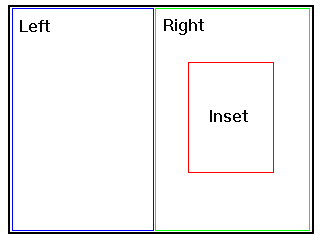
By default, each hierarchical region shares the z-index (depth) value of
its parent. Hierarchical regions may also introduce their own local z-index
value. In this case, all hierarchical regions with a common direct parent
define local z-indexes within the z-index value of their parent. For example,
if a parent region has a z-index value of "4" and two hierarchical children
of that parent define z-indexes of "1" and "2", respectively, then each of
these are treated as further sub-divisions of the parent's z-index of "4".
If two hierarchical regions with the same z-index overlap, the existing rules
for z-index processing (from Layout Level 0) are applied. Containment is
maintained, meaning that in the case of a z-index conflict, the visible region
will be determined by the parent region that has most recently (in time)
been used to render new content (even if the other parent region has a less
recently used hierarchical region with a local sub-division z-index of higher
value).
For example:
<layout>
        <top-layout width="640px" height="480px" />
        <region id="whole" top="0px" left="0px" width="640px" height="480px" z-index="5"/>
        <region id="right" top="0px" left="320px" width="320px" height="480px" z-index="4"/>
                <region id="inset" top="140px" left="80" width="160px" height="200px" z-index="6"/>
                <region id="inset2" top="140px" left="80" width="160px" height="200px" z-index="6"/>
                <region id="inset3" top="140px" left="80" width="160px" height="200px" z-index="7"/>
        </region>
</layout>
...
<par>
        <img id="A" region="whole" src="imageA.jpg" dur="10s"/>
        <img id="B" region="inset" src="imageB.jpg" dur="10s"/>
</par>
<par>
        <img id="C" region="inset" src="imageC.jpg" begin="0s" dur="10s"/>
        <img id="D" region="inset2" src="imageD.jpg" begin="1s" dur="10s"/>
</par>
<par>
        <img id="E" region="inset2" src="imageE.jpg" dur="10s"/>
        <img id="F" region="inset3" src="imageF.jpg" dur="10s"/>
</par>
Image "A" and image "B" begin at the same time. Image A will be shown and
will obscure image "B" since the z-index of region "whole" is greater than
the z-index of region "inset". Images "C" and "D" are rendered into regions
occupying the same area of the rendering surface. Image "C" will be shown
for one second and then obscured by Image "D", since "D" begins after image
"C". The z-index of region "inset" only comes is only considered when computing
stacking between siblings, and therefore image "F" will be shown, but image
"E" will be obscured.
Ed. note: As far as we know, the use of sub z-index values is consistent
with the CSS box model.
Where hierarchical layout provides a facility for defining a set of regions
with a common parent, it does not provide any facility for determining where
in any particular region a given media object will be placed. SMIL Layout
Level 2 solves this problem by defining a set of attributes which, when placed
on a media object reference, allow that media item to be explicitly positioned
within a region. These attributes are collectively referred to as sub-region
positioning attributes. The sub-region positioning argument values follow
the conventions of CSS2 absolute positioning.
The sub-region placement facility is used in cases where exact positioning
of a single media element is desired (for example, when you want to position
an object a certain number of pixels to the left or right of another object);
in these cases, the use of a hierarchical region facility -- while functionally
equivalent -- can form an obstacle for presentation authors.
For example, suppose a region "d" is defined:
  <layout>
     ...
    <region id="d" ... />
     ...
  </layout>
The following code describes the placement of an object at a particular offset
within a region, using the SMIL Layout Level 2 syntax:
<ref id="a" ... region="d" top="5%" left="3" />
Each placement attribute defines a new, temporary boundary of the region
for the referenced media object. In this case, the top-left point of the
media object is displayed 5% from the top and 3 pixels from the left in region
"d".
All other placement operations, such as the
fit attribute, operate on the region as if it had its relevant
edges moved to the position specified by the placement attributes. For example,
the following document fragment describes a region and a media object reference
that make use of sub-region positioning:
  <layout>
     ...
    <region id="d" ... fit ="fill" />
     ...
  </layout>

  <body>     ...
     <ref src="..." ... region="d" fit="fill" top="5%" left="3" bottom="90%" right="85%" />
     ...
  </body>
In this example, the effective boundaries of the region for the placement
of this object are defined by adjusting the top, bottom, left and right edges
of the region by the values shown, and then filling the resulting sub-region
with the specified image as directed by the
fit attribute. The resulting display is:
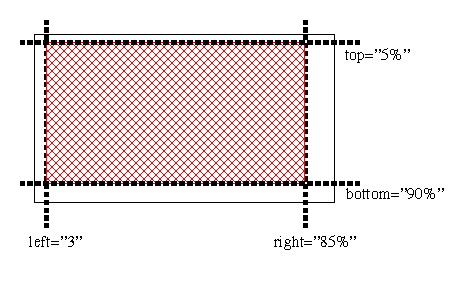
The use of sub-region placement is intended as a light-weight alternative
to defining many single-use regions. Often, the dimensions used for the
sub-region will match the dimensions of the media object being placed.
Ed. Note: The ability to override the
fit attribute allows for rational control
over resizing and scrollbar placement on the object rather than on the containing
region. One editor feels that the ability of the media item to override the
region's default should be integrated into the fit attribute in Level 0.
However, the current specification does not reflect this. A proposal should
be made to address this.
Rules for handling clipping of objects within regions based on alignment
attributes are provided below.
A registration element is an element within Layout Level 2 that is used to
define a point and a default alignment algorithm about that point. The element
can be used in a media object reference, where it is associated with a region
and an optional override alignment algorithm. The placement values within
registration elements can be either percentages or pixels.
The use of registration points allows for consistent relative placement across
regions. As such, registration points are defined outside of any single region.
For example, the following code describes two registration points (with id
values "midPoint" and "topMargin"), one of which is defined as a relative
location and one at a fixed pixel location, using the SMIL Layout Level 2
syntax:
    <layout>
      <regPoint id="midPoint" top="50%" left="50%" regAlign="center" />
      <regPoint id="topMargin" top="10" left="15" regAlign="topLeft" />
      <region id="a" ... />
      <region id="b" ... />
    </layout>
In this example, the registration point with the id value "midPoint" has
a default alignment algorithm that centers the media object about the defined
point, while the registration point with the ids value "topMargin" has a
default alignment algorithm that places the top-left point of the media object
at the registration point.
Various media elements could be displayed in the regions using the alignment
points as follows:
    <ref region="a" src="rtsp://..." dur="2s" regPoint="midPoint" />
    <ref region="b" src="http://..." dur="2s" regPoint="midPoint" regAlign="bottomRight"/>
    <ref region="a" src="http://..." dur="2s" regPoint="topMargin" />
    <ref region="b" src="http://..." dur="2s" regPoint="topMargin" regAlign="center"/>
In the first example, a media object is centered in the middle of region
a. In the second example, a media object has its bottom right corner
centered in the middle of region b. Similarly, in the third example,
a media object has its top left corner placed at a point 10,15 within region
b, and in the fourth example, an object is centered around the point
10,15 in region b.
Registration points can be used to coordinate the placement of a set of media
objects that do not share the same sizes. (For example, a set of images can
be aligned to the center of a region.) They can also be used to coordinate
the display of images about a particular point in a region, as in:
   <layout>
      <regPoint id="middle" top="50%" left="50%" regAlign="center" />
      <region id="a" ... />
   </layout>
   ...
   <seq>
    <ref region="a" src="rtsp://..." dur="2s" regPoint="middle" regAlign="bottomRight"/>
    <ref region="a" src="http://..." dur="2s" regPoint="middle" regAlign="bottomLeft"/>
    <ref region="a" src="http://..." dur="2s" regPoint="middle" regAlign="topLeft"/>
    <ref region="a" src="http://..." dur="2s" regPoint="middle" regAlign="topRight"/>
  </seq>
In this example, four objects are aligned over time to the middle of region.
If any media element extends outside the bounds of a region, it will be clipped
to the region. Use of the registration point facility takes precedence over
use of the fit attribute (that is, the
fit attribute is ignored if registration
points are used).
Each of the media objects share the z-order of the parent. If used within
a <par> construct, then the standard rules
for objects with overlapping z-order are applied.
Ed. Note: The issue of multiple elements rendered to the same region in a
<par> is not inherently an issue with Layout Level 2, but a more general
SMIL layout concern. It is unclear if SMIL-1.0 actually prohibits this, even
though it does not seem to be support now by RN or OX. Our view is that since
regions are pure rendering spatial abstractions, it should be possible to
render multiple objects in the same region under the existing z-index rules.
The presence of hierarchical regions give authors extra control for special
cases, but do not preclude the utility of multiple active objects. (Note
that RealPix supports this functionality now, and a lot of our users like
this functionality.)
Note that registration points are global within the context of a layout,
and are not tied to a particular region, but can be reused across regions.
As such, pixel-based offsets should be used with care.
For authoring convenience, SMIL Layout Level 2 provides a pre-defined center
registration point named "center". This means that media objects can be centered
in any region by including the attribute:
<ref ..." regPoint="center" regAlign="center" />
in a media object reference. The default value of regAlign for a region is
topLeft. If the regAlign attribute is used without a regPoint, the aligment
operation is relative to the upper left point of the region containing this
object.
Ed. Note: And the default value for regPoint is "upperLeft"? Should we predefine
a regPoint named "upperLeft"?
Rules for handling clipping of objects within regions based on alignment
attributes are defined below.
This section defines the elements and attributes that make up the SMIL Layout
Level 2.
In order to support the registration point functionality described in Layout
Level 2, one new element is added to the content model of the
layout element.
Element attributes
SMIL Layout Level 2 does not provide any new attributes to the
layout element.
Element content
If the type attribute of the layout element has the value
"text/smil-level2-layout", it can contain the
following elements:
-
region
-
root-layout
-
viewport
-
regPoint
All element content except regPoint are defined in SMIL Layout Level 0 or 1. The
regPoint element is described below.
The region element controls the position, size and scaling of media object
elements. Layout Level 2 extends the definition of the
region element to include the definition
of hierarchical regions.
The position of a region, as specified by its
top and left attributes,
is always relative to the parent geometry, which is defined by the parent
element. For SMIL Layout Level 2, all hierarchical region elements must have
as their immediate parent a region
or viewport element. The position
of the hierarchical region is defined relative to that parent element.
When region sizes, as specified by
width and height attributes
are declared relative with the "%" notation, the size of the hierarchical
region is relative to the size of the parent region. Sizes declared as absolute
pixel values are defined as relative to the parent region.
Note that a (hierarchical) region may be defined in such a way as to extend
beyond the limits of its parent. In this case the sub-region must be clipped
to the parent boundaries.
If a z-index attribute is defined
on the hierarchical region, it is evaluated as a local index within that
of the parent.
Element attributes
In Layout Level 2, the region element
has no additional attributes beyond that provided in Layout Level 0 and 1.
However, the semantics of the
z-index attribute are extended to
support hierarchical regions.
-
z-index
-
This attribute defines the level of the region within the parent region stacking
context. Elements assigned to higher level regions are rendered in front
of lower level regions within the same parent region. Child regions are always
placed in front of their parent region. This results in a two stage sorting
of region visibility: first by parent-child containment, and then by z-index
within siblings.
-
-
The use and definition of this attribute are identical to the "z-index" property
in the CSS2 specification, with the following exception:
-
If two boxes generated by elements A and B have the same stack level, then:
-
If the display of an element A starts later than the display of an element
B, the box of A is stacked on top of the box of B (temporal order).
-
Else, if the display of the elements starts at the same time, and an element
A occurs later in the SMIL document text than an element B, the box of A
is stacked on top of the box of B (document tree order as defined in CSS2).
Element content
SMIL Layout Level 2 extends the
region element content model to optionally include other
region elements.
The regPoint element defines a
relative or absolute point for use in aligning elements in the document's
body on a visual rendering surface.
The regPoint element may only appear
as an immediate child of a layout element.
If registration points are used on a media object, the
fit attribute is ignored.
Element attributes
-
top
-
This value uniquely identifies the position or the distance (in pixels or
%) of the registration point relative to the top of the region. The default
value of top is "0".
-
bottom
-
This value uniquely identifies the position or the distance (in pixels or
%) of the registration point relative to the bottom of the region. The default
value of bottom is "100%".
-
left
-
This value uniquely identifies the position or the distance (in pixels or
%) of the registration point relative to the left location of the region.
The default value of top is "0".
-
right
-
This value uniquely identifies the position or the distance (in pixels or
%) of the registration point relative to the right location of the region.
The default value of right is "100%".
-
regAlign
-
This attribute specifies the default alignment algorithm which is associated
with this regPoint, relative to the media object. The following values are
allowed:
-
topLeft
-
align the top-left corner of the object with the registration point
-
topMid
-
align the top-middle point of the object with the registration point
-
topRight
-
align the top-right corner of the object with the registration point
-
midLeft
-
align the middle-left point of the object with the registration point
-
center
-
align the center of the object with the registration point
-
midRight
-
align the middle-right point of the object with the registration point
-
bottomLeft
-
align the lower-left corner of the object with the registration point
-
bottomMid
-
align the bottom-middle point of the object with the registration point
-
bottomRight
-
align the bottom-right corner of the object with the registration point.
Element content
None.
While SMIL Layout Level 0 provides only the
region attribute on elements to place them on the rendering
surface, Level 2 includes attributes to refine the position of media content
within a region.
One set of attributes (the sub-region positioning attributes) allows
a "sub-region" to be defined that is wholly contained within the enclosing
layout region for that object; the other set of attributes can be used to
define a registration point to be used with that object and an optional layout
algorithm that will override the default algorithm associated with the
registration point.
If positioning attributes, the fit
attribute, and registration alignment attributes are present on an object
reference, the registration alignment attributes take precedence and the
positioning and fit attributes are ignored.
For both sub-region positioning and registration point use, the value of
the z-index attribute on the associated
region is used. If media objects overlap, existing rules for resolving z-index
conflicts are applied.
Note that placement within the region may be defined in such a way as to
extend the media object beyond the limits of the region. In this case the
media object must be clipped to the region boundaries.
-
top
-
This value uniquely identifies the position or the distance (in pixels or
%) of the top position of the media object relative to the top of the region.
The default value of top is "0".
-
bottom
-
This value uniquely identifies the position or the distance (in pixels or
%) of the bottom of the media object relative to the bottom of the region.
The default value of bottom is "100%".
-
left
-
This value uniquely identifies the position or the distance (in pixels or
%) of the left side of the media object relative to the left location of
the region. The default value of left is "0".
-
right
-
This value uniquely identifies the position or the distance (in pixels or
%) of the top-left position of the media object relative to the right side
of the region. The default value of right is "100%".
Conflicts between the region size attributes
bottom,
left,
right, and top
are resolved according to the rules for absolutely positioned, replaced elements
in [CSS2].
The regPoint attribute is used
in conjunction with the regPoint
element. If a regPoint attribute
is missing or refers to a non-existent
regPoint element the value of the
regAlign attributes are applied to the top, left point of the
region containing the media object.
-
regPoint
-
This value uniquely identifies the registration point to be used for the
placement of the object. The value should be an XML identifier of a
regPoint element. A value of "center"
is pre-defined by Layout Level 2 to be equal to top="50%", left="50%". If
no value is given, the default registration point of top="0", left="0" is
assumed.
-
regAlign
-
This value uniquely identifies the registration algorithm to be used for
the regPoint defined for the object.
Permissible values are those defined under the
regAlign attribute for the
regPoint element. If used within
an explicit regPoint attribute,
the value is relative to the top left point of the region used by the associated
media object.
See the full DTD for the SMIL
Layout module.
<!-- ======================================================================= -->
<!-- SMIL Layout Module =================================================== -->
<!-- file: SMIL-layout.mod
This is Smil-Boston.
Copyright 2000 W3C (MIT, INRIA, Keio), All Rights Reserved.
Authors: Jacco van Ossenbruggen, Aaron Cohen
Revision: $Id: smil-boston.html,v 1.12 2000/06/22 17:41:51 hugo Exp $
This DTD module is identified by the PUBLIC and SYSTEM identifiers:
PUBLIC "-//W3C//ELEMENTS SMIL-Boston Layout//EN"
SYSTEM "SMIL-layout.mod"
==================================================================== -->
<!-- ================== Layout Level 0 Profiling Entities ================== -->
<!ENTITY % layout.attrib "">
<!ENTITY % region-elem.attrib "">
<!ENTITY % rootlayout.attrib "">
<!ENTITY % layout.content "EMPTY">
<!ENTITY % region.content "EMPTY">
<!ENTITY % rootlayout.content "EMPTY">
<!-- ================== Layout Level 0 Layout Entities ===================== -->
<!ENTITY % viewport-attrs "
backgroundColor CDATA #IMPLIED
background-color CDATA #IMPLIED
height CDATA 'auto'
width CDATA 'auto'
">
<!ENTITY % region-attrs "
bottom CDATA 'auto'
fit (hidden|fill|meet|scroll|slice) 'hidden'
left CDATA 'auto'
right CDATA 'auto'
top CDATA 'auto'
z-index CDATA #IMPLIED
">
<!-- ================== Layout Level 0 Layout Elements ===================== -->
<!--
Layout contains the region and root-layout elements defined by
smil-basic-layout or other elements defined an external layout
mechanism.
-->
<!ELEMENT layout %layout.content;>
<!ATTLIST layout %layout.attrib;
type CDATA 'text/smil-basic-layout'
>
<!--=================== Region Element ======================================-->
<!ELEMENT region %region.content;>
<!ATTLIST region %region-elem.attrib;
%viewport-attrs;
%region-attrs;
>
<!--=================== Root-layout Element =================================-->
<!ELEMENT root-layout %rootlayout.content; >
<!ATTLIST root-layout %rootlayout.attrib;
%viewport-attrs;
>
<!-- ========================== Layout Level 1 ============================= -->
<!ENTITY % layout-level-1 "IGNORE">
<![%layout-level-1;[
<!-- ================ Layout Level 1 Profiling Entities ================== -->
<!ENTITY % viewport.attrib "">
<!ENTITY % viewport.content "">
<!-- don't need to add viewport element to
content of layout since it is assumed to be ANY -->
<!-- ================== Layout Level 1 Layout Entities =================== -->
<!ENTITY % audio-attrs "
soundLevel CDATA '100%'
">
<!-- ================== Layout Level 1 Layout Elements =================== -->
<!--=================== Add soundLevel to region element ================= -->
<!ATTLIST region %audio-attrs;>
<!--=================== viewport element ================================= -->
<!ELEMENT viewport (region %viewport.content;)* >
<!ATTLIST viewport %viewport.attrib;
%viewport-attrs;
>
]]> <!-- end Layout Level 1 -->
<!-- ========================== Layout Level 2 ============================= -->
<!ENTITY % layout-level-2 "IGNORE">
<![%layout-level-2;[
<!-- ================ Layout Level 2 Profiling Entities ================== -->
<!ENTITY % regPoint.attrib "">
<!ENTITY % regPoint.content "EMPTY">
<!-- ================== Layout Level 2 Layout Entities =================== -->
<!-- subregion positioning attributes for regPoint and media elements == -->
<!ENTITY % positioning-attrs "
top CDATA '0%'
bottom CDATA '100%'
left CDATA '0%'
right CDATA '100%'
">
<!-- ================ regAlign attribute for regPoint and media elements = -->
<!ENTITY % regalign-attrs "
regAlign (topLeft|topMid|topRight|midLeft|center|
midRight|bottomLeft|bottomMid|bottomRight) #IMPLIED
">
<!-- ================== regPoint attribute for media elements ============ -->
<!ENTITY % regpoint-attrs "
regPoint CDATA #IMPLIED
">
<!-- integrating language using this level must include regPoint attribute -->
<!-- on media element ==================================================== -->
<!-- ================== Layout Level 2 Layout Elements =================== -->
<!ELEMENT regPoint %regPoint.content;>
<!ATTLIST regPoint %regPoint.attrib;
%positioning-attrs;
%regalign-attrs;
>
]]>
<!-- end of SMIL-layout.mod -->
-
Editors
-
Lloyd Rutledge
(Lloyd.Rutledge@cwi.nl), (CWI)
-
Aaron Cohen
(aaron.m.cohen@intel.com), (Intel)
The SMIL Linking module defines the SMIL document attributes and elements
for navigational hyperlinking. These are navigations through the SMIL
presentation that can be triggered by user interaction or other triggering
events. SMIL provides only for in-line link elements. Links are limited to
uni-directional single-headed links (i.e. all links have exactly one source
and one destination resource).
The SMIL Linking module is divided into Levels 0, 1, and 2. Level 0 includes
a set of attributes used to provide SMIL Linking semantics to linking elements,
Level 1 includes the SMIL Linking elements themselves, and Level 2 includes
additional optional linking features that a language profile may wish to
include. Note that Level 1 explicitly includes the attributes from Level
0 on its elements.
XPointer [XPTR] allows components of XML documents to be addressed in terms
of their placement in the XML structure rather than on their unique identifiers.
This allows referencing of any portion of an XML document without having
to modify that document. Without XPointer, pointing within a document may
require adding unique identifiers to it, or inserting specific elements into
the document, such as a named anchor in HTML. XPointers are put within the
fragment identifier part of a URI. The SMIL specification does not require
that browsers be able to process XPointers in SMIL URI attributes.
The SMIL Linking Module supports name fragment identifiers and the '#' connector.
The fragment part is an id value that identifies one of the elements within
the referenced SMIL document. With this construct, SMIL supports locators
as currently used in HTML (that is, it uses locators of the form
"http://foo.com/some/path#anchor1"), with the difference that the values
are of unique identifiers and not the values of "name" attributes. Of course,
this type of link can only target elements that have an attribute of type
ID.
Links using fragments enable authors to encode links to a SMIL presentation
at the start time of a particular element rather than at the beginning of
its presentation. If a link containing a fragment part is followed, the
presentation should start as if the user had fast-forwarded the presentation
represented by the destination document to the effective begin of the element
designated by the fragment. See the discussion of linking to timing constructs
in the SMIL Timing and Synchronization Module for more information.
There are special semantics defined for following a link containing a fragment
part into a document containing SMIL timing. These semantics are defined
in the SMIL Timing and Synchronization Module. In addition, the following
rules apply for linking into a document written in the SMIL language:
-
It is forbidden to link to elements that are the content of
switch elements. If the element addressed
by the link is content of a
switch element, then the presentation should
start with the switch element. See
the section below on error handling.
-
If the fragment part ID is not defined within the target document, the SMIL
presentation should start from the beginning as if no fragment part were
present in the URI.
Due to its integrating nature, the presentation of a SMIL document may involve
other (non-SMIL) applications or plug-ins. For example, a SMIL browser may
use an HTML plug-in to display an embedded HTML page. Vice versa, an HTML
browser may use a SMIL plug-in to display a SMIL document embedded in an
HTML page. Note that this is only one of the supported methods of integrating
SMIL and HTML. Another alternative is to use the merged language approach.
See the SMIL Timing and Integration Module for further details.
In embedded presentations, links may be defined by documents at different
levels and conflicts may arise. In this case, the link defined by the containing
document should take precedence over the link defined by the embedded object.
Note that since this might require communication between the browser and
the plug-in, SMIL implementations may choose not to comply with this
recommendation.
If a link is defined in an embedded SMIL document, traversal of the link
affects only the embedded SMIL document.
If a link is defined in a non-SMIL document which is embedded in a SMIL document,
link traversal can only affect the presentation of the embedded document
and not the presentation of the containing SMIL document. This restriction
may be relaxed in future versions of SMIL.
When a link into a SMIL document contains an un-resolvable fragment identifier
("dangling link") because it identifies an element that is not actually part
of the document, SMIL software should ignore the fragment identifier, and
start playback from the beginning of the document.
When a link into a SMIL document contains a fragment identifier which identifies
an element that is the content of a
switch element, SMIL software should interpret this link as
going to the parent switch element
instead. If the parent is also a
switch, then the link should be considered as accessing the
first switch ancestor element whose parent is not also a
switch. The result of the link traversal
is thus to play the child of the located
switch element that passes the usual switch child selection
process.
The SMIL Linking module includes several attributes that a language profile
can include on linking elements to add SMIL linking semantics to those elements.
The SMIL Linking elements in the next section explicitly include these
attributes. These attributes are designated SMIL Linking Level 0 and can
be applied to linking elements from other namespaces if allowed by the language
profile.
-
sourceLevel
-
This attribute sets the relative audio level of media objects in the presentation
containing the link when the link is followed. Ignored if the presentation
does not contain audio media objects. This attribute can take positive percentage
values. The sourceLevel attribute
is applied to the current audio level of the source.
-
destinationLevel
-
This attribute sets the relative audio level of media objects in the remote
resource when the link is followed. Ignored if the remote resource does not
contain audio media objects. This attribute can take positive percentage
values. The
destinationLevel attribute
is applied to the natural or intrinsic audio level of the destination media,
and therefore is relative to the level that the media would be played without
application of the
destinationLevel attribute.
-
sourcePlaystate
-
This attribute controls the temporal behavior of the presentation containing
the link when the link is traversed. It can have the following values:
-
play: When the link is traversed, the presentation
containing the link continues playing.
-
pause: When the link is traversed, the presentation
containing the link pauses. When the display of the destination resource
completes, the originating presentation resumes playing.
-
stop: When the link is traversed, the presentation
containing the link stops. That is, it is reset to the beginning of the
presentation. The termination of the destination resource will not cause
the originating presentation to continue or restart.
The default value of the
sourcePlaystate attribute depends
on the value of the show attribute.
If the show attribute has the value
new, the default for the
sourcePlaystate attribute
is play. If the
show attribute has the value
replace or the deprecated value
pause, then the default for the
sourcePlaystate attribute
is pause.
Note that the definition of what constitutes a resource completing needs
to be defined in the language profile, or may be implementation dependent.
Typical definitions would be when the user closes the display window, or
when a continuous media object ends.
-
destinationPlaystate
-
This attribute controls the temporal behavior of the external resource (typically
identified by the href attribute) when the link
is followed. It only applies when this resource is a continuous media object.
It can have the same values as the
sourcePlaystate attribute.
The default value is play.
-
show
-
This attribute specifies how to handle the current state of the presentation
at the time in which the link is activated. The following values are allowed:
-
new: The presentation of the destination resource
starts in a new context, not affecting the source resource. If both the
presentation containing the link and the remote resource contain audio media,
both are played in parallel.
-
pause: This value is deprecated in favor of setting
the the "show" attribute to new and the
sourcePlaystate
attribute to pause.
-
replace: The current presentation is paused at
its current state and is replaced by the destination resource. If the player
offers a history mechanism, the source presentation resumes from the state
in which it was paused when the user returns to it. The default value of
sourcePlaystate is
pause when the
show
attribute has the value replace.
The default value of show is
replace.
-
accesskey
-
This attribute assigns a keyboard key whose activation by the user in turn
activates this link. It has the same meaning as the attribute of the same
name in HTML 4.01 [HTML401].
-
tabindex
-
This attribute provides the same functionality as the
tabindex attribute in HTML 4.01
[HTML401]. It specifies the position of the element in the tabbing order
for the current document. The tabbing order defines the order in which elements
will receive focus when navigated by the user via the keyboard. At any particular
point in time, only elements with an active timeline are taken into account
for the tabbing order, and inactive elements that are are ignored for the
tabbing order.
-
target
-
This attribute defines either the existing display environment in which the
link should be opened (e.g., a SMIL region, an HTML frame or another named
window), or triggers the creation of a new display environment with the given
name. Its value is the identifier of the display environment. If no currently
active display environment has this identifier, a new display environment
is opened and assigned the identifier of the target. When a presentation
uses different types of display environments (e.g. SMIL regions and HTML
frames), the namespace for identifiers is shared between these different
types of display environments. For example, one cannot use a
target attribute with
the value "foo" twice in a document, and have it point once to an HTML frame,
and then to a SMIL region. If the element has both a
show
attribute and a
target attribute, the
show attribute is ignored.
-
external
-
This attribute defines whether the link destination should be opened by the
current application or some external application. A value of
true will open the link in an application defined
on the system to handle this media type. A value of
false will open the destination in the current
application. The default value of external is
false.
-
Note that the means of associating media types with external applications
is system dependent and not defined here.
-
actuate
-
The actuate attribute determines
whether or not the link is triggered by some event or automatically traversed
when its time span is active. Its default value is
onRequest, which means something must trigger
the link traversal. This trigger is defined by the user interaction and event
attributes of the linking element. A value of
onLoad can also be assigned. This value indicates
that the link is automatically traversed when the element becomes active.
For linking elements containing SMIL timing, this is when the active duration
of the element effectively begins, in other words, when the element's
beginEvent event is fired. See the SMIL Timing and Synchronization
module for more details.
The link elements allows the description of navigational links between objects.
The SMIL Linking module provides only uni-directional, single-headed, in-line
link elements. SMIL Linking Level 1 uses support from the Timing and
Synchronization module and requires at least Level 0 of that module to be
included with any profile using the SMIL Linking module Level 1.
6.5.1
The
a Element
The functionality of the a element is
very similar to the functionality of the a
element in HTML 4.01 [HTML401]. For synchronization purposes, the
a element is transparent. That is, it
does not influence the synchronization of its child elements.
a elements may not be nested. An
a element must have an
href attribute.
An a element can specify several triggers
for its traversal simultaneously. For example, the element's content visual
media can be selected by the user or the key specified by the
accesskey attribute can be typed
to trigger a traversal. In cases where multiple triggers are specified, any
of them can activate the link's traversal. That is, an logical or is applied
to the list of triggering conditions to determine if traversal occurs.
Traversal occurs if one of the conditions for traversal is met during the
time that the a element is active. An
a element is active if the media or elements
that it contains are active. See the SMIL Timing and Synchronization and
Media modules for further details.
Attributes
-
href
-
This attribute contains the URI of the link's destination. The
href attribute is required for
a elements.
The a element also includes the attributes
defined in SMIL Linking Level 0:
Element Content
The content of the a element must be defined
by the language profile. In general, it is expected that
a elements may contain the media and timing
elements present in the language profile as children. Since this level of
the linking module requires Level 0 from the Timing and Synchronization Module,
at least the following elements should be included in the content model of
the a element:
-
par
-
seq
Examples
These examples assume that the a element
has the same content model as in the SMIL Boston Language Profile.
Example 1
The link starts up the new presentation replacing the presentation that was
playing.
<a href="http://www.cwi.nl/somewhereelse.smi">
     <video src="rtsp://foo.com/graph.imf" region="l_window"/>
</a>
Example 2
The link starts up the new presentation in addition to the presentation that
was playing.
<a href="http://www.cwi.nl/somewhereelse.smi" show="new">
     <video src="rtsp://foo.com/graph.imf" region="l_window"/>
</a>
This could allow a SMIL player to spawn off an HTML browser:
<a href="http://www.cwi.nl/somewebpage.html" show="new">
     <video src="rtsp://foo.com/graph.imf" region="l_window"/>
</a>
Example 3
The link starts up the new presentation and pauses the presentation that
was playing.
<a href="http://www.cwi.nl/somewhereelse.smi" show="new" behavior="pause">
     <video src="rtsp://foo.com/graph.imf" region="l_window"/>
</a>
Example 4
The following example contains a link from an element in one presentation
A to the middle of another presentation B. This would play presentation B
starting from the effective begin of the element with id "next".
Presentation A:

     <a href="http://www.cwi.nl/presentationB#next">
       <video src="rtsp://foo.com/graph.imf"/>
     </a>


Presentation B (http://www.cwi.nl/presentation):

      ...
      <seq>
        <video src="rtsp://foo.com/graph.imf"/>
        <par>
          <video src="rtsp://foo.com/timbl.rm" region="l_window"/>
          <video id="next" src="rtsp://foo.com/v1.rm" region="r_window"/>
                 ^^^^^^^^^
          <text src="rtsp://foo.com/caption1.html" region="l_2_title"/>
          <text src="rtsp://foo.com/caption2.rtx" region="r_2_title"/>
        </par>
      </seq>
      ...
6.5.2
The
area Element
The functionality of the a element is
restricted in that it only allows associating a link with a complete media
object. The HTML 4.0 area element [HTML401]
has demonstrated that it is useful to associate links with spatial portions
of an object's visual display.
The semantics of the area element in
SMIL is the same as it is for HTML in that:
-
The area element allows associating
a link destination, specified by the
href attribute, with spatial portions
of a visual object. In contrast, the a
element only allows associating a link with complete media.
-
The area element allows making a subpart
of the media object the destination of a link, using the ID attribute.
-
The area element allows breaking up
an object into spatial subparts, using the
coords attribute.
It extends the syntax and semantics of the HTML
area element by providing for linking from non-spatial portions
of the media object's display. These extensions are:
-
The area element allows breaking up
an object into temporal subparts, using the
begin and
end attributes from the SMIL Timing and Synchronization
module. The values of the begin and
end attributes are relative to the beginning
of the containing media object.
-
The area element allows breaking up
an XML-defined object into syntactic components, using the "fragment" attribute.
The spatial and temporal portion of the display that activates the link is
defined in terms of the syntactic structure of that object. This allows portions
of the display of XML code integrated in a SMIL presentation to be starting
areas for links in SMIL. An example is having an HTML file format the text
for a menu of items. These are displayed as part of a SMIL presentation.
Each item can be clicked upon to activate a link in the containing SMIL
presentation.
The anchor element is
deprecated in favor of area. For purposes
of this specification of SMIL, the
anchor element should be treated
as a synonym for area
Attributes
The area element can have the attributes
listed below, with the same syntax and semantics as in HTML 4.0 [HTML401]:
-
shape
-
This attribute specifies the shape of a region.
-
coords
-
This attribute specifies the position and shape on the screen. The number
and order of values depends on the shape being defined.
-
href
-
nohref
-
When set, this boolean attribute specifies that a region has no associated
link
-
alt
The area element also supports the
follow attributes from the SMIL Timing and Synchronization module:
The following attributes are newly added to the
area element in this specification, and defined above in the
section on Linking Level 0 attributes:
Element Content
The area element is empty.
Examples
1) Decomposing a video into temporal segments
In the following example, the temporal structure of an interview in
a newscast (camera shot on interviewer asking a question followed by shot
on interviewed person answering ) is exposed by fragmentation:
<smil>
  <body>
    <video src="video" title="Tom Cruise interview 1995" >
      <seq>
        <area id="firstQ" dur="20s" title="first question" />
        <area id="firstA" dur="50s" title="first answer" />
      </seq>
    </video>
  </body>
</smil>
2) Associating links with spatial segments In the following example,
the screen space taken up by a video clip is split into two sections. A different
link is associated with each of these sections.
<smil>
  <body>
    <video src="video" title="Tom Cruise interview 1995" >
      <area shape="rect" coords="5,5,50,50"
              title="Journalist" href="http://www.cnn.com"/>
      <area shape="rect" coords="5,60,50,50"
              title="Tom Cruise" href="http://www.brando.com" />
   </video>
  </body>
</smil>
3) Associating links with temporal segments
In the following example, the duration of a video clip is split into two
sub-intervals. A different link is associated with each of these sub-intervals.
<smil>
  <body>
    <video src="video" title="Tom Cruise interview 1995" >
      <seq>
        <area dur="20s" title="first question"
              href="http://www.cnn.com"/>
        <area dur="50s" title="first answer"
              href="http://www.brando.com"/>
      </seq>
   </video>
  </body>
</smil>
4) Associating links with spatial subparts
In the following example, the screen space taken up by a video clip is split
into two sections. A different link is associated with each of these sections.
<video src="http://www.example.org/CoolStuff">
  <area href="http://www.example.org/AudioVideo" coords="0%,0%,50%,50%"/>
  <area href="http://www.example.org/Style"      coords="50%,50%,100%,100%"/>
</video>
5) Associating links with temporal subparts
In the following example, the duration of a video clip is split into two
subintervals. A different link is associated with each of these subintervals.
<video src="http://www.example.org/CoolStuff">
  <area href="http://www.example.org/AudioVideo" begin="0s" end="5s"/>
  <area href="http://www.example.org/Style"      begin="5s" end="10s"/>
</video>
6) Jumping to a subpart of an object
The following example contains a link from an element in one presentation
A to the middle of a video object contained in another presentation B. This
would play presentation B starting from second 5 in the video. That is, the
presentation would start as if the user had fast-forwarded the whole presentation
to the point at which the designated fragment in the "CoolStuff" video begins.
Presentation A:

<a href="http://www.cwi.nl/mm/presentationB#tim">
   <video id="graph" src="rtsp://foo.com/graph.imf" region="l_window"/>
</a>


Presentation B:

<video src="http://www.example.org/CoolStuff">
  <area id="joe" begin="0s" end="5s"/>
  <area id="tim" begin="5s" end="10s"/>
</video>
7) Combining different uses of links
The following example shows how the different uses of associated links can
be used in combination.
Presentation A:

<a href="http://www.cwi.nl/mm/presentationB#tim">
  <video id="graph" src="rtsp://foo.com/graph.imf" region="l_window"/>
</a>


Presentation B:

<video src="http://www.example.org/CoolStuff">
  <area id="joe" begin="0s" end="5s" coords="0%,0%,50%,50%"
          href="http://www.example.org/"/>
  <area id="tim" begin="5s" end="10s" coords="0%,0%,50%,50%"
          href="http://www.www.example.org.org/Tim"/>
</video>
The attributes in this section represent advanced capabilities that can be
optionally included in the document profile. These features may or may not
be included in a language profile, but they should not be optional features
within a profile.
6.6.1
The fragment
Attribute
A profile may choose to include the
fragment attribute as part of the
area element. It provides for a host document to externally
include a link in a contained media object that will be processed at the
level of the host document.
-
fragment
-
This attribute refers to a portion of the embedded media object that is to
act as the starting point of this link in the SMIL presentation. If this
user clicks on, or otherwise activates, this portion of the embedded media
display, the SMIL browser recognizes this as the current link being activated.
This overrides any linking that may happen within the embedded display of
the media object.
The value of the fragment attribute
must be recognizable by the process managing the media object as an activate-able
portion of the object. If the referenced media object is an HTML file, then
the value of the fragment attribute
is a named anchor within the HTML file. If the referenced media object is
an XML file, then the value of the
fragment attribute is a fragment
identifier (the part that comes after a '#' in a URI).
Take for example the following SMIL code. It establishes a portion of the
display as a formatted text menu. Clicking on an item in this menu triggers
a link to elsewhere within the presentation. The code defines embedded an
HTML file and establishing a fragment area within it:
<ref src="menu.html" region="menubar">
  <area fragment="menuitem1" href="#selection1"/>
</ref>
In the rendered HTML display, there is a portion of displayed text that is
marked-up as an area with the name
"menuitem1". If the user clicks on this during the SMIL presentation, a
SMIL-activated link is triggered, navigating to the portion of the SMIL document
with the ID "selection1". If the HTML
area named "item1" has an
href attribute itself, then this hyperlink
is overridden - only the SMIL hyperlink is processed. HTML
area with
href attributes and
no associated SMIL fragment attributes
are not overridden. This HTML
area activate links within the embedded HTML presentation
when clicked upon.
Use of the fragment attribute can
override linking in the embedded media. If the attribute refers to a portion
of the embedded media that is a link within that media, activating that link
will trigger navigation in the SMIL presentation only, and not in the embedded
presentation. For example, suppose a
fragment attribute refers to a
named anchor in an embedded HTML document. This named
area has an
href attribute, making
it the starting point of a potential navigation within the HTML presentation
itself. When embedded in the SMIL presentation, activation this part of the
HTML display triggers the SMIL link and not the HTML link. Links in embedded
media that are not overridden in this manner, on the other hand, continue
to trigger navigation within the embedded display when activated. All
functionality defined for the SMIL link will override any equivalent
functionality defined for the link in the embedded media. With the above
example, the alt attribute of the SMIL
area element would override the
alt tag of the embedded HTML anchor.
The referencing performed by the
fragment attribute only applies
to one level of depth of embedded media. It only applies to directly embedded
media; it does not apply to media embedded in turn within media embedded
in a SMIL presentation. For example, consider a SMIL presentation that embeds
a second SMIL presentation within it. The media object element of the first
that embeds the second has within it an
area element
with a
fragment attribute. The value of this attribute applies
only to the embedded SMIL document itself. It does not apply to any media
embedded within this second SMIL presentation.
Example
Associating links with syntactic subparts
Below is an example with an integrated HTML file that displays a menu of
  link one
  link two
The user can click on one of the menu items, and the matching HTML file is
displayed. That is, if user clicks on "link one", the "Link1.html" file is
displayed in the "LinkText" region.
The menu HTML file contains the code:
   <A NAME="link1">link one</A><BR>
   <A NAME="link2">link two</A>
The SMIL file is:
   <smil>
    <head>
      <layout>
        <region id="HTML"     width="100" height="100"/>
        <region id="LinkText" width="100" top   ="100"/>
      </layout>
    </head>
    <body>
      <par>
        <text region="HTML" src="namedanchs.html" dur="indefinite">
          <area fragment="link1" href="#LinkOne"/>
          <area fragment="link2" href="#LinkTwo"/>
        </text>
        <excl -- or something like excl -- dur="indefinite" >
          <text id="LinkOne" region="LinkText" src="Link1.html" dur="indefinite"/>
          <text id="LinkTwo" region="LinkText" src="Link2.html" dur="indefinite"/>
        </excl>
      </par>
    </body>
  </smil>
<!-- ======================================================================= -->
<!-- SMIL Linking Module ================================================== -->
<!-- file: SMIL-link.mod
This is Smil-Boston.
Copyright 2000 W3C (MIT, INRIA, Keio), All Rights Reserved.
Author: Jacco van Ossenbruggen, Lloyd Rutledge, Aaron Cohen
Revision: $Id: smil-boston.html,v 1.12 2000/06/22 17:41:51 hugo Exp $
This DTD module is identified by the PUBLIC and SYSTEM identifiers:
PUBLIC "-//W3C//ELEMENTS SMIL-Boston Linking//EN"
SYSTEM "SMIL-link.mod"
======================================================================= -->
<!-- ========================== Linking Level 0 Entities =================== -->
<!ENTITY % linking-attrs "
sourceLevel CDATA '100%'
destinationLevel CDATA '100%'
sourcePlaystate (play|pause|stop) #IMPLIED
destinationPlaystate (play|pause|stop) 'play'
show (new|pause|replace) 'replace'
accesskey CDATA #IMPLIED
tabindex CDATA #IMPLIED
target CDATA #IMPLIED
external (true|false) 'false'
actuate (onRequest|onLoad) 'onRequest'
">
<!-- ======================= Linking Level 1 Elements ====================== -->
<!ENTITY % link-level-1 "IGNORE">
<![%link-level-1;[
<!-- ===================== Linking Level 1 Entities ====================== -->
<!ENTITY % Shape "(rect|circle|poly|default)">
<!ENTITY % Coords "CDATA">
<!-- comma separated list of lengths -->
<!ENTITY % Text "CDATA">
<!ENTITY % a.attrib "">
<!ENTITY % a.content "EMPTY">
<!ENTITY % a.qname "a">
<!ELEMENT %a.qname; %a.content;>
<!ATTLIST %a.qname; %a.attrib;
%linking-attrs;
href %URI; #IMPLIED
>
<!ENTITY % area.attrib "">
<!ENTITY % area.content "EMPTY">
<!ENTITY % area.qname "area">
<!ELEMENT %area.qname; %area.content;>
<!ATTLIST %area.qname; %area.attrib;
%linking-attrs;
shape %Shape; 'rect'
coords %Coords; #IMPLIED
href %URI; #IMPLIED
nohref (nohref) #IMPLIED
alt %Text; #REQUIRED
>
<!ENTITY % anchor.attrib "">
<!ENTITY % anchor.content "EMPTY">
<!ENTITY % anchor.qname "anchor">
<!ELEMENT %anchor.qname; %anchor.content;>
<!ATTLIST %anchor.qname; %area.attrib;
%linking-attrs;
shape %Shape; 'rect'
coords %Coords; #IMPLIED
href %URI; #IMPLIED
nohref (nohref) #IMPLIED
alt %Text; #REQUIRED
>
]]> <!-- end of Link Level 1 -->
<!-- ======================= Linking Level 2 ============================== -->
<!ENTITY % link-level-2 "IGNORE">
<![%link-level-2;[
<!ENTITY % Fragment "
fragment CDATA #IMPLIED
">
<!-- ===================== Linking Level 2 Elements ===================== -->
<!-- add fragment attribute to area, and anchor elements -->
<!ATTLIST %area.qname;
%Fragment;
>
<!ATTLIST %anchor.qname;
%Fragment;
>
]]>
<!-- ======================= End Linking Level 2 ========================== -->
<!-- end of SMIL-link.mod -->
-
Editor
-
Rob Lanphier (robla@real.com), RealNetworks
This section defines the SMIL media object module. This module contains elements
and attributes used to describe media objects. Since these elements and
attributes are defined in a module, designers of other markup languages can
reuse the SMIL media module when they need to include media objects into
their language.
Changes with respect to the media object elements in SMIL 1.0 provide additional
functionality that was brought up as Requirements of the Working Group, and
those differences are explained in Appendix A.
-
Continuous Media
-
Audio file, video file or other media for which has a measurable and
well-understood duration associated with it. For example, a five second audio
clip is continuous media, because it has a well-understood duration of five
seconds. Opposite of "discrete media".
-
Discrete Media
-
Image file, text file or other media which has no obvious duration. For example,
a JPEG image is generally considered discrete media, because there's nothing
in the file indicating how long the JPEG should be displayed. Opposite of
"continuous media".
-
Intrinsic Duration
-
The duration of a referenced item without any explicit timing markup.
Continuous media has an intrinsic duration
defined by the media, and discrete media has
no intrinsic duration. (In SMIL, discrete media is assigned an intrinsic
duration of zero).
This module defines the baseline functionality of a SMIL player. It is very
close in functionality to the media object specification in SMIL 1.0.
The media object elements allow the inclusion of media objects into a SMIL
presentation. Media objects are included by reference (using a URI).
Anchors and links can be attached to visual media objects, i.e. media objects
rendered on a visual abstract rendering surface.
When playing back a media object, the player must not derive the exact type
of the media object from the name of the media object element. Instead, it
must rely solely on other sources about the type, such as type information
contained in the type attribute,
or the type information communicated by a server or the operating system.
Authors, however, should make sure that the group into which of the media
object falls (animation, audio, img, video, text or textstream) is reflected
in the element name. This is in order to increase the readability of the
SMIL document. When in doubt about the group of a media object, authors should
use the generic "ref" element.
Languages implementing the SMIL Media Object Module must define which attributes
may be attached to media object elements. In all languages implementing the
SMIL Media Object Module, media object elements can have the following
attributes:
A brief description of the content contained in the element. Unlike
alt, this attribute is generally not
displayed as alternate content to the media object. Need
to define relationship between
abstract and
alt.
For user agents that cannot display a particular media-object, this attribute
specifies alternate text. alt may
be displayed in addition to the media, or instead of media when the user
has configured the user-agent to not display the given media type.
It is strongly recommended that all media object elements have an "alt"
attribute with a brief, meaningful description. Authoring tools should ensure
that no element can be introduced into a SMIL document without this attribute.
If the content of these attributes is read by a screen reader, the presentation
should be paused while the text is read out, and resumed afterwards.
We may want to remove the text on pausing the presentation,
unless and until we have a complete story on how to schedule the presentation
of the alt text.
The value of this attribute is a CDATA text string.
The name of the author of the content contained in the element.
The value of this attribute is a CDATA text string.
The clipBegin attribute specifies the beginning of a sub-clip of a continuous
media object as offset from the start of the media object. This offset is
a real-time measurement of normal media playback.
Values in the clipBegin attribute have the following syntax:
Clip-value-level-0 ::= [ Metric "=" ] ( Clock-val | Smpte-val )
Metric            ::= Smpte-type | "npt"
Smpte-type        ::= "smpte" | "smpte-30-drop" | "smpte-25"
Smpte-val         ::= Hours ":" Minutes ":" Seconds
                      [ ":" Frames [ "." Subframes ]]
Hours             ::= Digit+
                  /* see XML 1.0 for a definition of ´Digit´*/
Minutes           ::= Digit Digit
Seconds           ::= Digit Digit
Frames            ::= Digit Digit
Subframes         ::= Digit Digit
This version changes hours from "Digit Digit" to "Digit+".
We may wish to confirm that this aligns with SMPTE Note: additional
BNF for level 1 extensions defined later
The value of this attribute consists of a metric specifier, followed by a
time value whose syntax and semantics depend on the metric specifier. The
following formats are allowed:
-
SMPTE Timestamp
-
SMPTE time codes [SMPTE] can be used for
frame-level access accuracy. The metric specifier can have the following
values:
-
smpte
-
smpte-30-drop
-
These values indicate the use of the "SMPTE 30 drop" format with 29.97 frames
per second. The "frames" field in the time value can assume the values 0
through 29. The difference between 30 and 29.97 frames per second is handled
by dropping the first two frame indices (values 00 and 01) of every minute,
except every tenth minute.
-
smpte-25
-
The "frames" field in the time specification can assume the values 0 through
24.
The time value has the format hours:minutes:seconds:frames.subframes. If
the frame value is zero, it may be omitted. Subframes are measured in
one-hundredth of a frame.
Examples:
clipBegin="smpte=10:12:33:20"
We may want to expand on this wording by defining the
relationship between the different timing types and NTSC and PAL
-
Normal Play Time
-
Normal Play Time expresses time in terms of SMIL clock values. The metric
specifier is "npt", and the syntax of the time value is identical to the
syntax of SMIL clock values.
Examples:
clipBegin="npt=123.45s"

    clipBegin="npt=12:05:35.3
"
-
Marker
-
Not defined in Level 0. See clipBegin Media Marker
attribute extension in Level 1 extensions.
If no metric specifier is given, then a default of "npt=" is presumed.
When used in conjunction with the timing attributes from the SMIL Timing
Module, this attribute is applied before any SMIL Timing Module attributes.
clipBegin may also be expressed
as clip-begin for compatibility
with SMIL 1.0. Software supporting the SMIL Boston Language Profile must
be able to handle both clipBegin
and clip-begin, whereas software
supporting only the SMIL media object module only needs to support
clipBegin. If an element contains
both a clipBegin and a
clip-begin attribute, then
clipBegin takes precedence over
clip-begin.
Example:
<audio src="radio.wav" clip-begin="5s" clipBegin="10s" />
The clip begins at second 10 of the audio, and not at second 5, since the
clip-begin attribute is ignored.
A strict SMIL 1.0 implementation will start the clip at second 5 of the audio,
since the clipBegin attribute will not be recognized by that implementation.
See Changes to SMIL 1.0 Media Object Attributes
for more discussion on this topic.
The clipEnd attribute specifies the end of a sub-clip of a continuous media
object as offset from the start of the media object. This offset is a real-time
measurement of normal media playback. It uses the same attribute value syntax
as the clipBegin attribute.
If the value of the clipEnd attribute
exceeds the duration of the media object, the value is ignored, and the clip
end is set equal to the effective end of the media object.
clipEnd may also be expressed as
clip-end for compatibility with
SMIL 1.0. Software supporting the SMIL Boston Language Profile must be able
to handle both clipEnd and
clip-end, whereas software supporting
only the SMIL media object module only needs to support
clipEnd. If an element contains
both a clipEnd and a
clip-end attribute, then
clipEnd takes precedence over
clip-end. When used in conjunction
with the timing attributes from the SMIL Timing Module, this attribute is
applied before any SMIL Timing Module attributes.
See Changes to SMIL 1.0 Media Object Attributes
for more discussion on this topic.
The copyright notice of the content contained in the element.
The value of this attribute is a CDATA text string.
This attribute specifies a link (URI) to a long description of a media object.
This description should supplement the short description provided using the
alt attribute or the abstract attribute. When the media object has associated
hyperlinked content, this attribute should provide information about the
hyperlinked content.
If the content of these attributes is read by a screen reader, the presentation
should be paused while the text is read out, and resumed afterwards.
We may want to remove the text on pausing the presentation,
unless and until we have a complete story on how to schedule the presentation
of the alt text.
The value of the src attribute is the URI of the media object.
(Definition in the structure module - to be removed
?) The title attribute offers
advisory information about the element for which it is set. Values of the
title attribute may be rendered by user agents in a variety of ways. For
instance, visual browsers frequently display the title as a "tool tip" (a
short message that appears when the pointing device pauses over an object).
It is strongly recommended that all media object elements have a
title attribute with a brief, meaningful
description. Authoring tools should ensure that no element can be introduced
into a SMIL document without this attribute. Browsers
typically display "alt" text in tool tip. Why is title favored here?
(Definition in the layout module - to be removed ?)
Content type of the media object referenced by the
src attribute. This value takes precedence
over other possible sources of the media type (for instance, the "Content-type"
field in an HTTP or RTSP exchange, or the file extension). When the content
represented by a URL is available in many data formats, implementations MAY
use the type value to influence
which of the multiple formats is used. For instance, on a server implementing
HTTP content negotiation, the client may use the
type attribute to order the
preferences in the negotiation.
We need to think through if this is what we really want
to say; current SMIL implementations probably do not implement this behavior,
though it's hard to imagine current implementations rely on any other
behavior.).
Used to identify the natural or formal language for the element. For a complete
description, see
section
2.12 Language Identification of [XML10].
xml:lang differs from the
system-language test attribute
in one important respect. xml:lang
provides information about the content's language independent of what
implementations do with the information, whereas
system-language is a test
attribute with specific associated behavior (see
system-language in
SMIL Content Control Module
for details)
Languages utilizing the SMIL Media Object Module must define the complete
set of elements which may act as children of media object elements. There
are currently no required children of a media object defined in Level 0 of
the Media Object Module, but languages utilizing the media object module
may impose requirements beyond this specification.
This section defines the elements and attributes that make up the SMIL Level
1 Media Object Module definition. Languages implementing elements and attributes
found in Level 1 must implement all elements and attributes defined in Level
0.
7.4.1
Media object initialization: the
param element
param elements specify a set of values
that may be required by a media object at run-time. Any number of
param elements may appear in the content
of a media object element, in any order, but must be placed at the start
of the content of the enclosing media object element.
The syntax of names and values is assumed to be understood by the object's
implementation. This document does not specify how user agents should retrieve
name/value pairs nor how they should interpret parameter names that appear
twice.
7.4.2
The brush element
The brush element is a lightweight media object
element which allows an author to paint a solid color or other pattern in
place of a media object. Thus, all attributes associated with media objects
may also be applied to brush. Since all information
about the media object is specified in the attributes of the element itself,
the src attribute is ignored, and thus
is not required.
-
color
-
The use and definition of this attribute are identical to the "background-color"
property in the CSS2 specification, except that the
brush element does not require support for "system
colors".
Considering adding support for blends, and removing
the caveat about system colors
In addition to the element attributes defined in level 0, media object elements
can have the attributes and attribute extensions defined below. The inclusion
or exclusion of these elements is left as an option in the language profile.
Level 1 implementations may support the media marker syntax for
clipBegin defined below.
Clip-value-level-1 ::= Clip-value-level-0 |
                      "marker" "=" name-val
name-val          ::= ([^<&"] | [^<&´])*
                  /* Derived from BNF rule [10] in [XML10]
                     Whether single or double quotes are
                     allowed in a name value depends on which
                     type of quotes is used to quote the
                     clip attribute value */
Used to define a clip using named time points in a media object, rather than
using clock values or SMPTE values. The metric specifier is "marker", and
the marker value is a string.
Example: Assume that a recorded radio transmission consists of a sequence
of songs, which are separated by announcements by a disk jockey. The audio
format supports marked time points, and the begin of each song or announcement
with number X is marked as songX or djX respectively. To extract the first
song using the "marker" metric, the following audio media element can be
used:
<audio clipBegin="marker=song1" clipEnd="marker=dj1" />
Level 1 implementations may support the media marker syntax for
clipEnd. clipEnd media markers use
the same attribute value syntax as the clipBegin media marker attribute
extension.
Controls the behavior of the media object after the effects of any timing
are complete. For example, when SMIL Timing is applied to a media element,
erase controls the display of the media when the active duration of the element
and when the freeze period defined by the
fill attribute is complete (see SMIL
Timing and Synchronization). Possible values for erase are
never and whenDone.
erase="whenDone" is the default value. When this
is specified (or implied) the media removal occurs at the end of any applied
timing.
erase="never" is defined to keep the last state
of the media displayed until the display area is reused. Any profile that
integrates this element must define what is meant by "display area" and further
define the interaction. Intrinsic hyperlinks (e.g., Flash, HTML) and explicit
hyperlinks (e.g., area,
a) stay active as long as the hyperlink
is displayed. If timing is reapplied to an element, the effect of the
erase=never is cleared. For example, when an
element is restarted according to the SMIL Timing and Synchronization module,
the element is cleared immediately before it restarts.
Need to figure out how this works when multiple media
objects are played simultaneously to a single region.
Example:
<par>
  <seq>
        <par>
            <img src="image1.jpg" region="foo1" fill="freeze" erase="never" .../>
            <audio src="audio1.au"/>
        </par>
        <par>
            <img src="image2.jpg" region="foo2" fill="freeze" erase="never" .../>
            <audio src="audio2.au"/>
        </par>
         ...
        <par>
            <img src="imageN.jpg" region="fooN" fill="freeze" erase="never" .../>
            <audio src="audioN.au"/>
        </par>
  </seq>
</par>
In this example, each image is successively displayed and remains displayed
until the end of the presentation.
This attribute specifies the position of the current element in the order
in which longdesc and
alt text are read out by a screen reader
for the current document. This value must be a number between 0 and 32767.
User agents should ignore leading zeros. The default value is 0.
We may want to consider removing the limitation of
readIndex
Elements that contain alt or
longdesc attributes are read by
a screen reader according to the following rules:
-
Those elements that assign a positive value to the readindex attribute are
read out first. Navigation proceeds from the element with the lowest readindex
value to the element with the highest value. Values need not be sequential
nor must they begin with any particular value. Elements that have identical
readindex values should be read out in the order they appear in the character
stream of the document.
-
Those elements that assign it a value of "0" are read out in the order they
appear in the character stream of the document.
-
Elements in a switch statement that have test-attributes which evaluate to
"false" are not read out.
Strip the intrinsic repeat value of the underlying media object. For example,
many animated GIFs intrinsically repeat indefinitely. The
stripRepeat attribute allows
an author to remove the intrinsic repeat behavior of an animated GIF on a
per-reference basis, causing the animation to display only once, regardless
of the repeat value embedded in the GIF. When
stripRepeat is used in conjunction
with SMIL Timing Module attributes, this attribute is applied first, so that
the repeat behavior can then be controlled with the SMIL Timing Module attributes
such as repeatCount and repeatDur. Values:
true or false. Default:
false. Since we are trying
to get away from boolean, we are considering changing the values to "override"
and "none".
This section is not spelled out in sufficient detail
to be in the final specification. We will either work toward fleshing this
out, or postpone this work until a future version of SMIL.
A media object referenced by a media object element is often rendered by
software modules referred to as media players that are separate from the
software module providing the synchronization between different media objects
in a presentation (referred to as synchronization engine).
Media players generally support varying levels of control, depending on the
constraints of the underlying renderer as well as media delivery, streaming
etc. This specification defines 4 levels of support, allowing for increasingly
tight integration, and broader functionality. The details of the interface
will be presented in a separate document.
-
Level 0
-
Must allow the synchronization engine to query for duration, and must support
cue, start and stop on the player. To support reasonable resynchronization,
the media player must provide pause/unpause controls with minimal latency.
This is the minimum level of support defined.
-
Level 1
-
In addition to all Level 0 support, the media player can detect when sync
has been broken, so that a resynchronization event can be fired. A media
player that cannot support Level 1 functionality is responsible to maintain
proper synchronization in all circumstances, and has no remedy if it cannot
(Level 1 support is recommended).
-
Level 2
-
In addition to all Level 1 support, the media player supports a tick() method
for advancing the timeline in strict sync with the document timeline. This
is generally appropriate to animation renderers that are not tightly bound
to media delivery constraints.
-
Level 3
-
In addition to all Level 2 support, the media player also supports a query
interface to provide information about its time-related capabilities.
Capabilities include things like canRepeat, canPlayBackwards, canPlayVariable,
canHold, etc. This is mostly for future extension of the timing functionality
and for optimization of media playback/rendering.
<!-- ======================================================================= -->
<!-- SMIL Media Objects Module  ============================================ -->
<!-- file: SMIL-media.mod

     This is Smil-Boston.
     Copyright 2000 W3C (MIT, INRIA, Keio), All Rights Reserved.

     Author:     Rob Lanphier, Jacco van Ossenbruggen
     Revision:   $Id: smil-boston.html,v 1.12 2000/06/22 17:41:51 hugo Exp $

     This DTD module is identified by the PUBLIC and SYSTEM identifiers:

     PUBLIC "-//W3C//ELEMENTS SMIL-Boston Media Objects//EN"
     SYSTEM "SMIL-media.mod"

     ======================================================================= -->

<!-- ================== Profiling Entities ================================= -->

<!ENTITY % media-object.content "EMPTY">
<!ENTITY % media-object.attrib "">

<!-- ================== Media Objects Entities ============================= -->

<!ENTITY % mo-attributes-level-0 "
        abstract        CDATA   #IMPLIED
        alt             CDATA   #IMPLIED
        author          CDATA   #IMPLIED
        clipBegin       CDATA   #IMPLIED
        clipEnd         CDATA   #IMPLIED
        copyright       CDATA   #IMPLIED
        longdesc        CDATA   #IMPLIED
        src             CDATA   #IMPLIED
        type            CDATA   #IMPLIED
">

<!ENTITY % mo-attributes-level-0-deprecated "
        clip-begin      CDATA   #IMPLIED
        clip-end        CDATA   #IMPLIED
">

<!ENTITY % mo-attributes-level-1 "
        erase        CDATA           #IMPLIED
        readIndex    CDATA           #IMPLIED
        stripRepeat  CDATA           #IMPLIED
">

<!ENTITY % mo-attributes "
        %mo-attributes-level-0;
        %media-object.attrib;
">

<!ENTITY % brush-attributes "
        color        CDATA           #IMPLIED
">

<!--
     Most info is in the attributes, media objects are empty or
     has children defined at the language integration level:
-->

<!ENTITY % mo-content "%media-object.content;">

<!-- ================== Media Objects Elements ============================= -->
<!-- Level 0 -->
<!ENTITY % ref.qname        "ref">
<!ENTITY % audio.qname      "audio">
<!ENTITY % img.qname        "img">
<!ENTITY % video.qname      "video">
<!ENTITY % text.qname       "text">
<!ENTITY % textstream.qname "textstream">
<!ENTITY % animation.qname  "animation">

<!ELEMENT %ref.qname;           %mo-content;>
<!ELEMENT %audio.qname;         %mo-content;>
<!ELEMENT %img.qname;           %mo-content;>
<!ELEMENT %video.qname;         %mo-content;>
<!ELEMENT %text.qname;          %mo-content;>
<!ELEMENT %textstream.qname;    %mo-content;>
<!ELEMENT %animation.qname;     %mo-content;>

<!ATTLIST %ref.qname;           %mo-attributes;>
<!ATTLIST %audio.qname;         %mo-attributes;>
<!ATTLIST %video.qname;         %mo-attributes;>
<!ATTLIST %animation.qname;     %mo-attributes;>
<!ATTLIST %textstream.qname;    %mo-attributes;>
<!ATTLIST %text.qname;          %mo-attributes;>
<!ATTLIST %img.qname;           %mo-attributes;>

<!-- Level 1 -->
<!ENTITY % media-level-1 "IGNORE">
<![%media-level-1;[
  <!ENTITY % brush.qname "brush">
  <!ELEMENT %brush.qname;         %mo-content;>
  <!ATTLIST %brush.qname;         %mo-attributes; %brush-attributes;>

  <!-- ================ Param (Level 1) =================== -->
  <!ENTITY % param.qname "param">
  <!ELEMENT %param.qname; EMPTY>

  <!ATTLIST %param.qname;
    %Id.attrib;
    name        CDATA          #IMPLIED
    value       CDATA          #IMPLIED
    valuetype   (data|ref|object) "data"
    type        %ContentType;  #IMPLIED
  >
]]>

<!-- end of SMIL-media.mod -->
With regards to the clipBegin/clip-begin and clipEnd/clip-end elements, SMIL
Boston defines the following changes to the syntax defined in SMIL 1.0:
-
Addition of the attribute names
clipBegin and
clipEnd as an equivalent alternative
to the SMIL 1.0 clip-begin and
clip-end attributes. The attribute
names with hyphens are deprecated.
-
If the attribute consists only of a clock value without further specification,
it is assumed to be specified in normal play time, i.e. to have the metric
"npt".
-
A new metric called "marker" can be used to define a clip using marked time
points in a media object, rather than using clock values or SMPTE values.
Using attribute names with hyphens such as
clip-begin and
clip-end is problematic when using
a scripting language and the DOM to manipulate these attributes. Therefore,
this specification adds the attribute names
clipBegin and
clipEnd as an equivalent alternative
to the SMIL 1.0 clip-begin and
clip-end attributes. The attribute
names with hyphens are deprecated.
Authors can use two approaches for writing SMIL Boston presentations that
use the new clipping syntax and functionality ("marker", default metric)
defined in this specification, but can still can be handled by SMIL 1.0 software.
First, authors can use non-hyphenated versions of the new attributes that
use the new functionality, and add SMIL 1.0 conformant clipping attributes
later in the text.
Example:
<audio src="radio.wav" clipBegin="marker=song1" clipEnd="marker=moderator1"
       clip-begin="0s" clip-end="3:50" />
SMIL 1.0 players implementing the recommended extensibility rules of SMIL
1.0 [SMIL10] will ignore the clip attributes
using the new functionality, since they are not part of SMIL 1.0. SMIL Boston
players, in contrast, will ignore the clip attributes using SMIL 1.0
syntax, since they occur later in the text.
The second approach is to use the following steps:
-
Add a "system-required" test attribute to media object elements using the
new functionality. The value of the "system-required" attribute must be the
URI of this specification.
-
Add an alternative version of the media object element that conforms to SMIL
1.0
-
Include these two elements in a "switch" element
Example:
<switch>
  <audio src="radio.wav" clipBegin="marker=song1" clipEnd="marker=moderator1"
   system-required=
     "extended-media-object" />
  <audio src="radio.wav" clip-begin="0s" clip-end="3:50" />
</switch>
alt, longdesc
Added the recommendation that if the content of these attributes is read
by a screen reader, the presentation should be paused while the text is read
out, and resumed afterwards.
New Accessibility Attributes
-
readIndex
-
stripRepeat
-
The stripRepeat attribute was
added to provide better timing control over media with intrinsic repeat behavior
(such as animated GIFs).
SMIL 1.0 only allowed anchor as a
child element of a media element. In addition to
anchor (now defined in the Linking
module), the param is now allowed
as children of a SMIL media object. Additionally, other new children may
also be defined by the host language.
A new section describing the "param" element provides a generalized mechanism
to attach media-specific attributes to media objects.
SMIL Boston introduces a media object interface, and the concepts of levels
of media object interface implementation.
-
Editors
-
Philipp Hoschka (ph@w3.org), W3C
-
Rob Lanphier (robla@real.com), RealNetworks
This section defines the SMIL Streaming Media Object module. This module
extends the SMIL Media Object Module by adding elements and attributes that
make it possible to describe transport properties of streaming media.
Implementations of this module depends on proper implementation of the SMIL
Media Object Module Level 0.
When using SMIL in conjunction with the Real Time Transport Protocol (RTP,
[RFC1889]), which is designed for real-time
delivery of media streams, a media client is required to have initialization
parameters in order to interpret the RTP data. In the typical RTP implementation,
these initialization parameters are described in the Session Description
Protocol (SDP, [RFC2327]). The SDP description
can be delivered in the DESCRIBE portion of the Real Time Streaming Protocol
(RTSP, [RFC2326]), or can be delivered as
a file via HTTP.
Since SMIL provides a media description language which often references SDP
via RTSP and can also reference SDP files via HTTP, a very useful optimization
can be realized by merging parameters typically delivered via SDP into the
SMIL document. Since retrieving a SMIL document constitutes one round trip,
and retrieving the SDP descriptions referenced in the SMIL document constitutes
another round trip, merging the media description into the SMIL document
itself can save a round trip in a typical media exchange. This round-trip
savings can result in a noticeably faster start-up over a slow network link.
This applies particularly well to two primary usage scenarios:
-
Pure multicast implementations. This is traditional IETF model where the
SDP is sent via some other transport protocol such as SAP, HTTP, or via email.
-
RTSP delivery. In this case, the primary value of the SDP description is
in the description of media headers delivered in the RTSP DESCRIBE phase,
and not in the transport specification. The transport information (such port
number negotiation and multicast addresses) is handled in RTSP separately
in the SETUP phase.
The SMIL Streaming Media Object Module defines the following attributes for
media objects:
This provides the RTP/RTCP port for a media object transferred via multicast.
It is specified as a range, e.g., port="3456-3457" (this is different from
"port" in SDP, where the second port is derived by an algorithm). Note: For
transports based on UDP in IPv4, the value should be in the range 1024 to
65535 inclusive. For RTP compliance it should start with an even number.
For applications where hierarchically encoded streams are being sent to a
unicast address, this may be necessary to specify multiple port pairs. Thus,
the range of this request may contain greater than two ports. This attribute
is only interpreted if the media object is transferred via RTP and without
using RTSP.
This field has the same semantics as the "fmt list" sub-field in an SDP media
description. It contains a list of media format payload IDs. For audio and
video, these will normally be a media payload type as defined in the RTP
Audio/Video Profile (RFC 1890). When a list of payload formats is given,
this implies that all of these formats may be used in the session, but the
first of these formats is the default format for the session. For media payload
types not explicitly defined as static types, the
rtpmap element may be used to provide
a dynamic binding of media encoding to RTP payload type. The encoding names
in the RTP AV Profile do not specify a complete set of parameters for decoding
the audio encodings (in terms of clock rate and number of audio channels),
and so they are not used directly in this field. Instead, the payload type
number should be used to specify the format for static payload types and
the payload type number along with additional encoding information should
be used for dynamically allocated payload types. This attribute is only
interpreted if the media object is transferred via RTP.
This attribute has the same syntax and semantics as the "transport" sub-field
in a SDP media description. It defines the transport protocol that is used
to deliver the media streams. Currently defined values for this are: "src-attr"
and "RTP/AVP", but alternate values may be defined by IANA. The default value
for this is "src-attr", which indicates that the transport is derived from
the URL given in the src attribute.
The other defined value for this field is "RTP/AVP". RTP/AVP is the IETF's
Realtime Transport Protocol using the Audio/Video profile carried over UDP.
The complete definition of RTP/AVP can be found in
[RFC1890].
@@ this may be better to derive from the "src" parameter, which could optionally
be rtp://___. This would mean that an RTP URL format would need to
be defined.
@@ what does it mean when an HTTP URL is coupled with
transport="RTP/AVP"? Example
<audio src="rtsp://www.example.org/test.rtp" port="49170-49171"
       transport="RTP/AVP" rtpformat="96,97,98" />
The SMIL Streaming Media Object Module adds the rtpmap elements
which may act as children of media object elements:
If the media object is transferred using the RTP protocol, and uses a dynamic
payload type, SDP requires the use of the "rtpmap" attribute field. In this
specification, this is mapped onto the "rtpmap" element, which is contained
in the content of the media object element. If the media object is not
transferred using RTP, this element is ignored.
The value of this attribute is a payload format type number listed in the
parent element's "rtpformat" attribute. This is used to map dynamic payload
types onto definitions of specific encoding types and necessary parameters.
This attribute encodes parameters needed to decode the dynamic payload type.
The attribute values have the following syntax:
encoding-val    ::= ( short-encoding | long-encoding )
short-encoding  ::= encoding-name "/" clock-rate
long-encoding   ::= encoding-name "/" clock-rate "/" encoding-params
encoding-name   ::= name-val
clock-rate      ::= +Digit
encoding-params ::= ??
Legal values for "encoding-name" are payload names defined in [RFC1890],
and RTP payload names registered as MIME types [draft-ietf-avt-rtp-mime-00].
For audio streams, "encoding parameters" may specify the number of audio
channels. This parameter may be omitted if the number of channels is one
provided no additional parameters are needed. For video streams, no encoding
parameters are currently specified. Additional parameters may be defined
in the future, but codec specific parameters should not be added, but defined
as separate rtpmap attributes.
Element Content
"rtpmap" is an empty element
Example
<audio src="rtsp://www.example.org/foo.rtp" port="49170"
       transport="RTP/AVP" rtpformat="96,97,98">
  <rtpmap payload="96" encoding="L8/8000" />
  <rtpmap payload="97" encoding="L16/8000" />
  <rtpmap payload="98" encoding="L16/11025/2" />
</audio>
<!-- ======================================================================= -->
<!-- SMIL Streaming Media Objects Module  ================================== -->
<!-- file: SMIL-streamingmedia.mod

     This is Smil-Boston.
     Copyright 2000 W3C (MIT, INRIA, Keio), All Rights Reserved.

     Author:     Rob Lanphier
     Revision:   $Id: smil-boston.html,v 1.12 2000/06/22 17:41:51 hugo Exp $

     This DTD module is identified by the PUBLIC and SYSTEM identifiers:

     PUBLIC "-//W3C//ELEMENTS SMIL-Boston Streaming Media Objects//EN"
     SYSTEM "SMIL-streamingmedia.mod"

     ======================================================================= -->

<!-- ================== Profiling Entities ================================= -->
<!ENTITY % rtpmap.content "EMPTY">
<!ENTITY % rtpmap.attrib  "">

<!-- ================== Media Objects Entities ============================= -->

<!ENTITY % rtpmap-attributes "
  payload        CDATA   #IMPLIED
  encoding       CDATA   #IMPLIED
">

<!--
     Most info is in the attributes, media objects are empty or
     has children defined at the language integration level:
-->

<!-- ================== Streaming Media Objects Elements ========= -->
<!ELEMENT rtpmap           %rtpmap.content;>
<!ATTLIST rtpmap           %rtpmap.attrib;
  %rtpmap-attributes;
>

<!-- end of SMIL-media.mod -->
-
Editors:
-
Thierry Michel (tmichel@w3.org), W3C
The World Wide Web was originally built for human consumption, and although
everything on it is machine-readable, this data is not machine-understandable.
It is very hard to automate anything on the Web, and because of the volume
of information the Web contains, it is not possible to manage it manually.
Metadata is "data about data" (for example, a library catalog is metadata,
since it describes publications) or specifically in the context of this
specification "data describing Web resources".
The solution proposed here is to use metadata to describe SMIL documents
published on the Web.
The earlier SMIL 1.0 specification allowed authors to describe documents
with a very basic vocabulary using the
meta element.
The SMIL Metadata module defined in this specification fully supports the
use this meta element from SMIL
1.0 but it also introduces new capabilities for describing metadata using
the Resource Description Framework Model and Syntax
[RDFsyntax] , a powerful metadata language for providing information
about resources.
To insure backward compatibility with SMIL 1.0, the
meta element as specified in the SMIL 1.0
[SMIL10] Recommendation can be used to define properties of a document
(e.g., author/creator, expiration date, a list of key words, etc.) and assign
values to those properties.
SMIL Boston extents SMIL1.0 meta-information functionalities with the new
metadata element to host RDF statements
as RDF provides a more general treatment of metadata.
RDF is a declarative language and provides a standard way for using XML to
represent metadata in the form of statements about properties and relationships
of items on the Web. Such items, known as resources, can be almost anything,
provided it has a Web address. This means that you can associate metadata
with a SMIL documents, but also a graphic, an audio file, a movie clip, and
so on.
RDF is the appropriate language for metadata. The specifications for RDF
can be found at:
-
Resource Description Framework (RDF) Model and Syntax
[RDFsyntax]
-
Resource Description Framework (RDF) Schema
[RDFschema]
Metadata information within an SMIL document should be expressed in the
appropriate RDF namespaces [XML-NS] and
should be placed within the
metadata child element to the
document's smil root element. (See
example below.)
RDF appears to be the ideal approach for supporting descriptors from multiple
description schemes simultaneously.
Here are some suggestions for content creators regarding metadata:
-
Content creators should refer to W3C Metadata Recommendations
[RDFsyntax] and
[RDFschema] when deciding which metadata schema to use in their
documents.
-
Content creators should refer to the Dublin Core Metadata Initiative
[DC] , which is a set of generally applicable
core metadata properties (e.g., Title, Creator, Subject, Description, etc.).
-
Additionally, the SMIL
Metadata RDF Schema (below) contains a set of additional metadata properties
that are common across most uses of multimedia.
Individual industries or individual content creators are free to define their
own metadata schema, but everyone is encouraged to follow existing metadata
standards and use standard metadata schema wherever possible to promote
interchange and interoperability. If a particular standard metadata schema
does not meet your needs, then it is usually better to define an additional
metadata schema in RDF that is used in combination with the given standard
metadata schema than to totally avoid the standard schema.
(This schema has not yet been defined. Here are some candidate attributes
for the schema: LevelAccessibilityGuidelines, ListOfImagesUsed, ListOfAudioUsed,
ListOfTextUsed, ListOfTextstreamUsed, ListOfRefUsed, ListOfCodecUsed, etc)
9.4.1
The meta element
This section is Normative.
The attributes and content model of the Metadata Module elements is summarized
in the following table:
The Elements with their Attributes and Content Model for the SMIL Metadata
Module.
| Elements |
Attributes |
Minimal Content Model |
| meta |
Meta |
EMPTY |
| metadata |
|
RDF? |
The Attribute collections in this table are defined as follows
-
Meta
-
content
(CDATA), name
(CDATA),
The meta element is an empty element.
Each meta element specifies a single
property/value pair in the name and content attributes, respectively.
Attribute definitions
-
content =
CDATA
-
This attribute specifies a property's value. This specification does not
list legal values for this attribute.
The content attribute is required
for meta elements.
-
name =
CDATA
-
This attribute identifies a property name. The
name attribute is required for
meta elements. The list of properties for the name attribute
is open-ended. This specification defines the following properties:
-
base: The value of
this property determines the base URI for all relative URIs used in the document.
-
pics-label or
PICS-Label: The value of this property specifies a valid rating
label for the document as defined by PICS [PICS]
.
-
title: The value
of this property specifies the title of the presentation.
9.4.2
The metadata element
The metadata element contains
information that is also related to meta information of the document. It
acts as the root element to RDF tree. The
metadata element can contain the following child elements:
RDF element and its sub-elements (refer to W3C
Metadata Recommendations [RDFsyntax]).
This section is Normative.
The integration of the SMIL Metadata Module with other SMIL modules should
conform to the descriptions in the
SMIL-Boston
profile.
This section is Normative.
This section specifies the DTD of the SMIL Metadata Module.
<!-- ================================================================ -->
<!-- SMIL Metadata Module  ========================================== -->
<!-- file: SMIL-metadata.mod

     This module declares the meta and metadata elements types and
     its attributes, used to provide declarative document metainformation.

     Copyright 2000 W3C (MIT, INRIA, Keio), All Rights Reserved.

     This DTD module is identified by the PUBLIC and SYSTEM identifiers:

     PUBLIC "-//W3C//ELEMENTS SMIL-Boston Document Metadata//EN"
     SYSTEM "SMIL-metadata.mod"

     ================================================================= -->


<!-- ================== Profiling Entities ======================== -->

<!ENTITY % meta.content     "EMPTY">
<!ENTITY % meta.attrib      "">

<!ENTITY % metadata.content "EMPTY">
<!ENTITY % metadata.attrib  "">

<!-- ================== meta element ======================== -->

<!ELEMENT meta %meta.content;>
<!ATTLIST meta %meta.attrib;
  content CDATA #IMPLIED
  name CDATA #REQUIRED
  >

<!-- ================== metadata element ========================= -->

<!ELEMENT metadata %metadata.content;>
<!ATTLIST metadata %metadata.attrib;>

<!-- end of SMIL-metadata.mod -->
This section is Normative.
This section specifies the XML Schema of the SMIL Metadata Module.
TBD
Here is an example of how metadata can be included in an SMIL document. The
example uses the Dublin Core version 1.0 RDF Schema
[DC] and the
SMIL Metadata RDF
Schema:
<?xml version="1.0" ?>
<smil xmlns = "http://www.example.org/SMIL-Boston.dtd">
 <head>
 <meta id="meta-smil1.0-a" name="Publisher" content="W3C" />
 <meta id="meta-smil1.0-b" name="Date" content="1999-10-12" />
 <meta id="meta-smil1.0-c" name="Rights" content="Copyright 1999 John Smith" />
 <meta id="meta-smil1.0-d" http-equiv="Expires" content=" 31 Dec 2001 12:00:00 GMT">


  <metadata id="meta-rdf">
   <rdf:RDF
       xmlns:rdf = "http://www.w3.org/1999/02/22-rdf-syntax-ns#"
       xmlns:rdfs = "http://www.w3.org/TR/1999/PR-rdf-schema-19990303#"
       xmlns:dc = "http://purl.org/metadata/dublin_core#"
       xmlns:smilmetadata = "http://www.example.org/AudioVideo/.../smil-ns#" >

<!-- Metadata about the SMIL presentation -->
   <rdf:Description about="http://www.foo.com/meta.smi"
       dc:Title="An Introduction to the Resource Description Framework"
       dc:Description="The Resource Description Framework (RDF) enables the encoding, exchange and reuse of structured metadata"
       dc:Publisher="W3C"
       dc:Date="1999-10-12"
       dc:Rights="Copyright 1999 John Smith"
       dc:Format="text/smil" >
       <dc:Creator>
          <rdf:Seq ID="CreatorsAlphabeticalBySurname">
             <rdf:li>Mary Andrew</rdf:li>
             <rdf:li>Jacky Crystal</rdf:li>
          </rdf:Seq>
       </dc:Creator>
       <smilmetadata:ListOfVideoUsed>
          <rdf:Seq ID="VideoAlphabeticalByFormatname">
              <rdf:li Resource="http://www.foo.com/videos/meta-1999.mpg"/>
              <rdf:li Resource="http://www.foo.com/videos/meta2-1999.mpg"/>
          </rdf:Seq>
       </smilmetadata:ListOfVideoUsed>
       <smilmetadata:Access LevelAccessibilityGuidelines="AAA"/>
   </rdf:Description>

<!-- Metadata about the video -->
   <rdf:Description about="http://www.foo.com/videos/meta-1999.mpg"
        dc:Title="RDF part one"
        dc:Creator="John Smith"
        dc:Subject="Metadata,RDF"
        dc:Description="RDF basic fonctionalities"
        dc:Publisher="W3C Press Service"
        dc:Format="video/mpg"
        dc:Language="en"
        dc:Date="1999-10-12"
        smilmetadata:Duration="60 secs"
        smilmetadata:VideoCodec="MPEG2" >
        <smilmetadata:ContainsSequences>
           <rdf:Seq ID="ChronologicalSequences">
             <rdf:li Resource="http://www.foo.com/videos/meta-1999.mpg#scene1"/>
             <rdf:li Resource="http://www.foo.com/videos/meta-1999.mpg#scene2"/>
           </rdf:Seq>
         </smilmetadata:ContainsSequences>
   </rdf:Description>

<!-- Metadata about a scene of the video -->
   <rdf:Description about="#scene1"
        dc:Title="RDF intro"
        dc:Description="Introduction to RDF fonctionalities"
        dc:Language="en"
        smilmetadata:Duration="30 secs"
        smilmetadata:Presenter="David Jones" >
        <smilmetadata:ContainsShots>
           <rdf:Seq ID="ChronologicalShots">
             <rdf:li>Panorama-shot</rdf:li>
             <rdf:li>Closeup-shot</rdf:li>
           </rdf:Seq>
        </smilmetadata:ContainsShots>
   </rdf:Description>
  </rdf:RDF>
 </metadata>

<!-- SMIL presentation -->
 <layout>
    <region id="a" top="5" />
 </layout>
 </head>
 <body>
 <seq>
   <video region="a" src="/videos/meta-1999.mpg" >
     <area id="scene1" begin="0" end ="30"/>
     <area id="scene2" begin="30" end ="60"/>
   </video>
   <video region="a" src="/videos/meta2-1999.mpg"/>
 </seq>
 </body>
</smil>
-
Editors
-
Warner ten Kate
(warner.ten.kate@philips.com),
(Philips Electronics)
This Section defines the SMIL structure module. The Structure Module provides
the base elements for structuring SMIL content. These elements act as the
root in the content model of all document types in the SMIL language profile
family. The Structure Module is a mandatory module in a language profile
building a member of the SMIL language profile family. The Structure Module
is isomorphic with the XHTML Structure Module
[XMOD].
The SMIL Structure Module is composed out of the
smil,
head, and
body element, and is compatible with
SMIL 1.0 [SMIL10]. The corresponding
SMIL 1.0 elements form a subset of the Structure Module, both in syntax
and semantics, as their attributes and content model is also exposed by the
Structure Module. Thus, the Structure Module is backwards compatible with
SMIL 1.0.
This section is Normative on the Semantics, and Informative on the
Syntax. (The DTD is normative on the
syntax.)
10.2.1
Elements and attributes
This section defines the elements and attributes that make up the SMIL Structure
Level 0 module.
The smil element
The smil element acts as the root element
for all Document Types of the SMIL Language profile family.
The smil element can have the following
attributes:
-
id
-
The id attribute uniquely identifies
an element within a document. Its value is an XML identifier.
-
class
-
The class attribute assigns a class
name or a set of class names to an element. Any number of of elements may
be assigned the same class name or names. Multiple class names must be separated
by white space characters.
-
xml:lang
-
The xml:lang attribute specifies
the language of an element, and is specified in XML 1.0
[XML10]. xml:lang
differs from systemLanguage test attribute in one
important respect. xml:lang provides information
about content's language independent of what implementations do with the
information, whereas systemLanguage is a test attribute
with specific associated behavior (see
systemLanguage in
SMIL Content Control Module
for details).
-
title
-
The title attribute offers advisory
information about the element for which it is set. Values of the title attribute
may be rendered by user agents in a variety of ways. For instance, visual
browsers frequently display the title as a "tool tip" (a short message that
appears when the pointing device pauses over an object).
-
xmlns
-
The xmlns attribute declares an XML
namespace, and is defined in "Namespaces in XML"
[XML-NS].
The smil element can contain the following
elements:
-
head
-
body
The head element
The head element contains information
that is not related to the temporal behavior of the presentation. Three types
of information may be contained by
head. These are meta information, layout
information, and author-defined content control. @@
Add hyperlinks to respective sections in spec.
@@ Revisit profile. We need a way to identify the used language profile.
When using DTDs, the FPI serves that purpose. Further, in its use as specfied
by HTML, the attribute should move to the Metainformation Module (with text
on Integration).
@@ Is skip-content/skipContent an attribute of head?
The head element can contain the following
elements:
-
<-- NONE -->
The head element contains other elements
depending on the modules included in the language profile.
The body element
The body element contains information
that is related to the temporal and linking behavior of the document. It
acts as the root element to span the timing tree.
The body element has the timing semantics
of a time container equal to that of the
seq element
[Timing Level0 Module].
@@ Insert correct hyperlinks. Note, that
in other language profiles, where a
body element from another (Structure)
Module is in use, that body element
may have different timing semantics. For example, in the
HTML+SMIL language
profile, the body element takes
the semantics of the par element.
The timing attributes are part of the
body element so far as the corresponding
Timing Modules are part of the language profile. For example,
syncMaster is only part of the
body element if the Timing Level 2
module is included.
@@ Is skip-content/skipContent an attribute of body?
The body element can contain the following
elements:
-
par
-
seq
-
ref
-
audio
-
video
-
img
-
animation
-
text
-
textstream
The body element contains other elements
depending on the modules included in the language profile.
This section is Normative.
When this module is used the id, and
title attributes are added to all
other modules used, including other module families of, non-SMIL origin.
The SMIL Structure Module is the starting module when building any language
profile in the SMIL language profile family
[SMIL
Modules]. The Structure Module cannot be used for building other, non
SMIL language profile family, language profiles. To be called a member of
the SMIL language profile family the language profile should at least include
the following modules
[SMIL
Modules]:
-
SMIL Structure Level 0 Module
-
Timing Level 0 Module
-
Media Object Level 0 Module
This implies that the SMIL Structure Module must at least be accompanied
with the above two other modules. (Those modules themselves can still be
used in other, non SMIL language profile family, language profiles.) In
particular, this implies that the corresponding attributes from the Timing
Level 0 Module are supported by the
body element.
@@ A consequence is that
<body> also has the attribute restart, for
example.
When building a language profile in the SMIL language profile family the
SMIL Structure Module must be integrated with the other SMIL modules conform
the descriptions in the
SMIL-Boston language
profile. This means that the set of modules shared between any language
profiles in the SMIL language profile family comply to the same content model
and behavior. This obviously concern the integration requirements specified
by the corresponding modules, but in particular includes the additional
requirements specified in the SMIL-Boston language profile.
Do we have such additional requirements?
When non-SMIL modules are integrated in the language profile, it must be
specified how the elements from those non-SMIL modules fit into the content
model of the used SMIL modules (and vice versa). With respect to the SMIL
Structure module, the Profiling Entities in the DTD need to be overridden.
This realizes a so-called hybrid document type
[XMOD]. In case of a so-called compound
document type, the rules of XML-namespaces must be satisfied
[XML-NS].
This section is Normative.
This section specifies the DTD of the SMIL Structure Module.
@@ The xml:base attribute needs to be added, awaiting XLink resolutions.
This also requires adaptation in the meta Module. Note, that XHTML knows
a separate Base Module.
<!-- ====================================================================== -->
<!-- SMIL Structure Module  =============================================== -->
<!-- file: SMIL-struct.mod

     This is Smil-Boston.
     Copyright 2000 W3C (MIT, INRIA, Keio), All Rights Reserved.

     This DTD module is identified by the PUBLIC and SYSTEM identifiers:

     PUBLIC "-//W3C//ELEMENTS SMIL-Boston Document Structure//EN"
     SYSTEM "SMIL-struct.mod"

     Author: Warner ten Kate
     Revision: $Id: smil-boston.html,v 1.12 2000/06/22 17:41:51 hugo Exp $

     ===================================================================== -->


<!-- ================== SMIL Document Root =============================== -->
<!ENTITY % smil.content "EMPTY" >
<!ENTITY % smil.attrib  "" >
<!ENTITY % smil.qname   "smil" >

<!ELEMENT %smil.qname; %smil.content;>
<!ATTLIST %smil.qname; %smil.attrib;
        xmlns %URI; #FIXED %SMIL.ns;
>

<!-- ================== The Document Head ================================ -->
<!ENTITY % head.content "EMPTY" >
<!ENTITY % head.attrib  "" >
<!ENTITY % head.qname   "head" >

<!ELEMENT %head.qname; %head.content;>
<!ATTLIST %head.qname; %head.attr;
        profile %URI; #FIXED %SMIL.profile;
>

<!--=================== The Document Body - Timing Root ================== -->
<!ENTITY % body.content "EMPTY" >
<!ENTITY % body.attrib  "" >
<!ENTITY % body.qname   "body" >

<!ELEMENT %body.qname; %body.content;>
<!ATTLIST %body.qname; %body.attrib;>

<!-- end of SMIL-struct.mod -->
This section is Informative.
This section specifies the Schema of the SMIL Structure Module.
-
Editors:
-
Patrick Schmitz
(pschmitz@microsoft.com), (Microsoft)
-
Jeff Ayars (jeffa@real.com),
(RealNetworks)
-
Bridie Saccocio (bridie@real.com),
(RealNetworks)
-
Muriel Jourdan
(Muriel.Jourdan@inrialpes.fr),
(INRIA)
11.1
Introduction
Informative
SMIL 1.0 solved fundamental media synchronization
problems and defined a powerful way of choreographing multimedia content.
SMIL Boston extends the timing and synchronization support, adding capabilities
to the timing model and associated syntax. Some SMIL 1.0 syntax has been
changed or deprecated. This section of the document specifies the Timing
and Synchronization module.
There are two intended audiences for this module:
implementers of SMIL Boston document viewers or authoring tools, and authors
of other XML languages who wish to integrate timing and synchronization support.
A language with which this module is integrated is referred to as a host
language. A document containing SMIL Timing and Synchronization elements
and attributes is referred to as a host document.
As this module is used in different profiles (i.e.
host languages), the associated syntax requirements may vary. Differences
in syntax should be minimized as much as is practical.
11.2
Overview of SMIL timing
This section is informative.
SMIL Timing defines elements and attributes to
coordinate and synchronize the presentation of media over time.
The term media covers a broad range, including discrete
media types such as still images, text, and vector graphics, as well as
continuous media types that are intrinsically time-based, such as
video, audio and animation.
Three synchronization elements support common
timing use-cases:
-
The
<seq> element plays the child
elements one after another in a sequence.
-
The
<excl> element plays one child
at a time, but does not impose any order.
-
The
<par> element plays child elements
as a group (allowing "parallel" playback).
These elements are referred to as time
containers. They group their contained children together into coordinated
timelines.
SMIL Timing also provides attributes that can
be used to specify an element's timing behavior. Elements have a begin, and
a simple duration. The begin can be specified in various ways -
for example, an element can begin at a given time, or based upon when another
element begins, or when some event (such as a mouse click) happens. The
simple duration defines the basic presentation duration of an element.
Elements can be defined to repeat the simple duration, a number of times
or for an amount of time. The simple duration and any effects of repeat are
combined to define the active duration. When an element's active
duration has ended, the element can either be removed from the presentation
or frozen (held in its final state), e.g. to fill any gaps in the
presentation.
Figure 1 illustrates the basic support of a repeating
element within a simple
<par> time container. The
corresponding syntax is included with the diagram.
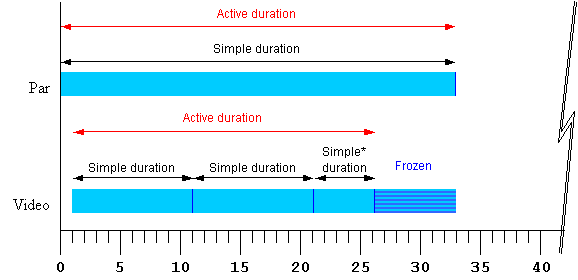
<par begin="0s" dur="33s">
   <video begin="1s" dur="10s" repeatCount="2.5" fill="freeze" .../>
</par>
Figure 1 - Strip diagram of basic timing
support. The starred "Simple*" duration indicates that the simple duration
is partial (i.e. it is cut off early).
The attributes that control these aspects of timing
can be applied not only to media elements, but to the time containers as
well. This allows, for example, an entire sequence to be repeated, and to
be coordinated as a unit with other media and time containers. While authors
can specify a particular simple duration for a time container, it is often
easier to leave the duration unspecified, in which case the simple duration
is defined by the contained child elements. When an element does not specify
a simple duration, the time model defines an implicit simple duration
for the element. For example, the implicit simple duration of a sequence
is based upon the sum of the active durations of all the children.
Each time container also imposes certain
defaults and constraints upon the contained children. For
example in a <seq>, elements begin
by default right after the previous element ends, and in all time
containers, the active duration of child elements is constrained
not to extend past the end of the time container's simple duration. Figure
2 illustrates the effects of a repeating
<par> time container as it constrains
a <video> child element.
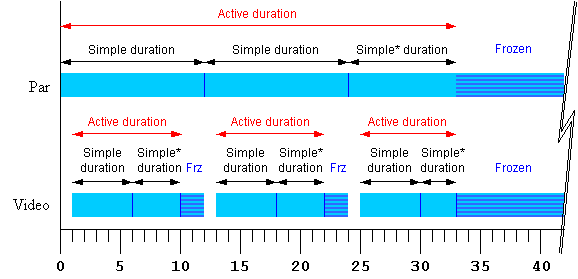
<par begin="0s" dur="12s" repeatDur="33s" fill="freeze" >
   <video begin="1s" dur="5s" repeatCount="1.8" fill="freeze" .../>
</par>
Figure 2 - Strip diagram of time container
constraints upon child elements. The starred "Simple*" durations indicate
that the simple duration is partial (i.e. it is cut off early).
The SMIL Timing Model defines how the
time container elements and timing attributes are interpreted to construct
a time graph. The time graph is a model of the presentation
schedule and synchronization relationships. The time graph is a dynamic
structure, changing to reflect the effect of user events, media delivery,
and DOM control of the presentation. At any given instant, the time graph
models the document at that instant, and the semantics described in this
module. However, as user events or other factors cause changes to elements,
the semantic rules are re-evaluated to yield an updated time graph.
In an ideal environment, the presentation would
perform precisely as specified. However, various real-world limitations (such
as network delays) can influence the actual playback of media. How the
presentation application adapts and manages the presentation in response
to media playback problems is termed runtime synchronization behavior.
SMIL includes attributes that allow the author to control the runtime
synchronization behavior for a presentation.
11.3
Language definition
Informative
The timing model is defined by building up from
the simplest to the most complex concepts: first the basic timing and simple
duration controls, followed by the attributes that control repeating and
constraining the active duration. Finally, the elements that define
time containers are presented.
The time model depends upon several definitions
for the host document: A host document is presented over a certain time interval.
11.3.1
Attributes
This section defines the set of timing attributes that are common to all
of the SMIL synchronization elements.
@@ Need to define "local time" or find a different term.
@@ In order to support an MPEG 4 effort to use SMIL Boston Timing and
Synchronization, we are considering the addition of two additional attributes:
-
We are probably going to add an additional attribute "min" that would take
a simple clock value and constrain the active duration to be at least as
long as the specified duration. This new attribute would not affect the parent
constraint semantics, and the impact on the timing model will be
minimized.
-
We are considering a "max" attribute that would specify a maximum active
duration for an element.
The begin and
dur attributes: basic timing support
Informative
The basic timing for an element is described using the
begin and
dur attributes. Authors can specify
the begin time of an element in a variety of ways, ranging from simple clock
times to the time that an event (e.g. a mouse-click) happens. The simple
duration of an element is specified as a simple time value. The
begin attribute syntax is described
below. The normative syntax rules for each attribute value variant are described
below (in Timing attribute value
grammars); a syntax summary is provided here as an aid to the reader.
Normative
-
begin :
smil-1.0-syncbase-value*
| begin-value-list
-
Defines when the element becomes active.
The attribute value is either a SMIL 1.0 syncbase declaration, a semi-colon
separated list of values, or the special value "indefinite".
-
smil-1.0-syncbase-value*
: "id(" id-ref ")" ( "(" ( "begin" | "end" | clock-value ) ")" )?
-
Describes a syncbase and an offset from that syncbase.
The element begin is defined relative to the begin or active end of another
element.
*Note: Only compliant SMIL document players are required to support the SMIL
1.0 syncbase-value syntax. Language designers integrating SMIL Boston Timing
and Synchronization into other languages should not support this syntax.
-
begin-value-list
: begin-value (";" begin-value-list )?
-
A semi-colon separated list of begin values. The
interpretation of a list of begin times is detailed below.
-
begin-value : ( offset-value | syncbase-value |
syncToPrev-value | event-value | repeat-value | accessKey-value |
media-marker-value | wallclock-sync-value )
-
Describes the element begin.
-
-
offset-value
: ( "+" | "-" )? clock-value
-
Describes the element begin as an offset from an
implicit syncbase. The definition of the implicit syncbase depends upon the
element's parent time container. The offset is measured in local time on
the parent time container.
-
syncbase-value
: ( id-ref "." ( "begin" | "end" ) ) ( ( "+" | "-" ) clock-value )?
-
Describes a syncbase and an offset from that syncbase.
The element begin is defined relative to the begin or active end of another
element.
-
syncToPrev-value
: ( "prev.begin" | "prev.end" ) ( ( "+" | "-" ) clock-value )?
-
Describes a logical syncbase and an offset from
that syncbase. The syncbase element is the previous timed sibling element,
as reflected in the DOM (or the parent time container if there is no previous
sibling). The element begin is defined relative to the begin or active end
of the syncbase element. This is equivalent to the syncbase for children
of a <seq> time container.
-
event-value
: ( id-ref "." )? ( event-ref ) ( ( "+" | "-" ) clock-value )?
-
Describes an event and an optional offset that determine
the element begin. The element begin is defined relative to the time that
the event is raised. Events may be any event defined for the host language
in accordance with [DOM2Events]. These may include user-interface events,
event-triggers transmitted via a network, etc. Details of event-based timing
are described in the section below on
Unifying Event-based and Scheduled
Timing.
-
repeat-value
: ( id-ref "." )? "repeat(" integer ")" ( ( "+" | "-" ) clock-value )?
-
Describes a qualified repeat event. The element
begin is defined relative to the time that the repeat event is raised with
the specified iteration value.
-
accessKey-value
: "accessKey(" character ")"
-
Describes an accessKey that determines the element
begin. The element begin is defined relative to the time that the accessKey
character is input by the user.
-
media-marker-value
: id-ref ".marker(" marker-name ")"
-
Describes the element begin as a named marker time
defined by a media element.
-
wallclock-sync-value
: "wallclock(" wallclock-value ")"
-
Describes the element begin as a real-world clock
time. The wallclock time syntax is based upon syntax defined in [ISO8601].
-
"indefinite"
-
The begin of the element will be determined by a
"beginElement()" method call or a hyperlink targeted to the element.
The SMIL Timing and Synchronization DOM methods are described in the
Supported Methods section.
Hyperlink-based timing is described in the
Hyperlinks and timing
section.
Begin value semantics
Normative
-
Children of a
<seq> can only specify a non-negative
offset value for begin (see The seq
element).
-
If no begin
is specified, the default timing is dependent upon the time container.
-
In the case where an element can begin multiple times,
the next begin time is the earliest begin time after the current time.
-
If there is an error in any individual value in the
list of begin values, only the individual value will be ignored (as though
it were not specified), but the rest of the list will not be invalidated.
If no legal value is specified for a begin value, the default value for
begin will be used.
Informative
Children of a
<par> begin by default when the
<par> begins (equivalent to
begin="0"). Children of a
<seq> begin by default when the
previous child ends its active duration (equivalent to
begin="0"). Children of an
<excl> default to a begin value
of "indefinite".
The begin value can specify a list of times. This
can be used to specify multiple "ways" or "rules" to begin an element, e.g.
if any one of several events is raised. A list of times can also define multiple
begin times, allowing the element to play more than once (this behavior can
be controlled, e.g. to only allow the earliest begin to actually be used
- see also The
restart
attribute).
In general, the earliest time in the list determines
the begin time of the element. There are additional constraints upon the
evaluation of the begin time list, detailed in
Evaluation of begin and end
time lists.
Note that while it is legal to include "indefinite"
in a list of values for begin, "indefinite" is only really useful as a single
value. Combining it with other values does not impact the timing, as DOM
begin methods can be called with or without specifying "indefinite" for
begin.
When a begin time is specified as a syncbase variant, a marker value or a
wallclock value, the defined time must be converted by the implementation
to a time that is relative to the parent time container (i.e. to the equivalent
of an offset value). This is know as timespace conversion,
and is detailed in the section
Converting between local and
global times.
Handling negative offsets for begin
Informative
The use of negative offsets to define begin times
merely defines the synchronization relationship of the element. It does not
in any way override the time container constraints upon the element, and
it cannot override the constraints of presentation time.
Normative
-
For children of
<par> and
<excl> time containers, the computed
offset relative to the parent begin time may be negative.
-
A begin time may be specified with a negative offset
relative to an event or to a syncbase that is not initially resolved.
-
When the syncbase or eventbase time is resolved,
the computed time may be in the past.
-
The computed time defines the scheduled
synchronization relationship of the element, even if it is not possible
to begin the element at the computed time. The defined begin time is the
computed time, and not the observed or performed time of the element
begin.
Informative
If an element has a begin time that resolves to
a time before the parent time container begins, the parent time container
constraint still applies. For example:
<par>
   <video id="vid" begin="-5s" dur="10s" src="movie.mpg" />
   <audio begin="vid.begin+2s" dur="8s" src="sound.au" />
</par>
The video
element cannot begin before the par
begins. The begin is simply defined to occur "in the past" when
the par begins. The viewer will observe
that the video begins 5 seconds into the media, and ends after 5 seconds.
Note that the audio element begins relative to the video begin, and that
the computed begin time is used, and not the observed begin time as constrained
by the parent. Thus the audio begins 3 seconds into the media, and also lasts
5 seconds.
The behavior can be thought of as a
clipBegin value applied to the
element, that only applies to the first iteration of repeating elements.
In the example above, if either element were defined to repeat, the second
and later iterations of the media would play from the beginning of the media
(see also The
repeatCount, repeatDur,
and repeat attributes: repeating
elements).
Normative
-
When a begin time is defined to be in the past, the
element begins immediately, but acts as though it had begun at the specified
time (playing from an offset into the media).
The behavior can be thought of as a
clipBegin value applied to the
element, that only applies to the first iteration of repeating elements.
The media will actually begin at the time computed
according to the following algorithm:
Let o be the offset value, d is the simple duration, AD is the active duration.
If AD is indefinite, it compares greater than any value of o or ABS(o).
REM( x, y ) is defined as x - floor( x/y ).
If y is indefinite, REM( x, y ) is just x.
If ABS(o) >= AD the element does not begin.
Else the element media begins at REM( ABS(o), d ).
If the element repeats, the iteration value of the
repeat event has the calculated value based upon the computed
begin, and not the observed number of repeats.
Informative
Thus for example:
<ref begin="foo.click-8s" dur="3s" repeatCount="10" .../>
The element begins when the user clicks on the
element "foo". It begins to play at 2 seconds into the 3 second simple duration.
Any time dependents are activated relative to the computed begin time, and
not the observed begin time. The begin event is raised
when the element begins, but has a timeStamp value that corresponds
to the defined begin time, 8 seconds earlier. One second later, the element
will repeat, and the associated repeat event will have the iteration
value set to 3 (it is zero based). The element will end 22 seconds after
the click.
Note: If script authors wish to distinguish between
the computed repeat iterations and observed repeat iterations, they can count
actual repeat events in the associated event handler.
@@Should we remove the following?
A begin time (ultimately) specifies a synchronization
relationship between the element and the parent time container. Syncbase
variants, eventbase, marker and wallclock timing are implicitly converted
to an offset on the parent time container, just as an offset value specifies
this directly. For children of a
<seq>, the result is always a
positive offset from the begin of the
<seq> time container. However,
for children of <par> and
<excl> time containers the computed
offset relative to the parent begin time may be negative.
If the computed begin offset is negative, the time container
constraints specify that the element cannot actually begin until the parent
time container begins. Nevertheless, the element behaves as though it had
begun earlier. A negative begin offset can
be thought of as defining a clipBegin value (with the same magnitude) for
the first -- and only the first -- iteration of a repeated element. If no
repeat behavior is specified, a negative begin offset is equivalent to a
clipBegin specification with the
same magnitude as the offset value.
The length of the simple duration is specified
using the dur attribute. The dur attribute
syntax is described below.
Normative
-
dur
-
Specifies the simple duration.
The attribute value can be either of the following:
-
clock-value
-
Specifies the length of the simple duration, measured
in local time.
Value must be greater than 0.
-
"indefinite"
-
Specifies the simple duration as indefinite.
@@We are also considering adding a value "intrinsic" for dur (and possibly
min and max). This would allow the author to specify that the duration is
the default intrinsic media duration. This is useful to control the semantic
interaction with "end".
Dur value semantics
If there is any error in the argument value syntax for
dur , the attribute will be ignored
(as though it were not specified).
If the element does not have a (valid)
dur attribute, the simple duration for
the element is defined to be the implicit duration of the element.
The implicit duration depends upon the type
of an element. The primary distinction is between different types of media
elements and time containers.
If the media element has no time children, it is
described as a simple media element.
-
For simple media elements that specify
continuous media (i.e. media with an inherent notion of time), the implicit
duration is the intrinsic duration of the media itself - e.g. video and audio
files have a defined duration. Note that
clipBegin and
clipEnd attributes on a media element
can override the intrinsic media duration, and will define the implicit duration.
See also the Media Object module.
-
For simple media elements that specify
discrete media (some times referred to as "static" media), the implicit
duration is defined to be 0.
-
For
<seq>,
<par> and
<excl> time containers, including
media elements that are also time containers, the implicit simple duration
is a function of the children of the time container. For details see the
section Time container
durations.
-
For media elements with time
children, the implicit duration depends on the value of the endsync
attribute.
If the author specifies a value for dur
that is shorter than the "intrinsic" defined duration for an element,
the intrinsic duration will be cut short by the specified simple duration.
If the author specifies a simple duration that is longer than the
"intrinsic" defined duration for an element, the intrinsic duration of the
element is extended to the specified dimple duration:
-
For a discrete media element, the media will be shown for the specified simple
duration.
-
For a continuous media element, the ending state of the media (e.g. the last
frame of video) will be shown from the end of the intrinsic media duration
to the end of the specified simple duration. This only applies to visual
media - aural media will simply stop playing (i.e. be silent).
-
For a time container, the simple duration is simply
extended beyond the intrinsic duration defined by endsync.
This may affect the active duration(s) of
children, and/or may increase the period during which children are
frozen.
Note that when the simple duration is "indefinite", some simple use cases
can yield surprising results. See the related
example #4.
Resolving times
Informative
Note that when the begin attribute
refers to an event, or to the begin or active end of another element, it
may not be possible to calculate when the begin will happen. For example,
if an element is defined to begin on some event, the begin time will not
be known until the event happens. When such a time becomes known (i.e. when
it can be calculated as a presentation time), the time is said to be
resolved (see also the discussion of
Unifying scheduled and interactive
timing).
Examples
The following example shows simple offset begin
timing. The <audio> element
begins 5 seconds after the
<par> time container begins, and
ends 4 seconds later.
<par>
   <audio src="song1.au" begin="5s" dur="4s" />
</par>
The following example shows syncbase begin timing.
The <img> element begins 2 seconds
after the <audio> element begins.
<par>
   <audio id="song1" src="song1.au" />
   <img src="img1.jpg" begin="song1.begin+2s" />
</par>
Elements can also be specified to begin in response
to an event. In this example, the image element begins (appears) when
the user clicks on element "show". The image will end (disappear) 3 and a
half seconds later.
<text id="show" ... />
<img begin="show.click" dur="3.5s" ... />
The end attribute:
controlling active duration
Informative
SMIL Boston provides an additional control over
the active duration. The end attribute
allows the author to constrain the active duration by specifying an end value
using a simple offset, a time base, an event-base or DOM methods calls. The
rules for combining the attributes to compute the active duration are presented
in the section, Computing the active
duration.
The normative syntax rules for each attribute value variant are described
in the section Timing attribute
value grammars; a syntax summary is provided here as an aid to the reader.
Normative
-
end :
smil-1.0-syncbase-value*
| end-value-list
-
Defines an end value for the element that can constrain
the active duration.
The attribute value is either a SMIL 1.0 syncbase declaration, a semi-colon
separated list of values, or the special value "indefinite".
-
smil-1.0-syncbase-value*
: "id(" id-ref ")" ( "(" ( "begin" | "end" | clock-value ) ")" )?
-
Describes a syncbase and an offset from that syncbase.
The end value is defined relative to the begin or active end of another
element.
*Note: Only compliant SMIL document players are required to support
the SMIL 1.0 syncbase-value syntax. Language designers integrating SMIL Boston
Timing and Synchronization should not support this syntax.
-
end-value-list
: end-value (";" end-value-list )?
-
A semi-colon separated list of end values. The
interpretation of a list of end times is detailed below.
-
end-value : ( offset-value | syncbase-value |
syncToPrev-value | event-value | repeat-value | accessKey-value |
media-marker-value | wallclock-sync-value )
-
Describes the end value of the element.
-
-
offset-value
: ( "+" | "-" )? clock-value
-
Describes the end value as an offset from an implicit
syncbase. The definition of the implicit syncbase depends upon the element's
parent time container. The offset is measured in local time on the parent
time container.
-
syncbase-value
: ( id-ref "." ( "begin" | "end" ) ) ( ( "+" | "-" ) clock-value )?
-
Describes a syncbase and an offset from that syncbase.
The end value is defined relative to the begin or active end of another element.
-
syncToPrev-value
: ( "prev.begin" | "prev.end" ) ( ( "+" | "-" ) clock-value )?
-
Specifies the previous timed sibling element, as
reflected in the DOM, as the syncbase element, and describes the syncbase
time and an offset from that syncbase. The end value is defined relative
to the begin or active end of the previous sibling element.
-
event-value
: ( id-ref "." )? ( event-ref ) ( ( "+" | "-" ) clock-value )?
-
Describes an event and an optional offset that determine
the end value. The end value is defined relative to the time that the event
is raised. Events may be any event defined for the host language in accordance
with [DOM2Events]. These may include user-interface events, event-triggers
transmitted via a network, etc. Details of event-based timing are described
in the section below on Unifying Event-based
and Scheduled Timing.
-
repeat-value
: ( id-ref "." )? "repeat(" integer ")" ( ( "+" | "-" ) clock-value )?
-
Describes a qualified repeat event. The end value
is defined relative to the time that the repeat event is raised with the
specified iteration value.
-
accessKey-value
: "accessKey(" character ")"
-
Describes an accessKey that determines the end value.
The end value is defined as the time that the accessKey character is input
by the user.
-
media-marker-value
: id-ref ".marker(" marker-name ")"
-
Describes the end value as a named marker time defined
by a media element.
-
wallclock-sync-value
: "wallclock(" wallclock-value ")"
-
Describes the end value as a real-world clock time.
The wallclock time is based upon syntax defined in [ISO8601].
-
"indefinite"
-
The end value of the element will be determined
by an
endElement() method call.
The SMIL Timing and Synchronization DOM methods are described in the
Supported Methods section.
-
If end specifies
an event-value or syncbase-value that is not resolved, the value of
end is considered to be "indefinite"
until resolved.
-
The earliest time in the list in the end time list determines the end value
used in Computing the Active Duration.
-
In the case where an element can begin multiple times, the end value used
is the earliest end time after the current begin time. There are additional
constraints upon the evaluation of the begin and end time lists, detailed
in Evaluation of begin and
end time lists.
-
When the end value extends the active duration beyond
an element's implicit simple duration, the ending state of the media (e.g.
the last frame of video) will be shown. This only applies to visual media
- aural media will simply stop playing, or will not play at all if the implicit
simple duration is 0 (e,g, because of
clipBegin and
clipEnd values).
@@ PLS: The above change could be interpreted to change the semantics - it
could be read to mean that the ending state is shown throughout the simple
duration. Perhaps it needs more wordsmithing form the original, but
we need to say that the media is played for its implicit duration, and then
the ending state is shown for the remainder of the specified simple
duration.
How about:
"When the end value extends the active duration beyond an element's implicit
simple duration, the ending state of the media (e.g. the last frame of video)
will be shown from the end of the implicit simple duration to the end of
the active duration."
Actually, this is also bad, as it needs to be clearer that a) this only applies
to media elements and not to time containers, and b) this applies to elements
with no dur specified (yes, that is the definition of implicit, but we should
be clearer).
Informative
The end value can specify a list of times. This can be used to specify multiple
"ways" or "rules" to end an element, e.g. if any one of several events is
raised. A list of times can also define multiple end times that can correspond
to multiple begin times, allowing the element to play more than once (this
behavior can be controlled - see also The
restart attribute).
In the following example, the
dur attribute is not specified, and
so the simple duration is defined to be the implicit media duration. In this
case (and this case only) the value of
end will extend the active duration
if it specifies a duration greater than the implicit (media) duration.
Informative
In the following example, the video will be shown
for 8 seconds, and then the last frame will be shown for 2 seconds.
<video end="10s" src="8-SecondVideo.mpg" .../>
Normative
If the end value
becomes resolved while the element is still active, and the resolved time
is in the past, the element should end the active duration immediately. Time
dependents defined relative to the end of this element should be resolved
using the computed active end (which may be in the past), and not the observed
active end.
Informative
These cases arise from the use of negative offsets
in the sync-base and event-base forms, and authors should be aware of the
complexities this can introduce. See also
Handling negative offsets for
end.
In the following example, the active duration
will end at the earlier of 10 seconds, or the end of the "foo" element. This
is particularly useful if "foo" is defined to begin or end relative to an
event.
<audio src="foo.au" dur="2s" repeatDur="10s"
       end="foo.end" .../>
In the following example, the active duration
will end at 10 seconds, and will cut short the simple duration defined to
be 20 seconds. The effect is that only the first half of the element is actually
played. For a simple media element, the author could just specify this using
the dur attribute. However in other cases, it is sometimes important to specify
the simple duration independent of the active duration.
<par>
   <audio src="music.au" dur="20s" end="10s" ... />
</par>
In the following example, the element begins when
the user clicks on the "gobtn" element. The active duration will end 30 seconds
after the parent time container begins.
<par>
   <audio src="music.au" begin="gobtn.click" repeatDur="indefinite"
          end="30s" ... />
   <img src="foo.jpg" dur="40s" ... />
</par>
Note that if the user has not clicked on the target
element before 30 seconds elapse, the element will never begin. In this case,
the element has no active duration and no active end.
The defaults for the event syntax make it easy
to define simple interactive behavior. The following example stops the image
when the user clicks on the element.
<image src="image.jpg" end="click" />
Using end
with an event value enables authors to end an element based on either an
interactive event or a maximum active duration. This is sometimes known as
lazy interaction.
In this example, a presentation describes factory
processes. Each step is a video, and set to repeat 3 times to make the point
clear. Each element can also be ended by clicking on the video, or on some
element "next" that indicates to the user that the next step should be shown.
<seq>
  <video dur="5s" repeatCount="3" end="click; next.click" .../>
  <video dur="5s" repeatCount="3" end="click; next.click" .../>
  <video dur="5s" repeatCount="3" end="click; next.click" .../>
  <video dur="5s" repeatCount="3" end="click; next.click" .../>
  <video dur="5s" repeatCount="3" end="click; next.click" .../>
</seq>
In this case, the active end of each element is
defined to be the earlier of 15 (5s dur * 3 repeats) seconds after it begins,
or a click on "next". This lets the viewer sit back and watch, or advance
the presentation at a faster pace.
Handling negative offsets for end
Normative
-
An end time may be specified with a negative offset
relative to an event or to a syncbase that is not initially resolved.
-
When the syncbase or eventbase time is resolved,
the computed time may be in the past.
-
The computed time defines the scheduled
synchronization relationship of the element, even if it is not possible
to end the element at the computed time.
-
When an end time is defined to be in the past, the
element ends immediately. The defined end time is the computed time,
and not the observed or performed time of the element end.
Evaluation of begin and
end time lists
@@ If min and max can take lists of values, this section must be generalized
to account for this.
The lists of begin and
end times can define more than one instance
of the active duration for an element. Each active duration instance behaves
according to the rules described for interpreting the simple duration, repeat
behavior and the definition of the active duration. The following semantics
are used to evaluate the lists of
begin and
end times to determine the begin and
end time for each interval.
The begin and end times that this semantic produces are not necessarily the
begin and end of the active duration. Rather, they are the inputs used to
the rest of the timing semantics, for a given instance of the active duration.
Thus, an end value obtained here is considered within the semantics of
Computing the active duration, and
a begin value obtained here must be evaluated according to the semantics
of restart.
If at any time one of the times in the
begin or
end list changes (e.g. when an unresolved
value is resolved), the semantics described here may need to be
re-evaluated.
-
If a begin time changes:
-
If an element is active (or already was active during the current parent
simple duration), then restart semantics apply.
-
If an element is not and has not yet been active within the parent simple
duration, and/or if restart semantics allow it to restart, then the semantics
of the begin list may need to be re-evaluated to determine the next begin
time.
-
If an element is active and an end time changes, then the rules for determining
the active duration must be re-evaluated.
See also the discussion of Propagating
changes to times.
For each set of times (begin and end), the model describes two lists. One
list reflects the syntax, and contains all the specified values
for begin or end. The second list in the model contains only the resolved
times for begin or end of an element. This model of a separate list for the
resolved times addresses three issues:
-
Not all times specified times may be resolved at any given point, and it
is much easier to just consider the resolved times when evaluating the lists
of times.
-
If the model is based only upon the specified times, it is harder to account
for begin and end times that are initiated via DOM method calls.
-
Some specified times (such as event-based times) as well as the DOM method
calls can result in more than one resolved time. It is much easier to model
this as a list of resolved times, separate from the specification.
As a time is resolved, it is considered for addition to the list of resolved
times. For begin times, if the early evaluation of restart semantics precludes
a candidate begin time, then it is not added to the list, and is effectively
dropped. If the begin specification
includes an instance of "indefinite" as a begin
value, the indefinite value is ignored in creating the list of resolved
begin times. An instance of "indefinite" in the
end specification will be included
in the list of resolved end times.
Times in the resolved times lists may change, if the associated
time specification is defined relative to a sync-base and the sync-base time
changes. Resolved times associated with an event-based specification will
not change, but the event-base specification may resolve again,
adding an additional time to a resolved times list. When an element
is reset (e.g. when it begins or restarts, or when an ancestor
restarts), all event-based times are reset (cleared), and so the resolved
times lists must be updated to reflect this.
The times in the resolved times lists are all relative to the beginning of
the parent simple duration (this is the common denominator among different
time specifications). The resolved times lists are assumed to be sorted
from earliest to latest. The order of specification (i.e., the order in the
original syntax) is ignored in the evaluation of the begin and end lists.
The lists of times are considered to model a set of intervals. These
may or may not be defined by pairs of times in the two lists. It is not
the case that each ith interval is defined by the
ith begin time and the ith end time
in the respective lists. Rather, the intervals are defined by considering
the two lists of resolved times in sorted order. For any given begin time,
the associated interval ends with the next end time after the begin time.
In this model, any end times before the first begin are initially passed
over (ignored); however if there are no other end times, then the logic will
still apply a "rejected" end time. There may be more than one begin time
that shares the same end time in defining the respective intervals. In addition,
when evaluating the resolved times lists, the end time for a given interval
may be indefinite or unresolved.
This describes the basic recipe for getting the next interval defined by
the resolved times lists. The notion of "next" is after some time on the
parent simple duration. It is assumed that there is some pseudo time value
-INFINITY that can be used to get the first possible
interval for an element - the recipe could also be modified to just get the
first interval if so desired.
This recipe is generally useful when a parent simple duration is beginning,
or when a child element has just ended, and the next interval is needed.
The algorithm ignores all issues related to restart, and so is most useful
when the element is not active at the "after" time.
Steps to get the next interval, relative to an "after" time:
-
Get the first value in the resolved begin times list that is equal to or
after the "after" time. If there is no such value, then there is no next
interval.
-
Get the first value in the resolved end times list that is equal to or after
the begin time obtained in step 1. If such a value is found, the begin value
from step 1 and this end value define the next interval. If there is no such
end value, then one of the following is true:
-
If there are any unresolved end specifications or if no end times were specified,
then the next interval has no end constraint (i.e. it is either missing or
unresolved). The next interval is defined by the begin value from step 1,
and no end value.
-
Else there are only resolved end times, and these all occur before the begin
time obtained in step 1. One of two results is now possible:
-
If the begin time was defined by a DOM method call, then the next interval
has no end constraint. The next interval is defined by the begin value from
step 1, and no end value.
-
Otherwise (for all begin times specified in syntax), the last end value is
before the begin time, and so the interval is not valid. There is no next
interval.
Note the exception for begin times associated with DOM method calls.
If a beginElement() or a
beginElementAt() call specifies a begin time after the last
end time (with no unresolved end times), the active duration is unconstrained,
as though no end had been specified.
See also Supported methods.
Another more complicated recipe will be required for getting the currently
active, or next scheduled interval defined by the resolved times lists, for
a given point on the parent simple duration. This recipe is particularly
useful when a seek operation is performed on a parent and the time graph
must jump into the middle of a parent simple duration.
The approach is similar to the previous "get next interval" logic, except
that this will attempt to calculate the effects of restart semantics up to
the "seek" point. If the element is calculated to be active at the "seek"
time, the bounding interval is determined. If the element is not active and
there is a next interval, then that is the result.
The logic is more complex as well because it must calculate the active duration,
and not just the end time.
Get first begin and end times, using "get next interval" logic, above. Calculate
associated active duration, using the obtained end time and the semantics
in Computing the active duration.
If the active duration is indefinite or unresolved, it is considered open
ended, and contains all times at or after the begin time.
Loop over the following steps until a result is obtained:
-
If the current interval contains the seek time
-
If element restart is not always, return this interval
-
Else, save this interval as a candidate
-
Else if the current begin is after the seek time
-
If we have a saved candidate, return that
-
If the current end defines a legal interval, return current interval. Allow
for DOM begin times after all end times.
-
Otherwise, this is a bad interval, so just fall through.
-
Find next interval:
-
If current interval is illegal (end before begin), then just get the next
begin after the current begin (can ignore restart because illegal interval
would not begin).
-
If there is no such begin, return FAILURE
-
Else get the next begin, considering restart:
-
If restart is "never", return FAILURE
-
Else if restart is "always" get next begin after current begin
-
If there is no such begin, return FAILURE
-
Else (restart is "whenNotActive") get next begin after current end
-
If there is no such begin, return FAILURE
-
If the current end is open ended or still >= the new begin time, just
use current end
-
Else if there is another end time at or after the new begin time, use that.
This may include an open-ended end time if there are unresolved end
specifications.
-
Else this is a bad interval - just loop
[ End of Loop ]
Timing attribute value grammars
Normative
In the syntax specifications that follow, allowed
white space is indicated as "S", defined as follows (taken from the [XML10]
definition for "S"):
S ::= (#x20 | #x9 | #xD | #xA)*
Begin values
Normative
A begin-value-list is a semi-colon separated list
of timing specifiers:
begin-value-list ::= begin-value (S ";" S begin-value-list )?
begin-value      ::= (offset-value | syncbase-value
                      | syncToPrev-value | event-value
                      | media-marker-value | wallclock-sync-value
                      | "indefinite" )
End
values
Normative
An end-value-list is a semi-colon separated list
of timing specifiers:
end-value-list ::= end-value (S ";" S end-value-list )?
end-value      ::= (clock-value | syncbase-value
                      | syncToPrev-value | event-value
                      | media-marker-value | wallclock-sync-value
                      | "indefinite" )
Parsing timing specifiers
Several of the timing specification values have
a similar syntax. In addition, XML ID attributes are allowed to contain the
dot '.' separator character. The
backslash character '\' can be used to escape the dot separator within identifier
and event-name references. To parse an individual item in a value-list, the
following approach defines the correct interpretation.
-
If the value begins with a number or numeric sign
indicator (i.e.
'+' or '-'), the value should be
parsed as an offset value.
-
Else if the value begins with the token "prev",
it should be parsed as a
syncToPrev-value.
-
Else if the value begins with the token "wallclock",
it should be parsed as a
wallclock-sync-value.
-
Else: Build a token substring up to but not including
any sign indicator (i.e. strip off any offset). In the following, ignore
any '
.' separator characters preceded by a backslash
'\' escape character.
-
If the token contains no '
.' separator
character, then the value should be parsed as an
event-value with an unspecified (i.e.
default) eventbase-element.
-
Else if the token ends with the string
"
.begin" or ".end", then the value should be parsed
as a syncbase-value.
-
Else if the token contains the string
"
.marker(", then the value should be parsed as a
media-marker-value.
-
Else, the value should be parsed as an
event-value (with a specified
eventbase-element).
@@Note that this approach essentially reserves the following tokens:
prev and wallclock
for element IDs, and begin,
end and marker for
event names.
Clock values
Clock values have the following syntax:
Clock-val         ::= ( Full-clock-val | Partial-clock-val | Timecount-val )
Full-clock-val    ::= Hours ":" Minutes ":" Seconds ("." Fraction)?
Partial-clock-val ::= Minutes ":" Seconds ("." Fraction)?
Timecount-val     ::= Timecount ("." Fraction)? (Metric)?
Metric            ::= "h" | "min" | "s" | "ms"
Hours             ::= DIGIT+; any positive number
Minutes           ::= 2DIGIT; range from 00 to 59
Seconds           ::= 2DIGIT; range from 00 to 59
Fraction	  ::= DIGIT+
Timecount         ::= DIGIT+
2DIGIT		  ::= DIGIT DIGIT
DIGIT		  ::= [0-9]
For Timecount values, the default metric suffix
is "s" (for seconds). No embedded white
space is allowed in clock values, although leading and trailing white space
characters will be ignored.
The following are examples of legal clock values:
-
Full clock values:
02:30:03
50:00:10.25 = 50 hours, 10 seconds and 250 milliseconds
-
Partial clock value:
02:33
00:10.5 = 10.5 seconds = 10 seconds and 500 milliseconds
-
Timecount values:
3.2h = 3.2 hours = 3 hours and 12
minutes
45min = 45 minutes
30s = 30 seconds
5ms = 5 milliseconds
12.467 = 12 seconds and 467 milliseconds
Fractional values are just (base 10) floating point
definitions of seconds. The number of digits allowed is unlimited (although
actual precision may vary among implementations).
For example:
00.5s = 500 milliseconds
00:00.005 = 5 milliseconds
Offset values
Offset values are used to specify when an element should begin or end relative
to its syncbase.
Normative
An offset value has the following syntax:
offset-value ::= ( "+" | "-" )?( Clock-value )
-
An offset value allows an optional sign on a clock
value, and is used to indicate a positive or negative offset.
-
The offset is measured in local time on the parent
time container.
The implicit syncbase for an offset value is dependent
upon the time container:
-
For children of a
<par> or an
<excl>, the offset is relative
to the begin of the parent
<par> or
<excl>.
-
For children of a
<seq>, the offset is relative
to the active end of the previous child. If there is no previous child, the
offset is relative to the begin of the parent
<seq>. See also
The seq time container.
SMIL 1.0 begin and end
values
Although SMIL Boston provides new syncbase syntax, SMIL 1.0 syncbase syntax
must be supported by SMIL document players.
-
Only compliant SMIL document players are required
to support the SMIL 1.0 syncbase-value syntax. Language designers integrating
SMIL Boston Timing and Synchronization into other languages should not support
this syntax.
smil-1-syncbase-value  ::= "id(" id-ref ")"
                           ( "(" ( "begin" | "end" | clock-value) ")" )?
ID-Reference values
Normative
ID reference values are references to the value of
an "id" attribute of another element in the document.
Id-value ::= IDREF
-
The IDREF is a legal XML identifier.
Syncbase values
A syncbase value
starts with a Syncbase-element term defining the value of an "id" attribute
of another element referred to as the syncbase element.
Normative
A syncbase value has the following syntax:
 Syncbase-value   ::= (
Syncbase-element "." Time-symbol )


( S ("+"|"-")
S Clock-value )?

 Syncbase-element ::= Id-value

 Time-symbol      ::= "begin" | "end"
-
The syncbase element must be another timed element
contained in the host document.
-
The syncbase element may not be a descendent of the
current element.
-
If the syncbase element specification refers to an
illegal element, the syncbase-value description is ignored (although the
entire time value list is not invalidated - only the particular syncbase
value).
@@ BMS - long sync arcs are allowed!
The syncbase element is qualified with one of the
following time symbols:
-
begin
-
Specifies the begin time of the syncbase element.
-
end
-
Specifies the Active End of the syncbase element.
-
The time symbol can be followed by an offset value.The
offset value specifies an offset from the time (i.e. the begin or active
end) specified by the syncbase and time symbol.
-
The offset is measured in local time on the parent
time container.
-
If the clock value is omitted, it defaults to "0".
-
No embedded white space is allowed between a syncbase
element and a time-symbol.
-
White space will be ignored before and after a "+"
or "-" for a clock value.
-
Leading and trailing white space characters (i.e.
before and after the entire syncbase value) will be ignored.
Examples:
begin="x.end-5s"
: Begin 5 seconds before "x" ends
begin=" x.begin " : Begin when
"x" begins
begin="x.begin + 1m" : End 1 minute after
"x" begins
Sync To Prev values
Informative
A sync-to-prev
value is much like a syncbase value, except that the reserved token "prev"
is used in place of the Syncbase-element term. The Time-symbol and optional
Clock-value offset are as defined for
syncbase values.
Normative
A sync-to-prev value has the following syntax:
 SyncToPrev-value   ::= ( "prev."
Time-symbol )


           (
S ("+"|"-")
S Clock-value )?
-
The previous element is the (timed) element
that precedes this element within the parent time container (as reflected
in the DOM).
-
If there is no previous element (i.e. if the current
element is the first timed child of the parent time container), then the
begin of the parent time container is used as the syncbase (note that the
Time-symbol is ignored in this case).
Informative
Note that the parent time container may not be
the immediate parent of the current node, in some host documents.
The Clock-value offset is nevertheless added to
the parent time container begin time, to yield the resulting time value.
@@This requires more complete examples, or we need to include them above
somewhere. We need good examples of how this is used.
Examples:
begin="prev.end-5s"
: Begin 5 seconds before the previous element ends
begin=" prev.begin " : Begin
when the previous element begins
begin="prev.begin + 1m" : End 1 minute after
the previous element begins
Event values
Informative
An Event value
starts with an Eventbase-element term that specifies the event-base
element. The event-base element is the element on which the event is
observed. Given DOM event bubbling, the event-base element may be either
the element that raised the event, or it may be an ancestor element on which
the bubbled event can be observed. Refer to DOM-Level2-Events [DOM2Events]
for details.
Normative
An event value has the following syntax:
Event-value       ::= ( Eventbase-element "."
)? Event-symbol


( S ("+"|"-")
S Clock-value )?

  Eventbase-element ::= Id-value
The "Id-value" is the value of an attribute declared
to be of type ID (per the XML definition) in the host language, for the
event-base element. This element must be another
element contained in the host document.
If the Eventbase-element term is missing, the event-base
element defaults to the element on which the eventbase timing is specified
(the current element).
The event value must specify an Event-symbol.
This term specifies the name of the event
that is raised on the Event-base
element. The host language designer must
specify which events can be specified.
-
Host language specifications must include a description
of legal event names (with "none" as a valid description), and/or allow any
name to be used.
-
If an integrating language specifies no supported
events, the event-base time value is effectively unsupported for that
language.
-
If the host language allows dynamically created events
(as supported by DOM-Level2-Events [DOM2Events]), all possible Event-symbol
names cannot be specified and so unrecognized names may not be considered
errors.
-
Unless explicitly specified by a host language, it
is not considered an error to specify an event that cannot be raised on the
Event-base element (such as click for audio or other non-visual
elements). Since the event will never be
raised on the specified element, the event-base value will never be
resolved.
The last term specifies an optional offset-value that is an offset from the
time of the event.
-
The offset is measured in local time on the parent
time container. If this term is omitted, the offset is 0.
-
No embedded white space is allowed between an eventbase
element and an event-symbol.
-
White space will be ignored before and after a "+"
or "-" for a clock value.
-
Leading and trailing white space characters (i.e.
before and after the entire eventbase value) will be ignored.
Informative
If the eventbase element has no associated layout
(e.g. a time container in a SMIL document), then some UI events may not be
defined (e.g. mouse events). A host language designer may override the definition
of the default eventbase element. As an example of this, the SMIL Animation
elements (animate,
animateMotion, etc.) specify
that the default eventbase element is the target element of the
animation. See also [[SMIL Animation]].
This module defines several events that may be included in the supported
set for a host language, including beginEvent and
endEvent. These should not be confused with the syncbase time
values. See the section on Events
and event model.
The semantics of event-based timing are detailed
in Unifying Scheduling and Interactive
Timing. Constraints on event sensitivity are detailed in
Event sensitivity.
Examples:
begin=" x.load "
: Begin when "load" is observed on "x"
begin="x.focus+3s" : Begin
3 seconds after an "focus" event on "x"
begin="x.endEvent+1.5s" : Begin 1 and a half seconds after
an "endEvent" event on "x"
begin="x.repeat" :
Begin each time a repeat event is observed on "x"
The following example describes a qualified repeat
eventbase value:
<video id="foo" repeatCount="10" end="endVideo.click" ... />
<img id="endVideo" begin="foo.repeat(2)" .../>
The "endVideo" image will appear when the video
"foo" repeats the second time. This example allows the user to stop the video
after it has played though at least twice.
Repeat values
Repeat values are a variant on event values that support a qualified repeat
event. The repeat event defined in
Events and event model allows an additional
suffix to qualify the event based upon an iteration value.
A repeat value has the following syntax:
Repeat-value       ::= ( Eventbase-element
"." )? "repeat(" iteration ")"


( S ("+"|"-")
S Clock-value )?

  iteration        ::=
Integer
If this qualified form is used, the eventbase value will be only be resolved
when a repeat is observed that has a iteration value that matches the specified
iteration.
The qualified repeat event syntax allows an author to respond only to an
individual repeat of an element.
AccessKey values
AccessKey values allow an author to tie a begin or end time to a particular
keypress, indepedent of focus issues. It is modeled on the HTML accessKey
support. Unlike with HTML, user agents should not require that a modifer
key (such as "ALT") be required to activate an access key.
An accesskey value has the following syntax:
AccessKey-value
::= "accessKey(" character ")"
The character is a single character from [ISO10646].
@@ [Thierry] If we do not have the above reference, please use the reference
cited at:
http://www.w3.org/TR/html4/references.html#ref-ISO10646
The time value is defined as the time that the accessKey
character is input by the user.
Media marker values
Certain types of media can have associated marker values that associate
a name with a particular point (i.e. a time) in the media. The media marker
value provides a means of defining a begin or end time in terms of these
marker values. Note that if the referenced id is not associated with a media
element that supports markers, or if the specified marker name is not defined
by the media element, the associated time may never be resolved.
Normative
Media-Marker-value ::=
Id-value ".marker(" S
marker-symbol S ")" )
-
The marker symbol is a string that must conform
to the definition of marker names for the media associated with the
Id-value.
Wallclock-sync values
Informative
Wallclock-sync values have the following syntax.
The values allowed are based upon several of the "profiles" described in
[DATETIME], which is based upon [ISO8601].
Normative
wallclock-val  ::= "wallclock(" S (DateTime | WallTime)  S ")"
DateTime       ::= Date "T" WallTime
Date           ::= Years "-" Months "-" Days
WallTime       ::= (HHMM-Time | HHMMSS-Time)(TZD)?
HHMM-Time      ::= Hours24 ":" Minutes
HHMMSS-Time    ::= Hours24 ":" Minutes ":" Seconds ("." Fraction)?
Years          ::= 4DIGIT;
Months         ::= 2DIGIT; range from 01 to 12
Days           ::= 2DIGIT; range from 01 to 31
Hours24        ::= 2DIGIT; range from 00 to 23
4DIGIT         ::= DIGIT DIGIT DIGIT DIGIT
TZD            ::= "Z" | (("+" | "-") Hours24 ":" Minutes )
-
Exactly the components
shown here must be present, with exactly this punctuation.
-
Note that the "T" appears literally in the string,
to indicate the beginning of the time element, as specified in [ISO8601].
Informative
Complete date plus hours and minutes:

   YYYY-MM-DDThh:mmTZD (e.g. 1997-07-16T19:20+01:00)

Complete date plus hours, minutes and seconds:

   YYYY-MM-DDThh:mm:ssTZD (e.g. 1997-07-16T19:20:30+01:00)

Complete date plus hours, minutes, seconds and a decimal fraction of a second

   YYYY-MM-DDThh:mm:ss.sTZD (e.g. 1997-07-16T19:20:30.45+01:00)
Note that the Minutes, Seconds, Fraction, 2DIGIT
and DIGIT syntax is as defined for
Clock-values. Note that white space
is not allowed within the date and time specification.
Normative
There are three ways of handling time zone offsets:
-
Times are expressed in UTC (Coordinated Universal
Time), with a special UTC designator ("Z").
-
Times are expressed in local time, together with
a time zone offset in hours and minutes. A time zone offset of "+hh:mm" indicates
that the date/time uses a local time zone which is "hh" hours and "mm" minutes
ahead of UTC. A time zone offset of "-hh:mm" indicates that the date/time
uses a local time zone which is "hh" hours and "mm" minutes behind UTC.
-
Times are expressed in local time, as defined for
the presentation location. The local time zone of the end-user platform is
used.
The presentation engine must be able to convert
wallclock-values to a time within the document.
-
When the document begins, the current wallclock time
must be noted - this is the document wallclock begin.
-
Wallclock values are then converted to a document
time by subtracting the document wallclock begin, and then converting the
time to the element's parent time space as for any syncbase value, as though
the syncbase were the document body.
Informative
Note that the resulting begin or end time may be
before the begin, or after end of the parent time container. This is not
an error, but the time container
constraints still apply. In any case, the semantics of the
begin and
end attribute govern the interpretation
of the wallclock value.
Examples
The following examples all specify a begin at midnight
on January 1st 2000, UTC
begin="wallclock(2000-01-01Z)"
begin="wallclock( 2000-01-01T00:00Z )"
begin="wallclock( 2000-01-01T00:00:00Z )"
begin="wallclock( 2000-01-01T00:00:00.0Z )"
begin="wallclock( 2000-01-01T00:00:00.0Z )"
begin="wallclock( 2000-01-01T00:00:00.0-00:00 )"
The following example specifies a begin at 3:30
in the afternoon on July 28th 1990, in the Pacific US time zone:
begin="wallclock( 1990-07-28T15:30-08:00 )"
The following example specifies a begin at 8 in
the morning wherever the document is presented:
begin="wallclock( 08:00 )"
Normative
The endsync
attribute controls the simple duration of time containers, as a function
of the children. The endsync attribute
is only valid for par and
excl time container elements, and media
elements with timed children (e.g.
animate or
area elements). Integrating languages
may allow the endsync attribute
on any element with time container semantics.
The
endsync attribute is particularly
useful with children that have "unknown" duration, e.g. an mpeg movie, that
must be played through to determine the duration, or elements with event-based
end timing.
-
endsync = "
first | last | all | intrinsic | id-ref "
-
Legal values for the attribute are:
-
first
-
The par,
excl, or media element simple duration
ends with the earliest active end of all the child elements. This does not
refer to the lexical first child, or to the first child to start, but rather
refers to the first child to end its active duration.
-
last
-
The par,
excl, or media element simple duration
ends with the last active end of the child elements. This does not refer
to the lexical last child, or to the last child to start, but rather refers
to the last active end of all children that have a resolved begin time. If
the time container has no children with a resolved begin time, the time
container ends immediately. If child elements have multiple begin times,
or otherwise restart, the child elements must complete all instances
of active durations for resolved begin times.
This is the default value for par and
excl elements.
-
all
-
The par,
excl, or media element simple duration
ends when all of the child elements have ended their respective active durations.
Elements with indefinite or unresolved begin times will keep the
simple duration of the time container from ending.
In the case of child elements with multiple begin times, or restarting child
elements, the child elements do not have to play to completion; they must
have played at least once (here "once" refers to an instance of an active
duration, and not to one repeat iteration of a repeating element).
When all elements have completed the active duration one or more times, the
parent time container can end.
-
intrinsic
-
The time container element simple duration ends when the intrinsic duration
of the element ends. This must be defined by a host language. If the time
container element does not define an intrinsic duration, the host language
must define the simple duration for the element.
This is the default value for media time container elements.
@@ This is the default for media elements for the SMIL
language, for backwards compatibility, but should not necessarily be the
default for all language profiles. Shouldn't we define the default for this
attribute on other elements (i.e. elements from other modules) in the language
specification?
@@?? Should this attribute be disallowed on the par/seq/excl elements?
-
id-ref
-
The par,
excl, or media element simple duration
ends with the specified child. The id must correspond to one of the immediate
children of the time container.
Example: <par ... endsync="movie1" ...>
@@Need to move this example to an examples
section
-
Elements may have an unresolved begin time when the parent
begins. If an element's unresolved begin time becomes resolved before the
parent time container ends the simple duration, the element must be considered
by the endsync semantics.
This can chain, so that only one element is running
at one point, but before it ends its active duration another interactive
element is resolved. It may even yield "dead time" (where nothing is playing),
if the resolved begin is after the other elements active
end.
-
Media element time containers define an intrinsic
duration equal to the duration of the referenced media.
Note that if the referenced media is not
continuous, the duration is 0 (
endsync=intrinsic will not generally
be useful on discrete media).
@@ Shouldn't this be defined in the language
profile?
-
For the
id-ref arg-value variant,
if the referenced child has an indefinite active duration, then the simple
duration of the time container is also indefinite. While the referenced child
has an unresolved active duration (including the case of an unresolved begin),
the simple duration of the time container is also unresolved.
Semantics of
endsync and
dur and
end:
-
If an element specifies both endsync
and dur, the
endsync attribute is ignored. The
time container simple duration is defined by the value of
dur.
-
If an element specifies both endsync
and end, but none of
dur,
repeatDur or
repeatCount, the
endsync attribute is ignored. The
time container simple duration is indefinite, and will be constrained by
the end value.
@@Need to resolve above definition
Semantics of
endsync and restart:
-
In the case of an element that restarts (e.g. because of
multiple begin times), the element is considered to have ended its active
duration when one active duration instance has completed. It is not a requirement
that all instances associated with multiple begin and end times complete,
to satisfy the semantics of endsync.
This means that if the element is playing a second or later instance of an
active duration, it may be cut short by a parent, once the other children
satisfy the endsync semantics.
Semantics of
endsync and paused elements:
-
Note that child elements of an
excl that are currently paused (by
the excl semantics) have not ended
their active duration. Similarly, any element paused via the DOM
pause() method has not completed its active duration. Paused
elements (that have not already completed the active duration at least once)
must be considered in the evaluation of
endsync.
For example, if a time container with
endsync=last
has paused child elements, the simple duration of the time container will
not end until the paused children resume or otherwise end.
Informative
Semantics of
endsync and unresolved child times:
-
endsync="first" means that the time container must wait for
any element to actually end its active duration. It does not matter whether
the the first element to end was scheduled or interactive.
-
endsync="last" means that the time container must wait for
all elements that have a resolved begin, to end the respective active
durations.
Elements with indefinite or unresolved begin times
will not keep the simple duration of the time container from ending.
If there are no children with a resolved begin time, the time container will
end immediately.
Elements with a resolved begin time but indefinite or unresolved end times
will keep the simple duration of the time container from
ending.
-
endsync="all" means that every
child element of the time container must end the active duration.
-
endsync=[id-ref]
means that the time container must wait for the referenced element to actually
end its active duration.
@@ Do we need a note to call out that in some cases, endsync may define an
indefinite simple duration for the time container. This would flow through
the "computing the active duration" table accordingly, using "implicit
indefinite" as the simple duration.
Normative
@@ Verify algorithm w.r.t. last vs. all
distinction
The following pseudo-code describes the
endsync algorithm:
//
// boolean timeContainerHasEnded()
//
// method on time containers called to evaluate whether
// time container has ended, according to the rules of endsync.
// Note: Only supported on par and excl
//
// A variant on this could be called when a child end is updated to
// create a scheduled (predicted) end time for the container.
//
// Note that we never check the end time of children - it don't matter.
//
// Assumes:
//     child list is stable during evaluation
//     isActive state of children is up to date for current time.
//      [In practice, this means that the children must all be
//        pre-visited at the current time to see if they are done.
//        If the time container is done, and repeats, the children
//        may be resampled at the modified time.]
//
//   Uses interfaces:
//   on TimedNode:
//     isActive()     	tests if node is currently active
//     hasStarted()   	tests if node has (ever) begun
//     begin and end  	begin and end TimeValues of node
//
//   on TimeValue 	(a list of times for begin or end)
//   isResolved(t)  	true if there is a resolved time
//    	                         at or after time t
//

boolean timeContainerHasEnded()
{

TimeInstant now = getCurrentTime(); // normalized for time container

boolean assumedResult;

// For first or ID, we assume a false result unless we find a child that has ended
// For last and all, we assume a true result unless we find a dis-qualifying child

if( ( endsyncRule == first ) || ( endsyncRule == ID ) )
   assumedResult = false;
else
   assumedResult = true;

// Our interpretation of endsync == all:
//  	we're done when all children have begun, and none is active
//

// loop on each child in collection of timed children,
//  and consider it in terms of the endsyncRule

 foreach ( child c in timed-children-collection )
{
   switch( endsyncRule ) {
      case first:
         // as soon as we find an ended child, return true.
         if( c.hasStarted() & !c.isActive() )
            return true;
         // else, keep looking (assumedResult is false)
         break;

      case ID:
         // if we find the matching child, just return result
         if( endsyncID == c.ID )
                 return( c.hasStarted() & !c.isActive() );
         // else, keep looking (we'll assume the ID is valid)
         break;

      case last:
         // we just test for disqualifying children
         // If the child is active, we're definitely not done.
         // If the child has not yet begun but has a resolved begin,
         // then we're not done. Note that if it has already begun,
         // then we do not care if it has more resolved begins.
         if( c.isActive()
             || ( !c.hasStarted() && c.begin.isResolved(now) ))
             return false;
         // else, keep checking (the assumed result is true)
         break;

      case all:
         // we just test for disqualifying children
        // all_means_last_done_after_all_begin

         // If the child is active, we're definitely not done.
         // If the child has not yet begun then we're not done.
         // Note that if it has already begun,
         // then we do not care if it has more resolved begins.
         if( c.isActive() || !c.hasStarted() )
             return false;
         // else, keep checking (the assumed result is true)
         break;

   } // close switch

} // close foreach loop

return assumedResult;

} // close timeContainerHasEnded()
Informative
SMIL 1.0 introduced the repeat attribute, which
is used to repeat a media element or an entire time container. SMIL Boston
introduces two new controls for repeat functionality that supercede the SMIL
1.0 repeat attribute. The new
attributes, repeatCount and
repeatDur, provide a semantic
that more closely matches typical use-cases, and the new attributes provide
more control over the duration of the repeating behavior.
Repeating an element causes the simple duration to be "played" several times
in sequence. This will effectively copy or loop the contents of
the element media (or an entire timeline in the case of a time container).
The author can specify either how many times to repeat, using
repeatCount, or how long
to repeat, using repeatDur.
Each repeat iteration is one instance of "playing" the simple duration.
Normative
-
repeatCount
-
Specifies the number of iterations of the simple
duration. It can have the following attribute values:
-
numeric value
-
This is a (base 10) "floating point" numeric value
that specifies the number of iterations. It can include partial iterations
expressed as fraction values. A fractional value describes a portion of the
simple duration. Values must be greater than 0.
-
"indefinite"
-
The element is defined to repeat indefinitely (subject
to the constraints of the parent time container).
-
repeatDur
-
Specifies the total duration for repeat. It can have
the following attribute values:
-
clock-value
-
Specifies the duration in parent local time to repeat
the simple duration.
-
"indefinite"
-
The element is defined to repeat
indefinitely (subject to the constraints of the parent time container).
At most one of
repeatCount or
repeatDur should be
specified.
-
If both
repeatCount and
repeatDur are specified (and the
simple duration is not indefinite), the active duration is defined as the
minimum of the specified
repeatDur, and the simple
duration multiplied by
repeatCount. For the purposes
of this comparison, a defined value is considered to be "less than" a value
of "indefinite".
-
If the simple duration is indefinite, any
repeatCount attribute will be
ignored. Any repeatDur attribute
value (other than "indefinite") will be used to constrain the indefinite
simple duration. See also the examples below
describing repeatDur and an indefinite
simple duration.
-
If the simple duration is 0, any
repeatCount attribute will be
ignored. Any repeatDur attribute
value will be used to define the active duration by showing the state of
the element for the specified duration (this may be constrained by an
end
value). See also the examples below describing
repeatDur and a simple duration
of 0).
-
The SMIL 1.0 repeat attribute is deprecated in SMIL
Boston (it must be supported in SMIL document players for backwards
compatibility).
-
If the simple duration is indefinite, the element
cannot repeat. In this case, any
repeatCount attribute is
ignored, although a
repeatDur attribute value can
still constrain the active duration. See also
Computing the Active Duration.
repeatCount
and unresolved simple duration
When
repeatCount is specified, it
is understood to represent a count of iterations of simple duration. Each
iteration of the simple duration may be different, and so a simple multiplication
of the repeatCountand a given
simple duration may not yield an accurate active duration. In the case of
a partial repeatCount and a simple duration that is not resolved, the most
recent simple duration should be multiplied by the fractional part of the
repeatCount to constrain the
last simple duration. If the last iteration of the simple duration otherwise
ends before this time, the
repeatCount should be considered
to be complete. If a
repeatCount is less than 1 and
the simple duration is unresolved, the
repeatCountcannot be correctly
respected, and will behave as though a
repeatCount of "1" were
specified.
Informative
If an element specifying audio media has a simple
duration of 0 (e,g, because of clipBegin and
clipEnd values), nothing should played even if the
repeatDur specifies an active
duration. The time model behaves according to the description, but no audio
should be played.
If a
repeatDur is shorter than the
simple duration, or if
repeatCount is less than 1,
the active duration can cut short the defined simple duration.
If
repeatDur is "indefinite" and
neither of repeatCount or
end are specified, the active duration
is indefinite. If repeatCount
is indefinite, the simple duration is greater than 0 and neither of
repeatDur or
end are specified, then the active duration
is indefinite.
Note that unlike in SMIL 1, when an element defines
a begin offset and repeat behavior with
repeatCount or
repeatDur, the begin offset is
not included in each repeat.
These rules are reflected in the section
Computing the Active Duration.
Examples
Need to create normative examples that demonstrate
the new controls, and the interaction with implicit and explicit simple
durations. Examples must also demonstrate the interaction of repeating behavior
and time container constraints.
@@ Need to add example of repeatCount < 1 and/or
repeatDur < simple duration
In the following example, the 2.5 second simple
duration will be repeated twice; the active duration will be 5 seconds.
<audio src="background.au" dur="2.5s" repeatCount="2" />
In the following example, the 3 second (implicit)
simple duration will be repeated two full times and then the first half is
repeated once more; the active duration will be 7.5 seconds.
<audio src="3second_sound.au" repeatCount="2.5" />
In the following example, the audio will repeat
for a total of 7 seconds. It will play fully two times, followed by a fractional
part of 2 seconds. This is equivalent to a repeatCount of 2.8.
<audio src="music.mp3" dur="2.5s" repeatDur="7s" />
Note that if the simple duration is zero (0) or
indefinite, repeat behavior is not defined (but
repeatDur still contributes to
the active duration). In the following example the simple duration is 0 and
indefinite respectively, and so the
repeatCount is effectively ignored.
Nevertheless, this is not considered an error. The active is equal to the
simple duration: for the first element, the active duration is 0, and for
the second element, the active duration is indefinite.
<img src="foo.jpg" repeatCount="2" />
<img src="bar.png" dur="indefinite" repeatCount="2" />
In the following example, the simple duration is
0, and so repeat behavior is not meaningful. However, the
repeatDur determines the active
duration. The effect is that the text is shown for 10 seconds.
<text src="intro.html" repeatDur="10s" />
In the following example, if the audio media is
longer than the 5 second
repeatDur, then the active duration
will effectively cut short the simple duration.
<audio src="8second_sound.au" repeatDur="5s" />
The
repeatCount and
repeatDur attributes can also
be used to repeat an entire timeline (i.e. a time container simple duration),
as in the following example. The sequence has an implicit simple duration
of 13 seconds. It will begin to play after 5 seconds, and then will
repeat the sequence of three images 3 times. The active duration is thus
39 seconds long.
<seq begin="5s" repeatCount="3" >
   <img src="img1.jpg" dur="5s" />
   <img src="img2.jpg" dur="4s" />
   <img src="img3.jpg" dur="4s" />
</seq>
SMIL 1.0 repeat (deprecated)
The SMIL 1.0 repeat attribute behaves in a manner similar to repeatCount,
but it defines the functionality in terms of a sequence that contains the
specified number of copies of the element without the repeat
attribute. This definition has caused some confusion among authors and
implementers. See also the SMIL 1.0 specification [SMIL10].
In particular, there has been confusion concerning the behavior of the SMIL
1.0 end attribute when used in conjunction
with the repeat attribute. SMIL Boston
complies with the common practice of having the
end attribute define the element's simple
duration when the deprecated repeat
attribute is used. Only SMIL document players must support this semantic
for the end attribute. Only a single
SMIL 1.0 "end" value (i.e. an
offset-value or a
smil-1.0-syncbase-value,
but none of the new SMIL Boston timing) is permitted when used with the
deprecated repeat attribute. If
repeat is used with
repeatCount or
repeatDur on an element, or if
repeat is used with an illegal
end value, the
repeat value is ignored.
Normative
-
repeat
-
This attribute has been deprecated in SMIL Boston
in favor of the new repeatCount and repeatDur attributes.
-
This causes the element to play repeatedly for the
specified number of times. It is equivalent to a
seqelement with the stated number of
copies of the element without the "repeat" attribute as children. All other
attributes of the element, including any begin delay, are included in the
copies.
-
Legal values are integer iterations,
greater than 0, and "indefinite".
Note that elements that use the SMIL 1
repeat attribute with a value of
"indefinite" are defined to end immediately after
they begin. I.e. the active duration is effectively defined to be
0. This semantic is specific to the SMIL
1 repeat attribute, and does not
apply to the new repeatCount
and repeatDur attributes.
The fill attribute:
extending an element
@@ Placeholder for fillDefault attribute. I think we should talk about them
together, here.
@@To do- describe effects of restart upon fill (reset clears any frozen state).
Informative
When an element's active duration ends, it may be frozen at the
final state, or it may no longer be presented (i.e., its effect is removed
from the presentation). Freezing an element extends it, using the
final state defined in the active duration. This can be used to fill gaps
in a presentation, or to extend an element as context in the presentation
(e.g. with additive animation - see [SMIL-ANIMATION]).
The fill attribute allows an author
to specify that an element should be extended beyond the active duration
by freezing the final state of the element.
-
For discrete media, the media is simply displayed
as it would be during the active duration.
-
For continuous media, the "frame" that corresponds
to the end of the active duration is shown.
-
For algorithmic media like animation, the value defined
for the end of the active duration should be used.
-
For time containers, freezing extends the state of
all children that are active at the end of the time container active duration.
The children are frozen as they appear at the end of the time container active
duration.
-
A host language integrating Timing must specify the
semantics of freezing elements.
The syntax of the fill attribute is the same as
in SMIL 1.0, with two extensions. In addition, the fill attribute may now
be applied to any timed element, including time containers.
Normative
-
fill
= ( "remove" | "freeze" | "hold" | "transition" )
-
This attribute can have the following values:
-
remove
-
Specifies that the element will not extend past the
end of the active duration.
-
freeze
-
Specifies that the element will extend past the end
of the active duration by "freezing" the element state at the active end.
The parent time container of the element determines how long the element
is frozen (as described below).
-
hold
-
Setting this to "hold"
has the same effect as setting to "freeze", except
that the element is always frozen to extend to the end of the simple
duration of the parent time container of the element
(independent of the type of time
container).
-
transition
-
Setting this to
"transition" has the same effect as setting to
"freeze", except that the element is removed
at the end of the transition. This value is defined in the
SMIL Transitions module.
The default value of the fill attribute
depends on the element type, and whether the element specifies any of the
attributes that define the simple or active duration.
-
For elements that act as time containers (including
media time container elements as well as
par,
seq and
excl), the default value is
"remove".
-
For other timed elements, if none of the attributes
dur,
end,
repeatCount or
repeatDur are specified on the
element, then the default value of fill
is "freeze".
-
Otherwise, the default value is
"remove".
An element with
fill="freeze"
is extended according to the parent time container:
-
In a par, the
element is frozen to extend to the end of the simple duration of the
par. In
this case,
fill="freeze"
is equivalent to
fill="hold".
-
In a seq, the
element is frozen to extend to the begin of the next element in the
seq.
This will fill any gap in the presentation
(although it may have no effect if the next element begins immediately).
-
In an excl,
the element is frozen to extend to the begin of the next element to be activated
in the excl.
This will fill any gap in the presentation (although
it may have no effect if the next element interrupts the current element).
Note that if an element is paused, the active duration has not ended, and
so the fill attribute does not (yet)
apply. See also the section The
excl time container.
When applied to media, fill only has
a presentation effect on visual media. Non-visual media (audio) will simply
be silent (although they are still frozen from a timing perspective).
Time containers and
fill
Time containers can also specify a fill
value. This can freeze the ending state of all descendents of the time
container.
-
If a child element active duration is cut off by the end of the parent active
duration, then the parent element fill
value determines whether the child will be frozen after the end of the parent
time container active duration. The element is frozen at the point in time
at which it was cut off.
-
If a child element ends its active duration before its parent time container
ends its respective active duration, the child element
fill value determines whether the child
will be frozen after the end of the parent time container active duration.
-
If a child element ends its active duration coincident to the end of its
parent time container active duration, the child element
fill value determines whether the child
will be frozen after the end of the parent time container active duration.
This case arises in particular when the parent time container uses
endsync to define the simple duration.
-
These rules apply recursively to nested time containers.
The Event sensitivity and
fill
The effects of the
fill attribute apply only to the timing
semantics. If an element is still visible while frozen, it behaves normally
with respect to other semantics such as user event processing. In particular,
elements such as a and
area are still sensitive to user activation
(e.g. clicks) when frozen. See also the
SMIL 1.0 specification [SMIL10].
Informative
The fill
attribute can be used to maintain the value of an media element after the
active duration of the element ends:
<par endsync="last">
   <video src="intro.mpg" begin= "5s" dur="30s" fill="freeze" />
   <audio src="intro.au"  begin= "2s" dur="40s"/>
</par>
The video element ends 35 seconds after the parent
time container began, but the video frame at 30 seconds into the media remains
displayed until the audio element ends. The attribute "freezes" the last
value of the element for the remainder of the time container's simple duration.
This functionality is also useful to keep prior
elements on the screen while the next item of a
seq time container prepares to display
as in this example:
<seq>
   <video id="v1" fill="freeze" src.../>
   <video id="v2" begin="2s" src.../>
</seq>
The first video is displayed and then the last
frame is frozen for 2 seconds, until the next element begins. Note that if
it takes additional time to download or buffer video "v2" for playback, the
first video "v1" will remain frozen until video "v2" actually begins.
@@Need a good example of freeze on a time container, showing both how it
extends any frozen children, as well as how it cuts off and freezes any children
that were active at the end.
Informative
When an element is defined to begin at a simple offset (e.g.
begin="5s"
), there is an unequivocal time when the element begins. However, if an element
is defined to begin relative to an event (e.g.
begin="foo.click"
), the event can happen at any time, and moreover can happen more than
once (e.g. if the user clicks on "foo" several times). In some cases,
it is desirable to restart an element if a second begin event is
received. In other cases, an author may want to preclude this behavior.
In SMIL Boston, an element can have a list of begin
values. In some cases, the intent is to begin at the earliest of the specified
times (e.g. when the user clicks on any one of several images). In other
cases, the intent is that the element restart when any of the begin times
is encountered.
In addition, if an element is defined to begin
relative to when another element begins (using the syncbase- value syntax),
the syncbase element can restart. The
restart attribute is used to control
the restart behavior of an element.
Normative
restart = "always
| whenNotActive | never"
-
-
always
-
The element can be restarted at any time.
This is the default value.
-
whenNotActive
-
The element can only be restarted when it is not
active (i.e. it can be restarted after the active end).
Attempts to restart the element during its active
duration are ignored.
-
never
-
The element cannot be restarted for the remainder
of the current simple duration of the parent time container.
-
When an element
restarts, the primary semantic is that it behaves as though this were the
first time the element had begun, independent of any earlier behavior. Any
effect of an element playing earlier is no longer applied, and
only the current begin "instance" of the element
is reflected in the presentation.
-
The synchronization relationship between an element
and its parent time container is re-established when the element restarts.
A new synchronization relationship may be defined.
See also
Controlling runtime synchronization
behavior.
-
Note that if the parent time container (or any ascendant
time container) repeats or restarts, any state associated with
restart="never"
will be reset, and the element can begin again normally.
See also
Resetting element state.
-
The restart setting for an element is evaluated when the
syncbase element restarts, when the eventbase event happens, or when the
DOM method call (e.g.
beginElement()) happens.
For example:
<img id="go_btn" dur="indefinite" .../>
<video id="foo" begin="go_btn.click" ... />
<audio id="bar" begin="foo.begin+2s" dur="10s"
       restart="whenNotActive" ..." />
If the user clicks on the "go_btn" image at 5 seconds, element "foo" will
begin, and element "bar" will be scheduled to begin at 7 seconds. If the
user clicks the image again at 6 seconds, "foo" would restart and "bar" would
be rescheduled to start at 8 seconds. If the user clicks again at 9 seconds,
"foo" would restart but "bar" will not, as it is set to allow restart only
when it is not active.
-
If an element is currently active when a restart is scheduled,
the element should end immediately (at the time of the restart
evaluation). It should not continue
playing until the rescheduled begin actually happens.
For example:
<img id="go_btn" dur="indefinite" .../>
<video id="foo" begin="go_btn.click" .../>
<audio id="bar" begin="foo.begin+2s" dur="10s" />
If the user clicks the image once at 3 seconds,
"foo" begins to play and 2 seconds later "bar" will play as well. If the
user clicks again at 6 seconds, "foo" restarts immediately, "bar" is stopped,
and "bar" will restart at 8 seconds.
Informative
The default value for the restart attribute is "always".
This may not be a sensible default in all documents. In particular
SMIL Boston documents with streaming media may want restart="never" set on
all of the elements. In order to not require restart="never" be added to
every media element in the document, the WG is considering ways to override
the default and set a new default for the document.
Note that there are several ways that an element
may be restarted. The behavior (i.e. to restart or not) in all cases is
controlled by the restart attribute.
The different restart cases are:
-
An element with
begin specified as an event-value
can be restarted when the named event fires multiple times.
-
An element with
begin specified as a syncbase value,
where the syncbase element can restart. When an element restarts, other elements
defined to begin relative to the begin or active end of the restarting element
may also restart (subject to the value of
restart on these elements).
-
An element can be restarted when the DOM
"beginElement()" method is called repeatedly.
As with any begin time, if an element is scheduled to restart after the end
of the parent time container simple duration, the element will not restart.
Note that using restart can also allow the author
to define a single UI event to both begin and end an element, as follows:
<img id="toggle" dur="indefinite" .../>
<audio id="foo" begin="toggle.click" end="toggle.click"
   repeatDur="indefinite" restart="whenNotActive" .../>
If "foo" were defined with the default restart
behavior "always", a second click on the image
would simply restart the audio. However, since the second click cannot restart
the audio when restart is set to "whenNotActive",
the click will just end the active duration and stop the audio. This is sometimes
described as "toggle" activation. See also
Unifying scheduling and interactive
timing.
Note that in SMIL Language documents, a SMIL element
cannot be visible before it begins so having a
begin="click"
means it won't ever begin. In languages with timeAction support,
this may not be the case. For example, the following is reasonable:
<span begin="click" end="click" timeAction="class:highlight">
  Click here to highlight. Click again to remove highlight.
</span>
Using restart for toggle activation
Informative
A common use-case requires that the same UI event
is used begin an element and to end the active duration of the element. This
is sometimes described as "toggle" activation, because the UI event toggles
the element "on" and "off". The
restart attribute can be used to
author this, as follows:
<img id="foo" begin="bar.click" end="bar.click"
              restart="whenNotActive" ... />
If "foo" were defined with the default restart
behavior "always", a second click on the "bar"
element would simply restart the element. However, since the second click
cannot restart the element when
restart is set to
"whenNotActive", the element ignores the "begin"
specification of the "click" event. The element can then use the "click"
event to end the active duration and stop the element.
This is based upon the event sensitivity semantics
described in Unifying Scheduling and
Interactive Timing.
The following attribute is provided to specify the default behavior for
restart:
-
restartDefault
= "always | whenNotActive |
never"
-
Defines the default value for the restart behavior for an element and all
descendents.
Legal values are as for restart.
Resetting element state
When a time container repeats or restarts, all descendent
children are "reset" with respect to certain state:
-
Any event-base times that were resolved are reset
to unresolved (equivalent to "indefinite"), and
any resolved times associated with DOM methods calls are cleared.
-
Any syncbase times are reevaluated (i.e. the translation
between timespaces must be recalculated - see
Converting between local and
global times).
-
Any state associated with the interpretation of the
restart semantics is reset.
Informative
Thus, for example if an element specifies
restart="never",
the element can begin again after a reset. The
restart="never"
setting is only defined for the extent of the parent time container simple
duration.
Normative
When an element restarts, the rules 1 and 2 are also applied to the element
itself, although the rule 3 (controlling restart behavior) is not applied.
Note that when any time container ends its simple
duration (including when it repeats), all timed children that are still active
are ended. See also
Time container constraints
on child durations.
When an excl time container restarts
or repeats, in addition to ending any active or paused children,
the pause queue for the excl is cleared.
Informative
New support in SMIL Boston introduces finer grained control over the runtime
synchronization behavior of a document. The
syncBehavior attribute allows
an author to describe for each element whether it must remain in a hard sync
relationship to the parent time container, or whether it can be allowed slip
with respect to the time container. Thus, if network congestion delays or
interrupts the delivery of media for an element, the
syncBehavior attribute controls
whether the media element can slip while the rest of the document continues
to play, or whether the time container must also wait until the media delivery
catches up.
The
syncBehavior attribute can
also be applied to time containers. This controls the sync relationship of
the entire timeline defined by the time container. In this example,
the audio and video elements are defined with hard or "locked" sync to maintain
lip sync, but the "speech" par time
container is allowed to slip:
<par>
   <animation src="..." />
   ...
   <par id="speech" syncBehavior="canSlip" >
      <video src="speech.mpg" syncBehavior="locked" />
      <audio src="speech.au"  syncBehavior="locked" />
   </par>
   ...
</par>
If either the video or audio must pause due to
delivery problems, the entire "speech" par will pause, to keep the entire
timeline in sync. However, the rest of the document, including the animation
element will continue to play normally. Using the
syncBehavior attribute on elements
and time containers, the author can effectively describe the "scope" of runtime
sync behavior, defining some portions of the document to play in hard sync
without requiring that the entire document use hard synchronization.
This functionality also applies when an element first begins, and the media
must begin to play. If the media is not yet ready (e.g. if an image file
has not yet downloaded), the
syncBehavior attribute controls
whether the time container must wait until the element media is ready, or
whether the element begin can slip until the media is downloaded.
An additional
proposed extension allows the author to specify that a particular element
should define or control the synchronization for a time container. This is
similar to the default behavior of many players that "slave" video and other
elements to audio, to accommodate the audio hardware inaccuracies and the
sensitivity of listeners to interruptions in the audio playback. The
syncMaster attribute allows an
author to explicitly define that an element defines the playback "clock"
for the time container, and all other elements should be held in sync relative
to the syncMaster element.
In practice, linear media often need to be the
syncMaster, where non-linear media can more easily be adjusted to maintain
hard sync. However, a player cannot always determine which media behaves
in a linear fashion and which media behaves in a non-linear fashion. In addition,
when there are multiple linear elements active at a given point in time,
the player cannot always make the "right" decision to resolve sync conflicts.
The syncMaster attribute allows
the author to specify the element that has linear media, or that is "most
important" and should not be compromised by the
syncBehavior of other elements.
Normative
-
syncBehavior = ( canSlip
| locked | independent )
-
Defines the runtime synchronization behavior for
an element.
Legal values are:
-
canSlip
-
Allows the associated node to slip with respect to
the parent time container.
When this value is used, any syncTolerance attribute is ignored.
-
locked
-
Forces the associated node to maintain sync with
respect to the parent time container. This can be eased with the use of the
syncTolerance attribute.
-
independent
-
Declares an independent timeline that is scheduled
with the timegraph, but will ignore any seek operations on the parent.
The argument value independent is equivalent
to setting
syncBehavior="canSlip" and
syncMaster="syncMaster" so that the element is scheduled within the timegraph,
but is unaffected by any other runtime synchronization issues.
-
syncTolerance =
clock-value
-
This attribute on timed elements and time containers
defines the synchronization tolerance for the associated element. It has
an effect only if the element has
syncBehavior="locked".
This allows a locked sync relationship to ignore a given amount of slew without
forcing resynchronization.
Legal values are Clock-values.
-
syncMaster
-
Boolean attribute on media elements and time containers
that forces the time container playback to sync to this element.
The default value is false.
The associated property is read-only, and cannot be set by script.
-
The syncBehavior can affect the effective begin and
effective end of an element, but the use of the
syncBehavior attribute does
not introduce any other semantics with respect to duration.
-
When the
syncBehavior attribute is combined
with interactive begin timing for an element, the syncBehavior only applies
once the sync relationship of the element is resolved
(e.g. when the specified event is
raised). If at that point the media is not
ready and syncBehavior is specified
as "locked", then the parent time container must
wait until the media is ready. Once an element with an interactive begin
time has begun playing, the syncBehavior semantics described above apply
as though the element were defined with scheduled timing.
-
The
syncBehavior attribute is
subordinate to any sync relationships defined by time containers, sync arcs,
event arcs, etc. The
syncBehavior attribute has
no bearing on the formation of the time graph, only the enforcement of it.
-
The value of the
syncBehavior and
syncTolerance attributes are
not inherited, but it is possible to set
default behavior for elements or time containers using the SMILdefault syntax
below.
-
The default value for
syncTolerance is implementation
dependent, but should be no greater than two seconds.
-
The
syncMaster attribute interacts
with the syncBehavior attribute.
An element with
syncMaster set to true will define
sync for the "scope" of the time container's synchronization behavior.
That is, if the
syncMaster element's parent time
container has
syncBehavior="locked",
the syncMaster will also define
sync for the ancestor time container. The
syncMaster will define sync for
everything within the closest ancestor time container that is defined with
syncBehavior="canSlip".
-
The
syncMaster attribute only applies
when an element is active. If more than one element within the syncBehavior
scope has the syncMaster attribute set to "true",
and the elements are both active at any moment in time, the behavior will
be implementation dependent.
@@ Need to address how syncBehavior will interact with restart semantics.
In particular, do we re-establish the sync relationship when it restarts
(this is my first guess, assuming that restart is allowed). syncBehavior
is not supposed to define all the behavior of the element, but rather just
the behavior when there is some problem with sync, or when the user pauses
or seeks an element. E.g. we do not require that children of seq elements
be locked, but we do require that the seq semantics be maintained. If restart
is allowed, then that should be orthogonal to the syncBehavior. Note that
all other aspects of timing (e.g. repeat, parent constraints and event-based
timing override the syncBehavior, so I think we have a precedent.
Informative
Note that the semantics of syncBehavior do not
describe or require a particular approach to maintaining sync; the approach
will be implementation dependent. Possible means of resolving a sync conflict
may include:
-
Pausing the parent time container (i.e. first ancestor
time container with canSlip behavior) until the
element that slipped can "catch up".
-
Pausing the element that is playing too fast until
the parent (document) time container catches up.
-
Seeking (i.e. resetting the current position of)
the element that slipped, jumping it ahead so that it "catches up" with the
parent time container. This would only apply to non-linear media types.
Additional control is provided over the hard sync
model using the syncTolerance
attribute. This specifies the amount of slip that can be ignored for an
element. Small variance in media playback (e.g. due to hardware
inaccuracies) can often be ignored, and allow the overall performance to
appear smoother.
Controlling
the default behavior
Two attributes are defined to specify the default behavior for runtime
synchronization:
-
syncBehaviorDefault
= ( canSlip | locked | independent )
-
Defines the default value for the runtime synchronization behavior for an
element and all descendents.
Legal values are as for
syncBehavior.
-
syncToleranceDefault
= clock-value
-
Defines the default value for the runtime synchronization tolerance value
for an element and all descendents.
Legal values are as for
syncTolerance.
Attributes for timing integration:
timeContainer and timeAction
The modularization of SMIL Boston functionality allows language designers
to integrate SMIL Timing and Synchronization support into any XML language.
In addition to just scheduling media elements as in SMIL language documents,
timing can be applied to the elements of the host language. For example,
the addition of timing to HTML (i.e. XHTML) elements will control the
presentation of the HTML document over time, and to synchronize text and
presentation with continuous media such as audio and video.
Two attributes are introduced to support these integration cases. The
timeContainer attribute allows
the author to specify that any XML language element has time container behavior.
E.g., an HTML <ol> ordered list element can be defined
to behave as a sequence time container. The
timeAction attribute allows the
author to specify what it means to apply timing to a given element.
The timeContainer attribute
XML language elements can be declared to have time container semantics by
adding the timeContainer
attribute. The syntax is:
-
timeContainer
= ( par | seq | excl | none )
-
-
par
-
Defines a parallel time container.
-
seq
-
Defines a sequence time container.
-
excl
-
Defines an exclusive time container.
-
none
-
Defines the current element to not have time container behavior
(i.e. to behave as a simple time leaf).
This is the default.
-
Constraints upon the use of the
timeContainer attribute are:
-
Language designers may restrict the set of elements that can be time containers,
but any element can in principle be a time container.
-
An element with the
timeContainer attribute behaves
the same as a media time container. If the element has no intrinsic duration,
then the element can behave the same as the respective time container element.
Language designers must specify which elements have intrinsic duration, and
how this is defined.
-
The timeContainer attribute
may not be applied to any of the SMIL time container elements
par,
seq or
excl.
-
The timeContainer attribute
may be applied to SMIL media elements (with timed children) to control
the behavior of a media time container.
The timeAction attribute
The timeAction attribute provides
control over the effect of timing upon an attribute. A host language must
specify which values are allowed for each element in the language. A host
language must specify the intrinsic timing behavior of each element
to which timeAction may be applied.
In addition, a host language may specify additional
timeAction values. The syntax
is:
-
timeAction =
( intrinsic | display | visibility | style | class |
none )
-
-
intrinsic
-
Specifies that timing controls the intrinsic behavior of the
element.
This is the default.
-
display
-
Specifies that timing controls the display of the element, as defined by
CSS. The timing of the element can affect the presentation layout. For languages
that incorporate CSS, the CSS "
display" property should be
controlled over time.
-
visibility
-
Specifies that timing controls the visibility of the element, as defined
by CSS. The timing of the element should not affect the presentation layout.
For languages that incorporate CSS, the CSS "
visibility" property
should be controlled over time.
-
style
-
Specifies that timing controls the application of style defined by an inline
"
style" attribute.
-
class:classname
-
Specifies that timing controls the inclusion of the specified
class-name in the set of classes associated with the element (i.e.
the XML
class attribute value list).
-
none
-
Specifies that timing has no effect upon the presentation of the element.
-
The intrinsic behavior is defined by a host language.
For example in the SMIL language, the intrinsic
behavior of media elements is to schedule and control the visibility of the
media. For some elements or some languages, the
intrinsic behavior may default to one of the
other behaviors.
Additional timeAction semantics
and constraints:
-
SMIL media elements define the intrinsic behavior
as the scheduling and playback of the media. When
timeAction is set to any other
value (besides intrinsic), the
intrinsic scheduling behavior will be controlled
in addition to the specified
timeAction.
-
SMIL time container elements (par,
seq, and
excl) define the
intrinsic behavior as simply performing the
scheduling semantics. When the intrinsic behavior
is specified, only the scheduling semantics are controlled. Timing does not
otherwise control the presentation styling of the element. When
timeAction is set to any other
value (besides intrinsic), the
intrinsic scheduling behavior will be controlled
in addition to the specified
timeAction.
-
It is recommended that phrasal, presentation, and style-like elements (e.g.,
XHTML's b, em,
strong, ...etc.) have an
intrinsic behavior that applies the associated
semantic (e.g. to embolden or emphasize the content of
the element). When timeAction
is set to any other value (besides intrinsic),
the intrinsic behavior will be controlled in
addition to the specified
timeAction.
-
It is recommended that "content" elements (e.g., XHTML's
p, div,
span) have an intrinsic behavior equivalent to
visibility. When
timeAction is set to any other
value (besides intrinsic), the
intrinsic behavior should not be controlled,
but rather only the specified
timeAction should be applied.
-
If a language supports CSS styling, the presentation effect of
display and
visibility should use the CSS override style,
rather than setting the original value for the associated properties. This
model for presentation values is described in the
SMIL Animation
module.
-
If a language supports CSS styling, the
visibility property
should be set to "hidden" when the element is
not active or frozen. If the original value of the visibility
property was not "hidden", the original value
should be used when the element is active or frozen. If the original value
of the visibility property was
"hidden", the property should be set to
"visible" when the element is active or frozen.
-
If a language does not support CSS styling, the presentation semantics of
display and
visibility must be specified, or the attribute
values must be disallowed.
-
If a language does not support a "
style" attribute, the
style value for
timeAction should not be
allowed.
-
When the class argument value is specified, the
specified class name should be added to the class list of the element
when the element is active or frozen. Other values in the class list must
be preserved. If the specified class name is specified in the class list
(i.e. if it is specified in the
class attribute), the class
name should be removed from the class list of the element when the element
is not active or frozen.
-
When the none argument value is specified, no
action is controlled by the timing, except any intrinsic behavior. This value
is generally only useful on an element that also specifies a
timeContainer value. In this
case, the time containment semantic applies, but no presentation effect is
applied to the element.
Certain special elements may have specific
intrinsic semantics. For example, linking elements
like a and
area can have an
intrinsic behavior that controls the sensitivity
of the elements to actuation by the user. This may have presentation side-effect
as well. In XHTML for example, making these elements insensitive also has
the effect that the default styling (e.g. a color and underline) that is
applied to sensitive links is removed when the element is not active or frozen.
@@ The working group is also considering support within SMIL Linking for
author-control over the link actuation semantics. This would allow a link
element to be actuated either by the user, or by the timing semantics (so
that a link is actuated when the link element begins).
Host language designers should carefully consider and define the behavior
associated with applying timing to an element. For example,
script elements could be defined to execute when when the element
begins, or the language could disallow the
timeAction attribute on the element.
Similarly, link elements could apply a linked stylesheet when
the element begins or the language could disallow the
timeAction attribute on
link.
For details of the CSS properties visibility and
display, see [CSS2].
The following example shows a simple case of controlling visibility over
time. The text is hidden from 0 to 3 seconds, shown normally for 5 seconds,
and then hidden again.
<span timeAction="visibility" begin="3s" dur="5s">
   Show this text for a short period.
</span>
The following example shows a simple case of controlling display over time.
Each list element is shown for 5 seconds, and is removed from the layout
when not active or frozen. The ordered list element is set to be a sequence
time container as well (note that each list element retains its ordinal number
even though the others are not displayed):
<ol timeContainer="seq" repeatDur="indefinite">
   <li timeAction="display" dur="5s">
      This is the first thing you will see. </li>
   <li timeAction="display" dur="5s">
      You will see this second. </li>
   <li timeAction="display" dur="5s">
      Last but not least, you will see this. </li>
</ol>
The following example shows how an element specific style can be applied
over time. The respective style is applied to each HTML label
for 5 seconds after a focus event is raised on the element:
<form ...>
...
   <label for="select_red" begin="focus" dur="5s" timeAction="style"
          style="color:red; font-weight:bold" >
      Make things RED.
   </label>
   <input id="select_red" .../>
   <label for="select_green" begin="focus" dur="5s" timeAction="style"
          style="color:green; font-weight:bold" >
      Make things GREEN.
   </label>
   <input id="select_green" .../>
...
</form>
11.3.2
Elements
Informative
SMIL Boston specifies three time containers:
par,
seq, and
excl.
The par
element
Normative
-
par
-
A par container,
short for "parallel", defines a simple time grouping in which multiple elements
can play back at the same time.
The implicit syncbase of the child elements of a
par is the begin of the
par.
This is the same element introduced with
SMIL 1.0.
The par element supports all element
timing.
Implicit duration of
par
-
By default, the simple duration of a
par is defined by the
endsync="last"
semantics. The simple duration will end when all scheduled children have
ended their respective active durations.
-
If the
dur attribute is specified, the
endsync attribute is ignored.
@@Need to say something about what happens when only end is specified.
The simple duration of a
par container can be controlled with
the dur and
endsync attributes.
Using
endsync, the end of the simple duration
can be tied to the active end of the first child that finishes, or to the
active end of the last child to finish (the default), or to the active end
of a particular child element.
The seq
element
Normative
-
seq
-
A seq container
defines a sequence of elements in which elements play one after the other.
This is the same element introduced with SMIL 1.0,
but the semantics (and allowed syntax) for child elements of a
seq are clarified.
-
The implicit syncbase of the child elements of a
seq is the active end of the previous
element. Previous means the element that occurs before this
element in the sequence time container.
-
For the first child of a sequence (i.e. where no
previous sibling exists), the implicit syncbase is the begin of the sequence
time container.
-
For children of a sequence, the only legal value
for begin is a (single) non-negative offset value.
The default begin value is "0".
None of the following begin values may be used:
-
disallowed begin-values:
-
( syncbase-value | syncToPrev-value
| event-value | media-marker-value | wallclock-sync-value )
-
Note however that child elements may define
an end that references other syncbases,
event-bases, etc.
The seq element itself supports all
element timing.
When a hyperlink traversal targets a child of a
seq, and the target child is not currently
active, part of the seek action must be to enforce the basic semantic of
a seq that only one child may be active
at a given time. For details, see
Hyperlinks and timing
and specifically
Implications of
beginElement() and hyperlinking for seq
and excl time containers.
Implicit duration of
seq containers
-
By default, the simple duration of a
seq ends with the active end of the
last child of the seq.
-
If any child of a
seq has an indefinite active duration,
the simple duration of the seq is also
indefinite.
@@Need to say something about endsync for media timecontainers. Possible
values are last and intrinsic.
The excl
element
SMIL Boston defines a new time container,
excl.
Normative
-
excl
-
This defines a time container with semantics based
upon par, but with the additional constraint
that only one child element may play at any given time. If any element begins
playing while another is already playing, the element that was playing is
either paused or stopped. Elements in an
excl are grouped into categories, and
the pause/interruption behavior of each category can be controlled using
the new grouping element
priorityClass.
The implicit syncbase of the child elements of the
excl is is the begin of the
excl.
Note however, that the default value of
begin for children of
excl is
"indefinite".
The excl element itself supports all
element timing.
Informative
With the excl
time container, common use cases that were either difficult, or impossible,
to author are now easier and possible to create. The
excl time container is used to define
a mutually exclusive set of clips, and to describe pausing and resuming behaviors
among these clips. Examples include:
-
interactive playlist
-
A selection of media clips is available for the
user to choose from, only one of which plays at a time. A new selection replaces
the current selection.
-
audio descriptions
-
For visually impaired users, the current video
is paused and audio descriptions of the current scene are played. The video
resumes when the audio description completes.
-
interactive video sub-titles
-
Multiple language sub-titles are available for
a video. Only one language version can be shown at a time with the most recent
selection replacing the previous language choice, if any.
The interactive playlist use case above could be
accomplished using a par whose sources
have interactive begin times and end
events for all other sources. This would require a prohibitively long list
of values for end to maintain. The
excl time container provides a convenient
short hand for this - the element begin times are still interactive, but
the end events do not need to be specified
because the excl, by definition, only
allows one child element to play at a time.
The audio descriptions use case is not possible
without the pause/resume behavior provided by
excl and
priorityClass. This use case
would be authored with a video and each audio description as children of
the excl. The video element would be
scheduled to begin when the excl begins
and the audio descriptions, peers of the video element, would start at scheduled
begin times or in response to stream events raised at specific times.
The dynamic video sub-titles use case requires
the "play only one at a time" behavior of
excl. In addition, the child elements
are declared in such as way so to preserve the sync relationship to the video:
<par>
   <video id="vid" .../>
   <excl>
      <par begin="englishBtn.click" >
         <audio begin="vid1.begin" src="english.au" />
      </par>
      <par begin="frenchBtn.click" >
         <audio begin="vid1.begin" src="french.au" />
      </par>
      <par begin="swahiliBtn.click" >
         <audio begin="vid1.begin" src="swahili.au" />
      </par>
   </excl>
</par>
The three par
elements are children of the excl,
and so only one can play at a time. The audio child in each
par is defined to begin when the video
begins. Each audio can only be active when the parent time container
(par) is active, but the begin still
specifies the synchronization relationship. This means that when each
par begins, the audio will start playing
at some point in the middle of the audio clip, and in sync with the video.
The excl
time container is useful in many authoring scenarios by providing a declarative
means of describing complex clip interactions.
Implicit duration of
excl containers
Normative
-
The implicit simple duration of an
excl container is defined the same
as for a par container, using the
endsync="last"
semantics. However, since the default timing for children of
excl is interactive, the implicit simple
duration for excl time containers with
only default timing on the children will be 0.
@@Need to say something about what happens when only end is specified. endsync
is ignored, so what is the simple duration?
Informative
Using priority classes to control the pausing behavior of children of the
excl allows the author to group content
into categories of content, and then to describe rules for how each category
will interrupt or be interrupted by other categories. Attributes of the new
grouping element priorityClass
describe the intended interactions.
Each
priorityClass element describes
a group of children, and the behavior of those children when interrupted
by other time-children of the excl.
The behavior is described in terms of peers, and higher
and lower priority elements. Peers are those elements within
the same priorityClass
element.
When one element within the
excl begins (or would normally begin)
while another is already active, several behaviors may result. The active
element may be paused or stopped, or the interrupting element may be deferred,
or simply blocked from beginning.
The careful choice of defaults makes common use cases very simple. See the
examples below.
Normative
-
priorityClass
-
Defines a group of
excl time-children, and the pause/interrupt
behavior of the children. If a
priorityClass element appears
as the child of an excl, then the
excl can only contain
priorityClass elements (i.e.
the author cannot mix timed children and
priorityClass elements within
an excl).
If no
priorityClass element is used,
all the children of the excl are considered
to be peers, with the default
peers behavior "stop".
-
The
priorityClass element is
transparent to timing, and does not participate in or otherwise affect the
normal timing behavior of its children (i.e.
it only defines how elements interrupt one another).
-
Child elements of the
priorityClass elements are
time-children of the excl element (i.e.
the parent excl of the
priorityClass elements).
-
The
priorityClass elements are
assigned priority levels based upon the order in which they are declared
within the excl. The first
priorityClass element has
highest priority, and the last has lowest priority.
-
When elements are paused or deferred, they are added
to a queue of pending elements. When an active element completes its active
duration, the first element (if any) in the queue of pending elements is
made active. The queue is ordered according
to rules described in Pause
queue semantics.
-
The
peers,
higher, and
lower attributes
Informative
Note that the rules define the behavior of the
currently active element and the interrupting element. Any elements in the
pause queue are not affected (except that their position in the queue may
be altered by new queue insertions).
Normative
-
peers =
" stop | pause | defer | never "
-
Controls how child elements of this
priorityClass will interrupt
one another.
Legal values for the attribute are:
-
stop
-
If a child element begins while another child element is active, the active
element is simply stopped.
This is the default for
peers.
-
pause
-
If a child element begins while another child element is active, the active
element is paused and will resume when the new (interrupting) element completes
its active duration (subject to the constraints of the
excl time container). The paused element
is added to the pause queue.
-
defer
-
If a child element attempts to (i.e. would normally) begin while another
child element is active, the new (interrupting) element is deferred until
the active element completes its active duration.
This can also be thought of as placing the new
element in the pause queue, paused at its very beginning.
-
never
-
If a child element attempts to (i.e. would normally) begin while another
child element is active, the new (interrupting) element is prevented from
beginning. The begin of the new (interrupting) element is ignored.
-
higher =
" stop | pause "
-
Controls how elements with higher priority will interrupt child elements
of this priorityClass.
Legal values for the attribute are:
-
stop
-
If a higher priority element begins while a child element of this
priorityClass is active, the
active child element is simply stopped.
-
pause
-
If a higher priority element begins while a child element of this
priorityClass is active, the
active child element is paused and will resume when the new (interrupting)
element completes its active duration (subject to the constraints of the
excl time container). The paused element is added to the pause
queue.
This is the default for the
higher attribute.
-
lower =
" defer | never "
-
Controls how elements defined with lower priority will interrupt child elements
of this priorityClass.
Legal values for the attribute are:
-
defer
-
If a lower priority element attempts to (would normally) begin while a child
element of this priorityClass
is active, the new (interrupting) element is deferred until the active element
completes its active duration. This can also be
thought of as placing the new element in the pause queue, paused at its very
beginning. The rules for adding the element to the queue are described
below.
This is the default for the
lower attribute.
-
never
-
If a lower priority element attempts to begin while a child element of this
priorityClass is active, the
new (interrupting) element is prevented from beginning. The begin of the
new (interrupting) element is ignored, and it is not added to the queue.
When an element begin is blocked (ignored) because
of the "never" attribute value, the blocked element
does not begin in the time model. The time model should not propagate begin
or end activations to time dependents, nor should it raise
begin or
end events.
-
The
pauseDisplay attribute
Informative
The pauseDisplay attribute
controls the behavior when paused of the children of a
priorityClass element. When
a child of a priorityClass
element is paused according to excl
and priorityClass semantics,
the pauseDisplay attribute
controls whether the paused element will continue to show in a paused
state, or whether it is removed altogether from the presentation (i.e.
disabled) while paused.
Normative
-
pauseDisplay =
" disable | show "
-
Controls behavior when paused of child elements of the
priorityClass element. This
attribute only applies if
peers
="pause" or
higher="pause".
Legal values for the attribute are:
-
disable
-
Remove the effect of the element (including any rendering) when the element
is paused by the excl and
priorityClass semantics.
-
show
-
Continue to show the effect of the element (including any rendering) when
the element is paused by the excl and
priorityClass semantics.
This is the default.
For nested priorityClass elements,
the default pause behavior is inherited. That is, the pause behavior of any
descendent child is defined by nearest ascendant
priorityClass element with
a specified pauseDisplay attribute
value. This only applies to
priorityClass elements within
a single excl element instance.
Informative
Note that because of the defaults, the simple cases
work without any additional syntax. In the basic case, all the elements default
to be peers, and stop one another:
<excl dur="indefinite">
   <audio id="song1" .../>
   <audio id="song2" .../>
   <audio id="song3" .../>
   ...
   <audio id="songN" .../>
</excl>
is equivalent to the following with explicit settings:
<excl dur="indefinite">
   <priorityClass peers="stop">
     <audio id="song1" .../>
     <audio id="song2" .../>
     <audio id="song3" .../>
     ...
     <audio id="songN" .../>
   </priorityClass>
</excl>
If the author wants elements to pause rather than
stop, the syntax is:
<excl dur="indefinite">
   <priorityClass peers="pause">
     <audio id="song1" .../>
     <audio id="song2" .../>
     <audio id="song3" .../>
     ...
     <audio id="songN" .../>
   </priorityClass>
</excl>
The audio description use case for visually impaired
users would look very similiar to the previous example:
<excl dur="indefinite">
   <priorityClass peers="pause">
     <video id="main_video" .../>
     <audio id="scene1_description" begin="20s"  dur="30s".../>
     <audio id="scene2_description" begin="2min" dur="30s" .../>
     ...
     <audio id="sceneN_description" .../>
   </priorityClass>
</excl>
This example shows a more complex case of program
material and several commercial insertions. The program videos will interrupt
one another. The ads will pause the program, but will not interrupt one another.
<excl dur="indefinite">
   <priorityClass id="ads" peers="defer">
     <video id="advert1" .../>
     <video id="advert2" .../>
   </priorityClass>
   <priorityClass id="program" peers="stop" higher="pause">
     <video id="program1" .../>
     <video id="program2" .../>
     <video id="program3" .../>
     <video id="program4" .../>
   </priorityClass>
</excl>
@@This example is a bit silly - how can audio not be disabled?
@@Need to incorporate definition of default value into examples.
This example illustrates
pauseDisplay control.. When
an element is interrupted by a peer, the interrupted element pauses and is
shown in a disabled state.
<excl dur="indefinite">
   <priorityClass peers="pause" pauseDisplay="disable">
      <audio id="song1" .../>
      <audio id="song2" .../>
      <audio id="song3" .../>
      ...
      <audio id="songN" .../>
   </priorityClass>
</excl>
In this example, when a child of a higher
priorityClass element interrupts
a child of the "program"
priorityClass, the child of
"program" pauses and remains onscreen. If a peer of the "program"
priorityClass interrupts a
peer, the element that was playing stops and is no longer displayed.
<excl dur="indefinite">
   <priorityClass id="ads" peers="defer">
      <video id="advert1" .../>
      <video id="advert2" .../>
   </priorityClass>
   <priorityClass id="program" peers="stop" higher="pause" pauseDisplay="show">
   <video id="program1" .../>
      <video id="program2" .../>
      <video id="program3" .../>
      <video id="program4" .../>
   </priorityClass>
</excl>
This example includes nested
priorityClass elements. Children
of priorityClass "a"
always hide when another clip interrupts them. Children of
priorityClass "b" are
always shown when interrupted. Children of
priorityClass "c" take
on the pauseDisplay value of
the parent
priorityClass "d" --
here, "disable".
<excl dur="indefinite">
   <priorityClass id="d" peers="pause" pauseDisplay="disable">
      <priorityClass id="a" peers="defer" pauseDisplay="hide">
         <video id="foo.mpg" .../>
         <video id="bar.mpg" .../>
      </priorityClass>
      <priorityClass id="b" peers="stop" higher="pause" pauseDisplay="show">
         <video id="doo.mpg" .../>
         <video id="dah.mpg" .../>
      </priorityClass>
      <priorityClass id="c" peers="pause">
         <video id="blah.mpg" .../>
         <video id="blech.mpg" .../>
      </priorityClass>
   </priorityClass>
</excl>
Pause queue semantics
Normative
Elements that are paused or deferred are placed
in a priority-sorted queue of waiting elements.
When an active element ends its active duration
and the queue is not empty, the first (i.e. highest priority) element in
the queue is pulled from the queue and resumed or activated.
The queue semantics are described as a set of invariants and the rules for
insertion and removal of elements. For the purposes of discussion, the child
elements of a priorityClass
element are considered to have the priority of that
priorityClass, and to have
the behavior described by the peers,
higher and
lower attributes on the
priorityClass parent.
Queue invariants
-
The queue is sorted by priority, with higher priority
elements before lower priority elements.
-
An element may not appear in the queue more than
once.
-
An element may not simultaneously be active and in
the queue.
Element
insertion and removal
-
Elements are inserted into the queue sorted by priority
(by invariant 1).
-
Paused elements are inserted before elements
with the same priority.
-
Deferred elements are inserted after elements
with the same priority.
-
Where the semantics define that an active element
must be paused, the element is paused at the current local time (position)
when placed on the queue. When a paused element is pulled normally from the
queue, it will resume from the point at which it was paused.
-
Where the semantics define that an element must be
deferred, the element is inserted in the queue, in an inactive (idle)
state. When the element is pulled normally from the queue, it will begin
(i.e. be activated).
-
When an element is placed in the queue any previous
instance of that element is removed from the queue (by invariant 2).
-
When the active child (i.e. time-child) of an
excl ends normally (i.e. not when it
is stopped by another, interrupting element), the element on the
front of the queue is pulled off the queue, and resumed or begun (according
to rule 2 or 3).
Note that if an element is active and restarts (subject to the
restart rule), it does not interrupt
itself in the sense of a peer interrupting it. Rather, it simply restarts
and the queue is unaffected.
Time dependency and
pause/defer semantics
@@This section has more general impact that just in excl, and should perhaps
be moved elsewhere. E.g. when an element is paused with the pause() DOM method,
this semantic will apply as well.
When an element is paused, a resolved end time for
the element may no longer be resolved (although it could be computed
in some cases). This change in the end time must be propagated to any sync
arc time dependents defined relative to the active end of the paused element.
See also the "Propagating Times" section
in the Timing draft.
When an element is deferred, sync-arc time-dependents
of the element are resolved when the element actually begins, and
not when it is placed in the queue. Similarly, the begin event is not raised
until the element begins.
Scheduled begin times and
excl
Although the default begin value for children of
an excl is indefinite, scheduled begin
times are permitted. Scheduled begin times on children of the
excl cause the element to begin at
the specified time, pausing or stopping other siblings depending on the
priorityClass settings (and
default values).
Handling Simultaneous
Begins within excl
If children of an
excl attempt to begin at the same time,
the evaluation proceeds in document order. For each element in turn, the
priorityClass semantics are considered, and elements may be paused, deferred
or stopped.
Informative
The following examples both exhibit this behavior
(it can result from any combination of scheduled times, interactive timing,
hyperlink or DOM activation):
<excl>
   <img src="image1.jpg" begin="0s" dur="5s"/>
   <img src="image2.jpg" begin="0s" dur="5s"/>
   <img src="image3.jpg" begin="0s" dur="5s"/>
</excl>

<excl>
   <img id="img1" src="image1.jpg" begin="foo.click" dur="5s"/>
   <img src="image2.jpg" begin="img1.begin" dur="5s"/>
   <img src="image3.jpg" begin="prev.begin" dur="5s"/>
</excl>
In the first example, the images are scheduled
to begin immediately, where in the second, they will all begin once the user
clicks on the "foo" element. The end result of the two (other than the begin
time) is the same. Given the default interrupt semantics for
excl, the first image will begin and
then be immediately stopped by the second image, which will in turn be
immediately stopped by the third image. The net result is that only the third
image is seen, and it lasts for 5 seconds. Note that the begin and end events
for the first two images are raised and propagated to all time dependents.
If the behavior is set to "pause" as in this
example, the declared order is effectively reversed:
<excl>
   <priorityClass peers="pause">
      <img src="image1.jpg" begin="0s" dur="5s"/>
      <img src="image2.jpg" begin="0s" dur="5s"/>
      <img src="image3.jpg" begin="0s" dur="5s"/>
   </priorityClass>
</excl>
In this case, the first image will begin and then
be immediately paused by the second image, which will in turn be immediately
paused by the third image. The net result is that the third image is seen
for 5 seconds, followed by the second image for 5 seconds, followed by the
3rd image for 5 seconds. Note that the begin events for the first two images
are raised and propagated to all time dependents when the
excl begins.
In the following slideshow example, images begin
at the earlier of their scheduled begin time or when activated by a user
input event:
<excl>
   <img src="image1.jpg" begin="0s".../>
   <img src="image2.jpg" begin="10s; image1.click".../>
   <img src="image3.jpg" begin="20s; image2.click".../>
</excl>
Note, some surprising results may occur when combining
scheduled and interactive timing within an
excl. If in the above example, the
user clicks on image1 and then on image2 before ten seconds have elapsed,
image 2 will re-appear at the ten second mark. Image 3 will appear at twenty
seconds. The likely intent of this particular use-case would be better
represented with a seq time container.
Side effects of activation
Informative
Children of the excl can be activated
by scheduled timing, hyperlinks, events or DOM methods calls. For all but
hyperlink activation, the excl time
container must be active for child elements of the
excl to be activated. With hyperlink
activation, the document may be seeked to force the parent
excl to be active, and a seek may occur
to the begin time target child if it has a resolved begin time. That is,
the normal hyperlink seek semantics apply to a timed child of an
excl.
Normative
With activation via a DOM method call (e.g. the
beginElement() method), the element will be activated at the
current time (subject to the
priorityClass semantics),
even if the element has a scheduled begin time.
The exclusive semantics of the time container
(allowing only one active element at a time) and all
priorityClass semantics are
respected nevertheless.
See also Hyperlinks and timing
and specifically
Implications of
beginElement() and hyperlinking for seq
and excl time containers.
11.3.3
Semantics of the Timing Model
The simple duration of an element is determined by the
dur attribute, the intrinsic duration
of the element, and one special-case rule to ensure SMIL 1.0 backward
compatibility. Apply the first rule in the table that matches the given
criteria.
Computation of the simple duration is based on the information available
at the time the calculation is made. Unresolved quantities may require the
simple duration to be recomputed when an unresolved quantity becomes resolved.
| dur |
intrinsic media duration |
repeatDur and
repeatCount |
Simple Duration |
| unspecified |
(ignored) |
unspecified, end
specified |
indefinite |
| clock-value |
(ignored) |
(ignored) |
dur clock-value |
| indefinite |
(ignored) |
(ignored) |
indefinite |
| unspecified |
resolved |
(ignored) |
media intrinsic duration clock-value |
| unspecified |
unresolved |
(ignored) |
unresolved |
Simple Duration Table
Computing the active duration
The active duration of an element defines the entire period that
an element's timeline is active. It takes into account the element simple
duration evaluated above, the end
attribute, and any repeat behavior defined by the
repeatDur and
repeatCount attributes.
Computing the active duration requires defining arithmetic operations on
all of the possible values that simple duration.
-
zero value * value = zero value
-
zero value * indefinite = zero value
-
non-zero value * non-zero value = non-zero value
-
non-zero value * indefinite = indefinite
-
indefinite * indefinite = indefinite
-
unresolved * anything = unresolved
-
value +/- value = value
-
indefinite +/- value = indefinite
-
indefinite +/- indefinite = indefinite
-
unresolved +/- anything = unresolved
-
MIN( zero value, anything) = zero value
-
MIN( non-zero value, non-zero value) = non-zero value
-
MIN( non-zero value, indefinite) = non-zero value
-
MIN( non-zero value, unresolved) = non-zero value
-
MIN( indefinite, unresolved) = indefinite
Where anything means zero value, non-zero value, indefinite, or
unresolved.
Informative
In this section, references to begin
and end values should be understood
as the current effective values in each respective value list. These values
are determined by the rules described in
Evaluation of begin and end
time lists.
Normative
The following symbols are used in the algorithm as
a shorthand:
-
B
-
The begin of an element.
-
d
-
The simple duration of an element.
-
AD
-
The active duration of an element.
Computation of the active duration is based on the information available
at the time the calculation is made. Unresolved quantities may require the
active duration to be recomputed when an unresolved quantity becomes resolved.
To compute the active duration, use the following algorithm:
If end is specified, and none of
dur,
repeatDur, and
repeatCount are specified, then
the simple duration is indefinite from the simple
duration table above, and the active duration is defined by the
end value, according to the following
cases:
If end is resolved to a value, then
AD = end - B,
else, if end is
indefinite, then AD =
indefinite,
else, f end is unresolved, then
AD is unresolved, and needs to be recomputed when more information
becomes available.
Else, if no end value is specified,
or the end value is specified as indefinite,
then the active duration is determined from the Intermediate Active
Duration computation given below:
AD = Result from Intermediate Active Duration
Computation
Otherwise, an end value not equal to
indefinite is specified along with at least one
of dur,
repeatDur, and
repeatCount. Then the AD
is the minimum of the result from the Intermediate Active Duration
Computation given below and duration between
end and the element begin:
AD = MIN( Result from Intermediate Active Duration
Computation, end - B)
We define three intermediate quantities, p0, p1, and p2, and produce an
intermediate result, the Intermediate Active Duration (IAD)
to be used in the computation above. For purposes of computing these quantities,
unspecified attributes have a value of unresolved.
p0 is the simple duration from the Simple Duration Table, given above.
p1 is the accumulated sum of the given number of simple durations
of the iterations of this element. p1 will have a value of unresolved
until the simple duration for each iteration is resolved. Partial iterations
will contribute the given fraction of the simple duration to the sum. This
product can be based on either the known fixed simple duration of the media,
or if unknown, the simple duration from the previous iteration of the current
set of repetitions. In general for media without a fixed simple duration,
p1 will not be resolved until the specified integral number of simple
durations has passed.
p2 is the value of
repeatDur. Note that if
repeatDur is unspecified, then
p2 will have a value of unresolved.
Then IAD given by:
If repeatDur and
repeatCount are unspecified
then:
IAD = p0,
else:
IAD = MIN( p1, p2,
indefinite)
Informative
As an example, if an element specifies:
<audio dur="5s" end="foo.click" .../>
The active duration is initially defined as 5 seconds,
based upon the specified simple duration. If the user clicks on "foo" before
5 seconds, the end value becomes resolved
and the active duration is re-evaluated. This causes the element to end at
the time of the click.
Some of the rules and results that are implicit
in the algorithm, and that should be noted in particular are:
-
It is possible to have an indefinite simple duration
and a defined, finite active duration, or a simple duration that is greater
than the active duration. In these cases, the active duration will
constrain (cut short) the simple duration, but the active duration
does not re-define the simple duration, or change its value.
-
If the begin time for an element is not resolved,
it may not be possible to compute the simple or active duration.
It is possible to combine scheduled and interactive
timing. For example:
<par dur="30s">
   <img id="mutebutton" src="mute.jpg"/>
   <text  src="description.html" />
   <audio src="audio.au" end="mutebutton.click"/>
</par>
The image and the text appear for the specified
duration of the par (30 seconds). The
audio will stop early if the image is clicked before the active end of the
audio (which in this case is the intrinsic duration of the actual audio media
"audio.au").
It is possible to declare both a scheduled duration,
as well as an event-based active end. This facilitates what are sometimes
called "lazy interaction" use-cases, such as a slideshow that will advance
in response to user clicks, or on its own after a specified amount of
time:
<seq>
   <img src="slide1.jpg" dur="10s" end="click" />
   <img src="slide2.jpg" dur="10s" end="click" />
   <img src="slide3.jpg" dur="10s" end="click" />
   <!-- etc., etc. -->
</seq>
In this case, the active end of each element is
defined to be the earlier of the specified duration, or a click on the element.
This lets the viewer sit back and watch, or advance the slides at a faster
pace.
Timing and real-world clock
times
Informative
In this specification, elements are described as
having local "time". In particular, many offsets are computed in the local
time of a parent time container. However, simple durations can be repeated,
and elements can begin and restart in many ways.
Normative
-
There is no direct relationship between the local
"time" for an element, and the real world concept of time as reflected on
a clock.
Interval timing
Informative
The SMIL timing model assumes the most common model
for interval timing.
Normative
-
Interval timing describes intervals of time (i.e.
durations) in which the begin time of the interval is included in the interval,
but the end time is excluded from the interval.
Informative
This is also referred to as end-point
exclusive timing. This model makes arithmetic for intervals work correctly,
and provides sensible models for sequences of intervals.
Background rationale
In the real world, this is equivalent to the way
that seconds add up to minutes, and minutes add up to hours. Although a minute
is described as 60 seconds, a digital clock never shows more than 59 seconds.
Adding one more second to "00:59" does not yield "00:60" but rather "01:00",
or 1 minute and 0 seconds. The theoretical end time of 60 seconds that describes
a minute interval is excluded from the actual interval.
In the world of media and timelines, the same
applies: Let a be a video, a clip of audio, or an animation. Assume "A" begins
at 10 and runs until 15 (in any units - it does not matter). If "B" is defined
to follow "A", then it begins at 15 (and not at 15 plus some minimum interval).
When a runtime actually renders out frames (or samples for audio), and must
render the time "15", it should not show both a frame of "A" and a frame
of "B", but rather should only show the new element "B". This is the same
for audio, or for any interval on a timeline. If the model does not use
endpoint-exclusive timing, it will draw overlapping frames, or have overlapping
samples of audio, of sequenced animations, etc.
Note that transitions from "A" to "B" also adhere
to the interval timing model. They do require that "A" not actually
end at 15, and that both elements actually overlap. Nevertheless, the "A"
duration is simply extended by the transition duration (e.g. 1 second). This
new duration for "A" is also endpoint exclusive - at the end of
this new duration, the transition will be complete, and only "B" should be
rendered - "A" is no longer needed.
Implications for the time model
For the time model, several results of this are
important: the definition of repeat, and the value sampled during the "frozen"
state.
When repeating an element's simple duration, the
arithmetic follows the end-point exclusive model. Consider the example:
<video dur="4s" repeatCount="4" .../>
At time 0, the simple duration is also at 0, and
the first frame of video is presented. This is the inclusive begin
of the interval. The simple duration proceeds normally up to 4 seconds.
Normative
-
The appropriate way to map time on the active duration
to time on the simple duration is to use the remainder of division by the
simple duration:
simpleTime = REMAINDER( t, d
    )
where t is within the active duration
Note: REMAINDER( t, d ) is defined
as t - (d*floor(t/d))
Using this, a time of 4 (or 8 or 12) maps to the time of
0 on the simple duration. The endpoint of the simple duration
is excluded from (i.e. not actually sampled on) the simple duration.
For most continuous media, this aligns to the internal media model, and so
no frames (or audio samples) are ever excluded. However for sampled timeline
media (like animation), the distinction is important, and requires a specific
semantic for handling the frozen state.
-
If the active duration is an even multiple of the
simple duration, the media to show in the frozen state is the last frame
(or last value) defined for the simple duration.
The effect of this semantic upon animation functions is detailed in the
[SMIL-ANIMATION] module.
Event sensitivity
Informative
The SMIL Boston timing model supports synchronization based upon DOM events.
These can be user interface generated and other kinds of unpredictable events.
The model for handling events is that the notification of the event is delivered
to the timing element, and the timing element uses a set of rules to resolve
any synchronization dependent upon the event.
Normative
The semantics of element sensitivity to events are
described by the following set of rules:
-
While a time container is not active (i.e. before
the time container begin or after the time container active end), child elements
do not respond to events (with respect to the Time model). Note
that while a parent time container is frozen, it is not active, and so children
do not handle begin or end event specifications.
-
Note that an element will not receive an instance
of an event that begins any ascendant time container.
-
@@The above semantic is hard to implement based
upon a standard DOM event model. We may have to reconsider and say: Note
that if the element and its parent time container are both specified to begin
with the same event, the behavior is not defined. DOM Level 2 events does
not provide a means to order the registered listeners for an event, and so
implementations cannot guarantee that the parent will be activated before
the child. Authors should avoid this construct in documents.
-
If an element is not active (but the parent time
container is), then events are only handled for begin specifications. Thus
if an event is raised and begin specifies
the event, the element begins. While the element is not active, any
end specification of the event is ignored.
-
If an element is (already) active when an event
is raised, and begin specifies the
event, then the behavior depends upon the value of restart:
-
If
restart="always",
then a new begin time is resolved for the element based on the event time.
Any specification of the event in end
is ignored for this event instance.
-
If
restart="never"
or
restart="whenNotActive",
then any begin specification of the
event is ignored for this instance of the event. If
end specifies the event, an end value
is resolved based upon the event time, and the active duration is re-evaluated
(according to the rules in Computing
the active duration).
It is important to notice that in no case is a single event occurrence used
to resolve both a begin and end time on the same element.
Informative
These rules can be used with the restart attribute to describe "toggle"
activation use cases, as described in the section:
Using restart for toggle
activation.
Since the same event instance cannot be used to
resolve both the begin and end time on a single element, uses like the following
will have behavior that may seem non-intuitive to some people:
<audio src="bounce.wav" begin="foo.click"
	end="foo.click+3s" restart="whenNotActive"/>
This example will begin repeating the audio clip
when "foo" is clicked, and stop the audio clip 3 seconds after "foo" is clicked
a second time. It is incorrect to interpret this example as playing
the audio clip for 3 seconds after "foo" is clicked. For that behavior, the
following markup should be used:
<audio src="bounce.wav" begin="foo.click" dur="3s"
	restart="whenNotActive"/>
The timing model and the user event model are largely
orthogonal. While the timing model does reference user events, it does not
define how these events are generated, and in particular does not define
semantics of keyboard focus, mouse containment, "clickability", and related
issues. Because timing can affect the presentation of elements, it may impact
the rules for user event processing, however it only has an effect to the
extent that the presentation of the element is affected.
In particular, many user event models will make no
distinction between an element that is "playing" and one that is "frozen".
The effects of the fill attribute apply
only to the timing semantics. If an element is still visible while frozen,
it behaves normally with respect to other semantics such as user event
processing. In particular, elements such as
a and
area are still sensitive to user activation
(e.g. clicks) when frozen.
Related to event-activation is
link-activation. Hyperlinking has defined semantics in SMIL 1.0
to seek a document to a point in time. When combined with interactive timing
(e.g.
begin="indefinite"),
hyperlinking yields a variant on user-interactive content.
Normative
-
A hyperlink can be targeted at an element that does
not have a scheduled begin time.
-
When the link is traversed, the element begins.
-
Note that unlike event activation, the hyperlink
activation is not subject to the constraints of the parent time
container.
The details of when hyperlinks activate an element,
and when they seek the document timeline are presented in the section
Hyperlinks and
timing.
Converting between local
and global times
@@@ Need to discuss how to convert a time specified
as a syncbase-value (and by extension a wallclock-value or an event in document
or system time ) to a time on the parent time container local timeline.
Especially given the wallclock stuff, we need to consider the name "local
time".
Define the notion of document global time, and
note that it is the normalized timeline used to convert between different
timespaces. Operations defined are GlobalToLocal, and
LocalToGlobal. To convert from one timespace
to another, simply convert the first time from local to global, and then
from global to local for the second tiespace.
Basic mechanism for global to local conversion
is iterate downward from the document body to the element converting the
global time to a time on each time container encountered along the way. This
is often implemented as a recursive algorithm, where the recursion moves
from the local element up to the document body, and the work is done as the
recursion "unwinds". For each time container,
subtract the begin offset of the time container and then, use the remainder
after dividing by the simple duration (which may vary over time - yuck!)
or subtract the offset of the current repeat iteration from the begin time
(better when working on begin resolution on a reset). Then, apply any filters
for time manipulations (speed, acclerate/decelerate, autoReverse).
Basic mechanism for localToGlobal reverses the above
algorithm. If the element is active, then the effective begin time of the
current iteration of all (repeating) ancestor time containers is used when
adding the begin offset. If the element is not active, then for each ancestor
time container that is not active, the earliest begin time is used.
Note that the pure conversions do not take into
account the clamping of active durations, nor the effects of fill (where
time is frozen). Global to local time conversions
used to translate between timespaces must ignore these issues, and so may
yield a time in the destination local timespace that is well before or well
after the simple duration of the element.
An alternate form of the conversion is used when
actually sampling the time graph. A time container
is only sampled if it is active or frozen, and so no times will be produced
that are before a time container begins. If the global to local time conversion
for a time container yields a time during which the time container is frozen,
the time is clamped to the value of the active end.
Hyperlinks and timing
Informative
Hyperlinking semantics must be specifically defined within the time model
in order to ensure predictable behavior. Earlier hyperlinking semantics,
such as those defined by SMIL 1.0 are insufficient because they do not handle
unresolved times, nor do they handle author-time restart restrictions. Here
we extend SMIL 1.0 semantics for use in presentations using elements with
unresolved timing (including interactive timing) and author-time restart
restrictions.
Normative
A hyperlink may be targeted at an element by specifying
the value of the id attribute of an element
in the fragment part of the link locator. Traversing a hyperlink that refers
to a timed element will behave according to the following rules:
-
If the target element is active, seek the document
time back to the (current) begin time of the element. If there are multiple
begin times, use the begin time that corresponds to the current "begin instance".
-
Else if the target element begin time is resolved
(i.e. there is any resolved time in the list of begin times, or if the begin
time was forced by an earlier hyperlink or a
beginElement()
method call), seek the document time (forward or back, as needed) to the
earliest resolved begin time of the target element.
Note that the begin time may be resolved as a result
of an earlier hyperlink, DOM or event activation. Once the begin time
is resolved (and until the element is reset, e.g. when the parent repeats),
hyperlink traversal always seeks. For a discussion
of "reset", see Resetting element
state. Note also that for an element begin to be resolved, the begin
time of all ancestor elements must also be resolved.
-
Else (i.e. element begin time is unresolved), the
target element begin time must be resolved. This may require seeking and/or
resolving ancestor elements as well. This is done by recursing from the target
element up to the closest ancestor element that has a resolved begin time
(again noting that for an element to have a resolved begin time, all of its
ancestors must have resolved begin times). Then, the recursion is "unwound",
and for each ancestor in turn (beneath the resolved ancestor) as well as
the target element, the following steps are performed:
-
If the element is active, seek the document time
back to the (current) begin time of the element. If there are multiple begin
times, use the begin time that corresponds to the current "begin instance".
-
Else if the begin time is resolved, seek the document
time (forward or back, as needed) to the earliest resolved begin time of
the target element.
-
Else (if the begin time is not resolved), just resolve
the element begin time at the current time on its parent time container (given
the current document position). Disregard the sync-base or event base of
the element, and do not "back-propagate" any timing logic to resolve the
element, but rather treat it as though it were defined with begin="indefinite"
and just resolve begin time to the current parent time.
In the above rules, the following additional constraints
must also be respected:
-
If a begin time to be used as the seek target occurs
before the beginning of the parent time container, the seek-to time is
clamped to the begin time of the parent time container. This constraint
is applied recursively for all ascendant time containers.
-
If a begin time to be used as the seek target occurs
after the end of the parent simple duration, then the seek-to time is
clamped to the end time of the parent time container simple duration.
This constraint is applied recursively for all ascendant time containers.
Informative
Note that the first constraint means that a hyperlink
to a child of a time container will never seek to a time earlier than the
beginning of the time container. The second constraint implies that a hyperlink
to a child that begins after the end of the parent simple duration will seek
to the end of the parent, and proceed from there. While this may produce
surprising results, it is the most reasonable fallback semantic for what
is essentially an error in the presentation.
If a seek of the presentation time is required, it may be necessary to seek
either forward or backward, depending upon the resolved begin time of the
element and the presentation current time at the moment of hyperlink traversal.
Normative
-
After seeking a document forward, the document should
be in the same state as if the user had allowed the presentation to run normally
from the current time until reaching the element begin time (but had otherwise
not interacted with the document).
-
Seeking the presentation time forward should also
begin any other elements that have resolved begin times between the current
time and the seeked-to time. The elements that are begun in this manner may
still be active, may be frozen, or may already have ended at the seeked-to
time.
-
If an element has ended, it logically begins and
ends during the seek. The associated DOM events are raised, and all time
dependents are updated.
-
Any elements currently active at the time of hyperlinking
should "fast-forward" over the seek interval. These elements may also be
active, frozen or already ended at the seeked-to time.
The net effect is that seeking forward to a
presentation time puts the document into a state identical to that as if
the document presentation time advanced undisturbed to reach the seek time.
-
If the resolved activation time for an element that
is the target of a hyperlink traversal occurs in the past, the presentation
time must seek backwards. Seeking backwards will rewind any elements active
during the seek interval and will turn off any elements that are resolved
to begin at a time after the seeked-to time.
-
Resolved begin times (e.g. a begin associated with
an event) are not cleared or lost by seeking to an earlier time.
-
Seeking to a time before a resolved begin time does
not affect the interpretation of a "restart=never" setting for an element;
once the begin time is resolved, it cannot be changed or restarted.
-
Subject to the rules above for hyperlinks that target
timed elements, hyperlinking to elements with resolved begin times will function
normally, advancing the presentation time forward to the previously resolved
time.
-
When the document seeks backwards before a resolved
begin for an element time, this does not reset the element.
-
Once resolved, begin times are not cleared by
hyperlinking. However, they can be overwritten by subsequent resolutions
driven by multiple occurrences of an event (i.e. by restarting).
-
If the time container is defined to repeat, or can
restart, then all resolved times for children of the time container are
cleared and recomputed (and may be reset to "unresolved") when the parent
time container repeats or restarts. See
also Resetting element
state.
Informative
These hyperlinking semantics assume that a record
is kept of the resolved begin time for all elements, and this record is available
to be used for determining the correct presentation time to seek to. For
example:
 1	<par begin="0">
 2	   <img id="A" begin="10s" .../>
 3	   <img id="B" begin="A.begin+5s" .../>
 4	   <img id="C" begin="click" .../>
 5	   <img id="D" begin="C.begin+5s" .../>
 6	   ...
 7	   <a href="#D">Click here!</a>
 8	</par>
The begin time of elements "A" and "B" can be
immediately resolved to be at 10 and 15 seconds respectively. The begin of
elements "C" and "D" are unresolved when the document starts. Therefore
activating the hyperlink will have no effect upon the presentation time or
upon elements "C" and "D". Now, assume that "C" is clicked at 25 seconds
into the presentation. The click on "C" in turn resolves "D" to begin at
30 seconds. From this point on, traversing the hyperlink will cause the
presentation time to be seeked to 30 seconds.
If at 60 seconds into the presentation, the user
again clicks on "C", "D" will become re-resolved to a presentation time of
65 seconds. Subsequent activation of the hyperlink will result in the seeking
the presentation to 65 seconds.
Implications of
beginElement() and hyperlinking for seq
and excl time containers
Normative
For a child of a sequence time container, if a hyperlink targeted to the
child is traversed, this seeks the sequence to the beginning of the child.
-
If the seek is forward in time and the child does
not have a resolved begin time, the document time must seek past any scheduled
active end on preceding elements, and then activate the referenced child.
In such a seek, if the currently active element does not have a resolved
active end, it should be ended at the current time.
-
If there are other intervening siblings (between
the currently playing element and the targeted element), the document time
must seek past all scheduled times, and resolve any unresolved times as seek
proceeds (time will resolve to intermediate values of "now" as this process
proceeds).
-
As times are resolved, all associated time dependents
get notified as the intervening elements are activated and deactivated.
-
When
beginElement() or
beginElementAt() is called for the child of a sequence time
container (subject to restart semantics), any currently active or frozen
child is stopped and the new child is begun at the current time (even if
the element has a scheduled begin time).
Unlike hyperlinking, no seek is performed.
The sequence will play normally following
the child that is begun with the method call (i.e. as though the child had
begun at its normal time).
-
Note that the presentation agent need not actually
prepare any media for elements that are seeked over, but it does need to
propagate the sync behavior to all time dependents so that the effect of
the seek is correct.
Informative
@@The above semantic keeps things simple, although
it may point up a need for a seekToElement() method in the DOM interface
that mimics the hyperlink functionality.
Note that if a hyperlink targets (or if
beginElement() or beginElementAt() is called for)
an element A defined to begin when another element
B ends, and the other element B has (e.g.)
an event-base or syncbase end, the hyperlink or method call will not end
element B. It will only active element A.
If the two elements are siblings within a
seq or
excl time container, the parent time
container enforces its semantics and stops (or pauses) the running element.
@@ What if the target element is in an
excl and is in a priorityClass that
is defined to be deferred if it tries to interrupt the current (higher priority)
element? Do we overrule the priorityClass rules, and just stop or pause the
running element?
Propagating changes to times
Informative
There are several cases in which times may change
as the document is presented. In particular, when an element time is defined
relative to an event, the time (i.e. the element begin or active end) is
resolved when the event occurs. Another case arises with restart behavior
- both the begin and active end time of an element can change when the element
restarts. Since the begin and active end times of one element can be defined
relative to the begin or active end of other elements, any changes to times
must be propagated throughout the document.
When an element "foo" has a begin or active end
time that specifies a syncbase element (e.g. "bar" as below):
<img id="foo" begin="bar.end" .../>
we say that "foo" is a time-dependent
of "bar" - that is, the "foo" begin time depends upon the active end of "bar".
Any changes to the active end time of "bar" must be propagated to the begin
of "foo" so that "foo" begins properly when "bar" ends. The effect on "foo"
of the propagated change depends upon the state of "foo" when the change
happens. The rest of the section describes the specific rules for propagating
changes.
Note that it is possible for the syncbase element
"bar" to end again, if it is restarted. When "bar" restarts, the
a new end time is calculated and all time dependents are notified of the
change. For example:
 1	<img id="foo" begin="0" end="bar.end" .../>
 2	<img id="bar" begin="btn.click" dur="5s" .../>
Element "foo" will end when "bar" ends, however
"bar" can restart on another click. When "bar" restarts, a new end is calculated,
and "foo" is notified. However, as "foo" ended the first time "bar" ended,
and since "foo" will not restart, the change is ignored ("foo" cannot end
again if it is not active).
A variant on this illustrates a case when the
time change does propagate through:
 1	<par>
 2	   <img id="foo" begin="0" end="bar.end+10s".../>
 3	   <img id="bar" begin="btn.click" dur="5s" .../>
 4	</par>
Element "foo" will end 10 seconds after "bar"
ends. If "bar" is restarted within 10 seconds of when it first ended, "foo"
will still be active, and the changed end time will propagate through. For
example, if the user clicks on the "btn" element at 8 seconds, "bar" begins
and will end at 13 seconds. Element "foo" would then end at 23 seconds. If
the users clicks "btn" again 3 seconds after "bar" ends, (i.e. at 16 seconds),
the end of "bar" now has the value of 21 seconds. This change propagates
to "foo", and "pushes out" the end of "foo" until 31 seconds.
Normative
-
If an element begin time or end time changes, this
change must be propagated to any other elements that are defined relative
to the changed time (i.e. to all time dependents). If the dependent times
change as a result, these changes must in turn also be propagated.
-
If an element end time changes from a resolved, finite
value to be unresolved, this change is propagated to time dependents. However,
elements that begin relative to the changed time, and which have already
begun, do not stop. Restart semantics are only evaluated when the element
actually restarts (with a new resolved begin time).
See also the example below.
-
Propagated changes to dependent begin times are subject
to normal restart semantics.
-
Changes to end times are ignored if the element is
not active.
-
When an element begins (or restarts), it must
(re-)evaluate all times and use the most recent sync base time.
See also
Resetting element state.
-
If an element ends later than its specified end time
(e.g. if a negative offset is specified
with a user event), the propagated time must
be the computed time and not the observed time.
-
If an element ends earlier than its specified end
time (e.g. if a parent time container constraint
cuts short the element, or a DOM method call ends the element),
the propagated time must be the constrained
time.
Informative
In some cases, the semantics of restart may preclude
the correct propagation of changes to time, as in the following example:
 1	<par>
 2	   <img dur="10s" end="click" .../>
 3	   <video begin="prev.end-3s" restart="whenNotActive" .../>
 4	</par>
If the user clicks the image at 8 seconds, the
image will end at that point, and the changed end time will propagate to
the video. However, the video will have begun at 7 seconds (3 seconds before
the calculated end of 10 seconds), and cannot restart. The propagated change
will be ignored.
A variant on this example produces another interesting
result:
 1	<par>
 2	   <img dur="10s" end="click" .../>
 3	   <video begin="prev.end-3s" restart="always" .../>
 4	</par>
In this case, if the user clicks the image at 8
seconds, the image will end at that point. The changed end time will propagate
to the video, and the video will restart. However the corrected begin time
is actually before the current time, and so the video will begin three seconds
into the media.
Finally, if a dependent element has begun, it will
not stop if the sync base time becomes unresolved:
 1	<par>
 2	   <img id="img1" begin=0s;10s" end="click" restart="always" .../>
 3	   <audio begin="0" repeatDur="indefinite" end="img1.end" .../>
 4	   <video begin="img1.end" restart="always" .../>
 5	</par>
In this case, if the user clicks the image at 8
seconds, the image will end. The changed end time will propagate to the audio,
causing it to end as well. The changed image end time will also propagate
to the video element, and the video will begin. At 10 seconds, the image
will restart, and the image end will be reset to unresolved. When this propagates
to the video, the change is ignored as the video is already active and does
not stop when a sync base time becomes unresolved. If the user clicks the
image again (e.g. at 15 seconds), the changed end time will propagate and
the video will restart at that point.
@@We need to include a note about handling the propagation of times when
an element is part of a cycle of dependencies. We will distinguish between
a cycle that has no solution, and a recursive cycle that can generate infinite
solutions. We separate the issue of the cycle from the activation of the
cyclic traversal, and present suggestions for how implementations can deal
with the recursion, using variations on lazy evaluation algorithms. We are
considering support for "ping-pong" use-cases such as the following:
<img id="a" begin="0; b.begin+2s" dur="3s" .../>
<img id="b" begin="a.begin+2s" dur="3s" .../>
Time container duration
Informative
The implicit duration of a time container is defined in terms of the children
of the container. The children can be thought of as the "media" that is "played"
by the time container element. The semantics are specific to each of the
defined time container variants, and are described in the respective sections:
The par
element, The
seq element, and
The
excl element.
Note that the semantics of endsync
for time containers will respect the computed values for the end times of
children, even if the child will not begin:
 1	<par endsync="last" >
 2	   <img dur="5s" .../>
 3	   <img begin="10s" end="8s" .../>
 4	</par>
The second image will never begin, since the end time occurs before the begin
time. Nevertheless, the par will use
the computed end time of 8 seconds, and so the simple duration of the
par will be 8 seconds.
Note that the term "computed values" should not be confused with the values
of times that are dynamic within the time graph. In the following example,
the video will be cut short if the user clicks on it before 10 seconds. If
the user does not click, the par has
a simple duration of 10 seconds. If the user clicks at 5 seconds, the
par has a simple duration of 8 seconds.
Although the original end time for the video could be computed by an
implementation as 10 seconds, the endsync semantics must be evaluated with
the updated times that account for the user events.
 1	<par endsync="last" >
 2	   <audio dur="8s" .../>
 3	   <video begin="0" dur="10s" end="click" .../>
 4	</par>
Implicit duration
of media element time containers
The implicit duration of a media time container combines the intrinsic duration
of the media with the children to define the implicit simple duration. For
the "id-ref" and "intrinsic" values of endsync, the semantics are the same
as for a normal time container. For the values "first", "last" and "all",
the semantics are modeled like a par
time container with two children:
-
the media element as a simple media element (i.e. with no children).
-
a time container (of the same type as the media element time container) that
contains the children of the original media element.
The par has the same
endsync value as the original media
time container.
Normative
-
For
endsync={
"intrinsic" or "ID-REF"}: This is defined as for
par elements.
-
For
endsync={"last"
or "all"}: The time children and the intrinsic media duration define
the simple duration of the media element time container. If a continuous
media duration is longer than the extent of all the time children, the continuous
media duration defines the implicit simple duration for the media element
time container. If the media is discrete, this is defined as for
par elements.
-
For
endsync="first":
The time children and the intrinsic media duration define the simple duration
of the media element time container. The element ends when the first active
duration ends, as defined above for
endsync on a
par, but no sooner than the end of the
intrinsic media duration of continuous media. If the media is discrete, this
is defined as for par elements.
If the calculated implicit simple duration is
longer than the intrinsic duration for a continuous media element,
the ending state of the media (e.g. the last frame of video) will be shown
for the remainder of the simple duration. This only applies to visual media
- aural media will simply stop playing.
Informative
This semantic is similar to the case in which the author specifies a simple
duration that is longer than the intrinsic duration for a continuous media
element. Note that for both cases, although the media element is effectively
frozen for the remainder of the simple duration, the time container local
time is not frozen during this period, and any children will run normally
without being affected by the media intrinsic duration.
Assume that "vid1" is 10 seconds long in the following examples.
The default value of endsync for
media elements is "intrinsic", and so the simple duration in the following
example is 10 seconds. This will cut short the
animate child 8 seconds into its
simple duration:
 1	<video src="vid1.mpg" >
 2	   <animate begin="2s" dur="12s" .../>
 3	</video>
Specifying
endsync="first"
in the example below causes the simple duration of the video element to be
10 seconds, since the media finishes before the animate child.
 1	<video src="vid1.mpg" endsync="first" >
 2	   <animate begin="2s" dur="12s" .../>
 3	</video>
Specifying
endsync="last"
in the following example causes the simple duration of the video element
to be 14 seconds. The video will show a still frame (the last frame) for
the last 4 seconds of this:
 1	<video src="vid1.mpg" endsync="last" >
 2	   <set dur="8s" .../>
 3	   <animate begin="2s" dur="12s" .../>
 4	</video>
Specifying
endsync="all"
in the following example causes the simple duration of the video element
to last at least 10 seconds (the intrinsic duration of the video), and at
most until 5 seconds after the user clicks on the video. The video will show
a still frame (the last frame) for any duration in excess of 10 seconds:
 1	<video src="vid1.mpg" endsync="all" >
 2	   <set dur="8s" .../>
 3	   <animate begin="click" dur="5s" .../>
 4	</video>
Thus if the user clicks on the video after 1 seconds, the simple duration
is 10 seconds. If the user does not click until 15 seconds, the simple duration
is 20 seconds, and the last from will be shown between 10 and 20 seconds.
Note that the video can still be clicked even though it stops normal play
at 10 seconds.
In some language integrations, it will be possible to declare a media time
container to have sequence or exclusive semantics, in addition to the default
parallel semantics described above . Note that since the media time container
is modeled as a wrapping par time container,
it is sensible to specify endsync
on a media time container even if it has sequence semantics. For example:
 1	<video src="vid1.mpg" timeContainer="sequence" endsync="first" >
 2	   <animate dur="4s" .../>
 3	   <animate end="click" .../>
 4	</video>
The animate children of the video
will act in sequence. The endsync
semantics define a simple duration for the
video that is no more than 10 seconds
(the intrinsic duration of the video) but may be just over 4 seconds, if
the user clicks on the video as soon
as the last animate begins.
Time container
constraints on child durations
Informative
Time containers place certain overriding constraints upon the child elements.
These constraints can cut short the active duration of any child element.
Normative
All time containers share the basic overriding
constraint:
-
A child element may not be active before the beginning,
nor after the end of the parent simple duration.
-
Note the time container is itself subject to the
same constraints, and so may be cut short by some ascendant time container.
When this happens, the children of the time container are also cut off, in
the same manner as for the last partial repeat in the example above.
Informative
While the child may define a sync relationship that places the begin before
the parent begin, the child is not active until the parent begins. This is
equivalent to the semantic described in
Negative begin delays.
If the child defines an active duration (or by
the same token a simple duration) that extends beyond the end of the parent
simple duration, the active duration of the child will be cut short when
the parent simple duration ends. Note that this does not imply that the child
duration is automatically shortened, or that the parent simple duration is
"inherited" by the child.
For example:
 1	<par dur="10s" repeatDur="25s">
 2	   <video dur="6s" repeatCount="2" .../>
 3	   <text begin="5s" dur="indefinite" .../>
 4	   <audio begin="prev.end" .../>
 5	</par>
The video will play once for 6 seconds, and then
a second time but only for 4 seconds - the last 2 seconds will get cut short
and will not be seen. The text shows up for the last 5 seconds of the
par, and the indefinite duration is
cut short at the end of the simple duration of the
par. The audio will not show up at all,
since it is defined to begin at the end of the active duration of the previous
element (the text element). Since the
text element ends when the time container ends, the audio would begin after
the time container has ended, and so never is heard. When the
par repeats the first time, everything
has happens just as it did the first time. However the last repeat is only
a partial repeat (5 seconds), and so on the video will be seen, but it will
not be seen to repeat, and the last second of the video will be cut off.
In addition, excl time containers allow
only one child to play at once. Subject to the
priorityClass semantics, the
active duration of an element may be cut short when another element in the
time container begins.
Time container constraints
on sync-arcs and events
Informative
We need a few good examples to illustrate these
concepts.
SMIL 1.0 defined constraints on sync-arc definition (e.g.,
begin="image1.begin"), allowing references only to qualified siblings.
SMIL Boston explicitly removes this constraint. SMIL Boston also adds event-based
timing. Both sync-arcs and event-timing are constrained by the parent time
container of the associated element as described above.
Specifics for sync-arcs
Normative
While a sync-arc is explicitly defined relative to
a particular element, if this element is not a sibling element, then the
sync is resolved as a sync-relationship to the parent (i.e. to an
offset from the parent begin).
-
If the defined sync would place the resolved element
begin before the parent time container begin, part of the element will simply
be cut off when it first plays. This is
like the behavior obtained using clipBegin.
-
However unlike with clipBegin, if the sync-arc defined
child element also has repeat specified, only the first iteration will be
cut off, and subsequent repeat iterations will play normally.
See also
Negative begin delays.
Informative
Note that in particular, an element defined with a sync-arc begin will not
automatically force the parent or any ancestor time container to begin.
For the case that an element with a sync-arc is in a parent (or ancestor)
time container that repeats: for each iteration of the parent or ancestor,
the element is played as though it were the first time the parent timeline
was playing. With each repeat of the parent, the sync-arc will be recalculated
to yield a begin time relative to the parent time container. See also the
section Resetting element state.
Specifics for event-based timing
Normative
@@ If we allowed events on begin in children of sequence,
we would have to refine this language to say that an element is sensitive
after the active end of the previous element, and until its own active end.
-
The parent time container must be active for the
child element to receive events.
-
Sequence children are only sensitive to events during
their active duration.
Informative
In the following example, all children listen to
the same end event and it works as expected:
 1	<seq>
 2	   <img src="img1.jpg" end="foo.click" />
 3	   <img src="img2.jpg" end="foo.click" />
 4	   <img src="img3.jpg" end="foo.click" />
 5	</seq>
Behavior of 0 duration elements
Normative
-
Media elements with an active duration of zero or
with the same begin and end time trigger begin and end events, and propagate
to time dependents. If an element's end time is before its begin time, no
events are triggered (see also
Evaluation
of begin and end time lists).
Whether or not media is retrieved
and/or rendered is implementation dependent.
11.3.4
Clarifications and
surprising results
@@PlaceHolder for informative clarifications
11.3.5
Common syntax DTD definitions
Normative
@@ Need to decide whether endsync belongs on media
elements (with timed children) or not.
Timing attributes
<!ENTITY % timingAttrs
  begin          CDATA  #IMPLIED
  dur            CDATA  #IMPLIED
  end            CDATA  #IMPLIED
  restart        (always | never |
                   whenNotActive)  "always"
  repeatCount    CDATA  #IMPLIED
  repeatDur      CDATA  #IMPLIED
  fill           (remove | freeze | hold) "remove"
>
Runtime sync behavior attributes
<!ENTITY % runtimeSyncBvrAttrs
  syncBehavior         (locked | canSlip) #IMPLIED
  defaultSyncBehavior  (locked | canSlip) "canSlip"
  syncTolerance        CDATA              #IMPLIED
  defaultSyncTolerance CDATA              #IMPLIED
  syncMaster           (true | false)     "false"
>
Time container elements
<!ELEMENT par ???>
<!ATTLIST par
  %timingAttrs
  %runtimeSyncBvrAttrs
  id             ID     #IMPLIED
  endsync        CDATA  #IMPLIED
>
<!ELEMENT seq ???>
<!ATTLIST seq
  %timingAttrs
  %runtimeSyncBvrAttrs
  id             ID     #IMPLIED
>
<!ELEMENT excl ???>
<!ATTLIST excl
  %timingAttrs
  %runtimeSyncBvrAttrs
  id             ID     #IMPLIED
  endsync        CDATA  #IMPLIED
>
The excl element
content model is thus (assume that container content is an updated version
of the SMIL 1.0 DTD entity):
<!ENTITY % excl-content "priorityClass* | %container-content;">
<!ELEMENT excl (%excl-content;)*>
The
priorityClass element supports
a simple set of attributes to describe the behavior of its children:
<!ELEMENT priorityClass %container-content;>
<!ATTLIST priorityClass
  id     ID   #IMPLIED
  peers  ( stop | pause | defer | never )  'stop'
  higher ( stop | pause )                  'pause'
  lower  ( defer | never )                 'defer'
>
11.4
Integrating SMIL Timing and
Synchronization into a host language
Informative
This section describes what a language designer
must actually do to specify the integration of SMIL Timing and Synchronization
support into a host language. This includes basic definitions, constraints
upon specification, and allowed/supported events.
11.4.1
Required host language definitions
Informative
The host language designer must define some basic concepts in the context
of the particular host language. These provide the basis for timing and
presentation semantics.
Normative
-
Any host language
that includes SMIL Boston Timing and Synchronization markup (either via a
hybrid DTD or schema, or via namespace qualified extensions) must preserve
the semantics of the model defined in this specification.
-
Only SMIL
document players must support the deprecated SMIL 1.0 attribute
names as well as the new SMIL Boston names. A SMIL document player
is an application that supports playback of SMIL Language documents (i.e.
documents with the associated MIME type "application/smil").
-
The host language designer must define what "presenting
a document" means.
A typical example is that the document
is displayed on a screen.
-
The host language designer must define the document
begin. Possible definitions are that
the document begins when the complete document has been received by a client
over a network, or that the document begins when certain document parts have
been received.
-
The host language designer must define the document
end. This is typically when the associated
application exits or switches context to another document.
11.4.2
Required definitions and
constraints on element timing
Normative
@@ Need to talk about specifying which elements can
be timed, and what it means to time them.
-
A host language must specify which elements support
timing
-
A host language must specify the semantics of an
element being active, frozen, paused, and not active in the sense of timing.
This may include support for additional syntax to indicate this
semantic. See also the timeAction
attribute.
Supported events for event-base timing
Normative
-
The host language must specify which event names
are legal in event base values.
-
If the host language defines no allowed event names,
event-based timing is effectively precluded for the host language.
-
Host languages may specify that dynamically created
events (as per the [DOM2Events] specification) are legal as event names,
and not explicitly list the allowed names.
11.4.3
Error handling semantics
Normative
-
The host language designer may impose stricter
constraints upon the error handling semantics.
-
In the case of syntax errors, the host language may
specify additional or stricter mechanisms to be used to indicate an error.
An example would be to stop all processing
of the document, or to halt all animation.
@@Broken link to Handling errors - Do we need a section on this?
-
Host language designers may not relax the error handling
specifications, or the error handling response (as described in "Handling
syntax errors"). For example, host language
designers may not define error recovery semantics for missing or erroneous
values in the begin or
end attribute values.
11.4.4
SMIL Timing and Synchronization
namespace
Normative
11.5
Document object model support
Informative
Any XML-based language that integrates SMIL Timing
will inherit the basic interfaces defined in DOM
[DOM2]SMIL Timing specifies the interaction
of timing functionality and DOM. SMIL Timing also defines constraints upon
the basic DOM interfaces, and specific DOM interfaces to support SMIL Timing.
Much of the related SMIL-DOM functionality is
proposed in the [SMIL-DOM] section. We may need to go into further detail
on the specific semantics of the interfaces - the sections below are
placeholders.
Normative
-
Not all languages may require a DOM implementation.
11.5.1
Element and attribute manipulation, mutation
and constraints
Define rules on element and attribute access (inherit
from and point to Core DOM docs for this). Define mutation constraints. This
is currently covered in the [SMIL-DOM] section.
11.5.2
Events and event model
Informative
SMIL event-timing assumes that the host language
supports events, and that the events can be bound in a declarative manner.
DOM Level 2 Events [DOM2Events] describes functionality to support this.
Normative
The specific events supported are defined by the
host language. If no events are defined by a host language, event-timing
is effectively omitted.
This module defines a set of events that may be included
by a host language. These include:
-
beginEvent
-
This event is raised when the element local timeline begins to play. It will
be raised each time the element begins the active duration (i.e. when it
restarts, but not when it repeats). It may be raised both in the course of
normal (i.e. scheduled or interactive) timeline play, as well as in the case
that the element was begun with the beginElement() or beginElementAt() methods.
-
endEvent
-
This event is raised at the active end of the element. Note that this event
is not raised at the simple end of each repeat. This event may be raised
both in the course of normal (i.e. scheduled or interactive) timeline play,
as well as in the case that the element was ended with the endElement() or
endElementAt() methods.
-
repeat
-
This event is raised when the element local timeline repeats. It will be
raised each time the element repeats, after the first iteration. Associated
with the repeatEvent is an integer that indicates which repeat iteration
is beginning. The value is a 0-based integer, but the repeat event is not
raised for the first iteration and so the observed values will be >= 1.
If an element is restarted while it is currently playing, the element will
raise an end event and another begin event, as the element restarts.
The beginEvent may not be raised at the time that is calculated
as the begin for an element. For example the element can specify a begin
time before the beginning of its parent time container (either with a negative
offset value, or with a syncbase time that resolves to a time before the
parent begin). In this case, a time dependent of the
begin syncbase time will be defined
relative to the calculated begin time. However the element is constrained
to not actually begin before the parent time container. The
beginEvent will be raise when the element actually begins -
in the example case when the parent time container begins. Similarly, the
endEvent is raised when the element actually ends, which may
differ from the calculated end time (e.g. when the end is specified as a
negative offset from a user event). See also the discussion
Propagating changes to times.
The distinction between syncbase times and events
can be useful in certain situations. Consider the following example:
 1	<par>
 2	   <par begin="10s">
 3	      <img id="foo" begin="-5s; 3s" dur="3s" .../>
 4	   </par>
 5	   <img id="bar" begin="foo.begin" dur="1s" .../>
 6	   <audio id="beep" begin="foo.beginEvent" dur="1s" .../>
 7	</par>
The "foo" element defines two instances of an active duration. The first
would begin 5 seconds before the inner
par begins, and the second begins 3
seconds after the inner par begins.
Because the duration is only 3 seconds, the first instance of "foo" will
not actually play (it is effectively masked by the parent time container
constraints). The "bar" image will show up once at 5 seconds, and again at
13 seconds, because syncbase values use calculated and not observed begin
times. However the "beep" audio will only play once, at 13 seconds when "foo"
actually is displayed.
While authors are unlikely to author the above example, similar cases can
easily arise using syncbase timing. When it is important to distinguish the
observed begin time from the scheduled begin time, event-value timing with
the the beginEvent can be used. However, the author must be
aware of the constraints on event-value timing. These include the
event sensitivity constraints, and
the fact that many implementations will not optimize scheduling and media
preparation for elements with event-value timing, as well as for elements
with scheduled syncbase-value timing.
The [SMIL-DOM] section details these events and
the associated OM interfaces.
11.5.3
Supported methods
Normative
SMIL Timing supports two methods for controlling
the timing of elements: beginElement() and
endElement(). These methods
are used to begin and end the active duration of an element. Authors can
(but are not required to) declare the timing to respond to the DOM using
the following syntax:
<img begin="indefinite" end="indefinite" .../>
The beginElement(),
beginElementAt() and endElement() methods are all
subject to time container constraints in much the same way that event-based
times are. If any of these methods are called when the parent time container
is not active, the methods have no effect.
Calling beginElement() causes the element
to begin in the same way that an element with event-based begin timing begins.
-
The effective begin time is the current presentation
time at the time of the DOM method call.
-
Note that
beginElement() is subject
to the restart attribute in the
same manner that event-based begin timing is.
-
If an element is specified to disallow restarting
at a given point,
beginElement() methods calls must
fail. Refer also to the section
The restart
attribute.
Calling beginElementAt() causes the
element to begin in the same way that an element begins with event-based
begin timing that includes an offset.
-
If the offset passed to
beginElementAt() is positive, then the element will be restarted
(subject to the restart attribute
semantics) at the specified offset into the future from the current time.
If the specified time is past the end of the parent time container simple
duration, the element may be stopped by the restart semantics and yet not
restart (due the the time container constraints).
-
If the offset passed to
beginElementAt() is negative, then the element is restarted
in the same manner (and subject to the same constraints) as for the
beginElement() method. However, the element is begun as though
it had begun at the earlier offset. For
details see Handling negative offsets
for begin.
Informative
Calling endElement() causes an element
to end the active duration, just as end
does. Depending upon the value of the
fill attribute, the element effect
may no longer be applied, or it may be frozen at the current effect. Refer
also to the section The
fill attribute: extending an
element. If an element is not currently active
(i.e. if it has not yet begun or if it is frozen), the
endElement() method will fail.
Interfaces are currently defined in the [SMIL-DOM]
section.
11.6
Glossary
11.6.1
General concepts
Informative
The following concepts are the basic terms used
to describe the timing model.
Time graph
A time graph is used to represent the temporal
relations of elements in a document with SMIL timing. Nodes of the time graph
represent elements in the document. Parent nodes can "contain" children,
and children have a single parent. Siblings are elements that have a common
parent. The links or "arcs" of the time graph represent synchronization
relationships between the nodes of the graph.
Note that this definition is preliminary.
Descriptive
terms for times
The time model description uses a set of adjectives
to describe particular concepts of timing:
-
implicit
-
This describes a time that is defined intrinsically
by the element media (e.g. based upon the length of a movie), or by the time
model semantics.
-
explicit
-
This describes a time that has been specified
by the author, using the SMIL syntax.
-
desired
-
This is a time that the author intended - it is
generally the explicit time if there is one, or the implicit time if there
is no explicit time.
-
effective
-
This is a time that is actually observed at document
playback. It reflects both the constraints of the timing model as well as
real-world issues such as media delivery.
Scheduled
timing
An element is considered to have scheduled timing
if the element's start time is given relative to the begin or active end
of another element. A scheduled element can be inserted directly into the
time graph.
Normative
The start of the interval in which the document is
presented is referred to as the document begin.
The end of the interval in which the document is
presented is referred to as the document end.
The difference between the end and the begin is referred
to as the document duration.
Informative
Events
and interactive timing
Begin and active end times in SMIL Boston can
be specified to be relative to events that are raised in the document playback
environment. This supports declarative, interactive timing.
Interactive in this sense includes user events such as mouse clicks,
events raised by media players like a mediaComplete event, and
events raised by the presentation engine itself such as a pause
event.
More information on the supported events and the
underlying mechanism is described in the DOM section of this draft [SMIL-DOM].
Syncbases
In scheduled timing, elements are timed relative
to other elements. The syncbase for an element A is the other element
B to which element A is relative. More precisely, it is
the begin or active end of the other element. The syncbase is not simply
a scheduled point in time, but rather a point in the time graph.
Note that this definition is preliminary. The
name may also change.
Sync arcs
"Sync-arc" is an abbreviation for "synchronization
arc". Sync-arcs are used to relate nodes in the time graph, and define the
timing relationship between the nodes. A sync-arc relates an element to its
syncbase. The sync-arc may be defined implicitly by context, explicitly by
id-ref or event name, or logically with special syntax.
Note that this definition is preliminary.
Clocks
A Clock is a particular timeline reference that
can be used for synchronization. A common example that uses real-world local
time is referred to as wall-clock timing (e.g. specifying
10:30 local time). Other clocks may also be supported by a given presentation
environment.
Hyperlinking
and timing
A hyperlink into or within a timed document may
cause a seek of the current presentation time or may activate an element
(if it is not in violation of any timing model rules).
Activation
During playback, an element may be activated
automatically by the progression of time, via a hyperlink, or in response
to an event. When an element is activated, playback of the element begins.
Discrete
and continuous Media
SMIL includes support for declaring media, using
element syntax defined in "The
SMIL Media Object Module". The media that is described by these elements
is described as either discrete or continuous:
-
discrete
-
The media does not have intrinsic timing, or intrinsic
duration. These media are sometimes described as "rendered" or "synthetic"
media. This includes images, text and some vector media.
-
continuous
-
The media is naturally time-based, and generally
supports intrinsic timing and an intrinsic notion of duration (although the
duration may be indefinite). These media are sometimes described as "time-based"
or "played" media. This includes most audio, movies, and time-based animations.
11.6.2
Timing concepts
Time containers
Time containers group elements together in time.
They define common, simple synchronization relationships among the grouped
child elements. In addition, time containers constrain the time that children
may be active. Several containers are defined, each with specific semantics
and constraints on its children.
Content/Media
elements
SMIL timing and synchronization support ultimately
controls a set of content or media elements. The content includes things
like video and audio, images and vector graphics, as well as text or HTML
content. SMIL documents use the SMIL media elements to reference this content.
XML and HTML documents that integrate SMIL Boston functionality may use SMIL
media elements and/or content described by the integrated language (e.g.
paragraphs in HTML).
Basic markup
All elements - content/media as well as time
containers - support timing markup to describe a begin time and a duration,
as well as the ability to play repeatedly. There are several ways to define
the begin time. The semantics vary somewhat depending upon an element's time
container.
Simple and
active durations
The time model defines two concepts of duration
for each element - the simple duration and the active duration. These definitions
are closely related to the concept of playing something repeatedly.
-
simple duration
-
This is the duration defined by the basic begin
and duration markup. It does not include any of the effects of playing
repeatedly, or of fill. The simple duration is defined by the explicit begin
and duration, if one is specified. If the explicit times are not specified,
the simple duration is defined to be the implicit duration of the element.
-
active duration
-
This is the duration during which the element
plays normally. If no repeating behavior is specified, and end is not specified,
the active duration is the same as the simple duration. If the element is
set to play repeatedly, the simple duration is repeated for the active duration,
as defined by the repeat markup. The active duration does not include the
effect of fill.
The constraints of a parent time container may
override the duration of its children. In particular, a child element may
not play beyond the simple end of the time container.
The terms for these durations can be modified
with the Descriptive Terms for
Times, to further distinguish aspects of the time graph.
Determinate
and indeterminate schedules
@@ Try to remove this, if no more stale references
Using simple, scheduled timing, a time graph can
be described in which all the times have a known, defined sync relationship
to the document timeline. We describe this as determinate
timing.
When timing is specified relative to events or
external clocks, the sync relationship is not initially defined. We describe
this as indeterminate timing.
A time is resolved when the sync relationship
is defined, and the time can actually be scheduled on the document time graph.
Indeterminate times that are event-based are resolved
when the associated event occurs at runtime - this is described more completely
in the section Unifying Scheduling and
Interactive Timing. Indeterminate times that are defined relative to
external clocks are usually resolved when the document playback begins, and
the relationship of the document timeline to the external clock reference
is defined.
A determinate time may initially be unresolved,
e.g. if it is relative to an unknown time such as the end of a streaming
MPEG movie (the duration of an MPEG movie is not known until the entire file
is downloaded). When the movie finishes, determinate times defined relative
to the end of the movie are resolved.
Hard and soft
sync
SMIL 1.0 introduced the notion of synchronization
behavior, describing user agent behavior as implementing either "hard
synchronization" or "soft synchronization". Using hard sync, the entire
presentation would be constrained to the strict description of sync relationships
in the time graph. Soft sync allowed for a looser (implementation dependent)
performance of the document.
While a document is playing, network congestion
and other factors will sometimes interfere with normal playback of media.
In a SMIL 1.0 hard sync environment, this will affect the behavior of the
entire document. In order to provide greater control to authors, SMIL Boston
extends the hard and soft sync model to individual elements. This support
allows authors to define which elements and time containers must remain in
strict or "hard" sync, and which elements and time containers can have a
"soft" or slip sync relationship to the parent time container.
11.7
Appendix A: Annotated examples
11.7.1
Example 1: Simple timing within
a Parallel time container
This section includes a set of examples that illustrate both the usage of
the SMIL syntax, as well as the semantics of specific constructs. This section
is informative.
Note: In the examples below, the additional syntax related to layout and
other issues specific to individual document types is omitted for simplicity.
All the children of a par begin by default
when the par begins. For example:
 1	<par>
 2	   <img id="i1" dur="5s"  src="img.jpg" />
 3	   <img id="i2" dur="10s" src="img2.jpg" />
 4	   <img id="i3" begin="2s" dur="5s" src="img3.jpg" />
 5	</par>
Elements "i1" and "i2" both begin immediately when the
par begins, which is the default begin
time. The active duration of "i1" ends at 5 seconds into the
par. The active duration of "i2" ends
at 10 seconds into the par. The last
element "i3" begins at 2 seconds since it has an explicit begin offset, and
has a duration of 5 seconds which means its active duration ends 7 seconds
after the par begins.
An image that illustrated the timeline might be useful here.
11.7.2
Example 2: Simple timing within
a Sequence time container
Each child of a excl begins by default
when the previous element ends. For example:
 1	<seq>
 2	   <img id="i1" begin="0s" dur="5s" src="img1.jpg" />
 3	   <img id="i2" dur="10s" src="img2.jpg" />
 4	   <img id="i3" begin="1s" dur="5s" src="img3.jpg" />
 5	</seq>
The element "i1" begins immediately, with the start of the
excl, and ends 5 seconds later. Note:
specifying a begin time of 0 seconds is optional since the default begin
offset is always 0 seconds. The second element "i2" begins, by default, 0
seconds after the previous element "i1" ends, which is 5 seconds into the
excl. Element "i2" ends 10 seconds
later, at 15 seconds into the excl.
The last element, "i3", has a begin offset of 1 second specified, so it begins
1 second after the previous element "i2" ends, and has a duration of 5 seconds,
so it ends at 21 seconds into the excl.
Insert illustration.
11.7.3
Example 3:
excl time container with child timing
variants
-
Exclusive element, children activated via link-based activation:
 1	<par>
 2	    <excl>
 3	      <par id="p1">
 4	         ...
 5	      </par>
 6	      <par id="p2">
 7	         ...
 8	      </par>
 9	    </excl>
10	    <a href="p1"><img src="Button1.jpg"/></a>
11	    <a href="p2"><img src="Button2.jpg"/></a>
12	</par>
This example models jukebox-like behavior. Clicking on the first image activates
the media items of parallel container "p1". If the link on the second image
is traversed, "p2" is started (thereby deactivating "p1" if it would still
be active).
Shouldn't we say, here, exactly where the elements of the selected
par in the
excl should begin when a click happens,
e.g., if we are 10 seconds into the outer
par and we click on button 2, does the
MPG video in p2 start 10 seconds into its stream (in-sync), or does it start
at its time 0?
-
Exclusive element combined with event-based activation:
Note that the specific syntax for beginEvent argument values is still under
discussion.
 1	<par>
 2	    <excl>
 3	      <par begin="btn1.click">
 4	         ...
 5	      </par>
 6	      <par begin="btn2.click">
 7	         ...
 8	      </par>
 9	    </excl>
10	    <img id="btn1" src=... />
11	    <img id="btn2" src=... />
12	</par>
The same jukebox example, using event-based activation.
In these two examples event-based and anchor-based activation look almost
identical, maybe we should come up with examples showing the difference and
the relative power of each.
-
Exclusive element using scheduled timing:
 1	<excl>
 2	    <ref id="a" begin="0s" ... />
 3	    <ref id="b" begin="5s" ... />
 4	</excl>
In the example above, the beginning of "b" deactivates "a" (assuming that
a is still active after 5 seconds). Note that this could also be modeled
using a sequence with an explicit duration on the children. While the scheduled
syntax is allowed, this is not expected to be a common use-case scenario.
11.7.4
Example 4: default duration of
discrete media
For simple media elements (i.e. media elements that are not time containers)
that reference discrete media, the implicit duration is defined to be 0.
This can lead to surprising results, as in this example:
 1	<seq>
 2	   <img src="img1.jpg" />
 3	   <video src="vid2.mpg" />
 4	   <video src="vid3.mpg" />
 5	</seq>
The implicit syncbase of a sequence is defined to be the effective active
end of the previous element in the sequence. In the example, the implicit
duration of the image is used to defined the simple and active durations.
As a result, the default begin of the second element causes it to begin at
the same time as the image. Thus, the image will not show at all! Authors
will generally specify an explicit duration for any discrete media elements.
11.7.5
Example 5: end specifies end
of active dur, not end of simple dur
There is an important difference between the semantics of end and dur. The
dur attribute, in conjunction with the begin time, specifies the simple duration
for an element.
This is the duration that is repeated when the element also has a repeat
specified. The attribute end on the other hand overrides the active duration
of the element. If the element does not have repeat specified, the active
duration is the same as the simple duration. However, if the element has
repeat specified, then the end will override the repeat, but will not affect
the simple duration. For example:
 1	<seq repeat="10" end="stopBtn.click">
 2	   <img src="img1.jpg" dur="2s" />
 3	   <img src="img2.jpg" dur="2s" />
 4	   <img src="img3.jpg" dur="2s" />
 5	</seq>
The sequence will play for 6 seconds on each repeat iteration. It will play
through 10 times, unless the user clicks on a "stopBtn" element before 60
seconds have elapsed.
11.7.6
Example 6: SMIL-DOM-initiated timing
When an implementation supports the SMIL-DOM, it will be possible to make
an element begin or end the active duration using script or some other browser
extension. When an author wishes to describe an element as interactive in
this manner, the following syntax can be used:
<audio src="song1.au" begin="indefinite" />
The element will not begin until the SMIL-DOM beginElement()
method is called.
11.8
Appendix B: Authoring
guidelines (to be added)
This is a placeholder for a set of authoring guidelines intended to help
authors avoid potential mistakes and confusion, and to suggest best practices
as intended by the authors.
11.9
Appendix C: Differences from
SMIL 1.0
SMIL 1.0 defines the model for timing, including markup to define element
timing, and elements to define parallel and sequence time containers. This
version introduces some syntax variations and additional functionality,
including:
-
A new time container for hypermedia interactions
-
Additional control over the repeat behavior
-
A syntax for interactive (event-based) timing
-
Change in constraints on sync-arcs
-
A means of specifying a logical time-base relationship
-
Support for wall-clock timing
-
Support for time manipulations
-
Fill is now allowed on time containers as well as "leaf" elements
The complete syntax is described here, including syntax that is unchanged
from SMIL 1.0.
11.10
Appendix D: Unifying event based and
scheduled timing
A significant motivation for SMIL Boston is the desire to integrate declarative,
determinate scheduling with interactive, indeterminate scheduling.
The goal is to provide a common, consistent model and a simple syntax.
Note that "interactive" content does not refer simply to hypermedia with
support for linking between documents, but specifically to content within
a presentation (i.e. a document) that is activated by some interactive
mechanism (often user-input events, but including local hyperlinking as well).
SMIL Boston describes extensions to SMIL 1.0 to support interactive timing
of elements. These extensions allow the author to specify that an element
should begin or end in response to an event (such as a user-input event like
"click"), or to a hyperlink activation, or to a DOM method call.
The syntax to describe this uses
event-value specifications and the
special argument value "indefinite" for the
begin and
end attribute values. Event values describe
user interface and other events. If an element should only begin (or end)
with a DOM method call, the begin
and end attributes allow the special
value "indefinite" to indicate this. Setting
begin="indefinite"
can also be used when a hyperlink will be used to begin the element. The
element will begin when the hyperlink is actuated (usually by the user clicking
on the anchor). It is not possible to control the active end of an element
using hyperlinks.
SMIL Boston represents an evolution from earlier multimedia runtimes. These
were typically either pure, static schedulers or pure event-based systems.
Scheduler models present a linear timeline that integrates both discrete
and continuous media. Scheduler models tend to be good for storytelling,
but have limited support for user-interaction. Event-based systems, on the
other hand, model multimedia as a graph of event bindings. Event-based
systems provide flexible support for user-interaction, but generally have
poor scheduling facilities; they are best applied to highly interactive and
experiential multimedia.
The SMIL 1.0 model is primarily a scheduling model, but with some flexibility
to support continuous media with unknown duration. User interaction is supported
in the form of timed hyperlinking semantics, but there was no support for
activating individual elements via interaction.
To integrate interactive content into SMIL timing, the SMIL 1.0 scheduler
model is extended to support several new concepts: indeterminate
timing and event-activation.
With indeterminate timing, an element has an undefined
begin or
end time. The element still exists
within the constraints of the document, but the
begin or
end time is determined by some external
activation. Activation may be event-based (such as by a user-input
event), hyperlink based (with a hyperlink targeted at the element), or DOM
based (by a call to the beginElement() or
beginElementAt() methods). From a scheduling perspective,
the time is described as unresolved.
The event-activation support provides a means of associating an event with
the begin or
end time for an element. When
the event is raised (e.g. when the user clicks on something), the associated
time is resolved to a determinate time. The actual
begin or
end time is computed as the time the
event is raised plus or minus any specified offset.
The computed time defines the synchronization for the element relative to
the parent time container. It is possible for the computed
begin or
end time to occur in the past, e.g.
when a negative offset value is specified, or if there is any appreciable
delay between the time the event is raised and when it is handled by the
SMIL implementation. See also the section
Handling negative offsets for begin.
Note that an event based end will not
be activated until the element has already begun. Any specified
end event is ignored before the element
begins.
The constraints imposed on an element by its time container are an important
aspect of the event-activation model. In particular, when a time container
is itself inactive (e.g. before it begins or after it ends), no events are
handled by the children. If the time container is frozen, no events are handled
by the children. No event-activation takes place unless the time container
of an element is active. For example:
<par begin="10s" dur="5s">
   <audio src="song1.au" begin="btn1.click" />
</par>
If the user clicks on the "btn1" element before 10 seconds, or after 15 seconds,
the audio element will not play. In addition, if the audio element
begins but would extend beyond the specified active end of the
par container, it is effectively cut
off by the active end of the par container.
See also the discussion of Event
sensitivity.
11.11
Appendix E: State transition model
@@This must be updated to reflect the impact of parent time container constraints
and the DOM methods (especially including the "paused" state, and possibly
Active-to-Active transition for seek()).
State paused: In the paused state, an animation continues to perform the
transformation of the specified presentation values that were current at
the moment of entering the pause state.
Pause transition: Active to Paused This transition may occur if an animation
element has its pause() method called while in the active state, or as a
result of
excl stacking behavior and being
interrupted by a sibling of the parent
excl .
Unpause transition: Paused to Active This transition may occur if an animation
element has its unpause() method called while in the pause state, or as a
result of <excl> unstacking behavior.
At any moment in time, a timed element is in exactly one of the following
states: idle, active, finished or frozen. The
state transitions are caused by events called start,
restart, freeze and stop. Figure E-1 shows the
legal transitions between the states of an element:
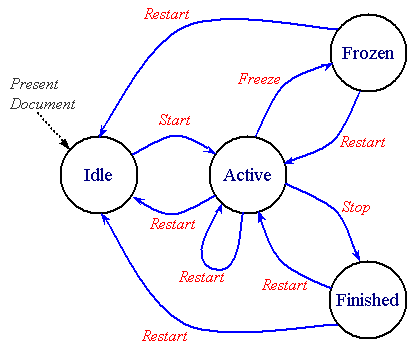
Figure E-1: State diagram of an element
The following sections explain the semantics of the states and transitions
of a timed element, and explain how to define the state transitions using
timing attributes of the element.
Note that the states and transitions are part of the model, and do
not imply a particular implementation. Note also that an element may transition
through more than one state in a virtual instant (i.e. with no time spent
in a given state).
The presentation effect of timed elements is generally to display media,
or to play a timeline (e.g. for time containers). In some cases, the element
may be an animation that manipulates the presentation, but does not directly
display anything. In some integration scenarios, the presentation effect
of the element may be to apply a stylesheet, or to otherwise modify the
presentation. In these discussions, the common case of displaying media or
playing a timeline is used to describe the states and transitions. The same
semantics should be understood to apply to all defined actions or presentation
effects, as specified in the language that integrates SMIL Timing and
Synchronization.
When the document that contains a timed element is first presented, the element
is created in the idle state. This is the common starting state
for all timed elements.
When a parent time container repeats or is restarted, all (timed) child elements
of the time container will be reset. As part of the element reset, the element
is re-initialized to the Idle state. See also
Resetting element state.
In the idle state a timed element is inactive and does not affect
the presentation of the document in any way. The element simply waits for
the time or event specified in its
begin attribute. Note that the element
may transition immediately to the active state if the element begins immediately
when the document begins.
For an element to become active, the element's parent time container must
be active. Given this, a timed element in the idle state
transitions to the active state when the condition specified in
the begin attribute becomes true.
As described in the section on the
begin attribute, this condition may
depend upon one of several factors:
-
reaching a particular time in the parent time container simple duration.
-
another element beginning or ending its active duration.
-
another (media) element reaching a particular point (i.e. marker) in its
simple duration.
-
the occurrence of an asynchronous event, such as a mouse click.
Additionally, an element may be started by a DOM beginElement()
or beginElementAt() method call, or as the result of being
the target of an activated hyperlink.
An element may become active as soon as its parent time container becomes
active, if the condition specified in the
begin attribute is true at that point.
Note that the begin attribute can
specify a condition that is a list of values. The specific semantics of
evaluating the list of values is described in the section
The begin and
dur attributes: basic timing support.
In the active state, a timed element displays the associated media
or performs the described timeline associated with the element. The active
state includes the entire active duration of the element. The active duration
of an element is specified by the interaction between the
dur,
end,
repeatDur and
repeatCount attributes as detailed
in the section Computing the Active
Duration.
If a timed element has the fill
attribute set to "freeze",
"hold" or
"transition", upon reaching the end of its active
duration, the element will transition to the frozen state.
In the frozen state the element will continue to present the last
defined state of visual media or the timeline state at the end of the active
duration (aural media render nothing during the frozen state). The duration
of the frozen state depends upon the value of the
fill attribute (as described in
The fill attribute:
extending an element) and on the parent time container (as described
in Time Container
constraints on child durations).
The frozen state may have 0 duration, e.g. if the parent time container ends
with the element.
If a timed element has the fill
attribute set to "remove" (the default),
upon reaching the end of its active duration, the element will transition
to the finished state. Note that the active duration of a child
element may end when an ascendant time container ends its simple duration.
In the finished state the timed element does not affect the presentation
of the document. The duration of the finished state depends upon
the parent time container. The finished state lasts until
the end of the current simple duration of the parent time container,
or until the element is restarted (whichever comes first).
The ability of an element to make this transition depends upon the value
of the
restart
attribute. If the
restart
attribute value is "always" or
"whenNotActive" the element will transition to
the active state in response to a DOM beginElement() or
beginElementAt() method call, or an additional begin event.
The restart transition effectively resets the state of the animation element;
the element's simple and active duration must be recomputed as if it were
being started for the first time. See also
Resetting element state.
This transition happens the same way as the Frozen to Active transition
(immediately above). If the element specifies an offset from the syncbase
or eventbase, or if the DOM beginElementAt() method call specifies
a non-0 offset, then the element is returned to the Idle state until it actually
restarts.
An element may receive a DOM beginElement() or
beginElementAt() method call or may receive an additional begin
event while in the active state. In this case, if the value of the
restart
attribute is "always" the element will
re-transition to the active state and restart as described above.
Any other value for the
restart
attribute will prevent this transition from occurring.
This transition happens the same way as the Active to Active transition
(immediately above). If the element specifies an offset from the syncbase
or eventbase, or if the DOM beginElementAt() method call specifies
a non-0 offset, then the element is returned to the Idle state until it actually
restarts.
An element restart can result from a DOM call or an additional begin event,
subject to the restrictions imposed by the
restart
attribute. When in the finished state, an element may re-transition
to the active state if the value of the
restart
attribute is "always " or
"whenNotActive". If the
restart
attribute is set to "never", this transition
can not occur.
This transition happens the same way as the Finished to Active transition
(immediately above). If the element specifies an offset from the syncbase
or eventbase, or if the DOM beginElementAt() method call specifies
a non-0 offset, then the element is returned to the Idle state until it actually
restarts.
11.12
Appendix F: Time manipulations
@@ This appendix will be split off as a separate module.
@@There are a number of unresolved issues with this kind of time manipulation,
including issues related to event-based timing and negative play speeds,
as well as many media-related issues.
New element controls for element time behavior are under discussion. In general,
these time manipulations are suited to animation and non-linear or discrete
media, rather than linear continuous media. Not all continuous media types
will support time manipulations. For example, streaming MPEG 1 video will
not generally support backwards play. A fallback mechanism is described for
these cases.
Four new attributes add support for timing manipulations to SMIL Timing,
including control over the speed of an element, and support for acceleration
and deceleration. The impact on overall timing and synchronization
is described. A definition is provided for reasonable fallback mechanisms
for media players that cannot support the time manipulations.
An accessibility requirement for control of the playback speed is related
to the speed control, but may also be controlled through some other mechanism
such as DOM interfaces.
A common general application of timing supports animation. The recent integration
of SMIL timing with SVG is a good example of the interest in this area.
Animation in the more general sense includes the time-based manipulation
of basic transforms, applied to a presentation. Some of the effects supported
include motion, scaling, rotation, color manipulation, as well as a host
of presentation manipulations within a style framework like CSS.
Animation is often used to model basic mechanics. Many animation use-cases
are difficult or nearly impossible to describe without a simple means to
control pacing and to apply simple effects that emulate common mechanical
phenomena. While it is possible to build these mechanisms into the animation
behaviors themselves, this requires that every animation duplicate this support.
This makes the framework more difficult to extend and customize. In addition,
a decentralized model allows any animation behavior to introduce individual
syntax and semantics for these mechanisms. This makes the authoring model
much harder to learn, and complicates the job of any authoring tool designer
as well. Finally, this model precludes the use of these mechanisms on structured
animations (e.g. applying time manipulations to a time container of synchronized
animation behaviors).
A much simpler model for providing the necessary support centralizes the
needed functionality in the timing framework. This allows all timed elements
to support this functionality, and provides a consistent model for authors
and tools designers. The most direct means to generalize pacing and related
functionality is to transform the pacing of time for a given element.
This is an extension of the transform that is implicitly performed to translate
from the general document or presentation time space to the adjusted time
space for the element (accounting for the begin time of the element, repeat
functionality, etc.). Thus, to control the pacing of a motion animation,
a transform is applied that adjusts the pacing of local time for the motion
element. If time is scaled to advance faster than normal presentation time,
the motion will appear to run faster. Similarly, if the pacing of time is
dynamically adjusted, acceleration and deceleration effects are easily obtained.
This model is detailed in the sections below.
Three general time manipulations are proposed:
-
speed
-
Controls the pacing (or speed) of time. The speed effectively scales
the rate at which local time plays. As such, speed can modify the computed
simple duration.
-
accelerate and
decelerate
-
Dynamic manipulation of the pacing of time to simulate common mechanical
motion. Acceleration and deceleration are crucial to motion, rotation, scaling
and many other standard transforms. A simple model is presented to allow
acceleration from rest at the beginning of the simple duration, and/or
deceleration to rest at the end of the simple duration. This model has the
advantage that it preserves the simple duration. The model is sometimes presented
to authors as "Ease-In, Ease-Out".
-
autoReverse
-
Another very common mechanical phenomenon is that of a process that advances
and reverses. Some examples include:
-
pendulum motion - a partial rotation that advances and reverses
-
pulsing effects - usually a scale transform, but sometimes an intensity or
color change that advances and reverses
-
simple bouncing - motion that advances and reverses
Support for autoReverse is often
presented to authors as "Play Forwards, then Backwards". Because
so many common use-cases apply repeat to the modified local time (as in the
examples above), this function is modeled as modifying the simple duration.
As such, autoReverse doubles
the simple duration.
When the three features are combined, there is an inherent ordering that
can be applied. The accelerate
and decelerate features are applied
locally on the simple duration, and have no side effects upon the active
duration of the element. The
autoReverse feature is applied
to the simple duration, and doubles it. Thus,
autoReverse wraps the
effect of accelerate and
decelerate. The
speed attribute has the broadest effect,
scaling the progress of local time for the element. Taken from the perspective
of a conversion from the document time-space to the local time-space,
speed is applied earliest,
autoReverse later and and then
accelerate and
decelerate are applied latest.
See also Details of the time
manipulations.
The following motion animation will move the target twice as fast as normal:
<animateMotion dur="10s" repeatCount="2" speed="2.0" path= ... />
The target will move over the path in 5 seconds, and then repeat this motion.
The active duration is thus 10 seconds.
The following rotation (a theoretical extension to the animation platform)
will produce a simple pendulum swing on the target (assume that it is a pendulum
shape with the transform origin at the top):
<animateRotate from="20deg" to="-20deg" dur="1s" repeatCount="indefinite"
        accelerate=".5" decelerate=".5" autoReverse="true" ... />
The pendulum swings through an arc in one second, and then back again in
a second. It repeats indefinitely. The acceleration and deceleration are
specified as a proportion of the simple duration (before
autoReverse). As specified,
the effect is to accelerate all the way through the downswing, and then
decelerate all through the upswing. This produces a very realistic looking
animation of real-world pendulum motion. The hypothetical
animateRotate element itself can be very simple; it could for
example just interpolate the rotation value in a transform matrix.
The speed attribute is supported on
all timed elements. The argument value expresses a multiple of normal play
speed that will be applied to the element and all time descendents. Thus
1.0 is normal speed, and
speed="1"
is a no-op, and
speed="-1"
means play backwards.
The speed attribute
The speed attribute controls the local
playback speed of an element, to speed up or slow down the effective rate
of play. The speed does not specify
an absolute play speed, but rather is relative to the playback speed of the
parent time container. Thus if a
par
and one of its children both specify a
speed of 50%, the child will play
at 25% of normal playback speed .
-
speed = "
number "
-
Defines the playback speed of element time. The value is specified as a multiple
of normal (parent time container) play speed.
Legal values are signed floating point values. A value of 0 is not allowed.
The default is "1.0" (no modification of speed).
The details of the speed modification are described in
Details of the time
manipulations.
The accelerate and decelerate attributes
These attributes define a simple acceleration and deceleration of element
time, within the simple duration. The values are expressed as a proportion
of the simple duration (i.e. between 0 and 1), and are defined such that
the simple duration is not affected. The normal play speed within the simple
duration is increased to compensate for the periods of acceleration and
deceleration. The modified speed is termed the run rate.
These attributes apply to the simple duration; if these attributes are combined
with repeating behavior, the acceleration and/or deceleration occurs within
each repeat iteration.
The sum of accelerate and
decelerate must not exceed 1.
If it does, the value of
accelerate will be clamped to
1, and then the value of
decelerate will be clamped to
1-accelerate).
-
accelerate = "
number "
-
Defines a simple acceleration of time for the element. Element time will
accelerate from a rate of 0 at the beginning up to a run rate, over
the course of the specified proportion of the simple duration.
The default value is 0 (no acceleration).
Legal values are floating point values between 0 and 1 (inclusive).
-
decelerate = "
number "
-
Defines a simple deceleration of time for the element. Element time will
decelerate from a run rate down to 0 at the end of the simple duration,
over the course of the specified proportion of the simple duration.
The default value is 0 (no deceleration).
Legal values are floating point values between 0 and 1 (inclusive).
The details of the accelerate and decelerate modifications are described
in Details of the time
manipulations.
In this example, a motion path will accelerate up from a standstill over
the first 2 seconds, run at a faster than normal rate for 4 seconds, and
then decelerate smoothly to a stop during the last 2 seconds. The resulting
animation looks more realistic. The
animateMotion element is defined
in the Animation section
of SMIL Boston.
<img ...>
    <animateMotion dur="8s" accelerate=".25" decelerate=".25" .../>
</img>
In this example, the image will "fly in" from off-screen left , and then
decelerate quickly during the last second to "ease in" to place. This assumes
a layout model that supports positioning (a similar effect could be achieved
by animation the position of a region
in SMIL Layout). The animate element
is defined in the
Animation section of SMIL Boston.
<img ...>
    <animate attributeName="left" dur="4s" decelerate=".25"
             from="-1000" to="0" additive="sum" />
</img>
The autoReverse attribute
This defines "play forwards then backwards" functionality. The use of
autoReverse effectively doubles
the simple duration. When combined with repeating behavior, each repeat iteration
will play once forwards, and once backwards.
-
autoReverse = "
true | false "
-
Controls autoReverse playback mode.
Argument values are Booleans.
The default value is false (i.e. play normally).
The details of the autoReverse
modification are described in
Details of the time
manipulations.
In this example, a motion path will animate normally for 5 seconds moving
the element 20 pixels to the right, and then run backwards for 5 seconds
(from 20 pixels to the right back to the original position), then forwards
again and then backwards again, leaving the element at its original location.
The active duration of the animation is 20 seconds. The
animateMotion element is defined
in the Animation section
of SMIL Boston.
<img ...>
    <animateMotion by="20, 0" dur="5s" autoReverse="true" repeatCount="2"/>
</img>
11.12.4
Details of the time manipulations
The speed attribute modifies the pace
of time for the element and its descendents, and so modifies the interpretation
of the normal timing attributes with respect to the normal pace of (real-world)
time. The attributes dur and
repeatDur always specify a time
in unmodified local time for the element. As a result, the observed simple
duration and repeat duration for an element with a modified speed is not
the same as the specified speed. This
is important to making the model be consistent when the
speed cascades in the time containment
hierarchy.
@@Need to rework this next as a set of basic rules and principles: which
things are modified by speed, and which are not.
Note that a speed attribute on an
element does not affect the element begin time. It may affect the element
end time, if the end is defined only in terms of the simple duration or repeat
duration. An end value (defined by the end
attribute) is converted to element local time using the
speed value. However, the result is
that the active duration is not affected by the
speed value, since the values (syncbase
values, eventbase times, wallclock times, etc.) are all defined in another
timespace and converted to the local timespace. See also the examples below.
To compute the effect of speed on
the simple duration or on the active duration if defined with repeat, the
following function is used. This function is also used to convert a time
in the parent local timespace to a time in the child local timespace that
accounts for the speed attribute.
Tpar is the time in the parent local timespace
Tel is the time in the element local timespace
Tel = (Tpar / speed)
When speed is applied to a time container,
it scales the rate of progress through the time container timeline.
This effect cascades. When descendents also specify a
speed value, the parent speed and
the child speed are multiplied to yield the result. For example:
<par speed=2.0>
   <animate begin="2s" dur="9s" speed=0.75 .../>
</par>
The observed rate of play of the
animate element is 1.5 times the
normal play speed. The element begins 1 second after the
par begins (the
begin offset is scaled by the parent
speed), and ends 6 seconds later
(9/1.5).
The following example shows how an event based
end combines with time manipulations:
<par speed=2.0>
   <animate begin="2s" dur="9s" speed=0.75
        repeatCount="4" end="click" .../>
</par>
This behaves as in the first example, but the
animate element will repeat 4 times
for a total of 24 seconds (in real time), unless a click happens before that.
Whenever the click happens, the element ends. A variant on this demonstrates
syncbase timing:
<par speed=2.0>
   <img id="foo" dur="30s" .../>
   <animate begin="2s" dur="9s" speed=0.75
        repeatCount="4" end="click, foo.end" .../>
</par>
The image will display for 15 seconds. The
animate element plays at an observed
rate of 1.5 times play speed, but it will end after 15 seconds, when the
image ends. The animation will have repeated 2.5 times at this point. Note
that although the animation has a
speed value, this does not impact
the semantic of the syncbase timing. When the syncbase, eventbase, wallclock
or media marker time is observed to happen, it will be applied anywhere it
is used at that real time (although various timespace conversions are applied
internally).
Note that in the examples above, the default duration of the
par container is defined as
endsync="last".
This behavior is not affected by the speed modifications, in the sense that
the observed end of the elements will produce the correct simple duration
on the parent time container.
@@ Need to include notes about how begin offsets are also scaled by the parent
timescale, but not the local element scale.
The following example illustrates an important effect of offset time scaling:
<par speed=2.0>
   <img id="foo" dur="30s" .../>
   <animate begin="2s" dur="9s" speed=0.75
        repeatCount="4" end="foo.end+6s" .../>
</par>
The image will display for 15 seconds. The
animate element plays at an observed
rate of 1.5 times play speed, and it will end after 18 seconds. The offset
added to the end of the image is scaled by the parent time container speed.
The animation will have repeated 3 times at this point.
The following example illustrates the speed modifications along with the
fallback for a video element that can only play normal forward speed.
<par speed=2.0>
   <video id="foo" dur="30s" accelerate="0.25" ...>
      <area begin="2s" dur="4s" .../>
   </video>
   <animate begin="2s" dur="9s" speed=0.75
        repeatCount="4" end="foo.end+6s" .../>
</par>
The video ignores the accelerate
and the speed value, and plays at
normal speed for 15 seconds. The simple (and active) duration are still
constrained by the speed. The area
element reflects what the video is playing, and so the area becomes active
after 2 seconds and remains active for 4 seconds. The
animate element behaves just as
it did in the previous example, and ends after 18 seconds and 3 repeats.
@@ This should perhaps move to the Fallbacks section
Some media will use a fallback speed (e.g. because it cannot play at the
requested speed - see the section Fallbacks
for time filters on a media element). When this is the case, and the
simple duration is defined by the implicit media duration, the results are
sometimes less clean, as the following example illustrates. Assume that the
video has an intrinsic duration of 30 seconds, and that this cannot be determined
until the video plays through to the end (as is sometimes the case).
<par speed=1.5>
   <video id="foo" repeatCount="3" accelerate="0.25" ...>
      <area begin="2s" dur="4s" .../>
   </video>
</par>
The video ignores the acceleration and the
speed value, and plays at normal speed
for 30 seconds. At this point, the simple duration is resolved, and (accounting
for the parent speed) is computed to be 20 seconds. At this point the video
*should* be halfway into the second repeat iteration, moving 50% faster than
normal playspeed. The video should continue playing for another 30 seconds.
The fallback rules would define that each repeat iteration would play the
first 20 seconds of the 30 second video. Given the linear behavior of the
video element, the first 10 seconds will be shown for the (remainder of the)
second repeat iteration, followed by the first 20 seconds of video for the
third repeat iteration. Needless to say, this may not produce pleasing results.
At the very least, authors should avoid mixing speed modifications with media
elements that use the implicit simple duration, and cannot play at the specified
speed. As stated elsewhere, the time
modifications should be used where appropriate.
@@ Note sure if this next is useful:
Note that the timing of all durations, begin and end times and events, is
based upon the computed values using the explicit
speed and not the fallback speed.
If the media player is nominally playing at the explicit
speed, but varies somewhat, then the
effective speed, end and durations should be used in the time model (i.e.
the behavior of the runtime in computing effective versus desired times,
and managing synchronization, should be consistent with the behavior of the
media player and timing model when the speed is 1.0, or normal play speed).
Try: the rules and mechanisms that a runtime uses to compute effective times
versus desired times should be consistently applied if the "attempted" speed
is normal playspeed (1.0) or offspeed (e.g. 2.0). If the "attempted" speed
is not the desired speed, then a strict interpretation of the desired times
should be used for effective times.
@@ Proposal to help authors - is this useful?:
Define a new test attribute canPlaySpeed (?) to support alternate presentations
depending upon the capabilities of the media players. Should be evaluated
at runtime for the given media and associated player. Evaluates true if the
media player will attempt to play the specified speed. Evaluates false otherwise.
If applied to a time container, then should consider all the descendents
of the time container, and only evaluate to true if all descendents will
attempt to play the desired speed. In evaluating this, the cascaded desired
speed must be used, and not the explicit speed on each element.
@@ Borrow pictures and description of manipulation from keySplines in SMIL
Animation? Need to describe that time is actually manipulated and remapped,
but can think of it as progress.
The speed or rate of progress through the simple duration must be increased
to account for the acceleration/deceleration and preserve the simple
duration. The adjusted speed is described as the run rate.
For an element with both acceleration and deceleration, the speed over the
simple duration varies from 0 up to the run rate and then back down to 0.
To compute the run rate over the course of the simple duration, the following
formula is used. Let a be the value of
accelerate, and
b be the value of
decelerate. The run rate
r is then:
r = 1 / ( 1 - a/2 - b/2 )
Thus, for example, if the value of
accelerate is 1 (i.e. accelerate
throughout the entire simple duration), the run rate is 2 (twice the normal
play speed).
The speed s(t) at any point in time
t (within the simple duration
d) is defined as a function of the run rate,
as follows:
For: ( 0 <= t < (a*d) )          I.e. in the acceleration interval
    s(t) = r * ( t / ( a * d ))
For: ( (a*d) <= t <= (d-(b*d)) ) I.e. in the run-rate interval
   s(t) = r
For: ( (d-(b*d)) < t <= d )      I.e. in the deceleration interval
   s(t) = r * ( ( t - (d-(b*d)) ) / ( b*d ))
If in place of t we use
p, the proportional progress through the simple
duration, the equations simplify somewhat:
p = t/d
For: ( 0 <= p < a )          I.e. in the acceleration interval
    s(p) = r * ( p / a )
For: ( a <= p <= (1-b) ) I.e. in the run-rate interval
s(p) = r
For: ( (1-b) < p <= 1 ) I.e. in the deceleration interval
s(p) = r * ( ( p - (1-b) ) / b )
In this example, a motion path will accelerate up from a standstill over
the first 2 seconds, run at a faster than normal rate for 4 seconds, and
then decelerate smoothly to a stop during the last 2 seconds. This
makes an animation look more realistic.
<img ...>
<animateMotion dur="8s" accelerate=".25" decelerate=".25" .../>
</img>
In this example, the image will "fly in" from offscreen left , and then
decelerate quickly during the last second to "ease in" to place. This assumes
a layout model that supports positioning (a similar effect could be achieved
by animation the position of a region in SMIL layout).
<img ...>
<animate attributeName="left" dur="4s" decelerate=".25"
from="-1000" to="0" additive="sum" />
</img>
In the following example the motion path will behave as above, but will end
at the earlier of 15 seconds or when the user clicks on the image. If the
element ends at 15 seconds (if the user does not click), the motion path
will leave the element at the end of the defined path, 20 pixels to the right.
Note that repeatDur and end are not affected by
the autoReverse attribute (although
repeatCount is).
<img ...>
<animateMotion by="20, 0" dur="5s" autoReverse="true"
repeatDur="15" end="click" fill="freeze"/>
</img>
The accelerate and
decelerate attributes can be
combined with autoReverse, and
are applied to the unmodified simple duration. For example:
<img ...>
<animateMotion by="20, 0" dur="4s" autoReverse="true"
accelerate=".25" decelerate=".25" />
</img>
This will produce a kind of elastic motion with the path accelerating for
1 second from the original position as it moves to the right, moving slightly
faster than normal for 2 seconds, and then decelerating for 1 second as it
nears the points 20 pixels to the right. It accelerates back towards the
original position and decelerates to the end of the reversed motion path,
at the original position.
The speed attribute can also be combined
with autoReverse, and modifies
the entire effect. This example combines all three time manipulations:
<img ...>
<animateMotion by="20, 0" dur="4s" autoReverse="true"
speed="0.5" accelerate=".25" decelerate=".25" />
</img>
This produces the same effect as in the previous example, except that everything
moves half as quickly and takes twice as long. The active duration is 16
seconds.
A theoretical model can be described that assumes that all element local
timelines (including any media elements) are completely non-linear and have
unconstrained ballistics. This ideal model can be applied to many applications,
including pure rendered graphics, text, etc. Nevertheless, many common
applications also include media with linear behavior and other constraints
on playback. When the timegraph includes media elements that have linear
behavior, the model must adapt, and/or provide consistent semantics that
accommodate these real world constraints. This sections below include
a discussion of these fallback semantics.
Note that while the model does support timegraphs with a mix of
linear and non-linear behavior, and defines specific semantics for timegraphs
that cannot support the ideal non-linear model, it is not a goal
to provide an ideal alternative presentation for all possible timegraphs
with such a mix. It is left to authors and authoring tools to apply the time
manipulations in appropriate situations. This section describes both the
ideal model as well as the semantics associated with linear-media elements.
In the ideal model, the pace or speed of local time can be manipulated
arbitrarily. The graph advances (or is sampled, depending upon your perspective)
as the presentation time advances. A time container samples each of its children
in turn, so that a graph traversal is performed for each render time.
Elements that are idle or stopped (i.e. neither active nor frozen) are pruned
from the traversal as an optimization. As the traversal moves down the graph
(from time containers to children), each local timeline simply transforms
the current time from the parent time-space to the local time space, and
then samples the local timeline at the transformed current time. Note
that the speed and effects of the time filters effectively cascade down the
time graph, since each element transforms local time for itself and all
descendents.
When linear media are added to this model and the "current time" (sample)
traversal encounters a media element, the media element is effectively told
to "sample" at a particular position. Given that linear media can not sample
arbitrarily, the semantic that is used is to verify the current position
of the media (as observed on the player) against the current theoretical
timeline position for the timegraph. Within certain limits (e.g. defined
by a syncTolerance attribute), divergence from the theoretical timeline position
are ignored. So far, this is just a typical implementation of a synchronization
manager.
When the speed (and even direction) of the local timeline can vary from normal
forward playspeed, an additional parameter is added to the context for the
"current time" traversal to indicates the speed of the local timeline.
The speed is defined as a proportion of normal forward play speed. Thus a
value of "1" is normal forward playspeed, a value of "2" is twice normal
forward speed, and a value of "-1" is backwards, at the normal play
speed. Note that a value of 0 is not allowed. The speed is often broken down
logically into the rate and the direction. The rate is
just the absolute value of the speed, and the direction is the "sign" of
the speed.
Given the current computed position and speed for the timegraph, a media
element with linear behavior can handle the case of non-normal playspeed
with the use of fallback semantics. The fallback semantics depend upon how
much or how little the media player is capable of. Some may play forwards
and backwards but only at the normal rate of play, others may only handle
normal forward play speed. The fallback semantics are detailed in the next
sections.
Fallbacks for time filters on a media
element
@@Describe the properties that the fallback semantics are preserving so that
the rationale is clear
When any of the time filters are applied directly to a linear media element,
the element can directly examine the attributes and apply one set of fallback
semantics. These include:
-
If the element cannot support acceleration and deceleration, then these
attributes can be ignored. This is safe within the model, as they have no
side effects. Note that this applies to acceleration and deceleration applied
directly to the media element, but could also be applied to any time container
that contains media elements. This is a more drastic fallback than handling
the speed on each descendent of the time container, but it may be appropriate
in some scenarios.
-
If the media cannot play backwards (but can play at other than play speed)
and the element specifies a speed less than 0, the element can play at the
specified rate but in the forward direction. This will preserve the modified
duration, and accommodate the player. Note that this may not be a desired
approach in many cases, and so may not be a commonly used fallback.
-
If the media cannot play the desired rate, the element can use one of several
fallback mechanisms.
-
Just render a frozen frame for the requested simple duration. If the
direction is backwards, the element could put up a still of the last frame
that would be shown. This may be costly for some media types, and so the
first frame of the media would be shown. This fallback approach corresponds
to silence (i.e. not playing) for audio elements.
-
If the can play the computed direction but not the computed rate, it can
play the closest available rate in the given direction. This fallback may
be used in combination with the first approach, especially if the computed
speed is far out of the range that the element can play.
-
The element can just play at normal play speed.
In any case, the simple duration is still constrained by the computed simple
duration, as modified by the time filters. If the computed simple
duration is shorter than the intrinsic media duration at the fallback rate
(usually if the speed is > 1), the media is cut short just as for a
dur value that overrides the intrinsic media duration. If the
specified simple duration is longer than the intrinsic media duration (i.e.
if the rate is < 1), the media should freeze for the difference, just
as it does for dur in SMIL 1.0. When an element must freeze,
it should ideally respect the direction of the speed, using the last frame
for forward speeds and the first frame for backwards speeds.
Note that the semantics of clipBegin and clipEnd are not affected (i.e. they
are still respected).
The clipBegin and clipEnd semantics are always interpreted in terms of
normal forward play speed. I.e. they are evaluated before any effects
of time filters have been applied to the time model. This is consistent with
the model that they can be evaluated by the media element handler, independent
of the time model.
If a fallback semantic is applied to a media element and the media element
has child elements (i.e. is a media time container), the local time as passed
through to the children should reflect what the media actually performs.
Thus if the accelerate and
decelerate are ignored, the local
time as passed to the child elements should not be filtered for acceleration
and deceleration. This is important for cases like anchors that are timed
to associate with points in the media. If an author wishes to apply
acceleration to the children of the media (e.g. to accelerate a set of animation
children), a wrapping <par> with the time filters applied can be inserted
under the media time container. See also the next section for a general
discussion of time filters and time containers.
@@ Above semantic may be overly complex. It requires that the time runtime
know what the media players can actually do so that the proper timing parameters
can be passed down to the children. Is this restriction worth it, since playing
with a fallback will lead to a different presentation than intended anyway.
The presentation visually will act funny anyway, and the entire thing is
constrained by the parent time container, so it may not be as bad as noted.
The effect of these fallbacks is illustrated by some examples. In these examples,
the video player is assumed to be capable only of normal forward play speed.
In the following example, the acceleration and deceleration can be safely
ignored without side effect. Since they are ignored, the area child should
become active 1 second after the video begins (i.e. if the video ignores
the acceleration, then the effect is not applied to the children either):
<video accelerate=0.5 decelerate=0.5 src...>
<area begin=1s .../>
</video>
In the following example, the
autoReverse attribute doubles
the simple duration, but the video will just play the 3 second simple duration
twice, in the forward direction both times. The area child should become
active 1 second after the video begins each time (i.e. if the video ignores
the reverse play, then the speed change is not applied to the children either):
<video autoReverse="true" dur=3s src...>
<area begin=1s .../>
</video>
In the following example, the speed
attribute decreases the simple duration by 33% (i.e. one third). The video
will play the first two seconds at normal playspeed, rather than three seconds
at 1.5 times playspeed. The area child should become active 1 second after
the video begins each time (i.e. if the video ignores the speed manipulation,
then the speed change is not applied to the children either):
<video speed="1.5" dur=3s src...>
<area begin=1s .../>
</video>
When any of the time filters are applied to a time container element, the
implementation should generally respect the time filters and deal with the
effects of modified time for each media player. Nevertheless, in some situations
it may be desirable to apply a fallback semantic at the time container
itself.
-
If the time container contains only media elements (or time containers and
media elements), it may make sense to ignore the acceleration and deceleration
attributes. These attributes can safely be treated as hints, and document
dominated by linear media may behave better if the acceleration and deceleration
are ignored. Note that while this fallback is defined for implementations,
it is much more likely that authors will simply avoid the use of these attributes
in the given situations.
-
Time containers may not ignore speed modifications, or the
autoReverse attribute. It is
left to the author to avoid the use of these features in situations that
are inappropriate, or in which the results will be undesirable.
@@Need more info on how time containers run backwards. The use of
autoReverse is special, as it
can generally use the end and begin times from the forward half. Note that
time dependencies work backwards, but that event-based timing does not work
correctly, and script events may not be fired. This needs more discussion.
Need a reasonable means of simplifying the implementation and still allowing
backwards play of fully scheduled timegraphs.
@@Examples!
In the theoretical model, each element has a notion of local time that extends
from 0 to some duration (the simple duration). To obtain the local time for
an element in the simple case with no pacing control, an arithmetic transform
is performed for the element and each ascendant time container up to the
document root. This transform allows for the begin offset of the element
relative to its parent time container, and for any repeat behavior of the
element. The pseudo-code for this transform looks like:
@@Edit to make it produce both active and simple time? The only difference
is in how the final element is handled. Also need to have a control over
unconstrained versus constrained time. Sync arc calculation uses unconstrained
time, but real sampling uses end-constrained time that respects freeze.
@@ Edit to use the most recent parent begin if it is active, rather than
the constant repeatDuration
// globalToLocalTime()
//
// Recurses up to document root, and then transforms timeIn
// from parent to local time as the recursion unwinds
// Version 1: Ignores fill=freeze, assumes constant pace of time
// assumes repeat duration is constant,
// and assumes all times are resolved.
// Inputs:
// timeIn - the parent simple time
// Outputs:
// timeOut - the resulting local simple time
//
TimeInstant globalToLocalTime( TimeInstant timeIn )
{
TimeInstant timeOut;
Node parent = getParent();
if( !parent.isDocumentTimeRoot() )
{
// We have a parent time container above us.
// First convert timeIn to simple local time for it,
// and then adjust for this node.
timeOut = parent.globalToLocalTime( timeIn );
}
else // Our parent is the top time container
timeOut = timeIn;
// Adjust for begin offset. Assume "begin" has simplified begin time.
timeOut = timeOut - this.begin; // Adjust for begin offset
if( this.repeats() )
{
// Adjust for repeating simple duration.
timeOut = timeOut % this.repeatDuration;
}
// timeOut is now converted to simple local time for this node
return timeOut;
}
@@Next version shows how this is extended to support the time manipulations.
For autoReverse, remember the
edge case for the endpoint. ?Talk about the imprecision around the reverse
point: interval math introduces an epsilon inaccuracy at the end, where epsilon
is the sample granularity (e.g. milliseconds in our implementation).
@@How to show the update dependencies of repeatDur, segmentDur? Could just
show a method to recompute, that is called on changes. Ignore all optimization
issues
Timing and real-world clock times
When the time manipulation attributes are used to adjust the speed and/or
pacing within the simple duration, the semantics can be thought of as changing
the pace of time in the given interval. An equivalent model is these attributes
simply change the pace at which the presentation progresses through
the given interval. The two interpretations are equivalent mathematically,
and the significant point is that the notion of "time" as defined for the
simple duration and "local time" should not be construed as real world clock
time. For the purposes of SMIL Timing and Synchronization, "time" can behave
quite differently from real world clock time.
-
Editors
-
Eric Hyche (ehyche@real.com), (RealNetworks)
In most public descriptions of SMIL, the language is described as "allowing
authors to bring TV-like content to the Web." However, one aspect of
presentations commonly seen on television has been noticeably absent from
SMIL: transitions such as fades and wipes. In SMIL 1.0, any representation
of transitions had to be "baked into" the media itself and there was no method
of coordinating transitions across multiple media regions and timelines.
The purpose of this document is to specify the semantics and syntax for
describing transitions within SMIL and other XML-based documents. Also, this
specification describes a taxonomy of transitions based on SMPTE 258M-1993
[SMPTE] as well as a compact set of parameters which can be used to express
this set of transitions. Although the majority of transitions described in
this document are visual transitions, a number of transitions have
audio equivalents and are equally applicable.
For example, consider a simple still image slideshow of four images, each
displayed for 5 seconds. Using SMIL Timing, this slideshow might look like:
...
<seq>
<img src="butterfly.jpg" dur="5s" ... />
<img src="eagle.jpg" dur="5s" ... />
<img src="wolf.jpg" dur="5s" ... />
<img src="seal.jpg" dur="5s" ... />
</seq>
...
Currently when this presentation plays, we see a straight "cut" from one
image to another, as shown in this animated
image. However, what we would like to see are three left-to-right wipes
in between the four images: in between butterfly.jpg and eagle.jpg at 5 seconds,
in between eagle.jpg and wolf.jpg at 10 seconds, and in between wolf.jpg
and seal.jpg at 15 seconds. Therefore, we must define the following to our
presentations:
-
The class of transition we wish to apply. For instance, if we want
all three transitions to be 1-second left-to-right wipes, then we can define
1-second left-to-right wipes as a transition class and apply this class to
the media elements. For purposes of introductory illustration, we will use
several transition parameters without first defining them. However, for complete
detail about transition parameters, see the
Transition Taxonomy and Parameters
section.
-
The media elements to which we wish to apply this transition class.
For more detail about applying transition classes to media elements, see
the Applying Transitions to Media
Elements section.
After adding these two definitions, our example slideshow now looks like:
...
<transition id="wipe1" type="edgeWipe" subtype="slideHorizontal" dur="1s"/>
...
<seq>
<img src="butterfly.jpg" dur="5s" ... />
<img src="eagle.jpg" dur="5s" transIn="wipe1" ... />
<img src="wolf.jpg" dur="5s" transIn="wipe1" ... />
<img src="seal.jpg" dur="5s" transIn="wipe1" ... />
</seq>
Now the presentations play as follows. First, at 0 seconds, we cut directly
to butterfly.jpg. Next, at 5 seconds we begin a 1-second left-to-right wipe
into eagle.jpg. Therefore, at 6 seconds, eagle.jpg is fully displayed and
remains displayed for 4 more seconds until 10 seconds. At this time, we begin
a another 1-second left-to-right wipe from eagle.jpg to wolf.jpg. At 11 seconds,
wolf.jpg is fully displayed until 15 seconds, when we begin another 1-second
left-to-right wipe to seal.jpg. At 16 seconds, seal.jpg is fully displayed
until 20 seconds at which time the presentation ends. This is visually
illustrated by this animated
image. Notice that these transitions occur during the timeline
each of the images and do not add or subtract from their host timeline. In
this case, the transition occurs at the beginning of the media element's
timeline, although we will discuss later a method of placing the transition
at the end of a media element's timeline.
This document is structured as follows. In the
Transition Model section, we discuss
exactly what transitions are and the two ways we will express them. In the
Taxonomy section, we define a
taxonomy of transitions and describe the families of transitions. Next in
the Parameters section, we define
a set of parameters which can fully describe all the transitions in our taxonomy.
Next, in the Applying Transitions to
Media Elements section, we describe the semantics of applying a transition
class to a media element. Next, in the
Multiple-Element Transitions section, we describe how to apply coordinated
transitions across multiple media elements. Next, in the
Integration section, we discuss
issues related to integrating SMIL Transitions into other XML languages.
We will model transitions as the animation of a parameter d ("how much done")
in a filter f(d). (@@Editor's Note: It would be nice
to have a figure here.) This filter takes as input a "to" source,
which is the media object the transition will be applied to. It also takes
as input a "from" source, which is whatever media object(s) we are transitioning
away from. We will abstract the value of d in our model to be in the range
[0,1], where d=0 implies that the output of the filter is completely the
"from" source(s) and where d=1 implies the output of the filter is completely
the "to" source. All other parameters of the transition are assumed to be
part of the filter itself. The parameter
d is the only parameter which is animated.
This distinction between animating only the parameter d and animating other
parameters is illustrated by the following. In the left-to-right wipe in
the introductory example, we could either think of this transition as:
-
A filter which clips the "to" source. The left side of the clipping rectangle
would always be coincident with the left side of the source and the right
side of the clipping rectangle would vary. Therefore, this transition could
be thought of as animating the right side of the clipping rectangle.
-
A filter which is predefined to be a left-to-right wipe which varies with
d in the range [0,1]. When d=0, all of the "from" source(s) is shown. When
d=0.5, the left half of the "to" source is shown and the right half of the
"from" source is shown. When d=1.0, all of the "to" source is shown.
This may seem to be a very minor distinction for a left-to-right wipe, but
then think of the corresponding distinction for a cross-fade. We could think
of a cross-fade transition as:
-
Animation of an "opacity" property of both the "to" source and the "from"
source; or
-
Animation of d in a filter which knows that d=0.5 means a 50% blend, d=0.75
means 75% of the "to" source and 25% of the "from" source(s), etc.
In some cases, it would be very convenient to think of animating a particular
property unique to each type of transition. However, that model does not
generalize well across the broad variety of transitions currently in use
today. Therefore, in order to maintain simplicity of this model, we think
of both the left-to-right wipe and the cross-fade as "black boxes" which
both take exactly the same inputs - the sources and d.
Transitions are hints to the
presentation. Implementations must be able to ignore transitions if
they so desire and still play the media of the presentation. Transitions
do not alter the timeline of the media elements that are involved in the
transition. Note that when speaking of "time" in transitions, we are really
speaking of the parameter d and not the time of the presentation. Therefore,
if we "speed up" the transition by accelerating the parameter d in the
transition, we do not affect in any way the time of the presentation.
We will introduce two methods of specifying transitions:
-
Inline transitions. In this case,
the author has full control over the parameter d. The parameter d can be
accelerated, decelerated, animated forward, animated backwards,
etc.(@@Editor's Note: Since this is a relatively recent
addition, this section is not fully complete.)
-
"Style-like" transition shorthand.
In this case, the author defines a set of transitions classes and then applies
them to media. The same transition class may be applied several times to
different media. Additionally, each of the transitions plays in a default
manner; that is, the parameter d runs linearly from 0 to 1 over the specified
transition duration.
Using CSS, making text appear in a certain font face and size involves defining
a style and then using selectors to apply that style to the appropriate elements.
The entire set of possible font faces are grouped into broad font families
with specialization within each family. In a similar manner, we define in
this section several broad families of transitions and describe the
distinguishing characteristics of each family. In the next section, we will
define a parameter set which can fully specify all the transitions in each
family.
In all of the examples of specific transitions mentioned in this document,
we will refer to the following model: we refer to the element being transitioned
from as element A (or just A) and we refer to the element being
transitioned to as element B (or just B). We define the following
seven families (or types) of transitions:
-
edgeWipe
-
B is "under" A and is uncovered by combinations of edges. SMPTE Wipe Codes
1-74 are members of this family. For example, in SMPTE Wipe Code 1, a vertical
line moves left to right across A. B is revealed on the left side of the
line, while A remains on the right side. SMPTE Wipe Code 1 is illustrated
by this animated image.
-
irisWipe
-
B is "under" A and is uncovered by an expanding shape. SMPTE Wipe Codes 101-131
are members of this family. For example, in SMPTE Wipe Code 102, B is gradually
revealed by an expanding diamond shape. SMPTE Wipe Code 102 is illustrated
by this animated image.
-
radialWipe
-
B is "under" A and is uncovered by one or more radial sweeps. SMPTE Wipe
Codes 201-264 are members of this family. For example, in SMPTE Wipe Code
201, B is revealed by a clockwise sweep, as shown in
this animated image.
-
matrixWipe
-
B is "under" A and is uncovered by one or more block traversals. SMPTE Wipe
Codes 301-353 are members of this family. For example, in SMPTE Wipe Code
301, B is revealed by a block which alternates moving left to right then
right to left as it moves down A. This transition is illustrated by
this animated image.
-
pushWipe
-
A is "pushed" out of view by B. An example of this family would be a transition
where B moves in from the left, while pushing A out of view. This transition
is illustrated by this animated image.
-
slideWipe
-
B "slides over" A. An example of this family would be a transition where
B moves in from the left, and slides over A, as illustrated by
this animated image.
-
fade
-
additive blend between A and B, A and a color, or B and a color. An example
of this family would be a crossfade between A and B, as illustrated by
this animated image.
Each of these transition "types" are further divided into many "subtypes".
The table below lists the possible subtypes for each type. Also the table
lists the mapping between the assigned name and the SMPTE Wipe Code (where
applicable).
Transition type |
Transition subtypes (SMPTE Wipe Codes in parentheses) |
| edgeWipe |
"slideHorizontal" (1) [default], "slideVertical" (2), "topLeft" (3),
"topRight" (4), "bottomRight" (5), "bottomLeft" (6), "fourCorner" (7), "fourBox"
(8), "barnVertical" (21), "barnHorizontal" (22), "topCenter" (23), "rightCenter"
(24), "bottomCenter" (25), "leftCenter" (26), "diagonalLeftDown" (41),
"diagonalRightDown" (42), "verticalBowTie" (43), "horizontalBowTie" (44),
"diagonalLeftOut" (45), "diagonalRightOut" (46), "diagonalCross" (47),
"diagonalBox" (48), "filledVUp" (61), "filledVRight" (62), "filledVBottom"
(63), "filledVLeft" (64), "hollowVUp" (65), "hollowVRight" (66), "hollowVBottom"
(67), "hollowVLeft" (68), "verticalZigZag" (71), "horizontalZigZag" (72),
"verticalBarnZigZag" (73), "horizontalBarnZigZag" (74) |
| irisWipe |
"rectangle" (101) [default], "diamond" (102), "triangleUp" (103),
"triangleRight" (104), "triangleDown" (105), "triangleLeft" (106), "arrowheadUp"
(107), "arrowheadRight" (108), "arrowheadDown" (109), "arrowheadLeft" (110),
"pentagonUp" (111), "pentagonDown" (112), "hexagon" (113), "hexagonSide"
(114), "cicle" (119), "oval" (120), "ovalSide" (121), "catEye" (122),
"catEyeSide" (123), "roundRect" (124), "roundRectSide" (125), "star4pt" (127),
"star5pt" (128), "star6pt" (129), "heart" (130), "keyhole" (131) |
| radialWipe |
"top" (201) [default], "right" (202), "bottom" (203), "left" (204),
"topBottom" (205), "leftRight" (206), "quadrant" (207), "topBottom180" (211),
"rightLeft180" (212), "topBottom90" (213), "rightLeft90" (214), "top180"
(221), "right180" (222), "bottom180" (223), "left180" (224), "counterTopBottom"
(225), "counterLeftRight" (226), "doubleTopBottom" (227), "doubleLeftRight"
(228), "vOpenTop" (231), "vOpenRight" (232), "vOpenBottom" (233), "vOpenLeft"
(234), "vOpenTopBottom" (235), "vOpenLeftRight" (236), "topLeft" (241),
"bottomLeft" (242), "bottomRight" (243), "topRight" (244), "topLeftBottomRight"
(245), "bottomLeftTopRight" (246), "topLeftRight" (251), "leftTopBottom"
(252), "bottomLeftRight" (253), "rightTopBottom" (254), "doubleCenterRight"
(261), "doubleCenterTop" (262), "doubleCenterTopBottom" (263),
"doubleCenterLeftRight" (264) |
| matrixWipe |
"horizontal" (301) [default], "vertical" (302), "topLeftDiagonal" (303),
"topRightDiagonal" (304), "bottomRightDiagonal" (305), "bottomLeftDiagonal"
(306), "cwTopLeft" (310), "cwTopRight" (311), "cwBottomRight" (312),
"cwBottomLeft" (313), "ccwTopLeft" (314), "ccwTopRight" (315), "ccwBottomRight"
(316), "ccwBottomLeft" (317), "verticalStartTop" (320), "verticalStartBottom"
(321), "verticalStartTopOpposite" (322), "verticalStartBottomOpposite" (323),
"verticalStartLeft" (324), "verticalStartRight" (325),
"verticalStartLeftOpposite" (326), "verticalStartRightOpposite" (327),
"doubleDiagonalTopRight" (328), "doubleDiagonalBottomRight" (329),
"doubleSpiralTop" (340), "doubleSpiralBottom" (341), "doubleSpiralLeft" (342),
"doubleSpiralRight" (343), "quadSpiralVertical" (344), "quadSpiralHorizontal"
(345), "verticalWaterfallLeft" (350), "verticalWaterfallRight" (351),
"horizontalWaterfallLeft" (352), "horizontalWaterfallRight" (353) |
| pushWipe |
"fromTop", "fromRight", "fromBottom", "fromLeft" [default] |
| slideWipe |
"fromTop", "fromRight", "fromBottom", "fromLeft" [default] |
| fade |
"crossfade" [default], "fadeToColor", "fadeFromColor" |
For each of the types, the first subtype is labeled as the "default" subtype.
The purpose of this is to allow for a default transition for this transition
family, if either the transition subtype is not specified or not implemented.
This is a similar idea to CSS's font-family property, where the value is
a comma-separated list of font faces of families. If the first font in the
list is not available, then the browser tries the second. Usually, the last
font in the list will be very generic, so that all browsers can support it.
In the same way, authors can specify a type and subtype for a transition
class. If this transition class is not available or not implemented by the
user agent, then the user agent should fall back on the default subtype for
that transition family. For more detail on parsing rules, see the
Transition Parsing Rules section.
Now that we have a taxonomy of transition types and subtypes defined, now
we must define a set of parameters which can span the entire space of
transitions. In the following list, not all the parameters apply to every
transition type. However, there is enough commonality between parameters
for each family that it is not useful to have a separate parameter set for
each transition family.
The transition element defines
a single transition class. This element may appear in different places in
the document, depending upon the language profile. However in most cases,
the transition element will be in the head of
the document. For clarity, a grouping "container" element (such as the
layout element in SMIL) may be desired
in order to group all of thee
transition elements together.
Since there may be multiple transition classes used in a document, then there
may be multiple transition elements
in the head of the document.
Element attributes
-
id
-
This attribute uniquely identifies the transition element within the SMIL
document. Its value is an XML identifier.
-
type
-
This is the type or family of transition. This attribute is required and
must be one of the transition families listed in the
Taxonomy section.
-
subtype
-
This is the subtype of the transition. This parameter is optional and if
specified, must be one of the transition subtypes appropriate for the specified
type as listed in the table of subtypes in the
Taxonomy section. If this parameter
is not specified, it defaults to the subtype listed as the default subtype
for the specified transition type.
-
dur
-
This is the duration of the transition. The value of this attribute must
be a
clock-value
as defined by the SMIL Timing and
Synchronization Module. This parameter has a default of 1 second.
-
startPercent
-
This is the percentage through the transition at which to begin execution.
Legal values are integers in the range [0,100]. For instance, we may want
to begin a crossfade with the destination image being already 30% faded in.
The default value is zero.
-
endPercent
-
This is the percentage through the transition at which to end execution.
Legal values are integers in the range [0,100] and the value of this attribute
must be greater than or equal to the value of the
startPercent attribute.
The default value is 100.
-
direction
-
This specifies the direction the transition will run. The legal values are
"forward" and "reverse". The default value is "forward". Note that this does
not impact the media being transitioned to, but only affects the geometry
of the transition. For instance, if you specified a type of "edgeWipe" and
a subtype of "slideHorizontal", and the media would be wiped in by a vertical
bar moving left to right. However, if you specified direction="reverse",
then it would be wiped in by the same vertical bar moving right to left.
-
horzRepeat
-
This attribute specifies how many times to repeat the wipe pattern along
the horizontal axis.
The default value is 0 (the pattern is not repeated horizontally).
-
vertRepeat
-
This attribute specifies how many times to repeat the wipe pattern along
the vertical axis.
The default value is 0 (the pattern is not repeated vertically).
-
borderWidth
-
This attribute specifies the width of a generated border along a wipe edge.
Legal values are integers greater than or equal to 0. If borderWidth is equal
to 0, then this implies no generated border along the wipe edge.
The default value is 0.
-
color
-
If the value of the type
attribute is "edgeWipe", "irisWipe", "radiaWipel", "matrixWipe", "pushWipe"
or "slideWipe", then this attribute specifies the content of the generated
border along a wipe or warp edge. This attribute can either be a color (as
specified by the "background-color" property of the CSS2 specification)
or the string "blend". If the value of this attribute is a color,
then the generated border along the wipe or warp edge is filled with this
color. If the value of this attribute is "blend", then generated border along
the wipe blend is an additive blend (or blur). If the value of the "type"
attribute is "fade" and the value of the "subtype" attribute is "fadeToColor"
or "fadeFromColor", then this color specifies the starting or ending color
of the fade.
The default value is "black".
-
multiElement
-
This attribute specifies whether or not this transition is a coordinated
transition across multiple media objects. The legal values for this attribute
are "true" and "false". The default value is "false". If the value is "true",
then this transition is to be a coordinated transition across multiple media
objects. If the value is "false", then this transition is to be executed
across a single media object. For more information on multi-element transitions,
see the Multi-Element Transitions
section.
-
childrenClip
-
For transitions across multiple media objects, this attribute specifies whether
or not the parent media will be clipped by the children media. Since this
attribute is only useful when multiElement="true", then if multiElement="false",
then this attribute is ignored. If the value of this attribute is "true",
then the parent media will be clipped by the children and this transition
will only show up on the children media. If the value of this attribute is
"false", then this transition will show up across the parent and the children,
even if the children are z-ordered on top of the parent. For more information
on multi-element transitions, see the
Multi-Element Transitions section.
Element content
The transition element is an
empty element.
Examples of the
transition element.
For example, suppose we wanted to define two transition classes: a simple
2-second fade-to-black and a 5-second keyhole-shaped iris wipe. These transition
classes can be expressed as:
...
<transition id="ftb2" type="fade" subtype="fadeToColor"
dur="2s" color="#000000" />
<transition id="key5" type="irisWipe" subtype="keyhole"
dur="5s" />
...
Transitions parameters can be specified incorrectly in many different ways
with varying levels of severity. Therefore, the following errors should be
handled with the specified action:
-
Transitions subtype is not valid for specified transition type.
The specified transition subtype should be ignored and the default subtype
for the specified transition type should be performed.
-
Transition duration is not specified. The default duration of 1
second should be assumed.
-
Transition parameter besides type or subtype is outside the legal
range. If a transition parameter is specified outside of the legal range,
then the default value of the parameter should be assumed.
-
Transition parameter does not apply to this transition type. Since
not all transition parameters apply to all transition types, then a common
error could be to specify a transition parameter which does not apply to
the specified transition type. These irrelevant parameters should be ignored.
For instance, the "borderWidth" parameter does not apply to the "fade" transition
type. If "borderWidth" were to be specified for the "fade" transition type,
then it should be ignored.
-
Transition duration is longer than the duration of the media object
itself. In this case, the entire transition should be ignored and not
performed.
Once a transition class has been defined in the head of a document, then
a transition instance can be created by applying the transition class to
the timeline of a media object element. We do this by specifying a "transIn"
or "transOut" attribute on the media object element. Transitions specified
with a "transIn" attribute will occur at the beginning of the media element's
timeline. Transitions specified with a "transOut" attribute will occur at
the end of the media element's timeline.
12.5.1
The "transIn" and "transOut"
attributes.
The transIn and
transOut attributes
are added to all media object elements listed in the
SMIL Media Object Module.
The default value of both attributes is an empty string, which indicates
that no transition should be performed. The value of these attributes is
a comma-separated list of transition id's. Each of the id's should correspond
to the value of the id attribute of one
of the transition elements previously
defined in the of the document. The purpose of the comma-separated list is
to allow authors to specify a set of fallback transitions if the preferred
transition is not available. The first transition in the list should be performed
if the user-agent has implemented this transition. If this transition is
not available, then the second transition in the list should be performed,
and so on. If the value of transIn
or transOut attribute does not
correspond to the value of the id attribute
of any one of the transition
elements previously defined, then this is an error. In the case of this error,
the value of the attribute should be considered to be the empty string and
therefore no transition should be performed. For more detailed parsing rules,
see the Transition Parsing Rules
section.
Examples of applying
the transIn and
transOut attributes.
Consider the slideshow example in the
Introduction of the document
with two additions: a fade-from-black is applied to butterfly.jpg at the
beginning of the presentation and a fade-to-black is applied to seal.jpg
at the end of the presentation. This presentation could be represented as:
...
<transition id="wipe1" type="edgeWipe" subtype="slideHorizontal" dur="1s"/>
<transition id="fromblack1" type="fade" subtype="fadeFromColor" dur="1s"/>
<transition id="toblack1" type="fade" subtype="fadeToColor" dur="1s"/>
...
<seq>
<img src="butterfly.jpg" dur="5s" transIn="fromblack1" ... />
<img src="eagle.jpg" dur="5s" transIn="wipe1" ... />
<img src="wolf.jpg" dur="5s" transIn="wipe1" ... />
<img src="seal.jpg" dur="5s" transIn="wipe1" transOut="toblack1" .../>
</seq>
...
We will use this example to illustrate the following rules for applying
transitions to media elements:
-
Since the purpose of transitions is "transitioning" from one media object
to another, then transitions must be applied to either the beginning or end
(or both) of some media object. However, the visual effect may appear to
be applying this transition in the middle of an element's timeline. Consider
the following example which uses SMIL Layout:
...
<par>
<img src="butterfly.jpg" dur="10s" region="foo"/>
<img src="eagle.jpg" begin="3s" dur="4s" region="bar" />
</par>
...
Assuming that region "bar" is z-ordered on top of region "foo", then transitions
applied to both the beginning and end of eagle.jpg would have the visual
appearance of being applied during the timeline of butterfly.jpg. However,
from the authoring perspective, they are still applied at the beginning and
end of eagle.jpg.
-
Applying a transition to the beginning or end of an element's timeline does
not affect the duration of the element. For instance, in the example above,
applying a 1-second transition at the beginning of eagle.jpg does not add
or subtract from the timeline of eagle.jpg - it is still displayed from 5-10
seconds in the presentation. Applying a 1-second transition at the beginning
of eagle.jpg makes the transition take place from [5,6] seconds and applying
a 2-second transition at the end of eagle.jpg would make the transition happen
from [8,10] seconds.
-
Transitions which occur at the end of a media object's timeline must respect
the object's fill behavior. In other words, a transition intended for the
end of a media object's timeline actually take place at the
effective end of that element's timeline. For instance, in the following
presentation:
...
<transition id="toblack1s" type="fade" subType="fadeToColor"
color="#000000" dur="1s"/>
...
<par>
<img ... dur="10s" transOut="toblack1s" fill="freeze"/>
<video ... dur="30s" transOut="toblack1s"/>
</par>
the effective end of the <img> element is 30s. Therefore both elements
fade to black together at 29s. However, in the following:
...
<transition id="toblack1s" type="fade" subType="fadeToColor"
color="#000000" dur="1s"/>
...
<par>
<img ... dur="10s" transOut="toblack1s" fill="remove"/>
<video ... dur="30s" transOut="toblack1s"/>
</par>
the effective end of the img element is 10s.
Therefore, in this case the img element fades
to black starting at 9s and the video
element fades to black starting at 29s.
-
The timeline for the media element we are transitioning to must
either overlap or immediately follow the timeline for the media element we
are transitioning from. In the slideshow example, the timelines
for each media object we are transitioning to immediately follow the end
of the timeline of the objects we are transitioning from. In these cases
(where the timelines immediately follow but do not overlap), the transition
is effectively between the frozen last frame of the previous ("from") media
and active frames of the current ("to") media. In cases where the timelines
overlap (and hence the regions being played to have different z-orders),
the transition is between active frames of both media. For instance, in this
transition:
...
<seq>
<video src="foo1.mpg" ... />
<video src="foo2.mpg" transIn="xfade1s" ... />
</seq>
...
the timelines do not overlap and therefore we are doing a crossfade between
the last frame of foo1.mpg and active frames of foo2.mpg. In the following
presentation (which uses SMIL Layout for illustration), however:
...
<transition id="xfade" type="fade" subtype="crossfade" dur="1s" />
...
<par>
<video src="foo1.mpg" dur="30s" region="reg1" />
<video src="foo2.mpg" begin="10s" dur="10s" region="reg2"
transIn="xfadebeg" transOut="xfadeend" />
</par>
...
crossfades both at the beginning and end of foo2.mpg are between active frames
of both foo1.mpg and foo2.mpg.
-
If the timelines for the media objects involved in the transition do not
overlap, then the background color for the missing regions should be used.
For example,
...
<transition id="awipe" type="wipe" dur="1s" ... />
...
<par>
<img src="img1.jpg" dur="2s" transOut="awipe" .../>
<img src="img2.jpg" begin="5s" dur="2s" .../>
</par>
...
In this example, the timelines for img1.jpg and img2.jpg do not overlap.
Therefore, img1.jpg will transition to the background color of the region.
-
The fill behavior of an element instructs the user agent when it can remove
the media object. For instance, in the following example not using
transitions,
...
<seq>
<img src="img1.jpg" dur="10s" ... />
<img src="img2.jpg" dur="10s" ... />
</seq>
...
the implementation knows that it can remove the object representing img1.jpg
after 10 seconds. However, if we were using a transition between img1.jpg
and img2.jpg, then we need the object for img1.jpg to remain until after
the transition is completed and then it may be removed. This is a new kind
of fill behavior and is specified by a new value for the fill attribute called
"transition". In the above example,
...
<transition id="awipe" type="wipe" dur="1s" ... />
...
<seq>
<img src="img1.jpg" dur="10s" fill="transition" ... />
<img src="img2.jpg" dur="10s" transIn="awipe" ... />
</seq>
...
the implementation is instructed to keep the object for img1.jpg around long
enough to complete the transition between img1.jpg and img2.jpg.
When we defined the transition
element, we allowed for default transition subtypes. Also, when defining
the "transition" attribute in media object elements, we stated that the value
of this attribute is a comma-separated list of transition id's. The combination
of these two definition gives rise to the possibility of ambiguity. Therefore,
we must define a simple parsing algorithm for determining which transition
should be performed. Given a list of transition id's, and one of more
transition elements previously
defined, implementations must use the following algorithm to determine which
transition to perform.
-
Set
current-id to the first id in the list.
-
If
current-id is empty (we have no more id's in the list), then
exit this algorithm. The implementation must not consider this an error and
must not perform any transition.
-
Is
current-id the id of some previously defined
transition element? If it is,
then go to Step 4. If not, then set current-id to the next id
in the list and go to Step 2.
-
In the transition element identified
by
current-id , is the value of the "type" attribute known to
the implementation? If it is, then go to Step 5. If not, then set
current-id to the next id in the list and go to Step 2.
-
In the transition element identified
by
current-id , is the "subtype" attribute specified? If it
is, then go to Step 6. If it is not specified, then exit this algorithm.
The implementation must perform the default subtype transition for the specified
transition type.
-
In the transition element identified
by
current-id , is the value of the "subtype" attribute known
to the implementation? If it is, then exit this algorithm. The implementation
must perform the transition specified by the type and subtype. If it is not,
then set current-id to the next id in the list and go to Step
2.
In the algorithm specified earlier for determining which transition to perform,
there is an implicit method for extending the set of transitions. If the
new transition does not fall into any of the general descriptions of transition
families in the Transition Taxonomy
section, implementations may create a new transition type (a new family of
transitions) and then create new transition subtypes under that newly-defined
type. However, it is recommended that if the new transition falls into one
of the existing families of transitions, implementations should simply extend
the set of subtypes for that existing type.
As mentioned earlier in the Transition
Model section, we allow two methods of specifying transition: a shorthand
method and inline. The previous section covered the shorthand method, and
now in this section we specify the inline method.
First we introduce the
transitionFilter element.
This element will be a child of the media element (as opposed to being referenced
in a "transition" attribute) and will be animated using the
animate element of the SMIL Animation
Module.This element essentially shares many of the same attributes with the
transition element. However,
since we will use this element to animate the parameter d (as discussed in
the Transition Model section), then this element has an additional parameter
("percentDone") and does not have the shorthand-related parameters of the
transition element ("startPercent",
"endPercent", etc.)
Element attributes
-
type
-
This is the same attribute as in the
transition element.
-
subtype
-
This is the same attribute as in the
transition element.
-
horzRepeat
-
This is the same attribute as in the
transition element.
-
vertRepeat
-
This is the same attribute as in the
transition element.
-
borderWidth
-
This is the same attribute as in the
transition element.
-
color
-
This is the same attribute as in the
transition element.
-
multiElement
-
This is the same attribute as in the
transition element.
-
childrenClip
-
This is the same attribute as in the
transition element.
-
percentDone
-
This attribute specifies how far the transition has progressed (the "parameter
d" from the Transition Model section).
The legal range of values for this attribute is [0,1000]. This is the attribute
which will be animated for inline transitions.
-
id
-
Standard XML ID attribute, for referential use.
-
begin
-
Defined in SMIL Timing and Synchronization
Module.
-
dur
-
Defined in SMIL Timing and Synchronization
Module.
-
end
-
Defined in SMIL Timing and Synchronization
Module.
Element content
The transition element is an
empty element.
Examples of the
transitionFilter
element
Here we revisit our left-to-right wipe example from the Introduction section.
However, this time we use inline transitions.
...
<seq>
<img src="butterfly.jpg" dur="5s" ... />
<img src="eagle.jpg" dur="5s" ... >
<transitionFilter type="wipe" subtype="slideHorizontal" dur="1s">
<animate attributeName="percentDone" from="0" to="1000"/>
</transitionFilter>
</img>
<img src="wolf.jpg" dur="5s" ... >
<transitionFilter type="wipe" subtype="slideHorizontal" dur="1s">
<animate attributeName="percentDone" from="0" to="1000"/>
</transitionFilter>
</img>
<img src="seal.jpg" dur="5s" ... >
<transitionFilter type="wipe" subtype="slideHorizontal" dur="1s">
<animate attributeName="percentDone" from="0" to="1000"/>
</transitionFilter>
</img>
</seq>
...
This should produce a presentation which looks the same the introductory
example which used the style-like shorthand.
Up until this point in the discussion, we have applied transitions to single
media object elements. However, it is common practice to apply transitions
across several different media at once. Consider the following presentation:
...
<seq>
<par>
<img src="back1.jpg" dur="10s" ... />
<img src="left1.jpg" dur="10s" ... />
<img src="right1.jpg" dur="10s" ... />
</par>
<par>
<img src="back2.jpg" dur="10s" ... />
<img src="left2.jpg" dur="10s" ... />
<img src="right2.jpg" dur="10s" ... />
</par>
</seq>
...
where the layout of the presentation is:
where left1.jpg and left2.jpg appear in "leftpane", right1.jpg and right2.jpg
appear in "rightpane", and back1.jpg and back2.jpg appear in the area behind
leftpane and rightpane. Suppose that we had defined a transition class called
"diagwipe" to be a 1-second diagonal wipe from upper right to lower left.
In this example, we consider 4 possible different cases of how we might want
to apply this transition to this presentation:
 |
 |
Case 1 |
Case 2 |
 |
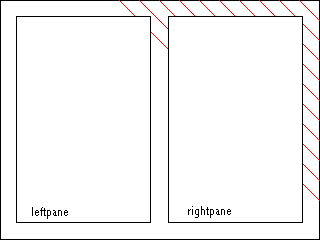 |
Case 3 |
Case 4 |
Cases 1 and 4 are fairly straightforward, since they are applying individual
transitions to individual media elements, which we discussed in the previous
section. In Case 2 and 3, the diagonal wipe is a coordinated transition across
all three media, where the geometry of the transition is calculated from
the media in the background and not the individual media. Case 1 could be
represented as:
...
<transition id="dwipe" type="edgeWipe" subtype="diagonalRightDown"/>
...
<seq>
<par>
<img src="back1.jpg" dur="10s" ... />
<img src="left1.jpg" dur="10s" ... />
<img src="right1.jpg" dur="10s" ... />
</par>
<par>
<img src="back2.jpg" dur="10s" ... />
<img src="left2.jpg" dur="10s" transIn="dwipe" ... />
<img src="right2.jpg" dur="10s" transIn="dwipe" ... />
</par>
</seq>
...
and Case 4 would look like:
...
<transition id="dwipe" type="edgeWipe" subtype="diagonalRightDown"/>
...
<seq>
<par>
<img src="back1.jpg" dur="10s" ... />
<img src="left1.jpg" dur="10s" ... />
<img src="right1.jpg" dur="10s" ... />
</par>
<par>
<img src="back2.jpg" dur="10s" transIn="dwipe" ... />
<img src="left2.jpg" dur="10s" ... />
<img src="right2.jpg" dur="10s" ... />
</par>
</seq>
...
In Cases 2 and 3, however, we want to execute a coordinated transition which
includes the media in both "leftpane" and "rightpane". In Case 2 region and
either have the media in "leftpane" and "rightpane" clip (Case 3) or not
clip (Case 2) the transition. In order to express Cases 2 and 3, we need
to introduce the concept of parent and children media. In Cases 2 and 3,
the media in leftpane and rightpane are children of the media in the background.
Therefore, when we place the transition on the parent media, the media which
are children are automatically involved in the transition. In Cases 1 and
4, all of the media (leftpane, rightpane, and background) are peers - there
are no parent-child relationships. Therefore, in Case 4, when we place the
transition on the background, the transition is executed only on the background
and not leftpane and rightpane, even though they are z-ordered on top of
the background.
The exact syntax for expressing the concept of parent and child media depends
on the host language. For instance, with SMIL Transitions integrated into
HTML, the parent and child media might be expressed as nested
div elements. When using SMIL Transitions with
SMIL Layout, parent and child media can be expressed using having the
region elements of the child media
be children of the region element
of the parent media. For more detail on parent regions in SMIL Layout, see
the SMIL Layout Module.
Therefore, in order to execute Case 2 or 3, we must first specify the
parent-child relationship between media and then specify that the transition
is a multi-element transition. We do this by setting the "multiElement" attribute
of the <transition> element to "true". Then, in order to distinguish
between Case 2 and 3, we choose the value of the "childrenClip" attribute
of the <transition> element. Therefore, for Case 2 (where the transition
involves both parent and children), we set "childrenClip" to "false", and
for Case 3 we set "childrenClip" to "true".
Now we can express Cases 2 and 3. Case 2 can be expressed as:
...
<transition id="dwipe" type="wipe" subtype="diagonalRightDown"
multiElement="true" childrenClip="false"/>
...
<seq>
<par>
<img src="back1.jpg" dur="10s" ... />
<img src="left1.jpg" dur="10s" ... />
<img src="right1.jpg" dur="10s" ... />
</par>
<par>
<img src="back2.jpg" dur="10s" transIn="dwipe" ... />
<img src="left2.jpg" dur="10s" transIn="dwipe" ... />
<img src="right2.jpg" dur="10s" transIn="dwipe" ... />
</par>
</seq>
...
Implicit in the above example is the parent-child relationship of media.
We would have specified that elsewhere. If we were using SMIL Layout, then
we would have made the region of back2.jpg be the parent of the regions of
"left2.jpg" and "right2.jpg". Other layout schemes might use other means
of specifying this parent child relationship. Case 3 is a trivial change
from Case 2:
...
<transition id="dwipe" type="wipe" subtype="diagonalRightDown"
multiElement="true" childrenClip="true"/>
...
<seq>
<par>
<img src="back1.jpg" dur="10s" ... />
<img src="left1.jpg" dur="10s" ... />
<img src="right1.jpg" dur="10s" ... />
</par>
<par>
<img src="back2.jpg" dur="10s" transIn="dwipe" ... />
<img src="left2.jpg" dur="10s" transIn="dwipe" ... />
<img src="right2.jpg" dur="10s" transIn="dwipe" ... />
</par>
</seq>
...
where all we have done is changed the "childrenClip" attribute to "true"
in the definition of the transition.
The purpose of this section is to specify requirements and recommendations
on the host language or profile in order to integrate SMIL Transitions.
-
The profile must include at least Level 0 of the
SMIL Timing and Synchronization
Module.
-
Since transitions are applied to media and are not specific to the layout
of that media, then SMIL Transitions are layout agnostic. Any type of layout
language may be used.
-
The profile must have some method of specifying the
transition element. It is recommended
that all transition elements be specified in the
head of the document (if one exists) and also
that there be some sort of container element which groups all the transitions
together (similar to the layout element
in the head of SMIL 1.0 documents).
<!ENTITY % transition-attrs "
type CDATA #IMPLIED
subtype CDATA #IMPLIED
horzRepeat CDATA #IMPLIED
vertRepeat CDATA #IMPLIED
borderWidth CDATA #IMPLIED
color CDATA #IMPLIED
multiElement (true|false) 'false'
childrenClip (true|false) 'false'
">
<!ELEMENT transition "EMPTY">
<!ATTLIST transition ""
%transition-attrs;
dur CDATA #IMPLIED
startPercent CDATA #IMPLIED
endPercent CDATA #IMPLIED
direction (forward|reverse) 'forward'
>
<!ELEMENT transitionFilter "EMPTY">
<!ATTLIST transitionFilter ""
%transition-attrs;
percentDone CDATA #IMPLIED
begin CDATA #IMPLIED
dur CDATA #IMPLIED
end CDATA #IMPLIED
>
-
Transitions vs. Effects - should we also be able to specify non-time-based
effects? These are not transitions between two different media types, but
do fit nicely into the idea of style. In other words, an "emboss" effect
might just be a style on a particular element. It doesn't have a duration,
but it could have a start.
-
Some transitions (like fading to a color) really only make sense at the end
of a timeline. How do we enforce this?
-
Does the child media have to be completely geometrically contained by the
parent? If they do not have to be, then what is the behavior of the transition
across multiple media objects which are lexical children but not geometric
children?
13.
The SMIL Document Object Model Module
-
Editors:
-
Philippe Le Hégaret, W3C
-
Patrick Schmitz, Microsoft
-
This specification defines the Document Object Model (DOM) specification
for synchronized multimedia functionality [SMIL-DOM]. It is part of work
in the Synchronized Multimedia Working Group (SYMM) towards a next version
of the SMIL language and SMIL modules. Related documents describe the specific
application of this SMIL DOM for SMIL documents and for HTML and XML documents
that integrate SMIL functionality. The SMIL DOM builds upon the DOM Core
functionality, adding support for timing and synchronization, media integration
and other extensions to support synchronized multimedia documents.
-
Editors:
-
Nabil Layaïda
(Nabil.Layaida@inrialpes.fr),
INRIA
-
Jacco Van Ossenbruggen
(Jacco.van.Ossenbruggen@cwi.nl),
CWI
The SMIL Boston profile describes the SMIL modules that are included and
details how this modules are integrated. It contains support for all of the
major SMIL Boston features including animation, content control, layout,
linking, media object, meta-information, structure, timing and transition
effects. It is designed for Web clients that support direct SMIL Boston markup
such as standalone multimedia players.
This section is informative.
The SMIL Boston Profile is defined as a markup language. The syntax of this
language is formally described with a document type definition (DTD) or XML
Schema which is based on the SMIL modules as defined in "Modularization of
SMIL" [SMIL-MOD]
The SMIL Boston Profile design requirements are:
-
Ensure that the profile is completely backward compatible with SMIL 1.0.
-
Ensure that all the modules' semantics maintain compatibility with SMIL semantics
(this includes content and timing).
-
Adopt new W3C recommendations when appropriate and not in conflict with other
requirements. (check against both Schemas and CC/PP,
align with XHTML)
-
Specify how the modules support the document object model.
This section is normative.
A conforming SMIL Boston document is a document that requires only
the facilities described as mandatory in this specification. Such a document
must meet all of the following criteria:
-
It must validate against the DTD or XML Schema found in Appendix A
-
The root element of the document must be
<smil>.
-
The name of the default namespace on the root element must be the SMIL Boston
namespace name, (TBD)
-
There must be a DOCTYPE declaration in the document prior to the root element.
The public identifier included in the DOCTYPE declaration must reference
the DTD or schema (TBD) found in Appendix A using its Formal Public Identifier.
The system identifier may be modified appropriately.
<!DOCTYPE SMIL-Boston PUBLIC "-//W3C//DTD SMIL Boston //EN"
"smil-boston.dtd">
The user agent must conform to the
"User Agent Conformance"
section of the
XHTML
specification ([XHTML10], section 3.2).
The SMIL-Boston Profile supports the timeline-centric multimedia features
found in SMIL language. This profile includes the following SMIL modules:
-
Animation Module Level 0
-
Content Control Module Level 0 and the prefetch element from Level 1
-
Layout Module Levels 0, 1, 2
-
Linking Module 0, 1 and the fragment element from Level 2
-
Media Object Module Level 0,
-
Metainformation Module Level 0
-
Structure Module Level 0
-
Timing and Synchronization Module Levels 0, 1
-
Transition Effects Module Levels 0, 1
The collection names contained in the following table define the SMIL Boston
Profile vocabulary.
| Collection Name |
Elements in Collection |
| Animation |
animate,
set,
animateMotion,
animateColor |
| ContentControl |
switch,
prefetch,
userAttributes |
| Layout |
region,
root-layout,
layout,
regPoint, viewport |
| LinkAnchor |
a,
area |
| MediaContent |
text,
img,
audio,
video,
ref,
animation,
textstream,
brush? |
| Metainformation |
meta,
metadata |
| Structure |
smil,
head,
body |
| Schedule |
par,
seq,
excl,
priorityClass |
| Transition |
transition, |
In the following sections, we define the set of elements and attributes used
in each of the modules included in the SMIL Boston Profile. The content model
for each element is described. The Content Model of an element is a description
of elements which can appear as its direct children. The special Content
Model "EMPTY" means that a given element may not have children.
| Collection Name |
Attributes in Collection |
| Core |
id (ID),
class(NMTOKEN) |
The id and
class attributes in the collection Core are defined for all
the elements of the SMIL Boston Profile. The id
attribute is used in the SMIL Boston Profile to assign a unique XML
identifier to every element in a SMIL document.
The Animation Module provides a framework for incorporating animation onto
a timeline (a timing model) and a mechanism for composing the effects of
multiple animations (a composition model). The SMIL Boston profile includes
the functionality of the Animation module level 0. The Animation Module defines
semantics for the animate,
set,
animateMotion, and
animateColor elements.
In the SMIL Boston Language Profile, Animation elements can have the following
attributes and Content Model:
| Elements |
Attributes |
Content Model |
| animate |
Core, Timing,
attributeName,
attributeType,
additive,
accumulate,
calcMode,
values,
from, to,
by |
EMPTY |
| set |
Core, Timing,
attributeName,
attributeType,
to |
EMPTY |
| animateMotion |
Core, Timing, additive,
accumulate,
calcMode,
values,
from,
to, by ,
path,
origin |
EMPTY |
| animateColor |
Core, Timing,
attributeName,
attributeType,
additive,
accumulate,
calcMode,
values,
from, to,
by |
EMPTY |
This profile adds the animate,
set,
animateMotion, and
animateColor elements to the content model of the
par,
seq and
excl elements of the Timing and
Synchronization Module. It also adds these elements to the content model
of the body element of the Structure
Module.
Integration issues with animation
We need to go through the animation module and check for any additional
integration requirements that we may not have covered.
Specifying the target element
The target element supported in the SMIL Boston Profile is the element
region defined in the layout module.
Specifying the target attribute
The target attributes of the animations are those of the
region and
area elements. The region element has the following attributes
which can be subject to animation: soundLevel, width, height, z-index, left,
right, top, bottom, backgoundColor (background-color). The area element has
the coord attribute which can be subject to animation. The attribute coord
is considered of type string in this profile. This means that only discrete
non-additive animation is supported on this attribute.
| Elements |
Target Element |
Target Attributes |
| animate |
region |
soundLevel,
width, height,
z-index,
left,
right,
top,
bottom,
backgoundColor
(background-color) |
|
area |
coords(string) |
| set |
region |
soundLevel,
width, height,
left,
right, top,
bottom |
|
area |
coords(string) |
| animateMotion |
region |
N/A |
| animateColor |
region |
backgroundColor
(background-color) |
The Content Control Module provides a framework for selecting content based
on a set of test attributes. The Content Control Module defines semantics
for the switch and the prefetch
elements.The SMIL Boston profile includes the functionality of the Content
Control module level 0 together with the element prefetch.
In the SMIL Boston Language Profile, Content Control elements can have the
following attributes and Content Model:
This profile adds the switch element
to the content model of the par,
seq, and
excl elements of the Timing and Synchronization Module, of
the body element of the Structure Module,
of the content model of the a element
of the Linking Module and of the head
element of the Structure Module.
The Content Control Module defines the Attribute set "Test".
| Collection Name |
Attributes in Collection |
| Test |
systemBitrate
(Number),
systemCaptions
(on|off),
systemLanguage
(CDATA),
systemOverdubOrCaption
(caption|overdub),
systemRequired
(URI),
systemScreenSize
(CDATA),
systemScreenDepth (
CDATA),
systemOverdubOrSubtitle
(overdub|subtitle),
systemAudioDesc
(on|off),
systemOperatingSystem,
systemCPU,
systemComponent (CDATA), |
The collection of Attributes Test can be added to all the elements defined
in the SMIL Boston profile.
The Layout Module provides a framework for spatial layout of visual components.
The Layout Module defines semantics for the
viewport,
layout,
root-layout, region and the
regPoint elements. The SMIL Boston
profile includes the functionality of the entire Layout module (levels 0,
1 and 2).
In the SMIL Boston Language Profile, Layout elements can have the following
attributes and Content Model:
| Elements |
Attributes |
Content Model |
| region |
Core, Accessibility,
backgroundColor (background-color),
bottom,
fit (fill |
hidden | meet | scroll | slice),
width, height,
left,
right,
title,
top,
volume,
z-index,
regPoint,
regAlign |
EMPTY |
| root-layout |
Core, Accessibility,
backgroundColor(background-color),
width,
height,
skipContent(skip-content),
title |
EMPTY |
| viewport |
Core, Accessibility,
(background-color),
width,
height,
skipContent(skip-content),
title |
region, EMPTY |
| layout |
Core, Accessibility,
type |
root-layout, region, viewport |
| regPoint |
Core, Accessibility, top,
bottom,
left,
right,
regAlign (
topLeft|topMid | topRight | midLeft | center | midRight
| bottomLeft | bottomMid | bottomRight ) |
EMPTY |
Make sure that all these attribute value lists are
complete.
(*) If the type attribute of the "layout" element has the value
"text/smil-basic-layout", it can contain the "region" and the "root-layout"
elements. If the type attribute of the layout element has the value
"text/smil-extended-layout", in addition to the "layout" and "root-layout"
elements it can contain the "viewportt" element. For more details, see the
layout element description in the
Layout Module.
(**) The "background-color" attribute of SMIL1.0 is deprecated in favor of
"backgroundColor", but both are supported.
This profile adds the layout element
to the content model of the head element
of the Structure Module. It also adds this element to the content model of
the switch element of the Content
Control Module.
Maybe just list them all in tables of collections of elements and attributes
as you have started to do here.What I would do is use the module sections
to create and name the attribute and element collections, then I would have
a following section that listed the elements and there content and attribute
models using the collection names. This way everything is defined before
using, and you don't have to keep using the language "this adds that to the
content model of X".
The Linking Module provides a framework for relating documents to content,
documents and document fragments. The Linking Module defines semantics for
the a and
area elements (SMIL Boston linking level 1). It defines also
the semantics of a set of attributes defined for theses elements (SMIL Boston
linking level 0).
Both the a and
area elements have an
href attribute, whose value should
be a valid URI. Support for URI's using http:// and file:/ access protocols
is required. Support for other protocols is optional.
Support for URI's with XPointer fragment identifier syntax is not required.
In the SMIL Boston Language Profile, Linking elements can have the following
attributes and Content Model:
| Elements |
Attributes |
Content Model |
| a |
Core, Timing, Test, href,
sourceLevel,
destinationLevel,
sourcePlaystate(play | pause
| stop) 'pause',
destinationPlaystate (play | pause
| stop) 'play', show (new | replace)
'replace',
accesskey,
tabindex,
target,
external,
actuate |
MediaContent, Schedule, |
| area (
anchor) |
Core, Timing, Test, shape,
coords,
href,
nohref,
alt,
sourceLevel,
destinationLevel,
sourcePlaystate,
destinationPlaystate,
show,
accesskey,
tabindex,
target,
external |
EMPTY |
This profile adds the area and
a elements to the content model of the
par,
seq, and
excl elements of the Timing and
Synchronization Module. It also adds these elements to the content model
of the body element of the Structure
Module.
SMIL 1.0 backward compatibility: The <anchor> element is available
but deprecated in favor of <area>.
SMIL 1.0 backward compatibility: The show attribute value "pause" is deprecated
in favor of setting the the "show" attribute to "new" and the "sourcePlaystate"
attribute to "pause".
The Media Object Module provides a framework for declaring media. The Media
Object Module defines semantics for the
ref, animation,
audio,
img, video,
text,
textstream and brush elements. The SMIL Boston profile includes
the functionality of the Media Object module level 0.
Should these attributes be included in the profile : brush, StripRepeat,
readIndex, param, namedMarkers. Good topic for the face2face, please
post this as a discussion issue!.
In the SMIL Boston Language Profile, media object elements can have the following
content model and attributes, in addition to the attributes defined in the
SMIL Media Object Module:
| Elements |
Attributes |
Content Model |
| text |
Core, Timing, abstract,
src,
region,
fill (freeze | remove
| hold), alt,
author,
copyright,
title,
type |
param, LinkAnchor, Schedule, Animation |
| img |
Core, Timing, abstract,
src,
region,
fill (freeze | remove
| hold), alt,
author,
copyright,
title,
type |
area, param, LinkAnchor, Schedule, Animation |
| audio |
Core, Timing, abstract,
src,
author,
copyright,
title,
type,
clipBegin(clip-begin),
clipEnd(clip-end) |
param, LinkAnchor, Schedule, Animation |
| video |
Core, Timing, abstract,
src,
region,
fill (freeze | remove
| hold), alt,
author,
copyright,
title,
type,
clipBegin(clip-begin),
clipEnd(clip-end) |
area, param, LinkAnchor, Schedule, Animation |
| ref,
animation,
textstream |
Core, Timing, abstract,
src,
region,
fill (freeze | remove
| hold), alt,
author,
copyright,
title,
type |
param, LinkAnchor, Schedule, Animation |
| brush |
Core, Timing, abstract,
region,
fill (freeze | remove | hold),
alt,
author,
copyright,
title,
type,
color |
param, LinkAnchor, Schedule, Animation |
In the SMIL Boston Language Profile, media object elements can contain the
following elements:
This profile adds the ref,
animation,
audio, img,
video,
text, and
textstream elements to the content
model of the par,
seq, and
excl elements of the Timing and Synchronization Module. It
also adds these elements to the content model of the
body element of the Structure Module. It also adds these elements
to the content model of the a element
of the Linking Module.
The Metainformation Module provides a framework for describing a document,
either to inform the human user or to assist in automation. The Metainformation
Module defines semantics for the meta and
metadataelements. The SMIL Boston profile includes the
functionality of the Metainformation module level 0.
In the SMIL Boston Language Profile, Metainformation elements can have the
following attributes and Content Model:
| Elements |
Attributes |
Content Model |
| meta |
Core, Accessibility, Meta |
EMPTY |
| metadata |
Core, Accessibility, |
RDF |
The RDF (Resource Description Framework) element in this table is defined
in the W3C Metadata Recommendation [RDFsyntax].
Define what RDF means. Actually I think that the element allowed is the RDF
element in the rdf namespace, whatever the URI is. Should use the complete
URI in the spec here.
The Attribute collections Core, Accessibility and Meta in the previous table
are defined as follows:
This profile adds the meta element
to the content model of the head element
of the Structure Module.
The Structure Module provides a framework for structuring a SMIL document.
The Structure Module defines semantics for the
smil, head, and
body elements. The SMIL Boston profile
includes the functionality of the Structure module level 0.
In the SMIL Boston Language Profile, Structure elements can have the following
attributes and Content Model:
| Elements |
Attributes |
Content Model |
| smil |
Core, Accessibility,
xmlns |
head?,
body?,
metadata? |
| head |
Core, Accessibility, profile |
Metainformation, Transition,
(switch |
layout)? |
| body |
Core, Accessibility, Timing |
(Schedule | MediaContent | ContentControl | LinkAnchor
)* |
The body element acts as the root element to span the timing tree. The body
element has a "timeContainer" attribute fixed to the value of "seq".
The Timing and Synchronization Module provides a framework for describing
timing structure, timing control properties, and temporal relationships between
elements. The Timing and Synchronization Module defines semantics for
par,
seq, and excl elements.
In addition, this module defines semantics for attributes including
begin,
dur, end,
repeatCount,
repeatDur, beginEvent and endEvent.
The SMIL Boston profile includes the functionality of the Timing and
Synchronization module level 0 and 1.
begin-event and end-event are attribute value names on the r.h.s. of begin
and end. Need to clarify this, and also, we are calling them beginEvent and
endEvent, no hypen. ALso need to include the deprecated 'repeat'.
In the SMIL Boston Language Profile, Timing and Synchronization elements
can have the following attributes and Content Model:
| Elements |
Attributes |
Content Model |
| par |
Core, Accessibility, Timing, repeatDur, endSync, restart |
(Schedule | MediaContent | ContentControl | LinkAnchor
)* |
| seq |
Core, Accessibility, Timing, restart |
(Schedule | MediaContent | ContentControl | LinkAnchor
)* |
| excl |
Core, Accessibility, Timing,
endSync, restart |
(Schedule | MediaContent | ContentControl | LinkAnchor
)*, |
| priorityClass |
Core, Accessibility, peers (
stop | pause| defer | never ) 'stop',
higher ( stop | pause ) 'pause',
lower ( defer | never ) 'defer' |
(Schedule | MediaContent | ContentControl | LinkAnchor
)* |
Missing syncBehavior attributes.
This module is mandatory in any profile incorporating SMIL modules. The Attribute
collections Timing and basicTiming are defined as follows:
Elements of media object module have the attributes describing timing and
properties of contents. For timing, the
begin and end attribute
can have one or multiple values among offset-value, syncbase-value,
syncToPrev-value and wall clock times. Multiple values are separated by
semicolons as defined in the Timing and Synchronization module.
This profile adds the par,
seq, and
excl elements to the content model of
ref, animation,
audio,
img, video,
text, and
textstream elements of the Media Objects Module. It also adds
these elements to the content model of the
body element of the Structure Module and to elements to the
content model of the a and
area elements of the Linking Module.
The SMIL Boston Profile specify which types of events can be used. The supported
events are described as Event-symbols according to the
syntax introduced in the
SMIL Timing and Synchronisation
module.
| Event |
example |
| beginEvent |
begin="foo.beginEvent + 2s" |
| endEvent |
end="foo.endEvent + 2s" |
| activate |
begin="foo.activate" |
| repeat |
end="foo.repeat" |
Semantics for these events need to be added.
These events do not bubble and are delivered to the targeted media element.
We need to work the details of the GUI event model and are considering an
extensible event set (author defined).
The Transition Effects Module provides a framework for describing transitions
such as fades and wipes. The Transition Effects Module defines semantics
for the transition and
transitionFilter elements.
The SMIL Boston profile includes the functionality of the Transition Effects
module levels 0 and 1.
In the SMIL Boston Language Profile, Transition Effects elements can have
the following attributes and Content Model:
| Elements |
Attributes |
Content Model |
| transition |
Core, type,
subtype,
dur,
startPercent,
endPercent,
direction,
horzRepeat,
vertRepeat,
borderWidth,
color,
multiElement,
childrenClip |
EMPTY |
| transitionFilter |
Core, basicTiming,
type, subtype,
horzRepeat,
vertRepeat,
borderWidth,
color,
multiElement,
childrenClip,
percentDone |
transition |
This profile adds the transition and tansitionFilter element to the content model
of the layout element of the Layout
Module. It adds also the transitionFilter element to the content model of
the ref, animation,
audio,
img, video,
text,
textstream and brush elements elements of the Media Object
Module.
The transition module adds transIn
and transOut attributes to
animation,
audio, img,
video,
text, textstream
and brush elements of the Media Object Module.
This section is normative
In the future, SMIL Boston Language may be extended by other W3C recommendations,
or by private extensions. For these extensions, it is recommended that the
following rules are obeyed:
-
All elements introduced in extensions must have a "skip-content" attribute
(defined in *** check this ***) if it should be possible that their content
is processed by SMIL Boston players.
-
Private extensions must be introduced using the syntax of the XML namespace
specification.
Need to ensure that skip-content attribute is added to all elements and that
value is set correctly.
It is recommended that SMIL Boston players are prepared to handle documents
that contain extension that obey these two rules.
Extensions should be handled using an XML namespace mechanism defined in
the XML namespace recommandation. In the rest of the section, the syntax
and semantics for XML namespaces defined in the W3C recommendation [NAMESPACES]
will be used for demonstration purposes only.
The following cases can occur:
-
The document contains a namespace declaration for the SMIL Boston specification
that defines an empty prefix. In this case, non-SMIL Boston elements and
attributes are only allowed in a document if they are declared using an XML
namespace. The document may not contain a document type declaration for SMIL
Boston If it does, it is invalid.
In the following example, the element "new:a" is a legal extension. The elements
"mytags:a" and "b" are syntax errors, since they are not declared using an
XML namespace.
<?xml:namespace ns="http://www.acme.com/new-smil" prefix="new" ?>
<?xml:namespace ns="http://www.w3.org/TR/PR-smil" ?> (* URI TBD *)
<smil>
<body>
<par>
<new:a>
...
</new:a>
<mytags:a ... />
...
</mytags:a>
<b>
...
</b>
</par>
</body>
</smil>
-
The document contains no document type declaration, it contains a document
type declaration for a SMIL version higher than 1.0, or it contains a namespace
declaration for a SMIL specification with a version higher than 1.0. For
a SMIL 1.0 player to be able to recognize such a namespace declaration, it
is recommended that the URI of future SMIL versions starts with
http://www.w3.org/TR/REC-smil, and is followed by more characters which may
for example be a version number.
In this case, a SMIL Boston player should assume that it is processing a
SMIL document with a version number higher than 1.0.
The following cases can occur:
-
Unknown element
-
Unknown elements are ignored
An unknown element may contain content that consists of SMIL 1.0 elements.
Whether such content is ignored or processed depends on the value of the
"skip-content" attribute. If the attribute is set to "true", or the attribute
is absent, the content is not processed. If it is set to "false", the content
is processed.
-
Content in Element that was declared "Empty"
-
A future version of SMIL may allow content in elements that are declared
as "empty" in SMIL 1.0.
-
Whether this content is ignored or not depends on the value of the "skip-content"
attribute of the formerly empty element. If the attribute is set to "true",
the content is not processed. If it is set to "false", the content is processed.
-
Unknown Attribute
-
Unknown attributes are ignored.
-
Unknown Attribute Value
-
Attributes with unknown attribute values are ignored.
-
The document contains a document type declaration for SMIL Boston. In this
case, it may not contain any non-SMIL Boston elements, even if they are declared
using XML namespaces. This is because such extensions would render the document
invalid.
This section is normative.
The SMIL Boston document type is defined as a set of SMIL Boston modules.
All SMIL Boston modules are integrated according to the guidelines in the
"Modularization of SMIL Boston" specification [SMIL-MOD],
and defined within their respective module sections.
This section is normative.
<!-- ....................................................................... -->
<!-- SMIL Boston DTD ...................................................... -->
<!-- file: smilboston.dtd
-->
<!-- SMIL Boston DTD
This is SMIL Boston.
Copyright 1998-2000 World Wide Web Consortium
(Massachusetts Institute of Technology, Institut National de
Recherche en Informatique et en Automatique, Keio University).
All Rights Reserved.
Permission to use, copy, modify and distribute the SMIL Boston DTD and
its accompanying documentation for any purpose and without fee is
hereby granted in perpetuity, provided that the above copyright notice
and this paragraph appear in all copies. The copyright holders make
no representation about the suitability of the DTD for any purpose.
It is provided "as is" without expressed or implied warranty.
Author: Jacco van Ossenbruggen
Revision: $Id: smil-boston.html,v 1.12 2000/06/22 17:41:51 hugo Exp $
-->
<!-- This is the driver file for the SMIL Boston DTD.
Please use this formal public identifier to identify it:
"-//W3C//DTD SMIL Boston//EN"
-->
<!ENTITY % SMIL.profile "'-//W3C//DTD SMIL Boston//EN'" >
<!-- Define the Content Model -->
<!ENTITY % smil-model.mod
PUBLIC "-//W3C//ENTITIES SMIL-Boston Document Model 1.0//EN"
"smil-model-1.mod" >
<!-- Modular Framework Module ................................... -->
<!ENTITY % smil-framework.module "INCLUDE" >
<![%smil-framework.module;[
<!ENTITY % smil-framework.mod
PUBLIC "-//W3C//ENTITIES SMIL-Boston Modular Framework 1.0//EN"
"smil-framework-1.mod" >
%smil-framework.mod;]]>
<!-- The SMIL Boston Profile includes the following sections:
C. The SMIL Animation Module
D. The SMIL Content Control Module
G. The SMIL Layout Module
H. The SMIL Linking Module
I. The SMIL Media Object Module
J. The SMIL Metadata Module
K. The SMIL Structure Module
L. The SMIL Timing and Synchronization Module
M. Integrating SMIL Timing into other XML-Based Languages
P. The SMIL Transition effects Module
The SMIL Streaming Media Object Module is optional.
-->
<!ENTITY % streamingmedia.model "IGNORE">
<![%streamingmedia.model;[
<!ENTITY % streaming-mod
PUBLIC "-//W3C//ELEMENTS SMIL-Boston Streaming Media Objects//EN"
"SMIL-streamingmedia.mod">
%streaming-mod;
]]>
<!ENTITY % anim-mod
PUBLIC "-//W3C//ELEMENTS SMIL-Boston Animation//EN"
"SMIL-anim.mod">
<!ENTITY % control-mod
PUBLIC "-//W3C//ELEMENTS SMIL-Boston Content Control//EN"
"SMIL-control.mod">
<!ENTITY % layout-mod
PUBLIC "-//W3C//ELEMENTS SMIL-Boston Layout//EN"
"SMIL-layout.mod">
<!ENTITY % link-mod
PUBLIC "-//W3C//ELEMENTS SMIL-Boston Linking//EN"
"SMIL-link.mod">
<!ENTITY % media-mod
PUBLIC "-//W3C//ELEMENTS SMIL-Boston Media Objects//EN"
"SMIL-media.mod">
<!ENTITY % meta-mod
PUBLIC "-//W3C//ELEMENTS SMIL-Boston Document Metadata//EN"
"SMIL-metadata.mod">
<!ENTITY % struct-mod
PUBLIC "-//W3C//ELEMENTS SMIL-Boston Document Structure//EN"
"SMIL-struct.mod">
<!ENTITY % timing-mod
PUBLIC "-//W3C//ELEMENTS SMIL-Boston Timing//EN"
"SMIL-timing.mod">
<!ENTITY % transition-mod
PUBLIC "-//W3C//ELEMENTS SMIL-Boston Transition//EN"
"SMIL-transition.mod">
<!ENTITY % integrate-mod
PUBLIC "-//W3C//ELEMENTS SMIL-Boston Integration//EN"
"SMIL-integrate.mod">
%struct-mod;
%anim-mod;
%control-mod;
%meta-mod;
%layout-mod;
%link-mod;
%media-mod;
%timing-mod;
%transition-mod;
%integrate-mod;
Should have a section fot DTD and another for Schema. We need to have DTD
for this draft, XML SChema later. Either both or neither should be in appendix,
but not assymetric like it is here.
Should the profile define a minimal list/recommended of media types?
see:
Baseline formats.
Good question. In any case, I think that we will have a greater chance of
success by defining the baseline formats on a pre-profile basis, rather than
a separate document that specifies media that needs to be supported in order
to use SMIL modules or be part of the SMIL language family.
Does the profile require support for some or all features of SMIL Boston?
If it requires some, what features are not required If it requires all, is
it realistic to expect that someone will really implement the full Boston
Language Profile in the near future (including transitions, animation)
All required features of the SMIL Boston language should be listed here.
Features in modules not included in this profile should not be mentioned.
There are no "optional" features within the profile, there are only optional
feature within a module that a profile can choose to include or not. And
yes, we expect the vendors to implement the full language profile as we define
it here.
Should we define:
-
level of XPointer support - the linking draft specifies that this is not
required, and I think that the same applies to the language profile. We should
state this explicitly within the profile. See the linking draft for language.
-
transfer protocols? only if we can agree to these as part of the minimal
media types. my feeling here is no, since we want SMIL applicable to various
transport systems.
See in-line for more remarks.
Editor: the in-lined comments have been left in the text as issue trackers
from the previous draft. Spell in-line with a hypen.
15.
HTML+SMIL Language Profile
-
Editor:
-
Patrick Schmitz
(pschmitz@microsoft.com), Microsoft
The HTML+SMIL profile integrates a subset of the SMIL Boston specification
with HTML. It includes the SMIL Boston modules supporting animation, content
control, linking, media objects, timing an synchronization, and transition
effects. The SMIL Boston features are integrated directly with HTML and CSS,
and can be used to manipulate HTML and CSS features. It is designed for Web
clients that support HTML+SMIL markup.
The document type definition or Schema is implemented using SMIL modules
as defined in "Modularization of SMIL" [SMIL-MOD].
15.2
Introduction
This section is informative.
This profile describes the SMIL modules that are included, and details the
integration issues. The language integration includes the complete set of
XHTML 1.1 modules. @@ We really need aspects of XHTML
2.0, but that is not very far along yet).
Throughout the document, where reference is made to "HTML" functionality
and elements, this should be understood to refer to XHTML modules and elements.
Some notes on why we are doing this.
This section explains why certain modules of SMIL Boston are not included.
The general philosophy is to use XHTML modules where appropriate.
The SMIL Boston layout module is not included, as HTML and CSS provide layout
functionality. Authors are already familiar with the HTML/ CSS layout model,
and it provides the tools authors need.
The SMIL Boston structure module is not included, as the HTML document is
defined to be the host language, and so provides the equivalent elements
and semantics.
The SMIL Boston meta information module is not included, as XHTML provides
the equivalent elements and semantics.
15.3
Normative Definition of SMIL Boston
This section is normative.
A conforming HTML+SMIL document is a document that requires only
the facilities described as mandatory in this specification. Such a document
must meet all of the following criteria:
-
It must validate against the DTD (in future the
Schema) found in Appendix
A
-
The root element of the document must be html.
-
The name of the default namespace on the root element must be the HTML+SMIL
namespace name, (TBD)
-
There must be a DOCTYPE declaration in the document prior to the root element.
If present, the public identifier included in the DOCTYPE declaration must
reference the DTD found in Appendix
A using its Formal Public Identifier. The system identifier may be modified
appropriately.
<!DOCTYPE html PUBLIC "-//W3C//DTD HTML+SMIL //EN"
"htmlplussmil.dtd">
The user agent must conform to the
"User Agent Conformance"
section of the
XHTML
specification ([XHTML10], section 3.2).
The user agent must conform to the following user agent rules :
@other requirements?
15.3.3
HTML+SMIL Profile
The HTML functionality in the HTML+SMIL document type is based upon XHTML
1.1 modules and associated document type. The XHTML 1.1 document type is
made up of the following abstract modules, as defined in XHTMLMOD [XMOD],
and the Ruby Annotation module as defined in [RUBY].The formal definition
of the modules is not repeated here, but only the extensions introduced with
timing. The notation, terms and document conventions used here are borrowed
from [XMOD].
-
Structure Module*
-
body, head, html, title
-
Basic Text Module*
-
abbr, acronym, address, blockquote, br, cite, code, dfn,
div, em, h1, h2, h3, h4, h5, h6, kbd, p, pre, q, samp, span, strong, var
-
Hypertext Module*
-
a
-
List Module*
-
dl, dt, dd, ol, ul, li
-
Applet Module
-
applet, param
-
Presentation Module
-
b, big, hr, i, small, sub, sup, tt
-
Edit Module
-
del, ins
-
BDO Module
-
bdo
-
Forms Module
-
form, input, select, option, textarea, button, fieldset,
label, legend, optgroup
-
Tables Module
-
caption, table, td, th, tr, col, colgroup, tbody, thead,
tfoot
-
Image Module
-
img
-
Client-side Image Map Module
-
area, map,(attribute extensions)
-
Server-side Image Map Module
-
(attribute extensions)
-
Object Module
-
object, param
-
Frames Module
-
frameset, frame, noframes, (attribute extensions)
-
Iframe Module
-
iframe
-
Intrinsic Events Module
-
(attribute extensions)
-
Meta Information Module
-
meta
-
Scripting Module
-
noscript, script
-
Stylesheet Module
-
style
-
Link Module
-
link
-
Base Module
-
base
-
Legacy Module
-
font, s, strike, u, (attribute extensions)
(*) = This module is a required [XHTMLFamily] module.
@@We will also include the new Events module [XHTMLEvents] as it is completed.
In addition, the HTML+SMIL document type supports the timeline-centric multimedia
features defined by SMIL Boston. The profile includes the following SMIL
Boston modules:
-
Animation Module
-
Content Control Module
-
Linking Module
-
Media Object Module
-
Timing and Synchronization Module
-
Transition Effects Module
15.3.4
Animation Module
The Animation Module provides a framework for incorporating animation onto
a timeline (a timing model) and a mechanism for composing the effects of
multiple animations (a composition model). The Animation Module defines semantics
for the animate,
set,
animateMotion, and
animateColor elements:
| Elements |
Attributes |
Minimal Content Model |
| animate |
Common, Timing,
attributeName,
attributeType,
additive,
accumulate,
calcMode,
values,
keyTimes,
keySplines,
from, to,
by |
EMPTY |
| set |
Common, Timing,
attributeName,
attributeType,
to |
EMPTY |
| animateMotion |
Common, Timing,
additive,
accumulate,
calcMode,
values,
keyTimes,
keySplines,
from, to,
by,
path,
origin |
EMPTY |
| animateColor |
Common, Timing,
attributeName,
attributeType,
additive,
accumulate,
calcMode,
values,
keyTimes,
keySplines,
from, to,
by |
EMPTY |
This module adds the animate,
set,
animateMotion, and
animateColor elements to the content model of the
par,
seq, and
excl elements of the Timing and
Synchronization Module. It adds the
animate, set, and
animateColor elements to the
content model of the elements of the Basic Text, Hypertext, List, Applet,
Presentation, Edit, Tables, Image, Client-side Image Map, Server-side Image
Map, Object and Legacy modules, as defined in XHTMLMOD [XMOD]. It adds
the animateMotion element
to the content model of the elements of the Basic Text and Image modules
(and possibly a few others - need to nail this down).
This module defines the following content sets:
-
BaseAnimation
-
animate |
animateColor |
set
-
AllAnimation
-
BaseAnimation |
animateMotion
-
Need to talk about the legal attributes that can be targetted and the associated
values.
-
Need to talk about the positioning model and constraints for animateMotion.
-
Need to talk about the legal attributes for animateColor
-
Need to talk about the numeric forms for things like keyTimes and keySplines
(i.e. specific floating point syntax supported).
See also the Integration requirements from the SMIL Boston Animation module.
15.3.5
Content Control Module
The Content Control Module provides a framework for selecting content based
on a set of test attributes. The Content Control Module defines semantics
for the switch element.
| Elements |
Attributes |
Minimal Content Model |
| switch |
Common, Timing |
Flow |
This module adds the switch element
to the Flow content set of the Basic Text module. It also adds the Test
attributes set to the elements in the Flow content set of the Basic Text
Module (as modified by all included modules).
The Content Control Module defines the Attribute set "Test".
| Collection Name |
Attributes in Collection |
| Test |
systemBitrate,
(Number),
systemCaptions ,
(on|off),
systemLanguage,
(CDATA),
system-overdub-or-caption,
(caption|overdub),
systemRequired,
(URI),
systemScreenSize,(CDATA),
systemScreenDepth,(CDATA),
systemOverdubOrSubtitle,(overdub|subtitle),
systemAudioDesc,(on|off),
systemComponent,(CDATA) |
15.3.6
Linking Module
The SMIL Boston linking module is isomorphic to functionality defined in
the XHTML modules. However, it adds some additional attributes and semantics
to the a and area elements in XHTML. Rather than describing the elements
that are added, the additional functionality defined on the HTML elements
a and
area is described.
| Elements |
Attributes |
Minimal Content Model |
| a |
sourceLevel,
destinationLevel,
sourcePlaystate,
destinationPlaystate,
actuate,
show, Test,
Timing |
n/a |
| area |
sourceLevel,
destinationLevel,
sourcePlaystate,
destinationPlaystate,
actuate,
show, Test,
Timing |
n/a |
This module adds the area element to the content model for the elements in
the Media module.
15.3.7
Media Object Module
The Media Object Module provides a framework for declaring media. The Media
Object Module defines semantics for the
ref, animation,
audio,
img, video,
text, and
textstream elements. XHTML defines an img element, and so the
integration of the Media module extends the semantics and content model of
this element.
| Elements |
Attributes |
Minimal Content Model |
| ref |
Common, Test,
Timing,
timeContainer |
AllAnimation, TimeContainers,
area,
param |
| animation |
Common, Test,
Timing,
timeContainer |
AllAnimation, TimeContainers,
area,
param |
| audio |
Common, Test,
Timing,
timeContainer |
AllAnimation, TimeContainers,
area,
param |
| img |
Common, Test,
Timing,
timeContainer |
AllAnimation, TimeContainers,
area,
param |
| video |
Common, Test,
Timing,
timeContainer |
AllAnimation, TimeContainers,
area,
param |
| text |
Common, Test,
Timing,
timeContainer |
AllAnimation, TimeContainers,
area,
param |
| textstream |
Common, Test,
Timing,
timeContainer |
AllAnimation, TimeContainers,
area,
param |
This module adds the ref,
animation,
audio, img,
video,
text, and
textstream elements to the content
model of the par,
seq, and
excl elements of the Timing and Synchronization Module. It
also adds these elements to the Inline content set of the Basic Text Module.
15.3.8
Timing and Synchronization
Module
The Timing and Synchronization Module provides a framework for describing
timing structure, timing control properties, and temporal relationships between
elements.
In addition to the data types defined by XHTML Modularization, The HTML+SMIL
profile defines the TimeActions data type and its semantics, described in
the following table:
| Data type |
Description |
| TimeActions |
Authors may use the following recognized time actions, listed here with
their interpretations.
-
none
-
Specifies that no action is performed on the element when it is active. This
is only legal for time containers, and allows the author to introduce a new
time space without affecting the document presentation.
-
visibility
-
Specifies that the CSS "visibility" property is to be manipulated over time.
When the element is neither active nor frozen, the property is set to "hidden".
When it is active, the original value is used. If the original value is "hidden",
the time action will have no effect (i.e. the element will remain hidden).
See also [CSS2]
-
display
-
Specifies that the CSS "display" property is to be manipulated over time.
When the element is neither active nor frozen, the property is set to "none".
When it is active, the original value is used. If the original value is "none",
the time action will have no effect (i.e. the element will remain out of
view and layout). See also [CSS2]
-
style
-
Specifies that the CSS inline style attribute "style" is to be removed and
applied over time. When the element is neither active nor frozen, the inline
stylesheet is cleared (so no style modification is made). When it is active,
the original value (i.e. the string attribute value specified for the "style"
attribute) is used. If there is no inline style attribute on the element,
the time action will have no effect. See also [CSS2]
-
class:classname
-
Specifies that the name "[classname]" will be removed from
and added to the value of the "class" attribute over time. When
the element is neither active nor frozen, the specified string (i.e. whatever
the author specifies for "classname") is removed from the value
of the class attribute (if it was included). When the element is active,
the specified string is added to the value of the class attribute. Note that
any other values specified in the class attribute are not affected. Note
also that the application of any associated style must be specified in a
stylesheets for the document. Note finally that the application of styles
depends not upon the order of names in the class attribute, but rather on
the order of the rules in the stylesheets for the document. See also [CSS2].
|
The Timing and Synchronization Module defines the Attribute sets "Timing"
and "RuntimeSync".
| Collection Name |
Attributes in Collection |
| Timing |
begin
(CDATA),
dur
(CDATA),
repeatCount (CDATA),
repeatDur (CDATA),
end
(CDATA),
fill
(CDATA),
restart (CDATA),
timeAction (
TimeActions),
onBegin (Script),
onEnd (Script),
onRepeat (Script) |
| RuntimeSync |
syncBehavior
(locked|canSlip),
syncTolerance
(CDATA),
syncMaster
(true|false) |
The Timing and Synchronization Module adds the
Timing and
RuntimeSync attribute set to the elements
in the Media Module, and adds the Timing attribute
set to the Flow content set of the Basic Text Module (as modified by all
included modules).
The Timing and Synchronization Module defines the elements
par,
seq, and
excl.
| Elements |
Attributes |
Minimal Content Model |
| par |
Common, Test,
Timing,
RuntimeSync,
timeAction
(CDATA) |
par,
seq,
excl, Flow |
| seq |
Common, Test,
Timing,
RuntimeSync,
timeAction
(CDATA) |
par,
seq,
excl, Flow |
| excl |
Common, Test,
Timing,
RuntimeSync,
timeAction
(CDATA) |
par,
seq,
excl, Flow |
This module adds the par,
seq, and
excl elements to the Inline content set of the Basic Text,
Hypertext and Tables Modules.
As part of the integration of timing and synchronization functionality with
HTML, two additional attributes are defined for many of the HTML elements:
timeContainer and
timeAction. This module adds
the timeContainer attribute
to the elements of the Flow content set of the Basic Text Module (as modified
by all included modules).
The timeAction attribute defines
the behavior that is controlled by the timing model. The default depends
upon the type of element. A special value "none" is reserved for use with
the time container elements and with elements that have been set to be a
time container (using the
timeContainer attribute:
timeContainer = [par,seq,excl]").
The following table presents the default time actions. Those modules and
elements that are not included do not have a defined time behavior, and cannot
legally support timing attributes, or participate in the time model.
Certain elements have a reasonable notion of intrinsic behavior that can
be controlled over time. This is generally some presentation or behavioral
effect, such as the font style controls of the b
and strong elements, and the click sensitivity
of the a and area elements.
One way to logically model the control of intrinsic behavior is to convert
the element to a span when it is neither active
nor frozen, and to use the original element when it is active or frozen.
Many other elements simply contain content and so default to controlling
the "visibility" property for the element. In some cases, an element may
have a presentational effect (e.g. the Ruby module elements), but be modeled
as a content element. The decision is based upon the usefulness in common
authoring scenarios of controlling the presentational behavior in isolation.
For those elements that default to controlling "visibility", setting
timeAction to any other value
overrides this, and will only control the specified
timeAction (and not the visibility).
For all other elements, the
timeAction will control the default
(intrinsic) behavior as well as the indicated
timeAction behavior.
In addition, for those elements that default to "visibility", when they are
children of a sequence time container
seq or an element with
"timeContainer=seq", the default
timeAction is "display". This
more closely matches the expected behavior of the SMIL Language profile.
| Module |
Elements |
Default time action |
| Structure |
body |
"none" |
| Media |
(all) |
schedule and render |
| Timing |
(all) |
"none" |
| Text |
em |
intrinsic effect |
| Text |
kbd |
intrinsic effect |
| Text |
strong |
intrinsic effect |
| Text |
var |
intrinsic effect |
| Text |
(all others) |
"visibility" |
| Hypertext |
a |
link sensitivity |
| Lists |
(all) |
"visibility" |
| Applet |
applet |
"visibility" |
| Presentational |
(all) |
intrinsic effect |
| Edit |
(all) |
intrinsic effect |
| Forms |
(all) |
"visibility" |
| Tables |
(all) |
"visibility" |
| Image Map |
area |
link sensitivity |
| Object |
object |
"visibility" |
| Iframe |
iframe |
"visibility" |
| Ruby |
(all) |
"visibility" |
| Legacy |
(all) |
intrinsic effect |
All modules not listed in the table, and all Structure module elements except
body do not support timing.
-
Define document begin and end
-
Define document presentation
15.3.9
Transition Effects Module
The Transition Effects Module defines a taxonomy of transition effects as
well as semantics and syntax for integrating these effects into XML
documents
| Elements |
Attributes |
Minimal Content Model |
| TBD |
TBD |
TBD |
This module is used, it adds the TBD element to the content model of the
layout element of the Layout Module.
15.4
Appendix A: Document Type
Definition
This section is normative.
TBD.
16.
SMIL Basic Language Profile
-
Editors
-
Kenichi Kubota (
kuboken@isl.mei.co.jp), Panasonic
-
Aaron Cohen
(aaron.m.cohen@intel.com), Intel
The SMIL Basic Language Profile defines a profile which is a small subset
of the SMIL Boston language profile specification, and is designed to be
a profile that meets the needs of resource-constrained devices such as mobile
phones and portable disc players. It contains a baseline set of the SMIL
Boston features including basic layout, simple linking, basic media object,
structure, and basic timing modules.
This section is informative.
The SMIL language [SMIL10]
[SMIL-BOSTON] includes powerful functionality
for multimedia services not only on desktops but also for information appliances.
SMIL content authors may wish their works to be available on a widespread
variety of web clients, such as desktops, television sets, mobile phones,
portable disc players, car navigation systems, and voice user agents. Each
of these platforms has its specific capabilities and may require its own
profile. The SMIL Modules [SMIL-MOD] provide
a solution to create profiles and extensions of the full SMIL language profile,
in addition to providing the means to integrate SMIL functionality into other
languages.
The SMIL Basic profile consists of a reduced set of modules among the variety
of SMIL modules in terms of semantics and syntax, and assures conformance
to the larger SMIL Boston language specification. A profile for mobile and
portable devices can be tailored based on the SMIL Basic profile with or
without extensions to support application specific features.
The SMIL Basic profile does not propose to restrict extension, but aims at
a baseline of conformance between the full SMIL language profile and one
appropriate for mobile and portable services. Saying that a player is SMIL
Basic conformant, means that it can play documents at least as complex as
those allowed by the SMIL Basic profile. It may play significantly more complex
documents. In particular, the full blown SMIL players will be automatically
SMIL Basic compliant. Thus SMIL authoring for low power devices is easier
since general tools can be used.
This section is informative.
SMIL Basic profile is a client profile which conforms to SMIL Boston and
may be supported by wide variety of SMIL players, even those running on small
mobile phones. Mobile and portable devices share some common characteristics:
-
Small display: Display can render texts, images, audio and stream
data in a small area.
-
Simple input method: Input devices may be numeric keys, arrow keys,
and a select key. Some may have a pointing cursor. Another may have a voice
interpreter.
-
Real-time embedded OS: Resources for calculation is limited by priority
order of each task. So, in a SMIL player, the use of timers should be restricted
in number and frequency, and memory should be used sparingly.
-
Less network transaction: Network transactions, if necessary in
a wireless environment, should be reduced as much as possible.
The SMIL Basic Profile meets these requirements.
For references, see the document, "HTML4.0 Guidelines for Mobile Access"
[MOBILE-GUIDE] issues guidelines for HTML
content, and "XHTML Basic" [XHTML-BASIC] provides
a minimum subset for portability and conformance.
Layout Module coordinates presentation of objects on the display device.
Presentation on a small display has some difficulty in rendering objects.
Layout of objects may not be adjusted flexibly comparing their specified
regions, nor have scroll bars. So, the layout should be simple and effective.
Therefore, the root-layout window
may represent the full screen of the display. The SMIL Layout Level 0 module
is used and the nesting of layout regions supported in the higher level SMIL
layout modules is not supported.
On a SMIL player window, a user would handle arrow keys to move focus on
objects and anchors, and select the target which activates playback or linking.
A pointing cursor "mouse-like" device might not be supported. So "move focus
and select" is a simple user interface for communication with the SMIL player.
The "click" can be mapped to a "activate" action. While a user is handling
the focus, the player may slow or pause its timeline.
SMIL Timing and Synchronization presents dynamic and interactive multimedia
according to a timeline. The SMIL timing model is expressed in a structured
language effectively. The timeline normally needs to be calculated with limited
resources of memory and the processor. For example, recursive function calls,
caused by nesting elements, or memory allocation, for example by additional
timelines, at any moment should be restricted. For the SMIL Basic Profile,
the timeline should be a simple and single sequence of media objects.
To achieve this, the SMIL Basic profile describes restrictions on use of
the SMIL Timing. The restrictions are:
-
There is only one time container element allowed in a SMIL document.
-
Time attribute values only allow single begin and end conditions. Lists of
begin or end conditions are not allowed.
The Media Object Module provides reference to media which constitute the
contents of the presentation, such as text, image, audio and video. Here
it is assumed audio/visual multimedia presentation.
Some functionality of the Content Control module may be replaced with
CC/PP[CC/PP] mechanism, which provides a way
to notify device capabilities and user preferences to an origin server and/or
intermediaries such as a gateway or proxy. This allows the generation or
selection of device-tailored contents. Thus CC/PP can be used with transformation
of available documents between client and server.
Content Control Level 0 Module is included in SMIL Basic Profile when an
alternative to the CC/PP mechanism is necessary. So the player should analyze
switch syntax correctly even if it
cannot recognize the test attributes.
There are useful guidelines to handling accessibility issues that can be
applied to the profile design for information appliances. The document,
"Accessibility Features of SMIL"
[WAI-SMIL-ACCESS], summarizes their points
in SMIL1.0
SMIL Basic profile is designed to be appropriate for small information appliances
like mobile phones and portable disc players. Its simple design is intended
to serve as a baseline profile for application specific extensions. Similar
to HTML+SMIL, another use of SMIL Basic may be to integrate SMIL basic timing
and media functionality into the HTML mobile profile.
The SMIL Basic Profile does not restrict extension and inclusion of other
levels and modules, for example, the Animation, Metainformation, or Transition
Module.
This section is normative.
The SMIL Basic Profile supports the lightweight multimedia features defined
in SMIL language. This profile includes the following SMIL modules:
(*) = required modules to be a member of the SMIL language profile
family[SMIL-MOD].
Collections used in the tables below are defined as follows:
| Collection Name |
Attributes in Collection |
| Core |
id,
class,
title |
| Timing |
begin,
dur,
end,
repeat(deprecated),
repeatCount,
repeatDur |
|
Description |
abstract,
author,
copyright |
| I18n |
xml:lang |
| Test |
systemBitrate(system-bitrate),
systemCaptions(system-captions),
systemLanguage(system-language),
system-overdub-or-caption,
systemRequired(system-required),
systemScreenSize(system-screen-size),
systemScreenDepth(system-screen-depth),
systemOverdubOrSubtitle,
systemAudioDesc,
systemOperatingSystem,
systemCPU,
systemComponent |
The Layout Module provides a framework for spatial layout of visual components.
The SMIL Basic profile adopts the SMIL Level
0 Layout module with layout type of
text/smil-basic-layout.
| Elements |
Attributes |
Content Model |
| layout |
Core, I18n,
type |
root-layout,
region |
| region |
Core, I18n,
backgroundColor(background-color),
bottom,
fit,
height,
left,
right,
top,
width,
z-index |
EMPTY |
| root-layout |
Core, I18n,
backgroundColor(background-color),
height,
width |
EMPTY |
The Linking Module describes the hyperlink relationships between content.
The SMIL Basic profile adopts the
SMIL Linking Level 0 and Level 1 Modules.
A SMIL Basic player may not be able to control links between the source and
the destination object, for example, in applying
sourceLevel and
destinationLevel attributes
to volume. Then, the attributes of target control, which are listed in the
table below, are just ignored. In the SMIL Basic Profile, it can be assumed
that the default value for show is
replace and that for
sourcePlaystate is
pause, same as these are defined in the SMIL
Linking Module.
The area(anchor) element may not be
supported without appropriate user interface, then the SMIL Basic player
should play the presentation without the area map.
| Elements |
Attributes |
Content Model |
| a |
Core, I18n,
Timing,
href,
show,
sourcePlaystate,
destinationPlaystate,
sourceLevel,
destinationLevel,
accesskey,
tabindex,
target,
external,
actuate |
MediaContent |
| area(anchor) |
Core, I18n,
Timing, alt,
coords,
href,
show,
sourcePlaystate,
destinationPlaystate,
sourceLevel,
destinationLevel,
accesskey,
tabindex,
target,
external |
EMPTY |
The Media Object Module provides a framework for declaring media which constitute
the contents of a SMIL presentation. The SMIL Basic profile includes
the SMIL Media Object Level 0
Module.
| Elements |
Attributes |
Content Model |
| text |
Core, I18n,
Description, Timing,
Test, src,
region,
fill,
alt,
longdesc,
type |
EMPTY |
| img |
Core, I18n,
Description, Timing,
Test, src,
region,
fill,
alt,
longdesc,
type |
area |
| audio |
Core, I18n,
Description, Timing,
Test, src,
region,
alt,
longdesc,
abstract,
type,
clipBegin(clip-begin),
clipEnd(clip-end) |
EMPTY |
| video |
Core, I18n,
Description, Timing,
Test, src,
region,
fill,
alt,
longdesc,
type,
clipBegin(clip-begin),
clipEnd(clip-end) |
area |
| ref,
animation,
textstream |
Core, I18n,
Description, Timing,
Test, src,
region,
fill,
alt,
longdesc,
type,
clipBegin(clip-begin),
clipEnd(clip-end) |
EMPTY |
Elements of the Media Object module have attributes describing basic timing
properties of contents. For timing, the
begin and
end attributes should have one value
for determinate single timeline as specified in the SMIL Timing Level 0 Module.
If the player supports RTP (Real-time Transport Protocol) / RTSP (Real Time
Streaming Protocol ), Streaming Media Object Module should be included.
The Structure Module describes the structure of the SMIL document. The SMIL
Basic Profile adopts the SMIL Structure
Level 0 Module.
The structure element body is implicitly
defined to be a seq time container in
SMIL1.0 and SMIL Boston language profile, and so it is in SMIL Basic Profile.
However, SMIL Basic Profile adopts no nesting of time containers as mentioned
in the section of Timing and Synchronization Module, and only allows a single
level of explicit time container elements. To avoid this conflict, a SMIL-Basic
document should have a par or
seq time container as the first and
only child of the body element.
The Timing and Synchronization Module provides a framework for describing
timing structure, timing control properties, and temporal relationships between
elements.
The SMIL Basic Profile includes the basic functionality of the SMIL Timing
and Synchronization Module. It is based upon
the SMIL Timing and Synchronization
Level 0 Module (SMIL Timing Module) and includes a few constraints on
its determinate timing. The constraints are single time container and single
timing condition for the purpose of a simple scheduled timeline.
Time containers are defined in the SMIL Timing Module and they group elements
with synchronization relationships. In a SMIL Basic document with single
time container, par and
seq time container elements contains
media object elements and may not be nested. Therefore, these elements do
not have begin and
end attributes.
Attributes of the SMIL Timing Module apply to elements of the SMIL Media
Object Module. Basics of timing are described in the SMIL Timing Module.
Control of element start/end time is available with the
begin,
end, and
dur attributes. For repeating elements,
the repeat,
repeatCount, and
repeatDur attributes are available.
As mentioned in the SMIL Timing and Synchronization Level 0 Module, there
is only one attribute value in begin
and end attributes, not a
semicolon-separated list in order to create determinate single timeline.
| Elements |
Attributes |
Content Model |
| par |
Core, I18n,
Timing,
endsync |
switch,
MediaContent, a |
| seq |
Core, I18n,
Timing,
endsync |
switch,
MediaContent, a |
The Content Control Module provides a framework for selecting content. The
SMIL Basic profile adopts the
SMIL Content Control Level 0 Module. Therewith the
skipContent element applys elements
not included in the SMIL Basic Profile, which default value is
"true".
A SMIL Basic player may not support nesting of
switch, nor runtime selection of
contents. Even if a player cannot recoginize test attributes in media object
elements, the player should ignore the element and evaluate the next element
following the Content Control syntax.
| Elements |
Attributes |
Content Model |
| switch |
Core, I18n |
a,
MediaContent |
A player of the SMIL Basic Profile should meet the following conformance
criteria.
-
The player must parse a SMIL document and evaluate its well-formedness
consistently with XML1.0[XML10].
-
The player ignores an unknown element.*
-
The player ignores an unknown attribute.
-
For an attribute with an unknown attribute value, the player substitutes
the default attribute value.
-
The player must conform to criteria defined in each module adopted in the
profile.
(*) Note that SMIL provides
skipContent attributes.
This section is normative.
<!-- ....................................................................... -->
<!-- SMIL Basic DTD ....................................................... -->
<!-- file: smilbasic.dtd
-->
<!-- SMIL Basic DTD
This is SMIL Basic, a proper subset of SMIL Boston.
Copyright 1998-2000 World Wide Web Consortium
(Massachusetts Institute of Technology, Institut National de
Recherche en Informatique et en Automatique, Keio University).
All Rights Reserved.
Permission to use, copy, modify and distribute the SMIL Basic DTD and
its accompanying documentation for any purpose and without fee is
hereby granted in perpetuity, provided that the above copyright notice
and this paragraph appear in all copies. The copyright holders make
no representation about the suitability of the DTD for any purpose.
It is provided "as is" without expressed or implied warranty.
Author: Jacco van Ossenbruggen
Revision: $Id: smil-boston.html,v 1.12 2000/06/22 17:41:51 hugo Exp $
-->
<!-- This is the driver file for the SMIL Basic DTD.
Please use this formal public identifier to identify it:
"-//W3C//DTD SMIL Basic//EN"
-->
<!ENTITY % SMIL.profile "'-//W3C//DTD SMIL Basic//EN'">
<!-- Define the Content Model -->
<!ENTITY % smil-model.mod
PUBLIC "-//W3C//ENTITIES SMIL-Basic Document Model 1.0//EN"
"smilbasic-model-1.mod" >
<!-- Modular Framework Module ................................... -->
<!ENTITY % smil-framework.module "INCLUDE" >
<![%smil-framework.module;[
<!ENTITY % smil-framework.mod
PUBLIC "-//W3C//ENTITIES SMIL-Boston Modular Framework 1.0//EN"
"smil-framework-1.mod" >
%smil-framework.mod;]]>
<!-- The SMIL Basic Profile supports the lightweight multimedia
features defined in SMIL language. This profile includes
the following SMIL modules:
SMIL Level 0 Layout Module
SMIL Linking Level 0 & Level 1 Module
SMIL Media Object Level 0 Module
SMIL Structure Level 0 Module
SMIL Timing and Synchronization Level 0 Module
(under restriction of single time container )
And the following SMIL modules can be included optionally:
SMIL Content Control Level 0 Module
-->
<!-- Change this to in INCLUDE to enable the optional content control module -->
<!ENTITY % smil-control.module "IGNORE">
<![%smil-control.module;[
<!ENTITY % control-mod
PUBLIC "-//W3C//ELEMENTS SMIL-Boston Content Control//EN"
"SMIL-control.mod">
%control-mod;
]]>
<!-- These are all mandatory -->
<!ENTITY % layout-mod
PUBLIC "-//W3C//ELEMENTS SMIL-Boston Layout//EN"
"SMIL-layout.mod">
<!ENTITY % link-mod
PUBLIC "-//W3C//ELEMENTS SMIL-Boston Linking//EN"
"SMIL-link.mod">
<!ENTITY % media-mod
PUBLIC "-//W3C//ELEMENTS SMIL-Boston Media Objects//EN"
"SMIL-media.mod">
<!ENTITY % struct-mod
PUBLIC "-//W3C//ELEMENTS SMIL-Boston Document Structure//EN"
"SMIL-struct.mod">
<!ENTITY % timing-mod
PUBLIC "-//W3C//ELEMENTS SMIL-Boston Timing//EN"
"SMIL-timing.mod">
%layout-mod;
%link-mod;
%media-mod;
%struct-mod;
%timing-mod;
TBD: XML Schema.
-
Editor
-
Philipp Hoschka (ph@w3.org), (W3C)
This Section defines a number of baseline media formats that the members
of the W3C SYMM Working Group believe will be widely supported by SMIL players.
Authors are encouraged to encode media objects in these formats to ensure
that their SMIL documents can be played back by a wide range of SMIL
implementations. Often, for audio and video formats, the baseline formats
will be used as fallbacks when a player cannot render a more efficient, but
less widely supported format. This can be achieved by using a
switch element as shown in the following example:
<switch>
<audio src="non-baseline-format-file" />
<audio src="baseline-format-file" />
</switch>
Note that this Section is non-normative, and that thus implementation of
the baseline formats is not a precondition for conformance to this specification.
For selecting the baseline formats, the following criteria were used:
-
Implementing the format should not reqire a license fee OR
-
The format should be implemented on a wide variety of platforms, indicating
that licenses are available on reasonable and non-discriminatory terms. The
platforms reviewed were the Linux operating system, the Java Media framework,
Apple Quicktime, RealNetworks RealMedia and Microsoft Windows Mediaplayer
multimedia platforms, and the Netscape and Internet Explorer browsers (trademarks
are poperty of their respective owners).
Editor's note: The Working Group encourages information on other audio formats
that have lower bandwidth requirements than audio/basic and also do not require
a license fee.
@@@ all the following "support" lists will not go in the final version
Support:
-
Linux: yes (reference ?)
-
Java Media: (no working link available, used to be at
http://java.sun.com/products/java-media/jmf/2.0/supported.html") yes
-
Quicktime:
yes
-
RealMedia:
yes
for .au (@@ confirm .au is a superset of audio/basic)
-
MS Windows Media:
yes
for au (@@ but only if "local")
-
Internet Explorer: yes
-
Netscape: yes
@@ efforts to come up with license-free audio codecs
-
image/png ([PNG-MIME], [PNG-REC])
Support:
-
Linux: yes
-
Java Media:no (but maybe in Java ?)
-
Quicktime:
yes
-
RealMedia: yes (reference ?)
-
MS Windows Media: no
-
Internet Explorer: yes (reference ?)
-
Netscape: yes (reference ?)
-
image/jpeg ([MIME-2], [JFIF])
Support:
-
Linux: yes
-
JavaMedia: yes, supported in Java without Java Media Framework
-
Quicktime:
yes
-
RealMedia:
yes
(baseline only, no support for progressive JPEG and grayscale)
-
MS Windows Media: no
-
Internet Explorer: yes
-
Netscape: yes
-
video/mpeg [MIME-2]
@@ MIME type definition is unclear, supposedly, this is MPEG-1 video - is
there a spec for a file format for this ?
@@ are there licensing requirements for MPEG-1 ? The availability of Linux
code would tend to suggest there aren't.
Support:
-
Linux: yes
-
Java Media: yes
-
Quicktime: yes (Mac only, not on Windows)
-
RealMedia: yes, via plugin
-
MS Windows Media:
yes
-
Internet Explorer: @@
-
Netscape: @@
-
video/quicktime ([QT-MIME], [QT])
@@ should restrict to one track and one codec, e.g motion JPEG or Cinepak
Support:
-
Linux: yes (??
Supported video is MJPA, JPEG Photo, PNG, RGB, YUV 4:2:2, and YUV 4:2:0
compression)
-
Java Media: yes (Cinepak, H.261, H.263, Indeo (iv31 and iv32), JPEG (411,
422, 111), RGB)
-
Quicktime: yes
-
RealMedia: G2 on Windows supports CVID, Cinepak, and Indeo codec compression,
provided those codecs are installed on the machine already.
-
MS Windows Media:
yes,
supports version 2 and lower (@@ check which codecs)
-
Internet Explorer: @@
-
Netscape: @@
Editor's note: The Working Group encourages information on other video formats
that have lower bandwidth requirements that do not require a license fee.
-
text/plain [MIME-2]
For profiles supporting SMIL layout, players must choose a font size so that
the constraints expressed by the fit attribute of the
region element associated with the media object are fulfilled.
If there is no associated region element, @@@ all bets are off,
since text has no intrinsic size.
@@ need to provide interpretation for "fit" attribute for objects without
intrinsic size
@@ suggestion to use CSS proposal for "copyfitting" (@@ pointer ?)
@@ suggestion to use generic CSS font names, see
http://www.w3.org/TR/REC-CSS2/fonts.html#generic-font-families
@@ suggestion to require CSS support for text/plain
-
text/html @@ with appropriate parameter ? XHTML WG needs to decide about
MIME type for XHTML profiles
XHTML profile consisting only of the
basic modules [XMOD] "Structure" (contains e.g. html
and body element), "Basic Text" (contains e.g. p
and h1 element), "Hyptertext" (contains a element)
and "List" (contains e.g. ul and li elements).
The elements in this profile should be formatted using the
"Mosaic-style" formatting
described in CSS2 (@@ this means that the formatting is mostly fixed,
and that there is no need to support CSS).
@@ Auxiliary links
Appendix A.
References
-
[COMP-GRAPHICS]
-
"Computer Graphics : Principles and Practice, Second Edition", James D. Foley,
Andries van Dam, Steven K. Feiner, John F. Hughes, Richard L. Phillips,
Addison-Wesley, pp. 488-491.
-
[CC/PP]
-
"CC/PP", technology of the W3C Mobile Interest Group. W3C Note 27 July
1999,
Available at
http://www.w3.org/TR/NOTE-CCPP/
-
[CSS1]
-
"Cascading Style Sheets, level 1", Håkon Wium Lie, Bert Bos. W3C
Recommendation 17 Dec 1996, revised 11 Jan 1999,
Available at
http://www.w3.org/TR/REC-CSS1
-
[CSS2]
-
"Cascading Style Sheets, level 2", Bert Bos, Håkon Wium Lie, Chris
Lilley, Ian Jacobs. W3C Recommendation 12 May 1998,
Available at
http://www.w3.org/TR/REC-CSS2
-
[CSS-selectors]
-
Cascading Style Sheets, level 2, Specification, chapter 5,
Bert Bos, Håkon Wium Lie, Chris Lilley, Ian Jacobs. W3C Recommendation
12 May 1998,
Available at
http://www.w3.org/TR/REC-CSS2/selector.html#q1
-
[DATETIME]
-
"Date and Time Formats", M. Wolf, C. Wicksteed. W3C Note 27 August 1998,
Available at:
http://www.w3.org/TR/NOTE-datetime
-
[DC]
-
"Dublin Core Metadata Initiative", a Simple Content Description Model for
Electronic Resources.
Available at http://purl.org/DC/
-
[DOM1]
-
"Document Object Model (DOM) Level 1 Specification", W3C Recommendation 1
October 1998,
Available at
http://www.w3.org/TR/REC-DOM-Level-1
-
[DOM2Events]
-
"W3C Document Object Model Level 2 Events", T. Pixley, W3C Candidate
Recommendation,
Available at
http://www.w3.org/TR/DOM-Level-2/events.html
-
[DOM2]
-
"W3C (World Wide Web Consortium) Document Object Model (DOM) Level 2
Specification. W3C Candidate Recommendation 10 May, 2000
Available at
http://www.w3.org/TR/DOM-Level-2
-
[DOM2CSS]
-
"W3C (World Wide Web Consortium) Document Object Model (DOM) Level 2
Specification. W3C Candidate Recommendation 10 May, 2000. "Document Object
Model CSS"
Available at
http://www.w3.org/TR/DOM-Level-2/css.html
-
[draft-ietf-avt-rtp-mime-00]
-
"MIME Type Registration of RTP Payload Formats", Steve Casner and Philipp
Hoschka, June 1999.
-
[Foley]
-
Computer Graphics: Principles and Practice, Second Edition by James D. Foley,
Andries van Dam, Steven K. Feiner, John F. Hughes, Richard L. Phillips,
Addison-Wesley.
-
[HTML40]
-
"HTML 4.0 Specification" D. Raggett, A. Le Hors, I. Jacobs. W3C Recommendation
24 December 1999,
Available at
http://www.w3.org/TR/REC-html40
-
[HTML401]
-
"HTML 4.0 Specification" D. Raggett, A. Le Hors, I. Jacobs. W3C Recommendation
24 December 1999,
Available at
http://www.w3.org/TR/html401/
-
[ISO8601]
-
"Data elements and interchange formats - Information interchange - Representation
of dates and times", International Organization for Standardization, 1998.
-
[ISO10646]
-
""Information Technology -- Universal Multiple-Octet Coded Character Set
(UCS) -- Part 1: Architecture and Basic Multilingual Plane", ISO/IEC
10646-1:1993. This reference refers to a set of codepoints that may evolve
as new characters are assigned to them. This reference therefore includes
future amendments as long as they do not change character assignments up
to and including the first five amendments to ISO/IEC 10646-1:1993. Also,
this reference assumes that the character sets defined by ISO 10646 and Unicode
remain character-by-character equivalent. This reference also includes future
publications of other parts of 10646 (i.e., other than Part 1) that define
characters in planes 1-16. "
-
[IETF]
-
"IETF - content negotiation working group".
Available at
http://www.ietf.org/html.charters/conneg-charter.html
-
[JFIF]
-
"JPEG File Interchange Format, Version 1.02"; Eric Hamilton, September
1992.
Available at
http://www.w3.org/Graphics/JPEG/jfif.txt
-
[MIME-2]
-
"RFC 2046: Multipurpose Internet Mail Extensions (MIME) Part Two: Media Types";
N. Freed, N. Borenstein, November 1996.
Available at
ftp://ftp.isi.edu/in-notes/rfc2046.txt
-
[MOBILE-GUIDE]
-
"HTML4.0 Guidelines for Mobile Access", T. Kamada, Takuya Asada, Masayasu
Ishikawa, Shin'ichi Matsui. W3C Note 15 March 1999
Available at
http://www.w3.org/TR/NOTE-html40-mobile/.
-
[MODMOD]
-
"Building XHTML [tm] Modules" Murray Altheim, Shane McCarron. W3C Working
Draft, work in progress,
Available at
http://www.w3.org/TR/xhtml-building/
-
[NAMESPACES]
-
"Namespaces in XML", Tim Bray, Dave Hollander, Andrew Layman. W3C
Recommendation 14 January 1999, ,
Available at
http://www.w3.org/TR/REC-xml-names
-
[PICS]
-
"PICS 1.1 Label Distribution - Label Syntax and Communication Protocols",
T. Krauskopf, J. Miller, P. Resnick and W. Trees. W3C Recommendation 31 October
1996,
Available at
http://www.w3.org/TR/REC-PICS-labels
-
[PNG-MIME]
-
"Registration of new Media Type image/png"; Glenn Randers-Pehrson, Thomas
Boutell, 27 July 1996.
Available at
ftp://ftp.isi.edu/in-notes/iana/assignments/media-types/image/png
-
[PNG-REC]
-
"PNG (Portable Network Graphics) Specification Version 1.0"; Thomas Boutell
(Ed.).
Available at
http://www.w3.org/TR/REC-png
-
[QT]
-
"QuickTime Movie File Format Specification", May 1996.
Available at
http://developer.apple.com/techpubs/quicktime/qtdevdocs/REF/refFileFormat96.htm
-
[QT-MIME]
-
"Registration of new MIME content-type/subtype"; Paul Lindner, 1993.
Available at
http://www.isi.edu/in-notes/iana/assignments/media-types/video/quicktime
-
[RDFsyntax]
-
"Resource Description Framework (RDF) Model and Syntax Specification", Ora
Lassila and Ralph R. Swick. W3C Recommendation 22 February 1999,
Available at
http://www.w3.org/TR/REC-rdf-syntax/
-
[RDFschema]
-
"Resource Description Framework (RDF) Schema Specification", Dan Brickley
and R.V. Guha.W3C Proposed Recommendation 03 March 1999,
Available at
http://www.w3.org/TR/PR-rdf-schema/
-
[RFC1766]
-
"Tags for the Identification of Languages", H. Alvestrand, March 1995.
Available at
ftp://ftp.isi.edu/in-notes/rfc1766.txt
-
[RFC1889]
-
"RTP : A Transport Protocol for Real-Time Applications", Henning Schulzrinne,
Steve Casner, Ron Frederick and Van Jacobson, January 1996.
Available at
ftp://ftp.isi.edu/in-notes/rfc1889.txt
-
[RFC1890]
-
" RTP Profile for Audio and Video Conferences with Minimal Control" Henning
Schulzrinne, January 1996.
Available at
ftp://ftp.isi.edu/in-notes/rfc1890.txt
-
[RFC2326]
-
"Real Time Streaming Protocol (RTSP)" Henning Schulzrinne, Anup Rao and Rob
Lanphier, April 1998.
Available at
ftp://ftp.isi.edu/in-notes/rfc2326.txt
-
[RFC2327]
-
"SDP: Session Description Protocol" M. Handley and V. Jacobson, April 1998.
Available at
ftp://ftp.isi.edu/in-notes/rfc2327.txt
-
[RUBY]
-
"Ruby Annotation", Michel Suignard, Masayasu Ishikawa, Martin Dürst.
W3C Working Draft, work in progress.
Available at
http://www.w3.org/TR/ruby/
-
[SMIL10]
-
"Synchronized Multimedia Integration Language (SMIL) 1.0" P. Hoschka. W3C
Recommendation 15 June 1998,
Available at
http://www.w3.org/TR/REC-smil.
-
[SMIL-ANIMATION]
-
"SMIL Animation" Patrick Schmitz and Aaron Cohen. W3C "Last Call" Working
Draft, work in progress.
Available at
http://www.w3.org/TR/smil-animation/
-
[SMIL-BOSTON]
-
"Synchronized Multimedia Integration Language (SMIL) Boston Specification".
W3C Working Draft, work in progress.
Available at
http://www.w3.org/TR/smil-boston/
-
[SMIL-CSS2]
-
"Displaying SMIL Basic Layout with a CSS2 Rendering Engine". W3C Note 20
July 1998,
Available at:
http://www.w3.org/TR/NOTE-CSS-smil.html
-
[SMIL-DOM]
-
"Synchronized Multimedia Integration Language Document Object Model (DOM)".
W3C Working Draft, work in progress.
Available at
http://www.w3.org/TR/smil-boston-dom/
-
[SMIL-MOD]
-
"Synchronized Multimedia Modules based upon SMIL 1.0", Patrick Schmitz, Ted
Wugofski and Warner ten Kate. W3C Note 23 February 1999,
Available at
http://www.w3.org/TR/NOTE-SYMM-modules
-
[SMPTE]
-
"Transfer of Edit Decision Lists", ANSI/SMPTE 258M/1993
-
[sRGB]
-
"IEC 61966-2-1 (1999-10) - "Multimedia systems and equipment - Colour measurement
and management - Part 2-1: Colour management - Default RGB colour space -
sRGB", ISBN: 2-8318-4989-6 - ICS codes: 33.160.60, 37.080 - TC 100 - 51 pp.
Available at:
http://www.iec.ch/nr1899.htm
-
[SVG]
-
"Scalable Vector Graphics (SVG) 1.0 Specification". W3C Working Draft, work
in progress.
Available at http://www.w3.org/TR/SVG
-
[WAI-SMIL-ACCESS]
-
"Accessibility Features of SMIL " Marja-RiittaKoivunen, Ian Jacobs, W3C NOTE
21 September 1999. .
Available at
http://www.w3.org/TR/SMIL-access
-
[XHTML10]
-
"The Extensible HyperText Markup Language: A Reformulation of HTML 4.0 in
XML 1.0". W3C Recommendation 26 January 2000,
Available at
http://www.w3.org/TR/xhtml1/
-
[XHTML11]
-
"XHTML 1.1 - Module-based XHTML", Murray Altheim, Shane McCarron,.W3C Working
Draft, work in progress.
Available at
http://www.w3.org/TR/xhtml11.
-
[XHTML-BASIC]
-
"XHTML Basic", Masayasu Ishikawa, Shinichi Matsui, Peter Stark, Toshihiko
Yamakami. W3C Working Draft, work in progress.
Available at
http://www.w3.org/TR/xhtml-basic/
-
[XHTMLEvents]
-
"XHTML Events Module" An updated events syntax for XML-based markup languages,
Ted Wugofski,Patrick Schmitz,Shane P. McCarron
Available at
http://www.w3.org/TR/xhtml-events/
-
[XHTML-PROF-REQ]
-
"XHTML Document Profile Requirements, Document profiles - a basis for
interoperability guarantees", Dave Ragget, Peter Stark, Ted Wugofski. W3C
Working Draft.
Available at
http://www.w3.org/TR/xhtml-prof-req/.
-
[XINCL]
-
"XML Inclusion Proposal (XInclude)", Jonathan Marsh and David Orchard. W3C
Note 23 November 1999,
Available at
http://www.w3.org/TR/xinclude
-
[XLINK]
-
"XML Linking Language (XLink)", S. DeRose, D. Orchard and B. Trafford. W3C
Working Draft, work in progress.
Available at
http://www.w3.org/TR/xlink
-
[XML10]
-
"Extensible Markup Language (XML) 1.0" T. Bray, J. Paoli and C.M.
Sperberg-McQueen. W3C Recommendation 10 February 1998 ,
Available at
http://www.w3.org/TR/REC-xml
-
[XML-NS]
-
"Namespaces in XML" T. Bray, D. Hollander and A. Layman. W3C Recommendation
14 January 1999,
Available at
http:/www.w3.org/TR/REC-xml-names
-
[XMOD]
-
"Modularization of XHTML", Shane McCarron, Murray Altheim, et al. W3C Working
Draft, work in progress.
Available at
http://www.w3.org/TR/xhtml-modularization
-
[XPROF]
-
"Building Document Profiles", Work in Progress, HTML & CCPP Working Groups
(W3C Members only)
Refer to
http://www.w3.org/MarkUp/Group/
and
http://www.w3.org/Mobile/CCPP/Group
-
[XPTR]
-
"XML Pointer Language (XPointer)" Steve DeRose and Ron Daniel Jr. W3C Working
Draft, work in progress.
Available at
http://www.w3.org/TR/WD-xptr
-
[XSL]
-
"Extensible Stylesheet Language (XSL) Specification", Stephen Deach. W3C
Working Draft, work in progress.
Available at
http://www.w3.org/TR/xsl/