Informative
SMIL 1.0 solved fundamental media synchronization problems and defined a powerful way of choreographing multimedia content. SMIL Boston extends the timing and synchronization support, adding capabilities to the timing model and associated syntax. Some SMIL 1.0 syntax has been changed or deprecated. This section of the document specifies the Timing and Synchronization module.
There are two intended audiences for this module: implementers of SMIL Boston document viewers or authoring tools, and authors of other XML languages who wish to integrate timing and synchronization support. A language with which this module is integrated is referred to as a host language. A document containing SMIL Timing and Synchronization elements and attributes is referred to as a host document.
As this module is used in different profiles (i.e. host languages), the associated syntax requirements may vary. Differences in syntax should be minimized as much as is practical.
This section is informative.
SMIL Timing defines elements and attributes to coordinate and synchronize the presentation of media over time. The term media covers a broad range, including discrete media types such as still images, text, and vector graphics, as well as continuous media types that are intrinsically time-based, such as video, audio and animation.
Three synchronization elements support common timing use-cases:
These elements are referred to as time containers. They group their contained children together into coordinated timelines.
SMIL Timing also provides attributes that can be used to specify an element's timing behavior. Elements have a begin, and a simple duration. The begin can be specified in various ways - for example, an element can begin at a given time, or based upon when another element begins, or when some event (such as a mouse click) happens. The simple duration defines the basic presentation duration of an element. Elements can be defined to repeat the simple duration, a number of times or for an amount of time. The simple duration and any effects of repeat are combined to define the active duration. When an element's active duration has ended, the element can either be removed from the presentation or frozen (held in its final state), e.g. to fill any gaps in the presentation.
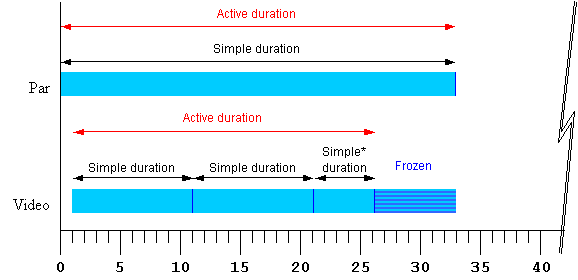
Figure 1 illustrates the basic support of a repeating element within a simple <par> time container. The corresponding syntax is included with the diagram.
<par begin="0s" dur="33s">
   <video begin="1s" dur="10s" repeatCount="2.5" fill="freeze" .../>
</par>
Figure 1 - Strip diagram of basic timing support. The starred "Simple*" duration indicates that the simple duration is partial (i.e. it is cut off early).
The attributes that control these aspects of timing can be applied not only to media elements, but to the time containers as well. This allows, for example, an entire sequence to be repeated, and to be coordinated as a unit with other media and time containers. While authors can specify a particular simple duration for a time container, it is often easier to leave the duration unspecified, in which case the simple duration is defined by the contained child elements. When an element does not specify a simple duration, the time model defines an implicit simple duration for the element. For example, the implicit simple duration of a sequence is based upon the sum of the active durations of all the children.
Each time container also imposes certain defaults and constraints upon the contained children. For example in a <seq>, elements begin by default right after the previous element ends, and in all time containers, the active duration of child elements is constrained not to extend past the end of the time container's simple duration. Figure 2 illustrates the effects of a repeating <par> time container as it constrains a <video> child element.
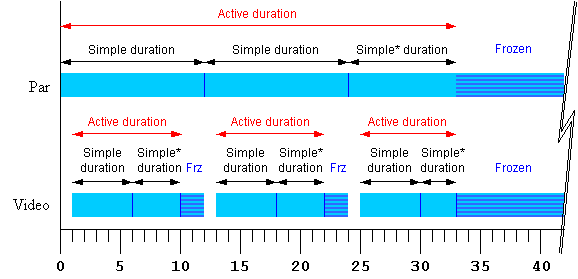
<par begin="0s" dur="12s" repeatDur="33s" fill="freeze" >
   <video begin="1s" dur="5s" repeatCount="1.8" fill="freeze" .../>
</par>
Figure 2 - Strip diagram of time container constraints upon child elements. The starred "Simple*" durations indicate that the simple duration is partial (i.e. it is cut off early).
The SMIL Timing Model defines how the time container elements and timing attributes are interpreted to construct a time graph. The time graph is a model of the presentation schedule and synchronization relationships. The time graph is a dynamic structure, changing to reflect the effect of user events, media delivery, and DOM control of the presentation. At any given instant, the time graph models the document at that instant, and the semantics described in this module. However, as user events or other factors cause changes to elements, the semantic rules are re-evaluated to yield an updated time graph.
In an ideal environment, the presentation would perform precisely as specified. However, various real-world limitations (such as network delays) can influence the actual playback of media. How the presentation application adapts and manages the presentation in response to media playback problems is termed runtime synchronization behavior. SMIL includes attributes that allow the author to control the runtime synchronization behavior for a presentation.
Informative
The timing model is defined by building up from the simplest to the most complex concepts: first the basic timing and simple duration controls, followed by the attributes that control repeating and constraining the active duration. Finally, the elements that define time containers are presented.
The time model depends upon several definitions for the host document: A host document is presented over a certain time interval.
This section defines the set of timing attributes that are common to all of the SMIL synchronization elements.
@@ Need to define "local time" or find a different term.
@@ In order to support an MPEG 4 effort to use SMIL Boston Timing and Synchronization, we are considering the addition of two additional attributes:
We are probably going to add an additional attribute "min" that would take a simple clock value and constrain the active duration to be at least as long as the specified duration. This new attribute would not affect the parent constraint semantics, and the impact on the timing model will be minimized.
We are considering a "max" attribute that would specify a maximum active duration for an element.
Informative
The basic timing for an element is described using the begin and dur attributes. Authors can specify the begin time of an element in a variety of ways, ranging from simple clock times to the time that an event (e.g. a mouse-click) happens. The simple duration of an element is specified as a simple time value. The begin attribute syntax is described below. The normative syntax rules for each attribute value variant are described below (in Timing attribute value grammars); a syntax summary is provided here as an aid to the reader.
Normative
Normative
Informative
Children of a
<par> begin by default when the
<par> begins (equivalent to
begin="0"). Children of a
<seq> begin by default when the
previous child ends its active duration (equivalent to
begin="0"). Children of an
<excl> default to a begin value
of "indefinite".
The begin value can specify a list of times. This can be used to specify multiple "ways" or "rules" to begin an element, e.g. if any one of several events is raised. A list of times can also define multiple begin times, allowing the element to play more than once (this behavior can be controlled, e.g. to only allow the earliest begin to actually be used - see also The restart attribute).
In general, the earliest time in the list determines the begin time of the element. There are additional constraints upon the evaluation of the begin time list, detailed in Evaluation of begin and end time lists.
Note that while it is legal to include "indefinite" in a list of values for begin, "indefinite" is only really useful as a single value. Combining it with other values does not impact the timing, as DOM begin methods can be called with or without specifying "indefinite" for begin.
When a begin time is specified as a syncbase variant, a marker value or a wallclock value, the defined time must be converted by the implementation to a time that is relative to the parent time container (i.e. to the equivalent of an offset value). This is know as timespace conversion, and is detailed in the section Converting between local and global times.
Informative
The use of negative offsets to define begin times merely defines the synchronization relationship of the element. It does not in any way override the time container constraints upon the element, and it cannot override the constraints of presentation time.
Normative
Informative
If an element has a begin time that resolves to a time before the parent time container begins, the parent time container constraint still applies. For example:
<par>
   <video id="vid" begin="-5s" dur="10s" src="movie.mpg" />
   <audio begin="vid.begin+2s" dur="8s" src="sound.au" />
</par>
The video element cannot begin before the par begins. The begin is simply defined to occur "in the past" when the par begins. The viewer will observe that the video begins 5 seconds into the media, and ends after 5 seconds. Note that the audio element begins relative to the video begin, and that the computed begin time is used, and not the observed begin time as constrained by the parent. Thus the audio begins 3 seconds into the media, and also lasts 5 seconds.
The behavior can be thought of as a clipBegin value applied to the element, that only applies to the first iteration of repeating elements. In the example above, if either element were defined to repeat, the second and later iterations of the media would play from the beginning of the media (see also The repeatCount, repeatDur, and repeat attributes: repeating elements).
Normative
The behavior can be thought of as a clipBegin value applied to the element, that only applies to the first iteration of repeating elements.
The media will actually begin at the time computed according to the following algorithm:
Let o be the offset value, d is the simple duration, AD is the active duration.
If AD is indefinite, it compares greater than any value of o or ABS(o).
REM( x, y ) is defined as x - floor( x/y ).
If y is indefinite, REM( x, y ) is just x.
If ABS(o) >= AD the element does not begin.
Else the element media begins at REM( ABS(o), d ).
If the element repeats, the iteration value of the
repeat event has the calculated value based upon the computed
begin, and not the observed number of repeats.
Informative
Thus for example:
<ref begin="foo.click-8s" dur="3s" repeatCount="10" .../>
The element begins when the user clicks on the
element "foo". It begins to play at 2 seconds into the 3 second simple duration.
Any time dependents are activated relative to the computed begin time, and
not the observed begin time. The begin event is raised
when the element begins, but has a timeStamp value that corresponds
to the defined begin time, 8 seconds earlier. One second later, the element
will repeat, and the associated repeat event will have the iteration
value set to 3 (it is zero based). The element will end 22 seconds after
the click.
Note: If script authors wish to distinguish between
the computed repeat iterations and observed repeat iterations, they can count
actual repeat events in the associated event handler.
@@Should we remove the following?
A begin time (ultimately) specifies a synchronization relationship between the element and the parent time container. Syncbase variants, eventbase, marker and wallclock timing are implicitly converted to an offset on the parent time container, just as an offset value specifies this directly. For children of a <seq>, the result is always a positive offset from the begin of the <seq> time container. However, for children of <par> and <excl> time containers the computed offset relative to the parent begin time may be negative.
If the computed begin offset is negative, the time container constraints specify that the element cannot actually begin until the parent time container begins. Nevertheless, the element behaves as though it had begun earlier. A negative begin offset can be thought of as defining a clipBegin value (with the same magnitude) for the first -- and only the first -- iteration of a repeated element. If no repeat behavior is specified, a negative begin offset is equivalent to a clipBegin specification with the same magnitude as the offset value.
The length of the simple duration is specified using the dur attribute. The dur attribute syntax is described below.
Normative
@@We are also considering adding a value "intrinsic" for dur (and possibly min and max). This would allow the author to specify that the duration is the default intrinsic media duration. This is useful to control the semantic interaction with "end".
If there is any error in the argument value syntax for dur , the attribute will be ignored (as though it were not specified).
If the element does not have a (valid) dur attribute, the simple duration for the element is defined to be the implicit duration of the element. The implicit duration depends upon the type of an element. The primary distinction is between different types of media elements and time containers.
If the media element has no time children, it is described as a simple media element.
If the author specifies a value for dur that is shorter than the "intrinsic" defined duration for an element, the intrinsic duration will be cut short by the specified simple duration.
If the author specifies a simple duration that is longer than the "intrinsic" defined duration for an element, the intrinsic duration of the element is extended to the specified dimple duration:
Note that when the simple duration is "indefinite", some simple use cases can yield surprising results. See the related example #4.
Informative
Note that when the begin attribute refers to an event, or to the begin or active end of another element, it may not be possible to calculate when the begin will happen. For example, if an element is defined to begin on some event, the begin time will not be known until the event happens. When such a time becomes known (i.e. when it can be calculated as a presentation time), the time is said to be resolved (see also the discussion of Unifying scheduled and interactive timing).
The following example shows simple offset begin timing. The <audio> element begins 5 seconds after the <par> time container begins, and ends 4 seconds later.
<par>
   <audio src="song1.au" begin="5s" dur="4s" />
</par>
The following example shows syncbase begin timing. The <img> element begins 2 seconds after the <audio> element begins.
<par>
   <audio id="song1" src="song1.au" />
   <img src="img1.jpg" begin="song1.begin+2s" />
</par>
Elements can also be specified to begin in response to an event. In this example, the image element begins (appears) when the user clicks on element "show". The image will end (disappear) 3 and a half seconds later.
<text id="show" ... />
<img begin="show.click" dur="3.5s" ... />
Informative
SMIL Boston provides an additional control over the active duration. The end attribute allows the author to constrain the active duration by specifying an end value using a simple offset, a time base, an event-base or DOM methods calls. The rules for combining the attributes to compute the active duration are presented in the section, Computing the active duration.
The normative syntax rules for each attribute value variant are described in the section Timing attribute value grammars; a syntax summary is provided here as an aid to the reader.
Normative
endElement() method call.The earliest time in the list in the end time list determines the end value used in Computing the Active Duration.
In the case where an element can begin multiple times, the end value used is the earliest end time after the current begin time. There are additional constraints upon the evaluation of the begin and end time lists, detailed in Evaluation of begin and end time lists.
@@ PLS: The above change could be interpreted to change the semantics - it
could be read to mean that the ending state is shown throughout the simple
duration. Perhaps it needs more wordsmithing form the original, but
we need to say that the media is played for its implicit duration, and then
the ending state is shown for the remainder of the specified simple
duration.
How about:
"When the end value extends the active duration beyond an element's implicit
simple duration, the ending state of the media (e.g. the last frame of video)
will be shown from the end of the implicit simple duration to the end of
the active duration."
Actually, this is also bad, as it needs to be clearer that a) this only applies to media elements and not to time containers, and b) this applies to elements with no dur specified (yes, that is the definition of implicit, but we should be clearer).
Informative
The end value can specify a list of times. This can be used to specify multiple "ways" or "rules" to end an element, e.g. if any one of several events is raised. A list of times can also define multiple end times that can correspond to multiple begin times, allowing the element to play more than once (this behavior can be controlled - see also The restart attribute).
In the following example, the dur attribute is not specified, and so the simple duration is defined to be the implicit media duration. In this case (and this case only) the value of end will extend the active duration if it specifies a duration greater than the implicit (media) duration.
Informative
In the following example, the video will be shown for 8 seconds, and then the last frame will be shown for 2 seconds.
<video end="10s" src="8-SecondVideo.mpg" .../>
Normative
If the end value
becomes resolved while the element is still active, and the resolved time
is in the past, the element should end the active duration immediately. Time
dependents defined relative to the end of this element should be resolved
using the computed active end (which may be in the past), and not the observed
active end.
Informative
These cases arise from the use of negative offsets in the sync-base and event-base forms, and authors should be aware of the complexities this can introduce. See also Handling negative offsets for end.
In the following example, the active duration will end at the earlier of 10 seconds, or the end of the "foo" element. This is particularly useful if "foo" is defined to begin or end relative to an event.
<audio src="foo.au" dur="2s" repeatDur="10s"
       end="foo.end" .../>
In the following example, the active duration will end at 10 seconds, and will cut short the simple duration defined to be 20 seconds. The effect is that only the first half of the element is actually played. For a simple media element, the author could just specify this using the dur attribute. However in other cases, it is sometimes important to specify the simple duration independent of the active duration.
<par>
   <audio src="music.au" dur="20s" end="10s" ... />
</par>
In the following example, the element begins when the user clicks on the "gobtn" element. The active duration will end 30 seconds after the parent time container begins.
<par>
   <audio src="music.au" begin="gobtn.click" repeatDur="indefinite"
          end="30s" ... />
   <img src="foo.jpg" dur="40s" ... />
</par>
Note that if the user has not clicked on the target element before 30 seconds elapse, the element will never begin. In this case, the element has no active duration and no active end.
The defaults for the event syntax make it easy to define simple interactive behavior. The following example stops the image when the user clicks on the element.
<image src="image.jpg" end="click" />
Using end with an event value enables authors to end an element based on either an interactive event or a maximum active duration. This is sometimes known as lazy interaction.
In this example, a presentation describes factory processes. Each step is a video, and set to repeat 3 times to make the point clear. Each element can also be ended by clicking on the video, or on some element "next" that indicates to the user that the next step should be shown.
<seq>
  <video dur="5s" repeatCount="3" end="click; next.click" .../>
  <video dur="5s" repeatCount="3" end="click; next.click" .../>
  <video dur="5s" repeatCount="3" end="click; next.click" .../>
  <video dur="5s" repeatCount="3" end="click; next.click" .../>
  <video dur="5s" repeatCount="3" end="click; next.click" .../>
</seq>
In this case, the active end of each element is defined to be the earlier of 15 (5s dur * 3 repeats) seconds after it begins, or a click on "next". This lets the viewer sit back and watch, or advance the presentation at a faster pace.
Normative
@@ If min and max can take lists of values, this section must be generalized to account for this.
The lists of begin and end times can define more than one instance of the active duration for an element. Each active duration instance behaves according to the rules described for interpreting the simple duration, repeat behavior and the definition of the active duration. The following semantics are used to evaluate the lists of begin and end times to determine the begin and end time for each interval.
The begin and end times that this semantic produces are not necessarily the begin and end of the active duration. Rather, they are the inputs used to the rest of the timing semantics, for a given instance of the active duration. Thus, an end value obtained here is considered within the semantics of Computing the active duration, and a begin value obtained here must be evaluated according to the semantics of restart.
If at any time one of the times in the begin or end list changes (e.g. when an unresolved value is resolved), the semantics described here may need to be re-evaluated.
See also the discussion of Propagating changes to times.
For each set of times (begin and end), the model describes two lists. One list reflects the syntax, and contains all the specified values for begin or end. The second list in the model contains only the resolved times for begin or end of an element. This model of a separate list for the resolved times addresses three issues:
As a time is resolved, it is considered for addition to the list of resolved times. For begin times, if the early evaluation of restart semantics precludes a candidate begin time, then it is not added to the list, and is effectively dropped. If the begin specification includes an instance of "indefinite" as a begin value, the indefinite value is ignored in creating the list of resolved begin times. An instance of "indefinite" in the end specification will be included in the list of resolved end times.
Times in the resolved times lists may change, if the associated time specification is defined relative to a sync-base and the sync-base time changes. Resolved times associated with an event-based specification will not change, but the event-base specification may resolve again, adding an additional time to a resolved times list. When an element is reset (e.g. when it begins or restarts, or when an ancestor restarts), all event-based times are reset (cleared), and so the resolved times lists must be updated to reflect this.
The times in the resolved times lists are all relative to the beginning of the parent simple duration (this is the common denominator among different time specifications). The resolved times lists are assumed to be sorted from earliest to latest. The order of specification (i.e., the order in the original syntax) is ignored in the evaluation of the begin and end lists.
The lists of times are considered to model a set of intervals. These may or may not be defined by pairs of times in the two lists. It is not the case that each ith interval is defined by the ith begin time and the ith end time in the respective lists. Rather, the intervals are defined by considering the two lists of resolved times in sorted order. For any given begin time, the associated interval ends with the next end time after the begin time. In this model, any end times before the first begin are initially passed over (ignored); however if there are no other end times, then the logic will still apply a "rejected" end time. There may be more than one begin time that shares the same end time in defining the respective intervals. In addition, when evaluating the resolved times lists, the end time for a given interval may be indefinite or unresolved.
This describes the basic recipe for getting the next interval defined by
the resolved times lists. The notion of "next" is after some time on the
parent simple duration. It is assumed that there is some pseudo time value
-INFINITY that can be used to get the first possible
interval for an element - the recipe could also be modified to just get the
first interval if so desired.
This recipe is generally useful when a parent simple duration is beginning, or when a child element has just ended, and the next interval is needed. The algorithm ignores all issues related to restart, and so is most useful when the element is not active at the "after" time.
Steps to get the next interval, relative to an "after" time:
Note the exception for begin times associated with DOM method calls.
If a beginElement() or a
beginElementAt() call specifies a begin time after the last
end time (with no unresolved end times), the active duration is unconstrained,
as though no end had been specified.
See also Supported methods.
Another more complicated recipe will be required for getting the currently active, or next scheduled interval defined by the resolved times lists, for a given point on the parent simple duration. This recipe is particularly useful when a seek operation is performed on a parent and the time graph must jump into the middle of a parent simple duration.
The approach is similar to the previous "get next interval" logic, except that this will attempt to calculate the effects of restart semantics up to the "seek" point. If the element is calculated to be active at the "seek" time, the bounding interval is determined. If the element is not active and there is a next interval, then that is the result.
The logic is more complex as well because it must calculate the active duration, and not just the end time.
Get first begin and end times, using "get next interval" logic, above. Calculate associated active duration, using the obtained end time and the semantics in Computing the active duration. If the active duration is indefinite or unresolved, it is considered open ended, and contains all times at or after the begin time.
Loop over the following steps until a result is obtained:
[ End of Loop ]
Normative
In the syntax specifications that follow, allowed white space is indicated as "S", defined as follows (taken from the [XML10] definition for "S"):
S ::= (#x20 | #x9 | #xD | #xA)*
Normative
A begin-value-list is a semi-colon separated list of timing specifiers:
begin-value-list ::= begin-value (S";"Sbegin-value-list )? begin-value ::= (offset-value | syncbase-value | syncToPrev-value | event-value | media-marker-value | wallclock-sync-value | "indefinite" )
Normative
An end-value-list is a semi-colon separated list of timing specifiers:
end-value-list ::= end-value (S";"Send-value-list )? end-value ::= (clock-value | syncbase-value | syncToPrev-value | event-value | media-marker-value | wallclock-sync-value | "indefinite" )
Several of the timing specification values have
a similar syntax. In addition, XML ID attributes are allowed to contain the
dot '.' separator character. The
backslash character '\' can be used to escape the dot separator within identifier
and event-name references. To parse an individual item in a value-list, the
following approach defines the correct interpretation.
'+' or '-'), the value should be
parsed as an offset value.
.' separator characters preceded by a backslash
'\' escape character.
.' separator
character, then the value should be parsed as an
event-value with an unspecified (i.e.
default) eventbase-element.
.begin" or ".end", then the value should be parsed
as a syncbase-value.
.marker(", then the value should be parsed as a
media-marker-value.
@@Note that this approach essentially reserves the following tokens: prev and wallclock for element IDs, and begin, end and marker for event names.
Clock values have the following syntax:
Clock-val         ::= ( Full-clock-val | Partial-clock-val | Timecount-val )
Full-clock-val    ::= Hours ":" Minutes ":" Seconds ("." Fraction)?
Partial-clock-val ::= Minutes ":" Seconds ("." Fraction)?
Timecount-val     ::= Timecount ("." Fraction)? (Metric)?
Metric            ::= "h" | "min" | "s" | "ms"
Hours             ::= DIGIT+; any positive number
Minutes           ::= 2DIGIT; range from 00 to 59
Seconds           ::= 2DIGIT; range from 00 to 59
Fraction	  ::= DIGIT+
Timecount         ::= DIGIT+
2DIGIT		  ::= DIGIT DIGIT
DIGIT		  ::= [0-9]
For Timecount values, the default metric suffix is "s" (for seconds). No embedded white space is allowed in clock values, although leading and trailing white space characters will be ignored.
The following are examples of legal clock values:
02:30:03 50:00:10.25 = 50 hours, 10 seconds and 250 milliseconds
02:33 00:10.5 = 10.5 seconds = 10 seconds and 500 milliseconds
3.2h = 3.2 hours = 3 hours and 12
minutes 45min = 45 minutes 30s = 30 seconds 5ms = 5 milliseconds 12.467 = 12 seconds and 467 milliseconds
Fractional values are just (base 10) floating point
definitions of seconds. The number of digits allowed is unlimited (although
actual precision may vary among implementations).
For example:
00.5s = 500 milliseconds
00:00.005 = 5 milliseconds
Offset values are used to specify when an element should begin or end relative to its syncbase.
Normative
An offset value has the following syntax:
offset-value ::= ( "+" | "-" )?( Clock-value )
The implicit syncbase for an offset value is dependent upon the time container:
Although SMIL Boston provides new syncbase syntax, SMIL 1.0 syncbase syntax must be supported by SMIL document players.
smil-1-syncbase-value  ::= "id(" id-ref ")"
                           ( "(" ( "begin" | "end" | clock-value) ")" )?
Normative
ID reference values are references to the value of an "id" attribute of another element in the document.
Id-value ::= IDREF
A syncbase value starts with a Syncbase-element term defining the value of an "id" attribute of another element referred to as the syncbase element.
Normative
A syncbase value has the following syntax:
 Syncbase-value   ::= (
Syncbase-element "." Time-symbol )


( S ("+"|"-")
S Clock-value )?

 Syncbase-element ::= Id-value

 Time-symbol      ::= "begin" | "end"
@@ BMS - long sync arcs are allowed!
The syncbase element is qualified with one of the following time symbols:
Examples:
begin="x.end-5s"
: Begin 5 seconds before "x" ends
begin=" x.begin " : Begin when
"x" begins
begin="x.begin + 1m" : End 1 minute after
"x" begins
Informative
A sync-to-prev value is much like a syncbase value, except that the reserved token "prev" is used in place of the Syncbase-element term. The Time-symbol and optional Clock-value offset are as defined for syncbase values.
Normative
A sync-to-prev value has the following syntax:
 SyncToPrev-value   ::= ( "prev."
Time-symbol )


           (
S ("+"|"-")
S Clock-value )?
Informative
Note that the parent time container may not be the immediate parent of the current node, in some host documents.
The Clock-value offset is nevertheless added to the parent time container begin time, to yield the resulting time value.
@@This requires more complete examples, or we need to include them above somewhere. We need good examples of how this is used.
Examples:
begin="prev.end-5s"
: Begin 5 seconds before the previous element ends
begin=" prev.begin " : Begin
when the previous element begins
begin="prev.begin + 1m" : End 1 minute after
the previous element begins
Informative
An Event value starts with an Eventbase-element term that specifies the event-base element. The event-base element is the element on which the event is observed. Given DOM event bubbling, the event-base element may be either the element that raised the event, or it may be an ancestor element on which the bubbled event can be observed. Refer to DOM-Level2-Events [DOM2Events] for details.
Normative
An event value has the following syntax:
Event-value       ::= ( Eventbase-element "."
)? Event-symbol


( S ("+"|"-")
S Clock-value )?

  Eventbase-element ::= Id-value
The "Id-value" is the value of an attribute declared to be of type ID (per the XML definition) in the host language, for the event-base element. This element must be another element contained in the host document.
If the Eventbase-element term is missing, the event-base element defaults to the element on which the eventbase timing is specified (the current element).
The event value must specify an Event-symbol. This term specifies the name of the event that is raised on the Event-base element. The host language designer must specify which events can be specified.
If an integrating language specifies no supported events, the event-base time value is effectively unsupported for that language.
If the host language allows dynamically created events (as supported by DOM-Level2-Events [DOM2Events]), all possible Event-symbol names cannot be specified and so unrecognized names may not be considered errors.
Unless explicitly specified by a host language, it is not considered an error to specify an event that cannot be raised on the Event-base element (such as click for audio or other non-visual elements). Since the event will never be raised on the specified element, the event-base value will never be resolved.
The last term specifies an optional offset-value that is an offset from the time of the event.
Informative
If the eventbase element has no associated layout (e.g. a time container in a SMIL document), then some UI events may not be defined (e.g. mouse events). A host language designer may override the definition of the default eventbase element. As an example of this, the SMIL Animation elements (animate, animateMotion, etc.) specify that the default eventbase element is the target element of the animation. See also [[SMIL Animation]].
This module defines several events that may be included in the supported
set for a host language, including beginEvent and
endEvent. These should not be confused with the syncbase time
values. See the section on Events
and event model.
The semantics of event-based timing are detailed in Unifying Scheduling and Interactive Timing. Constraints on event sensitivity are detailed in Event sensitivity.
Examples:
begin=" x.load "
: Begin when "load" is observed on "x"
begin="x.focus+3s" : Begin
3 seconds after an "focus" event on "x"
begin="x.endEvent+1.5s" : Begin 1 and a half seconds after
an "endEvent" event on "x"
begin="x.repeat" :
Begin each time a repeat event is observed on "x"
The following example describes a qualified repeat eventbase value:
<video id="foo" repeatCount="10" end="endVideo.click" ... />
<img id="endVideo" begin="foo.repeat(2)" .../>
The "endVideo" image will appear when the video "foo" repeats the second time. This example allows the user to stop the video after it has played though at least twice.
Repeat values are a variant on event values that support a qualified repeat
event. The repeat event defined in
Events and event model allows an additional
suffix to qualify the event based upon an iteration value.
A repeat value has the following syntax:
Repeat-value       ::= ( Eventbase-element
"." )? "repeat(" iteration ")"


( S ("+"|"-")
S Clock-value )?

  iteration        ::=
Integer
If this qualified form is used, the eventbase value will be only be resolved when a repeat is observed that has a iteration value that matches the specified iteration.
The qualified repeat event syntax allows an author to respond only to an individual repeat of an element.
AccessKey values allow an author to tie a begin or end time to a particular keypress, indepedent of focus issues. It is modeled on the HTML accessKey support. Unlike with HTML, user agents should not require that a modifer key (such as "ALT") be required to activate an access key.
An accesskey value has the following syntax:
AccessKey-value ::= "accessKey(" character ")"
The character is a single character from [ISO10646].
@@ [Thierry] If we do not have the above reference, please use the reference cited at: http://www.w3.org/TR/html4/references.html#ref-ISO10646
The time value is defined as the time that the accessKey character is input by the user.
Certain types of media can have associated marker values that associate a name with a particular point (i.e. a time) in the media. The media marker value provides a means of defining a begin or end time in terms of these marker values. Note that if the referenced id is not associated with a media element that supports markers, or if the specified marker name is not defined by the media element, the associated time may never be resolved.
Normative
Media-Marker-value ::= Id-value ".marker(" S marker-symbol S ")" )
Informative
Wallclock-sync values have the following syntax. The values allowed are based upon several of the "profiles" described in [DATETIME], which is based upon [ISO8601].
Normative
wallclock-val  ::= "wallclock(" S (DateTime | WallTime)  S ")"
DateTime       ::= Date "T" WallTime
Date           ::= Years "-" Months "-" Days
WallTime       ::= (HHMM-Time | HHMMSS-Time)(TZD)?
HHMM-Time      ::= Hours24 ":" Minutes
HHMMSS-Time    ::= Hours24 ":" Minutes ":" Seconds ("." Fraction)?
Years          ::= 4DIGIT;
Months         ::= 2DIGIT; range from 01 to 12
Days           ::= 2DIGIT; range from 01 to 31
Hours24        ::= 2DIGIT; range from 00 to 23
4DIGIT         ::= DIGIT DIGIT DIGIT DIGIT
TZD            ::= "Z" | (("+" | "-") Hours24 ":" Minutes )
Informative
Complete date plus hours and minutes:

   YYYY-MM-DDThh:mmTZD (e.g. 1997-07-16T19:20+01:00)

Complete date plus hours, minutes and seconds:

   YYYY-MM-DDThh:mm:ssTZD (e.g. 1997-07-16T19:20:30+01:00)

Complete date plus hours, minutes, seconds and a decimal fraction of a second

   YYYY-MM-DDThh:mm:ss.sTZD (e.g. 1997-07-16T19:20:30.45+01:00)
Note that the Minutes, Seconds, Fraction, 2DIGIT and DIGIT syntax is as defined for Clock-values. Note that white space is not allowed within the date and time specification.
Normative
There are three ways of handling time zone offsets:
The presentation engine must be able to convert wallclock-values to a time within the document.
Informative
Note that the resulting begin or end time may be before the begin, or after end of the parent time container. This is not an error, but the time container constraints still apply. In any case, the semantics of the begin and end attribute govern the interpretation of the wallclock value.
The following examples all specify a begin at midnight on January 1st 2000, UTC
begin="wallclock(2000-01-01Z)"
begin="wallclock( 2000-01-01T00:00Z )"
begin="wallclock( 2000-01-01T00:00:00Z )"
begin="wallclock( 2000-01-01T00:00:00.0Z )"
begin="wallclock( 2000-01-01T00:00:00.0Z )"
begin="wallclock( 2000-01-01T00:00:00.0-00:00 )"
The following example specifies a begin at 3:30 in the afternoon on July 28th 1990, in the Pacific US time zone:
begin="wallclock( 1990-07-28T15:30-08:00 )"
The following example specifies a begin at 8 in the morning wherever the document is presented:
begin="wallclock( 08:00 )"
Normative
The endsync attribute controls the simple duration of time containers, as a function of the children. The endsync attribute is only valid for par and excl time container elements, and media elements with timed children (e.g. animate or area elements). Integrating languages may allow the endsync attribute on any element with time container semantics. The endsync attribute is particularly useful with children that have "unknown" duration, e.g. an mpeg movie, that must be played through to determine the duration, or elements with event-based end timing.
<par ... endsync="movie1" ...>
@@Need to move this example to an examples
section
endsync=intrinsic will not generally
be useful on discrete media).Semantics of endsync and dur and end:
@@Need to resolve above definition
Semantics of endsync and restart:
Semantics of endsync and paused elements:
pause() method has not completed its active duration. Paused
elements (that have not already completed the active duration at least once)
must be considered in the evaluation of
endsync.
For example, if a time container with
endsync=last
has paused child elements, the simple duration of the time container will
not end until the paused children resume or otherwise end.
Informative
Semantics of endsync and unresolved child times:
@@ Do we need a note to call out that in some cases, endsync may define an indefinite simple duration for the time container. This would flow through the "computing the active duration" table accordingly, using "implicit indefinite" as the simple duration.
Normative
@@ Verify algorithm w.r.t. last vs. all distinction
The following pseudo-code describes the endsync algorithm:
//
// boolean timeContainerHasEnded()
//
// method on time containers called to evaluate whether
// time container has ended, according to the rules of endsync.
// Note: Only supported on par and excl
//
// A variant on this could be called when a child end is updated to
// create a scheduled (predicted) end time for the container.
//
// Note that we never check the end time of children - it don't matter.
//
// Assumes:
//     child list is stable during evaluation
//     isActive state of children is up to date for current time.
//      [In practice, this means that the children must all be
//        pre-visited at the current time to see if they are done.
//        If the time container is done, and repeats, the children
//        may be resampled at the modified time.]
//
//   Uses interfaces:
//   on TimedNode:
//     isActive()     	tests if node is currently active
//     hasStarted()   	tests if node has (ever) begun
//     begin and end  	begin and end TimeValues of node
//
//   on TimeValue 	(a list of times for begin or end)
//   isResolved(t)  	true if there is a resolved time
//    	                         at or after time t
//

boolean timeContainerHasEnded()
{

TimeInstant now = getCurrentTime(); // normalized for time container

boolean assumedResult;

// For first or ID, we assume a false result unless we find a child that has ended
// For last and all, we assume a true result unless we find a dis-qualifying child

if( ( endsyncRule == first ) || ( endsyncRule == ID ) )
   assumedResult = false;
else
   assumedResult = true;

// Our interpretation of endsync == all:
//  	we're done when all children have begun, and none is active
//

// loop on each child in collection of timed children,
//  and consider it in terms of the endsyncRule

 foreach ( child c in timed-children-collection )
{
   switch( endsyncRule ) {
      case first:
         // as soon as we find an ended child, return true.
         if( c.hasStarted() & !c.isActive() )
            return true;
         // else, keep looking (assumedResult is false)
         break;

      case ID:
         // if we find the matching child, just return result
         if( endsyncID == c.ID )
                 return( c.hasStarted() & !c.isActive() );
         // else, keep looking (we'll assume the ID is valid)
         break;

      case last:
         // we just test for disqualifying children
         // If the child is active, we're definitely not done.
         // If the child has not yet begun but has a resolved begin,
         // then we're not done. Note that if it has already begun,
         // then we do not care if it has more resolved begins.
         if( c.isActive()
             || ( !c.hasStarted() && c.begin.isResolved(now) ))
             return false;
         // else, keep checking (the assumed result is true)
         break;

      case all:
         // we just test for disqualifying children
        // all_means_last_done_after_all_begin

         // If the child is active, we're definitely not done.
         // If the child has not yet begun then we're not done.
         // Note that if it has already begun,
         // then we do not care if it has more resolved begins.
         if( c.isActive() || !c.hasStarted() )
             return false;
         // else, keep checking (the assumed result is true)
         break;

   } // close switch

} // close foreach loop

return assumedResult;

} // close timeContainerHasEnded()
Informative
SMIL 1.0 introduced the repeat attribute, which is used to repeat a media element or an entire time container. SMIL Boston introduces two new controls for repeat functionality that supercede the SMIL 1.0 repeat attribute. The new attributes, repeatCount and repeatDur, provide a semantic that more closely matches typical use-cases, and the new attributes provide more control over the duration of the repeating behavior.
Repeating an element causes the simple duration to be "played" several times in sequence. This will effectively copy or loop the contents of the element media (or an entire timeline in the case of a time container). The author can specify either how many times to repeat, using repeatCount, or how long to repeat, using repeatDur. Each repeat iteration is one instance of "playing" the simple duration.
Normative
At most one of repeatCount or repeatDur should be specified.
If the simple duration is indefinite, the element cannot repeat. In this case, any repeatCount attribute is ignored, although a repeatDur attribute value can still constrain the active duration. See also Computing the Active Duration.
When repeatCount is specified, it is understood to represent a count of iterations of simple duration. Each iteration of the simple duration may be different, and so a simple multiplication of the repeatCountand a given simple duration may not yield an accurate active duration. In the case of a partial repeatCount and a simple duration that is not resolved, the most recent simple duration should be multiplied by the fractional part of the repeatCount to constrain the last simple duration. If the last iteration of the simple duration otherwise ends before this time, the repeatCount should be considered to be complete. If a repeatCount is less than 1 and the simple duration is unresolved, the repeatCountcannot be correctly respected, and will behave as though a repeatCount of "1" were specified.
Informative
If an element specifying audio media has a simple
duration of 0 (e,g, because of clipBegin and
clipEnd values), nothing should played even if the
repeatDur specifies an active
duration. The time model behaves according to the description, but no audio
should be played.
If a repeatDur is shorter than the simple duration, or if repeatCount is less than 1, the active duration can cut short the defined simple duration.
If repeatDur is "indefinite" and neither of repeatCount or end are specified, the active duration is indefinite. If repeatCount is indefinite, the simple duration is greater than 0 and neither of repeatDur or end are specified, then the active duration is indefinite.
Note that unlike in SMIL 1, when an element defines a begin offset and repeat behavior with repeatCount or repeatDur, the begin offset is not included in each repeat.
These rules are reflected in the section Computing the Active Duration.
Need to create normative examples that demonstrate the new controls, and the interaction with implicit and explicit simple durations. Examples must also demonstrate the interaction of repeating behavior and time container constraints.
@@ Need to add example of repeatCount < 1 and/or repeatDur < simple duration
In the following example, the 2.5 second simple duration will be repeated twice; the active duration will be 5 seconds.
<audio src="background.au" dur="2.5s" repeatCount="2" />
In the following example, the 3 second (implicit) simple duration will be repeated two full times and then the first half is repeated once more; the active duration will be 7.5 seconds.
<audio src="3second_sound.au" repeatCount="2.5" />
In the following example, the audio will repeat for a total of 7 seconds. It will play fully two times, followed by a fractional part of 2 seconds. This is equivalent to a repeatCount of 2.8.
<audio src="music.mp3" dur="2.5s" repeatDur="7s" />
Note that if the simple duration is zero (0) or indefinite, repeat behavior is not defined (but repeatDur still contributes to the active duration). In the following example the simple duration is 0 and indefinite respectively, and so the repeatCount is effectively ignored. Nevertheless, this is not considered an error. The active is equal to the simple duration: for the first element, the active duration is 0, and for the second element, the active duration is indefinite.
<img src="foo.jpg" repeatCount="2" />
<img src="bar.png" dur="indefinite" repeatCount="2" />
In the following example, the simple duration is 0, and so repeat behavior is not meaningful. However, the repeatDur determines the active duration. The effect is that the text is shown for 10 seconds.
<text src="intro.html" repeatDur="10s" />
In the following example, if the audio media is longer than the 5 second repeatDur, then the active duration will effectively cut short the simple duration.
<audio src="8second_sound.au" repeatDur="5s" />
The repeatCount and repeatDur attributes can also be used to repeat an entire timeline (i.e. a time container simple duration), as in the following example. The sequence has an implicit simple duration of 13 seconds. It will begin to play after 5 seconds, and then will repeat the sequence of three images 3 times. The active duration is thus 39 seconds long.
<seq begin="5s" repeatCount="3" >
   <img src="img1.jpg" dur="5s" />
   <img src="img2.jpg" dur="4s" />
   <img src="img3.jpg" dur="4s" />
</seq>
The SMIL 1.0 repeat attribute behaves in a manner similar to repeatCount, but it defines the functionality in terms of a sequence that contains the specified number of copies of the element without the repeat attribute. This definition has caused some confusion among authors and implementers. See also the SMIL 1.0 specification [SMIL10].
In particular, there has been confusion concerning the behavior of the SMIL 1.0 end attribute when used in conjunction with the repeat attribute. SMIL Boston complies with the common practice of having the end attribute define the element's simple duration when the deprecated repeat attribute is used. Only SMIL document players must support this semantic for the end attribute. Only a single SMIL 1.0 "end" value (i.e. an offset-value or a smil-1.0-syncbase-value, but none of the new SMIL Boston timing) is permitted when used with the deprecated repeat attribute. If repeat is used with repeatCount or repeatDur on an element, or if repeat is used with an illegal end value, the repeat value is ignored.
Normative
Note that elements that use the SMIL 1 repeat attribute with a value of "indefinite" are defined to end immediately after they begin. I.e. the active duration is effectively defined to be 0. This semantic is specific to the SMIL 1 repeat attribute, and does not apply to the new repeatCount and repeatDur attributes.
@@ Placeholder for fillDefault attribute. I think we should talk about them together, here.
@@To do- describe effects of restart upon fill (reset clears any frozen state).
Informative
When an element's active duration ends, it may be frozen at the final state, or it may no longer be presented (i.e., its effect is removed from the presentation). Freezing an element extends it, using the final state defined in the active duration. This can be used to fill gaps in a presentation, or to extend an element as context in the presentation (e.g. with additive animation - see [SMIL-ANIMATION]).
The fill attribute allows an author to specify that an element should be extended beyond the active duration by freezing the final state of the element.
The syntax of the fill attribute is the same as in SMIL 1.0, with two extensions. In addition, the fill attribute may now be applied to any timed element, including time containers.
Normative
The default value of the fill attribute depends on the element type, and whether the element specifies any of the attributes that define the simple or active duration.
An element with fill="freeze" is extended according to the parent time container:
When applied to media, fill only has a presentation effect on visual media. Non-visual media (audio) will simply be silent (although they are still frozen from a timing perspective).
Time containers can also specify a fill value. This can freeze the ending state of all descendents of the time container.
If a child element active duration is cut off by the end of the parent active duration, then the parent element fill value determines whether the child will be frozen after the end of the parent time container active duration. The element is frozen at the point in time at which it was cut off.
If a child element ends its active duration before its parent time container ends its respective active duration, the child element fill value determines whether the child will be frozen after the end of the parent time container active duration.
If a child element ends its active duration coincident to the end of its parent time container active duration, the child element fill value determines whether the child will be frozen after the end of the parent time container active duration. This case arises in particular when the parent time container uses endsync to define the simple duration.
These rules apply recursively to nested time containers.
The effects of the fill attribute apply only to the timing semantics. If an element is still visible while frozen, it behaves normally with respect to other semantics such as user event processing. In particular, elements such as a and area are still sensitive to user activation (e.g. clicks) when frozen. See also the SMIL 1.0 specification [SMIL10].
Informative
The fill attribute can be used to maintain the value of an media element after the active duration of the element ends:
<par endsync="last">
   <video src="intro.mpg" begin= "5s" dur="30s" fill="freeze" />
   <audio src="intro.au"  begin= "2s" dur="40s"/>
</par>
The video element ends 35 seconds after the parent time container began, but the video frame at 30 seconds into the media remains displayed until the audio element ends. The attribute "freezes" the last value of the element for the remainder of the time container's simple duration.
This functionality is also useful to keep prior elements on the screen while the next item of a seq time container prepares to display as in this example:
<seq>
   <video id="v1" fill="freeze" src.../>
   <video id="v2" begin="2s" src.../>
</seq>
The first video is displayed and then the last frame is frozen for 2 seconds, until the next element begins. Note that if it takes additional time to download or buffer video "v2" for playback, the first video "v1" will remain frozen until video "v2" actually begins.
@@Need a good example of freeze on a time container, showing both how it extends any frozen children, as well as how it cuts off and freezes any children that were active at the end.
Informative
When an element is defined to begin at a simple offset (e.g. begin="5s" ), there is an unequivocal time when the element begins. However, if an element is defined to begin relative to an event (e.g. begin="foo.click" ), the event can happen at any time, and moreover can happen more than once (e.g. if the user clicks on "foo" several times). In some cases, it is desirable to restart an element if a second begin event is received. In other cases, an author may want to preclude this behavior.
In SMIL Boston, an element can have a list of begin values. In some cases, the intent is to begin at the earliest of the specified times (e.g. when the user clicks on any one of several images). In other cases, the intent is that the element restart when any of the begin times is encountered.
In addition, if an element is defined to begin relative to when another element begins (using the syncbase- value syntax), the syncbase element can restart. The restart attribute is used to control the restart behavior of an element.
Normative
restart = "always | whenNotActive | never"
beginElement()) happens.
For example:
<img id="go_btn" dur="indefinite" .../>
<video id="foo" begin="go_btn.click" ... />
<audio id="bar" begin="foo.begin+2s" dur="10s"
       restart="whenNotActive" ..." />
If the user clicks on the "go_btn" image at 5 seconds, element "foo" will begin, and element "bar" will be scheduled to begin at 7 seconds. If the user clicks the image again at 6 seconds, "foo" would restart and "bar" would be rescheduled to start at 8 seconds. If the user clicks again at 9 seconds, "foo" would restart but "bar" will not, as it is set to allow restart only when it is not active.
For example:
<img id="go_btn" dur="indefinite" .../>
<video id="foo" begin="go_btn.click" .../>
<audio id="bar" begin="foo.begin+2s" dur="10s" />
If the user clicks the image once at 3 seconds, "foo" begins to play and 2 seconds later "bar" will play as well. If the user clicks again at 6 seconds, "foo" restarts immediately, "bar" is stopped, and "bar" will restart at 8 seconds.
Informative
The default value for the restart attribute is "always". This may not be a sensible default in all documents. In particular SMIL Boston documents with streaming media may want restart="never" set on all of the elements. In order to not require restart="never" be added to every media element in the document, the WG is considering ways to override the default and set a new default for the document.
Note that there are several ways that an element may be restarted. The behavior (i.e. to restart or not) in all cases is controlled by the restart attribute. The different restart cases are:
As with any begin time, if an element is scheduled to restart after the end of the parent time container simple duration, the element will not restart.
Note that using restart can also allow the author to define a single UI event to both begin and end an element, as follows:
<img id="toggle" dur="indefinite" .../>
<audio id="foo" begin="toggle.click" end="toggle.click"
   repeatDur="indefinite" restart="whenNotActive" .../>
If "foo" were defined with the default restart behavior "always", a second click on the image would simply restart the audio. However, since the second click cannot restart the audio when restart is set to "whenNotActive", the click will just end the active duration and stop the audio. This is sometimes described as "toggle" activation. See also Unifying scheduling and interactive timing.
Note that in SMIL Language documents, a SMIL element
cannot be visible before it begins so having a
begin="click"
means it won't ever begin. In languages with timeAction support,
this may not be the case. For example, the following is reasonable:
<span begin="click" end="click" timeAction="class:highlight">
  Click here to highlight. Click again to remove highlight.
</span>
Informative
A common use-case requires that the same UI event is used begin an element and to end the active duration of the element. This is sometimes described as "toggle" activation, because the UI event toggles the element "on" and "off". The restart attribute can be used to author this, as follows:
<img id="foo" begin="bar.click" end="bar.click"
              restart="whenNotActive" ... />
If "foo" were defined with the default restart behavior "always", a second click on the "bar" element would simply restart the element. However, since the second click cannot restart the element when restart is set to "whenNotActive", the element ignores the "begin" specification of the "click" event. The element can then use the "click" event to end the active duration and stop the element.
This is based upon the event sensitivity semantics described in Unifying Scheduling and Interactive Timing.
The following attribute is provided to specify the default behavior for restart:
When a time container repeats or restarts, all descendent children are "reset" with respect to certain state:
Informative
Thus, for example if an element specifies restart="never", the element can begin again after a reset. The restart="never" setting is only defined for the extent of the parent time container simple duration.
Normative
When an element restarts, the rules 1 and 2 are also applied to the element itself, although the rule 3 (controlling restart behavior) is not applied.
Note that when any time container ends its simple duration (including when it repeats), all timed children that are still active are ended. See also Time container constraints on child durations.
When an excl time container restarts or repeats, in addition to ending any active or paused children, the pause queue for the excl is cleared.
Informative
New support in SMIL Boston introduces finer grained control over the runtime synchronization behavior of a document. The syncBehavior attribute allows an author to describe for each element whether it must remain in a hard sync relationship to the parent time container, or whether it can be allowed slip with respect to the time container. Thus, if network congestion delays or interrupts the delivery of media for an element, the syncBehavior attribute controls whether the media element can slip while the rest of the document continues to play, or whether the time container must also wait until the media delivery catches up.
The syncBehavior attribute can also be applied to time containers. This controls the sync relationship of the entire timeline defined by the time container. In this example, the audio and video elements are defined with hard or "locked" sync to maintain lip sync, but the "speech" par time container is allowed to slip:
<par>
   <animation src="..." />
   ...
   <par id="speech" syncBehavior="canSlip" >
      <video src="speech.mpg" syncBehavior="locked" />
      <audio src="speech.au"  syncBehavior="locked" />
   </par>
   ...
</par>
If either the video or audio must pause due to delivery problems, the entire "speech" par will pause, to keep the entire timeline in sync. However, the rest of the document, including the animation element will continue to play normally. Using the syncBehavior attribute on elements and time containers, the author can effectively describe the "scope" of runtime sync behavior, defining some portions of the document to play in hard sync without requiring that the entire document use hard synchronization.
This functionality also applies when an element first begins, and the media must begin to play. If the media is not yet ready (e.g. if an image file has not yet downloaded), the syncBehavior attribute controls whether the time container must wait until the element media is ready, or whether the element begin can slip until the media is downloaded.
An additional proposed extension allows the author to specify that a particular element should define or control the synchronization for a time container. This is similar to the default behavior of many players that "slave" video and other elements to audio, to accommodate the audio hardware inaccuracies and the sensitivity of listeners to interruptions in the audio playback. The syncMaster attribute allows an author to explicitly define that an element defines the playback "clock" for the time container, and all other elements should be held in sync relative to the syncMaster element.
In practice, linear media often need to be the syncMaster, where non-linear media can more easily be adjusted to maintain hard sync. However, a player cannot always determine which media behaves in a linear fashion and which media behaves in a non-linear fashion. In addition, when there are multiple linear elements active at a given point in time, the player cannot always make the "right" decision to resolve sync conflicts. The syncMaster attribute allows the author to specify the element that has linear media, or that is "most important" and should not be compromised by the syncBehavior of other elements.
Normative
The argument value independent is equivalent to setting syncBehavior="canSlip" and syncMaster="syncMaster" so that the element is scheduled within the timegraph, but is unaffected by any other runtime synchronization issues.
@@ Need to address how syncBehavior will interact with restart semantics. In particular, do we re-establish the sync relationship when it restarts (this is my first guess, assuming that restart is allowed). syncBehavior is not supposed to define all the behavior of the element, but rather just the behavior when there is some problem with sync, or when the user pauses or seeks an element. E.g. we do not require that children of seq elements be locked, but we do require that the seq semantics be maintained. If restart is allowed, then that should be orthogonal to the syncBehavior. Note that all other aspects of timing (e.g. repeat, parent constraints and event-based timing override the syncBehavior, so I think we have a precedent.
Informative
Note that the semantics of syncBehavior do not describe or require a particular approach to maintaining sync; the approach will be implementation dependent. Possible means of resolving a sync conflict may include:
Additional control is provided over the hard sync model using the syncTolerance attribute. This specifies the amount of slip that can be ignored for an element. Small variance in media playback (e.g. due to hardware inaccuracies) can often be ignored, and allow the overall performance to appear smoother.
Two attributes are defined to specify the default behavior for runtime synchronization:
The modularization of SMIL Boston functionality allows language designers to integrate SMIL Timing and Synchronization support into any XML language. In addition to just scheduling media elements as in SMIL language documents, timing can be applied to the elements of the host language. For example, the addition of timing to HTML (i.e. XHTML) elements will control the presentation of the HTML document over time, and to synchronize text and presentation with continuous media such as audio and video.
Two attributes are introduced to support these integration cases. The
timeContainer attribute allows
the author to specify that any XML language element has time container behavior.
E.g., an HTML <ol> ordered list element can be defined
to behave as a sequence time container. The
timeAction attribute allows the
author to specify what it means to apply timing to a given element.
XML language elements can be declared to have time container semantics by adding the timeContainer attribute. The syntax is:
Constraints upon the use of the timeContainer attribute are:
The timeAction attribute provides control over the effect of timing upon an attribute. A host language must specify which values are allowed for each element in the language. A host language must specify the intrinsic timing behavior of each element to which timeAction may be applied. In addition, a host language may specify additional timeAction values. The syntax is:
display" property should be
controlled over time.
visibility" property
should be controlled over time.
style" attribute.
class attribute value list).
The intrinsic behavior is defined by a host language. For example in the SMIL language, the intrinsic behavior of media elements is to schedule and control the visibility of the media. For some elements or some languages, the intrinsic behavior may default to one of the other behaviors.
Additional timeAction semantics and constraints:
visibility property
should be set to "hidden" when the element is
not active or frozen. If the original value of the visibility
property was not "hidden", the original value
should be used when the element is active or frozen. If the original value
of the visibility property was
"hidden", the property should be set to
"visible" when the element is active or frozen.style" attribute, the
style value for
timeAction should not be
allowed.class attribute), the class
name should be removed from the class list of the element when the element
is not active or frozen.Certain special elements may have specific intrinsic semantics. For example, linking elements like a and area can have an intrinsic behavior that controls the sensitivity of the elements to actuation by the user. This may have presentation side-effect as well. In XHTML for example, making these elements insensitive also has the effect that the default styling (e.g. a color and underline) that is applied to sensitive links is removed when the element is not active or frozen.
@@ The working group is also considering support within SMIL Linking for author-control over the link actuation semantics. This would allow a link element to be actuated either by the user, or by the timing semantics (so that a link is actuated when the link element begins).
Host language designers should carefully consider and define the behavior
associated with applying timing to an element. For example,
script elements could be defined to execute when when the element
begins, or the language could disallow the
timeAction attribute on the element.
Similarly, link elements could apply a linked stylesheet when
the element begins or the language could disallow the
timeAction attribute on
link.
For details of the CSS properties visibility and
display, see [CSS2].
The following example shows a simple case of controlling visibility over time. The text is hidden from 0 to 3 seconds, shown normally for 5 seconds, and then hidden again.
<span timeAction="visibility" begin="3s" dur="5s">
   Show this text for a short period.
</span>
The following example shows a simple case of controlling display over time. Each list element is shown for 5 seconds, and is removed from the layout when not active or frozen. The ordered list element is set to be a sequence time container as well (note that each list element retains its ordinal number even though the others are not displayed):
<ol timeContainer="seq" repeatDur="indefinite">
   <li timeAction="display" dur="5s">
      This is the first thing you will see. </li>
   <li timeAction="display" dur="5s">
      You will see this second. </li>
   <li timeAction="display" dur="5s">
      Last but not least, you will see this. </li>
</ol>
The following example shows how an element specific style can be applied
over time. The respective style is applied to each HTML label
for 5 seconds after a focus event is raised on the element:
<form ...>
...
   <label for="select_red" begin="focus" dur="5s" timeAction="style"
          style="color:red; font-weight:bold" >
      Make things RED.
   </label>
   <input id="select_red" .../>
   <label for="select_green" begin="focus" dur="5s" timeAction="style"
          style="color:green; font-weight:bold" >
      Make things GREEN.
   </label>
   <input id="select_green" .../>
...
</form>
Informative
SMIL Boston specifies three time containers: par, seq, and excl.
Normative
The implicit syncbase of the child elements of a par is the begin of the par. This is the same element introduced with SMIL 1.0.
The par element supports all element timing.
@@Need to say something about what happens when only end is specified.
The simple duration of a par container can be controlled with the dur and endsync attributes. Using endsync, the end of the simple duration can be tied to the active end of the first child that finishes, or to the active end of the last child to finish (the default), or to the active end of a particular child element.
Normative
This is the same element introduced with SMIL 1.0, but the semantics (and allowed syntax) for child elements of a seq are clarified.
The seq element itself supports all element timing.
When a hyperlink traversal targets a child of a seq, and the target child is not currently active, part of the seek action must be to enforce the basic semantic of a seq that only one child may be active at a given time. For details, see Hyperlinks and timing and specifically Implications of beginElement() and hyperlinking for seq and excl time containers.
@@Need to say something about endsync for media timecontainers. Possible values are last and intrinsic.
SMIL Boston defines a new time container, excl.
Normative
The implicit syncbase of the child elements of the excl is is the begin of the excl. Note however, that the default value of begin for children of excl is "indefinite".
The excl element itself supports all element timing.
Informative
With the excl time container, common use cases that were either difficult, or impossible, to author are now easier and possible to create. The excl time container is used to define a mutually exclusive set of clips, and to describe pausing and resuming behaviors among these clips. Examples include:
The interactive playlist use case above could be accomplished using a par whose sources have interactive begin times and end events for all other sources. This would require a prohibitively long list of values for end to maintain. The excl time container provides a convenient short hand for this - the element begin times are still interactive, but the end events do not need to be specified because the excl, by definition, only allows one child element to play at a time.
The audio descriptions use case is not possible without the pause/resume behavior provided by excl and priorityClass. This use case would be authored with a video and each audio description as children of the excl. The video element would be scheduled to begin when the excl begins and the audio descriptions, peers of the video element, would start at scheduled begin times or in response to stream events raised at specific times.
The dynamic video sub-titles use case requires the "play only one at a time" behavior of excl. In addition, the child elements are declared in such as way so to preserve the sync relationship to the video:
<par>
   <video id="vid" .../>
   <excl>
      <par begin="englishBtn.click" >
         <audio begin="vid1.begin" src="english.au" />
      </par>
      <par begin="frenchBtn.click" >
         <audio begin="vid1.begin" src="french.au" />
      </par>
      <par begin="swahiliBtn.click" >
         <audio begin="vid1.begin" src="swahili.au" />
      </par>
   </excl>
</par>
The three par elements are children of the excl, and so only one can play at a time. The audio child in each par is defined to begin when the video begins. Each audio can only be active when the parent time container (par) is active, but the begin still specifies the synchronization relationship. This means that when each par begins, the audio will start playing at some point in the middle of the audio clip, and in sync with the video.
The excl time container is useful in many authoring scenarios by providing a declarative means of describing complex clip interactions.
Normative
@@Need to say something about what happens when only end is specified. endsync is ignored, so what is the simple duration?
Informative
Using priority classes to control the pausing behavior of children of the excl allows the author to group content into categories of content, and then to describe rules for how each category will interrupt or be interrupted by other categories. Attributes of the new grouping element priorityClass describe the intended interactions.
Each priorityClass element describes a group of children, and the behavior of those children when interrupted by other time-children of the excl. The behavior is described in terms of peers, and higher and lower priority elements. Peers are those elements within the same priorityClass element.
When one element within the excl begins (or would normally begin) while another is already active, several behaviors may result. The active element may be paused or stopped, or the interrupting element may be deferred, or simply blocked from beginning.
The careful choice of defaults makes common use cases very simple. See the examples below.
Normative
If no priorityClass element is used, all the children of the excl are considered to be peers, with the default peers behavior "stop".
Informative
Note that the rules define the behavior of the currently active element and the interrupting element. Any elements in the pause queue are not affected (except that their position in the queue may be altered by new queue insertions).
Normative
excl time container). The paused element is added to the pause
queue.When an element begin is blocked (ignored) because of the "never" attribute value, the blocked element does not begin in the time model. The time model should not propagate begin or end activations to time dependents, nor should it raise begin or end events.
Informative
The pauseDisplay attribute controls the behavior when paused of the children of a priorityClass element. When a child of a priorityClass element is paused according to excl and priorityClass semantics, the pauseDisplay attribute controls whether the paused element will continue to show in a paused state, or whether it is removed altogether from the presentation (i.e. disabled) while paused.
Normative
="pause" or
higher="pause".For nested priorityClass elements, the default pause behavior is inherited. That is, the pause behavior of any descendent child is defined by nearest ascendant priorityClass element with a specified pauseDisplay attribute value. This only applies to priorityClass elements within a single excl element instance.
Informative
Note that because of the defaults, the simple cases work without any additional syntax. In the basic case, all the elements default to be peers, and stop one another:
<excl dur="indefinite">
   <audio id="song1" .../>
   <audio id="song2" .../>
   <audio id="song3" .../>
   ...
   <audio id="songN" .../>
</excl>
is equivalent to the following with explicit settings:
<excl dur="indefinite">
   <priorityClass peers="stop">
     <audio id="song1" .../>
     <audio id="song2" .../>
     <audio id="song3" .../>
     ...
     <audio id="songN" .../>
   </priorityClass>
</excl>
If the author wants elements to pause rather than stop, the syntax is:
<excl dur="indefinite">
   <priorityClass peers="pause">
     <audio id="song1" .../>
     <audio id="song2" .../>
     <audio id="song3" .../>
     ...
     <audio id="songN" .../>
   </priorityClass>
</excl>
The audio description use case for visually impaired users would look very similiar to the previous example:
<excl dur="indefinite">
   <priorityClass peers="pause">
     <video id="main_video" .../>
     <audio id="scene1_description" begin="20s"  dur="30s".../>
     <audio id="scene2_description" begin="2min" dur="30s" .../>
     ...
     <audio id="sceneN_description" .../>
   </priorityClass>
</excl>
This example shows a more complex case of program material and several commercial insertions. The program videos will interrupt one another. The ads will pause the program, but will not interrupt one another.
<excl dur="indefinite">
   <priorityClass id="ads" peers="defer">
     <video id="advert1" .../>
     <video id="advert2" .../>
   </priorityClass>
   <priorityClass id="program" peers="stop" higher="pause">
     <video id="program1" .../>
     <video id="program2" .../>
     <video id="program3" .../>
     <video id="program4" .../>
   </priorityClass>
</excl>
@@This example is a bit silly - how can audio not be disabled?
@@Need to incorporate definition of default value into examples.
This example illustrates pauseDisplay control.. When an element is interrupted by a peer, the interrupted element pauses and is shown in a disabled state.
<excl dur="indefinite">
   <priorityClass peers="pause" pauseDisplay="disable">
      <audio id="song1" .../>
      <audio id="song2" .../>
      <audio id="song3" .../>
      ...
      <audio id="songN" .../>
   </priorityClass>
</excl>
In this example, when a child of a higher priorityClass element interrupts a child of the "program" priorityClass, the child of "program" pauses and remains onscreen. If a peer of the "program" priorityClass interrupts a peer, the element that was playing stops and is no longer displayed.
<excl dur="indefinite">
   <priorityClass id="ads" peers="defer">
      <video id="advert1" .../>
      <video id="advert2" .../>
   </priorityClass>
   <priorityClass id="program" peers="stop" higher="pause" pauseDisplay="show">
   <video id="program1" .../>
      <video id="program2" .../>
      <video id="program3" .../>
      <video id="program4" .../>
   </priorityClass>
</excl>
This example includes nested
priorityClass elements. Children
of priorityClass "a"
always hide when another clip interrupts them. Children of
priorityClass "b" are
always shown when interrupted. Children of
priorityClass "c" take
on the pauseDisplay value of
the parent
priorityClass "d" --
here, "disable".
<excl dur="indefinite">
   <priorityClass id="d" peers="pause" pauseDisplay="disable">
      <priorityClass id="a" peers="defer" pauseDisplay="hide">
         <video id="foo.mpg" .../>
         <video id="bar.mpg" .../>
      </priorityClass>
      <priorityClass id="b" peers="stop" higher="pause" pauseDisplay="show">
         <video id="doo.mpg" .../>
         <video id="dah.mpg" .../>
      </priorityClass>
      <priorityClass id="c" peers="pause">
         <video id="blah.mpg" .../>
         <video id="blech.mpg" .../>
      </priorityClass>
   </priorityClass>
</excl>
Normative
Elements that are paused or deferred are placed in a priority-sorted queue of waiting elements. When an active element ends its active duration and the queue is not empty, the first (i.e. highest priority) element in the queue is pulled from the queue and resumed or activated.
The queue semantics are described as a set of invariants and the rules for insertion and removal of elements. For the purposes of discussion, the child elements of a priorityClass element are considered to have the priority of that priorityClass, and to have the behavior described by the peers, higher and lower attributes on the priorityClass parent.
Note that if an element is active and restarts (subject to the restart rule), it does not interrupt itself in the sense of a peer interrupting it. Rather, it simply restarts and the queue is unaffected.
@@This section has more general impact that just in excl, and should perhaps be moved elsewhere. E.g. when an element is paused with the pause() DOM method, this semantic will apply as well.
When an element is paused, a resolved end time for the element may no longer be resolved (although it could be computed in some cases). This change in the end time must be propagated to any sync arc time dependents defined relative to the active end of the paused element. See also the "Propagating Times" section in the Timing draft.
When an element is deferred, sync-arc time-dependents of the element are resolved when the element actually begins, and not when it is placed in the queue. Similarly, the begin event is not raised until the element begins.
Although the default begin value for children of an excl is indefinite, scheduled begin times are permitted. Scheduled begin times on children of the excl cause the element to begin at the specified time, pausing or stopping other siblings depending on the priorityClass settings (and default values).
If children of an excl attempt to begin at the same time, the evaluation proceeds in document order. For each element in turn, the priorityClass semantics are considered, and elements may be paused, deferred or stopped.
Informative
The following examples both exhibit this behavior (it can result from any combination of scheduled times, interactive timing, hyperlink or DOM activation):
<excl>
   <img src="image1.jpg" begin="0s" dur="5s"/>
   <img src="image2.jpg" begin="0s" dur="5s"/>
   <img src="image3.jpg" begin="0s" dur="5s"/>
</excl>

<excl>
   <img id="img1" src="image1.jpg" begin="foo.click" dur="5s"/>
   <img src="image2.jpg" begin="img1.begin" dur="5s"/>
   <img src="image3.jpg" begin="prev.begin" dur="5s"/>
</excl>
In the first example, the images are scheduled to begin immediately, where in the second, they will all begin once the user clicks on the "foo" element. The end result of the two (other than the begin time) is the same. Given the default interrupt semantics for excl, the first image will begin and then be immediately stopped by the second image, which will in turn be immediately stopped by the third image. The net result is that only the third image is seen, and it lasts for 5 seconds. Note that the begin and end events for the first two images are raised and propagated to all time dependents. If the behavior is set to "pause" as in this example, the declared order is effectively reversed:
<excl>
   <priorityClass peers="pause">
      <img src="image1.jpg" begin="0s" dur="5s"/>
      <img src="image2.jpg" begin="0s" dur="5s"/>
      <img src="image3.jpg" begin="0s" dur="5s"/>
   </priorityClass>
</excl>
In this case, the first image will begin and then be immediately paused by the second image, which will in turn be immediately paused by the third image. The net result is that the third image is seen for 5 seconds, followed by the second image for 5 seconds, followed by the 3rd image for 5 seconds. Note that the begin events for the first two images are raised and propagated to all time dependents when the excl begins.
In the following slideshow example, images begin at the earlier of their scheduled begin time or when activated by a user input event:
<excl>
   <img src="image1.jpg" begin="0s".../>
   <img src="image2.jpg" begin="10s; image1.click".../>
   <img src="image3.jpg" begin="20s; image2.click".../>
</excl>
Note, some surprising results may occur when combining scheduled and interactive timing within an excl. If in the above example, the user clicks on image1 and then on image2 before ten seconds have elapsed, image 2 will re-appear at the ten second mark. Image 3 will appear at twenty seconds. The likely intent of this particular use-case would be better represented with a seq time container.
Informative
Children of the excl can be activated by scheduled timing, hyperlinks, events or DOM methods calls. For all but hyperlink activation, the excl time container must be active for child elements of the excl to be activated. With hyperlink activation, the document may be seeked to force the parent excl to be active, and a seek may occur to the begin time target child if it has a resolved begin time. That is, the normal hyperlink seek semantics apply to a timed child of an excl.
Normative
With activation via a DOM method call (e.g. the
beginElement() method), the element will be activated at the
current time (subject to the
priorityClass semantics),
even if the element has a scheduled begin time.
The exclusive semantics of the time container
(allowing only one active element at a time) and all
priorityClass semantics are
respected nevertheless.
See also Hyperlinks and timing and specifically Implications of beginElement() and hyperlinking for seq and excl time containers.
The simple duration of an element is determined by the dur attribute, the intrinsic duration of the element, and one special-case rule to ensure SMIL 1.0 backward compatibility. Apply the first rule in the table that matches the given criteria.
Computation of the simple duration is based on the information available at the time the calculation is made. Unresolved quantities may require the simple duration to be recomputed when an unresolved quantity becomes resolved.
| dur | intrinsic media duration | repeatDur and repeatCount | Simple Duration |
| unspecified | (ignored) | unspecified, end specified | indefinite |
| clock-value | (ignored) | (ignored) | dur clock-value |
| indefinite | (ignored) | (ignored) | indefinite |
| unspecified | resolved | (ignored) | media intrinsic duration clock-value |
| unspecified | unresolved | (ignored) | unresolved |
Simple Duration Table
The active duration of an element defines the entire period that an element's timeline is active. It takes into account the element simple duration evaluated above, the end attribute, and any repeat behavior defined by the repeatDur and repeatCount attributes.
Computing the active duration requires defining arithmetic operations on all of the possible values that simple duration.
Where anything means zero value, non-zero value, indefinite, or unresolved.
Informative
In this section, references to begin and end values should be understood as the current effective values in each respective value list. These values are determined by the rules described in Evaluation of begin and end time lists.
Normative
The following symbols are used in the algorithm as a shorthand:
Computation of the active duration is based on the information available at the time the calculation is made. Unresolved quantities may require the active duration to be recomputed when an unresolved quantity becomes resolved.
To compute the active duration, use the following algorithm:
If end is specified, and none of dur, repeatDur, and repeatCount are specified, then the simple duration is indefinite from the simple duration table above, and the active duration is defined by the end value, according to the following cases:
If end is resolved to a value, then AD = end - B,else, if end is indefinite, then AD = indefinite,
else, f end is unresolved, then AD is unresolved, and needs to be recomputed when more information becomes available.
Else, if no end value is specified, or the end value is specified as indefinite, then the active duration is determined from the Intermediate Active Duration computation given below:
AD = Result from Intermediate Active Duration Computation
Otherwise, an end value not equal to indefinite is specified along with at least one of dur, repeatDur, and repeatCount. Then the AD is the minimum of the result from the Intermediate Active Duration Computation given below and duration between end and the element begin:
AD = MIN( Result from Intermediate Active Duration Computation, end - B)
We define three intermediate quantities, p0, p1, and p2, and produce an intermediate result, the Intermediate Active Duration (IAD) to be used in the computation above. For purposes of computing these quantities, unspecified attributes have a value of unresolved.
p0 is the simple duration from the Simple Duration Table, given above.
p1 is the accumulated sum of the given number of simple durations of the iterations of this element. p1 will have a value of unresolved until the simple duration for each iteration is resolved. Partial iterations will contribute the given fraction of the simple duration to the sum. This product can be based on either the known fixed simple duration of the media, or if unknown, the simple duration from the previous iteration of the current set of repetitions. In general for media without a fixed simple duration, p1 will not be resolved until the specified integral number of simple durations has passed.
p2 is the value of repeatDur. Note that if repeatDur is unspecified, then p2 will have a value of unresolved.
Then IAD given by:
If repeatDur and repeatCount are unspecified then:
IAD = p0,
else:
IAD = MIN( p1, p2, indefinite)
Informative
As an example, if an element specifies:
<audio dur="5s" end="foo.click" .../>
The active duration is initially defined as 5 seconds, based upon the specified simple duration. If the user clicks on "foo" before 5 seconds, the end value becomes resolved and the active duration is re-evaluated. This causes the element to end at the time of the click.
Some of the rules and results that are implicit in the algorithm, and that should be noted in particular are:
It is possible to combine scheduled and interactive timing. For example:
<par dur="30s">
   <img id="mutebutton" src="mute.jpg"/>
   <text  src="description.html" />
   <audio src="audio.au" end="mutebutton.click"/>
</par>
The image and the text appear for the specified duration of the par (30 seconds). The audio will stop early if the image is clicked before the active end of the audio (which in this case is the intrinsic duration of the actual audio media "audio.au").
It is possible to declare both a scheduled duration, as well as an event-based active end. This facilitates what are sometimes called "lazy interaction" use-cases, such as a slideshow that will advance in response to user clicks, or on its own after a specified amount of time:
<seq>
   <img src="slide1.jpg" dur="10s" end="click" />
   <img src="slide2.jpg" dur="10s" end="click" />
   <img src="slide3.jpg" dur="10s" end="click" />
   <!-- etc., etc. -->
</seq>
In this case, the active end of each element is defined to be the earlier of the specified duration, or a click on the element. This lets the viewer sit back and watch, or advance the slides at a faster pace.
Informative
In this specification, elements are described as having local "time". In particular, many offsets are computed in the local time of a parent time container. However, simple durations can be repeated, and elements can begin and restart in many ways.
Normative
Informative
The SMIL timing model assumes the most common model for interval timing.
Normative
Informative
This is also referred to as end-point exclusive timing. This model makes arithmetic for intervals work correctly, and provides sensible models for sequences of intervals.
In the real world, this is equivalent to the way that seconds add up to minutes, and minutes add up to hours. Although a minute is described as 60 seconds, a digital clock never shows more than 59 seconds. Adding one more second to "00:59" does not yield "00:60" but rather "01:00", or 1 minute and 0 seconds. The theoretical end time of 60 seconds that describes a minute interval is excluded from the actual interval.
In the world of media and timelines, the same applies: Let a be a video, a clip of audio, or an animation. Assume "A" begins at 10 and runs until 15 (in any units - it does not matter). If "B" is defined to follow "A", then it begins at 15 (and not at 15 plus some minimum interval). When a runtime actually renders out frames (or samples for audio), and must render the time "15", it should not show both a frame of "A" and a frame of "B", but rather should only show the new element "B". This is the same for audio, or for any interval on a timeline. If the model does not use endpoint-exclusive timing, it will draw overlapping frames, or have overlapping samples of audio, of sequenced animations, etc.
Note that transitions from "A" to "B" also adhere to the interval timing model. They do require that "A" not actually end at 15, and that both elements actually overlap. Nevertheless, the "A" duration is simply extended by the transition duration (e.g. 1 second). This new duration for "A" is also endpoint exclusive - at the end of this new duration, the transition will be complete, and only "B" should be rendered - "A" is no longer needed.
For the time model, several results of this are important: the definition of repeat, and the value sampled during the "frozen" state.
When repeating an element's simple duration, the arithmetic follows the end-point exclusive model. Consider the example:
<video dur="4s" repeatCount="4" .../>
At time 0, the simple duration is also at 0, and the first frame of video is presented. This is the inclusive begin of the interval. The simple duration proceeds normally up to 4 seconds.
Normative
simpleTime = REMAINDER( t, d
    )
where t is within the active duration
Note: REMAINDER( t, d ) is defined
as t - (d*floor(t/d))
Using this, a time of 4 (or 8 or 12) maps to the time of 0 on the simple duration. The endpoint of the simple duration is excluded from (i.e. not actually sampled on) the simple duration.
For most continuous media, this aligns to the internal media model, and so no frames (or audio samples) are ever excluded. However for sampled timeline media (like animation), the distinction is important, and requires a specific semantic for handling the frozen state.
The effect of this semantic upon animation functions is detailed in the [SMIL-ANIMATION] module.
Informative
The SMIL Boston timing model supports synchronization based upon DOM events. These can be user interface generated and other kinds of unpredictable events. The model for handling events is that the notification of the event is delivered to the timing element, and the timing element uses a set of rules to resolve any synchronization dependent upon the event.
Normative
The semantics of element sensitivity to events are described by the following set of rules:
@@The above semantic is hard to implement based upon a standard DOM event model. We may have to reconsider and say: Note that if the element and its parent time container are both specified to begin with the same event, the behavior is not defined. DOM Level 2 events does not provide a means to order the registered listeners for an event, and so implementations cannot guarantee that the parent will be activated before the child. Authors should avoid this construct in documents.
It is important to notice that in no case is a single event occurrence used to resolve both a begin and end time on the same element.
Informative
These rules can be used with the restart attribute to describe "toggle" activation use cases, as described in the section: Using restart for toggle activation.
Since the same event instance cannot be used to resolve both the begin and end time on a single element, uses like the following will have behavior that may seem non-intuitive to some people:
<audio src="bounce.wav" begin="foo.click"
	end="foo.click+3s" restart="whenNotActive"/>
This example will begin repeating the audio clip when "foo" is clicked, and stop the audio clip 3 seconds after "foo" is clicked a second time. It is incorrect to interpret this example as playing the audio clip for 3 seconds after "foo" is clicked. For that behavior, the following markup should be used:
<audio src="bounce.wav" begin="foo.click" dur="3s"
	restart="whenNotActive"/>
The timing model and the user event model are largely orthogonal. While the timing model does reference user events, it does not define how these events are generated, and in particular does not define semantics of keyboard focus, mouse containment, "clickability", and related issues. Because timing can affect the presentation of elements, it may impact the rules for user event processing, however it only has an effect to the extent that the presentation of the element is affected.
In particular, many user event models will make no distinction between an element that is "playing" and one that is "frozen". The effects of the fill attribute apply only to the timing semantics. If an element is still visible while frozen, it behaves normally with respect to other semantics such as user event processing. In particular, elements such as a and area are still sensitive to user activation (e.g. clicks) when frozen.
Related to event-activation is link-activation. Hyperlinking has defined semantics in SMIL 1.0 to seek a document to a point in time. When combined with interactive timing (e.g. begin="indefinite"), hyperlinking yields a variant on user-interactive content.
Normative
The details of when hyperlinks activate an element, and when they seek the document timeline are presented in the section Hyperlinks and timing.
@@@ Need to discuss how to convert a time specified as a syncbase-value (and by extension a wallclock-value or an event in document or system time ) to a time on the parent time container local timeline. Especially given the wallclock stuff, we need to consider the name "local time".
Define the notion of document global time, and note that it is the normalized timeline used to convert between different timespaces. Operations defined are GlobalToLocal, and LocalToGlobal. To convert from one timespace to another, simply convert the first time from local to global, and then from global to local for the second tiespace.
Basic mechanism for global to local conversion is iterate downward from the document body to the element converting the global time to a time on each time container encountered along the way. This is often implemented as a recursive algorithm, where the recursion moves from the local element up to the document body, and the work is done as the recursion "unwinds". For each time container, subtract the begin offset of the time container and then, use the remainder after dividing by the simple duration (which may vary over time - yuck!) or subtract the offset of the current repeat iteration from the begin time (better when working on begin resolution on a reset). Then, apply any filters for time manipulations (speed, acclerate/decelerate, autoReverse).
Basic mechanism for localToGlobal reverses the above algorithm. If the element is active, then the effective begin time of the current iteration of all (repeating) ancestor time containers is used when adding the begin offset. If the element is not active, then for each ancestor time container that is not active, the earliest begin time is used.
Note that the pure conversions do not take into account the clamping of active durations, nor the effects of fill (where time is frozen). Global to local time conversions used to translate between timespaces must ignore these issues, and so may yield a time in the destination local timespace that is well before or well after the simple duration of the element.
An alternate form of the conversion is used when actually sampling the time graph. A time container is only sampled if it is active or frozen, and so no times will be produced that are before a time container begins. If the global to local time conversion for a time container yields a time during which the time container is frozen, the time is clamped to the value of the active end.
Informative
Hyperlinking semantics must be specifically defined within the time model in order to ensure predictable behavior. Earlier hyperlinking semantics, such as those defined by SMIL 1.0 are insufficient because they do not handle unresolved times, nor do they handle author-time restart restrictions. Here we extend SMIL 1.0 semantics for use in presentations using elements with unresolved timing (including interactive timing) and author-time restart restrictions.
Normative
A hyperlink may be targeted at an element by specifying the value of the id attribute of an element in the fragment part of the link locator. Traversing a hyperlink that refers to a timed element will behave according to the following rules:
beginElement()
method call), seek the document time (forward or back, as needed) to the
earliest resolved begin time of the target element.
Note that the begin time may be resolved as a result
of an earlier hyperlink, DOM or event activation. Once the begin time
is resolved (and until the element is reset, e.g. when the parent repeats),
hyperlink traversal always seeks. For a discussion
of "reset", see Resetting element
state. Note also that for an element begin to be resolved, the begin
time of all ancestor elements must also be resolved.
In the above rules, the following additional constraints must also be respected:
Informative
Note that the first constraint means that a hyperlink to a child of a time container will never seek to a time earlier than the beginning of the time container. The second constraint implies that a hyperlink to a child that begins after the end of the parent simple duration will seek to the end of the parent, and proceed from there. While this may produce surprising results, it is the most reasonable fallback semantic for what is essentially an error in the presentation.
If a seek of the presentation time is required, it may be necessary to seek either forward or backward, depending upon the resolved begin time of the element and the presentation current time at the moment of hyperlink traversal.
Normative
The net effect is that seeking forward to a presentation time puts the document into a state identical to that as if the document presentation time advanced undisturbed to reach the seek time.
Informative
These hyperlinking semantics assume that a record is kept of the resolved begin time for all elements, and this record is available to be used for determining the correct presentation time to seek to. For example:
 1	<par begin="0">
 2	   <img id="A" begin="10s" .../>
 3	   <img id="B" begin="A.begin+5s" .../>
 4	   <img id="C" begin="click" .../>
 5	   <img id="D" begin="C.begin+5s" .../>
 6	   ...
 7	   <a href="#D">Click here!</a>
 8	</par>
The begin time of elements "A" and "B" can be immediately resolved to be at 10 and 15 seconds respectively. The begin of elements "C" and "D" are unresolved when the document starts. Therefore activating the hyperlink will have no effect upon the presentation time or upon elements "C" and "D". Now, assume that "C" is clicked at 25 seconds into the presentation. The click on "C" in turn resolves "D" to begin at 30 seconds. From this point on, traversing the hyperlink will cause the presentation time to be seeked to 30 seconds.
If at 60 seconds into the presentation, the user again clicks on "C", "D" will become re-resolved to a presentation time of 65 seconds. Subsequent activation of the hyperlink will result in the seeking the presentation to 65 seconds.
Normative
For a child of a sequence time container, if a hyperlink targeted to the child is traversed, this seeks the sequence to the beginning of the child.
beginElement() or
beginElementAt() is called for the child of a sequence time
container (subject to restart semantics), any currently active or frozen
child is stopped and the new child is begun at the current time (even if
the element has a scheduled begin time).
Unlike hyperlinking, no seek is performed.
The sequence will play normally following
the child that is begun with the method call (i.e. as though the child had
begun at its normal time).
Informative
@@The above semantic keeps things simple, although it may point up a need for a seekToElement() method in the DOM interface that mimics the hyperlink functionality.
Note that if a hyperlink targets (or if
beginElement() or beginElementAt() is called for)
an element A defined to begin when another element
B ends, and the other element B has (e.g.)
an event-base or syncbase end, the hyperlink or method call will not end
element B. It will only active element A.
If the two elements are siblings within a
seq or
excl time container, the parent time
container enforces its semantics and stops (or pauses) the running element.
@@ What if the target element is in an excl and is in a priorityClass that is defined to be deferred if it tries to interrupt the current (higher priority) element? Do we overrule the priorityClass rules, and just stop or pause the running element?
Informative
There are several cases in which times may change as the document is presented. In particular, when an element time is defined relative to an event, the time (i.e. the element begin or active end) is resolved when the event occurs. Another case arises with restart behavior - both the begin and active end time of an element can change when the element restarts. Since the begin and active end times of one element can be defined relative to the begin or active end of other elements, any changes to times must be propagated throughout the document.
When an element "foo" has a begin or active end time that specifies a syncbase element (e.g. "bar" as below):
<img id="foo" begin="bar.end" .../>
we say that "foo" is a time-dependent of "bar" - that is, the "foo" begin time depends upon the active end of "bar". Any changes to the active end time of "bar" must be propagated to the begin of "foo" so that "foo" begins properly when "bar" ends. The effect on "foo" of the propagated change depends upon the state of "foo" when the change happens. The rest of the section describes the specific rules for propagating changes.
Note that it is possible for the syncbase element "bar" to end again, if it is restarted. When "bar" restarts, the a new end time is calculated and all time dependents are notified of the change. For example:
 1	<img id="foo" begin="0" end="bar.end" .../>
 2	<img id="bar" begin="btn.click" dur="5s" .../>
Element "foo" will end when "bar" ends, however "bar" can restart on another click. When "bar" restarts, a new end is calculated, and "foo" is notified. However, as "foo" ended the first time "bar" ended, and since "foo" will not restart, the change is ignored ("foo" cannot end again if it is not active).
A variant on this illustrates a case when the time change does propagate through:
 1	<par>
 2	   <img id="foo" begin="0" end="bar.end+10s".../>
 3	   <img id="bar" begin="btn.click" dur="5s" .../>
 4	</par>
Element "foo" will end 10 seconds after "bar" ends. If "bar" is restarted within 10 seconds of when it first ended, "foo" will still be active, and the changed end time will propagate through. For example, if the user clicks on the "btn" element at 8 seconds, "bar" begins and will end at 13 seconds. Element "foo" would then end at 23 seconds. If the users clicks "btn" again 3 seconds after "bar" ends, (i.e. at 16 seconds), the end of "bar" now has the value of 21 seconds. This change propagates to "foo", and "pushes out" the end of "foo" until 31 seconds.
Normative
Informative
In some cases, the semantics of restart may preclude the correct propagation of changes to time, as in the following example:
 1	<par>
 2	   <img dur="10s" end="click" .../>
 3	   <video begin="prev.end-3s" restart="whenNotActive" .../>
 4	</par>
If the user clicks the image at 8 seconds, the image will end at that point, and the changed end time will propagate to the video. However, the video will have begun at 7 seconds (3 seconds before the calculated end of 10 seconds), and cannot restart. The propagated change will be ignored.
A variant on this example produces another interesting result:
 1	<par>
 2	   <img dur="10s" end="click" .../>
 3	   <video begin="prev.end-3s" restart="always" .../>
 4	</par>
In this case, if the user clicks the image at 8 seconds, the image will end at that point. The changed end time will propagate to the video, and the video will restart. However the corrected begin time is actually before the current time, and so the video will begin three seconds into the media.
Finally, if a dependent element has begun, it will not stop if the sync base time becomes unresolved:
 1	<par>
 2	   <img id="img1" begin=0s;10s" end="click" restart="always" .../>
 3	   <audio begin="0" repeatDur="indefinite" end="img1.end" .../>
 4	   <video begin="img1.end" restart="always" .../>
 5	</par>
In this case, if the user clicks the image at 8 seconds, the image will end. The changed end time will propagate to the audio, causing it to end as well. The changed image end time will also propagate to the video element, and the video will begin. At 10 seconds, the image will restart, and the image end will be reset to unresolved. When this propagates to the video, the change is ignored as the video is already active and does not stop when a sync base time becomes unresolved. If the user clicks the image again (e.g. at 15 seconds), the changed end time will propagate and the video will restart at that point.
@@We need to include a note about handling the propagation of times when an element is part of a cycle of dependencies. We will distinguish between a cycle that has no solution, and a recursive cycle that can generate infinite solutions. We separate the issue of the cycle from the activation of the cyclic traversal, and present suggestions for how implementations can deal with the recursion, using variations on lazy evaluation algorithms. We are considering support for "ping-pong" use-cases such as the following:
<img id="a" begin="0; b.begin+2s" dur="3s" .../>
<img id="b" begin="a.begin+2s" dur="3s" .../>
Informative
The implicit duration of a time container is defined in terms of the children of the container. The children can be thought of as the "media" that is "played" by the time container element. The semantics are specific to each of the defined time container variants, and are described in the respective sections: The par element, The seq element, and The excl element.
Note that the semantics of endsync for time containers will respect the computed values for the end times of children, even if the child will not begin:
 1	<par endsync="last" >
 2	   <img dur="5s" .../>
 3	   <img begin="10s" end="8s" .../>
 4	</par>
The second image will never begin, since the end time occurs before the begin time. Nevertheless, the par will use the computed end time of 8 seconds, and so the simple duration of the par will be 8 seconds.
Note that the term "computed values" should not be confused with the values of times that are dynamic within the time graph. In the following example, the video will be cut short if the user clicks on it before 10 seconds. If the user does not click, the par has a simple duration of 10 seconds. If the user clicks at 5 seconds, the par has a simple duration of 8 seconds. Although the original end time for the video could be computed by an implementation as 10 seconds, the endsync semantics must be evaluated with the updated times that account for the user events.
 1	<par endsync="last" >
 2	   <audio dur="8s" .../>
 3	   <video begin="0" dur="10s" end="click" .../>
 4	</par>
The implicit duration of a media time container combines the intrinsic duration of the media with the children to define the implicit simple duration. For the "id-ref" and "intrinsic" values of endsync, the semantics are the same as for a normal time container. For the values "first", "last" and "all", the semantics are modeled like a par time container with two children:
The par has the same endsync value as the original media time container.
Normative
If the calculated implicit simple duration is longer than the intrinsic duration for a continuous media element, the ending state of the media (e.g. the last frame of video) will be shown for the remainder of the simple duration. This only applies to visual media - aural media will simply stop playing.
Informative
This semantic is similar to the case in which the author specifies a simple duration that is longer than the intrinsic duration for a continuous media element. Note that for both cases, although the media element is effectively frozen for the remainder of the simple duration, the time container local time is not frozen during this period, and any children will run normally without being affected by the media intrinsic duration.
Assume that "vid1" is 10 seconds long in the following examples.
The default value of endsync for media elements is "intrinsic", and so the simple duration in the following example is 10 seconds. This will cut short the animate child 8 seconds into its simple duration:
 1	<video src="vid1.mpg" >
 2	   <animate begin="2s" dur="12s" .../>
 3	</video>
Specifying endsync="first" in the example below causes the simple duration of the video element to be 10 seconds, since the media finishes before the animate child.
 1	<video src="vid1.mpg" endsync="first" >
 2	   <animate begin="2s" dur="12s" .../>
 3	</video>
Specifying endsync="last" in the following example causes the simple duration of the video element to be 14 seconds. The video will show a still frame (the last frame) for the last 4 seconds of this:
 1	<video src="vid1.mpg" endsync="last" >
 2	   <set dur="8s" .../>
 3	   <animate begin="2s" dur="12s" .../>
 4	</video>
Specifying endsync="all" in the following example causes the simple duration of the video element to last at least 10 seconds (the intrinsic duration of the video), and at most until 5 seconds after the user clicks on the video. The video will show a still frame (the last frame) for any duration in excess of 10 seconds:
 1	<video src="vid1.mpg" endsync="all" >
 2	   <set dur="8s" .../>
 3	   <animate begin="click" dur="5s" .../>
 4	</video>
Thus if the user clicks on the video after 1 seconds, the simple duration is 10 seconds. If the user does not click until 15 seconds, the simple duration is 20 seconds, and the last from will be shown between 10 and 20 seconds. Note that the video can still be clicked even though it stops normal play at 10 seconds.
In some language integrations, it will be possible to declare a media time container to have sequence or exclusive semantics, in addition to the default parallel semantics described above . Note that since the media time container is modeled as a wrapping par time container, it is sensible to specify endsync on a media time container even if it has sequence semantics. For example:
 1	<video src="vid1.mpg" timeContainer="sequence" endsync="first" >
 2	   <animate dur="4s" .../>
 3	   <animate end="click" .../>
 4	</video>
The animate children of the video will act in sequence. The endsync semantics define a simple duration for the video that is no more than 10 seconds (the intrinsic duration of the video) but may be just over 4 seconds, if the user clicks on the video as soon as the last animate begins.
Informative
Time containers place certain overriding constraints upon the child elements. These constraints can cut short the active duration of any child element.
Normative
All time containers share the basic overriding constraint:
Informative
While the child may define a sync relationship that places the begin before the parent begin, the child is not active until the parent begins. This is equivalent to the semantic described in Negative begin delays.
If the child defines an active duration (or by the same token a simple duration) that extends beyond the end of the parent simple duration, the active duration of the child will be cut short when the parent simple duration ends. Note that this does not imply that the child duration is automatically shortened, or that the parent simple duration is "inherited" by the child.
For example:
 1	<par dur="10s" repeatDur="25s">
 2	   <video dur="6s" repeatCount="2" .../>
 3	   <text begin="5s" dur="indefinite" .../>
 4	   <audio begin="prev.end" .../>
 5	</par>
The video will play once for 6 seconds, and then a second time but only for 4 seconds - the last 2 seconds will get cut short and will not be seen. The text shows up for the last 5 seconds of the par, and the indefinite duration is cut short at the end of the simple duration of the par. The audio will not show up at all, since it is defined to begin at the end of the active duration of the previous element (the text element). Since the text element ends when the time container ends, the audio would begin after the time container has ended, and so never is heard. When the par repeats the first time, everything has happens just as it did the first time. However the last repeat is only a partial repeat (5 seconds), and so on the video will be seen, but it will not be seen to repeat, and the last second of the video will be cut off.
In addition, excl time containers allow only one child to play at once. Subject to the priorityClass semantics, the active duration of an element may be cut short when another element in the time container begins.
Informative
We need a few good examples to illustrate these concepts.
SMIL 1.0 defined constraints on sync-arc definition (e.g., begin="image1.begin"), allowing references only to qualified siblings. SMIL Boston explicitly removes this constraint. SMIL Boston also adds event-based timing. Both sync-arcs and event-timing are constrained by the parent time container of the associated element as described above.
Normative
While a sync-arc is explicitly defined relative to a particular element, if this element is not a sibling element, then the sync is resolved as a sync-relationship to the parent (i.e. to an offset from the parent begin).
Informative
Note that in particular, an element defined with a sync-arc begin will not automatically force the parent or any ancestor time container to begin.
For the case that an element with a sync-arc is in a parent (or ancestor) time container that repeats: for each iteration of the parent or ancestor, the element is played as though it were the first time the parent timeline was playing. With each repeat of the parent, the sync-arc will be recalculated to yield a begin time relative to the parent time container. See also the section Resetting element state.
Normative
@@ If we allowed events on begin in children of sequence, we would have to refine this language to say that an element is sensitive after the active end of the previous element, and until its own active end.
Informative
In the following example, all children listen to the same end event and it works as expected:
 1	<seq>
 2	   <img src="img1.jpg" end="foo.click" />
 3	   <img src="img2.jpg" end="foo.click" />
 4	   <img src="img3.jpg" end="foo.click" />
 5	</seq>
Normative
Whether or not media is retrieved and/or rendered is implementation dependent.
@@PlaceHolder for informative clarifications
Normative
@@ Need to decide whether endsync belongs on media elements (with timed children) or not.
Timing attributes
<!ENTITY % timingAttrs
  begin          CDATA  #IMPLIED
  dur            CDATA  #IMPLIED
  end            CDATA  #IMPLIED
  restart        (always | never |
                   whenNotActive)  "always"
  repeatCount    CDATA  #IMPLIED
  repeatDur      CDATA  #IMPLIED
  fill           (remove | freeze | hold) "remove"
>
Runtime sync behavior attributes
<!ENTITY % runtimeSyncBvrAttrs
  syncBehavior         (locked | canSlip) #IMPLIED
  defaultSyncBehavior  (locked | canSlip) "canSlip"
  syncTolerance        CDATA              #IMPLIED
  defaultSyncTolerance CDATA              #IMPLIED
  syncMaster           (true | false)     "false"
>
Time container elements
<!ELEMENT par ???>
<!ATTLIST par
  %timingAttrs
  %runtimeSyncBvrAttrs
  id             ID     #IMPLIED
  endsync        CDATA  #IMPLIED
>
<!ELEMENT seq ???>
<!ATTLIST seq
  %timingAttrs
  %runtimeSyncBvrAttrs
  id             ID     #IMPLIED
>
<!ELEMENT excl ???>
<!ATTLIST excl
  %timingAttrs
  %runtimeSyncBvrAttrs
  id             ID     #IMPLIED
  endsync        CDATA  #IMPLIED
>
The excl element content model is thus (assume that container content is an updated version of the SMIL 1.0 DTD entity):
<!ENTITY % excl-content "priorityClass* | %container-content;">
<!ELEMENT excl (%excl-content;)*>
The priorityClass element supports a simple set of attributes to describe the behavior of its children:
<!ELEMENT priorityClass %container-content;>
<!ATTLIST priorityClass
  id     ID   #IMPLIED
  peers  ( stop | pause | defer | never )  'stop'
  higher ( stop | pause )                  'pause'
  lower  ( defer | never )                 'defer'
>
Informative
This section describes what a language designer must actually do to specify the integration of SMIL Timing and Synchronization support into a host language. This includes basic definitions, constraints upon specification, and allowed/supported events.
Informative
The host language designer must define some basic concepts in the context of the particular host language. These provide the basis for timing and presentation semantics.
Normative
Normative
@@ Need to talk about specifying which elements can be timed, and what it means to time them.
Normative
Normative
@@Broken link to Handling errors - Do we need a section on this?
Normative
@@ URI to be confirmed by W3C webmaster
Informative
Any XML-based language that integrates SMIL Timing will inherit the basic interfaces defined in DOM [DOM2]SMIL Timing specifies the interaction of timing functionality and DOM. SMIL Timing also defines constraints upon the basic DOM interfaces, and specific DOM interfaces to support SMIL Timing.
Much of the related SMIL-DOM functionality is proposed in the [SMIL-DOM] section. We may need to go into further detail on the specific semantics of the interfaces - the sections below are placeholders.
Normative
Define rules on element and attribute access (inherit from and point to Core DOM docs for this). Define mutation constraints. This is currently covered in the [SMIL-DOM] section.
Informative
SMIL event-timing assumes that the host language supports events, and that the events can be bound in a declarative manner. DOM Level 2 Events [DOM2Events] describes functionality to support this.
Normative
The specific events supported are defined by the host language. If no events are defined by a host language, event-timing is effectively omitted.
This module defines a set of events that may be included by a host language. These include:
If an element is restarted while it is currently playing, the element will raise an end event and another begin event, as the element restarts.
The beginEvent may not be raised at the time that is calculated
as the begin for an element. For example the element can specify a begin
time before the beginning of its parent time container (either with a negative
offset value, or with a syncbase time that resolves to a time before the
parent begin). In this case, a time dependent of the
begin syncbase time will be defined
relative to the calculated begin time. However the element is constrained
to not actually begin before the parent time container. The
beginEvent will be raise when the element actually begins -
in the example case when the parent time container begins. Similarly, the
endEvent is raised when the element actually ends, which may
differ from the calculated end time (e.g. when the end is specified as a
negative offset from a user event). See also the discussion
Propagating changes to times.
The distinction between syncbase times and events can be useful in certain situations. Consider the following example:
 1	<par>
 2	   <par begin="10s">
 3	      <img id="foo" begin="-5s; 3s" dur="3s" .../>
 4	   </par>
 5	   <img id="bar" begin="foo.begin" dur="1s" .../>
 6	   <audio id="beep" begin="foo.beginEvent" dur="1s" .../>
 7	</par>
The "foo" element defines two instances of an active duration. The first would begin 5 seconds before the inner par begins, and the second begins 3 seconds after the inner par begins. Because the duration is only 3 seconds, the first instance of "foo" will not actually play (it is effectively masked by the parent time container constraints). The "bar" image will show up once at 5 seconds, and again at 13 seconds, because syncbase values use calculated and not observed begin times. However the "beep" audio will only play once, at 13 seconds when "foo" actually is displayed.
While authors are unlikely to author the above example, similar cases can
easily arise using syncbase timing. When it is important to distinguish the
observed begin time from the scheduled begin time, event-value timing with
the the beginEvent can be used. However, the author must be
aware of the constraints on event-value timing. These include the
event sensitivity constraints, and
the fact that many implementations will not optimize scheduling and media
preparation for elements with event-value timing, as well as for elements
with scheduled syncbase-value timing.
The [SMIL-DOM] section details these events and the associated OM interfaces.
Normative
SMIL Timing supports two methods for controlling
the timing of elements: beginElement() and
endElement(). These methods
are used to begin and end the active duration of an element. Authors can
(but are not required to) declare the timing to respond to the DOM using
the following syntax:
<img begin="indefinite" end="indefinite" .../>
The beginElement(),
beginElementAt() and endElement() methods are all
subject to time container constraints in much the same way that event-based
times are. If any of these methods are called when the parent time container
is not active, the methods have no effect.
Calling beginElement() causes the element
to begin in the same way that an element with event-based begin timing begins.
beginElement() is subject
to the restart attribute in the
same manner that event-based begin timing is.
beginElement() methods calls must
fail. Refer also to the section
The restart
attribute.
Calling beginElementAt() causes the
element to begin in the same way that an element begins with event-based
begin timing that includes an offset.
beginElementAt() is positive, then the element will be restarted
(subject to the restart attribute
semantics) at the specified offset into the future from the current time.
If the specified time is past the end of the parent time container simple
duration, the element may be stopped by the restart semantics and yet not
restart (due the the time container constraints).
beginElementAt() is negative, then the element is restarted
in the same manner (and subject to the same constraints) as for the
beginElement() method. However, the element is begun as though
it had begun at the earlier offset. For
details see Handling negative offsets
for begin.
Informative
Calling endElement() causes an element
to end the active duration, just as end
does. Depending upon the value of the
fill attribute, the element effect
may no longer be applied, or it may be frozen at the current effect. Refer
also to the section The
fill attribute: extending an
element. If an element is not currently active
(i.e. if it has not yet begun or if it is frozen), the
endElement() method will fail.
Interfaces are currently defined in the [SMIL-DOM] section.
Informative
The following concepts are the basic terms used to describe the timing model.
A time graph is used to represent the temporal relations of elements in a document with SMIL timing. Nodes of the time graph represent elements in the document. Parent nodes can "contain" children, and children have a single parent. Siblings are elements that have a common parent. The links or "arcs" of the time graph represent synchronization relationships between the nodes of the graph.
Note that this definition is preliminary.
The time model description uses a set of adjectives to describe particular concepts of timing:
An element is considered to have scheduled timing if the element's start time is given relative to the begin or active end of another element. A scheduled element can be inserted directly into the time graph.
Normative
The start of the interval in which the document is presented is referred to as the document begin.
The end of the interval in which the document is presented is referred to as the document end.
The difference between the end and the begin is referred to as the document duration.
Informative
Begin and active end times in SMIL Boston can
be specified to be relative to events that are raised in the document playback
environment. This supports declarative, interactive timing.
Interactive in this sense includes user events such as mouse clicks,
events raised by media players like a mediaComplete event, and
events raised by the presentation engine itself such as a pause
event.
More information on the supported events and the underlying mechanism is described in the DOM section of this draft [SMIL-DOM].
In scheduled timing, elements are timed relative to other elements. The syncbase for an element A is the other element B to which element A is relative. More precisely, it is the begin or active end of the other element. The syncbase is not simply a scheduled point in time, but rather a point in the time graph.
Note that this definition is preliminary. The name may also change.
"Sync-arc" is an abbreviation for "synchronization arc". Sync-arcs are used to relate nodes in the time graph, and define the timing relationship between the nodes. A sync-arc relates an element to its syncbase. The sync-arc may be defined implicitly by context, explicitly by id-ref or event name, or logically with special syntax.
Note that this definition is preliminary.
A Clock is a particular timeline reference that can be used for synchronization. A common example that uses real-world local time is referred to as wall-clock timing (e.g. specifying 10:30 local time). Other clocks may also be supported by a given presentation environment.
A hyperlink into or within a timed document may cause a seek of the current presentation time or may activate an element (if it is not in violation of any timing model rules).
During playback, an element may be activated
automatically by the progression of time, via a hyperlink, or in response
to an event. When an element is activated, playback of the element begins.
SMIL includes support for declaring media, using element syntax defined in "The SMIL Media Object Module". The media that is described by these elements is described as either discrete or continuous:
Time containers group elements together in time. They define common, simple synchronization relationships among the grouped child elements. In addition, time containers constrain the time that children may be active. Several containers are defined, each with specific semantics and constraints on its children.
SMIL timing and synchronization support ultimately controls a set of content or media elements. The content includes things like video and audio, images and vector graphics, as well as text or HTML content. SMIL documents use the SMIL media elements to reference this content. XML and HTML documents that integrate SMIL Boston functionality may use SMIL media elements and/or content described by the integrated language (e.g. paragraphs in HTML).
All elements - content/media as well as time containers - support timing markup to describe a begin time and a duration, as well as the ability to play repeatedly. There are several ways to define the begin time. The semantics vary somewhat depending upon an element's time container.
The time model defines two concepts of duration for each element - the simple duration and the active duration. These definitions are closely related to the concept of playing something repeatedly.
The constraints of a parent time container may override the duration of its children. In particular, a child element may not play beyond the simple end of the time container.
The terms for these durations can be modified with the Descriptive Terms for Times, to further distinguish aspects of the time graph.
@@ Try to remove this, if no more stale references
Using simple, scheduled timing, a time graph can be described in which all the times have a known, defined sync relationship to the document timeline. We describe this as determinate timing.
When timing is specified relative to events or external clocks, the sync relationship is not initially defined. We describe this as indeterminate timing.
A time is resolved when the sync relationship is defined, and the time can actually be scheduled on the document time graph.
Indeterminate times that are event-based are resolved when the associated event occurs at runtime - this is described more completely in the section Unifying Scheduling and Interactive Timing. Indeterminate times that are defined relative to external clocks are usually resolved when the document playback begins, and the relationship of the document timeline to the external clock reference is defined.
A determinate time may initially be unresolved, e.g. if it is relative to an unknown time such as the end of a streaming MPEG movie (the duration of an MPEG movie is not known until the entire file is downloaded). When the movie finishes, determinate times defined relative to the end of the movie are resolved.
SMIL 1.0 introduced the notion of synchronization behavior, describing user agent behavior as implementing either "hard synchronization" or "soft synchronization". Using hard sync, the entire presentation would be constrained to the strict description of sync relationships in the time graph. Soft sync allowed for a looser (implementation dependent) performance of the document.
While a document is playing, network congestion and other factors will sometimes interfere with normal playback of media. In a SMIL 1.0 hard sync environment, this will affect the behavior of the entire document. In order to provide greater control to authors, SMIL Boston extends the hard and soft sync model to individual elements. This support allows authors to define which elements and time containers must remain in strict or "hard" sync, and which elements and time containers can have a "soft" or slip sync relationship to the parent time container.
This section includes a set of examples that illustrate both the usage of the SMIL syntax, as well as the semantics of specific constructs. This section is informative.
Note: In the examples below, the additional syntax related to layout and other issues specific to individual document types is omitted for simplicity.
All the children of a par begin by default when the par begins. For example:
 1	<par>
 2	   <img id="i1" dur="5s"  src="img.jpg" />
 3	   <img id="i2" dur="10s" src="img2.jpg" />
 4	   <img id="i3" begin="2s" dur="5s" src="img3.jpg" />
 5	</par>
Elements "i1" and "i2" both begin immediately when the par begins, which is the default begin time. The active duration of "i1" ends at 5 seconds into the par. The active duration of "i2" ends at 10 seconds into the par. The last element "i3" begins at 2 seconds since it has an explicit begin offset, and has a duration of 5 seconds which means its active duration ends 7 seconds after the par begins.
An image that illustrated the timeline might be useful here.
Each child of a excl begins by default when the previous element ends. For example:
 1	<seq>
 2	   <img id="i1" begin="0s" dur="5s" src="img1.jpg" />
 3	   <img id="i2" dur="10s" src="img2.jpg" />
 4	   <img id="i3" begin="1s" dur="5s" src="img3.jpg" />
 5	</seq>
The element "i1" begins immediately, with the start of the excl, and ends 5 seconds later. Note: specifying a begin time of 0 seconds is optional since the default begin offset is always 0 seconds. The second element "i2" begins, by default, 0 seconds after the previous element "i1" ends, which is 5 seconds into the excl. Element "i2" ends 10 seconds later, at 15 seconds into the excl. The last element, "i3", has a begin offset of 1 second specified, so it begins 1 second after the previous element "i2" ends, and has a duration of 5 seconds, so it ends at 21 seconds into the excl.
Insert illustration.
 1	<par>
 2	    <excl>
 3	      <par id="p1">
 4	         ...
 5	      </par>
 6	      <par id="p2">
 7	         ...
 8	      </par>
 9	    </excl>
10	    <a href="p1"><img src="Button1.jpg"/></a>
11	    <a href="p2"><img src="Button2.jpg"/></a>
12	</par>
This example models jukebox-like behavior. Clicking on the first image activates the media items of parallel container "p1". If the link on the second image is traversed, "p2" is started (thereby deactivating "p1" if it would still be active).
Shouldn't we say, here, exactly where the elements of the selected par in the excl should begin when a click happens, e.g., if we are 10 seconds into the outer par and we click on button 2, does the MPG video in p2 start 10 seconds into its stream (in-sync), or does it start at its time 0?
Note that the specific syntax for beginEvent argument values is still under discussion.
 1	<par>
 2	    <excl>
 3	      <par begin="btn1.click">
 4	         ...
 5	      </par>
 6	      <par begin="btn2.click">
 7	         ...
 8	      </par>
 9	    </excl>
10	    <img id="btn1" src=... />
11	    <img id="btn2" src=... />
12	</par>
The same jukebox example, using event-based activation.
In these two examples event-based and anchor-based activation look almost identical, maybe we should come up with examples showing the difference and the relative power of each.
 1	<excl>
 2	    <ref id="a" begin="0s" ... />
 3	    <ref id="b" begin="5s" ... />
 4	</excl>
In the example above, the beginning of "b" deactivates "a" (assuming that a is still active after 5 seconds). Note that this could also be modeled using a sequence with an explicit duration on the children. While the scheduled syntax is allowed, this is not expected to be a common use-case scenario.
For simple media elements (i.e. media elements that are not time containers) that reference discrete media, the implicit duration is defined to be 0. This can lead to surprising results, as in this example:
 1	<seq>
 2	   <img src="img1.jpg" />
 3	   <video src="vid2.mpg" />
 4	   <video src="vid3.mpg" />
 5	</seq>
The implicit syncbase of a sequence is defined to be the effective active end of the previous element in the sequence. In the example, the implicit duration of the image is used to defined the simple and active durations. As a result, the default begin of the second element causes it to begin at the same time as the image. Thus, the image will not show at all! Authors will generally specify an explicit duration for any discrete media elements.
There is an important difference between the semantics of end and dur. The dur attribute, in conjunction with the begin time, specifies the simple duration for an element.
This is the duration that is repeated when the element also has a repeat specified. The attribute end on the other hand overrides the active duration of the element. If the element does not have repeat specified, the active duration is the same as the simple duration. However, if the element has repeat specified, then the end will override the repeat, but will not affect the simple duration. For example:
 1	<seq repeat="10" end="stopBtn.click">
 2	   <img src="img1.jpg" dur="2s" />
 3	   <img src="img2.jpg" dur="2s" />
 4	   <img src="img3.jpg" dur="2s" />
 5	</seq>
The sequence will play for 6 seconds on each repeat iteration. It will play through 10 times, unless the user clicks on a "stopBtn" element before 60 seconds have elapsed.
When an implementation supports the SMIL-DOM, it will be possible to make an element begin or end the active duration using script or some other browser extension. When an author wishes to describe an element as interactive in this manner, the following syntax can be used:
<audio src="song1.au" begin="indefinite" />
The element will not begin until the SMIL-DOM beginElement()
method is called.
This is a placeholder for a set of authoring guidelines intended to help authors avoid potential mistakes and confusion, and to suggest best practices as intended by the authors.
SMIL 1.0 defines the model for timing, including markup to define element timing, and elements to define parallel and sequence time containers. This version introduces some syntax variations and additional functionality, including:
The complete syntax is described here, including syntax that is unchanged from SMIL 1.0.
A significant motivation for SMIL Boston is the desire to integrate declarative, determinate scheduling with interactive, indeterminate scheduling. The goal is to provide a common, consistent model and a simple syntax.
Note that "interactive" content does not refer simply to hypermedia with support for linking between documents, but specifically to content within a presentation (i.e. a document) that is activated by some interactive mechanism (often user-input events, but including local hyperlinking as well).
SMIL Boston describes extensions to SMIL 1.0 to support interactive timing of elements. These extensions allow the author to specify that an element should begin or end in response to an event (such as a user-input event like "click"), or to a hyperlink activation, or to a DOM method call.
The syntax to describe this uses
event-value specifications and the
special argument value "indefinite" for the
begin and
end attribute values. Event values describe
user interface and other events. If an element should only begin (or end)
with a DOM method call, the begin
and end attributes allow the special
value "indefinite" to indicate this. Setting
begin="indefinite"
can also be used when a hyperlink will be used to begin the element. The
element will begin when the hyperlink is actuated (usually by the user clicking
on the anchor). It is not possible to control the active end of an element
using hyperlinks.
SMIL Boston represents an evolution from earlier multimedia runtimes. These were typically either pure, static schedulers or pure event-based systems. Scheduler models present a linear timeline that integrates both discrete and continuous media. Scheduler models tend to be good for storytelling, but have limited support for user-interaction. Event-based systems, on the other hand, model multimedia as a graph of event bindings. Event-based systems provide flexible support for user-interaction, but generally have poor scheduling facilities; they are best applied to highly interactive and experiential multimedia.
The SMIL 1.0 model is primarily a scheduling model, but with some flexibility to support continuous media with unknown duration. User interaction is supported in the form of timed hyperlinking semantics, but there was no support for activating individual elements via interaction.
To integrate interactive content into SMIL timing, the SMIL 1.0 scheduler model is extended to support several new concepts: indeterminate timing and event-activation.
With indeterminate timing, an element has an undefined
begin or
end time. The element still exists
within the constraints of the document, but the
begin or
end time is determined by some external
activation. Activation may be event-based (such as by a user-input
event), hyperlink based (with a hyperlink targeted at the element), or DOM
based (by a call to the beginElement() or
beginElementAt() methods). From a scheduling perspective,
the time is described as unresolved.
The event-activation support provides a means of associating an event with the begin or end time for an element. When the event is raised (e.g. when the user clicks on something), the associated time is resolved to a determinate time. The actual begin or end time is computed as the time the event is raised plus or minus any specified offset.
The computed time defines the synchronization for the element relative to the parent time container. It is possible for the computed begin or end time to occur in the past, e.g. when a negative offset value is specified, or if there is any appreciable delay between the time the event is raised and when it is handled by the SMIL implementation. See also the section Handling negative offsets for begin.
Note that an event based end will not be activated until the element has already begun. Any specified end event is ignored before the element begins.
The constraints imposed on an element by its time container are an important aspect of the event-activation model. In particular, when a time container is itself inactive (e.g. before it begins or after it ends), no events are handled by the children. If the time container is frozen, no events are handled by the children. No event-activation takes place unless the time container of an element is active. For example:
<par begin="10s" dur="5s">
   <audio src="song1.au" begin="btn1.click" />
</par>
If the user clicks on the "btn1" element before 10 seconds, or after 15 seconds, the audio element will not play. In addition, if the audio element begins but would extend beyond the specified active end of the par container, it is effectively cut off by the active end of the par container.
See also the discussion of Event
sensitivity.
@@This must be updated to reflect the impact of parent time container constraints and the DOM methods (especially including the "paused" state, and possibly Active-to-Active transition for seek()).
State paused: In the paused state, an animation continues to perform the transformation of the specified presentation values that were current at the moment of entering the pause state.
Pause transition: Active to Paused This transition may occur if an animation element has its pause() method called while in the active state, or as a result of excl stacking behavior and being interrupted by a sibling of the parent excl .
Unpause transition: Paused to Active This transition may occur if an animation element has its unpause() method called while in the pause state, or as a result of <excl> unstacking behavior.
At any moment in time, a timed element is in exactly one of the following states: idle, active, finished or frozen. The state transitions are caused by events called start, restart, freeze and stop. Figure E-1 shows the legal transitions between the states of an element:
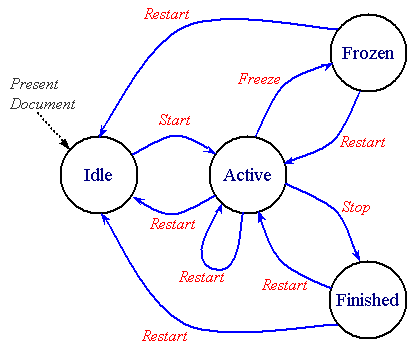
Figure E-1: State diagram of an element
The following sections explain the semantics of the states and transitions of a timed element, and explain how to define the state transitions using timing attributes of the element.
Note that the states and transitions are part of the model, and do not imply a particular implementation. Note also that an element may transition through more than one state in a virtual instant (i.e. with no time spent in a given state).
The presentation effect of timed elements is generally to display media, or to play a timeline (e.g. for time containers). In some cases, the element may be an animation that manipulates the presentation, but does not directly display anything. In some integration scenarios, the presentation effect of the element may be to apply a stylesheet, or to otherwise modify the presentation. In these discussions, the common case of displaying media or playing a timeline is used to describe the states and transitions. The same semantics should be understood to apply to all defined actions or presentation effects, as specified in the language that integrates SMIL Timing and Synchronization.
When the document that contains a timed element is first presented, the element is created in the idle state. This is the common starting state for all timed elements.
When a parent time container repeats or is restarted, all (timed) child elements of the time container will be reset. As part of the element reset, the element is re-initialized to the Idle state. See also Resetting element state.
In the idle state a timed element is inactive and does not affect the presentation of the document in any way. The element simply waits for the time or event specified in its begin attribute. Note that the element may transition immediately to the active state if the element begins immediately when the document begins.
For an element to become active, the element's parent time container must be active. Given this, a timed element in the idle state transitions to the active state when the condition specified in the begin attribute becomes true. As described in the section on the begin attribute, this condition may depend upon one of several factors:
Additionally, an element may be started by a DOM beginElement()
or beginElementAt() method call, or as the result of being
the target of an activated hyperlink.
An element may become active as soon as its parent time container becomes active, if the condition specified in the begin attribute is true at that point.
Note that the begin attribute can specify a condition that is a list of values. The specific semantics of evaluating the list of values is described in the section The begin and dur attributes: basic timing support.
In the active state, a timed element displays the associated media or performs the described timeline associated with the element. The active state includes the entire active duration of the element. The active duration of an element is specified by the interaction between the dur, end, repeatDur and repeatCount attributes as detailed in the section Computing the Active Duration.
If a timed element has the fill attribute set to "freeze", "hold" or "transition", upon reaching the end of its active duration, the element will transition to the frozen state.
In the frozen state the element will continue to present the last defined state of visual media or the timeline state at the end of the active duration (aural media render nothing during the frozen state). The duration of the frozen state depends upon the value of the fill attribute (as described in The fill attribute: extending an element) and on the parent time container (as described in Time Container constraints on child durations).
The frozen state may have 0 duration, e.g. if the parent time container ends with the element.
If a timed element has the fill attribute set to "remove" (the default), upon reaching the end of its active duration, the element will transition to the finished state. Note that the active duration of a child element may end when an ascendant time container ends its simple duration.
In the finished state the timed element does not affect the presentation of the document. The duration of the finished state depends upon the parent time container. The finished state lasts until the end of the current simple duration of the parent time container, or until the element is restarted (whichever comes first).
The ability of an element to make this transition depends upon the value
of the
restart
attribute. If the
restart
attribute value is "always" or
"whenNotActive" the element will transition to
the active state in response to a DOM beginElement() or
beginElementAt() method call, or an additional begin event.
The restart transition effectively resets the state of the animation element;
the element's simple and active duration must be recomputed as if it were
being started for the first time. See also
Resetting element state.
This transition happens the same way as the Frozen to Active transition
(immediately above). If the element specifies an offset from the syncbase
or eventbase, or if the DOM beginElementAt() method call specifies
a non-0 offset, then the element is returned to the Idle state until it actually
restarts.
An element may receive a DOM beginElement() or
beginElementAt() method call or may receive an additional begin
event while in the active state. In this case, if the value of the
restart
attribute is "always" the element will
re-transition to the active state and restart as described above.
Any other value for the
restart
attribute will prevent this transition from occurring.
This transition happens the same way as the Active to Active transition
(immediately above). If the element specifies an offset from the syncbase
or eventbase, or if the DOM beginElementAt() method call specifies
a non-0 offset, then the element is returned to the Idle state until it actually
restarts.
An element restart can result from a DOM call or an additional begin event,
subject to the restrictions imposed by the
restart
attribute. When in the finished state, an element may re-transition
to the active state if the value of the
restart
attribute is "always " or
"whenNotActive". If the
restart
attribute is set to "never", this transition
can not occur.
This transition happens the same way as the Finished to Active transition
(immediately above). If the element specifies an offset from the syncbase
or eventbase, or if the DOM beginElementAt() method call specifies
a non-0 offset, then the element is returned to the Idle state until it actually
restarts.
@@ This appendix will be split off as a separate module.
@@There are a number of unresolved issues with this kind of time manipulation, including issues related to event-based timing and negative play speeds, as well as many media-related issues.
New element controls for element time behavior are under discussion. In general, these time manipulations are suited to animation and non-linear or discrete media, rather than linear continuous media. Not all continuous media types will support time manipulations. For example, streaming MPEG 1 video will not generally support backwards play. A fallback mechanism is described for these cases.
Four new attributes add support for timing manipulations to SMIL Timing, including control over the speed of an element, and support for acceleration and deceleration. The impact on overall timing and synchronization is described. A definition is provided for reasonable fallback mechanisms for media players that cannot support the time manipulations.
An accessibility requirement for control of the playback speed is related to the speed control, but may also be controlled through some other mechanism such as DOM interfaces.
A common general application of timing supports animation. The recent integration of SMIL timing with SVG is a good example of the interest in this area. Animation in the more general sense includes the time-based manipulation of basic transforms, applied to a presentation. Some of the effects supported include motion, scaling, rotation, color manipulation, as well as a host of presentation manipulations within a style framework like CSS.
Animation is often used to model basic mechanics. Many animation use-cases are difficult or nearly impossible to describe without a simple means to control pacing and to apply simple effects that emulate common mechanical phenomena. While it is possible to build these mechanisms into the animation behaviors themselves, this requires that every animation duplicate this support. This makes the framework more difficult to extend and customize. In addition, a decentralized model allows any animation behavior to introduce individual syntax and semantics for these mechanisms. This makes the authoring model much harder to learn, and complicates the job of any authoring tool designer as well. Finally, this model precludes the use of these mechanisms on structured animations (e.g. applying time manipulations to a time container of synchronized animation behaviors).
A much simpler model for providing the necessary support centralizes the needed functionality in the timing framework. This allows all timed elements to support this functionality, and provides a consistent model for authors and tools designers. The most direct means to generalize pacing and related functionality is to transform the pacing of time for a given element. This is an extension of the transform that is implicitly performed to translate from the general document or presentation time space to the adjusted time space for the element (accounting for the begin time of the element, repeat functionality, etc.). Thus, to control the pacing of a motion animation, a transform is applied that adjusts the pacing of local time for the motion element. If time is scaled to advance faster than normal presentation time, the motion will appear to run faster. Similarly, if the pacing of time is dynamically adjusted, acceleration and deceleration effects are easily obtained. This model is detailed in the sections below.
Three general time manipulations are proposed:
Support for autoReverse is often presented to authors as "Play Forwards, then Backwards". Because so many common use-cases apply repeat to the modified local time (as in the examples above), this function is modeled as modifying the simple duration. As such, autoReverse doubles the simple duration.
When the three features are combined, there is an inherent ordering that can be applied. The accelerate and decelerate features are applied locally on the simple duration, and have no side effects upon the active duration of the element. The autoReverse feature is applied to the simple duration, and doubles it. Thus, autoReverse wraps the effect of accelerate and decelerate. The speed attribute has the broadest effect, scaling the progress of local time for the element. Taken from the perspective of a conversion from the document time-space to the local time-space, speed is applied earliest, autoReverse later and and then accelerate and decelerate are applied latest. See also Details of the time manipulations.
The following motion animation will move the target twice as fast as normal:
<animateMotion dur="10s" repeatCount="2" speed="2.0" path= ... />
The target will move over the path in 5 seconds, and then repeat this motion. The active duration is thus 10 seconds.
The following rotation (a theoretical extension to the animation platform) will produce a simple pendulum swing on the target (assume that it is a pendulum shape with the transform origin at the top):
<animateRotate from="20deg" to="-20deg" dur="1s" repeatCount="indefinite"
        accelerate=".5" decelerate=".5" autoReverse="true" ... />
The pendulum swings through an arc in one second, and then back again in
a second. It repeats indefinitely. The acceleration and deceleration are
specified as a proportion of the simple duration (before
autoReverse). As specified,
the effect is to accelerate all the way through the downswing, and then
decelerate all through the upswing. This produces a very realistic looking
animation of real-world pendulum motion. The hypothetical
animateRotate element itself can be very simple; it could for
example just interpolate the rotation value in a transform matrix.
The speed attribute is supported on all timed elements. The argument value expresses a multiple of normal play speed that will be applied to the element and all time descendents. Thus 1.0 is normal speed, and speed="1" is a no-op, and speed="-1" means play backwards.
The speed attribute controls the local playback speed of an element, to speed up or slow down the effective rate of play. The speed does not specify an absolute play speed, but rather is relative to the playback speed of the parent time container. Thus if a par and one of its children both specify a speed of 50%, the child will play at 25% of normal playback speed .
Legal values are signed floating point values. A value of 0 is not allowed.
The default is "1.0" (no modification of speed).
The details of the speed modification are described in Details of the time manipulations.
These attributes define a simple acceleration and deceleration of element time, within the simple duration. The values are expressed as a proportion of the simple duration (i.e. between 0 and 1), and are defined such that the simple duration is not affected. The normal play speed within the simple duration is increased to compensate for the periods of acceleration and deceleration. The modified speed is termed the run rate.
These attributes apply to the simple duration; if these attributes are combined with repeating behavior, the acceleration and/or deceleration occurs within each repeat iteration.
The sum of accelerate and decelerate must not exceed 1. If it does, the value of accelerate will be clamped to 1, and then the value of decelerate will be clamped to 1-accelerate).
The details of the accelerate and decelerate modifications are described in Details of the time manipulations.
In this example, a motion path will accelerate up from a standstill over the first 2 seconds, run at a faster than normal rate for 4 seconds, and then decelerate smoothly to a stop during the last 2 seconds. The resulting animation looks more realistic. The animateMotion element is defined in the Animation section of SMIL Boston.
<img ...>
    <animateMotion dur="8s" accelerate=".25" decelerate=".25" .../>
</img>
In this example, the image will "fly in" from off-screen left , and then decelerate quickly during the last second to "ease in" to place. This assumes a layout model that supports positioning (a similar effect could be achieved by animation the position of a region in SMIL Layout). The animate element is defined in the Animation section of SMIL Boston.
<img ...>
    <animate attributeName="left" dur="4s" decelerate=".25"
             from="-1000" to="0" additive="sum" />
</img>
This defines "play forwards then backwards" functionality. The use of autoReverse effectively doubles the simple duration. When combined with repeating behavior, each repeat iteration will play once forwards, and once backwards.
Argument values are Booleans.
The default value is false (i.e. play normally).
The details of the autoReverse modification are described in Details of the time manipulations.
In this example, a motion path will animate normally for 5 seconds moving the element 20 pixels to the right, and then run backwards for 5 seconds (from 20 pixels to the right back to the original position), then forwards again and then backwards again, leaving the element at its original location. The active duration of the animation is 20 seconds. The animateMotion element is defined in the Animation section of SMIL Boston.
<img ...>
    <animateMotion by="20, 0" dur="5s" autoReverse="true" repeatCount="2"/>
</img>
The speed attribute modifies the pace of time for the element and its descendents, and so modifies the interpretation of the normal timing attributes with respect to the normal pace of (real-world) time. The attributes dur and repeatDur always specify a time in unmodified local time for the element. As a result, the observed simple duration and repeat duration for an element with a modified speed is not the same as the specified speed. This is important to making the model be consistent when the speed cascades in the time containment hierarchy.
@@Need to rework this next as a set of basic rules and principles: which things are modified by speed, and which are not.
Note that a speed attribute on an element does not affect the element begin time. It may affect the element end time, if the end is defined only in terms of the simple duration or repeat duration. An end value (defined by the end attribute) is converted to element local time using the speed value. However, the result is that the active duration is not affected by the speed value, since the values (syncbase values, eventbase times, wallclock times, etc.) are all defined in another timespace and converted to the local timespace. See also the examples below.
To compute the effect of speed on the simple duration or on the active duration if defined with repeat, the following function is used. This function is also used to convert a time in the parent local timespace to a time in the child local timespace that accounts for the speed attribute.
Tpar is the time in the parent local timespace
Tel is the time in the element local timespace
Tel = (Tpar / speed)
When speed is applied to a time container, it scales the rate of progress through the time container timeline. This effect cascades. When descendents also specify a speed value, the parent speed and the child speed are multiplied to yield the result. For example:
<par speed=2.0>
   <animate begin="2s" dur="9s" speed=0.75 .../>
</par>
The observed rate of play of the animate element is 1.5 times the normal play speed. The element begins 1 second after the par begins (the begin offset is scaled by the parent speed), and ends 6 seconds later (9/1.5).
The following example shows how an event based end combines with time manipulations:
<par speed=2.0>
   <animate begin="2s" dur="9s" speed=0.75
        repeatCount="4" end="click" .../>
</par>
This behaves as in the first example, but the animate element will repeat 4 times for a total of 24 seconds (in real time), unless a click happens before that. Whenever the click happens, the element ends. A variant on this demonstrates syncbase timing:
<par speed=2.0>
   <img id="foo" dur="30s" .../>
   <animate begin="2s" dur="9s" speed=0.75
        repeatCount="4" end="click, foo.end" .../>
</par>
The image will display for 15 seconds. The animate element plays at an observed rate of 1.5 times play speed, but it will end after 15 seconds, when the image ends. The animation will have repeated 2.5 times at this point. Note that although the animation has a speed value, this does not impact the semantic of the syncbase timing. When the syncbase, eventbase, wallclock or media marker time is observed to happen, it will be applied anywhere it is used at that real time (although various timespace conversions are applied internally).
Note that in the examples above, the default duration of the par container is defined as endsync="last". This behavior is not affected by the speed modifications, in the sense that the observed end of the elements will produce the correct simple duration on the parent time container.
@@ Need to include notes about how begin offsets are also scaled by the parent timescale, but not the local element scale.
The following example illustrates an important effect of offset time scaling:
<par speed=2.0>
   <img id="foo" dur="30s" .../>
   <animate begin="2s" dur="9s" speed=0.75
        repeatCount="4" end="foo.end+6s" .../>
</par>
The image will display for 15 seconds. The animate element plays at an observed rate of 1.5 times play speed, and it will end after 18 seconds. The offset added to the end of the image is scaled by the parent time container speed. The animation will have repeated 3 times at this point.
The following example illustrates the speed modifications along with the fallback for a video element that can only play normal forward speed.
<par speed=2.0>
   <video id="foo" dur="30s" accelerate="0.25" ...>
      <area begin="2s" dur="4s" .../>
   </video>
   <animate begin="2s" dur="9s" speed=0.75
        repeatCount="4" end="foo.end+6s" .../>
</par>
The video ignores the accelerate and the speed value, and plays at normal speed for 15 seconds. The simple (and active) duration are still constrained by the speed. The area element reflects what the video is playing, and so the area becomes active after 2 seconds and remains active for 4 seconds. The animate element behaves just as it did in the previous example, and ends after 18 seconds and 3 repeats.
@@ This should perhaps move to the Fallbacks section
Some media will use a fallback speed (e.g. because it cannot play at the requested speed - see the section Fallbacks for time filters on a media element). When this is the case, and the simple duration is defined by the implicit media duration, the results are sometimes less clean, as the following example illustrates. Assume that the video has an intrinsic duration of 30 seconds, and that this cannot be determined until the video plays through to the end (as is sometimes the case).
<par speed=1.5>
   <video id="foo" repeatCount="3" accelerate="0.25" ...>
      <area begin="2s" dur="4s" .../>
   </video>
</par>
The video ignores the acceleration and the speed value, and plays at normal speed for 30 seconds. At this point, the simple duration is resolved, and (accounting for the parent speed) is computed to be 20 seconds. At this point the video *should* be halfway into the second repeat iteration, moving 50% faster than normal playspeed. The video should continue playing for another 30 seconds. The fallback rules would define that each repeat iteration would play the first 20 seconds of the 30 second video. Given the linear behavior of the video element, the first 10 seconds will be shown for the (remainder of the) second repeat iteration, followed by the first 20 seconds of video for the third repeat iteration. Needless to say, this may not produce pleasing results. At the very least, authors should avoid mixing speed modifications with media elements that use the implicit simple duration, and cannot play at the specified speed. As stated elsewhere, the time modifications should be used where appropriate.
@@ Note sure if this next is useful:
Note that the timing of all durations, begin and end times and events, is based upon the computed values using the explicit speed and not the fallback speed. If the media player is nominally playing at the explicit speed, but varies somewhat, then the effective speed, end and durations should be used in the time model (i.e. the behavior of the runtime in computing effective versus desired times, and managing synchronization, should be consistent with the behavior of the media player and timing model when the speed is 1.0, or normal play speed). Try: the rules and mechanisms that a runtime uses to compute effective times versus desired times should be consistently applied if the "attempted" speed is normal playspeed (1.0) or offspeed (e.g. 2.0). If the "attempted" speed is not the desired speed, then a strict interpretation of the desired times should be used for effective times.
@@ Proposal to help authors - is this useful?:
Define a new test attribute canPlaySpeed (?) to support alternate presentations depending upon the capabilities of the media players. Should be evaluated at runtime for the given media and associated player. Evaluates true if the media player will attempt to play the specified speed. Evaluates false otherwise. If applied to a time container, then should consider all the descendents of the time container, and only evaluate to true if all descendents will attempt to play the desired speed. In evaluating this, the cascaded desired speed must be used, and not the explicit speed on each element.
@@ Borrow pictures and description of manipulation from keySplines in SMIL Animation? Need to describe that time is actually manipulated and remapped, but can think of it as progress.
The speed or rate of progress through the simple duration must be increased to account for the acceleration/deceleration and preserve the simple duration. The adjusted speed is described as the run rate. For an element with both acceleration and deceleration, the speed over the simple duration varies from 0 up to the run rate and then back down to 0.
To compute the run rate over the course of the simple duration, the following
formula is used. Let a be the value of
accelerate, and
b be the value of
decelerate. The run rate
r is then:
r = 1 / ( 1 - a/2 - b/2 )
Thus, for example, if the value of accelerate is 1 (i.e. accelerate throughout the entire simple duration), the run rate is 2 (twice the normal play speed).
The speed s(t) at any point in time
t (within the simple duration
d) is defined as a function of the run rate,
as follows:
For: ( 0 <= t < (a*d) )          I.e. in the acceleration interval
    s(t) = r * ( t / ( a * d ))
For: ( (a*d) <= t <= (d-(b*d)) ) I.e. in the run-rate interval
   s(t) = r
For: ( (d-(b*d)) < t <= d )      I.e. in the deceleration interval
   s(t) = r * ( ( t - (d-(b*d)) ) / ( b*d ))
If in place of t we use
p, the proportional progress through the simple
duration, the equations simplify somewhat:
p = t/d
For: ( 0 <= p < a )          I.e. in the acceleration interval
    s(p) = r * ( p / a )
For: ( a <= p <= (1-b) )     I.e. in the run-rate interval
   s(p) = r
For: ( (1-b) < p <= 1 )      I.e. in the deceleration interval
   s(p) = r * ( ( p - (1-b) ) / b )
In this example, a motion path will accelerate up from a standstill over the first 2 seconds, run at a faster than normal rate for 4 seconds, and then decelerate smoothly to a stop during the last 2 seconds. This makes an animation look more realistic.
<img ...>
    <animateMotion dur="8s" accelerate=".25" decelerate=".25" .../>
</img>
In this example, the image will "fly in" from offscreen left , and then
decelerate quickly during the last second to "ease in" to place. This assumes
a layout model that supports positioning (a similar effect could be achieved
by animation the position of a region in SMIL layout).
<img ...>
    <animate attributeName="left" dur="4s" decelerate=".25"
             from="-1000" to="0" additive="sum" />
</img>
In the following example the motion path will behave as above, but will end
at the earlier of 15 seconds or when the user clicks on the image. If the
element ends at 15 seconds (if the user does not click), the motion path
will leave the element at the end of the defined path, 20 pixels to the right.
Note that repeatDur and end are not affected by
the autoReverse attribute (although
repeatCount is).
<img ...>
    <animateMotion  by="20, 0" dur="5s" autoReverse="true"
         repeatDur="15" end="click" fill="freeze"/>
</img>
The accelerate and decelerate attributes can be combined with autoReverse, and are applied to the unmodified simple duration. For example:
<img ...>
    <animateMotion by="20, 0" dur="4s" autoReverse="true"
       accelerate=".25" decelerate=".25" />
</img>
This will produce a kind of elastic motion with the path accelerating for 1 second from the original position as it moves to the right, moving slightly faster than normal for 2 seconds, and then decelerating for 1 second as it nears the points 20 pixels to the right. It accelerates back towards the original position and decelerates to the end of the reversed motion path, at the original position.
The speed attribute can also be combined with autoReverse, and modifies the entire effect. This example combines all three time manipulations:
<img ...>
    <animateMotion by="20, 0" dur="4s" autoReverse="true"
       speed="0.5" accelerate=".25" decelerate=".25" />
</img>
This produces the same effect as in the previous example, except that everything moves half as quickly and takes twice as long. The active duration is 16 seconds.
A theoretical model can be described that assumes that all element local timelines (including any media elements) are completely non-linear and have unconstrained ballistics. This ideal model can be applied to many applications, including pure rendered graphics, text, etc. Nevertheless, many common applications also include media with linear behavior and other constraints on playback. When the timegraph includes media elements that have linear behavior, the model must adapt, and/or provide consistent semantics that accommodate these real world constraints. This sections below include a discussion of these fallback semantics.
Note that while the model does support timegraphs with a mix of linear and non-linear behavior, and defines specific semantics for timegraphs that cannot support the ideal non-linear model, it is not a goal to provide an ideal alternative presentation for all possible timegraphs with such a mix. It is left to authors and authoring tools to apply the time manipulations in appropriate situations. This section describes both the ideal model as well as the semantics associated with linear-media elements.
In the ideal model, the pace or speed of local time can be manipulated arbitrarily. The graph advances (or is sampled, depending upon your perspective) as the presentation time advances. A time container samples each of its children in turn, so that a graph traversal is performed for each render time. Elements that are idle or stopped (i.e. neither active nor frozen) are pruned from the traversal as an optimization. As the traversal moves down the graph (from time containers to children), each local timeline simply transforms the current time from the parent time-space to the local time space, and then samples the local timeline at the transformed current time. Note that the speed and effects of the time filters effectively cascade down the time graph, since each element transforms local time for itself and all descendents.
When linear media are added to this model and the "current time" (sample) traversal encounters a media element, the media element is effectively told to "sample" at a particular position. Given that linear media can not sample arbitrarily, the semantic that is used is to verify the current position of the media (as observed on the player) against the current theoretical timeline position for the timegraph. Within certain limits (e.g. defined by a syncTolerance attribute), divergence from the theoretical timeline position are ignored. So far, this is just a typical implementation of a synchronization manager.
When the speed (and even direction) of the local timeline can vary from normal forward playspeed, an additional parameter is added to the context for the "current time" traversal to indicates the speed of the local timeline. The speed is defined as a proportion of normal forward play speed. Thus a value of "1" is normal forward playspeed, a value of "2" is twice normal forward speed, and a value of "-1" is backwards, at the normal play speed. Note that a value of 0 is not allowed. The speed is often broken down logically into the rate and the direction. The rate is just the absolute value of the speed, and the direction is the "sign" of the speed.
Given the current computed position and speed for the timegraph, a media element with linear behavior can handle the case of non-normal playspeed with the use of fallback semantics. The fallback semantics depend upon how much or how little the media player is capable of. Some may play forwards and backwards but only at the normal rate of play, others may only handle normal forward play speed. The fallback semantics are detailed in the next sections.
@@Describe the properties that the fallback semantics are preserving so that the rationale is clear
When any of the time filters are applied directly to a linear media element, the element can directly examine the attributes and apply one set of fallback semantics. These include:
In any case, the simple duration is still constrained by the computed simple
duration, as modified by the time filters. If the computed simple
duration is shorter than the intrinsic media duration at the fallback rate
(usually if the speed is > 1), the media is cut short just as for a
dur value that overrides the intrinsic media duration. If the
specified simple duration is longer than the intrinsic media duration (i.e.
if the rate is < 1), the media should freeze for the difference, just
as it does for dur in SMIL 1.0. When an element must freeze,
it should ideally respect the direction of the speed, using the last frame
for forward speeds and the first frame for backwards speeds.
Note that the semantics of clipBegin and clipEnd are not affected (i.e. they
are still respected).
The clipBegin and clipEnd semantics are always interpreted in terms of
normal forward play speed. I.e. they are evaluated before any effects
of time filters have been applied to the time model. This is consistent with
the model that they can be evaluated by the media element handler, independent
of the time model.
If a fallback semantic is applied to a media element and the media element has child elements (i.e. is a media time container), the local time as passed through to the children should reflect what the media actually performs. Thus if the accelerate and decelerate are ignored, the local time as passed to the child elements should not be filtered for acceleration and deceleration. This is important for cases like anchors that are timed to associate with points in the media. If an author wishes to apply acceleration to the children of the media (e.g. to accelerate a set of animation children), a wrapping <par> with the time filters applied can be inserted under the media time container. See also the next section for a general discussion of time filters and time containers.
@@ Above semantic may be overly complex. It requires that the time runtime know what the media players can actually do so that the proper timing parameters can be passed down to the children. Is this restriction worth it, since playing with a fallback will lead to a different presentation than intended anyway. The presentation visually will act funny anyway, and the entire thing is constrained by the parent time container, so it may not be as bad as noted.
The effect of these fallbacks is illustrated by some examples. In these examples, the video player is assumed to be capable only of normal forward play speed.
In the following example, the acceleration and deceleration can be safely ignored without side effect. Since they are ignored, the area child should become active 1 second after the video begins (i.e. if the video ignores the acceleration, then the effect is not applied to the children either):
<video accelerate=0.5 decelerate=0.5 src...>
   <area begin=1s .../>
</video>
In the following example, the autoReverse attribute doubles the simple duration, but the video will just play the 3 second simple duration twice, in the forward direction both times. The area child should become active 1 second after the video begins each time (i.e. if the video ignores the reverse play, then the speed change is not applied to the children either):
<video autoReverse="true" dur=3s src...>
   <area begin=1s .../>
</video>
In the following example, the speed attribute decreases the simple duration by 33% (i.e. one third). The video will play the first two seconds at normal playspeed, rather than three seconds at 1.5 times playspeed. The area child should become active 1 second after the video begins each time (i.e. if the video ignores the speed manipulation, then the speed change is not applied to the children either):
<video speed="1.5" dur=3s src...>
   <area begin=1s .../>
</video>
When any of the time filters are applied to a time container element, the implementation should generally respect the time filters and deal with the effects of modified time for each media player. Nevertheless, in some situations it may be desirable to apply a fallback semantic at the time container itself.
@@Need more info on how time containers run backwards. The use of autoReverse is special, as it can generally use the end and begin times from the forward half. Note that time dependencies work backwards, but that event-based timing does not work correctly, and script events may not be fired. This needs more discussion. Need a reasonable means of simplifying the implementation and still allowing backwards play of fully scheduled timegraphs.
@@Examples!
In the theoretical model, each element has a notion of local time that extends from 0 to some duration (the simple duration). To obtain the local time for an element in the simple case with no pacing control, an arithmetic transform is performed for the element and each ascendant time container up to the document root. This transform allows for the begin offset of the element relative to its parent time container, and for any repeat behavior of the element. The pseudo-code for this transform looks like:
@@Edit to make it produce both active and simple time? The only difference is in how the final element is handled. Also need to have a control over unconstrained versus constrained time. Sync arc calculation uses unconstrained time, but real sampling uses end-constrained time that respects freeze.
@@ Edit to use the most recent parent begin if it is active, rather than the constant repeatDuration
// globalToLocalTime()
//
// Recurses up to document root, and then transforms timeIn
// from parent to local time as the recursion unwinds
// Version 1: Ignores fill=freeze, assumes constant pace of time
//             assumes repeat duration is constant,
//             and assumes all times are resolved.
// Inputs:
//        timeIn - the parent simple time
// Outputs:
//        timeOut - the resulting local simple time
//
TimeInstant globalToLocalTime( TimeInstant timeIn )
{
   TimeInstant timeOut;
   Node parent = getParent();

   if( !parent.isDocumentTimeRoot() )
   {
      // We have a parent time container above us.
      // First convert timeIn to simple local time for it,
      // and then adjust for this node.
      timeOut = parent.globalToLocalTime( timeIn );
   }
   else // Our parent is the top time container
      timeOut = timeIn;

   // Adjust for begin offset. Assume "begin" has simplified begin time.
   timeOut = timeOut - this.begin; // Adjust for begin offset
   if( this.repeats() )
   {
       // Adjust for repeating simple duration.
       timeOut = timeOut % this.repeatDuration;
   }
   // timeOut is now converted to simple local time for this node
   return timeOut;
}
@@Next version shows how this is extended to support the time manipulations. For autoReverse, remember the edge case for the endpoint. ?Talk about the imprecision around the reverse point: interval math introduces an epsilon inaccuracy at the end, where epsilon is the sample granularity (e.g. milliseconds in our implementation).
@@How to show the update dependencies of repeatDur, segmentDur? Could just show a method to recompute, that is called on changes. Ignore all optimization issues
Timing and real-world clock times
When the time manipulation attributes are used to adjust the speed and/or pacing within the simple duration, the semantics can be thought of as changing the pace of time in the given interval. An equivalent model is these attributes simply change the pace at which the presentation progresses through the given interval. The two interpretations are equivalent mathematically, and the significant point is that the notion of "time" as defined for the simple duration and "local time" should not be construed as real world clock time. For the purposes of SMIL Timing and Synchronization, "time" can behave quite differently from real world clock time.