The Linked Web Storage Protocol specification aims to provide applications with secure and permissioned access to externally stored data in an interoperable way.
Status of This Document
This section describes the status of this
document at the time of its publication. A list of current W3C
publications and the latest revision of this technical report can be found
in the
W3C standards and drafts index.
Publication as
a Working Draft does not imply endorsement
by W3C and its Members.
This is a draft document and may be updated, replaced, or obsoleted by other
documents at any time. It is inappropriate to cite this document as other
than a work in progress.
This document was produced by a group
operating under the
W3C Patent
Policy.
W3C maintains a
public list of any patent disclosures
made in connection with the deliverables of
the group; that page also includes
instructions for disclosing a patent. An individual who has actual
knowledge of a patent that the individual believes contains
Essential Claim(s)
must disclose the information in accordance with
section 6 of the W3C Patent Policy.
This specification defines the Linked Web Storage (LWS) Protocol, which enables client applications to access and manage web resources, based on the identity and permissions of an agent.
By standardizing how a resource server manages and provides access to a hierarchy of linked resources, the protocol enables users to use different client applications to interact with the same stored data. These linked resources are defined through containers and containment relationships that describe where things are located, and metadata that describes how the resources relate to each other.
The protocol defines standard operations on these resources to create, read, update, and delete. Each resource is identified by a URI. A client navigates the resource hierarchy from a root container, discovering contained resources and their relations through links provided in server responses.
An agent's identity is confirmed through an identity provider that can be external to the Linked Web Storage server. This loose coupling means the server does not necessarily manage credentials directly; rather, it can receive and validate a signed authentication credential as a token issued by a trusted identity provider. A user can therefore present an existing identity to a compliant server, without always needing a new or existing account just for that server. LWS makes use of user authentication as defined in specifications for OpenID Connect, SAML 2.0, and self-signed controlled identifiers (CIDs), for example.
Authorization determines whether a requesting agent has permission to access a resource or perform an operation on it. A compliant LWS server designates a resource manager for each resource that determines whether a resource is private (i.e., available only to its owner), restricted (i.e., available to a defined set of users), or public (i.e., available to any user). The server enforces the access decisions of the resource manager when handling each client request.
This specification is intended to be used by:
Developers building client applications that access Storage Resources
Developers building compliant servers that mediate access to Storage Resources
Different LWS server instances each maintain their own hierarchy of linked resources. An agent might use the same identification to navigate across servers, with access to each server's resources determined by the permissions granted by that server's resource managers. It is not guaranteed that every LWS server instance will support every possible agent identifier; any given LWS server instance might require that an agent identify itself via a particular identity provider, to gain access to resources managed by that server instance.
2.1 Resource Access
The LWS Protocol defines standard interactions by which some party can make some resources available to some agents.
served resource - (available resource? published resource?) (not defined in UCS) A network-accessible entity exposed by a service for interaction, retrieval, or manipulation using the protocol defined in this document.
requesting agent - (entity in UCS) An entity (e.g., client, user, or process) that initiates a request to interact with a servable resource.
As well as sections marked as non-normative, all authoring guidelines, diagrams, examples, and notes in this specification are non-normative. Everything else in this specification is normative.
The key words MAY, MUST, MUST NOT, OPTIONAL, RECOMMENDED, REQUIRED, SHOULD, and SHOULD NOT in this document
are to be interpreted as described in
BCP 14
[RFC2119] [RFC8174]
when, and only when, they appear in all
capitals, as shown here.
A LWS Server is an HTTP server [rfc9112] that complies with all of the relevant "MUST" statements in this specification. Specifically, the relevant normative "MUST" statements in 9. Operations of this document MUST be respected.
An LWS Client is an HTTP client [rfc9112] that complies with all of the relevant "MUST" statements in this specification. Specifically, the relevant normative "MUST" statements in 9. Operations of this document MUST be respected.
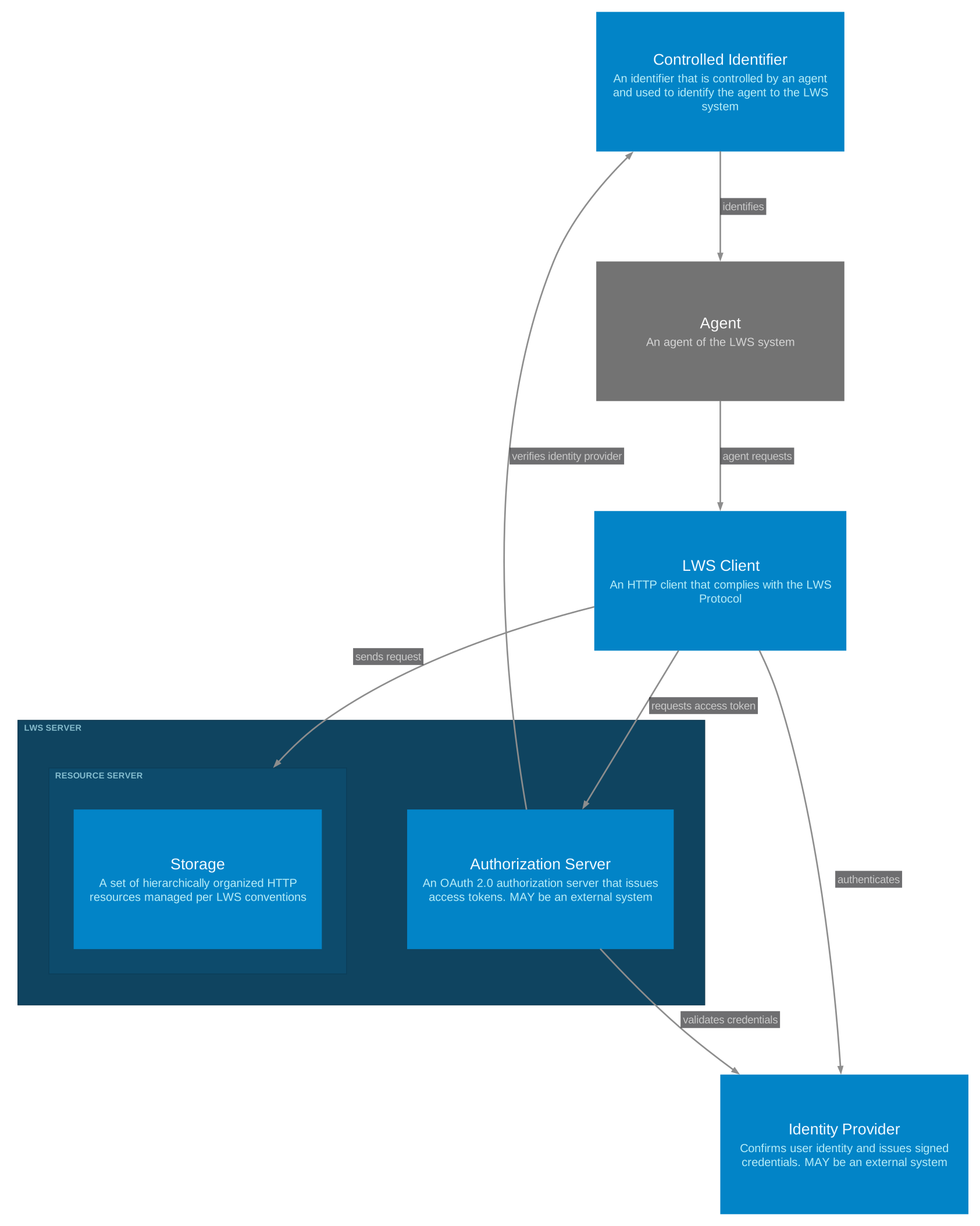
2.4 Scope Diagrams
The following diagrams are platform-independent models
to guide implementation.
Figure 1System Context shows the LWS System and its major components.
3. Terminology
The terms "authorization server" and "client" are defined by the OAuth 2.0 Authorization Framework [RFC6749].
The terms "end-user" and "issuer" are defined by OpenID Connect Core 1.0 [OPENID-CONNECT-CORE].
This specification defines the following terms:
access grant — a data object created by a storage controller, expressing
an ability for an agent to perform specific actions on Storage Resources within certain
defined constraints.
access profile — an access profile describes the
requirements for expressing a valid access policy. Every access profile is identified
with a URI, and a server indicates support for one or more access profiles by
referencing them in the conformsTo property of a service object in its
storage description resource.
access request — a data object submitted by an agent, expressing a
request to perform specific actions on Storage Resources, including the desired scope
and constraints.
agent — a person, social entity, or software identified by a URI.
authentication credential — a security token that asserts claims about an agent or end-user. This token is secured with a cryptographic proof.
Examples of authentication credentials include assertions of identity such as OpenID Connect ID Tokens and SAML-based assertions as well as assertions of
capability such as ZCAPs.
authentication suite — a defined validation mechanism for a concrete serialization of an authentication credential.
auxiliary resource — a Storage Resource that plays a particular role with respect to a Storage Resource, called its primary resource,
and whose lifetime is bound to the primary resource.
This specification defines linkset resource and metadata resource as types of auxiliary resources,
but LWS Servers are free to manage additional kinds of auxiliary resources (e.g. access control resources, notification inboxes).
Auxiliary resources are discovered using web links [RFC8288] of a specific type (see Section 9.1 Resource metadata).
Some auxiliary resources may, in some implementations, be identical to their primary resource.
Storage Resource — an HTTP resource as defined in HTTP Semantics which supports the read operations defined by the Linked Web Storage Protocol.
Following HTTP Semantics, this specification "does not limit the nature of a resource; it merely defines an interface that might be used to interact with resources." [RFC9110]
This class is identified by the IRI https://www.w3.org/ns/lws#StorageResource.
container — a Storage Resource that is able to enumerate a collection of Storage Resources, conforming to the conventions described in Section 8. Containers. The ability to create new resources in a container or to delete an existing container follows the requirements outlined in Section 9. Operations.
data resource — a data-bearing Storage Resource such as a document, image, or structured information whose support for update and delete operations follows the requirements outlined in Section 9. Operations.
resource — a resource is, as described by [WebArch] and [RFC3986], "whatever might be identified by a URI". Resources whose essential characteristics can be conveyed in a message (such as web pages, images, structured data objects...) are called information resources [WebArch].
storage — a set of hierarchically organized HTTP resources whose lifecycle is managed by the conventions described by the Linked Web Storage Protocol. A storage is described by a storage description resource which references a collection of services that provide affordances over those resources.
storage controller — an agent that controls all resources in a storage.
storage description — a Storage Resource, conforming to the requirements of a W3C Controlled Identifier document [CID-1.0], that describes a storage along with its services and capabilities.
notification — a message describing an event that has occurred on a resource.
subscription — a registration expressing interest in receiving notifications for a given resource or set of resources.
subscriber — the agent that creates a subscription and receives the resulting notifications.
notification suite — a defined delivery mechanism for a concrete channel through which notifications are sent to a subscriber.
(Feature at Risk) Issue: Section may be removed
This specification defines operations on served resources, the resulting change of state, and a response intended to give the requesting agent requested information or inform them of the outcome of the operation.
An operation is any of the following actions that can be performed on a served resource:
create resource -
read resource -
update resource -
delete resource -
The following section will describe the semantics and responses of these operations but the following core responses apply to any operation:
success - the operation is believed to have completed. This may be accompanied by a resource representation conveying the contents of a served resource. A success response is not defined for the create resource operation. See instead created.
not permitted
unknown requester
unknown error - reserved for error conditions that arise that are not anticipated by the specification
4. Authentication
This section defines a mechanism for identifying agents and end users that interact
with a linked web storage server. This specification does not mandate a particular
format for an authentication credential, though it does describe how existing identity systems
can be used in conjunction with the linked web storage authorization framework.
4.1 Authentication Credential Data Model
The data model described in this section outlines the requirements for any
concrete serialization of an authentication credential.
subject REQUIRED — an identifier for an end user. This MUST be a URI.
issuer REQUIRED — an identifier for the entity that issued the authentication credential. This MUST be a URI.
client REQUIRED — an identifier for a client application. This SHOULD be a URI.
audience restriction RECOMMENDED — a list of values that SHOULD include an authorization server identifier.
4.2 Authentication Credential Validation
Validation of an authentication credential requires a trust relationship between the
verifier and issuer of the credential. This trust relationship MAY be established
through an out-of-band mechanism. Any additional mechanisms for establishing trust
between a verifier and an issuer are outlined in specific authentication suites.
An authentication credentialMUST be signed. It is RECOMMENDED that the signature uses asymmetric cryptography.
Linked Web Storage describes a mechanism for persisting and managing protected data on the Web. Authorization is the mechanism
by which agents request and present access tokens in order to access this protected data.
This section defines an authorization framework based on OAuth 2.0 [RFC6749] as the baseline mechanism for obtaining and presenting
access tokens. A server MAY support additional authorization mechanisms beyond this baseline.
5.1 Roles
The roles in LWS authorization are the same as those defined by OAuth 2.0 Section 1.1 [RFC6749]:
resource owner,
resource server,
client (called in this specification authorization client to avoid ambiguity), and
authorization server.
A storage server is a type of resource server that also conforms to the LWS storage specification.
5.2 Protocol Flow
This specification describes the interaction between a client and an authorization server as well as
the interaction between a client and a conforming storage server.
The interaction between the authorization server and the storage server is out of scope of this specification.
The authorization server may be the same server as the storage server or it may be a separate entity.
5.2.1 Authorization Server Discovery
All protected resources managed by a storage server require a valid access token, generated by a trusted
authorization server. A client can discover the location of a trusted authorization server by making an
unauthorized HTTP request to a protected resource.
A storage server generating a 401 (Unauthorized) response MUST send a WWW-Authenticate header field
containing at least one conforming challenge. A conforming challenge MUST include the
resource_metadata parameter defined in Section 5.1 of [RFC9728], whose value is the URL of the
protected resource metadata document for the requested resource.
The response MUST also include a Link header identifying the storage that contains the
requested resource, as described in 6.1.2 Discovery and Binding. A client supplies this URI as the
resource parameter when requesting an access token, as described in
5.2.5.1 Request.
The Working Group is actively seeking implementer feedback on Protected Resource Metadata support.
If sufficient implementation experience is not gathered, this feature may be removed or changed.
A protected resource metadata document describes how a client can obtain an access token for a
resource. It MUST conform to OAuth 2.0 Protected Resource Metadata [RFC9728].
This specification extends [RFC9728] as follows: the authorization_servers parameter is REQUIRED in
a protected resource metadata document, and its value MUST contain the issuer identifier of at least one
authorization server.
Note
The resource value in a protected resource metadata document identifies the requested resource, not
the storage that contains it. By contrast, the resource parameter of a token request
identifies the storage, which becomes the audience of the access token.
An example protected resource metadata document is included below.
The values a client uses to obtain an access token are supplied by the storage server in a 401 (Unauthorized)
response. Before requesting an access token, a client MUST perform the following checks, each of which compares a
discovered value against the requested URI that produced the 401 response. If any check fails, the client MUST NOT
use the discovered values to request an access token.
The resource_metadata URL MUST have the same scheme and authority as the requested URI.
The resource value of the protected resource metadata document MUST be identical to the
requested URI, as required by Section 3.3 of [RFC9728].
The client MUST obtain the storage description of the storage identified by the Link
header, and the serviceEndpoint of its StorageRoot service MUST have the same scheme
and authority as the requested URI.
Note
These checks ensure that the protected resource metadata and the storage both describe the server to which the
client sent its request, so that the TLS server authentication described in Section 7.3 of [RFC9728] applies to
the metadata. Without them, a malicious server could cause a client to obtain an access token for a different
storage and then replay that token. A client can cache a storage description to avoid retrieving it before each
token request. See 16.3 Resource Discovery.
5.2.4 Authorization Server Metadata
An authorization server MUST provide a metadata resource to allow clients to discover endpoint locations and capabilities as described
in [RFC8414]. This metadata resource MUST be available at a URL with the path /.well-known/lws-configuration.
In addition to the metadata defined in [RFC8414], an LWS authorization server metadata document
defines the following parameters:
subject_token_types_supportedOPTIONAL. JSON array containing a list of valid subject_token_type values
that can be supplied at the authorization server's token endpoint. An authorization server
SHOULD advertise the subject tokens that it supports by including this entry in the server metadata document.
subject_identifier_types_supportedOPTIONAL. JSON array containing a list of subject identifier types that the authorization server supports.
Each value is a URI starting with its scheme such as "https:", or, for Decentralized Identifiers,
"did:" followed by the DID method name (e.g., "did:web", "did:key").
An authorization server SHOULD advertise the subject identifier types
that it supports by including this entry in the server metadata document.
If omitted, the default value is ["https"].
An example authorization server metadata resource is included below.
An LWS authorization server is a conforming OAuth 2.0 authorization server, capable of issuing access tokens to a client
for use with a storage server. In order to issue an access token, a client must first present a valid subject token,
such as an authentication credential, to the authorization server via OAuth 2.0 Token Exchange [RFC8693].
5.2.5.1 Request
The authorization server's token endpoint MUST support the urn:ietf:params:oauth:grant-type:token-exchange
grant type, as described in OAuth 2.0 Token Exchange [RFC8693].
When performing the token exchange grant type, the following additional requirements apply:
The resource parameter is REQUIRED. The value of this parameter MUST be a URI and will be used
to populate the aud (audience) claim in the resulting access token. The supplied value MUST be the
URI of the storage that contains the requested resource, as provided in the Link header of
an unauthorized response. The authorization server MUST reject any request in which the resource parameter
identifies an unknown or untrusted storage.
The subject_token parameter is REQUIRED. The value of this parameter MUST include a valid subject token,
such as an authentication credential.
Before returning an access token to the client, the authorization server MUST successfully validate all presented tokens.
Non-normative example of a token request (the subject_token parameter has been truncated).
If the token request is valid and the client is authorized to make the request, the authorization server response MUST
conform to Section 5.1 from the OAuth 2.0 Authorization Framework [RFC6749]. The resulting access token MUST conform
to the JSON Web Token Profile for OAuth 2.0 Access Tokens [RFC9068].
In addition, the access token must meet the following requirements:
sub (subject) — REQUIRED. This claim MUST be a URI identifying the agent performing the operation
iss (issuer) — REQUIRED. This claim MUST be the URI of the authorization server
client_id (client id) — REQUIRED. This claim MUST be a URI identifying the client.
aud (audience) — REQUIRED. This claim MUST include the URI supplied by the
client in the resource parameter, which is the URI of a storage. This value will be used to restrict
the entities for which the access token is valid.
exp (expiration) — REQUIRED. Authorization servers SHOULD issue tokens with short lifetimes
(RECOMMENDED: 300 seconds or less) to limit exposure from token theft.
iat (issued at) — REQUIRED.
jti (JWT ID) — REQUIRED.
A non-normative example of a successful token response is included below.
HTTP/1.1200 OK
Content-Type: application/json
{"access_token":"eyJ0eXAiOiJhcytqd3QiLCJhbGciOiJFUzI1NiIs...DeWt4QuZXso","token_type":"Bearer","expires_in":300}
All invalid or unauthorized requests MUST result in an error response as described in Section 5.2 in
the OAuth 2.0 Authorization Framework [RFC6749].
Once a client is in possession of an access token, it will present this token to a storage server.
The storage server is responsible for verifying this token before performing any operation.
5.2.6.1 Presentation
A client MUST present an access token to a storage server using the Authorization header
with an authentication scheme as defined in [RFC6750].
A storage server MUST validate an access token by performing the following checks, rejecting the request upon any failure:
JWT Signature Validation: Verify the JWT signature using the authorization server's public key retrieved from the
jwks_uri specified in the authorization server metadata. Storage servers SHOULD cache these keys and
MUST support key rotation.
Issuer Validation: Verify the iss claim matches the expected authorization server identifier.
Audience Validation: Verify the aud claim includes the URI of the storage that contains
the target resource.
Temporal Validation, subject to an allowable clock skew between systems.
Verify the current time is before the exp (expiration) claim.
Verify the current time is not before the nbf (not before) claim, if present.
Verify that the iat (issued at) claim is not in the future.
If validation fails, the storage server MUST return 401 Unauthorized with a WWW-Authenticate header
containing the resource_metadata parameter and an appropriate error parameter (e.g.,
invalid_token, invalid_request, or insufficient_scope).
If the token is otherwise valid but an authorization policy does not allow the requested operation,
the storage server MUST reject the request.
6. Discovery
6.1 Storage Description Resource
A storage description resource provides information a client can use
when interacting with a storage, including descriptions of capabilities and
service endpoints.
6.1.1 Data Model
A storage description resource is a specialization of a W3C Controlled Identifier document [CID-1.0].
It conforms to the data model defined by [CID-1.0], extended with LWS-specific properties.
id - the id property is REQUIRED. Its value MUST be the canonical URI of the storage.
Per [CID-1.0], this URI is also the canonical URL of the controlled identifier document.
type - the type property is REQUIRED. Its value MUST be a string that equals
Storage or a set of strings that contains an item equal to Storage (case-sensitive).
capability - the capability property is OPTIONAL. Its value MUST be a set of
capabilities, where each capability is described by a map containing the following properties.
Additional properties MAY be present.
id - the id property is OPTIONAL. If present, its value MUST be a URI.
type - the type property is REQUIRED. Its value MUST be a string or a set of strings.
service - the service property is REQUIRED. Its value MUST be a set of services,
where each service is described by a map containing the following properties. Additional properties MAY be present.
The set MUST contain a service whose type equals StorageRoot.
id - the id property is OPTIONAL. If present, its value MUST be a URI.
type - the type property is REQUIRED. Its value MUST be a string or a set of strings.
serviceEndpoint - the serviceEndpoint property is REQUIRED. Its value MUST be a URI.
All responses to GET and HEAD requests targeting storage resources MUST include a
Link header whose target is the canonical URI of the storage, including a relation
(rel) parameter whose value equals https://www.w3.org/ns/lws#storage.
Requests for the storage URI MUST return a document that conforms to the
storage description resource data model with a media type of application/lws+cid,
unless content negotiation requires a different format.
A storage that allows clients to change the up link of a Storage Resource,
and thereby to move resources between containers as described in
9.6 Moving resources between containers, MUST describe a capability whose type equals
MoveResource. Clients MUST NOT assume that the up link is modifiable in
the absence of this capability. The following properties are defined for a
MoveResource capability:
appliesTo - the appliesTo property is OPTIONAL. If present, its value MUST be a
set of strings naming the types of Storage Resource the capability applies to, such as
DataResource or Container. If the property is absent, the capability applies
to data resources only.
preservesIdentifier - the preservesIdentifier property is OPTIONAL.
If present, its value MUST be a boolean indicating whether the storage preserves the identifier
of a moved resource. If the property is absent, clients MUST NOT assume that identifiers are
preserved, and MUST rely on the response to the update to determine the identifier of the
resource.
Example 10: Storage description resource advertising that clients may move resources between containers
A storage description resourceMUST contain a StorageRoot service whose
serviceEndpoint is the URI of the storage root container.
Additional services connected to a storageMAY also be present.
The API definition of these additional services are outside the scope of this specification.
6.1.5 Storage Description Representation
A storage descriptionMUST be serializable with the media type application/lws+cid.
The @context property MUST be an array starting with the URIs https://www.w3.org/ns/cid/v1
and https://www.w3.org/ns/lws/v1.
Other representations MAY be available via content negotiation.
Linked Web Storage organizes resources into containers. A container is a specialized resource that holds references to other resources, called its members. Containers serve
as organizational units, analogous to directories or collections, enabling clients to group, discover, and navigate resources. A container maintains references to its member resources,
which may comprise both non-container resources and additional container resources, thereby enabling hierarchical formations. Typically, a container holds minimal intrinsic content
beyond metadata or enumerations of its members; its principal role is to aggregate and structure subordinate resources. The storage system's root is designated as a container, serving
as the apex organizational unit devoid of a superior parent. The structure of container representations is defined in 8.1 Container Representation; their media type and pagination requirements are defined in 12. LWS Media Type.
Storage MAY function as a root container, enabling direct writes.
Every LWS storage has a storage root that serves as the top-level organizational unit. The storage root has no parent and acts as the entry point for the storage hierarchy.
Resources in LWS are classified as either:
Container — a resource that contains other resources.
Data resource — a data-bearing resource (e.g., a document, image, or structured data file).
7.2 Containment
The containment relationship between a resource and its parent container is expressed via the rel="up" link relation. Servers MUST include a Link header with rel="up" pointing to the parent container in responses to GET and HEAD requests on any non-root resource.
Link: </alice/notes/>; rel="up"
A container's members are listed in its representation using the items property. The server manages this list; clients cannot modify it directly. Membership changes occur as a side effect of resource creation and deletion, and, on servers that allow the up link of a resource to be modified, of moving a resource between containers as described in 9.6 Moving resources between containers.
7.3 Containment Integrity
The server MUST maintain containment integrity at all times:
Creation: When a new resource is created in a container, the server MUST atomically add the resource to the container's items list.
Deletion: When a resource is deleted, the server MUST atomically remove it from its parent container's items list. Deleting a container requires the container to be empty, unless recursive deletion is explicitly requested.
Move: When the up link of a resource is changed, the server MUST atomically remove the resource from the items list of its former parent container and add it to the items list of the destination container. Support for changing the up link is OPTIONAL, and the resulting requirements are defined in 9.6 Moving resources between containers.
No orphans: Every non-root resource MUST be reachable from the storage root through the containment hierarchy.
No cycles: A containerMUST NOT directly or indirectly contain itself.
7.4 Resource Identification
Resources are identified by URIs. The URI of a resource is independent of its position in the containment hierarchy. Servers assign URIs during resource creation and MAY incorporate client hints, but clients SHOULD NOT assume that URI structure reflects containment.
Containment relationships are expressed through metadata (rel="up" links and the items property in container representations), not through URI path structure. This separation allows servers flexibility in URI assignment while maintaining a well-defined organizational model.
7.5 Container Membership and Authorization
If a client has read access to a container, the container representationMUST include the identifiers for all resources contained in that container to which the client has access. It MAY also contain the identifiers for resources contained in that container to which the client does not have access.
A client's ability to read a container listing does not imply access to the contained resources themselves, and vice versa.
8. Containers
8.1 Container Representation
An LWS container representation describes a container and its contents. This section defines its required and optional properties when served as application/lws+json. Representations in other RDF media types can be requested through content negotiation.
8.1.1 Container Properties
A container representation MUST include the following properties:
totalItems: An integer indicating the total number of resources contained in the container which can be disclosed to the client. This count SHOULD be accurate but MAY be approximate.
items: An array of contained resource descriptions (see below). If the
container is empty, this MUST be an empty array. When the container listing is
paginated, items contains only the current page of resources; see Pagination for details.
8.1.2 Contained Resource Description
Each entry in the items array describes a resource contained in the container. A contained resource description MUST include:
id: The URI of the contained resource.
type: The type of the resource. MUST be "DataResource" or "Container", or an array containing at least one of these two strings. Servers MAY include additional user-defined types as URIs (e.g., ["DataResource", "http://example.org/customType"]).
A contained resource description SHOULD include:
format: The media type of the resource (e.g., "text/plain", "image/jpeg"). MUST be present for DataResources.
size: The size of the resource in bytes, expressed as an integer.
modified: The date and time the resource was last modified, expressed as an ISO 8601 date-time string.
8.1.3 Example Container Representation
The following example shows a container at https://storage.example/alice/notes/ containing two resources. The other tabs show the same container in other RDF media types in the LWS profile.
This section defines the four core operations that a Linked Web Storage (LWS) server MUST support. These operations manipulate resources and containers in a transport-independent manner, focusing on semantics rather than implementation details. Each operation specifies inputs, expected behaviors, and possible responses. Responses include success indicators, resource representations (where applicable), and error conditions. Implementations MUST handle these operations atomically and consistently, meaning each operation either succeeds completely or fails without partial side effects. In case of errors, responses SHOULD provide enough detail for agents to understand the issue without leaking sensitive information.
For each core operation (create, read, update, delete), we describe the HTTP method(s) to use, required headers or other special considerations (including content negotiation, pagination for container listings, and conditional requests), and what the server should do and return. Standard HTTP status codes are used to indicate outcomes with additional mappings for scenarios such as quota exceeded (507 Insufficient Storage) or precondition failures (412 Precondition Failed). The binding tries to adhere to HTTP/1.1 and relevant RFCs (such as [RFC7231] for HTTP semantics, [RFC7233] for range requests, [RFC5789] for PATCH, [RFC8288] for Web Linking, and [RFC9264] for Link Sets) so that it integrates naturally with web standards. Discoverability is emphasized through mechanisms like Link headers and WWW-Authenticate headers on 401 responses, avoiding hardcoded URI locations. Metadata integration is required across operations, ensuring atomicity and use of Link Sets for server-managed and user-managed properties.
Note: As all examples in this specifications, examples given in this section (HTTP request and response snippets) are non-normative, meant to illustrate typical usage. The actual requirements are stated in the descriptive text and tables. Also, while this binding covers HTTP (as the initial target protocol), the LWS operations could in principle be bound to other protocols in the future. Media type requirements for container representations are defined in 12. LWS Media Type.
9.1 Resource metadata
9.1.1 Metadata
This section defines the model for associating metadata with Storage Resources. The LWS metadata system is based on the principles of Web Linking [RFC8288], which allows servers to describe the relationships between resources using typed links. Metadata enhances discoverability, supports self-descriptive APIs, and aligns with resource operations, and container hierarchies.
Metadata Model
All metadata in LWS is expressed as a set of typed links originating from a resource (the link context). Each link consists of:
A link target: A URI identifying the related resource.
A relation type: A string that defines the nature of the relationship.
Optional target attributes: Additional key-value pairs that further describe the link or the target resource.
Metadata distinguishes between resources and their representations, allowing for multiple media types where applicable. For data resources, metadata includes representations, each with format and optional sizeInBytes. For containers and data resources, we consider the link to its parent container resource to be part of the metadata of the resource.
The Linkset Resource
For each resource in storage, a server MUST make metadata links available as a standalone resource according to [RFC9264].
Discovery: A resource's linkset is discoverable via a Link header with the relation rel="linkset".
Media Type: A linkset resourceMUST be available as application/linkset+json.
Integrity: The 'linkset' link MUST point to a server-managed resource. Updates to the linkset MUST be atomic with associated resource operations to maintain consistency.
Discovering Metadata
Clients discover metadata primarily through Link headers in response to GET or HEAD requests.
Storage: Servers MUST include a Link header with rel="https://www.w3.org/ns/lws#storage" on relevant responses.
Containment: Servers MUST include a Link header with rel="up" pointing to the parent container for any non-root resource.
Preferences: Clients MAY use the Prefer header [RFC7240] with the URI https://www.w3.org/ns/lws#PreferLinkRelations to include or omit specific relations.
Metadata Types
Category
Description
System Managed
Maintained by the server; Read-Only. Includes linkset, type, format, size, modified.
Core Metadata
Managed by the client (subject to server restrictions). Includes up, items, title, creator.
User-Defined
Custom vocabularies and indexes created by the user.
Modifiability Considerations
Core metadata MAY be modified by clients. To ensure interoperability, servers MUST use standard HTTP headers to advertise their capabilities:
Method Discovery: Servers MUST advertise support for GET and PATCH operations on the linkset resource via the Allow header.
Patch Format Discovery: Servers MUST advertise support for JSON Patch [RFC6902] via the Accept-Patch header: Accept-Patch: application/json-patch+json.
Optional Methods: Servers MAY support PUT or alternative patch formats; if supported, these MUST be included in the Allow and Accept-Patch headers respectively.
[!IMPORTANT] Clients SHOULD NOT assume support for PUT or specific patch formats unless they are advertised in the resource headers and MUST handle 405 Method Not Allowed or 415 Unsupported Media Type responses gracefully.
Managing Metadata
Metadata is managed by interacting with the resource's associated linkset resource URI. Servers MUST include an ETag header as defined in [RFC9110] in responses to GET and HEAD requests.
Partial Updates (PATCH): This is the primary mechanism for metadata management. Servers MUST support PATCH using application/json-patch+json.
Replacement (PUT): If advertised in the Allow header, a client MAY replace the entire linkset. If the server does not support PUT, it MUST reject the request with 405 Method Not Allowed.
Restrictions: Servers MAY restrict modifications to specific links (like up or items) to maintain system integrity. Servers MUST preserve the links a client is not permitted to modify when applying a patch. A server that allows clients to modify the up link thereby allows resources to be moved between containers; such a server MUST describe a MoveResource capability in its storage description, as described in 6.1.3 Storage Capabilities, and the resulting requirements are defined in 9.6 Moving resources between containers.
Lifecycle: Metadata lifecycles are tied to the described resource; deleting a resource MUST result in the automatic removal of its associated linkset resource metadata.
9.2 Create resource
The create resource operation adds a new served resource to an existing container. This operation handles both the creation of data resources and sub-containers.
Inputs:
Target container: The identifier of the container where the new resource will be created.
Identity hint: An optional suggestion for the new resource's identifier. The server may use this hint but is not required to.
Content: The initial content and type for the new resource.
Behavior:
Identity generation: The server determines the final identifier (URI) for the new resource. If an identity hint was provided, the server attempts to incorporate it while ensuring uniqueness and validity within the container. If no hint is provided, the server generates a unique identifier.
Container membership update: The server atomically adds the new resource to the membership listing of the target container.
Metadata initialization: The server initializes system metadata for the new resource. If the resource has an associated metadata resource it is also initialized.
Possible Responses:
Created: The operation succeeded. The server returns the final identifier of the newly created resource.
Target Not Found: The specified target container does not exist.
Not Permitted: The client's identity is known, but they do not have permission to create resources in this container.
Unknown Requester: The server does not recognize the client's identity and requires authentication.
Conflict: A resource with the generated identifier already exists, or there is another state conflict.
Unknown Error: An unexpected internal error occurred.
New resources are created using POST to a target container URI, with the server assigning the final identifier. Clients MAY provide initial user-managed metadata for the new resource by including one or more Link headers in the POST request, following the syntax of Web Linking in [RFC8288]. Server-managed metadata MUST be generated automatically by the server upon creation and MUST NOT be overridden by client-provided links.
On success, the server MUST return the 201 status code with the new URI in the Location header. The server MUST include Link headers for key server-managed metadata, including a link to the parent container (rel="up"), and a link to the created resource's dedicated linkset resource (rel="linkset"; type="application/linkset+json"). Additional links SHOULD include rel="type" (indicating https://www.w3.org/ns/lws#Container or https://www.w3.org/ns/lws#DataResource). The body MAY be empty or include a minimal representation of the resource. All metadata creation and linking MUST be atomic with the resource creation to maintain consistency.
POST (to a container URI) – Create with server-assigned name:
Use POST to add a new resource inside an existing container. The server assigns the identifier for the resource. Clients indicate the type of resource to create as follows:
To create a Container, the client MUST include a Link header with rel="type" pointing to the Container type: Link: <https://www.w3.org/ns/lws#Container>; rel="type".
To create a Data resource, the client includes the resource content in the request body with the appropriate Content-Type header.
Example (POST to create a new data resource):
POST/alice/notes/HTTP/1.1Host: example.com
Authorization: Bearer <token>
Content-Type: text/plain
Content-Length: 47
milk
eggs
bread
butter
apples
orange juice
In this example, the client is posting to the container/alice/notes/. It provides text/plain content (a grocery list). If /alice/notes/ exists and the client is authorized, the server will create a new data resource and add it to the container's membership.
Example (POST to a container that does not exist):
POST/alice/notes/HTTP/1.1Host: example.com
Authorization: Bearer <token>
Content-Type: text/plain
Content-Length: 4
test
If /alice/notes/ does not exist, the server reports the Target Not Found outcome:
HTTP/1.1404 Not Found
Note: The create resource operation adds a resource to a single existing container. Because containment is expressed through metadata rather than URI path structure (see 7. Logical Resource Organization), this specification does not define creating multiple levels of containers in one operation; clients create each container with its own create resource operation.
Creating Containers: To create a new container, a client uses POST to an existing parent container with a Link header indicating the Container type. For example:
This creates a new container at /alice/notes/, with server-generated metadata including rel="type" as https://www.w3.org/ns/lws#Container.
Additional notes on Create (HTTP binding):
POST is not idempotent. Repeating it may create duplicates; clients SHOULD avoid unintentional retries or use unique identifiers/checks to prevent this.
Metadata updates are atomic; servers MUST ensure the linkset resource is created and populated with mandatory server-managed fields before returning success.
For discoverability, servers SHOULD include a Link header with rel="https://www.w3.org/ns/lws#storage" on 401 responses to guide clients without hardcoded URIs.
Managing and Retrieving Metadata (Related to Creation):
While metadata is primarily retrieved via read operations, it is generated during creation. Clients can immediately retrieve it post-creation using GET or HEAD on the new resource URI. Clients can use the Prefer header to request inclusion of specific metadata links (via relation types) and attributes.
9.3 Read resource
Retrieves the representation of an existing resource or the listing of a container.
Inputs: Target identifier and optional parameters.
Behavior:
For non-container resources, the server returns the resource content.
For containers, the server returns a listing of member resources which MAY be filtered based on authorization. Listings must include core metadata for each member.
Outcome: The requested representation or a notification of failure.
The read resource operation requests a resource representation with HTTP GET requests (and HEAD for header-only requests). The behavior differs depending on whether the target URL is a container or a non-container resource (data resource). Servers MUST distinguish resource types via metadata. All responses MUST integrate with metadata as defined in Section 8.1, including Link headers for key relations such as rel="linkset", rel="up", and rel="type". Servers MUST ensure atomicity between the resource state and its metadata during reads.
GET (non-container resource) – Retrieve a resource's content:
Send GET to the resource URI for full content (if authorized). Respond with 200 OK, body containing the data, and Content-Type matching the stored media type. Servers MUST support range requests per [RFC7233] for partial retrieval. Responses MUST include an ETag header as defined in [RFC9110].
This requests the content of /alice/notes/shoppinglist.txt, indicating that the client wants it in text form. Assuming the resource exists, is text, and the client has access:
The server returned the text content (34 bytes in total, as indicated by Content-Length). The content is exactly the stored data in the file. The ETag: "abc123456" is a validator for caching and conditional request purposes. The response includes Link headers for metadata discoverability, with mandatory fields such as up and type.
GET (container resource) – List a container's contents:
When the target URI corresponds to a container (determined via metadata type), a GET request returns a listing of the container's members. A response with Content-Type: application/lws+json is a container representation as defined in the Container Representation section; for this representation, the listing includes metadata for each member: resource identifiers (MUST), types (MUST), media types (MUST for DataResources), sizes (SHOULD), and modification timestamps (SHOULD).
Example (GET a container): assuming the container exists and the client has access. The tabs show the same request in different media types; see 12.1.2 Content Negotiation.
In this example, /alice/notes/ is a container. The response uses JSON-LD with the LWS context, listing members with required metadata. Each item includes its type, id, format, size, and modified timestamp as flat properties.
In all cases, the server MUST include the following metadata in the response headers: an ETag header as defined in [RFC9110], and Link headers with rel="linkset", rel="up", and rel="type" indicating it is a container.
HEAD (any resource or container) – Headers/metadata only:
The LWS server MUST support HEAD [RFC9110] for both containers and non-containers, returning the same headers as GET (including Content-Type, Link for metadata) but without a body. This enables metadata retrieval without transferring content.
Caching and Conditional Requests: LWS leverages HTTP caching semantics. Servers SHOULD support conditional requests as defined in [RFC9110], including mechanisms such as entity tags (ETags) and date-based validators (like If-Modified-Since headers). If the resource or container listing has not changed, respond with 304 Not Modified to avoid redundant transfers.
Discoverability and Authorization: For enhanced discoverability, 401 Unauthorized responses include a WWW-Authenticate header with a resource_metadata parameter, as described in Authorization Server Discovery, so that clients can locate an authorization server without hardcoded URIs.
9.4 Update resource
Modifies the state of an existing [served resource] via full replacement or a partial patch.
Inputs: Target identifier, new content, and optional concurrency constraints.
Behavior: The server applies the changes atomically. If concurrency constraints are provided, the update is rejected if the resource has been modified since it was last read by the requester.
Outcome: Confirmation of the update or a notification of conflict.
The update resource modifies the contents of an existing served resource by a PUT request (to replace the entire resource) or a PATCH request (to apply a partial modification). The client must have write access to the resource's URL to perform these operations.
Note: This section describes updating a resource's primary content. To update its metadata, see Section 9.3.2.
LWS servers MUST handle PUT and PATCH requests on resource URIs as modifications to the resource content only, with no default impact on the associated linkset resource. To optionally update both content and metadata in a single atomic operation, clients MAY include Link headers in the PUT/PATCH request to the resource URI and specify the preference 'Prefer: set-linkset' (as defined in [RFC7240]). In this case, the server MUST interpret the provided Link headers as a replacement (for PUT) or partial update (for PATCH) to the linkset, in addition to applying the content changes. This behavior is OPTIONAL for servers but, if supported, MUST be invoked explicitly via the Prefer header to prevent unintentional metadata overwrites. Servers that do not support combined updates MUST ignore the preference or respond with 501 Not Implemented.
PUT (replace full resource) – Send PUT to the resource URI with new full content in the body and matching Content-Type (generally consistent with existing type). PUT is idempotent for existing resources. Clients SHOULD use conditional requests as defined in [RFC9110] to avoid overwriting concurrent changes.
In this example, the client is updating an existing JSON resource at /alice/personalinfo.json. It includes an If-Match header with an entity tag (ETag) that it received from an earlier GET or HEAD request. The server will compare that to the current entity tag (ETag); if they match, it proceeds to replace the content with the JSON provided. If they don't match, the server rejects the update (because the resource was changed by someone else in the meantime).
Successful response: If the update succeeds, the server can respond with 200 OK and possibly include the updated representation or some confirmation (like the new content or a part of it). Alternatively, the server may respond with 204 No Content to indicate success with no body (especially common if no further info needs to be conveyed). For example:
HTTP/1.1204 No Content
Error responses: If the If-Match precondition did not match (concurrent modification), the server responds with 412 Precondition Failed. If the resource did not exist, a PUT meant as an update will result in 404 Not Found. If the client is not authorized, 403 Forbidden (or 401 Unauthorized if no valid credentials were provided). If the request payload is not valid, 400 Bad Request.
PATCH (partial update) – The HTTP PATCH method [RFC5789] allows a client to specify partial modifications to a resource, rather than sending the whole new content. This is useful for large resources where sending the entire content would be inefficient if only a small part changed, or for concurrent editing where you want to apply specific changes. LWS server MUST minimally support JSON Patch (application/json-patch+json) as defined in [RFC6902].
Update Resource Metadata (HTTP PUT / PATCH on Linkset)
A resource's metadata is updated by modifying its corresponding linkset resource, discovered via the Link header with rel="linkset".
Full Replacement (PUT): A PUT request to the linkset resource URI with a complete linkset document in the body replaces all metadata for the resource.
Partial Update (PATCH): A PATCH request to the linkset resource URI adds, removes, or modifies specific links.
Conditional Requests for Metadata
Because a resource's metadata can be modified by multiple actors, preventing concurrent overwrites is important. Servers and clients SHOULD use conditional requests as defined in [RFC9110] for PUT and PATCH operations on a linkset resource. When a server receives a conditional request for which the precondition fails, it MUST reject the request with a 412 Precondition Failed status code.
Example (PUT to replace a linkset):
A client first fetches the linkset.
Summary of Update Rules
If you want to change only the content of a resource → PUT/PATCH the resource itself.
If you want to change only the links (metadata) of a resource → PUT/PATCH the resource's associated linkset resource.
If you want to change both content and links → PUT/PATCH the resource itself, including the appropriate Link headers AND 'Prefer: set-linkset'. Setting both is off by default.
9.5 Delete resource
Permanently removes a resource and its associated metadata.
Inputs: Target identifier, an optional recursive flag (for containers), and optional concurrency constraints.
Behavior:
For non-container resources, the server removes the content, metadata, and updates the parent container's membership.
For containers, the server typically requires the container to be empty unless a recursive delete is explicitly requested and supported.
Outcome: Confirmation of removal or a notification of failure.
The delete resource operation is implemented using the HTTP DELETE method, as defined in the abstract operation above. This section specifies the HTTP bindings for inputs, behaviors, and responses.
The DELETE request targets the URI of the resource or container to remove. Clients MAY include an If-Match header with an ETag for concurrency checks.
Deletion and Containment:
When a resource is deleted, the server MUST atomically remove it from its parent container's items list. The parent container's totalItems count SHOULD be updated accordingly.
For non-container resources, the server removes the resource content, its associated metadata (linkset resource), and the containment reference in the parent container.
For container resources, the server defaults to non-recursive deletion. If the container is not empty and recursion is not requested, the server MUST reject the request with 409 Conflict. Servers MAY support recursive deletion of all contained resources within the container that is being deleted. Clients MUST use the Depth: infinity header to request for a recursive delete, as defined in [RFC4918].
On success, the server MUST respond with 204 No Content. Servers SHOULD support conditional requests, as defined in [RFC9110].
If the client lacks authorization, the server MUST return 403 Forbidden (if the client's identity is known but permissions are insufficient) or 401 Unauthorized (if no valid authentication is provided). In cases where revealing resource existence poses a security risk, the server MAY return 404 Not Found instead.
Assuming the ETag matches and the client is authorized, the server deletes the resource, its metadata, and removes it from the parent container /alice/notes/ atomically:
HTTP/1.1204 No Content
Example (DELETE a non-empty container without recursion):
Assuming the server supports recursion and the client has permissions for all contents, the server deletes the container and its descendants atomically:
HTTP/1.1204 No Content
9.6 Moving resources between containers
This specification does not define a dedicated HTTP method for moving a served resource from one container to another, in contrast to the MOVE method defined by WebDAV [RFC4918]. A move is instead expressed as an update of the containment metadata of the resource: a client changes the up link in the resource's linkset resource to point at the destination container, using the update resource operation. The server derives the effective move from that change.
Note
A move cannot be reduced to a create resource operation followed by a delete resource operation. Servers assign resource identifiers, so a client that recreates the content in another container cannot necessarily preserve the identifier of the original resource, and every link pointing at that identifier could be broken as a result. The two requests are also not atomic: an observer may see the resource in both containers, or in neither. Expressing the move as a change to the containment metadata avoids both problems, because the identity of the resource and its content are untouched by the change.
Server support:
The up link is managed by the server, and servers are not required to allow clients to modify it, as described in 9.1 Resource metadata. A server that allows clients to modify the up link of a resource, and thereby to move resources between containers, MUST describe a MoveResource capability in its storage description, as described in 6.1.3 Storage Capabilities, and MUST implement the requirements in this section. A server that does not allow it MUST reject the request with an appropriate 4xx status code, such as 409 Conflict, and MUST NOT describe a MoveResource capability.
Requesting a move:
A client moves a resource by applying a partial update to the resource's linkset resource, replacing the target of the up link with the identifier of the destination container. As required by 9.1 Resource metadata, servers MUST support application/json-patch+json [RFC6902] for this update. As for any modification of a linkset resource, clients SHOULD make the request conditional by including an If-Match header field carrying the current ETag of the linkset resource, as described in 9.4 Update resource; servers MAY require a conditional request and reject an unconditional one with 428 Precondition Required.
The destination MUST be an existing container. Servers MUST reject a patch that would set the target of the up link to anything other than an existing container with an appropriate 4xx status code, such as 409 Conflict. Servers MUST likewise reject a patch that would leave the resource without an up link, as every non-root resource is reachable from the storage root.
This specification does not restrict the destination to the storage that holds the resource being moved. However, servers are not required to support moving a resource to a container in a different storage, and MAY reject such a patch with an appropriate 4xx status code, such as 409 Conflict. A server that accepts such a patch remains subject to the other requirements in this section, including the requirement to apply the change atomically.
Note
JSON Patch identifies the value to change with a JSON Pointer [RFC6901], in which the members of an array are addressed by their position. A patch that replaces the target of the up link therefore depends on the position of the resource's link context in the linkset array, and on the position of the target object in the up array. A client learns these positions by reading the linkset resource, and a conditional request ensures that they still hold when the patch is applied. A client can additionally guard the change with a test operation, for example on the anchor of the link context or on the current target of the up link. Unlike a full replacement of the linkset resource, such a patch leaves every other link untouched, so a client does not have to restate the links it is not changing.
Effect on containment:
On a successful update, the server MUST atomically remove the resource from the items list of its former parent container and add it to the items list of the destination container. The totalItems count of both containersSHOULD be updated accordingly, and the ETag of both containersMUST be updated to reflect the change.
The content of the moved resource and its user-defined metadata are unaffected by the move. Servers MUST preserve the links in the linkset resource that the client is not permitted to modify, including server-managed links such as linkset and type. Auxiliary resources whose lifetime is bound to the moved resource remain bound to it after the move.
Servers MUST reject an update that would violate the containment integrity requirements in 7. Logical Resource Organization with an appropriate 4xx status code, such as 409 Conflict. In particular, a containerMUST NOT be moved into itself or into one of its own descendants, as this would introduce a cycle in the containment hierarchy.
Identity of the moved resource:
The URI of a resource is independent of its position in the containment hierarchy, as described in 7. Logical Resource Organization. Servers SHOULD therefore preserve the identifier of a moved resource, so that existing links to it remain valid, and SHOULD declare whether they do so with the preservesIdentifier property of the MoveResource capability. In the absence of that property, clients MUST NOT assume that identifiers are preserved.
A server that does not preserve the identifier of a moved resource MUST respond with 200 OK and a representation of the updated linkset resource whose anchor is the new identifier of the resource, and MUST include a Content-Location header field carrying the new identifier of the linkset resource itself. Such a server SHOULD respond to subsequent requests on the previous identifiers of the resource and of its auxiliary resources with 301 Moved Permanently, including a Location header field pointing at the new identifier.
Moving containers:
Servers MAY support changing the up link of a container, and MUST indicate that they do so by including Container in the appliesTo property of the MoveResource capability. When a container is moved, its descendants move with it, and their identifiers are subject to the same requirements as the identifier of the moved container. A server that supports moving data resources but not containersMUST reject such a request with an appropriate 4xx status code, such as 409 Conflict, and MUST NOT include Container in the appliesTo property.
Authorization:
A server MUST NOT apply a change to an up link unless the requesting agent is authorized both to perform the delete resource operation on the resource being moved and to perform the create resource operation in the destination container.
When a container is moved, the container is the only resource whose parent changes: its descendants keep their position relative to one another, and, where the server preserves identifiers, keep their identifiers as well. The agent is therefore not required to be authorized to recreate each descendant in the destination. The policies that apply to those descendants may nevertheless change, because access is frequently governed in terms of position in the containment hierarchy. For this reason, the authorization required to move a container is the authorization required to delete it recursively, as described in 9.5 Delete resource, together with the authorization to create in the destination container. A server MUST evaluate that authorization for the whole subtree before applying the change, and MUST NOT apply the change partially.
Note
Access to a resource is frequently governed by policies that are expressed in terms of the resource's position in the containment hierarchy. Moving a resource may therefore change who can access it, in either direction, without any policy being edited. How an implementation makes this consequence visible to storage controllers and agents is outside the scope of this specification. See 16.6 Moving Resources Between Containers and 17.3 Moving Resources Between Containers.
Example (move a data resource to another container):
In this example the storage assigns opaque identifiers that do not reflect containment. The
resource being moved is identified by https://storage.example/f8c3de3d, its linkset resource by
https://storage.example/9b1e07a4, and the source and destination containers by
https://storage.example/1d4f8a02 and https://storage.example/c2a71f60 respectively. The client has
read the linkset resource, in which the up link is the first target object of the first link context.
Assuming the client is authorized and the destination container exists, the server removes the resource from the items list of https://storage.example/1d4f8a02, adds it to the items list of https://storage.example/c2a71f60, and updates the linkset resource, atomically:
HTTP/1.1204 No Content
ETag: "meta-v4"
Link: <https://storage.example/c2a71f60>; rel="up"
The resource remains available at https://storage.example/f8c3de3d, and is now a member of
https://storage.example/c2a71f60. Because the identifier of the resource never encoded its position in
the hierarchy, the move is observable only in the containment metadata.
Example (move where the server assigns a new identifier):
A server that derives identifiers from the containment hierarchy, and that therefore advertises "preservesIdentifier": false, cannot preserve the identifier. It reports the resulting identifiers in the updated linkset resource:
HTTP/1.1200 OK
Content-Type: application/linkset+json
Content-Location: /alice/archive/shoppinglist.txt.meta
ETag: "meta-v4"
{"linkset":[{"anchor":"/alice/archive/shoppinglist.txt","up":[{"href":"/alice/archive/"}],"linkset":[{"href":"/alice/archive/shoppinglist.txt.meta","type":"application/linkset+json"}]}]}
Example (move a container into one of its own descendants):
The server refuses the update, as it would introduce a cycle in the containment hierarchy:
HTTP/1.1409 Conflict
Content-Type: application/problem+json
{"title":"Cannot move a container into one of its own descendants","status":409,"detail":"/alice/notes/2026/ is a descendant of /alice/notes/"}
Notifications:
A server that advertises support for moving resources and emits notifications SHOULD describe a successful move with a single Move activity, as described in 10.2.3 Activity Types, rather than with a separate Delete and Create activity.
9.7 Summary of HTTP Status Mappings
This table maps generic LWS responses (from Section 8) to HTTP status codes and payloads for consistency, incorporating specific scenarios such as pagination, conditional requests, quota constraints, and metadata integration:
Resource representation in the response body (for GET or if PUT/PATCH returns content), along with relevant headers (Content-Type, Link for metadata such as rel="linkset" or rel="up"). For container listings, include JSON-LD with normative context and member metadata (IDs, types, sizes, timestamps, etc.).
Typically no response body (or a minimal representation of the new resource). The Location header is set to the new resource's URI. Link headers for server-managed metadata.
Deleted (no content to return)
204 No Content
No response body. Indicates the resource was deleted or the request succeeded and there's nothing else to say. Servers MAY use 410 Gone for permanent deletions.
Bad Request (invalid input or constraints)
400 Bad Request
Error details explaining what was wrong. Servers SHOULD use the standard format defined in [RFC9457] for structured error responses, such as a JSON object with fields like "type", "title", "status", "detail", and "instance".
Optional error details, for example in the format defined in [RFC9457].
A server that does not want to reveal whether a resource exists to a client that is not permitted to access it MAY respond with 404 Not Found instead of 403 Forbidden, as described in [RFC9110].
10. Notifications
This section defines a mechanism for clients to receive timely updates about changes to
resources managed by a linked web storage server. This specification defines a common
notification data model and a subscription mechanism; specific delivery channels are
described in separate notification suite specifications.
10.1 Notification Discovery
A storage MAY support notifications. A storage that supports notifications MUST
advertise a service object in the service array of its storage description
resource with type equal to NotificationService.
The service object MUST include a serviceEndpoint property whose value
is the URI of the subscription endpoint. The service object MUST include a
subscriptionType property whose value is an array of strings, each
identifying a supported subscription type.
Additional properties MAY be present on the service object.
Example 12: Storage description with notification service
A server is not required to support all subscription types. The
subscriptionType array advertises exactly which types are available.
10.2 Notification Data Model
A notification is represented as a JSON-LD document with a
Notification type. The envelope carries metadata about the delivery
context and wraps an Activity Streams 2.0 [ACTIVITYSTREAMS-CORE] [ACTIVITYSTREAMS-VOCABULARY]
activity describing the event.
10.2.1 Envelope Properties
A notification envelope has the following properties:
type — REQUIRED. The value MUST be the string
Notification.
storage — REQUIRED. A URI identifying the LWS storage with
which the notification is associated.
activity — REQUIRED. A JSON object or an array of JSON objects,
each conforming to the Activity Streams 2.0 data model, describing the event or
events that occurred. See 10.2.2 Activity Properties.
Each activity object within the activity property MUST conform to the
Activity Streams 2.0 data model and MUST include the following properties:
id — REQUIRED. A string uniquely identifying the activity.
type — REQUIRED. An array of strings containing at least one
Activity Streams 2.0 activity type.
object — REQUIRED. A JSON object identifying the resource
that the notification is about. The objectMUST include the
following properties:
id — REQUIRED. The URI of the resource.
type — REQUIRED. An array of strings containing at least
one resource type. Values defined by this specification include
Container and DataResource. Additional type values
MAY be included.
published — REQUIRED. A datetime value conforming to
[RFC3339] indicating when the activity occurred.
The following properties are OPTIONAL:
actor — a URI identifying the agent that performed the action.
target — a URI identifying the container into which the
resource was added. Used with Create and Move activities.
origin — a URI identifying the container from which the
resource was removed. Used with Delete and Move activities.
10.2.3 Activity Types
A server MUST support the following Activity Streams 2.0 activity types to
indicate Storage Resource changes:
Create — a new resource was created in a container. The
target field indicates the container to which the resource was added.
Update — an existing resource's content or metadata was modified.
Delete — a resource was removed. The origin field
indicates the container from which the resource was removed.
A server that allows clients to move resources between containers, as described in
9.6 Moving resources between containers, MUST support the following activity type:
Move — a resource was moved from one container to another. The
origin field indicates the container from which the resource was removed,
and the target field indicates the container into which it was added. The
object field describes the resource as it exists after the move.
Other activity types MAY also be supported.
10.2.4 Batching Notifications
A server MAY combine multiple activities into a single notification envelope by
providing an array of activity objects as the value of the activity
property.
To receive notifications, a subscriber creates a subscription by sending
an authenticated POST request to the serviceEndpoint of the
NotificationService. The request body MUST conform to the
application/lws+json media type.
10.3.1 Subscription Request
A subscription request MUST contain the following fields:
type — REQUIRED. A string identifying the subscription type.
The value MUST be one of the types listed in the subscriptionType
array of the NotificationService.
topic — REQUIRED. An array of URIs identifying the resources
included in the subscription.
A subscription request MAY contain additional fields as required by the specific
subscription type.
A subscription to a container is recursive: the subscriber receives
notifications for the container itself and for all resources transitively contained
in that container. A subscription to a data resource applies only to that
individual resource.
10.3.3 Subscription Authorization
A server MUST enforce resource authorization when creating a subscription.
If a subscriber does not have the equivalent of read access to all resources
listed in the topic array, the server MUST reject the subscription
request.
Authorization MUST also be enforced at notification delivery time. A server MUST NOT deliver a notification about a resource that the subscriber is
not authorized to read at the time the event occurs. This applies to all resources
within the scope of a subscription, including resources in subcontainers.
If the subscriber's access to a resource or container within the scope of a
subscription is revoked after the subscription is created, the server
MUST stop delivering notifications for the affected resources. The server SHOULD NOT terminate the entire subscription unless the subscriber has lost
access to all resources in the topic array.
Note
Subscription-time authorization verifies that a subscriber has a legitimate
basis for receiving notifications. Delivery-time authorization ensures that
notifications remain consistent with the subscriber's current permissions,
accounting for authorization changes that may occur after the subscription
was created.
10.3.4 Subscription Response
The response to a successful subscription creation request MUST conform to the
application/lws+json media type and MUST contain the following fields:
type — REQUIRED. A string equal to the subscription type from
the request.
subscription — REQUIRED. A URL representing the subscription.
10.3.5 Subscription Type Identifiers
Each notification suite MUST be associated with a subscription type string.
The subscription type string is used in the subscriptionType array of a
NotificationService and in the type field of a subscription request.
11. Access Requests and Grants
Access Requests and Grants provide a mechanism for an agent to request access to
resources and for a storage controller to grant access with defined constraints.
The endpoints for requesting and granting access act as a type of specialized inbox.
An agent does not present an access grant to a server as an authorization token.
Rather, the access grant serves as a record of what was authorized, to whom,
and under what constraints. When an access grant is created or revoked (deleted), it
is the responsibility of the server to adjust any underlying access policy to account for the
change. The interaction between an access grant endpoint and a particular policy
enforcement layer is out of scope for this specification.
The access profile defined in this section is based on concepts from the
Open Digital Rights Language (ODRL), including
actions, constraints, and assignees. Other profiles could use a different conceptual framework.
11.1 Discovery
A storage MAY advertise support for access requests and access grants
in its storage description resource. When such support is advertised, a service
object describing an endpoint for access requestsMUST have a
type equal to the string AccessRequestService, and a
service object describing an endpoint for access grantsMUST have a
type equal to the string AccessGrantService. A service
object SHOULD include a conformsTo property whose value is a collection
of one or more URIs identifying the access profiles supported at that
endpoint. Additional properties MAY be included:
Example 16: Storage Description with access request and grant services
An access request or access grant is a data object that expresses properties
for identity and routing, as well as an access object that describes the
requested or permitted operations. A profile that describes access requests using
ODRL concepts is described in 11.3 Access Profile.
The type property expresses the type of the document.
The value of the type property MUST be one or more
terms and
absolute URL strings. For an
access request, the value MUST include the term AccessRequest.
For an access grant, the value MUST include the term
AccessGrant. Additional type values MAY be included.
The value of the access property MUST be a collection of one or more
objects.
This property is REQUIRED.
11.3 Access Profile
This specification defines an Access Profile based on the
ODRL Information Model and ODRL Vocabulary, identified
with the URL:
https://www.w3.org/ns/lws#AccessProfile.
11.3.1 Types
The type property expresses the type of access policy.
The value of the type property MUST be one or more
terms and
absolute URL strings, and MUST include
the term AccessPolicy. Additional type values MAY be included.
The action property describes the operations that the agent wishes to
perform (in the case of a request) or is authorized to perform (in the case of a grant).
The value of the action property MUST be a collection of one or more
strings. Each value MUST correspond to an operation recognized by the server. The
following values MUST be supported: read, modify,
create, and delete. The read,
modify, and delete values are defined by the
ODRL Vocabulary. The create value is defined by this
specification.
These action values correspond to LWS operations as follows:
read — retrieve a resource or its metadata (HTTP GET, HEAD)
modify — modify an existing resource (HTTP PUT, PATCH)
create — create a new resource within a container (HTTP POST)
delete — remove an existing resource (HTTP DELETE)
The assignee property identifies the party that is requesting access (in
the case of a request) or that is being granted access (in the case of a grant).
The value of the assignee property MUST be a URI. Public access MAY be
assigned using the Agent class from the FOAF vocabulary, identified by the URI
http://xmlns.com/foaf/0.1/Agent.
The constraint property defines conditions that limit or qualify the
access being requested or granted. This property uses the ODRL
Constraint model.
The value of the constraint property, if present, MUST be a collection
of constraint objects. Each constraint object MUST include the following properties:
leftOperand — a string identifying the operand being constrained.
operator — a string identifying the comparison operator.
rightOperand — the value to compare against. The type depends on
the leftOperand.
When multiple constraint objects are present, all of them MUST be satisfied.
A server advertising support for this profile MUST support the following
leftOperand values:
client — representing the client identifier for an HTTP request
format — representing the media type of the target HTTP
resource
type — representing the type URL expressed in a resource's link
headers
purpose — representing the intended use of the access being
requested or granted
dateTime — representing the current date time
This property is OPTIONAL.
The following examples illustrate the use of these constraints:
11.3.5.1 Purpose Constraints
The following example uses a leftOperand value of
purpose to describe the intended
use of the access being requested or granted. When the eq operator
is used, the rightOperand value is a URI identifying a purpose.
When the isAnyOf operator is used, the rightOperand
value is an array of purpose URIs, and the constraint is satisfied if the
stated purpose matches any of the listed values:
The following example uses a leftOperand value of
client to restrict access
to a specific client application. When the eq operator is used, the
rightOperand value is a URI identifying the client:
The following example uses a leftOperand value of
format to restrict
access to resources with specific media types. When the eq operator
is used, the rightOperand value is a string identifying an
IANA media type. When
the isAnyOf operator is used, the rightOperand value
is an array of media type strings, and access is permitted if the resource's
media type matches any of the listed values:
The following example uses a leftOperand value of
type to restrict access based on the resource types advertised
in HTTP Link headers.
When the eq operator is used, the rightOperand value
is a URI identifying a resource type. When the isAnyOf operator is
used, the rightOperand value is an array of type URIs, and access
is permitted if the resource's type matches any of the listed values:
The following example uses a leftOperand value of
dateTime to limit access
to a specific time window. The gteq operator defines the start of the
window and the lteq operator defines the end. The
rightOperand value for temporal constraints is an
XML SchemadateTime string:
When multiple constraint objects are present, all of them MUST be satisfied for
access to be permitted. The following example restricts access to a specific client
application before a specific date:
The data model defined in this section is independent of any particular
serialization.
11.4.1 JSON-LD Serialization
This specification defines a JSON-LD serialization for access requests and
access grants. Documents using this serialization MUST include an
@context property whose value is an ordered set that includes
https://www.w3.org/ns/lws/v1. Additional context entries MAY be
included to define extension terms.
The media type associated with this serialization is application/lws+json.
The access request and access grant endpoints are LWS containers and MUST
conform to the rules defined in this specification.
These endpoints minimally require support for GET and POST operations. The DELETE operation
is RECOMMENDED. Other operations MAY be supported.
These endpoints MUST support the JSON-LD serialization defined in
11.4.1 JSON-LD Serialization for both request and response payloads. Servers
MAY support additional serializations.
The serialization of notifications MUST conform to the requirements of the LWS
notification data model.
Notifications delivered to an inbox endpoint MUST conform to the
requirements defined in the LWS protocol for notification delivery.
Note
The notification mechanism described in this section is comparable to the
Linked Data Notifications pattern, in which notifications are discovered
via an inbox property and delivered by sending a POST
request to that inbox.
11.6.1 Notification Events
A server SHOULD send notifications in response to the following events:
Access Grant creation: When a new access grant is created,
the requesting agentSHOULD be notified at the inbox specified in
the associated access request.
A server MAY send notifications in response to other events.
12. LWS Media Type
12.1 LWS Media Type
An LWS storage descriptionMUST be serializable with the media type application/lws+cid.
The application/lws+cid media type identifies a document that is a specialization of a W3C Controlled Identifier document [CID-1.0], extended with the LWS vocabulary.
While LWS container representations use JSON-LD conventions, the constraints and requirements for LWS justify the use of a specific media type.
12.1.1 LWS Profile
The URI https://www.w3.org/ns/lws/v1 identifies the LWS profile [RFC6906]. A representation of a container conforms to the LWS profile if it is RDF isomorphic to the application/lws+json representation of the same container state and page; that is, if the RDF it encodes is isomorphic, as defined in RDF Dataset Comparison [RDF12-CONCEPTS], to the RDF that the application/lws+json representation encodes when interpreted as JSON-LD [JSON-LD11]. An application/lws+json representation always conforms to the LWS profile.
12.1.2 Content Negotiation
Servers MUST honor requests for application/lws+json on containers, and MUST set the Content-Type response header to the media type of the selected representation.
A client requests a representation in the LWS profile by including the LWS profile URI in the profile parameter of an RDF media type. RDF media types that define this parameter include application/ld+json [JSON-LD11], text/turtle [RDF12-TURTLE], application/trig [RDF12-TRIG], application/n-triples [RDF12-N-TRIPLES], and application/n-quads [RDF12-N-QUADS]. If the server selects such a media type, the response MUST conform to the LWS profile, that is, it MUST be RDF isomorphic to the application/lws+json representation, and its Content-TypeMUST include the same profile parameter. A server MUST NOT select such a media type if it cannot produce a representation in the LWS profile in it.
When the selected representation depends on the request's Accept header, responses SHOULD include a Vary: Accept header [RFC9110].
12.1.3 Pagination
Certain composite resources, like containers, may hold a large number of resources.
To allow clients to retrieve listings incrementally, servers SHOULD support
pagination for containers whose membership exceeds a server-determined threshold.
12.1.3.1 Pagination Model
Pagination is link-based: the server provides pagination URIs via HTTP Link headers [RFC8288],
allowing clients to navigate the full listing without relying on numeric offsets.
When a listing is paginated, the response body contains only the current page of items. The
composite resource's id, type, and totalItems properties reflect the full membership, while items
contains only the resources on the current page.
12.1.3.2 Pagination Link Relations
Pagination URIs are conveyed in Link headers using the following standard link relations:
rel="first": The URI of the first page of results. MUST be present on paginated responses.
rel="last": The URI of the last page of results. MAY be present on paginated responses.
rel="next": The URI of the next page of results. MUST be present when there are subsequent
pages. MUST be omitted on the last page.
rel="prev": The URI of the previous page of results. MAY be present when there are preceding
pages. MUST be omitted on the first page.
All pagination URIs are opaque to the client. Clients SHOULD NOT construct or modify pagination
URIs; they SHOULD use the URIs provided by the server.
12.1.3.3 Requesting Pages
A client requests the composite resource's URI to obtain the first page. The response includes pagination
Link headers that the client follows to retrieve subsequent pages. Servers MAY also support
direct access to specific pages via the pagination URIs obtained during a previous scan.
When a paginated response is returned, the server MUST respond with 200 OK. The totalItems
property in the response body SHOULD reflect the total number of items across all pages, not just the current page.
The LWS JSON-LD context is identified by the URL https://www.w3.org/ns/lws/v1.
The SHA2-256 digest of the document resolved from that URL is included in the table below:
Context URL and Hash
URL:https://www.w3.org/ns/lws/v1
SHA2-256 Digest:TODO: include the JSON-LD context digest once the context document is finalized
The digest can be verified with a command such as:
curl -sL -H "Accept: application/ld+json" https://www.w3.org/ns/lws/v1 | openssl dgst -sha256
Note
Production systems are advised not to fetch remote JSON-LD context documents at runtime.
Bundling or caching contexts locally eliminates a runtime dependency on external
infrastructure, reduces latency, and prevents context manipulation attacks.
14. Resource Identification
Define how resources are identified and addressed within the LWS Protocol, including URI schemes, resource naming conventions, and resolution mechanisms. This section may be moved within another section; e.g. Resource Access
this left intentionally blank
15. Portability Considerations
Describe considerations for ensuring LWS implementations can work across different platforms, environments, and storage backends while maintaining interoperability - and provide affordances to enable change in storage providers
this left intentionally blank
16. Security Considerations
This section is non-normative.
Formal security considerations section covering threat models, security requirements, and implementation guidance for secure LWS deployments.
The recommendations described in Best Current Practice for OAuth 2.0 Security [RFC9700] apply to this specification.
16.1 Transport Security
This section is non-normative.
Transport Layer Security (TLS) is an important mechanism to prevent against tampering, spoofing, and information disclosure. TLS-protected communication can be verified according to [RFC6125].
Implementation security considerations can be found in "Recommendations for Secure Use of Transport Layer Security (TLS) and Datagram Transport Layer Security (DTLS)" [RFC9325].
16.2 Token Security
This section is non-normative.
Bearer tokens and digital credentials are vulnerable to theft and replay. Mitigations include using a reasonably short lifetime, binding tokens to a particular audience, and storing tokens securely.
Short Lifetimes: Authorization servers that assign lifetimes of 300 seconds (5 minutes) or less to access tokens can limit the potential exposure of an exfiltrated credential.
Audience Binding: Binding an access token to a specific destination server, by means such as the aud
claim, protects against the token being replayed to a different server. An access token whose audience includes
more than one server can be replayed by any of those servers to the others, which authorization servers avoid by
issuing tokens with a single storage URI as the audience. Applications that handle credentials with an
unrestricted audience need to be careful when sending these credentials to other entities, especially untrusted
authorization servers. If a credential issuer is unable to restrict the audience of a token, clients can use a
mechanism such as OAuth 2.0 Token Exchange [RFC8693] to create audience-constrained credentials before
interacting with an authorization server in a different security domain.
Sender-Constrained Tokens: A bearer token can be used by any party that obtains it, and an audience restriction
does not prevent an exfiltrated token from being replayed to the intended storage server. Because the audience is
a storage, a stolen token is usable for every resource within that storage that the agent is authorized to access.
Binding an access token to a client key, such as with OAuth 2.0 Demonstrating Proof of Possession (DPoP)
[RFC9449], limits use of a stolen token to the holder of that key. A protected resource metadata document can
advertise the DPoP proof algorithms that a storage server supports and whether it requires DPoP-bound access
tokens, using the dpop_signing_alg_values_supported and
dpop_bound_access_tokens_required parameters defined in [RFC9728].
Secure Storage: Applications that persist credentials need to ensure that these objects are stored safely. Any time an unencrypted token is stored in a browser's localStorage, in URLs, or in logs, that token is more susceptible to an exfiltration attack.
16.3 Resource Discovery
This section is non-normative.
A client learns the location of an authorization server from a response sent by a storage server that the client
might not trust. The following considerations apply to this discovery process.
Untrusted Metadata: A malicious storage server can direct a client to an authorization server that the client does
not trust, and a client that presents an authentication credential to that authorization server discloses
the credential. Clients can reduce this risk by applying their own policy about which authorization servers to
trust. The checks in 5.2.3 Discovery Validation by a Client, which require that the protected resource
metadata describe the requested resource on the same server, prevent a server from presenting metadata that
belongs to a different resource server. The impact of disclosure is also reduced when a client uses an
authentication credential whose audience is limited to the authorization server to which it is sent.
Storage Binding: A client obtains the storage URI from a Link header in a response from the storage
server. A malicious server can supply the URI of a different storage, causing the client to obtain an access token
for that storage and present it to the malicious server, which can then replay it. For this reason, a client is
required to confirm, using the storage description, that the requested URI is served from the same origin
as the storage root before requesting an access token, as described in
5.2.3 Discovery Validation by a Client.
Server-Side Request Forgery: The resource_metadata URL in a challenge, the storage URI in a
Link header, and the issuer identifiers in a protected resource metadata document are chosen by the
storage server, and a client retrieves the documents they identify. Clients that perform this retrieval on behalf
of other parties, such as a server-side application, are exposed to server-side request forgery, as described in
Section 7.7 of [RFC9728]. Precautions include restricting retrieval to the https scheme and
blocking requests to internal IP address ranges.
16.4 Access Requests and Grants
This section is non-normative.
Servers are strongly encouraged to apply authorization rules to both the
access request and access grant endpoints. Write access to the
access grant endpoint, in particular, should be restricted to authorized
storage controllers and specific clients.
When an agent creates an access request, the server is encouraged to verify
that the assignee value in the request is associated with the
authenticated identity of the requesting agent.
Because the access request endpoint accepts content from external agents,
servers are encouraged to implement measures to prevent abuse, such as rate limiting,
payload size restrictions, or requiring authentication before accepting submissions.
Without such protections, the endpoint may be vulnerable to spam, resource exhaustion,
or other forms of unwanted content.
16.5 Notifications
This section is non-normative.
Information Disclosure: Notifications may reveal the existence or
modification patterns of resources. Access control on subscriptions and on individual
notification delivery MUST be consistent with access control on the underlying
resources.
Subscription Abuse: Rate limiting and endpoint verification are
suggested to prevent abuse of the subscription mechanism.
16.6 Moving Resources Between Containers
This section is non-normative.
Change of Applicable Policy: Access to a resource is frequently governed
by policies expressed in terms of the resource's position in the containment
hierarchy. Changing the up link of a resource may therefore widen or narrow
the set of agents that can access it, without any policy being edited and without
the content of the resource changing. Making this consequence visible to the
storage controller and to the agent requesting the move is a useful
mitigation, though how an implementation does so is outside the scope of this
specification.
Privilege Combination: Moving a resource combines the effects of a delete
in the source container and a create in the destination container. Servers
MUST evaluate both authorizations, as required by 9.6 Moving resources between containers;
evaluating only the authorization to update the metadata of the resource would allow an
agent to place resources in containers they cannot write to, or to remove
resources from containers they cannot delete from.
Moving Containers: Moving a container moves its descendants, which
may include resources the requesting agent is not aware of. Although the parent of
those descendants does not change, the policies that apply to them may, so servers that
support moving containersMUST evaluate the authorization required for a recursive
delete of the moved subtree, as required by 9.6 Moving resources between containers, and MUST NOT
partially apply a move whose authorization fails for part of the subtree.
Relaxing Server-Managed Metadata: Describing a MoveResource
capability makes the up link, which servers otherwise maintain themselves,
writable by clients. Servers SHOULD describe the capability only where their deployment
requires it, SHOULD restrict its appliesTo property to the resource types they
need to support, and MUST continue to preserve the links a client is not permitted to
modify.
17. Privacy Considerations
This section is non-normative.
Privacy implications of the LWS Protocol, including data minimization, user consent, and privacy-preserving implementation patterns.
Credentials carry information about users and agents. While digital signatures can protect against tampering,
it is possible for clients or third parties to read the values inside an unencrypted credential.
As a result, credential issuers are encouraged to create tokens that contain only the information necessary for
authentication or authorization, and to avoid including sensitive attributes unless required.
In general, it is an anti-pattern to write unencrypted credential data to a log. In cases where this is necessary,
implementations can truncate or hash a credential to preserve the privacy of the credential subject.
When using pseudonymous identifiers in JWTs, a storage server may still be able to correlate requests from the same agent over time.
To preserve user privacy in this case, a client application can request a batch issuance of JWTs where each JWT is used only one time.
This does not prevent the storage server from using other information such as similarities in JWT content or originating IP address
to correlate requests. When using pseudonymous identifiers, the authorization server will need to be careful not to issue the same identifier more than once.
17.1 Access Requests and Grants
This section is non-normative.
An access request or access grant can reveal sensitive information
about the resources, agents, and purposes involved. Servers are encouraged to limit
the visibility of these resources to authorized parties, such as the storage controller
and the assignee identified in the document. For example, a storage controller might
have the ability to read and delete all resources, while other agents would only have
access to the resources for which they are the assignee.
When an access grant includes a client constraint, it is advisable for a
server to filter that grant from responses to requests made by other clients. For
example, if an agent is granted access to a resource only when using a specific
client, that grant would not be visible when the agent uses a different client.
17.2 Notifications
This section is non-normative.
Activity Tracking: Notifications inherently reveal when resources
change. SubscribersSHOULD only receive notifications for resources they are
authorized to access.
Actor Disclosure: Including the actor property in
notifications reveals who made changes. This may be inappropriate in some contexts.
The actor property SHOULD be omitted by default. Servers MAY make
its inclusion configurable.
Timing Analysis: The timing of notifications can reveal usage
patterns even when content is not disclosed.
17.3 Moving Resources Between Containers
This section is non-normative.
Unintended Exposure: An agent moving a resource may not realize
that the destination container is governed by more permissive policies than the
source. Surfacing the difference in applicable policies before the up link of
a resource is changed is a useful mitigation, though how a client does so is outside the
scope of this specification.
Retained Identifiers: This consideration applies only where a server
derives identifiers from the containment hierarchy. Such a server, if it preserves
the identifier of a moved resource, leaves an identifier that continues to disclose the
container in which the resource was originally created. Servers that treat
identifiers as opaque, as this specification recommends, do not make this disclosure,
because their identifiers never encoded a position in the hierarchy.
A concrete example for this consideration is best given once the Working Group has
decided how a storage describes its approach to allocating identifiers.
Redirects: A 301 Moved Permanently response left behind at a previous
identifier discloses the new identifier of a resource to agents that may not be
authorized to access it. Where identifiers are derived from the containment
hierarchy, it additionally discloses the new position of the resource in that hierarchy,
and hence the container it was moved into; where identifiers are opaque, only the
new identifier is disclosed. Servers SHOULD apply the same access control to such
responses as to the moved resource itself, and MAY respond with 404 Not Found instead.
18. IANA Considerations
This section is non-normative.
18.1 well-known URI Registry
This specification adds the following value to the "Well-Known URIs" registry established by RFC 5785 [RFC5785].
URI suffix: lws-configuration
Change controller: W3C
Specification document: Section 5 of LWS-Auth
Related information: (none)
18.2 OAuth Authorization Server Metadata Registry
This specification adds the following value to the "OAuth Authorization Server Metadata" registry established by [RFC8414].
Metadata Name: subject_token_types_supported
Metadata Description: JSON array containing a list of the OAuth 2.0 "subject_token_type" values that this authorization server supports
Change Controller: W3C
Specification Document(s): Section 5 of LWS-Auth
Metadata Name: subject_identifier_types_supported
Metadata Description: JSON array containing a list of subject identifier types that this authorization server supports
Change Controller: W3C
Specification Document(s): Section 5 of LWS-Auth
18.3 The application/lws+json Media Type
This specification registers the application/lws+json media type specifically for identifying documents
conforming to the Linked Web Storage container format.
Type name: application
Subtype name: lws+json
Required parameters: None
Encoding considerations: Resources that use the application/lws+json media type are required to conform to
all of the requirements for the application/json media type and are therefore subject to the same encoding
considerations specified in Section 11 of [RFC8259].
Security considerations: As defined in this specification.
Contact: W3C Linked Web Storage Working Group <public-lws-wg@w3.org>
Note that while the Linked Web Storage format uses JSON-LD conventions, there are a number of constraints and additional
requirements for LWS implementations that justify the use of a specific media type.
18.4 The application/lws+cid Media Type
This specification registers the application/lws+cid media type for identifying
storage description documents conforming to the Linked Web Storage protocol as a specialization
of the W3C Controlled Identifiers 1.0 document format.
Type name: application
Subtype name: lws+cid
Required parameters: None
Encoding considerations: Resources that use the application/lws+cid media type
are required to conform to all of the requirements for the application/json
media type and are therefore subject to the same encoding considerations specified in
Section 11 of [RFC8259].
Security considerations: As defined in this specification
Contact: W3C Linked Web Storage Working Group <public-lws-wg@w3.org>
A. Acknowledgements
This section is non-normative.
This specification draws heavily from the Solid Protocol [Solid-Protocol], which was edited, over time, by
Sarven Capadisli, Tim Berners-Lee, Kjetil Kjernsmo, Ruben Verborgh, Justin Bingham, Dmitri Zagidulin.