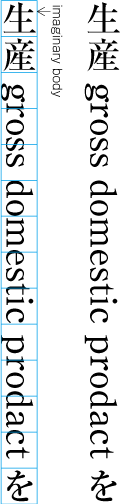
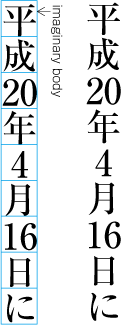
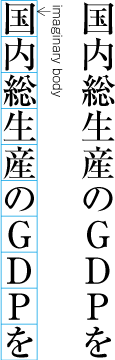
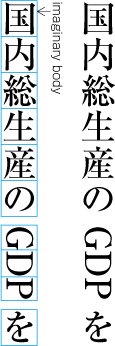
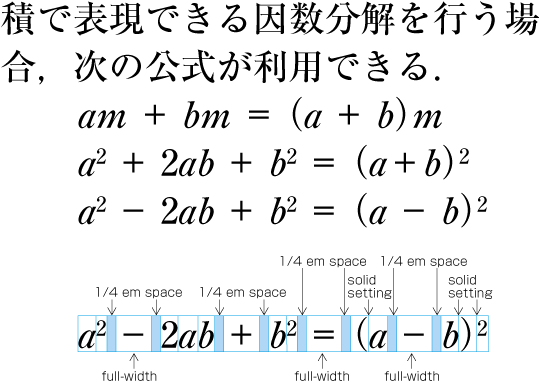
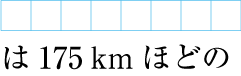
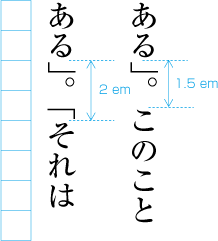
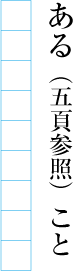
[ contents ]

W3C

Requirements of Japanese Text Layout

W3C Working Draft 15 October 2008

This version:
http://www.w3.org/TR/2008/WD-jlreq-20081015/
Latest version:
http://www.w3.org/TR/jlreq/
Previous version:
http://www.w3.org/TR/2008/WD-jlreq-20080411/
Editors:
Yasuhiro Anan, Microsoft
Hiroyuki Chiba, Invited Expert
Junsaburo Edamoto, Invited Expert
Richard Ishida, W3C
Keiichiro Ishino, Antenna House
Tatsuo Kobayashi, JustSystems
Toshi Kobayashi, Invited Expert
Kenzou Onozawa, Invited Expert
Felix Sasaki, W3C

This document is also available in these non-normative formats: Japanese version. The English version of this document is the authoritative version.


Abstract

This document describes requirements for general Japanese layout realized with technologies like CSS, SVG and XSL-FO. The document is mainly based on a standard for Japanese layout, JIS X 4051. However, it addresses also areas which are not covered by JIS X 4051. The document is currently in draft stage.

Status of this Document

This section describes the status of this document at the time of its publication. Other documents may supersede this document. A list of current W3C publications and the latest revision of this technical report can be found in the W3C technical reports index at http://www.w3.org/TR/.

This is an updated Working Draft of "Requirements of Japanese Text Layout". This document is also available in a Japanese version. The English version of this document is the authoritative version.

This document describes requirements for general Japanese layout realized with technologies like CSS, SVG and XSL-FO. The document is mainly based on a standard for Japanese layout, JIS X 4051. However, it addresses also areas which are not covered by JIS X 4051. The document is currently in draft stage. It contains most of the material which the task force intends to publish as a Working Group note in December 2008.

This document was developed by participants from four W3C Groups - the CSS, Internationalization Core, SVG and XSL Working Groups - , working together as part of the Japanese Layout Task Force. The Task Force expects to advance this Working Draft to Working Group Note.

Feedback about the content of this document is encouraged until 15 November 2008. Send your comments to www-i18n-comments@w3.org. Use "[Comment on jlreq WD]" in the subject line of your email, followed by a brief subject. The archives for this list are publicly available.

Publication as a Working Draft does not imply endorsement by the W3C Membership. This is a draft document and may be updated, replaced or obsoleted by other documents at any time. It is inappropriate to cite this document as other than work in progress.

This document was produced by groups operating under the 5 February 2004 W3C Patent Policy. The groups do not expect this document to become a W3C Recommendation. W3C maintains a public list of disclosures for each group: CSS Working Group disclosures, i18n Core Working Group disclosures, SVG Working Group disclosures, and XSL Working Group disclosures. Those pages also include instructions for disclosing a patent. An individual who has actual knowledge of a patent which the individual believes contains Essential Claim(s) must disclose the information in accordance with section 6 of the W3C Patent Policy.


Table of Contents

Introduction
   1.1 Purpose of This Document
   1.2 How This Document was Created
   1.3 Basic Principles for Development of this Document
   1.4 The Structure of This Document
   1.5 Reference of Definition and Others
Basics of Japanese Composition
   2.1 Page Formats for Japanese Documents
      2.1.1 Specification of Page Formats
      2.1.2 Basic Templates of page Formats
      2.1.3 Elements of Page Formats
      2.1.4 Elements of Kihon-hanmen
      2.1.5 Kihon-hanmen and Examples of Real Page Format
   2.2 Japanese Characters - Dimensions of Kanji and Kana Characters
      2.2.1 Characters Used for Japanese Composition
      2.2.2 Kanji, Hiragana and Katakana
      2.2.3 Principles of Arrangement of Kanji and Kana Characters
   2.3 Vertical Writing Mode and Horizontal Writing Mode
      2.3.1 Directional Factors in Japanese Composition
      2.3.2 Major Differences between Vertical Writing Mode and Horizontal Writing Mode
   2.4 Specifying the Kihon-hanmen
      2.4.1 Procedure for Defining the Kihon-hanmen
      2.4.2 Considerations in Designing the Kihon-hanmen
   2.5 Pagewise Arrangement of Kihon-hanmen Elements
      2.5.1 Examples of Items Jutting Out of the Kihon-hanmen
      2.5.2 Line Positioning based on the Kihon-hanmen Design
      2.5.3 Character Positioning based on Kihon-hanmen Design
   2.6 Running Heads and Page Numbers
      2.6.1 Positioning of Running Heads and Page Numbers
      2.6.2 Principles of Arrangements of Running Heads and Page Numbers
      2.6.3 Ways of Arranging Running Heads and Page Numbers
Line Composition
   3.1 Line Composition Rules for Punctuation Marks
      3.1.1 Differences in Vertical and Horizontal Composition in Use of Punctuation Marks
      3.1.2 Positioning of Punctuation Marks (Commas, Periods and Brackets)
      3.1.3 Exceptional Positioning of [、] (IDEOGRAPHIC COMMA)and [・] (KATAKANA MIDDLE DOT)
      3.1.4 Positioning of Consecutive the opening brackets(cl-01), the closing brackets(cl-02), the commas(cl-07) and the full stops(cl-06)
      3.1.5 Positioning of the opening brackets(cl-01) at Line Head
      3.1.6 Positioning of the dividing punctuation marks(cl-04) ([?] (QUESTION MARK) and [!] (EXCLAMATION MARK) and the hyphens(cl-03)
      3.1.7 Characters Not Starting Line
      3.1.8 Characters Not Ending Line
      3.1.9 Positioning of the closing brackets(cl-02), the full stops(cl-06), the commas(cl-07) and the middle dots(cl-05) at Line End
      3.1.10 Unbreakable Character Sequence
      3.1.11 Unbreakable Character Sequence
      3.1.12 Examples of Line Adjustment
   3.2 Japanese and Western Mixed Text Composition (including Horizontal-in-Vertical Text Composition)
      3.2.1 Composition of Japanese and Western Mixed Texts
      3.2.2 Mixed Text Compostion in the Horizontal Writing Mode
      3.2.3 Mixed Text Composition in Vertical Settings
      3.2.4 Setting Method for Full Width Mono-space Latin Letters and Western-Arabic Numerals
      3.2.5 Handling of Tatechuyoko (Horizontal-in-Vertical Settings)
      3.2.6 Handling of Western Text in Japanese Text using proprtional Western Fonts
   3.3 Ruby and Emphasis Dots
      3.3.1 Usage of Ruby
      3.3.2 Choice of Base Characters to be annotated by Ruby
      3.3.3 Choice of Sizes for Ruby Characters
      3.3.4 Choice of Sides for Ruby with respect to Base Characters
      3.3.5 Positioning of Mono-Ruby with respect to Base Characters
      3.3.6 Positioning of Group-Ruby with respect to Base Characters
      3.3.7 Positioning of Jukugo-Ruby with respect to Base Characters
      3.3.8 Adjustments of Ruby of which length is longer than that of Base Characters
      3.3.9 Composition of Emphasis Dots
   3.4 Inline Cutting Note (Warichu)
      3.4.1 The Situations Inline Cutting Note (Warichu) is used.
      3.4.2 Character Size for Inline cutting note and Line Gaps
      3.4.3 Handling of inline cutting note, when the inline cutting note is set straddled over two base text lines
   3.5 Paragraph Adjustment Rules
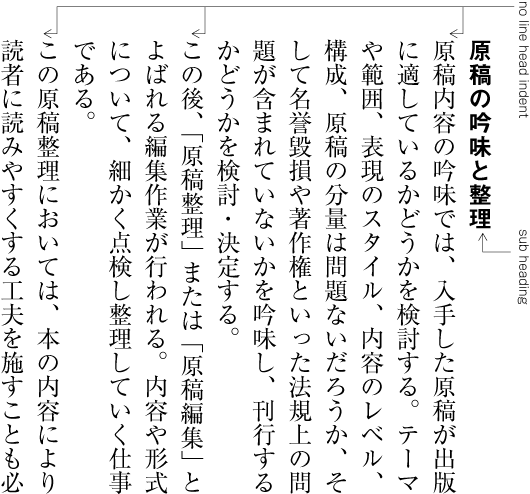
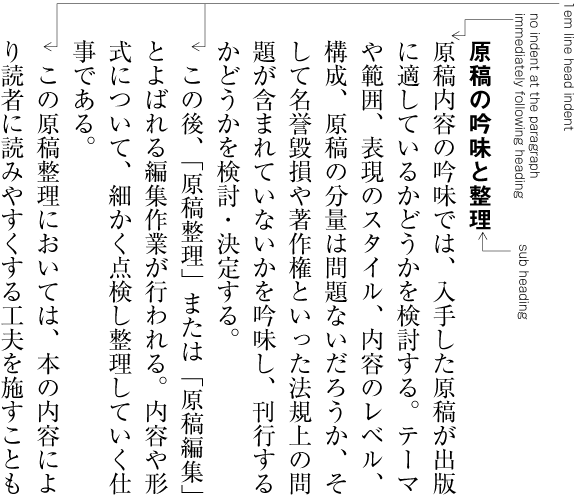
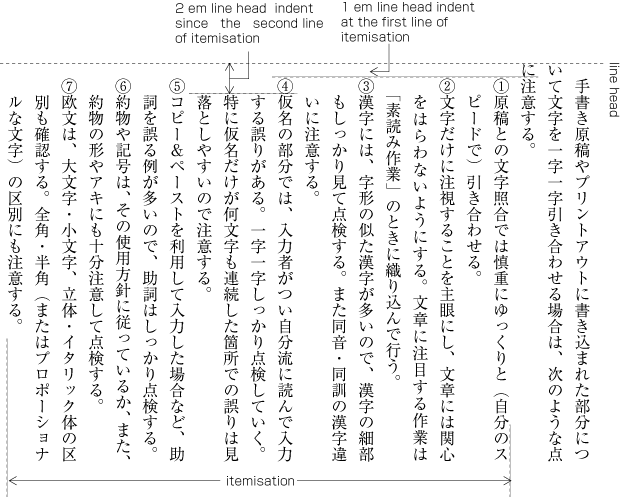
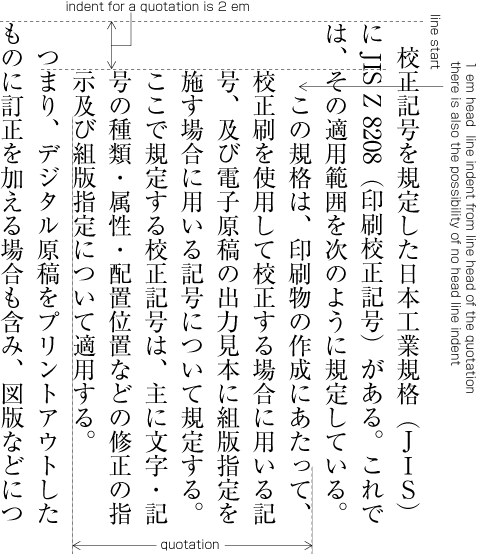
      3.5.1 Line Head Indent at the Beginning of Paragraphs
      3.5.2 Line Head Indent and Line End Indent
      3.5.3 Justification Processing
      3.5.4 Widow Adjustment of Paragraphs
   3.6 Tab Setting
      3.6.1 The Usage of Tab Setting
      3.6.2 The Types of Tab Settings
      3.6.3 The setting method of the target text
   3.7 Other Rules of Japanese Typesetting
      3.7.1 Superscript and superscript
      3.7.2 Furiwake
      3.7.3 Jidori Processing
      3.7.4 Processing of Math Symbols and Math Operators
   3.8 Line Adjustment
      3.8.1 Necessity for Line Adjustment
      3.8.2 Reduction and Addition of Inter Character Space
      3.8.3 Procedures for Inter Character Space Reduction
      3.8.4 Procedures for Inter Character Space Expansion
   3.9 About Character Classes
      3.9.1 Differences in Positioning of Characters and Symbols
      3.9.2 Grouping of Characters and Symbols depending on their Positioning
      3.9.3 Positioning Methods for each Character Class

Appendix
1 Character classes
2 Spacing between characters
3 Possibility of separation between characters
4 Positions which allow for line adjustment by interletter space-reduction
5 Positions which allow for line adjustment by interletter space-addition
6 Positioning of Jukugo-ruby
7 Terminology
8 References (Non-Normative)
9 Revision Log (Non-Normative)
10 謝辞(参考)


1 Introduction

1.1  Purpose of This Document

Writing systems are important aspect of a culture, together with languages and scripts.Editors note: I'm not sure many people will appreciate the difference between 'writing system' and 'script', so I'd suggest rewording this. Each cultural community has its own language, script and writing system. In that sense, the transfer of each writing system into cyberspace is a task with very high importance for information and communication technology.

As one of the basic work items of this task force, this document describes issues of text composition in the Japanese writing system. The goal of the task force is not to propose actual solutions but describe important issues as basic information for actual implementations.

1.2  How This Document was Created

This document was created by the W3C Japanese Layout Task Force. The Task Force has discussed many issues and harmonized the requirements from user communities and solutions from technological experts. It includes the following participants:

  1. Japanese text composition experts (The editors of "JIS X 4051:Formatting rules for Japanese documents").

  2. Internationalization and standardization experts in Japan (from Microsoft, Antenna House, Justsystems).

  3. Members of the W3C CSS, i18n Core, SVG and XSL Working Groups.

This task force also constitutes an important innovation due to its bilingual work-flow. Discussion is mainly conducted in Japanese, because of the Japanese composition issues, but, minutes and mailing list are written in English. To support the development, the task force held already two face-to-face meetings with participating Working Groups.

The document itself was also developed bilingually, and is published bilingually. We carefully avoided using jargon for technical terms. Even if there were English words corresponding to the Japanese, we carefully studied any potential differences in the nuances of meaning, and if there were differences between corresponding concepts, we provided the Japanese jargon in romaji (Latin transliteration) for future discussion. Moreover, we prepared as many figures as possible, with clear and understandable English, to help non-Japanese readers.

1.3  Basic Principles for Development of this Document

Japanese composition exhibits several differences from Western composition. Major differences include:

  1. The use of not only horizontal writing mode but also vertical writing mode.

  2. The fact that, in principle, the width of all ideographic (cl-19), hiragana (cl-15), katakana (cl-16) characters is full-width and fixed-width, and these characters are composed using solid setting.

Accordingly, this document mainly explains the characteristics of Japanese composition along the lines of the following policy.

  1. It does not fully cover all issues of the Japanese composition system, but mainly discusses the differences from Western composition systems.

  2. It focuses on the requirements for the Japanese visual presentation form of text composition. Technology-specific interpretations of the requirements and/or how to implement them are out of scope for this document.

  3. It explicitly refers to JIS X 4051 "Formatting rules for Japanese documents" as much as possible. Unless an issue is not explained in JIS X 4051, this document focuses on basic issues of Japanese layout, and for more detail references the corresponding clause of JIS X 4051. To implement a high quality Japanese text layout system, the implementers will have to refer to JIS X 4051, however, the descriptions in this document are sufficient to recognize the basic characteristics of Japanese composition. On the other hand, some issues, which are not described in JIS X 4051, are described in detail.

    In accordance with this policy, this document provides tutorial- or summary-like, supplementary explanations, related background, and additional descriptions for JIS X 4051 information. This document covers all the basic issues of Japanese text layout, but the reader will need to refer to JIS X 4051 for advanced discussion.

  4. It provides typical examples in actual use for key composition features, to enable better understanding of their usage.

  5. For non-Japanese readers, frequency of use is indicated for each requirement. These frequencies are not the outcome from any accurate research, but from the long experience of the authors. They are intuitive for ordinary Japanese text readers, however, for non-Japanese readers it may be difficult to imagine without explicit information. These frequencies are only rough information to prioritize the importance of issues. A couple of examples:

    "warichu (inline cutting note) is not frequently used, but is useful to simply annotate persons, things, and so on, at the place where the text appears, especially in classic texts or translations." "ruby is frequently used in modern documents, including newspapers."

  6. In consideration of non-Japanese readers of this document, figures are used for explanations wherever possible.

  7. Text layout rules and recommendations for readable design are different things, however, these two issues are difficult to discuss independently. In this document, these two aspects are carefully separated. The cosmetic design recommendations are mainly described using notes.

  8. The main target of this document is common books. The authors' experiences are mainly related to common books, and the quality required for common books is the highest in the market. There are many kinds of books in the market, and the requirements are quite diverse. The task force has a lot of accumulated experience in requirements and solutions for Japanese text composition. Nonetheless, many issues, which have been discussed over a long period of time, are applicable for other kinds of publication.

    In terms of frequency of use, the importance of magazines, technical manuals, Web documents show no difference fromrates alongside common books. However, there are several characteristics in these publications, which are different from common books. These issues should be treated more fully in future documents.

1.4  The Structure of This Document

This document consists of three parts:

1 The basics of specifying Japanese text composition.

2 The processing of line composition.

3 The approach to hanmen design.

[sec. 2] explains the characteristics of letters and symbols which are used in Japanese composition, their differences in vertical writing mode and horizontal writing mode, and the design and adaptation of kihon-hanmen.

[sec. 3] explains line composition methods for ideographic characters (cl-19), hiragana (cl-15), katakana (cl-16), and punctuation marks, together with ruby (inter-line pronunciation information and annotation) and the mixing of Japanese and Latin letters.

[sec. WARNING! No anchor for section reference: #en-heading3] describes construction methods and composition methods for headings, notes, illustrations and tables.

In principle, characters in Japanese composition are full-width, fixed-width, and positioned without spaces (solid setting). This is taken as a basic premise for the design of the kihon-hanmen, the basis of book layout. Furthermore, the design of kihon hanmen, illustrations, characters, symbols etc. are placed in an actual page. For the understanding of to understand Japanese layout, it is important to understand the design of the kihon-hanmen and how to position illustrations, characters, symbols etc. in relation to it. Hence, [sec. 2] describes in detail the design of the kihon-hanmen and its dependenciesapplication methods in detail . In particular, [sec. 2.5] provides prototypical patterns for the three guidelines listed after this paragraph: what is strictly recommendedrecommendations need to be strictly taken into account, and what exceptions are possible. (The goal of these explanations is an understanding of Japanese composition. Since detailed explanations of the various elements of kihon-hanmen are given in [sec. 3] and [sec. WARNING! No anchor for section reference: #en-heading3], some explanations are repeated.)

  1. Keep to the basic size and column numbers that were decided upon in setting up the kihon-hanmen.

  2. Keep to the line positions that were decided upon in setting up the kihon-hanmen, with some exceptions.

  3. Keep to the letter positions that were decided upon in setting up the kihon-hanmen, with some exceptions.

1.5  Reference of Definition and Others

The definitions of technical terms are described in a separate document. The notation of technical terms and reference to the definitions are as follows:

TBD

2  Basics of Japanese Composition

2.1  Page Formats for Japanese Documents

2.1.1  Specification of Page Formats

The page format of a Japanese document is specified by:

  • Firstly, preparing a template of the page format, which determines the basic appearance of pages of the document;

  • Then, specifying the details of actual page elements based on the templates.

2.1.2  Basic Templates of page Formats

Generally, books use only one template forof page format and magazines often use several templates.

Although in books, as mentioned before, there tends to be one template for the page format, the basic pattern is typically adapted. For example, the table of contents may contain small modifications. Furthermore, there are many examples of indices indexes with a different page format than the basic page format, and books in vertical writing mode, often have indexes in horizontal writing mode. It holds also for such cases where the goal is to make the size of the hanmen for indices close to the size of hanmen in the basic page format. ???

Magazines gather articles of different kinds. Often the layout will differ depending on the content of the article. For example, one part may have 9 point character size and 3 columns, and another part 8 point character size and 4 columns.

2.1.3  Elements of Page Formats

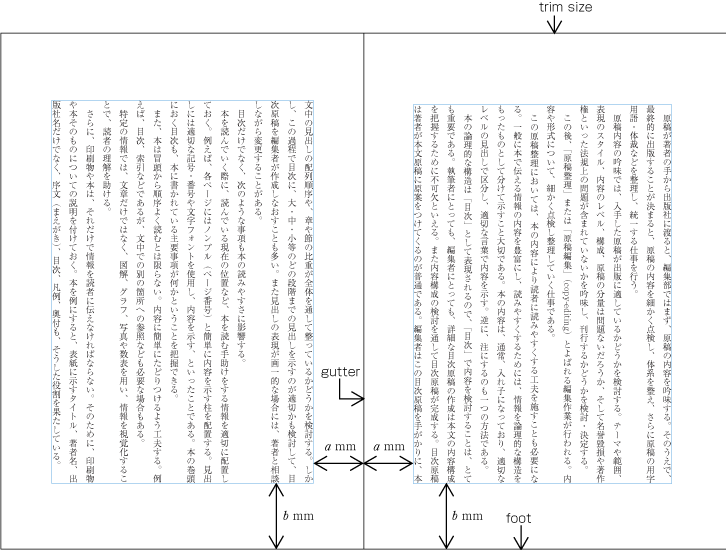
An Example of a Page Template for vertical writing mode

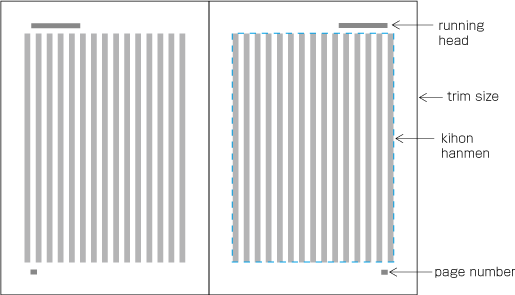
[Fig.1]: An Example of a Page Format for Vertical Writing Mode

The following are the basic elements of a Page Format. [Fig.1] illustrates an example of a page format using vertical writing mode).

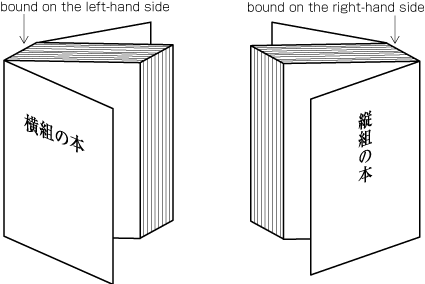
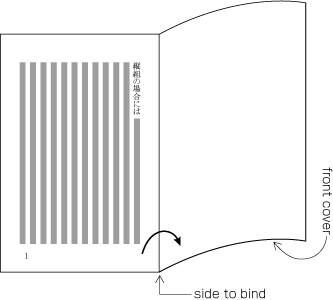
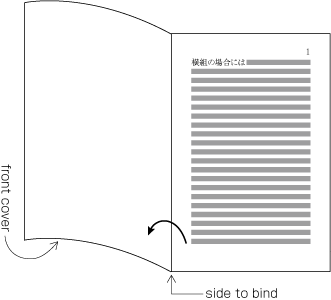
  1. Trim size and binding side (Japanese documents with vertical writing mode mode are bound on the right-hand side, and documents with horizontal writing mode are bound on the left-hand side. See [Fig.2]. )

  2. Principal text direction (vertical writing mode or horizontal writing mode).

  3. Appearance of kihon-hanmen and its position relative to the trim size.

  4. Appearance of running heads and page numbers, and their positions relative to the trim size and kihon-hanmen.

Binding-Side (Left-Hand Side Binding and Right-Hand Side Binding)

[Fig.2]: Binding-side (bound on the right-hand side and bound on the left-hand side)

2.1.4  Elements of Kihon-hanmen

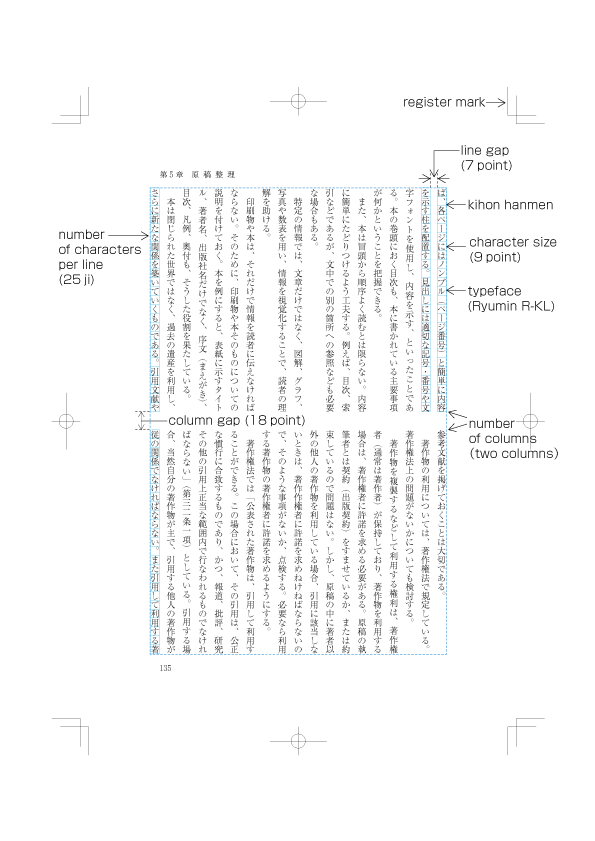
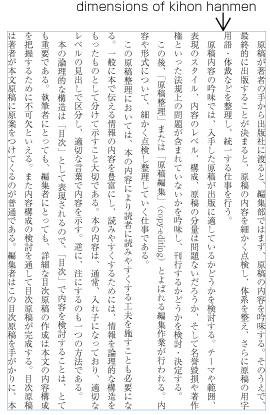
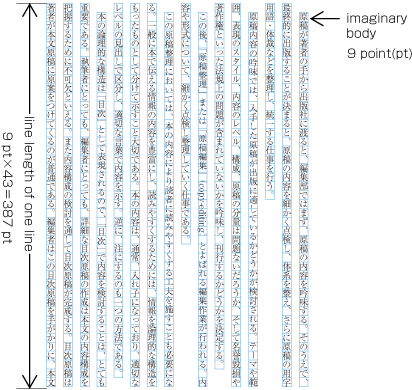
kihon-hanmen is the hanmen style designed as the basis of a book. The following are the basic elements of kihon-hanmen (See [Fig.3]).

(note 1)

To understand the characteristics of Japanese composition it is important to understand how the various elements of kihon-hanmen are applied to a real page. The details will be explained later.

(note 2)

The normative definition of kihonhanmen is provided in JIS X 4051, sec. 7.5.

(note 3)

Format examples (including running heads and page numbers) and composition examples for kihonhanmen in different paper sizes are available in JIS X 4051 annexes 3 and 4.

Elements of KIHON HANMEN (Example in vertical writing mode)

[Fig.3]: Elements of kihon-hanmen (Example in vertical writing mode)

  1. Character size and typeface name

  2. Text direction (vertical writing mode or horizontal writing mode)

  3. Number of columns and column space when using multi-column format

  4. Number of characters per line

  5. Number of lines per page (number of lines per column when using multi-column format)

  6. Line gap (or line feed)

2.1.5  Kihon-hanmen and Examples of Real Page Format

Below are several examples of how the basic page format is created, and how then various elements are placed on a real text page (This and other aspects of how the various elements of kihon-hanmen are arranged on each page are explained in [sec. 2.5].).

  1. Space and position of headings

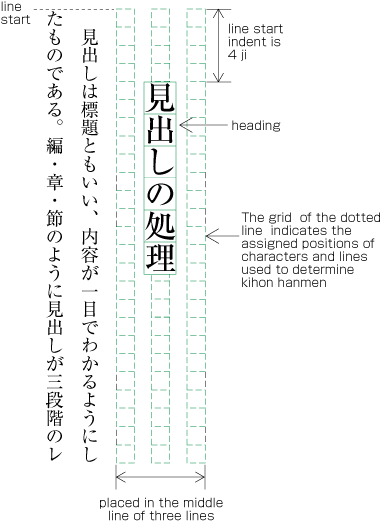
    The space around headings in the block direction is specified by using the line positions provided by the kihon-hanmen as a basis, and by deciding how many lines need to be used. (Details of this processing are defined in JIS X 4051, sec. 8.3.3.d). The line head indent of the inline direction for the heading is normally specified using the character positionsgrid of the kihon-hanmen. The line head indent is specified as a number of character positions. In the example in [Fig.4] the heading is placed in the middle line of three lines of the kihon-hanmen grid. It is indented by 4 characters of the kihon-hanmen grid.

    Layout example of a heading based on the line position which is designed via KIHON HANMEN

    [Fig.4]: Layout example of a heading based on the line positions established via kihon-hanmen

    (note 1)

    Details of the different types of heading, creation of headings, methods for placing headings, etc. are explained in [sec. WARNING! No anchor for section reference: #en-subheading3_1].

  2. Size of illustrations

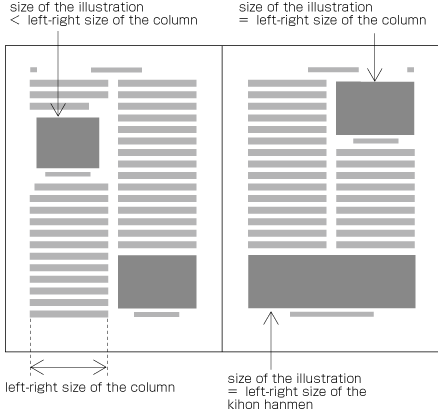
    In horizontal writing mode with two columnsthe width of illustrations should, if at all possible, be either the width of one kihon-hanmen column or the width of the kihon-hanmen (see [Fig.5]). The illustrations are usually set at the head or the foot of the page (See [Fig.5]).

    Example of illustrations in two columns, horizontal setting

    [Fig.5]: Example of illustrations in two columns, horizontal writing mode

    (note 1)

    Details of illustration positioning are explained in [sec. WARNING! No anchor for section reference: #en-subheading3_3].

  3. Hanmen size for the table of contents

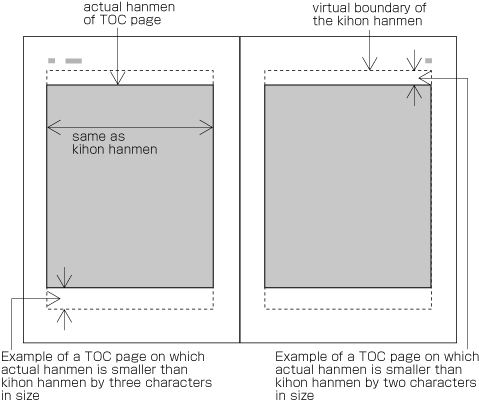
    The hanmen size for the table of contents of books is based on the size of the kihon-hanmen. There are many examples of tables of contents in vertical writing mode where the size of the left-to-right line feedleft-to-right size is identical to that of the kihon-hanmen, but the text direction size for head and foot top-to-bottom size is a little bit smaller (See [Fig.6]).

    Design example for the table of contents in vertical layout

    [Fig.6]: Design example for the table of contents in vertical writing mode

    (note 1)

    There are cases when a different hanmen than the kihon-hanmen is used for positioning of running heads and page numbers. This will be discussed in [sec. 2.6.2] (See [Fig.49]).

2.2  Japanese Characters - Dimensions of Kanji and Kana Characters

2.2.1  Characters Used for Japanese Composition

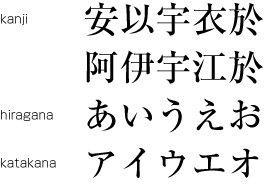
Japanese letters used for composing Japanese text mainly consist of ideographic (cl-19)hiragana (cl-15) and katakana (cl-16) characters (see [Fig.7]).

KANJI, HIRAGANA and KATAKANA

[Fig.7]: Kanji, hiragana and katakana

(note 1)

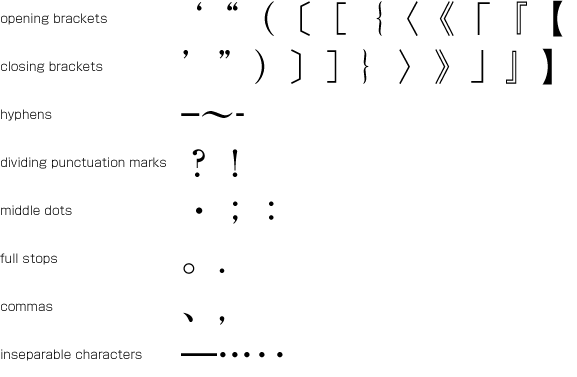
In addition to kanji and kana, various punctuation marks (see [Fig.8]) as well as Western-Arabic numerals, Latin letters and/or Greek letters may be used in Japanese text.

Examples of punctuation marks

[Fig.8]: Examples of punctuation marks

(note 2)

The details of characters and character classes used in this document will be explained in [sec. 3.9], as well as in a separate document about the terminology of Japanese Layout. Also, the mapping from letters and symbols in each character class to Unicode code points will be shown in an appendix [sec. WARNING! No anchor for section reference: #tbd](Editor's note: replace with the actual appendix number.) to this document.

2.2.2 Kanji, Hiragana and Katakana

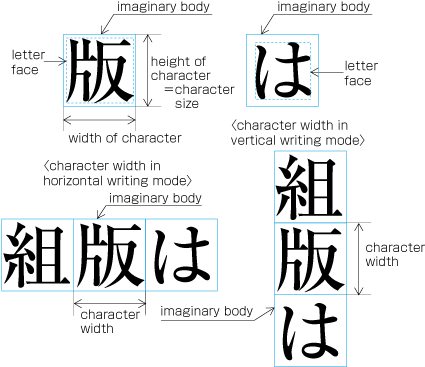
Ideographic (cl-19)hiragana (cl-15) and katakana (cl-16) characters are the same size, and have square imaginary bodies of equal dimensions (also known as the outer frame of a character). Aligned with the vertical and horizontal center of the imaginary body there is a smaller box called the letter face, which contains the actual symbol. Character size is measured by the size of the imaginary body (see [Fig.9]). "Character width" is a term to describe the advance width of the imaginary body of a character. By definition it is equal to the "width" of a character in horizontal writing mode, whereas it is the height of a character in vertical writing mode (see [Fig.9]).

The Size of KANJI and KANA, and their imaginary bodies

[Fig.9]: The Size of Kanji and Hiragana, and the Imaginary Bodies

(note 1)

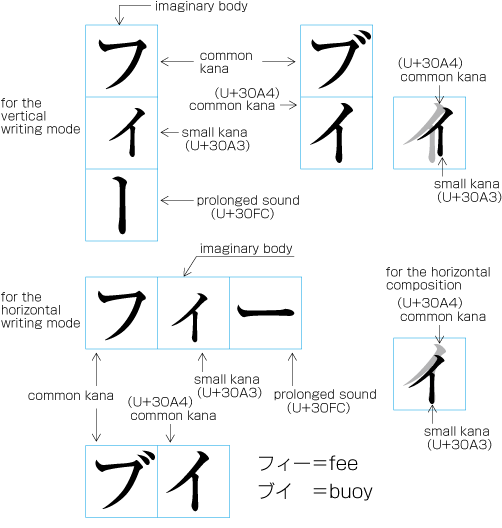
In vertical writing mode, the letter face of small kana (cl-11) characters (っ, ょ, ュ, ァ, ィ, ゥ, etc) is placed at the vertical center and to the right of the horizontal center of the imaginary body ; in horizontal writing mode, it is placed at the horizontal center and below the vertical center (see [Fig.10]). Also there are punctuation marks with letter faces that are not placed at the vertical and horizontal center of the imaginary body.

Small KANA letter and the position of its letter face in the imaginary body

[Fig.10]: Small kana letters and the position of their letter face in the imaginary body.

2.2.3  Principles of Arrangement of Kanji and Kana Characters

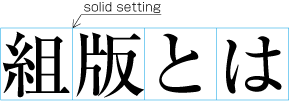
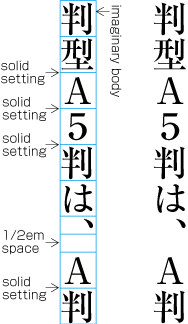
In principle, when composing a line with ideographic (cl-19)hiragana (cl-15) and katakana (cl-16) characters no extra space appears between their imaginary bodies. This is called  solid setting (see [Fig.11]).

Example of solid setting in horizontal composition

[Fig.11]: Example of solid setting in horizontal writing mode.

(note 1)

SinceIn the letterpress printing era, ideographic (cl-19)hiragana (cl-15) and katakana (cl-16) letters were designed so that they were easy to read in solid setting, regardless of text direction. However, unlike the letterpress printing era, when several sizes of the original, physical, pattern of a letter were required to create matrices, in today's digital era the same original pattern can be used for any size simply by enlargement or reduction. Because of this, it might be necessary to adjust the inter-letter space when composing lines at large character sizes.

(note 2)

Depending on the contents context , there are several settings in addition to the solid setting, as shown below.

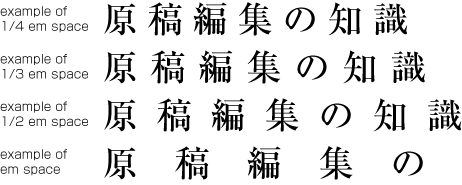
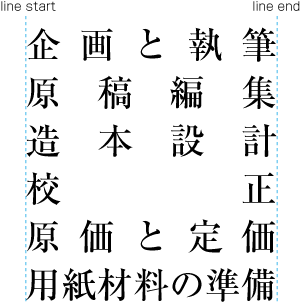
  1. Fixed inter-letter spacing: Text set with a fixed size space between each imaginary body (see [Fig.12]).

    Examples of AKIGUMI in horizontal composition

    [Fig.12]: Examples of fixed inter-letter spacing in horizontal writing mode.

    Fixed inter-letter spacing in books is used for the following reasons:

    1. To achieve a balance between  running heads with few and with many characters. Fixed inter-letter spacing is used for the running heads with few characters. Examples of fixed inter-letter spacing for running heads are given in JIS X 4051, annex 5.

    2. To achieve a balance between headings with few and with many characters. Fixed inter-letter spacing is used for the headings with few characters. Examples of fixed inter-letter spacing for headings are given in JIS X 4051, annex 6.

    3. For captions of illustrations and tables, which only have a few characters. Fixed inter-letter spacing is used to balance with the size of the illustration or table.

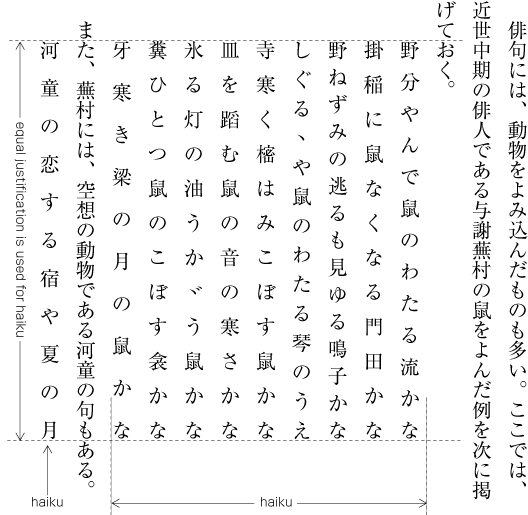
    4. In some cases, fixed inter-letter spacing is used for Chinese and Japanese poetry where one line has only a few characters.

    (note 1)

    Fixed inter-letter spacing, including also even tsumegumi, is defined in JIS X 4051, sec. 4.18.1 b.

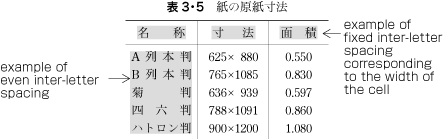
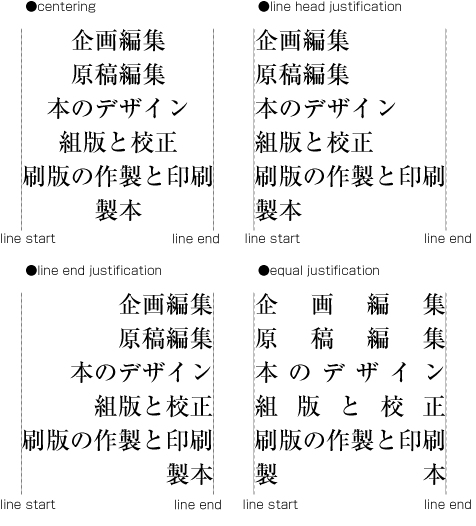
  2. Even inter-letter spacing: Text set with equal inter-letter spacing between characters on a given line, so that each line is aligned to the same line start and line end (see [Fig.13]).

    Example of equal inter-character space setting in horizontal composition

    [Fig.13]: Example of even inter-character space setting in horizontal writing mode

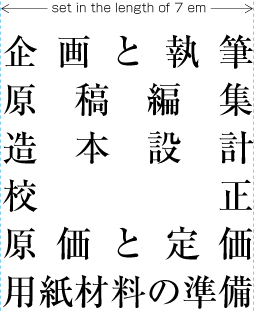
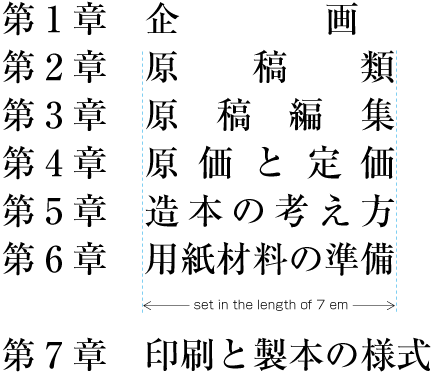
    Even inter-character space setting in books is used for unifying the length of table headings with Japanese text (see [Fig.14]). There are also examples (e.g. lists of names) in which parts of person names receive equal spacing.

    Example of a table with equal spacing

    [Fig.14]: Example of a table with equal spacing

    (note 1)

    Even inter-letter spacing, including processing of jidori, is defined in JIS X 4051, sec. 4.18.1.

  3. Tsumegumi (kerning / tracking) : Text is set with negative inter-letter space reduced inter-letter space than solid setting by by arranging characters so that a portion of two imaginary bodies overlap each other. This is divided further into two types, depending on the methods of inter-character space reduction. One method involves reducing by the same amount of inter-character space (even tsumegumi or tracking, see [Fig.15]) and the other is to determine the amount of space to reduce based on the distance between the two letter faces of adjacent characters (face tsumegumi or letter face kerning, see [Fig.16]).

    Example of tracking in horizonatl setting

    [Fig.15]: Example of even tsumegumi in horizontal writing mode (2nd and 4th lines. The 1st and 3rd lines are the same text with solid setting, for comparison)

    Example of letter face kerning in horizontal composition

    [Fig.16]: Example of face tsumegumi in horizontal writing mode (2nd and 4th lines. The 1st and 3rd lines are the same text with solid setting, for comparison)

    In the main text of books, the most reader-friendly approach is to use solid setting. However, if the character size is larger, it may occur that the distance between characters becomes unbalanced, and tsumegumi or face tsumegumi will be applied. For example, there are books where tsumegumi and face tsumegumi are used with headings set in large character sizes. These methods are rarely used in books, for which ease of reading is very important. But in magazines or advertisements there are many more examples of tsumegumi and face tsumegumi. Probably for magazines the structuring of pages is very important, and characters on a page need to be settled. Magazines tend to use type to differentiate themselves from others, and so devices like this are sometimes used for that purpose.

2.3 Vertical Writing Mode and Horizontal Writing Mode

2.3.1  Directional Factors in Japanese Composition

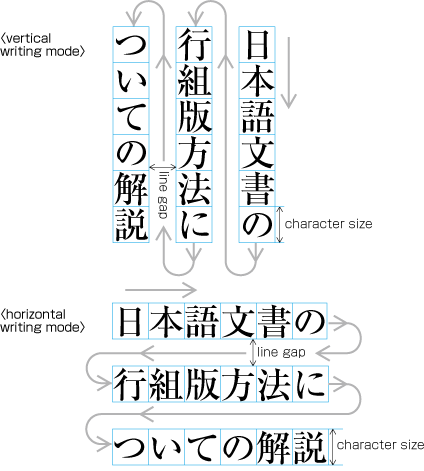
Japanese composition has two layout directions. One is vertical direction (vertical writing mode), the other is horizontal direction (horizontal writing mode). Depending on the contentcontext , either of the directions may be chosen.

(note 1)

Ideographic (cl-19)hiragana (cl-15) and katakana (cl-16) characters for Japanese composition have basically been designed to have a square body with the same dimensions. Thus the same collection of printing types can be used in either vertical writing mode or horizontal writing mode, simply by changing the direction of text, (see [Fig.17]). There were some attempts to develop printing types designed exclusively for horizontal writing mode, but they were not widely accepted.

Vertical writing mode and horizontal composition

[Fig.17]: Vertical writing mode and horizontal writing mode. (The arrows show the reading direction.)

(note 2)

There is little market data comparing the number of pages with vertical writing mode  and horizontal writing mode, but it is said that both are almost the same.

(note 3)

For official (e.g. governmental) documentation, horizontal writing mode is recommended. Educational material (with the exception of certain topics) is mostly in horizontal writing mode. Readers of "mobile novels" are increasing, and it is expected that in the future horizontal writing mode will increase in this area as well. However, most of the large newspapers are written completely in vertical writing mode, and most of the large journals for ordinary readers are almost completely set in vertical writing mode. In addition, novels, which are the most widely read kind of book publication, are almost completely in vertical writing mode (some readers say that they cannot read a novel if it is not in vertical writing mode). Hence it can be expected that the importance of vertical writing mode for Japanese will not change for the time being.

(note 4)

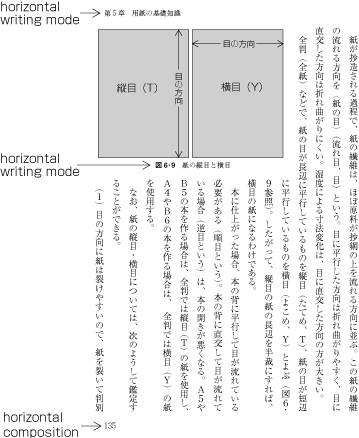
There's usually only one direction for all text throughout a book, but there are cases where horizontal writing mode is used in certain parts of vertically composed books (see [Fig.18]). Tables, captions for illustrations, running heads, and  page numbers composed horizontally in a page with a vertical writing mode.

Example of partial adoption of horizontal composition in vertically composed books

[Fig.18]: Example of horizontal writing mode in parts of vertically composed books

2.3.2  Major Differences between Vertical Writing Mode and Horizontal Writing Mode

The following are major differences between vertical writing mode and horizontal writing mode.

  1. Arrangement of characters, lines, columns and pages; direction of page progression.

    (note 1)

    The positioning of characters, lines and paragraphs in vertical and horizontal writing mode is defined in JIS X 4051, sec. 7.4.4.

    1. Vertical writing mode. See [Fig.19] for an example of vertical writing mode with two columns per page.

      Direction of arrangement for characters and other elements in vertical writing mode.

      [Fig.19]: Direction of arrangement of characters and other elements in vertical writing mode.

      1. Characters are arranged from top to bottom, lines are arranged from right to left.

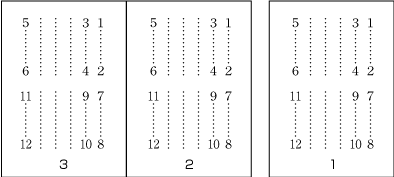
      2. Columns are arranged from top to bottom. A book starts with the left(recto) side and progresses from right to left (see [Fig.20]).

        Progression of pages for a book with vertical writing mode

        [Fig.20]: Progression of pages for a book with vertical writing mode.

    2. Horizontal composition. See [Fig.21] for an example of horizontal text layout with two-columns per page.

      Direction of arrangement for characters and other elements in horizontal composition

      [Fig.21]: Direction of arrangement of characters and other elements in horizontal writing mode.

      1. Characters are arranged from left to right, and lines are arranged from top to bottom.

      2. Columns are arranged from left to right. A book starts with the right(recto) side and progresses from left to right (see [Fig.22]).

        Progression of pages for a book with horizontal composition

        [Fig.22]: Progression of pages for a book with horizontal writing mode

    3. Orientation of Latin alphanumeric characters in a line.

      1. There are three ways to arrange Latin alphanumerics in vertical writing mode:

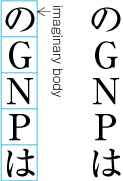
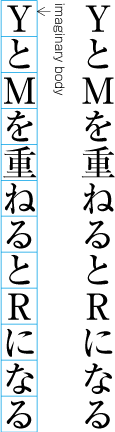
        1. One by one with the same normal orientation as that of Japanese characters. This is usually applied to one letter alphanumerics or capitalized abbreviations (see [Fig.23]).

          Arrangement of alphanumerics in vertical writing mode - 1

          [Fig.23]: Arrangement of alphanumerics in vertical writing mode - normal orientation.

          (note 1)

          The alphanumeric characters used for this arrangement have different typographic features than those with propotional width used for Western text. They are of fixed-width and full-width design, and have been used this way since the letterpress printing era.

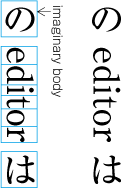
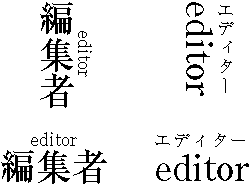
        2. Rotated 90 degrees clockwise. This is usually applied to English words or sentences (see [Fig.24]).

          Arrangement of alphanumerics in vertical writing mode - 2

          [Fig.24]: Arrangement of alphanumerics in vertical writing mode - rotated 90 degrees clockwise.

          (note 1)

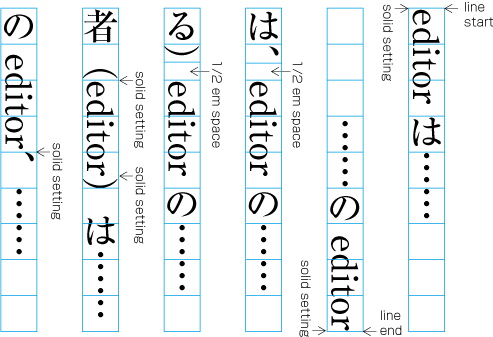
          In [Fig.24], there are spaces before and after the imaginary body for the Western word “editor”. These spaces are necessary for composition of mixed Japanese and Western text, and details will be provided in a later section.

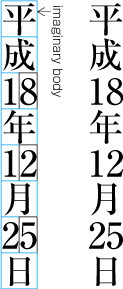
        3. Set horizontally without changing orientation (called tatechuyoko, which means horizontal-in-vertical composition) (see [Fig.25]). This is usually applied to two-digit numbers (see JIS X 4051, sec. 4.8 for the definition).

          Arrangement of alphanumerics in vertical writing mode -3 (TATECHUYOKO)

          [Fig.25]: Arrangement of alphanumerics in vertical writing mode - tatechuyoko.

      2. In horizontal writing mode there is only one way of arranging alphanumerics, ie. normal orientation.

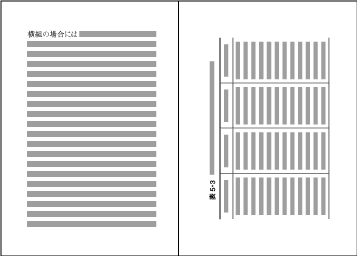
    4. Arrangement of tables and/or illustrations rotated 90 degrees clockwise or counterclockwise for size considerations. (This processing is defined in JIS X 4051, sec. 7.3.).

      1. In vertical writing mode, align the top of tables/illustrations to the right of page (see [Fig.26]).

        Example arrangement of a table rotated clockwise 90 degrees in vertical writing mode

        [Fig.26]: Example of arrangement of a table rotated 90 degrees clockwise in vertical writing mode.

      2. In horizontal writing mode, align the top of tables/illustrations to the left of page (see [Fig.27]).

        Example arrangement of a table rotated counterclockwise 90 degrees in horizontal writing mode

        [Fig.27]: Example of arrangement of a table rotated 90 degrees counterclockwise in horizontal writing mode.

        (note 1)

        The orientation is chosen to minimise interference with the overall reading flow of the book.

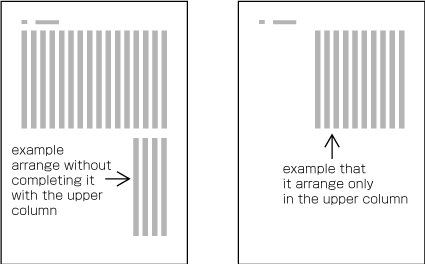
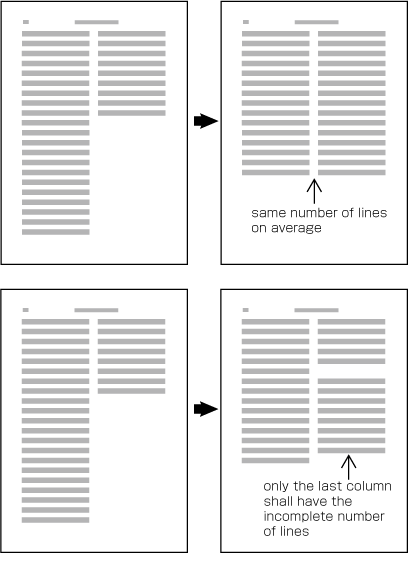
  2. Arrangement of an incomplete number of lines on a multi-column format page due to new recto, page break or other reasons. (The processing of new recto and page break is defined in JIS X 4051, sec. 8.1.1.).

    1. In vertical writing mode, just finish the line where it ends ("nariyuki"). The number of lines in each column is not uniform (see [Fig.28]).

      How to process incomplete number of lines on a multi-column format page. An example in vertical writing mode.

      [Fig.28]: How to process incomplete number of lines on a multi-column format page. An example in vertical writing mode.

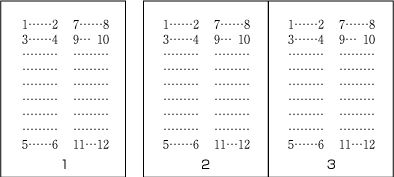
    2. In horizontal writing mode, re-arrange columns so that each column has the same number of lines. In case the number of lines is not divisible by the number of columns, add the smallest number to make it divisible and re-arrange columns using the quotient as the number of lines so that only the last column shall have the incomplete number of lines (see [Fig.29]).

      How to process incomplete number of lines on a multi-column format page. An example in horizontal composition.

      [Fig.29]: How to process incomplete number of lines on a multi-column format page. An example in horizontal writing mode.

      (note 1)

      Neither horizontal nor vertical balance of column arrangement would break the stability of vertical page layout very much, while horizontal balance of column arrangement is determinant for horizontal page layout. In vertical text it doesn't matter too much whether columns are balanced or not. For horizontally set text it is best to balance columns wherever possible..

2.4  Specifying the Kihon-hanmen

2.4.1  Procedure for Defining the Kihon-hanmen

In Japanese composition, first the size of the kihon-hanmen is defined, using the square imaginary bodies of characters in solid setting. Taking this as a base, the position of kihonhanmen with regards to the trim size is then specified. The following are procedures for determining the size and position of the kihon-hanmen (see [Fig.30]).

  1. Specifying the dimensions of the kihon-hanmen.

    1. For a document with a single column per page, specify the character size, the number of characters per line, the number of lines per page, and the line gap.

    2. For a document with multiple columns per page, specify the character size, the number of characters per line, the number of lines per column, the line-gap, and the number of columns and the column space.

      Procedures to determine KIHON HANMEN Step 1

      [Fig.30]: Procedures to determine the size and position of the kihon hanmen, step 1.

  2. Determining the position of the kihon hanmen relative to the trim size.

    There are various alternative methods for specifying the position of the kihon hanmen relative to the trim size (see [Fig.31]):

    1. Position vertically head and foot: by centering the kihon-hanmen. Position horizontally by centering the kihon-hanmen.

    2. Position vertically by specifying the space at the top (for horizontal writing mode) or the space at the bottom (for vertical writing mode). Position horizontally by centering the kihon-hanmen.

    3. Position vertically by centering the kihon-hanmen. Position horizontally by specifying the space of the gutter.

    4. Position vertically by specifying the space at the top (for horizontal writing mode) or the space at the bottom (for vertical writing mode). Position horizontally by specifying the space of the gutter (See [Fig.31]).

    Procedures to determine KIHON HANMEN Step 2

    [Fig.31]: Procedures to determine the size and position of the kihon-hanmen, step 2.

    (note 1)

    In most cases the kihon hanmen is set at the horizontal and vertical center of the trim size, which should be the default positioning, but depending on the dimensions of the kihon hanmen there may be cases where the default needs to be changed; for example, by moving the kihon hanmen up, down, to the left or to the right of the default position.

    (note 2)

    It is technically possible to determine the dimensions of the kihon hanmen by specifying the trim size and margins of all sides, but this method is not common in the tradition of Japanese composition. If this is the only way an implementation allows, the margins of each side need to be determined in relation to the dimensions of the kihon hanmen and its position in the trim size.

2.4.2  Considerations in Designing the Kihon-hanmen

The following are considerations to take into account when designing the kihon-hanmen. (Items (a) and (b) of this topic are not about processing, but rather an explanation of design preferences. The definition of kihon-hanmen is given in JIS X 4051, sec. 7.4.1.)

  1. Trim size and margins. It would be best if the shape of the kihon-hanmen could be made similar to that of the trim size.

  2. Character size. Generally 9 point (~3.2mm) type is common. Except for specialised publications such as dictionaries, the minimum size of type is 8 point (~2.8mm).

    (note 1)

    In Western text layout, 10 point (~3.5mm) or 12 point (~4.2mm) type is common. This is mainly because of a difference in design principles between Japanese and Latin characters.

  3. Line length should be multiples of the character size (see [Fig.32]).

    Line length should be multiples of the character size

    [Fig.32]: Line length should be multiples of the character size

    (note 1)

    There are basically two reasons why line length should be multiples of the character size.

    1. For Japanese composition, all line lengths except that of the last line of the paragraph should, in principle, be the same. Only the first line of a paragraph is shorter, since in principle it is indented.

    2. In principle, for printing, Japanese characters like ideographic characters (cl-19)hiragana (cl-15)and katakana (cl-16) are uniformly designed in the same square and they are set solid (no extra space between adjacent imaginary bodies).

    (note 2)

    The best line length (number of characters per line) is around 52 characters, maximum, in vertical writing mode, and 40 characters in horizontal writing mode. If the trim size would take lines beyond the recommended length, consider using a multi-column format and making the line length shorter.

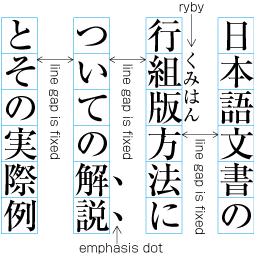
  4. Use the same amount of line gap throughout the book, except for special cases. The size of kihon-hanmen in the block direction is specified using the number of lines and the size of the line feed, including line-gap.

    (note 1)

    In Japanese composition, there are cases where ruby or emphasis (kenten, bousen, underlines, etc.) are inserted between lines. In such cases the line gap is not changed but is kept constant (see [Fig.33]). It is also possible to insert references to notes between lines within the main text. This case is handled in the same manner. Further explanations about the placement of ruby will be given in [sec. 3]. Editors note: Maybe add a note here to say that, of course, the line gap must be designed so that it is adequate to support such typographic features. What are the minimum dimensions required for such?

    Inserting RUBY or other items between lines

    [Fig.33]: Inserting ruby or other items between lines

    (note 2)

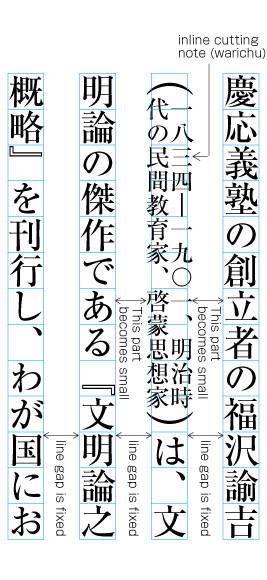
    Warichu (inline cutting note) juts out of the line width in the block direction (the character size designed via kihon-hanmen). Also for these cases, the line gap is defined for the parts without warichu, and the passages with warichu are made narrower (See [Fig.34]). Hence, for warichu, line gap is larger to some extend. Editors note: ??? The same is true for tatechuyoko or sub- and super-ornament characters. Further explanations of the placement of warichu and other items is provided in [sec. 3].

    Example of inter-line processing with inline cutting note between lines

    [Fig.34]: Example of inter-line processing with warichu between lines

    (note 3)

    It is common that the line gap for kihon-hanmen is set a value between 1/2 em space and full width (em) of the character size in kihon-hanmen. 1/2 em space can be chosen in cases where the number of characters per line is small, but full width (em) or close to it is more appropriate when the number of characters is larger than 35.

    (note 4)

    Unless ruby or other design elements are placed in the space between lines (eg. for books like classics, with many annotations), there's no need to make the line-gap larger than full width, since this would decrease legibility.

    (note 5)

    It is said that the standard line-gap in Western text layout is 1/3 em space, which is smaller than that in Japanese composition. This difference again comes from the difference in the design of Latin and Japanese characters.

2.5  Pagewise Arrangement of Kihon-hanmen Elements

2.5.1  Examples of Items Jutting Out of the Kihon-hanmen

If at all possible, the various elements of a page should remain inside the boundaries of the hanmen size. This is which is determined by kihon-hanmen. However, there are exceptions such as the following:

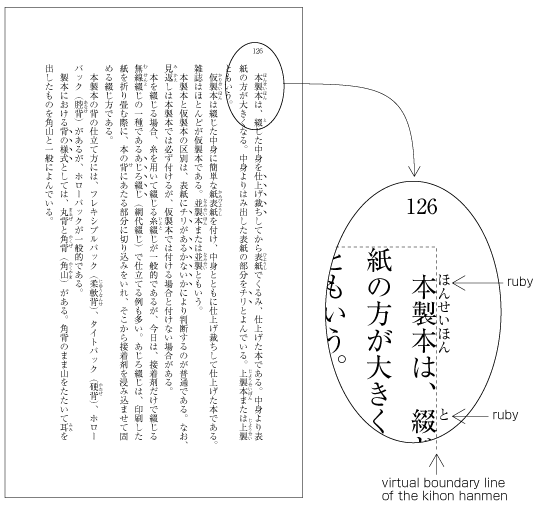
  1. Ruby or emphasis marks (side- or  underline, emphasis dots, etc.) to the right side (for vertical writing mode) or top (for horizontal setting) of the hanmen or the first paragraph of a page Editors note: for"to the right side...of the hanmen" I'd prefer to just say "at the before edge of the hanmen". Is this acceptable? It would make things a lot simpler. For the text that follows, you could then say, "at the after edge of the hanmen or paragraph" We should, of course, define 'before' and 'after' and link to the definitions. , are placed outside the hanmen or the area of the paragraph (see [Fig.35]). The same applies in cases where ruby, emphasis, etc. appear to the left of (in vertical writing mode) or below (in horizontal writing mode) a line touching the opposite side of the hanmen or the end of the paragraph. Like the handling of exceptions mentioned below, the purpose here is to preserve the line positions established for the kihon-hanmen. It is also possible to insert note reference marks between lines within the main text. Editors note: Not sure why stuff between lines is relevant here. These are handled in the same way.

    Example of ruby annotation placed outside of KIHON HANMEN

    [Fig.35]: Example of ruby annotation placed outside of the kihon-hanmen.

  2. When inline items are larger than the characters that make up a line in the kihon-hanmen (in the dimension of the block-progression), and when those elements appear in the first or last line of a page or column, the parts that jut out beyond the regular line of characters also jut out of the hanmen area or outer side of the column. Editors note: OR When there are inline elements whose dimensions extend beyond the before edge and the after edge of a line of characters as determined by the kihon-hanmen, and when those elements appear in the first or last line of a page or column, the parts that jut out beyond the regular line of characters also jut out of the hanmen area or outer side of the column. Editors note: Is it worth referring to the column here. Doesn't referring to the page do the job? When there are elements, which jut out of the line width in the block direction given by kihon-hanmen (the character size specified via kihon-hanmen), in the first line or the last line of page/column, the parts of the item which jut out of the line width in the block direc tion given by kihon-hanmen, are put jutting out of the hanmen area or outer side of the column For example, this is the case when the width of a sequence of characters which are set to tatechuyoko is wider than the characters set for the kihon-hanmen. In addition, warichu (inline cutting note) or sub- and superscript (ornament characters) are handled in the same way. (The processing rules for this item and the previous item are defined in JIS X 4051, sec. 12.1.1.)

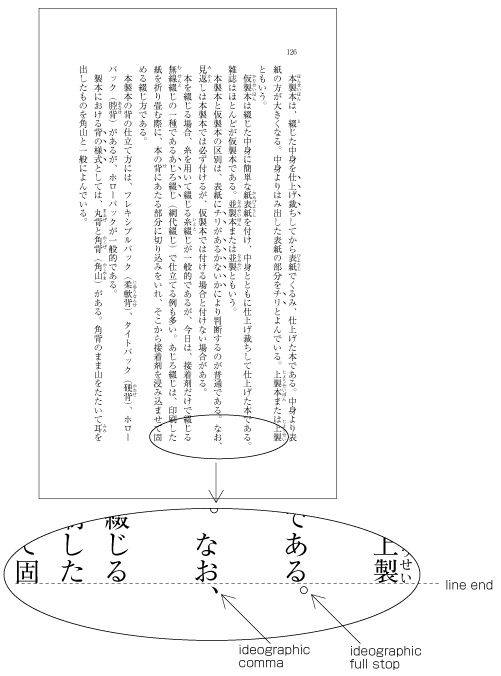
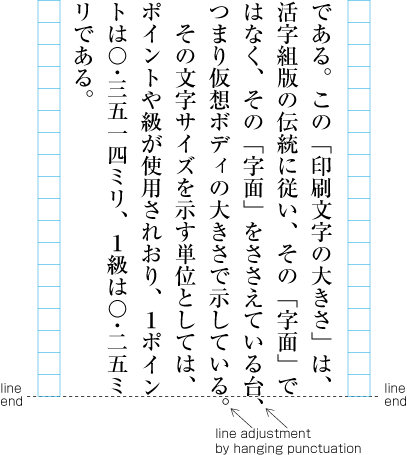
  3. Line adjustment by hanging punctuation is only necessary for [。] (IDEOGRAPHIC FULL STOP) and [、] (IDEOGRAPHIC COMMA) when they would otherwise need to be wrapped to the line head. The character is placed so that it touches the hanmen at the line end or the outside area of a column (see [Fig.36]). (Hanging punctuation is not defined in JIS X 4051, but there is an explanation in sec. 8.1, c.)

    Example of IDEOGRAPHIC COMMA and IDEOGRAPHIC FULL STOP hanging below off of the KIHON HANMEN

    [Fig.36]: Example of IDEOGRAPHIC COMMA and IDEOGRAPHIC FULL STOP placed below the kihon-hanmen.

    (note 1)

    Hanging punctuation is a method of reducing line adjustment, which relies on line gap Editors note:I don't understand the reliance on line gap .

    (note 2)

    A lot of books apply hanging punctuation.

  4. Illustrations and tables are normally placed inside the area defined by the kihon-hanmen. However, there may also be cases in which a particular illustration or table juts outside the kihon-hanmen.

    1. Cases in which it is necessary to make the illustration or table larger than the kihon-hanmen. Editors note: I think this sentence should follow on from the previous one, as the introduction to the list, not the first item.

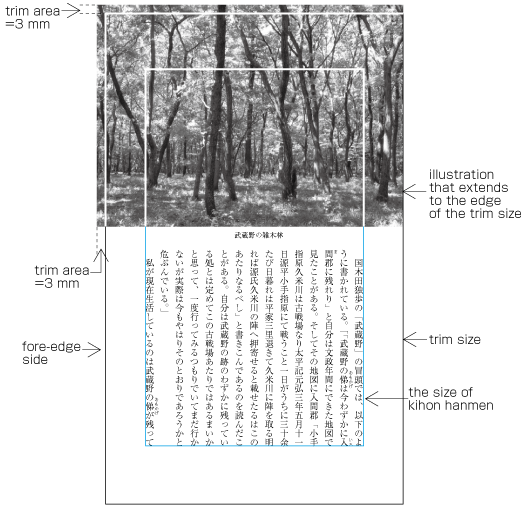
    2. For the sake of visual effect, the table or illustration may bleed into the complete paper area. This is not often used in books, but is often used in magazines (see [Fig.37]).

      Example of bleeds

      [Fig.37]: Example of bleeds

  5. Magazines may place the captions of  illustrations outside the column area or between columns. (Some people regard this as bad style.)

2.5.2  Line Positioning based on the Kihon-hanmen Design

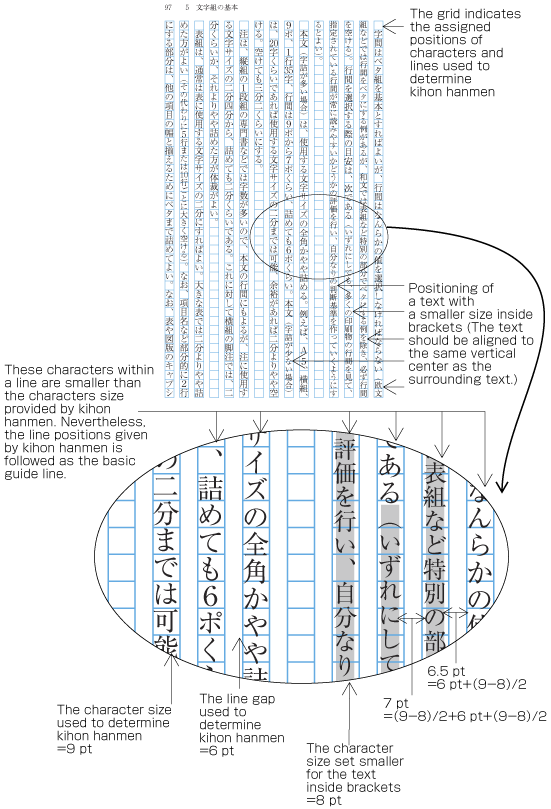
In principle, pagewise positioning of lines relies on the line positions established for the kihon-hanmen. This holds for ruby or emphasis dots as shown in [Fig.33], and also for characters within a line that are smaller than the character size established for the kihon-hanmen, as shown in [Fig.38]. The line positions given by kihon-hanmen are followed as the basic guide line, and the subsequent lines also use these positions. Editors note: What are 'subsequent lines'?

Positioning of lines with a mix of a smaller size of text

[Fig.38]: Positioning of lines with a smaller size of text.

(note 1)

Characters within brackets are made smaller, since the text is an additional explanation. Such cases are handled in the following three ways. The last method, making only characters in restricted places smaller, is the most commonly usedEditors note: I think it should therefore come first in the list .

  1. Make all characters within brackets smaller (as shown in [Fig.38]).

  2. Make all characters within brackets the same size as the character size established for the kihon-hanmen.

  3. Make the characters smaller only in restricted places, for example for references.

The following are exceptions when handling line position:

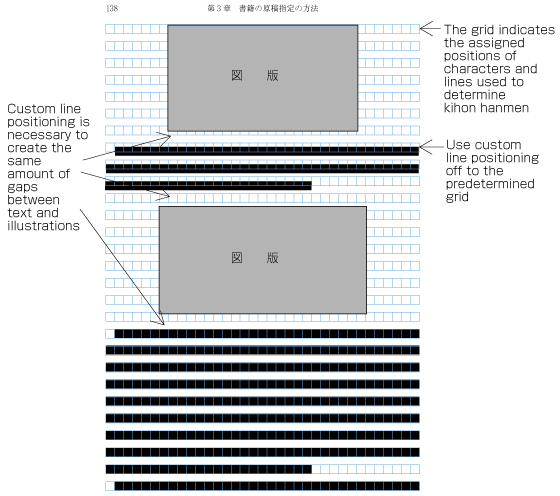
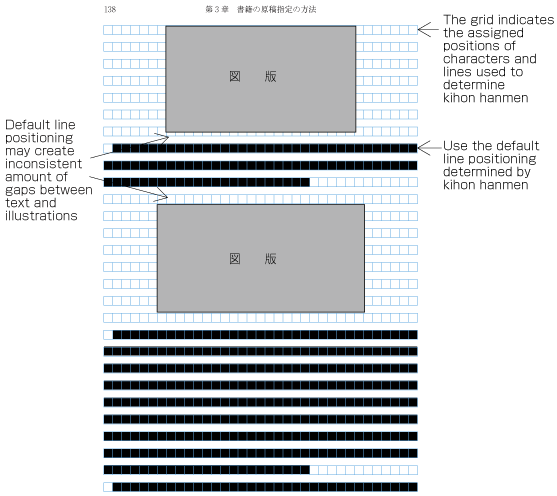
  1. When inserting more than one illustration or table item in horizontal writing mode, assuming that there is no text to the left or right of the items, the items may either slip off the lines established for the kihon-hanmen (see [Fig.39]), or stick to the lines (see [Fig.40]). The former approach is used, whenever possible, to achieve equal spacing before and after illustrations or tables, whenever possible. (This method is often used in books.) (This processing method is defined in JIS X 4051, sec. 10.3.2., d.)

    Positioning of lines with multiple illustrations - 1

    [Fig.39]: Positioning of lines with multiple illustrations - 1.

    Positioning of lines with multiple illustrations - 2

    [Fig.40]: Positioning of lines with multiple illustrations - 2.

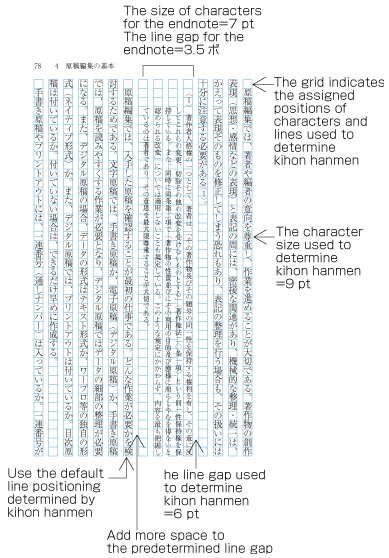
  2. The size of characters in endnotes inserted between paragraphs or those in footnotes at the bottom of the page (in horizontal writing mode) is smaller than the character size established for the kihon-hanmen. As a result, the line distance Editors note: Should this say 'line-height? is also smaller, and so the line positions are no longer identical to those established for the kihon-hanmen. As an example, [Fig.41] shows the position of an endnote between paragraphs in vertical writing mode. (The processing of endnotes is defined in JIS X 4051, sec. 9.3, and the processing of footnotes in sec. 9.4.)

    Positioning of an endnote in vertical writing mode

    [Fig.41]: Positioning of an endnote in vertical writing mode.

  3. As mentioned above, the position of a heading may not be identical to the lines established for the kihon-hanmen. Nevertheless, in the block direction, headings base their alignment on the line positions established for the kihon-hanmen (see [Fig.4]).

2.5.3  Character Positioning based on Kihon-hanmen Design

In principle, the characters in each line follow the solid setting positions of characters established for the kihon-hanmen. However, as already shown in some of the previous figures, there are examples where this is not the case. Such cases are rather common, and here we will show some prototypical examples (details will be given in [sec. 3]).

(note 1)

Where character sizes differ from the solid setting sizes established for the kihon-hanmen, line lengths may not be identical; it is necessary to align the ends of the lines, with the exception of the last line in a paragraph. The processing method for this is explained in [sec. 3.8] about line adjustment.

  1. When 9pt is the character size used to establish the kihon-hanmen, characters smaller than 9pt may be inserted in part of a line (see [Fig.38]). In such cases, the parts set at 9pt and any parts set at a smaller, say, 8pt size both use solid setting, with imaginary bodies at the respective sizes for each part.

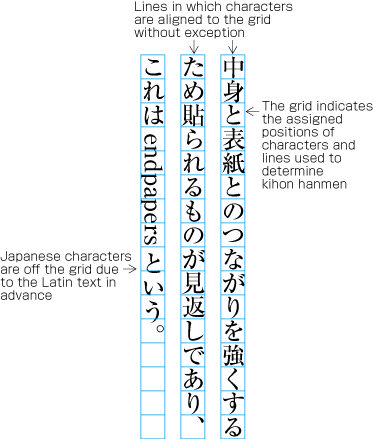
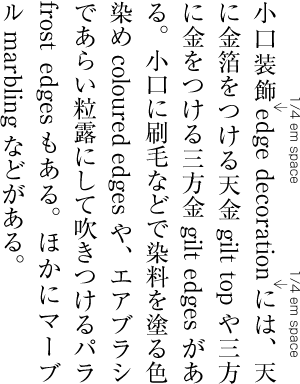
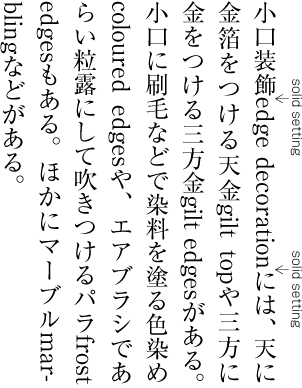
  2. In cases where proportional Latin letters are rotated 90 degrees clockwise (see [Fig.24]), the proportional letters are placed according to their proportional widths. Hence, they do not fit to the character positions established for the kihon-hanmen (see [Fig.42]). Japanese letters following the Latin letters consequently slip away from the default positions as well.

    Positioning of a mix of Western and Japanese letters in a line

    [Fig.42]: Positioning of a mixture of Western and Japanese letters in a line.

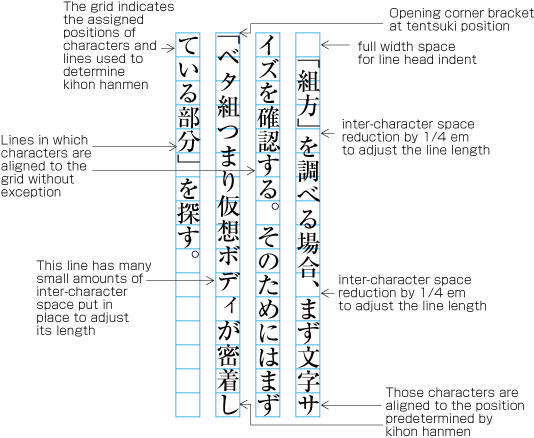
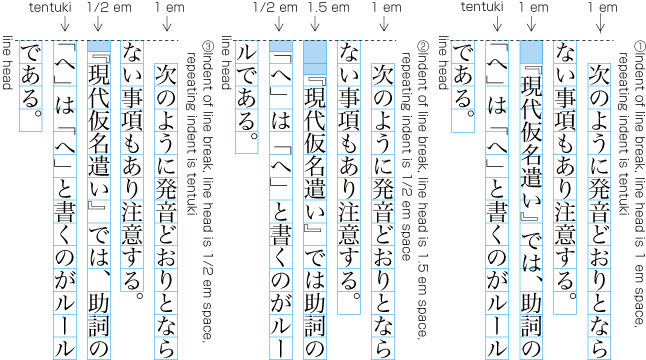
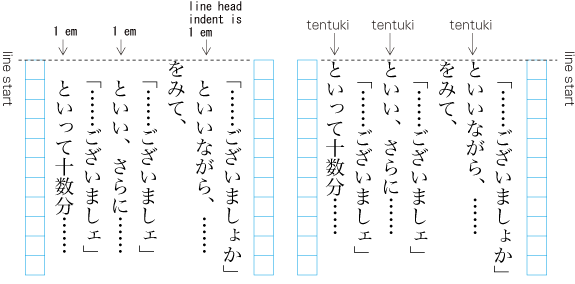
  3. There are several methods for positioning opening brackets (cl-01) at the head of line feed lines or lines after the first line of a paragraph (details are explained in [sec. 3.1.5]). In cases where the indentation of line feed lines is full width, or if the tentsuki position is used for the bracket (that is, there is no space at the line head), the second character will be in a position which is not established for the kihon-hanmen (see [Fig.43]). However, the adaptations made during the alignment of line ends ensures that the character at the end of a line is at a position that fits with the kihon-hanmen.

    Example of positioning of characters off to the grid due to the brackets at the line head

    [Fig.43]: Example of positioning of characters off the grid due to opening brackets at the line head.

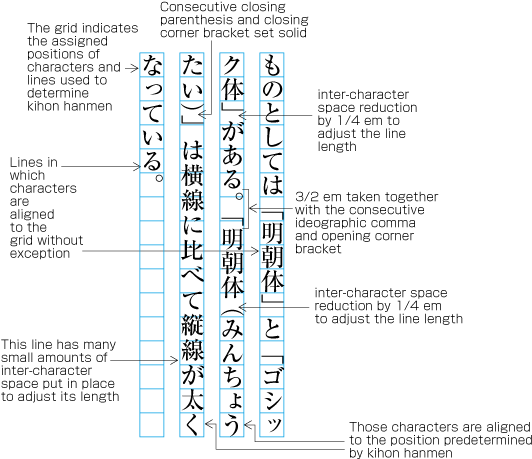
  4. [sec. 3] explains that full stops (cl-06), commas (cl-07), opening brackets (cl-01) and closing brackets (cl-02)  are half-width. If these punctuation marks and brackets are adjacent to ideographic (cl-19)katakana (cl-16) or hiragana (cl-15) characters, in principle there should be a 1/2 em space before or after the punctuation mark or brackets, so that these occupy in effect a full width size. However, if they are adjacent to other punctuation marks or brackets, the 1/2 em space is not used. In such cases, the character positions are different than the positions given via kihon-hanmen (see [Fig.44]). This is done to improve the visual appearance.

    Example of lines with consecutive punctuation marks

    [Fig.44]: Example of lines with consecutive punctuation marks.

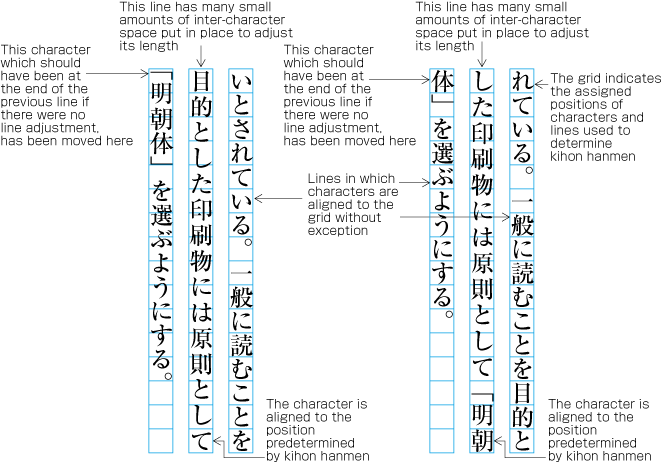
  5. [sec. 3] explains the principle that closing brackets (cl-02)full stops (cl-06) and commas (cl-07) should not be placed at the line head (so-called line head wrap). If these characters appear at the line head, some kind of adjustment processing becomes necessary (so-called line head wrap). As a result of such adjustment, it may happen that characters are placed at positions which are different from the positions established for the kihon-hanmen.

    Example of line adjustment to avoid those characters which should not start a line, such as closing brackets

    [Fig.45]: Example of line adjustment to avoid those characters which shall not start a line, such as closing brackets

2.6  Running Heads and Page Numbers

2.6.1  Positioning of Running Heads and Page Numbers

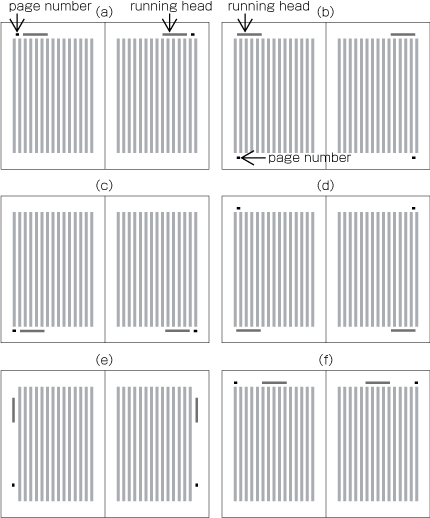
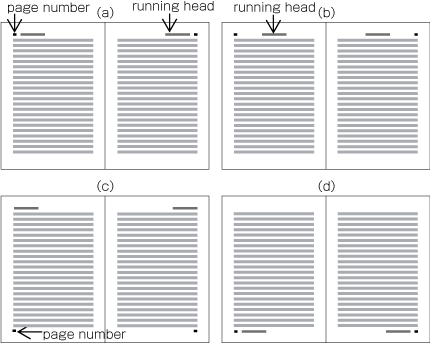
Typical positions for running heads and page numbers in vertical writing mode is as shown in [Fig.46].

Typical positioning of running heads and page numbers in vertical writing mode

[Fig.46]: Typical positioning of running heads and page numbers in vertical writing mode.

Typical positions for running heads and page numbers in horizontal writing mode is as shown in [Fig.47].

Typical positioning of running heads and page numbers in horizontal composition

[Fig.47]: Typical positioning of running heads and page numbers in horizontal writing mode.

In principle, positions of running heads and page numbers should be specified relative to the kihon-hanmen, not with absolute coordinates in the trim size. (Positioning of running heads is defined in JIS X 4051, sec. 7.6.4. Positioning of page numbers is defined in JIS X 4051, sec. 7.5.4.)

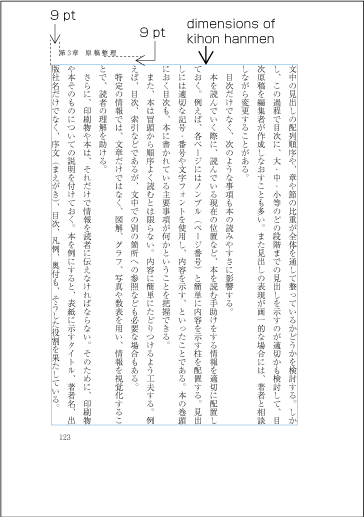
(Example) Positioning a running head above the top left corner (to head and fore-edge) of kihon-hanmen in vertical writing mode (See [Fig.48])

9 points above kihon-hanmen (vertical space)

9 points from the left edge of kihon-hanmen (horizontal space)

Positioning of a running head (vertical writing mode)

[Fig.48]: Positioning of a running head (vertical writing mode)

The following recommendations should be taken into account in positioning running heads and page numbers with reference to kihon-hanmen.

  1. When positioning running heads and page numbers horizontally with reference to kihon-hanmen in vertical writing mode, the amount of vertical space between the edge of kihon-hanmen and the running head is full width of character size in kihon-hanmen. If kihon-hanmen is horizontally set, take more vertical space than the character size in kihon-hanmen.

  2. Regardless of direction of text in kihon-hanmen, running heads and page numbers in horizontal writing mode on the left page should be aligned either at the left edge of kihon-hanmen or at the full width horizontal space off to the right from the left edge. On the right page, the tail of the running heads or page numbers be aligned either at the right edge of kihon-hanmen or at the full width space off to left from the right edge.

  3. When arranging running heads and page numbers together horizontally, space between the running head and the page number should be double or one and a half time of the character size for the running head.

  4. When positioning running heads and page numbers vertically to the fore-edge in vertical writing mode (See the bottom left spread in [Fig.46] for example), the minimum horizontal distance from kihon-hanmen should be the same as that of the line-gap of kihon-hanmen. The running head should be positioned approximately four characters of kihon-hanmen below off the head, and page numbers should be positioned approximately five characters of kihon-hanmen above off the foot.

    (note 1)

    In general, Ideographic numerals are used for vertically set page numbers, and Western-Arabic numerals for horizontal pagination. When giving different pagination on the front matter, small Roman numbers are used for the horizontal pagination.

2.6.2  Principles of Arrangements of Running Heads and Page Numbers

Positioning of all running heads and page numbers in the same book should be consistent.

(note 1)

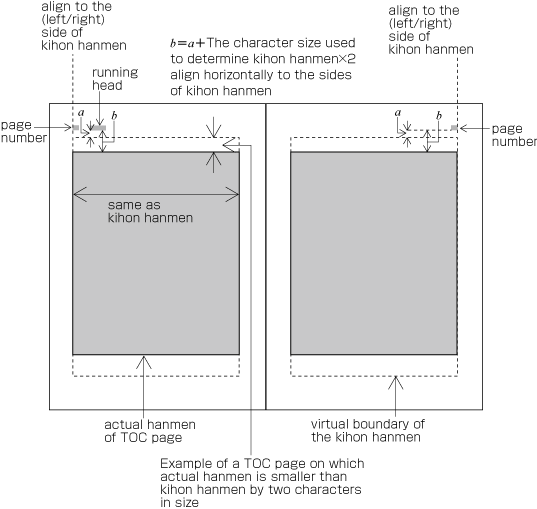
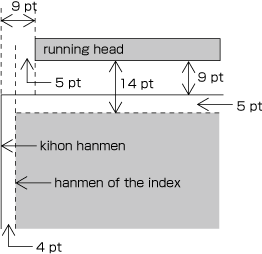
Even on a page with text area, smaller than kihon-hanmen in size such as for table of contents or Index, positioning of running head and page number shall be the same. Therefore, the positioning of running heads and page numbers with reference to those areas smaller than kihon-hanmen in size, shall be changed. The following [Fig.49] demonstrates the relations of the hanmen for table of contents and running heads or page numbers. As shown in [Fig.6], this hanmen is smaller than kihon-hanmen. [Fig.50] demonstrates the relations of positions of running heads and page numbers for the hanmen of indices. These hanmens are not only 4 points smaller at the left and right, but also 5 points smaller at the top and bottom.

Positioning of running heads and page numbers on TOC pages on which HANMEN is smaller than KIHON HANMEN in size

[Fig.49]: Positioning of running heads and page numbers on TOC pages on which hanmen is smaller than kihon-hanmen in size.

Positioning of running heads and page numbers on index pages on which HANMEN is smaller than KIHON HANMEN in size

[Fig.50]: Positioning of running heads and page numbers on index pages on which hanmen is smaller than kihon-hanmen in size.

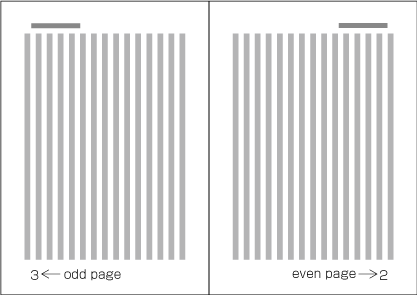
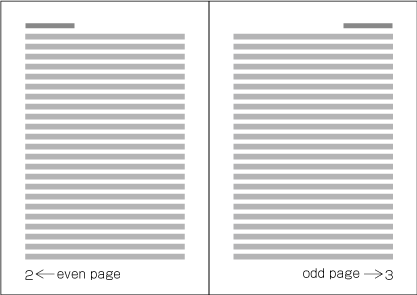
Because the start of page shall be on the recto side, the right-hand page of a spread in vertical writing mode is always even page and the left-hand page is always odd page (See [Fig.51]). Likewise, the left-hand page of a spread in horizontal writing mode is always even page and the right-hand page is always odd page (See [Fig.52]).

Page Numbers on a spread in vertical writing mode

[Fig.51]: Page Numbers on a spread in vertical writing mode

Page Numbers on a spread in horizontal composition

[Fig.52]: Page Numbers on a spread in horizontal writing mode

2.6.3  Ways of Arranging Running Heads and Page Numbers

There are two ways to arrange running heads. One is the single running head system and the other is the double running head system. (Arrangement of running heads is defined in JIS X 4051, sec. 7.6.2. Page Numbers are defined in sec. 7.5.2.).

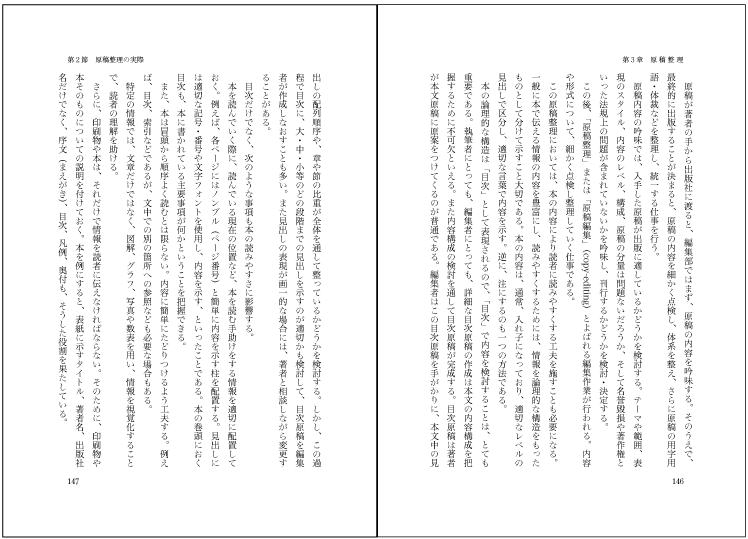
  • Double running heads: Place running heads on both even pages and odd pages (See [Fig.53]).

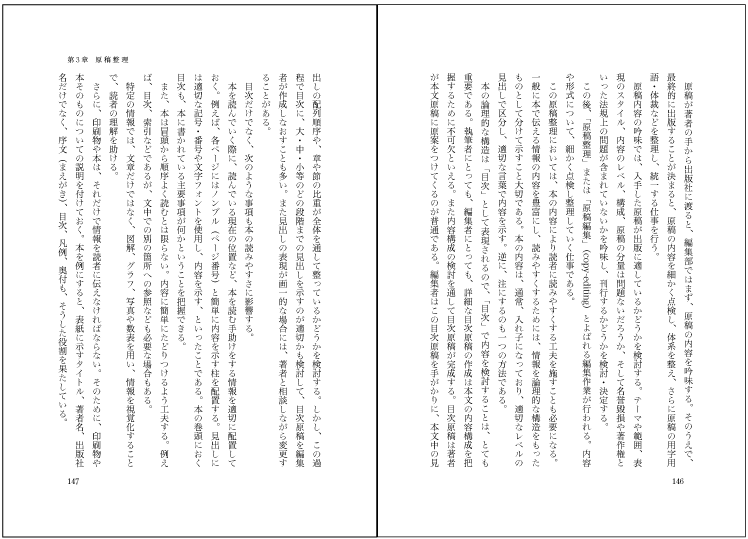
  • Single running heads: Place running heads only on odd pages (See [Fig.54]).

Double running head method

[Fig.53]: Double running head method

Single running head method

[Fig.54]: Single running head method

(note 1)

In general, there will be only one running head per page. However, in some cases, such as in dictionaries, multiple running heads are printed to indicate contents.

(note 2)

In general, there will be only one page number per page. However in some cases multiple page numbers are printed as in the following examples:

  1. When a horizontally set index and/or bibliography appears at the end of a volume in vertical writing mode, both reverse pagination and continuous pagination are printed.

  2. For multivolume works, both serial page numbers throughout the work and page numbers per volume are printed.

  1. In the double running head system, the primary heading or the book title is used for the running heads on the even pages, and the secondary heading on the odd pages, Editors note: it's not clear to me what the following text means: does one level below mean physically positioned lower on the page, or is it attempting to explain what a secondary heading is? one level below the ones on the even pages. Where there is no secondary heading, such as on the page containing the table of contents, the same running head is used on both even and odd pages.

    (note 1)

    Which information is used for the running heads depends on the content of the book . Given that the main purpose of running heads is to signpost to readers what is written on each page, or the content of the current page, it does not make much sense to use the book title for the running head. The most common approach for a book with three levels of headings is to use the top level heading and the second level heading.

  2. In the single running head system, one of the headings between the top and third levels is used.

  3. In principle, the contents of running heads will be the same as those of headings with the following differences;

    1. Numbers and words in Latin alphanumeric characters in vertically set headings should be changed to horizontal notation for horizontally set running heads. Editors note: What does horizontal notation mean here? Change numbers from kanji to ascii digits, etc? If so, (a) we should link to the section that describes that, and (b) i'm then unsure what 'words' are being referred to.

    2. If headings are too long, they should be made shorter by paraphrasing them in fewer characters. Running heads with too many characters will not look good.

    3. For certain publications, such as a collection of monographs, the names of authors may be added in parentheses at the end of the headingsrunning head.

  4. In principle, the text direction of running heads and page numbers should be the same as that of kihon-hanmen. For vertical composition, however, it is more common to set running heads and page numbers horizontally.

  5. In principle, for the single running head system running heads are printed on all odd pages, and for the double running head system on all even and odd pages. However, for the sake of appearance, running heads may be omitted as follows:

    1. Pages on which running heads should be hidden:

      1. Naka-tobira and han-tobira.

      2. Pages where a running head overlaps with other elements such as illustrations.

      3. Blank pages.

    2. Pages on which running heads may be hidden:

      1. Pages where a figure or a table is positioned adjacent to the running head.

      2. Pages with a heading right after a new recto or new page.

  6. In principle, page numbers are printed on all pages. However, for the sake of appearance, they may be omitted as follows:

    1. Pages on which page numbers should be hidden:

      1. Pages on which a illustration or a table is positioned adjacent to the page number.

      2. Blank pages.

    2. Pages on which page numbers may be hidden:

      1. Divisional title and simplified divisional title pages.Editors note: here (and in many other places) the highlighted terms in the Japanese text didn't make it through to the English. This presumably needs to be rectified.

      2. Pages in horizontal writing mode with a page number placed in the margin at the top of the page, and with a heading right after a new recto or new page. (In this case, it is also possible to move the page numbers to the center of the margin at the foot of the page.)

    (note 1)

    Pages are not counted in cases such as the following:

    1. If the main title page is the enclosure; Editors note: not sure what this means. Does it just mean, 'on the main title page'?

    2. if a frontispiece is inserted in the opening page of a book; or

    3. if an illustration of the enclosure or a divisional title is present in the main text.

  7. There are two types of page numbering. "Continuous pagination" means that page numbers continue throughout the complete book. "Different pagination" means that page numbers start from "1" separately at beginning of the front matter and back matter. There is also, for example in manuals, the method of starting each chapter from page number "1". (In such cases, it is common that the name of the chapter is added as a prefix before the page number.)

    (note 1)

    If the front matter and the main text have different page numbers, each starts with page number "1". In this case, it is common to use Roman numerals for the pages of the front matter, in order to distinguish them from the main text.

    (note 2)

    For books in vertical writing mode with indexes in horizontal writing mode, the following methods are available.

    1. Reverse pagination. The index reads from the end of the book, but page numbers are added starting with "1" in reverse the same order.

    2. Continuous pagination. The index reads from the end of the book, and page numbers start with "1" and flow in the same order as the book. (The index pages flow in the reverse order to the page numbers.)

    3. Both reverse pagination and continuous pagination. In this case, the page numbers for continuous pagination are in the same position as the page numbers of the main text, and page numbers in reverse pagination are in a different position (for example, if serial pagination is in the foot of the page, reverse pagination is in the head). Often other methods are applied to distinguish the different paginations, such as using Arabic numbers, as in the main text, but adding brackets before and after.

3  Line Composition

3.1  Line Composition Rules for Punctuation Marks

3.1.1  Differences in Vertical and Horizontal Composition in Use of Punctuation Marks

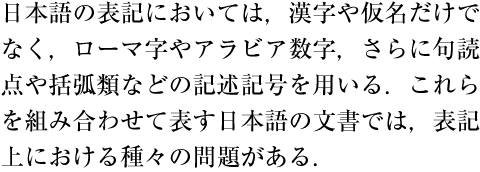
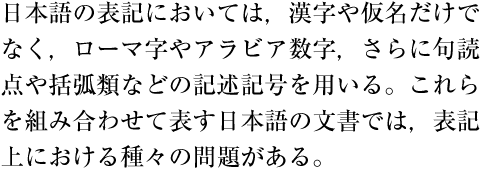
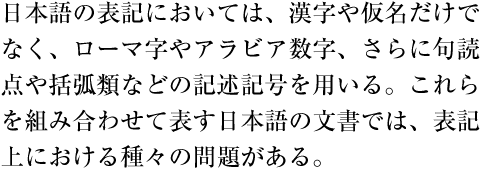
There are some punctuation marks that could be used uniquely in either vertical writing mode or horizontal writing mode. In this document, characters and symbols are treated as members of character classes, classified by the behavior to be composed. Each class name is followed by class id, like opening brackets(cl-01) The following are some typical examples:

  1. Full stops(cl-06) and commas(cl-07)

    1. In vertical writing mode, [。] (IDEOGRAPHIC FULL STOP) and [、] (IDEOGRAPHIC COMMA) shall be used for 読点類(cl-07) and 句点類(cl-06).

    2. In horizontal writing mode, there are three conventions in choice of symbols for 読点類(cl-07) and 句点類(cl-06):

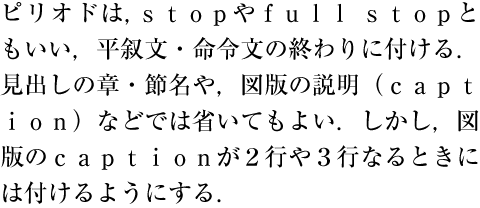
      1. Using COMMA(,) [,] (COMMA) and FULL STOP (.) [.] (FULL STOP) (See [Fig.55]).

        Example text using COMMA and FULL STOP

        [Fig.55]: Example text using [,] (COMMA) and [.] (FULL STOP)

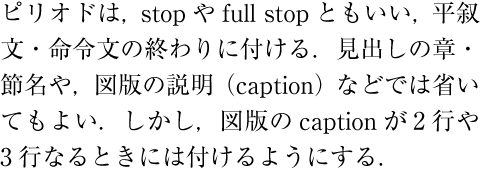
      2. Using [,] (COMMA) (,) and [。] (IDEOGRAPHIC FULL STOP) (See [Fig.56]).

        Example text using COMMA and IDEOGRAPHIC FULL STOP

        [Fig.56]: Example text using COMMA and IDEOGRAPHIC FULL STOP

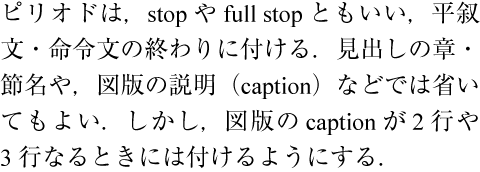
      3. Using [、] (IDEOGRAPHIC COMMA) and [。] (IDEOGRAPHIC FULL STOP) (See [Fig.57]).

        Example text using IDEOGRAPHIC COMMA and IDEOGRAPHIC FULL STOP

        [Fig.57]: Example text using [、] (IDEOGRAPHIC COMMA) and [。] (IDEOGRAPHIC FULL STOP)

      (note 1)

      In the horizontal writing mode, there are many cases of Japanese and Western mixed text compositions. The convention shown in (i) is a way to apply the same [,] (COMMA) and [.] (FULL STOP) to both Western and Japanese texts for consistency, which is commonly seen in books on science and technology. The convention shown in (ii) was invented because of the problem in (i) that the size of [.] (FULL STOP) appears too small for Japanese texts and using [。] (IDEOGRAPHIC FULL STOP) for period would mitigate it. This convention has been adopted to the Japanese official publications (In the past, [,] (COMMA) and [.] (FULL STOP) were adopted to some official publications.).

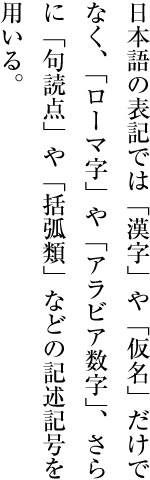
  2. [「] (LEFT CORNER BRACKET), [」] (RIGHT CORNER BRACKET), [“] (LEFT DOUBLE QUOTATION MARK) and [”] (RIGHT DOUBLE QUOTATION MARK)

    1. In vertical writing mode, [「] (LEFT CORNER BRACKET) and [」] (RIGHT CORNER BRACKET) shall be used for quotation (See [Fig.58]).

      Examples of quoted texts in corner brackets

      [Fig.58]: Examples of quoted texts in [「] (LEFT CORNER BRACKET) and [」] (RIGHT CORNER BRACKET)

    2. In horizontal writing mode, pairs of [“] (LEFT DOUBLE QUOTATION MARK) and [”] (RIGHT DOUBLE QUOTATION MARK) or pairs of [‘] (LEFT SINGLE QUOTATION MARK) and [’] (RIGHT SINGLE QUOTATION MARK) may be used in place of [「] (LEFT CORNER BRACKET) and [」] (RIGHT CORNER BRACKET).

      Examples of quoted texts in double quotation marks

      [Fig.59]: Examples of quoted texts in [“] (LEFT DOUBLE QUOTATION MARK) and [”] (RIGHT DOUBLE QUOTATION MARK)

      (note 1)

      This is because [「] (LEFT CORNER BRACKET) and [」] (RIGHT CORNER BRACKET), especially [」] (RIGHT CORNER BRACKET) may not look good in horizontal writing mode, but adoption of corner brackets in horizontal writing mode seems increasing.

      (note 2)

      Though [〟] (LOW DOUBLE PRIME QUOTATION MARK) and [〝] (REVERSED DOUBLE PRIME QUOTATION MARK) are similar to double quotation marks in appearance (See [Fig.60]), they are exclusively for vertical writing mode and shall not be used in horizontal writing mode.

      Examples of quoted texts in double prime quotation marks

      [Fig.60]: Examples of quoted texts in [〟] (LOW DOUBLE PRIME QUOTATION MARK) and [〝] (REVERSED DOUBLE PRIME QUOTATION MARK)

      (note 3)

      [“] (LEFT DOUBLE QUOTATION MARK) and[”] (RIGHT DOUBLE QUOTATION MARK) are exclusively for horizontal writing mode and shall not be used in vertical writing mode. Also, [‘] (LEFT SINGLE QUOTATION MARK) and [’] (RIGHT SINGLE QUOTATION MARK) are exclusively for horizontal writing mode and shall not be used in vertical writing mode. However, in vertical writing mode, when Western characters(cl-27) are composed 90 degree rotated clockwise, these quotation marks are sometimes used.

  3. [[] (LEFT SQUARE BRACKET), []] (RIGHT SQUARE BRACKET)[〔] (LEFT TORTOISE SHELL BRACKET) and [〕] (RIGHT TORTOISE SHELL BRACKET)

    [〔] (LEFT TORTOISE SHELL BRACKET) and [〕] (RIGHT TORTOISE SHELL BRACKET) are vertical variation of [[] (LEFT SQUARE BRACKET) and []] (RIGHT SQUARE BRACKET) in horizontal writing mode. Therefore, square brackets should be used in horizontal writing mode except for special cases.

(note 1)

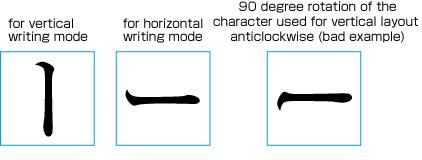
The position of the letter face of commas(cl-07) and full stops(cl-06) on the imaginary bodyis different in vertical and horizontal writing mode. The same letter face of opening brackets(cl-01), closing brackets(cl-02) and hyphens(cl-03) can be used in both vertical and horizontal writing mode by rotating clockwise 90 degrees to the inline direction. Again, the position of the letter face of small kanas(cl-11) symbols on the imaginary body is different in vertical and horizontal writing mode. In addition, as to [ー] (KATAKANA-HIRAGANA PROLONGED SOUND MARK), the difference in vertical and horizontal writing mode is not only in the orientation of the letter face to the inline direction but also the shape of the symbol. The shape of katakana-hiraganaprolongedsoundmark for horizontal writing mode is not the same as the one for vertical writing mode rotated counterclockwise 90 degrees (See [Fig.61]).

KATAKANA-HIRAGANA PROLONGED SOUND MARK for vertical and horizontal composition

[Fig.61]: [ー] (KATAKANA-HIRAGANA PROLONGED SOUND MARK) for vertical and horizontal writing mode

3.1.2  Positioning of Punctuation Marks (Commas, Periods and Brackets)

Positioning punctuation marks (commas, periods and brackets) in line is as follows.

(note 1)

Characters and symbols, including punctuation marks, which are subject to the consideration of  line start wrapping, line end wrapping and inter-letter space adjustment, will be described in detail in Sec. 2.9 "Character Class". Every combination of character class is provided as a complete table in Appendix [sec. WARNING! No anchor for section reference: #tbd].

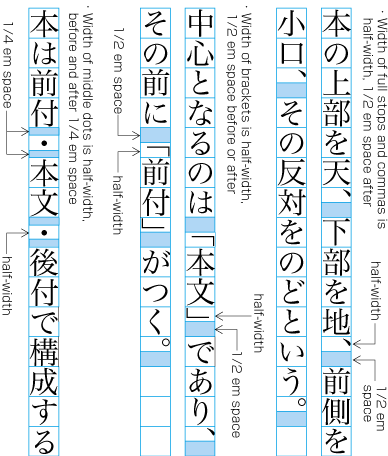
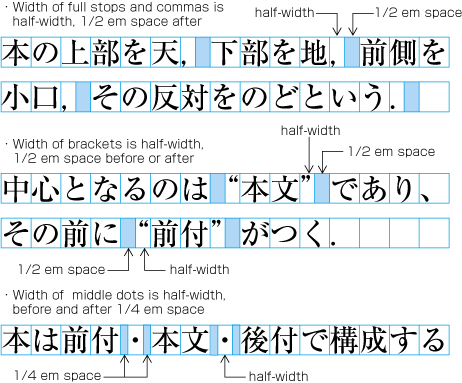
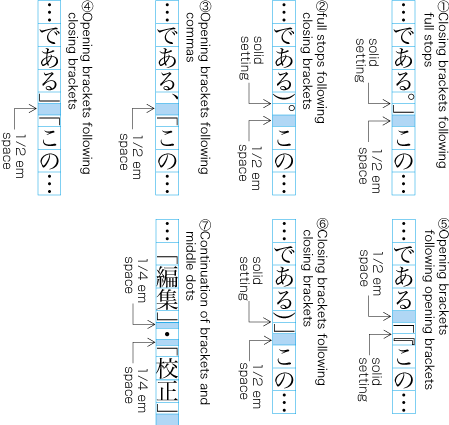
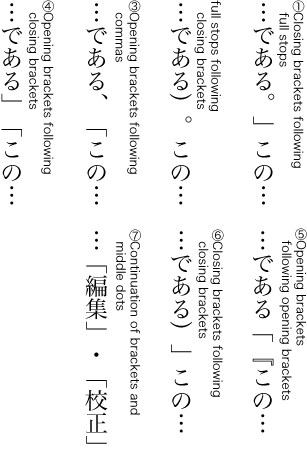
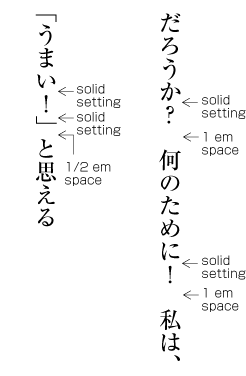
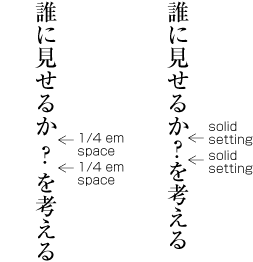
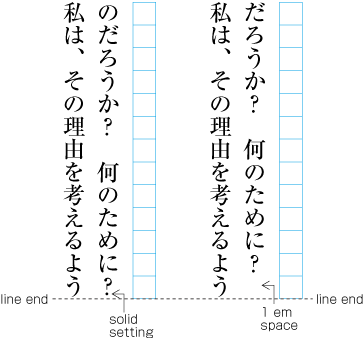
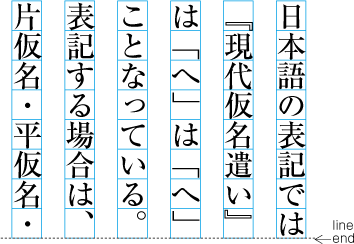
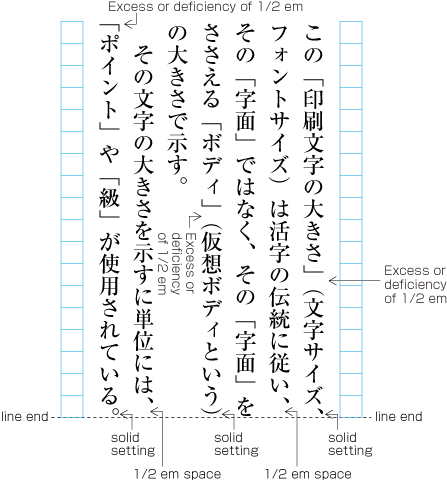
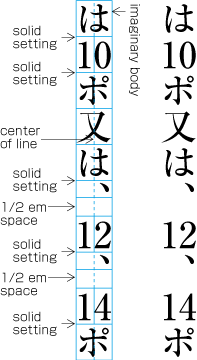
Character width of commas(cl-07), full stops(cl-06), opening brackets(cl-01), closing brackets(cl-02) or middle dots(cl-05) is half width(1/2 em). But when those punctuation marks are placed side by side with ideographic characters(cl-19) and/or hiraganas(cl-15), katakanas(cl-16) characters, a given amount of space will be inserted before or after the symbols in principle, which makes them as if they were full width (1 em) intrinsically (See [Fig.62]). As for middle dots(cl-05), the space will be inserted before and after the middle dot This principle makes the symbols consistent with kanji and kana characters in character width and at the same time helps making organization of text clearer with the space for punctuation. The space before / after the punctuation marks added in principle is subject to the line adjustment and may be removed eventually, except those added after periods.

  1. After commas(cl-07), 1/2 em space is added in principle.

  2. Full stops(cl-06), 1/2 em space is added in principle.

  3. Before opening brackets(cl-01), 1/2 em space is added in principle.

  4. After closing brackets(cl-02), 1/2 em space is added in principle.

  5. Before and after middle dots(cl-05), 1/4 em space is added in principle.

Character width of punctuation marks and the space appended before / after the symbols - 1Character width of punctuation marks and the space appended before / after the symbols - 2

[Fig.62]: Character width of commas, periods, and the space appended before and/or after the symbols

(note 1)

The implementation of punctuation marks in fonts can give a different character width to them, but it is expected that it's capable to follow the line composition rules explained here as the result. In letterpress printing, it was also a common practice to combine the punctuation marks with half width body and 1/2 em space in order to make it easier to remove the space later for adjustment. And because of that, the types were picked up but punctuation marks at the type-picking phase according to a manuscript and the punctuation marks were picked up only when they were necessary in composing a page. Later, with increasing adoption of Monotype machines, punctuation marks of full width body became popular and both full width and half width punctuation marks have been used in a mix since then.

(note 2)

Among opening brackets(cl-01) and closing brackets(cl-02), [(] (LEFT PARENTHESIS)[)] (RIGHT PARENTHESIS)[〈] (LEFT ANGLE BRACKET) and [〉] (RIGHT ANGLE BRACKET) are used to indicate supplementary explanations and they are slightly different in usage from other opening brackets(cl-01) and closing brackets(cl-02). To reflect the difference, there's a convention not to append 1/2 em space before / after the parentheses and angle brackets and just set them solid (See [Fig.63]).

Positioning of parentheses and angle brackets

[Fig.63]: Positioning of [(] (LEFT PARENTHESIS), [)] (RIGHT PARENTHESIS) and [〈] (LEFT ANGLE BRACKET), [〉] (RIGHT ANGLE BRACKET) (Shown in left is an example of setting them solid.)

3.1.3 Exceptional Positioning of [、] (IDEOGRAPHIC COMMA)and [・] (KATAKANA MIDDLE DOT)

The space usually added after [、] (IDEOGRAPHIC COMMA) and the space before and after [・] (KATAKANA MIDDLE DOT) are in principle omitted for cosmetic reasons in the following cases.

  1. In vertical writing mode, ideographic digits and [、] (IDEOGRAPHIC COMMA) used as a decimal separator are set solid (as in the right line on [Fig.64] ).

    An example of the exceptional positioning of the IDEOGRAPHIC COMMA

    [Fig.64]: An example of the exceptional positioning of the IDEOGRAPHIC COMMA

    (note 1)

    In vertical writing mode, ideographic digits with [、] (IDEOGRAPHIC COMMA) to represent an approximate number are expected to be set solid too (as in the right line on [Fig.65]).

    An example of the positioning of the IDEOGRAPHIC COMMA with ideographic digits to represent an approximate number

    [Fig.65]: An example of the positioning of [、] (IDEOGRAPHIC COMMA) with ideographic digits to represent an approximate number

  2. Ideographic digits and [・] (KATAKANA MIDDLE DOT) representing a decimal point shall be set solid (as in the right line on [Fig.66] ).

    An example of the exceptional positioning of the KATAKANA middle dot

    [Fig.66]: An example of the exceptional positioning of [・] (KATAKANA MIDDLE DOT)

3.1.4  Positioning of Consecutive the opening brackets(cl-01), the closing brackets(cl-02), the commas(cl-07) and the full stops(cl-06)

In case multiple punctuation marks, such as opening brackets(cl-01), closing brackets(cl-02), commas(cl-07), full stops(cl-06) and middle dots(cl-05) come one after the other, the following space adjustments are made for cosmetic reasons (See [Fig.67]).Note also that the 1/2 em or 1/4 em spaces, appended usually before and/or after the punctuation marks but those after full stops(cl-06), can be candidates of removal for line adjustments.

  1. When closing brackets(cl-02) come immediately after commas(cl-07) or full stops(cl-06), remove the default 1/2 em space between them and in principle add 1/2 em space after the closing brackets (See [Fig.67] (1)).

  2. When commas(cl-07) come immediately afterclosing brackets(cl-02), remove the default 1/2 em space between them and in principle add 1/2 em space after the commas. Wen full stops(cl-06) come immediately after closing brackets(cl-02), remove the default 1/2 em space between them and in principle add 1/2 em space after the full stops (See [Fig.67] (2)).

  3. When opening brackets(cl-01) come immediately after commas(cl-07), in principle, add 1/2 em space between them (See [Fig.67] (3)). When  opening brackets(cl-01) come immediately afterfull stops(cl-06), add 1/2 em space between them;

  4. When opening brackets(cl-01) come immediately after closing brackets(cl-02), in principle add 1/2 em space between them (See [Fig.67] (4)).

  5. When opening brackets(cl-01) come immediately after other opening brackets(cl-01), set them solid and in principle add 1/2 em space before the first one (See [Fig.67] (5)).

  6. When closing brackets(cl-02) come immediately after other closing brackets(cl-02), set them solid and in principle add 1/2 em space after the last closing brackets (See [Fig.67] (6)).

  7. When middle dots(cl-05) come immediately after closing brackets(cl-02), in principle add 1/4 em space before the succeeding middle dots (See [Fig.67] (7)).

  8. When opening brackets(cl-01) come immediately after middle dots(cl-05), in principle, add 1/4 em space after the preceding middle dots (See [Fig.67] (7)).

Examples of line adjustment with multiple brackets, commas or periods

[Fig.67]: Examples of line adjustment with multiple opening brackets(cl-01), closing brackets(cl-02), commas(cl-07) , full stops(cl-06) or middle dots(cl-05)

The line adjustment rules shown above have been established because the default 1/2 em spacing before or after the consecutive punctuation marks, or 1/4 em space before and after them, makes the line sparse and it doesn't convey a proportioned appearance (See [Fig.68]).

Examples of bad line composition with unadjusted spaces between multiple brackets, commas or periods

[Fig.68]: Examples of bad line composition with unadjusted spaces between multiple opening brackets(cl-01), closing brackets(cl-02). commas(cl-07), full stops(cl-06) or middle dots(cl-05)

(note 1)

Japanese composition is based on the full width design of characters, but strictly following the full width based composition sometimes produces an unbalanced appearance. In such exceptional cases, the appearance as a result of the composition must be given higher priority than the full width design principle. When and how to invoke such exceptional procedures has a direct bearing on the quality of the text layout. In other words, it is a matter of how to resolve the conflicts between the principle and the products of it.

3.1.5  Positioning of the opening brackets(cl-01) at Line Head

When starting a new line with opening brackets(cl-01), there are some patterns as shown in [Fig.69]. Note that the amount of line indent after the line feed (the first line indent of a new paragraph) is assumed to be full width across the patterns.

  1. The first line indent after the line feed is set full width (1 em) and the next line after the first line break starts with no space (so-called TENTSUKI. See [Fig.69] (1)).

  2. The first line indent after the line feed is set 1.5 em (3/2 of full width) and the next line indent after the first line break is set 1/2 em (See [Fig.69] (2)).

  3. The first line indent after the line feed is set 1/2 em and the next line after the first line break is set TENTSUKI (See [Fig.69] (3)).

Examples of Positioning of Brackets at Line Head

[Fig.69]: Examples of Positioning of opening brackets(cl-01) at Line Head

(note 1)

Because the inherent character width of brackets is half width, [Fig.69] (1) can be explained as the result of applying the principle that any line should start with no space. On the other hand, the principle represented by [Fig.69] (2) is to assume opening brackets should be always accompanied by the preceding 1/2 em space as if they were full width and then apply the same principle as in [Fig.69] (1). JIS X 4051 adopts the principle shown in (1) (the patterns shown in (2) and (3) are offered as options) . The pattern shown in (3) was first invented in such books as novels which use frequent line feeds and corner brackets in dialogues, for which the first line indent with 1 em or 1.5 em would give superfluously too much space in appearance (And then this pattern was accepted and adopted by general books). Japanese major publishers which deal with literature, such as Kodansha, Shinchosha, Bungei Shunju, Chuoh Kouronsha, Chikuma shobo, adopts the pattern shown in (3). In contrast, Iwanami shoten and other publishers adopt the pattern shown in (1). Because Iwanami shoten once adopted the pattern (2) in vertical composition, there were many examples of it, but few examples of (2) can be found today.

(note 2)

The first line indent of a new paragraph is full width in principle. However, the following exceptions can be seen.

  1. The first line indent of all new paragraphs is set full width. This is the most popular scheme. However, the line indent of those new paragraphs which are constituent with the preceding paragraph is set TENTSUKI as shown in [Fig.70] (There are books such as novels which adopt full width line indent without exception.). Similarly, in horizontal writing mode, the line indent is set TENTSUKI for the new line which continues to the preceding line of mathematical expression connected by conjunctions such as "therefore".

    Examples of line indent followed by the preceding line with quoted text (as in dialogues)

    [Fig.70]: Examples of line indent followed by the preceding line with quoted text (as in dialogues)

  2. When headings have no line indent, the first line indent of the first paragraph after headings can be also set TENTSUKI for cosmetic reasons. However, it is not recommended to set the first line indent TENTSUKI for all paragraphs, because it would make paragraph breaks unclear.

3.1.6  Positioning of the dividing punctuation marks(cl-04) ([?] (QUESTION MARK) and [!] (EXCLAMATION MARK) and the hyphens(cl-03)

The dividing punctuation marks(cl-04) ([?] (QUESTION MARK) and [!] (EXCLAMATION MARK)) should be of full-width, and they are typeset as follows.

  1. Basically add no space before dividing punctuation marks(cl-04) at the end of a sentence and add 1 em space after them (See [Fig.71]). However when a closing brackets(cl-02) follows right after the dividing punctuation marks, add no space after the dividing punctuation marks either and add 1/2 em space after the closing bracket (See [Fig.71]).

    Positioning of Dividing Punctuation Marks (Examples in vertical writing mode)

    [Fig.71]: Positioning of dividing punctuation marks(cl-04) (Examples in vertical writing mode)

    (note 1)

    Many implementations use fulwidth ideographic space(cl-14) for 1 em space appended after dividing punctuation marks(cl-04).

    (note 2)

    No full stops(cl-06) should be appended after dividing punctuation marks(cl-04) at the end of a sentence.

    (note 3)

    There're some cases where dividing punctuation marks(cl-04) are used in the middle of a sentence, not at the end. In those cases, add either no space or 1/4 em space before and after the dividing punctuation marks (See [Fig.72]).

    Examples of Positioning of Dividing Punctuation Marks in the middle of a sentence (in vertical writing mode)

    [Fig.72]: Examples of Positioning of dividing punctuation marks(cl-04) in the middle of a sentence (in vertical writing mode)

    (note 4)

    The details of composition rule fordividing punctuation marks(cl-04) andhyphens(cl-03) are described in Appendix [sec. WARNING! No anchor for section reference: #tbd] as a complete table, following the description of character classes in [sec. 3.9].

  2. When dividing punctuation marks(cl-04) at the end of a sentence come to the end of a line, apply the following rules (See [Fig.73]).

    Examples of Positioning of Dividing Punctuation Marks at the end of a line (in vertical writing mode)

    [Fig.73]: Examples of Positioning of dividing punctuation marks(cl-04) at the end of a line (in vertical writing mode)

    1. Suppose the line length is of 13 character width, and when dividing punctuation marks(cl-04) comes at 12th character position, 1 em space should be appended after it.

    2. Suppose the line length is of 13 character width, and when dividing punctuation marks(cl-04) comes at 13th character position, no space should be appended after it. In addition, do not carry over the 1 em space usually appended after the dividing punctuation marks to the line head of the next line, which in this case should be of no space (TENTSUKI).

Character width of the hyphens(cl-03) varies by each. [‐] (HYPHEN) should be of SIBUNKAKU (1/4 em width), [–] (EN DASH) and [゠] (KATAKANA-HIRAGANA DOUBLE HYPHEN) should be of half-width (1/2 em width), [〜] (WAVE DASH) should be of full-width. Basically there should be no space before and after hyphens(cl-03). However, 1/2 em space should be appended in principle when opening brackets(cl-01) follow right after hyphens(cl-03) and 1/4 em space when middle dots(cl-05) follow.

3.1.7  Characters Not Starting Line

In principle, any line should not begin with closing brackets(cl-02), hyphens(cl-03), dividing punctuation marks(cl-04), middle dots(cl-05), full stops(cl-06), commas(cl-07), iteration marks(cl-09), prolonged sound marks(cl-10) , small kanas(cl-11) and  warichu closing brackets(cl-29), otherwise it would give the odd appearance to lines.

(note 1)

Not a small number of books adopt a weaker set of rules which allows [々] (IDEOGRAPHIC ITERATION MARK) (one of iteration marks(cl-09)), prolonged sound marks(cl-10) and small kanas(cl-11) to start a line. There is another method for [々] (IDEOGRAPHIC ITERATION MARK) to replace to base kanji character when happen to set at the head of a line. For example, "家(bottom of a line) + 々(head of the next line)" will be changed to "家(bottom of a line) + 家(head of the next line)".

(note 2)

There's yet another weaker rule to allow [・] (KATAKANA MIDDLE DOT) to start a line.

(note 3)

In newspaper text layout, dividing punctuation marks(cl-04) ([?] (QUESTION MARK) and [!] (EXCLAMATION MARK)) are allowed to start a line. This is due to the fact that the line lengths are shorter in newspapers. When the line is very short, there'll be fewer opportunities for inter-character space adjustment, which makes it difficult to preserve the number of characters per line as much as possible. It is thought that this is the reason why the weaker set of line head wrapping rules has been adopted in newspaper text layout.

(note 4)

The details of characters not starting line and not ending line are described in Appendix [sec. WARNING! No anchor for section reference: #tbd] as a complete table, following the description of character classes in [sec. 3.9]

3.1.8  Characters Not Ending Line

Any line should not end with opening brackets(cl-01) and warichu opening brackets(cl-28) (line end wrapping), otherwise it would give the odd appearance to lines.

(note 1)

The process of formatting lines to avoid non-starter characters at the line head, non-ending characters at the line end, spaces before and/or after inseparable characters, line breaking before and/or after unbreakable characters, etc., is generally called KINSOKUSYORI.

3.1.9  Positioning of the closing brackets(cl-02), the full stops(cl-06), the commas(cl-07) and the middle dots(cl-05) at Line End

For closing brackets(cl-02), full stops(cl-06) orcommas(cl-07) at the line end, in principle there is 1/2 em space after and before them (See [Fig.74]). The KATAKANA MIDDLE DOT[・] (KATAKANA MIDDLE DOT) character in principle also has 1/4 em space before and after, and is handled like a full width character (See [Fig.74]). In principle it is appropriate to apply line adjustment processing (adjustment of inter character space) to the places with the 1/2 em or 1/4 em space.

Example of handling brackets and punctuation marks at the line end like fuill width characters

[Fig.74]: Example of handling closing brackets(cl-02), full stops(cl-06), commas(cl-07) and [・] (KATAKANA MIDDLE DOT) at the line end like full width characters

(note 1)

The following processing is defined in JIS X 4051.

full stops(cl-06)

After full stops(cl-06), there must be 1/2 em space.

commas(cl-07)

After commas(cl-07),solid setting is applied (See [Fig.76]).

closing brackets(cl-02)

After closing brackets(cl-02), solid setting is applied (See [Fig.76]).

(note 2)

In letterpress printing era, the following methods were common (See [Fig.75]).

  1. For full stops(cl-06), commas(cl-07) and closing brackets(cl-02), if possible, 1/2 em space was preserved. Using 1/2 em space was the general approach.

  2. If the line length is not sufficient or too much and adaptation becomes necessary (see below), the 1/2 em space after a punctuation mark was replaced with solid setting. The reason was that this was at the line end, and there would arise no problems even if the 1/2 em space would become solid setting. The option of replacing the 1/2 em space after punctuation marks with 1/4 em space instead of removing the whole 1/2 em space was not used. That meant that there was the choice between either 1/2 em space after punctuation marks or solid setting.

Examples of punctuation marks at the end of a line with either 1/2 em space after or solid setting

[Fig.75]: Examples of closing brackets(cl-02), commas(cl-07) and full stops(cl-06) at the end of a line with either 1/2 em space after or solid setting

(note 3)

In some of DTP systems etc., after full stops(cl-06)commas(cl-07) orclosing brackets(cl-02) at the line end, the line end is always solid setting (See [Fig.76]).

Example of applying always solid setting after brackets, full stops and commnas at the line end

[Fig.76]: Example of applying always solid setting after closing brackets(cl-02), full stops(cl-06), and commas(cl-07) at the line end

3.1.10 Unbreakable Character Sequence

If the following characters and symbols appear in sequence there will be no line break inbetween them (so called BUNKATSUKINSHI). The reason is that these characters and symbols are to be handled as one unit.

(note 1)

Both line head wrap and line end wrap mean that there will be no line break between characters or symbols. For line head wrap there is no break (BUNKATSUKINSHI) between the line head wrap character and the character or symbol before. For line end wrap, there is no break (BUNKATSUKINSHI) between the line end wrap character and the following character or symbol.

(note 2)

The details of unbreakable character sequences are described in Appendix [sec. WARNING! No anchor for section reference: #tbd] as a complete table, following the description of character classes in [sec. 3.9].

  1. Between [—] (EM DASH) in sequence (to be more specific, a double dash, see [Fig.77]).

    BUNKATSUKINSHI for a sequence of EM DASH

    [Fig.77]: A sequence of EM DASH is unbreakable

    (note 1)

    Other characters and punctuation marks before and after[—] (EM DASH) are in solid setting. However, in following cases, some space should be set between[—] (EM DASH) and other characters. As mentioned in next note, […] (HORIZONTAL ELLIPSIS) and [‥] (TWO DOT LEADER), prefixed abbreviations(cl-12) and postfixed abbreviations(cl-13) behave similar to [—] (EM DASH).

    1. In case closing brackets(cl-02) or commas(cl-07) are followed by[—] (EM DASH), 1/2 em space is inserted between them, in principle.

    2. In case [—] (EM DASH) is followed by opening brackets(cl-01), 1/2 em space is inserted between them, in principle.

    3. In case [—] (EM DASH) and middle dots(cl-05) are set side by side, 1/4 em space is inserted between them, in principle.

    (note 2)

    A double dash is handled as one unit, hence line break is forbidden. Also, in letterpress printing, breaking of the double dash was forbidden very strongly, since the double dash was created as a double full body, so it was actually not possible to break it. Nevertheless, if it was not possible to avoid it, two EM DASH were used instead the double dash. That made it possible to have a line break between them.

  2. Between […] (HORIZONTAL ELLIPSIS) or [‥] (TWO DOT LEADER) (to be more specific, double HORIZONTAL ELLIPSIS[ ……] or double TWO DOT LEADER[‥‥]).

    BUNKATSUKINSHI in a sequence of HORIZONTAL ELLIPSIS or TWO DOT LEADER

    [Fig.78]: Unbreakable in a sequence of […] (HORIZONTAL ELLIPSIS) or [‥] (TWO DOT LEADER)

    (note 1)

    In the letterpress printing era, double HORIZONTAL ELLIPSIS etc. were created as a sequence of HORIZONTAL ELLIPSIS. Hence, compared to double dash, the line break between them was not so strongly forbidden.

  3. Between an prefixed abbreviations(cl-12) ([¥] (YEN SIGN)[$] (DOLLAR SIGN)[¢] (CENT SIGN) etc.) and the following arabic or ideographic numeral (See [Fig.79]). The reason is that such character sequences are to be handled as one unit.

    BUNKATSUKINSHI between an abbreviated prefix and the following Western-Arabic numeral

    [Fig.79]: BUNKATSUKINSHI between prefixed abbreviations(cl-12) and the following Western-Arabic numeral

  4. Between a postfixed abbreviations(cl-13) ([%] (PERCENT SIGN), [‰] (PER MILLE SIGN) etc.) and the preceding Western-Arabic numeral or ideographic numeral (See [Fig.80]). The reason is that such character sequences are to be handled as one unit.

    BUNKATSUKINSHI between an abbreviated suffix and the preceding Western-Arabic numeral

    [Fig.80]: BUNKATSUKINSHI between postfixed abbreviations(cl-13) and the preceding Western-Arabic numeral

    (note 1)

    Some people think that it is appropriate to have a line break between the [%] (PERCENT SIGN) and the preceding arabic or ideographic numeral. The reason seems to be that [%] (PERCENT SIGN) has a high level of independency. Furthermore it is possible to have a line break between "0" and "パ" in cases like "50パーセント" (meaning "50 percent", where "percent" is written with KATAKANA).

  5. Between Western-Arabic numerals (See [Fig.79], [Fig.80], and [Fig.81].). Western-Arabic numerals indicate ranks via the position of a numeral.

    (note 1)

    It is possible to have a line break between ideographic numerals. Also it is possible to have a line break after [、] (IDEOGRAPHIC COMMA) as a decimal separator or an indicator for approximate number, and [・] (KATAKANA MIDDLE DOT) as a decimal point. The reason is that the natural usage of ideographic numerals is to write them like "二百三十五", that is with inserted rank indicators (An example: "二" means "two", "百" means "hundred". "二百" means "two hundred". "三" means "three", "十" means "ten". "三十" means "thirty"."五" means "five". The complete sequence "二百三十五" means "Two hundred thirty five".). Hence, it is not necessary to express ranks via positions. In contrast, line break is forbidden for Western-Arabic numerals, since it is necessary to express the rank via the position. Furthermore, if in vertical writing mode Western-Arabic numerals are placed in appropriate direction side by side, they are used like the ideographic numerals, and it is possible to have a line break inbetween them.

    (note 2)

    When writing Western-Arabic numerals, [.] (FULL STOP) is used as a decimal point, [,] (COMMA) or space is used as a rank indicator. Before and after these characters are inseparable (See [Fig.81]: the space before "4" expresses a rank.).

  6. Inter-letter space among Western characters(cl-27) in a word (or, sequence of letters, which are not able to hyphenate),  or unit indicators (km, kg, mm etc.) in Latin letters (See [Fig.81]).

    BUNKATSUKINSHI between unit indicators in Latin letters

    [Fig.81]: It is not able to line break between letters in unit symboles(cl-25)  in Latin letters

    (note 1)

    Using [‐] (HYPHEN) at the end of a line, it becomes possible to have a line break within Western characters(cl-27).

    (note 2)

    In this document, description of units with proportional Western characters, such as km and kg, are treated as unit symboles(cl-25).

    (note 3)

    In fig.2-28, there is a 1/4 em space between "4" and "k", because of the convention to insert 1/4 em between unit symboles(cl-25) and following Arabic numerals or Western characters(cl-27). It is permited to line break between "4" and "k". In this case, there are no 1/4 em space in neither the head nor bottom or lines.

  7. Inter-letter space among ruby letters, composed as mono-ruby  to handle mono-ruby as one object. Note that it is breakable between base characters with mono-ruby.

  8. Inter-letter space among ruby letters or base characters, composed as group-ruby  to handle group-ruby as one object.

    BUNKATSUKINSHI with mono RUBY and group RUBY

    [Fig.82]: Example of unbreakable cases of ruby sequence

    (note 1)

    With  ruby used for compound words (jukugo-ruby), a group of ruby characters is attached to each base character. It is possible to have a line break between such groups of ruby letters and base characters (See [Fig.83]).  However, each group of ruby letters and base character should not be line breaked within the group to handle them as one object.

    Example of a line break for JUKUGO RUBY

    [Fig.83]: Example of a line break for jukugo-ruby

  9. Between sub- and superscript before or after the base character (See [Fig.84]). Inter-letter gap among base characters with ornament characters  or inter-letter gap among the ornament itself. The reason is that these character sequences are to be handled as one object.

    BUNKATSUKINSHI between a character and the related subscript

    [Fig.84]: BUNKATSUKINSHI between a character and the related subscript

  10. In order to create a correspondence between notes and the related main text, often an reference marks (aijirushi) is being added. It is unbreakable before the reference mark and among letters of the reference mark itself. (See [Fig.85]). The application of unbreakable rule here is a matter of style.

    BUNKATSUKINSHI before an AIJIRUSHI (reference marks, Western-Arabic numerals or ideographic numerals)

    [Fig.85]: BUNKATSUKINSHI before an AIJIRUSHI (reference marks, Western-Arabic numerals or ideographic numerals)

    (note 1)

    In this document, characters in reference marks are treated as characters followed by reference marks(cl-20).

    (note 2)

    Often there are full stops(cl-06) after reference marks. In these cases, it is also unbreakable between the reference marks and the full stops. The reason is that full stops shall not be set at the head of lines (See [Fig.85]).

  11. After warichu opening brackets(cl-28), which open warichu, or before warichu closing brackets(cl-29), wich close warichu.

  12. A unit of furiwake. A unit of furiwake is handled as one object.

    (note 1)

    Unbreakable and breakable combinations of character class is described as a complete table in Appendix [sec. WARNING! No anchor for section reference: #tbd], following [sec. 3.9].

3.1.11 Unbreakable Character Sequence

For line adaptation processing, it is not allowed to put spaces between the following characters (This prohibition is called BUNRIKINSHI.). The reason is that these characters or symbols should appear as one unit.

(note 1)

The main places where for line adaptation processing solid setting may be dropped are the space among hiraganas(cl-15), katakanas(cl-16), ideographic characters(cl-19). Furthermore, for example the amount of space between words in Western text is also the target of space adaptation.

  1. There must be no space between all characters described in Unbreakable Character Sequence.

    (note 1)

    Some people think that only for cases without the possibility of regular line adaptation processing, it is permissive to increase space between letters in Western words.

  2. In addition to the cases mentioned above, the following cases also require BUNRIKINSHI.

    1. Before or after opening brackets(cl-01) or closing brackets(cl-02).

      (note 1)

      After opening brackets(cl-01) or before closing brackets(cl-02) there is always BUNRIKINSHI. In contrast, before opening brackets or after closing brackets there is no BUNRIKINSHI. full stops(cl-06) and commas(cl-07) are handled the same as the closing brackets.

    2. Before or after full stops(cl-06), commas(cl-07).

    3. Before or after middle dots(cl-05).

    4. Before or after dividing punctuation marks(cl-04).

    5. Before or after hyphens(cl-03).

    6. Before or after 1 em, 1/2 em, 1/4 em etc. spaces which are between Japanese Characters.

    7. Among base characters with jukugo-ruby.

      (note 1)

      Combinations of character classes, where spaces are able to insert for line alignment, are described as a complete table in Appendix [sec. WARNING! No anchor for section reference: #tbd], following [sec. 3.9].

3.1.12 Examples of Line Adjustment

Methods for line adjustment processing are discussed in different sections of this document. However, since layout processing of punctuation marks is one reason for the need for line adjustment processing, here we will introduce two main examples where line adjustment processing is necessary, and shows adjustment examples (see ① at [Fig.86]).

  1. The principal approach in Japanese composition is that with the exception of the last line of a paragraph, the length of all lines is aligned. As explained before, the line length is set to be n-times of the character size. Hence, as long as full width characters are used, all lines have the same length (See [Fig.86]).

  2. In [Fig.86] at ②, there is a [、] (IDEOGRAPHIC COMMA) followed by a [「] (LEFT CORNER BRACKET), and the complete space taken by the two characters is 1.5 em. That means that in that line, 1/2 em space is missing. To achieve a uniform line lenght, in this case line adjustment processing is applied like shown at ③ in [Fig.86]: the missing 1/2 em space can be gained since it is possible to apply line adjustment by inter-character space reduction, that means to adjust 1/2 em space before and after the LEFT CORNER BRACKETto 1/4 em space.

  3. At ④ in [Fig.86], the 15th character is opening brackets(cl-01). This makes it necessary to avoid the position at the line end. If possible, full width space reduction would be applied, and the character "前" in the second line would be moved in the first line into the 15th position. In that way, the problem could be avoided. However, in this example a full width space reduction is not possible, so line adjustment processing as shown at ⑤ in [Fig.86] is applied: The opening brackets(cl-01) is moved to the second line, and line adjustment by inter-character space expansion is applied. That means that space is inserted in the first line at places where possible.

    Examples of line adjustment

    [Fig.86]: Examples of line adjustment

3.2  Japanese and Western Mixed Text Composition (including Horizontal-in-Vertical Text Composition)

3.2.1  Composition of Japanese and Western Mixed Texts

There are a lot of examples of Japanese text, in which Western and/or Greek letters are mixed among Japanese letters. Examples are as follows:

  1. Use one Latin letter as a symbol for something, like "A" and "B".

  2. Use a Western word in Japanese context, like "editor".

  3. Use acronyms of things and organization names, like "DTP" and "GDP"

  4. Write Western book titles and authors in lists of referred books with original spelling.

Latin letters are also used in Itemization and headings for count up, besides symbols for unit, symbols for chemical element, mathematical symbols. As can be judged from these examples, mixture of Latin letters among Japanese letters is daily used in Japanese composition.

note 1)

There are some examples which include whole Western paragraphs in Japanese documents.  However, there are few ordinary books, which include whole Western paragraphs in Japanese documents. There are a lot of examples of textbooks for foreign language, in which one or more Western paragraphs followed by annotations in Japanese language. Also, there are some examples in treatises and journals, which contain whole Western paragraphs.

note 2)

In Vertical Settings, symbols for units are usually described with katakanas(cl-16) , such as センチメートル(centimeter) or センチ(abbreviation of centimeter in katakana "senchi"). In Horizontal Settings, the International System of Units(SI) is usually used, such as "cm".

note 3)

The treatment of mixture of Japanese Characters and Western Characters are also described in JIS X 4051 4.7.

3.2.2  Mixed Text Compostion in the Horizontal Writing Mode

In Horizontal Settings, basically proportional Western Fonts are used. ([Fig.87]). As for Western-Arabic Numerals, both half width fonts and proportional fonts are used.

Example of proportional Western fonts used in Horizontal Japanese Setting

[Fig.87]: Example of Proportional Western fonts used in Horizontal Japanese Setting

Example of Western Full Width Mono-space fonts used in Horizontal Japanese Setting. (In Horizontal Setting, Western Full Width Mono-space fonts are usually not recommended.)

[Fig.88]: Example of Western Full Width Mono-space fonts used in Horizontal Japanese Setting. (In Horizontal Setting, Western Full Width monospace fonts are usually not recommended.)

note 1)

As shown in [Fig.88], there are some examples of Western Full Width Mono-space fonts used in Horizontal Japanese typesetting, these usage are not recommended, because of cosmetic reason.

note 2)

Usually, in Horizontal Japanese Settings, Western-Arabic Numerals fonts, which are easy to balance and harmonize with Japanese fonts, are used. Considering line adjustment, it is recommended to use monospacehalf width Western-Arabic Numerals fonts. There are some cases of Japanese font with half width monospace Western-Arabic Numerals.

note 3)

There are two choises for those glyphs of Latin letters and numerals used in Japanese and Western mixed text compositons. One way is to use those glyphs for Western characters built into the same Japanese font. The other is to combine an independent Western font for Western characters and the Japanese font for Japanese characters. (Example: [Fig.89] is composed using proportional glyphs of Latin letters and numerals included in Ryumin R-KL. [Fig.90] is composed with Ryumin R-KL for Japanese characters and Times New Roman for Latin letters and numerals.)

Example: Mixture of Ryumin R-KL for Japanese Characters Western Proportional fonts and Western-Arabic Numeral fonts included in R-KL for Western Characters and Western-Arabic Numerals Characters.

[Fig.89]: Example of Japanese and Western mixed text with the same font Ryumin R-KL for both Japanese characters and proportional Western characters.

Example of mixture of Ryumin R-KL and Times Roman for Western Characters and Western-Arabic Numerals Characters.

[Fig.90]: Example of Japanese and Western mixed text with two distinct fonts - Ryumin R-KL for Japanese characters and Times New Roman for Western characters.

3.2.3  Mixed Text Composition in Vertical Settings

As explained in the Chapter 1, there are three different styles to set Latin letters and Western-Arabic numerals in Vertical Settings:

  1. Set Latin letters and/or Western-Arabic numerals one by one in inline direction with Japanese characters (See [Fig.91]). This style is adopted typically when composing a single Latin letter or Western-Arabic numeral between the adjacent Japanese letters. Full width monospace glyphs are specified for those Latin letters and Western-Arabic numerals in this style.

    A2-TBD Example of Latin letters in normal orientation

    [Fig.91]: Example of Latin letters in normal orientation

  2. Set Latin letters and/or Western-Arabic numerals rotated 90 degrees clockwise in Vertical Settings. ([Fig.92]). This style is adopted usually when Latin letters compose a word or sentences. Proportional fonts are specified for those characters in this style as in HorizontalSettings (or half width monospace fonts for Western-Arabic numerals).

    Example of Latin letters rotated clockwise 90 degrees

    [Fig.92]: Example of Latin letters rotated 90 degrees clockwise

  3. Set Latin letters and/or Western-Arabic numerals in TATECHUYOKO (Horizontal-in-Vertical Settings, see [Fig.93]). TATECHUYOKO layout is adopted usually when composing a two-digit number in Western-Arabic numerals, or a combination of two or three Latin letters, the length of which is equal to the default size of the line in pragraph direction or longer than that just to an acceptable extent (A combination of two or three Latin letters may be rotated 90 degrees clockwise rather than set it in TATECHUYOKO layout). Proportional glyphs (or half width monospace glyphs for Western-Arabic numerals) are used for those characters in TATECHUYOKO layout.

    Example of Western-Arabic numerals in TATECHUYOKO (Horizontal-in-Vertical layout)

    [Fig.93]: Example of Western-Arabic numerals in TATECHUYOKO (Horizontal-in-Vertical Settings)

    note 1)

    Acronyms, such as "GNP", and abbreviations like "Web", are usually set one by one character-wise in normall orientation (See [Fig.94]). However, there are some cases where acronyms and abbreviations are rotated 90 degrees clockwise (See [Fig.91]).

    Example of acronyms set one by one in normal orientation

    [Fig.94]: Example of acronyms set one by one in normal orientation

    A2-TBD Example of acronyms rotated clockwise 90 degrees

    [Fig.95]: Example of acronyms rotated 90 degrees clockwise

    note 2)

    The ideographic numerals were traditionally used in VerticalSettings instead of Western-Arabic numerals (The Road numbers and Car numbers were few examples of exceptions). However, the more newspapers and other publications have been adopting Western-Arabic numerals in vertical writing mode, the more the use of TATECHUYOKO layout for Western-Arabic numerals has also been increasing.

3.2.4  Setting Method for Full Width Mono-space Latin Letters and Western-Arabic Numerals

When full-width and fixed-width Western characters or Arabic numerals are set in vertical writing mode as "quasi" Japanese character, inter-letter spaces between these characters and hiraganas(cl-15)katakanas(cl-16) or ideographic characters(cl-19) are solid setting ,similar to ordinary ideographic characters(cl-19) (Fig. 2-2-8). Also, when full-wodth and fixed-width Western characters or Arabic numerals are set after full stops(cl-06)commas(cl-07) or closing brackets(cl-02), or, before opening brackets(cl-01), insert 1/2 space after commas(cl-07) or closing brackets(cl-02), or, before opening brackets(cl-01), in principle. In addition, in these cases, insert 1/2 em after full stops(cl-06). When full-width and fixed-width Western characters or Arabic numerals are set before full stops(cl-06)commas(cl-07) or closing brackets(cl-02), or, after opening brackets(cl-01), the inter-letter space before full stops, commas or closing brackets are solid, or, after opening brackets are solid.

Setting example of Full Width Mono-space Latin Letters and Western-Arabic Numerals

[Fig.96]: Setting example of Full Width Mono-space Latin Letters and Western-Arabic Numerals

note 1)

In this document, full-width and fixed-width Western characters and Arabic numerals are treated as members of ideographic characters(cl-19) class.

note 2)

The details of ideographic characters(cl-19), includeing full-width and fixed-width Western characters and Arabic numerals, are described as a complete table in Appendix [sec. WARNING! No anchor for section reference: #tbd], following [sec. 3.9].

3.2.5  Handling of Tatechuyoko (Horizontal-in-Vertical Settings)

Strings, to be set as tatechuyoko (Horizontal-in-Vertical Settings), are firstly set from left to right assolid setting, then set the whole strings align in center of the vertical line.([Fig.97]). When hiraganas(cl-15), katakanas(cl-16) orideographic characters(cl-19) are set before/after tatechuyoko, the inter-letter space is solid. When tatechuyoko is set afterfull stops(cl-06), commas(cl-07) orclosing brackets(cl-02), or, beforeopening brackets(cl-01), 1/2 em is inserted, in principle. In addition, when tatechuyoko is set afterfull stops(cl-06), 1/2 em is inserted. When tatechuyoko is set before full stops, commas or closing brackets, or, after opening brackets, the inter-letter space is solid.

Setting example of TATECHUYOKO (Horizontal-in-Vertical Text Setting)

[Fig.97]: Setting example of tatechuyoko (Horizontal-in-Vertical Text Setting

note 1)

The details of handling of inter-letter spaces between strings in tatechuyoko (cl-30) and adjacent other character classes are described as a complete table in Appendix [sec. WARNING! No anchor for section reference: #tbd], following [sec. 3.9].

3.2.6  Handling of Western Text in Japanese Text using proprtional Western Fonts

Composition rules of Western characters, Western texts and Arabic numerals, set rotated 90 degrees clockwaise in vertical writing mode, and horizontal writing mode, are as follows:

  1. Sequence of Western characters in a Western word should not be line breaked, except  hyphenation capable positions.

  2. When line adjustment is done with inter-letter space reduction mode, Western word spaces(cl-26) are used with first priority. Also, when line adjustment is done with line adjustment by inter-letter space addition mode, Western word spaces are used with first priority.

  3. When line adjustment by inter-letter space addition mode is used, inter-letter spaces within Western words and Arabic numerals are not used to space expansion.

  4. Inter-letter space, between hiraganas(cl-15), katakanas(cl-16) or ideographic characters(cl-19), and, Western characters or Arabic numerals, is 1/4 em [Fig.98]. The issue, whether the 1/4 em space can be used for line end adjustment or not, is discussed in [sec. 3.8.2] and [sec. 3.8.4].

Example of 1/4 EM Inter Character Space between Japanese Characters and Latin Characters

[Fig.98]: Example of 1/4 EM inter-letter space between hiraganas(cl-15), katakanas(cl-16) and ideographic characters(cl-19), and Latin Characters

note 1)

In this document, proportional Western characters and Arabic numerals are treated as members of Western characters(cl-27) class. Note that half- and fixed-width Arabic numerals, designed to use in mixture with Japanese text, are treated as members of grouped numerals(cl-24).

note 2)

The reason why there need 1/4 EM inter-letter space is that the design concept of Latin fonts and Japanese fonts are different each other, so it looks too tight without the spaces.([Fig.99])

Example of Latin Characters and Western-Arabic Numerals Japanese Characters without Inter-Character Spaces (This method is not recommended)

[Fig.99]: Example of solid setting between hiraganas(cl-15), katakanas(cl-16) and ideographic characters(cl-19), and, Latin Characters and Western-Arabic Numerals (This method is not recommended).

However, in following cases, there are no 1//4 EM spaces ([Fig.100]).

  1. At the start of the line, there is no space before Latin Characters and Western-Arabic Numerals. At the end of the line, there is no space after Latin Cha