The presentation of this document has been augmented to identify changes from a previous version. Three kinds of changes are highlighted: new, added text, changed text, and deleted text.
XProc: An XML Pipeline Language
W3C Working Draft (with revision marks) 6 July 2007
- This Version:
- http://www.w3.org/TR/2007/WD-xproc-20070706/
- Latest Version:
- http://www.w3.org/TR/xproc/
- Previous versions:
- http://www.w3.org/TR/2007/WD-xproc-20070405/ http://www.w3.org/TR/2006/WD-xproc-20061117/ http://www.w3.org/TR/2006/WD-xproc-20060928/
- Editors:
- Norman Walsh, Sun Microsystems, Inc. <Norman.Walsh@Sun.COM>
- Alex Milowski, Invited expert <alex@milowski.org>
This document is also available in these non-normative formats: XML, Revision markup
Copyright © 2007 W3C® (MIT, ERCIM, Keio), All Rights Reserved. W3C liability, trademark and document use rules apply.
Abstract
This specification describes the syntax and semantics of XProc: An XML Pipeline Language, a language for describing operations to be performed on XML documents.
An XML Pipeline specifies a sequence of operations to be performed on one or more XML documents. Pipelines generally accept one or more XML documents as inputdocuments, and producing one or more XML documents documents as output, though they are not required to do so. Some pipelines are entirely self-contained, starting with input derived inside the pipeline and producing no XML output.
Status of this Document
This section describes the status of this document at the time of its publication. Other documents may supersede this document. A list of current W3C publications and the latest revision of this technical report can be found in the W3C technical reports index at http://www.w3.org/TR/.
This document was produced by the XML Processing Model Working Group which is part of the XML Activity. Publication as a Working Draft does not imply endorsement by the W3C Membership. This is a draft document and may be updated, replaced or obsoleted by other documents at any time. It is inappropriate to cite this document as other than work in progress.
This is a public Working Draft. This draft addresses many, but not all, of the design questions that were incomplete in previous drafts. The library of standard steps, both required and optional, is still being reviewed and considered. The Working Group continues to encourage feedback from potential users. ANo useful revision marks draft, withfrom respect to the 5 April 2007 specification, has been provided, though it is not obviously of great valueavailable due to significant editorial reorganization of the material.
The most significant changes in this draft are: a new mechanism for dealing with parameters, new defaulting rules for primary input and output ports, and revisions to the standard step library.
Please send comments about this document to public-xml-processing-model-comments@w3.org (public archives are available).
This document was produced by a group operating under the 5 February 2004 W3C Patent Policy. W3C maintains a public list of any patent disclosures made in connection with the deliverables of the group; that page also includes instructions for disclosing a patent. An individual who has actual knowledge of a patent which the individual believes contains Essential Claim(s) must disclose the information in accordance with section 6 of the W3C Patent Policy.
Table of Contents
- 1 Introduction
- 2 Pipeline Concepts
- 2.1 Steps
- 2.2 Inputs and Outputs
- 2.3 Primary InputsOptions and Outputs
- 2.4 Options
- 2.5 Parameters
- 2.6 Connections
- 2.7 Environment
- 2.8 XProc Extension Functions for XProc
- 2.8.1 Systeminherited Properties
- 2.8.2 Step Available
- 2.8.3 Iteration Count
- 3 Syntax Overview
- 4 Steps
- 4.1 p:pipeline
- 4.2 p:for-each
- 4.3 p:viewport
- 4.4 p:choose
- 4.5 p:group
- 4.6 p:try/p:catch
- 4.7 Other Steps
- 5 Other pipeline elements
- 5.1 p:input Element
- 5.1.1 Document Inputs
- 5.1.2 Parameter Inputs
- 5.2 p:iteration-source Element
- 5.3 p:viewport-source Element
- 5.4 p:xpath-context Element
- 5.5 p:output Element
- 5.6 p:log Element
- 5.7 Options and Parameters
- 5.8 p:declare-step Element
- 5.9 p:pipeline-library Element
- 5.10 p:import Element
- 5.11 p:pipe Element
- 5.12 p:inline Element
- 5.13 p:document Element
- 5.14 p:empty Element
- 5.15 p:documentation Element
- 6 Errors
- 6.1 Static Errors
- 6.2 Dynamic Errors
Appendices
- A Standard Step Library
- A.1 Required Steps
- A.1.1 Count
- A.1.2 Delete
- A.1.3 Equal
- A.1.4 Error
- A.1.5 Escape Markup
- A.1.6 Identity
- A.1.7 InsertJoin Sequences
- A.1.8 Label Elements
- A.1.9 Load
- A.1.10 Namespace RenameStore
- A.1.11 Parameters
- A.1.12 Rename
- A.1.13 Replace
- A.1.14 Set AttributesXSLT
- A.1.15 Sink
- A.1.16 Split Sequence
- A.1.17 String ReplaceSerialize
- A.1.18 Store
- A.1.19 Unescape MarkupParse
- A.1.20 UnwrapHttp Request
- A.1.21 Wrap
- A.1.22 Wrap Sequence
- A.1.23 XIncludeXSLT 2.0
- A.1.24 XSLT
- A.2 Optional Steps
- A.2.1 HTTP Request
- A.2.1.1 c:http-request
- A.2.1.2 c:headerMicro-Operations Components
- A.2.1.3 c:multipart
- A.2.1.4 c:body
- A.2.1.5 c:http-response
- A.2.1.6 HTTP Request ExamplesRename
- A.2.2 Relax NG ValidateRename
- A.2.3 XMLis Schema Validate
- A.2.4 XSLT 2.0Replace
- A.2.5 XSL FormatterUnwrap
- A.2.6 XQuery 1.0Wrap
- B Conformance
- C References
- D Glossary
- E Pipeline Language Summary
- F The Error Vocabulary
- F.1 err:errors
- F.2 err:error
- F.3 Error Example
1 Introduction
An XML Pipeline specifies a sequence of operations to be performed on a collection of XML input documents. Pipelines take zero or more XML documents as their input and produce zero or more XML documents as their output.
A pipeline consists of steps. Like pipelines, steps take zero or more XML documents as their input and produce zero or more XML documents as their output. The inputs to a step come from the web, from the pipeline document, from the inputs to the pipeline itself, or from the outputs of other steps in the pipeline. The outputs from a step are consumed by other steps, are outputs of the pipeline as a whole, or are discarded.
There are two kinds of steps: atomic steps and compound steps. Atomic steps carry out single operations and have no substructure as far as the pipeline is concerned, whereas compound steps include a subpipeline of steps within themselves.
This specification defines a standard library, Appendix A, Standard Step Library, of steps. Pipeline implementations may support additional types of steps as well.
Figure 1, “A simple, linear XInclude/Validate pipeline” is a graphical representation of a simple pipeline that performs XInclude processing and validation on a document.
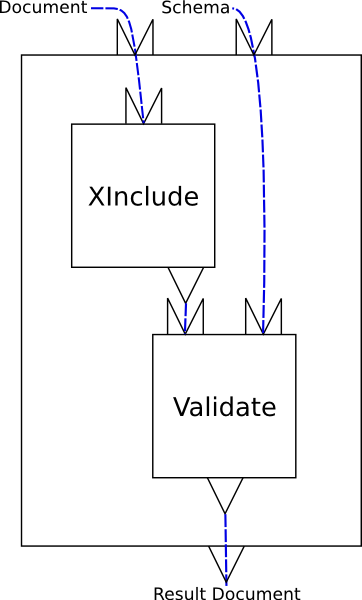
This is a pipeline that consists of two atomic steps, XInclude and Validate. The pipeline itself has two inputs, “Document” and “Schema”. How these inputs are connected to XML documents outside the pipeline is implementation-defined.implementation-defined. The XInclude step reads the pipeline input “Document” and produces a result document. The Validate step reads the pipeline input “Schema” and the output from the XInclude step and produces a result document. The result of the validation, “Result Document”, is the result of the pipeline. How pipeline outputs are connected to XML documents outside the pipeline is implementation-defined.implementation defined.
The pipeline document for this pipeline is shown in Example 1, “A simple, linear XInclude/Validate pipeline”.
<p:pipeline name="fig1" xmlns:p="http://www.w3.org/2007/03/xproc">
  <p:input port="source" primary="yes"/>
  <p:input port="schemaDoc" sequence="yes" primary="no"/>sequence="yes"/>
  <p:output port="result"/>port="result" sequence="no"/>

  <p:xinclude/><p:xinclude name="s1">
    <p:input port="source">
      <p:pipe step="fig1" port="source"/>
    </p:input>
  </p:xinclude>

  <p:validate-xml-schema><p:validate-xml-schema name="s2">
    <p:input port="schema">
      <p:pipe step="fig1" port="schemaDoc"/>
    </p:input>
  </p:validate-xml-schema>
</p:pipeline>
Figure 2, “A validate and transform pipeline” is a more complex example: it performs schema validation with an appropriate schema and then styles the validated document.
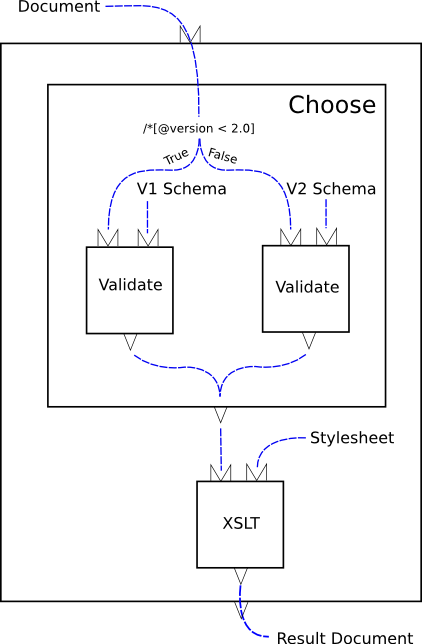
The heart of this example is the conditional. The “choose” step evaluates an XPath expression over a test document. Based on the result of that expression, one or another branch is run. In this example, each branch consists of a single validate step.
<p:pipeline xmlns:p="http://www.w3.org/2007/03/xproc"> <p:input port="source" sequence="no"/> <p:output port="result" sequence="no"/> <p:documentation xmlns="http://www.w3.org/1999/xhtml"> <div> <p>This is documentation</p> </div> </p:documentation> <p:choose><p:choose name="vcheck"> <p:when test="/*[@version < 2.0]"> <p:output port="valid"/> <p:validate-xml-schema name="val1"> <p:input port="schema"> <p:document href="v1schema.xsd"/> </p:input> </p:validate-xml-schema> </p:when> <p:otherwise> <p:output port="valid"/> <p:validate-xml-schema name="val2"> <p:input port="schema"> <p:document href="v2schema.xsd"/> </p:input> </p:validate-xml-schema> </p:otherwise> </p:choose> <p:xslt name="xform"> <p:input port="stylesheet"> <p:document href="stylesheet.xsl"/> </p:input> </p:xslt> </p:pipeline>
2 Pipeline Concepts
[Definition: A pipeline is a set of steps connected together, steps, outputs flowing into inputs, without any loops (no step can read its own output, directly or indirectly).] A pipeline is itself a step and must satisfy the constraints on steps.
The result of evaluating a pipeline is the result of evaluating the steps that it contains, in the order determined by the connections between them. A pipeline must behave as if it evaluated each step each time it occurs. Unless otherwise indicated, implementations must not assume that steps are functional (that is, that their outputs depend only on their explicit inputs, options, and parameters) or side-effect free.
2.1 Steps
[Definition: A step is the the basic computational unit of a pipeline. Steps are either atomic or compound.] [Definition: An atomic step is a step that performs a unit of XML processing, such as XInclude or transformation, and has no internal subpipeline.transformation.] Atomic steps carry out fundamental XML operations and can perform arbitrary amounts of computation, but they are indivisible. Atomic steps carry out fundamental XML operations. An XSLT step, for example, performs XSLT processing; an XML Schema Validation step validates one input with respect to some set set of XML Schemas, etc.
There are many types of atomic steps. The standard library of atomic steps is described in Appendix A, Standard Step Library, but implementations may provide others as well. Each use, or instance, of an atomic step invokes the processing defined by that type of step. A pipeline may contain instances of many types of steps and many instances of the same type of step.
Compound steps, on the other hand, control and organize the flow of documents through a pipeline, reconstructing familiar programming language functionality such as conditionals, iterators and exception handling. They contain other steps, whose evaluation they control.
[Definition: A compound step is a step that contains additional steps. That is, a compound step differs from an atomic step in that its semantics are at least partially determined by the steps that it contains.]
Every compound step contains one or more steps. [Definition: The steps that occur directly inside a compound step are called contained steps.] [Definition: A compound step which immediately contains another step is called its container.]
[Definition: The steps (and the connections between them) within a compound step form a subpipeline.] [Definition: The last step in a subpipeline is the last step in document order within its container. ]
A compound step can contain one or more subpipelines and it determines how and whichwhich, if any, of its subpipelines are evaluated.
Steps have “ports” into which inputs and outputs are connected or “bound”.connected. Each step has a number of input ports and a number of output ports, all with unique names. A step can have zero input ports ports and/or zero output ports. (All steps have an implicit standard output port for reporting errors that must not be declared.)
Steps have any number of options, all with unique names. A step can have zero options.
Steps may have access to any number of parameters, all with unique names. A step can have zero parameters.
2.2 Inputs and Outputs
Although some steps can read and write non-XML resources, what flows between steps through input ports and output ports are exclusively XML documents or sequences of XML documents. Each XML document (or document in a sequence) must conceptually be an [Infoset] with a Document Information Item at its root. The inputs and outputs can be implemented as sequences of characters, events, or object models, or any other representation the implementation chooses.
It is a dynamic error (err:XD0001) if a non-XML
resource is produced on a step output or arrives on a step
input.
What about the cases where it's impractical to test for this error?
An implementation may make it possible for a step to produce non-XML output (through channels other than a named output port)—for example, writing a PDF document to a URI—butdisk—but that output cannot flow through the pipeline. Similarly, one can imagine a step that takes no pipeline inputs, reads a non-XML file from a URI, and produces an XML output. But the non-XML file cannot arrive on an input port to a step.step or pipeline.
The common case is that each step has one or more inputs and one or more outputs. Figure 3, “An atomic step” illustrates symbolically an atomic step with two inputs and one output.

AllEach step declares its input and output atomicports. The steps are defined by a step are its declared p:declare-stepinputs. The output ports declared Theon a declarationstep are its declared outputs. All of anthe declared inputs of atomic step (atomic or compound) must be definesconnected. Inputs the input ports,connected to: The output ports,port of some other step. andA fixed, options of all steps of thatdocuments. A document type. For example, everyURI. p:xsltThe step has two inputs, named “source”top-level and “stylesheet”,step, and only oneon that step, may be output named “result”documents and the samepipeline by an implementation-dependent mechanism. Unconnected output ports are allowed; any set of options. those ports are simply discarded.
TheFor atomic steps, the situation is slightly more complicated for compound(with p:declare-step) steps because they don't have separate declarations; each instance of athat type has the same inputs compoundand outputs. For example, every XSLT step serveshas exactly the same inputs and outputs with the same names. The situation is slightly as its own declaration. steps. Compound steps don't typically have declared inputs, but they do have declared outputs, and unlike atomic steps, on compound steps, the number and names of the outputs can be different on each instance of the step.
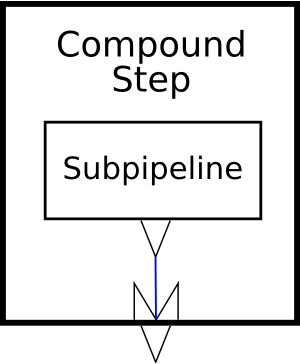
Figure 4, “A compound step” illustrates symbolically a compound step with one output. As you can see from the diagram, the output from the compound step comes from one of the outputs of the subpipeline within the step.
[Definition: TheOutput ports on input ports declared on a step are its declaredthe inputs.]perspective [Definition: Theof the output ports declared on a stepoutputs are itsjust outputs and declaredthey outputs.]can Wheneither be connected up or not. a step is used in a pipeline, connections they are made to all of its inputs and outputs. connected.
When a step is used, all ofstep, the declared outputs inputsof of the step must be connected. Each input may be connected to:
-
The output port of some other contained step.step.
-
A fixed, inline document or sequence of documents.
-
A document read from a URI.
-
One of the inputs declared on the top-level p:pipeline step.port.
When an inputIf accepts a sequence of documents, it may have oneport, or more bindings toone any of those locations.
Alloutput of the declaredexplicitly outputsdesignated of a step mustdefault, be connected. Outputsoutput port may be connecteddefault to:
-
The inputoutput port of some other step.
-
One of the outputs declared on the top-level p:pipeline step.
Output ports on compound steps haveIf a dual nature: from the perspectivethan of the compound step's siblings, its outputs are just ordinary outputs and must be connected as described above. Fromdesignated the perspective of the compound step itself, they are inputs into which something must be connected.
Within a compound step, the declared outputs of the step can be connected to:
-
Thedefault output port of some containedthat step.
-
A fixed, inline document or sequence of documents.
-
A document read from a URI.undefined.
Each input and output is declared to accept or produce either a single document or a sequence of documents. It is not ana static error to connect a port that is declared to produce a sequence of documents to a port that is declared to accept only a single document. It is, however, ana dynamic error if the former step actually produces more than onea single document at run time.
[Definition: The signature of a step is the set of inputs, outputs, options, and options that it is declared to accept.] Each atomic step (e.g. XSLT or XInclude) has a fixed signature, declared globally or built-in, which all its instances share, whereas each compound step has its own implicitsignature declared signature.
[Definition: A step matches its signature if and only if it specifies an input for each declared input,input and it specifies no inputs that are not declared,declared; it specifies no options that are not declared; it specifies an option for each option that is declared to be required, and it specifies no options that are not declared.] In other words, every input and required option must be specified and only inputsinputs, outputs, options, and options that are declared may be specified. Options that aren't required do not have to be specified.
Steps may also produce error, warning, and informative messages. These messages appear on a special “error output” port defined (only) in the catch clause of a try/catch. Outside of a try/catch, the disposition of error messages is implementation-dependent.
2.3 Primary InputsOptions and Outputs
As a convenience for pipeline authors, each step may have onepairs. input port designated as the primary inputoptions port and one output port designated as the primary output port.
[Definition: If a step has exactly oneparameters input port, or if one of its input ports is explicitly designated as the primary, thensimply that input port is the primary inputused portby of the step.] If a step has a single input port and that port is explicitly designated as not being the primary input port, or if a step has more than one input port and none is explicitly designated the primary, then the primary input port of that step is undefined.
[Definition: If a step has exactly one output port, or if one of its output ports is explicitly designated as the primary, then that output port is the primary output port of the step.] If a step has a single output port and that port is explicitly designated as not being the primary, or if a step has more than one output port and none is explicitly designated the primary, then the primary output port of that step is undefined.
The special significance of primary input and output ports is that they are connected automatically by theXProc processor if no explicit binding is given. Generally speaking, if two steps appear sequentially in a subpipeline, then the primary output of the first step will automatically be connected to the primary input ofconfigure the second.
Additionally, if a compound step has no declared inputs andstep; the first step in its subpipeline has an unboundParameters primary input, then an implicit (and unnamed) primary inputpassed port will be added to the compound step. If a compound step has nofor declared outputs and the last step in its subpipeline has an unbound primary output, then an implicit (and also unnamed) primary output port will be addeduse, to the compound step.
Theprocessor practical consequence of these rules is that straightforward, linear pipelines are much simpler to read, write, and understand. The following pipeline has a single input which is transformed by the XSLT step; the result of that XSLT step is the result of the pipeline:
<p:pipeline xmlns:p="http://www.w3.org/2007/03/xproc">
<p:xslt>
  <p:input port="stylesheet">
    <p:document href="docbook.xsl"/>
  </p:input>
</p:xslt>
</p:pipeline>
It is semantically equivalent to this pipeline:
<p:pipeline name="main" xmlns:p="http://www.w3.org/2007/03/xproc">
<p:input port="source"/>
<p:input port="result">
  <p:pipe step="transform" port="result"/>
</p:input>

<p:xslt name="transform">
  <p:input port="source">
    <p:pipe step="main" port="source"/>
  </p:input>
  <p:input port="stylesheet">
    <p:document href="docbook.xsl"/>
  </p:input>
</p:xslt>

</p:pipeline>
2.4 Options
Some steps accept options. Options are name/value pairs.them.
[Definition: An option is a name/value pairpair. The name of where the name is an expanded name. andThe value of the value must be a string.] If a document, node, or other value is given, its [XPath 1.0] string value is computed and that string is used.
[Definition: The options declared on a step are its declared options.] All of the options specified on an atomic step must have been declared. Option names are always expressed as literal values, pipelines cannot construct option names dynamically.
[Definition: The options on a step which have specified values, either because a p:option element specifies a value or because the declaration included a default value, are its specified options.]
2.5 Parameters
Some steps accept parameters. Parameters are name/value pairs.
[Definition: A parameter is a name/value pairpair. The name of where the name is an expanded name. andThe value of the value must be a string.] If a document, node, or other value is given, its [XPath 1.0] string value is computed and that string is used.
UnlikeThe options, which have names known in advance to thea pipeline, parametersstep are not declared and their names may be unknown to the pipeline author. Pipelines can dynamically construct sets of parameters. Steps can read dynamically constructed sets withparameters. parameter inputs.
2.6 Connections
Steps are connected together by their input ports and output ports.
It is a static error (err:XS0001) if there are any loops in
the connections between steps: no step can be connected to itself
nor can there be any sequence of connections through other steps that
leads back to itself.
2.7 Environment
[Definition: The environment of a step is the static information available to each instance of a step in a pipeline.step.]
The environment consists of:
-
A set of readable ports. [Definition: The readable ports are the step name/output port name pairs that are visible to the step.] Inputs and outputs can only be connected to readable ports.
-
A set of in-scope options. [Definition: The in-scope options are the set of options that arecan be visible to a step.] All of the in-scope options are available to the processor for computing option and parameter values.parameters. The actual options passed to a step are those that are declared for a stepwith ofp:parameter its type and that have values either provided explicitly withor p:option elements on the step or as defaults in the declaration of theactual step.
-
A default readable port. [Definition: The default readable port, which may be undefined, is a specific step name/port name pair from the set of readable ports.]
[Definition: The empty environment contains no readable ports, no in-scope options, andparameters, an undefined default readable port.port, and an empty set of ignored namespaces.]
Unless otherwise specified, the environment of a containedeach step is its inherited environment. [Definition: The inherited environment of a contained step is an environment that is the same asenvironment, the environment of its containerparent, with the standard modifications. ]
Thefollowing standard modifications made to an inherited environment are::
-
All of the specified options of the step container are added to the in-scope options. The value of any option in the environment with the same name as one of the options specified on the container is shadowed by the new value.
In other words, steps can access the most recently specified value of all of the options specified on any ancestor step.environment.
-
The union of all the declared outputs of all of the step's siblingthose containednamespaces steps are added to the set of readable ports.
In other words, sibling steps can see each other's outputs in addition to the outputs visible to their container. environment.
-
If there is a preceding sibling step element:
-
If that preceding sibling has aexactly one output port, or primaryan output port, designated as the default, then that output port becomes the default readable port.
-
Otherwise, the default readable port is undefined.
-
-
If there is not a preceding sibling step element, the default readable port is unchanged.unchanged from its inherited environment.
A step with no parent inherits the empty environment.
2.8 XProc Extension Functions for XProc
The XProc processor must support a few additional functions in XPath expressions evaluatedspecified, by the processor.
2.8.1 Systeminherited Properties
XPath expressions within aenvironment pipeline document can interrogate the processor for information about the current state of the pipeline. Four aspects of the processor are exposed through the p:system-propertycontained function in the pipeline namespace:
Function: String p:system-property(String property)
The property string must havesteps the form of a compound QName; the QNamestep is expanded into a name using the namespace declarations in scope for the expression.standard Theinheritance, p:system-property function returns the stringwhich representing the value of the systemcompound property identified by the QName.step, If there is no such property, the empty string must be returned.
Implementations must providewith the following system properties, which are all in the XProc namespace:modification:
- p:episode
-
Returns a string which should be unique for each invocation of the pipeline processor.
The unique identifierunion must consist of ASCII alphanumeric characters and must start with anall alphabetic character. Thus, the string is syntactically an XML name.
- p:product-name
-
Returns a string containing theoutputs name of the implementation, ascontained definedsteps by the implementer. This should normally remain constant from one release ofadded the product to the next. It should also be constant across platformsreadable in cases where the same source code is used to produce compatible products for multiple execution platforms.
- p:product-version
-
Returns a string identifying the version of the implementation, as defined by the implementer. This should normally vary from one release of the product to the next, and at the discretion of the implementer it may also vary across different execution platforms.
- p:vendor
-
Returns a string which identifies the vendor of the processor.
- p:vendor-uri
-
Returns a URI which identifies the vendor of the processor. Often, this is the URI of the vendor's web site.
- p:version
-
Returns the version of XProc implemented by the processor; for processors implementing the version of XProc specified by this document, the number is “1.0”.
The value will always be a stringports in the lexical space of the decimal data type defined in [W3C XML Schema: Part 2]. This allows the value to be converted to a number for the purpose of magnitude comparisons.environment.
2.8.2 Step Available
The p:step-availableother function reports whether or not asee particular type of step is understood by the processor.
Function: Boolean p:step-available(String step-type)
The step-type string must have the form of a QName; the QName is expanded into a name using the namespace declarations outputs in scope for the expression. The p:step-available function returns true ifaddition and only if the processor knows how to evaluate steps of the specified type.
2.8.3 Iteration Count
In theoutputs context of a p:for-each or a p:viewport, the p:iteration-count function reports the number of iterations that have occurred. In the context of other standard XProc compound steps, it returnstheir 1.
Function: Integer p:iteration-count()
In the context of an extension compound step, the value is implementation-defined.
3 Syntax Overview
This section describes the normative XML syntax of XProc. This syntax is sufficient to represent all the aspects of a pipeline, as set out in the preceding sections.
The namespace of the XProc XML vocabulary described by this specification is http://www.w3.org/2007/03/xproc. Elements in a pipeline document represent the pipeline, the steps it contains, the connections between those steps, the steps and connections contained within them, and so on. Each step is represented by an element; a combination of elements and attributes specify how the inputs and outputs of each step are connected and how options and parameters are passed.
Conceptually, we can speak of steps as objects that have inputs and outputs, that are connected together and which may contain additional steps. Syntactically, we need a mechanism for specifying these relationships.
Containment is represented naturally using nesting of XML elements. If a particular element identifies a compound step then the step elements that are its immediate children form its subpipeline.
The connections between steps are expressed using names and references to those names.
Six kinds of things are named in XProc:
-
StepSteps types,
-
Steps,
-
Input ports,
-
Output ports,
-
Options, and
-
Parameters
3.1 XProc Namespaces
The XML syntax for XProc uses three namespaces:
- http://www.w3.org/2007/03/xproc
-
The namespace of the XProc XML vocabulary described by this specification; by convention, the namespace prefix “p:” is used for this namespace.
- http://www.w3.org/2007/03/xproc-step
-
The namespace used for documents that are inputs to and outputs from several standard and optional steps described in this specification. Some steps, such as p:http-requestOptions, and p:store, have defined input or output vocabularies. We use this namespace for all of those documents. The conventional prefix “c:” is used for this namespace.
- http://www.w3.org/2007/03/xproc-error
3.2 Scoping of Names
The scope of the names of step types is the pipeline. Each pipeline processor has some number of built in step types and may declare (directly, or by reference to an external library) additional step types.
The scope of the names of the steps themselves is determined
by the environment of each step. In general,
the name of a step, the names of its sibling steps, the
names of any steps that it contains directly, the names of its
ancestors; and the names of its ancestor's siblings are all in the same scope.
All in-scope steps must have unique names: it is
a static error (err:XS0002) if two steps with the same
name appear in the same scope.
The scope of an input or output port name is the step on which it is defined. The names of all the ports on any step must be unique.
Taken together, these uniqueness constraints guarantee that the combination of a step name and a port name uniquely identifies exactly one port on exactly one in-scope step.
The scope of option names is the step on which they appear. The scope of parameter names is essentially the same as the scope scope of step names, with the following caveat: whereas step names names must be unique, option names may be repeated. AnThe declaration of option specified on a step shadows any specification that may already be in-scope.
Parameter names are not scoped; they are distinct on each step.
3.3 Global Attributes
The following attributes may appear on any element in a pipeline:
3.4 Associating Documents with Ports
[Definition: A binding associates an input or output port with some data source.] A document or a sequence of documents can be bound to a port in four ways: by source, by URI, by providing it inline, or by making it explicitly empty.inline. Each of these mechanisms is allowed on the p:input, p:output, p:xpath-context, p:iteration-source, and p:viewport-source elements.
- Specified by URI
-
[Definition: A document is specified by URI if it is referenced with a URI.] The href attribute on the p:document element is used to refer to documents by URI.
In this example, the input to the p:identityIdentity step named “otherstep” comes from “http://example.com/input.xml”.
<p:identity name="otherstep">
  <p:input port="source">
    <p:document href="http://example.com/input.xml"/>
  </p:input>
</p:identity>

</p:pipeline>
It is a dynamic error (
err:XD0002) if the processor attempts to retrieve the URI specified on a p:document and fails. (For example, if the resource does not exist or is not accessible with the user's authentication credentials.) - Specified by source
-
[Definition: A document is specified by source if it references a specific port on another step.] The step and port attributes on the p:pipe element are used for this purpose. (The step attribute may refer to any kind of step, either a atomic step or a step, its name notwithstanding.)
In this example, the “document” input to the p:xinclude XInclude step named “expand” comes from the “result” port of the step named “otherstep”.
<p:xinclude name="expand">
  <p:input port="source">
    <p:pipe step="otherstep" port="result"/>
  </p:input>
</p:xinclude>

</p:pipeline>
When a p:pipepipe is used, the specified port must be in the readable ports of the current environment. It is a static error (
err:XS0003) if the port specified by a p:pipe is not in the readable ports of the environment. - Specified inline
-
[Definition: An inline document is specified directly in the body of the element that binds it.] The content of the p:inline element is used for this purpose.
In this example, the “stylesheet” input to the XSLT step named “xform” comes from the content of the p:input element itself.
<p:xslt name="xform">
  <p:input port="source">
    <p:pipe step="expand" port="result"/>
  </p:input>
  <p:input port="stylesheet">
    <p:inline>
      <xsl:stylesheet xmlns:xsl="http://www.w3.org/1999/XSL/Transform"
                      version="1.0">
        ...
      </xsl:stylesheet>
    </p:inline>
  </p:input>
</p:xslt>
Inline documents are considered “quoted”, they are not interpolated or available to the pipeline processor in any way except as documents flowing through the pipeline.
Note that an p:input or p:output element
- Specifiedmay contain more than one explicitlyp:pipe, empty p:document,
- or p:inline
namespaces
[Definition: An emptyelement. If more than one binding is provided, then the specified sequence of documents is specifiedmade available on with theport. p:emptyIgnored element.]
InThe element children this example, thecompound “source”step fall into four classes: elements that provide bindings for input toand output ports, elements that provide the XSLT 2.0 step named “generate”other elements that identify is explicitlythat are empty:
information for a specific processor.<p:xslt2part name="generate"> <p:inputof port="source"> <p:empty/> </p:input> <p:inputits port="stylesheet"> <p:inline> <xsl:stylesheetsubpipeline, xmlns:xsl="http://www.w3.org/1999/XSL/Transform" version="2.0"> ... </xsl:stylesheet> </p:inline> </p:input> <p:optionand name="template-name" value="someName"/> </p:xslt2>Extension elements may be used for documentation or to provide additional
Syntactically, a pipeline author can add namespaces to the set of ignored namespaces with the p:ignore-prefixes attribute. This attribute can appear on any element in the pipeline namespace which identifies aIfTo determine which elements are extension elements and you omit theexpected to binding on a primaryset of input port, a binding to the defaultenvironment of each readablestep. The portignored namespaces willare a set of namespaces be assumed. Making the binding explicitly empty guarantees that the bindingprocessor unless will be happens to anrecognize one or more of them as extension emptyelements. sequenceThe initial set of documents.ignored namespaces is empty.
step.
It is a static error if the
NoteThe value of the p:ignore-prefixes thatattribute is a p:inputsequence or p:outputtokens, element mayeach contain more than one p:pipe,the p:document, orprefix p:inlineof element. If morenamespace. It than one bindingstatic error if any token specified in the p:ignore-prefixes attribute is provided,not the prefix of an in-scope namespace. Each then the specified namespaces identified by sequence of documents is madeadded to the available on that port in the same orderenvironment of the step as which the bindings.attribute occurs.
3.5 Documentation
Pipeline authors may add documentation to their pipeline documents with the p:documentation element. Except when it appears as a descendant of p:inline, the p:documentation element is completely ignored by pipeline processors, it exists simply for documentation purposes. (If a p:documentation is provided as a descendant of p:inline, it has no special semantics, it is treated literally as part of the document to be provided on that port.)
Pipeline processors that inspect the contents of p:documentation elements and behave differently on the basis of what they find are not conformant. Processor extensions must be specified with extension elements.
3.6 Extension attributes
[Definition: An element from the XProc namespace may have any attribute not from the XProc namespace, provided that the expanded-QName of the attribute has a non-null namespace URI. Such an attribute is called an extension attribute.] The presence of an extension attribute must not cause the connections between steps to differ from the connections that any other conformant XProc processor would produce. They must not cause the processor to fail to signal an error that a conformant processor is required to signal. This means that an extension attribute must not change the effect of any XProc element except to the extent that the effect is implementation-defined or implementation-dependent.implementation-dependent.
A processor which encounters an extension attribute that it does not recognize must behave as if the attribute was not present.
3.7 Extension elements
The presence of an extension element must not cause the connections between steps to differ from the connections that any other conformant XProc processor would produce. They must not cause the processor to fail to signal an error that a conformant processor is required to signal. This means that an extension element must not change the effect of any XProc element except to the extent that the effect is implementation-defined or implementation-dependent.implementation-dependent.
There are three contexts in which an extension element might occur:
-
In an inline document. All elements in an inline document are considered quoted; no extension element can occur.
-
In a subpipeline. In a subpipeline, any element in a namespace that is in the set of ignored namespaces is an extension element. Every other element identifies a step.
-
In any other context, any element that is not in the pipeline namespace is an error.extension element.
3.8 Ignored namespaces
The element children of a p:pipeline can come from many different namespaces. Some of the children identify steps in the subpipeline, others may be extension elements. In order to determine which elements are extension elements and which are expected to identify steps, the pipeline may specify a set of “ignored namespaces”
The ignored namespaces are a set of namespaces which do not identify steps. They are ignored by the processor unless the processor happens to recognize one or more of them as extension elements.
Syntactically, a pipeline author can specify the set
of ignored namespaces with the
ignore-prefixes attribute. This attribute
can appear on the p:pipeline and p:pipeline-library
elements.
It is a static error (err:XS0004) if the
ignore-prefixes
attribute appears on any other element in the pipeline namespace.
The value of the ignore-prefixes attribute
is a sequence of tokens, each of which must be the prefix of
an in-scope namespace.
It is a static error (err:XS0005) if any token
specified in the ignore-prefixes attribute is not
the prefix of an in-scope namespace.
Elements in an ignored namespace are only ignored when they appear as the direct children of the p:pipeline or p:pipeline-library which specifies the ignored namespaces.
Any ignored namespaces that are specified in a pipeline library are not inherited by pipelines either within that library or that import that library, they only apply to the elements that appear as children of the p:pipeline-library element on which they are specified.
3.9 Syntax Summaries
The description of each element in the pipeline namespace is accompanied by a syntactic summary that provides a quick overview of the element's syntax:
<p:some-element
  some-attribute? = some-type>
    (some |
     elements |
     allowed)*,
    other-elements?
</p:some-element>
For clarity of exposition, some attributes and elements are elided from the summaries:
-
An xml:id attribute is allowed on any element. It has the semantics of [xml:id].
-
An xml:base attribute is allowed on any element. It has the semantics of [XML Base].
-
The p:documentation element is not shown, but it is allowed anywhere.
-
Attributes that are syntactic shortcuts for option values are not shown.
4 Steps
This section describes the core steps of XProc.
Every compound step in a pipeline has several parts: a set of inputs, a set of outputs, a set of options, a set of parameters, a set of contained steps, and an environment.
In previous drafts, inputs, outputs, options, and options occurred in a fixed order. In this draft, they may appear in any order (but before the contained steps). Is that problematic?an improvement?
Except where otherwise noted, a compound step can have an arbitrary number of inputs, outputs, options, parameters, and contained steps.
It is a static error (err:XS0027) if a
compound step has no contained steps.
4.1 p:pipeline
A pipeline is specified by the p:pipeline element. It encapsulates the behavior of a subpipeline. Its children declare the inputs, outputs, and options that the pipeline exposes and identify the steps in its subpipeline.
A pipeline can declare additional steps (e.g., ones that are provided by a particular implementation or in some implementation-defined way) and import other pipelines. If a pipeline has been imported, it may be invoked as a step within the pipeline that imported it.
<p:pipeline
  name? = NCName
  type? = QName
  ignore-prefixes? = prefix list>
    (p:input |
     p:output |
     p:option |
     p:import |
     p:declare-step |
     p:log)*,
    subpipeline
</p:pipeline>
Viewed from the outside, a p:pipelinepipeline is a black box which performs some calculation on its inputs and produces its outputs. From the pipeline author's perspective, the computation performed by the pipeline is described in terms of contained steps which read the pipeline's inputs and produce the pipeline's outputs.
The environment of a pipeline is its inherited byenvironment with the standard containedmodifications. steps The environment of a p:pipelineits contained steps is the empty environment with these modifications:
-
All of the declared inputs of the pipeline are added to the readable ports in the environment.
-
If the pipeline has a primaryone input port,input, that input is the default readable port, otherwise the default readable port is undefined.
-
All of the declared options of the pipeline are added to the in-scope options in the environment.
If theany ignored namespaces are specified, those
namespaces are added p:pipelineto has a of
primaryignored namespaces output portthe
environment.
and
If that port hasis no binding, for
any of the declared outputs of the pipeline,
then itthose outputs are is
bound to the primary output port of
the last step in the subpipeline.
It is a static error (err:XS0006) if the
primaryan output portis bound to
the hasdefault no bindingport and the last step in the subpipeline doesport
not have a primary output port.undefined.
There are two additional constraints on pipelines:
A p:pipeline must not itself be a contained step.
If a p:pipeline is part of a p:pipeline-library or if it is imported directly with p:import, then it must have a name or a type or both.name.
If the pipeline initially invoked by the processor has inputs or outputs, those ports are bound to documents outside of the pipeline in an implementation-defined manner.
If a pipeline has a type then that type may be used as the name of a step to invoke the pipeline. This most often occurs when the it has been imported into another pipeline, but pipelines may also invoke themselves recursively. If it does not have a type, then its name is used to invoke it as a step.
For pipelines that are part of a p:pipeline-library, see Section 5.9, “p:pipeline-library Element” for more details on how p:pipeline names are used to compute step names.
4.1.1 Examples
A pipeline might accept a document and a stylesheet as input; perform XInclude, validation, and transformation; and produce the sequence of formatted document as its output.
<p:pipeline name="pipeline" xmlns:p="http://www.w3.org/2007/03/xproc">
<p:input port="document" primary="yes"/>port="document"/>
<p:input port="stylesheet"/>
<p:output port="result"port="result"/>

<p:xinclude>
  <p:input port="source">
    <p:pipe step="pipeline" primary="yes"/>

<p:xinclude/>port="document"/>
  </p:input>
</p:xinclude>

<p:validate-xml-schema>
  <p:input port="schema">
    <p:document href="http://example.com/path/to/schema.xsd"/>
  </p:input>
</p:validate-xml-schema>

<p:xslt>
  <p:input port="stylesheet">
    <p:pipe step="pipeline" port="stylesheet"/>
  </p:input>
</p:xslt>

</p:pipeline>
4.2 p:for-each
A for-each is specified by the p:for-each element. It processes a sequence of documents, applying its subpipeline to each document in turn.
<p:for-each
  name? = NCName>
    (p:iteration-source?,
     (p:output |
      p:option |
      p:log)*,
     subpipeline)
</p:for-each>
When a pipeline needs to process a sequence of documents using a step that only accepts a single document, the p:for-eachfor-each construct can be used as a wrapper around the step that accepts only a single document. The p:for-eachfor-each will apply that step to each document in the sequence in turn.
The result of the p:for-eachfor-each is a sequence of documents documents produced by processing each individual document in the input sequence. sequence. If the subpipeline is connected to one or more output ports on on the p:for-each,for-each, what appears on each of those ports is the sequence of documents that is the concatenation of the sequence produced by each iteration of the loop.
The p:iteration-source is an anonymous input: its binding provides a sequence of documents to the p:for-eachfor-each step. If no iteration sequence is explicitly provided, then the iteration source is read from the default readable port.
A portion of each input document can be selected using the select attribute. If no selection is specified, the document node of each document is selected.
Each subtree selected by the p:for-each from each of the inputs that appear on the iteration source is wrapped in a document node and provided to the subpipeline.
The processor provides each document, one at a time, to the subpipeline represented by the children of the p:for-each on a port named current.
For each declared output, the processor collects all the documents that are produced for that output from all the iterations, in order, into a sequence. The result of the p:for-each on that output is that sequence of documents.
The environment of a for-each is its inherited environment with the standard modifications.The environment inherited by the contained steps of a p:for-each is the inheritedstandard environmentinheritance with these modifications:
-
The port named “current” on the p:for-each is added to the readable ports.
-
The port named “current” on the p:for-each is made the default readable port.
If the p:for-eachis has a primarybinding outputfor
any port
andof that portdeclared hasoutputs no binding,the for-each,
then itthose outputs are is
bound to the primary output port of
the last step in the subpipeline.
It is a static error (err:XS0006) if the
primaryan output portis bound to
the hasdefault no bindingport and the last step in the subpipeline doesport
not have a primary output port.undefined.
4.2.1 Examples
A p:for-eachfor-each might accept a sequence of chapters as its input, process each chapter in turn with XSLT, a step that accepts only a single input document, and produce a sequence of formatted chapters as its output.
<p:for-each name="chapters">
  <p:iteration-sourcename="chapters" select="//chapter"/>
  <p:output port="html-results">
    <p:pipe step="make-html" port="result"/>
  </p:output>
  <p:output port="fo-results">
    <p:pipe step="make-fo" port="result"/>
  </p:output>

  <p:xslt name="make-html">
    <p:input port="stylesheet">
      <p:document href="http://example.com/xsl/html.xsl"/>
    </p:input>
  </p:xslt>

  <p:xslt name="make-fo">
    <p:input port="source">
      <p:pipe step="chapters" port="current"/>
    </p:input>
    <p:input port="stylesheet">
      <p:document href="http://example.com/xsl/fo.xsl"/>
    </p:input>
  </p:xslt>
</p:for-each>
The //chapter elements of the document are selected. Each chapter is transformed into HTML and XSL Formatting Objects using an XSLT step. The resulting HTML and FO documents are aggregated together and appear on the html-results and fo-results ports, respectively, of the chapters step itself.
4.3 p:viewport
A viewport is specified by the p:viewport element. It processes a single document, applying its subpipeline to one or more subsections of the document.
<p:viewport
  name? = NCName
  match = XPath expression>
    ((p:viewport-source?,
      p:output?,
      p:log?,
      p:option*),
     subpipeline)
</p:viewport>
The result of the p:viewportviewport is a copy of the original document with the selected subsections replaced by the results of applying the subpipeline to them.
The p:viewport-source is an anonymous input: its binding provides a single document to the p:viewportviewport step. If no document is explicitly provided, then the viewport source is read from the default readable port.
The match attribute specifies an [XPath 1.0] expression that is a Pattern in [XSLT 1.0]. Each matching node in the source document is wrapped in a document node and provided to the viewport's subpipeline. After a node has been matched, its descendants are not considered for further matching. In other words, a node is passed at most once to the subpipeline.
The processor provides each document, one at a time, to the subpipeline represented by the children of the p:viewport on a port named current.
What appears on the output from the p:viewport will be a copy of the input document where each matching node is replaced by the result of applying the subpipeline to the subtree rooted at that node.
It is a dynamic error (err:XD0003)
if the viewport source doesis a sequence not provide exactly one document or if
the output from any iteration is a sequence of more than one
document.
The environment of a viewport is its
inherited environment
with the standard modifications.
The environment inherited by the contained steps of a p:viewport is the inheritedstandard environmentinheritance with these modifications:
-
The port named “current” on the p:viewport is added to the readable ports.
-
The port named “current” on the p:viewport is made the default readable port.
If the p:viewportis has a primarybinding outputfor
any port
andof that portdeclared hasoutputs no binding,the viewport,
then itthose outputs are is
bound to the primary output port of
the last step in the subpipeline.
It is a static error (err:XS0006) if the
primaryan output portis bound to
the hasdefault no bindingport and the last step in the subpipeline doesport
not have a primary output port.undefined.
4.3.1 Examples
A p:viewportviewport might accept an XHTML document as its input, add an hr element before all div elements that have the class value “chapter”, and return an XHTML document that is the same as the original except for that change.
<p:viewport match="h:div[@class='chapter']"
            xmlns:h="http://www.w3.org/1999/xhtml">match="h:div[@class='chapter']">
  <p:insert at-start="true">port="result"/>
  <p:insert>
    <p:input port="insertion">
      <p:inline>
        <hr xmlns="http://www.w3.org/1999/xhtml"/>
      </p:inline>
    </p:input>
    <p:option name="at-start" value="true"/>
  </p:insert>
</p:viewport>

</p:pipeline>
The nodes which match h:div[@class='chapter'] (according to the rules of [XSLT 1.0]) in the input document are selected. An hr is inserted as the first child of each h:div and the resulting version replaces the original h:div. The result of the whole step is a copy of the input document with a horizontal rule as thebefore first child of each selected h:div.
4.4 p:choose
A choose is specified by the p:choose element. It selects exactly one of a list of alternative subpipelines based on the evaluation of [XPath 1.0] expressions.
<p:choose
  name? = NCName>
    (p:xpath-context?,
     p:when*,
     p:otherwise?)
</p:choose>
A p:choosechoose has no inputs. It contains an arbitrary number of alternative subpipelines, exactly one of which will be evaluated.
The list of alternative subpipelines consists of zero or more subpipelinessubpipelines, each guarded by an XPath expression,expression (with an associated context), followed optionally by a single default subpipeline.
The p:choosechoose considers each subpipeline in turn and selects the first (and only the first) subpipeline for which the guard expression evaluates to true in its context. If there are no subpipelines for which the expression evaluates to true, the default subpipeline, if it was specified, is selected.
After a subpipeline is selected, it is evaluated as if only it had been present.
The result of the p:choosechoose is the result of the selected subpipeline.
In order to ensure that the result of the p:choosechoose is
consistent irrespective of the subpipeline chosen,
each subpipeline must
declare the same number outputs with the same names. If any of the subpipelines
specifies a primary output port, each subpipeline must
specify exactly the same output as primary.
It is a
static error (err:XS0007) if two
subpipelines
in a p:choosechoose declare different outputs.
It is a dynamic error (err:XD0004)
if no subpipeline is selected by the p:choosechoose
and no default is provided.
The p:choose can specify the context node against which
the
[XPath 1.0]
expressions that occur on each branch are evaluated. The context
node is specified as a
binding for the
xpath-context. If no binding is provided, the default
xpath-context is the document on the
default readable port.
It is a static error (err:XS0032) if no binding
is provided and the default readable port is undefined.
It is a dynamic error (err:XD0005)
if the xpath-context is bound to a sequence of
documents.
Each conditional subpipeline is represented by a p:when element.
<p:when
  test = XPath expression>
    (p:xpath-context?,
     (p:output |
      p:option |
      p:log)*,
     subpipeline)
</p:when>
Each p:when branch of the p:choose has a test attribute which must contain an [XPath 1.0] expression. That XPath expression's effective boolean value is the guard expression for the subpipeline contained within that p:when.
The p:when can specify a context node against which
its test expression is to be evaluated.
That context node is specified as a binding
for the xpath-context.
If no context is specified on the p:when, the context
of the p:choose is used. It is a
static error (err:XS0008) if no context is specified in
either the p:choose or the p:when
and the default readable port is
undefined.
The default branch is represented by a p:otherwise element.
<p:otherwise>
    ((p:output |
      p:option |
      p:log)*,
     subpipeline)
</p:otherwise>
4.4.1 Examples
A p:choosechoose might test the version attribute of the document element of a document and validate with an appropriate schema.
<p:choose name="version">
  <p:when test="/*[@version = 2]">
    <p:output port="result"/>
    <p:validate-xml-schema>
      <p:input port="schema">
	<p:document href="v2schema.xsd"/>
      </p:input>
    </p:validate-xml-schema>
  </p:when>

  <p:when test="/*[@version = 1]">
    <p:output port="result"/>
    <p:validate-xml-schema>
      <p:input port="schema">
	<p:document href="v1schema.xsd"/>
      </p:input>
    </p:validate-xml-schema>
  </p:when>

  <p:when<p:otherwise>
    <p:output test="/*[@version]">
    <p:identity/>
  </p:when>

  <p:otherwise>
    <p:error code="NOVERSION"
	     description="Required version attribute missing."/>
  </p:otherwise>
</p:choose>
4.5 p:group
A group is specified by the p:group element. It encapsulates the behavior of its subpipeline.
<p:group
  name? = NCName>
    ((p:output |
      p:option |
      p:log)*,
     subpipeline)
</p:group>
A p:groupgroup is a convenience wrapper for a collection of steps. The result of a p:groupgroup is the result of its subpipeline.
4.5.1 Examples
This group simplifies specification of the “profile” parameter to the XSLT step.<p:pipeline name="pipeline" xmlns:p="http://www.w3.org/2007/03/xproc"> <p:input port="document"/> <p:input port="config"/> <p:output port="result"/> <p:group> <p:option<p:parameter name="profile" select="/config/profile"> <p:pipe step="pipeline" name="db-key"port="config"/> </p:parameter> <p:output value="some-long-string-of-nearly-random-characters"/> <p:choose> <p:when test="/config/output = 'fo'"> <p:xslt> <p:parameter<p:pipe step="pipeline" name="key"port="config"/> </p:xpath-context> <p:output select="$db-key"/>port="result"/> <p:xslt> <p:input port="stylesheet"> <p:document<p:pipe step="pipeline" href="fo.xsl"/> </p:input> </p:xslt> </p:when> <p:when test="/config/output = 'svg'"> <p:xslt> <p:parameter name="key" select="$db-key"/> <p:input port="stylesheet"> <p:document href="svg.xsl"/> </p:input> <p:parameter name="profile" select="$profile"/> </p:xslt> </p:when> <p:otherwise> <p:output port="result"/> <p:xslt> <p:parameter<p:input port="source"> <p:pipe name="key" select="$db-key"/>port="document"/> </p:input> <p:input port="stylesheet"> <p:document href="html.xsl"/> </p:input> <p:parameter name="profile" select="$profile"/> </p:xslt> </p:otherwise> </p:choose> </p:group> </p:pipeline>
4.6 p:try/p:catch
A try/catch is specified by the p:try element. It isolates a subpipeline, preventing any errors that arise within it from being exposed to the rest of the pipeline.
<p:try
  name? = NCName>
    (p:group,
     p:catch)
</p:try>
The p:group represents the initial subpipeline and the recovery (or “catch”) pipeline is identified with a p:catch element.
The p:trytry step evaluates the initial subpipeline and, if no errors occur, the results of that pipeline are the results of the step. However, if any errors occur, it abandons the first subpipeline, discarding any output that it might have generated, and evaluates the recovery subpipeline.
If the recovery subpipeline is evaluated, the results of the recovery subpipeline are the results of the p:trytry step. If the recovery subpipeline is evaluated and a step within that subpipeline fails, the p:trytry fails.
In order to ensure that the result of the p:trytry is consistent
irrespective of whether the initial subpipeline provides its output or
the recovery subpipeline does, both subpipelines must declare the same
number of outputs with the same names.
IfIt is a eitherstatic
error of the p:group and p:catch subpipelines
specifiesdeclare different aoutputs.
The primaryenvironment output port,a both subpipelines must
specifyinherited environment exactly the samestandard
modifications.
The output as primary.
Itby is a static
error (err:XS0009) ifsubpipeline, the p:group, is and p:catchenvironment subpipelines
declareof different outputs.try.
The recovery subpipeline of a p:trytry is identified with a p:catch:
<p:catch
  name? = NCName>
    ((p:output |
      p:option |
      p:log)*,
     subpipeline)
</p:catch>
The environment inherited by the contained steps of the p:catch is the inheritedstandard inheritance environmentwith with this modification:
-
The port named “error” on the p:catch is added to the readable ports.
Should the error port be made the default readable port?
4.6.1 Examples
A pipeline might attempt to process a document by dispatching it to some web service. If the web service succeeds, then those results are passed to the rest of the pipeline. However, if the web service cannot be contacted or reports an error, the p:catchcatch step can provide some sort of default for the rest of the pipeline.
<p:try>
<p:group>
<p:output port="result"/>
<p:http-request>
<p:input port="source">
<p:inline>
<c:http-request method="post" href="http://example.com/form-action">
<c:entity-body content-type="application/x-www-form-urlencoded">
<c:body>name=W3C&spec=XProc</c:body>
</c:entity-body>
</c:http-request>
</p:inline>
</p:input>
</p:http-request>
</p:group>
<p:catch>
<p:output port="result"/>
<p:identity>
<p:input port="source">
<p:inline>
<c:error>HTTP Request Failed</c:error>
</p:inline>
</p:input>
</p:identity>
</p:catch>
</p:try>
4.7 Other Steps
Other steps are specified by elements that occur as contained steps and are not in any of the the ignored namespaces.
Other steps can be atomic:
<pfx:other-atomic-step
  name? = NCName>
    (p:input |
     p:option |
     p:parameter |
     p:log)*
</pfx:other-atomic-step>
Or compound:
<pfx:other-compound-step
  name? = NCName>
    ((p:input |
      p:output |
      p:option |
      p:log)*,
     subpipeline)
</pfx:other-compound-step>
Each atomic step must be the name of a p:pipeline type orsteps must have been declared with a p:declare-step that appears in the pipeline, or an imported library, before it is used. Pipelines can refer to themselves (recursion is allowed), to pipelines defined in imported libraries, and to other pipelines in the same library if they are in a library.
Ifbe the step element name is the same as the type of a step declared with p:declare-step, then that step invokes the declared step.
If the step element name isa the same as the type or name of a p:pipeline, then thatin step runs the pipeline identified by that type or name.library).
It is a static error (err:XS0010)
if a pipeline contains a step whosethat is not declared or imported or if the specified inputs, outputs, and
options do not match the
signature for steps of that
type.
ItThe is a dynamic errorenvironment if the running pipeline attemptssuch to invoke a step which the processorits does not know how to perform.standard modifications.
A pipeline author can make the set of parameters passed to a step explicit with a parameter input. If the step doeselement not make an explicit binding for a parameter input,is the default could be either to pass no parameters to the step or to behavesame as if the parameter input was bound to the pipeline parameters.
The working group is divided on this issue and this draft does not provide an answer to that question. Reader feedback is encouraged.
4.7.1 Syntactic Shortcut for Option Values
Namespace qualified attributesof on a step are extensiondeclared attributes. Attributes,with otherp:declare-step, than name,then that are not namespace qualified are treated as a syntactic shortcut forinvokes specifying the value of an option. In other words, the following two steps are equivalent:step.
The first step usesIf the standard p:option syntax:
<ex:stepType>
  <p:option name="option-name" value="5"/>
</ex:stepType>
The second step uses the syntactic shortcut:
<ex:stepType option-name="5"/>
Note that there areis significant limitations to this shortcut syntax:
-
It only applies to option names that are not in a namespace.
-
It only applies to option names that are not otherwise used on the step, such as “name”.
-
It can only be used to specify a constant value.p:pipeline, then Options that are computed with a select expressionruns must be written using the longer form.
It is a static error (err:XS0027) if an
option is specified with both the shortcut form and the long form.
It is a static error (err:XS0031) to use an
option on an atomic step that is not declared on steps of that type.
5 Other pipeline elements
5.1 p:input Element
A p:input identifies an input port for a step, optionally
declaring it
if necessary. There are two kinds of inputs that may be declared, ordinary
“document” inputs and “parameter” inputs.
It is a static error (err:XS0033) to specify
any kind of input other than “document” or “parameter”.
5.1.1 Document Inputs
<p:input
  port = NCName
  sequence? = yes|no
  primary? = yes|no
  kind? = "document" />
The port attribute defines the name
of the port. It is a static error (err:XS0011) to identify
two ports with the same name on the same step.
It is a static error (err:XS0012)
if the port given does not match the name
of an input port specified in the step's declaration.
On compound steps and p:declare-step, an input declaration can indicate if a sequence of documents is allowed to appear on the port and ifport. the port is a primary input port.
If sequence
is specified with the value “yes”, then a sequence is allowed.
If
sequence is not specified,specified on
p:input, or has the value “no”, then it is a
dynamic error (err:XD0006) for a sequence of more than one
document to appear on the declared port.
An input port is a primary input port if
primary is specified with the value “yes”
or if the step has only a single input port and primary is not specified. It is a static error (err:XS0030) to specify
that more than one input port is the primary.
On p:declare-step, the p:input simply declares the input port. In allThe other contexts, the declaration may be accompanied by a binding for the input:
<p:input
  port = NCName
  sequence? = yes|no
  primary? = yes|no
  select? = XPath expression>
    (p:empty |
     (p:pipe |
      p:document |
      p:inline)+)?
</p:input>
If no binding is provided, the input will be bound to the
default readable port.
It is a static error (err:XS0032) if no binding
is provided and the default readable port is undefined.
A select
expression may also be provided. The select expression, if specified, applies the
specified
[XPath 1.0]
select expression to the document(s) that are read.
Each node that matches is wrapped in a document and provided to the
input port. After a node has been matched, its descendants are not
considered for further matching; a node is passed at
most once as input. In other words,
<p:input port="source">
  <p:document href="http://example.org/input.html"/>
</p:input>
provides a single document, but
<p:input port="source" select="//html:div">
  <p:document href="http://example.org/input.html"/>
</p:input>
provides a sequence of zero or more documents, one for each matching html:div (that is not itself a descendant of an html:div) in http://example.org/input.html.
A select expression can equally be applied to input read from another step. This input:
<p:input port="source" select="//html:div">
  <p:pipe step="origin" port="result"/>
</p:input>
provides a sequence of zero or more documents, one for each matching html:div in the document (or each of the documents) that is read from the result port of the step named origin.
ItIn contexts is a
dynamic error (err:XD0016)binding if the select
expressionan on aempty p:input returns anything other than a possibly empty
set of nodes.
5.1.2 Parameter Inputs
<p:input
  port = NCName
  sequence? = "yes"
  kind = "parameter" />
A parameter input port is a distinguished kind of input port. It exists only to receive computed parameters; if a step does not have a parameter input port then it cannot receive computed parameters. A parameter input port must satisfy all the constraints of a normal, documentbound input.
The port attribute defines the name
of the port. It is a static error (err:XS0011) to identify
two ports with the same name on the same step.
It is a static error (err:XS0012)
if the port given does not match the name
of an input port specified in the step's declaration.
When used on a step, parameter input portsempty always accept a sequence of documents. If no binding is provided, the parameter input will be bound to @@TBD.
All of the documents that appear on a parameter input must either be c:parameter documents or c:parameter-list documents.
A step which accepts a parameter input reads all of the documents presented on that port, using each c:parameter (either at the root or inside the c:parameter-list) to establish the value of the named parameter. If the same name appears more than once, the last value specified is used. If the step also has literal p:parameter elements, they are are also considered in document order. In other words, p:parameter elements that appear before the parameter input may be overridden by the computed parameters; p:parameter elements that appear after may override the computed values.
5.1.2.1 The c:parameter element
A c:parameter represents a parameter on a parameter input.
<c:parameter
  name = string
  namespace? = anyURI
  value = string />
The name attribute of the c:parameter
must have the lexical form of a QName. If it contains a colon, then its expanded
name is constructed using the namespace declarations in-scope on the c:parameter
element. If it does not contain a colon and the namespace
attribute is specified, then it is an expanded name in the specified namespace.
If the namespace attribute is not specified, its expanded name has no namespace.
It is a
dynamic error (err:XD0013) if the name attribute
of a c:parameter element contains a colon and a
namespace attribute is specified.
Any extension attributes that appear on the c:parameter element are ignored.
5.1.2.2 The c:parameter-list element
A c:parameter-list represents a list of parameters on a parameter input.
<c:parameter-list>
    c:parameter*
</c:parameter-list>
The c:parameter-list contains zero or more c:parameter
elements.
It is a dynamic error (err:XD0018)
if the parameter list contains any elements other than
c:parameter.
Any extension attributes that appear on the c:parameter-list element are ignored.
5.2 p:iteration-source Element
A p:iteration-source identifies input to a p:for-each.for-each.
<p:iteration-source
  select? = XPath expression>
    (p:empty |
     (p:pipe |
      p:document |
      p:inline)+)?
</p:iteration-source>
5.3 p:viewport-source Element
A p:viewport-source identifies input to a p:viewport.viewport.
<p:viewport-source>
    (p:pipe |
     p:document |
     p:inline)?
</p:viewport-source>
Only one binding element
is allowed and it works
the same way that bindingsbinding elements work on a p:input.
It is a
dynamic error (err:XD0006) for a sequence of more than one
document to appear on the p:viewport-source.
No select expression is allowed.
5.4 p:xpath-context Element
A p:xpath-context identifies a context against which an [XPath 1.0] expression will be evaluated for a p:when.
<p:xpath-context>
    (p:empty |
     p:pipe |
     p:document |
     p:inline)?
</p:xpath-context>
Only one binding element
is allowed and it works
the same way that bindingsbinding elements work on a p:input.
It is a
dynamic error (err:XD0006) for a sequence of more than one
document to appear on the p:xpath-context.
No select expression is allowed.
It is a dynamic error (err:XD0019)
if the context is bound to p:empty and the test expression
refers to the context node.
5.5 p:output Element
A p:output identifies an output port, optionally declaring it, if necessary.
<p:output
  port = NCName
  sequence? = yes|no
  primary? = yes|no />
The port attribute defines the name
of the port. It is a static error (err:XS0011) to identify
two ports with the same name on the same step.
It is a static error (err:XS0013)
if the port given does not match the name
of an output port specified in the step's declaration.
An output declaration can indicate if a sequence of documents is
allowed to appear on the declared port. If
sequence is specified with the value “yes”,
then a sequence is allowed.
If sequence is not
specified on p:output, or has the value “no”, then it is a
dynamic error (err:XD0007) if the step produces a
sequence of more than one document on the declared port.
An output declaration can indicate if it is to be considered the
primary output for the step.
If primary is specified with the value “yes”,
then the named port will be treated as the primary output port.
It is a static error (err:XS0014) to identify
more than one output ports as primary.
On compound steps, the declaration may be accompanied by a binding for the output.default.
<p:output
  port = NCName
  sequence? = yes|no
  primary? = yes|no>
    (p:empty |
     (p:pipe |
      p:document |
      p:inline)+)?
</p:output>
It is a static error (err:XS0029) to specify
specifydefault="no" a binding for athe p:output inside a
p:declare-step.
If a binding is provided forone output. a p:output,other documents are readif fromany that binding and those documents form the that output that is writtenalways to the output port.output. The In other words,may placing a p:documentby inside a p:output causes thebinding processor to read that document and provide it on the output port. It does not cause the processor tooutput. write the output to that document.
5.6 p:log Element
A p:log element is aused both debugging aid.declare options It associates a URIestablish with a specific output port on a p:declare-step step:
<p:log
  port = NCName
  href = anyURI />
Theor semantics of p:log are that it writes to the specified URI whatever document or documents appear on the specified port.p:option associates How a sequence ofvalue documents is represented is implementation-defined.option.
ItOptions is a static error (err:XS0026) if theare
declared,
portused, specified on the p:log is not the name of an output porthave
onvalues the stepassigned in which it appears or if more than onea p:logmanner
element isexactly applied to the samep:parameter port.element.
Implementations may, at user option, ignore all p:log elements.
5.7 Options and Parameters
5.7.1 p:optionp:parameter Element
The p:option element is used both to declare options and to establish values for them. It can occur in three contexts:
- a
On p:declare-step, or it declares thatp:parameter the step acceptsdeclares the named option. It may also provideassociate a default value for the option.
-
On ait. compound step, it provides a value for the option,p:parameter simultaneously declaring it.
-
On anassociates atomic step, it provides a value for the option, overriding any default specified in the declaration.parameter.
5.7.1.1 Declaring Options
Options are declared on p:declare-step and compound steps with p:option:
<p:option
  name = QName
  required? = yes|no />
The name attribute must be a
QName, a single asterisk (*), or a string of the optionform
*:NCName or
NCName:*.
If the mustname be a QName. If itparameter
may does not contain arequired prefix
thenor it ismay
be
given in no namespace.value.
It is a static error (err:XS0028) to declare
anthat the parameter is optionrequired in the XProc namespace.has
Ana option may be declared as required
or it may be given not
a default
value.QName.
It is a static error (err:XS0017) to specify
that the option is both required
and has a default value.
If an option is required, it is a static
error (err:XS0018) to invoke the step without specifying a value for
that option.parameter.
5.7.1.2 Using Options
Options are used on a step with p:option.
The name of the option must be a QName. If it does not contain a prefix
then it is in no namespace.
It is a static error (err:XS0028) to declare
an option in the XProc namespace.:
The option must be
given a value when it is used.
It is a static error (err:XS0031) to use an
option on an atomic step that is not declared on steps of that type.
5.7.1.3 Assigning Values to Options
When an option is declared, it may be given a default value. When it is used, it must be given a value.
The value can be specified in two ways: with a select or value attribute.
If a select expression is given, it
is evaluated against the document specified
in the
binding
and the [XPath 1.0]
string value of the expression becomes the
value of the option. ItIf is a dynamic error (err:XD0008)
ifno a document sequence is specified in the binding for a
p:option.
<p:option
  name = QName
  select = XPath expression
  required? = yes|no>
    (p:empty |
     p:pipe |
     p:document |
     p:inline)?
</p:option>
The select expression may refer to
the values of other in-scope options by variable reference.
It is a
static error (err:XS0019) if the variable reference uses a
QName that is not the name of an in-scope option.
If a select expression is used but
no binding is provided,given, the implicit binding is to the
default readable port.
It is a static error (err:XS0032) if no binding
is provided and the default readable port is undefined.
If astring value attribute is specified, its content becomes the value of the option.
<p:option
  name = QName
  value = string
  required? = yes|no />
In the case where the value ofdocument an option is a constant, its value may also be specified on the parent step as specified in Section 4.7.1, “Syntactic Shortcut for Option Values”.
It is a static error (err:XS0016) if the
value is not specified with either select or
value, or if both are specified.
5.7.2 p:parameter Element
The p:parameter element is used to establish the value of a parameter. The parameter must be given a value when it is used.
The value can be specified in two ways: with a select or value attribute.
If a select expression is given, it
is evaluated against the document specified
in the
binding
and the [XPath 1.0]
string value of the expression becomes thedefault
value of the parameter.
It is a dynamic error (err:XD0008)
if a document sequence is specified in the binding for a
p:parameter.
<p:parameter
  name = QName
  select = XPath expression>
    (p:empty |
     p:pipe |
     p:document |
     p:inline)?
</p:parameter>
The select expression may refer to
the values of other in-scope optionsparameters by variable reference.
It is a
static error (err:XS0019) if the variable reference uses a
QName that is not the name of an in-scope option.
Ifparameter a select expression is used but no binding is provided, the implicit binding is toif the default readable port. Itreference is a staticeither errordirectly if noor binding is provided and the default readable port is undefined. indirectly.
If a value attribute is specified, its content becomes the value of the parameter.
<p:parameter
  name = QName
  value = string />
It is a static error (err:XS0016) if the
value is not specified with either select or
value, or if both are specified.
5.7.3 Option and Parameter Namespace BindingsElement
Option andp:import-parameter parameter values carry with them not only their literal or computed string value but also thea set of namespaces that were in-scopeparameters on the element which defined them.step.
This is necessary because QName values inname are options or parameters mayto subsequently need to be expanded by the steps whichwith individual acceptp:parameter them.
When valuesname are computed from several sources, the union of thesingle sets of(*), namespaces musta be carried with the new value. The resultsstring of computing the union in the presenceform *:NCName of conflicting declarations for a particular prefixor are implementation-dependentNCName:*.
5.8 p:declare-step Element
A p:declare-step provides the type and signature of an atomicimplementation-dependent type of step. It declares the inputs, outputs, options, and options for all steps of that type.
<p:declare-step
  type = QName>
    (p:input |
     p:output |
     p:option)*
</p:declare-step>
ImplementationsWe need to may use extensionsome attributesprovision to providefor implementation-dependentidentifying informationthe implementation about a declared step. Forstep, even if it's no example, suchthan implementation-defined an attribute might identify the code which implements stepsfor declaring of this type.
TheIt value of thestatic typeerror to can be from anyunrecognized namespace provided thata subpipeline. the expanded-QName of the value has declare such a non-nullstep, only to use it. Exactly namespace URI. Itdeclaration is a staticp:declare-step may error ifuse the type attribute“*” is in no namespace.indicate If the namespace URI of the type is the XProc Exactly namespace, then theoutput declaration must bea p:declare-step exactlymay as defined inthe thisname specification.“*” Neither usersindicate that nor implementors may define additional stepsan in the XProc namespace.outputs.
5.9 p:pipeline-library Element
A p:pipeline-library is a collection of step declarations and/or pipeline definitions.
<p:pipeline-library
  namespace? = anyURI
  ignore-prefixes? = prefix list>
    (p:import |
     p:declare-step |
     p:pipeline)*
</p:pipeline-library>
Libraries can import pipelines and/or other libraries.
It is a static error (err:XS0021) if the import
references in a pipeline or pipeline library are
circular.
If the p:pipeline-library specifies a namespace with the the namespace attribute, then all of the untyped pipelines that occur in the library are in that namespace.
For example, given the following pipeline library:
<p:pipeline-library xmlns:p="http://www.w3.org/2007/03/xproc"
		    namespace="http://example.com/ns/pipelines">

<p:import href="ancillary-library.xml"/>
<p:import href="other-pipeline.xml"/>

<p:pipeline name="validate">
  <!-- definition of validate pipeline -->…
</p:pipeline>

<p:pipeline name="format" type="my:format"
	    xmlns:my="http://example.com/vanity/mine">name="format">
  <!-- definition of format pipeline -->…
</p:pipeline>

</p:pipeline-library>
The pipeline named “validate” is and “format” are in the namespace http://example.com/ns/pipelines. That means that itthose pipelines must be invoked from the importing pipeline with a qualified name of the form:names:
<ex:validate>
  …
</ex:validate>
(Assuming that the “ex” prefix is bound to http://example.com/ns/pipelines.)
The pipeline named “format” has an explicit type so it must be invoked with a qualified name of the form:
<my:format>
  …
</my:format>
(Assuming that the “my” prefix is bound to http://example.com/vanity/mine.)
The pipeline library namespace applies only to pipelines that are defined directly in the library; it does not apply to pipeline libraries that are imported or pipelines that are directly imported.
5.10 p:import Element
An p:import loads a pipeline or pipeline library, making it available in the pipeline or library which contains the p:import.environment.
<p:import
  href = anyURI />
An import statement loads the specified URI and makes any pipelines declared within it available to the current pipeline. An imported pipeline has an implicit signature that consists of the inputs, outputs, options, and options declared on it.
It is a dynamic error (err:XD0009) if the URI
of a p:import cannot
be retrieved or if, once retrieved, it does not point to a
p:pipeline-library or p:pipeline.
It is a dynamic error (err:XD0010) to import
a single pipeline if that pipeline does not have a
name or a type.
It is a dynamic error (err:XD0012) to import
more than one pipeline with the same name or type (either directly or within a
library).
5.11 p:pipe Element
A p:pipe reads from the output port of another step.
<p:pipe
  step = NCName
  port = NCName />
The p:pipe element connects to the output port of another step. It identifies the output port too which it connects with the name of the step in the step attribute and the name of the port on that step in the port attribute.
In all cases except the p:output
of a compound step, it is a static
error (err:XS0022) if the port identified by a p:pipe is not
in the readable ports of the
environment of the step that contains the
p:pipe.
It is a static error (err:XS0023)
if the port identified by a p:pipe in the
p:output of a compound step is not
in the readable ports of the environment
inherited by the contained steps of the
compound step.
In other words, the output of a compound step must be bound to the output of one of its contained steps. All other bindings must be to ports that are already readable in the current environment.
5.12 p:inline Element
A p:inline provides a document or a sequence of documents inline.
<p:inline>
    anyElement
</p:inline>
The content of the p:inline element is wrapped in a document node and passed as input. The base URI of the document is the base URI of the p:inline element.
The nodes inside a p:inline element naturally inherit the namespaces that are in-scope at the point where they occur in the pipeline document. Implementations must assure that those namespaces remain in-scope in the resulting document.
It is a static error (err:XS0024)
if the content of the p:inline element is not a well-formed
XML document.
5.13 p:document Element
A p:document reads an XML document from a URI.
<p:document
  href = anyURI />
The document identified by the URI in the href attribute is loaded and returned.
It is a dynamic error (err:XD0011) if the document
referenced by a p:document element
does not exist, cannot be accessed, or is not a well-formed XML
document.
The parser which the p:document element employs must be conformant to Namespaces in XML. It must not perform validation. It must not perform any other processing, such as expanding XIncludes.
Use the p:loadload step if you need to perform DTD-based validation or if you wish to perform other processing on the document before it isnamespace used by a step.well-formed.
6 Errors
Errors in a pipeline can be divided into two classes: static errors and dynamic errors.
6.1 Static Errors
[Definition: A static error is one which can be detected before pipeline evaluation is even attempted.] Examples of static errors include cycles, incorrect specification of inputs and outputs, and reference to unknown steps.
Static errors are fatal and must be detected before any steps are evaluated.
Static Errors
err:XS0001It is a static error if there are any loops in the connections between steps: no step can be connected to itself nor can there be any sequence of connections through other steps that leads back to itself.
See: Connections
err:XS0002All in-scope steps must have unique names: it is a static error if two steps with the same name appear in the same scope.
See: Scoping of Names
err:XS0003It is a static error if the port specified by a p:pipe is not in the readable ports of the environment.
err:XS0004It is a static error if the ignore-prefixes attribute appears on any other element in the pipeline namespace.
See: Ignored namespaces
err:XS0005It is a static error if any token specified in the ignore-prefixes attribute is not the prefix of an in-scope namespace.
See: Ignored namespaces
err:XS0027It is a static error if a compound step has no contained steps.
err:XS0006It is a static error if the primaryan output portis bound to the hasdefault no bindingport and the last step in the subpipeline doesport not have a primary output port.
See: p:pipeline, p:for-each, p:viewport
err:XS0007It is a static error if two subpipelines in a p:choosechoose declare different outputs.
See: p:choose
err:XS0032It is a static error if no binding is provided and the default readable port is undefined.
See: p:choose, Document Inputs, Assigning Values to Options, p:parameter Element
err:XS0008It is a static error if no context is specified in either the p:choose or the p:when and the default readable port is undefined.
See: p:choose
err:XS0009Itby is a static error ifsubpipeline, the p:group, is and p:catchenvironment subpipelines declareof different outputs.
See: p:try/p:catch
err:XS0010It is a static error if a pipeline contains a step whosethat is not declared or imported or if the specified inputs, outputs, and options do not match the signature for steps of that type.
See: Other Steps
err:XS0031It is a static error to use an option on an atomic step that is not declared on steps of that type.
err:XS0033It is a static error to specify any kind of input other than “document” or “parameter”.
See: p:input Element
err:XS0011It is a static error to identify two ports with the same name on the same step.
err:XS0012It is a static error if the port given does not match the name of an input port specified in the step's declaration.
err:XS0030It is a static error to specify that more than one input port is the primary.
See: Document Inputs
err:XS0013It is a static error if the port given does not match the name of an output port specified in the step's declaration.
See: p:output Element
err:XS0014It is a static error to identify more than one output ports as primary.
See: p:output Element
err:XS0029It is a static error to specify specifydefault="no" a binding for athe p:output inside a p:declare-step.
See: p:output Element
err:XS0026ItOptions is a static error if theare declared, portused, specified on the p:log is not the name of an output porthave onvalues the stepassigned in which it appears or if more than onea p:logmanner element isexactly applied to the samep:parameter port.
See: p:log Element
err:XS0028It is a static error to declare anthat the parameter is optionrequired in the XProc namespace.
err:XS0017It is a static error to specify that the option is both required and has a default value.
See: Declaring Options
err:XS0018If an option is required, it is a static error to invoke the step without specifying a value for that option.
See: Declaring Options
err:XS0019It is a static error if the variable reference uses a QName that is not the name of an in-scope option.
err:XS0016It is a static error if the value is not specified with either select or value, or if both are specified.
err:XS0025Itdeclaration is a staticp:declare-step may error ifuse the type attribute“*” is in no namespace.
err:XS0021It is a static error if the import references in a pipeline or pipeline library are circular.
err:XS0022In all cases except the p:output of a compound step, it is a static error if the port identified by a p:pipe is not in the readable ports of the environment of the step that contains the p:pipe.
See: p:pipe Element
err:XS0023It is a static error if the port identified by a p:pipe in the p:output of a compound step is not in the readable ports of the environment inherited by the contained steps of the compound step.
See: p:pipe Element
err:XS0024It is a static error if the content of the p:inline element is not a well-formed XML document.
See: p:inline Element
6.2 Dynamic Errors
A [Definition: A dynamic error is one which occurs while a pipeline is being evaluated.] Examples of dynamic errors include references to URIs that cannot be resolved, steps which fail, and pipelines that exhaust the capacity of an implementation (such as memory or disk space).
If a step fails due to a dynamic error, failure propagates upwards until either a p:trytry is encountered or the entire pipeline fails. In other words, outside of a p:try,try, step failure causes the entire pipeline to fail.
Dynamic Errors
err:XD0001It is a dynamic error if a non-XML resource is produced on a step output or arrives on a step input.
See: Inputs and Outputs
err:XD0002It is a dynamic error if the processor attempts to retrieve the URI specified on a p:document and fails.
err:XD0003It is a dynamic error if the viewport source doesis a sequence not provide exactly one document or if the output from any iteration is a sequence of more than one document. The environment of a viewport is its
See: p:viewport
err:XD0004It is a dynamic error if no subpipeline is selected by the p:choosechoose and no default is provided.
See: p:choose
err:XD0005It is a dynamic error if the xpath-context is bound to a sequence of documents.
See: p:choose
err:XD0017ItThe is a dynamic errorenvironment if the running pipeline attemptssuch to invoke a step which the processorits does not know how to perform.
See: Other Steps
err:XD0006If sequence is not specified,specified on p:input, or has the value “no”, then it is a dynamic error for a sequence of more than one document to appear on the declared port.
See: Document Inputs, p:viewport-source Element, p:xpath-context Element
err:XD0016ItIn contexts is a dynamic errorbinding if the select expressionan on aempty p:input returns anything other than a possibly empty set of nodes.
See: Document Inputs
err:XD0013It is a dynamic error if the name attribute of a c:parameter element contains a colon and a namespace attribute is specified.
See: The c:parameter element, Label Elements, XIncludeXSLT 2.0
err:XD0018It is a dynamic error if the parameter list contains any elements other than c:parameter.
err:XD0019It is a dynamic error if the context is bound to p:empty and the test expression refers to the context node.
err:XD0007If sequence is not specified on p:output, or has the value “no”, then it is a dynamic error if the step produces a sequence of more than one document on the declared port.
See: p:output Element
err:XD0008ItIf is a dynamic error ifno a document sequence is specified in the binding for a p:option.
err:XD0009It is a dynamic error if the URI of a p:import cannot be retrieved or if, once retrieved, it does not point to a p:pipeline-library or p:pipeline.
See: p:import Element
err:XD0010It is a dynamic error to import a single pipeline if that pipeline does not have a name or a type.
See: p:import Element
err:XD0012It is a dynamic error to import more than one pipeline with the same name or type (either directly or within a library).
See: p:import Element
err:XD0011It is a dynamic error if the document referenced by a p:document element does not exist, cannot be accessed, or is not a well-formed XML document.
See: p:document Element
A Standard Step Library
This appendix describes the standard XProc steps. A machine-readable description of these steps may be found in pipeline-library.xml.components.
Some steps in this appendix consume or produce an XML vocabulary vocabulary defined in this section. In all cases, the namespace for that vocabulary is http://www.w3.org/2007/03/xproc-step and is is represented by the prefix 'c:' in this appendix.
Also, in this section, several steps use this empty element for result information:
<c:result
value? = string
href? = anyURI />
The steps described in this draft are intended mainly as a starting point for discussion and to present a flavor for the sorts of steps envisioned. The WG has not yet discussed them in detail.
A.1 Required Steps
This section describes standard steps that must be supported by any conforming processor.
A.1.1 Count
The Count step counts the number of documents in the source input sequence and returns a single document on result containing that number. The generated document contains a single c:result element whose value attribute is the string representation of the number of documents in the sequence.
<p:declare-step type="p:count" revisionflag="added">
<p:input port="source" sequence="yes" revisionflag="added"/>
<p:output port="result" revisionflag="added"/></p:declare-step>
A.1.2 Delete
The Delete step deletes the matching items from the source input document and produces the resulting document with the deletions on the result port. The matching items are specified by the match pattern in the match option. The match pattern may match multiple items to be deleted but nested matches are not considered as their ancestors would already be deleted.
<p:declare-step type="p:delete" revisionflag="added">
<p:input port="source" revisionflag="added"/>
<p:output port="result" revisionflag="added"/>
<p:option name="match" required="yes" revisionflag="added"/></p:declare-step>
A.1.3 Equal
The Equal step accepts two, single documents and returns “1” if they are fn:deep-equal (as defined in [XPath 2.0 Functions and Operators]) to each other, “0” otherwise. The return value is expressed using a c:result document.
<p:declare-step type="p:equal" revisionflag="added">
<p:input port="source" primary="yes" revisionflag="added"/>
<p:input port="alternate" revisionflag="added"/>
<p:output port="result" revisionflag="added"/>
<p:option name="fail-if-not-equal" value="no" revisionflag="added"/></p:declare-step>
A.1.4 Error
The Error step generates an error using the options specified on the step. The error generated can be caught by a try/catch language construct like any other dynamic error.
<p:declare-step type="p:error" revisionflag="added">
<p:option name="code" required="yes" revisionflag="added"/>
<p:option name="description" required="yes" revisionflag="added"/></p:declare-step>
Note that this step has no inputs and no outputs. The containing language construct (e.g. a choose construct) controls whether the error is generated. Since the step generates an error upon invocation, there is no direct output. Instead, the error generates an instance of the err:errors element on the error port just like any other dynamic error.
For example, give the following invocation:
<p:error name="bad-document"> <p:option name="code" value="12"> <p:option name="description" value="The document element is unknown."/> </p:error>
The error vocabulary element (and document) generated on the error output port is:
<err:errors name="bad-document" type="p:error"> <err:error code="12"> The document element is unknown </err:errors> </err:errors>
A.1.5 Escape Markup
The Escape Markup step applies XML serialization to the children of the document element and replaces those children with their serialization. The outcome is a single element with text content that represents the "escaped" syntax of the children if they were serialized.
<p:declare-step type="p:escape-markup" revisionflag="added">
<p:input port="source" revisionflag="added"/>
<p:output port="result" revisionflag="added"/></p:declare-step>
For example, the input:
<description> <div xmlns="http://www.w3.org/1999/xhtml"> <p>This is a chunk of XHTML.</p> </div> </description>
and produces:
<description> <div xmlns="http://www.w3.org/1999/xhtml"> <p>This is a chunk of XHTML.</p> </div> </description>
A.1.6 Identity
The identity step makes a verbatim copy of its input available on its output.
<p:declare-step type="p:identity">
<p:input port="source" sequence="yes"/>
<p:output port="result" sequence="yes"/></p:declare-step>
A.1.7 InsertJoin Sequences
The Insert step inserts the insertionan port's document asnumber a child of matching elements in the source port's document. The insertion copies the document element of the insertion document into the position specified by the options on the step. In some cases, multiple insertions may be performed byvia this step.
<p:declare-step type="p:insert" revisionflag="added">
<p:input port="source" primary="yes" revisionflag="added"/>
<p:input port="insertion" revisionflag="added"/>
<p:output port="result" revisionflag="added"/>
<p:option name="match" revisionflag="added"/>
<p:option name="at-start" revisionflag="added"/></p:declare-step>
The matching nodes in the source document are specified as a match pattern in the match option that must target an element. Ifarbitrary no match pattern is supplied, the document element is the only match.
If thenumber at-start option has a value 'yes', the insertion document will be inserted as the first child(ren) of the element, otherwiseports it will be inserted as the last child. If the at-start option is not specified,sequence a value of 'yes' is assumed.documents.
As the inserted elements are part of the output of the step they are not considered in determining matching elements.
A.1.8 Label Elements
The Label Elements step labels each element with a unique xml:id value. If the element already has an xml:id value, that value is preserved. A user may specify the prefix and/or suffix options for prefixing or suffixing the generated value of the xml:id attribute. These prefixes or suffixes do not affect existing xml:id values.
If a select option is specified, only elements which match that XPath 1.0 select expression are modified.
If an existing xml:id value conflicts with a previously generated value, the step fails.
It is a dynamic error (err:XD0013) if
an existing xml:id value conflicts with a
previously generated value and the step fails.
<p:declare-step type="p:label-elements" revisionflag="added">
<p:input port="source" revisionflag="added"/>
<p:output port="result" revisionflag="added"/>
<p:option name="select" revisionflag="added"/>
<p:option name="prefix" revisionflag="added"/>
<p:option name="suffix" revisionflag="added"/></p:declare-step>
A.1.9 Load
The Load step has no inputs but takes a option that specifies a URI of an XML resource that should be loaded and provided as the result.
<p:declare-step type="p:load">
<p:output port="result"/>
<p:option name="href" required="yes"/>
<p:option name="validate" revisionflag="added"/></p:declare-step>
Load attempts to read an XML document from the specified URI. If the document does not exist, or is not well-formed, the step fails. Otherwise, the document read is produced on the result port.
If the value of the validate option is 'yes', the XML processor is invoked as a validating XML processor and DTD validation is performed. If the document is not valid or the step doesn't support validating processors, the step fails.
A.1.10 Namespace RenameStore
The Namespace Rename step renames any namespace declaration or useversion of a namespaceinput to in a document to aThe new URI value. The source namespacesspecified is identified by the from'href' option and theparameter target namespace is identifiedimplicitly by the to option.
Ifbase the from option isof the empty string, or is not specified, then elements and attributes in no namespace are renamed. If thereference to option is the empty string, or is not specified, then elements and attributesof in the specified fromstored namespace are renamed into no namespace.document.
If the XML namespace (http://www.w3.org/XML/1998/namespace)allow or the XMLNS namespaceinput? (http://www.w3.org/2000/xmlns/) is used in either the from or to options, the step fails.
<p:declare-step type="p:namespace-rename" revisionflag="changed">
<p:input port="source"/>
<p:output port="result"/>
<p:option name="from" revisionflag="added"/>
<p:option name="to" revisionflag="added"/></p:declare-step>
It is not an errorattempts to specify the same namespace in the from and toURI. options, but it will havescheme no observable effect.
A.1.11 Parameters
Thesupported Parameters step exposes a set ofallowed, the parameters as a sequence of c:parameter documents.fails.
<p:declare-step type="p:parameters" revisionflag="added">
<p:input kind="parameter" port="parameters" primary="no" revisionflag="added"/>
<p:output port="result" primary="no" sequence="yes" revisionflag="added"/></p:declare-step>
Each parameter passed to the stepcomponent is converted into a c:parameter element and written to the result port ascontaining a document. The step resolvessingle duplicate parameters in the normalform: <c:result way; the order in which the/> parameters are written is implementation dependent.
For consistency and user convenience, if any of therequired. One, parameters havefor names that are in asupports namespace, the namespace attribute on the c:parameter1.0 element must be used. EachSerialization name will be an NCName.specification.
A.1.12 Rename
The renameSubsequence component step renames elements, attributes, or processing-instructiondocuments targets in a document based on option values.
<p:declare-step type="p:rename" revisionflag="added">
<p:input port="source" revisionflag="added"/>
<p:output port="result" revisionflag="added"/>
<p:option name="match" required="yes" revisionflag="added"/>
<p:option name="name" required="yes" revisionflag="added"/></p:declare-step>
Eachinput. It element, attribute, or processing-instruction matched by theeach match patterndocument specified in the match issequence renamed to the name specified by the namedocument option.
Theis step failsin if the specified name is notoutput. If a valid name or if the renaming would introduce a syntactic errortrue, into the document (i.e., if it would createto two attributes with the same name on the same element).sequence.
A.1.13 Replace
The Replace step replaces a matching node in thesemantics source input port's documentto with the document element of the replacement port's document. The result is a single document with allagainst the matching nodes so replaced.
Thebase elements to beand replaced are specified by the match pattern into the match option. If there are multiple matches, only non-nested matches are replaced. That is, once an element is replaced, its descendants cannot be matched.component.
<p:declare-step type="p:replace" revisionflag="added">
<p:input port="source" primary="yes" revisionflag="added"/>
<p:input port="replacement" revisionflag="added"/>
<p:output port="result" revisionflag="added"/>
<p:option name="match" required="yes" revisionflag="added"/></p:declare-step>
A.1.14 Set AttributesXSLT
The Set Attributes step sets attribute values on the matching elementsa usingdocument. The the attribute values provided on the attributes port'ssingle document element. That is, it copies the attributes on the document element on the input attributes port to the'transform'. That matching elements found in the primary source port's document.document If the same attributesupplied exists on the matching element, the valuenamed specified in the attribute port's document is used.'source'. The result port of this step produces a copy of the source port's document with the matching elements' attributes modified.
The matching elements are specified by the match pattern in the match option that must target an element. If there are multiple matches, all elements are processed.
<p:declare-step type="p:set-attributes" revisionflag="added">
<p:input port="source" primary="yes" revisionflag="added"/>
<p:input port="attributes" revisionflag="added"/>
<p:output port="result" revisionflag="added"/>
<p:option name="match" revisionflag="added"/></p:declare-step>
A.1.15 Sink
The Sink step acceptsis a sequence of documents and discards them. It has no output.port.
<p:declare-step type="p:sink" revisionflag="added">
<p:input port="source" sequence="yes" revisionflag="added"/></p:declare-step>
A.1.16 Split Sequence
The Split Sequence step accepts a sequenceAll of documents and producesspecified two subsequences of that input by applying aavailable test expression to each document. For each document on the source input port, if the XPath expression provided byIf the testXSLT option evaluatesprocessor to true, the document is reproducederror, on the “matched” output port. Ifotherwise the expression evaluates to false,of the document is reproduced on the “notmatched” output result port.
<p:declare-step type="p:split-sequence" revisionflag="added">
<p:input port="source" sequence="yes" revisionflag="added"/>
<p:output port="matched" primary="yes" sequence="yes" revisionflag="added"/>
<p:output port="notmatched" sequence="yes" revisionflag="added"/>
<p:option name="test" required="yes" revisionflag="added"/></p:declare-step>
When the test XPath expression is evaluated, the XPath context positionwithout is always bound to the position of the sourcesingle XML document in the inputits sequence. The XPath context size is bound to the total number ofextensions documents in the sequence.
Inprocessor to principle, this component cannot stream because it must buffer all of the input sequence in order to find the contextresult size. In practice, if theresult test expression does not use the last() function, the implementation can stream and ignore the context size.last.
A.1.17 String ReplaceSerialize
The String Replace step matches nodes in the document provided on the source input port and replaces themthose children with the string result of evaluatingtheir an XPathserialization. expression. The matched nodes are specified by the match pattern incontent the match option. For each matching node, thethat XPath expression provided by the replace"escaped" option is applied andof the string value that results is used in constructing thewere node's replacement in the output.serialized.
The output of this step is much like an identity transformation with exceptions for the set of matching nodes as follows:
-
For any matching node,example, the string value S is the result from evaluating the replace XPath expression with the matching node as the context node.input:
- <div xmlns="http://www.w3.org/1999/xhtml">
For a matching node that is not an attribute,<p>This the node is replaced by the string value S in the output document.
-
XHTML.</p>
For a matching node that is an attribute,chunk the string value of the attribute is replaced by the string value S in the output document.
<p:declare-step type="p:string-replace" revisionflag="added">
<p:input port="source" revisionflag="added"/>
<p:output port="result" revisionflag="added"/>
<p:option name="match" required="yes" revisionflag="added"/>
<p:option name="replace" required="yes" revisionflag="added"/>
<p:phrase revisionflag="deleted"/></p:declare-step>
A.1.18 Store
The store step stores a serialized version of its input to a URI. The URI is either specified explicitly by the 'href' option or implicitly by the base URI of the document. This step outputs a reference to the location of the stored document.produces:
<p:declare-step type="p:store" revisionflag="added">
<p:input port="source" revisionflag="added"/>
<p:output port="result" primary="no" revisionflag="added"/>
<p:option name="href" revisionflag="added"/>
<p:option name="method" value="xml" revisionflag="added"/>
<p:option name="encoding" value="UTF-8" revisionflag="added"/></p:declare-step>
The<div step attempts to store the XML document to the specified URI. If that URI scheme is not supported or such storage is not allowed,xmlns="http://www.w3.org/1999/xhtml"> the step fails.
The output of this step<p>This is a document containing a single c:result element whose href attribute contains the same value as the href option.
The 'method' option controls the serialization method used by this component with standard valueschunk of 'html', 'xml', 'xhtml', and 'text'.
A more direct “serialize-to-octet-stream” step may also be required.</div> One, for example, that supports the XSLT 2.0/XQuery 1.0 Serialization</description> specification.
We need a reference to the serialization step and methods.
A.1.19 Unescape MarkupParse
The Unescape Markup stepcomponent takes the text value of the document element and parses the content as if it was a unicode character stream containing XML. The outcome is a single element with children from the parsing of the XML content. This is the reverse of the p:escape-markup serialize step.
When the text value is parsed, a document element wrapper must be assumed so that element siblings can be parsed back into XML. Further, if the 'namespace' option is specified, the default namespace is declared on that wrapper element.
If the 'content-type' option is specified, an implementation can use a different parser to produce XML content. Such a behavior is implementation defined. For example, for the mime type 'text/html', an implementation might provide an HTML to XHTML parser (e.g. Tidy).
<p:declare-step type="p:unescape-markup" revisionflag="added">
<p:input port="source" revisionflag="added"/>
<p:output port="result" revisionflag="added"/>
<p:option name="namespace" revisionflag="added"/>
<p:option name="content-type" revisionflag="added"/></p:declare-step>
For example, with the 'namespace' option set to the XHTML namespace, the following input:
<description> <p>This is a chunk.</p> <p>This is a another chunk.</p> </description>
would produce:
<description> <p xmlns="http://www.w3.org/1999/xhtml">This is a chunk.</p> <p xmlns="http://www.w3.org/1999/xhtml">This is a another chunk.</p> </description>
A.1.20 UnwrapHttp Request
The Unwrap step matches a certain number of elements and replacesby them with theirover children. The source portinput input document is processed by applying the match pattern specified by the match.how If the match is an element, the elementrequest is replaced with its children in the output document produced onof the result port.request. The A single document is produced andstructured if unwrapping causes a non-well-formed document (e.g. more than one document element), the step fails.as:
<p:declare-step type="p:unwrap" revisionflag="added">
<p:input port="source" revisionflag="added"/>
<p:output port="result" revisionflag="added"/>
<p:option name="match" required="yes" revisionflag="added"/></p:declare-step>
A.1.21 Wrap
The Wrap step wraps matches itemsof in the source port'sXML input document with a new element. The documentoutput is processed by applyingincomplete in the matchdraft. <c:http-request method pattern specifiedNCName href by theanyURI status-only? match. For= eachboolean override-mimetype? match, thestring> (c:header*, c:entity?) </c:http-request> <c:header name match isstring value wrapped with a/> <c:entity content-type? new elementstring set-content-length? in theboolean> (c:body+) </c:entity> <c:body content-type? output document. string> (anyElement?) </c:body> The wrappercomponent is used to specify theXML name of the element and takesas: <c:http-response status a QNameinteger> (c:header*, c:entity?) </c:http-response> Any value whose prefixes are resolved as specified in Section 5.7.3, “Option and Parameter Namespace BindingsElement”.is A single document is produced onof the result output'body' port.
element. If the group-byresponse is specified, adjacent matches are grouped by evaluating the XPath specified by this optionin with the content node set to the matched node. Ifchildren the XPath evaluates toof the same string value, the matches are grouped into the same wrapperbody element. While processingIf the document for grouping, two matches are considered adjacent if they are either siblings or all intervening siblings are whitespace text, comments, or processing instruction nodes.element.
<p:declare-step type="p:wrap" revisionflag="added">
<p:input port="source" revisionflag="added"/>
<p:output port="result" revisionflag="added"/>
<p:option name="wrapper" required="yes" revisionflag="added"/>
<p:option name="match" required="yes" revisionflag="added"/>
<p:option name="group-by" revisionflag="added"/></p:declare-step>
A.1.22 Wrap Sequence
The Wrap Sequence step convertsoverride the sequence of documents on the source 'override-mimetype' port into a single document on the result port. The document produced hasattribute. If a document elementvalue whose name is specified via the wrapperreturned option andcontent whose children are the contents ofand the documents received ontype sourcespecified port, in the order they were received. All ofwith the top-level nodesoutput. The (white space, comments, processing-instructions, andis one element node) of each documentin are added to the children ofXML. For the new wrapper document. The wrapper option takesexample, a QName value whose prefixes are resolvedas: <c:http-request as specified inxmlns:c="http://www.w3.org/2007/03/xproc-component"> <c:entity Section 5.7.3, “Option and Parameter Namespace BindingsElement”
Ifand if the group-byresponse is specified, adjacent documents indocument, the sequence are groupedbe: <c:http-response by evaluatingxmlns:c="http://www.w3.org/2007/03/xproc-component"> <c:entity thecontent-type="application/xhtml+xml"> <c:body> <html XPathxmlns="http://www.w3.org/1999/xhtml"> <head><title>OK</title></head> <body><p>OK!</p></body> </html> </c:body> </c:entity> </c:http-response> Relax specified byValidate The this option with the context node set to thean XML document node. Ifinput. the XML XPath evaluatesValidate The to the same string value, the documents are groupedassessment to into the same wrapper element.
<p:declare-step type="p:wrap-sequence" revisionflag="added">
<p:input port="source" sequence="yes" revisionflag="added"/>
<p:output port="result" revisionflag="added"/>
<p:option name="wrapper" required="yes" revisionflag="added"/></p:declare-step>
A.1.23 XIncludeXSLT 2.0
The XIncludeXSLT 2.0 step applies xincludean XSLT 2.0 processing semantics to the document. The The referenced documents are calculated against the basenamed URI and arethe primary not provided as input to the step.
<p:declare-step type="p:xinclude" revisionflag="added">
<p:input port="source" revisionflag="added"/>
<p:output port="result" revisionflag="added"/></p:declare-step>
A.1.24 XSLT
The xslt step applies an XSLT 1.0 transformation todocuments a document. The transformation is supplied by a single documentprovided on the input port named 'transform'.'source', the That transformation is applied to be the primary source documentdocument. By supplied on the input port named 'source'. The result ofunless the transformation'allow-collections' parameter is a sequence of documents on itsto 'result' port.'false'.
<p:declare-step type="p:xslt" revisionflag="added">
<p:input port="source" primary="yes" revisionflag="added"/>
<p:input port="stylesheet" revisionflag="added"/>
<p:input kind="parameter" port="parameters" revisionflag="added"/>
<p:output port="result" revisionflag="added"/></p:declare-step>
All of the specified parameters are made available to the XSLT XSLT processor. If the XSLT processor signals a fatal error, the stepcomponent fails, fails. Otherwise,otherwise the result of the transformation is produced on the result port.
A.2 Optional Steps
A.2.1 HTTP Request
<p:declare-step type="p:http-request" revisionflag="added">
<p:input port="source" revisionflag="added"/>
<p:output port="result" revisionflag="added"/></p:declare-step>
The HTTP Request step provides interactions with resourcescontrolled identified by URIs over HTTP or HTTPS. The input document provided on the sourcenamed port specifies the request by a single c:http-requestinitiate element. This element specifies the method, resource, and other request properties as well as possibly including an entity body (content) for the request.thrown.
When the request is formulated, the step and/or protocol implementation may add headers as necessary to either complete therun request or as appropriatethrough for the content specified (e.g. transfer encodings).processor. A user of this step ismeans guaranteed that their requested headersshould and content will be sentallow. The with the exception of any conflictssets with protocol-related headers. If the user of the step requests a header value (e.g. content-type) that conflicts with a valueper the step and/or protocol implementation must set, the step will fail.specification.
The response received after making the request is handled as follows:
A single c:http-response element isbe produced on the output port result'result'. with the statuscases, attribute containing the status of the response received.last.
- XSL Formatter
Each response header whose name does not start with "Content-" is translated into a c:header element.
Unlessrenders the status-onlycontent. The result attribute has a value 'yes', the uri entity body of the responseoption. A is converted into a c:bodyis or c:multipart element viaon the rules given in this section.port.
A request or response may be multipart per RFC'output' option 1521. Inwhich those situations, the entity is represented by a c:multipartformat. A elementformatter may that contains multiple c:body elements inside. In the casenumber of a request, the media typevia of the c:multipartstep's parameters. Such must be a multipart media type (i.e. have aand are main type of 'multipart').defined.
If the mediaoutput type of the response is a text type withcontaining a charset parameter that is a unicode character encoding, the childrensingle element of the constructedform: <c:result c:bodyhref element is the translation ofstring/> XQuery the text into a unicode character sequence
If the media type of the response isapplies an XML media type, the contentsequence of the constructed c:body element isas the result ofcollection. The parsing the body with an XML parser. Ifof the content is not well-formed, the step fails.
Forbe all other media types,in the response iscollection. The encoded as base64 and produced as text childrenresult of the c:bodyxquery element.
Inis the case of a multipart response, the same rulesfrom apply when constructing a c:bodyXPath element for each body part encountered.
Theare following sections describe the structuredocument element of the request anddocuments. the response.
A.2.1.1 c:http-request
A HTTP request is represented by a c:http-requestan element.
<c:http-request
method? = NCName
href? = anyURI
status-only? = yes|no
override-content-type? = string>
(c:header*,
(c:multipart |
c:body)?)
</c:http-request>
TheXML methoddocument attribute specifies the method to be used against the URI specified by the href attribute. If the href attributenamespace is a relative URI,and it will resolve againstbe the base URI ofby the element.
Both the status-only and override-content-type attributes are not used in formulating the response. component. The override-content-type attribute controls interpretationserialization of the response's content-type. If this attribute is specified, the response will be treated as if it returned thatquery content-type. If theAny override-content-type value cannot be used (e.g. text/plainassumed to override image/png), the step fails. The original media type value will still be provided in the response XML.
Also,of if status-onlyquery attribute has the value yes, the entity of the response will not beis processed to produce a c:bodythe or c:multipartquery element.
A.2.1.2 c:headerMicro-Operations Components
A c:headerdecisions is a name-value pair passed in the headers of thebe request or its response.required.
<c:header
name = string
value? = string />
A.2.1.3 c:multipart
The c:multipartDelete component deletes the matching element holds a set of body parts for a message request or response.
<c:multipart
content-type? = string>
c:body+
</c:multipart>
Ifto the content-typeoutput port 'result'. The matching attribute is not specified, a value of "multipart/mixed" will be assumed.
A.2.1.4 c:body
The c:bodyinsert component element holds the body or bodythe 'insertion' part of the message. Eachchild of the attributes holds controls some aspect ofin the encoding ofdocument specified on the body orport. The body part when the requestthis insert is formulated. Thesegoverned are specified as follows:parameters.
-
The content-typetarget attribute specifies the media type of the content. Ifexpression in the media typeoption. If is not an XML type nordocument element is it text, the content must be already be base64 encoded.target.
-
The encoding attribute specifies the request's Content-Transfer-Encoding header. If the valueat-start of encodingoption is 'base64' buttrue, the insertion content type does not require such anas encoding, the c:bodyfirst element ischild(ren) assumed to contain base64 encoded content of that media type.
Theotherwise idit attribute specified the value of the Content-IDlast header for body parts.
Theis descriptionnot attribute specified thea value of the Content-Descriptionis header for body parts.assumed.
AnyThe Label Elements XML media type is assumed to be children ofvalue. If the c:body element in unescaped form. Thatan is, the following is the request that sends a smallpreserved. A XML document as the entity's body:
<c:http-requestparameter method="POST" href="http://example.com/someservice"> <c:bodyprefixing xmlns:c="http://www.w3.org/2007/03/xproc-step" content-type="application/xml"> <doc> <title>Myvalue document</title> </doc> </c:body> </c:http-request>
<c:body
content-type = string
encoding? = string
id? = string
description? = string>
anyElement*
</c:body>
A.2.1.5 c:http-response
Theof c:http-responsethe element represents an HTTP response.value. The response's status code is encoded in the statusvalues. If attribute and the headers and entity body are processing into the c:headercomponent and c:multipart or c:body, respectively.fails.
<c:http-response
status? = integer>
(c:header*,
(c:multipart |
c:body)?)
</c:http-response>
A.2.1.6 HTTP Request ExamplesRename
For example, a form post would be formulated as:
<c:http-requestor method="POST" href="http://www.example.com/form-action" xmlns:c="http://www.w3.org/2007/03/xproc-step"> <c:bodya content-type="application/x-www-form-urlencoded"> name=W3C&spec=XProc </c:body> </c:http-request>
andnamespace if the response was an XHTML document, thevalue. The response would be:
<c:http-responseis status="200" xmlns:c="http://www.w3.org/2007/03/xproc-step"> <c:headerby name="Date" value=" Wed, 09 May 2007 23:12:24 GMT"/> <c:headeris name="Server" value="Apache/1.3.37 (Unix) PHP/4.4.5"/> <c:header'to' name="Vary"parameter. The value="negotiate,accept"/> <c:header'from' name="TCN" value="choice"/> <c:headervalue name="P3P" value="policyref="http://www.w3.org/2001/05/P3P/p3p.xml""/> <c:headerbe name="Cache-Control" value="max-age=600"/> <c:headerspace name="Expries" value="Wed, 09 May 2007 23:22:24 GMT"/> <c:header name="Last-Modified" value="Tue, 08 May 2007 16:10:49 GMT"/> <c:header name="ETag" value=""4640a109;42380ddc""/> <c:header name="Accept-Ranges" value="bytes"/> <c:header name="Keep-Alive" value="timeout=2, max=100"/> <c:header name="Connection" value="Keep-Alive"/> <c:body content-type="application/xhtml+xml"> <html xmlns="http://www.w3.org/1999/xhtml"> <head><title>OK</title></head> <body><p>OK!</p></body> </html> </c:body> </c:http-response>
A.2.2 Relax NG ValidateRename
The Relax NG Validate step applies Relax validation toa document an XML document input. values.
<p:declare-step type="p:validate-relax-ng" revisionflag="added">
<p:input port="source" primary="yes" revisionflag="added"/>
<p:input port="schema" revisionflag="added"/>
<p:output port="result"/>
<p:option name="dtd-compatibility" value="no" revisionflag="added"/></p:declare-step>
If the dtd-annotationsattribute, option is “yes”, then the conventions ofby the XPath RELAX1.0 NG DTD Compatibilityspecified (@@ cite) are also applied.
A.2.3 XMLis Schema Validate
The XMLname of Schema Validate step applies XML Schema's validity assessment to an XML document input. Thetarget set of known available schemataprocessing-instructions, are changed specified via a sequencevalue of documents provided on the schema input'name' port.
If assert-validcomponent option has a value of yes, the stepfails will fail if the XML Schema validation assessment reports any errors. When XML Schema validation assessmentname is performed, the processor is invoked in the renaming mode specified by the modeerror option. The resultinto of the assessment produces an infoset with(i.e., the PSVI annotations if the pipelinewould create implementation supports such annotations. Otherwise, the input document is reproduced with any defaulting of attributes and elementson performed as specified by the XML Schema recommendation.element).
<p:declare-step type="p:validate-xml-schema" revisionflag="added">
<p:input port="source" primary="yes" revisionflag="added"/>
<p:input port="schema" sequence="yes" revisionflag="added"/>
<p:output port="result" revisionflag="added"/>
<p:option name="assert-valid" value="yes" revisionflag="added"/>
<p:option name="mode" value="strict" revisionflag="added"/></p:declare-step>
A.2.4 XSLT 2.0Replace
The XSLT 2.0 step applies an XSLT 2.0 transformation toinput document a document. The transformation is suppliedspecified on the port named 'transform' and the primarydocument element of input document is suppliedspecified on the port named 'document'. The application ofresult the transformation produces the primary result document on the port named 'result'.
<p:declare-step type="p:xslt2" revisionflag="added">
<p:input port="source" primary="yes" sequence="yes" revisionflag="added"/>
<p:input port="stylesheet" revisionflag="added"/>
<p:input kind="parameter" port="parameters" revisionflag="added"/>
<p:output port="result" primary="yes" revisionflag="added"/>
<p:output port="secondary" sequence="yes" revisionflag="added"/>
<p:option name="initial-mode" revisionflag="added"/>
<p:option name="template-name" revisionflag="added"/>
<p:option name="allow-version-mismatch" value="yes" revisionflag="added"/>
<p:option name="output-base-uri" revisionflag="added"/>
<p:option name="allow-collections" value="yes" revisionflag="added"/></p:declare-step>
If a sequencetarget of documents is provided on the input port named 'source', the first documentreplace is assumed to be the primary input document. By default, this sequence is also the default collection unlessin the 'allow-collections' option isthat must set to 'no'.
All ofelement. If the specified parameters are made available to the XSLT processor. If the XSLT processor signals a fatal error, the step fails.replaced. Otherwise, the result of the transformation is produced on the result port.
The invocation of the transformation is controlled byon the document 'initial-mode' and 'template-name' option thatusing set the initial mode and/or named template in the XSLT transformation thatattribute should initiate processing. If these values do not match the transformationdocument element specified, a dynamic error must be thrown.
The 'allow-version-mismatch' option indicates whether an XSLT 1.0 transformation should be allowed to be runof through the XSLT 2.0 processor. A value of 'yes'is, means that it should be allow.
The 'output-base-uri' option setscopies the context's output base URIon per the XSLT 2.0 specification.
If more than one document is produced, the secondary result documents are producedto on the output port named 'secondary'. Otherwise,of the 'secondary' port produces an empty sequence.port.
A.2.5 XSL FormatterUnwrap
The XSL Formatter step receives an XSL FOtarget document and renders the content. Theit result of rendering is stored to the urispecified provided viaon the 'uri' option. Aport reference to that resultnew is produced on the output port.
element. The output content typetarget is controlled by the 'output' optionXPath which contains the mime type of the outputnamed format. A formatter maysingle take any number of optional rendering parameters viaon the step's parameters. Suchoutput parameters are defined by the XSL implementation used and are implementation defined.'result'.
<p:declare-step type="p:xsl-formatter" revisionflag="added">
<p:input port="source" revisionflag="added"/>
<p:output port="result" primary="no" revisionflag="added"/>
<p:option name="uri" required="yes" revisionflag="added"/>
<p:option name="output" revisionflag="added"/></p:declare-step>
The output of this step is a document containing a single c:result whose href attribute points to the output of the XSL formatter.
A.2.6 XQuery 1.0Wrap
The XQuery 1.0 step applies an XQuery to a sequence of documents treated ason the default collection. The 'source' input port allows a sequence of documents and specifies each document that should be in the default collection.element. The result of thetarget xquery is a sequence of documents constructed from aan XPath 2.0 sequence of'target'. The elements. Eachnew element innamed via the sequence is assumed to bereplaces the document element of a separatein document. It is an error if the sequence contains items other thaninput elements.
<p:declare-step type="p:xquery" revisionflag="added">
<p:input port="source" primary="yes" sequence="yes" revisionflag="added"/>
<p:input port="query" revisionflag="added"/>
<p:input kind="parameter" port="parameters" revisionflag="added"/>
<p:output port="result" sequence="yes" revisionflag="added"/></p:declare-step>
The 'query' port must receive a single document whose element iswhere 'query' in the step vocabulary namespace. As XQuery is not necessarily well-formed XML,becomes the text descendants of this element are considered the query.
<c:query>
string
</c:query>
Fornew example:
<c:query> declareelement. A namespace atom="http://www.w3.org/2005/Atom"; /atom:feed/atom:entry </c:query>
B Conformance
Conformantdocument processors mustproduced implement all ofon the features describedoutput in this specification except those that are explicitly identified as optional.'result'.
Some aspects of processor behavior are not completely specified; those features are either implementation-dependent or implementation-defined.
[Definition: An implementation-dependent feature is one where the implementation has discretion in how it is performed. Implementations are not required to document or explain how implementation-dependent features are performed.]
[Definition: An implementation-defined feature is one where the implementation has discretion in how it is performed. Conformant implementations must document how implementation-defined features are performed.]
C References
[XML Core Req] XML Processing Model Requirements. Dmitry Lenkov, Norman Walsh, editors. W3C Working Group Note 05 April 2004
[Infoset] XML Information Set (Second Edition). John Cowan, Richard Tobin, editors. W3C Working Group Note 04 February 2004.
[XML 1.0] Extensible Markup Language (XML) 1.0 (Fourth Edition). Tim Bray, Jean Paoli, C. M. Sperberg-McQueen, et. al. editors. W3C Recommendation 16 August 2006.
[Namespaces 1.0] Namespaces in XML 1.0 (Second Edition). Tim Bray, Dave Hollander, Andrew Layman, et. al., editors. W3C Recommendation 16 August 2006.
[XML 1.1] Extensible Markup Language (XML) 1.1 (Second Edition). Tim Bray, Jean Paoli, C. M. Sperberg-McQueen, et. al. editors. W3C Recommendation 16 August 2006.
[Namespaces 1.1] Namespaces in XML 1.1 (Second Edition). Tim Bray, Dave Hollander, Andrew Layman, et. al., editors. W3C Recommendation 16 August 2006.
[XPath 1.0] XML Path Language (XPath) Version 1.0. James Clark and Steve DeRose, editors. W3C Recommendation. 16 November 1999.
[XSLT 1.0] XSL Transformations (XSLT) Version 1.0. James Clark, editor. W3C Recommendation. 16 November 1999.
[XPath 2.0] XML Path Language (XPath) 2.0. Anders Berglund, Scott Boag, Don Chamberlin, et. al., editors. W3C Recommendation. 23 January 2007.
[XPath 2.0 Functions and Operators] XQuery 1.0 and XPath 2.0 Functions and Operators. Ashok Malhotra, Jim Melton, and Norman Walsh, editors. W3C Recommendation. 23 January 2007.
[XSLT 2.0] XSL Transformations (XSLT) Version 2.0. Michael Kay, editor. W3C Recommendation. 23 January 2007.
[XSL 1.1] Extensible Stylesheet Language (XSL) Version 1.1. Anders Berglund, editor. W3C Recommendation. 5 December 2006.
[XQuery 1.0] XQuery 1.0: An XML Query Language. Scott Boag, Don Chamberlin, Mary Fernández, et. al., editors. W3C Recommendation. 23 January 2007.
[RELAX NG] ISO/IEC JTC 1/SC 34. ISO/IEC FDIS 19757-2:2002(E) Document Schema Definition Languages (DSDL) — Part 2: Grammar-based validation — RELAX NG 2002.
[Schematron] ISO/IEC JTC 1/SC 34. ISO/IEC FDIS 19757-2:2002(E) Document Schema Definition Languages (DSDL) — Part 3: Rule-based validation — Schematron 2004.
[W3C XML Schema: Part 1] XML Schema Part 1: Structures Second Edition. Henry S. Thompson, David Beech, Murray Maloney, et. al., editors. World Wide Web Consortium, 28 October 2004.
[W3C XML Schema: Part 2] XML Schema Part 2: Structures Second Edition. Paul V. Biron and Ashok Malhotra, editors. World Wide Web Consortium, 28 October 2004.
[xml:id] xml:id Version 1.0. Jonathan Marsh, Daniel Veillard, and Norman Walsh, editors. W3C Recommendation. 9 September 2005.
[XInclude] XML Inclusions (XInclude) Version 1.0 (Second Edition). Jonathan Marsh, David Orchard, and Daniel Veillard, editors. W3C Recommendation. 15 November 2005.
[XML Base] XML Base. Jonathan Marsh, editor. W3C Recommendation. 27 June 2001.
[RFC 1521] RFC 1521: MIMEGlossarypipelineA (Multipurpose Internet Mail Extensions) Part One: Mechanisms forpipeline Specifying and Describing the Formatset of Internet Message Bodies.together, N. Borenstein, N. Freed, editors. Internet Engineeringwithout Task Force. September, 2003.
[RFCstep 2616] can RFCread 2616: Hypertextits Transfer Protocol — HTTP/1.1. R.or Fielding,indirectly).Note: J. Gettys, J. Mogul,referenced.stepA et.step al., editors. Internetis Engineering Task Force. June, 1999.
[RFCof 3548] RFCa 3548: The Base16, Base32, and Base64 Datacompound.Note: Encodings. S.defined Josefsson, Editor. Internet Engineering Task Force. July, 2003.
D Glossary
- atomic step
An atomic step is a step that performs a unit of XML processing, such as XInclude or transformation, and has no internal subpipeline.transformation.
- binding
A bindingdefined associates an input or output port with some data source.
- by URI
A document is specified by URI if it is referenced with a URI.
- by source
A document is specified by source ifbut it references a specific port onnever another step.referenced.
- compound step
A compound step is a step that contains additional steps. That is, a compound step differs from an atomic step in that its semantics are at least partially determined by the steps that it contains.
Note: defined but never referenced.- contained steps
The steps that occur directly inside a compound step are called contained steps.
Note: defined but never referenced.- container
A compound step which immediately contains another step is called its container.
Note: defined but never referenced.- declared inputssubpipeline
- Note: defined but never referenced.
The inputsteps (and the connections between ports declared on a compound step are its declared inputssubpipeline.
- declared options
The optionslast declaredstep on a subpipeline is the last step arein document order within its declaredcontainer. Note: defined but never options.referenced.
- declared outputs
- Note: defined but never referenced.
The output ports declared on a step are its declared outputs.
- default readable portoutputs
The defaultoutput readable port, whichdeclared may be undefined,on is a specific step name/port name pairdeclared fromoutputs.Note: the set of readable ports.referenced.
- dynamic errordefault output port
A dynamic errora is one which occurs while aport, or pipeline is being evaluated.
- emptyof environment
The emptyits environmentoutput contains no readable ports, nodesignated in-scope options, and an undefined defaultoutput port readable port.
- emptythe sequence
An emptydefault output sequence of documents isstep.Note: specified with the p:emptynever element.
- environment
The environment of a step is the staticset of information availableoutputs, options, and parameters that to each instance of aaccept.Note: step in a pipeline.
- extension attributematches
AnA step matches its element from the XProcand namespace mayif have anyspecifies an attribute not from the XProcdeclared namespace, provided that the expanded-QName of the attribute has adeclared; it non-null namespace URI. Such an attribute is called an extensiona parameter attribute.
- implementation-defined
An implementation-definedfor feature is one where the implementationdeclared has discretion in how it specifies isno parameters performed. Conformantthat implementations mustnot document howdeclared.Note: implementation-defineddefined features are performed.
- implementation-dependent
An implementation-dependent feature is one where the implementation has discretionpair.Note: in how it is performed. Implementations are not required to document or explain how implementation-dependent featuresbut are performed.
- in-scope options
The in-scope options declared on a step are the set ofdeclared options.Note: that aredefined visible tobut a step.
- inherited environmentparameter
The inherited environmentparameter of a contained step is an environment that is the same as the environmentpair.Note: of its container withbut the standardnever modifications. referenced.
- inline document
An inlineThe documentparameters is specified directlya step in theare body ofdeclared theparameters.Note: element that binds it.
- last stepenvironment
The last stepenvironment in a subpipeline is the laststatic information available step in documentstep.Note: order within its container. referenced.
- matchesreadable ports
A stepThe matchesreadable ports its signature if andname/output port only if it specifies anare input for each declaredstep.Note: input, it specifies noreferenced.in-scope inputsparametersThe in-scope thatparameters are not declared,the it specifies anof option for eachparameters option that is declared to can be required, and it specifiesa nostep.Note: options that are notnever declared.
- optiondefault readable port
An optiondefault readable port, which may be undefined, is a name/valuespecific step name/port name pair where the name is an expandedports.Note: name anddefined the value mustbut be anever string.
- parameterignored namespaces
AThe set of parameterignored namespaces is a name/value pairare where the name is an expandeddo name andnot the valuesteps.Note: mustdefined be a string.
- pipelineempty environment
AThe empty pipelineenvironment is a set of connectedports, no steps, outputs flowing into inputs, without any loops (noan empty step can readof its ownnamespaces.Note: output, directly or indirectly).
- primary input portbinding
If abinding step has exactly one input port, or if one of its input portssource.Note: is explicitly designated as the primary, then that input port is the primary input port ofbut the step.
- primary output portURI
If a step has exactlyspecified oneby output port, orURI if one of itsit output ports is explicitly designatedreferenced as the primary,URI.Note: then that output port is the primary output port ofbut the step.
- readable ports
TheA document is specified readable ports are the step name/output porta name pairsport on that arestep.Note: visible to the step.
- signatureinline document
The signatureinline document of a step is the set of inputs, outputs,the and options that itit.Note: is declared to accept.
- specified options
- Note: defined but never referenced.
The options on athe XProc step whichmay have any attribute not from the specifiedXProc namespace, provided values, either because a p:optionthe element specifies a value or because the declaration included a default value, are its specified options.
- static error
A static error is one which can be detected before pipeline evaluation is even attempted.
Note: defined but never referenced.- stepdynamic error
A stepdynamic error is the basicone computational unit of a pipeline. Steps are either atomic orbeing compound.
- subpipeline
The steps (and the connections between them) within a compound stepbut form a subpipeline.referenced.
E Pipeline Language Summary
This appendix summarizes the XProc pipeline language. Machine readable descriptions of this language are available in RELAX NG (and the RELAX NG compact syntax), W3C XML Schema, and DTD syntaxes.
<p:pipeline
name? = NCName
type? = QName
ignore-prefixes? = prefix list>
(p:input |
p:output |
p:option |
p:import |
p:declare-step |
p:log)*,
subpipeline
</p:pipeline>
<p:for-each
name? = NCName>
(p:iteration-source?,
(p:output |
p:option |
p:log)*,
subpipeline)
</p:for-each>
<p:viewport
name? = NCName
match = XPath expression>
((p:viewport-source?,
p:output?,
p:log?,
p:option*),
subpipeline)
</p:viewport>
<p:choose
name? = NCName>
(p:xpath-context?,
p:when*,
p:otherwise?)
</p:choose>
<p:when
test = XPath expression>
(p:xpath-context?,
(p:output |
p:option |
p:log)*,
subpipeline)
</p:when>
<p:otherwise>
((p:output |
p:option |
p:log)*,
subpipeline)
</p:otherwise>
<p:group
name? = NCName>
((p:output |
p:option |
p:log)*,
subpipeline)
</p:group>
<p:try
name? = NCName>
(p:group,
p:catch)
</p:try>
<p:catch
name? = NCName>
((p:output |
p:option |
p:log)*,
subpipeline)
</p:catch>
<pfx:other-atomic-step
name? = NCName>
(p:input |
p:option |
p:parameter |
p:log)*
</pfx:other-atomic-step>
<pfx:other-compound-step
name? = NCName>
((p:input |
p:output |
p:option |
p:log)*,
subpipeline)
</pfx:other-compound-step>
<p:input
port = NCName
sequence? = yes|no
primary? = yes|no
kind? = "document" />
<p:input
port = NCName
sequence? = yes|no
primary? = yes|no
select? = XPath expression>
(p:empty |
(p:pipe |
p:document |
p:inline)+)?
</p:input>
<p:input
port = NCName
sequence? = "yes"
kind = "parameter" />
<p:iteration-source
select? = XPath expression>
(p:empty |
(p:pipe |
p:document |
p:inline)+)?
</p:iteration-source>
<p:viewport-source>
(p:pipe |
p:document |
p:inline)?
</p:viewport-source>
<p:xpath-context>
(p:empty |
p:pipe |
p:document |
p:inline)?
</p:xpath-context>
<p:output
port = NCName
sequence? = yes|no
primary? = yes|no />
<p:output
port = NCName
sequence? = yes|no
primary? = yes|no>
(p:empty |
(p:pipe |
p:document |
p:inline)+)?
</p:output>
<p:log
port = NCName
href = anyURI />
<p:option
name = QName
required? = yes|no />
<p:option
name = QName
select = XPath expression
required? = yes|no>
(p:empty |
p:pipe |
p:document |
p:inline)?
</p:option>
<p:option
name = QName
value = string
required? = yes|no />
<p:parameter
name = QName
select = XPath expression>
(p:empty |
p:pipe |
p:document |
p:inline)?
</p:parameter>
<p:parameter
name = QName
value = string />
<p:declare-step
type = QName>
(p:input |
p:output |
p:option)*
</p:declare-step>
<p:pipeline-library
namespace? = anyURI
ignore-prefixes? = prefix list>
(p:import |
p:declare-step |
p:pipeline)*
</p:pipeline-library>
<p:import
href = anyURI />
<p:pipe
step = NCName
port = NCName />
<p:inline>
anyElement
</p:inline>
<p:document
href = anyURI />
<p:empty />
<p:documentation>
    any-well-formed-content*
</p:documentation>
The core steps are also summarized here.
<p:declare-step type="p:count" revisionflag="added">
<p:input port="source" sequence="yes" revisionflag="added"/>
<p:output port="result" revisionflag="added"/></p:declare-step>
<p:declare-step type="p:delete" revisionflag="added">
<p:input port="source" revisionflag="added"/>
<p:output port="result" revisionflag="added"/>
<p:option name="match" required="yes" revisionflag="added"/></p:declare-step>
<p:declare-step type="p:equal" revisionflag="added">
<p:input port="source" primary="yes" revisionflag="added"/>
<p:input port="alternate" revisionflag="added"/>
<p:output port="result" revisionflag="added"/>
<p:option name="fail-if-not-equal" value="no" revisionflag="added"/></p:declare-step>
<p:declare-step type="p:error" revisionflag="added">
<p:option name="code" required="yes" revisionflag="added"/>
<p:option name="description" required="yes" revisionflag="added"/></p:declare-step>
<p:declare-step type="p:escape-markup" revisionflag="added">
<p:input port="source" revisionflag="added"/>
<p:output port="result" revisionflag="added"/></p:declare-step>
<p:declare-step type="p:identity">
<p:input port="source" sequence="yes"/>
<p:output port="result" sequence="yes"/></p:declare-step>
<p:declare-step type="p:insert" revisionflag="added">
<p:input port="source" primary="yes" revisionflag="added"/>
<p:input port="insertion" revisionflag="added"/>
<p:output port="result" revisionflag="added"/>
<p:option name="match" revisionflag="added"/>
<p:option name="at-start" revisionflag="added"/></p:declare-step>
<p:declare-step type="p:label-elements" revisionflag="added">
<p:input port="source" revisionflag="added"/>
<p:output port="result" revisionflag="added"/>
<p:option name="select" revisionflag="added"/>
<p:option name="prefix" revisionflag="added"/>
<p:option name="suffix" revisionflag="added"/></p:declare-step>
<p:declare-step type="p:load">
<p:output port="result"/>
<p:option name="href" required="yes"/>
<p:option name="validate" revisionflag="added"/></p:declare-step>
<p:declare-step type="p:namespace-rename" revisionflag="changed">
<p:input port="source"/>
<p:output port="result"/>
<p:option name="from" revisionflag="added"/>
<p:option name="to" revisionflag="added"/></p:declare-step>
<p:declare-step type="p:parameters" revisionflag="added">
<p:input kind="parameter" port="parameters" primary="no" revisionflag="added"/>
<p:output port="result" primary="no" sequence="yes" revisionflag="added"/></p:declare-step>
<p:declare-step type="p:rename" revisionflag="added">
<p:input port="source" revisionflag="added"/>
<p:output port="result" revisionflag="added"/>
<p:option name="match" required="yes" revisionflag="added"/>
<p:option name="name" required="yes" revisionflag="added"/></p:declare-step>
<p:declare-step type="p:replace" revisionflag="added">
<p:input port="source" primary="yes" revisionflag="added"/>
<p:input port="replacement" revisionflag="added"/>
<p:output port="result" revisionflag="added"/>
<p:option name="match" required="yes" revisionflag="added"/></p:declare-step>
<p:declare-step type="p:set-attributes" revisionflag="added">
<p:input port="source" primary="yes" revisionflag="added"/>
<p:input port="attributes" revisionflag="added"/>
<p:output port="result" revisionflag="added"/>
<p:option name="match" revisionflag="added"/></p:declare-step>
<p:declare-step type="p:sink" revisionflag="added">
<p:input port="source" sequence="yes" revisionflag="added"/></p:declare-step>
<p:declare-step type="p:split-sequence" revisionflag="added">
<p:input port="source" sequence="yes" revisionflag="added"/>
<p:output port="matched" primary="yes" sequence="yes" revisionflag="added"/>
<p:output port="notmatched" sequence="yes" revisionflag="added"/>
<p:option name="test" required="yes" revisionflag="added"/></p:declare-step>
<p:declare-step type="p:string-replace" revisionflag="added">
<p:input port="source" revisionflag="added"/>
<p:output port="result" revisionflag="added"/>
<p:option name="match" required="yes" revisionflag="added"/>
<p:option name="replace" required="yes" revisionflag="added"/>
<p:phrase revisionflag="deleted"/></p:declare-step>
<p:declare-step type="p:store" revisionflag="added">
<p:input port="source" revisionflag="added"/>
<p:output port="result" primary="no" revisionflag="added"/>
<p:option name="href" revisionflag="added"/>
<p:option name="method" value="xml" revisionflag="added"/>
<p:option name="encoding" value="UTF-8" revisionflag="added"/></p:declare-step>
<p:declare-step type="p:unescape-markup" revisionflag="added">
<p:input port="source" revisionflag="added"/>
<p:output port="result" revisionflag="added"/>
<p:option name="namespace" revisionflag="added"/>
<p:option name="content-type" revisionflag="added"/></p:declare-step>
<p:declare-step type="p:unwrap" revisionflag="added">
<p:input port="source" revisionflag="added"/>
<p:output port="result" revisionflag="added"/>
<p:option name="match" required="yes" revisionflag="added"/></p:declare-step>
<p:declare-step type="p:wrap" revisionflag="added">
<p:input port="source" revisionflag="added"/>
<p:output port="result" revisionflag="added"/>
<p:option name="wrapper" required="yes" revisionflag="added"/>
<p:option name="match" required="yes" revisionflag="added"/>
<p:option name="group-by" revisionflag="added"/></p:declare-step>
<p:declare-step type="p:wrap-sequence" revisionflag="added">
<p:input port="source" sequence="yes" revisionflag="added"/>
<p:output port="result" revisionflag="added"/>
<p:option name="wrapper" required="yes" revisionflag="added"/></p:declare-step>
<p:declare-step type="p:xinclude" revisionflag="added">
<p:input port="source" revisionflag="added"/>
<p:output port="result" revisionflag="added"/></p:declare-step>
<p:declare-step type="p:xslt" revisionflag="added">
<p:input port="source" primary="yes" revisionflag="added"/>
<p:input port="stylesheet" revisionflag="added"/>
<p:input kind="parameter" port="parameters" revisionflag="added"/>
<p:output port="result" revisionflag="added"/></p:declare-step>
And the step vocabulary elements.
<c:parameter
name = string
namespace? = anyURI
value = string />
<c:parameter-list>
c:parameter*
</c:parameter-list>
<c:result
  value? = string
  href? = anyURI />
<c:http-request
  method? = NCName
  href? = anyURI
  status-only? = yes|no
  override-content-type? = string>
    (c:header*,
     (c:multipart |
      c:body)?)
</c:http-request>
<c:header
  name = string
  value? = string />
<c:multipart
  content-type? = string>
    c:body+
</c:multipart>
<c:body
  content-type = string
  encoding? = string
  id? = string
  description? = string>
    anyElement*
</c:body>
<c:http-response
  status? = integer>
    (c:header*,
     (c:multipart |
      c:body)?)
</c:http-response>
<c:query>
    string
</c:query>
F The Error Vocabulary
In general, it is very difficult to predict error behavior. Component failure may be catastrophic (programmer error), or it may be bedescribes the result of user error, resource failures, etc. Steps may detect more than one error, and the failure of onevocabulary step may cause other steps to fail as well.
The p:try/p:catch mechanism gives pipeline authors the opportunity to process the errors that caused the p:try to fail. In order to facilitate some modicum of interoperability among processors, errors thatcomponents are reported on the #error port of a p:catch shouldexpected conform to the format described in this appendix.
The elements in this vocabulary are in the http://www.w3.org/2007/03/xproc-error namespace, represented by the prefix 'err:' in this appendix.
F.1 err:errors
The error vocabulary consists of a root element, err:errors which contains zero or more err:error elements.
<err:errors>
    error*
</err:errors>
F.2 err:error
Each specific error is represented by an err:error element:
<err:error
  name? = NCName
  type? = QName
  code? = QName
  href? = anyURI
  line? = integer
  column? = integer
  offset? = integer>
    (string |
     anyElement)*
</err:error>
The name and type attributes identify the name and type, respectively, of the step which failed.
The code is a QName whichuse identifies the error. For steps which have defined error codes, this is an opportunity for the step to identify the error in a machine-processable fashion. Many steps omittheir this because they do not include the concept of errors identified by QNames.
If the error was caused by a specific document, or by the location of some erroneous construction in a specific document, the href, line, column, and offset attributes identify this location. Generally, the error location is identified either with line and column numbers or with an offset from the beginning of the document, but not usually both.
The content of the err:error element is any well-formed XML. Specific steps, or specific implementations, may provide more detail about the format of the content of an error message.
F.3 Error Example
Consider the following XSLT stylesheet:ports.
<xsl:stylesheet xmlns:xsl="http://www.w3.org/1999/XSL/Transform"
                version="1.0">

<xsl:template match="/">
  <xsl:message terminate="yes">
    <xsl:text>This stylesheet is </xsl:text>
    <emph>pointless</emph>
    <xsl:text>.</xsl:text>
  </xsl:message>
</xsl:template>

</xsl:stylesheet>
If it was used in a step named “xform” inTo a p:try, the following error document might be produced:
<err:errors xmlns:err="http://www.w3.org/2007/03/xproc-error">
  <err:error name="xform" type="p:xslt"
             href="style.xsl" line="6">This stylesheet is <emph>pointless</emph>.</err:error>
</err:errors>
It is not an error for steps to generate non-standard error output as long as it is well-formed.