3.1 Introduction
This chapter specifies the "presentation" elements of MathML, which can be used to describe the layout structure of mathematical notation.
3.1.1 What Presentation Elements Represent
Presentation elements correspond to the "constructors" of traditional mathematical notation – that is, to the basic kinds of symbols and expression-building structures out of which any particular piece of traditional mathematical notation is built. Because of the importance of traditional visual notation, the descriptions of the notational constructs the elements represent are usually given here in visual terms. However, the elements are medium-independent in the sense that they have been designed to contain enough information for good spoken renderings as well. Some attributes of these elements may make sense only for visual media, but most attributes can be treated in an analogous way in audio as well (for example, by a correspondence between time duration and horizontal extent).
MathML presentation elements only suggest (i.e. do not require) specific ways of rendering in order to allow for medium-dependent rendering and for individual preferences of style. This specification describes suggested visual rendering rules in some detail, but a particular MathML renderer is free to use its own rules as long as its renderings are intelligible.
The presentation elements are meant to express the syntactic
structure of mathematical notation in much the same way as titles, sections,
and paragraphs capture the higher-level syntactic structure of a
textual document. Because of this, for example, a single row of
identifiers and operators, such as "x + a /
b", will often be represented not just by one
mrow element (which renders as a horizontal row
of its arguments), but by multiple nested mrow
elements corresponding to the nested sub-expressions of which one
mathematical expression is composed – in this case,
<mrow>
  <mi> x </mi>
  <mo> + </mo>
  <mrow>
    <mi> a </mi>
    <mo> / </mo>
    <mi> b </mi>
  </mrow>
</mrow>
Similarly, superscripts are attached not just to the preceding character, but to the full expression constituting their base. This structure allows for better-quality rendering of mathematics, especially when details of the rendering environment such as display widths are not known to the document author; it also greatly eases automatic interpretation of the mathematical structures being represented.
Certain MathML characters are used
to name operators or identifiers that in traditional notation render the
same as other symbols, such as ⅆ, ⅇ, or ⅈ, or
operators that usually render invisibly, such as ⁢, &InvisiblePlus;,
⁡, or
⁣. These are distinct notational
symbols or objects, as evidenced by their distinct spoken renderings and in
some cases by their effects on linebreaking and spacing in visual
rendering, and as such should be represented by the appropriate specific
entity references. For example, the expression represented visually as
"f(x)" would usually be spoken in English as
"f of x" rather than just
"f x"; this is expressible in MathML by
the use of the ⁡ operator after the
"f", which (in this case) can be aurally rendered as
"of".
The complete list of MathML entities is described in Chapter 6 Characters, Entities and Fonts.
3.1.2 Terminology Used In This Chapter
It is strongly recommended that, before reading the present chapter, one read Section 2.1 MathML Syntax and Grammar on MathML syntax and grammar, which contains important information on MathML notations and conventions. In particular, in this chapter it is assumed that the reader has an understanding of basic XML terminology described in Section 2.1.2 Children versus Arguments, and the attribute value notations and conventions described in Section 2.1.3 MathML Attribute Values.
The remainder of this section introduces MathML-specific terminology and conventions used in this chapter.
3.1.2.1 Types of presentation elements
The presentation elements are divided into two classes.
Token elements represent individual symbols, names,
numbers, labels, etc. In general, tokens can have only
characters as content. The
only exceptions are the vertical alignment element malignmark, mglyph,
and entity references.
Layout schemata build expressions out of parts, and can have
only elements as content (except for whitespace, which they ignore). There
are also a few empty elements used only in conjunction with certain layout
schemata.
All individual "symbols" in a mathematical expression should be
represented by MathML token elements. The primary MathML token element
types are identifiers (e.g. variables or function names), numbers, and
operators (including fences, such as parentheses, and separators, such
as commas). There are also token elements for representing text or
whitespace that has more aesthetic than mathematical significance,
and for representing "string literals" for compatibility with
computer algebra systems. Note that although a token element
represents a single meaningful "symbol" (name, number, label,
mathematical symbol, etc.), such symbols may be comprised of more than
one character. For example sin and 24 are
represented by the single tokens <mi>sin</mi>
and <mn>24</mn> respectively.
In traditional mathematical notation, expressions are recursively constructed out of smaller expressions, and ultimately out of single symbols, with the parts grouped and positioned using one of a small set of notational structures, which can be thought of as "expression constructors". In MathML, expressions are constructed in the same way, with the layout schemata playing the role of the expression constructors. The layout schemata specify the way in which sub-expressions are built into larger expressions. The terminology derives from the fact that each layout schema corresponds to a different way of "laying out" its sub-expressions to form a larger expression in traditional mathematical typesetting.
3.1.2.2 Terminology for other classes of elements and their relationships
The terminology used in this chapter for special classes of elements, and for relationships between elements, is as follows: The presentation elements are the MathML elements defined in this chapter. These elements are listed in Section 3.1.6 Summary of Presentation Elements. The content elements are the MathML elements defined in Chapter 4 Content Markup.
A MathML expression is a single instance of any of the
presentation elements with the exception of the empty elements none or mprescripts, or is
a single instance of any of the content elements which are allowed as
content of presentation elements (described in Section 5.4.3 Content Markup in Presentation Markup). A sub-expression of an expression
E is any MathML expression that is part of the content of
E, whether directly or indirectly,
i.e. whether it is a "child" of E or not.
Since layout schemata attach special meaning to the number and/or positions of their children, a child of a layout schema is also called an argument of that element. As a consequence of the above definitions, the content of a layout schema consists exactly of a sequence of zero or more elements that are its arguments.
3.1.3 Required Arguments
Many of the elements described herein require a specific number of arguments (always 1, 2, or 3). In the detailed descriptions of element syntax given below, the number of required arguments is implicitly indicated by giving names for the arguments at various positions. A few elements have additional requirements on the number or type of arguments, which are described with the individual element. For example, some elements accept sequences of zero or more arguments – that is, they are allowed to occur with no arguments at all.
Note that MathML elements encoding rendered space do count as arguments of the elements in which they appear. See Section 3.2.7 Space (mspace) for a discussion of the proper use of such space-like elements.
3.1.3.1 Inferred mrows
The elements listed in the following table as requiring 1*
argument (msqrt, mstyle,
merror, menclose, mpadded,
mphantom, mtd,
and math) actually
accept any number of arguments. However, if the number of arguments is 0,
or is more than 1, they treat their contents as a single
inferred mrow formed from all
their arguments. Although the math element is
not a presentation element, it is listed below for completeness.
For example,
<mtd>
</mtd>
is treated as if it were
<mtd>
  <mrow>
  </mrow>
</mtd>
and
<msqrt>
  <mo> - </mo>
  <mn> 1 </mn>
</msqrt>
is treated as if it were
<msqrt>
  <mrow>
    <mo> - </mo>
    <mn> 1 </mn>
  </mrow>
</msqrt>
This feature allows MathML data not to contain (and its authors to
leave out) many mrow elements that would otherwise be
necessary.
In the descriptions in this chapter of the above-listed elements'
rendering behaviors, their content can be assumed to consist of
exactly one expression, which may be an mrow
element formed from their arguments in this manner. However, their
argument counts are shown in the following table as 1*, since
they are most naturally understood as acting on a single
expression.
3.1.3.2 Table of argument requirements
For convenience, here is a table of each element's argument count
requirements, and the roles of individual arguments when these are
distinguished. An argument count of 1* indicates an inferred mrow as described above.
| Element | Required argument count | Argument roles (when these differ by position) |
|---|---|---|
mrow |
0 or more | |
mfrac |
2 | numerator denominator |
msqrt |
1* | |
mroot |
2 | base index |
mstyle |
1* | |
merror |
1* | |
mpadded |
1* | |
mphantom |
1* | |
mfenced |
0 or more | |
menclose |
1* | |
msub |
2 | base subscript |
msup |
2 | base superscript |
msubsup |
3 | base subscript superscript |
munder |
2 | base underscript |
mover |
2 | base overscript |
munderover |
3 | base underscript overscript |
mmultiscripts |
1 or more | base
(subscript superscript)*
[<mprescripts/>
(presubscript presuperscript)*]
|
mtable |
0 or more rows | 0 or more mtr or mlabeledtr elements
|
mlabeledtr |
1 or more | a label and 0 or more mtd elements
|
mtr |
0 or more | 0 or more mtd elements
|
mtd |
1* | |
maction |
1 or more | depend on actiontype attribute
|
math |
1* |
3.1.4 Elements with Special Behaviors
Certain MathML presentation elements exhibit special behaviors in certain contexts. Such special behaviors are discussed in the detailed element descriptions below. However, for convenience, some of the most important classes of special behavior are listed here.
Certain elements are considered space-like; these are defined in
Section 3.2.7 Space (mspace). This definition affects some of the suggested rendering
rules for mo elements (Section 3.2.5 Operator, Fence, Separator or Accent
(mo)).
Certain elements, e.g. msup, are able to
embellish operators that are their first argument. These elements are
listed in Section 3.2.5 Operator, Fence, Separator or Accent
(mo), which precisely defines an "embellished
operator" and explains how this affects the suggested rendering rules
for stretchy operators.
Certain elements treat their arguments as the arguments of an
"inferred mrow" if they are not given
exactly one argument, as explained in Section 3.1.3 Required Arguments.
In MathML 1.x, the mtable element could infer
mtr elements around its arguments, and the
mtr element could infer
mtd elements. In MathML 2.0, mtr and mtd elements must
be explicit. However, for backward compatibility renderers may wish
to continue supporting inferred mtr and mtd elements.
3.1.5 Directionality
In the notations familiar to most readers, both the overall layout and the textual symbols are arranged from left to right (LTR). Yet, as alluded to in the introduction, mathematics written in Hebrew, or in locales such as Morocco or Persia, the overall layout is used unchanged, but the embedded symbols (often Hebrew or Arabic) are written right to left (RTL). Moreover, in most of the Arabic speaking world, the notation is arranged entirely RTL; thus a superscript is still raised, but it follows the base on the left, rather than the right.
MathML 3.0 therefore recognizes two distinct directionalities: the directionality of the text and symbols within Token elements, and the overall directionality represented by Layout Schemata. These two facets are dicussed below.
3.1.5.1 Overall Directionality of Mathematics Formulas
The overall directionality for a formula, basically
the direction of the Layout Schemata, is specified by
the dir attribute on the containing math element
(see Section 2.5.2 The Top-Level
math Element).
The default is ltr. When dir='rtl'
is used, the layout is simply the mirror image of the conventional
European layout. That is, shifts up or down are unchanged,
but the progression in laying out is from right to left.
Sub- and superscripts appear to the left of the base; the surd
for a root appears at the right, with the bar continuing over
the base to the left.
The overall directionality may also be switched for individual
subformula by using the dir on mrow elements.
When not specified, all mrow elements inherit the directionality
of the container.
3.1.5.2 Bidirectional Layout in Token Elements
The text directionality comes into play for the MathML token elements
that can contain text (mtext, mo, mi, mn
and ms), and is determined by the Unicode properties of that text.
A token element containing exclusively LTR or RTL characters
is displayed straightforwardly in the given direction.
When a mixture of directions is involved used, such as RTL Arabic
and LTR numbers, the Unicode bidirectional algorithm [Bidi]
is applied. This algorithm specifies how `runs' of characters
with the same direction are processed and how the runs are (re)ordered.
The base, or initial, direction is given by the overall directionality
described above (Section 3.1.5.1 Overall Directionality of Mathematics Formulas), and affects
how weakly directional characters are treated and how runs are nested.
The important thing to notice is that the Bidi algorithm is applied independently to the contents of each token element; each Token element is an independent run of characters. This is in contrast to the application of Bidi to HTML, where the algorithm applies to the entire sequence of characters within each block level element.
Other features of Unicode and scripts that should be respected are `mirroring' and `glyph shaping'. Some Unicode characters are marked as being mirrored when presented in a RTL context, that is, the character is drawn as if it were mirrored, or replaced by a corresponding character. Thus an opening parenthesis, `(', in RTL will display as ')'. Conversely, the solidus (/ U+002F), is not marked as mirrored. Thus, an Arabic author that desires the slash to be reversed in an inline division should explicitly use reverse solidus (\ U+005C), or an alternative such as the mirroring DIVISION SLASH (U+2215).
Additionally, caligraphic scripts such as Arabic blend, or connect, sequences of characters together, changing thier appearance. As this can have an significant impact on readability, as well as aesthetics, it is important to apply such shaping if possible. Glyph shaping, like directionality, applies to each Token Element's contents individually.
Please note that for the transfinite cardinals represented by Hebrew characters, the codepoints U+2135-U+2138 (ALEF SYMBOL, BET SYMBOL, GIMEL SYMBOL, DALET SYMBOL) should be used. These are strong left-to-right.
3.1.6 Summary of Presentation Elements
3.1.6.1 Token Elements
mi |
identifier |
mn |
number |
mo |
operator, fence, or separator |
mtext |
text |
mspace |
space |
ms |
string literal |
mglyph |
accessing glyphs for characters from MathML |
3.1.6.2 General Layout Schemata
mrow |
group any number of sub-expressions horizontally |
mfrac |
form a fraction from two sub-expressions |
msqrt |
form a square root (radical without an index) |
mroot |
form a radical with specified index |
mstyle |
style change |
merror |
enclose a syntax error message from a preprocessor |
mpadded |
adjust space around content |
mphantom |
make content invisible but preserve its size |
mfenced |
surround content with a pair of fences |
menclose |
enclose content with a stretching symbol such as a long division sign. |
3.1.6.3 Script and Limit Schemata
msub |
attach a subscript to a base |
msup |
attach a superscript to a base |
msubsup |
attach a subscript-superscript pair to a base |
munder |
attach an underscript to a base |
mover |
attach an overscript to a base |
munderover |
attach an underscript-overscript pair to a base |
mmultiscripts |
attach prescripts and tensor indices to a base |
3.1.6.4 Tables and Matrices
mtable |
table or matrix |
mlabeledtr |
row in a table or matrix with a label or equation number |
mtr |
row in a table or matrix |
mtd |
one entry in a table or matrix |
maligngroup and
malignmark |
alignment markers |
3.1.6.5 Enlivening Expressions
maction |
bind actions to a sub-expression |
3.2 Token Elements
Token elements in presentation markup are broadly intended to represent the smallest units of mathematical notation which carry meaning. Tokens are roughly analogous to words in text. However, because of the precise, symbolic nature of mathematical notation, the various categories and properties of token elements figure prominently in MathML markup. By contrast, in textual data, individual words rarely need to be marked up or styled specially.
Frequently tokens consist of a single character denoting a mathematical symbol. Other cases, e.g. function names, involve multi-character tokens. Further, because traditional mathematical notation makes wide use of symbols distinguished by their typographical properties (e.g. a Fraktur 'g' for a Lie algebra, or a bold 'x' for a vector), care must be taken to insure that styling mechanisms respect typographical properties which carry meaning. Consequently, characters, tokens, and typographical properties of symbols are closely related to one another in MathML.
3.2.1 MathML characters in token elements
Character data in MathML markup is only allowed to occur as part of
the content of token elements. The only exception is whitespace
between elements, which is ignored. Token elements can
contain any sequence of zero or more Unicode characters. In
particular, tokens with empty content are allowed, and should
typically render invisibly, with no width except for the normal extra
spacing for that kind of token element. The exceptions to this are
the empty elements mspace and
mglyph.
The mspace element's width depends upon
its attribute values.
The mglyph element
renders using the character described by its attributes.
While all Unicode character data is valid in token element content, MathML
2.0 distinguishes a special subset of named Unicode 3.2 characters,
called MathML characters in this document.
The complete list of MathML characters is defined in
Chapter 6 Characters, Entities and Fonts. MathML characters can be either represented
directly as Unicode character data, or indirectly via numeric or
character entity references. See Chapter 6 Characters, Entities and Fonts for a
discussion of the advantages and disadvantages of numeric
character references versus
entity references. New mathematics characters that arise, or non-standard
glyphs for existing MathML characters, may be represented by means of
the mglyph element.
Apart from the mglyph element, the malignmark element is the only other element
allowed in the content of tokens. See Section 3.5.5 Alignment Markers
for details.
Token elements (other than mspace and
mglyph) should
be rendered as their content (i.e. in the visual case, as a
closely-spaced horizontal row of standard glyphs for the characters in
their content). Rendering algorithms should also take into account the
mathematics style attributes as described below, and modify surrounding
spacing by rules or attributes specific to each type of token
element.
3.2.1.1 Alphanumeric symbol characters
A large class of mathematical symbols are single letter identifiers typically used as variable names in formulas. Different font variants of a letter are treated as separate symbols. For example, a Fraktur 'g' might denote a Lie algebra, while a Roman 'g' denotes the corresponding Lie group. These letter-like symbols are traditionally typeset differently than the same characters appearing in text, using different spacing and ligature conventions. These characters must also be treated specially by style mechanisms, since arbitrary style transformations can change meaning in an expression.
For these reasons, Unicode 3.2 contains more than nine hundred Math Alphanumeric Symbol characters corresponding to letter-like symbols. These characters are in the Secondary Multilingual Plane (SMP). See Chapter 6 Characters, Entities and Fonts for more information. As valid Unicode data, these characters are permitted in MathML 2.0, and as tools and fonts for them become widely available, we anticipate they will be the predominant way of denoting letter-like symbols.
MathML 2.0 also provides an alternative encoding
for these characters using only Basic Multilingual Plane
(BMP) characters together with markup. MathML 2.0 defines a
correspondence between token elements with certain combinations of BMP
character data and the mathvariant attribute and tokens
containing SMP Math Alphanumeric Symbol characters. Processing
applications that accept SMP characters are required to treat the
corresponding BMP and attribute combinations identically. This is particularly important for applications that
support searching and/or equality testing.
The next section discusses the mathvariant attribute in
more detail, and a complete technical description of the corresponding
characters is given in Section 6.5 Mathematical Alphanumeric Symbols.
3.2.2 Mathematics style attributes common to token elements
MathML 2.0 introduces four new mathematics style attributes.
These attributes are valid on all presentation token elements except
mspace and mglyph, and
on no other elements except mstyle. The attributes
are:
| Name | values | default |
|---|---|---|
| mathvariant | normal | bold | italic | bold-italic | double-struck | bold-fraktur | script | bold-script | fraktur | sans-serif | bold-sans-serif | sans-serif-italic | sans-serif-bold-italic | monospace | initial | tailed | looped | stretched | normal (except on <mi>)
|
| mathsize | small | normal | big | number v-unit | inherited |
| mathcolor | #rgb | #rrggbb | html-color-name | inherited |
| mathbackground | #rgb | #rrggbb | html-color-name | inherited |
(See Section 2.1.3 MathML Attribute Values for terminology and notation used in attribute value descriptions.)
The mathematics style attributes define logical classes of token elements. Each class is intended to correspond to a collection of typographically-related symbolic tokens that have a meaning within a given math expression, and therefore need to be visually distinguished and protected from inadvertent document-wide style changes which might change their meanings.
When MathML rendering takes place in an environment where CSS is available, the mathematics style attributes can be viewed as predefined selectors for CSS style rules. See Section 7.4 Using CSS with MathML and Appendix C Sample CSS Style Sheet for MathML for further discussion and a sample CSS style sheet. When CSS is not available, it is up to the internal style mechanism of the rendering application to visually distinguish the different logical classes.
Renderers have complete freedom in
mapping mathematics style attributes to specific rendering properties.
However, in practice, the mathematics style attribute names and values
suggest obvious typographical properties, and renderers should attempt
to respect these natural interpretations as far as possible. For
example, it is reasonable to render a token with the
mathvariant attribute set to "sans-serif" in
Helvetica or Arial. However, rendering the token in a Times Roman
font could be seriously misleading and should be avoided.
It is important to note that only certain combinations of
character data and mathvariant attribute values make sense.
For example, there is no clear cut rendering for a 'fraktur' alpha, or
a 'bold italic' Kanji character. By design, the only cases that have
an unambiguous interpretation are exactly the ones that correspond to
SMP Math Alphanumeric Symbol characters, which are enumerated in
Section 6.5 Mathematical Alphanumeric Symbols. The mathvariant
values "initial", "tailed", "looped"
and "stretched" are expected to apply only to
Arabic characters. In all other cases, it is suggested
that renderers ignore the value of the mathvariant
attribute if it is present. Similarly, authors should refrain from
using the mathvariant attribute with characters that do not
have SMP counterparts, since renderings may not be useful or
predictable. In the very rare case that it is necessary to specify a
font variant for other characters or symbols within an equation,
external styling mechanisms such as CSS are generally preferable, or
in the last resort, the deprecated style attributes of MathML 1 could be
used.
Token elements also permit xml:id,
xref, class and
style
attributes for compatibility with style sheet
mechanisms, as described in Section 2.1.4 Attributes Shared by all MathML Elements.
However, some care must be taken when using CSS generally. Using CSS to
produce visual effects that alter the meaning of an equation should be
especially avoided, since MathML is used in many non-CSS environments.
Similarly, care should be taken to insure arbitrary document-wide
style transformations do not affect mathematics expressions in such a way
that meaning is altered.
Since MathML expressions are often embedded in a textual data format such as XHTML, the surrounding text and the MathML must share rendering attributes such as font size, so that the renderings will be compatible in style. For this reason, most attribute values affecting text rendering are inherited from the rendering environment, as shown in the "default" column in the table above. (In cases where the surrounding text and the MathML are being rendered by separate software, e.g. a browser and a plug-in, it is also important for the rendering environment to provide the MathML renderer with additional information, such as the baseline position of surrounding text, which is not specified by any MathML attributes.) Note, however, that MathML 2.0 doesn't specify the mechanism by which style information is inherited from the rendering environment. For example, one browser plug-in might choose to rely completely on the CSS inheritance mechanism and use the fully resolved CSS properties for rendering, while another application might only consult a style environment at the root node, and then use its own internal style inheritance rules.
Most MathML renderers will probably want to rely on some degree to
additional, internal style processing algorithms. In particular,
inheritance of the mathvariant attribute does
not follow the CSS model. The default value for this attribute is "normal" (non-slanted) for all tokens except
mi.
For mi tokens, the default depends on the number of
characters in tokens' content. (The deprecated fontslant attribute also behaves this way.) See
Section 3.2.3 Identifier (mi) for details.
3.2.2.1 Deprecated style attributes on token elements
The MathML 1.01 style attributes listed below have been deprecated in MathML 2.0. In rendering environments that support CSS, it is preferable to use CSS to control the rendering properties corresponding to these attributes. However as explained above, direct manipulation of these rendering properties by whatever means should usually be avoided.
If both a new mathematics style attribute and conflicting deprecated attributes are given, the new math style attribute value should be used. For example
<mi fontweight='bold' mathvariant='normal'> a </mi>
should render in a normal weight font, and
<mi fontweight='bold' mathvariant='sans-serif'> a </mi>
should render in a normal weight sans serif font. In the example
<mi fontweight='bold' mathvariant='fraktur'> a1 </mi>
the mathvariant attribute still overrides fontweight attribute, even though "fraktur" generally shouldn't be applied to a '1'
since there is no corresponding SMP Math Alphanumeric Symbol
character. In the absence of fonts containing Fraktur digits,
this would probably render as a Fraktur 'a' followed by a Roman '1' in
most renderers.
The new mathematics style attributes also override deprecated 1.01 style attribute values that are inherited. Thus
<mstyle fontstyle='italic'>
  <mi mathvariant='bold'> a </mi>
</mstyle>
renders in a bold upright font, not a bold italic font.
At the same time, the MathML 1.01 attributes still serve a purpose. Since they correspond directly to rendering properties needed for mathematics layout, they are very useful for describing MathML layout rules and algorithms. For this reason, and for backward compatibility, the MathML rendering rules suggested in this chapter continue to be described in terms of the rendering properties described by these MathML 1.01 style attributes.
The deprecated attributes are:
| Name | values | default |
|---|---|---|
| fontsize | number v-unit | inherited |
| fontweight | normal | bold | inherited |
| fontstyle | normal | italic | normal (except on <mi>)
|
| fontfamily | string | css-fontfamily | inherited |
| color | #rgb | #rrggbb | html-color-name | inherited |
The fontsize attribute specifies the desired
font size. v-unit represents a unit of
vertical length (see Section 2.1.3.3 CSS-compatible attributes). The most common
unit for specifying font sizes in typesetting is pt
(points).
If the requested size of the current font is not available, the renderer should approximate it in the manner likely to lead to the most intelligible, highest quality rendering.
Many MathML elements automatically change fontsize in some of their children; see the
discussion of scriptlevel in the section on mstyle, Section 3.3.4 Style Change (mstyle).
The value of the fontfamily attribute should
be the name of a font that may be available to a MathML renderer, or
information that permits the renderer to select a font in some manner;
acceptable values and their meanings are dependent on the specific
renderer and rendering environment in use, and are not specified by
MathML (but see the note about css-fontfamily
below). (Note that the renderer's mechanism for finding fonts by name
may be case-sensitive.)
If the value of fontfamily is not recognized by a
particular MathML renderer, this should never be interpreted as a
MathML error; rather, the renderer should either use a font that it
considers to be a suitable substitute for the requested font, or
ignore the attribute and act as if no value had been given.
Note that any use of the fontfamily
attribute is unlikely to be portable across all MathML renderers. In
particular, it should never be used to try to achieve the effect of a
reference to a non-ASCII MathML character (for example, by using a
reference to a character in some symbol font that maps ordinary
characters to glyphs for non-ASCII characters). As a corollary to this
principle, MathML renderers should attempt to always produce
intelligible renderings for the MathML characters listed in Chapter 6 Characters, Entities and Fonts, even when these characters are not available in the
font family indicated. Such a rendering is always possible – as
a last resort, a character can be rendered to appear as an XML-style
entity reference using one of the entity names given for the same
character in Chapter 6 Characters, Entities and Fonts.
The symbol css-fontfamily refers to a legal
value for the font-family property in CSS,
which is a comma-separated list of alternative font family names or
generic font types in order of preference, as documented in more
detail in CSS[CSS2].
MathML renderers are encouraged to make use of the CSS
syntax for specifying fonts when this is practical in their rendering
environment, even if they do not otherwise support CSS. (See also the
subsection CSS-compatible attributes within Section 2.1.3.3 CSS-compatible attributes).
3.2.2.2 Color-related attributes
The mathcolor (and deprecated color) attribute controls the color in which the
content of tokens is rendered. Additionally, when inherited from
mstyle or from a MathML expression's rendering
environment, it controls the color of all other drawing by MathML
elements, including the lines or radical signs that can be drawn by
mfrac, mtable, or
msqrt.
The values of mathcolor, color,
mathbackground, and background can be specified
as a string consisting of "#" followed without intervening whitespace
by either 1-digit or 2-digit hexadecimal values for the red, green,
and blue components, respectively, of the desired color. The same number of digits must be used for each
component. No whitespace is allowed between the '#' and the
hexadecimal values. The hexadecimal digits are not
case-sensitive. The possible 1-digit values range from 0 (component
not present) to F (component fully present), and the possible 2-digit
values range from 00 (component not present) to FF (component fully
present), with the 1-digit value x being equivalent to the
2-digit value xx (rather than x0).
These attributes can also be specified as an
html-color-name, which is defined below. Additionally, the keyword "transparent" may
be used for the background attribute.
The color syntax described above is a subset of the syntax of the color and background-color
properties of CSS. The background-color syntax
is in turn a subset of the full CSS background
property syntax, which also permits specification of (for example)
background images with optional repeats. The more general attribute name
background is used in MathML to facilitate possible
extensions to the attribute's scope in future versions of MathML.
Color values on either attribute can also be specified as an html-color-name, that is, as one of the color-name
keywords defined in [HTML4]
("aqua",
"black",
"blue",
"fuchsia",
"gray",
"green",
"lime",
"maroon",
"navy",
"olive",
"purple",
"red",
"silver",
"teal",
"white", and
"yellow").
Note that the color name keywords are not case-sensitive, unlike most
keywords in MathML attribute values for compatibility with CSS and HTML.
The suggested MathML visual rendering rules do not define the
precise extent of the region whose background is affected by using the
background attribute on mstyle,
except that, when mstyle's content does not have
negative dimensions and its drawing region is not overlapped by other
drawing due to surrounding negative spacing, this region should lie
behind all the drawing done to render the content of the
mstyle, but should not lie behind any of the
drawing done to render surrounding expressions. The effect of overlap
of drawing regions caused by negative spacing on the extent of the
region affected by the background attribute is not
defined by these rules.
3.2.3 Identifier (mi)
3.2.3.1 Description
An mi element represents a symbolic name or
arbitrary text that should be rendered as an identifier. Identifiers
can include variables, function names, and symbolic constants.
Not all "mathematical identifiers" are represented by
mi elements – for example, subscripted or primed
variables should be represented using msub or
msup respectively. Conversely, arbitrary text
playing the role of a "term" (such as an ellipsis in a summed series)
can be represented using an mi element, as shown
in an example in Section 3.2.6.4 Mixing text and mathematics.
It should be stressed that mi is a
presentation element, and as such, it only indicates that its content
should be rendered as an identifier. In the majority of cases, the
contents of an mi will actually represent a
mathematical identifier such as a variable or function name. However,
as the preceding paragraph indicates, the correspondence between
notations that should render like identifiers and notations that are
actually intended to represent mathematical identifiers is not
perfect. For an element whose semantics is guaranteed to be that of an
identifier, see the description of ci in
Chapter 4 Content Markup.
3.2.3.2 Attributes
mi elements accept the attributes listed in
Section 3.2.2 Mathematics style attributes common to token
elements, but in one case with a different default value:
| Name | values | default |
|---|---|---|
| mathvariant | normal | bold | italic | bold-italic | double-struck | bold-fraktur | script | bold-script | fraktur | sans-serif | bold-sans-serif | sans-serif-italic | sans-serif-bold-italic | monospace | initial | tailed | looped | stretched | (depends on content; described below) |
| fontstyle (deprecated) | normal | italic | (depends on content; described below) |
A typical graphical renderer would render an mi element as the characters in its content, with
no extra spacing around the characters (except spacing associated with
neighboring elements). The default mathvariant
and fontstyle would (typically) be "normal" (non-slanted) unless the content is a single
character, in which case it would be "italic". Note that this rule for mathvariant and fontstyle
attributes is specific to mi elements; the
default value for the mathvariant and fontstyle attributes on other MathML token elements
is "normal".
Note that for purposes of determining equivalences of Math
Alphanumeric Symbol
characters (See Section 6.5 Mathematical Alphanumeric Symbols and Section 3.2.1.1 Alphanumeric symbol
characters) the value of the mathvariant attribute should be resolved first,
including the special defaulting behavior described above.
3.2.3.3 Examples
<mi> x </mi>
<mi> D </mi>
<mi> sin </mi>
<mi mathvariant='script'> L </mi>
<mi></mi>
An mi element with no content is allowed;
<mi></mi> might, for example, be used by an
"expression editor" to represent a location in a MathML expression
which requires a "term" (according to conventional syntax for
mathematics) but does not yet contain one.
Identifiers include function names such as
"sin". Expressions such as "sin x"
should be written using the ⁡ operator
(which also has the short name ⁡) as shown below;
see also the discussion of invisible operators in Section 3.2.5 Operator, Fence, Separator or Accent
(mo).
<mrow>
<mi> sin </mi>
<mo> ⁡<!--FUNCTION APPLICATION--> </mo>
<mi> x </mi>
</mrow>
Miscellaneous text that should be treated as a "term" can also be
represented by an mi element, as in:
<mrow>
  <mn> 1 </mn>
  <mo> + </mo>
  <mi> ... </mi>
  <mo> + </mo>
  <mi> n </mi>
</mrow>
When an mi is used in such exceptional
situations, explicitly setting the fontstyle attribute
may give better results than the default behavior of some
renderers.
The names of symbolic constants should be represented as
mi elements:
<mi> π<!--GREEK SMALL LETTER PI--> </mi> <mi> ⅈ<!--DOUBLE-STRUCK ITALIC SMALL I--> </mi> <mi> ⅇ<!--DOUBLE-STRUCK ITALIC SMALL E--> </mi>
Use of special entity references for such constants can simplify the interpretation of MathML presentation elements. See Chapter 6 Characters, Entities and Fonts for a complete list of character entity references in MathML.
3.2.4 Number (mn)
3.2.4.1 Description
An mn element represents a "numeric
literal" or other data that should be rendered as a numeric
literal. Generally speaking, a numeric literal is a sequence of digits,
perhaps including a decimal point, representing an unsigned integer or real
number.
The mathematical concept of a "number" can be quite
subtle and involved, depending on the context. As a consequence, not all
mathematical numbers should be represented using mn; examples of mathematical numbers that should be
represented differently are shown below, and include
complex numbers, ratios of numbers shown as fractions, and names of numeric
constants.
Conversely, since mn is a presentation
element, there are a few situations where it may desirable to include
arbitrary text in the content of an mn that
should merely render as a numeric literal, even though that content
may not be unambiguously interpretable as a number according to any
particular standard encoding of numbers as character sequences. As a
general rule, however, the mn element should be
reserved for situations where its content is actually intended to
represent a numeric quantity in some fashion. For an element whose
semantics are guaranteed to be that of a particular kind of
mathematical number, see the description of cn in
Chapter 4 Content Markup.
3.2.4.2 Attributes
mn elements accept the attributes listed in
Section 3.2.2 Mathematics style attributes common to token
elements.
A typical graphical renderer would render an
mn element as the characters of its content, with
no extra spacing around them (except spacing from neighboring elements
such as mo). Unlike mi,
mn elements are (typically) rendered in an
unslanted font by default, regardless of their content.
3.2.4.3 Examples
<mn> 2 </mn>
<mn> 0.123 </mn>
<mn> 1,000,000 </mn>
<mn> 2.1e10 </mn>
<mn> 0xFFEF </mn>
<mn> MCMLXIX </mn>
<mn> twenty one </mn>
3.2.4.4 Numbers that should not be written
using mn alone
Many mathematical numbers should be represented using presentation
elements other than mn alone; this includes
complex numbers, ratios of numbers shown as fractions, and
names of numeric constants. Examples of MathML representations of
such numbers include:
<mrow>
<mn> 2 </mn>
<mo> + </mo>
<mrow>
<mn> 3 </mn>
<mo> ⁢<!--INVISIBLE TIMES--> </mo>
<mi> ⅈ<!--DOUBLE-STRUCK ITALIC SMALL I--> </mi>
</mrow>
</mrow>
<mfrac> <mn> 1 </mn> <mn> 2 </mn> </mfrac>
<mi> π<!--GREEK SMALL LETTER PI--> </mi>
<mi> ⅇ<!--DOUBLE-STRUCK ITALIC SMALL E--> </mi>
3.2.5 Operator, Fence, Separator or Accent
(mo)
3.2.5.1 Description
An mo element represents an operator or
anything that should be rendered as an operator. In general, the
notational conventions for mathematical operators are quite
complicated, and therefore MathML provides a relatively sophisticated
mechanism for specifying the rendering behavior of an
mo element. As a consequence, in MathML the list
of things that should "render as an operator" includes a number of
notations that are not mathematical operators in the ordinary
sense. Besides ordinary operators with infix, prefix, or postfix
forms, these include fence characters such as braces, parentheses, and
"absolute value" bars, separators such as comma and semicolon, and
mathematical accents such as a bar or tilde over a symbol.
The term "operator" as used in the present chapter means
any symbol or notation that should render as an operator, and that is
therefore representable by an mo element. That is,
the term "operator" includes any ordinary operator, fence,
separator, or accent unless otherwise specified or clear from the
context.
All such symbols are represented in MathML with mo elements since they are
subject to essentially the same rendering attributes and rules; subtle distinctions in the
rendering of these classes of symbols, when they exist, are supported using the boolean
attributes fence, separator and accent, which can be used
to distinguish these cases.
A key feature of the mo element is that its
default attribute values are set on a case-by-case basis from an
"operator dictionary" as explained below. In particular, default
values for fence, separator and
accent can usually be found in the operator dictionary
and therefore need not be specified on each mo
element.
Note that some mathematical operators are represented not by mo elements alone, but by mo
elements "embellished" with (for example) surrounding
superscripts; this is further described below. Conversely, as presentation
elements, mo elements can contain arbitrary text,
even when that text has no standard interpretation as an operator; for an
example, see the discussion "Mixing text and mathematics" in
Section 3.2.6 Text (mtext). See also Chapter 4 Content Markup for
definitions of MathML content elements that are guaranteed to have the
semantics of specific mathematical operators.
3.2.5.2 Attributes
mo elements accept the attributes listed in
Section 3.2.2 Mathematics style attributes common to token
elements, and the additional attributes listed here.
Most attributes get their default values from the
Section 3.2.5.7.1 The operator dictionary, as described later in this
section. When a dictionary entry is not found for a given
mo element, the default value shown here in
parentheses is used.
| Name | values | default |
|---|---|---|
| form | prefix | infix | postfix | set by position of operator in an mrow (rule given below);
used with mo content to index operator dictionary
|
| fence | true | false | set by dictionary (false) |
| separator | true | false | set by dictionary (false) |
| lspace | number h-unit | namedspace | set by dictionary (thickmathspace) |
| rspace | number h-unit | namedspace | set by dictionary (thickmathspace) |
| stretchy | true | false | set by dictionary (false) |
| symmetric | true | false | set by dictionary (true) |
| maxsize | number [ v-unit | h-unit ] | namedspace | infinity | set by dictionary (infinity) |
| minsize | number [ v-unit | h-unit ] | namedspace | set by dictionary (1) |
| largeop | true | false | set by dictionary (false) |
| movablelimits | true | false | set by dictionary (false) |
| accent | true | false | set by dictionary (false) |
h-unit represents a unit of horizontal
length, and v-unit represents a unit of vertical
length (see
Section 2.1.3.2 Attributes with units).
namedspace is one of
"veryverythinmathspace",
"verythinmathspace",
"thinmathspace",
"mediummathspace",
"thickmathspace",
"verythickmathspace", or
"veryverythickmathspace".
These values can be set by using the mstyle element
as is further discussed in Section 3.3.4 Style Change (mstyle).
If no unit is given with maxsize or minsize, the number is a multiplier of the normal size
of the operator in the direction (or directions) in which it stretches.
These attributes are further explained below.
Typical graphical renderers show all mo
elements as the characters of their content, with additional spacing
around the element determined from the attributes listed
above. Detailed rules for determining operator spacing in visual
renderings are described in a subsection below. As always, MathML does
not require a specific rendering, and these rules are provided as
suggestions for the convenience of implementors.
Renderers without access to complete fonts for the MathML character
set may choose not to render an mo element as
precisely the characters in its content in some cases. For example,
<mo> ≤ </mo> might be rendered as
<= to a terminal. However, as a general rule,
renderers should attempt to render the content of an
mo element as literally as possible.
That is,
<mo> ≤ </mo> and
<mo> <= </mo> should render differently.
(The first one should render as a single character
representing a less-than-or-equal-to sign, and the second one as the
two-character sequence <=.)
| Issue linebreak-op | wiki (member only) |
|---|---|
| linebreak operators | |
|
Line breaks typically occur before or after operators (including fences and separators). We could add an attribute linebreakstyle to specify information to the automatic linebreaking algorithm about the preferred method of linebreaking around an operator. The potential values are: before, after, duplicate The default for these values could be specified in the operator dictionary. As with other mo attributes, this value can be set by using the mstyle element. To be useful, there needs to be a level of indirection so the general behavior could be changed easily without having to list a new value for all operators. One such possibility is to define three additional attributes: operatorlinebreakstyle, separatorlinebreakstyle, and fencelinebreakstyle. The problem with this idea is it breaks the simple model used to find default values for mo attributes. |
|
| Resolution | None recorded |
3.2.5.3 Examples with ordinary operators
<mo> + </mo> <mo> <<!--LESS-THAN SIGN--> </mo> <mo> ≤<!--LESS-THAN OR EQUAL TO--> </mo> <mo> <<!--LESS-THAN SIGN-->= </mo> <mo> ++ </mo> <mo> ∑<!--N-ARY SUMMATION--> </mo> <mo> .NOT. </mo> <mo> and </mo> <mo> ⁢<!--INVISIBLE TIMES--> </mo> <mo mathvariant='bold'> + </mo>
3.2.5.4 Examples with fences and separators
Note that the mo elements in these examples
don't need explicit fence or separator attributes, since these can be found using the
operator dictionary as described below. Some of these examples could also
be encoded using the mfenced element described in
Section 3.3.8 Expression Inside Pair of Fences
(mfenced).
(a+b)
<mrow>
  <mo> ( </mo>
  <mrow>
    <mi> a </mi>
    <mo> + </mo>
    <mi> b </mi>
  </mrow>
  <mo> ) </mo>
</mrow>
[0,1)
<mrow>
  <mo> [ </mo>
  <mrow>
    <mn> 0 </mn>
    <mo> , </mo>
    <mn> 1 </mn>
  </mrow>
  <mo> ) </mo>
</mrow>
f(x,y)
<mrow>
<mi> f </mi>
<mo> ⁡<!--FUNCTION APPLICATION--> </mo>
<mrow>
<mo> ( </mo>
<mrow>
<mi> x </mi>
<mo> , </mo>
<mi> y </mi>
</mrow>
<mo> ) </mo>
</mrow>
</mrow>
3.2.5.5 Invisible operators
Certain operators that are "invisible" in traditional
mathematical notation should be represented using specific entity
references within mo elements, rather than simply
by nothing. The entity references used for these "invisible
operators" are:
| Full name | Short name | Examples of use |
|---|---|---|
⁢ |
⁢ |
xy |
&InvisiblePlus; |
&ip; |
2 ¾ |
⁡ |
⁡ |
f(x) sin x |
⁣ |
⁣ |
m12 |
The MathML representations of the examples in the above table are:
<mrow> <mi> x </mi> <mo> ⁢<!--INVISIBLE TIMES--> </mo> <mi> y </mi> </mrow> <mrow> <mn> 2 </mn> <mo> ⁤ </mo> <mfrac> <mn> 3 </mn> <mn> 4 </mn> </mfrac> </mrow> <mrow> <mi> f </mi> <mo> ⁡<!--FUNCTION APPLICATION--> </mo> <mrow> <mo> ( </mo> <mi> x </mi> <mo> ) </mo> </mrow> </mrow> <mrow> <mi> sin </mi> <mo> ⁡<!--FUNCTION APPLICATION--> </mo> <mi> x </mi> </mrow> <msub> <mi> m </mi> <mrow> <mn> 1 </mn> <mo> ⁣<!--INVISIBLE SEPARATOR--> </mo> <mn> 2 </mn> </mrow> </msub>
The reasons for using specific mo elements for
invisible operators include:
-
such operators should often have specific effects on visual rendering (particularly spacing and linebreaking rules) that are not the same as either the lack of any operator, or spacing represented by
mspaceormtextelements; -
these operators should often have specific audio renderings different than that of the lack of any operator;
-
automatic semantic interpretation of MathML presentation elements is made easier by the explicit specification of such operators.
For example, an audio renderer might render f(x)
(represented as in the above examples) by speaking "f of x", but use
the word "times" in its rendering of xy.
Although its rendering must still be different depending on the structure
of neighboring elements (sometimes leaving out "of" or
"times" entirely), its task is made much easier by the use of
a different mo element for each invisible
operator.
3.2.5.6 Names for other special operators
MathML also includes ⅆ for use
in an mo element representing the differential
operator symbol usually denoted by "d". The reasons for
explicitly using this special entity are similar to those for using
the special entities for invisible operators described in the
preceding section.
3.2.5.7 Detailed rendering rules for mo elements
Typical visual rendering behaviors for mo
elements are more complex than for the other MathML token elements, so
the rules for rendering them are described in this separate
subsection.
Note that, like all rendering rules in MathML, these rules are suggestions rather than requirements. Furthermore, no attempt is made to specify the rendering completely; rather, enough information is given to make the intended effect of the various rendering attributes as clear as possible.
3.2.5.7.1 The operator dictionary
Many mathematical symbols, such as an integral sign, a plus sign,
or a parenthesis, have a well-established, predictable, traditional
notational usage. Typically, this usage amounts to certain default
attribute values for mo elements with specific
contents and a specific form attribute. Since these
defaults vary from symbol to symbol, MathML anticipates that renderers
will have an "operator dictionary" of default attributes for
mo elements (see Appendix B Operator Dictionary) indexed by each
mo element's content and form
attribute. If an mo element is not listed in the
dictionary, the default values shown in parentheses in the table of
attributes for mo should be used, since these
values are typically acceptable for a generic operator.
Some operators are "overloaded", in the sense that they can occur
in more than one form (prefix, infix, or postfix), with possibly
different rendering properties for each form. For example, "+" can be
either a prefix or an infix operator. Typically, a visual renderer
would add space around both sides of an infix operator, while only in
front of a prefix operator. The form attribute allows
specification of which form to use, in case more than one form is
possible according to the operator dictionary and the default value
described below is not suitable.
3.2.5.7.2 Default value of the
form attribute
The form attribute does not usually have to be
specified explicitly, since there are effective heuristic rules for
inferring the value of the form attribute from the
context. If it is not specified, and there is more than one possible
form in the dictionary for an mo element with
given content, the renderer should choose which form to use as follows
(but see the exception for embellished operators, described later):
-
If the operator is the first argument in an
mrowof length (i.e. number of arguments) greater than one (ignoring all space-like arguments (see Section 3.2.7 Space (mspace)) in the determination of both the length and the first argument), the prefix form is used; -
if it is the last argument in an
mrowof length greater than one (ignoring all space-like arguments), the postfix form is used; -
in all other cases, including when the operator is not part of an
mrow, the infix form is used.
Note that these rules make reference to the
mrow in which the mo
element lies. In some situations, this mrow
might be an inferred mrow implicitly present
around the arguments of an element such as
msqrt or mtd.
Opening fences should have form="prefix",
and closing fences should have form="postfix";
separators are usually "infix", but not always,
depending on their surroundings. As with ordinary operators,
these values do not usually need to be specified explicitly.
If the operator does not occur in the dictionary with the specified
form, the renderer should use one of the forms that is available
there, in the order of preference: infix, postfix, prefix; if no forms
are available for the given mo element content, the
renderer should use the defaults given in parentheses in the table of
attributes for mo.
3.2.5.7.3 Exception for embellished operators
There is one exception to the above rules for choosing an mo element's default form
attribute. An mo element that is
"embellished" by one or more nested subscripts, superscripts,
surrounding text or whitespace, or style changes behaves differently. It is
the embellished operator as a whole (this is defined precisely, below)
whose position in an mrow is examined by the above
rules and whose surrounding spacing is affected by its form, not the mo element at its core; however, the attributes
influencing this surrounding spacing are taken from the mo element at the core (or from that element's
dictionary entry).
For example, the "+4" in
a+4b
should be considered an infix operator as a whole, due to its position
in the middle of an mrow, but its rendering
attributes should be taken from the mo element
representing the "+", or when those are not specified explicitly,
from the operator dictionary entry for <mo form="infix"> +
</mo>.
The precise definition of an "embellished operator" is:
-
an
moelement; -
or one of the elements
msub,msup,msubsup,munder,mover,munderover,mmultiscripts,mfrac, orsemantics(Section 5.2 Semantic Annotations for Alternate Representations), whose first argument exists and is an embellished operator; -
or one of the elements
mstyle,mphantom, ormpadded, such that anmrowcontaining the same arguments would be an embellished operator; -
or an
mactionelement whose selected sub-expression exists and is an embellished operator; -
or an
mrowwhose arguments consist (in any order) of one embellished operator and zero or more space-like elements.
Note that this definition permits nested embellishment only when there are no intervening enclosing elements not in the above list.
The above rules for choosing operator forms and defining
embellished operators are chosen so that in all ordinary cases it will
not be necessary for the author to specify a form
attribute.
3.2.5.7.4 Rationale for definition of embellished operators
The following notes are included as a rationale for certain aspects of the above definitions, but should not be important for most users of MathML.
An mfrac is included as an
"embellisher" because of the common notation for a
differential operator:
<mfrac> <mo> ⅆ<!--DOUBLE-STRUCK ITALIC SMALL D--> </mo> <mrow> <mo> ⅆ<!--DOUBLE-STRUCK ITALIC SMALL D--> </mo> <mi> x </mi> </mrow> </mfrac>
Since the definition of embellished operator affects the use of the
attributes related to stretching, it is important that it includes
embellished fences as well as ordinary operators; thus it applies to
any mo element.
Note that an mrow containing a single argument
is an embellished operator if and only if its argument is an embellished
operator. This is because an mrow with a single
argument must be equivalent in all respects to that argument alone (as
discussed in Section 3.3.1 Horizontally Group Sub-Expressions
(mrow)). This means that an mo element that is the sole argument of an mrow will determine its default form attribute based on that mrow's position in a surrounding, perhaps inferred, mrow (if there is one), rather than based on its own
position in the mrow in which it is the sole
argument.
Note that the above definition defines every
mo element to be "embellished" – that is,
"embellished operator" can be considered (and implemented in
renderers) as a special class of MathML expressions, of which
mo is a specific case.
3.2.5.7.5 Spacing around an operator
The amount of space added around an operator (or embellished operator),
when it occurs in an mrow, can be directly
specified by the lspace and rspace
attributes. Note that lspace and rspace should
be interpreted as leading and trailing space, in the case of RTL direction.
By convention, operators that tend to bind tightly to their
arguments have smaller values for spacing than operators that tend to bind
less tightly. This convention should be followed in the operator dictionary
included with a MathML renderer. In TEX, these values can only be one of
three values; typically they are 3/18em, 4/18em, and 5/18em. MathML does
not impose this limit.
Some renderers may choose to use no space around most operators appearing within subscripts or superscripts, as is done in TEX.
Non-graphical renderers should treat spacing attributes, and other rendering attributes described here, in analogous ways for their rendering medium. For example, more space might translate into a longer pause in an audio rendering.
3.2.5.8 Stretching of operators, fences and accents
Four attributes govern whether and how an operator (perhaps embellished)
stretches so that it matches the size of other elements: stretchy, symmetric, maxsize, and minsize. If an
operator has the attribute stretchy="true", then it (that is, each character in its content)
obeys the stretching rules listed below, given the constraints imposed by
the fonts and font rendering system. In practice, typical renderers will
only be able to stretch a small set of characters, and quite possibly will
only be able to generate a discrete set of character sizes.
There is no provision in MathML for specifying in which direction
(horizontal or vertical) to stretch a specific character or operator;
rather, when stretchy="true" it
should be stretched in each direction for which stretching is possible. It
is up to the renderer to know in which directions it is able to stretch
each character. (Most characters can be stretched in at most one direction
by typical renderers, but some renderers may be able to stretch certain
characters, such as diagonal arrows, in both directions independently.)
The minsize and maxsize
attributes limit the amount of stretching (in either direction). These two
attributes are given as multipliers of the operator's normal size in the
direction or directions of stretching, or as absolute sizes using units.
For example, if a character has maxsize="3", then it
can grow to be no more than three times its normal (unstretched) size.
The symmetric attribute governs whether the
height and
depth above and below the axis of the
character are forced to be equal
(by forcing both height and depth to become the maximum of the two).
An example of a situation where one might set
symmetric="false"
arises with parentheses around a matrix not aligned on the axis, which
frequently occurs when multiplying non-square matrices. In this case, one
wants the parentheses to stretch to cover the matrix, whereas stretching
the parentheses symmetrically would cause them to protrude beyond one edge
of the matrix. The symmetric attribute only applies
to characters that stretch vertically (otherwise it is ignored).
If a stretchy mo element is embellished (as defined
earlier in this section), the mo element at its core is
stretched to a size based on the context of the embellished operator
as a whole, i.e. to the same size as if the embellishments were not
present. For example, the parentheses in the following example (which
would typically be set to be stretchy by the operator dictionary) will be
stretched to the same size as each other, and the same size they would
have if they were not underlined and overlined, and furthermore will
cover the same vertical interval:
<mrow>
<munder>
<mo> ( </mo>
<mo> ̲<!--COMBINING LOW LINE--> </mo>
</munder>
<mfrac>
<mi> a </mi>
<mi> b </mi>
</mfrac>
<mover>
<mo> ) </mo>
<mo> ¯<!--MACRON--> </mo>
</mover>
</mrow>
Note that this means that the stretching rules given below must
refer to the context of the embellished operator as a whole, not just
to the mo element itself.
3.2.5.8.1 Example of stretchy attributes
This shows one way to set the maximum size of a parenthesis so that
it does not grow, even though its default value is
stretchy="true".
<mrow>
<mo maxsize="1"> ( </mo>
<mfrac>
<mi> a </mi> <mi> b </mi>
</mfrac>
<mo maxsize="1"> ) </mo>
</mrow>
The above should render as
 as opposed to the default rendering
 .
.
Note that each parenthesis is sized independently; if only one of
them had maxsize="1", they would render with different
sizes.
3.2.5.8.2 Vertical Stretching Rules
-
If a stretchy operator is a direct sub-expression of an
mrowelement, or is the sole direct sub-expression of anmtdelement in some row of a table, then it should stretch to cover the height and depth (above and below theaxis) of the non-stretchy direct sub-expressions in themrowelement or table row, unless stretching is constrained byminsizeormaxsizeattributes. -
In the case of an embellished stretchy operator, the preceding rule applies to the stretchy operator at its core.
-
If
symmetric="true", then the maximum of the height and depth is used to determine the size, before application of theminsizeormaxsizeattributes. -
The preceding rules also apply in situations where the
mrowelement is inferred.
Most common opening and closing fences are defined in the operator
dictionary to stretch by default; and they stretch vertically. Also,
operators such as ∑, ∫,
/, and vertical arrows stretch vertically by default.
In the case of a stretchy operator in a table cell (i.e. within an
mtd element), the above rules assume each cell of
the table row containing the stretchy operator covers exactly one row.
(Equivalently, the value of the rowspan attribute is
assumed to be 1 for all the table cells in the table row, including
the cell containing the operator.) When this is not the case, the
operator should only be stretched vertically to cover those table
cells that are entirely within the set of table rows that the
operator's cell covers. Table cells that extend into rows not covered
by the stretchy operator's table cell should be ignored. See
Section 3.5.4.2 Attributes for details about the rowspan attribute.
3.2.5.8.3 Horizontal Stretching Rules
-
If a stretchy operator, or an embellished stretchy operator, is a direct sub-expression of an
munder,mover, ormunderoverelement, or if it is the sole direct sub-expression of anmtdelement in some column of a table (seemtable), then it, or themoelement at its core, should stretch to cover the width of the other direct sub-expressions in the given element (or in the same table column), given the constraints mentioned above. -
If a stretchy operator is a direct sub-expression of an
munder,mover, ormunderoverelement, or if it is the sole direct sub-expression of anmtdelement in some column of a table, then it should stretch to cover the width of the other direct sub-expressions in the given element (or in the same table column), given the constraints mentioned above. -
In the case of an embellished stretchy operator, the preceding rule applies to the stretchy operator at its core.
By default, most horizontal arrows and some accents stretch horizontally.
In the case of a stretchy operator in a table cell (i.e. within an
mtd element), the above rules assume each cell of
the table column containing the stretchy operator covers exactly one
column. (Equivalently, the value of the columnspan
attribute is assumed to be 1 for all the table cells in the table row,
including the cell containing the operator.) When this is not the
case, the operator should only be stretched horizontally to cover
those table cells that are entirely within the set of table columns
that the operator's cell covers. Table cells that extend into columns
not covered by the stretchy operator's table cell should be
ignored. See Section 3.5.4.2 Attributes for details about the rowspan attribute.
The rules for horizontal stretching include mtd
elements to allow arrows to stretch for use in commutative diagrams
laid out using mtable. The rules for the horizontal
stretchiness include scripts to make examples such as the following
work:
<mrow>
<mi> x </mi>
<munder>
<mo> →<!--RIGHTWARDS ARROW--> </mo>
<mtext> maps to </mtext>
</munder>
<mi> y </mi>
</mrow>
This displays as
 .
.
3.2.5.8.4 Rules Common to both Vertical and Horizontal Stretching
If a stretchy operator is not required to stretch (i.e. if it is not in one of the locations mentioned above, or if there are no other expressions whose size it should stretch to match), then it has the standard (unstretched) size determined by the font and current fontsize.
If a stretchy operator is required to stretch, but all other expressions
in the containing element (as described above) are also stretchy,
all elements that can stretch should grow to the maximum of the normal
unstretched sizes of all elements in the containing object, if they can
grow that large. If the value of minsize or maxsize prevents this then that (min or max) size is
used.
For example, in an mrow containing nothing but
vertically stretchy operators, each of the operators should stretch to
the maximum of all of their normal unstretched sizes, provided no
other attributes are set that override this behavior. Of course,
limitations in fonts or font rendering may result in the final,
stretched sizes being only approximately the same.
3.2.5.9 Other attributes of mo
The largeop attribute specifies whether the
operator should be drawn larger than normal if displaystyle="true" in the current
rendering environment. This roughly corresponds to TEX's
\displaystyle style setting. MathML uses two attributes, displaystyle and scriptlevel, to
control orthogonal presentation features that TEX encodes into one
"style" attribute with values \displaystyle,
\textstyle, \scriptstyle, and
\scriptscriptstyle. These attributes are discussed further in
Section 3.3.4 Style Change (mstyle) describing the mstyle element.
Note that these attributes can be specified directly on an mstyle element's start tag, but not on most other
elements. Examples of large operators include ∫
and ∏.
The movablelimits attribute specifies whether
underscripts and overscripts attached to this mo
element should be drawn as subscripts and superscripts when displaystyle="false". movablelimits="false" means that
underscripts and overscripts should never be drawn as subscripts and
superscripts. In general, displaystyle is "true" for displayed mathematics and "false" for inline mathematics. Also, displaystyle is "false" by default
within tables, scripts and fractions, and a few other exceptional
situations detailed in Section 3.3.4 Style Change (mstyle). Thus, operators with
movablelimits="true" will
display with limits (i.e. underscripts and overscripts) in displayed
mathematics, and with subscripts and superscripts in inline mathematics,
tables, scripts and so on. Examples of operators that typically have
movablelimits="true" are ∑,
∏, and lim.
The accent attribute determines whether this
operator should be treated by default as an accent (diacritical mark) when
used as an underscript or overscript; see munder,
mover, and munderover
(Section 3.4.4 Underscript (munder), Section 3.4.5 Overscript (mover) and Section 3.4.6 Underscript-overscript Pair
(munderover)).
The separator attribute may affect automatic
linebreaking in renderers that position ordinary infix operators at
the beginnings of broken lines rather than at the ends (that is, which
avoid linebreaking just after such operators), since linebreaking
should be avoided just before separators, but is acceptable just after
them.
The fence attribute has no effect in the suggested
visual rendering rules given here; it is not needed for properly
rendering traditional notation using these rules. It is provided so
that specific MathML renderers, especially non-visual renderers, have
the option of using this information.
3.2.6 Text (mtext)
3.2.6.1 Description
An mtext element is used to represent
arbitrary text that should be rendered as itself. In general, the
mtext element is intended to denote commentary
text.
Note that some text with a clearly defined notational role might be
more appropriately marked up using mi or
mo; this is discussed further below.
An mtext element can be used to contain
"renderable whitespace", i.e. invisible characters that are
intended to alter the positioning of surrounding elements. In non-graphical
media, such characters are intended to have an analogous effect, such as
introducing positive or negative time delays or affecting rhythm in an
audio renderer. This is not related to any whitespace in the source MathML
consisting of blanks, newlines, tabs, or carriage returns; whitespace
present directly in the source is trimmed and collapsed, as described in
Section 2.1.5 Collapsing Whitespace in Input. Whitespace that is intended to be rendered
as part of an element's content must be represented by entity references
or mspace elements
(unless it consists only of single blanks between non-whitespace
characters).
3.2.6.2 Attributes
mtext elements accept the attributes listed in
Section 3.2.2 Mathematics style attributes common to token
elements.
See also the warnings about the legal grouping of "space-like elements" in Section 3.2.7 Space (mspace), and about the use of such elements for "tweaking" or conveying meaning in Section 3.3.6 Adjust Space Around Content (mpadded).
3.2.6.3 Examples
<mtext> Theorem 1: </mtext> <mtext>  <!--THIN SPACE--> </mtext> <mtext>    <!--space of width 5/18 em-->   <!--space of width 5/18 em--> </mtext> <mtext> /* a comment */ </mtext>
3.2.6.4 Mixing text and mathematics
In some cases, text embedded in mathematics could be more appropriately
represented using mo or mi elements.
For example, the expression 'there exists
 such that f(x) <1' is equivalent to
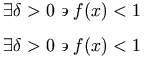 and could be represented as:
<mrow>
<mo> there exists </mo>
<mrow>
<mrow>
<mi> δ<!--GREEK SMALL LETTER DELTA--> </mi>
<mo> ><!--GREATER-THAN SIGN--> </mo>
<mn> 0 </mn>
</mrow>
<mo> such that </mo>
<mrow>
<mrow>
<mi> f </mi>
<mo> ⁡<!--FUNCTION APPLICATION--> </mo>
<mrow>
<mo> ( </mo>
<mi> x </mi>
<mo> ) </mo>
</mrow>
</mrow>
<mo> <<!--LESS-THAN SIGN--> </mo>
<mn> 1 </mn>
</mrow>
</mrow>
</mrow>
An example involving an mi element is:
x+x2+···+xn.
In this example, ellipsis should be represented using an mi element, since it takes the place of a term in the
sum; (see Section 3.2.3 Identifier (mi)).
On the other hand, expository text within MathML is best
represented with an mtext element. An example
of this is:
Theorem 1: if x > 1, then x2 > x.
However, when MathML is embedded in HTML, or another document markup language, the example is probably best rendered with only the two inequalities represented as MathML at all, letting the text be part of the surrounding HTML.
Another factor to consider in deciding how to mark up text is the
effect on rendering. Text enclosed in an mo
element is unlikely to be found in a renderer's operator dictionary,
so it will be rendered with the format and spacing appropriate for an
"unrecognized operator", which may or may not be better than the
format and spacing for "text" obtained by using an
mtext element. An ellipsis entity in an
mi element is apt to be spaced more appropriately
for taking the place of a term within a series than if it appeared in
an mtext element.
3.2.7 Space (mspace)
3.2.7.1 Description
An mspace empty element represents a blank
space of any desired size, as set by its attributes. It can also be
used to make linebreaking suggestions to a visual renderer.
Note that the default values for attributes have been chosen so that
they typically will have no effect on rendering. Thus, the mspace element is generally used with one
or more attribute values explicitly specified.
3.2.7.2 Attributes
In addition to the attributes listed below,
mspace permits
xml:id,
xref, class and
style attributes,
as described in Section 2.1.4 Attributes Shared by all MathML Elements.
| Name | values | default |
|---|---|---|
| spacing | string | "" |
| width | number h-unit | namedspace | 0em |
| height | number v-unit | 0ex |
| depth | number v-unit | 0ex |
| linebreak | auto | newline | indentingnewline | nobreak | goodbreak | badbreak | auto |
| indentto | id | auto |
| indent | left | center | right | auto | number h-unit | auto |
"h-unit" and "v-unit" represent units of horizontal or vertical length, respectively (see Section 2.1.3.2 Attributes with units).
The "spacing" attribute is a string-valued variable whose default value is the empty string (""). The spacing attribute specifies that the width of the space is the same as the length of the attribute value in the current font.
The total width of a mspace is given by the sum
of both the "width" and "spacing"
attributes. The "spacing" attribute does not affect the height or depth
of the mspace.
The linebreak attribute is used to give a linebreaking
hint to a visual renderer. The default value is
"auto", which indicates that a renderer should use
whatever default linebreaking algorithm it would normally use. The
meanings of the other values are described in the table below.
| Value | Description |
|---|---|
| newline | start a new line and do not indent |
| indentingnewline | start a new line and do indent |
| nobreak | do not allow a linebreak here |
| goodbreak | if a linebreak is needed on the line, here is a good spot |
| badbreak | if a linebreak is needed on the line, try to avoid breaking here |
In the case when both dimensional attributes and a linebreaking attribute are set, the linebreaking attribute is ignored.
The spacing that normally follows an operator is not used at the end of a line. Similarly, the space that normally preceeds an operator is not used at the beginning of a line.
The indent and indentto attributes allow control over
how lines are indented after a manual linebreak. They are only meaningful when
linebreak is one of "newline",
"indentingnewline". "goodbreak", or
"badbreak". If both indent and indentto are
specified, indentto is used when the referenced id is valid; the value of
indent (or its default value) is used if the referenced xml:id is
invalid.
indentto specifies that the left side of the next element should
align with the left side of the element that xml:id references. The automatic
linebreaking algorithm (if turned on) is free to linebreak between id and this
element.
The values of xml:id must be unique within the scope of the entire document. MathML generators that create xml:id values should take care to create unique values.
The legal values of indent are:
| Value | Meaning |
|---|---|
| left | Align the left side of the next line to the left side of the first line |
| center | Align the center of the next line to the center of the first line |
| right | Align the right side of the next line to the right side of the first line |
| auto | (default) Indent using the algorithm used by the automatic linebreaking algorithm. |
| number h-unit | Indent the amount specified by the argument. If a percentage is given, this is the percentage of the linewrapping width currently in effect. |
Note the warning about the legal grouping of "space-like
elements" given below, and the warning about the use of such
elements for "tweaking" or conveying meaning in Section 3.3.6 Adjust Space Around Content
(mpadded). See also the other elements that can render as
whitespace, namely mtext, mphantom, and
maligngroup.
3.2.7.3 Examples
<mspace spacing="00"/>
<mspace spacing="×<!--MULTIPLICATION SIGN-->000,00"/>
<mspace height="3ex" depth="2ex"/>
<mrow>
<mi>a</mi>
<mo xml:id="firstop">+</mo>
<mi>b</mi>
<mspace linebreak="newline" indentto="firstop"/>
<mo>+</mo>
<mi>c</mi>
</mrow>
In the last example, mspace will cause the line to end after the "b" and the following line to be indented so that the "+" that follows will align with
the "+" with xml:id="firstop".
3.2.7.4 Definition of space-like elements
A number of MathML presentation elements are "space-like" in the
sense that they typically render as whitespace, and do not affect the
mathematical meaning of the expressions in which they appear. As a
consequence, these elements often function in somewhat exceptional
ways in other MathML expressions. For example, space-like elements are
handled specially in the suggested rendering rules for
mo given in Section 3.2.5 Operator, Fence, Separator or Accent
(mo).
The following MathML elements are defined to be "space-like":
-
an
mtext,mspace,maligngroup, ormalignmarkelement; -
an
mstyle,mphantom, ormpaddedelement, all of whose direct sub-expressions are space-like; -
an
mactionelement whose selected sub-expression exists and is space-like; -
an
mrowall of whose direct sub-expressions are space-like.
Note that an mphantom is not
automatically defined to be space-like, unless its content is
space-like. This is because operator spacing is affected by whether
adjacent elements are space-like. Since the
mphantom element is primarily intended as an aid
in aligning expressions, operators adjacent to an
mphantom should behave as if they were adjacent
to the contents of the mphantom,
rather than to an equivalently sized area of whitespace.
3.2.7.5 Legal grouping of space-like elements
Authors who insert space-like elements or
mphantom elements into an existing MathML
expression should note that such elements are counted as
arguments, in elements that require a specific number of arguments,
or that interpret different argument positions differently.
Therefore, space-like elements inserted into such a MathML element
should be grouped with a neighboring argument of that element by
introducing an mrow for that purpose. For example,
to allow for vertical alignment on the right edge of the base of a
superscript, the expression
<msup> <mi> x </mi> <malignmark edge="right"/> <mn> 2 </mn> </msup>
is illegal, because msup must have exactly 2 arguments;
the correct expression would be:
<msup>
<mrow>
<mi> x </mi>
<malignmark edge="right"/>
</mrow>
<mn> 2 </mn>
</msup>
See also the warning about "tweaking" in Section 3.3.6 Adjust Space Around Content (mpadded).
3.2.8 String Literal (ms)
3.2.8.1 Description
The ms element is used to represent
"string literals" in expressions meant to be interpreted by
computer algebra systems or other systems containing "programming
languages". By default, string literals are displayed surrounded by
double quotes. As explained in Section 3.2.6 Text (mtext), ordinary text
embedded in a mathematical expression should be marked up with mtext, or in some cases mo or
mi, but never with ms.
Note that the string literals encoded by ms are made up of characters, mglyphs and
malignmarks rather than "ASCII
strings". For
example, <ms>&</ms> represents a string
literal containing a single character, &, and
<ms>&amp;</ms> represents a string literal
containing 5 characters, the first one of which is
&.
Like all token elements, ms does trim and
collapse whitespace in its content according to the rules of
Section 2.1.5 Collapsing Whitespace in Input, so whitespace intended to remain in
the content should be encoded as described in that section.
3.2.8.2 Attributes
ms elements accept the attributes listed in
Section 3.2.2 Mathematics style attributes common to token
elements, and additionally:
| Name | values | default |
|---|---|---|
| lquote | string | " |
| rquote | string | " |
In visual renderers, the content of an ms
element is typically rendered with no extra spacing added around the
string, and the quote characters at the beginning and the end of the
string. By default, the left and right quote characters are both the
standard double quote character ". However,
these characters can be changed with the lquote and
rquote attributes respectively
(which should be interpreted as opening and
closing quotes, respectively).
The content of ms elements should be rendered with visible
"escaping" of certain characters in the content,
including at least the left and right quoting
characters, and preferably whitespace other than individual
space characters. The intent is for the viewer to see that the
expression is a string literal, and to see exactly which characters
form its content. For example, <ms>double quote is
"</ms> might be rendered as "double quote is \"".
3.2.9 Using images to represent
symbols (mglyph)
3.2.9.1 Description
The mglyph element provides a mechanism
for displaying images to represent non-standard symbols.
It is generally used as the content of mi or mo
elements where existing Unicode characters are not adequate.
Unicode defines a large number of characters used in mathematics, and in most cases, glyphs representing these characters are widely available in a variety of fonts. Although these characters should meet almost all users needs, MathML recognizes that mathematics is not static and that new characters and symbols are added when convenient. Characters that become well accepted will likely be eventually incorporated by the Unicode Consortium or other standards bodies, but that is often a lengthy process.
3.2.9.2 Attributes
mglyph elements accept the attributes listed in
Section 3.2.2 Mathematics style attributes common to token
elements, and the additional attributes listed here.
| Name | values | default |
|---|---|---|
| alt | string | required |
| src | URI | required |
| width | unsigned-number h-unit | from image |
| height | unsigned-number v-unit | from image |
| valign | number v-unit | 0em |
The alt attribute provides an alternate name
for the glyph. If the specified image can't be found or displayed,
the renderer may use this name in a warning message or some unknown glyph notation.
The name might also be used by an audio renderer or symbol processing
system and should be chosen to be descriptive.
The src attribute specifies the location of the image resource;
it may be a URI relative to the base-uri of the source of the MathML, if any.
Examples of widely recognized image formats include GIF, JPEG and PNG; However,
it may be advisable to omit the extension from the src uri, so
that a user agent may use content-negotiation to choose the most appropriate format.
The src uniquely identifies the mglyph; two mglyphs
with the same values for src should
be considered identical by applications that must determine whether
two characters/glyphs are identical. The alt
attribute should not be part of the identity test.
The width and height attributes specify
the desired size of the glyph. They are both optional. If neither are given,
the renderer should render the image at its natural size. If only one is
given, the renderer should respect that dimension and choose the other dimension
so as to preserve the aspect ratio of the image.
By default, the bottom of the image aligns to the
current baseline. The valign attribute specifies the alignment
point within the image. A positive value of valign
shifts the bottom of the image below the current baseline, while
a negative value will raise it above the baseline.
3.2.9.3 Example
The following example illustrates how a researcher might use
the mglyph construct with a set of images to work
with braid group notation.
<mrow> <mi><mglyph src="my-braid-23" alt="23braid"/></mi> <mo>+</mo> <mi><mglyph src="my-braid-123" alt="132braid"/></mi> <mo>=</mo> <mi><mglyph src="my-braid-13" alt="13braid"/></mi> </mrow>
This might render as:
3.2.9.4 Deprecated Attributes
Originally, mglyph was designed to provide access to non-standard
fonts. Since this functionality was seldom implemented, nor were downloadable
web fonts widely available, this use of mglyph has been deprecated.
For reference, the following attributes were previously defined.
They are now optional, and will be ignored in most implementations.
| Name | values |
|---|---|
| fontfamily | string | css-fontfamily |
| index | integer |
The fontfamily and index attributes named a font
and position within that font.
3.2.10 Line mline
3.2.10.1 Description
mline draws a horizontal line.
The length and width of the line are specified as attributes.
3.2.10.2 Attributes
In addition to the attribute listed below, this element permits "xml:id", "xref", "class" and "style" attributes, as described in Section 2.1.4 Attributes Shared by all MathML Elements.
| Name | values | default |
|---|---|---|
| linethickness | number [v-unit] | thin | medium | thick | 1 (rule thickness) |
| spacing | string | "" |
| length | number h-unit | namedspace | 0 |
The linethickness attribute specifies how thick the line should be
drawn.
The spacing attribute specifies that the length of
the line is the same as the length of the attribute value in the
current font.
The length attribute specifies the length of the
line using a specification that is the same as the width attribute
of mspace .
3.2.10.3 Examples
Here are some examples:
<mline spacing="000,000"/> <mline length="2.5in"/>
| Issue mline-generalization | wiki (member only) |
|---|---|
| mline generalization | |
|
A further generalization of
|
|
| Resolution | None recorded |
3.3 General Layout Schemata
Besides tokens there are several families of MathML presentation elements. One family of elements deals with various "scripting" notations, such as subscript and superscript. Another family is concerned with matrices and tables. The remainder of the elements, discussed in this section, describe other basic notations such as fractions and radicals, or deal with general functions such as setting style properties and error handling.
3.3.1 Horizontally Group Sub-Expressions
(mrow)
3.3.1.1 Description
An mrow element is used to group together any
number of sub-expressions, usually consisting of one or more mo elements acting as "operators" on one
or more other expressions that are their "operands".
Several elements automatically treat their arguments as if they were
contained in an mrow element. See the discussion of
inferred mrows in Section 3.1.3 Required Arguments. See also mfenced (Section 3.3.8 Expression Inside Pair of Fences
(mfenced)), which can effectively form an mrow containing its arguments separated by commas.
3.3.1.2 Attributes
This element only permits xml:id,
xref, class and
style attributes,
as described in Section 2.1.4 Attributes Shared by all MathML Elements,
and the dir attribute as described in Section 3.1.5.1 Overall Directionality of Mathematics Formulas.
mrow elements are typically rendered visually
as a horizontal row of their arguments, left to right in the order in
which the arguments occur, in a context with LTR directionality,
or right to left. The dir attribute can be used to specify
the directionality for a specific mrow, otherwise it inherits the
directionality from the context. For aural agents, the arguments would be
rendered audibly as a sequence of renderings of
the arguments. The description in Section 3.2.5 Operator, Fence, Separator or Accent
(mo) of suggested rendering
rules for mo elements assumes that all horizontal
spacing between operators and their operands is added by the rendering
of mo elements (or, more generally, embellished
operators), not by the rendering of the mrows
they are contained in.
MathML is designed to allow renderers to automatically linebreak expressions (that is, to break excessively long expressions into several lines), without requiring authors to specify explicitly how this should be done. This is because linebreaking positions can't be chosen well without knowing the width of the display device and the current font size, which for many uses of MathML will not be known except by the renderer at the time of each rendering.
Determining good positions for linebreaks is complex, and rules for
this are not described here; whether and how it is done is up to each
MathML renderer. Typically, linebreaking will involve selection of
"good" points for insertion of linebreaks between successive
arguments of mrow elements.
Although MathML does not require linebreaking or specify a
particular linebreaking algorithm, it has several features designed to
allow such algorithms to produce good results. These include the use
of special entities for certain operators, including invisible
operators (see Section 3.2.5 Operator, Fence, Separator or Accent
(mo)), or for providing hints related to
linebreaking when necessary (see Section 3.2.6 Text (mtext)), and the ability to
use nested mrows to describe sub-expression
structure (see below).
3.3.1.2.1 mrow of one argument
MathML renderers are required to treat an mrow
element containing exactly one argument as equivalent in all ways to
the single argument occurring alone, provided there are no attributes
on the mrow element's start tag. If there are
attributes on the mrow element's start tag, no
requirement of equivalence is imposed. This equivalence condition is
intended to simplify the implementation of MathML-generating software
such as template-based authoring tools. It directly affects the
definitions of embellished operator and space-like element and the
rules for determining the default value of the form
attribute of an mo element;
see Section 3.2.5 Operator, Fence, Separator or Accent
(mo) and Section 3.2.7 Space (mspace). See also the discussion of equivalence of MathML
expressions in Section 2.3 Conformance.
3.3.1.3 Proper grouping of sub-expressions using mrow
Sub-expressions should be grouped by the document author in the same way
as they are grouped in the mathematical interpretation of the expression;
that is, according to the underlying "syntax tree" of the
expression. Specifically, operators and their mathematical arguments should
occur in a single mrow; more than one operator
should occur directly in one mrow only when they
can be considered (in a syntactic sense) to act together on the interleaved
arguments, e.g. for a single parenthesized term and its parentheses, for
chains of relational operators, or for sequences of terms separated by
+ and -. A precise rule is given below.
Proper grouping has several purposes: it improves display by possibly affecting spacing; it allows for more intelligent linebreaking and indentation; and it simplifies possible semantic interpretation of presentation elements by computer algebra systems, and audio renderers.
Although improper grouping will sometimes result in suboptimal
renderings, and will often make interpretation other than pure visual
rendering difficult or impossible, any grouping of expressions using
mrow is allowed in MathML syntax; that is,
renderers should not assume the rules for proper grouping will be
followed.
3.3.1.3.1 Precise rule for proper grouping
A precise rule for when and how to nest sub-expressions using
mrow is especially desirable when generating
MathML automatically by conversion from other formats for displayed
mathematics, such as TEX, which don't always specify how sub-expressions
nest. When a precise rule for grouping is desired, the following rule
should be used:
Two adjacent operators (i.e. mo elements,
possibly embellished), possibly separated by operands (i.e. anything
other than operators), should occur in the same
mrow only when the leading operator has an infix or
prefix form (perhaps inferred), the following operator has an infix or
postfix form, and the operators are listed in the same group of
entries in the operator dictionary provided in Appendix B Operator Dictionary.
In all other cases, nested mrows should be used.
When forming a nested mrow (during generation
of MathML) that includes just one of two successive operators with
the forms mentioned above (which mean that either operator could in
principle act on the intervening operand or operands), it is necessary
to decide which operator acts on those operands directly (or would do
so, if they were present). Ideally, this should be determined from the
original expression; for example, in conversion from an
operator-precedence-based format, it would be the operator with the
higher precedence. If this cannot be determined directly from the
original expression, the operator that occurs later in the suggested
operator dictionary (Appendix B Operator Dictionary) can be assumed to have
a higher precedence for this purpose.
Note that the above rule has no effect on whether any MathML expression is valid, only on the recommended way of generating MathML from other formats for displayed mathematics or directly from written notation.
(Some of the terminology used in stating the above rule in defined in Section 3.2.5 Operator, Fence, Separator or Accent (mo).)
3.3.1.4 Examples
As an example, 2x+y-z should be written as:
<mrow>
<mrow>
<mn> 2 </mn>
<mo> ⁢<!--INVISIBLE TIMES--> </mo>
<mi> x </mi>
</mrow>
<mo> + </mo>
<mi> y </mi>
<mo> - </mo>
<mi> z </mi>
</mrow>
The proper encoding of (x, y) furnishes a less obvious
example of nesting mrows:
<mrow>
<mo> ( </mo>
<mrow>
<mi> x </mi>
<mo> , </mo>
<mi> y </mi>
</mrow>
<mo> ) </mo>
</mrow>
In this case, a nested mrow is required inside
the parentheses, since parentheses and commas, thought of as fence and
separator "operators", do not act together on their arguments.
3.3.2 Fractions (mfrac)
3.3.2.1 Description
The mfrac element is used for fractions. It can
also be used to mark up fraction-like objects such as binomial coefficients
and Legendre symbols. The syntax for mfrac is
<mfrac> numerator denominator </mfrac>
3.3.2.2 Attributes of mfrac
In addition to the attributes listed below, this element permits
xml:id,
xref, class and
style attributes,
as described in Section 2.1.4 Attributes Shared by all MathML Elements.
| Name | values | default |
|---|---|---|
| linethickness | number [ v-unit ] | thin | medium | thick | 1 (rule thickness) |
| numalign | left | center | right | center |
| denomalign | left | center | right | center |
| bevelled | true | false | false |
The linethickness attribute indicates the thickness of
the horizontal "fraction bar", or "rule", typically used to render
fractions. A fraction with linethickness="0" renders
without the bar, and might be used within binomial coefficients. A
linethickness greater than one might be used with nested
fractions. These cases are shown below:

In general, the value of linethickness can be a
number, as a multiplier of the default thickness of the fraction bar
(the default thickness is not specified by MathML), or a number with a
unit of vertical length (see Section 2.1.3.2 Attributes with units), or one of the keywords
medium (same as 1), thin (thinner than 1,
otherwise up to the renderer), or thick (thicker than 1,
otherwise up to the renderer).
The numalign and
denomalign attributes control the horizontal
alignment of the numerator and denominator respectively. Typically,
numerators and denominators are centered, but a very long numerator or
denominator might be displayed on several lines and a left alignment
might be more appropriate for displaying them.
The bevelled attribute determines whether the
fraction is displayed with the numerator above the denominator
separated by a horizontal line or
whether a diagonal line is used to separate a slightly raised
numerator from a slightly lowered denominator. The latter form
corresponds to the attribute value being "true"
and provides for a more compact form for simple numerator and
denominators. An example illustrating the bevelled form is show below:
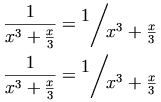
In a RTL directionality context,
the numerator leads (on the right) and the demonator follows (on the left).
In this case, the diagonal line slants upwards going from right to left.
Although this format is an established convention, it is not universally
followed; for situations where a forward slash is desired in a RTL context,
alternative markup, such as an mo within an mrow should be used.
The mfrac element sets displaystyle to "false", or if it
was already false increments scriptlevel by 1,
within numerator and denominator. These
attributes are inherited by every element from its rendering environment,
but can be set explicitly only on the mstyle and mtable
elements. (See Section 3.3.4 Style Change (mstyle).)
3.3.2.3 Examples
The examples shown above can be represented in MathML as:
<mrow>
<mo> ( </mo>
<mfrac linethickness="0">
<mi> a </mi>
<mi> b </mi>
</mfrac>
<mo> ) </mo>
</mrow>
<mfrac linethickness="2">
<mfrac>
<mi> a </mi>
<mi> b </mi>
</mfrac>
<mfrac>
<mi> c </mi>
<mi> d </mi>
</mfrac>
</mfrac>
<mfrac>
<mn> 1 </mn>
<mrow>
<msup>
<mi> x </mi>
<mn> 3 </mn>
</msup>
<mo> + </mo>
<mfrac>
<mi> x </mi>
<mn> 3 </mn>
</mfrac>
</mrow>
</mfrac>
<mo> = </mo>
<mfrac bevelled="true">
<mn> 1 </mn>
<mrow>
<msup>
<mi> x </mi>
<mn> 3 </mn>
</msup>
<mo> + </mo>
<mfrac>
<mi> x </mi>
<mn> 3 </mn>
</mfrac>
</mrow>
</mfrac>
A more generic example is:
<mfrac>
<mrow>
<mn> 1 </mn>
<mo> + </mo>
<msqrt>
<mn> 5 </mn>
</msqrt>
</mrow>
<mn> 2 </mn>
</mfrac>
3.3.3 Radicals (msqrt, mroot)
3.3.3.1 Description
These elements construct radicals. The msqrt element is
used for square roots, while the mroot element is used
to draw radicals with indices, e.g. a cube root. The syntax for these
elements is:
<msqrt> base </msqrt> <mroot> base index </mroot>
The mroot element requires exactly 2 arguments.
However, msqrt accepts any number of arguments; if
this number is not 1, its contents are treated as a single "inferred
mrow" containing its arguments, as described in
Section 3.1.3 Required Arguments.
3.3.3.2 Attributes
This element only permits xml:id,
xref, class and
style attributes,
as described in Section 2.1.4 Attributes Shared by all MathML Elements.
The mroot element increments scriptlevel by 2, and sets displaystyle to "false", within
index, but leaves both attributes unchanged within
base. The msqrt element leaves both
attributes unchanged within all its arguments. These attributes are
inherited by every element from its rendering environment, but can be set
explicitly only on mstyle. (See Section 3.3.4 Style Change (mstyle).)
Note that in a RTL directionality, the surd begins
on the right, rather than the left, along with the index in the case
of mroot.
3.3.4 Style Change (mstyle)
3.3.4.1 Description
The mstyle element is used to make style
changes that affect the rendering of its
contents. mstyle can be given any attribute
accepted by any MathML presentation element provided that the
attribute value is inherited, computed or has a default value;
presentation element attributes whose values are required are not
accepted by the mstyle element. In addition
mstyle can also be given certain special
attributes listed below.
The mstyle element accepts any number of
arguments. If this number is not 1, its contents are treated as a single
"inferred mrow" formed from all its
arguments, as described in Section 3.1.3 Required Arguments.
Loosely speaking, the effect of the mstyle element
is to change the default value of an attribute for the elements it
contains. Style changes work in one of several ways, depending on
the way in which default values are specified for an attribute.
The cases are:
-
Some attributes, such as
displaystyleorscriptlevel(explained below), are inherited from the surrounding context when they are not explicitly set. Specifying such an attribute on anmstyleelement sets the value that will be inherited by its child elements. Unless a child element overrides this inherited value, it will pass it on to its children, and they will pass it to their children, and so on. But if a child element does override it, either by an explicit attribute setting or automatically (as is common forscriptlevel), the new (overriding) value will be passed on to that element's children, and then to their children, etc, until it is again overridden. -
Other attributes, such as
linethicknessonmfrac, have default values that are not normally inherited. That is, if thelinethicknessattribute is not set on the start tag of anmfracelement, it will normally use the default value of "1", even if it was contained in a largermfracelement that set this attribute to a different value. For attributes like this, specifying a value with anmstyleelement has the effect of changing the default value for all elements within its scope. The net effect is that setting the attribute value withmstylepropagates the change to all the elements it contains directly or indirectly, except for the individual elements on which the value is overridden. Unlike in the case of inherited attributes, elements that explicitly override this attribute have no effect on this attribute's value in their children. -
Another group of attributes, such as
stretchyandform, are computed from operator dictionary information, position in the enclosingmrow, and other similar data. For these attributes, a value specified by an enclosingmstyleoverrides the value that would normally be computed.
Note that attribute values inherited from an
mstyle in any manner affect a given element
in the mstyle's content only if that attribute is
not given a value in that element's start tag. On any element for
which the attribute is set explicitly, the value specified on the
start tag overrides the inherited value. The only exception to this
rule is when the value given on the start tag is documented as
specifying an incremental change to the value inherited from that
element's context or rendering environment.
Note also that the difference between inherited and non-inherited
attributes set by mstyle, explained above, only
matters when the attribute is set on some element within the
mstyle's contents that has children also
setting it. Thus it never matters for attributes, such as
color, which can only be set on token elements (or on
mstyle itself).
There are several exceptional elements, mpadded,
mtable, mtr, mlabeledtr and mtd
that have attributes which cannot be set with mstyle. The
mpadded and mtable elements share attribute names
with the mspace element. The mtable, mtr,
mlabeledtr and mtd all share attribute
names. Similarly, mpadded and mo elements also
share an attribute name. Since the syntax for the values these shared
attributes accept differs between elements, MathML specifies that when
the attributes height, width or depth
are specified on an mstyle element, they apply only to
mspace elements, and not the corresponding attributes of
mpadded or mtable. Similarly, when
rowalign, columnalign or groupalign
are specified on an mstyle element, the apply only to the
mtable element, and not the row and cell elements. Finally,
when lspace is set with mstyle, it applies only to
the mo element and not mpadded.
3.3.4.2 Attributes
As stated above, mstyle accepts all
attributes of all MathML presentation elements which do not have
required values. That is, all attributes which have an explicit
default value or a default value which is inherited or computed are
accepted by the mstyle element.
This element also accepts
xml:id,
xref, class and
style attributes,
as described in Section 2.1.4 Attributes Shared by all MathML Elements.
Additionally, mstyle can be given the following special
attributes that are implicitly inherited by every MathML element as
part of its rendering environment:
| Name | values | default |
|---|---|---|
| scriptlevel | ['+' | '-'] unsigned-integer | inherited |
| displaystyle | true | false | inherited |
| scriptsizemultiplier | number | 0.71 |
| scriptminsize | number v-unit | 8pt |
| background | #rgb | #rrggbb | transparent | html-color-name | transparent |
| veryverythinmathspace | number h-unit | 0.0555556em |
| verythinmathspace | number h-unit | 0.111111em |
| thinmathspace | number h-unit | 0.166667em |
| mediummathspace | number h-unit | 0.222222em |
| thickmathspace | number h-unit | 0.277778em |
| verythickmathspace | number h-unit | 0.333333em |
| veryverythickmathspace | number h-unit | 0.388889em |
3.3.4.2.1 scriptlevel and displaystyle
MathML uses two attributes, displaystyle and
scriptlevel, to control orthogonal presentation features
that TEX encodes into one style attribute with values
\displaystyle, \textstyle, \scriptstyle, and \scriptscriptstyle. The
corresponding values of displaystyle and
scriptlevel for those TEX styles would be "true" and
"0", "false" and
"0", "false" and
"1", and "false" and "2",
respectively.
The main effect of the displaystyle attribute is that
it determines the effect of other attributes such as the
largeop and movablescripts attributes of
mo. The main effect of the
scriptlevel attribute is to control the font
size. Typically, the higher the scriptlevel, the smaller
the font size. (Non-visual renderers can respond to the font size in
an analogous way for their medium.) More sophisticated renderers may
also choose to use these attributes in other ways, such as rendering
expressions with displaystyle="false" in a more
vertically compressed manner.
These attributes are given initial values for the outermost expression of an instance of MathML based on its rendering environment. A short list of layout schemata described below modify these values for some of their sub-expressions. Otherwise, values are determined by inheritance whenever they are not directly specified on a given element's start tag.
For an instance of MathML embedded in a textual data format (such
as HTML) in "display" mode, i.e. in place of a paragraph,
displaystyle = "true" and
scriptlevel = "0" for the
outermost expression of the embedded MathML; if the
MathML is embedded in "inline" mode, i.e. in place of a character,
displaystyle = "false" and
scriptlevel = "0" for
the outermost expression. See Section 2.5.2 The Top-Level
math Element for further
discussion of the distinction between "display" and "inline"
embedding of MathML and how this can be specified in particular
instances. In general, a MathML renderer may determine these initial
values in whatever manner is appropriate for the location and context
of the specific instance of MathML it is rendering, or if it has no
way to determine this, based on the way it is most likely to be used;
as a last resort it is suggested that it use the most generic values
displaystyle = ""true"" and
scriptlevel = ""0"".
The MathML layout schemata that typically display some of their
arguments in smaller type or with less vertical spacing, namely the
elements for scripts, fractions, radicals, and tables or matrices,
set displaystyle to "false", and in some cases increase
scriptlevel, for those arguments. The new values are inherited
by all sub-expressions within those arguments, unless they are
overridden.
The specific rules by which each element modifies
displaystyle and/or scriptlevel are given in the
specification for each element that does so; the complete list of
elements that modify either attribute are: the "scripting" elements
msub, msup, msubsup,
munder, mover,
munderover, and mmultiscripts; and the
elements mfrac, mroot, and
mtable.
When mstyle is given a
scriptlevel attribute with no sign, it sets the value of
scriptlevel within its contents to the value given, which
must be a nonnegative integer. When the attribute value consists of a
sign followed by an integer, the value of scriptlevel is
incremented (for '+') or decremented (for '-') by the amount
given. The incremental syntax for this attribute is an exception to
the general rules for setting inherited attributes using
mstyle, and is not allowed by any other attribute
on mstyle.
Whenever the scriptlevel is changed, either
automatically or by being explicitly incremented, decremented, or set,
the current font size is multiplied by the value of
scriptsizemultiplier to the power of the change in
scriptlevel. For example, if scriptlevel is
increased by 2, the font size is multiplied by
scriptsizemultiplier twice in succession; if
scriptlevel is explicitly set to 2 when it had been 3,
the font size is divided by scriptsizemultiplier.
References to fontsize in this section should be
interpreted to mean either the fontsize attribute
or the mathsize attribute.
The default value of scriptsizemultiplier is less than
one (in fact, it is approximately the square root of 1/2), resulting
in a smaller font size with increasing scriptlevel. To
prevent scripts from becoming unreadably small, the font size is never
allowed to go below the value of scriptminsize as a
result of a change to scriptlevel, though it can be set
to a lower value using the fontsize attribute (Section 3.2.2 Mathematics style attributes common to token
elements) on mstyle or on token
elements. If a change to scriptlevel would cause the font
size to become lower than scriptminsize using the above
formula, the font size is instead set equal to
scriptminsize within the sub-expression for which
scriptlevel was changed.
In the syntax for scriptminsize, v-unit represents a unit of vertical length (as
described in Section 2.1.3.2 Attributes with units). The most common unit for specifying font sizes
in typesetting is pt (points).
Explicit changes to the fontsize attribute have no
effect on the value of scriptlevel.
3.3.4.2.2 Further details on scriptlevel for renderers
For MathML renderers that support CSS style sheets, or some other
analogous style sheet mechanism, absolute or relative changes to
fontsize (or other attributes) may occur implicitly on
any element in response to a style sheet. Changes to
fontsize of this kind also have no effect on
scriptlevel. A style sheet-induced change to
fontsize overrides scriptminsize in the same
way as for an explicit change to fontsize in the
element's start tag (discussed above), whether it is specified in the
style sheet as an absolute or a relative change. (However, any
subsequent scriptlevel-induced change to
fontsize will still be affected by it.) As is required
for inherited attributes in CSS, the style sheet-modified
fontsize is inherited by child elements.
If the same element is subject to both a style sheet-induced and an
automatic (scriptlevel-related) change to its own
fontsize, the scriptlevel-related change is
done first – in fact, in the simplest implementation of the
element-specific rules for scriptlevel, this change would
be done by the element's parent as part of producing the rendering
properties it passes to the given element, since it is the parent
element that knows whether scriptlevel should be changed
for each of its child elements.
If the element's own fontsize is changed by a style
sheet and it also changes scriptlevel (and thus
fontsize) for one of its children, the style
sheet-induced change is done first, followed by the change inherited
by that child. If more than one child's scriptlevel is
changed, the change inherited by each child has no effect on the other
children. (As a mnemonic rule that applies to a "parse tree" of
elements and their children, style sheet-induced changes to
fontsize can be associated to nodes of the tree, i.e. to
MathML elements, and scriptlevel-related changes can be
associated to the edges between parent and child elements; then the
order of the associated changes corresponds to the order of nodes and
edges in each path down the tree.) For general information on the
relative order of processing of properties set by style sheets versus by
attributes, see the appropriate subsection of CSS-compatible
attributes in Section 2.1.3.3 CSS-compatible attributes.
If scriptlevel is changed incrementally by an
mstyle element that also sets certain other
attributes, the overall effect of the changes may depend on the order
in which they are processed. In such cases, the attributes in the
following list should be processed in the following order, regardless
of the order in which they occur in the XML-format attribute list of
the mstyle start tag:
scriptsizemultiplier, scriptminsize,
scriptlevel, fontsize.
Note that scriptlevel can, in principle, attain any
integral value by being decremented sufficiently, even though it can
only be explicitly set to nonnegative values. Negative values of
scriptlevel generated in this way are legal and should
work as described, generating font sizes larger than those of the
surrounding expression. Since scriptlevel is initially 0
and never decreases automatically, it will always be nonnegative
unless it is decremented past 0 using mstyle.
Explicit decrements of scriptlevel after the font size
has been limited by scriptminsize as described above
would produce undesirable results. This might occur, for example, in a
representation of a continued fraction, in which the scriptlevel was
decremented for part of the denominator back to its value for the
fraction as a whole, if the continued fraction itself was located in a
place that had a high scriptlevel. To prevent this
problem, MathML renderers should, when decrementing
scriptlevel, use as the initial font size the value the
font size would have had if it had never been limited by
scriptminsize. They should not, however, ignore the
effects of explicit settings of fontsize, even to values
below scriptminsize.
Since MathML renderers may be unable to make use of arbitrary font
sizes with good results, they may wish to modify the mapping from
scriptlevel to fontsize to produce better renderings in their
judgment. In particular, if fontsizes have to be rounded to available
values, or limited to values within a range, the details of how this
is done are up to the renderer. Renderers should, however, ensure that
a series of incremental changes to scriptlevel resulting in its
return to the same value for some sub-expression that it had in a
surrounding expression results in the same fontsize for that
sub-expression as for the surrounding expression.
3.3.4.2.3 Color and background attributes
Color and background attributes are discussed in Section 3.2.2.2 Color-related attributes.
3.3.4.2.4 Precise background region not specified
The suggested MathML visual rendering rules do not define the
precise extent of the region whose background is affected by using the
background attribute on mstyle,
except that, when mstyle's content does not have
negative dimensions and its drawing region is not overlapped by other
drawing due to surrounding negative spacing, this region should lie
behind all the drawing done to render the content of the
mstyle, but should not lie behind any of the
drawing done to render surrounding expressions. The effect of overlap
of drawing regions caused by negative spacing on the extent of the
region affected by the background attribute is not
defined by these rules.
3.3.4.2.5 Meaning of named mathspaces
The spacing between operators is often one of a small number of
potential values. MathML names these values and allows their values to
be changed. Because the default values for spacing around operators
that are given in the operator dictionary Appendix B Operator Dictionary
are defined using these named spaces, changing their values will produce
tighter or looser spacing. These values can be used anywhere a h-unit or v-unit unit is
allowed. See Section 2.1.3.2 Attributes with units.
The predefined namedspaces are:
"negativeveryverythinmathspace",
"negativeverythinmathspace",
"negativethinmathspace",
"negativemediummathspace",
"negativethickmathspace",
"negativeverythickmathspace",
"negativeveryverythickmathspace",
"veryverythinmathspace",
"verythinmathspace",
"thinmathspace",
"mediummathspace",
"thickmathspace",
"verythickmathspace", or
"veryverythickmathspace".
The default values of "veryverythinmathspace"...
"veryverythickmathspace" are 1/18em...7/18em,
respectively.
3.3.4.3 Examples
The example of limiting the stretchiness of a parenthesis shown in the section on <mo>,
<mrow> <mo maxsize="1"> ( </mo> <mfrac> <mi> a </mi> <mi> b </mi> </mfrac> <mo maxsize="1"> ) </mo> </mrow>
can be rewritten using mstyle as:
<mstyle maxsize="1">
<mrow>
<mo> ( </mo>
<mfrac> <mi> a </mi> <mi> b </mi> </mfrac>
<mo> ) </mo>
</mrow>
</mstyle>
3.3.5 Error Message (merror)
3.3.5.1 Description
The merror element displays its contents as an
"error message". This might be done, for example, by displaying the
contents in red, flashing the contents, or changing the background
color. The contents can be any expression or expression sequence.
merror accepts any number of arguments; if
this number is not 1, its contents are treated as a single "inferred
mrow" as described in Section 3.1.3 Required Arguments.
The intent of this element is to provide a standard way for programs that generate MathML from other input to report syntax errors in their input. Since it is anticipated that preprocessors that parse input syntaxes designed for easy hand entry will be developed to generate MathML, it is important that they have the ability to indicate that a syntax error occurred at a certain point. See Section 2.3.2 Handling of Errors.
The suggested use of merror for reporting
syntax errors is for a preprocessor to replace the erroneous part of
its input with an merror element containing a
description of the error, while processing the surrounding expressions
normally as far as possible. By this means, the error message will be
rendered where the erroneous input would have appeared, had it been
correct; this makes it easier for an author to determine from the
rendered output what portion of the input was in error.
No specific error message format is suggested here, but as with
error messages from any program, the format should be designed to make
as clear as possible (to a human viewer of the rendered error message)
what was wrong with the input and how it can be fixed. If the
erroneous input contains correctly formatted subsections, it may be
useful for these to be preprocessed normally and included in the error
message (within the contents of the merror
element), taking advantage of the ability of
merror to contain arbitrary MathML expressions
rather than only text.
3.3.5.2 Attributes
This element only permits xml:id,
xref, class and
style attributes,
as described in Section 2.1.4 Attributes Shared by all MathML Elements.
3.3.5.3 Example
If a MathML syntax-checking preprocessor received the input
<mfraction> <mrow> <mn> 1 </mn> <mo> + </mo> <msqrt> <mn> 5 </mn> </msqrt> </mrow> <mn> 2 </mn> </mfraction>
which contains the non-MathML element mfraction
(presumably in place of the MathML element mfrac),
it might generate the error message
<merror>
<mtext> Unrecognized element: mfraction;
arguments were: </mtext>
<mrow> <mn> 1 </mn> <mo> + </mo> <msqrt> <mn> 5 </mn> </msqrt> </mrow>
<mtext> and </mtext>
<mn> 2 </mn>
</merror>
Note that the preprocessor's input is not, in this case, valid MathML, but the error message it outputs is valid MathML.
3.3.6 Adjust Space Around Content
(mpadded)
3.3.6.1 Description
An mpadded element renders the same as its
content, but with its overall size and other dimensions (such as
baseline position) modified according to its attributes. The
mpadded element does not rescale (stretch or
shrink) its content; its only effect is to modify the apparent size
and position of the "bounding box" around its content, so as to
affect the relative position of the content with respect to the
surrounding elements. While the name of the element
reflects the use of
mpadded to add "padding", or extra
space, around its content, by adding negative "padding" it is
possible to cause the content of mpadded to be
rendered outside the mpadded element's bounding
box; see below for warnings about several potential pitfalls of this
effect.
The mpadded element accepts any number of
arguments; if this number is not 1, its contents are treated as a single
"inferred mrow" as described in
Section 3.1.3 Required Arguments.
It is suggested that audio renderers add (or shorten) time delays
based on the attributes representing horizontal space
(width and lspace).
3.3.6.2 Attributes
In addition to the attributes listed below, this element permits
xml:id,
xref, class and
style attributes,
as described in Section 2.1.4 Attributes Shared by all MathML Elements.
| Name | values | default |
|---|---|---|
| width | [ + | - ] unsigned-number ( % [ pseudo-unit ] | pseudo-unit | h-unit | namedspace ) | same as content |
| lspace | [ + | - ] unsigned-number ( % [ pseudo-unit ] | pseudo-unit | h-unit | namedspace ) | same as content |
| height | [ + | - ] unsigned-number ( % [ pseudo-unit ] | pseudo-unit | v-unit ) | same as content |
| depth | [ + | - ] unsigned-number ( % [ pseudo-unit ] | pseudo-unit | v-unit ) | same as content |
(The pseudo-unit syntax symbol is described below.)
These attributes modify the size and position of
the "bounding box" of the mpadded element. The
typographical layout parameters defined by these attributes are
described in the next subsection. Depending on the format of
the attribute value, a dimension may be set to a new value, or to an
incremented or decremented version of the content's corresponding
dimension. Values may be specified as multiples or percentages of any
of the dimensions of the normal rendering of the element's content
(using so-called "pseudo-units"), or they can be set
directly using standard units Section 2.1.3.2 Attributes with units.
If an attribute value begins with a + or
- sign, it specifies an increment or decrement of the
corresponding dimension by the following length value (interpreted as
explained below). Otherwise, the corresponding dimension is set
directly to the following length value. Note that the +
and - do not mean that the following value is positive or
negative, even when an explicit length unit (h-unit or
v-unit) is given.
Length values (after the optional sign, which is not part of the
length value) can be specified in several formats. Each format begins
with an unsigned-number, which may be followed by a
% sign and an optional "pseudo-unit"
(denoted by pseudo-unit in the attribute syntaxes above),
by a pseudo-unit alone, or by one of the length units (denoted by
h-unit or v-unit) specified in Section 2.1.3.2 Attributes with units, not including %. The possible
pseudo-units are the keywords width, advancewidth, lspace,
height, and depth; they each represent the
length of the same-named dimension of the mpadded element's
content (not of the mpadded element itself). The lengths
represented by h-unit or v-unit are
described in Section 2.1.3.2 Attributes with units.
In any of these formats, the length value specified is the product
of the specified number and the length represented by the unit or
pseudo-unit. The result is multiplied by 0.01 if % is
given. If no pseudo-unit is given after %, the one with
the same name as the attribute being specified is assumed.
Some examples of attribute formats using pseudo-units (explicit or
default) are as follows: depth="100% height" and
depth="1.0 height" both set the depth of the
mpadded element to the height of its content.
depth="105%" sets the depth to 1.05 times the content's
depth, and either depth="+100%" or
depth="200%" sets the depth to twice the content's
depth.
The rules given above imply that all of the following attribute settings have the same effect, which is to leave the content's dimensions unchanged:
<mpadded width="+0em"> ... </mpadded> <mpadded width="+0%"> ... </mpadded> <mpadded width="-0em"> ... </mpadded> <mpadded width="- 0 height"> ... </mpadded> <mpadded width="100%"> ... </mpadded> <mpadded width="100% width"> ... </mpadded> <mpadded width="1 width"> ... </mpadded> <mpadded width="1.0 width"> ... </mpadded> <mpadded> ... </mpadded>
3.3.6.3 Meanings of size and position attributes
See Appendix D Glossary for further information about some of the typesetting terms used here.
The content of an mpadded element
defines some mathematical notation (e.g. a character, a fraction, an
expression, etc.) that can be regarded as single typographical element
with a positioning point at a fixed relative location to its natural
visual bounding box, and an advance width that determines the natural
placement of the next typographical element following it. The advance
width, like the positioning point, is generally at a fixed location
relative to the visual bounding box.
The size of the bounding box and the relative location of the
positioning point for the mpadded element are defined by its
size and positioning attributes. The child content of the
mpadded element is always rendered with its natural
positioning point coinciding with the positioning point of the
mpadded elements. Thus, by using the size and position
attributes of mpadded to expand or shrink its bounding box, the visual
effect is to pad or clip the child content.
| Issue mpadded-clipping | wiki (member only) |
|---|---|
| Bounding Box as Clipping Rectangle | |
|
Should the bounding box act as a clipping rectangle? |
|
| Resolution | None recorded |
The width attribute refers to the horizontal
width of the natural visual bounding box of the mpadded
element's content. Note that decreasing the width will cause clipping
to take place when rendering the child content. For example, setting
the width to 0 would entirely suppress the rendering of the child
content. Decreasing the width should generally be avoided.
The lspace attribute refers to the amount of
space between the left edge of the bounding box and the positioning
poin of the mpadded element. This is sometimes called the
left side bearing in typesetting. Increasing the lspace
increases the space between the preceding content and the child
content, introducing padding at the left edge of the child content
rendering. Decreasing the lspace may cause overprinting of the
preceding content, and should generally be avoided.
The height attribute refers to the amount of
vertical space between the baseline of the mpadded element's
child content, and the top of the mpadded element's bounding
box. This is also known as the ascent in typography. Increasing the
height increases the space between the child content and any content
above it, thus introducing padding at the top of the child content
rendering. Decreasing the height causes clipping of the rendering of
child content, and should generally be avoided.
The depth attribute refers to the amount of vertical
space between the bottom of the mpadded's bounding box and
the baseline of the child content. It is also know as the descent in
typography. It functions analogously to the height
attribute above.
MathML renderers should ensure that, except for the effects of the
attributes, relative spacing between the contents of
mpadded and surrounding MathML elements is not
modified by replacing an mpadded element with an
mrow element with the same content. This holds
even if linebreaking occurs within the mpadded
element. However, if an mpadded element with
non-default attribute values is subjected to linebreaking, MathML does
not define how its attributes or rendering interact with the
linebreaking algorithm.
| Issue mpadded-examples | wiki (member only) |
|---|---|
mpadded examples
|
|
|
One or more illustrated examples should be included. |
|
| Resolution | None recorded |
3.3.6.4 Warning: nonportability of "tweaking"
A likely temptation for the use of the mpadded
and mspace elements (and perhaps also mphantom and mtext) will be
for an author to improve the spacing generated by a specific renderer by
slightly modifying it in specific expressions, i.e. to
"tweak" the rendering.
Authors are strongly warned that different MathML renderers may use different spacing rules for computing the relative positions of rendered symbols in expressions that have no explicit modifications to their spacing; if renderer B improves upon renderer A's spacing rules, explicit spacing added to improve the output quality of renderer A may produce very poor results in renderer B, very likely worse than without any "tweaking" at all.
Even when a specific choice of renderer can be assumed, its spacing rules may be improved in successive versions, so that the effect of tweaking in a given MathML document may grow worse with time. Also, when style sheet mechanisms are extended to MathML, even one version of a renderer may use different spacing rules for users with different style sheets.
Therefore, it is suggested that MathML markup never use
mpadded or mspace elements
to tweak the rendering of specific expressions, unless the MathML is
generated solely to be viewed using one specific version of one MathML
renderer, using one specific style sheet (if style sheets are
available in that renderer).
In cases where the temptation to improve spacing proves too strong,
careful use of mpadded,
mphantom, or the alignment elements (Section 3.5.5 Alignment Markers) may give more portable results than the
direct insertion of extra space using mspace or
mtext. Advice given to the implementors of MathML
renderers might be still more productive, in the long run.
3.3.6.5 Warning: spacing should not be used to convey meaning
MathML elements that permit "negative spacing", namely
mspace, mpadded, and
mtext, could in theory be used to simulate new
notations or "overstruck" characters by the visual overlap of the
renderings of more than one MathML sub-expression.
This practice is strongly discouraged in all situations, for the following reasons:
-
it will give different results in different MathML renderers (so the warning about "tweaking" applies), especially if attempts are made to render glyphs outside the bounding box of the MathML expression;
-
it is likely to appear much worse than a more standard construct supported by good renderers;
-
such expressions are almost certain to be uninterpretable by audio renderers, computer algebra systems, text searches for standard symbols, or other processors of MathML input.
More generally, any construct that uses spacing to convey mathematical meaning, rather than simply as an aid to viewing expression structure, is discouraged. That is, the constructs that are discouraged are those that would be interpreted differently by a human viewer of rendered MathML if all explicit spacing was removed.
If such constructs are used in spite of this warning, they should
be enclosed in a semantics element that also
provides an additional MathML expression that can be interpreted in a
standard way.
For example, the MathML expression
<mrow>
<mi> C </mi>
<mpadded lspace="+.5em" advancewidth="0em">
<mtext> | </mtext>
</mpadded>
</mrow>
forms an overstruck symbol in violation of the policy stated above; it might be intended to represent the set of complex numbers for a MathML renderer that lacks support for the standard symbol used for this purpose. This kind of construct should always be avoided in MathML, for the reasons stated above; indeed, it should never be necessary for standard symbols, since a MathML renderer with no better method of rendering them is free to use overstriking internally, so that it can still support general MathML input.
However, if for whatever reason such a construct is used in MathML,
it should always be enclosed in a semantics element such as
<semantics>
<mrow>
<mi> C </mi>
<mpadded lspace="+.5em" advancewidth="0em">
<mtext> | </mtext>
</mpadded>
</mrow>
<annotation-xml encoding="MathML-Presentation">
<mi> ℂ<!--DOUBLE-STRUCK CAPITAL C--> </mi>
</annotation-xml>
</semantics>
which provides an alternative, standard encoding for the desired symbol, which is much more easily interpreted than the construct using negative spacing. The alternative encoding in this example uses MathML presentation elements; the content elements described in Chapter 4 Content Markup should also be considered.
The above warning also applies to most uses of rendering
attributes to alter the meaning conveyed by an expression, with the
exception of attributes on mi (such as
fontweight) used to distinguish one variable from
another.
3.3.7 Making Sub-Expressions Invisible (mphantom)
3.3.7.1 Description
The mphantom element renders invisibly, but
with the same size and other dimensions, including baseline position,
that its contents would have if they were rendered
normally. mphantom can be used to align parts of
an expression by invisibly duplicating sub-expressions.
The mphantom element accepts any number of
arguments; if this number is not 1, its contents are treated as a single
"inferred mrow" formed from all its
arguments, as described in Section 3.1.3 Required Arguments.
3.3.7.2 Attributes
This element only permits xml:id,
xref, class and
style attributes,
as described in Section 2.1.4 Attributes Shared by all MathML Elements.
Note that it is possible to wrap both an
mphantom and an mpadded
element around one MathML expression, as in
<mphantom><mpadded attribute-settings>
... </mpadded></mphantom>, to change its size and make it
invisible at the same time.
MathML renderers should ensure that the relative spacing between
the contents of an mphantom element and the
surrounding MathML elements is the same as it would be if the
mphantom element were replaced by an
mrow element with the same content. This holds
even if linebreaking occurs within the mphantom
element.
For the above reason, mphantom is
not considered space-like (Section 3.2.7 Space (mspace)) unless its
content is space-like, since the suggested rendering rules for
operators are affected by whether nearby elements are space-like. Even
so, the warning about the legal grouping of space-like elements may
apply to uses of mphantom.
There is one situation where the preceding rule for rendering an
mphantom may not give the desired effect. When an
mphantom is wrapped around a subsequence of the
arguments of an mrow, the default determination
of the form attribute for an mo
element within the subsequence can change. (See the default value of
the form attribute described in Section 3.2.5 Operator, Fence, Separator or Accent
(mo).) It may be
necessary to add an explicit form attribute to such an
mo in these cases. This is illustrated in the
following example.
3.3.7.3 Examples
In this example, mphantom is used to ensure
alignment of corresponding parts of the numerator and denominator of a
fraction:
<mfrac>
<mrow>
<mi> x </mi>
<mo> + </mo>
<mi> y </mi>
<mo> + </mo>
<mi> z </mi>
</mrow>
<mrow>
<mi> x </mi>
<mphantom>
<mo form="infix"> +
                           </mo>
<mi> y </mi>
</mphantom>
<mo> + </mo>
<mi> z </mi>
</mrow>
</mfrac>
This would render as something like

rather than as

The explicit attribute setting form="infix" on the
mo element inside the mphantom sets the
form attribute to what it would have been in the absence of the
surrounding mphantom. This is necessary since
otherwise, the + sign would be interpreted as a prefix
operator, which might have slightly different spacing.
Alternatively, this problem could be avoided without any explicit
attribute settings, by wrapping each of the arguments
<mo>+</mo> and <mi>y</mi> in its
own mphantom element, i.e.
<mfrac>
   <mrow>
      <mi> x </mi>
      <mo> + </mo>
      <mi> y </mi>
      <mo> + </mo>
      <mi> z </mi>
   </mrow>
   <mrow>
      <mi> x </mi>
      <mphantom>
         <mo> + </mo>
      </mphantom>
      <mphantom>
         <mi> y </mi>
      </mphantom>
      <mo> + </mo>
      <mi> z </mi>
   </mrow>
</mfrac>
3.3.8 Expression Inside Pair of Fences
(mfenced)
3.3.8.1 Description
The mfenced element provides a convenient form
in which to express common constructs involving fences (i.e. braces,
brackets, and parentheses), possibly including separators (such as
comma) between the arguments.
For example, <mfenced> <mi>x</mi> </mfenced>
renders as "(x)" and is equivalent to
<mrow> <mo> ( </mo> <mi>x</mi> <mo> ) </mo> </mrow>
and
<mfenced> <mi>x</mi> <mi>y</mi> </mfenced>
renders as "(x, y)"
and is equivalent to
<mrow>
  <mo> ( </mo>
  <mrow> <mi>x</mi> <mo>,</mo> <mi>y</mi> </mrow>
  <mo> ) </mo>
</mrow>
Individual fences or separators are represented using
mo elements, as described in Section 3.2.5 Operator, Fence, Separator or Accent
(mo). Thus, any mfenced
element is completely equivalent to an expanded form described below;
either form can be used in MathML, at the convenience of an author or
of a MathML-generating program. A MathML renderer is required to
render either of these forms in exactly the same way.
In general, an mfenced element can contain
zero or more arguments, and will enclose them between fences in an
mrow; if there is more than one argument, it will
insert separators between adjacent arguments, using an additional
nested mrow around the arguments and separators
for proper grouping (Section 3.3.1 Horizontally Group Sub-Expressions
(mrow)). The general expanded form is
shown below. The fences and separators will be parentheses and comma
by default, but can be changed using attributes, as shown in the
following table.
3.3.8.2 Attributes
In addition to the attributes listed below, this element permits
xml:id,
xref, class and
style attributes,
as described in Section 2.1.4 Attributes Shared by all MathML Elements.
| Name | values | default |
|---|---|---|
| open | string | ( |
| close | string | ) |
| separators | character * | , |
A generic mfenced element, with all attributes
explicit, looks as follows:
<mfenced open="opening-fence"
         close="closing-fence"
         separators="sep#1 sep#2 ... sep#(n-1)" >
   arg#1
   ...
   arg#n
</mfenced>
The "opening-fence" and "closing-fence" are
arbitrary strings. (Since they are used as the content of
mo elements, any whitespace they contain will be
trimmed and collapsed as described in Section 2.1.5 Collapsing Whitespace in Input.)
In a RTL directionality context, since the initial text
direction is RTL, characters in the open and close
attributes that have a mirroring counterpart will be rendered in that
mirrored form. In particular, the default values will render correctly
as a parenthesized sequence in both LTR and RTL contexts.
The value of separators is a sequence of zero or more
separator characters (or entity references), optionally separated by
whitespace. Each sep#i consists of exactly
one character or entity reference. Thus, separators=",;"
is equivalent to separators=" , ; ".
The general mfenced element shown above is
equivalent to the following expanded form:
<mrow>
   <mo fence="true"> opening-fence </mo>
   <mrow>
      arg#1
      <mo separator="true"> sep#1 </mo>
      ...
      <mo separator="true"> sep#(n-1) </mo>
      arg#n
   </mrow>
   <mo fence="true"> closing-fence </mo>
</mrow>
Each argument except the last is followed by a separator. The inner
mrow is added for proper grouping, as described in
Section 3.3.1 Horizontally Group Sub-Expressions
(mrow).
When there is only one argument, the above form has no separators;
since <mrow> arg#1 </mrow> is equivalent to
arg#1 (as described in Section 3.3.1 Horizontally Group Sub-Expressions
(mrow)), this case is also equivalent to:
<mrow>
   <mo fence="true"> opening-fence </mo>
   arg#1
   <mo fence="true"> closing-fence </mo>
</mrow>
If there are too many separator characters, the extra ones are
ignored. If separator characters are given, but there are too few, the
last one is repeated as necessary. Thus, the default value of
separators="," is equivalent to
separators=",,", separators=",,,", etc. If
there are no separator characters provided but some are needed, for
example if separators=" " or "" and there is more than
one argument, then no separator elements are inserted at all – that
is, the elements <mo separator="true"> sep#i
</mo> are left out entirely. Note that this is different
from inserting separators consisting of mo
elements with empty content.
Finally, for the case with no arguments, i.e.
<mfenced open="opening-fence"
         close="closing-fence"
         separators="anything" >
</mfenced>
the equivalent expanded form is defined to include just
the fences within an mrow:
<mrow>
   <mo fence="true"> opening-fence </mo>
   <mo fence="true"> closing-fence </mo>
</mrow>
Note that not all "fenced expressions" can be encoded by an
mfenced element. Such exceptional expressions
include those with an "embellished" separator or fence or one
enclosed in an mstyle element, a missing or extra
separator or fence, or a separator with multiple content
characters. In these cases, it is necessary to encode the expression
using an appropriately modified version of an expanded form. As
discussed above, it is always permissible to use the expanded form
directly, even when it is not necessary. In particular, authors cannot
be guaranteed that MathML preprocessors won't replace occurrences of
mfenced with equivalent expanded forms.
Note that the equivalent expanded forms shown above include
attributes on the mo elements that identify them as fences or
separators. Since the most common choices of fences and separators
already occur in the operator dictionary with those attributes,
authors would not normally need to specify those attributes explicitly
when using the expanded form directly. Also, the rules for the default
form attribute (Section 3.2.5 Operator, Fence, Separator or Accent
(mo)) cause the
opening and closing fences to be effectively given the values
form="prefix" and
form="postfix" respectively, and the
separators to be given the value
form="infix".
Note that it would be incorrect to use mfenced
with a separator of, for instance, "+", as an abbreviation for an
expression using "+" as an ordinary operator, e.g.
<mrow>
  <mi>x</mi> <mo>+</mo> <mi>y</mi> <mo>+</mo> <mi>z</mi>
</mrow>
This is because the + signs would be treated as separators,
not infix operators. That is, it would render as if they were marked up as
<mo separator="true">+</mo>, which might therefore
render inappropriately.
3.3.8.3 Examples
(a+b)
<mfenced>
  <mrow>
    <mi> a </mi>
    <mo> + </mo>
    <mi> b </mi>
  </mrow>
</mfenced>
Note that the above mrow is necessary so that
the mfenced has just one argument. Without it, this
would render incorrectly as "(a, +,
b)".
[0,1)
<mfenced open="[">
  <mn> 0 </mn>
  <mn> 1 </mn>
</mfenced>
f(x,y)
<mrow>
<mi> f </mi>
<mo> ⁡<!--FUNCTION APPLICATION--> </mo>
<mfenced>
<mi> x </mi>
<mi> y </mi>
</mfenced>
</mrow>
3.3.9 Enclose Expression Inside Notation
(menclose)
3.3.9.1 Description
The menclose element renders its content
inside the enclosing notation specified by its notation attribute.
menclose accepts any number of arguments; if
this number is not 1, its contents are treated as a single "inferred
mrow" containing its arguments,
as described in Section 3.1.3 Required Arguments.
3.3.9.2 Attributes
In addition to the attributes listed below, this element permits
xml:id,
xref, class and
style attributes,
as described in Section 2.1.4 Attributes Shared by all MathML Elements.
The values allowed for notation are open-ended.
Conforming renderers may ignore any value they do not handle, although
renderers are encouraged to render as many of the values listed below as
possible.
| Name | values | default |
|---|---|---|
| notation | longdiv | actuarial | radical | box | roundedbox | circle | left | right | top | bottom | updiagonalstrike | downdiagonalstrike | verticalstrike | horizontalstrike | madruwb | longdiv |
Any number of values can be given for
notation separated by whitespace; all of those given and
understood by a MathML renderer should be rendered. For example,
notation="circle horizontalstrike" should
result in circle around the contents of menclose with a
horizontal line through the contents.
When notation has the value "longdiv",
the contents are drawn enclosed by a long division symbol. A complete
example of long division is accomplished by also using mtable
and malign. When notation is specified as
"actuarial", the contents are drawn enclosed by an
actuarial symbol. A similar result can be achieved
with the value "top right". The case of
notation="radical" is equivalent to the
msqrt schema.
The values "box", "roundedbox", and "circle" should enclose the contents as indicated by the values. The amount of distance between the box, roundedbox, or circle, and the contents are not specified by MathML, and is left to the renderer. In practice, paddings on each side of 0.4em in the horizontal direction and .5ex in the vertical direction seem to work well.
The values "left",
"right", "top" and
"bottom" should result in lines drawn on those sides of
the contents. The values "updiagonalstrike",
"downdiagonalstrike", "verticalstrike"
and "horizontalstrike" should result in the indicated
strikeout lines being superimposed over the content of the
menclose, e.g. a strikeout that extends from the lower left
corner to the upper right corner of the menclose element for
"updiagonalstrike", etc.
The value "madruwb" should generate an enclosure representing an Arabic factorial (`madruwb' is the transliteration of the Arabic مضروب for factorial). For example
  <menclose notation="madruwb">
    12
  </menclose>
should be rendered roughly as
![[Image of 12 factorial in Arabic style]](image/madruwb12.png)
.
3.3.9.3 Examples
The following markup might be used to encode an elementary US-style long division problem.
<mtable columnspacing='0pt' rowspacing='0pt'>
<mtr>
<mtd></mtd>
<mtd columnalign='right'><mn>10</mn></mtd>
</mtr>
<mtr>
<mtd columnalign='right'><mn>131</mn></mtd>
<mtd columnalign='right'>
<menclose notation='longdiv'><mn>1413</mn></menclose>
</mtd>
</mtr>
<mtr>
<mtd></mtd>
<mtd columnalign='right'>
<mrow>
<munder>
<mn>131</mn>
<mo> ̲<!--COMBINING LOW LINE--> </mo>
</munder>
<mphantom><mn>3</mn></mphantom>
</mrow>
</mtd>
</mtr>
<mtr>
<mtd></mtd>
<mtd columnalign='right'><mn>103</mn></mtd>
</mtr>
</mtable>
This might be rendered roughly as:

An example of using menclose for actuarial
notation is
<msub>
<mi>a</mi>
<mrow>
<menclose notation='actuarial'>
<mi>n</mi>
</menclose>
<mo>⁢<!--INVISIBLE TIMES--></mo>
<mi>i</mi>
</mrow>
</msub>
which renders roughly as

3.4 Script and Limit Schemata
The elements described in this section position one or more scripts around a base. Attaching various kinds of scripts and embellishments to symbols is a very common notational device in mathematics. For purely visual layout, a single general-purpose element could suffice for positioning scripts and embellishments in any of the traditional script locations around a given base. However, in order to capture the abstract structure of common notation better, MathML provides several more specialized scripting elements.
In addition to sub/superscript elements, MathML has overscript
and underscript elements that place scripts above and below the base. These
elements can be used to place limits on large operators, or for placing
accents and lines above or below the base. The rules for rendering accents
differ from those for overscripts and underscripts, and this difference can
be controlled with the accent and accentunder attributes, as described in the appropriate
sections below.
Rendering of scripts is affected by the scriptlevel and displaystyle
attributes, which are part of the environment inherited by the rendering
process of every MathML expression, and are described under mstyle (Section 3.3.4 Style Change (mstyle)). These
attributes cannot be given explicitly on a scripting element, but can be
specified on the start tag of a surrounding mstyle
element if desired.
MathML also provides an element for attachment of tensor indices. Tensor indices are distinct from ordinary subscripts and superscripts in that they must align in vertical columns. Tensor indices can also occur in prescript positions. Note that ordinary scripts follow the base (on the right in LTR context, but on the left in RTL context); prescripts precede the base (on the left (right) in LTR (RTL) context).
Because presentation elements should be used to describe the abstract notational structure of expressions, it is important that the base expression in all "scripting" elements (i.e. the first argument expression) should be the entire expression that is being scripted, not just the trailing character. For example, (x+y)2 should be written as:
<msup>
  <mrow>
    <mo> ( </mo>
    <mrow>
      <mi> x </mi>
      <mo> + </mo>
      <mi> y </mi>
    </mrow>
    <mo> ) </mo>
  </mrow>
  <mn> 2 </mn>
</msup>
3.4.1 Subscript (msub)
3.4.1.2 Attributes
In addition to the attributes listed below, this element permits
xml:id,
xref, class and
style attributes,
as described in Section 2.1.4 Attributes Shared by all MathML Elements.
| Name | values | default |
|---|---|---|
| subscriptshift | number v-unit | automatic (typical unit is ex) |
The subscriptshift attribute specifies the minimum
amount to shift the baseline of subscript down.
v-unit represents a unit of vertical length (see Section 2.1.3.2 Attributes with units).
The msub element increments
scriptlevel by 1, and sets displaystyle to
"false", within subscript, but leaves both attributes
unchanged within base. (These attributes are inherited by
every element through its rendering environment, but can be set
explicitly only on mstyle; see Section 3.3.4 Style Change (mstyle).)
3.4.2 Superscript (msup)
3.4.2.2 Attributes
In addition to the attributes listed below, this element permits
xml:id,
xref, class and
style attributes,
as described in Section 2.1.4 Attributes Shared by all MathML Elements.
| Name | values | default |
|---|---|---|
| superscriptshift | number v-unit | automatic (typical unit is ex) |
The superscriptshift attribute specifies the
minimum amount to shift the baseline of superscript up.
v-unit represents a unit of vertical length (see Section 2.1.3.2 Attributes with units).
The msup element increments scriptlevel by 1, and sets displaystyle to "false", within
superscript, but leaves both attributes unchanged within
base. (These attributes are inherited by every element through
its rendering environment, but can be set explicitly only on mstyle; see Section 3.3.4 Style Change (mstyle).)
3.4.3 Subscript-superscript Pair (msubsup)
3.4.3.1 Description
The msubsup element is used to attach both a subscript and
superscript to a base expression. Note that both scripts are
positioned tight against the base as shown here
 versus the staggered positioning of nested scripts as shown here
 .
.
The syntax for the msubsup element is:
<msubsup> base subscript superscript </msubsup>
3.4.3.2 Attributes
In addition to the attributes listed below, this element permits
xml:id,
xref, class and
style attributes,
as described in Section 2.1.4 Attributes Shared by all MathML Elements.
| Name | values | default |
|---|---|---|
| subscriptshift | number v-unit | automatic (typical unit is ex) |
| superscriptshift | number v-unit | automatic (typical unit is ex) |
The subscriptshift attribute specifies the minimum
amount to shift the baseline of subscript down. The
superscriptshift attribute specifies the minimum amount
to shift the baseline of superscript up.
v-unit represents a unit of vertical length (see Section 2.1.3.2 Attributes with units).
The msubsup element increments
scriptlevel by 1, and sets displaystyle to
"false", within subscript and superscript,
but leaves both attributes unchanged within base. (These
attributes are inherited by every element through its rendering
environment, but can be set explicitly only on
mstyle; see Section 3.3.4 Style Change (mstyle).)
3.4.3.3 Examples
The msubsup is most commonly used for adding
sub/superscript pairs to identifiers as illustrated above. However,
another important use is placing limits on certain large operators
whose limits are traditionally displayed in the script positions even
when rendered in display style. The most common of these is the
integral. For example,

would be represented as
<mrow>
<msubsup>
<mo> ∫<!--INTEGRAL--> </mo>
<mn> 0 </mn>
<mn> 1 </mn>
</msubsup>
<mrow>
<msup>
<mi> ⅇ<!--DOUBLE-STRUCK ITALIC SMALL E--> </mi>
<mi> x </mi>
</msup>
<mo> ⁢<!--INVISIBLE TIMES--> </mo>
<mrow>
<mo> ⅆ<!--DOUBLE-STRUCK ITALIC SMALL D--> </mo>
<mi> x </mi>
</mrow>
</mrow>
</mrow>
3.4.4 Underscript (munder)
3.4.4.2 Attributes
In addition to the attributes listed below, this element permits
xml:id,
xref, class and
style attributes,
as described in Section 2.1.4 Attributes Shared by all MathML Elements.
| Name | values | default |
|---|---|---|
| accentunder | true | false | automatic |
| align | left | right | center | center |
The accentunder attribute controls whether
underscript is drawn as an "accent" or as a limit. The
main difference between an accent and a limit is that the limit is
reduced in size whereas an accent is the same size as the base. A
second difference is that the accent is drawn closer to the base.
The default value of accentunder is false, unless
underscript is an mo element or an
embellished operator (see Section 3.2.5 Operator, Fence, Separator or Accent
(mo)). If
underscript is an mo element, the
value of its accent attribute is used as the default
value of accentunder. If underscript is an
embellished operator, the accent attribute of the
mo element at its core is used as the default
value. As with all attributes, an explicitly given value overrides
the default.
Here is an example (accent versus underscript):
 versus
 .
The MathML representation for this example is shown below.
.
The MathML representation for this example is shown below.
If the base is an operator with movablelimits="true" (or an embellished operator whose mo element core has movablelimits="true"), and displaystyle="false", then
underscript is drawn in a subscript position. In this case,
the accentunder attribute is ignored. This is often
used for limits on symbols such as ∑.
Within underscript, munder always
sets displaystyle to "false", but increments
scriptlevel by 1 only when accentunder is
"false". Within base, it always leaves both attributes
unchanged. (These attributes are inherited by every element through
its rendering environment, but can be set explicitly only on
mstyle; see Section 3.3.4 Style Change (mstyle).)
The align attribute specifies whether the script is
aligned left, center, or right under/over the base.
3.4.4.3 Examples
The MathML representation for the example shown above is:
<mrow>
<munder accentunder="true">
<mrow>
<mi> x </mi>
<mo> + </mo>
<mi> y </mi>
<mo> + </mo>
<mi> z </mi>
</mrow>
<mo> ︸<!--PRESENTATION FORM FOR VERTICAL RIGHT CURLY BRACKET--> </mo>
</munder>
<mtext> <!--NO-BREAK SPACE-->versus <!--NO-BREAK SPACE--></mtext>
<munder accentunder="false">
<mrow>
<mi> x </mi>
<mo> + </mo>
<mi> y </mi>
<mo> + </mo>
<mi> z </mi>
</mrow>
<mo> ︸<!--PRESENTATION FORM FOR VERTICAL RIGHT CURLY BRACKET--> </mo>
</munder>
</mrow>
3.4.5 Overscript (mover)
3.4.5.2 Attributes
In addition to the attributes listed below, this element permits
xml:id,
xref, class and
style attributes,
as described in Section 2.1.4 Attributes Shared by all MathML Elements.
| Name | values | default |
|---|---|---|
| accent | true | false | automatic |
| align | left | right | center | center |
The accent attribute controls whether
overscript is drawn as an "accent" (diacritical mark) or
as a limit. The main difference between an accent and a limit is that
the limit is reduced in size whereas an accent is the same size as the
base. A second difference is that the accent is drawn closer to the
base. This is shown below (accent versus limit):
 versus
 .
.
These differences also apply to "mathematical accents" such as
bars or braces over expressions:
 versus
 .
The MathML representation for each of these examples is shown below.
.
The MathML representation for each of these examples is shown below.
The default value of accent is false, unless
overscript is an mo element or an
embellished operator (see Section 3.2.5 Operator, Fence, Separator or Accent
(mo)). If
overscript is an mo element, the value
of its accent attribute is used as the default value
of accent for mover. If
overscript is an embellished operator, the accent attribute of the mo
element at its core is used as the default value.
If the base is an operator with movablelimits="true" (or an embellished operator whose mo element core has movablelimits="true"), and displaystyle="false", then
overscript is drawn in a superscript position. In this case,
the accent attribute is ignored. This is often used
for limits on symbols such as ∑.
Within overscript, mover always
sets displaystyle to "false",
but increments scriptlevel by 1 only when accent is "false". Within
base, it always leaves both attributes unchanged. (These
attributes are inherited by every element through its rendering
environment, but can be set explicitly only on mstyle; see Section 3.3.4 Style Change (mstyle).)
The align attribute specifies whether the script is
aligned left, center, or right under/over the base.
3.4.5.3 Examples
The MathML representation for the examples shown above is:
<mrow>
<mover accent="true">
<mi> x </mi>
<mo> ^<!--CIRCUMFLEX ACCENT--> </mo>
</mover>
<mtext> <!--NO-BREAK SPACE-->versus <!--NO-BREAK SPACE--></mtext>
<mover accent="false">
<mi> x </mi>
<mo> ^<!--CIRCUMFLEX ACCENT--> </mo>
</mover>
</mrow>
<mrow>
<mover accent="true">
<mrow>
<mi> x </mi>
<mo> + </mo>
<mi> y </mi>
<mo> + </mo>
<mi> z </mi>
</mrow>
<mo> ︷<!--PRESENTATION FORM FOR VERTICAL LEFT CURLY BRACKET--> </mo>
</mover>
<mtext> <!--NO-BREAK SPACE-->versus <!--NO-BREAK SPACE--></mtext>
<mover accent="false">
<mrow>
<mi> x </mi>
<mo> + </mo>
<mi> y </mi>
<mo> + </mo>
<mi> z </mi>
</mrow>
<mo> ︷<!--PRESENTATION FORM FOR VERTICAL LEFT CURLY BRACKET--> </mo>
</mover>
</mrow>
3.4.6 Underscript-overscript Pair
(munderover)
3.4.6.1 Description
The syntax for the munderover element is:
<munderover> base underscript overscript </munderover>
3.4.6.2 Attributes
In addition to the attributes listed below, this element permits
xml:id,
xref, class and
style attributes,
as described in Section 2.1.4 Attributes Shared by all MathML Elements.
| Name | values | default |
|---|---|---|
| accent | true | false | automatic |
| accentunder | true | false | automatic |
| align | left | right | center | center |
The munderover element is used so that the
underscript and overscript are vertically spaced equally in relation
to the base and so that they follow the slant of the base as in the
second expression shown below:
 versus
 The MathML representation for this example is shown below.
The difference in the vertical spacing is too small to be noticed on a low resolution display at a normal font size, but is noticeable on a higher resolution device such as a printer and when using large font sizes. In addition to the visual differences, attaching both the underscript and overscript to the same base more accurately reflects the semantics of the expression.
The accent and accentunder
attributes have the same effect as the attributes with the same names on
mover (Section 3.4.5 Overscript (mover)) and munder (Section 3.4.4 Underscript (munder)),
respectively. Their default values are also computed in the same manner as
described for those elements, with the default value of accent depending on overscript and the
default value of accentunder depending on
underscript.
If the base is an operator with movablelimits="true" (or an embellished operator whose mo element core has movablelimits="true"), and displaystyle="false", then
underscript and overscript are drawn in a
subscript and superscript position, respectively. In this case, the accent and accentunder attributes
are ignored. This is often used for limits on symbols such as ∑.
Within underscript, munderover
always sets displaystyle to "false", but increments scriptlevel
by 1 only when accentunder is "false". Within overscript, munderover always sets displaystyle to "false", but
increments scriptlevel by 1 only when accent is "false". Within
base, it always leaves both attributes unchanged. (These
attributes are inherited by every element through its rendering
environment, but can be set explicitly only on mstyle; see Section 3.3.4 Style Change (mstyle)).
The align attribute specifies whether the script is
aligned left, center, or right under/over the base.
3.4.6.3 Examples
The MathML representation for the example shown above with the first
expression made using separate munder and
mover elements, and the second one using an
munderover element, is:
<mrow>
<mover>
<munder>
<mo> ∫<!--INTEGRAL--> </mo>
<mn> 0 </mn>
</munder>
<mi> ∞<!--INFINITY--> </mi>
</mover>
<mtext> <!--NO-BREAK SPACE-->versus <!--NO-BREAK SPACE--></mtext>
<munderover>
<mo> ∫<!--INTEGRAL--> </mo>
<mn> 0 </mn>
<mi> ∞<!--INFINITY--> </mi>
</munderover>
</mrow>
3.4.7 Prescripts and Tensor Indices
(mmultiscripts)
3.4.7.1 Description
The syntax for the mmultiscripts element is:
<mmultiscripts>
    base
     (subscript superscript)*
     [ <mprescripts/> (presubscript presuperscript)* ]
</mmultiscripts>
Presubscripts and tensor notations are represented by a single
element, mmultiscripts. This element allows the
representation of any number of vertically-aligned pairs of subscripts
and superscripts, attached to one base expression. It supports both
postscripts (to the right of the base in visual notation) and
prescripts (to the left of the base in visual notation). Missing
scripts can be represented by the empty element
none.
The prescripts are optional, and when present are given after the postscripts, because prescripts are relatively rare compared to tensor notation.
The argument sequence consists of the base followed by zero or more
pairs of vertically-aligned subscripts and superscripts (in that
order) that represent all of the postscripts. This list is optionally
followed by an empty element mprescripts and a
list of zero or more pairs of vertically-aligned presubscripts and
presuperscripts that represent all of the prescripts. The pair lists
for postscripts and prescripts are given in the same order as the
directional context (ie. left-to-right order in LTR context). If
no subscript or superscript should be rendered in a given position,
then the empty element none should be used in
that position.
The base, subscripts, superscripts, the optional separator element
mprescripts, the presubscripts, and the
presuperscripts, are all direct sub-expressions of the
mmultiscripts element, i.e. they are all at the
same level of the expression tree. Whether a script argument is a
subscript or a superscript, or whether it is a presubscript or a
presuperscript is determined by whether it occurs in an even-numbered
or odd-numbered argument position, respectively, ignoring the empty
element mprescripts itself when determining the
position. The first argument, the base, is considered to be in
position 1. The total number of arguments must be odd, if
mprescripts is not given, or even, if it is.
The empty elements mprescripts and
none are only allowed as direct sub-expressions
of mmultiscripts.
3.4.7.2 Attributes
Same as the attributes of msubsup. See
Section 3.4.3.2 Attributes.
The mmultiscripts element increments scriptlevel by 1, and sets displaystyle to "false", within
each of its arguments except base, but leaves both attributes
unchanged within base. (These attributes are inherited by
every element through its rendering environment, but can be set explicitly
only on mstyle; see Section 3.3.4 Style Change (mstyle).)
3.4.7.3 Examples
Two examples of the use of mmultiscripts are:
0F1(;a;z).
<mrow>
<mmultiscripts>
<mi> F </mi>
<mn> 1 </mn>
<none/>
<mprescripts/>
<mn> 0 </mn>
<none/>
</mmultiscripts>
<mo> ⁡<!--FUNCTION APPLICATION--> </mo>
<mrow>
<mo> ( </mo>
<mrow>
<mo> ; </mo>
<mi> a </mi>
<mo> ; </mo>
<mi> z </mi>
</mrow>
<mo> ) </mo>
</mrow>
</mrow>
 (where k and l are different indices)
<mmultiscripts>
  <mi> R </mi>
  <mi> i </mi>
  <none/>
  <none/>
  <mi> j </mi>
  <mi> k </mi>
  <none/>
  <mi> l </mi>
  <none/>
</mmultiscripts>
An additional example of mmultiscripts shows how the binomial
coefficient
![[binomial(5,12) in english style]](image/binom5-12.png)
can be displayed in Arabic style
![[binomial(5,12) in Arabic style]](image/arbinom5-12.png)
<mmultiscripts><mo>ل</mo>
<mn>12</mn><none/>
<mprescripts/>
<none/><mn>5</mn>
</mmultiscripts>
3.5 Tabular Math
Matrices, arrays and other table-like mathematical notation are marked
up using mtable,
mtr, mlabeledtr and
mtd elements. These elements are similar to the
table, tr and td elements of HTML, except that they provide
specialized attributes for the fine layout control
necessary for commutative diagrams, block matrices and so on.
While somewhat similar to tables, the alignment issues for representing some two-dimensioal layouts in elemenatary such as
addition and multiplication differ in some important ways.
mcolumn is used for tabular elementary math notations.
See Section 3.7 Elementary Math for a discussion about elementary math notations.
In addition to the table elements mentiond above, the mlabeledtr element is used for labeling rows
of a table. This is useful for numbered equations.
The first child of mlabeledtr is the label.
A label is somewhat special in that it is not considered an expression
in the matrix and is not counted when determining the number of columns
in that row.
3.5.1 Table or Matrix
(mtable)
3.5.1.1 Description
A matrix or table is specified using the mtable element. Inside of the mtable element, only mtr
or mlabeledtr elements may appear.
In MathML 1.x, the mtable element could
infer mtr elements around its arguments, and
the mtr element could infer mtd elements. In other words, if some argument to
an mtable was not an mtr element, a MathML application was to assume a
row with a single column (i.e. the argument was effectively wrapped
with an inferred mtr). Similarly, if some
argument to a (possibly inferred) mtr element
was not an mtd element, that argument was to
be treated as a table entry by wrapping it with an inferred mtd element.
MathML 2.0 deprecates the inference
of mtr and mtd elements;
mtr and mtd elements
must be used inside of mtable and
mtr respectively.
Table rows that have fewer columns than other rows of the same
table (whether the other rows precede or follow them) are effectively
padded on the right (or left in RTL context) with empty mtd elements so
that the number of columns in each row equals the maximum number of
columns in any row of the table. Note that the use of
mtd elements with non-default values of the
rowspan or columnspan
attributes may affect
the number of mtd elements that should be given
in subsequent mtr elements to cover a given
number of columns.
Note also that the label in an mlabeledtr element
is not considered a column in the table.
3.5.1.2 Attributes
In addition to the attributes listed below, this element permits
xml:id,
xref, class and
style attributes,
as described in Section 2.1.4 Attributes Shared by all MathML Elements.
| Name | values | default |
|---|---|---|
| align | (top | bottom | center | baseline | axis) [ rownumber ] | axis |
| rowalign | (top | bottom | center | baseline | axis) + | baseline |
| columnalign | (left | center | right) + | center |
| groupalign | group-alignment-list-list | {left} |
| alignmentscope | (true | false) + | true |
| columnwidth | (auto | number h-unit | namedspace | fit) + | auto |
| width | auto | number h-unit | auto |
| rowspacing | (number v-unit) + | 1.0ex |
| columnspacing | (number h-unit | namedspace) + | 0.8em |
| rowlines | (none | solid | dashed) + | none |
| columnlines | (none | solid | dashed) + | none |
| frame | none | solid | dashed | none |
| framespacing | (number h-unit | namedspace) (number v-unit | namedspace) | 0.4em 0.5ex |
| equalrows | true | false | false |
| equalcolumns | true | false | false |
| displaystyle | true | false | false |
| side | left | right | leftoverlap | rightoverlap | right |
| minlabelspacing | number h-unit | namedspace | 0.8em |
Note that the default value for each of rowlines, columnlines and
frame is the literal string
"none", meaning that the default is to render no lines,
rather than that there is no default.
As described in Section 2.1.3 MathML Attribute Values, the notation (x
| y)+ means one or more occurrences of either x or
y, separated by whitespace. For example, possible values
for columnalign are "left", "left left", and "left right center center". If there are more
entries than are necessary (e.g. more entries than columns for columnalign), then only the first entries will be
used. If there are fewer entries, then the last entry is repeated as
often as necessary. For example, if columnalign="right center" and the table has three
columns, the first column will be right aligned and the second and
third columns will be centered. The label in a mlabeledtr is not considered as a column in the
table and the attribute values that apply to columns do not apply to
labels.
The align attribute specifies where to align the
table with respect to its environment. "axis" means to align
the center of the table on the environment's axis. (The axis of an equation
is an alignment line used by typesetters. It is the line on which a minus
sign typically lies. The center of the table is the midpoint of the
table's vertical extent.) "center" and "baseline"
both mean to align the center of the table on the environment's
baseline. "top" or "bottom" aligns the top or
bottom of the table on the environment's baseline.
If the align attribute value ends with a
"rownumber" between 1 and n (for a table with
n rows), the specified row is aligned in the way described above,
rather than the table as a whole; the top (first) row is numbered 1, and
the bottom (last) row is numbered n. The same is true if the
row number is negative, between -1 and -n,
except that the bottom row is referred to as -1 and the top row as
-n. Other values of "rownumber" are
illegal.
The rowalign attribute specifies how the entries in
each row should be aligned. For example, "top" means that the tops of
each entry in each row should be aligned with the tops of the other
entries in that row. The columnalign attribute specifies
how the entries in each column should be aligned.
The groupalign and alignmentscope
attributes are described with the alignment elements,
maligngroup and
malignmark, in Section 3.5.5 Alignment Markers.
The columnwidth attribute specifies how wide
a column should be. The "auto" value means that
the column should be as wide as needed, which is the default. If an
explicit value is given, then the column is exactly that wide and the
contents of that column are made to fit in that width. The contents
are linewrapped or clipped at the discretion of the renderer. If "fit" is given as a value, the remaining page width
after subtracting the widths for columns specified as "auto" and/or specific widths is divided equally
among the "fit" columns and this value is used
for the column width. If insufficient room remains to hold the
contents of the "fit" columns, renderers may
linewrap or clip the contents of the "fit"
columns. When the columnwidth is specified as
a percentage, the value is relative to the width of the table. That
is, a renderer should try to adjust the width of the column so that it
covers the specified percentage of the entire table width.
The width attribute specifies the desired
width of the entire table and is intended for visual user agents. When
the value is a percentage value, the value is relative to the
horizontal space a MathML renderer has available for the math
element. When the value is "auto", the MathML
renderer should calculate the table width from its contents using
whatever layout algorithm it chooses.
MathML 2.0 does not specify a table layout algorithm. In
particular, it is the responsibility of a MathML renderer to resolve
conflicts between the width attribute and other
constraints on the width of a table, such as explicit values for columnwidth attributes, and minimum sizes for table
cell contents. For a discussion of table layout algorithms, see
Cascading
Style Sheets, level 2.
The rowspacing and columnspacing
attributes specify how much space should be added between each row and
column. However, spacing before the first row and after the last row
(i.e. at the top and bottom of the table) is given by the second
number in the value of the framespacing attribute, and
spacing before the first column and after the last column (i.e. on the
left and on the right of the table) is given by the first number in
the value of the framespacing attribute.
In those attributes' syntaxes, h-unit or
v-unit represents a unit of horizontal or vertical
length, respectively (see Section 2.1.3.2 Attributes with units). The units shown in the
attributes' default values (em or ex) are
typically used.
The rowlines and columnlines attributes
specify whether and what kind of lines should be added between each
row and column. Lines before the first row or column and after the
last row or column are given using the frame
attribute.
If a frame is desired around the table, the frame
attribute is used. If the attribute value is not "none", then
framespacing is used to add spacing between the lines of
the frame and the first and last rows and columns of the table. If
frame="none", then the framespacing
attribute is ignored. The frame and
framespacing attributes are not part of the
rowlines/columnlines,
rowspacing/columnspacing options because
having them be so would often require that rowlines and
columnlines would need to be fully specified instead of
just giving a single value.
For example, if a table had five columns and it was desired to have
no frame around the table but to have lines between the columns, then
columnlines="none solid solid solid solid none"
would be necessary. If the frame is separated from the internal
lines, only columnlines="solid" is needed.
The equalrows attribute forces the rows all to be
the same total height when set to "true". The equalcolumns attribute forces the columns all to be the
same width when set to "true".
The displaystyle attribute specifies the
value of displaystyle (described under mstyle in Section 3.3.4 Style Change (mstyle)) within
each cell (mtd element) of the table. Setting
displaystyle="true" can be
useful for tables whose elements are whole mathematical expressions;
the default value of "false" is appropriate when
the table is part of an expression, for example, when it represents a
matrix. In either case, scriptlevel (Section 3.3.4 Style Change (mstyle)) is not changed for the table cells.
The side attribute
specifies what side of a table a label for a table row should should be
placed. This attribute is intended to be used for labeled expressions.
If "left" or "right" is specified,
the label is placed on the left or right side of the table row respectively.
The other two attribute values are variations on
"left" and "right":
if the labeled row fits within the width allowed for the table without
the label,
but does not fit within the width if the label is included, then the
label overlaps the row and is displayed above the row if
rowalign for that row is "top";
otherwise the label is displayed below the row.
If there are multiple labels in a table, the alignment of the labels within
the virtual column that they form is left-aligned for labels on the left
side of the table, and right-aligned for labels on the right side of the
table. The alignment can be overridden by specifying
columnalignment for a mlabeledtr
element.
The minlabelspacing attribute
specifies the minimum space allowed between a label and the adjacent
entry in the row.
3.5.1.3 Examples
A 3 by 3 identity matrix could be represented as follows:
<mrow>
  <mo> ( </mo>
  <mtable>
    <mtr>
      <mtd> <mn>1</mn> </mtd>
      <mtd> <mn>0</mn> </mtd>
      <mtd> <mn>0</mn> </mtd>
    </mtr>
    <mtr>
      <mtd> <mn>0</mn> </mtd>
      <mtd> <mn>1</mn> </mtd>
      <mtd> <mn>0</mn> </mtd>
    </mtr>
    <mtr>
      <mtd> <mn>0</mn> </mtd>
      <mtd> <mn>0</mn> </mtd>
      <mtd> <mn>1</mn> </mtd>
    </mtr>
  </mtable>
  <mo> ) </mo>
</mrow>
This might be rendered as:
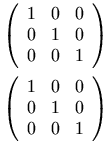
Note that the parentheses must be represented explicitly; they are not
part of the mtable element's rendering. This allows
use of other surrounding fences, such as brackets, or none at all.
3.5.2 Row in Table or Matrix (mtr)
3.5.2.1 Description
An mtr element represents one row in a table
or matrix. An mtr element is only allowed as a
direct sub-expression of an mtable element, and
specifies that its contents should form one row of the table. Each
argument of mtr is placed in a different column
of the table, starting at the leftmost column in a LTR context or rightmost
column in a RTL context.
As described in Section 3.5.1 Table or Matrix
(mtable),
mtr elements are
effectively padded on the right with mtd
elements when they are shorter than other rows in a table.
3.5.2.2 Attributes
In addition to the attributes listed below, this element permits
xml:id,
xref, class and
style attributes,
as described in Section 2.1.4 Attributes Shared by all MathML Elements.
| Name | values | default |
|---|---|---|
| rowalign | top | bottom | center | baseline | axis | inherited |
| columnalign | (left | center | right) + | inherited |
| groupalign | group-alignment-list-list | inherited |
The rowalign and columnalign attributes allow a specific row to
override the alignment specified by the same attributes in the
surrounding mtable element.
As with mtable, if there are more entries than
necessary in the value of columnalign (i.e. more entries
than columns in the row), then the extra entries will be ignored. If
there are fewer entries than columns, then the last entry will be
repeated as many times as needed.
The groupalign attribute is described with the alignment
elements, maligngroup and malignmark,
in Section 3.5.5 Alignment Markers.
3.5.3 Labeled Row in Table or Matrix
(mlabeledtr)
3.5.3.1 Description
An mlabeledtr element represents one row in
a table that has a label on either the left or right side, as
determined by the side attribute. The label is
the first child of mlabeledtr. The rest of
the children represent the contents of the row and are identical to
those used for mtr; all of the children except
the first must be mtd elements.
An mlabeledtr element is only allowed as a
direct sub-expression of an mtable element.
Each argument of mlabeledtr except for the first
argument (the label) is placed in a different column
of the table, starting at the leftmost column.
Note that the label element is not considered to be a cell in the
table row. In particular, the label element is not taken into
consideration in the table layout for purposes of width and alignment
calculations. For example, in the case of an mlabeledtr with a label and a single centered mtd child, the child is first centered in the
enclosing mtable, and then the label is
placed. Specifically, the child is not centered in the
space that remains in the table after placing the label.
While MathML 2.0 does not specify an algorithm for placing labels,
implementors of visual renderers may find the following formatting
model useful. To place a label, an implementor might think in terms
of creating a larger table, with an extra column on both ends. The
columnwidth attributes of both these border
columns would be set to "fit" so that they expand
to fill whatever space remains after the inner columns have been laid
out. Finally, depending on the values of side
and minlabelspacing, the label is placed
in whatever border column is appropriate, possibly shifted down if
necessary.
3.5.3.2 Attributes
The attributes for mlabeledtr are the same
as for mtr. Unlike the attributes for the
mtable element, attributes of
mlabeledtr that apply to column elements
also apply to the label. For example, in a one column table,
<mlabeledtr rowalign='top'>
means that the label and other entries in the row are vertically aligned
along their top. To force a particular alignment on the label,
the appropriate attribute would normally be set on the
mtd start tag that surrounds the label content.
3.5.3.3 Equation Numbering
One of the important uses of mlabeledtr is
for numbered equations. In a mlabeledtr, the
label represents the equation number and the elements in the row are
the equation being numbered. The side and minlabelspacing attributes of mtable determine the placement of the equation
number.
In larger documents with many numbered equations, automatic
numbering becomes important. While automatic equation numbering and
automatically resolving references to equation numbers is outside the
scope of MathML, these problems can be addressed by the use of style
sheets or other means. The mlabeledtr construction provides support
for both of these functions in a way that is intended to facilitate
XSLT processing. The mlabeledtr element can be
used to indicate the presence of a numbered equation, and the first
child can be changed to the current equation number, along with
incrementing the global equation number. For cross references, an
xml:id on either the mlabeledtr element or on the first element
itself could be used as a target of any link.
<mtable>
<mlabeledtr xml:id='e-is-m-c-square'>
<mtd>
<mtext> (2.1) </mtext>
</mtd>
<mtd>
<mrow>
<mi>E</mi>
<mo>=</mo>
<mrow>
<mi>m</mi>
<mo>⁢<!--INVISIBLE TIMES--></mo>
<msup>
<mi>c</mi>
<mn>2</mn>
</msup>
</mrow>
</mrow>
</mtd>
</mlabeledtr>
</mtable>
This should be rendered as:
| E = mc2 | (2.1) |
3.5.4 Entry in Table or Matrix (mtd)
3.5.4.1 Description
An mtd element represents one entry, or cell, in a
table or matrix. An mtd element is only
allowed as a direct sub-expression of an mtr
or an mlabeledtr element.
The mtd element accepts any number of
arguments; if this number is not 1, its contents are treated as a single
"inferred mrow" formed from all its
arguments, as described in Section 3.1.3 Required Arguments.
3.5.4.2 Attributes
| Name | values | default |
|---|---|---|
| rowspan | positive-integer | 1 |
| columnspan | positive-integer | 1 |
| rowalign | top | bottom | center | baseline | axis | inherited |
| columnalign | left | center | right | inherited |
| groupalign | group-alignment-list | inherited |
The rowspan and columnspan attributes
allow a specific matrix element to be treated as if it occupied the
number of rows or columns specified. The interpretation of how this
larger element affects specifying subsequent rows and columns is meant
to correspond with the similar attributes for HTML 4.01 tables.
The rowspan and columnspan attributes
can be used around an mtd element that represents
the label in a mlabeledtr element.
Also, the label of a mlabeledtr element is not
considered to be part of a previous rowspan and
columnspan.
The rowalign and columnalign attributes
allow a specific matrix element to override the alignment specified by
a surrounding mtable or mtr
element.
The groupalign attribute is described with the alignment
elements, maligngroup and malignmark,
in Section 3.5.5 Alignment Markers.
3.5.5 Alignment Markers
3.5.5.1 Description
Alignment markers are space-like elements (see Section 3.2.7 Space (mspace)) that can be used to vertically align specified points within a column of MathML expressions by the automatic insertion of the necessary amount of horizontal space between specified sub-expressions.
The discussion that follows will use the example of a set of simultaneous equations that should be rendered with vertical alignment of the coefficients and variables of each term, by inserting spacing somewhat like that shown here:
    8.44x + 55  y =  0
    3.1 x -  0.7y = -1.1
If the example expressions shown above were arranged in a column but not aligned, they would appear as:
    8.44x + 55y = 0
    3.1x - 0.7y = -1.1
For audio renderers, it is suggested that the alignment elements produce the analogous behavior of altering the rhythm of pronunciation so that it is the same for several sub-expressions in a column, by the insertion of the appropriate time delays in place of the extra horizontal spacing described here.
The expressions whose parts are to be aligned (each equation, in the
example above) must be given as the table elements (i.e. as the mtd elements) of one column of an
mtable. To avoid confusion, the term "table
cell" rather than "table element" will be used in the
remainder of this section.
All interactions between alignment elements are limited to the
mtable column they arise in. That is, every
column of a table specified by an mtable element
acts as an "alignment scope" that contains within it all alignment
effects arising from its contents. It also excludes any interaction
between its own alignment elements and the alignment elements inside
any nested alignment scopes it might contain.
The reason mtable columns are used as
alignment scopes is that they are the only general way in MathML to
arrange expressions into vertical columns. Future versions of MathML
may provide an malignscope element that allows
an alignment scope to be created around any MathML element, but even
then, table columns would still sometimes need to act as alignment
scopes, and since they are not elements themselves, but rather are
made from corresponding parts of the content of several
mtr elements, they could not individually be the
content of an alignment scope element.
An mtable element can be given the attribute
alignmentscope="false" to cause
its columns not to act as alignment scopes. This is discussed further at
the end of this section. Otherwise, the discussion in this section assumes
that this attribute has its default value of "true".
3.5.5.2 Specifying alignment groups
To cause alignment, it is necessary to specify, within each
expression to be aligned, the points to be aligned with corresponding
points in other expressions, and the beginning of each alignment
group of sub-expressions that can be horizontally shifted as a
unit to effect the alignment. Each alignment group must contain one
alignment point. It is also necessary to specify which expressions in
the column have no alignment groups at all, but are affected only by
the ordinary column alignment for that column of the table, i.e. by
the columnalign attribute, described elsewhere.
The alignment groups start at the locations of invisible
maligngroup elements, which are rendered with
zero width when they occur outside of an alignment scope, but within
an alignment scope are rendered with just enough horizontal space to
cause the desired alignment of the alignment group that follows
them. A simple algorithm by which a MathML application can achieve this is given
later. In the example above, each equation would have one
maligngroup element before each coefficient,
variable, and operator on the left-hand side, one before the
= sign, and one before the constant on the right-hand
side.
In general, a table cell containing n
maligngroup elements contains n
alignment groups, with the ith group consisting of the
elements entirely after the ith
maligngroup element and before the
(i+1)-th; no element within the table cell's content
should occur entirely before its first
maligngroup element.
Note that the division into alignment groups does not
necessarily fit the nested expression structure of the MathML
expression containing the groups – that is, it is permissible for one
alignment group to consist of the end of one
mrow, all of another one, and the beginning of a
third one, for example. This can be seen in the MathML markup for the
present example, given at the end of this section.
The nested expression structure formed by mrows
and other layout schemata should reflect the mathematical structure of the
expression, not the alignment-group structure, to make possible optimal
renderings and better automatic interpretations; see the discussion of
proper grouping in section Section 3.3.1 Horizontally Group Sub-Expressions
(mrow). Insertion of
alignment elements (or other space-like elements) should not alter the
correspondence between the structure of a MathML expression and the
structure of the mathematical expression it represents.
Although alignment groups need not
coincide with the nested expression structure of layout schemata,
there are nonetheless restrictions on where an maligngroup
element is allowed within a table cell. The maligngroup
element may only be contained within elements (directly or indirectly) of the following types
(which are themselves contained in the table cell):
-
an
mrowelement, including an inferredmrowsuch as the one formed by a multi-argumentmtdelement; -
an
mstyleelement; -
an
mphantomelement; -
an
mfencedelement; -
an
mactionelement, though only its selected sub-expression is checked; -
a
semanticselement.
These restrictions are intended to ensure that alignment can be unambiguously specified, while avoiding complexities involving things like overscripts, radical signs and fraction bars. They also ensure that a simple algorithm suffices to accomplish the desired alignment.
Note that some positions for an maligngroup
element, although legal, are not useful, such as for an
maligngroup element to be an argument of an
mfenced element. When inserting an
maligngroup element before a given element in
pre-existing MathML, it will often be necessary, and always
acceptable, to form a new mrow element to contain
just the maligngroup element and the element it
is inserted before. In general, this will be necessary except when the
maligngroup element is inserted directly into an
mrow or into an element that can form an
inferred mrow from its contents. See the warning
about the legal grouping of "space-like elements" in
Section 3.2.7 Space (mspace).
For the table cells that are divided into alignment groups, every
element in their content must be part of exactly one alignment group,
except the elements from the above list that contain
maligngroup elements inside them, and the
maligngroup elements themselves. This means
that, within any table cell containing alignment groups, the first
complete element must be an maligngroup element,
though this may be preceded by the start tags of other elements.
This requirement removes a potential confusion about how to align
elements before the first maligngroup element,
and makes it easy to identify table cells that are left out of their
column's alignment process entirely.
Note that it is not required that the table cells in a column that are divided into alignment groups each contain the same number of groups. If they don't, zero-width alignment groups are effectively added on the right side of each table cell that has fewer groups than other table cells in the same column.
3.5.5.3 Table cells that are not divided into alignment groups
Expressions in a column that are to have no alignment groups
should contain no maligngroup
elements. Expressions with no alignment groups are aligned using only
the columnalign attribute that applies to the table
column as a whole, and are not affected by the groupalign
attribute described below. If such an expression is wider than the
column width needed for the table cells containing alignment groups,
all the table cells containing alignment groups will be shifted as a
unit within the column as described by the columnalign
attribute for that column. For example, a column heading with no
internal alignment could be added to the column of two equations given
above by preceding them with another table row containing an
mtext element for the heading, and using the
default columnalign="center" for the table, to
produce:
equations with aligned variables
      8.44x + 55  y =  0
      3.1 x -  0.7y = -1.1
or, with a shorter heading,
   some equations
8.44x + 55  y =  0
3.1 x -  0.7y = -1.1
3.5.5.4 Specifying alignment points using malignmark
Each alignment group's alignment point can either be specified by
an malignmark element anywhere within the
alignment group (except within another alignment scope wholly
contained inside it), or it is determined automatically from the
groupalign attribute. The groupalign
attribute can be specified on the group's preceding
maligngroup element or on its surrounding
mtd, mtr, or
mtable elements. In typical cases, using the
groupalign attribute is sufficient to describe the
desired alignment points, so no malignmark
elements need to be provided.
The malignmark element indicates that the
alignment point should occur on the right edge of the preceding
element, or the left edge of the following element or character,
depending on the edge attribute of
malignmark. Note that it may be necessary to
introduce an mrow to group an
malignmark element with a neighboring element,
in order not to alter the argument count of the containing
element. (See the warning about the legal grouping of "space-like
elements" in Section 3.2.7 Space (mspace)).
When an malignmark element is provided within an
alignment group, it can occur in an arbitrarily deeply nested element
within the group, as long as it is not within a nested alignment scope. It
is not subject to the same restrictions on location as maligngroup elements. However, its immediate
surroundings need to be such that the element to its immediate right or
left (depending on its edge attribute) can be
unambiguously identified. If no such element is present, renderers should
behave as if a zero-width element had been inserted there.
For the purposes of alignment, an element X is considered to be to the
immediate left of an element Y, and Y to the immediate right of X, whenever
X and Y are successive arguments of one (possibly inferred) mrow element, with X coming before Y. In the case of
mfenced elements, MathML applications should evaluate this
relation as if the mfenced element had been
replaced by the equivalent expanded form involving mrow. Similarly, an maction
element should be treated as if it were replaced by its currently selected
sub-expression. In all other cases, no relation of "to the immediate
left or right" is defined for two elements X and Y. However, in the
case of content elements interspersed in presentation markup, MathML applications
should attempt to evaluate this relation in a sensible way. For example, if
a renderer maintains an internal presentation structure for rendering
content elements, the relation could be evaluated with respect to
that. (See Chapter 4 Content Markup and Chapter 5 Combining Presentation and Content Markup for further
details about mixing presentation and content markup.)
malignmark elements are allowed to occur within
the content of token elements, such as mn,
mi, or mtext. When this
occurs, the character immediately before or after the
malignmark element will carry the alignment
point; in all other cases, the element to its immediate left or right
will carry the alignment point. The rationale for this is that it is
sometimes desirable to align on the edges of specific characters
within multi-character token elements.
If there is more than one malignmark element
in an alignment group, all but the first one will be ignored. MathML
applications may wish to provide a mode in which they will warn about
this situation, but it is not an error, and should trigger no warnings
by default. The rationale for this is that it would
be inconvenient to have to remove all
unnecessary malignmark elements from
automatically generated data, in certain cases, such as when they are
used to specify alignment on "decimal points" other than the '.'
character.
3.5.5.5 malignmark Attributes
In addition to the attributes listed below, the malignmark element permits
xml:id,
xref, class and
style attributes,
as described in Section 2.1.4 Attributes Shared by all MathML Elements.
| Name | values | default |
|---|---|---|
| edge | left | right | left |
malignmark has one attribute,
edge, which specifies whether the alignment point will be
found on the left or right edge of some element or character. The
precise location meant by "left edge" or "right edge" is discussed
below. If edge="right", the alignment point is the right
edge of the element or character to the immediate left of the
malignmark element. If edge="left",
the alignment point is the left edge of the element or character to
the immediate right of the malignmark
element. Note that the attribute refers to the choice of edge rather
than to the direction in which to look for the element whose edge will
be used.
For malignmark elements that occur within
the content of MathML token elements, the preceding or following
character in the token element's content is used; if there is no such
character, a zero-width character is effectively inserted for the
purpose of carrying the alignment point on its edge. For all other
malignmark elements, the preceding or following
element is used; if there is no such element, a zero-width element is
effectively inserted to carry the alignment point.
The precise definition of the "left edge" or "right edge" of a character or glyph (e.g. whether it should coincide with an edge of the character's bounding box) is not specified by MathML, but is at the discretion of the renderer; the renderer is allowed to let the edge position depend on the character's context as well as on the character itself.
For proper alignment of columns of numbers (using groupalign values of "left", "right", or "decimalpoint"), it is
likely to be desirable for the effective width (i.e. the distance between
the left and right edges) of decimal digits to be constant, even if their
bounding box widths are not constant (e.g. if "1" is narrower
than other digits). For other characters, such as letters and operators, it
may be desirable for the aligned edges to coincide with the bounding
box.
The "left edge" of a MathML element or alignment group
refers to the left edge of the leftmost glyph drawn to render the element
or group, except that explicit space represented by mspace or mtext elements
should also count as "glyphs" in this context, as should
glyphs that would be drawn if not for mphantom
elements around them. The "right edge" of an element or
alignment group is defined similarly.
3.5.5.6 maligngroup Attributes
In addition to the attributes listed below, the maligngroup element permits
xml:id,
xref, class and
style attributes,
as described in Section 2.1.4 Attributes Shared by all MathML Elements.
| Name | values | default |
|---|---|---|
| groupalign | left | center | right | decimalpoint | inherited |
maligngroup has one attribute,
groupalign, which is used to determine the position of
its group's alignment point when no malignmark
element is present. The following discussion assumes that no
malignmark element is found within a group.
In the example given at the beginning of this section, there is one
column of 2 table cells, with 7 alignment groups in each table cell;
thus there are 7 columns of alignment groups, with 2 groups, one above
the other, in each column. These columns of alignment groups should be
given the 7 groupalign values "decimalpoint left left
decimalpoint left left decimalpoint", in that order. How to specify
this list of values for a table cell or table column as a whole, using
attributes on elements surrounding the
maligngroup element is described later.
If groupalign is "left",
"right", or "center", the alignment point is
defined to be at the group's left edge, at its right edge, or halfway
between these edges, respectively. The meanings of "left edge"
and "right edge" are as discussed above in relation to malignmark.
If groupalign is "decimalpoint",
the alignment point is the right edge of the last character before the
decimal point. The decimal point is the first "." character
(ASCII 0x2e) in the first mn element found along
the alignment group's baseline. More precisely, the alignment group is
scanned recursively, depth-first, for the first mn
element, descending into all arguments of each element of the types
mrow (including inferred
mrows), mstyle,
mpadded, mphantom, menclose,
mfenced, or msqrt,
descending into only the first argument of each "scripting" element
(msub, msup,
msubsup, munder,
mover, munderover,
mmultiscripts) or of each
mroot or semantics element,
descending into only the selected sub-expression of each
maction element, and skipping the content of all
other elements. The first mn so found always
contains the alignment point, which is the right edge of the last
character before the first decimal point in the content of the
mn element. If there is no decimal point in the
mn element, the alignment point is the right edge
of the last character in the content. If the decimal point is the
first character of the mn element's content, the
right edge of a zero-width character inserted before the decimal point
is used. If no mn element is found, the right
edge of the entire alignment group is used (as for
groupalign="right").
In order to permit alignment on decimal points in
cn elements, a MathML application can convert a
content expression into a presentation expression that renders the
same way before searching for decimal points as described above.
If characters other than "." should be used as
"decimal points" for alignment, they should be preceded by malignmark elements within the mn token's content itself.
For any of the groupalign values, if an explicit
malignmark element is present anywhere within
the group, the position it specifies (described earlier) overrides the
automatic determination of alignment point from the
groupalign value.
3.5.5.7 Inheritance of groupalign values
It is not usually necessary to put a groupalign
attribute on every maligngroup element. Since
this attribute is usually the same for every group in a column of
alignment groups to be aligned, it can be inherited from an attribute
on the mtable that was used to set up the
alignment scope as a whole, or from the mtr or
mtd elements surrounding the alignment group. It
is inherited via an "inheritance path" that proceeds from
mtable through successively contained
mtr, mtd, and
maligngroup elements. There is exactly one
element of each of these kinds in this path from an
mtable to any alignment group inside it. In
general, the value of groupalign will be
inherited by any given alignment group from the innermost element
that surrounds the alignment group and provides an explicit
setting for this attribute. For example, if an
mtable element specifies values for groupalign and
a maligngroup element within the table also specifies an
explicit groupalign value, then then the value from the
maligngroup takes priority.
Note, however, that each mtd element needs, in
general, a list of groupalign values, one for each
maligngroup element inside it, rather than just
a single value. Furthermore, an mtr or
mtable element needs, in general, a list of lists
of groupalign values, since it spans multiple
mtable columns, each potentially acting as an
alignment scope. Such lists of group-alignment values are specified
using the following syntax rules:
group-alignment            := left | right | center | decimalpoint
group-alignment-list       := group-alignment +
group-alignment-list-list := ( '{' group-alignment-list '}' ) +
As described in Section 2.1.3 MathML Attribute Values, | separates
alternatives; + represents optional repetition (i.e. 1 or
more copies of what precedes it), with extra values ignored and the
last value repeated if necessary to cover additional table columns or
alignment group columns; '{' and '}'
represent literal braces; and ( and ) are
used for grouping, but do not literally appear in the attribute
value.
The permissible values of the groupalign attribute of the
elements that have this attribute are specified using the above
syntax definitions as follows:
| Element type | groupalign attribute syntax | default value |
|---|---|---|
mtable |
group-alignment-list-list | {left} |
mtr |
group-alignment-list-list | inherited from mtable attribute
|
mlabeledtr |
group-alignment-list-list | inherited from mtable attribute
|
mtd |
group-alignment-list | inherited from within mtr attribute
|
maligngroup |
group-alignment | inherited from within mtd attribute
|
In the example near the beginning of this section, the group
alignment values could be specified on every mtd
element using groupalign = "decimalpoint left left
decimalpoint left left decimalpoint", or on every
mtr element using groupalign =
"{decimalpoint left left decimalpoint left left decimalpoint}", or
(most conveniently) on the mtable as a whole
using groupalign = "{decimalpoint left left decimalpoint
left left decimalpoint}", which provides a single braced list of
group-alignment values for the single column of expressions to be
aligned.
3.5.5.8 MathML representation of an alignment example
The above rules are sufficient to explain the MathML representation of the example given near the start of this section. To repeat the example, the desired rendering is:
    8.44x + 55  y =  0
    3.1 x -  0.7y = -1.1
One way to represent that in MathML is:
<mtable groupalign="{decimalpoint left left decimalpoint left left decimalpoint}">
<mtr>
<mtd>
<mrow>
<mrow>
<mrow>
<maligngroup/>
<mn> 8.44 </mn>
<mo> ⁢<!--INVISIBLE TIMES--> </mo>
<maligngroup/>
<mi> x </mi>
</mrow>
<maligngroup/>
<mo> + </mo>
<mrow>
<maligngroup/>
<mn> 55 </mn>
<mo> ⁢<!--INVISIBLE TIMES--> </mo>
<maligngroup/>
<mi> y </mi>
</mrow>
</mrow>
<maligngroup/>
<mo> = </mo>
<maligngroup/>
<mn> 0 </mn>
</mrow>
</mtd>
</mtr>
<mtr>
<mtd>
<mrow>
<mrow>
<mrow>
<maligngroup/>
<mn> 3.1 </mn>
<mo> ⁢<!--INVISIBLE TIMES--> </mo>
<maligngroup/>
<mi> x </mi>
</mrow>
<maligngroup/>
<mo> - </mo>
<mrow>
<maligngroup/>
<mn> 0.7 </mn>
<mo> ⁢<!--INVISIBLE TIMES--> </mo>
<maligngroup/>
<mi> y </mi>
</mrow>
</mrow>
<maligngroup/>
<mo> = </mo>
<maligngroup/>
<mrow>
<mo> - </mo>
<mn> 1.1 </mn>
</mrow>
</mrow>
</mtd>
</mtr>
</mtable>
3.5.5.9 Further details of alignment elements
The alignment elements maligngroup and
malignmark can occur outside of alignment
scopes, where they are ignored. The rationale behind this is that in
situations in which MathML is generated, or copied from another
document, without knowing whether it will be placed inside an
alignment scope, it would be inconvenient for this to be an error.
An mtable element can be given the attribute alignmentscope="false" to cause its
columns not to act as alignment scopes. In general, this attribute has the
syntax (true | false) +; if its value is a list of boolean
values, each boolean value applies to one column, with the last value
repeated if necessary to cover additional columns, or with extra values
ignored. Columns that are not alignment scopes are part of the alignment
scope surrounding the mtable element, if there is
one. Use of alignmentscope="false" allows nested tables to contain malignmark elements for aligning the inner table in the
surrounding alignment scope.
As discussed above, processing of alignment for content elements is not well-defined, since MathML does not specify how content elements should be rendered. However, many MathML applications are likely to find it convenient to internally convert content elements to presentation elements that render the same way. Thus, as a general rule, even if a renderer does not perform such conversions internally, it is recommended that the alignment elements should be processed as if it did perform them.
A particularly important case for renderers to handle gracefully is the
interaction of alignment elements with the matrix
content element, since this element may or may not be internally converted
to an expression containing an mtable element for
rendering. To partially resolve this ambiguity, it is suggested, but not
required, that if the matrix element is converted
to an expression involving an mtable element, that
the mtable element be given the attribute alignmentscope="false", which will
make the interaction of the matrix element with the
alignment elements no different than that of a generic presentation element
(in particular, it will allow it to contain malignmark elements that operate within the alignment
scopes created by the columns of an mtable that
contains the matrix element in one of its table
cells).
The effect of alignment elements within table cells that have
non-default values of the columnspan or rowspan attributes is not specified, except that such
use of alignment elements is not an error. Future versions of MathML may
specify the behavior of alignment elements in such table cells.
The effect of possible linebreaking of an mtable
element on the alignment elements is not specified.
3.5.5.10 A simple alignment algorithm
A simple algorithm by which a MathML application can perform the
alignment specified in this section is given here. Since the alignment
specification is deterministic (except for the definition of the left
and right edges of a character), any correct MathML alignment
algorithm will have the same behavior as this one. Each
mtable column (alignment scope) can be treated
independently; the algorithm given here applies to one
mtable column, and takes into account the
alignment elements, the groupalign attribute described in
this section, and the columnalign attribute described
under mtable (Section 3.5.1 Table or Matrix
(mtable)).
First, a rendering is computed for the contents of each table cell
in the column, using zero width for all
maligngroup and malignmark
elements. The final rendering will be identical except for horizontal
shifts applied to each alignment group and/or table cell. The
positions of alignment points specified by any
malignmark elements are noted, and the remaining
alignment points are determined using groupalign
values.
For each alignment group, the horizontal positions of the left edge, alignment point, and right edge are noted, allowing the width of the group on each side of the alignment point (left and right) to be determined. The sum of these two "side-widths", i.e. the sum of the widths to the left and right of the alignment point, will equal the width of the alignment group.
Second, each column of alignment groups, from left to right, is scanned. The ith scan covers the ith alignment group in each table cell containing any alignment groups. Table cells with no alignment groups, or with fewer than i alignment groups, are ignored. Each scan computes two maximums over the alignment groups scanned: the maximum width to the left of the alignment point, and the maximum width to the right of the alignment point, of any alignment group scanned.
The sum of all the maximum widths computed (two for each column of alignment groups) gives one total width, which will be the width of each table cell containing alignment groups. Call the maximum number of alignment groups in one cell n; each such cell's width is divided into 2n adjacent sections, called L(i) and R(i) for i from 1 to n, using the 2n maximum side-widths computed above; for each i, the width of all sections called L(i) is the maximum width of any cell's ith alignment group to the left of its alignment point, and the width of all sections called R(i) is the maximum width of any cell's ith alignment group to the right of its alignment point.
The alignment groups are then positioned in the unique way that places the part of each ith group to the left of its alignment point in a section called L(i), and places the part of each ith group to the right of its alignment point in a section called R(i). This results in the alignment point of each ith group being on the boundary between adjacent sections L(i) and R(i), so that all alignment points of ith groups have the same horizontal position.
The widths of the table cells that contain no alignment groups were computed as part of the initial rendering, and may be different for each cell, and different from the single width used for cells containing alignment groups. The maximum of all the cell widths (for both kinds of cells) gives the width of the table column as a whole.
The position of each cell in the column is determined by the
applicable part of the value of the columnalign attribute
of the innermost surrounding mtable,
mtr, or mtd element that
has an explicit value for it, as described in the sections on those
elements. This may mean that the cells containing alignment groups
will be shifted within their column, in addition to their alignment
groups having been shifted within the cells as described above, but
since each such cell has the same width, it will be shifted the same
amount within the column, thus maintaining the vertical alignment of
the alignment points of the corresponding alignment groups in each
cell.
3.5.6 mcolumn
mcolumn is typically used to layout numbers that are
aligned on each digit. This is common in many elementary math notations such as 2D addition and multiplication.
Inside an mcolumn, the character inside of the token elements mi, mn, mo, and mtext each occupy a column.
The width of a column is the maximum of the widths of each character in that column.
If a child of mcolumn is not one of the token elements listed above, then that element is considered to be a single digit wide.
The exceptions to this are mspace, mline, mstyle and
mrow.
mspace and mline have the amount of space specifed by them and do not participate in the computation of the width of a column.
The width rule should be applied (recursively) to the child of mstyle.
For mrow, the width is the sum of the widths of each child.
Inside of a mcolumn, mrow does not perform automatic spacing or linebreaking.
If there is no character in a column, its width is taken to be the width of a 0 in the current language (in many fonts, all
digits have the same width).
If a child is too small or to large to fit within a column, the columnalign attribute controls whether it is left, center, or right aligned.
The width of a mcolumn is the sum of the widths of all of the columns; no spacing should be added between columns.
The baseline of the mcolumn is specifed by the align attribute.
| Issue mphantom-mcolumn | wiki (member only) |
|---|---|
| mcolumn mphantom | |
|
Should an |
|
| Resolution | None recorded |
3.5.6.1 Attributes
In addition to the attribute listed below, this element permits "xml:id", "xref", "class" and "style" attributes, as described in Section 2.1.4 Attributes Shared by all MathML Elements.
| Name | values | default |
|---|---|---|
| justify | left | right | right |
| columnalign | (left | center | right) + | center |
| align | (top | bottom | center | baseline | axis) [ rownumber ] | baseline |
The justify attribute specifies whether the row
is to be left justified or right justified.
The columnalign attribute specifies
how the entries in each column should be aligned if they are bigger or smaller than the column width. The specification for
columnalign is the same as columnalign in mtable.
See Section 3.5.1 Table or Matrix
(mtable) for the full specification of the attribute value.
If an element is too large to fit within a column, the columnalign attribute controls its alignment with respect to that column and any excess overflows into the surrounding columns. This
excess does not participate in the column width calculation. In these cases, authors should take care to avoid collisions
between column overflows.
The align attribute specifies where to align the
mcolumn with respect to its environment. Its specification is the same as that
for mtable's align attribute.
See Section 3.5.1 Table or Matrix
(mtable) for the full specification of the attribute value
3.5.6.2 Examples
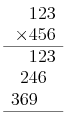
The MathML for this is:
<mcolumn>
<mn>123</mn>
<mrow> <mo>×<!--MULTIPLICATION SIGN--></mo> <mn>321</mn> </mrow>
<mline spacing='12345'/>
<mn>123</mn>
<mrow> <mn>246</mn> <mspace spacing='0'/></mrow>
<mrow> <mn>369</mn> <mspace spacing='00'/></mrow>
<mline spacing='36900'/>
</mcolumn>
Here is an example with the operator on the right. Placing the operator on the right is standard in the Netherlands and some other countries.
<mcolumn>
  <mn>123</mn>
  <mrow> <mn>456</mn> <mo>+</mo> </mrow>
  <mline spacing='456+'/>
  <mn>579</mn>
</mcolumn>
Because the default alignment is placed to the right of number, the numbers align properly and none of the rows need to be shifted.

Here is an example of subtraction where there is a borrow with multiple digits in a single column and a cross out. The borrowed amount is underlined (the example is from a Swedish source):
Here is how it can be done with mcolumn:
<mcolumn>
<mstyle mathsize='71%'> <menclose notation='bottom'> <mn>10</mn> </menclose> </mstyle>
<mn>5̸2</mn>
<mrow> <mo>−<!--MINUS SIGN--></mo> <mn>7</mn> </mrow>
<mline spacing='45'/>
<mn>45</mn>
</mcolumn>

Note that because menclose is not one of the listed elements above,
it is considered to be a single digit wide so that its use does not
make that column wider. If it is too wide, it overflows into the other
columns.
Notice also that the combining long solidus ( ̸) is used
rather than menclose. This is done because it logically keeps
the number 57 as a single number in an mn. An
menclose can be used, but the use of combining characters is
recommended for the above reason. U+20E5 can be used for a reverse
strike out, along with other overlay characters. If more than one
character should be included in the cross out (as opposed to multiple
characters that are individually crossed out), then menclose
should be used.
Carries and borrows are typically reduced in size, but the
computation of their size is based on the number of digits as
specified above, and the digit size is taken as the size of a digit in
effect at the mcolumn. If there is more than one carry, it
may be more convenient to wrap all of the carries in a single
mstyle as shown below:
<mcolumn>
  <mstyle mathsize='71%'> <mn>1</mn> <mn>1</mn> <mspace spacing='0'/></mstyle>
  <mn>987</mn>
  <mrow> <mo>+</mo> <mn>456</mn> </mrow>
  <mline spacing='+1443'/>
  <mn>1443</mn>
</mcolumn>

Here is a bigger example that illustrates using various values besides digits as the "spacing" attribute's value.
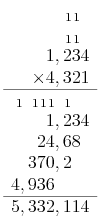
This example has multiple rows of carries. It also (somewhat artificially) includes ","s as digit separators. The encoding includes these separators in the spacing attribute value, along non-ASCII values.
<mcolumn>
<mstyle mathsize='71%'>
<mn>1</mn>
<mn>1</mn>
<mspace spacing='0'/>
</mstyle>
<mstyle mathsize='71%'>
<mn>1</mn>
<mn>1</mn>
<mspace spacing='0'/>
</mstyle>
<mrow>
<mo rspace='thinmathspace'>×<!--MULTIPLICATION SIGN--></mo>
<mn>4,321</mn>
</mrow>
<mline spacing='×<!--MULTIPLICATION SIGN--> <!--THIN SPACE-->0,000'/>
<mstyle mathsize='71%'>
<mn>1</mn>
<mspace spacing=','/>
<mn>1</mn>
<mn>1</mn>
<mn>1</mn>
<mspace spacing=','/>
<mn>1</mn>
<mspace spacing='00'/>
</mstyle>
<mn>1,234</mn>
<mrow><mn>24,68</mn><mspace spacing='0'/></mrow>
<mrow><mn>370,2</mn><mspace spacing='00'/></mrow>
<mrow><mn>4,936</mn><mspace spacing=',000'/></mrow>
<mline spacing='5,332,114'/>
<mn>5,332,114</mn>
</mcolumn>
3.6 Enlivening Expressions
3.6.1 Bind Action to Sub-Expression
(maction)
| Issue deprecate_maction | wiki (member only) |
|---|---|
Deprecate maction |
|
|
There is concensus that |
|
| Resolution | None recorded |
There are many ways in which it might be desirable to make mathematical content active. Adding a link to a MathML sub-expression is one basic kind of interactivity. See Section 7.3.1 Mixing MathML and HTML. However, many other kinds of interactivity cannot be easily accommodated by generic linking mechanisms. For example, in lengthy mathematical expressions, the ability to "fold" expressions might be provided, i.e. a renderer might allow a reader to toggle between an ellipsis and a much longer expression that it represents.
To provide a mechanism for binding actions to expressions, MathML
provides the maction element. This element accepts any
number of sub-expressions as arguments.
3.6.1.1 Attributes
In addition to the attributes listed below, this element permits
xml:id,
xref, class and
style attributes,
as described in Section 2.1.4 Attributes Shared by all MathML Elements.
| Name | values | default |
|---|---|---|
| actiontype | (described below) | (required attribute, no default value) |
| selection | positive-integer | 1 |
By default, MathML applications that do not recognize the specified
actiontype should render the selected sub-expression as
defined below. If no selected sub-expression exists, it is a MathML
error; the appropriate rendering in that case is as described in
Section 2.3.2 Handling of Errors.
Since a MathML application is not
required to recognize any particular actiontypes, an
application can be in MathML conformance
just by implementing the above-described default behavior.
The selection attribute is provided for those
actiontypes that permit someone viewing a document to select one of
several sub-expressions for viewing. Its value should be a positive
integer that indicates one of the sub-expressions of the
maction element, numbered from 1 to the number of
children of the element. When this is the case, the sub-expression so
indicated is defined to be the "selected sub-expression" of the
maction element; otherwise the "selected
sub-expression" does not exist, which is an error. When the
selection attribute is not specified (including for
actiontypes for which it makes no sense), its default value is 1, so
the selected sub-expression will be the first sub-expression.
Furthermore, as described in Section 2.5.2 The Top-Level
math Element, if a MathML
application responds to a user command to copy a MathML sub-expression to
the environment's "clipboard", any maction elements present in what is copied should
be given selection attributes that correspond to their selection
state in the MathML rendering at the time of the copy command.
A suggested list of actiontypes and their associated
actions is given below. Keep in mind, however, that this list is
mainly for illustration, and recognized values and behaviors will vary
from application to application.
- <maction actiontype="toggle" selection="positive-integer" > (first expression) (second expression)... </maction>
-
For this action type, a renderer would alternately display the given expressions, cycling through them when a reader clicked on the active expression, starting with the selected expression and updating the
selectionattribute value as described above. Typical uses would be for exercises in education, ellipses in long computer algebra output, or to illustrate alternate notations. Note that the expressions may be of significantly different size, so that size negotiation with the browser may be desirable. If size negotiation is not available, scrolling, elision, panning, or some other method may be necessary to allow full viewing. - <maction actiontype="statusline"> (expression) (message) </maction>
-
In this case, the renderer would display the expression in context on the screen. When a reader clicked on the expression or moved the mouse over it, the renderer would send a rendering of the message to the browser statusline. Since most browsers in the foreseeable future are likely to be limited to displaying text on their statusline, authors would presumably use plain text in an
mtextelement for the message in most circumstances. For non-mtextmessages, renderers might provide a natural language translation of the markup, but this is not required. - <maction actiontype="tooltip"> (expression) (message) </maction>
-
Here the renderer would also display the expression in context on the screen. When the mouse pauses over the expression for a long enough delay time, the renderer displays a rendering of the message in a pop-up "tooltip" box near the expression. These message boxes are also sometimes called "balloon help" boxes. Presumably authors would use plain text in an
mtextelement for the message in most circumstances. For non-mtextmessages, renderers may provide a natural language translation of the markup if full MathML rendering is not practical, but this is not required. - <maction actiontype="highlight" my:color="red" my:background="yellow"> expression </maction>
-
In this case, a renderer might highlight the enclosed expression on a "mouse-over" event. In the example given above, non-standard attributes from another namespace are being used to pass additional information to renderers that support them, without violating the MathML DTD (see Section 2.3.3 Attributes for unspecified data). The
my:colorattribute changes the color of the characters in the presentation, while themy:backgroundattribute changes the color of the background behind the characters.
3.7 Elementary Math
Mathematics used in the lower grades tends to be tabular in nature. However, the specific notation used varies among countries much more than it does for higher level math. Furthermore, elementary math often presents examples in some intermediate step and MathML must be able to capture these intermediate or intentionally missing partial forms.
The elements needed for elementary math are presented elsewhere in this chapter. In this section, examples are given of how these elements can be used to display various notations used for elementary mathematics.
3.7.1 Addition, Subtraction, and Multiplication
Two-dimensional addition, subtraction, and multiplication typically
involve numbers, carrries/borrows, lines, and the sign of the
operation.
These are supported by MathML inside of
mcolumn.
Lines are drawn using mline
and alignment is achieved via padding each line with mspace.
| Issue elem-ldiv-img | wiki (member only) |
|---|---|
| Images/Examples Needed | |
|
Should move some of the examples from Section 3.5.6 mcolumn here. |
|
| Resolution | None recorded |
3.7.2 Long Division
The notation used for long division varies considerably among countries. Many notations share the common characteristics of aligning intermediate results and drawing lines for the operands to be subtracted. The line that is drawn various in length depending upon the notation.
The position of the divisor varies, as does the location of the quotient, remainder, and intermediate terms.
The US method for long division is
![\setlength\arraycolsep{0em} \begin{array}[t]{rrrrrrr} & & 4 & 3 & 5 & . & \bar{3} \\ \cline{2-7} 3\hspace{0.1em}\rule{0.7pt}{2.1ex} & \hspace{0.2em} 1 & 3 & 0 & 6 & & \\ & 1 & 2 & & & & \\ \cline{2-3} & & 1 & 0 & & & \\ & & & 9 & & & \\ \cline{3-4} & & & 1 & 6 & & \\ & & & 1 & 5 & & \\ \cline{4-5} & & & & 1 & . & 0 \\ & & & & & & 9 \\ \cline{5-7} & & & & & & 1 \\ \end{array}](image/uslongidv.gif)
The MathML for this is:
<mtable>
<mtr>
<mtd></mtd>
<mtd columnalign="right"><mn>435.3̅</mn></mtd>
</mtr>
<mtr>
<mtd columnalign="left"><mn>3</mn></mtd>
<mtd columnalign="left">
<mcolumn align="left">
<menclose notation="longdiv"><mn>1306</mn></menclose>
<mn>12</mn>
<mline spacing="00"/>
<mrow><mspace spacing="0"/><mn>10</mn></mrow>
<mrow><mspace spacing="00"/><mn>9</mn></mrow>
<mrow><mspace spacing="0"/><mline spacing="00"/></mrow>
<mrow><mspace spacing="00"/><mn>16</mn></mrow>
<mrow><mspace spacing="00"/><mn>15</mn></mrow>
<mrow><mspace spacing="00"/><mline spacing="00"/></mrow>
<mrow><mspace spacing="000"/><mn>1.0</mn></mrow>
<mrow><mspace spacing="0000."/><mn>9</mn></mrow>
<mrow><mspace spacing="000"/><mline spacing="0.0"/></mrow>
<mrow><mspace spacing="0000."/><mn>1</mn></mrow>
</mcolumn>
</mtd>
</mtr>
</mtable>
The French method for long division is
![\setlength\arraycolsep{0em} \begin{array}[t]{rrrrrr@{\hspace{0.2em}}|l} 1 & 3 & 0 & 6 & & & \hspace{0.4em}3 \\ \cline{7-7} 1 & 2 & & & & & \smash{\raisebox{-2pt}{\hspace{0.4em}435,\bar{3}}}\\ \cline{1-2} & 1 & 0 & & & \\ & & 9 & & & \\ \cline{2-3} & & 1 & 6 & & \\ & & 1 & 5 & & \\ \cline{3-4} & & & 1 & , & 0 \\ & & & & & 9 \\ \cline{4-6} & & & & & 1 \\ \end{array}](image/frenchlongdiv.gif)
The MathML for this is:
<mtable>
<mtr>
<mtd columnalign="left">
<menclose notation="left">
<mcolumn justify="left">
<mn>1306</mn>
<mn>12</mn>
<mline spacing="00"/>
<mrow><mspace spacing="0"/><mn>10</mn></mrow>
<mrow><mspace spacing="00"/><mn>9</mn></mrow>
<mrow><mspace spacing="0"/><mline spacing="00"/></mrow>
<mrow><mspace spacing="00"/><mn>16</mn></mrow>
<mrow><mspace spacing="00"/><mn>15</mn></mrow>
<mrow><mspace spacing="00"/><mline spacing="00"/></mrow>
<mrow><mspace spacing="000"/><mn>1,0</mn></mrow>
<mrow><mspace spacing="0000,"/><mn>9</mn></mrow>
<mrow><mspace spacing="000"/><mline spacing="0,0"/></mrow>
<mrow><mspace spacing="0000,"/><mn>1</mn></mrow>
</mcolumn>
</menclose>
</mtd>
<mtd columnalign="left">
<mcolumn justify="left">
<mn>3</mn>
<mline spacing="000,0"/>
<mn>435,3̅</mn>
</mcolumn>
</mtd>
</mtr>
</mtable>
3.7.3 Repeating decimal
Decimal numbers that have digits that repeat infinitely such as 1/3 (.3333) are represented using several notations. One common notation is to put a horizontal line over the digits that repeat (in Portugal an underline is used.) Another notation involves putting dots over the digits that repeat. These notations are shown below:


The MathML for these involves using mover, munder, and mline. The MathML for the preceeding examples above is given below.
<mover align="right">
  <mn> 0.3333 </mn>
  <mline spacing="3"/>
</mover>
<mover align="right">
  <mn> 0.142857 </mn>
  <mline spacing="142857"/>
</mover>
<munder align="right">
  <mn> 0.142857 </mn>
  <mline spacing="142857"/>
</munder >
<mover align="right" diff="add">
  <mn> 0.142857 </mn>
  <mrow> <mo>.</mo> <mspace spacing="4285"/> <mo>.</mo> </mrow>
</mover>
3.8 Semantics and Presentation
MathML uses the semantics element to allow specifying semantic annotations to
presentation MathML elements; these can be content MathML or other notations. As such,
semantics should be considered part of both presentation MathML and content
MathML. All MathML processors should process the semantics element, even if they
only process one of those subsets.
In semantic annotations a presentation MathML expression is typically the first child
of the semantics element. However, it can also be given inside of an
annotation-xml element inside the semantics element. If it is part of an
annotation-xml element, then
encoding="MathML-presentation" must be used and presentation
MathML processors should use this value for the presentation.
See Section 5.2 Semantic Annotations for Alternate Representations for more details about the
semantics and annotation-xml elements.