8.2 Attribute Vocabulary
This section defines the 8.2.1
style attribute used with both style definition elements as well as
content elements.
In addition, this section specifies the following attributes in the TT
Style Namespace for use with style definition elements, certain layout
elements, and content elements that support inline style specifications:
Unless explicitly stated otherwise, linear white-space (LWSP) may appear
between tokens of a value of a TT Style Property.
Note:
This specification makes use of lowerCamelCased local names for
style attributes that are based upon like-named properties defined by [XSL 1.0]. This convention is likewise extended to token
values of such properties.
Note:
A style property may be expressed as a specified attribute on any content
element type independently of whether the property applies to that element
type. This capability permits the expression of an inheritable style property
on ancestor elements to which the property property does not apply.
8.2.1
style
The style attribute is used to reference one or more
style elements each of which define a computed style
specification set.
The style attribute may be specified by an instance of the
following element types:
Note:
See the specific element type definitions that permit use of the
style attribute for further information on its semantics.
8.2.2 tts:backgroundColor
The tts:backgroundColor attribute is used to specify a style
property that defines the background color of a region or an area generated
by content flowed into a region.
This attribute may be specified by any style specification element or
content element that permits use of attributes in the TT Style Namespace;
however, this attribute applies as a style property only to those element
types indicated in the following table.
| Values: |
<color> |
inherit |
| Initial: |
transparent |
| Applies to: |
body, div, p, region, span |
| Inherited: |
no |
| Percentages: |
N/A |
| Animatable: |
discrete |
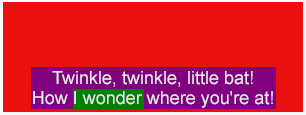
The tts:backgroundColor style is illustrated by the following
example.
Example Fragment – Background Color
<region xml:id="r1">
  <style tts:extent="306px 114px"/>
  <style tts:backgroundColor="red"/>
  <style tts:color="white"/>
  <style tts:displayAlign="after"/>
  <style tts:padding="3px 40px"/>
</region>
...
<p region="r1" tts:backgroundColor="purple" tts:textAlign="center">
  Twinkle, twinkle, little bat!<br/>
  How <span tts:backgroundColor="green">I wonder</span> where you're at!
</p>
|
Example Rendition – Background Color
 |
Note:
The semantics of the style property represented by this attribute are
based upon that defined by [XSL 1.0], § 7.7.2.
8.2.3
tts:color
The tts:color attribute is used to specify a style property
that defines the foreground color of marks associated with an area generated
by content flowed into a region.
This attribute may be specified by any style specification element or
content element that permits use of attributes in the TT Style Namespace;
however, this attribute applies as a style property only to those element
types indicated in the following table.
| Values: |
<color> |
inherit |
| Initial: |
transparent |
| Applies to: |
span |
| Inherited: |
yes |
| Percentages: |
N/A |
| Animatable: |
discrete |
Note:
For the purpose of determining applicability of this style property, each
character child of a p element is considered to be enclosed in
an anonymous span.
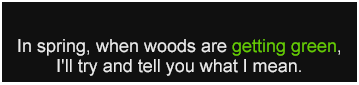
The tts:color style is illustrated by the following
example.
Example Fragment – Color
<region xml:id="r1">
  <style tts:backgroundColor="black"/>
  <style tts:color="white"/>
  <style tts:displayAlign="after"/>
  <style tts:textAlign="center"/>
</region>
...
<p region="r1">
  In spring, when woods are <span tts:color="green">getting green</span>,<br/>
  I'll try and tell you what I mean.
</p>
|
Example Rendition – Color
 |
Note:
The semantics of the style property represented by this attribute are
based upon that defined by [XSL 1.0], § 7.17.1.
8.2.4 tts:direction
The tts:direction attribute is used to specify a style
property that defines the directionality of an embedding or override
according to the Unicode bidirectional algorithm.
This attribute may be specified by any style specification element or
content element that permits use of attributes in the TT Style Namespace;
however, this attribute applies as a style property only to those element
types indicated in the following table.
| Values: |
ltr | rtl |
inherit |
| Initial: |
ltr |
| Applies to: |
p, span |
| Inherited: |
yes |
| Percentages: |
N/A |
| Animatable: |
none |
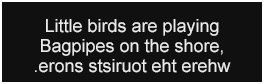
The tts:direction style is illustrated by the following
example.
Example Fragment – Direction
<region xml:id="r1">
  <style tts:extent="265px 84px"/>
  <style tts:padding="5px"/>
  <style tts:backgroundColor="black"/>
  <style tts:color="white"/>
  <style tts:displayAlign="after"/>
  <style tts:textAlign="center"/>
</region>
...
<p region="r1">
  Little birds are playing<br/>
  Bagpipes on the shore,<br/>
  <span tts:unicodeBidi="bidiOverride" tts:direction="rtl">where the tourists snore.</span>
</p>
|
Example Rendition – Direction
 |
Note:
The semantics of the style property represented by this attribute are
based upon that defined by [XSL 1.0], § 7.27.1.
8.2.5
tts:display
The tts:display attribute is used to specify a style property
that defines whether an element is a candidate for layout and composition in
a region.
This attribute may be specified by any style specification element or
content element that permits use of attributes in the TT Style Namespace;
however, this attribute applies as a style property only to those element
types indicated in the following table.
| Values: |
auto | none |
inherit |
| Initial: |
auto |
| Applies to: |
body, div, p, span |
| Inherited: |
no |
| Percentages: |
N/A |
| Animatable: |
discrete |
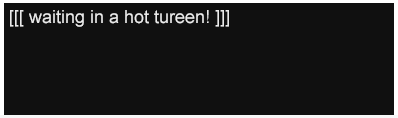
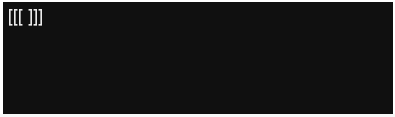
If the value of this attribute is auto, then the affected
element is a candidate for region layout and presentation; however, if the
value is none, then the affected element and its descendants
must be considered ineligible for region layout and presentation.
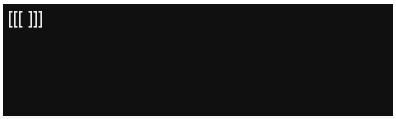
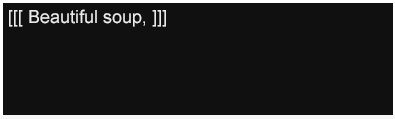
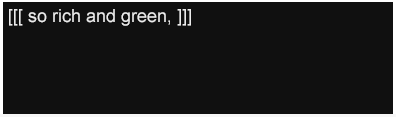
The tts:display style is illustrated by the following
example.
Example Fragment – Display
<region xml:id="r1">
  <style tts:extent="369px 119px"/>
  <style tts:backgroundColor="black"/>
  <style tts:color="white"/>
  <style tts:displayAlign="before"/>
  <style tts:textAlign="start"/>
</region>
...
<div region="r1">
  <p dur="5s">
    [[[
    <span tts:display="none">
      <set begin="1s" dur="1s" tts:display="auto"/>
      Beautiful soup,
    </span>
    <span tts:display="none">
      <set begin="2s" dur="1s" tts:display="auto"/>
      so rich and green,
    </span>
    <span tts:display="none">
      <set begin="3s" dur="1s" tts:display="auto"/>
      waiting in a hot tureen!
    </span>
    ]]]
  </p>
</div>
|
Example Rendition – Display
 |
 |
 |
 |
 |
Note:
The semantics of the style property represented by this attribute are
based upon that defined by [CSS2], § 9.2.5.
8.2.6 tts:displayAlign
The tts:displayAlign attribute is used to specify a style
property that defines the alignment of block areas in the block progression
direction.
This attribute may be specified by any style specification element or
content element that permits use of attributes in the TT Style Namespace;
however, this attribute applies as a style property only to those element
types indicated in the following table.
| Values: |
before | center |
after | inherit |
| Initial: |
before |
| Applies to: |
region |
| Inherited: |
yes |
| Percentages: |
N/A |
| Animatable: |
none |
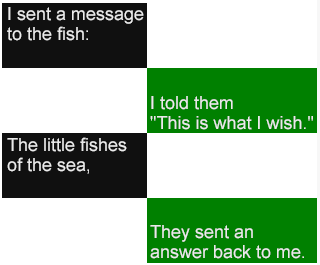
The tts:displayAlign style is illustrated by the following
example.
Example Fragment – Display Align
<region xml:id="r1">
  <style tts:extent="128px 66px"/>
  <style tts:origin="0px 0px"/>
  <style tts:backgroundColor="black"/>
  <style tts:color="white"/>
  <style tts:displayAlign="before"/>
  <style tts:textAlign="start"/>
</region>
<region xml:id="r2">
  <style tts:extent="192px 66px"/>
  <style tts:origin="128px 66px"/>
  <style tts:backgroundColor="green"/>
  <style tts:color="white"/>
  <style tts:displayAlign="after"/>
  <style tts:textAlign="start"/>
</region>
<region xml:id="r3">
  <style tts:extent="128px 66px"/>
  <style tts:origin="0px 132px"/>
  <style tts:backgroundColor="black"/>
  <style tts:color="white"/>
  <style tts:displayAlign="before"/>
  <style tts:textAlign="start"/>
</region>
<region xml:id="r4">
  <style tts:extent="192px 66px"/>
  <style tts:origin="128px 198px"/>
  <style tts:backgroundColor="green"/>
  <style tts:color="white"/>
  <style tts:displayAlign="after"/>
  <style tts:textAlign="start"/>
</region>
...
<div>
  <p region="r1">I sent a message to the fish:</p>
  <p region="r2">I told them<br/> "This is what I wish."</p>
  <p region="r3">The little fishes of the sea,</p>
  <p region="r4">They sent an<br/> answer back to me.</p>
</div>
|
Example Rendition – Display Align
 |
Note:
The semantics of the style property represented by this attribute are
based upon that defined by [XSL 1.0], § 7.13.4.
8.2.7 tts:dynamicFlow
The tts:dynamicFlow attribute is used to specify a style
property that defines how to dynamically flow content into and out of a
region over some time interval.
This style property applies only to a region when the
tts:overflow property for that region has the value
scroll.
This attribute may be specified by any style specification element or
content element that permits use of attributes in the TT Style Namespace;
however, this attribute applies as a style property only to those element
types indicated in the following table.
If the value of this attribute is none, then no dynamic flow
semantics apply.
If the value of this attribute contains a single <flowFunction>, then that flow
function applies equally to fill into, reflow within, and
clear from dynamic flow operations.
If a reflow within() flow function is specified, but no clear
out() flow function is specified, or vice-versa, then the
function applies equally to both reflow within and clear
from dynamic flow operations.
If either intra() or inter() <flowIntervalFunction> is
not specified, then the auto value for the missing <flowIntervalFunction>
applies.
The normative processing model for dynamic flow behavior is specified in
B Dynamic Flow Processing Model.
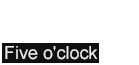
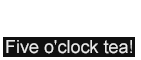
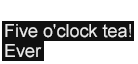
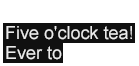
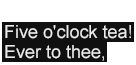
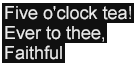
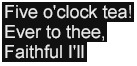
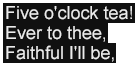
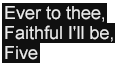
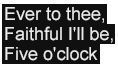
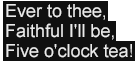
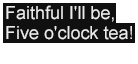
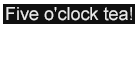
The tts:dynamicFlow style is illustrated by the following
example, and depicted in an SVG
Animation.
Example Fragment – Dynamic Flow
<region xml:id="r1">
  <style tts:extent="140px 70px"/>
  <style tts:displayAlign="after"/>
  <style tts:backgroundColor="transparent"/>
  <style tts:fontFamily="proportionalSansSerif"/>
  <style tts:fontSize="18px"/>
  <style tts:overflow="scroll"/>
  <style tts:dynamicFlow="in(word,jump) out(line,smooth) inter(3s)"/>
</region>
...
<p region="r1">
  <span tts:backgroundColor="black" tts:color="white">
    Five o'clock tea!<br/>
    Ever to thee,<br/>
    Faithful I'll be,<br/>
    Five o'clock tea!<br/>
    <br/>
    <br/>
    <br/>
  </span>
</p>
|
Example Rendition – Dynamic Flow – Discrete Frames
 |
 |
 |
 |
 |
 |
 |
 |
 |
 |
 |
 |
 |
 |
 |
 |
8.2.8
tts:extent
The tts:extent attribute is used to specify the
width and height of a region area (which may be the root
container region).
This attribute may be specified by any style specification element or
content element that permits use of attributes in the TT Style Namespace;
however, this attribute applies as a style property only to those element
types indicated in the following table.
| Values: |
auto | <length> <length> |
inherit |
| Initial: |
auto |
| Applies to: |
body, region |
| Inherited: |
no |
| Percentages: |
relative to width and height of root
container region |
| Animatable: |
none |
If the value of this attribute consists of two <length> specifications, then they must
be interpreted as width and height, where the first
specification is the width, and the second specification is the
height.
If the value of this attribute is auto, then the initial
value of the style property must be considered to be the same as the root
container extent. The root container extent is determined either by a
tts:extent specified on the body element, if
present, or by the external authoring context, if not present. In the former
case, if the width and height is expressed in terms of two <length> specifications, then these
specifications must be expressed as non-percentage, definite lengths using
pixel units.
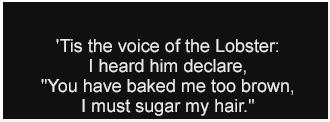
The tts:extent style is illustrated by the following
example.
Example Fragment – Extent
<region xml:id="r1">
  <style tts:extent="330px 122px"/>
  <style tts:backgroundColor="black"/>
  <style tts:color="white"/>
  <style tts:displayAlign="after"/>
  <style tts:textAlign="center"/>
</region>
...
<p region="r1">
  'Tis the voice of the Lobster:<br/>
  I heard him declare,<br/>
  "You have baked me too brown,<br/>
  I must sugar my hair."
</p>
|
Example Rendition – Extent
 |
8.2.9 tts:fontFamily
The tts:fontFamily attribute is used to specify a style
property that defines the font family from which glyphs are selected for
glyph areas generated by content flowed into a region.
This attribute may be specified by any style specification element or
content element that permits use of attributes in the TT Style Namespace;
however, this attribute applies as a style property only to those element
types indicated in the following table.
Note:
For the purpose of determining applicability of this style property, each
character child of a p element is considered to be enclosed in
an anonymous span.
Note:
The initial value, default, is a generic font family name,
and is further described in 8.3.6
<genericFamilyName> below.
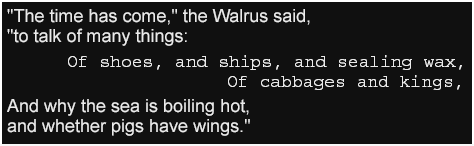
The tts:fontFamily style is illustrated by the following
example.
Example Fragment – Font Family
<region xml:id="r1">
  <style tts:extent="474px 146px"/>
  <style tts:backgroundColor="black"/>
  <style tts:color="white"/>
  <style tts:displayAlign="center"/>
  <style tts:textAlign="start"/>
  <style tts:fontFamily="proportionalSansSerif"/>
</region>
...
<div region="r1">
  <p>
    "The time has come," the Walrus said,<br/>
    "to talk of many things:
  </p>
  <p tts:textAlign="end" tts:fontFamily="monospaceSerif">
    Of shoes, and ships, and sealing wax,<br/>
    Of cabbages and kings,
  </p>
  <p>
    And why the sea is boiling hot,<br/>
    and whether pigs have wings."
  </p>
</div>
|
Example Rendition – Font Family
 |
Note:
The semantics of the style property represented by this attribute are
based upon that defined by [XSL 1.0], § 7.8.2.
8.2.10 tts:fontSize
The tts:fontSize attribute is used to specify a style
property that defines the font size for glyphs that are selected for glyph
areas generated by content flowed into a region, where font size is
interpreted as a scaling transform to the font's design EM square.
This attribute may be specified by any style specification element or
content element that permits use of attributes in the TT Style Namespace;
however, this attribute applies as a style property only to those element
types indicated in the following table.
| Values: |
<length> <length>? |
inherit |
| Initial: |
1c |
| Applies to: |
span |
| Inherited: |
yes |
| Percentages: |
relative to parent element's font size |
| Animatable: |
discrete |
If a single <length> value is
specified, then this length applies equally to horizontal and vertical
scaling of a glyph's EM square; if two <length> values are specified, then the
first expresses the horizontal scaling and the second expresses vertical
scaling.
Note:
Use of independent horizontal and vertical font sizes is expected to be
used with cell based metrics in order to denote fonts that are two rows in
height and one column in width.
If horizontal and vertical sizes are expressed independently, then the
metrics of the <length> values must
be the same.
The <length> value(s) used to
express font size must be non-negative.
Note:
For the purpose of determining applicability of this style property, each
character child of a p element is considered to be enclosed in
an anonymous span.
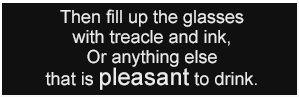
The tts:fontSize style is illustrated by the following
example.
Example Fragment – Font Size
<region xml:id="r1">
  <style tts:extent="299px 97px"/>
  <style tts:backgroundColor="black"/>
  <style tts:color="white"/>
  <style tts:displayAlign="center"/>
  <style tts:textAlign="center"/>
  <style tts:fontFamily="proportionalSansSerif"/>
  <style tts:fontSize="18px"/>
</region>
...
<p region="r1">
  Then fill up the glasses<br/>
  with treacle and ink,<br/>
  Or anything else<br/>
  that is <span tts:fontSize="24px">pleasant</span> to drink.
</p>
|
Example Rendition – Font Size
 |
Note:
The semantics of the style property represented by this attribute are
based upon that defined by [XSL 1.0], § 7.8.4.
8.2.11 tts:fontStyle
The tts:fontStyle attribute is used to specify a style
property that defines the font style to apply to glyphs that are selected for
glyph areas generated by content flowed into a region, where the mapping from
font style value to specific font face or style parameterization is not
determined by this specification.
This attribute may be specified by any style specification element or
content element that permits use of attributes in the TT Style Namespace;
however, this attribute applies as a style property only to those element
types indicated in the following table.
| Values: |
normal | italic |
oblique | reverseOblique |
inherit |
| Initial: |
normal |
| Applies to: |
span |
| Inherited: |
yes |
| Percentages: |
N/A |
| Animatable: |
discrete |
Note:
For the purpose of determining applicability of this style property, each
character child of a p element is considered to be enclosed in
an anonymous span.
Use of values oblique and reverseOblique denote
a shear and reverse shear transformation (at an unspecified angle) in the
inline progression dimension. A conformant processor may perform such a
transform on a font in order to satisfy this authorial intent for the purpose
of presentation processing. If a specified font style is not available or a
shear or reverse shear transformation is not supported, then the processor
must interpret the font style as if the value normal were
specified for the purpose of presentation processing.
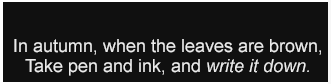
The tts:fontStyle style is illustrated by the following
example.
Example Fragment – Font Style
<region xml:id="r1">
  <style tts:extent="331px 84px"/>
  <style tts:backgroundColor="black"/>
  <style tts:color="white"/>
  <style tts:displayAlign="after"/>
  <style tts:textAlign="center"/>
  <style tts:fontFamily="proportionalSansSerif"/>
</region>
...
<p region="r1">
  In autumn, when the leaves are brown,<br/>
  Take pen and ink, and <span tts:fontStyle="italic">write it down.</span>
</p>
|
Example Rendition – Font Style
 |
Note:
The semantics of the style property represented by this attribute are
based upon that defined by [XSL 1.0], § 7.8.7.
8.2.12 tts:fontWeight
The tts:fontWeight attribute is used to specify a style
property that defines the font weight to apply to glyphs that are selected
for glyph areas generated by content flowed into a region, where the mapping
from font weight value to specific font face or weight parameterization is
not determined by this specification.
This attribute may be specified by any style specification element or
content element that permits use of attributes in the TT Style Namespace;
however, this attribute applies as a style property only to those element
types indicated in the following table.
| Values: |
normal | bold |
inherit |
| Initial: |
normal |
| Applies to: |
span |
| Inherited: |
yes |
| Percentages: |
N/A |
| Animatable: |
discrete |
Note:
For the purpose of determining applicability of this style property, each
character child of a p element is considered to be enclosed in
an anonymous span.
If a specified font weight is not available, then a conformant processor
must interpret the font weight as if the value normal were
specified for the purpose of presentation processing.
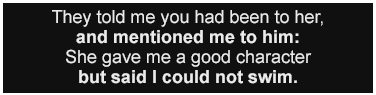
The tts:fontWeight style is illustrated by the following
example.
Example Fragment – Font Weight
<region xml:id="r1">
  <style tts:extent="376px 95px"/>
  <style tts:backgroundColor="black"/>
  <style tts:color="white"/>
  <style tts:displayAlign="center"/>
  <style tts:textAlign="center"/>
  <style tts:fontFamily="proportionalSansSerif"/>
</region>
...
<p region="r1">
  They told me you had been to her,<br/>
  <span tts:fontWeight="bold">and mentioned me to him:</span><br/>
  She gave me a good character<br/>
  <span tts:fontWeight="bold">but said I could not swim.</span>
</p>
|
Example Rendition – Font Weight
 |
Note:
The semantics of the style property represented by this attribute are
based upon that defined by [XSL 1.0], § 7.8.9.
8.2.13 tts:lineHeight
The tts:lineHeight attribute is used to specify a style
property that defines the inter-baseline separation between line areas
generated by content flowed into a region.
This attribute may be specified by any style specification element or
content element that permits use of attributes in the TT Style Namespace;
however, this attribute applies as a style property only to those element
types indicated in the following table.
| Values: |
normal | <length> |
inherit |
| Initial: |
normal |
| Applies to: |
p |
| Inherited: |
yes |
| Percentages: |
relative to this element's font size |
| Animatable: |
discrete |
If the value of this attribute is normal, then the initial
value of the style property must be considered to be the same as the largest
font size that applies to any child element.
If specified as a <length>, then
the length must be non-negative.
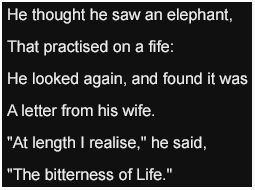
The tts:lineHeight style is illustrated by the following
example.
Example Fragment – Line Height
<region xml:id="r1">
  <style tts:extent="255px 190px"/>
  <style tts:backgroundColor="black"/>
  <style tts:color="white"/>
  <style tts:displayAlign="center"/>
  <style tts:textAlign="start"/>
  <style tts:fontFamily="proportionalSansSerif"/>
  <style tts:fontSize="16px"/>
  <style tts:lineHeight="32px"/>
</region>
...
<p region="r1">
  He thought he saw an elephant,<br/>
  That practised on a fife:<br/>
  He looked again, and found it was<br/>
  A letter from his wife.<br/>
  "At length I realise," he said,<br/>
  "The bitterness of Life.
"</p>
|
Example Rendition – Line Height
 |
Note:
The semantics of the style property represented by this attribute are
based upon that defined by [XSL 1.0], § 7.15.4.
8.2.14
tts:opacity
The tts:opacity attribute is used to specify a style property
that defines the opacity (or transparency) of marks associated with a region
(such as a region's background color) or marks associated with areas
generated by a given content element to which opacity applies.
When presented onto a visual medium, the opacity of the affacted element
is applied uniformly and on a linear scale to all marks produced by the
affected element (and its descendants).
This attribute may be specified by any style specification element or
content element that permits use of attributes in the TT Style Namespace;
however, this attribute applies as a style property only to those element
types indicated in the following table.
| Values: |
<alpha> |
inherit |
| Initial: |
1.0 |
| Applies to: |
region |
| Inherited: |
no |
| Percentages: |
N/A |
| Animatable: |
discrete |
An <alpha> value greater than 1.0
must be considered equivalent to an <alpha> value of 1.0.
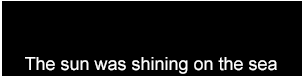
The tts:opacity style is illustrated by the following
example.
Example Fragment – Opacity
<region xml:id="r1" dur="5s">
  <set begin="0s" dur="1s" tts:opacity="1.00"/>
  <set begin="1s" dur="1s" tts:opacity="0.75"/>
  <set begin="2s" dur="1s" tts:opacity="0.50"/>
  <set begin="3s" dur="1s" tts:opacity="0.25"/>
  <set begin="4s" dur="1s" tts:opacity="0.00"/>
  <style tts:extent="304px 77px"/>
  <style tts:backgroundColor="black"/>
  <style tts:color="white"/>
  <style tts:displayAlign="after"/>
  <style tts:textAlign="center"/>
</region>
...
<p region="r1">
  The sun was shining on the sea
</p>
|
Example Rendition – Opacity
 |
 |
 |
 |
 |
Note:
The semantics of the style property represented by this attribute are
based upon that defined by [CSS3 Color], § 3.2.
8.2.15
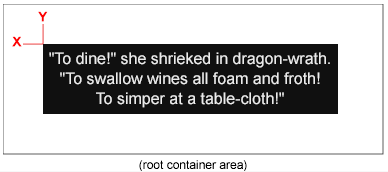
tts:origin
The tts:origin attribute is used to specify the x
and y coordinates of the origin of a region area with respect to the
origin of the root container extent, if specified, or the external authoring
context, if not specified.
This attribute may be specified by any style specification element or
content element that permits use of attributes in the TT Style Namespace;
however, this attribute applies as a style property only to those element
types indicated in the following table.
| Values: |
auto | <length> <length> |
inherit |
| Initial: |
auto |
| Applies to: |
region |
| Inherited: |
no |
| Percentages: |
relative to width and height of root
container region |
| Animatable: |
none |
If the value of this attribute consists of two <length> specifications, then they must
be interpreted as x and y coordinates, where the first
specification is the x coordinate, and the second specification is
the y coordinate.
If the value of this attribute is auto, then the initial
value of the style property must be considered to be the same as the root
container origin. The root container origin is determined by the external
authoring context.
The tts:origin style is illustrated by the following
example.
Example Fragment – Origin
<region xml:id="r1">
  <style tts:origin="40px 40px"/>
  <style tts:extent="308px 92px"/>
  <style tts:backgroundColor="black"/>
  <style tts:color="white"/>
  <style tts:displayAlign="center"/>
  <style tts:textAlign="center"/>
</region>
...
<p region="r1">
  "To dine!" she shrieked in dragon-wrath.<br/>
  "To swallow wines all foam and froth!<br/>
   To simper at a table-cloth!"
</p>
|
Example Rendition – Origin
 |
8.2.16 tts:overflow
The tts:overflow attribute is used to specify a style
property that defines whether a region area is clipped or not if the
descendant areas of the region overflow its extent.
This attribute may be specified by any style specification element or
content element that permits use of attributes in the TT Style Namespace;
however, this attribute applies as a style property only to those element
types indicated in the following table.
| Values: |
visible | hidden
| scroll | inherit |
| Initial: |
hidden |
| Applies to: |
region |
| Inherited: |
no |
| Percentages: |
N/A |
| Animatable: |
none |
If the value of this attribute is visible, then content
should not be clipped outside of the affected region, and region composition
and layout must be performed as if the region's width and height were
infinite, but with a well-defined origin. If the value is
hidden, then content should be clipped outside of the affected
region.
Note:
Unless a manual line break element br is used by the content
author, a paragraph of a given region will generate no more than one line
area in that region if the value of the tts:overflow style that
applies to the region is visible and if the applicable
tts:wrapOption style is noWrap.
If the value of this attribute is scroll, then content is
dynamically flowed into and out of the affected region according to the
values of the tts:dynamicFlow style property; in this case, the
semantics of the tts:dynamicFlow apply whether or not the
affected region has overflowed.
The tts:overflow style is illustrated by the following
example.
Example Fragment – Overflow
<region xml:id="r1">
  <style tts:extent="232px 40px"/>
  <style tts:origin="0px 0px"/>
  <style tts:backgroundColor="black"/>
  <style tts:color="red"/>
  <style tts:displayAlign="before"/>
  <style tts:textAlign="start"/>
  <style tts:fontFamily="proportionalSansSerif"/>
  <style tts:fontSize="18px"/>
  <style tts:wrapOption="noWrap"/>
  <style tts:overflow="visible"/>
</region>
<region xml:id="r2">
  <style tts:extent="232px 40px"/>
  <style tts:origin="0px 43px"/>
  <style tts:backgroundColor="black"/>
  <style tts:color="red"/>
  <style tts:displayAlign="before"/>
  <style tts:textAlign="start"/>
  <style tts:fontFamily="proportionalSansSerif"/>
  <style tts:fontSize="18px"/>
  <style tts:wrapOption="noWrap"/>
  <style tts:overflow="hidden"/>
</region>
...
<p region="r1">
  "But wait a bit," the Oysters cried,<br/>
  "Before we have our chat;
</p>
<p region="r2">
  For some of us are out of breath,<br/>
  And all of us are fat!"
</p>
|
Example Rendition – Overflow
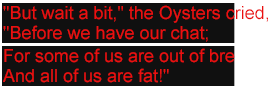 |
Note:
In the above example, the tts:noWrap is set to
noWrap to prevent automatic line wrapping (breaking); if this
were not specified, then overflow would occur in the block progression
direction as opposed to the inline progression direction.
Note:
The semantics of the style property represented by this attribute are
based upon that defined by [XSL 1.0], § 7.20.2.
8.2.17
tts:padding
The tts:padding attribute is used to specify padding (or
inset) space on all sides of a region area or a content area produced by a
content element.
This attribute may be specified by any style specification element or
content element that permits use of attributes in the TT Style Namespace;
however, this attribute applies as a style property only to those element
types indicated in the following table.
If the value of this attribute consists of one <length> specification, then that length
applies to all edges of the affected areas. If the value consists of two <length> specifications, then the first
applies to the before and after edges, and the second applies to the start
and end edges. If three <length>
specifications are provided, then the first applies to the before edge, the
second applies to the start and end edges, and the third applies to the after
edge. If four <length> specifications
are provided, then they apply to before, end, after, and start edges,
respectively.
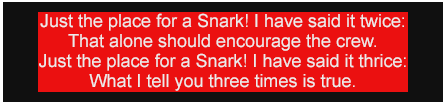
The tts:padding style is illustrated by the following
example.
Example Fragment – Padding
<region xml:id="r1">
  <style tts:extent="446px 104px"/>
  <style tts:backgroundColor="black"/>
  <style tts:color="white"/>
  <style tts:displayAlign="after"/>
  <style tts:textAlign="center"/>
  <style tts:padding="10px 40px"/>
</region>
...
<p region="r1" tts:backgroundColor="red">
  Just the place for a Snark! I have said it twice:<br/>
  That alone should encourage the crew.<br/>
  Just the place for a Snark! I have said it thrice:<br/>
  What I tell you three times is true.
</p>
|
When rendering an area to which padding applies, the background color that
applies to the area is rendered into the padded portion of the area.
Example Rendition – Padding
 |
Note:
The semantics of the style property represented by this attribute are
based upon that defined by [XSL 1.0], § 7.29.15, except
that individual shorthand values map to writing mode relative padding values
as defined by [XSL 1.0], § 7.7.31, 7.7.32, 7.7.33, and
7.7.34.
8.2.18 tts:showBackground
The tts:showBackground attribute is used to specify
constraints on when the background color of a region is intended to be
presented.
This attribute may be specified by any style specification element or
content element that permits use of attributes in the TT Style Namespace;
however, this attribute applies as a style property only to those element
types indicated in the following table.
| Values: |
always |
whenActive | inherit |
| Initial: |
always |
| Applies to: |
region |
| Inherited: |
no |
| Percentages: |
N/A |
| Animatable: |
discrete |
If the value of this attribute is always, then the background
color of a region is always rendered when performing presentation processing
on a visual medium; if the value is whenActive, then the
background color of a region is rendered only when some content is selected
into the region.
The tts:showBackground style is illustrated by the following
example.
Example Fragment – Show Background
<region xml:id="r1">
  <style tts:origin="0px 0px"/>
  <style tts:extent="265px 100px"/>
  <style tts:backgroundColor="black"/>
  <style tts:showBackground="always"/>
  <style tts:color="white"/>
  <style tts:displayAlign="before"/>
  <style tts:textAlign="start"/>
</region>
<region xml:id="r2">
  <style tts:origin="205px 60px"/>
  <style tts:extent="290px 100px"/>
  <style tts:backgroundColor="red"/>
  <style tts:color="white"/>
  <style tts:displayAlign="before"/>
  <style tts:textAlign="end"/>
  <style tts:showBackground="whenActive"/>
</region>
|
Note:
The semantics of the style property represented by this attribute are
based upon that defined by [SMIL 2.1], § 5.3.1.
8.2.19 tts:textAlign
The tts:textAlign attribute is used to specify a style
property that defines how inline areas are aligned within a containing block
area in the inline progression direction.
This attribute may be specified by any style specification element or
content element that permits use of attributes in the TT Style Namespace;
however, this attribute applies as a style property only to those element
types indicated in the following table.
| Values: |
left | center |
right | start | end |
inherit |
| Initial: |
start |
| Applies to: |
p |
| Inherited: |
yes |
| Percentages: |
N/A |
| Animatable: |
discrete |
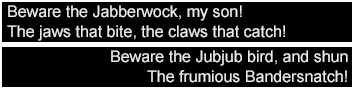
The tts:textAlign style is illustrated by the following
example.
Example Fragment – Text Align
<region xml:id="r1">
  <style tts:extent="355px 43px"/>
  <style tts:origin="0px 0px"/>
  <style tts:backgroundColor="black"/>
  <style tts:color="white"/>
  <style tts:textAlign="start"/>
</region>
<region xml:id="r2">
  <style tts:extent="355px 43px"/>
  <style tts:origin="0px 47px"/>
  <style tts:backgroundColor="black"/>
  <style tts:color="white"/>
  <style tts:textAlign="end"/>
</region>
...
<p region="r1">
  Beware the Jabberwock, my son!<br/>
  The jaws that bite, the claws that catch!
</p>
<p region="r2">
  Beware the Jubjub bird, and shun<br/>
  The frumious Bandersnatch!
</p>
|
Example Rendition – Text Align
 |
Note:
The semantics of the style property represented by this attribute are
based upon that defined by [XSL 1.0], § 7.15.9.
8.2.20 tts:textDecoration
The tts:textDecoration attribute is used to specify a style
property that defines a text decoration effect to apply to glyph areas or
other inline areas that are generated by content flowed into a region.
This attribute may be specified by any style specification element or
content element that permits use of attributes in the TT Style Namespace;
however, this attribute applies as a style property only to those element
types indicated in the following table.
| Values: |
none | [ [
underline | noUnderline ] || [
throughline | noThroughline ] || [
overline | noOverline ] ] |
inherit |
| Initial: |
none |
| Applies to: |
body, div, p, region, span |
| Inherited: |
no, but see prose of [XSL
1.0], § 7.16.4 |
| Percentages: |
N/A |
| Animatable: |
discrete |
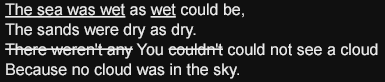
The tts:textDecoration style is illustrated by the following
example.
Example Fragment – Text Decoration
<region xml:id="r1">
  <style tts:extent="385px 82px"/>
  <style tts:origin="0px 0px"/>
  <style tts:backgroundColor="black"/>
  <style tts:color="white"/>
  <style tts:padding="5px 2px"/>
  <style tts:textDecoration="underline"/>
</region>
...
<p region="r1">
  The sea was wet<span tts:textDecoration="noUnderline"> as </span>wet<span
  tts:textDecoration="noUnderline">
        could be,<br/>
        The sand was dry as dry.<br/>
        <span tts:textDecoration="lineThrough">There weren't any</span>
        You
        <span tts:textDecoration="lineThrough">couldn't</span>
        could not see a cloud<br/>
        Because no cloud was in the sky.
  </span>
</p>
|
Example Rendition – Text Decoration
 |
Note:
The semantics of the style property represented by this attribute are
based upon that defined by [XSL 1.0], § 7.16.4.
8.2.21 tts:textOutline
The tts:textOutline attribute is used to specify a style
property that defines a text outline effect to apply to glyphs that are
selected for glyph areas generated by content flowed into a region.
This attribute may be specified by any style specification element or
content element that permits use of attributes in the TT Style Namespace;
however, this attribute applies as a style property only to those element
types indicated in the following table.
| Values: |
none | <color>? <length> <length>? |
inherit |
| Initial: |
none |
| Applies to: |
span |
| Inherited: |
no |
| Percentages: |
relative to this element's font size |
| Animatable: |
discrete |
Note:
For the purpose of determining applicability of this style property, each
character child of a p element is considered to be enclosed in
an anonymous span.
The value of this attribute consists of an optional <color> term followed by one or two <length> terms. If a color term
is present, then it denotes the outline color; if no color term is
present, the computed value of the tts:color applies. The first
length term denotes the outline thickness and the second length
term, if present, indicates the blur radius.
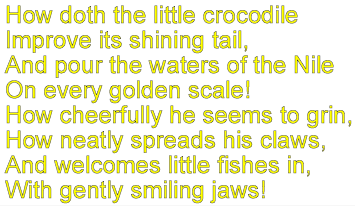
The tts:textOutline style is illustrated by the following
example.
Example Fragment – Text Outline
<region xml:id="r1">
  <style tts:backgroundColor="transparent"/>
  <style tts:color="yellow"/>
  <style tts:textOutline="black 2px 0px"/>
  <style tts:fontFamily="proportionalSansSerif"/>
  <style tts:fontSize="24px"/>
</region>
...
<p>
  How doth the little crocodile<br/>
  Improve its shining tail,<br/>
  And pour the waters of the Nile<br/>
  On every golden scale!<br/>
  How cheerfully he seems to grin,<br/>
  How neatly spreads his claws,<br/>
  And welcomes little fishes in,<br/>
  With gently smiling jaws!
</p>
|
Example Rendition – Text Outline
 |
8.2.22 tts:unicodeBidi
The tts:unicodeBidi attribute is used to specify a style
property that defines a directional embedding or override according to the
Unicode bidirectional algorithm.
This attribute may be specified by any style specification element or
content element that permits use of attributes in the TT Style Namespace;
however, this attribute applies as a style property only to those element
types indicated in the following table.
| Values: |
normal | embed |
bidiOverride | inherit |
| Initial: |
normal |
| Applies to: |
p, span |
| Inherited: |
no |
| Percentages: |
N/A |
| Animatable: |
none |
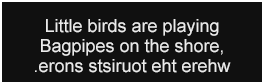
The tts:unicodeBidi style is illustrated by the following
example.
Example Fragment – Unicode Bidirectionality
<region xml:id="r1">
  <style tts:extent="265px 84px"/>
  <style tts:padding="5px"/>
  <style tts:backgroundColor="black"/>
  <style tts:color="white"/>
  <style tts:displayAlign="after"/>
  <style tts:textAlign="center"/>
</region>
...
<p region="r1">
  Little birds are playing<br/>
  Bagpipes on the shore,<br/>
  <span tts:unicodeBidi="bidiOverride" tts:direction="rtl">where the tourists snore.</span>
</p>
|
Example Rendition – Unicode Bidirectionality
 |
Note:
The semantics of the style property represented by this attribute are
based upon that defined by [XSL 1.0], § 7.27.6.
8.2.23 tts:visibility
The tts:visibility attribute is used to specify a style
property that defines whether generated areas are visible or not when
rendered on a visual presentation medium.
This attribute may be specified by any style specification element or
content element that permits use of attributes in the TT Style Namespace;
however, this attribute applies as a style property only to those element
types indicated in the following table.
| Values: |
visible | hidden
| inherit |
| Initial: |
visible |
| Applies to: |
body, div, p, region, span |
| Animatable: |
discrete |
| Animatable: |
discrete |
The tts:visibility style has no affect on content layout or
composition, but merely determines whether composed content is visible or
not.
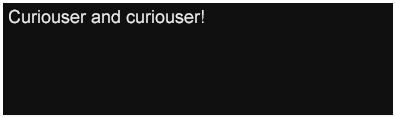
The tts:visibility style is illustrated by the following
example.
Example Fragment – Visibility
<region xml:id="r1">
  <style tts:extent="398px 121px"/>
  <style tts:backgroundColor="black"/>
  <style tts:color="white"/>
  <style/>
</region>
...
<p region="r1" dur="4s">
  <span tts:visibility="hidden">
    <set begin="1s" tts:visibility="visible"/>
    Curiouser
  </span>
  <span tts:visibility="hidden">
    <set begin="2s" tts:visibility="visible"/>
    and
  </span>
  <span tts:visibility="hidden">
    <set begin="3s" tts:visibility="visible"/>
    curiouser!
  </span>
</p>
|
Example Rendition – Visibility
 |
 |
 |
 |
Note:
The semantics of the style property represented by this attribute are
based upon that defined by [XSL 1.0], § 7.28.8.
8.2.24 tts:wrapOption
The tts:wrapOption attribute is used to specify a style
property that defines whether or not automatic line wrapping (breaking)
applies within the context of the affected element.
This attribute may be specified by any style specification element or
content element that permits use of attributes in the TT Style Namespace;
however, this attribute applies as a style property only to those element
types indicated in the following table.
| Values: |
wrap | noWrap |
inherit |
| Initial: |
wrap |
| Applies to: |
span |
| Inherited: |
yes |
| Percentages: |
N/A |
| Animatable: |
discrete |
For the purpose of determining applicability of this style property, each
character child of a p element is considered to be enclosed in
an anonymous span.
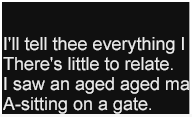
The tts:wrapOption style is illustrated by the following
example.
Example Fragment – Wrap Option
<region xml:id="r1">
  <style tts:extent="192px 117px"/>
  <style tts:backgroundColor="black"/>
  <style tts:color="white"/>
  <style tts:displayAlign="after"/>
  <style tts:overflow="hidden"/>
  <style tts:wrapOption="noWrap"/>
</region>
...
<p>
  I'll tell thee everything I can:<br/>
  There's little to relate.<br/>
  I saw an aged aged man,<br/>
  A-sitting on a gate."
</p>
|
Example Rendition – Wrap Option
 |
Note:
The semantics of the style property represented by this attribute are
based upon that defined by [XSL 1.0], § 7.15.13.
8.2.25 tts:writingMode
The tts:writingMode attribute is used to specify a style
property that defines the block and inline progression directions to be used
for the purpose of stacking block and inline areas within a region area.
This attribute may be specified by any style specification element or
content element that permits use of attributes in the TT Style Namespace;
however, this attribute applies as a style property only to those element
types indicated in the following table.
| Values: |
lrtb | rltb |
tbrl | tblr | lr |
rl | tb | inherit |
| Initial: |
lrtb |
| Applies to: |
region |
| Inherited: |
no |
| Percentages: |
N/A |
| Animatable: |
none |
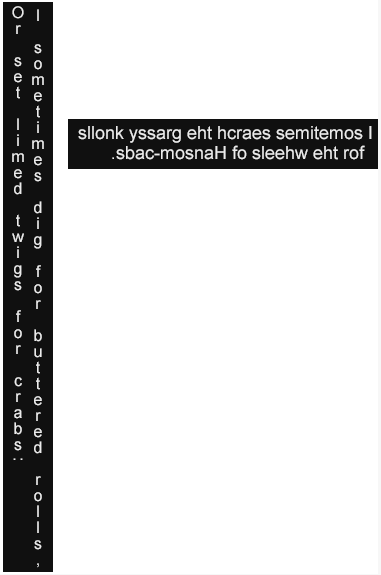
The tts:writingMode style is illustrated by the following
example.
Example Fragment – Writing Mode
<region xml:id="r1">
  <style tts:extent="50px 570px"/>
  <style tts:origin="0px 0px"/>
  <style tts:padding="10px 3px"/>
  <style tts:backgroundColor="black"/>
  <style tts:color="white"/>
  <style tts:writingMode="tbrl"/>
</region>
<region xml:id="r2">
  <style tts:extent="310px 50px"/>
  <style tts:origin="70px 120px"/>
  <style tts:padding="10px 3px"/>
  <style tts:backgroundColor="black"/>
  <style tts:color="white"/>
  <style tts:writingMode="rltb"/>
</region>
...
<p region="r1">
  I sometimes dig for buttered rolls,<br/>
  Or set limed twigs for crabs:
</p>
<p region="r2" tts:direction="rtl" tts:unicodeBidi="bidiOverride">
  I sometimes search the grassy knolls for the wheels of Hansom-cabs.
</p>
|
Example Rendition – Writing Mode
 |
Note:
In the second paragraph in the above example that targets region
r2, the tts:unicodeBidi and
tts:direction properties are set to bidiOverride
and rtl, respectively, in order to override the normally
left-to-right directionality of characters in the Latin script.
Note:
The semantics of the style property represented by this attribute are
based upon that defined by [XSL 1.0], § 7.27.7.
8.2.26
tts:zIndex
The tts:zIndex attribute is used to specify a style property
that defines the front-to-back ordering of region areas in the case that they
overlap.
This attribute may be specified by any style specification element or
content element that permits use of attributes in the TT Style Namespace;
however, this attribute applies as a style property only to those element
types indicated in the following table.
| Values: |
auto | <integer> |
inherit |
| Initial: |
auto |
| Applies to: |
region |
| Inherited: |
no |
| Percentages: |
N/A |
| Animatable: |
discrete |
If two areas are associated with the same Z-index value, then, if those
areas overlap in space, the area(s) generated by lexically subsequent
elements must be rendered over area(s) generated by lexically prior elements,
where lexical order is defined as the postorder traversal of a document
instance.
The semantics of the value auto are those defined by [XSL 1.0], § 7.28.9, where the tt element is
considered to establish the root stacking context.
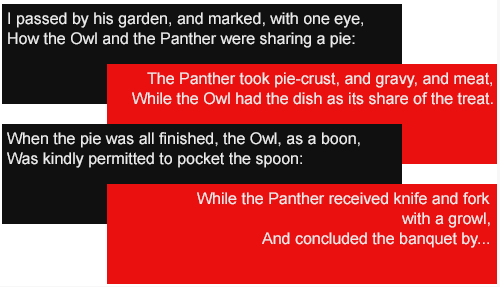
The tts:zIndex style is illustrated by the following
example.
Example Fragment – Z Index
<region xml:id="r1">
  <style tts:origin="0px 0px"/>
  <style tts:extent="400px 100px"/>
  <style tts:padding="5px"/>
  <style tts:backgroundColor="black"/>
  <style tts:color="white"/>
  <style tts:zIndex="0"/>
</region>
<region xml:id="r2">
  <style tts:origin="100px 60px"/>
  <style tts:extent="400px 100px"/>
  <style tts:padding="5px"/>
  <style tts:backgroundColor="red"/>
  <style tts:color="white"/>
  <style tts:textAlign="end"/>
  <style tts:zIndex="1"/>
</region>
<region xml:id="r3">
  <style tts:origin="0px 120px"/>
  <style tts:extent="400px 100px"/>
  <style tts:padding="5px"/>
  <style tts:backgroundColor="black"/>
  <style tts:color="white"/>
  <style tts:zIndex="2"/>
</region>
<region xml:id="r4">
  <style tts:origin="100px 180px"/>
  <style tts:extent="400px 100px"/>
  <style tts:padding="5px"/>
  <style tts:backgroundColor="red"/>
  <style tts:color="white"/>
  <style tts:textAlign="end"/>
  <style tts:zIndex="3"/>
</region>
...
<p region="r1">
  I passed by his garden, and marked, with one eye,<br/>
  How the Owl and the Panther were sharing a pie.
</p>
<p region="r2">
  The Panther took pie-crust, and gravy, and meat,<br/>
  While the Owl had the dish as its share of the treat.
</p>
<p region="r3">
  When the pie was all finished, the Owl, as a boon,<br/>
  Was kindly permitted to pocket the spoon:
</p>
<p region="r4">
  While the Panther received knife and fork<br/>
  with a growl,<br/>
  And concluded the banquet by...
</p>
|
Example Rendition – Z Index
 |
Note:
The semantics of the style property represented by this attribute are
based upon that defined by [XSL 1.0], § 7.28.9.
8.3 Style Value Expressions
Style property values include the use of the following expressions:
8.3.1
<alpha>
An <alpha> expression is used to express an opacity value, where 0
means fully transparent and 1 means fully opaque.
Syntax Representation – <alpha>
|
|
In the above syntax representation, the syntactic element
float must adhere to the lexical representation defined
by [XML Schema Part 2] § 3.2.4.1.
8.3.2
<color>
A <color> expression is used to specify a named color, exact RGB
color triple, or exact RGBA color tuple, where the alpha component, if
expressed, is maximum (255) at 100% opacity and minimum (0) at 0% opacity,
and where the applicable color space is defined by [SRGB].
Syntax Representation – <color>
<color>
  : "#" rrggbb
  | "#" rrggbbaa
  | "rgb" "(" r-value "," g-value "," b-value ")"
  | "rgba" "(" r-value "," g-value "," b-value "," a-value ")"
  | <namedColor>
rrggbb
  :  <hexDigit>{6}
rrggbbaa
  :  <hexDigit>{8}
r-value | g-value | b-value | a-value
  : component-value
component-value
  : non-negative-integer                    // valid range: [0,255]
non-negative-integer
  : <digit>+
|
When expressing RGB component values, these values are considered to not be premultiplied by alpha.
For the purpose of performing presentation processing such that non-opaque
or non-transparent alpha or opacity values apply, then the semantics of
compositing functions are defined with respect to the use of the [SRGB] color space for both inputs and outputs of the
composition function.
Note:
The use of [SRGB] for the stated semantics of
composition is not mean to prevent an actual processor from using some other
color space either for internal or external purposes. For example, a
presentation processor may ultimately convert the SRGB values used here to
the YUV color space for rendition on a television device.
8.3.3
<digit>
A <digit> is used to express integers and other types of numbers or
tokens.
Syntax Representation – <digit>
<digit>
  : "0" | "1" | "2" | "3" | "4" | "5" | "6" | "7" | "8" | "9"
|
8.3.4
<duration>
A <duration> expression is used to express a temporal duration
value.
Syntax Representation – <duration>
<duration>
  : <digit> ( "." <digit>+ )? metric
metric
  : "s"                 // seconds
  | "ms"                // milliseconds
  | "f"                 // frames
  | "t"                 // ticks
|
It is an error to omit the metric component of a duration.
When operating with smpte time base and
discontinuous mode, a duration expression must be considered to
denote a duration in (local) real-time, independently of the governing time
base.
8.3.5
<familyName>
A <familyName> expression specifies a font family name.
If the name contains a whitespace or quotation delimiter character, then
it must be expressed as a <quotedString>.
Syntax Representation – <familyName>
|
|
8.3.6 <genericFamilyName>
A <genericFamilyName> expression specifies a font family using a
general token that indicates a class of font families.
The resolution of a generic family name to a concrete font instance is
considered to be implementation dependent, both in the case of content
authoring and content interpretation.
Syntax Representation – <genericFamilyName>
<genericFamilyName>
  : "default"
  | "monospace"
  | "sansSerif"
  | "serif"
  | "monospaceSansSerif"
  | "monospaceSerif"
  | "proportionalSansSerif"
  | "proportionalSerif"
|
The mapping between a generic (font) family name and an actual font is not
determined by this specification; however, the distinction of monospace
versus proportional and serif versus sans-serif should be maintained if
possible when performing presentation.
If a generic (font) family name of monospace is specified,
then it may be interpreted as equivalent to either
monospaceSansSerif or monospaceSerif. The generic
family names sansSerif and serif are to be
interpreted as equivalent to proportionalSansSerif and
proportionalSerif, respectively.
8.3.7 <flowFunction>
A <flowFunction> expression specifies a unit of content to be
dynamic flowed into, within, and from a region according to an optional
dynamic flow style, flow transition effect, and flow transition effect
style.
Syntax Representation – <flowFunction>
<flowFunction>
  : "in(" flowArguments ")"
  | "within(" flowArguments ")"
  | "out(" flowArguments ")"
flowArguments
  : flowUnit [ "," flowStyle [ "," flowTransition [ "," flowTransitionStyle ]]]
flowUnit
  : "pixel"
  | "glyph"
  | "inline"
  | "line"
  | "block"
  | "character"
  | "word"
  | extensionToken
flowStyle
  : "jump"
  | "smooth"
  | "fade"
  | extensionToken
flowTransition
  : "barWipe"
  | extensionToken
flowTransitionStyle
  : "leftToRight"
  | "topToBottom"
  | extensionToken
extensionToken
  : "x-" <token>
|
Dynamic flow can be specified independently for flowing content into its
region, flowing it within its region, and flowing it out of its region. These
three phases of dynamic flow are specified using the in(),
within(), and out() flow functions respectively.
Dynamic flow occurs on the basis of specific visual or semantic content
units. In the case of pixel, glyph,
inline, line, and block, the unit of
dynamic flow is based upon a visually rendered construct (pixel
or glyph) or upon an area of the area tree produced by
formatting the affected content. In the case of character and
word, the unit of dynamic flow is based upon a semantic unit
associated with one or more visually rendered or area units.
The dynamic flow unit word must be interpreted as being
dependent upon the language or writing system of the affected content. If the
language or writing system is unknown or unspecified, then word
is interpreted as follows:
If the affected content consists solely or mostly of Unified CJK
Ideographic characters or of characters of another Unicode character
block that are afforded similar treatment to that of Unified CJK
Ideographic characters, then word is to be interpreted as if
character were specified.
Otherwise, word is to be interpreted as denoting a
sequence of one or more characters that are not interpreted as an XML
whitespace character.
When a flow unit is flowed into, within, or out of its region, the manner
by which the unit is flowed is controlled by the optional
flowStyle argument of the relevant flow function. If the flow
style is specified as jump, or if no flow style is specified,
then the flow unit is instantaneously transitioned into, within, or out of
the region. If the flow style is smooth, then the flow unit is
smoothly transitioned by means of pixel based exposure, movement, or hiding,
respectively. If the flow style is fade, then the flow unit is
faded into or out of the region by continuously incrementing or decrementing
the alpha component of the affected content.
In addition to the primary flow style, an optional flow transition effect
and flow transition effect style may be specified, in which case the
transition effect is additively (and simultaneously) applied to the primary
flow style transition.
For the permitted values of flowTransition and
flowTransitionStyle, the semantics specified by [SMIL 2.1], § 12.8, apply.
8.3.8
<flowIntervalFunction>
A <flowIntervalFunction> expression specifies an interval or
duration that affects dynamic flow timing behavior.
Syntax Representation – <flowIntervalFunction>
<flowIntervalFunction>
  : "intra(" flowIntervalArguments ")"
  | "inter(" flowIntervalArguments ")"
flowIntervalArguments
  : "auto"
  | <duration>
  | flowIntervalRate
flowIntervalRate
  : <digit>+ ( "." <digit>+ )?
|
The intra() flow interval function is used to determine the
computed fill interval state parameter for performing dynamic flow
processing, which expresses the duration of time between fill timer events,
as specified by B.5.1 Fill Timer, which
in turn, limits the dynamic flowed content fill rate.
The inter() flow interval function is used to determine the
computed clear interval state parameter for performing dynamic flow
processing, which expresses the duration of time between clear timer events,
as specified by B.5.2 Clear Timer, which
in turn, limits the dynamic flowed content retention period.
If a <duration> is specified as
an argument to a flow interval function, then it is considered to represent a
definite duration. If a flow interval rate is specified as an
argument to a flow interval function, then it is considered to represent a
definite rate in units per second, where the applicable unit is
determined in the context of whether the rate is used with an
intra() or inter() flow interval function.
The computed fill and clear interval values are defined by B.3 Flow Interval Timing
Calculation.
8.3.9
<hexDigit>
A <hexDigit> is used to express integers and other types of numbers
or tokens that employ base 16 arithmetic.
For the purpose of parsing, no distinction must be made between lower and
upper case.
Syntax Representation – <hexDigit>
<hexDigit>
  : <digit>
  | "a" | "b" | "c" | "d" | "e" | "f"
  | "A" | "B" | "C" | "D" | "E" | "F"
|
8.3.10
<integer>
An <integer> expression is used to express an arbitrary, signed
integral value.
Syntax Representation – <integer>
<integer>
  : ( "+" | "-" )? <digit>+
|
8.3.11
<length>
A <length> expression is used to express either a coordinate
component of point in a cartesian space or a distance between two points in a
cartesian space.
Syntax Representation – <length>
<length>
  : scalar
  | percentage
scalar
  : number units
percentage
  : number "%"
sign
  : "+" | "-"
number
  : sign? non-negative-number
non-negative-number
  : non-negative-integer
  | non-negative-real
non-negative-integer
  : <digit>+
non-negative-real
  : <digit>* "." <digit>+
units
  : "px"
  | "em"
  | "c"                                     // abbreviation of "cell"
|
It is an error to omit the units component of a scalar length value.
The semantics of the unit of measure px (pixel) are as
defined by [XSL 1.0], § 5.9.13.
When specified relative to a font whose size is expressed as a single
length measure or as two length measures of equal length, the unit of measure
em is considered to be identical to that defined by [XSL 1.0], § 5.9.13; however, when specified relative to a
font whose size is expressed as two length measures of non-equal lengths,
then one em is equal to the inline progression dimension of the
anisomorphically scaled font when used to specify lengths in the inline
progression direction and equal to the block progression dimension of the
scaled font when used to specify lengths in the block progression
direction.
The semantics of the unit of measure c (cell) are defined by
the parameter 6.2.1
ttp:cellResolution.
8.3.12
<namedColor>
A <namedColor> is used to express an RGBA color with a convenient
name, and where the applicable color space is defined by [SRGB].
For the purpose of parsing, no distinction must be made between lower and
upper case.
Syntax Representation – <namedColor>
<namedColor>
  : "transparent"                           // #00000000
  | "black"                                 // #000000ff
  | "silver"                                // #c0c0c0ff
  | "gray"                                  // #808080ff
  | "white"                                 // #ffffffff
  | "maroon"                                // #800000ff
  | "red"                                   // #ff0000ff
  | "purple"                                // #800080ff
  | "fuchsia"                               // #ff00ffff
  | "magenta"                               // #ff00ffff (= fuchsia)
  | "green"                                 // #008000ff
  | "lime"                                  // #00ff00ff
  | "olive"                                 // #808000ff
  | "yellow"                                // #ffff00ff
  | "navy"                                  // #000080ff
  | "blue"                                  // #0000ffff
  | "teal"                                  // #008080ff
  | "aqua"                                  // #00ffffff
  | "cyan"                                  // #00ffffff (= aqua)
|
Note:
Except for transparent, the set of named colors specified
above constitutes a proper subset of the set of named colors specified by [SVG 1.1], § 4.2.
8.3.13 <quotedString>
A <quotedString> is used to express a delimited string that may
contain a whitespace or a quotation delimiter character. Two types of
quotation delimiters are provided in order to accommodate strings that
contain the other delimiter.
Syntax Representation – <quotedString>
<quotedString>
  : "\"" ( char - { "\"" } )* "\""
  | "\'" ( char - { "\'" } )* "\'"
|
In the above syntax representation, the syntactic element
char must adhere to production [2] Char as
defined by [XML 1.1] § 2.2.
8.3.14
<string>
A <string> expression consists of a sequence of characters where no
character is a whitespace or quotation delimiter character.
Syntax Representation – <string>
<string>
  : ( char - { S | "\"" | "\'" } )+
|
In the above syntax representation, the syntactic element
char must adhere to production [2] Char as
defined by [XML 1.1] § 2.2, while the syntactic
element S must adhere to production [3] S
as defined by [XML 1.1] § 2.3.