Abstract
This document describes CCXML, or the Call Control eXtensible
Markup Language. CCXML is designed to provide telephony call
control support for VoiceXML or other dialog systems. CCXML has
been designed to complement and integrate with a VoiceXML system.
Because of this you will find many references to VoiceXML's
capabilities and limitations. You will also find details on how
VoiceXML and CCXML can be integrated. However it should be noted
that the two languages are separate and are not required in an
implementation of either language. For example CCXML could be
integrated with a more traditional IVR system and VoiceXML or other
dialog systems could be integrated with some other call control
systems.
Status of this Document
This specification describes the Call Control XML (CCXML) markup
language that is designed to provide telephony call control support
for VoiceXML or other dialog systems. This document has been
produced as part of the W3C
Voice Browser Activity, following
the procedures set out for the W3C Process. The
authors of this document are members of the
Voice Browser Working
Group (
W3C Members
only ). This is a Royalty Free Working Group, as described in
W3C's
Current
Patent Practice note. Working Group participants are required
to provide
patent
disclosures.
This release of the CCXML specification includes major revisions
to the call control and media models to better specify the behavior and
includes full details on all call control objects and events. A number
of attribute names were updated to make the specification more
consistent. There were also a large number of smaller changes that are
listed in detail in Appendix G.
This document is for public review, and comments and discussion
are welcomed on the public mailing list
<www-voice@w3.org>. To
subscribe, send an email to
<www-voice-request@w3.
org> with the word subscribe in the subject line
(include the word unsubscribe if you want to unsubscribe).
The
archive
for the list is accessible online.
This is a W3C Working Draft for review by W3C Members and other
interested parties. It is a draft document and may be updated,
replaced or made obsolete by other documents at any time. It is
inappropriate to use W3C Working Drafts as reference material or to
cite them as other than "work in progress".
This is work in progress and does not imply endorsement by the
W3C membership. A list of current W3C Recommendations and other
technical documents, including Working Drafts and Notes, can be
found at
http://www.w3.org/TR/.
Table of Contents
Section 1: Introduction
This document describes CCXML, the Call Control eXtensible
Markup Language. CCXML provides declarative markup to describe
telephony call control. CCXML is an adjunct language that can be
used with VoiceXML or other dialog systems.
CCXML has been designed specifically to complement VoiceXML.
Therefore, this document contains references to VoiceXML's
capabilities and limitations, and details on how VoiceXML and CCXML
can be integrated. However, the two languages are separate and
neither is required for an implementation of the other. CCXML can
be integrated with a traditional IVR system, and VoiceXML can
interface with other call control systems.
CCXML is not complete. This draft provides access to an early
version of the language, and illustrates the direction of the
working group.
This is a large document and there are improvements still to be
made to it. However, the working group believes it is more
important to stimulate widespread discussion of CCXML's ideas by
releasing a series of CCXML working drafts, than to defer release
until the document is refined. There are a number of known issues
and improvements, listed in this document in green, which highlight
ideas that should be incorporated, but that are not resolved in
this draft because of time constraints.
Section 2: Background
CCXML originated from the desire to handle call control
requirements that were beyond the scope of the original VoiceXML
specification. It was generally agreed that an advanced dialog
manager would provide:
- Support for multi-party conferencing, with advanced conference
and audio control. A conferencing application is a multi-dialog
manager and is dependent upon call control.
- The ability to give each active call leg its own dedicated
VoiceXML interpreter. For example, in VoiceXML, the second leg of a
transferred call lacks a VoiceXML interpreter of its own, limiting
the scope of possible applications.
- Sophisticated multiple-call handling and control, including the
ability to place outgoing calls.
- Handling for a richer class of asynchronous events. Advanced
telephony operations involve substantial amounts of signals, status
events, and message-passing. VoiceXML does not integrate
asynchronous "external" events into its event-processing
model.
- The ability to receive events and messages from external
computational entities. Interacting with an outside call queue, or
placing calls on behalf of a document server, means that VoiceXML
must have additional external interfaces.
Initial work was directed at the addition of new tags to
VoiceXML to support the capabilities implied by these requirements.
However, repeated conflicts were encountered between the design
goals for VoiceXML and the requirements.
Most of these conflicts came from trying to reconcile two
different event models. Event generation and handling in VoiceXML
are focused on specific user interface transactions. For example,
within a given field, the filled, noinput, nomatch, and help events
can be thrown and handled. However, events from telephony networks
or external networked entities are not transactional in nature;
they can occur at any time, regardless of the current state of
VoiceXML interpretation. These events require immediate attention.
VoiceXML's admirably simple single-threaded programming model would
have to be abandoned, or event-servicing would have to be delayed
until the VoiceXML document explicitly enabled it. Instead of
making either of these poor design choices, a third alternative was
selected. All call control functions were moved out of VoiceXML
into an accompanying call control (CCXML) document. VoiceXML could
then then focus on effective voice dialog management, while CCXML
tackled the very different problems of call control described
above.
CCXML and VoiceXML are not mutually dependent. An implementation
of VoiceXML is not required to support CCXML. VoiceXML
implementations may choose to support proprietary methods of call
control, and can still be deemed compliant with the W3C VoiceXML
Recommendation.
An implementation of CCXML is not required to support VoiceXML.
CCXML implementations may choose not to support interactive dialogs
at all, or may support dialog managers other than VoiceXML, and
still be deemed compliant with the W3C CCXML Recommendation.
CCXML can provide a complete telephony service application,
comprised of web server CGI-compliant application logic, one or
more CCXML documents to declare and perform call control actions,
and to control one or more dialog applications that perform user
media interactions
Since platforms implementing CCXML may choose to use one of many
telephony call control definitions (JAIN Call Control, ECMA CSTA,
S.100, etc.), the call control model in CCXML has been designed to
be sufficiently abstract so that it can accommodate all major
definitions. For relatively simple types of call control, this
abstraction is straightforward. The philosophy in this regard has
been to "make simple things simple to do.". Outdial, transfer
(redirect), two-party bridging, and many forms of multi-party
conferences fall within this classification.
Section 3: Concepts
Properly adding advanced telephony features to VoiceXML entails
adding not just a new telephone model, but new call management and
event processing, as well. We'll briefly cover these three areas
here. Since new event processing has the largest impact on our
architecture, let's examine it first.
Section 3.1: Event Processing
Telephone applications need to receive and process large numbers
of events. These events arrive from outside the program itself -
either the underlying telephony platform, or from other programs.
They must be processed quickly, as any delays could be discerned by
the user.
Unfortunately, VoiceXML is not designed for the task. Its event
model assumes only "synchronous" events - those which occur only
when the program occupies certain states. (For example, a
nomatch event can only occur within a field.) The language
would have to be augmented to properly handle events which can
arrive at any time. (It's true that telephone.disconnect can occur
at any time, but this is something of a special case.) Further, it
would be tough to reconcile the need for immediate processing with
VoiceXML's single-threaded model.
Instead, we move all asynchronous handling to a CCXML session.
Every executing VoiceXML program has an associated CCXML session.
It runs on a session separate from the VoiceXML dialog. When an
event is delivered to a user's voice session (now a coupling of an
active VoiceXML dialog and its CCXML session), it is appended to
the CCXML session's queue of events. The CCXML session spends
almost all its time removing the event at the queue's head,
processing the event, and then removing the next event. Meanwhile,
the VoiceXML dialog can interact with the user, undisturbed by the
incoming flow. Most VoiceXML programs never need to consider event
processing at all.
Writing a CCXML program, then, mainly involves writing the
handlers which are executed when certain events arrive. There are
mechanisms for passing information back and forth between VoiceXML
and CCXML, but the important points are that CCXML:
- lives on its own thread, and
- carries the burden of rapid asynchronous event handling
Note: References to threads are meant as logical threads and do
not imply any specific platform implementation.
Section 3.2: Conferencing
VoiceXML currently has very few options for conferencing. Only
the transfer element will establish any kind of connection between
two voice callers; calls involving more than two parties, or other
advanced applications, are out of reach. VoiceXML is largely a
language for voice dialogs, and is silent on many telephony
issues.
We would like a far more powerful and flexible method of
creating calls. To do so, we introduce a few ideas here:
- Call legs are in some ways just audio sinks and sources. We
should be able to join together arbitrary networks of them.
- A modern-day conference is not much more than an audio stream
that mixes together all the speakers' audio outputs. Our conference
networks will allow for conference objects, which mix together
inputs into a single output channel.
- Our conferences could also include splitters, which take a
single input channel and emit it over several outputs.
- The conference's architecture may be modified dynamically, thus
allowing for moderation, floor control, mute, etc.
- Human speakers are not the only entities that can generate and
consume audio. VoiceXML interpreters will be first-class citizens
in the conferences we create, allowing, for example, "robot
moderators" to operate discussions.
- Finally, we realize that conferencing technology is very
dependent on the implementation platform. CCXML browsers may refuse
to create certain conferences or networks, and still be in
compliance. A large part of a CCXML program's event handlers will
be concerned with these conferencing operations. All of these goals
match the use-case and architectural documents that the Call
Control working group has discussed so far.
Section 3.3: Call Management
VoiceXML also fails to offer sufficient control over the
underlying telephone network. Although VoiceXML offers the
disconnect directive to hang up an existing phone call,
there are a number of desirable features to which the VoiceXML
programmer cannot get access. They include:
- Outbound call placement.
- Selective call-answering. Currently, a running VoiceXML
interpreter is always tied to an answered line. We may want to
perform some computation before deciding if and how to answer the
call.
- Some access to phone network signaling and error
conditions.
We want to expose the phone network in a provider-neutral way,
while still offering enough methods and information to allow
sophisticated types of call management. Toward that end, we have
defined typical call control actions in a high-level, abstract way
so that almost any underlying telephony definition should be able
to implement them. This is discussed in more detail in Section
9.
Section 3.4: Scripting
Section 3.4.1:
Introduction
The computational semantics of CCXML are based on the ECMAScript
Compact Profile (ES-CP, also known as ECMA-327). Execution
efficiency is a goal of the designers of CCXML, and ES-CP was
chosen in order to avoid excessive execution overhead.
The ES-CP document states,
'ECMAScript Compact Profile is a subset of ECMAScript
3rd Edition tailored to resource-constrained devices such as
battery powered embedded devices. Therefore, special attention is
paid to constraining ECMAScript features that require
proportionately large amounts of system memory (both for storing
and executing the ECMAScript language features) and continuous or
proportionately large amounts of processing power.'
CCXML is not intended for battery powered embedded devices, but
it is intended to be practical for large, real-time telephony
platforms managing thousands of lines. The constraints of ES-CP
emphasize CCXML's ongoing concern for execution efficiency.
Even though ES-CP tends to be implemented using interpreters,
CCXML does not require an interpretive implementation. ES-CP can be
compiled to a target language such as C, and thus in turn to
machine code, so that CCXML documents which are static can be
rendered once in machine code. Even frequently modified CCXML
documents can be translated and compiled on their way from the
document server to the CCXML execution environment, in order to
avoid multiplying interpretive overhead by the number of lines that
execute the document.
The emphasis on efficiency in CCXML is also shown by the
avoidance of features which can only be implemented either by
interpretation or run-time evaluation.
The choice of an implementation strategy is up to the CCXML
implementer. CCXML is designed to allow a range of choices in order
to accommodate practical implementations on a wide variety of
platforms.
Section 3.4.2
Definitions
The following terms, which are used throughout this
specification, are defined here.
ECMAScript left-hand-side expression - defined in ECMA-262 11.2;
this is an expression which produces a result to which a value can
be assigned; an expression which is valid as the left hand operand
of an assignment (=) operator;
ECMAScript expression - defined in ECMA-262 11.14; this is an
expression which produces a value; an expression which is valid on
the right hand side of an assignment operator;
ECMAScript variable name - defined in ECMA-262 7.6; this is any
valid sequence of characters, known as an identifier, which can be
used as a variable name, a property name, or a function name; this
does not include any qualifiers, such as array or property
accessors;
Empty ECMAScript object - an object returned by the new
Object() expression; an object with no properties.
CCXML variable name - a variable name declared in a CCXML
<var> element, with optional dot separated qualification.
Scope element - a CCXML element which defines a variable scope;
<ccxml> and <transition> are CCXML scope elements.
Times - CCXML uses the
CSS2
time format. Time designations consist of a non-negative
real number followed by a time unit identifier. The time unit
identifiers are:
-
ms: milliseconds
-
s: seconds
Examples include: "3s", "850ms", "0.7s", ".5s" and "+1.5s".
Section 4: Object Model and Programming
Contract
There are several identifiable objects in the CCXML universe.
Some of these are represented by objects, and some have globally
unique identifiers, in the form of a URI.
- CCXML Sessions: an executing CCXML document is a CCXML session;
each concurrently executing CCXML document is a separate session,
and can be uniquely identified and referenced.
- Connections: These can be "call legs" (real-world phone
connections) or system resources to facilitate interaction with a
voice dialog. Media streams between Connections, or between
Connections and Conference objects, need to be tracked by the CCXML
interpreter and will take real system resources, but do not need a
dedicated identifier because they are identified by their
endpoints.
- Conference objects: A conference object models a resource for
mixing media streams. In order to accommodate the widest range of
underlying telephony call control definitions, CCXML assumes a
separate conference object, realizing that this abstraction may not
have a direct counterpart in all telephony platforms. See
<createconference> and <destroyconference> for further
information.
- Dialogs: When active, a dialog is associated with a specific
connection by which the dialog may interact with one-way or two-way
media streams from other connections or a conference.
CCXML programs manipulate these entities through elements
defined in the CCXML language. They can also send and/or receive
the asynchronous events (mentioned above) associated with these
entities.
CCXML programs directly manipulate connection objects and
conference objects with various elements in the language, such as
accept , createconference, and join. CCXML may
also receive events from connections and conferences, in the case
of line signaling, line-status informational messages, or error and
failure scenarios. Connections and conferences do not accept
events; CCXML must use the builtin elements to direct them.
CCXML can start and kill voice dialogs using language elements.
It can receive events from voice dialogs, which may be standardized
events such as dialog.exit , or application-specific ones.
CCXML can support sending of an event to a voice dialog. We
describe below how VoiceXML might be slightly modified to
synchronously process arbitrary external events, much as it
processes recognition events today. CCXML's only guaranteed control
over a dialog is start and kill. Even if VoiceXML will process
these external events, anything more than lifetime-management must
be specifically supported by the voice dialog.
Finally, CCXML can create other CCXML sessions using a language
element. That is the only guaranteed control one CCXML sessions
ever wields over another. Any other interaction takes place through
the event mechanism. CCXML sessions can both send and receive
events between one another.
Section 5: CCXML Elements Listing
Section 6: Document Control Flow and
Execution
Section 6.1: Overview
The execution of a CCXML document begins with the <ccxml>
element at the top and then proceeds element by element in document
order. The flow of the execution can be changed with the help of
<if>, <elseif>, <else>, <fetch>, and
<goto> elements. Most of a CCXML session's execution will
take place within an <eventhandler> , which processes a
stream of incoming events. A CCXML application can consist of
multiple CCXML documents, traversed by use of <goto> and
<fetch> .
Section 6.2: elements
Here are the details of the CCXML elements for control flow and
execution.
Section 6.2.1: <ccxml>
Section 6.2.1.1: Overview
This is the parent element of a CCXML document and encloses the
entire CCXML script in a document. When a <ccxml> element is
executed, its child elements are collected logically together at
the beginning of the document and executed in document order before
the target <eventhandler>. This is called document
initialization.
Section 6.2.1.2: CCXML Attribute Details
| Attribute Name |
Details |
| version |
The version of this CCXML document
(required). The initial version number is 1.0. |
Section 6.2.2: <if>
Section 6.2.2.1: Overview
The <if> element is a program-control element. The
<else> and <elseif> elements can appear optionally
within an <if> element.
Section 6.2.2.2: If Attribute Details
| Attribute Name |
Details |
| cond |
An ECMAScript expression which can
be evaluated to true or false. |
Section 6.2.3: <elseif>
Section 6.2.3.1: Overview
The <elseif> element is a program-control element. The
<else> and <elseif> elements can appear optionally
within an <if> element.
Section 6.2.3.2: Elseif Attribute Details
| Attribute Name |
Details |
| cond |
An ECMAScript expression which can
be evaluated to true or false. |
Section 6.2.4: <else>
Section 6.2.4.1: Overview
The <else> element is a program-control element. The
<else> and <elseif> elements can appear optionally
within an <if> element.
Section 6.2.4.2: Else Attribute Details
| Attribute Name |
Details |
| none |
none |
Section 6.2.5: <fetch> and
<goto>
Section 6.2.5.1: Overview
The <fetch> element, together with <goto> , is used
to transfer execution to a different CCXML document in a
multi-document CCXML application. In VoiceXML this is performed via
the <goto> element, which blocks execution until the target
page is loaded and ready to execute. CCXML programs, however, can
be substantially more timing-sensitive than VoiceXML ones. All
event-handling would have to be suspended until a blocking
<goto> had found the target page, loaded, and parsed it. The
time required could be hundreds of milliseconds or seconds, periods
too lengthy for ignoring important incoming events.
Instead, we break the functions of VoiceXML's goto command into
two parts. The <fetch> operator tells the interpreter to
find, load, and parse a given page of CCXML. Execution returns from
the element immediately, and the CCXML interpreter can continue on
while the execution context works to get the target document ready
for execution. When the <fetch> completes, the document which
issued the fetch receives a fetch completion event. It can then
issue a <goto> to immediately start executing the now-fetched
page.
Below is a small snippet of code from the CCXML program's event
handler. We execute a <fetch> operation, and continue on to
assign to a state variable, and maybe handle more events.
Eventually, the fetch completes, the CCXML interpreter services the
event, and we perform the <goto> .
<fetch next="'http://www.web.com/control.ccxml'"/>
<--control continues here->
<assign name="state_var" expr="'fetch_wait'"/>
</transition>

<!-- ……… -->

<transition state="fetch_wait" event="fetch.done" name="evt"/>
<goto fetchid="evt.fetchid"/>
</transition>
There's no requirement to <goto> previously-fetched pages,
but it is wasteful to not do so.
Section 6.2.5.2: Fetch Attribute Details
| Attribute Name |
Details |
| next |
an ECMAScript expression which
returns the URI of the CCXML document to be fetched. |
namelist
|
a list of zero or more CCXML
variable names. These variable names and their associated values
will be included in the URI sent to the server, with the same
qualification used in the namelist. |
| method |
an ECMAScript expression which
returns a character string that indicates the HTTP method to use.
Valid values are "get" and "post". The default is "get". |
| fetchid |
is an ECMAScript left-hand-side expression which
receives an internally generated unique string identifier to be
associated with the completion event. This identifier can be tested
by the fetch completion event handler to distinguish among several
outstanding fetch requests. If this attribute is not specified, the
fetch ID can be acquired from the fetch completion event. Every
fetch request will receive a unique fetch ID, even requests for the
same document. |
| synch |
is an ECMAScript left-hand-side
expression that is set to the fetch completion event. The
specification of this attribute in a fetch element implies a
blocking fetch, which will be executed synchronously. If this
attribute is not specified, the fetch is asynchronous. |
| timeout |
is an ECMAScript expression
returning a string in CSS2 format interpreted as a time interval.
The interval begins when the fetch element is executed. The fetch
will fail if not completed at the end of this interval. A failed
fetch will return the error.fetch event. |
Asynchronous execution of a fetch element initiates a request
for the CCXML document identified by its attributes. Execution
immediately continues with the element following the fetch. When
the asynchronous request has completed, the fetch completion event
will be generated. If the fetch fails for any reason, a fetch fail
event will be generated instead.
When fetch is executed synchronously, the CCXML document blocks
until the fetch completes, and the fetch completion event is stored
as identified by the synch attribute. In this case, the element
following the fetch element will not be executed until fetch
completes. The properties of the fetch completion event can be
tested to determine the result of the fetch request, so that error
handling alternatives can be provided.
Section 6.2.5.3: Goto Attribute Details
| Attribute Name |
Details |
| fetchid |
an ECMAScript expression which
returns the fetch ID of a document referenced in a fetch completion
event. The fetch ID can be acquired in a <fetch> with the
fetchid attribute. The fetch completion event also provides a
property whose value is the fetch ID of the document fetched. |
A goto element transfers control to the document identified by
the fetch ID. The execution of a goto element does not depend upon
whether the target document was fetched synchronously or
asynchronously. However, the fetch completion event must have
arrived before the <goto> is executed, otherwise, an error
event is generated.
When a goto element is executed, the target document replaces
the current document in its session. event sources associated with
this session are inherited by the target document. Execution of the
current document terminates.
Section 6.2.6: <createccxml>
Section 6.2.6.1: Overview
The createccxml element is used to create another CCXML
session, which begins execution with the document identified by
this element. The term "session" is not meant to imply a particular
form of implementation. A CCXML session exists for each
concurrently executing CCXML document. A session provides
independent execution and a separate variable space for the CCXML
documents it executes. A session is associated with one or more
event sources and will receive events only from those endpoints.
The execution of a CCXML document may add or subtract event sources
from a session.
The createccxml element is used to create another CCXML
session. The new CCXML session has no relation to its creator once
spawned, and has a wholly separate lifetime and address space.
Section 6.2.6.2 Createccxml Attribute
Details
| Attribute Name |
Details |
| fetchid |
an ECMAScript expression which
returns the fetch ID of a document referenced in a fetch completion
event. This is the ID of the document that will begin execution in
the new session. The fetch ID can be acquired in a <fetch>
with the fetchid attribute. The fetch completion event also
provides a property whose value is the fetch ID of the document
fetched. |
| start |
an ECMAScript expression which returns an event
object which is the initial event for the new session. This event
will be the first event sent to the document started by this
element. The endpoint which originated this event will be inherited
by the new session. This attribute is optional. |
| sessionid |
an ECMAScript left-hand-side expression that is
set to an internally generated unique string identifier which
identifies the newly created session. This attribute is
optional. |
Section 6.2.7: <exit>
Section 6.2.7.1: Overview
The exit element ends execution of the CCXML session. All
pending events are discarded, and there is no way to restart CCXML
execution.
The exit element ends execution of a CCXML document and
its session.
Section 6.2.7.2 Exit Attribute Details
| Attribute Name |
Details |
| expr |
A return ECMAScript expression (e.g.
0 or 'oops!'). This attribute is optional; if omitted, a value of
zero is assumed. This value is stored as a property of the exit
event. |
| namelist |
a list of zero or more CCXML
unqualified variable names to be returned which will be set as
properties of the exit event. |
A CCXML script executing the <exit> element will generate
a ccxml.exit event to the parent session. The exiting document will
be identified on the exit event by its session ID.
Section 6.2.8: <log>
Section 6.2.8.1: Overview
The <log> element allows an application to generate a logging
or debug message which a developer can use to help in application
development or post-execution analysis of application performance.
The manner in which the message is displayed or logged is
platform-dependent. The usage of label is platform-dependent. The
use of the <log> element should have no other side-effects on
interpretation.
Section 6.2.8.2 Log Attribute Details
| Attribute Name |
Details |
| label |
an ECMAScript expression which
returns a character string which may be used, for example, to
indicate the purpose of the log |
| expr |
An ECMAscript expression evaluating
to a string to be logged |
Section 6.3: Events
Section 6.3.1: Overview
CCXML allows operations such as document fetching, startup and
shutdown to execute independently.
The following are the CCXML events that have to do with
this:
Section 6.3.2: fetch.done - Fetch
Completion Event
This event is generated when a fetch request completes. It is
delivered to the document which issued the request.
The fields of this event are:
| Field Name |
Details |
| name |
fetch.done |
| fetchid |
The internally generated unique
fetch identifier |
| uri |
The URI of the fetch request. |
Section 6.3.3: error.fetch - Fetch
Error Event
This event is generated when a fetch request does not
successfully complete. It is delivered to the document which issued
the request.
The fields of this event are:
| Field Name |
Details |
| name |
error.fetch |
| fetchid |
The internally generated unique
fetch identifier |
| error |
A string description of the fetch
error. |
| uri |
The URI of the fetch request. |
Section 6.3.4: ccxml.exit - CCXML
Document Exit Event
This event is generated when a CCXML document executes an
<exit> element.
The fields of this event are:
| Field Name |
Details |
| name |
ccxml.exit |
| sessionid |
the identifer of the exiting
session; this is the same value returned to the sessionid attribute
of the <createccxml> which created this session; |
| expr |
the value of the <exit> expr
attribute; |
| namelist |
If the namelist attribute was
specified in the <exit>, this property is a string valued
array of the names in the list. The length of the property is equal
to the number of names in the list. The actual values are stored in
the "values" sub-object. |
| values.* |
Each name in the namelist is a
property whose value is the value of the name at the time the
<exit> was executed. |
Section 6.3.5:
ccxml.loaded - CCXML Document Loaded Event
This event is generated for a newly loaded CCXML document to
provide an opportunity for initialization. The CCXML platform
should generate this event when the CCXML document is first loaded,
both at session startup and after transferring control to a new
document with the <goto> element. This event
would be processed after the platform had executed the document
initialization including executing any elements under the
<ccxml> element.
The fields of this event are:
| Field Name |
Details |
| name |
ccxml.loaded |
| sessionid |
the identifier of the session on
which this document is executing; |
Section 7: Dialogs
Section 7.1: Overview
CCXML deals with all user interaction as "dialogs". Any time you
want to perform an action where you interact with a caller you
start a dialog on their session. Once a dialog has completed it can
then return back to the CCXML session and the CCXML session can
then make a decision on what to do next depending on what was
returned.
Dialogs are not tied to any single dialog language. The
requirements on a dialog language are very small and this could be
implemented on anything from VoiceXML, SALT and even traditional
IVR languages and platforms. Because of this a CCXML platform may
support interaction with several dialog systems based on the mime
type passed in at dialog startup.
CCXML treats starting a dialog as an asynchronous action meaning
that when you start the dialog the control returns immediately back
to the CCXML session and the CCXML session is notified of the
result by an asynchronous event.
Section 7.2: elements
Section 7.2.1: <dialogstart>
Section 7.2.1.1: Overview
The <dialogstart> element is used to launch a dialog,
allocate a connection, associate the launched dialog with the
allocated connection, and bridge the associated connection to
another connection or to a conference. (See Section 10 for a
discussion of connections and bridges.). The element includes a URI
reference to a start-document for a dialog manager. The launched
dialog executes on a separate thread of execution (may be a thread,
process, or system depending upon platform implementation), not on
CCXML's thread of execution. Once the dialog is kicked off, the
CCXML script can immediately go back to handling incoming
events.
The <dialogstart> element does not block execution of the
CCXML script until the started dialog completes. The CCXML script
regains control immediately. If the dialog cannot be started for
any reason, an error.dialog.notstarted error event is thrown.
When the dialog completes, a "dialog.exit" event is posted to
the event queue of the CCXML instance that launched it.
If the "conid" attribute in the <dialogstart> specifies a
connection rather than a conference, and if the dialog language
allows access to telephony variables such as ANI, DNIS and UUI,
values of these variables will be propagated from the specified
connection to the dialog application.
Section 7.2.1.2: <dialogstart> Attribute
Details
| Attribute Name |
Details |
| conid |
Is an ECMAScript expression which
returns an identifier of a connection or conference. The default
value of the "conid" attribute is "_event.source", which will be
the connection that generated the previous event (typically a
connection.CONNECTION_CONNECTED event). A connection will be
allocated for the dialog being launched, and this connection will
be bridged to the connection or conference specified by "conid".
For more information about connections and bridges, refer to
Section 10. |
| src |
Is an ECMAScript expression which
returns a character string identifying the URI of the dialog
document that the dialog interpreter should load and begin
executing upon startup. |
| type |
an ECMAScript expression which
returns a character string that specifies the MIME type of the
document, and as a result, which dialog interpreter is actually
loaded. A MIME type of "application/xml+vxml" associates the
start-document with a VoiceXML interpreter instance. A MIME type of
"audio/wav" associates the start-document with a dialog manager
that merely plays wave files. If omitted, the mime-type attribute
defaults to "application/xml+vxml", but the CCXML interpreter is
free to guess the correct MIME type, e.g., by examining the
filename-extension of the start-doc URI. |
| namelist |
a list of zero or more CCXML
variable names. These variable names and their associated values
will be included in the URI sent to the dialog manager, with the
same qualification used in the namelist. |
| dialogid |
an ECMAScript left-hand-side
expression that will receive the value of the session-name
identifying the launched dialog interpreter instance. This
session-name can be used by the CCXML script programmer in future
invocations of <dialogterminate>. |
| duplex |
Equal to "half" or "full". This
determines the type of bridge between the connection associated
with the dialog and the connection or conference specified by the
"conid" attribute. For more information about connections and
bridges, refer to Section 10. |
Section 7.2.2:
<dialogterminate>
Section 7.2.2.1: Overview
A CCXML script may decide that it wants to destroy a current
dialog. This is accomplished using the <dialogterminate>
element in a CCXML script.
When the CCXML interpreter encounters a <dialogterminate>
element, it sends a terminate event to the specified dialog.
Note that a <dialogterminate> request cannot be honored if
the launched dialog is not yet in a ready state to receive it and
act upon it. If this happens, a "error.dialog.wrongstate" event
will be thrown.
When the CCXML application does a <dialogterminate> the
dialog will still have a chance to return data to the CCXML
application using a dialog.exit event. The details of how this
mapping is done is up to the dialog language.
If you set the immediate attribute to true however the dialog
does not get a chance to return data to the CCXML application and
the CCXML application receives the "dialog.exit" event right
away.
Section 7.2.2.2: <dialogterminate>
Attribute Details
| Attribute Name |
Details |
| dialogid |
is an ECMAScript expression which
returns a character string identifying the dialog. This dialogid
was generated by <dialogstart> and stored in the ECMAScript
variable identified by the "dialogid" attribute. |
| immediate |
Set to "true" or "false" to specify
if the dialog is immediately terminated. The default is
"false". |
Section 7.3: Events
Section 7.3.1: Overview
CCXML and Dialogs do most of their communication using events.
In the case where CCXML is receiving a event from a dialog it gets
input into the CCXML applications event queue.
A CCXML application can also send a event to a dialog. How this
is handled on the dialog side is dialog language dependent. On the
CCXML side it is done by using the <send> element and passing
in the dialogid that was received on the <dialogstart>
element.
The following are the CCXML events that have to do with
dialogs:
Section 7.3.2:
dialog.started
This event is thrown when a dialog is started.
The fields of this event are:
| Field Name |
Details |
| name |
dialog.started |
| dialogid |
The ID of the dialog returned from
<dialogstart> |
| conid |
The identifier of the connection or
conference to which the dialog connection is bridged (usually the
conid that was specified in the <dialogstart>) |
Section 7.3.3: dialog.exit
This event is thrown when a dialog exits.
The fields of this event are:
| Field Name |
Details |
| name |
dialog.exit |
| dialogid |
The ID of the dialog returned from
<dialogstart> |
| conid |
The identifier of the connection or
conference to which the dialog connection is bridged (usually the
conid that was specified in the <dialogstart>) |
| namelist |
List of items that are stored on
the "values" sub-object. |
| values.* |
Values returned from the
dialog. |
Section 7.3.4:
dialog.disconnect
This event is thrown when a dialog requests the call to be
disconnected. It does not terminate the dialog but is only a
request into the CCXML application to end the call.
The fields of this event are:
| Field Name |
Details |
| name |
dialog.disconnect |
| dialogid |
The ID of the dialog returned from
<dialogstart> |
| conid |
The identifier of the connection or
conference to which the dialog connection is bridged (usually the
conid that was specified in the <dialogstart>) |
| namelist |
List of items that are stored on
the "values" sub-object. |
| values.* |
Values returned from the
dialog. |
Section 7.3.5:
dialog.transfer
This event is thrown when a dialog is requesting the call to be
transferred.
The fields of this event are:
| Field Name |
Details |
| name |
dialog.transfer |
| dialogid |
The ID of the dialog returned from
<dialogstart> |
| conid |
The identifier of the connection or
conference to which the dialog connection is bridged (usually the
conid that was specified in the <dialogstart>) |
| type |
A string value specifying the
transfer type. |
| URI |
The URI to transfer to. |
| namelist |
List of items that are stored on
the "values" sub-object. |
| values.* |
Dialog transfer parameters. This is
where a dialog language can specify more information about the
transfer request. For example with VoiceXML could contain all the
attributes of the <transfer> element. |
Section 7.3.6:
error.dialog.notstarted
This event is thrown when a dialog can not be started for some
reason.
The fields of this event are:
| Field Name |
Details |
| name |
error.dialog.notstarted |
| dialogid |
The ID of the dialog returned from
<dialogstart> |
| conid |
The identifier of the connection or
conference to which the dialog connection is bridged (usually the
conid that was specified in the <dialogstart>) |
| reason |
A description of the reason the
dialog could not be started. |
Section 7.3.7:
error.dialog.wrongstate
This event is thrown when a dialog request was received and
could not be completed because we are in a improper state.
The fields of this event are:
| Field Name |
Details |
| name |
error.dialog.wrongstate |
| dialogid |
The ID of the dialog returned from
<dialogstart> |
| conid |
The identifier of the connection or
conference to which the dialog connection is bridged (usually the
conid that was specified in the <dialogstart>) |
| reason |
A description of the reason the
dialog is in the wrong state. |
Section 7.3.8:
dialog.user.*
This event is thrown when a dialog sends a user event to the
CCXML application.
The fields of this event are:
| Field Name |
Details |
| name |
dialog.user.* |
| dialogid |
The ID of the dialog returned from
<dialogstart> |
| conid |
The identifier of the connection or
conference to which the dialog connection is bridged (usually the
conid that was specified in the <dialogstart>) |
| namelist |
List of items that are stored on
the "values" sub-object. |
| values.* |
The contents of the event. |
Section 8: Variables and Expressions
Section 8.1: Overview
CCXML variables and expressions are similar to those in
VoiceXML. All expressions must be valid ECMAScript expressions,
assignable to variables with valid ECMAScript names. For more
details please see section 3.4
Section 8.2: elements
Section 8.2.1: <assign> and
<var>
Section 8.2.1.1: Overview
Variables are declared explicitly by the var element:
<var name="sessionid" />
<assign name="currentstate" expr="'initial'"/>
Variables declared without an explicit initial value are
initialized to the ECMAScript undefined value. Variables must be
declared before being used. However, see the <assign> element
for a discussion of implicit declaration.
A variable is declared with the scope of the closest containing
scope element. The fully-qualified name of a variable is the name
of the variable's scope object prepended with a dot to the name of
the variable. Within the attribute values of CCXML elements,
variables can be referenced without their full qualification, which
is implied. In the case of like-named variables declared in
different scopes, the closest containing scope is implied, unless a
fully-qualified variable name is used. If a variable is declared
more than once, declarations subsequent to the first are considered
to be assignments of the expr attribute initializer value to the
variable. The default initializer is the ECMAScript value
undefined .
Assignment to a variable which is undeclared at the point of the
assignment implicitly declares that variable. The variable is
declared in the scope of its closest containing scope element, and
is known from the point of the assignment to the end of the scope.
(See diagram)
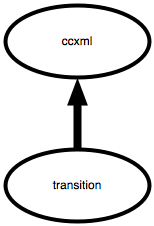
Variables are declared using var element and assigned a
value either at declaration time, or later through the
assign element.
Section 8.2.1.2: Var Attribute Details
| Attribute Name |
Details |
| name |
Indicates the name of the variable.
It should be a valid ECMAScript variable name. |
| expr |
Indicates the new value of the
variable. This is the initial value. It can be any valid ECMAScript
expression. |
Section 8.2.1.3: Assign Attribute Details
| Attribute Name |
Details |
| name |
is an ECMAScript left-hand-side
expression. |
| expr |
Indicates the new value of the
variable. It can be any valid ECMAScript expression. |
Section 8.2.2: <script>
Section 8.2.2.1: Overview
The <script> element encloses computations written in the
ECMAScript Compact Profile (ECMA-327) scripting language. For
example, this <script> element defines a function that
computes the greatest common factor of two integers:
<script>
<![CDATA[
function gcd(a, b)
{
 var t;
 if (a < 1 || b < 1)
   return -1;
 do
  {
   t = a % b;
   a = b;
   b = t;
  }
 while (b > 1);
 return (b == 0) ? a : b;
}
]]>
</script>
A <script> element may occur in a <ccxml> element
and in executable content. <transition> elements and
<if> elements contain executable content. Script elements in
a <ccxml> element are evaluated just after the document is
loaded, along with the <var> and <assign> elements, in
document order. Script elements in a <transition> element are
evaluated as they are encountered. A <script> element in an
<if> element is executed like other executable elements, as
it is encountered.
A <script> element can declare variables with the
ECMAScript var statement. Variables declared in this manner
are in the scope of the closest containing scope element. They are
known from the point of declaration to the end of the containing
scope. The variables may be referenced with or without the
qualification of their scope object. If a variable is declared more
than once, declarations subsequent to the first are considered to
be assignments of the initializer value to the variable. The
default initializer is the ECMAScript value undefined
Section 8.2.2.2: script Attribute Details
Attribute Name
|
Details
|
src
|
a URI-valued ECMAScript expression which references a resource
which is the script content, and which will be resolved when the
CCXML document is compiled; if this attribute is not present, the
script element's CDATA provides the script content. If both are
present this will cause a semantic error. |
Section 9: Event Handling
This section contains information on the <eventhandler>,
<send>, <transition> and <move> elements.
Section 9.1: Event Concepts
Event Handling is one of the most powerful features of CCXML,
and one way in which it is markedly different from VoiceXML. CCXML
events have little to do with VoiceXML's events, such as nomatch or
filled. VoiceXML events only occur within well-defined contexts,
and are generated by the task at hand; it's impossible to receive a
recognition-related event except within a field inside a
form. CCXML events, however, can be delivered at any time
and from a variety of sources. This flexible event-handling
mechanism is essential for many telephony applications.
Every CCXML session can receive events. These might be in
response to a previous action by the CCXML session (e.g., an
outbound-call request, which generates an event to indicate when
the call goes off-hook), or on the initiative of some external
source (e.g., an incoming call to be answered). Events can be
generated by the telephony system (as in the two previous
examples), other CCXML session (which emits events via the
send element), or the CCXML recipient-interpreter (by
sending an event to itself). There is a core set of
telephony-related events (derived from the JCC event model for
connection objects. See
JSR021 at java.sun.com for more information) that a browser
must generate. Implementers are otherwise free to define and
generate any platform-specific events they like. In addition,
users/programmers may use the send element to send arbitrary events
to external destinations, or may send arbitrary events to CCXML
scripts from internal or external sources and may specify
transition handlers to handle these events.
Each running CCXML interpreter has a queue, into which it places
incoming events, and sorts them by arrival time along with
any specified delay that has been requested. A CCXML
programmer can only gain access to these queued events by using an
eventhandler .
eventhandler elements are interpreted by an implicit
Event Handler Interpretation Algorithm (EHIA). The EHIA's main loop
removes the first event from the CCXML session's event queue, and
then selects from the set of transition elements contained
in the eventhandler . A transition element always
indicates a set of accepted event types, and may indicate a further
ECMAScript conditional expression to be evaluated. The
transition element that accepts the type for the
just-removed event, has a satisfied conditional expression (or none
at all), and appears first in the eventhandler by document
order, is the selected transition .
Once selected, the elements inside a transition element
are executed in document order. At most, one transition will
be chosen. If no transition elements meet all the criteria,
none are selected and the event is simply dropped; the EHIA loop
then starts over again, removing the event at the head of the
queue. Any events that arrive while an event is already being
processed are just placed on the queue for later. If the event
queue is empty, and the EHIA wants to process an event, execution
pauses until an event arrives.
Code inside an eventhandler should run "instantaneously",
without blocking execution. This will allow events to be rapidly
processed.
The only way for CCXML execution to leave an eventhandler is via
an explicit goto inside a transition .
An eventhandler may also declare a state variable. An
eventhandler 's state variable is used just as any other
variable, but with a scope limited to the eventhandler and its
elements. The eventhandler can be considered, and programmed
as, a finite-state-automaton, with the state variable indicating
the automaton's current state or node, and the transition
elements, driven by incoming events, moving the machine to a new
state and creating side effects along the way. We expect, but CCXML
does not require, that each transition will contain an
assignment to the state variable to drive the automaton to its next
state.
Section 9.2: elements
Section 9.2.1: <eventhandler>
The <eventhandler> element acts a container for the
<transition> elements. A valid CCXML document MUST only have
a single <eventhandler> element.
Section 9.2.1.1: eventhandler Attribute
Details
| Attribute Name |
Details |
| statevariable |
is a CCXML variable name which is
the name of the <eventhandler> 's state variable. |
Eventhandler elements can contain only transition elements.
Section 9.2.2: <transition>
The content of a transition element specifies the actions to
be taken when it is selected. The transition elements are examined
by the EHIA in document order.
In order to be selected, a transition must satisfy three criteria:
- the statevariable specified by the parent eventhandler must be
currently set to one of the values listed in the transition's state
attribute, if that attribute is present
- the expression specified by the transition's cond attribute
must evaluate to true, if that attribute is present
- the current event's name property must match the pattern
specified by the transition's event attribute, if that attribute is
present
A transition with none of the attributes, state, cond, or event,
will always be selected when encountered by the EHIA.
Section 9.2.2.1: transition Attribute
Details
| Attribute Name |
Details |
| state |
Indicates the current possible
state(s) of the eventhandler. More than one state name may be
specified, separated by blanks. |
| event |
Is a pattern that indicates a
matching event type. Event types are dot-separated strings of
arbitrary length. The character * is a wildcard, and will match
zero or more characters of the processed-event's type name. If the
pattern is delimited by the character '/', it is taken as an
ECMAScript regular expression literal. |
| cond |
An ECMAScript expression that
evaluates to true or false. If this attribute is present, it must
evaluate to true for the transition to be selected. The
default value is true. |
| name |
is an ECMAScript left-hand-side
expression that is set to the received event object |
Section 9.2.2.2: transition Event Matching
The event attribute of a <transition> specifies a pattern
used to match event names. If the state matches the current state
and the cond attribute expression is true, the transition will be
selected if the event pattern matches the event name. Event names
are case-insensitive.
- If the pattern is an ECMAScript regular expression literal, the
regular expression is applied to the event name.
- Otherwise, all characters in the pattern must match exactly,
except for '*' (asterisk), which is taken as a wildcard
character
-
- '*' preceding a '.' (dot) matches all non-dot characters up to
the dot
- '*' as the final pattern character matches all characters to
the end
- a pattern with '*' in any other context is not valid.
Pattern match examples
Pattern
|
Matches |
*
|
any event name
|
error.*
|
error.fetch,
error.dialog.notstarted
|
error.*.*
|
error.dialog.wrongstate |
err*
|
any event name starting with
"err" |
/^.*\.dialog\..*$/
|
any event containing the substring
".dialog." |
Section 9.2.3: <send>
Section 9.2.3.1: Overview
It's now clear how CCXML can receive, process, and respond to
external events. But it's not obvious how CCXML can generate those
events directly. For that, we need the send element. When the
interpreter encounters a send , it will generate and deliver
an event of the specified type to an indicated CCXML session. The
set of addressable CCXML session is up to the browser implementer,
but at least all CCXML session running within the same browser must
be able to send events to each other.
Successful execution of the send element implies the
event has been delivered to the event queue of the target CCXML
session, however, the event will not be processed by the receiving
session's eventhandler until any specified delay has elapsed. In
the case of an event sent with a delay, the sending CCXML session
need not continue executing after processing the send event,
it is the responsibility of the receiving session to maintain the
event on its queue until the delay has elapsed.
Section 9.2.3.2: send Attribute Details
| Attribute Name |
Details |
| event |
is an ECMAScript expression
returning a string that indicates the type of event being
generated. The event type may include alphanumeric characters and
the "." (dot) character. The first character may not be a dot or a
digit. Event type names are case-insensitive. |
| target |
is an ECMAScript expression
returning a handle for the target CCXML session. This should be a
globally-unique identifier, in a still-to-be-specified URI format.
It is valid for a CCXML session to send an event to itself. |
| name |
is an ECMAScript left-hand-side
expression that is the target for the event identifier. The unique
identifier for the generated event is written to the target. If not
present, the event's identifier is dropped. |
| delay |
is an ECMAScript expression
returning a string in CSS2 format interpreted as a time interval.
The send element will return immediately, but the event not
dispatched until the delay interval elapses. Timers are useful for
a wide variety of programming tasks, and can be implemented using
this attribute. |
| namelist |
A list of zero or more CCXML
unqualified variables which will be set as properties of the
event. |
Section 9.2.4: <move>
Section 9.2.4.1: Overview
The <move> element is used to move an event
source (such as a Connection object) to an executing CCXML session.
When an event source is moved to a session, events originating from
that source will be delivered to that session's currently executing
CCXML document. You MUST specify the "event" OR the
"source" attribute. If you do not specify one or if
you specify both a "error.ccxml" event will be
thrown.
Section 9.2.4.2: <move>
Attribute Details
| Attribute Name |
Details |
| source |
an ECMAScript expression which
returns a connection ID or a conference ID; The event source
associated with this identifier will be moved to the target
session. This attribute is optional, but can not be used in
conjunction with the event attribute. If used in conjunction with
the event attribute a "error.ccxml" event will be thrown. |
| event |
an ECMAScript expression which returns an event
object; The event source from which the event object originated, if
any, will be moved to the target session. The event will also be
sent to the target session to provide a notification. This
attribute is optional, but can not be used in conjunction with the
source attribute. If used in conjunction with the source attribute
a "error.ccxml" event will be thrown. |
| sessionid |
an ECMAScript string expression that identifies
the session to which the endpoint will be added; |
Section 9.3: Event Transmission
Many useful applications are only possible when events can be
passed to an arbitrary CCXML session, regardless of browser. For
example, a user could be notified about a failed remote print job,
or transferred to a now-available remote operator. Both scenarios
involve events generated from a remote location and delivered over
a network to a CCXML session. CCXML browsers must be able to
dispatch such events correctly.
The protocol for communicating these events is now undetermined,
but will eventually be specified so we can guarantee
interoperability between CCXML. (HTTP and SIP are two options for
network protocol.) Encoding options include SOAP and Xforms.
Whatever we decide, the protocol we choose must allow for the
following:
- Arbitrary string passing
- Encrypted and authenticated transmission
- Reliable transport
- Easy network operation
Section 9.4: Standard Events
CCXML can generate arbitrarily-named events. While any event
name is possible, there is a small set of well-known events that
are generated as a matter of course, and which any telephone
application should handle. There are two kinds of these events:
telephony events, which abstract interaction with the phone
network, and language events.
The first, and larger set, is present so CCXML can keep abreast
of what's happening with the telephone network. CCXML is designed
to be neutral with respect to the telephony layer, so the event set
we choose must be very generic and capable of describing the
behavior of a wide variety of systems (e.g., Q931, SS7, VoIP,
etc).
We've focused on relatively simple types of call control, and we
have tried to make the call control model in CCXML sufficiently
abstract so that it can be implemented using all major telephony
definitions such as JAIN Call Control (JCC), ECMA CSTA, and
S.100.
We've chosen an event model for connections based on JCC (JSR
021). It abstracts away many of the differences between the
networks mentioned above. There may be better models than JCC, but
it fits the bill for what we need at the moment: a small and
easily-understood call model so we can write concrete sample
programs.
JCC was designed to be a cross-platform high-level event set to
describe as generic a phone model as possible. The JCC call model
consists of Addresses, Calls, Connections, and Providers. In the
context of CCXML, we felt that the Address, Call, and Provider
objects would add more complexity than value, so we omitted them as
explicitly visible objects and focused on the behavior of
Connections.
The CCXML call model therefore is based on the behavior of
Connections. A call is received or initiated under control of a
CCXML session through properties of a Connection.
In CCXML, a Connection is an object modeling a resource by which
two independent unidirectional media streams, and optionally any
associated network signaling traffic, can be controlled by a CCXML
session. This corresponds roughly to a "call leg" as the term is
used informally. <dialogstart> implicitly
creates a Connection and bridges it to the Connection or Conference
specified as an attribute of the <dialogstart>
element. The behavior of Connections and bridges is discussed in
Section 10.
Note that the JCC model is designed for endpoint devices only.
Here is a fast description of the events. The descriptions and
names are borrowed directly from the JavaSoft documentation.
Section 9.4.1: Connection Class
The state of a Connection object reflects events occurring at
the telephony source it represents and actions taken by the CCXML
document. The following state diagram shows the major aspects of
Connection behavior, but omits some detail in favor of clarity.
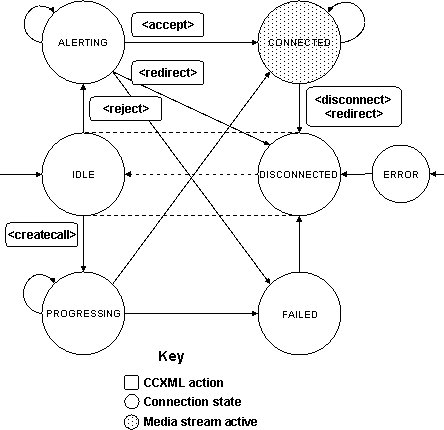
The list of valid states that a connection can be in is:
IDLEALERTINGPROGRESSINGCONNECTEDFAILEDDISCONNECTED
Connections begin in the IDLE state and return to
it when all other actions have been completed. The state diagram
shows a DISCONNECTED state with a dotted line
transition to IDLE. These states are essentially
equivalent, IDLE/DISCONNECTED, and the dotted line
transition occurs without the Connection emitting an event.
Platforms may choose to implement one or both of these states.
- Transitions from
IDLE/DISCONNECTED
connection.ALERTING event: the CCXML document is
being notified of an incoming call; Connection transitions to
ALERTING<createcall> issued by the CCXML document;
the Connection will emit a connection.PROGRESSING
event and transition to PROGRESSING
- Transitions from
ALERTING
<accept> issued by the CCXML document will
connect the call; the Connection will emit a
connection.CONNECTED event and transition to
CONNECTED<reject> issued by the CCXML document will
reject the call; the Connection will emit a
connection.FAILED event and transition to
FAILED<redirect> issued by the CCXML document will
redirect the incoming call to another destination; the Connection
will emit a connection.REDIRECTED event and transition
to IDLE DISCONNECTED
- a failure will result in a
connection.FAILED
event, and the Connection will transition to FAILED;
the failure can occur before or after execution of CCXML
elements
connection.ALERTING event if the network provides
call progress indications
- Transitions from
PROGRESSING
connection.CONNECTED event when the call is
answered by the destinationconnection.FAILED event when the call attempt is
abandoned, which may indicate a busy, a no-answer, or other failure
situationconnection.PROGRESSING event if the network
provides call progress indications
- Transitions from
CONNECTED
connection.DISCONNECTED event when the disconnect
originates in the network; this requires not further action by the
CCXML document;<redirect> issued by the CCXML document will
redirect the call to another destination; the Connection will emit
a connection.REDIRECTED event and transition to
IDLE/DISCONNECTED<disconnect> issued by the CCXML document;
the Connection will emit a connection.DISCONNECTED
when the disconnect is completed.connection.SIGNAL is emitted when additional
Connection related information is available for processing by the
CCXML application. The Connection remains in the
CONNECTED state.
- Transitions from
FAILED
- the transition to
IDLE DISCONNECTED will occur
automatically after a short period of time, with no event emitted
by the Connection, once the platform recovers from the failure
- Transitions from
DISCONNECTED
- Once a Connection enters
DISCONNECTED, it
transitions immediately to IDLE without further events
being generated and without needing further action by the CCXML
document
If a platform operational error occurs, the Connection will emit
a connection.ERROR event, and transition to the
ERROR state. A Connection will remain in the
ERROR state until the error is corrected, and may then
spontaneously transition to IDLE/DISCONNECTED. It will
not transition to any other state from ERROR. The
PROGRESSING and ALERTING states have
reflexive transitions. This is intended to model protocols which
have additional states at these points, and which may exchange
messages such as PROCEEDING, ALERTING,
FACILITY, or NOTIFY. Platforms may choose
to implement addtional states which may be reflected in the
substate property of the Connection object. Additional
messages can be implemented with the CCXML
<send> element.
Section 9.4.1.1: Connection
Class Properties
An instance of the Connection class is associated with each
telephony event source. Each instance is uniquely identified by its
connection identifier. All Connection instances have a set of
properties in common, shown in the following table. Properties
marked with * only appear on an instance of the Connection class if
they have a value. Other properties will always be present.
Properties marked with + have been equated with those available in
VoiceXML 2.0. In some cases, property names are slightly different
in order to present the properties at a single level.
| Connection Properties |
Definitions |
| id |
this property is the ECMAScript
string value of the Connection identifier, which uniquely
identifies each instance of the Connection class |
state
|
this property identifies the current
state of the Connection instance; the value of the state is a
symbolic constant that is the name of the state
|
substate*
|
this property is a
protocol-dependent property which allows further refinement of the
state of a Connection, if desired
|
dialog*
|
this property is the identifier of
an associated dialog, if there is one currently using the
connection
|
local*+
|
this property is a URI which
addresses the interpreter platform; for an incoming call, this is
the called URI; for a redirected incoming call, this is also the
most recent redirection, and the prior values are contained in the
"redirect" property; for an outgoing call, this is the calling
URI;
|
remote*+
|
this property is a URI which
addresses the remote device; for an incoming call, this is the
calling URI; for a redirected incoming call, this is the requestor
of the most recent redirection, and prior values are contained in
the "redirect" property; for an outgoing call, this is the called
URI;
|
protocol*+
|
this property is a reference to an
object defining protocol information for the protocol used on this
connection; the referenced object defines information which applies
to all connections using this protocol, and it has at least two
properties:
- name - the name of the connection protocol; the name may also
be a property on the connection instance referencing protocol
specific information; if no further protocol specific information
is available, then
Connection[Connection.protocol.name] is undefined;
(see Appendix F for a suggested set of protocol names)
- version - the version of the connection protocol
For example, the assignment of
protocol-dependent user-to-user information to a variable
tmp from a Connection instance referenced by the
variable cx would be:
<assign name="tmp"
expr="cx[cx.protocol.name].uui"/>
|
redirect*+
|
this property is an array
representing the connection redirection paths; the first element,
Connection.redirect[0], is the original number, and
the last element is the most recent redirected number; each element
of the array may define any of the following four properties:
- uri - this element's path
- pi - presentation information
- si - screening information
- reason - for example, "unknown", "user busy", "no reply",
"deflection during alerting", "deflection immediate response",
"mobile subscriber not reachable"
|
aai*+
|
this property is the
application-to-application information passed during connection
setup
|
originator*+
|
this property is set to either
"local" or "remote" and indicates the originator of the connection;
for an incoming call, this property is set to "remote"; for an
outgoing call, it is set to "local";
For example, the assignment of the originating URI to a variable
uri from a Connection instance referenced by the
variable cx would be:
<assign name="uri"
expr="cx[cx.originator]"/>
|
Platforms may choose to add properties to Connection instances.
By convention, the properties should begin with an underscore, "_",
to identify them as platform-dependent.
Section 9.4.2: Connection Events
Section 9.4.2.1: connection.* Events
CCXML applications are notified of Connection activities by
events, which often reflect Connection state changes. Applications
may also take actions which change the state of a Connection and
which cause other events to be generated.
All Connection events have a set of properties in common, shown
in the following table. Fields marked with an asterisk only appear
on the event object if they have a value. Other fields will always
be present.
| Common Field Names |
Definitions |
| name |
this property is set to the
ECMAScript string value of the event name
|
| connid |
this property is the ECMAScript
string value of the ID of the Connection object associated with
this event |
protocol*
|
this property is an ECMAScript
string which identifies the protocol used by the event source;
although this property is optional, it is recommended that
platforms provide it in order to allow applications to tailor their
behavior (see Appendix F for a suggested set of protocol
identifiers)
|
info*
|
this property provides a reference
to an object which may contain platform or protocol dependent
information specific to the event
|
| reason* |
this property, although not provided
by every event, when present provides a code indicating the status
of the operation which triggered this event, or a reason for the
occurrence of this event |
| connection |
an ECMAScript object reference to
the Connection object identified by the connid property for this
event |
Platforms may choose to add properties to events. By convention,
the properties should begin with an underscore, "_", to identify
them as platform-dependent.
Platforms must provide a global method to convert symbolic
connection identifiers, connid's, to object references. This
method, connidReference(connid), takes a connection
identifier as its only parameter and returns the object reference
of the Connection object corresponding to the passed identifier, or
null if the identifier does not refer to an instance
of the Connection class. The connection property in the above table
may be considered to be the result of calling this method with the
connid property as its argument.
Section 9.4.2.2: connection.ALERTING
This event is emitted when a Connection transitions to the
ALERTING state, or is notified of call progress in the
ALERTING state.
The fields of this event are:
| Field Name |
Details |
| name |
"connection.ALERTING"
|
| connid |
The ID of the Connection associated
with this event |
protocol*
|
The platform protocol ID of the
Connection protocol
|
info*
|
An object which provides additional
platform or protocol dependent information
|
| connection |
an ECMAScript object reference to
the Connection object identified by the connid property for this
event |
Information provided by the protocol prior to connection is
accumulated and stored with the identified Connection object. This
information will be available when the ALERTING event
is delivered to the application.
Any further information provided by the protocol prior to
connection will be provided in subsequent ALERTING
events, and made available in the updated Connection object. Call
related information provided after connection will result in
connection.SIGNAL events.
Section 9.4.2.3: connection.PROGRESSING
This event is emitted when a Connection transitions to the
PROGRESSING state as a result of <createcall>,
or is notified of call progress in the PROGRESSING
state.
The fields of this event are:
| Field Name |
Details |
| name |
"connection.PROGRESSING"
|
| connid |
The ID of the Connection associated
with this event |
protocol*
|
The platform protocol ID of the
Connection protocol
|
info*
|
An object which provides additional
platform or protocol dependent information
|
| connection |
an ECMAScript object reference to
the Connection object identified by the connid property for this
event |
Section 9.4.2.4: connection.CONNECTED
This event is emitted when a Connection transitions to the
CONNECTED state as a result of <accept>.
The fields of this event are:
| Field Name |
Details |
| name |
"connection.CONNECTED"
|
| connid |
The ID of the Connection associated
with this event |
protocol*
|
The platform protocol ID of the
Connection protocol
|
info*
|
An object which provides additional
platform or protocol dependent information
|
| connection |
an ECMAScript object reference to
the Connection object identified by the connid property for this
event |
Section 9.4.2.5: connection.DISCONNECTED
This event is emitted when a Connection transitions to the
DISCONNECTED state, as a result of either CCXML action
or off-platform events.
The fields of this event are:
| Field Name |
Details |
| name |
"connection.DISCONNECTED"
|
| connid |
The ID of the Connection associated
with this event |
protocol*
|
The platform protocol ID of the
Connection protocol
|
reason*
|
A disconnection reason
code
|
info*
|
An object which provides additional
platform or protocol dependent information
|
| connection |
an ECMAScript object reference to
the Connection object identified by the connid property for this
event |
Section 9.4.2.6: connection.REDIRECTED
This event is emitted when a Connection transitions to the
DISCONNECTED state as a result of
<redirect>.
The fields of this event are:
| Field Name |
Details |
| name |
"connection.REDIRECTED"
|
| connid |
The ID of the Connection associated
with this event |
protocol*
|
The platform protocol ID of the
Connection protocol
|
| reason* |
A redirect result code. |
info*
|
An object which provides additional
platform or protocol dependent information
|
| connection |
an ECMAScript object reference to
the Connection object identified by the connid property for this
event |
Section 9.4.2.7: connection.FAILED
This event is emitted when a Connection transitions to the
FAILED state, when an incoming or outgoing call fails
to complete its connection.
The fields of this event are:
| Field Name |
Details |
| name |
"connection.FAILED"
|
| connid |
The ID of the Connection associated
with this event |
protocol*
|
The platform protocol ID of the
Connection protocol
|
| reason* |
A failure reason code |
info*
|
An object which provides additional
platform or protocol dependent information
|
| connection |
an ECMAScript object reference to
the Connection object identified by the connid property for this
event |
Section 9.4.2.8: connection.ERROR
This event is emitted when a Connection transitions to the
ERROR state.
The fields of this event are:
| Field Name |
Details |
| name |
"connection.ERROR"
|
| connid |
The ID of the Connection associated
with this event |
protocol*
|
The platform protocol ID of the
Connection protocol
|
| reason* |
An error code if one is
available |
info*
|
An object which provides additional
platform or protocol dependent information
|
| connection |
an ECMAScript object reference to
the Connection object identified by the connid property for this
event |
Section 9.4.2.9: connection.SIGNAL
This event is emitted when a Connection is notified of new data
available when in the CONNECTED state. The fields of
this event are:
| Field Name |
Details |
| name |
"connection.SIGNAL" |
| connid |
The ID of the Connection associated
with this event |
| protocol* |
The platform protocol ID of the
Connection protocol |
| info* |
An object which provides additional
platform or protocol dependent information |
Examples where connection.SIGNAL could be generated
include:
- DTMF received on the media stream after connection, perhaps
identifying call setup information such as DNIS;
- Messaging received by the protocol after connection, such as
that delivered by SIP INFO or ISDN FACILITY messages;
- Call analysis results indicating the results of answering
machine, FAX, or modem detection attempt.
The data provided within the connection.SIGNAL
event is protocol dependent. This data may be used to initiate a
dialog (for example, if all required information is now available),
or to message other platform components.
Signalling delivered on the media stream after a successful
<dialogstart> may not be available to the CCXML
application. This behavior is platform dependent.
All available call setup information is provided in the
Connection object when the first connection.ALERTING
event is generated. Any further information provided by the
protocol prior to connection will be provided in subsequent
ALERTING events, and made available in the updated
Connection object. Call related information provided after
connection will result in connection.SIGNAL
events.
The Connection Object may be updated with new or changed
information as the result of a connection.SIGNAL
event.
Section 9.4.3: Standard Events
The second, smaller set, is only for language purposes. Of
these, there are a) events sent from dialogs, and b) events sent
from the CCXML interpreter. The standard events are described
here.
ccxml.loaded indicates that the script has just
been completely loaded by the interpreter. This is a convenient
time to perform script start-up processing.ccxml.fetch.done indicates that a CCXML
fetch operation has completed.ccxml.joined indicates that a join
operation has succeeded.ccxml.authenticated indicates that a
<authenticate> operation has succeeded.
For dialog related events please see
section 7.3 on dialog events.
Section 9.5: Error Events
Section 9.5.1: error.* Events
CCXML uses its event handling mechanism to notify a CCXML
document of errors that occur during execution. An error
notification takes the form of an error event that is added to the
event queue of the CCXML document where the error occured. All
error events are named with the prefix "error.*" so
that a properly defined <transition> can filter
out error events.
Here is an example of a <transition> that can
be used to filter out and report error events:
    <transition event="error.*" name="evt">
      <log expr="'an error has occured (' + evt.error+ ')'" />
      <exit/>
    </transition>
All error events have a set of properties in common, shown in
the following table:
| Common Field Name |
Definitions |
| name |
this property is set to the
ECMAScript string value of the event name |
| error |
this property is set to the
ECMAScript string value of the printable error message associated
with this error |
Section 9.5.1.1: error.ccxml --
CCXML Semantic Error Event
This error event is created when there is a semantic error in a
CCXML element (ie. passing an incorrect value for an attribute,
etc.).
The fields of this event are:
| Field Name |
Details |
| name |
error.ccxml |
| error |
this property is set to the
ECMAScript string value of the printable error message associated
with this error |
| tagname |
this property is set to the
ECMAScript string value of the name of the element that produced
the error (ie accept, reject, etc.) |
| attributelist* |
if available in the interpreter,
this property is an object whose properties are the names of the
attributes of the element in error; the value of each attribute
property is the corresponding string value of the attribute |
Section 9.5.2: Error Handling
In general, when an error occurs in a CCXML document, the
corresponding error event is added to the front of the CCXML
document's event queue. This causes the CCXML document to process
the error event immediately after the current event.
A CCXML interpreter MAY provide the attributelist property on the
error.ccxml event. The attributelist object MAY have just the
attribute and value in error, or MAY provide all the attributes and
values.
Due to the nature of CCXML's event handling mechanism, some
error scenarios must be treated differently. These scenarios are
described below.
Section 9.5.2.1: Document Initialization
Erorrs
Errors that occur during documentation initialization (elements
that occur in the CCXML document before the
<eventhandler> element) occur outside of CCXML's
event handling mechanism. These errors should cause the CCXML
thread of execution to terminate and notify the platform of the
document error.
Section 9.5.2.2: Error In
<eventhandler> Tag
The <eventhandler> element contains the
transition elements that comprise CCXML's event handling mechanism.
Since errors in <eventhandler> attribute
evaluation could keep the EHIA from correctly processing an event,
these errors should cause the CCXML thread of execution to
terminate and notify the platform of the document error.
Section 9.5.2.3: Error in <transition>
Tag
The <transition> tag attributes specify when
the elements contained by the <transition>
element should be executed. Since errors in
<transition> attribute evaluation could keep the
<transition> from correctly handling the error
event, these errors should cause the CCXML thread of execution to
terminate and notify the platform of the document error.
Section 9.5.2.4: Errors While Handling Error
Events
An error that occurs during the handling of an error event would
result in another error event, which could lead to an infinite loop
of error handling. If an error occurs during the handling of an
error event, the CCXML thread of execution should terminate and
notify the platform of the document errors.
Section 10: Telephony Operations and
Resources
This section contains information on the <accept>,
<createcall>, <createconference>,
<destroyconference>, <disconnect>, <join>,
<redirect>, <reject>, and <unjoin>
elements.
The primary goal of CCXML is to provide call control throughout
the duration of a call. Call control includes handling incoming
calls, placing outgoing calls, bridging (or conferencing) multiple
call legs, and ultimately disconnecting calls.
In CCXML, a Connection is an object modeling a resource by which
two independent unidirectional media streams, and optionally any
associated network signaling traffic, can be controlled by a CCXML
session. This corresponds roughly to a "call leg" as the term is
used informally.
The CCXML call model is based on the behavior of Connections. A
network call is received or initiated under control of a CCXML
session through properties of a Connection.
<dialogstart> implicitly creates a Connection and bridges
it to another Connection or to a Conference specified as an
attribute of the <dialogstart> element. In other words, to
facilitate interaction between a network party and a dialog, two
connections are required: one connection is associated with the
network call, and the other connection is associated with the
dialog.
Each Connection has one input by which it receives a media
stream from another Connection or Conference.
Each Connection has one output media stream that can be directed
to the inputs of multiple Connections and/or Conferences.
If a network call is active on a Connection, the media stream
received from the network is the Connection output, and the
Connection input media stream is transmitted to the network.
For a Connection created by <dialogstart>, the Connection
input media stream is available to a recognizer under control of
the CCXML session, and the Connection output media stream can be
sourced from a resource (such as a TTS engine) under control of the
CCXML session.
A "bridge" is a relationship between the input and/or output
streams of connections or conferences. This is discussed in greater
detail in Section 10.4.
Section 10.1: Incoming Calls
Section 10.1.1: Overview
One of the events a CCXML document can receive is a call setup
indication. A CCXML session interested in handling incoming calls
will have an eventhandler transition block for execution. The
transition block will either accept, reject, or redirect the
incoming call using the <accept>, <reject> or
<redirect> CCXML elements. The underlying platform will
signal the telephony system appropriately, depending on the
element. Once the call is accepted, the CCXML document may initiate
interactive dialog sessions with the incoming caller, or perform
other telephony operations (e.g., place outgoing calls, join calls,
etc).
Section 10.1.2: <accept>
Section 10.1.2.1: Overview
The <accept> element will accept and connect an
incoming phone call.
Section 10.1.2.2: accept Attribute Details
| Attribute Name |
Details |
| conid |
is an ECMAScript expression which
returns a string that is the identifier of a Connection on which an
incoming call is being signaled. The conid attribute is optional;
if omitted, the interpreter will accept using the id indicated in
the current event being processed. An accepted incoming call will
result in the generation of a connection.CONNECTION_CONNECTED
event. |
Section 10.1.3: <redirect>
Section 10.1.3.1: Overview
The <redirect> element will redirect an incoming
phone call.
Section 10.1.3.2: redirect Attribute
Details
| Attribute Name |
Details |
| conid |
is an ECMAScript expression which
returns a string that is the identifier of a Connection on which a
call is active or on which an incoming call is being signaled. This
call will be redirected. The conid attribute is optional; if
omitted, the interpreter will redirect using the id indicated in
the current event being processed |
| dest |
is an ECMAScript expression which
returns a string that is the target of the outbound telephone call.
A platform MUST support a telephone URI, as described in
http://www.ietf.org/rfc/rfc2806.txt
and MAY support a SIP URI as described in
http://www.ietf.org/rfc/rfc2543.txt |
| reason |
is an ECMAScript expression which
returns a string that is the reason the call is being
redirected |
Section 10.1.4: <reject>
Section 10.1.4.1: Overview
The <reject> element will reject an incoming phone
call.
Section 10.1.4.2: reject Attribute Details
| Attribute Name |
Details |
| conid |
is an ECMAScript expression which
returns a string that is the identifier of a Connection on which an
incoming call is being signaled. This call will be rejected. The
conid attribute is optional; if omitted, the interpreter will
reject using the id indicated in the current event being
processed |
| reason |
is an ECMAScript expression which
returns a string that is the reason the call is being rejected |
Section 10.1.5: <hold>
Section 10.1.5.1: hold Overview
The <hold> element puts an identified Connection
"on hold", suspending normal media operations on the connection.
The identified Connection object is dissociated from its media
stream, but is otherwise unaffected. A suspended connection can
still receive connection events, such as DISCONNECT. If an optional
alternate media stream is specified, the caller will hear it while
suspended.
Section 10.1.5.2: hold Attribute Details
| Attribute Name |
Details |
| connid |
is an ECMAScript expression which
returns the identifier of a Connection or Conference to be
held |
alt
|
is an ECMAScript expression which
returns the identifier of a Connection.If this attribute is
specified, it references an alternate Connection and its media
stream to be joined to connid while it is suspended. The caller on
the suspended connid connection will hear the alternate media
stream. If alt is not specified, the alternate media stream is not
available, and the caller on connid will hear silence. |
newconn
|
is an ECMAScript left-hand-side
expression that receives a Connection identifier that represents
the platform resource previously in use by connid; this new
identifier is not equal to connid; this attribute is optional; if
it is specified and the platform does not provide another resource,
the expression will be set to undefined;
|
The <hold> element suspends a Connection, placing
it "on hold". The identified Connection object is dissociated from
its media stream, but is otherwise unaffected. It continues to be
identified by the connid value. The expression which is the
value of newconn receives another Connection identifier,
representing a Connection in the DISCONNECTED state, which can be
used for subsequent operations. The suspended call is restored when
it is the target of a <join> operation. A suspended call can
still receive connection events, such as DISCONNECT. An optional
alternate media stream can be specified with the alt
attribute, and the caller will hear this stream while suspended. A
platform MAY implement the alternate capability, and SHOULD ignore
the alt attribute otherwise.
The <hold> element will normally be used to
implement what some platforms call a "hookflash transfer", shown in
the following sample code. Note that the code is represented
synchronously, but would likely be distributed among several
<transition> elements in an actual CCXML document:
<hold connid="currentCall" newconn="newID"
 alt="altStream"/>
<if cond="newID != undefined">
  <createcall use="newID" dest="'tel:+631-285-2583'"/>
  <join id1="newID" id2="currentCall"/>
</if>
The execution of the <hold> element suspends the
connection identified by the variable currentCall, and
joins it to altStream. The variable newID
will be set to a new Connection identifier which can be used to
place an outgoing call. It will be set to undefined if
no platform resource was made available by the <hold>
operation. Subsequently, the <createcall> element calls out
on the indicated Connection. If it is successful, the two call legs
are joined.
Section 10.2: Outgoing Calls
Section 10.2.1: <createcall>
Section 10.2.1.1: Overview
A CCXML document can attempt to place an outgoing call with the
createcall element. This element will instruct the platform
to allocate a Connection and attempt to place an outgoing call to a
specified address. The element is non-blocking, and the CCXML
document is immediately free to perform other tasks, such as
initiating dialog interaction with another caller. The CCXML
interpreter will receive an asynchronous event when the call
attempt is completed. An event handler transition block can handle
this event and perform further call control, such as conferencing.
If the call was successfully placed, the transition block can also
initiate a dialog interaction with the called party.
Section 10.2.1.2: createcall Attribute
Details
| Attribute Name |
Details |
| dest |
is an ECMAScript expression which
returns a string that is the target of the outbound telephone call.
A platform MUST support a telephone URI, as described in
http://www.ietf.org/rfc/rfc2806.txt
and MAY support a SIP URI as described in
http://www.ietf.org/rfc/rfc2543.txt |
| conid |
is an ECMAScript left-hand-side
expression that receives the identifier of the Connection on which
the outgoing call is attempted. |
| aai |
is an optional ECMAScript expression which returns
a string of application-to-application information to be passed to
the destination endpoint when establishing the connection.
Note: Even if an implementation platform accepts the aai
data, certain protocols and network elements may prevent it's
transmission to the target endpoint. If the platform does not
support the transmission of aai data it should raise a
connection.PROGRESSING event and indicate that the use of aai is
not supported. |
| callerid |
is an optional ECMAScript expression which returns
a string defining the caller identity to be used when making the
outbound connection. The format of this information is protocol and
platform specific but might consist of a telephone URI, as
described in
http://www.ietf.org/rfc/rfc2806.txt
or a SIP URI as described in
http://www.ietf.org/rfc/rfc2543.txt.
Note: An implementation platform is not required to use
the specified data and certain protocols and network elements may
prevent it's use. If the platform does not support specification of
callerid it should raise a connection.PROGRESSING event and
indicate that the use of callerid is not supported. |
| hints |
is an optional ECMAScript expression which returns
an object containing information which may be used by the
implementing platform when establishing the outbound connection.
This information may consist of protocol-specific parameters,
protocol selection guidelines, or routing hints.
Note: The meaning of these hints is specific to the
implementing platform. |
| use |
is an ECMAScript expression which
returns a string that is the identifier of the Connection to be
used for the outbound call; this attribute is mutually exclusive
with connid |
| timeout |
is an ECMAScript expression
returning a string in CSS2 format interpreted as a time interval.
The interval begins when the createcall element is executed. The
createcall will fail if not completed by the end of this interval.
A failed createcall will return the connection.FAILED event. |
Section 10.2.1.3: createcall examples
The following example illustrates the simplest use of the
createcall element.
<createcall dest="'tel:1235551234'"/>
This example illustrates the use of several attributes of the
createcall element. A SIP URI is provided as the originators caller
id, a selection of protocol specific parameters are provided
(callingDevice and callCharacteristics) and a string of application
specific data is provided to be presented to the remote endpoint.
The connection id for the new connection is returned in the
variable "myConidVar".
             <var name="myConidVar"/>

             <createcall
                dest="'sip:+1-212-555-1212:1234@gateway.com;'"
                callerid="'sip:j.doe@big.com'"
                conid="myConidVar"
                aai="'This is application specific data'"
                hints="{callingDevice: 'notSpecified',
                   callCharacteristics: 'voiceUnitCall'}" >
             </createcall>
Section 10.3: Conferencing
The CCXML <createconference> element can be used to create
a conferencing object. This object facilitates multi-party
conferences. Once a conference has been created, the CCXML document
can add connections (call legs) to the conference by using the
<join> element. Connections can be removed by using the
<unjoin> element. (The <join> and <unjoin>
elements are described in Section 10.4.). A conference object can
be destroyed using the <destroyconference> CCXML element.
Asynchronous events will be sent to the CCXML document upon
completion of each of these operations.
The conference object models a special resource that mixes audio
streams. Each Conference has one output and multiple inputs. The
output stream of a Conference is derived by mixing all its input
streams. The output of a Conference can be directed to the inputs
of multiple Connections and/or Conferences (as a result of
bridging).
Some telephony call control definitions do not define a separate
conference object, instead defining a conference simply as a call
with more than two parties. In order to accommodate the widest
range of underlying telephony APIs, CCXML requires explicit use of
a conference resource whenever two or more audio streams are
mixed.
NOTE: A simple two-party call does not require the use of a
conference object. This is discussed in Section 10.4.
Section 10.3.1:
<createconference>
Section 10.3.1.1: createconference Attribute
Details
| Attribute Name |
Details |
| id |
is an ECMAScript left-hand-side
expression that receives the conference identifier. A conference
identifier should be globally unique, so that conferences can be
uniquely addressed and possibly connected to. It should be in URI
format. |
Section 10.3.2:
<destroyconference>
Section 10.3.2.1: destroyconference Attribute
Details
| Attribute Name |
Details |
| id |
is an ECMAScript expression which
returns a string that is the identifier for the conference that
should be destroyed. |
Section 10.4: Bridging
A "bridge" is a relationship between the input and/or output
streams of Connections or Conferences. The bridge concept and the
details of its behavior are fundamental to CCXML: every useful
CCXML session involves their use.
Even in the simplest case of a network party interacting with a
dialog, two Connections are required, and a bridge is established
between them implicitly by the action of the <dialogstart>
element.
More complex situations, such as two-party calls, two-party
calls with "hot" word recognition, conference control, and
"coaching" scenarios, all involve the use of multiple Connections
and explicit control of one or more bridges between them by using
the <join> and <unjoin> elements.
The nature of bridges, and the behavior of the <join> and
<unjoin> elements, is concerned with the mapping between the
media stream inputs and outputs of Connections and Conferences:
- Each Connection has one input, and one output. If a network
call is active on a Connection (Connection state = CONNECTED), the
media stream received from the network is the Connection output,
and the Connection input media stream is transmitted to the
network. For a Connection created by <dialogstart>, the
Connection input media stream is available to a recognizer under
control of the CCXML session, and the Connection output media
stream can be sourced from a resource (such as a TTS engine) under
control of the CCXML session.
- Each Conference has one output and multiple inputs. The output
stream of a Conference is derived by mixing all its input
streams.
- The output of a Connection or Conference can be directed to the
inputs of one or more Connections and/or Conferences. This is
sometimes called "splitting" media streams. We assume that all
platforms can support this.
- A Connection or Conference input can come from the output of
only one Connection or Conference. Indeed, it is by reason of this
limitation in most underlying platforms that use the Conference
object must be introduced as a way to mix multiple streams.
The <join> element has a duplex attribute to
distinguish between two-way bridges and one-way bridges. For
example, <join>ing Connection A to Connection B with
duplex=full will direct the A output to the B input,
and the B output to the A input. If instead the same <join>
is done with duplex=half, it will direct the B output
to the A input, and will not have any effect on the B input or the
A output.
A simple two-party call between Connections A and B can thus be
achieved by <join>ing A to B with
duplex=full.
For "hot word" recognition on a two-party call, a two-way (full
duplex) bridge must be established between two network Connections,
and a one-way (half duplex) bridge must be established from one of
the network Connections to a third Connection that is associated
with a dialog. There are several ways this arrangement can be
achieved, depending on the intial states of the three Connections.
For example, if the network party on Connection A is initially
interacting with a dialog on Connection D (i.e., a full duplex
bridge exists between them), all that is needed then is to do a
<join> of Connection A to Connection B (the other network
party) with duplex=full. This example highlights an
important and subtle aspect of the behavior of <join> when
one, or both, of the Connections being joined is already in one or
more established bridges:
If a <join> requires a Connection to "listen" and the
Connection is already listening to a different source, this
existing stream relationship is torn down automatically.
Note that <join> cannot be used to add a Connection to an
existing two-party bridge in order to create a 3-way Conference.
Instead, this functionality can be achieved by first using the
<createconference> element to create a Conference object and
then <join>ing all three Connections to this Conference. If a
two-way bridge exists between A and B, and A is then <join>ed
full duplex to C, the result will be a two-party bridge between A
and C and a one-way bridge from A to B.
As an aid to understanding, the outcomes of all possible
<join> operations are shown diagrammatically below for three
different initial conditions:
- asingle Connection A, that is not currently in a bridge,
represented graphically as: (A)
- two Connections A and B, with a half duplex bridge (A output to
B input), represented graphically as: A -----> B
- two Connections A and B, with a full duplex bridge (A output to
B input & B output to A input), represented graphically as: A
<====> B
For the initial condition in which a single Connection A is not
currently in a bridge, there are four possible <join>s:
| initially |
(A)(B) |
| join A to B half |
A <----- B |
| join A to B full |
A <====> B |
| join B to A half |
A -----> B |
| join B to A full |
A <====> B |
For the initial condition in which a half duplex bridge exists
from Connection A to Connection B (A output to B input), there are
twelve possible <join>s:
| initially |
A -----> B |
| join A to B half |
A <----- B |
| join A to B full |
A <====> B |
| join B to A half |
A -----> B |
| join B to A full |
A <====> B |
| join A to C half |
A -----> B & A <-----
C |
| join A to C full |
A -----> B & A <====>
C |
| join C to A half |
A -----> B & A ----->
C |
| join C to A full |
A -----> B & A <====>
C |
| join B to C half |
(A) & B <----- C |
| join B to C full |
(A) & B <====> C |
| join C to B half |
A -----> B & B ----->
C |
| join C to B full |
(A) & B <====> C |
For the initial condition in which a full duplex bridge exists
between two Connections A and B (A output to B input & B output
to A input), there are twelve possible <join>s:
| initially |
A <====> B |
| join A to B half |
A <----- B |
| join A to B full |
A <====> B |
| join B to A half |
A -----> B |
| join B to A full |
A <====> B |
| join A to C half |
A -----> B & A <-----
C |
| join A to C full |
A -----> B & A <====>
C |
| join C to A half |
A <====> B & A ----->
C |
| join C to A full |
A -----> B & A <====>
C |
| join B to C half |
A <----- B & B <-----
C |
| join B to C full |
A <----- B & B <====>
C |
| join C to B half |
A <====> B & B ----->
C |
| join C to B full |
A <----- B & B <====>
C |
In summary, <join> behavior always respects three
invariants:
- The media stream relationship specified in the <join> is
established between the two Connections/Conferences referenced in
the <join>. In particular, any existing stream relationship
between these two Connections/Conferences is torn down
automatically if it conflicts with the specified relationship.
- If the relationship specified in the <join> requires a
Connection to "listen" and the Connection is already listening to a
different source, this existing stream relationship is torn down
automatically.
- Any existing stream relationship that does not present a
conflict according to invariant #1 or invariant #2 is
preserved.
Asynchronous events will be sent to the CCXML document upon
completion of both the <join> and <unjoin> operations.
Section 10.4.1: <join>
Section 10.4.1.1: join Attribute Details
| Attribute Name |
Details |
| id1 |
is an ECMAScript expression which
returns the identifier of a Connection or Conference. |
| id2 |
is an ECMAScript expression which
returns the identifier of a Connection or Conference. |
| duplex |
an ECMAScript expression which
returns a character string that will be equal to "half" or
"full". Refer to the discussion of bridging in Section 10.4. The
duplex attribute determines whether the <join> will establish
a half-duplex (unidirectional) or full-duplex (bidirectional)
bridge. If the attribute is not supplied, the default is a
full-duplex bridge. If duplex=half is specified, the id1 resource
will be able to "hear" the id2 resource (i.e., id2 output will be
bridged to id1 input), but id2 will not "hear" id1. If duplex=full
is specified, or the duplex attribute is not supplied, the id1
resource will be able to "hear" the id2 resource, and id2 will
"hear" id1. |
Section 10.4.2: <unjoin>
Section 10.4.2.1: unjoin Attribute Details
| Attribute Name |
Details |
| id1 |
is an ECMAScript expression which
returns the identifier of a Connection or Conference. |
| id2 |
is an ECMAScript expression which
returns the identifier of a Connection or Conference. All media
streams between the two specified Connections or Conferences (id1
and id2) will be torn down. |
Section 10.5: Disconnects
Section 10.5.1: <disconnect>
Section 10.5.1.1: Overview
A CCXML document may disconnect a call leg on a Connection by
using the <disconnect> CCXML element. The underlying platform
will sent the appropriate protocol messages to perform the
disconnect, and send an asynchronous event to the CCXML document
when the disconnect operation completes.
A CCXML document may also disconnect a dialog using the
<disconnect> CCXML element. When a dialog is identified in
the disconnect element, the dialog is notified of the disconnect
occurrence. The dialog manager must always accept a disconnect
notification, and does not provide a response.
Section 10.5.1.2: disconnect Attribute
Details
| Attribute Name |
Details |
| conid |
is an ECMAScript expression which
returns a connection identifier that is the id of the call leg that
should be disconnected. The conid attribute is optional; if
omitted, no connection operation will be performed. |
| dialog |
is an ECMAScript expression which
returns a dialog identifier that is the id of the dialog that
should be sent a disconnect notification. The dialog attribute is
optional; if omitted, no dialog disconnect notification will be
sent. |
| reason |
is an optional ECMAScript expression
which returns a string that is the reason the call is being
disconnected |
A disconnected call will result in the generation of a
connection.DISCONNECTED event. A disconnect element must specify a
callid attribute, a dialog attribute, or both.
Section 11: Security
Section 11.1: Overview
In some environments, it may be necessary to authenticate
scripts with the execution platform, and vice-versa.
The first aspect of the trust relationship between the script
and the platform is whether or not the document server (web server)
trusts the platform making the URI request for a CCXML script. This
can be strengthened by (1) requiring the platform to use HTTPS
(SSL-encrypted HTTP) instead of cleartext HTTP to fetch the script;
and (2) by requiring HTTP-style user authentication, i.e., userid
and password.
Section 11.2: <authenticate>
Section 11.2.1: Overview
The second aspect is whether or not the platform trusts the
script. This can be strengthened by requiring scripts to contain an
<authenticate> element which provides information necessary
to validate the script with the platform or an off-board
authentication device such as a RADIUS server, SIP Proxy, or H.323
gatekeeper.
Section 11.2.2: authenticate Attribute
Details
| Attribute Name |
Details |
| server |
is an ECMAScript expression which
returns the id of the server to authenticate with. This may be a
URI, or an IP address and optional port id. |
| userid |
is an ECMAScript expression which
returns the userid that the script will "login" as. |
| password |
is an ECMAScript expression which
returns the password corresponding to the userid above. |
If the authentication is successful, a
ccxml.authenticated event will be generated. If the
authentication is unsuccessful, a ccxml.exit event will be
generated, causing the script to terminate.
Section 12: Examples
Example 1: Calling Card Application: Caller
calls an 800 number and after some interaction with an IVR system
places and outbound call to a friend.
-----------------
calling_card.ccxml

-----------------

<?xml version="1.0" encoding="UTF-8"?>

<!DOCTYPE ccxml PUBLIC '-//W3C/DTD CCXML 1.0//EN'
 'http://www.w3.org/TR/ccxml/ccxml.dtd' >

<ccxml xmlns="http://www.w3.org/2002/09/ccxml"
  xmlns:xsi="http://www.w3.org/2001/XMLSchema-instance"
  xsi:schemaLocation="http://www.w3.org/2002/09/ccxml
   http://www.w3.org/TR/ccxml/ccxml.xsd" version="1.0">

  <!-- Create our ccxml level vars -->
  <var name="in_callid" expr="''" />
  <var name="out_callid" expr="''" />

  <!-- Set our initial state -->
  <assign name="currentstate" expr="'initial'" />

  <eventhandler statevariable="currentstate">
    <!-- Deal with the incoming call -->
    <transition state="initial"
    event="connection.ALERTING" name="evt">
      <assign name="in_callid" expr="evt.callid" />
      <accept callid="in_callid" />
    </transition>

    <transition state="initial" event="connection.CONNECTED"
     name="evt">
      <assign name="currentstate" expr="'in_vxml_session'" />
      <!-- VoiceXML dialog is started on a separate
       thread - see pin.vxml -->
      <dialogstart callid="in_callid" src="'pin.vxml'" />
    </transition>

    <!-- happens when pin.vxml VoiceXML dialog thread exits -->
    <transition state="in_vxml_session" event="dialog.exit" name="evt">
      <createcall dest="evt.values.telnum" name="out_callid" />
      <assign name="currentstate" expr="'calling'" />
    </transition>

    <transition state="calling" event="connection.FAILED" name="evt">
      <!-- tell the caller there was a error -->
      <dialogstart callid="in_callid" src="'error.vxml'" />
      <assign name="currentstate" expr="'oub_failed'" />
    </transition>

    <!-- happens when called party picks up the phone -->
    <transition state="calling" event="connection.CONNECTED"
     name="evt">
      <assign name="out_callid" expr="evt.callid" />
      <!-- tell the callee he is receiving a call -->
      <dialogstart callid="out_callid" src="'callee.vxml'" />
      <assign name="currentstate" expr="'outb_ready_to_join'" />
    </transition>

    <transition state="oub_failed" event="dialog.exit" name="evt">
      <exit />
    </transition>

    <!-- happens when callee's vxml dialog (callee.vxml exits) -->
    <transition state="outb_ready_to_join" event="dialog.exit"
     name="evt">
      <join id1="in_callid" id2="out_callid" />
      <assign name="currentstate" expr="'wtg_for_joined'" />
    </transition>

    <transition state="wtg_for_joined" event="ccxml.joined"
     name="evt">
      <assign name="currentstate" expr="'active'" />
    </transition>

    <!-- Lets clean up the call  -->
    <transition state="active" event="connection.DISCONNECT"
     name="evt">
      <if cond="evt.callid == in_callid">
        <disconnect callid="out_callid"/>
        <exit />
      </if>
      <assign name="currentstate" expr="'in_vxml_session'" />
      <!-- start VoiceXML dialog again to see
        if caller wants to make another call -->
      <dialogstart callid="in_callid" src="'pin.vxml'" />
    </transition>

    <!-- Catch disconnects in unexpected states -->
    <transition event="connection.DISCONNECT">
      <exit />
    </transition>
  </eventhandler>
</ccxml>
----------------------
pin.vxml

-------------------------------
<?xml version="1.0" encoding="UTF-8"?>
<vxml version="2.0">
  <form id="pin">
    <block> Welcome to Acme's Calling Card </block>
    <field name="pin" type="digits">
      <prompt> Please say your PIN number </prompt>
      <filled>
        <if cond="pin.length != 8">
          <clear namelist="pin"/>
        <else/>
          <assign name="application.pin" expr="pin" />
          <submit next="checktime.asp" namelist="pin"/>
        </if>
      </filled>
    </field>
  </form>
</vxml>
-------------------------
error.vxml

--------------------------
<?xml version="1.0" encoding="UTF-8"?>
<vxml version="2.0">
  <form>
    <block>
        Sorry. The Party you are trying to call
        is unavailable.
        <exit/>
    </block>
  </form>
</vxml>
-----------------------
callee.vxml

---------------------------
<?xml version="1.0" encoding="UTF-8"?>
<vxml version="2.0">
  <form>
    <block>You have a call. Connecting</block>
  </form>
</vxml>
----------------vxml doc output by
checktime.asp

---------------
<?xml version="1.0" encoding="UTF-8"?>
<vxml version="2.0">
  <form id="form2">
    <!--.asp consults back-end database before filling this value-->
    <assign name="timeleft" expr="600"/>
    <block> Time remaining is <value expr="timeleft"/>
      seconds </block>
    <field name="telnum" type="digits" >
      <prompt> Please speak the telephone number
 you want to call </prompt>
      <filled>
        <if cond="telnum.length != 7">
          <clear namelist="telnum"/>
        <else/>
          <exit namelist="telnum"/>
        </if>
      </filled>
    </field>
  </form>
</vxml>
Example 2: Conferencing application. Different
callers call into a conference through an agreed upon telephone
number. When each one of them joins the conference he is told how
many people are there in the conference and those already in the
conference are informed about a new entrant to the conference.
Similarly when someone hangs up, the fact that a conference
participant has exited is announced. A conference object is created
at the beginning of the conference and is destroyed when all the
participants have hung up.
<!--
First page

 to all callers -->


<?xml version="1.0" encoding="UTF-8"?>

<ccxml version="1.0">
  <var name="in_callid" expr="''"/>
  <var name="currentstate" expr="'initial'"/>

  <eventhandler statevariable="currentstate">
    <transition state="initial"
     event="connection.ALERTING" name="evt">
        <assign name="currentstate" expr="'alerting'"/>
        <assign name="in_callid" expr="evt.callid"/>
        <accept callid="in_callid"/>
    </transition>

    <transition state="alerting"
     event="connection.CONNECTED" name="evt">
        <assign name="currentstate" expr="'fetching'"/>
        <fetch next="'http://acme.com/conference.asp'"
         namelist="in_callid"/>
    </transition>

    <transition state="fetching" event="fetch.done" name="evt">
        <goto fetchid="evt.fetchid"/>
    </transition>

</eventhandler>
</ccxml>

==============================================================
<!--
ccxml page returned by
conference.asp to first caller's browser

-->

<?xml version="1.0" encoding="UTF-8"?>
<ccxml version="1.0" >

  <var name="conf_id" expr="'''"/>
  <var name="currentstate" expr="'starting'"/>
  <var name="in_callid" expr="'0f0c0d@host1.com'"/>
  <!-- above value is the value submitted to conference.asp-->

<eventhandler statevariable="currentstate">

    <transition state="starting" event="ccxml.loaded" name="evt">
        <createconference id="conf_id"/>
    </transition>

    <transition state="starting" event="ccxml.conferencecreated"
     name="evt">
        <assign name="currentstate" expr="'fetching'"/>
        <fetch next="'http://acme.com/conference.asp'"
          namelist="in_callid conf_id"/>
    </transition>

    <transition state="fetching" event="fetch.done" name="evt">
        <goto fetchid="evt.fetchid"/>
    </transition>

</eventhandler>
</ccxml>

================================================================
<!--
ccxml page returned by
conference.asp to all callers

(incl first after the above page to create a conference has
been sent to the first caller) -->

<?xml version="1.0" encoding="UTF-8"?>
<ccxml version="1.0">
  <var name="currentstate" expr="'ready_to_conf'"/>
  <var name="in_callid" expr="'ff0d01@host2.com'"/>
  <var name="conf_id" expr="'0a4602@host1.com'"/>

    <!-- above values are the values submitted to conference.asp-->
    <eventhandler statevariable="currentstate">

    <transition event="ccxml.loaded" name="evt">
        <dialogstart callid="in_sessionid" src="'vconference.asp'"/>
        <join id1="conf_id" id2="in_callid" />
        <dialogstart callid="conf_id" src="'newcaller.vxml'"/>
        <assign name="currentstate" expr="'active'" />
    </transition>

    <transition state="active"
     event="connection.DISCONNECTED" name="evt">
      <dialogstart callid="conf_id" src="'leave.vxml'"/>
      <assign name="currentstate" expr="'fetching'"/>
      <fetch next="'http://acme.com/teardown.asp'"
        namelist="in_callid conf_id"/>
    </transition>

    <transition state="fetching" event="fetch.done" name="evt">
        <goto fetchid="evt.fetchid"/>
    </transition>
</eventhandler>
</ccxml>


==================================================================
<!-- vxml page
vconference.asp

 -->

<?xml version="1.0" encoding="UTF-8"?>
<vxml version="2.0">
<form>
  <block> Welcome to the W3C conference. There are already
          <value expr="'3'"/> participants in the conference.
          <!--above value is based on count
          kept by vconference.asp-->
  </block>
</form>
</vxml>


===================================================================
<!-- vxml page
newcaller.vxml

 -->

<?xml version="1.0" encoding="UTF-8"?>
<vxml version="2.0">
    <form>
        <block> A new participant has entered
 the conference. </block>
    </form>
</vxml>

====================================================================
<!-- vxml page
leave.vxml

 -->

<?xml version="1.0" encoding="UTF-8"?>
<vxml version="2.0">
    <form>
        <block> Someone just left the conference. </block>
    </form>
</vxml>

=====================================================================
<!--
ccxml page returned by
teardown.asp to all but the last participant

 -->

<?xml version="1.0" encoding="UTF-8"?>

<ccxml version="1.0">
  <var name="currentstate" expr="'destroying'"/>
  <var name="conf_id" expr="'0a4602@host1.com'"/>
  <var name="in_callid" expr="'ff0d01@host2.com'"/>
  <!-- above values are the values submitted to teardown.asp-->
    <eventhandler statevariable="currentstate">
    <transition event="ccxml.loaded" name="evt">
      <exit/>     <!-- just exit and destroy the session -->
    </transition>
  </eventhandler>
</ccxml>


======================================================================
<!--
ccxml page returned by
teardown.asp to last participant

 -->

<?xml version="1.0" encoding="UTF-8"?>

<ccxml version="1.0">
  <assign name="currentstate" expr="'destroying'"/>
  <assign name="conf_id" expr="'0a4602@host1.com'"/>
  <assign name="in_sessionid" expr="'ff0d01@host2.com'"/>
    <!-- above values are the values submitted to teardown.asp -->
    <eventhandler statevariable="currentstate">
    <transition event="ccxml.loaded" name="evt">
      <destroyconference id="conf_id"/>
      <exit/>
    </transition>
  </eventhandler>
</ccxml>
Example 3: Call Center Customer Support
Interactions Acme customer support line wants to run a customer
information and support service which allows users to call in,
interact with an automated menu system using DTMF and voice. When
the customer reaches a menu which requires an operator, the
customer is placed in a hold queue for an available operator.
Alternatively, if the customer requests an
operator at any point Acme would like to allow the customer to
either wait for an operator, or continue navigating the system
while in the hold queue. If the customer continues interacting with
the automated system while waiting, Acme would like to be able to
interrupt periodically with status about the hold queue and offer
the customer the option of canceling their request if their
question has been answered by the automated system. When an
operator is available, the customer's interactions are stopped and
the operator is connected.
For training purposes, Acme would also like to
be able to have a trainer listening when the customer is connected
to the operator and the operator presses a special key to get the
help of the trainer. This trainer could interrupt and provide hints
to the new operator about how to answer the question. The customer
would not be able to hear these hints.
----------------------
main.ccxml

-------------------------------

<?xml version="1.0" encoding="UTF-8"?>
<ccxml version="1.0">
  <var name="in_callerid"/>
  <var name="in_callid"/>
  <var name="out_callid"/>
  <var name="sup_callid"/>
  <var name="dlg_queue"/>
  <assign expr="'initial'" name="currentstate"/>
  <assign expr="'default'" name="queuemode"/>
  <eventhandler statevariable="currentstate">
  <transition event="connection.ALERTING"
   name="evt" state="initial">
    <!-- happens when the customer first calls
    the call center's 800 number -->
    <assign expr="evt.remote" name="in_callerid"/>
    <assign expr="evt.local" name="in_session"/>
    <assign expr="evt.callid" name="in_callid"/>
    <accept/>
  </transition>
  <transition event="connection.CONNECTED"
   name="evt" state="initial">
    <!-- happens if our incoming call is finally connected -->
    <assign expr="'in_mainchoice'" name="currentstate"/>
    <!-- start a VoiceXML dialog with the caller
    (see mainchoice.vxml below) -->
    <dialogstart dialogid="dlg_mainchoice"
     src="'http://acme/mainchoice.vxml'"/>
  </transition>
  <transition event="dialog.exit" name="evt"
   state="in_mainchoice">
    <!-- happens when mainchoice.vxml dialog exits -->
    <if cond="evt.mainchoice == 'agent'">
      <assign expr="in_callerid" name="caller_telnum"/>
      <fetch namelist="caller_telnum"
       next="'http://acme/queue_call.asp'"/>
    </if>
    <!-- assume queue_call.asp (not shown) will interact
      with the call-center's call-queuing system to queue
      the call. It will also send queue status to ccxml
      session when it receives one from the call-queuing
      system and inform the ccxml session when an agent is
      is available through an inter-browser communication
      mechanism. Note that we do this fetch but we never do
      a goto to transition to this document. This also may
      be able to be done using the <send/> element
      instead. This needs to be better documented. -->
    <assign expr="'in_queue'" name="currentstate"/>
    <dialogstart dialogid="dlg_queue" callid="in_callid"
     src="'queue1.vxml'"/>
  </transition>
  <transition event="user.status" name="evt"
   state="in_queue">
    <!-- happens when status is received from an
      external program. Exit the customer's IVR interaction
      to announce the status of the queue -->
    <dialogterminate dialogid="dlg_queue"/>
  </transition>
  <transition event="dialog.exit" name="evt"
   state="in_queue">
    <!-- happens when we either exited the IVR
      interaction or the queue status, so depending on
      the queue mode we fall back in either one of them -->
    <if cond="queuemode == 'default'">
      <assign expr="'status'" name="queuemode"/>
      <dialogstart dialogid="dlg_queue"
       callid="in_callid" src="'queuestat.asp'"/>
    <else/>
      <assign expr="'default'" name="queuemode"/>
      <dialogstart dialogid="dlg_queue"
       callid="in_callid" src="'queue1.vxml'"/>
    </if>
  </transition>
  <transition event="user.agent_avail" name="evt"
   state="in_queue">
    <!-- happens if an agent is finally available,
      so we try to connect to her/him -->
    <createcall dest="evt.telnum" name="out_callid"/>
    <assign expr="'calling'" name="currentstate"/>
  </transition>
  <transition event="connection.CONNECTED" name="evt"
   state="calling">
    <!-- happens when agent is connected and picks up
    the phone, so we have to terminate the queue dialog -->
    <assign expr="evt.callid" name="out_callid"/>
    <dialogterminate dialogid="dlg_queue"/>
  </transition>
  <transition event="dialog.exit" name="evt" state="calling">
    <assign expr="'conversing'" name="currentstate"/>
    <dialogstart callid="out_callid" src="'agent.asp'"/>
    <join duplex="'full'" id1="in_callid" id2="out_callid"/>
  </transition>
  <transition event="user.conf_supervisor" name="evt"
   state="conversing">
    <!-- connect to the supervisor -->
    <createcall dest="evt.telnum" name="sup_callid"/>
  </transition>
  <transition event="connection.CONNECTED" name="evt"
   state="conversing">
    <join duplex="'half'" id1="in_callid" id2="sup_callid"/>
    <!-- supervisor can hear the customer
      but customer can't hear supervisor -->
    <join duplex="'full'" id1="out_callid" id2="sup_callid"/>
    <!-- agent and supervisor can hear each other -->
    <assign expr="'coaching'" name="currentstate"/>
  </transition>
  <transition event="connection.DISCONNECTED" name="evt"
   state="coaching">
    <if cond="evt.callid==sup_callid">
      <!-- the supervisor hung up, kick out the supervisor -->
      <unjoin id1="in_callid" id2="sup_callid"/>
      <unjoin id1="out_callid" id2="sup_callid"/>
      <disconnect callid="sup_callid"/>
      <assign expr="'conversing'" name="currentstate"/>
    <else/>
      <!-- the customer or agent hung up -->
      <exit/>
    </if>
  </transition>
  <transition event="connection.DISCONNECTED" name="evt">
    <!-- this cleans up all call legs and conference objects -->
    <exit/>
  </transition>
  </eventhandler>
</ccxml>

----------------------
mainchoice.vxml

-------------------------------
<?xml version="1.0" encoding="UTF-8"?>
<vxml version="2.0">
  <form>
    <field name="mainchoice" >
      <prompt>Please press or say 0 to talk to an agent,
      1 for self service</prompt>
      <option dtmf="0" value="agent"> zero </option>
      <option dtmf="1" value="self" > one  </option>

      <filled>
        <if cond="mainchoice=='agent'">
          <exit namelist="mainchoice"/>
        <else/>
          <goto next="http://acme/ivr.vxml" />
               <!-- not shown -->
        </if>
      </filled>
    </field>
  </form>
</vxml>

----------------------
queue1.vxml

-------------------------------
<?xml version="1.0" encoding="UTF-8"?>
<vxml version="2.0">
  <form>
    <block>All our customer service agents are busy right now.
    Your call will be answered in the order that it was received.
    We will connect you to an agent when one becomes available.
    Meanwhile you can continue to use our automated system.
    <goto next="http://acme/ivr.vxml"/>
    </block>
  </form>
</vxml>

----------------------
queuestat.asp

-------------------------------
<?xml version="1.0" encoding="UTF-8"?>
<vxml version="2.0">
  <form>
    <block>
    All our customer service agents are still busy. There are
     <value expr="num_queued"/> callers ahead of you in the
     queue. If the automated system has answered your question,
     you can hangup. Otherwise please continue to hold.
    </block>
  </form>
</vxml>

----------------------
agent.asp

-------------------------------
<?xml version="1.0" encoding="UTF-8"?>
<vxml version="2.0">
  <form>
    <field name="attnkey" type="digits">
      <!-- give the agent the ability to contact supervisor
      by hitting the '#' key -->
      <option dtmf="#" value="supervisor" />
      <filled>
        <if cond="attnkey==supervisor">
          <send event="conf_supervisor" dest="ccxml" />
        <else />
          <clear namelist="attnkey" />
        </if>
      </filled>
    </field>
  </form>
</vxml>
Example 4: Personal Assistant. This program is a
Personal Assistant that operates as an automated answering
service.
A subscriber to this service would receive a
phone number to the automated service. When a caller wants to talk
to the subscriber, he calls the given number. This automated system
asks who the caller is, and records the audio. Then the system
calls the current number of the target person, and asks if the call
should be connected.
If so, the calls are bridged. If not, then the
original caller is warned and disconnected.
----------------------
main.ccxml

-------------------------------
<?xml version="1.0" encoding="UTF-8"?>
<ccxml version="1.0">
    <var expr="'initial'" name="currentstate"/>
    <var name="in_callid"/>
    <var name="dlg_onhold"/>
    <var name="out_callid"/>
    <var name="accepted"/>
    <eventhandler statevariable="currentstate">
        <transition event="connection.ALERTING" name="evt"
         state="initial">
            <assign expr="evt.callid" name="in_callid"/>
            <accept/>
        </transition>
        <transition event="connection.CONNECTED" name="evt"
         state="initial">
            <assign expr="'welcoming_caller'" name="currentstate"/>
            <dialogstart src="'welcome_message.vxml'"/>
        </transition>
        <transition event="dialog.exit" state="welcoming_caller">
            <!-- place the caller on hold -->
            <dialogstart dialogid="dlg_onhold" callid="in_callid"
              src="'holdmusic.vxml'"/>
            <!-- Contact the target.  The number here
            is server-generated -->
            <assign expr="'contacting_target'" name="currentstate"/>
            <createcall dest="'tel:+16505551212'" name="out_callid"/>
        </transition>
        <transition event="connection.CONNECTED" name="evt"
          state="contacting_target">
            <!-- Ask the target if (s)he would like to accept the call -->
            <assign expr="'waiting_for_target_answer'" name="currentstate"/>
            <dialogstart src="'outbound_greetings.vxml'"/>
        </transition>
        <transition event="dialog.exit" name="evt"
          state="waiting_for_target_answer">
            <assign expr="evt.accepted" name="accepted"/>
            <if cond="accepted == 'false'">
                <!-- disconnect the called party
                (but still notify the other one) -->
                <disconnect callid="out_callid"/>
            </if>
            <assign expr="'stop_hold'" name="currentstate"/>
            <dialogterminate dialogid="dlg_onhold"/>
        </transition>
        <transition event="dialog.exit" name="evt" state="stop_hold">
            <if cond="accepted == 'false'">
                <dialogstart callid="in_callid" src="'vm.vxml'"/>
           <else/>
                <assign expr="'playing_connecting'" name="currentstate"/>
                <dialogstart callid="in_callid" src="'connecting.vxml'"/>
            </if>
        </transition>
        <transition event="dialog.exit" name="evt" state="playing_connecting">
            <join id1="in_callid" id2="out_callid"/>
            <assign expr="'talking'" name="currentstate"/>
        </transition>
        <transition event="connection.DISCONNECTED" name="evt">
            <if cond="evt.callid == in_callid">
                <exit/>
            </if>
        </transition>
    </eventhandler>
</ccxml>

-----------------
welcome_message.vxml

-----------------
<?xml version="1.0" encoding="UTF-8"?>
<vxml version="2.0">
  <form>
    <record name="recording">
      <prompt>
        This is the Personal Assistant.
        Please state your name.
      </prompt>
      <filled>
        OK, thanks.
        <submit next="postRecordingAndExit.vxml"
        namelist="recording"/>
      </filled>
    </record>
  </form>
</vxml>

-----------------
outbound_greetings.vxml

-----------------
<?xml version="1.0" encoding="UTF-8"?>
<vxml version="2.0">
  <form>
    <field id="answer">
      <grammar src="yesnogrammar"/>
      <prompt>
        <audio>Hi, you have a message from</audio>
        <audio src="dynamicallyRecordedName.wav"/>
        <audio> Would you like to take it?  Say Yes, or No.</audio>
      </prompt>

      <filled>
        <if cond="answer==yes">
          <audio>OK, connecting.</audio>
          <assign name="willaccept" value="true"/>
          <exit namelist="willaccept"/>
        <elseif cond="answer==no" />
          <audio>OK, goodbye. </audio>
          <assign name="willaccept" value="false"/>
          <exit namelist="willaccept"/>
        </if>
      </filled>
    </field>
  </form>
</vxml>

-----------------
vm.vxml

-----------------
<?xml version="1.0" encoding="UTF-8"?>
<vxml version="2.0">
    <form>
      <prompt>Transferring you to voice mail. </prompt>
      <block>
        <goto next="voicemail.vxml" />
      </block>
    </form>
</vxml>

-----------------
connecting.vxml

-----------------
<?xml version="1.0" encoding="UTF-8"?>
<vxml version="2.0">
    <form>
      <prompt>Your party is ready.  Connecting... </prompt>
      <block>
        <exit />
      </block>
    </form>
</vxml>

-----------------
holdmusic.vxml

-----------------

<?xml version="1.0" encoding="UTF-8"?>
<vxml version="2.0">
    <form id="Form">
        <block>
            <prompt bargin="false">
                Laa Laa Laa Laa. Don't you love this funky beat.
                Laa Laa Laa Laa. Don't you love this funky beat.
            </prompt>
            <goto next="holdmusic.vxml"/>
        </block>
    </form>
</vxml>


<!-- postRecordingAndExit.vxml writes and exposes the WAV file,
and then exits.  It's not interesting enough to include here. -->
Appendix A - Future Study and Issues
General issues
While the current proposal of CCXML adequately addresses the
requirements and scenarios that we can imagine for call control,
there are still several issues left to resolve. These include:
- Communication between CCXML instances on the same or different
hosts
- Asynchronous communication
- Outbound Notification
Separately-executing CCXML sessions may want to exchange
information for any number of reasons. They could be bridging two
calls, or work together as part of a larger, multi threaded call
application. We have not specified how to get addresses of other
CCXML sessions on the same browser. We could also specify a
protocol for CCXML sessions on separate browsers to communicate. We
need to discuss both issues further.
Asynchronous communication from the document server or the
network to the voice browser is sometimes desirable to tell the
voice browser that it needs to initiate an action. For example, if
the caller has been put on hold pending the availability of an
agent, the ACD or call router would like to asynchronously inform
the voice browser when it should perform a bridge to the call
center. This communication could take the form of an http request
from the document server or the network to the voice browser.
Servicing such requests could mean running a http server on the
voice browser, but it could also be provided through other
mechanisms, e.g. SIP. It is not clear whether this specification
should even try to specify the mechanism, or simply leave the
matter to browser Implementers.
Outbound Notification is the ability of a web application to
initiate one or more telephone calls to different recipients in
order to inform them of certain important events. For example, a
traffic reports service could call its subscribers if there is an
accident on their commute routes. A financial firm could offer a
service where an application calls clients when certain financial
events take place; e.g., when an interesting stock rises or drops
past a certain value. After calling the client, the VoiceXML
application could interact with the callee, allowing him to place
trades or check other market conditions. For these scenarios, the
web application must be able to asynchronously inform the voice
browser that it should execute CCXML/VoiceXML documents at a
specified URI. The CCXML and VoiceXML pages can then control the
behavior of the voice browser and can make it place outbound calls.
Again, it is not clear whether we should specify this interface, or
leave the matter to browser Implementers.
The scenarios described above need further study before they can
be included in the CCXML specification.
For more complex forms of call control and media control, we
have decided reluctantly that a lower-level, more granular, and
more complex set of elements and events is needed. This is under
further study at this time. We have set these goals for this
study:
- to accommodate different underlying telephony call control
definitions and provide access to as much of their functionality as
possible
- to eschew "escapes" to implementation-dependent techniques to
the greatest possible degree, since these would compromise
interoperability
- to facilitate decomposition of CCXML documents so that a
complex call scenario does not require a single massive
document
- to provide a kind of "macro" capability so that low-level,
granular call control actions can be aggregated, encapsulated, and
referenced in a high-level way
- to consider some kind of registration mechanism or capability
specification so that the browser will not throw low-level events
to a session that is not prepared to handle them
- to classify all call control elements, attributes, events, and
fields as mandatory (any compliant implementation must handle
them), optional (not required to be implemented, but if implemented
must function as specified), or implementation-dependent.
Section 6.2.5
After a document has been fetched, it is eligible
for execution. How long it remains eligible is an outstanding
question. A document's fetch ID is known potentially by the
document that issued the <fetch>, and the document that
received the fetch completion event. Once these documents have
terminated, the fetched document may no longer be accessible.
Section 6.2.6
When a new session is created by
<createccxml>, can the creating document handle events which
are not processed by the new CCXML document? <createccxml>
implies a creation hierarchy with parents of child sessions.
Although a document may choose to ignore an event, it may not be
good for all documents to ignore the event. If the parent document
can optionally express an interest in events which are not
processed by its children, unprocessed events can propagate up the
hierarchy to possibly be handled by a document which is interested.
At the very top level, a "*.*" event handler may choose to write
unprocessed events to an alarm log so nothing goes unprocessed.
This upward event propagation is similar to other popular event
processing models.
Section 6.2.7
Where does the exit event get delivered? The exit
event could be propagated up the <createccxml> hierarchy
until it is processed by a document <transition> element. If
the exit event is not processed, it would be dropped.
What happens to the event sources which were
previously associated with the exiting document? A document which
processes an exit event could implicitly assume ownership of the
event sources owned by the exiting document, and therefore would
receive any events subsequently originating from these
endpoints.
What happens to events queued for the exiting
document?
Section 9.1
There may be default transitions that handle
common events, such as an incoming call or a dialogs exiting. It's
not yet clear which events should have default handlers.
Section 9.2.4
Should the issuing session be able to move only
endpoints which are already associated with it? Should the issuing
session be able to continue to receive events originating from the
endpoint being moved but not processed by the target document?
Section 11
It still need to be defined when exactly the
authentication is performed. This will be addressed in a future
version of the spec.
Section 12.1
Need to add in support for the original caller to
disconnect the call using a hot key.
VoiceXML Appendix
Hotword:
We need to solve how hotword will be done in this
setup. This may require some changes to how CCXML creates phone
call legs and runs dialogs.
User Events
We need to add support for arbitrary user events
between CCXML and VoiceXML in a future draft.
Default Handlers
We need to better define what if any default
event handlers are in place for VoiceXML dialogs.
CPL
The Call Processing Language (CPL) is an XML based language that
can be used to describe and control Internet telephony services.
Its focus is user scripting of call handling behavior for incoming
calls. It is designed to be suitable for running on a server where
users may not be allowed to execute arbitrary programs, and so is
not Turing-complete.
The latest version of CPL can be found linked from the IETF
IP
Telephony (IPTEL) working group charter page .
CallXML
CallXML is a markup language created by Voxeo corporation that
includes both voice and call-control functionality. Most of the
following is from the CallXML 2.0 specification: CallXML is an XML
based markup language used to describe the user interface of a
telephone, voice over IP, or multi-media call application to a
CallXML browser.
CallXML was designed to make it easy for web developers to
create applications that can interact with and control any number
or type of calls, including:
- Telephone or Voice over IP call applications which can control
the initiation and routing of a phone call itself, supporting such
features as outbound dialing, conferencing, and multi-call
interactions (e.g., conference bridges, internet call waiting,
follow-me/find-me, etc)
- Telephone or Voice over IP call applications which can easily
interact and respond to touch-tone based entry and selection (e.g.,
voicemail, interactive voice response)
- Call Applications which include support for additional media,
such as faxes and video (e.g., unified messaging, video
conferencing, etc.)
VoiceXML is designed to make it easy for web developers to
create voice recognition based interfaces for either telephones or
computer-based applications. As such, VoiceXML is an excellent
solution for voice based applications which provide access to web
content and information, including:
- Applications which allow users to retrieve web content via
phone (e.g., voice portals, web-by-phone, audiotex)
- Applications which allow users to interact with web based
services using spoken commands (e.g., stock quotes, sports
scores)
Because of the natural complexity associated with dealing with
voice commands, VoiceXML uses a relatively complex
form/field/grammar/filled interface model in its design. In
contrast, CallXML uses a more simplified block / action / event
interface model, which can be easier to learn and which allows for
visual design tools which directly represent CallXML markup as
simple flow-chart like user interfaces. See
http://community.voxeo.com
ECMA-CSTA
The description of CSTA from http://www.ecma-international.org/
is as follows:
    "CSTA specifies an Applications Interface and Protocols for
    monitoring and controlling calls and devices in a communications
    network.

    These calls and devices may support various media and can reside
    in various network environments such as IP, Switched Circuit
    Networks and mobile networks. CSTA however, abstracts various
    details of underlying signalling protocols  (e.g. SIP/H.323) and
    networks for the applications."
The architecture of CCXML would allow a platform to be based on
CSTA for the underlying telephony protocol (similar to how a
platform could be based on SIP or ISDN Q.931) while still providing
the CCXML execution environment for ease of integration with voice
browsers.
TXML
TXML (Telera's Extensible Markup Language) is an XML based
language designed by Telera for remotely controlling the behavior
of Point of Presence (POP)call-centers. The POP call-center system
is a Telera invention capable of answering, servicing, queuing and
routing of calls at local points of presence to reduce
communication costs of toll-free inbound contact centers.
TXML provides the syntax for the XML Pages, which are generated
at the customer's application at the premises and used by a POP
server to execute actions on behalf of the customer's contact
center . The XML Pages are simple ASCII text files that are either
stored in a Web server's directory at the premises or generated by
scripts at the premises server. The XMLPages are requested from the
premises server via HTTP requests made by a client on the POP
gateway.
The language includes elements for
- Media Control
- Call Control and Telephony
- Call Router Integration
Go
here
for more Telera documentation.
SIP
SIP, the Session Initiation Protocol, is a signaling protocol
for Internet conferencing, telephony, presence, events notification
and instant messaging. As a signaling protocol, SIP sits "below"
the application description level of VoiceXML and CCXML. We expect
many CCXML and VoiceXML browsers to support SIP signaling. (These
same comments apply to H.323 and MGCP/Megaco.)
Dynamicsoft has described a method for an application server to
utilize a VoiceXML browser as a network resource. This is an
interesting approach, but there still needs to be a mechanism for
describing the call-control logic. An application server product
from dynamicsoft provides language bindings in Java Servlets, CPL,
and a general CGI interface.
See
http://www.dynamicsoft.com/prod_sol/downloads/pdf/AppEngineNwkDecompMdl.pdf
Appendix C - CCXML DTD
Here is the CCXML DTD for your
reference.
<?xml version='1.0' encoding='UTF-8' ?>

<!ENTITY % uri "CDATA">

<!ENTITY % version "NMTOKEN">

<!ENTITY % esvar "NMTOKEN">

<!ENTITY % esvars "CDATA">

<!ENTITY % expression "CDATA">

<!ENTITY % boolean "(true | false)">

<!ENTITY % content.type "CDATA">

<!ENTITY % duration "CDATA">

<!ENTITY % string "CDATA">


<!ENTITY % executable.content "accept | createcall |
 join | unjoin | createconference | destroyconference |
 dialogstart | dialogterminate | send | disconnect |
 assign | var | script | if | goto | fetch |  exit |
 redirect | move">


<!ELEMENT accept EMPTY>
<!ATTLIST accept
    callid %expression;  '_event.callid'
>

<!ELEMENT authenticate EMPTY>
<!ATTLIST authenticate
    server  %expression;  #REQUIRED
    userid   %expression;  #REQUIRED
    password %expression;  #REQUIRED
>

<!ELEMENT assign EMPTY>
<!ATTLIST assign
    name %esvar;  #REQUIRED
    expr %expression;  #REQUIRED
>

<!ELEMENT ccxml (authenticate | assign | var |
 eventhandler | script)* >
<!ATTLIST ccxml
    version %version;  #REQUIRED
>

<!ELEMENT createcall EMPTY>
<!ATTLIST createcall
    dest %expression;   #REQUIRED
    name %esvar;            #IMPLIED
>

<!ELEMENT createccxml EMPTY>
<!ATTLIST createccxml
    fetchid %expression;  #REQUIRED
    start %expression;  #IMPLIED
    sessionid %esvar;  #IMPLIED
>

<!ELEMENT createconference EMPTY>
<!ATTLIST createconference
    id  %esvar;  #REQUIRED
>

<!ELEMENT destroyconference EMPTY>
<!ATTLIST destroyconference
    id %expression; #REQUIRED
>

<!ELEMENT dialogstart EMPTY>
<!ATTLIST dialogstart
    callid   %expression;    '_event.dialogid'
    src      %expression;           #REQUIRED
    type     %content.type;  'application/xml+vxml'
    namelist %esvars;         #IMPLIED
    dialogid %esvar;         #IMPLIED
>

<!ELEMENT dialogterminate EMPTY>
<!ATTLIST dialogterminate
    dialogid  %expression;  '_event.dialogid'
    immediate  (true | false )  'false'
>

<!ELEMENT disconnect EMPTY>
<!ATTLIST disconnect
    callid %expression;  '_event.callid'
    reason %expression;  #IMPLIED
>

<!ELEMENT else (%executable.content; | elseif | else)*>

<!ELEMENT elseif (%executable.content; | elseif | else)*>
<!ATTLIST elseif
    cond %expression;  #REQUIRED
>

<!ELEMENT eventhandler (transition)*>
<!ATTLIST eventhandler
    id    ID       #IMPLIED
    statevariable  %esvar;  #REQUIRED
>


<!ELEMENT exit EMPTY>
<!ATTLIST exit
    expr     %expression;   '0'
    namelist %esvars;  #IMPLIED
>

<!ELEMENT fetch EMPTY>
<!ATTLIST fetch
    next     %expression;   #REQUIRED
    namelist %esvars;  #IMPLIED
    method (get | post) 'get'
    fetchid %esvar; #IMPLIED
    sync %esvar; #IMPLIED
>

<!ELEMENT goto EMPTY>
<!ATTLIST goto
    fetchid  %expression;  #REQUIRED
>

<!ELEMENT if (%executable.content; | elseif | else)*>
<!ATTLIST if
    cond %expression;  #REQUIRED
>

<!ELEMENT join EMPTY>
<!ATTLIST join
    id1    %expression;  #REQUIRED
    id2    %expression;  #REQUIRED
    duplex  %expression;  'full'
>

<!ELEMENT move EMPTY>
<!ATTLIST move
    endpoint    %expression;     #IMPLIED
    event       %expression;        #IMPLIED
    sessionid   %expression;     #REQUIRED
>

<!ELEMENT redirect EMPTY>
<!ATTLIST redirect
    callid %expression;  '_event.callid'
    dest   %expression;    #REQUIRED
    reason %expression;  #IMPLIED
>

<!ELEMENT reject EMPTY>
<!ATTLIST reject
    reason %expression;  #IMPLIED
    callid %expression;  '_event.callid'
>


<!ELEMENT script (#PCDATA)*>
<!ATTLIST script
    src %expression;  #IMPLIED
>

<!ELEMENT send EMPTY>
<!ATTLIST send
    event    %expression;        #REQUIRED
    target   %expression;             #IMPLIED
    name     %expression;        #IMPLIED
    delay    %duration;     #IMPLIED
    namelist %esvars;  #IMPLIED
>


<!ELEMENT transition (%executable.content;)*>
<!ATTLIST transition
    state %string;       #IMPLIED
    event %expression;       #REQUIRED
    cond  %expression;  #IMPLIED
    name  %esvar;       #IMPLIED
>


<!ELEMENT unjoin EMPTY>
<!ATTLIST unjoin
    id1 %expression;  #REQUIRED
    id2 %expression;  #REQUIRED
>

<!ELEMENT var EMPTY>
<!ATTLIST var
    name %esvar;  #REQUIRED
    expr %expression;  #IMPLIED
>
Appendix D - CCXML Schema
Here is the CCXML Schema for your
reference.
<?xml version = "1.0" encoding = "UTF-8"?>
<xsd:schema xmlns:xsd = "http://www.w3.org/2000/10/XMLSchema">
    <xsd:group name = "executable.content">
        <xsd:choice>
            <xsd:element ref = "accept"/>
            <xsd:element ref = "createcall"/>
            <xsd:element ref = "join"/>
            <xsd:element ref = "unjoin"/>
            <xsd:element ref = "createconference"/>
            <xsd:element ref = "destroyconference"/>
            <xsd:element ref = "dialogstart"/>
            <xsd:element ref = "dialogterminate"/>
            <xsd:element ref = "send"/>
            <xsd:element ref = "disconnect"/>
            <xsd:element ref = "assign"/>
            <xsd:element ref = "var"/>
            <xsd:element ref = "script"/>
            <xsd:element ref = "if"/>
            <xsd:element ref = "goto"/>
            <xsd:element ref = "fetch"/>
            <xsd:element ref = "exit"/>
            <xsd:element ref = "redirect"/>
            <xsd:element ref = "move"/>
        </xsd:choice>
    </xsd:group>
    <xsd:element name = "accept">
        <xsd:complexType>
            <xsd:attribute name = "callid"
             use = "default" value = "_event.callid"
             type = "xsd:%expression;"/>
        </xsd:complexType>
    </xsd:element>
    <xsd:element name = "authenticate">
        <xsd:complexType>
            <xsd:attribute name = "server"
             use = "required" type = "xsd:%expression;"/>
            <xsd:attribute name = "userid"
             use = "required" type = "xsd:%expression;"/>
            <xsd:attribute name = "password"
             use = "required" type = "xsd:%expression;"/>
        </xsd:complexType>
    </xsd:element>
    <xsd:element name = "assign">
        <xsd:complexType>
            <xsd:attribute name = "name"
             use = "required" type = "xsd:%esvar;"/>
            <xsd:attribute name = "expr"
             use = "required" type = "xsd:%expression;"/>
        </xsd:complexType>
    </xsd:element>
    <xsd:element name = "ccxml">
        <xsd:complexType>
            <xsd:choice minOccurs = "0" maxOccurs = "unbounded">
                <xsd:element ref = "authenticate"/>
                <xsd:element ref = "assign"/>
                <xsd:element ref = "var"/>
                <xsd:element ref = "eventhandler"/>
                <xsd:element ref = "script"/>
            </xsd:choice>
            <xsd:attribute name = "version"
             use = "required" type = "xsd:%version;"/>
        </xsd:complexType>
    </xsd:element>
    <xsd:element name = "createcall">
        <xsd:complexType>
            <xsd:attribute name = "dest"
             use = "required" type = "xsd:%expression;"/>
            <xsd:attribute name = "name"
             type = "xsd:%esvar;"/>
        </xsd:complexType>
    </xsd:element>
    <xsd:element name = "createccxml">
        <xsd:complexType>
            <xsd:attribute name = "fetchid"
             use = "required" type = "xsd:%expression;"/>
            <xsd:attribute name = "start"
             type = "xsd:%expression;"/>
            <xsd:attribute name = "sessionid"
             type = "xsd:%esvar;"/>
        </xsd:complexType>
    </xsd:element>
    <xsd:element name = "createconference">
        <xsd:complexType>
            <xsd:attribute name = "id"
             use = "required" type = "xsd:%esvar;"/>
        </xsd:complexType>
    </xsd:element>
    <xsd:element name = "destroyconference">
        <xsd:complexType>
            <xsd:attribute name = "id"
            use = "required" type = "xsd:%expression;"/>
        </xsd:complexType>
    </xsd:element>
    <xsd:element name = "dialogstart">
        <xsd:complexType>
            <xsd:attribute name = "callid"
             use = "default" value = "_event.dialogid" type =
"xsd:%expression;"/>
            <xsd:attribute name = "src"
             use = "required" type = "xsd:%expression;"/>
            <xsd:attribute name = "type"
             use = "default" value = "application/xml+vxml"
             type = "xsd:%content.type;"/>
            <xsd:attribute name = "namelist"
             type = "xsd:%esvars;"/>
            <xsd:attribute name = "dialogid"
             type = "xsd:%esvar;"/>
        </xsd:complexType>
    </xsd:element>
    <xsd:element name = "dialogterminate">
        <xsd:complexType>
            <xsd:attribute name = "dialogid"
             use = "default" value = "_event.dialogid" type =
"xsd:%expression;"/>
            <xsd:attribute name = "immediate"
             use = "default" value = "false">
                <xsd:simpleType>
                    <xsd:restriction base = "xsd:NMTOKEN">
                        <xsd:enumeration value = "true"/>
                        <xsd:enumeration value = "false"/>
                    </xsd:restriction>
                </xsd:simpleType>
            </xsd:attribute>
        </xsd:complexType>
    </xsd:element>
    <xsd:element name = "disconnect">
        <xsd:complexType>
            <xsd:attribute name = "callid"
             use = "default" value = "_event.callid"
             type = "xsd:%expression;"/>
            <xsd:attribute name = "reason"
             type = "xsd:%expression;"/>
        </xsd:complexType>
    </xsd:element>
    <xsd:element name = "else">
        <xsd:complexType>
            <xsd:choice minOccurs = "0" maxOccurs = "unbounded">
                <xsd:group ref = "executable.content"/>
                <xsd:element ref = "elseif"/>
                <xsd:element ref = "else"/>
            </xsd:choice>
        </xsd:complexType>
    </xsd:element>
    <xsd:element name = "elseif">
        <xsd:complexType>
            <xsd:choice minOccurs = "0" maxOccurs = "unbounded">
                <xsd:group ref = "executable.content"/>
                <xsd:element ref = "elseif"/>
                <xsd:element ref = "else"/>
            </xsd:choice>
            <xsd:attribute name = "cond"
             use = "required" type = "xsd:%expression;"/>
        </xsd:complexType>
    </xsd:element>
    <xsd:element name = "eventhandler">
        <xsd:complexType>
            <xsd:sequence minOccurs = "0" maxOccurs = "unbounded">
                <xsd:element ref = "transition"/>
            </xsd:sequence>
            <xsd:attribute name = "id" type = "xsd:ID"/>
            <xsd:attribute name = "statevariable"
             use = "required" type = "xsd:%esvar;"/>
        </xsd:complexType>
    </xsd:element>
    <xsd:element name = "exit">
        <xsd:complexType>
            <xsd:attribute name = "expr"
             use = "default" value = "0"
             type ="xsd:%expression;"/>
            <xsd:attribute name = "namelist"
             type = "xsd:%esvars;"/>
        </xsd:complexType>
    </xsd:element>
    <xsd:element name = "fetch">
        <xsd:complexType>
            <xsd:attribute name = "next"
             use = "required" type = "xsd:%expression;"/>
            <xsd:attribute name = "namelist"
             type = "xsd:%esvars;"/>
            <xsd:attribute name = "method"
             use = "default" value = "get">
                <xsd:simpleType>
                    <xsd:restriction base = "xsd:NMTOKEN">
                        <xsd:enumeration value = "get"/>
                        <xsd:enumeration value = "post"/>
                    </xsd:restriction>
                </xsd:simpleType>
            </xsd:attribute>
            <xsd:attribute name = "fetchid" type = "xsd:%esvar;"/>
            <xsd:attribute name = "sync" type = "xsd:%esvar;"/>
        </xsd:complexType>
    </xsd:element>
    <xsd:element name = "goto">
        <xsd:complexType>
            <xsd:attribute name = "fetchid"
             use = "required" type = "xsd:%expression;"/>
        </xsd:complexType>
    </xsd:element>
    <xsd:element name = "if">
        <xsd:complexType>
            <xsd:choice minOccurs = "0" maxOccurs = "unbounded">
                <xsd:group ref = "executable.content"/>
                <xsd:element ref = "elseif"/>
                <xsd:element ref = "else"/>
            </xsd:choice>
            <xsd:attribute name = "cond"
             use = "required" type = "xsd:%expression;"/>
        </xsd:complexType>
    </xsd:element>
    <xsd:element name = "join">
        <xsd:complexType>
            <xsd:attribute name = "id1"
             use = "required" type = "xsd:%expression;"/>
            <xsd:attribute name = "id2"
             use = "required" type = "xsd:%expression;"/>
            <xsd:attribute name = "duplex"
             use = "default" value = "full"
             type = "xsd:%expression;"/>
        </xsd:complexType>
    </xsd:element>
    <xsd:element name = "move">
        <xsd:complexType>
            <xsd:attribute name = "endpoint"
             type = "xsd:%expression;"/>
            <xsd:attribute name = "event"
             type = "xsd:%expression;"/>
            <xsd:attribute name = "sessionid"
             use = "required" type = "xsd:%expression;"/>
        </xsd:complexType>
    </xsd:element>
    <xsd:element name = "redirect">
        <xsd:complexType>
            <xsd:attribute name = "callid"
             use = "default" value = "_event.callid"
             type = "xsd:%expression;"/>
            <xsd:attribute name = "dest"
             use = "required" type = "xsd:%expression;"/>
            <xsd:attribute name = "reason"
             type = "xsd:%expression;"/>
        </xsd:complexType>
    </xsd:element>
    <xsd:element name = "reject">
        <xsd:complexType>
            <xsd:attribute name = "reason"
             type = "xsd:%expression;"/>
            <xsd:attribute name = "callid"
             use = "default" value = "_event.callid" type =
"xsd:%expression;"/>
        </xsd:complexType>
    </xsd:element>
    <xsd:element name = "script">
        <xsd:complexType>
            <xsd:simpleContent>
                <xsd:extension base = "xsd:string">
                    <xsd:attribute name = "src"
                     type = "xsd:%expression;"/>
                </xsd:extension>
            </xsd:simpleContent>
        </xsd:complexType>
    </xsd:element>
    <xsd:element name = "send">
        <xsd:complexType>
            <xsd:attribute name = "event"
             use = "required" type = "xsd:%expression;"/>
            <xsd:attribute name = "target"
             type = "xsd:%expression;"/>
            <xsd:attribute name = "name"
             type = "xsd:%expression;"/>
            <xsd:attribute name = "delay"
             type = "xsd:%duration;"/>
            <xsd:attribute name = "namelist"
             type = "xsd:%esvars;"/>
        </xsd:complexType>
    </xsd:element>
    <xsd:element name = "transition">
        <xsd:complexType>
            <xsd:choice minOccurs = "0"
              maxOccurs = "unbounded">
                <xsd:group ref = "executable.content"/>
            </xsd:choice>
            <xsd:attribute name = "state"
             type = "xsd:%string;"/>
            <xsd:attribute name = "event"
             use = "required" type = "xsd:%expression;"/>
            <xsd:attribute name = "cond"
             type = "xsd:%expression;"/>
            <xsd:attribute name = "name"
             type = "xsd:%esvar;"/>
        </xsd:complexType>
    </xsd:element>
    <xsd:element name = "unjoin">
        <xsd:complexType>
            <xsd:attribute name = "id1"
             use = "required" type = "xsd:%expression;"/>
            <xsd:attribute name = "id2"
             use = "required" type = "xsd:%expression;"/>
        </xsd:complexType>
    </xsd:element>
    <xsd:element name = "var">
        <xsd:complexType>
            <xsd:attribute name = "name"
             use = "required" type = "xsd:%esvar;"/>
            <xsd:attribute name = "expr"
             type = "xsd:%expression;"/>
        </xsd:complexType>
    </xsd:element>
</xsd:schema>
Appendix E - VoiceXML Integration
Details
Overview
This section describes the details of how CCXML and VoiceXML
work together to provide dialog functionality in CCXML.
Events
CCXML and VoiceXML need to be able to exchange events between
the browsers. The method of the message passing is up to the
platform but it is assumed that there is some basic capacity in
place.
One of the main areas that need to be dealt with is the VoiceXML
application receiving random events. At this point until there are
extensions to VoiceXML to allow this it is assumed there is only a
limited amount of events that can be sent from the CCXML
application to the VoiceXML application.
CCXML
<dialogstart>
When a CCXML application processes a <dialogstart> element
it starts up a VoiceXML application on the call leg with the URI
that is passed in on the <dialogstart> element.
CCXML
<dialogterminate>
When a CCXML application processes a <dialogterminate> it
causes a "connection.disconnect" event to be thrown to the VoiceXML
application. As far as the VoiceXML application knows the call was
just disconnected. The VoiceXML application still has a chance to
return data to the CCXML application by using the <exit>
element in its <catch> statement.
VoiceXML <exit>
When a VoiceXML application processes a VoiceXML <exit>
element it will cause the VoiceXML application to exit and return
the contents of the namelist attribute to the CCXML application in
the "dialog.exit" event in the following form:
<exit namlist="foo bar jar"/>
maps into an event that looks like the following:
      dialog.exit
                 values.foo
                 values.bar
                 values.jar
If the VoiceXML script is returning data using the expr
attribute the data will be stored in "values.expr".
VoiceXML
<disconnect>
When the VoiceXML application processes a <disconnect>
element it causes a "dialog.disconnect" event to be thrown in the
CCXML application. It is then up to the CCXML application to
disconnect the call and sends back a "connection.disconnect" event.
The following is an example of what would happen:
- The VoiceXML script executes a <disconnect> element.
- As a result, the VoiceXML interpreter sends a disconnect event
to CCXML.
- CCXML receives a "dialog.disconnect" event from the VoiceXML
script. It interprets this as a request from the VoiceXML script to
"please disconnect me".
- An eventhandler in the CCXML script should have a
<transition> element intended to handle the
"dialog.disconnect" event.
- The CCXML application would have a <disconnect> element
as the child of the transition event. This would disconnect the
call.
- The CCXML platform completes the disconnect function, dropping
the call. The platform performs an upcall which could result in
CCXML throwing the "connection.DISCONNECTED" event.
- An eventhandler in the CCXML script should have a
<transition> element intended to handle the
"connection.DISCONNECTED" event.
- The <transition> element has a child element which
performs a <send> of the "connection.disconnect.hangup" event
to the VoiceXML script.
Here is the sample CCXML code that completes the disconnect and
returns the "connection.disconnect" event back to VoiceXML:
      <ccxml version="1.0">
        <eventhandler statevariable="mystate">

          <transition event="dialog.disconnect" name="myevent">
            <assign name="dialogid" expr="myevent.dialogid"/>
            <disconnect sessionid="myevent.callid" />
          </transition>

          <transition event="connection.DISCONNECTED" >
            <send event="connection.disconnect.hangup" target="dialogid"/>
          </transition>

        </eventhandler>
      </ccxml>
VoiceXML <transfer>
When a VoiceXML application processes a <transfer> element
it is handled within CCXML via series of events between the
VoiceXML platform and the CCXML application. Here is an
example:
- The VoiceXML script executes a <transfer> element.
- As a result, the VoiceXML interpreter sends a transfer event to
CCXML. Included with the event is a namelist of the transfer
element's attributes, e.g., the name of the form variable, the
destination URI for the call to be transferred to, whether or not
the call should be bridged or not, among others (see VoiceXML spec
for complete list).
- CCXML receives a dialog.transfer event from the VoiceXML
script. It interprets this as a request from the VoiceXML script to
"please transfer me". Included with the event is the session ID of
the call associated with the VoiceXML script, as well as all the
transfer attributes described in step 2.
- An eventhandler in the CCXML script should have a
<transition> element intended to handle the dialog.transfer
event.
- Some child element of <transition> executes, invoking a
<createcall> function to create an outgoing call leg.
- The CCXML platform completes the outgoing call function. This
will cause a connection.CONNECTED event.
- An eventhandler in the CCXML script should have a
<transition> element intended to handle the
connection.CONNECTED event.
- The <transition> element has a child element which
performs a <join> of the incoming call leg and the outgoing
call leg.
- If the bridge attribute was false, then the original VoiceXML
session script does not care to wait until the end of the new call
for status. Send a telephone.disconnect.transfer event now to
inform that session that the transfer is complete. This conforms to
the behavior specified by VoiceXML 1.0 and 2.0.
- If the bridge attribute was true, then wait for the
connection.DISCONNECTED event to occur on the new call leg. Extract
the disconnect reason, and now send that reason to the form
variable in the original, blocked VoiceXML session as a
dialog.vxml.transfer.complete event
dialog.vxml.transfer.complete
This event is sent from the CCXML application to the VoiceXML
platform which uses this to fill transfer field item.
The fields of this event are:
| Field Name |
Details |
| results.* |
The data that should be filled in on
the VoiceXML field item. |
Sample
Here is some sample CCXML code to handle the events related to a
call transfer:
      <ccxml version="1.0">

        <var name="in_callid" />
        <var name="out_callid" />
        <var name="dialogid" />

        <eventhandler statevariable="mystate">
          <transition event="dialog.transfer" name="in_event">
            <assign name="mystate" expr="'calling_out'" />
            <assign name="in_callid" expr="in_event.callid" />
            <assign name="dialogid" expr="in_event.dialogid" />

            <createcall dest="in_event.URI" name="out_callid" />
          </transition>

          <transition state="calling_out"
           event="connection.CONNECTED" name="out_event">
            <assign name="mystate" expr="'outgoing_call_active'" />
            <join sessionid1="in_callid"
             sessionid2="out_event.callid " duplex="full" />
            <if cond="in_event.values.bridge == 'false'">
              <send event="connection.disconnect.transfer"
               dest="dialogid"/>
            </if>
          </transition>

          <transition state="outgoing_call_active"
           event="connection.DISCONNECTED"
           name="out_event">
            <assign name="mystate" expr="'outgoing_call_finished'" />
            <if cond="in_event.bridge == 'true'">
              <if cond="in_event.callid == out_callid">
                <assign name="results" expr="far_end_disconnect" />
                <send event="dialog.vxml.transfer.complete"
                 dest="in_event.dialogid" namelist="results" />
              <else/>
                <send event="connection.disconnect.hangup"
                 dest="dialogid" />
              </if>
            </if>
          </transition>
        </eventhandler><
      </ccxml>
User Disconnect
When a caller hangs up on one of the call legs the VoiceXML
dialog is not automatically disconnected. You need to send a
"connection.disconnect.hangup" event to the VoiceXML application so
it can complete any cleanup that is required. The VoiceXML
application can then still return data to the CCXML application by
using the VoiceXML <exit> element.
Proposed Enhancement
to VoiceXML Event Handling
One of CCXML's main reasons to exist is VoiceXML's inability to
process asynchronous events. When CCXML receives one of these
events, it can process it silently, or start a new VoiceXML dialog.
However, there are some occasions when we would like to tightly
bind the event-processing with the user interface. In these cases,
the VoiceXML author must be aware of event-processing, but gains
very fine-grained control over dealing with the incoming event. In
these cases, VoiceXML must be enriched with a notion of synchronous
event handling.
We would like VoiceXML to be as ignorant as possible of the
events being tossed back and forth. For generic interruptible and
hold-music applications, <dialogstart> is enough. For
interfaces which might change in response to arriving events (e.g.,
an option becomes 'unghosted' when a processing job completes), we
need VoiceXML to be event-aware.
We can make VoiceXML process event input in much the same way as
it handles speech input today. A new kind of form item can check
the interpreter's pending synchronous events, and try to process
the first one, if any. The form item selects one from its set of
valid event handlers, and executes the code there. If there are no
incoming synchronous events for some period of time, the form item
can generate a NOINPUT, and process it appropriately.
This kind of event-handling is much less ambitious than the
asynchronous variety we described above. However, when we want the
dialog to change according to incoming events, we don't mind
changing the VoiceXML code, and <dialogstart> is too
blunt an instrument, processing synchronous events inside the
dialog can be a useful approach.
Appendix F - Recommended Telephony Protocol Names
Overview
This section defines a list of recommended telephony protocol
names to be used in CCXML platforms. Platforms SHOULD use the
following list when available. If the protocol is not defined in
this list the platform MUST prefix the name with an underscore,
"_", to identify them as platform-dependent.
Protocol names
| Protocol Name |
Details |
| sip |
Session initiation protocol. |
| h323 |
ITU H.323 Voice over IP
protocol. |
| q931 |
ISDN q.931 call control. |
| ss7 |
Signaling System 7. |
| csta |
ECMA Computer Supported
Telecommunications Applications. |
| pots |
Plain Old Telephone Service. |
Appendix G - Changes
Changes in working draft 2
- Added the redirect element.
- Added the reason attribute to the disconnect and reject
elements.
- Removed the submit element.
- Updated the fetch element.
- Updated the goto element.
- Updated the exit element.
- Updated the createccxml element.
- Added the move element.
- Updated the DTD.
- Added a Schema.
- Updated the examples to match the new spec changes.
- Major Editorial Work.
- Updated transition element with default cond of "true".
- Updated the join element.
- Updated the unjoin element.
- Updated the createconference element.
- Updated the destroyconference element.
- Added ECMAScript.
- Added the script element.
- Updated the dialog interaction.
- Updated the dialogstart element
- Updated the dialogterminate element
- Added VoiceXML interaction section
- Added new dialog events
- Added new ccxml core events
- Updated attribute names to be more consistent
Changes in working draft 3
- Major editorial changes to reflect current status of the
document (Entire Document)
- Minor corrections to all examples to reflect changes to the
spec (Entire Document)
- Rewrote introduction (Section 1)
- Rewrote background (Section 2)
- Updated overview of call management (Section 3.3)
- Added CSS 2 times reference to the definitions section (Section
3.4.2)
- Rewrote section 4 introduction to cover updated object models
(Section 4)
- Updated description of <if>, <elseif> and
<else> (Section 6.2.2-6.2.4)
- Updated namelist attribute of <fetch> (Section
6.2.5.2)
- Updated method attribute of <fetch> (Section
6.2.5.2)
- Added timeout attribute of <fetch> (Section 6.2.5.2)
- Updated namelist attribute of <exit> (Section
6.2.7.2)
- Added <log> tag (Section 6.2.8)
- Updated threading description of section 6.3.1 (Section
6.3.1)
- Added clarification to "ccxml.loaded" event (Section
6.3.5)
- Updated overview of <dialogstart> to reflect object model
changes (Section 7.2.1.1)
- Updated overview of <dialogstart> having to do with
passing of call data (Section 7.2.1.1)
- Renamed the callid attribute to conid on <dialogstart>
(Section 7.2.1.2)
- Updated type attribute of <dialogstart> to make it a
ECMAScript expression (Section 7.2.1.2)
- Updated namelist attribute of <dialogstart> (Section
7.2.1.2)
- Added duplex attribute of <dialogstart> (Section
7.2.1.2)
- Renamed callid attribute of the "dialog.started" event to conid
(Section 7.3.2)
- Renamed callid attribute of the "dialog.exit" event to conid
(Section 7.3.3)
- Renamed callid attribute of the "dialog.disconnect" event to
conid (Section 7.3.4)
- Renamed callid attribute of the "dialog.transfer" event to
conid (Section 7.3.5)
- Renamed callid attribute of the "error.dialog.notstarted" event
to conid (Section 7.3.6)
- Renamed callid attribute of the "error.dialog.wrongstate" event
to conid (Section 7.3.7)
- Renamed callid attribute of the "dialog.user.*" event to conid
(Section 7.3.8)
- Added scope diagram to section 8.2.1.1 (Section 8.2.1.1)
- Updated event concepts in section 9.1 to reflect updated call
control model (Section 9.1)
- Updated event delivery details in section 9.1 to deal with user
specified event delay (Section 9.1)
- Added description to <eventhandler> details (Section
9.2.1)
- Removed id attribute from <eventhandler> (Section
9.2.1.1)
- Added description to <transition> details to explain
event selection (Section 9.2.2)
- Updated state attribute of the <transition> element to
allow for more then one state (Section 9.2.2.1)
- Updated event attribute of the <transition> element to
add regex support (Section 9.2.2.1)
- Added event matching text to define regex behavior (Section
9.2.2.2)
- Added clarification to <send> element processing (Section
9.2.3.1)
- Updated namelist attribute of the <send> tag (Section
9.2.3.2)
- Added clarification to <move> element processing (Section
9.2.4.1)
- Renamed endpoint attribute of <move> element to source
and minor updates (Section 9.2.4.2)
- Updated event attribute of <move> element (Section
9.2.4.2)
- Complete rewrite of most of section 9.4 to reflect new event
model (Section 9.4)
- Added error events section (Section 9.5)
- Major rewrite of section 10 introduction to reflect new call
control model (Section 10)
- Renamed callid attribute of <accept> element to conid
(Section 10.1.2.2)
- Renamed callid attribute of <redirect> element to conid
(Section 10.1.3.2)
- Updated dest attribute of <redirect> element (Section
10.1.3.2)
- Renamed callid attribute of <reject> element to conid
(Section 10.1.4.2)
- Added <hold> tag (Section 10.1.5)
- Updated overview of <createcall> element (Section
10.2.1.1)
- Updated dest attribute of <createcall> (Section
10.2.1.2)
- Renamed name attribute of <createcall> to conid (Section
10.2.1.2)
- Added aai attribute to <createcall> (Section
10.2.1.2)
- Added callerid attribute to <createcall> (Section
10.2.1.2)
- Added hints attribute to <createcall> (Section
10.2.1.2)
- Added use attribute to <createcall> (Section
10.2.1.2)
- Added timeout attribute to <createcall> (Section
10.2.1.2)
- Added examples section to <createcall> (Section
10.2.1.3)
- Major rewrite of Section 10.3 and 10.4 to reflect new call
control models (Section 10.3 and 10.4)
- Updated disconnect section to update call control model
(Section 10.5)
- Renamed callid attribute of <disconnect> to conid
(Section 10.5.1.2)
- Added dialog attribute to <disconnect> (Section
10.5.1.2)
- Updated reason attribute of <disconnect> (Section
10.5.1.2)
- Updated details of the <authenticate> tag having to do
with the "ccxml.exit" event (Section 11.2.2)
- Updated all examples to work with changes (Section 12)
- Moved all issues to Appendix A (Appendix A)
- Added ECMA-CSTA to Appendix B (Appendix B)
- Updated DTD (Appendix C)
- Updated Schema (Appendix D)
- Updated VoiceXML Integration Details (Appendix E)
- Added Recommended Telephony Protocol names (Appendix F)
- Renamed Changes and Acknowledgments Appendixes (Appendixes G
and H)
Appendix H - Acknowledgments
This version of CCXML was written with the participation of
members of the W3C Voice Browser Working Group, and a special
thanks is in order for the following contributors:
- David Attwater, BTexact Technologies
<david.attwater@bt.com>
- Eric Burger, Snowshore
<eburger@snowshore.com>
- Ken Davies, Hey Anita
<Kend@heyanita.com>
- Rajiv Dharmadhikari, Telera
<rajiv@telera.com>
- Dave Donnelly, BTexact Technologies
<dave.donnelly@bt.com>
- Daniel Evans, Nortel Networks
<dde@nortelnetworks.com>
- Mike Galpin, Syntellect
<mgalpin@syntellect.com>
- Markus Hahn, Voxeo
<markus@voxeo.com>
- David W Heileman, Unisys
<David.Heileman@unisys.com>
- Gadi Inon, Comverse
<gad.inon@comverse.com>
- Rob Marchand, VoiceGenie
<rob@voicegenie.com>
- Paolo Baggia, Loquendo
<Paolo.Baggia@loquendo.com>
- Brad Porter, TellMe Networks
<brad@tellme.com>
- Kenneth Rehor
<ken@rehor.com>
- Dave Renshaw
<dave_renshaw@uk.ibm.com>
- Saravanan Shanmugham, Cisco
<sarvi@cisco.com>
- Jim Trethewey, Intel
<jim.r.trethewey@intel.com>
- Wai-Yip Tung, Cisco
<wtung@cisco.com>
This W3C specification is based upon CCXML 1.0 as contributed to
the Voice Browser working group in April 2001. The CCXML authors
were:
- RJ Auburn, Voxeo
- Michael Cafarella, TellMe
- Don Jackson, TellMe
- Jeff Peck,Intel
- Pramod Sharma, Telera
- Saravanan Shanmughan, Cisco Systems
- Corey Stohs, Cisco Systems
- Yi Zhang, Telera