XML is an extremely versatile markup language, capable of labeling the
information content of diverse data sources including structured and
semi-structured documents, relational databases, and object repositories. A
query language that uses the structure of XML intelligently can express queries
across all these kinds of data, whether physically stored in XML or viewed as
XML via middleware. Because query languages have traditionally been designed
for specific kinds of data, most existing proposals for XML query languages are
robust for particular types of data sources but weak for other types. This
specification describes a new query language called XQuery, which is designed
to be broadly applicable across all types of XML data sources.
This document is a W3C Working Draft of XQuery, for review by W3C
members and other interested parties. It is a draft document and may be
updated, replaced, or made obsolete by other documents at any time. It is
inappropriate to use W3C Working Drafts as reference material. Citations to W3C
Working Drafts should clearly label them as "work in progress".
Comments on this document should be sent to the W3C mailing list
www-xml-query-comments@w3.org
(archived at
http://lists.w3.org/Archives/Public/www-xml-query-comments/).
This document was produced by the W3C XML Query Working Group in
collaboration with the W3C XSL Working Group. These Working Groups are part of
the W3C XML Activity. A list of current W3C Recommendations and other technical
documents can be found at http://www.w3.org/TR/.
1 Introduction
2 The XQuery Language
2.1 Path Expressions
2.2 Element Constructors
2.3 FLWR Expressions
2.4 Sorting
2.5 Operators in Expressions
2.5.1 Arithmetic operators
2.5.2 Comparison operators
2.5.3 Logical operators
2.5.4 Sequence-related Operators
2.6 Conditional Expressions
2.7 Quantified Expressions
2.8 Datatypes
2.9 Functions
2.10 User-Defined Datatypes
2.11 Operations on Datatypes
2.12 Structure of a Query Module
3 Example Applications
3.1 Filtering
3.2 Joins
3.3 Grouping
4 Conclusion
Appendices
A References
B XQuery Grammar
C XQuery Issues (Non-Normative)
C.1 Issue List
C.2
XQuery Issues
D Revision Log (Non-Normative)
1 Introduction
As increasing amounts of information are stored, exchanged, and
presented using XML, the ability to intelligently query XML data sources
becomes increasingly important. One of the great strengths of XML is its
flexibility in representing many different kinds of information from diverse
sources. To exploit this flexibility, an XML query language must provide
features for retrieving and interpreting information from these diverse
sources.
XQuery is designed to meet the requirements identified by the W3C XML
Query Working Group [XML Query 1.0 Requirements]. It is designed to be a small,
easily implementable language in which queries are concise and easily
understood. It is also flexible enough to query a broad spectrum of XML
information sources, including both databases and documents. The Query Working
Group has identified a requirement for both a human-readable query syntax and
an XML-based query syntax. XQuery is designed to meet the first of these
requirements. For an alternative, XML-based syntax for the XQuery semantics,
see [XQueryX 1.0]
XQuery is derived from an XML query language called Quilt
[Quilt], which in turn borrowed features from several other
languages. From XPath [XPath 1.0] and XQL [XQL] it took
a path expression syntax suitable for hierarchical documents. From XML-QL
[XML-QL] it took the notion of binding variables and then using
the bound variables to create new structures. From SQL [SQL] it
took the idea of a series of clauses based on keywords that provide a pattern
for restructuring data (the SELECT-FROM-WHERE pattern in SQL). From OQL
[ODMG] it took the notion of a functional language composed of
several different kinds of expressions that can be nested with full generality.
Quilt was also influenced by other XML query languages such as Lorel
[Lorel] and YATL [YATL].
Important issues remain open in the design of XQuery. Some of these
issues deal with relationships between XQuery and other XML activities, for
example:
-
The semantics of XQuery are defined in the XML Query Formal
Semantics
[XQuery 1.0 Formal Semantics]. This document defines the semantics
of a subset of XQuery called the XQuery Core, and defines the mapping of the
full XQuery language into this Core subset. This mapping is still preliminary,
and may result in some changes to XQuery and/or the Core.
-
XQuery has a type system that is based on XML Schema. Work is in
progress to ensure that the type systems of XQuery, the XQuery Core, and XML
Schema are completely aligned.
-
The details of the operators supported on simple XML Schema
datatypes will be defined by a joint XSLT/Schema/Query task force and will be
defined in a separate Functions and Operators document (to
appear).
-
XQuery relies on path expressions for navigating in hierarchic
documents. XQuery expects these path expressions to conform to the semantics of
XPath 2.0, as defined by a joint XSLT/Query task force. The exact split between
what is in XPath 2.0 and what is only in XQuery remains to be determined.
Issues involving syntax that is shared between XQuery and XPath 2.0 must be
resolved jointly by the Query and XSL Working Groups.
For more details on open issues, see Appendix C.
2 The XQuery Language
Like OQL, XQuery is a functional language in which a query is
represented as an expression. XQuery supports several kinds of expressions, and
the structure and appearance of a query may differ significantly depending on
which kinds of expressions are used. The various forms of XQuery expressions
can be nested with full generality.
The input and output of a query are instances of a data model which is used by both XQuery 1.0 and XPath 2.0 [XQuery 1.0 and XPath 2.0 Data Model]. This data model is a
refinement of the data model described in the XPath Version 1 specification
[XPath 1.0], in which a document is modeled as a tree of nodes. The
data model is capable of modeling not only an XML document but also a
well-formed fragment of a document, a sequence of documents, or a sequence of
document fragments. An instance of the data model is an ordered
sequence of nodes, each of which may contain nested sequences of nodes. There
is no distinction between a single node and a node sequence of length one.
Although sequences are always ordered, an unordered function is
provided which randomly reorders a sequence; this function effectively permits
a query optimizer to generate the sequence in whatever order it finds most
efficient.
The principal forms of XQuery expressions are as follows:
-
Path expressions
-
Element constructors
-
FLWR expressions
-
Expressions involving operators and functions
-
Conditional expressions
-
Quantified expressions
-
Expressions that test or modify datatypes
The following sections introduce and explain each of the expression
types listed above. Each section contains a specification of the relevant part
of the XQuery syntax, and the syntax is repeated in its entirety in Appendix B.
In general, when the syntax for an expression calls for a nested expression,
any of the XQuery expression types may be used. The grammar in this document is
designed to be readable and as a result it is rather permissive. An
implementation of XQuery will need to augment the syntax given here with some
semantic rules. For example, the syntax permits any expression to be used in an
IF-clause, but semantically an IF-expression is valid only if it returns a
Boolean result.
The semantics of the various types of XQuery expressions are described
informally in this document and more formally in [XQuery 1.0 Formal Semantics]. However, XQuery is a declarative
language, and its semantic specification is not intended to prescribe an
implementation strategy. It is expected that implementations will use a variety
of optimization algorithms to achieve the specified results.
This document introduces all the operators of XQuery, specifies the
syntax of a function call, and gives several examples of built-in functions. An
enumeration of all the functions supported by XQuery, and a detailed
description of how the operators apply to the various primitive datatypes, are
provided in a separate document called XQuery Functions and
Operators (to appear).
In XQuery, keywords (such as FOR and LET) are case-insensitive,
whereas identifiers (such as myBigBook) are case-sensitive. In this document,
keywords are capitalized to make them easy to distinguish from identifiers.
Keywords in XQuery are not reserved (the grammar has been designed in
such a way that keywords may be used as names, and their role is resolved by
context.)
A query may contain a comment, which is ignored during query
processing. The beginning delimiter of a comment is a pound symbol ("#") and
the ending delimiter is a newline character, as illustrated in the following
example:
# This is a comment.
2.1 Path Expressions
One of the forms of an XQuery expression is a path expression, based
on the syntax of XPath [XPath 1.0]. XPath is a notation for
navigating along "paths" in an XML document, and is used in several XML-related
applications including XSLT [XSLT] and XPointer
[XPointer].
The XML Query and XSL Working Groups are cooperatively working on both the syntax and the semantics for an
extended version of XPath, to be known as XPath Version 2.0, based on the [XPath 2.0 Requirements]. One of these requirements states that "XPath 2.0 should maintain backward compatibility with XPath 1.0." XQuery is expected to be a superset of XPath 2.0.
This document relies on [XPath 1.0] as a specification of
XPath 1.0, and focuses mainly on the extensions introduced by XPath 2.0 and
XQuery.
Syntax
| PathExpr | ::= | RelativePathExpr | |
| | | | ("/" RelativePathExpr?) | |
| | | | ("//" RelativePathExpr?) | |
| RelativePathExpr | ::= | StepExpr ( ("/" | "//") StepExpr)* | |
| StepExpr | ::= | AxisStepExpr | OtherStepExpr | |
| AxisStepExpr | ::= | Axis NodeTest StepQualifiers | |
| OtherStepExpr | ::= | PrimaryExpr StepQualifiers | |
| StepQualifiers | ::= | ( ("[" Expr "]") | ("=>" NameTest) )* | |
| Axis | ::= | (NCName "::") | "@" | |
| PrimaryExpr | ::= | "." | |
| | | | ".." | |
| | | | NodeTest | |
| | | | Variable | |
| | | | Literal | |
| | | | FunctionCall | |
| | | | ParenthesizedExpr | |
| | | | CastExpr | |
| | | | ElementConstructor | |
| Literal | ::= | NumericLiteral | StringLiteral | |
| NodeTest | ::= | NameTest | KindTest | |
| NameTest | ::= | QName | Wildcard | |
| KindTest | ::= | PITest | CommentTest | TextTest | AnyKindTest | |
| PITest | ::= | "processing-instruction" "(" StringLiteral? ")" | |
| CommentTest | ::= | "comment" "(" ")" | |
| TextTest | ::= | "text" "(" ")" | |
| AnyKindTest | ::= | "node" "(" ")" | |
A path expression can begin with an expression that identifies a
specific node or sequence of nodes in a document. For example, the function
document(string) returns the root node of a named document. A path
expression can also begin with "/" or "//" which represents an implicit root
node, determined by the environment in which the path expression is executed.
The execution environment of a path expression also defines a "context node,"
which can be referenced by dot (".") inside the path expression.
A path expression consists of a series of "steps". Each step
represents movement through a document along a specified "axis", and each step
can apply one or more predicates to eliminate nodes that fail to satisfy a
given condition. The result of each step is a sequence of nodes that serves as
a starting point for the next step. The default axis is the "child" axis, and
unless otherwise specified, the first step in a path returns nodes from among
the immediate children of the context node.
Ed. Note:
The XQuery grammar used in this document includes full axis syntax,
but the examples use abbreviated syntax. Priority feedback is requested on
whether XQuery should support full axis syntax and on which axes should be
supported. See issue xquery-xpath-axes in Appendix C.
The result of a path expression is a sequence of nodes or primitive
values. The nodes in a path expression result are ordered according to their
position in the original hierarchy, in document order (as defined in
[XPath 1.0].) If the result of a path expression includes nodes that
are in different documents, the ordering of these nodes is
implementation-dependent. The result of a path expression may contain duplicate
values (i.e., multiple nodes with the same name, type, and content), but it
will not contain duplicate nodes (i.e., multiple occurrences of the same
node).
The following example uses a path expression consisting of three
steps. The first step locates the root node of a document. The second step
locates the second chapter of the document (more formally, it locates
<chapter> descendants of the root node that are the second such element
within their respective parents.) The third step finds figure elements
occurring anywhere within the chapter, but retains only those figure elements
that have a caption with the value "Tree Frogs."
(Q1) In the second chapter of the document named "zoo.xml", find the
figure(s) with caption "Tree Frogs".
document("zoo.xml")//chapter[2]//figure[caption = "Tree Frogs"]
XPath allows a node to be selected from a sequence of nodes by a
specifying its ordinal number in the sequence (as in the step
chapter[2] in Q1.) XQuery allows the selection condition to
contain a sequence of integers that specify the ordinal numbers of the nodes to
be selected. The sequence can be specified by literal numbers (as in 1,
3, 5, 7) or by an expression that generates a sequence of consecutive
integers (as in 1 TO 8). The first node in a sequence is
considered to have ordinal number 1.
(Q2) Find all the figures in chapters 2 through 5 of the document
named "zoo.xml."
document("zoo.xml")//chapter[2 TO 5]//figure
In addition to the usual operators of XPath, XQuery introduces an operator
called the dereference operator ("=>"). The operand on the left side of the
dereference operator must be a node of type IDREF or IDREFS. The
dereference operator returns the element(s) that are referenced by the
attribute. A dereference operator is followed by a "name test" that specifies
the name of the target element. Target elements not matching the given name are
not returned. Following the usual XPath convention, a name test of "*" allows
the target element to have any name.
A dereference operator can be used only with documents that have schemas
or DTD's, since the operator needs to find nodes of type ID, IDREF, and
IDREFS, which can be done only by reference to a schema or DTD.
Dereference operators can be used in the steps of a path expression. For
example, the following query uses a dereference operator to find the caption of
the "fig" element referenced by the "refid" attribute of a "figref"
element.
(Q3) Find captions of figures that are referenced by <figref>
elements in the chapter of "zoo.xml" with title "Frogs".
document("zoo.xml")//chapter[title = "Frogs"]
   //figref/@refid=>fig/caption
The XQuery dereference operator is similar in purpose to the id
function of XPath. However, the right-arrow notation is designed to be easier
to read, especially in path expressions that involve multiple dereferences. For
example, suppose that a given document contains a set of <emp> elements,
each of which contains a "mgr" attribute. The "mgr" attribute is of type IDREF,
and it references another <emp> element that represents the manager of
the given employee. The name of each employee is represented by a <name>
element nested inside the <emp> element.
(Q4) List the names of the second-level managers of all employees whose
rating is "Poor".
//emp[rating = "Poor"]/@mgr=>emp/@mgr=>emp/name
In XPath, each step selects a set of nodes relative to a context node. Each
node in that set is then used in turn as a context node for the following step.
The sets of nodes selected in this way are combined, as though by the UNION
operator (defined in Section 2.5.4), to obtain the result of the following
step. XQuery extends XPath 1.0 by allowing each step in a path expression to
contain any XQuery expression, enclosed in parentheses as needed to avoid
ambiguity. As usual, the nodes selected by one step are used as context nodes
for the expression in the following step. The following example shows how an
expression containing a UNION (denoted in this query by the "|" operator) can
be used in one step of a path expression.
(Q5) Find all captions of figures and tables in the chapter of "zoo.xml"
with title "Monkeys".
document("zoo.xml")//chapter[title = "Monkeys"]
   //(figure | table)/caption
Ed. Note:
This query uses a union within a step.
In our current grammar, this requires the use of
full expression syntax within the steps of a path,
which been recommended by the joint Query/XSLT
Task Force but has not yet been approved by the
respective Working Groups. See issue xquery-full-expression-syntax in Appendix C.
Path expressions often contain operators, such as arithmetic operators,
that are defined over simple datatypes. When such an operator is used with an
operand that is a node, the built-in data function is implicitly
invoked to extract the content of the node as a typed value.
If data is invoked with no argument, its implicit argument is the
current (context) node. For example, if the content of the current node is the
integer 47, then data() has type integer and value 47. If the
content of its argument node cannot be expressed as a value of a simple type,
the data function raises an error.
When an operator defined over simple datatypes is used with an operand that
is a sequence of nodes, the data function is invoked repeatedly to
extract the contents of the nodes, resulting in a sequence of simple values.
The semantics of various operators, when applied to sequences of simple values,
are described in Section 2.5, and in more detail in XQuery Functions and
Operators (to appear).
The following example illustrates implicit and explicit invocations of
the data function. If the query selects a single employee who has a
single salary, the result of the query will be an integer. If the query selects
multiple employees, or a single employee with multiple salaries, the result of
the query will be a sequence of integers.
(Q6) From a document that contains employees and their monthly salaries,
extract the annual salary of the employee named "Fred".
//emp[name="Fred"]/salary * 12
(Q6, alternate form) (Equivalent to Q6, with explicit invocation
of data.)
//emp[name="Fred"]/salary/data() * 12
Note the difference between the result-type of the
expression //emp/salary, which returns zero or more elements, and
the expression //emp/salary*12, which returns zero or more
integers.
2.2 Element Constructors
In addition to searching for elements in existing documents, a query often
needs to generate new elements. The simplest way to generate a new element is
to embed the element directly in a query using XML notation. In other words,
one of the permitted forms of an XQuery expression is an XML element that
represents itself. This type of an XQuery expression is called an element
constructor. By adopting XML notation for element constructors, XQuery
allows literal XML fragments to be "pasted" into queries (with some
limitations--for example, the handling of entity references is still under
discussion.)
In most parts of the XQuery language, white space is not significant.
However, according to the definition of XML, white space is significant under
certain circumstances inside an XML tag. Therefore, in the following fragment
of the XQuery grammar, white space is significant and is represented by the
nonterminal symbol "S".
Syntax
| ElementConstructor | ::= | "<" NameSpec AttributeList ("/>" | | |
| | | (">"
ElementContent* "</" (QName S?)? ">") ) | |
| NameSpec | ::= | QName | ( "{" Expr "}" ) | |
| AttributeList | ::= | (S (NameSpec S? "=" S? (AttributeValue | |
| | | |
EnclosedExpr) AttributeList)? )? | |
| AttributeValue | ::= | ( ["] AttributeValueContent* ["] ) | |
| | | | ( ['] AttributeValueContent* ['] ) | |
| ElementContent | ::= | Char | |
| | | | ElementConstructor | |
| | | | EnclosedExpr | |
| | | | CdataSection | |
| | | | CharRef | |
| | | | PredefinedEntityRef | |
| AttributeValueContent | ::= | Char | |
| | | | CharRef | |
| | | | EnclosedExpr | |
| | | | PredefinedEntityRef | |
| CdataSection | ::= | "<![CDATA[" Char* "]]>" | |
| EnclosedExpr | ::= | "{" ExprSequence "}" | |
The simplest example of an element constructor in XQuery uses pure XML
notation, as in Q7:
(Q7) Generate an <emp> element that has an "empid" attribute and
nested <name> and <job> elements.
<emp empid = "12345">
   <name>John Smith</name>
   <job>Anthropologist</job>
</emp>
Often the content of an element or the value of an attribute needs to be
computed by some expression. An XQuery expression that is used inside an
element constructor is enclosed in curly braces to indicate that the expression
is to be evaluated rather than treated as text. In the following example,
attribute values and element contents are specified in the form of variables
named $id, $name, and $job. From the context of the query, we might expect $id
to be bound to a string, and $name and $job to be bound to nodes or node
sequences (though they could also be bound to strings). When a variable used in
an element constructor is bound to a node, the newly constructed element
receives a copy of that node and all its descendants.
(Q8) Generate an <emp> element that has an "empid" attribute. The
value of the attribute and the content of the element are specified by
variables that are bound in other parts of the query.
<emp empid = {$id}>
   {$name}
   {$job}
</emp>
In the above example, curly braces ("{" and "}") are used in places where
they would ordinarily be considered to be part of a character string. Since
XQuery uses curly braces as delimiters to identify an expression to be
evaluated, some other means is needed to denote a curly brace used as an
ordinary character. For this purpose, XQuery adopts the same convention as
XSLT: Two adjacent curly braces in an XQuery character string are interpreted
as a single curly brace character.
Ed. Note:
The above example could not be parsed by an off-the-shelf XML parser
because of the curly braces around the attribute value. An alternative would be
to require the attribute value to be enclosed in quotes, and use curly braces
inside the quoted value to denote an expression to be evaluated. See issue xquery-quote-computed-attribute-value in Appendix C.
Occasionally it is necessary for the name of an element or attribute to be
computed by an expression. For this purpose, XQuery allows the name of an
element or attribute to be an XQuery expression enclosed in curly braces. When
the name in a start-tag is an expression, the name must be omitted from the
corresponding end-tag (however, when a start-tag contains a constant name, the
same name must be specified in the matching end-tag.)
The following example uses the XPath functions name(element),
which returns the tagname of an element, and number(element),
which returns the content of an element expressed as a number. When an
expression inside the body of an element constructor evaluates to one or more
attributes, those attributes are considered to be attributes of the element
that is being constructed.
(Q9) Variable $e is bound to some element with numeric content. Construct
a new element having the same name and attributes as $e, and with numeric
content equal to twice the content of $e.
<{name($e)}>   # replicates the name of $e
   {$e/@*}            # replicates the attributes of $e
   {2 * number($e)}   # doubles the content of $e
</>
Ed. Note:
name($e) may not be the right function to use here,
since name() returns a string and we need a QName.
Like elements, XML comments and processing instructions can be generated
simply by embedding them in a query using the usual XML notation, as in the
examples below. It is important to note that XML comment notation generates a
comment in the query result, whereas XQuery comment notation (delimited by "#"
and end-of-line) serves as a comment in the query itself but has no effect on
the query result.
(Q10) Generate an XML comment and a processing instruction.
<!-- Houston, we have a problem. -->

<?MyFormatter fontsize=47 ?>
Ed. Note:
Comments and processing instructions have not yet been added to the
XQuery grammar. See issue xquery-comment-pi-productions in Appendix C.
2.3 FLWR Expressions
Syntax
| FLWRExpr | ::= | (ForClause | LetClause)+ WhereClause? "return" Expr | |
| ForClause | ::= | "for" Variable "in" Expr ("," Variable "in" Expr)* | |
| LetClause | ::= | "let" Variable ":=" Expr ("," Variable ":=" Expr)* | |
| WhereClause | ::= | "where" Expr | |
A FLWR (pronounced "flower") expression is constructed from FOR, LET, WHERE,
and RETURN clauses, which must appear in a specific order. A FLWR expression
binds values to one or more variables and then uses these variables to
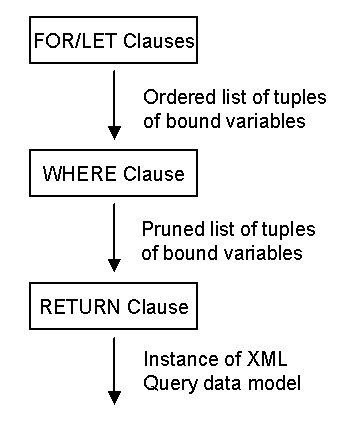
construct a result. The overall flow of data in a FLWR expression is
illustrated in Figure 1.
The first part of a FLWR expression consists of FOR-clauses and/or
LET-clauses, which serve to bind values to one or more variables. The values to
be bound to the variables are represented by expressions (for example, path
expressions).
A FOR-clause is used whenever iteration is needed. The FOR-clause introduces
one or more variables, associating each variable with an expression. For
example, a FOR-clause might contain a path expression that returns a sequence
of nodes. The result of the FOR-clause is a sequence of tuples, each of which
contains a binding for each of the variables in the FOR-clause. The variables
are bound to individual values returned by their respective expressions. Each
variable in a FOR-clause can be thought of as iterating over the values
returned by its respective expression, in order.
A LET-clause is also used to bind one or more variables to one or more
expressions. Unlike a FOR-clause, however, a LET-clause simply binds each
variable to the value of its respective expression without iteration, resulting
in a single binding for each variable. The difference between a FOR-clause and
a LET-clause can be illustrated by a simple example. The clause FOR $x IN
/library/book results in many bindings, each of which binds the
variable $x to one book in the library. On the other hand, the
clause LET $x := /library/book results in a single binding which
binds the variable $x to a sequence containing all the books in
the library.
A FLWR expression may contain several FOR and LET-clauses. Expressions used
in FOR and LET-clauses may contain references to variables bound earlier in the
FLWR expression. The result of the FOR and LET clauses is an ordered sequence
of tuples of bound variables. If all the FOR-clause expressions are
independent, the number of tuples generated is the product of the cardinalities
of all the FOR-clause expressions. A FLWR expression that contains no
FOR-clauses generates exactly one binding-tuple. The order of the tuples
generated by the FOR and LET clauses is determined by the order in which values
are returned by the FOR-clause expressions. The order in which the variables
are bound determines the order of nested iteration of the FLWR expression.
|
| Figure 1: Flow of data in a FLWR expression |
The binding-tuples generated by the FOR and LET clauses are subject to
further filtering by an optional WHERE-clause. Only those tuples for which the
condition in the WHERE-clause is true are used to invoke the RETURN clause. The
WHERE-clause may contain several predicates, connected by AND and OR. These
predicates usually contain references to the bound variables. Variables bound
by a FOR-clause are usually bound to individual nodes and so they are typically
used in scalar predicates such as $p/color = "Red". Variables
bound by a LET-clause, on the other hand, often represent sequences of nodes,
and can be used in set-oriented predicates such as avg($p/price) >
100. The ordering of the binding-tuples generated by the FOR and LET
clauses is preserved by the WHERE-clause.
The RETURN-clause generates the output of the FLWR expression, which may be
any sequence of nodes or primitive values. The RETURN-clause is executed once
for each tuple of bindings that is generated by the FOR and LET-clauses and
satisfies the condition in the WHERE-clause, preserving the order of these
tuples. The RETURN-clause contains an expression that often contains element
constructors, references to bound variables, and nested subexpressions. The
results generated by the individual executions of the RETURN clause are
concatenated together, preserving their order (therefore, unlike a path
expression, the result of a FLWR expression may contain duplicate nodes based
on node-identity.)
We will consider some examples of FLWR expressions based on a document named
"bib.xml" that contains a sequence of <book> elements. Each <book>
element, in turn, contains a <title> element, one or more <author>
elements, a <publisher> element, a <year> element, and a
<price> element. The first example is so simple that it could have been
expressed using a path expression, but it is perhaps more readable when
expressed as a FLWR expression.
(Q11) List the titles of books published by Morgan Kaufmann in
1998.
FOR $b IN document("bib.xml")//book
WHERE $b/publisher = "Morgan Kaufmann"
AND $b/year = "1998"
RETURN $b/title
The above example returns titles of books in the order in which they
appeared in the original document ("bib.xml"). If the ordering of the query
result is not important, the unordered function can be used to
indicate that books can be processed in any order, possibly resulting in a more
efficient execution, as in the following example:
(Q11, alternate form) (Equivalent to Q11, relaxing constraint on order of
result)
FOR $b IN unordered(document("bib.xml")//book)
WHERE $b/publisher = "Morgan Kaufmann"
AND $b/year = "1998"
RETURN $b/title
The next example uses a distinct function in the FOR-clause to
eliminate duplicate values from the set of publishers found in the input
document. Two elements are considered to have duplicate values if their names,
attributes, and normalized content are equal. From each set of nodes with
duplicate values, the distinct function retains one node (the node
that is retained is implementation-defined.) The distinct function
also includes the semantics of the unordered function (that is,
the ordering of the sequence returned by a distinct function is
not significant or deterministic.) The example uses a LET-clause to bind a
variable to the average price of books published by each of the publishers
bound in the FOR-clause.
(Q12) List each publisher and the average price of its books.
FOR $p IN distinct(document("bib.xml")//publisher)
LET $a := avg(document("bib.xml")//book[publisher = $p]/price)
RETURN
   <publisher>
      <name> {$p/text()} </name>
      <avgprice> {$a} </avgprice>
   </publisher>
The next example uses a LET-clause to bind a variable $b to a set of books,
and then uses a WHERE-clause to apply a condition to the set, retaining only
bindings in which $b contains more than 100 elements. This query also
illustrates the common practice of enclosing a FLWR expression inside an
element constructor, which provides an enclosing element for the query
result.
(Q13) List the publishers who have published more than 100 books.
<big_publishers>
   {
    FOR $p IN distinct(document("bib.xml")//publisher)
    LET $b := document("bib.xml")//book[publisher = $p]
    WHERE count($b) > 100
    RETURN $p
   }
</big_publishers>
FLWR expressions are often useful for performing structural transformations
on documents, as illustrated by the next query, which inverts a hierarchy. This
example also illustrates how one FLWR expression can be nested inside
another.
(Q14) Invert the structure of the input document so that, instead of each
book element containing a sequence of authors, each distinct author element
contains a sequence of book-titles.
<author_list>
   {
    FOR $a IN distinct(document("bib.xml")//author)
    RETURN
      <author>
         <name> {$a/text()} </name>
         {
          FOR $b IN document("bib.xml")//book[author = $a]
          RETURN $b/title
         }
      </author>
   }
</author_list>
LET-clauses are useful for breaking up long expressions, making queries more
readable. They can also be helpful in simplifying a query that makes multiple
uses of the same subexpression. In the following example, the average price of
books is a common subexpression that is bound to variable $a and then used
repeatedly in the body of the query.
(Q15) For each book whose price is greater than the average price, return
the title of the book and the amount by which the book's price exceeds the
average price.
<result>
   {
    LET $a := avg(document("bib.xml")//book/price)
    FOR $b IN document("bib.xml")//book
    WHERE $b/price > $a
    RETURN
       <expensive_book>
          {$b/title}
          <price_difference>
             {$b/price - $a}
          </price_difference>
       </expensive_book>
   }
</result>
Computed element names and attribute names can sometimes be used with FLWR
expressions to perform a transformation on the structure of a document. In the
following example, variable $e is bound to an element that has some attributes
and some subelements. The content of each subelement is simple text. The
example uses the attribute function, which constructs an attribute
from two strings that contain the name and value of the attribute.
(Q16) Construct a new element having the same name as the element bound
to $e. Transform all the attributes of $e into subelements, and all the
subelements of $e into attributes.
<{name($e)}>
   {
    FOR $c IN $e/*
    RETURN attribute(name($c), string($c))
   }
   {
    FOR $a IN $e/@*
    RETURN
       <{name($a)}>
          {string($a)}
       </>
   }
</>
2.4 Sorting
Syntax
| SortExpr | ::= | Expr "sortby" "(" SortSpecList ")" | |
| SortSpecList | ::= | Expr ("ascending" | "descending")? ("," SortSpecList)? | |
It is sometimes necessary to control the order of elements in a sequence.
The sequence to be ordered might be a represented by a whole query or by a
subexpression within a query. A sequence can be ordered by means of a SORTBY
clause that contains one or more "ordering expressions." Each ordering
expression is evaluated for each member of the sequence (that is, the ordering
expression is evaluated with each member of the sequence as context node). For
each member of the sequence, the ordering expression must return a single value
of some type for which the ">" operator is defined (for example, a number or
a string); otherwise an error results. The members of the sequence are ordered
according to the values of their respective ordering expressions. If more than
one ordering expression is specified, the leftmost ordering expression controls
the primary sort, followed by the remaining ordering expressions from left to
right. Each ordering expression can be followed by the word ASCENDING or
DESCENDING, which specifies the direction of the sort (ASCENDING is the
default). The following query uses a SORTBY clause with two ordering
expressions:
(Q17)List all books with price greater than $100, in order by first
author; within each group of books with the same first author, list the books
in order by title.
document("bib.xml")//book[price > 100] SORTBY (author[1], title)
If a query result contains several levels of nested elements, an ordering
may be specified among the elements at each level. This is often accomplished
by nested FLWR expressions and sorting expressions. It is important to remember
that SORTBY is not a part of a FLWR expression, but is a separate form of
expression that can be used in many different contexts.
(Q18) Make an alphabetic list of publishers. Within each publisher, make
a list of books, each containing a title and a price, in descending order by
price.
<publisher_list>
   {FOR $p IN distinct(document("bib.xml")//publisher)
    RETURN
       <publisher>
          <name> {$p/text()} </name>
          {FOR $b IN document("bib.xml")//book[publisher = $p]
           RETURN
              <book>
                 {$b/title}
                 {$b/price}
              </book>
           SORTBY(price DESCENDING)
          }
       </publisher>
    SORTBY(name)
   }
</publisher_list>
2.5 Operators in Expressions
Like most query languages, XQuery provides a variety of operators that can
be used in expressions, and allows parenthesized expressions to serve as
operands. The following sections summarize the categories of operators that are
provided by XQuery. For details of operator precedence, see Appendix B. For
details of the semantics of operators and the datatypes to which they apply,
see XQuery Functions and Operators (to appear).
2.5.1 Arithmetic operators
Syntax
| AdditiveExpr | ::= | Expr ("+" | "-") Expr | |
| MultiplicativeExpr | ::= | Expr ("*" | "div" | "mod") Expr | |
| UnaryExpr | ::= | ("-" | "+") Expr | |
XQuery provides the usual arithmetic operators for addition, subtraction,
multiplication, division, and modulus, in the usual binary and unary forms and
with the usual meanings.
When both operands of an arithmetic operator are numeric, the result is
straightforward. When one or more operands is a node, the content of the node
is extracted by an implicit call to the data function and
converted to a number before the operation is performed; if this conversion is
not possible, an error results. When one operand is a number and the other is a
sequence of numbers, the result of the operator is a sequence that is created
by applying the operator pairwise to the numeric operand and each individual
member of the sequence operand, preserving the original order.
Ed. Note:
The semantics of arithmetic between two sequences
is an open issue. See issue xquery-arithmetic-among-sequences in Appendix C.
2.5.2 Comparison operators
Syntax
| EqualityExpr | ::= | Expr ("=" | "!=" | "==" | "!==") Expr | |
| RelationalExpr | ::= | Expr ("<" | "<=" | ">" | ">=") Expr | |
XQuery supports several comparison operators, each of which takes two
operands and returns a Boolean result. If one operand is a single value and the
other is a sequence, the result of the comparison is true if there exists some
member of the sequence for which the comparison with the single operand is
true. If both operands are sequences, the comparison is true if there exists
some member of the first sequence and some member of the second sequence for
which the comparison is true.
The =, !=, <, <=, >,
and >= operators perform value comparisons. If both operands are
simple values of the same type, the result is straightforward. If the operands
are simple values of compatible types, the operand of the less-inclusive type
is converted to the more-inclusive type for the purpose of comparison (for
example, an integer might be converted to a float in order to be compared with
a float.) If one operand is a node and the other is a simple value, the content
of the node is extracted by an implicit invocation of
the data function before the comparison is performed. If both
operands are nodes, the string-values of the nodes are compared, as defined
in [XPath 1.0].
The == and !== operators perform "node identity"
comparisons that are defined only for nodes or sequences of nodes. If both
operands of == are nodes, the comparison is true only if both
operands are the same node (not just nodes with the same name and value). If
either or both operands is a node sequence, the rules stated above apply.
The !== comparison is true whenever the == comparison
is not true.
Ed. Note:
There is currently no way to specify a collation
sequence to specify the semantics of the inequality operators.
See issue xquery-collation-sequences in Appendix C.
2.5.3 Logical operators
Syntax
| OrExpr | ::= | Expr "or" Expr | |
| AndExpr | ::= | Expr "and" Expr | |
The AND and OR operators of XQuery take two Boolean operands and return a
Boolean result, using the usual semantics for these operators. Unlike many
query languages, XQuery does not support a logical NOT operator. However, it
does provide a function not() that takes a Boolean value as its
argument and returns the logical negation of the argument.
Ed. Note:
XQuery has not yet defined how it handles
missing or absent values. See issue
xquery-three-value-logic in Appendix C.
2.5.4 Sequence-related Operators
Syntax
| ParenthesizedExpr | ::= | "(" ExprSequence? ")" | |
| ExprSequence | ::= | Expr ("," Expr)* | |
| RangeExpr | ::= | Expr "to" Expr | |
| UnionExpr | ::= | Expr ("union" | "|") Expr | |
| IntersectExceptExpr | ::= | Expr ("intersect" | "except") Expr | |
| BeforeAfterExpr | ::= | Expr ("before" | "after") Expr | |
As described earlier, the XPath 2.0 Data Model [XQuery 1.0 and XPath 2.0 Data Model] supports ordered sequences of values, and does not
distinguish between a single value and a sequence of one value. Values in
sequences may be either nodes or primitive values such as numbers or strings.
Sequences are always one level deep--that is, a sequence never appears as a
member of another sequence. All operators that generate sequences automatically
"flatten" their operands. For example, if two sequences are combined to form a
new sequence, the new sequence is a one-level sequence derived from the
individual members of the original sequences.
The basic XQuery operator for forming sequences is the comma operator (",").
The comma operator can be applied to any two expressions to combine them into a
sequence. The length of the resulting sequence is the sum of the lengths of the
original sequences (scalar values are considered to be sequences of length
one.) The new sequence consists of all the members of the left-hand sequence,
followed in order by all the members of the right-hand sequence, with
duplicates preserved. A sequence of zero values is represented by empty
parentheses.
Since the comma operator is also used to separate the arguments of a
function call, parentheses may be needed when a sequence is used as the
argument of a function, as illustrated in the following examples:
| f(1, 2, 3) |
Denotes a function call with three scalar arguments. |
| f((1, 2), 3) |
Denotes a function call with two arguments, the first of which is a
sequence of two values. |
| f((1, 2, 3)) |
Denotes a function call with one argument that is a sequence of three
values. |
| f(1, ( )) |
Denotes a function call with two arguments, the second of which is an empty
sequence. |
Another way to generate a sequence is by means of the TO operator. TO is a
binary operator that converts both of its operands to integers. It then
generates a sequence containing all the integers from the left-hand operand to
the right-hand operand, inclusive. If either of the operands cannot be
converted to an integer, an error results. If the left-hand operand is larger
than the right-hand operand, the sequence of integers is generated in
descending order. For example, the expression 12 TO 8 is
equivalent to the expression 12, 11, 10, 9, 8.
The operators UNION, INTERSECT, and EXCEPT can be used to combine node
sequences to form new node sequences. UNION (equivalent to "|") returns a
sequence containing those nodes that are members of either the left-hand or the
right-hand operand. (The "|" form of this operator is retained for
compatibility with XPath 1.0, and the same operator can be invoked by the UNION
keyword for consistency with INTERSECT and EXCEPT.) INTERSECT returns a
sequence containing those nodes that are members of both the left-hand and
right-hand operands. EXCEPT returns a sequence containing those nodes that are
members of the left-hand but not the right-hand operand. The result of UNION,
INTERSECT, or EXCEPT contains no duplicate nodes, based on node identity--in
other words, the same node will not appear more than once in the result, but
different nodes may appear that have the same name and value. The result of
UNION, INTERSECT, or EXCEPT is a sequence in which all the nodes appear in
document order if they are all in the same document; if the resulting nodes are
not in the same document, their order is implementation-defined.
Ed. Note:
The definitions of UNION, INTERSECT, and EXCEPT for simple values are
still under discussion. See xquery-set-operators-on-values in Appendix C.
From XQL [XQL], XQuery inherits the infix operators BEFORE and
AFTER, which are useful in searching based on position in a sequence. BEFORE
operates on two sequences of nodes and returns those nodes in the first
sequence that occur before at least one node in the second sequence in document
order (of course, this is possible only if the two sequences are subsets of the
same document.) AFTER is defined in a similar way. Since BEFORE and AFTER are
based on global document ordering, they can compare the positions of nodes that
do not have the same immediate parent. The next two examples illustrate the use
of BEFORE and AFTER by retrieving excerpts from a surgical report that includes
<procedure>, <incision>, and <anesthesia> elements.
(Q19) Prepare a "critical sequence" report consisting of all elements
that occur between the first and second incision in the first procedure.
<critical_sequence>
{
   LET $p := //procedure[1]
   FOR $e IN //* AFTER ($p//incision)[1]
          BEFORE ($p//incision)[2]
   RETURN shallow($e)
 }
</critical_sequence>
The shallow function makes a shallow copy of a node, including
attributes but not including subelements.
(Q20) Find procedures in which no anesthesia occurs before the first
incision.
# Finds potential lawsuits
FOR $p in //procedure
WHERE not(empty($p//incision))
AND empty($p//anesthesia BEFORE ($p//incision)[1])
RETURN $p
The empty function returns True if and only if its argument is
an empty sequence.
2.6 Conditional Expressions
Syntax
| IfExpr | ::= | "if" "(" Expr ")" "then" Expr "else" Expr | |
A conditional expression evaluates a test expression and then returns one of
two result expressions. If the value of the test expression is True, the value
of the first result expression is returned; otherwise, the value of the second
result expression is returned.
Ed. Note:
The grammar for XQuery allows any expression as
a conditional. We have not yet determined which types
of test expressions can be implicitly converted to Boolean,
and which raise errors.
See xquery-anything-to-boolean in Appendix C.
As an example of a conditional expression, consider a library that has many
holdings, each described by a <holding> element with a "type" attribute
that identifies its type: book, journal, etc. All holdings have a title and
other nested elements that depend on the type of holding.
(Q21) Make a list of holdings, ordered by title. For journals, include
the editor, and for all other holdings, include the author.
FOR $h IN //holding
RETURN
   <holding>
      {$h/title,
       IF ($h/@type = "Journal")
       THEN $h/editor
       ELSE $h/author
      }
   </holding>
SORTBY (title)
Note the syntactic structure of the above query. The query consists of a
SORTBY applied to a FLWR-expression that contains an element constructor. The
element constructor generates <holding> elements. The content of these
elements is specified by a sequence that consists of a path expression and a
conditional expression, separated by a comma. The following is an equivalent
formulation of the same query in which the element constructor contains two
separate XQuery expressions rather than a single sequence expression. Note that
no comma is used in the alternative form.
(Q21, alternate form)
FOR $h IN //holding
RETURN
   <holding>
      {$h/title}
      {IF ($h/@type = "Journal")
       THEN $h/editor
       ELSE $h/author
      }
   </holding>
SORTBY (title)
2.7 Quantified Expressions
Occasionally it is necessary to test for existence of some element that
satisfies a condition, or to determine whether all elements in some collection
satisfy a condition. For this purpose, XQuery provides two forms of expression
called the "some" expression and the "every" expression. These forms of
expression are also known as quantified expressions. The "some"
expression uses an existential quantifier, and the "every" expression uses a
universal quantifier.
Syntax
| SomeExpr | ::= | "some" Variable "in" Expr "satisfies" Expr | |
| EveryExpr | ::= | "every" Variable "in" Expr "satisfies" Expr | |
The "some" expression is illustrated in the next example. The value of a
"some" expression is always True or False. Like the FOR-clause of a FLWR
expression, a "some" expression generates multiple bindings for a variable,
using values returned by the expression in the IN-clause. For each of these
bindings, the expression in the SATISFIES expression is executed. If at least
one execution of the SATISFIES expression returns the Boolean value True, then
the value of the "some" expression is True; otherwise the value of the "some"
expression is False. Of course, if the expression in the IN-clause does not
return any nodes, the SATISFIES expression is not evaluated and the result of
the "some" expression is False.
(Q22) Find titles of books in which both sailing and windsurfing are
mentioned in the same paragraph.
FOR $b IN //book
WHERE SOME $p IN $b//para SATISFIES
   (contains($p, "sailing") AND contains($p, "windsurfing"))
RETURN $b/title
The "every" expression is illustrated in the next example. Like the "some"
expression, the "every" expression always returns True or False, and it
executes the SATISFIES-clause once for each node returned by the IN-clause. If
at least one execution of the SATISFIES expression returns the Boolean value
False, then the value of the "every" expression is False; otherwise the value
of the "every" expression is True. Of course, if the expression in the
IN-clause does not return any nodes, the SATISFIES expression is not evaluated
and the result of the "every" expression is True.
(Q23) Find titles of books in which sailing is mentioned in every
paragraph.
FOR $b IN //book
WHERE EVERY $p IN $b//para SATISFIES
   contains($p, "sailing")
RETURN $b/title
Q23 also returns books that contain no paragraphs.
It is sometimes useful to nest quantified expressions, as in the following
example:
(Q24) Assume that employees can have multiple skills and multiple duties.
Find names of employees who have some duty that is not matched by a
skill.
FOR $e IN //emp
WHERE SOME $d IN $e/duty SATISFIES
   not(SOME $s IN $e/skill SATISFIES $s = $d)
RETURN $e/name
Ed. Note:
Open issue: should quantifiers be able to bind more than one variable? See issue xquery-quantifier-multiple-variables in Appendix C.
2.8 Datatypes
XQuery has a type system that is based on XML Schema. By using the datatype
names defined in the namespace http://www.w3.org/2001/XMLSchema (hereafter
abbreviated as xsd), all the primitive and derived datatypes of XML
Schema can be used in queries. Other complex types declared using XML Schema
can also be referred to by their qualified names.
In XQuery, type names appear in function declarations where they specify the
types of the function parameters and result. Type names are also used in CAST
and TREAT expressions and as operands of the INSTANCEOF operator, as described
in Section 2.11.
Certain XML Schema datatypes have literal forms that are recognized by
XQuery, as illustrated by the following examples:
| Type |
Example of literal |
| xsd:string |
"Hello" |
| xsd:integer |
47, -369 |
| xsd:decimal |
-2.57 |
| xsd:float |
-3.805E-2 |
Literal values of XML Schema types other than string, integer, decimal, and
float can be specified by means of constructor functions such
as true(), false(),
and date("2000-06-25"), or by cast expressions such as CAST
AS xsd:positiveInteger(47).
Ed. Note:
The set of constructor functions has not yet been fixed. A complete
specification of XQuery literal formats and constructor functions will be
provided in XQuery Functions and Operators (to appear.)
2.9 Functions
Syntax
| FunctionDefn | ::= | "define" "function" QName "(" ParamList? ")" | |
| | | ("returns"
Datatype)? EnclosedExpr | |
| ParamList | ::= | Param ("," Param)* | |
| Param | ::= | Datatype? Variable | |
| FunctionCall | ::= | QName "(" (Expr ("," Expr)*)? ")" | |
XQuery provides a core library of built-in functions. We have already
introduced some of these core functions, such as document, which
returns the root node of a named document. The XQuery core function library
contains all the functions of the XPath core function library, as well as
aggregation functions such
as avg, sum, count, max,
and min, and many other useful functions. For example,
the distinct function eliminates duplicate nodes from a sequence,
and the empty function returns True if and only if its argument is
an empty sequence. A complete specification of the XQuery core function library
is provided in XQuery Functions and Operators (to appear.)
In addition to the core functions, XQuery allows users to define functions
of their own. A function definition specifies the name of the function, the
names and datatypes of the parameters, and the datatype of the result.
Datatypes are specified by their qualified names. A function definition also
provides an expression (called the "function body") that defines how the result
of the function is computed from its parameters. When a function is invoked,
its arguments must be valid instances of the declared parameter types. The
result of a function must also be a valid instance of the declared result
type.
If a function parameter is declared using a name but no type, it is
considered to have the default type "any node." If the RETURNS clause is
omitted from a function definition, the result-type of the function is
considered to be "any sequence of nodes."
Ed. Note:
The syntax for declaring types in a function definition is still under
discussion. A notation is needed to distinguish element-names from type-names.
A notation is also needed to distinguish a single node from a sequence of
nodes. A "wildcard" notation is also needed to denote "any element" or "any
node." Various alternatives have been proposed for these notations. In this
document, function definitions that need "wildcard" types will use the defaults
described above (no explicit type declaration). See issue xquery-function-definition in Appendix C.
XQuery Version 1 does not allow user-defined functions to be
overloaded--that is, it does not allow multiple functions to be declared with
the same name. We consider function overloading to be a useful and important
feature that deserves further study in future versions of XQuery. Although
XQuery does not allow overloading of user-defined functions, some of the
built-in functions in the XQuery core library are overloaded--for example,
the string function of XPath can convert an instance of almost any
type into a string, and it can be invoked with either one argument or zero
arguments.
Ed. Note:
The XQuery rules for function calls need to allow for functions with
optional arguments that default to the current node, such
as data(). Many XPath functions behave like this. Should this apply
to all functions? All unary functions? Only certain functions? See issue xquery-implicit-current-node in Appendix C.
It is possible in XQuery to invoke a function with arguments whose types do
not exactly match the declared parameter types of the function, under the
following circumstances:
-
A fixed "promotion hierarchy" is defined among the primitive and derived
types of XML Schema. A function whose declared parameter type is in this
hierarchy can be invoked with an argument whose type is lower in the hierarchy.
For example, a function with a declared parameter-type of Float can be invoked
with an integer argument. In such a case, the argument is converted to the
declared type of the parameter.
Ed. Note:
The promotion hierarchy for function parameters needs to be
defined. See issue xquery-schema-type-promotion in Appendix C.
-
A function whose declared parameter is a Schema complex type can be called
with an argument of another complex type that is derived from the parameter
type by extension or by restriction. This is called the principle
of subtype substitutability.
Ed. Note:
This rule is still under discussion. It is possible that subtype
substitutability may not be supported in the first version of XQuery. See issue xquery-subtype-substitutability in Appendix C.
-
A function whose declared parameter is a Schema element can be called with
an argument that is any element in a substitution group whose head is the
declared parameter element.
Ed. Note:
This rule is still under discussion. It is possible that substitution
groups may not be supported in the first version of XQuery. See issue xquery-substitution-groups in Appendix C.
-
A function whose declared parameter is a sequence of a given type can be
invoked with an argument that is a single instance of the given type (this is
obvious, since there is no distinction between a single object and an object
sequence of length one.)
-
A function whose declared parameter is a given type can be invoked with an
argument that is a sequence of the given type. In this case, the function is
invoked on each of the members of the argument sequence, in order, and the
results are concatenated into a result sequence. For example, suppose that the
function price(Book) is declared to take a Book and return an
integer. If this function is invoked on a path expression, as
in price(//Book[author="Mark Twain"]), the result is a sequence of
integers representing the prices of the Books returned by the path expression,
in order. This rule is intended to be consistent with XPath, in which each step
in a path expression iterates over the nodes returned by the previous step
without requiring an explicit iteration operator.
This rule generalizes to functions with multiple parameters in the following
way: suppose that N arguments of a function-call are sequences that match
function-parameters where single elements are expected. Then the result of the
function-call is a sequence whose members are formed by invoking the function
on tuples of arguments taken from the Cartesian product of the N input
sequences. The Cartesian product is formed by nested iteration over the input
sequences, working from left to right.
Ed. Note:
This rule is still under discussion. If implicit iteration over
argument-sequences is not supported in XQuery, the same result can be obtained
by explicit iteration using either a FLWR-expression or a
path-expression. See issue xquery-sequence-for-single in Appendix C.
A function may be defined recursively--that is, it may reference its own
definition. Mutually recursive functions, whose bodies reference each other,
are also allowed. The next query contains an example of a recursive function
that computes the depth of an element hierarchy. In its definition, the
user-defined function depth calls the built-in
functions empty and max.
(Q25) Find the maximum depth of the document named "partlist.xml."
NAMESPACE xsd = "http://www.w3.org/2001/XMLSchema"

DEFINE FUNCTION depth($e) RETURNS xsd:integer
{
   # An empty element has depth 1
   # Otherwise, add 1 to max depth of children
   IF (empty($e/*)) THEN 1
   ELSE max(depth($e/*)) + 1
}

depth(document("partlist.xml"))
In the above example, since no explicit type is declared for the function
parameter, the function accepts any node as its argument. The
expression $e/* returns all the children of the argument node, and
the expression depth($e/*) implicitly iterates over these
children, returning their respective depths as a sequence of integers. The
expression max(depth($e/*)) finds the maximum depth of any child of
the argument node.
Ed. Note:
If implicit iteration over argument sequences is not supported, the
expression max(depth($e/*)) could be expressed as max(for $c
in $e/* return depth($c)) or as max($e/*/depth(.)).
To further illustrate the power of functions, we will write a function that
returns all the elements that are "connected" to a given element by child or
reference connections, and a recursive function that returns all the elements
that are "reachable" from a given element by child or reference
connections.
(Q26) In the document "company.xml", find all the elements that are
reachable from the employee with serial number 12345 by child or reference
connections.
DEFINE FUNCTION connected($e)
{
    $e/* UNION $e/@*=>*
}

DEFINE FUNCTION reachable($e)
{
    $e UNION reachable(connected($e))
}

reachable(document("company.xml")/emp[serial="12345"])
The connected and reachable functions each take
(by default) a node as parameter and return a sequence of nodes as result.
The reachable function invokes itself recursively to find all the
elements that are reachable from the elements that are directly connected to
its parameter node.
Ed. Note:
If implicit iteration over argument sequences is not supported, the
expression reachable(connected($e)) could be expressed
as connected($e)/reachable(.).
The filter function (described more fully in Section 3.1) can
be used to select a set of nodes from a hierarchy while preserving the original
relationships among these nodes. In the following example, filteris
used together with the reachable function defined in the previous
example to return all the elements that are reachable from a specific employee
element, while preserving their hierarchic and sequential relationships.
(Q27) Return a fragment of the document "company.xml" consisting of all
nodes reachable from employee no. 12345, preserving the original relationships
among the reachable nodes.
filter(reachable(document("company.xml")/emp[empno="12345"]))
Of course, it is possible to write a recursive function that fails to
terminate for some set of arguments. In fact, the reachable function
in the previous example will fail to terminate if called on an element that
references one of its ancestors. It is the user's responsibility to avoid
writing a nonterminating function call.
2.10 User-Defined Datatypes
In addition to the primitive and derived datatypes of XML Schema, any
datatype that can be constructed using the definition facilities of XML Schema
can be used as an XQuery datatype. XML Schema language can be used to define an
element or datatype and to give it a qualified name, which can then be used in
an XQuery function declaration. For example, a schema might define an element
named PurchaseOrder by specifying a set of attributes and a content model based
on sequences and alternations of various other elements. PurchaseOrder could
then be used as the type of a function parameter in a query.
A query can refer to element-names and type-names that are defined in any of
the following schemas:
-
Schemas that are referenced by documents used in the query; i.e., the
implicit input document(s) or any document referenced by the
document function.
-
Schemas that are explicitly referenced by NAMESPACE and SCHEMA declarations,
as described in Section 2.12.
In the following examples, a schema defines complex types
named emp_sequence and dept_sequence in the target
namespace http://www.bigcompany.example.com/BigNames. A query then uses
these datatypes to define and invoke a function.
(Q28) Using XML Schema language, define complex types
named emp_sequence and dept_sequence in a target
namespace.
<?xml version="1.0">
<schema xmlns="http://www.w3.org/2001/XMLSchema"
   targetNamespace="http://www.bigcompany.example.com/BigNames">

   <complexType name="emp_sequence">
      <sequence>
         <element name="emp" minOccurs="0" maxOccurs="unbounded">
            <complexType>
               <sequence>
                  <element name="name" type="string"/>
                  <element name="deptno" type="string"/>
                  <element name="salary" type="decimal"/>
                  <element name="location" type="string"/>
               </sequence>
            </complexType>
         </element>
      </sequence>
   </complexType>

   <complexType name="dept_sequence">
      <sequence>
         <element name="dept" minOccurs="0" maxOccurs="unbounded">
            <complexType>
               <sequence>
                  <element name="deptno" type="string"/>
                  <element name="headcount" type="integer"/>
                  <element name="payroll" type="decimal"/>
               </sequence>
            </complexType>
         </element>
      </sequence>
   </complexType>

</schema>
(Q29) Using the datatypes defined in Q28, create a function that
summarizes employees by department, and use this function to summarize all the
employees of Acme Corp. that are located in Denver.
DEFAULT NAMESPACE = "http://www.bigcompany.example.com/BigNames"
SCHEMA "http://www.bigcompany.example.com/BigNames"
                "http://www.bigcompany.example.com/schemas/names.xsd"

DEFINE FUNCTION summary(emp_sequence $emps) RETURNS dept_sequence
   {
   FOR $d IN distinct($emps/deptno)
   LET $e := $emps[deptno = $d]
   RETURN
      <dept>
         {$d}
         <headcount> {count($e)} </headcount>
         <payroll> {sum($e/salary)} </payroll>
      </dept>
   }

summary(document("acme_corp.xml")//emp[location = "Denver"] )
It is sometimes desirable to validate that the result of a query conforms to
a specific datatype. This can be done by taking advantage of the fact that
XQuery functions validate the datatypes of their parameters and results. For
example, suppose that some query Q is intended to generate output that conforms
to the datatype abc:PurchaseOrder (for some suitable binding of
the namespace prefix abc). The query Q can be type-validated by
"wrapping" it in a function that takes an instance of the desired type as a
parameter and simply returns it, as in the following example:
(Q30) Validate that the result of a query Q conforms to the
datatype abc:PurchaseOrder (Q may be arbitrarily complex).
DEFINE FUNCTION check(abc:PurchaseOrder $po) RETURNS abc:PurchaseOrder
   { $po }

check(Q)
2.11 Operations on Datatypes
Syntax
| InstanceofExpr | ::= | Expr "instanceof" "only"? Datatype | |
| TypeSwitchExpr | ::= | "typeswitch" "(" Expr ")" ("as" Variable)? | |
| | | CaseClause+
"default" "return" Expr | |
| CaseClause | ::= | "case" Datatype "return" Expr | |
| CastExpr | ::= | (("cast" "as") | ("treat" "as")) Datatype "(" Expr ")" | |
| Datatype | ::= | QName | |
The Boolean operator INSTANCEOF returns True if its first operand is an
instance of the type named in its second operand; otherwise it returns False.
For example, $x INSTANCEOF zoonames:animal returns True if the
dynamic type of $x is zoonames:animal or a subtype
of zoonames:animal. If the keyword ONLY is specified, INSTANCEOF
returns True only if the dynamic type of its first operand exactly matches the
specified type, excluding subtypes from consideration. For example, $x
INSTANCEOF ONLY zoonames:animal returns True if the dynamic type of $x
is zoonames:animal but not a subtype
of zoonames:animal.
The datatype that can be associated with an expression by static analysis of
a query is called the static type of the expression. During
execution, the actual value of an expression may have a type (called
its dynamic type) that is a subtype of its static type. For
example, a variable named $mypet whose static type is Animal may
contain a value of type Duck, a subtype of Animal. The dynamic type of an
expression may influence the processing of a query. For example, if the
variable $mypet contains a value of dynamic type Duck, a query
might invoke the function quack($mypet), which is defined only for
values of type Duck. The typeswitch expression of XQuery allows users to write
queries that are sensitive to dynamic type.
In a typeswitch expression, the TYPESWITCH keyword is followed by an
expression enclosed in parentheses, called the operand expression. This is the
expression whose dynamic type is being tested. The operand expression can be
followed by an AS clause that defines a variable, called the operand variable,
to represent the value of the operand expression. The remainder of the
typeswitch expression consists of one or more CASE clauses and a DEFAULT
clause.
Each CASE clause specifies the name of a type, which must be a subtype of
the static type of the operand expression, followed by a RETURN expression. The
effective case is the first CASE clause such that the value of the operand
expression is an instance of the type named in the CASE clause. The value of
the typeswitch expression is the value of the RETURN expression in the
effective case. If the value of the operand expression is not an instance of
any type named in a CASE clause, the value of the typeswitch expression is the
value of the RETURN expression in the DEFAULT clause.
The RETURN expressions in CASE and DEFAULT clauses typically contain
references to the operand variable (defined in the AS clause). If the operand
expression consists of a single variable, it can serve as the operand variable
and the AS clause can be omitted. The AS clause can also be omitted if the
RETURN expressions do not contain references to the operand variable.
The following example shows how a typeswitch expression can be used to
simulate a primitive form of subtype polymorphism. A more robust treatment of
polymorphic functions is deferred to a later version of XQuery.
(Q31) Define a function named sound(animal) that returns
different strings for various types of animals. Use the function in a query
that returns the sounds made by all of Billy's pets.
# First define some functions to set the stage
NAMESPACE xsd = "http://www.w3.org/2001/XMLSchema"
DEFAULT NAMESPACE = "http://www.abc.example.com/names"
SCHEMA "http://www.abc.example.com/names"
                "http://www.abc.example.com/schemas/names.xsd"

DEFINE FUNCTION quack(duck $d) RETURNS xsd:string
   { "String depends on properties of duck" }

DEFINE FUNCTION woof(dog $d) RETURNS xsd:string
   { "String depends on properties of dog" }

# This function illustrates simulated subtype polymorphism

DEFINE FUNCTION sound(animal $a) RETURNS xsd:string
   {
   TYPESWITCH ($a)
      CASE duck RETURN quack($a)
      CASE dog RETURN woof($a)
      DEFAULT RETURN "No sound"
   }

# This query returns the sounds made by all of Billy's pets

FOR $p IN //kid[name="Billy"]/pet
RETURN sound($p)
Ed. Note:
If subtype substitutability is not supported in XQuery Version 1, the
motivation for TYPESWITCH is weakened and the decision to support TYPESWITCH
should be revisited. See issue xquery-subtype-substitutability in Appendix C.
Occasionally it is necessary to explicitly convert a value from one datatype
to another. For the primitive and derived types of XML Schema, a CAST notation
is supported that provides conversions between certain combinations of types.
For example, the notation CAST AS xsd:integer (x DIV y) converts
the result of x DIV y into the xsd:integer type. The
set of type conversions that are supported by the CAST operator are specified
in XQuery Functions and Operators (to appear.) Conversions among
user-defined datatypes are not supported by the CAST notation, but user-defined
functions can be written for this purpose.
In addition to CAST, XQuery provides a notation called TREAT. Rather than
converting an expression from one datatype to another, TREAT causes the query
processor to treat an expression as though its datatype were a subtype of its
static type. For example, TREAT AS Cat($mypet) tells the query
processor to treat the variable $mypet as though it were an
instance of the type Cat, even though the static type of $mypet is
a supertype of Cat such as Animal. This notation allows functions that require
an argument of type Cat to be invoked on the variable $mypet. At
query execution time, if the dynamic type of $mypet is not Cat, an
error results.
Ed. Note:
The functionality of TREAT can also be expressed using TYPESWITCH. A
proposal to remove the TREAT expression is under consideration. See issue xquery-remove-treat in Appendix C.
2.12 Structure of a Query Module
The XQuery language consists of units called query modules.
Each query module is independent, but for convenience, multiple query modules,
separated by semicolons, can be parsed together. For example, a test suite for
an XQuery parser might consist of a file containing several query modules.
Ed. Note:
The definition and syntax of a query module are still under discussion
in the working group. The specifications in this section are pending approval
by the working group. See issue xquery-module-syntax in Appendix C.
Syntax
| QueryModuleList | ::= | QueryModule ( ";" QueryModule)* | |
| QueryModule | ::= | ContextDecl* FunctionDefn* ExprSequence? | |
| ContextDecl | ::= | ("namespace" NCName "=" StringLiteral) | |
| | | | ("default" "namespace" "=" StringLiteral) | |
| | | | ("schema" StringLiteral StringLiteral) | |
| Expr | ::= | SortExpr | |
| | | | OrExpr | |
| | | | AndExpr | |
| | | | BeforeAfterExpr | |
| | | | FLWRExpr | |
| | | | IfExpr | |
| | | | SomeExpr | |
| | | | EveryExpr | |
| | | | TypeSwitchExpr | |
| | | | EqualityExpr | |
| | | | RelationalExpr | |
| | | | InstanceofExpr | |
| | | | RangeExpr | |
| | | | AdditiveExpr | |
| | | | MultiplicativeExpr | |
| | | | UnaryExpr | |
| | | | UnionExpr | |
| | | | IntersectExceptExpr | |
| | | | PathExpr | |
The first part of a query module consists of declarations of namespace
prefixes and external schemas that are used in the remainder of the query
module. Each namespace prefix used in a query module must be defined in a
namespace declaration that associates it with a Universal Resource Identifier
(URI), as in the following example:
(Q32) In the document "zoo.xml", find <tiger> elements in
the http://www.abc.example.com/names namespace that contain any subelement
in the http://www.xyz.example.com/names namespace.
NAMESPACE abc = "http://www.abc.example.com/names"
NAMESPACE xyz = "http://www.xyz.example.com/names"
document("zoo.xml")//abc:tiger[xyz:*]
A namespace declaration can also be used to declare a default namespace that
applies to all unqualified element names used in a query, as shown in the
following example:
(Q32, alternate form) (Equivalent to Q32)
DEFAULT NAMESPACE = "http://www.abc.example.com/names"
NAMESPACE xyz = "http://www.xyz.example.com/names"
document("zoo.xml")//tiger[xyz:*]
If no default namespace is declared for a query, names without prefixes used
in the query module match nodes with unqualified names.
A query module may also contain schema declarations, which specify the URIs
of schemas that are associated with particular namespaces. In the following
example, each of the namespace declarations is followed by a schema declaration
giving the URI of the schema that is associated with the namespace:
(Q32, second alternate form) (Equivalent to Q32, with explicit schemas)
DEFAULT NAMESPACE = "http://www.abc.example.com/names"

SCHEMA "http://www.abc.example.com/names"
       "http://www.abc.example.com/schemas/names.xsd"

NAMESPACE xyz = "http://www.xyz.example.com/names"
SCHEMA "http://www.xyz.example.com/names"
       "http://www.xyz.example.com/schemas/names.xsd"

document("zoo.xml")//tiger[xyz:*]
Following the namespace and schema declarations, a query module may contain
one or more function definitions. Each function defined in a query module can
be invoked anywhere in that query module. A query module that consists only of
declarations and function definitions is called a function library.
Ed. Note:
The means by which a query module gains access to the functions defined
in an external function library remains to be defined. See issue xquery-import in Appendix C.
Following the declarations and function definitions, a query module may
contain an expression or sequence of expressions that represents the query
itself. The result of the query is the value of this expression or
sequence.
3 Example Applications
This section describes several interesting types of queries that can be
expressed using the syntax introduced in the previous section.
3.1 Filtering
One of the functions in the XQuery core function library is
called filter. This function takes a single parameter which can be
any expression. The function evaluates its argument and returns a shallow copy
of the nodes that are selected by the argument, preserving any relationships
that exist among these nodes. For example, suppose that the argument
to filter is a path expression that selects nodes X, Y, and Z from
some document. Suppose that, in the original document, nodes Y and Z are
descendants (at any level) of node X. Then the result of filter is
a copy of node X, with copies of nodes Y and Z as its immediate children. Any
other intervening nodes from the original document are not present in the
result. The name filter suggests a function that operates on a
document to extract the parts that are of interest and discard the remainder,
while retaining the structure of the original document.
The semantics of filter are illustrated by Figure 2. Suppose
that the left side of Figure 2 represents a node hierarchy that is bound to the
variable $doc. The right side of Figure 2 shows the result of the
function filter($doc // (A | B)). The result contains copies of
all nodes of type A and B in the original hierarchy, with their original
relationships preserved. Note that the action of the filterfunction
may split a node hierarchy into multiple hierarchies (preserving the sequential
relationships among the root nodes of the resulting hierarchies.)
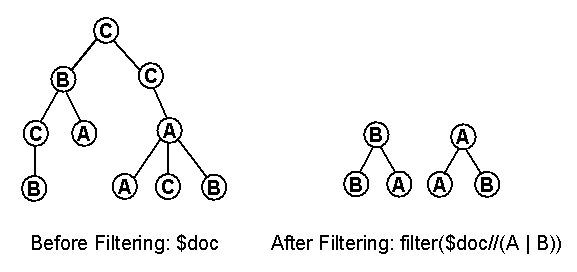
|
| Figure 2: Action of the filter function |
The following example illustrates how filter might be used to
compute a table of contents for a document that contains many levels of nested
sections. The query filters the document, retaining only section elements,
title elements nested directly inside section elements, and the text of those
title elements. Other elements, such as paragraphs and figure titles, are
eliminated, leaving only the "skeleton" of the document.
(Q33) Prepare a table of contents for the document "cookbook.xml",
containing nested sections and their titles.
<toc>
   {
   filter(document("cookbook.xml") //
      (section | section/title | section/title/text()))
   }
</toc>
3.2 Joins
Joins, which combine data from multiple sources into a single result, are a
very important type of query. In this section we will illustrate how several
types of joins can be expressed in XQuery. We will base our examples on the
following three documents:
-
A document named "parts.xml" that contains many <part> elements; each
<part> element in turn contains <partno> and <description>
subelements.
-
A document named "suppliers.xml" that contains many <supplier>
elements; each <supplier> element in turn contains <suppno> and
<suppname> subelements.
-
A document named "catalog.xml" that contains information about the
relationships between suppliers and parts. The catalog document contains many
<item> elements, each of which in turn contains <partno>,
<suppno>, and <price> subelements.
A conventional ("inner") join returns information from two or more related
sources, as illustrated by the following example, which combines information
from three documents:
(Q34) Generate a "descriptive catalog" derived from the catalog document,
but containing part descriptions instead of part numbers and supplier names
instead of supplier numbers. Order the new catalog alphabetically by part
description and secondarily by supplier name.
<descriptive-catalog>
   {
     FOR $i IN document("catalog.xml")//item,
         $p IN document("parts.xml")//part[partno = $i/partno],
         $s IN document("suppliers.xml")//supplier[suppno = $i/suppno]
     RETURN
        <item>
           {
           $p/description,
           $s/suppname,
           $i/price
           }
        </item>
     SORTBY(description, suppname)
   }
</descriptive-catalog>
Q34 returns information only about parts that have suppliers and suppliers
that have parts. An "outer join" is a join that preserves information from one
or more of the participating sources, including elements that have no matching
element in the other source. For example, a "left outer join" between suppliers
and parts might return information about suppliers that have no matching parts.
Q35 is an example of a left outer join.
(Q35) Return names of all the suppliers in alphabetic order, including
those that supply no parts; inside each supplier element, list the descriptions
of all the parts it supplies, in alphabetic order.
FOR $s IN document("suppliers.xml")//supplier
RETURN
   <supplier>
      {
        $s/suppname,
        FOR $i IN document("catalog.xml")//item
                 [suppno = $s/suppno],
            $p IN document("parts.xml")//part
                 [partno = $i/pno]
        RETURN $p/description
        SORTBY(.)
      }
   </supplier>
SORTBY(suppname)
Q35 preserves information about suppliers that supply no parts. Another type
of join, called a "full outer join", might be used to preserve information
about both suppliers that supply no parts and parts that have no supplier. The
result of a full outer join can be structured in any of several ways. The
example in Q36 uses a format of parts nested inside suppliers, followed by a
sequence of parts that have no supplier. This might be thought of as a
"supplier-centered" full outer join. A "part-centered" full outer join, on the
other hand, might return a sequence of suppliers nested inside parts, followed
by a sequence of suppliers that have no parts. Other forms of outer join
queries are also possible.
(Q36) Return names of suppliers and descriptions and prices of their
parts, including suppliers that supply no parts and parts that have no
suppliers.
<master_list>
 {
    FOR $s IN document("suppliers.xml")//supplier
    RETURN
        <supplier>
           {
             $s/suppname,
             FOR $i IN document("catalog.xml")//item
                     [suppno = $s/suppno],
                 $p IN document("parts.xml")//part
                     [partno = $i/partno]
             RETURN
                <part>
                   {
                     $p/description,
                     $i/price
                   }
                </part>
             SORTBY (description)
           }
        </supplier>
    SORTBY(suppname)
    ,
    # parts that have no supplier
    <orphan_parts>
       { FOR $p IN document("parts.xml")//part
         WHERE empty(document("catalog.xml")//item
               [partno = $p/partno] )
         RETURN $p/description
         SORTBY(.)
       }
    </orphan_parts>
 }
</master_list>
Q36 uses an element constructor to enclose its output inside a
<master_list> element. The concatenation operator (",") is used to
combine the two main parts of the query. The result is an ordered sequence of
<supplier> elements followed by an <orphan_parts> element that
contains descriptions of all the parts that have no supplier.
3.3 Grouping
Many queries involve forming data into groups and applying some aggregation
function such as count or avg to each group. The
following example shows how such a query might be expressed in XQuery, using
the catalog document defined in the previous section:
(Q37) Find the part number and average price for parts that have at least
3 suppliers.
FOR $pn IN distinct(document("catalog.xml")//partno)
LET $i := document("catalog.xml")//item[partno = $pn]
WHERE count($i) >= 3
RETURN
   <well_supplied_item>
      {$pn}
      <avgprice> {avg($i/price)} </avgprice>
   </well_supplied_item>
SORTBY(partno)
The distinct function in this query eliminates duplicate part
numbers from the set of all part numbers in the catalog document. The result
of distinct is a sequence in which order is not significant.
Note that $pn, bound by a FOR-clause, represents an individual part number,
whereas $i, bound by a LET-clause, represents a set of items which serves as
argument to the aggregate functions count($i) and avg($i/price).
The query uses an element constructor to enclose each part number and average
price in a containing element called <well_supplied_item>.
4 Conclusion
With the emergence of XML, the distinctions among various forms of
information, such as documents and databases, are quickly disappearing. XQuery
is designed to support queries against a broad spectrum of information sources.
The versatility of XQuery will help XML to realize its potential as a universal
medium for data interchange.
This specification describes XQuery Version 1. Future versions of XQuery may
include additional features such as the following:
-
Data definition facilities for persistent views.
-
Function overloading and polymorphic functions.
-
Facilities for updating XML data.
-
An extensibility mechanism whereby function libraries can be created,
containing functions implemented in various programming languages.
A References
-
XML 1.0
- World Wide Web Consortium. Extensible Markup
Language (XML) 1.0 (Second Edition). W3C Recommendation, 6 October 2000. See http://www.w3.org/TR/2000/WD-xml-2e-20000814.
-
XML Schema
- World Wide Web Consortium. XML Schema,
Parts 0, 1, and 2. W3C Recommendation, 2 May 2001. See http://www.w3.org/TR/2001/REC-xmlschema-0-20010502/ , http://www.w3.org/TR/2001/REC-xmlschema-1-20010502/ ,
and http://www.w3.org/TR/2001/REC-xmlschema-2-20010502/.
-
XML Query 1.0 Requirements
- World Wide Web Consortium. XML Query 1.0
Requirements. W3C Working Draft, 15 Feb 2001. See http://www.w3.org/TR/xmlquery-req.
-
XQuery 1.0 Formal Semantics
- World Wide Web Consortium. XQuery 1.0 Formal Semantics.
W3C Working Draft, 7 June 2001. See http://www.w3.org/TR/query-semantics/.
-
XPath 1.0
- World Wide Web Consortium. XML Path Language
(XPath) Version 1.0. W3C Recommendation, Nov. 16, 1999. See http://www.w3.org/TR/xpath.html
-
XQL
- J. Robie, J. Lapp, D. Schach. XML Query Language
(XQL). See http://www.w3.org/TandS/QL/QL98/pp/xql.html.
-
XML-QL
- Alin Deutsch, Mary Fernandez, Daniela Florescu,
Alon Levy, and Dan Suciu. A Query Language for XML. See http://www.research.att.com/~mff/files/final.html
-
SQL
- International Organization for Standardization (ISO).
Information Technology-Database Language SQL. Standard No. ISO/IEC 9075:1999.
(Available from American National Standards Institute, New York, NY 10036,
(212) 642-4900.)
-
ODMG
- Rick Cattell et al. The Object Database Standard:
ODMG-93, Release 1.2. Morgan Kaufmann Publishers, San Francisco, 1996.
-
Lorel
- Serge Abiteboul, Dallan Quass, Jason McHugh,
Jennifer Widom, and Janet L. Wiener. The Lorel Query Language for
Semistructured Data. International Journal on Digital Libraries, 1(1):68-88,
April 1997. See "http://www-db.stanford.edu/~widom/pubs.html
-
YATL
- S. Cluet, S. Jacqmin, and J. Simeon. The New YATL:
Design and Specifications. Technical Report, INRIA, 1999.
-
Quilt
- Don Chamberlin, Jonathan Robie, and Daniela
Florescu. Quilt: an XML Query Language for Heterogeneous Data Sources.
In Lecture Notes in Computer Science, Springer-Verlag, Dec. 2000.
Also available at http://www.almaden.ibm.com/cs/people/chamberlin/quilt_lncs.pdf.
See also http://www.almaden.ibm.com/cs/people/chamberlin/quilt.html.
-
XQuery 1.0 and XPath 2.0 Data Model
- World Wide Web Consortium. XQuery 1.0 and XPath 2.0 Data Model. W3C Working Draft, 7 June 2001. See http://www.w3.org/TR/query-datamodel/.
-
XSLT
- World Wide Web Consortium. XSL Transformations
(XSLT). W3C Recommendation, Nov. 16, 1999. See http://www.w3.org/TR/xslt.
-
XPointer
- World Wide Web Consortium. XML Pointer Language (XPointer) Version 1.0. W3C Last Call Working Draft 8 January 2001. See http://www.w3.org/TR/WD-xptr.
-
Namespaces
- World Wide Web Consortium. Namespaces in
XML. W3C Recommendation, Jan. 14, 1999. See http://www.w3.org/TR/REC-xml-names/.
-
XPath 2.0 Requirements
- World Wide Web
Consortium. XPath Requirements, Version 2.0. W3C Working Draft, Feb. 14, 2001.
See http://www.w3.org/TR/2001/WD-xpath20req-20010214.
-
XQueryX 1.0
-
World Wide Web
Consortium. XQueryX, Version 1.0. W3C Working Draft, 7 June 2001.
See http://www.w3.org/TR/xqueryx/
B XQuery Grammar
This appendix contains an LL(1) grammar for XQuery. We will be collecting grammars for specific parser generators, executable parsers, and collections of queries from the XML Query documents on the XML Query Working Group's public home page (http://www.w3.org/XML/Query).
| [1] | QueryModuleList | ::= | QueryModule ( ";" QueryModule)* | |
| [2] | QueryModule | ::= | ContextDecl* FunctionDefn* ExprSequence? | |
| [3] | ContextDecl | ::= | ("namespace" NCName "=" StringLiteral) | |
| | | | ("default" "namespace" "=" StringLiteral) | |
| | | | ("schema" StringLiteral StringLiteral) | |
| [4] | FunctionDefn | ::= | "define" "function" QName "(" ParamList? ")" | |
| | | ("returns"
Datatype)? EnclosedExpr | |
| [5] | ParamList | ::= | Param ("," Param)* | |
| [6] | Param | ::= | Datatype? Variable | |
| [7] | Expr | ::= | SortExpr | |
| | | | OrExpr | |
| | | | AndExpr | |
| | | | BeforeAfterExpr | |
| | | | FLWRExpr | |
| | | | IfExpr | |
| | | | SomeExpr | |
| | | | EveryExpr | |
| | | | TypeSwitchExpr | |
| | | | EqualityExpr | |
| | | | RelationalExpr | |
| | | | InstanceofExpr | |
| | | | RangeExpr | |
| | | | AdditiveExpr | |
| | | | MultiplicativeExpr | |
| | | | UnaryExpr | |
| | | | UnionExpr | |
| | | | IntersectExceptExpr | |
| | | | PathExpr | |
| [8] | SortExpr | ::= | Expr "sortby" "(" SortSpecList ")" | |
| [9] | SortSpecList | ::= | Expr ("ascending" | "descending")? ("," SortSpecList)? | |
| [10] | OrExpr | ::= | Expr "or" Expr | |
| [11] | AndExpr | ::= | Expr "and" Expr | |
| [12] | BeforeAfterExpr | ::= | Expr ("before" | "after") Expr | |
| [13] | FLWRExpr | ::= | (ForClause | LetClause)+ WhereClause? "return" Expr | |
| [14] | ForClause | ::= | "for" Variable "in" Expr ("," Variable "in" Expr)* | |
| [15] | LetClause | ::= | "let" Variable ":=" Expr ("," Variable ":=" Expr)* | |
| [16] | WhereClause | ::= | "where" Expr | |
| [17] | IfExpr | ::= | "if" "(" Expr ")" "then" Expr "else" Expr | |
| [18] | SomeExpr | ::= | "some" Variable "in" Expr "satisfies" Expr | |
| [19] | EveryExpr | ::= | "every" Variable "in" Expr "satisfies" Expr | |
| [20] | TypeSwitchExpr | ::= | "typeswitch" "(" Expr ")" ("as" Variable)? | |
| | | CaseClause+
"default" "return" Expr | |
| [21] | CaseClause | ::= | "case" Datatype "return" Expr | |
| [22] | EqualityExpr | ::= | Expr ("=" | "!=" | "==" | "!==") Expr | |
| [23] | RelationalExpr | ::= | Expr ("<" | "<=" | ">" | ">=") Expr | |
| [24] | InstanceofExpr | ::= | Expr "instanceof" "only"? Datatype | |
| [25] | RangeExpr | ::= | Expr "to" Expr | |
| [26] | AdditiveExpr | ::= | Expr ("+" | "-") Expr | |
| [27] | MultiplicativeExpr | ::= | Expr ("*" | "div" | "mod") Expr | |
| [28] | UnaryExpr | ::= | ("-" | "+") Expr | |
| [29] | UnionExpr | ::= | Expr ("union" | "|") Expr | |
| [30] | IntersectExceptExpr | ::= | Expr ("intersect" | "except") Expr | |
| [31] | PathExpr | ::= | RelativePathExpr | |
| | | | ("/" RelativePathExpr?) | |
| | | | ("//" RelativePathExpr?) | |
| [32] | RelativePathExpr | ::= | StepExpr ( ("/" | "//") StepExpr)* | |
| [33] | StepExpr | ::= | AxisStepExpr | OtherStepExpr | |
| [34] | AxisStepExpr | ::= | Axis NodeTest StepQualifiers | |
| [35] | OtherStepExpr | ::= | PrimaryExpr StepQualifiers | |
| [36] | StepQualifiers | ::= | ( ("[" Expr "]") | ("=>" NameTest) )* | |
| [37] | Axis | ::= | (NCName "::") | "@" | |
| [38] | PrimaryExpr | ::= | "." | |
| | | | ".." | |
| | | | NodeTest | |
| | | | Variable | |
| | | | Literal | |
| | | | FunctionCall | |
| | | | ParenthesizedExpr | |
| | | | CastExpr | |
| | | | ElementConstructor | |
| [39] | Literal | ::= | NumericLiteral | StringLiteral | |
| [40] | NodeTest | ::= | NameTest | KindTest | |
| [41] | NameTest | ::= | QName | Wildcard | |
| [42] | KindTest | ::= | PITest | CommentTest | TextTest | AnyKindTest | |
| [43] | PITest | ::= | "processing-instruction" "(" StringLiteral? ")" | |
| [44] | CommentTest | ::= | "comment" "(" ")" | |
| [45] | TextTest | ::= | "text" "(" ")" | |
| [46] | AnyKindTest | ::= | "node" "(" ")" | |
| [47] | ParenthesizedExpr | ::= | "(" ExprSequence? ")" | |
| [48] | ExprSequence | ::= | Expr ("," Expr)* | |
| [49] | FunctionCall | ::= | QName "(" (Expr ("," Expr)*)? ")" | |
| [50] | CastExpr | ::= | (("cast" "as") | ("treat" "as")) Datatype "(" Expr ")" | |
| [51] | Datatype | ::= | QName | |
| [52] | ElementConstructor | ::= | "<" NameSpec AttributeList ("/>" | | |
| | | (">"
ElementContent* "</" (QName S?)? ">") ) | |
| [53] | NameSpec | ::= | QName | ( "{" Expr "}" ) | |
| [54] | AttributeList | ::= | (S (NameSpec S? "=" S? (AttributeValue | |
| | | |
EnclosedExpr) AttributeList)? )? | |
| [55] | AttributeValue | ::= | ( ["] AttributeValueContent* ["] ) | |
| | | | ( ['] AttributeValueContent* ['] ) | |
| [56] | ElementContent | ::= | Char | |
| | | | ElementConstructor | |
| | | | EnclosedExpr | |
| | | | CdataSection | |
| | | | CharRef | |
| | | | PredefinedEntityRef | |
| [57] | AttributeValueContent | ::= | Char | |
| | | | CharRef | |
| | | | EnclosedExpr | |
| | | | PredefinedEntityRef | |
| [58] | CdataSection | ::= | "<![CDATA[" Char* "]]>" | |
| [59] | EnclosedExpr | ::= | "{" ExprSequence "}" | |
Precedence order of expressions, from highest precedence to lowest
precedence (within each precedence level, operators are applied from left to
right):
-
PathExpr
-
IntersectExceptExpr
-
UnionExpr
-
UnaryExpr
-
MultiplicativeExpr
-
AdditiveExpr
-
RangeExpr
-
RelationalExpr, InstanceofExpr
-
EqualityExpr
-
FLWRExpr, IfExpr, SomeExpr, EveryExpr, TypeswitchExpr
-
BeforeAfterExpr
-
AndExpr
-
OrExpr
-
SortExpr
Lexical structure
| [60] | StringLiteral | ::= | (["] [^"]* ["]) | (['] [^']* [']) | |
| [61] | NumericLiteral | ::= | (("." [0-9]+) | ([0-9]+ ("." [0-9]+?)?)) ([eE] [+-]? [0-9]+)? | |
| [62] | Wildcard | ::= | "*" | (NCName ":") | ("*:" NCName) | |
| [63] | Variable | ::= | "$" QName | |
| [64] | PredefinedEntityRef | ::= | "&" ("lt" | "gt" | "amp" | "quot" | "apos") ";" | |
| [65] | CharRef | ::= | "&#" ([0-9]+ | ("x" [0-9a-fA-F]+)) ";" | |
Char and S are defined in [XML 1.0]. QName and NCName are
defined in [Namespaces].
C XQuery Issues (Non-Normative)
This section contains the current issues for XQuery. The individual
issues are shown in detail after an abbreviated issues list.
C.1 Issue List
C.2
XQuery Issues
Issue
1
:
Collection types
(xquery-collection-types)
|
Originator:
|
XQuery Editors |
|
Locus:
|
requirements |
Description:
XQuery currently considers book and list(book) to be different types.
List is an abbreviation of the facets minoccurs=0, maxoccurs = unbounded. We
need to confirm that this accurately reflects the type system of XML
Schema.
Issue
2
:
Definitions of Operators
(xquery-definition-of-operators)
|
Originator:
|
XQuery Editors |
|
Locus:
|
xquery-algebra |
Description:
XPath defines some operators on lists in ways that differ from most
commonly used languages. For example, if $X is a list, $X+1 is defined as the
result of adding 1 to the first element in $X (ignoring the other elements.)
XQuery takes a more regular approach to operations on lists, as described in
the section on functions. For example, if the function increment(integer) is
defined to add 1 to its argument, then the function call increment($X) where $X
is a list of integers will return a list in which every member has been
incremented by 1.
This issue needs more study, which should probably occur on the joint
task force between XML Query and XSL. Operations on lists may be one area in
which work is needed to evolve the XPath specification toward Version 2.0.
It is very desirable that operators such as "+" occur only once in the
grammar, not separately in the "XPath" and "non-XPath" parts of the language.
This probably means that path expressions should be integrated into the XQuery
grammar and not treated as a "terminal symbol." This is the approach that has
been taken in the current CUP and JavaCC grammars.
Expressions involving operators must also be carefully defined. We
expect this to be handled by the task force on operators and the XPath 2.0 task
force.
Issue
3
:
Operators and functions
(xquery-operators-and-functions)
|
Originator:
|
XQuery Editorial Team |
|
Locus:
|
xquery-algebra |
Description:
A complete list of XQuery operators and core functions is needed, with
their signatures (datatypes of operands and results).
Sources of information: XPath specification, operator lists presented
at recent F2F meetings by Frank Olken and others.
Note: The Query Working Group and the Schema Working Group have agreed
to spawn a joint task force to investigate this issue. The XQuery language will
integrate the results of that work.
Issue
4
:
External Functions
(xquery-external-functions)
|
Originator:
|
XQuery Editors |
|
Locus:
|
xquery-algebra |
Description:
An extensibility mechanism needs to be defined that permits XQuery to
access a library of functions written in some other programming language such
as Java.
Some sources of information: the definition of external functions in
SQL, the implementation of external functions in Kweelt.
Issue
5
:
Function Definition
(xquery-function-definition)
|
Originator:
|
XQuery Editors |
|
Locus:
|
xquery-algebra |
Description:
We need more thought about what constitutes a valid parameter-type for
a function. Attribute-types as well as element-types? Type-names vs.
element-names? Should all the MSL symbol spaces be represented? Wildcards?
Sequences?
It is probably important to have NODE as a type, to allow functions to
take any XML node as a parameter, or to return any XML node as a result.
Using univeral names similar to those found in the MSL document, but
with a different syntax, would allow us to reference any schema type in XQuery
function definitions.
Issue
6
:
Function Resolution
(xquery-function-resolution)
|
Originator:
|
XQuery Editors |
|
Locus:
|
xquery-algebra |
Description:
More detailed rules need to be developed for function resolution. What
kinds of function overloading are allowed? A promotion hierarchy of basic types
needs to be specified. The issue of polymorphic functions with dynamic dispatch
needs to be studied. Can overloaded functions be defined such that the
parameter-type of one function is a subtype of the parameter-type of another
function? If so, what are the constraints on the return-types of these
functions? Is function selection based on the static type of the argument or on
the dynamic type of the argument (dynamic dispatch, performed at execution
time)? If XQuery supports dynamic dispatch, is it based on all the arguments of
a function or on only one distinguished argument?
Observation: This is a very complex area of language design. If it
proves too difficult to solve in the available time, it may be wise to take a
simple approach such as avoiding dynamic dispatch in Version 1 of XML
Query.
Proposal:
The XML Query Formal Semantics does not support overloading or dynamic
dispatch. We will attempt to simplify XML Query Level 1 by omitting these,
unless it becomes clear that they are needed. We realize that this might
happen.
Issue
7
:
CAST expression
(xquery-cast-expression)
|
Originator:
|
XQuery Editors |
|
Locus:
|
xquery-algebra |
Description:
Does XQuery need a CAST expression for casting an instance of one type
into another type?
Proposal:
A "CAST AS" operator has been added to this current Working Draft. We
solicit feedback on this operator.
Issue
8
:
Type Guard
(xquery-type-guard)
|
Originator:
|
Michael Rys |
|
Locus:
|
xquery-algebra |
Description:
Does XQuery require a syntax for type guards?
Proposal:
We have added the "TREAT AS" operator to this current Working Draft.
This is especially helpful for function arguments, since we do not have
function polymorphism in the current specification. We solicit feedback on this
operator.
Issue
9
:
Separation of clauses in FLWR
(xquery-separation-of-flowers)
|
Originator:
|
Algebra Editors |
|
Locus:
|
xquery-algebra |
Description:
A FOR clause can stand alone: FOR $var IN expr1 RETURN expr2. A LET
clause can stand alone: LET $var := expr1 EVAL expr2. It has been suggested
that a WHERE clause should also be able to stand alone: WHERE expr1 RETURN
expr2.
Note: in the current BNF, at least one FOR or LET clause must occur,
but it is not necessary to have a FOR.
Observation: This functionality is already provided by the conditional
expression, IF expr1 THEN expr2 ELSE [ ]. There does not seem to be a
compelling reason to provide a second way to write this expression. However,
making the ELSE clause optional might be a slight improvement.
Proposal:
The following content model should be adopted for FLWR
expressions:
FlwrExpr ::= (ForClause | LetClause)+ [WhereClause] ReturnClause
This allows us also to remove the separate LET/EVAL expression, which
can now be expressed using LET/RETURN.
Issue
10
:
Alignment of Syntax
(xquery-alignment-of-syntax)
|
Originator:
|
Algebra Editors |
|
Locus:
|
xquery-algebra |
Description:
Should the syntaxes of XQuery and the XML Query Formal Semantics be
more closely aligned?
At the time this issue was originally proposed, XQuery and the Formal
Semantics used distinctly different languages. We are now in the process of
aligning these languages. The current Working Draft shows significant progress
in this direction. However, more work is to be done with respect to type
declarations and the use of type in the language.
Issue
11
:
Alternative syntax for element construction
(xquery-element-construction)
|
Originator:
|
Algebra Editors |
|
Locus:
|
xquery-algebra |
Description:
(From Algebra team): We think it would be helpful to have two syntaxes
for construction, xquery-algebra a[. . .] as used in the Algebra
and <a> . . . </a> as used in XQuery. Not least, the
a[. . .] syntax matches the syntax used in the Algebra for
types.
Proposal:
We do not believe it is helpful to have two syntaxes for the same
thing, and we do not feel that this suggestion would make XQuery easier to read
or use. In any case, square brackets are used in XQuery to enclose predicates
and are not available for the suggested purpose.
Issue
12
:
Fusion
(xquery-fusion)
|
Originator:
|
Michael Rys |
|
Locus:
|
xquery-algebra |
Description:
Consider adding a fusion operator to XQuery. Michael has supplied us
with a few queries in which fusion would be helpful, and fusion seems promising
as a feature, but we have not yet done adequate study of this issue. We would
like to explore a wider set of use cases to make sure that we take a general
approach to the problems related to fusion.
This requires further study. Use cases will need to be developed to
determine precisely what forms of a fusion operator are actually helpful for
data integration. An extensive and informative thread on this topic can be
found in the W3C archives, starting at
lists.w3.org/Archives/Member/w3c-archive/2000Dec/0132.html.
Proposal:
Fusion is still not well motivated by use cases, despite fairly
extensive discussion. External functions may be important, but we do not think
it is worth doing right now. There is also an argument for omitting them
because they limit the optimizations that can be done in the rest of the
language.
Issue
13
:
Filter as a Function
(xquery-filter-function)
|
Originator:
|
Dana |
|
Locus:
|
xquery-algebra |
Description:
Dana has observed that Filter can be a function rather than an
operator, if nodes have identity.
Resolution:
Filter is now a function, where the first parameter is the expression
to be filtered, and the second parameter is the filter expression. We find this
more elegant.
Issue
14
:
TRY/CATCH and error()
(xquery-try-catch-error)
|
Originator:
|
XQuery Editors |
|
Locus:
|
xquery-algebra |
Description:
We believe the following approach to error handling would be very
useful - (1) introduce TRY <expression> CATCH <expression>, similar
to try/catch in OO languages. Instead of having "throw" to throw objects, use
error(<expression>), bind the result of the expression to the variable
$err, and allow $err to be used in the CATCH clause.
Proposal:
Dana Florescu has been assigned the task of writing a proposal for
this.
Issue
15
:
Updates
(xquery-updates)
|
Originator:
|
XQuery Editors |
|
Locus:
|
xquery-algebra |
Description:
We believe that a syntax for update would be extremely useful,
allowing inserts, updates, and deletion. This might best be added as a
non-normative appendix to the syntax proposal, since the algebra is not
designed for defining this portion of the language.
Proposal:
Jonathan is working on a proposal for this.
Issue
16
:
Algebra Mapping
(xquery-algebra-mapping)
|
Originator:
|
XQuery Editors |
|
Locus:
|
xquery-algebra |
Description:
The algebra mapping is incomplete and out of date.
Proposal:
Jerome has created a new version of the mapping, with help from Mary,
Dana and Mugur.
Issue
17
:
XPath Productions
(xquery-xpath-productions)
|
Originator:
|
XQuery Editors |
|
Locus:
|
xquery-algebra |
Description:
XPath can't be treated as a terminal symbol in our grammar. We intend
XQuery to be a superset of the abbreviated syntax of XPath. We do not use the
grammar of XPath directly because it needs to be integrated into our other
productions. For example, operators like the union operator, which occur in
path expressions, also occur in other contexts in XQuery, and it makes little
sense to define two different operators. This raises issues of coordination
with XPath.
Issue
18
:
Abstract Syntax
(xquery-abstract-syntax)
|
Originator:
|
XQuery Editors |
|
Locus:
|
xquery-algebra |
Description:
Jerome and Mary have suggested that we abandon the separate abstract
syntax for XQuery, in favor of a higher-level BNF.
Proposal:
This is the BNF that now appears in Appendix B.
Issue
19
:
Recursion
(xquery-recursion)
|
Originator:
|
XQuery Editors |
|
Locus:
|
xquery-algebra |
Description:
Should XQuery support general recursion, or should it be limited in
some way? Status quo: XQuery currently supports general recursion.
Reference: XML Query Algebra Issues
[Issue-0008] Fixed point operator or recursive functions]
[Issue-0032] Full regular path expressions]
Issue
20
:
Copy and Reference Semantics
(xquery-copy-reference)
|
Originator:
|
XQuery Editors |
|
Locus:
|
xquery-algebra |
Description:
Copy and reference semantics must be defined properly for updates to
work. This must be coordinated with the algebra team.
Issue
21
:
View Definition
(xquery-persist-views-functions)
|
Originator:
|
Mugur |
|
Locus:
|
xquery-algebra |
Description:
Do we need a way to define views?
Resolution:
While a mechanism for view definition is desirable, we do not
currently intend to provide one in Level 1.
Issue
22
:
Human-Readable Syntax for Types
(xquery-type-syntax)
|
Originator:
|
Algebra Editors |
|
Locus:
|
xquery-algebra |
Description:
The Algebra has a syntax for declaring types. Up to now, XQuery uses
XML Schema for declaring types. Is this sufficient? Some important
questions:
-
Are type names sufficient, or does XQuery really need its own
syntax for declaring types?
-
Would Normalized Universal Names (derived from MSL) be sufficient
for type names?
-
How will type names be bound to definitions?
Issue
23
:
What is a Query
(xquery-query)
|
Originator:
|
Dana |
|
Locus:
|
xquery-algebra |
Description:
What is a query?
According the the algebra: any number of type declarations, function
definitions, variable definitions and expressions.
According to XQuery: any number of namespace declarations, function
definitions and a unique expression.
These definitions should be coordinated.
Issue
24
:
XPath Type Coercions
(xquery-xpath-coercions)
|
Originator:
|
XQuery Editors |
|
Locus:
|
xquery-algebra |
Description:
XPath has a number of implicit type coercions, and also has implied
existential quantification in some places. In XML 1.0, which had a small and
loose type system, this was less problematic than it is with XML Schema, which
introduces many types and relationships among types. If XQuery is to be
compatible with XPath, we need to study these rules carefully, and adapt them
to be rational and intuitive when used with the XML Schema type system.
Also, there are interactions between quantification and type coercion
in XPath, sometimes causing non-intuitive results.
Issue
25
:
Support for Unordered Collections
(xquery-unordered-collections)
|
Originator:
|
Algebra Editors |
|
Locus:
|
xquery |
Description:
Does XQuery need features to add support for unordered collections? If
so, what features are required? In the current draft, "unordered" is a property
of a list. The user can create an ordered list from an unordered list by using
SORTBY. The distinct() function not only removes duplicates from a list, it
also renders the list unordered.
Do we need a function that merely removes the ordered property of a
list?
How does the ordered/unordered property of a list affect the semantics
of operators applied to it?
Issue
26
:
Identity-based equality operator
(xquery-equality-identity)
|
Originator:
|
Algebra Editors |
|
Locus:
|
xquery-algebra |
Description:
Do we need an identity-based equality operator? Please justify your
answer with sample queries. Note that XPath gets along without it.
Issue
27
:
Deep equality
(xquery-deep-equality)
|
Originator:
|
Jonathan |
|
Locus:
|
xquery-algebra |
Description:
In XPath, <book><title> Mark Twain
</title></book> and <book><author> Mark Twain
</author></book> are treated as equal in comparisons. Is this
acceptable for us? Do we need another notion of deep equality? If so, what are
the compatibility issues with XPath?
Issue
28
:
Reference Constructor
(xquery-reference-constructor)
|
Originator:
|
Jonathan |
|
Locus:
|
xquery |
Description:
Queries should be able to return references; for instance, a query
that generates a table of contents should also be able to create references to
the items in the content itself. How can we extend the syntax to support
this?
Issue
29
:
Precedence of Operators
(xquery-precedence)
|
Originator:
|
Dana |
|
Locus:
|
xquery |
Description:
The XQuery editorial team is working through a number of cases to
determine the best precedence of operators. Our current precedence rules are
shown in Appendix B.
Issue
30
:
Queries with Invalid Content
(xquery-invalid-content)
|
Originator:
|
XQuery Editors |
|
Locus:
|
xquery-algebra |
Description:
Is it an error for a query to specify content that may not appear,
according to the schema definition? Consider the following query:
invoice//nose
If the schema does not allow a nose to appear on an invoice, is this
query an error, or will it simply return an empty list?
Issue
31
:
Function Libraries
(xquery-function-library)
|
Originator:
|
XQuery Editors |
|
Locus:
|
xquery |
Description:
XQuery needs a mechanism to allow function definitions to be shared by
multiple queries. The XQuery grammar allows function definitions to occur
without a query expression.
We must provide a way for queries to access functions in libraries.
For instance, we might add an IMPORT statement to XQuery, with the URI of the
functions to be imported. It must be possible to specify either that (1) local
definitions replace the imported definitions, or (2) imported definitions
replace the local ones.
Issue
32
:
Correspondence of Types
(xquery-type-correspondence)
|
Originator:
|
Jerome Simeon |
|
Locus:
|
xquery-algebra |
Description:
Section 2.9, on functions, portrays XQuery as a statically typed
language, but the mechanisms by which static typing is established are still
being developed by the XML Query Algebra editorial team. A complete accounting
for type requires that the XML Query Algebra conform completely to the XML
Schema type system, and that many open issues be resolved.
The semantics of XQuery are defined in terms of the operators of the
XML Query Algebra (see [XQuery 1.0 Formal Semantics]. The mapping of
XQuery operators into Algebra operators is still being designed, and may result
in some changes to XQuery and/or the Algebra. The type system of XQuery is the
type system of XML Schema. Work is in progress to ensure that the type systems
of XQuery, the XML Query Algebra, and XML Schema are completely aligned. The
details of the operators supported on simple XML Schema datatypes will be
defined by a joint XSLT/Schema/Query task force.
Issue
33
:
Excluding Undesired Elements
(xquery-exclude-undesireables)
|
Originator:
|
Don Chamberlin |
|
Locus:
|
xquery |
Description:
How do we exclude undesired elements from the results of joins?
This need came out of a thread exploring data integration scenarios,
starting with
http://lists.w3.org/Archives/Member/w3c-archive/2000Dec/0132.html.
Issue
34
:
Alignment of Precedence
(xquery-align-precedence)
|
Originator:
|
Jerome Simeon |
|
Locus:
|
xquery-algebra |
Description:
The precedence rules of XQuery and the algebra are not completely
aligned. This needs to be fixed by the time both specifications are
finished.
Issue
35
:
Escape to ABQL
(xquery-escape-to-abql)
|
Originator:
|
Jerome Simeon |
|
Locus:
|
xquery |
Description:
Is there a need to be able to escape to ABQL?
Issue
36
:
CAST and TREAT AS Syntax
(xquery-cast-syntax)
|
Originator:
|
Jonathan Robie |
|
Locus:
|
xquery |
Description:
Various approaches to the syntax of CAST AS and TREAT AS have been
proposed. Java and SQL have both been sources used to discuss these approaches.
We are still exploring other syntactic approaches.
Issue
37
:
XML Schema Datatypes Constructors
(xquery-datatype-constructors)
|
Originator:
|
Paul Cotton |
|
Locus:
|
xquery |
Description:
The set of constructor functions for XML Schema simple datatypes has
not yet been established. A joint task force with XML Schema has been chartered
to determine the operators on datatypes, and we expect them to also determine
the set of constructors for datatypes.
Issue
38
:
Attribute Constructor Function
(xquery-attribute-constructor-function)
|
Originator:
|
Don Chamberlin |
|
Locus:
|
xquery |
Description:
We need a function for constructing attributes.
Proposal:
The attribute function takes two parameters. The first is the name of
the attribute to be constructed. The second is the value of the attribute to be
constructed. If an attribute function occurs within an element constructor, the
attribute is added to the set of attributes for that element.
<foo>
   IF $f/temp > 200
     THEN make_attribute("warning", "about to explode!!")
     ELSE []
</foo></foo>
Note Dana and Phil's exchange re: typing when attribute names are not
statically known.
Issue
39
:
Attribute Name, Attribute Content
(xquery-attribute-name-content)
|
Originator:
|
Don Chamberlin |
|
Locus:
|
xquery |
Description:
We need functions to return the name of an attribute and the content
of an attribute.
Proposal:
attribute_name($b)
attribute_content($b)
Issue
40
:
Dereference Operator and Links
(xquery-dereference-links)
|
Originator:
|
Jonathan Robie |
|
Locus:
|
xquery |
Description:
Does the dereference operator work on links, such as XLink or HTML
href? Should we also support KEY/KEYREF? In general, our handling of references
needs a lot of work.
In general, how are the semantics of the dereference operator
defined?
Issue
41
:
XML Constructor
(xquery-literal-xml-constructor)
|
Originator:
|
Jonathan Robie |
|
Locus:
|
xquery-algebra |
Description:
Is there a need for a constructor that creates an instance of the XML
Query Data Model from a string that contains XML text?
Proposal:
Close the issue, pending convincing use cases. When do we need to be
able to create a string of XML text, then convert it into an instance of the
XML data model? Can't there always be an intervening parser or other tool to
create the XML data model instance?
Issue
42
:
Eval
(xquery-eval)
|
Originator:
|
Jonathan Robie |
|
Locus:
|
xquery-algebra |
Description:
Is there a need to be able to execute a string that contains the text
of an XQuery query? (This is similar to the eval function in Lisp.)
Issue
43
:
Inline XML Schema Declarations
(xquery-inline-xml-schema)
|
Originator:
|
Don Chamberlin |
|
Locus:
|
xquery |
Description:
Do we need to allow inline XML schema declarations in the prolog of a
query? The following example shows one potential syntax for this. It extends
the namespace declaration to allow literal XML Schema text to occur instead of
a URI in a namespace declaration. The implementation would then assign an
internal URI to the namespace.
  NAMESPACE fid = "http://www.example.com/fiddlefaddle.xsd"


  NAMESPACE loc =  [[
    <xsd:schema xmlns:xsd = "http://www.w3.org/2000/10/XMLSchema">
      <xsd:simpleType name="myInteger">
        <xsd:restriction base="xsd:integer">
          <xsd:minInclusive value="10000"/>
          <xsd:maxInclusive value="99999"/>
        </xsd:restriction>
      </xsd:simpleType>
    </xsd:schema>
  ]]


  FUNCTION string-to-myInteger ($s STRING) RETURNS loc:myInteger
  {
  -- If the facets of loc:myInteger are not satisfied,
  -- this function raises an error.

    LET $t := round(number($s))
    RETURN TREAT AS loc:myInteger($t)
  }


  string-to-myInteger("1023")
Issue
44
:
Encoding
(xquery-encoding)
|
Originator:
|
Jonathan Robie |
|
Locus:
|
xquery |
Description:
Does XQuery need a way to specify the encoding of a query? For
instance, should the prolog allow statements like the following?
ENCODING utf-16
Issue
45
:
Typing of Filter
(xquery-filter-typing)
|
Originator:
|
Jerome Simeon |
|
Locus:
|
xquery-algebra |
Description:
The current mapping of filter to the algebra does not preserve much
useful type information. Can the mapping be improved? Is there another approach
to filter that would yield better type information?
Issue
46
:
Typeswitch
(xquery-typeswitch)
|
Originator:
|
Mary Fernandez |
|
Locus:
|
xquery |
Description:
Do we need an expression similar to the MATCH expression in the
algebra? One proposed syntax looks like this:
TYPESWITCH expr
		CASE typename1: expr1
		CASE typename2: expr2
Since this syntax corresponds more closely to the syntax of the
algebra, it can be mapped more easily. Alternatively, the match expression in
the algebra could be made to resemble the INSTANCEOF expression of XQuery.
Issue
47
:
Mapping Input Context
(xquery-mapping-input-context)
|
Originator:
|
Jerome Simeon |
|
Locus:
|
xquery-algebra |
Description:
Do we need a way to specify the nodes in the input context? Many
queries do not specifically state the input to which they will be applied. This
allows the same query, for instance, to be applied to a number of databases. It
may be helpful for the mapping to introduce a global variable, eg $input, to
represent the input nodes for a query. This variable might even be useful in
the syntax of XQuery itself.
Issue
48
:
Accessing Element Data
(xquery-data-function)
|
Originator:
|
Mary Fernandez |
|
Locus:
|
xquery |
Description:
There is no operator to access the typed constant content of an
element. In the Algebra, the data() operator does this. Should XQuery do the
same?
Issue
49
:
Embedding XML in XQuery
(xquery-embedding-xml)
|
Originator:
|
XQuery Editors |
|
Locus:
|
xquery |
Description:
Do we need a way to embed literal XML content in a query? For
instance, should there be a way to construct an XML element using the native
syntax of XML?
Issue
50
:
Embedding XQuery in XML
(xquery-embedding-xquery-in-xml)
|
Originator:
|
Steve Tolkin |
|
Locus:
|
xquery-algebra |
Description:
Do we need a way to escape from XML to XQuery syntax? This could be
used to provide functionality similar to that of ASP or JSP.
Issue
51
:
Naive Implementation Strategy
(xquery-naive-implementation)
|
Originator:
|
Marton Nagy |
|
Locus:
|
xquery |
Description:
Marton Nagy has suggested that it would be helpful to describe a naive
implementation strategy for XQuery.
A naive XQuery implementation might parse the query, map it to Algebra
syntax, and pass it to an Algebra implementation to request type checking from
the algebra, returning an error if there were static type errors. A naive
implementation might then request query execution from the algebra, get the
results from the algebra and return it to the user.
Alternatively, the implementation might have its own algebra for
execution, or it might generate statements in a specific implementation
language such as XPath or SQL.We expect a wide variety of implementation
approaches to be used in practice.
Issue
52
:
XML-based Syntax
(xquery-abql)
|
Originator:
|
XML Query WG |
|
Locus:
|
xquery |
Description:
XQuery needs an XML representation that reflects the structure of an
XQuery query. Drafts of such a representation have been prepared, but it is not
yet ready for publication.
Issue
53
:
Mapping CAST AS
(xquery-mapping-cast)
|
Originator:
|
Jerome Simeon |
|
Locus:
|
xquery-algebra |
Description:
The algebra does not have coercion functions between values. The
mapping requires this for CAST AS.
Issue
54
:
Defining Behavior for Well Formed, DTD, and Schema Documents
(xquery-define-schema-variants)
|
Originator:
|
Don Chamberlin |
|
Locus:
|
xquery-algebra |
Description:
We should specify the behavior of XQuery for well formed XML, XML
validated by a schema, and XML validated by a DTD.
Issue
55
:
Comments to end-of-line
(xquery-comment-to-end-of-line)
|
Originator:
|
Michael Rys |
|
Locus:
|
xquery |
Description:
Since an XQuery may physically reside in an XML document, comments
that rely on the concept of end-of-line can result in anomalies due to XML
whitespace normalization. We should probably use bounded comments.
One possible syntax for comments:
{-- This is reminiscent of XML, but without angle brackets. --}
Issue
56
:
XPath Axes
(xquery-xpath-axes)
|
Originator:
|
XQuery Editors |
|
Locus:
|
xquery-algebra |
Description:
XPath supports 13 axes. The current Working Draft says that XQuery
will support a subset of these axes, including at least those axes required by
the abbreviated syntax. The definitive set of axes to be supported by XQuery
has not yet been determined. In the current Working Draft, the examples use
abbreviated syntax, but the grammar supports unabbreviated syntax.
For the axes required by the abbreviated syntax, should XQuery allow
both the unabbreviated and abbreviated syntax? If we decide not to support
additional axes, no new functionality would be added by supporting the
unabbreviated syntax. Opinions vary as to whether the unabbreviated syntax is
clearer.
Issue
57
:
Quotes for computed attribute values
(xquery-quote-computed-attribute-value)
|
Originator:
|
James Clark |
|
Locus:
|
xquery |
Description:
XQuery currently allows computed attribute values without quotes,
which is not well-formed XML:
<foo bar={//baz} />
In XSLT, the equivalent syntax uses quotes:
<foo bar="{//baz}" />
Should XQuery adopt the XSLT convention? This would make it easier for
XQuery to reside in well formed XML documents.
Issue
58
:
Computed element and attribute names
(xquery-computed-element-names)
|
Originator:
|
XQuery Editors |
|
Locus:
|
xquery |
Description:
The current syntax for computed elements and attributes uses a syntax
that looks like XML but is not well-formed XML.
<{name($e)}>   # replicates the name of $e
   {$e/@*}            # replicates the attributes of $e
   {2 * number($e)}   # doubles the content of $e
</>
This makes it hard to embed queries that use this syntax in
well-formed XML documents. Also, the Formal Description uses a syntax for
element and attribute construction that is more suitable for use with inference
notation. Should an alternative construction syntax be used that eliminates
both problems?
Issue
59
:
Productions for Comments and Processing Instructions
(xquery-comment-pi-productions)
|
Originator:
|
Don Chamberlin |
|
Locus:
|
xquery |
Description:
The current EBNF lacks productions for comments and processing
instructions.
Issue
60
:
Arithmetic operators among sequences
(xquery-arithmetic-among-sequences)
|
Originator:
|
XQuery Editors |
|
Locus:
|
xquery-algebra |
Description:
If two sequences are combined with an arithmetic operator, what are
the semantics? Should a Cartesian product be used? Should the operator be
applied to pairs? Should an error be raised?
Issue
61
:
Collation Sequences
(xquery-collation-sequences)
|
Originator:
|
XQuery Editors |
|
Locus:
|
xquery-algebra |
Description:
How are collation sequences created to define inequality and sort
orders?
Issue
62
:
Nulls, nil, and three-valued logic
(xquery-three-value-logic)
|
Originator:
|
XQuery Editors |
|
Locus:
|
requirements |
Description:
Does XQuery need three-valued logic? How should XQuery deal with
missing or absent values? What are the semantics of XML Schema's xsi:nil?
Issue
63
:
Set operations based on value
(xquery-set-operators-on-values)
|
Originator:
|
XQuery Editors |
|
Locus:
|
requirements |
Description:
The definitions of UNION, INTERSECT, and EXCEPT for simple values are
still under discussion. It is not clear that these operators should apply to
simple values, because simple values do not have a concept of node identity. If
these operators are defined for simple values, perhaps they should have a lower
precedence than arithmetic operators.
Issue
64
:
Converting general expressions to Boolean
(xquery-anything-to-boolean)
|
Originator:
|
XQuery Editors |
|
Locus:
|
xquery |
Description:
Conditionals in XQuery allow any expression in the grammar. Which
kinds of expressions are actually converted to Boolean values, and how is this
done? Which kinds of expressions raise errors?
Issue
65
:
Quantifiers with multiple bindings?
(xquery-quantifier-multiple-variables)
|
Originator:
|
Don Chamberlin |
|
Locus:
|
xquery |
Description:
We have considered forms of quantified expressions that bind several
variables at once, as in SOME $x IN expr1, $y IN expr2. Are such quantifiers
desireable? If so, what are their semantics, and what use cases support them?
Note that there is no additional expressive power over the current
single-variable syntax, this is purely a question of convenience.
Issue
66
:
Implicit current node for functions?
(xquery-implicit-current-node)
|
Originator:
|
XQuery Editors |
|
Locus:
|
xquery |
Description:
Many XPath functions and node-tests implicitly operate on the current
node if no argument is specified. Should this apply to all functions? All unary
functions? Only certain functions?
Issue
67
:
Subtype Substitutability
(xquery-subtype-substitutability)
|
Originator:
|
XQuery Editors |
|
Locus:
|
xquery-algebra |
Description:
Should XQuery 1.0 support subtype substitutability for function
parameters?
If subtype substitutability is not supported in XQuery Version 1, the
motivation for TYPESWITCH is weakened and the decision to support TYPESWITCH
should be revisited.
Issue
68
:
Substitution Groups
(xquery-substitution-groups)
|
Originator:
|
XQuery Editors |
|
Locus:
|
xquery-algebra |
Description:
How should XQuery handle XML Schema substitution groups with respect
to name tests in paths? With respect to parameter types and return types in
functions?
Issue
69
:
Sequences for single parameters
(xquery-sequence-for-single)
|
Originator:
|
XQuery Editors |
|
Locus:
|
xquery-algebra |
Description:
If a sequence is passed as a function parameter where a singleton was
declared as the parameter type, should the function call operate on tuples of
the Cartesian cross product, as in the current draft, raise an error, or do
something else?
Issue
70
:
Is TREAT AS necessary?
(xquery-remove-treat)
|
Originator:
|
XQuery Editors |
|
Locus:
|
xquery-algebra |
Description:
The functionality of TREAT can also be expressed using TYPESWITCH. A
proposal to remove the TREAT expression is under consideration.
Issue
71
:
Module syntax
(xquery-module-syntax)
|
Originator:
|
XQuery Editors |
|
Locus:
|
xquery |
Description:
The definition and syntax of a query module are still under discussion
in the working group. The specifications in this section are pending approval
by the working group.
Future versions of the language may support other forms of query
modules, such as update statements and view definitions.
Issue
72
:
Importing Modules
(xquery-import)
|
Originator:
|
XQuery Editors |
|
Locus:
|
xquery |
Description:
The means by which a query module gains access to the functions
defined an an external function library remains to be defined.
Issue
73
:
General discussion of errors
(xquery-general-errors)
|
Originator:
|
XML Query WG |
|
Locus:
|
xquery |
Description:
This document does not have a general discussion of errors, when they
are raised, and how they are processed. This is needed.
Issue
74
:
Cutting and pasting XML into XQuery
(xquery-cut-and-paste-xml)
|
Originator:
|
XQuery Editors |
|
Locus:
|
xquery |
Description:
A variety of XML constructs can not be cut and paste into XQuery,
including the internal subset, entities, notations, etc. Should we attempt to
ameliorate this?
Issue
75
:
Normalized Equality
(xquery-normalized-equality)
|
Originator:
|
Mary Fernandez |
|
Locus:
|
xquery-algebra |
Description:
When elements are compared, are comments and PIs considered in the
comparison? How is whitespace handled? Do we need to allow more than one way to
handle these in comparisons?
Issue
76
:
CASE not a subtype
(xquery-typeswitch-case-not-subtype)
|
Originator:
|
XML Query |
|
Locus:
|
xquery-algebra |
Description:
If the types in the CASE branches are not subtypes of the TYPESWITCH,
is this an error, or are these branches simply never executed? If the latter,
should we require a warning?
Issue
77
:
Namespace Prefix Redefine
(xquery-namespace-prefix-redefine)
|
Originator:
|
XML Query |
|
Locus:
|
xquery-algebra |
Description:
Can a namespace prefix be redefined, as in XML?
Issue
78
:
Namespace Attributes in Element Constructors
(xquery-namespace-attribute-declaration)
|
Originator:
|
XML Query |
|
Locus:
|
xquery-algebra |
Description:
If an element constructor contains a namespace declaration in XML
syntax, is the namespace declared in the query?
 <foo:bar xmlns:foo="//www.foo.com/foo.xsd">
    <foo:baz>
      Is this baz in the 'www.foo.com' namespace?
    </foo:baz>
  </foo>
Issue
79
:
Static versus Dynamic Errors
(xquery-errors-static-dynamic)
|
Originator:
|
Algebra |
|
Locus:
|
xquery-algebra |
Description:
As part of the general description of errors, which is largely still
to be done, we must carefully distinguish static from dynamic errors. In
general, we should probably attempt to catch errors as early as possible. The
following examples have been suggested by the Algebra team:
"If the content of its argument node cannot be expressed as a value of
a simple type, the data function raises an error." This could be a static
error, since the data function makes most sense for schema valid documents or
nodes that have type assigned via xsi:type.
"For each member of the sequence, the ordering expression must return
a single value of some type for which the ">" operator is defined (for
example, a number or a string); otherwise an error results." This could also be
a static error.
"When one or more operands is a node, the content of the node is
extracted by an implicit call to the data function and converted to a number
before the operation is performed; if this conversion is not possible, an error
results." This could be a static or a dynamic error.
"TO is a binary operator that converts both of its operands to
integers. It then generates a sequence containing all the integers from the
left-hand operand to the right-hand operand, inclusive. If either of the
operands cannot be converted to an integer, an error results." In the presence
of type info, this could be a static error. In a well-formed document, in which
arbitrary strings may be converted to integers, it could be dynamic.
Issue
80
:
Empty End Tags in Element Constructors
(xquery-empty-end-tag)
|
Originator:
|
Michael Rys |
|
Locus:
|
xquery-algebra |
Description:
Our current syntax uses an empty end tag ("</>") as the end tag
for element constructors that use computed element names. Should we allow this
for element constructors with literal element names?
Issue
81
:
Sorting by Non-exposed Data
(xquery-phantom-sortby)
|
Originator:
|
Michael Rys |
|
Locus:
|
xquery-algebra |
Description:
Should we make it easier to sort by data that is not exposed in the
result? Although the current language allows this, it is difficult to define
complex sort orders in which some items are not exposed in the result and
others are computed in the expression that is sorted. Is there a more
convenient syntax for this that would be useful in XQuery?
Issue
82
:
Semicolon as Query Module Separator
(xquery-semicolon)
|
Originator:
|
XML Query |
|
Locus:
|
xquery |
Description:
The syntax currently uses a semicolon as a query module separator.
What are the semantics of the query module separator? Is the semicolon the best
character for this?
Issue
83
:
Escaping Quotes and Apostrophes
(xquery-escaping-quotes-and-apostrophes)
|
Originator:
|
XML Query |
|
Locus:
|
xquery |
Description:
In attribute constructors and string constructors, XQuery uses quotes
or apostrophes as delimiters. How are these characters escaped when they occur
within strings that are created by one of these constructors?
Issue
84
:
Unqualified Function Names
(xquery-unqualified-function-names)
|
Originator:
|
XML Query |
|
Locus:
|
xquery |
Description:
If a function name is not qualified by a namespace prefix, what
namespace is the function in? Some options that have been suggested: the
function might be considered to be in no namespace, in a default namespace, or
in the namespace of XQuery's built-in functions.
Issue
85
:
Leading Minus
(xquery-leading-minus)
|
Originator:
|
XML Query |
|
Locus:
|
xquery |
Description:
Should leading minus/plus be treated as unary operators or as part of
a numeric literal? Or should both be supported?
Issue
86
:
Case-Sensitivity in Keywords
(xquery-case-sensitive-keywords)
|
Originator:
|
XML Query |
|
Locus:
|
xquery |
Description:
Should keywords in XQuery be case-sensitive?
Issue
87
:
GROUPBY
(xquery-groupby)
|
Originator:
|
XML Query |
|
Locus:
|
xquery-algebra |
Description:
Does XQuery need an explicit GROUPBY expression? This would not add
expressive power, but would be convenient, and may be easier to optimize.
Issue
88
:
General Expressions in Path Steps
(xquery-step-expressions)
|
Originator:
|
|
|
Locus:
|
xquery-algebra |
Description:
The XPath task force has recommended that we allow any expression in a
path step. Proponents note that this adds to the symmetry of the language.
Opponents note that this allows queries to be written that are very difficult
to read, and may raise some issues for optimization. This needs further
study.
Issue
89
:
Comparing Collections
(xquery-comparing-collections)
|
Originator:
|
XML Query |
|
Locus:
|
xquery-algebra |
Description:
How are collections compared? Note that we need to be able to compare
unordered collections as well as ordered collections.
Issue
90
:
Meaning of BEFORE and AFTER
(xquery-before-after)
|
Originator:
|
Jonathan |
|
Locus:
|
xquery-algebra |
Description:
Which of the following meanings is preferred for X BEFORE Y? (In each
case, X AFTER Y would have the symmetric meaning.)
(1) X and Y are node sequences. Return the nodes in X that occur
before some node in Y. This is the current definition.
(2) X and Y are node sequences. Return the nodes in X that occur
before all nodes in Y. This is similar to the current definition and may be a
better match for our use cases.
(3) X is a node sequence and Y is an individual node. Return the nodes
in X that occur before Y. If YS is a node sequence, the meanings in (1) and (2)
can be expressed as "X BEFORE YS[last()]" and "X BEFORE YS[1]".
(4) X and Y are both individual nodes. Return True if X occurs before
Y in document order, otherwise False. If XS and YS are node sequences, the
meaning in (1) can be expressed as "FOR $x IN XS [SOME $y IN YS SATISFIES $x
BEFORE $y] RETURN $x". The meaning in (2) can be expressed similarly,
substituting "EVERY" for "SOME".
Issue
91
:
Lists of Element Constructors
(xquery-list-element-constructor)
|
Originator:
|
Michael Rys |
|
Locus:
|
xquery |
Description:
If a list of expressions contains adjacent element constructors,
should a comma appear between these element constructors?
Issue
92
:
Static Type Assertions
(xquery-static-type-assertion)
|
Originator:
|
Mary |
|
Locus:
|
xquery |
Description:
In the XQuery Formalism document, there is a static type-assertion
expression:
Expr : Type
This is often useful in an expression like:
LET bib0 : Bib := <bib>...some literal data...</bib>
which asserts statically that the type of bib0 is Bib, i.e., that the
literal data is a value contained in the Bib type. If this is not true, a
static, compile-time error is raised.
This semantics is not the same as :
LET bib0 := TREAT AS Bib (<bib>...</bib>)
which will raise a run-time error if the literal data is not a value
in Bib.
Issue
93
:
Names in Type Definitions
(xquery-names-type-definition)
|
Originator:
|
Don |
|
Locus:
|
xquery-algebra |
Description:
Does the definition of a type include both element-names and
element-contents (as in the Formal Semantics document), or only
element-contents (as in XML Schema)?
Issue
94
:
Path Expression Order
(xquery-path-expression-order)
|
Originator:
|
Michael Rys |
|
Locus:
|
xquery |
Description:
Does a path expression preserves the order of its input or document
order? When do these differ? We need to make our discussion of this more
precise.
Issue
95
:
Full Expression Syntax in Steps
(xquery-full-expression-syntax)
|
Originator:
|
XML Query |
|
Locus:
|
xquery-algebra |
Description:
The use of full expression syntax in a step of a path expression has
been recommended by the joint Query/XSLT Task Force but has not yet been
approved by the respective Working Groups. In the examples and use cases we
have, this is currently used mainly to allow union at any level in a path
expression. The use of full expression syntax in this document is subject to
Working Group approval.
Issue
96
:
Promotion Hierarchy for XML Schema Types
(xquery-schema-type-promotion)
|
Originator:
|
Jonathan |
|
Locus:
|
xquery |
Description:
A fixed "promotion hierarchy" must be defined among the primitive and
derived types of XML Schema. A function whose declared parameter type is in
this hierarchy can be invoked with an argument whose type is lower in the
hierarchy. For example, a function with a declared parameter-type of Float can
be invoked with an integer argument. In such a case, the argument is converted
to the declared type of the parameter.
The promotion hierarchy will be defined by the Operators and Functions
Task Force.
Issue
97
:
Importing Schemas and DTDs into query
(xquery-schema-import)
|
Originator:
|
Don Chamberlin |
|
Locus:
|
requirements |
Description:
We do not specify how a Schema or DTD is 'imported' into a query so
that its information is available during type checking. Schema and DTDs can
either be named explicitly (e.g., by an 'IMPORT SCHEMA' clause in a query) or
implicitly, by accessing documents that refer to a Schema or DTD. The mechanism
for statically accessing a Schema or DTD is unspecified.
This item is a duplicate of the Formal Semantics issue
0095.
Issue
98
:
Support for schema-less and incompletely validated documents
(xquery-schemaless)
|
Originator:
|
Don Chamberlin/Mary Fernandez |
|
Locus:
|
xquery-algebra |
Description:
This is related to xquery-schema-import. We do not specify
what is the effect of type checking a query that is applied to a document
without a DTD or Schema. In general, a schema-less document has type xs:AnyType
and type checking can proceed under that assumption. A related issue is what is
the effect of type checking a query that is applied to an incompletely
validated document. As above, we can make *no* assumptions about the static
type of an incompletely validated document and must assume its static type is
xs:AnyType.
This item is a duplicate of the Formal Semantics issue
0096.
Issue
99
:
Static type-checking vs. Schema validation
(xquery-static-versus-validate)
|
Originator:
|
Mary Fernandez |
|
Locus:
|
xquery-algebra |
Description:
Static type checking and schema validation are not equivalent, but we
might want to do both in a query. For example, we might want to assert
statically that an expression has a particular type and also validate
dynamically the value of an expression w.r.t a particular schema.
The differences between static type checking and schema validation
must be enumerated clearly (the XSFD people should help us with this).
This item is a duplicate of the Formal Semantics issue
0097.
Issue
100
:
Implementation of and conformance levels for static type checking
(xquery-type-conformance)
|
Originator:
|
Don |
|
Locus:
|
xquery-algebra |
Description:
Static type checking may be difficult and/or expensive to implement.
Some discussion of algorithmic issues of type checking are needed. In addition,
we may want to define "conformance levels" for XQuery, in which some processors
(or some processing modes) are more permissive about types. This would allow
XQuery implementations that do not understand all of Schema, and it would allow
customers some control over the cost/benefit tradeoff of type checking.
This item is a duplicate of the Formal Semantics issue
0098.
Issue
101
:
Missing conformance section
(xquery-conformance)
|
Originator:
|
Jonathan |
|
Locus:
|
xquery |
Description:
The final XQuery recommendation must have a conformance section. The
XML Query Working Group has not yet decided what should go into this
section.
Issue
102
:
typeof() function
(xquery-typeof)
|
Originator:
|
Jonathan |
|
Locus:
|
xquery-algebra |
Description:
Do we need a function that returns the type name of its operand? If
so, what should it return if the operand is an element with a given xsi:type -
the element name? the name of the type denoted by xsi:type? Specification of
this function requires more work on types in XQuery.
D Revision Log (Non-Normative)
Jonathan, 29 Nov 2000:
-
Changed the name of the language from "Quilt"
to "XQuery", to reflect the fact that the proposal has been accepted as the
basis of the W3C XML Query Working Group.
Changed the introduction to reflect
this new status.
Added Jerome and Mugur's names to the list of editors.
Don, 3 January 2001:
-
Changed FILTER to a function.
-
Allowed a FLWR to contain LET without FOR.
-
Added INSTANCEOF, CAST, and TREAT operators.
-
Expanded descriptions of types and functions.
Jonathan, 2 February 2000:
Jonathan, 1 May 2001:
Don, 4 May 2001:
-
Changed element constructors to use XML syntax with nested
expressions delimited by curly braces. Name may be omitted from an end-tag if
the name in the start-tag is computed by an expression.
-
Replaced grammar with James Clark grammar that avoids reserved
words; placed fragments of this grammar in each section of the document as
applicable.
-
Added full axis syntax of XPath (with note indicating that we
will support only a subset of the 13 axes).
-
Added TYPESWITCH expression.
-
New syntax for RANGE expression: m TO n.
-
Required parentheses around conditional expression in
IF...THEN...ELSE (to avoid reserved words).
-
Changed NOT, TRUE, and FALSE into functions (to avoid reserved
words).
-
Increased the precedence of UNION, INTERSECT, and EXCEPT (for
compatibility with XPath 1.0).
-
Changed dereference operator to => (because a name can
contain a hyphen).
-
Revised syntax for default namespace declaration (DEFAULT comes
before NAMESPACE).
-
Added syntax for declaring an external schema.
-
Allowed any expression in a step of a path expression (subject
to approval by WG).
-
Changed syntax for sequence constructors; eliminated
square-bracket delimiters.
-
Added descriptions of unordered() and data() functions (subject
to approval by WG).
-
Changed comment delimiter from "--" to "#" (because hyphens can
occur in names).
-
Removed keywords LIST and ELEMENT from type syntax.
-
Added semicolon as separator for query modules (subject to
approval by WG).
-
Made parameter types and return type optional in function
definitions.
-
Added more complete descriptions of various expressions and
operators.
-
Eliminated references to relational databases and SQL from the
sections on joins and grouping.
-
Added James Clark as an editor of the document.
Jonathan, 1 June 2001.
-
Changed namespaces in examples to use example.com domain.
-
Parsed all examples from body of text, modified to match
current grammar.
-
Added latest issues list, with new issues appended.
-
Modified stylesheet to display revision log.
-
Modified document titles and URLs to reflect the new
batch of XML Query and XPath documents.