Abstract
This document describes CC/PP (Composite Capabilities/Preference Profiles)
structure and vocabularies. A CC/PP profile is a description of device capabilities
and user preferences that can be used to guide the adaptation of content presented
to that device.
The Resource Description Framework (RDF) is used to create profiles that describe
user agent and proxy capabilities and preferences. The structure of a profile
is discussed. Topics include:
- structure of client capability and preference descriptions,
- structure of proxy behavior description, as this modifies the set of capabilities
and preferences to which an origin server may respond, AND
- use of RDF classes to distinguish different elements of a profile, so that
a schema-aware RDF processor can handle CC/PP profiles embedded in other xml
document types.
CC/PP vocabulary is identifiers (URIs) used to refer to specific capabilities
and preferences, and covers:
Status of this document
This section describes the status of this document at the time of its
publication. Other documents may supersede this document. The
latest
status of this series of documents is maintained at the W3C.
This is a W3C Last Call Working Draft. Last call means that the working
group believes that this specification is ready and therefore wishes this
to be the last call for comments. If the feedback is positive, the working
group plans to submit it for consideration as a W3C Proposed
Recommendation. Comments can be sent until the 5th of April, 2001. The
decision to issue this last call was made at the working group's meeting
on November 14 , see the
minutes and
at the teleconference on January 11, see the
minutes(Member-only link).
The working group is part of the W3CDevice Independence
activity.
Continued status of the work is reported on
the CC/PP Working Group Home Page
(Member-only link).
This document incorporates suggestions resulting from reviews and
active participation by members of the IETF CONNEG working group and
the WAP Forum UAprof drafting committee, and also significant
restructuring decided at the CC/PP working group
meeting in Karlstad during November 2000. As a result,
this document is created from merge of
CC/PP Structure and
CC/PP Vocabularies.
Please send comments and feedback to www-mobile@w3.org,
the public forum for discussion of W3C's work on Mobile Web Access.
A list of current W3C Recommendations and other technical documents
can be found at http://www.w3.org/TR/.
Table of contents
1. Introduction
A CC/PP profile is a description of device capabilities and user preferences
that can be used to guide the adaptation of content presented to that device.
As the number and variety of devices connected to the Internet grows, there
is a corresponding increase in the need to deliver content that is tailored
to the capabilities of different devices. Some limited techniques, such as HTTP
'accept' headers and HTML <alt> tags, already
exist. As part of a framework for content adaptation and contextualization,
a general purpose profile format is required that can describe the capabilities
of a user agent and preferences of its user. CC/PP is designed to be such a
format.
CC/PP is based on RDF, the Resource Description Framework, which was designed
by the W3C as a general purpose metadata description language. RDF provides
the framework with the basic tools for both vocabulary extensibility, via XML
namespaces, and interoperability. There is a specification that describes how
to encode RDF using XML [3], and another that defines
an RDF schema description language using RDF [4]. RDF
was designed to describe the metadata or machine understandable properties of
the Web. RDF is a natural choice for the CC/PP framework since user agent profiles
are metadata intended primarily for communication between user agents and resource
data providers.
A CC/PP profile contains a number of attribute names and associated values
that are used by a server to determine the most appropriate form of a resource
to deliver to a client. It is structured to allow a client and/or proxy to describe
their capabilities by reference to a standard profile, accessible to an origin
server or other sender of resource data, and a smaller set of features that
are in addition to or different than the standard profile. A set of CC/PP attribute
names, permissible values and associated meanings constitute a CC/PP vocabulary.
Some information contained in a profile may be sensitive, and adequate trust
and security mechanisms must be deployed to protect users' privacy. As a part
of a wider application, CC/PP cannot fully cover such issues, but is intended
to be used in conjunction with appropriate mechanisms. This topic is covered
in the Appendix F, CC/PP applications.
It is anticipated that different applications will use different vocabularies;
indeed this is needed if application-specific properties are to be represented
within the CC/PP framework. But for different applications to work together,
some common vocabulary, or a method to convert between different vocabularies,
is needed. (XML namespaces can ensure that different applications' names do
not clash, but does not provide a common basis for exchanging information between
different applications.) Any vocabulary that relates to the structure of a CC/PP
profile must follow this specification. The appendices introduce some simple
attribute vocabulary that may be used to improve cross-application exchange
of capability information, partly based on some earlier IETF work.
CC/PP is designed to be broadly compatible with the earlier UAPROF specification
[9] from the WAP Forum. That is, any valid UAPROF profile
is intended to be a valid CC/PP profile.
1.1 Scope and normative elements
CC/PP is a client profile data format, and a framework for incorporating application-
and operating environment-specific features. It does not define how the profile
is transferred, nor does it specify what CC/PP attributes must be generated
or recognized. CC/PP is designed for use as part of a wider application framework.
As such, the specification of CC/PP elements that must be supported and those
which may be omitted is a matter for a specific application.
There are few protocol assumptions built into the design of CC/PP. Although
it is intended to be largely protocol independent, particular consideration
has been given to use of CC/PP with HTTP for retrieving web resources. Appendix
F contains some further discussion of CC/PP applications.
This document describes a number of features of CC/PP. Some features form
part of the essential structure of CC/PP, for which conformance is REQUIRED.
Others are features whose use is RECOMMENDED or OPTIONAL. There is also discussion
of how new vocabularies should be introduced, directed to CC/PP application
designers rather than implementers.
The architecture section does not describe specific features, but indicates
general principles that underlie the design of CC/PP. As such, it is not specifically
normative but does contain information that should be understood for proper
implementation of CC/PP.
The section on CC/PP structure covers three main areas:
- CC/PP profile components: support for these is REQUIRED.
- CC/PP profile defaults: support for these is REQUIRED.
- CC/PP proxy behavior descriptions: support for these is RECOMMENDED for
applications which make use of proxies or other intermediaries that may extend
or vary the range of capabilities that may be assumed by an information provider.
The section on CC/PP attribute vocabularies describes some general features
of CC/PP attributes and their values. Support for the described formats for
simple attribute values is RECOMMENDED -- the actual syntax for any simple CC/PP
value is defined by the corresponding attribute specification; such specifications
may reference the information provided here. Support for the structured CC/PP
attribute formats described, where relevant, is REQUIRED.
Support is not required for any specific vocabulary, but application designers
are strongly encouraged to re-use existing vocabularies where possible.
CC/PP applications are not required to support features described in the appendices,
but any new attribute vocabularies defined MUST conform to the RDF schema in
appendices B and C.
1.2 Structure of this document
The remainder of this section covers terminology, conventions and notations
used in this document.
Section 2 provides an overview of the CC/PP profile structure, use of XML namespaces,
RDF data model and RDF Schemas.
Section 3 describes the structure of a CC/PP profile, and introduces the RDF
elements that are used to create the essential CC/PP elements.
Section 4 describes how attributes are used in a CC/PP profile, and presents
the recommended structure of CC/PP elements used to describe specific features.
The appendices contain additional supporting material that is not essential
to construct a valid CC/PP profile, but which provides additional background
information useful for understanding CC/PP, its relationship with RDF, or defining
attribute vocabularies for specific applications.
1.3 Document conventions
1.3.1 Terminology
See CC/PP terminology and abbreviations in Appendix
A of this document.
The term "CC/PP attribute" is used here to refer to a
specific capability or characteristic of a client (or other system) that appears
in a CC/PP profile. The term "feature" refers to a client
capability or characteristic that may or may not be the basis of a CC/PP attribute.
The term "attribute name" is used to indicate an RDF property
name used to identify a CC/PP attribute.
In describing the construction of profiles that incorporate proxy behaviors,
the terms "inbound" and "outbound"
are used in the sense described in the HTTP/1.1 specification, RFC 2616 [31].
That is: "inbound" means "toward the origin server", and "outbound" means "toward
the user agent".
The key words "MUST," "MUST NOT," "SHOULD," "SHOULD NOT," "MAY," and "MAY NOT"
in this document are to be interpreted as described in RFC 2119 [25].
1.3.2 RDF graph notation
The underlying structure of RDF is a directed labelled graph. For communication
between computer systems, RDF uses a serialization in XML to represent these
graphs. This XML notation is rather bulky and difficult for human discourse,
so a more visual notation is used here for describing RDF graph structures:
-
Figure 1-1: RDF graph notation
[Subject-resource] --propertyName--> [Object-resource]
Indicates a graph edge labelled 'propertyName' from an RDF
resource named 'Subject-resource' to another RDF resource names 'Object-resource'.
[Subject-resource] --propertyName--> "Property value"
Indicates a graph edge labelled 'propertyName' from an RDF
resource named 'Subject-resource' to a literal string containing the
indicated value.
[Subject-resource] --propertyName--> { "Val1", "Val2", ... }
This is a shorthand for a property whose value is an rdf:Bag
resource containing the indicated values (see section 4.1.2.1).
[<Subject-type>] --propertyName--> [<Object-type>]
Names in angle brackets are used to indicate an RDF resource
of the indicated type (i.e. having the indicated rdf:Type property
value), without indicating a specific name for the resource. This is
useful for showing the RDF classes that may be linked by a property.
[Subject-resource] --propertyName--> [Object-resource]
                                      |
       -------------------------------
      |
      +--property1--> (val1)
      +--property2--> (val2)
      :
     (etc.)
Property arcs can be chained, and multiple arcs drawn from
a subject resource.
|
Here are some XML examples of the RDF graph structures described
above:
Figure 1-2: RDF graph example in XML
<?xml version="1.0"?>
<!-- Checked by SiRPAC 1.16, 18-Jan-2001 -->

<!-- Any RDF graph is an RDF element
  -->
<RDF xmlns:rdf="http://www.w3.org/1999/02/22-rdf-syntax-ns#"
     xmlns:ccpp="http://www.w3.org/2000/07/04-ccpp#"
     xmlns="http://www.example.com/schema#">

  <!--  [Subject-resource] -propertyName-> [Object-resource]
    -->
  <rdf:Description rdf:about="Subject-resource">
    <propertyName>
      <rdf:Description rdf:about="Object-resource" />
    </propertyName>
  </rdf:Description>

  <!--  [Subject-resource] -propertyName-> [Object-resource]
     -  (Alternative format)
    -->
  <rdf:Description rdf:about="Subject-resource">
    <propertyName rdf:resource="Object-resource" />
  </rdf:Description>

  <!--  [Subject-resource] -propertyName-> "property value"
    -->
  <rdf:Description rdf:about="Subject-resource">
    <propertyName>Property value</propertyName>
  </rdf:Description>

  <!--  [Subject-resource] -propertyName-> { "Val1", "Val2", ... }
    -->
  <rdf:Description rdf:about="Subject-resource">
    <propertyName>
      <rdf:Description>
        <rdf:type resource="http://www.w3.org/1999/02/22-rdf-syntax-ns#Bag" />
        <rdf:li>Val1</rdf:li>
        <rdf:li>Val1</rdf:li>

        <!-- ...etc... -->

      </rdf:Description>
    </propertyName>
  </rdf:Description>

  <!--  [Subject-resource] -propertyName-> { "Val1", "Val2", ... }
     -  (Alternative format)
    -->
  <rdf:Description rdf:about="Subject-resource">
    <propertyName>
      <rdf:Bag>
        <rdf:li>Val1</rdf:li>
        <rdf:li>Val1</rdf:li>

        <!-- ...etc... -->

      </rdf:Bag>
    </propertyName>
  </rdf:Description>

  <!--  [<Subject-type>] -propertyName-> [<Object-type>]
    -->
  <rdf:Description>
    <rdf:type rdf:resource="Subject-type" />
    <propertyName>
      <rdf:Description>
        <rdf:type rdf:resource="Object-type" />
      </rdf:Description>
    </propertyName>
  </rdf:Description>
  <!--  [Subject-resource] -propertyName-> [Object-resource]
     -                                      |
     -                                      +-property1-> (val1)
     -                                      +-property2-> (val2)
     -                                      :
    -->
  <rdf:Description rdf:about="Subject-resource">
    <propertyName>
      <rdf:Description rdf:about="Object-resource" >
      <property1>val1</property1>
      <property2>val2</property2>

      <!-- ...etc... -->

      </rdf:Description>
    </propertyName>
  </rdf:Description>

</RDF>
|
2. CC/PP architecture
2.1 CC/PP profile structure
A CC/PP profile is broadly constructed as a 2-level hierarchy:
- a profile having a number of components, and
- each component having a number of attributes.
The initial branches of the CC/PP profile tree describe major components of
the client. Examples of major components are:
- the hardware platform upon which software is executing,
- the software platform upon which all applications are hosted, or
- an individual application, such as a browser.
A simple, graphical representation of the bottom of a CC/PP tree based on three
components (TerminalHardware, TerminalSoftware and
TerminalBrowser) would be:
Figure 2-1a: CC/PP profile components
[Profile]

 |
 +--ccpp:component-->[TerminalHardware]
 +--ccpp:component-->[TerminalSoftware]
 +--ccpp:component-->[TerminalBrowser]
|
The corresponding XML might look like this:
Figure 2-1b: CC/PP profile components in
XML
<?xml version="1.0"?>
<!-- Checked by SiRPAC 1.16, 18-Jan-2001 -->
<rdf:RDF xmlns:rdf="http://www.w3.org/1999/02/22-rdf-syntax-ns#"
     xmlns:ccpp="http://www.w3.org/2000/07/04-ccpp#">

  <rdf:Description rdf:about="Profile">

    <ccpp:component>
      <rdf:Description rdf:about="TerminalHardware">
        <!--  TerminalHardware properties here  -->
      </rdf:Description>
    </ccpp:component>

    <ccpp:component>
      <rdf:Description rdf:about="TerminalSoftware">
        <!--  TerminalSoftware properties here  -->
      </rdf:Description>
    </ccpp:component>

    <ccpp:component>
      <rdf:Description about="TerminalBrowser">
        <!--  TerminalBrowser properties here  -->
      </rdf:Description>
    </ccpp:component>

  </rdf:Description>
</rdf:RDF>
|
A CC/PP profile describes client capabilities and preferences in terms of a
number of "CC/PP attributes" for each component.
The description of each component is a sub-tree whose branches are the capabilities
or preferences associated with that component. Though RDF makes modeling a wide
range of data structures possible, including arbitrary graphs, complex data
models are usually best avoided for profile attribute values. A capability can
often be described using a small number of CC/PP attributes, each having a simple,
atomic value. Where more complex values are needed, these can be constructed
as RDF subgraphs. One useful useful case for complex attribute values is to
represent alternative values; e.g. a browser may support multiple versions of
HTML. A hypothetical profile might look like this:
Figure 2-2a: Complete CC/PP profile
example
[MyProfile]

 |
 +--ccpp:component-->[TerminalHardware]
 |                    |
 |                    +--rdf:type---> [HardwarePlatform]
 |                    +--display----> "320x200"
 |
 +--ccpp:component-->[TerminalSoftware]
 |                    |
 |                    +--rdf:type---> [SoftwarePlatform]
 |                    +--name-------> "EPOC"
 |                    +--version----> "2.0"
 |                    +--vendor-----> "Symbian"
 |
 +--ccpp:component-->[TerminalBrowser]
                      |
                      +--rdf:type---> [BrowserUA]
                      +--name-------> "Mozilla"
                      +--version----> "5.0"
                      +--vendor-----> "Symbian"
                      +--htmlVersionsSupported--> [ ]
                                                   |
                          -------------------------
                         |
                         +--rdf:type---> [rdf:Bag]
                         +--rdf:_1-----> "3.0"
                         +--rdf:_2-----> "4.0"
|
The corresponding XML might look like this:
Figure 2-2b: Complete CC/PP profile example in
XML
<?xml version="1.0"?>
<!-- Checked by SiRPAC 1.16, 18-Jan-2001 -->
<rdf:RDF xmlns:rdf="http://www.w3.org/1999/02/22-rdf-syntax-ns#"
         xmlns:ccpp="http://www.w3.org/2000/07/04-ccpp#">

  <rdf:Description rdf:about="MyProfile">

    <ccpp:component>
      <rdf:Description rdf:about="TerminalHardware">
        <rdf:type rdf:resource="HardwarePlatform" />
        <display>320x200</display>
      </rdf:Description>
    </ccpp:component>

    <ccpp:component>
      <rdf:Description rdf:about="TerminalSoftware">
        <rdf:type rdf:resource="SoftwarePlatform" />
        <name>EPOC</name>
        <version>2.0</version>
        <vendor>Symbian</vendor>
      </rdf:Description>
    </ccpp:component>

    <ccpp:component>
      <rdf:Description rdf:about="TerminalBrowser">
        <rdf:type rdf:resource="BrowserUA" />
        <name>Mozilla</name>
        <version>5.0</version>
        <vendor>Symbian</vendor>
        <htmlVersionsSupported>
          <rdf:Bag>
            <rdf:li>3.0</rdf:li>
            <rdf:li>4.0</rdf:li>
          </rdf:Bag>
        </htmlVersionsSupported>
      </rdf:Description>
    </ccpp:component>

  </rdf:Description>
</rdf:RDF>
|
The attributes of a component can be included directly, as in the previous
example, or may be specified by reference to a default profile, which may be
stored separately and accessed using its specified URI.
This use of an externally defined default properties is somewhat similar to
the idea of dynamic inheritance. It makes possible some important optimizations.
As a separate document, it can reside at a separate location and it can be separately
cached. This is particularly useful in wireless environments such as cellular
networks, where the profiles may be large and the client link slow and expensive.
Using default values, only a small part of the overall profile is sent over
the wireless network.
Figure 2-3a: CC/PP profile using defaults
[MyProfile]

 |
 +--ccpp:component--> [TerminalHardware]
 |                     |
 |                     +--rdf:type-------> [HardwarePlatform]
 |                     +--ccpp:defaults--> [HWDefault]
 |
 +--ccpp:component--> [TerminalSoftware]
 |                     |
 |                     +--rdf:type-------> [SoftwarePlatform]
 |                     +--ccpp:defaults--> [SWDefault]
 |
 +--ccpp:component--> [TerminalBrowser]
                       |
                       +--rdf:type-------> [BrowserUA]
                       +--ccpp:defaults--> [UADefault]

[HWDefault]
 |
 +--rdf:type---> [HardwarePlatform]
 +--display----> "320x200"

[SWDefault]
 |
 +--rdf:type---> [SoftwarePlatform]
 +--name-------> "EPOC"
 +--version----> "2.0"
 +--vendor-----> "Symbian"

[UADefault]
 |
 +--rdf:type---> [BrowserUA]
 +--name-------> "Mozilla"
 +--version----> "5.0"
 +--vendor-----> "Symbian"
 +--htmlVersionsSupported--> [ ]
                              |
                              +--rdf:type---> [rdf:Bag]
                              +--rdf:_1-----> "3.0"
                              +--rdf:_2-----> "4.0"
|
The corresponding XML might look like this:
Figure 2-3b: CC/PP profile using defaults in
XML
Device profile referencing defaults:
<?xml version="1.0"?>
<!-- Checked by SiRPAC 1.16, 18-Jan-2001 -->
<rdf:RDF xmlns:rdf="http://www.w3.org/1999/02/22-rdf-syntax-ns#"
         xmlns:ccpp="http://www.w3.org/2000/07/04-ccpp#">

  <rdf:Description rdf:about="MyProfile">

    <ccpp:component>
      <rdf:Description rdf:about="TerminalHardware">
        <rdf:type rdf:resource="HardwarePlatform" />
        <ccpp:defaults rdf:resource="HWDefault" />
      </rdf:Description>
    </ccpp:component>

    <ccpp:component>
      <rdf:Description rdf:about="TerminalSoftware">
        <rdf:type rdf:resource="SoftwarePlatform" />
        <ccpp:defaults rdf:resource="SWDefault" />
      </rdf:Description>
    </ccpp:component>

    <ccpp:component>
      <rdf:Description rdf:about="TerminalBrowser">
        <rdf:type rdf:resource="BrowserUA" />
        <ccpp:defaults rdf:resource="UADefault" />
      </rdf:Description>
    </ccpp:component>

  </rdf:Description>
</rdf:RDF>
Defaults for HardwarePlatform:
<?xml version="1.0"?>
<!-- Checked by SiRPAC 1.16, 18-Jan-2001 -->
<rdf:RDF xmlns:rdf="http://www.w3.org/1999/02/22-rdf-syntax-ns#"
         xmlns:ccpp="http://www.w3.org/2000/07/04-ccpp#">
  <rdf:Description rdf:about="HWDefault">
    <rdf:type rdf:resource="HardwarePlatform" />
    <display>320x200</display>
  </rdf:Description>
</rdf:RDF>
Defaults for SoftwarePlatform:
<?xml version="1.0"?>
<!-- Checked by SiRPAC 1.16, 18-Jan-2001 -->
<rdf:RDF xmlns:rdf="http://www.w3.org/1999/02/22-rdf-syntax-ns#"
         xmlns:ccpp="http://www.w3.org/2000/07/04-ccpp#">
  <rdf:Description rdf:about="SWDefault">
    <rdf:type rdf:resource="SoftwarePlatform" />
    <name>EPOC</name>
    <version>2.0</version>
    <vendor>Symbian</vendor>
  </rdf:Description>
</rdf:RDF>
Defaults for BrowserUA:
<?xml version="1.0"?>
<!-- Checked by SiRPAC 1.16, 18-Jan-2001 -->
<rdf:RDF xmlns:rdf="http://www.w3.org/1999/02/22-rdf-syntax-ns#"
         xmlns:ccpp="http://www.w3.org/2000/07/04-ccpp#">
  <rdf:Description rdf:about="UADefault">
    <rdf:type rdf:resource="BrowserUA" />
    <name>Mozilla</name>
    <version>5.0</version>
    <vendor>Symbian</vendor>
    <htmlVersionsSupported>
      <rdf:Bag>
        <rdf:li>3.0</rdf:li>
        <rdf:li>4.0</rdf:li>
      </rdf:Bag>
    </htmlVersionsSupported>
  </rdf:Description>
</rdf:RDF>
|
If a given attribute value is applied directly to a component resource, and
also appears on a resource referenced by the ccpp:defaults
property, the directly applied value takes precedence:
Figure 2-4a: Overriding a default
value
[MyProfile]

 |
 +--ccpp:component--> [TerminalHardware]
                       |
                       +--rdf:type-------> [HardwarePlatform]
                       +--ccpp:defaults--> [HWDefault]
                       +--memory---------> "32Mb"

[HWDefault]
 |
 +--rdf:type---> [HardwarePlatform]
 +--display----> "320x200"
 +--memory-----> "16Mb"
|
In this example, the default component indicates 16Mb of memory, but this value
is overridden by the memory property applied directly to the profile
component. Thus, in this profile, the memory attribute has a value
of 32Mb.
The corresponding XML might look like this:
Figure 2-4b: Overriding a default value in
XML
Device profile referencing defaults:
<?xml version="1.0"?>
<!-- Checked by SiRPAC 1.16, 18-Jan-2001 -->
<rdf:RDF xmlns:rdf="http://www.w3.org/1999/02/22-rdf-syntax-ns#"
         xmlns:ccpp="http://www.w3.org/2000/07/04-ccpp#">

  <rdf:Description rdf:about="MyProfile">

    <ccpp:component>
      <rdf:Description rdf:about="TerminalHardware">
        <rdf:type rdf:resource="HardwarePlatform" />
        <ccpp:defaults rdf:resource="HWDefault" />
        <memory>32Mb</memory>
      </rdf:Description>
    </ccpp:component>

  </rdf:Description>
</rdf:RDF>
Defaults for HardwarePlatform:
<?xml version="1.0"?>
<!-- Checked by SiRPAC 1.16, 18-Jan-2001 -->
<rdf:RDF xmlns:rdf="http://www.w3.org/1999/02/22-rdf-syntax-ns#"
         xmlns:ccpp="http://www.w3.org/2000/07/04-ccpp#">
  <rdf:Description rdf:about="HWDefault">
    <rdf:type rdf:resource="HardwarePlatform" />
    <display>320x200</display>
    <memory>16Mb</memory>
  </rdf:Description>
</rdf:RDF>
|
A resource indicated by a default property may appear in a separate document,
in which case an absolute URI reference should be specified for the default
resource. In such cases, the URI part of the default resource identifier (i.e.
not including the fragment identifier part) is used to retrieve an RDF document
containing the default resource description. Thus, if the default resource is
named http://example.com/DeviceProfile#HardwarePlatform, the URI
http://example.com/DeviceProfile is used to retrieve an RDF document,
and a resource within that document having the local identifier #HardwarePlatform
is taken as the default resource. (Such a resource might be defined within the
target document using "about='http://example.com/DeviceProfile#HardwarePlatform'"
or "ID='HardwarePlatform'". See also section 3.1.5.)
NOTE: individual applications may allow relative URIs to be
used. Those that do should specify exactly how the corresponding RDF document
is located.
It may be that an intervening network element, such as a transcoding proxy,
has additional capabilities it wishes to advertise on the behalf of its clients.
For instance, a transcoding proxy may be able to convert HTML to WML. The means
to provision such a proxy (meaning to provide or not provide the service for
some client) is beyond the scope of this work. But assuming such a proxy based
capability is provided, CC/PP provides means for a proxy to describe its own
capabilities as part of the CC/PP profile communicated to an origin server.
In the example below, the proxy profile showing its capabilities combined with
a client profile by a request profile link element. This is not a particularly
representative example, but it does illustrate how a proxy profile can contain
different kinds of component information:
Figure 2-5: Proxy profile combined with client profile
in request profile
Client Profile:
[ClientProfile]
 |
 +--ccpp:component-->[TerminalHardware]
 |                    |
 |                    +--rdf:type---> [HardwarePlatform]
 |                    +--display----> "320x200"
 |
 +--ccpp:component-->[TerminalSoftware]
 |                    |
 |                    +--rdf:type---> [SoftwarePlatform]
 |                    +--name-------> "EPOC"
 |                    +--version----> "2.0"
 |                    +--vendor-----> "Symbian"
 |
 +--ccpp:component-->[TerminalBrowser]
                      |
                      +--rdf:type---> [BrowserUA]
                      +--name-------> "Mozilla"
                      +--version----> "5.0"
                      +--vendor-----> "Symbian"
                      +--htmlVersionsSupported--> { "3.0","4.0" }
Proxy Profile:
[ProxyProfile]
 |
 +--proxyBehavior--> [ ]
 |                     |
 |                     +--proxyAllow--> [ProxyHardware]
 |                                       |
 |                                       +--rdf:type--> [HardwarePlatform]
 |                                       +--cpu-------> "Pentium III"
 |
 +--proxyBehavior--> [ ]
 |                     |
 |                     +--proxyAllow--> [ProxyOS]
 |                                       |
 |                                       +--rdf:type--> [SoftwarePlatform]
 |                                       +--name------> "Linux"
 |                                       +--vendor----> "Linux.com"
 |                                       +--version---> "5.0"
 |
 +--proxyBehavior--> [ ]
                       |
                       +--proxyAllow--> [Proxy]
                                         |
                                         +--rdf:type--> [ProxyComponent]
                                         +--name------> ""
                                         +--vendor----> "Interleaf"
                                         +--version---> "1.0"
                                         +--html4.0towml1.1--> "Yes"
Request Profile:
[RequestProfile]
 |
 +--nextProfile---> [ClientProfile]
 +--proxyProfile--> [ProxyProfile]
|
Examples of proxy behavior descriptions in XML can be found in section 3.2.
There may be multiple intervening network hosts, each of which, needs to be
able to indicate some capability. In general, the order in which these network
hosts are encountered is important. For example, consider an installation with
a firewall that filters some types of unsafe content and a transcoding proxy
that converts the unsafe content to a safe form. If the proxy is behind the
firewall then the origin server cannot send the unsafe form for the transcoding
proxy to convert, because the firewall will block it first. But it is a different
story if the proxy is in front of the firewall.
To indicate sequence of proxies on a path, multiple request profiles (each
referencing a proxy profile) can be chained together. Proxies that are closer
to the origin server appear earlier in the chain, with the client profile being
last in the chain:
Figure 2-6: Request profile chain, ending with client
profile
[<Request-profile-n>]
  +--proxyProfile--> [<Proxy-profile-n>]
  +--nextProfile---> [<Request-profile-(n-1)>]
                        |
       -----------------
      |
      v
    [<Request-profile-(n-1)>]
      :

          :
          v
        [<Request-profile-2>]
          +--proxyProfile--> [<Proxy-profile-2>]
          +--nextProfile---> [<Request-profile-1>]
                                |
               -----------------
              |
              v
            [<Request-profile-1>]
              +--proxyProfile--> [<Proxy-profile-1>]
              +--nextProfile---> [<Client-profile>]
                                     +--component--> [...]
|
An XML version of this is presented in section 3.2.1.
2.2 Extensibility and namespaces
CC/PP is extended primarily through the introduction of new attribute vocabularies.
Any application or operational environment that uses CC/PP may define its own
vocabulary, but wider interoperability is enhanced if vocabularies are defined
that can be used more generally; e.g. a standard extension vocabulary for imaging
devices, or voice messaging devices, or wireless access devices, etc. Accordingly,
this specification defines a small core vocabulary of features that are applicable
to range of print and display agents whose use, where appropriate, is strongly
recommended. This core vocabulary is based on IETF specification RFC2534 [8],
and serves as an example of how CC/PP attribute vocabularies may be defined.
Another such example is the WAP Forum UAPROF specification [9].
Any CC/PP expression can use terms drawn from an arbitrary number of different
vocabularies, so there is no restriction caused by re-using terms from an existing
vocabulary rather then defining new names to identify the same information.
Each vocabulary is associated with an XML namespace, as are the names that describe
the underlying RDF and CC/PP structures.
XML namespaces [2] define a notation for associating
convenient name forms with arbitrary URIs. The RDF graph syntax does not specifically
employ namespaces, but XML serializations of an RDF graph do. We also use namespace
prefixes when presenting RDF in the graph notation described above.
There is a reasonable expectation that a designated (globally unique) namespace
will have associated semantics, including schema-related semantics. Thus, there
is a convention that a namespace URI is associated with a corresponding schema
document, though the specific mechanism for determining such an association
is not formally defined. (The RDF schema specification does say that the namespace
identifier is also used as a schema identifier.)
The CC/PP framework uses the XML namespace mechanism to create identifying
URIs for RDF core elements, CC/PP structural elements and CC/PP attribute vocabularies.
Consider the following namespace declaration example:
Figure 2-7: Example namespace
declarations
<?xml version="1.0"?>
<RDF xmlns="http://www.w3.org/1999/02/22-rdf-syntax-ns#"
  xmlns:rdf="http://www.w3.org/1999/02/22-rdf-syntax-ns#"
  xmlns:ccpp="http://www.w3.org/2000/07/04-ccpp#"
  xmlns:uaprof="http://www.wapforum.org/UAPROF/ccppschema-20000405#">
|
The first two namespace declarations are for RDF usage. The third declaration
names the CC/PP core structural vocabulary, which includes "component",
"defaults" and other properties that are intrinsic to the CC/PP
framework. The fourth namespace declaration names a component properties vocabulary.
The use of multiple component property vocabularies is allowed and encouraged.
Different user communities and application domains (WAP Forum, ETSI, MExE, IETF
CONNEG, etc.) may define their own property vocabularies. This is an important
mechanism for providing support for the needs of those communities.
The following namespaces are introduced by the CC/PP framework:
http://www.w3.org/2000/07/04-ccpp#
RDF class declarations for CC/PP, and core structural properties.
http://www.w3.org/2000/07/04-ccpp-proxy#
Vocabulary for describing proxy behaviors in a CC/PP profile.
http://www.w3.org/2000/07/04-ccpp-client#
Vocabulary for describing simple client capabilities, with particular
relevance to print and display clients.
2.3 RDF background
RDF is defined in the RDF Model and Syntax specification [3].
The foundation of RDF is a directed labelled graph used to represent entities,
concepts and relationships between them. This RDF model draws on principles
of knowledge representation developed over the past decades in the artificial
intelligence community, notably conceptual graphs [32].
A broader background to knowledge representation issues can be found in Sowa's
book Knowledge Representation [33]. RDF
extends the traditional approach to knowledge representation by placing it in
the open context of the World Wide Web, in which anybody may make any statement
about anything.
The nodes of an RDF graph are resources, which may
stand for entities or concepts. Commonly, these nodes stand for web resources,
but RDF itself does not impose any such constraint on the nature of a resource.
The arcs of an RDF graph are properties. Commonly,
these are used to denote attributes of a resource, but may also be used to indicate
any relationship between any pair of resources.
The fundamental construct of RDF is a statement, which corresponds
to a labelled directed arc between two nodes of the graph. A statement thus
consists of three components: an originating resource known as the subject
of the statement, a target resource (or literal) known as the object,
and a property known as the predicate:
-
Figure 2-8: Parts of an RDF
statement
RDF subject    RDF predicate      RDF object

[Resource] ----attributeName----> (Attribute-value)

 URI            prefix:name       URI
                                   or
                                  URI#fragment-ID
                                   or
                                  literal
|
Thus, the basic RDF data model consists of three object types:
- Resources
- All things being described by RDF expressions are called resources. A resource
may be an entire Web page; the HTML document
http://www.w3.org/Overview.html,
for example. A resource may be a part of a Web page; e.g. a specific HTML
or XML element within the document source. A resource may also be a whole
collection of pages; e.g. an entire Web site. A resource may also be an object
that is not directly accessible via the Web; e.g. a printed book. Resources
are always named by URIs plus optional anchor ids (see RFC2396 [28]).
Anything can have a URI; the extensibility of URIs allows the introduction
of identifiers for any entity imaginable.
- Properties
- A property is a specific aspect, characteristic, attribute, or relation
used to describe a resource. Each property has a specific meaning, defines
its permitted values, the types of resources it can describe, and its relationship
with other properties. This document does not address how the characteristics
of properties are expressed; for such information, refer to the RDF Schema
specification [4].
- Statements
- A specific resource together with a named property plus the value of that
property for that resource is an RDF statement. These three individual parts
of a statement are called, respectively, the subject, the predicate, and the
object. The object of a statement (i.e., the property value) can be another
resource or it can be a literal; i.e., a resource (specified by a URI) or
a simple string or other primitive datatype defined by XML. In RDF terms,
a literal may have content that is XML markup but is not further evaluated
by the RDF processor. There are some syntactic restrictions on how markup
in literals may be expressed; see Section 6.2.1.
An RDF graph is expressed in XML using syntax described in the RDF Model
and Syntax specification [3].
An RDF subject resource and a number of associated properties is contained
in an <rdf:Description> element, with an rdf:ID=
or rdf:about= attribute identifying the subject resource.
Each property is expressed as a child element of the <rdf:Description>
element whose content is either another resource description or the literal
value of the property, or as an empty property element with an rdf:resource=
attribute identifying a resource that is described elsewhere:
Figure 2-9a: XML fragment containing RDF
resource description
<Description rdf:about="http://example.com/MyProfile">
  <ccpp:component>
    <Description rdf:about="http://example.com/Schema#TerminalHardware">
      <rdf:type rdf:resource="http://example.com/Schema#HardwarePlatform" />
      <prf:cpu>PPC</prf:cpu>
      <prf:display>320x200</prf:display>
    </Description>
  </ccpp:component>
</Description>
|
The RDF graph described by this is:
Figure 2-9b: Graph of RDF resource
description
[http://example.com/MyProfile]

 |
 +--ccpp:component-->[http://example.com/Schema#TerminalHardware]
                      |
     -----------------
    |
    +--rdf:type-------> [http://example.com/Schema#HardwarePlatform]
    +--prf:cpu--------> "PPC"
    +--prf:display----> "320x200"
|
A complete RDF serialization consists of an <rdf:RDF>
element containing a sequence of such descriptions (and appropriate namespace
declarations):
Figure 2-10: RDF serialization
<?xml version="1.0"?>
<!-- Checked by SiRPAC 1.16, 18-Jan-2001 -->
<RDF xmlns="http://www.w3.org/1999/02/22-rdf-syntax-ns#"
     xmlns:rdf="http://www.w3.org/1999/02/22-rdf-syntax-ns#"
     xmlns:ccpp="http://www.w3.org/2000/07/04-ccpp#"
     xmlns:prf="http://example.com/schema#">

  <Description about="http://example.com/MyProfile">
    <ccpp:component>
      <Description
          about="http://example.com/schema#TerminalHardware">
        <type resource="http://example.com/Schema#HardwarePlatform" />
        <prf:cpu>PPC</prf:cpu>
        <prf:display>320x200</prf:display>
      </Description>
    </ccpp:component>

    <!-- ...etc... -->

  </Description>
</RDF>
|
This is the so-called "basic RDF serialization syntax. RDF also defines
some abbreviated forms that can be used, as appropriate, to make the XML data
more compact, and in some cases easier to read:
- use of an
rdf:type property value as element name for
a resource description,
- use of
<rdf:Description> element attributes to
represent literal property values, and
- use of an
rdf:resource= attribute of a property element
to indicate a resource value, together with additional attributes to indicate
literal properties of the indicated resource.
The first of these abbreviation forms is often used to construct RDF serialization
that looks similar to commonly used XML forms. using this, the inner description
of the above example would become:
Figure 2-11: RDF 'type' abbreviation
syntax
<prf:HardwarePlatform
    rdf:about="http://example.com/schema#TerminalHardware">
  <prf:cpu>PPC</prf:cpu>
  <prf:display>320x200</prf:display>
</prf:HardwarePlatform>
|
Note that when used as an attribute value, a resource identifier URI must be
written out in full. When used as an element name or attribute name, a namespace
prefix form must be used to conform to XML syntax. (This is one of the oddities
of the XML serialization syntax of RDF.)
RDF properties may be thought of as attributes of resources and in this sense
used to represent traditional attribute-value pairs. RDF properties also represent
relationships between resources. As such, the RDF data model can therefore resemble
an entity-relationship diagram. The RDF data model, however, provides no mechanisms
for declaring these properties, nor does it provide any mechanisms for defining
the relationships between these properties and other resources. That is the
role of RDF Schema.
RDF schema introduces the key concept of a "class". This
provides the basis for categorizing RDF resources and properties, and provides
the fundamental mechanism for constructing RDF ontologies. (Ontology applies
the idea of a data type to a wide range of entities and concepts; it thus provides
a basis for organizing and categorizing resources about which statements are
made.)
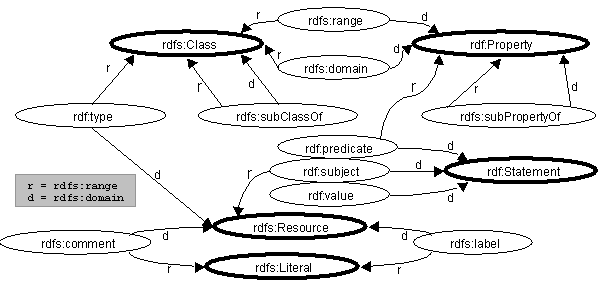
An RDF schema can declare constraints associated with classes and properties.
In particular, the concepts of domain and range are used to make statements
about the kinds of resource that can be related by a given property. Although
the RDF data model does not allow for explicit properties (such as an rdf:type
property) to be ascribed to Literals (atomic string values), we nevertheless
consider these entities to be members of classes (e.g. the string "John Smith"
is considered to be a member of the class rdfs:Literal).
Specifc constraint types that may be defined by an RDF schema are rdfs:domain
and rdfs:range. For example, consider that a resource of
type 'Book' may have a property 'author' whose value
is a 'Person':
rdfs:domain expresses that a property can be applied
only to instances of a designated class; e.g. that the subject of any 'author'
property must be an instance of class 'Book'.rdfs:range expresses that an indicated property must
have a value that is an instance of a designated class; e.g. that the object
of any 'author' property must be an instance of class 'Person'.
RDF schemas can express constraints that relate vocabulary items from multiple
independently developed schemas. Since URI references are used to identify classes
and properties, it is possible to create new properties whose domain or range
is constrained to be a class defined in another namespace.
The RDF Schema uses the constraint properties to constrain how its own properties
can be used. These constraints are shown below in figure 7. Nodes with bold
outlines are instances of rdfs:Class.
Please refer to the RDF Schema [4] for a more complete
description of RDF Constraints.
3. CC/PP structure
3.1 Client profile
The general structure of a CC/PP client profile is a two-level tree: components
and attributes, with provision for each component to reference an externally
defined set of default attribute values.
3.1.1 Components
A CC/PP profile contains a number of components. Each component
is represented by a resource of type ccpp:Component
(or some subclass thereof), and related to the client profile resource by a
ccpp:component property.
A CC/PP profile based on three components (TerminalHardware, TerminalSoftware
and TerminalBrowser), would look like this:
Figure 3-1: CC/PP profile components
example
[Profile]

 |
 +--ccpp:component-->[TerminalHardware]
 +--ccpp:component-->[TerminalSoftware]
 +--ccpp:component-->[TerminalBrowser]
|
A ccpp:Component resource MAY have an rdf:type
property (or equivalent RDF structure) indicating what kind of client component
it describes. The example in figures 3-4 is of a profile with an explicit indication
of component subtype. However, CC/PP processors MUST be able to handle profiles
that do not contain component type indicators. As long as the CC/PP attributes
used are all specific to a given component type, a processor will have sufficient
information to interpret them properly.
If a CC/PP profile uses any attribute that can appear on different component
types, then the type of any component on which such an attribute appears MUST
be indicated by an rdf:type property, or equivalent RDF.
A CC/PP processor MUST be able to use this type information to disambiguate
application of any attribute used.
3.1.2 Attributes
CC/PP profiles are constructed using RDF [3]. The RDF data
model represents CC/PP attributes as named properties linking a subject
resource to an associated object resource or literal value.
To describe client capabilities and preferences, the client being described
is a resource whose features are described by labelled graph edges from that
resource to corresponding object values. The graph edge labels identify the
client feature (CC/PP attribute) being described, and the corresponding object
values are the feature values.
-
Figure 3-2: RDF statement describing a client
attribute
[Client component resource] --attributeName--> (Attribute-value)
|
Graph labels are XML name values (per XML specification [1],
section 2.3), which may include a namespace prefix (i.e. a qualified name,
per XML namespaces [2], section 3). When combined with
the corresponding namespace or default namespace declaration, each label can
be mapped to a URI. Thus, CC/PP attributes are URIs, with XML namespace syntax
used to avoid some of the RDF expressions becoming too
cumbersome.
RDF object values are resources (identified by a URI without fragment identifier),
resource fragments (identified by a URI with fragment identifier) or literal
values (text strings). The literal values correspond to CC/PP attribute values
with basic data types; other values correspond to structured CC/PP attribute
values.
-
Figure 3-3: Parts of an RDF
statement
 RDF subject         RDF property      RDF object

[Client resource] --attributeName---> (Attribute-value)

 URI                 prefix:name       URI
                                        or
                                       URI#fragment-ID
                                        or
                                       literal
|
Basic data types are discussed in the section Simple
CC/PP attribute data. Each basic data type may support a range of tests
that can be used in the process of determining the suitability of different
resource variants for presentation by a client; e.g. equality, compatibility,
less-than, greater-than, etc. Further discussion of CC/PP attribute matching
operations is deferred to a separate document [10].
Structured data types are supported through the use of specific RDF properties
that join simple data values into composites. Specific CC/PP semantics for RDF
properties used in this way are discussed in the section Complex
CC/PP attribute data.
3.1.3 Defaults
Each component of a client profile may indicate a separate resource that in
turn indicates a subordinate collection of default attribute values. This collection
of default values can be a separate RDF document that is named via a URI, or
can appear in the same document as the client profile (though, in practice,
there is probably little value in defaults in the same document). If an attribute
in the collection of defaults is also present in the main part of the client
profile, the non-default value takes precedence. The intent is that a hardware
vendor or system supplier may provide default values that are common to a number
of systems in a place easily accessible to an origin server, and then use the
client profile to specify variations from the common profile. The owner of the
product or system operator may be able to add or change options, such as additional
memory, that add new capabilities or change the values of some original capabilities.
Default values are referenced by the property ccpp:defaults.
This name conforms to the name format recommendations of the RDF model and syntax
specification [3], appendix C.1. However, for compatibility
with earlier versions of CC/PP used with UAPROF, CC/PP processors SHOULD recognize
the property name ccpp:Defaults (i.e. with capital "D")
as equivalent.
Defaults can be encoded inline or as separate documents referred to via URI.
It is the responsibility of any server interpreting a CC/PP to combine profiles
with any externally referenced Defaults in such a way as to be able to correctly
interpret the profile. A profile with defaults in the same document is logically
equivalent to a profile with the same non-default data and referenced external
document(s) containing the default values. Here is a simple profile graph using
default values:
Figure 3-4a: CC/PP profile using
defaults
[MyProfile]

 |
 +--ccpp:component--> [TerminalHardware]
 |                     |
 |                     +--rdf:type-------> [HardwarePlatform]
 |                     +--ccpp:defaults--> [HWDefault]
 |                     +--display--------> "640x400"
 |
 +--ccpp:component--> [TerminalSoftware]
 |                     |
 |                     +--rdf:type-------> [SoftwarePlatform]
 |                     +--ccpp:defaults--> [SWDefault]
 |
 +--ccpp:component--> [TerminalBrowser]
                       |
           ------------
          |
          +--rdf:type-------> [BrowserUA]
          +--ccpp:defaults--> [UADefault]
          +--htmlVersionsSupported--> { "3.0", "4.0", "XHTML" }

[HWDefault]
 |
 +--rdf:type--> [HardwarePlatform]
 +--cpu-------> "PPC"
 +--display---> "320x200"

[SWDefault]
 |
 +--rdf:type--> [SoftwarePlatform]
 +--name------> "EPOC"
 +--version---> "2.0"
 +--vendor----> "Symbian"

[UADefault]
 |
 +--rdf:type--> [BrowserUA]
 +--name------> "Mozilla"
 +--version---> "5.0"
 +--vendor----> "Symbian"
 +--htmlVersionsSupported--> { "3.0", "4.0" }
|
And here is the corresponding XML serialization, with the default resource
descriptions coded inline in the client profile description:
Figure 3-4b: CC/PP profile using inline defaults, in
XML
<?xml version="1.0"?>
<!-- Checked by SiRPAC 1.16, 18-Jan-2001 -->
<RDF xmlns="http://www.w3.org/1999/02/22-rdf-syntax-ns#"
     xmlns:rdf="http://www.w3.org/1999/02/22-rdf-syntax-ns#"
     xmlns:ccpp="http://www.w3.org/2000/07/04-ccpp#"
     xmlns:prf="http://www.wapforum.org/UAPROF/ccppschema-20000405#">

  <Description about="http://example.com/MyProfile">
    <ccpp:component>
      <Description about="http://example.com/TerminalHardware">
        <type resource="http://example.com/Schema#HardwarePlatform"/>
        <ccpp:defaults>
          <Description about="http://example.com/HWDefault">
            <type resource="http://example.com/Schema#HardwarePlatform"/>
            <prf:cpu>PPC</prf:cpu>
            <prf:display>320x200</prf:display>
          </Description>
        </ccpp:defaults>
        <prf:display>640x400</prf:display>
      </Description>
    </ccpp:component>

    <ccpp:component>
      <Description about="http://example.com/TerminalSoftware">
        <type resource="http://example.com/Schema#SoftwarePlatform" />
        <ccpp:defaults>
          <Description about="http://example.com/SWDefault">
            <type resource="http://example.com/Schema#SoftwarePlatform"/>
            <prf:name>EPOC</prf:name>
            <prf:vendor>Symbian</prf:vendor>
            <prf:version>2.0</prf:version>
          </Description>
        </ccpp:defaults>
      </Description>
    </ccpp:component>

    <ccpp:component>
      <Description about="http://example.com/Browser">
        <type resource="http://example.com/Schema#BrowserUA" />
        <ccpp:defaults>
          <Description about="http://example.com/UADefault">
            <type resource="http://example.com/Schema#BrowserUA"/>
            <prf:name>Mozilla</prf:name>
            <prf:vendor>Symbian</prf:vendor>
            <prf:version>5.0</prf:version>
            <prf:htmlVersionsSupported>
              <Bag>
                <li>3.0</li>
                <li>4.0</li>
              </Bag>
            </prf:htmlVersionsSupported>
          </Description>
        </ccpp:defaults>
        <prf:htmlVersionsSupported>
          <Bag>
            <li>3.0</li>
            <li>4.0</li>
            <li>XHTML</li>
          </Bag>
        </prf:htmlVersionsSupported>
      </Description>
    </ccpp:component>
  </Description>
</RDF>
|
Inline defaults are logically equivalent to defaults contained in externally
referenced document, and external documents would be normal way of referencing
default values. The following is the external the XML serialization of the same
profile using externally referenced defaults:
Figure 3-5: CC/PP profile referencing
externally defined defaults, in XML
<?xml version="1.0"?>
<!-- Checked by SiRPAC 1.16, 18-Jan-2001 -->
<RDF xmlns="http://www.w3.org/1999/02/22-rdf-syntax-ns#"
     xmlns:rdf="http://www.w3.org/1999/02/22-rdf-syntax-ns#"
     xmlns:ccpp="http://www.w3.org/2000/07/04-ccpp#"
     xmlns:prf="http://www.wapforum.org/UAPROF/ccppschema-20000405#">

  <Description about="http://example.com/MyProfile">
    <ccpp:component>
      <Description about="http://example.com/TerminalHardware">
        <type resource="http://example.com/Schema#HardwarePlatform"/>
        <ccpp:defaults rdf:resource="http://example.com/HWDefault"/>
        <prf:display>640x400</prf:display>
      </Description>
    </ccpp:component>

    <ccpp:component>
      <Description about="http://example.com/TerminalSoftware">
        <type resource="http://example.com/Schema#SoftwarePlatform" />
        <ccpp:defaults rdf:resource="http://example.com/SWDefault"/>
      </Description>
    </ccpp:component>

    <ccpp:component>
      <Description about="http://example.com/Browser">
        <type resource="http://example.com/Schema#BrowserUA" />
        <ccpp:defaults rdf:resource="http://example.com/UADefault"/>
        <prf:htmlVersionsSupported>
          <Bag>
            <li>3.0</li>
            <li>4.0</li>
            <li>XHTML</li>
          </Bag>
        </prf:htmlVersionsSupported>
      </Description>
    </ccpp:component>
  </Description>
</RDF>
|
Each external defaults resource is a separate RDF document referenced by a
URI.
NOTE: A default document uses a <Description>
element as its root node. The <Description> is named using
an about= attribute whose value is a URI. This URI MUST correspond
to the value in the rdf:resource= attribute in the <Defaults>
element in the referencing document. In the examples of default documents
below, the URLs of the external default values documents are used. However
the default resource URI does not have to be the document URL, as long as
the URI is uniquely identified, the same URI is used in both the source document
and the external default values document, and there is some way for the processing
software to locate and retrieve the document containing the default resource.
Examples of default documents referenced by the previous example are as follows:
Figure 3-6: External HardwarePlatform default
values
Document: http://example.com/HWDefault
<?xml version="1.0"?>
<!-- Checked by SiRPAC 1.16, 18-Jan-2001 -->
<RDF xmlns="http://www.w3.org/1999/02/22-rdf-syntax-ns#"
     xmlns:rdf="http://www.w3.org/1999/02/22-rdf-syntax-ns#"
     xmlns:ccpp="http://www.w3.org/2000/07/04-ccpp#"
     xmlns:prf="http://www.wapforum.org/UAPROF/ccppschema-20000405#">
   <Description about="http://example.com/HWDefault">
     <type resource="http://example.com/Schema#HardwarePlatform"/>
     <prf:cpu>PPC</prf:cpu>
     <prf:display>320x200</prf:display>
   </Description>
</RDF>
|
Figure 3-7: External SoftwarePlatform default
values
Document: http://example.com/SWDefault
<?xml version="1.0"?>
<!-- Checked by SiRPAC 1.16, 18-Jan-2001 -->
<RDF xmlns="http://www.w3.org/1999/02/22-rdf-syntax-ns#"
     xmlns:rdf="http://www.w3.org/1999/02/22-rdf-syntax-ns#"
     xmlns:ccpp="http://www.w3.org/2000/07/04-ccpp#"
     xmlns:prf="http://www.wapforum.org/UAPROF/ccppschema-20000405#">
   <Description about="http://example.com/SWDefault">
     <type resource="http://example.com/Schema#SoftwarePlatform"/>
     <prf:name>EPOC</prf:name>
     <prf:vendor>Symbian</prf:vendor>
     <prf:version>2.0</prf:version>
   </Description>
</RDF>
|
Figure 3-8: External BrowseUA default
values
Document: http://example.com/UADefault
<?xml version="1.0"?>
<!-- Checked by SiRPAC 1.16, 18-Jan-2001 -->
<RDF xmlns="http://www.w3.org/1999/02/22-rdf-syntax-ns#"
     xmlns:rdf="http://www.w3.org/1999/02/22-rdf-syntax-ns#"
     xmlns:ccpp="http://www.w3.org/2000/07/04-ccpp#"
     xmlns:prf="http://www.wapforum.org/UAPROF/ccppschema-20000405#">
   <Description about="http://example.com/UADefault">
     <type resource="http://example.com/Schema#BrowserUA"/>
    <prf:name>Mozilla</prf:name>
    <prf:vendor>Symbian</prf:vendor>
    <prf:version>5.0</prf:version>
    <prf:htmlVersionsSupported>
      <Bag>
        <li>3.0</li>
        <li>4.0</li>
      </Bag>
    </prf:htmlVersionsSupported>
   </Description>
</RDF>
|
3.1.4 Distinguishing profile structure
from attributes
CC/PP uses namespaces to distinguish the vocabulary associated with the structure
(e.g. ccpp:component) from vocabularies associated with
applications (e.g. TerminalHardware, display).
The graph in figure 2-2a above can be described in RDF in a relatively straightforward
fashion. In this example we use the namespace "http://www.wapforum.org/UAPROF/ccppschema-20000405#"
to describe all the non-CC/PP properties:
Figure 3-9: XML serialization of CC/PP profile, with
namespaces
<?xml version="1.0"?>
<!-- Checked by SiRPAC 1.16, 18-Jan-2001 -->
<RDF xmlns="http://www.w3.org/1999/02/22-rdf-syntax-ns#"
     xmlns:rdf="http://www.w3.org/1999/02/22-rdf-syntax-ns#"
     xmlns:ccpp="http://www.w3.org/2000/07/04-ccpp#"
     xmlns:prf="http://www.wapforum.org/UAPROF/ccppschema-20000405#">

  <Description about="http://example.com/MyProfile">
    <ccpp:component>
      <Description about="http://example.com/TerminalHardware">
        <type resource="http://example.com/Schema#HardwarePlatform" />
        <prf:cpu>PPC</prf:cpu>
        <prf:display>320x200</prf:display>
      </Description>
    </ccpp:component>

    <ccpp:component>
      <Description about="http://example.com/TerminalSoftware">
        <type resource="http://example.com/Schema#SoftwarePlatform" />
        <prf:name>EPOC</prf:name>
        <prf:vendor>Symbian</prf:vendor>
        <prf:version>2.0</prf:version>
      </Description>
    </ccpp:component>

    <ccpp:component>
      <Description about="http://example.com/Browser">
        <type resource="http://example.com/Schema#BrowserUA" />
        <prf:name>Mozilla</prf:name>
        <prf:vendor>Symbian</prf:vendor>
        <prf:version>5.0</prf:version>
        <prf:htmlVersionsSupported>
          <Bag>
            <li>3.0</li>
            <li>4.0</li>
          </Bag>
        </prf:htmlVersionsSupported>
      </Description>
    </ccpp:component>
  </Description>
</RDF>
|
All RDF resources that relate to the overall structure of CC/PP are defined
in a specific namespace, and have certain associated schema properties that
allow them to be distinguished from attribute vocabulary or other RDF statements.
3.1.5 Notes on RDF usage
In this specification, names of RDF resource nodes are given by "about" so
they can be addressed from outside (i.e. from other RDF documents) when the
containing document does not have an assigned URI. (This is used for describing
proxy profile and capability chaining, when the profile information is contained
in a transitory unnamed protocol element.)
RDF Model and Syntax specification [3] defines two ways
to name RDF resources, namely "ID" and "about". RDF resources named by "about"
are fully identified, whereas those named by "ID" can not be referenced from
outside the containing document, unless some additional information is available
that allows the full (absolute) base URI to be determined. The RDF specification
is not currently clear about how a base URI should be determined [34].
The component resources in a profile are instances of components identified
in the corresponding schema, which in turn MUST be subclasses of ccpp:Component.
They MUST be identified as such, by means of the rdf:type
property whose value matches the name of the component type in the schema.
3.2 Proxy behavior
The proxy vocabulary defined here is not a mandatory part of the CC/PP specification,
but is defined here for use by CC/PP aware applications that may need to deal
with proxies or other intermediaries that play an active role in content handling.
Designers of CC/PP applications that need to deal with mediating behaviors
are strongly encouraged to use this vocabulary rather than define new structures.
For the purposes of this specification, a proxy is a component that sits on
the network path between a content consumer and a content provider, and modifies
or filters the content passed toward the consumer. This in turn affects what
the provider may send to a given client, so the consumer's CC/PP information
needs to be augmented with information corresponding to the proxy's behavior.
(For typical web access, the origin server is the provider, and the client is
the consumer.)
This approach to describing proxy behaviors does not force a proxy to analyze
and rewrite a client profile. Rather, the applicability, proxyAllow
and proxyBlock properties allow a proxy describe its behavior in a way
that takes account of a client's capabilities. As a result, the structure is
very easy for a proxy to create, though it does place some additional responsibility
on an origin server to analyze and combine the various parts appropriately.
The proxy description elements below are described using XML namespace local
parts, which are further qualified by the XML namespace identifier
<http://www.w3.org/2000/07/04-ccpp-proxy#>.
3.2.1 Capability chaining
A proxy's role as a content modifying component between client and server is represented
by chaining a description of the proxy's behavior to the profile supplied by
the outbound client or proxy. For any given request containing a CC/PP profile,
the proxy creates a new profile that refers to a CC/PP description of itself,
and to the CC/PP capability in the request it received. This new profile is passed
on towards the origin server.
A simple case is a client request that passes through a single proxy; the resulting
request profile received by the origin server looks like this:
-
Figure 3-10: Graph for client and single proxy
[<Request-profile>]
  +--proxyProfile--> [<Proxy-profile>]
  +--nextProfile---> [<Client-profile>]
|
A more complex case occurs when a request passes through several proxies,
each of which adds its own description to the overall profile:
Figure 3-11a: Graph for client and multiple proxies
[<Request-profile-n>]
  +--proxyProfile--> [<Proxy-profile-n>]
  +--nextProfile---> [<Request-profile-(n-1)>]
                       |
       ----------------
      |
      v
    [<Request-profile-(n-1)>]
      :

          :
          v
        [<Request-profile-2>]
          +--proxyProfile--> [<Proxy-profile-2>]
          +--nextProfile---> [<Request-profile-1>]
                               |
               ----------------
              |
              v
            [<Request-profile-1>]
              +--proxyProfile--> [<Proxy-profile-1>]
              +--nextProfile---> [<Client-profile>]
                                    +--component--> [...]
                                    :
                                   (etc.)
|
This framework for proxy chaining uses the following RDF classes and properties,
defined by CC/PP.
- Profile:
- This class represents any CC/PP profile that
can be delivered to an origin server .
- Request-profile:
- This is a subclass of CCPP-profile
that is used to link a proxy profile to a request or client profile. Instances
of this are generally constructed on-the-fly as a request with a CC/PP profile
passes through proxies on its path toward an origin server. It combines a
client profile or another request profile with a proxy profile, and represents
the capabilities that the proxy can accept on behalf of the client that issued
the request. Because they are constructed for each request, these resources
are not usefully cacheable.
NOTE: the proxy profile referenced by this
item does not generally need to be constructed on-the-fly for each request.
- Proxy-profile:
- This class represents the capabilities and
filtering behavior of a given proxy. Instances of this class are generally
constructed statically for a given configured proxy system, and may usefully
be cached.
- Client-profile:
- This class represents the capabilities of
a given client. Instances of this class are generally constructed statically
for a given client system, and may usefully be cached.
- proxyProfile:
- This property is applied to a Request-profile
instance, and indicates a Proxy-profile that is applied to the CC/PP
profile associated with the corresponding request.
- nextProfile:
- This property is applied to a Request-profile
instance, and indicates a Request-profile or Client-profile
with which new proxy behavior is combined.
The corresponding XML might look like this:
Figure 3-11b: Request profile chain, XML
fragments
Proxy profile n:
  <rdf:Description rdf:about="Proxy_n">
    <rdf:type rdf:resource="Proxy-profile" />
    <!--  Proxy_n profile properties here  -->
     :
  </rdf:Description>
Request profile n:
  <rdf:Description rdf:about="Request_n">
    <rdf:type rdf:resource="Request-profile" />
    <ccpp:proxyProfile rdf:resource="Proxy_n" />
    <ccpp:nextProfile rdf:resource="Request_(n-1)" />
  </rdf:Description>

 :
Request profile 2:
  <rdf:Description rdf:about="Request_2">
    <rdf:type rdf:resource="Request-profile" />
    <ccpp:proxyProfile rdf:resource="Proxy_2" />
    <ccpp:nextProfile rdf:resource="Request_1" />
  </rdf:Description>
Request profile 1:
  <rdf:Description rdf:about="Request_1">
    <rdf:type rdf:resource="Request-profile" />
    <ccpp:proxyProfile rdf:resource="Proxy_1" />
    <ccpp:nextProfile rdf:resource="Client" />
  </rdf:Description>
Client profile:
  <rdf:Description rdf:about="Client">
    <rdf:type rdf:resource="ClientProfile" />
      <ccpp:component>
       :
      </ccpp:component>
  </rdf:Description>
|
3.2.2 Describing proxy behavior
A proxy may convert or interpret data for a client (add capabilities), or impose
policy constraints (block capabilities). E.g. a proxy might provide XHTML-to-WML
format conversion (which adds capabilities for clients that can render WML), or
may have a policy of disallowing any HTML content that contains JavaScript (which
blocks capabilities for clients that render HTML).
To describe such behavior, a proxy profile may contain three types of functional
component:
None of these are required in every case, but a proxy behavior description
without either proxyAllow or proxyBlock would be rather
pointless. Therefore, in practice, at least one of these should be present.
Thus, a proxy profile description looks something like this:
-
Figure 3-12: Graph describing proxy behavior
[<Proxy-profile>]
  +--proxyBehavior--> [<Proxy-behavior>]
  |                      +--applicability--> (Attribute(s)...)
  |                      +--proxyAllow-----> (Attribute(s)...)
  |                      +--proxyBlock-----> (Attribute(s)...)
  |
  +--proxyBehavior--> [<Proxy-behavior>]
  |                      +--applicability--> (Attribute(s)...)
  |                      +--proxyAllow-----> (Attribute(s)...)
  |                      +--proxyBlock-----> (Attribute(s)...)
  |
  +--proxyBehavior--> [<Proxy-behavior>]
  |                      :
  :
 (Repeat as needed for all proxy behaviors)
|
This framework for proxy behavior description uses the following RDF classes
and properties, defined by CC/PP.
- Proxy-profile:
- (See previous section.)
- Proxy-behavior:
- This class represents a description of a single
aspect of a proxy's behavior; e.g. a format conversion, or a specific capability-blocking
policy.
- proxyBehavior:
- This property is applied to a proxy capability
description, and references a Proxy-behavior instance.
- applicability:
- This property is applied to a Proxy-behavior
instance, and indicates a Component value with one or more attributes
indicating the requests to which the corresponding Proxy-behavior
applies. Each of the attributes thus specified must match attributes of a
request for the proxy behavior to be applicable to that request. Where an
attribute is set-valued, or if an attribute is repeated, the behavior applies
if any of the values supplied is matched by a corresponding attribute value
of the request. If the applicability property is not specified,
the corresponding Proxy-behavior can apply to any request.
- proxyAllow:
- This property is applied to a Proxy-behavior
instance, and indicates a Component value that specifies one or more
attribute values that are included by the corresponding Proxy-behavior
in the CC/PP capabilities of a request. These represent additional capabilities
that are supported by the proxy on behalf of a client (e.g. format conversion).
If no new attributes are allowed, this property should be omitted.
- proxyBlock:
- This property is applied to a Proxy-behavior
instance, and indicates a Component value that specifies one or more
capability attributes that are removed from the CC/PP capabilities of a request,
if present. These represent capabilities that are blocked by the proxy from
passing outbound to a client (e.g. content filtering). If no capabilities
are blocked, this property should be omitted.
Each (Attribute(s)...) entity indicated above consists of a Component
resource, whose precise type corresponds to a Component type of the applicable
request profile, and whose properties are ordinary CC/PP attribute identifiers
and values.
-
Figure 3-13a: Example 3.2.2.1 - graph
[<Proxy-profile>]
  +--proxyBehavior--> [<Proxy-behavior>]
                         |
       ------------------
      |
      +--applicability-->[<Component>]
      |                    |
      |    ----------------
      |   |
      |   +--uaprof:WmlVersion--> { "1.0", "1.1" }
      |
      +--proxyAllow----->[<Component>]
                           |
           ----------------
          |
          +--type----> { "text/xml", "application/xml"}
          +--schema--> { "http://example.org/example/XHTML-1.0" }
|
This example effectively adds a capability to a profile to handle XHTML,
which is applicable if the request profile received from the outbound system
includes a capability to handle WML version 1.0 or 1.1. An RDF
representation of this is:
-
Figure 3-13b: Example 3.2.2.1 - RDF
<?xml version='1.0'?>
<!-- Checked by SiRPAC 1.16, 18-Jan-2001 -->

<!DOCTYPE rdf:RDF [
  <!ENTITY ns-rdf  'http://www.w3.org/1999/02/22-rdf-syntax-ns#'>
  <!ENTITY ns-rdfs 'http://www.w3.org/2000/01/rdf-schema#'>
  <!ENTITY ns-ccpp 'http://www.w3.org/2000/07/04-ccpp#'>
  <!ENTITY ns-ccpp-proxy 'http://www.w3.org/2000/07/04-ccpp-proxy#'>
  <!ENTITY ns-ccpp-client 'http://www.w3.org/2000/07/04-ccpp-client#'>
  <!ENTITY ns-uaprof 'http://www.wapforum.org/UAPROF/ccppschema-20000405#'>
]>

<rdf:RDF
  xmlns:rdf         = '&ns-rdf;'
  xmlns:rdfs        = '&ns-rdfs;'
  xmlns:ccpp        = '&ns-ccpp;'
  xmlns:ccpp-proxy  = '&ns-ccpp-proxy;'
  xmlns:ccpp-client = '&ns-ccpp-client;'
  xmlns:uaprof      = '&ns-uaprof;'>

  <ccpp-proxy:Proxy-profile
      rdf:about='http://www.example.com/proxy-profile-1'>
    <ccpp-proxy:proxyBehavior>
      <ccpp-proxy:Proxy-behavior>

        <ccpp-proxy:applicability>
          <ccpp:Component>
            <uaprof:WmlVersion>
              <rdf:Bag>
                <rdf:li>1.0</rdf:li>
                <rdf:li>1.1</rdf:li>
              </rdf:Bag>
            </uaprof:WmlVersion>
          </ccpp:Component>
        </ccpp-proxy:applicability>

        <ccpp-proxy:proxyAllow>
          <ccpp:Component>
            <ccpp-client:type>
              <rdf:Bag>
                <rdf:li>text/xml</rdf:li>
                <rdf:li>application/xml</rdf:li>
              </rdf:Bag>
            </ccpp-client:type>
            <ccpp-client:schema>
              <rdf:Bag>
                <rdf:li>http://example.org/example/XHTML-1.0</rdf:li>
              </rdf:Bag>
            </ccpp-client:schema>
          </ccpp:Component>
        </ccpp-proxy:proxyAllow>

      </ccpp-proxy:Proxy-behavior>
    </ccpp-proxy:proxyBehavior>
  </ccpp-proxy:Proxy-profile>

</rdf:RDF>
|
-
Figure 3-14a: Example 3.2.2.2 -
graph
[<Proxy-profile>]
  +--proxyBehavior----> [<Proxy-behavior>]
                           |
       --------------------
      |
      +--applicability-->[<Component>]
      |                    |
      |    ----------------
      |   |
      |   +--uaprof:WmlVersion--> { "1.0", "1.1" }
      |
      +--proxyAllow----->[<Component>]
                           |
           ----------------
          |
          +--type---------> { "text/xml", "application/xml"}
          +--type---------> { "text/html", "application/html"}
          +--schema-------> { "http://example.org/example/XHTML-1.0" }
          +--uaprof:HTMLVersion--> { "3.2", "4.0" }
|
This example effectively adds a capability to a profile to handle HTML 3.2
or 4.0, or XHTML, which is applicable if the request profile received from
the outbound system includes a capability to handle WML version 1.0 or 1.1.
An RDF representation of this is:
-
Figure 3-14b: Example 3.2.2.2 - RDF
<?xml version='1.0'?>
<!-- Checked by SiRPAC 1.16, 18-Jan-2001 -->

<!DOCTYPE rdf:RDF [
  <!ENTITY ns-rdf  'http://www.w3.org/1999/02/22-rdf-syntax-ns#'>
  <!ENTITY ns-rdfs 'http://www.w3.org/2000/01/rdf-schema#'>
  <!ENTITY ns-ccpp 'http://www.w3.org/2000/07/04-ccpp#'>
  <!ENTITY ns-ccpp-proxy 'http://www.w3.org/2000/07/04-ccpp-proxy#'>
  <!ENTITY ns-ccpp-client 'http://www.w3.org/2000/07/04-ccpp-client#'>
  <!ENTITY ns-uaprof 'http://www.wapforum.org/UAPROF/ccppschema-20000405#'>
]>

<rdf:RDF
  xmlns:rdf         = '&ns-rdf;'
  xmlns:rdfs        = '&ns-rdfs;'
  xmlns:ccpp        = '&ns-ccpp;'
  xmlns:ccpp-proxy  = '&ns-ccpp-proxy;'
  xmlns:ccpp-client = '&ns-ccpp-client;'
  xmlns:uaprof      = '&ns-uaprof;'>

  <ccpp-proxy:Proxy-profile
      rdf:about='http://www.example.com/proxy-profile-2'>
    <ccpp-proxy:proxyBehavior>
      <ccpp-proxy:Proxy-behavior>

        <ccpp-proxy:applicability>
          <ccpp:Component>
            <uaprof:WmlVersion>
              <rdf:Bag>
                <rdf:li>1.0</rdf:li>
                <rdf:li>1.1</rdf:li>
              </rdf:Bag>
            </uaprof:WmlVersion>
          </ccpp:Component>
        </ccpp-proxy:applicability>

        <ccpp-proxy:proxyAllow>
          <ccpp:Component>
            <ccpp-client:type>
              <rdf:Bag>
                <rdf:li>text/xml</rdf:li>
                <rdf:li>application/xml</rdf:li>
              </rdf:Bag>
            </ccpp-client:type>
            <ccpp-client:type>
              <rdf:Bag>
                <rdf:li>text/html</rdf:li>
                <rdf:li>application/html</rdf:li>
              </rdf:Bag>
            </ccpp-client:type>
            <ccpp-client:schema>
              <rdf:Bag>
                <rdf:li>http://example.org/example/XHTML-1.0</rdf:li>
              </rdf:Bag>
            </ccpp-client:schema>
            <uaprof:HTMLVersion>
              <rdf:Bag>
                <rdf:li>3.2</rdf:li>
                <rdf:li>4.0</rdf:li>
              </rdf:Bag>
            </uaprof:HTMLVersion>
          </ccpp:Component>
        </ccpp-proxy:proxyAllow>

      </ccpp-proxy:Proxy-behavior>
    </ccpp-proxy:proxyBehavior>
  </ccpp-proxy:Proxy-profile>

</rdf:RDF>
|
-
Figure 3-15a: Example 3.2.2.3 -
graph
[<Proxy-profile>]
  +--proxyBehavior--> [<Proxy-behavior>]
                         |
       ------------------
      |
      +--proxyBlock--->[<Component>]
                         +--type---------> { "image/jpeg" }
|
This example effectively removes any capability to handle JPEG image files.
An RDF representation of this is:
-
Figure 3-15b: Example 3.2.2.3 - RDF
<?xml version='1.0'?>
<!-- Checked by SiRPAC 1.16, 18-Jan-2001 -->

<!DOCTYPE rdf:RDF [
  <!ENTITY ns-rdf  'http://www.w3.org/1999/02/22-rdf-syntax-ns#'>
  <!ENTITY ns-rdfs 'http://www.w3.org/2000/01/rdf-schema#'>
  <!ENTITY ns-ccpp 'http://www.w3.org/2000/07/04-ccpp#'>
  <!ENTITY ns-ccpp-proxy 'http://www.w3.org/2000/07/04-ccpp-proxy#'>
  <!ENTITY ns-ccpp-client 'http://www.w3.org/2000/07/04-ccpp-client#'>
]>

<rdf:RDF
  xmlns:rdf         = '&ns-rdf;'
  xmlns:rdfs        = '&ns-rdfs;'
  xmlns:ccpp        = '&ns-ccpp;'
  xmlns:ccpp-proxy  = '&ns-ccpp-proxy;'
  xmlns:ccpp-client = '&ns-ccpp-client;'>

  <ccpp-proxy:Proxy-profile
      rdf:about='http://www.example.com/proxy-profile-3'>
    <ccpp-proxy:proxyBehavior>
      <ccpp-proxy:Proxy-behavior>

        <ccpp-proxy:proxyBlock>
          <ccpp:Component>
            <ccpp-client:type>
              <rdf:Bag>
                <rdf:li>image/jpeg</rdf:li>
              </rdf:Bag>
            </ccpp-client:type>
          </ccpp:Component>
        </ccpp-proxy:proxyBlock>

      </ccpp-proxy:Proxy-behavior>
    </ccpp-proxy:proxyBehavior>
  </ccpp-proxy:Proxy-profile>

</rdf:RDF>
|
-
Figure 3-16a: Example 3.2.2.4 -
graph
[<Proxy-profile>]
  +--proxyBehavior----> [<Proxy-behavior>]
                           |
       --------------------
      |
      +--applicability-->[<Component>]
      |                    +--type---------> { "image/jpeg" }
      +--proxyBlock----->[<Component>]
                           +--type---------> { "image/tiff" }
|
This example effectively removes any capability to handle TIFF image files,
and is applicable if the outbound request profile indicates capability to
handle JPEG. That is, always send JPEG in preference to TIFF, when possible.
An RDF representation of this is:
-
Figure 3-16b: Example 3.2.2.4 - RDF
<?xml version='1.0'?>
<!-- Checked by SiRPAC 1.16, 18-Jan-2001 -->

<!DOCTYPE rdf:RDF [
  <!ENTITY ns-rdf  'http://www.w3.org/1999/02/22-rdf-syntax-ns#'>
  <!ENTITY ns-rdfs 'http://www.w3.org/2000/01/rdf-schema#'>
  <!ENTITY ns-ccpp 'http://www.w3.org/2000/07/04-ccpp#'>
  <!ENTITY ns-ccpp-proxy 'http://www.w3.org/2000/07/04-ccpp-proxy#'>
  <!ENTITY ns-ccpp-client 'http://www.w3.org/2000/07/04-ccpp-client#'>
]>

<rdf:RDF
  xmlns:rdf         = '&ns-rdf;'
  xmlns:rdfs        = '&ns-rdfs;'
  xmlns:ccpp        = '&ns-ccpp;'
  xmlns:ccpp-proxy  = '&ns-ccpp-proxy;'
  xmlns:ccpp-client = '&ns-ccpp-client;'>

  <ccpp-proxy:Proxy-profile
      rdf:about='http://www.example.com/proxy-profile-4'>
    <ccpp-proxy:proxyBehavior>
      <ccpp-proxy:Proxy-behavior>

        <ccpp-proxy:applicability>
          <ccpp:Component>
            <ccpp-client:type>
              <rdf:Bag>
                <rdf:li>image/jpeg</rdf:li>
              </rdf:Bag>
            </ccpp-client:type>
          </ccpp:Component>
        </ccpp-proxy:applicability>

        <ccpp-proxy:proxyBlock>
          <ccpp:Component>
            <ccpp-client:type>
              <rdf:Bag>
                <rdf:li>image/tiff</rdf:li>
              </rdf:Bag>
            </ccpp-client:type>
          </ccpp:Component>
        </ccpp-proxy:proxyBlock>

      </ccpp-proxy:Proxy-behavior>
    </ccpp-proxy:proxyBehavior>
  </ccpp-proxy:Proxy-profile>

</rdf:RDF>
|
4. Attribute vocabularies
4.1 Attribute data
This section describes the basic data types and data structuring options that
are available for the values associated with a CCPP attribute.
All CC/PP attributes should be defined with values that can be treated as one
of the simple or complex data types discussed later. Support for the described
formats for attribute values is RECOMMENDED; this specification does not prohibit
the use of other valid RDF forms, but provides no guidance for their interpretation.
(See also section 1.1 and Appendix F.)
All simple CC/PP attribute values are represented as literal text values (in XML
elements or XML attributes, according to the rules for RDF literal object values).
Base CC/PP usage defined here leaves any further interpretation of the values
used to the processing application. Future versions of CC/PP may introduce additional
structures that provide for standardized matching of client profiles with other
resource metadata. To allow such developments, and to ease interworking with
IETF media feature descriptions, it is recommended that any simple attribute
values should be defined in terms of one of the data types described below.
All attribute values are ultimately sequences of UCS (Unicode) characters.
It is assumed that character coding issues in specific serializations of the
RDF data are defined by the enclosing XML representation.
NOTE: Attribute comparison is beyond the scope of this document,
as are specific mechanisms for determining the simple type corresponding to
a given attribute value. Applications are presumed to know how to deal with
any CC/PP attribute that they handle.
Where given, formal syntax expressions use the notation presented in Section
6 of the XML specification [1].
A common requirement is to identify some resource using a URI as the value of
a CC/PP attribute (e.g. a device type or an applicable DTD or schema). A URI is
represented as a text string, but is subject to comparison rules set out in RFC
2396 [28], which may require 'absolutization' of the URI
as described there.
A text value is a string that is used to describe or identify some specific CC/PP
attribute value.
In general, such values may be compared for equality or inequality. Depending
on the application and context, such comparison may be compared in different
ways, as indicated below. In the absence of specific knowledge to the contrary,
case sensitive text should be assumed.
When comparing case sensitive text, every character must match exactly for equality
to be declared.
Some examples:
-
Browser name: "Mozilla"
- Browser version: "5.0"
Case insensitive text values are typically used to represent arbitrary texts which
may be entered or selected by hand.
Such values may be compared for equality, where upper and lower case characters
are considered equivalent. The application and surrounding context should indicate
a language or character coding context to be used for the purposes of determining
equivalent upper- and lower- case characters.
NOTE: It is not safe to assume that 'a'-'z'
and 'A'-'Z' are equivalent in all language contexts: text should be considered
to be case sensitive unless the language context is known. Many protocol elements,
such as domain names and URIs, are not intended to be in any specific language,
in these contexts,the protocol should make it clear what character coding
and matching rules apply [27].
Some examples:
-
URI scheme name: "http:"
- DNS domain name: "XYZZY.Example.com"
- Filename on some systems: "info.txt"
Tokens are case insensitive text values using a constrained subset of US-ASCII
characters, generally used to name an enumerated set of values. For the purposes
of character comparison, the character ranges 'a'-'z' and 'A'-'Z' are considered
equivalent. All other character values must match exactly.
The exact constraints on the characters allowed in a token value may vary from
application to application; e.g. IETF media feature values that are tokens may
use upper and lower case letters, digits and hyphens [6];
IETF charset names [29] are defined to allow any US-ASCII
character other than control characters (0-31), space (32) double quote (34)
and specified special characters: "(", ")", "<", ">", "@", ",", ";",
":", "/", "[", "]", "?", ".", "=" and "*".
Some examples:
Integer numbers may be positive, zero or negative. They are represented by
a string containing a sequence of decimal digits, optionally preceded by a '+'
or '-' sign. Leading zeros are permitted and are ignored. The number
value is always interpreted as decimal (radix 10). It is recommended that implementations
generate and support integer values in the range -2147483647 to +2147483647,
or -(2^31-1) to (2^31-1); i.e. integers whose absolute value can be expressed
as a 31-bit unsigned binary number.
Figure 4-1: Syntax for integer numbers
Signed-integer ::= ( '+' | '-' )? Unsigned-integer


Unsigned-integer ::= Digit (Digit)*
|
Some examples:
A rational number is expressed as a ratio of two integer numbers. Two positive
integers are separated by a '/', and optionally preceded by a '+'
or '-' sign.
It is recommended that implementations generate and support numerators of a
rational number (the first number, before the '/') in the range 0 to
2147483647 (2^31-1), and denominators (after the '/') in the range
1 to 2147483647.
-
Figure 4-2: Syntax for rational
numbers
Rational-number ::= Signed-integer ( '/' Unsigned-integer )?
|
If the denominator is omitted, a value '1' is assumed; i.e. treat
value as an Integer.
Some examples:
- 1/2 -- this is equivalent to decimal 0.5
- 768/1024
- -254/100
- +2000/65536
4.1.2 Complex CC/PP attribute data
In addition to the simple values described above, a CC/PP attribute may have a
complex value expressed in the form of a resource with its own collection of RDF
properties and associated values. Specific data types represented in this way
are:
4.1.2.1 Set of values
A set consists of zero, one or more values, all different and whose order is not
significant.
Set values are useful for representing certain types of device characteristics;
e.g. the range of typefaces that can be supported by a client, or the HTML versions
supported by a browser.
A set is represented as an 'rdf:Bag', with each member of the set
corresponding to a property of that resource named '_1', '_2',
etc. This construct is described in section 3 of the RDF Model and Syntax specification
[3].
-
Figure 4-3: RDF representation of set values
in CC/PP
[<Client-resource>]
  +--attributeName--> [<rdf:Bag>]
                        +--rdf:_1--> (set-member-value-1)
                        +--rdf:_2--> (set-member-value-2)
                        :
                        +--rdf:_n--> (set-member-value-n)
|
NOTE: The 'rdf:Bag' construct
does not require that every contained value be unique. A set cannot contain
duplicate values, so every property of an 'rdf:Bag' used to represent
a set must have a distinct value.
There is a clear distinction drawn between an attribute that has a single value,
and an attribute whose value is a set with zero, one or more elements:
Figure 4-4: Attribute with set value containing
a single member
[<Client-resource>]
  +--attributeName--> [<rdf:Bag>] --rdf:_1--> (set-member-value)
|
Figure 4-5: Attribute with a simple
value
[<Client-resource>]
  +--attributeName--> (attribute-value)
|
CC/PP attribute names are in the form of a URI. Any CC/PP vocabulary is associated
with an XML namespace, which combines a base URI with a local XML element name
(or XML attribute name) to yield a URI corresponding to an attribute name. E.g.
the namespace URI:
http://www.w3.org/2000/07/04-ccpp-client#
and the core vocabulary name:
type
are combined to yield the attribute name URI:
http://www.w3.org/2000/07/04-ccpp-client#type
Anyone can define and publish a CC/PP vocabulary extension (assuming administrative
control or allocation of a URI for an XML namespace). For such a vocabulary
to be useful, it must be interpreted in the same way by communicating entities.
Thus, use of an existing extension vocabulary is encouraged wherever possible,
or publication of a new vocabulary definition containing detailed descriptions
of the various CC/PP attribute names.
Many extension vocabularies will be drawn from existing applications and protocols;
e.g. WAP UAPROF, IETF media feature registrations, etc. Appendix E surveys some
possible sources of additional CC/PP vocabularies.
Attribute names are defined, and associated with an XML namespace, using an
RDF schema.
Appendix B to this document contains RDF schema with which all CC/PP profiles
must conform, and Appendix C contains an example of a vocabulary definition
schema. Appendix D contains recommendations for creating a new vocabulary.
A CC/PP processor is not required to understand and process RDF schema definitions;
it merely needs to understand enough about the CC/PP profile structure and vocabulary
used to perform its job. (A schema-aware processor may be able to handle CC/PP
profiles in other ways, or in combination with other RDF information, but such
behavior is beyond the scope of this specification.)
5. Acknowledgements
This document is a distillation of many discussions of the W3C CC/PP working
group. The following were working group members for some or all of the period
of preparation of this specification, and its predecessors:
- Mikael Nilsson, Ericsson Infotech, Mikael.Nilsson@ks.ericsson.se
- Ulrich Kauschke, T-Mobil, Ulrich.Kauschke@t-mobil.de
- Ann Navarro, HTML Writers Guild, ann@hwg.org
- Brad Topol, IBM, btopol@us.ibm.com
- Franklin Reynolds, Nokia, franklin.reynolds@nokia.com
- Graham Klyne, Baltimore Technologies, graham.klyne@mimesweeper.com
- Noboru Iwayama, Fujitsu Laboratories LTD, iwayama.noboru@jp.fujitsu.com
- Takashi Nishigaya, Fujitsu Laboratories LTD, takashi@flab.fujitsu.co.jp
- Lalitha Surayanrayana, SBC Technology Resources, lalitha@tri.sbc.com
- Hidetaka Ohto, W3C/Panasonic, ohto@w3.org
- Simon McBride, DSTC Pty Ltd, sjm@dstc.edu.au
- Varuni Witana, DSTC Pty Ltd, varuni@dstc.uts.edu.au
- Chris Woodrow, Information Architects, woodroc@metaphoria.net
- Johan Hjelm, Ericsson, johan.hjelm@era-t.ericsson.se
- Barry Briggs, Interleaf, bbriggs@interleaf.com
- Gerd Hoelzing, SAP, gerd.hoelzing@sap.com
- Ted Hardie, Equinix, hardie@equinix.com
- Serge Rigori, Sun, serge.rigori@france.sun.com
- Ted Wugofski, Phone.com, ted.wugofski@corp.phone.com
- Kynn Bartlett, HTML Writers Guild, kynn@idyllmtn.com
- Sandeep Singhal, IBM
- Thorsten Kassing, T-Mobil
- Larry Masinter, Adobe
Useful revisions and clarifications were suggested by Yuichi Koike, Stuart
Williams, Sean Palmer and Toni Penttinen.
- [1]
- Extensible Markup Language (XML) 1.0;
Tim Bray, Jean Paoli, C. M. Sperberg-McQueen;
World Wide Web Consortium Recommendation: http://www.w3.org/TR/REC-xml
- [2]
- Namespaces in XML;
Tim Bray, Dave Hollander, Andrew Layman;
World Wide Web Consortium Recommendation: http://www.w3.org/TR/REC-xml-names
- [3]
- Resource Description Framework (RDF) Model and Syntax Specification;
Ora Lassila, Ralph Swick;
World Wide Web Consortium Recommendation: http://www.w3.org/TR/REC-rdf-syntax
- [4]
- Resource Description Framework (RDF) Schema Specification;
Dan Brickley, R. V. Guha;
World Wide Web Consortium Recommendation: http://www.w3.org/TR/PR-rdf-schema
- [5]
- RFC 2506: Media Feature Tag Registration Procedure;
K. Holtman, A. Mutz, T. Hardie;
IETF Request for Comments: ftp://ftp.isi.edu/in-notes/rfc2506.txt
- [6]
- RFC 2533: A Syntax for Describing Media Feature Sets;
G. Klyne;
IETF Request for Comments: ftp://ftp.isi.edu/in-notes/rfc2533.txt
- [7]
- A revised media feature set matching algorithm;
G. Klyne;
Internet draft, work in progress: <draft-klyne-conneg-feature-match-02.txt>
- [8]
- RFC 2534: Media Features for Display, Print, and Fax;
L. Masinter, D. Wing, A. Mutz, K. Holtman;
IETF Request for Comments: ftp://ftp.isi.edu/in-notes/rfc2534.txt
- [9]
- WAP-174: WAG UAPROF User Agent Profile Specification;
Wireless Application Group;
http://www1.wapforum.org/tech/terms.asp?doc=SPEC-UAProf-19991110.pdf
As amended by:
WAP Specification Information Note WAP-174_100-UAPROF
Version 21-Jun-2000
http://www1.wapforum.org/tech/documents/WAP-174_100-UAProf-20000621-a.pdf
- [10]
- Note on CC/PP combining forms and attribute value comparisons
(To be published)
- [11]
- Notes on Data Structuring;
C. A. R. Hoare;
in Structured Programming, Academic Press, 1972.
ISBN 0-12-2000556-2.
- [12]
- XML schema. Part 0: Primer;
David C. Fallside;
W3C Working Draft: http://www.w3.org/TR/xmlschema-0/
- [13]
- XML schema. Part 1: Structures;
Henry S. Thompson, David Beech, Murray Maloney, Noah Mendelsohn;
W3C Working Draft: http://www.w3.org/TR/xmlschema-1/
- [14]
- XML schema. Part 2: Datatypes;
Paul V. Biron, Ashok Malhotra;
W3C Working Draft: http://www.w3.org/TR/xmlschema-2/
- [15]
- The Semantic Toolbox: Building Semantics on top of XML-RDF;
Tim Berners-Lee;
http://www.w3.org/DesignIssues/Toolbox.html
- [16]
- RFC 2531: Content Feature Schema for Internet Fax;
G. Klyne, L. McIntyre;
IETF Request for Comments: ftp://ftp.isi.edu/in-notes/rfc2531.txt
- [17]
- TIFF (Tagged Image File Format) 6.0 Specification;
Adobe Systems Inc.;
http://partners.adobe.com/asn/developer/PDFS/TN/TIFF6.pdf
- [18]
- RFC 2301: File Format for Internet Fax;
L. McIntyre, S. Zilles, R. Buckley, D. Venable, G. Parsons, J. Rafferty;
IETF Request for Comments: ftp://ftp.isi.edu/in-notes/rfc2301.txt
- [19]
- Multimedia Programming Interface and Data Specifications 1.0 (contains WAVE
file format);
IBM Corporation and Microsoft Corporation;
<riffspec.txt>
- [20]
- RFC 2361: WAVE and AVI Codec Registries;
E. Fleischman;
IETF Request for Comments: ftp://ftp.isi.edu/in-notes/rfc2361.txt
- [21]
- MPEG-4 Overview - (V.14 - Geneva Version), ISO/IEC JTC1/SC29/WG11 N3444
Rob Koenen
Overview of the MPEG-4 Standard: http://www.cselt.it/mpeg/standards/mpeg-4/mpeg-4.htm
- [22]
- Printer Working Group;
http://www.pwg.org
- [23]
- RFC 2566: Internet Printing Protocol/1.0: Model and Semantics;
R. deBry, T. Hastings, R. Herriot, S. Isaacson, P. Powell;
IETF Request for Comments: ftp://ftp.isi.edu/in-notes/rfc2566.txt
- [24]
- Salutation Consortium Specification;
http://www.salutation.org/
- [25]
- RFC 2119: Key words for use in RFCs to Indicate Requirement Levels;
S. Bradner;
IETF Request for Comments: ftp://ftp.isi.edu/in-notes/rfc2119.txt.
-
- [26]
- MPEG-7 Overview (version 3.0), ISO/IEC JTC1/SC29/WG11 N3445
José M. Martínez (UPM-GTI, ES)
Overview of the MPEG-7 Standard: http://www.cselt.it/mpeg/standards/mpeg-7/mpeg-7.zip
- [27]
- RFC 2277: IETF Policy on Character Sets and Languages;
H. Alvestrand;
IETF Request for Comments: ftp://ftp.isi.edu/in-notes/rfc2277.txt
- [28]
- RFC 2396: Uniform Resource Identifiers (URI): Generic Syntax;
T. Berners-Lee, R. Fielding, L. Masinter;
IETF Request for Comments: ftp://ftp.isi.edu/in-notes/rfc2396.txt
- [29]
- RFC 2278: IANA Charset Registration Procedures;
N. Freed, J. Postel;
IETF Request for Comments: ftp://ftp.isi.edu/in-notes/rfc2278.txt
- [30]
- Composite Capabilities/Preference Profiles: Requirements and Architecture;
Mikael Nilsson, Johan Hjelm, Hidetaka Ohto;
W3C Working Draft: http://www.w3.org/TR/CCPP-ra/
- [31]
- RFC 2616: Hypertext Transfer Protocol -- HTTP/1.1;
R. Fielding, J. Gettys, J. Mogul, H. Frystyk, L. Masinter, P. Leach, T. Berners-Lee;
IETF Request for Comments: ftp://ftp.isi.edu/in-notes/rfc2616.txt
- [32]
- Conceptual Structures: Information Processing in Mind and Machine;
John F. Sowa;
Addison Wesley, Reading MA, 1984.
- [33]
- Knowledge Representation;
John F. Sowa;
Brooks/Cole, 2000.
ISBN: 0-534-94965-7
- [34]
- Re: How to address RDF fragment;
Ralph R Swick;
Message to W3C RDF-comments mailing list:
http://lists.w3.org/Archives/Public/www-rdf-comments/2000AprJun/0014.html.
A. Terminology and abbreviations
A.1 Terminology
- Anonymization
- Hiding the identity of the User as a security precaution.
- Assurance of origin
- Information provided to the receiver of a message that allows them to be
certain of the origin of the message. (This assurance may not be sufficient
to convince any other party about the origin of the message.)
- Assurance of receipt
- Information provided to the sender of a message that allows them to be certain
that the message was delivered to its intended recipient. This is not necessarily
a proof of receipt.
- Attributes
- A CC/PP attribute refers to the data elements describing the profile and
is denoted as an RDF property. Each CC/PP attribute is associated with a value
or a list of values or resource.
- Authentication
- Some communication process that provides definite and tamper-proof
- information about the identity of a communicating party.
- Authorization
- Permission to view or modify a data resource, or to perform some other action.
Authorization is usually granted to an identified entity, and thus depends
on authentication of the party performing the action.
- CC/PP Repository
- A server that stores the User Agent Profile or profile segments persistently
in a form that may be referenced by and incorporated into a profile. A CC/PP
repository is typically a Web server that provides CC/PP profiles or profile
segments in response to HTTP requests.
- Cacheable
- A data resource is said to be "cacheable" if the data resource contains
a property that allows a sever to determine whether the cached resource matches
a request for a similar resource.
- Cache
- A storage area used by a server or proxy to store data resources that have
been retrieved or created in response to a request. When a new request for
a "cached" data resource is received, the server or proxy can respond with
the cached version instead of retrieving or creating a new copy.
- Capability
- An attribute of a sender or receiver (often the receiver) which indicates
an ability to generate or process a particular type of message content. See
also "CC/PP Attributes".
- Channel security
- A form of security (authentication and/or confidentiality) that operates
on a given communication channel, regardless of the information that is transferred
over that channel. The security thus provided is between the end-points of
the channel only.
- Client
- An entity that is the original compositor of a CC/PP profile.
- Confidentiality
- Protecting the content of a message from unauthorized disclosure.
- Content Generation
- For the purpose of this specification, "content generation" refers to generating
content appropriate to the User Agent Profile of the request by using the
User Agent Profile as input to a dynamic content generation engine. The XSL
and style sheets of the document are used to tailor the document to the User
Agent Profile of the request.
- Content Negotiation
- The mechanism for selecting the appropriate representation when servicing
a request. The representation of entities in any response can be negotiated
(including error responses).
- Content Selection
- For the purpose of this specification, "content selection" refers to selecting
an appropriate document from a list of possible choices or variants by matching
the document profile with the User Agent Profile of the request.
- Content Provider
- A server that originates content in response to a request.
- Data Resource
- A data object that can be transferred across a network. Data resources may
be available in multiple representations (e.g. multiple languages, data formats,
size, resolutions) or vary in other ways.
- Document
- For the purpose of this specification, "document" refers to content supplied
in response to a request. Using this definition, a "document" may be a collection
of smaller "documents", which in turn is a part of a greater "document".
- Document Profile
- Document profiles offer a means to characterize the features appropriate
to given categories of user agents. For instance, one profile might include
support for style sheets, vector graphics and scripting, while another might
be restricted to the tags in HTML 3.2. Document profiles can be used by servers
to select between document variants developed for different user agent categories.
They can be used to determine what transformations to apply when such variants
are not available. Content developers can use document profiles to ensure
that their web sites will be rendered as intended.
- Dynamic Content
- Content that is generated in response to a request. This may be used for
content that depends on changing environmental factors such as time (e.g.,
stock quotes) or place (e.g., nearby gas stations)
- Feature
- Functional property of a device or entity.
- Gateway
- Software that is capable of bridging disparate network protocols. For the
purposes of this specification, "gateway" refers to protocol bridging functionality,
which may exist in a stand-alone gateway or may be co-located with a proxy
or origin server.
- Hint
- A suggestion or preference for a particular option. While this option is
strongly recommended, its use is not required.
- Integrity
- Procedures applied to ensure that information is not corrupted in
- transit. Different integrity procedures may protect against accidental or
intentional corruption of data.
- Machine Understandable
- Data that is described with tags that associate a meaning to the data (i.e.,
an "author" tag would describe the author of the document), allowing data
to be searched or combined and not just displayed.
- Namespace
- A qualifier added to an XML tag to ensure uniqueness among XML elements.
- Negotiate Content
- Message content that has been selected by content negotiation.
- Negotiation Metadata
- Information which is exchanged between the sender and the receiver of a
message by content negotiation in order to determine the variant which should
be transferred.
- Non-repudiation
- This term has been the subject of much dispute. Broadly speaking, it is
- a process that prevents a party to a communication from subsequently denying
that the communication took place, or from denying the content of the communication.
Sometimes this term is used in a purely technical sense (e.g. generation of
data that is dependent on the communication and its content) and sometimes
in a legal sense (i.e. evidence that could be sustained in a court of law).
- Non-Repudiation of Origin
- The ability of the receiver to verify the source of the information.
- Non-Repudiation of Receipt
- The ability of the sender to verify that the intended recipient received
the information.
- Non-variant Content
- When the form/format of the content being sent does not depend on receiver's
capabilities and/or preferences
- Object security
- A form of security (authentication and/or confidentiality) that operates
on an item of data (a object), regardless of the communication channel over
which it is passed. Object security can apply to data that is passed over
several different data channels in succession, but cannot be used to protect
message addressing and other transfer-related information.
- Origin Server
- Software that can respond to requests by delivering appropriate content
or error messages. The origin server may receive requests via either WSP or
HTTP. Application programs executing on the origin server deliver content
that is tailored in accordance with the CC/PP that can be found within the
provided Profile. For the purpose of this specification, "origin server" refers
to content generation capabilities, which may physically exist in a stand-alone
Web server or may be co-located with a proxy or gateway.
- Preference
- An attribute of a sender or receiver (often the receiver) which indicates
a preference to generate or process one particular type of message content
over another, even if both are possible.
- Privacy
- Preventing the unintended or unauthorized disclosure of information about
a person. Such information may be contained within a message, but may also
be inferred from patterns of communication; e.g. when communications happen,
the types of resource accessed, the parties with
- whom communication occurs, etc.
- Profile
- An instance of the schema that describe capabilities for a specific device
and network. A profile need not have all the attributes identified in the
vocabulary/schema.
- Proof of receipt, or Proof of delivery
- Information provided to the sender of a message that allows them to prove
subsequently to a third party that the message was delivered to its intended
recipient. (This proof may not necessarily be legally sustainable.)
- Proxy
- Software that receives HTTP requests and forwards that request toward the
origin server (possibly by way of an upstream proxy) using HTTP. The proxy
receives the response from the origin server and forwards it to the requesting
client. In providing its forwarding functions, the proxy may modify either
the request or response or provide other value-added functions. For the purposes
of this specification, "proxy" refers to request/response forwarding functionality,
which may exist in a stand-alone HTTP proxy or may be co-located with a gateway
or origin server.
- RDF Resource
- An object or element being described by RDF expressions is a resource. An
RDF resource is typically identified by a URI.
- Receiver
- A system component (device or program) which receives a message.
- Receiver-initiated Transmission
- A message transmission which is requested by the eventual receiver of the
message. Sometimes described as "pull" messaging. E.g. an HTTP GET operation.
- Schema
- An RDF schema denotes resources which constitute the particular unchanging
versions of an RDF vocabulary at any point in time. It is used to provide
semantic information (such as organization and relationship) about the interpretation
of the statements in an RDF data model. It does not include the values associated
with the attributes.
- Security
- Describes a set of procedures applied to data communications to ensure that
information is transferred exactly as the sender and receiver intend, and
in no other way. Security generally breaks down into Integrity, Authentication,
Confidentiality and Privacy.
- Sender
- A system component (device or program) which transmits a message.
- Sender-initiated transmission
- A message transmission which is invoked by the sender of the message. Sometimes
described as "push" messaging. E.g. sending an email.
- User
- An individual or group of individuals acting as a single entity. The user
is further qualified as an entity who uses a device to request content and/or
resource from a server.
- User agent
- A program, such as a browser, running on the device that acts on a user's
behalf. Users may use different user agents at different times.
- User Agent Profile
- Capabilities and Preference Information pertaining to the capabilities of
the device, the operating and network environment, and users personal preferences
for receiving content and/or resource.
- Variant
- One of several possible representations of a data resource.
- Variant Content
- When the form/format of the content being sent depends on receiver's capabilities
and/or preferences
- Vocabulary
- A collection of attributes that adequately describe the CC/PP. A vocabulary
is associated with a schema.
| CC/PP |
Composite Capabilities/Preferences Profile |
| CC/PPex |
CC/PP Exchange Protocol |
| CONNEG |
Content Negotiation Working Group in the IETF |
| ER |
Entity-Relationship |
| HTML |
Hyper Text Markup Language |
| HTTP |
Hyper Text Transfer Protocol |
| HTTPex |
HTTP Extension Framework |
| IANA |
Internet Assigned Numbers Authority |
| IETF |
Internet Engineering Task Force |
| IOTP |
Internet Open Trading Protocol |
| LDAP |
Lightweight Directory Access Protocol |
| OTA |
Over The Air, i.e. in the radio network |
| P3P |
Project for Platform for Privacy Preferences |
| RDF |
Resource Description Framework |
| RFC |
Request For Comments |
| TBD |
To Be Determined |
| TCP/IP |
Transmission Control Protocol/Internet Protocol |
| UAProf |
User Agent Profile |
| W3C |
World Wide Web Consortium |
| WAP |
Wireless Application Protocol |
| WBXML |
WAP Binary XML |
| WML |
Wireless Markup Language |
| WSP |
Wireless Session Protocol |
| XHTML |
Extensible Hyper-Text Markup Language |
| XSL |
Extensible Style Language |
| XML |
Extensible Markup Language |
B. RDF schema for structure
-
Figure B-1: CC/PP class hierarchy
rdfs:Resource
  ccpp:Resource             {A thing whose properties are asserted}
    ccpp:Profile            {Profile deliverable to origin server}
      ccpp:Request-profile
      ccpp:Client-profile
    ccpp:Proxy-profile
    ccpp:Proxy-behavior
    ccpp:Component


rdfs:Literal
  ccpp:URI                  {A URI value of a CC/PP attribute}
  ccpp:Text                 {A text value of a CC/PP attribute}
  ccpp:Integer              {An integer value of a CC/PP attribute}
  ccpp:Rational             {A rational number CC/PP attribute value}


rdf:Bag                     {A set value of a CC/PP attribute}

rdf:Property
  ccpp:Property             {A property applied to a CCPP:Resource}
    ccpp:Attribute          {A property denoting a CC/PP attribute}
|
-
Figure B-2: CC/PP structural
properties
ccpp:component      Domain=ccpp:Client-profile,  Range=ccpp:Component
ccpp:defaults       Domain=ccpp:Component,       Range=ccpp:Component
ccpp:nextProfile    Domain=ccpp:Request-profile, Range=ccpp:Profile
ccpp:proxyProfile   Domain=ccpp:Request-profile, Range=ccpp:Proxy-profile
ccpp:proxyBehavior Domain=ccpp:Proxy-profile,   Range=ccpp:Proxy-behavior
ccpp:applicability  Domain=ccpp:Proxy-behavior, Range=ccpp:Component
ccpp:proxyAllow     Domain=ccpp:Proxy-behavior, Range=ccpp:Component
ccpp:proxyBlock     Domain=ccpp:Proxy-behavior, Range=ccpp:Component
|
-
Figure B-3: RDF schema for CC/PP classes and core
properties
<?xml version='1.0'?>
<!-- Checked by SiRPAC 1.16, 18-Jan-2001 -->

<!DOCTYPE rdf:RDF [
  <!ENTITY ns-rdf  'http://www.w3.org/1999/02/22-rdf-syntax-ns#'>
  <!ENTITY ns-rdfs 'http://www.w3.org/2000/01/rdf-schema#'>
  <!ENTITY ns-ccpp 'http://www.w3.org/2000/07/04-ccpp#'>
]>

<rdf:RDF
  xmlns:rdf  = '&ns-rdf;'
  xmlns:rdfs = '&ns-rdfs;'
  xmlns:ccpp = '&ns-ccpp;'>


<!--  CC/PP class definitions -->

  <rdfs:Class rdf:ID='Resource'>
    <rdfs:label>CC/PP Resource</rdfs:label>
    <rdfs:subClassOf rdf:resource='&ns-rdfs;Resource'/>
    <rdfs:comment>
      This is a common base class for all resources whose properties
      may be asserted in a CC/PP profile.  (Note that the values of
      CC/PP attributes are not necessarily instances of this class.)
    </rdfs:comment>
  </rdfs:Class>

  <rdfs:Class rdf:ID='Profile'>
    <rdfs:label>CC/PP Profile</rdfs:label>
    <rdfs:subClassOf rdf:resource='&ns-ccpp;Resource'/>
    <rdfs:comment>
      This class is any complete profile that can be delivered to an
      origin server or other system that generates content for a client.
      May be a Request-profile or a Client-profile.
    </rdfs:comment>
  </rdfs:Class>

  <rdfs:Class rdf:ID='Client-profile'>
    <rdfs:label>CC/PP Client profile</rdfs:label>
    <rdfs:subClassOf rdf:resource='&ns-ccpp;Profile'/>
    <rdfs:comment>
      A subclass of ccpp:Profile that represents a client profile,
      without any intervening proxy behaviors included.  For systems
      that do not have to deal with proxy behaviors (e.g. transcoding,
      etc.) this is the only profile class that needs to be instantiated.
    </rdfs:comment>
  </rdfs:Class>

  <rdfs:Class rdf:ID='Request-profile'>
    <rdfs:label>CC/PP Request profile</rdfs:label>
    <rdfs:subClassOf rdf:resource='&ns-ccpp;Profile'/>
    <rdfs:comment>
      A subclass of ccpp:Profile that represents a profile created from
      a client profile and one or more Proxy-profiles.  This is used to
      add proxy behavior descriptions to a request profile received
      from an outbound proxy or client system.

      See properties ccpp:proxy-profile' and 'ccpp:next-profile'.
    </rdfs:comment>
  </rdfs:Class>

  <rdfs:Class rdf:ID='Proxy-profile'>
    <rdfs:label>CC/PP Proxy profile</rdfs:label>
    <rdfs:subClassOf rdf:resource='&ns-ccpp;Resource'/>
    <rdfs:comment>
      A complete description of a proxy's behavior, such as a
      transcoding proxy that affects the range of content that may be
      generated to satisfy a request.  A ccpp:Request-profile is used
      to attach a proxy profile to an outbound client profile or
      request profile.

      A proxy profile has an arbitrary number of ccpp:proxy-behavior
      properties, each of which indicates an individual
      ccpp:Proxy-behavior value.
    </rdfs:comment>
  </rdfs:Class>

  <rdfs:Class rdf:ID='Proxy-behavior'>
    <rdfs:label>CC/PP Proxy behavior</rdfs:label>
    <rdfs:subClassOf rdf:resource='&ns-ccpp;Resource'/>
    <rdfs:comment>
      A description of a single aspect of proxy behavior.  A proxy
      profile is made up from an arbitrary number of these individual
      proxy behaviors.
    </rdfs:comment>
  </rdfs:Class>

  <rdfs:Class rdf:ID='Component'>
    <rdfs:label>CC/PP profile component</rdfs:label>
    <rdfs:subClassOf rdf:resource='&ns-ccpp;Resource'/>
    <rdfs:comment>
      A base class for any collection of CC/PP attribute values.
      A CC/PP client profile consists of one or more components,
      typically using a derived class that indicates the use of the
      component (e.g. uaprof:HardwarePlatform, uaprof:SoftwarePlatform).
      This class is also used for collecting CC/PP attributes that
      form part of a proxy behavior description.
    </rdfs:comment>
  </rdfs:Class>

  <rdfs:Class rdf:ID='URI'>
    <rdfs:label>URI value</rdfs:label>
    <rdfs:subClassOf rdf:resource='&ns-rdfs;Literal'/>
    <rdfs:comment>
      This class is used to represent any CC/PP attribute value that
      is a URI identifying an arbitrary resource.  When this type is
      used, the value of the CC/PP attribute is the URI rather than the
      resource identified by the URI.
    </rdfs:comment>
  </rdfs:Class>

  <rdfs:Class rdf:ID='Text'>
    <rdfs:label>Text value</rdfs:label>
    <rdfs:subClassOf rdf:resource='&ns-rdfs;Literal'/>
    <rdfs:comment>
      This class is used to represent any CC/PP attribute value that
      is arbitrary text.
    </rdfs:comment>
  </rdfs:Class>

  <rdfs:Class rdf:ID='Integer'>
    <rdfs:label>Integer value</rdfs:label>
    <rdfs:subClassOf rdf:resource='&ns-rdfs;Literal'/>
    <rdfs:comment>
      This class is used to represent any CC/PP attribute value that
      is an integer number.
    </rdfs:comment>
  </rdfs:Class>

  <rdfs:Class rdf:ID='Rational'>
    <rdfs:label>Rational value</rdfs:label>
    <rdfs:subClassOf rdf:resource='&ns-rdfs;Literal'/>
    <rdfs:comment>
      This class is used to represent any CC/PP attribute value that is
      a rational number.
    </rdfs:comment>
  </rdfs:Class>

  <rdfs:Class rdf:ID='Property'>
    <rdfs:label>CC/PP Property</rdfs:label>
    <rdfs:subClassOf rdf:resource='&ns-rdf;Property'/>
    <rdfs:comment>
      All property arcs that constitute parts of a CC/PP profile are
      defined as subclasses of ccpp:Property.  This allows that in a
      schema-validating environment with language missing, the CC/PP
      elements of an RDF graph rooted in some given resource can be
      isolated from other attributes of that resource.
    </rdfs:comment>
  </rdfs:Class>

  <rdfs:Class rdf:ID='Attribute'>
    <rdfs:label>CC/PP Attribute</rdfs:label>
    <rdfs:subClassOf rdf:resource='&ns-ccpp;Property'/>
    <rdfs:comment>
      All property arcs that represent client capabilities or
      preferences in a CC/PP profile are declared as subclasses of
      ccpp:Attribute.  This allows that structural combining elements
      of a profile can be distinguished from client features in a
      schema-validating environment.
    </rdfs:comment>
  </rdfs:Class>


<!--  CC/PP structural property definitions -->
<!--  Basic client profile description      -->

  <rdfs:Property rdf:ID='component'>
    <rdfs:label>CC/PP component property</rdfs:label>
    <rdfs:domain rdf:resource='&ns-ccpp;Client-profile'/>
    <rdfs:range  rdf:resource='&ns-ccpp;Component'/>
    <rdfs:comment>
      Indicates a component of a top-level client profile.
    </rdfs:comment>
  </rdfs:Property>

  <rdfs:Property rdf:ID='defaults'>
    <rdfs:label>CC/PP default properties</rdfs:label>
    <rdfs:domain rdf:resource='&ns-ccpp;Component'/>
    <rdfs:range  rdf:resource='&ns-ccpp;Component'/>
    <rdfs:comment>
      This property indicates a Component that contains default
      properties for some other component.  That is, any attributes
      that are not found in the subject resource but are present in
      the object resource may be incorporated from the object into
      the resulting CC/PP profile.
    </rdfs:comment>
  </rdfs:Property>

  <rdfs:Property rdf:ID='Defaults'>
    <rdfs:label>CC/PP default properties</rdfs:label>
    <rdfs:subPropertyOf rdf:resource='&ns-ccpp;defaults'/>
    <rdfs:domain rdf:resource='&ns-ccpp;Component'/>
    <rdfs:range  rdf:resource='&ns-ccpp;Component'/>
    <rdfs:comment>
      Same as 'defaults'.
      Defined as sub-property for backwards compatibility with UAPROF
    </rdfs:comment>
  </rdfs:Property>
</rdf:RDF>
|
-
Figure B-4: RDF schema for proxy
vocabulary
<?xml version='1.0'?>
<!-- Checked by SiRPAC 1.16, 18-Jan-2001 -->

<!DOCTYPE rdf:RDF [
  <!ENTITY ns-rdf  'http://www.w3.org/1999/02/22-rdf-syntax-ns#'>
  <!ENTITY ns-rdfs 'http://www.w3.org/2000/01/rdf-schema#'>
  <!ENTITY ns-ccpp 'http://www.w3.org/2000/07/04-ccpp#'>
  <!ENTITY ns-ccpp-proxy 'http://www.w3.org/2000/07/04-ccpp-proxy#'>
]>

<rdf:RDF
  xmlns:rdf        = '&ns-rdf;'
  xmlns:rdfs       = '&ns-rdfs;'
  xmlns:ccpp       = '&ns-ccpp;'>
  xmlns:ccpp-proxy = '&ns-ccpp-proxy;'>

<!--  CC/PP structural property definitions -->
<!--  Proxy behavior description           -->

  <!-- These properties represent some common vocabulary that is     -->
  <!-- available for use by applications that have cause to describe -->
  <!-- proxy behaviors.  They serve as an example of how new        -->
  <!-- structural vocabulary can be defined for use in a CC/PP       -->
  <!-- profile.                                                      -->

  <ccpp:Attribute rdf:ID='next-profile'>
    <rdfs:label>Next profile in chain</rdfs:label>
    <rdfs:domain rdf:resource='&ns-ccpp;Request-profile'/>
    <rdfs:range  rdf:resource='&ns-ccpp;Profile'/>
    <rdfs:comment>
      When a request passes through a proxy that affects the content
      that may satisfy a request (such as a transcoding proxy), this
      property links from a new request profile resource to the
      outbound client or request profile.
    </rdfs:comment>
  </ccpp:Attribute>

  <ccpp:Attribute rdf:ID='proxy-profile'>
    <rdfs:label>Next profile in chain</rdfs:label>
    <rdfs:domain rdf:resource='&ns-ccpp;Request-profile'/>
    <rdfs:range  rdf:resource='&ns-ccpp;Proxy-profile'/>
    <rdfs:comment>
      When a request passes through a proxy that affects the content
      that may satisfy a request (such as a transcoding proxy), this
      property links from a new request profile resource to the profile
      that describes the proxy behaviors.
    </rdfs:comment>
  </ccpp:Attribute>

  <ccpp:Attribute rdf:ID='proxyBehavior'>
    <rdfs:label>Proxy behavior property</rdfs:label>
    <rdfs:domain rdf:resource='&ns-ccpp;Proxy-profile'/>
    <rdfs:range  rdf:resource='&ns-ccpp;Proxy-behavior'/>
    <rdfs:comment>
      A proxy profile has a number of proxyBehavior properties,
      each of which describes some aspect of the proxy's
      capabilities.
    </rdfs:comment>
  </ccpp:Attribute>

  <ccpp:Attribute rdf:ID='applicability'>
    <rdfs:label>Proxy behavior applicability properties</rdfs:label>
    <rdfs:domain rdf:resource='&ns-ccpp;Proxy-behavior'/>
    <rdfs:range  rdf:resource='&ns-ccpp;Component'/>
    <rdfs:comment>
      This is one of three properties to describe a proxy behavior.

      If this property is present, the behavior associated with the
      corresponding ccpp:Proxy-behavior resource is applied only if
      the outbound request profile indicates capabilities that match
      all those of the Component that is the object of this property.
    </rdfs:comment>
  </ccpp:Attribute>

  <ccpp:Attribute rdf:ID='proxyAllow'>
    <rdfs:label>Capabilities allowed by proxy behavior</rdfs:label>
    <rdfs:domain rdf:resource='&ns-ccpp;Proxy-behavior'/>
    <rdfs:range  rdf:resource='&ns-ccpp;Component'/>
    <rdfs:comment>
      This is one of three properties to describe a proxy behavior.

      If this property is present, it indicates capabilities that
      are allowed in addition to those indicated by the outbound
      request profile.
    </rdfs:comment>
  </ccpp:Attribute>

  <ccpp:Attribute rdf:ID='proxyBlock'>
    <rdfs:label>Capabilities blocked by proxy behavior</rdfs:label>
    <rdfs:domain rdf:resource='&ns-ccpp;Proxy-behavior'/>
    <rdfs:range  rdf:resource='&ns-ccpp;Component'/>
    <rdfs:comment>
      This is one of three properties to describe a proxy behavior.

      If this property is present, it indicates capabilities that
      are blocked,  even when they are indicated by the outbound
      request profile.
    </rdfs:comment>
  </ccpp:Attribute>

</rdf:RDF>
|
C. CC/PP attribute vocabulary for print and display
The vocabulary defined here is not a mandatory part of the core CC/PP format
specification, but is defined here for use by CC/PP aware applications that
may need to describe certain common features. Designers of CC/PP applications
who need to describe such features are encouraged to use this vocabulary rather
than define new terms. This vocabulary is based in part on work done in the
IETF media feature registration (CONNEG) working group [8].
The client attribute names defined below may be used to identify some common
features associated with client devices that print or display visual information,
such as text or graphics. They are described using XML namespace local parts,
which are further qualified by the XML namespace identifier
<http://www.w3.org/2000/07/04-ccpp-client#>.
- deviceIdentifier:
- (Value data type: URI)
A URI that serves as an identifier of the client device or user agent type.
- type:
- (Value data type: set of Strings)
A MIME content type that can be accepted and presented by a client. Similar
in principle to the HTTP 'accept:' header, but specifying a single MIME content-type,
without associated content-type parameters. Multiple accepted content-types
can be described by a value that is a set of content-type string values. Where
needed, content-type parameters can be expressed by additional CC/PP attributes.
- schema:
- (Value data type: set of URIs)
A URI that identifies a schema that is recognized by the client. The schema
may be an XML DTD [1], XML Schema [13],
RDF Schema [4] or any other applicable document structure
that can be identified by a URI. A Schema value refines any acceptable
document type indicated by the Type attribute, but its meaning must
not depend on the value of Type. Typically, this will be used to indicate
specific XML DTDs or schema that are recognized within text/xml or
application/xml document types.
- charWidth:
- (Value data type: Integer)
For a text display device (type="text/*"), the width of the character
display. For proportional font displays, this is the width of the display
in ems (where an em is the typographical unit that is the width
of an em-dash/letter 'M'?).
- charHeight:
- (Value data type: Integer)
For a text display device (type="text/*"), the number of lines of
text that can be displayed.
- charset:
- (Value data type: set of Tokens, per [29])
For a text display device, a character set that can be rendered (values per
MIME 'charset' parameter on content-type "text/*").
- pix-x:
- (Value data type: Integer)
For an image display device (type="image/*"), the number of horizontal
pixels that can be displayed.
- pix-y:
- (Value data type: Integer)
For an image display device (type="image/*"), the number of vertical
pixels that can be displayed.
- color:
- (Value data type: Token, per [8])
For text and image display devices, an indication of the color capabilities
(per RFC 2534 [8], possible values are "binary",
"grey", "limited", "mapped" and "full").
NOTE: the color attribute provides
a very coarse indication of color capabilities, sufficient for a range of
simple applications, and may be refined by additional attributes where capabilities
need to be described in greater detail.
Figure C-1: CC/PP client vocabulary properties
ccpp:deviceIdentifier Domain=ccpp:Component,   Range=ccpp:URI
ccpp:type             Domain=ccpp:Component,   Range=ccpp:Text
ccpp:schema           Domain=ccpp:Component,   Range=ccpp:URI
ccpp:charWidth        Domain=ccpp:Component,   Range=ccpp:Integer
ccpp:charHeight       Domain=ccpp:Component,   Range=ccpp:Integer
ccpp:charset          Domain=ccpp:Component,   Range=ccpp:Text
ccpp:pix-x            Domain=ccpp:Component,   Range=ccpp:Integer
ccpp:pix-y            Domain=ccpp:Component,   Range=ccpp:Integer
ccpp:color            Domain=ccpp:Component,   Range=ccpp:Text
|
Figure C-2: RDF schema for client
vocabulary
<?xml version='1.0'?>
<!-- Checked by SiRPAC 1.16, 18-Jan-2001 -->

<!DOCTYPE rdf:RDF [
  <!ENTITY ns-rdf  'http://www.w3.org/1999/02/22-rdf-syntax-ns#'>
  <!ENTITY ns-rdfs 'http://www.w3.org/2000/01/rdf-schema#'>
  <!ENTITY ns-ccpp 'http://www.w3.org/2000/07/04-ccpp#'>
  <!ENTITY ns-ccpp-client 'http://www.w3.org/2000/07/04-ccpp-client#'>
]>

<rdf:RDF
  xmlns:rdf         = '&ns-rdf;'
  xmlns:rdfs        = '&ns-rdfs;'
  xmlns:ccpp        = '&ns-ccpp;'
  xmlns:ccpp-client = '&ns-ccpp-client;'>

<!--  CC/PP attribute property definitions -->

  <!-- These properties represent some common vocabulary that is     -->
  <!-- available for use by applications that need to indicate       -->
  <!-- the common features indicated by these attributes.  They      -->
  <!-- serve as an example of how a new attribute vocabulary can     -->
  <!-- be defined for use in a CC/PP profile.                        -->

  <ccpp:Attribute rdf:ID='deviceIdentifier'>
    <rdfs:label>Client device identifier</rdfs:label>
    <rdfs:domain rdf:resource='&ns-ccpp;Component'/>
    <rdfs:range  rdf:resource='&ns-ccpp;URI'/>
    <rdfs:comment>
      A URI that identifies the type of client device or user agent.
    </rdfs:comment>
  </ccpp:Attribute>

  <ccpp:Attribute rdf:ID='type'>
    <rdfs:label>MIME content type</rdfs:label>
    <rdfs:domain rdf:resource='&ns-ccpp;Component'/>
    <rdfs:range  rdf:resource='&ns-ccpp;Set'/>
    <rdfs:comment>
      A string containing a MIME content-type, or a set of such strings,
      indicating the MIME content-types that can be handled.
    </rdfs:comment>
  </ccpp:Attribute>

  <ccpp:Attribute rdf:ID='schema'>
    <rdfs:label>Schema identifier</rdfs:label>
    <rdfs:domain rdf:resource='&ns-ccpp;Component'/>
    <rdfs:range  rdf:resource='&ns-ccpp;URI'/>
    <rdfs:comment>
      A URI that identifies a language or DTD that is recognized by
      the client, or a set of such URIs.

      Specific values of this attribute may be applicable to certain
      MIME content types.  For example, a URI that is associated with
      a resource containing an XML DTD will generally be applicable
      only with text/xml or application/xml content types.
    </rdfs:comment>
  </ccpp:Attribute>

  <ccpp:Attribute rdf:ID='charWidth'>
    <rdfs:label>Character display width</rdfs:label>
    <rdfs:domain rdf:resource='&ns-ccpp;Component'/>
    <rdfs:range  rdf:resource='&ns-ccpp;Integer'/>
    <rdfs:comment>
      For character displays, the number of characters that can be
      rendered across the display.  For displays using a proportional
      font, this is the display width in typographical 'em's.
    </rdfs:comment>
  </ccpp:Attribute>

  <ccpp:Attribute rdf:ID='charHeight'>
    <rdfs:label>Character display height</rdfs:label>
    <rdfs:domain rdf:resource='&ns-ccpp;Component'/>
    <rdfs:range  rdf:resource='&ns-ccpp;Integer'/>
    <rdfs:comment>
      For character displays, the number of rows of characters that
      can be displayed.
    </rdfs:comment>
  </ccpp:Attribute>

  <ccpp:Attribute rdf:ID='charset'>
    <rdfs:label>Character set encoding</rdfs:label>
    <rdfs:domain rdf:resource='&ns-ccpp;Component'/>
    <rdfs:range  rdf:resource='&ns-ccpp;Set'/>
    <rdfs:comment>
      For character displays, the MIME 'charset' values that
      can be displayed.
    </rdfs:comment>
  </ccpp:Attribute>

  <ccpp:Attribute rdf:ID='pix-x'>
    <rdfs:label>Pixel display width</rdfs:label>
    <rdfs:domain rdf:resource='&ns-ccpp;Component'/>
    <rdfs:range  rdf:resource='&ns-ccpp;Integer'/>
    <rdfs:comment>
      For raster displays, the width of the display in pixels.
    </rdfs:comment>
  </ccpp:Attribute>

  <ccpp:Attribute rdf:ID='pix-y'>
    <rdfs:label>Pixel display height</rdfs:label>
    <rdfs:domain rdf:resource='&ns-ccpp;Component'/>
    <rdfs:range  rdf:resource='&ns-ccpp;Integer'/>
    <rdfs:comment>
       For raster displays, the height of the display in pixels.
    </rdfs:comment>
  </ccpp:Attribute>

  <ccpp:Attribute rdf:ID='color'>
    <rdfs:label>Color display capabilities</rdfs:label>
    <rdfs:domain rdf:resource='&ns-ccpp;Component'/>
    <rdfs:range  rdf:resource='&ns-ccpp;Text'/>
    <rdfs:comment>
      For display or print devices, an indication of the color
      rendering capabilities:
      binary  - indicates bi-level color (black-and-white, or similar).
      grey    - indicates gray scale capability, capable of sufficient
                distinct levels for a monochrome photograph.
      limited - indicates a limited number of distinct colors, but
                not with sufficient control for displaying a color
                photograph (e.g. a pen plotter, high-light printer or
                limited display).
      mapped  - indicates a palettized color display, with enough
                levels and control for coarse display of color
                photographs.
      full    - indicates full color display capability.
    </rdfs:comment>
  </ccpp:Attribute>

</rdf:RDF>
|
D. Recommendations for creating a vocabulary
Fundamental to the design of CC/PP is the idea that new client attributes can
be defined, as needed, through the introduction of new vocabularies.
Similarly, new relationships can be introduced through new vocabulary items,
though the introduction of these needs a great deal of care to ensure their
semantics are adequately and consistently defined. A general principle is that
application-neutral CC/PP processors should be able to understand and manipulate
CC/PP relationships without necessarily understanding the CC/PP attributes to
which they refer.
It is recommended that RDF schema be used, in conjunction with supporting documentation,
to define any new CC/PP vocabulary. The rest of this section assumes that RDF
schema is being used for defining any new vocabulary. The previous appendix
is an example of this approach.
New vocabularies are introduced through XML namespaces. Their relationship
to other CC/PP vocabulary items can be defined by new RDF schema statements
(which must necessarily augment the core RDF schema for the CC/PP vocabulary
given in Appendix B of this document).
D.1 Basic format for all vocabulary items
All vocabulary items used by CC/PP are URIs and optional fragment identifiers,
used as RDF property arc identifiers. Vocabulary items used for different purposes
are generally associated with different XML namespaces. Some common RDF base classes
are defined so that a schema-aware RDF processor can perform improved analysis
of a CC/PP profile, and separate CC/PP profile elements from other statements
made about any resource that appear in the same RDF graph as a CC/PP profile.
All properties used as CC/PP attributes must be instances of the class ccpp:Attribute,
which itself is a subclass of rdf:Property.
Each CC/PP attribute is associated with a component of a profile (e.g. HardwarePlatform,
SoftwarePlatform, etc.), and is used as a property of an instance of the appropriate
component resource. All such component resource types are subclasses of ccpp:Component.
New ccpp:Component based classes may be introduced for new types
of attribute vocabulary, but it is strongly recommended that an existing ccpp:Component
type be used if one is applicable.
NOTE: a simple CC/PP parser is not required to
be schema-aware, and its implementation does not need to have knowledge of
the RDF class of any resource. The discussion of classes and schema-aware
processing is in relation to possible future developments of generic RDF processors
that may deal with CC/PP and other RDF vocabularies and schemas, possibly
mixed in a single document. For such developments to be possible, it is important
to take account of class and schema issues in the design of CC/PP, even though
simple CC/PP processors need no such awareness.
D.2 Use of XML namespaces
All CC/PP attributes should be associated with a fully resolvable namespace
identifier URI. (Relative URIs, or URIs whose interpretation may depend on the
context in which they are used, should not be used.)
NOTE: It is anticipated that a namespace URI used
for CC/PP attributes may also be used to identify an RDF or other schema relating
to those attributes. However, such usage is beyond the scope of this specification.
Typically, new CC/PP attributes will be associated with a new namespace, which
serves (among other things) to distinguish between possible different uses of
the same attribute name local parts. For example, a:foo and b:foo
name quite distinct attributes as long as the prefixes a: and b:
are associated with different namespace URIs.
D.3 Principles for defining new attributes
Re-using existing vocabularies, where applicable, leverages work that has already
been undertaken and reduces the opportunity for different attribute names that
mean almost but not quite the same thing.
Note that names using different namespaces may be freely mixed in a profile,
so requiring one additional feature is not a good reason to define a complete
new vocabulary.
D.3.2 Attribute name must be unique in a profile
A CC/PP attribute should generally be defined to apply to a single specified component
of a profile. In unusual cases where an attribute may be applied to more than
one component, it should appear no more than once in any given profile. The meaning
of any such attribute may not depend on the component to which it is applied.
(For example, a hypothetical property 'x:version' that means a software
version when applied to 'uaprof:SoftwarePlatform', and a hardware version
when applied to 'uaprof:HardwarePlatform' would violate this principle.
Rather, separate attribute names should be used, such as 'x:hardwareVersion',
'x:softwareVersion'.)
NOTE: the proxy vocabulary described later depends on
this uniqueness of attribute names in a profile.NOTE: if there a given property is required to appear
on more than one component, several new properties might be defined to be rdfs:subPropertyOf
a common property. This allows a common definition to be re-used without violating
this uniqueness requirement.
D.3.3 Attribute value type and interpretation
Attribute definitions should indicate the type and interpretation of the associated
value. Ultimately it is a matter for agreement between generating and receiving
applications how any particular attribute value is to be interpreted.
Where possible, for ease of processing and compatibility with other frameworks,
attribute values should be based on one of the data types described in section
4 "CC/PP attribute value data types" of this document.
Where attributes express a quantity associated with a client, the units of
that quantity should be clearly associated with the attribute definition. There
is no separate mechanism for indicating the units in which an attribute value
is expressed.
D.3.4 Interpretation not dependent on other attribute
values
The meaning of every attribute must be defined in isolation from other attributes:
no attribute may have a meaning that changes dependent on the value of some other
attribute. E.g. an attribute called, say, page-width must always be expressed
using the same units: it is not acceptable for this attribute to be expressed
in characters for some class of device, millimeters for another, and inches for
another. (Note that it is still allowable to define an attribute that cannot be
interpreted unless some other attribute is also defined; the important principle
here is that adding a new attribute should not invalidate any knowledge of a client
that can be deduced from attributes previously defined.)
Attributes may be defined in "layers", so that simple capabilities (e.g. ability
to handle color photographic images) can be described by a simple attribute,
with additional attributes used to provide more detailed or arcane capabilities
(e.g. exact color matching capabilities).
D.3.5 Attribute naming conventions
Attributes are RDF properties. The RDF Model and Syntax document [3],
Appendix C, recommends the use of "interCap" name styles for RDF property names
(starting with a lower case letter, and having 2nd and subsequent words within
a name started with a capital letter and no internal punctuation). We recommend
such style be used for CC/PP attribute names, except where some other form is
preferred for compatibility with other systems.
RDF class names used in CC/PP profiles preferably begin with an upper case
letter.
D.3.6 Attributes should have specific
applicability
If an attribute is defined with a broad range of applicability, problems could
arise if a user tries to apply a single attribute to different parts of a profile.
An attribute defined very broadly might be subject to different privacy or
security concerns when applied in different circumstances. For example, having
a text-to-voice capability on a mobile phone type of device might be a generally
useful feature, but a similar feature in a PC might be indicative of a personal
disability.
E. Review of applicable vocabularies
This section introduces some possible sources of properties to be described
by CC/PP attribute vocabularies
E.1 IETF media feature registration (CONNEG)
The IETF has defined an IANA registry for media feature tags [5]
and a syntax [6] for relational-style expressions using
these to describe client and server media features. A small common vocabulary
has been defined [8], which has been used as a basis for
the CC/PP client common vocabulary. The IETF Internet fax working group has also
created additional registrations to describe the capabilities of fax machines
[16].
RFC 2506 [5] defines three kinds of media feature tags:
- IETF tree: registered feature tags that
are simple names, which are defined and assigned under the auspices of the
IETF standards process.
- Global tree: registered feature tags that
are simple names preceded by 'g.'. These are defined by
groups other than the IETF, but are registered with IANA to ensure
uniqueness of these names.
- Unregistered: feature tags that consist of 'u.' followed
by a slightly restricted form of URI.
There is currently a proposal to create a
URN namespace for IANA registries. This would create a mechanism to allow IANA-registered
feature tags to be used directly as URIs in CC/PP expressions.
Unregistered feature tags may be used in CC/PP expressions by stripping off
the leading 'u.' and taking the resulting URI string.
Future work may define mechanisms matching those in the IETF media feature
framework, which can be used within CC/PP to state capabilities in terms of
comparisons with fixed values (e.g. 'pix-x<=640') and attribute
values that appear in certain combinations (e.g. 'pix-x=640' AND 'pix-y=480'
OR 'pix-x=800' AND 'pix-y=600').
E.2 WAP UAPROF
UAPROF [9] is a WAP Forum specification that is designed
to allow wireless mobile devices to declare their capabilities to data servers
and other network components.
The design of UAPROF is already based on RDF. As such, its vocabulary elements
use the same basic format that is used for CC/PP.
The CC/PP model follows UAPROF, in that each user agent property is defined
as belonging to one of a small number of components, each of which corresponds
to an aspect of a user agent device; e.g.
-
Hardware platform
- Software platform
- WAP characteristics
- Browser user agent
- Network characteristics
Although its RDF schema used is more restrictive in terms of classes and property
usage that UAPROF, the design of CC/PP is backwards compatible. The goal is that
valid UAPROF profiles are also valid CC/PP profiles, but not all CC/PP profiles
are necessarily valid UAPROF profiles.
E.3 TIFF
TIFF is a raster image encapsulation file format developed and maintained by Adobe
Systems [17]. It is also the basis for the standard file
format for Internet Fax [18].
As well as pixel-based image data in a variety of coding and compression formats,
TIFF supports a wide range of options for different kinds of image-related information.
These options might be candidate CC/PP attributes. Many of the TIFF properties
relating to image handling capabilities have already been defined as tags in
the CONNEG space as part of the Internet Fax work [16];
these might best be referenced using URIs based on their CONNEG tag names.
E.4 WAVE
WAVE is an encapsulation format for audio data, developed and maintained by Microsoft
[19].
There is a registry of WAVE-supported audio codecs that might be used as CC/PP
attributes [20].
IETF work in progress for voice messaging (VPIM/IVM) could create IETF media
feature registry tags that are usable by CC/PP profiles through the same mechanisms
described in section 6.1 above.
E.5 MPEG-4
MPEG-4 is an encapsulation format for video data, possibly combined with audio
data, developed and maintained by the ISO MPEG working group [21].
E.6 MPEG-7
MPEG-7 is a metadata format for information associated with image, video, audio
and other data, currently in development by the ISO MPEG working group [26].
E.7 PWG
The printer working group defines attributes and capabilities applicable to printing
devices [22]. Some of this work is incorporated into the
IETF Internet Printing Protocol (IPP) [23].
E.8 Salutation
Salutation is a protocol and identification scheme for communicating devices,
mainly in a LAN environment, developed and maintained by the Salutation Consortium
[24]. The device capability identification mechanisms
probably include many items that might be used as CC/PP attributes.
Appendix F: CC/PP applications
CC/PP is a format framework designed to be used in the context of a wider application
or operational environment. This appendix highlights some other issues that
application developers must consider in their designs. Many of these issues
may be covered by an applicable protocol specification used to convey CC/PP
profiles.
To make effective use of the CC/PP framework, the operating rules for the wider
environment must specify:
- Capability exchange protocol
- Trust model
- Vocabulary
- Security mechanisms
- Constraints on allowable attribute value types
- Attribute value processing and/or matching rules
- Indication of support for proxy vocabulary
- Rules for request profile identification
- Additional information to be included with any transmitted resource data
- URI forms allowed for identifying referenced profile documents (e.g. defaults,
proxy profiles)
- Mechanisms for locating and retrieving referenced profile documents
There are a few protocol assumptions built into the design of CC/PP. Although
it is intended to be largely protocol independent, particular consideration
has been given to use of CC/PP with HTTP for retrieving web resources.
F.1 Outline of request processing in HTTP
CC/PP is envisaged to be used with HTTP in the following fashion:
-
Figure F-1: HTTP request processing
  +------+ (5)       (4) +-------+               +------+
  |Client| <==response== | Proxy | <==response== |Origin| <====> (Resource)
  |  UA  | ===request==> |       | ===request==> |server| (3)    (  data  )
  +------+ (1)   |       +-------+ (2)   |       +------+
                 |                       |
                 v                       v
(Client  ) <--- (Client profile) <----- (Request profile)
(defaults)       + local values          |
                                         v
                        (Proxy   ) <--- (Proxy profile)
                        (defaults)       + local values
|
-
The client sends an HTTP request, with an
accompanying CC/PP client profile. The client profile may contain references
to default profiles describing a range of common capabilities for the client
concerned (e.g. a particular computer/operating system/browser combination,
or a particular model of mobile device), and values that are variations
from the default profile.
- The HTTP request may pass through a firewall/proxy that (a) imposes constraints
on the kinds of content that can be accessed, or (b) can adapt other forms
of content to the capabilities of the requesting client. This proxy extends
the CC/PP profile with a description of these constraints and adaptations,
and sends this with the HTTP request on to the origin server. The request
may pass through several such proxies.
- The origin server receives the request and interprets the CC/PP profile.
It selects and/or generates content that matches the combined proxy and client
capabilities described in the profile. This is sent to the last proxy in the
request chain in an HTTP response.
- If required, the proxy applies any content adaptations, and any other functions
it is designed to perform. The resulting response and content is passed back
toward the requesting client.
- The client receives the HTTP response and presents the content it contains.
F.2 Protocol assumptions for proxy behavior
The framework for describing proxy behaviors makes some assumptions about
the protocol used to convey a CC/PP profile:
-
The CC/PP profile is conveyed in one or more
parts, each containing a graph fragment, which are combined to form a single
RDF graph.
- In addition to the RDF graph, the protocol must separately name the RDF
resource corresponding to the root of the current request profile.
- The current operational model is that all CC/PP profile interpretation is
performed by the origin server, and none by the proxies. It may be necessary
for the protocol to allow the origin server to provide information with its
response that allows proxies to decide whether or not to apply any conversions
that they offer; e.g. is XHTML-to-WML conversion required, or does the client
have native XHTML capability?
NOTE: the "current operational model" noted above
does not prohibit proxies from interpreting CC/PP profiles. Rather, it means
that the framework for describing proxy behaviors does not require that
proxies interpret them.
Appendix W: Revision history
| 20010223 |
Published as First Working Draft. |
| 20001218 |
Document created from merge of architecture, structure and vocabulary
documents. |
| 20001219 |
Move some vocabulary and proxy material from section to into
sections 3 and 4. Various small edits. |
| 20010109 |
Various editorial fixes. Merge appendices dealing
with print and display vocabulary. Remove some vocabulary source references.
Add XML examples to many of the RDF graph examples. Reorganize material
in sections 2 and 3, moving some technical detail to section 3. Move discussion
of CC/PP applications to a new appendix. Assign figure numbers. |
| 20010112 |
More group review editorial comments. Fixed some schema errors.
Moved client schema summary to appendix C. Updated UAPROF reference and
namespace URI. Added working group members to acknowledgements.. |
| 20010116 |
More group review editorial comments. Added citation of RFC2119.
Changed some instances of rdf:Bag to {...} notation in graph descriptions.
Use ccpp:defaults consistently in examples; add note about allowing ccpp:Defaults
for compatibility with UAPROF. Section 2.1.3: added some additional text
about references to external defaults. Added points for allowed URIs and
resolution mechanisms in appendix F. Figure 3-12 notation change. Section
4.1: attempt to further clarify what is required behavior. Section 4.3,
add paragraph about support of RDF schema. Appendix D: add text recommending
use of RDF schema to define vocabularies. Section 3.1.1, add text about
use of rdf:type properties for ccpp:Component resources. Appendix B: remove
references to cpp:Set and ccpp:Value. |
| 20010118 |
Validate RDF examples with SiRPAC (W3C online facility) and
correct errors detected. Fix up some internal links. |
| 20010129 |
Add hyperlinked ToC (courtesy of "htmltoc" by Earl
Hood) |
Appendix X: To do
| Various |
Update summary of namespaces; update namespace names |
| (Various examples, 3.1.5) |
Review issue of RDF resource naming using 'rdf:about=' vs
'ID='. Currently, CC/PP defines use of 'rdf:about=' in the absence of a
clear mechanism for naming CC/PP documents that do not have a defined URI
(e.g. CC/PP as a transient protocol element). |
| |
Supply text or delete editorial annotations |
| |
|
| |
|