Copyright © 2000 W3C® (MIT, INRIA, Keio), All Rights Reserved. W3C liability, trademark, document use and software licensing rules apply.
This specification defines the Document Object Model Level 1, a platform- and language-neutral interface that allows programs and scripts to dynamically access and update the content, structure and style of documents. The Document Object Model provides a standard set of objects for representing HTML and XML documents, a standard model of how these objects can be combined, and a standard interface for accessing and manipulating them. Vendors can support the DOM as an interface to their proprietary data structures and APIs, and content authors can write to the standard DOM interfaces rather than product-specific APIs, thus increasing interoperability on the Web.
The goal of the DOM specification is to define a programmatic interface for XML and HTML. The DOM Level 1 specification is separated into two parts: Core and HTML. The Core DOM Level 1 section provides a low-level set of fundamental interfaces that can represent any structured document, as well as defining extended interfaces for representing an XML document. These extended XML interfaces need not be implemented by a DOM implementation that only provides access to HTML documents; all of the fundamental interfaces in the Core section must be implemented. A compliant DOM implementation that implements the extended XML interfaces is required to also implement the fundamental Core interfaces, but not the HTML interfaces. The HTML Level 1 section provides additional, higher-level interfaces that are used with the fundamental interfaces defined in the Core Level 1 section to provide a more convenient view of an HTML document. A compliant implementation of the HTML DOM implements all of the fundamental Core interfaces as well as the HTML interfaces.
This document is a version of the DOM Level 1 Recommendation incorporating the errata changes as of September 29, 2000. It is released by the DOM Working Group as a W3C Working Draft to gather public feedback before its final release as the DOM Level 1 second edition W3C Recommendation (as these changes are editorials, there will be no Candidate Recommendation or Proposed Recommendation stages). The review period for this Working Draft is 4 weeks ending October 27 2000.
This second edition is not a new version of the DOM Level 1; it merely incorporates the changes dictated by the first-edition errata list. This document should not be used as reference material or cited as a normative reference from another document.
This document has been produced as part of the W3C DOM Activity. The authors of this document are the DOM WG members. Different modules of the Document Object Model have different editors.
Please report errors in this document to the public mailing list www-dom@w3.org. An archive is available at http://lists.w3.org/Archives/Public/www-dom/.
A list of current W3C Recommendations and other technical documents can be found at http://www.w3.org/TR.
Copyright © 2000 World Wide Web Consortium, (Massachusetts Institute of Technology, Institut National de Recherche en Informatique et en Automatique, Keio University). All Rights Reserved.
This document is published under the W3C Document Copyright Notice and License. The bindings within this document are published under the W3C Software Copyright Notice and License. The software license requires "Notice of any changes or modifications to the W3C files, including the date changes were made." Consequently, modified versions of the DOM bindings must document that they do not conform to the W3C standard; in the case of the IDL Definitions, the pragma prefix can no longer be 'w3c.org'; in the case of the Java Language binding, the package names can no longer be in the 'org.w3c' package.
Note: This section is a copy of the W3C Document Notice and License and could be found at http://www.w3.org/Consortium/Legal/copyright-documents-19990405.
Copyright © 1994-2000 World Wide Web Consortium, (Massachusetts Institute of Technology, Institut National de Recherche en Informatique et en Automatique, Keio University). All Rights Reserved.
http://www.w3.org/Consortium/Legal/
Public documents on the W3C site are provided by the copyright holders under the following license. The software or Document Type Definitions (DTDs) associated with W3C specifications are governed by the Software Notice. By using and/or copying this document, or the W3C document from which this statement is linked, you (the licensee) agree that you have read, understood, and will comply with the following terms and conditions:
Permission to use, copy, and distribute the contents of this document, or the W3C document from which this statement is linked, in any medium for any purpose and without fee or royalty is hereby granted, provided that you include the following on ALL copies of the document, or portions thereof, that you use:
When space permits, inclusion of the full text of this NOTICE should be provided. We request that authorship attribution be provided in any software, documents, or other items or products that you create pursuant to the implementation of the contents of this document, or any portion thereof.
No right to create modifications or derivatives of W3C documents is granted pursuant to this license. However, if additional requirements (documented in the Copyright FAQ) are satisfied, the right to create modifications or derivatives is sometimes granted by the W3C to individuals complying with those requirements.
THIS DOCUMENT IS PROVIDED "AS IS," AND COPYRIGHT HOLDERS MAKE NO REPRESENTATIONS OR WARRANTIES, EXPRESS OR IMPLIED, INCLUDING, BUT NOT LIMITED TO, WARRANTIES OF MERCHANTABILITY, FITNESS FOR A PARTICULAR PURPOSE, NON-INFRINGEMENT, OR TITLE; THAT THE CONTENTS OF THE DOCUMENT ARE SUITABLE FOR ANY PURPOSE; NOR THAT THE IMPLEMENTATION OF SUCH CONTENTS WILL NOT INFRINGE ANY THIRD PARTY PATENTS, COPYRIGHTS, TRADEMARKS OR OTHER RIGHTS.
COPYRIGHT HOLDERS WILL NOT BE LIABLE FOR ANY DIRECT, INDIRECT, SPECIAL OR CONSEQUENTIAL DAMAGES ARISING OUT OF ANY USE OF THE DOCUMENT OR THE PERFORMANCE OR IMPLEMENTATION OF THE CONTENTS THEREOF.
The name and trademarks of copyright holders may NOT be used in advertising or publicity pertaining to this document or its contents without specific, written prior permission. Title to copyright in this document will at all times remain with copyright holders.
Note: This section is a copy of the W3C Software Copyright Notice and License and could be found at http://www.w3.org/Consortium/Legal/copyright-software-19980720
Copyright © 1994-2000 World Wide Web Consortium, (Massachusetts Institute of Technology, Institut National de Recherche en Informatique et en Automatique, Keio University). All Rights Reserved.
http://www.w3.org/Consortium/Legal/
This W3C work (including software, documents, or other related items) is being provided by the copyright holders under the following license. By obtaining, using and/or copying this work, you (the licensee) agree that you have read, understood, and will comply with the following terms and conditions:
Permission to use, copy, and modify this software and its documentation, with or without modification, for any purpose and without fee or royalty is hereby granted, provided that you include the following on ALL copies of the software and documentation or portions thereof, including modifications, that you make:
THIS SOFTWARE AND DOCUMENTATION IS PROVIDED "AS IS," AND COPYRIGHT HOLDERS MAKE NO REPRESENTATIONS OR WARRANTIES, EXPRESS OR IMPLIED, INCLUDING BUT NOT LIMITED TO, WARRANTIES OF MERCHANTABILITY OR FITNESS FOR ANY PARTICULAR PURPOSE OR THAT THE USE OF THE SOFTWARE OR DOCUMENTATION WILL NOT INFRINGE ANY THIRD PARTY PATENTS, COPYRIGHTS, TRADEMARKS OR OTHER RIGHTS.
COPYRIGHT HOLDERS WILL NOT BE LIABLE FOR ANY DIRECT, INDIRECT, SPECIAL OR CONSEQUENTIAL DAMAGES ARISING OUT OF ANY USE OF THE SOFTWARE OR DOCUMENTATION.
The name and trademarks of copyright holders may NOT be used in advertising or publicity pertaining to the software without specific, written prior permission. Title to copyright in this software and any associated documentation will at all times remain with copyright holders.
The Document Object Model (DOM) is an application programming interface (API) for valid HTML and well-formed XML documents. It defines the logical structure of documents and the way a document is accessed and manipulated. In the DOM specification, the term "document" is used in the broad sense - increasingly, XML is being used as a way of representing many different kinds of information that may be stored in diverse systems, and much of this would traditionally be seen as data rather than as documents. Nevertheless, XML presents this data as documents, and the DOM may be used to manage this data.
With the Document Object Model, programmers can build documents, navigate their structure, and add, modify, or delete elements and content. Anything found in an HTML or XML document can be accessed, changed, deleted, or added using the Document Object Model, with a few exceptions - in particular, the DOM interfaces for the XML internal and external subsets have not yet been specified.
As a W3C specification, one important objective for the Document Object Model is to provide a standard programming interface that can be used in a wide variety of environments and applications. The DOM is designed to be used with any programming language. In order to provide a precise, language-independent specification of the DOM interfaces, we have chosen to define the specifications in Object Management Group (OMG) IDL [OMGIDL], as defined in the CORBA 2.2 specification [CORBA]. In addition to the OMG IDL specification, we provide language bindings for Java [Java] and ECMAScript [ECMAScript] (an industry-standard scripting language based on JavaScript and JScript).
Note: OMG IDL is used only as a language-independent and implementation-neutral way to specify interfaces. Various other IDLs could have been used. In general, IDLs are designed for specific computing environments. The Document Object Model can be implemented in any computing environment, and does not require the object binding runtimes generally associated with such IDLs.
The DOM is a programming API for documents. It is based on an object structure that closely resembles the structure of the documents it models. For instance, consider this table, taken from an HTML document:
<TABLE>
<TBODY>
<TR>
<TD>Shady Grove</TD>
<TD>Aeolian</TD>
</TR>
<TR>
<TD>Over the River, Charlie</TD>
<TD>Dorian</TD>
</TR>
</TBODY>
</TABLE>
The DOM represents this table like this:
In the DOM, documents have a logical structure which is very much like a tree; to be more precise, which is like a "forest" or "grove", which can contain more than one tree. Each document contains zero or one doctype nodes, one root element node, and zero or more comments or processing instructions; the root element serves as the root of the element tree for the document. However, the DOM does not specify that documents must be implemented as a tree or a grove, nor does it specify how the relationships among objects be implemented. The DOM is a logical model that may be implemented in any convenient manner. In this specification, we use the term structure model to describe the tree-like representation of a document. We also use the term "tree" when referring to the arrangement of those information items which can be reached by using "tree-walking" methods; (this does not include attributes). One important property of DOM structure models is structural isomorphism: if any two Document Object Model implementations are used to create a representation of the same document, they will create the same structure model, in accordance with the XML Information Set [Infoset].
Note: There may be some variations depending on the parser being used to build the DOM. For instance, the DOM may not contain whitespaces in element content if the parser discards them.
The name "Document Object Model" was chosen because it is an "object model" in the traditional object oriented design sense: documents are modeled using objects, and the model encompasses not only the structure of a document, but also the behavior of a document and the objects of which it is composed. In other words, the nodes in the above diagram do not represent a data structure, they represent objects, which have functions and identity. As an object model, the DOM identifies:
The structure of SGML documents has traditionally been represented by an abstract data model, not by an object model. In an abstract data model, the model is centered around the data. In object oriented programming languages, the data itself is encapsulated in objects that hide the data, protecting it from direct external manipulation. The functions associated with these objects determine how the objects may be manipulated, and they are part of the object model.
This section is designed to give a more precise understanding of the DOM by distinguishing it from other systems that may seem to be like it.
The DOM originated as a specification to allow JavaScript scripts and Java programs to be portable among Web browsers. "Dynamic HTML" was the immediate ancestor of the Document Object Model, and it was originally thought of largely in terms of browsers. However, when the DOM Working Group was formed at W3C, it was also joined by vendors in other domains, including HTML or XML editors and document repositories. Several of these vendors had worked with SGML before XML was developed; as a result, the DOM has been influenced by SGML Groves and the HyTime standard. Some of these vendors had also developed their own object models for documents in order to provide an API for SGML/XML editors or document repositories, and these object models have also influenced the DOM.
In the fundamental DOM interfaces, there are no objects representing entities. Numeric character references, and references to the pre-defined entities in HTML and XML, are replaced by the single character that makes up the entity's replacement. For example, in:
<p>This is a dog & a cat</p>
the "&" will be replaced by the character "&", and the text in the P element will form a single continuous sequence of characters. Since numeric character references and pre-defined entities are not recognized as such in CDATA sections, or in the SCRIPT and STYLE elements in HTML, they are not replaced by the single character they appear to refer to. If the example above were enclosed in a CDATA section, the "&" would not be replaced by "&"; neither would the <p> be recognized as a start tag. The representation of general entities, both internal and external, are defined within the extended (XML) interfaces of the Level 1 specification.
Note: When a DOM representation of a document is serialized as XML or HTML text, applications will need to check each character in text data to see if it needs to be escaped using a numeric or pre-defined entity. Failing to do so could result in invalid HTML or XML. Also, implementations should be aware of the fact that serialization into a character encoding ("charset") that does not fully cover ISO 10646 may fail if there are characters in markup or CDATA sections that are not present in the encoding.
The Document Object Model Level 1 currently consists of two parts, DOM Core and DOM HTML. The DOM Core represents the functionality used for XML documents, and also serves as the basis for DOM HTML.
A compliant implementation of the DOM must implement all of the fundamental interfaces in the Core chapter with the semantics as defined. Further, it must implement at least one of the HTML DOM and the extended (XML) interfaces with the semantics as defined.
A DOM application can use the hasFeature method of the
DOMImplementation interface to determine whether the module
is supported or not. The feature strings for all modules in DOM Level 1
are listed in the following table; (strings are case-insensitive):
| Module | Feature String |
|---|---|
| XML | XML |
| HTML | HTML |
The DOM specifies interfaces which may be used to manage XML or HTML documents. It is important to realize that these interfaces are an abstraction - much like "abstract base classes" in C++, they are a means of specifying a way to access and manipulate an application's internal representation of a document. Interfaces do not imply a particular concrete implementation. Each DOM application is free to maintain documents in any convenient representation, as long as the interfaces shown in this specification are supported. Some DOM implementations will be existing programs that use the DOM interfaces to access software written long before the DOM specification existed. Therefore, the DOM is designed to avoid implementation dependencies; in particular,
The DOM Level 1 specification is intentionally limited to those methods needed to represent and manipulate document structure and content. The plan is for future Levels of the DOM specification to provide:
This section defines a set of objects and
interfaces for accessing and manipulating document objects.
The functionality specified in this section (the
Core functionality) is sufficient to allow
software developers and web script authors to access and
manipulate parsed HTML and XML content inside conforming
products. The DOM Core API also allows creation and population
of a Document object using only DOM API calls; loading
a Document and saving it persistently is left
to the product that implements the DOM API.
The DOM presents documents as a hierarchy of Node
objects that also implement other, more specialized interfaces. Some
types of nodes may have child nodes of various types, and others are
leaf nodes that cannot have anything below them in the document
structure. For XML and HTML, the node types, and which node types they
may have as children, are as follows:
Document -- Element (maximum of
one), ProcessingInstruction, Comment,
DocumentType (maximum of one) DocumentFragment -- Element,
ProcessingInstruction, Comment,
Text, CDATASection,
EntityReference DocumentType -- no childrenEntityReference -- Element,
ProcessingInstruction, Comment,
Text, CDATASection,
EntityReference Element -- Element,
Text, Comment,
ProcessingInstruction, CDATASection,
EntityReferenceAttr -- Text,
EntityReferenceProcessingInstruction -- no childrenComment -- no childrenText -- no childrenCDATASection -- no childrenEntity -- Element,
ProcessingInstruction, Comment,
Text, CDATASection,
EntityReferenceNotation -- no childrenThe DOM also specifies a NodeList interface to handle
ordered lists of Nodes, such as the children of a
Node, or the elements returned by the
getElementsByTagName method of the Element
interface, and also a NamedNodeMap interface to handle
unordered sets of nodes referenced by their name attribute, such as the
attributes of an Element. NodeList and NamedNodeMap
objects in the DOM are live; that is,
changes to the underlying document structure are reflected in all
relevant NodeList and NamedNodeMap objects.
For example, if a DOM user gets a NodeList object
containing the children of an Element, then subsequently
adds more children to that element (or removes children, or modifies
them), those changes are automatically reflected in the
NodeList, without further action on the user's
part. Likewise, changes to a Node in the tree are
reflected in all references to that Node in
NodeList and NamedNodeMap
objects.
Finally, the interfaces Text, Comment, and
CDATASection all inherit from the
CharacterData interface.
Most of the APIs defined by this specification are
interfaces rather than classes. That means that
an implementation need only expose methods with
the defined names and specified operation, not
implement classes that correspond directly to the interfaces.
This allows the DOM APIs to be implemented as a thin veneer on top
of legacy applications with their own data structures, or
on top of newer applications with different class hierarchies.
This also means that ordinary constructors (in the Java or C++
sense) cannot be used to create DOM objects, since the
underlying objects to be constructed may have little relationship
to the DOM interfaces. The conventional solution to this in
object-oriented design is to define factory methods
that create instances of objects that implement the various
interfaces. In the DOM Level 1, objects implementing some
interface "X" are created by a "createX()" method on the
Document interface; this is because all DOM objects live
in the context of a specific Document.
The DOM Level 1 API does not define a standard
way to create DOMImplementation or Document
objects; DOM implementations must provide
some proprietary way of bootstrapping these DOM interfaces, and
then all other objects can be built from there.
The Core DOM APIs are designed to be compatible with a wide range of languages, including both general-user scripting languages and the more challenging languages used mostly by professional programmers. Thus, the DOM APIs need to operate across a variety of memory management philosophies, from language bindings that do not expose memory management to the user at all, through those (notably Java) that provide explicit constructors but provide an automatic garbage collection mechanism to automatically reclaim unused memory, to those (especially C/C++) that generally require the programmer to explicitly allocate object memory, track where it is used, and explicitly free it for re-use. To ensure a consistent API across these platforms, the DOM does not address memory management issues at all, but instead leaves these for the implementation. Neither of the explicit language bindings devised by the DOM Working Group (for ECMAScript and Java) require any memory management methods, but DOM bindings for other languages (especially C or C++) may require such support. These extensions will be the responsibility of those adapting the DOM API to a specific language, not the DOM Working Group.
While it would
be nice to have attribute and method names that are short,
informative, internally consistent, and familiar to users of
similar APIs, the names also should not clash with the names
in legacy APIs supported by DOM implementations.
Furthermore, both OMG IDL and ECMAScript have
significant limitations in their ability to disambiguate names
from different namespaces that make it difficult to avoid naming
conflicts with short, familiar names. So, some DOM names tend to be
long and quite descriptive in order to be unique across all
environments.
The Working Group has also attempted to be internally consistent in its use of various terms, even though these may not be common distinctions in other APIs. For example, we use the method name "remove" when the method changes the structural model, and the method name "delete" when the method gets rid of something inside the structure model. The thing that is deleted is not returned. The thing that is removed may be returned, when it makes sense to return it.
The DOM Core APIs present two somewhat different sets of
interfaces to an XML/HTML document; one presenting an "object
oriented" approach with a hierarchy of inheritance, and a
"simplified" view that allows all manipulation to be done via
the Node interface without requiring casts (in
Java and other C-like languages) or query interface calls in
COM environments. These operations are fairly expensive in Java and
COM, and the DOM may be used in performance-critical
environments, so we allow significant functionality using just the
Node interface. Because many other users will find the
inheritance hierarchy easier to understand than the
"everything is a Node" approach to the DOM, we also
support the full higher-level interfaces for those who prefer a more
object-oriented API.
In practice, this means that there is a certain amount of
redundancy in the API. The Working Group considers the
"inheritance" approach the primary view of the API, and the
full set of functionality on Node to be "extra"
functionality that users may employ, but that does not eliminate
the need for methods on other interfaces that an
object-oriented analysis would dictate. (Of course, when the
O-O analysis yields an attribute or method that is
identical to one on the Node interface, we don't
specify a completely redundant one.) Thus, even though there
is a generic nodeName attribute on the Node
interface, there is still a tagName attribute on the
Element interface; these two attributes must
contain the same value, but the Working Group considers it
worthwhile to support both, given the different constituencies
the DOM API must satisfy.
DOMString typeTo ensure interoperability, the DOM specifies the following:
A DOMString is a sequence of 16-bit units.
typedef sequence<unsigned short> DOMString;
DOMString using UTF-16
(defined in [Unicode] and Amendment 1 of
[ISO/IEC 10646]).DOMString (a high surrogate and
a low surrogate).Note: Even though the DOM defines the name of the string type to
be DOMString, bindings may use different names. For
example for Java, DOMString is bound to the
String type because it also uses UTF-16 as its
encoding.
Note: As of August 1998, the OMG IDL specification included a
wstring type. However, that definition did not meet the
interoperability criteria of the DOM API since it relied on
negotiation to decide the width and encoding of a character.
The DOM has many interfaces that imply string matching. HTML
processors generally assume an uppercase (less often, lowercase)
normalization of names for such things as elements, while XML is
explicitly case sensitive. For the purposes of the DOM, string
matching is performed purely by binary comparison of the
16-bit units of the
DOMString. In addition, the DOM assumes that any
case normalizations take place in the processor, before
the DOM structures are built.
Note: Besides case folding, there are additional normalizations that can be applied to text. The W3C I18N Working Group is in the process of defining exactly which normalizations are necessary, and where they should be applied. The W3C I18N Working Group expects to require early normalization, which means that data read into the DOM is assumed to already be normalized. The DOM and applications built on top of it in this case only have to assure that text remains normalized when being changed. For further details, please see [Charmod].
The interfaces within this section are considered fundamental, and must be fully implemented by all conforming implementations of the DOM, including all HTML DOM implementations, unless otherwise specified.
DOM operations only raise exceptions in "exceptional"
circumstances, i.e., when an operation is impossible
to perform (either for logical reasons, because data is lost, or
because the implementation has become unstable). In general, DOM methods
return specific error values in ordinary
processing situations, such as out-of-bound errors when using
NodeList.
Implementations may raise other exceptions under other circumstances.
For example, implementations may raise an implementation-dependent
exception if a null argument is passed.
Some languages and object systems do not support the concept of exceptions. For such systems, error conditions may be indicated using native error reporting mechanisms. For some bindings, for example, methods may return error codes similar to those listed in the corresponding method descriptions.
exception DOMException {
unsigned short code;
};
// ExceptionCode
const unsigned short INDEX_SIZE_ERR = 1;
const unsigned short DOMSTRING_SIZE_ERR = 2;
const unsigned short HIERARCHY_REQUEST_ERR = 3;
const unsigned short WRONG_DOCUMENT_ERR = 4;
const unsigned short INVALID_CHARACTER_ERR = 5;
const unsigned short NO_DATA_ALLOWED_ERR = 6;
const unsigned short NO_MODIFICATION_ALLOWED_ERR = 7;
const unsigned short NOT_FOUND_ERR = 8;
const unsigned short NOT_SUPPORTED_ERR = 9;
const unsigned short INUSE_ATTRIBUTE_ERR = 10;
An integer indicating the type of error generated.
Note: Other numeric codes are reserved for W3C for possible future use.
DOMSTRING_SIZE_ERRHIERARCHY_REQUEST_ERRINDEX_SIZE_ERRINUSE_ATTRIBUTE_ERRINVALID_CHARACTER_ERRNOT_FOUND_ERRNOT_SUPPORTED_ERRNO_DATA_ALLOWED_ERRNO_MODIFICATION_ALLOWED_ERRWRONG_DOCUMENT_ERRThe DOMImplementation interface provides a
number of methods for performing operations that are independent
of any particular instance of the document object model.
The DOM Level 1 does not specify a way of creating a document instance, and hence document creation is an operation specific to an implementation. Future Levels of the DOM specification are expected to provide methods for creating documents directly.
interface DOMImplementation {
boolean hasFeature(in DOMString feature,
in DOMString version);
};
hasFeaturefeature of type
DOMStringversion of type
DOMStringtrue.
|
|
DocumentFragment is a "lightweight" or
"minimal" Document object. It is very common to want to be able to
extract a portion of a document's tree or to create a new fragment of
a document. Imagine implementing a user command like cut or
rearranging a document by moving fragments around. It is
desirable to have an object which can hold such fragments and it
is quite natural to use a Node for this purpose. While it is
true that a Document object could fulfill this role,
a Document object can potentially be a heavyweight
object, depending on the underlying implementation. What is really
needed for this is a very lightweight object.
DocumentFragment is such an object.
Furthermore, various operations -- such as inserting nodes as
children of another Node -- may take
DocumentFragment objects as arguments; this
results in all the child nodes of the DocumentFragment
being moved to the child list of this node.
The children of a DocumentFragment node are zero
or more nodes representing the tops of any sub-trees defining
the structure of the document. DocumentFragment nodes do not
need to be well-formed XML documents (although they do need to
follow the rules imposed upon well-formed XML parsed entities,
which can have multiple top nodes).
For example, a DocumentFragment might have only one child and
that child node could be a Text node. Such a structure model
represents neither an HTML document nor a well-formed XML document.
When a DocumentFragment is inserted into a
Document (or indeed any other Node that may take children)
the children of the DocumentFragment and not the DocumentFragment
itself are inserted into the Node. This makes the DocumentFragment
very useful when the user wishes to create nodes that are siblings;
the DocumentFragment acts as the parent of these nodes so that the
user can use the standard methods from the Node
interface, such as insertBefore and
appendChild.
interface DocumentFragment : Node {
};
The Document interface represents the entire
HTML or XML document. Conceptually, it is the root of the
document tree, and provides the primary access to the
document's data.
Since elements, text nodes, comments, processing instructions,
etc. cannot exist outside the context of a
Document, the Document interface also
contains the factory methods needed to create these objects.
The Node objects created have a ownerDocument
attribute which associates them with the Document within whose
context they were created.
interface Document : Node {
readonly attribute DocumentType doctype;
readonly attribute DOMImplementation implementation;
readonly attribute Element documentElement;
Element createElement(in DOMString tagName)
raises(DOMException);
DocumentFragment createDocumentFragment();
Text createTextNode(in DOMString data);
Comment createComment(in DOMString data);
CDATASection createCDATASection(in DOMString data)
raises(DOMException);
ProcessingInstruction createProcessingInstruction(in DOMString target,
in DOMString data)
raises(DOMException);
Attr createAttribute(in DOMString name)
raises(DOMException);
EntityReference createEntityReference(in DOMString name)
raises(DOMException);
NodeList getElementsByTagName(in DOMString tagname);
};
doctype of type DocumentType, readonlyDocumentType)
associated with
this document. For HTML documents as well as XML documents without a
document type declaration this returns null. The DOM Level
1 does not support editing the Document Type Declaration.
docType cannot be altered in any way, including through
the use of methods inherited from the Node interface, such as
insertNode or removeNode.
documentElement of type Element, readonly
implementation of type DOMImplementation, readonlyDOMImplementation object that handles this
document. A DOM application may use objects from multiple
implementations.
createAttributecreateCDATASectionCDATASection node whose value is
the specified string.data of type
DOMStringCDATASection contents.|
The new |
|
NOT_SUPPORTED_ERR: Raised if this document is an HTML document. |
createCommentcreateDocumentFragmentDocumentFragment object.
|
A new |
createElementElement interface, so attributes can
be specified directly on the returned object.Attr nodes representing them are automatically created and
attached to the element.tagName of type
DOMStringtagName parameter may be provided in any case,
but it must be mapped to the canonical uppercase form by
the DOM implementation.
|
INVALID_CHARACTER_ERR: Raised if the specified name contains an illegal character. |
createEntityReferenceEntityReference object. In addition, if
the referenced entity is known, the child list of the
EntityReference node is made the same as that of the
corresponding Entity node.name of type
DOMString|
The new |
|
INVALID_CHARACTER_ERR: Raised if the specified name contains an illegal character. NOT_SUPPORTED_ERR: Raised if this document is an HTML document. |
createProcessingInstructionProcessingInstruction node given
the specified name and data strings.|
The new |
|
INVALID_CHARACTER_ERR: Raised if the specified target contains an illegal character. NOT_SUPPORTED_ERR: Raised if this document is an HTML document. |
createTextNodegetElementsByTagNameThe Node interface is the primary datatype for the
entire Document Object Model. It represents a single node in the
document tree. While all objects implementing the
Node interface expose methods for dealing with
children, not all objects implementing the Node
interface may have children. For example, Text
nodes may not have children, and adding children to such nodes
results in a DOMException being raised.
The attributes nodeName, nodeValue
and attributes are
included as a mechanism to get at node information without
casting down to the specific derived interface. In cases where
there is no obvious mapping of these attributes for a specific
nodeType (e.g., nodeValue for an Element
or attributes
for a Comment), this returns null. Note that the
specialized interfaces may contain
additional and more convenient mechanisms to get and set the relevant
information.
interface Node {
// NodeType
const unsigned short ELEMENT_NODE = 1;
const unsigned short ATTRIBUTE_NODE = 2;
const unsigned short TEXT_NODE = 3;
const unsigned short CDATA_SECTION_NODE = 4;
const unsigned short ENTITY_REFERENCE_NODE = 5;
const unsigned short ENTITY_NODE = 6;
const unsigned short PROCESSING_INSTRUCTION_NODE = 7;
const unsigned short COMMENT_NODE = 8;
const unsigned short DOCUMENT_NODE = 9;
const unsigned short DOCUMENT_TYPE_NODE = 10;
const unsigned short DOCUMENT_FRAGMENT_NODE = 11;
const unsigned short NOTATION_NODE = 12;
readonly attribute DOMString nodeName;
attribute DOMString nodeValue;
// raises(DOMException) on setting
// raises(DOMException) on retrieval
readonly attribute unsigned short nodeType;
readonly attribute Node parentNode;
readonly attribute NodeList childNodes;
readonly attribute Node firstChild;
readonly attribute Node lastChild;
readonly attribute Node previousSibling;
readonly attribute Node nextSibling;
readonly attribute NamedNodeMap attributes;
readonly attribute Document ownerDocument;
Node insertBefore(in Node newChild,
in Node refChild)
raises(DOMException);
Node replaceChild(in Node newChild,
in Node oldChild)
raises(DOMException);
Node removeChild(in Node oldChild)
raises(DOMException);
Node appendChild(in Node newChild)
raises(DOMException);
boolean hasChildNodes();
Node cloneNode(in boolean deep)
raises(DOMException);
};
An integer indicating which type of node this is.
Note: Numeric codes up to 200 are reserved to W3C for possible future use.
ATTRIBUTE_NODEAttr.CDATA_SECTION_NODECDATASection.COMMENT_NODEComment.DOCUMENT_FRAGMENT_NODEDocumentFragment.DOCUMENT_NODEDocument.DOCUMENT_TYPE_NODEDocumentType.ELEMENT_NODEElement.ENTITY_NODEEntity.ENTITY_REFERENCE_NODEEntityReference.NOTATION_NODENotation.PROCESSING_INSTRUCTION_NODEProcessingInstruction.TEXT_NODEText node.The values of nodeName, nodeValue,
and attributes vary according to the node type as follows:
| nodeName | nodeValue | attributes | |
| Attr | name of attribute | value of attribute | null |
| CDATASection | #cdata-section | content of the CDATA Section | null |
| Comment | #comment | content of the comment | null |
| Document | #document | null | null |
| DocumentFragment | #document-fragment | null | null |
| DocumentType | document type name | null | null |
| Element | tag name | null | NamedNodeMap |
| Entity | entity name | null | null |
| EntityReference | name of entity referenced | null | null |
| Notation | notation name | null | null |
| ProcessingInstruction | target | entire content excluding the target | null |
| Text | #text | content of the text node | null |
attributes of type NamedNodeMap, readonlyNamedNodeMap containing the
attributes of this node (if it is an Element) or
null otherwise.
childNodes of type NodeList, readonlyNodeList that contains all
children of this node. If there are no children, this is a
NodeList containing no nodes.
firstChild of type Node, readonlynull.
lastChild of type Node, readonlynull.
nextSibling of type Node, readonlynull.
nodeName of type DOMString, readonly
nodeType of type unsigned short, readonly
nodeValue of type DOMStringnull, setting it has no effect.
|
NO_MODIFICATION_ALLOWED_ERR: Raised when the node is readonly. |
|
DOMSTRING_SIZE_ERR: Raised when it would return more
characters than fit in a |
ownerDocument of type Document, readonlyDocument object associated with this node. This
is also the Document object used to create new nodes. When
this node is a Document, this is
null.
parentNode of type Node, readonlyAttr, Document,
DocumentFragment, Entity, and
Notation may have a parent. However, if a node has just
been created and not yet added to the tree, or if it has been removed
from the tree, this is null.
previousSibling of type Node, readonlynull.
appendChildnewChild to the end of the list of
children of this node. If the newChild is already in the
tree, it is first removed.newChild of type
NodeDocumentFragment
object, the entire contents of the document fragment are moved
into the child list of this node|
The node added. |
|
HIERARCHY_REQUEST_ERR: Raised if this node is of a type
that does not allow children of the type of the WRONG_DOCUMENT_ERR: Raised if NO_MODIFICATION_ALLOWED_ERR: Raised if this node is readonly. |
cloneNodeparentNode is null.).Element copies all attributes and their
values, including those generated by the XML processor to represent
defaulted attributes, but this method does not copy any text it
contains unless it is a deep clone, since the text is contained in a
child Text node. Cloning an Attribute
directly, as opposed to be cloned as part of an Element
cloning operation, returns a specified attribute
(specified is true). Cloning any other type
of node simply returns a copy of this node.EntityReference clone are
readonly. In addition, clones
of unspecified Attr nodes are specified. And, cloning
Document, DocumentType, Entity,
and Notation nodes is implementation dependent.deep of type
booleantrue, recursively clone the subtree under the
specified node; if false, clone only the node itself (and
its attributes, if it is an Element).
|
The duplicate node. |
|
NOT_SUPPORTED_ERR: Raised if this node is a of type
|
hasChildNodes
|
|
insertBeforenewChild before the
existing child node refChild. If
refChild is null, insert
newChild at the end of the list of children.newChild is a DocumentFragment
object, all of its children are inserted, in the same order, before
refChild. If the newChild is already in the
tree, it is first removed.|
The node being inserted. |
|
HIERARCHY_REQUEST_ERR: Raised if this node is of a type
that does not allow children of the type of the WRONG_DOCUMENT_ERR: Raised if NO_MODIFICATION_ALLOWED_ERR: Raised if this node is readonly or if the parent of the node being inserted is readonly. NOT_FOUND_ERR: Raised if |
removeChildoldChild from
the list of children, and returns it.oldChild of type
Node|
The node removed. |
|
NO_MODIFICATION_ALLOWED_ERR: Raised if this node is readonly. NOT_FOUND_ERR: Raised if |
replaceChildoldChild with
newChild in the list of children, and returns the
oldChild node.newChild is a DocumentFragment object,
oldChild is replaced by all of the
DocumentFragment children, which are inserted in the
same order. If the newChild is already in the tree, it is
first removed.|
The node replaced. |
|
HIERARCHY_REQUEST_ERR: Raised if this node is of a type
that does not allow children of the type of the WRONG_DOCUMENT_ERR: Raised if NO_MODIFICATION_ALLOWED_ERR: Raised if this node or the parent of the new node is readonly. NOT_FOUND_ERR: Raised if |
The NodeList interface provides the abstraction of an
ordered collection of nodes, without defining or
constraining how this collection is implemented. NodeList
objects in the DOM are live.
The items in the NodeList are accessible via an
integral index, starting from 0.
interface NodeList {
Node item(in unsigned long index);
readonly attribute unsigned long length;
};
length of type unsigned long, readonlylength-1 inclusive.
itemindexth item in the collection.
If index is greater than or equal to the number
of nodes in the list, this returns null.index of type
unsigned long|
The node at the |
Objects implementing the NamedNodeMap interface are
used to represent collections of nodes that can be accessed by name. Note
that NamedNodeMap does not inherit from
NodeList; NamedNodeMaps are not maintained in
any particular order. Objects contained in an object implementing
NamedNodeMap may also be accessed by an ordinal index, but
this is simply to allow convenient enumeration of the contents of a
NamedNodeMap, and does not imply that the DOM specifies an
order to these Nodes.
interface NamedNodeMap {
Node getNamedItem(in DOMString name);
Node setNamedItem(in Node arg)
raises(DOMException);
Node removeNamedItem(in DOMString name)
raises(DOMException);
Node item(in unsigned long index);
readonly attribute unsigned long length;
};
NamedNodeMap objects in the DOM are live.
length of type unsigned long, readonly0 to length-1 inclusive.
getNamedItemitemindexth item in the map.
If index is greater than or equal to the number
of nodes in this map, this returns null.index of type
unsigned long|
The node at the |
removeNamedItemname of type
DOMStringnodeName of the node to remove.|
The node removed from this map if a node with such a name exists. |
|
NOT_FOUND_ERR: Raised if there is no node named
NO_MODIFICATION_ALLOWED_ERR: Raised if this map is readonly. |
setNamedItemnodeName attribute. If a node with
that name is already present in this map, it is replaced by the new
one.nodeName attribute is used to
derive the name which the node must be stored under, multiple
nodes of certain types (those that have a "special" string
value) cannot be stored as the names would clash. This is seen
as preferable to allowing nodes to be aliased.arg of type
NodenodeName
attribute.|
WRONG_DOCUMENT_ERR: Raised if NO_MODIFICATION_ALLOWED_ERR: Raised if this map is readonly. INUSE_ATTRIBUTE_ERR: Raised if |
The CharacterData interface extends Node with a set
of attributes and methods for accessing character data in the DOM. For
clarity this set is defined here rather than on each object that uses
these attributes and methods. No DOM objects correspond directly to
CharacterData, though Text and others do
inherit the interface from it. All offsets in this
interface start from 0.
As explained in the DOMString interface, text strings
in the DOM are represented in UTF-16, i.e. as a sequence of 16-bit
units. In the following, the term 16-bit units is used whenever
necessary to indicate that indexing on CharacterData is done in
16-bit units.
interface CharacterData : Node {
attribute DOMString data;
// raises(DOMException) on setting
// raises(DOMException) on retrieval
readonly attribute unsigned long length;
DOMString substringData(in unsigned long offset,
in unsigned long count)
raises(DOMException);
void appendData(in DOMString arg)
raises(DOMException);
void insertData(in unsigned long offset,
in DOMString arg)
raises(DOMException);
void deleteData(in unsigned long offset,
in unsigned long count)
raises(DOMException);
void replaceData(in unsigned long offset,
in unsigned long count,
in DOMString arg)
raises(DOMException);
};
data of type DOMStringCharacterData node. However, implementation limits may
mean that the entirety of a node's data may not fit into a single
DOMString. In such cases, the user may call
substringData to retrieve the data in appropriately sized
pieces.
|
NO_MODIFICATION_ALLOWED_ERR: Raised when the node is readonly. |
|
DOMSTRING_SIZE_ERR: Raised when it would return more
characters than fit in a |
length of type unsigned long, readonlydata and the
substringData method below. This may have the value zero,
i.e., CharacterData nodes may be empty.
appendDatadata provides access to the concatenation of
data and the DOMString specified.
|
NO_MODIFICATION_ALLOWED_ERR: Raised if this node is readonly. |
deleteDatadata and length reflect the change.offset of type
unsigned longcount of type
unsigned longoffset and count exceeds
length then all 16-bit units from offset
to the end of the data are deleted.
|
INDEX_SIZE_ERR: Raised if the specified NO_MODIFICATION_ALLOWED_ERR: Raised if this node is readonly. |
insertData
|
INDEX_SIZE_ERR: Raised if the specified NO_MODIFICATION_ALLOWED_ERR: Raised if this node is readonly. |
replaceDataoffset of type
unsigned longcount of type
unsigned longoffset and count exceeds
length, then all 16-bit units to the end of the data
are replaced; (i.e., the effect is the same as a
remove method call with the same range, followed
by an append method invocation).arg of type
DOMStringDOMString with which the range must
be replaced.
|
INDEX_SIZE_ERR: Raised if the specified NO_MODIFICATION_ALLOWED_ERR: Raised if this node is readonly. |
substringDataoffset of type
unsigned longcount of type
unsigned long|
The specified substring. If the sum of |
|
INDEX_SIZE_ERR: Raised if the specified DOMSTRING_SIZE_ERR: Raised if the specified range of text does
not fit into a |
The Attr interface represents an attribute in an Element object.
Typically the allowable values for the attribute are defined in a document
type definition.
Attr objects inherit the Node
interface, but since they are not actually child nodes of the element
they describe, the DOM does not consider them part of the document
tree. Thus, the Node attributes parentNode,
previousSibling, and nextSibling have a
null value for Attr objects. The DOM takes the
view that attributes are properties of elements rather than having a
separate identity from the elements they are associated with;
this should make it more efficient to implement
such features as default attributes associated with all elements of a
given type. Furthermore, Attr
nodes may not be immediate children of a DocumentFragment.
However, they can be associated with Element nodes contained within
a DocumentFragment.
In short, users and implementors of the DOM need to be aware that
Attr nodes have some things in
common with other objects inheriting the Node interface,
but they also are quite distinct.
The attribute's effective value is determined as follows: if this
attribute has been explicitly assigned any value, that value is the
attribute's effective value; otherwise, if there is a declaration for
this attribute, and that declaration includes a default value, then
that default value is the attribute's effective value; otherwise, the
attribute does not exist on this element in the structure model until
it has been explicitly added. Note that the nodeValue
attribute on the Attr instance can also be used to
retrieve the string version of the attribute's value(s).
In XML, where the value of an attribute can contain entity references,
the child nodes of the Attr node provide a representation in
which entity references are not expanded. These child nodes may be either
Text or EntityReference nodes. Because the
attribute type may be unknown, there are no tokenized attribute values.
interface Attr : Node {
readonly attribute DOMString name;
readonly attribute boolean specified;
// Modified in DOM Level 1:
attribute DOMString value;
// raises(DOMException) on setting
};
name of type DOMString, readonly
specified of type boolean, readonlytrue; otherwise, it is false.
Note that the implementation is in charge of this attribute, not the
user. If the user changes the value of the attribute (even if it ends up
having the same value as the default value) then the specified
flag is automatically flipped to true. To re-specify the
attribute as the default value from the DTD, the user must delete the
attribute. The implementation will then make a new attribute available
with specified set to false and the default value
(if one exists).specified is true, and the value is the
assigned value.
specified is false,
and the value is the default value in the DTD.specified is true.
value of type DOMString, modified in DOM Level 1getAttribute on the
Element interface.Text node with the unparsed
contents of the string. I.e. any characters that an XML processor would
recognize as markup are instead treated as literal text.
See also the method setAttribute on the
Element interface.
|
NO_MODIFICATION_ALLOWED_ERR: Raised when the node is readonly. |
The Element interface represents an element in an HTML
or XML document. Elements may have attributes associated with them; since the
Element interface inherits from Node, the generic
Node interface attribute attributes may be used
to retrieve the set of all attributes for an element. There are methods on
the Element interface to retrieve either an Attr
object by name or an attribute value by name. In XML, where an attribute
value may contain entity references, an Attr object should be
retrieved to examine the possibly fairly complex sub-tree representing the
attribute value. On the other hand, in HTML, where all attributes have
simple string values, methods to directly access an attribute value can
safely be used as a convenience.
interface Element : Node {
readonly attribute DOMString tagName;
DOMString getAttribute(in DOMString name);
void setAttribute(in DOMString name,
in DOMString value)
raises(DOMException);
void removeAttribute(in DOMString name)
raises(DOMException);
Attr getAttributeNode(in DOMString name);
Attr setAttributeNode(in Attr newAttr)
raises(DOMException);
Attr removeAttributeNode(in Attr oldAttr)
raises(DOMException);
NodeList getElementsByTagName(in DOMString name);
void normalize();
};
tagName of type DOMString, readonly
<elementExample id="demo">
...
</elementExample> ,
tagName has the value
"elementExample". Note that this is
case-preserving in XML, as are all of the operations of the DOM.
The HTML DOM returns the tagName of an HTML element
in the canonical uppercase form, regardless of the case in the
source HTML document.
getAttributegetAttributeNodegetElementsByTagNameNodeList of all descendant Elements with a
given tag name, in the order in which they would be encountered in a
preorder traversal of the Element tree.name of type
DOMString|
A list of matching |
normalizeText nodes in the full depth of the
sub-tree underneath this Element, including attribute
nodes, into a "normal" form where only markup (e.g., tags, comments,
processing instructions, CDATA sections, and entity references)
separates Text nodes, i.e., there are no adjacent
Text nodes. This can be used to ensure that the DOM view
of a document is the same as if it were saved and re-loaded, and is
useful when operations (such as XPointer [XPointer]
lookups) that depend on a particular document tree structure are to be
used.Note: In cases where the document contains CDATASections, the
normalize operation alone may not be sufficient, since XPointers
do not differentiate between Text nodes and
CDATASection nodes.
removeAttributename of type
DOMString
|
NO_MODIFICATION_ALLOWED_ERR: Raised if this node is readonly. |
removeAttributeNodeAttr has a default value it is immediately replaced.
|
NO_MODIFICATION_ALLOWED_ERR: Raised if this node is readonly. NOT_FOUND_ERR: Raised if |
setAttributeAttr node plus any Text and
EntityReference nodes, build the appropriate subtree, and
use setAttributeNode to assign it as the value of an
attribute.
|
INVALID_CHARACTER_ERR: Raised if the specified name contains an illegal character. NO_MODIFICATION_ALLOWED_ERR: Raised if this node is readonly. |
setAttributeNode|
WRONG_DOCUMENT_ERR: Raised if NO_MODIFICATION_ALLOWED_ERR: Raised if this node is readonly. INUSE_ATTRIBUTE_ERR: Raised if |
The Text interface inherits from
CharacterData and represents the textual
content (termed
character
data in XML) of an Element or Attr.
If there is no markup inside an element's content, the text is contained
in a single object implementing the Text interface that
is the only child of the element. If there is markup, it is parsed into
the information items (elements,
comments, etc.) and Text
nodes that form the list of children of the element.
When a document is first made available via the DOM, there is
only one Text node for each block of text. Users may create
adjacent Text nodes that represent the
contents of a given element without any intervening markup, but
should be aware that there is no way to represent the separations
between these nodes in XML or HTML, so they will not (in general)
persist between DOM editing sessions. The normalize()
method on Element merges any such adjacent Text
objects into a single node for each block of text.
interface Text : CharacterData {
Text splitText(in unsigned long offset)
raises(DOMException);
};
splitTextoffset, keeping both in the tree as
siblings. This node then only contains all the content up to the
offset point. A new node of the same type, which is
inserted as the next sibling of this node, contains all the content at
and after the offset point. When the offset
is equal to the length of this node, the new node has
no data.offset of type
unsigned long0.|
The new node, of the same type as this node. |
|
INDEX_SIZE_ERR: Raised if the specified offset is negative or
greater than the number of 16-bit units in NO_MODIFICATION_ALLOWED_ERR: Raised if this node is readonly. |
This interface inherits from CharacterData and
represents the content of a comment, i.e., all the
characters between the starting '<!--' and
ending '-->'. Note that this is the definition
of a comment in XML, and, in practice, HTML, although some HTML
tools may implement the full SGML comment structure.
interface Comment : CharacterData {
};
The interfaces defined here form part of the DOM Level 1 Core specification, but objects that expose these interfaces will never be encountered in a DOM implementation that deals only with HTML. As such, HTML-only DOM implementations do not need to have objects that implement these interfaces.
A DOM application can use the hasFeature method of the
DOMImplementation interface to determine whether they
are supported or not. The feature string for all the interfaces listed in
this section is "XML" and the version is "1.0".
CDATA sections are used to escape blocks of text containing characters that would otherwise be regarded as markup. The only delimiter that is recognized in a CDATA section is the "]]>" string that ends the CDATA section. CDATA sections cannot be nested. Their primary purpose is for including material such as XML fragments, without needing to escape all the delimiters.
The DOMString attribute of the
Text node holds the text that is contained by the CDATA
section. Note that this may contain characters
that need to be escaped outside of CDATA sections and that, depending on
the character encoding ("charset") chosen for serialization, it may be
impossible to write out some characters as part of a CDATA section.
The CDATASection interface inherits from the
CharacterData interface through the Text
interface. Adjacent CDATASection nodes are not merged by
use of the normalize method on the Element interface.
Note: Because no markup is recognized within a CDATASection,
character numeric references cannot be used as an escape mechanism
when serializing. Therefore, action needs to be taken when serializing
a CDATASection with a character encoding where some of
the contained characters cannot be represented. Failure to do so would
not produce well-formed XML.
One potential solution in the serialization process is to end the
CDATA section before the character, output the character using a
character reference or entity reference, and open a new CDATA section
for any further characters in the text node. Note, however, that some
code conversion libraries at the time of writing do not return an
error or exception when a character is missing from the encoding,
making the task of ensuring that data is not corrupted on serialization
more difficult.
interface CDATASection : Text {
};
Each Document has a doctype attribute
whose value is either null or a DocumentType
object. The DocumentType interface in the DOM Level 1 Core
provides an interface to the list of entities that are defined
for the document, and little else because the effect of
namespaces and the various XML scheme efforts on DTD
representation are not clearly understood as of this writing.
The DOM Level 1 doesn't support editing DocumentType
nodes.
interface DocumentType : Node {
readonly attribute DOMString name;
readonly attribute NamedNodeMap entities;
readonly attribute NamedNodeMap notations;
};
entities of type NamedNodeMap, readonlyNamedNodeMap containing the general entities, both
external and internal, declared in the DTD. Parameter entities are not
contained. Duplicates are discarded.
For example in:
<!DOCTYPE ex SYSTEM "ex.dtd" [ <!ENTITY foo "foo"> <!ENTITY bar "bar"> <!ENTITY bar "bar2"> <!ENTITY % baz "baz"> ]> <ex/>
foo and the first
declaration of bar but not the second declaration of
bar or baz. Every node in this map
also implements the Entity interface.entities cannot be altered in any way.
name of type DOMString, readonlyDOCTYPE keyword.
notations of type NamedNodeMap, readonlyNamedNodeMap containing the
notations declared in the DTD. Duplicates are discarded. Every node in
this map also implements the Notation interface.notations cannot be altered in any way.
This interface represents a notation declared in the DTD. A notation
either declares, by name, the format of an unparsed entity (see
section 4.7
of the XML 1.0 specification [XML]), or is used for formal
declaration of
processing instruction targets (see
section 2.6 of the XML 1.0
specification [XML]). The nodeName attribute
inherited from
Node is set to the declared name of the notation.
The DOM Level 1 does not support editing Notation
nodes; they are therefore
readonly.
A Notation node does not have any parent.
interface Notation : Node {
readonly attribute DOMString publicId;
readonly attribute DOMString systemId;
};
This interface represents an entity, either parsed or
unparsed, in an XML document. Note that this models the entity
itself not the entity declaration. Entity
declaration modeling has been left for a later Level of the DOM
specification.
The nodeName attribute that is inherited from
Node contains the name of the entity.
An XML processor may choose to completely expand entities before
the structure model is passed to the DOM; in this case there will
be no EntityReference nodes in the document tree.
XML does not mandate that a non-validating XML processor read
and process entity declarations made in the external subset or
declared in external parameter entities. This means
that parsed entities declared in the external subset
need not be expanded by some classes of applications, and that
the replacement value of the entity may not be available. When the
replacement value is available, the corresponding
Entity node's child list represents the structure of
that replacement text. Otherwise, the child list is empty.
The resolution of the children of the Entity (the
replacement value) may be lazily evaluated; actions by the user (such as
calling the childNodes method on the
Entity Node) are assumed to trigger the evaluation.
The DOM Level 1 does not support editing Entity
nodes; if a user wants to make changes to the contents of an
Entity, every related EntityReference node
has to be replaced in the structure model by a clone of the
Entity's contents, and then the desired changes must be made
to each of those clones instead. Entity nodes and all their
descendants are readonly.
An Entity node does not have any parent.
interface Entity : Node {
readonly attribute DOMString publicId;
readonly attribute DOMString systemId;
readonly attribute DOMString notationName;
};
notationName of type DOMString, readonlynull.
publicId of type DOMString, readonlynull.
systemId of type DOMString, readonlynull.
EntityReference objects may be inserted into the
structure model when an entity reference is in the source document,
or when the user wishes to insert an entity reference. Note that
character references and references to predefined entities are
considered to be expanded by the HTML or XML
processor so that characters are represented by their Unicode
equivalent rather than by an entity reference. Moreover, the XML
processor may completely expand references to entities while building the
structure model, instead of providing EntityReference
objects. If it does provide such objects, then for a given
EntityReference node, it may be that there is no
Entity node representing the referenced entity.
If such an Entity exists, then the child list of the
EntityReference node is the same as that of the
Entity node.
As for Entity nodes, EntityReference nodes and
all their descendants are
readonly.
The resolution of the children of the EntityReference (the
replacement value of the referenced Entity) may be lazily
evaluated; actions by the user (such as calling the
childNodes method on the EntityReference node)
are assumed to trigger the evaluation.
interface EntityReference : Node {
};
The ProcessingInstruction interface
represents a "processing instruction", used in XML
as a way to keep processor-specific information in the text of the
document.
interface ProcessingInstruction : Node {
readonly attribute DOMString target;
attribute DOMString data;
// raises(DOMException) on setting
};
data of type DOMString?>.
|
NO_MODIFICATION_ALLOWED_ERR: Raised when the node is readonly. |
target of type DOMString, readonly
This section extends the Level 1 Core API to describe objects and methods specific to HTML documents [HTML4.0]. In general, the functionality needed to manipulate hierarchical document structures, elements, and attributes will be found in the core section; functionality that depends on the specific elements defined in HTML will be found in this section.
The goals of the HTML-specific DOM API are:
The key differences between the core DOM and the HTML application of DOM is that the HTML Document Object Model exposes a number of convenience methods and properties that are consistent with the existing models and are more appropriate to script writers. In many cases, these enhancements are not applicable to a general DOM because they rely on the presence of a predefined DTD. The transitional and frameset DTDs for HTML 4.0 are assumed. Interoperability between implementations is only guaranteed for elements and attributes that are specified in the HTML 4.0 DTDs.
More specifically, this document includes the following specializations for HTML:
Document interface. HTMLDocument specifies the operations
and queries that can be made on a HTML
document.HTMLElement interface, derived from the core
Element interface. HTMLElement specifies the operations
and queries that can be made on any HTML element. Methods
on HTMLElement include those that allow for the retrieval
and modification of attributes that apply to all HTML
elements.HTMLElement interface. For all such attributes, the
derived interface for the element contains explicit
methods for setting and getting the values.The DOM Level 1 does not include mechanisms to access and modify style specified through CSS 1. Furthermore, it does not define an event model for HTML documents. This functionality is planned to be specified in a future Level of this specification.
The interfaces found within this section are not mandatory. A DOM
application can use the hasFeature method of the
DOMImplementation interface to determine whether they
are supported or not. The feature string for all the interfaces listed in
this section is "HTML" and the version is "1.0".
The interfaces in this specification are designed for HTML 4.0 documents, and not for XHTML documents. Use of the HTML DOM with XHTML documents may result in incorrect processing; see Appendix C11 in the [XHTML10] for more information.
The HTML DOM follows a naming convention for properties, methods, events, collections, and data types. All names are defined as one or more English words concatenated together to form a single string.
The property or method name starts with the initial keyword in lowercase, and each subsequent word starts with a capital letter. For example, a property that returns document meta information such as the date the file was created might be named "fileDateCreated". In the ECMAScript binding, properties are exposed as properties of a given object. In Java, properties are exposed with get and set methods.
While most of the interfaces defined below can be mapped directly to elements defined in the HTML 4.0 Recommendation, some of them cannot. Similarly, not all attributes listed below have counterparts in the HTML 4.0 specification (and some do, but have been renamed to avoid conflicts with scripting languages). Interfaces and attribute definitions that have links to the HTML 4.0 specification have corresponding element and attribute definitions there; all others are added by this specification, either for convenience or backwards compatibility with DOM Level 0 implementations.
An HTMLCollection is a list of nodes. An individual node
may be accessed by either ordinal index or the node's
name or id attributes. Note:
Collections in the HTML DOM are assumed to be live meaning
that they are automatically updated when the underlying document is
changed.
interface HTMLCollection {
readonly attribute unsigned long length;
Node item(in unsigned long index);
Node namedItem(in DOMString name);
};
length of type unsigned long, readonly
An HTMLDocument is the root of the HTML hierarchy and
holds the entire content. Besides providing access to the hierarchy, it
also provides some convenience methods for accessing certain sets of
information from the document.
The following properties have been deprecated in favor of the
corresponding ones for the BODY element:
interface HTMLDocument : Document {
attribute DOMString title;
readonly attribute DOMString referrer;
readonly attribute DOMString domain;
readonly attribute DOMString URL;
attribute HTMLElement body;
readonly attribute HTMLCollection images;
readonly attribute HTMLCollection applets;
readonly attribute HTMLCollection links;
readonly attribute HTMLCollection forms;
readonly attribute HTMLCollection anchors;
attribute DOMString cookie;
void open();
void close();
void write(in DOMString text);
void writeln(in DOMString text);
Element getElementById(in DOMString elementId);
NodeList getElementsByName(in DOMString elementName);
};
URL of type DOMString, readonly
anchors of type HTMLCollection, readonlyA) elements in a document
with a value for the name attribute.Note. For reasons of backwards
compatibility, the returned set of anchors only contains those anchors created with the name
attribute, not those created with the id attribute.
applets of type HTMLCollection, readonlyOBJECT elements that include
applets and APPLET (deprecated) elements in
a document.
body of type HTMLElementBODY contents, returns the BODY
element. In frameset documents, this returns the outermost
FRAMESET element.
cookie of type DOMStringname=value;expires=date.
domain of type DOMString, readonly
forms of type HTMLCollection, readonly
images of type HTMLCollection, readonlyIMG elements in a document.
The behavior is limited to IMG elements for
backwards compatibility.
links of type HTMLCollection, readonlyAREA elements and
anchor (A) elements in a document
with a value for the href attribute.
referrer of type DOMString, readonly
title of type DOMStringTITLE
element in the head of the document.
closeopen()
and forces rendering.
getElementByIdgetElementsByNameopen
writeopen(). The text is parsed into the document's structure
model.text of type
DOMString
writelnopen(). The text is parsed into the
document's structure model.text of type
DOMString
HTML attributes are exposed as properties on the element object. The DOM naming conventions always determine the name of the exposed property, and is independent of the case of the attribute in the source document. The data type of the property is determined by the type of the attribute as determined by the HTML 4.0 transitional and frameset DTDs. The attributes have the semantics (including case-sensitivity) given in the HTML 4.0 specification.
The attributes are exposed as properties for compatibility with DOM Level 0. This usage is deprecated because it can not be generalized to all possible attribute names, as is required both for XML and potentially for future versions of HTML. We recommend the use of generic methods on the core Element interface for setting, getting and removing attributes.
| DTD Data Type | Object Model Data Type |
| CDATA | DOMString |
| Value list (e.g., (left | right | center)) | DOMString |
| one-value Value list (e.g., (disabled)) | boolean |
| Number | long int |
The return value of an attribute that has a data type that is a
value list is always capitalized, independent of the case of
the value in the source document. For example, if the value of
the align attribute on a P element is "left" then it is
returned as "Left". For attributes with the CDATA
data type, the case of the return value is that given in
the source document.
To avoid namespace conflicts, an attribute with the same
name as a keyword in one of our chosen binding languages is
prefixed. For HTML, the prefix used is "html".
For example, the for attribute of the
LABEL element
collides with loop construct naming conventions and is renamed
htmlFor.
tagName)The element type names exposed through a property are in
uppercase. For example, the body element type name is
exposed through the tagName property as BODY.
All HTML element interfaces derive from this class. Elements that only expose
the HTML core attributes are represented by the base
HTMLElement interface. These elements are as follows:
Note. The style attribute for this
interface is reserved for future usage.
interface HTMLElement : Element {
attribute DOMString id;
attribute DOMString title;
attribute DOMString lang;
attribute DOMString dir;
attribute DOMString className;
};
className of type DOMString
dir of type DOMString
id of type DOMString
lang of type DOMString
title of type DOMString
Root of an HTML document. See the HTML element definition in HTML 4.0.
interface HTMLHtmlElement : HTMLElement {
attribute DOMString version;
};
version of type DOMString
Document head information. See the HEAD element definition in HTML 4.0.
interface HTMLHeadElement : HTMLElement {
attribute DOMString profile;
};
profile of type DOMString
The LINK element specifies a link to an external
resource, and defines this document's relationship to that resource
(or vice versa). See the LINK element definition in HTML 4.0.
interface HTMLLinkElement : HTMLElement {
attribute boolean disabled;
attribute DOMString charset;
attribute DOMString href;
attribute DOMString hreflang;
attribute DOMString media;
attribute DOMString rel;
attribute DOMString rev;
attribute DOMString target;
attribute DOMString type;
};
charset of type DOMString
disabled of type boolean
href of type DOMString
hreflang of type DOMString
media of type DOMString
rel of type DOMString
rev of type DOMString
target of type DOMString
type of type DOMString
The document title. See the TITLE element definition in HTML 4.0.
This contains generic meta-information about the document. See the META element definition in HTML 4.0.
interface HTMLMetaElement : HTMLElement {
attribute DOMString content;
attribute DOMString httpEquiv;
attribute DOMString name;
attribute DOMString scheme;
};
content of type DOMString
httpEquiv of type DOMString
name of type DOMString
scheme of type DOMString
Document base URI. See the BASE element definition in HTML 4.0.
interface HTMLBaseElement : HTMLElement {
attribute DOMString href;
attribute DOMString target;
};
href of type DOMString
target of type DOMString
This element is used for single-line text input. See the ISINDEX element definition in HTML 4.0. This element is deprecated in HTML 4.0.
interface HTMLIsIndexElement : HTMLElement {
readonly attribute HTMLFormElement form;
attribute DOMString prompt;
};
form of type HTMLFormElement, readonlyFORM element containing this control.
Returns null if this control is not within the context of a form.
prompt of type DOMString
Style information. A more detailed style sheet object model is planned to be defined in a separate document. See the STYLE element definition in HTML 4.0.
interface HTMLStyleElement : HTMLElement {
attribute boolean disabled;
attribute DOMString media;
attribute DOMString type;
};
disabled of type boolean
media of type DOMString
type of type DOMString
The HTML document body. This element is always present in the DOM API, even if the tags are not present in the source document. See the BODY element definition in HTML 4.0.
interface HTMLBodyElement : HTMLElement {
attribute DOMString aLink;
attribute DOMString background;
attribute DOMString bgColor;
attribute DOMString link;
attribute DOMString text;
attribute DOMString vLink;
};
aLink of type DOMString
background of type DOMString
bgColor of type DOMString
link of type DOMString
text of type DOMString
vLink of type DOMString
The FORM element encompasses behavior similar to a
collection and an element. It provides direct access to the contained
input elements as well as the attributes of the form element. See the FORM element definition in HTML 4.0.
interface HTMLFormElement : HTMLElement {
readonly attribute HTMLCollection elements;
readonly attribute long length;
attribute DOMString name;
attribute DOMString acceptCharset;
attribute DOMString action;
attribute DOMString enctype;
attribute DOMString method;
attribute DOMString target;
void submit();
void reset();
};
acceptCharset of type DOMString
action of type DOMString
elements of type HTMLCollection, readonly
enctype of type DOMString
length of type long, readonly
method of type DOMString
name of type DOMString
target of type DOMString
The select element allows the selection of an option. The contained options can be directly accessed through the select element as a collection. See the SELECT element definition in HTML 4.0.
interface HTMLSelectElement : HTMLElement {
readonly attribute DOMString type;
attribute long selectedIndex;
attribute DOMString value;
readonly attribute long length;
readonly attribute HTMLFormElement form;
readonly attribute HTMLCollection options;
attribute boolean disabled;
attribute boolean multiple;
attribute DOMString name;
attribute long size;
attribute long tabIndex;
void add(in HTMLElement element,
in HTMLElement before)
raises(DOMException);
void remove(in long index);
void blur();
void focus();
};
disabled of type boolean
form of type HTMLFormElement, readonlyFORM element containing this control.
Returns null if this control is not within the context of a form.
length of type long, readonlySELECT.
multiple of type booleanOPTION elements may
be selected in this SELECT. See the multiple attribute definition in HTML 4.0.
name of type DOMString
options of type HTMLCollection, readonlyOPTION elements contained by this element.
selectedIndex of type long
size of type long
tabIndex of type long
type of type DOMString, readonlytrue and
the string "select-one" when false.
value of type DOMString
addOPTION elements
for this SELECT.element of type
HTMLElementbefore of type
HTMLElementnull for the
tail of the list.
|
NOT_FOUND_ERR: Raised if |
blur
focus
removeOPTION elements
for this SELECT. Does nothing if no element has the given
index.index of type
long
Group options together in logical subdivisions. See the OPTGROUP element definition in HTML 4.0.
interface HTMLOptGroupElement : HTMLElement {
attribute boolean disabled;
attribute DOMString label;
};
disabled of type boolean
label of type DOMString
A selectable choice. See the OPTION element definition in HTML 4.0.
interface HTMLOptionElement : HTMLElement {
readonly attribute HTMLFormElement form;
attribute boolean defaultSelected;
readonly attribute DOMString text;
readonly attribute long index;
attribute boolean disabled;
attribute DOMString label;
attribute boolean selected;
attribute DOMString value;
};
defaultSelected of type booleandefaultSelected, however, resets the
state of the form control. See the selected attribute definition in HTML 4.0.
disabled of type boolean
form of type HTMLFormElement, readonlyFORM element containing this control.
Returns null if this control is not within the context of a form.
index of type long, readonlyOPTION in its parent
SELECT, starting from 0.
label of type DOMString
selected of type boolean
text of type DOMString, readonly
value of type DOMString
Form control. Note. Depending upon the environment in which the page is being viewed, the value property may be read-only for the file upload input type. For the "password" input type, the actual value returned may be masked to prevent unauthorized use. See the INPUT element definition in HTML 4.0.
interface HTMLInputElement : HTMLElement {
attribute DOMString defaultValue;
attribute boolean defaultChecked;
readonly attribute HTMLFormElement form;
attribute DOMString accept;
attribute DOMString accessKey;
attribute DOMString align;
attribute DOMString alt;
attribute boolean checked;
attribute boolean disabled;
attribute long maxLength;
attribute DOMString name;
attribute boolean readOnly;
attribute DOMString size;
attribute DOMString src;
attribute long tabIndex;
readonly attribute DOMString type;
attribute DOMString useMap;
attribute DOMString value;
void blur();
void focus();
void select();
void click();
};
accept of type DOMString
accessKey of type DOMString
align of type DOMString
alt of type DOMString
checked of type booleantype attribute of the element has the
value "Radio" or "Checkbox", this represents the current state of the
form control, in an interactive user agent. Changes to this attribute
change the state of the form control, but do not change the value of
the HTML value attribute of the element.
defaultChecked of type booleantype has the value "Radio" or "Checkbox",
this represents the HTML checked attribute of the element. The value of
this attribute does not change if the state of the corresponding form
control, in an interactive user agent, changes. Changes to this
attribute, however, resets the state of the form control. See the checked attribute definition in HTML 4.0.
defaultValue of type DOMStringtype attribute of the element has the
value "Text", "File" or "Password", this represents the HTML value
attribute of the element. The value of this attribute does not change
if the contents of the corresponding form control, in an interactive
user agent, changes. Changing this attribute, however, resets the
contents of the form control. See the value attribute definition in HTML 4.0.
disabled of type boolean
form of type HTMLFormElement, readonlyFORM element containing this control.
Returns null if this control is not within the context of a form.
maxLength of type longtype
has the value "Text" or "Password". See the maxlength attribute definition in HTML 4.0.
name of type DOMString
readOnly of type booleantype has the
value "Text" or "Password". See the readonly attribute definition in HTML 4.0.
size of type DOMString
src of type DOMStringtype attribute has the value "Image", this
attribute specifies the location of the image to be used to decorate
the graphical submit button. See the src attribute definition in HTML 4.0.
tabIndex of type long
type of type DOMString, readonly
useMap of type DOMString
value of type DOMStringtype attribute of the element has the
value "Text", "File" or "Password", this represents the current
contents of the corresponding form control, in an interactive user
agent. Changing this attribute changes the contents of the form
control, but does not change the value of the HTML value attribute of
the element. When the type attribute of the element has
the value "Button", "Hidden", "Submit", "Reset", "Image", "Checkbox" or
"Radio", this represents the HTML value attribute of the element. See
the value attribute definition in HTML 4.0.
blur
clickINPUT elements whose
type attribute has one of the following
values: "Button", "Checkbox", "Radio", "Reset", or "Submit".
focus
selectINPUT elements
whose type attribute has one of the following values:
"Text", "File", or "Password".
Multi-line text field. See the TEXTAREA element definition in HTML 4.0.
interface HTMLTextAreaElement : HTMLElement {
attribute DOMString defaultValue;
readonly attribute HTMLFormElement form;
attribute DOMString accessKey;
attribute long cols;
attribute boolean disabled;
attribute DOMString name;
attribute boolean readOnly;
attribute long rows;
attribute long tabIndex;
readonly attribute DOMString type;
attribute DOMString value;
void blur();
void focus();
void select();
};
accessKey of type DOMString
cols of type long
defaultValue of type DOMString
disabled of type boolean
form of type HTMLFormElement, readonlyFORM element containing this control.
Returns null if this control is not within the context of a form.
name of type DOMString
readOnly of type boolean
rows of type long
tabIndex of type long
type of type DOMString, readonly
value of type DOMStringDOMString, the implementation may truncate the
data.
Push button. See the BUTTON element definition in HTML 4.0.
interface HTMLButtonElement : HTMLElement {
readonly attribute HTMLFormElement form;
attribute DOMString accessKey;
attribute boolean disabled;
attribute DOMString name;
attribute long tabIndex;
readonly attribute DOMString type;
attribute DOMString value;
};
accessKey of type DOMString
disabled of type boolean
form of type HTMLFormElement, readonlyFORM element containing this control.
Returns null if this control is not within the context of a form.
name of type DOMString
tabIndex of type long
type of type DOMString, readonly
value of type DOMString
Form field label text. See the LABEL element definition in HTML 4.0.
interface HTMLLabelElement : HTMLElement {
readonly attribute HTMLFormElement form;
attribute DOMString accessKey;
attribute DOMString htmlFor;
};
accessKey of type DOMString
form of type HTMLFormElement, readonlyFORM element containing this control.
Returns null if this control is not within the context of a form.
htmlFor of type DOMStringid attribute. See the for attribute definition in HTML 4.0.
Organizes form controls into logical groups. See the FIELDSET element definition in HTML 4.0.
interface HTMLFieldSetElement : HTMLElement {
readonly attribute HTMLFormElement form;
};
form of type HTMLFormElement, readonlyFORM element containing this control.
Returns null if this control is not within the context of a form.
Provides a caption for a FIELDSET grouping. See the LEGEND element definition in HTML 4.0.
interface HTMLLegendElement : HTMLElement {
readonly attribute HTMLFormElement form;
attribute DOMString accessKey;
attribute DOMString align;
};
accessKey of type DOMString
align of type DOMStringFIELDSET. See the align attribute definition in HTML 4.0. This attribute is deprecated in HTML 4.0.
form of type HTMLFormElement, readonlyFORM element containing this control.
Returns null if this control is not within the context of a form.
Unordered list. See the UL element definition in HTML 4.0.
interface HTMLUListElement : HTMLElement {
attribute boolean compact;
attribute DOMString type;
};
compact of type boolean
type of type DOMString
Ordered list. See the OL element definition in HTML 4.0.
interface HTMLOListElement : HTMLElement {
attribute boolean compact;
attribute long start;
attribute DOMString type;
};
compact of type boolean
start of type long
type of type DOMString
Definition list. See the DL element definition in HTML 4.0.
interface HTMLDListElement : HTMLElement {
attribute boolean compact;
};
compact of type boolean
Directory list. See the DIR element definition in HTML 4.0. This element is deprecated in HTML 4.0.
interface HTMLDirectoryElement : HTMLElement {
attribute boolean compact;
};
compact of type boolean
Menu list. See the MENU element definition in HTML 4.0. This element is deprecated in HTML 4.0.
interface HTMLMenuElement : HTMLElement {
attribute boolean compact;
};
compact of type boolean
List item. See the LI element definition in HTML 4.0.
interface HTMLLIElement : HTMLElement {
attribute DOMString type;
attribute long value;
};
type of type DOMString
value of type longOL. See the value attribute definition in HTML 4.0. This attribute is deprecated in HTML 4.0.
Generic block container. See the DIV element definition in HTML 4.0.
interface HTMLDivElement : HTMLElement {
attribute DOMString align;
};
align of type DOMString
Paragraphs. See the P element definition in HTML 4.0.
interface HTMLParagraphElement : HTMLElement {
attribute DOMString align;
};
align of type DOMString
For the H1 to H6 elements. See the H1 element definition in HTML 4.0.
interface HTMLHeadingElement : HTMLElement {
attribute DOMString align;
};
align of type DOMString
For the Q and BLOCKQUOTE elements. See the Q element definition in HTML 4.0.
interface HTMLQuoteElement : HTMLElement {
attribute DOMString cite;
};
cite of type DOMString
Preformatted text. See the PRE element definition in HTML 4.0.
interface HTMLPreElement : HTMLElement {
attribute long width;
};
width of type long
Force a line break. See the BR element definition in HTML 4.0.
interface HTMLBRElement : HTMLElement {
attribute DOMString clear;
};
clear of type DOMString
Base font. See the BASEFONT element definition in HTML 4.0. This element is deprecated in HTML 4.0.
interface HTMLBaseFontElement : HTMLElement {
attribute DOMString color;
attribute DOMString face;
attribute DOMString size;
};
color of type DOMString
face of type DOMString
size of type DOMString
Local change to font. See the FONT element definition in HTML 4.0. This element is deprecated in HTML 4.0.
interface HTMLFontElement : HTMLElement {
attribute DOMString color;
attribute DOMString face;
attribute DOMString size;
};
color of type DOMString
face of type DOMString
size of type DOMString
Create a horizontal rule. See the HR element definition in HTML 4.0.
interface HTMLHRElement : HTMLElement {
attribute DOMString align;
attribute boolean noShade;
attribute DOMString size;
attribute DOMString width;
};
align of type DOMString
noShade of type boolean
size of type DOMString
width of type DOMString
Notice of modification to part of a document. See the INS and DEL element definitions in HTML 4.0.
interface HTMLModElement : HTMLElement {
attribute DOMString cite;
attribute DOMString dateTime;
};
cite of type DOMString
dateTime of type DOMString
The anchor element. See the A element definition in HTML 4.0.
interface HTMLAnchorElement : HTMLElement {
attribute DOMString accessKey;
attribute DOMString charset;
attribute DOMString coords;
attribute DOMString href;
attribute DOMString hreflang;
attribute DOMString name;
attribute DOMString rel;
attribute DOMString rev;
attribute DOMString shape;
attribute long tabIndex;
attribute DOMString target;
attribute DOMString type;
void blur();
void focus();
};
accessKey of type DOMString
charset of type DOMString
coords of type DOMStringshape for the shape of the region. See the coords attribute definition in HTML 4.0.
href of type DOMString
hreflang of type DOMString
name of type DOMString
rel of type DOMString
rev of type DOMString
shape of type DOMStringcoords. See the shape attribute definition in HTML 4.0.
tabIndex of type long
target of type DOMString
type of type DOMString
Embedded image. See the IMG element definition in HTML 4.0.
interface HTMLImageElement : HTMLElement {
attribute DOMString lowSrc;
attribute DOMString name;
attribute DOMString align;
attribute DOMString alt;
attribute DOMString border;
attribute DOMString height;
attribute DOMString hspace;
attribute boolean isMap;
attribute DOMString longDesc;
attribute DOMString src;
attribute DOMString useMap;
attribute DOMString vspace;
attribute DOMString width;
};
align of type DOMString
alt of type DOMString
border of type DOMString
height of type DOMString
hspace of type DOMString
isMap of type boolean
longDesc of type DOMString
lowSrc of type DOMString
name of type DOMString
src of type DOMString
useMap of type DOMString
vspace of type DOMString
width of type DOMString
Generic embedded object. Note. In principle, all properties on the object element are read-write but in some environments some properties may be read-only once the underlying object is instantiated. See the OBJECT element definition in HTML 4.0.
interface HTMLObjectElement : HTMLElement {
readonly attribute HTMLFormElement form;
attribute DOMString code;
attribute DOMString align;
attribute DOMString archive;
attribute DOMString border;
attribute DOMString codeBase;
attribute DOMString codeType;
attribute DOMString data;
attribute boolean declare;
attribute DOMString height;
attribute DOMString hspace;
attribute DOMString name;
attribute DOMString standby;
attribute long tabIndex;
attribute DOMString type;
attribute DOMString useMap;
attribute DOMString vspace;
attribute DOMString width;
};
align of type DOMString
archive of type DOMString
border of type DOMString
code of type DOMStringcode attribute for
HTMLAppletElement.
codeBase of type DOMStringclassid, data, and
archive attributes. See the codebase attribute definition in HTML 4.0.
codeType of type DOMStringclassid attribute. See the codetype attribute definition in HTML 4.0.
data of type DOMString
declare of type boolean
form of type HTMLFormElement, readonlyFORM element containing this control.
Returns null if this control is not within the context of a form.
height of type DOMString
hspace of type DOMString
name of type DOMString
standby of type DOMString
tabIndex of type long
type of type DOMStringdata attribute. See the type attribute definition in HTML 4.0.
useMap of type DOMString
vspace of type DOMString
width of type DOMString
Parameters fed to the OBJECT element. See the PARAM element definition in HTML 4.0.
interface HTMLParamElement : HTMLElement {
attribute DOMString name;
attribute DOMString type;
attribute DOMString value;
attribute DOMString valueType;
};
name of type DOMString
type of type DOMStringvalue attribute when
valuetype has the value "ref". See the type attribute definition in HTML 4.0.
value of type DOMString
valueType of type DOMStringvalue attribute
value. See the valuetype attribute definition in HTML 4.0.
An embedded Java applet. See the APPLET element definition in HTML 4.0. This element is deprecated in HTML 4.0.
interface HTMLAppletElement : HTMLElement {
attribute DOMString align;
attribute DOMString alt;
attribute DOMString archive;
attribute DOMString code;
attribute DOMString codeBase;
attribute DOMString height;
attribute DOMString hspace;
attribute DOMString name;
attribute DOMString object;
attribute DOMString vspace;
attribute DOMString width;
};
align of type DOMString
alt of type DOMString
archive of type DOMString
code of type DOMString
codeBase of type DOMString
height of type DOMString
hspace of type DOMString
name of type DOMString
object of type DOMString
vspace of type DOMString
width of type DOMString
Client-side image map. See the MAP element definition in HTML 4.0.
interface HTMLMapElement : HTMLElement {
readonly attribute HTMLCollection areas;
attribute DOMString name;
};
areas of type HTMLCollection, readonly
name of type DOMStringusemap). See the name attribute definition in HTML 4.0.
Client-side image map area definition. See the AREA element definition in HTML 4.0.
interface HTMLAreaElement : HTMLElement {
attribute DOMString accessKey;
attribute DOMString alt;
attribute DOMString coords;
attribute DOMString href;
attribute boolean noHref;
attribute DOMString shape;
attribute long tabIndex;
attribute DOMString target;
};
accessKey of type DOMString
alt of type DOMString
coords of type DOMStringshape for the shape of the region. See the coords attribute definition in HTML 4.0.
href of type DOMString
noHref of type boolean
shape of type DOMStringcoords. See the shape attribute definition in HTML 4.0.
tabIndex of type long
target of type DOMString
Script statements. See the SCRIPT element definition in HTML 4.0.
interface HTMLScriptElement : HTMLElement {
attribute DOMString text;
attribute DOMString htmlFor;
attribute DOMString event;
attribute DOMString charset;
attribute boolean defer;
attribute DOMString src;
attribute DOMString type;
};
charset of type DOMString
defer of type boolean
event of type DOMString
htmlFor of type DOMString
src of type DOMString
text of type DOMString
type of type DOMString
The create* and delete* methods on the table allow authors to construct
and modify tables. HTML 4.0 specifies that only one of each of the
CAPTION, THEAD, and TFOOT
elements may exist in a table. Therefore, if one exists, and the
createTHead() or createTFoot() method is called, the method returns
the existing THead or TFoot element. See the TABLE element definition in HTML 4.0.
interface HTMLTableElement : HTMLElement {
attribute HTMLTableCaptionElement caption;
attribute HTMLTableSectionElement tHead;
attribute HTMLTableSectionElement tFoot;
readonly attribute HTMLCollection rows;
readonly attribute HTMLCollection tBodies;
attribute DOMString align;
attribute DOMString bgColor;
attribute DOMString border;
attribute DOMString cellPadding;
attribute DOMString cellSpacing;
attribute DOMString frame;
attribute DOMString rules;
attribute DOMString summary;
attribute DOMString width;
HTMLElement createTHead();
void deleteTHead();
HTMLElement createTFoot();
void deleteTFoot();
HTMLElement createCaption();
void deleteCaption();
HTMLElement insertRow(in long index)
raises(DOMException);
void deleteRow(in long index)
raises(DOMException);
};
align of type DOMString
bgColor of type DOMString
border of type DOMString
caption of type HTMLTableCaptionElementCAPTION, or void if none exists.
cellPadding of type DOMString
cellSpacing of type DOMString
frame of type DOMString
rows of type HTMLCollection, readonlyTHEAD, TFOOT, all
TBODY elements.
rules of type DOMString
summary of type DOMString
tBodies of type HTMLCollection, readonly
tFoot of type HTMLTableSectionElementTFOOT, or
null if none exists.
tHead of type HTMLTableSectionElementTHEAD, or
null if none exists.
width of type DOMString
createCaption|
A |
createTFoot|
A footer element ( |
createTHead|
A new table header element ( |
deleteCaption
deleteRowindex of type
long
|
INDEX_SIZE_ERR: Raised if the specified index is greater than or equal to the number of rows or if the index is negative. |
deleteTFoot
deleteTHead
insertRowindexth row in the table. If index is
equal to the number of rows, the new row is appended. In addition, when
the table is empty the row is inserted into a TBODY which
is created and inserted into the table.
Note. A table row cannot be empty
according to HTML 4.0 Recommendation.index of type
long|
The newly created row. |
|
INDEX_SIZE_ERR: Raised if the specified index is greater than the number of rows or if the index is negative. |
Table caption See the CAPTION element definition in HTML 4.0.
interface HTMLTableCaptionElement : HTMLElement {
attribute DOMString align;
};
align of type DOMString
Regroups the COL and COLGROUP elements. See the COL element definition in HTML 4.0.
interface HTMLTableColElement : HTMLElement {
attribute DOMString align;
attribute DOMString ch;
attribute DOMString chOff;
attribute long span;
attribute DOMString vAlign;
attribute DOMString width;
};
align of type DOMString
ch of type DOMString
chOff of type DOMString
span of type long
vAlign of type DOMString
width of type DOMString
The THEAD, TFOOT, and TBODY
elements.
interface HTMLTableSectionElement : HTMLElement {
attribute DOMString align;
attribute DOMString ch;
attribute DOMString chOff;
attribute DOMString vAlign;
readonly attribute HTMLCollection rows;
HTMLElement insertRow(in long index)
raises(DOMException);
void deleteRow(in long index)
raises(DOMException);
};
align of type DOMStringalign
attribute for HTMLTheadElement for details.
ch of type DOMString
chOff of type DOMString
rows of type HTMLCollection, readonly
vAlign of type DOMStringvalign
attribute for HTMLTheadElement for details.
deleteRowindex of type
long
|
INDEX_SIZE_ERR: Raised if the specified index is greater than or equal to the number of rows or if the index is negative. |
insertRowindexth row in this
section. If index is equal to the number of rows in this
section, the new row is appended.index of type
long|
The newly created row. |
|
INDEX_SIZE_ERR: Raised if the specified index is greater than the number of rows or if the index is negative. |
A row in a table. See the TR element definition in HTML 4.0.
interface HTMLTableRowElement : HTMLElement {
readonly attribute long rowIndex;
readonly attribute long sectionRowIndex;
readonly attribute HTMLCollection cells;
attribute DOMString align;
attribute DOMString bgColor;
attribute DOMString ch;
attribute DOMString chOff;
attribute DOMString vAlign;
HTMLElement insertCell(in long index)
raises(DOMException);
void deleteCell(in long index)
raises(DOMException);
};
align of type DOMString
bgColor of type DOMString
cells of type HTMLCollection, readonly
ch of type DOMString
chOff of type DOMString
rowIndex of type long, readonlyrowIndex does not take into account sections
(THEAD, TFOOT, or TBODY) within
the table.
sectionRowIndex of type long, readonlyTHEAD, TFOOT, or TBODY), starting from
0.
vAlign of type DOMString
deleteCellindex of type
long
|
INDEX_SIZE_ERR: Raised if the specified |
insertCellTD cell into this row. If
index is equal to the number of cells, the new cell is
appended.index of type
long|
The newly created cell. |
|
INDEX_SIZE_ERR: Raised if the specified |
The object used to represent the TH and TD
elements. See the TD element definition in HTML 4.0.
interface HTMLTableCellElement : HTMLElement {
readonly attribute long cellIndex;
attribute DOMString abbr;
attribute DOMString align;
attribute DOMString axis;
attribute DOMString bgColor;
attribute DOMString ch;
attribute DOMString chOff;
attribute long colSpan;
attribute DOMString headers;
attribute DOMString height;
attribute boolean noWrap;
attribute long rowSpan;
attribute DOMString scope;
attribute DOMString vAlign;
attribute DOMString width;
};
abbr of type DOMString
align of type DOMString
axis of type DOMString
bgColor of type DOMString
cellIndex of type long, readonly
ch of type DOMString
chOff of type DOMString
colSpan of type long
headers of type DOMStringid attribute values for header cells. See the headers attribute definition in HTML 4.0.
height of type DOMString
noWrap of type boolean
rowSpan of type long
scope of type DOMString
vAlign of type DOMString
width of type DOMString
Create a grid of frames. See the FRAMESET element definition in HTML 4.0.
interface HTMLFrameSetElement : HTMLElement {
attribute DOMString cols;
attribute DOMString rows;
};
cols of type DOMString
rows of type DOMString
Create a frame. See the FRAME element definition in HTML 4.0.
interface HTMLFrameElement : HTMLElement {
attribute DOMString frameBorder;
attribute DOMString longDesc;
attribute DOMString marginHeight;
attribute DOMString marginWidth;
attribute DOMString name;
attribute boolean noResize;
attribute DOMString scrolling;
attribute DOMString src;
};
frameBorder of type DOMString
longDesc of type DOMString
marginHeight of type DOMString
marginWidth of type DOMString
name of type DOMStringtarget attribute). See the name attribute definition in HTML 4.0.
noResize of type boolean
scrolling of type DOMString
src of type DOMString
Inline subwindows. See the IFRAME element definition in HTML 4.0.
interface HTMLIFrameElement : HTMLElement {
attribute DOMString align;
attribute DOMString frameBorder;
attribute DOMString height;
attribute DOMString longDesc;
attribute DOMString marginHeight;
attribute DOMString marginWidth;
attribute DOMString name;
attribute DOMString scrolling;
attribute DOMString src;
attribute DOMString width;
};
align of type DOMString
frameBorder of type DOMString
height of type DOMString
longDesc of type DOMString
marginHeight of type DOMString
marginWidth of type DOMString
name of type DOMStringtarget attribute). See the name attribute definition in HTML 4.0.
scrolling of type DOMString
src of type DOMString
width of type DOMString
This appendix contains the changes from the 1 October 1998 specification.
Each document contains zero or one doctype nodes, one root element node, and zero or more comments or processing instructions; the root element serves as the root of the element tree for the document.
One important property of DOM structure models is structural isomorphism: if any two Document Object Model implementations are used to create a representation of the same document, they will create the same structure model, with precisely the same objects and relationships.
One important property of DOM structure models is structural isomorphism: if any two Document Object Model implementations are used to create a representation of the same document, they will create the same structure model, in accordance with the XML Information Set [Infoset].
Note: There may be some variations depending on the parser being used to build the DOM. For instance, the DOM may not contain whitespaces in element content if the parser discards them.
The Document Object Model does not define "the true inner semantics" of XML or HTML. The semantics of those languages are defined by W3C Recommendations for these languages. The DOM is a programming model designed to respect these semantics. The DOM does not have any ramifications for the way you write XML and HTML documents; any document that can be written in these languages can be represented in the DOM.
The Document Object Model does not define what information in a document is relevant or how information in a document is structured. For XML, this is specified by the W3C XML Information Set [Infoset]. The DOM is simply an API to this information set.
DOMString type was defined as "a sequence of
16-bit quantities". Instead, it is now defined as "sequence of
16-bit units".
Please note that for both HTML and XML, the document character
set (and therefore the notation of numeric character
references) is based on UCS-4. A single numeric character
reference in a source document may therefore in some cases
correspond to two array positions in a DOMString
(a high surrogate and a low surrogate).
Please note that for both HTML and XML, the document
character set (and therefore the notation of numeric
character references) is based on UCS [ISO-10646]. A single
numeric character reference in a source document may
therefore in some cases correspond to two 16-bit units in a
DOMString (a high surrogate and a low
surrogate).
For the purposes of the DOM, string matching takes place on a character code by character code basis, on the 16 bit value of a DOMString. As such, the DOM assumes that any normalizations will take place in the processor, before the DOM structures are built.
For the purposes of the DOM, string matching is performed purely by binary comparison of the 16-bit units of the DOMString. In addition, the DOM assumes that any normalizations take place in the processor, before the DOM structures are built.
Note: Besides case folding, there are additional normalizations that can be applied to text. The W3C I18N Working Group is in the process of defining exactly which normalizations are necessary, and where they should be applied. The W3C I18N Working Group expects to require early normalization, which means that data read into the DOM is assumed to already be normalized. The DOM and applications built on top of it in this case only have to assure that text remains normalized when being changed. For further details, please see [Charmod].
value attribute
raises a NO_MODIFICATION_ALLOWED_ERR DOMException
when the node is readonly was added.value attribute:
See also the methodgetAttributeon theElementinterface.
I.e. any characters that an XML processor would recognize as markup are instead treated as literal text. See also the methodsetAttributeon theElementinterface.
specified attribute:If the attribute is not associated to any element (i.e. because it was just created or was obtained from some removal or cloning operation)specifiedistrue.
As explained in the DOMString interface, text
strings in the DOM are represented in UTF-16, i.e. as a sequence
of 16-bit units. In the following, the term 16-bit units is used whenever
necessary to indicate that indexing on CharacterData is done in
16-bit units.
length attribute
read:
The number of characters that are available through data and
the substringData method below.
The number of 16-bit
units that are available through data and the
substringData method below.
count parameter of the
substringData method read:The number of characters to extract.
The number of 16-bit units to extract.
The specified substring. If the sum ofoffsetandcountexceeds thelength, then all characters to the end of the data are returned.
The specified substring. If the sum ofoffsetandcountexceeds thelength, then all 16-bit units to the end of the data are returned.
Raised if the specifiedoffsetis negative or greater than the number of characters in data, or if the specifiedcountis negative.
Raised if the specifiedoffsetis negative or greater than the number of 16-bit units in data, or if the specifiedcountis negative.
insertData method read:Insert a string at the specified character offset.
Insert a string at the specified 16-bit unit offset.
offset parameter
read:The character offset at which to insert.
The 16-bit unit offset at which to insert.
Raised if the specifiedoffsetis negative or greater than the number of characters in data, or if the specifiedcountis negative.
Raised if the specifiedoffsetis negative or greater than the number of 16-bit units in data, or if the specifiedcountis negative.
deleteData method read:Remove a range of characters from the node.
Remove a range of 16-bit units from the node.
count parameter
read:The number of characters to delete. If the sum ofoffsetandcountexceedslengththen all characters fromoffsetto the end of the data are deleted.
The number of 16-bit units to delete. If the sum ofoffsetandcountexceedslengththen all 16-bit units fromoffsetto the end of the data are deleted.
replaceData method read:Replace the characters starting at the specified character offset with the specified string.
Replace the characters starting at the specified 16-bit unit offset with the specified string.
count parameter
read:The number of characters to replace. If the sum ofoffsetandcountexceedslength, then all characters to the end of the data are replaced
The number of 16-bit units to replace. If the sum ofoffsetandcountexceedslength, then all 16-bit units to the end of the data are replaced
Raised if the specifiedoffsetis negative or greater than the number of characters in data, or if the specifiedcountis negative.
Raised if the specifiedoffsetis negative or greater than the number of 16-bit units in data, or if the specifiedcountis negative.
feature parameter
read:The package name of the feature to test. In Level 1, the legal values are "HTML" and "XML" (case-insensitive).
The name of the feature to test (case-insensitive). The values used by DOM features are defined throughout this specification and listed i n the Compliance section. The name must be an XML name. To avoid possible conflicts, as a convention, names referring to features defined outside the DOM specification should be made unique by reversing the name of the Internet domain name of the person (or the organization that the person belongs to) who defines the feature, component by component, and using this as a prefix. For instance, the W3C SYMM Working Group defines the feature "org.w3c.dom.smil".
version parameter
read:This is the version number of the package name to test. In Level 1, this is the string "1.0".
This is the version number of the feature to test. In Level 1, this is the string "1.0".
createElement method
was missing the following piece:In addition, if there are known attributes with default values, Attr nodes representing them are automatically created and attached to the element.
createEntityReference method
was missing the following piece:In addition, if the referenced entity is known, the child list of theEntityReferencenode is made the same as that of the correspondingEntitynode.
doctype attribute was
missing the following piece:The DOM Level 1 does not support editing the Document Type Declaration, thereforedocTypecannot be altered in any way, including through the use of methods, such asinsertNodeorremoveNode, which are inherited from theNodeinterface.
createAttribute method was
said to be:Creates anAttrof the given name. Note that theAttrinstance can then be set on anElementusing thesetAttributemethod.
Creates anAttrof the given name. Note that theAttrinstance can then be set on anElementusing thesetAttributeNodemethod.
The value of the attribute is the emtpy string.
createElement, createAttribute,
createEntityReference and
createProcessingInstruction methods was said to
be:Raised if the specified name contains an invalid character.
Raised if the specified name contains an illegal character.
entities attribute has been
modified:
A NamedNodeMap containing the general entities, both
external and internal, declared in the DTD. Duplicates are
discarded.
A NamedNodeMap containing the general entities, both
external and internal, declared in the DTD. Parameter entities
are not contained. Duplicates are discarded.
the interface provides access to<!DOCTYPE ex SYSTEM "ex.dtd" [ <!ENTITY foo "foo"> <!ENTITY bar "bar"> <!ENTITY % baz "baz"> ]> <ex/>fooandbarbut notbaz. [ ...]
the interface provides access to<!DOCTYPE ex SYSTEM "ex.dtd" [ <!ENTITY foo "foo"> <!ENTITY bar "bar"> <!ENTITY bar "bar2"> <!ENTITY % baz "baz"> ]> <ex/>fooand the first declaration ofbarbut not the second declaration ofbarorbaz. [...]
By far the vast majority of objects (apart from text) that authors encounter when traversing a document areElementnodes. Assume the following XML document:<elementExample id="demo"> <subelement1/> <subelement2><subsubelement/></subelement2> </elementExample>
When represented using DOM, the top node is aDocumentnode containing anElementnode for "elementExample" which contains two childElementnodes, one for "subelement1" and one for "subelement2". "subelement1" contains no child nodes.
The Element interface represents an element in an
HTML or XML document.
the generic Node interface method getAttributes
may be used to retrieve the set of all attributes for an
element.getAttributes method per
se, although it may exist in some language binding such as the
java one. So this section now reads:
the generic Node interface attribute attributes
may be used to retrieve the set of all attributes for an
element.removeAttribute method description read:If the removed attribute has a default value it is immediately replaced.
If the removed attribute is known to have a default value, an attribute immediately appears containing the default value.
removeAttributeNode method description read:Removes the specified attribute.
Removes the specified attribute. If the removed Attr
has a default value it is immediately replaced.
oldAttr has been chagned
according to the previous change:TheAttrnode to remove from the attribute list. If the removedAttrhas a default value it is immediately replaced.
The Attr node to remove from the attribute list.
normalize method:Note: In cases where the document contains
CDATASections, the normalize operation alone may not be sufficient, since XPointers do not differentiate betweenTextnodes andCDATASectionnodes.
Puts allTextnodes in the full depth of the sub-tree underneath thisElementinto a "normal" form where only markup (e.g., tags, comments, processing instructions, CDATA sections, and entity references) separatesTextnodes, i.e., there are no adjacentTextnodes.
Puts allTextnodes in the full depth of the sub-tree underneath thisElement, including attribute nodes, into a "normal" form where only markup (e.g., tags, comments, processing instructions, CDATA sections, and entity references) separatesTextnodes, i.e., there are no adjacentTextnodes.
setAttribute method was said to be:Raised if the specified name contains an invalid character.
Raised if the specified name contains an illegal character.
setAttributeNode was said to be:Adds a new attribute.
Adds a new attribute node.
setAttributeNode return value
was said to be:If thenewAttrattribute replaces an existing attribute with the same name, the previously existingAttrnode is returned, otherwisenullis returned.
If thenewAttrattribute replaces an existing attribute, the replacedAttrnode is returned, otherwisenullis returned.
ExceptionCode group:
Note: Other numeric codes are reserved for W3C for possible future use.
If an invalid character is specified, such as in a name.
If an invalid or illegal character is specified, such as in a name. See production 2 in the XML specification for the definition of a legal character, and production 5 for the definition of a legal name character.
setNamedItem was missing (moved
from the description of the arg parameter):
If a node with that name is already present in this map, it is replaced by the new one.
removeNamedItem method read:The node removed from the map or null if no node with such a name exists.
The node removed from the map if a node with such a name exists.
removeNamedItem method
now includes the following note that was missing:When this map contains the attributes attached to an element, if the removed attribute is known to have a default value, an attribute immediately appears containing the default value.
removeNamedItem
method raises a NO_MODIFICATION_ALLOWED_ERR
DOMException when the NamedNodeMap is
readonly.nodeValue
attribute that setting it, when it is defined to be
null, has no effect.parentNode attribute that Entity and
Notation nodes do not have a parent.NodeType
group:Numeric codes up to 200 are reserved to W3C for possible future use.
The content of the returnedNodeListis "live" in the sense that, for instance, changes to the children of the node object that it was created from are immediately reflected in the nodes returned by theNodeListaccessors; it is not a static snapshot of the content of the node. This is true for everyNodeList, including the ones returned by thegetElementsByTagNamemethod.
insertBefore method read:
Raised if this node is readonly.
Raised if this node is readonly or if the parent of the node being inserted is readonly.
replaceChild method was missing:IfnewChildis aDocumentFragmentobject,oldChildis replaced by all of theDocumentFragmentchildren, which are inserted in the same order. If thenewChildis already in the tree, it is first removed.
replaceChild method read:
Raised if this node is readonly.
Raised if this node or the parent of the new node is readonly.
cloneNode method was missing:Note that cloning an immutable subtree results in a mutable copy, but the children of anEntityReferenceclone are readonly. In addition, clones of unspecifiedAttrnodes are specified. And, cloningDocument,DocumentType,Entity, andNotationnodes is implementation dependent.
NOT_SUPPORTED_ERR: Raised if this node is a of typeDOCUMENT_NODE,DOCUMENT_TYPE_NODE,ENTITY_NODE, orNOTATION_NODEand the implementation does not support cloning this type of node.
NodeList objects in the DOM are live.
This represents the content of a comment, i.e., all the characters between the starting '<!--' and ending '-->'.
TheTextinterface represents the textual content (termed character data in XML) of anElementorAttr.
If there is markup, it is parsed into a list of elements and
Text nodes that form the list of children of the
element.
Thenormalize()method onElementmerges any such adjacentTextobjects into a single node for each block of text; this is recommended before employing operations that depend on a particular document structure, such as navigation withXPointers.
CDATASections, the normalize operation alone may not
be sufficient, since XPointers do not differentiate between
Text nodes and CDATASection nodes, the
last part of the sentence (after the semi-colon) was dropped.splitText method:When theoffsetis equal to the length of this node, the newTextnode has no data.
slitText method has been
clarified:Breaks thisTextnode into twoTextat the specifiedoffset, ...
offset parameter of the
splitText method read:
The offset at which to split, starting from 0.
The 16-bit unitoffsetat which to split, starting from0.
The new Text node.
The new node, of the same type as this node.
Raised if the specified offset is negative or
greater than the number of characters in data.
Raised if the specified offset is negative or
greater than the number of 16-bit units in data.
A DOM application can use thehasFeaturemethod of theDOMImplementationinterface to determine whether they are supported or not. The feature string for all the interfaces listed in this section is "XML".
Note: Because no markup is recognized within a
CDATASection, character numeric references cannot be used as an escape mechanism when serializing. Therefore, action needs to be taken when serializing aCDATASectionwith a character encoding where some of the contained characters cannot be represented. Failure to do so would not produce well-formed XML.
One potential solution in the serialization process is to end the CDATA section before the character, output the character using a character reference or entity reference, and open a new CDATA section for any further characters in the text node. Note, however, that some code conversion libraries at the time of writing do not return an error or exception when a character is missing from the encoding, making the task of ensuring that data is not corrupted on serialization more difficult.
they are therefore readonly.
All the descendants of an Entity node are readonly.
Entity nodes and all their descendants are readonly.
As forEntitynodes,EntityReferencenodes and all their descendants are readonly.
Interoperability between implementations is only guaranteed for elements and attributes that are specified in these DTDs.
Interoperability between implementations is only guaranteed for elements and attributes that are specified in the HTML 4.0 DTDs.
defaultValue attribute
now reads:value "Text", "File" or "Password", this represents the HTML value attribute of the element. The value of this attribute does not change if the contents of the corresponding form control in an interactive user agent changes. Changing this attribute, however, resets the contents of the form control. See the value attribute definition in HTML 4.0.
value attribute now
reads:When thetypeattribute of the element has the value "Text", "File" or "Password", this represents the current contents of the corresponding form control in an interactive user agent. Changing this attribute changes the contents of the form control, but does not change the value of the HTML value attribute of the element. When thetypeattribute of the element has the value "Button", "Hidden", "Submit", "Reset", "Image", "Checkbox" or "Radio", this represents the HTML value attribute of the element. See the value attribute definition in HTML 4.0.
defaultChecked attribute
now reads:
When the type attribute of the element has the
value "Checkbox" or "Radio", this represents the HTML checked
attribute of the element. The value of this attribute does not
change if the state of the corresponding form control in an
interactive user agent changes. Changes to this attribute,
however, resets the state of the form control. See the checked attribute definition in HTML 4.0.
checked attribute now
reads:
When the type attribute of the element has the
value "Checkbox" or "Radio", this represents the current state
of the corresponding form control in am interactive user
agent. Changes to this attribute changes the state of the form
control, but does not change the value of the HTML value
attribute of the element.
index attribute was changed to
readonly and the selected attribute to
readwrite. It was also added that the index
attribute starts from 0.defaultSelected
attribute was unclear, it now reads:
Represents the value of the HTML selected attribute. The value
of this attribute does not change if the state of the
corresponding form control in an interactive user agent
changes. Changing defaultSelected, however, resets
the state of the form control. See the selected attribute definition in HTML 4.0.
Represents the current state of the corresponding form control in an interactive user agent. Changing this attribute changes the state of the form control, but does not change the value of the HTML selected attribute of the element.
type
attribute is the string "select-multiple" when the
multiple attribute is true and the
string "select-one" when false.index attribute starts
from 0.before parameter of the
add method read:
The element to insert before, or null for the head
of the list.
The element to insert before, or null for the tail
of the list.
DOMException is raised when the before
given to the add method is not a descendant of the
SELECT element.
cellIndex attribute was changed to
readonly and it was added that it starts from 0.index parameter of the
insertRow and deleteRow methods was
augmented with the following:This index starts from 0 and is relative to all the rows contained inside the table, regardless of section parentage.
insertRow method:The new row is inserted immediately before and in the same section as the currentindexth row in the table. If there is no such row, the row is inserted following the one before in the table. Finally, when the table is empty the row is inserted into aTBODYwhich is created and inserted into the table.
DOMException is raised when the index
given to the insertRow method is greater than the
number of rows, and when the index given to the
deleteRow method is greater than or equal to the
number of rows. In both case, the exception is also raised if the
index is negative.rowIndex, selectionRowIndex,
and cells attributes were changed to readonly. And
it was added that these indexes start from 0.index parameter of the
insertCell and deleteCell methods
starts from 0.insertCell:
If index is equal to the number of cells, the new
cell is appended.
DOMException is raised when the index
given to the insertCell method is greater than the
number of cells and when the index given to the
deleteCell method is greater than or equal to the
number of cells. In both case, the exception is also raised if the
index is negative.index parameter of the
insertRow and deleteRow methods was
augmented with the following:This index starts from 0 and is relative only to the rows contained inside this section, not all the rows in the table.
DOMException is raised when the index
given to the insertRow method is greater than the
number of rows, and when the index given to the
deleteRow method is greater than or equal to the
number of rows. In both case, the exception is also raised if the
index is negative.type attribute is now defined
to be the string "textarea".defaultValue attribute
was unclear, it now reads:Represents the contents of the element. The value of this attribute does not change if the contents of the corresponding form control in an interactive user agent changes. Changing this attribute, however, resets the contents of the form control.
value attribute was
unclear, it now reads:Represents the current contents of the corresponding form control in an interactive user agent. Changing this attribute changes the contents of the form control, but does not change the contents of the element.
The authors of this specification, members of the DOM Working Group, deserve much credit for their hard work: Lauren Wood (SoftQuad, Inc., chair), Arnaud Le Hors (W3C, W3C staff contact), Andrew Watson (Object Management Group), Bill Smith (Sun), Chris Lovett (Microsoft), Chris Wilson (Microsoft), David Brownell (Sun), David Singer (IBM), Don Park (invited), Eric Vasilik (Microsoft), Gavin Nicol (INSO), Ian Jacobs (W3C), James Clark (invited), Jared Sorensen (Novell), Jonathan Robie (Texcel Research and Software AG), Mike Champion (ArborText and Software AG), Paul Grosso (ArborText), Peter Sharpe (SoftQuad, Inc.), Phil Karlton (Netscape), Ray Whitmer (iMall), Rich Rollman (Microsoft), Rick Gessner (Netscape), Robert Sutor (IBM), Scott Isaacs (Microsoft), Sharon Adler (INSO), Steve Byrne (JavaSoft), Tim Bray (invited), Tom Pixley (Netscape), Vidur Apparao (Netscape).
Thanks to all those who have helped to improve this specification by sending suggestions and corrections.
Thanks to Joe English, author of cost, which was used as the basis for producing DOM Level 1. Thanks also to Gavin Nicol, who wrote the scripts which run on top of cost. Arnaud Le Hors and Philippe Le Hégaret maintained the scripts.
For DOM Level 1 Second edition, we used Xerces as the basis DOM implementation and wish to thank the authors. Philippe Le Hégaret and Arnaud Le Hors wrote the Java programs which are the DOM application.
Thanks to Jan Kärrman, author of html2ps for helping so much in creating the Postscript version of the specification.
Several of the following term definitions have been borrowed or modified from similar definitions in other W3C or standards documents. See the links within the definitions for more information.
DOMString. This indicates that
indexing on a DOMString occurs in units of 16 bits.
This must not be misunderstood to mean that a DOMString
can store arbitrary 16-bit units. A DOMString is a
character string encoded in UTF-16; this means that the restrictions
of UTF-16 as well as the other relevant restrictions on character strings
must be maintained. A single character, for example in the form of a
numeric character reference, may correspond to one or two 16-bit units.NodeList objects, and their
attributes are deeply equivalent. NodeList objects are equivalent if they
have the same length, and the nodes corresponding by index
are deeply equivalent. NamedNodeMap objects are equivalent if
they have the same length, they have same collection of names,
and the nodes corresponding by name in the maps are deeply
equivalent. DocumentType nodes are equivalent if
they are equivalent as nodes, have the same names, and have
equivalent entities and attributes NamedNodeMap
objects.This appendix contains the complete OMG IDL for the Level 1 Document Object Model definitions. The definitions are divided into Core, HTML.
The IDL files are also available as: http://www.w3.org/TR/2000/WD-DOM-Level-1-20000929/idl.zip
Unfortunately the OMG IDL for the Document Object Model HTML is not
compliant because of problems in the validator that was used to validate
Level 1. The readOnly attribute on the
HTMLInputElement and HTMLTextAreaElement
interfaces, as well as the object attribute on the
HTMLAppletElement interface, are not compliant with OMG IDL
2.2.
This section contains the OMG IDL definitions for the interfaces in the Core Document Object Model specification, including the extended (XML) interfaces.
// File: dom.idl
#ifndef _DOM_IDL_
#define _DOM_IDL_
#pragma prefix "w3c.org"
module dom
{
typedef sequence<unsigned short> DOMString;
interface NodeList;
interface NamedNodeMap;
interface Document;
exception DOMException {
unsigned short code;
};
// ExceptionCode
const unsigned short INDEX_SIZE_ERR = 1;
const unsigned short DOMSTRING_SIZE_ERR = 2;
const unsigned short HIERARCHY_REQUEST_ERR = 3;
const unsigned short WRONG_DOCUMENT_ERR = 4;
const unsigned short INVALID_CHARACTER_ERR = 5;
const unsigned short NO_DATA_ALLOWED_ERR = 6;
const unsigned short NO_MODIFICATION_ALLOWED_ERR = 7;
const unsigned short NOT_FOUND_ERR = 8;
const unsigned short NOT_SUPPORTED_ERR = 9;
const unsigned short INUSE_ATTRIBUTE_ERR = 10;
interface DOMImplementation {
boolean hasFeature(in DOMString feature,
in DOMString version);
};
interface Node {
// NodeType
const unsigned short ELEMENT_NODE = 1;
const unsigned short ATTRIBUTE_NODE = 2;
const unsigned short TEXT_NODE = 3;
const unsigned short CDATA_SECTION_NODE = 4;
const unsigned short ENTITY_REFERENCE_NODE = 5;
const unsigned short ENTITY_NODE = 6;
const unsigned short PROCESSING_INSTRUCTION_NODE = 7;
const unsigned short COMMENT_NODE = 8;
const unsigned short DOCUMENT_NODE = 9;
const unsigned short DOCUMENT_TYPE_NODE = 10;
const unsigned short DOCUMENT_FRAGMENT_NODE = 11;
const unsigned short NOTATION_NODE = 12;
readonly attribute DOMString nodeName;
attribute DOMString nodeValue;
// raises(DOMException) on setting
// raises(DOMException) on retrieval
readonly attribute unsigned short nodeType;
readonly attribute Node parentNode;
readonly attribute NodeList childNodes;
readonly attribute Node firstChild;
readonly attribute Node lastChild;
readonly attribute Node previousSibling;
readonly attribute Node nextSibling;
readonly attribute NamedNodeMap attributes;
readonly attribute Document ownerDocument;
Node insertBefore(in Node newChild,
in Node refChild)
raises(DOMException);
Node replaceChild(in Node newChild,
in Node oldChild)
raises(DOMException);
Node removeChild(in Node oldChild)
raises(DOMException);
Node appendChild(in Node newChild)
raises(DOMException);
boolean hasChildNodes();
Node cloneNode(in boolean deep)
raises(DOMException);
};
interface NodeList {
Node item(in unsigned long index);
readonly attribute unsigned long length;
};
interface NamedNodeMap {
Node getNamedItem(in DOMString name);
Node setNamedItem(in Node arg)
raises(DOMException);
Node removeNamedItem(in DOMString name)
raises(DOMException);
Node item(in unsigned long index);
readonly attribute unsigned long length;
};
interface CharacterData : Node {
attribute DOMString data;
// raises(DOMException) on setting
// raises(DOMException) on retrieval
readonly attribute unsigned long length;
DOMString substringData(in unsigned long offset,
in unsigned long count)
raises(DOMException);
void appendData(in DOMString arg)
raises(DOMException);
void insertData(in unsigned long offset,
in DOMString arg)
raises(DOMException);
void deleteData(in unsigned long offset,
in unsigned long count)
raises(DOMException);
void replaceData(in unsigned long offset,
in unsigned long count,
in DOMString arg)
raises(DOMException);
};
interface Attr : Node {
readonly attribute DOMString name;
readonly attribute boolean specified;
// Modified in DOM Level 1:
attribute DOMString value;
// raises(DOMException) on setting
};
interface Element : Node {
readonly attribute DOMString tagName;
DOMString getAttribute(in DOMString name);
void setAttribute(in DOMString name,
in DOMString value)
raises(DOMException);
void removeAttribute(in DOMString name)
raises(DOMException);
Attr getAttributeNode(in DOMString name);
Attr setAttributeNode(in Attr newAttr)
raises(DOMException);
Attr removeAttributeNode(in Attr oldAttr)
raises(DOMException);
NodeList getElementsByTagName(in DOMString name);
void normalize();
};
interface Text : CharacterData {
Text splitText(in unsigned long offset)
raises(DOMException);
};
interface Comment : CharacterData {
};
interface CDATASection : Text {
};
interface DocumentType : Node {
readonly attribute DOMString name;
readonly attribute NamedNodeMap entities;
readonly attribute NamedNodeMap notations;
};
interface Notation : Node {
readonly attribute DOMString publicId;
readonly attribute DOMString systemId;
};
interface Entity : Node {
readonly attribute DOMString publicId;
readonly attribute DOMString systemId;
readonly attribute DOMString notationName;
};
interface EntityReference : Node {
};
interface ProcessingInstruction : Node {
readonly attribute DOMString target;
attribute DOMString data;
// raises(DOMException) on setting
};
interface DocumentFragment : Node {
};
interface Document : Node {
readonly attribute DocumentType doctype;
readonly attribute DOMImplementation implementation;
readonly attribute Element documentElement;
Element createElement(in DOMString tagName)
raises(DOMException);
DocumentFragment createDocumentFragment();
Text createTextNode(in DOMString data);
Comment createComment(in DOMString data);
CDATASection createCDATASection(in DOMString data)
raises(DOMException);
ProcessingInstruction createProcessingInstruction(in DOMString target,
in DOMString data)
raises(DOMException);
Attr createAttribute(in DOMString name)
raises(DOMException);
EntityReference createEntityReference(in DOMString name)
raises(DOMException);
NodeList getElementsByTagName(in DOMString tagname);
};
};
#endif // _DOM_IDL_
// File: html.idl
#ifndef _HTML_IDL_
#define _HTML_IDL_
#include "dom.idl"
#pragma prefix "dom.w3c.org"
module html
{
typedef dom::DOMString DOMString;
typedef dom::Node Node;
typedef dom::Document Document;
typedef dom::Element Element;
typedef dom::NodeList NodeList;
interface HTMLElement;
interface HTMLFormElement;
interface HTMLTableCaptionElement;
interface HTMLTableSectionElement;
interface HTMLCollection {
readonly attribute unsigned long length;
Node item(in unsigned long index);
Node namedItem(in DOMString name);
};
interface HTMLDocument : Document {
attribute DOMString title;
readonly attribute DOMString referrer;
readonly attribute DOMString domain;
readonly attribute DOMString URL;
attribute HTMLElement body;
readonly attribute HTMLCollection images;
readonly attribute HTMLCollection applets;
readonly attribute HTMLCollection links;
readonly attribute HTMLCollection forms;
readonly attribute HTMLCollection anchors;
attribute DOMString cookie;
void open();
void close();
void write(in DOMString text);
void writeln(in DOMString text);
Element getElementById(in DOMString elementId);
NodeList getElementsByName(in DOMString elementName);
};
interface HTMLElement : Element {
attribute DOMString id;
attribute DOMString title;
attribute DOMString lang;
attribute DOMString dir;
attribute DOMString className;
};
interface HTMLHtmlElement : HTMLElement {
attribute DOMString version;
};
interface HTMLHeadElement : HTMLElement {
attribute DOMString profile;
};
interface HTMLLinkElement : HTMLElement {
attribute boolean disabled;
attribute DOMString charset;
attribute DOMString href;
attribute DOMString hreflang;
attribute DOMString media;
attribute DOMString rel;
attribute DOMString rev;
attribute DOMString target;
attribute DOMString type;
};
interface HTMLTitleElement : HTMLElement {
attribute DOMString text;
};
interface HTMLMetaElement : HTMLElement {
attribute DOMString content;
attribute DOMString httpEquiv;
attribute DOMString name;
attribute DOMString scheme;
};
interface HTMLBaseElement : HTMLElement {
attribute DOMString href;
attribute DOMString target;
};
interface HTMLIsIndexElement : HTMLElement {
readonly attribute HTMLFormElement form;
attribute DOMString prompt;
};
interface HTMLStyleElement : HTMLElement {
attribute boolean disabled;
attribute DOMString media;
attribute DOMString type;
};
interface HTMLBodyElement : HTMLElement {
attribute DOMString aLink;
attribute DOMString background;
attribute DOMString bgColor;
attribute DOMString link;
attribute DOMString text;
attribute DOMString vLink;
};
interface HTMLFormElement : HTMLElement {
readonly attribute HTMLCollection elements;
readonly attribute long length;
attribute DOMString name;
attribute DOMString acceptCharset;
attribute DOMString action;
attribute DOMString enctype;
attribute DOMString method;
attribute DOMString target;
void submit();
void reset();
};
interface HTMLSelectElement : HTMLElement {
readonly attribute DOMString type;
attribute long selectedIndex;
attribute DOMString value;
readonly attribute long length;
readonly attribute HTMLFormElement form;
readonly attribute HTMLCollection options;
attribute boolean disabled;
attribute boolean multiple;
attribute DOMString name;
attribute long size;
attribute long tabIndex;
void add(in HTMLElement element,
in HTMLElement before)
raises(dom::DOMException);
void remove(in long index);
void blur();
void focus();
};
interface HTMLOptGroupElement : HTMLElement {
attribute boolean disabled;
attribute DOMString label;
};
interface HTMLOptionElement : HTMLElement {
readonly attribute HTMLFormElement form;
attribute boolean defaultSelected;
readonly attribute DOMString text;
readonly attribute long index;
attribute boolean disabled;
attribute DOMString label;
attribute boolean selected;
attribute DOMString value;
};
interface HTMLInputElement : HTMLElement {
attribute DOMString defaultValue;
attribute boolean defaultChecked;
readonly attribute HTMLFormElement form;
attribute DOMString accept;
attribute DOMString accessKey;
attribute DOMString align;
attribute DOMString alt;
attribute boolean checked;
attribute boolean disabled;
attribute long maxLength;
attribute DOMString name;
attribute boolean readOnly;
attribute DOMString size;
attribute DOMString src;
attribute long tabIndex;
readonly attribute DOMString type;
attribute DOMString useMap;
attribute DOMString value;
void blur();
void focus();
void select();
void click();
};
interface HTMLTextAreaElement : HTMLElement {
attribute DOMString defaultValue;
readonly attribute HTMLFormElement form;
attribute DOMString accessKey;
attribute long cols;
attribute boolean disabled;
attribute DOMString name;
attribute boolean readOnly;
attribute long rows;
attribute long tabIndex;
readonly attribute DOMString type;
attribute DOMString value;
void blur();
void focus();
void select();
};
interface HTMLButtonElement : HTMLElement {
readonly attribute HTMLFormElement form;
attribute DOMString accessKey;
attribute boolean disabled;
attribute DOMString name;
attribute long tabIndex;
readonly attribute DOMString type;
attribute DOMString value;
};
interface HTMLLabelElement : HTMLElement {
readonly attribute HTMLFormElement form;
attribute DOMString accessKey;
attribute DOMString htmlFor;
};
interface HTMLFieldSetElement : HTMLElement {
readonly attribute HTMLFormElement form;
};
interface HTMLLegendElement : HTMLElement {
readonly attribute HTMLFormElement form;
attribute DOMString accessKey;
attribute DOMString align;
};
interface HTMLUListElement : HTMLElement {
attribute boolean compact;
attribute DOMString type;
};
interface HTMLOListElement : HTMLElement {
attribute boolean compact;
attribute long start;
attribute DOMString type;
};
interface HTMLDListElement : HTMLElement {
attribute boolean compact;
};
interface HTMLDirectoryElement : HTMLElement {
attribute boolean compact;
};
interface HTMLMenuElement : HTMLElement {
attribute boolean compact;
};
interface HTMLLIElement : HTMLElement {
attribute DOMString type;
attribute long value;
};
interface HTMLDivElement : HTMLElement {
attribute DOMString align;
};
interface HTMLParagraphElement : HTMLElement {
attribute DOMString align;
};
interface HTMLHeadingElement : HTMLElement {
attribute DOMString align;
};
interface HTMLQuoteElement : HTMLElement {
attribute DOMString cite;
};
interface HTMLPreElement : HTMLElement {
attribute long width;
};
interface HTMLBRElement : HTMLElement {
attribute DOMString clear;
};
interface HTMLBaseFontElement : HTMLElement {
attribute DOMString color;
attribute DOMString face;
attribute DOMString size;
};
interface HTMLFontElement : HTMLElement {
attribute DOMString color;
attribute DOMString face;
attribute DOMString size;
};
interface HTMLHRElement : HTMLElement {
attribute DOMString align;
attribute boolean noShade;
attribute DOMString size;
attribute DOMString width;
};
interface HTMLModElement : HTMLElement {
attribute DOMString cite;
attribute DOMString dateTime;
};
interface HTMLAnchorElement : HTMLElement {
attribute DOMString accessKey;
attribute DOMString charset;
attribute DOMString coords;
attribute DOMString href;
attribute DOMString hreflang;
attribute DOMString name;
attribute DOMString rel;
attribute DOMString rev;
attribute DOMString shape;
attribute long tabIndex;
attribute DOMString target;
attribute DOMString type;
void blur();
void focus();
};
interface HTMLImageElement : HTMLElement {
attribute DOMString lowSrc;
attribute DOMString name;
attribute DOMString align;
attribute DOMString alt;
attribute DOMString border;
attribute DOMString height;
attribute DOMString hspace;
attribute boolean isMap;
attribute DOMString longDesc;
attribute DOMString src;
attribute DOMString useMap;
attribute DOMString vspace;
attribute DOMString width;
};
interface HTMLObjectElement : HTMLElement {
readonly attribute HTMLFormElement form;
attribute DOMString code;
attribute DOMString align;
attribute DOMString archive;
attribute DOMString border;
attribute DOMString codeBase;
attribute DOMString codeType;
attribute DOMString data;
attribute boolean declare;
attribute DOMString height;
attribute DOMString hspace;
attribute DOMString name;
attribute DOMString standby;
attribute long tabIndex;
attribute DOMString type;
attribute DOMString useMap;
attribute DOMString vspace;
attribute DOMString width;
};
interface HTMLParamElement : HTMLElement {
attribute DOMString name;
attribute DOMString type;
attribute DOMString value;
attribute DOMString valueType;
};
interface HTMLAppletElement : HTMLElement {
attribute DOMString align;
attribute DOMString alt;
attribute DOMString archive;
attribute DOMString code;
attribute DOMString codeBase;
attribute DOMString height;
attribute DOMString hspace;
attribute DOMString name;
attribute DOMString object;
attribute DOMString vspace;
attribute DOMString width;
};
interface HTMLMapElement : HTMLElement {
readonly attribute HTMLCollection areas;
attribute DOMString name;
};
interface HTMLAreaElement : HTMLElement {
attribute DOMString accessKey;
attribute DOMString alt;
attribute DOMString coords;
attribute DOMString href;
attribute boolean noHref;
attribute DOMString shape;
attribute long tabIndex;
attribute DOMString target;
};
interface HTMLScriptElement : HTMLElement {
attribute DOMString text;
attribute DOMString htmlFor;
attribute DOMString event;
attribute DOMString charset;
attribute boolean defer;
attribute DOMString src;
attribute DOMString type;
};
interface HTMLTableElement : HTMLElement {
attribute HTMLTableCaptionElement caption;
attribute HTMLTableSectionElement tHead;
attribute HTMLTableSectionElement tFoot;
readonly attribute HTMLCollection rows;
readonly attribute HTMLCollection tBodies;
attribute DOMString align;
attribute DOMString bgColor;
attribute DOMString border;
attribute DOMString cellPadding;
attribute DOMString cellSpacing;
attribute DOMString frame;
attribute DOMString rules;
attribute DOMString summary;
attribute DOMString width;
HTMLElement createTHead();
void deleteTHead();
HTMLElement createTFoot();
void deleteTFoot();
HTMLElement createCaption();
void deleteCaption();
HTMLElement insertRow(in long index)
raises(dom::DOMException);
void deleteRow(in long index)
raises(dom::DOMException);
};
interface HTMLTableCaptionElement : HTMLElement {
attribute DOMString align;
};
interface HTMLTableColElement : HTMLElement {
attribute DOMString align;
attribute DOMString ch;
attribute DOMString chOff;
attribute long span;
attribute DOMString vAlign;
attribute DOMString width;
};
interface HTMLTableSectionElement : HTMLElement {
attribute DOMString align;
attribute DOMString ch;
attribute DOMString chOff;
attribute DOMString vAlign;
readonly attribute HTMLCollection rows;
HTMLElement insertRow(in long index)
raises(dom::DOMException);
void deleteRow(in long index)
raises(dom::DOMException);
};
interface HTMLTableRowElement : HTMLElement {
readonly attribute long rowIndex;
readonly attribute long sectionRowIndex;
readonly attribute HTMLCollection cells;
attribute DOMString align;
attribute DOMString bgColor;
attribute DOMString ch;
attribute DOMString chOff;
attribute DOMString vAlign;
HTMLElement insertCell(in long index)
raises(dom::DOMException);
void deleteCell(in long index)
raises(dom::DOMException);
};
interface HTMLTableCellElement : HTMLElement {
readonly attribute long cellIndex;
attribute DOMString abbr;
attribute DOMString align;
attribute DOMString axis;
attribute DOMString bgColor;
attribute DOMString ch;
attribute DOMString chOff;
attribute long colSpan;
attribute DOMString headers;
attribute DOMString height;
attribute boolean noWrap;
attribute long rowSpan;
attribute DOMString scope;
attribute DOMString vAlign;
attribute DOMString width;
};
interface HTMLFrameSetElement : HTMLElement {
attribute DOMString cols;
attribute DOMString rows;
};
interface HTMLFrameElement : HTMLElement {
attribute DOMString frameBorder;
attribute DOMString longDesc;
attribute DOMString marginHeight;
attribute DOMString marginWidth;
attribute DOMString name;
attribute boolean noResize;
attribute DOMString scrolling;
attribute DOMString src;
};
interface HTMLIFrameElement : HTMLElement {
attribute DOMString align;
attribute DOMString frameBorder;
attribute DOMString height;
attribute DOMString longDesc;
attribute DOMString marginHeight;
attribute DOMString marginWidth;
attribute DOMString name;
attribute DOMString scrolling;
attribute DOMString src;
attribute DOMString width;
};
};
#endif // _HTML_IDL_
This appendix contains the complete Java binding for the Level 1 Document Object Model. The definitions are divided into Core, HTML.
The Java files are also available as http://www.w3.org/TR/2000/WD-DOM-Level-1-20000929/java-binding.zip
package org.w3c.dom;
public class DOMException extends RuntimeException {
public DOMException(short code, String message) {
super(message);
this.code = code;
}
public short code;
// ExceptionCode
public static final short INDEX_SIZE_ERR = 1;
public static final short DOMSTRING_SIZE_ERR = 2;
public static final short HIERARCHY_REQUEST_ERR = 3;
public static final short WRONG_DOCUMENT_ERR = 4;
public static final short INVALID_CHARACTER_ERR = 5;
public static final short NO_DATA_ALLOWED_ERR = 6;
public static final short NO_MODIFICATION_ALLOWED_ERR = 7;
public static final short NOT_FOUND_ERR = 8;
public static final short NOT_SUPPORTED_ERR = 9;
public static final short INUSE_ATTRIBUTE_ERR = 10;
}
package org.w3c.dom;
public interface DOMImplementation {
public boolean hasFeature(String feature,
String version);
}
package org.w3c.dom;
public interface DocumentFragment extends Node {
}
package org.w3c.dom;
public interface Document extends Node {
public DocumentType getDoctype();
public DOMImplementation getImplementation();
public Element getDocumentElement();
public Element createElement(String tagName)
throws DOMException;
public DocumentFragment createDocumentFragment();
public Text createTextNode(String data);
public Comment createComment(String data);
public CDATASection createCDATASection(String data)
throws DOMException;
public ProcessingInstruction createProcessingInstruction(String target,
String data)
throws DOMException;
public Attr createAttribute(String name)
throws DOMException;
public EntityReference createEntityReference(String name)
throws DOMException;
public NodeList getElementsByTagName(String tagname);
}
package org.w3c.dom;
public interface Node {
// NodeType
public static final short ELEMENT_NODE = 1;
public static final short ATTRIBUTE_NODE = 2;
public static final short TEXT_NODE = 3;
public static final short CDATA_SECTION_NODE = 4;
public static final short ENTITY_REFERENCE_NODE = 5;
public static final short ENTITY_NODE = 6;
public static final short PROCESSING_INSTRUCTION_NODE = 7;
public static final short COMMENT_NODE = 8;
public static final short DOCUMENT_NODE = 9;
public static final short DOCUMENT_TYPE_NODE = 10;
public static final short DOCUMENT_FRAGMENT_NODE = 11;
public static final short NOTATION_NODE = 12;
public String getNodeName();
public String getNodeValue()
throws DOMException;
public void setNodeValue(String nodeValue)
throws DOMException;
public short getNodeType();
public Node getParentNode();
public NodeList getChildNodes();
public Node getFirstChild();
public Node getLastChild();
public Node getPreviousSibling();
public Node getNextSibling();
public NamedNodeMap getAttributes();
public Document getOwnerDocument();
public Node insertBefore(Node newChild,
Node refChild)
throws DOMException;
public Node replaceChild(Node newChild,
Node oldChild)
throws DOMException;
public Node removeChild(Node oldChild)
throws DOMException;
public Node appendChild(Node newChild)
throws DOMException;
public boolean hasChildNodes();
public Node cloneNode(boolean deep)
throws DOMException;
}
package org.w3c.dom;
public interface NodeList {
public Node item(int index);
public int getLength();
}
package org.w3c.dom;
public interface NamedNodeMap {
public Node getNamedItem(String name);
public Node setNamedItem(Node arg)
throws DOMException;
public Node removeNamedItem(String name)
throws DOMException;
public Node item(int index);
public int getLength();
}
package org.w3c.dom;
public interface CharacterData extends Node {
public String getData()
throws DOMException;
public void setData(String data)
throws DOMException;
public int getLength();
public String substringData(int offset,
int count)
throws DOMException;
public void appendData(String arg)
throws DOMException;
public void insertData(int offset,
String arg)
throws DOMException;
public void deleteData(int offset,
int count)
throws DOMException;
public void replaceData(int offset,
int count,
String arg)
throws DOMException;
}
package org.w3c.dom;
public interface Attr extends Node {
public String getName();
public boolean getSpecified();
public String getValue();
public void setValue(String value)
throws DOMException;
}
package org.w3c.dom;
public interface Element extends Node {
public String getTagName();
public String getAttribute(String name);
public void setAttribute(String name,
String value)
throws DOMException;
public void removeAttribute(String name)
throws DOMException;
public Attr getAttributeNode(String name);
public Attr setAttributeNode(Attr newAttr)
throws DOMException;
public Attr removeAttributeNode(Attr oldAttr)
throws DOMException;
public NodeList getElementsByTagName(String name);
public void normalize();
}
package org.w3c.dom;
public interface Text extends CharacterData {
public Text splitText(int offset)
throws DOMException;
}
package org.w3c.dom;
public interface Comment extends CharacterData {
}
package org.w3c.dom;
public interface CDATASection extends Text {
}
package org.w3c.dom;
public interface DocumentType extends Node {
public String getName();
public NamedNodeMap getEntities();
public NamedNodeMap getNotations();
}
package org.w3c.dom;
public interface Notation extends Node {
public String getPublicId();
public String getSystemId();
}
package org.w3c.dom;
public interface Entity extends Node {
public String getPublicId();
public String getSystemId();
public String getNotationName();
}
package org.w3c.dom;
public interface EntityReference extends Node {
}
package org.w3c.dom;
public interface ProcessingInstruction extends Node {
public String getTarget();
public String getData();
public void setData(String data)
throws DOMException;
}
package org.w3c.dom.html;
import org.w3c.dom.Node;
public interface HTMLCollection {
public int getLength();
public Node item(int index);
public Node namedItem(String name);
}
package org.w3c.dom.html;
import org.w3c.dom.Document;
import org.w3c.dom.NodeList;
import org.w3c.dom.Element;
public interface HTMLDocument extends Document {
public String getTitle();
public void setTitle(String title);
public String getReferrer();
public String getDomain();
public String getURL();
public HTMLElement getBody();
public void setBody(HTMLElement body);
public HTMLCollection getImages();
public HTMLCollection getApplets();
public HTMLCollection getLinks();
public HTMLCollection getForms();
public HTMLCollection getAnchors();
public String getCookie();
public void setCookie(String cookie);
public void open();
public void close();
public void write(String text);
public void writeln(String text);
public Element getElementById(String elementId);
public NodeList getElementsByName(String elementName);
}
package org.w3c.dom.html;
import org.w3c.dom.Element;
public interface HTMLElement extends Element {
public String getId();
public void setId(String id);
public String getTitle();
public void setTitle(String title);
public String getLang();
public void setLang(String lang);
public String getDir();
public void setDir(String dir);
public String getClassName();
public void setClassName(String className);
}
package org.w3c.dom.html;
public interface HTMLHtmlElement extends HTMLElement {
public String getVersion();
public void setVersion(String version);
}
package org.w3c.dom.html;
public interface HTMLHeadElement extends HTMLElement {
public String getProfile();
public void setProfile(String profile);
}
package org.w3c.dom.html;
public interface HTMLLinkElement extends HTMLElement {
public boolean getDisabled();
public void setDisabled(boolean disabled);
public String getCharset();
public void setCharset(String charset);
public String getHref();
public void setHref(String href);
public String getHreflang();
public void setHreflang(String hreflang);
public String getMedia();
public void setMedia(String media);
public String getRel();
public void setRel(String rel);
public String getRev();
public void setRev(String rev);
public String getTarget();
public void setTarget(String target);
public String getType();
public void setType(String type);
}
package org.w3c.dom.html;
public interface HTMLTitleElement extends HTMLElement {
public String getText();
public void setText(String text);
}
package org.w3c.dom.html;
public interface HTMLMetaElement extends HTMLElement {
public String getContent();
public void setContent(String content);
public String getHttpEquiv();
public void setHttpEquiv(String httpEquiv);
public String getName();
public void setName(String name);
public String getScheme();
public void setScheme(String scheme);
}
package org.w3c.dom.html;
public interface HTMLBaseElement extends HTMLElement {
public String getHref();
public void setHref(String href);
public String getTarget();
public void setTarget(String target);
}
package org.w3c.dom.html;
public interface HTMLIsIndexElement extends HTMLElement {
public HTMLFormElement getForm();
public String getPrompt();
public void setPrompt(String prompt);
}
package org.w3c.dom.html;
public interface HTMLStyleElement extends HTMLElement {
public boolean getDisabled();
public void setDisabled(boolean disabled);
public String getMedia();
public void setMedia(String media);
public String getType();
public void setType(String type);
}
package org.w3c.dom.html;
public interface HTMLBodyElement extends HTMLElement {
public String getALink();
public void setALink(String aLink);
public String getBackground();
public void setBackground(String background);
public String getBgColor();
public void setBgColor(String bgColor);
public String getLink();
public void setLink(String link);
public String getText();
public void setText(String text);
public String getVLink();
public void setVLink(String vLink);
}
package org.w3c.dom.html;
public interface HTMLFormElement extends HTMLElement {
public HTMLCollection getElements();
public int getLength();
public String getName();
public void setName(String name);
public String getAcceptCharset();
public void setAcceptCharset(String acceptCharset);
public String getAction();
public void setAction(String action);
public String getEnctype();
public void setEnctype(String enctype);
public String getMethod();
public void setMethod(String method);
public String getTarget();
public void setTarget(String target);
public void submit();
public void reset();
}
package org.w3c.dom.html;
import org.w3c.dom.DOMException;
public interface HTMLSelectElement extends HTMLElement {
public String getType();
public int getSelectedIndex();
public void setSelectedIndex(int selectedIndex);
public String getValue();
public void setValue(String value);
public int getLength();
public HTMLFormElement getForm();
public HTMLCollection getOptions();
public boolean getDisabled();
public void setDisabled(boolean disabled);
public boolean getMultiple();
public void setMultiple(boolean multiple);
public String getName();
public void setName(String name);
public int getSize();
public void setSize(int size);
public int getTabIndex();
public void setTabIndex(int tabIndex);
public void add(HTMLElement element,
HTMLElement before)
throws DOMException;
public void remove(int index);
public void blur();
public void focus();
}
package org.w3c.dom.html;
public interface HTMLOptGroupElement extends HTMLElement {
public boolean getDisabled();
public void setDisabled(boolean disabled);
public String getLabel();
public void setLabel(String label);
}
package org.w3c.dom.html;
public interface HTMLOptionElement extends HTMLElement {
public HTMLFormElement getForm();
public boolean getDefaultSelected();
public void setDefaultSelected(boolean defaultSelected);
public String getText();
public int getIndex();
public boolean getDisabled();
public void setDisabled(boolean disabled);
public String getLabel();
public void setLabel(String label);
public boolean getSelected();
public void setSelected(boolean selected);
public String getValue();
public void setValue(String value);
}
package org.w3c.dom.html;
public interface HTMLInputElement extends HTMLElement {
public String getDefaultValue();
public void setDefaultValue(String defaultValue);
public boolean getDefaultChecked();
public void setDefaultChecked(boolean defaultChecked);
public HTMLFormElement getForm();
public String getAccept();
public void setAccept(String accept);
public String getAccessKey();
public void setAccessKey(String accessKey);
public String getAlign();
public void setAlign(String align);
public String getAlt();
public void setAlt(String alt);
public boolean getChecked();
public void setChecked(boolean checked);
public boolean getDisabled();
public void setDisabled(boolean disabled);
public int getMaxLength();
public void setMaxLength(int maxLength);
public String getName();
public void setName(String name);
public boolean getReadOnly();
public void setReadOnly(boolean readOnly);
public String getSize();
public void setSize(String size);
public String getSrc();
public void setSrc(String src);
public int getTabIndex();
public void setTabIndex(int tabIndex);
public String getType();
public String getUseMap();
public void setUseMap(String useMap);
public String getValue();
public void setValue(String value);
public void blur();
public void focus();
public void select();
public void click();
}
package org.w3c.dom.html;
public interface HTMLTextAreaElement extends HTMLElement {
public String getDefaultValue();
public void setDefaultValue(String defaultValue);
public HTMLFormElement getForm();
public String getAccessKey();
public void setAccessKey(String accessKey);
public int getCols();
public void setCols(int cols);
public boolean getDisabled();
public void setDisabled(boolean disabled);
public String getName();
public void setName(String name);
public boolean getReadOnly();
public void setReadOnly(boolean readOnly);
public int getRows();
public void setRows(int rows);
public int getTabIndex();
public void setTabIndex(int tabIndex);
public String getType();
public String getValue();
public void setValue(String value);
public void blur();
public void focus();
public void select();
}
package org.w3c.dom.html;
public interface HTMLButtonElement extends HTMLElement {
public HTMLFormElement getForm();
public String getAccessKey();
public void setAccessKey(String accessKey);
public boolean getDisabled();
public void setDisabled(boolean disabled);
public String getName();
public void setName(String name);
public int getTabIndex();
public void setTabIndex(int tabIndex);
public String getType();
public String getValue();
public void setValue(String value);
}
package org.w3c.dom.html;
public interface HTMLLabelElement extends HTMLElement {
public HTMLFormElement getForm();
public String getAccessKey();
public void setAccessKey(String accessKey);
public String getHtmlFor();
public void setHtmlFor(String htmlFor);
}
package org.w3c.dom.html;
public interface HTMLFieldSetElement extends HTMLElement {
public HTMLFormElement getForm();
}
package org.w3c.dom.html;
public interface HTMLLegendElement extends HTMLElement {
public HTMLFormElement getForm();
public String getAccessKey();
public void setAccessKey(String accessKey);
public String getAlign();
public void setAlign(String align);
}
package org.w3c.dom.html;
public interface HTMLUListElement extends HTMLElement {
public boolean getCompact();
public void setCompact(boolean compact);
public String getType();
public void setType(String type);
}
package org.w3c.dom.html;
public interface HTMLOListElement extends HTMLElement {
public boolean getCompact();
public void setCompact(boolean compact);
public int getStart();
public void setStart(int start);
public String getType();
public void setType(String type);
}
package org.w3c.dom.html;
public interface HTMLDListElement extends HTMLElement {
public boolean getCompact();
public void setCompact(boolean compact);
}
package org.w3c.dom.html;
public interface HTMLDirectoryElement extends HTMLElement {
public boolean getCompact();
public void setCompact(boolean compact);
}
package org.w3c.dom.html;
public interface HTMLMenuElement extends HTMLElement {
public boolean getCompact();
public void setCompact(boolean compact);
}
package org.w3c.dom.html;
public interface HTMLLIElement extends HTMLElement {
public String getType();
public void setType(String type);
public int getValue();
public void setValue(int value);
}
package org.w3c.dom.html;
public interface HTMLDivElement extends HTMLElement {
public String getAlign();
public void setAlign(String align);
}
package org.w3c.dom.html;
public interface HTMLParagraphElement extends HTMLElement {
public String getAlign();
public void setAlign(String align);
}
package org.w3c.dom.html;
public interface HTMLHeadingElement extends HTMLElement {
public String getAlign();
public void setAlign(String align);
}
package org.w3c.dom.html;
public interface HTMLQuoteElement extends HTMLElement {
public String getCite();
public void setCite(String cite);
}
package org.w3c.dom.html;
public interface HTMLPreElement extends HTMLElement {
public int getWidth();
public void setWidth(int width);
}
package org.w3c.dom.html;
public interface HTMLBRElement extends HTMLElement {
public String getClear();
public void setClear(String clear);
}
package org.w3c.dom.html;
public interface HTMLBaseFontElement extends HTMLElement {
public String getColor();
public void setColor(String color);
public String getFace();
public void setFace(String face);
public String getSize();
public void setSize(String size);
}
package org.w3c.dom.html;
public interface HTMLFontElement extends HTMLElement {
public String getColor();
public void setColor(String color);
public String getFace();
public void setFace(String face);
public String getSize();
public void setSize(String size);
}
package org.w3c.dom.html;
public interface HTMLHRElement extends HTMLElement {
public String getAlign();
public void setAlign(String align);
public boolean getNoShade();
public void setNoShade(boolean noShade);
public String getSize();
public void setSize(String size);
public String getWidth();
public void setWidth(String width);
}
package org.w3c.dom.html;
public interface HTMLModElement extends HTMLElement {
public String getCite();
public void setCite(String cite);
public String getDateTime();
public void setDateTime(String dateTime);
}
package org.w3c.dom.html;
public interface HTMLAnchorElement extends HTMLElement {
public String getAccessKey();
public void setAccessKey(String accessKey);
public String getCharset();
public void setCharset(String charset);
public String getCoords();
public void setCoords(String coords);
public String getHref();
public void setHref(String href);
public String getHreflang();
public void setHreflang(String hreflang);
public String getName();
public void setName(String name);
public String getRel();
public void setRel(String rel);
public String getRev();
public void setRev(String rev);
public String getShape();
public void setShape(String shape);
public int getTabIndex();
public void setTabIndex(int tabIndex);
public String getTarget();
public void setTarget(String target);
public String getType();
public void setType(String type);
public void blur();
public void focus();
}
package org.w3c.dom.html;
public interface HTMLImageElement extends HTMLElement {
public String getLowSrc();
public void setLowSrc(String lowSrc);
public String getName();
public void setName(String name);
public String getAlign();
public void setAlign(String align);
public String getAlt();
public void setAlt(String alt);
public String getBorder();
public void setBorder(String border);
public String getHeight();
public void setHeight(String height);
public String getHspace();
public void setHspace(String hspace);
public boolean getIsMap();
public void setIsMap(boolean isMap);
public String getLongDesc();
public void setLongDesc(String longDesc);
public String getSrc();
public void setSrc(String src);
public String getUseMap();
public void setUseMap(String useMap);
public String getVspace();
public void setVspace(String vspace);
public String getWidth();
public void setWidth(String width);
}
package org.w3c.dom.html;
public interface HTMLObjectElement extends HTMLElement {
public HTMLFormElement getForm();
public String getCode();
public void setCode(String code);
public String getAlign();
public void setAlign(String align);
public String getArchive();
public void setArchive(String archive);
public String getBorder();
public void setBorder(String border);
public String getCodeBase();
public void setCodeBase(String codeBase);
public String getCodeType();
public void setCodeType(String codeType);
public String getData();
public void setData(String data);
public boolean getDeclare();
public void setDeclare(boolean declare);
public String getHeight();
public void setHeight(String height);
public String getHspace();
public void setHspace(String hspace);
public String getName();
public void setName(String name);
public String getStandby();
public void setStandby(String standby);
public int getTabIndex();
public void setTabIndex(int tabIndex);
public String getType();
public void setType(String type);
public String getUseMap();
public void setUseMap(String useMap);
public String getVspace();
public void setVspace(String vspace);
public String getWidth();
public void setWidth(String width);
}
package org.w3c.dom.html;
public interface HTMLParamElement extends HTMLElement {
public String getName();
public void setName(String name);
public String getType();
public void setType(String type);
public String getValue();
public void setValue(String value);
public String getValueType();
public void setValueType(String valueType);
}
package org.w3c.dom.html;
public interface HTMLAppletElement extends HTMLElement {
public String getAlign();
public void setAlign(String align);
public String getAlt();
public void setAlt(String alt);
public String getArchive();
public void setArchive(String archive);
public String getCode();
public void setCode(String code);
public String getCodeBase();
public void setCodeBase(String codeBase);
public String getHeight();
public void setHeight(String height);
public String getHspace();
public void setHspace(String hspace);
public String getName();
public void setName(String name);
public String getObject();
public void setObject(String object);
public String getVspace();
public void setVspace(String vspace);
public String getWidth();
public void setWidth(String width);
}
package org.w3c.dom.html;
public interface HTMLMapElement extends HTMLElement {
public HTMLCollection getAreas();
public String getName();
public void setName(String name);
}
package org.w3c.dom.html;
public interface HTMLAreaElement extends HTMLElement {
public String getAccessKey();
public void setAccessKey(String accessKey);
public String getAlt();
public void setAlt(String alt);
public String getCoords();
public void setCoords(String coords);
public String getHref();
public void setHref(String href);
public boolean getNoHref();
public void setNoHref(boolean noHref);
public String getShape();
public void setShape(String shape);
public int getTabIndex();
public void setTabIndex(int tabIndex);
public String getTarget();
public void setTarget(String target);
}
package org.w3c.dom.html;
public interface HTMLScriptElement extends HTMLElement {
public String getText();
public void setText(String text);
public String getHtmlFor();
public void setHtmlFor(String htmlFor);
public String getEvent();
public void setEvent(String event);
public String getCharset();
public void setCharset(String charset);
public boolean getDefer();
public void setDefer(boolean defer);
public String getSrc();
public void setSrc(String src);
public String getType();
public void setType(String type);
}
package org.w3c.dom.html;
import org.w3c.dom.DOMException;
public interface HTMLTableElement extends HTMLElement {
public HTMLTableCaptionElement getCaption();
public void setCaption(HTMLTableCaptionElement caption);
public HTMLTableSectionElement getTHead();
public void setTHead(HTMLTableSectionElement tHead);
public HTMLTableSectionElement getTFoot();
public void setTFoot(HTMLTableSectionElement tFoot);
public HTMLCollection getRows();
public HTMLCollection getTBodies();
public String getAlign();
public void setAlign(String align);
public String getBgColor();
public void setBgColor(String bgColor);
public String getBorder();
public void setBorder(String border);
public String getCellPadding();
public void setCellPadding(String cellPadding);
public String getCellSpacing();
public void setCellSpacing(String cellSpacing);
public String getFrame();
public void setFrame(String frame);
public String getRules();
public void setRules(String rules);
public String getSummary();
public void setSummary(String summary);
public String getWidth();
public void setWidth(String width);
public HTMLElement createTHead();
public void deleteTHead();
public HTMLElement createTFoot();
public void deleteTFoot();
public HTMLElement createCaption();
public void deleteCaption();
public HTMLElement insertRow(int index)
throws DOMException;
public void deleteRow(int index)
throws DOMException;
}
package org.w3c.dom.html;
public interface HTMLTableCaptionElement extends HTMLElement {
public String getAlign();
public void setAlign(String align);
}
package org.w3c.dom.html;
public interface HTMLTableColElement extends HTMLElement {
public String getAlign();
public void setAlign(String align);
public String getCh();
public void setCh(String ch);
public String getChOff();
public void setChOff(String chOff);
public int getSpan();
public void setSpan(int span);
public String getVAlign();
public void setVAlign(String vAlign);
public String getWidth();
public void setWidth(String width);
}
package org.w3c.dom.html;
import org.w3c.dom.DOMException;
public interface HTMLTableSectionElement extends HTMLElement {
public String getAlign();
public void setAlign(String align);
public String getCh();
public void setCh(String ch);
public String getChOff();
public void setChOff(String chOff);
public String getVAlign();
public void setVAlign(String vAlign);
public HTMLCollection getRows();
public HTMLElement insertRow(int index)
throws DOMException;
public void deleteRow(int index)
throws DOMException;
}
package org.w3c.dom.html;
import org.w3c.dom.DOMException;
public interface HTMLTableRowElement extends HTMLElement {
public int getRowIndex();
public int getSectionRowIndex();
public HTMLCollection getCells();
public String getAlign();
public void setAlign(String align);
public String getBgColor();
public void setBgColor(String bgColor);
public String getCh();
public void setCh(String ch);
public String getChOff();
public void setChOff(String chOff);
public String getVAlign();
public void setVAlign(String vAlign);
public HTMLElement insertCell(int index)
throws DOMException;
public void deleteCell(int index)
throws DOMException;
}
package org.w3c.dom.html;
public interface HTMLTableCellElement extends HTMLElement {
public int getCellIndex();
public String getAbbr();
public void setAbbr(String abbr);
public String getAlign();
public void setAlign(String align);
public String getAxis();
public void setAxis(String axis);
public String getBgColor();
public void setBgColor(String bgColor);
public String getCh();
public void setCh(String ch);
public String getChOff();
public void setChOff(String chOff);
public int getColSpan();
public void setColSpan(int colSpan);
public String getHeaders();
public void setHeaders(String headers);
public String getHeight();
public void setHeight(String height);
public boolean getNoWrap();
public void setNoWrap(boolean noWrap);
public int getRowSpan();
public void setRowSpan(int rowSpan);
public String getScope();
public void setScope(String scope);
public String getVAlign();
public void setVAlign(String vAlign);
public String getWidth();
public void setWidth(String width);
}
package org.w3c.dom.html;
public interface HTMLFrameSetElement extends HTMLElement {
public String getCols();
public void setCols(String cols);
public String getRows();
public void setRows(String rows);
}
package org.w3c.dom.html;
public interface HTMLFrameElement extends HTMLElement {
public String getFrameBorder();
public void setFrameBorder(String frameBorder);
public String getLongDesc();
public void setLongDesc(String longDesc);
public String getMarginHeight();
public void setMarginHeight(String marginHeight);
public String getMarginWidth();
public void setMarginWidth(String marginWidth);
public String getName();
public void setName(String name);
public boolean getNoResize();
public void setNoResize(boolean noResize);
public String getScrolling();
public void setScrolling(String scrolling);
public String getSrc();
public void setSrc(String src);
}
package org.w3c.dom.html;
public interface HTMLIFrameElement extends HTMLElement {
public String getAlign();
public void setAlign(String align);
public String getFrameBorder();
public void setFrameBorder(String frameBorder);
public String getHeight();
public void setHeight(String height);
public String getLongDesc();
public void setLongDesc(String longDesc);
public String getMarginHeight();
public void setMarginHeight(String marginHeight);
public String getMarginWidth();
public void setMarginWidth(String marginWidth);
public String getName();
public void setName(String name);
public String getScrolling();
public void setScrolling(String scrolling);
public String getSrc();
public void setSrc(String src);
public String getWidth();
public void setWidth(String width);
}
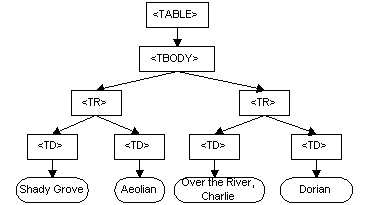
This appendix contains the complete ECMA Script binding for the Level 1 Document Object Model definitions. The definitions are divided into Core and HTML.
For the latest version of any W3C specification please consult the list of W3C Technical Reports available at http://www.w3.org/TR.
The DOM specification serves as a good example of the power of using XML: all of the HTML documents, Java bindings, OMG IDL bindings, and ECMA Script bindings are generated from a single set of XML source files. This section outlines how this specification is written in XML, and how the various derived works are created.
This specification was written entirely in XML, using a DTD based heavily on the DTD used by the XML Working Group for the XML specification. The major difference between the DTD used by the XML Working Group, and the DTD used for this specification is the addition of a DTD module for interface specifications.
The DTD module for interfaces specifications is a very loose translation of the Extended Backus-Naur Form (EBNF) specification of the OMG IDL syntax into XML DTD syntax. In addition to the translation, the ability to describe the interfaces was added, thereby creating a limited form of literate programming for interface definitions.
While the DTD module is sufficient for the purposes of the DOM WG, it is very loosely typed, meaning that there are very few constraints placed on the type specifications (the type information is effectively treated as an opaque string). In a DTD for object to object communication, some stricter enforcement of data types would probably be beneficial.
The DOM specification is written using XML. All documents are valid XML. In order to produce the HTML versions of the specification, the object indexes, the Java source code, and the OMG IDL and ECMA Script definitions, the XML specification is converted.
The tool currently used for conversion is COST by
Joe English. COST takes the ESIS output of
nsgmls, creates an internal representation, and
then allows scripts, and event
handlers to be run over the internal data structure.
Event handlers allow document patterns and
associated processing to be specified: when the pattern is
matched during a pre-order traversal of a document subtree, the
associated action is executed. This is the heart of the
conversion process. Scripts are used to tie the various
components together. For example, each of the major derived data
sources (Java code etc.) is created by the execution of a
script, which in turn executes one or more event handlers. The
scripts and event handlers are specified using TCL.
The current version of COST has been somewhat
modified from the publicly available version. In particular,
it now runs correctly under 32-bit Windows, uses TCL 8.0, and
correctly handles the case sensitivity of
XML (though it probably could not correctly handle native language
markup).
We could also have used Jade, by James Clark. Like
COST, Jade allows patterns and actions
to be specified, but Jade is based on DSSSL, an
international standard, whereas COST is
not. Jade is more powerful than COST
in many ways, but prior experience of the editor with Cost made it
easier to use this rather than Jade. A future version
or Level of
the DOM specification may be produced using Jade or
an XSL processor.
The complete XML source files are available at: http://www.w3.org/TR/2000/WD-DOM-Level-1-20000929/xml-source.zip
Note: The DOM Level 1 Specification Second Edition has been produced using a DOM Level 2 implementation and an XPath implementation in Java.
As stated earlier, all object definitions are specified in XML. The Java bindings, OMG IDL bindings, and ECMA Script bindings are all generated automatically from the XML source code.
This is possible because the information specified in XML is a superset of what these other syntax need. This is a general observation, and the same kind of technique can be applied to many other areas: given rich structure, rich processing and conversion are possible. For Java and OMG IDL, it is basically just a matter of renaming syntactic keywords; for ECMA Script, the process is somewhat more involved.
A typical object definition in XML looks something like this:
<interface name="foo">
<descr><p>Description goes here...</p></descr>
<method name="bar">
<descr><p>Description goes here...</p></descr>
<parameters>
<param name="baz" type="DOMString" attr="in">
<descr><p>Description goes here...</p></descr>
</param>
</parameters>
<returns type="void">
<descr><p>Description goes here...</p></descr>
</returns>
<raises>
<!-- Throws no exceptions -->
</raises>
</method>
</interface>
As can easily be seen, this is quite verbose, but not unlike OMG IDL. In fact, when the specification was originally converted to use XML, the OMG IDL definitions were automatically converted into the corresponding XML source using common Unix text manipulation tools.