
is there a suitable icon for Amaya?
Activity statements provide a managerial overview of W3C's work in each area, covering: an introduction to the activity, the goals of W3C work, the accomplishments to date, and future plans. They are designed to be read from beginning to end, to be informative and interesting. The introductory section serves to set the scene and to explain any technical concepts used in subsequent sections. Where necessary the explanation is expanded into a short tutorial. The role of W3C is given, also the benefits to the Web community, accomplishments to date and a summary of what the future holds.
Work on Amaya is being managed as part of W3C's User Interface domain.
Amaya is the name of W3C's own test-bed browser/editor and is used to demonstrate and test many of the new developments in Web protocols and data formats. Given the very fast moving nature of Web technology, Amaya has a central role to play. It is versatile and extensible - new features can be easily added - and is available on both Unix and Windows '95/NT platforms.
Amaya has a counterpart called Jigsaw which plays a similar role on the server side.
Amaya is a complete web browsing and authoring environment and comes equiped with a WYSIWYG style of interface, similar to that of the more popular commercial browsers. Users do not need to know the HTML or CSS languages. Features of Amaya include the following:
Amaya lets users both browse and author Web pages
Using Amaya you can create Web pages and upload them onto a server. Authors can create a document from scratch, they can browse the web and find the information they need, copy and paste it to their pages, and create links to other Web sites. All this is done in a straightforward and simple manner, and actions are performed in a single consistent environment. Editing and browsing functions are integrated seamlessly in a single tool.
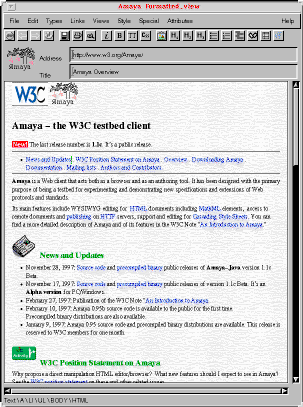
The Amaya main view: Along the top are a number
of buttons associated with editing. At any time, the user can select
any part of that text and assign to it an HTML type (H1, LI, EM,
etc.), by means of the Types menu or of the shortcut buttons. Such a
command transforms the selected part into an element of the chosen
type.
Although a WYSIWYG interface is presented to the author, "behind the scenes" Amaya always represents the document internally in a structured way consistent with the Document Type Defintion (DTD). A properly structured document enables other tools to further process the data safely.
Amaya allows you to view the document structure, which is portrayed diagrammatically on the screen, at the same time as the formatted document. You can edit in any view.
Amaya is able to work on several documents at a time
Amaya can act as a browser and as an editor simultaneously on several documents at once. Authors can follow, create and modify links. The whole Amaya functionality is available at any time for any document.
Amaya helps authors create hypertext links
The editor helps you create and text out links to other documents on the Web from the document you currently are working on. You can view the links and get a feel for how the information is interconnected.Amaya is easily extended.
Several APIs and mechanisms are available to change and extend its functionality with the least modification to the source code. Amaya thus allows for easy customization by providing a means for extensions to access Amaya's internal procedures and functions.
Amaya aims to function as a test-bed browser/editor to demonstrate and test new W3C developments in protocols and data formats.
Amaya already demonstrates a prototype implementation of MathML which allows users to browse and edit web pages containing mathematical expressions.
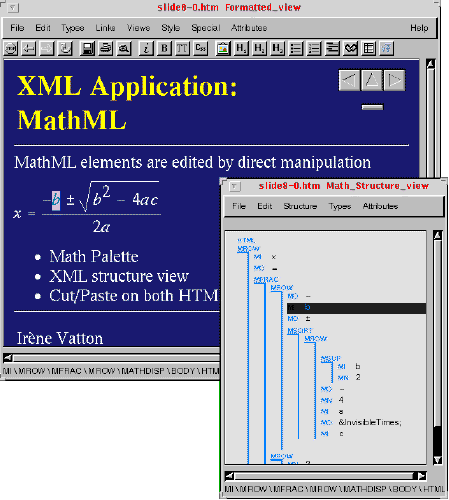
This is a demonstration of MathML, an XML application resulting from work by the HTML-Math working group. MathML allows authors to format equations for publishing on the World Wide Web. The user can see the formatted view and structured view at the same time.
Amaya has been extended to demonstrate many features in HTML 4.0, the current recommendation for the language.
Amaya now supports the OBJECT element to support a mechanism for the insertion of media plug-ins.
The SPAN element is also supported, used for giving in-line elements (for example an in-line quotation) a common style or language.
The LANG attribute (with multilingual hyphenation and spell checking), ID (for CSS and links) - CLASS (for CSS) have all been implemented
In its basic version, Amaya implements many web protocols and formats: it accesses remote sites by means of HTTP 1.1, as implemented in libwww.Amaya takes advantage of the most advanced features of HTTP, such as content negotiation to retrieve the most appropriate picture format, for instance, or keep alive connections to save bandwidth.
Amaya displays images including those in the PNG format, which is a more powerful graphics format than GIF and is being increasingly used on the Web.
A CGM plug-in (CGM is commonly used vector graphics format in computer drawing packages) developed by Rutherford Appleton Laboratories was demonstrated at EITC'97 in Brussells.
Amaya now has support for CSS1 although this is not yet complete. The user interacts on a formatted document and does need to see the CSS syntax. The current implementation should be considered as an experiment but the plan is to revisit this part the Amaya code and improve it to provide a stronger basis for implementing CSS2.
The binary version of Amaya was first released to W3C members and to the public in July and August 1996, respectively. The Windows version is much more stable now, but it is still missing a few features: printing documents and image map editing. We are working on these features, which should be available in January. The Unix and Windows versions will then support exactly the same features. Since February 1997, the source code has been available to the public.
We have two distributions of Amaya. A pure C version based on Libwww and a version embedding a Java virtual machine. The later uses the HTTP classes from Jigsaw. This is a an object-oriented server for HTTP 1.1 written in Java.
An API is available from the Java language offering an easy customization path for Amaya users.
These extensions are envisaged for the next few months: