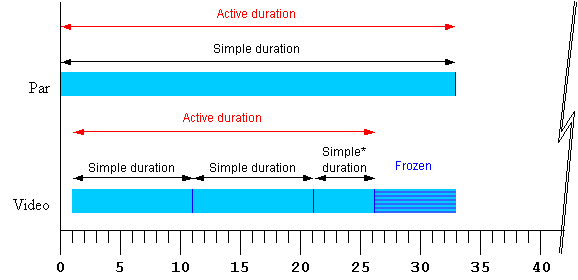
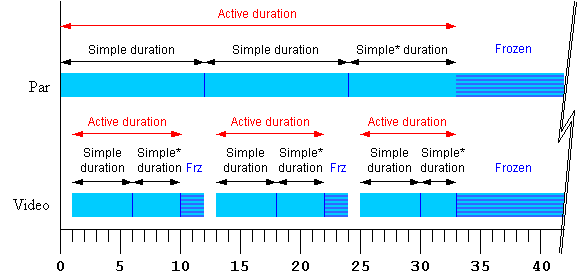
This section is normative
This section defines the set of timing attributes that
are common to all of the SMIL synchronization elements.
Unless otherwise specified below, if there is any error
in the argument value syntax for an attribute, the attribute will be ignored
(as though it were not specified).
The begin
and dur attributes: basic timing
support
The normative syntax rules for each attribute value variant are
described in Timing
attribute value grammars; an attribute value syntax summary is
provided here as an aid to the reader.
- begin : SMIL-1-syncbase-value |
Begin-value-list
- Defines when the element becomes active.
The attribute value is either a SMIL 1.0 syncbase declaration, or a
semi-colon separated list of values.
- SMIL-1-syncbase-value
- Deprecated. Describes a syncbase and an offset from
that syncbase. The element begin is defined relative to the begin
or active end of another element.
- Begin-value-list :
Begin-value (";" Begin-value-list )?
- A semi-colon separated list of begin values. The interpretation
of a list of begin times is detailed in the section Evaluation of begin
and end time lists.
- Begin-value : ( Offset-value | Syncbase-value | Event-value |
Repeat-value | Accesskey-value | Media-Marker-value |
Wallclock-sync-value | "indefinite" )
- Describes the element begin.
- Offset-value
- Describes the element begin as an offset from an implicit
syncbase. The definition of the implicit syncbase depends upon
the element's parent time container. The offset is measured in
parent simple time.
- Syncbase-value
- Describes a syncbase and an offset from that syncbase. The
element begin is defined relative to the begin or active end of
another element.
- Event-value
- Describes an event and an optional offset that determine the
element begin. The element begin is defined relative to the time
that the event is raised. Events may be any event defined for the
host language in accordance with [DOM2Events]. These may
include user-interface events, event-triggers transmitted via a
network, etc. Details of event-based timing are described in the
section below on Unifying
Event-based and Scheduled Timing.
- Repeat-value
- Describes a qualified repeat event. The element begin is
defined relative to the time that the repeat event is raised with
the specified Iteration value.
- Accesskey-value
- Describes an accesskey that determines the element begin. The
element begin is defined relative to the time that the accesskey
character is input by the user.
- Media-Marker-value
- Describes the element begin as a named marker time defined by a
media element.
- Wallclock-sync-value
- Describes the element begin as a real-world clock time. The
wallclock time syntax is based upon syntax defined in
[ISO8601].
- "indefinite"
- The begin of the element will be determined by a
"beginElement()" method call or a hyperlink targeted to the
element.
The SMIL Timing and Synchronization DOM methods are described in
the DOMTimingMethods
section.
Hyperlink-based timing is described in the Hyperlinks and timing
section.
- Children of a seq can only
specify a non-negative offset value for begin.
- If no begin is specified, the
default timing is dependent upon the time container.
- If there is a syntax error in any individual value in the list of begin
or end values (i.e. the value does not conform to the defined syntax for
any of the time values), the host language must specify how the user
agent deals with this.
- A time value may conform to the defined syntax but still be invalid
(e.g. if an unknown element is referenced by ID in a syncbase value). If
there is such an evaluation error in an individual value in the list of
begin or end values, the individual value will be will be treated as
though "indefinite" were specified, and the
rest of the list will be processed normally. If no legal value is
specified for a begin or end attribute, the element assumes an "indefinite" begin or end time (respectively).
- The deprecated SMIL-1-syncbase-values are semantically equivalent to the following SMIL
3.0 Begin-value types:
id(Id-value)(begin) is equivalent to
Id-value.beginid(Id-value)(end) is equivalent to
Id-value.endid(Id-value)(Clock-value) is equivalent
to Id-value.begin+ Clock-value
- For children of <par> and
<excl> time containers, the
computed offset relative to the parent begin time may be negative.
- A begin time may be specified with a negative offset relative to an
event or to a syncbase that is not initially resolved. When the syncbase
or eventbase time is resolved, the computed time may be in the past.
The computed begin time defines the scheduled synchronization
relationship of the element, even if it is not possible to begin the
element at the computed time. The time model uses the computed begin time,
and not the observed time of the element begin.
- When a begin time is resolved to be in the past (i.e., before the
current presentation time), the element begins immediately, but acts as
though it had begun at the specified time (playing from an offset into
the media).
The element will actually begin at the time computed according to the
following algorithm:
Let o be the offset value of a given begin value,
d be the associated simple duration,
AD be the associated active duration.
Let rAt be the time when the begin time becomes resolved.
Let rTo be the resolved sync-base or event-base time without the offset
Let rD be rTo - rAt.  If rD < 0 then rD is set to 0.

If AD is indefinite, it compares greater than any value of o or ABS(o).
REM( x, y ) is defined as x - (y * floor( x/y )).
If y is indefinite or unresolved, REM( x, y ) is just x.

Let mb = REM( ABS(o), d ) - rD
If ABS(o) >= AD then the element does not begin.
Else if mb >= 0 then the media begins at mb.
Else the media begins at mb + d.
If the element repeats, the Iteration value of the repeat
event has the calculated value based upon the above computed begin time, and
not the observed number of repeats.
The presentation effect for the element (e.g. the
display of visual media) is equivalent to that for a clipBegin value (with the same
magnitude) for the first -- and only the first -- iteration of a repeated
element. If no repeat behavior is specified, the element presentation effect
of a negative begin offset is equivalent to a clipBegin specification with the same
magnitude as the offset value. Nevertheless, the timing side effects
are not equivalent to a clipBegin value as described. Time
dependents of the begin value will behave as though the element had begun
earlier.
The length of the simple duration is specified using
the dur attribute. The dur attribute syntax is described below.
- dur
- Specifies the simple duration.
The attribute value may be any of the following:
- Clock-value
- Specifies the length of the simple duration, measured in
element active time.
Value must be greater than 0.
- "media"
- Specifies the simple duration as the intrinsic media duration.
This is only valid for elements that define media.
- "indefinite"
- Specifies the simple duration as indefinite.
If there is any error in the argument value syntax for dur, the attribute will be ignored (as though
it were not specified).
If the "media" attribute value is used on an element that
does not define media (e.g. on the SMIL 3.0 time container elements par, seq
and excl), the attribute will be
ignored (as though it were not specified). Contained media such as the
children of a par are not considered
media directly associated with the element.
If the element does not have a (valid) dur attribute, the simple duration for the
element is defined to be the implicit duration of the element.
-
For simple media elements that specify continuous media (i.e.
media with an inherent notion of time), the implicit duration is the
intrinsic duration of the media itself - e.g. video and audio files have
a defined duration.
-
For simple media elements that specify discrete media (some
times referred to as "static" media), the implicit duration is defined to
be 0.
-
If the author specifies a value for dur that is shorter than the implicit
duration for an element, the implicit duration will be cut short by the
specified simple duration.
If the author specifies a simple duration that is longer than the
implicit duration for an element, the implicit duration of the element is
extended to the specified simple duration:
- For a discrete media element, the media will be shown for the specified
simple duration.
- For a continuous media element, the ending state of the media (e.g. the
last frame of video) will be shown from the end of the intrinsic media
duration to the end of the specified simple duration. This only applies
to visual media - aural media will simply stop playing (i.e. be
silent).
- For a seq time container, the last child is frozen until the end of the
simple duration of the seq if and only if its fill behavior is "freeze"
or "hold" (otherwise the child just ends without freezing).
- Children of a par or excl are frozen until the end of the simple
duration of the par or excl if and only if the children's fill behavior
is "freeze" or "hold" (otherwise the children just ends without
freezing).
The end
attribute: controlling active duration
SMIL 3.0 provides an additional control over the active duration. The
end attribute allows the author to
constrain the active duration by specifying an end value using a simple
offset, a time base, an event-base, a syncbase, or DOM methods calls. The
rules for combining the attributes to compute the active duration are
presented in the section, Computing the
active duration.
The normative syntax rules for each attribute value variant are described
in the section Timing attribute
value grammars; a syntax summary is provided here as an aid to the
reader.
- end : SMIL-1-syncbase-value |
End-value-list
- Defines an end value for the element that may constrain the active
duration.
The attribute value is either a SMIL 1.0 syncbase declaration, a
semi-colon separated list of values.
- SMIL-1-syncbase-value
- Deprecated. Describes a syncbase and an offset from
that syncbase. The end value is defined relative to the begin or
active end of another element.
- End-value-list :
End-value (";" End-value-list )?
- A semi-colon separated list of end values. The interpretation
of a list of end times is detailed in the section Evaluation of begin
and end time lists.
- End-value : ( Offset-value | Syncbase-value | Event-value |
Repeat-value | Accesskey-value | Media-Marker-value |
Wallclock-sync-value | "indefinite" )
- Describes the end value of the element.
- Offset-value
- Describes the end value as an offset from an implicit syncbase.
The definition of the implicit syncbase depends upon the
element's parent time container. The offset is measured in parent
simple time.
- Syncbase-value
- Describes a syncbase and an offset from that syncbase. The end
value is defined relative to the begin or active end of another
element.
- Event-value
- Describes an event and an optional offset that determine the
end value. The end value is defined relative to the time that the
event is raised. Events may be any event defined for the host
language in accordance with [DOM2Events]. These may include
user-interface events, event-triggers transmitted via a network,
etc. Details of event-based timing are described in the section
below on Unifying Event-based
and Scheduled Timing.
- Repeat-value
- Describes a qualified repeat event. The end value is defined
relative to the time that the repeat event is raised with the
specified Iteration value.
- Accesskey-value
- Describes an accesskey that determines the end value. The end
value is defined as the time that the accesskey character is
input by the user.
- Media-Marker-value
- Describes the end value as a named marker time defined by a
media element.
- Wallclock-sync-value
- Describes the end value as a real-world clock time. The
wallclock time is based upon syntax defined in [ISO8601].
- "indefinite"
- The end value of the element will be determined by an
endElement() method call.
The SMIL Timing and Synchronization DOM methods are described in
the DOMTimingMethods
section.
If the end value
becomes resolved while the element is still active, and the resolved time is
in the past, the element should end the active duration immediately. Time
dependents defined relative to the end of this element should be resolved
using the computed active end (which may be in the past), and not the
observed active end.
The deprecated SMIL-1-syncbase-values are semantically equivalent to the following SMIL 3.0
End-value types:
id(Id-value)(begin) is equivalent to
Id-value.beginid(Id-value)(end) is equivalent to
Id-value.endid(Id-value)(Clock-value) is equivalent to
Id-value.begin+Clock-value
This section is informative
The end value may specify a
list of times. This can be used to specify multiple "ways" or "rules"
to end an element, e.g. if any one of several events is raised. A list
of times may also define multiple end times that may correspond to
multiple begin times, allowing the element to play more than once
(this behavior can be controlled - see also the restart attribute).
In the following example, the dur
attribute is not specified, and so the simple duration is defined to be the
implicit media duration. In this case (and this case only) the value of end will extend the active duration if it
specifies a duration greater than the implicit duration. The video will be
shown for 8 seconds, and then the last frame will be shown for 2 seconds.
<video end="10s" src="8-SecondVideo.mpg" .../>
If an author wishes to specify the implicit duration as well as an end
constraint, the dur attribute may be
specified as "media". In the following example, the element will
end at the earlier of the intrinsic media duration, or a mouse click:
<smil ...>
...
<video dur="media" end="activateEvent" src="movie.mpg" .../>
...
</smil>
These cases arise from the use of negative offsets in the sync-base and
event-base forms, and authors should be aware of the complexities this can
introduce. See also Handling negative offsets
for end.
In the following example, the active duration will end at the earlier of
10 seconds, or the end of the "foo" element. This is particularly useful if
"foo" is defined to begin or end relative to an event.
<audio src="foo.au" dur="2s" repeatDur="10s"
       end="foo.end" .../>
In the following example, the active duration will end at 10 seconds, and
will cut short the simple duration defined to be 20 seconds. The effect is
that only the first half of the element is actually played. For a simple
media element, the author could just specify this using the dur attribute.
However in other cases, it is sometimes important to specify the simple
duration independent of the active duration.
<par>
   <audio src="music.au" dur="20s" end="10s" ... />
</par>
In the following example, the element begins when the user activates
(e.g., clicks on) the "gobtn" element. The active duration will end 30
seconds after the parent time container begins.
<smil ...>
...
<par>
<audio src="music.au" begin="gobtn.activateEvent" repeatDur="indefinite"
          end="30s" ... />
     <img src="foo.jpg" dur="40s" ... />
</par>
...
</smil>
Note that if the user has not clicked on the target element before 30
seconds elapse, the element will never begin. In this case, the element has
no active duration and no active end.
The defaults for the event syntax make it easy to define simple
interactive behavior. The following example stops the image when the user
clicks on the element.
<smil ...>
...
<img src="image.jpg" end="activateEvent" />
...
</smil>
Using end with an event value enables
authors to end an element based on either an interactive event or a maximum
active duration. This is sometimes known as lazy interaction.
In this example, a presentation describes factory processes. Each step is
a video, and set to repeat 3 times to make the point clear. Each element may
also be ended by clicking on the video, or on some element "next" that
indicates to the user that the next step should be shown.
<smil ...>
...
<seq>
  <video dur="5s" repeatCount="3" end="activateEvent; next.activateEvent" .../>
  <video dur="5s" repeatCount="3" end="activateEvent; next.activateEvent" .../>
  <video dur="5s" repeatCount="3" end="activateEvent; next.activateEvent" .../>
  <video dur="5s" repeatCount="3" end="activateEvent; next.activateEvent" .../>
  <video dur="5s" repeatCount="3" end="activateEvent; next.activateEvent" .../>
</seq>
...
</smil>
In this case, the active end of each element is defined to be the earlier
of 15 (5s dur * 3 repeats) seconds after it begins, or a click on "next".
This lets the viewer sit back and watch, or advance the presentation at a
faster pace.
-
An end time may be specified with a negative offset relative to an event
or to a syncbase that is not initially resolved.
- When the syncbase or eventbase time is resolved, the computed time may
be in the past.
- The computed time defines the scheduled synchronization
relationship of the element, even if it is not possible to end the
element at the computed time.
- When an end time is defined to be in the past, the element ends
immediately. The defined end time is the computed time, and not the
observed or performed time of the element end.
The min and max
attributes: more control over the active duration
The min/max attributes provide the author with a way
to control the lower and upper bound of the element active
duration.
- min
- Specifies the minimum value of the active duration.
The attribute value may be either of the following:
- Clock-value
- Specifies the length of the minimum value of the active
duration, measured in element active time.
Value must be greater than or equal to 0.
- "media"
- Specifies the minimum value of the active duration as the
intrinsic media duration. This is only valid for elements that
define media.
If there is any error in the argument value syntax for min, the attribute will be ignored (as though
it were not specified).
The default value for min is "0".
This does not constrain the active duration at all.
- max
- Specifies the maximum value of the active duration.
The attribute value may be either of the following:
- Clock-value
- Specifies the length of the maximum value of the active
duration, measured in element active time.
Value must be greater than 0.
- "media"
- Specifies the maximum value of the active duration as the
intrinsic media duration. This is only valid for elements that
define media.
- "indefinite"
- The maximum value of the duration is indefinite, and so is not
constrained.
If there is any error in the argument value syntax for max, the attribute will be ignored (as though
it were not specified).
The default value for max is
"indefinite". This does not constrain the active duration at all.
If the "media" argument value is specified for either min or max on an element that does not define media
(e.g. on the SMIL 3.0 time container elements par, seq
and excl), the respective attribute
will be ignored (as though it were not specified). Contained media such as
the children of a par are not considered
media directly associated with the element.
If both min and max attributes are specified then the max value must be greater than or equal to the
min value. If this requirement is not
fulfilled then both attributes are ignored.
The rule to apply to compute the active duration of an element with min or max specified is the following: Each time the
active duration of an element is computed (i.e. for each interval of the
element if it begins more than once), this computation is made without taking
into account the min and max attributes (by applying the algorithm
described in Computing the active
duration). The result of this step is checked against the min and max bounds. If the result is within the
bounds, this first computed value is correct. Otherwise two situations may
occur:
if the first computed duration is greater than the max value, the
active duration of the element is defined to be equal to the max value (see the first example
below).
if the first computed duration is less than the min value, the active duration of the
element becomes equal to the min
value and the behavior of the element is as follows :
if the repeating duration (or the simple duration if the element
doesn't repeat) of the element is greater than min then the element is played
normally for the (min
constrained) active duration. (see the second and third examples
below).
otherwise the element is played normally for its repeating
duration (or simple duration if the element does not repeat) and then
is frozen or not shown depending on the value of the fill attribute (see the fourth and
fifth examples below).
This section is informative
The following examples illustrate some simple use cases for min and max attributes:
Example 1. In the following example, the video will only play for 10
seconds.
<smil ...>
...
<par >
   <video xml:id="video_of_15s" max="10s".../>
</par>
...
</smil>
Example 2. In the following example, if an activate event happens before
10 seconds, this activation (e.g. click) does not interrupt the video
immediately, but the video plays until 10 seconds and then stops. If a click
event happens after 10 seconds, the video plays (repeating) until the click
happens. Note, the endEvent is only raised if a click occurs after 10
seconds, not at the simple end of each repeat.
<smil ...>
...
<par >
   <video xml:id="video_of_15s" repeatDur="indefinite" end="activateEvent" min="10s".../>
</par>
...
</smil>
Example 3. In the following example, if an activate event happens on
element "foo" at 5 seconds, this event does not end the time container
immediately, but rather at 12 seconds. The simple duration is defined to be
"indefinite" (because an end attribute
is specified with no dur attribute), and
so the time container plays normally until it ends at 12 seconds.
<smil ...>
...
<par end="foo.activateEvent" min="12s" >
   <video xml:id="video_of_15s" .../>
   <video xml:id="video_of_10s" .../>
</par>
...
</smil>
Example 4. In the following example, if a click event happens on the first
video at 5 seconds, then the simple duration of the time container is
computed as 5 seconds. Respecting the fill attribute in the time between the end of
the simple duration and the end of the active duration, the two videos are
frozen between 5 seconds and 12 seconds.
<smil ...>
...
<par endsync="first" min="12s" fill="freeze" >
   <video xml:id="video_of_15s" end="activateEvent" ...>
   <video xml:id="video_of_10s" .../>
</par>
...
</smil>
Example 5. In the following example, the time container simple duration is
defined to be 5 seconds, and the min constraint defines the active duration
to be 12 seconds. Since the default value of fill in this case is "remove",
nothing is shown for the time container between 5 seconds and 12 seconds.
<par dur="5s" min="12s" >
   <video xml:id="video_of_15s" .../>
   <video xml:id="video_of_10s" .../>
</par>
The min attribute and negative begin times
The syntax specifications are defined using EBNF notation as defined in
XML 1.1 [XML11]
In the syntax specifications that follow, allowed white space is indicated
as "S", defined as follows (taken from the [XML11] definition for 'S'):
S ::= (#x20 | #x9 | #xD | #xA)+
A Begin-value-list is a semi-colon separated list of timing specifiers:
Begin-value-list ::= Begin-value (S? ";" S? Begin-value-list )?
Begin-value      ::= (Offset-value | Syncbase-value
                      | Event-value | Repeat-value | Accesskey-value
                      | Media-Marker-value | Wallclock-sync-value
                      | "indefinite" )
An End-value-list is a semi-colon separated list of timing specifiers:
End-value-list ::= End-value (S? ";" S? End-value-list )?
End-value      ::= (Offset-value | Syncbase-value
                      | Event-value | Repeat-value | Accesskey-value
                      | Media-Marker-value | Wallclock-sync-value
                      | "indefinite" )
Several of the timing specification values have a similar syntax. To
parse an individual item in a value-list, the following approach defines the
correct interpretation. In addition, Id-values and Event-symbols are XML NMTOKEN values and
as such are allowed to contain the full stop '.' and
hyphen-minus '-' characters. The reverse solidus character '\' must be used
to escape these characters within Id-values and Event-symbols, otherwise these characters
will be interpreted as the full stop separator and hyphen-minus sign,
respectively. Once these rules are interpreted, but before Id-values in
syncbase values, event values, or media-marker values are further handled,
all leading and embedded escape characters should be removed.
- Strip any leading, trailing, or intervening white space characters.
- If the value begins with a number or numeric sign indicator (i.e.
'+' or '-'), the value should be parsed as an
offset value.
- Else if the value begins with the unescaped token "wallclock", it
should be parsed as a Wallclock-sync-value.
- Else if the value is the unescaped token "indefinite", it should be
parsed as the value "indefinite".
- Else: Build a token substring up to but not including any sign
indicator (i.e. strip off any offset, parse that separately, and add it
to the result of this step). In the following, any '
.'
characters preceded by a reverse solidus '\' escape
character should not be treated as a separator, but as a normal token
character.
- If the token contains no '
.' separator character, then
the value should be parsed as an Event-value with an unspecified
(i.e. default) eventbase-element.
- Else if the token ends with the unescaped string
"
.begin" or ".end", then the value should
be parsed as a Syncbase-value.
- Else if the token contains the unescaped string
"
.marker(", then the value should be parsed as a Media-Marker-value.
- Else, the value should be parsed as an Event-value (with a specified
eventbase-element).
Clock values have the following syntax:
Clock-value         ::= ( Full-clock-value | Partial-clock-value | Timecount-value )
Full-clock-value    ::= Hours ":" Minutes ":" Seconds ("." Fraction)?
Partial-clock-value ::= Minutes ":" Seconds ("." Fraction)?
Timecount-value     ::= Timecount ("." Fraction)? (Metric)?
Metric              ::= "h" | "min" | "s" | "ms"
Hours               ::= DIGIT+ /* any positive number */
Minutes             ::= 2DIGIT /* range from 00 to 59 */
Seconds             ::= 2DIGIT /* range from 00 to 59 */
Fraction            ::= DIGIT+
Timecount           ::= DIGIT+
2DIGIT              ::= DIGIT DIGIT
DIGIT               ::= [0-9]
For Timecount values, the default metric suffix is "s" (for seconds).
Fractional values are just (base 10) floating point
definitions of seconds. The number of digits allowed is unlimited (although
actual precision may vary among implementations).
An offset value has the following syntax:
Offset-value ::= ( S? ("+" | "-") S? )? ( Clock-value )
- An offset value allows an optional sign on a clock value, and is used
to indicate a positive or negative offset.
- The offset is measured in parent simple time.
The implicit syncbase for an offset value is dependent upon the time
container:
- For children of a <par> or
an <excl>, the offset is
relative to the begin of the parent <par> or <excl>.
- For children of a <seq>, the
offset is relative to the active end of the previous child. If there is
no previous child, the offset is relative to the begin of the parent
<seq>. See also The seq time container.
SMIL-1-syncbase-value  ::= SMIL-1-Id-value
                           ( "(" ( "begin" | "end" | Clock-value) ")" )?
SMIL-1-Id-value        ::= "id(" Idref ")"
ID reference values are references to the value of an "id" attribute of
another element in the document.
Id-value                   ::= Id-ref-value
Id-ref-value               ::= Idref | Escaped-Id-ref-value
Idref                      ::= Name
Escaped-Id-ref-value       ::= Escape-Char? NameStartChar (Escape-Char? NameChar)*
Escape-Char                ::= "\"
- The symbols
Name, NameStartChar
and NameChar are defined in XML 1.1 [XML11].
- The
Idref is a legal XML identifier.
- If the Id-ref-value is not an Idref, then it is treated as an
Escaped-ID-ref-value.
- The Escaped-Id-ref-value allows the use of a SMIL 3.0 reserved symbol
as an Idref value for an attribute by prefixing the reserved symbol with
a backslash character. In this case the value should be treated as an
Idref and not as the reserved symbol, and the leading backslash is
significant in the parsing as detailed in the section on parsing XML identifiers in begin and
end values.
- Single characters may also be escaped by using the backslash character,
and the character, minus the backslash, should be treated as a literal
part of the NMTOKEN.
If the element referenced by the Idref is ignored as described in the
Content Control modules (e.g. if it specifies test attributes that evaluate
false), the associated time value (i.e.. the syncbase value or the eventbase
value that specifies the Id-value) will be considered invalid.
A syncbase value starts with a Syncbase-element term
defining the value of an "id" attribute of another element referred to as the
syncbase element.
A syncbase value has the following syntax:
Syncbase-value   ::= ( Syncbase-element "." Time-symbol )
                      ( S? ("+"|"-") S? Clock-value )?
Syncbase-element ::= Id-value
Time-symbol      ::= "begin" | "end"
- The syncbase element must be another timed element contained in the
host document.
- The syncbase element may not be a descendant of the current
element.
- If the syncbase element specification refers to an illegal element, the
time-value description will be treated as though "indefinite" were
specified.
The syncbase element is qualified with one of the following time
symbols:
- begin
- Specifies the begin time of the syncbase element.
- end
- Specifies the Active End of the syncbase element.
- The time symbol may be followed by an offset value. The offset value
specifies an offset from the time (i.e. the begin or active end)
specified by the syncbase and time symbol.
- The offset is measured in parent simple time.
- If the clock value is omitted, it defaults to "0".
- No embedded white space is allowed between a syncbase element and a
time-symbol.
- White space will be ignored before and after a "+" or "-" for a clock
value.
- Leading and trailing white space characters (i.e. before and after the
entire syncbase value) will be ignored.
An Event value starts with an Eventbase-element term
that specifies the event-base element. The event-base element is the
element on which the event is observed. Given DOM event bubbling, the
event-base element may be either the element that raised the event, or it may
be an ancestor element on which the bubbled event may be observed. Refer to
DOM-Level2-Events [DOM2Events] for details.
An event value has the following syntax:
Event-value       ::= ( Eventbase-element "." )? Event-symbol
                        ( S? ("+"|"-") S? Clock-value )?
Eventbase-element ::= Id-value
Event-symbol      ::= Nmtoken
The symbol Nmtoken is defined in XML 1.1 [XML11].
The eventbase-element must be another element contained in the host
document.
If the Eventbase-element term is missing, the event-base element defaults
to the element on which the eventbase timing is specified (the current
element). A host language designer may override the definition of the default
eventbase element. As an example of this, the SMIL 3.0 Animation modules describe Timing
integration requirements for the animation elements (animate, animateMotion,
etc.). These requirements specify that the default eventbase element is the
target element of the animation. See the section Common Animation Integration Requirements.
The event value must specify an Event-symbol. This term is an XML NMTOKEN
that specifies the name of the event that is raised on the Event-base
element. The host language designer must specify which events may be
specified.
- Host language specifications must include a description of legal event
names (with "none" as a valid description), and/or allow any name to be
used.
If an integrating language specifies no supported events, the
event-base time value is effectively unsupported for that language.
A host language may choose not to include support for offsets with
event values. The language must specify if this support is omitted.
If the host language allows dynamically created events (as supported
by DOM-Level2-Events [DOM2Events]), all possible Event-symbol names
cannot be specified and so unrecognized names may not be considered
errors.
Unless explicitly specified by a host language, it is not considered
an error to specify an event that cannot be raised on the Event-base
element (such as activateEvent or click for audio or other non-visual
elements). Since the event will never be raised
on the specified element, the event-base value will never be
resolved.
The last term specifies an optional Offset-value that is an offset from
the time of the event.
- The offset is measured in parent simple time. If this term is omitted,
the offset is 0.
- No embedded white space is allowed between an eventbase element and an
event-symbol.
- White space will be ignored before and after a "+" or "-" for a clock
value.
- Leading and trailing white space characters (i.e. before and after the
entire eventbase value) will be ignored.
Repeat values are a variant on event values that
support a qualified repeat event. The repeat event defined in Events and event model allows an additional
suffix to qualify the event based upon an Iteration value.
A repeat value has the following syntax:
Repeat-value       ::= ( Eventbase-element "." )? "repeat(" Iteration ")"
                        ( S? ("+"|"-") S? Clock-value )?
Iteration          ::= DIGIT+
If this qualified form is used, the eventbase value will only be resolved
when a repeat is observed that has an Iteration value that matches the
specified iteration.
Accesskey values allow an author to tie a begin or end
time to a particular key press, independent of focus issues. It is modeled on
the HTML accesskey support. Unlike with HTML, user agents should not require
that a modifier key (such as "ALT") be required to activate an access key.
An access key value has the following syntax:
Accesskey-value  ::= "accesskey(" Char ")"
                       ( S? ("+"|"-") S? Clock-value )?
The Char symbol is defined in XML 1.1 [XML11].
The time value is defined as the time that the access key character is
input by the user.
Media-Marker-value ::= Id-value ".marker(" S? Marker-name S? ")"
Marker-name        ::= (Char - ")")+
- The
Char symbol is defined in XML 1.1 [XML11].
- The
Marker-name symbol is a string that must conform to the definition of
marker names for the media associated with the Id-value.
Wallclock-sync values have the following syntax. The
values allowed are based upon several of the "profiles" described in
[DATETIME], which is based upon [ISO8601].
Wallclock-sync-value  ::= "wallclock(" S? (DateTime | WallTime | Date)  S? ")"
DateTime       ::= Date "T" WallTime
Date           ::= Years "-" Months "-" Days
WallTime       ::= (HHMM-Time | HHMMSS-Time)(TZD)?
HHMM-Time      ::= Hours24 ":" Minutes
HHMMSS-Time    ::= Hours24 ":" Minutes ":" Seconds ("." Fraction)?
Years          ::= 4DIGIT;
Months         ::= 2DIGIT /* range from 01 to 12 */
Days           ::= 2DIGIT /* range from 01 to 31 */
Hours24        ::= 2DIGIT /* range from 00 to 23 */
4DIGIT         ::= DIGIT DIGIT DIGIT DIGIT
TZD            ::= "Z" | (("+" | "-") Hours24 ":" Minutes )
-
Exactly the components shown here must be present, with exactly this
punctuation.
- Note that the "T" appears literally in the string, to indicate the
beginning of the time element, as specified in [ISO8601].
There are three ways of handling time zone offsets:
- Times are expressed in UTC (Coordinated Universal Time), with a special
UTC designator ("Z").
- Times are expressed in local time, together with a time zone offset in
hours and minutes. A time zone offset of "+hh:mm" indicates that the
date/time uses a local time zone which is "hh" hours and "mm" minutes
ahead of UTC. A time zone offset of "-hh:mm" indicates that the date/time
uses a local time zone which is "hh" hours and "mm" minutes behind
UTC.
- Times are expressed in local time, as defined for the presentation
location. The local time zone of the end-user platform is used.
- When the document begins, the current wallclock time must be noted -
this is the document wallclock begin.
- Wallclock values are then converted to a document time by subtracting
the document wallclock begin, and then converting the time to the
element's parent time space as for any syncbase value, as though the
syncbase were the document body.
- Date wallclock values are treated as a DateTime value of the given date
at time 00:00:00.00 in the local time zone.
- WallTime values are treated as a DateTime value on the date of the
document wallclock begin at the given time. Specified time zones
must be respected, and the time converted into the local time zone before
applying the document wallclock begin.
The endsync
attribute controls the implicit duration of time containers, as a function of
the children. The endsync attribute
is only valid for par and excl time container elements, and media
elements with timed children (e.g. animate or area elements). Integrating languages may
allow the endsync attribute on any
element with time container semantics.
- endsync = ( "first" | "last" | "all" | "media" | Id-value |
SMIL-1-Id-value )
- Legal values for the attribute are:
- first
- The par, excl, or media element's implicit
duration ends with the earliest active end of all the child
elements. This does not refer to the lexical first child, or to
the first child to start, but rather refers to the first child to
end its (first) active duration.
- last
- The par, excl, or media element's implicit
duration ends with the last active end of the child elements.
This does not refer to the lexical last child, or to the last
child to start, but rather refers to the last active end of all
children that have a resolved, definite begin time. If the time
container has no children with a resolved begin time, the time
container ends immediately. If child elements have multiple begin
times, or otherwise restart, the child elements must complete
all instances of active durations for resolved begin
times (see The instance times lists).
This is the default value for par and excl elements.
- all
- The par, excl, or media element's implicit
duration ends when all of the child elements have ended their
respective active durations. Elements with indefinite or
unresolved begin times will keep the simple duration of
the time container from ending.
When all elements have completed the active duration one or more
times, the parent time container may end.
- media
- The time container element's implicit duration ends when the
intrinsic media duration of the element ends. This must be
defined by a host language. If the time container element does
not define an intrinsic media duration, the host language must
define the simple duration for the element.
This is the default value for media time container elements.
- Id-value
- The par, excl, or media element time
container's implicit duration ends when the specified child ends
its (first) active duration. The id must correspond to one of the
immediate timed children of the time container.
- SMIL-1-Id-value
- This is a SMIL 1.0 identifier value of the form "id(" Idref
")". The semantics are identical to those of the Id-value
immediately above. This syntax is deprecated.
Elements may have an unresolved or indefinite
begin time when the parent begins. If an element's unresolved begin time
becomes resolved (and definite) before the parent time container ends the
simple duration, the element must be considered by the endsync="last" semantics.
If the endsync semantics consider any child
that has an unresolved active duration, then the implicit duration of the
time container is also unresolved.
For the Id-value arg-value
variant, the referenced child may have an unresolved begin time. If this
causes the active end time to be unresolved as well, the implicit
duration of the time container is also unresolved.
If the endsync semantics consider any child
that has a (resolved) indefinite active duration, then the implicit
duration of the time container is also indefinite.
Media element time containers define an intrinsic
duration equal to the duration of the referenced media.
If the media argument
value is used for an element that does not declare media, the attribute
is ignored (as though endsync
had not been specified).
If the Id-value arg-value
variant is not an immediate child of the time container, it is as if
endsync is not specified.
For the purpose of parsing the endsync argument value, first, last, all, and media are
reserved words and must be escaped with a backslash in order to be used
as Id-value's.
Semantics of endsync and dur and end:
- If an element specifies both endsync and dur, the endsync attribute is ignored. The
element's simple duration is defined by the value of dur.
- If an element specifies both endsync and end, but none of dur, repeatDur or repeatCount, the endsync attribute is ignored. In this
case the element behaves as if only end were specified, therefore the
element's implicit duration is indefinite and will be constrained by the
end value.
Semantics of endsync and
restart:
- In the case of an element that restarts (e.g. because of multiple begin
times), the element is considered to have ended its active duration when
one active duration instance has completed. It is not a requirement that
all instances associated with multiple begin and end times complete, to
satisfy the semantics of endsync. This means that if the
element is playing a second or later instance of an active duration, it
may be cut short by a parent, once the other children satisfy the endsync semantics.
Semantics of endsync and paused elements:
Note that child elements of an excl that are currently paused (by the
excl semantics) have not ended
their active duration. Similarly, any element paused via the DOM
pause() method has not completed its active duration. Paused
elements (that have not already completed the active duration at least
once) must be considered in the evaluation of endsync.
The following pseudo-code describes the endsync algorithm:
//
// boolean timeContainerHasEnded()
//
// method on time containers called to evaluate whether
// time container has ended, according to the rules of endsync.
// Note: Only supported on par and excl
//
// A variant on this could be called when a child end is updated to
// create a scheduled (predicted) end time for the container.
//
// Note that we never check the end time of children - it doesn't matter.
//
// Assumes:
//     child list is stable during evaluation
//     isActive state of children is up to date for current time.
//      [In practice, this means that the children must all be
//        pre-visited at the current time to see if they are done.
//        If the time container is done, and repeats, the children
//        may be resampled at the modified time.]
//
//   Uses interfaces:
//   on TimedNode:
//     isActive()             tests if node is currently active
//     hasStarted()           tests if node has (ever) begun
//     begin and end          begin and end TimeValues of node
//
//   on TimeValue         (a list of times for begin or end)
//   is Resolved(t)          true if there is a resolved time
//                                     at or after time t
//

boolean timeContainerHasEnded()
{

TimeInstant now = getCurrentTime(); // normalized for time container

boolean assumedResult;

// For first or ID, we assume a false result unless we find a child that has ended
// For last and all, we assume a true result unless we find a disqualifying child

if( ( endsyncRule == first ) || ( endsyncRule == ID ) )
   assumedResult = false;
else
   assumedResult = true;

// Our interpretation of endsync == all:
//          we're done when all children have begun, and none is active
//

// loop on each child in collection of timed children,
//  and consider it in terms of the endsyncRule

 foreach ( child c in timed-children-collection )
{
   switch( endsyncRule ) {
      case first:
         // as soon as we find an ended child, return true.
         if( c.hasStarted() & !c.isActive() )
            return true;
         // else, keep looking (assumedResult is false)
         break;

      case ID:
         // if we find the matching child, just return result
         if( endsyncID == c.ID )
                 return( c.hasStarted() & !c.isActive() );
         // else, keep looking (we'll assume the ID is valid)
         break;

      case last:
         // we just test for disqualifying children
         // If the child is active, we're definitely not done.
         // If the child has not yet begun but has a resolved begin,
         // then we're not done.
         if( c.isActive()
             || c.begin.isResolved(now) )
             return false;
         // else, keep checking (the assumed result is true)
         break;

      case all:
         // we just test for disqualifying children
        // all_means_last_done_after_all_begin

         // If the child is active, we're definitely not done.
         // If the child has not yet begun then we're not done.
         // Note that if it has already begun,
         // then we still have to wait for any more resolved begins
         if( c.isActive() || !c.hasStarted()
             || c.begin.isResolved(now) )
             return false;
         // else, keep checking (the assumed result is true)
         break;

   } // close switch

} // close foreach loop

return assumedResult;

} // close timeContainerHasEnded()
- repeatCount
- Specifies the number of iterations of the simple duration. It may
have the following attribute values:
- numeric value
- This is a (base 10) "floating point" numeric value that
specifies the number of iterations. It may include partial
iterations expressed as fraction values. A fractional value
describes a portion of the simple duration. Values must be
greater than 0.
- "indefinite"
- The element is defined to repeat indefinitely (subject to the
constraints of the parent time container).
- repeatDur
- Specifies the total duration for repeat. It may have the following
attribute values:
- Clock-value
- Specifies the duration in element active time to repeat the
simple duration.
- "indefinite"
- The element is defined to repeat indefinitely (subject to the
constraints of the parent time container).
- The SMIL 1.0 repeat attribute is deprecated since SMIL 2.0 (it must be
supported in SMIL document user agents for backwards compatibility).
This section is informative
In the following example, the implicit duration of the audio is
constrained by repeatCount. Only
the first half of the clip will play; the active duration will be 1.5
seconds.
<audio src="3second_sound.au" repeatCount="0.5" />
In this example, the 3 second (implicit) simple duration will be played
three times through and then is constrained by the dur attribute on the parent par; the active duration will be 9 seconds.
<par dur="9s">
   <audio src="3second_sound.au" repeatCount="100" />
</par>
In the following example, the 2.5 second simple duration will be repeated
twice; the active duration will be 5 seconds.
<audio src="background.au" dur="2.5s" repeatCount="2" />
In the following example, the 3 second (implicit) simple duration will be
repeated two full times and then the first half is repeated once more; the
active duration will be 7.5 seconds.
<audio src="3second_sound.au" repeatCount="2.5" />
In the following example, the audio will repeat for a total of 7 seconds.
It will play fully two times, followed by a fractional part of 2 seconds.
This is equivalent to a repeatCount of 2.8.
<audio src="music.mp3" dur="2.5s" repeatDur="7s" />
Note that if the simple duration is indefinite, repeat behavior is not
defined (but repeatDur still
contributes to the active duration). In the following example the simple
duration is 0 and indefinite respectively, and so the repeatCount is ignored. Nevertheless,
this is not considered an error. The active duration is equal to the simple
duration: for the first element, the active duration is 0, and for the second
element, the active duration is indefinite.
<img src="foo.jpg" repeatCount="2" />
<img src="bar.png" dur="indefinite" repeatCount="2" />
In the following example, the simple duration is 0 for the image and
indefinite for the text element, and so repeat behavior is not meaningful.
The active duration is 0 for the first element, however for the second
element, the active duration is determined by the repeatDur value, and so is 10 seconds.
The effect is that the text is shown for 10 seconds.
<img src="foo.jpg" repeatDur="10s" />
<text src="intro.html" dur="indefinite" repeatDur="10s" />
In the following example, if the audio media is longer than the 5 second
repeatDur, then the active
duration will effectively cut short the simple duration.
<audio src="8second_sound.au" repeatDur="5s" />
The repeatCount and repeatDur attributes may also be used to
repeat an entire timeline (i.e. a time container simple duration), as in the
following example. The sequence has an implicit simple duration of 13
seconds. It will begin to play after 5 seconds, and then will repeat the
sequence of three images 3 times. The active duration is thus 39 seconds
long.
<seq begin="5s" repeatCount="3" >
   <img src="img1.jpg" dur="5s" />
   <img src="img2.jpg" dur="4s" />
   <img src="img3.jpg" dur="4s" />
</seq>
The min
attribute and restart:
- repeat
- This attribute has been deprecated in SMIL 2.0 in favor of the
new repeatCount and repeatDur attributes.
- This causes the element to play repeatedly for the specified number
of times. It is equivalent to a seq element with the stated number of
copies of the element without the "repeat" attribute as children. All
other attributes of the element, including any begin delay, are
included in the copies.
- Legal values are integer iterations, greater
than 0, and "indefinite".
The fill
attribute: extending an element
The fill
attribute allows an author to specify that an element should be extended
beyond the active duration by freezing the final state of the
element. The fill attribute is also
used to determine the behavior when the active duration is less than the
duration specified in the min attribute.
For this reason, rather than referring to the end of the active duration,
this description refers to the "last instance of the simple duration".
- For discrete media, the media is simply displayed as it would be during
the simple duration.
- For visual continuous media, the "frame" that corresponds to the end of
the last instance of the simple duration is shown.
- For algorithmic media like animation, the value defined for the end of
the last instance of the simple duration should be used.
- For time containers, freezing extends the state of all children that
are active or frozen at the end of the last instance of the time
container simple duration. The children are frozen as they appear at the
end of the last instance of the time container simple duration. If a
child element ends its active duration coincident to the end of the last
instance of its parent time container simple duration, the child element
fill value determines whether the
child will be frozen after the end of the parent time container's last
simple duration.
- A host language integrating Timing must specify the semantics of
freezing elements.
The last instance of the simple duration is the last frame or value
that was played during the last instance (see The instance times
lists) of the simple duration of the element before it finished or
was stopped because of an end attribute.
- fill = ( "remove" | "freeze" | "hold" | "transition" | "auto" | "default" )
- This attribute may have the following values:
- remove
- Specifies that the element will not extend past the end of the last
instance of the simple duration.
- freeze
- Specifies that the element will extend past the end of the last
instance of the simple duration by "freezing" the element
state at that point. The parent time container of the element
determines how long the element is frozen (as described
immediately below).
- hold
- Setting this to "hold" has the same
effect as setting to "freeze",
except that the element is always frozen to extend to the
end of the simple duration of the parent time
container of the element (independent of the type of time
container). For profiles that support a layered layout model
(e.g., SMIL 3.0 Language Profile), held elements (elements
with fill
="hold") will refresh their display area
when a layer is added on top then later removed.
- transition
- Setting this to "transition" has the same
effect as setting to "freeze",
except that the element is removed at the end of the
transition. This value is only allowed on elements with media
directly associated with them. If specified on any other
element (e.g. a time container element in the SMIL language
profile), the attribute is ignored. See the SMIL Transitions module.
- auto
- The fill behavior for this element depends on whether the element
specifies any of the attributes that define the simple or
active duration:
- If none of the attributes dur, end, repeatCount or repeatDur are specified on the
element, then the element will have a fill behavior identical to
that if it were specified as "freeze".
- Otherwise, the element will have a fill behavior identical to
that if it were specified as "remove".
- default
- The fill behavior for the element is determined by the value of the
fillDefault
attribute.
This is the default value.
If the
application of fillDefault to an element would result in the
element having a value of fill that is not allowed on that
element, the element will instead have a fill value of "auto".
An element with "freeze" behavior is extended
according to the parent time container:
- In a par, the element is frozen to
extend to the end of the simple duration of the par. In this case, fill
="freeze"
is equivalent to fill="hold".
- In a seq, the element is frozen to
extend to the begin of the next element in the seq or until the end of the simple
duration of the seq. This will fill
any gap in the presentation (although it may have no effect if the next
element begins immediately).
- In an excl, the element is frozen
to extend to the begin of the next element to be activated in the excl, or until an element in the excl is resumed, or until the end of the
simple duration of the excl. This
will fill any gap in the presentation (although it may have no effect if
the next element interrupts the current element). Note that if an element
is paused, the active duration has not ended, and so the fill attribute does not (yet) apply. See
also excl element, in the section ExclSyntax.
When applied to media, fill only has
a presentation effect on visual media. Non-visual media (audio) will simply
be silent (although they are still frozen from a timing perspective).
- fillDefault =
( "remove" | "freeze" | "hold" | "transition" | "auto"
| "inherit" )
- Defines the default value for the fill behavior for an element and all
descendants.
The values "remove", "freeze", "hold",
"transition" and "auto" specify that the element fill behavior is
the respective value.
- inherit
- Specifies that the value of this attribute (and of the fill
behavior) are inherited from the fillDefault value of the
parent element. If there is no parent element, the value is "auto".
This is the default value.
The Event sensitivity and fill
The effects of the fill attribute apply only to the timing
semantics. If an element is still visible while frozen, it behaves normally
with respect to other semantics such as user event processing. In particular,
elements such as a and area are still sensitive to user activation
(e.g. clicks) when frozen. See also the SMIL 1.0 specification [SMIL10].
- restart =
( "always" | "whenNotActive" | "never"
| "default" )
- always
- The element may be restarted at any time.
- whenNotActive
- The element may only be restarted when it is not active (i.e.
it may be restarted after the active end). Attempts to
restart the element during its active duration are ignored.
- never
- The element cannot be restarted for the remainder of the
current simple duration of the parent time container.
- default
- The restart behavior for the element is determined by the value
of the restartDefault
attribute.
This is the default value.
-
When an element restarts, the primary semantic is that it behaves as
though this were the first time the element had begun, independent of any
earlier behavior. Any effect of an element playing earlier is no longer
applied (including any fill
behavior), and only the new current interval of the element is reflected
in the presentation. It should be obvious that this definition applies
only to the behavior of the element content, and not to the evaluation of
the begin and end times lists described in Evaluation of begin and end
time lists.
- When an active element restarts, the element first ends the active
duration, propagates this to time dependents and raises an endEvent in
the normal manner (see also Evaluation of begin and end
time lists). Restart semantics are evaluated after the
active duration for an element is computed, and so ending the active
duration due to a restart is not subject to the semantics of min. See also Computing the active duration.
- The synchronization relationship between an element and its parent time
container is re-established when the element restarts. A new
synchronization relationship may be defined. See also Controlling runtime synchronization
behavior.
-
Note that if the parent time container (or any ascendant time container)
repeats or restarts, any state associated with restart
="never" will be reset, and the element may begin
again normally. See also Resetting element state.
The restartDefault
attribute may be used to control the default behavior of the restart attribute. This is described below
in Controlling the default behavior
of restart.
The following attribute is provided to specify the
default behavior for restart:
- restartDefault = (
"always" | "whenNotActive" | "never" | "inherit"
)
- Defines the behavior of the restart attribute when its value is "default".
The values "always", "whenNotActive" and "never" specify that the element restart behavior
is the respective value.
- inherit
- Specifies that the value of this attribute (and of the restart
behavior) are inherited from the restartDefault value of the
parent element. If there is no parent element, the value is "always".
This is the default value.
When a time container repeats or restarts, all descendant children are
"reset" with respect to certain state:
- Any instance times associated with past Event-values, Repeat-values,
Accesskey-values or added via DOM method calls are removed from the
dependent begin and end instance times lists. In effect, all events and
DOM methods calls in the past are cleared. This does not apply to an
instance time that defines the begin of the current interval. (See also Evaluation of begin and end
time lists)
- Any syncbase times are reevaluated (i.e. the translation between
timespaces must be recalculated - see Converting between local and
global times).
- A resolved syncbase time is removed from the dependent instance time
list when a common ascendant of the syncbase and the dependent
element restarts or repeats
- Any state associated with the interpretation of the restart semantics is reset.
When an element restarts, rules 1 and 2 are also applied to the element
itself, although rule 4 (controlling restart behavior) is not applied.
Note that when any time container ends its simple duration (including when
it repeats), all timed children that are still active are ended. See also Time container
constraints on child durations.
When an excl time container restarts
or repeats, in addition to ending any active children, the pause queue for
the excl is cleared.
This section is informative
New support in SMIL 2.0 introduces finer grained control over the runtime
synchronization behavior of a document. The syncBehavior attribute allows an
author to describe for each element whether it must remain in a hard sync
relationship to the parent time container, or whether it may be allowed slip
with respect to the time container. Thus, if network congestion delays or
interrupts the delivery of media for an element, the syncBehavior attribute controls
whether the media element may slip while the rest of the document continues
to play, or whether the time container must also wait until the media
delivery catches up.
The syncBehavior attribute
may also be applied to time containers. This controls the sync relationship
of the entire timeline defined by the time container. In this example, the
audio and video elements are defined with hard or "locked" sync to maintain
lip sync, but the "speech" par time
container is allowed to slip:
<par>
   <animation src="..." />
   ...
   <par xml:id="speech" syncBehavior="canSlip" >
      <video src="speech.mpg" syncBehavior="locked" />
      <audio src="speech.au"  syncBehavior="locked" />
   </par>
   ...
</par>
If either the video or audio must pause due to delivery problems, the
entire "speech" par will pause, to keep the entire timeline in sync. However,
the rest of the document, including the animation element will continue to
play normally. Using the syncBehavior attribute on elements
and time containers, the author can effectively describe the "scope" of
runtime sync behavior, defining some portions of the document to play in hard
sync without requiring that the entire document use hard synchronization.
This functionality also applies when an element first begins, and the
media must begin to play. If the media is not yet ready (e.g. if an image
file has not yet downloaded), the syncBehavior attribute controls
whether the time container must wait until the element media is ready, or
whether the element begin may slip until the media is downloaded.
An additional extension allows the author to specify that a particular
element should define or control the synchronization for a time container.
This is similar to the default behavior of many user agents that "slave"
video and other elements to audio, to accommodate the audio hardware
inaccuracies and the sensitivity of listeners to interruptions in the audio
playback. The syncMaster
attribute allows an author to explicitly define that an element defines the
playback "clock" for the time container, and all other elements should be
held in sync relative to the syncMaster element.
In practice, linear media often need to
be the syncMaster, where non-linear media
can more easily be adjusted to maintain hard sync. However, a user agent
cannot always determine which media behaves in a linear fashion and which
media behaves in a non-linear fashion. In addition, when there are multiple
linear elements active at a given point in time, the user agent cannot always
make the "right" decision to resolve sync conflicts. The syncMaster attribute allows the author
to specify the element that has linear media, or that is "most important" and
should not be compromised by the syncBehavior of other elements.
- syncBehavior
= ( "canSlip" | "locked" | "independent" |
"default" )
- Defines the runtime synchronization behavior for an element.
Legal values are:
- canSlip
- Allows the associated element to slip with respect to the
parent time container.
When this value is used, any syncTolerance attribute is
ignored.
- locked
- Forces the associated element to maintain sync with respect to
the parent time container. This may be eased with the use of the
syncTolerance attribute.
- independent
- Declares an independent timeline that is scheduled with the
timegraph, but will ignore any seek operations on the parent.
- default
- The runtime synchronization behavior for the element is
determined by the value of the syncBehaviorDefault
attribute.
This is the default value.
The argument value independent is
equivalent to setting syncBehavior="canSlip" and syncMaster="true" so that the element is scheduled within
the timegraph, but is unaffected by any other runtime synchronization
issues. Setting syncBehavior="canSlip" and syncMaster="true" declares the element as being the
synchronization master clock and that the element may slip against its
parent time line
- syncTolerance = ( Clock-value
| "default" )
- This attribute on timed elements and time containers defines the
synchronization tolerance for the associated element . The attribute
has an effect only if the element's runtime synchronization behavior is
"locked". This allows a locked sync
relationship to ignore a given amount of slew without forcing
resynchronization.
- Clock-value
- Specifies the synchronization tolerance as a value. Clock
values are measured in element simple time.
- default
- The synchronization tolerance for the element is determined by
the value of the syncToleranceDefault
attribute.
This is the default value.
- syncMaster = ( "true" | "false" )
- Boolean attribute on media elements and time containers that forces
other elements in the time container to synchronize their playback to
this element.
The default value is false.
- The syncBehavior may
affect the effective begin and effective end of an element, but the use
of the syncBehavior
attribute does not introduce any other semantics with respect to
duration.
- When the syncBehavior
attribute is combined with interactive begin timing or restarting an
element, the syncBehavior only applies once the sync relationship of the
element is resolved (e.g. when the specified event is raised). If at that
point the media is not ready and syncBehavior is specified as
"locked", then the parent time container must
wait until the media is ready. Once an element with an interactive begin
time has begun playing, the syncBehavior semantics described above apply
as though the element were defined with scheduled timing.
- The syncBehavior
attribute is subordinate to any sync relationships defined by time
containers, sync arcs, event arcs, restart behavior, etc. The syncBehavior attribute has no
bearing on the formation of the time graph, only the enforcement of
it.
- The syncMaster attribute
interacts with the syncBehaviorattribute. An element
with syncMaster set to true
will define sync for the "scope" of the time container's
synchronization behavior. That is, if the syncMaster element's parent time
container has syncBehavior
="locked", the syncMaster will also define sync
for the ancestor timeContainer. The syncMaster will define sync for
everything within the closest ancestor time container that is defined
with syncBehavior="canSlip".
- The syncMaster attribute
only applies when an element is active and not paused. If more than one
element within the syncBehavior scope has the syncMaster attribute set to "true", and the elements are both active and not
paused at any moment in time, the sync master element is the first of
these elements encountered in a post order traversal of the document tree
as defined by DOM [DOM2]. In this conflict case, the other elements
effectively ignore the syncMaster attribute.
- When an element is paused, the semantics of the syncMaster attribute are
effectively ignored. Nevertheless, any accumulated synchronization offset
associated with syncMaster
semantics (that is an offset accumulated while the sync master element
was not paused) is not changed when the sync master element pauses. The
offset in this case will be the offset for the closest ancestor time
container that is defined with syncBehavior
="canSlip". See also The accumulated synchronization
offset.
Two attributes are defined to specify the default
behavior for runtime synchronization:
- syncBehaviorDefault = ( "canSlip" | "locked" | "independent" | "inherit"
)
- Defines the behavior of the syncBehavior attribute when its value is "default".
The values "canSlip", "locked" and "independent" specify that the
element's runtime synchronization behavior is the respective value.
- inherit
- Specifies that the value of this attribute (and the value of
the element's runtime synchronization behavior) are inherited
from the syncBehaviorDefault
value of the parent element. If there is no parent element, the
value is implementation dependent.
This is the default value.
- syncToleranceDefault = ( Clock-value | "inherit" )
- Defines the behavior of the syncTolerance attribute when its value is "default".
Clock values specify that the element's runtime synchronization
tolerance value is the respective value.
- inherit
- Specifies that the value of this attribute (and the value of
the element's runtime synchronization tolerance value) are
inherited from the syncToleranceDefault
value of the parent element. If there is no parent element, the
value is implementation dependent but should be no greater than
two seconds.
This is the default value.
If an element slips synchronization relative to its parent, the amount of
this slip at any point is described as the accumulated synchronization
offset. This offset is used to account for pause semantics as well as
performance or delivery related slip. This value is used to adjust the
conversion between element and parent times, as described in Converting between local and global
times. The offset is computed as follows:
Let tc(tps) be the computed element
active time for an element at the parent simple time
tps, according to the defined synchronization
relationship for the element.
Let to(tps) be the observed
element active time for an element at the parent simple time
tps.
The accumulated synchronization offset O is:
O = to(tps) -
tc(tps)
This offset is measured in parent simple time.
XML language elements may be declared to have time container semantics by
adding the timeContainer
attribute. The syntax is:
- timeContainer = ( "par" |
"seq" | "excl" | "none" )
- par
- Defines a parallel time container.
- seq
- Defines a sequence time container.
- excl
- Defines an exclusive time container.
- none
- Defines the current element to not have time container
behavior (i.e. to behave as a simple time leaf).
This is the default.
Constraints upon the use of the timeContainer attribute are:
- Language designers may restrict the set of elements that may be time
containers, but any element may in principle be a time container.
- An element with the timeContainer attribute behaves
the same as a media time container. If the element has no intrinsic media
duration, then the element may behave the same as the respective time
container element. Language designers must specify which elements have
intrinsic media duration, and how this is defined.
- The timeContainer
attribute may not be applied to any of the SMIL time container
elements par, seq or excl.
- The timeContainer
attribute may be applied to SMIL media elements (with timed
children) to control the behavior of a media time container.
The timeAction attribute
provides control over the effect of timing upon an attribute. A host language
must specify which values are allowed for each element in the language. A
host language must specify the intrinsic timing behavior of each
element to which timeAction may
be applied. In addition, a host language may specify additional timeAction values. The syntax is:
- timeAction =
( "intrinsic" | "display" | "visibility" | "style" |
"class" | "none" )
- intrinsic
- Specifies that timing controls the intrinsic behavior of the
element.
This is the default.
- display
- Specifies that timing controls the display of the element, as
defined by CSS. The timing of the element may affect the
presentation layout. For languages that incorporate CSS, the CSS
"
display" property should be controlled over
time.
- visibility
- Specifies that timing controls the visibility of the element,
as defined by CSS. The timing of the element should not affect
the presentation layout. For languages that incorporate CSS, the
CSS "
visibility" property should be controlled over
time.
- style
- Specifies that timing controls the application of style defined
by an inline "
style" attribute.
- class:classname
- Specifies that timing controls the inclusion of the specified
class-name in the set of classes associated with the
element (i.e. the XML
class attribute value
list).
- none
- Specifies that timing has no effect upon the presentation of
the element.
The intrinsic behavior is defined by a host
language. For example in the SMIL language, the intrinsic behavior of media elements is to schedule and
control the visibility of the media. For some elements or some languages, the
intrinsic behavior may default to one of the
other behaviors.
Additional timeAction
semantics and constraints:
- SMIL media elements define the intrinsic
behavior as the scheduling and playback of the media. When timeAction is set to any other
value (besides intrinsic), the intrinsic scheduling behavior will be controlled
in addition to the specified timeAction.
- SMIL time container elements (par,
seq, and excl) define the intrinsic behavior as simply performing the
scheduling semantics. When the intrinsic
behavior is specified, only the scheduling semantics are controlled.
Timing does not otherwise control the presentation styling of the
element. When timeAction is
set to any other value (besides intrinsic),
the intrinsic scheduling behavior will be
controlled in addition to the specified timeAction.
- It is recommended that phrasal, presentation, and style-like elements
(e.g., XHTML's b, em, strong, ...etc.) have
an intrinsic behavior that applies the
associated semantic (e.g. to embolden or emphasize the
content of the element). When timeAction is set to any other
value (besides intrinsic), the intrinsic behavior will be controlled in
addition to the specified timeAction.
- It is recommended that "content" elements (e.g., XHTML's p, div, span) have an intrinsic behavior equivalent to visibility. When timeAction is set to any other
value (besides intrinsic), the intrinsic behavior should not be
controlled, but rather only the specified timeAction should be applied.
- If a language supports CSS styling, the presentation effect of display and visibility
should use the CSS override style, rather than setting the original value
for the associated properties. This model for presentation values is
described in the SMIL 3.0 Animation
module.
- If a language supports CSS styling, the
visibility
property should be set to "hidden" when the
element is not active or frozen. If the original value of the
visibility property was not "hidden", the original value should be used when the
element is active or frozen. If the original value of the
visibility property was "hidden", the property should be set to "visible" when the element is active or frozen.
- If a language does not support CSS styling, the presentation semantics
of display and visibility must be specified, or the attribute
values must be disallowed.
- If a language does not support a "
style" attribute, the
style value for timeAction should not be
allowed.
- When the class argument value is specified,
the specified class name should be added to the class list of
the element when the element is active or frozen. Other values in the
class list must be preserved. If the specified class name is specified in
the class list (i.e. if it is specified in the
class
attribute), the class name should be removed from the class list of the
element when the element is not active or frozen.
- When the none argument value is specified,
no action is controlled by the timing, except any intrinsic behavior.
This value is generally only useful on an element that also specifies a
timeContainer value. In
this case, the time containment semantic applies, but no presentation
effect is applied to the element.
Certain special elements may have specific intrinsic semantics. For example, linking elements like
a and area may have an intrinsic behavior that controls the sensitivity of the
elements to actuation by the user. This may have presentation side-effects as
well. In XHTML for example, making these elements insensitive also has the
effect that the default styling (e.g. a color and underline) that is applied
to sensitive links is removed when the element is not active or frozen.
Host language designers should carefully consider and define the behavior
associated with applying timing to an element. For example,
script elements could be defined to execute when the element
begins, or the language could disallow the timeAction attribute on the element.
Similarly, link elements could apply a linked stylesheet when
the element begins or the language could disallow the timeAction attribute on
link.
For details of the CSS properties visibility and
display, see [CSS2].
- par
- A par container, short for
"parallel", defines a simple time grouping in which multiple elements
may play back at the same time.
The implicit syncbase of the child elements of a par is the begin of the par. The default value of begin for children of a par is "0".
The par element
supports all element timing.
The implicit duration of a par is controlled by endsync. By default, the implicit duration
of a par is defined by the endsync="last"
semantics. The implicit duration ends with the last active end of the child
elements.
- seq
- A seq container defines a
sequence of elements in which elements play one after the other.
- The implicit syncbase of the child
elements of a seq is the
active end of the previous element. Previous
means the element that occurs before this element in the sequence
time container. For the first child
of a sequence (i.e. where no previous sibling exists), the implicit
syncbase is the begin of the sequence time container.
- For children of a sequence, the only
legal value for begin is a (single) non-negative offset value.
The default begin value is "0". None of the following begin values
may be used:
- disallowed begin-values:
- ( syncbase-value | event-value |
media-marker-value | wallclock-sync-value | repeat-value |
accesskey-value | "indefinite" )
- Note however that child elements
may define an end
that references other syncbases, event-bases, etc.
The seq element itself supports all
element timing except endsync.
When a hyperlink traversal targets a child of a seq, and the target child is not currently
active, part of the seek action must be to enforce the basic semantic of a
seq that only one child may be active at
a given time. For details, see Hyperlinks and timing and specifically
Implications of
beginElement() and hyperlinking for seq and excl time containers.
Implicit duration of seq containers
- The implicit duration of a seq
ends with the active end of the last child of the seq.
- If any child of a seq has an
indefinite active duration, the implicit duration of the seq is also indefinite.
- excl
- This defines a time container with semantics based upon par, but with the additional constraint
that only one child element may play at any given time. If any element
begins playing while another is already playing, the element that was
playing is stopped. If the priorityClass element is also
supported by a profile, child elements in an excl container may be grouped into
categories; the behavior of the element that was playing at the time a
new element starts may be defined to have stop/pause/interruption
behavior. The priorityClass may be
used to define
several levels of interrupt behavior (one per class), each of which may
be controlled explicitly.
The implicit syncbase of the child elements of the excl is the begin of the excl. The default value of begin for children of excl is "indefinite". This means that the excl has 0 duration unless a child of the
excl has been added to the
timegraph.
The excl element itself supports all
element timing.
This section is informative
With the excl time container, common
use cases that were either difficult, or impossible, to author are now easier
and possible to create. The excl time
container is used to define a mutually exclusive set of clips, and to
describe pausing and resuming behaviors among these clips. Examples
include:
- interactive playlist
- A selection of media clips is available for the user to choose from,
only one of which plays at a time. A new selection replaces the current
selection.
- audio descriptions
- For visually impaired users, the current video is paused and audio
descriptions of the current scene are played. The video resumes when
the audio description completes.
- interactive video sub-titles
- Multiple language sub-titles are available for a video. Only one
language version may be shown at a time with the most recent selection
replacing the previous language choice, if any.
The interactive playlist use case above could be accomplished using a
par whose sources have interactive begin
times and end events for all other
sources. This would require a prohibitively long list of values for end to maintain. The excl time container provides a convenient
short hand for this - the element begin times are still interactive, but the
end events do not need to be specified
because the excl, by definition, only
allows one child element to play at a time.
The audio descriptions use case is not possible without the pause/resume
behavior provided by excl and priorityClass. This use case would
be authored with a video and each audio description as children of the excl. The video element would be scheduled to
begin when the excl begins and the
audio descriptions, peers of the video element, would start at scheduled
begin times or in response to stream events raised at specific times.
The dynamic video sub-titles use case requires the "play only one at a
time" behavior of excl. In addition,
the child elements are declared in such a way so as to preserve the sync
relationship to the video:
<smil ...>
...
<par endsync="vid1">
   <video xml:id="vid1" .../>
   <excl dur="indefinite">
      <par begin="englishBtn.activateEvent" >
         <audio begin="vid1.begin" src="english.au" />
      </par>
      <par begin="frenchBtn.activateEvent" >
         <audio begin="vid1.begin" src="french.au" />
      </par>
      <par begin="swahiliBtn.activateEvent" >
         <audio begin="vid1.begin" src="swahili.au" />
      </par>
   </excl>
</par>
...
</smil>
The three par elements are children
of the excl, and so only one can play
at a time. The audio child in each par
is defined to begin when the video begins. Each audio can only be active when
the parent time container (par) is
active, but the begin still specifies the synchronization relationship. This
means that when each par begins, the
audio will start playing at some point in the middle of the audio clip, and
in sync with the video.
The excl time container is useful in
many authoring scenarios by providing a declarative means of describing
complex clip interactions.
- The implicit duration of an excl
container is defined the same as for a par container, using the endsync
="last" semantics. However, since the default timing
for children of excl is
interactive, the implicit duration for excl time containers with only default
timing on the children will be 0.
- priorityClass
- Defines a group of excl
time-children, and the pause/interrupt behavior of the children. If a
priorityClass element
appears as the child of an excl,
then the excl must only contain
priorityClass elements
(i.e. the author must not mix timed children and priorityClass elements within
an excl).
If no priorityClass
element is used, all the children of the excl are considered to be peers,
with the default peers behavior
"stop".
- priorityClass elements
may only appear as immediate children of excl elements and cannot be nested.
- Only elements allowed as immediate children of excl may appear as
immediate children of priorityClass elements.
- The priorityClass
element is transparent to timing, and does not participate in or
otherwise affect the normal timing behavior of its children (i.e. it only
defines how elements interrupt one another).
- Child elements of the priorityClass elements are
time-children of the excl element
(i.e. the parent excl of the priorityClass elements).
- The priorityClass
elements are assigned priority levels based upon the order in which they
are declared within the excl. The
first priorityClass
element has highest priority, and the last has lowest priority.
- When elements are paused or deferred, they are added to a queue of
pending elements. When an active element completes its active duration,
the first element (if any) in the queue of pending elements is
made active. The queue is ordered according to rules described in Pause queue semantics.
- The peers, higher, and lower attributes
- peers = ( "stop" | "pause" | "defer" | "never" )
- Controls how child elements of this priorityClass will interrupt
one another.
Legal values for the attribute are:
- stop
- If a child element begins while another child element is
active, the active element is simply stopped.
This is the default for peers.
- pause
- If a child element begins while another child element is
active, the active element is paused and will resume when the new
(interrupting) element completes its active duration (subject to
the constraints of the excl
time container). The paused element is added to the pause
queue.
- defer
- If a child element attempts to (i.e. would normally) begin
while another child element is active, the new (interrupting)
element is deferred until the active element completes its active
duration.
- never
- If a child element attempts to (i.e. would normally) begin
while another child element is active, the new (interrupting)
element is prevented from beginning. The begin of the new
(interrupting) element is ignored.
- higher = ( "stop" | "pause" )
- Controls how elements with higher priority will interrupt child
elements of this priorityClass.
Legal values for the attribute are:
- stop
- If a higher priority element begins while a child element of
this priorityClass
is active, the active child element is simply stopped.
- pause
- If a higher priority element begins while a child element of
this priorityClass
is active, the active child element is paused and will resume
when the new (interrupting) element completes its active duration
(subject to the constraints of the
excl time
container). The paused element is added to the pause queue.
This is the default for the higher attribute.
- lower = ( "defer" | "never" )
- Controls how elements defined with lower priority will interrupt
child elements of this priorityClass.
Legal values for the attribute are:
- defer
- If a lower priority element attempts to (would normally) begin
while a child element of this priorityClass is active,
the new (interrupting) element is deferred until the active
element completes its active duration.
The rules for adding the element to the queue
are described below.
This is the default for the lower attribute.
- never
- If a lower priority element attempts to begin while a child
element of this priorityClass is active,
the new (interrupting) element is prevented from beginning. The
begin of the new (interrupting) element is ignored, and it is not
added to the queue.
When an element begin is blocked (ignored) because of the "never" attribute value, the blocked element does not
begin in the time model. The time model should not propagate begin or end
activations to time dependents, nor should it raise begin or end events.
- The pauseDisplay attribute
- pauseDisplay
= ( "disable" | "hide" | "show" )
- Controls how child elements of the priorityClass element behave
when paused. This attribute only applies if peers
="pause" or higher="pause".
Legal values for the attribute are:
- disable
- Continue to display visual media when the element is paused by
the excl and priorityClass, but
appear disabled. It is implementation dependent how a disabled
element appears (rendered in some different way to distinguish
from the active state -- e.g., grayed out); disabled elements do
not respond to mouse events.
- hide
- Remove the effect of the element (including any rendering) when
the element is paused by the excl and priorityClass
semantics.
- show
- Continue to show the effect of the element (including any
rendering) when the element is paused by the excl and priorityClass semantics.
This value has no effect on a aural media.
This is the default.
This section is informative
Note that because of the defaults, the simple cases work without any
additional syntax. In the basic case, all the elements default to be peers,
and stop one another:
<excl dur="indefinite">
   <audio xml:id="song1" .../>
   <audio xml:id="song2" .../>
   <audio xml:id="song3" .../>
   ...
   <audio xml:id="songN" .../>
</excl>
is equivalent to the following with explicit settings:
<excl dur="indefinite">
   <priorityClass peers="stop">
     <audio xml:id="song1" .../>
     <audio xml:id="song2" .../>
     <audio xml:id="song3" .../>
     ...
     <audio xml:id="songN" .../>
   </priorityClass>
</excl>
If the author wants elements to pause rather than stop, the syntax is:
<excl dur="indefinite">
   <priorityClass peers="pause">
     <audio xml:id="song1" .../>
     <audio xml:id="song2" .../>
     <audio xml:id="song3" .../>
     ...
     <audio xml:id="songN" .../>
   </priorityClass>
</excl>
The audio description use case for visually impaired users would look very
similar to the previous example:
<excl dur="indefinite">
   <priorityClass peers="pause">
     <video xml:id="main_video" .../>
     <audio xml:id="scene1_description" begin="20s"  dur="30s".../>
     <audio xml:id="scene2_description" begin="2min" dur="30s" .../>
     ...
     <audio xml:id="sceneN_description" .../>
   </priorityClass>
</excl>
This example shows a more complex case of program material and several
commercial insertions. The program videos will interrupt one another. The ads
will pause the program, but will not interrupt one another.
<excl dur="indefinite">
   <priorityClass xml:id="ads" peers="defer">
     <video xml:id="advert1" .../>
     <video xml:id="advert2" .../>
   </priorityClass>
   <priorityClass xml:id="program" peers="stop" higher="pause">
     <video xml:id="program1" .../>
     <video xml:id="program2" .../>
     <video xml:id="program3" .../>
     <video xml:id="program4" .../>
   </priorityClass>
</excl>
The following example illustrates how defer semantics and priority groups
can interact. When "alert1" tries to begin at 5 seconds, the "program" priorityClass will force "alert1" to
defer, and so "alert1" will be placed upon the queue. When "alert2" tries to
begin at 6 seconds, the same semantics will force "alert2" onto the queue.
Note that although the "alerts" priorityClass defines the peers rule as "never", "alert1" is not
active at 6 seconds, and so the interrupt semantics between "alert1" and
"alert2" are not evaluated. The resulting behavior is that when "prog1" ends
at 20 seconds, "alert1" will play, and then when "alert1" ends, "alert2" will
play.
<excl dur="indefinite">
   <priorityClass xml:id="program" lower="defer">
     <video xml:id="prog1" begin="0" dur="20s" .../>
   </priorityClass>
   <priorityClass xml:id="alerts" peers="never">
     <video xml:id="alert1" begin="5s" .../>
     <video xml:id="alert2" begin="6s" .../>
   </priorityClass>
</excl>
This example illustrates pauseDisplay control. When an element
is interrupted by a peer, the interrupted element pauses and is shown in a
disabled state. It is implementation dependent how the disabled video is
rendered. Disabled elements do not respond to mouse events.
<excl dur="indefinite">
   <priorityClass peers="pause" pauseDisplay="disable">
      <video xml:id="video1" .../>
      <video xml:id="video2" .../>
      <video xml:id="video3" .../>
      ...
      <video xml:id="videoN" .../>
   </priorityClass>
</excl>
In this example, when a child of a higher priorityClass element interrupts a
child of the "program" priorityClass, the child of
"program" pauses and remains onscreen. If a peer of the "program" priorityClass interrupts a peer, the
element that was playing stops and is no longer displayed.
<excl dur="indefinite">
   <priorityClass xml:id="ads" peers="defer">
      <video xml:id="advert1" .../>
      <video xml:id="advert2" .../>
   </priorityClass>
   <priorityClass xml:id="program" peers="stop" higher="pause" pauseDisplay="show">
      <video xml:id="program1" .../>
      <video xml:id="program2" .../>
      <video xml:id="program3" .../>
      <video xml:id="program4" .../>
   </priorityClass>
</excl>
Elements that are paused or deferred are placed in a priority-sorted queue
of waiting elements. When an active element ends its active duration and the
queue is not empty, the first (i.e. highest priority) element in the queue is
pulled from the queue and resumed or activated.
The queue semantics are described as a set of invariants and the rules for
insertion and removal of elements. For the purposes of discussion, the child
elements of a priorityClass
element are considered to have the priority of that priorityClass, and to have the
behavior described by the peers, higher and lower attributes on the priorityClass parent.
- The queue is sorted by priority, with higher priority elements before
lower priority elements.
- An element may not appear in the queue more than once.
- An element may not simultaneously be active and in the queue.
- Elements are inserted into the queue sorted by priority (by invariant
1).
- Paused elements are inserted before elements with the same
priority.
- Deferred elements are inserted after elements with the
same priority.
- Where the semantics define that an active element must be paused, the
element is paused at the current simple time (position) when placed on
the queue. When a paused element is pulled normally from the queue, it
will resume from the point at which it was paused.
- Where the semantics define that an element must be deferred, the
element is inserted in the queue, but is not begun. When the
element is pulled normally from the queue, it will begin (i.e. be
activated).
- When an element is placed in the queue any previous instance of that
element is removed from the queue (by invariant 2).
- When the active child (i.e. time-child) of an excl ends normally (i.e. not when it is
stopped by another, interrupting element), the element on the
front of the queue is pulled off the queue, and resumed or begun
(according to rule 2 or 3).
Note that if an element is active and restarts (subject to the restart rule), it does not interrupt
itself in the sense of a peer interrupting it. Rather, it simply restarts and
the queue is unaffected.
The runtime synchronization behavior of an element
(described in the syncBehavior,
syncTolerance, and syncMaster attributes: controlling
runtime synchronization) does not affect the queue semantics. Any element
that is paused or deferred according to the queue semantics will behave as
described. When a paused element is resumed, the synchronization relationship
will be reestablished according to the runtime synchronization semantics. The
synchronization relationship for a deferred element will be established when
the element actually begins.
When an element is paused, the calculated end time for
the element may change or even become resolved, and the time model must
reflect this. This is detailed in Paused elements and the active
duration. In some cases, the end time is defined by other elements
unaffected by the pause queue semantics.
If an element ends while it is in the pause queue, it is simply removed
from the pause queue. All time dependents will be notified normally, and the
end event will be raised at the end time, as usual.
When an element is deferred, the begin time is deferred as well. Just as
described in Paused elements and
the active duration, the begin time of a deferred element may become
unresolved, or it may simply be delayed.
If there is enough information to determine the new
begin time (as in the example above), an implementation must compute the
correct begin time when an element is deferred. The change to the begin time
that results from the element being paused must be propagated to any sync arc
time dependents (i.e. other elements with a begin or end defined relative to
the begin of the deferred element). See also the Propagating changes to times section.
Although the default begin value for children of an
excl is indefinite, scheduled begin
times are permitted. Scheduled begin times on children of the excl cause the element to begin at the
specified time, pausing or stopping other siblings depending on the priorityClass settings (and default
values).
Handling Simultaneous
Begins within excl
If children of an excl attempt to begin at the same time, the
evaluation proceeds in document order. For each element in turn, the
priorityClass semantics are considered, and elements may be paused, deferred
or stopped.
This section is informative
The following examples both exhibit this behavior (it can result from any
combination of scheduled times, interactive timing, hyperlink or DOM
activation):
<smil ...>
...
<excl>
   <img src="image1.jpg" begin="0s" dur="5s"/>
   <img src="image2.jpg" begin="0s" dur="5s"/>
   <img src="image3.jpg" begin="0s" dur="5s"/>
</excl>

<excl dur ="indefinite">
   <img xml:id="img1" src="image1.jpg" begin="foo.activateEvent" dur="5s"/>
   <img xml:id="img2" src="image2.jpg" begin="img1.begin" dur="5s"/>
   <img xml:id="img3" src="image3.jpg" begin="img2.begin" dur="5s"/>
</excl>
...
</smil>
In the first example, the images are scheduled to begin immediately, where
in the second, they will all begin once the user activates the "foo" element.
The end result of the two (other than the begin time) is the same. Given the
default interrupt semantics for excl,
the first image will begin and then be immediately stopped by the second
image, which will in turn be immediately stopped by the third image. The net
result is that only the third image is seen, and it lasts for 5 seconds. Note
that the begin and end events for the first two images are raised and
propagated to all time dependents. If the behavior is set to "pause" as in this example, the declared order is
effectively reversed:
<excl>
   <priorityClass peers="pause">
      <img src="image1.jpg" begin="0s" dur="5s"/>
      <img src="image2.jpg" begin="0s" dur="5s"/>
      <img src="image3.jpg" begin="0s" dur="5s"/>
   </priorityClass>
</excl>
In this case, the first image will begin and then be immediately paused by
the second image, which will in turn be immediately paused by the third
image. The net result is that the third image is seen for 5 seconds, followed
by the second image for 5 seconds, followed by the first image for 5 seconds.
Note that the begin events for the first two images are raised and propagated
to all time dependents when the excl
begins.
In the following slideshow example, images begin at the earlier of their
scheduled begin time or when activated by a user input event:
<smil ...>
...
<excl>
   <img src="image1.jpg" begin="0s".../>
   <img src="image2.jpg" begin="10s; image1.activateEvent".../>
   <img src="image3.jpg" begin="20s; image2.activateEvent".../>
</excl>
...
</smil>
Note, some surprising results may occur when combining scheduled and
interactive timing within an excl. If
in the above example, the user clicks on image1 and then on image2 before ten
seconds have elapsed, image 2 will re-appear at the ten second mark. Image 3
will appear at twenty seconds. The likely intent of this particular use-case
would be better represented with a seq
time container.
With activation via a DOM method call (e.g. the
beginElement() method), the element will be activated at the
current time (subject to the priorityClass semantics), even if
the element has a scheduled begin time. The exclusive semantics of the time
container (allowing only one active element at a time) and all priorityClass semantics are
respected nevertheless.
The implicit duration of a media time container combines the intrinsic
duration of the media with the children to define the implicit simple
duration. For the "ID-REF" value of
endsync, the semantics are the same as for a normal time container. For the
"media" value of endsync, implicit simple
duration is equal to the intrinsic duration of the media directly associated
with the element. For the values "first", "last" and "all", the media
element acts as a par time container,
but treats the element's associated media as an additional condition as far
as determining when the criteria for "first",
"last" and "all"
endsync values have been satisfied.
- For endsync
= {"media" or "ID-REF"}: This is defined as
for par elements.
- For endsync
= {"last" or "all"}: The time children and the
intrinsic media duration of the associated media define the implicit
duration of the media element time container. If the associated media
duration is longer than the extent of all the time children, the media
duration defines the implicit duration for the media element time
container. If the associated media is discrete, this is defined as for
par elements.
- For endsync
="first": The time children and the intrinsic media
duration define the implicit duration of the media element time
container. The element ends when the first active duration ends, as
defined above for endsync on a
par. If the media is discrete, this
is defined as for par elements.
If the implicit duration defined by endsync is longer than the
intrinsic duration for a continuous media element, the ending state of the
media (e.g. the last frame of video) will be shown for the remainder of the
implicit duration. This only applies to visual media - aural media will
simply stop playing.
A begin or end time is said to be unresolved when either an associated
begin or end event has not yet occurred (within the constraints of Event sensitivity), or the begin or end
time is dependent upon another element's begin or end time that is
unresolved. The begin or end time becomes resolved as soon as the syncbase
element's time is resolved, or when the event occurs (within the constraints
of Event sensitivity).
If a begin or end value resolves to a time in the past, this value is
propagated to other synchronization dependents. Similarly, a simple or active
duration may be unresolved but may become resolved when end conditions are
met or the parent time container constrains the element's duration.
A resolved time is said to be definite if it is
not the value "indefinite".
The simple duration of an element is determined by the dur attribute, the implicit duration of the
element, and one special-case rule to ensure SMIL 1.0 backward compatibility.
Apply the first rule in the table that matches the given criteria.
Computation of the simple duration is based on the information available
at the time the calculation is made. Unresolved quantities may require the
simple duration to be recomputed when an unresolved quantity becomes
resolved.
| dur |
implicit element
duration |
repeatDur and repeatCount |
Simple Duration |
| unspecified |
(ignored) |
unspecified, end specified |
indefinite |
| Clock-value |
(ignored) |
(ignored) |
dur
or Clock-value |
| indefinite |
(ignored) |
(ignored) |
indefinite |
| unspecified |
resolved |
(ignored) |
implicit element duration
or Clock-value |
| unspecified |
unresolved |
(ignored) |
unresolved |
| media |
resolved or unresolved |
(ignored) |
implicit element duration |
Simple Duration Table
The repeatCount and unresolved simple
duration
When repeatCount is specified, it is
understood to represent a count of iterations of simple duration. Each
iteration of the simple duration may be different, and so a simple
multiplication of the repeatCount
and a given simple duration may not yield an accurate active duration.
In the case of a partial repeatCount and a simple duration that is not
resolved, the most recent simple duration should be multiplied by the
fractional part of the repeatCount to constrain the last
simple duration. If the last iteration of the simple duration otherwise ends
before this time, the repeatCount should be considered to be
complete. If a repeatCount is
less than 1 and the simple duration is unresolved, the repeatCount cannot be correctly
respected, and will behave as though a repeatCount of "1" were specified.
The active duration of an element defines the
entire period that an element's timeline is active. It takes into account the
element simple duration evaluated above, the end attribute, and any repeat behavior defined
by the repeatDur and repeatCount attributes.
Computing the active duration requires defining
arithmetic operations on all of the possible values that simple duration may
have.
- zero value * value = zero value
- zero value * indefinite = zero value
- non-zero value * non-zero value = non-zero value
- non-zero value * indefinite = indefinite
- indefinite * indefinite = indefinite
- unresolved * anything = unresolved
- value +/- value = value
- indefinite +/- value = indefinite
- value +/- indefinite = indefinite
- indefinite +/- indefinite = indefinite
- unresolved +/- anything = unresolved
- anything +/- unresolved = unresolved
- MIN( zero value, anything) = zero value
- MIN( non-zero value, non-zero value) = non-zero value
- MIN( non-zero value, indefinite) = non-zero value
- MIN( non-zero value, unresolved) = non-zero value
- MIN( indefinite, unresolved) = indefinite
Where anything means zero value, non-zero value, indefinite, or
unresolved.
- MAX( numeric value A, numeric value B) = B if B > A, otherwise A
- MAX( numeric value, indefinite) = indefinite
- MAX( numeric value, unresolved) = unresolved
- MAX( indefinite, unresolved) = unresolved
In this section, references to begin and end values should be understood as the current
effective values in each respective value list. These values are determined
by the rules described in Evaluation of begin and end time
lists.
The following symbols are used in the algorithm as a shorthand:
- B
- The begin of an element.
- d
- The simple duration of an element.
- PAD
- The preliminary active duration of an element, before accounting for
min and max semantics.
- AD
- The active duration of an element.
Computation of the active duration is based on the information available
at the time the calculation is made. Unresolved quantities may require the
active duration to be recomputed when an unresolved quantity becomes
resolved.
To compute the active duration, use the following algorithm:
If end is specified, and none of
dur, repeatDur, and repeatCount are specified, then the
simple duration is indefinite from the simple
duration table above, and the active duration is defined by the end value, according to the following
cases:
If end is resolved to a value, then
PAD = end - B,
else, if end is indefinite, then PAD = indefinite,
else, if end is unresolved, then
PAD is unresolved, and needs to be recomputed when more information
becomes available.
Else, if no end value is specified,
or the end value is specified as indefinite, then
the active duration is determined from the Intermediate Active
Duration computation given below:
PAD = Result from Intermediate Active Duration
Computation
Otherwise, an end value not equal to
indefinite is specified along with at least one
of dur, repeatDur, and repeatCount. Then the PAD is
the minimum of the result from the Intermediate Active Duration
Computation given below and duration between end and the element begin:
PAD = MIN( Result from Intermediate Active Duration Computation,
end - B)
Finally, the computed active duration AD is obtained by applying
min and max semantics to the preliminary active
duration PAD. In the following expression, if there is no
min value, substitute a value of 0, and
if there is no max value, substitute a
value of "indefinite":
AD = MIN( max, MAX( min, PAD ))
We define three intermediate quantities, p0, p1, and p2, and produce an
intermediate result, the Intermediate Active Duration (IAD)
to be used in the computation above.
p0 is the simple duration from the Simple Duration Table, given
above.
If repeatCount is not
specified, p1 has the value indefinite.
Otherwise, p1 is the accumulated sum of the specified number of simple
durations of the iterations of this element. p1 will have a value of
unresolved until the simple duration for each iteration is resolved. Partial
iterations will contribute the specified fraction of the simple duration to
the sum. This product can be based on either the known fixed simple duration
of the media, or if unknown, the simple duration from the previous iteration
of the current set of repetitions. In general for media without a fixed
simple duration, p1 will not be resolved until the specified integral
number of simple durations has passed.
p2 is the value of repeatDur. If repeatDur is unspecified, then
p2 will have a value of indefinite.
Then IAD is given by:
If p0 equals 0, then
IAD = 0
Else if repeatDur and
repeatCount are unspecified
then:
IAD = p0
else:
IAD = MIN( p1, p2, indefinite)
This section is informative
As an example, if an element specifies:
<smil ...>
...
<audio dur="5s" end="foo.activateEvent" .../>
...
</smil>
The active duration is initially defined as 5 seconds, based upon the
specified simple duration. If the user activates "foo" before 5 seconds, the
end value becomes resolved and the
active duration is re-evaluated. This causes the element to end at the time
of the activation.
Some of the rules and results that are implicit in the algorithm, and that
should be noted in particular are:
- It is possible to have an indefinite simple duration and a defined,
finite active duration, or a simple duration that is greater than the
active duration. In these cases, the active duration will
constrain (cut short) the simple duration, but the active
duration does not re-define the simple duration, or change its value.
- If the begin time for an element is not resolved, it may not be
possible to compute the simple or active duration.
It is possible to combine scheduled and interactive timing. For
example:
<smil ...>
...
<par dur="30s">
   <img xml:id="mutebutton" src="mute.jpg"/>
   <text  src="description.html" />
   <audio src="audio.au" end="mutebutton.activateEvent"/>
</par>
...
</smil>
The image and the text appear for the specified duration of the par (30 seconds). The active duration of the
audio is initially defined to be indefinite because its end time is
unresolved. The audio will stop early if the image is activated (e.g.,
clicked) before the implicit end of the audio. If the image is not activated,
the dur attribute on the parent time
container will constrain playback.
It is possible to declare both a scheduled duration, as well as an
event-based active end. This facilitates what are sometimes called "lazy
interaction" use-cases, such as a slideshow that will advance in response to
user clicks, or on its own after a specified amount of time:
<smil ...>
...
<seq>
   <img src="slide1.jpg" dur="10s" end="activateEvent" />
   <img src="slide2.jpg" dur="10s" end="activateEvent" />
   <img src="slide3.jpg" dur="10s" end="activateEvent" />
   <!-- etc., etc. -->
</seq>
...
</smil>
In this case, the active end of each element is defined to be the earlier
of the specified duration, or a click on the element. This lets the viewer
sit back and watch, or advance the slides at a faster pace.
An element may be paused while it is active. This may happen in a number
of ways, including via a DOM method call or because of excl semantics. When
an element is paused, a resolved end time for the element may change, or it
may become unresolved. The synchronization relationship between the paused
element and its parent time container is re-established when the paused
element is resumed. If for example the element below is paused with a DOM
method call, there is no way to know when the element will end, and so the
end time must be considered unresolved:
<img dur="30s" .../>
However, in the following case, the "bar" element will still end at 10
seconds, even if it is paused at 8 seconds. In this case, the end time does
not change:
<img xml:id="foo" dur="10s" .../>
<img xml:id="bar" end="foo.end" .../>
Finally, in the following case the "foo" element will initially be
computed to end at 10 seconds. If the "bar" element begins (i.e. if the user
activates or clicks on "foo"), at 8 seconds, "foo" will be paused. However,
since the duration of "bar" is known, and the semantics of the excl pause queue are well defined, the end of
"foo" can be computed to be 15 seconds:
<smil ...>
...
<excl dur="indefinite">
   <priorityClass peers="pause">
      <img xml:id="foo" dur="10s" .../>
      <img xml:id="bar" begin="foo.activateEvent" dur="5s" .../>
   </priorityClass>
</excl>
...
</smil>
If there is enough information to determine the new end time (as in the
example above), an implementation must compute the correct end time when an
element is paused. Any change to the end time that results from the element
being paused must be propagated to any sync arc time dependents (i.e. other
elements with a begin or end defined relative to the active end of the paused
element). See also the Propagating changes
to times section.
In addition, when an element is paused, the accumulated synchronization
offset will increase to reflect the altered sync relationship. See also The accumulated synchronization offset.
Finally, when an element is paused it may end because the parent time
container ends., any fill behavior is interpreted using the element active
time when the element ends (that is, it will use the element active time at
which it was paused to determine what to display).
This section is informative
Children of par and excl time containers may have multiple begin and end
values. We need to specify the semantics associated with multiple begin and
end times, and how a dynamic timegraph model works with these multiple
times.
The model is based around the idea of intervals for each element.
An interval is defined by a begin and an end time. As the timegraph is
played, more than one interval may be created for an element with multiple
begin and end times. At any given moment, there is one current
interval associated with each element. Intervals are created by
evaluating a list of begin times and a list of end times, each of which is
based upon the conditions described in the begin and end attributes
for the element.
The list of begin times and the list of end times used to calculate new
intervals are referred to as lists of "instance times". Each instance time in
one of the lists is associated with the specification of a begin or end
condition defined in the attribute syntax. Some conditions - for example
Offset-values - only have a single instance in the list. Other conditions may
have multiple instances if the condition can happen more than once. For
example a Syncbase-value may have multiple instance times if the
syncbase element has played several intervals, and an Event-value may
have multiple instance times if the event has happened more than once.
The instance times lists for each element are initialized when the
timegraph is initialized, and exist for the entire life of the timegraph.
Some instance times such as those defined by Offset-values remain in the
lists forever, while others may come and go. For example, times associated
with Event-values are only added when the associated event happens, and are
removed when the element resets, as described in Resetting element state. Similarly,
Instance times for Syncbase-values are added to the list each time a new
interval is created for the syncbase element, but these instance times are
not removed by a reset, and remain in the list.
When the timegraph is initialized, each element attempts to create a first
current interval. The begin time will generally be resolved, but the end time
may often be unresolved. If the element can restart while active, the current
interval may end (early) at the next begin time. This interval will play, and
then when it ends, the element will review the lists of begin and end
instance times. If the element should play again, another interval will be
created and this new interval becomes the current interval. The
history of an element can be thought of as a set of intervals.
Because the begin and end times may depend on other times that can change,
the current interval is subject to change, over time. For example, if any of
the instance times for the end changes while the current interval is
playing, the current interval end will be recomputed and may change.
Nevertheless, once a time has happened, it is fixed. That is, once
the current interval has begun, its begin time can no longer change, and once
the current interval has ended, its end time can no longer change. For an
element to restart, it must end the current interval and then create a new
current interval to effect the restart.
When a begin or end condition defines a time dependency to another element
(e.g. with a Syncbase-value), the time dependency is generally thought of as
a relationship between the two elements. This level of dependency is
important to the model when an element creates a new current interval.
However, for the purposes of propagating changes to individual times, time
dependencies are more specifically a dependency from a given interval of
the syncbase element to a particular instance time in one of
the dependent element's instance time lists. Since only the current
interval's begin and end times can change, only the current interval will
generate time-change notices and propagate these to the dependent instance
times.
When this section refers to the begin and end times for an element, the
times are described as being in the space of the parent simple
duration. All sync-arcs, event arcs, wallclock values, etc. must be
converted to this time space for easy comparison. This is especially
important when referring to begin times "before 0", which assumes that "0" is
the beginning of the parent simple duration. The model does not depend upon
this definition - e.g. an implementation could do everything in global
document time.
Cycles in the timegraph must be detected and broken to ensure reasonable
functioning of the implementation. A model for how to do this in the general
case is described (it is actually an issue that applies even to SMIL 1.0). A
mechanism to support certain useful cyclic dependencies falls out of the
model.
The rest of this section details the semantics of the instance times
lists, the element life cycle, and the mechanisms for handling dependency
relationships and cycles.
Instance lists are associated with each element, and exist for the
duration of the document (i.e. there is no life cycle for instance
lists). Instance lists may change, and some times may be added and removed,
but the begin and end instance times lists are persistent.
Each element may have a begin attribute that defines one or more
conditions that may begin the element. In addition, the timing model
describes a set of rules for determining the end of the element, including
the effects of an end attribute that may have multiple conditions. In order
to calculate the times that should be used for a given interval of the
element, we must convert the begin times and the end times into parent simple
time, sort each list of times (independently), and then find an appropriate
pair of times to define an interval.
The instance times may be resolved or unresolved. In the case of the end
list, an additional special value "indefinite" is allowed. The lists are
maintained in sorted order, with "indefinite" sorting after all other
resolved times, and unresolved times sorting to the end.
For begin, the list interpretation is straightforward, since begin times
are based only upon the conditions in the attribute or upon the default begin
value if there is no attribute. However, when a begin condition is a
Syncbase-value, the syncbase element may have multiple intervals, and we must
account for this in the list of begin times associated with the
conditions.
For end, the case is somewhat more complex, since the end conditions are
only one part of the calculation of the end of the active duration. The
instance times list for end are used together with the other SMIL Timing
semantics to calculate the actual end time for an interval.
If an instance time was defined as Syncbase-values, the instance time will
maintain a time dependency relationship to the associated interval for the
syncbase element. This means that if the associated begin or end time of the
syncbase current interval changes, then the dependent instance time for this
element will change as well.
When an element creates a new interval, it notifies time dependents and
provides the begin and end times that were calculated according to the
semantics described in "Computing the active duration". Each dependent
element will create a new instance time tied to (i.e. with a dependency
relationship to) the new syncbase current interval.
The translation of begin or end conditions to instance times depends upon
the type of condition:
- Offset-values are the simplest. Each Offset-value
condition yields a single instance time. This time remains in the list
forever, and is unaffected by reset of the element, or by repeat or
restart of the parent (or other ascendants).
- Wallclock-sync-values are similar to offset values.
Each Wallclock-sync-value condition yields a single instance time. This
time remains in the list forever, however each time an ascendant restarts
or repeats, these times are reconverted from the wallclock time
space to the new parent simple time space.
- Event-values, Accesskey-values and Repeat-values are
all treated similarly. These conditions do not yield an instance time
unless and until the associated event happens. Each time the event
happens, the condition yields a single instance time. The event time plus
or minus any offset is added to the list. If the event happens
multiple times during a parent simple duration, there may be multiple
instance times in the list associated with the event condition. However,
an important distinction is that event times are cleared from the list
each time the element is reset (see also Resetting element state). Within
this section, these three value types are referred to collectively as
event value conditions.
- Syncbase-values and Media-Marker-values are treated
similarly. These conditions do not yield an instance time unless and
until the associated syncbase element creates an interval. Each time the
syncbase element creates a new interval, the condition yields a single
instance time. The time plus or minus any offset is added to the
list. Unlike event times, syncbase times are not cleared from the
element's lists simply because the element is reset. Instead, a resolved
syncbase time is removed from the list when a common ascendant of the
syncbase and the dependent element restarts or repeats. Also
each time an ascendant restarts or repeats, the remaining syncbase times
are re-converted from the syncbase time space to the new parent simple
time space, since syncbase times are always relative to the current
parent simple time space (see also Resetting element state). Within
this section, these three value types are referred to collectively as
syncbase value conditions.
- The special value "indefinite" does not yield an
instance time in the begin list. It will, however yield a single instance
with the value "indefinite" in an end list. This value is not removed by
a reset.
If no attribute is present, the default begin values must be evaluated.
For children of par, this is equivalent to an Offset-value of 0, and yields
one persistent instance value. For children of excl, this is equivalent to
"indefinite", and so does not yield an instance value.
If a DOM method call is made to begin or end the element
(beginElement(), beginElementAt(),
endElement() or endElementAt()), each method call
creates a single instance time (in the appropriate instance times list).
These time instances are cleared upon reset just as for event times. See Resetting element state.
When a new time instance is added to the begin list, the current interval
will evaluate restart semantics and may ignore the new time or it may end the
current interval (this is detailed in Interaction with restart semantics). In
contrast, when an instance time in the begin list changes because the
syncbase (current interval) time moves, this does not invoke restart
semantics, but may change the current begin time: If the current interval has
not yet begun, a change to an instance time in the begin list will cause a
re-evaluation of the begin instance lists, which may cause the interval begin
time to change. If the interval begin time changes, a time-change
notice must be propagated to all dependents, and the current interval end
must also be re-evaluated.
When a new instance time is added to the end list, or when an instance
time in the end list changes, the current interval will re-evaluate its end
time. If it changes, it must notify dependents.
If an element has already played all intervals, there may be no current
interval. In this case, additions to either list of instance times, as well
as changes to any instance time in either list cause the element to
re-evaluate the lists just as it would at the end of each interval (as
described in End of an interval below).
This may or may not lead to the creation of a new interval for the
element.
When times are added to the instance times lists, they may or may not be
resolved. If they are resolved, they will be converted to parent simple time.
If an instance time changes from unresolved to resolved, it will be similarly
converted.
There is a difference between an unresolved instance time, and a begin or
end condition that has no associated instance. If, for example, an event
value condition is specified in the end attribute, but no such event has
happened, there will be no associated instance time in the end list. However,
if a syncbase value condition is specified for end, and if the syncbase
element has a current interval, there will be an associated instance time in
the end list. Since the syncbase value condition may be relative to the end
of the syncbase element, and since the end of the syncbase current interval
may not be resolved, the associated instance time in the end list may be
unresolved. Once the syncbase current interval actually ends, the dependent
instance time in the end list will get a time-change notification for the
resolved syncbase interval end. The dependent instance time will convert the
newly resolved syncbase time to a resolved time in parent simple time. If the
instance lists did not include the unresolved instance times, some additional
mechanism would have to be defined to add the end instance time when the
syncbase element's current interval actually ended, and resolved its end
time.
The list of resolved times includes historical times defined relative to
sync base elements, and so can grow over time if the sync base has many
intervals. Implementations may filter the list of times as an optimization,
so long as it does not affect the semantics defined herein.
This section is informative
The following set of principles underlie the interval model. This is not a
complete model - it is just meant provide an additional view of the model.
First we define the terms pruning and cutting off an
interval - these concepts should not be confused.
In some cases, after an interval has been created, it must later be
pruned (deleted/removed from the timegraph) as more information
becomes known and semantic constraints must be applied. When an interval is
pruned, it will not be shown, it will not raise begin or end events,
and any associated instance times for syncbase time dependents must be
removed from the respective instance times lists. It is as though the
pruned interval had not been specified.
In other cases, especially related to negative begin times on parent time
containers, a valid interval for a child may not be shown, even though it is
otherwise legal with respect to the parent time constraints. For example:
<par begin="-10s" dur="20s">
   <img xml:id="slide1" src="slide1.jpg" dur="3s" />
   <img xml:id="slide2" src="slide2.jpg" begin="slide1.end+3s" dur="10s" />
   <img xml:id="note1" src="note1.jpg" begin="slide1.beginEvent" dur="20s" />
</par>
The "slide1" image will be cut off, but is not pruned.
It is cut off because the par could not have been started 10s before
its parent time container, and instead will be started at 0s into its parent
time synced at 10s into its simple duration. The "slide1" image begins and
ends before 10s into the par, and so cannot be shown and is cut off,
Intervals that are cut off are not shown and do not raise begin or
end events, but still create valid instance times for any syncbase time
dependents. Thus, "slide2" will be shown (the interval is from
minus 4 seconds to 6 seconds, document time, and so will be shown for 6
seconds, from 0 seconds to 6 seconds), but "note1" will not be shown.
The principles underlying the interval life cycle model are:
- Try to build the current interval as early as possible.
- The "next" interval can be computed no earlier than the
end of the current interval.
- Do not change any interval time that is in the past. Do not prune an
interval that has already begun. Note that this refers to
intervals and not instance times.
- When building an interval from a set of instance times, if the duration
is resolved and negative, reject the interval; do not propagate the
interval to time dependents.
- When the current interval has not yet begun, if the
interval times change such that the duration is negative, prune the
interval.
- When building an interval from a set of instance times, if the end is
resolved and is <= 0 (in parent simple time), reject the interval; do
not propagate the interval to time dependents.
- When the current interval has not yet begun, if the
interval times change such that the end is <= 0, prune the
interval.
- When building an interval from a set of instance times, if the interval
begin is >= the (resolved) simple end of the parent time container,
reject the interval.
- When the current interval has not yet begun, if the
interval times change such that the begin is >= the parent time
container simple end, prune the interval.
- When the current interval has not yet begun, if the parent
simple end time changes such that the current interval begin is >=
the parent time container simple end, prune the interval.
An implication of principle 5 is that we will get no intervals with
unresolved begin times, since these will necessarily compare
>= the parent simple end.
The life cycle of an element can be thought of as the following basic
steps:
- Startup - getting the first interval
- Waiting to begin the current interval
- Active time - playing an interval
- End of an interval - compute the next one and notify dependents
- Post active - perform any fill and wait for any next interval
Steps 2 to 5 can loop for as many intervals as are defined before the end
of the parent simple duration. At any time during step 2, the begin time for
the current interval may change, and at any time during steps 2 or 3, the end
time for the current interval may change. When either happens, the changes
are propagated to time dependents.
When the document and the associated timegraph are initialized, the
instance lists are empty. The simple offset values and any "indefinite" value
in an end attribute can be added to the respective lists as part of
initialization, as they are independent of the begin time of parent simple
time.
When an element has played all allowed instances, it can be thought of as
stuck in step 5. However any changes to the instance lists during this period
cause the element to jump back to step 4 and consider the creation of a new
current interval.
An element life cycle begins with the beginning of the simple duration for
the element's parent time container. That is, each time the parent time
container (or more generally any ascendant time container) repeats
or restarts, the element resets (see also Resetting element state) and starts
"life" anew.
Three things are important about the beginning of the life-cycle:
- Any and all resolved times defined as Event-values, Repeat-values,
Accesskey-values or added via DOM method calls are cleared.
- Any and all resolved times defined as Syncbase-values,
Wallclock-sync-values or Media-Marker-values must be reconverted from the
syncbase time space to the parent simple time space.
- The first current interval is computed.
Action 1) is also described in Resetting element state. This action
also happens each time the element restarts, although in that case the
element must not clear an event time that defined the current begin of the
interval.
Action 2) Simply updates values to reflect the current sync relationship
of the parent simple duration to the rest of the document.
The third action requires some special consideration of the lists of
times, but is still relatively straightforward. It is similar to, but not the
same as the action that applies when the element ends (this is described in
End of an interval). The basic idea is
to find the first interval for the element, and make that the current
interval. However, the model should handle three edge cases:
- The element may begin before the parent simple begin time (i.e. before
0 in parent simple time), and so appears to begin part way into the local
timeline (somewhat like a clipBegin effect on a media element). The model
must handle begin times before the parent begin.
- The element has one or more intervals defined that begin and
end before the parent simple begin (before 0). These are filtered
out of the model.
- The element has one or more intervals defined that begin after the
parent simple end. These are filtered out of the model. Note that if the
parent simple end is unresolved, any resolved begin time happens before
the parent simple end.
Thus the strict definition of the first acceptable interval for the
element is the first interval that ends after the parent simple begin, and
begins before the parent simple end. Here is some pseudo-code to get the
first interval for an element. It assumes an abstract type "Time" that
supports a compare function. It may be a resolved numeric value, the special
value INDEFINITE (only used with end), and it may be the special value
UNRESOLVED. Indefinite compares "greater than" all resolved values, and
UNRESOLVED is "greater than" both resolved values and INDEFINITE. The code
uses the instance times lists associated with the begin and end attributes,
as described in the previous section.
// Utility function that returns true if the end attribute specification
// includes conditions that describe Event-values, Repeat-values or Accesskey-values.
boolean endHasEventConditions();
// Calculates the first acceptable interval for an element
// Returns:
//    Interval if there is such an interval
//    FAILURE if there is no such interval
Interval getFirstInterval()
{
Time beginAfter=-INFINITY;

while( TRUE ) // loop till return
{
   If (currentInterval.end > currentInterval.begin)

       Set tempBegin = the first value in the begin list that is >= beginAfter.

   Else

       Set tempBegin = the first value in the begin list that is > beginAfter.


   If there is no such value  // No interval
      return FAILURE;

   If tempBegin >= parentSimpleEnd // Can't begin after parent ends
      return FAILURE;

   If there was no end attribute specified
      // this calculates the active end with no end constraint
      tempEnd = calcActiveEnd( tempBegin );
   else
   {
      // We have a begin value - get an end
      Set tempEnd = the first value in the end list that is >= tempBegin.
      // Allow for non-0-duration interval that begins immediately
      // after a 0-duration interval.
      If tempEnd == tempBegin && tempEnd has already been used in
        an interval calculated in this method call
      {
         set tempEnd to the next value in the end list that is > tempEnd
      }
      If there is no such value
      {
         // Events leave the end open-ended. If there are other conditions
         // that have not yet generated instances, they must be unresolved.
         if endHasEventConditions()
            OR if the instance list is empty
            tempEnd = UNRESOLVED;
         // if all ends are before the begin, bad interval
         else
            return FAILURE;
      }
      // this calculates the active dur with an end constraint
      tempEnd = calcActiveEnd( tempBegin, tempEnd );
   }

   // We have an end - is it after the parent simple begin?
   // Handle the zero duration intervals at the parent begin time as a special case

   if( tempEnd > 0 || (tempBegin==0 && tempEnd==0))
      return( Interval( tempBegin, tempEnd ) );

   else
      // Change beginAfter to find next interval, and loop
      beginAfter = tempEnd;

} // close while loop

} // close getFirstInterval
Note that while we might consider the case of restart="always"
separately from restart="whenNotActive", it would just be busy
work since we need to find an interval that begins after
tempEnd.
If the model yields no first interval for the element, it will never
begin, and so there is nothing more to do at this point. However if there is
a valid interval, the element must notify all time dependents that there is a
new interval of the element. This is a notice from this element to
all elements that are direct time dependents. This is distinct from the
propagation of a changed time.
When a dependent element gets a "new interval" notice, this includes a
reference to the new interval. The new interval will generally have a
resolved begin time and may have a resolved end time. An associated instance
time will be added to the begin or end instance time list for the dependent
element, and this new instance time will maintain a time dependency
relationship to the syncbase interval.
This period only occurs if the current interval does not begin immediately
when (or before) it is created. While an interval is waiting to begin, any
changes to syncbase element current interval times will be propagated to the
instance lists and may result in a change to the current interval.
If the element receives a "new interval" notice while it is waiting to
begin, it will add the associated time (i.e. the begin or end time
of the syncbase interval) to the appropriate list of resolved times.
When an instance time changes, or when a new instance time is added to one
of the lists, the element will re-evaluate the begin or end time of the
current interval (using the same algorithm described in the previous
section). If this re-evaluation yields a changed interval, time change
notice(s) will be sent to the associated dependents.
It is possible during this stage that the begin and end times could change
such that the interval would never begin (e.g. the interval end is before the
interval begin). In this case, the interval must be pruned and all
dependent instance times must be removed from the respective instance lists
of dependent elements. These changes to the instance lists will cause
re-evaluation of the dependent element current intervals, in the same manner
as a changed instance time does.
This period occurs when the current interval is active (i.e. once it has
begun, and until it has ended). During this period, the end time of the
interval may change, but the begin time cannot. If any of the instance times
in the begin list change after the current interval has begun, the change
will not affect the current interval. This is different from the case of
adding a new instance time to the begin list, which can
cause a restart.
If the element receives a "new interval" notice while it is active, it
will add the associated time (i.e. the begin or end time of the
syncbase interval) to the appropriate list of resolved times. If the new
interval adds a time to the begin list, restart semantics are considered, and
this may end the current interval.
If restart is set to "always", then the current interval will end early
if there is an instance time in the begin list that is before (i.e. earlier
than) the defined end for the current interval. Ending in this manner will
also send a changed time notice to all time dependents for the current
interval end. See also Interaction with
restart semantics.
If an element specifies restart="never" then no further
action is taken at the end of the interval, and the element sits in the "post
interval" state unless and until an ascendant time container repeats or
restarts.
If an element specifies other values for restart, when it
ends the current interval the element must reconsider the lists of resolved
begin and end times. If there is another legal interval defined to begin at
or after the just completed end time, a new interval will be created. When a
new interval is created it becomes the current interval and a new
interval notice is sent to all time dependents.
The algorithm used is very similar to that used in step 1, except that we
are interested in finding an interval that begins after the most recent
end.
// Calculates the next acceptable interval for an element
// Returns:
//    Interval if there is such an interval
//    FAILURE if there is no such interval
Interval getNextInterval()
{
// Note that at this point, the just ended interval is still the "current interval"
Time beginAfter=currentInterval.end;

   Set tempBegin = the first value in the begin list that is >= beginAfter.
   If there is no such value  // No interval
      return FAILURE;

   If tempBegin >= parentSimpleEnd // Can't begin after parent ends
      return FAILURE;

   If there was no end attribute specified
      // this calculates the active end with no end constraint
      tempEnd = calcActiveEnd( tempBegin );
   else
   {
      // We have a begin value - get an end
      Set tempEnd = the first value in the end list that is >= tempBegin.
      // Allow for non-0-duration interval that begins immediately
      // after a 0-duration interval.
      If tempEnd == currentInterval.end
      {
         set tempEnd to the next value in the end list that is > tempEnd
      }
      If there is no such value
      {
         // Events leave the end open-ended. If there are other conditions
         // that have not yet generated instances, they must be unresolved.
         if endHasEventConditions()
            OR if the instance list is empty
            tempEnd = UNRESOLVED;
         // if all ends are before the begin, bad interval
         else
            return FAILURE;
      }
      // this calculates the active dur with an end constraint
      tempEnd = calcActiveEnd( tempBegin, tempEnd );
   }

   return( Interval( tempBegin, tempEnd ) );

} // close getNextInterval
This period can extend from the end of an interval until
the beginning of the next interval, or until the end of the parent simple
duration (whichever comes first). During this period, any fill behavior is
applied to the element. The times for this interval can no longer change.
Implementations may as an optimization choose to break the time dependency
relationships since they can no longer produce changes.
There are two cases in which restart semantics must be considered:
- When the current interval is playing, if restart
="always"
then any instance time (call it T) in the
begin list that is after (i.e. later than) the current interval begin but
earlier than the current interval end will cause the current interval to
end at time T. This is the first step in
restarting the element: when the current interval ends, that in turn will
create any following interval.
- When a new instance time is added to the begin list of instance times,
restart rules may apply. The new instance times may result from a begin
condition that specifies one of the syncbase value conditions, for which
a new instance notice is received. It may also result from a begin
condition that specifies one of the event value conditions, for which the
associated event happens.
In either case, the restart setting and the state of the current interval
controls the resulting behavior. The new instance time is computed (e.g.
from the syncbase current interval time or from the event time, and
including any offset), and added to the begin list. Then:
- If the current interval is waiting to play, the element
recalculates the begin and end times for the current interval, as
described in the Element
life-cycle step 1 (for the first interval) or step 4 (for all
later intervals). If either the begin or end time of the current
interval changes, these changes must be propagated to time dependents
accordingly.
- If the current interval is playing (i.e. it is active), then the
restart setting determines the behavior:
- If restart
="never" then nothing more is done. It
is possible (if the new instance time is associated with a
syncbase value condition) that the new instance time will be used
the next time the element life cycle begins.
- If restart
="whenNotActive"then nothing more is
done. If the time falls within the current interval, the element
cannot restart, and if it falls after, then the normal processing
at the end of the current interval will handle it. If the time
falls before the current interval, as can happen if the time
includes a negative offset, the element does not restart (the new
instance time is effectively ignored).
- If restart
="always" then case 1 above applies, and
will cause the current interval to end.
There are two types of cycles that can be created with SMIL 3.0,
closed cycles and open or propagating cycles. A
closed cycle results when a set of elements has mutually dependent
time conditions, and no other conditions on the affected elements can affect
or change this dependency relationship, as in examples 1 and 2 below. An
open or propagating cycle results when a set of elements
has mutually dependent time conditions, but at least one of the conditions
involved has more than one resolved condition. If any one of the elements in
the cycle can generate more than one interval, the cycle can propagate. In
some cases such as that illustrated in example 3, this can be very useful.
Times defined in a closed cycle are unresolved, unless some external
mechanism resolves one of the element time values (for example a DOM method
call or the traversal of a hyperlink that targets one of the elements). If
this happens, the resolved time will propagate through the cycle, resolving
all the associated time values.
Closed cycles are an error, and may cause the entire document to fail. In
some implementations, the elements in the cycle may just not begin or end
correctly. Examples 1 and 2 describe the most forgiving behavior, but
implementations may simply reject a document with a closed cycle.
Implementations can detect cycles in the timegraph using a
visited flag on each element as part of the processing that
propagates changes to time dependents. As a changed time notice is
propagated, each dependent element is marked as having been visited.
If the change to a dependent instance time results in a change to the current
interval for that element, this change will propagate in turn to its
dependents. This second chained notice happens in the context of the
first time-change notice that caused it. The effect is like a stack that
builds as changes propagate throughout the graph, and then unwinds when all
changes have propagated. If there is a dependency cycle, the propagation path
will traverse an element twice during a given propagation chain. This is a
common technique used in graph traversals.
A similar approach can be used when building dependency chains during
initialization of the timegraph, and when propagating new interval notices -
variations on the theme will be specific to individual implementations.
When a cycle is detected, the change propagation is ignored. The element
that detected the second visit ignores the second change notice, and so
breaks the cycle.
This section is informative.
Example 1: In the following example, the 2 images define begin times that
are mutually dependent. There is no way to resolve these, and so the images
will never begin.
<img xml:id="foo" begin="bar.begin" .../>
<img xml:id="bar" begin="foo.begin" .../>
Example 2: In the following example, the 3 images define a less obvious
cycle of begin and end times that are mutually dependent. There is no way to
resolve these. The image "joe" will begin but will never end, and the images
"foo" and "bar" will never begin.
<img xml:id="foo" begin="joe.end" .../>
<img xml:id="bar" begin="foo.begin" dur="3s" .../>
<img xml:id="joe" begin="0" end="bar.end" .../>
Example 3: In the following example, the 2 images define begin times that
are mutually dependent, but the first has multiple begin conditions that
allow the cycle to propagate forwards. The image "foo" will first be
displayed from 0 to 3 seconds, with the second image "bar" displayed from 2
to 5 seconds. As each new current interval of "foo" and "bar" are created,
they will add a new instance time to the other element's begin list, and so
the cycle keeps going forward. As this overlapping "ping-pong" behavior is
not otherwise easy to author, these types of cycles are not precluded.
Moreover, the correct behavior will fall out of the model described above.
<img xml:id="foo" begin="0; bar.begin+2s" dur="3s" .../>
<img xml:id="bar" begin="foo.begin+2s" dur="3s" .../>
Example 4: In the following example, an open cycle is described that
propagates backwards. The intended behavior does not fall out of the model,
and is not supported. In this example, however, each time the parent time
container repeats, the video elements will begin two seconds earlier than
they did in the previous parent iteration. This is because the begin instance
times associated with syncbase value conditions are not cleared when the
parent repeats. By the last iteration of the parent time container, both
video elements would begin so early that they will be completely cut off by
the parent begin constraint.
<par dur="10s" repeatCount="11" >
   <video xml:id="foo" begin="0; bar.begin-1s" dur="10s" .../>
   <video xml:id="bar" begin="foo.begin-1s" dur="10s" .../>
</par>
- There is no direct relationship between the local "time" for an
element, and the real world concept of time as reflected on a clock.
- Interval timing describes intervals of time (i.e. durations) in which
the begin time of the interval is included in the interval, but the end
time is excluded from the interval.
- The appropriate way to map time on the active duration to time on the
simple duration is to use the remainder of division by the simple
duration:
simpleTime = REMAINDER( t, d ) where t
is within the active duration
Note: REMAINDER( t, d ) is defined as t -
(d*floor(t/d))
- If the active duration is an integer multiple of the simple duration, the
media to show when frozen is the last frame (or last value) defined for
the simple duration.
The semantics of element sensitivity to events are described by the
following set of rules:
- While a time container is not active (i.e. before the time container
begin or after the time container active end), child elements do not
respond to events (with respect to the Time model). Note that while
a parent time container is frozen, it is not active, and so children do
not handle begin or end event specifications.
- If an element and an ascendant time container are both
specified to begin with the same event, the behavior is not
predictable (based upon DOM event semantics). Authors are discouraged
from authoring these cases.
- If an element is not active (but the parent time container is), then
events are only handled for begin specifications. Thus if an
event is raised and begin
specifies the event, the element begins. While the element is not active,
any end specification of the event
is ignored.
- If an element is (already) active when an event is raised, and begin specifies the event, then the
behavior depends upon the value of restart:
- If restart
="always", then a new begin time is resolved for
the element based on the event time. Any specification of the event
in end is ignored for this event
instance.
- If restart
="never" or restart="whenNotActive", then any begin specification of the event is
ignored for this instance of the event. If end specifies the event, an end value
is resolved based upon the event time, and the active duration is
re-evaluated (according to the rules in Computing the active
duration).
It is important to notice that in no case is a single event occurrence
used to resolve both a begin and end time on the same element.
The timing model and the user event model are largely orthogonal. While
the timing model does reference user events, it does not define how these
events are generated, and in particular does not define semantics of keyboard
focus, mouse containment, "clickability", and related issues. Because timing
can affect the presentation of elements, it may impact the rules for user
event processing, however it only has an effect to the extent that the
presentation of the element is affected.
In particular, many user event models will make no distinction between an
element that is "playing" and one that is "frozen". The effects of the fill attribute apply only to the timing
semantics. If an element is still visible while frozen, it behaves normally
with respect to other semantics such as user event processing. In particular,
elements such as a and area are still sensitive to user activation
(e.g. clicks) when frozen.
- A hyperlink may be targeted at an element that does not have a
scheduled begin time.
- When the link is traversed, the element begins.
- Note that unlike event activation, the hyperlink activation is not
subject to the constraints of the parent time container.
To convert a document time to an element local time, the original time is
converted to a simple time for each time container from the root time
container down to the parent time container for the element. This recursive
algorithm allows for a simple model of the conversion from parent simple time
to element active and element simple time. The first step calculates element
active time, and the second step calculates element simple time.
The steps below assume that the associated times are resolved and not
indefinite. If a required time is not resolved or is indefinite, then the
conversion is not defined, and cannot be performed.
The input time is a time in parent simple time. This is normalized to the
element active duration, adjusting for the accumulated synchronization offset
(described in The accumulated
synchronization offset).
Let tps be a time in parent simple time,
B be the begin time for an element, and O
be the accumulated synchronization offset for an element, measured in
parent simple time.
The element active time ta for any child
element is:
ta = tps - B -
O
The element simple time is the time that is used to establish runtime
synchronization for a media element, or to compute an animation function's
input value or sampling time. If the element is a time container, this is
also the time that is seen by all children of a time container (as the time
container element's simple time).
To compute the element simple time ts from an
element active time ta, accounting for any repeat
behavior:
If there is no repeating behavior:
ts = ta
Else, the element simple time is just computed from the begin time of
the most recent iteration - call this
tlast-repeat. Some other mechanism (such as
endsync logic or a media player) must note when the simple duration ends,
and reset the value of tlast-repeat. If the
element has not yet repeated, a value of 0 is used in place of
tlast-repeat.
ts = ta -
tlast-repeat
Note that the above semantic covers the special (ideal) case when the
simple duration dur is fixed and does not vary. In this case
(and this case only) tlast-repeat may be obtained
directly for the simple duration dur and so the expression
may be reduced to:
ts = REMAINDER( ta, dur )
where REMAINDER( t, d ) is defined as (t -
d*floor(t/d)).
When the document begins, the current wall-clock time is noted and saved
as twallclock-begin. To convert a wall-clock
value twc to an element active simple time
ts, first convert twc
to a document global time tra (i.e. an element
active time for the root time container):
tra = twc -
twallclock-begin
This may yield a negative time if the wallclock value is a time before the
document began. Nevertheless, this is a legal value.
The time tra is then converted normally to
element active time or element local time as needed.
Event times are generally stamped with a time relative to system time or
when the document began. The conversion is as for wallclock values, in that
the event time is converted to an active time for the root time container,
and then converted normally to an element time.
To convert from one element timespace to another, the time for the first
element te1 must first be converted to a simple
time on the closest ascendant time container that contains both elements.
Converting from an element time to the parent time reverses the process
described above. Again, it is recursive, and so the conversions are described
generically from element simple to element active time, and from element
active to parent simple time.
To convert from element simple time to element active time requires the
begin time of the most recent iteration,
tlast-repeat. If the element does not repeat or
has not yet repeated, a value of 0 is used in place of
tlast-repeat.
ta = ts +
tlast-repeat
Conversion from element active time to parent simple time uses the
associated begin of the element and the accumulated synchronization
offset.
tps = ta + B +
O
Global to local time conversions used to translate
between timespaces must ignore these issues, and so may yield a time in the
destination local timespace that is well before or well after the simple
duration of the element.
A time container is only sampled if it is active or
frozen, and so no times will be produced that are before a time container
begins. If the global to local time conversion for a time container yields a
time during which the time container is frozen, the time is clamped to the
value of the active end.
A hyperlink may be targeted at an element by specifying the value of the
id attribute of an element in the
fragment part of the link locator. Traversing a hyperlink that refers to a
timed element will behave according to the following rules:
- If the target element is active, seek the document time back to the
begin time of the current interval for the element.
- Else if the target element begin time is resolved (i.e. there is at
least one interval defined for the element), seek the document time
(forward or back, as needed) to the begin time of the first interval for
the target element. Note that the begin time
may be resolved as a result of an earlier hyperlink, DOM or event
activation. Once the begin time is resolved (and until the element
is reset, e.g. when the parent repeats), hyperlink traversal always
seeks. For a discussion of "reset", see Resetting element state. Note
also that for an element begin to be resolved, the begin time of all
ancestor elements must also be resolved.
- Else (i.e. there are no defined intervals for the element), the target
element begin time must be resolved. This may require seeking and/or
resolving ancestor elements as well. This is done by recursing from the
target element up to the closest ancestor element that has a resolved
begin time (again noting that for an element to have a resolved begin
time, all of its ancestors must have resolved begin times). Then, the
recursion is "unwound", and for each ancestor in turn (beneath the
resolved ancestor) as well as the target element, the following steps are
performed:
- If the element begin time is resolved, seek the document time
(forward or back, as needed) to the begin time of the first interval
for the target element.
- Else (if the begin time is not resolved), just resolve the element
begin time at the current time on its parent time container (given
the current document position). Disregard the sync-base or event base
of the element, and do not "back-propagate" any timing logic to
resolve the element, but rather treat it as though it were defined
with begin="indefinite" and just resolve begin time to the current
parent time. This should create an interval and propagate to time
dependents.
In the above rules, the following additional constraint must also be
respected:
- If a begin time to be used as the seek target occurs before the
beginning of the parent time container, the seek-to time is
clamped to the begin time of the parent time container. This
constraint is applied recursively for all ascendant time containers.
- If a begin time to be used as the seek target occurs after the end of
any ascendant time container's simple duration, then the seek-to time is
clamped to the time container simple end time.
- After seeking a document forward, the document should be in largely the
same state as if the user had allowed the presentation to run normally
from the current time until reaching the element begin time (but had
otherwise not interacted with the document). One exception relates to
event-based timing in the document, and is described below.
- Seeking the presentation time forward should also begin any other
elements that have resolved begin times between the current time and the
seeked-to time. The elements that are begun in this manner may still be
active, may be frozen, or may already have ended at the seeked-to
time.
- If an element begins and ends within the seek interval (between the
current time before the hyperlink traversal and the seeked-to time) it
logically begins and ends during the seek.
- In this case, the associated
beginEvent,
endEvent and any repeatEvent events are not
raised.
- Dependent times defined relative to these events will not be
resolved as a result of the seek.
- DOM events (in profiles that support a DOM) will not be raised, and
script or other listeners associated with these events will not be
called.
- Any elements currently active at the time of hyperlinking should
"fast-forward" over the seek interval. These elements may also be active,
frozen or already ended at the seeked-to time.
- If the element ends during the seek interval, an
endEvent is raised. The associated time for the event is
the document time before the seek.
- If the element repeats within the seek interval, any associated
repeatEvents are not raised.
- Automatic hyperlinks (i.e. those with an actuate value of onLoad) will not be actuated when they are seeked
over during hyperlink traversal (the active duration of the hyperlink
begins and ends during the seek interval). However, automatic hyperlinks
that are only partially seeked over will be actuated (seeking into the
active duration of an automatic hyperlink will actuate the hyperlink).
This models the effects of seeking and automatic hyperlinks in the same
manner as timing events.
The net effect is that seeking forward to a presentation time puts the
document into a state largely identical to that as if the document
presentation time advanced undisturbed to reach the seek time. If the
presentation is authored with no beginEvent,
endEvent or repeatEvent based timing and no
automatic hyperlinks, then state of the document after a seek should be
identical to that had the document presentation time advanced undisturbed to
reach the seeked-to time.
If the resolved activation time for an element that is the target of a
hyperlink traversal occurs in the past, the presentation time must seek
backwards. Seeking backwards will rewind any elements active at the time of
hyperlinking.
- Just as for forward seeks, elements that begin and end within the seek
intervals will not raise
beginEvent, endEvent
or repeatEvent events.
- If an element is active at the time of hyperlinking and the element's
current interval begins during the seek interval, the element is turned
off and an
endEvent is raised. The associated time for the
event is the document time before the seek. This action does not resolve
any times in the instance times list for end times.
- If the element repeats within the seek interval, any associated
repeatEvents are not raised.
- Resolved begin times (e.g. a begin associated with an event) are not
cleared or lost by seeking to an earlier time. Resolved end times
associated with events, Repeat-values, Accesskey-values or added via DOM
method calls are cleared when seeking to time earlier than the resolved
end time. This follows the semantics for resetting element state.
- Seeking to a time before a resolved begin time does not affect the
interpretation of a restart
="never" setting for an element; once the
begin time is resolved, it cannot be changed or restarted.
- When the document seeks backwards before a resolved begin for an
element time, this does not reset the element.
- Once resolved, begin times are not cleared by hyperlinking. However,
they may be overwritten by subsequent resolutions driven by multiple
occurrences of an event (i.e. by restarting).
Implications of beginElement()
and hyperlinking for seq and excl time containers
For a child of a sequence time container, if a hyperlink targeted to the
child is traversed, this seeks the sequence to the beginning of the child.
- If the seek is forward in time and the child does not have a resolved
begin time, the document time must seek past any scheduled active end on
preceding elements, and then activate the referenced child. In such a
seek, if the currently active element does not have a resolved active
end, it should be ended at the current time. An
endEvent
event is raised, with the current time as the associated event time.
- If there are other intervening siblings (between the currently playing
element and the targeted element), the document time must seek past all
scheduled times, and resolve any unresolved times as seek proceeds (time
will resolve to intermediate values of "now" as this process
proceeds).
- As times are resolved, all associated time dependents get notified.
Note however, that since no events are raised for elements that begin and
end (or repeat) within the seek interval, time dependents defined
relative to these events will not be notified and dependent times will
not be resolved.
- When
beginElement() or beginElementAt() is
called for the child of a sequence time container (subject to restart
semantics), any currently active or frozen child is stopped and the new
child is begun at the current time (even if the element has a scheduled
begin time). Unlike hyperlinking, no seek is performed. The sequence will
play normally following the child that is begun with the method call
(i.e. as though the child had begun at its normal time).
-
Note that the presentation agent need not actually prepare any media for
elements that are seeked over, but it does need to propagate the sync
behavior to all time dependents so that the effect of the seek is
correct.
- If an element begin time or end time changes, this change must be
propagated to any other elements that are defined relative to the changed
time (i.e. to all time dependents). More specifically, when the begin or
end of the current interval for an element changes, it must propagate the
change to all dependent instance times. If the dependent element current
interval begin or end times change as a result, these changes must in
turn also be propagated. For details, see Evaluation of begin and end
time lists.
- If an element ends later than its specified end time
(e.g. if a negative offset is specified with a user
event), the propagated time must be the computed time and not the
observed time.
- If an element ends earlier than its specified end time
(e.g. if a parent time container constraint cuts
short the element, or a DOM method call ends the element), the
propagated time must be the constrained time.
Deferred elements and propagating
changes to begin
Time containers place certain overriding constraints
upon the child elements. These constraints may cut short the active duration
of any child element.
All time containers share the basic overriding constraint:
- A child element may not be active before the beginning, nor after the
end of either the parent simple duration or parent active duration.
- Note the time container is itself subject to the same constraints, and
so may be cut short by some ascendant time container. When this happens,
the children of the time container are also cut off, in the same manner
as for the last partial repeat in the example below.
The min attribute and time container constraints
on child durations
While a sync-arc is explicitly defined relative to a particular element,
if this element is not a sibling element, then the sync is resolved as a
sync-relationship to the parent (i.e. to an offset from the parent
begin).
- If the defined sync would place the resolved element begin before the
parent time container begin, part of the element will simply be cut off
when it first plays. This is like the behavior obtained using
clipBegin.
- However unlike with clipBegin, if the sync-arc defined child element
also has repeat specified, only the first iteration will be cut off, and
subsequent repeat iterations will play normally. See also Negative begin delays.
- Media elements with an active duration of zero or with the same begin
and end time trigger begin and end events, and propagate to time
dependents. If an element's end time is before its begin time, no events
are triggered (see also Evaluation of begin and end
time lists).
Whether or not media with zero duration and no fill period is retrieved
and/or briefly rendered is implementation dependent.