W3C

XPath and XQuery Functions and Operators 1.1

W3C Working Draft 15 December 2009

This version:
http://www.w3.org/TR/2009/WD-xpath-functions-11-20091215/
Latest version:
http://www.w3.org/TR/xpath-functions-11/
Editor:
Michael Kay (XSL WG), Saxonica <http://www.saxonica.com/>

See also translations.

This document is also available in these non-normative formats: XML and Change markings relative to first edition.


Abstract

This document defines constructor functions, operators, and functions on the datatypes defined in [XML Schema Part 2: Datatypes Second Edition] and the datatypes defined in [XQuery and XPath Data Model (XDM) 1.1]. It also defines functions and operators on nodes and node sequences as defined in the [XQuery and XPath Data Model (XDM) 1.1]. These functions and operators are defined for use in [XML Path Language (XPath) 2.1], [XQuery 1.1: An XML Query Language] and [XSL Transformations (XSLT) Version 2.1] and other related XML standards. The signatures and summaries of functions defined in this document are available at: http://www.w3.org/2005/xpath-functions.

This is the third version of the specification of this function library. The first version was included as an intrinsic part of the [XML Path Language (XPath) Version 1.0] specification published on 16 November 1999. The second version was published under the title XQuery 1.0 and XPath 2.0 Functions and Operators on 23 January 2007. This third version is the first to carry its own version number, which has been arbitrarily set at 1.1 to align with version numbering for XQuery.

Status of this Document

This section describes the status of this document at the time of its publication. Other documents may supersede this document. A list of current W3C publications and the latest revision of this technical report can be found in the W3C technical reports index at http://www.w3.org/TR/.

This is one document in a set of eight documents that have progressed to Recommendation together (XQuery 1.1, XQueryX 1.1, XSLT 2.1, Data Model 1.1, Functions and Operators 1.1, Formal Semantics 1.1, Serialization 1.1, XPath 2.1).

This is a First Public Working Draft as described in the Process Document. It has been jointly developed by the W3C XML Query Working Group and the W3C XSL Working Group, each of which is part of the XML Activity. The Working Groups expect to advance this specification to Recommendation Status.

This is the first public Working Draft of XQuery and XPath Functions and Operators 1.1 (XDM). It is intended to be fully "upwards compatible" with XQuery 1.0 and XPath 2.0 Data Model (XDM). Failures to achieve that goal will be corrected in future versions of the Working Drafts of this document.

A Test Suite has been created for this document. Implementors are encouraged to run this test suite and report their results. The Test Suite can be found at http://dev.w3.org/cvsweb/2006/xquery-test-suite/. An implementation report is available at http://www.w3.org/XML/Query/test-suite/XQTSReport.html.

Please report errors in this document using W3C's public Bugzilla system (instructions can be found at http://www.w3.org/XML/2005/04/qt-bugzilla). If access to that system is not feasible, you may send your comments to the W3C XSLT/XPath/XQuery public comments mailing list, public-qt-comments@w3.org. It will be very helpful if you include the string “[FO11]” in the subject line of your report, whether made in Bugzilla or in email. Please use multiple Bugzilla entries (or, if necessary, multiple email messages) if you have more than one comment to make. Archives of the comments and responses are available at http://lists.w3.org/Archives/Public/public-qt-comments/.

Publication as a Working Draft does not imply endorsement by the W3C Membership. This is a draft document and may be updated, replaced or obsoleted by other documents at any time. It is inappropriate to cite this document as other than work in progress.

This document was produced by groups operating under the 5 February 2004 W3C Patent Policy. W3C maintains a public list of any patent disclosures made in connection with the deliverables of the XML Query Working Group and also maintains a public list of any patent disclosures made in connection with the deliverables of the XSL Working Group; those pages also include instructions for disclosing a patent. An individual who has actual knowledge of a patent which the individual believes contains Essential Claim(s) must disclose the information in accordance with section 6 of the W3C Patent Policy.

Quick Contents

Table of Contents

1 Introduction
    1.1 Conformance
    1.2 Namespaces and Prefixes
    1.3 Function Overloading
    1.4 Function Signatures and Descriptions
    1.5 Type System
    1.6 Terminology
        1.6.1 Namespaces and URIs
        1.6.2 Conformance terminology
        1.6.3 Properties of functions
2 Accessors
    2.1 fn:node-name
    2.2 fn:nilled
    2.3 fn:string
    2.4 fn:data
    2.5 fn:base-uri
    2.6 fn:document-uri
3 Errors and Diagnostics
    3.1 Raising Errors
        3.1.1 fn:error
    3.2 Diagnostic Tracing
        3.2.1 fn:trace
4 Functions and Operators on Numerics
    4.1 Numeric Types
    4.2 Arithmetic Operators on Numeric Values
        4.2.1 op:numeric-add
        4.2.2 op:numeric-subtract
        4.2.3 op:numeric-multiply
        4.2.4 op:numeric-divide
        4.2.5 op:numeric-integer-divide
        4.2.6 op:numeric-mod
        4.2.7 op:numeric-unary-plus
        4.2.8 op:numeric-unary-minus
    4.3 Comparison Operators on Numeric Values
        4.3.1 op:numeric-equal
        4.3.2 op:numeric-less-than
        4.3.3 op:numeric-greater-than
    4.4 Functions on Numeric Values
        4.4.1 fn:abs
        4.4.2 fn:ceiling
        4.4.3 fn:floor
        4.4.4 fn:round
        4.4.5 fn:round-half-to-even
    4.5 Formatting Integers
        4.5.1 fn:format-integer
    4.6 Formatting Numbers
        4.6.1 Defining a Decimal Format
        4.6.2 fn:format-number
        4.6.3 Syntax of the Picture String
        4.6.4 Analysing the Picture String
        4.6.5 Formatting the Number
    4.7 Trigonometrical Functions
        4.7.1 math:pi
        4.7.2 math:sqrt
        4.7.3 math:sin
        4.7.4 math:cos
        4.7.5 math:tan
        4.7.6 math:asin
        4.7.7 math:acos
        4.7.8 math:atan
5 Functions on Strings
    5.1 String Types
    5.2 Functions to Assemble and Disassemble Strings
        5.2.1 fn:codepoints-to-string
        5.2.2 fn:string-to-codepoints
    5.3 Equality and Comparison of Strings
        5.3.1 Collations
        5.3.2 The Unicode Codepoint Collation
        5.3.3 Choosing a Collation
        5.3.4 fn:compare
        5.3.5 fn:codepoint-equal
    5.4 Functions on String Values
        5.4.1 fn:concat
        5.4.2 fn:string-join
        5.4.3 fn:substring
        5.4.4 fn:string-length
        5.4.5 fn:normalize-space
        5.4.6 fn:normalize-unicode
        5.4.7 fn:upper-case
        5.4.8 fn:lower-case
        5.4.9 fn:translate
    5.5 Functions Based on Substring Matching
        5.5.1 fn:contains
        5.5.2 fn:starts-with
        5.5.3 fn:ends-with
        5.5.4 fn:substring-before
        5.5.5 fn:substring-after
    5.6 String Functions that use Regular Expressions
        5.6.1 Regular Expression Syntax
        5.6.2 fn:matches
        5.6.3 fn:replace
        5.6.4 fn:tokenize
        5.6.5 fn:analyze-string
6 Functions that manipulate URIs
    6.1 fn:resolve-uri
    6.2 fn:encode-for-uri
    6.3 fn:iri-to-uri
    6.4 fn:escape-html-uri
7 Functions and Operators on Boolean Values
    7.1 Boolean Constant Functions
        7.1.1 fn:true
        7.1.2 fn:false
    7.2 Operators on Boolean Values
        7.2.1 op:boolean-equal
        7.2.2 op:boolean-less-than
        7.2.3 op:boolean-greater-than
    7.3 Functions on Boolean Values
        7.3.1 fn:boolean
        7.3.2 fn:not
8 Functions and Operators on Durations
    8.1 Limits and Precision
    8.2 Two Totally Ordered Subtypes of Duration
        8.2.1 xs:yearMonthDuration
        8.2.2 xs:dayTimeDuration
    8.3 Comparison Operators on Durations
        8.3.1 op:yearMonthDuration-less-than
        8.3.2 op:yearMonthDuration-greater-than
        8.3.3 op:dayTimeDuration-less-than
        8.3.4 op:dayTimeDuration-greater-than
        8.3.5 op:duration-equal
    8.4 Component Extraction Functions on Durations
        8.4.1 fn:years-from-duration
        8.4.2 fn:months-from-duration
        8.4.3 fn:days-from-duration
        8.4.4 fn:hours-from-duration
        8.4.5 fn:minutes-from-duration
        8.4.6 fn:seconds-from-duration
    8.5 Arithmetic Operators on Durations
        8.5.1 op:add-yearMonthDurations
        8.5.2 op:subtract-yearMonthDurations
        8.5.3 op:multiply-yearMonthDuration
        8.5.4 op:divide-yearMonthDuration
        8.5.5 op:divide-yearMonthDuration-by-yearMonthDuration
        8.5.6 op:add-dayTimeDurations
        8.5.7 op:subtract-dayTimeDurations
        8.5.8 op:multiply-dayTimeDuration
        8.5.9 op:divide-dayTimeDuration
        8.5.10 op:divide-dayTimeDuration-by-dayTimeDuration
9 Functions and Operators on Dates and Times
    9.1 Date and Time Types
        9.1.1 Limits and Precision
    9.2 Date/time datatype values
        9.2.1 Examples
    9.3 Constructing a dateTime
        9.3.1 fn:dateTime
    9.4 Comparison Operators on Duration, Date and Time Values
        9.4.1 op:dateTime-equal
        9.4.2 op:dateTime-less-than
        9.4.3 op:dateTime-greater-than
        9.4.4 op:date-equal
        9.4.5 op:date-less-than
        9.4.6 op:date-greater-than
        9.4.7 op:time-equal
        9.4.8 op:time-less-than
        9.4.9 op:time-greater-than
        9.4.10 op:gYearMonth-equal
        9.4.11 op:gYear-equal
        9.4.12 op:gMonthDay-equal
        9.4.13 op:gMonth-equal
        9.4.14 op:gDay-equal
    9.5 Component Extraction Functions on Dates and Times
        9.5.1 fn:year-from-dateTime
        9.5.2 fn:month-from-dateTime
        9.5.3 fn:day-from-dateTime
        9.5.4 fn:hours-from-dateTime
        9.5.5 fn:minutes-from-dateTime
        9.5.6 fn:seconds-from-dateTime
        9.5.7 fn:timezone-from-dateTime
        9.5.8 fn:year-from-date
        9.5.9 fn:month-from-date
        9.5.10 fn:day-from-date
        9.5.11 fn:timezone-from-date
        9.5.12 fn:hours-from-time
        9.5.13 fn:minutes-from-time
        9.5.14 fn:seconds-from-time
        9.5.15 fn:timezone-from-time
    9.6 Timezone Adjustment Functions on Dates and Time Values
        9.6.1 fn:adjust-dateTime-to-timezone
        9.6.2 fn:adjust-date-to-timezone
        9.6.3 fn:adjust-time-to-timezone
    9.7 Arithmetic Operators on Durations, Dates and Times
        9.7.1 op:subtract-dateTimes
        9.7.2 op:subtract-dates
        9.7.3 op:subtract-times
        9.7.4 op:add-yearMonthDuration-to-dateTime
        9.7.5 op:add-dayTimeDuration-to-dateTime
        9.7.6 op:subtract-yearMonthDuration-from-dateTime
        9.7.7 op:subtract-dayTimeDuration-from-dateTime
        9.7.8 op:add-yearMonthDuration-to-date
        9.7.9 op:add-dayTimeDuration-to-date
        9.7.10 op:subtract-yearMonthDuration-from-date
        9.7.11 op:subtract-dayTimeDuration-from-date
        9.7.12 op:add-dayTimeDuration-to-time
        9.7.13 op:subtract-dayTimeDuration-from-time
    9.8 Formatting Dates and Times
        9.8.1 fn:format-dateTime
        9.8.2 fn:format-date
        9.8.3 fn:format-time
        9.8.4 The date/time formatting functions
        9.8.5 Examples of Date and Time Formatting
10 Functions Related to QNames
    10.1 Functions to create a QNames
        10.1.1 fn:resolve-QName
        10.1.2 fn:QName
    10.2 Functions and Operators Related to QNames
        10.2.1 op:QName-equal
        10.2.2 fn:prefix-from-QName
        10.2.3 fn:local-name-from-QName
        10.2.4 fn:namespace-uri-from-QName
        10.2.5 fn:namespace-uri-for-prefix
        10.2.6 fn:in-scope-prefixes
11 Operators on base64Binary and hexBinary
    11.1 Comparisons of base64Binary and hexBinary Values
        11.1.1 op:hexBinary-equal
        11.1.2 op:base64Binary-equal
12 Operators on NOTATION
    12.1 op:NOTATION-equal
13 Functions and Operators on Nodes
    13.1 fn:name
    13.2 fn:local-name
    13.3 fn:namespace-uri
    13.4 fn:number
    13.5 fn:lang
    13.6 op:is-same-node
    13.7 op:node-before
    13.8 op:node-after
    13.9 fn:root
14 Functions and Operators on Sequences
    14.1 General Functions and Operators on Sequences
        14.1.1 op:concatenate
        14.1.2 fn:distinct-values
        14.1.3 fn:empty
        14.1.4 fn:exists
        14.1.5 fn:index-of
        14.1.6 fn:insert-before
        14.1.7 fn:remove
        14.1.8 fn:reverse
        14.1.9 fn:subsequence
        14.1.10 fn:unordered
    14.2 Functions That Test the Cardinality of Sequences
        14.2.1 fn:zero-or-one
        14.2.2 fn:one-or-more
        14.2.3 fn:exactly-one
    14.3 Equals, Union, Intersection and Except
        14.3.1 fn:deep-equal
        14.3.2 op:union
        14.3.3 op:intersect
        14.3.4 op:except
    14.4 Aggregate Functions
        14.4.1 fn:count
        14.4.2 fn:avg
        14.4.3 fn:max
        14.4.4 fn:min
        14.4.5 fn:sum
    14.5 Functions and Operators that Generate Sequences
        14.5.1 op:to
        14.5.2 fn:id
        14.5.3 fn:element-with-id
        14.5.4 fn:idref
        14.5.5 fn:doc
        14.5.6 fn:doc-available
        14.5.7 fn:collection
        14.5.8 fn:uri-collection
        14.5.9 fn:generate-id
        14.5.10 fn:parse
        14.5.11 fn:serialize
15 Context Functions
    15.1 fn:position
    15.2 fn:last
    15.3 fn:current-dateTime
    15.4 fn:current-date
    15.5 fn:current-time
    15.6 fn:implicit-timezone
    15.7 fn:default-collation
    15.8 fn:static-base-uri
16 Functions on Functions
    16.1 fn:function-name
    16.2 fn:function-arity
    16.3 fn:partial-apply
17 Constructor Functions
    17.1 Constructor Functions for XML Schema Built-in Types
    17.2 Constructor Functions for xs:QName and xs:NOTATION
    17.3 Constructor Functions for User-Defined Types
18 Casting
    18.1 Casting from primitive types to primitive types
        18.1.1 Casting from xs:string and xs:untypedAtomic
        18.1.2 Casting to xs:string and xs:untypedAtomic
        18.1.3 Casting to numeric types
        18.1.4 Casting to duration types
        18.1.5 Casting to date and time types
        18.1.6 Casting to xs:boolean
        18.1.7 Casting to xs:base64Binary and xs:hexBinary
        18.1.8 Casting to xs:anyURI
        18.1.9 Casting to xs:QName and xs:NOTATION
    18.2 Casting to derived types
    18.3 Casting from derived types to parent types
    18.4 Casting within a branch of the type hierarchy
        18.4.1 Casting to xs:ENTITY
    18.5 Casting across the type hierarchy

Appendices

A References
    A.1 Normative References
    A.2 Non-normative References
B Error Summary
C Compatibility with XPath 1.0 (Non-Normative)
D Illustrative User-written Functions (Non-Normative)
    D.1 eg:if-empty and eg:if-absent
        D.1.1 eg:if-empty
        D.1.2 eg:if-absent
    D.2 union, intersect and except on sequences of values
        D.2.1 eg:value-union
        D.2.2 eg:value-intersect
        D.2.3 eg:value-except
    D.3 eg:index-of-node
    D.4 eg:string-pad
    D.5 eg:distinct-nodes-stable
E Checklist of Implementation-Defined Features (Non-Normative)
F Changes since previous Recommendation (Non-Normative)
    F.1 Substantive changes
    F.2 Editorial changes
G Function and Operator Quick Reference (Non-Normative)
    G.1 Functions and Operators by Section
    G.2 Functions and Operators Alphabetically


1 Introduction

The purpose of this document is to catalog the functions and operators required for XPath 2.0, XML Query 1.0 and XSLT 2.0. The exact syntax used to call these functions and operators is specified in [XML Path Language (XPath) 2.0], [XQuery 1.0: An XML Query Language] and [XSL Transformations (XSLT) Version 2.0].

This document defines constructor functions and functions that take typed values as arguments. Some of the functions define the semantics of operators discussed in [XQuery 1.0: An XML Query Language].

[XML Schema Part 2: Datatypes Second Edition] defines a number of primitive and derived datatypes, collectively known as built-in datatypes. This document defines functions and operations on these datatypes as well as the datatypes defined in Section 2.6 TypesDM of the [XQuery and XPath Data Model (XDM) 1.1]. These functions and operations are defined for use in [XML Path Language (XPath) 2.0], [XQuery 1.0: An XML Query Language] and [XSL Transformations (XSLT) Version 2.0] and related XML standards. This document also defines functions and operators on nodes and node sequences as defined in the [XQuery and XPath Data Model (XDM) 1.1] for use in [XML Path Language (XPath) 2.0], [XQuery 1.0: An XML Query Language] and [XSL Transformations (XSLT) Version 2.0] and other related XML standards.

References to specific sections of some of the above documents are indicated by cross-document links in this document. Each such link consists of a pointer to a specific section followed a superscript specifying the linked document. The superscripts have the following meanings: 'XQ' [XQuery 1.0: An XML Query Language], 'XT' [XSL Transformations (XSLT) Version 2.0], 'XP' [XML Path Language (XPath) 2.0], 'DM' [XQuery and XPath Data Model (XDM) 1.1] and 'FS' [XQuery 1.0 and XPath 2.0 Formal Semantics].

1.1 Conformance

The Functions and Operators specification is intended primarily as a component that can be used by other specifications. Therefore, Functions and Operators relies on specifications that use it (such as [XML Path Language (XPath) 2.0], [XSL Transformations (XSLT) Version 2.0] and [XQuery 1.0: An XML Query Language]) to specify conformance criteria for their respective environments.

Authors of conformance criteria for the use of the Functions and Operators should pay particular attention to the following features:

  • It is ·implementation-defined· which version of Unicode is supported, but it is recommended that the most recent version of Unicode be used.

  • It is ·implementation-defined· whether the type system is based on XML Schema 1.0 or XML Schema 1.1.

  • Support for XML 1.0 and XML 1.1 by the datatypes used in Functions and Operators.

Note:

At the time of writing there is a Candidate Recommendation of XML Schema 1.1 that introduces some new data types including xs:precisionDecimal and xs:dateTimeStamp. This specification provides some limited support for the latter, but does not yet include support for xs:precisionDecimal. This is likely to come in a later draft of this specification. Furthermore, XSD 1.1 includes the option of supporting revised definitions of types such as xs:NCName based on the rules in XML 1.1 rather than 1.0. The rules affecting support for XSD 1.0 versus XSD 1.1 and XML 1.0 versus XML 1.1 are likely to be refined in later drafts of this specification.

In this document, text labeled as an example or as a Note is provided for explanatory purposes and is not normative.

1.2 Namespaces and Prefixes

The functions and operators discussed in this document are contained in one of several namespaces (see [Namespaces in XML]) and referenced using an xs:QName.

This document uses conventional prefixes to refer to these namespaces. User-written applications can choose a different prefix to refer to the namespace, so long as it is bound to the correct URI. The host language may also define a default namespace for function calls, in which case function names in that namespace need not be prefixed at all. In many cases the default namespace will be http://www.w3.org/2005/xpath-functions, allowing a call on the fn:name function (for example) to be written as name() rather than fn:name(); in this document, however, all example function calls are explicitly prefixed.

The URIs of the namespaces and the conventional prefixes associated with them are:

  • http://www.w3.org/2001/XMLSchema for constructors -- associated with xs.

    The datatypes and constructor functions for the built-in datatypes defined in [XML Schema Part 2: Datatypes Second Edition] and in Section 2.6 TypesDM of [XQuery and XPath Data Model (XDM) 1.1] and discussed in 17 Constructor Functions are in the XML Schema namespace, http://www.w3.org/2001/XMLSchema, and named in this document using the xs prefix.

  • http://www.w3.org/2005/xpath-functions for functions — associated with fn.

    The namespace prefix used in this document for most functions that are available to users is fn.

  • http://www.w3.org/2005/xpath-functions/math for functions — associated with math.

    This namespace is used for some mathematical functions. The namespace prefix used in this document for these functions is math. These functions are available to users in exactly the same way as those in the fn namespace.

  • http://www.w3.org/2005/xqt-errors — associated with err.

    There are no functions in this namespace; it is used for error codes.

    This document uses the prefix err to represent the namespace URI http://www.w3.org/2005/xqt-errors, which is the namespace for all XPath and XQuery error codes and messages. This namespace prefix is not predeclared and its use in this document is not normative.

    Note:

    The namespace URI associated with the err prefix is not expected to change from one version of this document to another. The contents of this namespace may be extended to allow additional errors to be returned.

  • Functions defined with the op prefix are described here to underpin the definitions of the operators in [XML Path Language (XPath) 2.0], [XQuery 1.0: An XML Query Language] and [XSL Transformations (XSLT) Version 2.0]. These functions are not available directly to users, and there is no requirement that implementations should actually provide these functions. For this reason, no namespace is associated with the op prefix. For example, multiplication is generally associated with the * operator, but it is described as a function in this document:

    op:numeric-multiply($arg1 as numeric, $arg2 as numeric) as numeric

1.3 Function Overloading

In general, the specifications named above do not support function overloading in the sense that functions that have multiple signatures with the same name and the same number of parameters are not supported. Consequently, there are no such overloaded functions in this document except for legacy [XML Path Language (XPath) Version 1.0] functions such as fn:string, which accepts a single parameter of a variety of types. In addition, it should be noted that the functions defined in 4 Functions and Operators on Numerics that accept numeric parameters accept arguments of type xs:integer, xs:decimal, xs:float or xs:double. See 1.4 Function Signatures and Descriptions. Operators such as "+" may be overloaded. This document does define some functions with more than one signature with the same name and different number of parameters. User-defined functions with more than one signature with the same name and different number of parameters are also supported.

1.4 Function Signatures and Descriptions

Each function is defined by specifying its signature, a description of the return type and each of the parameters and its semantics. For many functions, examples are included to illustrate their use.

Each function's signature is presented in a form like this:

fn:function-name($parameter-name as parameter-type, ...) as return-type

In this notation, function-name, in bold-face, is the name of the function whose signature is being specified. If the function takes no parameters, then the name is followed by an empty parameter list: "()"; otherwise, the name is followed by a parenthesized list of parameter declarations, each declaration specifies the static type of the parameter, in italics, and a descriptive, but non-normative, name. If there are two or more parameter declarations, they are separated by a comma. The return-type , also in italics, specifies the static type of the value returned by the function. The dynamic type returned by the function is the same as its static type or derived from the static type. All parameter types and return types are specified using the SequenceType notation defined in Section 2.5.3 SequenceType SyntaxXP.

One function, fn:concat, has a variable number of arguments (two or more). More strictly, there is an infinite set of functions having the name fn:concat, with arity ranging from 2 to infinity. For this special case, a single function signature is given, with an ellipsis indicating an indefinite number of arguments.

In some cases the word " numeric " is used in function signatures as a shorthand to indicate the four numeric types: xs:integer, xs:decimal, xs:float and xs:double. For example, a function with the signature:

fn:numeric-function($arg as numeric) as ...

represents the following four function signatures:

fn:numeric-function($arg as xs:integer) as ...
fn:numeric-function($arg as xs:decimal) as ...
fn:numeric-function($arg as xs:float) as ...
fn:numeric-function($arg as xs:double) as ...

For most functions there is an initial paragraph describing what the function does followed by semantic rules. These rules are meant to be followed in the order that they appear in this document.

In some cases, the static type returned by a function depends on the type(s) of its argument(s). These special functions are indicated by using bold italics for the return type. The semantic rules specifying the type of the value returned are documented in the function definition. The rules are described more formally in Section 7.2 Standard functions with specific static typing rulesFS.

The function name is a QName as defined in [XML Schema Part 2: Datatypes Second Edition] and must adhere to its syntactic conventions. Following [XML Path Language (XPath) Version 1.0], function names are composed of English words separated by hyphens,"-". If a function name contains a [XML Schema Part 2: Datatypes Second Edition] datatype name, it may have intercapitalized spelling and is used in the function name as such. For example, fn:timezone-from-dateTime.

Rules for passing parameters to operators are described in the relevant sections of [XQuery 1.0: An XML Query Language] and [XML Path Language (XPath) 2.0]. For example, the rules for passing parameters to arithmetic operators are described in Section 3.4 Arithmetic ExpressionsXP. Specifically, rules for parameters of type xs:untypedAtomic and the empty sequence are specified in this section.

As is customary, the parameter type name indicates that the function or operator accepts arguments of that type, or types derived from it, in that position. This is called subtype substitution (See Section 2.5.4 SequenceType MatchingXP). In addition, numeric type instances and instances of type xs:anyURI can be promoted to produce an argument of the required type. (See Section B.1 Type PromotionXP).

  1. Subtype Substitution: A derived type may substitute for its base type. In particular, xs:integer may be used where xs:decimal is expected.

  2. Numeric Type Promotion: xs:decimal may be promoted to xs:float or xs:double. Promotion to xs:double should be done directly, not via xs:float, to avoid loss of precision.

  3. anyURI Type Promotion: A value of type xs:anyURI can be promoted to the type xs:string.

Some functions accept a single value or the empty sequence as an argument and some may return a single value or the empty sequence. This is indicated in the function signature by following the parameter or return type name with a question mark: "?", indicating that either a single value or the empty sequence must appear. See below.

fn:function-name($parameter-name as parameter-type?) as return-type?

Note that this function signature is different from a signature in which the parameter is omitted. See, for example, the two signatures for fn:string. In the first signature, the parameter is omitted and the argument defaults to the context item, referred to as ".". In the second signature, the argument must be present but may be the empty sequence, referred to as "()."

Some functions accept a sequence of zero or more values as an argument. This is indicated by following the name of type of the items in the sequence with *. The sequence may contain zero or more items of the named type. For example, the function below accepts a sequence of xs:double and returns a xs:double or the empty sequence.

fn:median($arg as xs:double*) as xs:double?

1.5 Type System

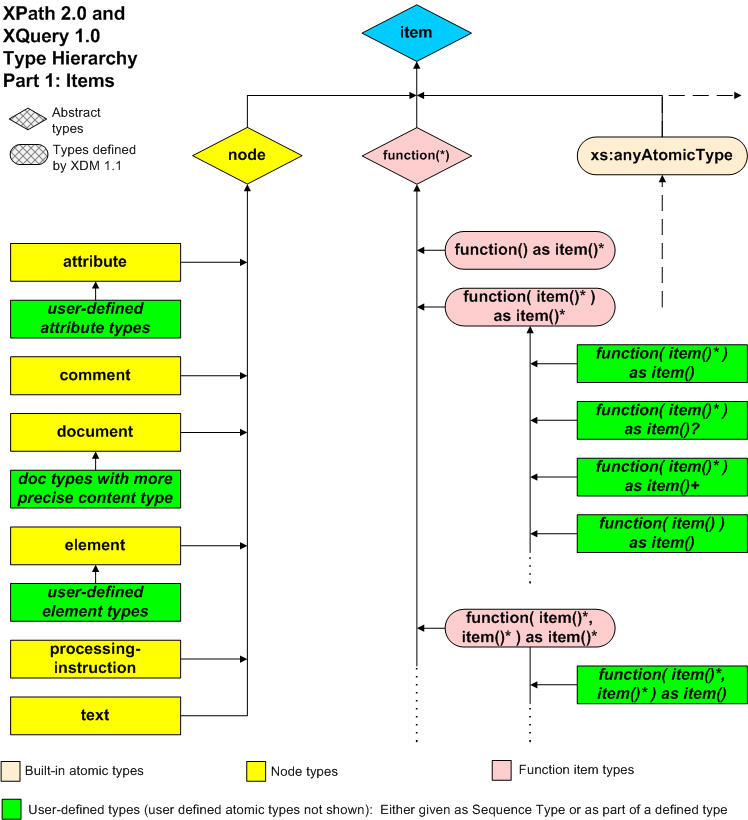
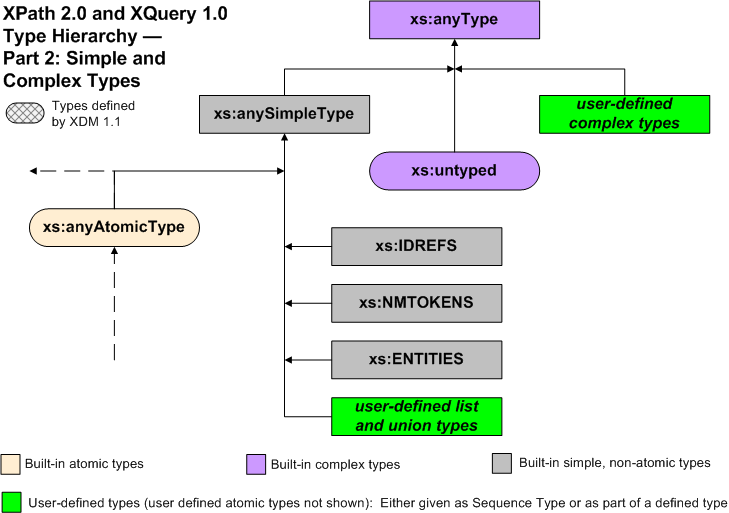
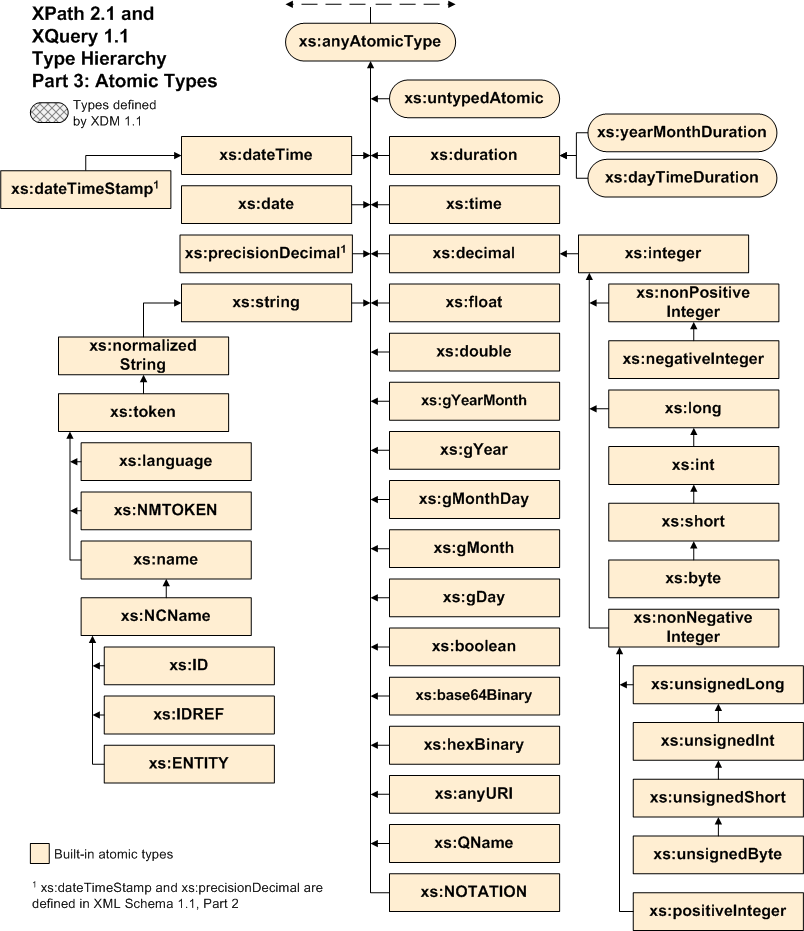
The diagrams below show how nodes, function items, primitive simple types, and user defined types fit together into a type system. This type system comprises two distinct hierarchies that both include the primitive simple types. In the diagrams, connecting lines represent relationships between derived types and the types from which they are derived; the arrowheads point toward the type from which they are derived. The dashed line represents relationships not present in this diagram, but that appear in one of the other diagrams. Dotted lines represent additional relationships that follow an evident pattern. The information that appears in each diagram is recapitulated in tabular form.

The xs:IDREFS, xs:NMTOKENS, and xs:ENTITIES types and the user-defined list and union types are special types in that these types are lists or unions rather than types derived by extension or restriction.

The first diagram and its corresponding table illustrate the "item" type hierarchy. In XDM, items include node types, function types, and built-in atomic types.

Type hierarchy graphic, item hierarchy

In the table, each type whose name is indented is derived from the type whose name appears nearest above it with one less level of indentation.

item
xs:anyAtomicType
node
attribute
user-defined attribute types
comment
document
user-defined document types
element
user-defined element types
processing-instruction
text

The next diagram and table illustrate the "any type" type hierarchy, in which all types are derived from distinguished type xs:anyType.

Type hierarchy graphic, anyType hierarchy

In the table, each type whose name is indented is derived from the type whose name appears nearest above it with one less level of indentation.

xs:anyType
user-defined complex types
xs:untyped
xs:anySimpleType
user-defined list and union types
xs:IDREFS
xs:NMTOKENS
xs:ENTITIES
xs:anyAtomicType

The final diagram and table show all of the atomic types, including the primitive simple types and the built-in types derived from the primitive simple types. This includes all the built-in datatypes defined in [XML Schema Part 2: Datatypes Second Edition] as well as the two totally ordered subtypes of duration defined in .

Type hierarchy graphic, anyAtomicType hierarchy

In the table, each type whose name is indented is derived from the type whose name appears nearest above it with one less level of indentation.

xs:untypedAtomic
xs:dateTime
xs:dateTimeStamp
xs:date
xs:time
xs:duration
xs:yearMonthDuration
xs:dayTimeDuration
xs:float
xs:double
xs:precisionDecimal
xs:decimal
xs:integer
xs:nonPositiveInteger
xs:negativeInteger
xs:long
xs:int
xs:short
xs:byte
xs:nonNegativeInteger
xs:unsignedLong
xs:unsignedInt
xs:unsignedShort
xs:unsignedByte
xs:positiveInteger
xs:gYearMonth
xs:gYear
xs:gMonthDay
xs:gDay
xs:gMonth
xs:string
xs:normalizedString
xs:token
xs:language
xs:NMTOKEN
xs:Name
xs:NCName
xs:ID
xs:IDREF
xs:ENTITY
xs:boolean
xs:base64Binary
xs:hexBinary
xs:anyURI
xs:QName
xs:NOTATION

1.6 Terminology

The terminology used to describe the functions and operators on [XML Schema Part 2: Datatypes Second Edition] is defined in the body of this specification. The terms defined in this section are used in building those definitions

1.6.1 Namespaces and URIs

This document uses the phrase "namespace URI" to identify the concept identified in [Namespaces in XML] as "namespace name", and the phrase "local name" to identify the concept identified in [Namespaces in XML] as "local part".

It also uses the term "expanded-QName" defined below.

[Definition] An expanded-QName is a pair of values consisting of a namespace URI and a local name. They belong to the value space of the [XML Schema Part 2: Datatypes Second Edition] datatype xs:QName. When this document refers to xs:QName we always mean the value space, i.e. a namespace URI, local name pair (and not the lexical space referring to constructs of the form prefix:local-name).

The term URI is used as follows:

[Definition] Within this specification, the term URI refers to Universal Resource Identifiers as defined in [RFC 3986] and extended in [RFC 3987] with a new name IRI. The term URI Reference, unless otherwise stated, refers to a string in the lexical space of the xs:anyURI datatype as defined in [XML Schema Part 2: Datatypes Second Edition].

Note:

Note that this means, in practice, that where this specification requires a "URI Reference", an IRI as defined in [RFC 3987] will be accepted, provided that other relevant specifications also permit an IRI. The term URI has been retained in preference to IRI to avoid introducing new names for concepts such as "Base URI" that are defined or referenced across the whole family of XML specifications. Note also that the definition of xs:anyURI is a wider definition than the definition in [RFC 3987]; for example it does not require non-ASCII characters to be escaped.

1.6.2 Conformance terminology

[Definition] for compatibility

A feature of this specification included to ensure that implementations that use this feature remain compatible with [XML Path Language (XPath) Version 1.0]

[Definition] may

Conforming documents and processors are permitted to, but need not, behave as described.

[Definition] must

Conforming documents and processors are required to behave as described; otherwise, they are either non-conformant or else in error.

[Definition] implementation-defined

Possibly differing between implementations, but specified and documented by the implementor for each particular implementation.

[Definition] implementation-dependent

Possibly differing between implementations, but not specified by this or other W3C specification, and not required to be specified by the implementor for any particular implementation.

1.6.3 Properties of functions

This section is concerned with the question of whether two calls on a function, with the same arguments, may produce different results.

[Definition] Two function calls are said to be within the same execution scope if the host environment defines them as such. In XSLT, any two calls executed during the same transformation are in the same execution scope. In XQuery, any two calls executed during the evaluation of a top-level expression are in the same execution scope. In other contexts, the execution scope is specified by the host environment that invokes the function library.

The following definition explains more precisely what it means for two function calls to return the same result:

[Definition] Two values are defined to be identical if they contain the same number of items and the items are pairwise identical. Two items are identical if and only if one of the following conditions applies:

  • Both items are atomic values, of precisely the same type, and the values are equal as defined using the eq operator, using the Unicode codepoint collation when comparing strings

  • Both items are nodes, and represent the same node

  • Both items are function items, and have the same name (or absence of a name), arity, function signature, and closure

Some functions produce results that depend not only on their explicit arguments, but also on the static and dynamic context.

[Definition] A function may have the property of being contextual: the result of such a function depends on the values of properties in the static and dynamic evaluation context as well as on the actual supplied arguments (if any).

Contextual functions fall into a number of categories:

  1. The functions fn:current-date, fn:current-dateTime, fn:current-time, fn:implicit-timezone, fn:adjust-date-to-timezone, fn:adjust-dateTime-to-timezone, and fn:adjust-time-to-timezone depend on properties of the dynamic context that are fixed within the ·execution scope·. The same applies to a number of functions in the op: namespace that manipulate dates and times and that make use of the implicit timezone. These functions will return the same result if called repeatedly during a single ·execution scope·.

  2. The functions fn:position, fn:last, fn:id, fn:idref, fn:element-with-id, fn:lang, fn:local-name, fn:name, fn:namespace-uri, fn:normalize-space, fn:number, fn:root, fn:string, and fn:string-length depend on the focus. These functions will in general return different results on different calls if the focus is different.

  3. The function fn:default-collation and many string-handling operators and functions depend on the default collation and the in-scope collations, which are both properties of the static context. If a particular call of one of these functions is evaluated twice with the same arguments then it will return the same result each time (because the static context, by definition, does not change at run time). However, two distinct calls (that is, two calls on the function appearing in different places in the source code) may produce different results even if the explicit arguments are the same.

  4. Functions such as fn:static-base-uri, fn:doc, and fn:collection depend on other aspects of the static context. As with functions that depend on collations, a single call will produce the same results on each call if the explicit arguments are the same, but two calls appearing in different places in the source code may produce different results.

[Definition] For a ·contextual· function, the parts of the context on which it depends are referred to as implicit arguments.

[Definition] A function that is guaranteed to produce ·identical· results from repeated calls if the explicit and implicit arguments are identical is referred to as stable.

All functions defined in this specification are ·stable· unless otherwise stated. Exceptions include the following:

  • Some functions (such as fn:distinct-values and fn:unordered) produce results in an ·implementation-defined· or ·implementation-dependent·order. In such cases there is no guarantee that the order of results from different calls will be the same. These functions are said to be ordering-unstable.

  • The function fn:analyze-string constructs an element node to represent its results. There is no guarantee that repeated calls with the same arguments will return the same identical node (in the sense of the is operator). Such a function is said to be identity-unstable.

  • Some functions (such as fn:doc and fn:collection) create new nodes by reading external documents. Such functions are guaranteed to be ·stable· with the exception that an implementation is allowed to make them unstable as a user option.

Where the results of a function are described as being (to a greater or lesser extent) ·implementation-defined· or ·implementation-dependent·, this does not by itself remove the requirement that the results should be stable: that is, that repeated calls with the same explicit and implicit arguments must return identical results.

2 Accessors

Accessors and their semantics are described in [XQuery and XPath Data Model (XDM) 1.1]. Some of these accessors are exposed to the user through the functions described below.

Function Accessor Accepts Returns
fn:node-name node-name an optional node zero or one xs:QName
fn:nilled nilled a node an optional xs:boolean
fn:string string-value an optional item or no argument xs:string
fn:data typed-value zero or more items a sequence of atomic values
fn:base-uri base-uri an optional node or no argument zero or one xs:anyURI
fn:document-uri document-uri an optional node zero or one xs:anyURI

2.1 fn:node-name

Summary

Returns the name of a node, as an xs:QName.

Signature
fn:node-name($arg as node()?) as xs:QName?
Rules

If $arg is the empty sequence, the empty sequence is returned.

Otherwise, the function returns the result of the dm:node-name accessor as defined in [xpath-datamodel] (see Section 5.11 node-name AccessorDM).

Notes

For element and attribute nodes, the name of the node is returned as an xs:QName, retaining the prefix, namespace URI, and local part.

For processing instructions, the name of the node is returned as an xs:QName in which the prefix and namespace URI are absent.

For a namespace node, the function returns an empty sequence if the node represents the default namespace; otherwise it returns an xs:QName in which prefix and namespace URI are absent and the local part is the the namespace prefix being bound).

For all other kinds of node, the function returns the empty sequence.

2.2 fn:nilled

Summary

Returns true for an element that is nilled.

Signature
fn:nilled($arg as node()?) as xs:boolean?
Rules

If $arg is the empty sequence, the function returns the empty sequence.

Otherwise the function returns the result of the dm:nilled accessor as defined in [xpath-datamodel] (see Section 5.9 nilled AccessorDM).

Notes

If $arg is not an element node, the function returns the empty sequence.

If $arg is an untyped element node, the function returns false.

In practice, the function returns true only for an element node that has the attribute xsi:nil="true" and that is successfully validated against a schema that defines the element to be nillable; the detailed rules, however, are defined in [xpath-datamodel].

2.3 fn:string

Summary

Returns the value of $arg represented as an xs:string.

Signatures
fn:string() as xs:string
fn:string($arg as item()?) as xs:string
Rules

In the zero-argument version of the function, $arg defaults to the context item. That is, calling fn:string() is equivalent to calling fn:string(.).

If $arg is the empty sequence, the function returns the zero-length string.

If $arg is a node, the function returns the string-value of the node, as obtained using the dm:string-value accessor defined in [xpath-datamodel] (see Section 5.13 string-value AccessorDM).

If $arg is an atomic value, the function returns the result of the expression $arg cast as xs:string (see 18 Casting).

Error Conditions

In the zero-argument version of the function, if the context item is undefined, error [err:XPDY0002]XP is raised.

If $arg is a function item, error [err:FOTY0014] is raised.

2.4 fn:data

Summary

Returns the result of atomizing a sequence, that is, replacing all nodes in the sequence by their typed values.

Signature
fn:data($arg as item()*) as xs:anyAtomicType*
Rules

The result of fn:data is the sequence of atomic values produced by applying the following rules to each item in $arg:

  • If the item is an atomic value, it is appended to the result sequence.

  • If the item is a node, the typed value of the node is appended to the result sequence. The typed value is a sequence of zero or more atomic values: specifically, the result of the dm:typed-value accessor as defined in [xpath-datamodel] (See Section 5.15 typed-value AccessorDM).

Error Conditions

If an item in the sequence $arg is a node that does not have a typed value then an error is raised [err:FOTY0012].

If an item in the sequence $arg is a function item then an error is raised [err:FOTY0013].

Notes

The process of applying the fn:data function to a sequence is referred to as atomization. In many cases an explicit call on fn:data is not required, because atomization is invoked implicitly when a node or sequence of nodes is supplied in a context where an atomic value or sequence of atomic values is required.

2.5 fn:base-uri

Summary

Returns the base URI of a node.

Signatures
fn:base-uri() as xs:anyURI?
fn:base-uri($arg as node()?) as xs:anyURI?
Rules

The zero-argument version of the function returns the base URI of the context node: it is equivalent to calling fn:base-uri(.). This may result in an error being raised: if the context item is undefined [err:XPDY0002]XP; if the context item is not a node [err:XPTY0004]XP.

The single-argument version of the function behaves as follows:

  1. If $arg is the empty sequence, the function returns the empty sequence.
  2. Otherwise, the function returns the value of the dm:base-uri accessor applied to the node $arg. This accessor is defined, for each kind of node, in the XDM specification (See Section 5.2 base-uri AccessorDM).

Note:

As explained in XDM, document, element and processing-instruction nodes have a base-uri property which may be empty. The base-uri property for all other node kinds is the empty sequence. The dm:base-uri accessor returns the base-uri property of a node if it exists and is non-empty; otherwise it returns the result of applying the dm:base-uri accessor to its parent, recursively. If the node does not have a parent, or if the recursive ascent up the ancestor chain encounters a parentless node whose base-uri property is empty, the empty sequence is returned. In the case of namespace nodes, however, the result is always an empty sequence -- it does not depend on the base URI of the parent element.

See also fn:static-base-uri.

Error Conditions

If $arg is not specified, the following errors may be raised: if the context item is undefined [err:XPDY0002]XP; if the context item is not a node [err:XPTY0004]XP.

2.6 fn:document-uri

Summary

Returns the URI of a resource where a document can be found, if available.

Signature
fn:document-uri($arg as node()?) as xs:anyURI?
Rules

If $arg is the empty sequence, the function returns the empty sequence.

If $arg is not a document node, the function returns the empty sequence.

Otherwise, the function returns the value of the document-uri accessor applied to $arg, as defined in [xpath-datamodel] (See Section 6.1.2 AccessorsDM).

Notes

In the case of a document node $D returned by the fn:doc function, or a document node at the root of a tree containing a node returned by the fn:collection function, it will always be true that either fn:document-uri($D) returns the empty sequence, or that the following expression is true: fn:doc(fn:document-uri($D)) is $D. It is implementation-defined whether this guarantee also holds for document nodes obtained by other means, for example a document node passed as the initial context node of a query or transformation.

3 Errors and Diagnostics

3.1 Raising Errors

In this document, as well as in [XQuery 1.0: An XML Query Language], [XML Path Language (XPath) 2.0], and [XQuery 1.0 and XPath 2.0 Formal Semantics], the phrase "an error is raised" is used. Raising an error is equivalent to calling the fn:error function defined in this section with the provided error code.

The above phrase is normally accompanied by specification of a specific error, to wit: "an error is raised [error code]". Each error defined in this document is identified by an xs:QName that is in the http://www.w3.org/2005/xqt-errors namespace, represented in this document by the err prefix. It is this xs:QName that is actually passed as an argument to the fn:error function. Calling this function raises an error. For a more detailed treatment of error handing, see Section 2.3.3 Handling Dynamic ErrorsXP and Section 7.2.9 The fn:error functionFS.

The fn:error function is a general function that may be called as above but may also be called from [XQuery 1.0: An XML Query Language] or [XML Path Language (XPath) 2.0] applications with, for example, an xs:QName argument.

3.1.1 fn:error

Summary

Calling the fn:error function raises an application-defined error.

Signatures
fn:error() as none
fn:error($code as xs:QName) as none
fn:error($code as xs:QName?, $description as xs:string) as none
fn:error( $code  as xs:QName?,
$description  as xs:string,
$error-object  as item()*) as none
Rules

This function never returns a value. Instead it always raises an error. The effect of the error is identical to the effect of dynamic errors raised implicitly, for example when an incorrect argument is supplied to a function.

The parameters to the fn:error function supply information that is associated with the error condition and that is made available to a caller that asks for information about the error. The error may be caught either by the host language (using a try/catch construct in XSLT or XQuery, for example), or by the calling application or external processing environment. The way in which error information is returned to the external processing environment is ·implementation dependent·

If fn:error is called with no arguments, then its behavior is the same as the function call:

 fn:error(fn:QName('http://www.w3.org/2005/xqt-errors', 'err:FOER0000')) 

If $code is the empty sequence then the effective value is the xs:QName constructed by:

 fn:QName('http://www.w3.org/2005/xqt-errors', 'err:FOER0000')

There are three pieces of information that may be associated with an error:

  • The $code is an error code that distinguishes this error from others. It is an xs:QName; the namespace URI conventionally identifies the component, subsystem, or authority responsible for defining the meaning of the error code, while the local part identifies the specific error condition. The namespace URI http://www.w3.org/2005/xqt-errors is used for errors defined in this specification; other namespace URIs may be used for errors defined by the application.

    If the external processing environment expects the error code to be returned as a URI or a string rather than as an xs:QName, then an error code with namespace URI NS and local part LP will be returned in the form NS#LP. The namespace URI part of the error code should therefore not include a fragment identifier.

  • The $description is a natural-language description of the error condition.

  • The $error-object is an arbitrary value used to convey additional information about the error, and may be used in any way the application chooses.

Error Conditions

This function always raises an error.

Notes

The value of the $description parameter may need to be localized.

The type "none" is a special type defined in [XQuery 1.0 and XPath 2.0 Formal Semantics] and is not available to the user. It indicates that the function never returns and ensures that it has the correct static type.

Examples

fn:error() returns http://www.w3.org/2005/xqt-errors#FOER0000 (or the corresponding xs:QName) to the external processing environment, unless the error is caught using a try/catch construct in the host language.

fn:error(fn:QName('http://www.example.com/HR', 'myerr:toohighsal'), 'Does not apply because salary is too high') returns http://www.example.com/HR#toohighsal and the xs:string "Does not apply because salary is too high" (or the corresponding xs:QName) to the external processing environment, unless the error is caught using a try/catch construct in the host language.

3.2 Diagnostic Tracing

3.2.1 fn:trace

Summary

Provides an execution trace intended to be used in debugging queries.

Signature
fn:trace($value as item()*, $label as xs:string) as item()*
Rules

The function returns the value of $value, unchanged.

In addition, the values of $value, converted to an xs:string, and $label may be directed to a trace data set. The destination of the trace output is ·implementation-defined·. The format of the trace output is ·implementation dependent·. The ordering of output from calls of the fn:trace function is ·implementation dependent·.

Examples

Consider a situation in which a user wants to investigate the actual value passed to a function. Assume that in a particular execution, $v is an xs:decimal with value 124.84. Writing fn:trace($v, 'the value of $v is:') will put the strings "124.84" and "the value of $v is:" in the trace data set in implementation dependent order.

4 Functions and Operators on Numerics

This section specifies arithmetic operators on the numeric datatypes defined in [XML Schema Part 2: Datatypes Second Edition]. It uses an approach that permits lightweight implementation whenever possible.

4.1 Numeric Types

The operators described in this section are defined on the following numeric types. Each type whose name is indented is derived from the type whose name appears nearest above with one less level of indentation.

xs:decimal
xs:integer
xs:float
xs:double

They also apply to types derived by restriction from the above types.

Note:

This specification uses [IEEE 754-1985] arithmetic for xs:float and xs:double values. This differs from [XML Schema Part 2: Datatypes Second Edition] which defines NaN as being equal to itself and defines only a single zero in the value space while [IEEE 754-1985] arithmetic treats NaN as unequal to all other values including itself and can produce distinct results of positive zero and negative zero. (These are two different machine representations for the same [XML Schema Part 2: Datatypes Second Edition] value.) The text accompanying several functions defines behavior for both positive and negative zero inputs and outputs in the interest of alignment with [IEEE 754-1985].

XML Schema 1.1, however, introduces support for positive and negative zero as distinct values.

4.2 Arithmetic Operators on Numeric Values

The following functions define the semantics of arithmetic operators defined in [XQuery 1.0: An XML Query Language] and [XML Path Language (XPath) 2.0] on these numeric types.

Operators Meaning
op:numeric-add Addition
op:numeric-subtract Subtraction
op:numeric-multiply Multiplication
op:numeric-divide Division
op:numeric-integer-divide Integer division
op:numeric-mod Modulus
op:numeric-unary-plus Unary plus
op:numeric-unary-minus Unary minus (negation)

The parameters and return types for the above operators are the basic numeric types: xs:integer, xs:decimal, xs:float and xs:double, and types derived from them. The word " numeric " in function signatures signifies these four types. For simplicity, each operator is defined to operate on operands of the same type and return the same type. The exceptions are op:numeric-divide, which returns an xs:decimal if called with two xs:integer operands and op:numeric-integer-divide which always returns an xs:integer.

If the two operands are not of the same type, subtype substitution and numeric type promotion are used to obtain two operands of the same type. Section B.1 Type PromotionXP and Section B.2 Operator MappingXP describe the semantics of these operations in detail.

The result type of operations depends on their argument datatypes and is defined in the following table:

Operator Returns
op:operation(xs:integer, xs:integer) xs:integer (except for op:numeric-divide(integer, integer), which returns xs:decimal)
op:operation(xs:decimal, xs:decimal) xs:decimal
op:operation(xs:float, xs:float) xs:float
op:operation(xs:double, xs:double) xs:double
op:operation(xs:integer) xs:integer
op:operation(xs:decimal) xs:decimal
op:operation(xs:float) xs:float
op:operation(xs:double) xs:double

These rules define any operation on any pair of arithmetic types. Consider the following example:

op:operation(xs:int, xs:double) => op:operation(xs:double, xs:double)

For this operation, xs:int must be converted to xs:double. This can be done, since by the rules above: xs:int can be substituted for xs:integer, xs:integer can be substituted for xs:decimal, xs:decimal can be promoted to xs:double. As far as possible, the promotions should be done in a single step. Specifically, when an xs:decimal is promoted to an xs:double, it should not be converted to an xs:float and then to xs:double, as this risks loss of precision.

As another example, a user may define height as a derived type of xs:integer with a minimum value of 20 and a maximum value of 100. He may then derive fenceHeight using an enumeration to restrict the permitted set of values to, say, 36, 48 and 60.

op:operation(fenceHeight, xs:integer) => op:operation(xs:integer, xs:integer)

fenceHeight can be substituted for its base type height and height can be substituted for its base type xs:integer.

The basic rules for addition, subtraction, and multiplication of ordinary numbers are not set out in this specification; they are taken as given. In the case of xs:double and xs:float the rules are as defined in [IEEE 754-1985]. The rules for handling division and modulus operations, as well as the rules for handling special values such as infinity and NaN, and exception conditions such as overflow and underflow, are described more explicitly since they are not necessarily obvious.

On overflow and underflow situations during arithmetic operations conforming implementations ·must· behave as follows:

  • For xs:float and xs:double operations, overflow behavior ·must· be conformant with [IEEE 754-1985]. This specification allows the following options:

    • Raising an error [err:FOAR0002] via an overflow trap.

    • Returning INF or -INF.

    • Returning the largest (positive or negative) non-infinite number.

  • For xs:float and xs:double operations, underflow behavior ·must· be conformant with [IEEE 754-1985]. This specification allows the following options:

    • Raising an error [err:FOAR0002] via an underflow trap.

    • Returning 0.0E0 or +/- 2**Emin or a denormalized value; where Emin is the smallest possible xs:float or xs:double exponent.

  • For xs:decimal operations, overflow behavior ·must· raise an error [err:FOAR0002]. On underflow, 0.0 must be returned.

  • For xs:integer operations, implementations that support limited-precision integer operations ·must· select from the following options:

The functions op:numeric-add, op:numeric-subtract, op:numeric-multiply, op:numeric-divide, op:numeric-integer-divide and op:numeric-mod are each defined for pairs of numeric operands, each of which has the same type:xs:integer, xs:decimal, xs:float, or xs:double. The functions op:numeric-unary-plus and op:numeric-unary-minus are defined for a single operand whose type is one of those same numeric types.

For xs:float and xs:double arguments, if either argument is NaN, the result is NaN.

For xs:decimal values the number of digits of precision returned by the numeric operators is ·implementation-defined·. If the number of digits in the result exceeds the number of digits that the implementation supports, the result is truncated or rounded in an ·implementation-defined· manner.

4.2.1 op:numeric-add

Summary

Returns the arithmetic sum of its operands: ($arg1 + $arg2).

Operator Mapping

Defines the semantics of the "+" operator applied to numeric values

Signature
op:numeric-add($arg1 as numeric, $arg2 as numeric) as numeric
Rules

General rules: see 4.2 Arithmetic Operators on Numeric Values.

Notes

For xs:float or xs:double values, if one of the operands is a zero or a finite number and the other is INF or -INF, INF or -INF is returned. If both operands are INF, INF is returned. If both operands are -INF, -INF is returned. If one of the operands is INF and the other is -INF, NaN is returned.

4.2.2 op:numeric-subtract

Summary

Returns the arithmetic difference of its operands: ($arg1 - $arg2).

Operator Mapping

Defines the semantics of the "-" operator applied to numeric values.

Signature
op:numeric-subtract($arg1 as numeric, $arg2 as numeric) as numeric
Rules

General rules: see 4.2 Arithmetic Operators on Numeric Values.

Notes

For xs:float or xs:double values, if one of the operands is a zero or a finite number and the other is INF or -INF, an infinity of the appropriate sign is returned. If both operands are INF or -INF, NaN is returned. If one of the operands is INF and the other is -INF, an infinity of the appropriate sign is returned.

4.2.3 op:numeric-multiply

Summary

Returns the arithmetic product of its operands: ($arg1 * $arg2).

Operator Mapping

Defines the semantics of the "*" operator applied to numeric values.

Signature
op:numeric-multiply($arg1 as numeric, $arg2 as numeric) as numeric
Rules

General rules: see 4.2 Arithmetic Operators on Numeric Values.

Notes

For xs:float or xs:double values, if one of the operands is a zero and the other is an infinity, NaN is returned. If one of the operands is a non-zero number and the other is an infinity, an infinity with the appropriate sign is returned.

4.2.4 op:numeric-divide

Summary

Returns the arithmetic quotient of its operands: ($arg1 div $arg2).

Operator Mapping

Defines the semantics of the "div" operator applied to numeric values.

Signature
op:numeric-divide($arg1 as numeric, $arg2 as numeric) as numeric
Rules

General rules: see 4.2 Arithmetic Operators on Numeric Values.

As a special case, if the types of both $arg1 and $arg2 are xs:integer, then the return type is xs:decimal.

Error Conditions

For xs:decimal and xs:integer operands, if the divisor is (positive or negative) zero, an error is raised [err:FOAR0001].

Notes

For xs:float and xs:double operands, floating point division is performed as specified in [IEEE 754-1985]. A positive number divided by positive zero returns INF. A negative number divided by positive zero returns -INF. Division by negative zero returns -INF and INF, respectively. Positive or negative zero divided by positive or negative zero returns NaN. Also, INF or -INF divided by INF or -INF returns NaN.

4.2.5 op:numeric-integer-divide

Summary

Performs an integer division.

Operator Mapping

Defines the semantics of the "idiv" operator applied to numeric values.

Signature
op:numeric-integer-divide($arg1 as numeric, $arg2 as numeric) as xs:integer
Rules

General rules: see 4.2 Arithmetic Operators on Numeric Values.

If $arg2 is INF or -INF, and $arg1 is not INF or -INF, then the result is zero.

Otherwise, subject to limits of precision and overflow/underflow conditions, the result is the largest (furthest from zero) xs:integer value $N such that fn:abs($N * $arg2) le fn:abs($arg1) and fn:compare($N * $arg2, 0) eq fn:compare($arg1, 0).

Note:

The second term in this condition ensures that the result has the correct sign.

The implementation may adopt a different algorithm provided that it is equivalent to this formulation in all cases where ·implementation-dependent· or ·implementation-defined· behavior does not affect the outcome, for example, the implementation-defined precision of the result of xs:decimal division.

Error Conditions

If the divisor is (positive or negative) zero, then an error is raised [err:FOAR0001].

If either operand is NaN or if $arg1 is INF or -INF then an error is raised [err:FOAR0002].

Notes

Except in situations involving errors, loss of precision, or overflow/underflow, the result of $a idiv $b is the same as ($a div $b) cast as xs:integer.

The semantics of this function are different from integer division as defined in programming languages such as Java and C++.

Examples

The expression op:numeric-integer-divide(10,3) returns 3.

The expression op:numeric-integer-divide(3,-2) returns -1.

The expression op:numeric-integer-divide(-3,2) returns -1.

The expression op:numeric-integer-divide(-3,-2) returns 1.

The expression op:numeric-integer-divide(9.0,3) returns 3.

The expression op:numeric-integer-divide(-3.5,3) returns -1.

The expression op:numeric-integer-divide(3.0,4) returns 0.

The expression op:numeric-integer-divide(3.1E1,6) returns 5.

The expression op:numeric-integer-divide(3.1E1,7) returns 4.

4.2.6 op:numeric-mod

Summary

Returns the remainder resulting from dividing $arg1, the dividend, by $arg2, the divisor.

Operator Mapping

Defines the semantics of the "mod" operator applied to numeric values.

Signature
op:numeric-mod($arg1 as numeric, $arg2 as numeric) as numeric
Rules

General rules: see 4.2 Arithmetic Operators on Numeric Values.

The operation a mod b for operands that are xs:integer or xs:decimal, or types derived from them, produces a result such that (a idiv b)*b+(a mod b) is equal to a and the magnitude of the result is always less than the magnitude of b. This identity holds even in the special case that the dividend is the negative integer of largest possible magnitude for its type and the divisor is -1 (the remainder is 0). It follows from this rule that the sign of the result is the sign of the dividend.

For xs:float and xs:double operands the following rules apply:

  • If either operand is NaN, the result is NaN.

  • If the dividend is positive or negative infinity, or the divisor is positive or negative zero (0), or both, the result is NaN.

  • If the dividend is finite and the divisor is an infinity, the result equals the dividend.

  • If the dividend is positive or negative zero and the divisor is finite, the result is the same as the dividend.

  • In the remaining cases, where neither positive or negative infinity, nor positive or negative zero, nor NaN is involved, the result obeys (a idiv b)*b+(a mod b) = a. Division is truncating division, analogous to integer division, not [IEEE 754-1985] rounding division i.e. additional digits are truncated, not rounded to the required precision.

Error Conditions

For xs:integer and xs:decimal operands, if $arg2 is zero, then an error is raised [err:FOAR0001].

Examples

The expression op:numeric-mod(10,3) returns 1.

The expression op:numeric-mod(6,-2) returns 0.

The expression op:numeric-mod(4.5,1.2) returns 0.9.

The expression op:numeric-mod(1.23E2, 0.6E1) returns 3.0E0.

4.2.7 op:numeric-unary-plus

Summary

Returns its operand with the sign unchanged: (+ $arg).

Operator Mapping

Defines the semantics of the unary "+" operator applied to numeric values.

Signature
op:numeric-unary-plus($arg as numeric) as numeric
Rules

General rules: see 4.2 Arithmetic Operators on Numeric Values.

The returned value is equal to $arg, and is an instance of xs:integer, xs:decimal, xs:double, or xs:float depending on the type of $arg.

4.2.8 op:numeric-unary-minus

Summary

Returns its operand with the sign reversed: (- $arg).

Operator Mapping

Defines the semantics of the unary "-" operator applied to numeric values.

Signature
op:numeric-unary-minus($arg as numeric) as numeric
Rules

General rules: see 4.2 Arithmetic Operators on Numeric Values.

The returned value is an instance of xs:integer, xs:decimal, xs:double, or xs:float depending on the type of $arg.

For xs:integer and xs:decimal arguments, 0 and 0.0 return 0 and 0.0, respectively. For xs:float and xs:double arguments, NaN returns NaN, 0.0E0 returns -0.0E0 and vice versa. INF returns -INF. -INF returns INF.

4.3 Comparison Operators on Numeric Values

This specification defines the following comparison operators on numeric values. Comparisons take two arguments of the same type. If the arguments are of different types, one argument is promoted to the type of the other as described above in 4.2 Arithmetic Operators on Numeric Values. Each comparison operator returns a boolean value. If either, or both, operands are NaN, false is returned.

Function Meaning
op:numeric-equal Returns true if and only if the value of $arg1 is equal to the value of $arg2.
op:numeric-less-than Returns true if and only if $arg1 is numerically less than $arg2.
op:numeric-greater-than Returns true if and only if $arg1 is numerically greater than $arg2.

4.3.1 op:numeric-equal

Summary

Returns true if and only if the value of $arg1 is equal to the value of $arg2.

Operator Mapping

Defines the semantics of the "eq" operator on numeric values, and is also used in defining the semantics of "ne", "le" and "ge".

Signature
op:numeric-equal($arg1 as numeric, $arg2 as numeric) as xs:boolean
Rules

General rules: see 4.2 Arithmetic Operators on Numeric Values and 4.3 Comparison Operators on Numeric Values.

For xs:float and xs:double values, positive zero and negative zero compare equal. INF equals INF, and -INF equals -INF. NaN does not equal itself.

4.3.2 op:numeric-less-than

Summary

Returns true if and only if $arg1 is numerically less than $arg2.

Operator Mapping

Defines the semantics of the "lt" operator on numeric values, and is also used in defining the semantics of "le".

Signature
op:numeric-less-than($arg1 as numeric, $arg2 as numeric) as xs:boolean
Rules

General rules: see 4.2 Arithmetic Operators on Numeric Values and 4.3 Comparison Operators on Numeric Values.

For xs:float and xs:double values, positive infinity is greater than all other non-NaN values; negative infinity is less than all other non-NaN values. If $arg1 or $arg2 is NaN, the function returns false.

4.3.3 op:numeric-greater-than

Summary

Returns true if and only if $arg1 is numerically greater than $arg2.

Operator Mapping

Defines the semantics of the "gt" operator on numeric values, and is also used in defining the semantics of "ge".

Signature
op:numeric-greater-than($arg1 as numeric, $arg2 as numeric) as xs:boolean
Rules

The function call op:numeric-greater-than($A, $B) is defined to return the same result as op:numeric-less-than($B, $A)

4.4 Functions on Numeric Values

The following functions are defined on numeric types. Each function returns a value of the same type as the type of its argument.

  • If the argument is the empty sequence, the empty sequence is returned.

  • For xs:float and xs:double arguments, if the argument is "NaN", "NaN" is returned.

  • Except for fn:abs, for xs:float and xs:double arguments, if the argument is positive or negative infinity, positive or negative infinity is returned.

Function Meaning
fn:abs Returns the absolute value of $arg.
fn:ceiling Rounds $arg upwards to a whole number.
fn:floor Rounds $arg downwards to a whole number.
fn:round Rounds a value to a specified number of decimal places, rounding upwards if two such values are equally near.
fn:round-half-to-even Rounds a value to a specified number of decimal places, rounding to make the last digit even if two such values are equally near.

Note:

fn:round and fn:round-half-to-even produce the same result in all cases except when the argument is exactly midway between two values with the required precision.

Other ways of rounding midway values can be achieved as follows:

4.4.1 fn:abs

Summary

Returns the absolute value of $arg.

Signature
fn:abs($arg as numeric?) as numeric?
Rules

General rules: see 4.4 Functions on Numeric Values.

If $arg is negative the function returns -$arg, otherwise it returns $arg.

If the type of $arg is one of the four numeric types xs:float, xs:double, xs:decimal or xs:integer the type of the result is the same as the type of $arg. If the type of $arg is a type derived from one of the numeric types, the result is an instance of the base numeric type.

For xs:float and xs:double arguments, if the argument is positive zero or negative zero, then positive zero is returned. If the argument is positive or negative infinity, positive infinity is returned.

For detailed type semantics, see Section 7.2.3 The fn:abs, fn:ceiling, fn:floor, fn:round, and fn:round-half-to-even functionsFS

Examples

The expression fn:abs(10.5) returns 10.5.

The expression fn:abs(-10.5) returns 10.5.

4.4.2 fn:ceiling

Summary

Rounds $arg upwards to a whole number.

Signature
fn:ceiling($arg as numeric?) as numeric?
Rules

General rules: see 4.4 Functions on Numeric Values.

The function returns the smallest (closest to negative infinity) number with no fractional part that is not less than the value of $arg.

If the type of $arg is one of the four numeric types xs:float, xs:double, xs:decimal or xs:integer the type of the result is the same as the type of $arg. If the type of $arg is a type derived from one of the numeric types, the result is an instance of the base numeric type.

For xs:float and xs:double arguments, if the argument is positive zero, then positive zero is returned. If the argument is negative zero, then negative zero is returned. If the argument is less than zero and greater than -1, negative zero is returned.

For detailed type semantics, see Section 7.2.3 The fn:abs, fn:ceiling, fn:floor, fn:round, and fn:round-half-to-even functionsFS

Examples

The expression fn:ceiling(10.5) returns 11.

The expression fn:ceiling(-10.5) returns -10.

4.4.3 fn:floor

Summary

Rounds $arg downwards to a whole number.

Signature
fn:floor($arg as numeric?) as numeric?
Rules

General rules: see 4.4 Functions on Numeric Values.

The function returns the largest (closest to positive infinity) number with no fractional part that is not greater than the value of $arg.

If the type of $arg is one of the four numeric types xs:float, xs:double, xs:decimal or xs:integer the type of the result is the same as the type of $arg. If the type of $arg is a type derived from one of the numeric types, the result is an instance of the base numeric type.

For xs:float and xs:double arguments, if the argument is positive zero, then positive zero is returned. If the argument is negative zero, then negative zero is returned.

For detailed type semantics, see Section 7.2.3 The fn:abs, fn:ceiling, fn:floor, fn:round, and fn:round-half-to-even functionsFS

Examples

The expression fn:floor(10.5) returns 10.

The expression fn:floor(-10.5) returns -11.

4.4.4 fn:round

Summary

Rounds a value to a specified number of decimal places, rounding upwards if two such values are equally near.

Signatures
fn:round($arg as numeric?) as numeric?
fn:round($arg as numeric?, $precision as xs:integer) as numeric?
Rules

General rules: see 4.4 Functions on Numeric Values.

The function returns the nearest (that is, numerically closest) value to $arg that is a multiple of ten to the power of minus $precision. If two such values are equally near (for example, if the fractional part in $arg is exactly .5), the function returns the one that is closest to positive infinity.

If the type of $arg is one of the four numeric types xs:float, xs:double, xs:decimal or xs:integer the type of the result is the same as the type of $arg. If the type of $arg is a type derived from one of the numeric types, the result is an instance of the base numeric type.

The single-argument version of this function produces the same result as the two-argument version with $precision=0 (that is, it rounds to a whole number).

When $arg is of type xs:float and xs:double:

  1. If $arg is NaN, positive or negative zero, or positive or negative infinity, then the result is the same as the argument.

  2. For other values, the argument is cast to xs:decimal using an implementation of xs:decimal that imposes no limits on the number of digits that can be represented. The function is applied to this xs:decimal value, and the resulting xs:decimal is cast back to xs:float or xs:double as appropriate to form the function result. If the resulting xs:decimal value is zero, then positive or negative zero is returned according to the sign of $arg.

For detailed type semantics, see Section 7.2.3 The fn:abs, fn:ceiling, fn:floor, fn:round, and fn:round-half-to-even functionsFS

Notes

This function is typically used with a non-zero $precision in financial applications where the argument is of type xs:decimal. For arguments of type xs:float and xs:double the results may be counter-intuitive. For example, consider round(35.425e0, 2). The result is not 35.43, as might be expected, but 35.42. This is because the conversion of 35.425e0 to xs:decimal produces the decimal value 35.42499999999..., which is closer to 35.42 than to 35.43.

Examples

The expression fn:round(2.5) returns 3.0.

The expression fn:round(2.4999) returns 2.0.

The expression fn:round(-2.5) returns -2.0. (Not the possible alternative, -3).

The expression fn:round(1.125, 2) returns 1.13.

The expression fn:round(8452, -2) returns 8500.

The expression fn:round(3.1415e0, 2) returns 3.14e0.

4.4.5 fn:round-half-to-even

Summary

Rounds a value to a specified number of decimal places, rounding to make the last digit even if two such values are equally near.

Signatures
fn:round-half-to-even($arg as numeric?) as numeric?
fn:round-half-to-even($arg as numeric?, $precision as xs:integer) as numeric?
Rules

General rules: see 4.4 Functions on Numeric Values.

The function returns the nearest (that is, numerically closest) value to $arg that is a multiple of ten to the power of minus $precision. If two such values are equally near (e.g. if the fractional part in $arg is exactly .500...), the function returns the one whose least significant digit is even.

If the type of $arg is one of the four numeric types xs:float, xs:double, xs:decimal or xs:integer the type of the result is the same as the type of $arg. If the type of $arg is a type derived from one of the numeric types, the result is an instance of the base numeric type.

The first signature of this function produces the same result as the second signature with $precision=0.

For arguments of type xs:float and xs:double:

  1. If the argument is NaN, positive or negative zero, or positive or negative infinity, then the result is the same as the argument.

  2. In all other cases, the argument is cast to xs:decimal using an implementation of xs:decimal that imposes no limits on the number of digits that can be represented. The function is applied to this xs:decimal value, and the resulting xs:decimal is cast back to xs:float or xs:double as appropriate to form the function result. If the resulting xs:decimal value is zero, then positive or negative zero is returned according to the sign of the original argument.

For detailed type semantics, see Section 7.2.3 The fn:abs, fn:ceiling, fn:floor, fn:round, and fn:round-half-to-even functionsFS

Notes

This function is typically used in financial applications where the argument is of type xs:decimal. For arguments of type xs:float and xs:double the results may be counter-intuitive. For example, consider round-half-to-even(xs:float(150.015), 2). The result is not 150.02 as might be expected, but 150.01. This is because the conversion of the xs:float value represented by the literal 150.015 to an xs:decimal produces the xs:decimal value 150.014999389..., which is closer to 150.01 than to 150.02.

Examples

The expression fn:round-half-to-even(0.5) returns 0.0.

The expression fn:round-half-to-even(1.5) returns 2.0.

The expression fn:round-half-to-even(2.5) returns 2.0.

The expression fn:round-half-to-even(3.567812e+3, 2) returns 3567.81e0.

The expression fn:round-half-to-even(4.7564e-3, 2) returns 0.0e0.

The expression fn:round-half-to-even(35612.25, -2) returns 35600.

4.5 Formatting Integers

4.5.1 fn:format-integer

Summary

formats an integer according to a given picture string, using the conventions of a given natural language if specified.

Signatures
fn:format-integer($value as xs:integer?, $picture as xs:string) as xs:string
fn:format-integer( $value  as xs:integer?,
$picture  as xs:string,
$language  as xs:language) as xs:string
Rules
Editorial note  
This function is created to extract that subset of the functionality of the xsl:number instruction in XSLT which is needed to support format-dateTime, thus avoiding any dependency on the XSLT specification, while also making this functionality available in XPath and XQuery in contexts other than date formatting.

If $value is an empty sequence, the function returns a zero-length string.

In all other cases, the $picture argument describes the format in which $value is output.

The rules that follow describe how non-negative numbers are output. If the value of $value is negative, the rules below are applied to the absolute value of $value, and the result is prepended with a minus sign.

A picture consists of a primary format token, followed by an optional format modifier.

The primary format token is one of the following:

  • Any sequence of Unicode digits drawn from the same digit family, where a digit family is a sequence of ten consecutive Unicode characters in category Nd, having digit values 0 through 9. The corresponding output format is a decimal number, using this digit family, with at least as many digits as there are in the format token. Thus, a format token 1 generates the sequence 0 1 2 ... 10 11 12 ..., and a format token 01 (or equivalently, 00 or 99) generates the sequence 00 01 02 ... 09 10 11 12 ... 99 100 101. A format token of &#x661; (Arabic-Indic digit one) generates the sequence ١ then ٢ then ٣ ...

  • Any sequence of Unicode digits drawn from the same digit family, interspersed by grouping separators. The digits are handled as above, and the grouping separators are handled as follows. A character is recognized as a grouping separator if it is non-alphanumeric, that is, if its Unicode character category is other than Nd, Nl, No, Lu, Ll, Lt, Lm or Lo. The position of grouping separators within the format token, counting backwards from the last digit, indicates the position of grouping separators to appear within the formatted number, and the character used as the grouping separator within the format token indicates the character to be used as the corresponding grouping separator in the formatted number. If grouping separators appear at regular intervals within the format token, that is if the same grouping separator appears at positions forming a sequence N, 2N, 3N, ... for some integer value N (including the case where there is only one number in the list), then the sequence is extrapolated to the left, so grouping separators will be used in the formatted number at every multiple of N. For example, if the format token is 0'000 then the number one million will be formatted as 1'000'000.

  • A format token A generates the sequence A B C ... Z AA AB AC....

  • A format token a generates the sequence a b c ... z aa ab ac....

  • A format token i generates the sequence i ii iii iv v vi vii viii ix x ....

  • A format token I generates the sequence I II III IV V VI VII VIII IX X ....

  • A format token w generates numbers written as lower-case words, for example in English, one two three four ...

  • A format token W generates numbers written as upper-case words, for example in English, ONE TWO THREE FOUR ...

  • A format token Ww generates numbers written as title-case words, for example in English, One Two Three Four ...

  • Any other format token indicates a numbering sequence in which that token represents the number 1 (one) (but see the note below). It is ·implementation-defined· which numbering sequences, additional to those listed above, are supported. If an implementation does not support a numbering sequence represented by the given token, it must use a format token of 1.

    Note:

    In some traditional numbering sequences additional signs are added to denote that the letters should be interpreted as numbers; these are not included in the format token. An example, see also the example below, is classical Greek where a dexia keraia and sometimes an aristeri keraia is added.

For all format tokens other than the first kind above (one that consists of decimal digits), there may be ·implementation-defined· lower and upper bounds on the range of numbers that can be formatted using this format token; indeed, for some numbering sequences there may be intrinsic limits. For example, the format token &#x2460; (circled digit one, ①) has a range of 1 to 20 imposed by the Unicode character repertoire. For the numbering sequences described above any upper bound imposed by the implementation must not be less than 1000 (one thousand) and any lower bound must not be greater than 1. Numbers that fall outside this range must be formatted using the format token 1.

The above expansions of numbering sequences for format tokens such as a and i are indicative but not prescriptive. There are various conventions in use for how alphabetic sequences continue when the alphabet is exhausted, and differing conventions for how roman numerals are written (for example, IV versus IIII as the representation of the number 4). Sometimes alphabetic sequences are used that omit letters such as i and o. This specification does not prescribe the detail of any sequence other than those sequences consisting entirely of decimal digits.

Many numbering sequences are language-sensitive. This applies especially to the sequence selected by the tokens w, W and Ww. It also applies to other sequences, for example different languages using the Cyrillic alphabet use different sequences of characters, each starting with the letter #x410 (Cyrillic capital letter A). In such cases, the $language argument specifies which language's conventions are to be used; it has the same range of values as xml:lang (see [REC-xml]). If no $language argument is specified, the language that is used is ·implementation-defined·. The set of languages for which numbering is supported is ·implementation-defined·. If a language is requested that is not supported, the processor uses the language that it would use if the $language argument were omitted.

The format modifier, if present, is one of:

  • o, optionally followed by a sequence of characters enclosed between parentheses, to indicate ordinal numbering

  • t to indicate traditional numbering

If the o modifier is present, this indicates a request to output ordinal numbers rather than cardinal numbers. For example, in English, when used with the format token 1, this outputs the sequence 1st 2nd 3rd 4th ..., and when used with the format token w outputs the sequence first second third fourth ....

In some languages, ordinal numbers vary depending on the grammatical context, for example they may have different genders and may decline with the noun that they qualify. In such cases the string appearing in parentheses after the letter o may be used to indicate the variation of the ordinal number required. The way in which the variation is indicated will depend on the conventions of the language. For inflected languages that vary the ending of the word, the preferred approach is to indicate the required ending, preceded by a hyphen: for example in German, appropriate values are o(-e), o(-er), o(-es), o(-en).

It is ·implementation-defined· what combinations of values of the format token, the language, and the ordinal attribute are supported. If ordinal numbering is not supported for the combination of the format token, the language, and the string appearing in parentheses, the request is ignored and cardinal numbers are generated instead.

Example: Ordinal Numbering in Italian

The specification "1o(-º)" with $language equal to it, if supported, should produce the sequence:

1º 2º 3º 4º ...

The specification "Wwo" with $language equal to it, if supported, should produce the sequence:

Primo Secondo Terzo Quarto Quinto ...

The t modifier disambiguates between numbering sequences that use letters. In many languages there are two commonly used numbering sequences that use letters. One numbering sequence assigns numeric values to letters in alphabetic sequence, and the other assigns numeric values to each letter in some other manner traditional in that language. In English, these would correspond to the numbering sequences specified by the format tokens a and i. In some languages, the first member of each sequence is the same, and so the format token alone would be ambiguous. By default the alphabetic sequence is used; the t modifier requests the other sequence.

Examples

The expression format-integer(123, '0000') returns "0123".

format-integer(123, 'w') might return "one hundred and twenty-three"

The expression format-integer(21, '1o', 'en') returns "21st".

format-integer(14, 'Wwo(-e)', 'de') might return "Vierzehnte"

The expression format-integer(7, 'a') returns "g".

The expression format-integer(57, 'I') returns "LVII".

4.6 Formatting Numbers

Editorial note  
This section has been created by the editor in response to a WG decision in principle; the detailed text needs to be reviewed and approved.

This section defines a function for formatting decimal and floating point numbers.

Function Meaning
fn:format-number Returns a string containing a number formatted according to a given picture string, taking account of decimal formats specified in the static context.

Note:

This function can be used to format any numeric quantity, including an integer. For integers, however, the fn:format-integer function offers additional possibilities. Note also that the picture strings used by the two functions are not 100% compatible, though they share some options in common.

4.6.1 Defining a Decimal Format

Decimal formats are defined in the static context, and the way they are defined is therefore outside the scope of this specification. XSLT and XQuery both provide custom syntax for creating a decimal format.

The static context provides a set of decimal formats. One of the decimal formats is unnamed, the others (if any) are identified by a QName. There is always an unnamed decimal format available, but its contents are implementation-defined.

Each decimal format provides a set of named variables, described in the following table:

Name Type Usage (non-normative)
decimal-separator-sign A single character Defines the character used to represent the decimal point (typically ".") both in the picture string and in the formatted number
grouping-separator-sign A single character Defines the character used to separate groups of digits (typically ",") both in the picture string and in the formatted number
infinity A string Defines the string used to represent the value positive or negative infinity in the formatted number (typically "Infinity")
valign="top"minus-sign A single character Defines the character used as a minus sign in the formatted number if there is no subpicture for formatting negative numbers (typically "-", x2D)
NaN valign="top"A string Defines the string used to represent the value NaN in the formatted number
percent-sign A single character Defines the character used as a percent sign (typically "%") both in the picture string and in the formatted number
per-mille-sign Defines the character used as a per-mille sign (typically "‰", x2030) both in the picture string and in the formatted number
mandatory-digit-sign A single character, which must be defined in Unicode as a digit with the value zero Defines the character (typically "0") used in the picture string to represent a mandatory digit, and in the formatted number to represent the digit zero; by implication, this also defines the characters used to represent the digits one to nine.
optional-digit-sign A single character Defines the character used in the picture string to represent an optional digit (typically "#")
pattern-separator-sign valign="top"A single character Defines the character used in the picture string to separate the positive and negative subpictures (typically ";")

[Definition] The decimal digit family of a decimal format is the sequence of ten digits with consecutive Unicode codepoints starting with the mandatory-digit-sign.

It is a constraint that, for any named or unnamed decimal format, the variables representing characters used in a ·picture string· must have distinct values. These variables are decimal-separator-sign, grouping-separator-sign, percent-sign, per-mille-sign, optional-digit-sign, and pattern-separator-sign. Furthermore, none of these variables may be equal to any character in the ·decimal digit family·.

4.6.2 fn:format-number

Summary

Returns a string containing a number formatted according to a given picture string, taking account of decimal formats specified in the static context.

Signatures
fn:format-number($value as numeric?, $picture as xs:string) as xs:string
fn:format-number( $value  as numeric?,
$picture  as xs:string,
$decimal-format-name  as xs:string) as xs:string
Rules

The function formats $value as a string using the ·picture string· specified by the $picture argument and the decimal-format named by the $decimal-format-name argument, or the default decimal-format, if there is no $decimal-format-name argument. The syntax of the picture string is described in 4.6.3 Syntax of the Picture String.

The $value argument may be of any numeric data type (xs:double, xs:float, xs:decimal, or their subtypes including xs:integer). Note that if an xs:decimal is supplied, it is not automatically promoted to an xs:double, as such promotion can involve a loss of precision.

If the supplied value of the $value argument is an empty sequence, the function behaves as if the supplied value were the xs:double value NaN.

The value of $decimal-format-name must be a lexical QName, which is expanded using the in-scope namespaces from the static context. The default namespace is not used (no prefix means no namespace).

The evaluation of the format-number function takes place in two phases, an analysis phase described in 4.6.4 Analysing the Picture String and a formatting phase described in 4.6.5 Formatting the Number.

The analysis phase takes as its inputs the ·picture string· and the variables derived from the relevant decimal format in the static context, and produces as its output a number of variables with defined values. The formatting phase takes as its inputs the number to be formatted and the variables produced by the analysis phase, and produces as its output a string containing a formatted representation of the number.

The result of the function is the formatted string representation of the supplied number.

Error Conditions

An error is raised [err:FODF1280] if the name specified as the $decimal-format-name argument is not a valid lexical QName, or if its prefix has not been declared in an in-scope namespace declaration, or if the static context does not contain a declaration of a decimal-format with a matching expanded QName. If the processor is able to detect the error statically (for example, when the argument is supplied as a string literal), then the processor may optionally signal this as a static error.

Notes

Numbers will always be formatted with the most significant digit on the left.

4.6.3 Syntax of the Picture String

Note:

This differs from the format-number function previously defined in XSLT 2.0 in that any digit can be used in the picture string to represent a mandatory digit: for example the picture strings '000', '001', and '999' are equivalent. This is to align format-number (which previously used '000') with format-dateTime (which used '001').

[Definition] The formatting of a number is controlled by a picture string. The picture string is a sequence of characters, in which the characters assigned to the variables decimal-separator-sign, grouping-sign, decimal-digit-family, optional-digit-sign and pattern-separator-sign are classified as active characters, and all other characters (including the percent-sign and per-mille-sign) are classified as passive characters.

The integer part of the sub-picture is defined as the part that appears to the left of the decimal-separator-sign if there is one, or the entire sub-picture otherwise. The fractional part of the sub-picture is defined as the part that appears to the right of the decimal-separator-sign if there is one; it is a zero-length string otherwise.

An error is raised [err:FODF1310] if the ·picture string· does not conform to the following rules. Note that in these rules the words "preceded" and "followed" refer to characters anywhere in the string, they are not to be read as "immediately preceded" and "immediately followed".

  • A picture-string consists either of a sub-picture, or of two sub-pictures separated by a pattern-separator-sign. A picture-string must not contain more than one pattern-separator-sign. If the picture-string contains two sub-pictures, the first is used for positive values and the second for negative values.

  • A sub-picture must not contain more than one decimal-separator-sign.

  • A sub-picture must not contain more than one percent-sign or per-mille-sign, and it must not contain one of each.

  • A sub-picture must contain at least one character that is an optional-digit-sign or a member of the decimal-digit-family.

  • A sub-picture must not contain a passive character that is preceded by an active character and that is followed by another active character.

  • A sub-picture must not contain a grouping-separator-sign adjacent to a decimal-separator-sign.

  • The integer part of a sub-picture must not contain a member of the decimal-digit-family that is followed by an optional-digit-sign. The fractional part of a sub-picture must not contain an optional-digit-sign that is followed by a member of the decimal-digit-family.

4.6.4 Analysing the Picture String

This phase of the algorithm analyses the ·picture string· and the variables from the selected decimal format in the static context, and it has the effect of setting the values of various variables, which are used in the subsequent formatting phase. These variables are listed below. Each is shown with its initial setting and its data type.

Several variables are associated with each sub-picture. If there are two sub-pictures, then these rules are applied to one sub-picture to obtain the values that apply to positive numbers, and to the other to obtain the values that apply to negative numbers. If there is only one sub-picture, then the values for both cases are derived from this sub-picture.

The variables are as follows:

  • The integer-part-grouping-positions is a sequence of integers representing the positions of grouping separators within the integer part of the sub-picture. For each grouping-separator-sign that appears within the integer part of the sub-picture, this sequence contains an integer that is equal to the total number of optional-digit-sign and decimal-digit-family characters that appear within the integer part of the sub-picture and to the right of the grouping-separator-sign. In addition, if these integer-part-grouping-positions are at regular intervals (that is, if they form a sequence N, 2N, 3N, ... for some integer value N, including the case where there is only one number in the list), then the sequence contains all integer multiples of N as far as necessary to accommodate the largest possible number.

  • The minimum-integer-part-size is an integer indicating the minimum number of digits that will appear to the left of the decimal-separator-sign. It is normally set to the number of decimal-digit-family characters found in the integer part of the sub-picture. But if the sub-picture contains no decimal-digit-family character and no decimal-separator-sign, it is set to one.

    Note:

    There is no maximum integer part size. All significant digits in the integer part of the number will be displayed, even if this exceeds the number of optional-digit-sign and decimal-digit-family characters in the subpicture.

  • The prefix is set to contain all passive characters in the sub-picture to the left of the leftmost active character. If the picture string contains only one sub-picture, the prefix for the negative sub-picture is set by concatenating the minus-sign character and the prefix for the positive sub-picture (if any), in that order.

  • The fractional-part-grouping-positions is a sequence of integers representing the positions of grouping separators within the fractional part of the sub-picture. For each grouping-separator-sign that appears within the fractional part of the sub-picture, this sequence contains an integer that is equal to the total number of optional-digit-sign and decimal-digit-family characters that appear within the fractional part of the sub-picture and to the left of the grouping-separator-sign.

  • The minimum-fractional-part-size is set to the number of decimal-digit-family characters found in the fractional part of the sub-picture.

  • The maximum-fractional-part-size is set to the total number of optional-digit-sign and decimal-digit-family characters found in the fractional part of the sub-picture.

  • The suffix is set to contain all passive characters to the right of the rightmost active character in the fractional part of the sub-picture.

Note:

If there is only one sub-picture, then all variables for positive numbers and negative numbers will be the same, except for prefix: the prefix for negative numbers will be preceded by the minus-sign character.

4.6.5 Formatting the Number

This section describes the second phase of processing of the format-number function. This phase takes as input a number to be formatted (referred to as the input number), and the variables set up by analysing the decimal format in the static context and the ·picture string·, as described above. The result of this phase is a string, which forms the return value of the format-number function.

The algorithm for this second stage of processing is as follows:

  1. If the input number is NaN (not a number), the result is the specified NaN-symbol (with no prefix or suffix).

  2. In the rules below, the positive sub-picture and its associated variables are used if the input number is positive, and the negative sub-picture and its associated variables are used otherwise. Negative zero is taken as negative, positive zero as positive.

  3. If the input number is positive or negative infinity, the result is the concatenation of the appropriate prefix, the infinity-symbol, and the appropriate suffix.

  4. If the sub-picture contains a percent-sign, the number is multiplied by 100. If the sub-picture contains a per-mille-sign, the number is multiplied by 1000. The resulting number is referred to below as the adjusted number.

  5. The adjusted number is converted (if necessary) to an xs:decimal value, using an implementation of xs:decimal that imposes no limits on the totalDigits or fractionDigits facets. If there are several such values that are numerically equal to the adjusted number (bearing in mind that if the adjusted number is an xs:double or xs:float, the comparison will be done by converting the decimal value back to an xs:double or xs:float), the one that is chosen should be one with the smallest possible number of digits not counting leading or trailing zeroes (whether significant or insignificant). For example, 1.0 is preferred to 0.9999999999, and 100000000 is preferred to 100000001. This value is then rounded so that it uses no more than maximum-fractional-part-size digits in its fractional part. The rounded number is defined to be the result of converting the adjusted number to an xs:decimal value, as described above, and then calling the function fn:round-half-to-even with this converted number as the first argument and the maximum-fractional-part-size as the second argument, again with no limits on the totalDigits or fractionDigits in the result.

  6. The absolute value of the rounded number is converted to a string in decimal notation, with no insignificant leading or trailing zeroes, using the digits in the decimal-digit-family to represent the ten decimal digits, and the decimal-separator-sign to separate the integer part and the fractional part. (The value zero will at this stage be represented by a decimal-separator-sign on its own.)

  7. If the number of digits to the left of the decimal-separator-sign is less than minimum-integer-part-size, leading zero-digit-sign characters are added to pad out to that size.

  8. If the number of digits to the right of the decimal-separator-sign is less than minimum-fractional-part-size, trailing zero-digit-sign characters are added to pad out to that size.

  9. For each integer N in the integer-part-grouping-positions list, a grouping-separator-sign character is inserted into the string immediately after that digit that appears in the integer part of the number and has N digits between it and the decimal-separator-sign, if there is such a digit.

  10. For each integer N in the fractional-part-grouping-positions list, a grouping-separator-sign character is inserted into the string immediately before that digit that appears in the fractional part of the number and has N digits between it and the decimal-separator-sign, if there is such a digit.

  11. If there is no decimal-separator-sign in the sub-picture, or if there are no digits to the right of the decimal-separator-sign character in the string, then the decimal-separator-sign character is removed from the string (it will be the rightmost character in the string).

  12. The result of the function is the concatenation of the appropriate prefix, the string conversion of the number as obtained above, and the appropriate suffix.

4.7 Trigonometrical Functions

The functions in this section perform trigonometrical calculations on xs:double values. They are designed for use in applications performing geometrical computation, for example when generating SVG graphics.

Functions are provided to support the six most commonly used trigonometric calculations: sine, cosine and tangent, and their inverses arc sine, arc cosine, and arc tangent. Other functions such as secant, cosecant, and cotangent are not provided because they are easily computed in terms of these six.

Function Meaning
math:pi Returns the value of the mathematical constant π.
math:sqrt Returns the square root of the argument.
math:sin Returns the sine of the argument, expressed in radians.
math:cos Returns the cosine of the argument, expressed in radians.
math:tan Returns the tangent of the argument, expressed in radians.
math:asin Returns the arc sine of the argument, the result being in the range -π/2 to +π/2 radians.
math:acos Returns the arc cosine of the argument, the result being in the range zero to +π radians.
math:atan Returns the arc tangent of the argument, the result being in the range -π/2 to +π/2 radians.

[Definition] In this section, when the rules for a function say that the returned value must be the xs:double either side of some mathematical quantity, then if the mathematical quantity is precisely representable in the value space of xs:double the exact result must be returned; otherwise it is acceptable to return either the nearest higher xs:double or the nearest lower xs:double, and it is ·implementation-dependent· which of the two is returned.

4.7.1 math:pi

Summary

Returns the value of the mathematical constant π.

Signature
math:pi() as xs:double
Rules

This function returns the xs:double value whose lexical representation is 3.141592653589793e0

Examples

The expression 2*math:pi() returns 6.283185307179586e0.

The expression 60 * (math:pi() div 180) converts an angle of 60 degrees to radians.

4.7.2 math:sqrt

Summary

Returns the square root of the argument.

Signature
math:sqrt($arg as xs:double?) as xs:double?
Rules

If $arg is the empty sequence, the function returns the empty sequence.

If $arg is less than zero, the result is NaN.

If $arg is positive or negative zero, positive infinity, or NaN, then the result is $arg.

Otherwise the result is the xs:double value ·either side of· the mathematical square root of $arg.

4.7.3 math:sin

Summary

Returns the sine of the argument, expressed in radians.

Signature
math:sin($θ as xs:double?) as xs:double?
Rules

If $θ is the empty sequence, the function returns the empty sequence.

If $θ is positive or negative zero, the result is $θ.

If $θ is positive or negative infinity, or NaN, then the result is NaN.

Otherwise the result is the sine of $θ, treated as an angle in radians. If $θ is in the range -2π to +2π then the result is the xs:double value ·either side of· the mathematical sine of the angle; if it is outside this range, then the precision of the result is ·implementation-dependent·.

4.7.4 math:cos

Summary

Returns the cosine of the argument, expressed in radians.

Signature
math:cos($θ as xs:double?) as xs:double?
Rules

If $θ is the empty sequence, the function returns the empty sequence.

If $θ is positive or negative infinity, or NaN, then the result is NaN.

Otherwise the result is the cosine of $θ, treated as an angle in radians. If $θ is in the range -2π to +2π then the result is the xs:double value ·either side of· the mathematical cosine of the angle; if it is outside this range, then the precision of the result is ·implementation-dependent·.

4.7.5 math:tan

Summary

Returns the tangent of the argument, expressed in radians.

Signature
math:tan($θ as xs:double?) as xs:double?
Rules

If $θ is the empty sequence, the function returns the empty sequence.

If $θ is positive or negative infinity, or NaN, then the result is NaN.

Otherwise the result is the tangent of $θ, treated as an angle in radians. If $θ is in the range -2π to +2π then the result is the xs:double value ·either side of· the mathematical tangent of the angle; if it is outside this range, then the precision of the result is ·implementation-dependent·.

4.7.6 math:asin

Summary

Returns the arc sine of the argument, the result being in the range -π/2 to +π/2 radians.

Signature
math:asin($arg as xs:double?) as xs:double?
Rules

If $arg is the empty sequence, the function returns the empty sequence.

If $arg is positive or negative zero, the result is $arg.

If $arg is NaN, or if its absolute value is greater than one, then the result is NaN.

Otherwise the result is the arc sine of $arg, returned as an angle in radians in the range -π/2 to +π/2. The result is the xs:double value ·either side of· the mathematical arc sine of the argument.

4.7.7 math:acos

Summary

Returns the arc cosine of the argument, the result being in the range zero to +π radians.

Signature
math:acos($arg as xs:double?) as xs:double?
Rules

If $arg is the empty sequence, the function returns the empty sequence.

If $arg is NaN, or if its absolute value is greater than one, then the result is NaN.

Otherwise the result is the arc cosine of $arg, returned as an angle in radians in the range 0 to +π. The result is the xs:double value ·either side of· the mathematical arc cosine of the argument.

4.7.8 math:atan

Summary

Returns the arc tangent of the argument, the result being in the range -π/2 to +π/2 radians.

Signature
math:atan($arg as xs:double?) as xs:double?
Rules

If $arg is the empty sequence, the function returns the empty sequence.

If $arg is positive or negative zero, the result is $arg.

If $arg is NaN then the result is NaN.

Otherwise the result is the arc tangent of $arg, returned as an angle in radians in the range -π/2 to +π/2. The result is the xs:double value ·either side of· the mathematical arc tangent of the argument.

Editorial note  
Need to add rules for the infinities?

5 Functions on Strings

This section specifies functions and operators on the [XML Schema Part 2: Datatypes Second Edition] xs:string datatype and the datatypes derived from it.

5.1 String Types

The operators described in this section are defined on the following types. Each type whose name is indented is derived from the type whose name appears nearest above with one less level of indentation.

xs:string
xs:normalizedString
xs:token
xs:language
xs:NMTOKEN
xs:Name
xs:NCName
xs:ID
xs:IDREF
xs:ENTITY

They also apply to user-defined types derived by restriction from the above types.

It is ·implementation-defined· which version of [The Unicode Standard] is supported, but it is recommended that the most recent version of Unicode be used.

Unless explicitly stated, the xs:string values returned by the functions in this document are not normalized in the sense of [Character Model for the World Wide Web 1.0: Fundamentals].

Notes:

This document uses the term "codepoint" to mean the non-negative integer assigned to a character by the Unicode consortium. Equivalent terms found in other specifications are "code point", "character number", or "code position". See [Character Model for the World Wide Web 1.0: Fundamentals]. The use of the word "character" in this document is in the sense of production [2] of [REC-xml]. [The Unicode Standard], defines codepoints that range from #x0000 to #x10FFFF inclusive and may include codepoints that have not yet been assigned to characters.

In functions that involve character counting such as fn:substring, fn:string-length and fn:translate, what is counted is the number of XML characters in the string (or equivalently, the number of Unicode codepoints). Some implementations may represent a codepoint above xFFFF using two 16-bit values known as a surrogate pair. A surrogate pair counts as one character, not two.

5.2 Functions to Assemble and Disassemble Strings

Function Meaning
fn:codepoints-to-string Creates an xs:string from a sequence of [The Unicode Standard] codepoints.
fn:string-to-codepoints Returns the sequence of [The Unicode Standard] codepoints that constitute an xs:string value.

5.2.1 fn:codepoints-to-string

Summary

Creates an xs:string from a sequence of [The Unicode Standard] codepoints.

Signature
fn:codepoints-to-string($arg as xs:integer*) as xs:string
Rules

The function returns the string made up from the characters whose Unicode codepoints are supplied in $arg. This will be the zero-length string if $arg is the empty sequence.

Error Conditions

If any of the codepoints in $arg is not a legal XML character, an error is raised [err:FOCH0001].

Examples

The expression fn:codepoints-to-string((2309, 2358, 2378, 2325)) returns "अशॊक".

5.2.2 fn:string-to-codepoints

Summary

Returns the sequence of [The Unicode Standard] codepoints that constitute an xs:string value.

Signature
fn:string-to-codepoints($arg as xs:string?) as xs:integer*
Rules

The function returns a sequence of integers, each integer being the Unicode codepoint of the corresponding character in $arg.

If $arg is a zero-length string or the empty sequence, the function returns the empty sequence.

Examples

The expression fn:string-to-codepoints("Thérèse") returns (84, 104, 233, 114, 232, 115, 101).

5.3 Equality and Comparison of Strings

Function Meaning
fn:compare Returns -1, 0, or 1, depending on whether $comparand1 collates before, equal to, or after $comparand2 according to the rules of a selected collation.
fn:codepoint-equal Returns true if two strings are equal, considered codepoint-by-codepoint.

5.3.1 Collations

A collation is a specification of the manner in which character strings are compared and, by extension, ordered. When values whose type is xs:string or a type derived from xs:string are compared (or, equivalently, sorted), the comparisons are inherently performed according to some collation (even if that collation is defined entirely on codepoint values). The [Character Model for the World Wide Web 1.0: Fundamentals] observes that some applications may require different comparison and ordering behaviors than other applications. Similarly, some users having particular linguistic expectations may require different behaviors than other users. Consequently, the collation must be taken into account when comparing strings in any context. Several functions in this and the following section make use of a collation.

Collations can indicate that two different codepoints are, in fact, equal for comparison purposes (e.g., "v" and "w" are considered equivalent in some Swedish collations). Strings can be compared codepoint-by-codepoint or in a linguistically appropriate manner, as defined by the collation.

Some collations, especially those based on the [Unicode Collation Algorithm] can be "tailored" for various purposes. This document does not discuss such tailoring, nor does it provide a mechanism to perform tailoring. Instead, it assumes that the collation argument to the various functions below is a tailored and named collation.

The ·Unicode codepoint collation· is a collation available in every implementation, which sorts based on codepoint values. For further details see 5.3.2 The Unicode Codepoint Collation

In the ideal case, a collation should treat two strings as equal if the two strings are identical after Unicode normalization. Thus, the [Character Model for the World Wide Web 1.0: Normalization] recommends that all strings be subjected to early Unicode normalization and some collations will raise runtime errors if they encounter strings that are not properly normalized. However, it is not possible to guarantee that all strings in all XML documents are, in fact, normalized, or that they are normalized in the same manner. In order to maximize interoperability of operations on XML documents in general, there may be collations that operate on unnormalized strings and other collations that implicitly normalize strings before comparing them. Applications may choose the kind of collation best suited for their needs. Note that collations based on the Unicode collation algorithm implicitly normalize strings before comparison and produce equivalent results regardless of a string's normalization.

This specification assumes that collations are named and that the collation name may be provided as an argument to string functions. Functions that allow specification of a collation do so with an argument whose type is xs:string but whose lexical form must conform to an xs:anyURI. If the collation is specified using a relative URI, it is assumed to be relative to the value of the base-uri property in the static context. This specification also defines the manner in which a default collation is determined if the collation argument is not specified in calls of functions that use a collation but allow it to be omitted.

This specification does not define whether or not the collation URI is dereferenced. The collation URI may be an abstract identifier, or it may refer to an actual resource describing the collation. If it refers to a resource, this specification does not define the nature of that resource. One possible candidate is that the resource is a locale description expressed using the Locale Data Markup Language: see [Locale Data Markup Language].

Functions such as fn:compare and fn:max that compare xs:string values use a single collation URI to identify all aspects of the collation rules. This means that any parameters such as the strength of the collation must be specified as part of the collation URI. For example, suppose there is a collation " http://www.example.com/collations/French " that refers to a French collation that compares on the basis of base characters. Collations that use the same basic rules, but with higher strengths, for example, base characters and accents, or base characters, accents and case, would need to be given different names, say " http://www.example.com/collations/French1 " and " http://www.example.com/collations/French2 ". Note that some specifications use the term collation to refer to an algorithm that can be parameterized, but in this specification, each possible parameterization is considered to be a distinct collation.

The XQuery/XPath static context includes a provision for a default collation that can be used for string comparisons and ordering operations. See the description of the static context in Section 2.1.1 Static ContextXP. If the default collation is not specified by the user or the system, the default collation is the ·Unicode codepoint collation·.

Note:

XML allows elements to specify the xml:lang attribute to indicate the language associated with the content of such an element. This specification does not use xml:lang to identify the default collation because using xml:lang does not produce desired effects when the two strings to be compared have different xml:lang values or when a string is multilingual.

5.3.2 The Unicode Codepoint Collation

[Definition] The collation URI http://www.w3.org/2005/xpath-functions/collation/codepoint identifies a collation which must be recognized by every implementation: it is referred to as the Unicode codepoint collation (not to be confused with the Unicode collation algorithm).

The Unicode codepoint collation does not perform any normalization on the supplied strings.

The collation is defined as follows. Each of the two strings is converted to a sequence of integers using the fn:string-to-codepoints function. These two sequences $A and $B are then compared as follows:

  • If both sequences are empty, the strings are equal

  • If one sequence is empty and the other is not, then the string corresponding to the empty sequence is less than the other string.

  • If the first integer in $A is less than the first integer in $B, then the string corresponding to $A is less than the string corresponding to $B.

  • If the first integer in $A is greater than the first integer in $B, then the string corresponding to $A is greater than the string corresponding to $B.

  • Otherwise (the first pair of integers are equal), the result is obtained by applying the same rules recursively to fn:subsequence($A, 2) and fn:subsequence($B, 2)

Note:

While the Unicode codepoint collation does not produce results suitable for quality publishing of printed indexes or directories, it is adequate for many purposes where a restricted alphabet is used, such as sorting of vehicle registrations.

5.3.3 Choosing a Collation

Many functions have two signatures, where one signature includes a $collation argument and the other omits this argument.

The collation to use for these functions is determined by the following rules:

  1. If the function specifies an explicit collation, CollationA (e.g., if the optional collation argument is specified in a call of the fn:compare function), then:

    • If CollationA is supported by the implementation, then CollationA is used.

    • Otherwise, an error is raised [err:FOCH0002].

  2. If no collation is explicitly specified for the function and the default collation in the XQuery/XPath static context is CollationB, then:

    • If CollationB is supported by the implementation, then CollationB is used.

    • Otherwise, an error is raised [err:FOCH0002].

Note:

Because the set of collations that are supported is ·implementation-defined·, an implementation has the option to support all collation URIs, in which case it will never raise this error.

5.3.4 fn:compare

Summary

Returns -1, 0, or 1, depending on whether $comparand1 collates before, equal to, or after $comparand2 according to the rules of a selected collation.

Signatures
fn:compare($comparand1 as xs:string?, $comparand2 as xs:string?) as xs:integer?
fn:compare( $comparand1  as xs:string?,
$comparand2  as xs:string?,
$collation  as xs:string) as xs:integer?
Rules

Returns -1, 0, or 1, depending on whether the value of the $comparand1 is respectively less than, equal to, or greater than the value of $comparand2, according to the rules of the collation that is used.

The collation used by this function is determined according to the rules in 5.3.3 Choosing a Collation.

If either $comparand1 or $comparand2 is the empty sequence, the function returns the empty sequence.

This function, called with the first signature, defines the semantics of the "eq", "ne", "gt", "lt", "le" and "ge" operators on xs:string values.

Examples

The expression fn:compare('abc', 'abc') returns 0.

The expression fn:compare('Strasse', 'Straße') returns 0. (Assuming the default collation includes provisions that equate "ss" and the (German) character "ß" ("sharp-s"). Otherwise, the returned value depends on the semantics of the default collation.).

The expression fn:compare('Strasse', 'Straße', 'http://example.com/deutsch') returns 0. (Assuming the collation identified by the URI http://example.com/deutsch includes provisions that equate "ss" and the (German) character "ß" ("sharp-s"). Otherwise, the returned value depends on the semantics of that collation.).

The expression fn:compare('Strassen', 'Straße') returns 1. (Assuming the default collation includes provisions that treat differences between "ss" and the (German) character "ß" ("sharp-s") with less strength than the differences between the base characters, such as the final "n". ).

5.3.5 fn:codepoint-equal

Summary

Returns true if two strings are equal, considered codepoint-by-codepoint.

Signature
fn:codepoint-equal( $comparand1  as xs:string?,
$comparand2  as xs:string?) as xs:boolean?
Rules

If either argument is the empty sequence, the function returns the empty sequence.

Otherwise, the function returns true or false depending on whether the value of $comparand1 is equal to the value of $comparand2, according to the Unicode codepoint collation (http://www.w3.org/2005/xpath-functions/collation/codepoint).

Notes

This function allows xs:anyURI values to be compared without having to specify the Unicode codepoint collation.

5.4 Functions on String Values

The following functions are defined on values of type xs:string and types derived from it.

Function Meaning
fn:concat Returns the concatenation of the string values of the arguments.
fn:string-join Returns a string created by concatenating the items in a sequence, with a defined separator between adjacent items.
fn:substring Returns the portion of the value of $sourceString beginning at the position indicated by the value of $start and continuing for the number of characters indicated by the value of $length.
fn:string-length Returns the number of characters in a string.
fn:normalize-space Returns the value of $arg with leading and trailing whitespace removed, and sequences of internal whitespace reduced to a single space character.
fn:normalize-unicode Returns the value of $arg after applying Unicode normalization.
fn:upper-case Converts a string to upper case.
fn:lower-case Converts a string to lower case.
fn:translate Returns the value of $arg modified by replacing or removing individual characters.

Notes:

When the above operators and functions are applied to datatypes derived from xs:string, they are guaranteed to return legal xs:strings, but they might not return a legal value for the particular subtype to which they were applied.

The strings returned by fn:concat and fn:string-join are not guaranteed to be normalized. But see note in fn:concat.

5.4.1 fn:concat

Summary

Returns the concatenation of the string values of the arguments.

Signature
fn:concat( $arg1  as xs:anyAtomicType?,
$arg2  as xs:anyAtomicType?,
... ) as xs:string
Rules

This function accepts two or more xs:anyAtomicType arguments and casts each one to xs:string. The function returns the xs:string that is the concatenation of the values of its arguments after conversion. If any argument is the empty sequence, that argument is treated as the zero-length string.

The fn:concat function is specified to allow two or more arguments, which are concatenated together. This is the only function specified in this document that allows a variable number of arguments. This capability is retained for compatibility with [XML Path Language (XPath) Version 1.0].

Notes

As mentioned in 5.1 String Types Unicode normalization is not automatically applied to the result of fn:concat. If a normalized result is required, fn:normalize-unicode can be applied to the xs:string returned by fn:concat. The following XQuery:

let $v1 := "I plan to go to Mu"
let $v2 := "?nchen in September"
return concat($v1, $v2)

where the "?" represents either the actual Unicode character COMBINING DIARESIS (Unicode codepoint U+0308) or "&#x0308;", will return:

"I plan to go to Mu?nchen in September"

where the "?" represents either the actual Unicode character COMBINING DIARESIS (Unicode codepoint U+0308) or "&#x0308;". It is worth noting that the returned value is not normalized in NFC; however, it is normalized in NFD. .

However, the following XQuery:

let $v1 := "I plan to go to Mu"
let $v2 := "?nchen in September"
return normalize-unicode(concat($v1, $v2))

where the "?" represents either the actual Unicode character COMBINING DIARESIS (Unicode codepoint U+0308) or "&#x0308;", will return:

"I plan to go to München in September"

This returned result is normalized in NFC.

Examples

The expression fn:concat('un', 'grateful') returns "ungrateful".

The expression fn:concat('Thy ', (), 'old ', "groans", "", ' ring', ' yet', ' in', ' my', ' ancient',' ears.') returns "Thy old groans ring yet in my ancient ears.".

The expression fn:concat('Ciao!',()) returns "Ciao!".

The expression fn:concat('Ingratitude, ', 'thou ', 'marble-hearted', ' fiend!') returns "Ingratitude, thou marble-hearted fiend!".

5.4.2 fn:string-join

Summary

Returns a string created by concatenating the items in a sequence, with a defined separator between adjacent items.

Signatures
fn:string-join($arg1 as xs:string*) as xs:string
fn:string-join($arg1 as xs:string*, $arg2 as xs:string) as xs:string
Rules

The effect of calling the single-argument version of this function is the same as calling the two-argument version with $arg2 set to a zero-length string.

The function returns an xs:string created by concatenating the items in the sequence $arg1, in order, using the value of $arg2 as a separator between adjacent items. If the value of $arg2 is the zero-length string, then the members of $arg1 are concatenated without a separator.

Notes

If the value of $arg1 is the empty sequence, the function returns the zero-length string.

Examples

The expression fn:string-join(('Now', 'is', 'the', 'time', '...'), ' ') returns "Now is the time ...".

The expression fn:string-join(('Blow, ', 'blow, ', 'thou ', 'winter ', 'wind!'), '') returns "Blow, blow, thou winter wind!".

The expression fn:string-join((), 'separator') returns "".

Assume a document:

<doc>
  <chap>
    <section/>
  </chap>
</doc>

with the <section> element as the context node, the [XML Path Language (XPath) 2.0] expression:

fn:string-join(ancestor-or-self::*/name(), '/')

returns "doc/chap/section"

5.4.3 fn:substring

Summary

Returns the portion of the value of $sourceString beginning at the position indicated by the value of $start and continuing for the number of characters indicated by the value of $length.

Signatures
fn:substring($sourceString as xs:string?, $start as xs:double) as xs:string
fn:substring( $sourceString  as xs:string?,
$start  as xs:double,
$length  as xs:double) as xs:string
Rules

If the value of $sourceString is the empty sequence, the function returns the zero-length string.

Otherwise, the function returns a string comprising those characters of $sourceString whose index position (counting from one) is greater than or equal to the value of $start (rounded to an integer), and (if $length is specified) less than the sum of $start and $length (both rounded to integers).

The characters returned do not extend beyond $sourceString. If $start is zero or negative, only those characters in positions greater than zero are returned.

More specifically, the three argument version of the function returns the characters in $sourceString whose position $p satisfies:

fn:round($start) <= $p < fn:round($start) + fn:round($length)

The two argument version of the function assumes that $length is infinite and thus returns the characters in $sourceString whose position $p satisfies:

fn:round($start) <= $p

In the above computations, the rules for op:numeric-less-than and op:numeric-greater-than apply.

Notes

The first character of a string is located at position 1, not position 0.

Examples

The expression fn:substring("motor car", 6) returns " car". (Characters starting at position 6 to the end of $sourceString are selected.).

The expression fn:substring("metadata", 4, 3) returns "ada". (Characters at positions greater than or equal to 4 and less than 7 are selected.).

The expression fn:substring("12345", 1.5, 2.6) returns "234". (Characters at positions greater than or equal to 2 and less than 5 are selected.).

The expression fn:substring("12345", 0, 3) returns "12". (Characters at positions greater than or equal to 0 and less than 3 are selected. Since the first position is 1, these are the characters at positions 1 and 2.).

The expression fn:substring("12345", 5, -3) returns "". (Characters at positions greater than or equal to 5 and less than 2 are selected.).

The expression fn:substring("12345", -3, 5) returns "1". (Characters at positions greater than or equal to -3 and less than 2 are selected. Since the first position is 1, this is the character at position 1.).

The expression fn:substring("12345", 0 div 0E0, 3) returns "". (Since 0 div 0E0 returns NaN, and NaN compared to any other number returns false, no characters are selected.).

The expression fn:substring("12345", 1, 0 div 0E0) returns "". (As above.).

The expression fn:substring((), 1, 3) returns "".

The expression fn:substring("12345", -42, 1 div 0E0) returns "12345". (Characters at positions greater than or equal to -42 and less than INF are selected.).

The expression fn:substring("12345", -1 div 0E0, 1 div 0E0) returns "". (Since the value of -INF + INF is NaN, no characters are selected.).

5.4.4 fn:string-length

Summary

Returns the number of characters in a string.

Signatures
fn:string-length() as xs:integer
fn:string-length($arg as xs:string?) as xs:integer
Rules

The function returns an xs:integer equal to the length in characters of the value of $arg.

Calling the zero-argument version of the function is equivalent to calling fn:string-length(fn:string(.)).

If the value of $arg is the empty sequence, the function returns the xs:integer value zero (0).

Error Conditions

If $arg is not specified and the context item is undefined, an error is raised: [err:XPDY0002]XP.

Notes

Unlike some programming languages, a codepoint greater than 65535 counts as one character, not two.

Examples

The expression fn:string-length("Harp not on that string, madam; that is past.") returns 45.

The expression fn:string-length(()) returns 0.

5.4.5 fn:normalize-space

Summary

Returns the value of $arg with leading and trailing whitespace removed, and sequences of internal whitespace reduced to a single space character.

Signatures
fn:normalize-space() as xs:string
fn:normalize-space($arg as xs:string?) as xs:string
Rules

If the value of $arg is the empty sequence, the function returns the zero-length string.

The function returns a string constructed by stripping leading and trailing whitespace from the value of $arg, and replacing sequences of one or more adjacent whitespace characters with a single space, #x20.

The whitespace characters are defined in the metasymbol S (Production 3) of [REC-xml].

If no argument is supplied, then $arg defaults to the string value (calculated using fn:string) of the context item (.).

Error Conditions

If no argument is supplied and the context item is undefined then an error is raised: [err:XPDY0002]XP.

Notes

The definition of whitespace is unchanged in [Extensible Markup Language (XML) 1.1 Recommendation].

Examples

The expression fn:normalize-space(" The    wealthy curled darlings                                         of    our    nation. ") returns "The wealthy curled darlings of our nation.".

The expression fn:normalize-space(()) returns "".

5.4.6 fn:normalize-unicode

Summary

Returns the value of $arg after applying Unicode normalization.

Signatures
fn:normalize-unicode($arg as xs:string?) as xs:string
fn:normalize-unicode( $arg  as xs:string?,
$normalizationForm  as xs:string) as xs:string
Rules

If the value of $arg is the empty sequence, the function returns the zero-length string.

If the single-argument version of the function is used, the result is the same as calling the two-argument version with $normalizationForm set to the string "NFC".

Otherwise, the function returns the value of $arg normalized according to the rules of the normalization form identified by the value of $normalizationForm.

The effective value of $normalizationForm is the value of the expression fn:upper-case(fn:normalize-space($normalizationForm)).

See [Character Model for the World Wide Web 1.0: Normalization] for a description of the normalization forms.

  • If the effective value of $normalizationForm is "NFC", then the function returns the value of $arg converted to Unicode Normalization Form C (NFC).

  • If the effective value of $normalizationForm is "NFD", then the function returns the value of $arg converted to Unicode Normalization Form D (NFD).

  • If the effective value of $normalizationForm is "NFKC", then the function returns the value of $arg in Unicode Normalization Form KC (NFKC).

  • If the effective value of $normalizationForm is "NFKD", then the function returns the value of $arg converted to Unicode Normalization Form KD (NFKD).

  • If the effective value of $normalizationForm is "FULLY-NORMALIZED", then the function returns the value of $arg converted to fully normalized form.

  • If the effective value of $normalizationForm is the zero-length string, no normalization is performed and $arg is returned.

Conforming implementations ·must· support normalization form "NFC" and ·may· support normalization forms "NFD", "NFKC", "NFKD", and "FULLY-NORMALIZED". They ·may· also support other normalization forms with ·implementation-defined· semantics.

Error Conditions

If the effective value of the $normalizationForm argument is not one of the values supported by the implementation, then an error is raised [err:FOCH0003].

5.4.7 fn:upper-case

Summary

Converts a string to upper case.

Signature
fn:upper-case($arg as xs:string?) as xs:string
Rules

If the value of $arg is the empty sequence, the zero-length string is returned.

Otherwise, the function returns the value of $arg after translating every character to its upper-case correspondent as defined in the appropriate case mappings section in the Unicode standard [The Unicode Standard]. For versions of Unicode beginning with the 2.1.8 update, only locale-insensitive case mappings should be applied. Beginning with version 3.2.0 (and likely future versions) of Unicode, precise mappings are described in default case operations, which are full case mappings in the absence of tailoring for particular languages and environments. Every lower-case character that does not have an upper-case correspondent, as well as every upper-case character, is included in the returned value in its original form.

Notes

Case mappings may change the length of a string. In general, the fn:upper-case and fn:lower-case functions are not inverses of each other: fn:lower-case(fn:upper-case($arg)) is not guaranteed to return $arg, nor is fn:upper-case(fn:lower-case($arg)). The Latin small letter dotless i (as used in Turkish) is perhaps the most prominent lower-case letter which will not round-trip. The Latin capital letter i with dot above is the most prominent upper-case letter which will not round trip; there are others, such as Latin capital letter Sharp S (#1E9E) which is introduced in Unicode 5.1.

These functions may not always be linguistically appropriate (e.g. Turkish i without dot) or appropriate for the application (e.g. titlecase). In cases such as Turkish, a simple translation should be used first.

Because the function is not sensitive to locale, results will not always match user expectations. In Quebec, for example, the standard uppercase equivalent of "è" is "È", while in metropolitan France it is more commonly "E"; only one of these is supported by the functions as defined.

Many characters of class Ll lack uppercase equivalents in the Unicode case mapping tables; many characters of class Lu lack lowercase equivalents.

Examples

The expression fn:upper-case("abCd0") returns "ABCD0".

5.4.8 fn:lower-case

Summary

Converts a string to lower case.

Signature
fn:lower-case($arg as xs:string?) as xs:string
Rules

If the value of $arg is the empty sequence, the zero-length string is returned.

Otherwise, the function returns the value of $arg after translating every character to its lower-case correspondent as defined in the appropriate case mappings section in the Unicode standard [The Unicode Standard]. For versions of Unicode beginning with the 2.1.8 update, only locale-insensitive case mappings should be applied. Beginning with version 3.2.0 (and likely future versions) of Unicode, precise mappings are described in default case operations, which are full case mappings in the absence of tailoring for particular languages and environments. Every upper-case character that does not have a lower-case correspondent, as well as every lower-case character, is included in the returned value in its original form.

Notes

Case mappings may change the length of a string. In general, the fn:upper-case and fn:lower-case functions are not inverses of each other: fn:lower-case(fn:upper-case($arg)) is not guaranteed to return $arg, nor is fn:upper-case(fn:lower-case($arg)). The Latin small letter dotless i (as used in Turkish) is perhaps the most prominent lower-case letter which will not round-trip. The Latin capital letter i with dot above is the most prominent upper-case letter which will not round trip; there are others, such as Latin capital letter Sharp S (#1E9E) which is introduced in Unicode 5.1.

These functions may not always be linguistically appropriate (e.g. Turkish i without dot) or appropriate for the application (e.g. titlecase). In cases such as Turkish, a simple translation should be used first.

Because the function is not sensitive to locale, results will not always match user expectations. In Quebec, for example, the standard uppercase equivalent of "è" is "È", while in metropolitan France it is more commonly "E"; only one of these is supported by the functions as defined.

Many characters of class Ll lack uppercase equivalents in the Unicode case mapping tables; many characters of class Lu lack lowercase equivalents.

Examples

The expression fn:lower-case("ABc!D") returns "abc!d".

5.4.9 fn:translate

Summary

Returns the value of $arg modified by replacing or removing individual characters.

Signature
fn:translate( $arg  as xs:string?,
$mapString  as xs:string,
$transString  as xs:string) as xs:string
Rules

If the value of $arg is the empty sequence, the function returns the zero-length string.

Otherwise, the function returns a result string constructed by processing each character in the value of $arg, in order, according to the following rules:

  1. If the character does not appear in the value of $mapString then it is added to the result string unchanged.

  2. If the character first appears in the value of $mapString at some position M, where the value of $transString is M or more characters in length, then the character at position M in $transString is added to the result string.

  3. If the character first appears in the value of $mapString at some position M, where the value of $transString is less than M characters in length, then the character is omitted from the result string.

Notes

If $mapString is the zero-length string then the function returns $arg unchanged.

If a character occurs more than once in $mapString, then the first occurrence determines the action taken.

If $transString is longer than $mapString, the excess characters are ignored.

Examples

The expression fn:translate("bar","abc","ABC") returns "BAr".

The expression fn:translate("--aaa--","abc-","ABC") returns "AAA".

The expression fn:translate("abcdabc", "abc", "AB") returns "ABdAB".

5.5 Functions Based on Substring Matching

The functions described in the section examine a string $arg1 to see whether it contains another string $arg2 as a substring. The result depends on whether $arg2 is a substring of $arg1, and if so, on the range of characters in $arg1 which $arg2 matches.

When the ·Unicode codepoint collation· is used, this simply involves determining whether $arg1 contains a contiguous sequence of characters whose codepoints are the same, one for one, with the codepoints of the characters in $arg2.

When a collation is specified, the rules are more complex.

All collations support the capability of deciding whether two strings are considered equal, and if not, which of the strings should be regarded as preceding the other. For functions such as fn:compare, this is all that is required. For other functions, such as fn:contains, the collation needs to support an additional property: it must be able to decompose the string into a sequence of collation units, each unit consisting of one or more characters, such that two strings can be compared by pairwise comparison of these units. ("collation unit" is equivalent to "collation element" as defined in [Unicode Collation Algorithm].) The string $arg1 is then considered to contain $arg2 as a substring if the sequence of collation units corresponding to $arg2 is a subsequence of the sequence of the collation units corresponding to $arg1. The characters in $arg1 that match are the characters corresponding to these collation units.

This rule may occasionally lead to surprises. For example, consider a collation that treats "Jaeger" and "Jäger" as equal. It might do this by treating "ä" as representing two collation units, in which case the expression fn:contains("Jäger", "eg") will return true. Alternatively, a collation might treat "ae" as a single collation unit, in which case the expression fn:contains("Jaeger", "eg") will return false. The results of these functions thus depend strongly on the properties of the collation that is used.

In addition, collations may specify that some collation units should be ignored during matching. If hyphen is an ignored collation unit, then fn:contains("code-point", "codepoint") will be true, and fn:contains("codepoint", "-") will also be true.

In the definitions below, we refer to the terms match and minimal match as defined in definitions DS2 and DS4 of [Unicode Collation Algorithm]. In applying these definitions:

  • C is the collation; that is, the value of the $collation argument if specified, otherwise the default collation.

  • P is the (candidate) substring $arg2

  • Q is the (candidate) containing string $arg1

  • The boundary condition B is satisfied at the start and end of a string, and between any two characters that belong to different collation units (collation elements in the language of [Unicode Collation Algorithm]). It is not satisfied between two characters that belong to the same collation unit.

It is possible to define collations that do not have the ability to decompose a string into units suitable for substring matching. An argument to a function defined in this section may be a URI that identifies a collation that is able to compare two strings, but that does not have the capability to split the string into collation units. Such a collation may cause the function to fail, or to give unexpected results or it may be rejected as an unsuitable argument. The ability to decompose strings into collation units is an ·implementation-defined· property of the collation.

Function Meaning
fn:contains Returns true if the string $arg1 contains $arg2 as a substring, taking collations into account.
fn:starts-with Returns true if the string $arg1 contains $arg2 as a leading substring, taking collations into account.
fn:ends-with Returns true if the string $arg1 contains $arg2 as a trailing substring, taking collations into account.
fn:substring-before Returns the part of $arg1 that precedes the first occurrence of $arg2, taking collations into account.
fn:substring-after Returns the part of $arg1 that follows the first occurrence of $arg2, taking collations into account.

5.5.1 fn:contains

Summary

Returns true if the string $arg1 contains $arg2 as a substring, taking collations into account.

Signatures
fn:contains($arg1 as xs:string?, $arg2 as xs:string?) as xs:boolean
fn:contains( $arg1  as xs:string?,
$arg2  as xs:string?,
$collation  as xs:string) as xs:boolean
Rules

If the value of $arg1 or $arg2 is the empty sequence, or contains only ignorable collation units, it is interpreted as the zero-length string.

If the value of $arg2 is the zero-length string, then the function returns true.

If the value of $arg1 is the zero-length string, the function returns false.

The collation used by this function is determined according to the rules in 5.3.3 Choosing a Collation.

The function returns an xs:boolean indicating whether or not the value of $arg1 contains (at the beginning, at the end, or anywhere within) at least one sequence of collation units that provides a minimal match to the collation units in the value of $arg2, according to the collation that is used.

Note:

Minimal match is defined in [Unicode Collation Algorithm].

Error Conditions

If the specified collation does not support collation units an error ·may· be raised [err:FOCH0004].

Examples

The collation used in these examples, http://example.com/CollationA is a collation in which both "-" and "*" are ignorable collation units.

"Ignorable collation unit" is equivalent to "ignorable collation element" in [Unicode Collation Algorithm].

The expression fn:contains ( "tattoo", "t") returns true().

The expression fn:contains ( "tattoo", "ttt") returns false().

The expression fn:contains ( "", ()) returns true(). (The first rule is applied, followed by the second rule.).

The expression fn:contains ( "abcdefghi", "-d-e-f-", "http://example.com/CollationA") returns true().

The expression fn:contains ( "a*b*c*d*e*f*g*h*i*", "d-ef-", "http://example.com/CollationA") returns true().

The expression fn:contains ( "abcd***e---f*--*ghi", "def", "http://example.com/CollationA") returns true().

The expression fn:contains ( (), "--***-*---", "http://example.com/CollationA") returns true(). (The second argument contains only ignorable collation units and is equivalent to the zero-length string.).

5.5.2 fn:starts-with

Summary

Returns true if the string $arg1 contains $arg2 as a leading substring, taking collations into account.

Signatures
fn:starts-with($arg1 as xs:string?, $arg2 as xs:string?) as xs:boolean
fn:starts-with( $arg1  as xs:string?,
$arg2  as xs:string?,
$collation  as xs:string) as xs:boolean
Rules

If the value of $arg1 or $arg2 is the empty sequence, or contains only ignorable collation units, it is interpreted as the zero-length string.

If the value of $arg2 is the zero-length string, then the function returns true. If the value of $arg1 is the zero-length string and the value of $arg2 is not the zero-length string, then the function returns false.

The collation used by this function is determined according to the rules in 5.3.3 Choosing a Collation.

The function returns an xs:boolean indicating whether or not the value of $arg1 starts with a sequence of collation units that provides a match to the collation units of $arg2 according to the collation that is used.

Note:

Match is defined in [Unicode Collation Algorithm].

Error Conditions

If the specified collation does not support collation units an error ·may· be raised [err:FOCH0004].

Examples

The collation used in these examples, http://example.com/CollationA is a collation in which both "-" and "*" are ignorable collation units.

"Ignorable collation unit" is equivalent to "ignorable collation element" in [Unicode Collation Algorithm].

The expression fn:starts-with("tattoo", "tat") returns true().

The expression fn:starts-with ( "tattoo", "att") returns false().

The expression fn:starts-with ((), ()) returns true().

The expression fn:starts-with ( "abcdefghi", "-a-b-c-", "http://example.com/CollationA") returns true().

The expression fn:starts-with ( "a*b*c*d*e*f*g*h*i*", "a-bc-", "http://example.com/CollationA") returns true().

The expression fn:starts-with ( "abcd***e---f*--*ghi", "abcdef", "http://example.com/CollationA") returns true().

The expression fn:starts-with ( (), "--***-*---", "http://example.com/CollationA") returns true(). (The second argument contains only ignorable collation units and is equivalent to the zero-length string.).

The expression fn:starts-with ( "-abcdefghi", "-abc", "http://example.com/CollationA") returns true().

5.5.3 fn:ends-with

Summary

Returns true if the string $arg1 contains $arg2 as a trailing substring, taking collations into account.

Signatures
fn:ends-with($arg1 as xs:string?, $arg2 as xs:string?) as xs:boolean
fn:ends-with( $arg1  as xs:string?,
$arg2  as xs:string?,
$collation  as xs:string) as xs:boolean
Rules

If the value of $arg1 or $arg2 is the empty sequence, or contains only ignorable collation units, it is interpreted as the zero-length string.

If the value of $arg2 is the zero-length string, then the function returns true. If the value of $arg1 is the zero-length string and the value of $arg2 is not the zero-length string, then the function returns false.

The collation used by this function is determined according to the rules in 5.3.3 Choosing a Collation.

The function returns an xs:boolean indicating whether or not the value of $arg1 starts with a sequence of collation units that provides a match to the collation units of $arg2 according to the collation that is used.

Note:

Match is defined in [Unicode Collation Algorithm].

Error Conditions

If the specified collation does not support collation units an error ·may· be raised [err:FOCH0004].

Examples

The collation used in these examples, http://example.com/CollationA is a collation in which both "-" and "*" are ignorable collation units.

"Ignorable collation unit" is equivalent to "ignorable collation element" in [Unicode Collation Algorithm].

The expression fn:ends-with ( "tattoo", "tattoo") returns true().

The expression fn:ends-with ( "tattoo", "atto") returns false().

The expression fn:ends-with ((), ()) returns true().

The expression fn:ends-with ( "abcdefghi", "-g-h-i-", "http://example.com/CollationA") returns true().

The expression fn:ends-with ( "abcd***e---f*--*ghi", "defghi", "http://example.com/CollationA") returns true().

The expression fn:ends-with ( "abcd***e---f*--*ghi", "defghi", "http://example.com/CollationA") returns true().

The expression fn:ends-with ( (), "--***-*---", "http://example.com/CollationA") returns true(). (The second argument contains only ignorable collation units and is equivalent to the zero-length string.).

The expression fn:ends-with ( "abcdefghi", "ghi-", "http://example.com/CollationA") returns true().

5.5.4 fn:substring-before

Summary

Returns the part of $arg1 that precedes the first occurrence of $arg2, taking collations into account.

Signatures
fn:substring-before($arg1 as xs:string?, $arg2 as xs:string?) as xs:string
fn:substring-before( $arg1  as xs:string?,
$arg2  as xs:string?,
$collation  as xs:string) as xs:string
Rules

If the value of $arg1 or $arg2 is the empty sequence, or contains only ignorable collation units, it is interpreted as the zero-length string.

If the value of $arg2 is the zero-length string, then the function returns the zero-length string.

If the value of $arg1 does not contain a string that is equal to the value of $arg2, then the function returns the zero-length string.

The collation used by this function is determined according to the rules in 5.3.3 Choosing a Collation.

The function returns the substring of the value of $arg1 that precedes in the value of $arg1 the first occurrence of a sequence of collation units that provides a minimal match to the collation units of $arg2 according to the collation that is used.

Note:

Minimal match is defined in [Unicode Collation Algorithm].

Error Conditions

If the specified collation does not support collation units an error ·may· be raised [err:FOCH0004].

Examples

The collation used in these examples, http://example.com/CollationA is a collation in which both "-" and "*" are ignorable collation units.

"Ignorable collation unit" is equivalent to "ignorable collation element" in [Unicode Collation Algorithm].

The expression fn:substring-before ( "tattoo", "attoo") returns "t".

The expression fn:substring-before ( "tattoo", "tatto") returns "".

The expression fn:substring-before ((), ()) returns "".

The expression fn:substring-before ( "abcdefghi", "--d-e-", "http://example.com/CollationA") returns "abc".

The expression fn:substring-before ( "abc--d-e-fghi", "--d-e-", "http://example.com/CollationA") returns "abc--".

The expression fn:substring-before ( "a*b*c*d*e*f*g*h*i*", "***cde", "http://example.com/CollationA") returns "a*b*".

The expression fn:substring-before ( "Eureka!", "--***-*---", "http://example.com/CollationA") returns "". (The second argument contains only ignorable collation units and is equivalent to the zero-length string.).

5.5.5 fn:substring-after

Summary

Returns the part of $arg1 that follows the first occurrence of $arg2, taking collations into account.

Signatures
fn:substring-after($arg1 as xs:string?, $arg2 as xs:string?) as xs:string
fn:substring-after( $arg1  as xs:string?,
$arg2  as xs:string?,
$collation  as xs:string) as xs:string
Rules

If the value of $arg1 or $arg2 is the empty sequence, or contains only ignorable collation units, it is interpreted as the zero-length string.

If the value of $arg2 is the zero-length string, then the function returns the value of $arg1.

If the value of $arg1 does not contain a string that is equal to the value of $arg2, then the function returns the zero-length string.

The collation used by this function is determined according to the rules in 5.3.3 Choosing a Collation.

The function returns the substring of the value of $arg1 that follows in the value of $arg1 the first occurrence of a sequence of collation units that provides a minimal match to the collation units of $arg2 according to the collation that is used.

Note:

Minimal match is defined in [Unicode Collation Algorithm].

Error Conditions

If the specified collation does not support collation units an error ·may· be raised [err:FOCH0004].

Examples

The collation used in these examples, http://example.com/CollationA is a collation in which both "-" and "*" are ignorable collation units.

"Ignorable collation unit" is equivalent to "ignorable collation element" in [Unicode Collation Algorithm].

The expression fn:substring-after("tattoo", "tat") returns "too".

The expression fn:substring-after("tattoo", "tattoo") returns "".

The expression fn:substring-after((), ()) returns "".

The expression fn:substring-after("abcdefghi", "--d-e-", "http://example.com/CollationA") returns "fghi".

The expression fn:substring-after("abc--d-e-fghi", "--d-e-", "http://example.com/CollationA") returns "-fghi".

The expression fn:substring-after ( "a*b*c*d*e*f*g*h*i*", "***cde***", "http://example.com/CollationA") returns "*f*g*h*i*".

The expression fn:substring-after ( "Eureka!", "--***-*---", "http://example.com/CollationA") returns "Eureka!". (The second argument contains only ignorable collation units and is equivalent to the zero-length string.).

5.6 String Functions that use Regular Expressions

The three functions described in this section make use of a regular expression syntax for pattern matching. This is described below.

Function Meaning
fn:matches Returns true if the supplied string matches a given regular expression.
fn:replace Returns a string produced from the input string by replacing any substrings that match a given regular expression with a supplied replacement string.
fn:tokenize Returns a sequence of strings constructed by splitting the input wherever a separator is found; the separator is any substring that matches a given regular expression.
fn:analyze-string Analyzes a string using a regular expression, returning an XML structure that identifies which parts of the input string matched or failed to match the regular expression, and in the case of matched substrings, which substrings matched each capturing group in the regular expression.

5.6.1 Regular Expression Syntax

The regular expression syntax used by these functions is defined in terms of the regular expression syntax specified in XML Schema (see [XML Schema Part 2: Datatypes Second Edition]), which in turn is based on the established conventions of languages such as Perl. However, because XML Schema uses regular expressions only for validity checking, it omits some facilities that are widely-used with languages such as Perl. This section, therefore, describes extensions to the XML Schema regular expressions syntax that reinstate these capabilities.

Note:

It is recommended that implementers consult [Unicode Regular Expressions] for information on using regular expression processing on Unicode characters.

The regular expression syntax and semantics are identical to those defined in [XML Schema Part 2: Datatypes Second Edition] with the following additions:

  • Two meta-characters, ^ and $ are added. By default, the meta-character ^ matches the start of the entire string, while $ matches the end of the entire string. In multi-line mode, ^ matches the start of any line (that is, the start of the entire string, and the position immediately after a newline character), while $ matches the end of any line (that is, the end of the entire string, and the position immediately before a newline character). Newline here means the character #x0A only.

    This means that the production in [XML Schema Part 2: Datatypes Second Edition]:

    [10] Char ::= [^.\?*+()|#x5B#x5D]

    is modified to read:

    [10] Char ::= [^.\?*+{}()|^$#x5B#x5D]

    The characters #x5B and #x5D correspond to "[" and "]" respectively.

    Note:

    The definition of Char (production [10]) in [XML Schema Part 2: Datatypes Second Edition] has a known error in which it omits the left brace ("{") and right brace ("}"). That error is corrected here.

    The following production:

    [11] charClass ::= charClassEsc | charClassExpr | WildCardEsc

    is modified to read:

    [11] charClass ::= charClassEsc | charClassExpr | WildCardEsc | "^" | "$"

  • Reluctant quantifiers are supported. They are indicated by a " ? " following a quantifier. Specifically:

    • X?? matches X, once or not at all

    • X*? matches X, zero or more times

    • X+? matches X, one or more times

    • X{n}? matches X, exactly n times

    • X{n,}? matches X, at least n times

    • X{n,m}? matches X, at least n times, but not more than m times

    The effect of these quantifiers is that the regular expression matches the shortest possible substring consistent with the match as a whole succeeding. Without the " ? ", the regular expression matches the longest possible substring.

    To achieve this, the production in [XML Schema Part 2: Datatypes Second Edition]:

    [4] quantifier ::= [?*+] | ( '{' quantity '}' )

    is changed to:

    [4] quantifier ::= ( [?*+] | ( '{' quantity '}' ) ) '?'?

    Note:

    Reluctant quantifiers have no effect on the results of the boolean fn:matches function, since this function is only interested in discovering whether a match exists, and not where it exists.

  • Sub-expressions (groups) within the regular expression are recognized. The regular expression syntax defined by [XML Schema Part 2: Datatypes Second Edition] allows a regular expression to contain parenthesized sub-expressions, but attaches no special significance to them. The fn:replace function described below allows access to the parts of the input string that matched a sub-expression (called captured substrings). The sub-expressions are numbered according to the position of the opening parenthesis in left-to-right order within the top-level regular expression: the first opening parenthesis identifies captured substring 1, the second identifies captured substring 2, and so on. 0 identifies the substring captured by the entire regular expression. If a sub-expression matches more than one substring (because it is within a construct that allows repetition), then only the last substring that it matched will be captured.

    Non-capturing groups are also recognized. These are indicated by the syntax (?:xxxx). Specifically, the production rule for atom in [XML Schema Part 2: Datatypes Second Edition] is changed from:

    [9] atom ::= Char | charClass | ( '(' regExp ')' )

    to:

    [9] atom ::= Char | charClass | ( '(' '?:'? regExp ')' )

    The presence of the optional ?: has no effect on the set of strings that match the regular expression, but causes the left parenthesis not to be counted by operations that number the groups within a regular expression, for example the fn:replace function.

  • Back-references are allowed outside a character class expression. A back-reference is an additional kind of atom. The construct \N where N is a single digit is always recognized as a back-reference; if this is followed by further digits, these digits are taken to be part of the back-reference if and only if the resulting number NN is such that the back-reference is preceded by NN or more unescaped opening parentheses. The regular expression is invalid if a back-reference refers to a subexpression that does not exist or whose closing right parenthesis occurs after the back-reference.

    A back-reference matches the string that was matched by the Nth capturing subexpression within the regular expression, that is, the parenthesized subexpression whose opening left parenthesis is the Nth unescaped left parenthesis within the regular expression. For example, the regular expression ('|").*\1 matches a sequence of characters delimited either by an apostrophe at the start and end, or by a quotation mark at the start and end.

    If no string is matched by the Nth capturing subexpression, the back-reference is interpreted as matching a zero-length string.

    Back-references change the following production:

    [9] atom ::= Char | charClass | ( '(' regExp ')' )

    to

    [9] atom ::= Char | charClass | ( '(' regExp ')' ) | backReference

    [9a] backReference ::= "\" [1-9][0-9]*

    Note:

    Within a character class expression, \ followed by a digit is invalid. Some other regular expression languages interpret this as an octal character reference.

  • Single character escapes are extended to allow the $ character to be escaped. The following production is changed:

    [24]SingleCharEsc ::= '\' [nrt\|.?*+(){}#x2D#x5B#x5D#x5E]

    to

    [24]SingleCharEsc ::= '\' [nrt\|.?*+(){}$#x2D#x5B#x5D#x5E]

5.6.1.1 Flags

All these functions provide an optional parameter, $flags, to set options for the interpretation of the regular expression. The parameter accepts a xs:string, in which individual letters are used to set options. The presence of a letter within the string indicates that the option is on; its absence indicates that the option is off. Letters may appear in any order and may be repeated. If there are characters present that are not defined here as flags, then an error is raised [err:FORX0001].

The following options are defined:

  • s: If present, the match operates in "dot-all" mode. (Perl calls this the single-line mode.) If the s flag is not specified, the meta-character . matches any character except a newline (#x0A) character. In dot-all mode, the meta-character . matches any character whatsoever. Suppose the input contains "hello" and "world" on two lines. This will not be matched by the regular expression "hello.*world" unless dot-all mode is enabled.

  • m: If present, the match operates in multi-line mode. By default, the meta-character ^ matches the start of the entire string, while $ matches the end of the entire string. In multi-line mode, ^ matches the start of any line (that is, the start of the entire string, and the position immediately after a newline character other than a newline that appears as the last character in the string), while $ matches the end of any line (that is, the position immediately before a newline character, and the end of the entire string if there is no newline character at the end of the string). Newline here means the character #x0A only.

  • i: If present, the match operates in case-insensitive mode. The detailed rules are as follows. In these rules, a character C2 is considered to be a case-variant of another character C1 if the following XPath expression returns true when the two characters are considered as strings of length one, and the ·Unicode codepoint collation· is used:

    fn:lower-case(C1) eq fn:lower-case(C2)

    or

    fn:upper-case(C1) eq fn:upper-case(C2)

    Note that the case-variants of a character under this definition are always single characters.

    1. When a normal character (Char) is used as an atom, it represents the set containing that character and all its case-variants. For example, the regular expression "z" will match both "z" and "Z".

    2. A character range (charRange) represents the set containing all the characters that it would match in the absence of the "i" flag, together with their case-variants. For example, the regular expression "[A-Z]" will match all the letters A-Z and all the letters a-z. It will also match certain other characters such as #x212A (KELVIN SIGN), since fn:lower-case("#x212A") is "k".

      This rule applies also to a character range used in a character class subtraction (charClassSub): thus [A-Z-[IO]] will match characters such as "A", "B", "a", and "b", but will not match "I", "O", "i", or "o".

      The rule also applies to a character range used as part of a negative character group: thus [^Q] will match every character except "Q" and "q" (these being the only case-variants of "Q" in Unicode).

    3. A back-reference is compared using case-blind comparison: that is, each character must either be the same as the corresponding character of the previously matched string, or must be a case-variant of that character. For example, the strings "Mum", "mom", "Dad", and "DUD" all match the regular expression "([md])[aeiou]\1" when the "i" flag is used.

    4. All other constructs are unaffected by the "i" flag. For example, "\p{Lu}" continues to match upper-case letters only.

  • x: If present, whitespace characters (#x9, #xA, #xD and #x20) in the regular expression are removed prior to matching with one exception: whitespace characters within character class expressions (charClassExpr) are not removed. This flag can be used, for example, to break up long regular expressions into readable lines.

    Examples:

    fn:matches("helloworld", "hello world", "x") returns true()

    fn:matches("helloworld", "hello[ ]world", "x") returns false()

    fn:matches("hello world", "hello\ sworld", "x") returns true()

    fn:matches("hello world", "hello world", "x") returns false()

  • q: if present, all characters in the regular expression are treated as representing themselves, not as metacharacters. In effect, every character that would normally have a special meaning in a regular expression is implicitly escaped by preceding it with a backslash.

    Furthermore, when this flag is present, the characters $ and \ have no special significance when used in the replacement string supplied to the fn:replace function.

    This flag can be used in conjunction with the i flag. If it is used together with the m, s, or x flag, that flag has no effect.

    Examples:

    fn:tokenize("12.3.5.6", ".", "q") returns ("12", "3", "5", "6")

    fn:replace("a\b\c", "\", "\\", "q") returns "a\\b\\c"

    fn:replace("a/b/c", "/", "$", "q") returns "a$b$c"

    fn:matches("abcd", ".*", "q") returns false()

    fn:matches("Mr. B. Obama", "B. OBAMA", "iq") returns true()

5.6.2 fn:matches

Summary

Returns true if the supplied string matches a given regular expression.

Signatures
fn:matches($input as xs:string?, $pattern as xs:string) as xs:boolean
fn:matches( $input  as xs:string?,
$pattern  as xs:string,
$flags  as xs:string) as xs:boolean
Rules

The effect of calling the first version of this function (omitting the argument $flags) is the same as the effect of calling the second version with the $flags argument set to a zero-length string. Flags are defined in 5.6.1.1 Flags.

If $input is the empty sequence, it is interpreted as the zero-length string.

The function returns true if $input or some substring of $input matches the regular expression supplied as $pattern. Otherwise, the function returns false. The matching rules are influenced by the value of $flags if present.

Error Conditions

An error is raised [err:FORX0002] if the value of $pattern is invalid according to the rules described in 5.6.1 Regular Expression Syntax.

An error is raised [err:FORX0001] if the value of $flags is invalid according to the rules described in 5.6.1.1 Flags.

Notes

Unless the metacharacters ^ and $ are used as anchors, the string is considered to match the pattern if any substring matches the pattern. But if anchors are used, the anchors must match the start/end of the string (in string mode), or the start/end of a line (in multiline mode).

This is different from the behavior of patterns in [XML Schema Part 2: Datatypes Second Edition], where regular expressions are implicitly anchored.

Regular expression matching is defined on the basis of Unicode code points; it takes no account of collations.

Examples

The expression fn:matches("abracadabra", "bra") returns true().

The expression fn:matches("abracadabra", "^a.*a$") returns true().

The expression fn:matches("abracadabra", "^bra") returns false().

Given the source document:

let $poem :=

<poem author="Wilhelm Busch"> 
Kaum hat dies der Hahn gesehen,
Fängt er auch schon an zu krähen:
Kikeriki! Kikikerikih!!
Tak, tak, tak! - da kommen sie.
</poem>

the following function calls produce the following results, with the poem element as the context node:

The expression fn:matches($poem, "Kaum.*krähen") returns false().

The expression fn:matches($poem, "Kaum.*krähen", "s") returns true().

The expression fn:matches($poem, "^Kaum.*gesehen,$", "m") returns true().

The expression fn:matches($poem, "^Kaum.*gesehen,$") returns false().

The expression fn:matches($poem, "kiki", "i") returns true().

5.6.3 fn:replace

Summary

Returns a string produced from the input string by replacing any substrings that match a given regular expression with a supplied replacement string.

Signatures
fn:replace( $input  as xs:string?,
$pattern  as xs:string,
$replacement  as xs:string) as xs:string
fn:replace( $input  as xs:string?,
$pattern  as xs:string,
$replacement  as xs:string,
$flags  as xs:string) as xs:string
Rules

The effect of calling the first version of this function (omitting the argument $flags) is the same as the effect of calling the second version with the $flags argument set to a zero-length string. Flags are defined in 5.6.1.1 Flags.

The $flags argument is interpreted in the same manner as for the fn:matches function.

If $input is the empty sequence, it is interpreted as the zero-length string.

The function returns the xs:string that is obtained by replacing each non-overlapping substring of $input that matches the given $pattern with an occurrence of the $replacement string.

If two overlapping substrings of $input both match the $pattern, then only the first one (that is, the one whose first character comes first in the $input string) is replaced.

If the q flag is present, the replacement string is used as is.

Otherwise, within the $replacement string, a variable $N may be used to refer to the substring captured by the Nth parenthesized sub-expression in the regular expression. For each match of the pattern, these variables are assigned the value of the content matched by the relevant sub-expression, and the modified replacement string is then substituted for the characters in $input that matched the pattern. $0 refers to the substring captured by the regular expression as a whole.

More specifically, the rules are as follows, where S is the number of parenthesized sub-expressions in the regular expression, and N is the decimal number formed by taking all the digits that consecutively follow the $ character:

  1. If N=0, then the variable is replaced by the substring matched by the regular expression as a whole.

  2. If 1<=N<=S, then the variable is replaced by the substring captured by the Nth parenthesized sub-expression. If the Nth parenthesized sub-expression was not matched, then the variable is replaced by the zero-length string.

  3. If S<N<=9, then the variable is replaced by the zero-length string.

  4. Otherwise (if N>S and N>9), the last digit of N is taken to be a literal character to be included "as is" in the replacement string, and the rules are reapplied using the number N formed by stripping off this last digit.

For example, if the replacement string is " $23 " and there are 5 substrings, the result contains the value of the substring that matches the second sub-expression, followed by the digit " 3 ".

Unless the q flag is used, a literal $ character within the replacement string must be written as \$, and a literal \ character must be written as \\.

If two alternatives within the pattern both match at the same position in the $input, then the match that is chosen is the one matched by the first alternative. For example:

 fn:replace("abcd", "(ab)|(a)", "[1=$1][2=$2]") returns "[1=ab][2=]cd"
Error Conditions

An error is raised [err:FORX0002] if the value of $pattern is invalid according to the rules described in section 5.6.1 Regular Expression Syntax.

An error is raised [err:FORX0001] if the value of $flags is invalid according to the rules described in section 5.6.1 Regular Expression Syntax.

An error is raised [err:FORX0003] if the pattern matches a zero-length string, that is, if the expression fn:matches("", $pattern, $flags) returns true. It is not an error, however, if a captured substring is zero-length.

An error is raised [err:FORX0004] if the value of $replacement contains a "$" character that is not immediately followed by a digit 0-9 and not immediately preceded by a "\".

An error is raised [err:FORX0004] if the value of $replacement contains a "\" character that is not part of a "\\" pair, unless it is immediately followed by a "$" character.

Examples

The expression replace("abracadabra", "bra", "*") returns "a*cada*".

The expression replace("abracadabra", "a.*a", "*") returns "*".

The expression replace("abracadabra", "a.*?a", "*") returns "*c*bra".

The expression replace("abracadabra", "a", "") returns "brcdbr".

The expression replace("abracadabra", "a(.)", "a$1$1") returns "abbraccaddabbra".

The expression replace("abracadabra", ".*?", "$1") raises an error, because the pattern matches the zero-length string

The expression replace("AAAA", "A+", "b") returns "b".

The expression replace("AAAA", "A+?", "b") returns "bbbb".

The expression replace("darted", "^(.*?)d(.*)$", "$1c$2") returns "carted". (The first d is replaced.).

5.6.4 fn:tokenize

Summary

Returns a sequence of strings constructed by splitting the input wherever a separator is found; the separator is any substring that matches a given regular expression.

Signatures
fn:tokenize($input as xs:string?, $pattern as xs:string) as xs:string*
fn:tokenize( $input  as xs:string?,
$pattern  as xs:string,
$flags  as xs:string) as xs:string*
Rules

The effect of calling the first version of this function (omitting the argument $flags) is the same as the effect of calling the second version with the $flags argument set to a zero-length string. Flags are defined in 5.6.1.1 Flags.

The $flags argument is interpreted in the same way as for the fn:matches function.

If $input is the empty sequence, or if $input is the zero-length string, the function returns the empty sequence.

The function returns a sequence of strings formed by breaking the $input string into a sequence of strings, treating any substring that matches $pattern as a separator. The separators themselves are not returned.

If a separator occurs at the start of the $input string, the result sequence will start with a zero-length string. Zero-length strings will also occur in the result sequence if a separator occurs at the end of the $input string, or if two adjacent substrings match the supplied $pattern.

If two alternatives within the supplied $pattern both match at the same position in the $input string, then the match that is chosen is the first. For example:

 fn:tokenize("abracadabra", "(ab)|(a)") returns ("", "r", "c", "d", "r", "")
Error Conditions

An error is raised [err:FORX0002] if the value of $pattern is invalid according to the rules described in section 5.6.1 Regular Expression Syntax.

An error is raised [err:FORX0001] if the value of $flags is invalid according to the rules described in section 5.6.1 Regular Expression Syntax.

If the supplied $pattern matches a zero-length string, that is, if fn:matches("", $pattern, $flags) returns true, then an error is raised: [err:FORX0003].

Examples

The expression fn:tokenize("The cat sat on the mat", "\s+") returns ("The", "cat", "sat", "on", "the", "mat").

The expression fn:tokenize("1, 15, 24, 50", ",\s*") returns ("1", "15", "24", "50").

The expression fn:tokenize("1,15,,24,50,", ",") returns ("1", "15", "", "24", "50", "").

fn:tokenize("abba", ".?") raises the error [err:FORX0003].

The expression fn:tokenize("Some unparsed <br> HTML <BR> text", "\s*<br>\s*", "i") returns ("Some unparsed", "HTML", "text").

5.6.5 fn:analyze-string

Summary

Analyzes a string using a regular expression, returning an XML structure that identifies which parts of the input string matched or failed to match the regular expression, and in the case of matched substrings, which substrings matched each capturing group in the regular expression.

Signatures
fn:analyze-string( $input  as xs:string?,
$pattern  as xs:string) as element(fn:analyze-string-result)
fn:analyze-string( $input  as xs:string?,
$pattern  as xs:string,
$flags  as xs:string) as element(fn:analyze-string-result)
Rules

The effect of calling the first version of this function (omitting the argument $flags) is the same as the effect of calling the second version with the $flags argument set to a zero-length string. Flags are defined in 5.6.1.1 Flags.

The $flags argument is interpreted in the same way as for the fn:matches function.

If $input is the empty sequence the function behaves as if $input were the zero-length string. In this situation the result will be an element node with no children.

The function returns an element node whose local name is analyze-string-result. This element and all its descendant elements have the namespace URI http://www.w3.org/2005/xpath-functions. The namespace prefix is ·implementation dependent·. The children of this element are a sequence of fn:match and fn:non-match elements. This sequence is formed by breaking the $input string into a sequence of strings, returning any substring that matches $pattern as the content of a match element, and any intervening substring as the content of a non-match element.

More specifically, the function starts at the beginning of the input string and attempts to find the first substring that matches the regular expression. If there are several matches, the first match is defined to be the one whose starting position comes first in the string. If several alternatives within the regular expression both match at the same position in the input string, then the match that is chosen is the first alternative that matches. For example, if the input string is The quick brown fox jumps and the regular expression is jump|jumps, then the match that is chosen is jump.

Having found the first match, the instruction proceeds to find the second and subsequent matches by repeating the search, starting at the first character that was not included in the previous match.

The input string is thus partitioned into a sequence of substrings, some of which match the regular expression, others which do not match it. Each substring will contain at least one character. This sequence is represented in the result by the sequence of fn:match and fn:non-match children of the returned element node; the string value of the fn:match or fn:non-match element will be the corresponding substring of $input, and the string value of the returned element node will therefore be the same as $input.

The content of an fn:non-match element is always a single text node.

The content of a fn:match element, however, is in general a sequence of text nodes and fn:group element children. An fn:group element with a nr attribute having the integer value N identifies the substring captured by the Nth parenthesized sub-expression in the regular expression. For each capturing subexpression there will be at most one corresponding fn:group element in each fn:match element in the result.

If the function is called twice with the same arguments, it is ·implementation dependent· whether the two calls return the same element node or distinct (but deep equal) element nodes.

A schema is defined for the structure of the returned element, containing the definitions below. The returned element and its descendants will have type annotations obtained by validating the returned element against this schema, unless the function is used in an environment where type annotations are not supported (for example, a Basic XSLT Processor), in which case the elements will all be annotated as xs:untyped and the attributes as xs:untypedAtomic.

<?xml version="1.0" encoding="UTF-8"?>
<xs:schema xmlns:xs="http://www.w3.org/2001/XMLSchema"
    targetNamespace="http://www.w3.org/2005/xpath-functions"
    xmlns:fn="http://www.w3.org/2005/xpath-functions"
    elementFormDefault="qualified"> 

    <xs:element name="analyze-string-result" type="fn:analyze-string-result-type"/>
    <xs:element name="match" type="fn:match-type"/>
    <xs:element name="non-match" type="xs:string"/>
    <xs:element name="group" type="fn:group-type"/>
    
    <xs:complexType name="analyze-string-result-type" mixed="true">
        <xs:choice minOccurs="0" maxOccurs="unbounded">
            <xs:element ref="fn:match"/>
            <xs:element ref="fn:non-match"/>
        </xs:choice>
    </xs:complexType>
        
    <xs:complexType name="match-type" mixed="true">
        <xs:sequence>
            <xs:element ref="fn:group" minOccurs="0" maxOccurs="unbounded"/>
        </xs:sequence>
    </xs:complexType>
    
    <xs:complexType name="group-type" mixed="true">
        <xs:sequence>
            <xs:element ref="fn:group" minOccurs="0" maxOccurs="unbounded"/>
        </xs:sequence>
        <xs:attribute name="nr" type="xs:positiveInteger"/>
    </xs:complexType>    
 
</xs:schema>
Error Conditions

An error is raised [err:FORX0002] if the value of $pattern is invalid according to the rules described in section 5.6.1 Regular Expression Syntax.

An error is raised [err:FORX0001] if the value of $flags is invalid according to the rules described in section 5.6.1 Regular Expression Syntax.

If the supplied $pattern matches a zero-length string, that is, if fn:matches("", $pattern, $flags) returns true, then an error is raised: [err:FORX0003].

Examples

In the following examples, the result document is shown in serialized form, with whitespace between the element nodes. This whitespace is not actually present in the result.

The expression fn:analyze-string("The cat sat on the mat.", "\w+") returns <analyze-string-result xmlns="http://www.w3.org/2005/xpath-functions"> <match>The</match> <non-match> </non-match> <match>cat</match> <non-match> </non-match> <match>sat</match> <non-match> </non-match> <match>on</match> <non-match> </non-match> <match>the</match> <non-match> </non-match> <match>mat</match> <non-match>.</non-match> </analyze-string-result>.

The expression fn:analyze-string("2008-12-03", "^(\d+)\-(\d+)\-(\d+)$") returns <analyze-string-result xmlns="http://www.w3.org/2005/xpath-functions"> <match><group nr="1">2008</group>-<group nr="2">12</group>-<group nr="3">03</group></match> </analyze-string-result>.

The expression fn:analyze-string("A1,C15,,D24, X50,", "([A-Z])([0-9]+)") returns <analyze-string-result xmlns="http://www.w3.org/2005/xpath-functions"> <match><group nr="1">A</group><group nr="2">1</group></match> <non-match>,</non-match> <match><group nr="1">C</group><group nr="2">15</group></match> <non-match>,,</non-match> <match><group nr="1">D</group><group nr="2">24</group></match> <non-match>, </non-match> <match><group nr="1">X</group><group nr="2">50</group></match> <non-match>,</non-match> </analyze-string-result>.

6 Functions that manipulate URIs

This section specifies functions that manipulate URI values, either as instances of xs:anyURI or as strings.

Function Meaning
fn:resolve-uri Resolves a relative URI reference against an absolute URI.
fn:encode-for-uri Encodes reserved characters in a string that is intended to be used in the path segment of a URI.
fn:iri-to-uri Converts a string containing an IRI into a URI according to the rules of [RFC 3987].
fn:escape-html-uri Escapes a URI in the same way that HTML user agents handle attribute values expected to contain URIs.

6.1 fn:resolve-uri

Summary

Resolves a relative URI reference against an absolute URI.

Signatures
fn:resolve-uri($relative as xs:string?) as xs:anyURI?
fn:resolve-uri($relative as xs:string?, $base as xs:string) as xs:anyURI?
Rules

If $relative is the empty sequence, the function returns the empty sequence.

The first form of this function resolves $relative against the value of the base-uri property from the static context.

If $relative is a relative URI reference, it is resolved against $base, or against the base-uri property from the static context, using an algorithm such as those described in [RFC 2396] or [RFC 3986], and the resulting absolute URI reference is returned.

If $relative is an absolute URI reference, it is returned unchanged.

Error Conditions

The first form of this function resolves $relative against the value of the base-uri property from the static context. If the base-uri property is not initialized in the static context an error is raised [err:FONS0005].

If $relative is not a valid URI according to the rules of the xs:anyURI data type, or if it is not a suitable relative reference to use as input to the chosen resolution algorithm, then an error is raised [err:FORG0002].

If $base is not a valid URI according to the rules of the xs:anyURI data type, if it is not a suitable URI to use as input to the chosen resolution algorithm (for example, if it is a relative URI reference, if it is a non-hierarchic URI, or if it contains a fragment identifier), then an error is raised [err:FORG0002].

If the chosen resolution algorithm fails for any other reason then an error is raised [err:FORG0009].

Notes

Resolving a URI does not dereference it. This is merely a syntactic operation on two character strings.

The algorithms in the cited RFCs include some variations that are optional or recommended rather than mandatory; they also describe some common practices that are not recommended, but which are permitted for backwards compatibility. Where the cited RFCs permit variations in behavior, so does this specification.

6.2 fn:encode-for-uri

Summary

Encodes reserved characters in a string that is intended to be used in the path segment of a URI.

Signature
fn:encode-for-uri($uri-part as xs:string?) as xs:string
Rules

If $uri-part is the empty sequence, the function returns the zero-length string.

This function applies the URI escaping rules defined in section 2 of [RFC 3986] to the xs:string supplied as $uri-part. The effect of the function is to escape reserved characters. Each such character in the string is replaced with its percent-encoded form as described in [RFC 3986].

Since [RFC 3986] recommends that, for consistency, URI producers and normalizers should use uppercase hexadecimal digits for all percent-encodings, this function must always generate hexadecimal values using the upper-case letters A-F.

Notes

All characters are escaped except those identified as "unreserved" by [RFC 3986], that is the upper- and lower-case letters A-Z, the digits 0-9, HYPHEN-MINUS ("-"), LOW LINE ("_"), FULL STOP ".", and TILDE "~".

This function escapes URI delimiters and therefore cannot be used indiscriminately to encode "invalid" characters in a path segment.

This function is invertible but not idempotent. This is because a string containing a percent character will be modified by applying the function: for example 100% becomes 100%25, while 100%25 becomes 100%2525.

Examples

The expression fn:encode-for-uri("http://www.example.com/00/Weather/CA/Los%20Angeles#ocean") returns "http%3A%2F%2Fwww.example.com%2F00%2FWeather%2FCA%2FLos%2520Angeles%23ocean". (This is probably not what the user intended because all of the delimiters have been encoded.).

The expression concat("http://www.example.com/", encode-for-uri("~bébé")) returns "http://www.example.com/~b%C3%A9b%C3%A9".

The expression concat("http://www.example.com/", encode-for-uri("100% organic")) returns "http://www.example.com/100%25%20organic".

6.3 fn:iri-to-uri

Summary

Converts a string containing an IRI into a URI according to the rules of [RFC 3987].

Signature
fn:iri-to-uri($iri as xs:string?) as xs:string
Rules

If $iri is the empty sequence, the function returns the zero-length string.

Otherwise, the function converts the value of $iri into a URI according to the rules given in Section 3.1 of [RFC 3987] by percent-encoding characters that are allowed in an IRI but not in a URI. If $iri contains a character that is invalid in an IRI, such as the space character (see note below), the invalid character is replaced by its percent-encoded form as described in [RFC 3986] before the conversion is performed.

Since [RFC 3986] recommends that, for consistency, URI producers and normalizers should use uppercase hexadecimal digits for all percent-encodings, this function must always generate hexadecimal values using the upper-case letters A-F.

Notes

The function is idempotent but not invertible. Both the inputs My Documents and My%20Documents will be converted to the output My%20Documents.

This function does not check whether $iri is a legal IRI. It treats it as an xs:string and operates on the characters in the xs:string.

The following printable ASCII characters are invalid in an IRI: "<", ">", " " " (double quote), space, "{", "}", "|", "\", "^", and "`". Since these characters should not appear in an IRI, if they do appear in $iri they will be percent-encoded. In addition, characters outside the range x20-x7E will be percent-encoded because they are invalid in a URI.

Since this function does not escape the PERCENT SIGN "%" and this character is not allowed in data within a URI, users wishing to convert character strings (such as file names) that include "%" to a URI should manually escape "%" by replacing it with "%25".

Examples

The expression fn:iri-to-uri ("http://www.example.com/00/Weather/CA/Los%20Angeles#ocean") returns "http://www.example.com/00/Weather/CA/Los%20Angeles#ocean".

The expression fn:iri-to-uri ("http://www.example.com/~bébé") returns "http://www.example.com/~b%C3%A9b%C3%A9".

6.4 fn:escape-html-uri

Summary

Escapes a URI in the same way that HTML user agents handle attribute values expected to contain URIs.

Signature
fn:escape-html-uri($uri as xs:string?) as xs:string
Rules

If $uri is the empty sequence, the function returns the zero-length string.

Otherwise, the function escapes all characters except printable characters of the US-ASCII coded character set, specifically the codepoints between 32 and 126 (decimal) inclusive. Each character in $uri to be escaped is replaced by an escape sequence, which is formed by encoding the character as a sequence of octets in UTF-8, and then representing each of these octets in the form %HH, where HH is the hexadecimal representation of the octet. This function must always generate hexadecimal values using the upper-case letters A-F.

Notes

The behavior of this function corresponds to the recommended handling of non-ASCII characters in URI attribute values as described in [HTML 4.0] Appendix B.2.1.

Examples

The expression fn:escape-html-uri ("http://www.example.com/00/Weather/CA/Los Angeles#ocean") returns "http://www.example.com/00/Weather/CA/Los Angeles#ocean".

The expression fn:escape-html-uri ("javascript:if (navigator.browserLanguage == 'fr') window.open('http://www.example.com/~bébé');") returns "javascript:if (navigator.browserLanguage == 'fr') window.open('http://www.example.com/~b%C3%A9b%C3%A9');".

7 Functions and Operators on Boolean Values

This section defines functions and operators on the xs:boolean datatype.

7.1 Boolean Constant Functions

Since no literals are defined in XPath to reference the constant boolean values true and false, two functions are provided for the purpose.

Function Meaning
fn:true Returns the xs:boolean value true.
fn:false Returns the xs:boolean value false.

7.1.1 fn:true

Summary

Returns the xs:boolean value true.

Signature
fn:true() as xs:boolean
Rules

The result is equivalent to xs:boolean("1").

Examples

The expression fn:true() returns xs:boolean(1).

7.1.2 fn:false

Summary

Returns the xs:boolean value false.

Signature
fn:false() as xs:boolean
Rules

The result is equivalent to xs:boolean("0").

Examples

The expression fn:false() returns xs:boolean(0).

7.2 Operators on Boolean Values

The following functions define the semantics of operators on boolean values in [XQuery 1.0: An XML Query Language] and [XML Path Language (XPath) 2.0]:

Function Meaning
op:boolean-equal Returns true if the two arguments are the same boolean value.
op:boolean-less-than Returns true if the first argument is false and the second is true.
op:boolean-greater-than Returns true if the first argument is true and the second is false.

The ordering operators op:boolean-less-than and op:boolean-greater-than are provided for application purposes and for compatibility with [XML Path Language (XPath) Version 1.0]. The [XML Schema Part 2: Datatypes Second Edition] datatype xs:boolean is not ordered.

7.2.1 op:boolean-equal

Summary

Returns true if the two arguments are the same boolean value.

Operator Mapping

Defines the semantics of the "eq" operator on xs:boolean values.

Signature
op:boolean-equal($value1 as xs:boolean, $value2 as xs:boolean) as xs:boolean
Rules

The function returns true if both arguments are true or if both arguments are false. It returns false if one of the arguments is true and the other argument is false.

7.2.2 op:boolean-less-than

Summary

Returns true if the first argument is false and the second is true.

Operator Mapping

Defines the semantics of the "lt" operator on xs:boolean values. Also used in the definition of the "ge" operator.

Signature
op:boolean-less-than($arg1 as xs:boolean, $arg2 as xs:boolean) as xs:boolean
Rules

The function returns true if $arg1 is false and $arg2 is true. Otherwise, it returns false.

7.2.3 op:boolean-greater-than

Summary

Returns true if the first argument is true and the second is false.

Operator Mapping

Defines the semantics of the "gt" operator on xs:boolean values. Also used in the definition of the "le" operator.

Signature
op:boolean-greater-than($arg1 as xs:boolean, $arg2 as xs:boolean) as xs:boolean
Rules

The function call op:boolean-greater-than($A, $B) is defined to return the same result as op:boolean-less-than($B, $A)

7.3 Functions on Boolean Values

The following functions are defined on boolean values:

Function Meaning
fn:boolean Computes the effective boolean value of the sequence $arg.
fn:not Returns true if the effective boolean value of $arg is false, or false if it is true.

7.3.1 fn:boolean

Summary

Computes the effective boolean value of the sequence $arg.

Signature
fn:boolean($arg as item()*) as xs:boolean
Rules

The function computes the effective boolean value of a sequence, defined according to the following rules. See also Section 2.4.3 Effective Boolean ValueXP.

  • If $arg is the empty sequence, fn:boolean returns false.

  • If $arg is a sequence whose first item is a node, fn:boolean returns true.

  • If $arg is a singleton value of type xs:boolean or a derived from xs:boolean, fn:boolean returns $arg.

  • If $arg is a singleton value of type xs:string or a type derived from xs:string, xs:anyURI or a type derived from xs:anyURI or xs:untypedAtomic, fn:boolean returns false if the operand value has zero length; otherwise it returns true.

  • If $arg is a singleton value of any numeric type or a type derived from a numeric type, fn:boolean returns false if the operand value is NaN or is numerically equal to zero; otherwise it returns true.

  • In all other cases, fn:boolean raises a type error [err:FORG0006].

The static semantics of this function are described in Section 7.2.4 The fn:boolean functionFS.

Notes

The result of this function is not necessarily the same as $arg cast as xs:boolean. For example, fn:boolean("false") returns the value true whereas "false"cast as xs:boolean (which can also be written xs:boolean("false")) returns false.

Examples

let $abc := ("a", "b", "")

fn:boolean($abc) raises a type error [err:FORG0006].

The expression fn:boolean($abc[1]) returns true().

The expression fn:boolean($abc[0]) returns false().

The expression fn:boolean($abc[3]) returns false().

7.3.2 fn:not

Summary

Returns true if the effective boolean value of $arg is false, or false if it is true.

Signature
fn:not($arg as item()*) as xs:boolean
Rules

The value of $arg is first reduced to an effective boolean value by applying the fn:boolean() function. The function returns true if the effective boolean value is false, or false if the effective boolean value is true.

Examples

The expression fn:not(fn:true()) returns false().

The expression fn:not("false") returns false().

8 Functions and Operators on Durations

Operators are defined on the following type:

and on the two defined subtypes (see 8.2 Two Totally Ordered Subtypes of Duration):

No ordering relation is defined on xs:duration values. Two xs:duration values may however be compared for equality.

Operations on durations (including equality comparison, casting to string, and extraction of components) all treat the duration as normalized. This means that the seconds and minutes components will always be less than 60, the hours component less than 24, and the months component less than 12. Thus, for example, a duration of 120 seconds always gives the same result as a duration of two minutes.

Note:

This means that in practice, the information content of an xs:duration value can be reduced to an xs:integer number of months, and an xs:decimal number of seconds. For the two defined subtypes this is further simplified so that one of these two components is fixed at zero. Operations such as comparison of durations and arithmetic on durations can be expressed in terms of numeric operations applied to these two components.

8.1 Limits and Precision

Editorial note  
This section needs revision - it comes from the old text describing both duration and date/time operations, but it's not clear exactly what it should say for durations.

A processor that limits the number of digits in date and time datatype representations may encounter overflow and underflow conditions when it tries to execute the functions in 9.7 Arithmetic Operators on Durations, Dates and Times. In these situations, the processor ·must· return P0M or PT0S in case of duration underflow and 00:00:00 in case of time underflow. It ·must· raise an error [err:FODT0001] in case of overflow.

The value spaces of the two totally ordered subtypes of xs:duration described in 8.2 Two Totally Ordered Subtypes of Duration are xs:integer months for xs:yearMonthDuration and xs:decimal seconds for xs:dayTimeDuration. If a processor limits the number of digits allowed in the representation of xs:integer and xs:decimal then overflow and underflow situations can arise when it tries to execute the functions in 8.5 Arithmetic Operators on Durations. In these situations the processor ·must· return zero in case of numeric underflow and P0M or PT0S in case of duration underflow. It ·must· raise an error [err:FODT0002] in case of overflow.

8.2 Two Totally Ordered Subtypes of Duration

Two totally ordered subtypes of xs:duration are defined in Section 2.6 TypesDM specification using the mechanisms described in [XML Schema Part 2: Datatypes Second Edition] for defining user-defined types. Additional details about these types is given below.

Note:

These types were not defined in XSD 1.0, but they are defined in the current draft of XSD 1.1. The description given here is believed to be equivalent to that in XSD 1.1, and will become non-normative when XSD 1.1 reaches Recommendation status.

8.2.1 xs:yearMonthDuration

[Definition] xs:yearMonthDuration is derived from xs:duration by restricting its lexical representation to contain only the year and month components. The value space of xs:yearMonthDuration is the set of xs:integer month values. The year and month components of xs:yearMonthDuration correspond to the Gregorian year and month components defined in section 5.5.3.2 of [ISO 8601], respectively.

8.2.1.1 Lexical representation

The lexical representation for xs:yearMonthDuration is the [ISO 8601] reduced format PnYnM, where nY represents the number of years and nM the number of months. The values of the years and months components are not restricted but allow an arbitrary unsigned xs:integer.

An optional preceding minus sign ('-') is allowed to indicate a negative duration. If the sign is omitted a positive duration is indicated. To indicate a xs:yearMonthDuration of 1 year, 2 months, one would write: P1Y2M. One could also indicate a xs:yearMonthDuration of minus 13 months as: -P13M.

Reduced precision and truncated representations of this format are allowed provided they conform to the following:

If the number of years or months in any expression equals zero (0), the number and its corresponding designator ·may· be omitted. However, at least one number and its designator ·must· be present. For example, P1347Y and P1347M are allowed; P-1347M is not allowed, although -P1347M is allowed. P1Y2MT is not allowed. Also, P24YM is not allowed, nor is PY43M since Y must have at least one preceding digit and M must have one preceding digit.

8.2.1.2 Calculating the value from the lexical representation

The value of a xs:yearMonthDuration lexical form is obtained by multiplying the value of the years component by 12 and adding the value of the months component. The value is positive or negative depending on the preceding sign.

8.2.1.3 Canonical representation

The canonical representation of xs:yearMonthDuration restricts the value of the months component to xs:integer values between 0 and 11, both inclusive. To convert from a non-canonical representation to the canonical representation, the lexical representation is first converted to a value in xs:integer months as defined above. This value is then divided by 12 to obtain the value of the years component of the canonical representation. The remaining number of months is the value of the months component of the canonical representation. For negative durations, the canonical form is calculated using the absolute value of the duration and a negative sign is prepended to it. If a component has the value zero (0), then the number and the designator for that component ·must· be omitted. However, if the value is zero (0) months, the canonical form is "P0M".

8.2.1.4 Order relation on xs:yearMonthDuration

Let the function that calculates the value of an xs:yearMonthDuration in the manner described above be called V(d). Then for two xs:yearMonthDuration values x and y, x > y if and only if V(x) > V(y). The order relation on yearMonthDuration is a total order.

8.2.2 xs:dayTimeDuration

[Definition] xs:dayTimeDuration is derived from xs:duration by restricting its lexical representation to contain only the days, hours, minutes and seconds components. The value space of xs:dayTimeDuration is the set of fractional second values. The components of xs:dayTimeDuration correspond to the day, hour, minute and second components defined in Section 5.5.3.2 of [ISO 8601], respectively.

8.2.2.1 Lexical representation

The lexical representation for xs:dayTimeDuration is the [ISO 8601] truncated format PnDTnHnMnS, where nD represents the number of days, T is the date/time separator, nH the number of hours, nM the number of minutes and nS the number of seconds.

The values of the days, hours and minutes components are not restricted, but allow an arbitrary unsigned xs:integer. Similarly, the value of the seconds component allows an arbitrary unsigned xs:decimal. An optional minus sign ('-') is allowed to precede the 'P', indicating a negative duration. If the sign is omitted, the duration is positive. See also [ISO 8601] Date and Time Formats.

For example, to indicate a duration of 3 days, 10 hours and 30 minutes, one would write: P3DT10H30M. One could also indicate a duration of minus 120 days as: -P120D. Reduced precision and truncated representations of this format are allowed, provided they conform to the following:

  • If the number of days, hours, minutes, or seconds in any expression equals zero (0), the number and its corresponding designator ·may· be omitted. However, at least one number and its designator ·must· be present.

  • The seconds part ·may· have a decimal fraction.

  • The designator 'T' ·must· be absent if and only if all of the time items are absent. The designator 'P' ·must· always be present.

For example, P13D, PT47H, P3DT2H, -PT35.89S and P4DT251M are all allowed. P-134D is not allowed (invalid location of minus sign), although -P134D is allowed.

8.2.2.2 Calculating the value of a xs:dayTimeDuration from the lexical representation

The value of a xs:dayTimeDuration lexical form in fractional seconds is obtained by converting the days, hours, minutes and seconds value to fractional seconds using the conversion rules: 24 hours = 1 day, 60 minutes = 1 hour and 60 seconds = 1 minute.

8.2.2.3 Canonical representation

The canonical representation of xs:dayTimeDuration restricts the value of the hours component to xs:integer values between 0 and 23, both inclusive; the value of the minutes component to xs:integer values between 0 and 59; both inclusive; and the value of the seconds component to xs:decimal valued from 0.0 to 59.999... (see [XML Schema Part 2: Datatypes Second Edition], Appendix D).

To convert from a non-canonical representation to the canonical representation, the value of the lexical form in fractional seconds is first calculated in the manner described above. The value of the days component in the canonical form is then calculated by dividing the value by 86,400 (24*60*60). The remainder is in fractional seconds. The value of the hours component in the canonical form is calculated by dividing this remainder by 3,600 (60*60). The remainder is again in fractional seconds. The value of the minutes component in the canonical form is calculated by dividing this remainder by 60. The remainder in fractional seconds is the value of the seconds component in the canonical form. For negative durations, the canonical form is calculated using the absolute value of the duration and a negative sign is prepended to it. If a component has the value zero (0) then the number and the designator for that component must be omitted. However, if all the components of the lexical form are zero (0), the canonical form is "PT0S".

8.2.2.4 Order relation on xs:dayTimeDuration

Let the function that calculates the value of a xs:dayTimeDuration in the manner described above be called V(d). Then for two xs:dayTimeDuration values x and y, x > y if and only if V(x) > V(y). The order relation on xs:dayTimeDuration is a total order.

8.3 Comparison Operators on Durations

Function Meaning
op:yearMonthDuration-less-than Returns true if $arg1 is a shorter duration than $arg2.
op:yearMonthDuration-greater-than Returns true if $arg1 is a longer duration than $arg2.
op:dayTimeDuration-less-than Returns true if $arg1 is a shorter duration than $arg2.
op:dayTimeDuration-greater-than Returns true if $arg1 is a longer duration than $arg2.
op:duration-equal Returns true if $arg1 and $arg2 are durations of the same length.

The following comparison operators are defined on the [XML Schema Part 2: Datatypes Second Edition] duration datatypes. Each operator takes two operands of the same type and returns an xs:boolean result. As discussed in [XML Schema Part 2: Datatypes Second Edition], the order relation on xs:duration is not a total order but, rather, a partial order. For this reason, only equality is defined on xs:duration. A full complement of comparison and arithmetic functions are defined on the two subtypes of duration described in 8.2 Two Totally Ordered Subtypes of Duration which do have a total order.

8.3.1 op:yearMonthDuration-less-than

Summary

Returns true if $arg1 is a shorter duration than $arg2.

Operator Mapping

Defines the semantics of the "lt" operator on xs:yearMonthDuration values. Also used in the definition of the "ge" operator.

Signature
op:yearMonthDuration-less-than( $arg1  as xs:yearMonthDuration,
$arg2  as xs:yearMonthDuration) as xs:boolean
Rules

If the number of months in the value of $arg1 is numerically less than the number of months in the value of $arg2, the function returns true.

Otherwise, the function returns false.

Notes

Either or both durations may be negative

8.3.2 op:yearMonthDuration-greater-than

Summary

Returns true if $arg1 is a longer duration than $arg2.

Operator Mapping

Defines the semantics of the "gt" operator on xs:yearMonthDuration values. Also used in the definition of the "le" operator.

Signature
op:yearMonthDuration-greater-than( $arg1  as xs:yearMonthDuration,
$arg2  as xs:yearMonthDuration) as xs:boolean
Rules

The function call op:yearMonthDuration-greater-than($A, $B) is defined to return the same result as op:yearMonthDuration-less-than($B, $A)

8.3.3 op:dayTimeDuration-less-than

Summary

Returns true if $arg1 is a shorter duration than $arg2.

Operator Mapping

Defines the semantics of the "lt" operator on xs:dayTimeDuration values. Also used in the definition of the "ge" operator.

Signature
op:dayTimeDuration-less-than( $arg1  as xs:dayTimeDuration,
$arg2  as xs:dayTimeDuration) as xs:boolean
Rules

If the number of seconds in the value of $arg1 is numerically less than the number of seconds in the value of $arg2, the function returns true.

Otherwise, the function returns false.

Notes

Either or both durations may be negative

8.3.4 op:dayTimeDuration-greater-than

Summary

Returns true if $arg1 is a longer duration than $arg2.

Operator Mapping

Defines the semantics of the "gt" operator on xs:dayTimeDuration values. Also used in the definition of the "le" operator.

Signature
op:dayTimeDuration-greater-than( $arg1  as xs:dayTimeDuration,
$arg2  as xs:dayTimeDuration) as xs:boolean
Rules

The function call op:dayTimeDuration-greater-than($A, $B) is defined to return the same result as op:dayTimeDuration-less-than($B, $A)

8.3.5 op:duration-equal

Summary

Returns true if $arg1 and $arg2 are durations of the same length.

Operator Mapping

Defines the semantics of the "eq" operators on xs:duration values. Also used in the definition of the "ne" operator.

Signature
op:duration-equal($arg1 as xs:duration, $arg2 as xs:duration) as xs:boolean
Rules

If the xs:yearMonthDuration components of $arg1 and $arg2 are equal and the xs:dayTimeDuration components of $arg1 and $arg2 are equal, the function returns true.

Otherwise, the function returns false.

The semantics of this function are:

xs:yearMonthDuration($arg1) div xs:yearMonthDuration('P1M')  eq
xs:yearMonthDuration($arg2) div xs:yearMonthDuration('P1M')
    and
xs:dayTimeDuration($arg1) div xs:dayTimeDuration('PT1S')  eq
xs:dayTimeDuration($arg2) div xs:dayTimeDuration('PT1S')

that is, the function returns true if the months and seconds values of the two durations are equal.

Notes

Note that this function, like any other, may be applied to arguments that are derived from the types given in the function signature, including the two subtypes xs:dayTimeDuration and xs:yearMonthDuration. With the exception of the zero-length duration, no instance of xs:dayTimeDuration can ever be equal to an instance of xs:yearMonthDuration.

Examples

The expression op:duration-equal(xs:duration("P1Y"), xs:duration("P12M")) returns true().

The expression op:duration-equal(xs:duration("PT24H"), xs:duration("P1D")) returns true().

The expression op:duration-equal(xs:duration("P1Y"), xs:duration("P365D")) returns false().

The expression op:duration-equal(xs:yearMonthDuration("P0Y"), xs:dayTimeDuration("P0D")) returns true().

The expression op:duration-equal(xs:yearMonthDuration("P1Y"), xs:dayTimeDuration("P365D")) returns false().

The expression op:duration-equal(xs:yearMonthDuration("P2Y"), xs:yearMonthDuration("P24M")) returns true().

The expression op:duration-equal(xs:dayTimeDuration("P10D"), xs:dayTimeDuration("PT240H")) returns true().

The expression op:duration-equal(xs:duration("P2Y0M0DT0H0M0S"), xs:yearMonthDuration("P24M")) returns true().

The expression op:duration-equal(xs:duration("P0Y0M10D"), xs:dayTimeDuration("PT240H")) returns true().

8.4 Component Extraction Functions on Durations

The duration datatype may be considered to be a composite datatypes in that it contains distinct properties or components. The extraction functions specified below extract a single component from a duration value. For xs:duration and its subtypes, including the two subtypes xs:yearMonthDuration and xs:dayTimeDuration, the components are normalized: this means that the seconds and minutes components will always be less than 60, the hours component less than 24, and the months component less than 12.

Function Meaning
fn:years-from-duration Returns the number of years in a duration.
fn:months-from-duration Returns the number of months in a duration.
fn:days-from-duration Returns the number of days in a duration.
fn:hours-from-duration Returns the number of hours in a duration.
fn:minutes-from-duration Returns the number of minutes in a duration.
fn:seconds-from-duration Returns the number of seconds in a duration.

8.4.1 fn:years-from-duration

Summary

Returns the number of years in a duration.

Signature
fn:years-from-duration($arg as xs:duration?) as xs:integer?
Rules

If $arg is the empty sequence, the function returns the empty sequence.

Otherwise, the function returns an xs:integer representing the years component in the value of $arg. The result is obtained by casting $arg to an xs:yearMonthDuration (see 18.1.4 Casting to duration types) and then computing the years component as described in 8.2.1.3 Canonical representation.

If $arg is a negative duration then the result will be negative..

If $arg is an xs:dayTimeDuration the function returns 0.

Examples

The expression fn:years-from-duration(xs:yearMonthDuration("P20Y15M")) returns 21.

The expression fn:years-from-duration(xs:yearMonthDuration("-P15M")) returns -1.

The expression fn:years-from-duration(xs:dayTimeDuration("-P2DT15H")) returns 0.

8.4.2 fn:months-from-duration

Summary

Returns the number of months in a duration.

Signature
fn:months-from-duration($arg as xs:duration?) as xs:integer?
Rules

If $arg is the empty sequence, the function returns the empty sequence.

Otherwise, the function returns an xs:integer representing the months component in the value of $arg. The result is obtained by casting $arg to an xs:yearMonthDuration (see 18.1.4 Casting to duration types) and then computing the months component as described in 8.2.1.3 Canonical representation.

If $arg is a negative duration then the result will be negative..

If $arg is an xs:dayTimeDuration the function returns 0.

Examples

The expression fn:months-from-duration(xs:yearMonthDuration("P20Y15M")) returns 3.

The expression fn:months-from-duration(xs:yearMonthDuration("-P20Y18M")) returns -6.

The expression fn:months-from-duration(xs:dayTimeDuration("-P2DT15H0M0S")) returns 0.

8.4.3 fn:days-from-duration

Summary

Returns the number of days in a duration.

Signature
fn:days-from-duration($arg as xs:duration?) as xs:integer?
Rules

If $arg is the empty sequence, the function returns the empty sequence.

Otherwise, the function returns an xs:integer representing the days component in the value of $arg. The result is obtained by casting $arg to an xs:dayTimeDuration (see 18.1.4 Casting to duration types) and then computing the days component as described in 8.2.2.3 Canonical representation.

If $arg is a negative duration then the result will be negative..

If $arg is an xs:yearMonthDuration the function returns 0.

Examples

The expression fn:days-from-duration(xs:dayTimeDuration("P3DT10H")) returns 3.

The expression fn:days-from-duration(xs:dayTimeDuration("P3DT55H")) returns 5.

The expression fn:days-from-duration(xs:yearMonthDuration("P3Y5M")) returns 0.

8.4.4 fn:hours-from-duration

Summary

Returns the number of hours in a duration.

Signature
fn:hours-from-duration($arg as xs:duration?) as xs:integer?
Rules

If $arg is the empty sequence, the function returns the empty sequence.

Otherwise, the function returns an xs:integer representing the hours component in the value of $arg. The result is obtained by casting $arg to an xs:dayTimeDuration (see 18.1.4 Casting to duration types) and then computing the hours component as described in 8.2.2.3 Canonical representation.

If $arg is a negative duration then the result will be negative..

If $arg is an xs:yearMonthDuration the function returns 0.

Examples

The expression fn:hours-from-duration(xs:dayTimeDuration("P3DT10H")) returns 10.

The expression fn:hours-from-duration(xs:dayTimeDuration("P3DT12H32M12S")) returns 12.

The expression fn:hours-from-duration(xs:dayTimeDuration("PT123H")) returns 3.

The expression fn:hours-from-duration(xs:dayTimeDuration("-P3DT10H")) returns -10.

8.4.5 fn:minutes-from-duration

Summary

Returns the number of minutes in a duration.

Signature
fn:minutes-from-duration($arg as xs:duration?) as xs:integer?
Rules

If $arg is the empty sequence, the function returns the empty sequence.

Otherwise, the function returns an xs:integer representing the minutes component in the value of $arg. The result is obtained by casting $arg to an xs:dayTimeDuration (see 18.1.4 Casting to duration types) and then computing the minutes component as described in 8.2.2.3 Canonical representation.

If $arg is a negative duration then the result will be negative..

If $arg is an xs:yearMonthDuration the function returns 0.

Examples

The expression fn:minutes-from-duration(xs:dayTimeDuration("P3DT10H")) returns 0.

The expression fn:minutes-from-duration(xs:dayTimeDuration("-P5DT12H30M")) returns -30.

8.4.6 fn:seconds-from-duration

Summary

Returns the number of seconds in a duration.

Signature
fn:seconds-from-duration($arg as xs:duration?) as xs:decimal?
Rules

If $arg is the empty sequence, the function returns the empty sequence.

Otherwise, the function returns an xs:decimal representing the seconds component in the value of $arg. The result is obtained by casting $arg to an xs:dayTimeDuration (see 18.1.4 Casting to duration types) and then computing the seconds component as described in 8.2.2.3 Canonical representation.

If $arg is a negative duration then the result will be negative..

If $arg is an xs:yearMonthDuration the function returns 0.

Examples

The expression fn:seconds-from-duration(xs:dayTimeDuration("P3DT10H12.5S")) returns 12.5.

The expression fn:seconds-from-duration(xs:dayTimeDuration("-PT256S")) returns -16.0.

8.5 Arithmetic Operators on Durations

Function Meaning
op:add-yearMonthDurations Returns the result of adding two xs:yearMonthDuration values.
op:subtract-yearMonthDurations Returns the result of subtracting one xs:yearMonthDuration value from another.
op:multiply-yearMonthDuration Returns the result of multiplying the value of $arg1 by $arg2. The result is rounded to the nearest month.
op:divide-yearMonthDuration Returns the result of dividing the value of $arg1 by $arg2. The result is rounded to the nearest month.
op:divide-yearMonthDuration-by-yearMonthDuration Returns the ratio of two xs:yearMonthDuration values.
op:add-dayTimeDurations Returns the sum of two xs:dayTimeDuration values.
op:subtract-dayTimeDurations Returns the result of subtracting one xs:dayTimeDuration from another.
op:multiply-dayTimeDuration Returns the result of multiplying a xs:dayTimeDuration by a number.
op:divide-dayTimeDuration Returns the result of multiplying a xs:dayTimeDuration by a number.
op:divide-dayTimeDuration-by-dayTimeDuration Returns the ratio of two xs:dayTimeDuration values, as a decimal number.

For operators that combine a duration and a date/time value, see 9.7 Arithmetic Operators on Durations, Dates and Times.

8.5.1 op:add-yearMonthDurations

Summary

Returns the result of adding two xs:yearMonthDuration values.

Operator Mapping

Defines the semantics of the "+" operator on xs:yearMonthDuration values.

Signature
op:add-yearMonthDurations( $arg1  as xs:yearMonthDuration,
$arg2  as xs:yearMonthDuration) as xs:yearMonthDuration
Rules

The function returns the result of adding the value of $arg1 to the value of $arg2. The result will be an xs:yearMonthDuration whose length in months is equal to the length in months of $arg1 plus the length in months of $arg2.

For handling of overflow, see 8.1 Limits and Precision.

Notes

Either duration (and therefore the result) may be negative.

Examples

The expression op:add-yearMonthDurations(xs:yearMonthDuration("P2Y11M"), xs:yearMonthDuration("P3Y3M")) returns xs:yearMonthDuration("P6Y2M").

8.5.2 op:subtract-yearMonthDurations

Summary

Returns the result of subtracting one xs:yearMonthDuration value from another.

Operator Mapping

Defines the semantics of the "-" operator on xs:yearMonthDuration values.

Signature
op:subtract-yearMonthDurations( $arg1  as xs:yearMonthDuration,
$arg2  as xs:yearMonthDuration) as xs:yearMonthDuration
Rules

The function returns the result of subtracting the value of $arg2 from the value of $arg1. The result will be an xs:yearMonthDuration whose length in months is equal to the length in months of $arg1 minus the length in months of $arg2.

For handling of overflow, see 8.1 Limits and Precision.

Notes

Either duration (and therefore the result) may be negative.

Examples

The expression op:subtract-yearMonthDurations(xs:yearMonthDuration("P2Y11M"), xs:yearMonthDuration("P3Y3M")) returns xs:yearMonthDuration("-P4M").

8.5.3 op:multiply-yearMonthDuration

Summary

Returns the result of multiplying the value of $arg1 by $arg2. The result is rounded to the nearest month.

Operator Mapping

Defines the semantics of the "*" operator on xs:yearMonthDuration values.

Signature
op:multiply-yearMonthDuration( $arg1  as xs:yearMonthDuration,
$arg2  as xs:double) as xs:yearMonthDuration
Rules

The result is the xs:yearMonthDuration whose length in months is equal to the result of applying the fn:round function to the value obtained by multiplying the length in months of $arg1 by the value of $arg2.

If $arg2 is positive or negative zero, the result is a zero-length duration. If $arg2 is positive or negative infinity, the result overflows and is handled as discussed in 8.1 Limits and Precision.

For handling of overflow and underflow, see 8.1 Limits and Precision.

Error Conditions

If $arg2 is NaN an error is raised [err:FOCA0005].

Notes

Either duration (and therefore the result) may be negative.

Examples

The expression op:multiply-yearMonthDuration(xs:yearMonthDuration("P2Y11M"), 2.3) returns xs:yearMonthDuration("P6Y9M").

8.5.4 op:divide-yearMonthDuration

Summary

Returns the result of dividing the value of $arg1 by $arg2. The result is rounded to the nearest month.

Operator Mapping

Defines the semantics of the "div" operator on xs:yearMonthDuration and numeric values.

Signature
op:divide-yearMonthDuration( $arg1  as xs:yearMonthDuration,
$arg2  as xs:double) as xs:yearMonthDuration
Rules

The result is the xs:yearMonthDuration whose length in months is equal to the result of applying the fn:round function to the value obtained by dividing the length in months of $arg1 by the value of $arg2.

If $arg2 is positive or negative infinity, the result is a zero-length duration. If $arg2 is positive or negative zero, the result overflows and is handled as discussed in 8.1 Limits and Precision.

For handling of overflow and underflow, see 8.1 Limits and Precision.

Error Conditions

If $arg2 is NaN an error is raised [err:FOCA0005].

Notes

Either operand (and therefore the result) may be negative.

Examples

The expression op:divide-yearMonthDuration(xs:yearMonthDuration("P2Y11M"), 1.5) returns xs:yearMonthDuration("P1Y11M").

8.5.5 op:divide-yearMonthDuration-by-yearMonthDuration

Summary

Returns the ratio of two xs:yearMonthDuration values.

Operator Mapping

Defines the semantics of the "div" operator on xs:yearMonthDuration values.

Signature
op:divide-yearMonthDuration-by-yearMonthDuration( $arg1  as xs:yearMonthDuration,
$arg2  as xs:yearMonthDuration) as xs:decimal
Rules

The function returns the result of dividing the length in months of $arg1 by the length in months of $arg2, according to the rules of the op:numeric-divide function for integer operands.

For handling of overflow and underflow, see 8.1 Limits and Precision.

Notes

Either duration (and therefore the result) may be negative.

Examples

The expression op:divide-yearMonthDuration-by-yearMonthDuration(xs:yearMonthDuration("P3Y4M"), xs:yearMonthDuration("-P1Y4M")) returns -2.5.

The following example demonstrates how to calculate the length of an xs:yearMonthDuration value in months:

The expression op:divide-yearMonthDuration-by-yearMonthDuration(xs:yearMonthDuration("P3Y4M"), xs:yearMonthDuration("P1M")) returns 40.

8.5.6 op:add-dayTimeDurations

Summary

Returns the sum of two xs:dayTimeDuration values.

Operator Mapping

Defines the semantics of the "+" operator on xs:dayTimeDuration values.

Signature
op:add-dayTimeDurations( $arg1  as xs:dayTimeDuration,
$arg2  as xs:dayTimeDuration) as xs:dayTimeDuration
Rules

The function returns the result of adding the value of $arg1 to the value of $arg2. The result is the xs:dayTimeDuration whose length in seconds is equal to the sum of the length in seconds of the two input durations.

For handling of overflow, see 8.1 Limits and Precision.

Notes

Either duration (and therefore the result) may be negative.

Examples

The expression op:add-dayTimeDurations(xs:dayTimeDuration("P2DT12H5M"), xs:dayTimeDuration("P5DT12H")) returns xs:dayTimeDuration('P8DT5M').

8.5.7 op:subtract-dayTimeDurations

Summary

Returns the result of subtracting one xs:dayTimeDuration from another.

Operator Mapping

Defines the semantics of the "-" operator on xs:dayTimeDuration values.

Signature
op:subtract-dayTimeDurations( $arg1  as xs:dayTimeDuration,
$arg2  as xs:dayTimeDuration) as xs:dayTimeDuration
Rules

The function returns the result of subtracting the value of $arg2 from the value of $arg1. The result is the xs:dayTimeDuration whose length in seconds is equal to the length in seconds of $arg1 minus the length in seconds of $arg2.

For handling of overflow, see 8.1 Limits and Precision.

Notes

Either duration (and therefore the result) may be negative.

Examples

The expression op:subtract-dayTimeDurations(xs:dayTimeDuration("P2DT12H"), xs:dayTimeDuration("P1DT10H30M")) returns xs:dayTimeDuration('P1DT1H30M').

8.5.8 op:multiply-dayTimeDuration

Summary

Returns the result of multiplying a xs:dayTimeDuration by a number.

Operator Mapping

Defines the semantics of the "*" operator on xs:dayTimeDuration and numeric values.

Signature
op:multiply-dayTimeDuration( $arg1  as xs:dayTimeDuration,
$arg2  as xs:double) as xs:dayTimeDuration
Rules

The function returns the result of multiplying the value of $arg1 by $arg2. The result is the xs:dayTimeDuration whose length in seconds is equal to the length in seconds of $arg1 multiplied by the numeric value $arg2.

Editorial note  
We ought to say whether the calculation is performed using double or decimal arithmetic.

If $arg2 is positive or negative zero, the result is a zero-length duration. If $arg2 is positive or negative infinity, the result overflows and is handled as discussed in 9.1.1 Limits and Precision.

For handling of overflow and underflow, see 8.1 Limits and Precision.

Error Conditions

If $arg2 is NaN an error is raised [err:FOCA0005].

Notes

Either operand (and therefore the result) may be negative.

Examples

The expression op:multiply-dayTimeDuration(xs:dayTimeDuration("PT2H10M"), 2.1) returns xs:dayTimeDuration('PT4H33M').

8.5.9 op:divide-dayTimeDuration

Summary

Returns the result of multiplying a xs:dayTimeDuration by a number.

Operator Mapping

Defines the semantics of the "div" operator on xs:dayTimeDuration values.

Signature
op:divide-dayTimeDuration( $arg1  as xs:dayTimeDuration,
$arg2  as xs:double) as xs:dayTimeDuration
Rules

The function returns the result of dividing the value of $arg1 by $arg2. The result is the xs:dayTimeDuration whose length in seconds is equal to the length in seconds of $arg1 divided by the numeric value $arg2.

If $arg2 is positive or negative infinity, the result is a zero-length duration. If $arg2 is positive or negative zero, the result overflows and is handled as discussed in 9.1.1 Limits and Precision.

Editorial note  
We ought to say whether the calculation is performed using double or decimal arithmetic.

For handling of overflow and underflow, see 8.1 Limits and Precision.

Error Conditions

If $arg2 is NaN an error is raised [err:FOCA0005]

Notes

Either operand (and therefore the result) may be negative.

Examples

The expression op:divide-dayTimeDuration(xs:dayTimeDuration("P1DT2H30M10.5S"), 1.5) returns xs:duration("PT17H40M7S").

8.5.10 op:divide-dayTimeDuration-by-dayTimeDuration

Summary

Returns the ratio of two xs:dayTimeDuration values, as a decimal number.

Operator Mapping

Defines the semantics of the "div" operator on xs:dayTimeDuration values.

Signature
op:divide-dayTimeDuration-by-dayTimeDuration( $arg1  as xs:dayTimeDuration,
$arg2  as xs:dayTimeDuration) as xs:decimal
Rules

The function returns the result of dividing the value of $arg1 by $arg2. The result is the xs:dayTimeDuration whose length in seconds is equal to the length in seconds of $arg1 divided by the length in seconds of $arg2. The calculation is performed by applying op:numeric-divide to the two xs:decimal operands.

For handling of overflow and underflow, see 8.1 Limits and Precision.

Notes

Either operand (and therefore the result) may be negative.

Examples

The expression fn:round-half-to-even( op:divide-dayTimeDuration-by-dayTimeDuration( xs:dayTimeDuration("P2DT53M11S"), xs:dayTimeDuration("P1DT10H")), 4) returns 1.4378.

This examples shows how to determine the number of seconds in a duration.

The expression op:divide-dayTimeDuration-by-dayTimeDuration(xs:dayTimeDuration("P2DT53M11S"), xs:dayTimeDuration("PT1S")) returns 175991.0.

9 Functions and Operators on Dates and Times

This section defines operations on the [XML Schema Part 2: Datatypes Second Edition] date and time types.

See [Working With Timezones] for a disquisition on working with date and time values with and without timezones.

9.1 Date and Time Types

The operators described in this section are defined on the following date and time types:

  • xs:dateTime

  • xs:date

  • xs:time

  • xs:gYearMonth

  • xs:gYear

  • xs:gMonthDay

  • xs:gMonth

  • xs:gDay

The only operations defined on xs:gYearMonth, xs:gYear, xs:gMonthDay, xs:gMonth and xs:gDay values are equality comparison and component extraction. For other types, further operations are provided, including order comparisons, arithmetic, formatted display, and timezone adjustment.

9.1.1 Limits and Precision

For a number of the above datatypes [XML Schema Part 2: Datatypes Second Edition] extends the basic [ISO 8601] lexical representations, such as YYYY-MM-DDThh:mm:ss.s for dateTime, by allowing a preceding minus sign, more than four digits to represent the year field — no maximum is specified — and an unlimited number of digits for fractional seconds. Leap seconds are not supported.

All minimally conforming processors ·must· support positive year values with a minimum of 4 digits (i.e., YYYY) and a minimum fractional second precision of 1 millisecond or three digits (i.e., s.sss). However, conforming processors ·may· set larger ·implementation-defined· limits on the maximum number of digits they support in these two situations. Processors ·may· also choose to support the year 0000 and years with negative values. The results of operations on dates that cross the year 0000 are ·implementation-defined·.

A processor that limits the number of digits in date and time datatype representations may encounter overflow and underflow conditions when it tries to execute the functions in 9.7 Arithmetic Operators on Durations, Dates and Times. In these situations, the processor ·must· return 00:00:00 in case of time underflow. It ·must· raise an error [err:FODT0001] in case of overflow.

Editorial note  
Can time underflow occur, and if so when?

9.2 Date/time datatype values

As defined in Section 3.3.2 Dates and TimesDM, xs:dateTime, xs:date, xs:time, xs:gYearMonth, xs:gYear, xs:gMonthDay, xs:gMonth, xs:gDay values, referred to collectively as date/time values, are represented as seven components or properties: year, month, day, hour, minute, second and timezone. The value of the first five components are xs:integers. The value of the second component is an xs:decimal and the value of the timezone component is an xs:dayTimeDuration. For all the primitive date/time datatypes, the timezone property is optional and may or may not be present. Depending on the datatype, some of the remaining six properties must be present and some must be absent. Absent, or missing, properties are represented by the empty sequence. This value is referred to as the local value in that the value retains its original timezone. Before comparing or subtracting xs:dateTime values, this local value ·must· be translated or normalized to UTC.

For xs:time, 00:00:00 and 24:00:00 are alternate lexical forms for the same value, whose canonical representation is 00:00:00. For xs:dateTime, a time component 24:00:00 translates to 00:00:00" of the following day.

9.2.1 Examples

  • An xs:dateTime with lexical representation 1999-05-31T05:00:00 is represented in the datamodel by {1999, 5, 31, 5, 0, 0.0, ()}.

  • An xs:dateTime with lexical representation 1999-05-31T13:20:00-05:00 is represented by {1999, 5, 31, 13, 20, 0.0, -PT5H}.

  • An xs:dateTime with lexical representation 1999-12-31T24:00:00 is represented by {2000, 1, 1, 0, 0, 0.0, ()}.

  • An xs:date with lexical representation 2005-02-28+8:00 is represented by {2005, 2, 28, (), (), (), PT8H}.

  • An xs:time with lexical representation 24:00:00 is represented by {(), (), (), 0, 0, 0, ()}.

9.3 Constructing a dateTime

A function is provided for constructing a xs:dateTime value from a xs:date value and a xs:time value.

9.3.1 fn:dateTime

Summary

Returns an xs:dateTime value created by combining an xs:date and an xs:time.

Signature
fn:dateTime($arg1 as xs:date?, $arg2 as xs:time?) as xs:dateTime?
Rules

If either $arg1 or $arg2 is the empty sequence the function returns the empty sequence.

Otherwise, the function returns an xs:dateTime whose date component is equal to $arg1 and whose time component is equal to $arg2.

The timezone of the result is computed as follows:

  • If neither argument has a timezone, the result has no timezone.

  • If exactly one of the arguments has a timezone, or if both arguments have the same timezone, the result has this timezone.

Error Conditions

If the two arguments both have timezones and the timezones are different, an error is raised: [err:FORG0008]

Examples

The expression fn:dateTime(xs:date("1999-12-31"), xs:time("12:00:00")) returns xs:dateTime("1999-12-31T12:00:00").

The expression fn:dateTime(xs:date("1999-12-31"), xs:time("24:00:00")) returns xs:dateTime("1999-12-31T00:00:00"). (This is because "24:00:00" is an alternate lexical form for "00:00:00").

9.4 Comparison Operators on Duration, Date and Time Values

Function Meaning
op:dateTime-equal Returns true if the two supplied xs:dateTime values refer to the same instant in time.
op:dateTime-less-than Returns true if the first argument represents an earlier instant in time than the second argument.
op:dateTime-greater-than Returns true if the first argument represents a later instant in time than the second argument.
op:date-equal Returns true if and only if the starting instants of the two supplied xs:date values are the same.
op:date-less-than Returns true if and only if the starting instant of $arg1 is less than the starting instant of $arg2. Returns false otherwise.
op:date-greater-than Returns true if and only if the starting instant of $arg1 is greater than the starting instant of $arg2. Returns false otherwise.
op:time-equal Returns true if the two xs:time values represent the same instant in time, when treated as being times on the same date, before adjusting the timezone.
op:time-less-than Returns true if the first xs:time value represents an earlier instant in time than the second, when both are treated as being times on the same date, before adjusting the timezone.
op:time-greater-than Returns true if the first xs:time value represents a later instant in time than the second, when both are treated as being times on the same date, before adjusting the timezone.
op:gYearMonth-equal Returns true if the two xs:gYearMonth values have the same starting instant.
op:gYear-equal Returns true if the two xs:gYear values have the same starting instant.
op:gMonthDay-equal Returns true if the two xs:gMonthDay values have the same starting instant, when considered as days in the same year.
op:gMonth-equal Returns true if the two xs:gMonth values have the same starting instant, when considered as months in the same year.
op:gDay-equal Returns true if the two xs:gDay values have the same starting instant, when considered as days in the same month of the same year.

The following comparison operators are defined on the [XML Schema Part 2: Datatypes Second Edition] date/time datatypes. Each operator takes two operands of the same type and returns an xs:boolean result.

[XML Schema Part 2: Datatypes Second Edition] also states that the order relation on date and time datatypes is not a total order but a partial order because these datatypes may or may not have a timezone. This is handled as follows. If either operand to a comparison function on date or time values does not have an (explicit) timezone then, for the purpose of the operation, an implicit timezone, provided by the dynamic context Section C.2 Dynamic Context ComponentsXP, is assumed to be present as part of the value. This creates a total order for all date and time values.

Editorial note  
The following paragraph seems to duplicate material that has already been covered.

An xs:dateTime can be considered to consist of seven components: year, month, day, hour, minute, second and timezone. For xs:dateTime six components: year, month, day, hour, minute and second are required and timezone is optional. For other date/time values, of the first six components, some are required and others must be absent or missing. Timezone is always optional. For example, for xs:date, the year, month and day components are required and hour, minute and second components must be absent; for xs:time the hour, minute and second components are required and year, month and day are missing; for xs:gDay, day is required and year, month, hour, minute and second are missing.

Values of the date/time datatypes xs:time, xs:gMonthDay, xs:gMonth, and xs:gDay, can be considered to represent a sequence of recurring time instants or time periods. An xs:time occurs every day. An xs:gMonth occurs every year. Comparison operators on these datatypes compare the starting instants of equivalent occurrences in the recurring series. These xs:dateTime values are calculated as described below.

Comparison operators on xs:date, xs:gYearMonth and xs:gYear compare their starting instants. These xs:dateTime values are calculated as described below.

The starting instant of an occurrence of a date/time value is an xs:dateTime calculated by filling in the missing components of the local value from a reference xs:dateTime. An example of a suitable reference xs:dateTime is 1972-01-01T00:00:00. Then, for example, the starting instant corresponding to the xs:date value 2009-03-12 is 2009-03-12T00:00:00; the starting instant corresponding to the xs:time value 13:30:02 is 1972-01-01T13:30:02; and the starting instant corresponding to the gMonthDay value --02-29 is 1972-02-29T00:00:00 (which explains why a leap year was chosen for the reference).

Note:

In the previous version of this specification, the reference date/time chosen was 1972-12-31T00:00:00. While this gives the same results, it produces a "starting instant" for a gMonth or gMonthDay that bears no relation to the English meaning of the term, and it also required special handling of short months. The original choice was made to allow for leap seconds; but since leap seconds are not recognized in date/time arithmetic, this is not actually necessary.

If the xs:time value written as 24:00:00 is to be compared, filling in the missing components gives 1972-01-01T00:00:00, because 24:00:00 is an alternative representation of 00:00:00 (the lexical value "24:00:00" is converted to the time components {0,0,0} before the missing components are filled in). This has the consequence that when ordering xs:time values, 24:00:00 is considered to be earlier than 23:59:59. However, when ordering xs:dateTime values, a time component of 24:00:00 is considered equivalent to 00:00:00 on the following day.

Note that the reference xs:dateTime does not have a timezone. The timezone component is never filled in from the reference xs:dateTime. In some cases, if the date/time value does not have a timezone, the implicit timezone from the dynamic context is used as the timezone.

Note:

This specification uses the reference xs:dateTime 1972-01-01T00:00:00 in the description of the comparison operators. Implementations may use other reference xs:dateTime values as long as they yield the same results. The reference xs:dateTime used must meet the following constraints: when it is used to supply components into xs:gMonthDay values, the year must allow for February 29 and so must be a leap year; when it is used to supply missing components into xs:gDay values, the month must allow for 31 days. Different reference xs:dateTime values may be used for different operators.

9.4.1 op:dateTime-equal

Summary

Returns true if the two supplied xs:dateTime values refer to the same instant in time.

Operator Mapping

Defines the semantics of the "eq" operator on xs:dateTime values. Also used in the definition of the "ne", "le" and "ge" operators.

Signature
op:dateTime-equal($arg1 as xs:dateTime, $arg2 as xs:dateTime) as xs:boolean
Rules

If either $arg1 or $arg2 has no timezone component, the effective value of the argument is obtained by substituting the implicit timezone from the dynamic evaluation context.

The function then returns true if and only if the effective value of $arg1 is equal to the effective value of $arg2 according to the algorithm defined in section 3.2.7.4 of [XML Schema Part 2: Datatypes Second Edition] "Order relation on dateTime" for xs:dateTime values with timezones. Otherwise the function returns false.

Examples

Assume that the dynamic context provides an implicit timezone value of -05:00

The expression op:dateTime-equal(xs:dateTime("2002-04-02T12:00:00-01:00"), xs:dateTime("2002-04-02T17:00:00+04:00")) returns true().

The expression op:dateTime-equal(xs:dateTime("2002-04-02T12:00:00"), xs:dateTime("2002-04-02T23:00:00+06:00")) returns true().

The expression op:dateTime-equal(xs:dateTime("2002-04-02T12:00:00"), xs:dateTime("2002-04-02T17:00:00")) returns false().

The expression op:dateTime-equal(xs:dateTime("2002-04-02T12:00:00"), xs:dateTime("2002-04-02T12:00:00")) returns true().

The expression op:dateTime-equal(xs:dateTime("2002-04-02T23:00:00-04:00"), xs:dateTime("2002-04-03T02:00:00-01:00")) returns true().

The expression op:dateTime-equal(xs:dateTime("1999-12-31T24:00:00"), xs:dateTime("2000-01-01T00:00:00")) returns true().

The expression op:dateTime-equal(xs:dateTime("2005-04-04T24:00:00"), xs:dateTime("2005-04-04T00:00:00")) returns false().

9.4.2 op:dateTime-less-than

Summary

Returns true if the first argument represents an earlier instant in time than the second argument.

Operator Mapping

Defines the semantics of the "lt" operator on xs:dateTime values. Also used in the definition of the "le" operator.

Signature
op:dateTime-less-than($arg1 as xs:dateTime, $arg2 as xs:dateTime) as xs:boolean
Rules

If either $arg1 or $arg2 has no timezone component, the effective value of the argument is obtained by substituting the implicit timezone from the dynamic evaluation context.

The function then returns true if and only if the effective value of $arg1 is less than the effective value of $arg2 according to the algorithm defined in section 3.2.7.4 of [XML Schema Part 2: Datatypes Second Edition] "Order relation on dateTime" for xs:dateTime values with timezones. Otherwise the function returns false.

9.4.3 op:dateTime-greater-than

Summary

Returns true if the first argument represents a later instant in time than the second argument.

Operator Mapping

Defines the semantics of the "gt" operator on xs:dateTime values. Also used in the definition of the "ge" operator.

Signature
op:dateTime-greater-than( $arg1  as xs:dateTime,
$arg2  as xs:dateTime) as xs:boolean
Rules

The function call op:dateTime-greater-than($A, $B) is defined to return the same result as op:dateTime-less-than($B, $A)

9.4.4 op:date-equal

Summary

Returns true if and only if the starting instants of the two supplied xs:date values are the same.

Operator Mapping

Defines the semantics of the "eq" operator on xs:date values. Also used in the definition of the "ne", "le" and "ge" operators.

Signature
op:date-equal($arg1 as xs:date, $arg2 as xs:date) as xs:boolean
Rules

The starting instant of an xs:date is the xs:dateTime at time 00:00:00 on that date.

The function returns the result of the expression:

op:dateTime-equal(xs:dateTime($arg1), xs:dateTime($arg2))
Examples

The expression op:date-equal(xs:date("2004-12-25Z"), xs:date("2004-12-25+07:00")) returns false(). (The starting instants are xs:dateTime("2004-12-25T00:00:00Z") and xs:dateTime("2004-12-25T00:00:00+07:00"). These are normalized to xs:dateTime("2004-12-25T00:00:00Z") and xs:dateTime("2004-12-24T17:00:00Z"). ).

The expression op:date-equal(xs:date("2004-12-25-12:00"), xs:date("2004-12-26+12:00")) returns true().

9.4.5 op:date-less-than

Summary

Returns true if and only if the starting instant of $arg1 is less than the starting instant of $arg2. Returns false otherwise.

Operator Mapping

Defines the semantics of the "lt" operator on xs:date values. Also used in the definition of the "le" operator.

Signature
op:date-less-than($arg1 as xs:date, $arg2 as xs:date) as xs:boolean
Rules

The starting instant of an xs:date is the xs:dateTime at time 00:00:00 on that date.

The function returns the result of the expression:

op:dateTime-less-than(xs:dateTime($arg1), xs:dateTime($arg2))
Examples

The expression op:date-less-than(xs:date("2004-12-25Z"), xs:date("2004-12-25-05:00")) returns true().

The expression op:date-less-than(xs:date("2004-12-25-12:00"), xs:date("2004-12-26+12:00")) returns false().

9.4.6 op:date-greater-than

Summary

Returns true if and only if the starting instant of $arg1 is greater than the starting instant of $arg2. Returns false otherwise.

Operator Mapping

Defines the semantics of the "gt" operator on xs:date values. Also used in the definition of the "ge" operator.

Signature
op:date-greater-than($arg1 as xs:date, $arg2 as xs:date) as xs:boolean
Rules

The function call op:date-greater-than($A, $B) is defined to return the same result as op:date-less-than($B, $A)

Examples

The expression op:date-greater-than(xs:date("2004-12-25Z"), xs:date("2004-12-25+07:00")) returns true().

The expression op:date-greater-than(xs:date("2004-12-25-12:00"), xs:date("2004-12-26+12:00")) returns false().

9.4.7 op:time-equal

Summary

Returns true if the two xs:time values represent the same instant in time, when treated as being times on the same date, before adjusting the timezone.

Operator Mapping

Defines the semantics of the "eq" operator on xs:time values. Also used in the definition of the "ne", "le" and "ge" operators.

Signature
op:time-equal($arg1 as xs:time, $arg2 as xs:time) as xs:boolean
Rules

Each of the supplied xs:time values is expanded to an xs:dateTime value by associating the time with an arbitrary date. The function returns the result of comparing these two xs:dateTime values using op:dateTime-equal.

The result of the function is thus the same as the value of the expression:

op:dateTime-equal(
        fn:dateTime(xs:date('1972-12-31'), $arg1), 
        fn:dateTime(xs:date('1972-12-31'), $arg2))
Examples

Assume that the date components from the reference xs:dateTime correspond to 1972-12-31.

The expression op:time-equal(xs:time("08:00:00+09:00"), xs:time("17:00:00-06:00")) returns false(). (The xs:dateTimes calculated using the reference date components are 1972-12-31T08:00:00+09:00 and 1972-12-31T17:00:00-06:00. These normalize to 1972-12-30T23:00:00Z and 1972-12-31T23:00:00. ).

The expression op:time-equal(xs:time("21:30:00+10:30"), xs:time("06:00:00-05:00")) returns true().

The expression op:time-equal(xs:time("24:00:00+01:00"), xs:time("00:00:00+01:00")) returns true(). (This not the result one might expect. For xs:dateTime values, a time of 24:00:00 is equivalent to 00:00:00 on the following day. For xs:time, the normalization from 24:00:00 to 00:00:00 happens before the xs:time is converted into an xs:dateTime for the purpose of the equality comparison. For xs:time, any operation on 24:00:00 produces the same result as the same operation on 00:00:00 because these are two different lexical representations of the same value. ).

9.4.8 op:time-less-than

Summary

Returns true if the first xs:time value represents an earlier instant in time than the second, when both are treated as being times on the same date, before adjusting the timezone.

Operator Mapping

Defines the semantics of the "lt" operator on xs:time values. Also used in the definition of the "le" operator.

Signature
op:time-less-than($arg1 as xs:time, $arg2 as xs:time) as xs:boolean
Rules

Each of the supplied xs:time values is expanded to an xs:dateTime value by associating the time with an arbitrary date. The function returns the result of comparing these two xs:dateTime values using op:dateTime-less-than.

The result of the function is thus the same as the value of the expression:

op:dateTime-less-than(
        fn:dateTime(xs:date('1972-12-31'), $arg1), 
        fn:dateTime(xs:date('1972-12-31'), $arg2))
Examples

Assume that the dynamic context provides an implicit timezone value of -05:00.

The expression op:time-less-than(xs:time("12:00:00"), xs:time("23:00:00+06:00")) returns false().

The expression op:time-less-than(xs:time("11:00:00"), xs:time("17:00:00Z")) returns true().

The expression op:time-less-than(xs:time("23:59:59"), xs:time("24:00:00")) returns false().

9.4.9 op:time-greater-than

Summary

Returns true if the first xs:time value represents a later instant in time than the second, when both are treated as being times on the same date, before adjusting the timezone.

Operator Mapping

Defines the semantics of the "gt" operator on xs:time values. Also used in the definition of the "ge" operator.

Signature
op:time-greater-than($arg1 as xs:time, $arg2 as xs:time) as xs:boolean
Rules

The function call op:time-greater-than($A, $B) is defined to return the same result as op:time-less-than($B, $A)

Examples

The expression op:time-greater-than(xs:time("08:00:00+09:00"), xs:time("17:00:00-06:00")) returns false().

9.4.10 op:gYearMonth-equal

Summary

Returns true if the two xs:gYearMonth values have the same starting instant.

Operator Mapping

Defines the semantics of the "eq" operator on xs:gYearMonth values. Also used in the definition of the "ne" operator.

Signature
op:gYearMonth-equal( $arg1  as xs:gYearMonth,
$arg2  as xs:gYearMonth) as xs:boolean
Rules

The starting instants of $arg1 and $arg2 are calculated by supplying the missing components of $arg1 and $arg2 from the xs:dateTime template xxxx-xx-01T00:00:00. The function returns the result of comparing these two starting instants using op:dateTime-equal.

Examples

Assume that the dynamic context provides an implicit timezone value of -05:00.

op:gYearMonth-equal(xs:gYearMonth("1986-02"), xs:gYearMonth("1986-03")) returns false(). The starting instants are 1986-02-01T00:00:00-05:00 and 1986-03-01T00:00:00, respectively.

op:gYearMonth-equal(xs:gYearMonth("1978-03"), xs:gYearMonth("1986-03Z")) returns false(). The starting instants are 1986-03-01T00:00:00-05:00 and 1986-03-01T00:00:00Z, respectively.

9.4.11 op:gYear-equal

Summary

Returns true if the two xs:gYear values have the same starting instant.

Operator Mapping

Defines the semantics of the "eq" operator on xs:gYear values. Also used in the definition of the "ne" operator.

Signature
op:gYear-equal($arg1 as xs:gYear, $arg2 as xs:gYear) as xs:boolean
Rules

The starting instants of $arg1 and $arg2 are calculated by supplying the missing components of $arg1 and $arg2 from the xs:dateTime template xxxx-01-01T00:00:00. The function returns the result of comparing these two starting instants using op:dateTime-equal.

Examples

Assume that the dynamic context provides an implicit timezone value of -05:00. Assume, also, that the xs:dateTime template is xxxx-01-01T00:00:00.

op:gYear-equal(xs:gYear("2005-12:00"), xs:gYear("2005+12:00")) returns false(). The starting instants are 2005-01-01T00:00:00-12:00 and 2005-01-01T00:00:00+12:00, respectively, and normalize to 2005-01-01T12:00:00Z and 2004-12-31T12:00:00Z.

The expression op:gYear-equal(xs:gYear("1976-05:00"), xs:gYear("1976")) returns true().

9.4.12 op:gMonthDay-equal

Summary

Returns true if the two xs:gMonthDay values have the same starting instant, when considered as days in the same year.

Operator Mapping

Defines the semantics of the "eq" operator on xs:gMonthDay values. Also used in the definition of the "ne" operator.

Signature
op:gMonthDay-equal($arg1 as xs:gMonthDay, $arg2 as xs:gMonthDay) as xs:boolean
Rules

The starting instants of $arg1 and $arg2 are calculated by supplying the missing components of $arg1 and $arg2 from the xs:dateTime template 1972-xx-xxT00:00:00 or an equivalent. The function returns the result of comparing these two starting instants using op:dateTime-equal.

Examples

Assume that the dynamic context provides an implicit timezone value of -05:00. Assume for the purposes of illustration that the xs:dateTime template used is 1972-xx-xxT00:00:00 (this does not affect the result).

The expression op:gMonthDay-equal(xs:gMonthDay("--12-25-14:00"), xs:gMonthDay("--12-26+10:00")) returns true(). ( The starting instants are 1972-12-25T00:00:00-14:00 and 1972-12-26T00:00:00+10:00, respectively, and normalize to 1972-12-25T14:00:00Z and 1972-12-25T14:00:00Z. ).

The expression op:gMonthDay-equal(xs:gMonthDay("--12-25"), xs:gMonthDay("--12-26Z")) returns false().

9.4.13 op:gMonth-equal

Summary

Returns true if the two xs:gMonth values have the same starting instant, when considered as months in the same year.

Operator Mapping

Defines the semantics of the "eq" operator on xs:gMonth values. Also used in the definition of the "ne" operator.

Signature
op:gMonth-equal($arg1 as xs:gMonth, $arg2 as xs:gMonth) as xs:boolean
Rules

The starting instants of $arg1 and $arg2 are calculated by supplying the missing components of $arg1 and $arg2 from the xs:dateTime template 1972-xx-01T00:00:00 or an equivalent. The function returns the result of comparing these two starting instants using op:dateTime-equal.

Examples

Assume that the dynamic context provides an implicit timezone value of -05:00. Assume, also, that the xs:dateTime template chosen is 1972-xx-01T00:00:00.

The expression op:gMonth-equal(xs:gMonth("--12-14:00"), xs:gMonth("--12+10:00")) returns false(). ( The starting instants are 1972-12-01T00:00:00-14:00 and 1972-12-01T00:00:00+10:00, respectively, and normalize to 1972-11-30T14:00:00Z and 1972-12-01T14:00:00Z. ).

The expression op:gMonth-equal(xs:gMonth("--12"), xs:gMonth("--12Z")) returns false().

9.4.14 op:gDay-equal

Summary

Returns true if the two xs:gDay values have the same starting instant, when considered as days in the same month of the same year.

Operator Mapping

Defines the semantics of the "eq" operator on xs:gDay values. Also used in the definition of the "ne" operator.

Signature
op:gDay-equal($arg1 as xs:gDay, $arg2 as xs:gDay) as xs:boolean
Rules

The starting instants of $arg1 and $arg2 are calculated by supplying the missing components of $arg1 and $arg2 from the xs:dateTime template 1972-12-xxT00:00:00 or an equivalent. The function returns the result of comparing these two starting instants using op:dateTime-equal.

Examples

Assume that the dynamic context provides an implicit timezone value of -05:00. Assume, also, that the xs:dateTime template is 1972-12-xxT00:00:00.

The expression op:gDay-equal(xs:gDay("---25-14:00"), xs:gDay("---25+10:00")) returns false(). ( The starting instants are 1972-12-25T00:00:00-14:00 and 1972-12-25T00:00:00+10:00, respectively, and normalize to 1972-12-25T14:00:00Z and 1972-12-24T14:00:00Z. ).

The expression op:gDay-equal(xs:gDay("---12"), xs:gDay("---12Z")) returns false().

9.5 Component Extraction Functions on Dates and Times

The date and time datatypes may be considered to be composite datatypes in that they contain distinct properties or components. The extraction functions specified below extract a single component from a date or time value. In all cases the local value (that is, the original value as written, without any timezone adjustment) is used.

Note:

A time written as 24:00:00 is treated as 00:00:00 on the following day.

Function Meaning
fn:year-from-dateTime Returns the year component of an xs:dateTime.
fn:month-from-dateTime Returns the month component of an xs:dateTime.
fn:day-from-dateTime Returns the day component of an xs:dateTime.
fn:hours-from-dateTime Returns the hours component of an xs:dateTime.
fn:minutes-from-dateTime Returns the minute component of an xs:dateTime.
fn:seconds-from-dateTime Returns the seconds component of an xs:dateTime.
fn:timezone-from-dateTime Returns the timezone component of an xs:dateTime.
fn:year-from-date Returns the year component of an xs:date.
fn:month-from-date Returns the month component of an xs:date.
fn:day-from-date Returns the day component of an xs:date.
fn:timezone-from-date Returns the timezone component of an xs:date.
fn:hours-from-time Returns the hours component of an xs:time.
fn:minutes-from-time Returns the minutes component of an xs:time.
fn:seconds-from-time Returns the seconds component of an xs:time.
fn:timezone-from-time Returns the timezone component of an xs:time.

9.5.1 fn:year-from-dateTime

Summary

Returns the year component of an xs:dateTime.

Signature
fn:year-from-dateTime($arg as xs:dateTime?) as xs:integer?
Rules

If $arg is the empty sequence, the function returns the empty sequence.

Otherwise, the function returns an xs:integer representing the year component in the local value of $arg. The result may be negative.

Examples

The expression fn:year-from-dateTime(xs:dateTime("1999-05-31T13:20:00-05:00")) returns 1999.

The expression fn:year-from-dateTime(xs:dateTime("1999-05-31T21:30:00-05:00")) returns 1999.

The expression fn:year-from-dateTime(xs:dateTime("1999-12-31T19:20:00")) returns 1999.

The expression fn:year-from-dateTime(xs:dateTime("1999-12-31T24:00:00")) returns 2000.

9.5.2 fn:month-from-dateTime

Summary

Returns the month component of an xs:dateTime.

Signature
fn:month-from-dateTime($arg as xs:dateTime?) as xs:integer?
Rules

If $arg is the empty sequence, the function returns the empty sequence.

Otherwise, the function returns an xs:integer between 1 and 12, both inclusive, representing the month component in the local value of $arg.

Examples

The expression fn:month-from-dateTime(xs:dateTime("1999-05-31T13:20:00-05:00")) returns 5.

The expression fn:month-from-dateTime(xs:dateTime("1999-12-31T19:20:00-05:00")) returns 12.

The expression fn:month-from-dateTime(fn:adjust-dateTime-to-timezone(xs:dateTime("1999-12-31T19:20:00-05:00"), xs:dayTimeDuration("PT0S"))) returns 1.

9.5.3 fn:day-from-dateTime

Summary

Returns the day component of an xs:dateTime.

Signature
fn:day-from-dateTime($arg as xs:dateTime?) as xs:integer?
Rules

If $arg is the empty sequence, the function returns the empty sequence.

Otherwise, the function returns an xs:integer between 1 and 31, both inclusive, representing the day component in the local value of $arg.

Examples

The expression fn:day-from-dateTime(xs:dateTime("1999-05-31T13:20:00-05:00")) returns 31.

The expression fn:day-from-dateTime(xs:dateTime("1999-12-31T20:00:00-05:00")) returns 31.

The expression fn:day-from-dateTime(fn:adjust-dateTime-to-timezone(xs:dateTime("1999-12-31T19:20:00-05:00"), xs:dayTimeDuration("PT0S"))) returns 1.

9.5.4 fn:hours-from-dateTime

Summary

Returns the hours component of an xs:dateTime.

Signature
fn:hours-from-dateTime($arg as xs:dateTime?) as xs:integer?
Rules

If $arg is the empty sequence, the function returns the empty sequence.

Otherwise, the function returns an xs:integer between 0 and 23, both inclusive, representing the hours component in the local value of $arg.

Examples

The expression fn:hours-from-dateTime(xs:dateTime("1999-05-31T08:20:00-05:00")) returns 8.

The expression fn:hours-from-dateTime(xs:dateTime("1999-12-31T21:20:00-05:00")) returns 21.

The expression fn:hours-from-dateTime(fn:adjust-dateTime-to-timezone(xs:dateTime("1999-12-31T21:20:00-05:00"), xs:dayTimeDuration("PT0S"))) returns 2.

The expression fn:hours-from-dateTime(xs:dateTime("1999-12-31T12:00:00")) returns 12.

The expression fn:hours-from-dateTime(xs:dateTime("1999-12-31T24:00:00")) returns 0.

9.5.5 fn:minutes-from-dateTime

Summary

Returns the minute component of an xs:dateTime.

Signature
fn:minutes-from-dateTime($arg as xs:dateTime?) as xs:integer?
Rules

If $arg is the empty sequence, the function returns the empty sequence.

Otherwise, the function returns an xs:integer value between 0 and 59, both inclusive, representing the minute component in the local value of $arg.

Examples

The expression fn:minutes-from-dateTime(xs:dateTime("1999-05-31T13:20:00-05:00")) returns 20.

The expression fn:minutes-from-dateTime(xs:dateTime("1999-05-31T13:30:00+05:30")) returns 30.

9.5.6 fn:seconds-from-dateTime

Summary

Returns the seconds component of an xs:dateTime.

Signature
fn:seconds-from-dateTime($arg as xs:dateTime?) as xs:decimal?
Rules

If $arg is the empty sequence, the function returns the empty sequence.

Otherwise, the function returns an xs:decimal value greater than or equal to zero and less than 60, representing the seconds and fractional seconds in the local value of $arg.

Examples

The expression fn:seconds-from-dateTime(xs:dateTime("1999-05-31T13:20:00-05:00")) returns 0.

9.5.7 fn:timezone-from-dateTime

Summary

Returns the timezone component of an xs:dateTime.

Signature
fn:timezone-from-dateTime($arg as xs:dateTime?) as xs:dayTimeDuration?
Rules

If $arg is the empty sequence, the function returns the empty sequence.

Otherwise, the function returns the timezone component of $arg, if any. If $arg has a timezone component, then the result is an xs:dayTimeDuration that indicates deviation from UTC; its value may range from +14:00 to -14:00 hours, both inclusive. If $arg has no timezone component, the result is the empty sequence.

Examples

The expression fn:timezone-from-dateTime(xs:dateTime("1999-05-31T13:20:00-05:00")) returns xs:dayTimeDuration("-PT5H").

The expression fn:timezone-from-dateTime(xs:dateTime("2000-06-12T13:20:00Z")) returns xs:dayTimeDuration("PT0S").

The expression fn:timezone-from-dateTime(xs:dateTime("2004-08-27T00:00:00")) returns ().

9.5.8 fn:year-from-date

Summary

Returns the year component of an xs:date.

Signature
fn:year-from-date($arg as xs:date?) as xs:integer?
Rules

If $arg is the empty sequence, the function returns the empty sequence.

Otherwise, the function returns an xs:integer representing the year in the local value of $arg. The value may be negative.

Examples

The expression fn:year-from-date(xs:date("1999-05-31")) returns 1999.

The expression fn:year-from-date(xs:date("2000-01-01+05:00")) returns 2000.

9.5.9 fn:month-from-date

Summary

Returns the month component of an xs:date.

Signature
fn:month-from-date($arg as xs:date?) as xs:integer?
Rules

If $arg is the empty sequence, the function returns the empty sequence.

Otherwise, the function returns an xs:integer between 1 and 12, both inclusive, representing the month component in the local value of $arg.

Examples

The expression fn:month-from-date(xs:date("1999-05-31-05:00")) returns 5.

The expression fn:month-from-date(xs:date("2000-01-01+05:00")) returns 1.

9.5.10 fn:day-from-date

Summary

Returns the day component of an xs:date.

Signature
fn:day-from-date($arg as xs:date?) as xs:integer?
Rules

If $arg is the empty sequence, the function returns the empty sequence.

Otherwise, the function returns an xs:integer between 1 and 31, both inclusive, representing the day component in the localized value of $arg.

Examples

The expression fn:day-from-date(xs:date("1999-05-31-05:00")) returns 31.

The expression fn:day-from-date(xs:date("2000-01-01+05:00")) returns 1.

9.5.11 fn:timezone-from-date

Summary

Returns the timezone component of an xs:date.

Signature
fn:timezone-from-date($arg as xs:date?) as xs:dayTimeDuration?
Rules

If $arg is the empty sequence, the function returns the empty sequence.

Otherwise, the function returns the timezone component of $arg, if any. If $arg has a timezone component, then the result is an xs:dayTimeDuration that indicates deviation from UTC; its value may range from +14:00 to -14:00 hours, both inclusive. If $arg has no timezone component, the result is the empty sequence.

Examples

The expression fn:timezone-from-date(xs:date("1999-05-31-05:00")) returns xs:dayTimeDuration("-PT5H").

The expression fn:timezone-from-date(xs:date("2000-06-12Z")) returns xs:dayTimeDuration("PT0S").

9.5.12 fn:hours-from-time

Summary

Returns the hours component of an xs:time.

Signature
fn:hours-from-time($arg as xs:time?) as xs:integer?
Rules

If $arg is the empty sequence, the function returns the empty sequence.

Otherwise, the function returns an xs:integer between 0 and 23, both inclusive, representing the value of the hours component in the local value of $arg.

Examples

Assume that the dynamic context provides an implicit timezone value of -05:00.

The expression fn:hours-from-time(xs:time("11:23:00")) returns 11.

The expression fn:hours-from-time(xs:time("21:23:00")) returns 21.

The expression fn:hours-from-time(xs:time("01:23:00+05:00")) returns 1.

The expression fn:hours-from-time(fn:adjust-time-to-timezone(xs:time("01:23:00+05:00"), xs:dayTimeDuration("PT0S"))) returns 20.

The expression fn:hours-from-time(xs:time("24:00:00")) returns 0.

9.5.13 fn:minutes-from-time

Summary

Returns the minutes component of an xs:time.

Signature
fn:minutes-from-time($arg as xs:time?) as xs:integer?
Rules

If $arg is the empty sequence, the function returns the empty sequence.

Otherwise, the function returns an xs:integer value between 0 and 59, both inclusive, representing the value of the minutes component in the local value of $arg.

Examples

The expression fn:minutes-from-time(xs:time("13:00:00Z")) returns 0.

9.5.14 fn:seconds-from-time

Summary

Returns the seconds component of an xs:time.

Signature
fn:seconds-from-time($arg as xs:time?) as xs:decimal?
Rules

If $arg is the empty sequence, the function returns the empty sequence.

Otherwise, the function returns an xs:decimal value greater than or equal to zero and less than 60, representing the seconds and fractional seconds in the local value of $arg.

Examples

The expression fn:seconds-from-time(xs:time("13:20:10.5")) returns 10.5.

9.5.15 fn:timezone-from-time

Summary

Returns the timezone component of an xs:time.

Signature
fn:timezone-from-time($arg as xs:time?) as xs:dayTimeDuration?
Rules

If $arg is the empty sequence, the function returns the empty sequence.

Otherwise, the function returns the timezone component of $arg, if any. If $arg has a timezone component, then the result is an xs:dayTimeDuration that indicates deviation from UTC; its value may range from +14:00 to -14:00 hours, both inclusive. If $arg has no timezone component, the result is the empty sequence.

Examples

The expression fn:timezone-from-time(xs:time("13:20:00-05:00")) returns xs:dayTimeDuration("-PT5H").

The expression fn:timezone-from-time(xs:time("13:20:00")) returns ().

9.6 Timezone Adjustment Functions on Dates and Time Values

Function Meaning
fn:adjust-dateTime-to-timezone Adjusts an xs:dateTime value to a specific timezone, or to no timezone at all.
fn:adjust-date-to-timezone Adjusts an xs:date value to a specific timezone, or to no timezone at all; the result is the date in the target timezone that contains the starting instant of the supplied date.
fn:adjust-time-to-timezone Adjusts an xs:time value to a specific timezone, or to no timezone at all.

These functions adjust the timezone component of an xs:dateTime, xs:date or xs:time value. The $timezone argument to these functions is defined as an xs:dayTimeDuration but must be a valid timezone value.

9.6.1 fn:adjust-dateTime-to-timezone

Summary

Adjusts an xs:dateTime value to a specific timezone, or to no timezone at all.

Signatures
fn:adjust-dateTime-to-timezone($arg as xs:dateTime?) as xs:dateTime
fn:adjust-dateTime-to-timezone( $arg  as xs:dateTime?,
$timezone  as xs:dayTimeDuration?) as xs:dateTime
Rules

If $timezone is not specified, then the effective value of $timezone is the value of the implicit timezone in the dynamic context.

If $arg is the empty sequence, then the function returns the empty sequence.

If $arg does not have a timezone component and $timezone is the empty sequence, then the result is $arg.

If $arg does not have a timezone component and $timezone is not the empty sequence, then the result is $arg with $timezone as the timezone component.

If $arg has a timezone component and $timezone is the empty sequence, then the result is the local value of $arg without its timezone component.

If $arg has a timezone component and $timezone is not the empty sequence, then the result is the xs:dateTime value that is equal to $arg and that has a timezone component equal to $timezone.

Error Conditions

A dynamic error is raised [err:FODT0003] if $timezone is less than -PT14H or greater than PT14H or is not an integral number of minutes.

Examples

Assume the dynamic context provides an implicit timezone of -05:00 (-PT5H0M).

let $tz-10 := xs:dayTimeDuration("-PT10H")

The expression fn:adjust-dateTime-to-timezone(xs:dateTime('2002-03-07T10:00:00')) returns xs:dateTime('2002-03-07T10:00:00-05:00').

The expression fn:adjust-dateTime-to-timezone(xs:dateTime('2002-03-07T10:00:00-07:00')) returns xs:dateTime('2002-03-07T12:00:00-05:00').

The expression fn:adjust-dateTime-to-timezone(xs:dateTime(