1. Document Object Model Events
- Editors:
- Philippe Le Hégaret, W3C
- Tom Pixley, Netscape Communications Corporation (until July 2002)
1.1. Introduction
DOM Events is designed with two main goals. The first goal is the design of an event system which allows registration of event listeners, describes event flow through a tree structure. Additionally, the specification will provide standard modules of events for user interface control and document mutation notifications, including defined contextual information for each of these event modules.
The second goal of the DOM Events is to provide a common subset of the current event systems used in DOM Level 0 browsers. This is intended to foster interoperability of existing scripts and content. It is not expected that this goal will be met with full backwards compatibility. However, the specification attempts to achieve this when possible.
The following sections of the specification define both the specification for the DOM Event Model and a number of conformant event modules designed for use within the model. The DOM Event Model consists of:
- The DOM event flow, which describe the flow of events in a tree-based structure.
- A set of interfaces to access contextual information on events, to register event listeners.
1.1.1. Event flows
This document specifies an event flow for tree-based structures: DOM event flow. While it is expected that HTML and XML applications will follow this event flow, applications might reuse the interfaces defined in this document for non tree-based structure. In that case, it is the responsibility of such application to define their event flow and how it relates to the DOM event flow. As example of such use could be found in [DOM Level 3 Load and Save].
1.1.2. Conformance
An implementation is DOM Level 3 Events conformant if it
supports the Core module defined in [DOM Level 2 Core], the DOM event flow and the interfaces
with their associated semantics defined in Basic interfaces. An
implementation conforms to a DOM Level 3 Events module if it
conforms to DOM Level 3 Events and the event types defined in the
module. An implementation conforms to an event type if it conforms
to its associated semantics and DOM interfaces. For example, an
implementation conforms to the DOM Level 3 User Interface Events
module (see User Interface event
types) if it conforms to DOM Level 3 Events (i.e. implements
all the basic interfaces), can generate the event types
{"http://www.w3.org/2001/xml-events", "DOMActivate"}
{"http://www.w3.org/2001/xml-events", "DOMFocusIn"}
{"http://www.w3.org/2001/xml-events", "DOMFocusOut"}
accordingly to their semantics, supports the UIEvent interface,
and conforms to DOM Level 2 Core module.
Note: An implementation which does not conform to an
event module can still implement the DOM interfaces associated with
it. The DOM application can then create an event object using the
DocumentEvent.createEvent
method and dispatch an event type associated with this interface
using the EventTarget.dispatchEvent
method.
A DOM application may use the hasFeature(feature,
version) method of the DOMImplementation
interface with parameter values "Events" and
"3.0" (respectively) to determine whether or not DOM
Level 3 Events is supported by the implementation. In order to
fully support DOM Level 3 Events, an implementation must also
support the "Core" feature defined in the DOM Level 2 Core
specification [DOM Level 2 Core] and use the DOM event flow. For additional
information about
conformance, please see the DOM Level 3 Core
specification [DOM Level 3 Core]. DOM Level 3 Events
is built on top of DOM Level 2 Events [DOM Level 2 Events], i.e. a
DOM Level 3 Events implementation where hasFeature("Events",
"3.0") returns true must also return
true when the version number is
"2.0", "" or, null.
Each event module describes its own feature string in the event module listing.
1.2. DOM event flow
The DOM event flow is the process through which the event originates from the DOM Events implementation and is dispatched into a tree. Each event has an event target, a targeted node in the case of the DOM Event flow, toward which the event is dispatched by the DOM Events implementation.
1.2.1. Phases
The event is dispatched following a path from the root of the tree to this target node. It can then be handled locally at the target node level or from any target ancestor higher in the tree. The event dispatching (also called event propagation) occurs in three phases:
- The capture phase: the event is dispatched on the target ancestors from the root of the tree to the direct parent of the target node.
- The target phase: the event is dispatched on the target node.
- The bubbling phase: the event is dispatched on the target ancestors from the direct parent of the target node to the root of the tree.
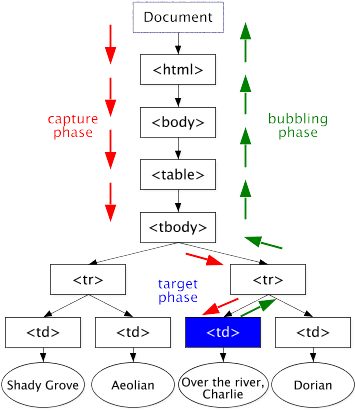
graphical representation of an event dispatched in a DOM tree using the DOM event flow
Note: An SVG 1.0 version of the representation above is also available.

The target ancestors are determined before the initial dispatch of the event. If the target node is removed during the dispatching, or a target ancestor is added or removed, the event propagation will always be based on the target node and the target ancestors determined before the dispatch.
Some events may not necessarily accomplish the three phases of
the DOM event flow, e.g. the event could only be defined for one or
two phases. As an example, events defined in this specification
will always accomplish the capture and target phases but some will
not accomplish the bubbling phase ("bubbling events" versus
"non-bubbling events", see also the Event.bubbles
attribute).
1.2.2. Event listeners
Each node encountered during the dispatch of the event may contain event listeners.
1.2.2.1. Registration of event listeners
Event listeners can be registered on all nodes in the tree for a specific type of event, phase, and group. If the event listener is registered on a node while an event gets processed on this node, the event listener will not be triggered during the current phase but may be triggered during a later phase in the event flow, i.e. the bubbling phase.
1.2.2.2. Event groups
An event listener is always part of a group. It is either explicitly in a group if a group has been specified at the registration or implicitly in the default group if no group has been specified. Within a group, event listeners are ordered in their order of registration. If two event listeners {A1, A2}, that are part of the same group, are registered one after the other (A1, then A2) for the same phase, the DOM event flow guarantees their triggering order (A1, then A2). If the two listeners are not part of the same group, no specification is made as to the order in which they will be triggered.
Note: While this specification does not specify a full ordering (i.e. groups are still unordered), it does specify ordering within a group. This implies that if the event listeners {A1, A2, B1, B2}, with A and B being two different groups, are registered for the same phase in the following order: A1, A2, B1, and B2. The following triggering orders are possible and conform to the DOM event flow: {A1, A2, B1, B2}, {A1, B1, A2, B2}, {B1, A1, A2, B2}, {A1, B1, B2, A2}, {B1, A1, B2, A2}, {B1, B2, A1, A2}. DOM Events implementations may impose priorities on groups but DOM applications must not rely on it. Unlike this specification, [DOM Level 2 Events] did not specify any triggering order for event listeners.
1.2.2.3. Triggering an event listener
When the event is dispatched through the tree, from node to node, event listeners registered on the node are triggered if:
- they were registered for the same type of event;
- they were registered for the same phase;
- the event propagation has not been stopped for the group.
1.2.2.4. Removing an event listener
If an event listener is removed from a node while an event is being processed on the node, it will not be triggered by the current actions. Once removed, the event listener is never invoked again (unless registered again for future processing).
1.2.2.5. Reentrance
It is expected that actions taken by EventListeners
may cause additional events to be dispatched. Additional events
should be handled in a synchronous manner and may cause reentrance
into the event model. If an event listener fires a new event using
EventTarget.dispatchEvent,
the event propagation that causes the event listener to be
triggered will resume only after the event propagation of the new
event is completed.
Since implementations may have restrictions such as stack-usage or other memory requirements, applications should not depend on how many synchronous events may be triggered.
1.2.2.6. Event propagation and event groups
All event listeners are part of a group (see Registration of event listeners). An event listener may prevent event listeners that are part of a same group from being triggered. The effect could be:
- immediate and no more event listeners from the same group will be triggered by the event object;
- differed until all event listeners from the same group have been triggered on the current node, i.e. the event listeners of the same group attached on other nodes will not be triggered.
If two event listeners are registered for two different groups, one cannot prevent the other from being triggered.
1.3. Default actions and cancelable events
Implementations may have a default action associated with an
event type. An example is the [HTML 4.01] form element. When the user
submits the form (e.g. by pressing on a submit button), the event
{"http://www.w3.org/2001/xml-events", "submit"} is
dispatched to the element and the default action for this event
type is generally to send a request to a Web server with the
parameters from the form.
The default actions are not part of the DOM Event flow. Before invoking a default action, the implementation must first dispatch the event as described in the DOM event flow.
A cancelable event is an event associated with a default action which is allowed to be canceled during the DOM event flow. At any phase during the event flow, the triggered event listeners have the option of canceling the default action or allowing the default action to proceed. In the case of the hyperlink in the browser, canceling the action would have the result of not activating the hyperlink. Not all events defined in this specification are cancelable events.
Different implementations will specify their own default actions, if any, associated with each event. The DOM Events specification does not attempt to specify these actions.
This specification does not provide mechanisms for accessing default actions or adding new ones.
Note: Some implementations also provide default actions
before the dispatch of the event. It is not possible to
cancel those default actions and this specification does not
address them. An example of such default actions can be found in
[DOM
Level 2 HTML] on the HTMLInputElement.checked
attribute.
1.4. Event types
Each event is associated with a type, called event type.
The event type is composed of a local name and a namespace URI as
defined in [XML Namespaces]. All events
defined in this specification use the namespace URI
"http://www.w3.org/2001/xml-events".
Note: As in [DOM Level 3 Core], DOM Level 3 Events
does not perform any URI normalization or canonicalization. The
URIs given to the DOM are assumed to be valid (e.g., characters
such as white spaces are properly escaped), and no lexical checking
is performed. Absolute URI references are treated as strings and compared
literally. How relative namespace URI references are
treated is undefined. To ensure interoperability only absolute
namespace URI references (i.e., URI references beginning with a
scheme name and a colon) should be used. Applications that wish to
have no namespace should use the value null as the
namespaceURI parameter of methods. If they pass an empty string the
DOM implementation turns it into a null.
1.4.1. Complete list of event types
Depending on the level of DOM support, or the devices used to
display (e.g. screen) or interact with (e.g. mouse, keyboard, touch
screen, voice, ...), these event types could be generated by the
implementation. When used with an [XML 1.0] or [HTML 4.01]
application, the specifications of those languages may restrict the
semantics and scope (in particular the possible target nodes)
associated with an event type. For example,
{"http://www.w3.org/2001/xml-events", "click"} can be
targeted to all [XHTML 1.0] elements but applet, base,
basefont, bdo, br, font, frame, frameset, head, html, iframe,
isindex, meta, param, script, style, and title. Refer to the
specification defining the language used in order to find those
restrictions or to find event types that are not defined in this
document.
The following table defines all event types provided in this specification (with the exception of two event types preserved for backward compatibility with [HTML 4.01]). All events will accomplish the capture phase and target phases, but not all of them will accomplish the bubbling phase (see also DOM event flow). Some events are not cancelable (see Default actions and cancelable events). Contextual information related to the event type are accessible using DOM interfaces.
| Event type | Description | Bubbling phase | Cancelable | Target node | DOM interface |
|---|---|---|---|---|---|
"http://www.w3.org/2001/xml-events",
"DOMActivate" |
An element is activated,
for instance, using a mouse device, a keyboard device, or a voice
command.
Note: The activation of an element is device dependent but is also application dependent, e.g. a link in a document can be activated using a mouse click or a mouse double click. |
Yes | Yes | Element |
UIEvent |
"http://www.w3.org/2001/xml-events", "DOMFocusIn" |
An event target receives focus, for instance via a pointing device being moved onto an element or using keyboard navigation. | Yes | No | Element |
UIEvent |
"http://www.w3.org/2001/xml-events",
"DOMFocusOut" |
A event target loses focus, for instance via a pointing device being moved out of an element or by tabbing navigation out of the element. | Yes | No | Element |
UIEvent |
"http://www.w3.org/2001/xml-events", "textInput" |
One or more characters have been entered. The characters can originate from a variety of sources. For example, it could be a character resulting from a key being pressed or released on a keyboard device, a character resulting from the processing of an input method editor, or resulting from a voice command. | Yes | Yes | Element |
TextEvent |
"http://www.w3.org/2001/xml-events", "click" |
A pointing device button
is clicked over an element. The definition of a click depends on
the environment configuration; i.e. may depend on the screen
location or the delay between the press and release of the pointing
device button. In any case, the target node must be the same
between the mousedown, mouseup, and click. The sequence of these
events is: {"http://www.w3.org/2001/xml-events",
"mousedown"}, {"http://www.w3.org/2001/xml-events",
"mouseup"}, and {"http://www.w3.org/2001/xml-events",
"click"}. Note that, given the definition of a click, If one
or more of the event types
{"http://www.w3.org/2001/xml-events", "mouseover"},
{"http://www.w3.org/2001/xml-events", "mousemove"},
and {"http://www.w3.org/2001/xml-events", "mouseout"}
occur between the press and release of the pointing device button,
the event type {"http://www.w3.org/2001/xml-events",
"click"} cannot occur. In the case of nested elements, this
event type is always targeted at the most deeply nested
element. |
Yes | Yes | Element |
MouseEvent |
"http://www.w3.org/2001/xml-events", "mousedown" |
A pointing device button is pressed over an element. In the case of nested elements, this event type is always targeted at the most deeply nested element. | Yes | Yes | Element |
MouseEvent |
"http://www.w3.org/2001/xml-events", "mouseup" |
A pointing device button is released over an element. In the case of nested elements, this event type is always targeted at the most deeply nested element. | Yes | Yes | Element |
MouseEvent |
"http://www.w3.org/2001/xml-events", "mouseover" |
A pointing device is moved onto an element. In the case of nested elements, this event type is always targeted at the most deeply nested element. | Yes | Yes | Element |
MouseEvent |
"http://www.w3.org/2001/xml-events", "mousemove" |
A pointing device is moved while it is over an element. In the case of nested elements, this event type is always targeted at the most deeply nested element. | Yes | Yes | Element |
MouseEvent |
"http://www.w3.org/2001/xml-events", "mouseout" |
A pointing device is moved away from an element. In the case of nested elements, this event type is always targeted at the most deeply nested element. | Yes | Yes | Element |
MouseEvent |
"http://www.w3.org/2001/xml-events", "keydown" |
A key is pressed down.
This event type is device dependent and relies on the capabilities
of the input devices and how they are mapped in the operating
system. This event type is generated after the keyboard mapping but
before the processing of the input
method editor. This event should logically happen before
the event {"http://www.w3.org/2001/xml-events",
"keyup"} is produced. |
Yes | Yes | Element |
KeyboardEvent |
"http://www.w3.org/2001/xml-events", "keyup" |
A key is released. This
event type is device dependent and relies on the capabilities of
the input devices and how they are mapped in the operating system.
This event type is generated after the keyboard mapping but before
the processing of the input method
editor. This event should logically happen after the event
{"http://www.w3.org/2001/xml-events", "keydown"} is
produced. |
Yes | Yes | Element |
KeyboardEvent |
"http://www.w3.org/2001/xml-events",
"DOMSubtreeModified" |
This is a general event for notification of all changes to the document. It can be used instead of the more specific events listed below. It may be dispatched after a single modification to the document or, at the implementation's discretion, after multiple changes have occurred. The latter use should generally be used to accommodate multiple changes which occur either simultaneously or in rapid succession. The target of this event is the lowest common parent of the changes which have taken place. This event is dispatched after any other events caused by the mutation(s) have occurred. | Yes | No | Document,
DocumentFragment, Element,
Attr |
MutationEvent |
"http://www.w3.org/2001/xml-events",
"DOMNodeInserted" |
A node has been added as a child of another node. This event is dispatched after the insertion has taken place. The target node of this event is the node being inserted. | Yes | No | Element,
Attr, Text, Comment,
CDATASection, DocumentType,
EntityReference,
ProcessingInstruction |
MutationEvent |
"http://www.w3.org/2001/xml-events",
"DOMNodeRemoved" |
A node is being removed from its parent node. This event is dispatched before the node is removed from the tree. The target node of this event is the node being removed. | Yes | No | Element,
Attr, Text, Comment,
CDATASection, DocumentType,
EntityReference,
ProcessingInstruction |
MutationEvent |
"http://www.w3.org/2001/xml-events",
"DOMNodeRemovedFromDocument" |
A node is being removed
from a document, either through direct removal of the node or
removal of a subtree in which it is contained. This event is
dispatched before the removal takes place. The target node of this
event type is the node being removed. If the node is being directly
removed, the event type {"http://www.w3.org/2001/xml-events",
"DOMNodeRemoved"} will fire before this event type. |
No | No | Element,
Attr, Text, Comment,
CDATASection, DocumentType,
EntityReference,
ProcessingInstruction |
MutationEvent |
"http://www.w3.org/2001/xml-events",
"DOMNodeInsertedIntoDocument" |
A node is being inserted
into a document, either through direct insertion of the node or
insertion of a subtree in which it is contained. This event is
dispatched after the insertion has taken place. The target node of this
event is the node being inserted. If the node is being directly
inserted, the event type
{"http://www.w3.org/2001/xml-events",
"DOMNodeInserted"} will fire before this event type. |
No | No | Element,
Attr, Text, Comment,
CDATASection, DocumentType,
EntityReference,
ProcessingInstruction |
MutationEvent |
"http://www.w3.org/2001/xml-events",
"DOMAttrModified" |
Occurs after an
Attr has been modified on a node. The target node of this
event is the parent Element node whose
Attr changed. It is expected that string based
replacement of an Attr value will be viewed as a
modification of the Attr since its identity does not
change. Subsequently replacement of the Attr node with
a different Attr node is viewed as the removal of the
first Attr node and the addition of the second. |
Yes | No | Element |
MutationEvent |
"http://www.w3.org/2001/xml-events",
"DOMCharacterDataModified" |
Occurs after
CharacterData.data or
ProcessingInstruction.data have been modified but the
node itself has not been inserted or deleted. The target node of this
event is the CharacterData node or the
ProcessingInstruction node. |
Yes | No | Text,
Comment, CDATASection,
ProcessingInstruction |
MutationEvent |
"http://www.w3.org/2001/xml-events",
"DOMElementNameChanged" |
Occurs after the
namespaceURI and/or the nodeName of an
Element node have been modified (e.g., the element was
renamed using Document.renameNode). The target of this
event is the renamed Element node. |
Yes | No | Element |
MutationNameEvent |
"http://www.w3.org/2001/xml-events",
"DOMAttributeNameChanged" |
Occurs after the
namespaceURI and/or the nodeName of a
Attr node have been modified (e.g., the attribute was
renamed using Document.renameNode). The target of this
event is the parent Element node whose
Attr has been renamed. |
Yes | No | Element |
MutationNameEvent |
"http://www.w3.org/2001/xml-events", "load" |
The DOM Implementation finishes loading in the environment the document or a resource linked from it. | No | No | Element |
Event |
"http://www.w3.org/2001/xml-events", "unload" |
The DOM implementation removes from the environment the document or a resource linked from it. | No | No | Element |
Event |
"http://www.w3.org/2001/xml-events", "abort" |
The loading of the document, or a resource linked from it, is stopped before being entirely loaded. | Yes | No | Element |
Event |
"http://www.w3.org/2001/xml-events", "error" |
The document, or a resource linked from it, has been loaded but cannot be interpreted according to its semantic, such as an invalid image or a script execution error. | Yes | No | Element |
Event |
"http://www.w3.org/2001/xml-events", "select" |
A user selects some text. DOM Level 3 Events does not provide contextual information to access the selected text. | Yes | No | Element |
Event |
"http://www.w3.org/2001/xml-events", "change" |
A control loses the input focus and its values has been modified since gaining focus. | Yes | No | Element |
Event |
"http://www.w3.org/2001/xml-events", "submit" |
A form, such as [HTML 4.01], [XHTML 1.0], or [XForms 1.0] forms, is submitted. | Yes | Yes | Element |
Event |
"http://www.w3.org/2001/xml-events", "reset" |
A form, such as [HTML 4.01], [XHTML 1.0], or [XForms 1.0] forms, is reset. | Yes | Yes | Element |
Event |
"http://www.w3.org/2001/xml-events", "resize" |
A document view is resized. | Yes | No | Document
|
UIEvent |
"http://www.w3.org/2001/xml-events", "scroll" |
A document view is scrolled. | Yes | No | Document
|
UIEvent |
The event objects associated with the event types described above may contain context information. Refer to the description of the DOM interfaces for further information.
1.4.2. Compatibility with DOM Level 2 Events
Namespace
URIs Were only introduced in DOM Level 3 Events and were
not part of DOM Level 2 Events. DOM Level 2 Events methods are
namespace ignorant and the event type is only represented by an XML name, specified
in the Event.type
attribute.
Therefore, while it is safe to use these methods when not
dealing with namespaces, using them and the new ones at the same
time should be avoided. DOM Level 2 Events methods solely identify
events by their Event.type. On the
contrary, the DOM Level 3 Events methods related to namespaces,
identify attribute nodes by their Event.namespaceURI
and Event.type.
Because of this fundamental difference, mixing both sets of methods
can lead to unpredictable results. For example, using EventTarget.addEventListenerNS,
two event listeners (or more) could be registered using the same
type and same useCapture values, but
different namespaceURIs. Calling EventTarget.removeEventListener
with that type and useCapture could then
remove any or none of those event listeners. The result depends on
the implementation. The only guarantee in such cases is that all
methods which access an event listener by its
namespaceURI and type will access the
same event listener. For instance, EventTarget.removeEventListenerNS
removes the event that EventTarget.addEventListenerNS
added.
For compatibility reasons, the dispatching of an event will
ignore namespace URIs if either the event or the event listener has
a null namespace URI. If a DOM Level 2 event (i.e.
with a null namespace URI) is dispatched in the DOM
tree, all event listeners that match the type will be
triggered as described in the DOM
event flow. If a DOM Level 3 event (i.e. with a namespace URI)
is dispatched in the DOM tree, all event listener with the same
type and the same or null namespace URI, will be
triggered as described in the DOM
event flow.
1.5. Event listener registration
Note: This section is informative.
There are mainly two ways to associate an event listener to a node in the tree:
- at the programming level using the
EventTargetmethods. - at the document level using [XML Events] or an ad-hoc syntax, as the ones provided in [XHTML 1.0] or [SVG 1.0].
1.5.1.
Using the EventTarget
methods
The user can attach an event listener using the methods on the
EventTarget
interface:
myCircle.addEventListenerNS("http://www.w3.org/2001/xml-events",
"DOMActivate",
myListener,
true,
myEvtGroup);
The methods do not provide the ability to register the same event listener more than once for the same event type and the same phase. The target phase and the bubbling phase are coupled during the registration, i.e. it is not possible to register an event listener for only one of these two phases (but the listener itself could ignore events during one of these phases if desired). It is also not possible to register an event listener for a specific event target and have it only triggered for this event target during the bubbling or capture phases (but again, the listener itself could ignore events with other event targets if desired).
To register an event listener, DOM applications must use the
methods EventTarget.addEventListener
and EventTarget.addEventListenerNS.
An EventListener
being registered on an EventTarget may
choose to have that EventListener
triggered during the capture phase by specifying the
useCapture parameter of the EventTarget.addEventListener
or EventTarget.addEventListenerNS
methods to be true. If false, the EventListener
will be triggered during the target and bubbling phases.
1.5.2. Using XML Events
In [XML Events], event listeners are attached using elements and attributes:
<listener event="DOMActivate" observer="myCircle" handler="#myListener"
phase="capture" propagate="stop"/>
Event listeners can only be registered on Element
nodes, i.e. other Node types are not addressable, and
cannot be registered for a specific group either, i.e. they are
always attached to the default group. [XML
Events] does not address namespaces in event types. If the
value of the event attribute of the
listener element contains a colon (':'), it should be
interpreted as a QName as defined in [XML Schema
Part 2].
1.5.3. Using XML or HTML attributes
In languages such as [HTML 4.01], [XHTML 1.0], or [SVG 1.0], event listeners are specified as attributes:
<circle id="myCircle" onactivate="myListener(evt)"
cx="300" cy="225" r="100" fill="red"/>
Since only one attribute with the same name can appear on an
element, it is therefore not possible to register more than one
event listener on a single EventTarget for
the event type. Also, event listeners can only be registered on
Element nodes for the target phase and bubbling phase,
i.e. other Node types and the capture phase are not
addressable with these languages. Event listeners cannot be
registered for a specific group either, i.e. they are always
attached to the default group.
In order to achieve compatibility with those languages,
implementors may view the setting of attributes which represent
event handlers as the creation and registration of an
EventListener on the EventTarget. The
value of useCapture defaults to false.
This EventListener
behaves in the same manner as any other EventListeners
which may be registered on the EventTarget. If
the attribute representing the event listener is changed, this may
be viewed as the removal of the previously registered EventListener
and the registration of a new one. Furthermore, no specification is
made as to the order in which event attributes will receive the
event with regards to the other EventListeners
on the EventTarget.
1.6. Basic interfaces
The interfaces described in this section are fundamental to DOM Level 3 Events and must always be supported by the implementation.
- Interface Event (introduced in DOM Level 2)
-
The
Eventinterface is used to provide contextual information about an event to the listener processing the event. An object which implements theEventinterface is passed as the parameter to anEventListener. More specific context information is passed to event listeners by deriving additional interfaces fromEventwhich contain information directly relating to the type of event they represent. These derived interfaces are also implemented by the object passed to the event listener.
IDL Definition-
// Introduced in DOM Level 2: interface Event { // PhaseType const unsigned short CAPTURING_PHASE = 1; const unsigned short AT_TARGET = 2; const unsigned short BUBBLING_PHASE = 3; readonly attribute DOMString type; readonly attribute EventTarget target; readonly attribute EventTarget currentTarget; readonly attribute unsigned short eventPhase; readonly attribute boolean bubbles; readonly attribute boolean cancelable; readonly attribute DOMTimeStamp timeStamp; void stopPropagation(); void preventDefault(); void initEvent(in DOMString eventTypeArg, in boolean canBubbleArg, in boolean cancelableArg); // Introduced in DOM Level 3: readonly attribute DOMString namespaceURI; // Introduced in DOM Level 3: boolean isCustom(); // Introduced in DOM Level 3: void stopImmediatePropagation(); // Introduced in DOM Level 3: boolean isDefaultPrevented(); // Introduced in DOM Level 3: boolean isPropagationStopped(); // Introduced in DOM Level 3: void initEventNS(in DOMString namespaceURIArg, in DOMString eventTypeArg, in boolean canBubbleArg, in boolean cancelableArg); };
- Definition group PhaseType
-
An integer indicating which phase of the event flow is being processed as defined in DOM event flow.
- Defined Constants
-
AT_TARGET- The current event is in the target phase, i.e. it is being evaluated at the event target.
BUBBLING_PHASE- The current event phase is the bubbling phase.
CAPTURING_PHASE- The current event phase is the capture phase.
- Attributes
-
bubblesof typeboolean, readonly- Used to indicate whether or not an event is a bubbling event.
If the event can bubble the value is
true, otherwise the value isfalse.
cancelableof typeboolean, readonly- Used to indicate whether or not an event can have its default
action prevented (see also Default actions and
cancelable events). If the default action can be prevented the
value is
true, otherwise the value isfalse.
currentTargetof typeEventTarget, readonly- Used to indicate the
EventTargetwhoseEventListenersare currently being processed. This is particularly useful during the capture and bubbling phases. This attribute could contain the target node or a target ancestor when used with the DOM event flow.
eventPhaseof typeunsigned short, readonly- Used to indicate which phase of event flow is currently being
accomplished.
namespaceURIof typeDOMString, readonly, introduced in DOM Level 3- The namespace
URI associated with this event at creation time, or
nullif it is unspecified.
For events initialized with a DOM Level 2 Events method, such asinitEvent, this is alwaysnull.
targetof typeEventTarget, readonly- Used to indicate the event target. This
attribute contain the target node when used
with the DOM event
flow.
timeStampof typeDOMTimeStamp, readonly- Used to specify the time (in milliseconds relative to the
epoch) at which the event was created. Due to the fact that some
systems may not provide this information the value of
timeStampmay be not available for all events. When not available, a value of0will be returned. Examples of epoch time are the time of the system start or 0:0:0 UTC 1st January 1970.
typeof typeDOMString, readonly- The name must be an NCName
as defined in [XML Namespaces] and is
case-sensitive. The character ":" (colon) should not be used in
this attribute.
If the attributeEvent.namespaceURIis different fromnull, this attribute represents a local name.
- Methods
-
initEvent-
The
initEventmethod is used to initialize the value of anEventcreated through theDocumentEvent.createEventmethod. This method may only be called before theEventhas been dispatched via theEventTarget.dispatchEventmethod. If the method is called several times before invokingEventTarget.dispatchEvent, only the final invocation takes precedence. If called from a subclass ofEventinterface only the values specified in this method are modified, all other attributes are left unchanged.
This method sets theEvent.typeattribute toeventTypeArg, andEvent.localNameandEvent.namespaceURItonull. To initialize an event with a local name and namespace URI, use theinitEventNSmethod.ParameterseventTypeArgof typeDOMString- Specifies the event type.
canBubbleArgof typeboolean- Specifies whether or not the event can bubble. This parameter
overrides the intrinsic bubbling behavior of the event.
cancelableArgof typeboolean- Specifies whether or not the event's default action can be
prevented. This parameter overrides the intrinsic cancelable
behavior of the event.
No Return ValueNo Exceptions initEventNSintroduced in DOM Level 3-
The
initEventNSmethod is used to initialize the value of anEventcreated through theDocumentEventinterface. This method may only be called before theEventhas been dispatched via thedispatchEventmethod, though it may be called multiple times the event has been dispatched. If called multiple times the final invocation takes precedence. If a call toinitEventNSis made after one of theEventderived interfaces' init methods has been called, only the values specified in theinitEventNSmethod are modified, all other attributes are left unchanged.
This method sets theEvent.typeattribute toeventTypeArg, andEvent.namespaceURItonamespaceURIArg.ParametersnamespaceURIArgof typeDOMString- Specifies the namespace URI
associated with this event, or
nullif no namespace.
eventTypeArgof typeDOMString- Specifies the local
name of the event type (see also the description of
Event.type).
canBubbleArgof typeboolean- Specifies whether or not the event can bubble.
cancelableArgof typeboolean- Specifies whether or not the event's default action can be
prevented.
No Return ValueNo Exceptions isCustomintroduced in DOM Level 3-
This method will always return
false, unless the event implements theCustomEventinterface.Return ValuebooleantrueifpreventDefault()has been called for this event.No ParametersNo Exceptions isDefaultPreventedintroduced in DOM Level 3-
This method will return
trueif the methodpreventDefault()has been called for this event,falseotherwise.Return ValuebooleantrueifpreventDefault()has been called for this event.No ParametersNo Exceptions isPropagationStoppedintroduced in DOM Level 3-
This method will return
trueif the methodstopPropagation()has been called for this event in the current group,falsein any other cases.Return Valuebooleantrueif the event propagation has been stopped in the current group.No ParametersNo Exceptions preventDefault-
If an event is cancelable, the
preventDefaultmethod is used to signify that the event is to be canceled, meaning any default action normally taken by the implementation as a result of the event will not occur (see also Default actions and cancelable events), and thus independently of event groups. Calling this method for a non-cancelable event has no effect.Note: This method does not stop the event propagation; use
stopPropagationorstopImmediatePropagationfor that effect.No ParametersNo Return ValueNo Exceptions stopImmediatePropagationintroduced in DOM Level 3-
This method is used to prevent event listeners of the same group to be triggered and, unlike
stopPropagationits effect is immediate (see Event propagation and event groups). Once it has been called, further calls to that method have no additional effect.Note: This method does not prevent the default action from being invoked; use
preventDefaultfor that effect.No ParametersNo Return ValueNo Exceptions stopPropagation-
This method is used to prevent event listeners of the same group to be triggered but its effect is differed until all event listeners attached on the
currentTargethave been triggered (see Event propagation and event groups). Once it has been called, further calls to that method have no additional effect.Note: This method does not prevent the default action from being invoked; use
preventDefaultfor that effect.No ParametersNo Return ValueNo Exceptions
- Interface EventTarget (introduced in DOM Level 2)
-
The
EventTargetinterface is implemented by all the objects which could be event targets in an implementation which supports the Event flows. The interface allows registration, removal or query of event listeners, and dispatch of events to an event target.When used with DOM event flow, this interface is implemented by all target nodes and target ancestors, i.e. all DOM
Nodesof the tree support this interface when the implementation conforms to DOM Level 3 Events and, therefore, this interface can be obtained by using binding-specific casting methods on an instance of theNodeinterface.When using
addEventListeneroraddEventListenerNS, if multiple identicalEventListeners are registered on the sameEventTargetwith the same parameters the duplicate instances are discarded. They do not cause theEventListenerto be called twice and since they are discarded they do not need to be removed.
IDL Definition-
// Introduced in DOM Level 2: interface EventTarget { void addEventListener(in DOMString type, in EventListener listener, in boolean useCapture); void removeEventListener(in DOMString type, in EventListener listener, in boolean useCapture); // Modified in DOM Level 3: boolean dispatchEvent(in Event evt) raises(EventException); // Introduced in DOM Level 3: void addEventListenerNS(in DOMString namespaceURI, in DOMString type, in EventListener listener, in boolean useCapture, in EventListenerGroup evtGroup); // Introduced in DOM Level 3: void removeEventListenerNS(in DOMString namespaceURI, in DOMString type, in EventListener listener, in boolean useCapture, in EventListenerGroup evtGroup); // Introduced in DOM Level 3: boolean willTriggerNS(in DOMString namespaceURI, in DOMString type); // Introduced in DOM Level 3: boolean hasEventListenerNS(in DOMString namespaceURI, in DOMString type); };
- Methods
-
addEventListener-
This method allows the registration of an event listener in the default group and, depending on the
useCaptureparameter, on the capture phase of the DOM event flow or its target and bubbling phases.Parameterstypeof typeDOMString- Specifies the
Event.typeassociated with the event for which the user is registering.
listenerof typeEventListener- The
listenerparameter takes an object implemented by the user which implements theEventListenerinterface and contains the method to be called when the event occurs.
useCaptureof typeboolean- If true,
useCaptureindicates that the user wishes to add the event listener for the capture phase only, i.e. this event listener will not be triggered during the target and bubbling phases. Iffalse, the event listener will only be triggered during the target and bubbling phases.
No Return ValueNo Exceptions addEventListenerNSintroduced in DOM Level 3-
This method allows the registration of an event listener in a specified group or the default group and, depending on the
useCaptureparameter, on the capture phase of the DOM event flow or its target and bubbling phases.ParametersnamespaceURIof typeDOMString- Specifies the
Event.namespaceURIassociated with the event for which the user is registering.
typeof typeDOMString- Specifies the
Event.typeassociated with the event for which the user is registering.
listenerof typeEventListener- The
listenerparameter takes an object implemented by the user which implements theEventListenerinterface and contains the method to be called when the event occurs.
useCaptureof typeboolean- If true,
useCaptureindicates that the user wishes to add the event listener for the capture phase only, i.e. this event listener will not be triggered during the target and bubbling phases. Iffalse, the event listener will only be triggered during the target and bubbling phases.
evtGroupof typeEventListenerGroup- The
EventListenerGroupto associate with theEventListener(see also Event propagation and event groups). Usenullto attach the event listener to the default group.
No Return ValueNo Exceptions dispatchEventmodified in DOM Level 3-
This method allows the dispatch of events into the implementation's event model. The event target of the event is the
EventTargetobject on whichdispatchEventis called.- Issue dispatchEvent-1:
- It is necessary to have an exception that occurs if the
specified event is not an event which the implementation knows how
to dispatch, if it was not created by calling
DocumentEvent.createEventandEvent.isCustom()isfalse.NOT_SUPPORTED?
Parametersevtof typeEvent- The event to be dispatched.
Return ValuebooleanIndicates whether any of the listeners which handled the event called
preventDefault. IfpreventDefaultwas called the returned value isfalse, else it istrue.ExceptionsUNSPECIFIED_EVENT_TYPE_ERR: Raised if the
Event.typewas not specified by initializing the event beforedispatchEventwas called. Specification of theEvent.typeasnullor an empty string will also trigger this exception.DISPATCH_REQUEST_ERR: Raised if the
Eventobject is already being dispatched in the tree. hasEventListenerNSintroduced in DOM Level 3-
This method allows the DOM application to know if this
EventTargetcontains an event listener registered for the specified event type. This is useful for determining at which nodes within a hierarchy altered handling of specific event types has been introduced, but should not be used to determine whether the specified event type triggers an event listener (seewillTriggerNS).- Issue canTriggerOnTarget-useCapture:
- do we need a useCapture parameter?
Resolution: No use case for that.
ParametersnamespaceURIof typeDOMString- Specifies the
Event.namespaceURIassociated with the event.
typeof typeDOMString- Specifies the
Event.typeassociated with the event.
Return Valuebooleantrueif an event listener is registered on thisEventTargetfor the specified event type,falseotherwise.No Exceptions removeEventListener-
This method allows the removal of event listeners from the default group.
CallingremoveEventListenerwith arguments which do not identify any currently registeredEventListeneron theEventTargethas no effect.Parameterstypeof typeDOMString- Specifies the
Event.typefor which the user registered the event listener.
listenerof typeEventListener- The
EventListenerto be removed.
useCaptureof typeboolean- Specifies whether the
EventListenerbeing removed was registered for the capture phase or not. If a listener was registered twice, once for the capture phase and once for the target and bubbling phases, each must be removed separately. Removal of an event listener registered for the capture phase does not affect the same event listener registered for the target and bubbling phases, and vice versa.
No Return ValueNo Exceptions removeEventListenerNSintroduced in DOM Level 3-
This method allows the removal of event listeners from a specified group or the default group.
CallingremoveEventListenerNSwith arguments which do not identify any currently registeredEventListeneron theEventTargethas no effect.ParametersnamespaceURIof typeDOMString- Specifies the
Event.namespaceURIassociated with the event for which the user registered the event listener.
typeof typeDOMString- Specifies the
Event.typeassociated with the event for which the user registered the event listener.
listenerof typeEventListener- The
EventListenerparameter indicates theEventListenerto be removed.
useCaptureof typeboolean- Specifies whether the
EventListenerbeing removed was registered for the capture phase or not. If a listener was registered twice, once for the capture phase and once for the target and bubbling phases, each must be removed separately. Removal of an event listener registered for the capture phase does not affect the same event listener registered for the target and bubbling phases, and vice versa.
evtGroupof typeEventListenerGroup- The
EventListenerGroupassociated with theEventListener. Usenullto reference the default group.
No Return ValueNo Exceptions willTriggerNSintroduced in DOM Level 3-
This method allows the DOM application to know if an event listener, attached to this
EventTargetor one of its ancestors, will be triggered by the specified event type during the dispatch of the event to this event target or one of its descendants.ParametersnamespaceURIof typeDOMString- Specifies the
Event.namespaceURIassociated with the event.
typeof typeDOMString- Specifies the
Event.typeassociated with the event.
Return Valuebooleantrueif an event listener will be triggered on theEventTargetwith the specified event type,falseotherwise.No Exceptions
- Interface EventListener (introduced in DOM Level 2)
-
The
EventListenerinterface is the primary way for handling events. Users implement theEventListenerinterface and register their event listener on anEventTarget. The users should also remove theirEventListenerfrom itsEventTargetafter they have completed using the listener.Copying a
Nodedoes not copy the event listeners attached to it. Event listeners must be attached to the newly createdNodeafterwards if so desired. Therefore,Nodesare copied usingNode.cloneNodeorRange.cloneContents, theEventListenersattached to the sourceNodesare not attached to their copies.Moving a
Nodedoes not affect the event listeners attached to it. Therefore, whenNodesare moved usingDocument.adoptNode,Node.appendChild, orRange.extractContents, theEventListenersattached to the movedNodesstay attached to them.
IDL Definition-
// Introduced in DOM Level 2: interface EventListener { void handleEvent(in Event evt); };
- Methods
- Interface EventListenerGroup (introduced in DOM Level 3)
-
Event listeners can be registered using
Event.addEventListenerNSwithin a group.When a set of actions associated with event listeners is critical for an application such as refreshing the display, it is important to separate them from other event listeners who might stop the event flow. In order to prevent undesirable side effects, the application should create a group using
DocumentEvent.createEventListenerGroupand use it when adding or removing event listeners.
IDL Definition-
// Introduced in DOM Level 3: interface EventListenerGroup { boolean isSameEventListenerGroup(in EventListenerGroup other); };
- Methods
-
isSameEventListenerGroup-
This method checks if the supplied
EventListenerGroupis the same as theEventListenerGroupupon which the method is called.Parametersotherof typeEventListenerGroup- The
EventListenerGroupwith which to check equality.
Return ValuebooleanReturns
trueif theEventListenerGroups are the same, else returnsfalse.- Issue isSameEventListenerGroup-equal:
- We should clarify what "equal" means here, or better yet, substitute it with "is the same"?
No Exceptions
- Exception EventException introduced in DOM Level 2
-
Event operations may throw an
EventExceptionas specified in their method descriptions.
IDL Definition-
// Introduced in DOM Level 2: exception EventException { unsigned short code; }; // EventExceptionCode const unsigned short UNSPECIFIED_EVENT_TYPE_ERR = 0; // Introduced in DOM Level 3: const unsigned short DISPATCH_REQUEST_ERR = 1;
- Definition group EventExceptionCode
-
An integer indicating the type of error generated.
- Defined Constants
-
DISPATCH_REQUEST_ERR, introduced in DOM Level 3.- If the
Eventobject is already dispatched in the tree. UNSPECIFIED_EVENT_TYPE_ERR- If the
Event.typewas not specified by initializing the event before the method was called. Specification of theEvent.typeasnullor an empty string will also trigger this exception.
1.6.1. Event creation
In most cases, the events dispatched by the DOM Events
implementation are also created by the implementation. It is
however possible to simulate events such as mouse events by
creating the Event objects and
dispatch them using the DOM Events implementation.
DOM Events provides two ways for creating Event objects. An
application can either create Event objects that are
known to the implementation, or create its own objects and have
them dispatched by the DOM Events implementation.
Creating Event objects that are
known to the DOM Events implementation is done using DocumentEvent.createEvent.
The application must then initialize the object by calling the
appropriate initialization method before invoking EventTarget.dispatchEvent.
The Event objects created
must be known by the DOM Events implementation otherwise an event
exception is thrown.
The DOM application might want to create its own Event objects, in order
to change the default Event implementation
provided by the DOM Events implementation or to generate new event
types with specific contextual information. In any case, the
application is responsible for creating and initializing the Event object. The
application can then dispatch the event using the DOM Events
implementation by using EventTarget.dispatchEvent.
However, the DOM Events implementation requires to have access
to two attributes in the Event object in order
to accomplish the dispatch appropriately: Event.currentTarget
and Event.eventPhase.
Those attributes are defined as readonly in the Event interface since
event listeners must not change them and it is the responsibility
of the DOM Events implementation to update them during the event
flow. Therefore, implementing the Event interface when
creating its own events is not enough for an application since the
DOM Events implementation will not be able to update the current
phase and the current node during the dispatch, unless the event
object also implements the CustomEvent
interface to give access to the relevant attributes.
- Interface DocumentEvent (introduced in DOM Level 2)
-
The
DocumentEventinterface provides a mechanism by which the user can create anEventobject of a type supported by the implementation. It is expected that theDocumentEventinterface will be implemented on the same object which implements theDocumentinterface in an implementation which supports the Event model.
IDL Definition-
// Introduced in DOM Level 2: interface DocumentEvent { Event createEvent(in DOMString eventType) raises(DOMException); // Introduced in DOM Level 3: EventListenerGroup createEventListenerGroup(); // Introduced in DOM Level 3: boolean canDispatch(in DOMString namespaceURI, in DOMString type); };
- Methods
-
canDispatchintroduced in DOM Level 3-
Test if the implementation can generate events of a specified type.Parameters
namespaceURIof typeDOMString- Specifies the
Event.namespaceURIof the event.
typeof typeDOMString- Specifies the
Event.typeof the event.
Return Valuebooleantrueif the implementation can generate and dispatch this event type,falseotherwise.No Exceptions createEvent-
Parameters
eventTypeof typeDOMString- The
eventTypeparameter specifies the name of the DOM Events interface to be supported by the created event object, e.g."Event","MouseEvent","MutationEvent"... If theEventis to be dispatched via theEventTarget.dispatchEventmethod the appropriate event init method must be called after creation in order to initialize theEvent's values.
As an example, a user wishing to synthesize some kind ofUIEventwould callDocumentEvent.createEventwith the parameter"UIEvent". TheUIEvent.initUIEventNSmethod could then be called on the newly createdUIEventobject to set the specific type of user interface event to be dispatched,{"http://www.w3.org/2001/xml-events", "DOMActivate"}for example, and set its context information, e.g.UIEvent.detailin this example.
ThecreateEventmethod is used in creatingEvents when it is either inconvenient or unnecessary for the user to create anEventthemselves. In cases where the implementation providedEventis insufficient, users may supply their ownEventimplementations for use with theEventTarget.dispatchEventmethod. However, the DOM implementation needs access to the attributesEvent.currentTargetandEvent.eventPhaseto propagate appropriately the event in the DOM tree. Therefore users'Eventimplementations might need to support theCustomEventinterface for that effect.Note: For backward compatibility reason, "UIEvents", "MouseEvents", "MutationEvents", and "HTMLEvents" feature names are valid values for the parameter
eventTypeand represent respectively the interfaces "UIEvent", "MouseEvent", "MutationEvent", and "Event".
Return ValueThe newly created event object.
ExceptionsDOMExceptionNOT_SUPPORTED_ERR: Raised if the implementation does not support the
Eventinterface requested. createEventListenerGroupintroduced in DOM Level 3-
This method creates a new
EventListenerGroupfor use in theaddEventListenerNSandremoveEventListenerNSmethods of theEventTargetinterface (see also Event propagation and event groups).Return ValueThe newly created
EventListenerGroupobject.No ParametersNo Exceptions
- Interface CustomEvent (introduced in DOM Level 3)
-
The
CustomEventinterface gives access to the attributesEvent.currentTargetandEvent.eventPhase. It is intended to be used by the DOM Events implementation to access the underlying current target and event phase while dispatching a customEventin the tree; it is intended to be implemented, and not used, by DOM applications.The methods contained in this interface are not intended to be used by a DOM application, especially during the dispatch on the
Eventobject. Changing the current target or the current phase may conduct into unpredictable results of the event flow. The DOM Events implementation should ensure that both methods return the appropriate current target and phase before invoking each event listener on the current target to protect DOM applications from malicious event listeners.Note: If this interface is supported by the event object,
Event.isCustom()must returntrue.
IDL Definition-
// Introduced in DOM Level 3: interface CustomEvent : Event { void setCurrentTarget(in EventTarget target); void setEventPhase(in unsigned short phase); void setCurrentEventListenerGroup(in EventListenerGroup evtGroup); // Introduced in DOM Level 3: boolean isImmediatePropagationStopped(); };
- Methods
-
isImmediatePropagationStoppedintroduced in DOM Level 3-
The
isImmediatePropagationStoppedmethod is used by the DOM Events implementation to know if the methodstopImmediatePropagation()has been called for this event in the current group. It returnstrueif the method has been called,falseotherwise.Return Valuebooleantrueif the event propagation has been stopped immediately in the current group.No ParametersNo Exceptions setCurrentEventListenerGroup-
The
setCurrentEventListenerGroupmethod is used by the DOM Events implementation to change the current event group on which the event is being processed.ParametersevtGroupof typeEventListenerGroup- The specified event group. Use
nullto specify the default group.
No Return ValueNo Exceptions setCurrentTarget-
The
setCurrentTargetmethod is used by the DOM Events implementation to change the value ofEvent.currentTarget.Parameterstargetof typeEventTarget- Specifies the new value for the
Event.currentTargetattribute.
No Return ValueNo Exceptions setEventPhase-
The
setEventPhasemethod is used by the DOM Events implementation to change the value ofEvent.eventPhase.Parametersphaseof typeunsigned short- Specifies the new value for the
Event.eventPhaseattribute.
No Return ValueNo Exceptions
1.7. Event module definitions
The DOM Event Model allows a DOM implementation to support multiple modules of events. The model has been designed to allow addition of new event modules as is required. The DOM will not attempt to define all possible events. For purposes of interoperability, the DOM will define a module of user interface events including lower level device dependent events, a module of UI logical events, and a module of document mutation events.
1.7.1. User Interface event types
The User Interface event module contains basic event types associated with user interfaces.
- Interface UIEvent (introduced in DOM Level 2)
-
The
UIEventinterface provides specific contextual information associated with User Interface events.Note: To create an instance of the
UIEventinterface, use the feature string "UIEvent" as the value of the input parameter used with theDocumentEvent.createEventmethod.
IDL Definition-
// Introduced in DOM Level 2: interface UIEvent : Event { readonly attribute views::AbstractView view; readonly attribute long detail; void initUIEvent(in DOMString typeArg, in boolean canBubbleArg, in boolean cancelableArg, in views::AbstractView viewArg, in long detailArg); // Introduced in DOM Level 3: void initUIEventNS(in DOMString namespaceURI, in DOMString typeArg, in boolean canBubbleArg, in boolean cancelableArg, in views::AbstractView viewArg, in long detailArg); };
- Attributes
- Methods
-
initUIEvent-
The
initUIEventmethod is used to initialize the value of aUIEventcreated using theDocumentEvent.createEventmethod. This method may only be called before theUIEventhas been dispatched via theEventTarget.dispatchEventmethod, though it may be called multiple times during that phase if necessary. If called multiple times, the final invocation takes precedence.ParameterstypeArgof typeDOMString- Specifies the event type.
canBubbleArgof typeboolean- Specifies whether or not the event can bubble. This parameter
overrides the intrinsic bubbling behavior of the event.
cancelableArgof typeboolean- Specifies whether or not the event's default action can be
prevented. This parameter overrides the intrinsic cancelable
behavior of the event.
viewArgof typeviews::AbstractView- Specifies the
Event'sAbstractView.
detailArgof typelong- Specifies the
Event's detail.
No Return ValueNo Exceptions initUIEventNSintroduced in DOM Level 3-
The
initUIEventNSmethod is used to initialize the value of aUIEventcreated using theDocumentEvent.createEventmethod. This method may only be called before theUIEventhas been dispatched via theEventTarget.dispatchEventmethod, though it may be called multiple times during that phase if necessary. If called multiple times, the final invocation takes precedence.ParametersnamespaceURIof typeDOMString- Specifies the namespace URI
associated with this event, or
nullif the application wish not to use namespaces.
typeArgof typeDOMString- Specifies the event type (see also the description of the
typeattribute in theEventinterface).
canBubbleArgof typeboolean- Specifies whether or not the event can bubble.
cancelableArgof typeboolean- Specifies whether or not the event's default action can be
prevented.
viewArgof typeviews::AbstractView- Specifies the
Event'sAbstractView.
detailArgof typelong- Specifies the
Event's detail.
No Return ValueNo Exceptions
The User Interface event types are listed below. For a full
description of the semantics associated with these event types,
refer to the Complete list of event
types. A DOM application may use the hasFeature(feature,
version) method of the DOMImplementation
interface with parameter values "UIEvents" and
"3.0" (respectively) to determine whether or not the
DOM Level 3 User Interface event types are supported by the
implementation. In order to fully support this module, an
implementation must also support the "Events" feature
defined in this specification and the "Views" feature
defined in the DOM Level 2 Views specification [DOM Level 2
Views]. For additional information about
conformance, please see the DOM Level 3 Core
specification [DOM Level 3 Core]. The DOM Level 3
User Interface Events module is built on top of the DOM Level 2
User Interface Events [DOM Level 2 Events] module, i.e. a
DOM Level 3 User Interface Events implementation where
hasFeature("UIEvents", "3.0") returns
true must also return true when the
version number is "2.0", ""
or, null.
| Event type | Context information |
|---|---|
"http://www.w3.org/2001/xml-events",
"DOMActivate" |
UIEvent.view is
in use. UIEvent.detail
contains a numerical value to give an indication of the type of
activation that occurs: 1 for a simple activation
(e.g. a simple click or Enter), 2 for hyperactivation
(for instance a double click or Shift Enter). |
"http://www.w3.org/2001/xml-events", "DOMFocusIn" |
UIEvent.view is
in use. |
"http://www.w3.org/2001/xml-events",
"DOMFocusOut" |
UIEvent.view is
in use. |
1.7.2. Text events
The text event module originates from the [HTML 4.01]
onkeypress attribute. Unlike this attribute, the event
type {"http://www.w3.org/2001/xml-events",
"textInput"} applies only to characters and is specifically
designed for use with text input devices.
- Interface TextEvent (introduced in DOM Level 3)
-
The
TextEventinterface provides specific contextual information associated with Text Events.Note: To create an instance of the
TextEventinterface, use the feature string "TextEvent" as the value of the input parameter used with theDocumentEvent.createEventmethod.- Issue auto-repeat:
- In the past, detail was used to contain the repeat count for
the key. Do we want to keep this notion? How? using an auto-repeat
event instead? Use cases?
Resolution: closed. - Issue visibleOutputGenerated-1:
- same question for visibleOutputGenerated: This attribute is
device dependent (display related). What happen on voice system for
example? What are the real use cases for it?
Resolution: closed. - Issue paste-1:
- What happens on paste through Ctrl-V? Do you get a textInput
event or not if the selection contains characters?
Resolution: This will be undefined by this specification.
IDL Definition-
// Introduced in DOM Level 3: interface TextEvent : UIEvent { readonly attribute DOMString data; void initTextEvent(in DOMString typeArg, in boolean canBubbleArg, in boolean cancelableArg, in views::AbstractView viewArg, in DOMString dataArg); void initTextEventNS(in DOMString namespaceURI, in DOMString type, in boolean canBubbleArg, in boolean cancelableArg, in views::AbstractView viewArg, in DOMString dataArg); };
- Attributes
-
dataof typeDOMString, readonlydataholds the value of the characters generated by the character device. This may be a single Unicode character or it may be a string.
- Methods
-
initTextEvent-
The
initTextEventmethod is used to initialize the value of aTextEventcreated using theDocumentEvent.createEventmethod. This method may only be called before theTextEventhas been dispatched via theEventTarget.dispatchEventmethod, though it may be called multiple times during that phase if necessary. If called multiple times, the final invocation takes precedence. This method has no effect if called after the event has been dispatched.ParameterstypeArgof typeDOMString- Specifies the event type.
canBubbleArgof typeboolean- Specifies whether or not the event can bubble. This parameter
overrides the intrinsic bubbling behavior of the event.
cancelableArgof typeboolean- Specifies whether or not the event's default action can be
prevent. This parameter overrides the intrinsic cancelable behavior
of the event.
viewArgof typeviews::AbstractView- Specifies the
TextEvent's view.
dataArgof typeDOMString- Specifies the
TextEvent'sdataattribute
No Return ValueNo Exceptions initTextEventNS-
The
initTextEventNSmethod is used to initialize the value of aTextEventcreated using theDocumentEvent.createEventmethod. This method may only be called before theTextEventhas been dispatched via theEventTarget.dispatchEventmethod, though it may be called multiple times during that phase if necessary. If called multiple times, the final invocation takes precedence. This method has no effect if called after the event has been dispatched.ParametersnamespaceURIof typeDOMString- Specifies the namespace URI
associated with this event, or
nullif the applications wish to have no namespace.
typeof typeDOMString- Specifies the event type.
canBubbleArgof typeboolean- Specifies whether or not the event can bubble.
cancelableArgof typeboolean- Specifies whether or not the event's default action can be
prevent.
viewArgof typeviews::AbstractView- Specifies the
TextEvent's view.
dataArgof typeDOMString- Specifies the
TextEvent'sdataattribute
No Return ValueNo Exceptions
The text event type is listed below. For a full description of
the semantics associated with this event type, refer to the Complete list of
event types. A DOM application may use the
hasFeature(feature,
version)
method of the
DOMImplementation interface with parameter values
"TextEvents" and "3.0" (respectively) to
determine whether or not the Text event module is supported by the
implementation. In order to fully support this module, an
implementation must also support the "UIEvents"
feature defined in this specification. For additional information
about
conformance, please see the DOM Level 3 Core
specification [DOM Level 3 Core].
| Event type | Context information |
|---|---|
"http://www.w3.org/2001/xml-events", "textInput" |
UIEvent.view and
TextEvent.data
are in use. |
1.7.3. Mouse event types
The Mouse event module originates from the [HTML 4.01]
onclick, ondblclick,
onmousedown, onmouseup,
onmouseover, onmousemove, and
onmouseout attributes. This event module is
specifically designed for use with pointing input devices, such a
mouse.
- Interface MouseEvent (introduced in DOM Level 2)
-
The
MouseEventinterface provides specific contextual information associated with Mouse events.In the case of nested elements mouse events are always targeted at the most deeply nested element. Ancestors of the targeted element may use bubbling to obtain notification of mouse events which occur within its descendent elements.
Note: To create an instance of the
MouseEventinterface, use the feature string "MouseEvent" as the value of the input parameter used with theDocumentEvent.createEventmethod.
IDL Definition-
// Introduced in DOM Level 2: interface MouseEvent : UIEvent { readonly attribute long screenX; readonly attribute long screenY; readonly attribute long clientX; readonly attribute long clientY; readonly attribute boolean ctrlKey; readonly attribute boolean shiftKey; readonly attribute boolean altKey; readonly attribute boolean metaKey; readonly attribute unsigned short button; readonly attribute EventTarget relatedTarget; void initMouseEvent(in DOMString typeArg, in boolean canBubbleArg, in boolean cancelableArg, in views::AbstractView viewArg, in long detailArg, in long screenXArg, in long screenYArg, in long clientXArg, in long clientYArg, in boolean ctrlKeyArg, in boolean altKeyArg, in boolean shiftKeyArg, in boolean metaKeyArg, in unsigned short buttonArg, in EventTarget relatedTargetArg); // Introduced in DOM Level 3: void initMouseEventNS(in DOMString namespaceURI, in DOMString typeArg, in boolean canBubbleArg, in boolean cancelableArg, in views::AbstractView viewArg, in long detailArg, in long screenXArg, in long screenYArg, in long clientXArg, in long clientYArg, in boolean ctrlKeyArg, in boolean altKeyArg, in boolean shiftKeyArg, in boolean metaKeyArg, in unsigned short buttonArg, in EventTarget relatedTargetArg, in boolean altGraphKeyArg); // Introduced in DOM Level 3: readonly attribute boolean altGraphKey; };
- Attributes
-
altGraphKeyof typeboolean, readonly, introduced in DOM Level 3trueif the alt-graph (Alt Gr) key modifier is activated.Note: Some operating systems simulate the alt-graph key modifier with the combinaison of alt and ctrl key modifiers. Implementations are encouraged to use this modifier instead.
altKeyof typeboolean, readonlytrueif the alt (alternative) key modifier is activated.
buttonof typeunsigned short, readonly- During mouse events caused by the depression or release of a
mouse button,
buttonis used to indicate which mouse button changed state.0indicates the normal (in general on the left or the one button on Macintosh mice, used to activate a button or select text) button of the mouse.2indicates the contextual property (in general on the right, used to display a context menu) button of the mouse if present.1indicates the extra (in general in the middle and often combined with the mouse wheel) button. Some mice may provide or simulate more buttons and values higher than2could be used to represent such buttons.
clientXof typelong, readonly- The horizontal coordinate at which the event occurred relative
to the DOM implementation's client area.
clientYof typelong, readonly- The vertical coordinate at which the event occurred relative to
the DOM implementation's client area.
ctrlKeyof typeboolean, readonlytrueif the control (Ctrl) key modifier is activated.
metaKeyof typeboolean, readonlytrueif the meta (Meta) key modifier is activated.Note: The Command key modifier on Macintosh system must be represented using this key modifier.
relatedTargetof typeEventTarget, readonly- Used to identify a secondary
EventTargetrelated to a UI event. Currently this attribute is used with the mouseover event to indicate theEventTargetwhich the pointing device exited and with the mouseout event to indicate theEventTargetwhich the pointing device entered.
screenXof typelong, readonly- The horizontal coordinate at which the event occurred relative
to the origin of the screen coordinate system.
screenYof typelong, readonly- The vertical coordinate at which the event occurred relative to
the origin of the screen coordinate system.
shiftKeyof typeboolean, readonlytrueif the shift (Shift) key modifier is activated.
- Methods
-
initMouseEvent-
The
initMouseEventmethod is used to initialize the value of aMouseEventcreated using theDocumentEvent.createEventmethod. This method may only be called before theMouseEventhas been dispatched via theEventTarget.dispatchEventmethod, though it may be called multiple times before being dispatched. If called multiple times, the final invocation takes precedence.ParameterstypeArgof typeDOMString- Specifies the event type.
canBubbleArgof typeboolean- Specifies whether or not the event can bubble.
cancelableArgof typeboolean- Specifies whether or not the event's default action can be
prevented.
viewArgof typeviews::AbstractView- Specifies the
Event's view.
detailArgof typelong- Specifies the
Event's mouse click count.
screenXArgof typelong- Specifies the
Event's screen x coordinate
screenYArgof typelong- Specifies the
Event's screen y coordinate
clientXArgof typelong- Specifies the
Event's client x coordinate
clientYArgof typelong- Specifies the
Event's client y coordinate
ctrlKeyArgof typeboolean- Specifies whether or not control key was depressed during the
Event.
altKeyArgof typeboolean- Specifies whether or not alt key was depressed during the
Event.
shiftKeyArgof typeboolean- Specifies whether or not shift key was depressed during the
Event.
metaKeyArgof typeboolean- Specifies whether or not meta key was depressed during the
Event.
buttonArgof typeunsigned short- Specifies the
Event's mouse button.
relatedTargetArgof typeEventTarget- Specifies the
Event's relatedEventTarget.
No Return ValueNo Exceptions initMouseEventNSintroduced in DOM Level 3-
The
initMouseEventNSmethod is used to initialize the value of aMouseEventcreated using theDocumentEvent.createEventinterface. This method may only be called before theMouseEventhas been dispatched via theEventTarget.dispatchEventmethod, though it may be called multiple times during that phase if necessary. If called multiple times, the final invocation takes precedence.ParametersnamespaceURIof typeDOMString- Specifies the namespace URI
associated with this event, or
nullif the application wish to have no namespace.
typeArgof typeDOMString- Specifies the event type.
canBubbleArgof typeboolean- Specifies whether or not the event can bubble.
cancelableArgof typeboolean- Specifies whether or not the event's default action can be
prevented.
viewArgof typeviews::AbstractView- Specifies the
Event'sAbstractView.
detailArgof typelong- Specifies the
Event's mouse click count.
screenXArgof typelong- Specifies the
Event's screen x coordinate
screenYArgof typelong- Specifies the
Event's screen y coordinate
clientXArgof typelong- Specifies the
Event's client x coordinate
clientYArgof typelong- Specifies the
Event's client y coordinate
ctrlKeyArgof typeboolean- Specifies whether or not control key was depressed during the
Event.
altKeyArgof typeboolean- Specifies whether or not alt key was depressed during the
Event.
shiftKeyArgof typeboolean- Specifies whether or not shift key was depressed during the
Event.
metaKeyArgof typeboolean- Specifies whether or not meta key was depressed during the
Event.
buttonArgof typeunsigned short- Specifies the
Event's mouse button.
relatedTargetArgof typeEventTarget- Specifies the
Event's relatedEventTarget.
altGraphKeyArgof typeboolean- Specifies whether or not alt graph key was depressed during the
Event.
No Return ValueNo Exceptions
The Mouse event types are listed below. For a full description
of the semantics associated with these event types, refer to the Complete list of
event types. In the case of nested elements, mouse event types
are always targeted at the most deeply nested element. Ancestors of
the targeted element may use bubbling to obtain notification of
mouse events which occur within its descendent elements. A DOM
application may use the hasFeature(feature, version)
method of the DOMImplementation interface with
parameter values "MouseEvents" and "3.0"
(respectively) to determine whether or not the Mouse event module
is supported by the implementation. In order to fully support this
module, an implementation must also support the "UIEvents" feature
defined in this specification. For additional information about
conformance, please see the DOM Level 3 Core
specification [DOM Level 3 Core]. The DOM Level 3
Mouse Events module is built on top of the DOM Level 2 Mouse Events
[DOM
Level 2 Events] module, i.e. a DOM Level 3 Mouse Events
implementation where hasFeature("MouseEvents", "3.0")
returns true must also return true when
the version number is "2.0",
"" or, null.
| Event type | Context information |
|---|---|
"http://www.w3.org/2001/xml-events", "click" |
MouseEvent.screenX,
MouseEvent.screenY,
MouseEvent.clientX,
MouseEvent.clientY,
MouseEvent.altKey,
MouseEvent.ctrlKey,
MouseEvent.shiftKey,
MouseEvent.metaKey,
MouseEvent.altGraphKey,
MouseEvent.button,
and UIEvent.view are
in use. The UIEvent.detail
attribute indicates the number of consecutive clicks of a pointing
device button during a user action. The attribute value is
1 when the user begins this action and increments by
1 for each click. The notion of consecutive clicks
depends on the environment configuration. For example, a "double
click" will not happen if there is a long delay between the two
clicks, even if the pointing device did not move. |
"http://www.w3.org/2001/xml-events", "mousedown" |
MouseEvent.screenX,
MouseEvent.screenY,
MouseEvent.clientX,
MouseEvent.clientY,
MouseEvent.altKey,
MouseEvent.ctrlKey,
MouseEvent.shiftKey,
MouseEvent.metaKey,
MouseEvent.altGraphKey,
MouseEvent.button,
and UIEvent.view are
in use. The UIEvent.detail
attribute indicates the number of consecutive clicks, incremented
by one, of a pointing device button during a user action. For
example, if no click happened before the mousedown, UIEvent.detail
will contain the value 1. |
"http://www.w3.org/2001/xml-events", "mouseup" |
MouseEvent.screenX,
MouseEvent.screenY,
MouseEvent.clientX,
MouseEvent.clientY,
MouseEvent.altKey,
MouseEvent.ctrlKey,
MouseEvent.shiftKey,
MouseEvent.metaKey,
MouseEvent.altGraphKey,
MouseEvent.button,
and UIEvent.view are
in use. The UIEvent.detail
attribute indicates the number of consecutive clicks, incremented
by one, of a pointing device button during a user action. For
example, if no click happened before the mouseup, UIEvent.detail
will contain the value 1. However, if no click is
generated after the mouseup, UIEvent.detail
contains the value 0, indicating that no click is
occurring. |
"http://www.w3.org/2001/xml-events", "mouseover" |
MouseEvent.screenX,
MouseEvent.screenY,
MouseEvent.clientX,
MouseEvent.clientY,
MouseEvent.altKey,
MouseEvent.ctrlKey,
MouseEvent.shiftKey,
MouseEvent.metaKey,
MouseEvent.altGraphKey,
and UIEvent.view are
in use. MouseEvent.relatedTarget
indicates the event
target a pointing device is exiting. |
"http://www.w3.org/2001/xml-events", "mousemove" |
MouseEvent.screenX,
MouseEvent.screenY,
MouseEvent.clientX,
MouseEvent.clientY,
MouseEvent.altKey,
MouseEvent.ctrlKey,
MouseEvent.shiftKey,
MouseEvent.metaKey,
MouseEvent.altGraphKey,
and UIEvent.view are
in use. |
"http://www.w3.org/2001/xml-events", "mouseout" |
MouseEvent.screenX,
MouseEvent.screenY,
MouseEvent.clientX,
MouseEvent.clientY,
MouseEvent.altKey,
MouseEvent.ctrlKey,
MouseEvent.shiftKey,
MouseEvent.metaKey,
MouseEvent.altGraphKey,
and UIEvent.view are
in use. MouseEvent.relatedTarget
indicates the event
target a pointing device is entering. |
As an example, a "double-click" on a mouse device will produce
the following events (the value of UIEvent.detail
is indicated in parenthesis):
- {
"http://www.w3.org/2001/xml-events", "mousedown"} (1) - {
"http://www.w3.org/2001/xml-events", "mouseup"} (1) - {
"http://www.w3.org/2001/xml-events", "click"} (1) - {
"http://www.w3.org/2001/xml-events", "mousedown"} (2) - {
"http://www.w3.org/2001/xml-events", "mouseup"} (2) - {
"http://www.w3.org/2001/xml-events", "click"} (2)
1.7.4. Keyboard event types
Keyboard events are device dependent, i.e. they rely on the capabilities of the input devices and how they are mapped in the operating systems. It is therefore highly recommended to rely on Text events when dealing with characters.
- Interface KeyboardEvent (introduced in DOM Level 3)
-
The
KeyboardEventinterface provides specific contextual information associated with keyboard devices. Each keyboard event reference a key using an identifier.Each modifier attribute (
ctrlKey,shiftKey,altKey,metaKey, andaltGraphKey) is activated when the key modifier is being pressed down or maintained pressed, i.e. the modifier attribute is not in use when the key modifier is being released.Note: To create an instance of the
KeyboardEventinterface, use the feature string "KeyboardEvent" as the value of the input parameter used with theDocumentEvent.createEventmethod.
IDL Definition-
// Introduced in DOM Level 3: interface KeyboardEvent : UIEvent { // KeyLocationCode const unsigned long DOM_KEY_LOCATION_STANDARD = 0x00; const unsigned long DOM_KEY_LOCATION_LEFT = 0x01; const unsigned long DOM_KEY_LOCATION_RIGHT = 0x02; const unsigned long DOM_KEY_LOCATION_NUMPAD = 0x03; const unsigned long DOM_KEY_LOCATION_UNKNOWN = 0x04; readonly attribute DOMString keyIdentifier; readonly attribute unsigned long keyLocation; readonly attribute boolean ctrlKey; readonly attribute boolean shiftKey; readonly attribute boolean altKey; readonly attribute boolean metaKey; readonly attribute boolean altGraphKey; void initKeyboardEvent(in DOMString typeArg, in boolean canBubbleArg, in boolean cancelableArg, in views::AbstractView viewArg, in DOMString keyIdentifierArg, in unsigned long keyLocationArg, in boolean ctrlKeyArg, in boolean shiftKeyArg, in boolean altKeyArg, in boolean metaKeyArg, in boolean altGraphKeyArg); void initKeyboardEventNS(in DOMString namespaceURI, in DOMString type, in boolean canBubbleArg, in boolean cancelableArg, in views::AbstractView viewArg, in DOMString keyIdentifierArg, in unsigned long keyLocationArg, in boolean ctrlKeyArg, in boolean shiftKeyArg, in boolean altKeyArg, in boolean metaKeyArg, in boolean altGraphKeyArg); };
- Definition group KeyLocationCode
-
- Defined Constants
-
DOM_KEY_LOCATION_LEFT- The key activated is in the left key location (there is more than one possible location for this key). Example: the left Shift key on a PC 101 Key US.
DOM_KEY_LOCATION_NUMPAD- The key activation originated on the numeric keypad or with a virtual key corresponding to the numeric keypad. Example: the '1' key on a PC 101 Key US.
DOM_KEY_LOCATION_RIGHT- The key activation is in the right key location (there is more than one possible location for this key). Example: the right Shift key on a PC 101 Key US.
DOM_KEY_LOCATION_STANDARD- The key activation is not distinguished as the left or right version of the key, and did not originate from the numeric keypad (or did not originate with a virtual key corresponding to the numeric keypad). Example: the 'Q' key on a PC 101 Key US.
DOM_KEY_LOCATION_UNKNOWN- Implementations can use this constant to indicate that the
location of the key cannot be determined.
Note: In case a DOM implementation wishes to provide new location information, all values above the value of this constant can be used for that effect and generic DOM applications should consider values above the value of this constant as being equivalent to
DOM_KEY_LOCATION_UNKNOWN.
- Attributes
-
altGraphKeyof typeboolean, readonlytrueif the alt-graph (Alt Gr) key modifier is activated.Note: Some operating systems simulate the alt-graph key modifier with the combinaison of alt and ctrl key modifiers. Implementations are encouraged to use this modifier instead.
altKeyof typeboolean, readonlytrueif the alt (alternative) key modifier is activated.
ctrlKeyof typeboolean, readonlytrueif the control (Ctrl) key modifier is activated.
keyIdentifierof typeDOMString, readonlykeyIdentifierholds the identifier of the key. For a list of possible value, refer to Key identifiers for keyboard events..Note: Implementations that are unable to identify a key must use the key identifier
"Unidentified".keyLocationof typeunsigned long, readonly- The
keyLocationattribute contains an indication of the location of they key on the device.
metaKeyof typeboolean, readonlytrueif the meta (Meta) key modifier is activated.Note: The Command key modifier on Macintosh system must be represented using this key modifier.
shiftKeyof typeboolean, readonlytrueif the shift (Shift) key modifier is activated.
- Methods
-
initKeyboardEvent-
The
initKeyboardEventmethod is used to initialize the value of aKeyboardEventcreated using theDocumentEvent.createEventmethod. This method may only be called before theKeyboardEventhas been dispatched via theEventTarget.dispatchEventmethod, though it may be called multiple times before being dispatched if necessary. If called multiple times, the final invocation takes precedence. This method has no effect if called after the event has been dispatched.ParameterstypeArgof typeDOMString- Specifies the event type.
canBubbleArgof typeboolean- Specifies whether or not the event can bubble. This parameter
overrides the intrinsic bubbling behavior of the event.
cancelableArgof typeboolean- Specifies whether or not the event's default action can be
prevent. This parameter overrides the intrinsic cancelable behavior
of the event.
viewArgof typeviews::AbstractView- Specifies the
KeyboardEvent'sAbstractView.
keyIdentifierArgof typeDOMString- Specifies the
KeyboardEvent'skeyIdentifierattribute.
keyLocationArgof typeunsigned long- Specifies the
KeyboardEvent'skeyLocationattribute.
ctrlKeyArgof typeboolean- Specifies the
KeyboardEvent'sctrlKeyattribute.
shiftKeyArgof typeboolean- Specifies the
KeyboardEvent'sshiftKeyattribute.
altKeyArgof typeboolean- Specifies the
KeyboardEvent'saltKeyattribute.
metaKeyArgof typeboolean- Specifies the
KeyboardEvent'smetaKeyattribute.
altGraphKeyArgof typeboolean- Specifies the
KeyboardEvent'saltGraphKeyattribute.
No Return ValueNo Exceptions initKeyboardEventNS-
The
initKeyboardEventNSmethod is used to initialize the value of aKeyboardEventcreated using theDocumentEvent.createEventmethod. This method may only be called before theKeyboardEventhas been dispatched via theEventTarget.dispatchEventmethod, though it may be called multiple times during that phase if necessary. If called multiple times, the final invocation takes precedence. This method has no effect if called after the event has been dispatched.ParametersnamespaceURIof typeDOMString- Specifies the namespace URI
associated with this event, or
nullif the applications wish to have no namespace.
typeof typeDOMString- Specifies the event type.
canBubbleArgof typeboolean- Specifies whether or not the event can bubble.
cancelableArgof typeboolean- Specifies whether or not the event's default action can be
prevent.
viewArgof typeviews::AbstractView- Specifies the
KeyboardEvent'sAbstractView.
keyIdentifierArgof typeDOMString- Specifies the
KeyboardEvent'skeyIdentifierattribute
keyLocationArgof typeunsigned long- Specifies the
KeyboardEvent'skeyLocationattribute.
ctrlKeyArgof typeboolean- Specifies the
KeyboardEvent'sctrlKeyattribute.
shiftKeyArgof typeboolean- Specifies the
KeyboardEvent'sshiftKeyattribute.
altKeyArgof typeboolean- Specifies the
KeyboardEvent'saltKeyattribute.
metaKeyArgof typeboolean- Specifies the
KeyboardEvent'smetaKeyattribute.
altGraphKeyArgof typeboolean- Specifies the
KeyboardEvent'saltGraphKeyattribute.
No Return ValueNo Exceptions
Depending on the character device generation system, keyboard events may or may not be generated.
The keyboard event types are listed below. For a full
description of the semantics associated with these event types,
refer to the Complete list of event
types. A DOM application may use the hasFeature(feature,
version) method of the DOMImplementation
interface with parameter values "KeyboardEvents" and
"3.0" (respectively) to determine whether or not the
Keyboard event module is supported by the implementation. In order
to fully support this module, an implementation must also support
the "UIEvents" feature defined in this specification.
For additional information about
conformance, please see the DOM Level 3 Core
specification [DOM Level 3 Core].
| Event type | Context information |
|---|---|
"http://www.w3.org/2001/xml-events", "keydown" |
UIEvent.view, KeyboardEvent.keyIdentifier,
KeyboardEvent.location, KeyboardEvent.altKey,
KeyboardEvent.altGraphKey,
KeyboardEvent.shiftKey,
KeyboardEvent.ctrlKey,
and KeyboardEvent.metaKey
are in use. |
"http://www.w3.org/2001/xml-events", "keyup" |
UIEvent.view, KeyboardEvent.keyIdentifier,
and KeyboardEvent.location are in use. KeyboardEvent.altKey,
KeyboardEvent.altGraphKey,
KeyboardEvent.shiftKey,
KeyboardEvent.ctrlKey,
and KeyboardEvent.metaKey
are in use unless the Keyboard.keyIdentifier
corresponds to the key modifier itself. |
1.7.5. Mutation and mutation name event types
The mutation and mutation name event modules are designed to allow notification of any changes to the structure of a document, including attribute, text, or name modifications. It may be noted that none of the event types associated with the modules are designated as cancelable. This stems from the fact that it is very difficult to make use of existing DOM interfaces which cause document modifications if any change to the document might or might not take place due to cancelation of the resulted event. Although this is still a desired capability, it was decided that it would be better left until the addition of transactions into the DOM.
Many single modifications of the tree can cause multiple mutation events to be dispatched. Rather than attempt to specify the ordering of mutation events due to every possible modification of the tree, the ordering of these events is left to the implementation.
- Interface MutationEvent (introduced in DOM Level 2)
-
The
MutationEventinterface provides specific contextual information associated with Mutation events.Note: To create an instance of the
MutationEventinterface, use the feature string"MutationEvent"as the value of the input parameter used with theDocumentEvent.createEventmethod.
IDL Definition-
// Introduced in DOM Level 2: interface MutationEvent : Event { // attrChangeType const unsigned short MODIFICATION = 1; const unsigned short ADDITION = 2; const unsigned short REMOVAL = 3; readonly attribute Node relatedNode; readonly attribute DOMString prevValue; readonly attribute DOMString newValue; readonly attribute DOMString attrName; readonly attribute unsigned short attrChange; void initMutationEvent(in DOMString typeArg, in boolean canBubbleArg, in boolean cancelableArg, in Node relatedNodeArg, in DOMString prevValueArg, in DOMString newValueArg, in DOMString attrNameArg, in unsigned short attrChangeArg); // Introduced in DOM Level 3: void initMutationEventNS(in DOMString namespaceURI, in DOMString typeArg, in boolean canBubbleArg, in boolean cancelableArg, in Node relatedNodeArg, in DOMString prevValueArg, in DOMString newValueArg, in DOMString attrNameArg, in unsigned short attrChangeArg); };
- Definition group attrChangeType
-
An integer indicating in which way the
Attrwas changed.- Defined Constants
-
ADDITION- The
Attrwas just added. MODIFICATION- The
Attrwas modified in place. REMOVAL- The
Attrwas just removed.
- Attributes
-
attrChangeof typeunsigned short, readonlyattrChangeindicates the type of change which triggered the DOMAttrModified event. The values can beMODIFICATION,ADDITION, orREMOVAL.
attrNameof typeDOMString, readonlyattrNameindicates the name of the changedAttrnode in a DOMAttrModified event.
newValueof typeDOMString, readonlynewValueindicates the new value of theAttrnode in DOMAttrModified events, and of theCharacterDatanode in DOMCharacterDataModified events.
prevValueof typeDOMString, readonlyprevValueindicates the previous value of theAttrnode in DOMAttrModified events, and of theCharacterDatanode in DOMCharacterDataModified events.
relatedNodeof typeNode, readonlyrelatedNodeis used to identify a secondary node related to a mutation event. For example, if a mutation event is dispatched to a node indicating that its parent has changed, therelatedNodeis the changed parent. If an event is instead dispatched to a subtree indicating a node was changed within it, therelatedNodeis the changed node. In the case of theDOMAttrModifiedevent it indicates theAttrnode which was modified, added, or removed.
- Methods
-
initMutationEvent-
The
initMutationEventmethod is used to initialize the value of aMutationEventcreated using theDocumentEvent.createEventmethod. This method may only be called before theMutationEventhas been dispatched via theEventTarget.dispatchEventmethod, though it may be called multiple times before being dispatched if necessary. If called multiple times, the final invocation takes precedence.ParameterstypeArgof typeDOMString- Specifies the event type.
canBubbleArgof typeboolean- Specifies whether or not the event can bubble. This parameter
overrides the intrinsic bubbling behavior of the event.
cancelableArgof typeboolean- Specifies whether or not the event's default action can be
prevented. This parameter overrides the intrinsic cancelable
behavior of the event.
relatedNodeArgof typeNode- Specifies the
Event's related Node.
prevValueArgof typeDOMString- Specifies the
Event'sprevValueattribute. This value may be null.
newValueArgof typeDOMString- Specifies the
Event'snewValueattribute. This value may be null.
attrNameArgof typeDOMString- Specifies the
Event'sattrNameattribute. This value may be null.
attrChangeArgof typeunsigned short- Specifies the
Event'sattrChangeattribute.
No Return ValueNo Exceptions initMutationEventNSintroduced in DOM Level 3-
The
initMutationEventNSmethod is used to initialize the value of aMutationEventcreated using theDocumentEvent.createEventmethod. This method may only be called before theMutationEventhas been dispatched via theEventTarget.dispatchEventmethod, though it may be called multiple times during that phase if necessary. If called multiple times, the final invocation takes precedence.ParametersnamespaceURIof typeDOMString- Specifies the namespace URI
associated with this event, or
nullif the application wish to have no namespace.
typeArgof typeDOMString- Specifies the event type.
canBubbleArgof typeboolean- Specifies whether or not the event can bubble.
cancelableArgof typeboolean- Specifies whether or not the event's default action can be
prevented.
relatedNodeArgof typeNode- Specifies the
Event's related Node.
prevValueArgof typeDOMString- Specifies the
Event'sprevValueattribute. This value may be null.
newValueArgof typeDOMString- Specifies the
Event'snewValueattribute. This value may be null.
attrNameArgof typeDOMString- Specifies the
Event'sattrNameattribute. This value may be null.
attrChangeArgof typeunsigned short- Specifies the
Event'sattrChangeattribute.
No Return ValueNo Exceptions
The mutation event types are listed below. For a full
description of the semantics associated with these event types,
refer to the Complete list of event
types. A DOM application may use the hasFeature(feature,
version) method of the DOMImplementation
interface with parameter values "MutationEvents" and
"3.0" (respectively) to determine whether or not the
MutationEvent
is supported by the implementation. In order to fully support this
module, an implementation must also support the
"Events" feature defined in this specification. For
additional information about
conformance, please see the DOM Level 3 Core
specification [DOM Level 3 Core]. This MutationEvent
interface is built on top of the DOM Level 2 Mutation Events [DOM
Level 2 Events] module, i.e. a DOM Level 3 MutationEvent
interface implementation where
hasFeature("MutationEvents","3.0") returns
true must also return true when the
version number is "2.0", ""
or, null.
| Event type | Context information |
|---|---|
"http://www.w3.org/2001/xml-events",
"DOMSubtreeModified" |
None |
"http://www.w3.org/2001/xml-events",
"DOMNodeInserted" |
MutationEvent.relatedNode
holds the parent node of the node being inserted. |
"http://www.w3.org/2001/xml-events",
"DOMNodeRemoved" |
MutationEvent.relatedNode
holds the parent node of the node being removed. |
"http://www.w3.org/2001/xml-events",
"DOMNodeRemovedFromDocument" |
None |
"http://www.w3.org/2001/xml-events",
"DOMNodeInsertedIntoDocument" |
None |
"http://www.w3.org/2001/xml-events",
"DOMAttrModified" |
MutationEvent.attrName
is in use. The value of MutationEvent.relatedNode
indicates the Attr node whose value has been affected.
The value of MutationEvent.attrChange
indicates whether the Attr was modified, added, or
removed. If the Attr node is being added, MutationEvent.newValue
is in use. If the Attr node is being removed, MutationEvent.prevValue
is in value. If the Attr node is being modified, MutationEvent.newValue
and MutationEvent.prevValue
are in use. |
"http://www.w3.org/2001/xml-events",
"DOMCharacterDataModified" |
MutationEvent.prevValue,
and MutationEvent.newValue
are in use. |
- Interface MutationNameEvent (introduced in DOM Level 3)
-
The
MutationNameEventinterface provides specific contextual information associated with Mutation name event types.Note: To create an instance of the
MutationNameEventinterface, use the feature string "MutationNameEvent" as the value of the input parameter used with thecreateEventmethod of theDocumentEventinterface.
IDL Definition-
// Introduced in DOM Level 3: interface MutationNameEvent : MutationEvent { readonly attribute DOMString prevNamespaceURI; readonly attribute DOMString prevNodeName; // Introduced in DOM Level 3: void initMutationNameEvent(in DOMString typeArg, in boolean canBubbleArg, in boolean cancelableArg, in Node relatedNodeArg, in DOMString prevNamespaceURI, in DOMString prevNodeName); // Introduced in DOM Level 3: void initMutationNameEventNS(in DOMString namespaceURI, in DOMString typeArg, in boolean canBubbleArg, in boolean cancelableArg, in Node relatedNodeArg, in DOMString prevNamespaceURI, in DOMString prevNodeName); };
- Attributes
-
prevNamespaceURIof typeDOMString, readonly- The previous value of the
relatedNode'snamespaceURI.
prevNodeNameof typeDOMString, readonly- The previous value of the
relatedNode'snodeName.
- Methods
-
initMutationNameEventintroduced in DOM Level 3-
The
initMutationNameEventmethod is used to initialize the value of aMutationNameEventcreated using theDocumentEvent.createEventmethod. This method may only be called before theMutationNameEventhas been dispatched via theEventTarget.dispatchEventmethod, though it may be called multiple times during that phase if necessary. If called multiple times, the final invocation takes precedence.ParameterstypeArgof typeDOMString- Specifies the event type.
canBubbleArgof typeboolean- Specifies whether or not the event can bubble.
cancelableArgof typeboolean- Specifies whether or not the event's default action can be
prevented.
relatedNodeArgof typeNode- Specifies the
Event's relatedNode.
prevNamespaceURIof typeDOMString- Specifies the previous
namespaceURIof the relatedNode. This value may be null.
prevNodeNameof typeDOMString- Specifies the previous
nodeNameof the relatedNode.
No Return ValueNo Exceptions initMutationNameEventNSintroduced in DOM Level 3-
The
initMutationNameEventNSmethod is used to initialize the value of aMutationNameEventcreated using theDocumentEvent.createEventmethod. This method may only be called before theMutationNameEventhas been dispatched via theEventTarget.dispatchEventmethod, though it may be called multiple times during that phase if necessary. If called multiple times, the final invocation takes precedence.ParametersnamespaceURIof typeDOMString- Specifies the namespace URI
associated with this event, or
nullif the application wish to have no namespace.
typeArgof typeDOMString- Specifies the event type.
canBubbleArgof typeboolean- Specifies whether or not the event can bubble.
cancelableArgof typeboolean- Specifies whether or not the event's default action can be
prevented.
relatedNodeArgof typeNode- Specifies the
Event's relatedNode.
prevNamespaceURIof typeDOMString- Specifies the previous
namespaceURIof the relatedNode. This value may be null.
prevNodeNameof typeDOMString- Specifies the previous
nodeNameof the relatedNode.
No Return ValueNo Exceptions
The mutation name event types are listed below. For a full
description of the semantics associated with these event types,
refer to the Complete list of event
types. A DOM application may use the hasFeature(feature,
version) method of the DOMImplementation
interface with parameter values "MutationNameEvents" and "3.0"
(respectively) to determine whether or not the MutationNameEvent
is supported by the implementation. In order to fully support this
module, an implementation must also support the
"MutationEvents" feature defined in this specification
and the "Core" feature defined in the DOM Level 3 Core
specification [DOM Level 3 Core]. For additional
information about
conformance, please see the DOM Level 3 Core
specification [DOM Level 3 Core].
| Event type | Context information |
|---|---|
"http://www.w3.org/2001/xml-events",
"DOMElementNameChanged" |
MutationNameEvent.prevNamespaceURI,
and MutationNameEvent.prevNodeName
are in use. |
"http://www.w3.org/2001/xml-events",
"DOMAttributeNameChanged" |
MutationNameEvent.prevNamespaceURI,
and MutationNameEvent.prevNodeName
are in use. The value of MutationEvent.relatedNode
contains the renamed Attr node. |
1.7.6. Basic event types
This event module contains basic event types associated with document manipulation.
A DOM application may use the hasFeature(feature,
version) method of the DOMImplementation
interface with parameter values "BasicEvents" and
"3.0" (respectively) to determine whether or not the
basic event module is supported by the implementation. In order to
fully support this module, an implementation must also support the
"Events" feature defined in this specification. For
additional information about
conformance, please see the DOM Level 3 Core
specification [DOM Level 3 Core].
The basic event types are listed below. For a full description of the semantics associated with these event types, refer to the Complete list of event types.
The event types {"http://www.w3.org/2001/xml-events",
"resize"} and {"http://www.w3.org/2001/xml-events",
"scroll"} implement the UIEvent interface.
All other HTML event types implement at least the basic Event interface.
However, they may be generated from a user interface; in that case,
the event objects also implements the UIEvent interface and
UIEvent.view is
in use.
| Event type | Context information |
|---|---|
"http://www.w3.org/2001/xml-events", "load" |
UIEvent.view may
be in use. |
"http://www.w3.org/2001/xml-events", "unload" |
(same as above) |
"http://www.w3.org/2001/xml-events", "abort" |
(same as above) |
"http://www.w3.org/2001/xml-events", "error" |
(same as above) |
"http://www.w3.org/2001/xml-events", "select" |
(same as above) |
"http://www.w3.org/2001/xml-events", "change" |
(same as above) |
"http://www.w3.org/2001/xml-events", "submit" |
(same as above) |
"http://www.w3.org/2001/xml-events", "reset" |
(same as above) |
"http://www.w3.org/2001/xml-events", "resize" |
UIEvent.view is
in use. |
"http://www.w3.org/2001/xml-events", "scroll" |
UIEvent.view is
in use. |
1.7.7. HTML Events
The HTML event module is composed of events listed in [HTML 4.01]
and additional events which are supported in DOM Level 0 browsers.
It refines the semantics and scope of the basic event types and
provides two new event types. This event module is only applicable
if the Document supports the [DOM Level 2
HTML] specification. Use Node.isSupported(feature,
version) with the parameter values "HTML" and "2.0"
(respectively) to determine whether or not the
Document node supported the HTML module.
A DOM application may use the hasFeature(feature,
version) method of the DOMImplementation
interface with parameter values "HTMLEvents" and
"3.0" (respectively) to determine whether or not the
HTML event module is supported by the implementation. In order to
fully support this module, an implementation must also support the
"BasicEvents" feature defined in this specification
and the "HTML" feature defined in [DOM Level 2
HTML]. For additional information about
conformance, please see the DOM Level 3 Core
specification [DOM Level 3 Core]. The DOM Level 3
HTML Events module is built on top of the DOM Level 2 HTML Events
[DOM
Level 2 Events] module, i.e. a DOM Level 3 HTML Events
implementation where hasFeature("HTMLEvents", "3.0")
returns true must also return true when
the version number is "2.0",
"" or, null.
| Event type | Description | Target node |
|---|---|---|
"http://www.w3.org/2001/xml-events", "load" |
The DOM implementation finishes loading all content within the BODY element, all frames within a FRAMESET, or any resource linked from the document. |
HTMLBodyElement, HTMLFrameSetElement,
HTMLObjectElement, HTMLLinkElement,
HTMLMetaElement, HTMLScriptElement,
HTMLFrameElement, HTMLIFrameElement,
HTMLImageElement |
"http://www.w3.org/2001/xml-events", "unload" |
The DOM implementation removes a document from a window or frame. This event is valid for BODY and FRAMESET elements. |
HTMLBodyElement, HTMLFrameSetElement
|
"http://www.w3.org/2001/xml-events", "abort" |
The page loading is stopped before an image has been allowed to completely load. This event applies to OBJECT elements. |
HTMLObjectElement |
"http://www.w3.org/2001/xml-events", "error" |
An image does not load properly or when an error occurs during script execution. This event is valid for OBJECT elements, BODY elements, and FRAMESET element. |
HTMLObjectElement, HTMLBodyElement,
HTMLFrameSetElement |
"http://www.w3.org/2001/xml-events", "select" |
A user selects some text in a text field either via the user interface or via attributes defined in [DOM Level 2 HTML]. This event is valid for INPUT and TEXTAREA elements. |
HTMLInputElement, HTMLTextAreaElement
|
"http://www.w3.org/2001/xml-events", "change" |
A control loses the input
focus and its value has been modified since gaining focus. This
event can occur either via a user interface manipulation or the
focus() methods and the attributes defined in [DOM
Level 2 HTML]. This event is valid for INPUT, SELECT, and
TEXTAREA element. |
HTMLInputElement, HTMLSelectElement,
HTMLTextAreaElement |
"http://www.w3.org/2001/xml-events", "submit" |
A form is submitted either
via a button. This event only applies to the FORM element. Note
that the HTMLFormElement.submit() method defined in
[DOM
Level 2 HTML] does not fire this event type. |
HTMLFormElement |
"http://www.w3.org/2001/xml-events", "reset" |
A form is reset either via
a button, or the HTMLFormElement.reset() method
defined in [DOM Level 2 HTML]. This event only
applies to the FORM element. |
HTMLFormElement |
"http://www.w3.org/2001/xml-events", "resize" |
A document view is resized. | HTMLDocument
|
"http://www.w3.org/2001/xml-events", "scroll" |
A document view is scrolled. | HTMLDocument
|
The following new event types are defined:
| Event type | Description | Bubbling phase | Cancelable | Target node | DOM interface |
|---|---|---|---|---|---|
"http://www.w3.org/2001/xml-events", "focus" |
An element receives focus
either via a pointing device, the focus() methods
defined in [DOM Level 2 HTML], or by tabbing
navigation. This event is only valid for the following elements: A,
AREA, LABEL, INPUT, SELECT, TEXTAREA, and BUTTON. |
No | No |
HTMLAnchorElement, HTMLAreaElement,
HTMLLabelElement, HTMLInputElement,
HTMLSelectElement, HTMLtextAreaElement,
HTMLButtonElement. |
Event |
"http://www.w3.org/2001/xml-events", "blur" |
An element loses focus
either via a pointing device, the blur() methods
defined in [DOM Level 2 HTML], or by tabbing
navigation. This event is only valid for the following elements: A,
AREA, LABEL, INPUT, SELECT, TEXTAREA, and BUTTON. |
No | No |
HTMLAnchorElement, HTMLAreaElement,
HTMLLabelElement, HTMLInputElement,
HTMLSelectElement, HTMLtextAreaElement,
HTMLButtonElement. |
Event |
The event types {"http://www.w3.org/2001/xml-events",
"focus"} and {"http://www.w3.org/2001/xml-events",
"blur"} may be generated from a user interface; in that
case, the event objects also implements the UIEvent interface and
UIEvent.view is
in use.