The semantics of formatting is divided into a set of
simple steps to simplify the explanation and to highlight
what interactions (or, perhaps more importantly, lack of interactions)
exist between formatting objects and the properties on them. Although
they are described as steps, this is solely for the convenience of
exposition and does not imply they must be implemented as separate
steps in any conforming implementation. A conforming implementation
must only achieve the same effect. Some of the relevant
steps are,
for each formatting-object in the result tree, determining (computed)
values for all the properties applicable to that formatting
object and
then using the formatting model to describe how the values of these
properties constrain the distribution of the content of
these formatting
objects into glyph-, inline-, line-, and block-areas as well
as area-containers
and the resolution of the spacing adjustments among the various areas.
The step of determining the computed values of the
relevant properties is described below. The process of
distribution
and space resolution is described and/or contrained by the
descriptions of the formatting properties and the formatting
objects which use them.
For every property that is applicable to the a given
formatting object, it is necessary to determine
the value of the property.
Three variants of the property value are
distinguished: the specified value, the computed value, and
the actual value. The "specified value" is one that is
placed on the formatting object
during the tree constuction process.
The specified values may not be in a
form that is directly usable; for example, it may be a
percentage that must be converted into an absolute value.
The value resulting from such a conversion is called the
"computed value". Finally, the computed value may not be
realizable on the output media and may need to be adjusted
prior to use in rendering. For example, a line width may be
adjusted to become an integral number of output
medium pixels. This adjusted value is the "actual value."
The specified value of a property is
determined using the following mechanisms
(in order of precedence):
If the tree construction process placed the property
on the formatting object, use the value of that property
as the specified value. This is called "explicit
specification".
Otherwise, if the property is inheritable, use the value of that
property from the parent formatting object, generally the
computed value (see below).
Otherwise use the property's initial value, if it has one.
The initial value of each property is indicated in the
property's definition. If there is no initial value, that
property is not specifed on the formatting object. (A
property will only be "not specified" if there are
corresponding properties that can provide equivalent information.
Since it has no parent, the root of the result tree
cannot use values from its parent formatting
object; in this case, the initial value is used if necessary.
Specified values may be absolute (i.e., they are not
specified relative to another value, as in "red" or "2mm")
or relative (i.e., they are specified relative to another value,
as in "auto", "2em", and "12%").
For most absolute values, no
computation is needed to find the computed value. Relative values,
on the other hand, must be transformed into computed values: percentages
must be multiplied by a reference value (each property defines which value
that is), values with relative units (em, ex, px)
must be made absolute by multiplying with the appropriate font or pixel size,
"auto" values must be computed by the formulas given with
each property, certain property
values ("smaller", "bolder") must be replaced
according to their definitions.
Some properties have more than one way in which the property value can be specified.
The simplest example of such properties are those which can be specified
either in terms of a direction relative to the writing-mode (e.g., padding-before)
or a direction in terms of the absolute geometric orientation of the viewport
(e.g., padding-top). These two properties are called the
relative property and the absolute property, respectively.
Collectively, they are called "corresponding properties."
Specifying a value for one property determines both a
computed value for the specified property and a computed value
for the corresponding property.
Which relative property corresponds to which absolute
property depends on the writing-mode. For example, if
the "writing-mode" at the top level of a document is
"lr-tb",
then "padding-start" corresponds to 'padding-left", but if
the "writing-mode" is "rl-tb", then "padding-start"
corresponds to "padding-right".
The exact specification of how to compute the values of
corresponding properties is given in the section on
Computing the values of Corresponding Properties, below.
In most cases, elements inherit computed values. However,
there are some properties whose specified value may be
inherited (e.g., the number value for the "line-height"
property).
In the cases where child elements do not inherit the computed value,
this is described in the property definition.
A computed value is in principle ready to be
used, but a user agent may not be able to make
use of the value in a given environment. For
example, a user agent may only be able to render
borders with integer pixel widths and may, therefore,
have to adjust the computed width to an integral number
of media pixels. The actual
value is the computed value after any such adjustments have been applied.
Where there are corresponding properties, such as
"padding-left"
and "padding-start", a computed value is determined for all
the
corresponding properties. How the computed values are determined
for a given formatting object is
dependent on which of the corresponding properties are specified.
The simplest class of corresponding properties are
those for which there are only two variants in the
correspondance, an absolute property and a relative
property, and the property names differ only in the
choice of absolute or
relative desigination; for example, "border-left-color" and
"border-start-color".
NOTE: Issue: Need to add description of the correspondance
because it involves both writing-mode
and reference orientation of all enclosing area
containers.
For this class, the computed values of the corresponding
properties are determined as follows. If the corresponding
absolute variant of the property is specified on the formatting
object, its computed value is used to set the computed value of the
corresponding relative property. If the corresponding absolute property
is not explicitly specified, then the computed
value of the absolute property is set to the computed value of the
relative property of the same name.
Note that if both the absolute and the relative
properties are not
explicitly specified, then the rules for determining the specifed
value will use either inheritance if that is defined for the property
or the initial value. The initial value must be the same for all possible
corresponding properties. If both an absolute and a corresponding relative
property are explicitly specified, then the above rule gives precedence to the
absolute property and the specified value of the corresponding relative property
is ignored in determining the computed value of the corresponding properties.
The (corresponding) properties that use the above rule to
determine their computed value are:
Border-after-color
Border-before-color
Border-end-color
Border-start-color
Border-after-style
Border-before-style
Border-end-style
Border-start-style
Border-after-width
Border-before-width
Border-end-width
Border-start-width
Padding-after
Padding-before
Padding-end
Padding-start
The "space-before", "space-after", "space-start", and
"space-end" properties are handled very similarly to the
properties immediately above, but the corresponding
absolute properties are in the set: "margin-top",
"margin-bottom", "margin-left", and "margin-right".
Again the correspondance between the relative
property and the corresponding absolute property
is determined by the "writing-mode" property of the
formatting object. For example, at the top level of a document,
if the "writing-mode" is "lr-tb", then "space-before"
corresponds to "margin-top", but if the "writing-mode"
is "tb-rl", the "space-before" corresponds to
"margin-right".
There are two more properties, "end-indent" and
"start-indent", for which the computed value may be
determined by the computed value of the
absolute margin properties. For these traits,
the calculation of the value of the trait when the
corresponding absolute property is present depends on
three computed values: the computed value of the corresponding
absolute property, the computed value of the corresponding
"padding"
property, and the computed value of the corresponding
"border-width" property.
Here the term "corresponding" has been broadened to mean
that if
"margin-left" is the corresponding absolute property
to "start-indent", then
"padding-left" (and "padding-start")
and 'border-left-width" (and "border-start-width") are the
"corresponding" "padding" and "border-width" properties.
The formulae for calculating the computed value of the
x-indent properties are as follows (where
"margin-corresponding" is a place-holder for the
corresponding absolute "margin" property):
End-indent = margin-corresponding + padding-end + border-end-width
Start-indent = margin-corresponding + padding-start + border-start-width
If an absolute "margin" property is not explicity
specified,
these equations determine a computed value for the corresponding
"margin" property given values for the three traits
corresponding-indent,
padding-corresponding and
border-corresponding width.
In XSL, one creates a number of formatting objects that
serve
as inputs (or specifications) to a formatter. The formatter, by
applying the formatting model, constructs a hierarchical arrangement
of areas and spaces to produce the formatted result. This
sectiom
describes that general model of spaces and areas, as well as how
they interact with one another. The purpose is to present an (abstract)
semantic model that describes the formatting semantics that are common to all
formatting objects. It should be seen as describing a series of constraints
for conforming implementations, and not a prescribing any particular
algorithm, e.g., for line-breaking, letter-spacing,
hyphenation, or kerning.
The formatting model is defined in terms of rectangular areas
and spaces. These are not formatting objects; rather, a
formatting object
generates one or more rectangular areas.
In fact, part of the definition of a formatting object will
be what rectangular
areas it gives rise to and how these are structured. To keep this
distinction clear, rectangular areas (and spaces)
have "traits" whereas formatting objects have
"properties."
Areas reserve space and hold content.
Selected rectangular areas may have their own coordinate systems
and may contain other rectangular areas.
Typically, rectangular areas may contain with other
areas; when this happens
the contained areas are placed in accordance with the
"writing-mode", which controls the direction of the
placement of successive contained areas.
NOTE: Further versions or extensions of the model may
take
into account non-rectangular areas.
A rectangular area is like a CSS box in that it has borders and padding,
which are specified by properties of the formatting object that
caused the creation of the area. However, we do not define a separate
notion of margin, instead subsuming
the concept in inline indents, and the addition of associated display-
and inline-spaces.
Spaces reserve space before and after
areas and
do not have content. They are used to make adjustments to the layout.
For each formatting object, its semantics are given in terms of a
mapping of the formatting object and its content into one or more areas into which
the content is distributed. The properties on the formatting object constrain
both the areas that are generated and how the content is distributed into those
areas. For example, a word that is not to be hyphenated may
not have its characters distributed into areas on two separate line-areas. The traits of the generated
areas are derived from the properties applicable to the formatting objects
from which they were generated and/or other traits.
In the description of this formatting model,
it is assumed that absolute values have been computed for all properties
applicable to the formatting objects in the result tree.
That is, all relative and/or corresponding values have been computed
and the inheritable values have been propagated as described in the
Section 3.1: Specified, Computed, and Actual
Values and Inheritance. This
allows the process of inheritance to be described once and
avoids a need to repeat information on computing values in this model description.
There are four kinds of rectangular areas: area-containers, block-areas, line-areas, and inline-areas.
area-containers
may contain smaller area-containers.
Alternatively, an area-container may
contain a sequence of block-areas
and display-spaces,
which are stacked (placed sequentially and adjacent to one another,
possibly separated by display-spaces)
within the area-container in
a direction determined by the "writing-mode".
Area-containers
always have a "writing-mode" and set
a coordinate system for all contained areas. The
"start-indent" and
"end-indent" of any block-area is measured from
the area-container's corresponding
edges, not from the edges of any intervening (nested) block-area.
Area-containers
may be placed at a specific positions within the containing area
or may be attached to the inside of any edge of the containing area.
block-areas contain
line-areas, display-spaces, and nested block-areas stacked (placed
sequentially and adjacent to one another, possibly separated by display-spaces) in a direction determined
by the "writing-mode".
block-areas should not
be thought of as abstract entities which are "broken" across an
area-container boundary;
rather, at a container boundary a block-level formatting object
may generate two (or more) block-areas.
Block-areas are always
stacked in the containing area.
Line-areas
contain inline-areas
and inline-spaces in
a direction determined by the "writing-mode".
Line-areas are always
stacked (placed sequentially and adjacent to one another, possibly
separated by display-spaces)
in the containing block-area.
An inline-area may
contain other inline-areas.
The lowest level inline-area commonly
contains a single "character" glyph image (and is then
called a glyph-area). Alternatively,
an inline-area may have
more complex content (e.g., an inline mathematical
expression or a graphic).
Inline-areas should
not be thought of as abstract entities which are "broken" across
a line boundary; rather, at a line boundary an inline formatting object
may generate two (or more) inline-areas.
Inline-areas are always
stacked (placed sequentially and adjacent to one another, possibly
separated by inline-spaces)
in the containing area.
Rectangular areas have a number of common features. Each has
a border and padding, defined as follows.
A border surrounds
the content of the area. A border is described by the
color and the width of each of its four sides.
Padding is the open space
between the inside of the border and
the content of the area. It is described by the width in each of the four directions.
In contrast to the CSS model, XSL does not define a
margin as a separate set of traits. Block-areas and line-areas have indents in the
inline-progression-direction, and in other directions and
areas
the terms inline-spaces
and display-spaces are used.
NOTE: Margins were eliminated in favor of indents and
spaces because indents allow absolute position of content
relative to the area-containers rather than just relative to
the immediately
containing area.
Furthermore, there is no loss of functionality
because all margin changes are mapped into changes
in the indents or spaces and the indent values are
inheritable.
(Not all areas are area-containers; area-containers are
typically defined in the page layout rather than in the
content.) In addition, margins were eliminated
to allow a more uniform treatment of spaces on the edges of
areas.
The step of computing values for all applicable
properties on the formatting objects
in the result tree has computed values for the indent and space properties,
whether these properties were explicitly specified or inherited or
whether the corresponding margin properties were specified.
The mapping of margins into indents and/or spaces is
described in the Section 3.1: Specified, Computed, and Actual
Values and Inheritance. The figure below shows the
mapping for a "left-to-right - top-to-bottom"
writing-mode that is oriented with the top of page being the top edge of the
coordinate space.
NOTE: Issue: we know we have an issue regarding Cartesian
coordinate spaces that must be resolved.
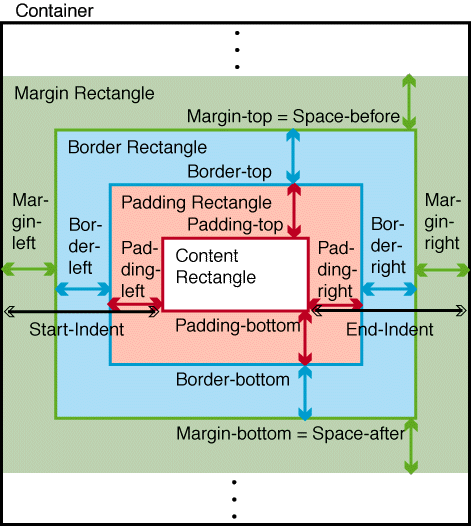
Rectangular Area with Padding and Border and Associated Spaces
This model identifies a number of specific
rectangles:
NOTE: These are parallel to concepts in CSS, called the
padding area and border area, respectively.
All rectangular areas have traits that are derived either
from properties or other traits as follows:
The trait is directly derived
from the computed value of the property with the same name
on the formatting object that generated the area,
or
The trait is derived by a computation using
some set of values of other traits or computed values of
properties on the formatting object that generated the
area.
Background,
border,
and padding are directly derived traits.
The "writing-mode" property determines several
directions used for rectangular area placement:
Inline-areas have a
designated position-point.
This model defines, the descender-depth of
a glyph-area to be how
far it extends in the line-progression-direction from
the position-point,
and the ascender-height to
be how far it extends in the opposite direction. Similar definitions
may be made for more complex inline-areas.
The edges of any rectangle associated with a rectangular area
are identified by their relative direction, based on the
"writing-mode".
NOTE: In European writing systems, these are the "top"
and "bottom"
edges, and "left" and "right" edges, respectively, and "ascender-height" and "descender-depth" have their
usual meanings.
A rectangular area is immediately contained in another rectangular
area if that first rectangular area is contained within the second
rectangular area and there is no other area which contains the first
rectangular area and is contained in the second rectangular area.
For every rectangular area A and its immediately containing rectangular area B,
the rectangular area A is the either initial in
B or it has a preceding rectangular area C (in B).
The rectangular area A is an initial rectangular area if (a) A is a
block- or line-area
and it is the first such area in the
block-progression-direction
in the immediately containing area B,
or (b) A is an inline-area
and it is the first such area in the
inline-progression-direction
in the immediately containing area B.
If A is not an initial rectangular area, then there is an rectangular
area C that immediately precedes the rectangular area to A in the
appropriate direction (block-progression-direction
if A is a block- or line-area
and
inline-progression-direction
if A is an inline-area).
C is called the "rectangular area" preceding A or the
"preceding rectangular area". By analogy, the final
rectangular area and the following rectangular area are
similarly defined (mutatis mutandis).
For spaces, a space precedes a rectangular area A
if it is (a) on the before-edge of a block-
or line-area or (b) is on the
start-edge of an inline-area. The space is an initial space if it precedes
an initial rectangular area. Final space and following space area similarly defined.
Two rectangles associated with a rectangular
area are of particular significance:
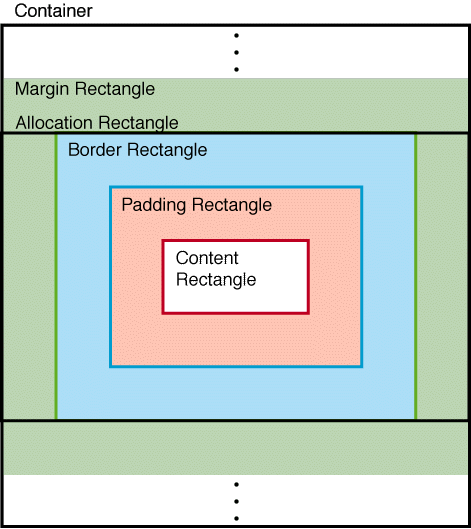
Allocation Rectangle for Block-level Areas
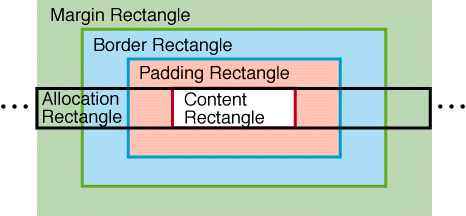
Allocation Rectangle for Inline Area
[Ednote: This diagram should omit the margin rectangle;
the allocation rectangle should extend only to the border.]
Display-spaces adjust
the relative positioning of line-areas
and/or block-areas in the
block-progression direction. They are assigned preceding and following line-areas and block-areas either automatically
by the formatter or as otherwise specified.
A display-space between
two areas (block or line) is specified by a triple of values (minimum,
optimum, maximum) which defines the limits of how the space may
be transformed by later processes such as vertical justification.
In the absence of further processing, the two areas will be separated
by the optimum value, but such processing (or other
specified properties) may reduce it as small
as the specified minimum or stretch it as large as the specified maximum.
A display-space is
thought of as having a before-edge and after-edge separated in the block-progression-direction or
line-progression-direction
by the display-space's value. A display-space value may be
negative, which can cause areas to overlap.
When two or more display-spaces
occur consecutively in the formatted result (with no intervening
rectangular area, space, padding or border), they shall be resolved
into a one or more display-space(s) whose
minimum, optimum, and maximum values are derived according
to the space-resolution-rules,
as described below. These depend on certain specified traits of
the display-space, namely conditionality, block-conditionality,
and precedence. "Consecutive"
is defined formally below.
Rectangular areas and spaces within an area-container are structured
in a tree by containment. An ordering is defined recursively by
defining A to be before B when:
A is a prior sibling of B under the same parent,
or
A is before the parent of B, or
A's parent is before B.
This gives a strict partial ordering of rectangular areas and
spaces of any given page. It's "partial" because if A is contained
(directly or indirectly) in B then this ordering does not place one
before the other.
If A is before B, this model defines that there is an
intervening rectangular
area or space between A and B if there is a rectangular area or
display space C such that A is before C and C is before B.
There is intervening
padding or border between A and B if either
A is contained in a block-area X which is before B and has
non-zero
border
or padding at
the after-edge, or if B
is contained in a block area Y which is after A and has non-zero
padding or border at
the before-edge.
A display space D is consecutively followed by a display space
D' if D is before D', and there is no intervening
rectangular area,
space, border or padding; therefore, D and
D' are consecutive.
When several spaces are assigned to be consecutive, they are
resolved into one or more spaces as follows:
At the beginning or end of an area-container, any conditional-spaces are
suppressed if this has not already been done. At the
beginning or end
of a block-container, any block-conditional-spaces are
suppressed if this has not already been done.
NOTE: Issue: this is to be reworded using the terms
"initial" and "final" rather than "beginning" or "end". In
addition, we do not have a term "block-container" defined.
Is this supposed to be a "block-area" or referring to the
"block" that contains another "block"?
Then, if any space is forcing, all non-forcing spaces are
suppressed. The forcing spaces are not resolved further, but remain
adjacent to one another and thus have an additive
effect.
If all spaces are non-forcing, then the eligible spaces
shall be those with the maximum precedence,
and among these, the space or spaces having the greatest optimum
value. All other spaces are suppressed.
If there is more than one eligible space (i.e.,
with the
same optimum value) the resolved space is taken to have the same
optimum value as the eligible spaces; its minimum value shall be
the greatest of the minimum values of the eligible spaces, and its maximum
value shall be the least of the maximum values. All the spaces shall
be suppressed and the resolved space replaces the
eligible space that comes latest in the tree order (and in particular,
to belong to that space's containing rectangular area).
NOTE: Issue: new language to clarify "tree order" is to
be developed.
However, a space associated with a line-area (e.g., half-leading)
does not merge with any space outside of its immediately
containing block.
The padding of a
block area never merges with any display space. Also note that by
the definition, the presence of non-zero padding
(or border) forces display spaces surrounding
it to be non-consecutive.
The border or padding associated with a rectangular
area may be specified as conditional. For purposes of conditionality, if the border or padding
at the before-edge of the
area are non-zero and not suppressed, then the initial space
within
the area's content-rectangle is not at the beginning of an area-container (and so is
not suppressed in step 1); similarly if the
border or padding at the after-edge of the area are non-zero
and not suppressed, then the final space within the area's
content
rectangle is not at the end of an area-container
Inline-spaces adjust
the relative positioning of adjacent inline-areas,
in the inline-progression-direction. They are assigned
preceding
and following inline-areas,
either automatically by the formatter (e.g., for word-spacing, letter-spacing,
or kerning) or as otherwise specified.
An inline-space is
specified by a triple of values (minimum, optimum, maximum) which
defines the limits of how the space may be transformed by later processes
such as justification. It separates inline-areas
in a direct analogy to the way display-space
separates block-areas.
An inline-space
has a start-edge
and end-edge, separated in the
inline-progression-direction by
the inline-space's value.
An inline-space value
may be negative, which can cause inline-areas
to overlap.
Inline-spaces have conditionality and precedence. Conditional inline-spaces are
suppressed at the start and end of a line-area.
When multiple inline-spaces
are assigned to be adjacent, they are resolved in accordance with
the space-resolution-rules.
NOTE: It is not the intent of this recommendation to specify a particular
algorithm for handling word-spacing, letter-spacing,
kerning or any combination thereof.
It should be seen as describing a series of constraints
that a conforming implementation must satisfy rather than
prescribing any particular algorithm.
An implementation is free to choose any
algorithm that produces output that satisfies the
constraints.
An area-container defines
a coordinate system for its content, which may be oriented differently
from that of its containing area.
The orientation of the coordinate system of the contained area-container
is derived from the coordinate system of the containing area-container
and the "reference-orientation" property on the
formatting object that generates the contained
area-container. The coordinate systems of the contained
area-container is rotated, counter-clockwise, as described in the
description of the "reference-orientation" property.
NOTE: See previous issue on Cartesian coordinate
spaces. Specify the relationship to the position of "top", "right", etc.
The
block-progression-direction
of
an area-container is
derived from its coordinate system and its "writing-mode",
and controls the orientation and placement of block-areas in the area-container. The coordinate-system specifies
the "top", "bottom", "right", and "left" directions, and the
"writing-mode" is specified in terms
of these. The mapping of writing-mode to the various directions
used in this formatting model is in the description of the
"writing-mode" property.
The allocation-rectangle of
an area-container has
a fixed size in the direction perpendicular to its block-progression-direction,
and may have a fixed size in the block-progression-direction,
or may grow to accommodate its content.
Area-containers may be directly contained in larger area-containers, block-areas,
line-areas or inline-areas, or may be uncontained (e.g., a page area).
When an area-container is contained in a larger area-container or block-area, the
area-container is treated as if it were a block-area with respect to
placement in the larger area-container.
When an area-container is contained in a
line-area or inline-area, the area-container is treated as if it were an
inline-area with respect to placement in the inline-area.
Area-containers may directly contain block-areas,
line-areas, or smaller area-containers. The latter
are treated as if they were a block-areas with respect to placement
in the larger area-container.
A block-area's borders and padding are
used by the formatter based on the properties of its
generating flow object.
A block-area's
"writing-mode" is the same as the
writing-mode of the immediate containing area-container.
This determines its
line-progression-direction, which
controls the orientation and placement of
line-areas
in its content-rectangle,
and its inline-progression-direction,
which is used to determine the direction of writing within contained line-areas.
NOTE: Issue: improve language and add information about
the bidi switch.
Block-areas also
have a specified "nominal-font-size" and a "nominal-font-family"
(a list of font names). Other traits include "line-height" (the nominal distance between
the before-edges of successive line-areas), half-leading
(one-half of the difference between "line-height" and
"nominal-font-size"; it may be negative) and "space-before" and "space-after" specifications.
There is also a "line-stacking-strategy" that controls what
kind of allocation-rectangle is used for contained line-areas;
its value is symbolic and is one of "font-height", "max-height", or "line-height".
One derived trait of a block-area is
its nominal-glyph-height,
which is the distance from the maximum ascender-height to the
maximum descender-depth
of the glyph-areas
of the nominal-font.
This depends entirely on the nominal-font and
not on which glyphs (or fonts) are actually present in the block-area.
The allocation-rectangle of
a block-area has fixed
size in the inline-progression-direction, and
varies in the line-progression-direction to
accommodate its content, though this may not grow outside the content-rectangle of
its containing area. (The "overflow" trait
does allow the content to exceed the allocation-rectangle under
limited circumstances. The overflowing data is considered decoration
and is not considered as part of the layout. Overflowing data may be
clipped or may overprint content in other areas.)
A block-area may directly contain line-areas, display-spaces, nested block-areas,
and nested area-containers. Area-containers that are nested in
block-areas are treated as if they were nested block-areas
with the traits of a block-area. Block-areas may be directly contained
in area-containers and higher-level block-areas.
NOTE: Issue: language to be cleaned up to make clear that areas can
"go outside". Also, this still needs work on containment
relationships.
There is no formatting-object that directly corresponds to a line-area. Thus, line-areas are always created
by the formatter. A line-area does not have borders and padding.
A line-area derives its inline-progression-direction from its containing
block-area, and this is used to determine the direction of writing within a line.
It also derives its nominal-font-size, line-height, and
half-leading from its containing block-area. Its
nominal-font-size is used to derive its nominal-glyph-height.
The allocation-rectangle of a line is determined by the value of the
line-stacking-strategy trait: if "font-height", the allocation-rectangle
is the nominal-requested-line-rectangle; if "max-height", the allocation-rectangle
is the maximum-line-rectangle; if "line-height", the allocation-rectangle is the
per-inline-height-rectangle.
NOTE: Issue: improve the language and add information
about bidi-override
These are defined as follows:
The nominal-requested-line-rectangle for
a line-area is the rectangle
bounded in the
inline-progression-direction by
the content-rectangle of
the containing block-area,
as modified by typographic properties such as indents, and in the
line-progression-direction by its nominal-font-size. It has the
same height for each line in a block-area.
The
maximum-line-rectangle for
a line has the same length as the
nominal-requested-line-rectangle
in
the inline-progression-direction.
In the line-progression-direction, it is bounded by the
maximum ascender-height and the
maximum descender-depth for
the actual fonts and inline-areas placed on the line, as raised
and lowered by
"vertical-align" and
other adjustments perpendicular to the inline-progression-direction.
Its height may vary depending on the contents of the line-area.
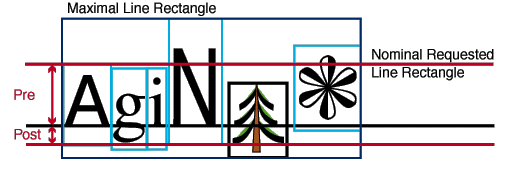
Nominal and Maximum Line Rectangles
The nominal-font is always considered to occur on a line,
and, therefore, the maximum-line-rectangle is at least as tall as the
nominal-font-size so the maximum-line-rectangle always contains the
nominal-requested-line-rectangle.
If the value of leading-method is "per-inline", the line-area's placement will be
affected by another rectangle, the per-inline-height-rectangle.
This rectangle has the same length as the nominal-requested-line-rectangle in
the inline-progression-direction.
For each inline-area we
determine the "line-height" and font-size
for that inline-area and
call half the difference the half-leading for that area. The
expanded-ascender-height is the ascender-height for
the inline-area increased
by the half-leading, and the expanded-descender-depth is the descender-depth increased
in the opposite direction by the half-leading. As in the definition
of the maximum-line-rectangle,
this is raised or lowered according to mandated adjustments perpendicular
to the baseline. The per-inline-height-rectangle extends in the line-progression-direction from
the maximum expanded-ascender-height to
the maximum expanded-descender-depth over
all the inline-areas in
the line-area. Its height
may vary depending on the contents of the line-area.
Inline-areas are placed
within a line-area relative
to a placement-point .
This varies during the placement process, but initially the placement-point is a point
on the start-edge of its content-rectangle, separated from
the before-edge of the nominal-requested-line-rectangle by
a distance equal to the ascender-height for the nominal-font.
Line-areas may directly
contain inline-areas and inline-spaces. They may be
directly contained in block-areas.
[Ednote: We may require special-casing rules for the maximum
line rectangle in cases such as "accented" strings in mathematics,
or ruby or non-spacing superiors.]
The formatter constructs a series of inline-areas
and assigns these to line-areas
according to its line-breaking algorithm.
Inline-areas assigned
to a line-area are placed
in the line-area in their
display order (which may be different from the logical order, when
writing-systems are mixed).
Before an inline-area is
placed, the placement-point of
the line-area may be adjusted
by shifts perpendicular to the inline-progression-direction (e.g.,
for subscript and superscript, or to allow for glyphs with a different
natural alignment from the line-area's
glyph-alignment mode).
Each inline-area is
oriented so that the direction of its escapement-vector matches
the escapement-progression-direction,
and is placed so that its position-point matches the
current placement-point of
the line-area. The escapement-point of the inline-area then becomes the
new placement-point.
Each inline-space is
placed so that its start-edge intersects
the current placement-point,
and the placement-point is
translated in the inline-progression-direction,
to the end-edge of the inline-space. Adjacent spaces
are combined according to the space-resolution-rules.
A conditional-space is
not placed if it is at the start-edge of
the content-rectangle of a line-area, but may be placed
if it follows a non-conditional-space there.
Similarly a conditional-space is not
placed if it is at the end of a line-area,
but may be placed if it precedes a non-conditional-space there.
NOTE: In bidirectional text, the display order is
generated according
to the basic algorithm for display of bidirectional text in the
Unicode Standard, version 2.1.
Preceding and following each line-area assigned
to a block-area, the formatter
assigns display-spaces,
whose conditionality and precedence are determined by
the generating flow object.
The values of these display-spaces
are determined by the presence or absence of the "minimum-leading" trait
and the value of the leading-method trait.
If "minimum-leading" is present
then the value of each of the display spaces is equal to half the
value of "minimum-leading". If not, and
leading-method is not "per-inline", then they are each equal to
half of the difference between the "line-height" and nominal-glyph-height,
as derived from the containing block-area (if
not set explicitly on the inline-area).
If leading-method is "per-inline" and "minimum-leading" is
not present, then the value of the first of the display spaces is
defined to be the difference between the before-edge of
the maximum-line-rectangle and
the before-edge of the
per-inline-height-rectangle, and the value of the second is the
difference between the after-edge of
the per-inline-height-rectangle and the after-edge of
the maximum-line-rectangle.
NOTE: Issue: the above terminology is not current;
however, "line-height", "line-stacking-strategy", etc. all
have to be reviewed again to make certain the terminology is
correct and consistent.
Each display-space is
placed so that its before-edge coincides
with the after-edge of
the allocation-rectangle of
the previous block-area or line-area. Adjacent spaces are
combined according to the
space-resolution-rules.
A conditional-space is
not placed if it is at the before-edge of
the content-rectangle of
an area-container,
but may be placed if it follows a
non-conditional-space there.
Similarly a conditional-space is
not placed at the after-edge,
but may be placed if it precedes a
non-conditional-space there.
Each line-area is placed
so that the before-edge of
its allocation-rectangle matches
the after-edge of the previous display-space, line-area, or block-area, or failing these,
the before-edge of the content-rectangle of
its containing block-area.
The start-edge and end-edges of the allocation-rectangle are placed
to coincide with the corresponding edges of the content-rectangle of
the containing block-area.
Preceding and following each block-area
assigned
to an area-container,
or nested inside another block-area,
the formatter assigns display-spaces,
whose height, conditionality and precedence are determined in
accordance with its space-before and space-after traits, and by
other properties of the generating flow object.
Each display-space is
placed so that its before-edge coincides
with the after-edge of
the allocation-rectangle of
the previous block-area or line-area. Adjacent spaces are
combined according to the space-resolution-rules.
A conditional-space is
not placed if it is at the before-edge of
the content-rectangle of
an area-container,
but may be placed if it follows a non-conditional-space there,
and similarly for the after-edge.
Each block-area is placed
so that the before-edge of
its allocation-rectangle matches
the after-edge of the previous display-space, line-area, or block-area, or failing that,
the before-edge of the content-rectangle of
the containing area-container or block-area.
The start-edge of its allocation-rectangle is
placed parallel to the start-edge of
the content-rectangle of
the closest containing area-container,
and offset from it by a distance equal to the block-area's "start-indent" minus
its start-border and start-padding. Similarly, the end-edge of its allocation-rectangle is
placed parallel to the end-edge of
the content-rectangle of
the closest containing area-container,
and offset from it by a distance equal to the
block-area's "end-indent" minus
its end-border and end-padding.
Area-containers
are either uncontained (e.g., a page area) or are contained
inside
other rectangular areas. When an
area-container is directly
contained by a block-area or
an inline-area, it defines
the content-rectangle of that area. When it is contained in another area-container, its position
is controlled by the x-position and y-position traits, whose values
are distances interpreted in the containing area-container's coordinate
system. Optionally, the x-position may have a symbolic value "left"
or "right", which positions the
area-container at
the left or right edge of the containing area-container; similarly
the y-position may take a symbolic value "top" or "bottom", which
positions the area-container at
the top or bottom edge.
Certain property values are described in terms of compound
datatypes, in terms of restrictions on permitted number values, or
strings with particular semantics.
The compound datatypes, such as space, are represented in the
result tree as multiple attributes. The names of these attributes
consist of the property name, followed by a period, followed by
the component name. For example a the "space-before" property may
be specified as:
space-before.minimum="2.0pt"
space-before.maximum="4.0pt"
space-before.optimum="3.0pt"
space-before.precedence="0"
space-before.conditionality="0"
The following datatypes are defined:
A string of characters conforming to the XML NMTOKEN definition.
A string of characters conforming to the XML NMTOKEN definition
that is unique within the stylesheet.
A string of characters conforming to the XML NMTOKEN definition
that matches an ID property value used within the stylesheet.
A boolean value where the allowed values are the strings
'true' and 'false'.
A single unicode character value--whitespace is not allowed.
A signed length value where a 'length' is a real number plus a unit
qualification. .
An unsigned length value including zero where a 'length' is a real
number plus a unit qualification.
A positive length value not including zero where a 'length' is a
real number plus a unit qualification.
A signed integer value which consists of an optional '+' or '-'
character followed by a sequence of digits.
An unsigned integer value including zero which consists of a
sequence of digits.
An unsigned integer value not including zero which consists of
a sequence of digits.
A percentage which is a signed real value (e.g. 45.5 is 455/1000).
A color specification where '#xxxxxx' is an RGB value encoded in hexidecimal or a named color.
Ed. Note: How does other color spaces get encoded?
Ed. Note: What set of "named colors" will we use?
A signed real number which consists of an optional '+' or '-'
character followed by a sequence of digits followed by an optional '.'
character and sequence of digits.
An unsigned real number including zero which consists of a sequence
of digits followed by an optional '.' character and sequence of digits.
An unsigned real number not including zero which consists of a
sequence of digits followed by an optional '.' character and sequence
of digits.
A compound datatype consisting of a minimum, maximum, and optimum
length, and values for precedence and conditionality.
A sequence of characters conforming to a URI value as specified in
the URI specification.
Ed. Note: This should refer to the proper specification.
A string of characters conforming to the xml:lang attribute value
from XML 1.0
A string of characters conforming to an ISO 3166 country code.
A string of characters identifying a font.
Ed. Note: Shouldn't this have a standardized format?
A list of font names separated by whitespace.
A enumerated list of XML NMTOKEN values.
A sequence of characters.