

Installable Unit Package Format
Specification Version 1.0
W3C Member
Submission 12 July 2004
- This version:
-
http://www.w3.org/submissions/2004/SUBM-InstallableUnit-PF-20040712/
- Latest version:
- http://www.w3.org/submissions/InstallableUnit-PF/
- Authors:
- Heng Chu, IBM Software Strategy, hengchu@us.ibm.com
(Editor)
- Christine Draper, IBM Autonomic Computing Architecture,
cdraper@uk.ibm.com
- Marcello Vitaletti, IBM Autonomic Computing Architecture,
marcello.vitaletti@it.ibm.com
- Randy George, IBM Tivoli Architecture, randyg@us.ibm.com
- Julia McCarthy, IBM SWG Componentization Architecture,
julia@us.ibm.com
- Devin Poolman, Zero G Software, devin.poolman@zerog.com
- Tim Miller, Zero G Software, tim.miller@ZeroG.com
- Art Middlekauff, InstallShield Software Corp.,
artm@installshield.com
- Carlos Montero-Luque, Novell, carlos@novell.com
This document is also available in these non-normative formats:
PDF.
Copyright ©2004
InstallShield Software
Corporation, International
Business Machines, Inc., Novell, Inc., Zero G Software, Inc.. This document is
available under the W3C
Document License. See the W3C
Intellectual Rights Notices and Disclaimers for additional
information.
Abstract
The purpose of this
specification is to describe a common installable unit package
format used in the solution installation architecture. This package
format is compatible with existing standard or de facto standard
formats. The design pattern allows the solution installation
architecture to encapsulate and use the existing install
technologies for the various hosting environments. In particular,
the artifacts can be standard or de facto standard packages on the
target hosting environments. The actual install behavior is
delegated to the install technologies for the hosting environments.
The differences in various hosting environments (package format,
install capabilities, etc.) are encapsulated in the deployment
descriptor which provides a common and consistent view of the
installable units and the install capabilities. This design allows
deploying legacy products or products not created specifically for
the solution installation architecture.
By publishing this document, W3C acknowledges that International
Business Machines, Inc. and Novell, Inc.
have made a formal submission to W3C for discussion. Publication of
this document by W3C indicates no endorsement of its content by
W3C, nor that W3C has, is, or will be allocating any resources to
the issues addressed by it. This document is not the product of a
chartered W3C group, but is published as potential input to the
W3C Process. Publication of
acknowledged Member Submissions at the W3C site is one of the
benefits of W3C
Membership. Please consult the requirements associated with
Member Submissions of
section 3.3 of the W3C Patent Policy. Please consult the
complete list of acknowledged W3C Member
Submissions.
1
Document Control 5
1.1
Contributing Authors.
5
2
Introduction.
6
2.1
Objective.
6
2.2
Audience.
6
2.3
Scope.
6
2.4
Notational Convention.
7
2.5
Background.
7
3
Installable Unit Package.
9
3.1
Logical Layout 9
3.1.1
Manifest Files.
9
3.1.2
Files Defined in the Deployment Descriptor 11
3.1.3
Required Files.
11
3.1.4
Optional Files.
12
3.2
Aggregation.
13
3.2.1
In-line Aggregation.
14
3.2.2
External Aggregation.
14
4
Media Descriptor.
16
4.1
Overview and UML Representation.
16
4.2
Deployment Descriptor Information.
19
4.3
File Binding Information.
20
4.3.1
Logical Source.
21
4.3.2
Default Logical Source.
26
4.4
File Binding Rules.
26
5
Package Types.
29
5.1
Single Zip File.
29
5.1.1
Manifest Files.
29
5.1.2
Non-Manifest Files.
30
5.1.3
Aggregating IU ZIP Packages.
31
5.2
Fixed-sized Removable Media.
31
5.2.1
Manifest Files.
33
5.2.2
Non-Manifest Files.
34
5.2.3
An Example.
34
5.3
Network Location.
34
5.3.1
Manifest Files.
35
5.3.2
Non-Manifest Files.
35
5.4
Single Executable.
35
6
Security.
37
6.1
Signing IU Packages.
37
6.1.1
File Digest Values in the Deployment Descriptor 38
6.1.2
Digest Value of the Entire Deployment Descriptor 39
6.1.3
Requesting a Public Key Certificate.
39
6.1.4
Issuing a Public Key Certificate.
40
6.1.5
Creating Digital Signature.
40
6.2
Verifying Signed IU Packages.
40
6.2.1
Authenticating Certificate.
41
6.2.2
Retrieve Public Key.
41
6.2.3
Authenticating Signed Media Descriptor 41
6.2.4
Verifying the Deployment Descriptor 42
6.2.5
Verifying the Files.
42
7
Language Resource Bundles.
43
7.1
Key Design Requirement 43
7.2
Packaging Language Resource Bundles.
44
7.3
Language Resource Bundle ZIP File.
45
7.4
Security Consideration.
45
7.5
An Example.
45
8
Relationship with Installer Technologies.
47
9
Relationship with Existing Package Formats.
48
9.1
Existing Formats.
48
9.1.1
J2EE.
48
9.1.2
Platform Package Formats.
49
9.1.3
OSGi Bundles.
49
9.1.4
Grid Services Deployment 49
9.1.5
Eclipse.
50
9.1.5.1
Packaging Construct 50
9.1.5.2
Installation.
50
9.1.5.3
Relationship with Installable Unit Packages.
51
10
Tooling.
52
10.1
Packaging.
52
10.1.1
Non-interactive Build Capabilities.
52
10.1.2
Validate the Packages.
52
10.2
Subset Repackaging.
53
10.2.1
Standalone GUI 53
10.2.2
Re-signing the New Package.
54
10.2.3
Validation of the New Packages.
54
10.3
Installer.
54
11
Package Examples.
55
11.1
A Simple Product 55
11.2
J2EE Application Server Kernel 56
12
Media Descriptor Samples.
58
12.1
A Media Descriptor for a ZIP Package.
58
12.2
A Media Descriptor for a Package on CD-ROMs.
59
12.3
A Media Descriptor for a Package in a Network Location.
61
12.4
A Simple Media Descriptor Using Default Logical Source.
62
13
Glossary of Terms.
64
References.
65
Appendix A
media.xsd.
67
The owner of this document
is:
|
Heng Chu
|
Software Strategy
|
hengchu@us.ibm.com
|
The following persons have contributed to this
document:
|
Heng Chu
|
IBM Software
Strategy
|
hengchu@us.ibm.com
|
|
Christine Draper
|
IBM Autonomic Computing
Architecture
|
cdraper@uk.ibm.com
|
|
Marcello Vitaletti
|
IBM Autonomic Computing
Architecture
|
marcello.vitaletti@it.ibm.com
|
|
Randy George
|
IBM Tivoli
Architecture
|
randyg@us.ibm.com
|
|
Julia McCarthy
|
IBM SWG Componentization
Architecture
|
julia@us.ibm.com
|
|
Devin Poolman
|
Zero G Software
|
devin.poolman@zerog.com
|
|
Tim Miller
|
Zero G Software
|
tim.miller@ZeroG.com
|
|
Art Middlekauff
|
InstallShield Software
Corp.
|
artm@installshield.com
|
|
Carlos Montero-Luque
|
Novell
|
carlos@novell.com
|
An installable unit is a logical component
that can be selected for installation. An installable unit package
(or packaged installable unit) contains files to be installed,
files that implement change management operations, and a set of
manifest files which include a deployment descriptor that describes
the install characteristics of the installable unit, and a media
descriptor that describes the binding (or physical locations) of
the files. This document describes installable unit package
format.
The main objective of this document is to
define a common installable unit package format consistent with the
solution installation architecture. Packages in this format need to
be installed in local or distributed environments. Different
package types are defined for a single Zip file, fixed-sized
removable media, and network location. Other formats may be
accommodated in the future. Installable unit packages can be used
with packages in existing (de facto or de jure) packaging
standards.
This document is intended as a technical
specification for people who require an in-depth understanding of
the common installable unit package format. This will include
developers of application or solution installable unit packages,
developers of applications for deploying solution packages, and
tooling for constructing install packages.
This document specifies the common
installable unit package format and related design. In particular,
the following areas will be covered in this document.
1.
Package structure
2.
Physical packages
3.
Security model
4.
Relationship with existing install technologies and package
standards
5.
Tooling
Relevant designs not covered in this document
can be found in other ACAB documents.
The key words “MUST,” “MUST
NOT,” “REQUIRED,” “SHALL,”
“SHALL NOT,” “SHOULD,” “SHOULD
NOT,” “RECOMMENDED,” “MAY,” and
“OPTIONAL” are to be interpreted as described in
[RFC2119].
Figure 1 depicts an important concept in the
solution installation architecture. The install package for an
installable unit (IU) consists of two major parts: a deployment
descriptor (DD) that describes the contents, and one or more
artifacts that can be installed. An IU – or specifically the
artifact in the IU – will be installed on a hosting
environment. Examples of hosting environments include hardware,
operating systems, J2EE application servers, etc.
This document describes a common installable
unit package format used in the solution installation architecture.
This package format is compatible with existing standard or de
facto standard formats. As shown in Figure 1, the design pattern
allows the solution installation architecture to encapsulate and
use the existing install technologies for the various hosting
environments. In particular, the artifacts can be standard or de
facto standard packages on the target hosting environments. The
actual install behavior is delegated to the install technologies
for the hosting environments. The differences in various hosting
environments (package format, install capabilities, etc.) are
encapsulated in the deployment descriptor which provides a common
and consistent view of the installable units and the install
capabilities. This design allows deploying legacy products or
products not created specifically for the solution installation
architecture.
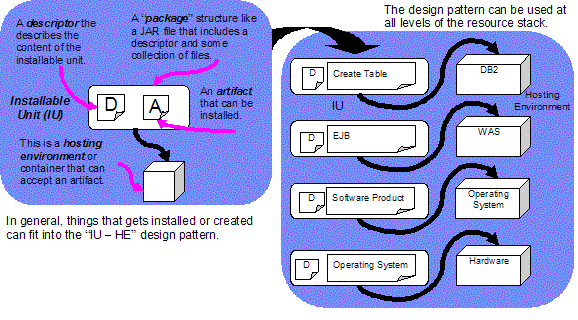
Figure 1 Installable Unit and Hosting
Environment Design Pattern
The following sections describe the format of
the installable unit packages to be deployed, the package contents,
the relationship with the hosting environment package formats, and
related tooling.
An IU package can be in one of many physical
formats. Although those formats are different, they are all based
on a common logical layout. In this section, the IU package logical
layout is described. Different types of files in an IU package and
their relationships will be identified. The physical package format
will be described in Section 5, “Package Types.”
Figure 2 illustrates the logical view of an
IU package. There are three groups of files in an IU package: the
manifest files, required files, and optional files. The purposes
and relationship of those files will be described in this section.
Detailed description of those files, in particular the manifest
files, will be provided in the following sections and other
specifications.
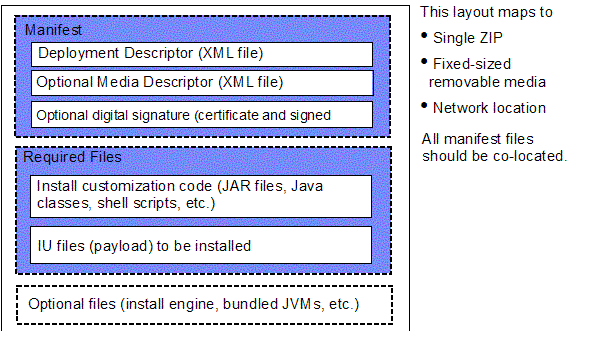
Figure 2 IU Package Layout Logical View
The manifest files provide standard ways for
providing the IU package information. Standard manifest files
enable the IU packages to be processed without human intervention
(or, silently). This is in particular important to enable IU
packages for autonomic or on-demand environments. Without the
standard manifest files, each IU package has unique install
information that requires human examination and sometimes
modification before the IU package can be processed silently. This
manual step may be unnecessary if standard manifest files are used
to describe the IU packages.
The following three types of manifest files
are included in an IU package:
1.
Deployment descriptor: This is an XML document (in the IUDD
[ACAB.SD0402] schema) that describes the install characteristics of
the IU packages. This descriptor might reference other deployment
descriptors ([ACAB.SD0402]) which could also be located in the same
IU package.
The name of the deployment descriptor file must be
“packagedIU.xml.” Please
refer to ACAB specification ([ACAB.SD0402]) for details of the XML
schemas.
2.
Media descriptor: A deployment descriptor specifies
what files are in the IU package, but not where they
are. File paths are relative to logical sources. A media
descriptor is an XML document that describes, among other things,
the physical locations for logical sources of the files defined in
the associated deployment descriptor. So an IU can be packaged in
different physical formats with the same deployment descriptor, and
may have unique media descriptors for each physical format.
A media descriptor is needed when file binding
information is complicated. For example, if an IU package spans
multiple fixed-sized removable media (such as CD-ROM), a media
descriptor is needed to describe the physical file locations that
involve the media identification and path within the media.
A media descriptor is optional. If it is not present, a
single logical source is assumed for every file in the IU package,
and a default physical location is used unless it is overridden by
the installer.
The name of the media descriptor file must be “IUMedia.xml.” Section 4,
“Media Descriptor”, has more details about the media
descriptor and the related schema.
3.
Digital signature: This is a binary file that identifies the
IU package and the vendor who created it. Digital signature files
are used to verify that the IU package has not been tampered with
since it was created, and the signer (vendor) is really who it says
it is. A digital signature is optional. If present, a digital
signature should be co-located with the associated media
descriptor.
Section 6, “Security”, has more details about the IU
package security architecture.
The current design does not define a
“main” manifest file that contains path information for
all the other manifest files such as deployment descriptor and
media descriptor. Thus, the manifest files for the IU are
co-located and have fixed file names. This design allows references
for one manifest file to lead to other manifest files and thus the
complete package. A main manifest file might be introduced in
future versions so the co-location restriction can be removed.
Most files in the IU packages are defined in
the deployment descriptor (packagedIU.xml) using the
<file>
elements. The following information, among others, is defined for
each file in the deployment descriptor (see [ACAB.SD0402] for more
details), and will be referenced in this specification.
·
Identifier (the “id” attribute): This is
the key used to reference the associated file from the media
descriptor (see Section 4, “Media Descriptor”) or
elsewhere in the deployment descriptor via the <fileIdRef> attribute or
element (see [ACAB.SD0402]).
·
File pathname (the “pathname” child element):
This is the file pathname in the IU package, and may be overwritten
in the media descriptor (see Section 4.3, “File Binding
Information”). The physical location of the file depends on
the physical package format (see Section 5, “Package
Types”), and is defined based on the file binding rules (see
Section 4.4, “File Binding Rules”).
·
File size (the “length” child element):
This is the file size that may be used to verify the physical file
(see Section 6, “Security”).
·
File digital signature (the “checksum” child element):
This is the file signature based on one of several message digest
algorithms (CRC32, MD2, MD5, and SHA). This information may be used
to verify the physical file (see Section 6,
“Security”).
There are two types of non-manifest files
that will be required during the installation process. These files
must be specified in the deployment descriptor, and are mapped to
physical locations via the media descriptor.
1.
Install customization code: Those are the files used to
implement custom install logic. They are specified in artifact
descriptors (see [ACAB.SD0402]). Such custom code can be in
external files (such as native OS commands) or packaged as
part of the IU packages. In the latter case, the custom code is
packaged just like other files and the binding information is
specified in the media descriptor.
In the case of the multiple fixed-sized removable media packages
(such as CD-ROMs), the custom code of the IUs (including the
aggregated ones) should be put on the first media so it does not
require access to other media to execute the custom code.
Unnecessary media swapping should be avoided. In the IUDD spec
[ACAB.SD0402], files containing custom code are not specified
explicitly (using special XML elements). However, since files
containing custom code are referenced in XML elements for custom
commands, those files can be identified and moved to the first
removable media by examining how they are referenced in the
deployment descriptor.
2.
Files to be laid down during installation: Also called
“payload,” those are the files to be copied to the
target host during installation. Examples include the Java class
files, shared libraries, executables, DLL, etc.
Binding information for those files is specified in the
media descriptor (see Section 4.3, “File Binding
Information”).
Since symbolic links are not supported
consistently in all physical formats and the behaviors vary on
different platforms, symbolic link support must not be assumed for
IU packages. For example, ZIP files can not contain symbolic links,
UNIX system symbolic links behave differently from the shortcuts on
Windows. As a result, symbolic links can not be maintained in IU
packages. Symbolic links should be created during installation
using, for example, the <addLink> element (see
[ACAB.SD0402]).
There are non-manifest files in an IU
packages that are specified in neither the deployment descriptor
nor the media descriptor. These files may be used by a particular
installer technology during installation, or may provide useful
information (such as “readme” files) that helps users
install the package. They are usually included in IU packages to
make the packages self-contained (for example, an executable JAR
package file for Java-based install technologies) so the packages
can be installed without additional prerequisites. This is also an
important usability feature that allows vendor-specific functions
to be included in the IU packages.
The only requirement for those files is that
the installation of the IU package must not depend on the presence
of those optional files. Namely, if the optional files are removed
from the IU package and the resulting IU package is still valid and
can still be installed according to the information specified in
the deployment descriptor.
For example, for a Java-based install
technology, the optional files could include the install engine,
bundled JVMs (to be extracted and installed first on the target in
order to execute the install engine), etc. In this case, the IU
package is self-contained and the packaged install engine can be
invoked to install the IU package. Those optional files can be
safely removed from the IU package since the package without the
optional files can still be installed using an external install
engine that knows how to process IU packages.
Another example is that an install vendor
could provide additional files containing help or information that
provides guidance in aggregating the IU. This information may be
used by the specific vendor installation IDE to improve
usability.
An installable unit, or IU, package (the
aggregating IU) may aggregate other IU packages (the
aggregated IUs). The aggregation relationship is defined in
the deployment descriptor of the aggregating IU by specifying
linkage to the deployment descriptor of the aggregated IUs. This is
defined in the IU deployment descriptor specification and related
XML schema (see [ACAB.SD0402]).
There may be multiple levels of aggregation.
However, examples in this section use a single level of
aggregation.
Aggregated IUs may be included
“in-line” in the aggregating IU, or referenced
externally from the aggregating IU. Based on the aggregation
relationship, aggregated IU packages may exist in the aggregating
IU package or in an external package for the aggregated IU. Thus,
when an IU aggregates other IUs, there may be multiple IU packages
(including the one for the aggregating IU) required to be processed
in order to deploy the aggregating IU.
Figure 3 illustrates an example of in-line
and external IU aggregation. In-line and external aggregation
relationships will be described in detail in the following
sections.
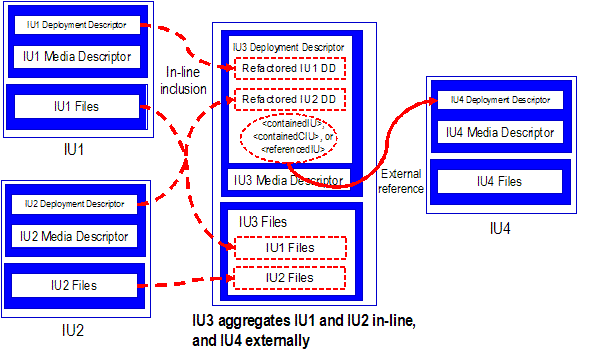
Figure 3 In-line and External IU Aggregation
When an IU is aggregated in-line, its package
contents are included as part of the aggregating IU package. Such
aggregation should be conducted by a package creation tool (see
Section 10, “Tooling”).
The aggregated IU deployment descriptor
contents are refactored and included in the aggregating IU
deployment descriptor. In the IUDD schema, the <installableUnit> element
defines in-line aggregation relationship using Smallest Installable
Unit (SIU), Configuration Unit (CU), Container Installable Unit
(CIU), or Solution Module (SM), each of which specifies in-line
aggregated IU.
For example, in Figure 3, IU1 deployment descriptor is
included as part of IU3 deployment descriptor.
The process of refactoring aggregated IU
deployment descriptors for in-line aggregation is dependent on the
aggregation relationships as defined in the aggregating IU
deployment descriptor (see [ACAB.SD0402]), and is outside of the
scope of this specification.
In-line aggregation is used when the
aggregated IU contents are available at the time of creating the
package of aggregating IU. The aggregated IU files are specified in
the aggregating IU (via the <file> element), and they are
packaged in the aggregating IU package. Those files can be bound or
relocated, like other aggregating IU files, through the aggregating
IU media descriptor.
For example, in Figure 3, IU1 files are part of
IU3 package and can
be bound by the IU3
media descriptor.
When an IU is aggregated through external
references, its package exists separately in its entirety. The
aggregation relationship is defined via the use of elements of the
type iudd:ReferencedIU that
references the deployment descriptor of the aggregated IUs.
Such elements include the <containedIU>,
<containedCIU>,
and <referencedIU> elements (see
[ACAB.SD0402]).
The aggregated IU package is a complete IU
package that has manifest and packaged files. Since all manifest
files are co-located, through the reference to the deployment
descriptor, the media descriptor and other package files of the
aggregated IU can be located.
The external
reference is reference to a <file
> element that can be bound or remapped through the media
descriptor of the aggregating IU. This is illustrated in
Figure 4.
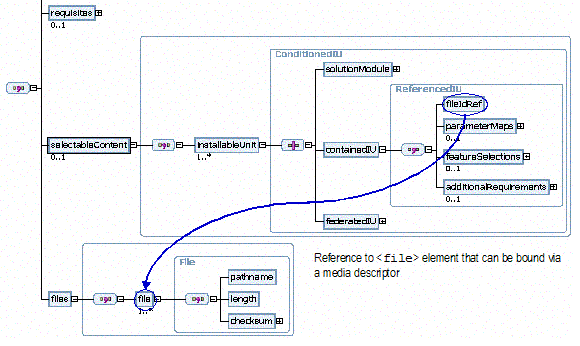
Figure 4 IUDD Schema: External IU
Aggregation
The location and package type of the
aggregated IU are flexible. Through the use of the media descriptor
(see Section 4, “Media Descriptor”), the deployment
descriptor location can be a local path, a folder in a ZIP file, a
folder on a removable media, or any location in the network. This
flexibility allows the aggregated IU package to be a single ZIP
file, files on removable media, or files in local or network file
systems (see Section 5, “Package Types”).
For example, in Figure 3, IU4 is aggregated by
IU3 through external
reference. IU4 media
descriptor and associated packaged files can be located via the
location of the deployment descriptor. The IU4 package can be a ZIP file, a
set of files on fixed-sized removable media, or a set of files in
local or network file systems.
An externally aggregated IU package may be
included as part of the aggregating IU package. Through the
reference to its deployment descriptor, the aggregated IU package
can be identified and manipulated (such as extraction). For
example, in Figure 3, IU4 package can be a ZIP file
inside the IU3 ZIP
package. IU4 ZIP
package can be identified (through the reference in the deployment
descriptor) and extracted if necessary.
There is no special requirement on how the
pathnames (or file structure) for the referenced IU deployment
descriptors should be arranged in the referencing IU. However, in
the case of fixed-sized removable media, all (root or referenced)
IU deployment descriptors should be located in specific folders on
the first media, regardless of what is defined in the root IU
deployment descriptor. This should be done through the use of media
descriptor (see Section 4, “Media Descriptor”).
The deployment descriptor specifies
what files are in an IU package, but not where they
are. Information about the file physical location (the
binding information) is kept in a separate, optional media
descriptor. This allows the same deployment descriptor to be used
for different physical packages. Each physical IU package may have
a media descriptor providing file binding information that
describes specifically where each file is physically located. Only
the files specified in a deployment descriptor can be bound in the
associated media descriptor. If a file needs to be bound and
accessed via the media descriptor, it must be specified in the IU
deployment descriptor.
A media descriptor is optional. If it is not
present, all files specified in the deployment descriptor have
paths relative to the location of the deployment descriptor in the
package. An installer can choose to override this default value
via, for example, an install parameter.
There is at most one media descriptor per IU
package to provide binding information for files defined in the
deployment descriptor. If an IU package is aggregated in another IU
package (see Section 3.2, “Aggregation”), the
referenced deployment descriptor may have an optional associated
media descriptor for the aggregated IU.
The following information is kept in a media
descriptor:
1.
The corresponding deployment descriptor path name relative to the
media descriptor.
2.
A default logical source may be defined and apply to files that are
not explicitly bound in this media descriptor
3.
Physical locations of the files in this package
4.
Optionally the media descriptor can override the file path for
selected files. This feature can be used to map to common files
shared by several IUs.
Note the path overridden is the location of the file within the
package (see Section 5, “Package Types”). If the file
path in the deployment descriptor is used for other purposes (for
example, for intended install location), the original value in the
deployment descriptor can still be used.
The UML class diagram in Figure 5 identifies
the media descriptor structure and the relationship to the IU
deployment descriptor.
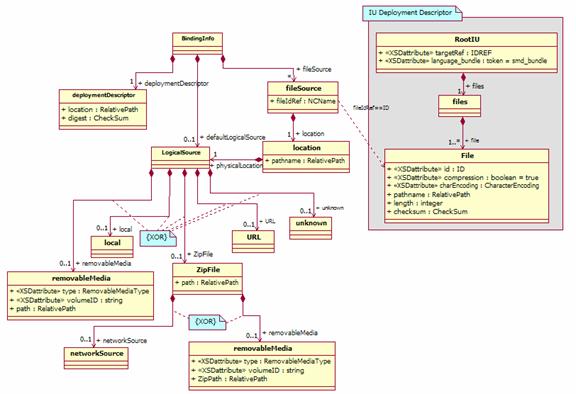
Figure 5 Media Descriptor Structure
The media descriptor XML schema overview is
shown in
Figure 6.
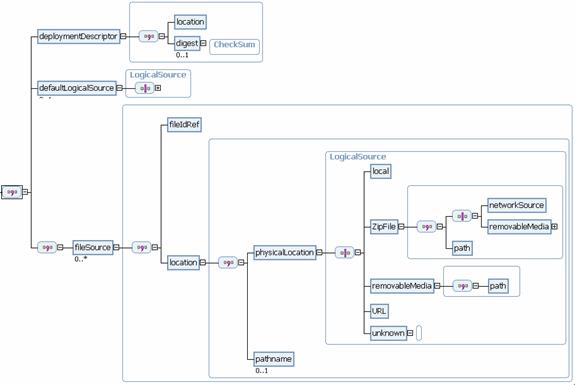
Figure 6 Media Descriptor Schema
Overview
The root element in a media descriptor is
<binding> of
type BindingInfo
which consists of the following information:
1.
Element deploymentDescriptor
The associated IU
deployment descriptor. See Section 4.2.
2.
Element fileSource
The physical location, or the
binding information, of the files specified in the IU
deployment descriptor. A file defined in the IU deployment
descriptor has at most one fileSource element in the
associated media descriptor. See Section 4.3.
3.
Element defaultLogicalSource
This is the default physical location for files not explicitly
bound via the fileSource element. This element
is optional. See Section 4.4.
The relationship between the deployment
descriptor and the media descriptor is illustrated in
Figure 7. Details
will be given in the remainder of this section to show how a media
descriptor provides binding information for the associated
deployment descriptor.
Note that the file size and digest
information are specified in the deployment descriptor and
cannot be overridden in the associated media descriptor.
This ensures the file contents remain the same as they were when
the deployment descriptor was created. These two pieces of
information are used in signing and verifying IU packages (see
Section 6, “Security”). Again, the media descriptor can
only specify where the files are, not what they
are.
Through the use of media descriptors,
different files – as defined in the same or different
deployment descriptors – can be mapped to the same
physical file. This provides flexibility for reducing the IU
package size by sharing files.
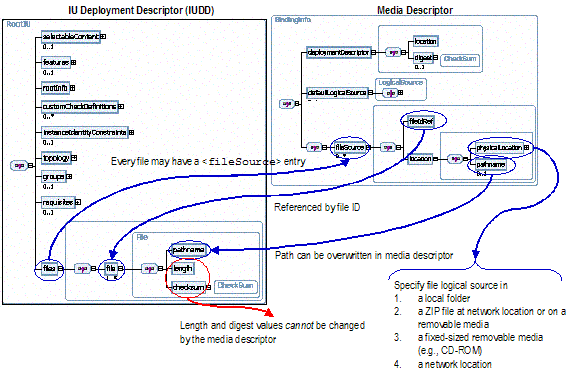
Figure 7 Deployment Descriptor and Media
Descriptor
A media descriptor specifies the associated
deployment descriptor information via the following elements:
·
Element location [type=base:RelativePath]
This is the deployment descriptor physical path. The path is
relative to the media descriptor and links the media descriptor to
the associated deployment descriptor. The current design requires
deployment descriptor and media descriptor be located in the same
folder and have fixed names, thus this path name is fixed and has
‘packagedIU.xml’ as the
value.
In the future this pathname can be used to locate the deployment
descriptor if manifest files do not have fixed names or are located
at different locations.
·
Element digest [type=base:CheckSum]
This is the optional message digest for the entire
deployment descriptor. The optional digest value is used for
security purposes (see Section 6, “Security”).
Below is the XML schema fragment for the
deployment descriptor information in a media descriptor.
<element
name="deploymentDescriptor">
<complexType>
<sequence>
<!-- The IUDD (deployment descriptor) path relative to the
media
descriptor -->
<element name="location" type="base:RelativePath"/>
<!-- The digest value for the entire deployment descriptor
-->
<element name="digest" type="base:CheckSum"
minOccurs="0">
<annotation>
<documentation>
This is the digest value for the entire deployment
descriptor.
</documentation>
</annotation>
</element>
</sequence>
</complexType>
</element>
Files specified in a deployment descriptor
have paths relative to logical sources. A logical source,
depending on the package types, can be mapped to any physical
location. This allows the files to be packaged in a way that meets
the user scenarios and needs. The mapping of logical sources is
defined in the media descriptor.
If a media descriptor is not present, the default value of the
logical source for all files defined in the deployment
descriptor is the folder of the deployment descriptor.
The logical source information for a file
consists of the following elements:
·
Element fileIdRef [type=NCName]
This is the value of the attribute ID for the corresponding
file element in the
IU deployment descriptor (see Figure 5 and Figure 7). For any
fileIdRef, there
must be a corresponding file element with a matching
ID value in the
associated deployment descriptor. For any file in the deployment
descriptor, there should be at most one corresponding entry in the
media descriptor.
Below is the XML schema fragment for the fileIdRef element.
<element
name="fileSource" minOccurs="0" maxOccurs="unbounded">
<complexType>
<sequence>
<!-- The id for the iudd:File entry -->
<element name="fileIdRef" type="NCName">
<annotation>
<documentation>
This is the 'id' attribute of the iudd:File element in
the IUDD file associated with this media descriptor.
</documentation>
</annotation>
</element>
·
Element location [anonymous type]
For the
specific file, this element defines the physical location of the
logical source, and optionally overrides the file path. The
physical location of the specific file is the logical source plus
the file path.
A media descriptor can only specify the physical locations for the
logical sources, or override the file path. It can not modify the
file sizes and digest values.
The location element consists of the
following elements:
·
Element physicalLocation [type=media:LogicalSource]
This is the physical location of a file logical source. The
physical location for a logical source can be a local path, a path
in a separate ZIP file, a path on a fixed-sized removable media
(such as CD-ROM), or any network location.
A physical location is of the type the media:LogicalSource which is
described in Section 4.3.1.
·
Element pathname [type=base:RelativePath]
This optional element defines a new file path relative to the
physical logical source. If the file path is specified in the media
descriptor, the one in the deployment descriptor will be
ignored.
Below is the XML schema fragment for the pathname element.
<!-- Optional new pathname. This value will override the
one defined in the
deployment descriptor. -->
<element name="pathname"
type="base:RelativePath" minOccurs="0">
<annotation>
<documentation>
Optional new pathname.
This allows mapping to
different file path (including file name). If this
is specified, the pathname in the 'file' element
of the deployment descriptor is ignored. This path
is relative to the physical source identified in
the "physicalLocation" element.
</documentation>
</annotation>
</element>
The LogicalSource type specifies one
of the following physical location types:
·
Element local [type=base:RelativePath]
This is a path relative to the media descriptor folder (which could
be in a ZIP file, file system, network location, or fixed-sized
removable media). This is typically used when the IU package is a
ZIP file or located in a network location. For example, if the
media descriptor is in the /META-INF/ folder of a ZIP file,
and a file is located in the /FILES/ folder, the logical
source should be a local path ‘../FILES.’
Below is the XML schema fragment for the local element.
<choice>
<!-- Local. Relative to the
folder of the media descriptor. For example,
in a ZIP file, this is relative to
the /META-INF folder -->
<element name="local"
type="base:RelativePath">
<annotation>
This
specifies a local path relative to the folder of the
media
descriptor.
This path is
a relative path and cannot begin with '/'.
</annotation>
</element>
·
Element removableMedia [anonymous type]
This element specifies a location in a fixed-sized removable media
such as a CD-ROM. Such location is identified through the volume
identifier and a path in the volume.
Fixed-sized removable media (for example, CD-ROM and DVD) is a
common package format for installation. Files could be located on
such media. Due to its fixed-sized nature, there could be multiple
volumes for large IU packages. For files located on such media, a
volume identifier is given and a path relative to the specified
volume root is specified.
The removal media information is specified by
·
Element path [type=base:RelativePath]
The file location on the media. This is always a relative path and
is relative to the root of the media.
·
Attribute type [type=media:RemovalMediaType]
This specifies the type of the media where the ZIP is located.
Currently the supported media types (as defined in the
“RemovableMediaType” type)
are: CD-ROM, DVD, Diskette, and others.
·
Attribute volumeID [type=xs:string]
This is the volume identifier for the specific media where the ZIP
file is located. This value is used to identify the media. The
installer processing this information will know how to locate the
physical media based on the volume ID. The logic could be vendor or
installer specific, and is outside the scope of this
specification.
Below is the XML
schema fragment for the removableMedia element.
<!-- Removable Media (CD, DVD, etc.) -->
<element
name="removableMedia">
<annotation>
<documentation>
This support is for fixed size removable media such as CD or
DVD. The package could span multiple such media. The number is
a
positive integer identifying the specific media. The logic of
locating the specific media is outside of the scope of this
schema and spec.
</documentation>
</annotation>
<complexType>
<sequence>
<element name="path"
type="base:RelativePath">
<annotation>
<documentation>
This path is relative to the specific media root. This is
where the filepath is relative to.
This path cannot begin with a "/."
</documentation>
</annotation>
</element>
</sequence>
<!-- The
storage media type. Currently only common storage types
are
supported. It is up to the consumer of the media descriptor to
access each
medai type. Maybe more info about the storage type is
needed.
-->
<attribute name="type" use="required"
type="media:RemovableMediaType">
</attribute>
<!-- The
removable media volume identifier. -->
<attribute name="volumeID"
type="string" use="required"/>
</complexType>
</element>
·
Element ZipFile [anonymous type]
This specifies a folder in a ZIP file. ZIP [ZIP] is a commonly used
compression format but the access to ZIP file is different from the
access to regular file systems – the process requires
decompression of the contents. So locations of this type need to be
specified so installers can properly access the files.
This is typically used in aggregation (see Section 3.2,
“Aggregation”) when the file is a deployment descriptor
in another IU ZIP package. For example, if the file path is
‘packagedIU.xml’ to
indicate an aggregated IU deployment descriptor (through external
aggregation) and the aggregated IU package is a ZIP file, this file
should be mapped to ‘/META-INF/packagedIU.xml’
in the aggregated IU ZIP package.
ZIP files can be located in a network location (including local,
relative locations) or in a fixed-sized removable media such as a
CD-ROM. In either case, a path within the ZIP file is specified
by
·
Element path [type=base:RelativePath]
The file path within the ZIP file. This is always a relative path
and is relative to the root of the ZIP file.
If the ZIP file is
located in the network location, it is specified by
·
Element networkSource [type=xs:anyURI]
This specifies a location on the network. This value can be
absolute or relative. A relative value can be used to specify a
local ZIP file.
If the ZIP file is
in a fixed-sized removable media, it is specified by
·
Element ZipPath [type=base:RelativePath]
This specifies the location of the ZIP file on the media. This is
always a relative path and is relative to the root of the
media.
Note the difference between this value and the above path
element which specifies the file path within the ZIP file.
·
Attribute type [type=media:RemovalMediaType]
This specifies the type of the media where the ZIP is located.
Currently the supported media types (as defined in the
“RemovableMediaType” type)
are: CD-ROM, DVD, Diskette, and others.
·
Attribute volumeID [type=xs:string]
This is the volume identifier for the specific media where the ZIP
file is located. This value is used to identify the media. The
installer processing this information will know how to locate the
physical media based on the volume ID. The logic could be vendor or
installer specific, and is outside the scope of this
specification.
Below is the XML schema fragment for the ZipFile element.
<element name="ZipFile">
<annotation>
This
specifies the folder in a separate ZIP file. The folder is
relative to
the root of the Zip file. The ZIP file can be at any
network
location or on a fixed-sized removable media.
</annotation>
<complexType>
<sequence>
<choice>
<!-- The ZIP file could be at a network location -->
<element name="networkSource" type="anyURI"/>
<!-- Or it could be on a CD/DVD/etc. -->
<element name="removableMedia">
<complexType>
<sequence>
<element name="ZipPath"
type="base:RelativePath">
<annotation>
<documentation>
The ZIP file path on the specific media. The path
is relative to the root and cannot begin with a
"/."
</documentation>
</annotation>
</element>
</sequence>
<attribute name="type" use="required"
type="media:RemovableMediaType"/>
<!-- The removable media volume identifier. -->
<attribute name="volumeID"
type="string" use="required"/>
</complexType>
</element>
</choice>
<!-- Path in the ZIP file relative to the root of
the ZIP file -->
<element name="path"
type="base:RelativePath">
<annotation>
<documentation>
This path is relative to the root of the ZIP file. It is a
relative path and should not begin with a "/."
</documentation>
</annotation>
</element>
</sequence>
</complexType>
</element>
·
Element URL [type=anyURI]
This specifies a location on the network. This is any URI that
allows the file to be anywhere on the network. This can be used to
locate, for example, a deployment descriptor of an external
aggregated IU package which exists on the network.
Below is the XML schema fragment for the URL element.
<!-- Network Location -->
<element name="URL"
type="anyURI">
<annotation>
<documentation>
This points to any network location.
</documentation>
</annotation>
</element>
·
Element unknown [anonymous type]
This specifies that the file is not bound and does not exist at any
physical location. Such files might be bound later either via a
modified media descriptor or directly by install parameters. For
those files, their logical source physical locations are simply
unknown and must be specifically marked as unknown.
The following is the XML schema fragment for the unknown element.
<!-- Unknown Location -->
<element name="unknown">
<annotation>
<documentation>
This indicates that the file is still not bound. Not all
the
files need to be bound in an media descriptor. For example, an
IU ZIP package could reference files located on the network.
The
network locations might not be known when the media
descriptor
in the ZIP file was created.
Media descriptors can have unbound files. However, each file
needs to be bound for the IU package to be processed.
</documentation>
</annotation>
<complexType/>
</element>
</choice>
</complexType>
A default logical source may be explicitly
defined in a media descriptor using the <defaultLogicalSource>
element.
<!--
Optional default logical source that is used for all files that
do not have
corresponding entries in the next section. This value
overwrites
the pre-defined default logical source (which is the
deployment
descriptor location). -->
<element
name="defaultLogicalSource"
type="media:LogicalSource"
minOccurs="0">
<annotation>
<documentation>
This optional default logical source that is used for all files
that do not have corresponding entries in the next section.
This
value overwrites the pre-defined default logical source (which
is the deployment descriptor location).
</documentation>
</annotation>
</element>
This is particularly useful when most of the
files are relative to the same logical source.
The following example shows that, in the
simplest case, all files defined in the deployment descriptor are
relative to a sibling folder ‘FILES’ of the manifest
folder.
<?xml version="1.0" encoding="UTF-8"?>
<media:binding
xmlns:media="http://www.ibm.com/namespaces/autonomic/solutioninstall/MEDIA"
xmlns:xsi="http://www.w3.org/2001/XMLSchema-instance"
xsi:schemaLocation="http://www.ibm.com/namespaces/autonomic/solutioninstall/MEDIA
media.xsd">
<deploymentDescriptor>
<location>packagedIU.xml</location>
<digest
type="MD5">6CE903B30B410F8A9E6BCF1F05A74864</digest>
</deploymentDescriptor>
<defaultLogicalSource>
<local>../FILES</local>
</defaultLogicalSource>
</media:binding>
For any file specified in the deployment
descriptor, it must be either
·
Bound explicitly or implicitly using the default logical source,
or
·
Unbound explicitly in the media descriptor using the
<unknown>
child element of the <physicalLocation> element
(see Section 4.3, “File Binding Information”).
Unbound files in an IU package must be bound
before the IU package is deployed. The program deploying the IU
package should provide the binding information for all unbound
files. This should be done by updating the media descriptor and
replacing the <unknown> elements with proper
binding information.
The following is the file binding algorithm
for files specified in the deployment descriptor:
1.
If the media descriptor file is not present, all files are
located relative to the deployment descriptor location
2.
If the media descriptor file is present
a.
If a file physical location is specified using <unknown> element, the file is
not bound.
b.
If a file physical location is specified (see Section 4.3,
“File Binding Information”), the file is located
relative to the physical location as defined.
c.
If a file physical location is not specified
i.
If the default logical source is specified in the media descriptor
(see Section 4.3, “File Binding Information”), the file
is located relative to the default logical source as defined.
ii.
Otherwise, the file is located relative to the deployment
descriptor location.
Applications deploying IU packages must
follow the above file binding rules to locate files on physical
media.
Note that a file being bound does not
necessarily guarantee that the file is in the physical package. If
any one of those files is missing in the installable unit package,
the package is not valid (see Section 13, “Glossary of
Terms”). Proper tooling should be used to validate an
installable unit package (see Section 10,
“Tooling”).
It is not easy to maintain both the IU
deployment descriptor and the media descriptor and keep the binding
information synchronized. The binding rules described above suggest
a best practice for providing binding information that requires
minimum synchronization:
1.
First, one should identify the most common physical layout for the
installable unit package, and then assign the file paths in the IU
deployment descriptor as relative to the folder of the deployment
descriptor. Such arrangement allows the common physical format to
be used without the need for a media descriptor (see the
file binding rule #1 above) when possible.
For example, if the package is most likely offered a ZIP file (see
Section 5.1, “Single Zip File”), all file paths should
be relative to the /META-INF/ folder where the IU
deployment descriptor resides. This allows the media descriptor to
be optional in the ZIP package. And if the same layout is used for
the package on a network location, media descriptor is not needed
either.
2.
If the IU package is offered in a different format that has a
layout different from the one specified in the IU deployment
descriptor, one should provide a media descriptor and map files to
correct physical locations.
This recommended approach minimizes the need
for a media descriptor for the common physical layout for the IU
package, and uses the media descriptor to remap files to different
physical layouts when necessary.
This specification covers four physical IU
package types that are commonly used by install technologies. This
section defines standard package formats that can be processed by
any installer technologies such as a software provisioning manager
in an on-demand environment. However, the design also intends to
allow enough implementation flexibilities and value-add extensions
by installer vendors.
The four IU package types are: single Zip
file, fixed-sized removable media, network location, and single
executable.
The first package type is in the ZIP file
format ([ZIP]). In this format, all the installable unit files are
packaged in a single ZIP file. Operations that can be applied to a
ZIP file include lossless data compression ([ZLIB]), archiving,
decompression, and archive unpacking. There are tools (for example,
the JAR toolset in the JDK) and APIs (for example, the Java
java.util.zip
interfaces) available for ZIP operations. The detailed description
of the ZIP file format and related operations is out of the scope
of this specification.
The specific structure of an IU package ZIP
file is defined as follows.
All the manifest files (as defined in section
3.1.1, “Manifest Files”) must be located in the
/META-INF folder.
And the installer processing IU package ZIP files should always
look for the manifest files in the /META-INF folder.
Other files in the package can be in any
folder. But it is recommended that files be created outside the
/META-INF
folder.
·
Deployment descriptor: the top level deployment descriptor for the
IU must be named packagedIU.xml. Deployment
descriptors for the child (referenced) IUs must also be named
packagedIU.xml and
located in folders outside the folder of the top level deployment
descriptor.
All file entries in the deployment descriptor have pathnames
relative to the logical sources defined in the media descriptor
(see Section 4, “Media Descriptor”).
·
Media descriptor: the media descriptor must be named IUMedia.xml. The media
descriptor specifies physical locations of files defined in the
deployment descriptor.
The file binding is straightforward (see Section 4, “Media
Descriptor”). Files defined in the deployment descriptor can
reside anywhere inside or outside the ZIP file. However, it is
recommended that an IU ZIP package should have all the files in the
ZIP file.
·
Digital signature IUMeida.DSA or IUMedia.RSA. See Section 6,
“Security”.
Figure 8 shows an example of how the binding
information works for the files in the IU ZIP package. Local
locations are used for referencing files in the ZIP file. Since
local locations are relative to the folder of the media descriptor
(/META-INF),
“../FILES” is used to refer
to folder /FILES.
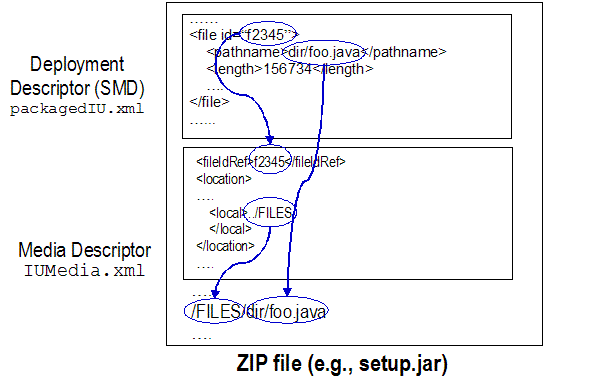
Figure 8 File binding information in the IU ZIP
package
All the required files must have file entries
in the deployment descriptor. The binding information should exist
in the media descriptor. All files can reside anywhere inside or
outside the ZIP file.
It is recommended that the custom install code be located in the
/FILES/CUSTOM
folder, and the payload files be located in the /FILES folder.
Optional files are not defined in the
deployment descriptor, so there is no binding information in the
media descriptor.
Here is an example of an IU package
referencing and including another IU ZIP package. In particular, it
is shown how to bind the referenced IU deployment descriptor to the
file in the ZIP package.
Suppose IU1 references IU2 in the IU1 deployment descriptor as a
file of pathname ‘iu2/packagedIU.xml’ with
file ID ‘IU2_DD.’ If the
IU2 package is a ZIP
‘iu2.zip’ included in
IU1 package under
the ‘/pkg’ folder, IU1 media descriptor must
contain proper binding information to map the file
‘iu2/packagedIU.xml’ to
IU2 deployment
descriptor file /META-INF/packagedIU.xml in
‘iu2.zip.’
As shown in Figure 9 below, the binding is
achieved by mapping the IU2 deployment descriptor (file
with ID ‘IU2_DD’ in IU1 deployment descriptor)
logical source to the folder /META-INF/ in the ZIP file
/pkg/iu2.zip
included in IU1
package. Note that since the ‘IU2_DD’ file pathname is
‘iu2/packagedIU.xml’ in
IU1 deployment
descriptor, the path has to be overwritten to ‘packagedIU.xml.’ The new
pathname plus the logical source maps to the /META-INF/packagedIU.xml file
in IU2
package.
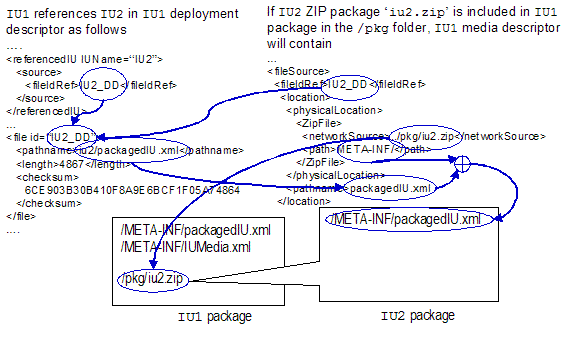
Figure 9 Aggregating a Referenced IU ZIP
Package
Fixed-sized removable media is a commonly
used storage format. Examples include
CD-ROM, DVD, Diskette, etc. The main characteristic of this
package format is that the IU package might be too big to fit on
one single media, and the whole package may be split into one or
more fixed-sized “volumes,” each of which is stored on
one media. In order to access a file identified in the deployment
descriptor, specific media needs to be loaded. Thus the binding
following are needed for files on fixed-sized removable medias:
1.
A media volume ID string. This
information should be used by the application processing the IU
package to verify or locate the specific media volume. Although out
of the scope of this specification, for well known media formats
such as CD-ROM, DVD, or diskettes, there are standard ways to
identify and retrieve the media volume information.
2.
A pathname of the file on that specific media. In the media
descriptor, the pathname for logical source is specified, which is
used to construct the physical file pathname on the specific media
volume.
Figure 10 illustrates an example of how the
media descriptor is used to bind to files on a particular CD
volume. In the example, a file is specified in the deployment with
ID ‘f2345’ and pathname
‘dir/foo.java.’ The logical
source of this file is ‘/FILES’ folder on the CD
volume ‘cd4.’ This information is
specified via the <removableMedia> element in
the media descriptor: the volumeID attribute is set to
‘cd4,’
and the type
attribute is set to ‘CDROM.’ The
<path> element
sets /FILES as the
physical location of the logical source, thus makes the physical
path of the file to be /FILES/dir/foo.java on CD volume
‘cd4.’
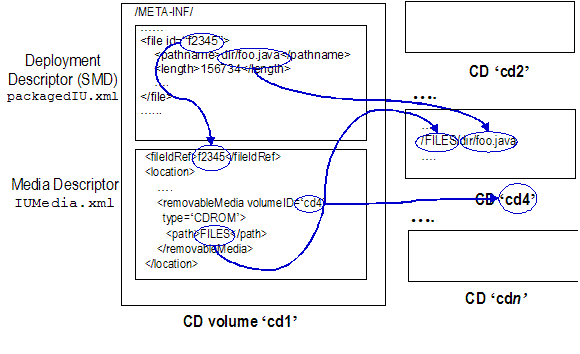
Figure 10 Fixed-sized Removable Media Example:
IU Package on Multiple CDs
This specification does not cover how the
package is split and how the volume sizes are determined. Also, the
identification of the fixed-sized removable media (through the
volume ID) and the access of the files on the media are out of the
scope of this specification.
The manifest files for the IU and child IUs
should all be located in the /META-INF/ folder in the
first media. The IU manifest files should be defined as
follows:
–
Deployment descriptor: packagedIU.xml. File paths in
the deployment descriptor are relative to respective logical
sources. If a media descriptor is present, the binding is defined
in the media descriptor. Otherwise, a default location is used for
all logical sources.
–
Media descriptor: IUMedia.xml. The logical sources
are mapped to the media identifier plus the folder in the
media.
–
IUMedia.RSA or IUMedia.DSA: the digital
signature containing the signed media descriptor and the public key
certificate. See Section 6, “Security.”
When there are referenced (child) IUs, the
manifest files for the root IU and the child IUs should be located
in the following file structure on the first media:
–
Referenced IU manifest files are located in the
/META-INF/IUDIR/META-INF folder where IUDIR is
defined as follows
–
For non-fix IUs (defined using the <IUDefinition> element; see
[ACAB.SD0402]), it is the folder UUID “-”
ver “.” rel “.” mod
“.” lev (where UUID is the UUID for
the IU, and ver, rel, mod, and lev are
IU’s version).
For example, a
referenced IU of UUID
“a01ee8dd1dd111b2a3f20800209a5b6b” and version 3.0.2.0
should have its manifest files in folder
/META-INF/a01ee8dd1dd111b2a3f20800209a5b6b-3.0.2.0/META-INF
–
For fixes (defined using the <FixDefinition> element; see
[ACAB.SD0402]), it is in the folder UUID “-”
fixName where UUID is the UUID for the IU, and
fixName is the fix name as defined in the <fixIdentity> element (see
[ACAB.SD0402]).
For example, a
referenced fix of UUID
“a01ee8dd1dd111b2a3f20800209a5b6b” and fix name
“PTF4589” has its manifest files in folder
/META-INF/a01ee8dd1dd111b2a3f20800209a5b6b-PTF4589/META-INF
Referenced IU manifest files are bound via
the root IU media descriptor (since they are specified in the root
IU deployment descriptor). Referenced IU payload files are bound
via its own media descriptor (since they are specified in the
referenced IU deployment descriptors).
Non-manifest files are located on the media.
Required files physical locations are specified in the media
descriptor using the volume identifier and the path on the specific
volume. Optional files are not specified in the media descriptor
although they are located on the media.
Suppose IU1 references IU2 and IU3. IU2 is an IU and has UUID
a01ee8dd1dd111b2a3f20800209a5b6b and version 2.1.0.0. IU3 is a fix
and has UUID 8f64eabf1dd211b2a3f10800209a5b6b and fix name
‘PTF43’.
Figure 11 shows that the manifest files for IU1, IU2, and IU3 are all located on the first
CD, and they follow the file structure as described in Section
5.2.1.
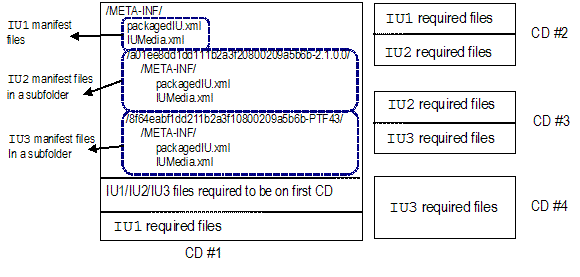
Figure 11 Referenced IU Manifest Files Are All
Located On the First Media
The package structure is similar to the ZIP
package. All files including manifest files are located on the
network and can be accessed using URI.
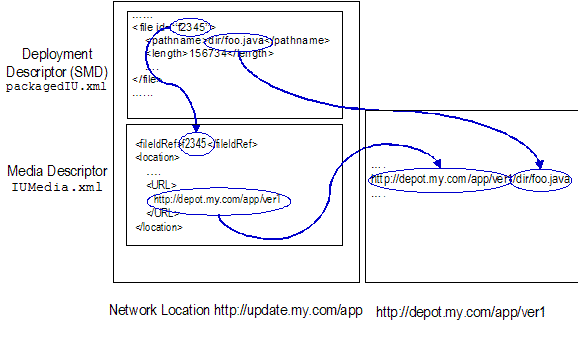
Figure 12 An IU Package Available From the
Network
·
Deployment descriptor: packagedIU.xml. File paths in
the deployment descriptor are relative to the respective logical
sources. If a media descriptor is present, the binding is defined
in the media descriptor. Otherwise, a default location is used for
all logical sources.
·
Media descriptor: IUMedia.xml. Logical sources are mapped to network
locations via URIs.
·
Digital signature: IUMedia.RSA or IUMedia.DSA. See Section 6,
“Security.”
All files can reside on the network and be
accessible via URIs. Required files have binding information in the
media descriptor. Optional files are not specified in the media
descriptor.
Single executable files are self-contained
and allow installation to take place by simply executing the files.
All the files required for installation are included in the
executables. Such executables are binary files and the format is
platform specific and installer specific. Thus the format is
not covered in this document.
Existing install technologies such as
InstallShield (Windows or Multiplatform versions), Zero G, Wise,
etc. all have the option to generate a single self-contained
executable that allows “one-click” install. This is an
important usability feature to most, if not all, install
technologies.
However, in order for the executable install
packages to be used in autonomic environments, there needs to be a
standard way to generate the standard IU package formats defined in
this specification. The requirement for executable install packages
is that standard IU package formats or the logic to generate
standard IU package formats is available from the executables.
To generate standard IU package formats,
executables need to support one or more of the following command
line options:
·
-zip <file>: with this option, the executable can generate
the IU package in a single ZIP file.
·
-volume <dir>: with this option, the executable can generate
the IU package for fixed-sized removable media format in possibly
multiple volumes.
·
-network <dir>: with this option, the executable can generate
the IU package ready to put on a network location.
One important requirement for the IU package
design is to ensure the contents (manifest and other files) have
not been tampered with before the IU package is deployed. In this
section, a security architecture is defined to ensure the IU
packages have not be changed after they are created. Installers (or
any software modules) processing IU packages are required to
support this security architecture. However, it is optional to
enable the security feature for an IU package (see Section 6.1,
“Signing IU Packages”).
Another objective of this security model is
that the signer can be identified and the identity can be validated
by a fully trusted authority. This feature is important in
particular when IU packages can be obtained from sources on the
Internet. The package owner needs to be identified and validated
before the package contents are installed and executed.
The IU package security architecture has a
design similar to the one in the JAR security model. In essence, in
this design the IU package is first signed, and a digital
signature for the package is created and can later be used to
verify the package. If contents have been changed after an
IU package is signed, the verification will fail.
Since the IU package files can be located in
different locations, this security architecture allows files to be
verified individually in different locations to ensure the
integrity of the IU package. The security model applies to any IU
package types described in section 5, “Package
Types.”
There are a lot of related security topics
surrounding the design in this section. Such topics include public
key cryptography (authentication, public and private keys, digital
signature, etc.), public key infrastructure (public key
certificate, certificate authority, etc.) and message digest
algorithms (MD5, SHA, etc.). The knowledge of those topics is
assumed and will not be described in detail. [SCH] is a good
reference on cryptography topics.
Figure 13 shows the complete flow of the
signing process. The process to sign IU packages is as follows:
1.
Generate the digest values for files referenced in the deployment
descriptor. The values are stored in the deployment descriptor.
2.
Generate the digest value for the entire deployment
descriptor. The value is put in the media descriptor.
3.
Request a public key certificate from a certificate authority (CA).
The request should include the signer’s information and
public key.
4.
The CA issues a public key certificate for the signer. This
certificate is signed by the CA.
5.
Use the signer’s private key to sign the media descriptor.
The certificate and signed media descriptor are put together to
generate a binary digital signature file.
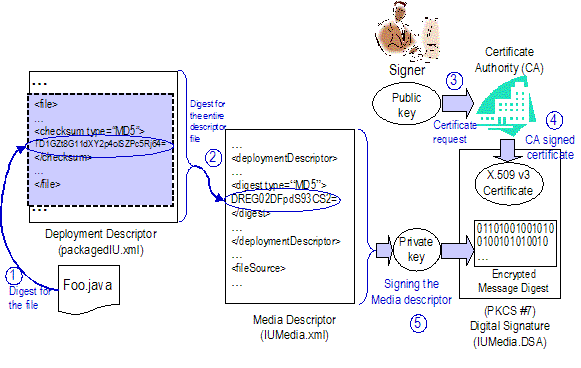
Figure 13 Signing an IU Package
The following sections describe the flow in
more details.
Generating digital signatures is an expensive
process. It will take too long to sign and verify every file in an
IU package. So instead, message digest values for the files in the
packages are computed and used for verification. The digest values
are stored in the deployment descriptor. Only the media descriptor
is digitally signed to ensure the digest values have not been
tampered with.
Each file referenced in the deployment
descriptor must have a digest value stored in the <checksum> element (of the
type base:CheckSum).
There are several algorithms that can be used to generate digest
values. The supported algorithms are listed in the base:CheckSum type.
The following is an XML fragment example for
a file entry in a deployment descriptor. In this example, the
digest algorithm is MD5 and ‘cf03015b052f7ca1c58a3b10669854ae530f25e0’
is the digest value.
…
<files>
…
<file id="MyApp">
<pathname>solution/myApp.jar</pathname>
<length>4563</length>
<checksum
type="MD5">
cf03015b052f7ca1c58a3b10669854ae530f25e0
</checksum>
</file>
…
</files>
…
A digest value is computed for the entire
deployment descriptor. The supported algorithms are listed in the
base:CheckSum type.
Tooling that generates the deployment descriptors should support
all of the message digest algorithms, and be able to generate
correct digest values accordingly.
This digest value is stored in the media
descriptor as part of the information for the associated deployment
descriptor. This value is used later to verify the deployment
descriptor (see Section 6.2.4, “Verifying the Deployment
Descriptor”).
Below is an XML fragment example for a media
descriptor that contains the digest value ‘fcbb38898b63d2255b64de7799c4af3de6ce054e’
for the associated deployment descriptor ‘packagedIU.xml.’
…
<deploymentDescriptor>
<location>packagedIU.xml</location>
<digest
type=”MD5”>
fcbb38898b63d2255b64de7799c4af3de6ce054e
</digest>
</deploymentDescriptor>
…
A digitally signed file needs a public key to
authenticate the file has not been tampered with. The public key
and related signer information (identity, etc.) are stored in a
public key certificate. It is a trust issue whether the public key
certificate really comes from the signer identified in the
certificate. This is one of the issues addressed by the public
key infrastructure ([PKI]). In essence, there are
certificate authorities (CAs) that are fully trusted. CAs sign and
issue other public key certificates, after the certificate owner
identities have been verified by CAs. CA certificates are required
to authenticate the public key certificated issued by the CAs.
Since the user environments need to manage a small number of the CA
certificates, it is a much easier and simpler process.
At this stage of the signing process, the
signer needs to request a public key certificate if not already
available. The detail of this request process is out of the scope
of this specification.
Once the CA verifies the identity of the
requester for the public key certificate, CA generates a public key
certificate that contains the signer identity information and
public key.
The certificate can also be
self-signed without involving a certificate authority. Since
the identity of a self-signed certificate cannot be independently
verified, self-signed certificates are typically used for testing
purposes.
The certificates are in the format defined by
X.509 v3 [X.509].
Now the media descriptor has the digest value
of the deployment descriptor. It is only necessary to digitally
sign the media descriptor using the private key of the signer. The
digitally signed media descriptor and the public key certificate
are put in a digital signature file. The digital signature
file is an primary file used to verify the authenticity of the IU
package. See Section 6.2.
The digital
signature file has the PKCS #7 format ([PKCS #7]).
Two digital signing algorithms are supported:
DSA and RSA ([DSA-RSA]). And the digital signature file has the
name IUMedia.DSA and
IUMedia.RSA
respectively.
The digital signature file is co-located with
the other manifest files.
Only one signer can sign an IU package.
The flow of verifying signed IU packages is
illustrated in Figure 14. The process to verify a signed IU
packages is as follows:
1.
Authenticate the certificate in the digital signature
2.
Retrieve the public key from the certificate in the digital
signature
3.
Authenticate the signed media descriptor using the public key
4.
Verify the entire deployment descriptor using the digest value
stored in the media descriptor
5.
Verify the files using the digest values stored in the deployment
descriptor
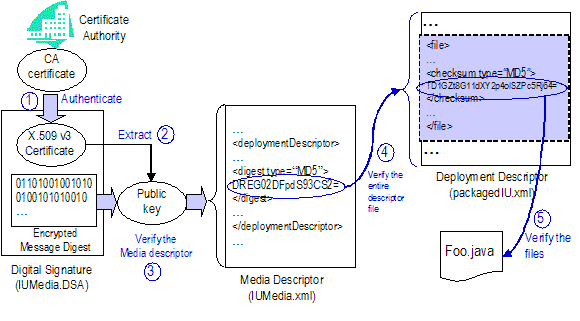
Figure 14 Verifying a Signed IU Package
The certificate in the digital signature
contains the identity of the signer that signed the IU package.
Before the IU package is installed, the signer identity needs to be
authenticated to ensure the signer is who it says it is. If the
certificate is signed by a certificate authority, this certificate
can be authenticated using the CA’s certificate which is
fully trusted.
A certificate can be self-signed without a
certificate authority. However, self-signed certificates cannot be
authenticated and cannot be trusted since the package might have
been created by someone impersonating the signer identity in the
certificate. Thus the self-signed certificates typically are used
for testing purposes.
It is up to the security policy of the
installer or associated environment to decide whether self-signed
certificates can be trusted.
The signer’s public key is required to
authenticate the signed media descriptor. The certificate in the
digital signature has the public key. Once the certificate is
authenticated, the public key can be retrieved from the
certificate.
The signed media descriptor in the digital
signature was signed using the signer’s private key. The
authentication process requires the use of the public key from the
certificate. The authentication process is based on the digital
signing algorithm indicated by the signature file extension. This
version of the specification supports the DSA and RSA signing
algorithms.
If the authentication of the media descriptor
failed, the whole verification process fails. Otherwise, the
verification proceeds to the next step.
Once authenticated, the media descriptor can
be used to verify the deployment descriptor and other files in the
IU package based on the digest values stored in the media
descriptor.
A digest value is computed for the deployment
descriptor, and then compared with the value stored in the media
descriptor. Those two values need to match. If they do not match,
the deployment descriptor must have been changed since the media
descriptor has been authenticated and the digest value should be
correct. In this case, the verification fails.
Otherwise, the deployment descriptor is
verified and the contents have not been changed. The verification
proceeds to the next step.
The binding information in a media descriptor
provides the physical location of the files specified in the
deployment descriptor. For each of those file, a digest value is
computed and compared with the value stored in the deployment
descriptor. If they do not match, the file located in the physical
media has changed or is not the same as the one used to create the
deployment descriptor. In this case, the verification fails.
Otherwise, the file referenced by this file entry is verified and
the contents have not been changed. This file can be safely used
during the installation process.
Some information defined in the deployment
descriptor may need to be translated into different national
languages to provide national language support (NLS) during
various software lifecycle management stages (for example,
deployment or maintenance) for the IU packages. Examples include
feature name, target description, manufacturer name, installation
group, etc. Translated texts are located in one or more language
resource bundles (one for each supported national language or
locale).
Such information all have the type
“base:DisplayElement”
which defines such texts for that information as default text,
Tooltip text, etc.
For further details about the format
of the language resource bundles and how they are used with
deployment descriptors, please see [ACAB.SD0402]. This
specification addresses how language resource bundles are packaged
and how references to them are linked to physical files in the IU
packages.
Note that such information is
different from the national language support (NLS) provided
by the software via “language packs.” Language packs
are part of the installable units that are laid down during the
installation, and are used by the software to provide NLS
after the installation.
One primary key design requirement is the
ease of adding and removing language resource bundles in the IU
packages, and dynamically updating the NLS of the packages without
the need to update the manifest files (deployment descriptor or
media descriptor).
The supported scenario is the following: A
product can ship an IU package that has English support only while
other national language supports – during or after the
installation – are still in development. Once additional
national language supports are available, additional language
resource bundles can be simply added to the IU package, and
additional national language support can be detected automatically
the next time the IU package is deployed.
This requirement has influence on some design
decisions and limitations. In particular, some language resource
bundle information (such as what languages are supported, and what
bundle files are present) is not maintained in the manifest
files. The only way to obtain such information is to inspect the IU
package contents directly (see Section 7.2 and 7.3). Another
limitation is that language resource bundles may not be signed and
verified (see Section 7.4).
Associated with an IU deployment descriptor,
there is one single language resource bundle set with as
many files as the supported locales. If an IU package includes
referenced IU packages, each IU should have its own language
resource bundle set.
A language resource bundle file contains the
translated texts for a specific locale and the filename is in the
following format:
<base name> “_” <language code>
[“_” <country code>]
[“.properties”]
The base name is specified in the
<language_bundle> attribute of
the <rootIU>
element. The language code is a language code as defined by
ISO 639 (see [ISO639]), and the country code is a country
code as defined by ISO 3166 (see [ISO3166]). A bundle file may have
“.properties” as the file
extension. For example, iu1resource_en_US.propoerties is
a language resource bundle for US English, and iu1resource_ja is for
Japanese.
The contents and format of a language
resource bundle are specified in [ACAB.SD0402]. Note that default
strings are specified in the IU deployment descriptor, and they
will be used when there are no applicable translated strings
available.
All the language resource bundles must be
located in the resources subfolder in the IU
deployment descriptor location. Note that they are in a fixed
location so they can be located since the language resource bundle
file information is not maintained in any of the manifest
files.
The supported locales are not
explicitly specified in the manifest file. Such information is
determined dynamically based on the existing language resource
bundles. This is made possible by locating the resource bundle
files in a fixed location and by parsing the bundle filenames to
obtain the locale information.
In packages of ZIP format (see Section 5.1),
language resource bundles must be in the /META-INF/resources subfolder. In
packages on network location (see Section 5.3), the languages
resource bundles must be in the resources subfolder of the
folder of the IU deployment descriptor.
In packages of the fixed-sized removable
media format (see Section 5.2, “Fixed-sized Removable
Media”), language resource bundles must be in the
/META-INF/resources
subfolder on the first media. The child (referenced) IU language
resource bundles should all be located in the resources subfolder in their
respective META-INF
folder on the first media. For the example in Section 5.2.3,
IU2 language
resource bundles should be located in the following folder on the
first media.
/META-INF/
a01ee8dd1dd111b2a3f20800209a5b6b-2.1.0.0/META-INF/resources
A single ZIP file (see [ZIP]) may
exist in a resources
subfolder and contain some or all the language resource
bundles for the associated IU. The ZIP file name is fixed and has
the format
<base name> “.zip”
where the base name is specified in
the <language_bundle> attribute of
the <rootIU>
element. All the bundle files in this ZIP file should be located at
the root folder. The file names and format of the resource bundle
files remain the same.
This ZIP file provides an alternative
packaging of the bundle set, and may simplify the management and
transfer of the language resource bundle files.
If a resource bundle ZIP file exists, the
process of determining the supported locales should also inspect
the ZIP contents to obtain the supported locales by the resource
bundle files in the ZIP file.
As explained in Section 7.1(“Key Design
Requirement”), the language resource bundle file information
is not included in the deployment descriptor. So the deployment
descriptor may not have resource bundle files size and file
signature which are required for signing and verifying the packaged
files (see Section 6, “Security”).
As a result, language resource bundles may
not be signed or verified like the files specified in the
deployment descriptors, unless they are specified explicitly in the
deployment descriptor using the <file> element.
This is an important security implication
that needs be noted when adding or updating the language resource
bundles. If security is a major concern, language resource bundle
files (including the bundle ZIP file) should have correct entries
in the deployment descriptor so they can be signed and verified.
And in this case, any changes to the resource bundle files must
require updating the deployment descriptor and media
descriptor.
Here is an example demonstrating how language
resource bundle files are packaged in a CD package.
Suppose IU1 specifies
‘iu1resource’
in the language_bundle attribute of the
<rootIU>
element, and IU1
references IU2
which specifies ‘iu2resource’ in the
language_bundle
attribute of its <rootIU> element. IU2 is a non-fix IU that has
version 3.0.1.0 and UUID a01ee8dd1dd111b2a3f20800209a5b6b.
IU2 has all of its
language resource bundle files in a single ZIP file which must be
named ‘iu2resource.zip’.
Figure 15 shows the first CD of the
IU1 package which
includes the IU2
package. From IU1’s META-INF/resources directory, it
can be determined that IU1 supports English, French,
and German. Inspecting the ‘iu2resource.zip’ ZIP file
indicates that IU2
supports additional Japanese and Korean.

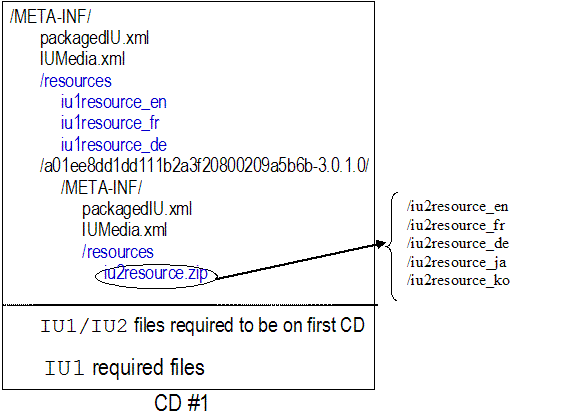
Figure 15 Language Resource Bundles in a CD
Package
The IU package format defined in this
document needs to be adopted by the industry so software install
packages are all in a common format that can be processed in a
standard fashion across platforms. This cannot be done without the
collaboration with leading industry installer technologies such as
ISMP (InstallShield Multiplatform) by InstallShield or
InstallAnywhere by Zero G.
One design objective in this document is to
ensure the IU package format can be used as the native format by
the leading installer technologies. Specifically,
·
During the packaging time, those installer technologies can
generate install packages in the format defined in this document.
And those IU packages can be aggregated in other IU packages using
the installer technologies.
·
During the install time, those installers can process any IU
package per the design in this document.
Common install capabilities among the
packages created by different installer technologies are provided
by the deployment descriptor (see [ACAB.SD0402]), media descriptor,
and the IU package format. While such IU packages could be
generated by different installer technologies, they can be
processed during both packaging and install time in a standard
fashion through the common descriptors and IU package format.
Based on those standards, installer vendors
can add their own proprietary value-add extensions (as optional
files) while complying with the standards. However, those
proprietary extensions are not guaranteed to be understood and
processed by other installer technologies.
For example, an installer technology can add
its own graphical user interface (GUI) modules in the packages to
provide interactive installation. Such GUI modules are added as
optional files that can only be invoked by the vendor installer.
For other installers, such GUI modules will not be used and thus
can be removed from the package.
Before an installer technology fully adopts
the standard descriptors and package format, an IU package can be
integrated with the installer technology through
“wrappers.” In this case, an IU package is included in
the vendor-specific install package and is processed by custom
install code. Through this interim integration, a standard IU
package can be used with any installer technology that provides
additional install capabilities such as GUI modules. Although such
interim approach only provides minimum integration with existing
installer technologies, it allows standard IU descriptors and
packages to be used for new install packages before they are
adopted by existing installer technologies.
There are many existing industry standard or
de facto standard packaging formats. These range from native
platform OS installation packages to higher level container
artifact packages. Some key formats include but are not
limited to those listed in Section 9.1.
According to the design pattern described in
Section 2.5, “Background,” it is an objective of this
specification to be fully compatible with existing formats.
There are no requirements or restrictions on a separately packaged
artifact to be included in the proposed package. They are
simply specified in the package as a file as described in Section
3, “Installable Unit Package.”
The mechanisms and behavior of the included
package are independent of the proposed format. During
installation, the included package is exploded and processed
appropriately. Similarly, the proposed package format may be
included and independently processed by other packaging
formats.
J2EE has well-defined application assembly
and deployment requirements ([J2EE]). J2EE applications are
composed of one or more J2EE components and one J2EE application
deployment descriptor. The deployment descriptor lists the
application’s components as modules. A J2EE module represents
the basic unit of composition of a J2EE application. J2EE modules
consist of one or more J2EE components and one module level
deployment descriptor. The flexibility and extensibility of the
J2EE component model facilitates the packaging and deployment of
J2EE components as individual components, component libraries, or
J2EE applications.
J2EE application server is a container
identified in the solution installation architecture. To deploy a
J2EE application or stand-alone J2EE module to a J2EE container,
one needs to encapsulate the J2EE file in a package per
specification defined in this document. The installable unit
deployment descriptor should specify J2EE container type and points
to the J2EE file in the package.
To deploy the installable unit package, the
J2EE touch point will extract the J2EE file along with other
information (for example, configuration) from the IU deployment
descriptor, then deploy the J2EE application or module per the J2EE
standards.
There are de facto package formats on various
platforms. Examples include MSI on Windows, rpm on Linux, and installp on AIX. Each format
comes with platform tools to manipulate the packages, but the
capabilities vary by platforms. While the strategic direction is to
use the platform independent package format defined by this
document, platform packages will continue to be used by many legacy
products or even future products (in particular non-IBM
products).
The IU deployment descriptor has support for
those well known platform formats by encapsulating them in the
packages defined by this document. The operating system touch
points will know how to deploy those packages properly using proper
platform tools. There is, however, no mapping between platform
packages and the IU packages.
Overview of the Open Service Gateway
Initiative (OSGi) is available at [OSGi]. OSGi gateway defines a
service framework that requires services be packaged into
bundles and download to the gateway device. A service bundle
is a JAR that contains the following:
·
Contains the resources implementing zero or more services. These
resources may be class files for the Java programming language, as
well as any other data (such as HTML help files, icons, and so
on).
·
States static dependencies on other resources, such as Java
packages. If any dependencies are stated, the framework takes the
appropriate actions to make the required resource available.
·
Optionally contains classes that help the framework install,
configure, activate and update a service.
·
Declares which class should be used to start or stop a service.
The service framework also maintains the
relationship between services implementations, and the dependencies
between services and bundles.
Similar to the J2EE application server, the
OSGi gateway service framework defines a hosting environment that
fits in the solution installation architecture. OSGi bundles to the
OSGi gateway is what the J2EE applications to the J2EE application
server. Thus OSGi bundles can be encapsulated in an installable
unit package defined by this document, and deployed through an OSGi
gateway touch point.
The Open Grid Services Architecture (OGSA)
includes a Grid service hosting environment. The Globus Toolkit 3.0
([GT]) defines a simple deployment framework for packaging and
deploying grid services to a Grid service hosting environment. The
packages are in Grid archives (GAR) files. A GAR file, like the
package defined in this document, has an XML-based deployment
descriptor and Grid service files to be deployed.
Building and deploying JAR packages are done
via the ant tools (‘ant makeGar’ and
‘ant
deploy’).
Deploying Grid services to the hosting
environment can follow the design pattern as described in Figure 1.
GAR files can be packaged in the common installable unit packages
defined in this document, and deployment of the GAR files can be
delegated to the Grid service deployment functions.
Eclipse is a hosting environment that allows
new “plug-ins” to be installed in the environment.
Eclipse has an architecture that specifies how plug-ins are
packaged and installed in the Eclipse environment.
There are two aspects of the relationship
between Eclipse installable unit packages and the common
installable unit packages defined in this document. One is the
similarity between the package structures; the other is how Eclipse
package can be included in the common installable unit packages
(according to the hosting environment design pattern described in
section 1).
This section will briefly summarize the
packaging and installation (including update) architecture on the
Eclipse platform. For more information and documentation about the
Eclipse platform, please refer to [Eclipse].
On the Eclipse platform, the basic
installation and packaging construct is a feature. Features
define the packaging structure for a group of related plug-ins,
plug-in fragments, and optionally non-plug-in files. Features are
packaging and installation constructs and do not play a role during
Eclipse plug-in execution.
In Eclipse 2.0, the feature archive
consists of multiple separate JAR files --- one JAR file per
plug-in and fragment, plus one JAR file for the actual feature
information. The feature information includes the manifest
file which is the descriptor of the feature archive.
Custom install handlers can be
provided as part of the feature archive to perform custom
processing during the feature installation. As a general practice,
install handlers should be provided in separate JAR files that
should be signed, and sealed.
For initial install, the feature packages
(probably part of a product) can be installed using the native
installer or the Eclipse update manager. The Eclipse
update manager is the most comprehensive install and update
mechanism that checks and tracks dependencies, installs the
features, manages shared plug-ins, and discovers available updates
from update servers. Native installers, on the other hand, can only
install the features and have no access to other install and update
features provided by the Eclipse update manager.
The current Eclipse update manager only has a
graphical interface and cannot be used “silently.”
Native installers typically provide a silent mode.
As mentioned earlier, the Eclipse platform is
a hosting environment (see Figure 1 on page 7), and Eclipse feature
archives can be included in common installable unit packages.
Although the detailed architecture and design need to be defined
and are out of the scope of this document, here are some potential
design points. The deployment of Eclipse feature archives can be
delegated to the Eclipse update manager, but the current update
manager implementation needs to be enhanced. In particular, the
update manager needs to expose its functions in non-interactive
fashion, and the dependency and update management need to be
consistent with the dependency management functions in the solution
installation architecture.
Tooling is required to create, update, and
install the packages. In this section, we will describe the
requirements for such tooling set. This section does not intend to
provide normative description of the tooling, which should be
covered thoroughly in separate specifications.
This tool allows the users to create valid
installable unit packages. This tool should support in-line and
external aggregation. Ideally this tool is part of a complete
install integrated development environment (IDE) which could
provide additional features such as defining custom install logic,
specifying GUI wizard sequences, and manipulating other parts of
the packages.
This tool is targeted for the install
developers to generate installable unit packages for their
application or solutions.
The following sections describe the main
functions of the packaging tool.
It is a common need to create installable
unit packages during the build process which is often
non-interactive and driven from the command line automatically. So
the non-interactive build capabilities should be provided.
Such build capabilities should allow maximum
automation, probably with build parameters specified in a file.
Typically the build automation performs packaging specific files.
The automation could also allow the update of the deployment
descriptor based on the files to be packaged. For example, the
information (size, message digest, etc.) in the <file> elements of the
deployment descriptor needs to be updated based on the files to be
packaged.
A typical scenario is as follows: The nightly
build process successfully generates a new build. The build script
then identifies newly generated files to be included in the package
and runs the packaging tool silently to generate the package. Other
packaging information (such as platforms and languages) remains
unchanged and is specified in a project file used during the silent
packaging process.
The packaging process needs to generate valid
installable unit packages. Validation of the packages should be one
of the main functions of the packaging tool. Such validation should
include at the minimum the followings:
1.
The package is in a format defined by this specification.
2.
The deployment descriptor is a valid XML document.
3.
All internally referenced files in the deployment descriptor are
present in the package.
4.
If the IU package is signed, the validation process should also
verify that the package was properly signed and all the information
was correctly stored in the package.
This tool allows the users to create a
valid subset from an existing installable unit package. The
new package has a subset of the installable units in the original
package. The repackaging process is meant for removing unneeded
installable units.
The new package can have the same contents as
the original package but in a different type. For example, an admin
can repackage an IU package in CDs and make it available on the
network. In this case, the contents are the same but the package
formats are different (from CDs to network locations).
During the repackaging process, the original
files used for packaging are only available through the existing
installable unit package.
Some non-obvious packaging scenarios need to
be supported by repackaging tools. Note different repackaging tools
might be created to address specific scenarios.
1.
After a product is installed and several patches are applied,
customers might want to create a new package from the patched
product base. This new package allows customers to install or
replicate the patched – and oftentimes stable – product
on other hosts.
2.
A customer admin might want to create a new package from a product
base package plus multiple (non-refreshing) fix packages. This new
package allows customers to install the products with latest fixes
with just one package (instead of applying multiple packages in
sequence).
3.
An admin might want to “simulate” the install process
without actually installing the product. Through the process, files
needed for install are identified and a new package is created to
contain those files and a properly modified deployment descriptor
that reflects the “fake” install.
This tool is targeted for the install
developers or end users to generate new packages from existing
ones.
The following sections describe the main
functions of the repackaging tool.
The repackaging tool should have a
standalone, user friendly GUI. There may be different GUI
interfaces for use by install developers and end users
respectively.
If the original package is signed, the new
package should also be signed. However, the private key used to
sign the original package might not be available (in particular,
when an end user does the repackaging), so a different private key
might be used.
The repackaging process is required to
produce valid packages. And the repackaging tool should provide
validation functions to help users validate the packages.
An installer installs the installable unit
package. An installer is required to understand the IU package
format, verify the package if it is signed, and conduct
installation based on package contents (in particular the
deployment descriptor) and user provided input.
The detailed specification of an installer is
beyond the scope of this document.
In this section, several examples will be
illustrated to show how this installable unit package can be
structured.
The following is a simple example to
illustrate a package and the actual product structure it
represents. Assume a trivial product containing six text
files with the following structure:
--Product files
foo1.txt
foo2.txt
dir1
foo3.txt
foo4.txt
dir2
foo5.txt
foo6.txt
In addition to the files that create the
product footprint there is utility code included in the package
that performs post installation configuration:
--Utility files
UpdateFoo.class
This set of files would be packaged in an
installable unit package as shown in Figure 16.
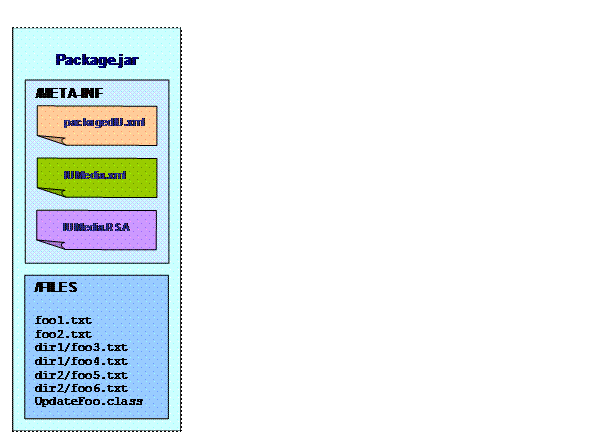
Figure 16 A Simple Product Package
Here is an example of installable unit
package for a J2EE application server kernel. In this example, the
package is a solution module that will be deployed to multiple
hosting environments. The layoutof
the directory
structure in
the IU packagekernel_iu.jar file:
·
/META-INF/packagedIU.xml:
the deployment descriptor for this solution module
·
/META-INF/IUMedia.xml: the media
descriptor for this ZIP file. Since the required files are located
outside the /META-INF folder (the default
logical source for the files), a media descriptor is needed to
specify the logical source. In this case, it should be a local
relative path “../FILES/install”
for the installable files, “../FILES/config”
for configuration action related files, and “../FILES/verify”
for verification action related files.
·
/FILES/install/…
: this folder contains the
installable files
·
/FILES/config/…
: this folder contains data, files,
and scripts needed for configuration. Configuration actions are
defined in the deployment descriptor.
·
/FILES/verify/…: this folder
contains data, files, and scripts needed for install verification.
Verification actions are defined in the deployment
descriptor.
The installer is not packaged in the IU
package. Below is an illustration of
a IU package ZIPfile.
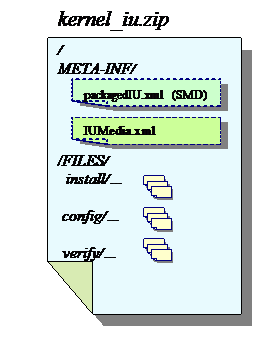
<?xml version="1.0"
encoding="UTF-8"?>
<!-- When the IU files are packaged in a
ZIP file, the (deployment and -->
<!-- media) descriptors will be in the
/META-INF folder. Other files can -->
<!-- reside outside the /META-INF/
folder. The physical location inside the -->
<!-- ZIP file is specified using the
'local' element in the -->
<!-- 'physicallocation'. Note that the
'ZipFile' element should not be used -->
<!-- in this case. -->
<!-- Based on the media.xsd v1.2f
-->
<media:binding
xmlns:media="http://www.ibm.com/namespaces/autonomic/solutioninstall/MEDIA"
xmlns:xsi="http://www.w3.org/2001/XMLSchema-instance"
xsi:schemaLocation="http://www.ibm.com/namespaces/autonomic/solutioninstall/MEDIA
media.xsd">
<!-- The deployment descriptor location.
It should be in the same folder -->
<!-- as the media descriptor (in
the META-INF/ folder). -->
<deploymentDescriptor>
<location>packagedIU.xml</location>
<digest
type="MD5">6CE903B30B410F8A9E6BCF1F05A74864</digest>
</deploymentDescriptor>
<fileSource>
<fileIdRef>file_245</fileIdRef>
<location>
<physicalLocation>
<!-- Relative to the media descriptor folder (META-INF/ in the
ZIP
file). -->
<!-- Suppose the path for 'file_245' is dir/foo.java, the path
in
the ZIP file will be /FILES/dir/foo.java -->
<local>../FILES</local>
</physicalLocation>
</location>
</fileSource>
<fileSource>
<fileIdRef>file_233</fileIdRef>
<location>
<physicalLocation>
<!-- For files that reside in file systems outside this ZIP
package,
they can be specified using the <URL> tag -->
<!-- Suppose the path for 'file_233' is dir/foo.java, the
physical
path for this file is file://home/dmsadmin/dir/foo.java -->
<URL>file://home/dmsadmin/</URL>
</physicalLocation>
</location>
</fileSource>
<fileSource>
<fileIdRef>file_356</fileIdRef>
<location>
<physicalLocation>
<!-- Relative to the media descriptor folder (META-INF/ in the
ZIP
file). -->
<local>../FILES</local>
</physicalLocation>
<!-- Allow
mapping to a different name. And the path in the ZIP file
is now
/FILES/255c22ac34487008caab52f788958d31 -->
<!-- If
this is specified, the pathname value in the deployment
descriptor is
ignored. The file path in the ZIP file is
/FILES/255c22ac34487008caab52f788958d31 -->
<pathname>255c22ac34487008caab52f788958d31</pathname>
</location>
</fileSource>
<fileSource>
<!-- Reference to a
'file' entry in the deployment descriptor -->
<fileIdRef>file_776</fileIdRef>
<!-- Indicate that the
file is located inside an external ZIP file. -->
<location>
<physicalLocation>
<ZipFile>
<networkSource>../pkg/Library.zip</networkSource>
<!-- The folder (relative to the root)
inside the Zip file. -->
<!--
Suppose the path for 'file_776' is lib/audio.so (defined in
the
deployment descriptor) and the network location for the
descriptors
are at http://depot.my.com/applicationA, then the path
for
'file_776' is in http://depot.my.com/pkg/Library.zip as
/FILES/lib/audio.so -->
<path>FILES</path>
</ZipFile>
</physicalLocation>
</location>
</fileSource>
<fileSource>
<!-- Reference to a
'file' entry in the deployment descriptor -->
<fileIdRef>file_776</fileIdRef>
<!-- Indicate that the
file is located inside an external ZIP file on a
CD. -->
<location>
<physicalLocation>
<ZipFile>
<removableMedia type="CDROM" volumeID="2">
<!-- The
folder (relative to the root) inside the Zip file. -->
<!--
Suppose the path for 'file_776' is lib/audio.so (defined in
the
deployment descriptor). In this example, the physical file is
/FILES/lib/audio.so in the ZIP file /IU2.zip on the CD-ROM with
volume ID
'2'. -->
<ZipPath>IU2.zip</ZipPath>
</removableMedia>
<path>FILES</path>
</ZipFile>
</physicalLocation>
</location>
</fileSource>
<fileSource>
<!-- Reference to a
'file' entry in the deployment descriptor -->
<fileIdRef>file_777</fileIdRef>
<!-- Indicate that the
file physical location is not known -->
<location>
<physicalLocation>
<unknown/>
</physicalLocation>
</location>
</fileSource>
</media:binding>
<?xml version="1.0"
encoding="UTF-8"?>
<!-- In the case of CD package, the
deployment descriptor and media -->
<!-- descriptor are both located in the
first CD (under the /META-INF/ -->
<!-- directory). The files could span
multiple CDs. The physical locations -->
<!-- are specified using the
'removableMedia' element. -->
<!-- Based on the media.xsd v1.2f
-->
<media:binding
xmlns:media="http://www.ibm.com/namespaces/autonomic/solutioninstall/MEDIA"
xmlns:xsi="http://www.w3.org/2001/XMLSchema-instance"
xsi:schemaLocation="http://www.ibm.com/namespaces/autonomic/solutioninstall/MEDIA
media.xsd">
<!-- The deployment descriptor location.
It is in the same directory as -->
<!-- the media descriptor.
-->
<deploymentDescriptor>
<location>packagedIU.xml</location>
<digest
type="MD5">6CE903B30B410F8A9E6BCF1F05A74864</digest>
</deploymentDescriptor>
<fileSource>
<!-- Reference to a
'file' entry in the deployment descriptor -->
<fileIdRef>file_67</fileIdRef>
<location>
<physicalLocation>
<!-- The CD number. -->
<removableMedia volumeID="4" type="CDROM">
<!--
Relative to the root folder of the CD -->
<!--
Suppose the path for 'file_67' is lib/sound.so (defined in
the
deployment descriptor), the physical path is
/FILES/lib/sound.so on CD #4 -->
<path>FILES</path>
</removableMedia>
</physicalLocation>
</location>
</fileSource>
<fileSource>
<!-- Reference to a
'file' entry in the deployment descriptor -->
<fileIdRef>file_356</fileIdRef>
<location>
<physicalLocation>
<removableMedia volumeID='1' type="CDROM">
<path>FILES</path>
</removableMedia>
</physicalLocation>
<!-- Allow
mapping to a different path name. -->
<!-- If
this is specified, the pathname value in the deployment
descriptor is
ignored. The real file path is
/FILES/255c22ac34487008caab52f788958d31 on CD #1. -->
<pathname>255c22ac34487008caab52f788958d31</pathname>
</location>
</fileSource>
<fileSource>
<!-- Reference to a
'file' entry in the deployment descriptor -->
<fileIdRef>file_776</fileIdRef>
<!-- Indicate that the
file is located inside an external ZIP file. -->
<location>
<physicalLocation>
<ZipFile>
<networkSource>../pkg/Library.zip</networkSource>
<!-- The
folder (relative to the root) inside the Zip file. -->
<!--
Suppose the path for 'file_776' is lib/audio.so (defined in
the
deployment descriptor) and the network location for the
descriptors
are at http://depot.my.com/applicationA, then the path
for
'file_776' is in http://depot.my.com/pkg/Library.zip as
/FILES/lib/audio.so -->
<path>FILES</path>
</ZipFile>
</physicalLocation>
</location>
</fileSource>
<fileSource>
<!-- Reference to a
'file' entry in the deployment descriptor -->
<fileIdRef>file_776</fileIdRef>
<!-- Indicate that the
file is located inside an external ZIP file on a
CD. -->
<location>
<physicalLocation>
<ZipFile>
<removableMedia type="CDROM" volumeID="2">
<!-- The
folder (relative to the root) inside the Zip file. -->
<!--
Suppose the path for 'file_776' is lib/audio.so (defined in
the
deployment descriptor). In this example, the physical file is
/FILES/lib/audio.so in the ZIP file /IU2.zip on the CD-ROM with
volume ID
'2'. -->
<ZipPath>IU2.zip</ZipPath>
</removableMedia>
<path>FILES</path>
</ZipFile>
</physicalLocation>
</location>
</fileSource>
<fileSource>
<!-- Reference to a
'file' entry in the deployment descriptor -->
<fileIdRef>file_777</fileIdRef>
<!-- Indicate that the
file physical location is not known -->
<location>
<physicalLocation>
<unknown/>
</physicalLocation>
</location>
</fileSource>
</media:binding>
<?xml version="1.0"
encoding="UTF-8"?>
<!-- In the case of network download
package, the deployment descriptor and -->
<!-- media descriptor should reside at
the same location. Other files can -->
<!-- reside anywhere on the network that
can be identified using URI. -->
<!-- Based on the media.xsd v1.2f
-->
<media:binding
xmlns:media="http://www.ibm.com/namespaces/autonomic/solutioninstall/MEDIA"
xmlns:xsi="http://www.w3.org/2001/XMLSchema-instance"
xsi:schemaLocation="http://www.ibm.com/namespaces/autonomic/solutioninstall/MEDIA
media.xsd">
<!-- The deployment descriptor location.
It is in the same location as -->
<!-- the media descriptor.
-->
<deploymentDescriptor>
<location>packagedIU.xml</location>
<digest
type="MD5">6CE903B30B410F8A9E6BCF1F05A74864</digest>
</deploymentDescriptor>
<fileSource>
<!-- Reference to a
'file' entry in the deployment descriptor -->
<fileIdRef>file_67</fileIdRef>
<location>
<physicalLocation>
<!-- A network location URI. -->
<!-- Suppose the path for 'file_67' is lib/sound.so (defined
in
the deployment descriptor) and the network location for the
descriptors are at http://depot.my.com/applicationA, the
location
for 'file_67' is
http://depot.my.com/applicationA/FILES/lib/sound.so. -->
<URL>FILES</URL>
</physicalLocation>
</location>
</fileSource>
<fileSource>
<!-- Reference to a
'file' entry in the deployment descriptor -->
<fileIdRef>file_356</fileIdRef>
<location>
<physicalLocation>
<URL>FILES</URL>
</physicalLocation>
<!-- Allow
mapping to a different path name. -->
<!-- If
this is specified, the pathname value in the deployment
descriptor is
ignored. -->
<!--
Suppose the path for 'file_67' is lib/sound.so (defined in the
deployment
descriptor) and the network location for the descriptors
are at
http://depot.my.com/applicationA, the location for 'file_67' is
http://depot.my.com/applicationA/FILES/255c22ac34487008caab52f788958d31
-->
<pathname>255c22ac34487008caab52f788958d31</pathname>
</location>
</fileSource>
<fileSource>
<!-- Reference to a
'file' entry in the deployment descriptor -->
<fileIdRef>file_776</fileIdRef>
<!-- Indicate that the
file is located inside an external ZIP file. -->
<location>
<physicalLocation>
<ZipFile>
<networkSource>../pkg/Library.zip</networkSource>
<!-- The
folder (relative to the root) inside the Zip file. -->
<!--
Suppose the path for 'file_776' is lib/audio.so (defined in
the
deployment descriptor) and the network location for the
descriptors
are at http://depot.my.com/applicationA, then the path
for
'file_776' is in http://depot.my.com/pkg/Library.zip as
/FILES/lib/audio.so -->
<path>FILES</path>
</ZipFile>
</physicalLocation>
</location>
</fileSource>
<fileSource>
<!-- Reference to a
'file' entry in the deployment descriptor -->
<fileIdRef>file_776</fileIdRef>
<!-- Indicate that the
file is located inside an external ZIP file on a
CD. -->
<location>
<physicalLocation>
<ZipFile>
<removableMedia type="CDROM" volumeID="2">
<!-- The
folder (relative to the root) inside the Zip file. -->
<!--
Suppose the path for 'file_776' is lib/audio.so (defined in
the
deployment descriptor). In this example, the physical file is
/FILES/lib/audio.so in the ZIP file /IU2.zip on the CD-ROM with
volume ID
'2'. -->
<ZipPath>IU2.zip</ZipPath>
</removableMedia>
<path>FILES</path>
</ZipFile>
</physicalLocation>
</location>
</fileSource>
<fileSource>
<!-- Reference to a
'file' entry in the deployment descriptor -->
<fileIdRef>file_777</fileIdRef>
<!-- Indicate that the
file physical location is not known -->
<location>
<physicalLocation>
<unknown/>
</physicalLocation>
</location>
</fileSource>
</media:binding>
<?xml version="1.0"
encoding="UTF-8"?>
<!-- This sample shows that all files are
relative to a single logical -->
<!-- source "../FILES" using the 'local'
element. This sample demonstrates -->
<!-- that a media descriptor can be
fairly simple. -->
<!-- Based on the media.xsd v1.2f
-->
<media:binding
xmlns:media="http://www.ibm.com/namespaces/autonomic/solutioninstall/MEDIA"
xmlns:xsi="http://www.w3.org/2001/XMLSchema-instance"
xsi:schemaLocation="http://www.ibm.com/namespaces/autonomic/solutioninstall/MEDIA
media.xsd">
<!-- The deployment descriptor location.
It should be in the same folder -->
<!-- as the media descriptor.
-->
<deploymentDescriptor>
<location>packagedIU.xml</location>
<digest
type="MD5">6CE903B30B410F8A9E6BCF1F05A74864</digest>
</deploymentDescriptor>
<!-- All files in this packages
are relative the logical source
"../FILES". If this is a ZIP file
package, all the files are in the /FILES
folder. -->
<defaultLogicalSource>
<local>../FILES</local>
</defaultLogicalSource>
</media:binding>
Also see [ACGlossary] for common Autonomic
Computing terms not defined here.
End user – An end user deploys
the installable unit packages. An end user might repackage the
install packages before deploying them. For example, for efficient
distribution to large number of client machines, an administrator
can repackage an installable unit package by removing contents that
are not needed.
Install developer – An install
developer is the developer creating the installable unit packages
for a product or solution.
Installable unit (IU) – An
installable unit is a logical component that can be selected for
installation. Installable units can be aggregated together, so for
example a product contains features, which contain components. An
artifact is the physical component that contains a smallest
installable unit, or that contains an aggregated installable unit
whose components were manufactured as a single entity (e.g. a
product). A solution module is an aggregated installable unit whose
components were manufactured separately.
Installable unit package or
packaged installable unit – A package that contains
files to be installed, custom install code, and a deployment
descriptor for an installable unit. Throughout this document, those
two terms will be used interchangeably.
Installable unit package type –
Installable unit packages can have different physical layouts. Each
physical layout is a package type. The major differences among the
various package types are the locations of the files and how the
file bindings are expressed. This document covers four physical
package layouts: single Zip, fixed-sized removable media, network
location, and single executable.
Payload files – Those are the
files that will be laid down on the target host during the
installation. Those files do not include the custom install code
invoked during the installation.
Valid installable unit package –
An installable unit package is valid if the package contents meet
the following criteria: the package is in a format defined by this
specification; the deployment descriptor is a valid XML document;
all internally referenced files in the deployment descriptor are
present in the package; and, if the package is signed, all files
have not been modified.
References
[ACAB.SD0402]
Installable Unit Deployment Descriptor Specification
[ACGlossary]
Miller et al, AC Architecture Board, Autonomic Computing
Terminology
[CRM]
OGSA Common Resource Management Specification
[DSA-RSA]
DSA and RSA Key and Signature Encoding for the KeyNote Trust
Management System
http://www.faqs.org/rfcs/rfc2792.html
[Eclipse]
Eclipse project is at http://www.eclipse.org.
The documentation is at
http://www.eclipse.org/documentation/main.html
[GT]
Globus Toolkit
http://www.globus.org/toolkit/
[ISO3166]
Code for the representation of names of countries http://www.iso.org/iso/en/prods-services/iso3166ma/index.html
[ISO639]
Code for the representation of names of languages
http://www.w3.org/WAI/ER/IG/ert/iso639.htm
[J2EE]
Java 2 Platform Enterprise Edition Specification, v1.3.
[MD5]
Information about MD5 Message-Digest algorithm is available
at
http://www.faqs.org/rfcs/rfc1321.html
[OSGi]
Open Services Gateway Initiative. http://www.osgi.org/
OSGi Specification Overview
http://www.osgi.org/resources/docs/specoverview.pdf
Specification can be downloaded at
http://www.osgi.org/resources/spec_download.asp
[PKCS
#7]
PKCS #7: Cryptographic Message Syntax, Version 1.5
http://www.ietf.org/rfc/rfc2315.txt
[PKI]
Public-Key Infrastructure (X.509)
http://www.ietf.org/html.charters/pkix-charter.html
[RFC2119]
Key words for use in RFCs to Indicate Requirement Levels http://www.ietf.org/rfc/rfc2119.txt
[SCH]
“Applied Cryptography 2nd Edition” by Bruce
Schneier
John Wiley & Sons, New York, 1996
[X.509]
Internet X.509 Public Key Infrastructure Certificate and CRL
Profile
http://www.ietf.org/rfc/rfc2459.txt
[ZIP]
ZIP File Format
Specification
http://www.pkware.com/products/enterprise/white_papers/appnote.html
[ZLIB]
ZLIB Compressed Data Format Specification version 3.3
http://www.faqs.org/rfcs/rfc1950.html
Appendix A media.xsd
Below is the XML schema (media.xsd) for the media
descriptor IUMedia.xml.
<?xml version="1.0"
encoding="UTF-8"?>
<!-- iudd:File is the common element
referencing files in an IU package. -->
<!-- The <files> element has a seq
of iudd:File -->
<!-- File references in iudd in general
can be <fileIdRef> which -->
<!-- points to an iudd:File element (the
'id' attribute value) in the -->
<!-- package, or a path that points to
files outside the packages. -->
<!-- The 'pathname' attribute of
iudd:File type is relative to a physical -->
<!-- location such as a JAR file root
folder, CD, and network location. -->
<!-- The media descriptor (1) defines the
physical location of the -->
<!-- <files> element in IUDD,(2)
optionally override the relative path info -->
<!-- of the <files> elements.
-->
<!-- If the logical source is not used in
the iudd:File element, the -->
<!-- media descriptor needs to have an
entry for every <file> element -->
<!-- defined in the IUDD to specify the
physical location. To override the -->
<!-- path, the media descriptor only
needs to list the files to be -->
<!-- overridden. -->
<!-- The iudd:File elements are keyed off
the 'id' attribute. -->
<!-- -->
<!-- The media descriptor also contains
the signature/digest info for the -->
<!-- entire deployment descriptor.
-->
<!-- -->
<!-- If the corresponding deployment
descriptor has aggregated other IU -->
<!-- packages, the referenced path is for
the deployment descriptors. There -->
<!-- should be media descritpror
for the referenced deployment -->
<!-- descriptors. -->
<schema
xmlns="http://www.w3.org/2001/XMLSchema"
targetNamespace="http://www.ibm.com/namespaces/autonomic/solutioninstall/MEDIA"
xmlns:media="http://www.ibm.com/namespaces/autonomic/solutioninstall/MEDIA"
xmlns:iudd="http://www.ibm.com/namespaces/autonomic/solutioninstall/IUDD"
xmlns:base="http://www.ibm.com/namespaces/autonomic/solutioninstall/BASE"
elementFormDefault="unqualified"
attributeFormDefault="unqualified"
version="1.2h">
<annotation>
<documentation>
Media
descriptor schema as defined in the ACAB.BO0307 for "IU Package
Format" -
Copyright (C) 2003 IBM Corporation. All rights reserved
</documentation>
</annotation>
<import
namespace="http://www.ibm.com/namespaces/autonomic/solutioninstall/BASE"
schemaLocation="base.xsd"/> <import
namespace="http://www.ibm.com/namespaces/autonomic/solutioninstall/IUDD"
schemaLocation="iudd.xsd"/> <import
namespace="http://www.ibm.com/namespaces/autonomic/solutioninstall/SIU"
schemaLocation="siu.xsd"/>
<element name="binding"
type="media:BindingInfo"/>
<complexType
name="BindingInfo">
<sequence>
<!--
deployment descriptor that this media descriptor is associated
with. Both
are co-located. -->
<element
name="deploymentDescriptor">
<complexType>
<sequence>
<!-- The IUDD (deployment descriptor) path relative to the
media
descriptor -->
<element name="location" type="base:RelativePath"/>
<!-- The digest value for the entire deployment descriptor
-->
<element name="digest" type="base:CheckSum"
minOccurs="0">
<annotation>
<documentation>
This is the digest value for the entire deployment
descriptor.
</documentation>
</annotation>
</element>
</sequence>
</complexType>
</element>
<!--
Optional default logical source that is used for all files that
do not have
corresponding entries in the next section. This value
overwrites
the pre-defined default logical source (which is the
deployment
descriptor location). -->
<element
name="defaultLogicalSource"
type="media:LogicalSource"
minOccurs="0">
<annotation>
<documentation>
This optional default
logical source that is used for all files
that do not have corresponding entries in the next section.
This
value overwrites the pre-defined default logical source (which
is the deployment descriptor location).
</documentation>
</annotation>
</element>
<!-- #####
The associated IUDD file info has (1) path, (2) size, (4)
signatures
(and others). ##### -->
<sequence>
<annotation>
<documentation>
If the logical source attribute is not used by the iudd:File
type, each 'file' element should have binding info in the media
descriptor.
</documentation>
</annotation>
<element name="fileSource" minOccurs="0"
maxOccurs="unbounded">
<complexType>
<sequence>
<!-- The id for the iudd:File entry -->
<element name="fileIdRef" type="NCName">
<annotation>
<documentation>
This is the 'id' attribute of the iudd:File element in
the IUDD file associated with this media descriptor.
</documentation>
</annotation>
</element>
<!-- Binding info:
physical location and pathname override -->
<element name="location">
<annotation>
<documentation>
File info in IUDD has (1) path name, (2) size, (3)
(optional) digital
signature. The media descriptor can
override information (1). (2) and (3) will not and
cannot be modified by the media descriptor to ensure the
package contents have not been changed.
</documentation>
</annotation>
<complexType>
<sequence>
<!-- The physical location -->
<element name="physicalLocation"
type="media:LogicalSource"/>
<!-- Optional new pathname. This value will override the
one defined in the deployment descriptor. -->
<element name="pathname"
type="base:RelativePath" minOccurs="0">
<annotation>
<documentation>
Optional new pathname. This allows mapping to
different file path (including file name). If this
is specified, the pathname in the 'file' element
of the deployment descriptor is ignored. This path
is relative to the physical source identified in
the "physicalLocation" element.
</documentation>
</annotation>
</element>
</sequence>
</complexType>
</element>
</sequence>
</complexType>
</element>
</sequence>
</sequence>
</complexType>
<simpleType
name="RemovableMediaType">
<annotation>
<documentation>
Pre-defined types for fixed-sized removable media. All the
formats
(except the "Others" type) are well known.
</documentation>
</annotation>
<restriction
base="string">
<enumeration value="CDROM"/>
<enumeration value="DVD"/>
<enumeration value="Diskette"/>
<enumeration value="Others"/>
</restriction>
</simpleType>
<complexType
name="LogicalSource">
<choice>
<!--
Local. Relative to the folder of the media descriptor. For
example,
in a ZIP
file, this is relative to the /META-INF folder -->
<element
name="local"
type="base:RelativePath">
<annotation>
<documentation>
This specifies a local path relative to the folder of the media
descriptor.
This path is a relative path and cannot begin with '/'.
</documentation>
</annotation>
</element>
<!--
Single ZIP -->
<element
name="ZipFile">
<annotation>
<documentation>
This specifies the folder in a separate ZIP file. The folder is
relative to the root of the Zip
file. The ZIP file can be at any
network location or on a fixed-sized removable media.
</documentation>
</annotation>
<complexType>
<sequence>
<choice>
<!-- The ZIP
file could be at a network location -->
<element name="networkSource" type="anyURI"/>
<!-- Or it could be on a CD/DVD/etc. -->
<element name="removableMedia">
<complexType>
<sequence>
<element name="ZipPath"
type="base:RelativePath">
<annotation>
<documentation>
The ZIP file path on the specific media. The path
is relative to the root and cannot begin with a
"/."
</documentation>
</annotation>
</element>
</sequence>
<attribute name="type" use="required"
type="media:RemovableMediaType"/>
<!-- The removable media volume identifier. -->
<attribute name="volumeID"
type="string"
use="required"/>
</complexType>
</element>
</choice>
<!-- Path in the ZIP file relative to the root of
the ZIP file -->
<element name="path"
type="base:RelativePath">
<annotation>
<documentation>
This path is relative to the root of the ZIP file. It is a
relative path and should not begin with a "/."
</documentation>
</annotation>
</element>
</sequence>
</complexType>
</element>
<!-- Removable Media (CD,
DVD, etc.) -->
<element
name="removableMedia">
<annotation>
<documentation>
This support is for fixed size
removable media such as CD or
DVD. The package could span multiple such media. The number is
a
positive integer identifying the specific media. The logic of
locating the specific media is outside of the scope of this
schema and spec.
</documentation>
</annotation>
<complexType>
<sequence>
<element name="path"
type="base:RelativePath">
<annotation>
<documentation>
This path is relative to the specific media root. This is
where the filepath is relative to.
This path cannot begin with a "/."
</documentation>
</annotation>
</element>
</sequence>
<!-- The
storage media type. Currently only common storage types
are
supported. It is up to the consumer of the media descriptor to
access each
medai type. Maybe more info about the storage type is
needed.
-->
<attribute name="type" use="required"
type="media:RemovableMediaType">
</attribute>
<!-- The
removable media volume identifier. -->
<attribute name="volumeID"
type="string" use="required"/>
</complexType>
</element>
<!--
Network Location -->
<element
name="URL" type="anyURI">
<annotation>
<documentation>
This points to any network location.
</documentation>
</annotation>
</element>
<!--
Unknown Location -->
<element
name="unknown">
<annotation>
<documentation>
This indicates that the file is still not bound. Not all
the
files need to be bound in an media descriptor. For example, an
IU ZIP package could reference files located on the network.
The
network locations might not be known when the media descriptor
in the ZIP file was created.
Media descriptors can have unbound files. However, each file
needs to be bound for the IU package to be processed.
</documentation>
</annotation>
<complexType/>
</element>
</choice>
</complexType>
</schema>