<?xml version="1.0" encoding="ISO-8859-1"?><?xml-stylesheet type="text/xsl" href="../../../Math/XSL/mathml.xsl"?>

<!DOCTYPE html
  SYSTEM "mathml.dtd">
<html xmlns="http://www.w3.org/1999/xhtml">
   <head>
      <title>Content Markup
</title>
      <style type="text/css">
code           { font-family: monospace; }

div.constraint,
div.issue,
div.note,
div.notice     { margin-left: 2em; }

li p           { margin-top: 0.3em;
                 margin-bottom: 0.3em; }

div.exampleInner pre { margin-left: 1em;
                       margin-top: 0em; margin-bottom: 0em}
div.exampleOuter {border: 4px double gray;
                  margin: 0em; padding: 0em}
div.exampleInner { background-color: #d5dee3;
                   border-top-width: 4px;
                   border-top-style: double;
                   border-top-color: #d3d3d3;
                   border-bottom-width: 4px;
                   border-bottom-style: double;
                   border-bottom-color: #d3d3d3;
                   padding: 4px; margin: 0em }
div.exampleWrapper { margin: 4px }
div.exampleHeader { font-weight: bold;
                    margin: 4px}

  .error { color: red }
  .minitoc { border-style: solid;
             border-color: #0050B2; 
             border-width: 1px ; }
  .attention { border-style: solid; 
               border-width: 1px ; 
               color: #5D0091;
               background: #F9F5DE; 
               border-color: red;
               margin-left: 1em;
               margin-right: 1em;
               margin-top: 0.25em;
               margin-bottom: 0.25em; }

  .attribute-Name { background: #F9F5C0; }
  .method-Name { background: #C0C0F9; }
  .IDL-definition { border-style: solid; 
               border-width: 1px ; 
               color: #001000;
               background: #E0FFE0; 
               border-color: #206020;
               margin-left: 1em;
               margin-right: 1em;
               margin-top: 0.25em;
               margin-bottom: 0.25em; }
  .baseline {vertical-align: baseline}

  #eqnoc1 {width: 10%}
  #eqnoc2 {width: 80%; text-align: center; }
  #eqnoc3 {width: 10%; text-align: right; }
          
.h3style {
  text-align: left;
  font-family: sans-serif;
  font-weight: normal;
  color: #0050B2; 
  font-size: 125%;
}

  h4 { text-align: left;
       font-family: sans-serif;
       font-weight: normal;
       color: #0050B2; }
  h5 { text-align: left;
       font-family: sans-serif;
       font-weight: bold;
       color: #0050B2; } 

  th {background:  #E0FFE0;}

  p, blockquote, h4 { font-family: sans-serif; }
  dt, dd, dl, ul, li { font-family: sans-serif; }
  pre, code { font-family: monospace }


.mathml-render {
font-family: serif;
font-size: 130%;
border: solid 4px green;
padding-left: 1em;
padding-right: 1em;
}
</style>
      <link rel="stylesheet" type="text/css" href="http://www.w3.org/StyleSheets/TR/W3C-WD.css"/>
   </head>
   <body>

      <h1>
         <a id="contm">

         </a>4 Content Markup</h1><!-- TOP NAVIGATION BAR -->
      <div class="minitoc">

  Overview: <a href="overview.xml">Mathematical Markup Language (MathML) Version 2.0 (2nd Edition)
</a>
         <br class="html-compat"/>
  Previous: 3 <a href="chapter3.xml">Presentation Markup</a>
         <br class="html-compat"/>
  Next: 5 <a href="chapter5.xml">Combining Presentation and Content Markup</a>
         <br class="html-compat"/>
         <br class="html-compat"/>4 <a href="chapter4.xml">Content Markup</a>
         <br class="html-compat"/>    4.1 <a href="chapter4.xml#contm.intro">Introduction</a>
         <br class="html-compat"/>        4.1.1 <a href="chapter4.xml#id.4.1.1">The Intent of Content Markup</a>
         <br class="html-compat"/>        4.1.2 <a href="chapter4.xml#id.4.1.2">The Scope of Content Markup</a>
         <br class="html-compat"/>        4.1.3 <a href="chapter4.xml#id.4.1.3">Basic Concepts of Content Markup</a>
         <br class="html-compat"/>    4.2 <a href="chapter4.xml#contm.usage">Content Element Usage Guide</a>
         <br class="html-compat"/>        4.2.1 <a href="chapter4.xml#contm.cats">Overview of Syntax and Usage</a>
         <br class="html-compat"/>            4.2.1.1 <a href="chapter4.xml#id.4.2.1.1">Constructing Mathematical Objects</a>
         <br class="html-compat"/>            4.2.1.2 <a href="chapter4.xml#id.4.2.1.2">Constructing General Expressions</a>
         <br class="html-compat"/>            4.2.1.3 <a href="chapter4.xml#id.4.2.1.3">The 
apply construct</a>
         <br class="html-compat"/>            4.2.1.4 <a href="chapter4.xml#contm.deffun">Explicitly defined functions and operators</a>
         <br class="html-compat"/>            4.2.1.5 <a href="chapter4.xml#contm.inverseconstruct">The inverse construct</a>
         <br class="html-compat"/>            4.2.1.6 <a href="chapter4.xml#id.4.2.1.6">The declare construct</a>
         <br class="html-compat"/>            4.2.1.7 <a href="chapter4.xml#id.4.2.1.7">The lambda construct</a>
         <br class="html-compat"/>            4.2.1.8 <a href="chapter4.xml#id.4.2.1.8">The use of qualifier elements and the condition construct</a>
         <br class="html-compat"/>            4.2.1.9 <a href="chapter4.xml#id.4.2.1.9">Rendering of Content elements</a>
         <br class="html-compat"/>        4.2.2 <a href="chapter4.xml#contm.container">Containers</a>
         <br class="html-compat"/>            4.2.2.1 <a href="chapter4.xml#id.4.2.2.1">Tokens</a>
         <br class="html-compat"/>            4.2.2.2 <a href="chapter4.xml#contm.constructor">Constructors</a>
         <br class="html-compat"/>            4.2.2.3 <a href="chapter4.xml#id.4.2.2.3">Special Constructs</a>
         <br class="html-compat"/>        4.2.3 <a href="chapter4.xml#contm.funopqual">Functions, Operators and Qualifiers</a>
         <br class="html-compat"/>            4.2.3.1 <a href="chapter4.xml#id.4.2.3.1">Predefined functions and operators</a>
         <br class="html-compat"/>            4.2.3.2 <a href="chapter4.xml#contm.opwithqual">Operators taking Qualifiers</a>
         <br class="html-compat"/>        4.2.4 <a href="chapter4.xml#contm.relation">Relations</a>
         <br class="html-compat"/>        4.2.5 <a href="chapter4.xml#contm.conditions">Conditions</a>
         <br class="html-compat"/>            4.2.5.1 <a href="chapter4.xml#id.4.2.5.1">Examples</a>
         <br class="html-compat"/>        4.2.6 <a href="chapter4.xml#contm.synsem">Syntax and Semantics</a>
         <br class="html-compat"/>        4.2.7 <a href="chapter4.xml#id.4.2.7">Semantic Mappings</a>
         <br class="html-compat"/>        4.2.8 <a href="chapter4.xml#id.4.2.8">Constants and Symbols</a>
         <br class="html-compat"/>        4.2.9 <a href="chapter4.xml#id.4.2.9">MathML element types</a>
         <br class="html-compat"/>    4.3 <a href="chapter4.xml#contm.attrib">Content Element Attributes</a>
         <br class="html-compat"/>        4.3.1 <a href="chapter4.xml#id.4.3.1">Content Element Attribute Values</a>
         <br class="html-compat"/>        4.3.2 <a href="chapter4.xml#id.4.3.2">Attributes Modifying Content Markup Semantics</a>
         <br class="html-compat"/>            4.3.2.1 <a href="chapter4.xml#id.4.3.2.1">
base</a>
         <br class="html-compat"/>            4.3.2.2 <a href="chapter4.xml#id.4.3.2.2">
closure</a>
         <br class="html-compat"/>            4.3.2.3 <a href="chapter4.xml#id.4.3.2.3">
definitionURL</a>
         <br class="html-compat"/>            4.3.2.4 <a href="chapter4.xml#id.4.3.2.4">
encoding</a>
         <br class="html-compat"/>            4.3.2.5 <a href="chapter4.xml#id.4.3.2.5">
nargs</a>
         <br class="html-compat"/>            4.3.2.6 <a href="chapter4.xml#id.4.3.2.6">
occurrence</a>
         <br class="html-compat"/>            4.3.2.7 <a href="chapter4.xml#id.4.3.2.7">
order</a>
         <br class="html-compat"/>            4.3.2.8 <a href="chapter4.xml#contm.scope">
scope</a>
         <br class="html-compat"/>            4.3.2.9 <a href="chapter4.xml#contm.typeattrib">
type</a>
         <br class="html-compat"/>        4.3.3 <a href="chapter4.xml#id.4.3.3">Attributes Modifying Content Markup Rendering</a>
         <br class="html-compat"/>            4.3.3.1 <a href="chapter4.xml#id.4.3.3.1">
type</a>
         <br class="html-compat"/>            4.3.3.2 <a href="chapter4.xml#contm.genatt">General Attributes</a>
         <br class="html-compat"/>    4.4 <a href="chapter4.xml#contm.elem">The Content Markup Elements</a>
         <br class="html-compat"/>        4.4.1 <a href="chapter4.xml#contm.tokenel">Token Elements</a>
         <br class="html-compat"/>            4.4.1.1 <a href="chapter4.xml#contm.cn">Number (cn)</a>
         <br class="html-compat"/>            4.4.1.2 <a href="chapter4.xml#contm.ci">Identifier (ci)</a>
         <br class="html-compat"/>            4.4.1.3 <a href="chapter4.xml#contm.csymbol">Externally defined symbol   (csymbol)</a>
         <br class="html-compat"/>        4.4.2 <a href="chapter4.xml#id.4.4.2">Basic Content Elements</a>
         <br class="html-compat"/>            4.4.2.1 <a href="chapter4.xml#contm.apply">Apply (apply)</a>
         <br class="html-compat"/>            4.4.2.2 <a href="chapter4.xml#contm.reln">Relation (reln)</a>
         <br class="html-compat"/>            4.4.2.3 <a href="chapter4.xml#contm.fn">Function (fn)</a>
         <br class="html-compat"/>            4.4.2.4 <a href="chapter4.xml#contm.interval">Interval (interval)</a>
         <br class="html-compat"/>            4.4.2.5 <a href="chapter4.xml#contm.inverse">Inverse (inverse)</a>
         <br class="html-compat"/>            4.4.2.6 <a href="chapter4.xml#contm.sep">Separator (sep)</a>
         <br class="html-compat"/>            4.4.2.7 <a href="chapter4.xml#contm.condition">Condition (condition)</a>
         <br class="html-compat"/>            4.4.2.8 <a href="chapter4.xml#contm.declare">Declare (declare)</a>
         <br class="html-compat"/>            4.4.2.9 <a href="chapter4.xml#contm.lambda">Lambda (lambda)</a>
         <br class="html-compat"/>            4.4.2.10 <a href="chapter4.xml#contm.compose">Function composition (compose)</a>
         <br class="html-compat"/>            4.4.2.11 <a href="chapter4.xml#contm.ident">Identity function (ident)</a>
         <br class="html-compat"/>            4.4.2.12 <a href="chapter4.xml#contm.domain">Domain (domain)</a>
         <br class="html-compat"/>            4.4.2.13 <a href="chapter4.xml#contm.codomain">codomain (codomain)</a>
         <br class="html-compat"/>            4.4.2.14 <a href="chapter4.xml#contm.image">Image (image)</a>
         <br class="html-compat"/>            4.4.2.15 <a href="chapter4.xml#contm.domainofapplication">Domain of Application (domainofapplication)</a>
         <br class="html-compat"/>            4.4.2.16 <a href="chapter4.xml#contm.piecewise">Piecewise declaration 
(piecewise, piece,
otherwise)
</a>
         <br class="html-compat"/>        4.4.3 <a href="chapter4.xml#id.4.4.3">Arithmetic, Algebra and Logic</a>
         <br class="html-compat"/>            4.4.3.1 <a href="chapter4.xml#contm.quotient">Quotient (quotient)</a>
         <br class="html-compat"/>            4.4.3.2 <a href="chapter4.xml#contm.factorial">Factorial (factorial)</a>
         <br class="html-compat"/>            4.4.3.3 <a href="chapter4.xml#contm.divide">Division (divide)</a>
         <br class="html-compat"/>            4.4.3.4 <a href="chapter4.xml#contm.maxmin">Maximum and minimum (max, 
min)</a>
         <br class="html-compat"/>            4.4.3.5 <a href="chapter4.xml#contm.minus">Subtraction (minus)</a>
         <br class="html-compat"/>            4.4.3.6 <a href="chapter4.xml#contm.plus">Addition (plus)</a>
         <br class="html-compat"/>            4.4.3.7 <a href="chapter4.xml#contm.power">Exponentiation (power)</a>
         <br class="html-compat"/>            4.4.3.8 <a href="chapter4.xml#contm.rem">Remainder (rem)</a>
         <br class="html-compat"/>            4.4.3.9 <a href="chapter4.xml#contm.times">Multiplication (times)</a>
         <br class="html-compat"/>            4.4.3.10 <a href="chapter4.xml#contm.root">Root (root)</a>
         <br class="html-compat"/>            4.4.3.11 <a href="chapter4.xml#contm.gcd">Greatest common divisor (gcd)</a>
         <br class="html-compat"/>            4.4.3.12 <a href="chapter4.xml#contm.and">And (and)</a>
         <br class="html-compat"/>            4.4.3.13 <a href="chapter4.xml#contm.or">Or (or)</a>
         <br class="html-compat"/>            4.4.3.14 <a href="chapter4.xml#contm.xor">Exclusive Or (xor)</a>
         <br class="html-compat"/>            4.4.3.15 <a href="chapter4.xml#contm.not">Not (not)</a>
         <br class="html-compat"/>            4.4.3.16 <a href="chapter4.xml#contm.implies">Implies (implies)</a>
         <br class="html-compat"/>            4.4.3.17 <a href="chapter4.xml#contm.forall">Universal quantifier (forall)</a>
         <br class="html-compat"/>            4.4.3.18 <a href="chapter4.xml#contm.exists">Existential quantifier (exists)</a>
         <br class="html-compat"/>            4.4.3.19 <a href="chapter4.xml#contm.abs">Absolute Value (abs)</a>
         <br class="html-compat"/>            4.4.3.20 <a href="chapter4.xml#contm.conjugate">Complex conjugate (conjugate)</a>
         <br class="html-compat"/>            4.4.3.21 <a href="chapter4.xml#contm.arg">Argument (arg)</a>
         <br class="html-compat"/>            4.4.3.22 <a href="chapter4.xml#contm.real">Real part (real)</a>
         <br class="html-compat"/>            4.4.3.23 <a href="chapter4.xml#contm.imaginary">Imaginary part (imaginary)</a>
         <br class="html-compat"/>            4.4.3.24 <a href="chapter4.xml#contm.lcm">Lowest common multiple (lcm)</a>
         <br class="html-compat"/>            4.4.3.25 <a href="chapter4.xml#contm.floor">Floor (floor)</a>
         <br class="html-compat"/>            4.4.3.26 <a href="chapter4.xml#contm.ceiling">Ceiling (ceiling)</a>
         <br class="html-compat"/>        4.4.4 <a href="chapter4.xml#id.4.4.4">Relations</a>
         <br class="html-compat"/>            4.4.4.1 <a href="chapter4.xml#contm.eq">Equals (eq)</a>
         <br class="html-compat"/>            4.4.4.2 <a href="chapter4.xml#contm.neq">Not Equals (neq)</a>
         <br class="html-compat"/>            4.4.4.3 <a href="chapter4.xml#contm.gt">Greater than (gt)</a>
         <br class="html-compat"/>            4.4.4.4 <a href="chapter4.xml#contm.lt">Less Than (lt)</a>
         <br class="html-compat"/>            4.4.4.5 <a href="chapter4.xml#contm.geq">Greater Than or Equal (geq)</a>
         <br class="html-compat"/>            4.4.4.6 <a href="chapter4.xml#contm.leq">Less Than or Equal (leq)</a>
         <br class="html-compat"/>            4.4.4.7 <a href="chapter4.xml#contm.equivalent">Equivalent (equivalent)</a>
         <br class="html-compat"/>            4.4.4.8 <a href="chapter4.xml#contm.approx">Approximately (approx)</a>
         <br class="html-compat"/>            4.4.4.9 <a href="chapter4.xml#contm.factorof">Factor Of (factorof)</a>
         <br class="html-compat"/>        4.4.5 <a href="chapter4.xml#id.4.4.5">Calculus and Vector Calculus</a>
         <br class="html-compat"/>            4.4.5.1 <a href="chapter4.xml#contm.int">Integral (int)</a>
         <br class="html-compat"/>            4.4.5.2 <a href="chapter4.xml#contm.diff">Differentiation (diff)</a>
         <br class="html-compat"/>            4.4.5.3 <a href="chapter4.xml#contm.partialdiff">Partial Differentiation (partialdiff)</a>
         <br class="html-compat"/>            4.4.5.4 <a href="chapter4.xml#contm.lowlimit">Lower limit (lowlimit)</a>
         <br class="html-compat"/>            4.4.5.5 <a href="chapter4.xml#contm.uplimit">Upper limit (uplimit)</a>
         <br class="html-compat"/>            4.4.5.6 <a href="chapter4.xml#contm.bvar">Bound variable (bvar)</a>
         <br class="html-compat"/>            4.4.5.7 <a href="chapter4.xml#contm.degree">Degree (degree)</a>
         <br class="html-compat"/>            4.4.5.8 <a href="chapter4.xml#contm.divergence">Divergence (divergence)</a>
         <br class="html-compat"/>            4.4.5.9 <a href="chapter4.xml#contm.grad">Gradient (grad)</a>
         <br class="html-compat"/>            4.4.5.10 <a href="chapter4.xml#contm.curl">Curl (curl)</a>
         <br class="html-compat"/>            4.4.5.11 <a href="chapter4.xml#contm.laplacian">Laplacian (laplacian)</a>
         <br class="html-compat"/>        4.4.6 <a href="chapter4.xml#contm.sets">Theory of Sets</a>
         <br class="html-compat"/>            4.4.6.1 <a href="chapter4.xml#contm.set">Set (set)</a>
         <br class="html-compat"/>            4.4.6.2 <a href="chapter4.xml#contm.list">List (list)</a>
         <br class="html-compat"/>            4.4.6.3 <a href="chapter4.xml#contm.union">Union (union)</a>
         <br class="html-compat"/>            4.4.6.4 <a href="chapter4.xml#contm.intersect">Intersect (intersect)</a>
         <br class="html-compat"/>            4.4.6.5 <a href="chapter4.xml#contm.in">Set inclusion (in)</a>
         <br class="html-compat"/>            4.4.6.6 <a href="chapter4.xml#contm.notin">Set exclusion (notin)</a>
         <br class="html-compat"/>            4.4.6.7 <a href="chapter4.xml#contm.subset">Subset (subset)</a>
         <br class="html-compat"/>            4.4.6.8 <a href="chapter4.xml#contm.prsubset">Proper Subset (prsubset)</a>
         <br class="html-compat"/>            4.4.6.9 <a href="chapter4.xml#contm.notsubset">Not Subset (notsubset)</a>
         <br class="html-compat"/>            4.4.6.10 <a href="chapter4.xml#contm.notprsubset">Not Proper Subset (notprsubset)</a>
         <br class="html-compat"/>            4.4.6.11 <a href="chapter4.xml#contm.setdiff">Set Difference (setdiff)</a>
         <br class="html-compat"/>            4.4.6.12 <a href="chapter4.xml#contm.card">Cardinality (card)</a>
         <br class="html-compat"/>            4.4.6.13 <a href="chapter4.xml#contm.cartesianproduct">Cartesian product (cartesianproduct)</a>
         <br class="html-compat"/>        4.4.7 <a href="chapter4.xml#id.4.4.7">Sequences and Series</a>
         <br class="html-compat"/>            4.4.7.1 <a href="chapter4.xml#contm.sum">Sum (sum)</a>
         <br class="html-compat"/>            4.4.7.2 <a href="chapter4.xml#contm.product">Product (product)</a>
         <br class="html-compat"/>            4.4.7.3 <a href="chapter4.xml#contm.limit">Limit (limit)</a>
         <br class="html-compat"/>            4.4.7.4 <a href="chapter4.xml#contm.tendsto">Tends To (tendsto)</a>
         <br class="html-compat"/>        4.4.8 <a href="chapter4.xml#contm.elemclass">Elementary classical functions</a>
         <br class="html-compat"/>            4.4.8.1 <a href="chapter4.xml#contm.trig">common trigonometric functions </a>
         <br class="html-compat"/>            4.4.8.2 <a href="chapter4.xml#contm.exp">Exponential (exp)</a>
         <br class="html-compat"/>            4.4.8.3 <a href="chapter4.xml#contm.ln">Natural Logarithm (ln)</a>
         <br class="html-compat"/>            4.4.8.4 <a href="chapter4.xml#contm.log">Logarithm (log)</a>
         <br class="html-compat"/>        4.4.9 <a href="chapter4.xml#id.4.4.9">Statistics</a>
         <br class="html-compat"/>            4.4.9.1 <a href="chapter4.xml#contm.mean">Mean (mean)</a>
         <br class="html-compat"/>            4.4.9.2 <a href="chapter4.xml#contm.sdev">Standard Deviation (sdev)</a>
         <br class="html-compat"/>            4.4.9.3 <a href="chapter4.xml#contm.variance">Variance (variance)</a>
         <br class="html-compat"/>            4.4.9.4 <a href="chapter4.xml#contm.median">Median (median)</a>
         <br class="html-compat"/>            4.4.9.5 <a href="chapter4.xml#contm.mode">Mode (mode)</a>
         <br class="html-compat"/>            4.4.9.6 <a href="chapter4.xml#contm.moment">Moment (moment)</a>
         <br class="html-compat"/>            4.4.9.7 <a href="chapter4.xml#contm.momentabout">Point of Moment (momentabout)</a>
         <br class="html-compat"/>        4.4.10 <a href="chapter4.xml#id.4.4.10">Linear Algebra</a>
         <br class="html-compat"/>            4.4.10.1 <a href="chapter4.xml#contm.vector">Vector (vector)</a>
         <br class="html-compat"/>            4.4.10.2 <a href="chapter4.xml#contm.matrix">Matrix (matrix)</a>
         <br class="html-compat"/>            4.4.10.3 <a href="chapter4.xml#contm.matrixrow">Matrix row (matrixrow)</a>
         <br class="html-compat"/>            4.4.10.4 <a href="chapter4.xml#contm.determinant">Determinant (determinant)</a>
         <br class="html-compat"/>            4.4.10.5 <a href="chapter4.xml#contm.transpose">Transpose (transpose)</a>
         <br class="html-compat"/>            4.4.10.6 <a href="chapter4.xml#contm.selector">Selector (selector)</a>
         <br class="html-compat"/>            4.4.10.7 <a href="chapter4.xml#contm.vectorproduct">Vector product (vectorproduct)</a>
         <br class="html-compat"/>            4.4.10.8 <a href="chapter4.xml#contm.scalarproduct">Scalar product (scalarproduct)</a>
         <br class="html-compat"/>            4.4.10.9 <a href="chapter4.xml#contm.outerproduct">Outer product (outerproduct)</a>
         <br class="html-compat"/>        4.4.11 <a href="chapter4.xml#id.4.4.11">Semantic Mapping Elements</a>
         <br class="html-compat"/>            4.4.11.1 <a href="chapter4.xml#contm.annotation">Annotation (annotation)</a>
         <br class="html-compat"/>            4.4.11.2 <a href="chapter4.xml#contm.semantics">Semantics (semantics)</a>
         <br class="html-compat"/>            4.4.11.3 <a href="chapter4.xml#contm.annotation-xml">XML-based annotation (annotation-xml)</a>
         <br class="html-compat"/>        4.4.12 <a href="chapter4.xml#id.4.4.12">Constant and Symbol Elements</a>
         <br class="html-compat"/>            4.4.12.1 <a href="chapter4.xml#contm.integers">integers (integers)</a>
         <br class="html-compat"/>            4.4.12.2 <a href="chapter4.xml#contm.reals">reals (reals)</a>
         <br class="html-compat"/>            4.4.12.3 <a href="chapter4.xml#contm.rationals">Rational Numbers (rationals)</a>
         <br class="html-compat"/>            4.4.12.4 <a href="chapter4.xml#contm.naturalnumbers">Natural Numbers (naturalnumbers)</a>
         <br class="html-compat"/>            4.4.12.5 <a href="chapter4.xml#contm.complexes">complexes (complexes)</a>
         <br class="html-compat"/>            4.4.12.6 <a href="chapter4.xml#contm.primes">primes (primes)</a>
         <br class="html-compat"/>            4.4.12.7 <a href="chapter4.xml#contm.exponentiale">Exponential e (exponentiale)</a>
         <br class="html-compat"/>            4.4.12.8 <a href="chapter4.xml#contm.imaginaryi">Imaginary i (imaginaryi)</a>
         <br class="html-compat"/>            4.4.12.9 <a href="chapter4.xml#contm.notanumber">Not A Number (notanumber)</a>
         <br class="html-compat"/>            4.4.12.10 <a href="chapter4.xml#contm.true">True (true)</a>
         <br class="html-compat"/>            4.4.12.11 <a href="chapter4.xml#contm.false">False (false)</a>
         <br class="html-compat"/>            4.4.12.12 <a href="chapter4.xml#contm.emptyset">Empty Set (emptyset)</a>
         <br class="html-compat"/>            4.4.12.13 <a href="chapter4.xml#contm.pi">pi (pi)</a>
         <br class="html-compat"/>            4.4.12.14 <a href="chapter4.xml#contm.eulergamma">Euler gamma (eulergamma)</a>
         <br class="html-compat"/>            4.4.12.15 <a href="chapter4.xml#contm.infinity">infinity (infinity)</a>
         <br class="html-compat"/>
      </div>
      <div class="div1">
         <div class="div2">

            <h2>
               <a id="contm.intro">

               </a>4.1 Introduction</h2>
            <div class="div3">

               <h3>
                  <a id="id.4.1.1">

                  </a>4.1.1 The Intent of Content Markup</h3>
               <p>As has been noted in the introductory section of this Recommendation, mathematics can be distinguished by its use of a (relatively) formal language, mathematical notation. However, mathematics and its presentation should not be viewed as one and the same thing. Mathematical sums or products exist and are meaningful to many applications completely without regard to how they are rendered aurally or visually. The intent of the content markup in the Mathematical Markup Language is to provide an explicit encoding of the 
<em>underlying mathematical structure
</em> of an expression, rather than any particular rendering for the expression.</p>
               <p>There are many reasons for providing a specific encoding for content. Even a disciplined and systematic use of presentation tags cannot properly capture this semantic information. This is because without additional information it is impossible to decide whether a particular presentation was chosen deliberately to encode the mathematical structure or simply to achieve a particular visual or aural effect. Furthermore, an author using the same encoding to deal with both the presentation and mathematical structure might find a particular presentation encoding unavailable simply because convention had reserved it for a different semantic meaning.</p>
               <p>The difficulties stem from the fact that there are many to one mappings from presentation to semantics and vice versa. For example the mathematical construct 
"
<var>H</var> multiplied by 
<var>e</var>" is often encoded using an explicit operator as in
<var>H</var> × 
<var>e</var>. In different presentational contexts, the multiplication operator might be invisible
"
<var>H</var> 
<var>e</var>", or rendered as the spoken word
"times". Generally, many different presentations are possible depending on the context and style preferences of the author or reader. Thus, given 
"
<var>H</var> 
<var>e</var>" out of context it may be impossible to decide if this is the name of a chemical or a mathematical product of two variables 
<var>H</var> and 
<var>e</var>.</p>
               <p>Mathematical presentation also changes with culture and time: some expressions in combinatorial mathematics today have one meaning to a Russian mathematician, and quite another to a French mathematician; see 
<a href="chapter5.xml#mixing.notsheet">
                     <b>5.4.1 Notational Style Sheets</b>
                  </a> for an example. Notations may lose currency, for example the use of musical sharp and flat symbols to denote maxima and minima 
<a href="appendixk.xml#Chaundy1954">[Chaundy1954]</a>. A notation in use in 1644 for the multiplication mentioned above was
<img src="image/f4001.gif" alt="\blacksquare" style="vertical-align:middle"/>

                  <var>H</var>

                  <var>e</var> 

                  <a href="appendixk.xml#Cajori1928">[Cajori1928]</a>.</p>
               <p>When we encode the underlying mathematical structure explicitly, without regard to how it is presented aurally or visually, we are able to interchange information more precisely with those systems that are able to manipulate the mathematics. In the trivial example above, such a system could substitute values for the variables 
<var>H</var> and 
<var>e</var> and evaluate the result. Further interesting application areas include interactive textbooks and other teaching aids.</p>
            </div>
            <div class="div3">

               <h3>
                  <a id="id.4.1.2">

                  </a>4.1.2 The Scope of Content Markup</h3>
               <p>The semantics of general mathematical notation is not a matter of consensus. It would be an enormous job to systematically codify most of mathematics - a task that can never be complete. Instead, MathML makes explicit a relatively small number of commonplace mathematical constructs, chosen carefully to be sufficient in a large number of applications. In addition, it provides a mechanism for associating semantics with new notational constructs. In this way, mathematical concepts that are not in the base collection of elements can still be encoded (<a href="#contm.synsem">
                     <b>4.2.6 Syntax and Semantics</b>
                  </a>).</p>
               <p>The base set of content elements is chosen to be adequate for simple coding of most of the formulas used from kindergarten to the end of high school in the United States, and probably beyond through the first two years of college, that is up to A-Level or Baccalaureate level in Europe. Subject areas covered to some extent in MathML are:
</p>
               <ul>
                  <li>
                     <p>arithmetic, algebra, logic and relations</p>
                  </li>
                  <li>
                     <p>calculus and vector calculus</p>
                  </li>
                  <li>
                     <p>set theory</p>
                  </li>
                  <li>
                     <p>sequences and series</p>
                  </li>
                  <li>
                     <p>elementary classical functions</p>
                  </li>
                  <li>
                     <p>statistics</p>
                  </li>
                  <li>
                     <p>linear algebra</p>
                  </li>
               </ul>
               <p>It is not claimed, or even suggested, that the proposed set of elements is complete for these areas, but the provision for author extensibility greatly alleviates any problem omissions from this finite list might cause.</p>
            </div>
            <div class="div3">

               <h3>
                  <a id="id.4.1.3">

                  </a>4.1.3 Basic Concepts of Content Markup</h3>
               <p>The design of the MathML content elements are driven by the following principles:
</p>
               <ul>
                  <li>
                     <p>The expression tree structure of a mathematical expression should be directly encoded by the MathML content elements.</p>
                  </li>
                  <li>
                     <p>The encoding of an expression tree should be explicit, and not dependent on the special parsing of 
<b>PCDATA
</b> or on additional processing such as operator precedence parsing.</p>
                  </li>
                  <li>
                     <p>The basic set of mathematical content constructs that are provided should have default mathematical semantics.</p>
                  </li>
                  <li>
                     <p>There should be a mechanism for associating specific mathematical semantics with the constructs.</p>
                  </li>
               </ul>
               <p>The primary goal of the content encoding is to establish explicit connections between mathematical structures and their mathematical meanings. The content elements correspond directly to parts of the underlying mathematical expression tree. Each structure has an associated default semantics and there is a mechanism for associating new mathematical definitions with new constructs.</p>
               <p>Significant advantages to the introduction of content-specific tags include:
</p>
               <ul>
                  <li>
                     <p>Usage of presentation elements is less constrained. When mathematical semantics are inferred from presentation markup, processing agents must either be quite sophisticated, or they run the risk of inferring incomplete or incorrect semantics when irregular constructions are used to achieve a particular aural or visual effect.</p>
                  </li>
                  <li>
                     <p>It is immediately clear which kind of information is being encoded simply by the kind of elements that are used.</p>
                  </li>
                  <li>
                     <p>Combinations of semantic and presentation elements can be used to convey both the appearance and its mathematical meaning much more effectively than simply trying to infer one from the other.</p>
                  </li>
               </ul>
               <p>Expressions described in terms of content elements must still be rendered. For common expressions, default visual presentations are usually clear. 
"Take care of the sense and the sounds will take care of themselves" wrote Lewis Carroll 
<a href="appendixk.xml#Carroll1871">[Carroll1871]</a>. Default presentations are included in the detailed description of each element occurring in 
<a href="#contm.elem">
                     <b>4.4 The Content Markup Elements</b>
                  </a>.</p>
               <p>To accomplish these goals, the MathML content encoding is based on the concept of an expression tree. A content expression tree is constructed from a collection of more primitive objects, referred to herein as
<em>containers
</em> and 
<em>operators
</em>. MathML possesses a rich set of predefined container and operator objects, as well as constructs for combining containers and operators in mathematically meaningful ways. The syntax and usage of these content elements and constructions is described in the next section.</p>
            </div>
         </div>
         <div class="div2">

            <h2>
               <a id="contm.usage">

               </a>4.2 Content Element Usage Guide</h2>
            <p>Since the intent of MathML content markup is to encode mathematical expressions in such a way that the mathematical structure of the expression is clear, the syntax and usage of content markup must be consistent enough to facilitate automated semantic interpretation. There must be no doubt when, for example, an actual sum, product or function application is intended and if specific numbers are present, there must be enough information present to reconstruct the correct number for purposes of computation. Of course, it is still up to a MathML-compliant processor to decide what is to be done with such a content-based expression, and computation is only one of many options. A renderer or a structured editor might simply use the data and its own built-in knowledge of mathematical structure to render the object. Alternatively, it might manipulate the object to build a new mathematical object. A more computationally oriented system might attempt to carry out the indicated operation or function evaluation.</p>
            <p>The purpose of this section is to describe the intended, consistent usage. The requirements involve more than just satisfying the syntactic structure specified by an XML DTD. Failure to conform to the usage as described below will result in a MathML error, even though the expression may be syntactically valid according to the DTD.</p>
            <p>In addition to the usage information contained in this section, 
<a href="#contm.elem">
                  <b>4.4 The Content Markup Elements</b>
               </a> gives a complete listing of each content element, providing reference information about their attributes, syntax, examples and suggested default semantics and renderings. The rules for using presentation markup within content markup are explained in 
<a href="chapter5.xml#mixing.pmincm">
                  <b>5.2.3 Presentation Markup Contained in Content Markup</b>
               </a>. An informal EBNF grammar describing the syntax for the content markup is given in 
<a href="appendixb.xml">
                  <b>B Content Markup Validation Grammar</b>
               </a>.</p>
            <div class="div3">

               <h3>
                  <a id="contm.cats">

                  </a>4.2.1 Overview of Syntax and Usage</h3>
               <p>MathML content encoding is based on the concept of an expression tree. As a general rule, the terminal nodes in the tree represent basic mathematical objects, such as numbers, variables, arithmetic operations and so on. The internal nodes in the tree generally represent some kind of function application or other mathematical construction that builds up a compound object. Function application provides the most important example; an internal node might represent the application of a function to several arguments, which are themselves represented by the terminal nodes underneath the internal node.</p>
               <p>The MathML content elements can be grouped into the following categories based on their usage:
</p>
               <ul>
                  <li>
                     <p>containers</p>
                  </li>
                  <li>
                     <p>operators and functions</p>
                  </li>
                  <li>
                     <p>qualifiers</p>
                  </li>
                  <li>
                     <p>relations</p>
                  </li>
                  <li>
                     <p>conditions</p>
                  </li>
                  <li>
                     <p>semantic mappings</p>
                  </li>
                  <li>
                     <p>constants and symbols</p>
                  </li>
               </ul>
               <p>These are the building blocks out of which MathML content expressions are constructed. Each category is discussed in a separate section below. In the remainder of this section, we will briefly introduce some of the most common elements of each type, and consider the general constructions for combining them in mathematically meaningful ways.</p>
               <div class="div4">

                  <h4>
                     <a id="id.4.2.1.1">

                     </a>4.2.1.1 Constructing Mathematical Objects</h4>
                  <p>Content expression trees are built up from basic mathematical objects. At the lowest level, 
<em>leaf nodes
</em> are encapsulated in non-empty elements that define their type. Numbers and symbols are marked by the 
<em>token
</em> elements 
<code>cn
</code> and 
<code>ci
</code>. More elaborate constructs such as sets, vectors and matrices are also marked using elements to denote their types, but rather than containing data directly, these 
<em>container
</em> elements are constructed out of other elements. Elements are used in order to clearly identify the underlying objects. In this way, standard XML parsing can be used and attributes can be used to specify global properties of the objects.</p>
                  <p>The containers such as
<code>&lt;cn&gt;12345&lt;/cn&gt;
</code> ,
<code>&lt;ci&gt;x&lt;/ci&gt;
</code> and  
<code>&lt;csymbol definitionURL="mySymbol.htm" encoding="text"&gt;S&lt;/csymbol&gt;
</code>represent mathematical numbers , identifiers and externally defined symbols. Below, we will look at 
<code>operator
</code> elements such as 
<code>plus
</code> or 
<code>sin
</code>, which provide access to the basic mathematical operations and functions applicable to those objects. Additional containers such as 
<code>set
</code> for sets, and 
<code>matrix
</code> for matrices are provided for representing a variety of common compound objects.</p>
                  <p>For example, the number 12345 is encoded as
</p>
                  <table>
                     <tr>
                        <td>
                           <pre>
&lt;cn&gt;12345&lt;/cn&gt;
</pre>
                        </td>
                        <td class="mathml-render" valign="middle">
                           <math xmlns="http://www.w3.org/1998/Math/MathML">
<cn>12345</cn>
</math>
                        </td>
                     </tr>
                  </table>
                  <p> The attributes and 
<b>PCDATA
</b> content together provide the data necessary for an application to parse the number. For example, a default base of 10 is assumed, but to communicate that the underlying data was actually written in base 8, simply set the
<code>base
</code>  attribute to 8 as in
</p>
                  <table>
                     <tr>
                        <td>
                           <pre>
&lt;cn base="8"&gt;12345&lt;/cn&gt;
</pre>
                        </td>
                        <td class="mathml-render" valign="middle">
                           <math xmlns="http://www.w3.org/1998/Math/MathML">
<cn base="8">12345</cn>
</math>
                        </td>
                     </tr>
                  </table>
                  <p>while the complex number 3 + 4i can be encoded as
</p>
                  <table>
                     <tr>
                        <td>
                           <pre>
&lt;cn type="complex-cartesian"&gt;3&lt;sep/&gt;4&lt;/cn&gt;
</pre>
                        </td>
                        <td class="mathml-render" valign="middle">
                           <math xmlns="http://www.w3.org/1998/Math/MathML">
<cn type="complex-cartesian">3<sep/>4</cn>
</math>
                        </td>
                     </tr>
                  </table>
                  <p>Such information makes it possible for another application to easily parse this into the correct number.</p>
                  <p>As another example, the scalar symbol
<var>v</var> is encoded as
</p>
                  <table>
                     <tr>
                        <td>
                           <pre>
&lt;ci&gt;v&lt;/ci&gt;
</pre>
                        </td>
                        <td class="mathml-render" valign="middle">
                           <math xmlns="http://www.w3.org/1998/Math/MathML">
<ci>v</ci>
</math>
                        </td>
                     </tr>
                  </table>
                  <p>By default, 
<code>ci
</code> elements represent elements from a commutative field (see 
<a href="appendixc.xml">
                        <b>C Content Element Definitions</b>
                     </a>). If a vector is intended then this fact can be encoded as
</p>
                  <table>
                     <tr>
                        <td>
                           <pre>
&lt;ci type="vector"&gt;v&lt;/ci&gt;
</pre>
                        </td>
                        <td class="mathml-render" valign="middle">
                           <math xmlns="http://www.w3.org/1998/Math/MathML">
<ci type="vector">v</ci>
</math>
                        </td>
                     </tr>
                  </table>
                  <p>This invokes default semantics associated with the 
<code>vector
</code> element, namely an arbitrary element of a finite-dimensional vector space.</p>
                  <p>By using the 
<code>ci
</code> and 
<code>csymbol
</code> elements we have made clear that we are referring to a mathematical identifier or symbol but this does not say anything about how it should be rendered. By default a symbol is rendered as if the 
<code>ci
</code> or 
<code>csymbol
</code> element were actually the presentation element 
<code>mi
</code> (see 
<a href="chapter3.xml#presm.mi">
                        <b>3.2.3 Identifier (mi)</b>
                     </a>).  The actual rendering of a mathematical symbol can be made as elaborate as necessary simply by using the more elaborate presentational constructs (as described in 
<a href="chapter3.xml">
                        <b>3 Presentation Markup</b>
                     </a>) in the body of the 
<code>ci
</code> or 
<code>csymbol
</code> element.</p>
                  <p>The default rendering of a simple 
<code>cn
</code>-tagged object is the same as for the presentation element 
<code>mn
</code> with some provision for overriding the presentation of the 
<b>PCDATA
</b> by providing explicit 
<code>mn
</code> tags. This is described in detail in 
<a href="#contm.elem">
                        <b>4.4 The Content Markup Elements</b>
                     </a>.</p>
                  <p>The issues for compound objects such as sets, vectors and matrices are all similar to those outlined above for numbers and symbols. Each such object has global properties as a mathematical object that impact how it is to be parsed. This may affect everything from the interpretation of operations that are applied to it to how to render the symbols representing it. These mathematical properties are captured by setting attribute values.</p>
               </div>
               <div class="div4">

                  <h4>
                     <a id="id.4.2.1.2">

                     </a>4.2.1.2 Constructing General Expressions</h4>
                  <p>The notion of constructing a general expression tree is essentially that of applying an operator to sub-objects. For example, the sum 
<var>a</var> +
<var>b</var> can be thought of as an application of the addition operator to two arguments 
<var>a</var> and 
<var>b</var>. In MathML, elements are used for operators for much the same reason that elements are used to contain objects. They are recognized at the level of XML parsing, and their attributes can be used to record or modify the intended semantics. For example, with the MathML 
<code>plus
</code> element, setting the
<code>definitionURL
</code> and 
<code>encoding
</code> attributes as in
</p>
                  <pre>
&lt;plus definitionURL="www.example.com/VectorCalculus.htm"
      encoding="text"/&gt;
</pre>
                  <p>can communicate that the intended operation is vector-based.</p>
                  <p>There is also another reason for using elements to denote operators. There is a crucial semantic distinction between the function itself and the expression resulting from applying that function to zero or more arguments which must be captured. This is addressed by making the functions self-contained objects with their own properties and providing an explicit
<code>apply
</code> construct corresponding to function application. We will consider the 
<code>apply
</code> construct in the next section.</p>
                  <p>MathML contains many pre-defined operator elements, covering a range of mathematical subjects. However, an important class of expressions involve unknown or user-defined functions and symbols. For these situations, MathML provides a general 
<code>csymbol
</code> element, which is discussed below.</p>
               </div>
               <div class="div4">

                  <h4>
                     <a id="id.4.2.1.3">

                     </a>4.2.1.3 The 
<code>apply
</code> construct</h4>
                  <p>The most fundamental way of building up a mathematical expression in MathML content markup is the 
<code>apply
</code> construct. An
<code>apply
</code> element typically applies an operator to its arguments. It corresponds to a complete mathematical expression. Roughly speaking, this means a piece of mathematics that could be surrounded by parentheses or 
"logical brackets" without changing its meaning.</p>
                  <p>For example, (<var>x</var> + 
<var>y</var>) might be encoded as
</p>
                  <table>
                     <tr>
                        <td>
                           <pre>
&lt;apply&gt;
  &lt;plus/&gt;
  &lt;ci&gt; x &lt;/ci&gt;
  &lt;ci&gt; y &lt;/ci&gt;
&lt;/apply&gt;
</pre>
                        </td>
                        <td class="mathml-render" valign="middle">
                           <math xmlns="http://www.w3.org/1998/Math/MathML">
<apply>
  <plus/>
  <ci> x </ci>
  <ci> y </ci>
</apply>
</math>
                        </td>
                     </tr>
                  </table>
                  <p>The opening and closing tags of 
<code>apply
</code> specify exactly the scope of any operator or function. The most typical way of using 
<code>apply
</code> is simple and recursive. Symbolically, the content model can be described as:
</p>
                  <pre>&lt;apply&gt; 
<em>op
</em> 

                     <em>a
</em> 

                     <em>b
</em> &lt;/apply&gt;</pre>
                  <p>where the 
<em>operands
</em> a and b are containers or other content-based elements themselves, and 
<em>op
</em> is an operator or function. Note that since 
<code>apply
</code> is a container, this allows 
<code>apply
</code> constructs to be nested to arbitrary depth.</p>
                  <p>An 
<code>apply
</code> may in principle have any number of operands:
</p>
                  <pre>
&lt;apply&gt; op a b [c...] &lt;apply&gt;
</pre>
                  <p>For example, (<var>x</var> + 
<var>y</var> + 
<var>z</var>) can be encoded as
</p>
                  <table>
                     <tr>
                        <td>
                           <pre>
&lt;apply&gt;
  &lt;plus/&gt;
  &lt;ci&gt; x &lt;/ci&gt;
  &lt;ci&gt; y &lt;/ci&gt;
  &lt;ci&gt; z &lt;/ci&gt;
&lt;/apply&gt;
</pre>
                        </td>
                        <td class="mathml-render" valign="middle">
                           <math xmlns="http://www.w3.org/1998/Math/MathML">
<apply>
  <plus/>
  <ci> x </ci>
  <ci> y </ci>
  <ci> z </ci>
</apply>
</math>
                        </td>
                     </tr>
                  </table>
                  <p>Mathematical expressions involving a mixture of operations result in nested occurrences of 
<code>apply
</code>. For example,
<var>a</var>

                     <var>x</var> + 
<var>b</var> would be encoded as
</p>
                  <table>
                     <tr>
                        <td>
                           <pre>
&lt;apply&gt;
  &lt;plus/&gt;
  &lt;apply&gt;
    &lt;times/&gt;
    &lt;ci&gt; a &lt;/ci&gt;
    &lt;ci&gt; x &lt;/ci&gt;
  &lt;/apply&gt;
  &lt;ci&gt; b &lt;/ci&gt;
&lt;/apply&gt;
</pre>
                        </td>
                        <td class="mathml-render" valign="middle">
                           <math xmlns="http://www.w3.org/1998/Math/MathML">
<apply>
  <plus/>
  <apply>
    <times/>
    <ci> a </ci>
    <ci> x </ci>
  </apply>
  <ci> b </ci>
</apply>
</math>
                        </td>
                     </tr>
                  </table>
                  <p>There is no need to introduce parentheses or to resort to operator precedence in order to parse the expression correctly. The 
<code>apply
</code> tags provide the proper grouping for the re-use of the expressions within other constructs. Any expression enclosed by an
<code>apply
</code> element is viewed as a single coherent object.</p>
                  <p>An expression such as (<var>F</var> + 
<var>G</var>)(<var>x</var>) might be a product, as in
</p>
                  <table>
                     <tr>
                        <td>
                           <pre>
&lt;apply&gt;
  &lt;times/&gt;
  &lt;apply&gt;
    &lt;plus/&gt;
    &lt;ci&gt; F &lt;/ci&gt;
    &lt;ci&gt; G &lt;/ci&gt;
  &lt;/apply&gt;
  &lt;ci&gt; x &lt;/ci&gt;
&lt;/apply&gt;
</pre>
                        </td>
                        <td class="mathml-render" valign="middle">
                           <math xmlns="http://www.w3.org/1998/Math/MathML">
<apply>
  <times/>
  <apply>
    <plus/>
    <ci> F </ci>
    <ci> G </ci>
  </apply>
  <ci> x </ci>
</apply>
</math>
                        </td>
                     </tr>
                  </table>
                  <p>or it might indicate the application of the function
<var>F</var> + 
<var>G</var> to the argument 
<var>x</var>. This is indicated by constructing the sum
</p>
                  <table>
                     <tr>
                        <td>
                           <pre>
&lt;apply&gt;
  &lt;plus/&gt;
  &lt;ci&gt; F &lt;/ci&gt;
  &lt;ci&gt; G &lt;/ci&gt;
&lt;/apply&gt;
</pre>
                        </td>
                        <td class="mathml-render" valign="middle">
                           <math xmlns="http://www.w3.org/1998/Math/MathML">
<apply>
  <plus/>
  <ci> F </ci>
  <ci> G </ci>
</apply>
</math>
                        </td>
                     </tr>
                  </table>
                  <p>and applying it to the argument 
<var>x</var> as in
</p>
                  <table>
                     <tr>
                        <td>
                           <pre>
&lt;apply&gt;
  &lt;apply&gt;
    &lt;plus/&gt;
    &lt;ci&gt; F &lt;/ci&gt;
    &lt;ci&gt; G &lt;/ci&gt;
    &lt;/apply&gt;
  &lt;ci&gt; x &lt;/ci&gt;
&lt;/apply&gt;
</pre>
                        </td>
                        <td class="mathml-render" valign="middle">
                           <math xmlns="http://www.w3.org/1998/Math/MathML">
<apply>
  <apply>
    <plus/>
    <ci> F </ci>
    <ci> G </ci>
    </apply>
  <ci> x </ci>
</apply>
</math>
                        </td>
                     </tr>
                  </table>
                  <p>Both the function and the arguments may be simple identifiers or more complicated expressions.</p>
                  <p>In MathML 1.0 , another construction closely related to the use of the
<code>apply
</code> element with operators and arguments was the
<code>reln
</code> element. The 
<code>reln
</code> element was used to denote that a mathematical relation holds between its arguments, as opposed to applying an operator. Thus, the MathML markup for the expression 
<var>x</var> &lt; 
<var>y</var> was given in MathML 1.0 by:
</p>
                  <table>
                     <tr>
                        <td>
                           <pre>
&lt;reln&gt;
  &lt;lt/&gt;
  &lt;ci&gt; x &lt;/ci&gt;
  &lt;ci&gt; y &lt;/ci&gt;
&lt;/reln&gt;
</pre>
                        </td>
                        <td class="mathml-render" valign="middle">
                           <math xmlns="http://www.w3.org/1998/Math/MathML">
<reln>
  <lt/>
  <ci> x </ci>
  <ci> y </ci>
</reln>
</math>
                        </td>
                     </tr>
                  </table>
                  <p>In MathML 2.0, the 
<code>apply
</code> construct is used with all operators, including logical operators. The expression above becomes
</p>
                  <table>
                     <tr>
                        <td>
                           <pre>
&lt;apply&gt;
  &lt;lt/&gt;
  &lt;ci&gt; x &lt;/ci&gt;
  &lt;ci&gt; y &lt;/ci&gt;
&lt;/apply&gt;
</pre>
                        </td>
                        <td class="mathml-render" valign="middle">
                           <math xmlns="http://www.w3.org/1998/Math/MathML">
<apply>
  <lt/>
  <ci> x </ci>
  <ci> y </ci>
</apply>
</math>
                        </td>
                     </tr>
                  </table>
                  <p>in MathML 2.0. The use of 
<code>reln
</code> with relational operators is supported
for reasons of backwards compatibility, but  <a href="chapter7.xml#interf.deprec">deprecated</a>. Authors creating new content are
encouraged to use  
<code>apply
</code> in all cases.</p>
               </div>
               <div class="div4">

                  <h4>
                     <a id="contm.deffun">

                     </a>4.2.1.4 Explicitly defined functions and operators</h4>
                  <p>The most common operations and functions such as 
<code>plus
</code> and 
<code>sin
</code> have been predefined explicitly as empty elements (see 
<a href="#contm.elem">
                        <b>4.4 The Content Markup Elements</b>
                     </a>). They have 
<code>type
</code> and 
<code>definitionURL
</code> attributes, and by changing these attributes, the author can record that a different sort of algebraic operation is intended. This allows essentially the same notation to be re-used for a discussion taking place in a different algebraic domain.</p>
                  <p>Due to the nature of mathematics the notation must be extensible. The key to extensibility is the ability of the user to define new functions and other symbols to expand the terrain of mathematical discourse.</p>
                  <p>It is always possible to create arbitrary expressions, and then to use them as symbols in the language. Their properties can then be inferred directly from that usage as was done in the previous section. However, such an approach would preclude being able to encode the fact that the construct was a known symbol, or to record its mathematical properties except by actually using it. The 
<code>csymbol
</code> element is used as a container to construct a new symbol in much the same way that 
<code>ci
</code> is used to construct an identifier. (Note that
"symbol" is used here in the abstract sense and has no connection with any presentation of the construct on screen or paper). The difference in usage is that 
<code>csymbol
</code> should refer to some mathematically defined concept with an external definition referenced via the 
<code>definitionURL
</code> attribute, whereas 
<code>ci 
</code> is used for identifiers that are essentially
"local" to the MathML expression and do not use any external definition mechanism. The target of the 
<code>definitionURL
</code> attribute on the 
<code>csymbol
</code> element may encode the definition in any format; the particular encoding in use is given by the
<code>encoding
</code> attribute.</p>
                  <p>To use 
<code>csymbol
</code> to describe a completely new function, we write for example
</p>
                  <table>
                     <tr>
                        <td>
                           <pre>
&lt;csymbol definitionURL="www.example.com/VectorCalculus.htm"
         encoding="text"&gt;
  Christoffel
&lt;/csymbol&gt;
</pre>
                        </td>
                        <td class="mathml-render" valign="middle">
                           <math xmlns="http://www.w3.org/1998/Math/MathML">
<csymbol definitionURL="www.example.com/VectorCalculus.htm"
         encoding="text">
  Christoffel
</csymbol>
</math>
                        </td>
                     </tr>
                  </table>
                  <p>The 
<code>definitionURL
</code> attribute specifies a URI that provides a written definition for the 
<b>Christoffel
</b> symbol. Suggested default definitions for the content elements of MathML appear in 
<a href="appendixc.xml">
                        <b>C Content Element Definitions</b>
                     </a> in a format based on OpenMath, although there is no requirement that a particular format be used. The role of the
<code>definitionURL
</code> attribute is very similar to the role of definitions included at the beginning of many mathematical papers, and which often just refer to a definition used by a particular book.</p>
                  <p>MathML 1.0 supported the use of the 
<b>fn
</b> to encode the fact that a construct is explicitly being used as a function or operator. To record the fact that 
<var>F</var>+ 
<var>G</var> is being used semantically as if it were a function, it was encoded as:
</p>
                  <table>
                     <tr>
                        <td>
                           <pre>
&lt;fn&gt;
  &lt;apply&gt;
    &lt;plus/&gt;
    &lt;ci&gt;F&lt;/ci&gt;
    &lt;ci&gt;G&lt;/ci&gt;
  &lt;/apply&gt;
&lt;/fn&gt;
</pre>
                        </td>
                        <td class="mathml-render" valign="middle">
                           <math xmlns="http://www.w3.org/1998/Math/MathML">
<fn>
  <apply>
    <plus/>
    <ci>F</ci>
    <ci>G</ci>
  </apply>
</fn>
</math>
                        </td>
                     </tr>
                  </table>
                  <p>This usage, although allowed in MathML 2.0 for reasons of backwards compatibility,
is now <a href="chapter7.xml#interf.deprec">deprecated</a>.
The fact that a construct is being used as an operator is clear from the position of the construct as the
first child of the 
<code>apply
</code>. If it is required to add additional information to the construct, it should be wrapped in a 
<code>semantics
</code> element, for example:
</p>
                  <table>
                     <tr>
                        <td>
                           <pre>
&lt;semantics definitionURL="www.example.com/vectorfuncs/plus.htm"
           encoding="Mathematica"&gt;
  &lt;apply&gt;
    &lt;plus/&gt;
    &lt;ci&gt;F&lt;/ci&gt;
    &lt;ci&gt;G&lt;/ci&gt;
  &lt;/apply&gt;
&lt;/semantics&gt;
</pre>
                        </td>
                        <td class="mathml-render" valign="middle">
                           <math xmlns="http://www.w3.org/1998/Math/MathML">
<semantics definitionURL="www.example.com/vectorfuncs/plus.htm"
           encoding="Mathematica">
  <apply>
    <plus/>
    <ci>F</ci>
    <ci>G</ci>
  </apply>
</semantics>
</math>
                        </td>
                     </tr>
                  </table>
                  <p>MathML 1.0 supported the use of 
<code>definitionURL
</code> with
<b>fn
</b> to refer to external definitions for user-defined
functions. This usage, although allowed for reasons of backwards
compatibility, is <a href="chapter7.xml#interf.deprec">deprecated</a> in
MathML 2.0 in favor of using  
<code>csymbol
</code> to define the function, and then 
<code>apply
</code> to link the function to its arguments. For example:
</p>
                  <table>
                     <tr>
                        <td>
                           <pre>
  &lt;apply&gt;
    &lt;csymbol definitionURL="http://www.example.org/function_spaces.html#my_def"
             encoding="text"&gt;
      BigK
    &lt;/csymbol&gt;
    &lt;ci&gt;x&lt;/ci&gt;
    &lt;ci&gt;y&lt;/ci&gt;
  &lt;/apply&gt;
</pre>
                        </td>
                        <td class="mathml-render" valign="middle">
                           <math xmlns="http://www.w3.org/1998/Math/MathML">
  <apply>
    <csymbol definitionURL="http://www.example.org/function_spaces.html#my_def"
             encoding="text">
      BigK
    </csymbol>
    <ci>x</ci>
    <ci>y</ci>
  </apply>
</math>
                        </td>
                     </tr>
                  </table>
               </div>
               <div class="div4">

                  <h4>
                     <a id="contm.inverseconstruct">

                     </a>4.2.1.5 The inverse construct</h4>
                  <p>Given functions, it is natural to have functional inverses. This is handled by the 
<code>inverse
</code> element.</p>
                  <p>Functional inverses can be problematic from a mathematical point of view in that they implicitly involve the definition of an inverse for an arbitrary function 
<var>F</var>. Even at the K-through-12 level the concept of an inverse 
<var>F</var> 

                     <sup>-1</sup> of many common functions 
<var>F</var> is not used in a uniform way. For example, the definitions used for the inverse trigonometric functions may differ slightly depending on the choice of domain and/or branch cuts.</p>
                  <p>MathML adopts the view: if 
<var>F</var> is a function from a domain
<var>D</var> to 
<var>D</var>', then the inverse
<var>G</var> of 
<var>F</var> is a function over
<var>D</var>' such that
<var>G</var>(<var>F</var>(<var>x</var>)) = 
<var>x</var>  for
<var>x</var> in 
<var>D</var>. This definition does not assert that such an inverse exists for all or indeed any 
<var>x</var> in 
<var>D</var>, or that it is single-valued anywhere. Also, depending on the functions involved, additional properties such as
<var>F</var>(<var>G</var>(<var>y</var>)) = 
<var>y</var> for 
<var>y</var> in
<var>D</var>' may hold.</p>
                  <p>The 
<code>inverse
</code> element is applied to a function whenever an inverse is required. For example, application of the inverse sine function to 
<var>x</var>, i.e. sin<sup>-1</sup> (<var>x</var>), is encoded as:
</p>
                  <table>
                     <tr>
                        <td>
                           <pre>
&lt;apply&gt;
  &lt;apply&gt; &lt;inverse/&gt; &lt;sin/&gt; &lt;/apply&gt;
  &lt;ci&gt; x &lt;/ci&gt;
&lt;/apply&gt;
</pre>
                        </td>
                        <td class="mathml-render" valign="middle">
                           <math xmlns="http://www.w3.org/1998/Math/MathML">
<apply>
  <apply> <inverse/> <sin/> </apply>
  <ci> x </ci>
</apply>
</math>
                        </td>
                     </tr>
                  </table>
                  <p>While 
<code>arcsin
</code> is one of the predefined MathML functions, an explicit reference to sin<sup>-1</sup>(<var>x</var>) might occur in a document discussing possible definitions of
<code>arcsin
</code>.</p>
               </div>
               <div class="div4">

                  <h4>
                     <a id="id.4.2.1.6">

                     </a>4.2.1.6 The declare construct</h4>
                  <p>Consider a document discussing the vectors
<var>A</var> = (<var>a</var>, <var>b</var>, 
<var>c</var>) and
<var>B</var> = (<var>d</var>, <var>e</var>, 
<var>f</var>), and later including the expression
<var>V</var> = 
<var>A</var> + 
<var>B</var>. It is important to be able to communicate the fact that wherever
<var>A</var> and 
<var>B</var> are used they represent a particular vector. The properties of that vector may determine aspects of operators such as 
<code>plus
</code>.</p>
                  <p>The simple fact that
<var>A</var> is a vector can be communicated by using the markup
</p>
                  <table>
                     <tr>
                        <td>
                           <pre>
&lt;ci type="vector"&gt;A&lt;/ci&gt;
</pre>
                        </td>
                        <td class="mathml-render" valign="middle">
                           <math xmlns="http://www.w3.org/1998/Math/MathML">
<ci type="vector">A</ci>
</math>
                        </td>
                     </tr>
                  </table>
                  <p>
but this still does not communicate, for example, which vector is involved
or its dimensions.</p>
                  <p>The <code>declare
</code> construct is used to associate
specific properties or meanings with an object. The actual declaration
itself is not rendered visually (or in any other form). However, it
indirectly impacts the semantics of all affected uses of the declared
object.</p>
                  <p>Declarations must occur at the beginning of a <code>math
</code>
element. The scope of a declaration is the entire
<code>math
</code> element in which the declaration is made.
The <code>scope
</code> attribute of a <code>declare
</code>
may be included but has no effect since the two possible values of
"local" or "global"
now have the same meaning. The "global" attribute value
is still allowed for backwards compatibility with MathML 1.0.,
but is <a href="chapter7.xml#interf.deprec">deprecated</a> in MathML 2.0.</p>
                  <p>The uses of the <code>declare
</code> element range from
resetting default attribute values to associating an expression with a
particular instance of a more elaborate structure. Subsequent uses of the
original expression (within the scope of the <code>declare
</code>) play the same semantic role as would the
paired object.</p>
                  <p>For example, the declaration
</p>
                  <table>
                     <tr>
                        <td>
                           <pre>
&lt;declare&gt;
  &lt;ci&gt; A &lt;/ci&gt;
  &lt;vector&gt;
    &lt;ci&gt; a &lt;/ci&gt;
    &lt;ci&gt; b &lt;/ci&gt;
    &lt;ci&gt; c &lt;/ci&gt;
  &lt;/vector&gt;
&lt;/declare&gt;
</pre>
                        </td>
                        <td class="mathml-render" valign="middle">
                           <math xmlns="http://www.w3.org/1998/Math/MathML">
<declare>
  <ci> A </ci>
  <vector>
    <ci> a </ci>
    <ci> b </ci>
    <ci> c </ci>
  </vector>
</declare>
</math>
                        </td>
                     </tr>
                  </table>
                  <p>
specifies that <var>A</var> stands for the particular vector (<var>a</var>,
<var>b</var>, <var>c</var>) so that subsequent uses of <var>A</var> as in
<var>V</var> = <var>A</var> + <var>B</var> can take this into account. When <code>declare
</code> is used in this way, the actual encoding

</p>
                  <table>
                     <tr>
                        <td>
                           <pre>
&lt;apply&gt;
  &lt;eq/&gt;
  &lt;ci&gt; V &lt;/ci&gt;
  &lt;apply&gt;
    &lt;plus/&gt;
    &lt;ci&gt; A &lt;/ci&gt;
    &lt;ci&gt; B &lt;/ci&gt;
  &lt;/apply&gt;
&lt;/apply&gt;
</pre>
                        </td>
                        <td class="mathml-render" valign="middle">
                           <math xmlns="http://www.w3.org/1998/Math/MathML">
<apply>
  <eq/>
  <ci> V </ci>
  <apply>
    <plus/>
    <ci> A </ci>
    <ci> B </ci>
  </apply>
</apply>
</math>
                        </td>
                     </tr>
                  </table>
                  <p>remains unchanged but the expression can be interpreted properly as vector addition.</p>
                  <p>There is no requirement to declare an expression to stand for a specific object. For example, the declaration
</p>
                  <table>
                     <tr>
                        <td>
                           <pre>
&lt;declare type="vector"&gt;
  &lt;ci&gt; A &lt;/ci&gt;
&lt;/declare&gt;
</pre>
                        </td>
                        <td class="mathml-render" valign="middle">
                           <math xmlns="http://www.w3.org/1998/Math/MathML">
<declare type="vector">
  <ci> A </ci>
</declare>
</math>
                        </td>
                     </tr>
                  </table>
                  <p>specifies that 
<var>A</var> is a vector without indicating the number of components or the values of specific components. The possible values for the 
<code>type
</code> attribute include all the predefined container element names such as 
<code>vector
</code>, 
<code>matrix
</code> or 
<code>set
</code> (see 
<a href="#contm.typeattrib">
                        <b>4.3.2.9 
type</b>
                     </a>).</p>
               </div>
               <div class="div4">

                  <h4>
                     <a id="id.4.2.1.7">

                     </a>4.2.1.7 The lambda construct</h4>
                  <p>The lambda calculus allows a user to construct a function from a variable and an expression. For example, the lambda construct underlies the common mathematical idiom illustrated here:
</p>
                  <blockquote>
                     <p>Let 
<var>f</var> be the function taking 
<var>x</var> to 
<var>x</var>
                        <sup>2</sup> + 2
</p>
                  </blockquote>
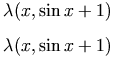
                  <p>There are various notations for this concept in mathematical literature, such as
<img src="image/f4002.gif" alt="\lambda" style="vertical-align:middle"/>(<var>x</var>, 
<var>F</var>(<var>x</var>)) = <var>F</var> or
<img src="image/f4002.gif" alt="\lambda" style="vertical-align:middle"/>(<var>x</var>,
[<var>F</var>]) =<var>F</var>, where <var>x</var> is a free variable in <var>F</var>.</p>
                  <p>This concept is implemented in MathML with the <code>lambda
</code> element. A lambda construct with <var>n</var>
internal variables is encoded by a <code>lambda
</code> element
with <var>n</var>+1 children. All but the last child must be <code>bvar
</code> elements containing the identifiers of the
internal variables. The last child is an expression defining the
function. This is typically an <code>apply
</code>, but can also
be any container element.</p>
                  <p>The following constructs
<img src="image/f4002.gif" alt="\lambda" style="vertical-align:middle"/>
(<var>x</var>, sin(<var>x</var>+1)):
</p>
                  <table>
                     <tr>
                        <td>
                           <pre>
&lt;lambda&gt;
  &lt;bvar&gt;&lt;ci&gt; x &lt;/ci&gt;&lt;/bvar&gt;
  &lt;apply&gt;
    &lt;sin/&gt;
    &lt;apply&gt;
      &lt;plus/&gt;
      &lt;ci&gt; x &lt;/ci&gt;
      &lt;cn&gt; 1 &lt;/cn&gt;
    &lt;/apply&gt;
  &lt;/apply&gt;
&lt;/lambda&gt;
</pre>
                        </td>
                        <td class="mathml-render" valign="middle">
                           <math xmlns="http://www.w3.org/1998/Math/MathML">
<lambda>
  <bvar><ci> x </ci></bvar>
  <apply>
    <sin/>
    <apply>
      <plus/>
      <ci> x </ci>
      <cn> 1 </cn>
    </apply>
  </apply>
</lambda>
</math>
                        </td>
                     </tr>
                  </table>
                  <p>To use 
<code>declare
</code> and 
<code>lambda
</code> to construct the function 
<var>f</var> for which
<var>f</var>( 
<var>x</var>) = 
<var>x</var>
                     <sup>2</sup> + 
<var>x</var> + 3 use:
</p>
                  <table>
                     <tr>
                        <td>
                           <pre>
&lt;declare type="fn"&gt;
  &lt;ci&gt; f &lt;/ci&gt;
  &lt;lambda&gt;
    &lt;bvar&gt;&lt;ci&gt; x &lt;/ci&gt;&lt;/bvar&gt;
    &lt;apply&gt;
      &lt;plus/&gt;
      &lt;apply&gt;
        &lt;power/&gt;
        &lt;ci&gt; x &lt;/ci&gt;
        &lt;cn&gt; 2 &lt;/cn&gt;
      &lt;/apply&gt;
      &lt;ci&gt; x &lt;/ci&gt;
      &lt;cn&gt; 3 &lt;/cn&gt;
    &lt;/apply&gt;
  &lt;/lambda&gt;
&lt;/declare&gt;
</pre>
                        </td>
                        <td class="mathml-render" valign="middle">
                           <math xmlns="http://www.w3.org/1998/Math/MathML">
<declare type="fn">
  <ci> f </ci>
  <lambda>
    <bvar><ci> x </ci></bvar>
    <apply>
      <plus/>
      <apply>
        <power/>
        <ci> x </ci>
        <cn> 2 </cn>
      </apply>
      <ci> x </ci>
      <cn> 3 </cn>
    </apply>
  </lambda>
</declare>
</math>
                        </td>
                     </tr>
                  </table>
                  <p>The following markup declares and constructs the function 
<var>J</var> such that 
<var>J</var>(<var>x</var>, 
<var>y</var>) is the integral from 
<var>x</var> to
<var>y</var> of 
<var>t</var>
                     <sup>4</sup> with respect to <var>t</var>.
</p>
                  <table>
                     <tr>
                        <td>
                           <pre>
&lt;declare type="fn"&gt;
  &lt;ci&gt; J &lt;/ci&gt;
  &lt;lambda&gt;
    &lt;bvar&gt;&lt;ci&gt; x &lt;/ci&gt;&lt;/bvar&gt;
    &lt;bvar&gt;&lt;ci&gt; y &lt;/ci&gt;&lt;/bvar&gt;
    &lt;apply&gt; &lt;int/&gt;
      &lt;bvar&gt;
        &lt;ci&gt; t &lt;/ci&gt;
      &lt;/bvar&gt;
      &lt;lowlimit&gt;
        &lt;ci&gt; x &lt;/ci&gt;
      &lt;/lowlimit&gt;
      &lt;uplimit&gt;
        &lt;ci&gt; y &lt;/ci&gt;
      &lt;/uplimit&gt;
      &lt;apply&gt;   &lt;power/&gt;
        &lt;ci&gt;t&lt;/ci&gt;
        &lt;cn&gt;4&lt;/cn&gt;
      &lt;/apply&gt;
    &lt;/apply&gt;
  &lt;/lambda&gt;
&lt;/declare&gt;
</pre>
                        </td>
                        <td class="mathml-render" valign="middle">
                           <math xmlns="http://www.w3.org/1998/Math/MathML">
<declare type="fn">
  <ci> J </ci>
  <lambda>
    <bvar><ci> x </ci></bvar>
    <bvar><ci> y </ci></bvar>
    <apply> <int/>
      <bvar>
        <ci> t </ci>
      </bvar>
      <lowlimit>
        <ci> x </ci>
      </lowlimit>
      <uplimit>
        <ci> y </ci>
      </uplimit>
      <apply>   <power/>
        <ci>t</ci>
        <cn>4</cn>
      </apply>
    </apply>
  </lambda>
</declare>
</math>
                        </td>
                     </tr>
                  </table>
                  <p>The function 
<var>J</var> can then in turn be applied to an argument pair.</p>
               </div>
               <div class="div4">

                  <h4>
                     <a id="id.4.2.1.8">

                     </a>4.2.1.8 The use of qualifier elements and the condition construct</h4>
                  <p>The last example of the preceding section illustrates the use of
<em>qualifier
</em> elements 
<code>lowlimit
</code>, 
<code>uplimit
</code>, and 
<code>bvar
</code> used in conjunction with the 
<code>int
</code> element. A number of common mathematical constructions involve additional data that is either implicit in conventional notation, such as a bound variable, or thought of as part of the operator rather than an argument, as is the case with the limits of a definite integral.</p>
                  <p>Content markup uses qualifier elements in conjunction with a number of operators, including integrals, sums, series, and certain differential operators. Qualifier elements appear in the same
<code>apply
</code> element with one of these operators. In general, they must appear in a certain order, and their precise meaning depends on the operators being used. For details, see 
<a href="#contm.opwithqual">
                        <b>4.2.3.2 Operators taking Qualifiers</b>
                     </a>.</p>
                  <p>The qualifier element 
<code>bvar
</code> is also used in another important MathML construction. The 
<code>condition
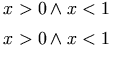
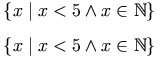
</code> element is used to place conditions on bound variables in other expressions. This allows MathML to define sets by rule, rather than enumeration, for example. The following markup, for instance, encodes the set {
<var>x</var> | 
<var>x</var> &lt; 1}:
</p>
                  <table>
                     <tr>
                        <td>
                           <pre>
&lt;set&gt;
  &lt;bvar&gt;&lt;ci&gt; x &lt;/ci&gt;&lt;/bvar&gt;
  &lt;condition&gt;
    &lt;apply&gt;
      &lt;lt/&gt;
      &lt;ci&gt; x &lt;/ci&gt;
      &lt;cn&gt; 1 &lt;/cn&gt;
    &lt;/apply&gt;
  &lt;/condition&gt;
&lt;/set&gt;
</pre>
                        </td>
                        <td class="mathml-render" valign="middle">
                           <math xmlns="http://www.w3.org/1998/Math/MathML">
<set>
  <bvar><ci> x </ci></bvar>
  <condition>
    <apply>
      <lt/>
      <ci> x </ci>
      <cn> 1 </cn>
    </apply>
  </condition>
</set>
</math>
                        </td>
                     </tr>
                  </table>
               </div>
               <div class="div4">

                  <h4>
                     <a id="id.4.2.1.9">

                     </a>4.2.1.9 Rendering of Content elements</h4>
                  <p>While the primary role of the MathML content element set is to directly encode the mathematical structure of expressions independent of the notation used to present the objects, rendering issues cannot be ignored. Each content element has a default rendering, given in
<a href="#contm.elem">
                        <b>4.4 The Content Markup Elements</b>
                     </a>, and several mechanisms (including 
<a href="#contm.genatt">
                        <b>4.3.3.2 General Attributes</b>
                     </a>) are provided for associating a particular rendering with an object.</p>
               </div>
            </div>
            <div class="div3">

               <h3>
                  <a id="contm.container">

                  </a>4.2.2 Containers</h3>
               <p>Containers provide a means for the construction of mathematical objects of a given type.
</p>
               <table border="1">
                  <tbody>
                     <tr>
                        <td colspan="1" rowspan="1">Tokens</td>
                        <td colspan="1" rowspan="1">

                           <code>ci
</code>,
<code>cn
</code>,
<code>csymbol
</code>
                        </td>
                     </tr>
                     <tr>
                        <td colspan="1" rowspan="1">Constructors</td>
                        <td colspan="1" rowspan="1">

                           <code>interval
</code>,
<code>list
</code>,
<code>matrix
</code>,
<code>matrixrow
</code>,
<code>set
</code>,
<code>vector
</code>,
<code>apply
</code>,
<code>reln
</code>,
<code>fn
</code>,
<code>lambda
</code>,
<code>piecewise, piece, otherwise
</code>

                        </td>
                     </tr>
                     <tr>
                        <td colspan="1" rowspan="1">Specials</td>
                        <td colspan="1" rowspan="1">

                           <code>declare
</code>
                        </td>
                     </tr>
                  </tbody>
               </table>
               <div class="div4">

                  <h4>
                     <a id="id.4.2.2.1">

                     </a>4.2.2.1 Tokens</h4>
                  <p>Token elements are typically the leaves of the MathML expression tree. Token elements are used to indicate mathematical identifiers,  numbers and symbols.</p>
                  <p>It is also possible for the canonically empty operator elements such as
<code>exp
</code>, 
<code>sin
</code> and 
<code>cos
</code> to be leaves in an expression tree. The usage of operator elements is described in 
<a href="#contm.funopqual">
                        <b>4.2.3 Functions, Operators and Qualifiers</b>
                     </a>.
</p>
                  <dl>
                     <dt class="label">cn</dt>
                     <dd>
                        <p>The 
<code>cn
</code> element is the MathML token element used to represent numbers. The supported types of numbers include:
"real",
"integer",
"rational",
"complex-cartesian", and
"complex-polar", with
"real" being the default type. An attribute 
<code>base
</code> (with default value 
"10") is used to help specify how the content is to be parsed. The content itself is essentially 
<b>PCDATA
</b>, separated by 
<code>sep
</code> when two parts are needed in order to fully describe a number. For example, the real number 3 is constructed by
<code>&lt;cn type="real"&gt; 3 &lt;/cn&gt;
</code>, while the rational number 3/4 is constructed as
<code>&lt;cn type="rational"&gt; 3&lt;sep/&gt;4 &lt;/cn&gt;
</code>. The detailed structure and specifications are provided in
<a href="#contm.cn">
                              <b>4.4.1.1 Number (cn)</b>
                           </a>.</p>
                     </dd>
                     <dt class="label">ci</dt>
                     <dd>
                        <p>The 
<code>ci
</code> element, or 
"content identifier" is used to construct a variable, or an identifier. A 
<code>type
</code> attribute indicates the type of object the symbol represents. Typically, 
<code>ci
</code> represents a real scalar,  but no default is specified. The content is either 
<b>PCDATA
</b> or a general presentation construct (see 
<a href="chapter3.xml#presm.summary">
                              <b>3.1.6 Summary of Presentation Elements</b>
                           </a>). For example,
</p>
                        <table>
                           <tr>
                              <td>
                                 <pre>
&lt;ci&gt;
&lt;msub&gt;
  &lt;mi&gt;c&lt;/mi&gt;
  &lt;mn&gt;1&lt;/mn&gt;
&lt;/msub&gt;
&lt;/ci&gt;
</pre>
                              </td>
                              <td class="mathml-render" valign="middle">
                                 <math xmlns="http://www.w3.org/1998/Math/MathML">
<ci>
<msub>
  <mi>c</mi>
  <mn>1</mn>
</msub>
</ci>
</math>
                              </td>
                           </tr>
                        </table>
                        <p>encodes an atomic symbol that displays visually as 
<var>c</var>
                           <sub>1</sub>
which, for purposes of content, is treated as a single symbol representing a real number. The detailed structure and specifications are provided in 
<a href="#contm.ci">
                              <b>4.4.1.2 Identifier (ci)</b>
                           </a>.</p>
                     </dd>
                     <dt class="label">csymbol</dt>
                     <dd>
                        <p>The 
<code>csymbol
</code> element, or 
"content symbol" is used to construct a symbol whose semantics are not part of the core content elements provided by MathML, but defined externally.
<code>csymbol
</code> does not make any attempt to describe how to map the arguments occurring in any application of the function into a new MathML expression. Instead, it depends on its 
<code>definitionURL
</code> attribute to point to a particular meaning, and the 
<code>encoding
</code> attribute to give the syntax of this definition. The content of a 
<code>csymbol
</code> is either 
<b>PCDATA
</b> or a general presentation construct (see 
<a href="chapter3.xml#presm.summary">
                              <b>3.1.6 Summary of Presentation Elements</b>
                           </a>). For example,
</p>
                        <table>
                           <tr>
                              <td>
                                 <pre>
&lt;csymbol definitionURL="www.example.com/ContDiffFuncs.htm"
         encoding="text"&gt;
&lt;msup&gt;
  &lt;mi&gt;C&lt;/mi&gt;
  &lt;mn&gt;2&lt;/mn&gt;
&lt;/msup&gt;
&lt;/csymbol&gt;
</pre>
                              </td>
                              <td class="mathml-render" valign="middle">
                                 <math xmlns="http://www.w3.org/1998/Math/MathML">
<csymbol definitionURL="www.example.com/ContDiffFuncs.htm"
         encoding="text">
<msup>
  <mi>C</mi>
  <mn>2</mn>
</msup>
</csymbol>
</math>
                              </td>
                           </tr>
                        </table>
                        <p>encodes an atomic symbol that displays visually as 
<var>C</var>
                           <sup>2</sup> and that, for purposes of content, is treated as a single symbol representing the space of twice-differentiable continuous functions.  The detailed structure and specifications are provided in 
<a href="#contm.csymbol">
                              <b>4.4.1.3 Externally defined symbol   (csymbol)</b>
                           </a>.</p>
                     </dd>
                  </dl>
               </div>
               <div class="div4">

                  <h4>
                     <a id="contm.constructor">

                     </a>4.2.2.2 Constructors</h4>
                  <p>MathML provides a number of elements for combining elements into familiar compound objects. The compound objects include things like lists and sets. Each constructor produces a new type of object.
</p>
                  <dl>
                     <dt class="label">interval</dt>
                     <dd>
                        <p>The 
<code>interval
</code> element is described in detail in
<a href="#contm.interval">
                              <b>4.4.2.4 Interval (interval)</b>
                           </a>. It denotes an interval on the real line with the values represented by its children as end points. The
<code>closure
</code> attribute is used to qualify the type of interval being represented. For example,
</p>
                        <table>
                           <tr>
                              <td>
                                 <pre>
&lt;interval closure="open-closed"&gt;
  &lt;ci&gt; a &lt;/ci&gt;
  &lt;ci&gt; b &lt;/ci&gt;
&lt;/interval&gt;
</pre>
                              </td>
                              <td class="mathml-render" valign="middle">
                                 <math xmlns="http://www.w3.org/1998/Math/MathML">
<interval closure="open-closed">
  <ci> a </ci>
  <ci> b </ci>
</interval>
</math>
                              </td>
                           </tr>
                        </table>
                        <p>represents the open-closed interval often written (<var>a</var>,
<var>b</var>].</p>
                     </dd>
                     <dt class="label">set and list</dt>
                     <dd>
                        <p>The 
<code>set
</code> and 
<code>list
</code> elements are described in detail in 
<a href="#contm.set">
                              <b>4.4.6.1 Set (set)</b>
                           </a> and
<a href="#contm.list">
                              <b>4.4.6.2 List (list)</b>
                           </a>. Typically, the child elements of a possibly empty 
<code>list
</code> element are the actual components of an ordered 
<em>list
</em>. For example, an ordered list of the three symbols
<var>a</var>, 
<var>b</var>, and 
<var>c</var> is encoded as
</p>
                        <table>
                           <tr>
                              <td>
                                 <pre>
&lt;list&gt; &lt;ci&gt; a &lt;/ci&gt; &lt;ci&gt; b &lt;/ci&gt; &lt;ci&gt; c &lt;/ci&gt; &lt;/list&gt;
</pre>
                              </td>
                              <td class="mathml-render" valign="middle">
                                 <math xmlns="http://www.w3.org/1998/Math/MathML">
<list> <ci> a </ci> <ci> b </ci> <ci> c </ci> </list>
</math>
                              </td>
                           </tr>
                        </table>
                        <p>Alternatively, 
<code>bvar
</code> and 
<code>condition
</code> elements can be used to define lists where membership depends on satisfying certain conditions.</p>
                        <p>An 
<code>order
</code> attribute can be used to specify what ordering is to be used. When the nature of the child elements permits, the ordering defaults to a numeric or lexicographic ordering.</p>
                        <p>Sets are structured much the same as lists except that there is no implied ordering and the 
<code>type
</code> of set may be 
"normal" or 
"multiset" with
"multiset" indicating that repetitions are allowed.</p>
                        <p>For both sets and lists, the child elements must be valid MathML content elements. The type of the child elements is not restricted. For example, one might construct a list of equations, or of inequalities.</p>
                     </dd>
                     <dt class="label">matrix and matrixrow</dt>
                     <dd>
                        <p>The 
<code>matrix
</code> element is used to represent mathematical matrices. It is described in detail in 
<a href="#contm.matrix">
                              <b>4.4.10.2 Matrix (matrix)</b>
                           </a>. It has zero or more child elements, all of which are 
<code>matrixrow
</code> elements. These in turn expect zero or more child elements that evaluate to algebraic expressions or numbers. These sub-elements are often real numbers, or symbols as in
</p>
                        <table>
                           <tr>
                              <td>
                                 <pre>
&lt;matrix&gt;
  &lt;matrixrow&gt; &lt;cn&gt; 1 &lt;/cn&gt; &lt;cn&gt; 2 &lt;/cn&gt; &lt;/matrixrow&gt;
  &lt;matrixrow&gt; &lt;cn&gt; 3 &lt;/cn&gt; &lt;cn&gt; 4 &lt;/cn&gt; &lt;/matrixrow&gt;
&lt;/matrix&gt;
</pre>
                              </td>
                              <td class="mathml-render" valign="middle">
                                 <math xmlns="http://www.w3.org/1998/Math/MathML">
<matrix>
  <matrixrow> <cn> 1 </cn> <cn> 2 </cn> </matrixrow>
  <matrixrow> <cn> 3 </cn> <cn> 4 </cn> </matrixrow>
</matrix>
</math>
                              </td>
                           </tr>
                        </table>
                        <p>The 
<code>matrixrow
</code> elements must always be contained inside of a matrix, and all rows in a given matrix must have the same number of elements.</p>
                        <p>Note that the behavior of the 
<code>matrix
</code> and 
<code>matrixrow
</code> elements is substantially different from the
<code>mtable
</code> and 
<code>mtr
</code> presentation elements.</p>
                     </dd>
                     <dt class="label">vector</dt>
                     <dd>
                        <p>The 
<code>vector
</code> element is described in detail in
<a href="#contm.vector">
                              <b>4.4.10.1 Vector (vector)</b>
                           </a>. It constructs vectors from an
<var>n</var>-dimensional vector space so that its 
<var>n</var> child elements typically represent real or complex valued scalars as in the three-element vector
</p>
                        <table>
                           <tr>
                              <td>
                                 <pre>
&lt;vector&gt;
  &lt;apply&gt;
    &lt;plus/&gt;
    &lt;ci&gt; x &lt;/ci&gt;
    &lt;ci&gt; y &lt;/ci&gt;
  &lt;/apply&gt;
  &lt;cn&gt; 3 &lt;/cn&gt;
  &lt;cn&gt; 7 &lt;/cn&gt;
&lt;/vector&gt;
</pre>
                              </td>
                              <td class="mathml-render" valign="middle">
                                 <math xmlns="http://www.w3.org/1998/Math/MathML">
<vector>
  <apply>
    <plus/>
    <ci> x </ci>
    <ci> y </ci>
  </apply>
  <cn> 3 </cn>
  <cn> 7 </cn>
</vector>
</math>
                              </td>
                           </tr>
                        </table>
                     </dd>
                     <dt class="label">apply</dt>
                     <dd>
                        <p>The 
<code>apply
</code> element is described in detail in
<a href="#contm.apply">
                              <b>4.4.2.1 Apply (apply)</b>
                           </a>. Its purpose is to apply a function or operator to its arguments to produce an expression representing an element of the codomain of the function. It is involved in everything from forming sums such as 
<var>a</var> + 
<var>b</var> as in
</p>
                        <table>
                           <tr>
                              <td>
                                 <pre>
&lt;apply&gt;
  &lt;plus/&gt;
  &lt;ci&gt; a &lt;/ci&gt;
  &lt;ci&gt; b &lt;/ci&gt;
&lt;/apply&gt;
</pre>
                              </td>
                              <td class="mathml-render" valign="middle">
                                 <math xmlns="http://www.w3.org/1998/Math/MathML">
<apply>
  <plus/>
  <ci> a </ci>
  <ci> b </ci>
</apply>
</math>
                              </td>
                           </tr>
                        </table>
                        <p>through to using the sine function to construct sin(<var>a</var>) as in
</p>
                        <table>
                           <tr>
                              <td>
                                 <pre>
&lt;apply&gt;
  &lt;sin/&gt;
  &lt;ci&gt; a &lt;/ci&gt;
&lt;/apply&gt;
</pre>
                              </td>
                              <td class="mathml-render" valign="middle">
                                 <math xmlns="http://www.w3.org/1998/Math/MathML">
<apply>
  <sin/>
  <ci> a </ci>
</apply>
</math>
                              </td>
                           </tr>
                        </table>
                        <p>or constructing integrals. Its usage in any particular setting is determined largely by the properties of the function (the first child element) and as such its detailed usage is covered together with the functions and operators in 
<a href="#contm.funopqual">
                              <b>4.2.3 Functions, Operators and Qualifiers</b>
                           </a>.</p>
                     </dd>
                     <dt class="label">reln</dt>
                     <dd>
                        <p>The 
<code>reln
</code> element is described in detail in
<a href="#contm.reln">
                              <b>4.4.2.2 Relation (reln)</b>
                           </a>. It was used in MathML 1.0 to construct an expression such as 
<var>a</var> = 
<var>b</var>, as in
</p>
                        <table>
                           <tr>
                              <td>
                                 <pre>
&lt;reln&gt;&lt;eq/&gt;
  &lt;ci&gt; a &lt;/ci&gt;
  &lt;ci&gt; b &lt;/ci&gt;
&lt;/reln&gt;
</pre>
                              </td>
                              <td class="mathml-render" valign="middle">
                                 <math xmlns="http://www.w3.org/1998/Math/MathML">
<reln><eq/>
  <ci> a </ci>
  <ci> b </ci>
</reln>
</math>
                              </td>
                           </tr>
                        </table>
                        <p>indicating an intended comparison between two mathematical values.</p>
                        <p>MathML 2.0 takes the view that this should be regarded as the application of a boolean function, and as such could be constructed using 
<code>apply
</code>. The use of 
<code>reln
</code> with logical operators is supported
 for reasons of backwards compatibility, but <a href="chapter7.xml#interf.deprec">deprecated</a> in favor of  
<code>apply
</code>.</p>
                     </dd>
                     <dt class="label">fn</dt>
                     <dd>
                        <p>The 
<code>fn
</code> element was used in MathML 1.0 to make
explicit the fact that an expression is being used as a function or
operator. This is allowed in MathML 2.0 for backwards compatibility,
but is <a href="chapter7.xml#interf.deprec">deprecated</a>, as the use of
an expression as a function or operator is clear from its position as
the first child of an 
<code>apply
</code>.  
<code>fn
</code> is discussed in detail in 
<a href="#contm.fn">
                              <b>4.4.2.3 Function (fn)</b>
                           </a>.</p>
                     </dd>
                     <dt class="label">lambda</dt>
                     <dd>
                        <p>The 
<code>lambda
</code> element is used to construct a user-defined function from an expression and one or more free variables. The lambda construct with 
<var>n</var> internal variables takes
<var>n</var>+1 children. The first (second, up to 
<var>n</var>) is a 
<code>bvar
</code> containing the identifiers of the internal variables. The last is an expression defining the function. This is typically an 
<code>apply
</code>, but can also be any container element. The following constructs
<img src="image/f4002.gif" alt="\lambda" style="vertical-align:middle"/>
(<var>x</var>, sin 
<var>x</var>)
</p>
                        <table>
                           <tr>
                              <td>
                                 <pre>
&lt;lambda&gt;
  &lt;bvar&gt;&lt;ci&gt; x &lt;/ci&gt;&lt;/bvar&gt;
  &lt;apply&gt;
    &lt;sin/&gt;
    &lt;ci&gt; x &lt;/ci&gt;
  &lt;/apply&gt;
&lt;/lambda&gt;
</pre>
                              </td>
                              <td class="mathml-render" valign="middle">
                                 <math xmlns="http://www.w3.org/1998/Math/MathML">
<lambda>
  <bvar><ci> x </ci></bvar>
  <apply>
    <sin/>
    <ci> x </ci>
  </apply>
</lambda>
</math>
                              </td>
                           </tr>
                        </table>
                        <p>The following constructs the constant function
<img src="image/f4002.gif" alt="\lambda" style="vertical-align:middle"/>
(<var>x</var>, 3)
</p>
                        <table>
                           <tr>
                              <td>
                                 <pre>
&lt;lambda&gt;
  &lt;bvar&gt;&lt;ci&gt; x &lt;/ci&gt;&lt;/bvar&gt;
  &lt;cn&gt; 3 &lt;/cn&gt;
&lt;/lambda&gt;
</pre>
                              </td>
                              <td class="mathml-render" valign="middle">
                                 <math xmlns="http://www.w3.org/1998/Math/MathML">
<lambda>
  <bvar><ci> x </ci></bvar>
  <cn> 3 </cn>
</lambda>
</math>
                              </td>
                           </tr>
                        </table>
                     </dd>
                     <dt class="label">piecewise, piece, otherwise</dt>
                     <dd>
                        <p>The 
<code>piecewise
</code>, 
<code>piece
</code>, 
<code>otherwise
</code>  
elements are used to support "piecewise" declarations of the form "
  <var>H</var>(<var>x</var>) = 0 if <var>x</var> less than 0,  
  <var>H</var>(<var>x</var>) =  1 otherwise".</p>
                        <table>
                           <tr>
                              <td>
                                 <pre>
&lt;piecewise&gt;
  &lt;piece&gt;
      &lt;cn&gt; 0 &lt;/cn&gt;
      &lt;apply&gt;&lt;lt/&gt;&lt;ci&gt; x &lt;/ci&gt; &lt;cn&gt; 0 &lt;/cn&gt;&lt;/apply&gt;
  &lt;/piece&gt;
    &lt;otherwise&gt;
      &lt;ci&gt; x &lt;/ci&gt;
    &lt;/otherwise&gt;
&lt;/piecewise&gt;
</pre>
                              </td>
                              <td class="mathml-render" valign="middle">
                                 <math xmlns="http://www.w3.org/1998/Math/MathML">
<piecewise>
  <piece>
      <cn> 0 </cn>
      <apply><lt/><ci> x </ci> <cn> 0 </cn></apply>
  </piece>
    <otherwise>
      <ci> x </ci>
    </otherwise>
</piecewise>
</math>
                              </td>
                           </tr>
                        </table>
                        <p>
The <code>piecewise
</code> elements are discussed in detail in 
<a href="#contm.piecewise">
                              <b>4.4.2.16 Piecewise declaration 
(piecewise, piece,
otherwise)
</b>
                           </a>.


</p>
                     </dd>
                  </dl>
               </div>
               <div class="div4">

                  <h4>
                     <a id="id.4.2.2.3">

                     </a>4.2.2.3 Special Constructs</h4>
                  <p>The 
<code>declare
</code> construct is described in detail in
<a href="#contm.declare">
                        <b>4.4.2.8 Declare (declare)</b>
                     </a>. It is special in that its entire purpose is to modify 
the semantics of other objects. It is not rendered visually or aurally.</p>
                  <p>The need for declarations arises any time a symbol (including more general presentations) 
is being used to represent an instance of an object of a particular type. For example, 
you may wish to declare that the symbolic identifier <var>V</var> represents a vector. 
The single argument form can be used to set properties of objects by setting 
the default values of implied attribute values to specific values.</p>
                  <p>The declaration
</p>
                  <table>
                     <tr>
                        <td>
                           <pre>
&lt;declare type="vector"&gt;&lt;ci&gt;V&lt;/ci&gt;&lt;/declare&gt;
</pre>
                        </td>
                        <td class="mathml-render" valign="middle">
                           <math xmlns="http://www.w3.org/1998/Math/MathML">
<declare type="vector"><ci>V</ci></declare>
</math>
                        </td>
                     </tr>
                  </table>
                  <p>resets the default type attribute of 
<code>&lt;ci&gt;V&lt;/ci&gt;
</code> to
"vector" for all affected occurrences of
<code>&lt;ci&gt;V&lt;/ci&gt;
</code>. This avoids having to write
<code>&lt;ci type="vector"&gt;V&lt;/ci&gt;
</code> every time you use the symbol.</p>
                  <p>More generally, 
<code>declare
</code> can be used to associate expressions with specific content. For example, the declaration
</p>
                  <table>
                     <tr>
                        <td>
                           <pre>
&lt;declare&gt;
  &lt;ci&gt;F&lt;/ci&gt;
  &lt;lambda&gt;
    &lt;bvar&gt;&lt;ci&gt; U &lt;/ci&gt;&lt;/bvar&gt;
    &lt;apply&gt;
      &lt;int/&gt;
      &lt;bvar&gt;&lt;ci&gt; x &lt;/ci&gt;&lt;/bvar&gt;
      &lt;lowlimit&gt;&lt;cn&gt; 0 &lt;/cn&gt;&lt;/lowlimit&gt;
      &lt;uplimit&gt;&lt;ci&gt; a &lt;/ci&gt;&lt;/uplimit&gt;
      &lt;ci&gt; U &lt;/ci&gt;
    &lt;/apply&gt;
  &lt;/lambda&gt;
&lt;/declare&gt;
</pre>
                        </td>
                        <td class="mathml-render" valign="middle">
                           <math xmlns="http://www.w3.org/1998/Math/MathML">
<declare>
  <ci>F</ci>
  <lambda>
    <bvar><ci> U </ci></bvar>
    <apply>
      <int/>
      <bvar><ci> x </ci></bvar>
      <lowlimit><cn> 0 </cn></lowlimit>
      <uplimit><ci> a </ci></uplimit>
      <ci> U </ci>
    </apply>
  </lambda>
</declare>
</math>
                        </td>
                     </tr>
                  </table>
                  <p>associates the symbol 
<var>F</var> with a new function defined by the 
<code>lambda
</code> construct. Within the scope where the declaration is in effect, the expression
</p>
                  <table>
                     <tr>
                        <td>
                           <pre>
&lt;apply&gt;
  &lt;ci&gt;F&lt;/ci&gt;
  &lt;ci&gt; U &lt;/ci&gt;
&lt;/apply&gt;
</pre>
                        </td>
                        <td class="mathml-render" valign="middle">
                           <math xmlns="http://www.w3.org/1998/Math/MathML">
<apply>
  <ci>F</ci>
  <ci> U </ci>
</apply>
</math>
                        </td>
                     </tr>
                  </table>
                  <p>stands for the integral of 
<var>U</var> from 0 to 
<var>a</var>.</p>
                  <p>The 
<code>declare
</code> element can also be used to change the definition of a function or operator. For example, if the URL
<code>http://.../MathML:noncommutplus
</code> described a non-commutative plus operation encoded in Maple syntax, then the declaration
</p>
                  <table>
                     <tr>
                        <td>
                           <pre>
&lt;declare definitionURL="http://.../MathML:noncommutplus"
         encoding="Maple"&gt;
  &lt;plus/&gt;
&lt;/declare&gt;
</pre>
                        </td>
                        <td class="mathml-render" valign="middle">
                           <math xmlns="http://www.w3.org/1998/Math/MathML">
<declare definitionURL="http://.../MathML:noncommutplus"
         encoding="Maple">
  <plus/>
</declare>
</math>
                        </td>
                     </tr>
                  </table>
                  <p>would indicate that all affected uses of 
<code>plus
</code> are to be interpreted as having that definition of 
<code>plus
</code>.</p>
               </div>
            </div>
            <div class="div3">

               <h3>
                  <a id="contm.funopqual">

                  </a>4.2.3 Functions, Operators and Qualifiers</h3>
               <p>The operators and functions defined by MathML can be divided into categories as shown in the table below. 
</p>
               <table id="contm.table-funopqual" border="1">
                  <tbody>
                     <tr>
                        <td colspan="1" rowspan="1">unary arithmetic</td>
                        <td colspan="1" rowspan="1">

                           <code>factorial
</code>,
<code>minus
</code>,
<code>abs
</code>,
<code>conjugate
</code>,
<code>arg
</code>,
<code>real
</code>,
<code>imaginary
</code>,
<code>floor
</code>,
<code>ceiling
</code>

                        </td>
                     </tr>
                     <tr>
                        <td colspan="1" rowspan="1">unary logical</td>
                        <td colspan="1" rowspan="1">

                           <code>not
</code>
                        </td>
                     </tr>
                     <tr>
                        <td colspan="1" rowspan="1">unary functional</td>
                        <td colspan="1" rowspan="1">

                           <code>inverse
</code>,
<code>ident
</code>,
<code>domain
</code>,
<code>codomain
</code>,
<code>image
</code>

                        </td>
                     </tr>
                     <tr>
                        <td colspan="1" rowspan="1">unary elementary classical functions</td>
                        <td colspan="1" rowspan="1">

                           <code>sin
</code>,
<code>cos
</code>,
<code>tan
</code>,
<code>sec
</code>,
<code>csc
</code>,
<code>cot
</code>,
<code>sinh
</code>,
<code>cosh
</code>,
<code>tanh
</code>,
<code>sech
</code>,
<code>csch
</code>,
<code>coth
</code>,
<code>arcsin
</code>,
<code>arccos
</code>,
<code>arctan
</code>,
<code>arccosh
</code>,
<code>arccot
</code>,
<code>arccoth
</code>,
<code>arccsc
</code>,
<code>arccsch
</code>,
<code>arcsec
</code>,
<code>arcsech
</code>,
<code>arcsinh
</code>,
<code>arctanh
</code>,
<code>exp
</code>,
<code>ln
</code>,
<code>log
</code>
                        </td>
                     </tr>
                     <tr>
                        <td colspan="1" rowspan="1">unary linear algebra</td>
                        <td colspan="1" rowspan="1">

                           <code>determinant
</code>,
<code>transpose
</code>
                        </td>
                     </tr>
                     <tr>
                        <td colspan="1" rowspan="1">unary calculus and vector calculus</td>
                        <td colspan="1" rowspan="1">

                           <code>divergence
</code>,
<code>grad
</code>,
<code>curl
</code>,
<code>laplacian
</code>
                        </td>
                     </tr>
                     <tr>
                        <td colspan="1" rowspan="1">unary set-theoretic</td>
                        <td colspan="1" rowspan="1">

                           <code>card
</code>
                        </td>
                     </tr>
                     <tr>
                        <td colspan="1" rowspan="1">binary arithmetic</td>
                        <td colspan="1" rowspan="1">

                           <code>quotient
</code>,
<code>divide
</code>,
<code>minus
</code>,
<code>power
</code>,
<code>rem
</code>
                        </td>
                     </tr>
                     <tr>
                        <td colspan="1" rowspan="1">binary logical</td>
                        <td colspan="1" rowspan="1">

                           <code>implies
</code>,
<code>equivalent
</code>,
<code>approx
</code>
                        </td>
                     </tr>
                     <tr>
                        <td colspan="1" rowspan="1">binary set operators</td>
                        <td colspan="1" rowspan="1">

                           <code>setdiff
</code>
                        </td>
                     </tr>
                     <tr>
                        <td colspan="1" rowspan="1">binary linear algebra</td>
                        <td colspan="1" rowspan="1">

                           <code>vectorproduct
</code>,
<code>scalarproduct
</code>,
<code>outerproduct
</code>
                        </td>
                     </tr>
                     <tr>
                        <td colspan="1" rowspan="1">n-ary arithmetic</td>
                        <td colspan="1" rowspan="1">

                           <code>plus
</code>,
<code>times
</code>,
<code>max
</code>,
<code>min
</code>,
<code>gcd
</code>,
<code>lcm
</code>

                        </td>
                     </tr>
                     <tr>
                        <td colspan="1" rowspan="1">n-ary statistical</td>
                        <td colspan="1" rowspan="1">

                           <code>mean
</code>,
<code>sdev
</code>,
<code>variance
</code>,
<code>median
</code>,
<code>mode
</code>
                        </td>
                     </tr>
                     <tr>
                        <td colspan="1" rowspan="1">n-ary logical</td>
                        <td colspan="1" rowspan="1">

                           <code>and
</code>,
<code>or
</code>,
<code>xor
</code>
                        </td>
                     </tr>
                     <tr>
                        <td colspan="1" rowspan="1">n-ary linear algebra</td>
                        <td colspan="1" rowspan="1">

                           <code>selector
</code>
                        </td>
                     </tr>
                     <tr>
                        <td colspan="1" rowspan="1">n-ary set operator</td>
                        <td colspan="1" rowspan="1">

                           <code>union
</code>,
<code>intersect
</code>,
<code>cartesianproduct
</code>

                        </td>
                     </tr>
                     <tr>
                        <td colspan="1" rowspan="1">n-ary functional</td>
                        <td colspan="1" rowspan="1">

                           <code>fn
</code>,
<code>compose
</code>
                        </td>
                     </tr>
                     <tr>
                        <td colspan="1" rowspan="1">integral, sum, product operators</td>
                        <td colspan="1" rowspan="1">

                           <code>int
</code>,
<code>sum
</code>,
<code>product
</code>
                        </td>
                     </tr>
                     <tr>
                        <td colspan="1" rowspan="1">differential operator</td>
                        <td colspan="1" rowspan="1">

                           <code>diff
</code>,
<code>partialdiff
</code>
                        </td>
                     </tr>
                     <tr>
                        <td colspan="1" rowspan="1">quantifier</td>
                        <td colspan="1" rowspan="1">

                           <code>forall
</code>,
<code>exists
</code>
                        </td>
                     </tr>
                  </tbody>
               </table>
               <p>From the point of view of usage, MathML regards functions (for example
<code>sin
</code> and 
<code>cos
</code>) and operators (for example 
<code>plus
</code> and 
<code>times
</code>) in the same way. MathML predefined functions and operators are all canonically empty elements.</p>
               <p>Note that the 
<code>csymbol
</code> element can be used to construct a user-defined symbol that can be used as a function or operator.</p>
               <div class="div4">

                  <h4>
                     <a id="id.4.2.3.1">

                     </a>4.2.3.1 Predefined functions and operators</h4>
                  <p>MathML functions can be used in two ways. They can be used as the operator within an 
<code>apply
</code> element, in which case they refer to a function evaluated at a specific value. For example,
</p>
                  <table>
                     <tr>
                        <td>
                           <pre>
&lt;apply&gt;
  &lt;sin/&gt;
  &lt;cn&gt;5&lt;/cn&gt;
&lt;/apply&gt;
</pre>
                        </td>
                        <td class="mathml-render" valign="middle">
                           <math xmlns="http://www.w3.org/1998/Math/MathML">
<apply>
  <sin/>
  <cn>5</cn>
</apply>
</math>
                        </td>
                     </tr>
                  </table>
                  <p>denotes a real number, namely sin(5).</p>
                  <p>MathML functions can also be used as arguments to other operators, for example
</p>
                  <table>
                     <tr>
                        <td>
                           <pre>
&lt;apply&gt;
  &lt;plus/&gt;&lt;sin/&gt;&lt;cos/&gt;
&lt;/apply&gt;
</pre>
                        </td>
                        <td class="mathml-render" valign="middle">
                           <math xmlns="http://www.w3.org/1998/Math/MathML">
<apply>
  <plus/><sin/><cos/>
</apply>
</math>
                        </td>
                     </tr>
                  </table>
                  <p>denotes a function, namely the result of adding the sine and cosine functions in some function space. (The default semantic definition of 
<code>plus
</code> is such that it infers what kind of operation is intended from the type of its arguments.)</p>
                  <p>The number of child elements in the 
<code>apply
</code> is defined by the element in the first (i.e. operator) position.</p>
                  <p>

                     <em>Unary
</em> operators are followed by exactly one other child element within the 
<code>apply
</code>.</p>
                  <p>

                     <em>Binary
</em> operators are followed by exactly two child elements.</p>
                  <p>

                     <em>N-ary
</em> operators are followed by two or more child elements.</p>
                  <p>The one exception to these rules is that 
<code>declare
</code> elements may be inserted in any position except the first. 
<code>declare
</code> elements are not counted when satisfying the child element count for an 
<code>apply
</code> containing a unary or binary operator element.</p>
                  <p>Integral, sum, product and differential operators are discussed below in
<a href="#contm.opwithqual">
                        <b>4.2.3.2 Operators taking Qualifiers</b>
                     </a>.</p>
               </div>
               <div class="div4">

                  <h4>
                     <a id="contm.opwithqual">

                     </a>4.2.3.2 Operators taking Qualifiers</h4>
                  <p>The table below contains the qualifiers and the operators defined as taking qualifiers in MathML.
</p>
                  <table border="1">
                     <tbody>
                        <tr>
                           <td colspan="1" rowspan="1">qualifiers</td>
                           <td colspan="1" rowspan="1">

                              <code>lowlimit
</code>,
<code>uplimit
</code>,
<code>bvar
</code>,
<code>degree
</code>,
<code>logbase
</code>,
<code>interval
</code>,
<code>condition
</code>,
<code>domainofapplication
</code>,
<code>momentabout
</code>

                           </td>
                        </tr>
                        <tr>
                           <td colspan="1" rowspan="1">operators</td>
                           <td colspan="1" rowspan="1">

                              <code>int
</code>,
<code>sum
</code>,
<code>product
</code>,
<code>root
</code>,
<code>diff
</code>,
<code>partialdiff
</code>,
<code>limit
</code>,
<code>log
</code>,
<code>moment
</code>,
<code>min
</code>,
<code>max
</code>,
<code>forall
</code>,
<code>exists
</code>
                           </td>
                        </tr>
                     </tbody>
                  </table>
                  <p>Operators taking qualifiers are canonically empty functions that differ from ordinary empty functions only in that they support the use of special
<em>qualifier
</em> elements to specify their meaning more fully. They are used in exactly the same way as ordinary operators, except that when they are used as operators, certain qualifier elements are also permitted to be in the enclosing 
<code>apply
</code>. Qualifiers always follow the operator and precede the argument if it is present. If more than one qualifier is present, they appear in the order
<code>bvar
</code>,
<code>lowlimit
</code>,
<code>uplimit
</code>,
<code>interval
</code>,
<code>condition
</code>,
<code>domainofapplication
</code>,
<code>degree
</code>,
<code>momentabout
</code>,
<code>logbase
</code>. A typical example is:
</p>
                  <table>
                     <tr>
                        <td>
                           <pre>
&lt;apply&gt;
  &lt;int/&gt;
  &lt;bvar&gt;&lt;ci&gt;x&lt;/ci&gt;&lt;/bvar&gt;
  &lt;interval&gt;&lt;cn&gt;0&lt;/cn&gt;&lt;cn&gt;1&lt;/cn&gt;&lt;/interval&gt;
  &lt;apply&gt;
      &lt;power/&gt;
    &lt;ci&gt;x&lt;/ci&gt;
    &lt;cn&gt;2&lt;/cn&gt;
  &lt;/apply&gt;
&lt;/apply&gt;
</pre>
                        </td>
                        <td class="mathml-render" valign="middle">
                           <math xmlns="http://www.w3.org/1998/Math/MathML">
<apply>
  <int/>
  <bvar><ci>x</ci></bvar>
  <interval><cn>0</cn><cn>1</cn></interval>
  <apply>
      <power/>
    <ci>x</ci>
    <cn>2</cn>
  </apply>
</apply>
</math>
                        </td>
                     </tr>
                  </table>
                  <p>It is also valid to use qualifier schema with a function not applied to an argument. For example, a function acting on integrable functions on the interval [0,1] might be denoted:
</p>
                  <table>
                     <tr>
                        <td>
                           <pre>
&lt;fn&gt;
  &lt;apply&gt;
    &lt;int/&gt;
    &lt;bvar&gt;&lt;ci&gt;x&lt;/ci&gt;&lt;/bvar&gt;
    &lt;lowlimit&gt;&lt;cn&gt;0&lt;/cn&gt;&lt;/lowlimit&gt;
    &lt;uplimit&gt;&lt;cn&gt;1&lt;/cn&gt;&lt;/uplimit&gt;
  &lt;/apply&gt;
&lt;/fn&gt;
</pre>
                        </td>
                        <td class="mathml-render" valign="middle">
                           <math xmlns="http://www.w3.org/1998/Math/MathML">
<fn>
  <apply>
    <int/>
    <bvar><ci>x</ci></bvar>
    <lowlimit><cn>0</cn></lowlimit>
    <uplimit><cn>1</cn></uplimit>
  </apply>
</fn>
</math>
                        </td>
                     </tr>
                  </table>
                  <p>In addition to the defined usage in MathML, qualifier schema may be used with any user-defined symbol 
(e.g. using <code>csymbol
</code>) or construct. The meaning of such a usage is not defined by MathML;
it would normally be user-defined using the <code>definitionURL
</code> attribute.</p>
                  <p>The meaning and usage of qualifier schema varies from function to function. The following list summarizes the usage of qualifier schema with the MathML functions taking qualifiers.
</p>
                  <dl>
                     <dt class="label">int</dt>
                     <dd>
                        <p>The
<code>int
</code> function accepts the
<code>lowlimit
</code>,
<code>uplimit
</code>,
<code>bvar
</code>,
<code>interval
</code>,
<code>condition
</code> and 
<code>domainofapplication
</code> schemata. If both
<code>lowlimit
</code> and
<code>uplimit
</code> schemata are present, they denote the limits of a definite integral. The domain of integration may alternatively be specified using
<code>interval
</code>, 
<code>condition
</code> or 
<code>domainofapplication
</code>. The 
<code>bvar
</code> schema signifies the variable of integration. When used with 
<code>int
</code>, each qualifier schema is expected to contain a single child schema; otherwise an error is generated.</p>
                     </dd>
                     <dt class="label">diff</dt>
                     <dd>
                        <p>The 
<code>diff
</code> function accepts the
<code>bvar
</code> schema. The
<code>bvar
</code> schema specifies with respect to which variable the derivative is being taken. The 
<code>bvar
</code> may itself contain a 
<code>degree
</code> schema that is used to specify the order of the derivative, i.e. a first derivative, a second derivative, etc. For example, the second derivative of 
<var>f</var> with respect to 
<var>x</var> is:
</p>
                        <table>
                           <tr>
                              <td>
                                 <pre>
&lt;apply&gt;
  &lt;diff/&gt;
  &lt;bvar&gt;
    &lt;ci&gt; x &lt;/ci&gt;
    &lt;degree&gt;
      &lt;cn&gt; 2 &lt;/cn&gt;
    &lt;/degree&gt;
  &lt;/bvar&gt;
  &lt;apply&gt;&lt;fn&gt;&lt;ci&gt;f&lt;/ci&gt;&lt;/fn&gt;
    &lt;ci&gt; x &lt;/ci&gt;
  &lt;/apply&gt;
&lt;/apply&gt;
</pre>
                              </td>
                              <td class="mathml-render" valign="middle">
                                 <math xmlns="http://www.w3.org/1998/Math/MathML">
<apply>
  <diff/>
  <bvar>
    <ci> x </ci>
    <degree>
      <cn> 2 </cn>
    </degree>
  </bvar>
  <apply><fn><ci>f</ci></fn>
    <ci> x </ci>
  </apply>
</apply>
</math>
                              </td>
                           </tr>
                        </table>
                     </dd>
                     <dt class="label">partialdiff</dt>
                     <dd>
                        <p>The 
<code>partialdiff
</code> operator accepts zero or more
<code>bvar
</code> schemata, and an optional <code>degree
</code> qualifier schema. The 
<code>bvar
</code> schema specify, in order, the variables with respect to which the derivative is being taken. Each 
<code>bvar
</code> element may contain a 
<code>degree
</code> schema which is used to specify the order of the derivative being taken with respect to that 
variable. The optional <code>degree
</code> schema qualifier associated with the 
<code>partialdiff
</code> element itself (that is, appearing as a child of the enclosing
<code>apply
</code> element rather than of one of the <code>bvar
</code> qualifiers) is used to represent
the total degree of the differentiation. Each 
<code>degree
</code> schema used with <code>partialdiff
</code> is expected 
to contain a single child schema. For example,
</p>
                        <table>
                           <tr>
                              <td>
                                 <pre>
&lt;apply&gt;
  &lt;partialdiff/&gt;
  &lt;bvar&gt;
    &lt;degree&gt;&lt;cn&gt;2&lt;/cn&gt;&lt;/degree&gt;
    &lt;ci&gt;x&lt;/ci&gt;
  &lt;/bvar&gt;
  &lt;bvar&gt;&lt;ci&gt;y&lt;/ci&gt;&lt;/bvar&gt;
  &lt;bvar&gt;&lt;ci&gt;x&lt;/ci&gt;&lt;/bvar&gt;
  &lt;degree&gt;&lt;cn&gt;4&lt;/cn&gt;&lt;/degree&gt;
  &lt;ci type="fn"&gt;f&lt;/ci&gt;
&lt;/apply&gt;
</pre>
                              </td>
                              <td class="mathml-render" valign="middle">
                                 <math xmlns="http://www.w3.org/1998/Math/MathML">
<apply>
  <partialdiff/>
  <bvar>
    <degree><cn>2</cn></degree>
    <ci>x</ci>
  </bvar>
  <bvar><ci>y</ci></bvar>
  <bvar><ci>x</ci></bvar>
  <degree><cn>4</cn></degree>
  <ci type="fn">f</ci>
</apply>
</math>
                              </td>
                           </tr>
                        </table>
                        <p>denotes the mixed partial derivative ( d<sup>4</sup> /
d<sup>2</sup>
                           <var>x</var> d<var>y</var> d<var>x</var> ) <var>f</var>.</p>
                     </dd>
                     <dt class="label">sum, product</dt>
                     <dd>
                        <p>The 
<code>sum
</code> and 
<code>product
</code> functions accept the 
<code>bvar
</code>, 
<code>lowlimit
</code>, 
<code>uplimit
</code>, 
<code>interval
</code>, 
<code>condition
</code> and 
<code>domainofapplication
</code> schemata. If both 
<code>lowlimit
</code> and 
<code>uplimit
</code> schemata are present, they denote the limits of the sum or product. The limits may alternatively be specified using the 
<code>interval
</code>, 
<code>condition
</code> or 
<code>domainofapplication
</code> schema. The 
<code>bvar
</code> schema signifies the internal variable in the sum or product. A typical example might be:
</p>
                        <table>
                           <tr>
                              <td>
                                 <pre>
&lt;apply&gt;
  &lt;sum/&gt;
  &lt;bvar&gt;&lt;ci&gt;i&lt;/ci&gt;&lt;/bvar&gt;
  &lt;lowlimit&gt;&lt;cn&gt;0&lt;/cn&gt;&lt;/lowlimit&gt;
  &lt;uplimit&gt;&lt;cn&gt;100&lt;/cn&gt;&lt;/uplimit&gt;
  &lt;apply&gt;
    &lt;power/&gt;
    &lt;ci&gt;x&lt;/ci&gt;
    &lt;ci&gt;i&lt;/ci&gt;
  &lt;/apply&gt;
&lt;/apply&gt;
</pre>
                              </td>
                              <td class="mathml-render" valign="middle">
                                 <math xmlns="http://www.w3.org/1998/Math/MathML">
<apply>
  <sum/>
  <bvar><ci>i</ci></bvar>
  <lowlimit><cn>0</cn></lowlimit>
  <uplimit><cn>100</cn></uplimit>
  <apply>
    <power/>
    <ci>x</ci>
    <ci>i</ci>
  </apply>
</apply>
</math>
                              </td>
                           </tr>
                        </table>
                        <p>When used with 
<code>sum
</code> or 
<code>product
</code>, each qualifier schema is expected to contain a single child schema; otherwise an error is generated.</p>
                     </dd>
                     <dt class="label">limit</dt>
                     <dd>
                        <p>The 
<code>limit
</code> function accepts zero or more 
<code>bvar
</code> schemata, and optional 
<code>condition
</code> and 
<code>lowlimit
</code> schemata. A 
<code>condition
</code> may be used to place constraints on the 
<code>bvar
</code>. The 
<code>bvar
</code> schema denotes the variable with respect to which the limit is being taken. The 
<code>lowlimit
</code> schema denotes the limit point. When used with 
<code>limit
</code>, the
<code>bvar
</code> and 
<code>lowlimit
</code> schemata are expected to contain a single child schema; otherwise an error is generated.</p>
                     </dd>
                     <dt class="label">log</dt>
                     <dd>
                        <p>The 
<code>log
</code> function accepts only the 
<code>logbase
</code> schema. If present, the 
<code>logbase
</code> schema denotes the base with respect to which the logarithm is being taken. Otherwise, the log is assumed to be base 10. When used with 
<code>log
</code>, the 
<code>logbase
</code> schema is expected to contain a single child schema; otherwise an error is generated.</p>
                     </dd>
                     <dt class="label">moment</dt>
                     <dd>
                        <p>The 
<code>moment
</code> function accepts  the 
<code>degree
</code> and <code>momentabout
</code>  schema. If present, the 
<code>degree
</code> schema denotes the order of the moment. Otherwise, the moment is assumed to be the first order moment. When used with 
<code>moment
</code>, the 
<code>degree
</code> schema is expected to contain a single child schema; otherwise an error is generated. If present, the 
<code>momentabout
</code> schema denotes the point about which the moment is taken. Otherwise, the moment is assumed to be the  moment about zero.</p>
                     </dd>
                     <dt class="label">min, max</dt>
                     <dd>
                        <p>The 
<code>min
</code> and 
<code>max
</code> functions accept a 
<code>bvar
</code> schema in cases where the maximum or minimum  is being taken over a set of values specified by a 
<code>condition
</code> schema together with an expression  to be evaluated on that set. 
In MathML1.0,  the 
<code>bvar
</code> element was optional when using a 
<code>condition
</code>; if a 
<code>condition
</code> element containing a single  variable was given by itself following a 
<code>min
</code> or 
<code>max
</code> operator, the variable was implicitly
assumed to be bound, and the expression to be maximized or minimized
(if absent) was assumed to be the single bound variable.  This usage
is <a href="chapter7.xml#interf.deprec">deprecated</a> in MathML 2.0   in
favor of explicitly stating the bound variable(s) and the expression
to be maximized or minimized in all cases.</p>
                        <p>The 
<code>min
</code> and 
<code>max
</code> elements may also be applied to a list of values in which case no qualifier schemata are used. For examples of all three usages, see 
<a href="#contm.maxmin">
                              <b>4.4.3.4 Maximum and minimum (max, 
min)</b>
                           </a>.</p>
                     </dd>
                     <dt class="label">forall, exists</dt>
                     <dd>
                        <p>The universal and existential quantifier operators 
<code>forall
</code> and 
<code>exists
</code> are used in conjunction with one or more 
<code>bvar
</code> schemata to represent simple logical assertions. There are two ways of using the logical quantifier operators. The first usage is for representing a simple, quantified assertion. For example, the statement 
"there exists
<var>x</var>&lt; 9" would be represented as:
</p>
                        <table>
                           <tr>
                              <td>
                                 <pre>
&lt;apply&gt;
  &lt;exists/&gt;
  &lt;bvar&gt;&lt;ci&gt; x &lt;/ci&gt;&lt;/bvar&gt;
  &lt;apply&gt;&lt;lt/&gt;
    &lt;ci&gt; x &lt;/ci&gt;&lt;cn&gt; 9 &lt;/cn&gt;
  &lt;/apply&gt;
&lt;/apply&gt;
</pre>
                              </td>
                              <td class="mathml-render" valign="middle">
                                 <math xmlns="http://www.w3.org/1998/Math/MathML">
<apply>
  <exists/>
  <bvar><ci> x </ci></bvar>
  <apply><lt/>
    <ci> x </ci><cn> 9 </cn>
  </apply>
</apply>
</math>
                              </td>
                           </tr>
                        </table>
                        <p>The second usage is for representing implications. Hypotheses are given by a 
<code>condition
</code> element following the bound variables. For example the statement 
"for all 
<var>x</var> &lt; 9, 
<var>x</var> &lt; 10" would be represented as:
</p>
                        <table>
                           <tr>
                              <td>
                                 <pre>
&lt;apply&gt;
  &lt;forall/&gt;
  &lt;bvar&gt;&lt;ci&gt; x &lt;/ci&gt;&lt;/bvar&gt;
  &lt;condition&gt;
    &lt;apply&gt;&lt;lt/&gt;
      &lt;ci&gt; x &lt;/ci&gt;&lt;cn&gt; 9 &lt;/cn&gt;
    &lt;/apply&gt;
  &lt;/condition&gt;
  &lt;apply&gt;&lt;lt/&gt;
    &lt;ci&gt; x &lt;/ci&gt;&lt;cn&gt; 10 &lt;/cn&gt;
  &lt;/apply&gt;
&lt;/apply&gt;
</pre>
                              </td>
                              <td class="mathml-render" valign="middle">
                                 <math xmlns="http://www.w3.org/1998/Math/MathML">
<apply>
  <forall/>
  <bvar><ci> x </ci></bvar>
  <condition>
    <apply><lt/>
      <ci> x </ci><cn> 9 </cn>
    </apply>
  </condition>
  <apply><lt/>
    <ci> x </ci><cn> 10 </cn>
  </apply>
</apply>
</math>
                              </td>
                           </tr>
                        </table>
                        <p>Note that in both usages one or more 
<code>bvar
</code> qualifiers are mandatory.</p>
                     </dd>
                  </dl>
               </div>
            </div>
            <div class="div3">

               <h3>
                  <a id="contm.relation">

                  </a>4.2.4 Relations</h3>
               <table>
                  <tbody>
                     <tr>
                        <td colspan="1" rowspan="1">binary relation</td>
                        <td colspan="1" rowspan="1">

                           <code>neq
</code>,
<code>equivalent
</code>,
<code>approx
</code>,
<code>factorof
</code>

                        </td>
                     </tr>
                     <tr>
                        <td colspan="1" rowspan="1">binary logical relation</td>
                        <td colspan="1" rowspan="1">

                           <code>implies
</code>
                        </td>
                     </tr>
                     <tr>
                        <td colspan="1" rowspan="1">binary set relation</td>
                        <td colspan="1" rowspan="1">

                           <code>in
</code>,
<code>notin
</code>,
<code>notsubset
</code>,
<code>notprsubset
</code>
                        </td>
                     </tr>
                     <tr>
                        <td colspan="1" rowspan="1">binary series relation</td>
                        <td colspan="1" rowspan="1">

                           <code>tendsto
</code>
                        </td>
                     </tr>
                     <tr>
                        <td colspan="1" rowspan="1">n-ary relation</td>
                        <td colspan="1" rowspan="1">

                           <code>eq
</code>,
<code>leq
</code>,
<code>lt
</code>,
<code>geq
</code>,
<code>gt
</code>
                        </td>
                     </tr>
                     <tr>
                        <td colspan="1" rowspan="1">n-ary set relation</td>
                        <td colspan="1" rowspan="1">

                           <code>subset
</code>,
<code>prsubset
</code>
                        </td>
                     </tr>
                  </tbody>
               </table>
               <p>The MathML content tags include a number of canonically empty elements which denote arithmetic and logical relations. Relations are characterized by the fact that, if an external application were to evaluate them (MathML does not specify how to evaluate expressions), they would typically return a truth value. By contrast, operators generally return a value of the same type as the operands. For example, the result of evaluating 
<var>a</var> &lt;
<var>b</var> is either true or false (by contrast, 1 + 2 is again a number).</p>
               <p>Relations are bracketed with their arguments using the 
<code>apply
</code> element in the same way as other functions. In MathML 1.0, relational operators were bracketed using 
<code>reln
</code>. This usage, although still supported,
is now <a href="chapter7.xml#interf.deprec">deprecated</a> in favor of  
<code>apply
</code>. The element for the relational operator is the first child element of the
<code>apply
</code>. Thus, the example from the preceding paragraph is properly marked up as:
</p>
               <table>
                  <tr>
                     <td>
                        <pre>
&lt;apply&gt;
  &lt;lt/&gt;
  &lt;ci&gt;a&lt;/ci&gt;
  &lt;ci&gt;b&lt;/ci&gt;
&lt;/apply&gt;
</pre>
                     </td>
                     <td class="mathml-render" valign="middle">
                        <math xmlns="http://www.w3.org/1998/Math/MathML">
<apply>
  <lt/>
  <ci>a</ci>
  <ci>b</ci>
</apply>
</math>
                     </td>
                  </tr>
               </table>
               <p>It is an error to enclose a relation in an element other than
<code>apply
</code> or 
<code>reln
</code>.</p>
               <p>The number of child elements in the 
<code>apply
</code> is defined by the element in the first (i.e. relation) position.</p>
               <p>

                  <em>Unary
</em> relations are followed by exactly one other child element within the 
<code>apply
</code>.</p>
               <p>

                  <em>Binary
</em> relations are followed by exactly two child elements.</p>
               <p>

                  <em>N-ary
</em> relations are followed by zero or more child elements.</p>
               <p>The one exception to these rules is that 
<code>declare
</code> elements may be inserted in any position except the first. 
<code>declare
</code> elements are not counted when satisfying the child element count for an 
<code>apply
</code> containing a unary or binary relation element.</p>
            </div>
            <div class="div3">

               <h3>
                  <a id="contm.conditions">

                  </a>4.2.5 Conditions</h3>
               <table border="1">
                  <tbody>
                     <tr>
                        <td colspan="1" rowspan="1">condition</td>
                        <td colspan="1" rowspan="1">

                           <code>condition
</code>
                        </td>
                     </tr>
                  </tbody>
               </table>
               <p>The 
<code>condition
</code> element is used to define the
"such that" construct in mathematical expressions. Condition elements are used in a number of contexts in MathML. They are used to construct objects like sets and lists by rule instead of by enumeration. They can be used with the 
<code>forall
</code> and
<code>exists
</code> operators to form logical expressions. And finally, they can be used in various ways in conjunction with certain operators. For example, they can be used with an 
<code>int
</code> element to specify domains of integration, or to specify argument lists for operators like 
<code>min
</code> and
<code>max
</code>.</p>
               <p>The 
<code>condition
</code> element is always used together with one or more 
<code>bvar
</code> elements.</p>
               <p>The exact interpretation depends on the context, but generally speaking, the 
<code>condition
</code> element is used to restrict the permissible values of a bound variable appearing in another expression to those that satisfy the relations contained in the 
<code>condition
</code>. Similarly, when the 
<code>condition
</code> element contains a 
<code>set
</code>, the values of the bound variables are restricted to that set.</p>
               <p>A condition element contains a single child that is either an  
<code>apply
</code>, or a 
<code>reln
</code> element (<a href="chapter7.xml#interf.deprec">deprecated</a>). Compound conditions are
indicated by applying relations such as  
<code>and
</code> inside the child of the condition.</p>
               <div class="div4">

                  <h4>
                     <a id="id.4.2.5.1">

                     </a>4.2.5.1 Examples</h4>
                  <p>The following encodes 
"there exists
<var>x</var> such that 
<var>x</var>
                     <sup>5</sup> &lt; 3".
</p>
                  <table>
                     <tr>
                        <td>
                           <pre>
&lt;apply&gt;
  &lt;exists/&gt;
  &lt;bvar&gt;&lt;ci&gt; x &lt;/ci&gt;&lt;/bvar&gt;
  &lt;condition&gt;
    &lt;apply&gt;&lt;lt/&gt;
      &lt;apply&gt;
        &lt;power/&gt;
        &lt;ci&gt;x&lt;/ci&gt;
        &lt;cn&gt;5&lt;/cn&gt;
      &lt;/apply&gt;
      &lt;cn&gt;3&lt;/cn&gt;
    &lt;/apply&gt;
  &lt;/condition&gt;
&lt;/apply&gt;
</pre>
                        </td>
                        <td class="mathml-render" valign="middle">
                           <math xmlns="http://www.w3.org/1998/Math/MathML">
<apply>
  <exists/>
  <bvar><ci> x </ci></bvar>
  <condition>
    <apply><lt/>
      <apply>
        <power/>
        <ci>x</ci>
        <cn>5</cn>
      </apply>
      <cn>3</cn>
    </apply>
  </condition>
</apply>
</math>
                        </td>
                     </tr>
                  </table>
                  <p>The next example encodes 
"for all 
<var>x</var> in 
<var>N</var> there exist prime numbers
<var>p, q</var> such that
<var>p</var>+<var>q</var> =
<var>2x</var>". 
</p>
                  <table>
                     <tr>
                        <td>
                           <pre>
&lt;apply&gt;
  &lt;forall/&gt;
  &lt;bvar&gt;&lt;ci&gt;x&lt;/ci&gt;&lt;/bvar&gt;
  &lt;condition&gt;
    &lt;apply&gt;&lt;in/&gt;
          &lt;ci&gt;x&lt;/ci&gt;
          &lt;csymbol encoding="OpenMath" 
            definitionURL="http://www.openmath.org/cd/setname1.ocd"&gt;
            N
          &lt;/csymbol&gt;
        &lt;/apply&gt;
  &lt;/condition&gt;

  &lt;apply&gt;&lt;exists/&gt;
     &lt;bvar&gt;&lt;ci&gt;p&lt;/ci&gt;&lt;/bvar&gt;
     &lt;bvar&gt;&lt;ci&gt;q&lt;/ci&gt;&lt;/bvar&gt;
     &lt;condition&gt;
       &lt;apply&gt;&lt;and/&gt;
          &lt;apply&gt;&lt;in/&gt;&lt;ci&gt;p&lt;/ci&gt;
            &lt;csymbol encoding="OpenMath" 
              definitionURL="http://www.openmath.org/cd/setname1.ocd"&gt;
             P
            &lt;/csymbol&gt;
          &lt;/apply&gt;
          &lt;apply&gt;&lt;in/&gt;&lt;ci&gt;q&lt;/ci&gt;
            &lt;csymbol encoding="OpenMath" 
              definitionURL="http://www.openmath.org/cd/setname1.ocd"&gt;
              P
            &lt;/csymbol&gt;
          &lt;/apply&gt;
          &lt;apply&gt;&lt;eq/&gt;
              &lt;apply&gt;&lt;plus/&gt;&lt;ci&gt;p&lt;/ci&gt;&lt;ci&gt;q&lt;/ci&gt;&lt;/apply&gt;
              &lt;apply&gt;&lt;times/&gt;&lt;cn&gt;2&lt;/cn&gt;&lt;ci&gt;x&lt;/ci&gt;&lt;/apply&gt;
          &lt;/apply&gt;
        &lt;/apply&gt;
      &lt;/condition&gt;
  &lt;/apply&gt;
&lt;/apply&gt;
</pre>
                        </td>
                        <td class="mathml-render" valign="middle">
                           <math xmlns="http://www.w3.org/1998/Math/MathML">
<apply>
  <forall/>
  <bvar><ci>x</ci></bvar>
  <condition>
    <apply><in/>
          <ci>x</ci>
          <csymbol encoding="OpenMath" 
            definitionURL="http://www.openmath.org/cd/setname1.ocd">
            N
          </csymbol>
        </apply>
  </condition>

  <apply><exists/>
     <bvar><ci>p</ci></bvar>
     <bvar><ci>q</ci></bvar>
     <condition>
       <apply><and/>
          <apply><in/><ci>p</ci>
            <csymbol encoding="OpenMath" 
              definitionURL="http://www.openmath.org/cd/setname1.ocd">
             P
            </csymbol>
          </apply>
          <apply><in/><ci>q</ci>
            <csymbol encoding="OpenMath" 
              definitionURL="http://www.openmath.org/cd/setname1.ocd">
              P
            </csymbol>
          </apply>
          <apply><eq/>
              <apply><plus/><ci>p</ci><ci>q</ci></apply>
              <apply><times/><cn>2</cn><ci>x</ci></apply>
          </apply>
        </apply>
      </condition>
  </apply>
</apply>
</math>
                        </td>
                     </tr>
                  </table>
                  <p>A third example shows the use of quantifiers with 
<code>condition
</code>. The following markup encodes 
"there exists
<var>x</var> &lt; 3 such that 
<var>x</var>
                     <sup>2</sup> = 4".
</p>
                  <table>
                     <tr>
                        <td>
                           <pre>
&lt;apply&gt;
  &lt;exists/&gt;
  &lt;bvar&gt;&lt;ci&gt; x &lt;/ci&gt;&lt;/bvar&gt;
  &lt;condition&gt;
    &lt;apply&gt;&lt;lt/&gt;&lt;ci&gt;x&lt;/ci&gt;&lt;cn&gt;3&lt;/cn&gt;&lt;/apply&gt;
  &lt;/condition&gt;
  &lt;apply&gt;
    &lt;eq/&gt;
    &lt;apply&gt;
      &lt;power/&gt;&lt;ci&gt;x&lt;/ci&gt;&lt;cn&gt;2&lt;/cn&gt;
    &lt;/apply&gt;
    &lt;cn&gt;4&lt;/cn&gt;
  &lt;/apply&gt;
&lt;/apply&gt;
</pre>
                        </td>
                        <td class="mathml-render" valign="middle">
                           <math xmlns="http://www.w3.org/1998/Math/MathML">
<apply>
  <exists/>
  <bvar><ci> x </ci></bvar>
  <condition>
    <apply><lt/><ci>x</ci><cn>3</cn></apply>
  </condition>
  <apply>
    <eq/>
    <apply>
      <power/><ci>x</ci><cn>2</cn>
    </apply>
    <cn>4</cn>
  </apply>
</apply>
</math>
                        </td>
                     </tr>
                  </table>
               </div>
            </div>
            <div class="div3">

               <h3>
                  <a id="contm.synsem">

                  </a>4.2.6 Syntax and Semantics</h3>
               <table border="1">
                  <tbody>
                     <tr>
                        <td colspan="1" rowspan="1">mappings</td>
                        <td colspan="1" rowspan="1">

                           <code>semantics
</code>,
<code>annotation
</code>,
<code>annotation-xml
</code>
                        </td>
                     </tr>
                  </tbody>
               </table>
               <p>The use of content markup rather than presentation markup for mathematics is sometimes referred to as 
<em>semantic tagging
</em>

                  <a href="appendixk.xml#Buswell1996">[Buswell1996]</a>. The parse-tree of a valid element structure using MathML content elements corresponds directly to the expression tree of the underlying mathematical expression. We therefore regard the content tagging itself as encoding the 
<em>syntax
</em> of the mathematical expression. This is, in general, sufficient to obtain some rendering and even some symbolic manipulation (e.g. polynomial factorization).</p>
               <p>However, even in such apparently simple expressions as 
<var>X</var> +
<var>Y</var>, some additional information may be required for applications such as computer algebra. Are 
<var>X</var> and 
<var>Y</var> integers, or functions, etc.? 
"Plus" represents addition over which field? This additional information is referred to as 
<em>semantic mapping
</em>. In MathML, this mapping is provided by the 
<code>semantics
</code>, 
<code>annotation
</code> and 
<code>annotation-xml
</code> elements.</p>
               <p>The 
<code>semantics
</code> element is the container element for the MathML expression together with its semantic mappings. 
<code>semantics
</code> expects a variable number of child elements. The first is the element (which may itself be a complex element structure) for which this additional semantic information is being defined. The second and subsequent children, if any, are instances of the elements 
<code>annotation
</code> and/or 
<code>annotation-xml
</code>.</p>
               <p>The 
<code>semantics
</code> element also accepts the
<code>definitionURL
</code> and 
<code>encoding
</code> attributes for use by external processing applications. One use might be a URI for a semantic content dictionary, for example. Since the semantic mapping information might in some cases be provided entirely by the 
<code>definitionURL
</code> attribute, the 
<code>annotation
</code> or 
<code>annotation-xml
</code> elements are optional.</p>
               <p>The 
<code>annotation
</code> element is a container for arbitrary data. This data may be in the form of text, computer algebra encodings, C programs, or whatever a processing application expects. 
<code>annotation
</code> has an attribute 
"encoding" defining the form in use. Note that the content model of 
<code>annotation
</code> is 
<b>PCDATA
</b>, so care must be taken that the particular encoding does not conflict with XML parsing rules.</p>
               <p>The 
<code>annotation-xml
</code> element is a container for semantic information in well-formed XML. For example, an XML form of the OpenMath semantics could be given. Another possible use here is to embed, for example, the presentation tag form of a construct given in content tag form in the first child element of 
<code>semantics
</code> (or vice versa). 
<code>annotation-xml
</code> has an attribute 
"encoding" defining the form in use.</p>
               <p>For example:
</p>
               <table>
                  <tr>
                     <td>
                        <pre>
&lt;semantics&gt;
  &lt;apply&gt;
  &lt;divide/&gt;
    &lt;cn&gt;123&lt;/cn&gt;
    &lt;cn&gt;456&lt;/cn&gt;
  &lt;/apply&gt;
  &lt;annotation encoding="Mathematica"&gt;
    N[123/456, 39]
  &lt;/annotation&gt;
  &lt;annotation encoding="TeX"&gt;
    $0.269736842105263157894736842105263157894\ldots$
  &lt;/annotation&gt;
  &lt;annotation encoding="Maple"&gt;
    evalf(123/456, 39);
  &lt;/annotation&gt;
  &lt;annotation-xml encoding="MathML-Presentation"&gt;
    &lt;mrow&gt;
      &lt;mn&gt; 0.269736842105263157894 &lt;/mn&gt;
      &lt;mover accent='true'&gt;
        &lt;mn&gt; 736842105263157894 &lt;/mn&gt;
        &lt;mo&gt; &amp;OverBar; &lt;/mo&gt;
      &lt;/mover&gt;
    &lt;/mrow&gt;
  &lt;/annotation-xml&gt;
  &lt;annotation-xml encoding="OpenMath"&gt;
    &lt;OMA xmlns="http://www.openmath.org/OpenMath"&gt;
	  &lt;OMS cd="arith1" name="divide"/&gt;
	  &lt;OMI&gt;123&lt;/OMI&gt;
	  &lt;OMI&gt;456&lt;/OMI&gt;
    &lt;/OMA&gt;
  &lt;/annotation-xml&gt;
&lt;/semantics&gt;
</pre>
                     </td>
                     <td class="mathml-render" valign="middle">
                        <math xmlns="http://www.w3.org/1998/Math/MathML">
<semantics>
  <apply>
  <divide/>
    <cn>123</cn>
    <cn>456</cn>
  </apply>
  <annotation encoding="Mathematica">
    N[123/456, 39]
  </annotation>
  <annotation encoding="TeX">
    $0.269736842105263157894736842105263157894\ldots$
  </annotation>
  <annotation encoding="Maple">
    evalf(123/456, 39);
  </annotation>
  <annotation-xml encoding="MathML-Presentation">
    <mrow>
      <mn> 0.269736842105263157894 </mn>
      <mover accent='true'>
        <mn> 736842105263157894 </mn>
        <mo> &OverBar; </mo>
      </mover>
    </mrow>
  </annotation-xml>
  <annotation-xml encoding="OpenMath">
    <OMA xmlns="http://www.openmath.org/OpenMath">
	  <OMS cd="arith1" name="divide"/>
	  <OMI>123</OMI>
	  <OMI>456</OMI>
    </OMA>
  </annotation-xml>
</semantics>
</math>
                     </td>
                  </tr>
               </table>
               <p>where 
<code>OMA
</code> is the element defining the additional semantic information.</p>
               <p>Of course, providing an explicit semantic mapping at all is optional, and in general would only be provided where there is some requirement to process or manipulate the underlying mathematics.</p>
            </div>
            <div class="div3">

               <h3>
                  <a id="id.4.2.7">

                  </a>4.2.7 Semantic Mappings</h3>
               <p>Although semantic mappings can easily be provided by various proprietary, or highly specialized encodings, there are no widely available, non-proprietary standard schemes for semantic mapping. In part to address this need, the goal of the OpenMath effort is to provide a platform-independent, vendor-neutral standard for the exchange of mathematical objects between applications. Such mathematical objects include semantic mapping information. The OpenMath group has defined an XML syntax for the encoding of this information 
<a href="appendixk.xml#OpenMath2000">[OpenMath2000]</a>. This element set could provide the basis of one 
<code>annotation-xml
</code> element set.</p>
               <p>An attractive side of this mechanism is that the OpenMath syntax is specified in XML, so that a MathML expression together with its semantic annotations can be validated using XML parsers.</p>
            </div>
            <div class="div3">

               <h3>
                  <a id="id.4.2.8">

                  </a>4.2.8 Constants and Symbols</h3>
               <p>MathML provides a collection of predefined constants and symbols which represent frequently-encountered concepts in K-12 mathematics. These include symbols for well-known sets, such as
<code>integers
</code> and 
<code>rationals
</code>, and also some widely known constant symbols such as 
<code>false
</code>, 
<code>true
</code>, 
<code>exponentiale
</code>.</p>
            </div>
            <div class="div3">

               <h3>
                  <a id="id.4.2.9">

                  </a>4.2.9 MathML element types</h3>
               <p>MathML functions, operators and relations can all be thought of as mathematical functions if viewed in a sufficiently abstract way. For example, the standard addition operator can be regarded as a function mapping pairs of real numbers to real numbers. Similarly, a relation can be thought of as a function from some space of ordered pairs into the set of values {true, false}. To be mathematically meaningful, the domain and codomain of a function must be precisely specified. In practical terms, this means that functions only make sense when applied to certain kinds of operands. For example, thinking of the standard addition operator, it makes no sense to speak of 
"adding" a set to a function. Since MathML content markup seeks to encode mathematical expressions in a way that can be unambiguously evaluated, it is no surprise that the types of operands is an issue.</p>
               <p>MathML specifies the types of arguments in two ways. The first way is by providing precise instructions for processing applications about the kinds of arguments expected by the MathML content elements denoting functions, operators and relations. These operand types are defined in a dictionary of default semantic bindings for content elements, which is given in
<a href="appendixc.xml">
                     <b>C Content Element Definitions</b>
                  </a>.  For example, the MathML content dictionary specifies that for real scalar arguments the plus operator is the standard commutative addition operator over a field. The elements 
<code>cn
</code> has a 
<code>type
</code> attribute with a default value of 
"real". Thus some processors will be able to use this information to verify the validity of the indicated operations.</p>
               <p>Although MathML specifies the types of arguments for functions, operators and relations, and provides a mechanism for typing arguments, a MathML-compliant processor is not required to do any type checking. In other words, a MathML processor will not generate errors if argument types are incorrect. If the processor is a computer algebra system, it may be unable to evaluate an expression, but no MathML error is generated.</p>
            </div>
         </div>
         <div class="div2">

            <h2>
               <a id="contm.attrib">

               </a>4.3 Content Element Attributes</h2>
            <div class="div3">

               <h3>
                  <a id="id.4.3.1">

                  </a>4.3.1 Content Element Attribute Values</h3>
               <p>Content element attributes are all of the type 
<b>CDATA,
</b> that is, any character string will be accepted as valid. In addition, each attribute has a list of predefined values, which a content processor is expected to recognize and process. The reason that the attribute values are not formally restricted to the list of predefined values is to allow for extension. A processor encountering a value (not in the predefined list) which it does not recognize may validly process it as the default value for that attribute.</p>
            </div>
            <div class="div3">

               <h3>
                  <a id="id.4.3.2">

                  </a>4.3.2 Attributes Modifying Content Markup Semantics</h3>
               <p>Each attribute is followed by the elements to which it can be applied.</p>
               <div class="div4">

                  <h4>
                     <a id="id.4.3.2.1">

                     </a>4.3.2.1 
<code>base
</code>
                  </h4>
                  <dl>
                     <dt class="label">cn</dt>
                     <dd>
                        <p>indicates numerical base of the number. Predefined values: any numeric string.</p>
                        <p>The default value is 
"10"</p>
                     </dd>
                  </dl>
               </div>
               <div class="div4">

                  <h4>
                     <a id="id.4.3.2.2">

                     </a>4.3.2.2 
<code>closure
</code>
                  </h4>
                  <dl>
                     <dt class="label">interval</dt>
                     <dd>
                        <p>indicates closure of the interval. Predefined values:
"open",
"closed",
"open-closed",
"closed-open".</p>
                        <p>The default value is 
"closed"</p>
                     </dd>
                  </dl>
               </div>
               <div class="div4">

                  <h4>
                     <a id="id.4.3.2.3">

                     </a>4.3.2.3 
<code>definitionURL
</code>
                  </h4>
                  <dl>
                     <dt class="label">csymbol, declare, semantics, any operator element</dt>
                     <dd>
                        <p>points to an external definition of the semantics of the symbol or construct being declared. The value is a URL or URI that should point to some kind of definition. This definition overrides the MathML default semantics.</p>
                        <p>At present, MathML does not specify the format in which external semantic definitions should be given. In particular, 
<em>there is no requirement that the target of the URI be loadable and parsable.
</em>  
An external definition could, for example, define the semantics in human-readable form.</p>
                        <p>Ideally, in most situations the definition pointed to by the
<code>definitionURL
</code> attribute would be some standard, machine-readable format. However, there are reasons why MathML does not require such a format.</p>
                        <ul>
                           <li>
                              <p>No such format currently exists. There are several projects underway 
to develop and implement standard semantic encoding formats, 
most notably the OpenMath effort. 
By nature, the development of a comprehensive system of semantic encoding 
is a very large enterprise, and while much work has been done, much 
additional work remains. Even though the 
<code>definitionURL
</code> is designed and intended for use 
with a formal semantic encoding language such as OpenMath, it is premature 
to require any one particular format.</p>
                           </li>
                           <li>
                              <p>
There will always be situations where some non-standard format is preferable.
This is particularly true in situations where authors are describing new 
ideas.
It is anticipated that in the near term, there will be a variety 
of renderer-dependent implementations of the
<code>definitionURL
</code> attribute.</p>
                              <ul>
                                 <li>
                                    <p>A translation tool might simply prompt the user with the specified definition 
in situations where the proper semantics have been overridden, and in this 
case, human-readable definitions will be most useful.</p>
                                 </li>
                                 <li>
                                    <p>Other software may utilize OpenMath encodings.</p>
                                 </li>
                                 <li>
                                    <p>Still other software may use proprietary encodings, or look for definitions 
in any of several formats.</p>
                                 </li>
                              </ul>
                              <p>As a consequence, authors need to be aware that there is no guarantee a generic renderer will be able to take advantage of information pointed to by the 
<code>definitionURL
</code> attribute. Of course, when widely-accepted standardized semantic encodings are available, the definitions pointed to can be replaced without modifying the original document. However, this is likely to be labor intensive.</p>
                           </li>
                        </ul>
                        <p>There is no default value for the 
<code>definitionURL
</code> attribute, i.e. the semantics are defined 
within the MathML fragment, and/or by the MathML default semantics.</p>
                     </dd>
                  </dl>
               </div>
               <div class="div4">

                  <h4>
                     <a id="id.4.3.2.4">

                     </a>4.3.2.4 
<code>encoding
</code>
                  </h4>
                  <dl>
                     <dt class="label">annotation, annotation-xml, csymbol, semantics, all operator elements</dt>
                     <dd>
                        <p>indicates the encoding of the annotation, or in the case of
<code>csymbol
</code> , 
<code>semantics
</code> and operator elements, the syntax of the target referred to by
<code>definitionURL
</code>. Predefined values are
"MathML-Presentation",
"MathML-Content". Other typical values:
"TeX",
"OpenMath".</p>
                        <p>The default value is "", i.e. unspecified.</p>
                     </dd>
                  </dl>
               </div>
               <div class="div4">

                  <h4>
                     <a id="id.4.3.2.5">

                     </a>4.3.2.5 
<code>nargs
</code>
                  </h4>
                  <dl>
                     <dt class="label">declare</dt>
                     <dd>
                        <p>indicates number of arguments for function declarations. Pre-defined values: 
"nary", or any numeric string.</p>
                        <p>The default value is 
"1".</p>
                     </dd>
                  </dl>
               </div>
               <div class="div4">

                  <h4>
                     <a id="id.4.3.2.6">

                     </a>4.3.2.6 
<code>occurrence
</code>
                  </h4>
                  <dl>
                     <dt class="label">declare</dt>
                     <dd>
                        <p>indicates occurrence for operator declarations. Pre-defined values:
"prefix",
"infix",
"function-model".</p>
                        <p>The default value is 
"function-model".</p>
                     </dd>
                  </dl>
               </div>
               <div class="div4">

                  <h4>
                     <a id="id.4.3.2.7">

                     </a>4.3.2.7 
<code>order
</code>
                  </h4>
                  <dl>
                     <dt class="label">list</dt>
                     <dd>
                        <p>indicates ordering on the list. Predefined values:
"lexicographic",
"numeric".</p>
                        <p>The default value is 
"numeric".</p>
                     </dd>
                  </dl>
               </div>
               <div class="div4">

                  <h4>
                     <a id="contm.scope">

                     </a>4.3.2.8 
<code>scope
</code>
                  </h4>
                  <dl>
                     <dt class="label">declare</dt>
                     <dd>
                        <p>indicates scope of applicability of the declaration. Pre-defined values:
"local",
"global" (<a href="chapter7.xml#interf.deprec">deprecated</a>).
</p>
                        <ul>
                           <li>
                              <p>
"local" means the containing MathML element.</p>
                           </li>
                           <li>
                              <p>
"global" means the containing <code>math
</code> element.</p>
                           </li>
                        </ul>
                        <p>In MathML 2.0, a declare has been restricted to occur only at the beginning of a 
<code>math
</code> element. Thus, there is no difference between 
the two possible <code>scope
</code> values and the scope attribute may be 
safely ignored.
The "global" attribute value has been 
<a href="chapter7.xml#interf.deprec">deprecated</a> for this role 
as "local" better represents the concept.
Ideally, one would like to make document-wide declarations by setting the value of the
<code>scope
</code> attribute to be
"global-document". However, the proper mechanism for document-wide declarations very much depends on details of the way in which XML will be embedded in HTML, future XML style sheet mechanisms, and the underlying Document Object Model.</p>
                        <p>Since these supporting technologies are still in flux at present, the MathML specification does not include
"global-document" as a pre-defined value of the
<code>scope
</code> attribute. It is anticipated, however, that this issue will be revisited in future revisions of MathML as supporting technologies stabilize. In the near term, MathML implementors that wish to simulate the effect of a document-wide declaration are encouraged to pre-process documents in order to distribute document-wide declarations to each individual 
<code>math
</code> element in the document.</p>
                     </dd>
                  </dl>
               </div>
               <div class="div4">

                  <h4>
                     <a id="contm.typeattrib">

                     </a>4.3.2.9 
<code>type
</code>
                  </h4>
                  <dl>
                     <dt class="label">cn</dt>
                     <dd>
                        <p>indicates type of the number. Predefined values:
"e-notation",
"integer",
"rational",
"real",
,
"complex-polar",
"complex-cartesian",
"constant".</p>
                        <p>The default value is 
"real".</p>
                        <p>Notes. Each data type implies that the data adheres to certain formatting conventions, detailed below. If the data fails to conform to the expected format, an error is generated. Details of the individual formats are:</p>
                        <dl>
                           <dt class="label">real</dt>
                           <dd>
                              <p>A real number is presented in decimal notation. Decimal notation consists of an optional sign
("+" or 
"-") followed by a string of digits possibly separated into an integer and a fractional part by a 
"decimal point". Some examples are 0.3, 1, and -31.56. If a different
<code>base
</code> is specified, then the digits are interpreted as being digits computed to that base.</p>
                           </dd>
                           <dt class="label">e-notation</dt>
                           <dd>
                              <p>A real number may also be presented in scientific notation. Such numbers have two parts (a mantissa and an exponent) separated by
<code>sep
</code>. The first part is a real number, while the second part is an integer exponent indicating a power of the base. 
For example, 12.3<code>sep
</code>5 represents
12.3 times 10<sup>5</sup>.
The default presentation of this example is 12.3e5.</p>
                           </dd>
                           <dt class="label">integer</dt>
                           <dd>
                              <p>An integer is represented by an optional sign followed by a string of 1 or more 
"digits". What a 
"digit" is depends on the 
<code>base
</code> attribute. If 
<code>base
</code> is present, it specifies the base for the digit encoding, and it specifies it base 10. Thus
<code>base
</code>='16' specifies a hex encoding. When
<code>base
</code> &gt; 10, letters are added in alphabetical order as digits. The legitimate values for 
<code>base
</code> are therefore between 2 and 36.</p>
                           </dd>
                           <dt class="label">rational</dt>
                           <dd>
                              <p>A rational number is two integers separated by 
<code>sep
</code>. If 
<code>base
</code> is present, it specifies the base used for the digit encoding of both integers.</p>
                           </dd>
                           <dt class="label">complex-cartesian</dt>
                           <dd>
                              <p>A complex number is of the form two real point numbers separated by
<code>sep
</code>.</p>
                           </dd>
                           <dt class="label">complex-polar</dt>
                           <dd>
                              <p>A complex number is specified in the form of a magnitude and an angle (in radians). The raw data is in the form of two real numbers separated by 
<code>sep
</code>.</p>
                           </dd>
                           <dt class="label">constant</dt>
                           <dd>
                              <p>The 
"constant" type is used to denote named constants. For example, an instance of
<code>&lt;cn type="constant"&gt;&amp;pi;&lt;/cn&gt;
</code>should be interpreted as having the semantics of the mathematical constant Pi. The data for a constant 
<code>cn
</code> tag may be one of the following common constants:
</p>
                              <table border="1">
                                 <tbody>
                                    <tr>
                                       <td colspan="1" rowspan="1">Symbol</td>
                                       <td colspan="1" rowspan="1">Value</td>
                                    </tr>
                                    <tr>
                                       <td colspan="1" rowspan="1">

                                          <code>&amp;pi;</code>
                                       </td>
                                       <td colspan="1" rowspan="1">The usual
<code>&amp;pi;</code> of trigonometry: approximately 3.141592653...</td>
                                    </tr>
                                    <tr>
                                       <td colspan="1" rowspan="1">

                                          <code>&amp;ExponentialE;</code> (or
<code>&amp;ee;</code>)</td>
                                       <td colspan="1" rowspan="1">The base for natural logarithms: approximately 2.718281828 ...</td>
                                    </tr>
                                    <tr>
                                       <td colspan="1" rowspan="1">

                                          <code>&amp;ImaginaryI;</code> (or
<code>&amp;ii;</code>)</td>
                                       <td colspan="1" rowspan="1">Square root of -1</td>
                                    </tr>
                                    <tr>
                                       <td colspan="1" rowspan="1">

                                          <code>&amp;gamma;</code>
                                       </td>
                                       <td colspan="1" rowspan="1">Euler's constant: approximately 0.5772156649...</td>
                                    </tr>
                                    <tr>
                                       <td colspan="1" rowspan="1">

                                          <code>&amp;infin;</code> (or
<code>&amp;infty;</code>)</td>
                                       <td colspan="1" rowspan="1">Infinity. Proper interpretation varies with context</td>
                                    </tr>
                                    <tr>
                                       <td colspan="1" rowspan="1">

                                          <code>&amp;true;</code>
                                       </td>
                                       <td colspan="1" rowspan="1">the logical constant 
<b>true
</b>
                                       </td>
                                    </tr>
                                    <tr>
                                       <td colspan="1" rowspan="1">

                                          <code>&amp;false;</code>
                                       </td>
                                       <td colspan="1" rowspan="1">the logical constant 
<b>false
</b>
                                       </td>
                                    </tr>
                                    <tr>
                                       <td colspan="1" rowspan="1">

                                          <code>&amp;NotANumber;</code> (or
<code>&amp;NaN;</code>)</td>
                                       <td colspan="1" rowspan="1">represents the result of an ill-defined floating point division</td>
                                    </tr>
                                 </tbody>
                              </table>
                           </dd>
                        </dl>
                     </dd>
                     <dt class="label">ci</dt>
                     <dd>
                        <p>indicates type of the identifier. Predefined values:
"integer",
"rational",
"real",
,
"complex",
"complex-polar",
"complex-cartesian",
"constant", or the name of any content element. The meanings of the attribute values shared with 
<code>cn
</code> are the same as those listed for the <code>cn
</code> element.  
The attribute value "complex" is intended for use when an identifier 
represents a complex number but the particular representation (such as polar or cartesian) is
either not known or is irrelevant.</p>
                        <p>The default value is "", i.e. unspecified.</p>
                     </dd>
                     <dt class="label">declare</dt>
                     <dd>
                        <p>indicates type of the identifier being declared. Predefined values: any content element name.</p>
                        <p>The default value is 
<code>ci
</code> , i.e. a generic identifier</p>
                     </dd>
                     <dt class="label">set</dt>
                     <dd>
                        <p>indicates type of the set. Predefined values:
"normal", 
"multiset".
"multiset" indicates that repetitions are allowed.</p>
                        <p>The default value is 
"normal".</p>
                     </dd>
                     <dt class="label">tendsto</dt>
                     <dd>
                        <p>is used to capture the notion of one quantity approaching another.  It occurs as a 
container so that it can more easily be used in the construction of a limit expression.
Predefined values: 
"above",
"below", 
"two-sided".</p>
                        <p>The default value is 
"above".</p>
                     </dd>
                  </dl>
               </div>
            </div>
            <div class="div3">

               <h3>
                  <a id="id.4.3.3">

                  </a>4.3.3 Attributes Modifying Content Markup Rendering</h3>
               <div class="div4">

                  <h4>
                     <a id="id.4.3.3.1">

                     </a>4.3.3.1 
<code>type
</code>
                  </h4>
                  <p>The 
<code>type
</code> attribute, in addition to conveying semantic information, can be interpreted to provide rendering information. For example in
</p>
                  <table>
                     <tr>
                        <td>
                           <pre>
&lt;ci type="vector"&gt;V&lt;/ci&gt;
</pre>
                        </td>
                        <td class="mathml-render" valign="middle">
                           <math xmlns="http://www.w3.org/1998/Math/MathML">
<ci type="vector">V</ci>
</math>
                        </td>
                     </tr>
                  </table>
                  <p>a renderer could display a bold
<var>V</var> for the vector.</p>
               </div>
               <div class="div4">

                  <h4>
                     <a id="contm.genatt">

                     </a>4.3.3.2 General Attributes</h4>
                  <p>All content elements support the following general attributes that can be used to modify the rendering of the markup.
</p>
                  <ul>
                     <li>
                        <p>

                           <code>class
</code>
                        </p>
                     </li>
                     <li>
                        <p>

                           <code>style
</code>
                        </p>
                     </li>
                     <li>
                        <p>

                           <code>id
</code>
                        </p>
                     </li>
                     <li>
                        <p>

                           <code>other
</code>
                        </p>
                     </li>
                  </ul>
                  <p>The 
"class", 
"style" and 
"id" attributes are intended for compatibility with Cascading Style Sheets (CSS), as described in 
<a href="chapter2.xml#fund.globatt">
                        <b>2.4.5 Attributes Shared by all MathML Elements</b>
                     </a>.</p>
                  <p>Content or semantic tagging goes along with the (frequently implicit) premise that, if you know the semantics, you can always work out a presentation form. When an author's main goal is to mark up re-usable, evaluatable mathematical expressions, the exact rendering of the expression is probably not critical, provided that it is easily understandable. However, when an author's goal is more along the lines of providing enough additional semantic information to make a document more accessible by facilitating better visual rendering, voice rendering, or specialized processing, controlling the exact notation used becomes more of an issue.</p>
                  <p>MathML elements accept an attribute 
<code>other
</code> (see
<a href="chapter7.xml#interf.unspecified">
                        <b>7.2.3 Attributes for unspecified data</b>
                     </a>), which can be used to specify things not specifically documented in MathML. On content tags, this attribute can be used by an author to express a 
<em>preference
</em> between equivalent forms for a particular content element construct, where the selection of the presentation has nothing to do with the semantics. Examples might be
</p>
                  <ul>
                     <li>
                        <p>inline or displayed equations</p>
                     </li>
                     <li>
                        <p>script-style fractions</p>
                     </li>
                     <li>
                        <p>use of 
<var>x</var> with a dot for a derivative over d
<var>x</var>/d
<var>t</var>
                        </p>
                     </li>
                  </ul>
                  <p>Thus, if a particular renderer recognized a display attribute to select between script-style and display-style fractions, an author might write
</p>
                  <table>
                     <tr>
                        <td>
                           <pre>
&lt;apply other='display="scriptstyle"'&gt;
  &lt;divide/&gt;
  &lt;cn&gt; 1 &lt;/cn&gt;
  &lt;ci&gt; x &lt;/ci&gt;
&lt;/apply&gt;
</pre>
                        </td>
                        <td class="mathml-render" valign="middle">
                           <math xmlns="http://www.w3.org/1998/Math/MathML">
<apply other='display="scriptstyle"'>
  <divide/>
  <cn> 1 </cn>
  <ci> x </ci>
</apply>
</math>
                        </td>
                     </tr>
                  </table>
                  <p>to indicate that the rendering 1/
<var>x</var> is preferred.</p>
                  <p>The information provided in the 
<code>other
</code> attribute is intended for use by specific renderers or processors, and therefore, the permitted values are determined by the renderer being used. It is legal for a renderer to ignore this information. This might be intentional, as in the case of a publisher imposing a house style, or simply because the renderer does not understand them, or is unable to carry them out.</p>
               </div>
            </div>
         </div>
         <div class="div2">

            <h2>
               <a id="contm.elem">

               </a>4.4 The Content Markup Elements</h2>
            <p>This section provides detailed descriptions of the MathML content tags. They are grouped in categories that broadly reflect the area of mathematics from which they come, and also the grouping in the MathML DTD. There is no linguistic difference in MathML between operators and functions. Their separation here and in the DTD is for reasons of historical usage.</p>
            <p>When working with the content elements, it can be useful to keep in mind the following.
</p>
            <ul>
               <li>
                  <p>The role of the content elements is analogous to data entry in a mathematical system.  The information that is provided is there to facilitate the successful parsing of an expression as the intended mathematical object by a receiving application.</p>
               </li>
               <li>
                  <p>MathML content elements do not by themselves
"perform" any mathematical evaluations or operations. They do not 
"evaluate" in a browser and any 
"action" that is ultimately taken on those objects is determined entirely by the receiving mathematical application. For example, editing programs and applications geared to computation for the lower grades would typically leave 3 + 4 as is, whereas computational systems targeting a more advanced audience might evaluate this as 7. Similarly, some computational systems might evaluate sin(0) to 0, whereas others would leave it unevaluated. Yet other computational systems might be unable to deal with pure symbolic expressions like sin(<var>x</var>) and may even regard them as data entry errors. None of this has any bearing on the correctness of the original MathML representation.  Where evaluation is mentioned at all in the descriptions below, it is merely to help clarify the meaning of the underlying operation.</p>
               </li>
               <li>
                  <p>Apart from the instances where there is an explicit interaction with presentation tagging, there is no required rendering (visual or aural) - only a suggested default.  As such, the presentations that are included in this section are merely to help communicate to the reader the intended mathematical meaning by association with the same expression written in a more traditional notation.</p>
               </li>
            </ul>
            <p>The available content elements are:
</p>
            <ul>
               <li>
                  <p>token elements
</p>
                  <ul>
                     <li>
                        <p>
                           <a href="#contm.cn">
                              <code>cn
</code>
                           </a>
                        </p>
                     </li>
                     <li>
                        <p>
                           <a href="#contm.ci">
                              <code>ci
</code>
                           </a>
                        </p>
                     </li>
                     <li>
                        <p>
                           <a href="#contm.csymbol">
                              <code>csymbol
</code>
                           </a> (MathML 2.0)</p>
                     </li>
                  </ul>
               </li>
               <li>
                  <p>basic content elements
</p>
                  <ul>
                     <li>
                        <p>
                           <a href="#contm.apply">
                              <code>apply
</code>
                           </a>
                        </p>
                     </li>
                     <li>
                        <p>
                           <a href="#contm.reln">
                              <code>reln
</code>
                           </a> (deprecated)</p>
                     </li>
                     <li>
                        <p>
                           <a href="#contm.fn">
                              <code>fn
</code>
                           </a> (deprecated for externally defined
functions)</p>
                     </li>
                     <li>
                        <p>
                           <a href="#contm.interval">
                              <code>interval
</code>
                           </a>
                        </p>
                     </li>
                     <li>
                        <p>
                           <a href="#contm.inverse">
                              <code>inverse
</code>
                           </a>
                        </p>
                     </li>
                     <li>
                        <p>
                           <a href="#contm.sep">
                              <code>sep
</code>
                           </a>
                        </p>
                     </li>
                     <li>
                        <p>
                           <a href="#contm.condition">
                              <code>condition
</code>
                           </a>
                        </p>
                     </li>
                     <li>
                        <p>
                           <a href="#contm.declare">
                              <code>declare
</code>
                           </a>
                        </p>
                     </li>
                     <li>
                        <p>
                           <a href="#contm.lambda">
                              <code>lambda
</code>
                           </a>
                        </p>
                     </li>
                     <li>
                        <p>
                           <a href="#contm.compose">
                              <code>compose
</code>
                           </a>
                        </p>
                     </li>
                     <li>
                        <p>
                           <a href="#contm.ident">
                              <code>ident
</code>
                           </a>
                        </p>
                     </li>
                     <li>
                        <p>
                           <a href="#contm.domain">
                              <code>domain
</code>
                           </a> (MathML 2.0)</p>
                     </li>
                     <li>
                        <p>
                           <a href="#contm.codomain">
                              <code>codomain
</code>
                           </a> (MathML 2.0)</p>
                     </li>
                     <li>
                        <p>
                           <a href="#contm.image">
                              <code>image
</code>
                           </a> (MathML 2.0)</p>
                     </li>
                     <li>
                        <p>
                           <a href="#contm.domainofapplication">
                              <code>domainofapplication
</code>
                           </a> (MathML 2.0)</p>
                     </li>
                     <li>
                        <p>
                           <a href="#contm.piecewise">
                              <code>piecewise
</code>
                           </a> (MathML 2.0)</p>
                     </li>
                     <li>
                        <p>
                           <a href="#contm.piecewise">
                              <code>piece
</code>
                           </a> (MathML 2.0)</p>
                     </li>
                     <li>
                        <p>
                           <a href="#contm.piecewise">
                              <code>otherwise
</code>
                           </a> (MathML 2.0)</p>
                     </li>
                  </ul>
               </li>
               <li>
                  <p>arithmetic, algebra and logic
</p>
                  <ul>
                     <li>
                        <p>
                           <a href="#contm.quotient">
                              <code>quotient
</code>
                           </a>
                        </p>
                     </li>
                     <li>
                        <p>
                           <a href="#contm.exp">
                              <code>exp
</code>
                           </a>
                        </p>
                     </li>
                     <li>
                        <p>
                           <a href="#contm.factorial">
                              <code>factorial
</code>
                           </a>
                        </p>
                     </li>
                     <li>
                        <p>
                           <a href="#contm.divide">
                              <code>divide
</code>
                           </a>
                        </p>
                     </li>
                     <li>
                        <p>
                           <a href="#contm.maxmin">
                              <code>max
</code>
                           </a> and 
  <a href="#contm.maxmin">
                              <code>min
</code>
                           </a>
                        </p>
                     </li>
                     <li>
                        <p>
                           <a href="#contm.minus">
                              <code>minus
</code>
                           </a>
                        </p>
                     </li>
                     <li>
                        <p>
                           <a href="#contm.plus">
                              <code>plus
</code>
                           </a>
                        </p>
                     </li>
                     <li>
                        <p>
                           <a href="#contm.power">
                              <code>power
</code>
                           </a>
                        </p>
                     </li>
                     <li>
                        <p>
                           <a href="#contm.rem">
                              <code>rem
</code>
                           </a>
                        </p>
                     </li>
                     <li>
                        <p>
                           <a href="#contm.times">
                              <code>times
</code>
                           </a>
                        </p>
                     </li>
                     <li>
                        <p>
                           <a href="#contm.root">
                              <code>root
</code>
                           </a>
                        </p>
                     </li>
                     <li>
                        <p>
                           <a href="#contm.gcd">
                              <code>gcd
</code>
                           </a>
                        </p>
                     </li>
                     <li>
                        <p>
                           <a href="#contm.and">
                              <code>and
</code>
                           </a>
                        </p>
                     </li>
                     <li>
                        <p>
                           <a href="#contm.or">
                              <code>or
</code>
                           </a>
                        </p>
                     </li>
                     <li>
                        <p>
                           <a href="#contm.xor">
                              <code>xor
</code>
                           </a>
                        </p>
                     </li>
                     <li>
                        <p>
                           <a href="#contm.not">
                              <code>not
</code>
                           </a>
                        </p>
                     </li>
                     <li>
                        <p>
                           <a href="#contm.implies">
                              <code>implies
</code>
                           </a>
                        </p>
                     </li>
                     <li>
                        <p>
                           <a href="#contm.forall">
                              <code>forall
</code>
                           </a>
                        </p>
                     </li>
                     <li>
                        <p>
                           <a href="#contm.exists">
                              <code>exists
</code>
                           </a>
                        </p>
                     </li>
                     <li>
                        <p>
                           <a href="#contm.abs">
                              <code>abs
</code>
                           </a>
                        </p>
                     </li>
                     <li>
                        <p>
                           <a href="#contm.conjugate">
                              <code>conjugate
</code>
                           </a>
                        </p>
                     </li>
                     <li>
                        <p>
                           <a href="#contm.arg">
                              <code>arg
</code>
                           </a> (MathML 2.0)</p>
                     </li>
                     <li>
                        <p>
                           <a href="#contm.real">
                              <code>real
</code>
                           </a> (MathML 2.0)</p>
                     </li>
                     <li>
                        <p>
                           <a href="#contm.imaginary">
                              <code>imaginary
</code>
                           </a> (MathML 2.0)</p>
                     </li>
                     <li>
                        <p>
                           <a href="#contm.lcm">
                              <code>lcm
</code>
                           </a> (MathML 2.0)</p>
                     </li>
                     <li>
                        <p>
                           <a href="#contm.floor">
                              <code>floor
</code>
                           </a> (MathML 2.0)</p>
                     </li>
                     <li>
                        <p>
                           <a href="#contm.ceiling">
                              <code>ceiling
</code>
                           </a> (MathML 2.0)</p>
                     </li>
                  </ul>
               </li>
               <li>
                  <p>relations
</p>
                  <ul>
                     <li>
                        <p>
                           <a href="#contm.eq">
                              <code>eq
</code>
                           </a>
                        </p>
                     </li>
                     <li>
                        <p>
                           <a href="#contm.neq">
                              <code>neq
</code>
                           </a>
                        </p>
                     </li>
                     <li>
                        <p>
                           <a href="#contm.gt">
                              <code>gt
</code>
                           </a>
                        </p>
                     </li>
                     <li>
                        <p>
                           <a href="#contm.lt">
                              <code>lt
</code>
                           </a>
                        </p>
                     </li>
                     <li>
                        <p>
                           <a href="#contm.geq">
                              <code>geq
</code>
                           </a>
                        </p>
                     </li>
                     <li>
                        <p>
                           <a href="#contm.leq">
                              <code>leq
</code>
                           </a>
                        </p>
                     </li>
                     <li>
                        <p>
                           <a href="#contm.equivalent">
                              <code>equivalent
</code>
                           </a> (MathML 2.0)</p>
                     </li>
                     <li>
                        <p>
                           <a href="#contm.approx">
                              <code>approx
</code>
                           </a> (MathML 2.0)</p>
                     </li>
                     <li>
                        <p>
                           <a href="#contm.factorof">
                              <code>factorof
</code>
                           </a> (MathML 2.0)</p>
                     </li>
                  </ul>
               </li>
               <li>
                  <p>calculus and vector calculus
</p>
                  <ul>
                     <li>
                        <p>
                           <a href="#contm.int">
                              <code>int
</code>
                           </a>
                        </p>
                     </li>
                     <li>
                        <p>
                           <a href="#contm.diff">
                              <code>diff
</code>
                           </a>
                        </p>
                     </li>
                     <li>
                        <p>
                           <a href="#contm.partialdiff">
                              <code>partialdiff
</code>
                           </a>
                        </p>
                     </li>
                     <li>
                        <p>
                           <a href="#contm.lowlimit">
                              <code>lowlimit
</code>
                           </a>
                        </p>
                     </li>
                     <li>
                        <p>
                           <a href="#contm.uplimit">
                              <code>uplimit
</code>
                           </a>
                        </p>
                     </li>
                     <li>
                        <p>
                           <a href="#contm.bvar">
                              <code>bvar
</code>
                           </a>
                        </p>
                     </li>
                     <li>
                        <p>
                           <a href="#contm.degree">
                              <code>degree
</code>
                           </a>
                        </p>
                     </li>
                     <li>
                        <p>
                           <a href="#contm.divergence">
                              <code>divergence
</code>
                           </a> (MathML 2.0)</p>
                     </li>
                     <li>
                        <p>
                           <a href="#contm.grad">
                              <code>grad
</code>
                           </a> (MathML 2.0)</p>
                     </li>
                     <li>
                        <p>
                           <a href="#contm.curl">
                              <code>curl
</code>
                           </a> (MathML 2.0)</p>
                     </li>
                     <li>
                        <p>
                           <a href="#contm.laplacian">
                              <code>laplacian
</code>
                           </a> (MathML 2.0)</p>
                     </li>
                  </ul>
               </li>
               <li>
                  <p>theory of sets
</p>
                  <ul>
                     <li>
                        <p>
                           <a href="#contm.set">
                              <code>set
</code>
                           </a>
                        </p>
                     </li>
                     <li>
                        <p>
                           <a href="#contm.list">
                              <code>list
</code>
                           </a>
                        </p>
                     </li>
                     <li>
                        <p>
                           <a href="#contm.union">
                              <code>union
</code>
                           </a>
                        </p>
                     </li>
                     <li>
                        <p>
                           <a href="#contm.intersect">
                              <code>intersect
</code>
                           </a>
                        </p>
                     </li>
                     <li>
                        <p>
                           <a href="#contm.in">
                              <code>in
</code>
                           </a>
                        </p>
                     </li>
                     <li>
                        <p>
                           <a href="#contm.notin">
                              <code>notin
</code>
                           </a>
                        </p>
                     </li>
                     <li>
                        <p>
                           <a href="#contm.subset">
                              <code>subset
</code>
                           </a>
                        </p>
                     </li>
                     <li>
                        <p>
                           <a href="#contm.prsubset">
                              <code>prsubset
</code>
                           </a>
                        </p>
                     </li>
                     <li>
                        <p>
                           <a href="#contm.notsubset">
                              <code>notsubset
</code>
                           </a>
                        </p>
                     </li>
                     <li>
                        <p>
                           <a href="#contm.notprsubset">
                              <code>notprsubset
</code>
                           </a>
                        </p>
                     </li>
                     <li>
                        <p>
                           <a href="#contm.setdiff">
                              <code>setdiff
</code>
                           </a>
                        </p>
                     </li>
                     <li>
                        <p>
                           <a href="#contm.card">
                              <code>card
</code>
                           </a> (MathML 2.0)</p>
                     </li>
                     <li>
                        <p>
                           <a href="#contm.cartesianproduct">
                              <code>cartesianproduct
</code>
                           </a> (MathML 2.0)</p>
                     </li>
                  </ul>
               </li>
               <li>
                  <p>sequences and series
</p>
                  <ul>
                     <li>
                        <p>
                           <a href="#contm.sum">
                              <code>sum
</code>
                           </a>
                        </p>
                     </li>
                     <li>
                        <p>
                           <a href="#contm.product">
                              <code>product
</code>
                           </a>
                        </p>
                     </li>
                     <li>
                        <p>
                           <a href="#contm.limit">
                              <code>limit
</code>
                           </a>
                        </p>
                     </li>
                     <li>
                        <p>
                           <a href="#contm.tendsto">
                              <code>tendsto
</code>
                           </a>
                        </p>
                     </li>
                  </ul>
               </li>
               <li>
                  <p>elementary classical functions</p>
                  <ul>
                     <li>
                        <p>
                           <a href="#contm.exp">
                              <code>exp
</code>
                           </a>
                        </p>
                     </li>
                     <li>
                        <p>
                           <a href="#contm.ln">
                              <code>ln
</code>
                           </a>
                        </p>
                     </li>
                     <li>
                        <p>
                           <a href="#contm.log">
                              <code>log
</code>
                           </a>
                        </p>
                     </li>
                     <li>
                        <p>
                           <a href="#contm.trig">
                              <code>sin
</code>
                           </a>
                        </p>
                     </li>
                     <li>
                        <p>
                           <a href="#contm.trig">
                              <code>cos
</code>
                           </a>
                        </p>
                     </li>
                     <li>
                        <p>
                           <a href="#contm.trig">
                              <code>tan
</code>
                           </a>
                        </p>
                     </li>
                     <li>
                        <p>
                           <a href="#contm.trig">
                              <code>sec
</code>
                           </a>
                        </p>
                     </li>
                     <li>
                        <p>
                           <a href="#contm.trig">
                              <code>csc
</code>
                           </a>
                        </p>
                     </li>
                     <li>
                        <p>
                           <a href="#contm.trig">
                              <code>cot
</code>
                           </a>
                        </p>
                     </li>
                     <li>
                        <p>
                           <a href="#contm.trig">
                              <code>sinh
</code>
                           </a>
                        </p>
                     </li>
                     <li>
                        <p>
                           <a href="#contm.trig">
                              <code>cosh
</code>
                           </a>
                        </p>
                     </li>
                     <li>
                        <p>
                           <a href="#contm.trig">
                              <code>tanh
</code>
                           </a>
                        </p>
                     </li>
                     <li>
                        <p>
                           <a href="#contm.trig">
                              <code>sech
</code>
                           </a>
                        </p>
                     </li>
                     <li>
                        <p>
                           <a href="#contm.trig">
                              <code>csch
</code>
                           </a>
                        </p>
                     </li>
                     <li>
                        <p>
                           <a href="#contm.trig">
                              <code>coth
</code>
                           </a>
                        </p>
                     </li>
                     <li>
                        <p>
                           <a href="#contm.trig">
                              <code>arcsin
</code>
                           </a>
                        </p>
                     </li>
                     <li>
                        <p>
                           <a href="#contm.trig">
                              <code>arccos
</code>
                           </a>
                        </p>
                     </li>
                     <li>
                        <p>
                           <a href="#contm.trig">
                              <code>arctan
</code>
                           </a>
                        </p>
                     </li>
                     <li>
                        <p>
                           <a href="#contm.trig">
                              <code>arccosh
</code>
                           </a>
                        </p>
                     </li>
                     <li>
                        <p>
                           <a href="#contm.trig">
                              <code>arccot
</code>
                           </a>
                        </p>
                     </li>
                     <li>
                        <p>
                           <a href="#contm.trig">
                              <code>arccoth
</code>
                           </a>
                        </p>
                     </li>
                     <li>
                        <p>
                           <a href="#contm.trig">
                              <code>arccsc
</code>
                           </a>
                        </p>
                     </li>
                     <li>
                        <p>
                           <a href="#contm.trig">
                              <code>arccsch
</code>
                           </a>
                        </p>
                     </li>
                     <li>
                        <p>
                           <a href="#contm.trig">
                              <code>arcsec
</code>
                           </a>
                        </p>
                     </li>
                     <li>
                        <p>
                           <a href="#contm.trig">
                              <code>arcsech
</code>
                           </a>
                        </p>
                     </li>
                     <li>
                        <p>
                           <a href="#contm.trig">
                              <code>arcsinh
</code>
                           </a>
                        </p>
                     </li>
                     <li>
                        <p>
                           <a href="#contm.trig">
                              <code>arctanh
</code>
                           </a>
                        </p>
                     </li>
                  </ul>
               </li>
               <li>
                  <p>statistics
</p>
                  <ul>
                     <li>
                        <p>
                           <a href="#contm.mean">
                              <code>mean
</code>
                           </a>
                        </p>
                     </li>
                     <li>
                        <p>
                           <a href="#contm.sdev">
                              <code>sdev
</code>
                           </a>
                        </p>
                     </li>
                     <li>
                        <p>
                           <a href="#contm.variance">
                              <code>variance
</code>
                           </a>
                        </p>
                     </li>
                     <li>
                        <p>
                           <a href="#contm.median">
                              <code>median
</code>
                           </a>
                        </p>
                     </li>
                     <li>
                        <p>
                           <a href="#contm.mode">
                              <code>mode
</code>
                           </a>
                        </p>
                     </li>
                     <li>
                        <p>
                           <a href="#contm.moment">
                              <code>moment
</code>
                           </a>
                        </p>
                     </li>
                     <li>
                        <p>
                           <a href="#contm.momentabout">
                              <code>momentabout
</code>
                           </a> (MathML 2.0)</p>
                     </li>
                  </ul>
               </li>
               <li>
                  <p>linear algebra
</p>
                  <ul>
                     <li>
                        <p>
                           <a href="#contm.vector">
                              <code>vector
</code>
                           </a>
                        </p>
                     </li>
                     <li>
                        <p>
                           <a href="#contm.matrix">
                              <code>matrix
</code>
                           </a>
                        </p>
                     </li>
                     <li>
                        <p>
                           <a href="#contm.matrixrow">
                              <code>matrixrow
</code>
                           </a>
                        </p>
                     </li>
                     <li>
                        <p>
                           <a href="#contm.determinant">
                              <code>determinant
</code>
                           </a>
                        </p>
                     </li>
                     <li>
                        <p>
                           <a href="#contm.transpose">
                              <code>transpose
</code>
                           </a>
                        </p>
                     </li>
                     <li>
                        <p>
                           <a href="#contm.selector">
                              <code>selector
</code>
                           </a>
                        </p>
                     </li>
                     <li>
                        <p>
                           <a href="#contm.vectorproduct">
                              <code>vectorproduct
</code>
                           </a> (MathML 2.0)</p>
                     </li>
                     <li>
                        <p>
                           <a href="#contm.scalarproduct">
                              <code>scalarproduct
</code>
                           </a> (MathML 2.0)</p>
                     </li>
                     <li>
                        <p>
                           <a href="#contm.outerproduct">
                              <code>outerproduct
</code>
                           </a> (MathML 2.0)</p>
                     </li>
                  </ul>
               </li>
               <li>
                  <p>semantic mapping elements
</p>
                  <ul>
                     <li>
                        <p>
                           <a href="#contm.annotation">
                              <code>annotation
</code>
                           </a>
                        </p>
                     </li>
                     <li>
                        <p>
                           <a href="#contm.semantics">
                              <code>semantics
</code>
                           </a>
                        </p>
                     </li>
                     <li>
                        <p>
                           <a href="#contm.annotation-xml">
                              <code>annotation-xml
</code>
                           </a>
                        </p>
                     </li>
                  </ul>
               </li>
               <li>
                  <p>constant and symbol elements
</p>
                  <ul>
                     <li>
                        <p>
                           <a href="#contm.integers">
                              <code>integers
</code>
                           </a> (MathML2.0)</p>
                     </li>
                     <li>
                        <p>
                           <a href="#contm.reals">
                              <code>reals
</code>
                           </a> (MathML2.0)</p>
                     </li>
                     <li>
                        <p>
                           <a href="#contm.rationals">
                              <code>rationals
</code>
                           </a> (MathML2.0)</p>
                     </li>
                     <li>
                        <p>
                           <a href="#contm.naturalnumbers">
                              <code>naturalnumbers
</code>
                           </a> (MathML2.0)</p>
                     </li>
                     <li>
                        <p>
                           <a href="#contm.complexes">
                              <code>complexes
</code>
                           </a> (MathML2.0)</p>
                     </li>
                     <li>
                        <p>
                           <a href="#contm.primes">
                              <code>primes
</code>
                           </a> (MathML2.0)</p>
                     </li>
                     <li>
                        <p>
                           <a href="#contm.exponentiale">
                              <code>exponentiale
</code>
                           </a> (MathML2.0)</p>
                     </li>
                     <li>
                        <p>
                           <a href="#contm.imaginaryi">
                              <code>imaginaryi
</code>
                           </a> (MathML2.0)</p>
                     </li>
                     <li>
                        <p>
                           <a href="#contm.notanumber">
                              <code>notanumber
</code>
                           </a> (MathML2.0)</p>
                     </li>
                     <li>
                        <p>
                           <a href="#contm.true">
                              <code>true
</code>
                           </a> (MathML2.0)</p>
                     </li>
                     <li>
                        <p>
                           <a href="#contm.false">
                              <code>false
</code>
                           </a> (MathML2.0)</p>
                     </li>
                     <li>
                        <p>
                           <a href="#contm.emptyset">
                              <code>emptyset
</code>
                           </a> (MathML2.0)</p>
                     </li>
                     <li>
                        <p>
                           <a href="#contm.pi">
                              <code>pi
</code>
                           </a> (MathML2.0)</p>
                     </li>
                     <li>
                        <p>
                           <a href="#contm.eulergamma">
                              <code>eulergamma
</code>
                           </a> (MathML2.0)</p>
                     </li>
                     <li>
                        <p>
                           <a href="#contm.infinity">
                              <code>infinity
</code>
                           </a> (MathML2.0)</p>
                     </li>
                  </ul>
               </li>
            </ul>
            <div class="div3">

               <h3>
                  <a id="contm.tokenel">

                  </a>4.4.1 Token Elements</h3>
               <div class="div4">

                  <h4>
                     <a id="contm.cn">

                     </a>4.4.1.1 Number (<code>cn
</code>)</h4>
                  <div class="div5">

                     <h5>
                        <a id="id.4.4.1.1.1">

                        </a>4.4.1.1.1 Discussion</h5>
                     <p>The <code>cn
</code> element is used to specify actual
numerical constants.  The content model must provide sufficient information
that a number may be entered as data into a computational system. By
default, it represents a signed real number in base 10. Thus, the content
normally consists of <b>PCDATA
</b> restricted to a sign, a string of
decimal digits and possibly a decimal point, or alternatively one of the
predefined symbolic constants such as <code>&amp;pi;</code>.</p>
                     <p>The <code>cn
</code> element uses the attribute <code>type
</code> to represent other types of numbers such as, for
example, integer, rational, real or complex, and uses the attribute <code>base
</code> to specify the numerical base.</p>
                     <p>In addition to simple <b>PCDATA
</b>, <code>cn
</code>
accepts as content <b>PCDATA
</b> separated by the (empty) element <code>sep
</code>. This determines the different parts needed to
construct a rational or complex-cartesian number.</p>
                     <p>The <code>cn
</code> element may also contain arbitrary
presentation markup in its content (see <a href="chapter3.xml">
                           <b>3 Presentation Markup</b>
                        </a>) so that its
presentation can be very elaborate.</p>
                     <p>Alternative input notations for numbers are possible, but must be
explicitly defined by using the <code>definitionURL
</code> and
<code>encoding
</code> attributes, to refer to a written
specification of how a sequence of real numbers separated by <code>sep
</code> should be interpreted.</p>
                  </div>
                  <div class="div5">

                     <h5>
                        <a id="id.4.4.1.1.2">

                        </a>4.4.1.1.2 Attributes</h5>
                     <p>All attributes are <b>CDATA
</b>:
</p>
                     <dl>
                        <dt class="label">type</dt>
                        <dd>
                           <p>Allowed values are
"real",
"integer",
"rational",
"complex-cartesian",
"complex-polar",
"constant"</p>
                        </dd>
                        <dt class="label">base</dt>
                        <dd>
                           <p>Number (<b>CDATA
</b> for XML DTD) between 2 and 36.</p>
                        </dd>
                        <dt class="label">definitionURL</dt>
                        <dd>
                           <p>URL or URI pointing to an alternative definition.</p>
                        </dd>
                        <dt class="label">encoding</dt>
                        <dd>
                           <p>Syntax of the alternative definition.</p>
                        </dd>
                     </dl>
                  </div>
                  <div class="div5">

                     <h5>
                        <a id="id.4.4.1.1.3">

                        </a>4.4.1.1.3 Examples</h5>
                     <table>
                        <tr>
                           <td>
                              <pre>
&lt;cn type="real"&gt; 12345.7 &lt;/cn&gt;
&lt;cn type="integer"&gt; 12345 &lt;/cn&gt;
&lt;cn type="integer" base="16"&gt; AB3 &lt;/cn&gt;
&lt;cn type="rational"&gt; 12342 &lt;sep/&gt; 2342342 &lt;/cn&gt;
&lt;cn type="complex-cartesian"&gt; 12.3 &lt;sep/&gt; 5 &lt;/cn&gt;
&lt;cn type="complex-polar"&gt; 2 &lt;sep/&gt; 3.1415 &lt;/cn&gt;
&lt;cn type="constant"&gt;  &amp;pi; &lt;/cn&gt;
</pre>
                           </td>
                           <td class="mathml-render" valign="middle">
                              <math xmlns="http://www.w3.org/1998/Math/MathML">
<cn type="real"> 12345.7 </cn>
<cn type="integer"> 12345 </cn>
<cn type="integer" base="16"> AB3 </cn>
<cn type="rational"> 12342 <sep/> 2342342 </cn>
<cn type="complex-cartesian"> 12.3 <sep/> 5 </cn>
<cn type="complex-polar"> 2 <sep/> 3.1415 </cn>
<cn type="constant">  &pi; </cn>
</math>
                           </td>
                        </tr>
                     </table>
                  </div>
                  <div class="div5">

                     <h5>
                        <a id="id.4.4.1.1.4">

                        </a>4.4.1.1.4 Default Rendering</h5>
                     <p>By default, a contiguous block of 
<b>PCDATA
</b> contained in a
<code>cn
</code> element should render as if it were wrapped in an 
<code>mn
</code> presentation element.
</p>
                     <p> If an application supports bidirectional text rendering, then the 
rendering within a <code>cn
</code> element follows the Unicode
bidirectional rendering rules just as if it were wrapped in an 
<code>mn
</code> presentation element.</p>
                     <p>Similarly, presentation markup contained in a 
<code>cn
</code> element should render as it normally would. A mixture of 
<b>PCDATA
</b> and presentation markup should render as if it were wrapped in an 
<code>mrow
</code> element, with contiguous blocks of 
<b>PCDATA
</b> wrapped in 
<code>mn
</code> elements.</p>
                     <p>However, not all mathematical systems that encounter content based tagging do visual or aural rendering. The receiving applications are free to make use of a number in the manner in which they normally handle numerical data. Some systems might simplify the rational number 12342/2342342 to 6171/1171171 while pure floating point based systems might approximate this as 0.5269085385e-2. All numbers might be re-expressed in base 10. The role of MathML is simply to record enough information about the mathematical object and its structure so that it may be properly parsed.</p>
                     <p>The following renderings of the above MathML expressions are included both to help clarify the meaning of the corresponding MathML encoding and as suggestions for authors of rendering applications. In each case, no mathematical evaluation is intended or implied.
</p>
                     <ul>
                        <li>
                           <p>12345.7</p>
                        </li>
                        <li>
                           <p>12345</p>
                        </li>
                        <li>
                           <p>AB3<sub>16</sub>
                           </p>
                        </li>
                        <li>
                           <p>12342 / 2342342</p>
                        </li>
                        <li>
                           <p>12.3 + 5 i</p>
                        </li>
                        <li>
                           <p>Polar( 2 , 3.1415 )</p>
                        </li>
                        <li>
                           <p>

                              <img src="image/f4003.gif" alt="\pi" style="vertical-align:middle"/>
                           </p>
                        </li>
                     </ul>
                  </div>
               </div>
               <div class="div4">

                  <h4>
                     <a id="contm.ci">

                     </a>4.4.1.2 Identifier (<code>ci
</code>)</h4>
                  <div class="div5">

                     <h5>
                        <a id="id.4.4.1.2.1">

                        </a>4.4.1.2.1 Discussion</h5>
                     <p>The 
<code>ci
</code> element is used to name an identifier in a MathML expression (for example a variable). Such names are used to identify mathematical objects. By default they are assumed to represent complex scalars. The 
<code>ci
</code> element may contain arbitrary presentation markup in its content (see 
<a href="chapter3.xml">
                           <b>3 Presentation Markup</b>
                        </a>) so that its presentation as a symbol can be very elaborate.</p>
                     <p>The 
<code>ci
</code> element uses the
<code>type
</code> attribute to specify the type of object that it represents. Valid types include
"integer",
"rational",
"real",
,
"complex",
"complex-polar",
"complex-cartesian",
"constant", and more generally, any of the names of the MathML container elements (e.g.
<code>vector
</code>) or their type values. The
<code>definitionURL
</code> and 
<code>encoding
</code> attributes can be used to extend the definition of
<code>ci
</code> to include other types. For example, a more advanced use might require a 
"vector(complex)".</p>
                  </div>
                  <div class="div5">

                     <h5>
                        <a id="id.4.4.1.2.2">

                        </a>4.4.1.2.2 Examples</h5>
                     <table>
                        <tr>
                           <td>
                              <pre>
&lt;ci&gt; x &lt;/ci&gt;
</pre>
                           </td>
                           <td class="mathml-render" valign="middle">
                              <math xmlns="http://www.w3.org/1998/Math/MathML">
<ci> x </ci>
</math>
                           </td>
                        </tr>
                     </table>
                     <table>
                        <tr>
                           <td>
                              <pre>
&lt;ci type="vector"&gt; V &lt;/ci&gt;
</pre>
                           </td>
                           <td class="mathml-render" valign="middle">
                              <math xmlns="http://www.w3.org/1998/Math/MathML">
<ci type="vector"> V </ci>
</math>
                           </td>
                        </tr>
                     </table>
                     <table>
                        <tr>
                           <td>
                              <pre>
&lt;ci&gt;
  &lt;msub&gt;
    &lt;mi&gt;x&lt;/mi&gt;
    &lt;mi&gt;a&lt;/mi&gt;
  &lt;/msub&gt;
&lt;/ci&gt;
</pre>
                           </td>
                           <td class="mathml-render" valign="middle">
                              <math xmlns="http://www.w3.org/1998/Math/MathML">
<ci>
  <msub>
    <mi>x</mi>
    <mi>a</mi>
  </msub>
</ci>
</math>
                           </td>
                        </tr>
                     </table>
                  </div>
                  <div class="div5">

                     <h5>
                        <a id="id.4.4.1.2.3">

                        </a>4.4.1.2.3 Default Rendering</h5>
                     <p>If the content of a 
<code>ci
</code> element is tagged using presentation tags, that presentation is used. If no such tagging is supplied then the 
<b>PCDATA
</b> content would typically be rendered as if it were the content of an 
<code>mi
</code> element.
</p>
                     <p> If an application supports bidirectional text rendering, then the 
rendering within a <code>ci
</code> element follows the Unicode
bidirectional rendering rules just as if it were wrapped in an 
<code>mi
</code> presentation element.</p>
                     <p>
 A renderer may wish to make use of the value of the type attribute to improve on this. For example, a symbol of type 
<code>vector
</code> might be rendered using a bold face. Typical renderings of the above symbols are:
</p>
                     <ul>
                        <li>
                           <p>

                              <img src="image/f4004.gif" alt="x" style="vertical-align:middle"/>
                           </p>
                        </li>
                        <li>
                           <p>

                              <img src="image/f4005.gif" alt="V" style="vertical-align:middle"/>
                           </p>
                        </li>
                        <li>
                           <p>

                              <img src="image/f4006.gif" alt="x_i" style="vertical-align:middle"/>
                           </p>
                        </li>
                     </ul>
                  </div>
               </div>
               <div class="div4">

                  <h4>
                     <a id="contm.csymbol">

                     </a>4.4.1.3 Externally defined symbol   (<code>csymbol
</code>)</h4>
                  <div class="div5">

                     <h5>
                        <a id="id.4.4.1.3.1">

                        </a>4.4.1.3.1 Discussion</h5>
                     <p>The 
<code>csymbol
</code> element allows a writer to create an element in MathML whose semantics are externally defined (i.e. not in the core MathML content). The element can then be used in a MathML expression as for example an operator or constant. Attributes are used to give the syntax and location of the external definition of the symbol semantics.</p>
                     <p>Use of 
<code>csymbol
</code> for referencing external semantics can be contrasted with use of the 
<code>semantics
</code> to attach additional information in-line (ie. within the MathML fragment)  to a MathML construct. See 
<a href="#contm.synsem">
                           <b>4.2.6 Syntax and Semantics</b>
                        </a>.</p>
                  </div>
                  <div class="div5">

                     <h5>
                        <a id="id.4.4.1.3.2">

                        </a>4.4.1.3.2 Attributes</h5>
                     <p>All attributes are 
<b>CDATA
</b>:
</p>
                     <dl>
                        <dt class="label">definitionURL</dt>
                        <dd>
                           <p>Pointer to external definition of the semantics of the symbol. MathML does not specify a particular syntax in which this definition should be written.</p>
                        </dd>
                        <dt class="label">encoding</dt>
                        <dd>
                           <p>Gives the syntax of the definition pointed to by definitionURL. An application can then test the value of this attribute to determine whether it is able to process the target of the 
<code>definitionURL
</code>. This syntax might be text, or a formal syntax such as OpenMath.</p>
                        </dd>
                     </dl>
                  </div>
                  <div class="div5">

                     <h5>
                        <a id="id.4.4.1.3.3">

                        </a>4.4.1.3.3 Examples</h5>
                     <table>
                        <tr>
                           <td>
                              <pre>
&lt;!-- reference to OpenMath formal syntax definition of Bessel function --&gt;
&lt;apply&gt;
  &lt;csymbol encoding="OpenMath" 
           definitionURL="http://www.openmath.org/cd/BesselFunctions.ocd"&gt;
    &lt;msub&gt;&lt;mi&gt;J&lt;/mi&gt;&lt;mn&gt;0&lt;/mn&gt;&lt;/msub&gt;
  &lt;/csymbol&gt;
  &lt;ci&gt;y&lt;/ci&gt;
&lt;/apply&gt;

&lt;!-- reference to human readable text description of Boltzmann's constant --&gt;
&lt;csymbol encoding="text" 
         definitionURL="www.example.org/universalconstants/Boltzmann.htm"&gt;
  k
&lt;/csymbol&gt;
</pre>
                           </td>
                           <td class="mathml-render" valign="middle">
                              <math xmlns="http://www.w3.org/1998/Math/MathML">
                                 <mfenced open="" close="">
<!-- reference to OpenMath formal syntax definition of Bessel function -->
<apply>
  <csymbol encoding="OpenMath" 
           definitionURL="http://www.openmath.org/cd/BesselFunctions.ocd">
    <msub><mi>J</mi><mn>0</mn></msub>
  </csymbol>
  <ci>y</ci>
</apply>

<!-- reference to human readable text description of Boltzmann's constant -->
<csymbol encoding="text" 
         definitionURL="www.example.org/universalconstants/Boltzmann.htm">
  k
</csymbol>
</mfenced>
                              </math>
                           </td>
                        </tr>
                     </table>
                  </div>
                  <div class="div5">

                     <h5>
                        <a id="id.4.4.1.3.4">

                        </a>4.4.1.3.4 Default Rendering</h5>
                     <p>By default, a contiguous block of 
<b>PCDATA
</b> contained in a 
<code>csymbol
</code> element should render as if it were wrapped in an 
<code>mo
</code> presentation element.</p>
                     <p> If an application supports bidirectional text rendering, then the 
rendering within a <code>csymbol
</code> element follows the Unicode
bidirectional rendering rules just as if it were wrapped in an 
<code>mo
</code> presentation element.</p>
                     <p>Similarly, presentation markup contained in a 
<code>csymbol
</code> element should render as it normally would. A mixture of 
<b>PCDATA
</b> and presentation markup should render as if it were contained wrapped in an 
<code>mrow
</code> element, with contiguous blocks of 
<b>PCDATA
</b> wrapped in 
<code>mo
</code> elements. The examples above would render by default as
</p>
                     <ul>
                        <li>
                           <p>

                              <img src="image/f4007.gif" alt="J_0(y)" style="vertical-align:middle"/>
                           </p>
                        </li>
                        <li>
                           <p>

                              <img src="image/f4008.gif" alt="k" style="vertical-align:middle"/>
                           </p>
                        </li>
                     </ul>
                     <p>As 
<code>csymbol
</code> is used to support reference to externally defined semantics, it is a MathML error to have embedded content MathML elements within the 
<code>csymbol
</code> element.</p>
                  </div>
               </div>
            </div>
            <div class="div3">

               <h3>
                  <a id="id.4.4.2">

                  </a>4.4.2 Basic Content Elements</h3>
               <div class="div4">

                  <h4>
                     <a id="contm.apply">

                     </a>4.4.2.1 Apply (<code>apply
</code>)</h4>
                  <div class="div5">

                     <h5>
                        <a id="id.4.4.2.1.1">

                        </a>4.4.2.1.1 Discussion</h5>
                     <p>The 
<code>apply
</code> element allows a function or operator to be applied to its arguments. Nearly all expression construction in MathML content markup is carried out by applying operators or functions to arguments. The first child of 
<code>apply
</code> is the operator to be applied, with the other child elements as arguments or qualifiers.</p>
                     <p>The 
<code>apply
</code> element is conceptually necessary in order to distinguish between a function or operator, and an instance of its use. The expression constructed by applying a function to 0 or more arguments is always an element from the codomain of the function.</p>
                     <p>Proper usage depends on the operator that is being applied. For example, the 
<code>plus
</code> operator may have zero or more arguments, while the 
<code>minus
</code> operator requires one or two arguments to be properly formed.</p>
                     <p>If the object being applied as a function is not already one of the elements known to be a function (such as 
<code>fn
</code>, 
<code>sin
</code> or 
<code>plus
</code>) then it is treated as if it were the content of an 
<code>fn
</code> element.</p>
                     <p>Some operators such as 
<code>diff
</code> and 
<code>int
</code> make use of 
"named" arguments. These special arguments are elements that appear as children of the 
<code>apply
</code> element and identify 
"parameters" such as the variable of differentiation or the domain of integration. These elements are discussed further in 
<a href="#contm.opwithqual">
                           <b>4.2.3.2 Operators taking Qualifiers</b>
                        </a>.</p>
                  </div>
                  <div class="div5">

                     <h5>
                        <a id="id.4.4.2.1.2">

                        </a>4.4.2.1.2 Examples</h5>
                     <table>
                        <tr>
                           <td>
                              <pre>
&lt;apply&gt;
  &lt;factorial/&gt;
  &lt;cn&gt;3&lt;/cn&gt;
&lt;/apply&gt;
</pre>
                           </td>
                           <td class="mathml-render" valign="middle">
                              <math xmlns="http://www.w3.org/1998/Math/MathML">
<apply>
  <factorial/>
  <cn>3</cn>
</apply>
</math>
                           </td>
                        </tr>
                     </table>
                     <table>
                        <tr>
                           <td>
                              <pre>
&lt;apply&gt;
  &lt;plus/&gt;
  &lt;cn&gt;3&lt;/cn&gt;
  &lt;cn&gt;4&lt;/cn&gt;
&lt;/apply&gt;
</pre>
                           </td>
                           <td class="mathml-render" valign="middle">
                              <math xmlns="http://www.w3.org/1998/Math/MathML">
<apply>
  <plus/>
  <cn>3</cn>
  <cn>4</cn>
</apply>
</math>
                           </td>
                        </tr>
                     </table>
                     <table>
                        <tr>
                           <td>
                              <pre>
&lt;apply&gt;
  &lt;sin/&gt;
  &lt;ci&gt;x&lt;/ci&gt;
&lt;/apply&gt;
</pre>
                           </td>
                           <td class="mathml-render" valign="middle">
                              <math xmlns="http://www.w3.org/1998/Math/MathML">
<apply>
  <sin/>
  <ci>x</ci>
</apply>
</math>
                           </td>
                        </tr>
                     </table>
                  </div>
                  <div class="div5">

                     <h5>
                        <a id="id.4.4.2.1.3">

                        </a>4.4.2.1.3 Default Rendering</h5>
                     <p>A mathematical system that has been passed an 
<code>apply
</code> element is free to do with it whatever it normally does with such mathematical data. It may be that no rendering is involved (e.g. a syntax validator), or that the 
"function application" is evaluated and that only the result is rendered (e.g. sin(0) 
<img src="image/f4009.gif" alt="\rightarrow" style="vertical-align:middle"/> 0).</p>
                     <p>When an unevaluated 
"function application" is rendered there are a wide variety of appropriate renderings. The choice often depends on the function or operator being applied. Applications of basic operations such as 
<code>plus
</code> are generally presented using an infix notation while applications of 
<code>sin
</code> would use a more traditional functional notation such as sin(<var>x</var>). Consult the default rendering for the operator being applied.</p>
                     <p>Applications of user-defined functions (see 
<code>csymbol
</code>, 
<code>fn
</code>) that are not evaluated by the receiving or rendering application would typically render using a traditional functional notation unless an alternative presentation is specified using the 
<code>semantics
</code> tag.</p>
                  </div>
               </div>
               <div class="div4">

                  <h4>
                     <a id="contm.reln">

                     </a>4.4.2.2 Relation (<code>reln
</code>)</h4>
                  <div class="div5">

                     <h5>
                        <a id="id.4.4.2.2.1">

                        </a>4.4.2.2.1 Discussion</h5>
                     <p>The 
<code>reln
</code> element was used in MathML 1.0 to construct an equation or relation. Relations were constructed in a manner exactly analogous to the use of 
<code>apply
</code>. This usage is <a href="chapter7.xml#interf.deprec">deprecated</a> in MathML 2.0 in favor of the more generally usable 
<code>apply
</code>.</p>
                     <p>The first child of 
<code>reln
</code> is the relational operator to be applied, with the other child elements acting as arguments. See 
<a href="#contm.relation">
                           <b>4.2.4 Relations</b>
                        </a> for further details.</p>
                  </div>
                  <div class="div5">

                     <h5>
                        <a id="id.4.4.2.2.2">

                        </a>4.4.2.2.2 Examples</h5>
                     <table>
                        <tr>
                           <td>
                              <pre>
&lt;reln&gt;
  &lt;eq/&gt;
  &lt;ci&gt; a &lt;/ci&gt;
  &lt;ci&gt; b &lt;/ci&gt;
&lt;/reln&gt;
</pre>
                           </td>
                           <td class="mathml-render" valign="middle">
                              <math xmlns="http://www.w3.org/1998/Math/MathML">
<reln>
  <eq/>
  <ci> a </ci>
  <ci> b </ci>
</reln>
</math>
                           </td>
                        </tr>
                     </table>
                     <table>
                        <tr>
                           <td>
                              <pre>
&lt;reln&gt;
  &lt;lt/&gt;
  &lt;ci&gt; a &lt;/ci&gt;
  &lt;ci&gt; b &lt;/ci&gt;
&lt;/reln&gt;
</pre>
                           </td>
                           <td class="mathml-render" valign="middle">
                              <math xmlns="http://www.w3.org/1998/Math/MathML">
<reln>
  <lt/>
  <ci> a </ci>
  <ci> b </ci>
</reln>
</math>
                           </td>
                        </tr>
                     </table>
                  </div>
                  <div class="div5">

                     <h5>
                        <a id="id.4.4.2.2.3">

                        </a>4.4.2.2.3 Default Rendering</h5>
                     <ul>
                        <li>
                           <p>

                              <img src="image/f4010.gif" alt="a = b" style="vertical-align:middle"/>
                           </p>
                        </li>
                        <li>
                           <p>

                              <img src="image/f4011.gif" alt="a &lt; b" style="vertical-align:middle"/>
                           </p>
                        </li>
                     </ul>
                  </div>
               </div>
               <div class="div4">

                  <h4>
                     <a id="contm.fn">

                     </a>4.4.2.3 Function (<code>fn
</code>)</h4>
                  <div class="div5">

                     <h5>
                        <a id="id.4.4.2.3.1">

                        </a>4.4.2.3.1 Discussion</h5>
                     <p>The 
<code>fn
</code> element makes explicit the fact that a more general (possibly constructed) MathML object is being used in the same manner as if it were a pre-defined function such as 
<code>sin
</code> or 
<code>plus
</code>.</p>
                     <p> 

                        <code>fn
</code> has exactly one child element, used to give the name (or presentation form) of the function. When   
<code>fn
</code>  is used as the first child of an apply,  the number of following arguments is determined by the contents of  the  
<code>fn
</code>. </p>
                     <p>In MathML 1.0, 
<code>fn
</code> was also the primary mechanism used to extend the collection of 
"known" mathematical functions. This usage is now <a href="chapter7.xml#interf.deprec">deprecated</a> in favor of the more generally applicable 
<code>csymbol
</code> element. (New functions may also be introduced by using 
<code>declare
</code> in conjunction with a 
<code>lambda
</code> expression.)</p>
                  </div>
                  <div class="div5">

                     <h5>
                        <a id="id.4.4.2.3.2">

                        </a>4.4.2.3.2 Examples</h5>
                     <table>
                        <tr>
                           <td>
                              <pre>
&lt;fn&gt;&lt;ci&gt; L &lt;/ci&gt; &lt;/fn&gt;
</pre>
                           </td>
                           <td class="mathml-render" valign="middle">
                              <math xmlns="http://www.w3.org/1998/Math/MathML">
<fn><ci> L </ci> </fn>
</math>
                           </td>
                        </tr>
                     </table>
                     <table>
                        <tr>
                           <td>
                              <pre>
&lt;apply&gt;
  &lt;fn&gt;
  &lt;apply&gt;
    &lt;plus/&gt;
    &lt;ci&gt; f &lt;/ci&gt;
    &lt;ci&gt; g &lt;/ci&gt;
  &lt;/apply&gt;
  &lt;/fn&gt;
  &lt;ci&gt;z&lt;/ci&gt;
&lt;/apply&gt;
</pre>
                           </td>
                           <td class="mathml-render" valign="middle">
                              <math xmlns="http://www.w3.org/1998/Math/MathML">
<apply>
  <fn>
  <apply>
    <plus/>
    <ci> f </ci>
    <ci> g </ci>
  </apply>
  </fn>
  <ci>z</ci>
</apply>
</math>
                           </td>
                        </tr>
                     </table>
                  </div>
                  <div class="div5">

                     <h5>
                        <a id="id.4.4.2.3.3">

                        </a>4.4.2.3.3 Default Rendering</h5>
                     <p>An 
<code>fn
</code> object is rendered in the same way as its content. A rendering application may add additional adornments such as parentheses to clarify the meaning.
</p>
                     <ul>
                        <li>
                           <p>

                              <img src="image/f4012.gif" alt="L" style="vertical-align:middle"/>
                           </p>
                        </li>
                        <li>
                           <p>

                              <img src="image/f4013.gif" alt="(f+g)z" style="vertical-align:middle"/>
                           </p>
                        </li>
                     </ul>
                  </div>
               </div>
               <div class="div4">

                  <h4>
                     <a id="contm.interval">

                     </a>4.4.2.4 Interval (<code>interval
</code>)</h4>
                  <div class="div5">

                     <h5>
                        <a id="id.4.4.2.4.1">

                        </a>4.4.2.4.1 Discussion</h5>
                     <p>The 
<code>interval
</code> element is used to represent simple mathematical intervals of the real number line. It takes an attribute
<code>closure
</code>, which can take on any of the values
"open", 
"closed",
"open-closed", or
"closed-open", with a default value of
"closed".</p>
                     <p>More general domains are constructed by using the 
<code>condition
</code> and 
<code>bvar
</code> elements to bind free variables to constraints.</p>
                     <p>The 
<code>interval
</code> element expects 
<em>either
</em> two child elements that evaluate to real numbers 
<em>or
</em> one child element that is a 
<code>condition
</code> defining the 
<code>interval
</code>.</p>
                  </div>
                  <div class="div5">

                     <h5>
                        <a id="id.4.4.2.4.2">

                        </a>4.4.2.4.2 Examples</h5>
                     <table>
                        <tr>
                           <td>
                              <pre>
&lt;interval&gt;
  &lt;ci&gt; a &lt;/ci&gt;
  &lt;ci&gt; b &lt;/ci&gt;
&lt;/interval&gt;
</pre>
                           </td>
                           <td class="mathml-render" valign="middle">
                              <math xmlns="http://www.w3.org/1998/Math/MathML">
<interval>
  <ci> a </ci>
  <ci> b </ci>
</interval>
</math>
                           </td>
                        </tr>
                     </table>
                     <table>
                        <tr>
                           <td>
                              <pre>
&lt;interval closure="open-closed"&gt;
  &lt;ci&gt; a &lt;/ci&gt;
  &lt;ci&gt; b &lt;/ci&gt;
&lt;/interval&gt;
</pre>
                           </td>
                           <td class="mathml-render" valign="middle">
                              <math xmlns="http://www.w3.org/1998/Math/MathML">
<interval closure="open-closed">
  <ci> a </ci>
  <ci> b </ci>
</interval>
</math>
                           </td>
                        </tr>
                     </table>
                  </div>
                  <div class="div5">

                     <h5>
                        <a id="id.4.4.2.4.3">

                        </a>4.4.2.4.3 Default Rendering</h5>
                     <ul>
                        <li>
                           <p>

                              <img src="image/f4014.gif" alt="[a, b]" style="vertical-align:middle"/>
                           </p>
                        </li>
                        <li>
                           <p>

                              <img src="image/f4015.gif" alt="(a, b]" style="vertical-align:middle"/>
                           </p>
                        </li>
                     </ul>
                  </div>
               </div>
               <div class="div4">

                  <h4>
                     <a id="contm.inverse">

                     </a>4.4.2.5 Inverse (<code>inverse
</code>)</h4>
                  <div class="div5">

                     <h5>
                        <a id="id.4.4.2.5.1">

                        </a>4.4.2.5.1 Discussion</h5>
                     <p>The 
<code>inverse
</code> element is applied to a function in order to construct a generic expression for the functional inverse of that function. (See also the discussion of 
<code>inverse
</code> in
<a href="#contm.inverseconstruct">
                           <b>4.2.1.5 The inverse construct</b>
                        </a>). As with other MathML functions, 
<code>inverse
</code> may either be applied to arguments, or it may appear alone, in which case it represents an abstract inversion operator acting on other functions.</p>
                     <p>A typical use of the 
<code>inverse
</code> element is in an HTML document discussing a number of alternative definitions for a particular function so that there is a need to write and define
<var>f</var>
                        <sup>(-1)</sup>(x). To associate a particular definition with
<var>f</var>
                        <sup>(-1)</sup>, use the
<code>definitionURL
</code> and 
<code>encoding
</code> attributes.</p>
                  </div>
                  <div class="div5">

                     <h5>
                        <a id="id.4.4.2.5.2">

                        </a>4.4.2.5.2 Examples</h5>
                     <table>
                        <tr>
                           <td>
                              <pre>
&lt;apply&gt;
  &lt;inverse/&gt;
  &lt;ci&gt; f &lt;/ci&gt;
&lt;/apply&gt;
</pre>
                           </td>
                           <td class="mathml-render" valign="middle">
                              <math xmlns="http://www.w3.org/1998/Math/MathML">
<apply>
  <inverse/>
  <ci> f </ci>
</apply>
</math>
                           </td>
                        </tr>
                     </table>
                     <table>
                        <tr>
                           <td>
                              <pre>
&lt;apply&gt;
  &lt;inverse definitionURL="../MyDefinition.htm" encoding="text"/&gt;
  &lt;ci&gt; f &lt;/ci&gt;
&lt;/apply&gt;
</pre>
                           </td>
                           <td class="mathml-render" valign="middle">
                              <math xmlns="http://www.w3.org/1998/Math/MathML">
<apply>
  <inverse definitionURL="../MyDefinition.htm" encoding="text"/>
  <ci> f </ci>
</apply>
</math>
                           </td>
                        </tr>
                     </table>
                     <table>
                        <tr>
                           <td>
                              <pre>
&lt;apply&gt;
  &lt;apply&gt;&lt;inverse/&gt;
    &lt;ci type="matrix"&gt; a &lt;/ci&gt;
  &lt;/apply&gt;
  &lt;ci&gt; A &lt;/ci&gt;
&lt;/apply&gt;
</pre>
                           </td>
                           <td class="mathml-render" valign="middle">
                              <math xmlns="http://www.w3.org/1998/Math/MathML">
<apply>
  <apply><inverse/>
    <ci type="matrix"> a </ci>
  </apply>
  <ci> A </ci>
</apply>
</math>
                           </td>
                        </tr>
                     </table>
                  </div>
                  <div class="div5">

                     <h5>
                        <a id="id.4.4.2.5.3">

                        </a>4.4.2.5.3 Default Rendering</h5>
                     <p>The default rendering for a functional inverse makes use of a
parenthesized exponent as in <var>f</var>
                        <sup>(-1)</sup>(<var>x</var>).</p>
                  </div>
               </div>
               <div class="div4">

                  <h4>
                     <a id="contm.sep">

                     </a>4.4.2.6 Separator (<code>sep
</code>)</h4>
                  <div class="div5">

                     <h5>
                        <a id="id.4.4.2.6.1">

                        </a>4.4.2.6.1 Discussion</h5>
                     <p>The <code>sep
</code> element is used to separate <b>PCDATA
</b>
into separate tokens for parsing the contents of the various specialized
forms of the <code>cn
</code> elements. For example, <code>sep
</code> is used when specifying the real and imaginary
parts of a complex number (see <a href="#contm.tokenel">
                           <b>4.4.1 Token Elements</b>
                        </a>). If it
occurs between MathML elements, it is a MathML error.</p>
                  </div>
                  <div class="div5">

                     <h5>
                        <a id="id.4.4.2.6.2">

                        </a>4.4.2.6.2 Examples</h5>
                     <table>
                        <tr>
                           <td>
                              <pre>
&lt;cn type="complex-cartesian"&gt; 3 &lt;sep/&gt; 4 &lt;/cn&gt;
</pre>
                           </td>
                           <td class="mathml-render" valign="middle">
                              <math xmlns="http://www.w3.org/1998/Math/MathML">
<cn type="complex-cartesian"> 3 <sep/> 4 </cn>
</math>
                           </td>
                        </tr>
                     </table>
                  </div>
                  <div class="div5">

                     <h5>
                        <a id="id.4.4.2.6.3">

                        </a>4.4.2.6.3 Default Rendering</h5>
                     <p>The <code>sep
</code> element is not directly rendered (see
<a href="#contm.tokenel">
                           <b>4.4.1 Token Elements</b>
                        </a>).</p>
                  </div>
               </div>
               <div class="div4">

                  <h4>
                     <a id="contm.condition">

                     </a>4.4.2.7 Condition (<code>condition
</code>)</h4>
                  <div class="div5">

                     <h5>
                        <a id="id.4.4.2.7.1">

                        </a>4.4.2.7.1 Discussion</h5>
                     <p>The <code>condition
</code> element is used to place a
condition on one or more free variables or identifiers. The conditions may
be specified in terms of relations that are to be satisfied by the
variables, including general relationships such as set membership.</p>
                     <p>It is used to define general sets and lists in situations where the
elements cannot be explicitly enumerated. Condition contains either a
single <code>apply
</code> or <code>reln
</code> element; the <code>apply
</code> element
is used to construct compound conditions. For example, it is used below to
describe the set of all <var>x</var> such that <var>x</var> &lt; 5. See the
discussion on sets in <a href="#contm.sets">
                           <b>4.4.6 Theory of Sets</b>
                        </a>. See <a href="#contm.conditions">
                           <b>4.2.5 Conditions</b>
                        </a> for further details.</p>
                  </div>
                  <div class="div5">

                     <h5>
                        <a id="id.4.4.2.7.2">

                        </a>4.4.2.7.2 Examples</h5>
                     <pre>
&lt;condition&gt;
  &lt;apply&gt;&lt;in/&gt;&lt;ci&gt; x &lt;/ci&gt;&lt;ci type="set"&gt; R &lt;/ci&gt;&lt;/apply&gt;
&lt;/condition&gt;
</pre>
                     <pre>
&lt;condition&gt;
  &lt;apply&gt;
    &lt;and/&gt;
    &lt;apply&gt;&lt;gt/&gt;&lt;ci&gt; x &lt;/ci&gt;&lt;cn&gt; 0 &lt;/cn&gt;&lt;/apply&gt;
    &lt;apply&gt;&lt;lt/&gt;&lt;ci&gt; x &lt;/ci&gt;&lt;cn&gt; 1 &lt;/cn&gt;&lt;/apply&gt;
  &lt;/apply&gt;
&lt;/condition&gt;
</pre>
                     <table>
                        <tr>
                           <td>
                              <pre>
&lt;apply&gt;
  &lt;max/&gt;
  &lt;bvar&gt;&lt;ci&gt; x &lt;/ci&gt;&lt;/bvar&gt;
  &lt;condition&gt;
    &lt;apply&gt; &lt;and/&gt;
      &lt;apply&gt;&lt;gt/&gt;&lt;ci&gt; x &lt;/ci&gt;&lt;cn&gt; 0 &lt;/cn&gt;&lt;/apply&gt;
      &lt;apply&gt;&lt;lt/&gt;&lt;ci&gt; x &lt;/ci&gt;&lt;cn&gt; 1 &lt;/cn&gt;&lt;/apply&gt;
    &lt;/apply&gt;
  &lt;/condition&gt;
  &lt;apply&gt;
    &lt;minus/&gt;
    &lt;ci&gt; x &lt;/ci&gt;
    &lt;apply&gt;
      &lt;sin/&gt;
      &lt;ci&gt; x &lt;/ci&gt;
    &lt;/apply&gt;
  &lt;/apply&gt;
&lt;/apply&gt;
</pre>
                           </td>
                           <td class="mathml-render" valign="middle">
                              <math xmlns="http://www.w3.org/1998/Math/MathML">
<apply>
  <max/>
  <bvar><ci> x </ci></bvar>
  <condition>
    <apply> <and/>
      <apply><gt/><ci> x </ci><cn> 0 </cn></apply>
      <apply><lt/><ci> x </ci><cn> 1 </cn></apply>
    </apply>
  </condition>
  <apply>
    <minus/>
    <ci> x </ci>
    <apply>
      <sin/>
      <ci> x </ci>
    </apply>
  </apply>
</apply>
</math>
                           </td>
                        </tr>
                     </table>
                  </div>
                  <div class="div5">

                     <h5>
                        <a id="id.4.4.2.7.3">

                        </a>4.4.2.7.3 Default Rendering</h5>
                     <ul>
                        <li>
                           <p>

                              <img src="image/f4016.gif" alt="x \in \mathbb{R}" style="vertical-align:middle"/>
                           </p>
                        </li>
                        <li>
                           <p>

                              <img src="image/f4017.gif" alt="x &gt; 0 \land x &lt; 1" style="vertical-align:middle"/>
                           </p>
                        </li>
                        <li>
                           <p>

                              <img src="image/f4018.gif" alt="\max_{x}\{\,x-\sin x\mid 0&lt;x&lt;1\,\}" style="vertical-align:middle"/>
                           </p>
                        </li>
                     </ul>
                  </div>
               </div>
               <div class="div4">

                  <h4>
                     <a id="contm.declare">

                     </a>4.4.2.8 Declare (<code>declare
</code>)</h4>
                  <div class="div5">

                     <h5>
                        <a id="id.4.4.2.8.1">

                        </a>4.4.2.8.1 Discussion</h5>
                     <p>The 
<code>declare
</code> construct has two primary roles. The first is to change or set the default attribute values for a specific mathematical object. The second is to establish an association between a
"name" and an object. Once a declaration is in effect, the
"name" object acquires the new attribute settings, and (if the second object is present) all the properties of the associated object.</p>
                     <p>The various attributes of the 
<code>declare
</code> element assign properties to the object being declared or determine where the declaration is in effect.</p>
                     <p>The scope of a declaration is "local" to the surrounding container element. 
The <code>scope
</code> attribute can only be assigned to 
"local", but is intended to support future extensions.
As discussed in 
<a href="#contm.scope">
                           <b>4.3.2.8 
scope</b>
                        </a>, MathML contains no provision for making document-wide declarations at present, though it is anticipated that this capability will be added in future revisions of MathML, when supporting technologies become available.</p>
                     <p>
                        <code>declare
</code> takes one or two children. The first child,  which 
is mandatory, is the object affected by the declaration. 
This is usually a <code>ci
</code> element 
providing the identifier that is being declared as in:
</p>
                     <table>
                        <tr>
                           <td>
                              <pre>
&lt;declare type="vector"&gt; &lt;ci&gt; V &lt;/ci&gt; &lt;/declare&gt;
</pre>
                           </td>
                           <td class="mathml-render" valign="middle">
                              <math xmlns="http://www.w3.org/1998/Math/MathML">
<declare type="vector"> <ci> V </ci> </declare>
</math>
                           </td>
                        </tr>
                     </table>
                     <p>The second child, which is optional, is a constructor initializing the variable:
</p>
                     <table>
                        <tr>
                           <td>
                              <pre>
&lt;declare type="vector"&gt;
  &lt;ci&gt; V &lt;/ci&gt;
  &lt;vector&gt;
    &lt;cn&gt; 1 &lt;/cn&gt;&lt;cn&gt; 2 &lt;/cn&gt;&lt;cn&gt; 3 &lt;/cn&gt;
  &lt;/vector&gt;
&lt;/declare&gt;
</pre>
                           </td>
                           <td class="mathml-render" valign="middle">
                              <math xmlns="http://www.w3.org/1998/Math/MathML">
<declare type="vector">
  <ci> V </ci>
  <vector>
    <cn> 1 </cn><cn> 2 </cn><cn> 3 </cn>
  </vector>
</declare>
</math>
                           </td>
                        </tr>
                     </table>
                     <p>The constructor type and the type of the element declared must agree. For example, if the type attribute of the declaration is 
<code>fn
</code>, the second child (constructor) must be an element equivalent to an
<code>fn
</code> element. (This would include actual
<code>fn
</code> elements,
<code>lambda
</code> elements and any of the defined functions in the basic set of content tags.) If no type is specified in the declaration then the type attribute of the declared name is set to the type of the constructor (second child) of the declaration. The type attribute of the declaration can be especially useful in the special case of the second element being a semantic tag.</p>
                  </div>
                  <div class="div5">

                     <h5>
                        <a id="id.4.4.2.8.2">

                        </a>4.4.2.8.2 Attributes</h5>
                     <p>All attributes are 
<b>CDATA
</b>:
</p>
                     <dl>
                        <dt class="label">

                           <code>type
</code>
                        </dt>
                        <dd>
                           <p>defines the MathML element type of the identifier declared.</p>
                        </dd>
                        <dt class="label">

                           <code>scope
</code>
                        </dt>
                        <dd>
                           <p>defines the scope of application of the declaration.</p>
                        </dd>
                        <dt class="label">

                           <code>nargs
</code>
                        </dt>
                        <dd>
                           <p>number of arguments for function declarations.</p>
                        </dd>
                        <dt class="label">

                           <code>occurrence
</code>
                        </dt>
                        <dd>
                           <p>describes operator usage as 
"prefix",
"infix" or 
"function-model" indications.</p>
                        </dd>
                        <dt class="label">

                           <code>definitionURL
</code>
                        </dt>
                        <dd>
                           <p>URI pointing to detailed semantics of the function.</p>
                        </dd>
                        <dt class="label">

                           <code>encoding
</code>
                        </dt>
                        <dd>
                           <p>syntax of the detailed semantics of the function.</p>
                        </dd>
                     </dl>
                  </div>
                  <div class="div5">

                     <h5>
                        <a id="id.4.4.2.8.3">

                        </a>4.4.2.8.3 Examples</h5>
                     <p>The declaration
</p>
                     <table>
                        <tr>
                           <td>
                              <pre>
&lt;declare type="fn" nargs="2"&gt;
  &lt;ci&gt; f &lt;/ci&gt;
  &lt;apply&gt;
    &lt;plus/&gt;
    &lt;ci&gt; F &lt;/ci&gt;&lt;ci&gt; G &lt;/ci&gt;
  &lt;/apply&gt;
&lt;/declare&gt;
</pre>
                           </td>
                           <td class="mathml-render" valign="middle">
                              <math xmlns="http://www.w3.org/1998/Math/MathML">
<declare type="fn" nargs="2">
  <ci> f </ci>
  <apply>
    <plus/>
    <ci> F </ci><ci> G </ci>
  </apply>
</declare>
</math>
                           </td>
                        </tr>
                     </table>
                     <p>
declares <var>f</var> to be a two-variable function with the property that
<var>f</var>(<var>x</var>, <var>y</var>) = (<var>F</var>+ <var>G</var>)(<var>x</var>, <var>y</var>).</p>
                     <p>The declaration
</p>
                     <table>
                        <tr>
                           <td>
                              <pre>
&lt;declare type="fn"&gt;
  &lt;ci&gt; J &lt;/ci&gt;
  &lt;lambda&gt;
    &lt;bvar&gt;&lt;ci&gt; x &lt;/ci&gt;&lt;/bvar&gt;
    &lt;apply&gt;&lt;ln/&gt;
      &lt;ci&gt; x &lt;/ci&gt;
    &lt;/apply&gt;
  &lt;/lambda&gt;
&lt;/declare&gt;
</pre>
                           </td>
                           <td class="mathml-render" valign="middle">
                              <math xmlns="http://www.w3.org/1998/Math/MathML">
<declare type="fn">
  <ci> J </ci>
  <lambda>
    <bvar><ci> x </ci></bvar>
    <apply><ln/>
      <ci> x </ci>
    </apply>
  </lambda>
</declare>
</math>
                           </td>
                        </tr>
                     </table>
                     <p>associates the name 
<var>J</var> with a one-variable function defined so that
<var>J</var>(<var>y</var>) = ln 
<var>y</var>. (Note that because of the type attribute of the 
<code>declare
</code> element, the second argument must be something of function type 
, namely a known function like 
<code>sin
</code>, or a 
<code>lambda
</code> construct.)</p>
                     <p>The 
<code>type
</code> attribute on the declaration is only necessary if the type cannot be inferred from the type of the second argument.</p>
                     <p>Even when a declaration is in effect it is still possible to override attributes values selectively as in 
<code> &lt;ci type="set"&gt; S
&lt;/ci&gt;
</code>.  This capability is needed in order to write statements of the form 
"Let 
<var>s</var> be a member of 
<var>S</var>".</p>
                  </div>
                  <div class="div5">

                     <h5>
                        <a id="id.4.4.2.8.4">

                        </a>4.4.2.8.4 Default Rendering</h5>
                     <p>Since the 
<code>declare
</code> construct is not directly rendered, most declarations are likely to be invisible to a reader. However, declarations can produce quite different effects in an application which evaluates or manipulates MathML content. While the declaration
</p>
                     <table>
                        <tr>
                           <td>
                              <pre>
&lt;declare&gt;
  &lt;ci&gt; v &lt;/ci&gt;
  &lt;vector&gt;
    &lt;cn&gt; 1 &lt;/cn&gt;
    &lt;cn&gt; 2 &lt;/cn&gt;
    &lt;cn&gt; 3 &lt;/cn&gt;
  &lt;/vector&gt;
&lt;/declare&gt;
</pre>
                           </td>
                           <td class="mathml-render" valign="middle">
                              <math xmlns="http://www.w3.org/1998/Math/MathML">
<declare>
  <ci> v </ci>
  <vector>
    <cn> 1 </cn>
    <cn> 2 </cn>
    <cn> 3 </cn>
  </vector>
</declare>
</math>
                           </td>
                        </tr>
                     </table>
                     <p>
is active the symbol <var>v</var> acquires all the properties of the vector,
and even its dimension and components have meaningful values. This may
affect how <var>v</var> is rendered by some applications, as well as how it
is treated mathematically.</p>
                  </div>
               </div>
               <div class="div4">

                  <h4>
                     <a id="contm.lambda">

                     </a>4.4.2.9 Lambda (<code>lambda
</code>)</h4>
                  <div class="div5">

                     <h5>
                        <a id="id.4.4.2.9.1">

                        </a>4.4.2.9.1 Discussion</h5>
                     <p>The <code>lambda
</code> element is used to construct a
user-defined function from an expression and one or more free
variables. The lambda construct with <var>n</var> internal variables takes
<var>n</var>+1 children. The first <var>n</var> children identify the variables
that are used as placeholders in the last child for actual parameter
values. See <a href="#contm.constructor">
                           <b>4.2.2.2 Constructors</b>
                        </a> for further details.</p>
                  </div>
                  <div class="div5">

                     <h5>
                        <a id="id.4.4.2.9.2">

                        </a>4.4.2.9.2 Examples</h5>
                     <p>The first example presents a simple lambda construct.
</p>
                     <table>
                        <tr>
                           <td>
                              <pre>
&lt;lambda&gt;
  &lt;bvar&gt;&lt;ci&gt; x &lt;/ci&gt;&lt;/bvar&gt;
  &lt;apply&gt;&lt;sin/&gt;
    &lt;apply&gt;
      &lt;plus/&gt;
      &lt;ci&gt; x &lt;/ci&gt;
      &lt;cn&gt; 1 &lt;/cn&gt;
    &lt;/apply&gt;
  &lt;/apply&gt;
&lt;/lambda&gt;
</pre>
                           </td>
                           <td class="mathml-render" valign="middle">
                              <math xmlns="http://www.w3.org/1998/Math/MathML">
<lambda>
  <bvar><ci> x </ci></bvar>
  <apply><sin/>
    <apply>
      <plus/>
      <ci> x </ci>
      <cn> 1 </cn>
    </apply>
  </apply>
</lambda>
</math>
                           </td>
                        </tr>
                     </table>
                     <p>The next example constructs a one-argument function in which the argument 
<var>b</var> specifies the upper bound of a specific definite integral.
</p>
                     <table>
                        <tr>
                           <td>
                              <pre>
&lt;lambda&gt;
  &lt;bvar&gt;&lt;ci&gt; b &lt;/ci&gt;&lt;/bvar&gt;
  &lt;apply&gt;
    &lt;int/&gt;
    &lt;bvar&gt;
       &lt;ci&gt; x &lt;/ci&gt;
    &lt;/bvar&gt;
    &lt;lowlimit&gt;
       &lt;ci&gt; a &lt;/ci&gt;
    &lt;/lowlimit&gt;
    &lt;uplimit&gt;
       &lt;ci&gt; b &lt;/ci&gt;
    &lt;/uplimit&gt;
    &lt;apply&gt;&lt;fn&gt;&lt;ci&gt; f &lt;/ci&gt;&lt;/fn&gt;
       &lt;ci&gt; x &lt;/ci&gt;
    &lt;/apply&gt;
  &lt;/apply&gt;
&lt;/lambda&gt;
</pre>
                           </td>
                           <td class="mathml-render" valign="middle">
                              <math xmlns="http://www.w3.org/1998/Math/MathML">
<lambda>
  <bvar><ci> b </ci></bvar>
  <apply>
    <int/>
    <bvar>
       <ci> x </ci>
    </bvar>
    <lowlimit>
       <ci> a </ci>
    </lowlimit>
    <uplimit>
       <ci> b </ci>
    </uplimit>
    <apply><fn><ci> f </ci></fn>
       <ci> x </ci>
    </apply>
  </apply>
</lambda>
</math>
                           </td>
                        </tr>
                     </table>
                     <p>Such constructs are often used in conjunction with
<code>declare
</code> to construct new functions.</p>
                  </div>
                  <div class="div5">

                     <h5>
                        <a id="id.4.4.2.9.3">

                        </a>4.4.2.9.3 Default Rendering</h5>
                     <ul>
                        <li>
                           <p>

                              <img src="image/f4019.gif" alt="\lambda(x, \sin x + 1)" style="vertical-align:middle"/>
                           </p>
                        </li>
                        <li>
                           <p>

                              <img src="image/f4020.gif" alt="\lambda(b, \int_a^b f(x)\,\diffd x)" style="vertical-align:middle"/>
                           </p>
                        </li>
                     </ul>
                  </div>
               </div>
               <div class="div4">

                  <h4>
                     <a id="contm.compose">

                     </a>4.4.2.10 Function composition (<code>compose
</code>)</h4>
                  <div class="div5">

                     <h5>
                        <a id="id.4.4.2.10.1">

                        </a>4.4.2.10.1 Discussion</h5>
                     <p>The <code>compose
</code> element represents the function
composition operator. Note that MathML makes no assumption about the domain
and codomain of the constituent functions in a composition; the domain of the
resulting composition may be empty.</p>
                     <p>To override the default semantics for the <code>compose
</code> element, or to associate a more specific
definition for function composition, use the <code>definitionURL
</code> and <code>encoding
</code> attributes. See <a href="#contm.funopqual">
                           <b>4.2.3 Functions, Operators and Qualifiers</b>
                        </a>
for further details.</p>
                  </div>
                  <div class="div5">

                     <h5>
                        <a id="id.4.4.2.10.2">

                        </a>4.4.2.10.2 Examples</h5>
                     <table>
                        <tr>
                           <td>
                              <pre>
&lt;apply&gt;
  &lt;compose/&gt;
  &lt;fn&gt;&lt;ci&gt; f &lt;/ci&gt;&lt;/fn&gt;
  &lt;fn&gt;&lt;ci&gt; g &lt;/ci&gt;&lt;/fn&gt;
&lt;/apply&gt;
</pre>
                           </td>
                           <td class="mathml-render" valign="middle">
                              <math xmlns="http://www.w3.org/1998/Math/MathML">
<apply>
  <compose/>
  <fn><ci> f </ci></fn>
  <fn><ci> g </ci></fn>
</apply>
</math>
                           </td>
                        </tr>
                     </table>
                     <table>
                        <tr>
                           <td>
                              <pre>
&lt;apply&gt;
  &lt;compose/&gt;
  &lt;ci type="fn"&gt; f &lt;/ci&gt;
  &lt;ci type="fn"&gt; g &lt;/ci&gt;
  &lt;ci type="fn"&gt; h &lt;/ci&gt;
&lt;/apply&gt;
</pre>
                           </td>
                           <td class="mathml-render" valign="middle">
                              <math xmlns="http://www.w3.org/1998/Math/MathML">
<apply>
  <compose/>
  <ci type="fn"> f </ci>
  <ci type="fn"> g </ci>
  <ci type="fn"> h </ci>
</apply>
</math>
                           </td>
                        </tr>
                     </table>
                     <table>
                        <tr>
                           <td>
                              <pre>
&lt;apply&gt;
  &lt;apply&gt;&lt;compose/&gt;
    &lt;fn&gt;&lt;ci&gt; f &lt;/ci&gt;&lt;/fn&gt;
    &lt;fn&gt;&lt;ci&gt; g &lt;/ci&gt;&lt;/fn&gt;
  &lt;/apply&gt;
  &lt;ci&gt; x &lt;/ci&gt;
&lt;/apply&gt;
</pre>
                           </td>
                           <td class="mathml-render" valign="middle">
                              <math xmlns="http://www.w3.org/1998/Math/MathML">
<apply>
  <apply><compose/>
    <fn><ci> f </ci></fn>
    <fn><ci> g </ci></fn>
  </apply>
  <ci> x </ci>
</apply>
</math>
                           </td>
                        </tr>
                     </table>
                     <table>
                        <tr>
                           <td>
                              <pre>
&lt;apply&gt;
  &lt;fn&gt;&lt;ci&gt; f &lt;/ci&gt;&lt;/fn&gt;
  &lt;apply&gt;
    &lt;fn&gt;&lt;ci&gt; g &lt;/ci&gt;&lt;/fn&gt;
    &lt;ci&gt; x &lt;/ci&gt;
  &lt;/apply&gt;
&lt;/apply&gt;
</pre>
                           </td>
                           <td class="mathml-render" valign="middle">
                              <math xmlns="http://www.w3.org/1998/Math/MathML">
<apply>
  <fn><ci> f </ci></fn>
  <apply>
    <fn><ci> g </ci></fn>
    <ci> x </ci>
  </apply>
</apply>
</math>
                           </td>
                        </tr>
                     </table>
                  </div>
                  <div class="div5">

                     <h5>
                        <a id="id.4.4.2.10.3">

                        </a>4.4.2.10.3 Default Rendering</h5>
                     <ul>
                        <li>
                           <p>

                              <img src="image/f4021.gif" alt="f \circ g" style="vertical-align:middle"/>
                           </p>
                        </li>
                        <li>
                           <p>

                              <img src="image/f4022.gif" alt="f \circ g \circ h" style="vertical-align:middle"/>
                           </p>
                        </li>
                        <li>
                           <p>

                              <img src="image/f4023.gif" alt="(f \circ g) (x)" style="vertical-align:middle"/>
                           </p>
                        </li>
                        <li>
                           <p>

                              <img src="image/f4024.gif" alt="f(g(x))" style="vertical-align:middle"/>
                           </p>
                        </li>
                     </ul>
                  </div>
               </div>
               <div class="div4">

                  <h4>
                     <a id="contm.ident">

                     </a>4.4.2.11 Identity function (<code>ident
</code>)</h4>
                  <div class="div5">

                     <h5>
                        <a id="id.4.4.2.11.1">

                        </a>4.4.2.11.1 Discussion</h5>
                     <p>The <code>ident
</code> element represents the identity
function. MathML makes no assumption about the function space in which the
identity function resides. That is, proper interpretation of the domain
(and hence codomain) of the identity function depends on the context in which
it is used.</p>
                     <p>To override the default semantics for the <code>ident
</code> element, or to associate a more specific
definition, use the <code>definitionURL
</code> and <code>encoding
</code> attributes (see <a href="#contm.funopqual">
                           <b>4.2.3 Functions, Operators and Qualifiers</b>
                        </a>).</p>
                  </div>
                  <div class="div5">

                     <h5>
                        <a id="id.4.4.2.11.2">

                        </a>4.4.2.11.2 Examples</h5>
                     <table>
                        <tr>
                           <td>
                              <pre>
&lt;apply&gt;
  &lt;eq/&gt;
  &lt;apply&gt;&lt;compose/&gt;
    &lt;fn&gt;&lt;ci&gt; f &lt;/ci&gt;&lt;/fn&gt;
    &lt;apply&gt;&lt;inverse/&gt;
      &lt;fn&gt;&lt;ci&gt; f &lt;/ci&gt;&lt;/fn&gt;
    &lt;/apply&gt;
  &lt;/apply&gt;
  &lt;ident/&gt;
&lt;/apply&gt;
</pre>
                           </td>
                           <td class="mathml-render" valign="middle">
                              <math xmlns="http://www.w3.org/1998/Math/MathML">
<apply>
  <eq/>
  <apply><compose/>
    <fn><ci> f </ci></fn>
    <apply><inverse/>
      <fn><ci> f </ci></fn>
    </apply>
  </apply>
  <ident/>
</apply>
</math>
                           </td>
                        </tr>
                     </table>
                  </div>
                  <div class="div5">

                     <h5>
                        <a id="id.4.4.2.11.3">

                        </a>4.4.2.11.3 Default Rendering</h5>
                     <p>

                        <img src="image/f4025.gif" alt="f \circ f^{-1} = \mathrm{id}" style="vertical-align:middle"/>
                     </p>
                  </div>
               </div>
               <div class="div4">

                  <h4>
                     <a id="contm.domain">

                     </a>4.4.2.12 Domain (<code>domain
</code>)</h4>
                  <div class="div5">

                     <h5>
                        <a id="id.4.4.2.12.1">

                        </a>4.4.2.12.1 Discussion</h5>
                     <p>The <code>domain
</code> element denotes the domain of a given function, which is the set of
values over which it is defined. </p>
                     <p>To override the default semantics for the 
<code>domain
</code> element, or to associate a more specific
definition, use the <code>definitionURL
</code> and <code>encoding
</code> attributes (see <a href="#contm.funopqual">
                           <b>4.2.3 Functions, Operators and Qualifiers</b>
                        </a>).</p>
                  </div>
                  <div class="div5">

                     <h5>
                        <a id="id.4.4.2.12.2">

                        </a>4.4.2.12.2 Examples</h5>
                     <p>If <var>f</var> is a function from the reals to the rationals, then:
 
</p>
                     <table>
                        <tr>
                           <td>
                              <pre>
&lt;apply&gt;
  &lt;eq/&gt;
  &lt;apply&gt;&lt;domain/&gt;
    &lt;fn&gt;&lt;ci&gt; f &lt;/ci&gt;&lt;/fn&gt;
  &lt;/apply&gt;
  &lt;reals/&gt;
&lt;/apply&gt;
</pre>
                           </td>
                           <td class="mathml-render" valign="middle">
                              <math xmlns="http://www.w3.org/1998/Math/MathML">
<apply>
  <eq/>
  <apply><domain/>
    <fn><ci> f </ci></fn>
  </apply>
  <reals/>
</apply>
</math>
                           </td>
                        </tr>
                     </table>
                  </div>
                  <div class="div5">

                     <h5>
                        <a id="id.4.4.2.12.3">

                        </a>4.4.2.12.3 Default Rendering</h5>
                     <p>

                        <img src="image/new-domain.gif" alt="\mbox{domain}(f) = \mathbb{R}" style="vertical-align:middle"/>
                     </p>
                  </div>
               </div>
               <div class="div4">

                  <h4>
                     <a id="contm.codomain">

                     </a>4.4.2.13 codomain (<code>codomain
</code>)</h4>
                  <div class="div5">

                     <h5>
                        <a id="id.4.4.2.13.1">

                        </a>4.4.2.13.1 Discussion</h5>
                     <p>The <code>codomain
</code> element denotes the codomain of a given function, which is a set 
containing all values taken by the function. It is not necessarily the case that every point in
the codomain is generated by the function applied to some point of the domain. (For example I may know
that a function is integer-valued, so its codomain is the integers, without knowing (or stating) which
subset of the integers is mapped to by the function.)</p>
                     <p>Codomain is sometimes also called Range.</p>
                     <p>To override the default semantics for the 
<code>codomain
</code> element, or to associate a more specific
definition, use the <code>definitionURL
</code> and <code>encoding
</code> attributes (see <a href="#contm.funopqual">
                           <b>4.2.3 Functions, Operators and Qualifiers</b>
                        </a>).</p>
                  </div>
                  <div class="div5">

                     <h5>
                        <a id="id.4.4.2.13.2">

                        </a>4.4.2.13.2 Examples</h5>
                     <p>If <var>f</var> is a function from the reals to the rationals, then:
 
</p>
                     <table>
                        <tr>
                           <td>
                              <pre>
&lt;apply&gt;
  &lt;eq/&gt;
  &lt;apply&gt;&lt;codomain/&gt;
    &lt;fn&gt;&lt;ci&gt; f &lt;/ci&gt;&lt;/fn&gt;
  &lt;/apply&gt;
  &lt;rationals/&gt;
&lt;/apply&gt;
</pre>
                           </td>
                           <td class="mathml-render" valign="middle">
                              <math xmlns="http://www.w3.org/1998/Math/MathML">
<apply>
  <eq/>
  <apply><codomain/>
    <fn><ci> f </ci></fn>
  </apply>
  <rationals/>
</apply>
</math>
                           </td>
                        </tr>
                     </table>
                  </div>
                  <div class="div5">

                     <h5>
                        <a id="id.4.4.2.13.3">

                        </a>4.4.2.13.3 Default Rendering</h5>
                     <p>

                        <img src="image/new-codomain.gif" alt="\mbox{codomain} (f) = \mathbb{Q}" style="vertical-align:middle"/>
                     </p>
                  </div>
               </div>
               <div class="div4">

                  <h4>
                     <a id="contm.image">

                     </a>4.4.2.14 Image (<code>image
</code>)</h4>
                  <div class="div5">

                     <h5>
                        <a id="id.4.4.2.14.1">

                        </a>4.4.2.14.1 Discussion</h5>
                     <p>The <code>image
</code> element denotes the image of a given function, which is the set 
of values taken by the function. Every point in
the image is generated by the function applied to some point of the domain.</p>
                     <p>To override the default semantics for the 
<code>image
</code> element, or to associate a more specific
definition, use the <code>definitionURL
</code> and <code>encoding
</code> attributes (see <a href="#contm.funopqual">
                           <b>4.2.3 Functions, Operators and Qualifiers</b>
                        </a>).</p>
                  </div>
                  <div class="div5">

                     <h5>
                        <a id="id.4.4.2.14.2">

                        </a>4.4.2.14.2 Examples</h5>
                     <p>The real <code>sin
</code> function is a function from the reals to the reals, 
taking values between -1 and 1.
 
</p>
                     <table>
                        <tr>
                           <td>
                              <pre>
&lt;apply&gt;
  &lt;eq/&gt;
  &lt;apply&gt;&lt;image/&gt;
    &lt;sin/&gt;
  &lt;/apply&gt;
  &lt;interval&gt;
    &lt;cn&gt;-1&lt;/cn&gt;
	&lt;cn&gt; 1&lt;/cn&gt;
  &lt;/interval&gt;
&lt;/apply&gt;
</pre>
                           </td>
                           <td class="mathml-render" valign="middle">
                              <math xmlns="http://www.w3.org/1998/Math/MathML">
<apply>
  <eq/>
  <apply><image/>
    <sin/>
  </apply>
  <interval>
    <cn>-1</cn>
	<cn> 1</cn>
  </interval>
</apply>
</math>
                           </td>
                        </tr>
                     </table>
                  </div>
                  <div class="div5">

                     <h5>
                        <a id="id.4.4.2.14.3">

                        </a>4.4.2.14.3 Default Rendering</h5>
                     <p>

                        <img src="image/new-image.gif" alt="\mbox{image}(\sin) = [-1 , 1]" style="vertical-align:middle"/>
                     </p>
                  </div>
               </div>
               <div class="div4">

                  <h4>
                     <a id="contm.domainofapplication">

                     </a>4.4.2.15 Domain of Application (<code>domainofapplication
</code>)</h4>
                  <div class="div5">

                     <h5>
                        <a id="id.4.4.2.15.1">

                        </a>4.4.2.15.1 Discussion</h5>
                     <p>The <code>domainofapplication
</code> element denotes the domain over which a given function
is being applied. It is intended to be a more general alternative to specification of this
domain using such qualifier elements as <code>bvar
</code>, <code>lowlimit
</code>
or <code>condition
</code>.</p>
                     <p>To override the default semantics for the 
<code>domainofapplication
</code> element, or to associate a more specific
definition, use the <code>definitionURL
</code> and <code>encoding
</code> attributes (see <a href="#contm.funopqual">
                           <b>4.2.3 Functions, Operators and Qualifiers</b>
                        </a>).</p>
                  </div>
                  <div class="div5">

                     <h5>
                        <a id="id.4.4.2.15.2">

                        </a>4.4.2.15.2 Examples</h5>
                     <p>The integral of a function <var>f</var> over an arbitrary domain <var>C</var> .</p>
                     <table>
                        <tr>
                           <td>
                              <pre>
&lt;apply&gt;
  &lt;int/&gt;
  &lt;domainofapplication&gt;
    &lt;ci&gt; C &lt;/ci&gt;
  &lt;/domainofapplication&gt;
  &lt;ci&gt; f &lt;/ci&gt;
&lt;/apply&gt;
</pre>
                           </td>
                           <td class="mathml-render" valign="middle">
                              <math xmlns="http://www.w3.org/1998/Math/MathML">
<apply>
  <int/>
  <domainofapplication>
    <ci> C </ci>
  </domainofapplication>
  <ci> f </ci>
</apply>
</math>
                           </td>
                        </tr>
                     </table>
                  </div>
                  <div class="div5">

                     <h5>
                        <a id="id.4.4.2.15.3">

                        </a>4.4.2.15.3 Default Rendering</h5>
                     <p> The default rendering depends on the particular function being applied.</p>
                     <p>

                        <img src="image/new-domainofapplication.gif" alt="\int_C f " style="vertical-align:middle"/>
                     </p>
                  </div>
               </div>
               <div class="div4">

                  <h4>
                     <a id="contm.piecewise">

                     </a>4.4.2.16 Piecewise declaration 
(<code>piecewise
</code>, <code>piece
</code>,
<code>otherwise
</code>)
</h4>
                  <div class="div5">

                     <h5>
                        <a id="id.4.4.2.16.1">

                        </a>4.4.2.16.1 Discussion</h5>
                     <p>The 
<code>piecewise
</code>, 
<code>piece
</code>, and 
<code>otherwise
</code>  
elements are used to support "piecewise" declarations of the form "
  <var>H</var>(<var>x</var>) = 0 if <var>x</var> less than 0,  
  <var>H</var>(<var>x</var>) =  1 otherwise".</p>
                     <p> The declaration is constructed using the <code>piecewise
</code> element.
  This contains one or more <code>piece
</code> elements, and optionally
  one <code>otherwise
</code> element. Each <code>piece
</code>
  element contains exactly two children. The first child defines the value taken by the <code>piecewise
</code>
expression when the condition specified in the associated second child of the <code>piece
</code> is true.</p>
                     <p> 
                        <code>otherwise
</code> allows the specification of a value to be taken by the
 <code>piecewise
</code> function when none of the conditions  (second child elements of the
  <code>piece
</code> elements) is true, i.e. a default value.</p>
                     <p>It should be noted that no "order of execution" is implied by the ordering of the  <code>piece
</code>
 child elements within  <code>piecewise
</code>. It is the responsibility of the author
 to ensure that the subsets of the function domain defined by the second children of the <code>piece
</code>	elements are disjoint,
 or that, where they overlap, the values of the corresponding first children of the <code>piece
</code>
 elements coincide. If this is not the case, the meaning of the expression is undefined.</p>
                     <p>The <code>piecewise
</code> elements are <em>constructors 
</em>
 (see <a href="#contm.constructor">
                           <b>4.2.2.2 Constructors</b>
                        </a>).</p>
                  </div>
                  <div class="div5">

                     <h5>
                        <a id="id.4.4.2.16.2">

                        </a>4.4.2.16.2 Examples</h5>
                     <table>
                        <tr>
                           <td>
                              <pre>
&lt;piecewise&gt;
  &lt;piece&gt;
      &lt;cn&gt; 0 &lt;/cn&gt;
      &lt;apply&gt;&lt;lt/&gt;&lt;ci&gt; x &lt;/ci&gt; &lt;cn&gt; 0 &lt;/cn&gt;&lt;/apply&gt;
  &lt;/piece&gt;
  &lt;otherwise&gt;
      &lt;ci&gt; x &lt;/ci&gt;
  &lt;/otherwise&gt;
&lt;/piecewise&gt;
</pre>
                           </td>
                           <td class="mathml-render" valign="middle">
                              <math xmlns="http://www.w3.org/1998/Math/MathML">
<piecewise>
  <piece>
      <cn> 0 </cn>
      <apply><lt/><ci> x </ci> <cn> 0 </cn></apply>
  </piece>
  <otherwise>
      <ci> x </ci>
  </otherwise>
</piecewise>
</math>
                           </td>
                        </tr>
                     </table>
                     <p> The following might be a definition of abs (<var>x</var>)

</p>
                     <table>
                        <tr>
                           <td>
                              <pre>
&lt;apply&gt;
&lt;eq/&gt;
&lt;apply&gt;
  &lt;abs/&gt;
  &lt;ci&gt; x &lt;/ci&gt;
&lt;/apply&gt;
&lt;piecewise&gt;
  &lt;piece&gt;
      &lt;apply&gt;&lt;minus/&gt;&lt;ci&gt; x &lt;/ci&gt;&lt;/apply&gt;
      &lt;apply&gt;&lt;lt/&gt;&lt;ci&gt; x &lt;/ci&gt; &lt;cn&gt; 0 &lt;/cn&gt;&lt;/apply&gt;
  &lt;/piece&gt;
  &lt;piece&gt;
      &lt;cn&gt; 0 &lt;/cn&gt;
      &lt;apply&gt;&lt;eq/&gt;&lt;ci&gt; x &lt;/ci&gt; &lt;cn&gt; 0 &lt;/cn&gt;&lt;/apply&gt;
  &lt;/piece&gt;
  &lt;piece&gt;
      &lt;ci&gt; x &lt;/ci&gt;
      &lt;apply&gt;&lt;gt/&gt;&lt;ci&gt; x &lt;/ci&gt; &lt;cn&gt; 0 &lt;/cn&gt;&lt;/apply&gt;
  &lt;/piece&gt;
&lt;/piecewise&gt;
&lt;/apply&gt;
</pre>
                           </td>
                           <td class="mathml-render" valign="middle">
                              <math xmlns="http://www.w3.org/1998/Math/MathML">
<apply>
<eq/>
<apply>
  <abs/>
  <ci> x </ci>
</apply>
<piecewise>
  <piece>
      <apply><minus/><ci> x </ci></apply>
      <apply><lt/><ci> x </ci> <cn> 0 </cn></apply>
  </piece>
  <piece>
      <cn> 0 </cn>
      <apply><eq/><ci> x </ci> <cn> 0 </cn></apply>
  </piece>
  <piece>
      <ci> x </ci>
      <apply><gt/><ci> x </ci> <cn> 0 </cn></apply>
  </piece>
</piecewise>
</apply>
</math>
                           </td>
                        </tr>
                     </table>
                  </div>
                  <div class="div5">

                     <h5>
                        <a id="id.4.4.2.16.3">

                        </a>4.4.2.16.3 Default Rendering</h5>
                     <blockquote>
                        <p>
                           <img src="image/new-piecewise.gif" alt="|x| =   \left\{\begin{array}{ll}-x&amp; \mbox{if } x &lt; 0\\0&amp; \mbox{if } x = 0 \\ x&amp; \mbox{if } x &gt; 0\end{array}\right."/>

                        </p>
                     </blockquote>
                  </div>
               </div>
            </div>
            <div class="div3">

               <h3>
                  <a id="id.4.4.3">

                  </a>4.4.3 Arithmetic, Algebra and Logic</h3>
               <div class="div4">

                  <h4>
                     <a id="contm.quotient">

                     </a>4.4.3.1 Quotient (<code>quotient
</code>)</h4>
                  <div class="div5">

                     <h5>
                        <a id="id.4.4.3.1.1">

                        </a>4.4.3.1.1 Discussion</h5>
                     <p>The <code>quotient
</code> element is the operator used for
division modulo a particular base. When the <code>quotient
</code> operator is applied to integer arguments
<var>a</var> and <var>b</var>, the result is the "quotient of
<var>a</var> divided by <var>b</var>". That is, <code>quotient
</code> returns the unique integer <var>q</var> such
that <var>a</var> = <var>q</var> 
                        <var>b</var> + <var>r</var>. (In common usage,
<var>q</var> is called the quotient and <var>r</var> is the remainder.)</p>
                     <p>The <code>quotient
</code> element takes the attribute <code>definitionURL
</code> and <code>encoding
</code> attributes, which can be used to override the
default semantics.</p>
                     <p>The <code>quotient
</code> element is a <em>binary
arithmetic operator
</em> (see <a href="#contm.funopqual">
                           <b>4.2.3 Functions, Operators and Qualifiers</b>
                        </a>).</p>
                  </div>
                  <div class="div5">

                     <h5>
                        <a id="id.4.4.3.1.2">

                        </a>4.4.3.1.2 Example</h5>
                     <table>
                        <tr>
                           <td>
                              <pre>
&lt;apply&gt;
  &lt;quotient/&gt;
  &lt;ci&gt; a &lt;/ci&gt;
  &lt;ci&gt; b &lt;/ci&gt;
&lt;/apply&gt;
</pre>
                           </td>
                           <td class="mathml-render" valign="middle">
                              <math xmlns="http://www.w3.org/1998/Math/MathML">
<apply>
  <quotient/>
  <ci> a </ci>
  <ci> b </ci>
</apply>
</math>
                           </td>
                        </tr>
                     </table>
                     <p>Various mathematical applications will use this data in different ways. Editing applications might choose an image such as shown below, while a computationally based application would evaluate it to 2 when
<var>a</var>=13 and 
<var>b</var>=5.</p>
                  </div>
                  <div class="div5">

                     <h5>
                        <a id="id.4.4.3.1.3">

                        </a>4.4.3.1.3 Default Rendering</h5>
                     <p>There is no commonly used notation for this concept. Some possible renderings are
</p>
                     <ul>
                        <li>
                           <p>quotient of 
<var>a</var> divided by 
<var>b</var>
                           </p>
                        </li>
                        <li>
                           <p>integer part of 
<var>a</var> / <var>b</var>
                           </p>
                        </li>
                        <li>
                           <p>

                              <img src="image/f4026.gif" alt="\lfloor a/b \rfloor" style="vertical-align:middle"/>
                           </p>
                        </li>
                     </ul>
                  </div>
               </div>
               <div class="div4">

                  <h4>
                     <a id="contm.factorial">

                     </a>4.4.3.2 Factorial (<code>factorial
</code>)</h4>
                  <div class="div5">

                     <h5>
                        <a id="id.4.4.3.2.1">

                        </a>4.4.3.2.1 Discussion</h5>
                     <p>The <code>factorial
</code> element is used to construct factorials.</p>
                     <p>The <code>factorial
</code> element takes the <code>definitionURL
</code> and <code>encoding
</code> attributes, which can be used to override the
default semantics.</p>
                     <p>The <code>factorial
</code> element is a 
<em>unary arithmetic operator
</em> (see 
<a href="#contm.funopqual">
                           <b>4.2.3 Functions, Operators and Qualifiers</b>
                        </a>).</p>
                  </div>
                  <div class="div5">

                     <h5>
                        <a id="id.4.4.3.2.2">

                        </a>4.4.3.2.2 Example</h5>
                     <table>
                        <tr>
                           <td>
                              <pre>
&lt;apply&gt;
  &lt;factorial/&gt;
  &lt;ci&gt; n &lt;/ci&gt;
&lt;/apply&gt;
</pre>
                           </td>
                           <td class="mathml-render" valign="middle">
                              <math xmlns="http://www.w3.org/1998/Math/MathML">
<apply>
  <factorial/>
  <ci> n </ci>
</apply>
</math>
                           </td>
                        </tr>
                     </table>
                     <p>If this were evaluated at 
<var>n</var> = 5 it would evaluate to 120.</p>
                  </div>
                  <div class="div5">

                     <h5>
                        <a id="id.4.4.3.2.3">

                        </a>4.4.3.2.3 Default Rendering</h5>
                     <p>

                        <img src="image/f4027.gif" alt="n!" style="vertical-align:middle"/>
                     </p>
                  </div>
               </div>
               <div class="div4">

                  <h4>
                     <a id="contm.divide">

                     </a>4.4.3.3 Division (<code>divide
</code>)</h4>
                  <div class="div5">

                     <h5>
                        <a id="id.4.4.3.3.1">

                        </a>4.4.3.3.1 Discussion</h5>
                     <p>The <code>divide
</code> element is the division operator.</p>
                     <p>The <code>divide
</code> element takes the <code>definitionURL
</code> and <code>encoding
</code> attributes, which can be used to override the
default semantics.</p>
                     <p>The <code>divide
</code> element is a 
<em>binary arithmetic operator
</em> (see 
<a href="#contm.funopqual">
                           <b>4.2.3 Functions, Operators and Qualifiers</b>
                        </a>).</p>
                  </div>
                  <div class="div5">

                     <h5>
                        <a id="id.4.4.3.3.2">

                        </a>4.4.3.3.2 Example</h5>
                     <table>
                        <tr>
                           <td>
                              <pre>
&lt;apply&gt;
  &lt;divide/&gt;
  &lt;ci&gt; a &lt;/ci&gt;
  &lt;ci&gt; b &lt;/ci&gt;
&lt;/apply&gt;
</pre>
                           </td>
                           <td class="mathml-render" valign="middle">
                              <math xmlns="http://www.w3.org/1998/Math/MathML">
<apply>
  <divide/>
  <ci> a </ci>
  <ci> b </ci>
</apply>
</math>
                           </td>
                        </tr>
                     </table>
                     <p>As a MathML expression, this does not evaluate. However, on receiving such an expression, some applications may attempt to evaluate and simplify the value. For example, when 
<var>a</var>=5 and 
<var>b</var>=2 some mathematical applications may evaluate this to 2.5 while others will treat is as a rational number.</p>
                  </div>
                  <div class="div5">

                     <h5>
                        <a id="id.4.4.3.3.3">

                        </a>4.4.3.3.3 Default Rendering</h5>
                     <p>

                        <img src="image/f4028.gif" alt="a/b" style="vertical-align:middle"/>
                     </p>
                  </div>
               </div>
               <div class="div4">

                  <h4>
                     <a id="contm.maxmin">

                     </a>4.4.3.4 Maximum and minimum (<code>max
</code>, 
<code>min
</code>)</h4>
                  <div class="div5">

                     <h5>
                        <a id="id.4.4.3.4.1">

                        </a>4.4.3.4.1 Discussion</h5>
                     <p>The elements 
<code>max
</code> and 
<code>min
</code> are used to compare the values of their arguments. They return the maximum and minimum of these values respectively.</p>
                     <p>The 
<code>max
</code> and 
<code>min
</code> elements take the 
<code>definitionURL
</code> and 
<code>encoding
</code> attributes that can be used to override the default semantics.</p>
                     <p>The 
<code>max
</code> and 
<code>min
</code> elements are 
<em>n-ary arithmetic operators
</em> (see 
<a href="#contm.funopqual">
                           <b>4.2.3 Functions, Operators and Qualifiers</b>
                        </a>).</p>
                  </div>
                  <div class="div5">

                     <h5>
                        <a id="id.4.4.3.4.2">

                        </a>4.4.3.4.2 Examples</h5>
                     <p>When the objects are to be compared explicitly they are listed as arguments to the function as in:
</p>
                     <table>
                        <tr>
                           <td>
                              <pre>
&lt;apply&gt;
  &lt;max/&gt;
  &lt;ci&gt; a &lt;/ci&gt;
  &lt;ci&gt; b &lt;/ci&gt;
&lt;/apply&gt;
</pre>
                           </td>
                           <td class="mathml-render" valign="middle">
                              <math xmlns="http://www.w3.org/1998/Math/MathML">
<apply>
  <max/>
  <ci> a </ci>
  <ci> b </ci>
</apply>
</math>
                           </td>
                        </tr>
                     </table>
                     <p>The elements to be compared may also be described using bound variables with a 
<code>condition
</code> element and an expression to be maximized (or minimized), as in:
</p>
                     <table>
                        <tr>
                           <td>
                              <pre>
&lt;apply&gt;
  &lt;min/&gt;
  &lt;bvar&gt;&lt;ci&gt;x&lt;/ci&gt;&lt;/bvar&gt;
  &lt;condition&gt;
    &lt;apply&gt;&lt;notin/&gt;&lt;ci&gt; x &lt;/ci&gt;&lt;ci type="set"&gt; B &lt;/ci&gt;&lt;/apply&gt;
  &lt;/condition&gt;
  &lt;apply&gt;
      &lt;power/&gt;
    &lt;ci&gt; x &lt;/ci&gt;
    &lt;cn&gt; 2 &lt;/cn&gt;
  &lt;/apply&gt;
&lt;/apply&gt;
</pre>
                           </td>
                           <td class="mathml-render" valign="middle">
                              <math xmlns="http://www.w3.org/1998/Math/MathML">
<apply>
  <min/>
  <bvar><ci>x</ci></bvar>
  <condition>
    <apply><notin/><ci> x </ci><ci type="set"> B </ci></apply>
  </condition>
  <apply>
      <power/>
    <ci> x </ci>
    <cn> 2 </cn>
  </apply>
</apply>
</math>
                           </td>
                        </tr>
                     </table>
                     <p>Note that the bound variable must be stated even if it might
be implicit in conventional notation. In MathML1.0, the bound variable
and expression to be evaluated (<var>x</var>)  could be omitted in the
example below: this usage is <a href="chapter7.xml#interf.deprec">deprecated</a> in MathML2.0 in favor of
explicitly stating the bound variable and expression in all cases: 
</p>
                     <table>
                        <tr>
                           <td>
                              <pre>
&lt;apply&gt;
  &lt;max/&gt;
  &lt;bvar&gt;&lt;ci&gt;x&lt;/ci&gt;&lt;/bvar&gt;
  &lt;condition&gt;
    &lt;apply&gt;&lt;and/&gt;
      &lt;apply&gt;&lt;in/&gt;&lt;ci&gt;x&lt;/ci&gt;&lt;ci type="set"&gt;B&lt;/ci&gt;&lt;/apply&gt;
      &lt;apply&gt;&lt;notin/&gt;&lt;ci&gt;x&lt;/ci&gt;&lt;ci type="set"&gt;C&lt;/ci&gt;&lt;/apply&gt;
    &lt;/apply&gt;
  &lt;/condition&gt;
  &lt;ci&gt;x&lt;/ci&gt;
&lt;/apply&gt;
</pre>
                           </td>
                           <td class="mathml-render" valign="middle">
                              <math xmlns="http://www.w3.org/1998/Math/MathML">
<apply>
  <max/>
  <bvar><ci>x</ci></bvar>
  <condition>
    <apply><and/>
      <apply><in/><ci>x</ci><ci type="set">B</ci></apply>
      <apply><notin/><ci>x</ci><ci type="set">C</ci></apply>
    </apply>
  </condition>
  <ci>x</ci>
</apply>
</math>
                           </td>
                        </tr>
                     </table>
                  </div>
                  <div class="div5">

                     <h5>
                        <a id="id.4.4.3.4.3">

                        </a>4.4.3.4.3 Default Rendering</h5>
                     <ul>
                        <li>
                           <p>

                              <img src="image/f4029.gif" alt="\max\{a,b\}" style="vertical-align:middle"/>
                           </p>
                        </li>
                        <li>
                           <p>

                              <img src="image/f4030.gif" alt="\min_{x}\{\,x^{2}\mid x\notin B\,\}" style="vertical-align:middle"/>
                           </p>
                        </li>
                        <li>
                           <p>

                              <img src="image/f4031.gif" alt="\max\{\,x\in B\land x\notin C\,\}" style="vertical-align:middle"/>
                           </p>
                        </li>
                     </ul>
                  </div>
               </div>
               <div class="div4">

                  <h4>
                     <a id="contm.minus">

                     </a>4.4.3.5 Subtraction (<code>minus
</code>)</h4>
                  <div class="div5">

                     <h5>
                        <a id="id.4.4.3.5.1">

                        </a>4.4.3.5.1 Discussion</h5>
                     <p>The <code>minus
</code> element is the subtraction operator.</p>
                     <p>The <code>minus
</code> element takes the <code>definitionURL
</code> and <code>encoding
</code> attributes, which can be used to override the
default semantics.</p>
                     <p>The <code>minus
</code> element can be used as a <em>unary
arithmetic operator
</em> (e.g. to represent - <var>x</var>), or as a
<em>binary arithmetic operator
</em> (e.g. to represent <var>x</var>-
<var>y</var>).</p>
                  </div>
                  <div class="div5">

                     <h5>
                        <a id="id.4.4.3.5.2">

                        </a>4.4.3.5.2 Example</h5>
                     <table>
                        <tr>
                           <td>
                              <pre>
&lt;apply&gt; &lt;minus/&gt;
  &lt;ci&gt; x &lt;/ci&gt;
  &lt;ci&gt; y &lt;/ci&gt;
&lt;/apply&gt;
</pre>
                           </td>
                           <td class="mathml-render" valign="middle">
                              <math xmlns="http://www.w3.org/1998/Math/MathML">
<apply> <minus/>
  <ci> x </ci>
  <ci> y </ci>
</apply>
</math>
                           </td>
                        </tr>
                     </table>
                     <p>If this were evaluated at 
<var>x</var>=5 and 
<var>y</var>=2 it would yield 3.</p>
                  </div>
                  <div class="div5">

                     <h5>
                        <a id="id.4.4.3.5.3">

                        </a>4.4.3.5.3 Default Rendering</h5>
                     <p>

                        <img src="image/f4032.gif" alt="x-y" style="vertical-align:middle"/>
                     </p>
                  </div>
               </div>
               <div class="div4">

                  <h4>
                     <a id="contm.plus">

                     </a>4.4.3.6 Addition (<code>plus
</code>)</h4>
                  <div class="div5">

                     <h5>
                        <a id="id.4.4.3.6.1">

                        </a>4.4.3.6.1 Discussion</h5>
                     <p>The <code>plus
</code> element is the addition operator.</p>
                     <p>The <code>plus
</code> element takes the <code>definitionURL
</code> and <code>encoding
</code> attributes, which can be used to override the
default semantics.</p>
                     <p>The <code>plus
</code> element is an <em>n-ary arithmetic
operator
</em> (see <a href="#contm.funopqual">
                           <b>4.2.3 Functions, Operators and Qualifiers</b>
                        </a>).</p>
                  </div>
                  <div class="div5">

                     <h5>
                        <a id="id.4.4.3.6.2">

                        </a>4.4.3.6.2 Example</h5>
                     <table>
                        <tr>
                           <td>
                              <pre>
&lt;apply&gt;
  &lt;plus/&gt;
  &lt;ci&gt; x &lt;/ci&gt;
  &lt;ci&gt; y &lt;/ci&gt;
  &lt;ci&gt; z &lt;/ci&gt;
&lt;/apply&gt;
</pre>
                           </td>
                           <td class="mathml-render" valign="middle">
                              <math xmlns="http://www.w3.org/1998/Math/MathML">
<apply>
  <plus/>
  <ci> x </ci>
  <ci> y </ci>
  <ci> z </ci>
</apply>
</math>
                           </td>
                        </tr>
                     </table>
                     <p>If this were evaluated at 
<var>x</var> = 5, 
<var>y</var> = 2 and 
<var>z</var> = 1 it would yield 8.</p>
                  </div>
                  <div class="div5">

                     <h5>
                        <a id="id.4.4.3.6.3">

                        </a>4.4.3.6.3 Default Rendering</h5>
                     <blockquote>
                        <p>
                           <img src="image/f4033.gif" alt="x+y+z"/>

                        </p>
                     </blockquote>
                  </div>
               </div>
               <div class="div4">

                  <h4>
                     <a id="contm.power">

                     </a>4.4.3.7 Exponentiation (<code>power
</code>)</h4>
                  <div class="div5">

                     <h5>
                        <a id="id.4.4.3.7.1">

                        </a>4.4.3.7.1 Discussion</h5>
                     <p>The <code>power
</code> element is a generic exponentiation
operator. That is, when applied to arguments <var>a</var> and <var>b</var>, it
returns the value of "<var>a</var> to the power of
<var>b</var>".</p>
                     <p>The 
<code>power
</code> element takes the 
<code>definitionURL
</code> and 
<code>encoding
</code> attributes, which can be used to override the default semantics.</p>
                     <p>The 
<code>power
</code> element is a  
<em>binary arithmetic operator
</em> (see 
<a href="#contm.funopqual">
                           <b>4.2.3 Functions, Operators and Qualifiers</b>
                        </a>).</p>
                  </div>
                  <div class="div5">

                     <h5>
                        <a id="id.4.4.3.7.2">

                        </a>4.4.3.7.2 Example</h5>
                     <table>
                        <tr>
                           <td>
                              <pre>
&lt;apply&gt;
  &lt;power/&gt;
  &lt;ci&gt; x &lt;/ci&gt;
  &lt;cn&gt; 3 &lt;/cn&gt;
&lt;/apply&gt;
</pre>
                           </td>
                           <td class="mathml-render" valign="middle">
                              <math xmlns="http://www.w3.org/1998/Math/MathML">
<apply>
  <power/>
  <ci> x </ci>
  <cn> 3 </cn>
</apply>
</math>
                           </td>
                        </tr>
                     </table>
                     <p>If this were evaluated at 
<var>x</var>= 5 it would yield 125.</p>
                  </div>
                  <div class="div5">

                     <h5>
                        <a id="id.4.4.3.7.3">

                        </a>4.4.3.7.3 Default Rendering</h5>
                     <p>

                        <img src="image/f4034.gif" alt="x^3" style="vertical-align:middle"/>
                     </p>
                  </div>
               </div>
               <div class="div4">

                  <h4>
                     <a id="contm.rem">

                     </a>4.4.3.8 Remainder (<code>rem
</code>)</h4>
                  <div class="div5">

                     <h5>
                        <a id="id.4.4.3.8.1">

                        </a>4.4.3.8.1 Discussion</h5>
                     <p>The <code>rem
</code> element is the operator that returns the
"remainder" of a division modulo a particular base. When the
<code>rem
</code> operator is applied to integer arguments
<var>a</var> and <var>b</var>, the result is the "remainder of
<var>a</var> divided by <var>b</var>". That is, <code>rem
</code> returns the unique integer, <var>r</var> such that
<var>a</var> = <var>q</var> 
                        <var>b</var>+ <var>r</var>, where <var>r</var> &lt;
<var>q</var>. (In common usage, <var>q</var> is called the quotient and
<var>r</var> is the remainder.)</p>
                     <p>The 
<code>rem
</code> element takes the 
<code>definitionURL
</code> and 
<code>encoding
</code> attributes, which can be used to override the default semantics.</p>
                     <p>The 
<code>rem
</code> element is a 
<em>binary arithmetic operator
</em> (see 
<a href="#contm.funopqual">
                           <b>4.2.3 Functions, Operators and Qualifiers</b>
                        </a>).</p>
                  </div>
                  <div class="div5">

                     <h5>
                        <a id="id.4.4.3.8.2">

                        </a>4.4.3.8.2 Example</h5>
                     <table>
                        <tr>
                           <td>
                              <pre>
&lt;apply&gt;
  &lt;rem/&gt;
  &lt;ci&gt; a &lt;/ci&gt;
  &lt;ci&gt; b &lt;/ci&gt;
&lt;/apply&gt;
</pre>
                           </td>
                           <td class="mathml-render" valign="middle">
                              <math xmlns="http://www.w3.org/1998/Math/MathML">
<apply>
  <rem/>
  <ci> a </ci>
  <ci> b </ci>
</apply>
</math>
                           </td>
                        </tr>
                     </table>
                     <p>If this were evaluated at 
<var>a</var> = 15 and 
<var>b</var> = 8 it would yield 7.</p>
                  </div>
                  <div class="div5">

                     <h5>
                        <a id="id.4.4.3.8.3">

                        </a>4.4.3.8.3 Default Rendering</h5>
                     <p>

                        <img src="image/f4035.gif" alt="a \mod b" style="vertical-align:middle"/>
                     </p>
                  </div>
               </div>
               <div class="div4">

                  <h4>
                     <a id="contm.times">

                     </a>4.4.3.9 Multiplication (<code>times
</code>)</h4>
                  <div class="div5">

                     <h5>
                        <a id="id.4.4.3.9.1">

                        </a>4.4.3.9.1 Discussion</h5>
                     <p>The 
<code>times
</code> element is the multiplication operator.</p>
                     <p>

                        <code>times
</code> takes the 
<code>definitionURL
</code> and 
<code>encoding
</code> attributes, which can be used to override the default semantics.</p>
                  </div>
                  <div class="div5">

                     <h5>
                        <a id="id.4.4.3.9.2">

                        </a>4.4.3.9.2 Example</h5>
                     <table>
                        <tr>
                           <td>
                              <pre>
&lt;apply&gt;
  &lt;times/&gt;
  &lt;ci&gt; a &lt;/ci&gt;
  &lt;ci&gt; b &lt;/ci&gt;
&lt;/apply&gt;
</pre>
                           </td>
                           <td class="mathml-render" valign="middle">
                              <math xmlns="http://www.w3.org/1998/Math/MathML">
<apply>
  <times/>
  <ci> a </ci>
  <ci> b </ci>
</apply>
</math>
                           </td>
                        </tr>
                     </table>
                     <p>If this were evaluated at 
<var>a</var> = 5.5 and 
<var>b</var> = 3 it would yield 16.5.</p>
                  </div>
                  <div class="div5">

                     <h5>
                        <a id="id.4.4.3.9.3">

                        </a>4.4.3.9.3 Default Rendering</h5>
                     <p>

                        <img src="image/f4036.gif" alt="a b" style="vertical-align:middle"/>
                     </p>
                  </div>
               </div>
               <div class="div4">

                  <h4>
                     <a id="contm.root">

                     </a>4.4.3.10 Root (<code>root
</code>)</h4>
                  <div class="div5">

                     <h5>
                        <a id="id.4.4.3.10.1">

                        </a>4.4.3.10.1 Discussion</h5>
                     <p>The <code>root
</code> element is used to construct roots. The
kind of root to be taken is specified by a <code>degree
</code> element, which should be given as the second child
of the <code>apply
</code> element enclosing the <code>root
</code> element. Thus, square roots correspond to the case
where <code>degree
</code> contains the value 2, cube roots
correspond to 3, and so on. If no <code>degree
</code> is
present, a default value of 2 is used.</p>
                     <p>The <code>root
</code> element takes the <code>definitionURL
</code> and <code>encoding
</code> attributes, which can be used to override the
default semantics.</p>
                     <p>The <code>root
</code> element is an 
<em>operator taking qualifiers
</em> (see 
<a href="#contm.opwithqual">
                           <b>4.2.3.2 Operators taking Qualifiers</b>
                        </a>).</p>
                  </div>
                  <div class="div5">

                     <h5>
                        <a id="id.4.4.3.10.2">

                        </a>4.4.3.10.2 Example</h5>
                     <p>The 
<var>n</var>th root of 
<var>a</var> is is given by
</p>
                     <table>
                        <tr>
                           <td>
                              <pre>
&lt;apply&gt;
  &lt;root/&gt;
  &lt;degree&gt;&lt;ci type='integer'&gt; n &lt;/ci&gt;&lt;/degree&gt;
  &lt;ci&gt; a &lt;/ci&gt;
&lt;/apply&gt;
</pre>
                           </td>
                           <td class="mathml-render" valign="middle">
                              <math xmlns="http://www.w3.org/1998/Math/MathML">
<apply>
  <root/>
  <degree><ci type='integer'> n </ci></degree>
  <ci> a </ci>
</apply>
</math>
                           </td>
                        </tr>
                     </table>
                  </div>
                  <div class="div5">

                     <h5>
                        <a id="id.4.4.3.10.3">

                        </a>4.4.3.10.3 Default Rendering</h5>
                     <p>

                        <img src="image/f4037.gif" alt="\sqrt[n]{a}" style="vertical-align:middle"/>
                     </p>
                  </div>
               </div>
               <div class="div4">

                  <h4>
                     <a id="contm.gcd">

                     </a>4.4.3.11 Greatest common divisor (<code>gcd
</code>)</h4>
                  <div class="div5">

                     <h5>
                        <a id="id.4.4.3.11.1">

                        </a>4.4.3.11.1 Discussion</h5>
                     <p>The <code>gcd
</code> element is used to denote the greatest
common divisor of its arguments.</p>
                     <p>The <code>gcd
</code> takes the <code>definitionURL
</code> and <code>encoding
</code> attributes, which can be used to override the
default semantics.</p>
                     <p>The <code>gcd
</code> element is an 
<em>n-ary operator
</em> (see 
<a href="#contm.funopqual">
                           <b>4.2.3 Functions, Operators and Qualifiers</b>
                        </a>).</p>
                  </div>
                  <div class="div5">

                     <h5>
                        <a id="id.4.4.3.11.2">

                        </a>4.4.3.11.2 Example</h5>
                     <table>
                        <tr>
                           <td>
                              <pre>
&lt;apply&gt; &lt;gcd/&gt;
  &lt;ci&gt; a &lt;/ci&gt;
  &lt;ci&gt; b &lt;/ci&gt;
  &lt;ci&gt; c &lt;/ci&gt;
&lt;/apply&gt;
</pre>
                           </td>
                           <td class="mathml-render" valign="middle">
                              <math xmlns="http://www.w3.org/1998/Math/MathML">
<apply> <gcd/>
  <ci> a </ci>
  <ci> b </ci>
  <ci> c </ci>
</apply>
</math>
                           </td>
                        </tr>
                     </table>
                     <p>If this were evaluated at 
<var>a</var> = 15, 
<var>b</var> = 21, 
<var>c</var> = 48, it would yield 3.</p>
                  </div>
                  <div class="div5">

                     <h5>
                        <a id="id.4.4.3.11.3">

                        </a>4.4.3.11.3 Default Rendering</h5>
                     <p>

                        <img src="image/f4038.gif" alt="\gcd(a, b, c)" style="vertical-align:middle"/>
                     </p>
                     <p>This default rendering is English-language locale specific: other locales 
may have different default renderings.</p>
                  </div>
               </div>
               <div class="div4">

                  <h4>
                     <a id="contm.and">

                     </a>4.4.3.12 And (<code>and
</code>)</h4>
                  <div class="div5">

                     <h5>
                        <a id="id.4.4.3.12.1">

                        </a>4.4.3.12.1 Discussion</h5>
                     <p>The <code>and
</code> element is the boolean 
"and" operator.</p>
                     <p>The 
<code>and
</code> element takes the 
<code>definitionURL
</code> and 
<code>encoding
</code> attributes, which can be used to override the default semantics.</p>
                     <p>The 
<code>and
</code> element is an 
<em>n-ary logical operator
</em> (see 
<a href="#contm.funopqual">
                           <b>4.2.3 Functions, Operators and Qualifiers</b>
                        </a>).</p>
                  </div>
                  <div class="div5">

                     <h5>
                        <a id="id.4.4.3.12.2">

                        </a>4.4.3.12.2 Example</h5>
                     <table>
                        <tr>
                           <td>
                              <pre>
&lt;apply&gt;
  &lt;and/&gt;
  &lt;ci&gt; a &lt;/ci&gt;
  &lt;ci&gt; b &lt;/ci&gt;
&lt;/apply&gt;
</pre>
                           </td>
                           <td class="mathml-render" valign="middle">
                              <math xmlns="http://www.w3.org/1998/Math/MathML">
<apply>
  <and/>
  <ci> a </ci>
  <ci> b </ci>
</apply>
</math>
                           </td>
                        </tr>
                     </table>
                     <p>If this were evaluated and both 
<var>a</var> and 
<var>b</var> had truth values of 
"true", then the result would be 
"true".</p>
                  </div>
                  <div class="div5">

                     <h5>
                        <a id="id.4.4.3.12.3">

                        </a>4.4.3.12.3 Default Rendering</h5>
                     <blockquote>
                        <p>
                           <img src="image/f4039.gif" alt="a \land b"/>

                        </p>
                     </blockquote>
                  </div>
               </div>
               <div class="div4">

                  <h4>
                     <a id="contm.or">

                     </a>4.4.3.13 Or (<code>or
</code>)</h4>
                  <div class="div5">

                     <h5>
                        <a id="id.4.4.3.13.1">

                        </a>4.4.3.13.1 Discussion</h5>
                     <p>The <code>or
</code> element is the boolean 
"or" operator.</p>
                     <p>The 
<code>or
</code> element takes the 
<code>definitionURL
</code> and 
<code>encoding
</code> attributes, which can be used to override the default semantics.</p>
                     <p>The 
<code>or
</code> element is an 
<em>n-ary logical operator
</em> (see 
<a href="#contm.funopqual">
                           <b>4.2.3 Functions, Operators and Qualifiers</b>
                        </a>).</p>
                  </div>
                  <div class="div5">

                     <h5>
                        <a id="id.4.4.3.13.2">

                        </a>4.4.3.13.2 Example</h5>
                     <table>
                        <tr>
                           <td>
                              <pre>
&lt;apply&gt;
  &lt;or/&gt;
  &lt;ci&gt; a &lt;/ci&gt;
  &lt;ci&gt; b &lt;/ci&gt;
&lt;/apply&gt;
</pre>
                           </td>
                           <td class="mathml-render" valign="middle">
                              <math xmlns="http://www.w3.org/1998/Math/MathML">
<apply>
  <or/>
  <ci> a </ci>
  <ci> b </ci>
</apply>
</math>
                           </td>
                        </tr>
                     </table>
                  </div>
                  <div class="div5">

                     <h5>
                        <a id="id.4.4.3.13.3">

                        </a>4.4.3.13.3 Default Rendering</h5>
                     <blockquote>
                        <p>
                           <img src="image/f4040.gif" alt="a \lor b"/>

                        </p>
                     </blockquote>
                  </div>
               </div>
               <div class="div4">

                  <h4>
                     <a id="contm.xor">

                     </a>4.4.3.14 Exclusive Or (<code>xor
</code>)</h4>
                  <div class="div5">

                     <h5>
                        <a id="id.4.4.3.14.1">

                        </a>4.4.3.14.1 Discussion</h5>
                     <p>The <code>xor
</code> element is the boolean "exclusive
or" operator.</p>
                     <p>
                        <code>xor
</code> takes the <code>definitionURL
</code> and <code>encoding
</code> attributes, which can be used to override the
default semantics.</p>
                     <p>The <code>xor
</code> element is an <em>n-ary logical
operator
</em> (see <a href="#contm.funopqual">
                           <b>4.2.3 Functions, Operators and Qualifiers</b>
                        </a>).</p>
                  </div>
                  <div class="div5">

                     <h5>
                        <a id="id.4.4.3.14.2">

                        </a>4.4.3.14.2 Example</h5>
                     <table>
                        <tr>
                           <td>
                              <pre>
&lt;apply&gt;
  &lt;xor/&gt;
  &lt;ci&gt; a &lt;/ci&gt;
  &lt;ci&gt; b &lt;/ci&gt;
&lt;/apply&gt;
</pre>
                           </td>
                           <td class="mathml-render" valign="middle">
                              <math xmlns="http://www.w3.org/1998/Math/MathML">
<apply>
  <xor/>
  <ci> a </ci>
  <ci> b </ci>
</apply>
</math>
                           </td>
                        </tr>
                     </table>
                  </div>
                  <div class="div5">

                     <h5>
                        <a id="id.4.4.3.14.3">

                        </a>4.4.3.14.3 Default Rendering</h5>
                     <p>
                        <img src="image/f4041.gif" alt="a \xor b" style="vertical-align:middle"/>
                     </p>
                  </div>
               </div>
               <div class="div4">

                  <h4>
                     <a id="contm.not">

                     </a>4.4.3.15 Not (<code>not
</code>)</h4>
                  <p>The <code>not
</code> operator is the boolean
"not" operator.</p>
                  <p>The 
<code>not
</code> element takes the attribute 
<code>definitionURL
</code> and 
<code>encoding
</code> attributes, which can be used to override the default semantics.</p>
                  <p>The 
<code>not
</code> element is a 
<em>unary logical operator
</em> (see 
<a href="#contm.funopqual">
                        <b>4.2.3 Functions, Operators and Qualifiers</b>
                     </a>).</p>
                  <div class="div5">

                     <h5>
                        <a id="id.4.4.3.15.1">

                        </a>4.4.3.15.1 Example</h5>
                     <table>
                        <tr>
                           <td>
                              <pre>
&lt;apply&gt;
  &lt;not/&gt;
  &lt;ci&gt; a &lt;/ci&gt;
&lt;/apply&gt;
</pre>
                           </td>
                           <td class="mathml-render" valign="middle">
                              <math xmlns="http://www.w3.org/1998/Math/MathML">
<apply>
  <not/>
  <ci> a </ci>
</apply>
</math>
                           </td>
                        </tr>
                     </table>
                  </div>
                  <div class="div5">

                     <h5>
                        <a id="id.4.4.3.15.2">

                        </a>4.4.3.15.2 Default Rendering</h5>
                     <blockquote>
                        <p>
                           <img src="image/f4042.gif" alt="\neg a"/>

                        </p>
                     </blockquote>
                  </div>
               </div>
               <div class="div4">

                  <h4>
                     <a id="contm.implies">

                     </a>4.4.3.16 Implies (<code>implies
</code>)</h4>
                  <div class="div5">

                     <h5>
                        <a id="id.4.4.3.16.1">

                        </a>4.4.3.16.1 Discussion</h5>
                     <p>The <code>implies
</code> element is the boolean relational operator 
"implies".</p>
                     <p>The 
<code>implies
</code> element takes the 
<code>definitionURL
</code> and 
<code>encoding
</code> attributes, which can be used to override the default semantics.</p>
                     <p>The 
<code>implies
</code> element is a 
<em>binary logical operator
</em> (see 
<a href="#contm.relation">
                           <b>4.2.4 Relations</b>
                        </a>).</p>
                  </div>
                  <div class="div5">

                     <h5>
                        <a id="id.4.4.3.16.2">

                        </a>4.4.3.16.2 Example</h5>
                     <table>
                        <tr>
                           <td>
                              <pre>
&lt;apply&gt;
  &lt;implies/&gt;
  &lt;ci&gt; A &lt;/ci&gt;
  &lt;ci&gt; B &lt;/ci&gt;
&lt;/apply&gt;
</pre>
                           </td>
                           <td class="mathml-render" valign="middle">
                              <math xmlns="http://www.w3.org/1998/Math/MathML">
<apply>
  <implies/>
  <ci> A </ci>
  <ci> B </ci>
</apply>
</math>
                           </td>
                        </tr>
                     </table>
                     <p>Mathematical applications designed for the evaluation of such expressions would evaluate this to 
"true" when 
<var>a</var> =
"false" and 
<var>b</var> = 
"true".</p>
                  </div>
                  <div class="div5">

                     <h5>
                        <a id="id.4.4.3.16.3">

                        </a>4.4.3.16.3 Default Rendering</h5>
                     <blockquote>
                        <p>
                           <img src="image/f4043.gif" alt="A \Rightarrow B"/>

                        </p>
                     </blockquote>
                  </div>
               </div>
               <div class="div4">

                  <h4>
                     <a id="contm.forall">

                     </a>4.4.3.17 Universal quantifier (<code>forall
</code>)</h4>
                  <div class="div5">

                     <h5>
                        <a id="id.4.4.3.17.1">

                        </a>4.4.3.17.1 Discussion</h5>
                     <p>The 
<code>forall
</code> element represents the universal quantifier of logic. It must be used in conjunction with one or more bound variables, an optional 
<code>condition
</code> element, and an assertion, which should take the form of an 
<code>apply
</code> element. In MathML 1.0, the
<code>reln
</code> element was also permitted here: this usage is now deprecated.</p>
                     <p>The 
<code>forall
</code> element takes the 
<code>definitionURL
</code> and 
<code>encoding
</code> attributes, which can be used to override the default semantics.</p>
                     <p>The 
<code>forall
</code> element is a 
<em>quantifier
</em> (see 
<a href="#contm.opwithqual">
                           <b>4.2.3.2 Operators taking Qualifiers</b>
                        </a>).</p>
                  </div>
                  <div class="div5">

                     <h5>
                        <a id="id.4.4.3.17.2">

                        </a>4.4.3.17.2 Examples</h5>
                     <p>The first example encodes a simple identity.
</p>
                     <table>
                        <tr>
                           <td>
                              <pre>
&lt;apply&gt;
  &lt;forall/&gt;
  &lt;bvar&gt;&lt;ci&gt; x &lt;/ci&gt;&lt;/bvar&gt;
  &lt;apply&gt;&lt;eq/&gt;
    &lt;apply&gt;
      &lt;minus/&gt;&lt;ci&gt; x &lt;/ci&gt;&lt;ci&gt; x &lt;/ci&gt;
    &lt;/apply&gt;
    &lt;cn&gt;0&lt;/cn&gt;
  &lt;/apply&gt;
&lt;/apply&gt;
</pre>
                           </td>
                           <td class="mathml-render" valign="middle">
                              <math xmlns="http://www.w3.org/1998/Math/MathML">
<apply>
  <forall/>
  <bvar><ci> x </ci></bvar>
  <apply><eq/>
    <apply>
      <minus/><ci> x </ci><ci> x </ci>
    </apply>
    <cn>0</cn>
  </apply>
</apply>
</math>
                           </td>
                        </tr>
                     </table>
                     <p>The next example is more involved, and makes use of an optional 
<code>condition
</code> element.
</p>
                     <table>
                        <tr>
                           <td>
                              <pre>
&lt;apply&gt;
  &lt;forall/&gt;
  &lt;bvar&gt;&lt;ci&gt; p &lt;/ci&gt;&lt;/bvar&gt;
  &lt;bvar&gt;&lt;ci&gt; q &lt;/ci&gt;&lt;/bvar&gt;
  &lt;condition&gt;
    &lt;apply&gt;&lt;and/&gt;
      &lt;apply&gt;&lt;in/&gt;&lt;ci&gt; p &lt;/ci&gt;&lt;rationals/&gt;&lt;/apply&gt;
      &lt;apply&gt;&lt;in/&gt;&lt;ci&gt; q &lt;/ci&gt;&lt;rationals/&gt;&lt;/apply&gt;
      &lt;apply&gt;&lt;lt/&gt;&lt;ci&gt; p &lt;/ci&gt;&lt;ci&gt; q &lt;/ci&gt;&lt;/apply&gt;
    &lt;/apply&gt;
  &lt;/condition&gt;
  &lt;apply&gt;&lt;lt/&gt;
      &lt;ci&gt; p &lt;/ci&gt;
      &lt;apply&gt;
          &lt;power/&gt;
        &lt;ci&gt; q &lt;/ci&gt;
        &lt;cn&gt; 2 &lt;/cn&gt;
      &lt;/apply&gt;
  &lt;/apply&gt;
&lt;/apply&gt;
</pre>
                           </td>
                           <td class="mathml-render" valign="middle">
                              <math xmlns="http://www.w3.org/1998/Math/MathML">
<apply>
  <forall/>
  <bvar><ci> p </ci></bvar>
  <bvar><ci> q </ci></bvar>
  <condition>
    <apply><and/>
      <apply><in/><ci> p </ci><rationals/></apply>
      <apply><in/><ci> q </ci><rationals/></apply>
      <apply><lt/><ci> p </ci><ci> q </ci></apply>
    </apply>
  </condition>
  <apply><lt/>
      <ci> p </ci>
      <apply>
          <power/>
        <ci> q </ci>
        <cn> 2 </cn>
      </apply>
  </apply>
</apply>
</math>
                           </td>
                        </tr>
                     </table>
                     <p>The final example uses both the 
<code>forall
</code> and
<code>exists
</code> quantifiers.
</p>
                     <table>
                        <tr>
                           <td>
                              <pre>
&lt;apply&gt;
  &lt;forall/&gt;
  &lt;bvar&gt;&lt;ci&gt; n &lt;/ci&gt;&lt;/bvar&gt;
  &lt;condition&gt;
    &lt;apply&gt;&lt;and/&gt;
      &lt;apply&gt;&lt;gt/&gt;&lt;ci&gt; n &lt;/ci&gt;&lt;cn&gt; 0 &lt;/cn&gt;&lt;/apply&gt;
      &lt;apply&gt;&lt;in/&gt;&lt;ci&gt; n &lt;/ci&gt;&lt;integers/&gt;&lt;/apply&gt;
    &lt;/apply&gt;
  &lt;/condition&gt;
  &lt;apply&gt;
    &lt;exists/&gt;
    &lt;bvar&gt;&lt;ci&gt; x &lt;/ci&gt;&lt;/bvar&gt;
    &lt;bvar&gt;&lt;ci&gt; y &lt;/ci&gt;&lt;/bvar&gt;
    &lt;bvar&gt;&lt;ci&gt; z &lt;/ci&gt;&lt;/bvar&gt;
    &lt;condition&gt;
      &lt;apply&gt;&lt;and/&gt;
        &lt;apply&gt;&lt;in/&gt;&lt;ci&gt; x &lt;/ci&gt;&lt;integers/&gt;&lt;/apply&gt;
        &lt;apply&gt;&lt;in/&gt;&lt;ci&gt; y &lt;/ci&gt;&lt;integers/&gt;&lt;/apply&gt;
        &lt;apply&gt;&lt;in/&gt;&lt;ci&gt; z &lt;/ci&gt;&lt;integers/&gt;&lt;/apply&gt;
      &lt;/apply&gt;
    &lt;/condition&gt;
    &lt;apply&gt;
      &lt;eq/&gt;
      &lt;apply&gt;
        &lt;plus/&gt;
        &lt;apply&gt;&lt;power/&gt;&lt;ci&gt; x &lt;/ci&gt;&lt;ci&gt; n &lt;/ci&gt;&lt;/apply&gt;
        &lt;apply&gt;&lt;power/&gt;&lt;ci&gt; y &lt;/ci&gt;&lt;ci&gt; n &lt;/ci&gt;&lt;/apply&gt;
      &lt;/apply&gt;
      &lt;apply&gt;&lt;power/&gt;&lt;ci&gt; z &lt;/ci&gt;&lt;ci&gt; n &lt;/ci&gt;&lt;/apply&gt;
    &lt;/apply&gt;
  &lt;/apply&gt;
&lt;/apply&gt;
</pre>
                           </td>
                           <td class="mathml-render" valign="middle">
                              <math xmlns="http://www.w3.org/1998/Math/MathML">
<apply>
  <forall/>
  <bvar><ci> n </ci></bvar>
  <condition>
    <apply><and/>
      <apply><gt/><ci> n </ci><cn> 0 </cn></apply>
      <apply><in/><ci> n </ci><integers/></apply>
    </apply>
  </condition>
  <apply>
    <exists/>
    <bvar><ci> x </ci></bvar>
    <bvar><ci> y </ci></bvar>
    <bvar><ci> z </ci></bvar>
    <condition>
      <apply><and/>
        <apply><in/><ci> x </ci><integers/></apply>
        <apply><in/><ci> y </ci><integers/></apply>
        <apply><in/><ci> z </ci><integers/></apply>
      </apply>
    </condition>
    <apply>
      <eq/>
      <apply>
        <plus/>
        <apply><power/><ci> x </ci><ci> n </ci></apply>
        <apply><power/><ci> y </ci><ci> n </ci></apply>
      </apply>
      <apply><power/><ci> z </ci><ci> n </ci></apply>
    </apply>
  </apply>
</apply>
</math>
                           </td>
                        </tr>
                     </table>
                  </div>
                  <div class="div5">

                     <h5>
                        <a id="id.4.4.3.17.3">

                        </a>4.4.3.17.3 Default Rendering</h5>
                     <ul>
                        <li>
                           <p>

                              <img src="image/f4044.gif" alt="\forall x: x-x=0" style="vertical-align:middle"/>
                           </p>
                        </li>
                        <li>
                           <p>

                              <img src="image/f4045.gif" alt="\forall p \in \mathbb{Q}, q \in \mathbb{Q}, p &lt; q: p &lt; q^2" style="vertical-align:middle"/>
                           </p>
                        </li>
                        <li>
                           <p>

                              <img src="image/f4046.gif" alt="\forall n&gt;0, n \in \mathbb{Z}: \exists x \in \mathbb{Z}, y \in \mathbb{Z}, z \in  \mathbb{Z}: x^n+y^n=z^n" style="vertical-align:middle"/>
                           </p>
                        </li>
                     </ul>
                     <div class="note">
                        <p class="prefix">
                           <b>Note:</b>
                        </p>
                        <p>The second and third examples in this section are correct MathML expressions of False mathematical statements.</p>
                     </div>
                  </div>
               </div>
               <div class="div4">

                  <h4>
                     <a id="contm.exists">

                     </a>4.4.3.18 Existential quantifier (<code>exists
</code>)</h4>
                  <div class="div5">

                     <h5>
                        <a id="id.4.4.3.18.1">

                        </a>4.4.3.18.1 Discussion</h5>
                     <p>The <code>exists
</code> element represents the existential
quantifier of logic. It must be used in conjunction with one or more bound
variables, an optional <code>condition
</code> element, and an
assertion, which may take the form of either an <code>apply
</code> or <code>reln
</code> element.</p>
                     <p>The <code>exists
</code> element takes the <code>definitionURL
</code> and <code>encoding
</code> attributes, which can be used to override the
default semantics.</p>
                     <p>The <code>exists
</code> element is a
<em>quantifier
</em> (see <a href="#contm.opwithqual">
                           <b>4.2.3.2 Operators taking Qualifiers</b>
                        </a>).</p>
                  </div>
                  <div class="div5">

                     <h5>
                        <a id="id.4.4.3.18.2">

                        </a>4.4.3.18.2 Example</h5>
                     <p>The following example encodes the sense of the expression 
"there exists an 
<var>x</var> such that 
<var>f</var>(<var>x</var>) = 0".
</p>
                     <table>
                        <tr>
                           <td>
                              <pre>
&lt;apply&gt;
  &lt;exists/&gt;
  &lt;bvar&gt;&lt;ci&gt; x &lt;/ci&gt;&lt;/bvar&gt;
  &lt;apply&gt;&lt;eq/&gt;
    &lt;apply&gt;
      &lt;fn&gt;&lt;ci&gt; f &lt;/ci&gt;&lt;/fn&gt;
      &lt;ci&gt; x &lt;/ci&gt;
    &lt;/apply&gt;
    &lt;cn&gt;0&lt;/cn&gt;
  &lt;/apply&gt;
&lt;/apply&gt;
</pre>
                           </td>
                           <td class="mathml-render" valign="middle">
                              <math xmlns="http://www.w3.org/1998/Math/MathML">
<apply>
  <exists/>
  <bvar><ci> x </ci></bvar>
  <apply><eq/>
    <apply>
      <fn><ci> f </ci></fn>
      <ci> x </ci>
    </apply>
    <cn>0</cn>
  </apply>
</apply>
</math>
                           </td>
                        </tr>
                     </table>
                  </div>
                  <div class="div5">

                     <h5>
                        <a id="id.4.4.3.18.3">

                        </a>4.4.3.18.3 Default Rendering</h5>
                     <blockquote>
                        <p>
                           <img src="image/f4047.gif" alt="\exists x: f(x)=0"/>

                        </p>
                     </blockquote>
                  </div>
               </div>
               <div class="div4">

                  <h4>
                     <a id="contm.abs">

                     </a>4.4.3.19 Absolute Value (<code>abs
</code>)</h4>
                  <div class="div5">

                     <h5>
                        <a id="id.4.4.3.19.1">

                        </a>4.4.3.19.1 Discussion</h5>
                     <p>The <code>abs
</code> element represents the absolute value of
a real quantity or the modulus of a complex quantity.</p>
                     <p>The <code>abs
</code> element takes the <code>definitionURL
</code> and <code>encoding
</code> attributes, which can be used to override the
default semantics.</p>
                     <p>The <code>abs
</code> element is a <em>unary arithmetic
operator
</em> (see <a href="#contm.funopqual">
                           <b>4.2.3 Functions, Operators and Qualifiers</b>
                        </a>).</p>
                  </div>
                  <div class="div5">

                     <h5>
                        <a id="id.4.4.3.19.2">

                        </a>4.4.3.19.2 Example</h5>
                     <p>The following example encodes the absolute value of 
<var>x</var>.
</p>
                     <table>
                        <tr>
                           <td>
                              <pre>
&lt;apply&gt;
  &lt;abs/&gt;
  &lt;ci&gt; x &lt;/ci&gt;
&lt;/apply&gt;
</pre>
                           </td>
                           <td class="mathml-render" valign="middle">
                              <math xmlns="http://www.w3.org/1998/Math/MathML">
<apply>
  <abs/>
  <ci> x </ci>
</apply>
</math>
                           </td>
                        </tr>
                     </table>
                  </div>
                  <div class="div5">

                     <h5>
                        <a id="id.4.4.3.19.3">

                        </a>4.4.3.19.3 Default Rendering</h5>
                     <p>
                        <img src="image/f4048.gif" alt="|x|" style="vertical-align:middle"/>
                     </p>
                  </div>
               </div>
               <div class="div4">

                  <h4>
                     <a id="contm.conjugate">

                     </a>4.4.3.20 Complex conjugate (<code>conjugate
</code>)</h4>
                  <div class="div5">

                     <h5>
                        <a id="id.4.4.3.20.1">

                        </a>4.4.3.20.1 Discussion</h5>
                     <p>The <code>conjugate
</code> element represents the complex
conjugate of a complex quantity.</p>
                     <p>The <code>conjugate
</code> element takes the <code>definitionURL
</code> and <code>encoding
</code> attributes, which can be used to override the
default semantics.</p>
                     <p>The <code>conjugate
</code> element is a <em>unary
arithmetic operator
</em> (see <a href="#contm.funopqual">
                           <b>4.2.3 Functions, Operators and Qualifiers</b>
                        </a>).</p>
                  </div>
                  <div class="div5">

                     <h5>
                        <a id="id.4.4.3.20.2">

                        </a>4.4.3.20.2 Example</h5>
                     <p>The following example encodes the conjugate of 
<var>x</var> + i
<var>y</var>.
</p>
                     <table>
                        <tr>
                           <td>
                              <pre>
&lt;apply&gt;
  &lt;conjugate/&gt;
  &lt;apply&gt;
    &lt;plus/&gt;
    &lt;ci&gt; x &lt;/ci&gt;
    &lt;apply&gt;&lt;times/&gt;
      &lt;cn&gt; &amp;ImaginaryI; &lt;/cn&gt;
      &lt;ci&gt; y &lt;/ci&gt;
    &lt;/apply&gt;
  &lt;/apply&gt;
&lt;/apply&gt;
</pre>
                           </td>
                           <td class="mathml-render" valign="middle">
                              <math xmlns="http://www.w3.org/1998/Math/MathML">
<apply>
  <conjugate/>
  <apply>
    <plus/>
    <ci> x </ci>
    <apply><times/>
      <cn> &ImaginaryI; </cn>
      <ci> y </ci>
    </apply>
  </apply>
</apply>
</math>
                           </td>
                        </tr>
                     </table>
                  </div>
                  <div class="div5">

                     <h5>
                        <a id="id.4.4.3.20.3">

                        </a>4.4.3.20.3 Default Rendering</h5>
                     <blockquote>
                        <p>
                           <img src="image/f4049.gif" alt="\overline{x + \ii y}"/>

                        </p>
                     </blockquote>
                  </div>
               </div>
               <div class="div4">

                  <h4>
                     <a id="contm.arg">

                     </a>4.4.3.21 Argument (<code>arg
</code>)</h4>
                  <div class="div5">

                     <h5>
                        <a id="id.4.4.3.21.1">

                        </a>4.4.3.21.1 Discussion</h5>
                     <p>The <code>arg
</code> operator (introduced in MathML 2.0)
gives the "argument" of a complex number, which is the angle
(in radians) it makes with the positive real axis. Real negative numbers
have argument equal to + <img src="image/f4003.gif" alt="\pi" style="vertical-align:middle"/>.</p>
                     <p>The <code>arg
</code> element takes the <code>definitionURL
</code> and <code>encoding
</code> attributes, which can be used to override the
default semantics.</p>
                     <p>The <code>arg
</code> element is a <em>unary arithmetic
operator
</em> (see <a href="#contm.funopqual">
                           <b>4.2.3 Functions, Operators and Qualifiers</b>
                        </a>).</p>
                  </div>
                  <div class="div5">

                     <h5>
                        <a id="id.4.4.3.21.2">

                        </a>4.4.3.21.2 Example</h5>
                     <p>The following example encodes the argument operation on
<var>x</var> + i
<var>y</var>.
</p>
                     <table>
                        <tr>
                           <td>
                              <pre>
&lt;apply&gt;
  &lt;arg/&gt;
  &lt;apply&gt;&lt;plus/&gt;
    &lt;ci&gt; x &lt;/ci&gt;
    &lt;apply&gt;&lt;times/&gt;
      &lt;cn&gt; &amp;ImaginaryI; &lt;/cn&gt;
      &lt;ci&gt; y &lt;/ci&gt;
    &lt;/apply&gt;
  &lt;/apply&gt;
&lt;/apply&gt;
</pre>
                           </td>
                           <td class="mathml-render" valign="middle">
                              <math xmlns="http://www.w3.org/1998/Math/MathML">
<apply>
  <arg/>
  <apply><plus/>
    <ci> x </ci>
    <apply><times/>
      <cn> &ImaginaryI; </cn>
      <ci> y </ci>
    </apply>
  </apply>
</apply>
</math>
                           </td>
                        </tr>
                     </table>
                  </div>
                  <div class="div5">

                     <h5>
                        <a id="id.4.4.3.21.3">

                        </a>4.4.3.21.3 Default Rendering</h5>
                     <blockquote>
                        <p>
                           <img src="image/f4050.gif" alt="\arg(x + \ii y)"/>

                        </p>
                     </blockquote>
                  </div>
               </div>
               <div class="div4">

                  <h4>
                     <a id="contm.real">

                     </a>4.4.3.22 Real part (<code>real
</code>)</h4>
                  <div class="div5">

                     <h5>
                        <a id="id.4.4.3.22.1">

                        </a>4.4.3.22.1 Discussion</h5>
                     <p>The <code>real
</code> operator (introduced in MathML 2.0)
gives the real part of a complex number, that is the x component in
<var>x</var> + i <var>y</var>
                     </p>
                     <p>The <code>real
</code> element takes the attributes <code>encoding
</code> and <code>definitionURL
</code> that can be used to override the
default semantics.</p>
                     <p>The <code>real
</code> element is a <em>unary arithmetic
operator
</em> (see <a href="#contm.funopqual">
                           <b>4.2.3 Functions, Operators and Qualifiers</b>
                        </a>).</p>
                  </div>
                  <div class="div5">

                     <h5>
                        <a id="id.4.4.3.22.2">

                        </a>4.4.3.22.2 Example</h5>
                     <p>The following example encodes the real operation on
<var>x</var> + i
<var>y</var>.
</p>
                     <table>
                        <tr>
                           <td>
                              <pre>
&lt;apply&gt;
  &lt;real/&gt;
  &lt;apply&gt;&lt;plus/&gt;
    &lt;ci&gt; x &lt;/ci&gt;
    &lt;apply&gt;&lt;times/&gt;
      &lt;cn&gt; &amp;ImaginaryI; &lt;/cn&gt;
      &lt;ci&gt; y &lt;/ci&gt;
    &lt;/apply&gt;
  &lt;/apply&gt;
&lt;/apply&gt;
</pre>
                           </td>
                           <td class="mathml-render" valign="middle">
                              <math xmlns="http://www.w3.org/1998/Math/MathML">
<apply>
  <real/>
  <apply><plus/>
    <ci> x </ci>
    <apply><times/>
      <cn> &ImaginaryI; </cn>
      <ci> y </ci>
    </apply>
  </apply>
</apply>
</math>
                           </td>
                        </tr>
                     </table>
                     <p>
A MathML-aware evaluation system would return the 
<var>x</var> component, suitably encoded.</p>
                  </div>
                  <div class="div5">

                     <h5>
                        <a id="id.4.4.3.22.3">

                        </a>4.4.3.22.3 Default Rendering</h5>
                     <blockquote>
                        <p>
                           <img src="image/f4051.gif" alt="\Re(x + \ii y)"/>

                        </p>
                     </blockquote>
                  </div>
               </div>
               <div class="div4">

                  <h4>
                     <a id="contm.imaginary">

                     </a>4.4.3.23 Imaginary part (<code>imaginary
</code>)</h4>
                  <div class="div5">

                     <h5>
                        <a id="id.4.4.3.23.1">

                        </a>4.4.3.23.1 Discussion</h5>
                     <p>The <code>imaginary
</code> operator (introduced in MathML
2.0) gives the imaginary part of a complex number, that is, the y component
in <var>x</var> + i <var>y</var>.</p>
                     <p>The <code>imaginary
</code> element takes the attributes <code>encoding
</code> and <code>definitionURL
</code> that can be used to override the
default semantics.</p>
                     <p>The <code>imaginary
</code> element is a <em>unary
arithmetic operator
</em> (see <a href="#contm.funopqual">
                           <b>4.2.3 Functions, Operators and Qualifiers</b>
                        </a>).</p>
                  </div>
                  <div class="div5">

                     <h5>
                        <a id="id.4.4.3.23.2">

                        </a>4.4.3.23.2 Example</h5>
                     <p>The following example encodes the imaginary operation on <var>x</var> + i
<var>y</var>.
</p>
                     <table>
                        <tr>
                           <td>
                              <pre>
&lt;apply&gt;
  &lt;imaginary/&gt;
  &lt;apply&gt;&lt;plus/&gt;
    &lt;ci&gt; x &lt;/ci&gt;
    &lt;apply&gt;&lt;times/&gt;
      &lt;cn&gt; &amp;ImaginaryI; &lt;/cn&gt;
      &lt;ci&gt; y &lt;/ci&gt;
    &lt;/apply&gt;
  &lt;/apply&gt;
&lt;/apply&gt;
</pre>
                           </td>
                           <td class="mathml-render" valign="middle">
                              <math xmlns="http://www.w3.org/1998/Math/MathML">
<apply>
  <imaginary/>
  <apply><plus/>
    <ci> x </ci>
    <apply><times/>
      <cn> &ImaginaryI; </cn>
      <ci> y </ci>
    </apply>
  </apply>
</apply>
</math>
                           </td>
                        </tr>
                     </table>
                     <p>A MathML-aware evaluation system would return the 
<var>y</var> component, suitably encoded.</p>
                  </div>
                  <div class="div5">

                     <h5>
                        <a id="id.4.4.3.23.3">

                        </a>4.4.3.23.3 Default Rendering</h5>
                     <blockquote>
                        <p>
                           <img src="image/f4052.gif" alt="\Im(x + \ii y)"/>

                        </p>
                     </blockquote>
                  </div>
               </div>
               <div class="div4">

                  <h4>
                     <a id="contm.lcm">

                     </a>4.4.3.24 Lowest common multiple (<code>lcm
</code>)</h4>
                  <div class="div5">

                     <h5>
                        <a id="id.4.4.3.24.1">

                        </a>4.4.3.24.1 Discussion</h5>
                     <p>The 
<code>lcm
</code> element (introduced in MathML 2.0) is used to denote the lowest common
 multiple of its arguments.</p>
                     <p>The 
<code>lcm
</code> takes the 
<code>definitionURL
</code> and 
<code>encoding
</code> attributes, which can be used to override the default semantics.</p>
                     <p>The 
<code>lcm
</code> element is an 
<em>n-ary operator
</em> (see 
<a href="#contm.funopqual">
                           <b>4.2.3 Functions, Operators and Qualifiers</b>
                        </a>).</p>
                  </div>
                  <div class="div5">

                     <h5>
                        <a id="id.4.4.3.24.2">

                        </a>4.4.3.24.2 Example</h5>
                     <table>
                        <tr>
                           <td>
                              <pre>
&lt;apply&gt; &lt;lcm/&gt;
  &lt;ci&gt; a &lt;/ci&gt;
  &lt;ci&gt; b &lt;/ci&gt;
  &lt;ci&gt; c &lt;/ci&gt;
&lt;/apply&gt;
</pre>
                           </td>
                           <td class="mathml-render" valign="middle">
                              <math xmlns="http://www.w3.org/1998/Math/MathML">
<apply> <lcm/>
  <ci> a </ci>
  <ci> b </ci>
  <ci> c </ci>
</apply>
</math>
                           </td>
                        </tr>
                     </table>
                     <p>If this were evaluated at 
<var>a</var> = 2, 
<var>b</var> = 4, 
<var>c</var> = 6 it would yield 12.</p>
                  </div>
                  <div class="div5">

                     <h5>
                        <a id="id.4.4.3.24.3">

                        </a>4.4.3.24.3 Default Rendering</h5>
                     <p>

                        <img src="image/new-lcm.gif" alt="\mathrm{lcm}(a, b, c)" style="vertical-align:middle"/>
                     </p>
                     <p>This default rendering is English-language locale specific: other locales 
may have different default renderings.</p>
                  </div>
               </div>
               <div class="div4">

                  <h4>
                     <a id="contm.floor">

                     </a>4.4.3.25 Floor (<code>floor
</code>)</h4>
                  <div class="div5">

                     <h5>
                        <a id="id.4.4.3.25.1">

                        </a>4.4.3.25.1 Discussion</h5>
                     <p>The 
<code>floor
</code> element (introduced in MathML 2.0) is used to denote the 
round-down (towards -infinity) operator.</p>
                     <p>The 
<code>floor
</code> takes the 
<code>definitionURL
</code> and 
<code>encoding
</code> attributes, which can be used to override the default semantics.</p>
                     <p>The 
<code>floor
</code> element is a 
<em>unary operator
</em> (see 
<a href="#contm.funopqual">
                           <b>4.2.3 Functions, Operators and Qualifiers</b>
                        </a>).</p>
                  </div>
                  <div class="div5">

                     <h5>
                        <a id="id.4.4.3.25.2">

                        </a>4.4.3.25.2 Example</h5>
                     <table>
                        <tr>
                           <td>
                              <pre>
&lt;apply&gt; &lt;floor/&gt;
  &lt;ci&gt; a &lt;/ci&gt;
&lt;/apply&gt;
</pre>
                           </td>
                           <td class="mathml-render" valign="middle">
                              <math xmlns="http://www.w3.org/1998/Math/MathML">
<apply> <floor/>
  <ci> a </ci>
</apply>
</math>
                           </td>
                        </tr>
                     </table>
                     <p>If this were evaluated at 
<var>a</var> = 15.015, 
 it would yield 15.</p>
                     <table>
                        <tr>
                           <td>
                              <pre>
&lt;apply&gt; &lt;forall/&gt;
  &lt;bvar&gt;&lt;ci&gt; a &lt;/ci&gt;&lt;/bvar&gt;
  &lt;apply&gt;&lt;and/&gt;
    &lt;apply&gt;&lt;leq/&gt;
	  &lt;apply&gt;&lt;floor/&gt;
		&lt;ci&gt;a&lt;/ci&gt;
	  &lt;/apply&gt;
	  &lt;ci&gt;a&lt;/ci&gt;
	&lt;/apply&gt;    
    &lt;apply&gt;&lt;lt/&gt;
      &lt;ci&gt;a&lt;/ci&gt;
	  &lt;apply&gt;&lt;plus/&gt;
	    &lt;apply&gt;&lt;floor/&gt;
		  &lt;ci&gt;a&lt;/ci&gt;
		&lt;/apply&gt;
		&lt;cn&gt;1&lt;/cn&gt;
	  &lt;/apply&gt;
	&lt;/apply&gt;
  &lt;/apply&gt;
&lt;/apply&gt;
</pre>
                           </td>
                           <td class="mathml-render" valign="middle">
                              <math xmlns="http://www.w3.org/1998/Math/MathML">
<apply> <forall/>
  <bvar><ci> a </ci></bvar>
  <apply><and/>
    <apply><leq/>
	  <apply><floor/>
		<ci>a</ci>
	  </apply>
	  <ci>a</ci>
	</apply>    
    <apply><lt/>
      <ci>a</ci>
	  <apply><plus/>
	    <apply><floor/>
		  <ci>a</ci>
		</apply>
		<cn>1</cn>
	  </apply>
	</apply>
  </apply>
</apply>
</math>
                           </td>
                        </tr>
                     </table>
                  </div>
                  <div class="div5">

                     <h5>
                        <a id="id.4.4.3.25.3">

                        </a>4.4.3.25.3 Default Rendering</h5>
                     <p>

                        <img src="image/new-floor.gif" alt="\lfloor{a}\rfloor" style="vertical-align:middle"/>
                     </p>
                  </div>
               </div>
               <div class="div4">

                  <h4>
                     <a id="contm.ceiling">

                     </a>4.4.3.26 Ceiling (<code>ceiling
</code>)</h4>
                  <div class="div5">

                     <h5>
                        <a id="id.4.4.3.26.1">

                        </a>4.4.3.26.1 Discussion</h5>
                     <p>The 
<code>ceiling
</code> element (introduced in MathML 2.0) is used to denote the 
round-up (towards +infinity) operator.</p>
                     <p>The 
<code>ceiling
</code> takes the 
<code>definitionURL
</code> and 
<code>encoding
</code> attributes, which can be used to override the default semantics.</p>
                     <p>The 
<code>ceiling
</code> element is a 
<em>unary operator
</em> (see 
<a href="#contm.funopqual">
                           <b>4.2.3 Functions, Operators and Qualifiers</b>
                        </a>).</p>
                  </div>
                  <div class="div5">

                     <h5>
                        <a id="id.4.4.3.26.2">

                        </a>4.4.3.26.2 Example</h5>
                     <table>
                        <tr>
                           <td>
                              <pre>
&lt;apply&gt; &lt;ceiling/&gt;
  &lt;ci&gt; a &lt;/ci&gt;
&lt;/apply&gt;
</pre>
                           </td>
                           <td class="mathml-render" valign="middle">
                              <math xmlns="http://www.w3.org/1998/Math/MathML">
<apply> <ceiling/>
  <ci> a </ci>
</apply>
</math>
                           </td>
                        </tr>
                     </table>
                     <p>If this were evaluated at 
<var>a</var> = 15.015, 
 it would yield 16.</p>
                     <table>
                        <tr>
                           <td>
                              <pre>
&lt;apply&gt; &lt;forall/&gt;
  &lt;bvar&gt;&lt;ci&gt; a &lt;/ci&gt;&lt;/bvar&gt;
  &lt;apply&gt;&lt;and/&gt;
    &lt;apply&gt;&lt;lt/&gt;
	  &lt;apply&gt;&lt;minus/&gt;
	    &lt;apply&gt;&lt;ceiling/&gt;
		  &lt;ci&gt;a&lt;/ci&gt;
		&lt;/apply&gt;
		&lt;cn&gt;1&lt;/cn&gt;
	  &lt;/apply&gt;
      &lt;ci&gt;a&lt;/ci&gt;
	&lt;/apply&gt;
    &lt;apply&gt;&lt;leq/&gt;
	  &lt;ci&gt;a&lt;/ci&gt;
	  &lt;apply&gt;&lt;ceiling/&gt;
		&lt;ci&gt;a&lt;/ci&gt;
	  &lt;/apply&gt;
	&lt;/apply&gt;    
  &lt;/apply&gt;
&lt;/apply&gt;
</pre>
                           </td>
                           <td class="mathml-render" valign="middle">
                              <math xmlns="http://www.w3.org/1998/Math/MathML">
<apply> <forall/>
  <bvar><ci> a </ci></bvar>
  <apply><and/>
    <apply><lt/>
	  <apply><minus/>
	    <apply><ceiling/>
		  <ci>a</ci>
		</apply>
		<cn>1</cn>
	  </apply>
      <ci>a</ci>
	</apply>
    <apply><leq/>
	  <ci>a</ci>
	  <apply><ceiling/>
		<ci>a</ci>
	  </apply>
	</apply>    
  </apply>
</apply>
</math>
                           </td>
                        </tr>
                     </table>
                  </div>
                  <div class="div5">

                     <h5>
                        <a id="id.4.4.3.26.3">

                        </a>4.4.3.26.3 Default Rendering</h5>
                     <p>

                        <img src="image/new-ceiling.gif" alt="\lceil{a}\rceil" style="vertical-align:middle"/>
                     </p>
                  </div>
               </div>
            </div>
            <div class="div3">

               <h3>
                  <a id="id.4.4.4">

                  </a>4.4.4 Relations</h3>
               <div class="div4">

                  <h4>
                     <a id="contm.eq">

                     </a>4.4.4.1 Equals (<code>eq
</code>)</h4>
                  <div class="div5">

                     <h5>
                        <a id="id.4.4.4.1.1">

                        </a>4.4.4.1.1 Discussion</h5>
                     <p>The <code>eq
</code> element is the relational operator
"equals".</p>
                     <p>The 
<code>eq
</code> element takes the 
<code>definitionURL
</code> and 
<code>encoding
</code> attributes, which can be used to override the default semantics.</p>
                     <p>The 
<code>equals
</code> element is an 
<em>n-ary relation
</em> (see 
<a href="#contm.opwithqual">
                           <b>4.2.3.2 Operators taking Qualifiers</b>
                        </a>).</p>
                  </div>
                  <div class="div5">

                     <h5>
                        <a id="id.4.4.4.1.2">

                        </a>4.4.4.1.2 Example</h5>
                     <table>
                        <tr>
                           <td>
                              <pre>
&lt;apply&gt;
  &lt;eq/&gt;
  &lt;ci&gt; a &lt;/ci&gt;
  &lt;ci&gt; b &lt;/ci&gt;
&lt;/apply&gt;
</pre>
                           </td>
                           <td class="mathml-render" valign="middle">
                              <math xmlns="http://www.w3.org/1998/Math/MathML">
<apply>
  <eq/>
  <ci> a </ci>
  <ci> b </ci>
</apply>
</math>
                           </td>
                        </tr>
                     </table>
                     <p>If this were tested at <var>a</var> = 5.5 and <var>b</var> = 6 it would
yield the truth value <b>false
</b>.</p>
                  </div>
                  <div class="div5">

                     <h5>
                        <a id="id.4.4.4.1.3">

                        </a>4.4.4.1.3 Default Rendering</h5>
                     <p>
                        <img src="image/f4053.gif" alt="a = b" style="vertical-align:middle"/>
                     </p>
                  </div>
               </div>
               <div class="div4">

                  <h4>
                     <a id="contm.neq">

                     </a>4.4.4.2 Not Equals (<code>neq
</code>)</h4>
                  <div class="div5">

                     <h5>
                        <a id="id.4.4.4.2.1">

                        </a>4.4.4.2.1 Discussion</h5>
                     <p>The <code>neq
</code> element is the "not equal
to" relational operator.</p>
                     <p>
                        <code>neq
</code> takes the <code>definitionURL
</code> and <code>encoding
</code> attributes, which can be used to override the
default semantics.</p>
                     <p>The <code>neq
</code> element is a <em>binary
relation
</em> (see <a href="#contm.relation">
                           <b>4.2.4 Relations</b>
                        </a>).</p>
                  </div>
                  <div class="div5">

                     <h5>
                        <a id="id.4.4.4.2.2">

                        </a>4.4.4.2.2 Example</h5>
                     <table>
                        <tr>
                           <td>
                              <pre>
&lt;apply&gt;
  &lt;neq/&gt;
  &lt;ci&gt; a &lt;/ci&gt;
  &lt;ci&gt; b &lt;/ci&gt;
&lt;/apply&gt;
</pre>
                           </td>
                           <td class="mathml-render" valign="middle">
                              <math xmlns="http://www.w3.org/1998/Math/MathML">
<apply>
  <neq/>
  <ci> a </ci>
  <ci> b </ci>
</apply>
</math>
                           </td>
                        </tr>
                     </table>
                     <p>If this were tested at <var>a</var> = 5.5 and <var>b</var> = 6 it would
yield the truth value <b>true
</b>.</p>
                  </div>
                  <div class="div5">

                     <h5>
                        <a id="id.4.4.4.2.3">

                        </a>4.4.4.2.3 Default Rendering</h5>
                     <blockquote>
                        <p>
                           <img src="image/f4054.gif" alt="a \neq b"/>

                        </p>
                     </blockquote>
                  </div>
               </div>
               <div class="div4">

                  <h4>
                     <a id="contm.gt">

                     </a>4.4.4.3 Greater than (<code>gt
</code>)</h4>
                  <div class="div5">

                     <h5>
                        <a id="id.4.4.4.3.1">

                        </a>4.4.4.3.1 Discussion</h5>
                     <p>The <code>gt
</code> element is the "greater
than" relational operator.</p>
                     <p>The <code>gt
</code> element takes the <code>definitionURL
</code> and <code>encoding
</code> attributes, which can be used to override the
default semantics.</p>
                     <p>The <code>gt
</code> element is an <em>n-ary
relation
</em> (see <a href="#contm.relation">
                           <b>4.2.4 Relations</b>
                        </a>).</p>
                  </div>
                  <div class="div5">

                     <h5>
                        <a id="id.4.4.4.3.2">

                        </a>4.4.4.3.2 Example</h5>
                     <table>
                        <tr>
                           <td>
                              <pre>
&lt;apply&gt;
  &lt;gt/&gt;
  &lt;ci&gt; a &lt;/ci&gt;
  &lt;ci&gt; b &lt;/ci&gt;
&lt;/apply&gt;
</pre>
                           </td>
                           <td class="mathml-render" valign="middle">
                              <math xmlns="http://www.w3.org/1998/Math/MathML">
<apply>
  <gt/>
  <ci> a </ci>
  <ci> b </ci>
</apply>
</math>
                           </td>
                        </tr>
                     </table>
                     <p>If this were tested at 
<var>a</var> = 5.5 and 
<var>b</var> = 6 it would yield the truth value 
<b>false
</b>.</p>
                  </div>
                  <div class="div5">

                     <h5>
                        <a id="id.4.4.4.3.3">

                        </a>4.4.4.3.3 Default Rendering</h5>
                     <p>

                        <img src="image/f4055.gif" alt="a &gt; b" style="vertical-align:middle"/>
                     </p>
                  </div>
               </div>
               <div class="div4">

                  <h4>
                     <a id="contm.lt">

                     </a>4.4.4.4 Less Than (<code>lt
</code>)</h4>
                  <div class="div5">

                     <h5>
                        <a id="id.4.4.4.4.1">

                        </a>4.4.4.4.1 Discussion</h5>
                     <p>The <code>lt
</code> element is the "less than"
relational operator.</p>
                     <p>The <code>lt
</code> element takes the <code>definitionURL
</code> and <code>encoding
</code> attributes, which can be used to override the
default semantics.</p>
                     <p>The <code>lt
</code> element is an <em>n-ary
relation
</em> (see <a href="#contm.relation">
                           <b>4.2.4 Relations</b>
                        </a>).</p>
                  </div>
                  <div class="div5">

                     <h5>
                        <a id="id.4.4.4.4.2">

                        </a>4.4.4.4.2 Example</h5>
                     <table>
                        <tr>
                           <td>
                              <pre>
&lt;apply&gt;
  &lt;lt/&gt;
  &lt;ci&gt; a &lt;/ci&gt;
  &lt;ci&gt; b &lt;/ci&gt;
&lt;/apply&gt;
</pre>
                           </td>
                           <td class="mathml-render" valign="middle">
                              <math xmlns="http://www.w3.org/1998/Math/MathML">
<apply>
  <lt/>
  <ci> a </ci>
  <ci> b </ci>
</apply>
</math>
                           </td>
                        </tr>
                     </table>
                     <p>If this were tested at 
<var>a</var> = 5.5 and 
<var>b</var> = 6 it would yield the truth value 
"true".</p>
                  </div>
                  <div class="div5">

                     <h5>
                        <a id="id.4.4.4.4.3">

                        </a>4.4.4.4.3 Default Rendering</h5>
                     <p>

                        <img src="image/f4056.gif" alt="a &lt; b" style="vertical-align:middle"/>
                     </p>
                  </div>
               </div>
               <div class="div4">

                  <h4>
                     <a id="contm.geq">

                     </a>4.4.4.5 Greater Than or Equal (<code>geq
</code>)</h4>
                  <div class="div5">

                     <h5>
                        <a id="id.4.4.4.5.1">

                        </a>4.4.4.5.1 Discussion</h5>
                     <p>The <code>geq
</code> element is the relational operator
"greater than or equal".</p>
                     <p>The 
<code>geq
</code> element takes the 
<code>definitionURL
</code> and 
<code>encoding
</code> attributes, which can be used to override the default semantics.</p>
                     <p>The 
<code>geq
</code> element is an 
<em>n-ary relation
</em> (see 
<a href="#contm.relation">
                           <b>4.2.4 Relations</b>
                        </a>).</p>
                  </div>
                  <div class="div5">

                     <h5>
                        <a id="id.4.4.4.5.2">

                        </a>4.4.4.5.2 Example</h5>
                     <table>
                        <tr>
                           <td>
                              <pre>
&lt;apply&gt;
  &lt;geq/&gt;
  &lt;ci&gt; a &lt;/ci&gt;
  &lt;ci&gt; b &lt;/ci&gt;
&lt;/apply&gt;
</pre>
                           </td>
                           <td class="mathml-render" valign="middle">
                              <math xmlns="http://www.w3.org/1998/Math/MathML">
<apply>
  <geq/>
  <ci> a </ci>
  <ci> b </ci>
</apply>
</math>
                           </td>
                        </tr>
                     </table>
                     <p>If this were tested for 
<var>a</var> = 5.5 and 
<var>b</var> = 5.5 it would yield the truth value 
<b>true
</b>.</p>
                  </div>
                  <div class="div5">

                     <h5>
                        <a id="id.4.4.4.5.3">

                        </a>4.4.4.5.3 Default Rendering</h5>
                     <blockquote>
                        <p>
                           <img src="image/f4057.gif" alt="a \geq b"/>

                        </p>
                     </blockquote>
                  </div>
               </div>
               <div class="div4">

                  <h4>
                     <a id="contm.leq">

                     </a>4.4.4.6 Less Than or Equal (<code>leq
</code>)</h4>
                  <div class="div5">

                     <h5>
                        <a id="id.4.4.4.6.1">

                        </a>4.4.4.6.1 Discussion</h5>
                     <p>The <code>leq
</code> element is the relational operator
"less than or equal".</p>
                     <p>The 
<code>leq
</code> element takes the 
<code>definitionURL
</code> and 
<code>encoding
</code> attributes, which can be used to override the default semantics.</p>
                     <p>The 
<code>leq
</code> element is an 
<em>n-ary relation
</em> (see 
<a href="#contm.relation">
                           <b>4.2.4 Relations</b>
                        </a>).</p>
                  </div>
                  <div class="div5">

                     <h5>
                        <a id="id.4.4.4.6.2">

                        </a>4.4.4.6.2 Example</h5>
                     <table>
                        <tr>
                           <td>
                              <pre>
&lt;apply&gt;
  &lt;leq/&gt;
  &lt;ci&gt; a &lt;/ci&gt;
  &lt;ci&gt; b &lt;/ci&gt;
&lt;/apply&gt;
</pre>
                           </td>
                           <td class="mathml-render" valign="middle">
                              <math xmlns="http://www.w3.org/1998/Math/MathML">
<apply>
  <leq/>
  <ci> a </ci>
  <ci> b </ci>
</apply>
</math>
                           </td>
                        </tr>
                     </table>
                     <p>If 
<var>a</var> = 5.4 and
<var>b</var> = 5.5 this will yield the truth value 
<b>true
</b>.</p>
                  </div>
                  <div class="div5">

                     <h5>
                        <a id="id.4.4.4.6.3">

                        </a>4.4.4.6.3 Default Rendering</h5>
                     <blockquote>
                        <p>
                           <img src="image/f4058.gif" alt="a \leq b"/>

                        </p>
                     </blockquote>
                  </div>
               </div>
               <div class="div4">

                  <h4>
                     <a id="contm.equivalent">

                     </a>4.4.4.7 Equivalent (<code>equivalent
</code>)</h4>
                  <div class="div5">

                     <h5>
                        <a id="id.4.4.4.7.1">

                        </a>4.4.4.7.1 Discussion</h5>
                     <p>The <code>equivalent
</code> element is the
"equivalence" relational operator.</p>
                     <p>The 
<code>equivalent
</code> element takes the attributes 
<code>encoding
</code> and <code>definitionURL
</code> that can be used to override the default semantics.</p>
                     <p>The 
<code>equivalent
</code> element is an 
<em>n-ary relation
</em> (see 
<a href="#contm.opwithqual">
                           <b>4.2.3.2 Operators taking Qualifiers</b>
                        </a>).</p>
                  </div>
                  <div class="div5">

                     <h5>
                        <a id="id.4.4.4.7.2">

                        </a>4.4.4.7.2 Example</h5>
                     <table>
                        <tr>
                           <td>
                              <pre>
&lt;apply&gt;
  &lt;equivalent/&gt;
  &lt;ci&gt; a &lt;/ci&gt;
  &lt;apply&gt;
    &lt;not/&gt;
    &lt;apply&gt; &lt;not/&gt; &lt;ci&gt; a &lt;/ci&gt; &lt;/apply&gt;
  &lt;/apply&gt;
&lt;/apply&gt;
</pre>
                           </td>
                           <td class="mathml-render" valign="middle">
                              <math xmlns="http://www.w3.org/1998/Math/MathML">
<apply>
  <equivalent/>
  <ci> a </ci>
  <apply>
    <not/>
    <apply> <not/> <ci> a </ci> </apply>
  </apply>
</apply>
</math>
                           </td>
                        </tr>
                     </table>
                     <p>This yields the truth value 
<b>true
</b> for all values of 
<var>a</var>.</p>
                  </div>
                  <div class="div5">

                     <h5>
                        <a id="id.4.4.4.7.3">

                        </a>4.4.4.7.3 Default Rendering</h5>
                     <blockquote>
                        <p>
                           <img src="image/f4059.gif" alt="a \equiv \neg(\neg a)"/>

                        </p>
                     </blockquote>
                  </div>
               </div>
               <div class="div4">

                  <h4>
                     <a id="contm.approx">

                     </a>4.4.4.8 Approximately (<code>approx
</code>)</h4>
                  <div class="div5">

                     <h5>
                        <a id="id.4.4.4.8.1">

                        </a>4.4.4.8.1 Discussion</h5>
                     <p>The <code>approx
</code> element is the relational operator
"approximately equal". This is a generic relational operator and no specific arithmetic precision is implied</p>
                     <p>The 
<code>approx
</code> element takes the attributes 
<code>encoding
</code> and <code>definitionURL
</code> that can be used to override the default semantics.</p>
                     <p>The 
<code>approx
</code> element is a 
<em>binary relation
</em> (see 
<a href="#contm.opwithqual">
                           <b>4.2.3.2 Operators taking Qualifiers</b>
                        </a>).</p>
                  </div>
                  <div class="div5">

                     <h5>
                        <a id="id.4.4.4.8.2">

                        </a>4.4.4.8.2 Example</h5>
                     <table>
                        <tr>
                           <td>
                              <pre>
&lt;apply&gt;
  &lt;approx/&gt;
  &lt;cn type="rational"&gt; 22 &lt;sep/&gt; 7 &lt;/cn&gt;
  &lt;cn type="constant"&gt; &amp;pi; &lt;/cn&gt;
&lt;/apply&gt;
</pre>
                           </td>
                           <td class="mathml-render" valign="middle">
                              <math xmlns="http://www.w3.org/1998/Math/MathML">
<apply>
  <approx/>
  <cn type="rational"> 22 <sep/> 7 </cn>
  <cn type="constant"> &pi; </cn>
</apply>
</math>
                           </td>
                        </tr>
                     </table>
                  </div>
                  <div class="div5">

                     <h5>
                        <a id="id.4.4.4.8.3">

                        </a>4.4.4.8.3 Default Rendering</h5>
                     <blockquote>
                        <p>
                           <img src="image/f4060.gif" alt="a \approx b"/>

                        </p>
                     </blockquote>
                  </div>
               </div>
               <div class="div4">

                  <h4>
                     <a id="contm.factorof">

                     </a>4.4.4.9 Factor Of (<code>factorof
</code>)</h4>
                  <div class="div5">

                     <h5>
                        <a id="id.4.4.4.9.1">

                        </a>4.4.4.9.1 Discussion</h5>
                     <p>The <code>factorof
</code> element is the relational operator
element on two integers <var>a</var> and <var>b</var> specifying whether
one is an integer factor of the other.</p>
                     <p>The <code>factorof
</code> element takes the <code>definitionURL
</code> and <code>encoding
</code> attributes, which can be used to override the
default semantics.</p>
                     <p>The <code>factorof
</code> element is an <em>binary relational operator
</em>
 (see <a href="#contm.relation">
                           <b>4.2.4 Relations</b>
                        </a>).</p>
                  </div>
                  <div class="div5">

                     <h5>
                        <a id="id.4.4.4.9.2">

                        </a>4.4.4.9.2 Example</h5>
                     <table>
                        <tr>
                           <td>
                              <pre>
&lt;apply&gt;
  &lt;factorof/&gt;
    &lt;ci&gt; a &lt;/ci&gt;
    &lt;ci&gt; b &lt;/ci&gt;
&lt;/apply&gt;
</pre>
                           </td>
                           <td class="mathml-render" valign="middle">
                              <math xmlns="http://www.w3.org/1998/Math/MathML">
<apply>
  <factorof/>
    <ci> a </ci>
    <ci> b </ci>
</apply>
</math>
                           </td>
                        </tr>
                     </table>
                  </div>
                  <div class="div5">

                     <h5>
                        <a id="id.4.4.4.9.3">

                        </a>4.4.4.9.3 Default Rendering</h5>
                     <blockquote>
                        <p>
                           <img src="image/new-factorof.gif" alt="a | b"/>

                        </p>
                     </blockquote>
                  </div>
               </div>
            </div>
            <div class="div3">

               <h3>
                  <a id="id.4.4.5">

                  </a>4.4.5 Calculus and Vector Calculus</h3>
               <div class="div4">

                  <h4>
                     <a id="contm.int">

                     </a>4.4.5.1 Integral (<code>int
</code>)</h4>
                  <div class="div5">

                     <h5>
                        <a id="id.4.4.5.1.1">

                        </a>4.4.5.1.1 Discussion</h5>
                     <p>The <code>int
</code> element is the operator element for an
integral. The lower limit, upper limit and bound variable are given by
(optional) child elements <code>lowlimit
</code>, <code>uplimit
</code> and <code>bvar
</code> in the
enclosing <code>apply
</code> element. The integrand is also
specified as a child element of the enclosing <code>apply
</code>
element.</p>
                     <p>The domain of integration may be specified by using either an <code>interval
</code> element or a <code>condition
</code> element. In such cases, if a bound variable
of integration is intended, it must be specified explicitly.  (The
condition may involve more than one symbol.)</p>
                     <p>The <code>int
</code> element takes the <code>definitionURL
</code> and <code>encoding
</code> attributes, which can be used to override the
default semantics.</p>
                     <p>The <code>int
</code> element is an <em>operator taking
qualifiers
</em> (see <a href="#contm.opwithqual">
                           <b>4.2.3.2 Operators taking Qualifiers</b>
                        </a>).</p>
                  </div>
                  <div class="div5">

                     <h5>
                        <a id="id.4.4.5.1.2">

                        </a>4.4.5.1.2 Examples</h5>
                     <p>This example specifies a <code>lowlimit
</code>, <code>uplimit
</code>, and <code>bvar
</code>.

</p>
                     <table>
                        <tr>
                           <td>
                              <pre>
&lt;apply&gt;
  &lt;int/&gt;
  &lt;bvar&gt;
    &lt;ci&gt; x &lt;/ci&gt;
  &lt;/bvar&gt;
  &lt;lowlimit&gt;
    &lt;cn&gt; 0 &lt;/cn&gt;
  &lt;/lowlimit&gt;
  &lt;uplimit&gt;
    &lt;ci&gt; a &lt;/ci&gt;
  &lt;/uplimit&gt;
  &lt;apply&gt;
    &lt;ci&gt; f &lt;/ci&gt;
    &lt;ci&gt; x &lt;/ci&gt;
  &lt;/apply&gt;
&lt;/apply&gt;
</pre>
                           </td>
                           <td class="mathml-render" valign="middle">
                              <math xmlns="http://www.w3.org/1998/Math/MathML">
<apply>
  <int/>
  <bvar>
    <ci> x </ci>
  </bvar>
  <lowlimit>
    <cn> 0 </cn>
  </lowlimit>
  <uplimit>
    <ci> a </ci>
  </uplimit>
  <apply>
    <ci> f </ci>
    <ci> x </ci>
  </apply>
</apply>
</math>
                           </td>
                        </tr>
                     </table>
                     <p>This example specifies the domain of integration with an
<code>interval
</code> element.
</p>
                     <table>
                        <tr>
                           <td>
                              <pre>
&lt;apply&gt;
  &lt;int/&gt;
  &lt;bvar&gt;
    &lt;ci&gt; x &lt;/ci&gt;
  &lt;/bvar&gt;
  &lt;interval&gt;
    &lt;ci&gt; a &lt;/ci&gt;
    &lt;ci&gt; b &lt;/ci&gt;
  &lt;/interval&gt;
  &lt;apply&gt;&lt;cos/&gt;
    &lt;ci&gt; x &lt;/ci&gt;
  &lt;/apply&gt;
&lt;/apply&gt;
</pre>
                           </td>
                           <td class="mathml-render" valign="middle">
                              <math xmlns="http://www.w3.org/1998/Math/MathML">
<apply>
  <int/>
  <bvar>
    <ci> x </ci>
  </bvar>
  <interval>
    <ci> a </ci>
    <ci> b </ci>
  </interval>
  <apply><cos/>
    <ci> x </ci>
  </apply>
</apply>
</math>
                           </td>
                        </tr>
                     </table>
                     <p>The final example specifies the domain of integration with a
<code>condition
</code> element.
</p>
                     <table>
                        <tr>
                           <td>
                              <pre>
&lt;apply&gt;
  &lt;int/&gt;
  &lt;bvar&gt;
    &lt;ci&gt; x &lt;/ci&gt;
  &lt;/bvar&gt;
  &lt;condition&gt;
    &lt;apply&gt;&lt;in/&gt;
      &lt;ci&gt; x &lt;/ci&gt;
      &lt;ci type="set"&gt; D &lt;/ci&gt;
    &lt;/apply&gt;
  &lt;/condition&gt;
  &lt;apply&gt;&lt;ci type="fn"&gt; f &lt;/ci&gt;
    &lt;ci&gt; x &lt;/ci&gt;
  &lt;/apply&gt;
&lt;/apply&gt;
</pre>
                           </td>
                           <td class="mathml-render" valign="middle">
                              <math xmlns="http://www.w3.org/1998/Math/MathML">
<apply>
  <int/>
  <bvar>
    <ci> x </ci>
  </bvar>
  <condition>
    <apply><in/>
      <ci> x </ci>
      <ci type="set"> D </ci>
    </apply>
  </condition>
  <apply><ci type="fn"> f </ci>
    <ci> x </ci>
  </apply>
</apply>
</math>
                           </td>
                        </tr>
                     </table>
                  </div>
                  <div class="div5">

                     <h5>
                        <a id="id.4.4.5.1.3">

                        </a>4.4.5.1.3 Default Rendering</h5>
                     <blockquote>
                        <p>
                           <img src="image/f4061.gif" alt="\int_0^a f(x) \,\diffd x"/>

                        </p>
                     </blockquote>
                     <blockquote>
                        <p>
                           <img src="image/f4062.gif" alt="\int_a^b \cos x \,\diffd x"/>

                        </p>
                     </blockquote>
                     <blockquote>
                        <p>
                           <img src="image/f4063.gif" alt="\int_{x \in D} f(x) \,\diffd x"/>

                        </p>
                     </blockquote>
                  </div>
               </div>
               <div class="div4">

                  <h4>
                     <a id="contm.diff">

                     </a>4.4.5.2 Differentiation (<code>diff
</code>)</h4>
                  <div class="div5">

                     <h5>
                        <a id="id.4.4.5.2.1">

                        </a>4.4.5.2.1 Discussion</h5>
                     <p>The <code>diff
</code> element is the differentiation operator
element for functions of a single variable.  It may be applied directly to
an actual function such as sine or cosine, thereby denoting a function which is
the derivative of the original function, or it can be applied to an expression
involving a single variable such as sin(<var>x</var>), or cos(<var>x</var>). or a
polynomial in <var>x</var>.   For the expression case the actual variable is
designated by a <code>bvar
</code> element that is a child of the
containing <code>apply
</code> element. The <code>bvar
</code> element may also contain a <code>degree
</code> element, which specifies the order of the
derivative to be taken.</p>
                     <p>The <code>diff
</code> element takes the <code>definitionURL
</code> and <code>encoding
</code>
attributes, which can be used to override the
default semantics.</p>
                     <p>The <code>diff
</code> element is an <em>operator taking
qualifiers
</em> (see <a href="#contm.opwithqual">
                           <b>4.2.3.2 Operators taking Qualifiers</b>
                        </a>).</p>
                  </div>
                  <div class="div5">

                     <h5>
                        <a id="id.4.4.5.2.2">

                        </a>4.4.5.2.2 Examples</h5>
                     <p> The derivative of a function <var>f</var> (often displayed as <em>f'
</em>)
can be written as:</p>
                     <table>
                        <tr>
                           <td>
                              <pre>
&lt;apply&gt;
  &lt;diff/&gt;
  &lt;ci&gt; f &lt;/ci&gt;
&lt;/apply&gt;
</pre>
                           </td>
                           <td class="mathml-render" valign="middle">
                              <math xmlns="http://www.w3.org/1998/Math/MathML">
<apply>
  <diff/>
  <ci> f </ci>
</apply>
</math>
                           </td>
                        </tr>
                     </table>
                     <p> The derivative with respect to <var>x</var> of an expression in <var>x</var>
such as <em>f (x)
</em>
can be written as:</p>
                     <table>
                        <tr>
                           <td>
                              <pre>
&lt;apply&gt;
  &lt;diff/&gt;
  &lt;bvar&gt;
    &lt;ci&gt; x &lt;/ci&gt;
  &lt;/bvar&gt;
  &lt;apply&gt;&lt;ci type="fn"&gt; f &lt;/ci&gt;
    &lt;ci&gt; x &lt;/ci&gt;
  &lt;/apply&gt;
&lt;/apply&gt;
</pre>
                           </td>
                           <td class="mathml-render" valign="middle">
                              <math xmlns="http://www.w3.org/1998/Math/MathML">
<apply>
  <diff/>
  <bvar>
    <ci> x </ci>
  </bvar>
  <apply><ci type="fn"> f </ci>
    <ci> x </ci>
  </apply>
</apply>
</math>
                           </td>
                        </tr>
                     </table>
                  </div>
                  <div class="div5">

                     <h5>
                        <a id="id.4.4.5.2.3">

                        </a>4.4.5.2.3 Default Rendering</h5>
                     <blockquote>
                        <p>
                           <img src="image/newdiff.gif" alt="f\,'"/>

                        </p>
                     </blockquote>
                     <blockquote>
                        <p>
                           <img src="image/f4064.gif" alt="\frac{\diffd f(x)}{\diffd x}"/>

                        </p>
                     </blockquote>
                  </div>
               </div>
               <div class="div4">

                  <h4>
                     <a id="contm.partialdiff">

                     </a>4.4.5.3 Partial Differentiation (<code>partialdiff
</code>)</h4>
                  <div class="div5">

                     <h5>
                        <a id="id.4.4.5.3.1">

                        </a>4.4.5.3.1 Discussion</h5>
                     <p>The <code>partialdiff
</code> element is the partial
differentiation operator element for functions or algebraic expressions in several 
variables. </p>
                     <p>In the case of algebraic expressions, the bound variables are given by <code>bvar
</code>
elements, which are children of the containing <code>apply
</code> element. The <code>bvar
</code> elements
may also contain  <code>degree
</code> element, which specify
the order of the partial derivative to be taken in that variable.</p>
                     <p>For the expression case the actual variable is
designated by a <code>bvar
</code> element that is a child of the
containing <code>apply
</code> element. The <code>bvar
</code> elements may also contain a <code>degree
</code> element, which specifies the order of the
derivative to be taken.</p>
                     <p>Where a total degree of differentiation must be specified, this is indicated by use of a
<code>degree
</code> element at the top level, i.e. without any associated
<code>bvar
</code>, as a child
of the containing <code>apply
</code> element.</p>
                     <p>For the case of partial differentiation of a function, the containing  <code>apply
</code> takes
two child elements: firstly a list of indices indicating by position 
which coordinates are involved in
constructing the partial derivatives, and secondly the actual function to be partially differentiated.
 The coordinates may be repeated.
</p>
                     <p>The <code>partialdiff
</code> element takes the <code>definitionURL
</code> and <code>encoding
</code>
attributes, which can be used to override the
default semantics.</p>
                     <p>The <code>partialdiff
</code> element is an <em>operator taking
qualifiers
</em> (see <a href="#contm.opwithqual">
                           <b>4.2.3.2 Operators taking Qualifiers</b>
                        </a>).</p>
                  </div>
                  <div class="div5">

                     <h5>
                        <a id="id.4.4.5.3.2">

                        </a>4.4.5.3.2 Examples</h5>
                     <table>
                        <tr>
                           <td>
                              <pre>
&lt;apply&gt;&lt;partialdiff/&gt;
 &lt;bvar&gt;&lt;ci&gt; x &lt;/ci&gt;&lt;degree&gt;&lt;ci&gt; m &lt;/ci&gt;&lt;/degree&gt;&lt;/bvar&gt;
 &lt;bvar&gt;&lt;ci&gt; y &lt;/ci&gt;&lt;degree&gt;&lt;ci&gt; n &lt;/ci&gt;&lt;/degree&gt;&lt;/bvar&gt;
 &lt;degree&gt;&lt;ci&gt; k &lt;/ci&gt;&lt;/degree&gt;
 &lt;apply&gt;&lt;ci type="fn"&gt; f &lt;/ci&gt;
  &lt;ci&gt; x &lt;/ci&gt;
  &lt;ci&gt; y &lt;/ci&gt;
 &lt;/apply&gt;
&lt;/apply&gt;
</pre>
                           </td>
                           <td class="mathml-render" valign="middle">
                              <math xmlns="http://www.w3.org/1998/Math/MathML">
<apply><partialdiff/>
 <bvar><ci> x </ci><degree><ci> m </ci></degree></bvar>
 <bvar><ci> y </ci><degree><ci> n </ci></degree></bvar>
 <degree><ci> k </ci></degree>
 <apply><ci type="fn"> f </ci>
  <ci> x </ci>
  <ci> y </ci>
 </apply>
</apply>
</math>
                           </td>
                        </tr>
                     </table>
                     <table>
                        <tr>
                           <td>
                              <pre>
&lt;apply&gt;&lt;partialdiff/&gt;
 &lt;bvar&gt;&lt;ci&gt; x &lt;/ci&gt;&lt;/bvar&gt;
 &lt;bvar&gt;&lt;ci&gt; y &lt;/ci&gt;&lt;/bvar&gt;
 &lt;apply&gt;&lt;ci type="fn"&gt; f &lt;/ci&gt;
  &lt;ci&gt; x &lt;/ci&gt;
  &lt;ci&gt; y &lt;/ci&gt;
 &lt;/apply&gt;
&lt;/apply&gt;
</pre>
                           </td>
                           <td class="mathml-render" valign="middle">
                              <math xmlns="http://www.w3.org/1998/Math/MathML">
<apply><partialdiff/>
 <bvar><ci> x </ci></bvar>
 <bvar><ci> y </ci></bvar>
 <apply><ci type="fn"> f </ci>
  <ci> x </ci>
  <ci> y </ci>
 </apply>
</apply>
</math>
                           </td>
                        </tr>
                     </table>
                     <table>
                        <tr>
                           <td>
                              <pre>
&lt;apply&gt;&lt;partialdiff/&gt;
&lt;list&gt;&lt;cn&gt;1&lt;/cn&gt;&lt;cn&gt;1&lt;/cn&gt;&lt;cn&gt;3&lt;/cn&gt;&lt;/list&gt;
&lt;ci type="fn"&gt;f&lt;/ci&gt;
&lt;/apply&gt;
</pre>
                           </td>
                           <td class="mathml-render" valign="middle">
                              <math xmlns="http://www.w3.org/1998/Math/MathML">
<apply><partialdiff/>
<list><cn>1</cn><cn>1</cn><cn>3</cn></list>
<ci type="fn">f</ci>
</apply>
</math>
                           </td>
                        </tr>
                     </table>
                  </div>
                  <div class="div5">

                     <h5>
                        <a id="id.4.4.5.3.3">

                        </a>4.4.5.3.3 Default Rendering</h5>
                     <blockquote>
                        <p>
                           <img src="image/newpdiff.gif" alt="\left( \frac{\partial ^{k}}{\partial x^{m}\,\partial y^{n}}\right) f(x,y)"/>

                        </p>
                     </blockquote>
                     <blockquote>
                        <p>
                           <img src="image/newpdiff2.gif" alt="\frac{\partial ^{2}}{\partial x\,\partial y}f(x,y)"/>

                        </p>
                     </blockquote>
                     <blockquote>
                        <p>
                           <img src="image/newpdiff3.gif" alt="D_{1,1,3}(f)"/>

                        </p>
                     </blockquote>
                  </div>
               </div>
               <div class="div4">

                  <h4>
                     <a id="contm.lowlimit">

                     </a>4.4.5.4 Lower limit (<code>lowlimit
</code>)</h4>
                  <div class="div5">

                     <h5>
                        <a id="id.4.4.5.4.1">

                        </a>4.4.5.4.1 Discussion</h5>
                     <p>The <code>lowlimit
</code> element is the container element
used to indicate the "lower limit" of an operator using
qualifiers. For example, in an integral, it can be used to specify the
lower limit of integration. Similarly, it can be used to specify the lower
limit of an index for a sum or product.</p>
                     <p>The meaning of the <code>lowlimit
</code> element depends on
the context it is being used in. For further details about how
<em>qualifiers
</em> are used in conjunction with operators taking
qualifiers, consult <a href="#contm.opwithqual">
                           <b>4.2.3.2 Operators taking Qualifiers</b>
                        </a>.</p>
                  </div>
                  <div class="div5">

                     <h5>
                        <a id="id.4.4.5.4.2">

                        </a>4.4.5.4.2 Example</h5>
                     <table>
                        <tr>
                           <td>
                              <pre>
&lt;apply&gt;
  &lt;int/&gt;
  &lt;bvar&gt;
    &lt;ci&gt; x &lt;/ci&gt;
  &lt;/bvar&gt;
  &lt;lowlimit&gt;
    &lt;ci&gt; a &lt;/ci&gt;
  &lt;/lowlimit&gt;
  &lt;uplimit&gt;
    &lt;ci&gt; b &lt;/ci&gt;
  &lt;/uplimit&gt;
  &lt;apply&gt;&lt;ci type="fn"&gt; f &lt;/ci&gt;
     &lt;ci&gt; x &lt;/ci&gt;
  &lt;/apply&gt;
&lt;/apply&gt;
</pre>
                           </td>
                           <td class="mathml-render" valign="middle">
                              <math xmlns="http://www.w3.org/1998/Math/MathML">
<apply>
  <int/>
  <bvar>
    <ci> x </ci>
  </bvar>
  <lowlimit>
    <ci> a </ci>
  </lowlimit>
  <uplimit>
    <ci> b </ci>
  </uplimit>
  <apply><ci type="fn"> f </ci>
     <ci> x </ci>
  </apply>
</apply>
</math>
                           </td>
                        </tr>
                     </table>
                  </div>
                  <div class="div5">

                     <h5>
                        <a id="id.4.4.5.4.3">

                        </a>4.4.5.4.3 Default Rendering</h5>
                     <p>The default rendering of the 
<code>lowlimit
</code> element and its contents depends on the context. In the preceding example, it should be rendered as a subscript to the integral sign:
</p>
                     <blockquote>
                        <p>
                           <img src="image/f4066.gif" alt="\int_a^b f(x) \, \diffd x"/>

                        </p>
                     </blockquote>
                     <p>Consult the descriptions of individual operators that make use of the
<code>lowlimit
</code> construct for default renderings.</p>
                  </div>
               </div>
               <div class="div4">

                  <h4>
                     <a id="contm.uplimit">

                     </a>4.4.5.5 Upper limit (<code>uplimit
</code>)</h4>
                  <div class="div5">

                     <h5>
                        <a id="id.4.4.5.5.1">

                        </a>4.4.5.5.1 Discussion</h5>
                     <p>The <code>uplimit
</code> element is the container element
used to indicate the "upper limit" of an operator using
qualifiers. For example, in an integral, it can be used to specify the
upper limit of integration. Similarly, it can be used to specify the upper
limit of an index for a sum or product.</p>
                     <p>The meaning of the <code>uplimit
</code> element depends on
the context it is being used in. For further details about how
<em>qualifiers
</em> are used in conjunction with operators taking
qualifiers, consult <a href="#contm.opwithqual">
                           <b>4.2.3.2 Operators taking Qualifiers</b>
                        </a>.</p>
                  </div>
                  <div class="div5">

                     <h5>
                        <a id="id.4.4.5.5.2">

                        </a>4.4.5.5.2 Example</h5>
                     <table>
                        <tr>
                           <td>
                              <pre>
&lt;apply&gt;
  &lt;int/&gt;
  &lt;bvar&gt;
     &lt;ci&gt; x &lt;/ci&gt;
  &lt;/bvar&gt;
  &lt;lowlimit&gt;
     &lt;ci&gt; a &lt;/ci&gt;
  &lt;/lowlimit&gt;
  &lt;uplimit&gt;
     &lt;ci&gt; b &lt;/ci&gt;
  &lt;/uplimit&gt;
  &lt;apply&gt;&lt;ci type="fn"&gt; f &lt;/ci&gt;
     &lt;ci&gt; x &lt;/ci&gt;
  &lt;/apply&gt;
&lt;/apply&gt;
</pre>
                           </td>
                           <td class="mathml-render" valign="middle">
                              <math xmlns="http://www.w3.org/1998/Math/MathML">
<apply>
  <int/>
  <bvar>
     <ci> x </ci>
  </bvar>
  <lowlimit>
     <ci> a </ci>
  </lowlimit>
  <uplimit>
     <ci> b </ci>
  </uplimit>
  <apply><ci type="fn"> f </ci>
     <ci> x </ci>
  </apply>
</apply>
</math>
                           </td>
                        </tr>
                     </table>
                  </div>
                  <div class="div5">

                     <h5>
                        <a id="id.4.4.5.5.3">

                        </a>4.4.5.5.3 Default Rendering</h5>
                     <p>The default rendering of the <code>uplimit
</code> element and
its contents depends on the context. In the preceding example, it should be
rendered as a superscript to the integral sign: </p>
                     <blockquote>
                        <p>
                           <img src="image/f4066.gif" alt="\int_a^b f(x) \, \diffd x"/>

                        </p>
                     </blockquote>
                     <p>Consult the descriptions of individual operators that make use of the
<code>uplimit
</code> construct for default renderings.</p>
                  </div>
               </div>
               <div class="div4">

                  <h4>
                     <a id="contm.bvar">

                     </a>4.4.5.6 Bound variable (<code>bvar
</code>)</h4>
                  <div class="div5">

                     <h5>
                        <a id="id.4.4.5.6.1">

                        </a>4.4.5.6.1 Discussion</h5>
                     <p>The <code>bvar
</code> element is the container element for
the "bound variable" of an operation. For example, in an
integral it specifies the variable of integration. In a derivative, it
indicates the variable with respect to which a function is being
differentiated. When the <code>bvar
</code> element is used to
qualify a derivative, the <code>bvar
</code> element may contain
a child <code>degree
</code> element that specifies the order of
the derivative with respect to that variable. The <code>bvar
</code> element is also used for the internal variable in
sums and products and for the bound variable used with the universal and
existential quantifiers <code>forall
</code> and <code>exists
</code>.
When a <code>bvar
</code> element has more than one 
child element, the elements may appear in any order.
</p>
                     <p>The meaning of the <code>bvar
</code> element depends on the
context it is being used in. For further details about how
<em>qualifiers
</em> are used in conjunction with operators taking
qualifiers, consult <a href="#contm.opwithqual">
                           <b>4.2.3.2 Operators taking Qualifiers</b>
                        </a>.</p>
                  </div>
                  <div class="div5">

                     <h5>
                        <a id="id.4.4.5.6.2">

                        </a>4.4.5.6.2 Examples</h5>
                     <table>
                        <tr>
                           <td>
                              <pre>
&lt;apply&gt;
  &lt;diff/&gt;
  &lt;bvar&gt;
    &lt;ci&gt; x &lt;/ci&gt;
    &lt;degree&gt;
      &lt;cn&gt; 2 &lt;/cn&gt;
    &lt;/degree&gt;
  &lt;/bvar&gt;
  &lt;apply&gt;
    &lt;power/&gt;
    &lt;ci&gt; x &lt;/ci&gt;
    &lt;cn&gt; 4 &lt;/cn&gt;
  &lt;/apply&gt;
&lt;/apply&gt;
</pre>
                           </td>
                           <td class="mathml-render" valign="middle">
                              <math xmlns="http://www.w3.org/1998/Math/MathML">
<apply>
  <diff/>
  <bvar>
    <ci> x </ci>
    <degree>
      <cn> 2 </cn>
    </degree>
  </bvar>
  <apply>
    <power/>
    <ci> x </ci>
    <cn> 4 </cn>
  </apply>
</apply>
</math>
                           </td>
                        </tr>
                     </table>
                     <table>
                        <tr>
                           <td>
                              <pre>
&lt;apply&gt;
  &lt;int/&gt;
  &lt;bvar&gt;&lt;ci&gt; x &lt;/ci&gt;&lt;/bvar&gt;
  &lt;condition&gt;
    &lt;apply&gt;&lt;in/&gt;&lt;ci&gt; x &lt;/ci&gt;&lt;ci&gt; D &lt;/ci&gt;&lt;/apply&gt;
  &lt;/condition&gt;
  &lt;apply&gt;&lt;ci type="fn"&gt; f &lt;/ci&gt;
    &lt;ci&gt; x &lt;/ci&gt;
  &lt;/apply&gt;
&lt;/apply&gt;
</pre>
                           </td>
                           <td class="mathml-render" valign="middle">
                              <math xmlns="http://www.w3.org/1998/Math/MathML">
<apply>
  <int/>
  <bvar><ci> x </ci></bvar>
  <condition>
    <apply><in/><ci> x </ci><ci> D </ci></apply>
  </condition>
  <apply><ci type="fn"> f </ci>
    <ci> x </ci>
  </apply>
</apply>
</math>
                           </td>
                        </tr>
                     </table>
                  </div>
                  <div class="div5">

                     <h5>
                        <a id="id.4.4.5.6.3">

                        </a>4.4.5.6.3 Default Rendering</h5>
                     <p>The default rendering of the 
<code>bvar
</code> element and its contents depends on the context. In the preceding examples, it should be rendered as the 
<var>x</var> in the d<var>x</var> of the integral, and as the 
<var>x</var> in the denominator of the derivative symbol, respectively:
</p>
                     <blockquote>
                        <p>
                           <img src="image/f4067.gif" alt="\frac{\diffd x^4}{\diffd x^2}"/>

                        </p>
                     </blockquote>
                     <blockquote>
                        <p>
                           <img src="image/f4068.gif" alt="\int_{x \in D} f(x) \, \diffd x"/>

                        </p>
                     </blockquote>
                     <p>Note that in the case of the derivative, the default rendering of the 
<code>degree
</code> child of the 
<code>bvar
</code> element is as an exponent.</p>
                     <p>Consult the descriptions of individual operators that make use of the
<code>bvar
</code> construct for default renderings.</p>
                  </div>
               </div>
               <div class="div4">

                  <h4>
                     <a id="contm.degree">

                     </a>4.4.5.7 Degree (<code>degree
</code>)</h4>
                  <div class="div5">

                     <h5>
                        <a id="id.4.4.5.7.1">

                        </a>4.4.5.7.1 Discussion</h5>
                     <p>The <code>degree
</code> element is the container element for
the "degree" or "order" of an operation. There
are a number of basic mathematical constructs that come in families, such as
derivatives and moments. Rather than introduce special elements for each of
these families, MathML uses a single general construct, the <code>degree
</code> element for this concept of
"order".</p>
                     <p>The meaning of the 
<code>degree
</code> element depends on the context it is being used in. For further details about how
<em>qualifiers
</em> are used in conjunction with operators taking qualifiers, consult 
<a href="#contm.opwithqual">
                           <b>4.2.3.2 Operators taking Qualifiers</b>
                        </a>.</p>
                  </div>
                  <div class="div5">

                     <h5>
                        <a id="id.4.4.5.7.2">

                        </a>4.4.5.7.2 Example</h5>
                     <table>
                        <tr>
                           <td>
                              <pre>
&lt;apply&gt;
  &lt;partialdiff/&gt;
  &lt;bvar&gt;
    &lt;ci&gt; x &lt;/ci&gt;
    &lt;degree&gt;
      &lt;ci&gt; n &lt;/ci&gt;
    &lt;/degree&gt;
  &lt;/bvar&gt;
  &lt;bvar&gt;
    &lt;ci&gt; y &lt;/ci&gt;
    &lt;degree&gt;
      &lt;ci&gt; m &lt;/ci&gt;
    &lt;/degree&gt;
  &lt;/bvar&gt;
  &lt;apply&gt;&lt;sin/&gt;
    &lt;apply&gt; &lt;times/&gt;
      &lt;ci&gt; x &lt;/ci&gt;
      &lt;ci&gt; y &lt;/ci&gt;
    &lt;/apply&gt;
  &lt;/apply&gt;
&lt;/apply&gt;
</pre>
                           </td>
                           <td class="mathml-render" valign="middle">
                              <math xmlns="http://www.w3.org/1998/Math/MathML">
<apply>
  <partialdiff/>
  <bvar>
    <ci> x </ci>
    <degree>
      <ci> n </ci>
    </degree>
  </bvar>
  <bvar>
    <ci> y </ci>
    <degree>
      <ci> m </ci>
    </degree>
  </bvar>
  <apply><sin/>
    <apply> <times/>
      <ci> x </ci>
      <ci> y </ci>
    </apply>
  </apply>
</apply>
</math>
                           </td>
                        </tr>
                     </table>
                  </div>
                  <div class="div5">

                     <h5>
                        <a id="id.4.4.5.7.3">

                        </a>4.4.5.7.3 Default Rendering</h5>
                     <p>The default rendering of the 
<code>degree
</code> element and its contents depends on the context. In the preceding example, the 
<code>degree
</code> elements would be rendered as the exponents in the differentiation symbols:
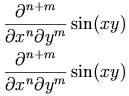
</p>
                     <blockquote>
                        <p>
                           <img src="image/f4069.gif" alt="\frac{\partial^{n+m}}{\partial x^n \partial y^m} \sin(xy)"/>

                        </p>
                     </blockquote>
                     <p>Consult the descriptions of individual operators that make use of the
<code>degree
</code> construct for default renderings.</p>
                  </div>
               </div>
               <div class="div4">

                  <h4>
                     <a id="contm.divergence">

                     </a>4.4.5.8 Divergence (<code>divergence
</code>)</h4>
                  <div class="div5">

                     <h5>
                        <a id="id.4.4.5.8.1">

                        </a>4.4.5.8.1 Discussion</h5>
                     <p>The <code>divergence
</code> element is the vector calculus
divergence operator, often called div.</p>
                     <p>The <code>divergence
</code> element takes the attributes <code>encoding
</code> and <code>definitionURL
</code> that can be used to override the
default semantics.</p>
                     <p>The <code>divergence
</code> element is a 
<em>unary calculus operator
</em> (see 
<a href="#contm.funopqual">
                           <b>4.2.3 Functions, Operators and Qualifiers</b>
                        </a>).</p>
                  </div>
                  <div class="div5">

                     <h5>
                        <a id="id.4.4.5.8.2">

                        </a>4.4.5.8.2 Example</h5>
                     <table>
                        <tr>
                           <td>
                              <pre>
&lt;apply&gt;
  &lt;divergence/&gt;
  &lt;ci&gt; a &lt;/ci&gt;
&lt;/apply&gt;
</pre>
                           </td>
                           <td class="mathml-render" valign="middle">
                              <math xmlns="http://www.w3.org/1998/Math/MathML">
<apply>
  <divergence/>
  <ci> a </ci>
</apply>
</math>
                           </td>
                        </tr>
                     </table>
                  </div>
                  <div class="div5">

                     <h5>
                        <a id="id.4.4.5.8.3">

                        </a>4.4.5.8.3 Default Rendering</h5>
                     <blockquote>
                        <p>
                           <img src="image/f4070.gif" alt="\mathop{\mathrm{div}} a"/>

                        </p>
                     </blockquote>
                  </div>
               </div>
               <div class="div4">

                  <h4>
                     <a id="contm.grad">

                     </a>4.4.5.9 Gradient (<code>grad
</code>)</h4>
                  <div class="div5">

                     <h5>
                        <a id="id.4.4.5.9.1">

                        </a>4.4.5.9.1 Discussion</h5>
                     <p>The <code>grad
</code> element is the vector calculus gradient
operator, often called grad.</p>
                     <p>The <code>grad
</code> element takes the attributes <code>encoding
</code> and <code>definitionURL
</code> that can be used to override the
default semantics.</p>
                     <p>The <code>grad
</code> element is a <em>unary calculus
operator
</em> (see <a href="#contm.funopqual">
                           <b>4.2.3 Functions, Operators and Qualifiers</b>
                        </a>).</p>
                  </div>
                  <div class="div5">

                     <h5>
                        <a id="id.4.4.5.9.2">

                        </a>4.4.5.9.2 Example</h5>
                     <table>
                        <tr>
                           <td>
                              <pre>
&lt;apply&gt;
  &lt;grad/&gt;
  &lt;ci&gt; f&lt;/ci&gt;
&lt;/apply&gt;
</pre>
                           </td>
                           <td class="mathml-render" valign="middle">
                              <math xmlns="http://www.w3.org/1998/Math/MathML">
<apply>
  <grad/>
  <ci> f</ci>
</apply>
</math>
                           </td>
                        </tr>
                     </table>
                     <p>Where for example <var>f</var> is a scalar function of three real variables.</p>
                  </div>
                  <div class="div5">

                     <h5>
                        <a id="id.4.4.5.9.3">

                        </a>4.4.5.9.3 Default Rendering</h5>
                     <blockquote>
                        <p>
                           <img src="image/f4071.gif" alt="\mathop{\mathrm{grad}} f"/>

                        </p>
                     </blockquote>
                  </div>
               </div>
               <div class="div4">

                  <h4>
                     <a id="contm.curl">

                     </a>4.4.5.10 Curl (<code>curl
</code>)</h4>
                  <div class="div5">

                     <h5>
                        <a id="id.4.4.5.10.1">

                        </a>4.4.5.10.1 Discussion</h5>
                     <p>The <code>curl
</code> element is the vector calculus curl operator.</p>
                     <p>The <code>curl
</code> element takes the attributes <code>encoding
</code> and <code>definitionURL
</code> that can be used to override the
default semantics.</p>
                     <p>The <code>curl
</code> element is a <em>unary calculus
operator
</em> (see <a href="#contm.funopqual">
                           <b>4.2.3 Functions, Operators and Qualifiers</b>
                        </a>).</p>
                  </div>
                  <div class="div5">

                     <h5>
                        <a id="id.4.4.5.10.2">

                        </a>4.4.5.10.2 Example</h5>
                     <table>
                        <tr>
                           <td>
                              <pre>
&lt;apply&gt;
  &lt;curl/&gt;
  &lt;ci&gt; a &lt;/ci&gt;
&lt;/apply&gt;
</pre>
                           </td>
                           <td class="mathml-render" valign="middle">
                              <math xmlns="http://www.w3.org/1998/Math/MathML">
<apply>
  <curl/>
  <ci> a </ci>
</apply>
</math>
                           </td>
                        </tr>
                     </table>
                     <p>Where for example 
<var>a</var> is a vector field.</p>
                  </div>
                  <div class="div5">

                     <h5>
                        <a id="id.4.4.5.10.3">

                        </a>4.4.5.10.3 Default Rendering</h5>
                     <blockquote>
                        <p>
                           <img src="image/f4072.gif" alt="\mathop{\mathrm{curl}} a"/>

                        </p>
                     </blockquote>
                  </div>
               </div>
               <div class="div4">

                  <h4>
                     <a id="contm.laplacian">

                     </a>4.4.5.11 Laplacian (<code>laplacian
</code>)</h4>
                  <div class="div5">

                     <h5>
                        <a id="id.4.4.5.11.1">

                        </a>4.4.5.11.1 Discussion</h5>
                     <p>The <code>laplacian
</code> element is the vector calculus
laplacian operator.</p>
                     <p>The <code>laplacian
</code> element takes the attributes <code>encoding
</code> and <code>definitionURL
</code> that can be used to override the
default semantics.</p>
                     <p>The <code>laplacian
</code> element is an <em>unary calculus
operator
</em> (see <a href="#contm.funopqual">
                           <b>4.2.3 Functions, Operators and Qualifiers</b>
                        </a>).</p>
                  </div>
                  <div class="div5">

                     <h5>
                        <a id="id.4.4.5.11.2">

                        </a>4.4.5.11.2 Example</h5>
                     <table>
                        <tr>
                           <td>
                              <pre>
&lt;apply&gt;
  &lt;eq/&gt;
  &lt;apply&gt;&lt;laplacian/&gt;
    &lt;ci&gt; f &lt;/ci&gt;
  &lt;/apply&gt;
  &lt;apply&gt;
    &lt;divergence/&gt;
    &lt;apply&gt;&lt;grad/&gt;
      &lt;ci&gt; f &lt;/ci&gt;
    &lt;/apply&gt;
  &lt;/apply&gt;
&lt;/apply&gt;
</pre>
                           </td>
                           <td class="mathml-render" valign="middle">
                              <math xmlns="http://www.w3.org/1998/Math/MathML">
<apply>
  <eq/>
  <apply><laplacian/>
    <ci> f </ci>
  </apply>
  <apply>
    <divergence/>
    <apply><grad/>
      <ci> f </ci>
    </apply>
  </apply>
</apply>
</math>
                           </td>
                        </tr>
                     </table>
                     <p>Where for example
<var>f</var> is a scalar function of three real variables.</p>
                  </div>
                  <div class="div5">

                     <h5>
                        <a id="id.4.4.5.11.3">

                        </a>4.4.5.11.3 Default Rendering</h5>
                     <blockquote>
                        <p>
                           <img src="image/f4073.gif" alt="\nabla^2 f"/>

                        </p>
                     </blockquote>
                  </div>
               </div>
            </div>
            <div class="div3">

               <h3>
                  <a id="contm.sets">

                  </a>4.4.6 Theory of Sets</h3>
               <div class="div4">

                  <h4>
                     <a id="contm.set">

                     </a>4.4.6.1 Set (<code>set
</code>)</h4>
                  <div class="div5">

                     <h5>
                        <a id="id.4.4.6.1.1">

                        </a>4.4.6.1.1 Discussion</h5>
                     <p>The 
<code>set
</code> element is the container element that constructs a set of elements. The elements of a set can be defined either by explicitly listing the elements, or by using the
<code>bvar
</code> and 
<code>condition
</code> elements.</p>
                     <p>The 
<code>set
</code> element is a 
<em>constructor element
</em> (see 
<a href="#contm.constructor">
                           <b>4.2.2.2 Constructors</b>
                        </a>).</p>
                  </div>
                  <div class="div5">

                     <h5>
                        <a id="id.4.4.6.1.2">

                        </a>4.4.6.1.2 Examples</h5>
                     <table>
                        <tr>
                           <td>
                              <pre>
&lt;set&gt;
  &lt;ci&gt; b &lt;/ci&gt;
  &lt;ci&gt; a &lt;/ci&gt;
  &lt;ci&gt; c &lt;/ci&gt;
&lt;/set&gt;
</pre>
                           </td>
                           <td class="mathml-render" valign="middle">
                              <math xmlns="http://www.w3.org/1998/Math/MathML">
<set>
  <ci> b </ci>
  <ci> a </ci>
  <ci> c </ci>
</set>
</math>
                           </td>
                        </tr>
                     </table>
                     <p>This constructs the set {b, a, c}</p>
                     <table>
                        <tr>
                           <td>
                              <pre>
&lt;set&gt;
  &lt;bvar&gt;&lt;ci&gt; x &lt;/ci&gt;&lt;/bvar&gt;
  &lt;condition&gt;
    &lt;apply&gt;&lt;and/&gt;
      &lt;apply&gt;&lt;lt/&gt;
        &lt;ci&gt; x &lt;/ci&gt;
        &lt;cn&gt; 5 &lt;/cn&gt;
      &lt;/apply&gt;
      &lt;apply&gt;&lt;in/&gt;
        &lt;ci&gt; x &lt;/ci&gt;
        &lt;naturalnumbers/&gt;
      &lt;/apply&gt;
    &lt;/apply&gt;
  &lt;/condition&gt;
  &lt;ci&gt; x &lt;/ci&gt;
&lt;/set&gt;
</pre>
                           </td>
                           <td class="mathml-render" valign="middle">
                              <math xmlns="http://www.w3.org/1998/Math/MathML">
<set>
  <bvar><ci> x </ci></bvar>
  <condition>
    <apply><and/>
      <apply><lt/>
        <ci> x </ci>
        <cn> 5 </cn>
      </apply>
      <apply><in/>
        <ci> x </ci>
        <naturalnumbers/>
      </apply>
    </apply>
  </condition>
  <ci> x </ci>
</set>
</math>
                           </td>
                        </tr>
                     </table>
                     <p>This constructs the set of all natural numbers less than 5, ie. the set {0, 1, 2, 3, 4}</p>
                  </div>
                  <div class="div5">

                     <h5>
                        <a id="id.4.4.6.1.3">

                        </a>4.4.6.1.3 Default Rendering</h5>
                     <ul>
                        <li>
                           <p>

                              <img src="image/f4074.gif" alt="\{ a, b, c \}" style="vertical-align:middle"/>
                           </p>
                        </li>
                        <li>
                           <p>

                              <img src="image/new-setexample.gif" alt="\{ x \mid x &lt; 5 \land x \in \mathbb{N} \}" style="vertical-align:middle"/>
                           </p>
                        </li>
                     </ul>
                  </div>
               </div>
               <div class="div4">

                  <h4>
                     <a id="contm.list">

                     </a>4.4.6.2 List (<code>list
</code>)</h4>
                  <div class="div5">

                     <h5>
                        <a id="id.4.4.6.2.1">

                        </a>4.4.6.2.1 Discussion</h5>
                     <p>The 
<code>list
</code> element is the container element that constructs a list of elements. Elements can be defined either by explicitly listing the elements, or by using the 
<code>bvar
</code> and
<code>condition
</code> elements.</p>
                     <p>Lists differ from sets in that there is an explicit order to the elements. Two orders are supported: lexicographic and numeric. The kind of ordering that should be used is specified by the 
<code>order
</code> attribute.</p>
                     <p>The 
<code>list
</code> element is a 
<em>constructor element
</em> (see 
<a href="#contm.constructor">
                           <b>4.2.2.2 Constructors</b>
                        </a>).</p>
                  </div>
                  <div class="div5">

                     <h5>
                        <a id="id.4.4.6.2.2">

                        </a>4.4.6.2.2 Examples</h5>
                     <table>
                        <tr>
                           <td>
                              <pre>
&lt;list&gt;
  &lt;ci&gt; a &lt;/ci&gt;
  &lt;ci&gt; b &lt;/ci&gt;
  &lt;ci&gt; c &lt;/ci&gt;
&lt;/list&gt;
</pre>
                           </td>
                           <td class="mathml-render" valign="middle">
                              <math xmlns="http://www.w3.org/1998/Math/MathML">
<list>
  <ci> a </ci>
  <ci> b </ci>
  <ci> c </ci>
</list>
</math>
                           </td>
                        </tr>
                     </table>
                     <table>
                        <tr>
                           <td>
                              <pre>
&lt;list order="numeric"&gt;
  &lt;bvar&gt;&lt;ci&gt; x &lt;/ci&gt;&lt;/bvar&gt;
  &lt;condition&gt;
    &lt;apply&gt;&lt;lt/&gt;
      &lt;ci&gt; x &lt;/ci&gt;
      &lt;cn&gt; 5 &lt;/cn&gt;
    &lt;/apply&gt;
  &lt;/condition&gt;
  &lt;ci&gt; x &lt;/ci&gt;
&lt;/list&gt;
</pre>
                           </td>
                           <td class="mathml-render" valign="middle">
                              <math xmlns="http://www.w3.org/1998/Math/MathML">
<list order="numeric">
  <bvar><ci> x </ci></bvar>
  <condition>
    <apply><lt/>
      <ci> x </ci>
      <cn> 5 </cn>
    </apply>
  </condition>
  <ci> x </ci>
</list>
</math>
                           </td>
                        </tr>
                     </table>
                  </div>
                  <div class="div5">

                     <h5>
                        <a id="id.4.4.6.2.3">

                        </a>4.4.6.2.3 Default Rendering</h5>
                     <ul>
                        <li>
                           <p>

                              <img src="image/f4076.gif" alt="[ a, b, c ]" style="vertical-align:middle"/>
                           </p>
                        </li>
                        <li>
                           <p>

                              <img src="image/f4077.gif" alt="[ x \mid x &lt; 5 ]" style="vertical-align:middle"/>
                           </p>
                        </li>
                     </ul>
                  </div>
               </div>
               <div class="div4">

                  <h4>
                     <a id="contm.union">

                     </a>4.4.6.3 Union (<code>union
</code>)</h4>
                  <div class="div5">

                     <h5>
                        <a id="id.4.4.6.3.1">

                        </a>4.4.6.3.1 Discussion</h5>
                     <p>The <code>union
</code> element is the operator for a
set-theoretic union or join of two (or more) sets.</p>
                     <p>The <code>union
</code> attribute takes the <code>definitionURL
</code> and <code>encoding
</code> attributes, which can be used to override the
default semantics.</p>
                     <p>The <code>union
</code> element is an <em>n-ary set
operator
</em> (see <a href="#contm.funopqual">
                           <b>4.2.3 Functions, Operators and Qualifiers</b>
                        </a>).</p>
                  </div>
                  <div class="div5">

                     <h5>
                        <a id="id.4.4.6.3.2">

                        </a>4.4.6.3.2 Example</h5>
                     <table>
                        <tr>
                           <td>
                              <pre>
&lt;apply&gt;
  &lt;union/&gt;
  &lt;ci&gt; A &lt;/ci&gt;
  &lt;ci&gt; B &lt;/ci&gt;
&lt;/apply&gt;
</pre>
                           </td>
                           <td class="mathml-render" valign="middle">
                              <math xmlns="http://www.w3.org/1998/Math/MathML">
<apply>
  <union/>
  <ci> A </ci>
  <ci> B </ci>
</apply>
</math>
                           </td>
                        </tr>
                     </table>
                  </div>
                  <div class="div5">

                     <h5>
                        <a id="id.4.4.6.3.3">

                        </a>4.4.6.3.3 Default Rendering</h5>
                     <blockquote>
                        <p>
                           <img src="image/f4078.gif" alt="A \cup B"/>

                        </p>
                     </blockquote>
                  </div>
               </div>
               <div class="div4">

                  <h4>
                     <a id="contm.intersect">

                     </a>4.4.6.4 Intersect (<code>intersect
</code>)</h4>
                  <div class="div5">

                     <h5>
                        <a id="id.4.4.6.4.1">

                        </a>4.4.6.4.1 Discussion</h5>
                     <p>The <code>intersect
</code> element is the operator for the
set-theoretic intersection or meet of two (or more) sets.</p>
                     <p>The <code>intersect
</code> element takes the <code>definitionURL
</code> and <code>encoding
</code> attributes, which can be used to override the
default semantics.</p>
                     <p>The <code>intersect
</code> element is an <em>n-ary set
operator
</em> (see <a href="#contm.funopqual">
                           <b>4.2.3 Functions, Operators and Qualifiers</b>
                        </a>).</p>
                  </div>
                  <div class="div5">

                     <h5>
                        <a id="id.4.4.6.4.2">

                        </a>4.4.6.4.2 Example</h5>
                     <table>
                        <tr>
                           <td>
                              <pre>
&lt;apply&gt;
  &lt;intersect/&gt;
  &lt;ci type="set"&gt; A &lt;/ci&gt;
  &lt;ci type="set"&gt; B &lt;/ci&gt;
&lt;/apply&gt;
</pre>
                           </td>
                           <td class="mathml-render" valign="middle">
                              <math xmlns="http://www.w3.org/1998/Math/MathML">
<apply>
  <intersect/>
  <ci type="set"> A </ci>
  <ci type="set"> B </ci>
</apply>
</math>
                           </td>
                        </tr>
                     </table>
                  </div>
                  <div class="div5">

                     <h5>
                        <a id="id.4.4.6.4.3">

                        </a>4.4.6.4.3 Default Rendering</h5>
                     <blockquote>
                        <p>
                           <img src="image/f4079.gif" alt="A \cap B"/>

                        </p>
                     </blockquote>
                  </div>
               </div>
               <div class="div4">

                  <h4>
                     <a id="contm.in">

                     </a>4.4.6.5 Set inclusion (<code>in
</code>)</h4>
                  <div class="div5">

                     <h5>
                        <a id="id.4.4.6.5.1">

                        </a>4.4.6.5.1 Discussion</h5>
                     <p>The <code>in
</code> element is the relational operator used
for a set-theoretic inclusion ("is in" or "is a member
of").</p>
                     <p>The <code>in
</code> element takes the <code>definitionURL
</code> and <code>encoding
</code> attributes, which can be used to override the
default semantics.</p>
                     <p>The <code>in
</code> element is a <em>binary set
relation
</em> (see <a href="#contm.relation">
                           <b>4.2.4 Relations</b>
                        </a>).</p>
                  </div>
                  <div class="div5">

                     <h5>
                        <a id="id.4.4.6.5.2">

                        </a>4.4.6.5.2 Example</h5>
                     <table>
                        <tr>
                           <td>
                              <pre>
&lt;apply&gt;
  &lt;in/&gt;
  &lt;ci&gt; a &lt;/ci&gt;
  &lt;ci type="set"&gt; A &lt;/ci&gt;
&lt;/apply&gt;
</pre>
                           </td>
                           <td class="mathml-render" valign="middle">
                              <math xmlns="http://www.w3.org/1998/Math/MathML">
<apply>
  <in/>
  <ci> a </ci>
  <ci type="set"> A </ci>
</apply>
</math>
                           </td>
                        </tr>
                     </table>
                  </div>
                  <div class="div5">

                     <h5>
                        <a id="id.4.4.6.5.3">

                        </a>4.4.6.5.3 Default Rendering</h5>
                     <blockquote>
                        <p>
                           <img src="image/f4080.gif" alt="a \in A"/>

                        </p>
                     </blockquote>
                  </div>
               </div>
               <div class="div4">

                  <h4>
                     <a id="contm.notin">

                     </a>4.4.6.6 Set exclusion (<code>notin
</code>)</h4>
                  <div class="div5">

                     <h5>
                        <a id="id.4.4.6.6.1">

                        </a>4.4.6.6.1 Discussion</h5>
                     <p>The <code>notin
</code> element is the relational operator
element used for set-theoretic exclusion ("is not in" or
"is not a member of").</p>
                     <p>The <code>notin
</code> element takes the <code>definitionURL
</code> and <code>encoding
</code> attributes, which can be used to override the
default semantics.</p>
                     <p>The <code>notin
</code> element is a <em>binary set
relation
</em> (see <a href="#contm.relation">
                           <b>4.2.4 Relations</b>
                        </a>).</p>
                  </div>
                  <div class="div5">

                     <h5>
                        <a id="id.4.4.6.6.2">

                        </a>4.4.6.6.2 Example</h5>
                     <table>
                        <tr>
                           <td>
                              <pre>
&lt;apply&gt;
  &lt;notin/&gt;
  &lt;ci&gt; a &lt;/ci&gt;
  &lt;ci&gt; A &lt;/ci&gt;
&lt;/apply&gt;
</pre>
                           </td>
                           <td class="mathml-render" valign="middle">
                              <math xmlns="http://www.w3.org/1998/Math/MathML">
<apply>
  <notin/>
  <ci> a </ci>
  <ci> A </ci>
</apply>
</math>
                           </td>
                        </tr>
                     </table>
                  </div>
                  <div class="div5">

                     <h5>
                        <a id="id.4.4.6.6.3">

                        </a>4.4.6.6.3 Default Rendering</h5>
                     <blockquote>
                        <p>
                           <img src="image/f4081.gif" alt="a \notin A"/>

                        </p>
                     </blockquote>
                  </div>
               </div>
               <div class="div4">

                  <h4>
                     <a id="contm.subset">

                     </a>4.4.6.7 Subset (<code>subset
</code>)</h4>
                  <div class="div5">

                     <h5>
                        <a id="id.4.4.6.7.1">

                        </a>4.4.6.7.1 Discussion</h5>
                     <p>The <code>subset
</code> element is the relational operator
element for a set-theoretic containment ("is a subset
of").</p>
                     <p>The <code>subset
</code> element takes the <code>definitionURL
</code> and <code>encoding
</code> attributes, which can be used to override the
default semantics.</p>
                     <p>The <code>subset
</code> element is an <em>n-ary set
relation
</em> (see <a href="#contm.relation">
                           <b>4.2.4 Relations</b>
                        </a>).</p>
                  </div>
                  <div class="div5">

                     <h5>
                        <a id="id.4.4.6.7.2">

                        </a>4.4.6.7.2 Example</h5>
                     <table>
                        <tr>
                           <td>
                              <pre>
&lt;apply&gt;
  &lt;subset/&gt;
  &lt;ci&gt; A &lt;/ci&gt;
  &lt;ci&gt; B &lt;/ci&gt;
&lt;/apply&gt;
</pre>
                           </td>
                           <td class="mathml-render" valign="middle">
                              <math xmlns="http://www.w3.org/1998/Math/MathML">
<apply>
  <subset/>
  <ci> A </ci>
  <ci> B </ci>
</apply>
</math>
                           </td>
                        </tr>
                     </table>
                  </div>
                  <div class="div5">

                     <h5>
                        <a id="id.4.4.6.7.3">

                        </a>4.4.6.7.3 Default Rendering</h5>
                     <blockquote>
                        <p>
                           <img src="image/f4082.gif" alt="A \subseteq B"/>

                        </p>
                     </blockquote>
                  </div>
               </div>
               <div class="div4">

                  <h4>
                     <a id="contm.prsubset">

                     </a>4.4.6.8 Proper Subset (<code>prsubset
</code>)</h4>
                  <div class="div5">

                     <h5>
                        <a id="id.4.4.6.8.1">

                        </a>4.4.6.8.1 Discussion</h5>
                     <p>The <code>prsubset
</code> element is the relational operator
element for set-theoretic proper containment ("is a proper subset
of").</p>
                     <p>The <code>prsubset
</code> element takes the <code>definitionURL
</code> and <code>encoding
</code> attributes, which can be used to override the
default semantics.</p>
                     <p>The <code>subset
</code> element is an <em>n-ary set
relation
</em> (see <a href="#contm.relation">
                           <b>4.2.4 Relations</b>
                        </a>).</p>
                  </div>
                  <div class="div5">

                     <h5>
                        <a id="id.4.4.6.8.2">

                        </a>4.4.6.8.2 Example</h5>
                     <table>
                        <tr>
                           <td>
                              <pre>
&lt;apply&gt;
  &lt;prsubset/&gt;
  &lt;ci&gt; A &lt;/ci&gt;
  &lt;ci&gt; B &lt;/ci&gt;
&lt;/apply&gt;
</pre>
                           </td>
                           <td class="mathml-render" valign="middle">
                              <math xmlns="http://www.w3.org/1998/Math/MathML">
<apply>
  <prsubset/>
  <ci> A </ci>
  <ci> B </ci>
</apply>
</math>
                           </td>
                        </tr>
                     </table>
                  </div>
                  <div class="div5">

                     <h5>
                        <a id="id.4.4.6.8.3">

                        </a>4.4.6.8.3 Default Rendering</h5>
                     <blockquote>
                        <p>
                           <img src="image/f4083.gif" alt="A \subset B"/>

                        </p>
                     </blockquote>
                  </div>
               </div>
               <div class="div4">

                  <h4>
                     <a id="contm.notsubset">

                     </a>4.4.6.9 Not Subset (<code>notsubset
</code>)</h4>
                  <div class="div5">

                     <h5>
                        <a id="id.4.4.6.9.1">

                        </a>4.4.6.9.1 Discussion</h5>
                     <p>The <code>notsubset
</code> element is the relational operator
element for the set-theoretic relation "is not a subset
of".</p>
                     <p>The <code>notsubset
</code> element takes the <code>definitionURL
</code> and <code>encoding
</code> attributes, which can be used to override the
default semantics.</p>
                     <p>The <code>notsubset
</code> element is a <em>binary set
relation
</em> (see <a href="#contm.relation">
                           <b>4.2.4 Relations</b>
                        </a>).</p>
                  </div>
                  <div class="div5">

                     <h5>
                        <a id="id.4.4.6.9.2">

                        </a>4.4.6.9.2 Example</h5>
                     <table>
                        <tr>
                           <td>
                              <pre>
&lt;apply&gt;
  &lt;notsubset/&gt;
  &lt;ci&gt; A &lt;/ci&gt;
  &lt;ci&gt; B &lt;/ci&gt;
&lt;/apply&gt;
</pre>
                           </td>
                           <td class="mathml-render" valign="middle">
                              <math xmlns="http://www.w3.org/1998/Math/MathML">
<apply>
  <notsubset/>
  <ci> A </ci>
  <ci> B </ci>
</apply>
</math>
                           </td>
                        </tr>
                     </table>
                  </div>
                  <div class="div5">

                     <h5>
                        <a id="id.4.4.6.9.3">

                        </a>4.4.6.9.3 Default Rendering</h5>
                     <blockquote>
                        <p>
                           <img src="image/f4084.gif" alt="A \not\subset B"/>

                        </p>
                     </blockquote>
                  </div>
               </div>
               <div class="div4">

                  <h4>
                     <a id="contm.notprsubset">

                     </a>4.4.6.10 Not Proper Subset (<code>notprsubset
</code>)</h4>
                  <div class="div5">

                     <h5>
                        <a id="id.4.4.6.10.1">

                        </a>4.4.6.10.1 Discussion</h5>
                     <p>The <code>notprsubset
</code> element is the operator element
for the set-theoretic relation "is not a proper subset
of".</p>
                     <p>The <code>notprsubset
</code> takes the <code>definitionURL
</code> and <code>encoding
</code> attributes, which can be used to override the
default semantics.</p>
                     <p>The <code>notprsubset
</code> element is a <em>binary set
relation
</em> (see <a href="#contm.relation">
                           <b>4.2.4 Relations</b>
                        </a>).</p>
                  </div>
                  <div class="div5">

                     <h5>
                        <a id="id.4.4.6.10.2">

                        </a>4.4.6.10.2 Example</h5>
                     <table>
                        <tr>
                           <td>
                              <pre>
&lt;apply&gt;
  &lt;notprsubset/&gt;
  &lt;ci&gt; A &lt;/ci&gt;
  &lt;ci&gt; B &lt;/ci&gt;
&lt;/apply&gt;
</pre>
                           </td>
                           <td class="mathml-render" valign="middle">
                              <math xmlns="http://www.w3.org/1998/Math/MathML">
<apply>
  <notprsubset/>
  <ci> A </ci>
  <ci> B </ci>
</apply>
</math>
                           </td>
                        </tr>
                     </table>
                  </div>
                  <div class="div5">

                     <h5>
                        <a id="id.4.4.6.10.3">

                        </a>4.4.6.10.3 Default Rendering</h5>
                     <blockquote>
                        <p>
                           <img src="image/f4085.gif" alt="A \nsubseteq B"/>

                        </p>
                     </blockquote>
                  </div>
               </div>
               <div class="div4">

                  <h4>
                     <a id="contm.setdiff">

                     </a>4.4.6.11 Set Difference (<code>setdiff
</code>)</h4>
                  <div class="div5">

                     <h5>
                        <a id="id.4.4.6.11.1">

                        </a>4.4.6.11.1 Discussion</h5>
                     <p>The <code>setdiff
</code> element is the operator element for
a set-theoretic difference of two sets.</p>
                     <p>The <code>setdiff
</code> element takes the <code>definitionURL
</code> and <code>encoding
</code> attributes, which can be used to override the
default semantics.</p>
                     <p>The <code>setdiff
</code> element is a <em>binary set
operator
</em> (see <a href="#contm.funopqual">
                           <b>4.2.3 Functions, Operators and Qualifiers</b>
                        </a>).</p>
                  </div>
                  <div class="div5">

                     <h5>
                        <a id="id.4.4.6.11.2">

                        </a>4.4.6.11.2 Example</h5>
                     <table>
                        <tr>
                           <td>
                              <pre>
&lt;apply&gt;
  &lt;setdiff/&gt;
  &lt;ci&gt; A &lt;/ci&gt;
  &lt;ci&gt; B &lt;/ci&gt;
&lt;/apply&gt;
</pre>
                           </td>
                           <td class="mathml-render" valign="middle">
                              <math xmlns="http://www.w3.org/1998/Math/MathML">
<apply>
  <setdiff/>
  <ci> A </ci>
  <ci> B </ci>
</apply>
</math>
                           </td>
                        </tr>
                     </table>
                  </div>
                  <div class="div5">

                     <h5>
                        <a id="id.4.4.6.11.3">

                        </a>4.4.6.11.3 Default Rendering</h5>
                     <blockquote>
                        <p>
                           <img src="image/f4086.gif" alt="A \setminus B"/>

                        </p>
                     </blockquote>
                  </div>
               </div>
               <div class="div4">

                  <h4>
                     <a id="contm.card">

                     </a>4.4.6.12 Cardinality (<code>card
</code>)</h4>
                  <div class="div5">

                     <h5>
                        <a id="id.4.4.6.12.1">

                        </a>4.4.6.12.1 Discussion</h5>
                     <p>The <code>card
</code> element is the operator element for
the size or cardinality of a set.</p>
                     <p>The <code>card
</code> element takes the attributes <code>definitionURL
</code> and <code>encoding
</code> that can be used to override the
default semantics.</p>
                     <p>The <code>card
</code> element is a <em>unary set
operator
</em> (see <a href="#contm.funopqual">
                           <b>4.2.3 Functions, Operators and Qualifiers</b>
                        </a>).</p>
                  </div>
                  <div class="div5">

                     <h5>
                        <a id="id.4.4.6.12.2">

                        </a>4.4.6.12.2 Example</h5>
                     <table>
                        <tr>
                           <td>
                              <pre>
&lt;apply&gt;
  &lt;eq/&gt;
  &lt;apply&gt;&lt;card/&gt;
    &lt;ci&gt; A &lt;/ci&gt;
  &lt;/apply&gt;
  &lt;ci&gt; 5 &lt;/ci&gt;
&lt;/apply&gt;
</pre>
                           </td>
                           <td class="mathml-render" valign="middle">
                              <math xmlns="http://www.w3.org/1998/Math/MathML">
<apply>
  <eq/>
  <apply><card/>
    <ci> A </ci>
  </apply>
  <ci> 5 </ci>
</apply>
</math>
                           </td>
                        </tr>
                     </table>
                     <p>where A is a set with 5 elements.</p>
                  </div>
                  <div class="div5">

                     <h5>
                        <a id="id.4.4.6.12.3">

                        </a>4.4.6.12.3 Default Rendering</h5>
                     <blockquote>
                        <p>
                           <img src="image/f4087.gif" alt="| A | = 5"/>

                        </p>
                     </blockquote>
                  </div>
               </div>
               <div class="div4">

                  <h4>
                     <a id="contm.cartesianproduct">

                     </a>4.4.6.13 Cartesian product (<code>cartesianproduct
</code>)</h4>
                  <div class="div5">

                     <h5>
                        <a id="id.4.4.6.13.1">

                        </a>4.4.6.13.1 Discussion</h5>
                     <p>The <code>cartesianproduct
</code> element is the operator element for
the Cartesian product of two or more sets. If <var>A</var> and <var>B</var> are two sets, then
the Cartesian product of <var>A</var> and <var>B</var> is the set of all pairs <var>(a,b)</var> 
with <var>a</var> in <var>A</var> and <var>b</var> in <var>B</var>. </p>
                     <p>The <code>cartesianproduct
</code> element takes the attributes <code>definitionURL
</code> and <code>encoding
</code> that can be used to override the
default semantics.</p>
                     <p>The <code>cartesianproduct
</code> element is a <em>n-ary set
operator
</em> (see <a href="#contm.funopqual">
                           <b>4.2.3 Functions, Operators and Qualifiers</b>
                        </a>).</p>
                  </div>
                  <div class="div5">

                     <h5>
                        <a id="id.4.4.6.13.2">

                        </a>4.4.6.13.2 Example</h5>
                     <table>
                        <tr>
                           <td>
                              <pre>
  &lt;apply&gt;&lt;cartesianproduct/&gt;
    &lt;ci&gt; A &lt;/ci&gt;
    &lt;ci&gt; B &lt;/ci&gt;
  &lt;/apply&gt;
</pre>
                           </td>
                           <td class="mathml-render" valign="middle">
                              <math xmlns="http://www.w3.org/1998/Math/MathML">
  <apply><cartesianproduct/>
    <ci> A </ci>
    <ci> B </ci>
  </apply>
</math>
                           </td>
                        </tr>
                     </table>
                     <table>
                        <tr>
                           <td>
                              <pre>
  &lt;apply&gt;&lt;cartesianproduct/&gt;
    &lt;reals/&gt;
    &lt;reals/&gt;
    &lt;reals/&gt;
  &lt;/apply&gt;
</pre>
                           </td>
                           <td class="mathml-render" valign="middle">
                              <math xmlns="http://www.w3.org/1998/Math/MathML">
  <apply><cartesianproduct/>
    <reals/>
    <reals/>
    <reals/>
  </apply>
</math>
                           </td>
                        </tr>
                     </table>
                  </div>
                  <div class="div5">

                     <h5>
                        <a id="id.4.4.6.13.3">

                        </a>4.4.6.13.3 Default Rendering</h5>
                     <blockquote>
                        <p>
                           <img src="image/cartesianproduct1.gif" alt="A \times B"/>

                        </p>
                     </blockquote>
                     <blockquote>
                        <p>
                           <img src="image/cartesianproduct2.gif" alt="\mathbb{R} \times \mathbb{R} \times \mathbb{R}"/>

                        </p>
                     </blockquote>
                     <blockquote>
                        <p>
                           <img src="image/cartesianproduct3.gif" alt="\mathbb{R}^3"/>

                        </p>
                     </blockquote>
                  </div>
               </div>
            </div>
            <div class="div3">

               <h3>
                  <a id="id.4.4.7">

                  </a>4.4.7 Sequences and Series</h3>
               <div class="div4">

                  <h4>
                     <a id="contm.sum">

                     </a>4.4.7.1 Sum (<code>sum
</code>)</h4>
                  <div class="div5">

                     <h5>
                        <a id="id.4.4.7.1.1">

                        </a>4.4.7.1.1 Discussion</h5>
                     <p>The <code>sum
</code> element denotes the summation
operator. Upper and lower limits for the index of a sum can be specified using 
<code>uplimit
</code>	and <code>lowlimit
</code>. More general 
domains for the indices can be specified using a <code>condition
</code> 
involving the bound variables. The index for the summation is specified by a 
<code>bvar
</code> element.</p>
                     <p>The <code>sum
</code> element takes the <code>definitionURL
</code> and <code>encoding
</code> attributes, which can be used to override the
default semantics.</p>
                     <p>The <code>sum
</code> element is an <em>operator taking
qualifiers
</em> (see <a href="#contm.opwithqual">
                           <b>4.2.3.2 Operators taking Qualifiers</b>
                        </a>).</p>
                  </div>
                  <div class="div5">

                     <h5>
                        <a id="id.4.4.7.1.2">

                        </a>4.4.7.1.2 Examples</h5>
                     <table>
                        <tr>
                           <td>
                              <pre>
&lt;apply&gt;
  &lt;sum/&gt;
  &lt;bvar&gt;
    &lt;ci&gt; x &lt;/ci&gt;
  &lt;/bvar&gt;
  &lt;lowlimit&gt;
    &lt;ci&gt; a &lt;/ci&gt;
  &lt;/lowlimit&gt;
  &lt;uplimit&gt;
    &lt;ci&gt; b &lt;/ci&gt;
  &lt;/uplimit&gt;
  &lt;apply&gt;&lt;ci type="fn"&gt; f &lt;/ci&gt;
    &lt;ci&gt; x &lt;/ci&gt;
  &lt;/apply&gt;
&lt;/apply&gt;

&lt;apply&gt;
  &lt;sum/&gt;
  &lt;bvar&gt;
    &lt;ci&gt; x &lt;/ci&gt;
  &lt;/bvar&gt;
  &lt;condition&gt;
    &lt;apply&gt; &lt;in/&gt;
      &lt;ci&gt; x &lt;/ci&gt;
      &lt;ci type="set"&gt; B &lt;/ci&gt;
    &lt;/apply&gt;
  &lt;/condition&gt;
  &lt;apply&gt;&lt;ci type="fn"&gt; f &lt;/ci&gt;
    &lt;ci&gt; x &lt;/ci&gt;
  &lt;/apply&gt;
&lt;/apply&gt;
</pre>
                           </td>
                           <td class="mathml-render" valign="middle">
                              <math xmlns="http://www.w3.org/1998/Math/MathML">
<apply>
  <sum/>
  <bvar>
    <ci> x </ci>
  </bvar>
  <lowlimit>
    <ci> a </ci>
  </lowlimit>
  <uplimit>
    <ci> b </ci>
  </uplimit>
  <apply><ci type="fn"> f </ci>
    <ci> x </ci>
  </apply>
</apply>

<apply>
  <sum/>
  <bvar>
    <ci> x </ci>
  </bvar>
  <condition>
    <apply> <in/>
      <ci> x </ci>
      <ci type="set"> B </ci>
    </apply>
  </condition>
  <apply><ci type="fn"> f </ci>
    <ci> x </ci>
  </apply>
</apply>
</math>
                           </td>
                        </tr>
                     </table>
                  </div>
                  <div class="div5">

                     <h5>
                        <a id="id.4.4.7.1.3">

                        </a>4.4.7.1.3 Default Rendering</h5>
                     <blockquote>
                        <p>
                           <img src="image/f4088.gif" alt="\sum_{x=a}^b f(x)"/>

                        </p>
                     </blockquote>
                     <blockquote>
                        <p>
                           <img src="image/f4089.gif" alt="\sum_{x \in B} f(x)"/>

                        </p>
                     </blockquote>
                  </div>
               </div>
               <div class="div4">

                  <h4>
                     <a id="contm.product">

                     </a>4.4.7.2 Product (<code>product
</code>)</h4>
                  <div class="div5">

                     <h5>
                        <a id="id.4.4.7.2.1">

                        </a>4.4.7.2.1 Discussion</h5>
                     <p>The <code>product
</code> element denotes the product
operator. Upper and lower limits for the index of a product can be specified using 
<code>uplimit
</code>	and <code>lowlimit
</code>. More general 
domains for the indices can be specified using a <code>condition
</code> 
involving the bound variables. The index for the product is specified by a 
<code>bvar
</code> element.</p>
                     <p>The <code>product
</code> element takes the <code>definitionURL
</code> and <code>encoding
</code> attributes, which can be used to override the
default semantics.</p>
                     <p>The <code>product
</code> element is an <em>operator taking
qualifiers
</em> (see <a href="#contm.opwithqual">
                           <b>4.2.3.2 Operators taking Qualifiers</b>
                        </a>).</p>
                  </div>
                  <div class="div5">

                     <h5>
                        <a id="id.4.4.7.2.2">

                        </a>4.4.7.2.2 Examples</h5>
                     <table>
                        <tr>
                           <td>
                              <pre>
&lt;apply&gt;
  &lt;product/&gt;
  &lt;bvar&gt;
    &lt;ci&gt; x &lt;/ci&gt;
  &lt;/bvar&gt;
  &lt;lowlimit&gt;
    &lt;ci&gt; a &lt;/ci&gt;
  &lt;/lowlimit&gt;
  &lt;uplimit&gt;
    &lt;ci&gt; b &lt;/ci&gt;
  &lt;/uplimit&gt;
  &lt;apply&gt;&lt;ci type="fn"&gt; f &lt;/ci&gt;
    &lt;ci&gt; x &lt;/ci&gt;
  &lt;/apply&gt;
&lt;/apply&gt;

&lt;apply&gt;
  &lt;product/&gt;
  &lt;bvar&gt;
    &lt;ci&gt; x &lt;/ci&gt;
  &lt;/bvar&gt;
  &lt;condition&gt;
    &lt;apply&gt; &lt;in/&gt;
      &lt;ci&gt; x &lt;/ci&gt;
      &lt;ci type="set"&gt; B &lt;/ci&gt;
    &lt;/apply&gt;
  &lt;/condition&gt;
  &lt;apply&gt;&lt;ci type="fn"&gt; f &lt;/ci&gt;
    &lt;ci&gt; x &lt;/ci&gt;
  &lt;/apply&gt;
&lt;/apply&gt;
</pre>
                           </td>
                           <td class="mathml-render" valign="middle">
                              <math xmlns="http://www.w3.org/1998/Math/MathML">
<apply>
  <product/>
  <bvar>
    <ci> x </ci>
  </bvar>
  <lowlimit>
    <ci> a </ci>
  </lowlimit>
  <uplimit>
    <ci> b </ci>
  </uplimit>
  <apply><ci type="fn"> f </ci>
    <ci> x </ci>
  </apply>
</apply>

<apply>
  <product/>
  <bvar>
    <ci> x </ci>
  </bvar>
  <condition>
    <apply> <in/>
      <ci> x </ci>
      <ci type="set"> B </ci>
    </apply>
  </condition>
  <apply><ci type="fn"> f </ci>
    <ci> x </ci>
  </apply>
</apply>
</math>
                           </td>
                        </tr>
                     </table>
                  </div>
                  <div class="div5">

                     <h5>
                        <a id="id.4.4.7.2.3">

                        </a>4.4.7.2.3 Default Rendering</h5>
                     <blockquote>
                        <p>
                           <img src="image/f4090.gif" alt="\prod_{x=a}^b f(x)"/>

                        </p>
                     </blockquote>
                     <blockquote>
                        <p>
                           <img src="image/f4091.gif" alt="\prod_{x \in B} f(x)"/>

                        </p>
                     </blockquote>
                  </div>
               </div>
               <div class="div4">

                  <h4>
                     <a id="contm.limit">

                     </a>4.4.7.3 Limit (<code>limit
</code>)</h4>
                  <div class="div5">

                     <h5>
                        <a id="id.4.4.7.3.1">

                        </a>4.4.7.3.1 Discussion</h5>
                     <p>The <code>limit
</code> element represents the operation of
taking a limit of a sequence. The limit point is expressed by specifying a
<code>lowlimit
</code> and a <code>bvar
</code>, or by
specifying a <code>condition
</code> on one or more bound
variables.</p>
                     <p>The <code>limit
</code> element takes the <code>definitionURL
</code> and <code>encoding
</code> attributes, which can be used to override the
default semantics.</p>
                     <p>The <code>limit
</code> element is an <em>operator taking
qualifiers
</em> (see <a href="#contm.opwithqual">
                           <b>4.2.3.2 Operators taking Qualifiers</b>
                        </a>).</p>
                  </div>
                  <div class="div5">

                     <h5>
                        <a id="id.4.4.7.3.2">

                        </a>4.4.7.3.2 Examples</h5>
                     <table>
                        <tr>
                           <td>
                              <pre>
&lt;apply&gt;
  &lt;limit/&gt;
  &lt;bvar&gt;
    &lt;ci&gt; x &lt;/ci&gt;
  &lt;/bvar&gt;
  &lt;lowlimit&gt;
    &lt;cn&gt; 0 &lt;/cn&gt;
  &lt;/lowlimit&gt;
  &lt;apply&gt;&lt;sin/&gt;
    &lt;ci&gt; x &lt;/ci&gt;
  &lt;/apply&gt;
&lt;/apply&gt;
</pre>
                           </td>
                           <td class="mathml-render" valign="middle">
                              <math xmlns="http://www.w3.org/1998/Math/MathML">
<apply>
  <limit/>
  <bvar>
    <ci> x </ci>
  </bvar>
  <lowlimit>
    <cn> 0 </cn>
  </lowlimit>
  <apply><sin/>
    <ci> x </ci>
  </apply>
</apply>
</math>
                           </td>
                        </tr>
                     </table>
                     <table>
                        <tr>
                           <td>
                              <pre>
&lt;apply&gt;
  &lt;limit/&gt;
  &lt;bvar&gt;
    &lt;ci&gt; x &lt;/ci&gt;
  &lt;/bvar&gt;
  &lt;condition&gt;
    &lt;apply&gt;
      &lt;tendsto type="above"/&gt;
      &lt;ci&gt; x &lt;/ci&gt;
      &lt;ci&gt; a &lt;/ci&gt;
    &lt;/apply&gt;
  &lt;/condition&gt;
  &lt;apply&gt;&lt;sin/&gt;
     &lt;ci&gt; x &lt;/ci&gt;
  &lt;/apply&gt;
&lt;/apply&gt;
</pre>
                           </td>
                           <td class="mathml-render" valign="middle">
                              <math xmlns="http://www.w3.org/1998/Math/MathML">
<apply>
  <limit/>
  <bvar>
    <ci> x </ci>
  </bvar>
  <condition>
    <apply>
      <tendsto type="above"/>
      <ci> x </ci>
      <ci> a </ci>
    </apply>
  </condition>
  <apply><sin/>
     <ci> x </ci>
  </apply>
</apply>
</math>
                           </td>
                        </tr>
                     </table>
                  </div>
                  <div class="div5">

                     <h5>
                        <a id="id.4.4.7.3.3">

                        </a>4.4.7.3.3 Default Rendering</h5>
                     <blockquote>
                        <p>
                           <img src="image/f4092.gif" alt="\lim_{x \to 0} \sin x"/>

                        </p>
                     </blockquote>
                     <blockquote>
                        <p>
                           <img src="image/f4093.gif" alt="\lim_{x \searrow a} \sin x"/>

                        </p>
                     </blockquote>
                  </div>
               </div>
               <div class="div4">

                  <h4>
                     <a id="contm.tendsto">

                     </a>4.4.7.4 Tends To (<code>tendsto
</code>)</h4>
                  <div class="div5">

                     <h5>
                        <a id="id.4.4.7.4.1">

                        </a>4.4.7.4.1 Discussion</h5>
                     <p>The <code>tendsto
</code> element is used to express the
relation that a quantity is tending to a specified value.</p>
                     <p>The <code>tendsto
</code> element takes the attributes <code>type
</code> to set the direction from which the limiting
value is approached.</p>
                     <p>The <code>tendsto
</code> element is a <em>binary relational
operator
</em> (see <a href="#contm.relation">
                           <b>4.2.4 Relations</b>
                        </a>).</p>
                  </div>
                  <div class="div5">

                     <h5>
                        <a id="id.4.4.7.4.2">

                        </a>4.4.7.4.2 Examples</h5>
                     <table>
                        <tr>
                           <td>
                              <pre>
&lt;apply&gt;
  &lt;tendsto type="above"/&gt;
  &lt;apply&gt;
    &lt;power/&gt;
    &lt;ci&gt; x &lt;/ci&gt;
    &lt;cn&gt; 2 &lt;/cn&gt;
  &lt;/apply&gt;
  &lt;apply&gt;
    &lt;power/&gt;
    &lt;ci&gt; a &lt;/ci&gt;
    &lt;cn&gt; 2 &lt;/cn&gt;
  &lt;/apply&gt;
&lt;/apply&gt;
</pre>
                           </td>
                           <td class="mathml-render" valign="middle">
                              <math xmlns="http://www.w3.org/1998/Math/MathML">
<apply>
  <tendsto type="above"/>
  <apply>
    <power/>
    <ci> x </ci>
    <cn> 2 </cn>
  </apply>
  <apply>
    <power/>
    <ci> a </ci>
    <cn> 2 </cn>
  </apply>
</apply>
</math>
                           </td>
                        </tr>
                     </table>
                     <p>To express (<var>x</var>, 
<var>y</var>)
<img src="image/f4009.gif" alt="\rightarrow" style="vertical-align:middle"/>(<var>f</var>(<var>x</var>, 
<var>y</var>), 
<var>g</var>(<var>x</var>,
<var>y</var>)), one might use vectors, as in:
</p>
                     <table>
                        <tr>
                           <td>
                              <pre>
&lt;apply&gt;
  &lt;tendsto/&gt;
  &lt;vector&gt;
     &lt;ci&gt; x &lt;/ci&gt;
     &lt;ci&gt; y &lt;/ci&gt;
  &lt;/vector&gt;
  &lt;vector&gt;
    &lt;apply&gt;&lt;ci type="fn"&gt; f &lt;/ci&gt;
      &lt;ci&gt; x &lt;/ci&gt;
      &lt;ci&gt; y &lt;/ci&gt;
    &lt;/apply&gt;
    &lt;apply&gt;&lt;ci type="fn"&gt; g &lt;/ci&gt;
      &lt;ci&gt; x &lt;/ci&gt;
      &lt;ci&gt; y &lt;/ci&gt;
    &lt;/apply&gt;
  &lt;/vector&gt;
&lt;/apply&gt;
</pre>
                           </td>
                           <td class="mathml-render" valign="middle">
                              <math xmlns="http://www.w3.org/1998/Math/MathML">
<apply>
  <tendsto/>
  <vector>
     <ci> x </ci>
     <ci> y </ci>
  </vector>
  <vector>
    <apply><ci type="fn"> f </ci>
      <ci> x </ci>
      <ci> y </ci>
    </apply>
    <apply><ci type="fn"> g </ci>
      <ci> x </ci>
      <ci> y </ci>
    </apply>
  </vector>
</apply>
</math>
                           </td>
                        </tr>
                     </table>
                  </div>
                  <div class="div5">

                     <h5>
                        <a id="id.4.4.7.4.3">

                        </a>4.4.7.4.3 Default Rendering</h5>
                     <blockquote>
                        <p>
                           <img src="image/f4094.gif" alt="x^{2} \searrow a^{2}"/>

                        </p>
                     </blockquote>
                     <blockquote>
                        <p>
                           <img src="image/f4095.gif" alt="(x, y) \rightarrow (f(x, y), g(x, y))"/>

                        </p>
                     </blockquote>
                  </div>
               </div>
            </div>
            <div class="div3">

               <h3>
                  <a id="contm.elemclass">

                  </a>4.4.8 Elementary classical functions</h3>
               <div class="div4">

                  <h4>
                     <a id="contm.trig">

                     </a>4.4.8.1 common trigonometric functions </h4>
                  <p>The names of the common trigonometric functions supported by MathML are
listed below. Since their standard interpretations are widely known, they
are discussed as a group.
</p>
                  <table border="1">
                     <tbody>
                        <tr>
                           <td colspan="1" rowspan="1">
                              <code>sin
</code>
                           </td>
                           <td colspan="1" rowspan="1">
                              <code>cos
</code>
                           </td>
                           <td colspan="1" rowspan="1">
                              <code>tan
</code>
                           </td>
                        </tr>
                        <tr>
                           <td colspan="1" rowspan="1">
                              <code>sec
</code>
                           </td>
                           <td colspan="1" rowspan="1">
                              <code>csc
</code>
                           </td>
                           <td colspan="1" rowspan="1">
                              <code>cot
</code>
                           </td>
                        </tr>
                        <tr>
                           <td colspan="1" rowspan="1">
                              <code>sinh
</code>
                           </td>
                           <td colspan="1" rowspan="1">
                              <code>cosh
</code>
                           </td>
                           <td colspan="1" rowspan="1">
                              <code>tanh
</code>
                           </td>
                        </tr>
                        <tr>
                           <td colspan="1" rowspan="1">
                              <code>sech
</code>
                           </td>
                           <td colspan="1" rowspan="1">
                              <code>csch
</code>
                           </td>
                           <td colspan="1" rowspan="1">
                              <code>coth
</code>
                           </td>
                        </tr>
                        <tr>
                           <td colspan="1" rowspan="1">
                              <code>arcsin
</code>
                           </td>
                           <td colspan="1" rowspan="1">
                              <code>arccos
</code>
                           </td>
                           <td colspan="1" rowspan="1">
                              <code>arctan
</code>
                           </td>
                        </tr>
                        <tr>
                           <td colspan="1" rowspan="1">
                              <code>arccosh
</code>
                           </td>
                           <td colspan="1" rowspan="1">
                              <code>arccot
</code>
                           </td>
                           <td colspan="1" rowspan="1">
                              <code>arccoth
</code>
                           </td>
                        </tr>
                        <tr>
                           <td colspan="1" rowspan="1">
                              <code>arccsc
</code>
                           </td>
                           <td colspan="1" rowspan="1">
                              <code>arccsch
</code>
                           </td>
                           <td colspan="1" rowspan="1">
                              <code>arcsec
</code>
                           </td>
                        </tr>
                        <tr>
                           <td colspan="1" rowspan="1">
                              <code>arcsech
</code>
                           </td>
                           <td colspan="1" rowspan="1">
                              <code>arcsinh
</code>
                           </td>
                           <td colspan="1" rowspan="1">
                              <code>arctanh
</code>
                           </td>
                        </tr>
                     </tbody>
                  </table>
                  <div class="div5">

                     <h5>
                        <a id="id.4.4.8.1.1">

                        </a>4.4.8.1.1 Discussion</h5>
                     <p>These operator elements denote the standard trigonometrical functions.</p>
                     <p>These elements all take the <code>definitionURL
</code> and <code>encoding
</code> attributes, which can be used to override the
default semantics.</p>
                     <p>They are all <em>unary trigonometric operators
</em>. (see <a href="#contm.funopqual">
                           <b>4.2.3 Functions, Operators and Qualifiers</b>
                        </a>).</p>
                  </div>
                  <div class="div5">

                     <h5>
                        <a id="id.4.4.8.1.2">

                        </a>4.4.8.1.2 Examples</h5>
                     <table>
                        <tr>
                           <td>
                              <pre>
&lt;apply&gt;
  &lt;sin/&gt;
  &lt;ci&gt; x &lt;/ci&gt;
&lt;/apply&gt;
</pre>
                           </td>
                           <td class="mathml-render" valign="middle">
                              <math xmlns="http://www.w3.org/1998/Math/MathML">
<apply>
  <sin/>
  <ci> x </ci>
</apply>
</math>
                           </td>
                        </tr>
                     </table>
                     <table>
                        <tr>
                           <td>
                              <pre>
&lt;apply&gt;
  &lt;sin/&gt;
  &lt;apply&gt;
    &lt;plus/&gt;
    &lt;apply&gt;&lt;cos/&gt;
      &lt;ci&gt; x &lt;/ci&gt;
    &lt;/apply&gt;
    &lt;apply&gt;
      &lt;power/&gt;
      &lt;ci&gt; x &lt;/ci&gt;
      &lt;cn&gt; 3 &lt;/cn&gt;
    &lt;/apply&gt;
  &lt;/apply&gt;
&lt;/apply&gt;
</pre>
                           </td>
                           <td class="mathml-render" valign="middle">
                              <math xmlns="http://www.w3.org/1998/Math/MathML">
<apply>
  <sin/>
  <apply>
    <plus/>
    <apply><cos/>
      <ci> x </ci>
    </apply>
    <apply>
      <power/>
      <ci> x </ci>
      <cn> 3 </cn>
    </apply>
  </apply>
</apply>
</math>
                           </td>
                        </tr>
                     </table>
                  </div>
                  <div class="div5">

                     <h5>
                        <a id="id.4.4.8.1.3">

                        </a>4.4.8.1.3 Default Rendering</h5>
                     <ul>
                        <li>
                           <blockquote>
                              <p>
                                 <img src="image/f4096.gif" alt="\sin x"/>

                              </p>
                           </blockquote>
                        </li>
                        <li>
                           <blockquote>
                              <p>
                                 <img src="image/f4097.gif" alt="\sin(\cos x + x^3)"/>

                              </p>
                           </blockquote>
                        </li>
                     </ul>
                  </div>
               </div>
               <div class="div4">

                  <h4>
                     <a id="contm.exp">

                     </a>4.4.8.2 Exponential (<code>exp
</code>)</h4>
                  <div class="div5">

                     <h5>
                        <a id="id.4.4.8.2.1">

                        </a>4.4.8.2.1 Discussion</h5>
                     <p>The <code>exp
</code> element represents the exponential
function associated with the inverse of the <code>ln
</code>
function. In particular, exp(1) is approximately 2.718281828.</p>
                     <p>The <code>exp
</code> element takes the <code>definitionURL
</code> and <code>encoding
</code> attributes, which may be used to override the
default semantics.</p>
                     <p>The <code>exp
</code> element is a <em>unary arithmetic
operator
</em> (see <a href="#contm.funopqual">
                           <b>4.2.3 Functions, Operators and Qualifiers</b>
                        </a>).</p>
                  </div>
                  <div class="div5">

                     <h5>
                        <a id="id.4.4.8.2.2">

                        </a>4.4.8.2.2 Example</h5>
                     <table>
                        <tr>
                           <td>
                              <pre>
&lt;apply&gt;
  &lt;exp/&gt;
  &lt;ci&gt; x &lt;/ci&gt;
&lt;/apply&gt;
</pre>
                           </td>
                           <td class="mathml-render" valign="middle">
                              <math xmlns="http://www.w3.org/1998/Math/MathML">
<apply>
  <exp/>
  <ci> x </ci>
</apply>
</math>
                           </td>
                        </tr>
                     </table>
                  </div>
                  <div class="div5">

                     <h5>
                        <a id="id.4.4.8.2.3">

                        </a>4.4.8.2.3 Default Rendering</h5>
                     <blockquote>
                        <p>
                           <img src="image/f4098.gif" alt="\eulere^x"/>

                        </p>
                     </blockquote>
                  </div>
               </div>
               <div class="div4">

                  <h4>
                     <a id="contm.ln">

                     </a>4.4.8.3 Natural Logarithm (<code>ln
</code>)</h4>
                  <div class="div5">

                     <h5>
                        <a id="id.4.4.8.3.1">

                        </a>4.4.8.3.1 Discussion</h5>
                     <p>The <code>ln
</code> element represents the natural logarithm
function.</p>
                     <p>The <code>ln
</code> element takes the <code>definitionURL
</code> and <code>encoding
</code> attributes, which can be used to override the
default semantics.</p>
                     <p>The <code>ln
</code> element is a <em>unary calculus
operator
</em> (see <a href="#contm.funopqual">
                           <b>4.2.3 Functions, Operators and Qualifiers</b>
                        </a>).</p>
                  </div>
                  <div class="div5">

                     <h5>
                        <a id="id.4.4.8.3.2">

                        </a>4.4.8.3.2 Example</h5>
                     <table>
                        <tr>
                           <td>
                              <pre>
&lt;apply&gt;
  &lt;ln/&gt;
  &lt;ci&gt; a &lt;/ci&gt;
&lt;/apply&gt;
</pre>
                           </td>
                           <td class="mathml-render" valign="middle">
                              <math xmlns="http://www.w3.org/1998/Math/MathML">
<apply>
  <ln/>
  <ci> a </ci>
</apply>
</math>
                           </td>
                        </tr>
                     </table>
                     <p>If 
<var>a</var> = 
<var>e</var>, (where <var>e</var> is the base of the natural logarithms) this will yield the value 1.</p>
                  </div>
                  <div class="div5">

                     <h5>
                        <a id="id.4.4.8.3.3">

                        </a>4.4.8.3.3 Default Rendering</h5>
                     <blockquote>
                        <p>
                           <img src="image/f4099.gif" alt="\ln a"/>

                        </p>
                     </blockquote>
                  </div>
               </div>
               <div class="div4">

                  <h4>
                     <a id="contm.log">

                     </a>4.4.8.4 Logarithm (<code>log
</code>)</h4>
                  <div class="div5">

                     <h5>
                        <a id="id.4.4.8.4.1">

                        </a>4.4.8.4.1 Discussion</h5>
                     <p>The <code>log
</code> element is the operator that returns a
logarithm to a given base. The base may be specified using a <code>logbase
</code> element, which should be the first element
following <code>log
</code>, i.e. the second child of the
containing <code>apply
</code> element. If the <code>logbase
</code> element is not present, a default base of 10 is
assumed.</p>
                     <p>The <code>log
</code> element takes the <code>definitionURL
</code> and <code>encoding
</code> attributes, which can be used to override the
default semantics.</p>
                     <p>The <code>log
</code> element can be used as either an
<em>operator taking qualifiers
</em> or a <em>unary calculus
operator
</em> (see <a href="#contm.opwithqual">
                           <b>4.2.3.2 Operators taking Qualifiers</b>
                        </a>).</p>
                  </div>
                  <div class="div5">

                     <h5>
                        <a id="id.4.4.8.4.2">

                        </a>4.4.8.4.2 Example</h5>
                     <table>
                        <tr>
                           <td>
                              <pre>
&lt;apply&gt;
  &lt;log/&gt;
  &lt;logbase&gt;
    &lt;cn&gt; 3 &lt;/cn&gt;
  &lt;/logbase&gt;
  &lt;ci&gt; x &lt;/ci&gt;
&lt;/apply&gt;
</pre>
                           </td>
                           <td class="mathml-render" valign="middle">
                              <math xmlns="http://www.w3.org/1998/Math/MathML">
<apply>
  <log/>
  <logbase>
    <cn> 3 </cn>
  </logbase>
  <ci> x </ci>
</apply>
</math>
                           </td>
                        </tr>
                     </table>
                     <p>This markup represents "the base 3 logarithm of x". For
natural logarithms base e, the <code>ln
</code> element should be
used instead.</p>
                  </div>
                  <div class="div5">

                     <h5>
                        <a id="id.4.4.8.4.3">

                        </a>4.4.8.4.3 Default Rendering</h5>
                     <blockquote>
                        <p>
                           <img src="image/f4100.gif" alt="\log_3 x"/>

                        </p>
                     </blockquote>
                  </div>
               </div>
            </div>
            <div class="div3">

               <h3>
                  <a id="id.4.4.9">

                  </a>4.4.9 Statistics</h3>
               <div class="div4">

                  <h4>
                     <a id="contm.mean">

                     </a>4.4.9.1 Mean (<code>mean
</code>)</h4>
                  <div class="div5">

                     <h5>
                        <a id="id.4.4.9.1.1">

                        </a>4.4.9.1.1 Discussion</h5>
                     <p>
                        <code>mean
</code> is the operator element representing a <em>mean
</em>
or average.</p>
                     <p>
                        <code>mean
</code> takes the <code>definitionURL
</code> and <code>encoding
</code> attributes, which can be used to override the
default semantics.</p>
                  </div>
                  <div class="div5">

                     <h5>
                        <a id="id.4.4.9.1.2">

                        </a>4.4.9.1.2 Example</h5>
                     <p>
                        <code>mean
</code> is an <em>n-ary operator
</em> (see 
<a href="#contm.funopqual">
                           <b>4.2.3 Functions, Operators and Qualifiers</b>
                        </a>).

</p>
                     <table>
                        <tr>
                           <td>
                              <pre>
&lt;apply&gt;
  &lt;mean/&gt;
  &lt;ci&gt; X &lt;/ci&gt;
&lt;/apply&gt;
</pre>
                           </td>
                           <td class="mathml-render" valign="middle">
                              <math xmlns="http://www.w3.org/1998/Math/MathML">
<apply>
  <mean/>
  <ci> X </ci>
</apply>
</math>
                           </td>
                        </tr>
                     </table>
                  </div>
                  <div class="div5">

                     <h5>
                        <a id="id.4.4.9.1.3">

                        </a>4.4.9.1.3 Default Rendering</h5>
                     <p>

                        <img src="image/f4101.gif" alt="\bar{X}" style="vertical-align:middle"/> or
<img src="image/f4102.gif" alt="\langle X \rangle" style="vertical-align:middle"/>
                     </p>
                  </div>
               </div>
               <div class="div4">

                  <h4>
                     <a id="contm.sdev">

                     </a>4.4.9.2 Standard Deviation (<code>sdev
</code>)</h4>
                  <div class="div5">

                     <h5>
                        <a id="id.4.4.9.2.1">

                        </a>4.4.9.2.1 Discussion</h5>
                     <p>
                        <code>sdev
</code> is the operator element representing the
statistical <em>standard deviation
</em> operator.</p>
                     <p>
                        <code>sdev
</code> takes the <code>definitionURL
</code> and <code>encoding
</code> attributes, which can be used to override the
default semantics.</p>
                  </div>
                  <div class="div5">

                     <h5>
                        <a id="id.4.4.9.2.2">

                        </a>4.4.9.2.2 Example</h5>
                     <p>
                        <code>sdev
</code> is an <em>n-ary operator
</em> (see 
<a href="#contm.funopqual">
                           <b>4.2.3 Functions, Operators and Qualifiers</b>
                        </a>).

</p>
                     <table>
                        <tr>
                           <td>
                              <pre>
&lt;apply&gt;
  &lt;sdev/&gt;
  &lt;ci&gt; X &lt;/ci&gt;
&lt;/apply&gt;
</pre>
                           </td>
                           <td class="mathml-render" valign="middle">
                              <math xmlns="http://www.w3.org/1998/Math/MathML">
<apply>
  <sdev/>
  <ci> X </ci>
</apply>
</math>
                           </td>
                        </tr>
                     </table>
                  </div>
                  <div class="div5">

                     <h5>
                        <a id="id.4.4.9.2.3">

                        </a>4.4.9.2.3 Default Rendering</h5>
                     <blockquote>
                        <p>
                           <img src="image/f4103.gif" alt="\sigma(X)"/>

                        </p>
                     </blockquote>
                  </div>
               </div>
               <div class="div4">

                  <h4>
                     <a id="contm.variance">

                     </a>4.4.9.3 Variance (<code>variance
</code>)</h4>
                  <div class="div5">

                     <h5>
                        <a id="id.4.4.9.3.1">

                        </a>4.4.9.3.1 Discussion</h5>
                     <p>
                        <code>variance
</code> is the operator element representing the
statistical <em>variance
</em> operator.</p>
                     <p>
                        <code>variance
</code> takes the <code>definitionURL
</code> and <code>encoding
</code> attributes, which can be used to override the
default semantics.</p>
                  </div>
                  <div class="div5">

                     <h5>
                        <a id="id.4.4.9.3.2">

                        </a>4.4.9.3.2 Example</h5>
                     <p>
                        <code>variance
</code> is an <em>n-ary operator
</em> (see 
<a href="#contm.funopqual">
                           <b>4.2.3 Functions, Operators and Qualifiers</b>
                        </a>).

</p>
                     <table>
                        <tr>
                           <td>
                              <pre>
&lt;apply&gt;
  &lt;variance/&gt;
  &lt;ci&gt; X &lt;/ci&gt;
&lt;/apply&gt;
</pre>
                           </td>
                           <td class="mathml-render" valign="middle">
                              <math xmlns="http://www.w3.org/1998/Math/MathML">
<apply>
  <variance/>
  <ci> X </ci>
</apply>
</math>
                           </td>
                        </tr>
                     </table>
                  </div>
                  <div class="div5">

                     <h5>
                        <a id="id.4.4.9.3.3">

                        </a>4.4.9.3.3 Default Rendering</h5>
                     <blockquote>
                        <p>
                           <img src="image/f4104.gif" alt="\sigma(X)^2"/>

                        </p>
                     </blockquote>
                  </div>
               </div>
               <div class="div4">

                  <h4>
                     <a id="contm.median">

                     </a>4.4.9.4 Median (<code>median
</code>)</h4>
                  <div class="div5">

                     <h5>
                        <a id="id.4.4.9.4.1">

                        </a>4.4.9.4.1 Discussion</h5>
                     <p>
                        <code>median
</code> is the operator element representing the statistical 
<em>median
</em> operator.</p>
                     <p>
                        <code>median
</code> takes the <code>definitionURL
</code> and <code>encoding
</code> attributes, which can be used to override the
default semantics.</p>
                  </div>
                  <div class="div5">

                     <h5>
                        <a id="id.4.4.9.4.2">

                        </a>4.4.9.4.2 Example</h5>
                     <p>
                        <code>median
</code> is an <em>n-ary operator
</em> (see 
<a href="#contm.funopqual">
                           <b>4.2.3 Functions, Operators and Qualifiers</b>
                        </a>).

</p>
                     <table>
                        <tr>
                           <td>
                              <pre>
&lt;apply&gt;
  &lt;median/&gt;
  &lt;ci&gt; X &lt;/ci&gt;
&lt;/apply&gt;
</pre>
                           </td>
                           <td class="mathml-render" valign="middle">
                              <math xmlns="http://www.w3.org/1998/Math/MathML">
<apply>
  <median/>
  <ci> X </ci>
</apply>
</math>
                           </td>
                        </tr>
                     </table>
                  </div>
                  <div class="div5">

                     <h5>
                        <a id="id.4.4.9.4.3">

                        </a>4.4.9.4.3 Default Rendering</h5>
                     <blockquote>
                        <p>
                           <img src="image/f4105.gif" alt="\mathrm{median}(X)"/>

                        </p>
                     </blockquote>
                  </div>
               </div>
               <div class="div4">

                  <h4>
                     <a id="contm.mode">

                     </a>4.4.9.5 Mode (<code>mode
</code>)</h4>
                  <div class="div5">

                     <h5>
                        <a id="id.4.4.9.5.1">

                        </a>4.4.9.5.1 Discussion</h5>
                     <p>
                        <code>mode
</code> is the operator element representing the statistical
<em>mode
</em> operator.</p>
                     <p>
                        <code>mode
</code> takes the <code>definitionURL
</code> and <code>encoding
</code> attributes, which can be used to override the
default semantics.</p>
                  </div>
                  <div class="div5">

                     <h5>
                        <a id="id.4.4.9.5.2">

                        </a>4.4.9.5.2 Example</h5>
                     <p>
                        <code>mode
</code> is an <em>n-ary operator
</em> (see 
<a href="#contm.funopqual">
                           <b>4.2.3 Functions, Operators and Qualifiers</b>
                        </a>).

</p>
                     <table>
                        <tr>
                           <td>
                              <pre>
&lt;apply&gt;
  &lt;mode/&gt;
  &lt;ci&gt; X &lt;/ci&gt;
&lt;/apply&gt;
</pre>
                           </td>
                           <td class="mathml-render" valign="middle">
                              <math xmlns="http://www.w3.org/1998/Math/MathML">
<apply>
  <mode/>
  <ci> X </ci>
</apply>
</math>
                           </td>
                        </tr>
                     </table>
                  </div>
                  <div class="div5">

                     <h5>
                        <a id="id.4.4.9.5.3">

                        </a>4.4.9.5.3 Default Rendering</h5>
                     <blockquote>
                        <p>
                           <img src="image/f4106.gif" alt="\mathrm{mode}(X)"/>

                        </p>
                     </blockquote>
                  </div>
               </div>
               <div class="div4">

                  <h4>
                     <a id="contm.moment">

                     </a>4.4.9.6 Moment (<code>moment
</code>)</h4>
                  <div class="div5">

                     <h5>
                        <a id="id.4.4.9.6.1">

                        </a>4.4.9.6.1 Discussion</h5>
                     <p>The <code>moment
</code> element represents the statistical
<em>moment
</em> operator. Use the qualifier <code>degree
</code> for the <var>n</var> in
" <var>n</var>-th moment". Use the qualifier <code>momentabout
</code>
 for the <var>p</var> in
"moment about <var>p</var>".</p>
                     <p>
                        <code>moment
</code> takes the <code>definitionURL
</code> and <code>encoding
</code> attributes, which can be used to override the
default semantics.</p>
                  </div>
                  <div class="div5">

                     <h5>
                        <a id="id.4.4.9.6.2">

                        </a>4.4.9.6.2 Example</h5>
                     <p>
                        <code>moment
</code> is an <em>operator taking qualifiers
</em> (see 
<a href="#contm.opwithqual">
                           <b>4.2.3.2 Operators taking Qualifiers</b>
                        </a>). The third moment of the distribution
<var>X</var> about the point <var>p</var> is written:

</p>
                     <table>
                        <tr>
                           <td>
                              <pre>
&lt;apply&gt;
  &lt;moment/&gt;
  &lt;degree&gt;
    &lt;cn&gt; 3 &lt;/cn&gt;
  &lt;/degree&gt;
  &lt;momentabout&gt;
    &lt;ci&gt; p &lt;/ci&gt;
  &lt;/momentabout&gt;
  &lt;ci&gt; X &lt;/ci&gt;
&lt;/apply&gt;
</pre>
                           </td>
                           <td class="mathml-render" valign="middle">
                              <math xmlns="http://www.w3.org/1998/Math/MathML">
<apply>
  <moment/>
  <degree>
    <cn> 3 </cn>
  </degree>
  <momentabout>
    <ci> p </ci>
  </momentabout>
  <ci> X </ci>
</apply>
</math>
                           </td>
                        </tr>
                     </table>
                  </div>
                  <div class="div5">

                     <h5>
                        <a id="id.4.4.9.6.3">

                        </a>4.4.9.6.3 Default Rendering</h5>
                     <blockquote>
                        <p>
                           <img src="image/f4107.gif" alt="\langle X^3 \rangle"/>

                        </p>
                     </blockquote>
                  </div>
               </div>
               <div class="div4">

                  <h4>
                     <a id="contm.momentabout">

                     </a>4.4.9.7 Point of Moment (<code>momentabout
</code>)</h4>
                  <div class="div5">

                     <h5>
                        <a id="id.4.4.9.7.1">

                        </a>4.4.9.7.1 Discussion</h5>
                     <p>The <code>momentabout
</code> element is a <em>qualifier
</em> element used with the 
<code>moment
</code> element to represent statistical
moments.  Use the qualifier <code>momentabout
</code> for the <var>p</var> in
"moment about <var>p</var>".</p>
                     <p>
                        <code>momentabout
</code> takes the <code>definitionURL
</code> and <code>encoding
</code> attributes, which can be used to override the
default semantics.</p>
                  </div>
                  <div class="div5">

                     <h5>
                        <a id="id.4.4.9.7.2">

                        </a>4.4.9.7.2 Example</h5>
                     <p> The third moment of the distribution
<var>X</var> about the point <var>p</var> is written:

</p>
                     <table>
                        <tr>
                           <td>
                              <pre>
&lt;apply&gt;
  &lt;moment/&gt;
  &lt;degree&gt;
    &lt;cn&gt; 3 &lt;/cn&gt;
  &lt;/degree&gt;
  &lt;momentabout&gt;
    &lt;ci&gt; p &lt;/ci&gt;
  &lt;/momentabout&gt;
  &lt;ci&gt; X &lt;/ci&gt;
&lt;/apply&gt;
</pre>
                           </td>
                           <td class="mathml-render" valign="middle">
                              <math xmlns="http://www.w3.org/1998/Math/MathML">
<apply>
  <moment/>
  <degree>
    <cn> 3 </cn>
  </degree>
  <momentabout>
    <ci> p </ci>
  </momentabout>
  <ci> X </ci>
</apply>
</math>
                           </td>
                        </tr>
                     </table>
                  </div>
                  <div class="div5">

                     <h5>
                        <a id="id.4.4.9.7.3">

                        </a>4.4.9.7.3 Default Rendering</h5>
                     <blockquote>
                        <p>
                           <img src="image/f4107.gif" alt="\langle X^3 \rangle"/>

                        </p>
                     </blockquote>
                  </div>
               </div>
            </div>
            <div class="div3">

               <h3>
                  <a id="id.4.4.10">

                  </a>4.4.10 Linear Algebra</h3>
               <div class="div4">

                  <h4>
                     <a id="contm.vector">

                     </a>4.4.10.1 Vector (<code>vector
</code>)</h4>
                  <div class="div5">

                     <h5>
                        <a id="id.4.4.10.1.1">

                        </a>4.4.10.1.1 Discussion</h5>
                     <p>
                        <code>vector
</code> is the container element for a
vector. The child elements form the components of the vector.</p>
                     <p>For purposes of interaction with matrices and matrix multiplication,
vectors are regarded as equivalent to a matrix consisting of a single
column, and the transpose of a vector behaves the same as a matrix
consisting of a single row.</p>
                  </div>
                  <div class="div5">

                     <h5>
                        <a id="id.4.4.10.1.2">

                        </a>4.4.10.1.2 Example</h5>
                     <p>
                        <code>vector
</code> is a <em>constructor
</em> element (see 
<a href="#contm.constructor">
                           <b>4.2.2.2 Constructors</b>
                        </a>).

</p>
                     <table>
                        <tr>
                           <td>
                              <pre>
&lt;vector&gt;
  &lt;cn&gt; 1 &lt;/cn&gt;
  &lt;cn&gt; 2 &lt;/cn&gt;
  &lt;cn&gt; 3 &lt;/cn&gt;
  &lt;ci&gt; x &lt;/ci&gt;
&lt;/vector&gt;
</pre>
                           </td>
                           <td class="mathml-render" valign="middle">
                              <math xmlns="http://www.w3.org/1998/Math/MathML">
<vector>
  <cn> 1 </cn>
  <cn> 2 </cn>
  <cn> 3 </cn>
  <ci> x </ci>
</vector>
</math>
                           </td>
                        </tr>
                     </table>
                  </div>
                  <div class="div5">

                     <h5>
                        <a id="id.4.4.10.1.3">

                        </a>4.4.10.1.3 Default Rendering</h5>
                     <blockquote>
                        <p>
                           <img src="image/f4108.gif" alt="\left(\begin{array}{c} 1 \\ 2 \\ 3 \\ x \end{array} \right)"/>

                        </p>
                     </blockquote>
                     <p>(1, 2, 3, 
<var>x</var>)</p>
                  </div>
               </div>
               <div class="div4">

                  <h4>
                     <a id="contm.matrix">

                     </a>4.4.10.2 Matrix (<code>matrix
</code>)</h4>
                  <div class="div5">

                     <h5>
                        <a id="id.4.4.10.2.1">

                        </a>4.4.10.2.1 Discussion</h5>
                     <p>The <code>matrix
</code> element is the container element for
matrix rows, which are represented by <code>matrixrow
</code>. The <code>matrixrow
</code>s
contain the elements of a matrix.</p>
                  </div>
                  <div class="div5">

                     <h5>
                        <a id="id.4.4.10.2.2">

                        </a>4.4.10.2.2 Example</h5>
                     <p>
                        <code>matrix
</code> is a  <em>constructor
</em> element (see 
<a href="#contm.constructor">
                           <b>4.2.2.2 Constructors</b>
                        </a>).

</p>
                     <table>
                        <tr>
                           <td>
                              <pre>
&lt;matrix&gt;
  &lt;matrixrow&gt;
    &lt;cn&gt; 0 &lt;/cn&gt; &lt;cn&gt; 1 &lt;/cn&gt; &lt;cn&gt; 0 &lt;/cn&gt;
  &lt;/matrixrow&gt;
  &lt;matrixrow&gt;
    &lt;cn&gt; 0 &lt;/cn&gt; &lt;cn&gt; 0 &lt;/cn&gt; &lt;cn&gt; 1 &lt;/cn&gt;
  &lt;/matrixrow&gt;
  &lt;matrixrow&gt;
    &lt;cn&gt; 1 &lt;/cn&gt; &lt;cn&gt; 0 &lt;/cn&gt; &lt;cn&gt; 0 &lt;/cn&gt;
  &lt;/matrixrow&gt;
&lt;/matrix&gt;
</pre>
                           </td>
                           <td class="mathml-render" valign="middle">
                              <math xmlns="http://www.w3.org/1998/Math/MathML">
<matrix>
  <matrixrow>
    <cn> 0 </cn> <cn> 1 </cn> <cn> 0 </cn>
  </matrixrow>
  <matrixrow>
    <cn> 0 </cn> <cn> 0 </cn> <cn> 1 </cn>
  </matrixrow>
  <matrixrow>
    <cn> 1 </cn> <cn> 0 </cn> <cn> 0 </cn>
  </matrixrow>
</matrix>
</math>
                           </td>
                        </tr>
                     </table>
                  </div>
                  <div class="div5">

                     <h5>
                        <a id="id.4.4.10.2.3">

                        </a>4.4.10.2.3 Default Rendering</h5>
                     <blockquote>
                        <p>
                           <img src="image/f4109.gif" alt="A = \left(\begin{array}{ccc} 0 &amp; 1 &amp; 0 \\ 0 &amp; 0 &amp; 1 \\ 1 &amp; 0 &amp; 0 \end{array} \right)"/>

                        </p>
                     </blockquote>
                  </div>
               </div>
               <div class="div4">

                  <h4>
                     <a id="contm.matrixrow">

                     </a>4.4.10.3 Matrix row (<code>matrixrow
</code>)</h4>
                  <div class="div5">

                     <h5>
                        <a id="id.4.4.10.3.1">

                        </a>4.4.10.3.1 Discussion</h5>
                     <p>The <code>matrixrow
</code> element is the <em>container
</em> element
for the rows of a matrix.</p>
                  </div>
                  <div class="div5">

                     <h5>
                        <a id="id.4.4.10.3.2">

                        </a>4.4.10.3.2 Example</h5>
                     <p>
                        <code>matrixrow
</code> is a  constructor element (see 
<a href="#contm.constructor">
                           <b>4.2.2.2 Constructors</b>
                        </a>).

</p>
                     <table>
                        <tr>
                           <td>
                              <pre>
&lt;matrixrow&gt;
  &lt;cn&gt; 1 &lt;/cn&gt;
  &lt;cn&gt; 2 &lt;/cn&gt;
&lt;/matrixrow&gt;
&lt;matrixrow&gt;
  &lt;cn&gt; 3 &lt;/cn&gt;
  &lt;ci&gt; x &lt;/ci&gt;
&lt;/matrixrow&gt;
</pre>
                           </td>
                           <td class="mathml-render" valign="middle">
                              <math xmlns="http://www.w3.org/1998/Math/MathML">
<matrixrow>
  <cn> 1 </cn>
  <cn> 2 </cn>
</matrixrow>
<matrixrow>
  <cn> 3 </cn>
  <ci> x </ci>
</matrixrow>
</math>
                           </td>
                        </tr>
                     </table>
                  </div>
                  <div class="div5">

                     <h5>
                        <a id="id.4.4.10.3.3">

                        </a>4.4.10.3.3 Default Rendering</h5>
                     <p>Matrix rows are not directly rendered by themselves outside of the
context of a matrix.</p>
                  </div>
               </div>
               <div class="div4">

                  <h4>
                     <a id="contm.determinant">

                     </a>4.4.10.4 Determinant (<code>determinant
</code>)</h4>
                  <div class="div5">

                     <h5>
                        <a id="id.4.4.10.4.1">

                        </a>4.4.10.4.1 Discussion</h5>
                     <p>The <code>determinant
</code> element is the operator for constructing the determinant of a matrix.</p>
                     <p>
                        <code>determinant
</code> takes the <code>definitionURL
</code> and <code>encoding
</code> attributes, which can be used to override the
default semantics.</p>
                  </div>
                  <div class="div5">

                     <h5>
                        <a id="id.4.4.10.4.2">

                        </a>4.4.10.4.2 Example</h5>
                     <p>
                        <code>determinant
</code> is a <em>unary operator
</em> (see
<a href="#contm.funopqual">
                           <b>4.2.3 Functions, Operators and Qualifiers</b>
                        </a>).

</p>
                     <table>
                        <tr>
                           <td>
                              <pre>
&lt;apply&gt;
  &lt;determinant/&gt;
  &lt;ci type="matrix"&gt; A &lt;/ci&gt;
&lt;/apply&gt;
</pre>
                           </td>
                           <td class="mathml-render" valign="middle">
                              <math xmlns="http://www.w3.org/1998/Math/MathML">
<apply>
  <determinant/>
  <ci type="matrix"> A </ci>
</apply>
</math>
                           </td>
                        </tr>
                     </table>
                  </div>
                  <div class="div5">

                     <h5>
                        <a id="id.4.4.10.4.3">

                        </a>4.4.10.4.3 Default Rendering</h5>
                     <blockquote>
                        <p>
                           <img src="image/f4110.gif" alt="\det A"/>

                        </p>
                     </blockquote>
                  </div>
               </div>
               <div class="div4">

                  <h4>
                     <a id="contm.transpose">

                     </a>4.4.10.5 Transpose (<code>transpose
</code>)</h4>
                  <div class="div5">

                     <h5>
                        <a id="id.4.4.10.5.1">

                        </a>4.4.10.5.1 Discussion</h5>
                     <p>The <code>transpose
</code> element is the operator for
constructing the transpose of a matrix.</p>
                     <p>
                        <code>transpose
</code> takes the <code>definitionURL
</code> and <code>encoding
</code> attributes, which can be used to override the
default semantics.</p>
                  </div>
                  <div class="div5">

                     <h5>
                        <a id="id.4.4.10.5.2">

                        </a>4.4.10.5.2 Example</h5>
                     <p>
                        <code>transpose
</code> is a 
<em>unary operator
</em> (see 
<a href="#contm.funopqual">
                           <b>4.2.3 Functions, Operators and Qualifiers</b>
                        </a>).
</p>
                     <table>
                        <tr>
                           <td>
                              <pre>
&lt;apply&gt;
  &lt;transpose/&gt;
  &lt;ci type="matrix"&gt; A &lt;/ci&gt;
&lt;/apply&gt;
</pre>
                           </td>
                           <td class="mathml-render" valign="middle">
                              <math xmlns="http://www.w3.org/1998/Math/MathML">
<apply>
  <transpose/>
  <ci type="matrix"> A </ci>
</apply>
</math>
                           </td>
                        </tr>
                     </table>
                  </div>
                  <div class="div5">

                     <h5>
                        <a id="id.4.4.10.5.3">

                        </a>4.4.10.5.3 Default Rendering</h5>
                     <blockquote>
                        <p>
                           <img src="image/f4111.gif" alt="A^{\mathrm{T}}"/>

                        </p>
                     </blockquote>
                  </div>
               </div>
               <div class="div4">

                  <h4>
                     <a id="contm.selector">

                     </a>4.4.10.6 Selector (<code>selector
</code>)</h4>
                  <div class="div5">

                     <h5>
                        <a id="id.4.4.10.6.1">

                        </a>4.4.10.6.1 Discussion</h5>
                     <p>The <code>selector
</code> element is the operator for
indexing into vectors matrices and lists. It accepts one or more
arguments. The first argument identifies the vector, matrix or list from
which the selection is taking place, and the second and subsequent
arguments, if any, indicate the kind of selection taking place.</p>
                     <p>When <code>selector
</code> is used with a single argument, it
should be interpreted as giving the sequence of all elements in the list,
vector or matrix given. The ordering of elements in the sequence for a
matrix is understood to be first by column, then by row. That is, for a
matrix ( <var>a</var>
                        <sub>
                           <var>i</var>,<var>j</var>
                        </sub>), where the indices
denote row and column, the ordering would be <var>a</var> 
                        <sub>1,1</sub>,
<var>a</var> 
                        <sub>1,2</sub>, ...  <var>a</var> 
                        <sub>2,1</sub>, <var>a</var>
                        <sub>2,2</sub> ... etc.</p>
                     <p>When three arguments are given, the last one is ignored for a list or vector, 
and in the case of a matrix, the second and third arguments specify the row 
and column of the selected element.</p>
                     <p>When two arguments are given, and the first is a vector or list, the 
second argument specifies an element in the list or vector. When a matrix 
and only one index 
<var>i</var> is specified as in
</p>
                     <table>
                        <tr>
                           <td>
                              <pre>
&lt;apply&gt;
  &lt;selector/&gt;
  &lt;matrix&gt;
    &lt;matrixrow&gt;
      &lt;cn&gt; 1 &lt;/cn&gt; &lt;cn&gt; 2 &lt;/cn&gt;
    &lt;/matrixrow&gt;
    &lt;matrixrow&gt;
      &lt;cn&gt; 3 &lt;/cn&gt; &lt;cn&gt; 4 &lt;/cn&gt;
    &lt;/matrixrow&gt;
  &lt;/matrix&gt;
  &lt;cn&gt; 1 &lt;/cn&gt;
&lt;/apply&gt;
</pre>
                           </td>
                           <td class="mathml-render" valign="middle">
                              <math xmlns="http://www.w3.org/1998/Math/MathML">
<apply>
  <selector/>
  <matrix>
    <matrixrow>
      <cn> 1 </cn> <cn> 2 </cn>
    </matrixrow>
    <matrixrow>
      <cn> 3 </cn> <cn> 4 </cn>
    </matrixrow>
  </matrix>
  <cn> 1 </cn>
</apply>
</math>
                           </td>
                        </tr>
                     </table>
                     <p> 
it refers to the 
<var>i</var>-th matrixrow. Thus, the preceding example selects the following row:
</p>
                     <table>
                        <tr>
                           <td>
                              <pre>
&lt;matrixrow&gt; &lt;cn&gt; 1 &lt;/cn&gt; &lt;cn&gt; 2 &lt;/cn&gt; &lt;/matrixrow&gt;
</pre>
                           </td>
                           <td class="mathml-render" valign="middle">
                              <math xmlns="http://www.w3.org/1998/Math/MathML">
<matrixrow> <cn> 1 </cn> <cn> 2 </cn> </matrixrow>
</math>
                           </td>
                        </tr>
                     </table>
                     <p>

                        <code>selector
</code> takes the 
<code>definitionURL
</code> and 
<code>encoding
</code> attributes, which can be used to override the default semantics.</p>
                     <p>

                        <code>selector
</code> is classified as an n-ary linear algebra operator even though it can take only one, two, or three arguments.</p>
                  </div>
                  <div class="div5">

                     <h5>
                        <a id="id.4.4.10.6.2">

                        </a>4.4.10.6.2 Example</h5>
                     <table>
                        <tr>
                           <td>
                              <pre>
&lt;apply&gt;
  &lt;selector/&gt;
  &lt;ci type="matrix"&gt; A &lt;/ci&gt;
  &lt;cn&gt; 3 &lt;/cn&gt;
  &lt;cn&gt; 2 &lt;/cn&gt;
&lt;/apply&gt;
</pre>
                           </td>
                           <td class="mathml-render" valign="middle">
                              <math xmlns="http://www.w3.org/1998/Math/MathML">
<apply>
  <selector/>
  <ci type="matrix"> A </ci>
  <cn> 3 </cn>
  <cn> 2 </cn>
</apply>
</math>
                           </td>
                        </tr>
                     </table>
                  </div>
                  <div class="div5">

                     <h5>
                        <a id="id.4.4.10.6.3">

                        </a>4.4.10.6.3 Default Rendering</h5>
                     <p>The <code>selector
</code> construct renders in a manner that indicates
which sub-element of the parent object is selected.  For vectors and matrices this is
normally done by specifying the parent object together with subscripted indices. 
For example, the selection</p>
                     <table>
                        <tr>
                           <td>
                              <pre>
&lt;apply&gt;
  &lt;selector/&gt;
  &lt;ci type="vector"&gt;V&lt;/ci&gt;
  &lt;cn&gt; 1 &lt;/cn&gt;
&lt;/apply&gt;
</pre>
                           </td>
                           <td class="mathml-render" valign="middle">
                              <math xmlns="http://www.w3.org/1998/Math/MathML">
<apply>
  <selector/>
  <ci type="vector">V</ci>
  <cn> 1 </cn>
</apply>
</math>
                           </td>
                        </tr>
                     </table>
                     <p>would have a default rendering of
</p>
                     <blockquote>
                        <p>
                           <img src="image/selector.gif" alt="V_1"/>

                        </p>
                     </blockquote>
                     <p>Selecting the (1,2) element of a 2 by 2 matrix would have a default rendering as
</p>
                     <blockquote>
                        <p>
                           <img src="image/selector2.gif" alt="{\left[\begin{array}{cc}1&amp;2\\3&amp;4\end{array}\right]}_{1,2}"/>

                        </p>
                     </blockquote>
                  </div>
               </div>
               <div class="div4">

                  <h4>
                     <a id="contm.vectorproduct">

                     </a>4.4.10.7 Vector product (<code>vectorproduct
</code>)</h4>
                  <div class="div5">

                     <h5>
                        <a id="id.4.4.10.7.1">

                        </a>4.4.10.7.1 Discussion</h5>
                     <p>The <code>vectorproduct
</code> is the operator element for
deriving the vector product of two vectors.</p>
                     <p>The <code>vectorproduct
</code> element takes the attributes
<code>definitionURL
</code> and <code>encoding
</code> that can be used to override
the default semantics.</p>
                     <p>The <code>vectorproduct
</code> element is a <em>binary
vector operator
</em> (see <a href="#contm.funopqual">
                           <b>4.2.3 Functions, Operators and Qualifiers</b>
                        </a>).</p>
                  </div>
                  <div class="div5">

                     <h5>
                        <a id="id.4.4.10.7.2">

                        </a>4.4.10.7.2 Example</h5>
                     <table>
                        <tr>
                           <td>
                              <pre>
&lt;apply&gt;
  &lt;eq/&gt;
  &lt;apply&gt;&lt;vectorproduct/&gt;
    &lt;ci type="vector"&gt; A &lt;/ci&gt;
    &lt;ci type="vector"&gt; B &lt;/ci&gt;
  &lt;/apply&gt;
  &lt;apply&gt;&lt;times/&gt;
    &lt;ci&gt; a &lt;/ci&gt;
    &lt;ci&gt; b &lt;/ci&gt;
    &lt;apply&gt;&lt;sin/&gt;
      &lt;ci&gt; &amp;theta; &lt;/ci&gt;
    &lt;/apply&gt;
    &lt;ci type="vector"&gt; N &lt;/ci&gt;
  &lt;/apply&gt;
&lt;/apply&gt;
</pre>
                           </td>
                           <td class="mathml-render" valign="middle">
                              <math xmlns="http://www.w3.org/1998/Math/MathML">
<apply>
  <eq/>
  <apply><vectorproduct/>
    <ci type="vector"> A </ci>
    <ci type="vector"> B </ci>
  </apply>
  <apply><times/>
    <ci> a </ci>
    <ci> b </ci>
    <apply><sin/>
      <ci> &theta; </ci>
    </apply>
    <ci type="vector"> N </ci>
  </apply>
</apply>
</math>
                           </td>
                        </tr>
                     </table>
                     <p>where <var>A</var> and <var>B</var> are vectors, <var>N</var> is a unit vector orthogonal to <var>A</var> and <var>B</var>,
 <var>a</var>, <var>b</var> are the magnitudes of
A, B and <img src="image/f4112.gif" alt="\theta" style="vertical-align:middle"/>is
the angle between A and B.</p>
                  </div>
                  <div class="div5">

                     <h5>
                        <a id="id.4.4.10.7.3">

                        </a>4.4.10.7.3 Default Rendering</h5>
                     <blockquote>
                        <p>
                           <img src="image/f4113.gif" alt="A \times B = a b \sin\theta N"/>

                        </p>
                     </blockquote>
                  </div>
               </div>
               <div class="div4">

                  <h4>
                     <a id="contm.scalarproduct">

                     </a>4.4.10.8 Scalar product (<code>scalarproduct
</code>)</h4>
                  <div class="div5">

                     <h5>
                        <a id="id.4.4.10.8.1">

                        </a>4.4.10.8.1 Discussion</h5>
                     <p>The <code>scalarproduct
</code> is the operator element for
deriving the scalar product of two vectors.</p>
                     <p>The <code>scalarproduct
</code> element takes the attributes
<code>definitionURL
</code> and <code>encoding
</code> that can be used to override
the default semantics.</p>
                     <p>The <code>scalarproduct
</code> element is a <em>binary
vector operator
</em> (see <a href="#contm.funopqual">
                           <b>4.2.3 Functions, Operators and Qualifiers</b>
                        </a>).</p>
                  </div>
                  <div class="div5">

                     <h5>
                        <a id="id.4.4.10.8.2">

                        </a>4.4.10.8.2 Example</h5>
                     <table>
                        <tr>
                           <td>
                              <pre>
&lt;apply&gt;
  &lt;eq/&gt;
  &lt;apply&gt;&lt;scalarproduct/&gt;
    &lt;ci type="vector"&gt; A &lt;/ci&gt;
    &lt;ci type="vector"&gt;B &lt;/ci&gt;
  &lt;/apply&gt;
  &lt;apply&gt;&lt;times/&gt;
    &lt;ci&gt; a &lt;/ci&gt;
    &lt;ci&gt; b &lt;/ci&gt;
    &lt;apply&gt;&lt;cos/&gt;
      &lt;ci&gt; &amp;theta; &lt;/ci&gt;
    &lt;/apply&gt;
  &lt;/apply&gt;
&lt;/apply&gt;
</pre>
                           </td>
                           <td class="mathml-render" valign="middle">
                              <math xmlns="http://www.w3.org/1998/Math/MathML">
<apply>
  <eq/>
  <apply><scalarproduct/>
    <ci type="vector"> A </ci>
    <ci type="vector">B </ci>
  </apply>
  <apply><times/>
    <ci> a </ci>
    <ci> b </ci>
    <apply><cos/>
      <ci> &theta; </ci>
    </apply>
  </apply>
</apply>
</math>
                           </td>
                        </tr>
                     </table>
                     <p>where A and B are vectors, <var>a</var>, <var>b</var> are the magnitudes of
A, B and <img src="image/f4112.gif" alt="\theta" style="vertical-align:middle"/>is
the angle between A and B.</p>
                  </div>
                  <div class="div5">

                     <h5>
                        <a id="id.4.4.10.8.3">

                        </a>4.4.10.8.3 Default Rendering</h5>
                     <blockquote>
                        <p>
                           <img src="image/f4114.gif" alt="A.B"/>

                        </p>
                     </blockquote>
                  </div>
               </div>
               <div class="div4">

                  <h4>
                     <a id="contm.outerproduct">

                     </a>4.4.10.9 Outer product (<code>outerproduct
</code>)</h4>
                  <div class="div5">

                     <h5>
                        <a id="id.4.4.10.9.1">

                        </a>4.4.10.9.1 Discussion</h5>
                     <p>The <code>outerproduct
</code> is the operator element for
deriving the outer product of two vectors.</p>
                     <p>The <code>outerproduct
</code> element takes the attributes
<code>definitionURL
</code> and <code>encoding
</code> that can be used to override
the default semantics.</p>
                     <p>The <code>outerproduct
</code> element is a 
<em>binary vector operator
</em> (see <a href="#contm.funopqual">
                           <b>4.2.3 Functions, Operators and Qualifiers</b>
                        </a>).</p>
                  </div>
                  <div class="div5">

                     <h5>
                        <a id="id.4.4.10.9.2">

                        </a>4.4.10.9.2 Example</h5>
                     <table>
                        <tr>
                           <td>
                              <pre>
&lt;apply&gt;
  &lt;outerproduct/&gt;
  &lt;ci type="vector"&gt;A&lt;/ci&gt;
  &lt;ci type="vector"&gt;B&lt;/ci&gt;
&lt;/apply&gt;
</pre>
                           </td>
                           <td class="mathml-render" valign="middle">
                              <math xmlns="http://www.w3.org/1998/Math/MathML">
<apply>
  <outerproduct/>
  <ci type="vector">A</ci>
  <ci type="vector">B</ci>
</apply>
</math>
                           </td>
                        </tr>
                     </table>
                     <p>where A and B are vectors.</p>
                  </div>
                  <div class="div5">

                     <h5>
                        <a id="id.4.4.10.9.3">

                        </a>4.4.10.9.3 Default Rendering</h5>
                     <blockquote>
                        <p>
                           <img src="image/f4114.gif" alt="A.B"/>

                        </p>
                     </blockquote>
                  </div>
               </div>
            </div>
            <div class="div3">

               <h3>
                  <a id="id.4.4.11">

                  </a>4.4.11 Semantic Mapping Elements</h3>
               <p>This section explains the use of the semantic mapping elements <code>semantics
</code>, <code>annotation
</code> and <code>annotation-xml
</code>.</p>
               <div class="div4">

                  <h4>
                     <a id="contm.annotation">

                     </a>4.4.11.1 Annotation (<code>annotation
</code>)</h4>
                  <div class="div5">

                     <h5>
                        <a id="id.4.4.11.1.1">

                        </a>4.4.11.1.1 Discussion</h5>
                     <p>The <code>annotation
</code> element is the container element
for a semantic annotation in a non-XML format.</p>
                     <p>The <code>annotation
</code> element takes the attribute <code>encoding
</code> to define the encoding being used.</p>
                  </div>
                  <div class="div5">

                     <h5>
                        <a id="id.4.4.11.1.2">

                        </a>4.4.11.1.2 Example</h5>
                     <p>The <code>annotation
</code> element is a semantic mapping
element.  It is always used with <code>semantics
</code>.

</p>
                     <table>
                        <tr>
                           <td>
                              <pre>
&lt;semantics&gt;
  &lt;apply&gt;
    &lt;plus/&gt;
    &lt;apply&gt;&lt;sin/&gt;
      &lt;ci&gt; x &lt;/ci&gt;
    &lt;/apply&gt;
    &lt;cn&gt; 5 &lt;/cn&gt;
  &lt;/apply&gt;
  &lt;annotation encoding="TeX"&gt;
    \sin x + 5
  &lt;/annotation&gt;
&lt;/semantics&gt;
</pre>
                           </td>
                           <td class="mathml-render" valign="middle">
                              <math xmlns="http://www.w3.org/1998/Math/MathML">
<semantics>
  <apply>
    <plus/>
    <apply><sin/>
      <ci> x </ci>
    </apply>
    <cn> 5 </cn>
  </apply>
  <annotation encoding="TeX">
    \sin x + 5
  </annotation>
</semantics>
</math>
                           </td>
                        </tr>
                     </table>
                  </div>
                  <div class="div5">

                     <h5>
                        <a id="id.4.4.11.1.3">

                        </a>4.4.11.1.3 Default Rendering</h5>
                     <p>None. The information contained in annotations may optionally be used by
a renderer able to process the kind of annotation given.</p>
                  </div>
               </div>
               <div class="div4">

                  <h4>
                     <a id="contm.semantics">

                     </a>4.4.11.2 Semantics (<code>semantics
</code>)</h4>
                  <div class="div5">

                     <h5>
                        <a id="id.4.4.11.2.1">

                        </a>4.4.11.2.1 Discussion</h5>
                     <p>The <code>semantics
</code> element is the container element
that associates additional representations with a given MathML
construct. The <code>semantics
</code> element has as its first
child the expression being annotated, and the subsequent children are the
annotations. There is no restriction on the kind of annotation that can be
attached using the semantics element. For example, one might give a T<sub>E</sub>X
encoding, or computer algebra input in an annotation.</p>
                     <p>The representations that are XML based are enclosed in an <code>annotation-xml
</code> element while those representations that
are to be parsed as <b>PCDATA
</b> are enclosed in an <code>annotation
</code> element.</p>
                     <p>The <code>semantics
</code> element takes the <code>definitionURL
</code> and <code>encoding
</code> attributes, which can be used to reference an
external source for some or all of the semantic information.</p>
                     <p>An important purpose of the <code>semantics
</code> construct
is to associate specific semantics with a particular presentation, or
additional presentation information with a content construct. The default
rendering of a <code>semantics
</code> element is the default
rendering of its first child. When a MathML-presentation annotation is
provided, a MathML renderer may optionally use this information to render
the MathML construct. This would typically be the case when the first child
is a MathML content construct and the annotation is provided to give a
preferred rendering differing from the default for the content
elements.</p>
                     <p>Use of <code>semantics
</code> to attach additional
information in-line to a MathML construct can be contrasted with use of the
<code>csymbol
</code> for referencing external semantics.  See
<a href="#contm.csymbol">
                           <b>4.4.1.3 Externally defined symbol   (csymbol)</b>
                        </a>
                     </p>
                  </div>
                  <div class="div5">

                     <h5>
                        <a id="id.4.4.11.2.2">

                        </a>4.4.11.2.2 Examples</h5>
                     <p>The <code>semantics
</code> element is a semantic mapping element.

</p>
                     <pre>
&lt;semantics&gt;
  &lt;apply&gt;
    &lt;plus/&gt;
    &lt;apply&gt;
      &lt;sin/&gt;
      &lt;ci&gt; x &lt;/ci&gt;
    &lt;/apply&gt;
    &lt;cn&gt; 5 &lt;/cn&gt;
  &lt;/apply&gt;
  &lt;annotation encoding="Maple"&gt;
    sin(x) + 5
  &lt;/annotation&gt;
  &lt;annotation-xml encoding="MathML-Presentation"&gt;
    ...
    ...
  &lt;/annotation-xml&gt;
  &lt;annotation encoding="Mathematica"&gt;
    Sin[x] + 5
  &lt;/annotation&gt;
  &lt;annotation encoding="TeX"&gt;
    \sin x + 5
  &lt;/annotation&gt;
  &lt;annotation-xml encoding="OpenMath"&gt;
    &lt;OMA xmlns="http://www.openmath.org/OpenMath"&gt;
	  &lt;OMS cd="transc1" name="sin"/&gt;
	  &lt;OMI&gt;5&lt;/OMI&gt;
    &lt;/OMA&gt;
  &lt;/annotation-xml&gt;
&lt;/semantics&gt;
</pre>
                  </div>
                  <div class="div5">

                     <h5>
                        <a id="id.4.4.11.2.3">

                        </a>4.4.11.2.3 Default Rendering</h5>
                     <p>The default rendering of a <code>semantics
</code> element is
the default rendering of its first child.</p>
                  </div>
               </div>
               <div class="div4">

                  <h4>
                     <a id="contm.annotation-xml">

                     </a>4.4.11.3 XML-based annotation (<code>annotation-xml
</code>)</h4>
                  <div class="div5">

                     <h5>
                        <a id="id.4.4.11.3.1">

                        </a>4.4.11.3.1 Discussion</h5>
                     <p>The <code>annotation-xml
</code> container element is used to
contain representations that are XML based. It is always used together with
the <code>semantics
</code> element, and takes the attribute <code>encoding
</code> to define the encoding being used.</p>
                     <p>
                        <code>annotation-xml
</code> is a semantic mapping element.</p>
                  </div>
                  <div class="div5">

                     <h5>
                        <a id="id.4.4.11.3.2">

                        </a>4.4.11.3.2 Example</h5>
                     <pre>
&lt;semantics&gt;
  &lt;apply&gt;
    &lt;plus/&gt;
    &lt;apply&gt;&lt;sin/&gt;
      &lt;ci&gt; x &lt;/ci&gt;
    &lt;/apply&gt;
    &lt;cn&gt; 5 &lt;/cn&gt;
  &lt;/apply&gt;
  &lt;annotation-xml encoding="OpenMath"&gt;
    &lt;OMA xmlns="http://www.openmath.org/OpenMath"&gt;
      &lt;OMS name="plus" cd="arith1"/&gt;
      &lt;OMA&gt;&lt;OMS name="sin" cd="transc1"/&gt;
        &lt;OMV name="x"/&gt;
      &lt;/OMA&gt;
      &lt;OMI&gt;5&lt;/OMI&gt;
    &lt;/OMA&gt;
  &lt;/annotation-xml&gt;
&lt;/semantics&gt;
</pre>
                     <p>See also the discussion of <code>semantics
</code> above.</p>
                  </div>
                  <div class="div5">

                     <h5>
                        <a id="id.4.4.11.3.3">

                        </a>4.4.11.3.3 Default Rendering</h5>
                     <p>None. The information may optionally be used by a renderer able to
process the kind of annotation given.</p>
                  </div>
               </div>
            </div>
            <div class="div3">

               <h3>
                  <a id="id.4.4.12">

                  </a>4.4.12 Constant and Symbol Elements</h3>
               <p>This section explains the use of the Constant and Symbol elements.</p>
               <div class="div4">

                  <h4>
                     <a id="contm.integers">

                     </a>4.4.12.1 integers (<code>integers
</code>)</h4>
                  <div class="div5">

                     <h5>
                        <a id="id.4.4.12.1.1">

                        </a>4.4.12.1.1 Discussion</h5>
                     <p>
                        <code>integers
</code> represents the set of all integers.</p>
                  </div>
                  <div class="div5">

                     <h5>
                        <a id="id.4.4.12.1.2">

                        </a>4.4.12.1.2 Example</h5>
                     <table>
                        <tr>
                           <td>
                              <pre>
&lt;apply&gt;
  &lt;in/&gt;
  &lt;cn type="integer"&gt; 42 &lt;/cn&gt;
  &lt;integers/&gt;
&lt;/apply&gt;
</pre>
                           </td>
                           <td class="mathml-render" valign="middle">
                              <math xmlns="http://www.w3.org/1998/Math/MathML">
<apply>
  <in/>
  <cn type="integer"> 42 </cn>
  <integers/>
</apply>
</math>
                           </td>
                        </tr>
                     </table>
                  </div>
                  <div class="div5">

                     <h5>
                        <a id="id.4.4.12.1.3">

                        </a>4.4.12.1.3 Default Rendering</h5>
                     <blockquote>
                        <p>
                           <img src="image/new-integers.gif" alt="42 \in \mathbb{Z}"/>

                        </p>
                     </blockquote>
                  </div>
               </div>
               <div class="div4">

                  <h4>
                     <a id="contm.reals">

                     </a>4.4.12.2 reals (<code>reals
</code>)</h4>
                  <div class="div5">

                     <h5>
                        <a id="id.4.4.12.2.1">

                        </a>4.4.12.2.1 Discussion</h5>
                     <p>
                        <code>reals
</code> represents the set of all real numbers.</p>
                  </div>
                  <div class="div5">

                     <h5>
                        <a id="id.4.4.12.2.2">

                        </a>4.4.12.2.2 Example</h5>
                     <table>
                        <tr>
                           <td>
                              <pre>
&lt;apply&gt;
  &lt;in/&gt;
  &lt;cn type="real"&gt; 44.997 &lt;/cn&gt;
  &lt;reals/&gt;
&lt;/apply&gt;
</pre>
                           </td>
                           <td class="mathml-render" valign="middle">
                              <math xmlns="http://www.w3.org/1998/Math/MathML">
<apply>
  <in/>
  <cn type="real"> 44.997 </cn>
  <reals/>
</apply>
</math>
                           </td>
                        </tr>
                     </table>
                  </div>
                  <div class="div5">

                     <h5>
                        <a id="id.4.4.12.2.3">

                        </a>4.4.12.2.3 Default Rendering</h5>
                     <blockquote>
                        <p>
                           <img src="image/new-reals.gif" alt="44.997 \in \mathbb{R}"/>

                        </p>
                     </blockquote>
                  </div>
               </div>
               <div class="div4">

                  <h4>
                     <a id="contm.rationals">

                     </a>4.4.12.3 Rational Numbers (<code>rationals
</code>)</h4>
                  <div class="div5">

                     <h5>
                        <a id="id.4.4.12.3.1">

                        </a>4.4.12.3.1 Discussion</h5>
                     <p>
                        <code>rationals
</code> represents the set of all rational numbers.</p>
                  </div>
                  <div class="div5">

                     <h5>
                        <a id="id.4.4.12.3.2">

                        </a>4.4.12.3.2 Example</h5>
                     <table>
                        <tr>
                           <td>
                              <pre>
&lt;apply&gt;
  &lt;in/&gt;
  &lt;cn type="rational"&gt; 22 &lt;sep/&gt;7&lt;/cn&gt;
  &lt;rationals/&gt;
&lt;/apply&gt;
</pre>
                           </td>
                           <td class="mathml-render" valign="middle">
                              <math xmlns="http://www.w3.org/1998/Math/MathML">
<apply>
  <in/>
  <cn type="rational"> 22 <sep/>7</cn>
  <rationals/>
</apply>
</math>
                           </td>
                        </tr>
                     </table>
                  </div>
                  <div class="div5">

                     <h5>
                        <a id="id.4.4.12.3.3">

                        </a>4.4.12.3.3 Default Rendering</h5>
                     <blockquote>
                        <p>
                           <img src="image/new-rationals.gif" alt="22/7 \in \mathbb{Q}"/>

                        </p>
                     </blockquote>
                  </div>
               </div>
               <div class="div4">

                  <h4>
                     <a id="contm.naturalnumbers">

                     </a>4.4.12.4 Natural Numbers (<code>naturalnumbers
</code>)</h4>
                  <div class="div5">

                     <h5>
                        <a id="id.4.4.12.4.1">

                        </a>4.4.12.4.1 Discussion</h5>
                     <p>
                        <code>naturalnumbers
</code> represents the set of all natural
numbers, ie. non-negative integers.</p>
                  </div>
                  <div class="div5">

                     <h5>
                        <a id="id.4.4.12.4.2">

                        </a>4.4.12.4.2 Example</h5>
                     <table>
                        <tr>
                           <td>
                              <pre>
&lt;apply&gt;
  &lt;in/&gt;
  &lt;cn type="integer"&gt;1729&lt;/cn&gt;
  &lt;naturalnumbers/&gt;
&lt;/apply&gt;
</pre>
                           </td>
                           <td class="mathml-render" valign="middle">
                              <math xmlns="http://www.w3.org/1998/Math/MathML">
<apply>
  <in/>
  <cn type="integer">1729</cn>
  <naturalnumbers/>
</apply>
</math>
                           </td>
                        </tr>
                     </table>
                  </div>
                  <div class="div5">

                     <h5>
                        <a id="id.4.4.12.4.3">

                        </a>4.4.12.4.3 Default Rendering</h5>
                     <blockquote>
                        <p>
                           <img src="image/new-naturalnumbers.gif" alt="1729 \in \mathbb{N}"/>

                        </p>
                     </blockquote>
                  </div>
               </div>
               <div class="div4">

                  <h4>
                     <a id="contm.complexes">

                     </a>4.4.12.5 complexes (<code>complexes
</code>)</h4>
                  <div class="div5">

                     <h5>
                        <a id="id.4.4.12.5.1">

                        </a>4.4.12.5.1 Discussion</h5>
                     <p>
                        <code>complexes
</code> represents the set of all complex
numbers, i.e. numbers which may have a real and an imaginary part.</p>
                  </div>
                  <div class="div5">

                     <h5>
                        <a id="id.4.4.12.5.2">

                        </a>4.4.12.5.2 Example</h5>
                     <table>
                        <tr>
                           <td>
                              <pre>
&lt;apply&gt;
  &lt;in/&gt;
  &lt;cn type="complex-cartesian"&gt;17&lt;sep/&gt;29&lt;/cn&gt;
  &lt;complexes/&gt;
&lt;/apply&gt;
</pre>
                           </td>
                           <td class="mathml-render" valign="middle">
                              <math xmlns="http://www.w3.org/1998/Math/MathML">
<apply>
  <in/>
  <cn type="complex-cartesian">17<sep/>29</cn>
  <complexes/>
</apply>
</math>
                           </td>
                        </tr>
                     </table>
                  </div>
                  <div class="div5">

                     <h5>
                        <a id="id.4.4.12.5.3">

                        </a>4.4.12.5.3 Default Rendering</h5>
                     <blockquote>
                        <p>
                           <img src="image/new-complexes.gif" alt="17+29\ii \in \mathbb{C}"/>

                        </p>
                     </blockquote>
                  </div>
               </div>
               <div class="div4">

                  <h4>
                     <a id="contm.primes">

                     </a>4.4.12.6 primes (<code>primes
</code>)</h4>
                  <div class="div5">

                     <h5>
                        <a id="id.4.4.12.6.1">

                        </a>4.4.12.6.1 Discussion</h5>
                     <p>

                        <code>primes
</code> represents the set of all natural prime
numbers, i.e. integers greater than 1 which have no positive integer factor
other than themselves and 1.</p>
                  </div>
                  <div class="div5">

                     <h5>
                        <a id="id.4.4.12.6.2">

                        </a>4.4.12.6.2 Example</h5>
                     <table>
                        <tr>
                           <td>
                              <pre>
&lt;apply&gt;
  &lt;in/&gt;
  &lt;cn type="integer"&gt;17&lt;/cn&gt;
  &lt;primes/&gt;
&lt;/apply&gt;
</pre>
                           </td>
                           <td class="mathml-render" valign="middle">
                              <math xmlns="http://www.w3.org/1998/Math/MathML">
<apply>
  <in/>
  <cn type="integer">17</cn>
  <primes/>
</apply>
</math>
                           </td>
                        </tr>
                     </table>
                  </div>
                  <div class="div5">

                     <h5>
                        <a id="id.4.4.12.6.3">

                        </a>4.4.12.6.3 Default Rendering</h5>
                     <blockquote>
                        <p>
                           <img src="image/new-primes.gif" alt="17 \in \mathbb{P}"/>

                        </p>
                     </blockquote>
                  </div>
               </div>
               <div class="div4">

                  <h4>
                     <a id="contm.exponentiale">

                     </a>4.4.12.7 Exponential e (<code>exponentiale
</code>)</h4>
                  <div class="div5">

                     <h5>
                        <a id="id.4.4.12.7.1">

                        </a>4.4.12.7.1 Discussion</h5>
                     <p>
                        <code>exponentiale
</code> represents the mathematical
constant which is the exponential base of the natural logarithms, commonly
written <em>e
</em>. It is approximately 2.718281828..</p>
                  </div>
                  <div class="div5">

                     <h5>
                        <a id="id.4.4.12.7.2">

                        </a>4.4.12.7.2 Example</h5>
                     <table>
                        <tr>
                           <td>
                              <pre>
&lt;apply&gt; &lt;eq/&gt;
  &lt;apply&gt;
    &lt;ln/&gt;
    &lt;exponentiale/&gt;
  &lt;/apply&gt;
  &lt;cn&gt;1&lt;/cn&gt;
&lt;/apply&gt;</pre>
                           </td>
                           <td class="mathml-render" valign="middle">
                              <math xmlns="http://www.w3.org/1998/Math/MathML">
<apply> <eq/>
  <apply>
    <ln/>
    <exponentiale/>
  </apply>
  <cn>1</cn>
</apply></math>
                           </td>
                        </tr>
                     </table>
                  </div>
                  <div class="div5">

                     <h5>
                        <a id="id.4.4.12.7.3">

                        </a>4.4.12.7.3 Default Rendering</h5>
                     <blockquote>
                        <p>
                           <img src="image/new-exponentiale.gif" alt="\ln \eulere = 1"/>

                        </p>
                     </blockquote>
                  </div>
               </div>
               <div class="div4">

                  <h4>
                     <a id="contm.imaginaryi">

                     </a>4.4.12.8 Imaginary i (<code>imaginaryi
</code>)</h4>
                  <div class="div5">

                     <h5>
                        <a id="id.4.4.12.8.1">

                        </a>4.4.12.8.1 Discussion</h5>
                     <p>
                        <code>imaginaryi
</code> represents the mathematical constant
which is the square root of -1, commonly written <em>i
</em>.</p>
                  </div>
                  <div class="div5">

                     <h5>
                        <a id="id.4.4.12.8.2">

                        </a>4.4.12.8.2 Example</h5>
                     <table>
                        <tr>
                           <td>
                              <pre>
&lt;apply&gt; &lt;eq/&gt;
  &lt;apply&gt;
    &lt;power/&gt;
    &lt;imaginaryi/&gt;
    &lt;cn&gt;2&lt;/cn&gt;
  &lt;/apply&gt;
  &lt;cn&gt;-1&lt;/cn&gt;
&lt;/apply&gt;</pre>
                           </td>
                           <td class="mathml-render" valign="middle">
                              <math xmlns="http://www.w3.org/1998/Math/MathML">
<apply> <eq/>
  <apply>
    <power/>
    <imaginaryi/>
    <cn>2</cn>
  </apply>
  <cn>-1</cn>
</apply></math>
                           </td>
                        </tr>
                     </table>
                  </div>
                  <div class="div5">

                     <h5>
                        <a id="id.4.4.12.8.3">

                        </a>4.4.12.8.3 Default Rendering</h5>
                     <blockquote>
                        <p>
                           <img src="image/new-imaginaryi.gif" alt="\ii^2 = -1"/>

                        </p>
                     </blockquote>
                  </div>
               </div>
               <div class="div4">

                  <h4>
                     <a id="contm.notanumber">

                     </a>4.4.12.9 Not A Number (<code>notanumber
</code>)</h4>
                  <div class="div5">

                     <h5>
                        <a id="id.4.4.12.9.1">

                        </a>4.4.12.9.1 Discussion</h5>
                     <p>
                        <code>notanumber
</code> represents the result of an
ill-defined floating point operation, sometimes also called
<em>NaN
</em>.</p>
                  </div>
                  <div class="div5">

                     <h5>
                        <a id="id.4.4.12.9.2">

                        </a>4.4.12.9.2 Example</h5>
                     <table>
                        <tr>
                           <td>
                              <pre>
&lt;apply&gt; &lt;eq/&gt;
  &lt;apply&gt;
    &lt;divide/&gt;
    &lt;cn&gt;0&lt;/cn&gt;
    &lt;cn&gt;0&lt;/cn&gt;
  &lt;/apply&gt;
  &lt;notanumber/&gt;
&lt;/apply&gt;</pre>
                           </td>
                           <td class="mathml-render" valign="middle">
                              <math xmlns="http://www.w3.org/1998/Math/MathML">
<apply> <eq/>
  <apply>
    <divide/>
    <cn>0</cn>
    <cn>0</cn>
  </apply>
  <notanumber/>
</apply></math>
                           </td>
                        </tr>
                     </table>
                  </div>
                  <div class="div5">

                     <h5>
                        <a id="id.4.4.12.9.3">

                        </a>4.4.12.9.3 Default Rendering</h5>
                     <blockquote>
                        <p>
                           <img src="image/new-notanumber.gif" alt="0/0 = \mbox{NaN}"/>

                        </p>
                     </blockquote>
                  </div>
               </div>
               <div class="div4">

                  <h4>
                     <a id="contm.true">

                     </a>4.4.12.10 True (<code>true
</code>)</h4>
                  <div class="div5">

                     <h5>
                        <a id="id.4.4.12.10.1">

                        </a>4.4.12.10.1 Discussion</h5>
                     <p>
                        <code>true
</code> represents the logical constant for truth.</p>
                  </div>
                  <div class="div5">

                     <h5>
                        <a id="id.4.4.12.10.2">

                        </a>4.4.12.10.2 Example</h5>
                     <table>
                        <tr>
                           <td>
                              <pre>
&lt;apply&gt; &lt;eq/&gt;
  &lt;apply&gt;
    &lt;or/&gt;
    &lt;true/&gt;
    &lt;ci type = "logical"&gt;P&lt;/ci&gt;
  &lt;/apply&gt;
  &lt;true/&gt;
&lt;/apply&gt;</pre>
                           </td>
                           <td class="mathml-render" valign="middle">
                              <math xmlns="http://www.w3.org/1998/Math/MathML">
<apply> <eq/>
  <apply>
    <or/>
    <true/>
    <ci type = "logical">P</ci>
  </apply>
  <true/>
</apply></math>
                           </td>
                        </tr>
                     </table>
                  </div>
                  <div class="div5">

                     <h5>
                        <a id="id.4.4.12.10.3">

                        </a>4.4.12.10.3 Default Rendering</h5>
                     <blockquote>
                        <p>
                           <img src="image/new-true.gif" alt="\mbox{true} \lor\ P = \mbox{true}"/>

                        </p>
                     </blockquote>
                  </div>
               </div>
               <div class="div4">

                  <h4>
                     <a id="contm.false">

                     </a>4.4.12.11 False (<code>false
</code>)</h4>
                  <div class="div5">

                     <h5>
                        <a id="id.4.4.12.11.1">

                        </a>4.4.12.11.1 Discussion</h5>
                     <p>
                        <code>false
</code> represents the logical constant for falsehood.</p>
                  </div>
                  <div class="div5">

                     <h5>
                        <a id="id.4.4.12.11.2">

                        </a>4.4.12.11.2 Example</h5>
                     <table>
                        <tr>
                           <td>
                              <pre>
&lt;apply&gt; &lt;eq/&gt;
  &lt;apply&gt;
    &lt;and/&gt;
    &lt;false/&gt;
    &lt;ci type = "logical"&gt;P&lt;/ci&gt;
  &lt;/apply&gt;
  &lt;false/&gt;
&lt;/apply&gt;</pre>
                           </td>
                           <td class="mathml-render" valign="middle">
                              <math xmlns="http://www.w3.org/1998/Math/MathML">
<apply> <eq/>
  <apply>
    <and/>
    <false/>
    <ci type = "logical">P</ci>
  </apply>
  <false/>
</apply></math>
                           </td>
                        </tr>
                     </table>
                  </div>
                  <div class="div5">

                     <h5>
                        <a id="id.4.4.12.11.3">

                        </a>4.4.12.11.3 Default Rendering</h5>
                     <blockquote>
                        <p>
                           <img src="image/new-false.gif" alt="\mbox{false} \land\ P = \mbox{false}"/>

                        </p>
                     </blockquote>
                  </div>
               </div>
               <div class="div4">

                  <h4>
                     <a id="contm.emptyset">

                     </a>4.4.12.12 Empty Set (<code>emptyset
</code>)</h4>
                  <div class="div5">

                     <h5>
                        <a id="id.4.4.12.12.1">

                        </a>4.4.12.12.1 Discussion</h5>
                     <p>
                        <code>emptyset
</code> represents the empty set.</p>
                  </div>
                  <div class="div5">

                     <h5>
                        <a id="id.4.4.12.12.2">

                        </a>4.4.12.12.2 Example</h5>
                     <table>
                        <tr>
                           <td>
                              <pre>
  &lt;apply&gt;
    &lt;neq/&gt;
    &lt;integers/&gt;
    &lt;emptyset/&gt;
  &lt;/apply&gt;
  </pre>
                           </td>
                           <td class="mathml-render" valign="middle">
                              <math xmlns="http://www.w3.org/1998/Math/MathML">
  <apply>
    <neq/>
    <integers/>
    <emptyset/>
  </apply>
  </math>
                           </td>
                        </tr>
                     </table>
                  </div>
                  <div class="div5">

                     <h5>
                        <a id="id.4.4.12.12.3">

                        </a>4.4.12.12.3 Default Rendering</h5>
                     <blockquote>
                        <p>
                           <img src="image/new-emptyset.gif" alt="\mathbb{Z} \neq \emptyset"/>

                        </p>
                     </blockquote>
                  </div>
               </div>
               <div class="div4">

                  <h4>
                     <a id="contm.pi">

                     </a>4.4.12.13 pi (<code>pi
</code>)</h4>
                  <div class="div5">

                     <h5>
                        <a id="id.4.4.12.13.1">

                        </a>4.4.12.13.1 Discussion</h5>
                     <p>
                        <code>pi
</code> represents the mathematical constant which is
the ratio of a circle's circumference to its diameter, approximately
3.141592653.</p>
                  </div>
                  <div class="div5">

                     <h5>
                        <a id="id.4.4.12.13.2">

                        </a>4.4.12.13.2 Example</h5>
                     <table>
                        <tr>
                           <td>
                              <pre>
  &lt;apply&gt;
    &lt;approx/&gt;
    &lt;pi/&gt;
    &lt;cn type = "rational"&gt;22&lt;sep/&gt;7&lt;/cn&gt;
  &lt;/apply&gt;
  </pre>
                           </td>
                           <td class="mathml-render" valign="middle">
                              <math xmlns="http://www.w3.org/1998/Math/MathML">
  <apply>
    <approx/>
    <pi/>
    <cn type = "rational">22<sep/>7</cn>
  </apply>
  </math>
                           </td>
                        </tr>
                     </table>
                  </div>
                  <div class="div5">

                     <h5>
                        <a id="id.4.4.12.13.3">

                        </a>4.4.12.13.3 Default Rendering</h5>
                     <blockquote>
                        <p>
                           <img src="image/new-pi.gif" alt="\pi \approx 22/7"/>

                        </p>
                     </blockquote>
                  </div>
               </div>
               <div class="div4">

                  <h4>
                     <a id="contm.eulergamma">

                     </a>4.4.12.14 Euler gamma (<code>eulergamma
</code>)</h4>
                  <div class="div5">

                     <h5>
                        <a id="id.4.4.12.14.1">

                        </a>4.4.12.14.1 Discussion</h5>
                     <p>
                        <code>eulergamma
</code> represents Euler's constant,
approximately 0.5772156649</p>
                  </div>
                  <div class="div5">

                     <h5>
                        <a id="id.4.4.12.14.2">

                        </a>4.4.12.14.2 Example</h5>
                     <table>
                        <tr>
                           <td>
                              <pre>
  &lt;eulergamma/&gt;
</pre>
                           </td>
                           <td class="mathml-render" valign="middle">
                              <math xmlns="http://www.w3.org/1998/Math/MathML">
  <eulergamma/>
</math>
                           </td>
                        </tr>
                     </table>
                  </div>
                  <div class="div5">

                     <h5>
                        <a id="id.4.4.12.14.3">

                        </a>4.4.12.14.3 Default Rendering</h5>
                     <blockquote>
                        <p>
                           <img src="image/new-eulergamma.gif" alt="\gamma"/>

                        </p>
                     </blockquote>
                  </div>
               </div>
               <div class="div4">

                  <h4>
                     <a id="contm.infinity">

                     </a>4.4.12.15 infinity (<code>infinity
</code>)</h4>
                  <div class="div5">

                     <h5>
                        <a id="id.4.4.12.15.1">

                        </a>4.4.12.15.1 Discussion</h5>
                     <p>
                        <code>infinity
</code> represents the concept of
infinity. Proper interpretation depends on context.</p>
                  </div>
                  <div class="div5">

                     <h5>
                        <a id="id.4.4.12.15.2">

                        </a>4.4.12.15.2 Example</h5>
                     <table>
                        <tr>
                           <td>
                              <pre>
  &lt;infinity/&gt;
</pre>
                           </td>
                           <td class="mathml-render" valign="middle">
                              <math xmlns="http://www.w3.org/1998/Math/MathML">
  <infinity/>
</math>
                           </td>
                        </tr>
                     </table>
                  </div>
                  <div class="div5">

                     <h5>
                        <a id="id.4.4.12.15.3">

                        </a>4.4.12.15.3 Default Rendering</h5>
                     <blockquote>
                        <p>
                           <img src="image/new-infinity.gif" alt="\infty"/>

                        </p>
                     </blockquote>
                  </div>
               </div>
            </div>
         </div>
      </div>
      <div class="minitoc">

  Overview: <a href="overview.xml">Mathematical Markup Language (MathML) Version 2.0 (2nd Edition)
</a>
         <br class="html-compat"/>
  Previous:     3 <a href="chapter3.xml">Presentation Markup</a>
         <br class="html-compat"/>
  Next:     5 <a href="chapter5.xml">Combining Presentation and Content Markup</a>
      </div>
   </body>
</html>