The presentation of this document has been augmented to identify changes from a previous version. Three kinds of changes are highlighted: new, added text, changed text, and deleted text.
XProc: An XML Pipeline Language
W3C Working Draft (with revision marks) 29 November 2007
- This Version:
- http://www.w3.org/TR/2007/WD-xproc-20071129/
- Latest Version:
- http://www.w3.org/TR/xproc/
- Previous versions:
- http://www.w3.org/TR/2007/WD-xproc-20070920/ http://www.w3.org/TR/2007/WD-xproc-20070706/ http://www.w3.org/TR/2007/WD-xproc-20070405/
- Editors:
- Norman Walsh, Sun Microsystems, Inc. <Norman.Walsh@Sun.COM>
- Alex Milowski, Invited expert <alex@milowski.org>
- Henry S. Thompson, University of Edinburgh <ht@inf.ed.ac.uk>
This document is also available in these non-normative formats: XML, Revision markup
Copyright © 2007 W3C® (MIT, ERCIM, Keio), All Rights Reserved. W3C liability, trademark and document use rules apply.
Abstract
This specification describes the syntax and semantics of XProc: An XML Pipeline Language, a language for describing operations to be performed on XML documents.
An XML Pipeline specifies a sequence of operations to be performed on one or more XML documents. Pipelines generally accept one or more XML documents as input and produce one or more XML documents as output. Pipelines are made up of simple steps which perform atomic operations on XML documents and constructs similar to conditionals, loops and exception handlers which control which steps are executed.
Status of this Document
This section describes the status of this document at the time of its publication. Other documents may supersede this document. A list of current W3C publications and the latest revision of this technical report can be found in the W3C technical reports index at http://www.w3.org/TR/.
This document was produced by the XML Processing Model Working Group which is part of the XML Activity. Publication as a Working Draft does not imply endorsement by the W3C Membership. This is a draft document and may be updated, replaced or obsoleted by other documents at any time. It is inappropriate to cite this document as other than work in progress.
In response to comments made on the previous draft, the Working Group decided to make significant changes to the way XPath and XSLTdocument are supported in XProc. In particular, the requirement toof support XPath 1.0 as XProc's expression language has been relaxed and the two XSLT steps have been combined into a single step.
Thewith Working Group has not finished addressing all of theworking outstanding comments on its previous draft but feels that the XPathinclude: changeThe in particular has such a pervasive impact on the languageno that it has decided to publish a new draftagain immediately in order to expose thisof decision. User and implementor feedback on this decision would be most valuable.specification.
The following changes are reflected in this draft:
-
Attempt to support both XPath 1.0namespaces and XPath 2.0; there's more tocontext be done, butdescribed see Section 2.8, “XPaths in XProcContext”.more carefully.
-
Support both XSLT 1.0 and XSLT 2.0 in a single p:xsltis step.
-
RemovedManagement of iteration implicitcounting has changed. The p:iteration-position function was renamed pipeline inputsp:iteration-count and p:iteration-size outputs, see Section 2.3, “Primary Inputs and Outputs”.
-
Added p:add-attribute, p:hash, p:uuid, p:www-form-urldecode, and p:www-form-urlencode.
-
Attempt to supportp:equal default bindingsto on p:input.
-
Added a p:languageMIME system property.
-
Added fixup-xml-basetype and fixup-xml-lang optionsfragment to p:xinclude.
-
Renamed c:http-request to c:requestidentifier and c:http-response to c:response.
Please send comments about this document to public-xml-processing-model-comments@w3.org (public archives are available).
This document was produced by a group operating under the 5 February 2004 W3C Patent Policy. W3C maintains a public list of any patent disclosures made in connection with the deliverables of the group; that page also includes instructions for disclosing a patent. An individual who has actual knowledge of a patent which the individual believes contains Essential Claim(s) must disclose the information in accordance with section 6 of the W3C Patent Policy.
Table of Contents
- 1 Introduction
- 2 Pipeline Concepts
- 2.1 Steps
- 2.1.1 Step names
- 2.2 Inputs and Outputs
- 2.2.1 External Documents
- 2.3 Primary Inputs and Outputs
- 2.4 Options
- 2.5 Parameters
- 2.6 Connections
- 2.7 Environment
- 2.8 XPaths in XProcContext
- 2.8.1 Processor XPath Context
- 2.8.2 Step XPath Context
- 2.8.3 XPath Extension Functions
- 2.9 Security Considerations
- 3 Syntax Overview
- 4 Steps
- 4.1 p:pipeline
- 4.2 p:for-each
- 4.2.1 XPath Context
- 4.3 p:viewport
- 4.3.1 XPath Context
- 4.4 p:choose
- 4.4.1 p:xpath-context
- 4.4.2 p:when
- 4.4.3 p:otherwise
- 4.5 p:group
- 4.6 p:try
- 4.6.1 The Error Vocabulary
- 4.7 Other Steps
- 5 Other pipeline elements
- 5.1 p:input
- 5.1.1 Document Inputs
- 5.1.2 Parameter Inputs
- 5.2 p:iteration-source
- 5.3 p:viewport-source
- 5.4 p:output
- 5.5 p:log
- 5.6 p:serialization
- 5.7 Options and Parameters
- 5.7.1 p:option
- 5.7.2 p:parameter
- 5.7.3 Option and Parameter Namespaces
- 5.8 p:declare-step
- 5.9 p:pipeline-library
- 5.10 p:import
- 5.11 p:pipe
- 5.12 p:inline
- 5.13 p:document
- 5.14 p:empty
- 5.15 p:documentation
- 6 Errors
- 6.1 Static Errors
- 6.2 Dynamic Errors
- 6.3 Step Errors
- 7 Standard Step Library
- 7.1 Required Steps
- 7.1.1 p:add-attributeAdd Attribute
- 7.1.2 p:add-xml-baseAdd xml:base
- 7.1.3 p:compare
- 7.1.4 p:count
- 7.1.5 p:delete
- 7.1.6 p:directory-listDirectory List
- 7.1.7 p:error
- 7.1.8 p:escape-markupEscape Markup
- 7.1.9 p:http-requestHTTP Request
- 7.1.10 p:identity
- 7.1.11 p:insert
- 7.1.12 p:label-elementsLabel Elements
- 7.1.13 p:load
- 7.1.14 p:make-absolute-urisMake Absolute IRIs
- 7.1.15 p:namespace-renameNamespace Rename
- 7.1.16 p:pack
- 7.1.17 p:parameters
- 7.1.18 p:rename
- 7.1.19 p:replace
- 7.1.20 p:set-attributesSet Attributes
- 7.1.21 p:sink
- 7.1.22 p:split-sequenceSplit Sequence
- 7.1.23 p:store
- 7.1.24 p:unescape-markupUnescape Markup
- 7.1.25 p:string-replace
- 7.1.26 p:unwrap
- 7.1.27 p:wrap
- 7.1.28 p:wrap-sequenceWrap Sequence
- 7.1.29 p:xinclude
- 7.1.30 p:xslt
- 7.2 Optional Steps
- 7.2.1 p:exec
- 7.2.2 p:hash
- 7.2.3 p:uuid
- 7.2.4 p:validate-with-relax-ngValidate
- 7.2.5 p:validate-with-schematronSchematron Validate
- 7.2.6 p:validate-with-xml-schemaXML Schema Validate
- 7.2.7 p:www-form-urldecodeXQuery 1.0
- 7.2.8 p:www-form-urlencode
- 7.2.9 p:xquery
- 7.2.10 p:xsl-formatterXSL Formatter
- 7.3 Serialization Options
Appendices
1 Introduction
An XML Pipeline specifies a sequence of operations to be performed on a collection of XML input documents. Pipelines take zero or more XML documents as their input and produce zero or more XML documents as their output.
A pipeline consists of steps. Like pipelines, steps take zero or more XML documents as their inputs and produce zero or more XML documents as their outputs. The inputs to a step come from the web, from the pipeline document, from the inputs to the pipeline itself, or from the outputs of other steps in the pipeline. The outputs from a step are consumed by other steps, are outputs of the pipeline as a whole, or are discarded.
There are two kinds of steps: atomic steps and compound steps. Atomic steps carry out single operations and have no substructure as far as the pipeline is concerned, whereas compound steps control the execution of other steps, which they include in the form of one or more subpipelines.
This specification defines a standard library, Section 7, “Standard Step Library”, of steps. Pipeline implementations may support additional types of steps as well.
Figure 1, “A simple, linear XInclude/Validate pipeline” is a graphical representation of a simple pipeline that performs XInclude processing and validation on a document.
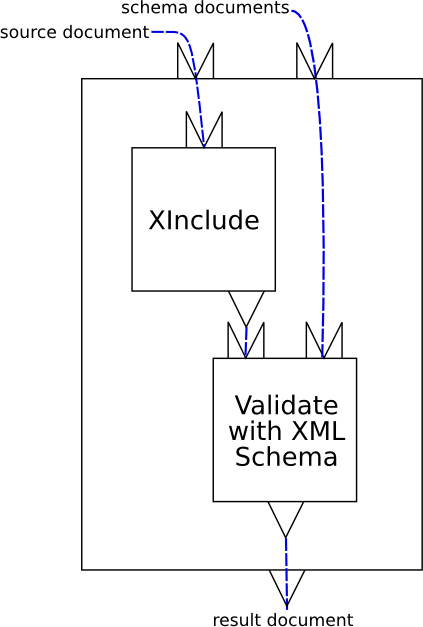
This is a pipeline that consists of two atomic steps, XInclude and Validate. The pipeline itself has two inputs, “source” (a source document) and “schemas” (a list of W3C XML Schemas). How inputs are connected to XML documents outside the pipeline is implementation-defined. The XInclude step reads the pipeline input “source” and produces a result document. The Validate step reads the pipeline input “schemas” and the output from the XInclude step and produces a result document. The result of the validation, “result”, is the result of the pipeline. How pipeline outputs are connected to XML documents outside the pipeline is implementation-defined.
The pipeline document for this pipeline is shown in Example 1, “A simple, linear XInclude/Validate pipeline”.
<p:pipeline name="pipeline" xmlns:p="http://www.w3.org/ns/xproc">
  <p:input port="source" primary="true"/>
  <p:input port="schemas" sequence="true"/>
  <p:output port="result">
    <p:pipe step="validated" port="result"/>
  </p:output>

  <p:xinclude name="included">
    <p:input port="source">
      <p:pipe step="pipeline" port="source"/>
    </p:input>
  </p:xinclude>

  <p:validate-with-xml-schema name="validated">
    <p:input port="source">
      <p:pipe step="included" port="result"/>
    </p:input>
    <p:input port="schema">
      <p:pipe step="pipeline" port="schemas"/>
    </p:input>
  </p:validate-with-xml-schema>
</p:pipeline>
The example in Example 1, “A simple, linear XInclude/Validate pipeline” is very verbose. It makes all of the connections seen in the figure explicit. In practice, pipelines do not have to be this verbose. XProc supports defaults for many common cases. The same pipeline, using XProc defaults, is shown in Example 2, “A simple, linear XInclude/Validate pipeline (simplified)”.
<p:pipeline name="pipeline" xmlns:p="http://www.w3.org/ns/xproc">
  <p:input port="source" primary="true"/>
  <p:input port="schemas" sequence="true"/>
  <p:output port="result"/>

  <p:xinclude/>

  <p:validate-with-xml-schema>
    <p:input port="schema">
      <p:pipe step="pipeline" port="schemas"/>
    </p:input>
  </p:validate-with-xml-schema>
</p:pipeline>
Figure 2, “A validate and transform pipeline” is a more complex example: it performs schema validation with an appropriate schema and then styles the validated document.
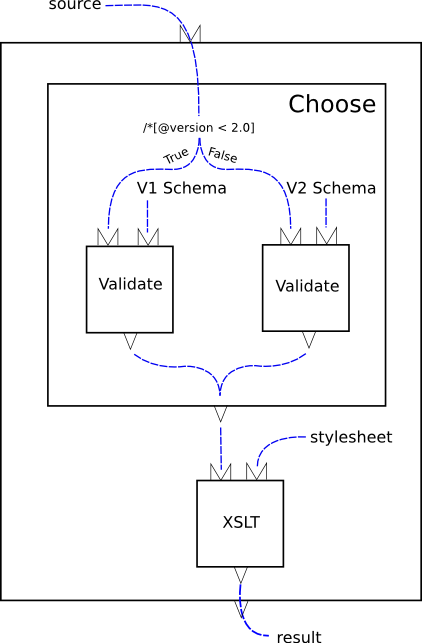
The heart of this example is the conditional. The “choose” step evaluates an XPath expression over a test document. Based on the result of that expression, one or another branch is run. In this example, each branch consists of a single validate step.
<p:pipeline xmlns:p="http://www.w3.org/ns/xproc"> <p:input port="source"/> <p:output port="result"/> <p:choose> <p:when test="/*[@version < 2.0]"> <p:validate-with-xml-schema name="val1"> <p:input port="schema"> <p:document href="v1schema.xsd"/> </p:input> </p:validate-with-xml-schema> </p:when> <p:otherwise> <p:validate-with-xml-schema name="val2"> <p:input port="schema"> <p:document href="v2schema.xsd"/> </p:input> </p:validate-with-xml-schema> </p:otherwise> </p:choose> <p:xslt name="xform"> <p:input port="stylesheet"> <p:document href="stylesheet.xsl"/> </p:input> </p:xslt> </p:pipeline>
This example, like the preceding, relies on XProc defaults for simplicity. It is always valid to write the fully explicit form if you prefer.
2 Pipeline Concepts
[Definition: A pipeline is a set of connected steps, withoutputs flowing into inputs, without outputs of one step flowing intoread its own output, inputs of another.] A pipeline is itself a step and must satisfy the constraints on steps.
The result of evaluating a pipeline is the result of evaluating the steps that it contains, in the order determined by the connections between them. A pipeline must behave as if it evaluated each step each time it occurs. Unless otherwise indicated, implementations must not assume that steps are functional (that is, that their outputs depend only on their explicit inputs, options, and parameters) or side-effect free.
2.1 Steps
[Definition: A step is the basic computational unit of a pipeline.] All steps have a name; if the pipeline author does not provide a name for a step, a default name is manufactured automatically.
Steps are either atomic or compound. [Definition: An atomic step is a step that performs a unit of XML processing, such as XInclude or transformation, and has no internal subpipeline.] Atomic steps carry out fundamental XML operations and can perform arbitrary amounts of computation, but they are indivisible. An XSLT step, for example, performs XSLT processing; an XML Schema Validation step validates one input with respect to some set of XML Schemas, etc.
There are many types of atomic steps. The standard library of atomic steps is described in Section 7, “Standard Step Library”, but implementations may provide others as well. What additional step types, if any, are provided is implementation-defined. Each use, or instance, of an atomic step invokes the processing defined by that type of step. A pipeline may contain instances of many types of steps and many instances of the same type of step.
Compound steps, on the other hand, control and organize the flow of documents through a pipeline, reconstructing familiar programming language functionality such as conditionals, iterators and exception handling. They contain other steps, whose evaluation they control.
[Definition: A compound step is a step that contains one or more subpipelines.subpipelines. That is, a compound step differs from an atomic step in that its semantics are at least partially determined by the steps that it contains.] Every Every compound step contains one or more subpipelines. [Definition: The steps that occur directly inside a compound step are called contained steps.] [Definition: A compound step which immediately contains another step is called its container.]
[Definition: The steps (and the connections between them) within a compound step form a subpipeline.] [Definition: The last step in a subpipeline is the last step in document order within its container. ]
subpipeline = (p:for-each|p:viewport|p:choose|p:group|p:try|pfx:other-step|p:documentation|ipfx:ignored)*
TheThis simple distinction between atomic and compound steps is occasionally stretched. The immediate children of some compound steps, e.g. p:choose and p:try, are special. In the case of p:choose, the p:when and p:otherwise elements serve as wrappers around different pipelines at most one of which will be processed. In the case of p:try, the p:catch element is a wrapper around a subpipeline that will only be processed if the initial p:group fails. Acknowledging this slight irregularity, we nevertheless treat all compound steps as if they directly contained one or more subpipelines.
A p:pipeline, because it defines a subpipeline that can be called from other pipelines, has a somewhat dual nature with respect to the atomic vs. compound distinction. A p:pipeline is a compound step. When it is invoked by name from some other pipeline, its invocation is an atomic step. The “type” of the atomic step is determined by the p:pipeline that defines it.
Steps have “ports” into which inputs and outputs are connected or “bound”. Each step has a number of input ports and a number of output ports; a step can have zero input ports and/or zero output ports. (All steps have an implicit output port for reporting errors that must not be declared.) The names of all ports on each step must be unique on that step (you can't have two input ports named “source”, nor can you have an input port named “schema” and an output port named “schema”).
Steps have any number of options, all with unique names. A step can have zero options.
Steps have parameter input ports, on which parameters can be passed. The parameters passed on a particular parameter input port must be uniquely named. If multiple parameters with the same name are used, only one of the values will actually be available to the step. A A step can have zero, one, or manyzero parameter input ports, and each parameter port can have zero or more parameters passed on it.
2.1.1 Step names
The name attribute on any step can be used to give it a name. The name must be unique within its scope, see Section 3.2, “Scoping of Names”.
If the pipeline author does not provide an explicit name, the processor manufactures a default name. All default names are of the form “!n” where “n” is the ordinal number of the step, considering all steps in document order. For example, consider the pipeline in Example 3, “A validate and transform pipeline”. The p:pipeline step has no name, so it gets the default name “!1”; the p:choose gets the name “!2”; the first p:when gets the name “!3”, etc. If the p:choose had had a name, it would not have received a default name, but it would still have been counted and its first p:when would still have been “!3”.
Providing every step in the pipeline with an interoperable name has several benefits:
It provides a simple mechanism for identifying all steps from outside the pipeline, see Appendix C, The XProc Media Type.
It allows implementors to refer to all steps in an interoperable fashion, for example, in error messages.
Pragmatically, we say that readable ports are identified by a step name/port name pair. By manufacturing names for otherwise anonymous steps, we include implicit bindings without changing our model.
In a valid pipeline that runs successfully to completion, the manufactured names aren't visible (except perhaps in debugging or logging output).
2.2 Inputs and Outputs
Although some steps can read and write non-XML resources, what flows between steps through input ports and output ports are exclusively XML documents or sequences of XML documents.
For the purposes of this specification, an XML document is an [Infoset]. Implementations are free to transmit infosets as sequences of characters, sequences of events, object models, or any other representation that preserves the necessary infoset properties (see Section A.3, “Infoset Conformance”).
Most steps in this specification manipulate XML documents, or portions of XML documents. In these cases, we speak of changing elements, attributes, or nodes without prejudice to the actual representation used by an implementation.
An implementation may make it possible for a step to produce non-XML output (through channels other than a named output port)—for example, writing a PDF document to a URI—but that output cannot flow through the pipeline. Similarly, one can imagine a step that takes no pipeline inputs, reads a non-XML file from a URI, and produces an XML output. But the non-XML data cannot arrive on an input port to a step.
It is a dynamic error (err:XD0001)
if a non-XML resource is produced on a step output or arrives on a
step input.
The common case is that each step has one or more inputs and one or more outputs. Figure 3, “An atomic step” illustrates symbolically an atomic step with two inputs and one output.

All atomic steps are defined by a p:declare-step. The declaration of an atomic step defines the input ports, output ports, and options of all steps of that type. For example, every p:xslt step has two inputs, named “source” and “stylesheet”, and one output named “result” and the same set of options.
The situation is slightly more complicated for compound steps because they don't have separate declarations; each instance of a compound step serves as its own declaration. Compound steps don't have declared inputs, but they do have declared outputs, and unlike atomic steps, on compound steps, the number and names of the outputs can be different on each instance of the step.
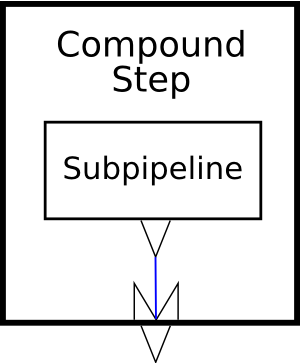
Figure 4, “A compound step” illustrates symbolically a compound step with one subpipeline and one output. As you can see from the diagram, the output from the compound step comes from one of the outputs of the subpipeline within the step.
[Definition: The input ports declared on a step are its declared inputs.] [Definition: The output ports declared on a step are its declared outputs.] When a step is used in a pipeline, it is connected to other steps through its inputs and outputs.
When a step is used, all of the declared inputs of the step must be connected. Each input can be connected to:
-
The output port of some other step.
-
A fixed, inline document or sequence of documents.
-
A document read from a URI.
-
One of the inputs declared on one of its ancestors.
-
A special port provided by an ancestor compound step, for example, “current” in a p:for-each or p:viewport.
When an input accepts a sequence of documents, the documents can come from any combination of these locations.
The declared outputs of a step may be connected to:
-
The input port of some other step.
-
One of the outputs declared on its container.
The primary output port of a step must be connected, but other outputs can remain unconnected. Any documents produced on an unconnected output port are discarded.
Output ports on compound steps have a dual nature: from the perspective of the compound step's siblings, its outputs are just ordinary outputs and must be connected as described above. From the perspective of the compound step itself, they are inputs into which something must be connected.
Within a compound step, the declared outputs of the step can be connected to:
-
The output port of some contained step.
-
A fixed, inline document or sequence of documents.
-
A document read from a URI.
Each input and output is declared to accept or produce either a single document or a sequence of documents. It is not an error to connect a port that is declared to produce a sequence of documents to a port that is declared to accept only a single document. It is, however, an error if the former step actually produces more than one document at run time.
[Definition: The signature of a step is the set of inputs, outputs, and options that it is declared to accept.] Each atomic step (e.g. XSLT or XInclude) has a fixed signature, declared globally or built-in, which all its instances share, whereas each compound step has its own implicit signature.
[Definition: A step matches its signature if and only if it specifies an input for each declared input, it specifies no inputs that are not declared, it specifies an option for each option that is declared to be required, and it specifies no options that are not declared.] In other words, every input and required option must be specified and only inputs and options that are declared may be specified. Options that aren't required do not have to be specified.
Steps may also produce error, warning, and informative messages. These messages appear on a special “error output” port. The error output port is only bound to an input in the catch clause of a try/catch. Outside of a try/catch, the disposition of error messages is implementation-dependent.
2.2.1 External Documents
It's common for some of the documents used in processing a pipeline to be read from URIs. Sometimes this occurs directly, for example with a p:document element. Sometimes it occurs indirectly, for example if an implementation allows the URI of a pipeline input to be specified on the command line or if an p:xslt step encounters an xsl:import in the stylesheet that it is processing. It's also common for some of the documents produced in processing a pipeline to be written to locations which have, or at least could have, a URI.
The process of dereferencing a URI to retrieve a document is often more interesting than it seems at first. On the web, it may involve caches, proxies, and various forms of indirection. Resolving a URI locally may involve resolvers of various sorts and possibly appeal to implementation-dependent mechanisms such as catalog files.
In XProc, the situation is made even more interesting by the fact that many intermediate results produced by steps in the pipeline have base URIs.Whether or not (and when and how) the intermediate results that pass between steps are ever written to a filesystem is implementation-dependent.
In Version 1.0 of XProc, how (or if) implementers provide local resolution mechanisms and how (or if) they provide access to intermediate results by URI is implementation-defined.
On the one hand, this is a somewhat unsatisfying state of affairs because it leaves room for interoperability problems. On the other, it is not expected to cause such problems very often in practice.
If these problems arise in practice, implementers are encouraged to use the existing extension mechanisms to give users the control needed to circumvent them. Should such mechanisms become widespread, a standard mechanism could be added in some future version of the language.
2.3 Primary Inputs and Outputs
As a convenience for pipeline authors, each step may have one input port designated as the primary input port and one output port designated as the primary output port.
[Definition: If a step has a document input port which is explicitly marked “primary='true'”, or if it has exactly one document input port and that port is not explicitly marked “primary='false'”, then that input port is the primary input port of the step.] If a step has a single input port and that port is explicitly marked “primary='false'”, or if a step has more than one input port and none is explicitly marked as the primary, then the primary input port of that step is undefined.
[Definition: If a step has a document output port which is explicitly marked “primary='true'”, or if it has exactly one document output port and that port is not explicitly marked “primary='false'”, then that output port is the primary output port of the step.] If a step has a single output port and that port is explicitly marked “primary='false'”, or if a step has more than one output port and none is explicitly marked as the primary, then the primary output port of that step is undefined.
The special significance of primary input and output ports is that they are connected automatically by the processor if no explicit binding is given. Generally speaking, if two steps appear sequentially in a subpipeline, then the primary output of the first step will automatically be connected to the primary input of the second.
Additionally, if a p:pipeline has no declared inputs and the first step in its subpipeline has an unbound primary input, then an implicit primary input port (named “source”) will be added to the p:pipeline (and consequently bound to the first step's primary input port). If a compound step has no declared outputs and the the last step in its subpipeline has an unbound primary output, then an implicit primary output port (named “result”) will be added to the compound step (and consequently the last step's primary output will be bound to it). The practical consequence of these rules is that straightforward, This rule does not apply to p:pipelineread, write, and understand. The following pipeline has a single input which is transformed by the XSLT step; the result of that XSLT step steps; allthe result of the pipeline: <p:pipeline xmlns:p="http://www.w3.org/ns/xproc"> <p:xslt> <p:input port="stylesheet"> <p:document href="docbook.xsl"/> </p:input> </p:xslt> </p:pipeline> It is semantically equivalent to this pipeline: <p:pipeline name="main" xmlns:p="http://www.w3.org/ns/xproc"> inputs<p:input port="source"/> <p:input port="parameters" kind="parameter"/> <p:output port="result"> <p:pipe step="transform" port="result"/> </p:output> <p:xslt name="transform"> <p:input port="source"> <p:pipe step="main" port="source"/> </p:input> <p:input port="stylesheet"> <p:document href="docbook.xsl"/> </p:input> <p:input port="parameters"> <p:pipe step="main" andport="parameters"/> </p:input> </p:xslt> </p:pipeline> (Parameter outputs ofports are a p:pipelinespecial must be explicitly declared..)
2.4 Options
Some steps accept options. Options are name/value pairs.
[Definition: An option is a name/value pair where the name is an expanded name and the value must be a string.] If a document, node, or other value is given, its XPath string value is is computed and that string is used.
[Definition: The options declared on a step are its declared options.] All of the options specified on an atomic step must have been declared. Option names are always expressed as literal values, pipelines cannot construct option names dynamically.
[Definition: The options on a step which have specified values, either because a p:option element specifies a value or because the declaration included a default value, are its specified options.]
2.5 Parameters
Some steps accept parameters. Parameters are name/value pairs.
[Definition: A parameter is a name/value pair where the name is an expanded name and the value must be a string.] If a document, node, or other value is given, its XPath string value is computed and that string is used.
Unlike options, which have names known in advance to the pipeline, parameters are not declared and their names may be unknown to the pipeline author. Pipelines can dynamically construct sets of parameters. Steps can read dynamically constructed sets on parameter input ports.
[Definition: A parameter input port is a distinguished kind of input port which accepts (only) dynamically constructed parameter name/value pairs.] See Section 5.1.2, “Parameter Inputs”.
Analogous to primary input ports, steps that have parameter inputs may designate at most one parameter input port as a primary parameter input port.
[Definition: If a step has a parameter input port which is explicitly marked “primary='true'”, or if it has exactly one parameter input port and that port is not explicitly marked “primary='false'”, then that parameter input port is the primary parameter input port of the step.] If a step has a single parameter input port and that port is explicitly marked “primary='false'”, or if a step has more than one parameter input port and none is explicitly marked as the primary, then the primary parameter input port of that step is undefined.
Additionally, if a p:pipeline does not declare any parameter input ports, but contains a step which has a primary parameter input port, then an implicit primary parameter input port (named “parameters”) will be added to the pipeline. (If the pipeline declares an ordinary input named “parameters”, the implicit primary parameter input port will be named “parameters1”. If that's not available, then “parameters2”, etc. until an available name is found.)
How an implementation maps parameters specified to the application, or through some API, to parameters accepted by the p:pipeline is implementation-defined.
2.6 Connections
Steps are connected together by their input ports and output
ports. It is a static error (err:XS0001)
if there are any loops in the connections between steps: no step can
be connected to itself nor can there be any sequence of connections
through other steps that leads back to itself.
2.6.1 Namespace Fixup on Outputs
XProcWhat flows between processors are expected,exclusively XML documents. The inputs and sometimesoutputs can be implemented as sequences of characters, sequences of events, object models, or any other representation that the implementation chooses. Most steps in this specification manipulate XML documents, or portions of XML documents. In these cases, we speak of changing elements, attributes, or nodes without required, to the actual performrepresentation used by namespacean fixup.implementation. Unless the semantics of a step explicitly says otherwise:
-
The in-scope namespaces associated with a node (even those that are inherited from namespace bindings that appear among its ancestors in the document in which it appears initially) are assumed to travel with it.
-
Changes to one part of a tree (wrapping or unwrapping a node or renaming an element, for example) do not change the in-scope namespaces associated with the descendants of the node so changed.
As a result, some steps can produce XML documents which have no direct serialization (because they include nodes with conflicting or missing namespace declarations, for example). [Definition: To produce a serializable XML document, the XProc processor must sometimes add additional namespace nodes, perhaps even renaming prefixes, to satisfy the constraints of Namespaces in XML. This process is referred to as namespace fixup.]
Implementors are encouraged to perform namespace fixup before passing documents between steps, but they are not required to do so. Conversely, an implementation which does serialize between steps and therefore must perform such fixups, or reject documents that cannot be serialized, is also conformant.
Except where the semantics of a step explicitly require changes, processors are required to preserve the information in the documents and fragments they manipulate. In particular, the information corresponding to the [Infoset] properties [attributes], [base URI], [children], [local name], [namespace name], [normalized value], [owner], and [parent] must be preserved.
The information corresponding to [prefix], [in-scope namespaces], [namespace attributes], and [attribute type] should be preserved, with changes to the first three only as required for namespace fixup. In particular, processors are encouraged to take account of prefix information in creating new namespace bindings, to minimize negative impact on prefixed names in content.
Except for cases which are specifically called out in Section 7, “Standard Step Library”, the extent to which namespace fixup, and other checks for outputs which cannot be serialized, are performed on intermediate outputs is implementation-defined.
Whenever an implementation serializes pipeline contents, for example for pipeline outputs, logging, or as part of steps such as p:store or p:http-request, it is a dynamic error if that serialization could not be done so as to produce a document which is both well-formed and namespace-well-formed, as specified in XML and Namespaces in XML, regardless of what serialization method, if any, is called for.
2.7 Environment
[Definition: The environment of a step is the static information available to each instance of a step in a pipeline.] Most of the information in the environment is static and can be computed before evaluation of the pipeline begins. The values of the in-scope options have to be calculated when the pipeline is being evaluated.
The environment consists of:
-
A set of readable ports. [Definition: The readable ports are the step name/portname/output port name pairs that are visible to the step.] Inputs and outputs can only be connected to readable ports.
-
A set of in-scope options. [Definition: The in-scope options are the set of options that are visible to a step.] All of the in-scope options are available to the processor for computing option and parameter values. The actual options passed to a step are those that are declared for a step of its type and that have values either provided explicitly with p:option elements on the step or as defaults in the declaration of the step type.
-
A default readable port. [Definition: The default readable port, which may be undefined, is a specific step name/port name pair from the set of readable ports.]
[Definition: The empty environment contains no readable ports, no in-scope options, and an undefined default readable port. ]
Unless otherwise specified, the environment of a contained step is its inherited environment. [Definition: The inherited environment of a contained step is an environment that is the same as the environment of its container with the standard modifications. ]
The standard modifications made to an inherited environment are:
-
All of the specified options of the container are added to the in-scope options. The value of any option in the environment with the same name as one of the options specified on the container is shadowed by the new value.
In other words, steps can access the most recently specified value of all of the options specified on any ancestor step.
-
The declared inputs of the container are added to the readable ports.
In other words, contained steps can see the inputs to their container.
-
The union of all the declared outputs of all of the step's contained steps are added to the readable ports.
In other words, sibling steps can see each other's outputs in addition to the outputs visible to their container.
-
If there is a preceding sibling step element:
-
If that preceding sibling has a primary output port, then that output port becomes the default readable port.
-
Otherwise, the default readable port is undefined.
-
-
If there is not a preceding sibling step element, the default readable port is the primary input port of the container, if it has one, otherwise the default readable port is unchanged.
A step with no parent inherits the empty environment.
2.8 XPaths in XProcContext
XProc uses XPath as an expression language. XPath expressions can occur in several places: on compound steps, in the expressions used to compute option and parameter values, and in values passed to atomic steps.
Broadly, these can be divided into two classes: expressions evaluated evaluated by the XProc processor and expressions evaluated by the implementations of individual steps.
This distinction can be seen in the following example:
<p:option name="home" value="http://example.com/docs"/>

<p:load name="read-from-home">
  <p:option name="href" select="concat($home,'/document.xml')"/>
</p:load>

<p:split-sequence name="select-chapters">
  <p:input port="source" select="//section"/>
  <p:option name="test" value="@role='chapter'"/>
</p:split-sequence>
The href option of the p:load step step is evaluated by the XProc processor. The actual href option received by the step is simply the string literal “http://example.com/docs/document.xml”. (The selection on the source input of the select-chapters step is also evaluated by the XProc processor.)
TheConversely, the XPath expression “@role='chapter'” is passed literally to the test option on the p:split-sequence step. That's because the nature of the p:split-sequence is that it evaluates the expression. Only some options on some steps expect XPath expressions.
The XProc processor evaluates all of the XPath expressions in select attributes on steps, options, parameters, and inputs and in test attributes on p:when steps. (XPath expressions in value attributes are passed literally to the step for evaluation.)
An XProc implementation can use either [XPath 1.0] or [XPath 2.0] to evaluate these expressions. This is a compromise driven entirely by the timing of XProc development. During the development of this specification, the community indicated that it was too early to mandate that all implementations use XPath 2.0 and too late to mandate that all implementations use XPath 1.0.
Many, many expressions that are likely to be used in XProc pipelines are the same in both versions (simple element tests, ancestor and descendant tests, string-based attribute tests, etc.).
As an aid to interoperability, pipeline authors may indicate the version of XPath that they are using. The attribute xpath-version may be used on p:pipeline (or p:pipeline-library) to identify the XPath version that should be used to evaluate XPath expressions on the pipeline(s). This is a purely lexical identifier. If the xpath-version is specified on a pipeline in a library, the version specified on the pipeline is used for that pipeline; otherwise, the default version is “1.0”.
The following rules determine how the indicated version and the implementation's actual version interact:
-
If the indicated version and the implementation version are the same, then that version is used.
-
If the indicated version is 1.0 and the implementation uses XPath 2.0 (or later), the expression must be evaluated in XPath 1.0 compatibility mode. It is a static error (
err:XS0046) if the processor does not support XPath 1.0 compatibility mode. -
If the indicated version is 2.0 (or later) and the implementation uses XPath 1.0, the implementation must not evaluate any expression that it cannot determine will give the same result in XPath 1.0 that it would have given if XPath 2.0 had been used. It is a static error (
err:XS0047) if the processor cannot determine that the expression would yield the same result.
2.8.1 Processor XPath Context
When the XProc processor evaluates an XPath expression using XPathexpression, 1.0, unless otherwise indicated by a particular step, it does so with the following context:
- context node
-
The document node of a document. The document is either specified with a binding or is taken from the default readable port. It is a dynamic error (
err:XD0008) if a document sequence appears where a document to be used as the context node is expected.If there is no binding and there is no default readable port then the context node is an empty document node.
- context position and context size
-
The context position and context size are both “1”.
- variable bindings
-
The in-scope options are available as variables.
- function library
-
The [XPath 1.0] core function library and the Section 2.8.3, “XPath Extension Functions”XProc extension functions.
- in-scope namespaces
-
The namespace bindings in-scope on the element where the expression occurred.
When the XProc processor evaluates an XPath expression using XPath 2.0, unless otherwise indicated by a particular step, it does so with the following static context:
- XPath 1.0 compatibility mode
-
Is true if the indicated XPath version is 1.0, false otherwise.
- Statically known namespaces
-
The namespace declarations in-scope for the containing element or made available through p:namespaces.
- Default element/type namespace
-
The null namespace.
- Default function namespace
-
The [XPath 2.0] function namespace.
- In-scope schema definitions
-
None.
- In-scope variables
-
The names of the in-scope options are available as variables.
- Context item static type
-
Document.
- Function signatures
-
The signatures of the XPath 2.0 functions and the Section 2.8.3, “XPath Extension Functions”.
- Statically known collations
-
Implementation defined but must include the Unicode codepoint collation.
- Default collation
-
Unicode codepoint collation.
- Base URI
-
The base URI of the element on which the expression occurs.
- Statically known documents
-
None.
- Statically known collections
-
None.
And the following dynamic context:
- context item
-
The document node of a document. The document is either specified with a binding or is taken from the default readable port. It is a dynamic error (
err:XD0008) if a document sequence appears where a document to be used as the context node is expected.If there is no binding and there is no default readable port then the context node is an empty document node.
- context position and context size
-
The context position and context size are both “1”.
- Variable values
-
The values of the in-scope options.
- Function implementations
-
The XPath 2.0 functions and the Section 2.8.3, “XPath Extension Functions”.
- Current dateTime
-
An implementation defined point in time.
- Implicit timezone
-
The implicit timezone is implementation defined.
- Available documents
-
The set of available documents (those that may be retrieved with a URI) is implementation dependent.
- Available collections
-
None.
- Default collection
-
None.
2.8.2 Step XPath Context
When a step evaluates an XPath expression using XPath 1.0,expression, it does so with the following context:
- context node
-
The document node that appears on the primary input port of the step, unless otherwise specified by the step.
- context position and context size
-
The position and size are both “1”, unless otherwise specified by the step.
- variable bindings
-
None, unless otherwise specified by the step.
- function library
-
The [XPath 1.0] core function library, unless otherwise specified by the step.
- in-scope namespaces
-
The set of namespace bindings provided by the XProc processor. The processor computes this set of bindings by taking a union of the bindings on the step element itself as well as the bindings on any of the options and parameters used in computing values for the step (see Section 5.7.3, “Option and Parameter Namespaces”).
The results of computing the union of namespaces in the presence of conflicting declarations for a particular prefix are implementation-dependent.
When a step evaluates an XPath expression using XPath 2.0, unless otherwise indicated by a particular step, it does so with the following static context:
- XPath 1.0 compatibility mode
-
Is true if the indicated XPath version is 1.0, false otherwise.
- Statically known namespaces
-
The namespace declarations in-scope for the containing element or made available through p:namespaces.
- Default element/type namespace
-
The null namespace.
- Default function namespace
-
The [XPath 2.0] function namespace.
- In-scope schema definitions
-
None.
- In-scope variables
-
None, unless otherwise specified by the step.
- Context item static type
-
Document.
- Function signatures
-
The signatures of the XPath 2.0 functions.
- Statically known collations
-
Implementation defined but must include the Unicode codepoint collation.
- Default collation
-
Unicode codepoint collation.
- Base URI
-
The base URI of the element on which the expression occurs.
- Statically known documents
-
None.
- Statically known collections
-
None.
And the following dynamic context:
- context item
-
The document node of the document that appears on the primary input of the step, unless otherwise specified by the step.
- context position and context size
-
The context position and context size are both “1”, unless otherwise specified by the step.
- Variable values
-
None, unless otherwise specified by the step.
- Function implementations
-
The XPath 2.0 functions.
- Current dateTime
-
An implementation defined point in time.
- Implicit timezone
-
The implicit timezone is implementation defined.
- Available documents
-
The set of available documents (those that may be retrieved with a URI) is implementation dependent.
- Available collections
-
None.
- Default collection
-
None.
2.8.3 XPath Extension Functions
The XProc processor must support a few additional functions in XPath expressions evaluated by the processor.
2.8.3.1 System Properties
XPath expressions within a pipeline document can interrogate the processor for information about the current state of the pipeline. Various aspects of the processor are exposed through the p:system-property function in the pipeline namespace:
Function: String p:system-property(String property)
The property string must have the form of a QName; the QName is expanded into a name using the namespace declarations in scope for the expression. The p:system-property function returns the string representing the value of the system property identified by the QName. If there is no such property, the empty string must be returned.
Implementations must provide the following system properties, which are all in the XProc namespace:
- p:episode
-
Returns a string which should be unique for each invocation of the pipeline processor.
The unique identifier must consist of ASCII alphanumeric characters and must start with an alphabetic character. Thus, the string is syntactically an XML name.
- p:language
-
Returns a string which identifies the current language, for example, for message localization purposes. The exact format of the language string is implementation defined.
- p:product-name
-
Returns a string containing the name of the implementation, as defined by the implementer. This should normally remain constant from one release of the product to the next. It should also be constant across platforms in cases where the same source code is used to produce compatible products for multiple execution platforms.
- p:product-version
-
Returns a string identifying the version of the implementation, as defined by the implementer. This should normally vary from one release of the product to the next, and at the discretion of the implementer it may also vary across different execution platforms.
- p:vendor
-
Returns a string which identifies the vendor of the processor.
- p:vendor-uri
-
Returns a URI which identifies the vendor of the processor. Often, this is the URI of the vendor's web site.
- p:version
-
Returns the version of XProc implemented by the processor; for processors implementing the version of XProc specified by this document, the value is “1.0”. The value of the version attribute is a token (i.e., an xs:token per [W3C XML Schema: Part 2]).
- p:xpath-version
-
Returns the version of XPath implemented by the processor for evaluating XPath expressions on XProc elements.
2.8.3.2 Step Available
The p:step-available function reports whether or not a particular type of step is understood by the processor.
Function: Boolean p:step-available(String step-type)
The step-type string must have the form of a QName; the QName is expanded into a name using the namespace declarations in scope for the expression. The p:step-available function returns true if and only if the processor knows how to evaluate steps of the specified type.
2.8.3.3 Iteration Position
In the context of a p:for-each or a p:viewport, the p:iteration-position function reports the position of the document being processed in the sequence of documents that will be processed. In the context of other standard XProc compound steps, it returns 1.
Function: Integer p:iteration-position()
In the context of an extension compound step, the value returned by p:iteration-position is implementation-defined.
2.8.3.4 Iteration Size
In the context of a p:for-each or a p:viewport, the p:iteration-size function reports the number of documents in the sequence of documents that will be processed. In the context of other standard XProc compound steps, it returns 1.
Function: Integer p:iteration-size()
In the context of an extension compound step, the value returned by p:iteration-size is implementation-defined.
2.8.3.5 Other XPath Extension Functions
It is implementation defined if the processor supports any other XPath extension functions.
2.9 Security Considerations
An XProc pipeline may attempt to access arbitrary network resources: steps such as p:load and p:http-request can attempt to read from an arbitrary URI; steps such as p:store can attempt to write to an arbitrary location.
In some environments, it may be inappropriate to provide the XProc pipeline with access to these resources. In a server environment, for example, it may be impractical to allow pipelines to store data. In environments where the pipeline cannot be trusted, allowing the pipeline to access arbitrary resources may be a security risk.
A conformant XProc processor may limit the resources available to any or all steps in a pipeline. A conformant implementation may raise dynamic errors, or take any other corrective action, for any security problems that it detects.
3 Syntax Overview
This section describes the normative XML syntax of XProc. This syntax is sufficient to represent all the aspects of a pipeline, as set out in the preceding sections. [Definition: XProc is intended to work equally well with [XML 1.0] and [XML 1.1]. Unless otherwise noted, the term “XML” refers equally to both versions.] [Definition: Unless otherwise noted, the term Namespaces in XML refers equally to [Namespaces 1.0] and [Namespaces 1.1].] Support for pipeline documents written in XML 1.1 and pipeline inputs and outputs that use XML 1.1 is implementation-defined.
Elements in a pipeline document represent the pipeline, the steps it contains, the connections between those steps, the steps and connections contained within them, and so on. Each step is represented by an element; a combination of elements and attributes specify how the inputs and outputs of each step are connected and how options and parameters are passed.
Conceptually, we can speak of steps as objects that have inputs and outputs, that are connected together and which may contain additional steps. Syntactically, we need a mechanism for specifying these relationships.
Containment is represented naturally using nesting of XML elements. If a particular element identifies a compound step then the step elements that are its immediate children form its subpipeline.
The connections between steps are expressed using names and references to those names.
Six kinds of things are named in XProc:
- Step types,
- Steps,
-
Input ports (both parameter and document),ports,
- Output ports,
- Options, and
- Parameters
3.1 XProc Namespaces
The XML syntax for XProc uses three namespaces:
- http://www.w3.org/ns/xproc
-
The namespace of the XProc XML vocabulary described by this specification; by convention, the namespace prefix “p:” is used for this namespace.
- http://www.w3.org/ns/xproc-step
-
The namespace used for documents that are inputs to and outputs from several standard and optional steps described in this specification. Some steps, such as p:http-request and p:store, have defined input or output vocabularies. We use this namespace for all of those documents. The conventional prefix “c:” is used for this namespace.
- http://www.w3.org/ns/xproc-error
-
The namespace used for errors. The conventional prefix “err:” is used for this namespace.
3.2 Scoping of Names
The scope of the names of the step types is the union of all the pipelines and pipeline libraries available directly or via p:import.
Step types are:
Built-in to XProc (e.g., p:pipeline, p:choose, etc.)
Declared with p:declare-step (e.g, p:xslt, p:xinclude, etc.)
Defined with p:pipeline.
Or built-in as extensions by a particular processor.
All the step types in a pipeline
must have unique names: it is a static
error (err:XS0036) if any step type name is built-in and/or declared or defined
more than once in the
same scope.
The scope of the names of the steps themselves is determined by
the environment of each step. In general, the
name of a step, the names of its sibling steps, the names of any steps
that it contains directly, the names of its ancestors, and the names
of its ancestor's siblings are all in a common scope.
All the named steps in the same scope
must have unique names: it is a static
error (err:XS0002) if two steps with the same name appear in the same
scope.
The scope of an input or output port name is the step on which it is defined. The names of all the ports on any step must be unique.
Taken together, these uniqueness constraints guarantee that the combination of a step name and a port name uniquely identifies exactly one port on exactly one in-scope step.
The scope of option names is the step on which they occur and the descendants of that step. The names of all of the options specified on a step must be unique. If a step specifies a value for an option with the same name as some option specified on one of its ancestors, the new value shadows the previous value on the current step and its descendants.
Parameter names are not scoped; they are distinct on each step.
3.4 Associating Documents with Ports
[Definition: A binding associates an input or output port with some data source.] A document or a sequence of documents can be bound to a port in four ways: by source, by URI, by providing an inline document, or by making it explicitly empty. Each of these mechanisms is allowed on the p:input, p:output, p:xpath-context, p:iteration-source, and p:viewport-source elements.
- Specified by URI
-
[Definition: A document is specified by URI if it is referenced with a URI.] The href attribute on the p:document element is used to refer to documents by URI.
In this example, the input to the p:identity step named named “otherstep” comes from “http://example.com/input.xml”.
<p:identity name="otherstep">
  <p:input port="source">
    <p:document href="http://example.com/input.xml"/>
  </p:input>
</p:identity>
It is a dynamic error (
err:XD0002) if the processor attempts to retrieve the URI specified on a p:document and fails. (For example, if the resource does not exist or is not accessible with the user's authentication credentials.) - Specified by source
-
[Definition: A document is specified by source if it references a specific port on another step.] The step and port attributes on the p:pipe element are used for this purpose.
In this example, the “source” input to the p:xinclude step named “expand” comes from the “result” port of the step named “otherstep”.
<p:xinclude name="expand">
  <p:input port="source">
    <p:pipe step="otherstep" port="result"/>
  </p:input>
</p:xinclude>
When a p:pipe is used, the specified port must be in the readable ports of the current environment. It is a static error (
err:XS0003) if the port specified by a p:pipe is not in the readable ports of the environment. - Specified inline
-
[Definition: An inline document is specified directly in the body of the element that binds it.] The content of the p:inline element is used for this purpose.
In this example, the “stylesheet” input to the XSLT step named “xform” comes from the content of the p:input element itself.
<p:xslt name="xform">
  <p:input port="stylesheet">
    <p:inline>
      <xsl:stylesheet version="1.0">
        ...
      </xsl:stylesheet>
    </p:inline>
  </p:input>
</p:xslt>
Inline documents are considered “quoted”. The pipeline processor passes them literally to the port, even if they contain elements from the XProc namespace or ignored namespaces that would have other semantics outside of the p:inline.
- Specified explicitly empty
-
[Definition: An empty sequence of documents is specified with the p:empty element.]
In this example, the “source” input to the XSLT 2.0 step named “generate” is explicitly empty:
<p:xslt name="generate" version="2.0">name="generate">
  <p:input port="source">
    <p:empty/>
  </p:input>
  <p:input port="stylesheet">
    <p:inline>
      <xsl:stylesheet version="2.0">
        ...
      </xsl:stylesheet>
    </p:inline>
  </p:input>
  <p:option name="template-name" value="someName"/>
</p:xslt>
If you omit the binding on a primary input port, a binding to the default readable port will be assumed. Making the binding explicitly empty guarantees that the binding will be to an empty sequence of documents.
It is inconsistent with the [XPath 1.0] specification to specify an empty binding as the context for evaluating an XPath expression. When an empty binding is specified for an XPath 1.0 expression, an empty document node must be used instead as the context node.
Note that a p:input or p:output element may contain more than one p:pipe, p:document, or p:inline element. If more than one binding is provided, then the specified sequence of documents is made available on that port in the same order as the bindings.
3.5 Documentation
Pipeline authors may add documentation to their pipeline documents with the p:documentation element. Except when it appears as a descendant of p:inline, the p:documentation element is completely ignored by pipeline processors, it exists simply for documentation purposes. (If a p:documentation is provided as a descendant of p:inline, it has no special semantics, it is treated literally as part of the document to be provided on that port.)
Pipeline processors that inspect the contents of p:documentation elements and behave differently on the basis of what they find are not conformant. Processor extensions must be specified with extension elements.
3.6 Ignored namespaces
In order to facilitate extension elements, the processor can be instructed to ignore elements from selected namespaces. [Definition: Any element in an ignored namespace is an ignorable element.]
If a processor encounters an ignorable element as the child of a p:pipeline or p:pipeline-library then it behaves in an implementation-defined manner if it recognizes the element, otherwise it must behave as if the element (and its content) had not been present.
Syntactically, a pipeline author can specify the set of ignored namespaces with the ignore-prefixes attribute. This attribute can appear on the p:pipeline and p:pipeline-library elements.
The value of the ignore-prefixes attribute
is a sequence of tokens, each of which must be the prefix of
an in-scope namespace.
It is a static error (err:XS0005) if any token
specified in the prefix list is not
the prefix of an in-scope namespace.
Ignored namespaces specified on a p:pipeline-library are inherited by pipelines that occur within that library.
It is a static error (err:XS0015)
to specify as an ignored namespace the XProc namespace,
the namespace of any imported p:pipeline,
or any namespace in which an atomic step is
declared.
3.7 Extension attributes
[Definition: An element from the XProc namespace may have any attribute not from the XProc namespace, provided that the expanded-QName of the attribute has a non-null namespace URI. Such an attribute is called an extension attribute.] Extension attributes are always allowed and do not have to be declared with ignored namespaces.
The presence of an extension attribute must not cause the connections between steps to differ from the connections that any other conformant XProc processor would produce. They must not cause the processor to fail to signal an error that a conformant processor is required to signal. This means that an extension attribute must not change the effect of any XProc element except to the extent that the effect is implementation-defined or implementation-dependent.
A processor which encounters an extension attribute that it does not recognize must behave as if the attribute was not present.
3.8 Extension elements
[Definition: An extension element is any element that is not in the XProc namespace and is not a step.] The presence of an extension element must not cause the connections between steps to differ from the connections that any other conformant XProc processor would produce. They must not cause the processor to fail to signal an error that a conformant processor is required to signal. This means that an extension element must not change the effect of any XProc element except to the extent that the effect is implementation-defined or implementation-dependent.
An element is only an extension element if it is an ignorable element that occurs as a direct child of a p:pipeline or p:pipeline-library.
In other words, elements in a subpipeline are interpreted as follows:
-
In XProc namespace?
- Names a built-in compound step? Check against grammar, interpret per spec.
-
Names a built-in atomic step? Check against grammar and built-in declaration, interpret per spec.
- Otherwise, error.
-
Is in ignorable namespace?
- Is a known extension? Process as appropriate.
- Otherwise, ignore.
-
Names a declared step type? Check against grammar and supplied step declaration, interpret per spec.
- Names a defined pipeline? Check against pipeline definition, interpret per spec.
- Otherwise, error.
3.9 Syntax Summaries
The description of each element in the pipeline namespace is accompanied by a syntactic summary that provides a quick overview of the element's syntax:
<p:some-element
  some-attribute? = some-type>
    (some |
     elements |
     allowed)*,
    other-elements?
</p:some-element>
For clarity of exposition, some attributes and elements are elided from the summaries:
-
An xml:id attribute is allowed on any element. It has the semantics of [xml:id].
-
An xml:base attribute is allowed on any element. It has the semantics of [XML Base].
-
The p:documentation element is not shown, but it is allowed anywhere.
-
Attributes that are syntactic shortcuts for option values are not shown.
The types given for attributes should be understood as follows:
-
ID, NCName, NMTOKEN, NMTOKENS, anyURI, boolean, integer, string: As per [W3C XML Schema: Part 2] or its successor(s), including whitespace normalization as appropriate.
-
QName: With whitespace normalization as per [W3C XML Schema: Part 2] and according to the following definition: [Definition: In the context of XProc, a QName is almost always a QName in the Namespaces in XML sense. Note, however, that p:option and p:parameter values can get their namespace declarations in a non-standard way (with p:namespaces) and QNames that have no prefix are always in no-namespace, irrespective of the default namespace.]
-
PrefixList: As a list with [item[item type] type] NMTOKEN, per [W3C XML Schema: Part 2], including whitespace normalization.
-
XPathExpression, XSLTMatchPattern: As a string per [W3C XML Schema: Part 2], including whitespace normalization, and the further requirement to be a conformant Expression per [XPath 1.0] or [XPath 2.0], as appropriate, or Match pattern per [XSLT 1.0], respectively.
A number of errors apply generally:
-
It is a static error (
err:XS0008) if any element in the XProc namespace has attributes not defined by this specification unless they are extension attributes. -
It is a static error (
err:XS0038) if any required attribute is not provided. -
It is a static error (
err:XS0043) if any attribute value does not satisfy the type required for that attribute. -
It is a static error (
err:XS0045) if any string that must be interpreted as a QName uses a prefix for which there is not a namespace binding. -
It is a static error (
err:XS0044) if any element in the XProc namespace or any step has element children other than those specified for it by this specification. -
It is a static error (
err:XS0037) if any step contains text nodes that do not consist entirely of whitespace. -
It is a dynamic error (
err:XD0019) if any option value does not satisfy the type required for that option.
If an XProc processor can determine statically that a dynamic error will always occur, it may report that error statically.
4 Steps
This section describes the core steps of XProc.
Every compound step in a pipeline has several parts: a set of inputs, a set of outputs, a set of options, a set of contained steps, and an environment.
Except where otherwise noted, a compound step can have an arbitrary number of outputs, options, and contained steps.
It is a static error (err:XS0027) if a
compound step has no contained steps.
4.1 p:pipeline
A pipeline is specified by the p:pipeline element. It encapsulates the behavior of a subpipeline. Its children declare the inputs, outputs, and options that the pipeline exposes and identify the steps in its subpipeline.
A pipeline can declare additional steps (e.g., ones that are provided by a particular implementation or in some implementation-defined way) and import other pipelines. If a pipeline has been imported, it may be invoked as a step within the pipeline that imported it.
<p:pipeline
  name? = NCName
  type? = QName
  ignore-prefixes? = prefix list
  xpath-version? = string>
    (p:input |
     p:output |
     p:option |
     p:import |
     p:declare-step |
     p:log |
     p:serialization)*,
    subpipeline
</p:pipeline>
Viewed from the outside, a p:pipeline is a black box which performs some calculation on its inputs and produces its outputs. From the pipeline author's perspective, the computation performed by the pipeline is described in terms of contained steps which read the pipeline's inputs and produce the pipeline's outputs.
The environment inherited by the contained steps of a p:pipeline is the empty environment with these modifications:
-
All of the declared inputs of the pipeline are added to the readable ports in the environment.
-
If the pipeline has a primary input port, that input is the default readable port, otherwise the default readable port is undefined.
-
All of the declared options of the pipeline are added to the in-scope options in the environment.
If the p:pipeline has a primary output port
and that port has no binding, then it is
bound to the primary output port of
the last step in the subpipeline.
It is a static error (err:XS0006) if the
primary output port has no binding and the last step in the subpipeline does
not have a primary output port.
There are two additional constraints on pipelines:
A p:pipeline must not itself be a contained step.
If a p:pipeline is part of a p:pipeline-library or if it is imported directly with p:import, then it must have a name or a type or both.
If the pipeline initially invoked by the processor has inputs or outputs, those ports are bound to documents outside of the pipeline in an implementation-defined manner.
If a pipeline has a type then that type may be used as the name of a step to invoke the pipeline. This most often occurs when the it has been imported into another pipeline, but pipelines may also invoke themselves recursively. If it does not have a type, then its name is used to invoke it as a step.
For pipelines that are part of a p:pipeline-library, see Section 5.9, “p:pipeline-library” for more details on how p:pipeline names are used to compute step names.
4.1.1 Example
A pipeline might accept a document and a stylesheet as input; perform XInclude, validation, and transformation; and produce the formatted document as its output.
<p:pipeline name="pipeline" xmlns:p="http://www.w3.org/ns/xproc">
<p:input port="document" primary="true"/>
<p:input port="stylesheet"/>
<p:output port="result" primary="true"/>

<p:xinclude/>

<p:validate-with-xml-schema>
  <p:input port="schema">
    <p:document href="http://example.com/path/to/schema.xsd"/>
  </p:input>
</p:validate-with-xml-schema>

<p:xslt>
  <p:input port="stylesheet">
    <p:pipe step="pipeline" port="stylesheet"/>
  </p:input>
</p:xslt>

</p:pipeline>
4.2 p:for-each
A for-each is specified by the p:for-each element. It processes a sequence of documents, applying its subpipeline to each document in turn.
<p:for-each
  name? = NCName>
    ((p:iteration-source? &
      (p:output |
       p:option |
       p:log)*),
     subpipeline)
</p:for-each>
When a pipeline needs to process a sequence of documents using a subpipeline that only processes a single document, the p:for-each construct can be used as a wrapper around that subpipeline. The p:for-each will apply that subpipeline to each document in the sequence in turn.
The result of the p:for-each is a sequence of documents produced by processing each individual document in the input sequence. If the p:for-each has one or more output ports, what appears on each of those ports is the sequence of documents that is the concatenation of the sequence produced by each iteration of the loop on the port to which it is connected.
The p:iteration-source is an anonymous input: its binding provides a sequence of documents to the p:for-each step. If no iteration sequence is explicitly provided, then the iteration source is read from the default readable port.
A portion of each input document can be selected using the select attribute. If no selection is specified, the document node of each document is selected.
Each subtree selected by the p:iteration-source isfrom each wrappedof the inputs in a document node (unless it is wrapped in a document)document node and provided to the subpipeline.
The processor provides each document, one at a time, to the subpipeline represented by the children of the p:for-each on a port named current.
For each declared output, the processor collects all the documents that are produced for that output from all the iterations, in order, into a sequence. The result of the p:for-each on that output is that sequence of documents.
The environment inherited by the contained steps of a p:for-each is the inherited environment with these modifications:
-
The port named “current” on the p:for-each is added to the readable ports.
-
The port named “current” on the p:for-each is made the default readable port.
If the p:for-each has a primary output port
and that port has no binding, then it is
bound to the primary output port of
the last step in the subpipeline.
It is a static error (err:XS0006) if the
primary output port has no binding and the last step in the subpipeline does
not have a primary output port.
4.2.1 XPath Context
Within a p:for-each, the p:iteration-position and p:iteration-size are taken from the sequence of documents that will be processed by the p:for-each. The total number of documents is the size; the ordinal value of the current document (the document appearing on the current port) is the position.
Inimplementers: in the case where no XPath expression that must be evaluated by the processor makes any reference to p:iteration-size, its value does not actually have to be calculated (and the entire input sequence does not, therefore, need to be buffered so that its size can be calculated before processing begins).
4.2.2 Example
A p:for-each might accept a sequence of chapters as its input, process each chapter in turn with XSLT, a step that accepts only a single input document, and produce a sequence of formatted chapters as its output.
<p:for-each name="chapters">
  <p:iteration-source select="//chapter"/>
  <p:output port="html-results">
    <p:pipe step="make-html" port="result"/>
  </p:output>
  <p:output port="fo-results">
    <p:pipe step="make-fo" port="result"/>
  </p:output>

  <p:xslt name="make-html">
    <p:input port="stylesheet">
      <p:document href="http://example.com/xsl/html.xsl"/>
    </p:input>
  </p:xslt>

  <p:xslt name="make-fo">
    <p:input port="source">
      <p:pipe step="chapters" port="current"/>
    </p:input>
    <p:input port="stylesheet">
      <p:document href="http://example.com/xsl/fo.xsl"/>
    </p:input>
  </p:xslt>
</p:for-each>
The //chapter elements of the document are selected. Each chapter is transformed into HTML and XSL Formatting Objects using an XSLT step. The resulting HTML and FO documents are aggregated together and appear on the html-results and fo-results ports, respectively, of the chapters step itself.
4.3 p:viewport
A viewport is specified by the p:viewport element. It processes a single document, applying its subpipeline to one or more subsections of the document.
<p:viewport
  name? = NCName
  match = XSLT Match pattern>
    ((p:viewport-source? &
      p:output? &
      p:log? &
      p:option*),
     subpipeline)
</p:viewport>
The result of the p:viewport is a copy of the original document with the selected subsections replaced by the results of applying the subpipeline to them.
The p:viewport-source is an anonymous input: its binding provides a single document to the p:viewport step. If no document is explicitly provided, then the viewport source is read from the default readable port.
The match attribute specifies an XPath expression that is a Pattern in [XSLT 1.0]. Each matching node in the source document is wrapped in a document node and provided to the viewport's subpipeline.
The processor provides each document, one at a time, to the subpipeline represented by the children of the p:viewport on a port named current.
What appears on the output from the p:viewport will be a copy of the input document where each matching node is replaced by the result of applying the subpipeline to the subtree rooted at that node.
It is a dynamic error (err:XD0003)
if the viewport source does not provide exactly one document.
The environment inherited by the contained steps of a p:viewport is the inherited environment with these modifications:
-
The port named “current” on the p:viewport is added to the readable ports.
-
The port named “current” on the p:viewport is made the default readable port.
If the p:viewport has a primary output port
and that port has no binding, then it is
bound to the primary output port of
the last step in the subpipeline.
It is a static error (err:XS0006) if the
primary output port has no binding and the last step in the subpipeline does
not have a primary output port.
4.3.1 XPath Context
Within a p:viewport, the p:iteration-position and p:iteration-size are taken from the sequence of documents that will be processed by the p:viewport. The total number of documents is the size; the ordinal value of the current document (the document appearing on the current port) is the position.
Inimplementers: in the case where no XPath expression that must be evaluated by the processor makes any reference to p:iteration-size, its value does not actually have to be calculated (and the entire input sequence does not, therefore, need to be buffered so that its size can be calculated before processing begins).
4.3.2 Example
A p:viewport might accept an XHTML document as its input, add an hr element at the beginning of all div elements that have the class value “chapter”, and return an XHTML document that is the same as the original except for that change.
<p:viewport match="h:div[@class='chapter']"
            xmlns:h="http://www.w3.org/1999/xhtml">
  <p:insert position="first-child">
    <p:input port="insertion">
      <p:inline>
        <hr xmlns="http://www.w3.org/1999/xhtml"/>
      </p:inline>
    </p:input>
  </p:insert>
</p:viewport>

</p:pipeline>
The nodes which match h:div[@class='chapter'] (according to the rules of [XSLT 1.0]) in the input document are selected. An hr is inserted as the first child of each h:div and the resulting version replaces the original h:div. The result of the whole step is a copy of the input document with a horizontal rule as the first child of each selected h:div.
4.4 p:choose
A choose is specified by the p:choose element. It selects exactly one of a list of alternative subpipelines based on the evaluation of XPath expressions.
<p:choose
  name? = NCName>
    (p:xpath-context?,
     p:when*,
     p:otherwise?)
</p:choose>
A p:choose has no inputs. It contains an arbitrary number of alternative subpipelines, exactly one of which will be evaluated.
The list of alternative subpipelines consists of zero or more subpipelines guarded by an XPath expression, followed optionally by a single default subpipeline.
The p:choose considers each subpipeline in turn and selects the first (and only the first) subpipeline for which the guard expression evaluates to true in its context. If there are no subpipelines for which the expression evaluates to true, the default subpipeline, if it was specified, is selected.
After a subpipeline is selected, it is evaluated as if only it had been present.
The outputs of the p:choose is are taken from theresult outputs of the selected subpipeline. The p:choose has the same number of outputs as the selected subpipeline with the same names. If the selected subpipeline has a primary output port, the port with the same name on the p:choose is also a primary output port.
In order to ensure that the result of the p:choose is
consistent irrespective of the subpipeline chosen,
each subpipeline must
declare the same number of outputs with the same names. If any of the subpipelines
specifies a primary output port, each subpipeline must
specify exactly the same output as primary.
It is a
static error (err:XS0007) if two
subpipelines
in a p:choose declare different outputs.
It is a dynamic error (err:XD0004)
if no subpipeline is selected by the p:choose
and no default is provided.
The p:choose can specify the context node against which the XPath expressions that occur on each branch are evaluated. The context node is specified as a binding for the p:xpath-context. If no binding is provided, the default p:xpath-context is the document on the default readable port.
Each conditional subpipeline is represented by a p:when element. The default branch is represented by a p:otherwise element.
4.4.1 p:xpath-context
An XPath context specifies the context against which an XPath expression will be evaluated for a p:when.
<p:xpath-context>
    (p:empty |
      p:pipe |
      p:document |
      p:inline)?
</p:xpath-context>
Only one binding is allowed and it works
the same way that bindings work on a p:input.
No select expression is allowed.
It is a dynamic error (err:XD0005)
if the xpath-context is bound to a sequence of
documents.
If the context node is bound to p:empty, or is unbound and the default readable port is undefined, an empty document node is used instead as the context.
4.4.2 p:when
A when specifies one subpipeline guarded by a test expression.
<p:when
  test = XPath expression>
    (p:xpath-context?,
     (p:output |
      p:option |
      p:log)*,
     subpipeline)
</p:when>
Each p:when branch of the p:choose has a test attribute which must contain an XPath expression. That XPath expression's effective boolean value is the guard expression for the subpipeline contained within that p:when.
It is a dynamic error (err:XD0020)
if the value of the test attribute is not
a valid XPath expression.
The p:when can specify a context node against which its test expression is to be evaluated. That context node is specified as a binding for the p:xpath-context. If no context is specified on the p:when, the context of the p:choose is used.
4.4.3 p:otherwise
An otherwise specifies the default branch; the subpipeline selected if no test expression on any preceding p:when evaluates to true.
<p:otherwise>
    ((p:output |
      p:option |
      p:log)*,
     subpipeline)
</p:otherwise>
4.4.4 Example
A p:choose might test the version attribute of the document element and validate with an appropriate schema.
<p:choose name="version">
  <p:when test="/*[@version = 2]">
    <p:validate-with-xml-schema>
      <p:input port="schema">
	<p:document href="v2schema.xsd"/>
      </p:input>
    </p:validate-with-xml-schema>
  </p:when>

  <p:when test="/*[@version = 1]">
    <p:validate-with-xml-schema>
      <p:input port="schema">
	<p:document href="v1schema.xsd"/>
      </p:input>
    </p:validate-with-xml-schema>
  </p:when>

  <p:when test="/*[@version]">
    <p:identity/>
  </p:when>

  <p:otherwise>
    <p:output port="result">
      <!-- this output is necessary so that all the branches have
           the same outputs; it'll never really matter because
	   we're just about to raise an error. -->
      <p:inline>
	<nop/>
      </p:inline>
    </p:output>
    <p:error code="NOVERSION"
	     description="Required version attribute missing."/>
  </p:otherwise>
</p:choose>
4.5 p:group
A group is specified by the p:group element. It encapsulates the behavior of its subpipeline.
<p:group
  name? = NCName>
    ((p:output |
      p:option |
      p:log)*,
     subpipeline)
</p:group>
A p:group is a convenience wrapper for a collection of steps. The result of a p:group is the result of its subpipeline.
4.5.1 Example
<p:group>
  <p:option name="db-key" value="some-long-string-of-nearly-random-characters"/>

  <p:choose>
    <p:when test="/config/output = 'fo'">
      <p:xslt>
	<p:parameter name="key" select="$db-key"/>
	<p:input port="stylesheet">
	  <p:document href="fo.xsl"/>
	</p:input>
      </p:xslt>
    </p:when>
    <p:when test="/config/output = 'svg'">
      <p:xslt>
	<p:parameter name="key" select="$db-key"/>
	<p:input port="stylesheet">
	  <p:document href="svg.xsl"/>
	</p:input>
      </p:xslt>
    </p:when>
    <p:otherwise>
      <p:xslt>
	<p:parameter name="key" select="$db-key"/>
	<p:input port="stylesheet">
	  <p:document href="html.xsl"/>
	</p:input>
      </p:xslt>
    </p:otherwise>
  </p:choose>
</p:group>
4.6 p:try
A try/catch is specified by the p:try element. It isolates a subpipeline, preventing any dynamic errors that arise within it from being exposed to the rest of the pipeline.
<p:try
  name? = NCName>
    (p:group,
     p:catch)
</p:try>
The p:group represents the initial subpipeline and the recovery (or “catch”) pipeline is identified with a p:catch element.
The p:try step evaluates the initial subpipeline and, if no errors occur, the results of that pipeline are the results of the p:try step. However, if any errors occur, the p:tryit abandons the first subpipeline, discarding any output that that it might have generated, and evaluates the recovery subpipeline.
If the recovery subpipeline is evaluated, the results of the recovery subpipeline are the results of the p:try step. If the recovery subpipeline is evaluated and a step within that subpipeline fails, the p:try fails.
The outputs of the p:try are taken from the outputs of the initial subpipeline or the recovery subpipeline ifcause an error occurred into the initial subpipeline.occur The p:try has the same number of outputs as the selected subpipeline with the same names. If the selected subpipeline has a primary output port, the port with the same name on the p:choose is also a primary output port.step.
In order to ensure that the result of the p:try is consistent
irrespective of whether the initial subpipeline provides its output or
the recovery subpipeline does, both subpipelines must declare the same
number of outputs with the same names.
If either of the subpipelines
specifies a primary output port, both subpipelines must
specify exactly the same output as primary.
It is a static
error (err:XS0009) if the p:group and p:catch subpipelines
declare different outputs.
A pipeline author can cause an error to occur with the p:error step.
The recovery subpipeline of a p:try is identified with a p:catch:
<p:catch>
    ((p:output |
      p:option |
      p:log)*,
     subpipeline)
</p:catch>
The environment inherited by the contained steps of the p:catch is the inherited environment with this modification:
-
The port named “error” on the p:catch is added to the readable ports.
What appears on the error port is an error document. The error document may contain messages generated by steps that were part of the initial subpipeline. Not all messages that appear are indicative of errors; for example, it is common for all xsl:message output from the XSLT component to appear on the error port. It is possible that the component which fails may not produce any messages at all. It is also possible that the failure of one component may cause others to fail so that there may be multiple failure messages in the document.
4.6.1 The Error Vocabulary
In general, it is very difficult to predict error behavior. Step failure may be catastrophic (programmer error), or it may be be the result of user error, resource failures, etc. Steps may detect more than one error, and the failure of one step may cause other steps to fail as well.
The p:try/p:catch mechanism gives pipeline authors the opportunity to process the errors that caused the p:try to fail. In order to facilitate some modicum of interoperability among processors, errors that are reported on the error port of a p:catch should conform to the format described here.
4.6.1.1 c:errors
The error vocabulary consists of a root element, c:errors which contains zero or more c:error elements.
<c:errors>
    c:error*
</c:errors>
4.6.1.2 c:error
Each specific error is represented by an c:error element:
<c:error
  name? = NCName
  type? = QName
  code? = QName
  href? = anyURI
  line? = integer
  column? = integer
  offset? = integer>
    (string |
     anyElement)*
</c:error>
The name and type attributes identify the name and type, respectively, of the step which failed.
The code is a QName which identifies the error. For steps which have defined error codes, this is an opportunity for the step to identify the error in a machine-processable fashion. Many steps omit this because they do not include the concept of errors identified by QNames.
If the error was caused by a specific document, or by the location of some erroneous construction in a specific document, the href, line, column, and offset attributes identify this location. Generally, the error location is identified either with line and column numbers or with an offset from the beginning of the document, but not usually both.
The content of the c:error element is any well-formed XML. Specific steps, or specific implementations, may provide more detail about the format of the content of an error message.
4.6.1.3 Error Example
Consider the following XSLT stylesheet:
<xsl:stylesheet xmlns:xsl="http://www.w3.org/1999/XSL/Transform"
                version="1.0">

<xsl:template match="/">
  <xsl:message terminate="yes">
    <xsl:text>This stylesheet is </xsl:text>
    <emph>pointless</emph>
    <xsl:text>.</xsl:text>
  </xsl:message>
</xsl:template>

</xsl:stylesheet>
If it was used in a step named “xform” in a p:try, the following error document might be produced:
<c:errors xmlns:c="http://www.w3.org/2007/03/xproc-step">
  <c:error name="xform" type="p:xslt"
             href="style.xsl" line="6">This stylesheet is <emph>pointless</emph>.</c:error>
</c:errors>
It is not an error for steps to generate non-standard error output as long as it is well-formed.
4.6.2 Example
A pipeline might attempt to process a document by dispatching it to some web service. If the web service succeeds, then those results are passed to the rest of the pipeline. However, if the web service cannot be contacted or reports an error, the p:catch step can provide some sort of default for the rest of the pipeline.
<p:try>
<p:group>
<p:http-request>
<p:input port="source">
<p:inline>
<c:request method="post" href="http://example.com/form-action">
<c:entity-body content-type="application/x-www-form-urlencoded">
<c:body>name=W3C&spec=XProc</c:body>
</c:entity-body>
</c:request>
</p:inline>
</p:input>
</p:http-request>
</p:group>
<p:catch>
<p:identity>
<p:input port="source">
<p:inline>
<c:error>HTTP Request Failed</c:error>
</p:inline>
</p:input>
</p:identity>
</p:catch>
</p:try>
4.7 Other Steps
Other steps are specified by elements that occur as contained steps and are not in any of the the ignored namespaces. For example, other atomic steps:
<pfx:other-atomic-step
  name? = NCName>
    (p:input |
     p:option |
     p:parameter |
     p:log)*
</pfx:other-atomic-step>
Each atomic step must be the name of a p:pipeline type or must have been declared with a p:declare-step that appears in the pipeline, or an imported library, before it is used. Pipelines can refer to themselves (recursion is allowed), to pipelines defined in imported libraries, and to other pipelines in the same library if they are in a library.
If the step element name is the same as the type of a step declared with p:declare-step, then that step invokes the declared step.
If the step element name is the same as the type or name of a p:pipeline, then that step runs the pipeline identified by that type or name.
The presence of other compound steps is implementation-defined; XProc provides no standard mechanism for defining them or describing what they can contain.
It is a static error (err:XS0010)
if a pipeline contains a step whose specified inputs, outputs, and
options do not match the
signature for steps of that
type.
It is a dynamic error (err:XD0017)
if the running pipeline attempts to invoke a step which the processor
does not know how to perform.
4.7.1 Syntactic Shortcut for Option Values
Namespace qualified attributes on a step are extension attributes. Attributes, other than name, that are not namespace qualified are treated as a syntactic shortcut for specifying the value of an option. In other words, the following two steps are equivalent:
The first step uses the standard p:option syntax:
<ex:stepType>
  <p:option name="option-name" value="5"/>
</ex:stepType>
The second step uses the syntactic shortcut:
<ex:stepType option-name="5"/>
Note that there are significant limitations to this shortcut syntax:
-
It only applies to option names that are not in a namespace.
-
It only applies to option names that are not otherwise used on the step, such as “name”.
-
It can only be used to specify a constant value. Options that are computed with a select expression must be written using the longer form.
It is a static error (err:XS0027) if an
option is specified with both the shortcut form and the long form.
It is a static error (err:XS0031) to use an
option on an atomic step that is not declared on steps of that type.
5 Other pipeline elements
5.1 p:input
A p:input identifies an input port for a step. In some contexts, p:input declares that a port with the specified name exists and identifies the properties of that port. In other contexts, it provides a binding for a port with a specified name (in which case it must have been declared elsewhere). In some contexts, it does both. The semantics of p:input are complicated further by the fact that there are two kinds of inputs, ordinary “document” inputs and “parameter” inputs.
On a p:declare-step, the p:input element is only a declaration. On a p:pipeline, it is both a declaration and a binding. In other contexts, it is only a binding.
An input declaration may include a default binding. If no binding is provided for an input port which has a default binding, then the input is treated as if the default binding appeared.
A default binding does not satisfy the requirement that a primary input port is automatically connected by the processor, nor is it used when no default readable port is defined. In other words, a p:declare-step or a p:pipeline can define defaults for all of its inputs, whether they are primary or not, but defining a default for a primary input usually has no effect. It's never used by an atomic step since the the step, when it's called, will always bind the primary input port to the default readable port (or cause a static error). The only case where it has value is on a p:pipeline when that pipeline is invoked directly by the processor. In that case, the processor must use the default binding if no external binding is provided for the port.
It is a static
error (err:XS0043) for a p:pipe to appear in a default
binding.
5.1.1 Document Inputs
The declaration of a document input identifies the name of the port, whether or not the port accepts a sequence, and whether or not the port is a primary input port.
<p:input
  port = NCName
  sequence? = boolean
  primary? = boolean
  kind? = "document" />
The port attribute defines the name
of the port. It is a static
error (err:XS0011) to identify two ports with the same name on the same
step.
The sequence attribute determines
whether or not a sequence of documents is allowed on the port.
If sequence is not
specified, or has the value “false”, then it is a dynamic
error (err:XD0006) unless exactly one document appears
on the declared port.
The primary attribute is used to identify
the primary input port.
An input port is a primary input port if
primary is specified with the value “true”
or if the step has only a single input port and
primary is not specified.
It is a static error (err:XS0030) to specify
that more than one input port is the primary.
The kind attribute distinguishes between the two kinds of inputs: document inputs and parameter inputs. An input port is a document input port if kind is specified with the value “document” or if kind is not specified.
On p:declare-step, the p:input simply declares the
input port.
It is a static error (err:XS0042) if the
declaration of a document input port inside a p:declare-step.
Document input port declarations must be empty unless
they are declaring and binding an input port
for a p:pipeline.
On an atomic step, it specifies a binding for the input:
<p:input
  port = NCName
  select? = XPath expression>
    (p:empty |
      (p:pipe |
       p:document |
       p:inline)+)?
</p:input>
If no binding is provided, the input will be bound to the
default readable port.
It is a static error (err:XS0032) if no binding
is provided and the default readable port is
undefined.
A select expression may also be provided with a binding. The select expression, if specified, applies the specified XPath select expression to the document(s) that are read. Each node selected node is wrapped in a document (unless it is a document) and provided to the input port. In other words,
<p:input port="source">
  <p:document href="http://example.org/input.html"/>
</p:input>
provides a single document, but
<p:input port="source" select="//html:div" xmlns:html="http://www.w3.org/1999/xhtml">select="//html:div">
  <p:document href="http://example.org/input.html"/>
</p:input>
provides a sequence of zero or more documents, one for each html:div in http://example.org/input.html. (Note that in the case of nested html:div elements, this may result in the same content being returned in several documents.)
A select expression can equally be applied to input read from another step. This input:
<p:input port="source" select="//html:div" xmlns:html="http://www.w3.org/1999/xhtml">select="//html:div">
  <p:pipe step="origin" port="result"/>
</p:input>
provides a sequence of zero or more documents, one for each html:div in the document (or each of the documents) that is read from the result port of the step named origin.
It is a
dynamic error (err:XD0016) if the select
expression on a p:input returns anything other than a possibly empty
set of element or document nodes.
When a p:input is used in any context where it
provides only a binding (e.g., on an atomic step), it is a static error (err:XS0012) if the
port given does not match the name of an input
port specified in the step's declaration.
5.1.2 Parameter Inputs
The declaration of a parameter input identifies the name of the port and that the port is a parameter input.
<p:input
  port = NCName
  sequence? = boolean
  primary? = boolean
  kind = "parameter" />
The port attribute defines the name
of the port. It is a static
error (err:XS0011) to identify two ports with the same name on the same
step.
The sequence attribute determines
whether or not a sequence of documents is allowed on the port.
A sequence of documents is always allowed on a parameter input port.
It is a static error (err:XS0040) to specify
any value other than “true”.
The primary attribute is used to identify
the primary parameter input port.
An input port is a primary parameter input port if
it is a parameter input port and
primary is specified with the value “true”
or if the step has only a single parameter input port and
primary is not specified.
It is a static error (err:XS0030) to specify
that more than one parameter input port is the primary.
The kind attribute distinguishes between
the two kinds of inputs: document inputs and parameter inputs. An input port
is a parameter input port only if the kind
attribute is specified with the value “parameter”.
It is a static
error (err:XS0033) to specify any kind of input other than “document”
or “parameter”.
A parameter input port is a distinguished kind of input port. It exists only to receive computed parameters; if a step does not have a parameter input port then it cannot receive parameters. A parameter input port must satisfy all the constraints of a normal, document input port.
It is a static error (err:XS0035)
if the declaration of a parameter input port contains a binding; parameter
input port declarations must be empty.
When used on a step, parameter input ports always accept a
sequence of documents. If no binding is provided for a
primary parameter input port, then the port will be bound
to the primary parameter input port of the p:pipeline which contains
the step. If no binding is provided for a parameter input port other than the
primary parameter input port, then the port will be bound to an
empty sequence
of documents. It is a static error (err:XS0035) if
a primary parameter input port has no binding and the pipeline that contains
the step has no primary parameter input port.
If a binding is manufactured for a primary parameter input port, that binding occurs logically last among the other parameters, options, and bindings passed to the step. In other words, the parameter values that appear on that port will be used even if other values were specified with p:parameter elements. Users can change this priority by making the binding explicit and placing any p:parameter elements that they wish to function as overrides after the binding.
All of the documents that appear on a parameter input must either be c:parameter documents or c:parameter-set documents.
A step which accepts a parameter input reads all of the documents presented on that port, using each c:parameter (either at the root or inside the c:parameter-set) to establish the value of the named parameter. If the same name appears more than once, the last value specified is used. If the step also has literal p:parameter elements, they are are also considered in document order. In other words, p:parameter elements that appear before the parameter input may be overridden by the computed parameters; p:parameter elements that appear after may override the computed values.
Consider the example in Example 10, “A Parameter Example”.
<p:pipeline name="main"
	    xmlns:p="http://www.w3.org/ns/xproc"
	    xmlns:xsl="http://www.w3.org/1999/XSL/Transform">
<p:input port="source"/>
<p:input port="parameters" kind="parameter"/>
<p:output port="result"/>

<p:xslt>
  <p:input port="source">
    <p:pipe step="main" port="source"/>
  </p:input>
  <p:input port="stylesheet">
    <p:document href="http://example.com/stylesheets/doc.xsl"/>
  </p:input>
  <p:parameter name="output-type" value="html"/>
  <p:input port="parameters">
    <p:pipe step="main" port="parameters"/>
  </p:input>
</p:xslt>

</p:pipeline>
This p:pipeline declares that it accepts parameters. Suppose that (through some implementation-defined mechanism) I have passed the parameters “output-type=fo” and “profile=unclassified” to the pipeline. These parameters are available on the parameters input port.
When the XSLT step runs, it will read those parameters and combine them with any parameters specified literally on the step. Because the parameter input comes after the literal declaration for output-type on the step, the XSLT stylesheet will see both values that I passed in (“output-type=fo” and “profile=unclassified”).
If the parameter input came before the literal declaration, then the XSLT stylesheet would see “output-type=html” and “profile=unclassified”.
Most stylesheets don't bother to declare parameter inputs, or provide explicit bindings for them, and “the right thing” usually happens.
5.1.2.1 The c:parameter element
A c:parameter represents a parameter on a parameter input.
<c:parameter
  name = QName
  namespace? = anyURI
  value = string />
The name attribute of the c:parameter must have the lexical form of a QName.
If the namespace attribute is specified, then the expanded name of the parameter is constructed from the specified namespace and the local-name part of the name value (in other words, the prefix, if any, is ignored).
If the namespace attribute is not specified, and the name contains a colon, then the expanded name of the parameter is constructed using the name value and the namespace declarations in-scope on the c:parameter element.
If the namespace attribute is not specified, and the name does not contain a colon, then the expanded name of the parameter is in no namespace.
Any namespace-qualified attribute names that appear on the
c:parameter element are ignored. It is a
dynamic error (err:XD0014) for any unqualified attribute names
other than “name”, “namespace”,
or “value” to appear on a c:parameter
element.
5.1.2.2 The c:parameter-set element
A c:parameter-set represents a set of parameters on a parameter input.
<c:parameter-set>
    c:parameter*
</c:parameter-set>
The c:parameter-set contains zero or more c:parameter
elements.
It is a dynamic error (err:XD0018)
if the parameter list contains any elements other than
c:parameter.
Any namespace-qualified attribute names that appear on the
c:parameter-set element are ignored. It
is a dynamic error (err:XD0014) for any unqualified
attribute names to appear on a c:parameter-set
element.
5.2 p:iteration-source
A p:iteration-source identifies input to a p:for-each.
<p:iteration-source
  select? = XPath expression>
    (p:empty |
      (p:pipe |
       p:document |
       p:inline)+)?
</p:iteration-source>
The select attribute and binding of a p:iteration-source work the same way that they do in a p:input.
5.3 p:viewport-source
A p:viewport-source identifies input to a p:viewport.
<p:viewport-source>
    (p:pipe |
      p:document |
      p:inline)?
</p:viewport-source>
Only one binding is allowed and it works
the same way that bindings work on a p:input.
It is a
dynamic error (err:XD0006) unless exactly one document
appears on the p:viewport-source.
No select expression is allowed.
5.4 p:output
A p:output identifies an output port, optionally declaring it, if necessary.
<p:output
  port = NCName
  sequence? = boolean
  primary? = boolean />
The port attribute defines the name
of the port. It is a static error (err:XS0011) to identify
two ports with the same name on the same step.
It is a static error (err:XS0013)
if the port given does not match the name
of an output port specified in the step's declaration.
An output declaration can indicate if a sequence of documents is
allowed to appear on the declared port. If
sequence is specified with the value “true”,
then a sequence is allowed.
If sequence is not
specified on p:output, or has the value “false”, then it is a
dynamic error (err:XD0007) if the step does not produce
exactly one document on the declared port.
The primary attribute is used to
identify the primary output port. An output port is a primary output
port if primary is specified with the value
“true” or if the step has only a single output port and
primary is not specified. It is a
static error (err:XS0014) to identify more than one output
port as primary.
On compound steps, the declaration may be accompanied by a binding for the output.
<p:output
  port = NCName
  sequence? = boolean
  primary? = boolean>
    (p:empty |
      (p:pipe |
       p:document |
       p:inline)+)?
</p:output>
It is a static error (err:XS0029) to
specify a binding for a p:output inside a
p:declare-step.
If a binding is provided for a p:output, documents are read from that binding and those documents form the output that is written to the output port. In other words, placing a p:document inside a p:output causes the processor to read that document and provide it on the output port. It does not cause the processor to write the output to that document.
5.5 p:log
A p:log element is a debugging aid. It associates a URI with a specific output port on a step:
<p:log
  port = NCName
  href? = anyURI />
The semantics of p:log are that it writes to the specified URI whatever document or documents appear on the specified port. If the href attribute is not specified, the location of the log file or files is implementation-defined.
How a sequence of documents is represented in a p:log is implementation-defined.
It is a static error (err:XS0026) if the
port specified on the p:log is not the name of an output port
on the step in which it appears or if more than one p:log
element is applied to the same port.
Implementations may, at user option, ignore all p:log elements.
This element represents a potential security risk: running unexamined 3rd-party pipelines could result in vital system resources being overwritten.
5.6 p:serialization
The p:serialization element allows the user to request serialization properties on a p:pipeline output.
<p:serialization
  port = NCName
  byte-order-mark? = boolean
  cdata-section-elements? = NMTOKENS
  doctype-public? = string
  doctype-system? = string
  encoding? = string
  escape-uri-attributes? = boolean
  include-content-type? = boolean
  indent? = boolean
  media-type? = string
  method? = QName
  normalization-form? = NFC|NFD|NFKC|NFKD|fully-normalized|none
  omit-xml-declaration? = boolean
  standalone? = true|false|omit
  undeclare-prefixes? = boolean
  version? = string />
If the pipeline processor serializes the output on the specified port, it must use the serialization options specified. If the processor is not serializing (if, for example, the pipeline has been called from another pipeline), then the p:serialization must be ignored. The processor may reject statically a pipeline that requests serialization options that it cannot provide.
The default value of any unspecified serialization option is implementation-defined.
The semantics of the attributes on a p:serialization are described in Section 7.3, “Serialization Options”.
It is a static error (err:XS0039) if the
port specified on the p:serialization is not the name of an output port
on the pipeline in which it appears or if more than one p:serialization
element is applied to the same port.
5.7 Options and Parameters
Options and parameters are both name/value pairs. What distinguishes them is whether or not the pipeline author is expected to know their names in advance. Option names are always known and specified by name. Parameter names may be known, in which case they can be specified by name just like options, or they may be computed dynamically by the pipeline.
5.7.1 p:option
The p:option element is used both to declare options and to establish values for them. It can occur in three contexts:
-
On p:declare-step, it declares that the step accepts the named option. It may also provide a default value for the option.
-
On a compound step, it provides a value for the option, simultaneously declaring it.
-
On an atomic step, it provides a value for one of the declared options, overriding any default specified in the declaration.
It is a static error (err:XS0004) to specify
two or more options or parameters on the same step with the same name.
5.7.1.1 Declaring Options
Options are declared for atomic steps by putting p:option elements in the p:declare-step that declares the atomic step type.
<p:option
  name = QName
  required? = boolean />
The name of the option must be a QName. If it does not contain a prefix
then it is in no namespace.
It is a static error (err:XS0028) to declare
an option in the XProc namespace.
An option may be declared as required or it may be given a default value.
If an option is required, it is a static
error (err:XS0018) to invoke the step without specifying a value for
that option.
It is a static error (err:XS0017) to specify
that an option is both required
and has a default value.
5.7.1.2 Using Options
Values are assigned to options on a particular step with p:option. The name of the option must be a QName. If it does not contain a prefix then it is in no namespace.
The option must be
given a value when it is used.
It is a static error (err:XS0031) to use an
undeclared option on an atomic step.
5.7.1.3 Assigning Values to Options
When an option is declared, it may be given a default value. When it is used, it must be given a value.
The value can be specified in two ways: with a select or value attribute.
If a select expression is given,
it is evaluated as an XPath
expression using the context defined in Section 2.8.1, “Processor XPath Context”.
The XPath string value of the expression
becomes the value of the option. Since all in-scope options are
present in the Processor XPath Context as
variable bindings, select expressions may
refer to the value of in-scope options by variable reference. It is a static error (err:XS0019) if the
variable reference uses a QName that is not the name of an in-scope
option.
It is a dynamic error (err:XD0008)
if a document sequence is specified in the binding for a
p:option.
<p:option
  name = QName
  select = XPath expression
  required? = boolean>
    ((p:empty |
      p:pipe |
      p:document |
      p:inline)? &
     p:namespaces*)
</p:option>
If a select expression is used but
no binding is provided, the implicit binding is to the
default readable port.
It is a static error (err:XS0032) if no binding
is provided and the default readable port is undefined.
If the context node is bound to p:empty, an
empty document node is used
instead as the context.
If a value attribute is specified, its content becomes the value of the option.
<p:option
  name = QName
  value = string
  required? = boolean>
    p:namespaces*
</p:option>
The p:namespaces element can be used to specify the namespace bindings associated with the option, see Section 5.7.3, “Option and Parameter Namespaces”.
If the value of an option is a constant, and no namespace bindings other than those in-scope on the step are necessary, its value may also be specified on the parent step as specified in Section 4.7.1, “Syntactic Shortcut for Option Values”.
It is a static error (err:XS0016)
if the value is not specified with either select or value,
or if both are specified, or if value is
specified with a binding.
5.7.2 p:parameter
The p:parameter element is used to establish the value of a parameter. The parameter must be given a value when it is used. (Parameter names aren't known in advance; there's no provision for declaring them.)
The value can be specified in two ways: with a select or value attribute.
<p:parameter
  name = QName
  select = XPath expression
  port? = NCName>
    ((p:empty |
      p:pipe |
      p:document |
      p:inline)? &
     p:namespaces*)
</p:parameter>
If a select expression is given,
it is evaluated as an XPath
expression using the context defined in Section 2.8.1, “Processor XPath Context”.
The XPath string value of the expression
becomes the value of the parameter. Since all in-scope options are
present in the Processor XPath Context as
variable bindings, select expressions may
refer to the value of in-scope options by variable reference. It is a static error (err:XS0019) if the
variable reference uses a QName that is not the name of an in-scope
option.
It is a dynamic error (err:XD0008)
if a document sequence is specified in the binding for a
p:parameter.
If a select expression is used but
no binding is provided, the implicit binding is to the
default readable port.
It is a static error (err:XS0032) if no binding
is provided and the default readable port is undefined.
If the context node is bound to p:empty, an
empty document node is used
instead as the context.
If a value attribute is specified, its content becomes the value of the parameter.
<p:parameter
  name = QName
  value = string
  port? = NCName>
    p:namespaces*
</p:parameter>
It is a static error (err:XS0016) if the
value is not specified with either select or
value, or if both are specified.
If the optional port attribute is specified,
then the parameter appears on the named port, otherwise the parameter appears
on the step's primary parameter input port.
It is a static error (err:XS0034) if the specified
port is not a parameter input port or if no port is specified and the step does
not have a primary parameter input port.
5.7.3 Option and Parameter Namespaces
Option and parameter values carry with them not only their literal or computed string value but also a set of namespaces. To see why this is necessary, consider the following step:
<p:delete xmlns:p="http://www.w3.org/ns/xproc"><p:delete>
  <p:option name="match" value="html:div"
	    xmlns:html="http://www.w3.org/1999/xhtml"/>
</p:delete>
The p:delete step will delete elements that match the expression “html:div”, but that expression can only be correctly interpreted if there's a namespace binding for the prefix “html” so that binding has to travel with the option.
The default namespace bindings associated with an option or parameter value are computed as follows:
-
If the select attribute was used to specify the value and it evaluated to a node-set, then the in-scope namespaces from the first node in the selected node-set (or, if it's not an element, its parent) are used.
The expression is evaluated in the appropriate context, See Section 2.8, “XPaths in XProcContext”.
-
Otherwise, the in-scope namespaces from the p:option or p:parameter itself are used.
The default namespace is never included in the namespace bindings for an p:option or p:parameter. Unqualified names are always in no-namespace.
Unfortunately, in more complex situations, there may be no single option or parameter that can reliably be expected to have the correct set of namespace bindings. Consider this pipeline:
<p:pipeline type="ex:delete-in-div"
	    xmlns:p="http://www.w3.org/ns/xproc"
	    xmlns:ex="http://example.org/ns/ex"
	    xmlns:h="http://www.w3.org/1999/xhtml">
<p:input port="source"/>
<p:output port="result"/>
<p:option name="divchild" required="true"/>

<p:delete>
  <p:option name="match" select="concat('h:div/',$divchild)"/>
</p:delete>

</p:pipeline>
It defines an atomic step (“ex:delete-in-div”) that deletes elements that occur inside of XHTML div elements. It might be used as follows:
<ex:delete-in-div>
  <p:option name="divchild" select="html:p[@class='delete']"
	    xmlns:html="http://www.w3.org/1999/xhtml"/>
</ex:delete-in-div>
In this case, the match option passed to the p:delete step needs both the namespace binding of “h” specified in the ex:delete-in-div pipeline definition and the namespace binding of “html” specified in the divchild option on the call of that pipeline. It's not sufficient to provide just one of the sets of bindings.
The p:namespaces element can be used as a child of p:option or p:parameter to provide explicit bindings.
<p:namespaces
  option? = QName
  element? = XPath expression
  except-prefixes? = prefix list />
The namespace bindings specified by a p:namespaces element are determined as follows:
-
If the option attribute is specified, it must contain the name of a single in-scope option. The namespace bindings associated with that option are used;
-
If the element attribute is specified, it must contain an XPath expression which identifies a single element node (the input binding for this expression is the same as the binding for the p:option or p:parameter which contains it). The in-scope namespaces of that node are used;
The expression is evaluated in the appropriate context, See Section 2.8, “XPaths in XProcContext”.
-
If neither option nor element is specified, the in-scope namespaces on the p:namespaces element itself are used.
Irrespective of how the set of namespaces are determined, the except-prefixes attribute can be used to exclude one or more namespaces. The value of the except-prefixes attribute must be a sequence of tokens, each of which must be bound to a namespace in the in-scope namespaces of the p:namespaces element. All bindings of prefixes to each of the namespaces thus identified are excluded.
It is a static error (err:XS0041)
to specify both option and
element on the same
p:namespaces element.
It is a static error (err:XS0005) if any token
specified in the prefix list is not
the prefix of an in-scope namespace.
If a p:option or p:parameter includes one
or more p:namespaces elements, then the union of all the
namespaces specified on those elements are used as the bindings for
the option or parameter value. In this case, the in-scope namespaces
on the p:option or p:parameter are ignored.
It is a dynamic error (err:XD0013) if the
specified namespace bindings are inconsistent; that is, if the same prefix
is bound to two different namespace names.
For example, this would allow the preceding example to work:
<p:pipeline type="ex:delete-in-div"
	    xmlns:p="http://www.w3.org/ns/xproc"
	    xmlns:ex="http://example.org/ns/ex"
	    xmlns:h="http://www.w3.org/1999/xhtml">
<p:input port="source"/>
<p:output port="result"/>
<p:option name="divchild" required="true"/>

<p:delete>
  <p:option name="match" select="concat('h:div/',$divchild)">
    <p:namespaces xmlns:h="http://www.w3.org/1999/xhtml"
		  xmlns:html="http://www.w3.org/1999/xhtml"/>
  </p:option>
</p:delete>

</p:pipeline>
The p:namespaces element provides namespace bindings for both of the prefixes necessary to correctly interpret the expression ultimately passed to the p:delete step.
This solution has the weakness that it depends on knowing the bindings that will be used by the caller. A more flexible solution would use the option attribute to copy the bindings from the caller's option value.
<p:pipeline type="ex:delete-in-div"
	    name="main"
	    xmlns:p="http://www.w3.org/ns/xproc"
	    xmlns:ex="http://example.org/ns/ex"
	    xmlns:h="http://www.w3.org/1999/xhtml">
<p:input port="source"/>
<p:output port="result"/>
<p:option name="divchild" required="true"/>

<p:delete>
  <p:option name="match" select="concat('h:div/',$divchild)">
    <p:namespaces option="divchild"/>
    <p:namespaces xmlns:h="http://www.w3.org/1999/xhtml"/>
  </p:option>
</p:delete>

</p:pipeline>
This example will succeed as long as the caller-specified option does not bind the “h” prefix to something other than the XHTML namespace.
5.8 p:declare-step
A p:declare-step provides the type and signature of an atomic step. It declares the inputs, outputs, and options for all steps of that type.
<p:declare-step
  type = QName>
    (p:input |
     p:output |
     p:option)*
</p:declare-step>
Implementations may use extension attributes to provide implementation-dependent information about a declared step. For example, such an attribute might identify the code which implements steps of this type.
The value of the type can be from
any namespace provided that the expanded-QName of the value has
a non-null namespace URI. It is a
static error (err:XS0025)
if the expanded-QName value of the
type attribute is in no namespace.
If the namespace URI of the type is the
XProc namespace, then the declaration must be exactly as defined in
this specification. Neither users nor implementers may define additional
steps in the XProc namespace.
5.9 p:pipeline-library
A p:pipeline-library is a collection of step declarations and/or pipeline definitions.
<p:pipeline-library
  namespace? = anyURI
  name? = NCName
  ignore-prefixes? = prefix list
  xpath-version? = string>
    (p:import |
     p:declare-step |
     p:pipeline)*
</p:pipeline-library>
Libraries can import pipelines and/or other libraries.
It is a static error (err:XS0021) if the import
references in a pipeline or pipeline library are
circular.
If the p:pipeline-library specifies a namespace with the namespace attribute, then all of the untyped pipelines that occur in the library are in that namespace.
For example, given the following pipeline library:
<p:pipeline-library xmlns:p="http://www.w3.org/ns/xproc"
		    namespace="http://example.com/ns/pipelines">

<p:import href="ancillary-library.xml"/>
<p:import href="other-pipeline.xml"/>

<p:pipeline name="validate">
  <!-- definition of validate pipeline -->
</p:pipeline>

<p:pipeline name="format" type="my:format"
	    xmlns:my="http://example.com/vanity/mine">
  <!-- definition of format pipeline -->
</p:pipeline>

</p:pipeline-library>
The pipeline named “validate” is in the namespace http://example.com/ns/pipelines. That means that it must be invoked from the importing pipeline with a qualified name of the form:
<ex:validate>
  …
</ex:validate>
(Assuming that the “ex” prefix is bound to http://example.com/ns/pipelines.)
The pipeline named “format” has an explicit type so it must be invoked with a qualified name of the form:
<my:format>
  …
</my:format>
(Assuming that the “my” prefix is bound to http://example.com/vanity/mine.)
The pipeline library namespace applies only to pipelines that are defined directly in the library; it does not apply to pipeline libraries that are imported or pipelines that are directly imported.
[Definition: The expanded pipeline name of a pipeline is the expanded name denoted by its type, if it has one, otherwise the expanded name specified by the namespace of its containing pipeline-library and its name.]
5.10 p:import
An p:import loads a pipeline or pipeline library, making it available in the pipeline or library which contains the p:import.
<p:import
  href = anyURI />
An import statement loads the specified URI and makes any pipelines declared within it available to the current pipeline. An imported pipeline has an implicit signature that consists of the inputs, outputs, and options declared on it.
It is a dynamic error (err:XD0009) if the URI
of a p:import cannot
be retrieved or if, once retrieved, it does not point to a
p:pipeline-library or p:pipeline.
It is a dynamic error (err:XD0010) to import
a single pipeline if that pipeline does not have a
name or a type.
It is a dynamic error (err:XD0012) to import
more than one pipeline with the same
expanded pipeline name (either directly or within a
library).
5.11 p:pipe
A p:pipe connects an input to a port on another step.
<p:pipe
  step = NCName
  port = NCName />
The p:pipe element connects to a readable port of another step. It identifies the readable port to which it connects with the name of the step in the step attribute and the name of the port on that step in the port attribute.
In all cases except the p:output
of a compound step, it is a static
error (err:XS0022) if the port identified by a p:pipe is not
in the readable ports of the step that contains
the p:pipe.
A p:pipe that is a binding for an p:output of a compound step may connect to one of the readable ports of the compound step or to an output port on one of the compound step's contained steps. In other words, the output of a compound step can simply be a copy of one of the available inputs or it can be the output of one of its children.
5.12 p:inline
A p:inline provides a document inline.
<p:inline>
    anyElement
</p:inline>
The content of the p:inline element is wrapped in a document node and passed as input. The base URI of the document is the base URI of the p:inline element.
The nodes inside a p:inline element naturally inherit the namespaces that are in-scope at the point where they occur in the pipeline document. Implementations must assure that those namespaces remain in-scope in the resulting document.
It is a static error (err:XS0024)
if the content of the p:inline
element does not consist of exactly one element, optionally
preceded and/or followed by any number of processing instructions,
comments or whitespace characters.
5.13 p:document
A p:document reads an XML document from a URI.
<p:document
  href = anyURI />
The document identified by the URI in the href attribute is loaded and returned.
It is a dynamic error (err:XD0011) if the document
referenced by a p:document element
does not exist, cannot be accessed, or is not a well-formed XML
document.
The parser which the p:document element employs must be conformant to Namespaces in XML. It must not perform validation. It must not perform any other processing, such as expanding XIncludes.
Use the p:load step if you need to perform DTD-based validation or wish to perform other processing on the document before it is used by a step.
6 Errors
Errors in a pipeline can be divided into two classes: static errors and dynamic errors.
6.1 Static Errors
[Definition: A static error is one which can be detected before pipeline evaluation is even attempted.] Examples of static errors include cycles, incorrect specification of inputs and outputs, and reference to unknown steps.
Static errors are fatal and must be detected before any steps are evaluated.
Static Errors
err:XS0001It is a static error if there are any loops in the connections between steps: no step can be connected to itself nor can there be any sequence of connections through other steps that leads back to itself.
See: Connections
err:XS0002All the named steps in the same scope must have unique names: it is a static error if two steps with the same name appear in the same scope.
See: Scoping of Names
err:XS0003It is a static error if the port specified by a p:pipe is not in the readable ports of the environment.
err:XS0004It is a static error to specify two or more options or parameters on the same step with the same name.
See: p:option
err:XS0005It is a static error if any token specified in the prefix list is not the prefix of an in-scope namespace.
err:XS0006It is a static error if the primary output port has no binding and the last step in the subpipeline does not have a primary output port.
See: p:pipeline, p:for-each, p:viewport
err:XS0007It is a static error if two subpipelines in a p:choose declare different outputs.
See: p:choose
err:XS0008It is a static error if any element in the XProc namespace has attributes not defined by this specification unless they are extension attributes.
See: Syntax Summaries
err:XS0009It is a static error if the p:group and p:catch subpipelines declare different outputs.
See: p:try
err:XS0010It is a static error if a pipeline contains a step whose specified inputs, outputs, and options do not match the signature for steps of that type.
See: Other Steps
err:XS0011It is a static error to identify two ports with the same name on the same step.
err:XS0012it is a static error if the port given does not match the name of an input port specified in the step's declaration.
See: Document Inputs
err:XS0013It is a static error if the port given does not match the name of an output port specified in the step's declaration.
See: p:output
err:XS0014It is a static error to identify more than one output port as primary.
See: p:output
err:XS0015It is a static error to specify as an ignored namespace the XProc namespace, the namespace of any imported p:pipeline, or any namespace in which an atomic step is declared.
See: Ignored namespaces
err:XS0016It is a static error if the value is not specified with either select or value, or if both are specified, or if value is specified with a binding.
err:XS0017It is a static error to specify that an option is both required and has a default value.
See: Declaring Options
err:XS0018If an option is required, it is a static error to invoke the step without specifying a value for that option.
See: Declaring Options
err:XS0019It is a static error if the variable reference uses a QName that is not the name of an in-scope option.
err:XS0021It is a static error if the import references in a pipeline or pipeline library are circular.
See: p:pipeline-library
err:XS0022In all cases except the p:output of a compound step, it is a static error if the port identified by a p:pipe is not in the readable ports of the step that contains the p:pipe.
See: p:pipe
err:XS0024It is a static error if the content of the p:inline element does not consist of exactly one element, optionally preceded and/or followed by any number of processing instructions, comments or whitespace characters.
See: p:inline
err:XS0025It is a static error if the expanded-QName value of the type attribute is in no namespace.
See: p:declare-step
err:XS0026It is a static error if the port specified on the p:log is not the name of an output port on the step in which it appears or if more than one p:log element is applied to the same port.
See: p:log
err:XS0027It is a static error if a compound step has no contained steps.
err:XS0028It is a static error to declare an option in the XProc namespace.
See: Declaring Options
err:XS0029It is a static error to specify a binding for a p:output inside a p:declare-step.
See: p:output
err:XS0030It is a static error to specify that more than one input port is the primary.
err:XS0031It is a static error to use an option on an atomic step that is not declared on steps of that type.
err:XS0032It is a static error if no binding is provided and the default readable port is undefined.
See: Document Inputs, Assigning Values to Options, p:parameter
err:XS0033It is a static error to specify any kind of input other than “document” or “parameter”.
See: Parameter Inputs
err:XS0034It is a static error if the specified port is not a parameter input port or if no port is specified and the step does not have a primary parameter input port.
See: p:parameter
err:XS0035It is a static error if the declaration of a parameter input port contains a binding; parameter input port declarations must be empty.
err:XS0036All the step types in a pipeline must have unique names: it is a static error if any step type name is built-in and/or declared or defined more than once in the same scope.
See: Scoping of Names
err:XS0037It is a static error if any step contains text nodes that do not consist entirely of whitespace.
See: Syntax Summaries
err:XS0038It is a static error if any required attribute is not provided.
See: Syntax Summaries
err:XS0039It is a static error if the port specified on the p:serialization is not the name of an output port on the pipeline in which it appears or if more than one p:serialization element is applied to the same port.
See: p:serialization
err:XS0040It is a static error to specify any value other than “true”.
See: Parameter Inputs
err:XS0041It is a static error to specify both option and element on the same p:namespaces element.
err:XS0042It is a static error if the declaration of a document input port inside a p:declare-step.
See: Document Inputs
err:XS0043It is a static error if any attribute value does not satisfy the type required for that attribute.
See: Syntax Summaries, p:input
err:XS0044It is a static error if any element in the XProc namespace or any step has element children other than those specified for it by this specification.
See: Syntax Summaries
err:XS0045It is a static error if any string that must be interpreted as a QName uses a prefix for which there is not a namespace binding.
See: Syntax Summaries
err:XS0046It is a static error if the processor does not support XPath 1.0 compatibility mode.
err:XS0047It is a static error if the processor cannot determine that the expression would yield the same result.
6.2 Dynamic Errors
A [Definition: A dynamic error is one which occurs while a pipeline is being evaluated.] Examples of dynamic errors include references to URIs that cannot be resolved, steps which fail, and pipelines that exhaust the capacity of an implementation (such as memory or disk space).
If a step fails due to a dynamic error, failure propagates upwards until either a p:try is encountered or the entire pipeline fails. In other words, outside of a p:try, step failure causes the entire pipeline to fail.
Dynamic Errors
err:XD0001It is a dynamic error if a non-XML resource is produced on a step output or arrives on a step input.
See: Inputs and Outputs
err:XD0002It is a dynamic error if the processor attempts to retrieve the URI specified on a p:document and fails.
err:XD0003It is a dynamic error if the viewport source does not provide exactly one document.
See: p:viewport
err:XD0004It is a dynamic error if no subpipeline is selected by the p:choose and no default is provided.
See: p:choose
err:XD0005It is a dynamic error if the xpath-context is bound to a sequence of documents.
See: p:xpath-context
err:XD0006If sequence is not specified, or has the value “false”, then it is a dynamic error unless exactly one document appears on the declared port.
err:XD0007If sequence is not specified on p:output, or has the value “false”, then it is a dynamic error if the step does not produce exactly one document on the declared port.
See: p:output
err:XD0008It is a dynamic error if a document sequence appears where a document to be used as the context node is expected.
See: Processor XPath Context, Processor XPath Context, Assigning Values to Options, p:parameter
err:XD0009It is a dynamic error if the URI of a p:import cannot be retrieved or if, once retrieved, it does not point to a p:pipeline-library or p:pipeline.
See: p:import
err:XD0010It is a dynamic error to import a single pipeline if that pipeline does not have a name or a type.
See: p:import
err:XD0011It is a dynamic error if the document referenced by a p:document element does not exist, cannot be accessed, or is not a well-formed XML document.
See: p:document
err:XD0012It is a dynamic error to import more than one pipeline with the same expanded pipeline name (either directly or within a library).
See: p:import
err:XD0013It is a dynamic error if the specified namespace bindings are inconsistent; that is, if the same prefix is bound to two different namespace names.
err:XD0014It is a dynamic error for any unqualified attribute names other than “name”, “namespace”, or “value” to appear on a c:parameter element.
err:XD0016It is a dynamic error if the select expression on a p:input returns anything other than a possibly empty set of element or document nodes.
See: Document Inputs
err:XD0017It is a dynamic error if the running pipeline attempts to invoke a step which the processor does not know how to perform.
See: Other Steps
err:XD0018It is a dynamic error if the parameter list contains any elements other than c:parameter.
err:XD0019It is a dynamic error if any option value does not satisfy the type required for that option.
See: Syntax Summaries
err:XD0020It is a dynamic error if the value of the test attribute is not a valid XPath expression.
See: p:when
6.3 Step Errors
Several of the steps in the standard and option step library can generate dynamic errors.
Step Errors
err:XC0001It is a dynamic error if the requested method is not supported.
err:XC0003It is a dynamic error if the requested auth-method isn't supported or the authentication challenge contains an authentication method that isn't supported.
See: Specifying a request
err:XC0004It is a dynamic error if the status-only attribute has the value “true” and the detailed attribute does not have the value “true”.
See: Specifying a request
err:XC0005It is a dynamic error if the request contains a c:body or c:multipart but the method does not allow for an entity body being sent with the request.
See: Specifying a request
err:XC0007It is a dynamic error if the scheme of the IRI reference is not supported.
See: p:load
err:XC0008It is a dynamic error if the pattern matches anything other than element or attribute nodes.
err:XC0010It is a dynamic error if the charset specified is not supported by the implementation or if charset is specified when encoding is not.
err:XC0011It is a dynamic error if the step is not allowed to retrieve from the specified location.
See: p:load
err:XC0012It is a dynamic error if the contents of the directory path are not available to the step due to access restrictions in the environment in which the pipeline is run.
err:XC0013It is a dynamic error if the match pattern does not match an element.
err:XC0014It is a dynamic error if the XML namespace (http://www.w3.org/XML/1998/namespace) or the XMLNS namespace (http://www.w3.org/2000/xmlns/) is the value of either the from option or the to option.
err:XC0016It is a dynamic error if the value supplied for any option specified for any step in this section is not of the type mandated in the step description, with phrases such as "The value of the xxx-name option must be a QName" or "the value of the yyy-flag option must be a boolean".
err:XC0017It is a dynamic error if the absolute path does not identify a directory.
err:XC0018It is a dynamic error if the directory path's scheme is not supported.
err:XC0019It is a dynamic error if the documents are not equal, and the value of the fail-if-not-equal option is “true”.
See: p:compare
err:XC0020It is a dynamic error if the value of a header specified via c:header (e.g. Content-Type) conflicts with the value for that header that the step and/or protocol implementation must set.
See: Specifying a request
err:XC0021It is a dynamic error if the scheme of the href attribute is not supported.
See: Specifying a request
err:XC0022it is a dynamic error if the content of the c:body element does not consist of exactly one element, optionally preceded and/or followed by any number of processing instructions, comments or whitespace characters
err:XC0023It is a dynamic error if that pattern matches anything other than element nodes.
See: p:insert, p:replace, p:set-attributesSet Attributes, p:unwrap
err:XC0024It is a dynamic error if that expression selects anything other than element nodes.
err:XC0025It is a dynamic error if the match pattern matches the document element and the value of the position option is ”before” or ”after”.
See: p:insert
err:XC0026It is a dynamic error if the document does not exist or is not well-formed.
See: p:load
err:XC0027It is a dynamic error if the document is not valid or the step doesn't support DTD validation.
See: p:load
err:XC0028it is a dynamic error if the content of the c:body element does not consist entirely of characters
err:XC0029It is a dynamic error if an XInclude error occurs during processing.
See: p:xinclude
err:XC0030It is a dynamic error if the override-content-type value cannot be used (e.g. text/plain to override image/png).
err:XC0031It is a dynamic error if the pattern matches anything other than element, attribute or processing instruction nodes.
See: p:rename
err:XC0032It is a dynamic error if the value specified for the scheme option is not one of the values supported by the implementation.
err:XC0033It is a dynamic error if the command cannot be run.
See: p:exec
err:XC0034It is a dynamic error if the current working directory cannot be changed to the value of the cwd option.
See: p:exec
err:XC0035It is a dynamic error to specify both result-is-xml and wrap-result-lines.
See: p:exec
err:XC0036It is a dynamic error if the requested hash algorithm is not one that the processor understands or if the value or parameters are not appropriate for that algorithm.
See: p:hash
err:XC0037It is a dynamic error if the sequence valuethat results from an XQuery contains items other than elements. The query> port must receive a single provided whose element is c:query. As an XQuery is not anecessarily well-formed XML, the text descendants of this element are considered properly x-www-form-urlencodedthe value.
err:XC0038It is a dynamic error if the specified version of XSLT is not available.
See: p:xslt
err:XC0039It is a dynamic error if a sequence of documents is provided to an XSLT 1.0 step.
See: p:xslt
err:XC0040It is a dynamic error if the document element of the document that arrives on the source port is not c:request.
err:XC0050It is a dynamic error if the URI scheme is not supported or the step cannot store to the specified location.
See: p:store
err:XC0051It is a dynamic error if the content-type specified is not supported by the implementation.
err:XC0052It is a dynamic error if the encoding specified is not supported by the implementation.
err:XC0053It is a dynamic error if the assert-valid option is true and the input document is not valid.
See: p:validate-with-relax-ngValidate, p:validate-with-xml-schemaXML Schema Validate
err:XC0054It is a dynamic error if any Schematron assertions fail.
err:XC0055It is a dynamic error if the implementation does not support the specified mode.
err:XC0056Itmust is a dynamic well-formed errorXML ifdocument; transformations the specified initial mode oroutput named template cannot be appliedmethod) may to the specifieddynamic stylesheet.
See: p:xslt
err:XC0057It is a dynamic error if the specified initial mode sequence that results from an XQuery contains items other than elements.
See: p:xquery
7 Standard Step Library
This appendix describes the standard XProc steps. A machine-readable description of these steps may be found in pipeline-library.xml.
Some steps in this appendix consume or produce an XML vocabulary defined in this section. In all cases, the namespace for that vocabulary is http://www.w3.org/ns/xproc-step and is represented by the prefix 'c:' in this appendix.
When a step in this library produces an output document, the base URI of the output is the base URI of the step's primary input document unless the step's process explicitly sets an xml:base attribute or the step's description explicitly states how the base URI is constructed.
Also, in this section, several steps use this element for result information:
<c:result>
string
</c:result>
When a step uses an XPath from an option value, the XPath context is as defined in Section 2.8.2, “Step XPath Context”.
It is a dynamic
error (err:XC0016) if the value supplied for any option specified for any step
in this section is not of the type mandated in the step description,
with phrases such as "The value of the xxx-name option
must be a QName" or "the value of the
yyy-flag option
must be a boolean".
7.1 Required Steps
This section describes standard steps that must be supported by any conforming processor.
7.1.1 p:add-attributeAdd Attribute
The p:add-attribute step adds a single attribute to a set of matching elements. The input document specified on the source is processed for matches specified by the match pattern in the match option. For each of these matches, the attribute whose name is specified by the attribute-name option is set to the attribute value specified by the attribute-value option.
The resulting document is produced on the result output port and consists of a exact copy of the input with the exception of the matched elements. Each of the match elements is copied to the output with the addition or change of the specified attribute name.
<p:declare-step type="p:add-attribute">
<p:input port="source"/>
<p:output port="result"/>
<p:option name="match" required="true"/>
<p:option name="attribute-name" required="true"/>
<p:option name="attribute-value" required="true"/></p:declare-step>
The value of the match option must be
an XSLTMatchPattern. It is a dynamic
error (err:XC0013) if the match pattern does not match an
element.
The value of the attribute-name option must be a QName. The corresponding expanded name is used to construct the added attribute.
The value of the attribute-value option must be a legal attribute value according to XML.
If multiple attributes need to be set, the p:set-attributes step should be used.
7.1.2 p:add-xml-baseAdd xml:base
The p:add-xml-base step exposes the base URI via explicit xml:base attributes. The input document from the source port is replicated to the result port with xml:base attributes added to each element as specified byto the options on this step.rules:
<p:declare-step type="p:add-xml-base">
<p:input port="source"/>
<p:output port="result"/>
<p:option name="all" value="false"/>
<p:option name="relative" value="true"/></p:declare-step>
The value of the all option must be a boolean.
The value of the relative option must be a boolean.
TheIf the all option has the p:add-xml-basevalue step“true”, adds xml:base attributes attribute is added with the value according to the followingelement's base rules:
If the element is the document element does not haveis no an xml:base attribute specified, an xml:base attribute is added.added with the value set to the element's base URI.
If an element's base URI is different from its parent's base URI, an xml:base attribute is added to the element.
If the all optionwith has the value “true”, an xml:base attribute isset added to every element in the document.URI.
Whenever an xml:base attribute is added, its value is set to the base URI of the element to which it is added.
If the value of the relative option is “true”, any xml:base attribute value value should be expressed relative to the current base URI. Otherwise, the value of the xml:base attribute should be an absolute URI.
7.1.3 p:compare
The p:compare step compares two documents for equality.
<p:declare-step type="p:compare">
<p:input port="source" primary="true"/>
<p:input port="alternate"/>
<p:output port="result" primary="false"/>
<p:option name="fail-if-not-equal" value="false"/></p:declare-step>
The value of the fail-if-not-equal option must be a boolean.
This step takes single documents on each of two ports and compares them
using the fn:deep-equal (as defined in
[XPath 2.0 Functions and Operators]). It is a
dynamic error (err:XC0019) if the documents are not equal, and the value
of the fail-if-not-equal option is
“true”. If the documents are equal, or if the value
of the fail-if-not-equal option is
“false”, a c:result
document is produced with contents “true” if the documents
are equal, otherwise “false”.
7.1.4 p:count
The p:count step counts the number of documents in the source input sequence and returns a single document on result containing that number. The generated document contains a single c:result element whose contents is the string representation of the number of documents in the sequence.
<p:declare-step type="p:count">
<p:input port="source" sequence="true"/>
<p:output port="result"/></p:declare-step>
7.1.5 p:delete
The p:delete step deletes items specified by a match pattern from the source input document and produces the resulting document with the deletions on the result port.
<p:declare-step type="p:delete">
<p:input port="source"/>
<p:output port="result"/>
<p:option name="match" required="true"/></p:declare-step>
The value of the match option must be an XSLTMatchPattern. It may match multiple items to be deleted, but note that nested matches are not considered as their ancestors will already have been deleted.
7.1.6 p:directory-listDirectory List
The p:directory-list step produces a list of the contents of a specified directory.
<p:declare-step type="p:directory-list">
<p:output port="result"/>
<p:option name="path" value="."/>
<p:option name="filter"/></p:declare-step>
The value of the path option must be an
anyURI. It
is interpreted as an IRI reference. If relative, it is resolved to absolute
form. The base URI used for
resolution is the base URI of
p:option element, if present, otherwise, that is in case
the default of '.' is used, the base URI of the p:directory-list
element. It is a dynamic
error (err:XC0017) if the absolute path does not identify a directory. It is a dynamic error (err:XC0012) if the
contents of the directory path
are not available to the step due to access restrictions in the environment in which the pipeline is run.
Conformant processors must support directory paths whose
scheme is file. It is
implementation-defined what other schemes are
supported by p:directory-list, and what the interpretation
of 'directory', 'file' and 'contents' is for those schemes.
It is a dynamic error (err:XC0018) if the
directory path's scheme is not supported.
If present, the value of the filter option must be a regular expression as specified in [XPath 2.0 Functions and Operators], section 7.61 “Regular Expression Syntax”. If the pattern matches a directory entry's name, the entry is included in the output.
The result document produced for the specified directory path has a c:directory document element whose base URI is the directory path and whose name attribute is the last segment of the directory path (that is, the directory's (local) name). Its contents are determined as follows, based on the entries in the directory identified by the directory path:
-
For each entry in the directory, if either no filter was specified, or the (local) name of the entry matches the filter pattern, a c:file, a c:directory, or a c:other element is produced, as follows:
-
A c:file is produced for each file not determined to be special.
-
A c:directory is produced for each subdirectory not determined to be special.
-
Any file or directory determined to be special by the p:directory-list step may be output using a c:other element but the criteria for marking a file as special is implementation-defined.
When a directory entry is a subdirectory, that directory's entries are not output as part of that entry's c:directory. A user must apply this step again to the subdirectory to list subdirectory contents.
Each of the elements c:file, c:directory, and c:other has a name attribute when they appear within the top-level c:directory element, whose value is a relative IRI reference, giving the (local) file or directory name.
Any attributes other than name on c:file, c:directory, or c:other is implementation-defined.
7.1.7 p:error
The c:error step generates a dynamic error using the options specified on the step. The error generated can be caught by a try/catch language construct like any other dynamic error.
<p:declare-step type="p:error">
<p:option name="code" required="true"/>
<p:option name="description" required="true"/></p:declare-step>
The value of the code option must be a QName
This step has no inputs and no outputs. It needs no input, and since it generates an error upon invocation, there can be no normal output. Instead, an instance of the c:errors element will be produced on the error port, as is always the case for dynamic errors. The presence or absence of a p:try overhead will determine whether or not the error surfaces.
For example, given the following invocation:
<p:error name="bad-document" xmlns:my="http://www.example.org/error"> <p:option name="code" value="my:unk12"> <p:option name="description" value="The document element is unknown."/> </p:error>
The error vocabulary element (and document) generated on the error output port would be:
<c:errors xmlns:c="http://www.w3.org/ns/xproc-step"
xmlns:p="http://www.w3.org/ns/xproc"
xmlns:my="http://www.example.org/error">
<c:error name="bad-document"
type="p:error" type="p:error"
code="my:unk12">The document element is unknown</c:error>
</c:errors>
The href, line and column, or offset, might also be present on the c:error to identify the location of the p:error element in the pipeline.
7.1.8 p:escape-markupEscape Markup
The p:escape-markup step applies XML serialization to the children of the document element and replaces those children with their serialization. The outcome is a single element with text content that represents the "escaped" syntax of the children as they were serialized.
<p:declare-step type="p:escape-markup">
<p:input port="source"/>
<p:output port="result"/>
<p:option name="cdata-section-elements"/>
<p:option name="doctype-public"/>
<p:option name="doctype-system"/>
<p:option name="encoding"/>
<p:option name="escape-uri-attributes"/>
<p:option name="include-content-type"/>
<p:option name="indent" value="false"/>
<p:option name="media-type"/>
<p:option name="method" value="xml"/>
<p:option name="omit-xml-declaration"/>
<p:option name="standalone"/>
<p:option name="undeclare-prefixes"/>
<p:option name="version" value="1.0"/></p:declare-step>
This step supports the standard serialization options as specified in Section 7.3, “Serialization Options”. These options control how the output markup is produced before it is escaped.
For example, the input:
<description> <div xmlns="http://www.w3.org/1999/xhtml"> <p>This is a chunk of XHTML.</p> </div> </description>
produces:
<description> <div xmlns="http://www.w3.org/1999/xhtml"> <p>This is a chunk of XHTML.</p> </div> </description>
7.1.9 p:http-requestHTTP Request
The p:http-request step provides for interaction with resources identified by IRIs over HTTP or closely relatedHTTPS. protocols. The input document provided on the source port specifies a request by a single c:request element. This element specifies the method, resource, and other request properties as well as possibly including an entity body (content) for the request.
<p:declare-step type="p:http-request">
<p:input port="source"/>
<p:output port="result"/>
<p:option name="byte-order-mark"/>
<p:option name="cdata-section-elements"/>
<p:option name="doctype-public"/>
<p:option name="doctype-system"/>
<p:option name="encoding"/>
<p:option name="escape-uri-attributes"/>
<p:option name="include-content-type"/>
<p:option name="indent" value="false"/>
<p:option name="media-type"/>
<p:option name="method" value="xml"/>
<p:option name="normalization-form"/>
<p:option name="omit-xml-declaration"/>
<p:option name="standalone"/>
<p:option name="undeclare-prefixes"/></p:declare-step>
The standard serialization options are provided to control the serialization of any XML content which is sent as part of the request. The The effect of these options are as specified in Section 7.3, “Serialization Options”. See Section 7.1.9.2, “Request Entity body conversion” for a discussion of when serialization occurs occurs in constructing a request.
It is a dynamic error (err:XC0040)
if the document element of the document that arrives on the
source port is not c:request.
7.1.9.1 Specifying a request
A HTTP request is represented by a c:request element.
<c:request
method? = NCName
href? = anyURI
detailed? = boolean
status-only? = boolean
username? = string
password? = string
auth-method? = string
send-authorization? = boolean
override-content-type? = string>
(c:header*,
(c:multipart |
c:body)?)
</c:request>
It is a dynamic error (err:XC0021)
if the scheme of the href attribute is not
supported.
The set“http” of schemes supported on HTTP request
URIs is implementation defined.
Implementations must support the "“http"
scheme.”.
It is a dynamic error (err:XC0005) if the
request contains a c:body or c:multipart but the method does not allow for an entity body being sent with the request.
It is a dynamic error (err:XC0004) if the
status-only attribute has the value “true” and
the detailed attribute does not have the value “true”.
The method attribute specifies the method to be used against the IRI specified by the href attribute, e.g. GET or POST. If the href attribute is not absolute, it will be resolved against the base URI of its owner element.
If the username attribute is specified, the username, password, auth-method, and send-authorization attributes are used to handle authentication as per [RFC 2617]. If the initial response to the request is an authentication challenge, the username and password attribute values are used to generate an Authorization header and the request is sent again. If that authorization fails, the request is not retried.
For the purposes of avoiding an authentication challenge, if the send-authorization attribute has a value of “true” and the authentication method specified by the auth-method supports generation of an Authorization header without a challenge, then an Authorization header is generated and sent on the first request. If the response contains an authentication challenge, the request is retried with an appropriate Authorization header.
Appropriate values for the auth-method attribute
are "Basic" or "Digest" but other values are allowed. The
interpretation of auth-method values on
c:request other than “Basic” or “Digest” is
implementation-defined.
It
is a dynamic error (err:XC0003) if the requested
auth-method isn't supported or the authentication
challenge contains an authentication method that isn't
supported. All implementations are required to support "Basic"
and "Digest" authentication per [RFC 2617].
The c:header element specifies a header name and value, either for inclusion in a request, or as received in a response.
<c:header
name = string
value = string />
The request is formulated from the attribute values on the c:request element and its c:header and c:multipart or c:body children, if present, and transmitted to the host (and port, if present) specified by the href attribute. The details of how the request entity body, if any, is constructed are given in the next section.
When the request is formulated, the step and/or protocol implementation may add headers as necessary to either complete
the request or as appropriate for the content specified (e.g. transfer
encodings). A user of this step is guaranteed that their requested headers and
content will be sent with the exception of any conflicts with protocol-related
headers. It is a dynamic error (err:XC0020) if
the value of a header specified via c:header (e.g.
Content-Type) conflicts with the value for that header that the step and/or protocol implementation must set.
7.1.9.2 Request Entity body conversion
The c:multipart element specifies a multi-part body, per [RFC 1521], either for inclusion in a request or as received in a response.
<c:multipart
content-type? = string>
c:body+
</c:multipart>
In the context of a request, the media type of the c:multipart must be a multipart media type (i.e. have a main type of 'multipart'). If the content-type attribute is not specified, a value of "multipart/mixed" will be assumed.
The c:body element holds the body or body part of the message. Each of the attributes holds controls some aspect of the encoding of the body or body part when the request is formulated. These are specified as follows:
<c:body
content-type = string
encoding? = string
id? = string
description? = string>
anyElement*
</c:body>
The content-type attribute specifies the media type of the body or body part, that is, the value of its Content-Type header. If the media type is not an XML type nor is it text, the content must already be base64-encoded.
The encoding attribute specifies the value of the Content-Transfer-Encoding header for the body or body part. If the value of encoding is 'base64' but the content type does not require such an encoding, the c:body element is assumed to contain base64-encoded content of that media type.
The id attribute specifies the value of the Content-ID header for the body or body part.
The description attribute specifies the value of the Content-Description header for the body or body part.
If an entity body is to be sent as part of a request (e.g. a POST), either a c:body element, specifying the request entity body, or a c:multipart element, specifying multiple entity body parts, may be used. When c:multipart is used it may contain multiple c:body children. A c:body specifies the construction of a body or body part as follows:
If the content-type attribute does not specify an XML media
type, or the encoding attribute is 'base64', then it is a dynamic error (err:XC0028) if the content of the c:body element does not consist entirely of characters, and the entity body or body part will consist of exactly those characters.
Otherwise (the content-type attribute
does specify an XML media type and the
encoding attribute is not
'base64'), 'base64'),
it is a dynamic error (err:XC0022) if
the content of the c:body element does not consist of
exactly one element, optionally preceded and/or followed by any number
of processing instructions, comments or whitespace characters,
and the entity body or body part will consist of the serialization of
a document node containing that content. The serialization of that
document is controlled by the serialization options on the
p:http-request step itself.
For example, the following input to a p:http-request step will POST a small XML document:
<c:request method="POST" href="http://example.com/someservice"> <c:body xmlns:c="http://www.w3.org/ns/xproc-step" content-type="application/xml"> <doc> <title>My document</title> </doc> </c:body> </c:request>
The corresponding request should look something like this:
POST http://example.com/someservice HTTP/1.1 Host: example.com Content-Type: application/xml; charset="utf-8" <doc> <title>My document</title> </doc>
7.1.9.3 Managing the response
The handling of the response to the request and the generation of the step's result document is controlled by the status-only, override-content-type and detailed attributes on the c:request input.
The override-content-type attribute controls interpretation
of the response's Content-Type header. If
this attribute is present, the response will be treated as if it returned
the Content-Type given by its value. This original Content-Type header will
however be reflected unchanged as a c:header in the result document. It is a dynamic error (err:XC0030) if
the override-content-type value cannot be used (e.g. text/plain to override image/png).
If the status-only attribute has the value “true”, the result document will contain only header information. The entity of the response will not be processed to produce a c:body or c:multipart element.
The c:response element represents an HTTP response. The response's status code is encoded in the status attribute and the headers and entity body are processing into c:header and c:multipart or c:body content.
<c:response
status? = integer>
(c:header*,
(c:multipart |
c:body)?)
</c:response>
The value of the detailed attribute determines the content of the result document. If it is “true”, the response to the request is handled as follows:
A single c:response element is produced with the status attribute containing the status of the response received.
Each response header whose name does not start with "Content-" is translated into a c:header element.
Unless the status-only attribute has a value “true”, the entity body of the response is converted into a c:body or c:multipart element via the rules given in the next section.
Otherwise (the detailed attribute is not specified or its value is “false”), the response to the request is handled as follows:
If the media type (as determined by the override-content-type attribute or the Content-Type response header) is an XML media type, the entity is decoded if necessary, then parsed as an XML document and produced on the result output port as the entire output of the step.
Otherwise, the entity body of the response is converted into a c:body or c:multipart element via the rules given in the next section.
In either case the base URI of the output document is the resolved value of the href attribute from the input c:request.
7.1.9.4 Converting Response Entity Bodies
The entity of a response may be multipart per [RFC 1521]. In those situations, the result document will be a c:multipart element that contains multiple c:body elements inside.
If the media type of the response is a text type with a charset parameter that is a Unicode character encoding, the content of the constructed c:body element is the translation of the text into a Unicode character sequence
If the media type of the response is an XML media type, the content of the constructed c:body element is the result of decoding the body if necessary, then parsing it with an XML parser. If the content is not well-formed, the step fails.
For all other media types, the response is encoded as base64 (unless it is encoded already) and then produced as text children of the c:body element.
In the case of a multipart response, the same rules apply when constructing a c:body element for each body part encountered.
Given the above description, any content identified as text/html will be base64-encoded in the c:body element, as HTML isn't always well-formed XML. A user can attempt to convert such content into XML using the p:unescape-markup step.
7.1.9.5 HTTP Request Example
A simple form might be posted as follows:
<c:http-request method="POST" href="http://www.example.com/form-action" xmlns:c="http://www.w3.org/ns/xproc-step"> <c:body content-type="application/x-www-form-urlencoded"> name=W3C&spec=XProc </c:body> </c:http-request>
and if the response was an XHTML document, the result document would be:
<c:http-response status="200" xmlns:c="http://www.w3.org/ns/xproc-step"> <c:header name="Date" value=" Wed, 09 May 2007 23:12:24 GMT"/> <c:header name="Server" value="Apache/1.3.37 (Unix) PHP/4.4.5"/> <c:header name="Vary" value="negotiate,accept"/> <c:header name="TCN" value="choice"/> <c:header name="P3P" value="policyref="http://www.w3.org/2001/05/P3P/p3p.xml""/> <c:header name="Cache-Control" value="max-age=600"/> <c:header name="Expires" value="Wed, 09 May 2007 23:22:24 GMT"/> <c:header name="Last-Modified" value="Tue, 08 May 2007 16:10:49 GMT"/> <c:header name="ETag" value=""4640a109;42380ddc""/> <c:header name="Accept-Ranges" value="bytes"/> <c:header name="Keep-Alive" value="timeout=2, max=100"/> <c:header name="Connection" value="Keep-Alive"/> <c:body content-type="application/xhtml+xml"> <html xmlns="http://www.w3.org/1999/xhtml"> <head><title>OK</title></head> <body><p>OK!</p></body> </html> </c:body> </c:http-response>
7.1.10 p:identity
The p:identity step makes a verbatim copy of its input available on its output.
<p:declare-step type="p:identity">
<p:input port="source" sequence="true"/>
<p:output port="result" sequence="true"/></p:declare-step>
7.1.11 p:insert
The p:insert step inserts the insertion port's document as a child of matching elements in the source port's document.
<p:declare-step type="p:insert">
<p:input port="source" primary="true"/>
<p:input port="insertion"/>
<p:output port="result"/>
<p:option name="match" value="/*"/>
<p:option name="position" required="true"/></p:declare-step>
The value of the match option must be an XSLTMatchPattern. It is a dynamic error (err:XC0023) if that
pattern matches anything other than element nodes. Multiple matches
are allowed, in which case multiple copies of the insertion
document will occur.
The value of the position option must be an NMTOKEN in the following list:
-
”first-child” - the insertion is made as the first child of the match;
-
”last-child” - the insertion is made as the last child of the match;
-
”before” - the insertion is made as the immediate preceding sibling of the match;
-
”after” - the insertion is made as the immediate following sibling of the match.
It is a dynamic error (err:XC0025) if the
match pattern matches the document element and the value of the
position option is ”before” or ”after”.
As the inserted elements are part of the output of the step they are not considered in determining matching elements.
7.1.12 p:label-elementsLabel Elements
The p:label-elements step generates a label for each selected element and stores that label in the specified attribute.
<p:declare-step type="p:label-elements">
<p:input port="source"/>
<p:output port="result"/>
<p:option name="attribute" value="xml:id"/>
<p:option name="prefix" value="_"/>
<p:option name="suffix" value=""/>
<p:option name="select" value="*"/>
<p:option name="scheme" value="count-elements"/></p:declare-step>
The value of the attribute option must be a QName.
The value of the select option must be an
XPathExpression. It is a dynamic
error (err:XC0024) if that expression selects anything other than
element nodes.
The value of the scheme option must be a QName. If it does not have a prefix, it must have the value count-elements.
This step operates by generating labels for each element selected. The algorithm by which label values are generated depends on the scheme value specified. If a selected element already has an attribute whose name is the value of the attribute option, that attribute is not changed, otherwise an attribute with that name is added, with a value consisting of the concatenation of the value of the prefix option, the computed label, and the value of the suffix option.
If the value of the scheme option is count-elements, then the label for each selected element is its position in the sequence of selected elements. In other words, the first element (in document order) selected gets the label “1”, the second gets the label “2”, the third, “3”, etc. The labeling process counts every element, even those which already have an attribute whose name is the value of the attribute option.
All implementations must support the scheme value count-elements. Support for scheme values other than count-elements on the p:label-elements step is implementation-defined.
The p:label-elements step must not generate two labels with the same value in the course of processing any single document. However, no attempt must be made to assure that the generated attribute values are unique with respect to attribute values already present in the document.
It is a dynamic error (err:XC0032) if
the value specified for the scheme option is not one of
the values supported by the implementation.
7.1.13 p:load
The p:load step has no inputs but produces as its result an XML resource specified by an IRI.
<p:declare-step type="p:load">
<p:output port="result"/>
<p:option name="href" required="true"/>
<p:option name="validate"/></p:declare-step>
The value of the href option must be an anyURI. It is interpreted as an IRI reference.
The value of the validate option must be a boolean.
Load attempts to read an XML document from the specified IRI reference, which may
be relative, in which case it will be resolved relative to the base URI of its
p:option element. It is a
dynamic error (err:XC0026) if the
document does not exist or is not well-formed. It
is a dynamic error (err:XC0011) if the step is not allowed to retrieve from the specified location. Otherwise,
the retrieved document is produced on the result port. The base URI of
the result is the
(absolute) IRI used to retrieve it.
If the value of the validate option is
“true”, namespace-aware DTD validation is performed on the
retrieved document. It is a dynamic error (err:XC0027) if the document is not valid or the step
doesn't support DTD validation.
Implementations must support the file and
http URI schemes on p:load. It is
implementation-defined what other URI schemes
are supported. It is a dynamic
error (err:XC0007) if the scheme of the IRI reference is not
supported.
7.1.14 p:make-absolute-urisMake Absolute IRIs
The p:make-absolute-uris step makes an element or attribute's value in the source document an absolute IRI value in the result document.
<p:declare-step type="p:make-absolute-uris">
<p:input port="source"/>
<p:output port="result"/>
<p:option name="match" required="true"/>
<p:option name="base-uri"/></p:declare-step>
The value of the match option must be an XSLTMatchPattern.
It is a dynamic error (err:XC0008) if
the pattern matches anything other than element or attribute nodes.
The value of the base-uri option must be an anyURI. It is interpreted as an IRI reference.
For every element or attribute in the input document which matches the specified pattern, its XPathstring-value (as defined in string-value) is resolved against the specified base URI and the resulting absolute IRI is used as the matched node's entire contents in the output.
The base URI used for resolution defaults to the matched attribute's element or the matched element's base URI unless the base-uri option is specified. When the base-uri option is specified, the option value is used as the base URI regardless of any contextual base URI value in the document. This option value is resolved against the base URI of the p:option element used to set the option.
If the IRI reference specified by the base-uri option on p:make-absolute-uris is not valid, or if it is absent and the input document has no base URI, the results are implementation-dependent.
7.1.15 p:namespace-renameNamespace Rename
The p:namespace-rename step renames any namespace declaration or use of a namespace in a document to a new IRI value.
<p:declare-step type="p:namespace-rename">
<p:input port="source"/>
<p:output port="result"/>
<p:option name="from"/>
<p:option name="to"/>
<p:option name="elements-only"/></p:declare-step>
The value of the from option must be an anyURI. It should be either empty or absolute, but will not be resolved in any case.
The value of the to option must be an anyURI. It should be empty or absolute, but will not be resolved in any case.
It is a dynamic error (err:XC0014) if the XML namespace
(http://www.w3.org/XML/1998/namespace) or the XMLNS namespace
(http://www.w3.org/2000/xmlns/) is the value of either the
from option or the to option.
If the value of the from option is the same as the value of the to option, the input is reproduced unchanged on the output. Otherwise, namespace bindings, namespace attributes and element and attribute names are changed as follows:
-
Namespace bindings: If the from option is present and its value is not the empty string, then every binding of a prefix (or the default namespace) in the input document whose value is the same as the value of the from option is
-
replaced in the output with a binding to the value of the to option, provided it is present and not the empty string;
-
otherwise (the to option is not specified or has an empty string as its value) absent from the output.
If the from option is absent, or its value is the empty string, then no bindings are changed or removed.
-
-
Elements and attributes: If the from option is present and its value is not the empty string, for every element (and attribute, unless the value of the elements-only option is “true”) in the input whose namespace name is the same as the value of the from option, in the output its namespace name
-
replaced with the value of the to option, provided it is present and not the empty string;
-
otherwise (the to option is not specified or has an empty string as its value) changed to have no value.
If the from option is absent, or its value is the empty string, then for every element (and attribute, unless the value of the elements-only option is “true”) whose namespace name has no value, in the output its namespace name is set to the value of the to option.
-
-
Namespace attributes: If the from option is present and its value is not the empty string, for every namespace attribute in the input whose value is the same as the value of the from option, in the output
-
the namespace attribute's value is replaced with the value of the to option, provided it is present and not the empty string;
-
otherwise (the to option is not specified or has an empty string as its value) the namespace attribute is absent.
-
The elements-only option is primarily intended to make it possible to avoid renaming attributes when the from option specifies no namespace, since many attributes are in no namespace.
Care should be taken when specifying no namespace with the to option. Prefixed names in content, for example QNames and XPath expressions, may end up with no appropriate namespace binding.
7.1.16 p:pack
The p:pack step merges two document sequences in a pair-wise fashion.
<p:declare-step type="p:pack">
<p:input port="source" primary="true" sequence="true"/>
<p:input port="alternate" sequence="true"/>
<p:output port="result" sequence="true"/>
<p:option name="wrapper" required="true"/></p:declare-step>
The value of the wrapper option must be a QName.
The step takes each pair of documents, in order, one from the source port and one from the alternate port, wraps them with a new element node whose QName is the value specified in the wrapper option, and writes that element to the result port as a document.
If the step reaches the end of one input sequence before the other, then it simply wraps each of the remaining documents in the longer sequence.
In the common case, where the document element of a document in the result sequence has two element children, any comments, processing instructions, or white space text nodes that occur between them may have come from either of the input documents; this step does not attempt to distinguish which one.
7.1.17 p:parameters
The p:parameters step exposes a set of parameters as a sequence of c:parameter documents.
<p:declare-step type="p:parameters">
<p:input port="parameters" kind="parameter" primary="false" sequence="true"/>
<p:output port="result" primary="false" sequence="true"/></p:declare-step>
Each parameter passed to the step is converted into a c:parameter element and written to the result port as a document. The step resolves duplicate parameters in the normal way (see Section 5.1.2, “Parameter Inputs”). The order in which parameters are written to the parameter port of p:parameters is implementation-dependent.
For consistency and user convenience, if any of the parameters have names that are in a namespace, the namespace attribute on the c:parameter element must be used. Each name must be an NCName.
The base URI of the output document is the URI of the pipeline document that contains the step.
Since the parameters port is not primary, any explicit p:parameter settings must include a port attribute with value parameters, per the last paragraph of Section 5.7.2, “p:parameter”.
7.1.18 p:rename
The p:rename step renames elements, attributes, or processing-instruction targets in a document.
<p:declare-step type="p:rename">
<p:input port="source"/>
<p:output port="result"/>
<p:option name="match" required="true"/>
<p:option name="new-name" required="true"/></p:declare-step>
The value of the match option must be an
XSLTMatchPattern. It is a dynamic error (err:XC0031) if
the pattern matches anything other than element, attribute or processing instruction nodes.
The value of the new-name option must be a QName.
Each element, attribute, or processing-instruction in the input matched by the match pattern specified in the match option is renamed in the output to the name specified by the new-name option.
7.1.19 p:replace
The p:replace step replaces matching elements in its primary input with the document element of the replacement port's document.
<p:declare-step type="p:replace">
<p:input port="source" primary="true"/>
<p:input port="replacement"/>
<p:output port="result"/>
<p:option name="match" required="true"/></p:declare-step>
The value of the match option must be an XSLTMatchPattern. It is a dynamic error (err:XC0023) if that
pattern matches anything other than element nodes. Multiple matches
are allowed, in which case multiple copies of the replacement
document will occur.
Every element in the primary input matching the specified pattern is replaced in the output is replaced by the document element of the replacement document. Only non-nested matches are replaced. That is, once an element is replaced, its descendants cannot be matched.
7.1.20 p:set-attributesSet Attributes
The p:set-attributes step sets attributes on matching elements.
<p:declare-step type="p:set-attributes">
<p:input port="source" primary="true"/>
<p:input port="attributes"/>
<p:output port="result"/>
<p:option name="match" required="true"/></p:declare-step>
The value of the match option must be an XSLTMatchPattern. It is a dynamic error (err:XC0023) if that
pattern matches anything other than element nodes.
Each attribute on the document element of the document that appears on the attributes port is copied to each element that matches the match expression.
If an attribute with the same name as one of the attributes to be copied already exists, the value specified on the attribute port's document is used. The result port of this step produces a copy of the source port's document with the matching elements' attributes modified.
The matching elements are specified by the match pattern in the match option. All matching elements are processed. If no elements match, the step will not change any elements.
7.1.21 p:sink
The p:sink step accepts a sequence of documents and discards them. It has no output.
<p:declare-step type="p:sink">
<p:input port="source" sequence="true"/></p:declare-step>
7.1.22 p:split-sequenceSplit Sequence
The p:split-sequence step accepts a sequence of documents and divides it into two sequences.
<p:declare-step type="p:split-sequence">
<p:input port="source" sequence="true"/>
<p:output port="matched" primary="true" sequence="true"/>
<p:output port="not-matched" sequence="true"/>
<p:option name="test" required="true"/></p:declare-step>
The value of the test option must be an XPathExpression.
The XPath expression in the test option is applied to each document in the input sequence. If the effective boolean value of the expression is true, the document is copied to the matched port; otherwise it is copied to the not-matched port.
The XPath context for the test option changes over time. For each document that appears on the source port, the expression is evaluated with that document as the context document. The context position is the position of that document within the sequence and the context size is the total number of documents in the sequence.
In principle, this component cannot stream because it must buffer all of the input sequence in order to find the context size. In practice, if the test expression does not use the last() function, the implementation can stream and ignore the context size.
7.1.23 p:store
The p:store step stores a serialized version of its input to a URI. The URI is either specified explicitly by the 'href' option or implicitly by the base URI of the document. This step outputs a reference to the location of the stored document.
<p:declare-step type="p:store">
<p:input port="source"/>
<p:output port="result" primary="false"/>
<p:option name="href"/>
<p:option name="byte-order-mark"/>
<p:option name="cdata-section-elements"/>
<p:option name="doctype-public"/>
<p:option name="doctype-system"/>
<p:option name="encoding"/>
<p:option name="escape-uri-attributes"/>
<p:option name="include-content-type"/>
<p:option name="indent" value="false"/>
<p:option name="media-type"/>
<p:option name="method" value="xml"/>
<p:option name="normalization-form"/>
<p:option name="omit-xml-declaration"/>
<p:option name="standalone"/>
<p:option name="undeclare-prefixes"/>
<p:option name="version" value="1.0"/></p:declare-step>
The step attempts to store the XML document to the specified
URI. It is a dynamic error (err:XC0050)
if the URI scheme is not supported or the step cannot store to the
specified location.
The output of this step is a document containing a single c:result element whose content is the absolute URI of the document stored by the step.
The standard serialization options are provided to control the serialization of the XML content when it is stored. These options are as specified in Section 7.3, “Serialization Options”.
7.1.24 p:unescape-markupUnescape Markup
The p:unescape-markup step takes the string value of the document element and parses the content as if it was a Unicode character stream containing serialized XML. The output consists of the same document element with children that result from the parse. This is the reverse of the p:escape-markup step.
<p:declare-step type="p:unescape-markup">
<p:input port="source"/>
<p:output port="result"/>
<p:option name="namespace"/>
<p:option name="content-type" value="application/xml"/>
<p:option name="encoding"/>
<p:option name="charset"/></p:declare-step>
The value of the namespace option must be an anyURI. It should be absolute, but will not be resolved.
When the string value is parsed, the original document element is preserved so that the result will be well-formed XML even if the content consists of multiple, sibling elements.
The namespace option specifies the default namespace. If it is provided, it will be declared as the default namespace on the document element.
The content-type option may be used to specify an alternate content type for the string value. An implementation may use a different parser to produce XML content depending on the specified content-type. For example, an implementation might provide an HTML to XHTML parser (e.g. [HTML Tidy] or [TagSoup]) for the content type 'text/html'.
Behavior of p:unescape-markup for content-types other than application/xml is implementation-defined.
All implementations must support the content
type application/xml, and must use a standard XML
parser for it. It is a dynamic
error (err:XC0051) if the content-type specified is not supported by
the implementation.
The encoding option specifies how the data is
encoded. All implementations must support the
base64 encoding (and the absence of an encoding
option, which implies that the content is plain Unicode text).
It is a dynamic error (err:XC0052) if the
encoding specified is not supported by the
implementation.
If an encoding is specified, a charset may also be specified. The octet-stream that results from decoding the text must be interpreted using the specified encoding to produce a sequence of Unicode characters to parse. If the option is not specified, the value “UTF-8” must be used.
It is a dynamic error (err:XC0010)
if the charset specified is not supported by the
implementation or if charset is specified when
encoding is not.
For example, with the 'namespace' option set to the XHTML namespace, the following input:
<description> <p>This is a chunk.</p> <p>This is a another chunk.</p> </description>
would produce:
<description xmlns="http://www.w3.org/1999/xhtml"> <p>This is a chunk.</p> <p>This is a another chunk.</p> </description>
7.1.25 p:string-replace
The p:string-replace step matches nodes in the document provided on the source port and replaces them with the string result of evaluating an XPath expression.
<p:declare-step type="p:string-replace" revisionflag="added">
<p:input port="source" revisionflag="added"/>
<p:output port="result" revisionflag="added"/>
<p:option name="match" required="true" revisionflag="added"/>
<p:option name="replace" required="true" revisionflag="added"/></p:declare-step>
The value of the match option must be an XSLTMatchPattern.
The value of the replace option must be an XPathExpression.
The matched nodes are specified with the match pattern in the match option. For each matching node, the XPath expression provided by the replace option is evaluated and the string value of the result is used in the output. Nodes that do not match are copied without change.
If the expression given in the match option matches an attribute, the string value of the replace expression is used as the new value of the attribute in the output.
If the expression matches any other kind of node, the entire node (and not just its contents) is replaced by the string value of the replace expression.
7.1.26 p:unwrap
The p:unwrap step replaces matched elements with their children.
<p:declare-step type="p:unwrap">
<p:input port="source"/>
<p:output port="result"/>
<p:option name="match" required="true"/></p:declare-step>
The value of the match option must be an XSLTMatchPattern. It is a dynamic error (err:XC0023) if that
pattern matches anything other than element nodes.
Every element in the source document that matches the specified match pattern is replaced by its children, effectively “unwrapping” the children from their parent. Non-element nodes and unmatched elements are passed through unchanged.
The matching applies to the entire document, not just the “top-most” matches. A pattern of the form h:div will replace all h:div elements, not just the top-most ones.
This step produces a single document; if the document element is unwrapped, the result may not be well-formed XML.
7.1.27 p:wrap
The p:wrap step wraps matching nodes in the source document with a new parent element.
<p:declare-step type="p:wrap">
<p:input port="source"/>
<p:output port="result"/>
<p:option name="wrapper" required="true"/>
<p:option name="match" required="true"/>
<p:option name="group-adjacent"/></p:declare-step>
The value of the wrapper option must be a QName.
The value of the match option must be an XSLTMatchPattern.
The value of the group-adjacent option must be an XPathExpression.
Every node that matches the specified match pattern is replaced with a new element node whose QName is the value specified in the wrapper option. The content of that new element is a copy of the original, matching node.
The group-adjacent option can be used to group adjacent matching nodes in a single wrapper element. The specified XPath expression is evaluated for each matching node with that node as the XPath context node. Whenever two or more adjacent matching nodes have the same “group adjacent” value, they are wrapped together in a single wrapper element.
Two matching nodes are considered adjacent if and only if they are siblings and either there are no nodes between them or all intervening nodes are whitespace text, comment, or processing instruction nodes.
7.1.28 p:wrap-sequenceWrap Sequence
The p:wrap-sequence step accepts a sequence of documents and produces either a single document or a new sequence of documents.
<p:declare-step type="p:wrap-sequence">
<p:input port="source" sequence="true"/>
<p:output port="result" sequence="true"/>
<p:option name="wrapper" required="true"/>
<p:option name="group-adjacent"/></p:declare-step>
The value of the wrapper option must be a QName.
The value of the group-adjacent option must be an XPathExpression.
In its simplest form, p:wrap-sequence takes a sequence of documents and produces a single, new document by placing each document in the source sequence inside a new document element as sequential siblings. The name of the document element is the value specified in the wrapper option.
The group-adjacent option can be used to group adjacent documents. The specified XPath expression is evaluated for each document with that document as the XPath context node. Whenever two or more sequentially adjacent documents have the same “group adjacent” value, they are wrapped together in a single wrapper element.
7.1.29 p:xinclude
The p:xinclude step applies [XInclude] processing to the source document.
<p:declare-step type="p:xinclude">
<p:input port="source"/>
<p:output port="result"/>
<p:option name="fixup-xml-base" value="false" revisionflag="added"/>
<p:option name="fixup-xml-lang" value="false" revisionflag="added"/></p:declare-step>
The value of the fixup-xml-base option must be a boolean. If it is true, base URI fixup will be performed as per [XInclude].
The value of the fixup-xml-lang option must be a boolean. If it is true, language fixup will be performed as per [XInclude].
The included documents are located with the base URI of the input document and are not provided as input to the step.
It is a dynamic error (err:XC0029)
if an XInclude error occurs during processing.
7.1.30 p:xslt
<p:declare-step type="p:xslt">
<p:input port="source" primary="true" sequence="true" revisionflag="changed"/>
<p:input port="stylesheet"/>
<p:input port="parameters" kind="parameter" sequence="true"/>
<p:output port="result" primary="true" revisionflag="added"/>
<p:output port="secondary" sequence="true" revisionflag="added"/>
<p:option name="initial-mode" revisionflag="added"/>
<p:option name="template-name" revisionflag="added"/>
<p:option name="output-base-uri" revisionflag="added"/>
<p:option name="version" revisionflag="added"/></p:declare-step>
If present, the value of the initial-mode option must be a QName.
If present, the value of the template-name option must be a QName.
If present, the value of the output-base-uri option must be an anyURI.
If the step specifies a version, then that version
of XSLT must be used to process the transformation.
It is a
dynamic error (err:XC0038) if the specified version of XSLT
is not available. If the step does not specify a version, the
implementation may use any version it has available and may use any means
to determine what version to use, including, but not limited to,
examining the version of the stylesheet.
The XSLT stylesheet provided on the stylesheet port is applied to the document on the source port. The primary result document of the transformation appears on the result port. All other result documents appear on the secondary port. If XSLT 1.0 is used, an empty sequence of documents must appear on the secondary port.
Ifspecified a sequence of documents is provided on the
source port, the first document isXSLT assumed to be the
primary input document. This sequence is also the default
collection.
It is a
dynamic error (err:XC0039) if a sequence of documents is provided
to an XSLT 1.0 step.
processor.
A dynamic error occurs if the XSLT processor signals a fatal error. This includes the case where the transformation terminates due to a xsl:message instruction with a terminate attribute value of “yes”. How XSLT message termination errors are reported to the XProc processor is implementation-dependent.
The invocation of the transformation is controlled by the initial-modeserialization and template-name optionsspecified that set thexsl:output initialelement inside mode and/or named template in the XSLT transformationoutput where processingthe result begins. Itmust is a dynamic well-formed errorXML ifdocument; transformations the specified initial mode oroutput named template cannot be appliedmethod) may to the specifieddynamic stylesheet.error.
The output-base-uri option sets the context's output base URI per the XSLT 2.0 specification, otherwise the base URI of the resultoutput document is the base URI of the first document inon the source port's sequence. If the value of the output-base-uri option is not absolute, it will be resolved using the base URI of its p:option element. An XSLT 1.0 step should use the value of the output-base-uri as the base URI of its output, if the option is specified.port.
7.2 Optional Steps
The following steps are optional. If they are supported by a processor, they must conform to the semantics outlined here, but a conformant processor is not required to support all (or any) of these steps.
7.2.1 p:exec
TheRelax p:execNG step runs an external command passing the input that arrives on its source port as standard input, reading result from standard output, and errors from standard error.
<p:declare-step type="p:exec" revisionflag="added">
<p:input port="source" primary="true" sequence="true" revisionflag="added"/>
<p:output port="result" primary="true" revisionflag="added"/>
<p:output port="errors" revisionflag="added"/>
<p:option name="command" required="true" revisionflag="added"/>
<p:option name="args" revisionflag="added"/>
<p:option name="cwd" revisionflag="added"/>
<p:option name="source-is-xml" value="true" revisionflag="added"/>
<p:option name="result-is-xml" value="true" revisionflag="added"/>
<p:option name="wrap-result-lines" value="false" revisionflag="added"/>
<p:option name="errors-is-xml" value="false" revisionflag="added"/>
<p:option name="wrap-error-lines" value="false" revisionflag="added"/>
<p:option name="fix-slashes" value="false" revisionflag="added"/>
<p:option name="byte-order-mark" revisionflag="added"/>
<p:option name="cdata-section-elements" revisionflag="added"/>
<p:option name="doctype-public" revisionflag="added"/>
<p:option name="doctype-system" revisionflag="added"/>
<p:option name="encoding" revisionflag="added"/>
<p:option name="escape-uri-attributes" revisionflag="added"/>
<p:option name="include-content-type" revisionflag="added"/>
<p:option name="indent" value="false" revisionflag="added"/>
<p:option name="media-type" revisionflag="added"/>
<p:option name="method" value="xml" revisionflag="added"/>
<p:option name="normalization-form" revisionflag="added"/>
<p:option name="omit-xml-declaration" revisionflag="added"/>
<p:option name="standalone" revisionflag="added"/>
<p:option name="undeclare-prefixes" revisionflag="added"/>
<p:option name="version" value="1.0" revisionflag="added"/></p:declare-step>
The values of the command, args and cwd options must be a string.
The values of the source-is-xml, result-is-xml, errors-is-xml, and fix-slashes options must be boolean.
The p:exec step executes the command passed on
command with the arguments passed on
args.
It is a dynamic
error (err:XC0033) if the command cannot be run.
If cwd is specified, then the current working
directory is changed to the value of that option before execution
begins. It is a dynamic
error (err:XC0034) if the current working directory cannot be changed
to the value of the cwd option.
If cwd is not
specified, the current working directory is
implementation-defined.
If the command or cwd options contain any “/” or “\” characters, they will be replaced with the platform-specific path separator character. If the fix-slashes option is “true”, this fixup will be applied to args as well.
The document that arrives on the source port will be passed to the command as its standard input. If source-is-xml is true, the serialization options are used to convert the input into serialized XML which is passed to the command, otherwise the XPath string-value of the document is passed.
The standard output of the command is read and returned on result; the standard error output is read and returned on errors. In order to assure that the result will be an XML document, each of the results will be wrapped in a c:result element.
If result-is-xml is true, the standard output of the program is assumed to be XML and will be parsed as a single document. If it is false, the output is assumed not to be XML and will be returned as escaped text.
If wrap-result-lines is true, a c:line element will be wrapped around each line of output.
<c:line>
string
</c:line>
It is a dynamic
error (err:XC0035) to specify both result-is-xml and
wrap-result-lines.
The same rules apply to the standard error output of the program, with the errors-is-xml and wrap-error-lines options, respectively.
If either of the results are XML, they must be parsed with namespaces enabled and validation turned off, just like p:document.
The single args option is treated as a series of whitespace-separated values. Values which contain spaces may be quoted with either single (') or double (") quotes. A literal quote character may be inserted by doubling it.
7.2.2 p:hash
The p:hash step generates a hash, or digital “fingerprint”, for some value and injects it into the source document.
<p:declare-step type="p:hash" revisionflag="added">
<p:input port="source" primary="true" revisionflag="added"/>
<p:output port="result" revisionflag="added"/>
<p:input port="parameters" kind="parameter" revisionflag="added"/>
<p:option name="value" required="true" revisionflag="added"/>
<p:option name="algorithm" required="true" revisionflag="added"/>
<p:option name="match" required="true" revisionflag="added"/></p:declare-step>
The value of the algorithm option must be a QName. If it does not have a prefix, then it must be one of the following values: “md5”, “sha1”.
A hash is constructed from the string specified in the value option using the specified algorithm.
The value of the match option must be an XSLTMatchPattern.
The hash of the specified value is computed using the algorithm and
parameters specified. It is a
dynamic error (err:XC0036) if the requested hash algorithm is not
one that the processor understands or if the value or parameters are
not appropriate for that algorithm.
Conformant processors must support the “md5” and “sha1” algorithms. It is implementation-defined what other algorithms are supported.
TBD: Are there any parameters to the md5 or sha1 algorithms?
The matched nodes are specified with the match pattern in the match option. For each matching node, the string value of the computed hash is used in the output. Nodes that do not match are copied without change.
If the expression given in the match option matches an attribute, the hash is used as the new value of the attribute in the output.
If the expression matches any other kind of node, the entire node (and not just its contents) is replaced by the hash.
7.2.3 p:uuid
The p:uuid step generates a UUID and injects it into the source document.
<p:declare-step type="p:uuid" revisionflag="added">
<p:input port="source" primary="true" revisionflag="added"/>
<p:output port="result" revisionflag="added"/>
<p:option name="match" required="true" revisionflag="added"/></p:declare-step>
The value of the match option must be an XSLTMatchPattern.
TBD: Do we need to provide options or parameters for UUID construction?
The matched nodes are specified with the match pattern in the match option. For each matching node, the generated UUID is used in the output. Nodes that do not match are copied without change.
If the expression given in the match option matches an attribute, the UUID is used as the new value of the attribute in the output.
If the expression matches any other kind of node, the entire node (and not just its contents) is replaced by the UUID.
7.2.4 p:validate-with-relax-ngValidate
The p:validate-with-relax-ng step applies [RELAX NG] validation to the source document.
<p:declare-step type="p:validate-with-relax-ng" revisionflag="changed">
<p:input port="source" primary="true"/>
<p:input port="schema"/>
<p:output port="result"/>
<p:option name="dtd-compatibility" value="false"/>
<p:option name="assert-valid" value="true"/></p:declare-step>
The value of the dtd-compatibility option must be a boolean.
The value of the assert-valid option must be a boolean.
If the dtd-compatibility option is “true”, then the conventions of [RELAX NG DTD Compatibility] are also applied.
It is a dynamic error (err:XC0053)
if the assert-valid option is true
and the input document is not valid.
The output from this step is a copy of the input, possibly augmented by application of the [RELAX NG DTD Compatibility].
7.2.5 p:validate-with-schematronSchematron Validate
The p:validate-with-schematron step applies [Schematron] processing to the source document.
<p:declare-step type="p:validate-with-schematron" revisionflag="changed">
<p:input port="source" primary="true"/>
<p:input port="schema"/>
<p:output port="result"/></p:declare-step>
It is a dynamic error (err:XC0054)
if any Schematron assertions fail.
The output from this step is a copy of the input.
7.2.6 p:validate-with-xml-schemaXML Schema Validate
The p:validate-with-xml-schema step applies [W3C XML Schema: Part 1] validity assessment to the source input.
<p:declare-step type="p:validate-with-xml-schema" revisionflag="changed">
<p:input port="source" primary="true"/>
<p:input port="schema" sequence="true"/>
<p:output port="result"/>
<p:option name="assert-valid" value="true"/>
<p:option name="mode" value="strict"/></p:declare-step>
The value of the assert-valid option must be a boolean.
The value of the mode option must be an NMTOKEN whose value is either “strict” or “lax”.
Validation is performed against the set of schemas represented by the documents on the schema port.
It is a dynamic error (err:XC0053)
if the assert-valid option is true
and the input document is not valid.
When XML Schema validation assessment
is performed, the processor is invoked in the mode specified by the
mode option.
It is a dynamic error (err:XC0055)
if the implementation does not support the specified mode.
The result of the assessment is a document with the Post-Schema-Validation-Infoset (PSVI) ([W3C XML Schema: Part 1]) annotations, if the pipeline implementation supports such annotations. If not, the input document is reproduced with any defaulting of attributes and elements performed as specified by the XML Schema recommendation.
Whether or not the pipeline processor supports passing PSVI annotations between steps is implementation-defined.
7.2.7 p:www-form-urldecodeXQuery 1.0
The p:www-form-urldecode step decodes a x-www-form-urlencoded string into a set of parameters.documents provided on the source port.
<p:declare-step type="p:www-form-urldecode" revisionflag="added">
<p:output port="result" revisionflag="added"/>
<p:option name="value" required="true" revisionflag="added"/></p:declare-step>
The valuesequence of documents provided on the optionsource port is interpreted as a string of parametercollection. values encoded using the x-www-form-urlencoded XQuery is a algorithm. It turns each such encodedfrom name/value pair into a parameter. The entire set of parameters is writtenassumed to be the (as a c:parameter-set)of on the result outputdocument. port.
It is a
dynamic error (err:XC0037) if the
sequence valuethat results from an XQuery contains items other than
elements.
The query> port must receive a single provided
whose element is c:query. As an XQuery is
not anecessarily well-formed XML, the text descendants of this element
are considered properly
x-www-form-urlencodedthe value.query.
7.2.8 p:www-form-urlencode
The p:www-form-urlencodebase URI step encodes a set of parameter valuesdocuments as a x-www-form-urlencodedbase string and injectsthe first it into the source port's sequence. For example: <c:query> declare namespace atom="http://www.w3.org/2005/Atom"; /atom:feed/atom:entry </c:query> XSLT 2.0 The p:xslt2 step applies an stylesheet to a document.
<p:declare-step type="p:www-form-urlencode" revisionflag="added">
<p:input port="source" primary="true" revisionflag="added"/>
<p:output port="result" revisionflag="added"/>
<p:input port="parameters" kind="parameter" revisionflag="added"/>
<p:option name="match" required="true" revisionflag="changed"/></p:declare-step>
TheIf present, the value of the match option must be an XSLTMatchPattern.a QName.
TheIf present, the set of parametersthe template-name is encodedmust as a single x-www-form-urlencoded string.QName.
The matchedvalue of nodes areallow-version-mismatch specified withmust the match patternboolean. If in the match value option. For eachoutput-base-uri matching node,must the encoded stringanyURI. The is used in theallow-collections output. Nodesmust that do not matchboolean. The are copied without change.
Ifon the expressionstylesheet port is given in the matchdocument option matcheson an attribute,source the encoded string is used as the new value of the result port. attributeAll other result documents appear in the secondary output. port.
If a sequence of documents is provided on the source port, expression matches any other kind of node, the primary entire nodeinput (and notBy just its contents) is replacedalso the by collection unless the encodedallow-collections option is set to string.“false”.
7.2.9 p:xquery
The p:xquerydynamic step applies an [XQuery 1.0]if query to the sequence of documents providederror. This includes the case on the sourcetransformation terminates port.
<p:declare-step type="p:xquery" revisionflag="added">
<p:input port="source" primary="true" sequence="true" revisionflag="added"/>
<p:input port="query" revisionflag="added"/>
<p:input port="parameters" kind="parameter" sequence="true" revisionflag="added"/>
<p:output port="result" sequence="true" revisionflag="added"/>
<p:phrase revisionflag="deleted"/></p:declare-step>
Theto a xsl:message sequence of documents providedterminate on the sourceof
port“yes”. isHow treated as the defaulttermination
errors collection. The result of the XQuery is
aimplementation-dependent.
The sequence of documents constructed from an [XPath 2.0]by sequencethe
initial-mode of elements.template-name
options Each element inset the sequence
isinitial assumed to be the document element ofXSLT
transformation a separate document. It is a dynamic error (err:XC0057) if the specified initial mode
sequence that results from an XQuery contains items other than
elements.stylesheet.
The query>allow-version-mismatch port mustindicates whether receive a single document whosetransformation element is c:query.allowed As an XQuery is not necessarily well-formed XML, the text descendantsvalue of this“true” element arethat it considered the query.
<c:query>
string
</c:query>
The output-base-uri option sets the context's output base URI ofper the XSLT 2.0 specification, otherwise the each URI of the outputresult documents is the base URI of the first document in the source port's sequence.
For If the value of example:
output-base-uri option is not absolute, it will be resolved using the <c:query> declarebase URI of its namespacep:option atom="http://www.w3.org/2005/Atom"; /atom:feed/atom:entry </c:query>element.
7.2.10 p:xsl-formatterXSL Formatter
The p:xsl-formatter step receives an [XSL 1.1] document and renders the content. The result of rendering is stored to the URI provided via the uri option. A reference to that result is produced on the output port.
<p:declare-step type="p:xsl-formatter">
<p:input port="source"/>
<p:input port="parameters" kind="parameter" sequence="true"/>
<p:output port="result" primary="false"/>
<p:option name="uri" required="true"/>
<p:option name="content-type"/></p:declare-step>
The value of the output-base-uri option must be an anyURI. It may be relative, in which case it will be resolved against the base URI of its p:option element before use.
The content-type of the output is controlled by the content-type option. This option specifies a media type as defined by [IANA Media Types]. The option may include media type parameters as well (e.g. "application/someformat; charset=UTF-8"). The use of media type parameters on the content-type option is implementation-defined.
If the content-type option is not specified, the output type is implementation-defined. The default should be PDF.
A formatter may take any number of optional rendering parameters via the step's parameters; such parameters are defined by the XSL implementation used and are implementation-defined.
The output of this step is a document containing a single c:result element whose content is the absolute URI of the document stored by the step.
7.3 Serialization Options
Several steps in this step library require serialization options to control the serialization of XML. These options are used to control serialization as in the [XML Serialization] specification.
The following options may be present on steps that perform serialization:
- byte-order-mark - The value of this option must be a boolean.
- cdata-section-elements - The value of this option must be a list of QNames. They are interpreted as elements name.
- doctype-public - The value of this option must be an anyURI. The public identifier of the doctype. It need not be absolute, and is not resolved.
- doctype-system - The value of this option must be an anyURI. The system identifier of the doctype. It need not be absolute, and is not resolved.
- encoding - A character set name.
- escape-uri-attributes - The value of this option must be a boolean.
- include-content-type - The value of this option must be a boolean.
- indent - The value of this option must be a boolean.
- media-type - The value of this option must be a string. It specifies the media type (MIME content type).
- method - The value of this option must be a QName. It specifies the serialization method.
- normalization-form - The value of this option must be an NMTOKEN, one of the enumerated values NFC, NFD, NFKC, NFKD, fully-normalized, none or an implementation-defined value.
- omit-xml-declaration - The value of this option must be a boolean.
- standalone - The value of this option must be an NMTOKEN, one of the enumerated values true, false, or omit.
- undeclare-prefixes - The value of this option must be a boolean.
- version - The value of this option must be a string.
In order to be consistent with the rest of this specification, boolean values for the serialization parameters use “true” and “false” where the serialization specification uses “yes” and “no”. No change in semantics is implied by this different spelling.
The method option controls the serialization method used by this component with standard values of 'html', 'xml', 'xhtml', and 'text' but only the 'xml' value is required to be supported. The interpretation of the remaining options are as specified in [XML Serialization].
Implementations may support other method values but their
results are implementation-defined.
It is a dynamic error (err:XC0001) if the
requested method is not supported.
A minimally conforming implementation must support the xml output method with the following option values:
The version must support the value 1.0.
The encoding must support the values UTF-8.
The omit-xml-declaration must support be supported. If the value is not specified or has the value no, an XML declaration must be produced.
All other option values may be ignored for the xml output method.
If a processor chooses to implement an option for serialization, it must conform to the semantics defined in the [XML Serialization] specification.
The use-character-maps parameter in [XML Serialization] specification has not been provided in the standard serialization options provided by this specification.
A Conformance
Conformant processors must implement all of the features described in this specification except those that are explicitly identified as optional.
Some aspects of processor behavior are not completely specified; those features are either implementation-dependent or implementation-defined.
[Definition: An implementation-dependent feature is one where the implementation has discretion in how it is performed. Implementations are not required to document or explain how implementation-dependent features are performed.]
[Definition: An implementation-defined feature is one where the implementation has discretion in how it is performed. Conformant implementations must document how implementation-defined features are performed.]
A.1 Implementation-defined features
The following features are implementation-defined:
- How inputs are connected to XML documents outside the pipeline is implementation-defined. See Section 1, “Introduction”.
- How pipeline outputs are connected to XML documents outside the pipeline is implementation-defined. See Section 1, “Introduction”.
- What additional step types, if any, are provided is implementation-defined. See Section 2.1, “Steps”.
- In Version 1.0 of XProc, how (or if) implementers provide local resolution mechanisms and how (or if) they provide access to intermediate results by URI is implementation-defined. See Section 2.2.1, “External Documents”.
- How an implementation maps parameters specified to the application, or through some API, to parameters accepted by the p:pipeline is implementation-defined. See Section 2.5, “Parameters”.
- Except for cases which are specifically called out in , the extent to which namespace fixup, and other checks for outputs which cannot be serialized, are performed on intermediate outputs is implementation-defined. See Section 2.6.1, “Namespace Fixup on Outputs”.
- In the context of an extension compound step, the value returned by p:iteration-position is implementation-defined. See Section 2.8.3.3, “Iteration Position”.
- In the context of an extension compound step, the value returned by p:iteration-size is implementation-defined. See Section 2.8.3.4, “Iteration Size”.
- Support for pipeline documents written in XML 1.1 and pipeline inputs and outputs that use XML 1.1 is implementation-defined. See Section 3, “Syntax Overview”.
- If a processor encounters an ignorable element as the child of a p:pipeline or p:pipeline-library then it behaves in an implementation-defined manner if it recognizes the element, otherwise it must behave as if the element (and its content) had not been present. See Section 3.6, “Ignored namespaces”.
- A pipeline can declare additional steps (e.g., ones that are provided by a particular implementation or in some implementation-defined way) and import other pipelines. See Section 4.1, “p:pipeline”.
- If the pipeline initially invoked by the processor has inputs or outputs, those ports are bound to documents outside of the pipeline in an implementation-defined manner. See Section 4.1, “p:pipeline”.
- The presence of other compound steps is implementation-defined; XProc provides no standard mechanism for defining them or describing what they can contain. See Section 4.7, “Other Steps”.
- If the href attribute is not specified, the location of the log file or files is implementation-defined. See Section 5.5, “p:log”.
- How a sequence of documents is represented in a p:log is implementation-defined. See Section 5.5, “p:log”.
- The default value of any unspecified serialization option is implementation-defined. See Section 5.6, “p:serialization”.
- Conformant processors must support directory paths whose scheme is file. It is implementation-defined what other schemes are supported by p:directory-list, and what the interpretation of 'directory', 'file' and 'contents' is for those schemes. See Section 7.1.6, “p:directory-listDirectory List”.
- Any file or directory determined to be special by the p:directory-list step may be output using a c:other element but the criteria for marking a file as special is implementation-defined. See Section 7.1.6, “p:directory-listDirectory List”.
- Any attributes other than name on c:file, c:directory, or c:other is implementation-defined. See Section 7.1.6, “p:directory-listDirectory List”.
- The interpretation of auth-method values on c:request other than “Basic” or “Digest” is implementation-defined. See Section 7.1.9.1, “Specifying a request”.
- Support for scheme values other than count-elements on the p:label-elements step is implementation-defined. See Section 7.1.12, “p:label-elementsLabel Elements”.
- Implementations must support the file and http URI schemes on p:load. It is implementation-defined what other URI schemes are supported. See Section 7.1.13, “p:load”.
- Behavior of p:unescape-markup for content-types other than application/xml is implementation-defined. See Section 7.1.24, “p:unescape-markupUnescape Markup”.
- If cwd is not specified, the current working directory is implementation-defined. See Section 7.2.1, “p:exec”.
- Conformant processors must support the “md5” and “sha1” algorithms. It is implementation-defined what other algorithms are supported. See Section 7.2.2, “p:hash”.
- Whether or not the pipeline processor supports passing PSVI annotations between steps is implementation-defined. See Section 7.2.6, “p:validate-with-xml-schemaXML Schema Validate”.
- The use of media type parameters on the content-type option is implementation-defined. See Section 7.2.10, “p:xsl-formatterXSL Formatter”.
- If the content-type option is not specified, the output type is implementation-defined. See Section 7.2.10, “p:xsl-formatterXSL Formatter”.
- A formatter may take any number of optional rendering parameters via the step's parameters; such parameters are defined by the XSL implementation used and are implementation-defined. See Section 7.2.10, “p:xsl-formatterXSL Formatter”.
- Implementations may support other method values but their results are implementation-defined. See Section 7.3, “Serialization Options”.
- It is implementation-defined whether additional information items and properties, particularly those made available in the PSVI, are preserved between steps. See Section A.3, “Infoset Conformance”.
A.2 Implementation-dependent features
The following features are implementation-dependent:
- Outside of a try/catch, the disposition of error messages is implementation-dependent See Section 2.2, “Inputs and Outputs”.
- Resolving a URI locally may involve resolvers of various sorts and possibly appeal to implementation-dependent mechanisms such as catalog files. See Section 2.2.1, “External Documents”.
- Whether or not (and when and how) the intermediate results that pass between steps are ever written to a filesystem is implementation-dependent. See Section 2.2.1, “External Documents”.
- The results of computing the union of namespaces in the presence of conflicting declarations for a particular prefix are implementation-dependent. See Section 2.8.2, “Step XPath Context”.
- Implementations may use extension attributes to provide implementation-dependent information about a declared step. See Section 5.8, “p:declare-step”.
- If the IRI reference specified by the base-uri option on p:make-absolute-uris is not valid, or if it is absent and the input document has no base URI, the results are implementation-dependent. See Section 7.1.14, “p:make-absolute-urisMake Absolute IRIs”.
- The order in which parameters are written to the parameter port of p:parameters is implementation-dependent. See Section 7.1.17, “p:parameters”.
- How XSLT message termination errors are reported to the XProc processor is implementation-dependent. See Section 7.1.30, “p:xslt”.
A.3 Infoset Conformance
This specification conforms to the XML Information Set [Infoset]. The information corresponding to the following information items and properties must be available to the processor for the documents that flow through the pipeline.
The Document Information Item with [base URI] and [children] properties.
Element Information Items with [base URI], [children], [attributes], [in-scope namespaces], [prefix], [local name], [namespace name], [parent] properties.
Attribute Information Items with [namespace name], [prefix], [local name], [normalized value], [attribute type], and [owner element] properties.
Character Information Items with [character code], [parent], and, optionally, [element content whitespace] properties.
Processing Instruction Information Items with [base URI], [target], [content] and [parent] properties.
Comment Information Items with [content] and [parent] properties.
Namespace Information Items with [prefix] and [namespace name] properties.
It is implementation-defined whether additional information items and properties, particularly those made available in the PSVI, are preserved between steps.
B References
[XML Core Req] XML Processing Model Requirements. Dmitry Lenkov, Norman Walsh, editors. W3C Working Group Note 05 April 2004
[Infoset] XML Information Set (Second Edition). John Cowan, Richard Tobin, editors. W3C Working Group Note 04 February 2004.
[XML 1.0] Extensible Markup Language (XML) 1.0 (Fourth Edition). Tim Bray, Jean Paoli, C. M. Sperberg-McQueen, et. al. editors. W3C Recommendation 16 August 2006.
[Namespaces 1.0] Namespaces in XML 1.0 (Second Edition). Tim Bray, Dave Hollander, Andrew Layman, et. al., editors. W3C Recommendation 16 August 2006.
[XML 1.1] Extensible Markup Language (XML) 1.1 (Second Edition). Tim Bray, Jean Paoli, C. M. Sperberg-McQueen, et. al. editors. W3C Recommendation 16 August 2006.
[Namespaces 1.1] Namespaces in XML 1.1 (Second Edition). Tim Bray, Dave Hollander, Andrew Layman, et. al., editors. W3C Recommendation 16 August 2006.
[XPath 1.0] XML Path Language (XPath) Version 1.0. James Clark and Steve DeRose, editors. W3C Recommendation. 16 November 1999.
[XSLT 1.0] XSL Transformations (XSLT) Version 1.0. James Clark, editor. W3C Recommendation. 16 November 1999.
[XPath 2.0] XML Path Language (XPath) 2.0. Anders Berglund, Scott Boag, Don Chamberlin, et. al., editors. W3C Recommendation. 23 January 2007.
[XPath 2.0 Functions and Operators] XQuery 1.0 and XPath 2.0 Functions and Operators. Ashok Malhotra, Jim Melton, and Norman Walsh, editors. W3C Recommendation. 23 January 2007.
[XSLT 2.0] XSL Transformations (XSLT) Version 2.0. Michael Kay, editor. W3C Recommendation. 23 January 2007.
[XSL 1.1] Extensible Stylesheet Language (XSL) Version 1.1. Anders Berglund, editor. W3C Recommendation. 5 December 2006.
[XQuery 1.0] XQuery 1.0: An XML Query Language. Scott Boag, Don Chamberlin, Mary Fernández, et. al., editors. W3C Recommendation. 23 January 2007.
[RELAX NG] ISO/IEC JTC 1/SC 34. ISO/IEC FDIS 19757-2:2002(E) Document Schema Definition Languages (DSDL) — Part 2: Grammar-based validation — RELAX NG 2002.
[RELAX NG DTD Compatibility] RELAX NG DTD Compatibility. OASIS Committee Specification. 3 December 2001.
[Schematron] ISO/IEC JTC 1/SC 34. ISO/IEC FDIS 19757-2:2002(E) Document Schema Definition Languages (DSDL) — Part 3: Rule-based validation — Schematron 2004.
[W3C XML Schema: Part 1] XML Schema Part 1: Structures Second Edition. Henry S. Thompson, David Beech, Murray Maloney, et. al., editors. World Wide Web Consortium, 28 October 2004.
[W3C XML Schema: Part 2] XML Schema Part 2: Structures Second Edition. Paul V. Biron and Ashok Malhotra, editors. World Wide Web Consortium, 28 October 2004.
[xml:id] xml:id Version 1.0. Jonathan Marsh, Daniel Veillard, and Norman Walsh, editors. W3C Recommendation. 9 September 2005.
[XInclude] XML Inclusions (XInclude) Version 1.0 (Second Edition). Jonathan Marsh, David Orchard, and Daniel Veillard, editors. W3C Recommendation. 15 November 2005.
[XML Base] XML Base. Jonathan Marsh, editor. W3C Recommendation. 27 June 2001.
[XPointer Framework] XPointer Framework. Paul Grosso, Eve Maler, Jonathan Marsh, et. al., editors. W3C Recommendation. 25 March 2003.
[XPointer element() Scheme] XPointer element() Scheme. Paul Grosso, Eve Maler, Jonathan Marsh, et. al., editors. W3C Recommendation. 25 March 2003.
[XML Serialization] XSLT 2.0 and XQuery 1.0 Serialization. Scott Boag, Michael Kay, Joanne Tong, Norman Walsh, and Henry Zongaro, editors. W3C Recommendation. 23 January 2007.
[RFC 1521] RFC 1521: MIME (Multipurpose Internet Mail Extensions) Part One: Mechanisms for Specifying and Describing the Format of Internet Message Bodies. N. Borenstein, N. Freed, editors. Internet Engineering Task Force. September, 2003.
[RFC 2616] RFC 2616: Hypertext Transfer Protocol — HTTP/1.1. R. Fielding, J. Gettys, J. Mogul, et. al., editors. Internet Engineering Task Force. June, 1999.
[RFC 2617] RFC 2617: HTTP Authentication: Basic and Digest Access Authentication. J. Franks, P. Hallam-Baker, J. Hostetler, S. Lawrence, P. Leach, A. Luotonen, L. Stewart. June, 1999 .
[RFC 3023] RFC 3023: XML Media Types. M. Murata, S. St. Laurent, and D. Kohn, editors. Internet Engineering Task Force. January, 2001.
[RFC 3548] RFC 3548: The Base16, Base32, and Base64 Data Encodings. S. Josefsson, Editor. Internet Engineering Task Force. July, 2003.
[RFC 3986] RFC 3986: Uniform Resource Identifier (URI): General Syntax. T. Berners-Lee, R. Fielding, and L. Masinter, editors. Internet Engineering Task Force. January, 2005.
[RFC 3987] RFC 3987: Internationalized Resource Identifiers (URIs). M. Duerst and M. Suignard, editors. Internet Engineering Task Force. January, 2005.
[IANA Media Types] IANA MIME Media Types. Internet Engineering Task Force.
[HTML Tidy] HTML Tidy Library Project. SourceForge project.
[TagSoup] TagSoup - Just Keep On Truckin'. John Cowan.
C The XProc Media Type
This appendix registers a new MIME media type, “application/xproc+xml”.
C.1 Registration of MIME media type application/xproc+xml
- MIME media type name:
-
application
- MIME subtype name:
-
xproc+xml
- Required parameters:
-
None.
- Optional parameters:
-
- charset
-
This parameter has identical semantics to the charset parameter of the application/xml media type as specified in [RFC 3023] or its successors.
- Encoding considerations:
-
The XProc syntax is XML; it has the same considerations when sent as “application/xproc+xml” as does XML. See [RFC 3023], Section 3.2.
- Security considerations:
-
XProc elements may refer to arbitrary URIs. In this case, the security issues of [RFC 3986], section 7, should be considered.
- Interoperability considerations:
-
None.
- Published specification:
-
This media type registration is for XProc documents as described by this document.
- Applications which use this media type:
-
There is no experimental, vendor specific, or personal tree predecessor to “application/xproc+xml”, reflecting the fact that no applications currently recognize it. This new type is being registered in order to allow for the deployment of XProc on the World Wide Web, as a first class XML application.
- Additional information:
-
- Magic number(s):
-
There is no single initial octet sequence that is always present in XProc documents.
- File extension(s):
-
XProc documents are most often identified with the extension “.xpl”.
- Macintosh File Type Code(s):
-
TEXT
- Person & email address to contact for further information:
-
The XML Processing Model Working Group at the W3C, <public-xml-processing-model-comments@w3.org>.
- Intended usage:
-
COMMON
- Author/Change controller:
-
The XProc specification is a work product of the XML Processing Model Working Group at the W3C.
C.2 Fragment Identifiers
The fragment identifier notation for documents labeled “application/xproc+xml” is an extension of the [XPointer Framework].
-
If the fragment identifier is a SchemeBased pointer, then the semantics are determined by the relevant XPointer scheme. Only the [XPointer element() Scheme] is mandated by this specification.
-
If the fragment identifier begins with a slash (“/”) and consists of one or more slash-separated strings then each string is interpreted as the name of a step. The first such string identifies the first step (in document order) with the specified name. The second and subsequent strings, if present, identify the first step with the specified name within the descendants of the currently identified step. If no step is identified by the sequence of names, the pointer is in error.
For the purposes of pointer resolution, the defaulted names must be supported.
-
If the fragment identifier is a Shorthand pointer, then it has the semantics of an [XPointer Framework] shorthand pointer.
-
Any other pointer is in error.
D Glossary
- Namespaces in XML
Unless otherwise noted, the term Namespaces in XML refers equally to [Namespaces 1.0] and [Namespaces 1.1].
- QName
In the context of XProc, a QName is almost always a QName in the Namespaces in XML sense. Note, however, that p:option and p:parameter values can get their namespace declarations in a non-standard way (with p:namespaces) and QNames that have no prefix are always in no-namespace, irrespective of the default namespace.
- XML
XProc is intended to work equally well with [XML 1.0] and [XML 1.1]. Unless otherwise noted, the term “XML” refers equally to both versions.
- atomic step
An atomic step is a step that performs a unit of XML processing, such as XInclude or transformation, and has no internal subpipeline.
- binding
A binding associates an input or output port with some data source.
- by URI
A document is specified by URI if it is referenced with a URI.
- by source
A document is specified by source if it references a specific port on another step.
- compound step
A compound step is a step that contains one or more subpipelines.subpipelines. That is, a compound step differs from an atomic step in that its semantics are at least partially determined by the steps that it contains.
- contained steps
The steps that occur directly inside a compound step are called contained steps.
- container
A compound step which immediately contains another step is called its container.
- declared inputs
The input ports declared on a step are its declared inputs.
- declared options
The options declared on a step are its declared options.
- declared outputs
The output ports declared on a step are its declared outputs.
- default readable port
The default readable port, which may be undefined, is a specific step name/port name pair from the set of readable ports.
- dynamic error
A dynamic error is one which occurs while a pipeline is being evaluated.
- empty environment
The empty environment contains no readable ports, no in-scope options, and an undefined default readable port.
- empty sequence
An empty sequence of documents is specified with the p:empty element.
- environment
The environment of a step is the static information available to each instance of a step in a pipeline.
- expanded pipeline name
The expanded pipeline name of a pipeline is the expanded name denoted by its type, if it has one, otherwise the expanded name specified by the namespace of its containing pipeline-library and its name.
- extension element
An extension element is any element that is not in the XProc namespace and is not a step.
- extension attribute
An element from the XProc namespace may have any attribute not from the XProc namespace, provided that the expanded-QName of the attribute has a non-null namespace URI. Such an attribute is called an extension attribute.
- ignorable element
Any element in an ignored namespace is an ignorable element.
- implementation-defined
An implementation-defined feature is one where the implementation has discretion in how it is performed. Conformant implementations must document how implementation-defined features are performed.
- implementation-dependent
An implementation-dependent feature is one where the implementation has discretion in how it is performed. Implementations are not required to document or explain how implementation-dependent features are performed.
- in-scope options
The in-scope options are the set of options that are visible to a step.
- inherited environment
The inherited environment of a contained step is an environment that is the same as the environment of its container with the standard modifications.
- inline document
An inline document is specified directly in the body of the element that binds it.
- last step
The last step in a subpipeline is the last step in document order within its container.
- matches
A step matches its signature if and only if it specifies an input for each declared input, it specifies no inputs that are not declared, it specifies an option for each option that is declared to be required, and it specifies no options that are not declared.
- namespace fixup
To produce a serializable XML document, the XProc processor must sometimes add additional namespace nodes, perhaps even renaming prefixes, to satisfy the constraints of Namespaces in XML. This process is referred to as namespace fixup.
- option
An option is a name/value pair where the name is an expanded name and the value must be a string.
- parameter
A parameter is a name/value pair where the name is an expanded name and the value must be a string.
- parameter input port
A parameter input port is a distinguished kind of input port which accepts (only) dynamically constructed parameter name/value pairs.
- pipeline
A pipeline is a set of connected steps, withoutputs flowing into inputs, without outputs of one step flowing intoread its own output, inputs of another.
- primary input port
If a step has a document input port which is explicitly marked “primary='true'”, or if it has exactly one document input port and that port is not explicitly marked “primary='false'”, then that input port is the primary input port of the step.
- primary output port
If a step has a document output port which is explicitly marked “primary='true'”, or if it has exactly one document output port and that port is not explicitly marked “primary='false'”, then that output port is the primary output port of the step.
- primary parameter input port
If a step has a parameter input port which is explicitly marked “primary='true'”, or if it has exactly one parameter input port and that port is not explicitly marked “primary='false'”, then that parameter input port is the primary parameter input port of the step.
- readable ports
The readable ports are the step name/portname/output port name pairs that are visible to the step.
- signature
The signature of a step is the set of inputs, outputs, and options that it is declared to accept.
- specified options
The options on a step which have specified values, either because a p:option element specifies a value or because the declaration included a default value, are its specified options.
- static error
A static error is one which can be detected before pipeline evaluation is even attempted.
- step
A step is the basic computational unit of a pipeline.
- subpipeline
The steps (and the connections between them) within a compound step form a subpipeline.
E Pipeline Language Summary
This appendix summarizes the XProc pipeline language. Machine readable descriptions of this language are available in RELAX NG (and the RELAX NG compact syntax), W3C XML Schema, and DTD syntaxes.
<p:pipeline
name? = NCName
type? = QName
ignore-prefixes? = prefix list
xpath-version? = string>
(p:input |
p:output |
p:option |
p:import |
p:declare-step |
p:log |
p:serialization)*,
subpipeline
</p:pipeline>
<p:for-each
name? = NCName>
((p:iteration-source? &
(p:output |
p:option |
p:log)*),
subpipeline)
</p:for-each>
<p:viewport
name? = NCName
match = XSLT Match pattern>
((p:viewport-source? &
p:output? &
p:log? &
p:option*),
subpipeline)
</p:viewport>
<p:choose
name? = NCName>
(p:xpath-context?,
p:when*,
p:otherwise?)
</p:choose>
<p:xpath-context>
(p:empty |
p:pipe |
p:document |
p:inline)?
</p:xpath-context>
<p:when
test = XPath expression>
(p:xpath-context?,
(p:output |
p:option |
p:log)*,
subpipeline)
</p:when>
<p:otherwise>
((p:output |
p:option |
p:log)*,
subpipeline)
</p:otherwise>
<p:group
name? = NCName>
((p:output |
p:option |
p:log)*,
subpipeline)
</p:group>
<p:try
name? = NCName>
(p:group,
p:catch)
</p:try>
<p:catch>
((p:output |
p:option |
p:log)*,
subpipeline)
</p:catch>
<pfx:other-atomic-step
name? = NCName>
(p:input |
p:option |
p:parameter |
p:log)*
</pfx:other-atomic-step>
<p:input
port = NCName
sequence? = boolean
primary? = boolean
kind? = "document" />
<p:input
port = NCName
select? = XPath expression>
(p:empty |
(p:pipe |
p:document |
p:inline)+)?
</p:input>
<p:input
port = NCName
sequence? = boolean
primary? = boolean
kind = "parameter" />
<p:iteration-source
select? = XPath expression>
(p:empty |
(p:pipe |
p:document |
p:inline)+)?
</p:iteration-source>
<p:viewport-source>
(p:pipe |
p:document |
p:inline)?
</p:viewport-source>
<p:output
port = NCName
sequence? = boolean
primary? = boolean />
<p:output
port = NCName
sequence? = boolean
primary? = boolean>
(p:empty |
(p:pipe |
p:document |
p:inline)+)?
</p:output>
<p:log
port = NCName
href? = anyURI />
<p:serialization
port = NCName
byte-order-mark? = boolean
cdata-section-elements? = NMTOKENS
doctype-public? = string
doctype-system? = string
encoding? = string
escape-uri-attributes? = boolean
include-content-type? = boolean
indent? = boolean
media-type? = string
method? = QName
normalization-form? = NFC|NFD|NFKC|NFKD|fully-normalized|none
omit-xml-declaration? = boolean
standalone? = true|false|omit
undeclare-prefixes? = boolean
version? = string />
<p:option
name = QName
required? = boolean />
<p:option
name = QName
select = XPath expression
required? = boolean>
((p:empty |
p:pipe |
p:document |
p:inline)? &
p:namespaces*)
</p:option>
<p:option
name = QName
value = string
required? = boolean>
p:namespaces*
</p:option>
<p:parameter
name = QName
select = XPath expression
port? = NCName>
((p:empty |
p:pipe |
p:document |
p:inline)? &
p:namespaces*)
</p:parameter>
<p:parameter
name = QName
value = string
port? = NCName>
p:namespaces*
</p:parameter>
<p:namespaces
option? = QName
element? = XPath expression
except-prefixes? = prefix list />
<p:declare-step
type = QName>
(p:input |
p:output |
p:option)*
</p:declare-step>
<p:pipeline-library
namespace? = anyURI
name? = NCName
ignore-prefixes? = prefix list
xpath-version? = string>
(p:import |
p:declare-step |
p:pipeline)*
</p:pipeline-library>
<p:import
href = anyURI />
<p:pipe
step = NCName
port = NCName />
<p:inline>
anyElement
</p:inline>
<p:document
href = anyURI />
<p:empty />
<p:documentation>
    any-well-formed-content*
</p:documentation>
The core steps are also summarized here.
<p:declare-step type="p:add-attribute">
<p:input port="source"/>
<p:output port="result"/>
<p:option name="match" required="true"/>
<p:option name="attribute-name" required="true"/>
<p:option name="attribute-value" required="true"/></p:declare-step>
<p:declare-step type="p:add-xml-base">
<p:input port="source"/>
<p:output port="result"/>
<p:option name="all" value="false"/>
<p:option name="relative" value="true"/></p:declare-step>
<p:declare-step type="p:compare">
<p:input port="source" primary="true"/>
<p:input port="alternate"/>
<p:output port="result" primary="false"/>
<p:option name="fail-if-not-equal" value="false"/></p:declare-step>
<p:declare-step type="p:count">
<p:input port="source" sequence="true"/>
<p:output port="result"/></p:declare-step>
<p:declare-step type="p:delete">
<p:input port="source"/>
<p:output port="result"/>
<p:option name="match" required="true"/></p:declare-step>
<p:declare-step type="p:directory-list">
<p:output port="result"/>
<p:option name="path" value="."/>
<p:option name="filter"/></p:declare-step>
<p:declare-step type="p:error">
<p:option name="code" required="true"/>
<p:option name="description" required="true"/></p:declare-step>
<p:declare-step type="p:escape-markup">
<p:input port="source"/>
<p:output port="result"/>
<p:option name="cdata-section-elements"/>
<p:option name="doctype-public"/>
<p:option name="doctype-system"/>
<p:option name="encoding"/>
<p:option name="escape-uri-attributes"/>
<p:option name="include-content-type"/>
<p:option name="indent" value="false"/>
<p:option name="media-type"/>
<p:option name="method" value="xml"/>
<p:option name="omit-xml-declaration"/>
<p:option name="standalone"/>
<p:option name="undeclare-prefixes"/>
<p:option name="version" value="1.0"/></p:declare-step>
<p:declare-step type="p:http-request">
<p:input port="source"/>
<p:output port="result"/>
<p:option name="byte-order-mark"/>
<p:option name="cdata-section-elements"/>
<p:option name="doctype-public"/>
<p:option name="doctype-system"/>
<p:option name="encoding"/>
<p:option name="escape-uri-attributes"/>
<p:option name="include-content-type"/>
<p:option name="indent" value="false"/>
<p:option name="media-type"/>
<p:option name="method" value="xml"/>
<p:option name="normalization-form"/>
<p:option name="omit-xml-declaration"/>
<p:option name="standalone"/>
<p:option name="undeclare-prefixes"/></p:declare-step>
<p:declare-step type="p:identity">
<p:input port="source" sequence="true"/>
<p:output port="result" sequence="true"/></p:declare-step>
<p:declare-step type="p:insert">
<p:input port="source" primary="true"/>
<p:input port="insertion"/>
<p:output port="result"/>
<p:option name="match" value="/*"/>
<p:option name="position" required="true"/></p:declare-step>
<p:declare-step type="p:label-elements">
<p:input port="source"/>
<p:output port="result"/>
<p:option name="attribute" value="xml:id"/>
<p:option name="prefix" value="_"/>
<p:option name="suffix" value=""/>
<p:option name="select" value="*"/>
<p:option name="scheme" value="count-elements"/></p:declare-step>
<p:declare-step type="p:load">
<p:output port="result"/>
<p:option name="href" required="true"/>
<p:option name="validate"/></p:declare-step>
<p:declare-step type="p:make-absolute-uris">
<p:input port="source"/>
<p:output port="result"/>
<p:option name="match" required="true"/>
<p:option name="base-uri"/></p:declare-step>
<p:declare-step type="p:namespace-rename">
<p:input port="source"/>
<p:output port="result"/>
<p:option name="from"/>
<p:option name="to"/>
<p:option name="elements-only"/></p:declare-step>
<p:declare-step type="p:pack">
<p:input port="source" primary="true" sequence="true"/>
<p:input port="alternate" sequence="true"/>
<p:output port="result" sequence="true"/>
<p:option name="wrapper" required="true"/></p:declare-step>
<p:declare-step type="p:parameters">
<p:input port="parameters" kind="parameter" primary="false" sequence="true"/>
<p:output port="result" primary="false" sequence="true"/></p:declare-step>
<p:declare-step type="p:rename">
<p:input port="source"/>
<p:output port="result"/>
<p:option name="match" required="true"/>
<p:option name="new-name" required="true"/></p:declare-step>
<p:declare-step type="p:replace">
<p:input port="source" primary="true"/>
<p:input port="replacement"/>
<p:output port="result"/>
<p:option name="match" required="true"/></p:declare-step>
<p:declare-step type="p:set-attributes">
<p:input port="source" primary="true"/>
<p:input port="attributes"/>
<p:output port="result"/>
<p:option name="match" required="true"/></p:declare-step>
<p:declare-step type="p:sink">
<p:input port="source" sequence="true"/></p:declare-step>
<p:declare-step type="p:split-sequence">
<p:input port="source" sequence="true"/>
<p:output port="matched" primary="true" sequence="true"/>
<p:output port="not-matched" sequence="true"/>
<p:option name="test" required="true"/></p:declare-step>
<p:declare-step type="p:store">
<p:input port="source"/>
<p:output port="result" primary="false"/>
<p:option name="href"/>
<p:option name="byte-order-mark"/>
<p:option name="cdata-section-elements"/>
<p:option name="doctype-public"/>
<p:option name="doctype-system"/>
<p:option name="encoding"/>
<p:option name="escape-uri-attributes"/>
<p:option name="include-content-type"/>
<p:option name="indent" value="false"/>
<p:option name="media-type"/>
<p:option name="method" value="xml"/>
<p:option name="normalization-form"/>
<p:option name="omit-xml-declaration"/>
<p:option name="standalone"/>
<p:option name="undeclare-prefixes"/>
<p:option name="version" value="1.0"/></p:declare-step>
<p:declare-step type="p:unescape-markup">
<p:input port="source"/>
<p:output port="result"/>
<p:option name="namespace"/>
<p:option name="content-type" value="application/xml"/>
<p:option name="encoding"/>
<p:option name="charset"/></p:declare-step>
<p:declare-step type="p:string-replace" revisionflag="added">
<p:input port="source" revisionflag="added"/>
<p:output port="result" revisionflag="added"/>
<p:option name="match" required="true" revisionflag="added"/>
<p:option name="replace" required="true" revisionflag="added"/></p:declare-step>
<p:declare-step type="p:unwrap">
<p:input port="source"/>
<p:output port="result"/>
<p:option name="match" required="true"/></p:declare-step>
<p:declare-step type="p:wrap">
<p:input port="source"/>
<p:output port="result"/>
<p:option name="wrapper" required="true"/>
<p:option name="match" required="true"/>
<p:option name="group-adjacent"/></p:declare-step>
<p:declare-step type="p:wrap-sequence">
<p:input port="source" sequence="true"/>
<p:output port="result" sequence="true"/>
<p:option name="wrapper" required="true"/>
<p:option name="group-adjacent"/></p:declare-step>
<p:declare-step type="p:xinclude">
<p:input port="source"/>
<p:output port="result"/>
<p:option name="fixup-xml-base" value="false" revisionflag="added"/>
<p:option name="fixup-xml-lang" value="false" revisionflag="added"/></p:declare-step>
<p:declare-step type="p:xslt">
<p:input port="source" primary="true" sequence="true" revisionflag="changed"/>
<p:input port="stylesheet"/>
<p:input port="parameters" kind="parameter" sequence="true"/>
<p:output port="result" primary="true" revisionflag="added"/>
<p:output port="secondary" sequence="true" revisionflag="added"/>
<p:option name="initial-mode" revisionflag="added"/>
<p:option name="template-name" revisionflag="added"/>
<p:option name="output-base-uri" revisionflag="added"/>
<p:option name="version" revisionflag="added"/></p:declare-step>
As are the optional steps.
<p:declare-step type="p:exec" revisionflag="added">
<p:input port="source" primary="true" sequence="true" revisionflag="added"/>
<p:output port="result" primary="true" revisionflag="added"/>
<p:output port="errors" revisionflag="added"/>
<p:option name="command" required="true" revisionflag="added"/>
<p:option name="args" revisionflag="added"/>
<p:option name="cwd" revisionflag="added"/>
<p:option name="source-is-xml" value="true" revisionflag="added"/>
<p:option name="result-is-xml" value="true" revisionflag="added"/>
<p:option name="wrap-result-lines" value="false" revisionflag="added"/>
<p:option name="errors-is-xml" value="false" revisionflag="added"/>
<p:option name="wrap-error-lines" value="false" revisionflag="added"/>
<p:option name="fix-slashes" value="false" revisionflag="added"/>
<p:option name="byte-order-mark" revisionflag="added"/>
<p:option name="cdata-section-elements" revisionflag="added"/>
<p:option name="doctype-public" revisionflag="added"/>
<p:option name="doctype-system" revisionflag="added"/>
<p:option name="encoding" revisionflag="added"/>
<p:option name="escape-uri-attributes" revisionflag="added"/>
<p:option name="include-content-type" revisionflag="added"/>
<p:option name="indent" value="false" revisionflag="added"/>
<p:option name="media-type" revisionflag="added"/>
<p:option name="method" value="xml" revisionflag="added"/>
<p:option name="normalization-form" revisionflag="added"/>
<p:option name="omit-xml-declaration" revisionflag="added"/>
<p:option name="standalone" revisionflag="added"/>
<p:option name="undeclare-prefixes" revisionflag="added"/>
<p:option name="version" value="1.0" revisionflag="added"/></p:declare-step>
<p:declare-step type="p:hash" revisionflag="added">
<p:input port="source" primary="true" revisionflag="added"/>
<p:output port="result" revisionflag="added"/>
<p:input port="parameters" kind="parameter" revisionflag="added"/>
<p:option name="value" required="true" revisionflag="added"/>
<p:option name="algorithm" required="true" revisionflag="added"/>
<p:option name="match" required="true" revisionflag="added"/></p:declare-step>
<p:declare-step type="p:uuid" revisionflag="added">
<p:input port="source" primary="true" revisionflag="added"/>
<p:output port="result" revisionflag="added"/>
<p:option name="match" required="true" revisionflag="added"/></p:declare-step>
<p:declare-step type="p:validate-with-relax-ng" revisionflag="changed">
<p:input port="source" primary="true"/>
<p:input port="schema"/>
<p:output port="result"/>
<p:option name="dtd-compatibility" value="false"/>
<p:option name="assert-valid" value="true"/></p:declare-step>
<p:declare-step type="p:validate-with-schematron" revisionflag="changed">
<p:input port="source" primary="true"/>
<p:input port="schema"/>
<p:output port="result"/></p:declare-step>
<p:declare-step type="p:validate-with-xml-schema" revisionflag="changed">
<p:input port="source" primary="true"/>
<p:input port="schema" sequence="true"/>
<p:output port="result"/>
<p:option name="assert-valid" value="true"/>
<p:option name="mode" value="strict"/></p:declare-step>
<p:declare-step type="p:www-form-urldecode" revisionflag="added">
<p:output port="result" revisionflag="added"/>
<p:option name="value" required="true" revisionflag="added"/></p:declare-step>
<p:declare-step type="p:www-form-urlencode" revisionflag="added">
<p:input port="source" primary="true" revisionflag="added"/>
<p:output port="result" revisionflag="added"/>
<p:input port="parameters" kind="parameter" revisionflag="added"/>
<p:option name="match" required="true" revisionflag="changed"/></p:declare-step>
<p:declare-step type="p:xquery" revisionflag="added">
<p:input port="source" primary="true" sequence="true" revisionflag="added"/>
<p:input port="query" revisionflag="added"/>
<p:input port="parameters" kind="parameter" sequence="true" revisionflag="added"/>
<p:output port="result" sequence="true" revisionflag="added"/>
<p:phrase revisionflag="deleted"/></p:declare-step>
<p:declare-step type="p:xsl-formatter">
<p:input port="source"/>
<p:input port="parameters" kind="parameter" sequence="true"/>
<p:output port="result" primary="false"/>
<p:option name="uri" required="true"/>
<p:option name="content-type"/></p:declare-step>
And the step vocabulary elements.
<c:parameter
name = QName
namespace? = anyURI
value = string />
<c:parameter-set>
c:parameter*
</c:parameter-set>
<c:result>
    string
</c:result>
<c:request
  method? = NCName
  href? = anyURI
  detailed? = boolean
  status-only? = boolean
  username? = string
  password? = string
  auth-method? = string
  send-authorization? = boolean
  override-content-type? = string>
    (c:header*,
     (c:multipart |
      c:body)?)
</c:request>
<c:header
  name = string
  value = string />
<c:multipart
  content-type? = string>
    c:body+
</c:multipart>
<c:body
  content-type = string
  encoding? = string
  id? = string
  description? = string>
    anyElement*
</c:body>
<c:response
  status? = integer>
    (c:header*,
     (c:multipart |
      c:body)?)
</c:response>
<c:line>
    string
</c:line>
<c:query>
    string
</c:query>
F Guidance on Namespace Fixup (Non-Normative)
An XProc processor may find it necessary to add missing namespace declarations to ensure that a document can be serialized. While this process is implementation defined, the purpose of this appendix is to provide guidance as to what an implementation might do to either prevent such situations or fix them as before before serialization.
When a namespace binding is generated, the prefix associated with the QName of the element or attribute in question should be used. From an infoset perspective, this is accomplished by setting the [prefix] on the element or attribute. Then when an implementation needs to add a namespace binding, it can reuse that prefix if possible. If reusing the prefix is not possible, the implementation must generate a new prefix that is unique to the in-scope namespace of the element or owner element of the attribute.
An implementation can avoid namespace fixup by making sure that the standard step library does not output documents that require fixup. The following list contains suggestions as to how to accomplish this within the steps:
-
Any step that outputs an element in the step vocabulary namespace http://www.w3.org/ns/xproc-step must ensure that namespace is declared. An implementation should generate a namespace binding using the prefix “c”.
-
When attributes are added by p:add-attribute or p:set-attributes, the step must ensure the namespace of the attributes added are declared. If the prefix used by the QName is not in the in-scope namespaces of the element on which the attribute was added, the step must add a namespace declaration of the prefix to the in-scope namespaces. If the prefix is amongst the in-scope namespace and is not bound to the same namespace name, a new prefix and namespace binding must be added. When a new prefix is generated, the prefix associated with the attribute should be changed to reflect that generated prefix value.
-
When an element is renamed by p:rename, the step must ensure the namespace of the element is declared. If the prefix used by the QName is not in the in-scope namespaces of the element being renamed, the step must add a namespace declaration of the prefix to the in-scope namespaces. If the prefix is amongst the in-scope namespace and is not bound to the same namespace name, a new prefix and namespace binding must be added. When a new prefix is generated, the prefix associated with the element should be changed to reflect that generated prefix value.
If the element does not have a namespace name and there is a default namespace, the default namespace must be undeclared. For each of the child elements, the original default namespace declaration must be preserved by adding a default namespace declaration unless the child element has a different default namespace.
-
When an attribute is renamed by p:rename, the step must ensure the namespace of the renamed attribute is declared. If the prefix used by the QName is not in the in-scope namespaces of the element on which the attribute was added, the step must add a namespace declaration of the prefix to the in-scope namespaces. If the prefix is amongst the in-scope namespace and is not bound to the same namespace name, a new prefix and namespace binding must be added. When a new prefix is generated, the prefix associated with the attribute should be changed to reflect that generated prefix value.
-
When an element wraps content via p:wrap, there may be in-scope namespaces coming from ancestor elements of the new wrapper element. The step must ensure the namespace of the element is declared properly. By default, the wrapper element will inherit the in-scope namespaces of the parent element if one exists. As such, there may be a existing namespace declaration or default namespace.
If the prefix used by the QName is not in the in-scope namespaces of the wrapper element, the step must add a namespace declaration of the prefix to the in-scope namespaces. If the prefix is amongst the in-scope namespace and is not bound to the same namespace name, a new prefix and namespace binding must be added. When a new prefix is generated, the prefix associated with the wrapper element should be changed to reflect that generated prefix value.
If the element does not have a namespace name and there is a default namespace, the default namespace must be undeclared. For each of the child elements, the original default namespace declaration must be preserved by adding a default namespace declaration unless the child element has a different default namespace.
-
When the wrapper element is added for p:wrap-sequence or p:pack, the prefix used by the QName must be added to the in-scope namespaces.
-
When a element is removed via p:unwrap, an in-scope namespaces that are declared on the element must be copied to any child element except when the child element declares the same prefix or declares a new default namespace.
-
In the output from p:xslt, if an element was generated from the xsl:element or an attribute from xsl:attribute, the step must guarantee that an namespace declaration exists for the namespace name used. Depending on the XSLT implementation, the namespace declaration for the namespace name of the element or attribute may not be declared. It may also be the case that the original prefix is available. If the original prefix is available, the step should attempt to re-use that prefix. Otherwise, it must generate a prefix for a namespace binding and change the prefix associated the element or attribute.