1 Introduction
As increasing amounts of information are stored, exchanged, and
presented using XML, the ability to intelligently query XML data sources
becomes increasingly important. One of the great strengths of XML is its
flexibility in representing many different kinds of information from diverse
sources. To exploit this flexibility, an XML query language must provide
features for retrieving and interpreting information from these diverse
sources.
XQuery is designed to meet the requirements identified by the W3C XML
Query Working Group [XML Query 1.0 Requirements] and the use cases in [XML Query Use Cases]. It is designed to be a small,
easily implementable language in which queries are concise and easily
understood. It is also flexible enough to query a broad spectrum of XML
information sources, including both databases and documents. The Query Working
Group has identified a requirement for both a human-readable query syntax and
an XML-based query syntax. XQuery is designed to meet the first of these
requirements. XQuery is derived from an XML query language called Quilt
[Quilt], which in turn borrowed features from several other
languages, including XPath 1.0 [XPath 1.0], XQL [XQL], XML-QL [XML-QL], SQL [SQL], and OQL [ODMG].
XQuery Version 1.0 contains XPath Version 2.0 as a subset. Any expression that is syntactically valid and executes successfully in both XPath 2.0 and XQuery 1.0 will return the same result in both languages.
Since these languages are so closely related, their grammars and language descriptions
are generated from a common
source to ensure consistency, and the editors of these specifications work together closely.
XQuery also depends on and is closely related to the following specifications:
-
The XQuery data model defines the information in an XML
document that is available to an XQuery processor.
The data model is defined in [XQuery 1.0 and XPath 2.0 Data Model].
-
The static and dynamic semantics of XQuery are formally defined in [XQuery 1.0 Formal Semantics]. This is done by mapping the full XQuery language
into a "core" subset for which the semantics is defined.
This document is useful for implementors and others who require a
rigorous definition of XQuery. [Ed. Note: The current edition of [XQuery 1.0 Formal Semantics] has not incorporated recent language changes; it will be made consistent with this document in its next edition.]
-
XQuery's type system is based on [XML Schema].
Work is in progress to ensure that the type
systems of XQuery, the XQuery Core, and XML Schema are
completely aligned.
-
The library of functions and operators supported by
XQuery is defined in [XQuery 1.0 and XPath 2.0 Functions and Operators].
-
One requirement in [XML Query 1.0 Requirements] is that an XML query language have both a
human-readable syntax and an XML-based syntax. The XML-based syntax for XQuery
is described in [XQueryX 1.0]. [Ed. Note: The current edition of [XQueryX 1.0] has not incorporated recent language changes; it will be made consistent with this document in its next edition.]
XQuery is a strongly typed language. Rules for assigning types to XQuery expressions are described in [XQuery 1.0 Formal Semantics]. A query may import type definitions from a Schema, according to rules that will be specified in a future edition of [XQuery 1.0 Formal Semantics].
Processing a query involves a static typing phase and a dynamic evaluation phase. The type system of XQuery is sound, in that the value yielded by dynamic evaluation is guaranteed to be an instance of the type assigned by static typing.
At user option, static typing can be disabled. A query that passes type checking will return the same result regardless of whether type checking is enabled or disabled. [Ed. Note: See Issues 41 and 55 for a further discussion of static vs. dynamic semantics.]
XQuery may have multiple conformance levels. There may be a conformance level that does not include static type checking. There may be a conformance level that does not support Schema import or reference of types other than the built-in types. [Ed. Note: See Issue 42 for a further discussion of conformance levels.]
2 Expressions
2.1 Basics
The basic building block of XQuery is the expression. The language provides several kinds of expressions which may be constructed from keywords, symbols, and operands. In general, the operands of an expression are other expressions. XQuery is a functional language which allows various kinds of expressions to be nested with full generality. It is also a strongly-typed language in which the operands of various expressions, operators, and functions must conform to designated types.
Like XML, XQuery is a case-sensitive language. All keywords in XQuery use lower-case characters.
Note:
For the grammar productions in the main body of this document, the same Basic EBNF notation is used as in [XML], except
that grammar symbols always have initial capital letters. The EBNF contains only
non-terminals, and all terminal tokens are expanded for readability. Optional whitespace is not represented. A normative version of the EBNF that includes tokens and token states is presented in the appendix [A Complete BNF].
Note:
The use of a prefix token ":" is allowed on unprefixed QNames to lexically distinguish tokens that are spelled the same as keywords.. For instance, the following is a path expression containing the element names "for", "where", and "return": :for/:where/:return.
The value of an expression is always a sequence. A sequence is an ordered collection of zero or more items. An item is either a simple value or a node. A simple value consists of a value contained in the value space of one of the primitive datatypes described in [XML Schema], together with a reference to a schema component that describes its type. Schema components are defined in [XQuery 1.0 and XPath 2.0 Data Model]. A node conforms to one of the seven node kinds described in
[XQuery 1.0 and XPath 2.0 Data Model]. Some kinds of nodes have typed values, string values, and names, which can be extracted from the node using accessors. The typed value of a node is a sequence of zero or more simple values. The string value of a node is an instance of the type xs:string. The name of a node is an instance of the type xs:QName.
A sequence containing exactly one item is called a singleton sequence. A sequence containing zero items is called an empty sequence.
In this document, the namespace prefix xs: is considered to be bound to the XML Schema namespace http://www.w3.org/2001/XMLSchema (described in [XML Schema]), and the prefix xf: is considered to be bound to the namespace of XPath/XQuery functions and operators, http://www.w3.org/2001/12/xquery-operators (described in [XQuery 1.0 and XPath 2.0 Functions and Operators]).
2.1.1 Expression Context
The expression context for a given expression consists of all the information
that can affect the result
of the expression.
This information is organized into two categories called the static context and the evaluation context.
This section describes the context information used by XQuery expressions, including the functions in the core function library. Other functions, outside the core function library, may require additional context information.
2.1.1.1 Static Context
The static context of an expression is defined as all information that is
available during static analysis of the expression, prior to its evaluation.
This information can be used to decide whether the expression
contains a static error.
In XQuery, the information in the static context is provided by declarations in the query prolog (except as noted below). Static context consists of the following components:
-
In-scope namespaces. This is a set of (prefix, URI) pairs. The in-scope namespaces are used for resolving prefixes used on QNames within
the expression.
-
Default namespace for element names. This is a namespace URI. This namespace is used for
any unprefixed QName appearing in a position where an element name is expected.
-
Default namespace for function names. This is a namespace URI. This namespace is used for
any unprefixed QName appearing as the function name in a function call.
-
In-scope type definitions. This is a set of (QName, type definition) pairs. It defines
the set of types that are available for reference within
the expression.
-
In-scope variables. This is a set of (QName, type) pairs. It defines
the set of variables that have been declared and are available for reference within
the XPath expression. The QName represents the name of the variable, and the type represents
its static data type.
Unlike the other parts of the static context, variable types are not declared in the query prolog. Instead, they are derived from static analysis of the expressions in which the variables are bound.
-
In-scope functions. This is a set of (QName, function signature) pairs. It defines
the set of functions that are available to be called from within the expression. The QName represents
the name of the function, and the function signature specifies the static types of the function parameters and function result.
-
In-scope collations. This is a set of (QName, collation) pairs. It defines
the names of the collations that are available for use in function calls that take a
collation name as an argument. A collation may be regarded as an object that supports two
functions: a function that given a set of strings, returns a sequence containing those strings
in sorted order; and a function that given two strings, returns true if they are considered equal,
and false if not.
-
Default collation. This is a collation. This collation is used by string
comparison functions when no explicit collation is specified.
-
Base URI. This is an absolute URI, used by the xf:document function
when resolving the relative URI of a document to be
loaded, if no explicit base URI is supplied in the function call.
2.1.1.2 Evaluation Context
The evaluation context of an expression is defined as information that is available at the time the expression is evaluated. The evaluation context consists of all the components of the static context, and the additional components listed below.
The first four components of the dynamic context (context item, context position, context size, and context document) are called the focus of the expression. The focus enables the processor to keep track of which nodes are being processed by the expression.
The focus for the outermost expression is supplied by the environment in which the expression is evaluated. Certain language constructs, notably the path expression E1/E2
and the filter expression E1[E2], create a new focus for the evaluation of
a sub-expression. In both these constructs, E2 is evaluated once for each
item in the sequence that results from evaluating E1. Each time E2
is evaluated, it is evaluated with a different focus. The focus for evaluating E2
is referred to below as the inner focus, while the focus for evaluating
E1 is referred to as the outer focus. The inner focus exists only while
E2 is being evaluated. When this evaluation is complete, evaluation of the
containing expression continues with its original focus unchanged.
[Ed. Note: See issue 216.]
-
The context item is the item currently
being processed. An item is either a simple value or a node. When the context item is a node, it can also be referred to as the context node. The context item is returned by the expression ".". When the expressions E1/E2 or E1[E2]
are evaluated, each item in the sequence obtained by evaluating E1 becomes
the context item in the inner focus for an evaluation of E2.
-
The context position is the position of
the context item within the sequence of items currently being processed. It changes whenever the
context item changes. Its value is always an integer greater than zero.
The context position is returned by the expression position().
When the expressions E1/E2 or E1[E2] are evaluated,
the context position in the inner focus for an evaluation of E2 is the position
of the context item in the sequence obtained by evaluating E1. The position
of the first item in a sequence is always 1 (one). The context position is always less than
or equal to the context size.
-
The context size is the number of items in
the sequence of items currently being processed.
Its value is always an integer greater than zero.
The context size is returned by the expression last().
When the expressions E1/E2 or E1[E2] are evaluated,
the context position in the inner focus for an evaluation of E2 is the number
of items in the sequence obtained by evaluating E1.
-
The context document
is the document currently being processed. Its value is a node, which is always
a document node. If there is a context node, and if the tree containing the context node has
a document node as its root, then this document node will be the context document. When
an inner focus is created and the context item in the inner focus is not a node,
or is a node belonging to a tree whose root is not a document node,
then the context document in this inner focus will be the
same as the context document in the outer focus.
The context document is returned by the XPath expression "/", and is
used implicitly as the base for any absolute path expression, as well being used as
input to certain functions such as xf:id.
[Ed. Note: See Issue 217.]
-
Dynamic variables. This is a set of (QName, type, value) triples.
It contains the same QNames as the in-scope variables in the static context
for the expression. Each QName is associated with the dynamic type and value of the
corresponding variable. The dynamic type associated with a variable may be more specific than the static type associated with the same variable. The value of a variable is, in general, a sequence.
The dynamic types and values of variables are provided by execution of the XQuery expressions in which the variables are bound.
-
Current date and time. This information represents a point in time during processing of a query. It can be retrieved by the xf:currentDateTime function. If invoked multiple times during the execution of a query, this function always returns the same result.
2.1.2 Type Conversions
Certain operators, functions, and syntactic constructs expect
a value of a particular type to be supplied: this is referred to as a
required type. A required type may be specified in the following ways:
-
In the signature of a function definition
-
In the description of an operator
-
In the description of a syntactic construct, such as the test in a conditional expression
The required type may be specified as a simple type, an optional occurrence of a simple type, a sequence of
a simple type, or a sequence of nodes. If no required type is specified, the value may be any sequence. If the value supplied does not conform to the required type, it is converted to the required type by applying the basic conversion rules.
In some cases, the basic conversion rules may invoke a type exception. A type exception may be invoked either statically (during query analysis) or dynamically (during query execution). XQuery treats a type exception as an unrecoverable error.
The basic conversion rules are as follows:
-
If the required type is a simple type or an optional occurrence of a simple type:
-
If the given value is a sequence of more than one item, a type exception is invoked. If the given value is a single node, its typed value is extracted by calling its typed value accessor. If the node has no typed value accessor or if its typed value is a sequence containing more than one item, a type exception is invoked.
-
If the (given or extracted) value has an unknown simple type (as in the case of character data in a schemaless document), an attempt is made to cast it to the required simple type. If the cast fails, a type exception is invoked.
-
If the (given or extracted) value does not conform to the required type, a type exception is raised. This includes the case in which the (given or extracted) value is an empty sequence and the required type is not an optional occurrence.
-
If the required type is a sequence of a simple type:
If the given value is a sequence containing one or more nodes, each such node is replaced by its typed value, resulting in a sequence of simple values. Each of these simple values then is converted to the required type by applying the rules described above for converting values to a required simple type.
-
If the required type is a sequence of nodes:
If the given value contains any item that is not a node, a type exception is invoked.
Ed. Note: In order to handle user-defined function signatures, the notion of "required type" must be extended to include the full datatype syntax in 2.13 Datatypes. The basic conversion rules must be extended to deal with complex types. For example, can an element of a given type be used where an element of a supertype is expected? Can an element be used where another element in the same substitution group is expected?
2.2 Primary Expressions
Primary expressions are the basic primitives of the language.
Ed. Note: Wildcard and KindTest are used in path expressions and are described in 2.3.1.2 Node Tests. In the current version of the grammar, they are included as forms of PrimaryExpr for technical reasons. This part of the PrimaryExpr grammar is subject to change. We also expect to separate ElementNameOrFunctionCall into two productions: ElementName, which is a form of abbreviated path expression, and FunctionCall, which is a form of primary expression.
2.2.1 Literals
A literal is a direct syntactic representation of a simple value.
XQuery supports two kinds of literals: string literals and
numeric literals.
The value of a string literal is a singleton sequence
containing an item whose primitive type is xs:string and whose value is
the string denoted by the characters between the delimiting quotation
marks.
The value of a numeric literal containing no "." and no e or
E character is a singleton sequence containing an item whose
type is xs:integer
and whose value is obtained
by parsing the numeric literal according to the rules of the xs:integer
datatype.
The value of a numeric literal containing "." but no e or
E character is a singleton sequence containing an item whose
primitive type is xs:decimal
and whose value is obtained
by parsing the numeric literal according to the rules of the xs:decimal
datatype. The value of a numeric literal containing an e or
E character is a singleton sequence containing an item whose
primitive type is xs:double and whose value is obtained
by parsing the numeric literal according to the rules of the xs:double
datatype.
Here are some examples of literal expressions:
-
"12.5" denotes the string containing the
characters '1', '2', '.', and '5'.
-
12 denotes the integer value twelve.
-
12.5 denotes the decimal value twelve and one half.
-
125E2 denotes the double value twelve thousand,
five hundred.
Values of other XML Schema built-in types can be constructed by
calling the constructor for the given type.
The constructors for XML Schema built-in
types are defined in [XQuery 1.0 and XPath 2.0 Functions and Operators].
For example:
-
xf:true() and xf:false() return the
boolean values true and false, respectively.
-
xf:integer("12") returns the integer value twelve.
-
xf:date("2001-08-25")
returns an
item whose simple type is xs:date and whose value represents the date 25th
August 2001.
It is also possible to construct values of other built-in types using
the cast expression.
For example:
2.2.2 Variables
A variable evaluates
to the value to which the variable's QName is bound in
the evaluation context.
It is an error if the variable's QName
is not defined in the evaluation context.
Variables can be bound by clauses in For expressions and Quantified expressions, and by function calls which bind values to the formal parameters of functions.
Ed. Note: In XQuery this production may end up being constrained to an NCName. See issue 207.
The binding of a variable in an expression
always overrides any in-scope binding of a variable
with the same name. For example,
for $v in (1,2) return for $v in (3,4) return $v
evaluates to (3, 4, 3, 4)
because the definition of $v in the inner
for expression overrides the definition of
$v in the outer for expression.
2.2.3 Parenthesized Expressions
Parentheses may be used to enforce a particular evaluation order in expressions
that contain multiple operators, as shown in the following example:
-
The expression (2 + 4) * 5 evaluates to thirty;
the parenthesized expression (2 + 4) is evaluated first
and
its result is multiplied by five.
Without parentheses, the expression 2 + 4 * 5 evaluates to
twenty-two, because the multiplication operator has higher precedence
than the addition operator.
Parentheses are also used as delimiters in constructing a sequence, as described in 2.4.1 Constructing Sequences.
2.2.4 Function Calls
A function call consists of a QName followed by a parenthesized list of zero or more expressions. The QName must match the name of an in-scope function in the static context (see 2.1.1 Expression Context). The expressions inside the parentheses provide the arguments of the function call. The number of arguments must equal
the number of formal arguments in the function's signature;
otherwise an error is raised.
A QName not followed by parentheses is interpreted as an element name, which is a form of abbreviated path expression described in 2.3.5 Abbreviated Syntax.
A function call expression is evaluated as follows:
-
Each argument expression is evaluated, producing an argument
value.
-
The basic conversion rules are applied
for each argument value and its corresponding required type
from the function's signature.
These rules produce a value of the required type for each function parameter or raise a type exception.
-
If all argument values can be converted to their corresponding required
types,
the function is applied to the converted values, and the result
of the function call is the result of the function application.
A very common type conversion rule is the
extraction of a simple value from a node. For example, assume that the context node contains an
attribute named color that contains a string. The
required type of the only argument to
xf:upper-case
is string. In the function application:
xf:upper-case(@color)
the typed value of the attribute node color is extracted
before the function is applied.
A large library of functions is defined in [XQuery 1.0 and XPath 2.0 Functions and Operators]. Although functions in that document
have the namespace prefix xf,
this prefix is not required if
the expression context defines a default namespace for the
core library.
The comma operator serves two purposes: it separates actual arguments
in a function call, and it separates items in an expression
that constructs a sequence (see 2.4.1 Constructing Sequences).
To distinguish these two uses, parentheses are used to delimit items
in a sequence constructor.
Here are some examples of function calls in which arguments
that are literal sequences
are delimited with parentheses:
-
three-argument-function(1, 2, 3) denotes a
function call with three arguments.
-
two-argument-function((1, 2), 3) denotes a function call
with two arguments, the first of which is a sequence of two values.
-
two-argument-function(1, ())
denotes a function call with two arguments, the second of which is an empty
sequence.
-
one-argument-function((1, 2, 3)) denotes a function call
with one argument that is a sequence of three values.
2.2.5 Comments
Comments can be used to annotate a query with informative information. Comments are lexical constructs only, and have no meaning within the query.
Comments may be used before and after major tokens within expressions and within element content. See A.3 Lexical structure for the exact lexical states where comments are recognized.
Ed. Note: The EBNF here should disallow "--}" within the comment, rather than "}". Also, within an enclosed expression, a comment immediately after the opening "{" will cause the "{{" to be mistaken for an escaped "{". Thus, <a>{{--comment--}foo}</a> will currently cause an error, and must be disambiguated with a space between the "{" characters. This should be considered an open issue.
2.3 Path Expressions
A path expression locates nodes within a tree, and returns a sequence of distinct nodes in document order. A path expression is always evaluated with respect to an evaluation context. There are two kinds of path expressions: relative and absolute.
A relative path expression consists of one or more
steps separated by / or //. The steps in a relative
path expression are composed together from left to right. Each step in
turn selects a sequence of nodes. An initial
sequence of steps is composed together with a following step as
follows: each node selected by the initial sequence is used to provide a focus for the following step, as described in
2.1.1.2 Evaluation Context. The following step is executed for each such focus, and the resulting sequences of nodes are merged, eliminating duplicate node identities and preserving document order. For example,
child::div1/child::para selects the
para element children of the div1 element
children of the context node, or, in other words, the
para element grandchildren that have div1
parents.
An absolute path expression consists of / or // followed by a relative path expression (if the path begins with /, the relative path expression is optional.) A / by itself
selects the root node of the document containing the context node. If
it is followed by a relative path expression, then the path expression
selects the sequence of nodes that would be selected by the relative
path expression relative to the root node of the context document.
The uses of // in path expressions are examples of abbreviated syntax, explained in 2.3.5 Abbreviated Syntax.
The steps in a path expression are of two general kinds, called axis steps and general steps.
2.3.1 Axis Steps
An axis step begins at the context node, navigates to those nodes that are reachable from the context node via a predefined axis, and selects
some subset of the reachable nodes. An axis step has three parts:
-
an axis, which specifies the relationship between the
nodes selected by the axis step and the context node. The axis might be thought of as the "direction of movement" of the axis step.
-
a node test, which specifies the node type and expanded-name of the nodes selected
by the axis step.
-
zero or more step qualifiers, which further modify the sequence of nodes selected by the axis
step.
In the abbreviated syntax for an axis step, the axis can be omitted and other shorthand notations can be used as described in 2.3.5 Abbreviated Syntax.
The unabbreviated syntax for an axis step consists of the axis name and node test
separated by a double colon, followed by zero or more step qualifiers. For example, in
child::para[position()=1], child is the name
of the axis, para is the node test and
[position()=1] is a step qualifier.
The node sequence selected by an axis step is found by generating an initial node sequence from the axis and
node test, and then applying each of the step qualifiers
in turn. The initial node sequence consists of the nodes reachable from the
context node via the specified axis that have the node type and
expanded-name specified by the node test. For example, a location step
descendant::para selects the para element
descendants of the context node: descendant specifies
that each node in the initial node sequence must be a descendant of the
context, and para specifies that each node in the initial
node sequence must be an element named para. The available
axes are described in 2.3.1.1 Axes. The available node tests
are described in 2.3.1.2 Node Tests. Step qualifiers are described in 2.3.3 Step Qualifiers. Examples of axis steps are provided in 2.3.4 Unabbreviated Syntax
2.3.1.1 Axes
XQuery supports the following axes:
-
the child axis contains the children of the
context node
-
the descendant axis contains the descendants of
the context node; a descendant is a child or a child of a child and so
on; thus the descendant axis never contains attribute or namespace
nodes
-
the parent axis contains the parent of the context node, if there is
one
-
the attribute axis contains the attributes of
the context node; the axis will be empty unless the context node is an
element
-
the self axis contains just the context node
itself
-
the descendant-or-self axis contains the context
node and the descendants of the context node
Axes can be categorized as forward axes and reverse axes. An axis that only ever contains the context node or nodes that are after the context node in document order is a forward axis. An axis that only ever contains the context node or nodes that are before the context node in document order is a reverse axis.
In XQuery, the parent axis is a reverse axis; all other axes are forward axes. Since the self axis always contains at most one node, it makes no difference whether it is a forward or reverse axis.
2.3.1.2 Node Tests
A node test is a condition that must be true for each node selected by an axis step. The condition may be based on the type of the node and/or its name.
[Definition: Every axis has a principal node type. If an axis
can contain elements, then the principal node type is element;
otherwise, it is the type of the nodes that the axis can
contain.] Thus:
-
For the attribute axis, the principal node type is attribute.
-
For the namespace axis, the principal node type is namespace.
-
For all other axes, the principal node type is element.
A node test that is a QName
is true if and only if the type of the node (see [XQuery 1.0 and XPath 2.0 Data Model])
is the principal node type and the expanded-name of the node is equal to
the expanded-name specified
by the QName. For example,
child::para selects the para element
children of the context node; if the context node has no
para children, it will select an empty set of nodes.
attribute::href selects the href attribute
of the context node; if the context node has no href
attribute, it will select an empty set of nodes.
A QName in a node test is
expanded into an expanded-name using the in-scope namespaces
in the expression context. An unprefixed QName used as a nametest has the
namespaceURI associated with the default element namespace
in the expression context. It is an error if the QName has a prefix that does not correspond to any in-scope namespace.
A node test * is true for any node of the principal
node type. For example, child::* will select all element
children of the context node, and attribute::* will
select all attributes of the context node.
A node test can have the form NCName:*. In this
case, the prefix is expanded in the same way as with a QName, using the context namespace
declarations. It is an error if there is no namespace declaration for
the prefix in the expression context. The node test will be true for
any node of the principal type whose expanded-name has the namespace URI
to which the prefix expands, regardless of the local part of the
name.
A node test can also have the form *:NCName. In this case, the node test is true for any node of the principal node type whose local name matches the given NCName, regardless of its namespace.
The node test text() is true for any text node. For
example, child::text() will select the text node
children of the context node. Similarly, the node test
comment() is true for any comment node, and the node test
processing-instruction() is true for any processing
instruction. The processing-instruction() test may have
an argument that is
a StringLiteral; in this case, it
is true for any processing instruction that has a name equal to the
value of the StringLiteral.
A node test node() is true for any node of any type
whatsoever.
2.3.2 General Steps
In addition to the axis step format described above, a step in a path expression may take another form, called a general step.
A general step is simply a primary expression, possibly followed by one or more step qualifiers. Since a primary expression may in turn contain any expression in parentheses, a general step may contain any expression.
The expression in the general step must evaluate to a sequence of nodes. The result of the general step is this sequence of nodes, modified by any step qualifiers and sorted if necessary into document order. If the expression in the general step returns any values that are not nodes, an error is raised.
As in the case of an axis step, a general step is executed once if it is the first step in the path expression. If it is not the first step, the general step is executed once for each node selected by the preceding step, using the focus provided by each of these nodes in turn, as described in 2.1.1.2 Evaluation Context. The nodes selected by the general step are then used in turn to provide foci for execution of the following step, if any.
Here are some examples of path expressions that contain general steps:
-
The path expression in this example begins with a general step that contains a function call. The document function returns the root node of a document.
document("book3.xml")/descendant::author
-
This is a three-step path expression in which the second step is a general step that uses the | operator (see 2.4.2 Combining Sequences.)
child::school/(child::faculty | child::staff)/child::address
2.3.3 Step Qualifiers
Step qualifiers are of two general forms: predicates, which are used to filter a node sequence by applying some test, and dereferences, which are used to map reference-type attribute nodes into the nodes that they reference.
2.3.3.1 Predicates
A predicate consists of an expression, called a predicate expression, enclosed in square brackets. A predicate serves to filter a node sequence, retaining some nodes and discarding others. For each node in the node sequence to be filtered, the predicate expression is evaluated using a focus derived from that node, as described in 2.1.1.2 Evaluation Context. The result of the predicate expression is coerced to a Boolean value, called the predicate truth value, as described below. Those nodes for which the predicate truth value is true are retained, and those for which the predicate truth value is false are discarded.
The predicate truth value is derived by applying the following rules, in order:
-
If the value of the predicate expression is an empty sequence, the predicate truth value is false.
-
If the value of the predicate expression is one simple value of a numeric type, the value is rounded to an integer using the rules of the round function, and the predicate truth value is true if and only if the resulting integer is equal to the value of the context position.
-
If the value of the predicate expression is one simple value of type Boolean, the predicate truth value is equal to the value of the predicate expression.
-
If the value of the predicate expression is a sequence containing at least one node, the predicate truth value is true. Note that the predicate truth value in this case does not depend on the content of the node.
-
In any other case, an error is raised.
In a sequence of nodes selected by an axis step, the context positions of the nodes are determined in a way that depends on the axis. If the axis is a forward axis, context positions are assigned to the nodes in document order. If the axis is a reverse axis, context positions are assigned to the nodes in reverse document order. In either case, the first context position is 1.
Here are some examples of steps that contain predicates:
-
This example selects the second "chapter" element that is a child of the context node:
-
This example selects all the descendants of the context node whose name is "toy" and whose "color" attribute has the value "red":
descendant::toy[attribute::color = "red"]
-
This example selects all the "employee" children of the context node that have a "secretary" subelement:
child::employee[secretary]
2.3.3.2 Dereferences
A dereference operates on a node sequence, mapping element and/or attribute nodes into the nodes that they reference. Every node in the sequence that is input to the dereference must be an element or attribute node whose content is of type IDREF or IDREFS; otherwise an error is raised. The dereference generates a new sequence consisting of the element nodes whose ID-type attribute values match the IDREF values extracted from the elements and attributes in the input sequence. The resulting sequence is filtered by the NameTest that follows the dereference operator, retaining only nodes whose expanded-names match the expanded-name specified in the NameTest. The filtered sequence of element nodes is then sorted into document order.
Here are some examples of steps that contain dereferences:
-
This example selects the figure that is referenced by the first figure reference that is a child of the context node:
child::figref[1]/attribute::refid=>figure
-
This example selects the manager of the manager of the context node, assuming that the context node is an emp node and that each emp node has a manager attribute that references the emp node of the employee's manager:
attribute::manager=>emp/attribute::manager=>emp
2.3.4 Unabbreviated Syntax
This section provides a number of examples of path expressions in which the axis is explicitly specified in each step. The syntax used in these examples is called the unabbreviated syntax. In many common cases, it is possible to write path expressions more concisely using an abbreviated syntax, as explained in 2.3.5 Abbreviated Syntax.
-
child::para selects the
para element children of the context node
-
child::* selects all element
children of the context node
-
child::text() selects all text
node children of the context node
-
child::node() selects all the
children of the context node, whatever their node type
-
attribute::name selects the
name attribute of the context node
-
attribute::* selects all the
attributes of the context node
-
descendant::para selects the
para element descendants of the context node
-
descendant-or-self::para selects the
para element descendants of the context node and, if the context node is
a para element, the context node as well
-
self::para selects the context node if it is a
para element, and otherwise selects nothing
-
child::chapter/descendant::para
selects the para element descendants of the
chapter element children of the context node
-
child::*/child::para selects
all para grandchildren of the context node
-
/ selects the document root (which is
always the parent of the document element)
-
/descendant::para selects all the
para elements in the same document as the context node
-
/descendant::olist/child:::item selects all the
item elements that have an olist parent and
that are in the same document as the context node
-
child::para[position()=1] selects the first
para child of the context node
-
child::para[position()=last()] selects the last
para child of the context node
-
child::para[position()=last()-1] selects
the last but one para child of the context node
-
child::para[position()>1] selects all
the para children of the context node other than the
first para child of the context node
-
/descendant::figure[position()=42] selects
the forty-second figure element in the
document
-
/child::doc/child::chapter[position()=5]/child::section[position()=2]
selects the second section of the fifth
chapter of the doc document
element
-
child::para[attribute::type="warning"]
selects all para children of the context node that have a
type attribute with value warning
-
child::para[attribute::type='warning'][position()=5]
selects the fifth para child of the context node that has
a type attribute with value
warning
-
child::para[position()=5][attribute::type="warning"]
selects the fifth para child of the context node if that
child has a type attribute with value
warning
-
child::chapter[child::title='Introduction']
selects the chapter children of the context node that
have one or more title children with string-value equal to
Introduction
-
child::chapter[child::title] selects the
chapter children of the context node that have one or
more title children
-
child::*[self::chapter or self::appendix]
selects the chapter and appendix children of
the context node
-
child::*[self::chapter or
self::appendix][position()=last()]
selects the last
chapter or appendix child of the context
node
2.3.5 Abbreviated Syntax
The abbreviated syntax permits the following abbreviations:
-
The most important abbreviation is that child:: can be
omitted from a step. In effect, child is the
default axis. For example, a path expression section/para is
short for child::section/child::para.
-
There is also an abbreviation for attributes:
attribute:: can be abbreviated to @. For
example, a path expression para[@type="warning"] is short
for child::para[attribute::type="warning"] and so selects
para children with a type attribute with
value equal to warning.
-
// is short for
/descendant-or-self::node()/. For example,
//para is short for
/descendant-or-self::node()/child::para and so will
select any para element in the document (even a
para element that is a document element will be selected
by //para since the document element node is a child of
the root node); div1//para is short for
div1/descendant-or-self::node()/child::para and so
will select all para descendants of div1
children.
Note that the path expression //para[1] does
not mean the same as the path expression
/descendant::para[1]. The latter selects the first
descendant para element; the former selects all descendant
para elements that are the first para
children of their parents.
-
A step consisting of . is short for
self::node(). This is particularly useful in
conjunction with //. For example, the path expression
.//para is short for
self::node()/descendant-or-self::node()/child::para
and so will select all para descendant elements of the
context node.
-
A step consisting of .. is short for
parent::node(). For example, ../title is
short for parent::node()/child::title and so will
select the title children of the parent of the context
node.
Here are some examples of path expressions that use the abbreviated syntax:
-
para selects the para element children of
the context node
-
* selects all element children of the
context node
-
text() selects all text node children of the
context node
-
@name selects the name attribute of
the context node
-
@* selects all the attributes of the
context node
-
para[1] selects the first para child of
the context node
-
para[last()] selects the last para child
of the context node
-
*/para selects all para grandchildren of
the context node
-
/doc/chapter[5]/section[2] selects the second
section of the fifth chapter of the
doc
-
chapter//para selects the para element
descendants of the chapter element children of the
context node
-
//para selects all the para descendants of
the document root and thus selects all para elements in the
same document as the context node
-
//olist/:item selects all the item
elements in the same document as the context node that have an
olist parent
-
. selects the context node
-
.//para selects the para element
descendants of the context node
-
.. selects the parent of the context node
-
../@lang selects the lang attribute
of the parent of the context node
-
para[@type="warning"] selects all para
children of the context node that have a type attribute with
value warning
-
para[@type="warning"][5] selects the fifth
para child of the context node that has a type
attribute with value warning
-
para[5][@type="warning"] selects the fifth
para child of the context node if that child has a
type attribute with value warning
-
chapter[title="Introduction"] selects the
chapter children of the context node that have one or
more title children with string-value equal to
Introduction
-
chapter[title] selects the chapter
children of the context node that have one or more title
children
-
employee[@secretary and @assistant] selects all
the employee children of the context node that have both a
secretary attribute and an assistant
attribute
-
book/(chapter|appendix)/section selects
every section element that has a parent that is either
a chapter or an appendix element, that in turn is a child
of a section element that is a child of the context node.
-
book/xf:ID(publisher)/name returns the same
result as xf:ID(book/publisher)/name.
2.4 Sequence Expressions
XQuery supports operators to construct and combine sequences.
A sequence is an ordered collection of zero or more items. An item may be a simple value or a node.
2.4.1 Constructing Sequences
One way to construct a sequence is with a
ParenthesizedExpr,
which is zero or more expressions separated by the comma (",") operator
and delimited by parentheses.
A parenthesized expression is evaluated by evaluating
each of its constituent expressions and concatenating
the resulting sequences, in order, into a single result sequence.
A sequence may contain duplicate values or nodes, but a sequence
is never an item in another sequence. When a new sequence is created by concatenating
two or more input sequences, the new sequence
contains all the items of the input sequences
and its length is the sum of the lengths of the input sequences.
Here are some examples of expressions that construct sequences:
-
This expression is a sequence of five integers:
-
This expression constructs one sequence from the sequences
10, (1, 2), the empty sequence (), and (3, 4):
It evaluates to the sequence:
(10, 1, 2, 3, 4)
-
This expression contains all salary children
of the context node followed by all bonus children:
-
Assuming that $price is bound to the value
10.50, this expression:
evaluates to the sequence
(10.50, 10.50)
A RangeExpr can be used to construct a sequence of
consecutive integers. The
to operator takes two operands, both of which have a required type of integer. A sequence is constructed
containing the two integer operands and every integer between the two
operands.
If the first operand is less than the second, the
sequence is in increasing order, otherwise it is in decreasing order.
2.4.2 Combining Sequences
XQuery provides several operators for combining sequences.
The union and | operators are
equivalent.
They take two sequences as operands
and return a sequence containing all the items that occur in either of the operands.
The intersect operator
takes two sequences as operands and
returns a sequence containing all the items that occur in both operands.
The except operator
takes two sequences as operands and
returns a sequence containing all the items that occur in the first operand but not
in the second operand.
All of these operators eliminate duplicates from their result sequences. Two nodes are considered to be duplicates if they have the same node identity. Two simple values are considered to be duplicates if they return true when used as operands of the eq operator.
In the result sequences returned by these operators, nodes appear in document order, but the order of simple values is implementation-defined.
Here are some examples of expressions that combine sequences.
Assume in the following examples that there are three elements, <a/>, <b/>, and <c/>, and three sequences that contain these elements:
$seq1 = (<a/>, <b/>),
$seq2 = (<a/>, <b/>)
, and
$seq3 = (<b/>, <c/>). Then:
-
$seq1 union $seq1 evaluates to
(<a/>, <b/>).
-
$seq2 union $seq3
evaluates to (<a/>, <b/>, <c/>).
-
$seq1 intersect $seq1
evaluates to (<a/>, <b/>).
-
$seq2 intersect $seq3
evaluates to <b/>.
-
$seq1 except $seq2 evaluates to
(), the empty sequence.
-
$seq2 except $seq3
evaluates to <a/>.
The following examples illustrate how sequence-combining operators might be used with sequences of simple values.
-
(1, 2, 2, 3) union (2, 3, 4) evaluates to (1, 2, 3, 4)
-
(1, 2, 2, 3) intersect (2, 3, 4) evaluates to (2, 3)
-
(1, 2, 2, 3) except (2, 3, 4) evaluates to (1)
In addition to the sequence operators described here,
[XQuery 1.0 and XPath 2.0 Functions and Operators] includes functions for
indexed access to items or sub-sequences of a sequence,
for indexed insertion or removal of items in a sequence, and for removing
duplicate values or nodes from a sequence.
2.5 Arithmetic Expressions
XQuery provides arithmetic operators for addition, subtraction, multiplication, division, and modulus, in their usual binary and unary forms.
The binary subtraction operator must be preceded by white space if it follows an NCName, in order to distinguish it from a hyphen, which is a valid name character. For example, a-b will be interpreted as a single token.
The operands of an arithmetic expression do not have required types. An arithmetic expression is evaluated by applying the following rules, in order, until an error is raised or a value is computed:
-
If any operand is a sequence of length greater than one, a type exception is raised.
-
If any operand is an empty sequence, the result is an empty sequence.
-
If any operand is a node, its typed-value accessor is applied. If the node has no typed-value accessor, or if the typed-value accessor returns a sequence of more than one value, an error is raised. If the typed-value accessor returns the empty sequence, the result of the expression is the empty sequence.
-
If any operand is an untyped simple value (such as character data in a schemaless document), it is cast to the type suggested by its lexical form. For example, the untyped value 12 is cast to the type xs:integer.
-
If the arithmetic expression has two numeric operands of different types, one of the operands is promoted to the type of the other operand, following the promotion rules in [XQuery 1.0 and XPath 2.0 Functions and Operators]. For example, a value of type xs:integer can be promoted to xs:decimal, and a value of type xs:decimal can be promoted to xs:double.
-
If the operand type(s) are valid for the given operator, the operator is applied to the operand(s), resulting in either a simple value or an error (for example, an error might result from dividing by zero.) The combinations of simple types that are accepted by the various arithmetic operators, and their respective result types, are listed in [XQuery 1.0 and XPath 2.0 Functions and Operators]. If the operand type(s) are not valid for the given operator, a type exception is raised.
Ed. Note: A future version of this document will provide a mapping from the arithmetic operators to the functions that implement these operators for various datatypes. See issue 182.
Here are some examples of arithmetic expressions:
-
In general, arithmetic operations on numeric values result in numeric values:
($salary + $bonus) div 12
-
Subtraction of two dateTime values results in a duration:
$emp/hiredate - $emp/birthdate
-
Subtracting a duration from a dateTime results in a dateTime:
$paper/deadline - $paper/worktime
-
This example illustrates the difference between a subtraction operator and a hyphen:
$unit-price - $unit-discount
-
Unary operators have higher precedence than binary operators, subject of course to the use of parentheses:
-($bellcost + $whistlecost)
2.6 Comparison Expressions
Comparison expressions allow two values to be compared. XQuery provides four kinds of comparison expressions, called value comparisons, general comparisons, node comparisons, and order comparisons.
The "<" comparison operator must be followed by white space in order to distinguish it from a tag-open character. [Ed. Note: This rule may be relaxed. This issue is pending some general grammar issues.]
2.6.1 Value Comparisons
Value comparisons are intended for comparing single values. The result of a value comparison is defined by applying the following rules, in order:
-
If either operand is an empty sequence, the result is an empty sequence.
-
If either operand is a sequence containing more than one item, an error is raised.
-
If either operand is a node, its typed value is extracted. If the typed value is an empty sequence, the result of the comparison is an empty sequence. If the typed value is a sequence containing more than one item, an error is raised.
-
If one of the operands is an untyped simple value (such as character data in a schemaless document) and the other operand is a typed simple value, the untyped operand is cast into the type of the other operand. If both of the operands are untyped values, they are both cast to the type xs:string.
-
The result of the comparison is true if the value of the first operand is (equal, not equal, less than, less than or equal, greater than, greater than or equal) to the value of the second operand; otherwise the result of the comparison is false. [XQuery 1.0 and XPath 2.0 Functions and Operators] describes which combinations of simple types are comparable, and how comparisons are performed on values of various types. If the value of the first operand is not comparable with the value of the second operand, a type exception is invoked.
Ed. Note: A future version of this document will provide a mapping from the comparison operators to the functions that implement these operators for various datatypes. See issue 182.
Here is an example of a value comparison:
2.6.2 General Comparisons
General comparisons are defined by adding existential semantics to value comparisons. The operands of a general comparison may be sequences of any length. The result of a general comparison is always true or false.
The general comparison A = B is true for sequences A and B if the value comparison a eq b is true for some item a in A and some item b in B. Otherwise, A = B is false.
Similarly:
-
A != B is true if and only if a ne b is true for some a in A and some b in B.
-
A < B is true if and only if a lt b is true for some a in A and some b in B.
-
A <= B is true if and only if a le b is true for some a in A and some b in B.
-
A > B is true if and only if a gt b is true for some a in A and some b in B.
-
A >= B is true if and only if a ge b is true for some a in A and some b in B.
Here is an example of a general comparison:
2.6.3 Node Comparisons
The result of a node comparison is defined by applying the following rules, in order:
-
Both operands must be either a single node or an empty sequence; otherwise an error is raised.
-
If either operand is an empty sequence, the result of the comparison is an empty sequence.
-
A comparison with the == operator is true if the two operands are nodes that have the same identity; otherwise it is false. A comparison with the !== operator is true if the two operands are nodes that have different identities; otherwise it is false. See [XQuery 1.0 and XPath 2.0 Data Model] for a discussion of node identity.
Here is an example of a node comparison:
2.6.4 Order Comparisons
The result of an order comparison is defined by applying the following rules, in order:
-
Both operands must be either a single node or an empty sequence; otherwise an error is raised.
-
If either operand is an empty sequence, the result of the comparison is an empty sequence.
-
A comparison with the << operator returns true if the first operand node is earlier than the second operand node in document order, or false if the first operand node is later than the second operand node in document order.
-
A comparison with the >> operator returns true if the first operand node is later than the second operand node in document order, or false if the first operand node is earlier than the second operand node in document order.
-
A comparison with the precedes operator returns true if the first operand node is reachable from the second operand node using the preceding axis; otherwise it returns false.
-
A comparison with the follows operator returns true if the first operand node is reachable from the second operand node using the following axis; otherwise it returns false.
Here is an example of an order comparison:
2.7 Logical Expressions
A logical expression is either an and-expression or an or-expression. The value of a logical expression is always one of the boolean values true or false.
The first step in evaluating a logical expression is to reduce each of its operands to an effective boolean value by applying the following rules, in order:
-
If the operand is an empty sequence, its effective boolean value is false.
-
If the operand is one simple boolean value, the operand serves as its own effective boolean value.
-
If the operand is a sequence that contains at least one node, its effective boolean value is true.
-
In any other case, a type exception is invoked.
An and-expression returns the value true if the effective boolean values of both of its operands are true; otherwise it returns the value false.
An or-expression returns the value false if the effective boolean values of both of its operands are false; otherwise it returns the value true.
In addition to and- and or-expressions, XQuery provides a function named not that takes a general sequence as parameter and returns a boolean value. The not function reduces its parameter to an effective boolean value using the same rules that are used for the operands of logical expressions. It then returns true if the effective boolean value of its parameter is false, and false if the effective boolean value of its parameter is true. The not function is described in [XQuery 1.0 and XPath 2.0 Functions and Operators].
Ed. Note: Functions named and3, or3, and not3 may be provided to implement three-valued logic. See Issue 28.
2.8 Constructors
XQuery
provides constructors that can create XML structures within a
query. There are constructors for elements, attributes, CDATA
sections, processing instructions, and comments. A special
form of constructor called a computed element or attribute
constructor can be used to create an element or attribute with
a computed name.
2.8.1 Element Constructors
An element
constructor creates an XML element. If the name,
attributes, and content of the element are all constants, the
element constructor uses standard XML notation. For example,
the following expression creates a book element
that contains attributes, subelements, and text:
<book isbn="isbn-0060229357">
	<title>Harold and the Purple Crayon</title>
	<author>
		<first>Crockett</first>
		<last>Johnson</last>
	</author>
</book>
In an element constructor, the name used in an end tag must
match the name of the corresponding start tag. If
namespace prefixes are declared in the query
prolog, the prefixes they declare may be used to create
qualified names for elements and attributes. It is
an error to use a namespace prefix that has not
been declared.
Ed. Note: The type of an element created by an element
constructor, and the validation or type assertions applied to
such an element (if any), are currently open
issues.
In an element constructor, curly braces { } delimit enclosed expressions,
distinguishing them from literal text. Enclosed expressions are
evaluated and replaced by their value, whereas material outside
curly braces is simply treated as literal text, as illustrated by
the following example:
<example>
   <p> Here is a query. </p>
   <eg> $i//title </eg>
   <p> Here is the result of the above query. </p>
   <eg>{ $i//title }</eg>
</example>
The above query might generate the following result:
<example>
  <p> Here is a query. </p>
  <eg> $i//title </eg>
  <p> Here is the result of the above query. </p>
  <eg><title>Harold and the Purple Crayon</title></eg>
</example>
In an element constructor, an enclosed expression may
evaluate to any sequence of nodes and/or simple values.
Attribute nodes occurring in this sequence become the
attributes of the constructed element. The remainder of the
sequence becomes the content of the constructed element.
Ed. Note:
The treatment of simple values and heterogeneous sequences
when they occur in the content of a constructed element is
an open issue. One approach would be to convert all simple values to CDATA during element construction. Another
approach would be to preserve simple values in the data
model, and allow an operator such as VALIDATE or CAST
to create a normal XML-Schema representation of the data.
Whitespace in element constructors is always preserved,
using the same behavior defined in XML 1.0 when
xml:space is set to "preserve". Whitespace is
also preserved in enclosed expressions.
An enclosed expression may also be used to compute the
value of an attribute, as illustrated by the following two
examples, which are equivalent:
<book isbn="{ $i/booknum }" />
<book isbn={ $i/booknum } />
Since XQuery uses curly braces to denote enclosed
expressions, some convention is needed to denote a curly brace
used as an ordinary character. For this purpose, XQuery adopts
the same convention as XSLT: Two adjacent curly braces in an
XQuery character string are interpreted as a single curly
brace character.
2.8.2 Computed Element and Attribute Constructors
An alternative way to create elements and attributes is by
using a computed element constructor or a
computed attribute constructor. In these
constructors, the keyword element or
attribute is followed by the name of the node to
be created and then by its content. The name may be specified
either by a QName or by an enclosed expression that returns a QName, and the
content is specified by an enclosed expression.
The following
example illustrates the use of computed element and attribute
constructors in a simple case where the names of the
constructed nodes are constants. This example generates
exactly the same result as the first example in this
section:
element book
{
	attribute isbn { isbn-0060229357 },
	element author
	{
		element first { "Crockett" },
		element last { "Johnson" }
	}
}
As the names imply, the primary purpose of computed
element and attribute constructors is to allow the name of
the constructed node to be computed. We will illustrate this
feature by an expression that translates the name of an
element from one language to another. Suppose that the
variable $dict is bound to a sequence of entries
in a translation dictionary. Here is an example entry:
<entry word="address">
   <variant lang="German">Adresse</variant>
   <variant lang="Italian">indirizzo</variant>
</entry>
Suppose further that the variable $e is bound to the following element:
<address>123 Roosevelt Ave. Flushing, NY 11368</address>
Then the following expression generates a new element in
which the name of $e has been translated into
Italian and the content of $e has been
preserved. The first enclosed expression after the
element keyword generates the name of the element,
and the second enclosed expression generates the content:
  element
    {$dict/entry[word=name($e)]/variant[lang="Italian"]}
    {$e/node()}
The result of this expression is as follows:
<indirizzo>123 Roosevelt Ave. Flushing, NY 11368</indirizzo>
2.8.3 Other Constructors and Comments
The syntax for a CDATA
section constructor, a processing instruction
constructor, or an XML
comment constructor is the same as the syntax of the
equivalent XML construct.
The following example illustrates constructors for processing
instructions, comments, and CDATA sections.
<address><![CDATA[
	<address>123 Roosevelt Ave. Flushing, NY 11368</address>
]]></address>
Ed. Note: It is not clear that the Data Model
can represent a CDATA section.
Note that an XML comment
actually constructs an XML comment node.
An XQuery comment (see 2.2.5 Comments)
is simply a comment used in documenting a query, and is not
evaluated. Consider the following example.
{-- This is an XQuery comment --}
<!-- This is an XML comment -->
The result of evaluating the above expression is as follows.
<!-- This is an XML comment -->
2.9 FLWR Expressions
XQuery provides a FLWR expression for iteration and for binding variables to intermediate results. This kind of expression is often useful for computing joins between two or more documents and for restructuring
data. The name "FLWR", pronounced "flower", stands for the keywords
for, let, where, and return, the four clauses found in a FLWR
expression.
The clauses of a FLWR Expression
are interpreted as follows:
-
A for clause associates one or more
variables with expressions, creating tuples of variable
bindings drawn from the Cartesian product of the sequences of values
to which the expressions evaluate. The variable binding tuples
are generated as an ordered sequence as described
below.
-
A let clause binds a variable directly
to an entire expression. If for clauses are
present, the variable bindings created by let
clauses are added to the tuples generated by the for
clauses. If there are no for clauses, the
let clauses generate one tuple with all variable
bindings.
-
A where clause can be used as a filter for the tuples of variable bindings generated by the for and
let clauses. The expression in the where clause, called the where-expression, is evaluated once for each of these tuples. If the effective boolean value of the where-expression is true, the tuple is retained and its variable bindings are used in an execution of the return clause. If the effective boolean value of the where-expression is false, the tuple is discarded. The effective boolean value of the where-expression is computed by applying the following rules, in order:
-
If the where-expression returns an empty sequence, its effective boolean value is false.
-
If the where-expression returns one simple boolean value, this value serves as the effective boolean value.
-
If the where-expression returns a sequence that contains at least one node, its effective boolean value is true.
-
In any other case, a type exception is invoked.
-
The return clause contains an expression
that is used to construct the result of the FLWR
expression. The return clause is invoked once for
every tuple generated by the for and let
clauses, after eliminating any tuples that do not satisfy the
conditions of a
where clause. The expression in the
return clause is evaluated once for every
invocation, and the result of the FLWR expression
is an ordered sequence containing the results of these invocations.
A variable name may not be used before it is bound,
nor may it be used in the expression to which it
is bound.
Any variable bound in a for or let
clause is in scope until the end of the FLWR expression in
which it is bound. If the variable name used in the binding was
already bound in the current scope, the variable name
refers to the newly bound variable until that variable
goes out of scope. At this point, the variable name again
refers to the variable of the prior binding.
Although for and let both bind
variables, the manner in which variables are bound
is quite different. In a let clause, the
variable is bound directly to the expression, and
it is bound to the expression as a whole. Consider the
following query:
let $s := (<one/>, <two/>, <three/>)
return <out>{$s}</out>
The variable $s is bound to the expression (<one/>,
<two/>, <three/>). There are no for
clauses, so the let clause generates one tuple that contains the
variable binding of $s. The return clause is
invoked for this tuple, creating the following output:
<out>
<one/>
<two/>
<three/>
</out>
Now consider a similar query which contains a for
clause instead of a let clause:
for $s in (<one/>, <two/>, <three/>)
return <out>{$s}</out>
The variable $s is associated with the expression
(<one/>, <two/>, <three/>), from which
the variable bindings of $s will be drawn. When only one
expression is present, the Cartesian product is
equivalent to the sequence of values returned by that
expression. In this example, the variable $s is bound three
times; first it is bound to <one/>,
then to <two/>, and finally to
<three/>. One tuple is generated for
each of these variable bindings, and the return
clause is invoked for each tuple, creating the following
output:
  <out>
    <one/>
  </out>
  <out>
    <two/>
  </out>
  <out>
    <three/>
  </out>
A FLWR Expression may contain multiple for clauses. In this case, the tuples of variable bindings are drawn from the Cartesian product of the sequences returned by the expressions in all the for clauses. The ordering of the tuples is governed by the ordering of the sequences from which they were formed, working from left to right.
The following expression illustrates how tuples are generated from
the Cartesian product of expressions in a for clause:
for $i in (1, 2),
    $j in (3, 4)
return
    <tuple>
      <i>{ $i }</i>
      <j>{ $j }</j>
    </tuple>
Here is the result of the above expression (the order is
significant).
  <tuple>
    <i>1</i>
    <j>3</j>
  </tuple>
  <tuple>
    <i>1</i>
    <j>4</j>
  </tuple>
  <tuple>
    <i>2</i>
    <j>3</j>
  </tuple>
  <tuple>
    <i>2</i>
    <j>4</j>
  </tuple>
The unordered function indicates that the order of a sequence is not significant and can be changed during processing of an expression. Using this function in the
expressions of a for clause allows an implementation
more freedom in optimization, and the resulting
queries may be faster. The following query returns the
same results as above, but the tuples may occur in any order.
for $i in unordered(1, 2),
    $j in unordered(3, 4)
return
    <tuple>
      <i>{ $i }</i>
      <j>{ $j }</j>
    </tuple>
The following example inverts a document hierarchy
to transform a bibliography into an author list. The
bibliography is a list of books in which each book
contains a list of authors. The example is based on the following input:
<bib>
  <book>
    <title>TCP/IP Illustrated</title>
    <author>
      W. Stevens
    </author>
    <publisher>Addison-Wesley</publisher>
  </book>
  <book>
    <title>Advanced Programming in the Unix environment</title>
    <author>
      W. Stevens
    </author>
    <publisher>Addison-Wesley</publisher>
  </book>
</bib>
The author list is a list of authors, where each author
element contains the name of the author and a list of books
written by that author. If an author has written more than one
book, that author's name will occur more than once in the
bibliography, but we want each author's name to occur only
once in the author list. We will remove duplicates using the
distinct-values function.
The distinct-values function takes a sequence of
nodes or values as input, and returns a sequence in which
duplicates have been removed by value. The order of this
sequence is not significant. Two elements are considered to
have duplicate values if their names, attributes, and
normalized content are equal.
The following expression is used to transform the input bibliography into an author list:
<authlist>
 {
   let $input := document("bib.xml")
   for $a in distinct-values($in//author)
   return
     <author>
      {
        <name>
           { $a/text() }
        </name>,
        <books>
         {
           for $b in $input//book
           where $b/author = $a
           return $b/title
         }
        </books>
      }
     </author>
 }
</authlist>
Here is the result of the above expression.
<authlist>
  <author>
    <name>
      W. Stevens
    </name>
    <books>
      <title>TCP/IP Illustrated</title>
      <title>Advanced Programming in the Unix environment</title>
    </books>
  </author>
</authlist>
Note:
Query writers should use caution when combining FLWR expressions with path expressions. It is important to remember that path expressions always return their results in document order, whereas the order of the results of a FLWR expression are determined by the orderings of the sequences in the for clause.
2.10 Sorting Expressions
A sorting expression provides a way to control the order of items in a sequence.
The value of the expression on the left side of the sortby keyword is called the input sequence. The items in the input sequence are called input items. The result of the sorting expression called the output sequence. The output sequence contains all the input items, retaining their original identities (if any), but possibly in a different order.
The expressions on the right side of the sortby keyword are called ordering expressions. For each input item, the ordering expressions are evaluated with that input item as the context item. The input items are then reordered according to the values of their respective ordering expressions. If more than one ordering expression is specified, the leftmost ordering expression controls the primary sort, followed by the remaining ordering expressions from left to right. Each ordering expression can be followed by the keyword ascending or descending, which specifies the direction of the sort (ascending is the default).
The process of evaluating and comparing the ordering expressions is based on the following rules:
-
If the value of an ordering expression is a sequence containing more than one item, an error is raised.
-
If the value of an ordering expression is a node, its typed value is extracted. If the typed value is a sequence containing more than one simple value, an error is raised.
-
If the value of an ordering expression is an untyped simple value (such as character data in a schemaless document), it is treated as a string.
-
The values returned by an ordering expression for all input items must be comparable by the "gt" operator--otherwise an error is raised.
-
For the purpose of the following rule, an implementation may consistently treat an empty sequence as greater than any non-empty value (that is, ( ) gt x is true for any non-empty x), or alternatively, it may consistently treat an empty sequence as smaller than any non-empty value (that is, x gt ( ) is true for any non-empty x).
-
If V1 and V2 are the values of an ordering expression for input items I1 and I2 respectively, then:
-
If the ordering expression is ascending, and if V2 gt V1 is true, then I1 precedes I2 in the output sequence.
-
If the ordering expression is descending, and if V1 gt V2 is true, then I1 precedes I2 in the output sequence.
-
If neither V1 gt V2 nor V2 gt V1 is true, and stable is specified, then the input order of I1 and I2 is preserved in output sequence.
-
If neither V1 gt V2 nor V2 gt V1 is true, and stable is not specified, then the order of I1 and I2 in the output sequence is implementation-defined.
Here are some examples of ordering expressions:
-
This example lists all books with price greater than 100, in order by first author; within each group of books with the same first author, the books are ordered by title.
//book[price > 100] sortby (author[1], title)
-
Ordering may be specified at multiple levels of a query result. The following example returns an alphabetic list of publishers. Within each publisher element it returns a list of books, each containing a title and a price, in descending order by price.
<publisher_list>
   {for $p in distinct-values(document("bib.xml")//publisher)
    return
       <publisher>
          <name> {$p/text()} </name>
          {for $b in document("bib.xml")//book[publisher = $p]
           return
              <book>
                 {$b/title}
                 {$b/price}
              </book>
           sortby(price descending)
          }
       </publisher>
    sortby(name)
   }
</publisher_list>
Note:
Using a sortby expression may cause unexpected results when combined with a path expression. Consider the following example:
(employees sortby (salary))/name
One might expect that this query would return a list of employee names sorted in the order of their respective salaries. However, path expressions always return a node sequence in document order. Therefore, the result of this query is a list of employee names in document order. If the names are desired to be in salary order, the query should be rewritten as follows:
for $e in (employees sortby (salary)) return $e/name
2.11 Conditional Expressions
XQuery supports a conditional expression based on the keywords if, then, and else.
The expression following the if keyword is called the test expression, and the expressions following the then and else keywords are called result expressions.
The first step in processing a conditional expression is to find the effective boolean value of the test expression by applying the following rules, in order:
-
If the test expression returns an empty sequence, its effective boolean value is false.
-
If the test expression returns one simple boolean value, this value serves as the effective boolean value.
-
If the test expression returns a sequence that contains at least one node, its effective boolean value is true.
-
In any other case, a type exception is invoked.
The value of a conditional expression is defined as follows: If the effective boolean value of the test expression is true, the value of the first ("then") result expression is returned. If the effective boolean value of the test expression is false, the value of the second ("else") result expression is returned.
Here are some examples of conditional expressions:
-
In this example, the test expression is a comparison expression:
if ($widget1/unit-cost < $widget2/unit-cost)
  then $widget1
  else $widget2
-
In this example, the test expression tests for the existence of an attribute named discounted, independently of its value:
if ($part/@discounted)
  then $part/wholesale
  else $part/retail
2.12 Quantified Expressions
Quantified expressions support existential and universal quantification. The value of a quantified expression is always true or false.
A quantified expression begins with a quantifier which is the keyword some or every. The quantifier is followed by a variable,
the keyword in, a sequence
expression, the keyword
satisfies,
and a test expression.
The sequence expression is evaluated, and for each value in the resulting sequence, the variable is bound to the given value and the test expression is evaluated.
The value of the quantified expression is defined by the following rules:
-
If the quantifier is some, the quantified expression is
true
if at least one evaluation of the test expression has the effective boolean value
true; otherwise the quantified expression is false. This rule implies that, if the sequence expression returns an empty sequence, the value of the quantified expression is false.
-
If the quantifier is every, the quantified expression is
true
if every evaluation of the test expression has the effective boolean value
true or returns a single node whose typed value is true; otherwise the quantified expression is false.
This rule implies that, if the sequence expression returns an empty sequence, the value of the quantified expression is true.
The effective boolean value of the test expression is computed by applying the following rules, in order:
-
If the test expression returns an empty sequence, its effective boolean value is false.
-
If the test expression returns one simple boolean value, this value serves as the effective boolean value.
-
If the test expression returns a sequence that contains at least one node, its effective boolean value is true.
-
In any other case, a type exception is invoked.
Here are some examples of conditional expressions:
-
This expression is true if every part
element has a discounted attribute (regardless of the values of these attributes):
every $part in //part satisfies $part/@discounted
-
This expression is true if at least one employee
element satisfies the given comparison expression:
some $emp in //employee satisfies ($emp/bonus > 0.25 * $emp/salary)
2.13 Datatypes
It is sometimes necessary in XQuery to refer to a datatype. Datatypes are used in specifying the parameters of functions, and they are used explicitly in several kinds of XQuery expressions.
2.13.1 Referring to Datatypes
An XML Schema simple type can be referred to by its
QName. For example, xs:string refers to the XML
Schema simple type "string".
A global element or attribute defined in a Schema can be referred to by the keyword element or attribute followed by a QName. Such an element or attribute
must be defined exactly once in a Schema
available to the query. For example, element duck
refers to the globally defined duck element in some schema that is available to the query.
One can also refer to all elements that have a given XML
Schema simple or complex type using the element of
type keywords followed by
the QName of the type. For example, element of type
animal refers to any element whose type is
animal. Note that there might be several such
elements--for example, both duck and
dog elements might be of type
animal.
The keyword element without a QName indicates any element node. The keyword attribute without a QName indicates any attribute node. The keyword node indicates a node of any kind, including element, attribute, text, and other nodes as described in [XQuery 1.0 and XPath 2.0 Data Model]. The keyword item indicates either a node or a simple value. These "wildcard" datatypes are useful in writing generic functions that operate on various kinds of values and in dealing with well-formed documents where type information is limited or unknown.
Any datatype can be followed by an
occurrence indicator that indicates the allowed number of occurrences, using the following convention:
-
? indicates zero or one occurrence of the given type
-
* indicates zero or more occurrences of the given type
-
+ indicates one or more occurrences of the given type
Here are some examples of datatypes that might be used in XQuery expressions or function parameters:
-
xs:date refers to the builtin Schema type date
-
attribute? refers to an optional attribute
-
element office:letter refers to an element with a specific name
-
element of type po:address+ refers to one or more elements of the given type
-
node* refers to a sequence of zero or more nodes of any type
-
item* refers to a sequence of zero or more nodes or simple values
2.13.2 Expressions on Datatypes
Datatypes occur explicitly in several kinds of XQuery expressions.
The Boolean operator instance of returns true if
its first operand is an instance of the type named
in its second operand; otherwise it returns false. For example,
$x instance of element of type animal returns true
if the value associated with variable $x is an
element whose type is an instance of the type
animal. If the keyword only is
specified, instance of returns true only if the
result of the first operand exactly matches the specified type,
excluding subtypes from consideration. For example, $x instance of only element of type animal returns
true if $x is an instance of animal but not an instance of any subtype of animal.
The typeswitch expression of XQuery allows users to perform
different operations according to the type of an input
expression.
In a typeswitch
expression, the typeswitch keyword is
followed by an expression enclosed in parentheses, called the
operand expression. This is the expression whose type is being
tested. The operand expression can be followed by an
as clause that defines a variable, called the
operand variable, that binds to the value of the operand
expression. The remainder of the typeswitch expression consists
of one or more case clauses and a
default clause.
Each case clause specifies a datatype followed by a
return expression. The effective case is the first
case clause such that the value of the operand
expression is an instance of the datatype in the
case clause. The value of the typeswitch expression
is the value of the return expression in the
effective case. If the value of the operand expression is not an
instance of any type named in a case clause, the
value of the typeswitch expression is the value of the
return expression in the default
clause.
The return expressions in case and
default clauses typically contain references to the
operand variable (defined in the as clause). If the
operand expression consists of a single variable, it can serve as
the operand variable and the as clause can be omitted. The
as clause can also be omitted if the
return expressions do not contain references to the
operand variable.
The following example shows how a typeswitch expression might be used to invoke one of several functions depending on the type of a variable. This typeswitch expression might be used inside another function to simulate a primitive form of subtype polymorphism.
typeswitch ($animal)
     case element duck return quack($animal)
     case element dog return woof($animal)
     default return "No sound"
Occasionally it is necessary to explicitly convert a value from
one datatype to another. For the primitive and derived types of XML
Schema, a cast expression is provided that can convert values between certain combinations of types. For example, the
expression cast as xs:integer (x div y) converts the
result of x div y into the xs:integer
type. The set of type conversions that are supported by the
cast operator are specified in [XQuery 1.0 and XPath 2.0 Functions and Operators]. Conversions among user-defined datatypes are not
supported by the cast notation, but user-defined
functions can be written for this purpose.
In addition to cast, XQuery provides an expression called
treat. Like cast, treat takes two operands: an expression and a datatype. The treat expression checks whether the value of its expression operand
is an instance of its datatype operand. If it is, the treat
expression returns the value of the expression operand; otherwise, it returns an error.
The datatype operand must be a subtype of the expression operand's static type.
Unlike cast, treat does not change the value of its expression operand.
Treat is typically used to guarantee that the dynamic type of a value
is a particular subtype of the value's static type. For example, assume
the static type of $myaddress is Address. The expression
treat as USAddress($myaddress) checks during query evaluation
that the value of $myaddress is an instance of the type USAddress. This expression could then be used as an argument
to a function that requires a parameter of type USAddress.
An assert expression causes the XQuery processor to apply a check at query analysis time to ensure that the static type of the given expression is an instance of a given type. The assert expression provides a stronger guarantee than a treat expression because it is applied at query analysis time and is independent of input data, whereas treat is applied during query execution and depends on the data that is being processed. The following example raises an error at query analysis time if the static type of the variable $myaddress is not an instance of USAddress:
assert as USAddress ($myaddress)
Ed. Note: The precise semantics of datatype operations depend on whether structural or named subtyping is used. The formal
semantics document uses structural subtyping: one type is a subtype of
another if every instance of the first is also an instance of the
second. XML Schema uses named subtyping: one type is a subtype of
another if the first is declared to be derived from the second. It is
not immediately clear how to adopt the XML Schema approach to XQuery,
because document validation works top-down while query evaluation is
bottom-up. Whether the static and dynamic semantics of XQuery should
be based on structural or named subtyping is still under discussion.
3 The Query Prolog
The
Query Prolog is a series of declarations
and definitions that affect query
processing. The Query Prolog can
be used to define namespaces, import definitions from
schemas, and define functions.
We describe the Query Prolog in two sections, one on
Namespace Declarations and Schema Imports, and one on
Function Definitions.
3.1 Namespace Declarations and Schema Imports
Ed. Note: The QName in NamespaceDecl should
be a NCName. However, there is currently a
technical problem with token ambiguity between
QName and NCName.
A Namespace Declaration defines a namespace
prefix and associates it with a namespace URI, adding
the (prefix, URI) pair to the set of in-scope
namespaces. The namespace URI must be a valid URI, and
may not be an empty string. The namespace declaration
is in scope for the rest of the query in which it is
declared. Consider the following query:
namespace foo = "http://www.foo.com"
<foo:bar> Lentils </foo:bar>
In the query result, the newly created node is in
the namespace associated with the namespace URI
http://www.foo.com.
In element constructors, namespace declaration
attributes also associate a namespace with a prefix,
adding a (prefix, URI) pair to the set of in-scope
namespaces. In the data model, a namespace declaration
is not an attribute, and it will not be retrieved by
queries that return the attributes of an
element. Namespace declarations are in scope within
their containing element. Nested elements and
attributes inherit the in-scope namespaces of their
parents. The following query creates the same result
as the previous query.
<foo:bar xmlns:foo="http://www.foo.com"> Lentils </foo:bar>
Because namespace declarations are in-scope within
their containing element, they may be used in
expressions that occur within an element constructor,
as in the following query.
<foo:bar xmlns:foo="http://www.foo.com">{ //foo:bing }</foo:bar>
Names are compared on the basis of the expanded
name (see [XML Names] for this and other
namespace terms), not the QName. When element or
attribute names are compared, they are considered
identical if the local part and namespace URI
match. Namespace prefixes are disregarded in name
comparisons. This is illustrated by the following
example:
namespace xx = "http://www.foo.com"

let $i := <foo:bar xmlns:foo = "http://www.foo.com">
              <foo:bing> Lentils </foo:bing>
          </foo:bar>
return $i/xx:bing
Although the namespace prefixes xx and
foo differ, both are bound to the
namespace URI "http://www.foo.com". Since
xx:bing and foo:bing have
the same local name and the same namespace URI, they
match. The output of the above query is as
follows.
<foo:bing> Lentils </foo:bing>
It is invalid to redefine namespace prefixes using
the NamespaceDecl
production.
{-- Error: attempt to redefine 'xx' in NamespaceDecl --}

namespace xx = "http://www.foo.com"
namespace xx = "http://www.bar.com"

//xx:bing
It is also invalid to use a QName with a namespace
prefix that has not been declared. The following query
is also semantically invalid.
{-- Error: use of undeclared namespace prefix --}
//xx:bing
Namespace declaration attributes
may redefine a namespace prefix within a given
scope. The following query is valid.
namespace xx = "http://www.fee.com"

<xx:bar xmlns:xx = "http://www.fie.com">
    <xx:bing xmlns:xx = "http://www.fo.com"> One </xx:bing>
    <xx:bing xmlns:xx = "http://www.fum.com"> Two </xx:bing>
    <xx:bing> Three </xx:bing>
</xx:bar>
The result of the above query is as follows.
<xx:bar xmlns:xx = "http://www.fie.com">
    <xx:bing xmlns:xx = "http://www.fo.com"> One </xx:bing>
    <xx:bing xmlns:xx = "http://www.fum.com"> Two </xx:bing>
    <xx:bing xmlns:xx = "http://www.fie.com"> Three </xx:bing>
</xx:bar>
Unless a default namespace is in effect, any element
name, attribute name, or NameTest without a namespace
prefix is not associated with a namespace. Hence, the following query returns the
empty sequence.
namespace foo = "http://www.foo.com"
let $i := <foo:bar> <bing>123</bing> </foo:bar>
return $i/foo:bing
A Default Namespace Declaration
defines a namespace URI that will be associated with
any element name or element name test that does not
have a namespace prefix, or with any function that does not have a namespace prefix. Different default namespaces can be specified for elements and for functions. Consider the following
query:
default element namespace = "http://www.foo.com"
<bar> Lentils </bar>
The following is the result of the above
query. Note that the name of the newly created element
is in the namespace associated with the namespace URI
"http://www.foo.com", even though no namespace prefix
occurs in the query.
<bar xmlns = "http://www.foo.com"> Lentils </bar>
As in XPath 1.0, the namespace URI of an
attribute is null if the QName of the
attribute does not have a prefix. In element constructors,
unprefixed attributes create attribute nodes whose namespace
URI is null. Attribute name tests without prefixes match
attributes whose namespace URI is null.
A Schema Import imports the element and
attribute declarations and type definitions from a
schema, mapping them into the Query Data Model using
rules that will be specified in a future edition of [XQuery 1.0 Formal Semantics]. The URI in
a schema import specifies the namespace to be imported, and optionally the location of the schema
in which the namespace is defined. Importing
a schema has no effect on the in-scope
namespaces, since it does not associate a prefix with the namespace. When a schema is imported, the query generally
accompanies the schema import with appropriate
namespace or
default namespace declarations to make
it possible to refer to the names defined in the
schema.
The following query searches for table elements in
an XHTML document, after declaring the namespace and schema location for XHTML.
schema "http://www.w3.org/1999/xhtml
            at http:/www.w3.org/1999/xhtml/xhtml.xsd"
namespace xhtml = "http://www.w3.org/1999/xhtml"

document("aspect.xhtml")//xhtml:table
Ed. Note: Whether or not the locally declared elements and
attributes of a schema are imported is an open issue.
It is an error to import two schemas that both
define the same name in the same symbol space and in
the same scope. For instance, a query may not import
two schemas that provide global element declarations
for two elements with the same expanded name.
3.2 Function Definitions
In addition to the built-in functions described in [XQuery 1.0 and XPath 2.0 Functions and Operators], XQuery allows users to define functions of their own. A function definition specifies the name of the function, the names and datatypes of the parameters, and the datatype of the result. All datatypes are specified using the syntax described in 2.13 Datatypes. A function definition also includes an expression called the function body that defines how the result of the function is computed from its parameters.
The name of a function may be qualified with a namespace.
The default namespace for functions is the namespace of the
XML Query 1.0 and XPath 2.0 Functions and Operators, so
these functions can be used without prefixes. The default
namespace for functions may be changed by
a default namespace declaration, as in this example:
default function namespace = "www.mylib.com"
If a function parameter is declared using a name
but no type, it accepts arguments of any type. If the returns clause is omitted from a
function definition, the function may return a value of any type.
The following example illustrates the definition and use of a function that accepts a sequence of employee elements, summarizes them by department, and returns a sequence of dept elements.
Each argument value to a function must be an instance of the argument's declared type, and the value of a function's body must be an instance of the function's return type. During static analysis, a query processor checks that that a value is an instance of its corresponding declared type by applying assert. At run-time, a query processor checks that the dynamic type of a value is an instance of its corresponding declared type by applying treat. This run-time application of treat may be omitted if the query has passed static analysis and is therefore known to be type correct.
A function may be defined recursively--that is, it may
reference its own definition. Mutually recursive functions,
whose bodies reference each other, are also allowed. The following
example defines a recursive function that computes the maximum depth of
an element hierarchy, and calls the function to find the maximum depth
of a particular document. In its definition, the user-defined function
depth calls the built-in functions empty
and max.
In XQuery 1.0, user-defined functions may not be
overloaded. Only one function definition may have a given name.
We consider function overloading to be a useful and
important feature that deserves further study in
future versions of XQuery. Although XQuery does not
allow overloading of user-defined functions, some of
the built-in functions in the XQuery core library are
overloaded--for example, the string function of XPath
can convert an instance of almost any type into a
string.
Note:
If a future version of XQuery supports function overloading, an ambiguity may arise between a function that takes a node as parameter and a function with the same name that takes a simple value as parameter (since a function call automatically extracts the simple value of a node when necessary). The designers of such a future version of XQuery can avoid this ambiguity by writing suitable rules to govern function overloading. Nevertheless, users who are concerned about this possibility may choose to explicitly extract simple values from nodes when calling functions with simple value parameters.
Ed. Note: Rules for invoking functions on complex-type arguments are still an open issue, as noted under "Basic Conversion Rules." We need to discuss arguments that are a subtype of (or in the substitution group of) the expected parameter.
4 Example Applications
In previous sections, we have focused on
explaining the meaning of the syntactic
constructs of XQuery.
This section contains examples of several important classes of queries that can be expressed using the syntax described in earlier sections. In
some cases we describe functions introduced to
support specific usage scenarios. In others,
we show particular ways to combine operators that have already been introduced. The
applications described here include filtering a
document to produce a table of contents, joins
across multiple data sources, grouping and
aggregates, and queries based on sequential
relationships in documents.
4.1 Filtering
One of the functions in the XQuery
core function library is called
filter. This function
takes a single parameter which can be
any expression. The function evaluates
its argument and returns a shallow
copy of the nodes that are selected by
the argument, preserving any
relationships that exist among these
nodes. For example, suppose that the
argument to filter is a
path expression that selects nodes X,
Y, and Z from some document. Suppose
that, in the original document, nodes
Y and Z are descendants (at any level)
of node X. Then the result of
filter is a copy of node
X, with copies of nodes Y and Z as its
immediate children. Any other
intervening nodes from the original
document are not present in the
result. The name filter
suggests a function that operates on a
document to extract the parts that are
of interest and discard the remainder,
while retaining the structure of the
original document.
The semantics of
filter are illustrated by
Figure 1. Suppose that the left side
of Figure 1 represents a node
hierarchy that is bound to the
variable $doc. The right
side of Figure 1 shows the result of
the function filter($doc//(A |
B)). The result contains copies
of all nodes of type A and B in the
original hierarchy, with their
original relationships preserved. Note
that the action of the
filterfunction may split
a node hierarchy into multiple
hierarchies (preserving the sequential
relationships among the root nodes of
the resulting hierarchies.)
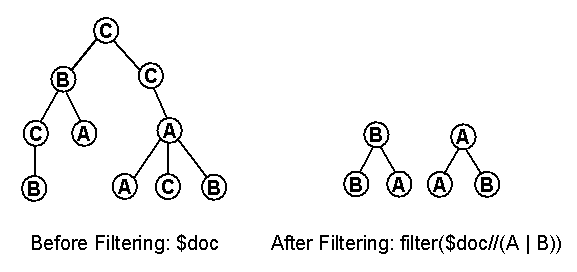
|
| Figure 1: Action of the filter function |
The following example illustrates
how filter might be used
to compute a table of contents for a
document that contains many levels of
nested sections. The query filters the
document, retaining only section
elements, title elements nested
directly inside section elements, and
the text of those title
elements. Other elements, such as
paragraphs and figure titles, are
eliminated, leaving only the
"skeleton" of the document. The example generates a table of contents for a document named cookbook.xml.
<toc>
   {
   filter(document("cookbook.xml") //
      (section | section/title | section/title/text()))
   }
</toc>
4.2 Joins
Joins, which
combine data from multiple sources
into a single result, are a very
important type of query. In this
section we will illustrate how several
types of joins can be expressed in
XQuery. We will base our examples on
the following three documents:
-
A document named
parts.xml that
contains many
part elements;
each part
element in turn
contains
partno and
description
subelements.
-
A document named
suppliers.xml that
contains many
supplier
elements; each
supplier
element in turn
contains
suppno and
suppname
subelements.
-
A document named
catalog.xml that
contains information
about the
relationships between
suppliers and
parts. The catalog
document contains many
item elements,
each of which in turn
contains
partno,
suppno, and
price
subelements.
A conventional ("inner") join
returns information from two or more
related sources, as illustrated by the
following example, which combines
information from three documents. The example
generates a "descriptive
catalog" derived from the
catalog document, but
containing part descriptions
instead of part numbers and
supplier names instead of
supplier numbers. The
new catalog is ordered
alphabetically by
part description and
secondarily by supplier
name.
<descriptive-catalog>
   {
     for $i in document("catalog.xml")//:item,
         $p in document("parts.xml")//part[partno = $i/partno],
         $s in document("suppliers.xml")//supplier[suppno = $i/suppno]
     return
        <item>
           {
           $p/description,
           $s/suppname,
           $i/price
           }
        </item>
     sortby(description, suppname)
   }
</descriptive-catalog>
The previous query returns
information only about parts that have
suppliers and suppliers that have
parts. An outer join is a join that
preserves information from one or more
of the participating sources,
including elements that have no
matching element in the other
source. For example, a left outer
join between suppliers and parts
might return information about
suppliers that have no matching parts.
The following query
demonstrates a left outer
join. It returns names of all
the suppliers in alphabetic
order, including those that
supply no parts. In the
result, each supplier element
contains the descriptions of
all the parts it supplies, in
alphabetic order.
for $s in document("suppliers.xml")//supplier
return
   <supplier>
      {
        $s/suppname,
        for $i in document("catalog.xml")//:item
                 [suppno = $s/suppno],
            $p in document("parts.xml")//part
                 [partno = $i/pno]
        return $p/description
        sortby(.)
      }
   </supplier>
sortby(suppname)
The previous query preserves
information about suppliers that
supply no parts. Another type of join,
called a full outer join, might be
used to preserve information about
both suppliers that supply no parts
and parts that have no supplier. The
result of a full outer join can be
structured in any of several ways. The following query generates a list of supplier elements, each containing nested part elements for the parts that it supplies (if any), followed by a list of part elements for the parts that have no supplier. This might be thought of as a "supplier-centered" full outer join. Other forms of outer join queries are also possible.
<master-list>
 {
    for $s in document("suppliers.xml")//supplier
    return
        <supplier>
           {
             $s/suppname,
             for $i in document("catalog.xml")//:item
                     [suppno = $s/suppno],
                 $p in document("parts.xml")//part
                     [partno = $i/partno]
             return
                <part>
                   {
                     $p/description,
                     $i/price
                   }
                </part>
             sortby (description)
           }
        </supplier>
    sortby (suppname)
    ,
    {-- parts that have no supplier --}
    <orphan-parts>
       { for $p in document("parts.xml")//part
         where empty(document("catalog.xml")//:item
               [partno = $p/partno] )
         return $p/description
         sortby (.)
       }
    </orphan-parts>
 }
</master-list>
The previous query uses an element
constructor to enclose its output
inside a master-list
element. The concatenation operator
(",") is used to combine the two main
parts of the query. The result is an
ordered sequence of supplier
elements followed by an
orphan-parts element that
contains descriptions of all the parts
that have no supplier.
4.3 Grouping
Many queries
involve forming data into groups and
applying some aggregation function
such as count or
avg to each group. The
following example shows how such a
query might be expressed in XQuery,
using the catalog document defined in
the previous section.
This query finds the part
number and average price for
parts that have at least 3
suppliers.
for $pn in distinct-values(document("catalog.xml")//partno)
let $i := document("catalog.xml")//:item[partno = $pn]
where count($i) >= 3
return
   <well-supplied-item>
      {$pn}
      <avgprice> {avg($i/price)} </avgprice>
   </well-supplied-item>
sortby(partno)
The distinct-values function
in this query eliminates duplicate
part numbers from the set of all part
numbers in the catalog document. The
result of distinct-values is a
sequence in which order is not
significant.
Note that $pn, bound by a
for clause, represents an individual
part number, whereas $i, bound by a
let clause, represents a set of items
which serves as argument to the
aggregate functions
count($i) and
avg($i/price). The query
uses an element constructor to enclose
each part number and average price in
a containing element called
well-supplied-item.
4.4 Queries on Sequence
XQuery uses the precedes,
follows, <<,
and >> operators to express
conditions based on sequence. Although these
operators are quite simple, they can be used
to express sophisticated queries for XML
documents in which sequence is meaningful.
The first two queries in this section involve
a surgical report that contains procedure,
incision, and anesthesia elements. The
following query returns a critical sequence
that contains all elements and nodes found
between the first and second incisions of
the first procedure.
<critical-sequence>
 {
    let $proc := //procedure[1]
    for $n in $proc//node()
    where $n follows ($proc//incision)[1]
      and $n precedes ($proc//incision)[2]
    return $n
 }
</critical-sequence>
The following query reports incisions
for which no prior anesthesia was recorded
in the surgical report.
for $p in //procedure
where some $i in $proc//incision satisfies
        empty($proc//anesthesia[. precedes $i])
return $p
In some documents, particular sequences
of elements may indicate a logical hierarchy.
This is most commonly true of HTML. The following
query returns the introduction of an XHTML document,
wrapping it in a div element. In this example, we
assume that an h2 element containing the text
"Introduction" marks the beginning of the introduction,
and the introduction continues until the next h2
or h1 element, or the end of the document, whichever
comes first.
let $intro := //h2[text()="Introduction"],
      $next-h := //(h1|h2)[. follows $intro][1]
return
    <div>
      {
        $intro,
        if (empty($next-h))
          then //node()[. follows $intro]
          else //node()[. follows $intro and . precedes $next-h]
      }
    </div>
Note that the above query also makes explicit the hierarchy that was implicit in the
original document.