Accesskey n skips to in-page navigation. Skip to the content start.

s_gotoW3cHome Internationalization
 

What you need to know about the bidi algorithm and inline markup

Intended audience: content developers working with right-to-left scripts, HTML/XHTML and SVG coders (using editors or scripting), script developers (PHP, JSP, etc.), schema developers (DTDs, XML Schema, RelaxNG, etc.), and anyone who is struggling to understand how to make their mixed direction text look right in markup .

This tutorial first describes some of the basic principles underlying how the Unicode bidirectional algorithm works. Then it looks at some of the more common scenarios where the bidi algorithm requires help through the addition of markup or control codes.

Although we try to take a markup independent view here, most of the examples will use XHTML 1.0, since it is widely recognizable. For advice relative to a specific markup language see the sidebar.

Definitions

Bidirectional text is commonplace in right-to-left scripts such as Arabic, Hebrew, Syriac, and Thaana. Numerous different languages are written with these scripts, including Arabic, Hebrew, Pashto, Persian, Sindhi, Syriac, Thaana, Urdu, Yiddish, etc.

Any embedded text from a left-to-right script and all numbers progress visually left-to-right within the general right-to-left visual flow of the aforementioned scripts. (Of course, the English text on this page also contains bidirectional text where it includes Arabic and Hebrew examples.)

We will use the term bidi to mean 'bidirectional'. We will also use RTL for 'right-to-left' and LTR for 'left-to-right'.

Visual vs. logical order

Visual ordering of text was a common way of representing Hebrew in HTML on old user agents that didn't support the Unicode bidi algorithm. It still persists to a degree today, out of habit. Characters making up the text were stored in the source code in the same order you would see them displayed on screen when looking from left to right.

For example, take some Hebrew text with mixed directionality. The arrows in the example below show the reading order.

Hebrew for 'Internationalization Activity, W3C'

Examples in this document are shown as images to avoid problems for those who's user agent doesn't support bidi.

Click on the image to see the actual text.

Arabic and Hebrew text is left out of the code samples because editors may display the text in different ways. To see the full source, click on the [live code] link in the online version and view the source of the page that displays.

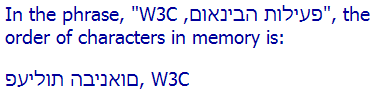
If you looked at the characters in memory, one by one, you would see the following for logically and visually ordered text.

Logical order Visual order
05E4 פ HEBREW LETTER PE 0057 W LATIN CAPITAL LETTER W
05E2 ע HEBREW LETTER AYIN 0033 3 DIGIT THREE
05D9 י HEBREW LETTER YOD 0043 C LATIN CAPITAL LETTER C
05DC ל HEBREW LETTER LAMED 0020   SPACE
05D5 ו HEBREW LETTER VAV 002C , COMMA
05EA ת HEBREW LETTER TAV 05DD ם HEBREW LETTER FINAL MEM
0020   SPACE 05D5 ו HEBREW LETTER VAV
05D4 ה HEBREW LETTER HE 05D0 א HEBREW LETTER ALEF
05D1 ב HEBREW LETTER BET 05E0 נ HEBREW LETTER NUN
05D9 י HEBREW LETTER YOD 05D9 י HEBREW LETTER YOD
05E0 נ HEBREW LETTER NUN 05D1 ב HEBREW LETTER BET
05D0 א HEBREW LETTER ALEF 05D4 ה HEBREW LETTER HE
05D5 ו HEBREW LETTER VAV 0020   SPACE
05DD ם HEBREW LETTER FINAL MEM 05EA ת HEBREW LETTER TAV
002C , COMMA 05D5 ו HEBREW LETTER VAV
0020   SPACE 05DC ל HEBREW LETTER LAMED
0057 W LATIN CAPITAL LETTER W 05D9 י HEBREW LETTER YOD
0033 3 DIGIT THREE 05E2 ע HEBREW LETTER AYIN
0043 C LATIN CAPITAL LETTER C 05E4 פ HEBREW LETTER PE

The order above also represents the typing order, so visual Hebrew text would have to be typed backwards.

Visual ordering isn't really seen much for Arabic. Since the Arabic letters are all joined up there was a stronger motivation on the part of Arabic implementers to enable the logical ordering approach.

Visual ordering of flowing text requires the author to disable any line wrapping and to explicitly add line-breaks and right-align text within block elements and table cells. Then the text needs to be served in an encoding that prevents the application of the Unicode bidi algorithm in later browsers. Here is an example written in HTML:

<table width="50%"><tr><td align="right" nowrap>
,INRIA-מ הפוריאב החראה יתוריש תא הפילחמ W3C<br>
W3C-ל רשפאמ יונישה .ERCIM-ל ,תפרצב תמקממ<br>
הרימש ךות ,הפוריא יבחרב רקחמה ירשק תא קימעהל<br>
ידסייממ דחא ,INRIA םע קזחה ירוטסיהה רשקה לע<br>
.2003 ראוניל 1 ב עצבתי יונישה .ERCIM
</td></tr></table>

(This is actually a fairly clean implementation. For example you can also find such things as right-aligned paragraphs with <nobr>..</nobr> tags around each line. If your window is too narrow, the beginning of each line disappears off the right side of the browser.)

The result is very fragile code that is difficult to maintain. For example, apart from the difficulty of typing the Hebrew backwards, if you wanted to add a few words on the second line of this paragraph, you would have to readjust all the following line breaks. You would also have to add and maintain separate spans of link or emphasis markup for any marked up text that wrapped onto another line.

Visual ordering can also cause problems at a higher level. For example, it requires the order of table columns to be manually reversed when translating into another language. Line breaks will also need to be manually re-flowed if the page geometry changes. Etc.

Logical ordering is a much better approach. In this approach text is stored in memory in the order in which it is normally typed (and usually pronounced). The Unicode bidirectional algorithm then produces the reordering required for correct visual display.

This makes it almost trivial to create long paragraphs of flowing text that automatically wrap to the width of the block element. It also makes it much easier to use such things as screen readers.

The bidi algorithm works on logically ordered text. If you prefer to use visual ordering there is no point reading further (except that you could make your life a whole lot easier).

How the bidi algorithm works

Here we introduce some important basic concepts. If it seems it might be boring, stick with it because without understanding this stuff properly you'll get lost when you need to write marked up bidi text.

Base direction (directional context)

The result of the bidirectional algorithm will depend on the overall base direction of the paragraph, block or page in which it is applied. The base direction is an important concept. It establishes a directional context which the bidi algorithm refers to at various points to decide how to handle the text.

In HTML the base direction is either set explicitly by the nearest parent element that uses the dir attribute, or, in the absence of such an attribute, is inherited from the default direction of the document, which is left-to-right.

To set the default direction of the whole HTML document to right-to-left, add dir="rtl" to the html tag. This will mean that all elements in the document will inherit a base direction of LTR, unless the dir attribute is used on an element to change the base direction within that element's scope.

Characters and directional typing

We already know that a sequence of Latin characters is rendered (ie. displayed) one after the other from left to right (we can see that in this paragraph). On the other hand, the bidi algorithm will render a sequence of Arabic or Hebrew characters one after the other from right to left.

Examples of directionally typed words.

This is independent of the current base direction, and works because each character in Unicode has an associated directional property. Most letters are strongly typed as LTR. Letters from right-to-left scripts are strongly typed as RTL.

Directional runs

When text with different directionality is mixed inline, the bidi algorithm makes a separate directional run out of each sequence of continguous characters with the same directionality.

So in the following example there are three directional runs:

Left-to-right ordered directional runs: bahrain مصر kuwait.

Another way of looking at this is that changes in direction mark the boundaries of directional runs.

Note that you don't need any markup or styling to make this happen.

Here's the important bit: the order in which directional runs are displayed across the page depends on the current base direction.

In the example above, which has an overall context (ie. base direction) of LTR, you would read 'bahrain', then 'مصر', then 'kuwait'.

Left-to-right ordered directional runs: bahrain مصر kuwait.

If you change the directional context of the example above by specifying that the html element or a parent element is RTL, you will change the order of the directional runs.

Right-to-left ordered directional runs: bahrain مصر kuwait.

The characters in both cases are stored in memory in exactly the same order, but the visual ordering of the directional runs, when displayed, is reversed.

Neutral characters

Spaces and punctuation are not strongly typed as either LTR or RTL in Unicode, because they may be used in either type of script. They are therefore classed as neutral or weak characters. Characters are usually classified as 'weak' when they are associated with numbers. A small number of characters punctuation characters are initially classed as weak, but in a non-numeric context are treated like neutrals. In consquence, in this article we will refer to all punctuation as neutral characters.

This is where things begin to get interesting. When the bidi algorithm encounters characters with neutral directional properties (such as spaces and punctuation) it works out how to handle them by looking at the surrounding characters.

A neutral character between two strongly typed characters with the same directional type will also assume that directionality. So a neutral character between two RTL characters will be treated as a RTL character itself, and will have the effect of extending the directional run. This is why the three arabic words (including the intevening spaces, which as neutrals take on the direction of the surrounding characters) in the following example are read from right to left as a single directional run. (The arrows show the reading order.)

Arabic words in an English sentence: The title is مفتاح معايير الويب in Arabic.

Note that you still don't need any markup or styling for this. And that there are still only three directional runs here.

The really interesting part comes when a space or punctuation falls between two strongly typed characters with different directionality, ie. at the boundary between directional runs. In such a case the neutral character (or characters) will be treated as if they have the same directionality as the base direction.

Even if there are several neutral characters between the two strongly typed characters, they will all be treated in the same way.

The implications of all this will become clearer as we work through the examples in the next section.

Numbers

Numbers in RTL scripts run left-to-right within the right-to-left flow, but they are handled a little differently than words by the bidi algorithm in that they always run left-to-right. They are said to have weak directionality. The two examples in the picture illustrate this difference.

one two ثلاثة 1234 خمسة  AND  one two ثلاثة ١٢٣٤ خمسة

The first example uses European digits, '1234', the second expresses the same number using Arabic-Indic digits, ١٢٣٤. In both cases, the digits in the number are read left-to-right.

Because it is weakly typed, the number is seen as part of the Arabic text, so the two Arabic words that surround the number are treated as part of the same directional run - even though the sequence of digits runs LTR on screen.

Note also that, alongside a number, certain otherwise neutral characters, such as currency symbols, will be treated as part of the number rather than a neutral. There are some other slight differences in the way numbers are handled that we don't need to discuss here.

Where the algorithm needs help

The bidi algorithm will handle text perfectly well in most situations, and typically no special markup or other device is needed other than to set the overall direction for the document. You would be very lucky, however, if you got off that easily all the time.

There are three main scenarios that cause problems when dealing with bidirectional inline text. These are:

We look at these scenarios here and proposal some solutions.

Neutrals that appear at the wrong side of a directional run

We have seen that the bidirectional algorithm can cope well with a single level of bidirectional text, and that you could produce the result below without any additional markup or intervention:

Arabic words in an English sentence: The title is مفتاح معايير الويب in Arabic.

Unfortunately, neutrals between different directional runs can sometimes be misinterpreted. Let's type some punctuation at the end of the Arabic phrase in the last example. By default we will see the following:

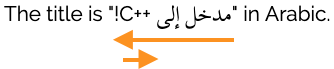
An exclamation mark appearing to the right of Arabic text.

The quotation marks look OK, but the exclamation mark is in the wrong position. It should appear at the end of the Arabic text, ie. to the left, like this:

An exclamation mark appearing to the left of Arabic text.

Given our understanding of the bidi algorithm we can easily understand why this happened. Because the exclamation mark was typed in between the last RTL letter 'ب' (on the left)‌ and the LTR letter 'i' (of the word 'in') its directionality is determined by the base direction of the paragraph, ie. LTR in this case. (Note that it makes no difference that there are actually two punctuation characters and a space in this position - they are all neutrals and so are all affected the same way.)

Because the exclamation mark is seen as LTR it joins the directional run that includes the text 'in Arabic'.

So how do we get the punctuation in the right place? We'll explain in a moment, but first let's take a look at another common problem.

Nesting base direction

If you have a situation where embedded text, such as a quotation, is also bidirectional, then you will need help. The next picture shows a Latin sentence that contains a Hebrew quote which, in turn, contains both Hebrew and Latin text. This is how it would appear if you rely solely on the bidirectional algorithm.

Incorrectly ordered text, because no embedding.

The order of the two Hebrew words is correct, but the because the text 'W3C' is part of the Hebrew phrase, it should appear on the left hand side of the quotation and the comma should appear between the Hebrew text and 'W3C'. In other words, the desired result is:

Correctly ordered text via embedding.

The problem arises because the directional flows are being ordered according to the LTR base direction of the paragraph. Inside the Hebrew quotation, however, the correct default ordering should be RTL.

To resolve this problem we need to explicitly change the base direction of the embedded phrase (ie. open a new embedding level).

Note: The examples shown here a fairly simple. Such sentences could commonly have more than two directional runs, in which case the issue is more obvious. Take, for instance, the following example where the top line shows the expected rendering, but the second line shows the default treatment using just the bidi algorithm.

More complicated embedded text.

A simple solution

A simple way to resolve both of the problems we just mentioned is to explicitly change the base direction of the embedded phrase. In HTML this would be done by enclosing the quotation in markup and assigning it a directionality of RTL using the dir attribute.

<p>The title is "<span dir="rtl" lang="ar"> ... !</span>" in Arabic.</p>
<p>The title says "<span dir="rtl" lang="he">...</span>" in Hebrew</p>
[live code]

The editing environment you use may not show the exclamation mark in the right place in the code source, but it should look right when displayed.

Note carefully how the span tag falls inside the quote marks - these are part of the surrounding English text.

Note also that this is likely to be a simple solution because it is likely that there is already markup around the embedded phrase. Such markup may be used to semantically label the text, to add language markup, or perhaps add a class attribute to apply appropriate styling. In the example above, a span element was used to declare the language, so adding the dir attribute is simple.

In markup languages other than HTML you may find a similar attribute to dir which you can use to produce the correct effect. If you don't have such an attribute you may have to resort to individually styling the appropriate inline markup, but it would probably be better to lobby your markup developer to provide you with one.

What if I can't use markup?

There are some situations where you may not be able to use the markup described in the previous section. In HTML these include the title element and any attribute value.

In these situations you can use invisible Unicode characters that produce the same results.

To replicate the effect of the markup described in the example above related to nested base directions, we can use pairs of characters to surround the embedded text. The first character is one of U+202B RIGHT-TO-LEFT EMBEDDING (RLE) or U+202A LEFT-TO-RIGHT EMBEDDING (LRE). This corresponds to the markup <span dir="rtl"> or <span dir="ltr">, respectively. The second character is U+202C POP DIRECTIONAL FORMATTING (PDF). This corresponds to the </span> in the markup. Below you can see how to apply this to the previous example.

<p>The title says "&#x202B;...&#x202C;" in Hebrew</p>
Because the characters are invisible you may prefer to actually type in a numeric character reference, as we have here
[live code]

These control characters should only be used for inline phrases, not for block elements such as paragraphs. In general, it is recommended that you use markup where it is available, rather than these character pairs, because it is easier to see and therefore manage the markup, and it is consistent with the approach used for block elements. Where markup is not available, of course, this is the only option.

When it comes to dealing with the misplaced neutrals described earlier, you can use the same approach. There is, however, a simpler alternative that works for cases such as the one shown, and is in fact recommended by the Unicode Standard rather than a pair of controls for these simple cases.

This involves placing an invisible, strongly-typed RTL Unicode character, after the exclamation mark. This puts our neutral punctuation between two strongly typed RTL characters, which results in the neutral becoming RTL too, and therefore the exclamation mark becomes a continuation of the right-to-left directional run.

The character designed for this purpose is the Unicode character U+200F RIGHT-TO-LEFT MARK (RLM). There is also a similar character, U+200E LEFT-TO-RIGHT MARK (LRM).

<p>The title is " ... !&#x200F;" in Arabic.</p>

Note that in the example just shown the Arabic text is no longer marked up for language or styling. Also, because the character is invisible you may prefer to actually type in a numeric character reference (&#x200E;) as we did here, or, if available, a character entity (such as &lrm; in HTML).

Adjacent, same-direction directional runs that are incorrectly ordered

Neutrals between same directional runs can also sometimes be misinterpreted. In our next example the list order is incorrect. The first two Arabic words should be reversed and the intervening comma, which is part of the English text, should appear immediately to the right of the first word.

Bahrain appears to the left of Egypt.

What was wanted was:

Egypt appears to the left of Bahrain.

The reason for the failure is that, with a strongly typed right-to-left (RTL) character on either side, the bidirectional algorithm sees the neutral comma as part of the Arabic text. It is interpreting the first two arabic words and the comma as a list in Arabic. In fact it is part of the English text, and should mark the boundary of two directional runs in Arabic.

In the previous section the neutral character thought it was part of the directional context established by the base direction, but wasn't; in this section the neutral character thinks it is part of the directional run, when it is really part of the overall context! No-one said life was simple...

Putting markup around the comma is a bit like cracking an egg with a hammer in this case.

A simple solution is to use an invisible, strongly-typed RLM Unicode character, next to the comma. This puts our neutral punctuation between strongly typed RTL and LTR characters and forces it to take on the directionality of the base direction, which is the left-to-right of the English text. That breaks the Arabic words into two separate directional runs, which are then ordered LTR in accordance with the base direction of the paragraph.

In the following example an escaped version of the character has been added after the exclamation mark and the result looks fine:

<p>The names of these states in Arabic are ...,&#x200E; ... and ... respectively.</p>

More examples

The examples we have used so far have been English and LTR based. The same principles apply for RTL text in languages such as Hebrew and Arabic.

Example: Unfortunately, on its own the bidirectional algorithm creates a real mess of the following text, which is in a right-to-left paragraph. (The red superscript numbers are just part of the diagram, not the text, and are there to identify the parentheses.)

Parentheses and Latin text incorrectly ordered.

Here's what we ought to see.

Parentheses and Latin text correctly ordered

This problem was about adjacent, same-direction directional runs that are incorrectly ordered.

Although it may not be immediately obvious, actually the solution is trivial. Just insert an RLM after 'W3C' and you're done. It's really that simple!

If you're not convinced, here's the explanation. Unfortunately this will take a little longer to write than the fix.

Initially the parenthesis labelled  1 was between two LTR-typed characters, so its directionality was also LTR. This makes 'W3C (World Wide Web Consortium" a single directional run. (Don't worry about the shape of the parentheses for now - this will be explained shortly.)

The insertion of the RLM after 'W3C' changes the directionality of the parenthesis. Now it is between strongly-typed LTR and RTL characters, and so it takes on the directionality of the base direction, ie. the RTL direction of the paragraph as a whole. This makes sense if you see the parentheses as part of the Hebrew sentence syntax. The other parenthesis is also RTL, since it already appears between Latin and Hebrew characters.

This means we now have three directional runs at the beginning of the text. In memory they are ordered as follows: 'W3C', a RTL parenthesis, and the text "World Wide Web Consortium". Since the base direction for this paragraph is right-to-left, those runs are ordered from right to left - giving us the order we expect.

Example: The picture below shows what you are likely to see when relying solely on the bidirectional algorithm to display a MAC address number in a right-to-left context.

Parentheses and Latin text incorrectly ordered.

The next picture shows what you are likely to see when relying solely on the bidirectional algorithm.

Parentheses and Latin text incorrectly ordered.

This is particularly worrisome, since it's not obvious that the non-hinted order is incorrect.

Although there are more characters involved, this problem is about neutrals that appear at the wrong side of a directional run. The same approach can be used to fix this. You can either put markup around the MAC address and use dir to set a different base direction, or you can put an LRM at the beginning of the number.

Example: The picture below shows the the unexpected result of displaying a telephone number in a right-to-left context, where the area code is surrounded by parentheses, and where the number appears at the beginning of a line or after some right-to-left text.

Parentheses and Latin text incorrectly ordered.

The next picture shows what you expect to see.

Parentheses and Latin text incorrectly ordered.

Because these are numbers, the order applied by the bidirectional algorithm is slightly different from what we've seen before, but the fix is essentially the same. The correct rendering can be produced by adding a LRM character or escape just before the first parenthesis, or by using markup around the number and setting the base direction to LTR.

Mirrored characters

You may have noticed that, in addition to changing position, one of the parentheses in the previous example actually changed shape, too. This was completely automatic, and happens because these characters are what are known as mirrored characters in Unicode.

Mirrored characters are usually pairs of characters, such as parentheses, brackets, and the like, whose shape when displayed is dependent upon whether it is part of a LTR or RTL context. You do not have to change the character for the shape to change.

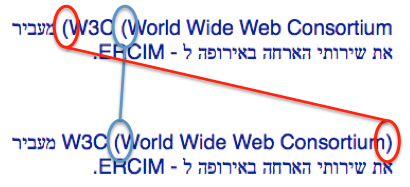
The ends of an opening parenthesis always face in the direction of the text flow. In the picture below, the parenthesis circled in red faces to the right in the top line because it is being treated as the opening parenthesis of some Latin text. In the lower version of the text, the same character (again circled in red) is treated as a opening parenthesis related to the Hebrew text (ie. the expanded name follows the acronym in reading order), and therefore faces the other way.

Mirrored characters.

This means that, whether the stored content is in Arabic/Hebrew or Latin script, you would use the same LEFT PARENTHESIS character at the beginning of the parenthesized text. In other words, treat mirrored characters as if any word left in the name meant 'opening', and right meant 'closing'.

Overriding the algorithm

There may be occasions where you don't want the bidi algorithm to do its reordering work at all. In these cases you need some additional markup to surround the text you want left unordered.

In HTML and XHTML 1.0 this is achieved using the inline bdo element. In other XML applications, such as XHTML2, it may be implemented as a value of rlo or lro on the dir attribute, enabling it to be applied to any element. Again, there are Unicode control characters you could use to achieve the same result, but because they create states with invisible boundaries this is generally not recommended.

Examples that show the characters as ordered in memory use the bdo tag to achieve that effect. For example, the picture below shows Hebrew text as ordered in memory.

Shows Hebrew text in the order stored in memory.

For the bottom line we would use the following markup in HTML:

<p><bdo dir="ltr">...</bdo></p>

Tell us what you think (English).

Subscribe to an RSS feed.

New resources

Home page news

Further reading

Author: Richard Ishida, W3C.

Valid XHTML 1.0!
Valid CSS!
Encoded in UTF-8!

Content first published 2003-09-29. Last substantive update 2009-06-29 12:05 GMT. This version 2009-06-29 12:05 GMT

For the history of document changes, search for article-inline-bidi-markup in the i18n blog.