ThotLib V3
Date: 28 May, 2001
The Thot Tool Kit API
Vincent QUINT, Irène VATTON - W3C/INRIA
The Thot tool kit is a comprehensive set of editing functions that can be
used for building applications that handle structured documents in the Unix /
X Window environment. It is constituted by a set of C libraries that can be
linked to any program. It allows application programs to perform the same
kind of operations as a user working with a structured document editor.
Typically, an application can use the tool kit for creating new documents,
for modifying existing documents, for extracting information from documents,
for displaying (parts of) documents, etc. The tool kit can be used either for
automatic manipulations performed solely by a program or for allowing a human
user to cooperate with a program that processes documents. In this latter
case, it uses OSF/Motif for implementing the user interface.
The functions provided by the tool are based on the Thot document model.
Documents produced with the tool kit can be stored as Unix files in the same
standard format as documents produced by the Thot editor (pivot format
indicated by the .PIV suffix). Thot editor is also able to save documents in
other formats and obviously this capability is provided by the tool kit. Thot
documents can be processed by all tools available in the Thot environment and
by all applications developed with the tool kit. The Thot environment
includes in particular flexible tools for editing, printing and translating
documents.
1 Introduction to the document model
1.1 Logical structure
In the editing tool kit, a document is primarily considered as an
abstract structure that assembles typed elements. Examples of
elements types are titles, chapters, sections, paragraphs, lists, notes, etc.
The structure itself is basically a hierarchy of such elements; it is called
an abstract tree. The lowest level elements (also called basic
elements) represent the actual contents of the document:
character stings, mathematical symbols, pictures, and graphical elements. In
addition to this tree structure, non-hierarchical links (also called
references) relate elements independently of the tree structure,
thus representing cross- references and other types of hypertext links.
As the type of an element is not always sufficient for completely
representing the role of that element in the document logical structure, the
notion of logical attribute has been introduced. A logical attribute
is information associated with an element that adds semantics to that
element.
The logical structure of a document is constrained by a model, called a
structure schema. Several structure schemas can be used, one for
each type of document. A structure schema defines a document type, by
specifying all types of elements that can be used in the logical structure of
a document of that type. It also specifies the attributes that can be
associated with each type of element and all structural relationships that
can be set between elements. Structure schemas are written in a specific
declarative language, called S. A compiler for the S language is available,
so that new document types can be defined, according to the requirements of
applications.
1.2 Presentation
The graphical appearance of a document (also called presentation)
is derived from its logical structure and is generically specified by a
presentation schema. A presentation schema is associated with a
structure schema and specifies the appearance of documents of the type
defined by the structure schema. For each type of element defined in the
structure schema, the presentation schema contains a set of presentation
rules that define the style and the format of the logical elements. Using
these rules, the system can then produce the graphical representation of a
document, on the basis of its logical structure.
Presentation schemas are written in the language P and a compiler for that
language is available. New presentation schemas can then be developed. Notice
that several presentation schemas can be associated with the same structure
schema, thus defining alternative presentations for the same type of
document.
In addition, each presentation schema may define different views.
A view is a subset of the document that can be formatted in a different way
and displayed separately: each view is presented in a different window on the
screen.
For balancing this rigid principle of presentation with a certain degree
of flexibility, it is possible to associate with some element instances a
special type of attribute, called specific presentation rule. A
specific presentation rule is a presentation rule of the same kind as those
of the presentation schema, but it applies only to the element instance with
which it is associated, not to all elements of that type.
With that approach to document representation, documents are first
specified generically, by writing structure schemas and presentation schemas.
Then end-users and application programs can manipulate document instances
very simply, by referring to the schemas. Most of the work consists in
handling a logical structure consistent with the chosen structure schema and
in handling the contents (the basic elements) of that structure. All the
rest, especially formatting and displaying, is done by the tool kit. In
addition, the logical structure is a very efficient help for moving across
the document and for locating the parts to be modified.
2 Tool kit structure
2.1 Structure of this manual
The tool kit contains about 200 functions. For the sake of clarity, they
are presented by groups, each group focusing on a different aspect of
documents.
- Group application (section 6) concerns
the administration of the tool kit by the application.
- Group interface (section 7) allows the
application program to modify and extend the Thot editor.
- Group document (section 10) allows the
application to manage schemas and whole documents.
- Group tree (section 11) handles the
hierarchical logical structure of documents.
- Group contents (section 12) allows the
application to manipulate the contents of the leaves of the
structure.
- Group attribute (section 13) concerns
logical attributes.
- Group reference (section 14) contains
functions for manipulating non hierarchical relationships (hypertext
links).
- Group language (section 15) concerns
natural languages used in text contents.
- Group presentation (section 16) handles
specific presentation.
- Group view (section 18) handles
views.
- Group selection (section 19) contains
the functions that handle the selection.
- Group message (section 8) allows the
application program to display messages intended to the user.
- Group dialogue (section 9) allows the
application program to manage menus and forms intended to the user.
Each section presenting a group of functions is divided into subsections
which correspond to the following four broad categories:
- constructors are functions that create or generate new things.
By extension, they also include reverse functions, which delete or
destroy the same things.
- modificators are functions that modify existing things in
different ways.
- accessors are the functions that allow the application program
to access things.
- locators are the functions that search various kind of things
in document, according to different criteria.
2.2 Libraries
The Thot editing tool kit is accessed through an API that is defined in
sections 6 to 9. The tool kit
takes the form of two libraries for editing documents. Each library is suited
to a different type of application and an application uses only one of the
two editing libraries: the second library includes the first one.
2.2.1 Thot Kernel library
The first library allows an application to handle the logical structure
and the contents of Thot documents in automatic mode. This subset of the tool
kit, called Thot Kernel, does not produce the graphical aspect of documents.
It does not provide either any service for the user interface. It is
typically designed for applications performing automatic operations on the
logical structure and contents of documents without direct manipulation by a
user.
The last five groups of functions (those handling views, selections, and
user interface to the editor) are not part of that library. Sections 18 to 9 of that document do not
concern that library.
2.2.2 Thot Editor library
The second library, called Thot Editor, includes all facilities provided
by the Kernel, with the same interface, and provides additional services for
displaying the graphical aspect of documents. It also contains the whole Thot
editor with its user interface. All editing functions of Thot can be accessed
by the user and by application programs. The Thot Editor tool kit is
typically intended to interactive applications that handle documents under
the control of a user and that add new functions to the editor.
All groups of functions presented in this document are part of that
library. Functions that are also part of the Thot Kernel have exactly the
same interface when used in the context of Thot Editor. The only difference
is that, in the case of Thot Kernel, they do not display anything, and that,
in the case of Thot Editor, some of them (namely constructors and
modificators) modify the picture displayed on the screen. As a consequence,
application programs that have been developed for automatic processing can be
reused in the context of an interactive application without any change: the
Thot Editor automatically takes in charge all displaying problems that are
not handled by the Thot Kernel.
3 Using the Thot tool kit
3.1 Errors
Almost all functions of the tool kit can detect errors. In that case the
function is not performed and an error code is set. The tool kit provides the
application program with the function TtaGetErrorCode for
accessing the error code. That function returns the completion code of the
last tool kit function called by the application. Only the completion code of
the most recently called function is available. A 0 completion code means a
successful operation; other values are defined in files
application.h.
In addition to the error code returned to the application program by the
function TtaGetErrorCode, the tool kit prints an error
message on the standard error file stderr whenever an error is raised. Error
messages are printed by default, but the application program can ask the tool
kit to stop printing these messages, by calling the function TtaSetErrorMessages.
3.2 Include files
Each group of functions has an associated include file. Available include
files are: application.h, document.h, tree.h, content.h, attribute.h,
reference.h, language.h, presentation.h, view.h, selection.h, interface.h.
These files must be included in each module of the application program that
calls at least one function of the corresponding group. They contain the
interface definition of the functions and the types and constants (#define)
used by these functions.
3.3 Buffers
Whenever a function may return a long character string (20 characters or
more), the buffer must be provided by the application when calling the
function. If the buffer is too small, the tool kit raises an error. But the
size of the character string can generally be asked before calling such
functions, by using another function.
3.4 Naming conventions
Functions in the Thot API belong to different categories regarding their
arguments and return value. The naming scheme follows these categories:
- TtaGet* are functions that return a single value as the value of the
function itself. Their arguments do not return any value.
- TtaNext* or TtaPrevious* are void functions that return a single value
through an argument. You set that argument with an object before calling
the function and, when returning, this argument has a new value, which is
the next or previous object. These functions are mainly used in loops to
access objects sequentially.
- TtaGive* are void functions that return at least two values through
their arguments.
- Functions that do not return any value just start with Tta.
The tool kit performs operations on various entities, such as schemas,
documents, elements, attributes, views, etc. Each entity is identified by a
unique identifier which is assigned by Thot. Therefore, an application
program must get that identifier before manipulating any entity. An
identifier can be obtained by constructors, accessors and locators.
The following types are used by the editing tool kit:
- SSchema
- a structure schema loaded by the tool kit.
- Document
- a document loaded or created by the tool kit.
- Element
- an element in the logical structure of a document.
- Attribute
- a logical attribute.
- PRule
- a specific presentation rule.
- TypeUnit
- UnRelative, UnXHeight, UnPoint, UnPixel, UnPercent
- View
- a view created by the editor (Thot Editor only).
- ElementType
- the type of an element.
- AttributeType
- the type of an attribute.
- Language
- the identifier of a natural language.
SSchemas, Elements, Attributes, and PRules are pointers (addresses),
whereas Documents and Views are integers. Language is an unsigned character.
Both ElementType and AttributeType are structures containing a SSchema (the
schema that defines the corresponding element type or attribute type) and an
integer which is the number of the element type or attribute type in that
structure schema. Structure ElementType is defined in file
tree.h:
typedef struct _ElementType
    {
    SSchema ElSSchema;
    int ElTypeNum;
    } ElementType;
Structure AttributeType is defined in file attribute.h:
typedef struct _AttributeType
    {
    SSchema AttrSSchema;
    int AttrTypeNum;
    } AttributeType;
In addition some integers are used for exchanging parameters between the
application program and the tool kit. Available parameters with their
possible values are:
- Search domain
- SearchForward, SearchBackward, SearchInTree.
- Access rights
- ReadWrite, ReadOnly, Hidden, Inherited.
- Construct
- ConstructIdentity, ConstructList, ConstructChoice,
ConstructOrderedAggregate, ConstructUnorderedAggregate,
ConstructConstant, ConstructReference, ConstructBasicType,
ConstructNature, ConstructPair.
- Presentation rules
- PRSize, PRStyle, PRFont, PRUnderline, PRThickness, PRIndent,
PRLineSpacing, PRDepth, PRAdjust, PRJustify, PRLineStyle, PRLineWeight,
PRFillPattern, PRBackground, PRForeground, PRHyphenate.
- Display modes
- DisplayImmediately, DeferredDisplay, NoComputedDisplay.
5 Initialization
Group application contains the functions for managing the tool kit API.
These functions require that file application.h be included in the
module that calls them.
Applications generated by an interface schema EDITOR.A don't have to call
these functions.
5.1 Constructors
5.1.1 TtaInitialize
Initializes the Thot editing tool kit for an application. This function
must be called before any other function of the tool kit.
void TtaInitialize(char *applicationName)
- Parameter:
- applicationName: name of the application that requires
services from the tool kit. This name is used for accessing the
ressources defined in the Registry.
Quits the Thot tool kit. No other function of the tool kit can then be
called by the application.
void TtaQuit()
5.1.3 TtaInitializeAppRegistry
Initialize the Thot Registry. This is done by default by TtaInitialize. On
Unix platforms the Registry is physically stored in the Thot.ini
file, on Windows platforms the native Registry is used.
void TtaInitializeAppRegistry(char *applicationName)
- Parameter:
- applicationName: name of the application.
5.1.4 TtaSaveAppRegistry
Commit the changes made to the Thot Registry. This is done by default by
TtaQuit.
void TtaSaveAppRegistry()
5.2 Modificators
5.2.1 TtaSetApplicationQuit
Register the procedure that must be called just before the application
will be closed. That procedure has no parameters
void TtaSetApplicationQuit (Proc procedure)
- Parameter:
- procedure: the procedure that must be called just before the
application
Group application contains the functions for managing the tool kit API.
These functions require that file application.h be included in the
module that calls them.
6.1 Constructors
6.1.1 TtaGetMemory
Allocates dynamically a buffer of a specific size.
char *TtaGetMemory(int size)
- Parameter:
- size: size in bytes (like using malloc) of the desired
allocated buffer.
- Return value:
- the address of the allocated buffer.
- See also:
- TtaFreeMemory.
6.1.2 TtaFreeMemory
Frees the memory allocated to a buffer by TtaGetMemory.
void TtaFreeMemory(char *buffer)
- Parameter:
- buffer: the address of the buffer.
- See also:
- TtaGetMemory.
6.1.3 TtaGetEnvString
Reads an entry from the Thot Registry. It returns a non-modifiable string
associated to the name given as parameter. Thot first looks for a specific
value associated to the current application, and if not found try to find one
in the "thot" section. Hence settings saved in the "thot" section are shared
by all applications based on the Thot library, but can be refined to fit each
application specific needs. If no value is found for the requested entry, the
function returns NULL.
char *TtaGetEnvString(const char *name)
- Parameters:
- name: name of the entry.
6.1.4 TtaGetDefEnvString
Reads an entry from the Thot Registry. It returns a non-modifiabledefault
string associated to the name given as parameter. Thot first looks for a
specific value associated to the current application, and if not found try to
find one in the "thot" section. Hence settings saved in the "thot" section
are shared by all applications based on the Thot library, but can be refined
to fit each application specific needs. If no value is found for the
requested entry, the function returns NULL.
char *TtaGetDefEnvString(const char *name)
- Parameters:
- name: name of the entry.
6.1.5 TtaGetEnvInt
Reads an entry from the Thot Registry. It returns the integer value
associated with the name given as a parameter. Thot first looks for a
specific value associated to the current application, and if not found try to
find one in the "thot" section. Hence settings saved in the "thot" section
are shared by all applications based on the Thot library, but can be refined
to fit each application specific needs. The function returns either TRUE or
FALSE, depending on whether the the registry entry exists or not.
ThotBoolTtaGetEnvInt(const char *name, int *value)
- Parameters:
- name: name of the entry.
value: value of the entry.
6.1.6 TtaGetDefEnvInt
Reads an entry from the Thot Registry. It returns the default integer
value associated with the name given as a parameter. Thot first looks for a
specific value associated to the current application, and if not found try to
find one in the "thot" section. Hence settings saved in the "thot" section
are shared by all applications based on the Thot library, but can be refined
to fit each application specific needs. The function returns either TRUE or
FALSE, depending on whether the the registry entry exists or not.
ThotBoolTtaGetDefEnvInt(const char *name, int *value)
- Parameters:
- name: name of the entry.
value: value of the entry.
6.1.7 TtaGetEnvBoolean
Reads an entry from the Thot Registry. It returns the ThotBool value
associated with the name given as a parameter. Thot first looks for a
specific value associated to the current application, and if not found try to
find one in the "thot" section. Hence settings saved in the "thot" section
are shared by all applications based on the Thot library, but can be refined
to fit each application specific needs. The function returns either TRUE or
FALSE, depending on whether the the registry entry exists or not.
ThotBoolTtaGetEnvBoolean(const char *name, ThotBool *value)
- Parameters:
- name: name of the entry.
value: value of the entry.
6.1.8 TtaGetDefEnvBoolean
Reads an entry from the Thot Registry. It returns the default ThotBool
value associated with the name given as a parameter. Thot first looks for a
specific value associated to the current application, and if not found try to
find one in the "thot" section. Hence settings saved in the "thot" section
are shared by all applications based on the Thot library, but can be refined
to fit each application specific needs. The function returns either TRUE or
FALSE, depending on whether the the registry entry exists or not.
ThotBoolTtaGetDefEnvBoolean(const char *name, ThotBool *value)
- Parameters:
- name: name of the entry.
value: value of the entry.
6.1.9 TtaIsBlank
TtaSkipBlanks skips all spaces, tabs, linefeeds and newlines at the
beginning of the string and returns the pointer to the new position.
ThotBool TtaIsBlank (char *ptr);
- Parameters:
- ptr: the source string.
6.1.10 TtaSkipBlanks
TtaSkipBlanks skips all spaces, tabs, linefeeds and newlines at the
beginning of the string and returns the pointer to the new position.
char *TtaSkipBlanks (char *ptr)
- Parameters:
- ptr: the source string.
- Return value:
- the pointer to the new position in the source string.
6.2 Modificators
6.2.1 TtaSetErrorMessages
Indicates to the tool kit whether error messages must be printed or
not.
void TtaSetErrorMessages(int on)
- Parameters:
- on: 1 if error messages must be printed, 0 if not.
6.2.2 TtaSetEnvString
Set an entry in the Thot Registry for the current application.
void TtaSetEnvString(const char *name, const char *value, int
overwrite)
- Parameters:
- name: name of the entry.
value: value associated to the entry.
overwrite: should we overwrite an existing entry ?
6.2.3 TtaSetDefEnvString
Sets the default value of an entry in the Thot Registry for the current
application.
void TtaSetDefEnvString(const char *name, const char *value, int
overwrite)
- Parameters:
- name: name of the entry.
value: value associated to the entry.
overwrite: should we overwrite an existing entry ?
6.2.4 TtaSetEnvInt
Set an entry in the Thot Registry for the current application.
void TtaSetEnvInt(const char *name, const int value, int overwrite)
- Parameters:
- name: name of the entry.
value: value associated to the entry.
overwrite: should we overwrite an existing entry ?
6.2.5 TtaSetEnvBoolean
Set an entry in the Thot Registry for the current application.
void TtaSetEnvBoolean(const char *name, const ThotBool value, int
overwrite)
- Parameters:
- name: name of the entry.
value: value associated to the entry.
overwrite: should we overwrite an existing entry ?
6.3 Accessors
6.3.1 TtaGetVersion
Returns the identifier of the current version of the Thot eRediting tool
kit.
char *TtaGetVersion()
- Return value:
- identifier of the current version.
6.3.2 TtaGetErrorCode
Returns the error code set by the last call to the Thot editing tool kit.
See file application.h for the possible values.
int TtaGetErrorCode()
- Return value:
- last error code, 0 if the last call was successful.
6.3.3 TtaGetStrError
Returns a pointer to the message text for a given error code.
char *TtaGetStrError(int errorCode)
- Parameter:
- errorCode: an error code.
- Return value:
- pointer to the message text of the error.
- See also:
- TtaGetErrorCode
The functions described in this section require that file
interface.h be included in the module that calls them. They are
available only in the Thot Editor library.
7.1 Constructors
7.1.1 TtaSetCallback
This function reserves a set of reference for creating dialogue elements
(forms, menus, submenus, labels, etc.) and specifies the procedure that is
called back when the user activates these dialogue elements.
Dialogue elements have to be created by the application using references
between the "base" value returned by this function and the value
"base+numberOfRef-1". So, this function must be called first.
It is possible to define different sets of dialogue elements by calling
this function more than one time with different
callbackProcedure procedure in the same application.
The callbackProcedure procedure declared is called for each
event concerning these specific dialogue items. It receives three parameters:
the dialogue item reference, the data type, and the data value:
void callbakProcedure(reference, datatype, data)
     int reference;
     int datatype;
     char *data;
int TtaSetCallback(void (*callbackProcedure) (), int numberOfRef)
- Parameter:
- callbakProcedure: the application callback procedure.
numberOfRef: the nmber of reference reserved.
- Return value:
- the "base" value for the
numberOfRef specific dialogue
elements to be created.
7.1.2 TtaHandlePendingEvents
This function manages all Thot and Motif pending events. The application
have to call this function to allow user's interactions and display
updates to be managed during long treatments.
void TtaHandlePendingEvents()
7.1.3 TtaHandleOneEvent
This function processes one event within Thot and Motif. The application
which controls a local loop of events have to call this function to allow
managment of specific Thot and Motif events.
void TtaHandlePendingEvents(XEvent *event)
- Parameter:
- event: the X event to be managed.
7.1.4 TtaAddButton
Adds a new button into the document view button bar. This function must
specify a valid view of a valid document. The procedure parameter gives the
call back procedure that will be run when user select the button. This
procedure will receive two parametrers: the document and the view
concerned.
An example of callback procedure is.
void callback_procedure (document, view)
Document document;
View view;
{
....
}
If the icon parameter in None, a space button is generated and the
callback procedure is ignored. The parameters type and state are only used by
on Windows platforms.
int TtaAddButton(Document document, View view, ThotIcon icon, STRING
functionName, STRING info, void (*procedure) (), BYTE type, ThotBool
state)
- Parameters:
- document: the concerned document.
view: the concerned view.
icon: the pixmap of the new button or None,.
functionName: the internal name of the function used to
connect shortcuts,.
info the text displayed when the cursor stays on the
button,.
procedure: procedure to be executed when the button is
selected by the user or NULL.
type: it could be TBSTYLE_BUTTON or TBSTYLE_CHECK.
state: is TRUE if the button is in an active state,.
- Return value:
- The button index.
7.1.5 TtaAddTextZone
Adds a new text-zone into the document view commands. This function must
specify a valid view of a valid document. The editable parameter indicates
that user can edit this text-zone. The procedure parameter gives the call
back procedure that will be run when user changes the text-zone: the user
press the Return key. This procedure will receive two
parametrers: the document and the view concerned.
An example of callback procedure is.
void callback_procedure (document, view)
Document document;
View view;
{
....
}
If the text-zone is not editable the procedure have to be NULL.
int TtaAddTextZone(Document document, View view, char *label, ThotBool
editable, void (*procedure) ())
- Parameters:
- document: the concerned document.
view: the concerned view.
label: the label of the text-zone.
editable: True is user can edit the text-zone.
procedure: procedure to be executed when the text is
modified by the user.
- Return value:
- The text-zone index.
7.2 Accessors
7.2.1 TtaGetCurrentDisplay
Returns the current display descriptor.
Display *TtaGetCurrentDisplay()
7.2.2 TtaGetScreenDepth
Returns the screen depth of the display.
int TtaGetScreenDepth()
7.2.3 TtaClickAnElement
Waits for a click from end-user and returns the element and document
selected. If the user clicks out of any document view, the returned values
are null.
void TtaClickAnElement(Document document, Element element)
- Parameters
- document: the document selected by the user or 0.
element: the element selected by the user or 0.
7.3 Modificators
7.3.1 TtaChangeButton
This function changes the button icon. This function must specify a valid
view of a valid document and a valid button index.
void TtaChangeButton(Document document, View view, int buttonIndex,
ThotIcon icon, ThotBool state)
- Parameters:
- document: the concerned document.
view: the concerned view.
buttonIndex: the button index, numbered from 1 to n.
icon: the pixmap of the new button or None.
state: TRUE if the button is an active button..
7.3.2 TtaSetTextZone
This function gets the text to be displayed in the text-zone. This
function must specify a valid view of a valid document and a valid text-zone
index.
void TtaSetTextZone(Document document, View view, int textIndex, char
*text)
- Parameters:
- document: the concerned document.
view: the concerned view.
textIndex: the button index, numbered from 1 to n.
text: the text to be displayed into the text-zone.
7.3.3 TtaSetMenuOff
Sets inactive a menu in the menu bar of the view of the document. If the
document and view parameters are null, the menu is a application window
menu.
void TtaSetMenuOff(Document document, View view, int menuID)
- Parameters:
- document: the document concerned or 0.
view: the view concerned or 0.
menuID: the menu identification in the EDITOR.h file.
7.3.4 TtaSetMenuOn
Sets active a menu in the menu bar of the view of the document. If the
document and view parameters are null, the menu is a application window
menu.
void TtaSetMenuOn(Document document, View view, int menuID)
- Parameters:
- document: the document concerned or 0.
view: the view concerned or 0.
menuID: the menu identification in the EDITOR.h file.
7.3.5 TtaSetActionOff
Sets inactive a menu action in the menu bar of the view of the document.
If the document and view parameters are null, the menu is a application
window menu.
void TtaSetActionOff(Document document, View view, int menuID, int
itemID)
- Parameters:
- document: the document concerned or 0.
view: the view concerned or 0.
menuID: the main menu (even if the item is located into a
submenu) identification in the EDITOR.h file.
itemID: the item identification in the EDITOR.h file.
7.3.6 TtaSetActionOn
Sets active a menu action in the menu bar of the view of the document. If
the document and view parameters are null, the menu is a application window
menu.
void TtaSetActionOn(Document document, View view, int menuID, int
itemID)
- Parameters:
- document: the document concerned or 0.
view: the view concerned or 0.
menuID: the main menu (even if the item is located into a
submenu) identification in the EDITOR.h file.
itemID: the item identification in the EDITOR.h file.
7.3.7 TtaSetToggleItem
Sets on/off the toggle of an item in the menu bar of the view of the
document. If the document and view parameters are null, the menu is a
application window menu.
void TtaSetActionOn(Document document, View view, int menuID, int itemID,
ThotBool on)
- Parameters:
- document: the document concerned or 0.
view: the view concerned or 0.
menuID: the main menu (even if the item is located into a
submenu) identification in the EDITOR.h file.
itemID: the item identification in the EDITOR.h file.
on: the value True or False to be set.
7.3.8 TtaSetCursorWatch
Displays the cursor watch within the view of the document. If the document
and view parameters are NULL, displays the cursor watch within all views of
documents.
void TtaSetCursorWatch (Document document, View view)
- Parameters:
- document: the document concerned or 0.
view: the view concerned or 0.
7.3.9 TtaResetCursor
Resets the standard cursor within the view of the document. If the
document and view parameters are NULL, resets the standard cursor within all
views of documents.
void TtaResetCursor(Document document, View view)
- Parameters:
- dument: the documen or 0.
view: the view or 0.
The functions described in this section require that file
message.h be included in the modules that call them.
The following functions are available in both the Thot Editor library and
the ThotKernel library. They allow an application program to manage messages
and dialogue text, as Thot tool kits do. Text of dialogue boxes and error
messages is defined out of the application code and is dynamically loaded
when the application is executed. This method allows application to adapt its
interface to the current user (English text for English user, French text for
French user, etc.). Each message is numbered, code referencing the message by
its number and an external file associating this number with its
corresponding text. An environment variable is used to
reach the correct file that contains text of messages at the execution time.
If this file is not reachable, a warning message is sent to the standard
output, but the execution is not automatically stopped. Nevertheless, the
Thot Editor library stops execution when its text file is not reachable
because it cannot work without.
We give an example of an application that needs four messages. The
applicationMSG.h file is used to address correct message in source code and
the en-applicationTXT gives the English version of messages text:
#define APP_start 0
#define APP_abort 1
#define APP_no_file 2
#define APP_complete 3
#define APP_MSG_MAX 4
applicationMSG.h
|
0 Application
1 Application aborted
2 Unreachable file %s
3 End of application
en-applicationTXT
|
The application has to load the rigth message table:
errorTable = TtaGetMessageTable("applicationTXT", APP_MSG_MAX);
and displays the third error message using one of available display
function (for example the TtaDisplayMessage function and TtaGetMessage):
TtaDisplayMessage(FATAL, TtaGetMessage(errorTable, APP_no_file), filename);
8.1 Constructors
8.1.1 TtaGetMessageTable
Loads text of application messages in a dynamically allocated table and
returns the identifcation of this messages table. The msgFile is
the generic name of the message file to be loaded. The msgNumber
parameter denotes the number of messages to be read in the file.The full name
of the loaded file is $THOTDIR/config/$LANG-msgFile, where
$THOTDIR represents the root path of Thot hierarchy and
$LANG represents the current language (for example
en). $THOTDIR is computed by the Thot toolkit and
$LANG can be set in the user registry thot.ini.
int TtaGetMessageTable(char *msgFile, int msgNumber)
- Parameters:
- msgFile: the generic name of the message file.
msgNumber: the number of messages.
- Return value:
- The messages table identifier or -1 if the table is not allocated and
loaded.
8.2 Accessors
8.2.1 TtaGetMessage
Returns the text of the corresponding message.
char *TtaGetMessage(int msgTableID, int msgIndex)
- Parameters:
- msgTableID: identifier of the messages table.
msgIndex: index of the message.
- Return value:
- Text of the message (an empty text if the table or the message is not
found).
8.2.2 TtaDisplaySimpleMessage
Displays the text of a simple message. This message is often displayed in
the message area of the main application window ¾ if it exists ¾ or directed
to the standard output for batch applications.
The msgType parameter defines the importance of the message:
- INFO: the message is displayed in the message area of the main
application window just as an information.
- OVERHEAD: the message replaces the previous message in the message area
of the main application window.
- FATAL: the message stops the application with an error code.
- CONFIRM: the message pops a message box to display the message within
and waits for until the end user confirms the message has been read.
void TtaDisplaySimpleMessage(int msgType, int msgTableID, int msgIndex)
- Parameters:
msgType: the message type (INFO, OVERHEAD, FATAL,
CONFIRM).
msgTableID: identifier of the messages table (LIB for the
standard Thot messages).
msgIndex: index of the message.
8.2.3 TtaDisplayMessage
Displays a message mixing static text (the text of the message) with a
variable number of parameters. The static text plays the role of a format
(like the prinf format) and may include necessary format commandes for each
parameter: a %s for a string, a %d for an integer. Number and type of
variable parameters depend on format commands included in the message
text.
.
void TtaDisplayMessage(int msgType, msgTableID, int msgIndex, ...)
- Parameters:
msgType: the message type (INFO, OVERHEAD, FATAL,
CONFIRM).
msgTableID: identifier of the messages table (LIB for the
standard Thot messages).
msgIndex: index of the message.
...: variable parameters.
The Thot editing tool kit provides dialogue functions. There are high
level functions that hide most of the complex aspects of OSF/Motif and thus
allows an application to use OSF/Motif very easily and dynamically (all
dialogue entities such as menus, buttons, forms, etc. can be created and
modified at any time). As these dialogue functions are already used
internally by the editing tool kit, another reason for an application to use
it, is to present the user with a homogeneous and consistent look and feel
for the whole application.
The functions described in this section require that file
dialogue.h be included in the module that calls them. They are
available only in the Thot Editor library.
Each dialogue element is identified by a unique reference. This reference
is associated to the dialogue element at the creation time and will be used
all along the time it exists to perform any action on it (intialization,
display, undisplay and destruction).
The application receives dialogue callbacks from created and displayed
dialogue elements through predefined specific callback procedures. The
application can define several callback procedures (at least one) and each
callback procedure can manage callbacks from several dialogue elements. Each
callback identifies the concerned element dialogue and allows the procedure
to switch on the correct management.
9.1 Constructors
9.1.1 TtaSetCallback
This function defines a callback procedure for a set of dialogue elements
(menus. forms, etc.). The function returns the current base value of
concerned dialogue elements and reserves the set of references contained
between "base" and "base+set-1". After that declaration dialogue elements can
be created.
When the user acts on these dialogue elements, the callback procedure is
called with three parameters:
- the reference of the concerned dialogue element,
- the type of the returned value (INTEGER_DATA or STRING_DATA) depending
of the dialogue element type (menu, form, text-form, etc.),
- the returned data.
int TtaSetCallback (Proc callbakProcedure, int set)
- Parameters:
- callbakProcedure: the callback procedure to be called . That
procedure has to be previously declared like that:
void Proc (int reference, int typeData, char *data)
set: the number of concerned dialogue elements.
- Return value:
- the base of dialogue element references.
9.1.2 TtaSetBackup
This function defines a backup procedure . If the application crashes for
any reason and almost one document is modified that procedure Backup is
called. That procedure has no parameter.
void TtaSetBackup (Proc Backup)
- Parameters:
- Backup: the procedure to be called. That procedure has to
be previously declared like that:
void Proc ()
9.1.3 TtaSetDocStatusUpdate
This function defines a procedure which updates the application context
each time the document of a document changes.
When the status of a document changes (it becomes modified or unmodified)
the procedure DocStatusUpdate is called with two parameters:
- the document identifier,
- the new status status: TRUE if it's now modified, otherwise FALSE.
void TtaSetDocStatusUpdate (Proc DocStatusUpdate)
- Parameters:
- DocStatusUpdate: the procedure to be called That procedure
has to be previously declared like that:
void Proc (Document doc, ThotBool modifed)
9.1.4 TtaNewForm
This function creates a form element attached to the ThotWidget parent.
When the parent ThotWidget is distroyed, the ThotWidget that realizes this
form is automatically destroyed. Usually the parent is the document view
frame returned by the API function TtaGetViewFrame (document, view)
and the form has to be destroyed before closing the document view.
As seen in the example below, the fonction automatically generates two
buttons on the bottom of the form:
- a "confirm" button
- and a "cancel/done" button.
The parameter dbutton controls the choice of the "cancel/done" button. Two
values are available: D_CANCEL or D_DONE.

void TtaNewForm (int ref, ThotWidget parent, char *title, ThotBool
horizontal, int packet, char button, int dbutton)
- Parameters:
- ref: the unique reference attached to the dialogue element.
parent: the ThotWidget parent (usually TtaGetViewFrame
(document, view)).
title the title or NULL.
horizontal is TRUE if dialogue elements included into the
form are arranged horizontally.
packet number of dialogue elements in the same line if
arranged horizontally or in the same column is arranged vertically.
button the mouse button used to select the element
dialogue:
- 'L' for left button,
- 'M' for middle button,
- 'R' for right button.
dbutton the type of "cancel/done" button: D_CANCEL or
D_DONE.
This function creates a sheet element attached to the ThotWidget parent.
When the parent ThotWidget is destroyed, the ThotWidget that realizes this
sheet is automatically destroyed. Usually the parent is the document view
frame returned by the API function TtaGetViewFrame (document, view) and the
sheet has to be destroyed before closing the document view.
A sheet is similar to a form element, but only the "cancel/done" button is
automatically generated and other extra buttons are explicitly declared. The
parameter dbutton controls the choice of the "cancel/done" button. Two values
are available: D_CANCEL or D_DONE. In the example below, four extra buttons
had been declared: "Skip and next", "Skip (+dic)", "Replace and next" and
"Replace (+dic)".
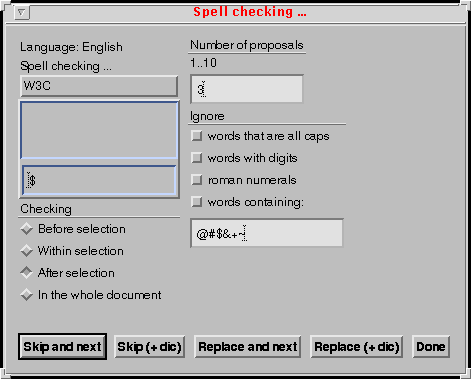
void TtaNewSheet (int ref, ThotWidget parent, char *title, int number,
char *text, ThotBool horizontal, int packet, char button, int dbutton)
- Parameters:
- ref: the unique reference attached to the dialogue element.
parent: the ThotWidget parent (usually TtaGetViewFrame
(document, view)).
title the title or NULL.
number: number of extra buttons declared in the sheet.
text: the list of strings declaring extra buttons ("A\0B\0"
for two extra buttons A and B).
horizontal is TRUE if dialogue elements included into the
form are arranged horizontally.
packet number of dialogue elements in the same line if
arranged horizontally or in the same column is arranged vertically.
button the mouse button used to select the element
dialogue:
- 'L' for left button,
- 'M' for middle button,
- 'R' for right button.
dbutton the type of "cancel/done" button: D_CANCEL or
D_DONE.
9.1.6 TtaNewDialogSheet
This function creates a dialog sheet element attached to the ThotWidget
parent. When the parent ThotWidget is distroyed, the ThotWidget that realizes
this sheet is automatically destroyed. Usually the parent is the document
view frame returned by the API function TtaGetViewFrame (document, view)
and the sheet has to be destroyed before closing the document view.
A dialog sheet is similar to a sheet element, but no "cancel/done" button
is automatically generated.
void TtaNewDialogSheet (int ref, ThotWidget parent, char *title, int
number, char *text, ThotBool horizontal, int packet, char button)
- Parameters:
- ref: the unique reference attached to the dialogue element.
parent: the ThotWidget parent (usually TtaGetViewFrame
(document, view)).
title the title or NULL.
number: number of extra buttons declared in the sheet.
text: the list of strings declaring extra buttons ("A\0B\0"
for two extra buttons "A" and "B").
horizontal is TRUE if dialogue elements included into the
form are arranged horizontally.
packet number of dialogue elements in the same line if
arranged horizontally or in the same column is arranged vertically.
button the mouse button used to select the element
dialogue:
- 'L' for left button,
- 'M' for middle button,
- 'R' for right button.
9.1.7 TtaNewSubmenu
This function creates a submenu element attached to a menu entry or a form
(form, sheet or dialog sheet). In a form, a submenu is displayed as a radio
menu (see the menu "Paper Format" in the example presented in 9.1.5). Only one entry of this menu can be selected at
the same time.
Each entry is typed:
- a simple button,
- a link towards a form,
- a link towards a submenu,
- toggle button,
- a separator.
void TtaNewSubmenu (int ref, int ref_parent, int entry, char *title, int
number, char *text, char *equiv, ThotBool react)
- Parameters:
- ref: the unique reference attached to the dialogue element.
ref_parent: the reference of parent element (a menu or a
form).
entry: the entry index (0 to n) in the parent menu which
the submenu is attached to. For a submenu attached to a form this
paramameter is not treated.
title the title or NULL.
number: number of entries declared in the submenu.
text: the list of strings declaring entries. Each entry
starts with a special character that fixes the entry function:
- 'B' the entry is a simple button,
- 'F' the entry calls a form,
- 'M' the entry calls a submenu,
- 'T' the entry is a toggle.
- 'S" the entry is a separator (the entry string is limited to this
character).
For example the text value "TA\0B" declares a toggle entry "A" and a
button entry "B".
equiv: the list of strings declaring shortcuts attached to
each entry. This parameter can be NULL if no shortcut is declared.
react: TRUE if the application wants to be informed as soon
as the user selects in this submenu in a form. FALSE if the application
prefers to wait for the confirmation of the form to receive the
selected value.
9.1.8 TtaNewIconMenu
This function creates a submenu element attached to a menu entry or a form
(form, sheet or dialog sheet). This submenu is composed of icons. Only one
entry of this menu can be selected at the same time. This menu is always
reactive.
void TtaNewIconMenu (int ref, int ref_parent, int entry, char *title, int
number, Pixmap * icons, ThotBool horizontal)
- Parameters:
- ref: the unique reference attached to the dialogue element.
ref_parent: the reference of parent element (a menu or a
form).
entry: the entry index (0 to n) in the parent menu which
the submenu is attached to. For a submenu attached to a form this
paramameter is not treated.
title the title or NULL.
number: number of entries declared in the menu.
icons: the list of pixmaps.
horizontal is TRUE if entries are arranged horizontally.
9.1.9 TtaNewToggleMenu
This function creates a toggle menu element attached to a form (form,
sheet or dialog sheet). This menu is displayed as a toggle menu (see the menu
"Options" in the example presented in 9.1.5). Only or
more entries of this menu can be selected at the same time.
Each entry is typed:
void TtaNewToggleMenu (int ref, int ref_parent, char *title, int number,
char *text, char *equiv, ThotBool react)
- Parameters:
- ref: the unique reference attached to the dialogue element.
ref_parent: the reference of parent element (a form).
title the title or NULL.
number: number of entries declared in the menu.
text: the list of strings declaring entries. Each entry
starts with a special character that fixes the entry function:
- 'B' or 'T' the entry is a simple button,
- 'S" the entry is a separator (the entry string is limited to this
character).
For example the text value "TA\0S\0BC" declares an entry "A", a
separator and an entry "C".
equiv: the list of strings declaring shortcuts attached to
each entry. This parameter can be NULL if no shortcut is declared.
react: TRUE if the application wants to be informed as soon
as the user selects in this submenu in a form. FALSE if the application
prefers to wait for the confirmation of the form to receive the
selected value.
9.1.10 TtaNewSelector
This function creates a selector element attached to a form (form, sheet
or dialog sheet).
The selector can be displayed with or without a text input zone (controled
by the parameter withText) that allows user to choose a
predefined string into the selector or to insert directly a free text. The
selector can be displayed with or without a label (controled by the parameter
label) that allow user to select this fixed.
In the previous example presented in 9.1.5, a
selector is displayed with the title "Spell checking ...", a text zone and
the label "W3C".
void TtaNewSelector (int ref, int ref_parent, char *title, int number,
char *text, int height, char *label, ThotBool withText, ThotBool react)
- Parameters:
- ref: the unique reference attached to the dialogue element.
ref_parent: the reference of parent element (a form).
title the title or NULL.
number: number of entries declared in the submenu.
text: the list of strings declaring entries. For example
the text value "A\0B\0C" declares an entrries "A", "B" and "C".
height: the height of the selector (number of entries
displayed).
label: the label string of the extra entry or NULL.
withText: TRUE if the application wants to display a text
zone at the selector bottom.
react: TRUE if the application wants to be informed as soon
as the user selects in this selector. FALSE if the application prefers
to wait for the confirmation of the form to receive the selected
value.
This function creates a label element attached to a form (form, sheet or
dialog sheet). In the previous example presented in 9.1.5, there is a label element "Language: English".
void TtaNewLabel (int ref, int ref_parent, char *text)
- Parameters:
- ref: the unique reference attached to the dialogue element.
ref_parent: the reference of parent element (a form).
text: the text of the label.
9.1.12 TtaNewTextForm
This function creates a text input zone attached to a form (form, sheet
or dialog sheet). In the previous example presented in 9.1.5, there is a text input zone without title.
TtaNewTextForm (int ref, int ref_parent, char *title, int width, int
height, ThotBool react)
- Parameters:
- ref: the unique reference attached to the dialogue element.
ref_parent: the reference of parent element (a form).
title the title or NULL.
width: number of charaters displayed.
height: tnumber of lines displayed.
react: TRUE if the application wants to be informed as soon
as the user inserts characters. FALSE if the application prefers to
wait for the confirmation of the form to receive the final string.
9.1.13 TtaNewNumberForm
This function creates an input zone for integer values attached to a form
(form, sheet or dialog sheet). In the previous example presented in 9.1.5, there is an input zone for integer values (from 1
to 10) displayed with the title "Number of proposals".
void TtaNewNumberForm (int ref, int ref_parent, char *title, int min, int
max, ThotBool react)
- Parameters:
- ref: the unique reference attached to the dialogue element.
ref_parent: the reference of parent element (a form).
title the title or NULL.
min: the minimum integer value.
max: the maximum integer value.
react: TRUE if the application wants to be informed as soon
as the user inserts characters. FALSE if the application prefers to
wait for the confirmation of the form to receive the final string.
9.1.14 TtaDestroyDialogue
This function destroys an existing dialogue element.
void TtaDestroyDialogue (int ref)
- Parameters:
ref: the unique reference attached to the dialogue
element.
9.1.15 TtaListDirectory
Creates one or two selectors that allow end-user to select a directory
and/or a file included within the current specified directory. This function
supposes that the application had first created a form where selectors have
to be inserted. The application is able to create either only the directory
selector or only the file selector. A suffix can be specified if the
application wants to filter a specific class of files. It is the
responsibility of the application to receive and handle the selectors
callback.
void TtaListDirectory(char *aDirectory, int formRef, char *dirTitle, int
dirRef, char *suffix, char *fileTitle, int fileRef)
- Parameters:
- aDirectory: the current designated directory.
formRef: the form identification.
dirTitle: the title of the directory selector.
dirRef: the directory selector identification or -1 if this
selector is not desired.
suffix: the suffix used for filtering files (for example
".PIV")
fileTitle: the title of the file selector.
fileRef: the file selector identification or -1 if this
selector is not desired.
9.1.16 TtaIsSuffixFileIn
Returns True if the specified directory contains files with the specified
suffix.
ThotBool TtaIsSuffixFileIn(char *aDirectory, char *suffix)
- Parameters:
- aDirectory: the current designated directory.
suffix: the suffix used for filtering files (for example
".PIV")
- Return value:
- True or False.
9.2 Modificators
9.2.1 TtaSetMenuForm
Selects an entry in a radio menu (submenu) of a form.
void TtaSetMenuForm (int ref, int entry)
- Parameters:
ref: the unique reference attached to the dialogue
element.
entry: the selected entry (0 to n).
9.2.2 TtaSetToggleMenu
Changes the status of a toggle entry of a menu (submenu or toggle menu) in
a form.
void TtaSetToggleMenu (int ref, int value, ThotBool on)
- Parameters:
ref: the unique reference attached to the dialogue
element.
entry: the selected entry (0 to n).
on: fixes the status of the toggle; TRUE if the toggle is
selected.
9.2.3 TtaSetTextForm
Changes the current value of the text form.
void TtaSetTextForm (int ref, STRING text)
- Parameters:
ref: the unique reference attached to the dialogue
element.
text: the new string.
9.2.4 TtaShowDialogue
This function displays an existing dialogue (form, sheet, dialog
sheet).
void TtaShowDialogue (int ref, ThotBool remanent)
- Parameters:
ref: the unique reference attached to the dialogue
element.
remanent: TRUE if the dialogue element is not automatically
unmapped.
9.2.5 TtaUnmapDialogue
This function undisplays an existing dialogue (form, sheet, dialog
sheet).
void TtaUnmapDialogue (int ref)
- Parameter:
ref: the unique reference attached to the dialogue
element.
The functions described in this section require that file
document.h be included in the module that calls them.
- Document identification
- An application program using the Thot editing tool kit can handle
several documents at the same time. These documents can be defined by
the same structure schema or by different structure schemas as well.
Before any other operation can be performed, a document must be either
created (TtaNewDocument), if it does not exist yet,
or opened (TtaOpenDocument), if it exists in a file. These two
functions return a value of type Document that is then used for
identifying the document to which subsequent operations apply. The only
exception is the function TtaGiveSchemasOfDocument
which accesses a document by its name.
The name of a document is a character string (maximum length is 19
characters, not including the extension) that is used for naming the
file containing the document and that appears in the user dialogue
(Thot Editor only).
- Document files
- Documents are stored in Unix files. Actually, a single document is
represented by several files. All these files have the same name as the
document, with different extensions:
- The .PIV file contains the last version of the document (logical
structure, contents, logical attributes and specific presentation
rules). A .PIV file is created each time the document is saved,
either by the user or by the application program (function TtaSaveDocument). The .PIV file is the file read by
the TtaOpenDocument function.
- The .OLD file contains the previous version of the document. It
is a copy of the .PIV file before the last save operation.
- The .BAK file contains a version of the document that is written
periodically for allowing recovery from crashes. It is removed each
time the document is saved successfully, but if the system or the
application crashes, it must be renamed .PIV and can be used as an
ordinary document file.
- The .SAV file is also a backup file. It is created by the tool
kit when an internal error occurs and when it can save the
document. This file contains the state of the document at the very
moment of the crash. It can be used in the same way as the .BAK
file.
- The .EXT and .REF files contain the representation of the links
that relate the document with other documents. These files do not
exist if the document has no relations (references) with other
documents. If they exist, they must be in the same directory as the
.PIV file. They are read by the function TtaOpenDocument.
- Directories
- A list of directories, called the document path, is used for
searching the files needed when opening a document (.PIV, .REF and .EXT
files). This path is initially set by the environment variable THOTDOC
and it can be changed at any time by the function TtaSetDocumentPath. When a document is created
(TtaNewDocument), all corresponding files are created in the first
directory of the document path.
Another list of directories is used when searching the schemas
needed by a document that is created (TtaNewDocument) or opened (TtaOpenDocument). The
schema path is initially set by the environment variable
THOTSCH and it can be changed at any time by the function TtaSetSchemaPath. This path is also used by the
function TtaNewNature.
- Access mode
- When using Thot Editor, the application program may ask the tool kit
to prevent the user from modifying the document: an access mode
(allowed values are read/write and read only) is associated with the
whole document. The functions of the editing tool kit are not affected
by the access mode; an application program can modify a document even
if it is in read only mode. The access mode only applies to the
operations performed by the user, who cannot modify a document that is
in read only mode. When creating or opening a document, the access mode
is set to read/write, but it can be changed at any time by the function
TtaSetDocumentAccessMode.
An application program can more precisely control the operations
that the user is allowed to perform, by associating an access mode with
each element in a document. This is explained in section 11.
- Natures
- Many structured documents contain objects of different
natures, such as tables, equations, drawings, bibliographic
items, etc. which are themselves logically structured. For avoiding to
define the structure of these objects in the structure schemas of all
document types, these objects are defined in separate structure
schemas, one for each nature of objects, and they can be dynamically
linked to document structure schemas. This can be repeated recursively:
if an object of a given nature includes objects of other natures, its
structure schema must include the structure schemas of the included
natures.
When the first object of a given nature is created in a document or
in an object of another nature, the structure schema that defines the
new nature must be linked to the structure schema that defines the
document or object in which it is included. This is achieved by calling
the function TtaNewNature.
- Schema extensions
- Documents produced by Thot may be processed by other applications,
which are either independent from the editor or included in it.
Examples of such applications are the comparison of two versions of a
document (independent from the editor) or the electronic index
(included in the editor). Many of these applications make use of their
own structural elements or attributes, which are related to the
application itself and which are necessary for the application,
whatever the document type. A structure schema extension is a
special type of structure schema that defines attributes and elements
of that kind and that can be associated to the main structure schema of
any document for allowing an application to create in the document its
own attributes and elements, which are not defined in the document
structure schema. When several applications have to work on the same
document, several schema extensions can be associated to the main
structure schema of that document.
10.1 Constructors
10.1.1 TtaNewDocument
Creates the internal representation of a new document according to a given
structure schema. No file is created immediately, but the backup files (.BAK
and .SAV) and the document file (.PIV, see TtaNewDocument) will be created in
the first directory of the document path (see TtaSetDocumentPath).
Document TtaNewDocument(char *structureSchema, char *documentName)
- Parameters:
- structureSchema: name of the structure schema that defines
the type of document to be created.
documentName: name of the document to be created (maximum
length 19 characters). The directory name is not part of this parameter
(see TtaSetDocumentPath).
- Return value:
- the document that has been created or 0 if the document has not been
created.
10.1.2 TtaOpenDocument
Opens an existing document for subsequent operations.
Document TtaOpenDocument(char *documentName, int accessMode)
Document TtaOpenDocument(documentName, accessMode)
char *documentName;
int accessMode;
- Parameters:
- documentName: name of the file containing the document to be
open. (maximum length 19 characters). The directory name is not part of
this parameter (see TtaSetDocumentPath).
accessMode: 0 = read only, 1 = read-write.
- Return value:
- the opened document, or 0 if the document cannot be open.
10.1.3 TtaSaveDocument
Saves a document into a file in Thot format (.PIV). The document is not
closed by the function and can still be accessed by the application
program.
void TtaSaveDocument(Document document, char *documentName)
- Parameters:
- document: the document to be saved.
documentName: name of the file in which the document must
be saved. (maximum length 19 characters). The directory name is not
part of this parameter (see TtaSetDocumentPath). If
the documentName is not the same as the one used when opening (see TtaOpenDocument) or creating (see TtaNewDocument) the document, a new file is created
and the file with the old name is unchanged, i. e. a new version is
created. If necessary, the old file can be removed by the function TtaRemoveDocument.
10.1.4 TtaExportDocument
Saves a document into a file in a particular format. The output format is
specified by a translation schema. The document is not closed by the function
and it can still be accessed by the application program.
ThotBool TtaExportDocument(Document document, char *fileName, char
*TSchemaName)
- Parameters:
- document: the document to be exported.
fileName: name of the file in which the document must be
saved, including the directory name.
TSchemaName: name of the translation schema to be used. The
directory name must not be specified in parameter TSchemaName. See
function TtaSetSchemaPath.
- Return value:
- TRUE if the document has not saved.
10.1.5 TtaCloseDocument
Closes a document that is no longer needed and releases all ressources
allocated to the document. This function does not save the document.
void TtaCloseDocument(Document document)
- Parameter:
- document: the document to be closed.
10.1.6 TtaRemoveDocument
Closes a document, releases all ressources allocated to that document,
removes all files related to the document and updates all links connecting
the removed document with other documents.
void TtaRemoveDocument(Document document)
- Parameter:
- document: the document to be removed.
10.1.7 TtaSetDocumentPath
Sets a new list of document directories. This list replaces the existing
one. It is used for searching a document when it is open either by the user
or by the application program (see TtaOpenDocument). The
first directory in the list is used when a new document is created (see
TtaNewDocument).
void TtaSetDocumentPath(char *path)
- Parameter:
- path: the directory list, where directory names are
separated by the character ':'.
10.1.8 TtaAppendDocumentPath
Appends a new directory in the list of document directories. The function
controls that the parameter is the name of an existing directory and sets an
error if it is not. If the new directory is within the list of document
directories yet, the function has no effect.
void TtaAppendDocumentPath(aDirectory)
- Parameter:
- aDirectory: the new directory name.
10.1.9 TtaSetSchemaPath
Sets a new list of schema directories. This list replaces the existing
one. It is used for searching schemas.
void TtaSetSchemaPath(char *path)
- Parameter:
- path: the directory list, where directory names are
separated by the character ':'.
10.2 Modificators
10.2.1 TtaNewNature
Adds a new nature in a structure schema and returns the structure schema
of the new nature. If the nature already exists in that structure schema, the
function simply returns the structure schema of that nature.
SSchema TtaNewNature(SSchema schema, char *natureName, char
*presentationName)
- Parameters:
- schema: the structure schema to which the nature is added.
natureName: name of the nature to be added in the structure
schema.
presentationName: name of the presentation schema to be
associated with the extension schema. If presentationName is an empty
string, the default presentation schema is associated. If the nature
already exists, presentationName is ignored.
- Return value:
- the structure schema of the new nature; NULL if the structure schema
has not been loaded.
10.2.2 TtaNewSchemaExtension
Loads a structure schema extension and associates it with a given
document.
SSchema TtaNewSchemaExtension(Document document, char *extensionName, char
*presentationName)
- Parameters:
- document: the document whose structure schema must be
extended.
extensionName: name of the extension schema.
presentationName: name of the presentation schema to be
associated with the extension schema. If presentationName is an empty
string, the default presentation schema is associated.
- Return value:
- the extension schema, NULL if the extension schema has not been
loaded.
10.2.3 TtaRemoveSchemaExtension
Removes a structure schema extension from a given document. Removes also
from the document all attributes and elements defined in that structure
schema extension.
void TtaRemoveSchemaExtension(Document document, SSchema extension, int
*removedElements, int *removedAttributes)
- Parameters:
- document: the document.
extension: the structure schema extension to be removed.
- Return parameters:
- removedElements: number of elements actually removed.
removedAttributes: number of attributes actually
removed.
10.2.4 TtaSetPSchema
Sets or changes the main presentation schema of a document. The document
must be open, but no view must be open for that document.
void TtaSetPSchema(Document document, char *presentationName)
- Parameters:
- document: the document.
presentationName: Name of the presentation schema to be
associated with the document.
10.2.5 TtaSetDocumentDirectory
Sets the directory to which the document will be saved when calling
TtaSaveDocument.
void TtaSetDocumentDirectory(Document document, char *directory)
- Parameters:
- document: the document whose directory is set.
directory: new document directory.
10.2.6 TtaSetDocumentName
Sets or changes the name of a document. The document must be loaded.
void TtaSetDocumentName(Document document, char *documentName)
- Parameters:
- document: the document whose name is set.
documentName: new document name. This is only the name,
without any suffix, without directory name. See function
TtaSetDocumentDirectory for changing the directory of a document.
The name must not exceed 31 characters.
10.2.7 TtaSetDocumentAccessMode
Sets the access mode for a document.
void TtaSetDocumentAccessMode(Document document, int accessMode)
- Parameters:
- document: the document whose access mode is changed.
accessMode: 0 = read only, 1 = read-write.
10.2.8 TtaSetDocumentBackUpInterval
Sets the backup interval for a document.
void TtaSetDocumentBackUpInterval(Document document, int interval)
- Parameters:
- document: the document whose backup interval is changed.
interval: 0 : the backup mechanism must be disabled
positive integer : number of characters typed which triggers automatic
save of the document into a .BAK file.
10.2.9 TtaSetNotificationMode
Sets the ECF notification mode for a document.
void TtaSetNotificationMode(Document document, int notificationMode)
- Parameters:
- document: the document whose notification mode is changed.
notificationMode: 0 = only roots of created, copied and
deleted subtrees must be notified, 1 = all elements of created, copied
and deleted subtrees must be notified.
10.2.10 TtaSetDocumentModified
Notifies the tool kit that a document has been modified by the
application. As a consequence, the user will be asked to save the document
when closing it.
void TtaSetDocumentModified(Document document)
- Parameter:
- document: the document.
10.2.11 TtaSetDocumentUnmodified
Notifies the tool kit that a document must be considered as not modified.
As a consequence, if no further modification is made to that document, the
user will not be asked to save the document when closing it.
void TtaSetDocumentUnmodified(Document document)
- Parameter :
document : the document.
10.2.12 TtaSetDocumentUnupdated
Notifies the tool kit that a document must be considered as not updated by
the application or by the user. That will allow the application to detect if
any change will be made on the document (see TtaIsDocumentUpdated).
void TtaSetDocumentUnupdated(Document document)
- Parameter :
document : the document.
10.3 Accessors
10.3.1 TtaGetSchemaExtension
Returns the extension structure schema associated with the given
document.
SSchema TtaGetSchemaExtension(Document document, char *ExtensionName)
- Parameter :
document : the document for which the extension structure
schema is asked.
ExtensionName : the extension name.
10.3.2 TtaGetDocumentName
Returns the name of a document.
char *TtaGetDocumentName(Document document)
- Parameter:
document: the document whose name is asked.
- Return value:
- name of that document.
10.3.3 TtaGetDocumentFromName
Returns the document having a given name.
Document TtaGetDocumentFromName(char *documentName)
- Parameter:
documentName: the document name.
- Return value:
- the document having that name.
10.3.4 TtaGetDocumentSSchema
Returns the main structure schema of a document.
SSchema TtaGetDocumentSSchema(Document document)
- Parameter:
- document: the document for which the structure schema is
asked.
- Return value:
- the structure schema of that document.
10.3.5 TtaGetSSchemaName
Returns the name of a structure schema.
char *TtaGetSSchemaName(SSchema schema)
- Parameter:
- schema: the structure schema of interest.
- Return value:
- name of that structure schema.
10.3.6 TtaGetPSchemaName
Returns the name of the presentation schema currently associated with a
given structure schema.
char *TtaGetPSchemaName(SSchema schema)
- Parameter:
- schema: the structure schema of interest.
- Return value:
- name of the associated presentation schema.
10.3.7 TtaGetDocumentDirectory
Returns the directory to which the document is supposed to be saved.
void TtaGetDocumentDirectory(Document document, char *buffer, int
bufferLength)
- Parameters:
document: the document whose directory is asked.
buffer: a buffer provided by the caller.
bufferLength: the length of that buffer.
- Return parameter:
- buffer: the document directory.
10.3.8 TtaGetSSchema
Returns a structure schema whose name is known and that is used in a given
document.
SSchema TtaGetSSchema(char *name, Document document)
- Parameter:
- name: the name of the structure schema of interest.
document: the document that uses this structure schema.
- Return value:
- the structure schema having this name, or NULL if this structure
schema is not loaded or not used by the document.
10.3.9 TtaSameSSchemas
Compares two structure schemas.
int TtaSameSSchemas(SSchema schema1, SSchema schema2)
- Parameters:
- schema1: first structure schema.
schema2: second structure schema.
- Return value:
- 0 if both schemas are different, 1 if they are identical.
10.3.10 TtaGiveSchemasOfDocument
Returns the names of the main structure schema and presentation schema
associated with a given document. The document does not need to be open and
the schemas are not loaded by this function.
void TtaGiveSchemasOfDocument(char *documentName, char *structureName,
char *presentationName)
- Parameters:
- documentName: Name of the document to be checked (maximum
length 19 characters).
structureName: buffer.
presentationName: buffer.
- Return value:
- structureName: Name of the document structure schema.
presentationName: Name of the document presentation
schema.
10.3.11 TtaNextSchemaExtension
Returns a structure schema extension associated with a given document.
void TtaNextSchemaExtension(Document document, SSchema *extension)
- Parameters:
- document: the document of interest.
extension: a schema extension of that document. NULL for
accessing the first schema extension.
- Return parameter:
- extension: the schema extension that follows or the first
schema extension of the document if parameter extension is NULL. NULL
if there is no more schema extension.
Returns the structure schema of a nature used in a given document.
void TtaNextNature(Document document, SSchema *nature)
- Parameters:
- document: the document of interest.
nature: the structure schema of a nature for that document.
NULL for accessing the first nature.
- Return parameter:
- nature: the structure schema of the next nature, or the
structure schema of the first nature of the document if parameter
nature was NULL when calling. NULL if there is no more nature for the
document.
10.3.13 TtaIsDocumentModified
Indicates whether a document has been modified by the user or not.
Modifications made by the application program are not considered, except when
explicitly notified by TtaSetDocumentModified.
int TtaIsDocumentModified(Document document)
- Parameter:
- document: the document.
- Return value:
- 1 if the document has been modified by the user since it has been
saved, loaded or created, 0 if it has not been modified.
10.3.14 TtaIsDocumentUpdated
Indicates whether a document has been updated by the user or not since the
last TtaSetDocumentUnupdated or TtaSetDocumentUnmodified. Modifications made
by the application program are not considered, except when explicitly
notified by TtaSetDocumentModified.
int TtaIsDocumentUpdated(Document document)
- Parameter:
- document: the document.
- Return value:
- 1 if the document has been modified by the user since it has been
saved, loaded or created, 0 if it has not been modified.
10.3.15 TtaGetDocumentBackUpInterval
Returns the backup interval for a document.
int TtaGetDocumentBackUpInterval(Document document)
- Parameter:
- document: the document whose backup interval is asked.
- Return value:
- 0 : the backup mechanism is disabled
positive integer : number of typed characters which trigger an
autamatic save of the document into a .BAK file.
10.3.16 TtaGetDocumentAccessMode
Returns the access mode for a document.
int TtaGetDocumentAccessMode(Document document)
- Parameter:
- document: the document whose access mode is asked.
- Return value:
- 0 if access mode is read only, 1 if access mode is read-write.
10.3.17 TtaGetNotificationMode
Returns the ECF notification mode for a document.
int TtaGetNotificationMode(Document document)
- Parameters:
- document: the document whose notification mode is asked.
- Return value:
- 0 = if only roots of created and deleted subtrees must be notified,
1 = all elements of created and deleted subtrees must be
notified.
10.3.18 TtaGetDocumentPath
Returns the current list of the directories used when a document is open
(see TtaOpenDocument).
void TtaGetDocumentPath(char *buffer, int bufferLength)
- Parameters:
- buffer: a buffer provided by the caller.
bufferLength: the length of that buffer.
- Return parameter:
- buffer: the list of directories. Directory names are
separated by the character ':'.
10.3.19 TtaGetSchemaPath
Returns the current list of directories used for accessing schemas.
void TtaGetSchemaPath(char *buffer, int bufferLength)
- Parameters:
- buffer: a buffer provided by the caller.
bufferLength: the length of that buffer.
- Return parameter:
- buffer: the list of directories. Directory names are
separated by the character ':'.
10.3.20 TtaGetDocumentOfSavedElements
Returns the document for which the last Copy or Cut command has been
issued.
Document TtaGetDocumentOfSavedElements()
- Parameters:
- no parameter
- Return value:
- the document for which the last Copy or Cut command has been issued.
0 if the clipboard is empty.
The largest group of functions in the editing tool kit handles the tree
structures that represent the logical organization of a document.
The functions described in this section require that file tree.h
be included in the module that calls them.
- Main tree and associated trees
- A document is in fact represented by a forest, as several
trees may be necessary for representing its abstract structure. The
main tree represents the main stream of information in a
document. In addition to that tree, there may exist some associated
trees, which represent other streams of information, such as
notes, illustrations, comments, etc. These associated trees are
specified in the structure schema of the document.
- Structure of abstract trees
- Several functions in this group allow to build or modify the
structure of an abstract tree. As stated above, the structure of these
trees is constrained by structure schemas. Therefore the programmer
must be careful when handling abstract trees. All functions that change
a tree structure check that the result will be consistent with the
structure schema and they raise an error in case of inconsistency.
Checking can be made in two modes, a strict mode and a relaxed mode.
In strict mode, all mandatory elements must always be present. In
relaxed mode, even elements that are not stated optional in their
structure schema can be omitted. The checking mode apply to the
operations made by the application program, but also to the editing
commands issued by the end-user, when using ThotEditor. The function TtaSetCheckingMode (see section 11.2.8) changes checking mode.
For building a correct tree, the programmer must follow the
structure schema. He or she can also consider existing Thot documents
as examples. For that purpose, the function TtaListAbstractTree (see section 11.5.1) can produce a human-readable form of an
abstract tree.
- Element types
- When creating or searching elements in an abstract tree, the type of
the concerned elements must be given. As presented in section 4, an element type contains a type number, but this
number does not appear explicitly in a structure schema: it is
generated by the schema compiler. For obtaining all type numbers of a
structure schema, use the command:
printsch -h SchemaName
which lists on the standard output a file that can be included
into a C program. This file also contains all attribute numbers of the
schema
- Order of operations
- As a general rule, as soon as an element or a tree has been created
(by functions TtaNewElement, TtaNewTree, or TtaCopyTree), it
must be included into the main tree or an associated tree of a document
(by functions TtaInsertSibling, TtaInsertFirstChild, or TtaAttachNewTree), prior any other function can be
performed.
- Labels
- Each element in a document has a unique identifier called a
label. Labels are automatically assigned to elements by all
functions that create new elements (TtaNewElement,
TtaNewTree, or TtaCopyTree).
Labels can be accessed by functions TtaSearchElementByLabel and TtaGetElementLabel.
- Access rights
- An access right can be associated with each element. Three access
rights are defined:
- Read/write
- The element can be seen and modified by the user.
- Read only
- The element can be seen by the user, but no changes are
allowed.
- Hidden
- The element is not displayed and cannot be changed by the
user.
These rights only apply to the end user who manipulates a document
interactively with the commands provided by the Thot editor. They do
not apply to the application program that manipulate the document
through the editing tool kit.
11.1 Constructors
11.1.1 TtaNewElement
Creates a new element of a given type.
Element TtaNewElement(Document document, ElementType elementType)
- Parameters:
- document: the document for which the element is created.
elementType: type of the element to be created.
- Return value:
- the created element.
Creates a new element of a given type and all its descendants, according
to the structure schema.
Element TtaNewTree(Document document, ElementType elementType , char
*label)
- Parameters:
- document: the document for which the tree is created.
elementType: type of the root element of the tree to be
created.
label: label of the root element to be created. Empty
string if the value of the label is undefined.
- Return value:
- the root element of the created tree.
Creates a copy of a tree.
Element TtaCopyTree(Element sourceElement, Document sourceDocument,
Document destinationDocument, Element parent)
- Parameters:
- sourceElement: element to be copied.
sourceDocument: the document containing the element to be
copied.
destinationDocument: the document for which the copy must
be created.
parent: element that will become the parent of the created
tree.
- Return value:
- the root element of the created tree.
11.1.4 TtaCreateDescent
Creates a new element of a given type and inserts it in the tree as a
descendant of a given element. All elements of the descent required by the
structure schema are also created.
Element TtaCreateDescent(Document document, Element element, ElementType
elementType)
- Parameters:
- document: the document for which the tree is created.
element: the element for which a descent will be
created.
elementType: type of the element to be created as the last
descendant.
- Return value:
- the last descendant created or NULL if the element cannot be created.
This element is empty.
11.1.5 TtaCreateDescentWithContent
Creates a new element of a given type and inserts it in the tree as a
descendant of a given element. All elements of the descent required by the
structure schema are created, as well as the content of the requested
element.
Element TtaCreateDescentWithContent(Document document, Element element,
ElementType elementType)
- Parameters:
- document: the document for which the tree is created.
element: the element for which a descent will be
created.
elementType: type of the element to be created as the last
descendant.
- Return value:
- the last descendant created or NULL if the element cannot be created.
If not NULL, the minimum content of that element has been created.
11.1.6 TtaDeleteTree
Deletes a tree (or a single element) and frees it. All references that
points at any element of that tree are cancelled. The deleted element must
not be used later.
void TtaDeleteTree(Element element, Document document)
- Parameters:
- element: the element (or root of the tree) to be deleted.
document: the document containing the element to be
deleted.
11.1.7 TtaAttachNewTree
Attaches an entire tree (main tree or associated tree) to a document.
void TtaAttachNewTree(Element tree, Document document)
- Parameters:
- tree: root of the tree to be attached. This tree must be a
valid main tree or associated tree according to the document structure
schema.
document: the document to which the tree is to be
attached.
11.1.8 TtaExportTree
Saves an abstract tree into a file in a particular format. The output
format is specified by a translation schema.
void TtaExportTree (Element element, Document document, char *fileName,
char *TSchemaName)
- Parameters:
- element: the root of the tree to be exported
document: the document containing the tree to be
exported.
fileName: name of the file in which the tree must be saved,
including the directory name.
TSchemaName: name of the translation schema to be used. The
directory name must not be specified in parameter TSchemaName. See
function TtaSetSchemaPath.
11.2 Modificators
11.2.1 TtaInsertSibling
Inserts an element in a tree, as an immediate sibling of a given element.
The element to be inserted must not yet be part of a document. You can call
TtaCanInsertSibling before to check whether that insertion is
allowed or not (see section 11.3.33).
void TtaInsertSibling(Element newElement, Element sibling, ThotBool
before, Document document)
- Parameters:
- newElement: the element (or root of the tree) to be inserted.
sibling: an element belonging to a tree. This element must
not be the root of a tree.
before: if True, inserts newElement as previous sibling of
sibling, if False, inserts newElement as next sibling of sibling.
document: the document to which both elements belong.
11.2.2 TtaInsertFirstChild
Inserts an element in a tree, as the first child of a given element. The
element to be inserted must not yet be part of a document. This function can
also be used for attaching an option to a choice. You can call
TtaCanInsertFirstChild before to check whether that insertion is
allowed or not (see section 11.3.34).
void TtaInsertFirstChild(Element *newElement, Element parent, Document
document)
- Parameters:
- newElement: the element (or root of the tree) to be inserted.
parent: an element belonging to a tree.
document: the document to which both elements belong.
- Return parameter:
- If newElement is an option that replaces the choice, newElement takes
the value of parent.
11.2.3 TtaCreateElement
Creates an element of a given type and insert it at the current position
within a given document. The current position is defined by the current
selection. If the current position is a single position (insertion point) the
new element is simply inserted at that position. If one or several characters
and/or elements are selected, the new element is created at that position and
the selected characters/elements become the content of the new element,
provided the structure schema allows it.
void TtaCreateElement(ElementType elementType, Document document)
- Parameters:
- elementType: type of the element to be created.
document: the document for which the element is created.
11.2.4 TtaInsertElement
Creates an element of a given type and insert it at the current position
within a given document. The current position is defined by the current
selection. If the current position is a single position (insertion point) the
new element is simply inserted at that position. If one or several characters
and/or elements are selected, the new element is created before the first
selected character/element and the selected characters/elements are not
changed.
void TtaInsertElement(ElementType elementType, Document document)
- Parameters:
- elementType: type of the element to be created.
document: the document for which the element is created.
11.2.5 TtaRemoveTree
Removes a tree (or a single element) from its tree, without freeing it.
void TtaRemoveTree(Element element, Document document)
- Parameters:
- element: the element (or root of the tree) to be removed.
document: the document containing the element to be
removed.
11.2.6 TtaSetAccessRight
Sets the access rights for a given element. Access rights apply only
during the current editing session; they are not saved with the document.
They must be set each time the document is loaded.
void TtaSetAccessRight(Element element, AccessRight right, Document
document)
- Parameters:
- element: the element.
right: access right for that element (ReadOnly, ReadWrite,
Hidden, Inherited).
document: the document to which the element belongs.
11.2.7 TtaHolophrastElement
Changes the holophrasting status of a given element.
void TtaHolophrastElement(Element element, ThotBool holophrast, Document
document)
- Parameters:
- element: the element.
holophrast: True: the element gets holophrasted if it is
not, False: if the element is holphrasted, it gets expanded.
document: the document to which the element belongs.
Changes checking mode.
void TtaSetCheckingMode(ThotBool strict)
- Parameter:
- strict: if True, the presence of all mandatory elements is
checked.
11.3 Accessors
11.3.1 TtaGetMainRoot
Returns the root element of the main abstract tree representing a
document.
Element TtaGetMainRoot(Document document)
- Parameter:
- document: the document.
- Return value:
- the root element of the main abstract tree.
11.3.2 TtaNextAssociatedRoot
Returns the root element of the associated tree that follows the tree to
which a given element belongs.
void TtaNextAssociatedRoot(Document document, Element *root)
- Parameters:
- document: the document.
root: the element for which the next associated tree is
searched. That element does not need to be the root of a tree. If root
is NULL or if root is an element in the main tree, the root of the
first associated tree is returned.
- Return parameter:
- root: the root element of the next associated tree. NULL if
there is no next associated tree for the document.
11.3.3 TtaGetFirstChild
Returns the first child element of a given element.
Element TtaGetFirstChild(Element parent)
- Parameter:
- parent: the element for which the first child element is
asked.
- Return value:
- the first child element of parent; NULL if parent has no child.
11.3.4 TtaGetLastChild
Returns the last child element of a given element.
Element TtaGetLastChild(Element parent)
- Parameter:
- parent: the element for which the last child element is
asked.
- Return value:
- the last child element of parent; NULL if parent has no child.
11.3.5 TtaGetFirstLeaf
Returns the first leaf element of a given element.
Element TtaGetFirstLeaf(Element parent)
- Parameter:
- parent: the element for which the first leaf element is
asked.
- Return value:
- the first leaf element of parent; parent itself if it has no
leaf.
11.3.6 TtaGetLastLeaf
Returns the last leaf element of a given element.
Element TtaGetLastLeaf(Element parent)
- Parameter:
- parent: the element for which the last leaf element is
asked.
- Return value:
- the last leaf element of parent; parent itself if it has no leaf.
11.3.7 TtaPreviousSibling
Returns the previous sibling element of a given element.
void TtaPreviousSibling(Element *element)
- Parameter:
- element: the element whose previous sibling is asked.
- Return parameter:
- element: the previous sibling element, or NULL if there is
no previous sibling.
11.3.8 TtaNextSibling
Returns the next sibling element of a given element.
void TtaNextSibling(Element *element)
- Parameter:
- element: the element whose next sibling is asked.
- Return parameter:
- element: the next sibling element, or NULL if there is no
next sibling.
11.3.9 TtaGetSuccessor
Returns the element that follows a given element at the same level or at
the first upper level where there is a following element.
Element TtaGetSuccessor(Element element)
- Parameter:
- element: the element whose successor is asked.
- Return value:
- the successor, or NULL if there is no successor.
11.3.10 TtaGetPredecessor
Returns the element that precedes a given element at the same level or at
the first upper level where there is a preceding element.
Element TtaGetPredecessor(Element element)
- Parameter:
- element: the element whose predecessor is asked.
- Return value:
- the predecessor, or NULL if there is no predecessor.
Returns the parent element (i.e. first ancestor) of a given element.
Element TtaGetParent(Element element)
- Parameter:
- element: the element whose the parent is asked.
- Return value:
- the parent element, or NULL if there is no parent (root).
11.3.12 TtaGetCommonAncestor
Returns the common ancestor element of two given elements.
Element TtaGetCommonAncestor(Element element1, Element element2)
- Parameters:
- element1: the first element whose ancestor is asked.
element2: the second element whose ancestor is asked.
- Return value:
- the common ancestor, or NULL if there is no common ancestor.
11.3.13 TtaGetTypedAncestor
Returns the first ancestor of a given type for a given element.
Element TtaGetTypedAncestor(Element element, ElementType ancestorType)
- Parameters:
- element: the element whose ancestor is asked.
ancestorType: type of the asked ancestor.
- Return value:
- the ancestor, or NULL if there is no ancestor of that type.
11.3.14 TtaGetElementType
Returns the type of a given element.
ElementType TtaGetElementType(Element element)
- Parameter:
- element: the element.
- Return value:
- type of the element.
11.3.15 TtaGetElementTypeName
Returns the name of an element type.
char *TtaGetElementTypeName(ElementType elementType)
- Parameter:
- elementType: element type.
- Return value:
- name of that type.
11.3.16 TtaGetElementTypeOriginalName
Returns the original name of an element type, as it is defined in the
structure schema.
char *TtaGetElementTypeOriginalName(ElementType elementType)
- Parameter:
- elementType: element type.
- Return value:
- original name of that type.
11.3.17 TtaGiveTypeFromName
Gives an element type whose name is known (the structure schema that
defines that type must be loaded). That type is searched in a given structure
schema (elementType.ElSSchema) and in all structure schemas that are
extensions of that structure schema or natures used in that structure
schema.
void TtaGiveTypeFromName(ElementType *elementType, char *name)
- Parameters:
- elementType.ElSSchema: the structure schema of interest.
name: the name of the type of interest.
- Return parameter:
- elementType: the type having this name, or
elementType.ElTypeNum = 0 if the type is not found.
11.3.18 TtaGiveTypeFromOriginalName
Gives an element type whose original name (in the language it is given in
the structure schema) is known (the structure schema that defines that type
must be loaded). That type is searched in a given structure schema
(elementType.ElSSchema) and in all structure schemas that are extensions of
that structure schema or natures used in that structure schema.
void TtaGiveTypeFromOriginalName(ElementType *elementType, char *name)
- Parameters:
- elementType.ElSSchema: the structure schema of interest.
name: the original name of the type of interest.
- Return parameter:
- elementType: the type having this name, or
elementType.ElTypeNum = 0 if the type is not found.
Compares two element types.
int TtaSameTypes(ElementType type1, ElementType type2)
- Parameters:
- type1: first element type.
type2: second element type.
- Return value:
- 0 if both types are different, 1 if they are identical.
11.3.20 TtaGetElementLabel
Returns the label of a given element.
char *TtaGetElementLabel(Element element)
- Parameter:
- element: the element.
- Return value:
- label of the element.
Indicates whether an element type is a constant.
int TtaIsConstant(ElementType elementType)
- Parameter:
- elementType: type to be tested.
- Return value:
- 1 = the type is a constant, 0 = the type is not a constant.
Indicates whether an element type is a leaf.
int TtaIsLeaf(ElementType elementType)
- Parameter:
- elementType: type to be tested.
- Return value:
- 1 if the type is a leaf, 0 if the type is not a leaf.
11.3.23 TtaGetConstructOfType
Returns the construct of an element type.
Construct TtaGetConstructOfType(ElementType elementType)
- Parameter:
- elementType: the element type of interest.
- Return value:
- the construct that defines the structure of that element type.
11.3.24 TtaGetConstruct
Returns the construct of an element.
Construct TtaGetConstruct(Element element)
- Parameter:
- element: the element of interest.
- Return value:
- the construct that defines the structure of that element.
11.3.25 TtaGetAccessRight
Returns the access rights for a given element.
AccessRight TtaGetAccessRight(Element element)
- Parameter:
- element: the element.
- Return Value:
- access right for that element (ReadOnly, ReadWrite, Hidden,
Inherited).
11.3.26 TtaIsHolophrasted
Tests whether a given element is holphrasted or not.
int TtaIsHolophrasted(Element element)
- Parameter:
- element: the element to be tested.
- Return Value:
- 1 if the element is holphrasted, 0 if not.
Tests whether a given element is protected against user modifications
(ReadOnly).
int TtaIsReadOnly(Element element)
- Parameter:
- element: the element to be tested.
- Return Value:
- 1 if the element is protected, 0 if not.
Tests whether a given element is hidden to the user (Hidden).
int TtaIsHidden(Element element)
- Parameter:
- element: the element to be tested.
- Return Value:
- 1 if the element is hidden, 0 if not.
11.3.29 TtaIsInAnInclusion
Tests whether a given element is (in) an included element. An included
element is a "live" copy of another element.
int TtaIsInAnInclusion(Element element)
- Parameter:
- element: the element to be tested.
- Return Value:
- 1 if the element is included, 0 if not.
Tests if an element is an ancestor of another element.
int TtaIsAncestor(Element element, Element ancestor)
- Parameters:
- element: an element.
ancestor: the supposed ancestor of element.
- Return value:
- 1 if ancestor in an ancestor of element, 0 if not.
Tests if an element precedes another element in the preorder traversal of
the tree.
int TtaIsBefore(Element element1, Element element2)
- Parameters:
- element1: the first element.
element2: the second element.
- Return value:
- 1 if the first element precedes the second element, 0 if not.
11.3.32 TtaIsFirstPairedElement
Indicates if a given paired element is the first or the second of the
pair.
int TtaIsFirstPairedElement(Element element)
- Parameter:
- element: the paired element.
- Return value:
- 1 if it is the first element of the pair, 0 if it is the second.
Checks whether an element of a given type can be inserted in an abstract
tree as an immediate sibling of an existing element.
ThotBool TtaCanInsertSibling(ElementType elementType, Element sibling,
ThotBool before, Document document)
- Parameter:
- elementType: the element type to be checked.
sibling: an existing element which is part of an abstract
tree.
before: if True, checks if insertion is allowed before
element "sibling".
If False, checks if insertion is allowed after element "sibling".
document: the document to which element "sibling"
belongs.
- Return value:
- True if that element type can be inserted, False if the structure
schema does not allow that insertion.
Checks whether an element of a given type can be inserted in an abstract
tree as the first child of an existing element (parent).
ThotBool TtaCanInsertFirstChild(ElementType elementType, Element parent,
Document document)
- Parameter:
- elementType: the element type to be checked.
parent: an existing element which is part of an abstract
tree.
document: the document to which element "parent"
belongs.
- Return value:
- True if that element type can be inserted, False if the structure
schema does not allow that insertion.
11.3.35 TtaGetDocument
Returns the document containing a given element
Document TtaGetDocument(Element element)
- Parameters:
- element: the element for which document is asked.
- Return value:
- the document containing that element or 0 if the element has not been
inserted in any document.
11.3.36 TtaNextCopiedElement
Returns one of the elements that have been copied into the ``clipboard''
by the last Copy or Cut command. (This function is available only in the
ThotEditor library).
void TtaNextCopiedElement(Element *element)
- Parameter:
- element: NULL if the first element of the clipboard is
asked; an element of the clipboard if the next one is asked.
- Return parameter:
- element: the asked element if it exists, or NULL if there is
no next element in the clipboard or if the clipboard is empty.
11.3.37 TtaGetCopiedDocument
Returns the document from which the current content of the clipboard has
been copied or cut. (This function is available only in the ThotEditor
library).
Document TtaGetCopiedDocument()
- Parameters:
- No parameter.
- Return value:
- the document from which the current content of the clipboard has been
copied or cut; 0 if the clipboard is empty.
11.4 Locators
11.4.1 TtaSearchTypedElement
Returns the first element of a given type. Searching can be done in a tree
or starting from a given element towards the beginning or the end of the
abstract tree.
Element TtaSearchTypedElement(ElementType searchedType, SearchDomain
scope, Element element)
- Parameters:
- searchedType: type of element to be searched. If
searchedType.ElSSchema is NULL, searchedType must be a basic type ;
then the next basic element of that type will be returned, whatever its
structure schema.
scope: SearchForward, SearchBackward or SearchInTree.
element: the element that is the root of the tree (if scope
= SearchInTree) or the starting element (if scope = SearchForward or
SearchBackward).
- Return value:
- the element found, or NULL if no element has been found.
11.4.2 TtaSearchTypedElementInTree
Returns the first element of a given type. Searching can be done in a tree
or starting from a given element towards the beginning or the end of the
abstract tree.. In any case the returned element must be part of the parent
tree.
Element TtaSearchTypedElementInTree(ElementType searchedType, SearchDomain
scope, Element element)
- Parameters:
- searchedType: type of element to be searched. If
searchedType.ElSSchema is NULL, searchedType must be a basic type ;
then the next basic element of that type will be returned, whatever its
structure schema.
scope: SearchForward, SearchBackward or SearchInTree.
parent: the limited tree where the searching can be
done.
element: the element that is the root of the tree (if scope
= SearchInTree) or the starting element (if scope = SearchForward or
SearchBackward).
- Return value:
- the element found, or NULL if no element has been found.
11.4.3 TtaSearchElementByLabel
Searches the element that has a given label. The search is done in a given
tree.
Element TtaSearchElementByLabel(char *searchedLabel, Element element)
- Parameters:
- searchedLabel: label of element to be searched.
element: the element that is the root of the tree in which
the search is done.
- Return value:
- the element found, or NULL if no element has been found.
11.4.4 TtaSearchEmptyElement
Searches the next empty element. An empty element is either a compound
element without child or a leaf without content. Searching can be done in a
tree or starting from a given element towards the beginning or the end of the
abstract tree.
Element TtaSearchEmptyElement(SearchDomain scope, Element element)
- Parameters:
- scope: SearchForward, SearchBackward or SearchInTree.
element: the element that is the root of the tree (if scope
= SearchInTree) or the starting element (if scope = SearchForward or
SearchBackward).
- Return values:
- the element found, or NULL if not found.
11.4.5 TtaSearchOtherPairedElement
Returns the element that is part of the same pair as a given element.
Element TtaSearchOtherPairedElement(Element element)
- Parameter:
- element: the element whose paired element is searched.
- Return value:
- the paired element.
11.4.6 TtaSearchNoPageBreak
Returns the first sibling element that is not a page break.
Element TtaSearchNoPageBreak(Element element, ThotBool forward)
- Parameter:
- element: the element.
forward: True for skipping the next page breaks, False for
skipping the previous ones.
- Return value:
- the first sibling element, or NULL if there are only page breaks.
Produces in a file a human-readable form of an abstract tree.
void TtaListAbstractTree(Element root, FILE *fileDescriptor)
- Parameters:
- root: the root element of the tree to be listed.
fileDescriptor: file descriptor of the file that will
contain the list. This file must be open when calling the function.
The functions described in this section require that file
content.h be included in the module that calls them.
12.1 Modificators
12.1.1 TtaSetTextContent
Changes the content of a Text basic element. The full content (if any) is
deleted and replaced by the new one. This function can also be used for
changing the content (the file name) of a Picture basic element.
void TtaSetTextContent(Element element, char *content, Language language,
Document document)
- Parameters:
- element: the Text element to be modified.
content: new content for that element.
language: language of that Text element (see section 15).
document: the document containing that element.
12.1.2 TtaAppendTextContent
Appends a character string at the end of a Text basic element.
void TtaAppendTextContent(Element element, char *content, Document
document)
- Parameters:
- element: the Text element to be modified.
content: the character string to be appended.
document: the document containing that element.
12.1.3 TtaInsertTextContent
Inserts a character string in a text basic element.
void TtaInsertTextContent(Element element, int position, char *content,
Document document)
- Parameters:
- element: the Text element to be modified.
position: rank of the character after which the new string
must be inserted. 0 for inserting before the first character.
content: the character string to be inserted.
document: the document containing the text element.
12.1.4 TtaDeleteTextContent
Deletes a character string in a text basic element.
void TtaDeleteTextContent(Element element, int position, int length,
Document document)
- Parameters:
- element: the Text element to be modified.
position: rank of the first character to be deleted.
length: length of the character string to be deleted.
document: the document containing the text element.
12.1.5 TtaSplitText
Divides a text element into two elements.
void TtaSplitText(Element element, int position, Document document)
- Parameters:
- element: the text element to be divided. A new text element
containing the second part of the text is created as the next sibling.
position: rank of the character after which the element
must be cut.
document: the document to which the element belongs.
12.1.6 TtaMergeText
Merges two text elements.
void TtaMergeText(Element element, Document document)
void TtaMergeText(element, document)
Element element;
Document document;
- Parameters:
- element: the first text element. Merging occurs only if
the next sibling is a text element with the same attributes.
document: the document to which the text element
belongs.
- Return value:
- True if successful..
12.1.7 TtaSetGraphicsShape
Changes the shape of a Graphics or Symbol basic element.
void TtaSetGraphicsShape(Element element, char shape, Document
document)
- Parameters:
- element: the element to be changed. This element must be a
basic element of type Graphics or Symbol.
shape: new shape for that element.
document: the document containing that element.
12.1.8 TtaAddPointInPolyline
Adds a new point in a Polyline basic element.
void TtaAddPointInPolyline(Element element, int rank, TypeUnit unit, int
x, int y, Document document)
- Parameters:
- element: the element to be changed. This element must be a
basic element of type Polyline.
rank: rank of the new point to be inserted. If rank is
greater than the actual number of points, the new point is appended.
rank must be strictly positive.
unit: the absolute unit (UnPixel or UnPoint) used for the
values.
x, y: coordinate of the new point, in units, relatively to the upper
left corner of the box. x and y must be positive or null.
document: the document containing the polyline element.
12.1.9 TtaDeletePointInPolyline
Deletes a point in a Polyline basic element.
void TtaDeletePointInPolyline(Element element, int rank, Document
document)
- Parameters:
- element: the element to be changed. This element must be a
basic element of type Polyline.
rank: rank of the point to be deleted. If rank is greater
than the actual number of points, the last point is deleted. rank must
be strictly positive.
document: the document containing the polyline element.
12.1.10 TtaModifyPointInPolyline
Changes the coordinates of a point in a Polyline basic element.
void TtaModifyPointInPolyline(Element element, int rank, TypeUnit unit,
int x, int y, Document document)
- Parameters:
- element: the element to be changed. This element must be a
basic element of type Polyline.
rank: rank of the point to be modified. If rank is greater
than the actual number of points, the last point is changed. rank must
be strictly positive.
unit: the absolute unit (UnPixel or UnPoint) used for the
values.
x, y: new coordinates of the point, in units, relatively to the
upper left corner of the enclosing rectangle. x and y must be positive
or null.
document: the document containing the polyline element.
12.1.11 TtaChangeLimitOfPolyline
Changes the coordinates of the lower left corner of the box containing a
Polyline basic element.
void TtaChangeLimitOfPolyline(Element element, TypeUnit unit, int x, int
y, Document document)
- Parameters:
- element: the element to be changed. This element must be a
basic element of type Polyline.
unit: the absolute unit (UnPixel or UnPoint) used for the
values.
x, y: new coordinates of the lower left corner, in units, relatively
to the upper left corner of the box. x and y must be positive or null
and the box must contain all points of the polyline.
document: the document containing the polyline element.
Copies the page element source into the page element destination. Both
page elements must be in an abstract tree.
void TtaCopyPage(Element destination, Element source)
- Parameters:
- destination: identifier of the page element to be modified.
source: identifier of the source page element.
12.2 Accessors
12.2.1 TtaGetVolume
Returns the volume of an element. The volume of an element is the number
of characters needed to code the element contents. For a simple text element,
it is the text length. For a picture, it is the length of the file path. For
a constructed element, it is the sum of basic elements volumes.
int TtaGetVolume(Element element)
- Parameter:
- element: the element of interest.
- Return value:
- number of characters contined in the element.
12.2.2 TtaGetPictureType
Returns the type of Picture element. The type is one of the following
values: xbm_type, eps_type, xpm_type, gif_type, jpeg_type, png_type,
unknow_type.
PicType TtaGetPictureType(Element element)
- Parameter:
- element: the element of interest. This element must be a
picture element.
- Return value:
- The type of the element.
12.2.3 TtaGetTextLength
Returns the length of a Text basic element.
int TtaGetTextLength(Element element)
- Parameter:
- element: the element of interest. This element must be a
basic element of type Text.
- Return value:
- length (number of characters) of the character string contained in
the element. The null character terminating a C string is not
counted.
12.2.4 TtaGiveTextContent
Returns the content of a Text basic element.
void TtaGiveTextContent(Element element, char *buffer, int *length,
Language *language)
- Parameters:
- element: the element of interest. This element must be a
basic element of type Text.
buffer: the buffer that will contain the text.
length: maximum length of that buffer.
- Return parameters:
- buffer: (the buffer contains the text, including the
terminating null character).
length: actual length of the text in the buffer, excluding
the null character terminating the string.
language: language of the text (see section 15).
12.2.5 TtaGiveSubString
Returns a substring from a Text basic element.
void TtaGiveSubString(Element element, char *buffer, int position, int
length)
- Parameters:
- element: the element of interest. This element must be a
basic element of type Text.
buffer: the buffer that will contain the substring. This
buffer must be at least of size length.
position: the rank of the first character of the substring.
rank must be strictly positive.
length: the length of the substring. Must be strictly
positive.
- Return parameter:
- buffer: (the buffer contains the substring).
12.2.6 TtaGetGraphicsShape
Returns the content of a Graphics or Symbol basic element.
char TtaGetGraphicsShape(Element element)
- Parameter:
- element: the element of interest. This element must be a
basic element of type Graphics or Symbol.
- Return value:
- a single character representing the shape of the graphics element or
symbol contained in the element.
12.2.7 TtaGetPolylineLength
Returns the number of points in a Polyline basic element.
int TtaGetPolylineLength(Element element)
- Parameter:
- element: the Polyline element. This element must be a basic
element of type Polyline.
12.2.8 TtaGivePolylinePoint
Returns the coordinates of a point in a Polyline basic element.
void TtaGivePolylinePoint(Element element, int rank, TypeUnit unit, int
*x, int *y)
- Parameters:
- element: the Polyline element. This element must be a basic
element of type Polyline.
rank: rank of the point in the PolyLine. If rank is greater
than the actual number of points, an error is raised. rank must be
strictly positive.
unit: the absolute unit (UnPixel or UnPoint) used for the
values.
- Return values:
- x, y: coordinates of the point, in units, relatively to the upper
left corner of the enclosing rectangle.
12.2.9 TtaGetPageNumber
Returns the page number of a Page basic element.
int TtaGetPageNumber(Element pageElement)
- Parameter:
- pageElement: the page element.
- Return value:
- page number of that page element.
12.2.10 TtaGetPageView
Returns the view corresponding to a Page basic element.
int TtaGetPageView(Element pageElement)
- Parameter:
- pageElement: the page element.
- Return value:
- view of that page.
The functions described in this section require that file
attribute.h be included in the module that calls them.
When creating or searching attributes in an abstract tree, the type of the
concerned attributes must be given. As presented in section 4, an attribute type contains an attribute number, but
this number does not appear explicitly in a structure schema: it is generated
by the schema compiler. For obtaining all attribute numbers of a structure
schema, use the command:
printsch -h SchemaName
which lists on the standard output a file that can be included into a C
program.
When a new attribute is created (function TtaNewAttribute), it must be attached (function TtaAttachAttribute) to an element which is itself part of an
abstract tree of a document, before any other action can be performed on that
attribute.
13.1 Constructors
13.1.1 TtaNewAttribute
Creates an attribute that will be attached to an element.
Attribute TtaNewAttribute(AttributeType attributeType)
- Parameter:
- attributeType: type of the attribute to be created.
- Return value:
- the attribute that has been created.
13.1.2 TtaAttachAttribute
Attaches an attribute to an element.
void TtaAttachAttribute(Element element, Attribute attribute, Document
document)
- Parameters:
- element: the element to which the attribute has to be
attached.
attribute: the attribute to be attached.
document: the document to which the element belongs.
13.1.3 TtaRemoveAttribute
Removes an attribute from an element and release that attribute.
void TtaRemoveAttribute(Element element, Attribute attribute, Document
document)
- Parameters:
- element: the element with which the attribute is associated.
attribute: the attribute to be removed.
document: the document to which the element belongs.
13.2 Modificators
13.2.1 TtaSetAttributeValue
Changes the value of an attribute of type integer or enumerate.
void TtaSetAttributeValue(Attribute attribute, int value, Element element,
Document document)
- Parameters:
- attribute: the attribute to be modified.
value: new value of the attribute.
element: the element with which the attribute is
associated, NULL if the attribute is not yet associated with an
element.
document: the document to which the element belongs. Must
be 0 if element is NULL.
13.2.2 TtaSetAttributeText
Changes the value of an attribute of type text.
void TtaSetAttributeText(Attribute attribute, char *buffer, Element
element, Document document)
- Parameters:
- attribute: the attribute to be modified.
buffer: character string representing the new value of the
attribute.
element: the element with which the attribute is
associated, NULL if the attribute is not yet associated with an
element.
document: the document to which the element belongs. Must
be 0 if element is NULL.
13.3 Accessors
13.3.1 TtaNextAttribute
Returns the first attribute associated with a given element (if attribute
is NULL) or the attribute that follows a given attribute of a given
element.
void TtaNextAttribute(Element element, Attribute *attribute)
- Parameters:
- element: the element of interest.
attribute: an attribute of that element, or NULL if the
first attribute is asked.
- Return parameter:
- attribute: the next attribute, or NULL if attribute is the
last attribute of the element.
13.3.2 TtaGetAttribute
Returns an attribute of a given type associated with a given element.
Attribute TtaGetAttribute(Element element, AttributeType attributeType)
- Parameters:
- element: the element of interest.
attributeType: type of the desired attribute.. If the
attribute "Language" is searched, attributeType.AttrTypeNum must be 1.
If the attribute "Language" is searched whatever its structure schema,
attributeType.AttrSSchema must be NULL. A NULL
attributeType.AttrSSchema is accepted only when an attribute "Language"
is searched.
- Return value:
- the attribute found, or NULL if the element does not have this type
of attribute.
13.3.3 TtaGiveAttributeType
Returns the type of a given attribute.
void TtaGiveAttributeType(Attribute attribute, AttributeType
attributeType, int *attrKind)
- Parameter:
- attribute: the attribute of interest.
- Return parameters:
- attributeType: type of the attribute.
attrKind: kind of the attribute: 0 = Enumerate, 1 =
Integer, 2 = Text, 3 = Reference
13.3.4 TtaGiveAttributeTypeFromName
Retrieves the type of an attribute from its name.
void TtaGiveAttributeTypeFromName(char *name, Element element,
AttributeType *attributeType, int *attrKind)
- Parameter:
- name: name of the attribute.
element: the element with which the attribute is
associated.
- Return parameters:
- attributeType: type of the attribute.
attrKind: kind of the attribute: 0 = Enumerate, 1 =
Integer, 2 = Text, 3 = Reference
13.3.5 TtaGiveAttributeTypeFromOriginalName
Retrieves the type of an attribute from its original name (in the language
it is defined in the structure schema).
void TtaGiveAttributeTypeFromOriginalName(char *name, Element element,
AttributeType *attributeType, int *attrKind)
- Parameter:
- name: original name of the attribute.
element: the element with which the attribute is
associated.
- Return parameters:
- attributeType: type of the attribute.
attrKind: kind of the attribute: 0 = Enumerate, 1 =
Integer, 2 = Text, 3 = Reference
13.3.6 TtaGetAttributeName
Returns the name of an attribute type.
char *TtaGetAttributeName(AttributeType attributeType)
- Parameter:
- attributeType: type of the attribute.
- Return value:
- name of that type.
13.3.7 TtaGetAttributeOriginalName
Returns the original name of an attribute type (in the language it is
defined in the structure schema).
char *TtaGetAttributeOriginalName(AttributeType attributeType)
- Parameter:
- attributeType: type of the attribute.
- Return value:
- name of that type.
13.3.8 TtaSameAttributeTypes
Compares two attribute types.
int TtaSameAttributeTypes(AttributeType type1, AttributeType type2)
- Parameter:
- type1: first attribute type.
type2: second attribute type.
- Return value:
- 0 if both types are different, 1 if they are identical.
13.3.9 TtaGetAttributeValue
Returns the value of a given attribute of type integer or enumerate.
int TtaGetAttributeValue(Attribute attribute)
- Parameter:
- attribute: the attribute of interest.
- Return value:
- Value of that attribute.
13.3.10 TtaGetAttributeValueName
Returns the name of a value of an attribute of type enumerate.
char *TtaGetAttributeValueName (AttributeType attributeType, intvalue);
- Parameter:
attributeType: type of the the attribute of interest.
value: the value of interest.
- Return value:
- name of that value or empty string if error.
13.3.11 TtaGetAttributeValueFromName
Retrieves the int value of an attribute of type enumerate from its
name.
int TtaGetAttributeValueFromName (char *name, AttributeType
attributeType);
- Parameter:
- name: name of the value of interest.
attributeType: type of the the attribute of interest.
- Return value:
- the corresponding int value, or 0 if error.
13.3.12 TtaGetTextAttributeLength
Returns the length of a given attribute of type text.
int TtaGetTextAttributeLength(Attribute attribute)
- Parameter:
- attribute: the attribute of interest.
- Return values:
- length of the character string contained in the attribute.
13.3.13 TtaGiveTextAttributeValue
Returns the value of a given attribute of type text.
void TtaGiveTextAttributeValue(Attribute attribute, char *buffer, int
*length)
- Parameters:
- attribute: the attribute of interest.
buffer: address of the buffer that will contain the value
of the attribute.
length: size of the buffer (in bytes).
- Return values:
- buffer: character string representing the value of the
attribute.
length: actual length of the character string.
13.4 Locators
13.4.1 TtaSearchAttribute
Searches the next element that has a given attribute. Searching can be
done in a subtree or starting from a given element towards the beginning or
the end of the abstract tree.
void TtaSearchAttribute(AttributeType searchedAttribute, SearchDomain
scope, Element element, Element *elementFound, Attribute *attributeFound)
- Parameters:
- searchedAttribute: attribute to be searched. If
searchedAttribute.AttrSSchema is NULL, the next element that has an
attribute is seached, whatever the attribute.
scope: SearchForward, SearchBackward or SearchInTree.
element: the element that is the root of the tree (if scope
= SearchInTree) or the starting element (if scope = SearchForward or
SearchBackward).
- Return parameters:
- elementFound: the element found, or NULL if not found.
attributeFound: the searched attribute, or NULL if not
found.
13.4.2 TtaSearchAttributes
Searches the next element that has a given attribute. Searching can be
done in a subtree or starting from a given element towards the beginning or
the end of the abstract tree.
void TtaSearchAttributes(AttributeType searchedAttr1, AttributeType
searchedAttr2, SearchDomain scope, Element element, Element *elementFound,
Attribute *attributeFound)
- Parameters:
- searchedAttr1, searchedAttr2: attributes to be searched. If
searchedAttribute.AttrSSchema is NULL, the next element that has an
attribute is seached, whatever the attribute.
scope: SearchForward, SearchBackward or SearchInTree.
element: the element that is the root of the tree (if scope
= SearchInTree) or the starting element (if scope = SearchForward or
SearchBackward).
- Return parameters:
- elementFound: the element found, or NULL if not found.
attributeFound: the searched attribute, or NULL if not
found.
The functions described in this section require that file
reference.h be included in the module that calls them.
14.1 Modificators
14.1.1 TtaSetReference
Changes (or sets) the target of a reference element. The reference element
must be part of an abstract tree.
void TtaSetReference(Element element, Document document, Element target,
Document targetDocument)
- Parameters:
- element: the reference element to be set.
document: the document containing the reference element.
target: the target element (NULL for resetting the
reference).
targetDocument: the document containing the target
element.
14.1.2 TtaNewInclusion
Creates an inclusion of a given element.
Element TtaNewInclusion(Document document, Element target, Document
targetDocument)
- Parameters:
- document: the document for which the inclusion is created.
target: the element to be included.
targetDocument: the document containing the element to be
included.
- Return value:
- the created inclusion.
14.1.3 TtaCopyReference
Copies a reference element into another reference element. Both reference
elements must be in an abstract tree.
void TtaCopyReference(Element element, Element source, Document
document)
- Parameters:
- element: the reference element to be set.
source: the element to be copied.
document: the concerned document.
14.1.4 TtaSetAttributeReference
Changes the value of an attribute of type reference
void TtaSetAttributeReference(Attribute attribute, Element element,
Document document, Element target, Document targetDocument)
- Parameters:
- attribute: the attribute to be changed.
element: the element with which the attribute is
associated.
document: the document containing the attribute.
target: the target element (NULL for resetting the
reference).
targetDocument: the document containing the target
element.
14.1.5 TtaCopyAttributeReference
Copies the reference attribute source into the reference attribute
attribute. Both attributes must be attached to an element in an abstract
tree.
void TtaCopyAttributeReference(Attribute attribute, Element element,
Attribute source)
- Parameters:
- attribute: the reference attribute to be set.
element: the element to which attribute is attached.
source: the source attribute.
14.1.6 TtaCopyIncludedElem
Up to date the value of inclusion element with the value of its source.
void TtaCopyIncludedElem( Element element, Document document)
- Parameters
- element: the element to be up to dated.
document: the document that contains the element.
14.1.7 TtaUpdateInclusionElements
Up to date the value of inclusions that belong to the document.
If loadExternalDoc is TRUE, the inclusions whose the sources belong to
another document, are up to date too. In this case, the other documents are
opened temporarely. If removeExclusions is TRUE, the exclusions are removed
from the documents opened temporarely.
void TtaUpdateInclusionElements(Document document, ThotBool
loadExternalDoc, ThotBool removeExclusions)
- Parameters:
- document: the document in question.
loadExternalDoc: TRUE if it is necessary to up to date the
inclusions whose the sources belong to another (external) document.
removeExclusions: TRUE if exclusions of external documents
have to be removed when these ones are temporarely opened.
14.2 Accessors
14.2.1 TtaGiveReferredElement
Returns the element referred by a given reference element.
void TtaGiveReferredElement(Element element, Element *target, char
*targetDocumentName, Document *targetDocument)
- Parameter:
- element: the reference element.
- Return parameters:
- target: the referred element, or NULL if that element is not
accessible (empty reference or referred document not open).
targetDocumentName: name of the document containing the
referred element; empty string if the referred element is in the same
document as the reference element.
targetDocument: the document containing the referred
element; 0 if the document containing the referred element is not
loaded or if the referred element is in the same document as the
reference element.
14.2.2 TtaIsElementTypeReference
Indicates whether an element type is a reference.
int TtaIsElementTypeReference(ElementType elementType)
- Parameter:
- elementType: type to be tested.
- Return value:
- 1 = the type is a reference, 0 = the type is not a reference.
14.2.3 TtaSameReferences
Compares two reference elements.
int TtaSameReferences(Element element1, Element element2)
- Parameters:
- element1: first reference element.
element2: second reference element.
- Return value:
- 0 if both references are different, 1 if they are identical.
14.2.4 TtaGiveReferenceAttributeValue
Returns the value of a given attribute of type reference
void TtaGiveReferenceAttributeValue(Attributeattribute, Element *target,
char *targetDocumentName, Document *targetDocument)
- Parameter:
- attribute: the attribute of interest.
- Return parameters:
- target: the element referred by the attribute, or NULL if
that element is not accessible (empty reference or referred document
not loaded)
targetDocumentName: name of the document containing the
referred element; empty string if the referred element is in the same
document as the attribute.
targetDocument: the document containing the referred
element; 0 if the document containing the referred element is not
loaded or if the referred element is in the same document as the
attribute.
14.2.5 TtaIsElementReferred
Tells whether a given element is the target of a reference or not.
int TtaIsElementReferred(Element element)
- Parameter:
- element: the element.
- Return value:
- 1 if the element is referred by another element or an attribute, 0 if
not.
14.2.6 TtaSameReferenceAttributes
Compares two reference attributes.
int TtaSameReferenceAttributes(Attribute attribute1, Attribute
attribute2)
- Parameters:
- attribute1: first reference attribute.
attribute2: second reference attribute.
- Return value:
- 0 if both references are different, 1 if they are identical.
14.3 Locators
14.3.1 TtaNextLoadedReference
Searches a reference that has a given element as a target and that belongs
to a document currently loaded.
void TtaNextLoadedReference(Element target, Document targetDocument,
Element *referenceElement, Attribute *referenceAttribute, Document
*referenceDocument)
- Parameters:
- target: the target element.
targetDocument: the document to which the target element
belongs.
referenceElement: previous element found by the function;
NULL if the first reference is searched. (Both referenceElement and
referenceAttribute must be NULL if the first reference is searched.)
referenceAttribute: previous reference attribute found;
NULL if the first reference is searched or if the previous reference
found by the function was an element.
referenceDocument: document to which the previous reference
found belongs; Zero if the first reference is searched.
- Return parameters:
- referenceAttribute: the reference attribute found. NULL if
the reference found is an element or if no reference is found.
referenceElement: the element found. If referenceAttribute
is NULL, this element is a reference element, else it is the element
with which the reference attribute found is associated. If both
referenceAttribute and referenceElement are NULL, then no reference has
been found.
referenceDocument: the document to which the reference
found belongs. Zero if no reference has been found.
14.3.2 TtaNextUnloadedReferringDocument
Returns the name of a document that is not currently loaded and that
contains references to a given target element.
void TtaNextUnloadedReferringDocument(Element target, Document
targetDocument, char *referringDocumentName)
- Parameters:
- target: the target element.
targetDocument: the document to which the target element
belongs.
referringDocumentName: name of the previous document found.
Empty string if the first referring document is searched.
- Return parameter:
- referringDocumentName: name of the document found. Empty
string if no referring document has been found.
14.3.3 TtaSearchReferenceElement
Searches the next reference element. Searching can be done in a subtree or
starting from a given element towards the beginning or the end of the
abstract tree.
Element TtaSearchReferenceElement(SearchDomain scope, Element element)
- Parameters:
- scope: SearchForward, SearchBackward or SearchInTree.
element: the element that is the root of the subtree (if
scope = SearchInTree) or the starting element (if scope = SearchForward
or SearchBackward).
- Return value:
- the element found, or NULL if not found.
Group language contains the functions for managing natural languages.
These functions require that file language.h be included in the
module that calls them.
Thot needs to know in which language each basic text element is written,
for instance for hyphenating words or for checking the spelling. Therefore,
an attribute called Language is defined by default in each structure schema
and it can be associated with any element (see section 13). A text element inherits the language specified by it
first ancestor having a Language attribute, unless it carries its own
Language attribute.
The tool kit maintains a table of all languages used in the documents that
it handles. Each language has a name and an associated alphabet. Other
information may be associated to a language, such as a dictionary (for
hyphenation or spelling checking). A language is identified by an identifier
of type Language.
There are five predefined languages, whose names are : ISO_latin_1,
Français, English, Symbol and Greek. ``Languages'' ISO_latin_1 and Symbol are
not natural languages in the same sense as Français, English or Greek. They
are used when a character string must be written in the corresponding
alphabet, but is not candidate to such linguistic processing as word
hyphenation or spelling checking. For instance, a piece of C program should
be considered as written in the language ISO_latin_1; a mathematical symbol
such as Ï or ¥ should be considered as written in the language Symbol.
Other predefined languages, called typographic languages, are
used by a typographic checker (acronym, short, expo). The tool kit maintains
a table of all typographic languages used in the documents that it handles.
Each typographic language has a name and an associated alphabet. Other
information may be associated to a language, such as a dictionary (for
typographic checking). A typographic language is identified by an identifier
of type Language.
15.1 Constructors
Declares a new language, its alphabet and optionally the names of the
principal and secondary dictionaries. All languages used in a Thot document
must be explicitly declared, except for predefined languages. Thot registers
all declared languages and allocates a different identifier to each of them.
his function does not load dictionaries but loads their name. If
principalDictionary and/or secondDictionary are not NULL
values, dictionaries are loaded when necessary from files
$DICOPAR/principalDictionary and or $DICOPAR/secondDictionary. If an
application redeclares an existing language, this new declaration has no
effect.
Language TtaNewLanguage(char *languageName, char languageAlphabet, char
*principalDictionary, char *secondDictionary)
- Parameters:
- languageName: name of the language.
languageAlphabet: alphabet to be used for writing that
language:
`L' for ISO-Latin-1, `G' for Symbol (Greek).
principalDictionary: name of the principal dictionary or
NULL.
secondDictionary: name of the secondary dictionary or
NULL.
- Return value:
- identifier of the new language or 0 if the language cannot be
added.
15.1.2 TtaRemoveLanguage
Remove a language from the Thot language table. The removed language may
be a predefined language or a language added by TtaNewLanguage (see section
15.1.1).
void TtaRemoveLanguage(Language languageId)
- Parameters:
- languageId: identifier of the language to be removed.
15.1.3 TtaLoadLanguageDictionaries
Loads the dictionary associated with a language, if it is not loaded yet
and registers that a dictionary associated with this language has been
loaded.
ThotBool TtaLoadLanguageDictionaries(Language languageId)
- Parameters:
- languageId: name of the concerned language.
- Return value:
- -1 if the mandatory dictionary can not be loaded.
0 if no dictionary has been loaded.
1 if the mandatory dictionary is loaded.
15.1.4 TtaUnLoadLanguageDictionaries
Unloads dictionaries associated with a given language.
void TtaUnLoadLanguageDictionaries(Language languageId)
- Parameters:
- languageId: identifier of the language.
15.1.5 TtaLoadTypoDictionaries
Loads the dictionary associated with a typographic language, if it is not
loaded yet and registers that a dictionary associated with this typographic
language has been loaded.
ThotBool TtaLoadTypoDictionaries(Language languageId)
- Parameters:
- languageId: identifier of the concerned typographic
language.
- Return value:
- -1 if the mandatory dictionary can not be loaded.
0 if no dictionary has been loaded.
1 if the mandatory dictionary is loaded.
15.1.6 TtaUnLoadTypoDictionaries
Unloads dictionaries associated with a given typographic language.
void TtaUnLoadTypoDictionaries(Language languageId)
- Parameters:
- languageId: identifier of the concerned typographic
language.
15.2 Accessors
15.2.1 TtaGetLanguageIdFromName
Returns the identifier of a language that matches a language name. If this
language name is unknown, returns the identifier of a typographic language
that matches this language name..
Language TtaGetLanguageIdFromName(char *languageName)
- Parameter:
- languageName: name of the language or of the typographic
language.
- Return value:
- identifier of that language or of the typographic language or 0 if
the language is unknown.
15.2.2 TtaGetDefaultLanguage
Returns the identifier of the default language.
Language TtaGetDefaultLanguage()
- Return value:
- identifier of the default language.
15.2.3 TtaGetLanguageIdFromAlphabet
Returns the identifier of the first language that uses a given
alphabet.
Language TtaGetLanguageIdFromAlphabet(char *languageAlphabet)
- Parameter:
- languageAlphabet: the alphabet of interest (`L' = latin, `G'
= greek).
- Return value:
- identifier of that language or 0 if the language is unknown.
15.2.4 TtaGetAlphabet
Returns the alphabet associated with a given language.
char TtaGetAlphabet(Language languageId)
- Parameter:
- languageId: name of the language.
- Return value:
- a character that identifies the alphabet (`L' = latin, `G' =
greek).
15.2.5 TtaGetLanguageName
Returns the name of a given language.
char *TtaGetLanguageName(Language languageId)
- Parameter:
- languageId: identifier of the language.
- Return value:
- the name of the language.
15.2.6 TtaGetLanguageNameFromCode
Returns the name of a language whose RFC-1766 code is known
char *TtaGetLanguageNameFromCode (char *code)
- Parameter:
- code: code of the language, according to RFC-1766, a
superset of ISO-639
- Return value:
- the name of the language.
15.2.7 TtaGetLanguageCodeFromName
Returns the RFC-1766 code of a language whose name is known.
char *TtaGetLanguageCodeFromName (char *name)
- Parameter:
- name: the name of the language, for instance "English",
"French", "American", etc.
- Return value:
- code of the language, according to RFC-1766, a superset of
ISO-639.
15.2.8 TtaGetPrincipalDictionary
Returns a pointer to the principal dictionary associated to a language.
Dictionary TtaGetPrincipalDictionary(Language languageId)
- Return value:
- the pointer to that dictionary or NULL if there is no dictionary for
this language.
15.2.9 TtaGetSecondaryDictionary
Returns a pointer to the secondary dictionary associated to a language.
Dictionary TtaGetSecondaryDictionary(Language languageId)
- Return value:
- the pointer to that dictionary or NULL if there is no dictionary for
this language.
15.2.10 TtaGetPrincipalTypoDictionary
Returns a pointer to the principal dictionary associated to a typographic
language.
Dictionary TtaGetPrincipalTypoDictionary(Language languageId)
- Return value:
- the pointer to that dictionary or NULL if there is no dictionary for
this typographic language.
15.2.11 TtaGetSecondaryTypoDictionary
Returns a pointer to the secondary dictionary associated to a typographic
language.
Dictionary TtaGetSecondaryTypoDictionary(Language languageId)
- Return value:
- the pointer to that dictionary or NULL if there is no dictionary for
this typographic language.
15.2.12 TtaGetNumberOfLanguages
Returns the current number of languages known by Thot.
int TtaGetNumberOfLanguages()
- Return value:
- the current number of languages.
The functions described in this section require that file
presentation.h be included in the module that calls them.
When a new specific presentation rule is created (functions TtaNewPRule, TtaNewPRuleForNamedView and TtaCopyPRule), it must be attached (function TtaAttachPRule) to an element which is itself part of an
abstract tree of a document, before any other action can be performed on that
specific presentation rule.
16.1 Constructors
Creates a new presentation rule of a given type for a given view of a
given document.
PRule TtaNewPRule(int presentationType, View view, Document document)
- Parameter:
- presentationType: type of the presentation rule to be
created. Available values are PRSize, PRStyle, PRFont, PRUnderline,
PRThickness, PRIndent, PRLineSpacing, PRDepth, PRAdjust, PRJustify,
PRLineStyle, PRLineWeight, PRFillPattern, PRBackground, PRForeground,
PRHyphenate, PRWidth, PRHeight, PRVertPos, PRHorizPos.
view: the view (this view must be open).
document: the document.
- PReturn value:
- new presentation rule.
16.1.2 TtaNewPRuleForNamedView
Creates a new presentation rule of a given type for a given view of a
given document. The view is identified by its name.
PRule TtaNewPRuleForNamedView(int presentationType, char *viewName,
Document document)
- Parameter:
- presentationType: type of the presentation rule to be
created. Available values are PRSize, PRStyle, PRFont, PRUnderline,
PRThickness, PRIndent, PRLineSpacing, PRDepth, PRAdjust, PRJustify,
PRLineStyle, PRLineWeight, PRFillPattern, PRBackground, PRForeground,
PRHyphenate, PRWidth, PRHeight, PRVertPos, PRHorizPos.
viewName: the name of the view (this view does not need to
be open).
document: the document.
- Return value:
- new presentation rule.
16.1.3 TtaCopyPRule
Creates a new presentation rule and initializes it with a copy of an
existing presentation rule.
PRule TtaCopyPRule(PRule pRule)
- Parameter:
- pRule: presentation rule to be copied.
- Return value:
- new presentation rule.
16.1.4 TtaAttachPRule
Attaches a presentation rule to an element.
void TtaAttachPRule(Element element, PRule pRule, Document document)
void TtaAttachPRule(element, pRule, document)
Element element;
PRule pRule;
Document document;
- Parameters:
- element: the element to which the presentation rule has to
be attached.
pRule: the presentation rule to be attached.
document: the document to which the element belongs.
16.1.5 TtaRemovePRule
Removes a presentation rule from an element and release that rule.
void TtaRemovePRule(Element element, PRule pRule, Document document
- Parameters:
- element: the element with which the presentation rule is
associated.
pRule: the presentation rule to be removed.
document: the document to which the element belongs.
16.2 Modificators
16.2.1 TtaSetPRuleValue
Changes the value of a presentation rule. The presentation rule must be
attached to an element that is part of a document.
void TtaSetPRuleValue(Element element, PRule pRule, int value, Document
document)
- Parameters:
- element: the element to which the presentation rule is
attached.
pRule: the presentation rule to be changed.
value: the value to be set.
document: the document to which the element belongs.
- Valid values according to rule type:
- PRSize: an integer between 6 and 72 (body size in points).
PRStyle: StyleRoman, StyleBold, StyleItalics, StyleOblique,
StyleBoldItalics, StyleBoldOblique.
PRFont: FontTimes, FontHelvetica, FontCourier.
PRUnderline: NoUnderline, Underline, Overline, CrossOut.
PRThickness: ThinUnderline, ThickUnderline.
PRIndent: a positive, null or negative integer (indentation
in points).
PRLineSpacing: a positive integer (line spacing in
points).
PRDepth: a positive integer (depth of the element).
PRAdjust: AdjustLeft, AdjustRight, Centered,
LeftWithDots.
PRJustify: Justified, NotJustified.
PRHyphenate: Hyphenation, NoHyphenation.
PRLineStyle: SolidLine, DashedLine, DottedLine.
PRLineWeight: a positive or null integer (stroke width for
graphics).
PRFillPattern: rank of the pattern in the file
thot.pattern.
PRBackground: rank of the background color in the file
thot.color.
PRForeground: rank of the foreground color in the file
thot.color.
PRWidth, PRHeight, PRVertPos, PRHorizPos: a positive or
null integer.
16.2.2 TtaSetPRuleView
Sets the view to which a presentation rule applies. The presentation rule
must not be attached yet to an element.
void TtaSetPRuleView (PRule pRule, int view)
- Parameters:
- pRule: the presentation rule to be changed.
view: the value to be set.
16.2.3 TtaChangeBoxSize
Changes the height and width of the box corresponding to an element in a
given view.
void TtaChangeBoxSize(Element element, Document document, View view, int
deltaX, int deltaY, TypeUnit unit)
- Parameters:
- element: the element of interest.
document: the document to which the element belongs.
view: the view.
deltaX: width increment in units (positive, negative or
zero).
deltaY: height increment in units (positive, negative or
zero).
unit: the unit used for the values.
16.2.4 TtaChangeBoxPosition
Moves the box of an element in a given view.
void TtaChangeBoxPosition(Element element, Document document, View view,
int deltaX, int deltaY, TypeUnit unit)
- Parameters:
- element: the element of interest.
document: the document to which the element belongs.
view: the view.
deltaX: horizontal shift in units (positive, negative or
zero).
deltaY: vertical shift in units (positive, negative or
zero).
unit: the unit used for the values.
16.3 Accessors
16.3.1 TtaGiveBoxSize
Returns the height and width of the box corresponding to an element in a
given view.
void TtaGiveBoxSize(Element element, Document document, View view,
TypeUnit unit, int *width, int *height)
- Parameters:
- element: the element of interest.
document: the document to which the element belongs.
view: the view.
unit: the unit used for the values.
- Return parameters:
- width: box width in units.
height: box height in units.
16.3.2 TtaGiveBoxPosition
Returns the x and y coordinates of the box corresponding to an element in
a given view. The returned coordinates indicate the distance between the
upper left corner of the box and the upper left corner of its parent box.
void TtaGiveBoxPosition(Element element, Document document, View view,
TypeUnit unit, int *xCoord, int *yCoord)
- Parameters:
- element: the element of interest.
document: the document to which the element belongs.
view: the view.
unit: the unit used for the values.
- Return parameters:
- xCoord: distance from the left edge of the parent box to the
left edge of the box, in units.
yCoord: distance from the top edge of the parent box to the
top edge of the box, in units.
16.3.3 TtaGiveBoxAbsPosition
Returns the x and y coordinates of the box corresponding to an element in
a given view. The returned coordinates indicate the distance between the
upper left corner of the box and the upper left corner of its window.
void TtaGiveBoxAbsPosition(Element element, Document document, View view,
TypeUnit unit, int *xCoord, int *yCoord)
- Parameters:
- element: the element of interest.
document: the document to which the element belongs.
view: the view.
unit: the unit used for the values.
- Return parameters:
- xCoord: distance from the left edge of the window to the
left edge of the box, in units.
yCoord: distance from the top edge of the window to the top
edge of the box, in units.
16.3.4 TtaGiveWindowSize
Returns the height and width of the window corresponding to a given
view.
void TtaGiveWindowSize(Document document, View view, TypeUnit unit, int
*width, int *height)
- Parameters:
document: the document of interest.
view: the view.
unit: the unit used for the return values (only UnPixel and
UnPoint are allowed).
- Return parameters:
- width: window width in units.
height: window height in units.
16.3.5 TtaNextPRule
Returns the first presentation rule associated with a given element (if
pRule is NULL) or the presentation rule that follows a given rule of a given
element.
void TtaNextPRule(Element element, PRule *pRule)
- Parameters:
- element: the element of interest.
pRule: a presentation rule of that element, or NULL if the
first rule is asked.
- Return parameter:
- pRule: the next presentation rule, or NULL if pRule is the
last rule of the element.
Returns a presentation rule of a given type associated with a given
element.
PRule TtaGetPRule(Element element, int presentationType)
- Parameters:
- element: the element of interest.
presentationType: type of the desired presentation rule.
Available values are PRSize, PRStyle, PRFont, PRUnderline, PRThickness,
PRIndent, PRLineSpacing, PRDepth, PRAdjust, PRJustify, PRLineStyle,
PRLineWeight, PRFillPattern, PRBackground, PRForeground, PRHyphenate,
PRWidth, PRHeight, PRVertPos, PRHorizPos.
- Return value:
- the presentation rule found, or NULL if the element does not have
this type of presentation rule.
16.3.7 TtaGetPRuleType
Returns the type of a presentation rule.
int TtaGetPRuleType(PRule pRule)
- Parameters:
- pRule: the presentation rule of interest.
- Return value:
- type of that presentation rule. Available values are PRSize, PRStyle,
PRFont, PRUnderline, PRThickness, PRIndent, PRLineSpacing, PRDepth,
PRAdjust, PRJustify, PRLineStyle, PRLineWeight, PRFillPattern,
PRBackground, PRForeground, PRHyphenate, PRWidth, PRHeight, PRVertPos,
PRHorizPos.
16.3.8 TtaGetPRuleValue
Returns the value of a presentation rule.
int TtaGetPRuleValue(PRule pRule)
- Parameters:
- pRule: the presentation rule of interest.
- Return values according to rule type:
- PRSize: an integer between 6 and 72 (body size in points).
PRStyle: StyleRoman, StyleBold, StyleItalics, StyleOblique,
StyleBoldItalics, StyleBoldOblique.
PRFont: FontTimes, FontHelvetica, FontCourier.
PRUnderline: NoUnderline, Underline, Overline, CrossOut.
PRThickness: ThinUnderline, ThickUnderline.
PRIndent: a positive, null or negative integer (indentation
in points).
PRLineSpacing: a positive integer (line spacing in
points).
PRDepth: a positive integer (depth of the element).
PRAdjust: AdjustLeft, AdjustRight, Centered,
LeftWithDots.
PRJustify: Justified, NotJustified.
PRHyphenate: Hyphenation, NoHyphenation.
PRLineStyle: SolidLine, DashedLine, DottedLine.
PRLineWeight: a positive or null integer (stroke width for
graphics).
PRFillPattern: rank of the pattern in the file
thot.pattern.
PRBackground: rank of the background color in the file
thot.color.
PRForeground: rank of the foreground color in the file
thot.color.
PRWidth, PRHeight, PRVertPos, PRHorizPos: a positive or
null integer.
16.3.9 TtaGetPRuleUnit
Returns the unit of a presentation rule. This unit could be UnRelative,
UnXHeight, UnPoint, UnPixel, UnPercent.
int TtaGetPRuleUnit(PRule pRule)
- Parameters:
- pRule: the presentation rule of interest.
- Return values according to rule type:
The unit of the rule type PRSize, PRIndent, PRLineSpacing,
PRLineWeight, PRWidth, PRHeight, PRVertPos, PRHorizPos or
UnRelative if there is not unit for this rule.
16.3.10 TtaGetPRuleView
Returns the number of the view to which a presentation rule applies.
int TtaGetPRuleView(PRule pRule)
- Parameters:
- pRule: the presentation rule of interest.
- Return value:
- number of the view to which a presentation rule applies.
Compares two presentation rules associated with the same element or with
different elements.
int TtaSamePRules(PRule pRule1, PRule pRule2)
- Parameters:
- pRule1: first presentation rule to be compared.
pRule2: second presentation rule to be compared.
- Return value:
- 0 if both rules are different, 1 if they are identical.
17 Style
The functions described in this section require that file style.h
be included in the module that calls them. They are available only in the
Thot Editor library.
These functions allow the application to define either generic style or
specific style. Generic style is stored in an extended presentation schema
attached to the document and specific style is attached to elements. The
application needs to create a generic context to set, get or update a
generic style rule and needs to create a specific context to set, get or
update a specific style rule.
17.1 Constructors
17.1.1 TtaGetSpecificStyleContext
Create a context for setting or getting a specific style attached to an
element.
The specific context contains:
Document   doc;/* document number */
SSchema    schema;/* associated structure */
int        type;      /* type of element */
ThotBool   destroy;   /* destructive mode */
PresentationContext TtaGetSpecificStyleContext (Document doc)
- Parameters:
- doc: the document for which the context is created
- Return value:
- a pointer to the allocated context.
17.1.2 TtaGetGenericStyleContext
Create a context for setting or getting a specific style attached to an
element.
The generiic context contains:
Document doc;/* document number */
SSchema  schema;/* associated structure */
int      type;      /* type of element */
ThotBool destroy;   /* destructive mode */
int      box; /* specific presentation box if any */
int      attr;     /* or attribute */
int      attrval;  /* and the corresponding value */
char    *class;    /* class or box name */
int      classattr;/* class attribute */
int      attrelem; /* elem porting the attribute */
int      ancestors[MAX_ANCESTORS];/* ancestors type*/
int      ancestors_nb[MAX_ANCESTORS];/* number for each */
GenericContext TtaGetGenericStyleContext (Document doc)
- Parameters:
- doc: the document for which the context is created
- Return value:
- a pointer to the allocated context.
17.2 Modificators
17.2.1 TtaSetStylePresentation
Add a style rule to an element (specific) or to an extended presentation
schema (generic).
int TtaSetStylePresentation (unsigned int type, Element el, PSchema tsch,
PresentationContext context, PresentationValue value )
- Parameters:
- type: type of the rule TRWidth, TRHeight, etc. (see
presentation.h).
el: element concerned (if specific) or Null
tsch: presentation schema concerned (if generic) or
Null
conte: the specific or generic context.
value: value associated to the typed rule.
- Return value:
- 0 if the operation has been executed successfully.
17.2.2 TtaUpdateStylePresentation
Apply added style rules to an element (specific) or to an extended
presentation schema (generic).
void TtaUpdateStylePresentation (Element el, PSchema tsch,
PresentationContext context)
- Parameters:
- el: element concerned (if specific) or Null
tsch: presentation schema concerned (if generic) or
Null
conte: the specific or generic context.
17.2.3 TtaCleanStylePresentation
Remove style rules of an element (specific) or of an extended presentation
schema (generic).
void TtaCleanStylePresentation (Element el, PSchema tsch, Document doc)
- Parameters:
- el: element concerned (if specific) or Null
tsch: presentation schema concerned (if generic) or
Null
doc: the document concerned
17.3 Accessors
17.3.1 TtaGetStylePresentation
Add a style rule to an element (specific) or to an extended presentation
schema (generic).
int TtaGetStylePresentation (unsigned int type, Element el, PSchema tsch,
PresentationContext context, PresentationValue *value )
- Parameters:
- type: type of the rule TRWidth, TRHeight, etc. (see
presentation.h).
el: element concerned (if specific) or Null
tsch: presentation schema concerned (if generic) or
Null
conte: the specific or generic context.
- Return values:
- 0 if the operation has been executed successfully.
value: value associated to the typed rule.
The functions described in this section require that file view.h
be included in the module that calls them. They are available only in the
Thot Editor library.
18.1 Constructors
18.1.1 TtaOpenMainView
Opens the main view of a document. This document must have a PSchema (see
TtaSetPSchema).
View TtaOpenMainView(Document document, int x, int y, int w, int h)
- Parameters:
- document: the document for which a window must be open.
x, y: coordinate (in millimeters) of the upper left corner
of the window that will display the view.
w, h: width and height (in millimeters) of the upper left
corner of the window that will display the view.
- Return value:
- the view opened or 0 if the view cannot be opened.
Opens a view for a document. This document must have a PSchema (see TtaSetPSchema).
View TtaOpenView(Document document, char *viewName, int x, int y, int w,
int h)
- Parameters:
- document: the document.
viewName: name of the view to be opened.
x, y: coordinate (in millimeters) of the upper left corner
of the window that will display the view.
w, h: width and height (in millimeters) of the upper left
corner of the window that will display the view.
- Return value:
- the view opened or 0 if the view cannot be opened.
18.1.3 TtaOpenSubView
Opens a view that shows only a subtree. This document must have a PSchema
(see TtaSetPSchema).
View TtaOpenSubView(Document document, char *viewName, int x, int y, int
w, int h, Element subtree)
- Parameters:
- document: the document.
viewName: name of the view to be opened.
x, y: coordinate (in millimeters) of the upper left corner of the
window that will display the view.
w, h: width and height (in millimeters) of the upper left corner of
the
window that will display the view.
subtree: root element of the subtree to be shown in the
view.
- Return value:
- the view opened or 0 if the view cannot be opened.
18.1.4 TtaChangeViewTitle
Changes the title of a view.
void TtaChangeViewTitle(Document document, View view, char *title)
- Parameters:
- document: the document.
view: the view .
title: the new title.
18.1.5 TtaCloseView
Closes a view.
void TtaCloseView(Document document, View view)
- Parameters:
- document: the document for which a view must be closed.
view: the view to be closed.
18.2 Modificators
18.2.1 TtaSetSensibility
Changes the current sensibility used to display a given view of a given
document.
void TtaSetSensibility(Document document, View view, int value)
- Parameters:
- document: the document. Cannot be 0.
view: the view.
value: new value of the sensibility.
Changes the current zoom used to display a given view of a given
document.
void TtaSetZoom(Document document, View view, int value)
- Parameters:
- document: the document. Cannot be 0.
view: the view.
value: new value of the zoom.
18.2.3 TtaShowElement
Shows a given element in a given view of a given document.
void TtaShowElement(Document document, View view, Element element, int
position)
- Parameters:
- document: the document to which the element to be shown
belongs. Cannot be 0.
view: the view where the element must be shown.
element: the element to be shown.
position: position of the top of the element in the window.
Supposing that the y axis is oriented from the top of the window
(coordinate 0) to the bottom (coordinate 100, whatever the actual
height of the window), position is the desired y coordinate of the top
of the element. This value is can be negative.
18.2.4 TtaRaiseView
Maps and raises a given view of a given document.
void TtaRaiseView(Document document, View view)
- Parameters:
- document: the document to which the element to be shown
belongs. Cannot be 0.
view: the view where the element must be shown.
18.2.5 TtaSetDisplayMode
Changes display mode for a document. Three display modes are available
(DisplayImmediately, DeferredDisplay and NoComputedDisplay). In the immediate
mode, each modification made in the abstract tree of a document is
immediately reflected in all opened views where the modification can be seen.
In the deferred mode, the programmer can decide when the modifications are
made visible to the user; this avoids the image of the document to blink when
several elementary changes are made successively. Modifications are displayed
when mode is changed to DisplayImmediately. In the NoComputedDisplay mode,
the modifications are not displayed and not computed by the editor; the
execution is more rapid but the current image is lost. When mode is changed
to DisplayImmediately or DeferredDisplay, the image is completely redrawn by
the editor. An application that handles several documents at the same time
can choose different modes for different documents. When a document is open
or created, it is initially in the immediate mode.
void TtaSetDisplayMode(Document document, DisplayMode newDisplayMode)
- Parameters:
- document: the document.
NewDisplayMode: new display mode for that document.
18.2.6 TtaLockTableFormatting
Suspends table formatting.
void TtaLockTableFormatting()
18.2.7 TtaUnlockTableFormatting
Reformats all unformatted tables since the previous lock
void TtaUnlockTableFormatting()
18.3 Accessors
18.3.1 TtaGetSensibility
Reads the current sensibility used to display a given view of a given
document.
int TtaGetSensibility(Document document, View view)
- Parameters:
- document: the document. Cannot be 0.
view: the view.
- Return value:
- current value of the sensibility.
Reads the current zoom used to display a given view of a given
document.
int TtaGetZoom(Document document, View view)
int TtaGetZoom(document, view)
Document document;
View view;
- Parameters:
- document: the document. Cannot be 0.
view: the view.
- Return value:
- current value of the zoom.
18.3.3 TtaGetFirstElementShown
Returns the first visible element in the view of the document. The
function returns also, the position of the top of this element within the
view.
Element TtaGetFirstElementShown (Document document, View view, int
*position)
- Parameters:
- document: the document.
view: the view.
- Return parameter:
position: position of the top of the element in the
window. Supposing that the y axis is oriented from the top of the
window (coordinate 0) to the bottom (coordinate 100, whatever the
actual height of the window), position is the desired y coordinate of
the top of the element. This value is can be negative.
- Return value:
- current display mode for that document.
18.3.4 TtaGetDisplayMode
Returns the current display mode for a document.
DisplayMode TtaGetDisplayMode(Document document)
- Parameter:
- document: the document.
- Return value:
- current display mode for that document.
18.3.5 TtaIsPSchemaValid
Checks if a presentation schema can be applied to a document of a given
class. No document is needed and the schemas are not loaded by this
function.
int TtaIsPSchemaValid(char *structureName, char *presentationName)
- Parameters:
- structureName: Name of the document class.
presentationName: Name of the presentation schema to be
checked.
- Return value:
- 1 if the presentation schema can be applied, 0 if it can not.
18.3.6 TtaGiveViewsToOpen
Returns the names of the views that can be opened for a document.
void TtaGiveViewsToOpen(Document document, char *buffer, int nbViews)
- Parameters:
- document: the document.
buffer: a buffer that will contain the result.
- Return parameters:
- buffer: list of view names. Each name is a character string
with a final '\0'. Names of views that are already open have a '*' at
the end.
nbViews: number of names in the list, 0 if not any view can
be open.
18.3.7 TtaGetViewName
Returns the name of an open view.
char *TtaGetViewName(Document document, View view)
- Parameters:
- document: the document to which the view belongs.
view: the view.
- Return value:
- Name of the view. The buffer must be provided by the caller.
18.3.8 TtaGetViewFromName
Returns the identifier of a view of a given document from its name.
View TtaGetViewFromName(Document document, char *viewName)
- Parameters:
- document: the document to which the view belongs.
viewName: the name of the view.
- Return value:
- the view. 0 if no view of that name is currently open for the
document.
18.3.9 TtaGiveActiveView
Returns the active view and the document to which that view belongs. The
active view is the one that receives the characters typed by the user.
void TtaGiveActiveView(Document *document, View *view)
- Parameters:
- document: to rceive the active document.
view: to receive the active view.
- Return parameters:
- document: the active document.
view: the active view.
18.3.10 TtaIsViewOpened
Indicates whether a view is opened.
ThotBool TtaIsViewOpened(Document document, View view)
- Parameter:
- document: the document.
view: the view.
- Return values:
- True if the view is already opened.
18.3.11 TtaGiveTableFormattingLock
Returns the status of the table formatting lock.
void TtaGiveTableFormattingLock(ThotBool *lock)
- Parameter:
- lock: to receive the lock value.
- Return parameter:
lock: the lock value.
Produces in a file a human-readable form of the current picture of the
document view.
void TtaListView(Document document, View view, FILE *fileDescriptor)
- Parameters:
- document: the document to be listed.
view: the view to be listed.
fileDescriptor: file descriptor of the file that will
contain the list. This file must be open when calling the function.
The functions described in this section require that file
selection.h be included in the module that calls them. They are
available only in the Thot Editor library.
These functions allow an application program to change the selection set
by the user of the Thot Editor. The selection is the part of a document that
will be concerned by the next editing command issued by the end user. Tool
kit functions that modify a document are independent from the selection in
the sense that they can change any part of a document independently of the
current selection; but, when necessary, they can also have access to the
current user selection, by using the following functions.
19.1 Constructors
19.1.1 TtaSelectElement
Selects a single element. This element is highlighted in all views where
it can be displayed. If it cannot be displayed in any existing view, a new
view is eventually open for displaying it.
void TtaSelectElement(Document document, Element selectedElement)
- Parameters:
- document: the document containing the element to be selected.
selectedElement: the element to be selected. NULL for
cancelling the selection in the document.
19.1.2 TtaSelectView
Define the selected view of the document. This function has no effect if
the document is not the current selected document and if the current selected
element is an associated element.
void TtaSelectView(Document document, View view)
- Parameters:
- document: the document containing the eselected lement.
view: one view where the selected element is displayed.
19.1.3 TtaSelectString
Selects a substring or places the insertion caret within a Text basic
element. This substring is highlighted in all views where it can be
displayed.
void TtaSelectString(Document document, Element textElement, int
firstCharacter, int lastCharacter)
- Parameters:
- document: the document containing the string to be selected.
textElement: the Text element containing the string to be
selected.
firstCharacter: position within the text element of the
first character to be selected.
lastCharacter: position within the text element of the last
character to be selected, 0 if a caret is to be placed before the
position of the character of rank firstCharacter.
19.1.4 TtaExtendSelection
Extends the current selection to a given element.
void TtaExtendSelection(Document document, Element element, int
lastCharacter)
- Parameters:
- document: the document for which the selection must be
extended.
element: the element to which the selection must be
extended.
lastCharacter: position within this element of the last
character to be selected. 0 if the whole element must be selected.
19.1.5 TtaAddElementToSelection
Add a new element to the current selection. The new selection may then
contain separate elements.
void TtaAddElementToSelection (Document document, Element element)
- Parameters:
- document: the document to which the element belongs. This
element must belong to the same document as the elements selected by
previous calls to TtaAddElementToSelection and by the last call to
TtaSelectElement.
element: the element to be added to the current
selection.
19.1.6 TtaSelectInterval
If a pair of paired elements is selected, select also all elements between
the two paired elements. Nothing is done if the current selection is not a
pair.
void TtaSelectInterval()
- Parameter:
- No parameter
- Return value:
- No return value
Turns the selection off for a document.
void TtaUnselect(Document document)
- Parameter:
- document: the document for which the selection must be
turned off
- Return value:
- No return value
19.1.8 TtaSwitchSelection
Switche the selection on or off in a view.
void TtaSwitchSelection (Document document, View view, ThotBool show)
- Parameter:
- document: the document for which the selection must be
switched off or on
view: the view for which the selection must be switched off
or on
show: indicate whether the selection must be switched off
or on
- Return value:
- No return value
19.1.9 TtaSetSelectionMode
Change selection mode. If withMenu = False functions TtaSelectElement,
TtaSelectString, TtaExtendSelection and TtaUnselect do not update the menus
that depend on the selection and do not display the selection message.
Default mode is withMenu = True.
void TtaSetSelectionMode(ThotBool withMenu)
- Parameter:
- withMenu: the new selection mode.
- Return value:
- No return value
19.2 Accessors
19.2.1 TtaGetSelectedDocument
Returns the selected document.
Document TtaGetSelectedDocument ()
- Return value:
- document: the selected document or 0.
19.2.2 TtaIsDocumentSelected
Indicates whether a document is selected.
ThotBool TtaIsDocumentSelected(Document document)
- Parameter:
- document: the document.
- Return value:
- True if the current selection concerns this document.
19.2.3 TtaIsSelectionEmpty
Indicates whether there is an empty selection (a caret).
ThotBool TtaIsSelectionEmpty()
- Return value:
- True if here is a current selection and this selection is empty (a
caret).
19.2.4 TtaGiveFirstSelectedElement
Returns the first element in the current selection in a given document. If
this element is a Text element and if only a substring is selected, return
also the rank of the first and last characters in the selection. If the
current selection is an insert caret, the first character follows the last
one.
void TtaGiveFirstSelectedElement(Document document, Element
*selectedElement, int *firstCharacter, int *lastCharacter)
- Parameter:
- document: the document for which the selection is asked.
- Return parameters:
- selectedElement: the first selected element, NULL if no
element is selected in the document.
firstCharacter: rank of the first character in the
selection, or 0 if the whole element is in the selection.
lastCharacter: rank of the last character in the selection,
or 0 if the
whole element is in the selection.
19.2.5 TtaGiveLastSelectedElement
Returns the last element in the current selection in a given document. If
this element is a Text element and if only a substring is selected, return
also the rank of the first and last characters in the selection.
void TtaGiveLastSelectedElement(Document document, Element
*selectedElement, int *firstCharacter, int *lastCharacter)
- Parameter:
- document: the document for which the selection is asked.
- Return parameters:
- selectedElement: the last selected element, NULL if no
element is selected in the document.
firstCharacter: rank of the first character in the
selection, or 0 if the whole element is in the selection.
lastCharacter: rank of the last character in the selection,
or 0 if the
whole element is in the selection.
19.2.6 TtaGiveNextSelectedElement
Returns the element that follows a given element in the current selection
in a given document. If this element is a Text element and if only a
substring is selected, return also the rank of the first and last characters
in the selection.
void TtaGiveNextSelectedElement(Document document, Element
*selectedElement, int *firstCharacter, int *lastCharacter)
- Parameters:
- document: the document for which the selection is asked.
selectedElement: the current element.
- Return parameters:
- selectedElement: the next selected element, NULL if this was
the last selected element in the document.
firstCharacter: rank of the first character in the
selection, or 0 if the whole element is in the selection.
lastCharacter: rank of the last character in the selection,
or 0 if the
whole element is in the selection.
19.2.7 TtaGiveNextElement
Returns the element that follows a given element in the selection
order.
void TtaGiveNextElement(Document document, Element *eselectedElement,
Element last)
- Parameters:
- document: the document to which element belongs.
element: the current element.
last: end of the range to be searched, usually last
selected element.
- Return parameters:
- element: the next element in the selection order. NULL if
not found.
20 Printing
The procedures described in this section are for printing Thot documents.
Their use require that file print.h be included in the modules that
call them. They are available only in the Thot Editor library.
These procedures let the application launch the printing process, also
specify print parameters, and define an export function for pre-processing
documents to be printed.
20.1 Constructors
This procedure prints some views of a document with current print
parameters. The names of the views to be printed have to be consistant with
those given in the presentation schema used for printing. The application may
change the presentation schema of the document if it does not match the paper
size specified in the parameters (The paper size relative to a presentation
schema are given in the .conf file).
void TtaPrint(Document document, char *viewName, char cssNames)
- Paramters:
- document: the document to be printed.
viewNames : the names of the views to be printed, seprated
by a blank character.
cssNames : the names of the css to be applied, seprated by
a blank character.
20.2 Modificators
20.2.1 TtaSetPrintExportProc
This procedure let an application have its own export function before
printing a document. If an application wants to pre-process a document before
printing it, it can be done by specifing an export procedure used instead the
standard one.
The export function have to create the pivot file with the given filename
and path and save the document to be printed into it. It returns TRUE if the
export was succesful. The export function have the following prototype :
ThotBool exportFunc (Document document, char * docName, char* dirName)
void TtaSetPrintExportFunc (Func exportFunc)
- Parameter:
- exportProc: the export procedure or NULL to restore the
standard export.
20.2.2 TtaSetPrintSchema
This procedure defines the presentation schema that has to be used by the
editor when printing or saving a PostScript file. By default, he name is ""
and the editor searches in the configuration file $STRUCTURE.conf the first
presentation schema supporting the current paper format (A4 or US). To return
to the default status, the application has to resets the empty name "".
void TtaSetPrintSchema (char *name)
- Parameter :
- name: The schema name without the suffix .PRS.
20.2.3 TtaSetPrintParameter
Thit procedure changes a print paramenter. Modifiable parameters belongs
to PrintParameter type. The different parameters are listed below, with the
range of their values.
- PrintParameter
- Range
- PP_FirstPage
- 0 to 999
- PP_LastPage
- 0 to 999
- PP_Scale
- 10 to 300
- PP_NumberCopies
- 1 to 100
- PP_ManualFeed
- PP_ON or PP_OFF
- PP_PagesPerSheet
- 1, 2 or 4
- PP_PaperSize
- PP_A4 or PP_US
- PP_Destination
- PP_PRINTER or PP_PS
void TtaSetPrintParameter (PrintParameter parameter, int value)
- Parameters:
- parameter: A print parameter.
value : The new value of the parameter.
20.2.4 TtaSetPrintCommand
This procedure modifies the system printing command called by the editor
(the default value is given by the parameter THOTPRINT in .thotrc
file). It may be used for changing the printer name or a printer-side
printing option.
void TtaSetPrintCommand (char *command)
- Parameter:
- command: The printing command.
20.2.5 TtaSetPsFile
This procedure modifies the current path used by the editor when saving a
PostScript file.
void TtaSetPsFile (char *path)
- Parameter :
- path: The PostScript file path.
20.3 Accessors
20.3.1 TtaIsPrinting
This function returns TRUE when the current application is a print.ing
process.
ThotBool TtaIsPrinting ()
- Return value :
- TRUE when it's aprinting process, FALSE otherwise.
20.3.2 TtaGetPrintParameter
Thit procedure returns a print paramenter value. Modifiable parameters
belongs to PrintParameter type. The different parameters are listed below,
with the range of their values.
- PrintParameter
- Range
- PP_FirstPage
- 0 to 999
- PP_LastPage
- 0 to 999
- PP_Scale
- 10 to 300
- PP_NumberCopies
- 1 to 100
- PP_ManualFeed
- PP_ON or PP_OFF
- PP_PagesPerSheet
- 1, 2 or 4
- PP_PaperSize
- PP_A4 or PP_US
- PP_Destination
- PP_PRINTER or PP_PS
int TtaGetPrintParameter (PrintParameter parameter)
- Parameter:
- parameter: A print parameter.
- Return value:
- The current value of the parameter.
20.3.3 TtaGetPrintCommand
This procedure returns the current printing command.
void TtaGetPrintCommand (char *command)
- Return parameter:
- command: The current printing command.
20.3.4 TtaGetPsFile
This procedure returns the current path used by the editor when saving a
PostScript file.
void TtaGetPsFile (char *path)
- Return parameter:
- path: The current PostScript file path.