
EmailClientForMailingListFiltering
The purpose of this page
This page is intended for use in collecting recipes for different mail clients to filter W3C List Mail on the List-Id header, please add additional client configurations. Many mail clients are capable of filtering on more that To, From and Subject headers and W3C does not do subject tagging. In addition to filtering on List-Id you may want to also check the To and Cc for list aliases in you want messages that are addressed to you and a list to filter to the same mailbox as they would have had no list server processing prior to delivery to you.
Clients
Apple Mail
There are two options:
1. Using rules, you can modify the header list and List-Id and then add filtering on <www-html.w3.org> to a specific folder.
2. Using smart folders, you can't use list-id, you have to use the "recipients" = www-html@w3.org
Eudora
This is also described in the "Detailed Filters with the Filters Windows" section of Eudora's user manual.
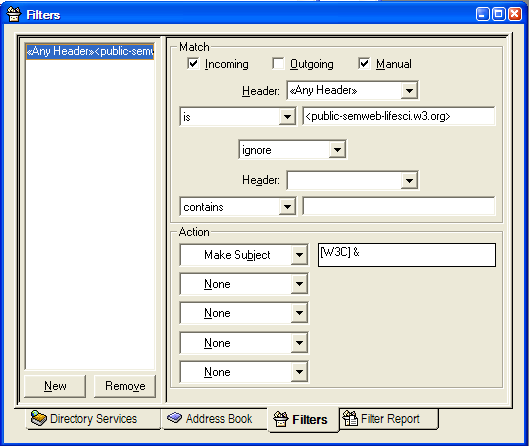
Open the Tools menu and select Filters. This allows for more advanced filtering options than the simpler filtering interface when trying to create a filter on an individual message.
Select Incoming and in the "Header" form, type: List-Id
then in the form after the "Contains", type (for example): <www-html.w3.org>
in Actions, select "Transfer To" then pull down the right mailbox in Transfer in the menu or create a new one.
lastly click New button.
You can also use this filtering to do subject tagging if that is desired and shown in the following screenshot.
Exim Filtering
If you use Exim filters (ie: .forward files) on your mail server to filter your incoming mail and want to save each mailing list to a separate folder (similar to the Procmail technique explained above).
The following pattern will filter each mailing list your are subscribed to to it's own mailbox:
# Filter mailing list emails based on the List-Id: header
if $h_List-Id: matches "\\N<([a-z0-9-]+)"
then
  save $home/Mail/$1/
  finish
endif
Same filter but if you use Maildir instead of the mailbox format:
# Filter mailing list emails based on the List-Id: header
if $h_List-Id: matches "\\N<([a-z0-9-]+)"
then
  save $home/Maildir/.$1/
  finish
endif
GMail
The "Has the words" field in GMail's filter editor apparently supports a keyword called listid.
Here is an example for filtering the www-html@w3.org mailing list.
List-Id: <www-html.w3.org>
Simply enter the following in Gmail's "Has the words" field:
listid: www-html.w3.org
To handle messages that are sent to multiple lists, you may need to use gmail's Override filters setting, e.g. to make sure announcements show up in your Inbox while general list traffic gets filtered.
Gnus
One way to do this in Gnus is with nnmail-split-methods.
 nnmail-split-methods
 '(
   ("mail.example.com" "^List-Id: .*www-html.w3.org")
;or if you want to filter things even addressed to me that also is sent to list to same mailbox use the following instead
   ("mail.example.com" "^\\(to\\|cc\\|list-id\\): .*www-html.w3\.org")
;additional filters here...
 )
Mutt
Mutt has advanced mailing list handling features which are, however, not based on the List-Id header: Rather, mutt evaluates the visible recipient addresses of a message.
If you are subscribed to a mailing list, e.g., <www-html@w3.org>, use this configuration directive to tell mutt about it:
subscribe www-html@w3.org
With the default configuration, this will cause the index to override the sender's name with information about the mailing list that you received the message from. If that is undesired, the index_format configuration variable can be adjusted. E.g., the following setting preserves the sender's name, and includes eventual mailing list information right before the subject header, in square brackets:
set index_format="%6C %Z %{%b %d} %-18.18F (%4c) %-4.4H %?L?[%L] ?%s"
The mutt-users@mutt.org mailing list is generally a good source of advice for configuring this mail user agent. W3C participants may also contact tlr@w3.org for support; when doing so, please copy sysreq@w3.org on your message, as you might otherwise be pointed at the mutt-users list.
Opera
Opera does this for you automatically. The "mailing lists" section of the mail panel includes entries for all lists which use this feature.
You can hide the entire section, or hide individual lists in the view, by right-clicking the "Mailing Lists" bar and selecting "Hide Mailing Lists" or (un)checking the individual lists you want to be shown.
You can also organise the lists in the view into folders - select new folder from the right-click menu, then drag lists into it.
To delete a list filter, right-click directly on the folder itself and select "delete".
Outlook
In Outlook 2007, the process for creating the List-ID filter is as follows:
Choose New.
- In the main menu go to Tools > Rules and Alerts...
- In the Rules and Alerts window, select New Rule...
- In the Rules Wizard window, choose New
- Select the Start from a blank rule radio button.
- Select Check messages when they arrive.
- Choose Next.
- From the list of conditions, select with specific words in the message header.
- Under Rule description, select specific words.
- Type: List-Id: XXX
- Choose OK.
- Select Next.
- Select move it to the specified folder.
- Under Rule description, select specified.
- Choose Finish
This should complete the process.
Pine
Procmail
If you or your system administrator can maintain customized procmailrc files to filter your incoming mail this is a way to do this server side which is very useful if for instance you use IMAP and read your mail from multiple clients.
The following pattern will filter each mailing list your are subscribed to to it's own mailbox.
:0:
#remove the . below if you want www-html mailbox instead of www-html.w3.org
* ^List-Id: <\/[a-z0-9-.]+
$MATCH
The following recipe will create subject tags
SUBJECT=`formail -xSubject:`
:0fw
#remove the . below if you want www-html tag instead of www-html.w3.org
* ^List-Id: <\/[a-z0-9-.]+
| formail -I "Subject: [$MATCH]$SUBJECT"
This pattern filters a specific list to a specific mailbox and also includes messages addressed to recipient that also is sent to list
:0:
* ^(To|Cc|List-Id): .*www-html[@.]w3.org
www-html
Thunderbird
In Thunderbird, the process for creating the List-ID filter is as follows:
- In the main menu go to Tools > Message Filters...
- In the Message Filters window, select New...
- In the Filter Rules window, input Filter name: List-Id
- Select Match any of the following
- In the first pull-down menu, labeled Subject, select Customize
- In the Customize Headers window, input New Message header: List-Id
- Select Add, then select OK
- In the text area following the menu labeled contains, input the name of the list you wish to filter, then select +
- Under Perform these actions:, in the first pull-down menu, select one of Move message to or Copy message to
- In the second pull down menu, select the folder into which you wish to file the filtered posts NB: You should create the target folder before this step, as it seems you don't get the option during the filter creation process.
This should complete the process. You can then Close the Message Filters window.